


 )
or https:// means you've safely connected to the .gov website. Share sensitive information only on official, secure websites.
)
or https:// means you've safely connected to the .gov website. Share sensitive information only on official, secure websites.


- Highlights of This Issue
- Preface
- Part I. Rulings and Decisions Under the Internal Revenue Code of 1986
- Part III. Administrative, Procedural, and Miscellaneous
- Part IV. Items of General Interest
- Definition of Terms and Abbreviations
- Numerical Finding List
- Effect of Current Actions on Previously Published Items
- How to get the Internal Revenue Bulletin
Internal Revenue Bulletin: 2007-49
December 3, 2007
These synopses are intended only as aids to the reader in identifying the subject matter covered. They may not be relied upon as authoritative interpretations.
Rev. Rul. 2007-69 Rev. Rul. 2007-69
This ruling provides that payments made by the U.S. Department of Veterans Affairs under the compensated work therapy program are exempt from federal income tax as veterans’ benefits. Rev. Rul. 65-18 revoked, Rev. Rul. 72-605 amplified.
Notice 2007-95 Notice 2007-95
This notice addresses regulations under section 901 of the Code relating to the foreign tax credit. It announces revised effective dates for regulations amending the “legal liability” or “technical taxpayer” rule and the noncompulsory payment rules.
Rev. Proc. 2007-68 Rev. Proc. 2007-68
Substitute tax forms and schedules. Requirements are set forth for privately designed and printed federal tax forms and conditions under which the Service will accept computer prepared and computer-generated tax forms and schedules. Rev. Proc. 2007-24 superseded.
Rev. Proc. 2007-69 Rev. Proc. 2007-69
This procedure informs small business refiners how to obtain the certification required under section 45H(f) of the Code.
REG-133300-07 REG-133300-07
Proposed regulations under section 401 of the Code provide guidance relating to certain automatic contribution arrangements; section 402(c) relating to eligible rollover distributions; section 411(a) relating to forfeitures; and section 4979(f) relating to excise tax on certain excess contributions and excess aggregate contributions.
Announcement 2007-111 Announcement 2007-111
The IRS has revoked its determination that First Step Consumer Credit Counseling, Inc., of Macunle, PA; Sterling Debt Management, Inc., of Los Angeles, CA; Community Partners Corporation of Las Vegas, NV; The Senior Citizens Counseling and Delivery Service of Washington, DC; Elaine R. Shepard Cancer Research Foundation of Coronado, CA; The Dowd Foundation of Wilkes-Barre, PA; Western Arkansas Housing Fdn. of Ft. Smith, AR; Pythons Drill Team of Kansas City, MO; Buddy and Rita Gregory Charitable Supporting Organization of Lehi, UT; Down Payment Assistance Foundation, Inc., of Glendora, CA; Market 5 Gallery of Washington, DC; IJM Foundation of Syosset, NY; International Charities of Nevada of Las Vegas, NV; First Bingo Cooperative Association of Austin, TX; One America Foundation, Inc., of Baltimore, MD; Future Homes Assistance Programs, Inc., of Stockbridge, GA; Sweet Home Foundation of Caldwell, ID; and Housing Opportunities of Houston Inc., of Houston, TX, qualify as organizations described in section 501(c)(3) and 170(c)(2) of the Code.
Notice 2007-97 Notice 2007-97
This notice defines liquid hydrocarbons derived from biomass for purposes of the credits and payments provided for alternative fuel and alternative fuel mixtures under sections 34, 6426, and 6427 of the Code.
T.D. 9363 T.D. 9363
Final regulations under section 6011 of the Code update and clarify the rules and procedures for filing corporate income tax returns and returns of organizations required to file returns under section 6033 on magnetic media pursuant to section 6011(e). These regulations affect corporations, including S corporations, with assets of $10 million or more that file Form 1120, U.S. Corporation Income Tax Return, or Form 1120S, U.S. Income Tax Return for an S Corporation; exempt organizations with assets of $10 million or more that are required to file returns under section 6033, and private foundations or section 4947(a)(1) trusts that are required to file returns under section 6033.
Notice 2007-96 Notice 2007-96
This notice announces that the Department of the Treasury will change the procedures for making payments from the Presidential Primary Matching Payment Account and will modify the regulations under section 9037 of the Code to reflect the changed procedures. Notice 96-13 superseded.
Provide America’s taxpayers top quality service by helping them understand and meet their tax responsibilities and by applying the tax law with integrity and fairness to all.
The Internal Revenue Bulletin is the authoritative instrument of the Commissioner of Internal Revenue for announcing official rulings and procedures of the Internal Revenue Service and for publishing Treasury Decisions, Executive Orders, Tax Conventions, legislation, court decisions, and other items of general interest. It is published weekly and may be obtained from the Superintendent of Documents on a subscription basis. Bulletin contents are compiled semiannually into Cumulative Bulletins, which are sold on a single-copy basis.
It is the policy of the Service to publish in the Bulletin all substantive rulings necessary to promote a uniform application of the tax laws, including all rulings that supersede, revoke, modify, or amend any of those previously published in the Bulletin. All published rulings apply retroactively unless otherwise indicated. Procedures relating solely to matters of internal management are not published; however, statements of internal practices and procedures that affect the rights and duties of taxpayers are published.
Revenue rulings represent the conclusions of the Service on the application of the law to the pivotal facts stated in the revenue ruling. In those based on positions taken in rulings to taxpayers or technical advice to Service field offices, identifying details and information of a confidential nature are deleted to prevent unwarranted invasions of privacy and to comply with statutory requirements.
Rulings and procedures reported in the Bulletin do not have the force and effect of Treasury Department Regulations, but they may be used as precedents. Unpublished rulings will not be relied on, used, or cited as precedents by Service personnel in the disposition of other cases. In applying published rulings and procedures, the effect of subsequent legislation, regulations, court decisions, rulings, and procedures must be considered, and Service personnel and others concerned are cautioned against reaching the same conclusions in other cases unless the facts and circumstances are substantially the same.
The Bulletin is divided into four parts as follows:
Part I.—1986 Code. This part includes rulings and decisions based on provisions of the Internal Revenue Code of 1986.
Part II.—Treaties and Tax Legislation. This part is divided into two subparts as follows: Subpart A, Tax Conventions and Other Related Items, and Subpart B, Legislation and Related Committee Reports.
Part III.—Administrative, Procedural, and Miscellaneous. To the extent practicable, pertinent cross references to these subjects are contained in the other Parts and Subparts. Also included in this part are Bank Secrecy Act Administrative Rulings. Bank Secrecy Act Administrative Rulings are issued by the Department of the Treasury’s Office of the Assistant Secretary (Enforcement).
Part IV.—Items of General Interest. This part includes notices of proposed rulemakings, disbarment and suspension lists, and announcements.
The last Bulletin for each month includes a cumulative index for the matters published during the preceding months. These monthly indexes are cumulated on a semiannual basis, and are published in the last Bulletin of each semiannual period.
This ruling provides that payments made by the U.S. Department of Veterans Affairs under the compensated work therapy program are exempt from federal income tax as veterans’ benefits. Rev. Rul. 65-18 revoked, Rev. Rul. 72-605 amplified.
(1) Are payments made by the U.S. Department of Veterans Affairs (VA) under the compensated work therapy program described in 38 U.S.C. § 1718 (CWT program) exempt from federal income tax as veterans’ benefits?
(2) Are payments made by the VA under the CWT program required to be reported on an information return?
The CWT program administered by the VA provides assistance to veterans unable to work and support themselves. Many of the veterans in the program have histories of one or more conditions such as psychiatric illness, substance abuse, and homelessness. Under the program, the VA provides a range of vocational rehabilitation services, with the degree of structure and level of support provided to the participating veteran geared to his or her needs. The goal of the program is to assist in restoring, to the maximum extent possible, the physical and psychological functioning of ill or disabled veterans. See 38 U.S.C. § 1701.
Title 38 of the United States Code addresses veterans’ benefits. Section 1718, entitled “Therapeutic and Rehabilitative Activities,” provides that the VA may enter into contracts with third parties to provide therapeutic work for patients in VA health care facilities. Section 1718(c)(1) establishes the “Department of Veterans Affairs Special Therapeutic and Rehabilitation Activities Fund” (Fund), from which distributions are to be made to patients for therapeutic work. Fund payments are intended to furnish veterans with work skills training, employment support, and job development and placement services, although the primary objective of the program is therapy and rehabilitation. See 38 U.S.C. § 1718(a) and (d).
With respect to the taxation of veterans’ benefits, 38 U.S.C. § 5301(a)(1) provides that payments of benefits due or to become due under any law administered by the VA made to, or on account of, a beneficiary shall be exempt from taxation.
Section 61 of the Internal Revenue Code provides that gross income includes all income from whatever source derived, unless specifically excluded by law.
Section 134(a) provides that gross income does not include any qualified military benefit. The term “qualified military benefit” means any allowance or in-kind benefit (other than personal use of a vehicle) which—
(A) is received by any member or former member of the uniformed services of the United States or any dependent of such member by reason of such member’s status or service as a member of such uniformed services, and
(B) was excludable from gross income on September 9, 1986, under any provision of law, regulation, or administrative practice that was in effect on such date (other than a provision of Title 26). Section 134(b)(1).
The legislative history to § 134 indicates that the allowances that were authorized on September 9, 1986, and excludable from gross income on that date, include veterans’ benefits authorized under 38 U.S.C. § 3101 (now 38 U.S.C. § 5301). See H.R. Conf. Rep. No. 841 (Vol. II), 99th Cong. 2d Sess. 548 (1986). See also § 140(a)(3) (cross-referencing 38 U.S.C. § 5301 for the exemption from taxation of benefits under laws administered by the VA).
Rev. Rul. 72-605, 1972-2 C.B. 35, holds that payments of benefits under any law administered by the VA are excludible from the gross income of a recipient.
Rev. Rul. 65-18, 1965-1 C.B. 32, holds that certain payments made by the VA under the CWT program in 38 U.S.C. § 618 (the predecessor to 38 U.S.C. § 1718) are includible in a recipient’s gross income as compensation for services, even though intended for therapeutic or rehabilitative purposes. Rev. Rul. 65-18 also requires information reporting on Form 1099 with respect to these payments. See § 1.6041-1(i) (requiring information returns on Form 1099 of certain payments made by any agency of the United States).
In Wallace v. Commissioner, 128 T.C. 132 (2007), acq., 2007-44 I.R.B. , the Tax Court disagreed with Rev. Rul. 65-18 and held that payments made by the VA for work performed under CWT programs are exempt from federal income tax as veterans’ benefits within the meaning of 38 U.S.C. § 5301.
The Service agrees with the Wallace decision that payments made by the VA under the CWT program are veterans’ benefits within the meaning of 38 U.S.C. § 5301.Accordingly, the payments are qualified military benefits under § 134 and are exempt from federal income tax.
(1) Payments made by the VA under the CWT program are exempt from federal income tax as veterans’ benefits.
(2) Because payments made by the VA under the CWT program are exempt from federal income tax, the payments are not required to be reported on an information return.
DEPARTMENT OF THE TREASURY
Internal Revenue Service
26 CFR Parts 1 and 301
This document contains final regulations relating to the requirements for filing corporate income tax returns and returns of organizations required to file returns under section 6033 on magnetic media pursuant to section 6011(e) of the Internal Revenue Code (Code). The term magnetic media includes any magnetic media permitted under applicable regulations, revenue procedures, or publications, including electronic filing. The final regulations are necessary to update and clarify the rules and procedures for corporations and organizations that are required to file their returns electronically. The final regulations affect corporations, including electing small business corporations (S corporations), with assets of $10 million or more that file Form 1120, U.S. Corporation Income Tax Return, or Form 1120S, U.S. Income Tax Return for an S Corporation; exempt organizations with assets of $10 million or more that are required to file returns under section 6033, and private foundations or section 4947(a)(1) trusts that are required to file returns under section 6033.
Effective Date: These regulations are effective November 13, 2007.
Applicability Date: These regulations are applicable November 13, 2007.
On January 12, 2005, the IRS published a notice of proposed rulemaking (by cross reference to temporary regulations) and a notice of public hearing, (REG-130671-04, 2005-1 C.B. 694) (70 FR 2075). The proposed regulations require certain large corporations, including S corporations, to file their corporate income tax returns electronically. The proposed regulations also require certain large exempt organizations, nonexempt charitable trusts, and exempt and nonexempt private foundations to electronically file those returns required to be filed under section 6033.
A public hearing was held on March 16, 2005. After consideration of all the comments, the proposed regulations are adopted as revised by this Treasury decision. The temporary regulations under sections 6011, 6033, and 6037 are removed.
The proposed regulations required electronic filing of Forms 1120 and 1120S by corporations required to file at least 250 returns during the calendar year, required to file corporate income tax returns, and that had total assets of $50 million or more as shown on Schedule L of their Form 1120 or 1120S for taxable years ending on or after December 31, 2005. The proposed regulations also required electronic filing of Forms 1120 and 1120S by corporations required to file at least 250 returns during the calendar year, required to file corporate income tax returns, and that had total assets of $10 million or more as shown on Schedule L of their Form 1120 or 1120S for taxable years ending on or after December 31, 2006. The proposed regulations also required electronic filing of Form 990, Return of Organization Exempt From Income Tax, by organizations required to file at least 250 returns during the calendar year, required to file Form 990 and that had, for a taxable year ending on or after December 31, 2005, total assets as of the end of the taxable year of $100 million or more or that, for a taxable year ending on or after December 31, 2006, had total assets as of the end of the taxable year of $10 million or more. The proposed regulations also required electronic filing of Form 990-PF, Return of Private Foundation or Section 4947(a)(1) Nonexempt Charitable Trust Treated as a Private Foundation, regardless of total assets, by organizations required to file at least 250 returns during the calendar year that were required to file Form 990-PF for taxable years ending on or after December 31, 2006.
Except as described in the preamble, the final regulations clarify that the electronic filing requirement applies to all members of the Form 1120 and Form 1120S series of returns, including amended and superseding returns, and to all members of the Form 990 series of returns, including amended and superseding returns. A member of the Form 1120 series includes, for example, the Form 1120-F, U.S. Income Tax Return of a Foreign Corporation.
The IRS currently does not have the capability to accept electronic filing of certain types of Form 1120, Form 1120S, and Form 990 series of returns, such as a Form 1120 for a taxpayer that has changed its accounting period, or a Form 990 or Form 990-PF for an organization not recognized as exempt or one that has an application for exempt status pending. These regulations thus exclude those returns from the electronic filing requirement. The IRS will announce the returns in the Form 1120, Form 1120S, and Form 990 series that are required to be filed electronically and the returns that are excluded from electronic filing under these regulations in its publications, forms and instructions, including those instructions and Frequently Asked Questions (FAQs) posted electronically to the IRS.gov website. The Treasury Department and the IRS intend to require electronic filing of additional corporate income tax returns, excise tax returns and returns required to be filed under section 6033 in the Form 1120, Form 1120S, and Form 990 series as the IRS increases its capability to receive these forms electronically, provided that the Treasury Department and the IRS determine that filers are able to comply with the electronic filing requirements at a reasonable cost.
The proposed regulations provided exclusions from the requirement to file electronically for certain corporations and organizations that had not had a longstanding filing obligation. Under the proposed regulations, corporations and organizations were not required to file their returns electronically if they were not required to file a Form 1120, Form 1120S, Form 990, or Form 990-PF for the preceding taxable year or had not been in existence for at least one calendar year prior to the due date (not including extensions) of their Form 1120, Form 1120S, Form 990, or Form 990-PF. These transition rules were designed to relieve taxpayer burden during the first year of implementation of the mandatory electronic filing regulations, but caused unnecessary complexity in determining whether a corporation or other organization was entitled to the first year exclusion when the corporation or organization was a part of a reorganization. The Treasury Department and the IRS have determined that these transition rules are no longer necessary and that corporations and other organizations should be able to comply at a reasonable cost with the requirement to file returns electronically.
Under the proposed regulations, the determination of whether an entity is required to file at least 250 returns is made by aggregating all returns, regardless of type, that the entity is required to file over the calendar year, including, for example, income tax returns, returns required under section 6033, information returns, excise tax returns, and employment tax returns. The final regulations clarify that in the case of a short year return, an entity is required to file electronically if, during the calendar year which includes the short taxable year of the entity, the entity is required to file at least 250 returns of any type, including, for example, income tax returns, returns required under section 6033, information returns, excise tax returns, and employment tax returns.
Three commentators requested that the IRS institute procedures allowing the Service to waive the requirement to file returns electronically. One commentator recommended that the final guidance on waivers include a clear definition of what constitutes justification for a waiver, and a flexible standard on when a filer would qualify for a waiver. One commentator contended that cost to the filer should be a principal factor in obtaining a hardship waiver. On November 28, 2005, the IRS issued Notice 2005-88, 2005-2 C.B. 1060, which provides procedures for filers to request a waiver of the requirement to electronically file their returns. Notice 2005-88 provides that in determining whether to approve or deny a waiver request, the IRS will consider the filer’s ability to timely file its return electronically without incurring an undue economic hardship. The notice provides that the IRS will generally grant waivers for filing returns electronically where the filer can demonstrate the undue hardship that would result by complying with the electronic filing requirement, including any incremental costs to the filer.
Another commentator contended that technological failures beyond the control of the filer should also not result in the assertion of penalties. For this reason, the commentator recommended that waivers be granted, especially during the first year or two during which a taxpayer is required to file electronically, in the following circumstances:
1. Where the software vendor used by the filer is unable to produce the software needed to e-file any return or schedule within a reasonable time period, perhaps six months before the end of the year for which the return is to be filed.
2. Where the filer discovers significant flaws in either the developer’s software program or its own self-developed software during the first three months of the year in which the return is to be filed.
3. Where the filer after significant testing determines the need to switch software vendors in order to comply with the e-filing mandate.
4. Where the filer attempts to timely file the return electronically by the statutory deadline (including extensions), but transmission errors (such as Internet traffic, misrouting of information packets, or disconnects in the transmission) prevent the filing of the return.
Although Notice 2005-88 does not refer to these specific situations, the notice provides that the IRS will generally grant waivers for filing returns electronically where technology issues prevent the filer from filing its return electronically. The Treasury Department and the IRS believe, however, that it is the responsibility of the filer to review the capabilities and efficacy of the software they use to file their returns, to ensure that the software used will meet their specific filing requirements.
One commentator stated that there might be circumstances when an entity otherwise subject to the electronic filing requirements should be eligible for an automatic waiver as opposed to being required to file a formal waiver request. Another commentator recommended that the purchase and use of software developed by an approved vendor be sufficient evidence that a filer has made a good faith effort to comply with the regulations. The Treasury Department and the IRS believe that waiver requests should be considered on a case-by-case basis, based on each filer’s particular facts and circumstances.
Additional guidance on situations in which returns are excluded from the electronic filing mandate is available in IRS Publication 4163, Modernized e-file (MeF) Information for Authorized IRS e-file Providers Tax Year 2006; and on the IRS.gov Internet site.
One commentator supported the concept and use of an electronic postmark, but requested clear and concise guidance as to when an electronically submitted return is deemed filed when such a return is rejected either because of transmission issues or IRS acceptance criteria. Notice 2005-88 provides that if the portion of a return required to be filed electronically is transmitted on or before the due date (including extensions) and is ultimately rejected, but the electronic return originator and the filer comply with the specific requirements for timely submission of the return, the return will be considered timely filed and any elections attached to the return will be considered valid. The notice also provides that for taxable years ending on or after December 31, 2005, the IRS will allow the filer 20 calendar days from the date of first transmission to perfect the return for electronic resubmission.
Three commentators recommended that the IRS delay implementation of the requirement to file returns electronically. Both Treasury and the IRS believe that the vendor software is available, that the IRS’ systems can accommodate the electronic filing requirement and that implementation of the electronic filing mandate can be accomplished successfully without undue burden by filers. Through October 2006, over 500,000 corporations of all sizes successfully electronically filed their Forms 1120 or 1120S for 2005, of which over 18,000 were corporations with assets exceeding $10 million. In addition, through December 2006, over 15,300 organizations of all sizes successfully electronically filed their Forms 990, 990-EZ or 990-PF for 2005. Accordingly, the recommendation to delay implementation has not been adopted.
It has been determined that this Treasury decision is not a significant regulatory action as defined in Executive Order 12866. Therefore, a regulatory assessment is not required. It has also been determined that section 553(b) of the Administrative Procedure Act (5 U.S.C. chapter 5) does not apply to these regulations.
When an Agency issues a rulemaking proposal, the Regulatory Flexibility Act, 5 U.S.C. chapter 6 (RFA), requires the agency to “prepare and make available for public comment an initial regulatory flexibility analysis” which will “describe the impact of the proposed rule on small entities.” (5 U.S.C. §603(a)). Section 605 of the RFA allows an agency to certify a rule, in lieu of preparing an analysis, if the proposed rulemaking is not expected to have a significant economic impact on a substantial number of small entities.
The Treasury decision affects corporations required to file corporate income tax returns that are required to file at least 250 returns during the calendar year and have total assets of $10 million or more for taxable years ending on or after December 31, 2006. Section 601(3) of the RFA defines a small business as having the same meaning as “small business concern” under section 3 of the Small Business Act, 15 U.S.C. 632. The IRS estimates that of the 6,294,000 entities required to file Forms 1120 or 1120S, 22,000 entities are required to electronically file these Forms. The IRS estimates that of the 22,000 entities required to electronically file Forms 1120 or 1120S, there are 9,500 organizations that will be required to file the Forms 1120 or 1120S electronically that qualify as small businesses. The 9,500 corporation estimate is based on Large and Mid-Size Business Division’s estimates of the number of corporations that have assets between $10 million and $50 million as shown on their Schedule L of their Form 1120 or 1120S for taxable years ending on or after December 31, 2006, and that may have at least 250 employees based on the number of returns the corporation has filed, including Forms W-2. Therefore, the IRS has determined that this Treasury decision will have an impact on a substantial number of small businesses.
The Treasury decision also affects those organizations required to file Form 990 that are required to file at least 250 returns during the calendar year and have total assets of $10 million or more for taxable years ending on or after December 31, 2006. The Treasury decision also affects those organizations that are required to file Form 990-PF, Return of Private Foundation or Section 4947(a)(1) Nonexempt Charitable Trust Treated as a Private Foundation, regardless of total assets. Section 601(4) of the RFA defines a small organization as any not-for-profit enterprise that is independently owned and operated and not dominant in its field (for example, private hospitals and educational institutions). The IRS estimates that of the 263,000 entities that are required to file the Form 990, there are 6,000 organizations that will be required to file the Form 990 electronically that qualify as small organizations. The 6,000 organization estimate is based on Tax Exempt and Government Entities Division’s estimates of the number of entities that have assets between $10 million and $100 million as shown on their Schedule L of their Form 990 for taxable years ending on or after December 31, 2006 and that may have at least 250 employees based on the number returns the corporation has filed, including Forms W-2. The IRS also estimates that of the 85,000 entities that are required to file the Form 990-PF, there are 50 organizations that will be required to file the Form 990-PF electronically that qualify as small organizations. The 50 organizations estimate is based on Tax Exempt and Government Entities Division’s estimates of the number of entities that may have at least 250 employees based on the number returns the corporation has filed, including Forms W-2. Therefore, the IRS has determined that this Treasury decision will have an impact on a substantial number of small organizations.
The IRS has also determined, however, that the impact on entities affected by the proposed rule will not be significant. The IRS and Treasury Department note that these regulations only prescribe the method of filing returns that are already required to be filed. Further, these regulations are consistent with the requirements imposed by statute. The burden on small entities to purchase the software to file its returns electronically is minimal as the software is widely available. Pricing for electronic filing software varies considerably. In many instances, the price for electronic filing is bundled with other services and products. Some software providers offer volume discounts, or unlimited filing for a fixed price. Some software providers offer free electronic filing if the taxpayer purchases a suite of other products or services. And in many cases, taxpayers will use the services of a tax practitioner to prepare and electronically file their return. Accordingly, direct comparison of the cost for electronic filing is difficult. The cost for the software to file returns electronically for small entities from software providers starts from $12.50 per return for on-line electronic filing of Forms 1120, and is free for Form 990 filers with less than $100,000 in gross revenue.
Finally, the IRS has provided procedures for filers to request a waiver of the requirement to electronically file their returns. Notice 2005-88 provides that in determining whether to approve or deny a waiver request, the IRS will consider the filer’s ability to timely file its return electronically without incurring an undue economic hardship.
Accordingly, the IRS hereby certifies that the collection of information contained in these regulations will not have a significant economic impact on a substantial number of small entities. Therefore, a Regulatory Flexibility Analysis under the Regulatory Flexibility Act is not required. Pursuant to section 7805(f) of the Code, the notice of proposed rulemaking preceding these final regulations was submitted to the Chief Counsel for Advocacy of the Small Business Administration for comment on its impact on small businesses.
Accordingly, 26 CFR parts 1 and 301 are amended as follows:
Paragraph 1. The authority citation for part 1 continues to read in part as follows:
Authority: 26 U.S.C. 7805 * * *
Par. 2. Section 1.6011-5 is added to read as follows:
The return of a corporation that is required to be filed on magnetic media under §301.6011-5 of this chapter must be filed in accordance with Internal Revenue Service revenue procedures, publications, forms, or instructions, including those posted electronically. (See §601.601(d)(2) of this chapter).
Par. 3. Section 1.6011-5T is removed.
Par. 4. Section 1.6033-4 is added to read as follows:
The return of an organization that is required to be filed on magnetic media under §301.6033-4 of this chapter must be filed in accordance with Internal Revenue Service revenue procedures, publications, forms, or instructions, including those posted electronically. (See §601.601(d)(2) of this chapter).
Par. 5. Section 1.6033-4T is removed.
Par. 6. Section 1.6037-2 is added to read as follows:
The return of an electing small business corporation that is required to be filed on magnetic media under §301.6037-2 of this chapter must be filed in accordance with Internal Revenue Service revenue procedures, publications, forms, or instructions, including those posted electronically. (See §601.601(d)(2) of this chapter).
Par. 8. The authority citation for part 301 is amended by removing the entries for “Section 301.6011-5T”, “Section 301-6033-4T”, and “Section 301.6037-2T” and adding entries, in numerical order, to read as follows:
Authority: 26 U.S.C. 7805 * * *
Section 301.6011-5 also issued under 26 U.S.C. 6011. * * *
Section 301.6033-4 also issued under 26 U.S.C. 6033. * * *
Section 301.6037-2 also issued under 26 U.S.C. 6037. * * *
Par. 9. Section 301.6011-5 is added to read as follows:
(a) Corporate income tax returns required on magnetic media—(1) A corporation required to file a corporate income tax return on Form 1120, “U.S. Corporation Income Tax Return,” under §1.6012-2 of this chapter must file its corporate income tax return on magnetic media if the corporation is required by the Internal Revenue Code or regulations to file at least 250 returns during the calendar year. Returns filed on magnetic media must be made in accordance with applicable revenue procedures, publications, forms, or instructions. In prescribing revenue procedures, publications, forms, or instructions, the Commissioner may direct the type of magnetic media filing. (See §601.601(d)(2) of this chapter).
(2) All members of a controlled group of corporations must file their corporate income tax returns on magnetic media if the aggregate number of returns required to be filed by the controlled group of corporations is at least 250.
(b) Waiver. The Commissioner may grant waivers of the requirements of this section in cases of undue hardship. A request for waiver must be made in accordance with applicable revenue procedures or publications. The waiver also will be subject to the terms and conditions regarding the method of filing as may be prescribed by the Commissioner.
(c) Failure to file. If a corporation fails to file a corporate income tax return on magnetic media when required to do so by this section, the corporation is deemed to have failed to file the return. (See section 6651 for the addition to tax for failure to file a return). In determining whether there is reasonable cause for failure to file the return, §301.6651-1(c) and rules similar to the rules in §301.6724-1(c)(3) (undue economic hardship related to filing information returns on magnetic media) will apply.
(d) Meaning of terms. The following definitions apply for purposes of this section:
(1) Magnetic media. The term magnetic media means any magnetic media permitted under applicable regulations, revenue procedures, or publications. These generally include magnetic tape, tape cartridge, and diskette, as well as other media, such as electronic filing, specifically permitted under the applicable regulations, procedures, publications, forms, or instructions. (See §601.601(d)(2) of this chapter).
(2) Corporation. The term corporation means a corporation as defined in section 7701(a)(3).
(3) Controlled group of corporations. The term controlled group of corporations means a group of corporations as defined in section 1563(a).
(4) Corporate income tax return. The term corporate income tax return means a Form 1120, “U.S. Corporation Income Tax Return,” along with all other related forms, schedules, and statements that are required to be attached to the Form 1120, and all members of the Form 1120 series of returns, including amended and superseding returns.
(5) Determination of 250 returns. For purposes of this section, a corporation or controlled group of corporations is required to file at least 250 returns if, during the calendar year ending with or within the taxable year of the corporation or the controlled group, the corporation or the controlled group is required to file at least 250 returns of any type, including information returns (for example, Forms W-2, Forms 1099), income tax returns, employment tax returns, and excise tax returns. In the case of a short year return, a corporation is required to file at least 250 returns if, during the calendar year which includes the short taxable year of the corporation, the corporation is required to file at least 250 returns of any type, including information returns (for example, Forms W-2, Forms 1099), income tax returns, employment tax returns, and excise tax returns. If the corporation is a member of a controlled group, the determination of the number of returns includes all returns required to be filed by all members of the controlled group during the calendar year ending with or within the taxable year of the controlled group.
(e) Example. The following example illustrates the provisions of paragraph (d)(5) of this section:
Example. The taxable year of Corporation X, a fiscal year taxpayer with assets in excess of $10 million, ends on September 30. During the calendar year ending December 31, 2007, X was required to file one Form 1120, “U.S. Corporation Income Tax Return,” 100 Forms W-2, “Wage and Tax Statement,” 146 Forms 1099-DIV, “Dividends and Distributions,” one Form 940, “Employer’s Annual Federal Unemployment (FUTA) Tax Return,” and four Forms 941, “Employer’s QUARTERLY Federal Tax Return.” Because X is required to file 252 returns during the calendar year that ended within its taxable year ending September 30, 2008, X is required to file its Form 1120 electronically for its taxable year ending September 30, 2008.
(f) Effective/applicability dates. This section applies to corporate income tax returns for corporations that report total assets at the end of the corporation’s taxable year that equal or exceed $10 million on Schedule L of their Form 1120, for taxable years ending on or after December 31, 2006, except for the application of the short year rules in paragraph (d)(5) of this section, which is applicable for taxable years ending on or after November 13, 2007.
Par. 10. Section 301.6011-5T is removed.
Par. 11. Section 301.6033-4 is added to read as follows:
(a) Returns by organizations required to file returns under section 6033 on magnetic media. An organization required to file a return under section 6033 on Form 990, “Return of Organization Exempt From Income Tax,” or Form 990-PF, “Return of Private Foundation or Section 4947(a)(1) Nonexempt Charitable Trust Treated as a Private Foundation,” must file its Form 990 or 990-PF on magnetic media if the organization is required by the Internal Revenue Code or regulations to file at least 250 returns during the calendar year ending with or within its taxable year. Returns filed on magnetic media must be made in accordance with applicable revenue procedures, publications, forms, or instructions. In prescribing revenue procedures, publications, forms, or instructions, the Commissioner may direct the type of magnetic media filing. (See §601.601(d)(2) of this chapter).
(b) Waiver. The Commissioner may grant waivers of the requirements of this section in cases of undue hardship. A request for waiver must be made in accordance with applicable revenue procedures or publications. The waiver also will be subject to the terms and conditions regarding the method of filing as may be prescribed by the Commissioner.
(c) Failure to file. If an organization required to file a return under section 6033 fails to file an information return on magnetic media when required to do so by this section, the organization is deemed to have failed to file the return. (See section 6652 for the addition to tax for failure to file a return.) In determining whether there is reasonable cause for failure to file the return, §301.6652-2(f) and rules similar to the rules in §301.6724-1(c)(3) (undue economic hardship related to filing information returns on magnetic media) will apply.
(d) Meaning of terms. The following definitions apply for purposes of this section:
(1) Magnetic media. The term magnetic media means any magnetic media permitted under applicable regulations, revenue procedures, or publications. These generally include magnetic tape, tape cartridge, and diskette, as well as other media, such as electronic filing, specifically permitted under the applicable regulations, procedures, publications, forms or instructions. (See §601.601(d)(2) of this chapter).
(2) Return required under section 6033. The term return required under section 6033 means a Form 990, “Return of Organization Exempt From Income Tax,” and Form 990-PF, “Return of Private Foundation or Section 4947(a)(1) Nonexempt Charitable Trust Treated as a Private Foundation,” along with all other related forms, schedules, and statements that are required to be attached to the Form 990 or Form 990-PF, and all members of the Form 990 series of returns, including amended and superseding returns.
(3) Determination of 250 returns. For purposes of this section, an organization is required to file at least 250 returns if, during the calendar year ending with or within the taxable year of the organization, the organization is required to file at least 250 returns of any type, including information returns (for example, Forms W-2, Forms 1099), income tax returns, employment tax returns, and excise tax returns. In the case of a short year return, an organization is required to file at least 250 returns if, during the calendar year which includes the short taxable year of the organization, the organization is required to file at least 250 returns of any type, including information returns (for example, Forms W-2, Forms 1099), income tax returns, employment tax returns, and excise tax returns.
(e) Example. The following example illustrates the provisions of paragraph (d)(3) of this section. In the example, the organization is a calendar year taxpayer:
Example. In 2006, Organization T, with total assets in excess of $10 million, is required to file one Form 990, “Return of Organization Exempt From Income Tax,” 200 Forms W-2, “Wage and Tax Statement,” one Form 940, “Employer’s Annual Federal Unemployment (FUTA) Tax Return,” four Forms 941, “Employer’s QUARTERLY Federal Tax Return,” and 60 Forms 1099-MISC, “Miscellaneous Income.” Because T is required to file 266 returns during the calendar year, T must file its 2006 Form 990 electronically.
(f) Effective/applicability dates. This section applies to any organization required to file Form 990 for a taxable year ending on or after December 31, 2006, that has total assets as of the end of the taxable year of $10 million or more. This section applies to any organization required to file Form 990-PF for taxable years ending on or after December 31, 2006, except for the application of the short year rules in paragraph (d)(3) of this section, which is applicable for taxable years ending on or after November 13, 2007.
Par. 12. Section 301.6033-4T is removed.
Par. 13. Section 301.6037-2 is added to read as follows:
(a) Returns of electing small business corporation required on magnetic media. An electing small business corporation required to file an electing small business return on Form 1120S, “U.S. Income Tax Return for an S Corporation,” under §1.6037-1 of this chapter must file its Form 1120S on magnetic media if the small business corporation is required by the Internal Revenue Code and regulations to file at least 250 returns during the calendar year ending with or within its taxable year. Returns filed on magnetic media must be made in accordance with applicable revenue procedures, publications, forms, or instructions. In prescribing revenue procedures, publications, forms, or instructions, the Commissioner may direct the type of magnetic media filing. (See §601.601(d)(2) of this chapter).
(b) Waiver. The Commissioner may grant waivers of the requirements of this section in cases of undue hardship. A request for waiver must be made in accordance with applicable revenue procedures or publications. The waiver also will be subject to the terms and conditions regarding the method of filing as may be prescribed by the Commissioner.
(c) Failure to file. If an electing small business corporation fails to file a return on magnetic media when required to do so by this section, the corporation is deemed to have failed to file the return. (See section 6651 for the addition to tax for failure to file a return.) In determining whether there is reasonable cause for failure to file the return, §301.6651-1(c) and rules similar to the rules in §301.6724-1(c)(3) (undue economic hardship related to filing information returns on magnetic media) will apply.
(d) Meaning of terms. The following definitions apply for purposes of this section:
(1) Magnetic media. The term magnetic media means any magnetic media permitted under applicable regulations, revenue procedures, or publications. These generally include magnetic tape, tape cartridge, and diskette, as well as other media, such as electronic filing, specifically permitted under the applicable regulations, procedures, publications, forms, or instructions. (See §601.601(d)(2) of this chapter).
(2) Corporation. The term corporation means a corporation as defined in section 7701(a)(3).
(3) Electing small business corporation return. The term electing small business corporation return means a Form 1120S, “U.S. Income Tax Return for an S Corporation,” along with all other related forms, schedules, and statements that are required to be attached to the Form 1120S, and all members of the Form 1120S series of returns, including amended and superseding returns.
(4) Electing small business corporation. The term electing small business corporation means an S corporation as defined in section 1361(a)(1).
(5) Determination of 250 returns. For purposes of this section, a corporation is required to file at least 250 returns if, during the calendar year ending with or within the taxable year of the corporation, the corporation is required to file at least 250 returns of any type, including information returns (for example, Forms W-2, Forms 1099), income tax returns, employment tax returns, and excise tax returns. In the case of a short year return, a corporation is required to file at least 250 returns if, during the calendar year which includes the short taxable year of the corporation, the corporation is required to file at least 250 returns of any type, including information returns (for example, Forms W-2, Forms 1099), income tax returns, employment tax returns, and excise tax returns.
(e) Example. The following example illustrates the provisions of paragraph (d)(5) of this section. In the example, the corporation is a calendar year taxpayer:
Example. In 2007, Corporation S, an electing small business corporation with assets in excess of $10 million, is required to file one Form 1120S, “U.S. Income Tax Return for an S Corporation,” 100 Forms W-2, “Wage and Tax Statement,” 146 Forms 1099-DIV, “Dividends and Distributions,” one Form 940, “Employer’s Annual Federal Unemployment (FUTA) Tax Return,” and four Forms 941, “Employer’s QUARTERLY Federal Tax Return.” Because S is required to file 252 returns during the calendar year, S is required to file its 2007 Form 1120S electronically.
(f) Effective/applicability dates. This section applies to returns of electing small business corporations that report total assets at the end of the corporation’s taxable year that equal or exceed $10 million on Schedule L of Form 1120S for taxable years ending on or after December 31, 2006, except for the application of the short year rules in paragraph (d)(5) of this section, which is applicable for taxable years ending on or after November 13, 2007.
Par. 14. Section 301.6037-2T is removed.
Kevin M. Brown,Deputy Commissioner for
Services and Enforcement.
Approved November 6, 2007.
Eric Solomon,Assistant Secretary
of the Treasury.
The purpose of this notice is to provide guidance relating to the effective dates of final regulations to be issued under section 901.
On August 3, 2006, the Internal Revenue Service (IRS) and Treasury Department issued proposed regulations that would provide guidance relating to the determination of who is considered to pay a foreign tax for purposes of section 901 and section 903. In particular, the proposed regulations would provide guidance under section 1.901-2(f) relating to the person on whom foreign law imposes legal liability for tax, including in the case of taxes imposed on the income of foreign consolidated groups and entities that have different classifications for U.S. and foreign tax law purposes. The proposed regulations provide that the final regulations will be effective for foreign taxes paid or accrued during taxable years of the taxpayer beginning on or after January 1, 2007. The IRS and Treasury Department have received written comments on the proposed regulations and held a hearing on the proposed regulations on October 13, 2006.
On March 29, 2007, the IRS and Treasury Department issued proposed regulations that would provide guidance under section 1.901-2(e)(5) relating to the amount of taxes paid for purposes of section 901. The proposed regulations would revise section 1.901-2(e)(5) in two ways. First, for purposes of determining compliance with section 1.901-2(e)(5), the proposed regulations would treat as a single taxpayer all foreign entities in which the same U.S. person has a direct or indirect interest of 80 percent or more (a “U.S.-owned foreign group”). Second, the proposed regulations would treat amounts paid to a foreign taxing authority as noncompulsory payments if those amounts are attributable to certain structured passive investments. The proposed regulations provide that the final regulations will be effective for foreign taxes paid or accrued during taxable years of the taxpayer ending on or after the date on which the regulations are finalized. The IRS and Treasury Department have received written comments on the proposed regulations and held a hearing on the proposed regulations on July 30, 2007.
The IRS and Treasury Department are considering the comments received on the two proposed regulations.
The IRS and Treasury Department intended to finalize the proposed section 1.901-2(f) regulations in 2007. However, the IRS and Treasury Department are still in the process of considering comments received on the proposed regulations and no longer expect to finalize these proposed regulations in 2007. Because the proposed regulations will not be finalized in 2007, the IRS and Treasury Department believe it is appropriate to revise the effective date for the regulations. Accordingly, the final regulations relating to the determination of who is considered to pay a foreign tax will be effective for taxable years beginning after the final regulations are published in the Federal Register.
In reviewing comments received, the IRS and Treasury Department have determined that the proposed change to section 1.901-2(e)(5) relating to U.S.-owned foreign groups may lead to inappropriate results in certain cases. The IRS and Treasury Department have therefore decided to sever the proposed rule for U.S.-owned foreign groups from the portion of the proposed section 1.901-2(e)(5) regulation addressing the treatment of foreign payments attributable to certain structured passive investment arrangements while continuing to study the appropriate treatment of U.S.-owned foreign groups. The IRS and Treasury Department also believe it is appropriate to revise the proposed effective date for the rules addressing the treatment of U.S.-owned foreign groups. Therefore, final regulations addressing U.S.-owned foreign groups will be effective for taxable years beginning after the final regulations are published in the Federal Register. For taxable years ending on or after March 29, 2007, and beginning on or before the date on which the final regulations are published, taxpayers may rely on the portion of the proposed regulations addressing U.S.-owned foreign groups. No inference is intended as to whether an amount paid by a foreign entity that is not a member of a U.S.-owned foreign group is a compulsory payment under existing section 1.901-2(e)(5).
The principal author of this notice is Bethany A. Ingwalson of the Office of Associate Chief Counsel (International). For further information regarding this notice, contact Bethany A. Ingwalson at (202) 622-3850 (not a toll-free call).
This notice supersedes Notice 96-13, 1996-1 C.B. 366, and announces that the Department of the Treasury (the Treasury) will change the procedures for making payments from the Presidential Primary Matching Payment Account (the Account). This notice also announces that the Treasury intends to modify the regulations under § 9037 of the Internal Revenue Code (26 U.S.C. § 9037 (2000)) to reflect the changed procedures.
Section 9006(a) established the Presidential Election Campaign Fund (the Fund) on the books of the U.S. Treasury. Section 9006(a) requires the Secretary to transfer to the Fund, from time to time, an amount equal to the individual taxpayer designations for the Fund under § 6096. See § 701.9006-1(a) of the Financing of Presidential Election Campaigns Regulations (26 C.F.R. § 701.9006-1(a) (2007)).
Section 701.9006-1(a) requires the Secretary to determine the amounts designated by individuals for the Fund at least once a month.
Section 9037(a) requires the Secretary to maintain within the Fund a separate account known as the Presidential Primary Matching Payment Account. The Secretary is required to deposit into the Account amounts from the Fund after determining that there are amounts available and set aside in the Fund to make the payments described in § 9006 (payments for the general election) and § 9008 (payments for the presidential nominating conventions). The amounts in the Account are for presidential primary candidates who are certified for payments by the Federal Election Commission (the Commission).
Section 702.9037-2(a) provides that, except in the case of a shortfall described in § 702.9037-2(c), promptly after the end of each calendar month, but not before the beginning of the calendar year of a presidential election, the Secretary shall pay the amounts certified by the Commission in the preceding calendar month from the Account to the primary candidates.
Section 702.9037-2(c) provides that if the amount certified by the Commission for primary candidates in a calendar month exceeds the balance in the Account on the last day of the calendar month, the amount paid to a candidate for that month from the Account is determined by multiplying the amount certified by the Commission for the candidate during that month by the ratio of the balance in the Account on the last day of the calendar month over the total amount certified by the Commission for all the candidates during that month. Any amount certified by the Commission, but not paid to a candidate because of the operation of this shortfall rule, is treated as an amount certified by the Commission for that candidate during the succeeding calendar month. Section 702.9037-2(d) provides an example illustrating the shortfall rule of § 702.9037-2(c).
Notice 96-13 announced a change in the payment procedures contained in § 702.9037-2(c). The notice states that when the Account is in a shortfall position, the Secretary may make an additional payment between regular payment dates promptly after funds are available. Such payment is determined by multiplying the amount certified by the Commission for the candidate in month 1 by the ratio of the balance in the Account (but not to exceed the shortfall) on the 15th day of month 2 (or the first business day thereafter if the 15th is not a business day) over the total amount certified by the Commission for all the candidates in month 1.
Section 9037(b) contemplates that the Secretary should pay certified primary candidates as promptly as possible. Therefore, the Treasury will change the procedures, currently described in § 702.9037-2 and Notice 96-13, for making payments from the Account. Under the changed procedures, the Secretary may make payments as soon as funds become available in the Account rather than monthly (or, in the event of a shortfall, with an additional payment on the 15th of the next month, as required by Notice 96-13).
The Treasury intends to amend the regulations in § 702.9037-2 accordingly. As provided in Notice 96-13, the effective date of these amendments to the regulations will be February 2, 1996.
This notice defines liquid hydrocarbons derived from biomass for purposes of the credits and payments provided for alternative fuel and alternative fuel mixtures under §§ 34, 6426, and 6427 of the Internal Revenue Code (the Code).
(a) The credits and payments for alternative fuel and alternative fuel mixtures were added to the Code by § 11113(b) of the Safe, Accountable, Flexible, Efficient Transportation Equity Act: A Legacy for Users (Pub. L. 109-59). The credits and payment are allowed beginning October 1, 2006. Notice 2006-92, 2006-43 I.R.B. 774, provides general guidance on these credits and payments.
(b) Section 6426(d)(2) of the Code provides that the term alternative fuel means several specified products including (in § 6426(d)(2)(F)) liquid hydrocarbons derived from biomass (as defined in section 45K(c)(3)). Section 6426(d)(2) also provides that the term alternative fuel does not include ethanol, methanol, or biodiesel. Biodiesel is defined in section 40A(d)(1). Ethanol and methanol are included in the definition of alcohol in section 40(d)(1).
(c) Although the term hydrocarbon is not defined in the Code, the term is commonly defined as an organic compound containing only hydrogen and carbon. Treasury and the IRS have received numerous inquiries asking whether, for purposes of § 6426(d)(2)(F), the term liquid hydrocarbons derived from biomass can include liquids that contain oxygen, as well as hydrogen and carbon. Examples of liquids containing hydrogen, carbon, and oxygen include fish oil, liquids derived from other rendered fats, biodiesel, and alcohols such as ethanol and methanol.
(d) The fact that Congress specifically excluded ethanol, methanol, and biodiesel (all of which contain oxygen) from the definition of liquid hydrocarbons derived from biomass indicates that, for purposes of section 6426(d)(2)(F), hydrocarbons include substances that contain oxygen.
(e) The Senate Finance Committee has approved a technical correction that would clarify that any liquid fuel derived from biomass qualifies as an alternative fuel. The technical correction would also clarify that any fuel qualifying for an alcohol, biodiesel, or renewable diesel credit or payment does not qualify for the alternative fuel credit or payment.
(a) Except as provided in paragraph (b) of this section, liquid hydrocarbons derived from biomass are chemical compounds that are liquid when eligibility for the credit or payment is determined and are derived from any organic material, including oceanic and terrestrial crops and crop residues, and organic waste products that have a market value. For this purpose—
(1) Eligibility for the credit or payment for alternative fuel mixtures is determined when the alternative fuel mixture is produced; and
(2) Eligibility for the credit or payment for alternative fuel is determined when—
(i) Tax is imposed on the fuel by § 4041(a)(2); or
(ii) Tax would be imposed on the fuel but for the exemptions provided by § 4041 (b), (f), (g), or (h).
(b) Liquid hydrocarbons derived from biomass do not include—
(1) Ethanol, methanol, or biodiesel; or
(2) Oil, natural gas, coal (including lignite) or any product of oil, natural gas, or coal.
Under current law, ethanol and methanol are excluded from the definition of alternative fuels qualifying for the alternative fuel credit or payment. The technical correction approved by the Senate Finance Committee would provide, in addition, that no other alcohol fuel is eligible for an alternative fuel credit or payment. If this technical correction is enacted it will be retroactive to October 1, 2006. Accordingly, if the technical correction is enacted and a taxpayer was allowed an alternative fuel credit or payment with respect to any alcohol fuel before the date of enactment, the taxpayer will be required to repay the amount of such credit or payment with interest.
The purpose of this revenue procedure is to provide guidelines and general requirements for the development, printing, and approval of substitute tax forms. Approval will be based on these guidelines. After review and approval, submitted forms will be accepted as substitutes for official IRS forms.
Certain unique specialized forms require the use of other additional publications to supplement this publication. See Part 4.
The IRS accepts quality substitute tax forms that are consistent with the official forms and have no adverse impact on our processing. The IRS Substitute Forms Unit administers the formal acceptance and processing of these forms nationwide. While this program deals primarily with paper documents, it also reviews for approval other processing and filing forms such as those used in electronic filing.
Only those substitute forms that comply fully with the requirements are acceptable. This revenue procedure is updated as required to reflect pertinent tax year form changes and to meet processing and/or legislative requirements.
The following types of forms are covered by this revenue procedure:
-
IRS tax forms and their related schedules,
-
Worksheets as they appear in instruction packages,
-
Applications for permission to file returns electronically and forms used as required documentation for electronically filed returns,
-
Powers of Attorney,
-
Over-the-counter estimated tax payment vouchers, and
-
Forms and schedules relating to partnerships, exempt organizations, and employee plans.
The following types of forms are not covered by this revenue procedure:
-
W-2 and W-3 (see Publication 1141 for information on these forms),
-
W-2c and W-3c (see Publication 1223 for information on these forms),
-
941 and Schedule B (Form 941) (see Publication 4436 for information on these forms),
-
1096, 1098 series, 1099 series, 5498 series, W-2G, and 1042-S (see Publication 1179 for information on these forms),
-
Federal Tax Deposit (FTD) coupons, which may not be reproduced,
-
Forms 1040-ES (OCR) and 1041-ES (OCR), which may not be reproduced,
-
Forms 5500, 5500-EZ, and associated schedules (see the Department of Labor website at www.dol.gov for information on these forms),
-
Forms 8717 and 8905, bar-coded forms requiring separate approval,
-
FinCEN forms, TD F 90-22 forms, and Form 8300,
-
Requests for information or documentation initiated by the IRS,
-
Forms used internally by the IRS,
-
State tax forms,
-
Forms developed outside the IRS, and
-
General Instructions and Specific Instructions (not reviewed by the Substitute Forms Program Unit).
Send your substitute forms for approval to the following offices (do not send forms with taxpayer data):
| Form | Office and Address |
|---|---|
| All FinCEN family of forms, TD F 90-22 family of forms, and Form 8300 | Enterprise Computing Center - Detroit (ECC-D) BSA Compliance Branch P.O. Box 32063 Detroit, MI 48232-0063 |
| 5500, 5500-EZ, and Schedules A through E, G, H, I, R, and SSA for Form 5500 | Check EFAST information at the Department of Labor’s website at www.efast.dol.gov |
| 8717 and 8905 | Joanna.H.Weber@irs.gov |
| Software developer vouchers (See Sections 2.3.7 - 2.3.9) | Internal Revenue Service Attn: Doris Bethea, C5-163 5000 Ellin Rd. Lanham, MD 20706 Doris.E.Bethea@irs.gov |
| All others (except W-2, W-2c, W-3, W-3c, 941, Schedule B (Form 941), 1096, 1098, 1099, 5498, W-2G, and 1042-S) covered by this publication | Internal Revenue Service Attn: Substitute Forms Program SE:W:CAR:MP:T:T:SP 1111 Constitution Avenue, NW Room 6526 Washington, DC 20224 |
In addition, the Substitute Forms Program Unit can be contacted via email at Substituteforms@irs.gov. Please include “PDF Submissions” on the subject line.
For questions about Forms W-2 and W-3, refer to IRS Publication 1141, General Rules and Specifications for Substitute Forms W-2 and W-3. For Forms W-2c and W-3c, refer to IRS Publication 1223, General Rules and Specifications for Substitute Forms W-2c and W-3c. For Forms 941 and Schedule B (Form 941), refer to IRS Publication 4436, General Rules and Specifications for Substitute Form 941 and Schedule B (Form 941). For Forms 1096, 1098, 1099, 5498, W-2G, and 1042-S, refer to IRS Publication 1179, General Rules and Specifications for Substitute Forms 1096, 1098, 1099, 5498, W-2G, and 1042-S.
The following changes have been made to the Revenue Procedure for tax year 2007.
-
We have implemented a new policy that lets you assume that your email substitute form submission has been approved if you do not hear from us within 20 business days. Starting September 4, 2007, we began acknowledging each email submission with a return email outlining the policy. This policy does not apply to forms submitted by paper or fax. Also this policy does not apply to new forms issued by the IRS that you have submitted for the first time, nor does it apply to forms that the IRS has substantially changed during the year. See Section 1.5.2 for more details.
-
New email address. Due to the new policy, please submit your email form submissions to Substituteforms@irs.gov instead of *taxforms@irs.gov.
-
You can now send 25 instead of 50 sample substitute forms for approval of software vendor vouchers. See Section 2.3.9.
-
The room number in the address of the Substitute Forms Unit has changed to Room 6526.
-
We have revised Section 7.1, which deals with substitute Schedules K-1.
-
We have revised Section 8.1, which deals with electronic filing.
-
We have slightly revised the sample check sheet in Exhibit D.
-
The Exhibits section has been changed and updated.
-
We made editorial changes as needed.
A tax form (or related schedule) that differs in any way from the official version and is intended to replace the form that is printed and distributed by the IRS. This term also covers those approved substitute forms exhibited in this revenue procedure.
A form produced using conventional printing processes, or a printed form which has been reproduced by photocopying or a similar process.
A printed form that has marginal perforations for use with automated and high-speed printing equipment.
A preprinted form in which the taxpayer's tax entry information has been inserted by a computer, computer printer, or other computer-type equipment.
A tax return or form that is entirely designed and printed using a computer printer such as a laser printer, etc., on plain white paper. This return or form must conform to the physical layout of the corresponding IRS form, although the typeface may differ. The text should match the text on the officially printed form as closely as possible. Condensed text and abbreviations will be considered on a case-by-case basis.
Exception. All jurats (perjury statements) must be reproduced verbatim.
A preprinted reproduced form in which the taxpayer's tax entry information is entered by an individual using a pen, pencil, typewriter, or other non-automated equipment.
Parts of a printed tax form that are not tax amount entries or required text. Examples of graphics are line numbers, captions, shadings, special indicators, borders, rules, and strokes created by typesetting, photographics, photocomposition, etc.
A document providing detailed information to support a line entry on an official or approved substitute form and filed with (attached to) a tax return.
Note. A supporting statement is not a tax form and does not take the place of an official form.
The following specific terms are used throughout this revenue procedure in reference to all substitute forms: format, sequence, line reference, item caption, and data entry field.
Sequence is an integral part of the total format requirement. The substitute form should show the same numeric and logical placement order of data, as shown on the official form.
The line numbers, letters, or alphanumerics used to identify each captioned line on an official form. These line references are printed to the immediate left of each caption and/or data entry field.
Designated areas for the entry of data such as dollar amounts, quantities, responses and checkboxes.
A draft version of a new or revised form may be posted to the IRS website for information purposes. Substitute forms may be submitted based on these advance drafts, but any submitter that receives forms approval based on these early drafts is responsible for monitoring and revising forms to mirror any revisions in the final forms provided by the IRS.
Any person or company who uses substitute forms and makes all or part of the changes specified in this revenue procedure agrees to the following stipulations.
-
The IRS presumes that any required changes are made in accordance with these procedures and will not be disruptive to the processing of the tax return.
-
Should any of the changes be disruptive to the IRS’s processing of the tax return, the person or company agrees to accept the determination of the IRS as to whether the form may continue to be filed.
-
The person or company agrees to work with the IRS in correcting noted deficiencies. Notification of deficiencies may be made by any combination of fax, letter, email, or phone contact and may include the request for the re-submission of unacceptable forms.
We will inform you when the Substitute Forms Unit has received your form submission. You can consider your submission approved if you do not receive a response from us within 20 business days. If we anticipate a problem reviewing your submission within the 20 business day period, we will send an interim email notifying you of an extended period of approval.
Once the substitute forms have been approved by the IRS, you can release them after the final versions of the forms have been issued by the IRS. Before releasing the forms, you are responsible for updating forms approved as draft and for making form changes we requested.
The policy has the following stipulations.
-
This 20-day policy applies to electronic submissions only. It does not apply to substitute forms submitted by paper or fax.
-
The policy applies to submissions of 15 or fewer items. Submissions of more than 15 may delay processing.
-
If we receive a large number of your submissions within a short period of time, processing may be delayed.
-
There could be delays in processing if we find significant errors in your submission. We will send you an interim email in that case.
-
If we anticipate any problems in processing your submission within the 20-day period, we will send you an interim email on or about the 15th business day.
-
If subsequent to the 20-day period we discover a significant inaccuracy, we reserve the right to inform you and will require that changes be made to correct the error.
-
It does not apply to substantially revised forms nor to new forms created by the IRS for which you have made your first submission.
If you produce any tax forms using IRS guidelines on permitted changes, you can generate your own substitutes without further approval. If your changes are more extensive, you must get IRS approval before using substitute forms. More extensive changes can include the use of typefaces and sizes other than those found on the official form and the condensing of line item descriptions to save space.
Note. The 20-day turnaround policy may not apply to extensive changes.
The Substitute Forms Program accepts substitute forms submissions via email. The email address is Substituteforms@irs.gov. Please include the term “PDF Submissions” on the subject line.
Follow these guidelines.
-
Your submission should include all the forms you wish to submit in one attached pdf file. Do not email each form individually.
-
An approval check sheet listing the forms you are submitting should always be included in the pdf file along with the forms. See a sample check sheet in Exhibit D.
-
Small (fewer than 15 forms), rather than large, submissions should expedite processing. The maximum submission should contain 15 forms.
-
Emailing pdf submissions will not expedite review and approval. The pdf submissions will be assigned a control number and put in queue along with mailed-in paper submissions.
-
Optimize pdf files before submitting.
-
The maximum allowable email attachment is 2.5 megabytes.
-
The Substitute Forms Unit accepts zip files.
-
To alleviate delays during the peak time of September through December, submit advance draft forms as early as possible.
If the guidelines are not followed, you may need to resubmit.
In addition to submitting forms via email, you may continue to send your submissions to:
Internal Revenue ServiceSE:W:CAR:MP:T:T:SP
Attn: Substitute Forms Program
1111 Constitution Avenue, NW
Room 6526
Washington, DC 20224
Follow these basic guidelines for expediting the process.
-
Always include a check sheet for the Substitute Forms Unit’s response.
-
Follow Publication 1167 for general substitute form guidelines. Follow the specialized publications produced by the Substitute Forms Unit for other specific forms.
-
To spread out the workload, send in draft versions of substitute forms when they are posted.
Note. Be sure to make any changes to approved drafts before releasing final versions.
Schedules are considered to be an integral part of a complete tax return. A schedule may be included as part of a form or printed separately.
Form 706, United States Estate (and Generation-Skipping Transfer) Tax Return, is an example of this situation. Its Schedules A through U have pages numbered as part of the basic return. For Form 706 to be considered for approval, the entire form including Schedules A through U must be submitted.
However, Schedules 1, 2, and 3 of Form 1040A are examples of schedules that can be submitted separately. Although printed by the IRS as a supplement to Form 1040A, none of these schedules are required to be filed with Form 1040A. These schedules may be separated from Form 1040A and submitted as substitute forms.
The IRS is continuing a program to identify and contact tax return preparers, forms developers, and software publishers who use or distribute unapproved forms that do not conform to this revenue procedure. The use of unapproved forms hinders the processing of the returns.
Official IRS tax forms are supplied by the IRS. These forms may be provided in the taxpayer’s tax package or over-the-counter. Forms can also be picked up at many IRS offices, post offices, or libraries, and are available on CD and online at www.irs.gov.
There are methods of reproducing IRS printed tax forms suitable for use as substitutes without prior approval.
-
You can photocopy most tax forms and use them instead of the official ones. The entire substitute form, including entries, must be legible.
-
You can reproduce any current tax form as cut sheets, snap sets, and marginally punched, pin-fed forms as long as you use an official IRS version as the master copy.
-
You can reproduce a form that requires a signature as a valid substitute form. Many tax forms (including returns) have a taxpayer signature requirement as part of the form layout. The jurat/perjury statement/signature line areas must be retained and worded exactly as on the official form. The requirement for a signature, by itself, does not prohibit a tax form from being properly computer-generated.
All payment vouchers (Forms 940-V, 940-EZ(V), 941-V, 943-V, 945-V, 1040-V, and 2290-V) must be reproduced in conjunction with their forms. Substitute vouchers must be the same size as the officially printed vouchers. Vouchers that are prepared for printing on a laser printer may include a scan line.
| NNNNNNNNN | AA | XXXX | NN | N | NNNNNN | NNN | ||
| Item: | A | B | C | D | E | F | G | |
| A. | Social Security Number/Employer Identification Number (SSN/EIN) has 9 numeric (N) spaces. | |||||||
| B. | Check Digits have 2 alpha (A) spaces. | |||||||
| C. | Name Control has 4 alphanumeric (X) spaces. | |||||||
| D. | Master File Tax (MFT) Code has 2 numeric (N) spaces (see below). | |||||||
| E. | Taxpayer Identification Number (TIN) Type has 1 numeric (N) space (see below). | |||||||
| F. | Tax Period has 6 numeric (N) spaces in year/month format (YYYYMM). | |||||||
| G. | Transaction Code has 3 numeric (N) spaces. | |||||||
Code Number for Forms:
-
1040 (family) - 30,
-
940/940-EZ - 10,
-
941 - 01,
-
943 - 11,
-
945 - 16, and
-
2290 - 60.
Type Number for:
-
Form 1040 (family) - 0, and
-
Forms 940, 940-EZ, 941, 943, 945, and 2290 - 2.
The voucher size must be exactly 8.0′′ x 3.25′′ (Forms 1040-ES and 1041-ES must be 7.625′′ x 3.0′′). The document scan line must be vertically positioned 0.25 inches from the bottom of the scan line to the bottom of the voucher. The last character on the right of the scan line must be placed 3.5 inches from the right leading edge of the document. The minimum required horizontal clear space between characters is .014 inches. The line to be scanned must have a clear band 0.25 inches in height from top to bottom of the scan line, and from border to border of the document. “Clear band” means no printing except for dropout ink.
Vouchers must be imaged in black ink using OCR A, OCR B, or Courier 10. These fonts may not be mixed in the scan line. The horizontal character pitch is 10 CPI. The preferred paper weight is 20 to 24 pound OCR bond.
Certain vouchers may be reproduced for use in the IRS lockbox system. These include the 1040-V, 1040-ES, the 940 family, and 2290 vouchers. Software developers must follow these specific guidelines to produce scannable vouchers strictly for lockbox purposes. Also see Exhibit C.
-
The total depth must be 3.25 inches.
-
The scan line must be .5 inches from the bottom edge and 1.75 inches from the left edge of the voucher and left-justified.
-
Software developers vouchers must be 8.5 inches wide (instead of 8 inches with a cut line). Therefore, no vertical cut line is required.
-
Scan line positioning must be exact.
-
Do not use the over-the-counter format voucher and add the scan line to it.
-
All scanned data must be in 12-point OCR A font.
-
The 4-digit NACTP ID code should be placed under the payment indicator arrow.
-
Windowed envelopes must not display the scan line in order to avoid disclosure and privacy issues.
Note. All software developers must ensure that their software uses OCR A font so taxpayers will be able to print the vouchers in the correct font.
Follow these line specifications for entering taxpayer data in the lockbox vouchers.
| Start Row | Start Column | Width | End Column | |
|---|---|---|---|---|
| Line Specifications for Taxpayer Data: | ||||
| Taxpayer Name | 56 | 6 | 36 | 41 |
| Taxpayer Address, Apt. | 57 | 6 | 36 | 41 |
| Taxpayer City, State, ZIP | 58 | 6 | 36 | 41 |
| Line Specifications for Mail To Data: | ||||
| Mail Address | 57 | 43 | 38 | 80 |
| Mail City, State, ZIP | 58 | 43 | 38 | 80 |
| Line Specifications for: | ||||
| Scan Line | 63 | 26 | n/a | n/a |
To receive approval, please send 25 voucher samples yearly, by December 10, for testing to the following address.
Internal Revenue ServiceAttn: Doris Bethea, C5-163
5000 Ellin Rd.
Lanham, MD 20706
For further information, contact either Doris Bethea, Doris.E.Bethea@irs.gov, at 202-283-0218.
You cannot, without prior IRS approval, change any IRS tax form or use your own (non-approved) versions including graphics, unless specifically permitted by this revenue procedure. See Sections 2.5.7 to 2.5.11.
You cannot adjust any of the graphics on Forms 1040, 1040A, and 1040EZ (except in those areas specified in Part 5 of this revenue procedure) without prior approval from the IRS Substitute Forms Unit.
You cannot use your own preprinted label on tax returns filed with the IRS unless you fully comply with the criteria specified in Section 3.6.3 on the use of pre-addressed IRS labels.
Note. The 20-day turnaround policy may not apply to extensive changes.
Preparers who submit substitute privately designed, privately printed, computer generated, or computer prepared tax forms must develop these substitutes using the guidelines established in this part. These forms, unless there is an exception outlined by the revenue procedure, must be approved by the IRS before being filed.
The IRS cannot grant final approval of your substitute form until the official form has been published. However, the IRS posts advance draft forms in the “Tax Professionals” area of its website at:
www.irs.gov/taxpros/lists/0,,id=97782,00.html
We encourage submission of proposed substitutes of these advance draft forms and will grant conditional approval based solely on these early drafts. These advance drafts are subject to significant change before forms are finalized. If these advance drafts are used as the basis for your substitute forms, you will be responsible for subsequently updating your final forms to agree with the final official version. These revisions need not be resubmitted for further approval.
Note. Approval of forms based on advance drafts will not be granted after the final version of an official form is published.
Follow these general guidelines when submitting substitute forms for approval.
-
Any alteration of forms must be within the limits acceptable to the IRS. It is possible that, from one filing period to another, a change in law or a change in internal need (processing, audit, compliance, etc.) may change the allowable limits for the alteration of the official form.
-
When approval of any substitute form (other than those exceptions specified in Part 1, Section 1.2 - IRS Contacts) is requested, a sample of the proposed substitute form should be forwarded for consideration via email or by letter to the Substitute Forms Unit at the address shown in Section 1.2.1.
-
Schedules and forms (for example, Forms 3468, 4136, etc.) that can be used with more than one type of return (for example, 1040, 1041, 1120, etc.) should be submitted only once for approval, regardless of the number of different tax returns with which they may be associated. Also, all pages of multi-page forms or returns should be submitted in the same package.
Because only the Substitute Forms Unit is authorized to approve substitute forms, unnecessary delays may occur if forms are sent to the wrong office. You may receive an interim letter about the delay. The Substitute Forms Unit may then coordinate the response with the originator responsible for revising that particular form. Such coordination may include allowing the originator to officially approve the form. No IRS office is authorized to allow deviations from this revenue procedure.
The IRS does not review or approve the logic of specific software programs, nor does the IRS confirm the calculations on the forms produced by these programs. The accuracy of the program remains the responsibility of the software package developer, distributor, or user.
The Substitute Forms Unit is primarily concerned with the pre-filing quality review of the final forms that are expected to be processed by IRS field offices. For this purpose, you should submit forms without including any taxpayer information such as names, addresses, monetary amounts, etc.
Proposed substitutes, which are required to be submitted per this revenue procedure, should be sent as much in advance of the filing period as possible. This is to allow adequate time for analysis and response.
When submitting sample substitutes, you should include an accompanying statement that lists each form number and its changes from the official form (position, arrangement, appearance, line numbers, additions, deletions, etc.). With each of the items you should include a detailed reason for the change.
When requesting approval, please include a check sheet. Check sheets expedite the approval process. The check sheet may look like the example in Exhibit D displayed in the back of this procedure or may be one of your own design. Please include your fax number on the check sheet.
The Substitute Forms Unit will fax the check sheet or an approval letter to the originator if a fax number has been provided, unless:
-
The requester has asked for an email response or for a formal letter, or
-
Significant corrections to the submitted forms are required.
Notice of approval may impose qualifications before using the substitutes. Notices of unapproved forms may specify the changes required for approval and require re-submission of the form(s) in question. When appropriate, you will be contacted by telephone.
Most signature tax returns and many of their schedules and related forms have the tax (liability) year printed in the upper right corner. Approvals for these annual forms are usually good for one calendar year (January through December of the year of filing). Quarterly tax forms in the 940 series and Form 720 require approval for any quarter in which the form has been revised.
Because changes are usually made to an annual form every year, each new filing season generally requires a new submission of a substitute form. Very rarely is updating the preprinted year the only change made to an annual form.
Limited changes approved for one tax year may be allowed for the same form in the following tax year. Examples are the use of abbreviated words, revised form spacing, compressed text lines, and shortened captions, etc., which do not change the integrity of lines or text on the official forms.
If substantial changes are made to the form, new substitutes must be submitted for approval. If only minor editorial changes are made to the form, it is not subject to review. It is the responsibility of each vendor who has been granted permission to use substitute forms to monitor and revise forms to mirror any revisions to official forms made by the Service. If there are any questions, please contact the Substitute Forms Unit.
If you received approval for a specific change on a form last year, you may make the same change this year if the item is still present on the official form.
-
The new substitute form does not have to be submitted to the IRS and approval based on that change is not required.
-
However, the new substitute form must conform to the official current year IRS form in other respects: date, Office of Management and Budget (OMB) approval number, attachment sequence number, Paperwork Reduction Act Notice statement, arrangement, item caption, line number, line reference, data sequence, etc.
-
The new substitute form must also comply with changes to the guidelines in this revenue procedure. The procedure may have eliminated, added to, or otherwise changed the guideline(s) that affected the change approved in the prior year.
-
An approved change is authorized only for the period from a prior tax year substitute form to a current tax year substitute form.
Exception. Forms with temporary, limited, or interim approvals (or with approvals that state a change is not allowed in any other tax year) are subject to review in subsequent years.
Forms without preprinted tax years are called “continuous-use” forms. Continuous-use forms are revised when a legislative change affects the form or a change will facilitate processing. These forms frequently have revision dates that are valid for longer than one year.
A schedule of print dates (for annual and quarterly forms) and most current revision dates (for continuous-use forms) are maintained on the IRS website. The Tax Products Posting Schedule can be found at www.irs.gov/formspubs/article/0,,id=103641,00.html. See Section 4.2.2.
Generally, you must send us one copy of each form being submitted for approval. However, if you are producing forms for different computer systems (for example, IBM compatible vs. Macintosh) or different types of printers (for example, laser vs. inkjet), and these forms differ significantly in appearance, submit one copy for each type of system or printer.
Following receipt of an initial approval for a substitute forms package or a software output program to print substitute forms, it is the responsibility of the originator (designer or distributor) to provide client firms or individuals with forms that meet the IRS’s requirements for continuing acceptability. Examples of this responsibility include:
-
Using the prescribed print paper, font size, legibility, state tax data deletion, etc., and
-
Informing all users of substitute forms of the legal requirements of the Paperwork Reduction Act Notice, which is generally found in the instructions for the official IRS forms.
The Substitute Forms Unit will assign a unique source code to each firm that submits substitute paper forms for approval. This source code will be a permanent identifier that must be used on every submission by a particular firm.
The source code consists of three alpha characters and should generally be printed at the bottom left margin area on the first page of every approved substitute form.
There are legal requirements of the Paperwork Reduction Act of 1995 (The Act). Public Law 104-13 requires the following.
-
OMB approves all IRS tax forms that are subject to the Act.
-
Each IRS form contains (in the upper right corner) the OMB number, if assigned.
-
Each IRS form (or its instructions) states why the IRS needs the information, how it will be used, and whether or not the information is required to be furnished to the IRS.
This information must be provided to every user of official or substitute IRS forms or instructions.
On forms that have been assigned OMB numbers:
-
All substitute forms must contain in the upper right corner the OMB number that is on the official form, and
-
The required format is: OMB No. 1545-XXXX (Preferred) or OMB # 1545-XXXX (Acceptable).
You must inform the users of your substitute forms of the IRS use and collection requirements stated in the instructions for official IRS forms.
-
If you provide your users or customers with the official IRS instructions, each form must retain either the Paperwork Reduction Act Notice (or Disclosure, Privacy Act, and Paperwork Reduction Act Notice), or a reference to it as the IRS does on the official forms (usually in the lower left corner of the forms).
-
This notice reads, in part, “We ask for the information on this form to carry out the Internal Revenue laws of the United States....”
Note. If no IRS instructions are provided to users of your forms, the exact text of the Paperwork Reduction Act Notice (or Disclosure, Privacy Act, and Paperwork Reduction Act Notice) must be furnished separately or on the form.
The OMB number and the Paperwork Reduction Act Notice, or references to it, may be found printed on an official form (or its instructions). The number and the notice are included on the official paper format and in other formats produced by the IRS (for example, compact disc (CD) or Internet download).
The official form is the standard. Because a substitute form is a variation from the official form, you should know the requirements of the official form for the year of use before you modify it to meet your needs. The IRS provides several means of obtaining the most frequently used tax forms. These include the Internet and CD (see Part 4).
Each form must follow the design of the official form as to format arrangement, item caption, line numbers, line references, and sequence.
Generally, state tax information must not appear on the federal tax return, associated form, or schedule that is filed with the IRS. Exceptions occur when amounts are claimed on, or required by, the federal return (for example, state and local income taxes, on Schedule A of Form 1040).
| IF a form is to be... | THEN... | |
|---|---|---|
| Manually prepared | 1. | The entry column must have a vertical line or some type of indicator in the amount field to separate dollars from cents. |
| 2. | The cents column must be at least 3/10′′ wide. | |
| Computer generated | 1. | Vertically align the amount entry fields where possible. |
| 2. | Use one of the following amount formats: | |
| a) 0,000,000, or | ||
| b) 0,000,000.00. | ||
| Computer prepared | 1. | You may remove the vertical line in the amount field that separates dollars from cents. |
| 2. | Use one of the following amount formats: | |
| a) 0,000,000, or | ||
| b) 0,000,000.00. |
Many individual income tax forms have a required “attachment sequence number” located just below the year designation in the upper right corner of the form. The IRS uses this number to indicate the order in which forms are to be attached to the tax return for processing. Some of the attachment sequence numbers may change from year to year.
The following applies to computer prepared forms.
-
The sequence number may be printed in no less than 12-point boldface type and centered below the form’s year designation.
-
The sequence number may also be placed following the year designation for the tax form and separated with an asterisk.
-
The actual number may be printed without labeling it the “Attachment Sequence Number.”
When developing software or forms for use by others, please inform your customers/clients that the order in which the forms are arranged may affect the processing of the package. A return must be arranged in the order indicated below.
| IF the form is... | THEN the sequence is... | |
|---|---|---|
| 1040 | • Form 1040, and • Schedules and forms in attachment sequence number order. | |
| Any other tax return (Form 1120, 1120S, 1065, 1041, etc.) | • The tax returns, • Directly associated schedules (Schedule D, etc.), • Directly associated forms, • Additional schedules in alphabetical order, and • Additional forms in numerical order. | |
Supporting statements should then follow in the same sequence as the forms they support. Additional information required should be attached last.
In this way, the forms are received in the order in which they must be processed. If you do not send returns to us in order, processing may be delayed.
On Forms 1040EZ, 1040A, 1040, and 1120, etc., the “Paid Preparer's Use Only” area may not be rearranged or relocated. You may, however, add three extra lines to the paid preparer’s address area without prior approval. This applies to other tax forms as well.
Some reasons that substitute form submissions may require changes include the following.
-
Failing to preprint certain amounts in entry spaces.
-
Shading areas incorrectly.
-
Failing to include a reference to the location of the Paperwork Reduction Act Notice.
-
Not including parentheses for losses.
-
Not including “Attach Statement” when appropriate.
-
Including line references or entry spaces that don’t match the official form.
-
Printing text that is different from the official form.
-
Altering the jurat.
The paper must be:
-
Chemical wood writing paper that is equal to or better than the quality used for the official form,
-
At least 18 pound (17′′ x 22′′, 500 sheets), or
-
At least 50 pound offset book (25′′ x 38′′, 500 sheets).
There are several kinds of paper prohibited for substitute forms. These are:
| 1. | Carbon-bonded paper, and | |
| 2. | Chemical transfer paper except when the following specifications are met: | |
| a. | Each ply within the chemical transfer set of forms must be labeled, and | |
| b. | Only the top ply (ply one and white in color), the one that contains chemical on the back only (coated back), may be filed with the IRS. | |
A set containing three plies would be constructed as follows: ply one (coated back), “Federal Return, File with IRS”; ply two (coated front and back), “Taxpayer's copy”; and ply three (coated front), “Preparer’s copy.”
The file designation, “Federal Return, File with IRS” for ply one, must be printed in the bottom right margin (just below the last line of the form) in 12-point boldface type.
It is not mandatory, but recommended, that the file designation “Federal Return, File with IRS” be printed in a contrasting ink for visual emphasis.
We prefer that the color and opacity of paper substantially duplicates that of the original form. This means that your substitute must be printed in black ink and may be on white or on the colored paper the IRS form is printed on. Forms 1040A and 1040 substitute reproductions may be in black ink without the colored shading. The only exception to this rule is Form 1041-ES, which should always be printed with a very light gray shading in the color screened area. This is necessary to assist us in expeditiously separating this form from the very similar Form 1040-ES.
The private printing of all substitute tax forms must be by conventional printing processes, photocopying, computer graphics, or similar reproduction processes.
All forms must have a high standard of legibility as to printing, reproduction, and fill-in matter. Entries of taxpayer data may be no smaller than eight points. The IRS reserves the right to reject those with poor legibility. The ink and printing method used must ensure that no part of a form (including text, graphics, data entries, etc.) develops “smears” or similar quality deterioration. This standard must be followed for any subsequent copies or reproductions made from an approved master substitute form, either during preparation or during IRS processing.
Many federal tax forms are printed using “Helvetica” as the basic type font. We request that you use this type font when composing substitute forms.
Substitute forms should be printed using a 6 lines/inch vertical print option. They should also be printed horizontally in 10 pitch pica (that is, 10 print characters per inch) or 12 pitch elite (that is, 12 print positions per inch).
The image size of a printed substitute form should be as close as possible to that of the official form. You may omit any text on both computer prepared and computer generated forms that is solely instructional.
To allow a large top margin for marginal printing and more lines per page, the title line(s) for all substitute forms (not including the form’s year designation and sequence number, when present), may be photographically reduced by 40 percent or reset as one line of type. When reset as one line, the type size may be no smaller than 14-point. You may omit “Department of the Treasury, Internal Revenue Service” and all reference to instructions in the form’s title area.
When privately printing substitute tax forms, the Government Printing Office (GPO) symbol and/or jacket number must be removed. In the same place using the same type size, print the Employer Identification Number (EIN) of the printer or designer or the IRS assigned source code. (We prefer this last number be printed in the lower left area of the first page of each form.) Also, remove the IRS Catalog Number (Cat. No.) and the recycle symbol if the substitute is not produced on recycled paper.
While it is preferred that both sides of the paper be used for substitutes and reproduced forms, resulting in the same page arrangement as that of the official form or schedule, the IRS will accept your forms if only one side of the paper is used.
The IRS does not undertake to approve or disapprove the specific equipment or process used in reproducing official forms. Photocopies of forms must be entirely legible and satisfy the conditions stated in this and other revenue procedures.
Reproductions of official forms and substitute forms that do not meet the requirements of this revenue procedure may not be filed instead of the official forms. Illegible photocopies are subject to being returned to the filer for re-submission of legible copies.
Generally, you may remove references to instructions. No prior approval is needed. However in some instances, you may be requested to include references to instructions.
Exception. The words “For Paperwork Reduction Act Notice, see instructions” must be retained or a similar statement indicating the location of the Notice must be provided on each form.
The format of a reproduced tax form when printed on the page must have margins on all sides at least as large as the margins on the official form. This allows room for IRS employees to make necessary entries on the form during processing.
-
A 1/2-inch to 1/4-inch margin must be maintained across the top, bottom, and both sides of all substitute forms.
-
The marginal, perforated strips containing pin-fed holes must be removed from all forms prior to filing with the IRS.
Prior approval is not required for the marginal printing allowed when printed on an official form or on a photocopy of an official form.
-
With the exception of the actual tax forms (for example, Forms 1040, 1040A, 1040EZ, 1120, 940, 941, etc.), you may print in the left vertical margin and in the left half of the bottom margin.
-
Printing is never allowed in the top right margin of the tax form (for example, Forms 1040, 1040A, 1040EZ, 1120, 940, 941, etc.). The Service uses this area to imprint a Document Locator Number for each return. There are no exceptions to this requirement.
Two sets of exhibits (Exhibits A-1 and 2; B-1 and 2) at the end of this revenue procedure are examples of how these guidelines may be used. Vertical spacing is six (6) lines to the inch. A combination of upper-case and lower-case print font is acceptable in producing substitute forms.
The same logic may be applied to any IRS form that is normally reproducible as a substitute form, with the exception of the tax return forms as discussed elsewhere.
Note. These exhibits may be from a prior year and are not to be used as current substitute forms.
To be acceptable for filing, a substitute form must print out in a format that will allow the filer to follow the same instructions as for filing official forms. These instructions are in the taxpayer’s tax package or in the related form instructions. The form must be legible, must be on the appropriately sized paper, and must include a jurat where one appears on the published form.
The IRS has received returns produced by software packages with approved output where either the form heading was altered or the lines were spaced irregularly. This produces an illegible or unrecognizable return or a return with the wrong number of pages. We realize that many of these problems are caused by individual printer differences but they may delay input of return data and, in some cases, generate correspondence to the taxpayer. Therefore, in the instructions to the purchasers of your product, both individual and professional, please stress that their returns will be processed more efficiently if they are properly formatted. This includes:
-
Having the correct form numbers and titles at the top of the return, and
-
Submitting the same number of pages as if the form were an official IRS form with the line items on the proper pages.
If you are a practitioner filling out a return for a client or a software publisher who prints instruction manuals, stress the use of the pre-addressed label provided in the tax package the IRS sent to the taxpayer, when available. The use of this label (or its precisely duplicated label information) is extremely important for the efficient, accurate, and economical processing of a taxpayer's return. Labeled returns indicate that a taxpayer is an established filer and permits the IRS to automatically accelerate processing of those returns. This results in quicker refunds, less manual review by IRS functions, and greater accuracy in names, addresses, and postal deliveries.
If you are producing a software package that generates name and address data onto the tax return, do not under any circumstances program either the IRS preprinted check digits or a practitioner derived name control to appear on any return prepared and filed with the IRS.
The IRS publications listed below provide guidance for substitute tax forms not covered in this revenue procedure. These publications are available on the IRS website. Identify the requested document by the IRS publication number.
-
Publication 1141, General Rules and Specifications for Substitute Forms W-2 and W-3.
-
Publication 1179, General Rules and Specifications for Substitute Forms 1096, 1098, 1099, 5498, W-2G, and 1042-S.
-
Publication 1187, Specifications for Filing Forms 1042-S, Foreign Person's U.S. Source Income Subject to Withholding, Electronically or Magnetically.
-
Publication 1220, Specifications for Filing Forms 1098, 1099, 5498, and W-2G Electronically or Magnetically.
-
Publication 1223, General Rules and Specifications for Substitute Forms W-2c and W-3c.
-
Publication 1239, Specifications for Filing Form 8027, Employer's Annual Information Return of Tip Income and Allocated Tips, Electronically or Magnetically.
-
Publication 1345, Handbook for Authorized IRS e-file Providers of Individual Income Tax Returns.
-
Publication 1345-A, Filing Season Supplement for Authorized IRS e-file Providers.
-
Publication 4436, General Rules and Specifications for Substitute Form 941 and Schedule B (Form 941).
Copies of tax forms with instructions, publications, draft forms, fillable forms, prior year forms and publications, and other tax-related information may be found on the IRS website at www.irs.gov.
The IRS website provides a Tax Products Posting Schedule for the official forms released for use by taxpayers. The schedule has three parts.
-
Anticipated print dates of annual returns.
-
Anticipated print dates of quarterly returns.
-
Last revision dates and target print dates for continuous-use forms.
The site address is www.irs.gov/formspubs/article/0,,id=103641,00.html. The site will be updated weekly during peak printing periods and as necessary at other times. The planned dates are subject to change.
The CD contains over 3,000 tax forms and publications for small businesses, return preparers, and others who frequently need current or prior year tax products. Most current tax forms on the CD may be filled in electronically, then printed out for submission and saved for recordkeeping. Other products on the CD include the Internal Revenue Bulletins, Tax Supplements, and Internet resources for the tax professional with links to the World Wide Web.
For system requirements, contact the National Technical Information Service (NTIS) at http://www.ntis.gov. Prices are subject to change.
The cost of the CD if purchased via the Internet at http://www.irs.gov/cdorders from NTIS, is $35 (with no handling fee).
If purchased using the following methods, the cost for each CD is $35 (plus a $5 handling fee). These methods are:
-
By phone - 1-877-CDFORMS (1-877-233-6767),
-
By fax - 703-605-6900,
-
By mail using the order form contained in IRS Publication 1045 (Tax Professionals Guide), and
-
By mail to:
-
National Technical Information Service
-
5285 Port Royal Road
-
Springfield, VA 22161
-
Tax forms (such as Forms 1040, 1040A, and 1120) require a signature and establish tax liability. Computer generated versions are acceptable under the following conditions.
-
These substitute forms must be printed on plain white paper.
-
Substitute forms must conform to the physical layout of the corresponding IRS form although the typeface may differ. The text should match the text on the officially published form as closely as possible. Condensed text and abbreviations will be considered on a case-by-case basis.
Caution. All jurats (perjury statements) must be reproduced verbatim. No text can be added, deleted, or changed in meaning. -
Various computer graphic print media such as laser printing, inkjet printing, etc., may be used to produce the substitute forms.
-
The substitute form must be the same number of pages and contain the same line text as the official form.
-
All substitute forms must be submitted for approval prior to their original use. You do not need approval for a substitute form if its only change is the preprinted year and you had received a prior year approval letter.
Exception. If the approval letter specifies a one time exception for your form, the next year's form must be approved.
The following are prohibited.
-
Computer generated tax forms (for example, Form 1040, etc.) on lined or color barred paper.
-
Tax forms that differ from the official IRS forms in a manner that makes them non-standard or unable to process.
Certain changes (listed in Sections 5.2 through 5.4) are permitted to the graphics of the form without prior approval, but these changes apply to only acceptable preprinted forms. Changes not requiring prior approval are good only for the annual filing period, which is the current tax year. Such changes are valid in subsequent years only if the official form does not change.
You may make minor vertical and horizontal spacing adjustments to allow for computer or word processing printing. This includes widening the amount columns or tax entry areas if the adjustments comply with other provisions stated in revenue procedures. No prior approval is needed for these changes.
The horizontal rules and instructions within the name and address area may be removed and the entire area left blank. No line or instruction can remain in the area. However, the statement regarding use of the IRS label should be retained. The heavy ruled border (when present) that outlines the name, address area, and social security number must not be removed, relocated, expanded, or contracted.
When the name and address area is left blank, the following format must be used when printing the taxpayer's name and address. Otherwise, unless the taxpayer's preprinted label is affixed over the information entered in this area, the lines must be filled in as shown below.
-
1st name line (35 characters maximum).
-
2nd name line (35 characters maximum).
-
In-care-of name line (35 characters maximum).
-
City, state (25 characters maximum), one blank character, and ZIP code.
When there is no in-care-of name line, the name and address will consist of only three lines (single filer) or four lines (joint filer). Name and address (joint filer) with no in-care-of name line:
JOHN Z. JONESMARY I. JONES
1234 ANYWHERE ST., APT. 111
ANYTOWN, STATE 12321
Name and address (single filer) with in-care-of name line:
JOHN Z. JONESC/O THOMAS A. JONES
4311 SOMEWHERE AVE.
SAMETOWN, STATE 54345
The vertical lines separating the format arrangement of the SSN/EIN may be removed. When the vertical lines are removed, the SSN and EIN formats must be 000-00-0000 or 00-0000000, respectively.
-
You may remove the vertical rule that separates the dollars from the cents.
-
All entries in the amount column should have a decimal point following the whole dollar amounts whether or not the vertical line that separates the dollars from the cents is present.
-
You may omit printing the cents, but all amounts entered on the form must follow a consistent format. You are strongly urged to round off the figures to whole dollar amounts, following the official form instructions.
-
When several amounts are summed together, the total should be rounded off after addition (that is, individual amounts should not be rounded off for computation purposes).
-
When printing money amounts, you must use one of the following formats: (a) 0,000,000.; (b) 0,000,000.00.
-
When there is no entry for a line, leave the line blank.
No prior approval is needed for the following changes (for use with computer prepared forms only).
This line may be compressed horizontally (to allow for same line entry for the name of the qualifying child) by using the following caption: “Head of household; child’s name” (name field).
Any line with text that takes up two or more vertical lines may be compressed to one line by using contractions, etc., and by removing instructional references.
All lines must be present and numbered in the order shown on the official form. These lines may also be compressed.
It is not necessary to duplicate the color screening used on the official form. A substitute Form 1040A may be printed in black and white only with no color screening.
No prior approval is needed for the following changes (for use with computer prepared forms only). Specific line numbers in the following headings may have changed due to tax law changes.
This line may be compressed horizontally (to allow for a larger entry area for the name of the qualifying child) by using the following caption: “Head of household; child’s name” (name field).
The vertical lines separating columns (1) through (4) may be removed. The captions may be shortened to allow a one line caption for each column.
Any other line with text that takes up two or more vertical lines may be compressed to one line by using contractions, etc., and by removing instructional references.
The fill-in portion of this line may be expanded vertically to three lines. The amount entry box must remain a single entry.
You may change the line caption to read “Tax” and computer print the words “Total includes tax from” and either “Form(s) 8814,” “Form 4972,” or “Form(s) 8889.” If all forms are used, print all form numbers. This specific line number may have changed.
You may change the caption to read: “Other credits from Form” and computer print only the form(s) that apply.
It is not necessary to duplicate the color screening used on the official form. A substitute Form 1040 may be printed in black and white only with no color screening.
Exhibits of acceptable formats for Schedule A, usually attached to the Form 1040, and Form 2106-EZ are shown in the exhibits section of this revenue procedure.
-
If your computer generated forms appear exactly like the exhibits, no prior authorization is needed.
-
You may computer generate forms not shown here, but you must design them by following the manner and style of those in the exhibits section.
-
Take care to observe other requirements and conditions in this revenue procedure. The IRS encourages the submission of all proposed forms covered by this revenue procedure.
The format of each substitute form or schedule must follow the format of the official form or schedule as to item captions, line references, line numbers, sequence, form arrangement and format, etc. Basically, try to make the form look like the official one, with readability and consistency being primary factors. You may use periods and/or other similar special characters to separate the various parts and sections of the form. Do not use alpha or numeric characters for these purposes. All line numbers and items must be printed even though an amount is not entered on the line.
When a line on an official form is designated by a number or a letter, that designation (reference code) must be used on a substitute form. The reference code must be printed to the left of the text of each line and immediately preceding the data entry field, even if no reference code precedes the data entry field on the official form. If an entry field contains multiple lines and shows the line references once on the left and right side of the form, use the same number of line references on the substitute form.
In addition, the reference code that is immediately before the data field must either be followed by a period or enclosed in parentheses. There also must be at least two blank spaces between the period or the right parenthesis and the first digit of the data field. (See example below.)
A decimal point (that is, a period) should be used for each money amount regardless of whether the amount is reported in dollars and cents or in whole dollars, or whether or not the vertical line that separates the dollars from the cents is present. The decimal points must be vertically aligned when possible.
| Example: | |||
| 5 | STATE & LOCAL INC. TAXES............... | 5. | 495.00 |
| 6 | REAL ESTATE TAXES............................ | 6. | |
| 7 | PERSONAL PROPERTY TAXES............ | 7. | 198.00 |
| or | |||
| 5 | STATE & LOCAL INC. TAXES............... | (5) | 495.00 |
| 6 | REAL ESTATE TAXES............................. | (6) | |
| 7 | PERSONAL PROPERTY TAXES............. | (7) | 198.00 |
You may show the computer prepared internal control numbers and identifying symbols on the substitute if using such numbers or symbols is acceptable to the taxpayer and the taxpayer’s representative. Such information must not be printed in the top 1/2 inch clear area of any form or schedule requiring a signature. Except for the actual tax return form (Forms 1040, 1120, 940, 941, etc.), you may print in the left vertical and bottom left margins. The bottom left margin you may use extends 31/2 inches from the left edge of the form.
Descriptions for captions, lines, etc., appearing on the substitute forms may be limited to one print line by using abbreviations and contractions, and by omitting articles, prepositions, etc. However, sufficient key words must be retained to permit ready identification of the caption, line, or item.
Explanatory detail and/or intermediate calculations for determining final line totals may be included on the substitute. We prefer that such calculations be submitted in the form of a supporting statement. If intermediate calculations are included on the substitute, the line on which they appear may not be numbered or lettered. Intermediate calculations may not be printed in the right column. This column is reserved only for official numbered and lettered lines that correspond to the ones on the official form. Generally, you may choose the format for intermediate calculations or subtotals on supporting statements to be submitted.
Text on the official form, which is solely instructional (for example, “See instructions,” etc.), may generally be omitted from the substitute form.
You may not show more than one form or schedule on the same printout page. Both sides of the paper may be printed for multi-page official forms, but it is unacceptable to intermix single page schedules of forms except for Schedules A and B (Form 1040), which are printed back to back by the IRS.
For instance, Schedule E can be printed on both sides of the paper because the official form is multi-page, with page 2 continued on the back. However, do not print Schedule E on the front page and Schedule SE on the back, or Schedule A on the front and Form 8615 on the back, etc. Both pages of a substitute form must match the official form. The back page may be left blank if the back page of the official form contains only the instructions.
Identify all computer prepared substitutes clearly. Print the form designation 1/2 inch from the top margin and 11/2 inches from the left margin. Print the title centered on the first line of print. Print the taxable year and, where applicable, the sequence number on the same line 1/2 inch to 1 inch from the right margin. Include the taxpayer's name and SSN on all forms and attachments. Also, print the OMB number as reflected on the official form.
Negative (or loss) amount entries should be enclosed in brackets or parentheses or include a minus sign. This assists in accurate computation and input of form data. The IRS pre-prints parentheses in negative data fields on many official forms. These parentheses should be retained or inserted on printouts of affected substitute forms.
Because of significant changes to improve processing, prior approval is now required for substitute Schedules K-1 that accompany Form 1041 (for estates and trusts), Form 1065 (for partnerships), Form 1065-B (for electing large partnerships), or Form 1120S (for S corporations). Substitute Schedules K-1 should be as close as possible to exact replicas of copies of the official IRS schedules and follow the same process for submitting other substitute forms and schedules. Before releasing their substitute forms, software vendors are responsible for making any subsequent changes that have been made to the final official IRS forms after the draft forms have been posted.
You must include all information on the form. Submit Schedules K-1 to the IRS at Substituteforms@irs.gov with “Attn: PDF Submissions” on the subject line or at:
Internal Revenue ServiceAttn: Substitute Forms Program
SE:W:CAR:MP:T:T:SP
1111 Constitution Avenue, NW
Room 6526
Washington, D.C. 20224
Include the 6-digit form ID code in the upper right of Schedules K-1 of Forms 1041, 1065, and 1120S.
-
661107 for Form 1041,
-
651107 for Form 1065, and
-
671107 for Form 1120S.
Schedules K-1 that accompany Forms 1041, 1065, 1065-B, or 1120S must meet all specifications. The specifications include, but are not limited to, the following requirements.
-
You will no longer be able to produce Schedules K-1 that contain only those lines or boxes that taxpayers are required to use. All lines must be included.
-
The words “*See attached statement for additional information.” must be preprinted in the lower right hand side on Schedules K-1 of Forms 1041, 1065, and 1120S.
-
All K-1s that are filed with the IRS should be printed on standard 8.5” x 11” paper (the international standard (A4) of 8.27” x 11.69” may be substituted).
-
Each recipient's information must be on a separate sheet of paper. Therefore, you must separate all continuously printed substitutes, by recipient, before filing with the IRS.
-
No carbon copies or pressure-sensitive copies will be accepted.
-
The Schedule K-1 must contain the name, address, and SSN or EIN of both the entity (estate, trust, partnership, or S corporation) and the recipient (beneficiary, partner, or shareholder).
-
The Schedule K-1 must contain the tax year, the OMB number, the schedule number (K-1), the related form number (1041, 1065, 1065-B, or 1120S), and the official schedule name in substantially the same position and format as shown on the official IRS schedule.
-
The Schedule K-1 must contain all the line items as shown on the official form, except for the instructions, if any are printed on the back of the official Schedule K-1.
-
The line items or boxes must be in the same order and arrangement as those on the official form.
-
The amount of each recipient's share of each item must be shown. Furnishing a total amount of each item and a percentage (or decimal equivalent) to be applied to such total amount by the recipient does not satisfy the law and the specifications of this revenue procedure.
-
State or local tax-related information may not be included on the Schedules K-1 filed with the IRS.
-
The entity may have to pay a penalty if substitute Schedules K-1 are filed that do not conform to specifications.
-
Additionally, the IRS may consider the Schedules K-1 that do not conform to specifications as not being able to be processed and may return Forms 1041, 1065, 1065-B, or 1120S to the filer to be filed correctly.
Schedules K-1 that are 2-D bar-coded will continue to require prior approval from the IRS (see Sections 7.1.3 through 7.1.5).
Standardization for reporting information is required for recipient copies of substitute Schedules K-1 of Forms 1041, 1065, 1065-B, and 1120S. Uniform visual standards are provided to increase compliance by allowing recipients and practitioners to more easily recognize a substitute Schedule K-1. The entity must furnish to each recipient a copy of Schedule K-1 that meets the following requirements.
-
Include the 6-digit form ID code in the upper right of Schedules K-1 of Forms 1041, 1065, and 1120S.
Please allow white space around the 6-digit code.-
661107 for Form 1041,
-
651107 for Form 1065, and
-
671107 for Form 1120S.
-
-
You will no longer be able to produce Schedules K-1 that contain only those lines or boxes that taxpayers are required to use. All lines must be included.
-
Both pages 1 and 2 of Schedules K-1 of Forms 1065 and 1120S must be provided to each recipient.
-
The words “*See attached statement for additional information.” must be preprinted in the lower right hand side on Schedules K-1 of Forms 1041, 1065, and 1120S.
-
The Schedule K-1 must contain the name, address, and SSN or EIN of both the entity and recipient.
-
The Schedule K-1 must contain the tax year, the OMB number, the schedule number (K-1), the related form number (1041, 1065, 1065-B, or 1120S), and the official schedule name in substantially the same position and format as shown on the official IRS schedule.
-
All applicable amounts and information required to be reported must be titled and numbered in the same manner as shown on the official IRS schedule. The line items or boxes must be in the same order and arrangement and must be numbered like those on the official IRS schedule.
-
The Schedule K-1 must contain all items required for use by the recipient. The instructions to the schedule must identify the line or box number and code, if any, for each item as shown in the official IRS schedule.
-
The amount of each recipient’s share of each item must be shown. Furnishing a total amount of each line item and a percentage (or decimal equivalent) to be applied to such total amount by the recipient does not satisfy the law and the specifications of this revenue procedure.
-
Instructions to the recipient that are substantially similar to those on or accompanying the official IRS schedule must be provided to aid in the proper reporting of the items on the recipient’s income tax return. Where items are not reported to a recipient because they do not apply, the related instructions may be omitted.
-
The quality of the ink or other material used to generate recipients’ schedules must produce clearly legible documents. In general, black chemical transfer inks are preferred.
-
In order to assure uniformity of substitute Schedules K-1, the paper size should be standard 8.5” x 11” (the international standard (A4) of 8.27” x 11.69” may be substituted.)
-
The paper weight, paper color, font type, font size, font color, and page layout must be such that the average recipient can easily decipher the information on each page.
-
State or local tax-related information may be included on recipient copies of substitute Schedules K-1. All non-tax-related information should be separated from the tax information on the substitute schedule to avoid confusion for the recipient.
-
The legend “Important Tax Return Document Enclosed” must appear in a bold and conspicuous manner on the outside of the envelope that contains the substitute recipient copy of Schedule K-1.
-
The entity may have to pay a penalty if a substitute Schedule K-1 furnished to any recipient does not conform to the specifications of this revenue procedure and results in impeding processing.
In an effort to reduce the burden of manually transcribing tax documents, improve quality, and increase government efficiency, the IRS is pleased to provide specifications for 2-D bar-coded substitute Schedules K-1 for Forms 1041, 1065, and 1120S. The IRS encourages voluntary participation in adding 2-D barcoding.
Note. If software vendors do not want to produce bar-coded Schedules K-1, they may produce the official IRS Schedules K-1 but cannot use the expedited process for approving bar-coded K-1s and their parent returns as outlined in Section 7.1.6.
In addition to the requirements in Sections 7.1.1 and 7.1.2, the bar-coded Schedules K-1 must meet the following specifications.
-
The bar code should print in the space labeled “For IRS Use Only” on each Schedule K-1. The entire bar code must print within the “For IRS Use Only” box surrounded by a white space of at least 1/4 inch.
-
Bar codes must print in PDF 417 format.
-
The bar codes must always be in the specified format with every field represented by at least a field delimiter (carriage return). Leaving out a field in a bar code will cause every subsequent field to be misread.
-
Be sure to include the 6-digit form ID code in the upper right of Schedules K-1 of Forms 1041, 1065, and 1120S.
Please allow white space around the 6-digit code.-
661107 for Form 1041,
-
651107 for Form 1065, and
-
671107 for Form 1120S.
-
Follow these general specifications for preparing all 2-D bar-coded Schedules K-1.
-
Numeric fields -
-
Do not include leading zeros (except Taxpayer Identification Numbers, Zip Codes, and percentages).
-
Do not use non-numeric characters except that the literal "STMT" can be put in money fields.
-
All money fields should be rounded to the nearest whole dollar amount - If a money amount ends in 00 to 49 cents, drop the cents; if it ends in 50 to 99 cents, truncate the cents and increment the dollar amount by one. Use the same rounding technique for the bar-coded and the printed K-1s.
-
All numeric-only fields are right justified (except Taxpayer Identification Numbers and Zip Codes).
-
-
All field lengths are expressed as maximum lengths. If the value in the field has fewer positions or the software program does not support that many positions, put in the bar code only those positions actually used.
-
Alpha fields -
-
Do not include leading blanks (left justified).
-
Do not include trailing blanks.
-
Use uppercase alpha characters only.
-
-
Variable fields -
-
Do not include leading blanks (left justified).
-
Do not include trailing blanks.
-
Use uppercase alpha characters, numerics, and special characters as defined in each field.
-
-
Delimit each field with a carriage return.
-
Express percentages as 6-digit numbers without the percent sign. Left justify with leading zeroes (for percentages less than 100%) and no decimal point (decimal point is assumed between 3rd and 4th positions). Examples: 25.32% expressed as "025320"; 105% expressed as "105000"; 8.275% expressed as "008275"; 10.24674% express as "010247".
-
It is vital that the print routine reinitialize the bar code prior to printing each succeeding K-1. Failure to do this will result in each K-1 for a parent return having the same bar code as the document before it.
Prior to releasing commercially available tax software that creates bar-coded Schedules K-1, the printed schedule and the bar code must both be tested. Bar code testing must be done using the final official IRS Schedule K-1. Bar code approval requests must be resubmitted for any subsequent changes to the official IRS form that would affect the bar code. Below are instructions and a sequence of events that will comprise the testing process.
-
The IRS has released the final Schedule K-1 bar-code specifications by publishing them on the IRS.gov website (see http://www.irs.gov/efile/article/0,,id=129859,00.html ).
-
The IRS will publish a set of test documents that will be used to test the ability of tax preparation software to create bar codes in the correct format.
-
Software developers will submit two identical copies of the test documents - one to the IRS and one to a contracted testing vendor.
-
The IRS will use one set to ensure the printed schedules comply with standard substitute forms specifications.
-
If the printed forms fail to meet the substitute form criteria, the IRS will inform the software developer of the reason for noncompliance.
-
The software developer must resubmit the Schedule(s) K-1 until they pass the substitute forms criteria.
-
The testing vendor will review the bar codes to ensure they meet the published bar-code specifications.
-
If the bar code(s) does not meet published specifications, the testing vendor will contact the software developer directly informing them of the reason for noncompliance.
-
Software developers must submit new bar-coded schedules until they pass the bar-code test.
-
When the bar code passes, the testing vendor will inform the IRS that the developer has passed the bar-code test and the IRS will issue an overall approval for both the substitute form and the bar code.
-
After receiving this consolidated response, the software vendor is free to release software for tax preparation as long as any subsequent revisions to the schedules do not change the fields.
-
Find the mailing address for the testing vendor below. Separate and simultaneous mailings to the IRS and the vendor will reduce testing time.
In order to help provide incentives to the software development community to participate in the Schedule K-1 2-D project, the IRS has committed to expediting the testing of bar-coded Schedules K-1 and their associated parent returns. To receive this expedited service, follow the instructions below.
-
Mail the parent returns (Forms 1065, 1120S, 1041) and associated bar-coded Schedule(s) K-1 to the appropriate address below in a separate package from all other approval requests.
Internal Revenue Service
Attn: Bar-Coded K-1
SE:W:CAR:MP:T:T:SP
1111 Constitution Avenue, NW
Room 6526
Washington, D.C. 20224 -
Mail one copy of the parent form(s) and Schedule(s) K-1 to the IRS and another copy to the testing vendor at the address below.
Northrop Grumman Information Tech
Attn: Betty Ragonese, Quality Assurance Lead
1800 Alexander Bell Drive
Suite 300
Reston, VA 20191
Phone: 703-453-1200 -
Include multiple email and phone contact points in the packages.
-
While the IRS can expedite bar-coded Schedules K-1 and their associated parent returns, it cannot expedite the approval of non-associated tax returns.
Organizations are permitted to produce substitute tax return envelopes. Use of substitute return envelopes that comply with the requirements set forth in this section will assist in delivery of mail by the U.S. Postal Service and facilitate internal sorting at the Internal Revenue Service Centers.
Use the following 5-digit ZIP codes when mailing returns to the IRS Service Centers:
| Service Center | ZIP Code |
|---|---|
| Atlanta, GA | 39901 |
| Kansas City, MO | 64999 |
| Austin, TX | 73301 |
| Philadelphia, PA | 19255 |
| Memphis, TN | 37501 |
| Andover, MA | 05501 |
| Cincinnati, OH | 45999 |
| Ogden, UT | 84201 |
| Fresno, CA | 93888 |
Sorting returns by form type is accomplished by the preprinted bar codes on return envelopes included in each specific type of form or package mailed to the taxpayers. The 32-bit bar code on the left of the address on each envelope identifies the type of form the taxpayer is filing, and it assists in consolidating like returns for processing. Failure to use the envelopes furnished by the IRS results in additional processing time and effort, and possibly delays the timely deposit of funds, processing of returns, and issuance of refund checks.
The IRS will not furnish or sell bulk quantities of preprinted tax return envelopes to taxpayers or tax practitioners. A suitable alternative has been developed that will accommodate the sorting needs of both the IRS and the United States Postal Service (USPS). The alternative is based on the use of ZIP+4, or 9-digit ZIP codes, for mailing various types of tax returns to the IRS Service Centers. The IRS uses the last four digits to identify and sort the various form types into separate groups for processing. The list of 4-digit extensions with the related form designations is provided below.
| ZIP+4 | Package |
|---|---|
| XXXXX-0002 | 1040 |
| XXXXX-0005 | 941 |
| XXXXX-0006 | 940 |
| XXXXX-0008 | 943 |
| XXXXX-0011 | 1065 |
| XXXXX-0012 | 1120 |
| XXXXX-0013 | 1120S |
| XXXXX-0014 | 1040EZ |
| XXXXX-0015 | 1040A |
| XXXXX-0027 | 990 |
| XXXXX-0031 | 2290 |
You may use the preparers' company names, addresses, and logos as long as you do not interfere with the clear areas. The government recommends that the envelope stocks have an average opacity of not less than 89 percent and contain a minimum of 50 percent waste paper. Use of carbon based ink is essential for effective address and bar-code reading. Envelope construction can be of side seam or diagonal seam design. The government recommends that the size of the envelope should be 53/4 inches by 9 inches. Continuous pin-fed construction is not desirable, but is permissible, if the glued edge is at the top. This requirement is firm because mail opening equipment is designed to open the bottom edge of each envelope.
The above procedures or guidelines are written for the user having envelopes preprinted. Many practitioners may not wish to have large quantities of envelopes with differing ZIP codes/form designations preprinted due to low volume, warehousing, waste, etc. In this case, the practitioner can type or machine print the addresses with the appropriate ZIP codes to accommodate sorting. If the requirements/guidelines outlined in this section cannot be met, then use only the appropriate 5-digit service center ZIP code.
Increased standardization for reporting information on substitute Forms 8655 is now required to aid in processing and for compliance purposes. Please follow the guidelines in Section 7.3.2.
Please follow these specific requirements when producing substitute Forms 8655.
-
The first line of the title must be “Reporting Agent Authorization.”
-
If you want to include a reference to “State Limited Power of Attorney,” it can be in parentheses under the title. “State” must be the first word within the parentheses.
-
You must include “Form 8655” on the form.
-
While the line numbers do not have to match the official form, the sequence of the information must be in the same order.
-
The size of any variable data must be printed in a font no smaller than 10-point.
-
For adequate disclosure checks, the following must be included for each taxpayer:
Name,
EIN, and
Address.
-
At this time, Form 944 will not be required if Form 941 is checked. Only those forms that the reporting agent company supports need to be listed.
-
The jurat (perjury statement) must be identical with the exception of references to line numbers.
-
A contact name and number for the reporting agent is not required.
-
You must include line 17, or the equivalent line, and it must include two checkboxes.
-
Any state information included should be contained in a separate section of the substitute form. Preferably this information will be in the same area as line 19 of the official form.
-
All substitute Forms 8655 must be approved by the Substitute Forms Unit as outlined in the Form 8655 specifications in Publication 1167.
-
If you have not already been assigned a 3-letter source code, you will be given one when your substitute form is submitted for approval. This source code should be included in the lower left corner of the form.
-
The 20-day assumed approval policy does not apply to Form 8655 approvals.
Electronic filing is a method by which authorized providers transmit tax return information to an IRS Service Center in the format of the official IRS forms. The IRS accepts both refund and balance due Form 1040, 1040A, 1040EZ, or 1040SS (PR) tax returns that are filed electronically.
Anyone wishing to participate in IRS e-file of tax returns must submit an e-file application. The application can be completed and submitted electronically on the IRS website at www.irs.gov after first registering for e-services on the website.
Beginning with the 2008 filing season, tax practitioners can e-file individual income tax returns only if the returns are signed electronically using a Personal Identification Number (PIN). A newly designed Form 8453, U.S. Individual Income Tax Transmittal for an IRS e-file Return, will serve as a transmittal for association of required paper documents such as Forms 3115, 5713, 8283, and 8332. Form 8453 is a one-page form and can only be approved through the Substitute Forms Program in that format.
Form 8453-OL, U.S. Individual Income Tax Declaration for an IRS e-file Online Return, is the paper signature document for an electronically filed individual tax return not filed with an electronic PIN signature. The Form 8453-OL also serves as a transmittal for association of required paper documents for taxpayers filing through an online provider.
For specific information about electronic filing, refer to Publication 1345, Handbook for Authorized IRS e-file Providers of Individual Income Tax Returns.
A participant in the electronic filing program, who wants to develop a substitute form should follow the guidelines throughout this publication and send a sample form for approval to the Substitute Forms Unit at the address in Part 1. If you do not prepare Substitute Form 8453 using a font in which all IRS wording fits on a single page, the form will not be accepted.
Note. Use of unapproved forms could result in suspension of the participant from the electronic filing program.
This revenue procedure supersedes Revenue Procedure 2007-24, 2007-11 I.R.B. 692.
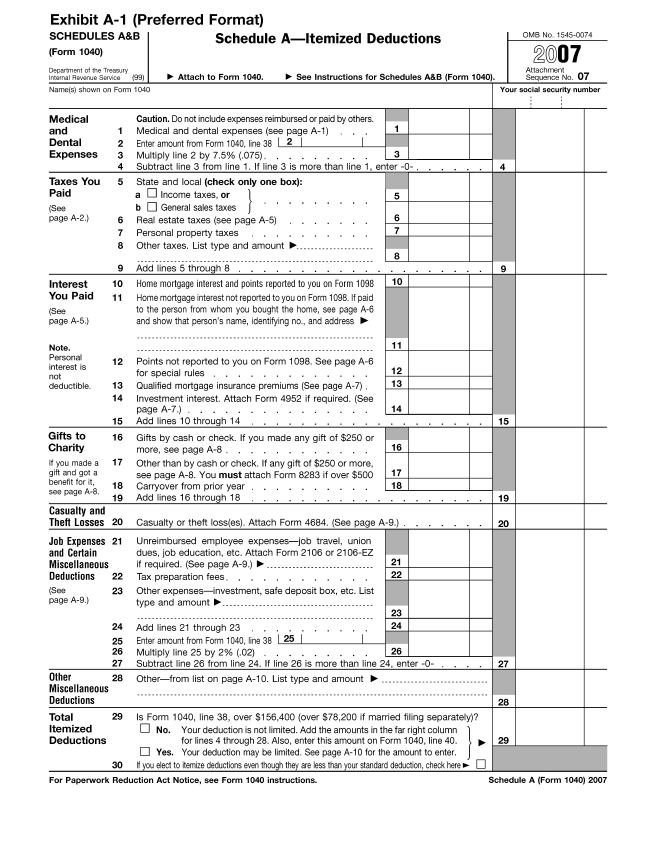
Please click here for the text description of the image.
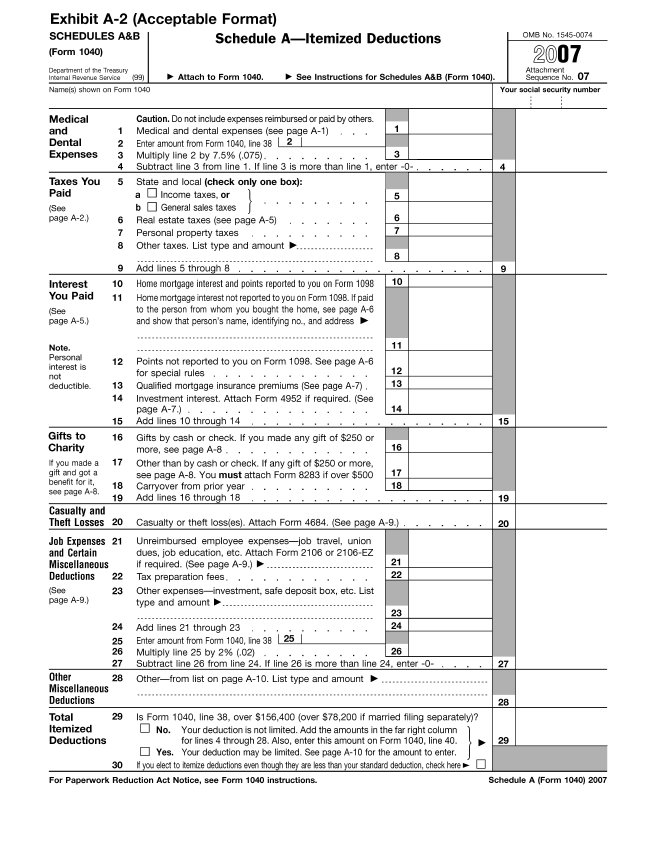
Please click here for the text description of the image.
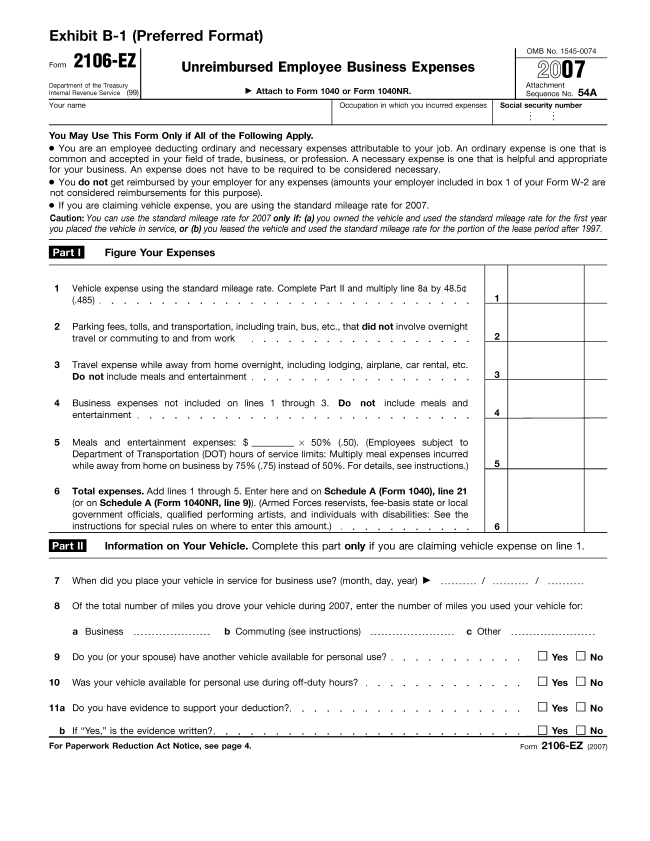
Please click here for the text description of the image.
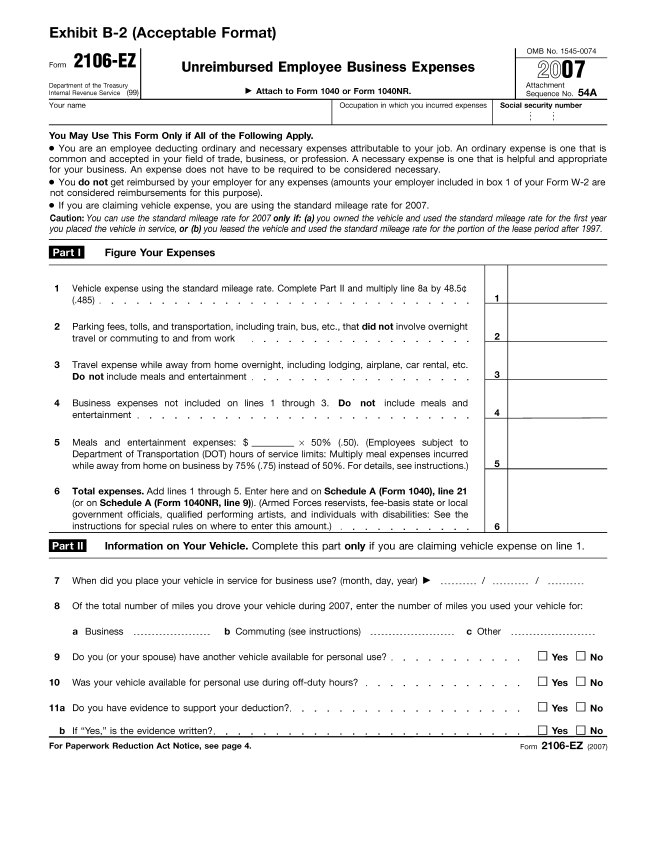
Please click here for the text description of the image.
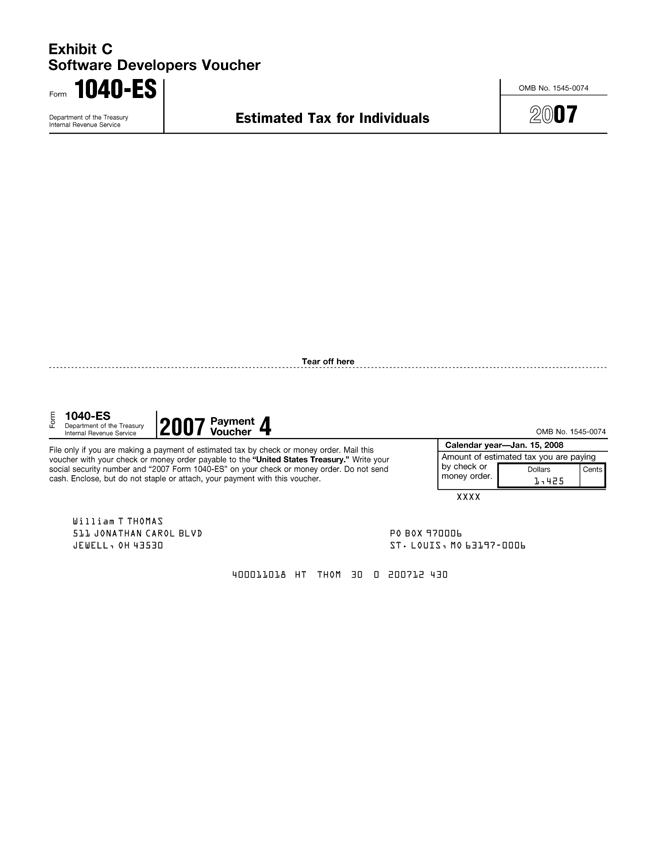
Please click here for the text description of the image.
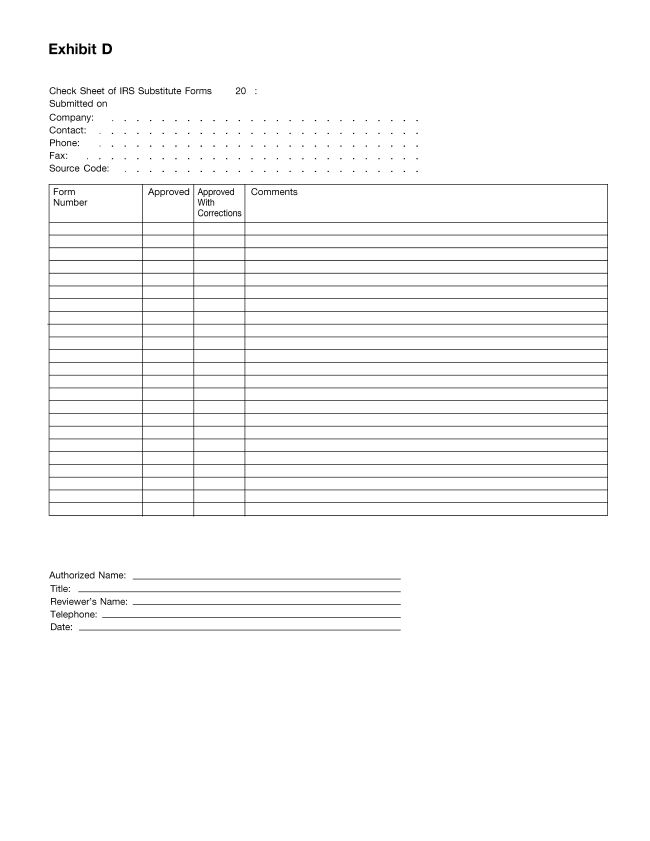
This revenue procedure provides the procedure under which small business refiners may obtain from the Internal Revenue Service a certification that satisfies the requirements of § 45H(f)(1) of the Internal Revenue Code, relating to certifications that costs with respect to a facility will result in compliance with the Highway Diesel Fuel Sulfur Control Requirements of the Environmental Protection Agency (EPA).
.01 Section 45H, which was added to the Code by § 339(a) of the American Jobs Creation Act of 2004 (Public Law No. 108-357), provides a low sulfur diesel fuel production credit for low sulfur diesel fuel produced by a small business refiner. Section 45H(a) provides that the amount of the credit is 5 cents per gallon of low sulfur diesel fuel produced by a small business refiner.
.02 Section 45H(b)(1) provides that the aggregate credit determined under § 45H(a) for any taxable year with respect to any facility shall not exceed—
(1) 25 percent of the qualified capital costs incurred by the small business refiner with respect to the facility, reduced by
(2) The aggregate credits determined under § 45H for all prior taxable years with respect to the facility.
.03 Under § 45H(b)(2), in the case of a small business refiner with average daily domestic refinery runs for the 1-year period ending on December 31, 2002, in excess of 155,000 barrels, the number of percentage points described in § 45H(b)(1) (25 percentage points) shall be reduced (not below zero) by the product of such number (before the application of § 45H(b)(2)) and the ratio of the excess to 50,000 barrels.
.04 Section 45H(c)(1) defines the term “small business refiner” to mean, with respect to any taxable year, a refiner of crude oil that meets the following requirements:
(1) Not more than 1,500 individuals are engaged in the refinery operations of the business on any day during the taxable year; and
(2) The average daily domestic refinery run or average retained production for all facilities of the taxpayer for the 1-year period ending on December 31, 2002, did not exceed 205,000 barrels.
.05 Section 45H(c)(2) defines the term “qualified capital costs.” The qualified capital costs with respect to any facility are those costs that are paid or incurred during the applicable period for compliance with the applicable EPA regulations with respect to the facility, including expenditures for the construction of new process operations units or the dismantling and reconstruction of existing process units to be used in the production of low sulfur diesel fuel, associated adjacent or offsite equipment (including tankage, catalyst, and power supply), engineering, construction period interest, and sitework.
.06 Section 45H(c)(3) defines the term “applicable EPA regulations” as the Highway Diesel Fuel Sulfur Control Requirements of the EPA (applicable EPA regulations). Heavy-duty highway vehicles for the 2007 and later model years must be fueled with highway diesel fuel that meets a maximum sulfur standard of 15 parts per million (ppm). The applicable EPA regulations generally require petroleum refiners that produce diesel fuel for heavy-duty highway vehicles to produce this low sulfur diesel fuel beginning June 1, 2006. However, the applicable EPA regulations provide additional time to comply with the 15 ppm sulfur standard under certain circumstances.
.07 Section 45H(c)(4) defines the term “applicable period.” The applicable period with respect to any facility is the period beginning on January 1, 2003, and ending on the earlier of the date that is one year after the date on which the taxpayer must comply with the applicable EPA regulations with respect to that facility, or December 31, 2009.
.08 Section 45H(c)(5) defines the term “low sulfur diesel fuel” as diesel fuel with a sulfur content of 15 ppm or less.
.09 Section 45H(f)(1) provides that no credit for the production of low sulfur diesel fuel under § 45H shall be allowed unless, not later than the date that is 30 months after the first day of the first taxable year in which the low sulfur diesel fuel production credit is determined with respect to a facility, the small business refiner obtains certification from the Secretary, after consultation with the Administrator of the EPA, that the taxpayer’s qualified costs with respect to the facility will result in compliance with the applicable EPA regulations.
.10 Section 45H(f)(2) provides that an application for certification shall include relevant information regarding unit capacities and operating characteristics sufficient for the Secretary, after consultation with the Administrator of the EPA, to determine that the qualified capital costs are necessary for compliance with the applicable EPA regulations.
.11 Under § 45H(f)(3), any application shall be reviewed and notice of certification, if applicable, shall be made within 60 days of receipt of the application. In the event the Secretary does not notify the taxpayer of the results of the certification within this time period, the taxpayer may presume the certification to be issued until so notified.
.12 Section 45H(f)(4) provides that, with respect to the credit allowed under § 45H—
(1) The statutory period for assessment of any deficiency attributable to the credit shall not expire before the end of the 3-year period ending on the date that the review period described in § 45H(f)(3) ends with respect to the taxpayer; and
(2) The deficiency may be assessed before the expiration of the 3-year period notwithstanding the provisions of any other law or rule of law that would otherwise prevent the assessment.
.13 Section 45H is effective for expenses paid or incurred after December 31, 2002, in taxable years ending after that date.
This revenue procedure applies to small business refiners that pay or incur qualified capital costs after December 31, 2002, in taxable years ending after that date.
.01 The certification required under § 45H(f)(1) (relating to certifications by the Secretary that the taxpayer’s qualified costs with respect to the facility will result in compliance with the applicable EPA regulations) is issued by the Internal Revenue Service after consultation with the EPA. A taxpayer seeking to obtain such a certification must submit one paper copy and one electronic version on a floppy disc or CD of the application for certification under section 45H(f) to the Internal Revenue Service and one paper copy and one electronic version of the application to the EPA. Applications for certification under section 45H(f) should be marked: SECTION 45H(f) APPLICATION FOR CERTIFICATION. There is no user fee for these applications. The application for a certification with respect to a facility must contain the following information:
(1) The taxpayer’s name, address, and taxpayer identification number;
(2) A description of the facility;
(3) The unit capacities and operating characteristics of the facility;
(4) Whether the facility is currently producing low sulfur diesel fuel; and
(5) A description of the qualified capital costs with respect to the facility.
.02 The electronic version of the application MUST be formatted in one of the following software applications:
Microsoft Word™ 2002 or later edition
Microsoft Excel™ 2002 or later edition
Adobe Acrobat™ PDF 6.0 or later edition
Information submitted using the Excel™ spreadsheet must include calculation formulas and assumptions.
.03 A separate application is required for each facility for which qualified capital costs are paid or incurred.
.04 The following declaration must accompany an application: “Under penalties of perjury, I declare that I have examined this application, including accompanying documents, and to the best of my knowledge and belief, the facts presented are true, correct, and complete.” The declaration must be signed by a person authorized to submit the application on behalf of the taxpayer.
.05 The applications should be sent to the following addresses:
(1) Applications to the Internal Revenue Service:
(a) Applications submitted by U.S. mail must be sent to:
Internal Revenue ServiceIndustry Director, Natural Resources
and Construction
Attn: Executive Assistant
1919 Smith Street
Stop HOU 1000
Houston, TX 77002
(b) Applications submitted by a private delivery service must be sent to:
Internal Revenue ServiceIndustry Director, Natural Resources
and Construction
Attn: Executive Assistant
1919 Smith Street, Floor P2
Stop HOU 1000
Houston, TX 77002
(c) Applications may also be hand delivered Monday through Friday between the hours of 8 a.m. and 4 p.m. Central time to:
Internal Revenue ServiceIndustry Director, Natural Resources
and Construction
Attn: Executive Assistant
1919 Smith Street, Floor P2
Stop HOU 1000
Houston, TX 77002
(2) Applications to the Environmental Protection Agency:
(a) Applications submitted by U.S. mail must be sent to:
Environmental Protection AgencyDirector, Compliance and Innovative
Strategies Division
1200 Pennsylvania Ave, NW (6403J)
Washington, DC 20460
(b) Applications submitted by a private delivery service must be sent to:
Environmental Protection AgencyDirector, Compliance and Innovative
Strategies Division
1310 L Street, NW — 6th Floor Mail
Code 6403J
Washington, DC 20005
(c) Applications may also be hand delivered Monday through Friday between the hours of 8 a.m. and 4 p.m. Eastern time to:
Environmental Protection AgencyDirector, Compliance and Innovative
Strategies Division
1310 L Street, NW — 6th Floor Mail
Code 6403J
Washington, DC 20005
.06 The 60-day review period under § 45H(f)(3) does not begin until the Service receives a complete application. An application will not be considered complete if the Service, after the consultation with the EPA, determines that the application does not contain all of the information necessary to determine whether the taxpayer’s costs with respect to the facility result in compliance with the applicable EPA regulations. If the Service does not notify the taxpayer that the application is incomplete within 60 days of receipt of the taxpayer’s application, a taxpayer may presume the application to be complete.
.07 The certification will ordinarily be granted with respect to a facility if the application is complete, nothing in the application is inconsistent with a finding that the taxpayer’s qualified capital costs with respect to the facility will result in compliance with the applicable EPA regulations, and the taxpayer has not been subject to a penalty under the applicable EPA regulations for a violation relating to that facility. If the taxpayer has been subject to a penalty under the applicable EPA regulations for a violation relating to the facility, the Service, after consultation with the EPA, will take all relevant information into account in determining whether certification will be granted or denied.
.08 The Service will notify the taxpayer whether certification has been granted or denied. If the Service does not notify the taxpayer whether certification has been granted or denied within 60 days of receipt of the taxpayer’s complete application (or within 60 days of receipt of an application that is presumed to be complete under section 4.06), the taxpayer may presume that the certification has been granted during the period that begins 60 days after the receipt of the complete (or presumptively complete) application and ends on the date the taxpayer is notified that the application is denied or incomplete. If the taxpayer is permitted under this section 4.08 to presume for any period that the certification with respect to a facility has been granted—
(1) The taxpayer will be treated as satisfying the certification requirement of section 45H(f)(1) in determining whether the credit under section 45H is allowable with respect to fuel produced at the facility during that period; and
(2) The running of the 30-month period applicable to the facility under section 45H(f)(1) will be suspended for the period during which the taxpayer is permitted to presume the certification with respect to the facility has been granted.
.09 All inquiries regarding the status of a certification request should be sent to the Service at the address listed in section 4.05(1) (or the taxpayer may call (713) 209-3615 (not a toll-free call)).
.01 Granting the certification establishes only that the taxpayer has satisfied the requirement of section 45H(f) and does not preclude the Service from examining a taxpayer’s return with respect to the low sulfur diesel fuel production credit. The certification does not establish that the taxpayer is a small business refiner, that fuel produced by the taxpayer is low sulfur diesel fuel, or that any expenditure is a qualified capital cost. Thus, the certification is not a determination by the Service that the costs the taxpayer identifies as qualified capital costs on the application for certification are, in fact, qualified capital costs.
.02 Only one certification is required with respect to a facility. Thus, a taxpayer that incurs additional qualified capital costs with respect to a facility after obtaining a certification with respect to the facility is not required to obtain a new certification with respect to that facility.
.01 This revenue procedure is effective for applications filed after November 9, 2007.
.02 Any certification issued before June 30, 2008, will be treated as issued before the end of the 30-month period described in section 45H(f)(1).
The collection of information contained in this revenue procedure has been reviewed and approved by the Office of Management and Budget in accordance with the Paperwork Reduction Act (44 U.S.C. 3507) under control number 1545-2074.
An agency may not conduct or sponsor, and a person is not required to respond to, a collection of information unless the collection of information displays a valid OMB control number.
The collection of information in this revenue procedure is in section 4. This information will be used to determine if the qualified capital costs of a small business refiner are necessary for compliance with the applicable EPA regulations. This information collection is voluntary.
The likely respondents are small business refiners within the meaning of § 45H(c)(1). The estimated total annual reporting burden is 75 hours. The estimated annual burden per respondent varies from 1 hour to 2 hours, depending on individual circumstances, with an estimated average of 1.5 hours. The estimated total number of respondents is 50. The estimated frequency of responses is once per respondent.
Books or records relating to a collection of information must be retained as long as their contents may become material in the administration of any internal revenue law. Generally tax returns and tax return information are confidential, as required by 26 U.S.C. 6103.
This document contains proposed regulations under sections 401(k), 401(m), 402(c), 411(a), 414(w), and 4979(f) of the Internal Revenue Code relating to automatic contribution arrangements. These proposed regulations will affect administrators of, employers maintaining, participants in, and beneficiaries of eligible plans that include an automatic contribution arrangement under section 401(k)(13), 401(m)(12), or 414(w).
Written or electronic comments and requests for a public hearing must be received by February 6, 2008.
Send submissions to CC:PA:LPD:PR (REG-133300-07), room 5203, Internal Revenue Service, PO Box 7604, Ben Franklin Station, Washington D.C. 20044. Submissions may be hand-delivered Monday through Friday between the hours of 8 a.m. and 4 p.m. to CC:PA:LPD:PR (REG-133300-07), Courier’s Desk, Internal Revenue Service, 1111 Constitution Avenue, N.W., Washington, D.C. 20224, or sent electronically via the Federal erulemaking Portal at www.regulations.gov (IRS REG-133300-07).
Concerning the regulations, R. Lisa Mojiri-Azad, Dana Barry or William D. Gibbs at (202) 622-6060; concerning the submission of comments or to request a public hearing, Richard.A.Hurst@irscounsel.treas.gov, (202) 622-7180 (not toll-free numbers).
The collection of information contained in this notice of proposed rulemaking has been submitted to the Office of Management and Budget for review in accordance with the Paperwork Reduction Act of 1995 (44 U.S.C. 3507(d)). Comments on the collection of information should be sent to the Office of Management and Budget, Attn: Desk Officer for the Department of the Treasury, Office of Information and Regulatory Affairs, Washington, DC 20503, with copies to the Internal Revenue Service, Attn: IRS Reports Clearance Officer, SE:W:CAR:MP:T:T:SP; Washington, DC 20224. Comments on the collection of information should be received by January 7, 2008. Comments are specifically requested concerning:
Whether the proposed collection of information is necessary for the proper performance of the functions of the Internal Revenue Service, including whether the information will have practical utility;
The accuracy of the estimated burden associated with the proposed collection of information;
How the quality, utility, and clarity of the information to be collected may be enhanced;
How the burden of complying with the proposed collections of information may be minimized, including through the application of automated collection techniques or other forms of information technology; and
Estimates of capital or start-up costs and costs of operation, maintenance, and purchase of service to provide information.
The collection of information in these proposed regulations is in §§1.401(k)-3 and 1.414(w)-1. The collection of information in §1.401(k)-3 is required to comply with the statutory notice requirements of sections 401(k)(13) and 401(m)(12), and is expected to be included in the notices currently provided to employees that inform them of their rights and benefits under the plan. The collection of information under §1.414(w)-1 is required to comply with the statutory notice requirements of section 414(w), and is expected to be included in the notices currently provided to employees that inform them of their rights and benefits under the plan. The likely recordkeepers are businesses or other for-profit institutions, nonprofit institutions, organizations, and state or local governments.
Estimated total average annual recordkeeping burden: 30,000 hours.
Estimated average annual burden hours per recordkeeper: 1 hour.
Estimated number of recordkeepers: 30,000.
An agency may not conduct or sponsor, and a person is not required to respond to, a collection of information unless it displays a valid control number assigned by the Office of Management and Budget.
Books or records relating to a collection of information must be retained as long as their contents may become material in the administration of any internal revenue law. Generally, tax returns and tax return information are confidential, as required by 26 U.S.C. 6103.
This document contains proposed amendments to regulations under sections 401(k), 401(m), 402(c), 411(a), and 4979 of the Internal Revenue Code (Code) and new proposed regulations under section 414(w) in order to reflect the provisions of section 902 of the Pension Protection Act of 2006, Public Law 109-280 (PPA ’06). Section 902 of PPA ’06 added sections 401(k)(13), 401(m)(12), and 414(w) to the Code to facilitate automatic contribution arrangements (sometimes referred to as automatic enrollment) in qualified cash or deferred arrangements under section 401(k), as well as in similar arrangements under sections 403(b) and 457(b). An automatic contribution arrangement is a cash or deferred arrangement that provides that, in the absence of an affirmative election by an eligible employee, a default election applies under which the employee is treated as having made an election to have a specified contribution made on his or her behalf under the plan. These regulations would also amend the comprehensive regulations under sections 401(k) and 401(m) (published in 2004) and regulations under section 4979 to reflect other changes made by section 902 of PPA ’06.
Section 401(k)(1) provides that a profit-sharing, stock bonus, pre-ERISA money purchase or rural cooperative plan will not fail to qualify under section 401(a) merely because it contains a qualified cash or deferred arrangement. Section 1.401(k)-1(a)(2) defines a cash or deferred arrangement (CODA) as an arrangement under which an eligible employee may make a cash or deferred election with respect to contributions to, or accruals or other benefits under, a plan that is intended to satisfy the requirements of section 401(a). Section 1.401(k)-1(a)(3) defines a cash or deferred election as any direct or indirect election (or modification of an earlier election) by an employee to have the employer either: (1) provide an amount to the employee in the form of cash (or some other taxable benefit) that is not currently available; or (2) contribute an amount to a trust, or provide an accrual or other benefit, under a plan deferring the receipt of compensation. For purposes of determining whether an election is a cash or deferred election, §1.401(k)-1(a)(3) provides that it is irrelevant whether the default that applies in the absence of an affirmative election is cash (or some other taxable benefit) or a contribution, an accrual, or other benefit under a plan deferring the receipt of compensation. Contributions that are made pursuant to a cash or deferred election under a qualified CODA are commonly referred to as elective contributions.
In order for a CODA to be a qualified CODA, it must satisfy a number of other requirements. First, pursuant to section 401(k)(2)(A), the amount that each eligible employee under the arrangement may defer as an elective contribution must be available to the employee in cash. Section 1.401(k)-1(e)(2) provides that, in order for a CODA to satisfy this requirement, the arrangement must provide each eligible employee with an effective opportunity to make (or change) a cash or deferred election at least once during each plan year.
Section 401(k)(2)(B) provides that a qualified CODA must provide that elective contributions may only be distributed after certain events, including hardship and severance from employment. Similar distribution restrictions apply under sections 403(b)(7) and 403(b)(11). Section 457(d)(1)(A) includes distribution restrictions for eligible governmental deferred compensation plans.
Section 401(k)(3)(A)(ii) applies a special nondiscrimination test to the elective contributions of highly compensated employees, within the meaning of section 414(q) (HCEs). Under this test, called the actual deferral percentage (ADP) test, the average percentage of compensation deferred for HCEs is compared annually to the average percentage of compensation deferred for nonhighly compensated employees (NHCEs) eligible under the plan, and if certain limits are exceeded by the HCEs, corrective action must be taken. Pursuant to section 401(k)(8), one method of correction is distribution to HCEs of excess contributions made on their behalf.
Section 401(m) provides a parallel test for matching contributions and employee after-tax contributions under a defined contribution plan, called the actual contribution percentage (ACP) test. Similarly, pursuant to section 401(m)(6), one method of correction of the ACP test is distribution to HCEs of excess aggregate contributions made on their behalf.
Sections 401(k)(12) and 401(m)(11) provide a design-based safe harbor under which a CODA and any associated matching contributions are treated as satisfying the ADP and ACP tests if the arrangement meets certain contribution and notice requirements. Sections 1.401(k)-3 and 1.401(m)-3 provide guidance on the requirements for this design-based safe harbor.
Sections 401(k)(13) and 401(m)(12), added by PPA ’06 and effective for plan years beginning on or after January 1, 2008, provide an alternative design-based safe harbor for a CODA that provides for automatic contributions at a specified level of contributions and meets certain contribution, notice, and other requirements. A CODA that satisfies these requirements, referred to as a qualified automatic contribution arrangement (QACA), is treated as satisfying the ADP and ACP tests.
Section 414(w), added to the Code by section 902(d)(1) of PPA ’06 and effective for plan years beginning on or after January 1, 2008, further facilitates automatic enrollment by providing limited relief from the distribution restrictions under sections 401(k)(2)(B), 403(b)(7), 403(b)(11), or 457(d)(1)(A) for an eligible automatic contribution arrangement (EACA).
Sections 414(w)(1) and 414(w)(2) provide that an applicable employer plan that contains an EACA is permitted to allow employees to elect to receive a distribution equal to the amount of elective contributions (and attributable earnings) made with respect to the employee beginning with the first payroll period to which the eligible automatic contribution arrangement applies to the employee and ending with the effective date of the election. The election must be made within 90 days after the date of the first elective contribution with respect to the employee under the arrangement. Sections 414(w)(1)(A) and 414(w)(1)(B) provide that the amount of the distribution is includible in gross income for the taxable year in which the distribution is made, but is not subject to the additional income tax under section 72(t).
Section 414(w)(3) defines an EACA as an arrangement under which: (1) a participant may elect to have the employer make payments as contributions under the plan on behalf of the participant, or to the participant directly in cash, (2) the participant is treated as having elected to have the employer make such contributions in an amount equal to a uniform percentage of compensation provided under the plan until the participant specifically elects not to have such contributions made (or specifically elects to have such contributions made at a different percentage), (3) in the absence of an investment election by the participant, such contributions are invested in accordance with regulations prescribed by the Secretary of Labor under section 404(c)(5) of the Employee Retirement Income Security Act of 1974 (ERISA), and (4) participants are provided a notice that satisfies the requirements of section 414(w)(4).
Section 414(w)(4) requires that, within a reasonable period before each plan year, each employee to whom the arrangement applies for such year receive written notice of the employee’s rights and obligations under the arrangement which is sufficiently accurate and comprehensive to apprise the employee of such rights and obligations. Section 414(w)(4)(A)(ii) requires that the notice be written in a manner calculated to be understood by the average employee to whom the arrangement applies. Section 414(w)(4)(B) provides that the notice must explain: (1) the employee’s rights under the arrangement to elect not to have elective contributions made on the employee’s behalf or to elect to have contributions made at a different percentage; and (2) how contributions made under the automatic contribution arrangement will be invested in the absence of any investment decision by the employee. In addition, the employee must be given a reasonable period of time after receipt of the notice and before the first elective contribution is made to make an election with respect to contributions. In many respects, the notice under section 414(w)(4) is the same as the notice required under section 401(k)(13) for a qualified automatic contribution arrangement.
Section 414(w)(5) defines an applicable employer plan as an employee’s trust described in section 401(a) that is exempt from tax under section 501(a), a plan described in section 403(b), or a section 457(b) eligible governmental plan.
Section 414(w)(6) provides that a withdrawal described in section 414(w)(1) is not to be taken into account for purposes of the ADP test.
Section 411(a)(3)(G), as amended by section 902(d)(2) of PPA ’06, provides that a matching contribution shall not be treated as forfeitable merely because the matching contribution is forfeitable if it relates to a contribution that is withdrawn under an automatic contribution arrangement that satisfies the requirements of section 414(w).
Section 4979 provides an excise tax on excess contributions (within the meaning of section 401(k)(8)(B)) and excess aggregate contributions (within the meaning of section 401(m)(6)(B)) not distributed within 21/2 months after the close of the plan year for which the contributions are made. Section 902 of PPA ’06 amended section 4979 to lengthen this 21/2 month correction period for excess contributions and excess aggregate contributions under an EACA to 6 months. Thus, in the case of an EACA, the section 4979 excise tax does not apply to any excess contributions or excess aggregate contributions which, together with income allocable to the contributions, are distributed or forfeited (if forfeitable) within six months after the close of the plan year.
Section 902 of PPA ’06 amended section 4979(f)(2) to provide that any distributions of excess contributions and excess aggregate contributions are includible in the employee’s gross income for the taxable year in which distributed. However, pursuant to sections 401(k)(8)(D) and 401(m)(7)(A), the distributions are not subject to the additional income tax under section 72(t). Section 902 of PPA ’06 also amended sections 401(k)(8), 401(m)(6), and 4979(f)(1) to eliminate the requirement that excess contributions or excess aggregate contributions (whether or not under an EACA) include income allocable to the period after the end of the plan year (gap period income).
Section 624 of PPA ’06 amended section 404(c) of ERISA to provide that a participant in an individual account plan meeting the notice requirements of section 404(c)(5)(B) of ERISA is treated as exercising control over the assets in the account which, in the absence of an investment election by the participant, are invested in accordance with regulations prescribed by the Secretary of Labor. The specific timing and content requirements for the notice required under section 404(c)(5)(B) of ERISA are generally the same as under section 414(w)(4), but the Department of Labor (DOL) has interpretative jurisdiction for that notice.
Section 902 of PPA ’06 also amended section 514 of ERISA to preempt any State law which would directly or indirectly prohibit or restrict the inclusion in any plan of an automatic contribution arrangement. The Secretary of Labor is authorized to prescribe regulations which would establish minimum standards that such an arrangement would be required to satisfy in order for this preemption to apply to such an arrangement. The definition of an automatic contribution arrangement under section 514 of ERISA is generally the same as the definition of an EACA under section 414(w)(3), (including the requirement that automatic contributions under the arrangement must be invested in accordance with regulations prescribed by the Secretary of Labor under section 404(c)(5) of ERISA), but the definition does not include a notice requirement. However, section 514(e)(3) of ERISA requires a notice to be provided to each participant to whom the arrangement applies. As in the case for the notice under section 404(c)(5)(B) of ERISA, the specific timing and content requirements under section 514(e)(3) of ERISA are generally the same as the notice requirements under section 414(w)(4), but the interpretative jurisdiction for that notice is also with the DOL.
The proposed regulations would amend §§1.401(k)-3 and 1.401(m)-3 to reflect the provisions of sections 401(k)(13) and 401(m)(12) for a QACA, the new design-based safe harbor for satisfying the ADP and ACP tests. To the extent that the requirements to be a QACA are the same as those for the safe harbor described in sections 401(k)(12) and 401(m)(11), these proposed regulations would apply the existing rules currently in §§1.401(k)-3 and 1.401(m)-3 to a QACA. Thus, for example, because §1.401(k)-3(e) applies to a QACA, except to the extent otherwise provided in section 1107 of PPA ’06 or §1.401(k)-3(f) or §1.401(k)-3(g), the plan provision implementing the QACA for an existing qualified CODA would be required to be adopted before the first day of the plan year and remain in effect for an entire 12-month plan year. Similarly under §1.401(k)-3(c)(6), a plan would be permitted to limit the amount of elective contributions that may be made by an eligible employee under the QACA, provided that each NHCE who is an eligible employee generally is permitted to make elective contributions in an amount that is at least sufficient to receive the maximum amount of matching contributions available under the plan for the plan year, and the employee is permitted to elect any lesser amount of elective contributions.
In order to be a QACA, the plan must provide a specified schedule of automatic contributions (called qualified percentages) for each eligible employee beginning with an initial minimum qualified percentage of 3 percent of compensation. This minimum qualified percentage begins when the employee first participates in the automatic contribution arrangement that is intended to be a QACA and ends on the last day of the following plan year. Thus, this initial period for a participant could last as long as two full plan years. After this initial period, the minimum qualified percentage increases by 1 percent for each of the next three plan years. Thus, the minimum qualified percentage for the plan year after the initial period is 4 percent. This minimum qualified percentage increases to 5 percent for the next plan year, and then is 6 percent for all plan years thereafter. These are merely minimum qualified percentages. Thus, a QACA can provide for higher percentages. For example, a QACA could provide for a qualified percentage in the initial period of 4 percent of compensation. If a plan did so, it could also provide a 4 percent qualified percentage for the plan year after the initial period (the statutory minimum percentage for that plan year), 5 percent in the next plan year and 6 percent thereafter. However, the qualified percentage can at no time exceed 10 percent of compensation.
Under section 401(k)(13)(C)(iii), the qualified percentage must be applied uniformly to all eligible employees. The proposed regulations would provide that a plan does not fail this requirement merely because the percentage varies for the following reasons: (1) the percentage varies based on the number of years an eligible employee has participated in the automatic contribution arrangement intended to be a QACA; (2) the rate of elective contributions under a cash or deferred election that is in effect on the effective date of the default percentage under the QACA is not reduced; or (3) the amount of elective contributions is limited so as not to exceed the limits of sections 401(a)(17), 402(g) (determined with or without catch-up contributions described in section 402(g)(1)(C) or section 402(g)(7)) or 415. Further, the proposed regulations would provide that a cash or deferred arrangement does not fail to satisfy the uniformity requirement merely because an employee is not automatically enrolled during a period that the employee is not permitted to make elective contributions because of the requirement to suspend elective contributions for a 6-month period following a hardship distribution. In the case of an employee whose elective contributions have been suspended (for example, because of a hardship distribution), the plan must provide that the employee will, at the end of the suspension period, resume elective contributions at the level (percentage) that would apply if the suspension had not occurred.
Reflecting section 401(k)(13)(C)(ii), the proposed regulations provide that the default election ceases to apply to any eligible employee if the employee makes an affirmative election that remains in effect to not have any elective contributions made on his or her behalf or to have elective contributions made in a specified amount or percentage of compensation on his or her behalf. Thus, an employee can make an affirmative election to contribute at a certain level and have that election apply for all subsequent plan years. Similarly, an employee can make an affirmative election to have no elective contributions made on his or her behalf. This latter election is not the same as the election to withdraw prior elective contributions under section 414(w).
The proposed regulations also reflect section 401(k)(13)(C)(iv), which provides an exception from the default election for eligible employees who were eligible to participate in the CODA (or a predecessor CODA) immediately before the effective date of the QACA and who have an election in effect on that effective date. The proposed regulations would provide that an election in effect means an affirmative election that remains in effect to have the employer make elective contributions on his or her behalf (in a specified amount or percentage of compensation) or to not have the employer make elective contributions on his or her behalf. Generally, this would require that the employee have completed an election form and chosen an amount or percentage (including zero) of his compensation to be deferred.
The proposed regulations reflect the matching or nonelective contribution requirement of section 401(k)(13)(D). As with the safe harbor in section 401(k)(12), section 401(k)(13) provides a choice for an employer between satisfying a matching contribution requirement or a nonelective contribution requirement. However, while the QACA requires the same level of employer nonelective contributions as under section 401(k)(12), the matching contribution requirement for a QACA allows for a lower level of matching contributions. Specifically, a QACA using the matching contribution alternative need only provide for matching contributions on behalf of each eligible NHCE equal to 100 percent of the employee’s elective contributions that do not exceed one percent of compensation and 50 percent of the employee’s elective contributions that exceed one percent but do not exceed six percent of compensation. In addition, a QACA allows a slower schedule of vesting for both matching and nonelective safe harbor contributions than the safe harbor in section 401(k)(12). All QACA safe harbor contributions must be fully vested after 2 years of vesting service (within the meaning of section 411(a)), rather than immediately as required by section 401(k)(12). In addition, the proposed regulations would apply the same distribution restrictions that apply to safe harbor contributions and nonelective contributions under section 401(k)(12) to QACA safe harbor contributions.
Each eligible employee under a QACA must receive a safe harbor notice within a reasonable period before each plan year. The proposed regulations reflect the requirement that this notice must provide the information required under section 401(k)(12). The regulations also reflect the additional timing and content requirements described in section 401(k)(13)(E)(i). Thus, the notice must also explain: (1) the employee’s right under the arrangement to elect not to have elective contributions made on the employee’s behalf or to elect to have contributions made in a different amount or percentage of compensation; and (2) how contributions made under the automatic contribution arrangement will be invested in the absence of any investment decision by the employee (including, in the case of an arrangement under which the employee may elect among two or more investment options, how contributions made under the automatic contribution arrangement will be invested in the absence of an investment election by the employee). These additional requirements cannot be satisfied by reference to the plan’s summary plan description. Further, the proposed regulations would provide that in order to satisfy section 401(k)(13)(E)(ii)(III), under the QACA, the employee must be given a reasonable period of time after receipt of the notice and before the first elective contribution is to be made to make an election with respect to contributions and investments.
The proposed regulations interpret the requirement under section 401(k)(13)(E)(i) to provide a notice within a reasonable period before each plan year by applying the rules of §1.401(k)-3(d)(3). Thus, the proposed regulations would provide that the general determination of whether the timing requirement is satisfied is based on all of the relevant facts and circumstances, and the deemed timing rule of §1.401(k)-3(d)(3)(ii) applies. Under this deemed timing rule, the timing requirement is satisfied if at least 30 days (and no more than 90 days) before the beginning of each plan year, the notice is given to each eligible employee for the plan year. The proposed regulations would also provide that in the case of an employee who does not receive the notice within the period described in the previous sentence because the employee becomes eligible after the 90th day before the beginning of the plan year, the timing requirement is deemed to be satisfied if the notice is provided no more than 90 days before the employee becomes eligible (and no later than the date the employee becomes eligible). Thus, for example, the preceding sentence would apply to all eligible employees for the first plan year under a newly established plan that provides for elective contributions, and to the first plan year in which an employee becomes eligible under an existing plan that provides for elective contributions. In the case of a plan with immediate eligibility when an employee is hired, this deemed timing rule would be satisfied if the employee is provided the notice on the first day of employment.
In order to further facilitate automatic enrollment, section 414(w) provides limited relief from the distribution restrictions under sections 401(k)(2), 403(b)(7), 403(b)(11), and 457(d) (as well as certain other relief provisions) for an applicable plan (that is, a section 401(k) plan, a section 403(b) plan, or a section 457(b) eligible governmental plan) with an EACA. Specifically, section 414(w)(2) provides that, under an applicable employer plan with an EACA, an employee can be permitted to elect to receive a distribution equal to the amount of default elective contributions (and attributable earnings) made with respect to the first payroll period to which the EACA applies to the employee and any succeeding payroll periods beginning before the effective date of the election.
An employer is permitted, but not required, to include the section 414(w)(2) permissible withdrawal provision in an applicable employer plan, and an employer who does offer this option is not required to make it available to all employees eligible under the EACA. Thus, for example, an employer might choose to make the withdrawal option available only to employees for whom no elective contributions have been made under the CODA (or a predecessor CODA) before the EACA is effective. However, under a section 401(k) plan or a section 403(b) plan, the employer may not condition the right to take the withdrawal on the employee making an election to have no future elective contributions made on the employee’s behalf because such a condition would violate the contingent benefit rule under section 401(k)(4)(A) or the universal availability requirement under section 403(b)(12)(A)(ii). Nonetheless, the employer could provide in the withdrawal election form a default election under which elective contributions would cease unless the employee makes an affirmative election.
Under section 414(w)(2)(B), the election to withdraw the contributions that were made under an EACA must be made within 90 days of the “first elective contribution with respect to the employee under the arrangement.” The proposed regulations would define the arrangement for this purpose as the EACA so that the withdrawal option could apply to employees previously eligible under the CODA (including a CODA that is an automatic contribution arrangement but was not an EACA). Because section 414(w) only applies to plan years beginning on or after January 1, 2008, an automatic contribution arrangement can only become an EACA on or after that date. Accordingly, a withdrawal election under section 414(w) can only apply to elective contributions made after that date. The proposed regulations would provide that the 90-day window for making the withdrawal election begins on the date on which the compensation that is subject to the cash or deferred election would otherwise have been included in gross income. In addition, the proposed regulations would provide that the effective date of the election must be no later than the last day of the payroll period that begins after the date of the election.
The proposed regulations would provide that the distribution is generally the account balance attributable to the default elective contributions, adjusted for gains and losses. The distribution may be reduced by any generally applicable fees. However, the proposed regulations provide that the plan may not charge a different fee for this distribution than would apply to other distributions. Also, if the default elective contributions are not maintained in a separate account, the amount of the allocable gains and losses will be determined under rules similar to those provided under §1.401(k)-2(b)(2)(iv) for the distribution of excess contributions.
The amount withdrawn under section 414(w) is includible in gross income in the year in which it is distributed, except amounts that are distributions of designated Roth contributions are not included in an employee’s gross income a second time. The proposed regulations would require that this amount be reported on Form 1099-R, Distributions From Pensions, Annuities, Retirement or Profit-Sharing Plans, IRAs, Insurance Contracts, etc. However, the amount is not subject to the additional income tax under section 72(t). Finally, the proposed regulations would amend §1.402(c)-2 to include these withdrawals in the list of distributions that are not eligible for rollover.
Any employer matching contribution with respect to the default elective contribution distributed pursuant to section 414(w) must be forfeited. The forfeited matching contribution is not a mistaken contribution or other erroneous contribution, and, thus, it cannot be returned to the employer (or be distributed to the employee as is permitted for an excess aggregate contribution). The proposed regulations would provide that the forfeited contribution must remain in the plan and be treated in the same manner under the plan terms as any other forfeiture under the plan.
Under section 414(w)(3)(B), an EACA must provide that the default elective contribution is a uniform percentage of compensation. The proposed regulations would provide that the permitted differences in contribution rates provided in these proposed regulations under section 401(k)(13) for a QACA also apply to an EACA.
Another requirement to be an EACA under section 414(w)(3)(C) is that automatic contributions are invested in accordance with regulations prescribed by the Secretary of Labor under section 404(c)(5) of ERISA. These proposed regulations would provide that this requirement only applies if the plan is otherwise subject to Title I of ERISA. Thus, for example, this provision would not apply to a governmental plan (within the meaning of section 414(d)).
The proposed regulations reflect the section 414(w) notice requirement under which notice must be provided to each employee to whom the EACA applies within a “reasonable period” before each plan year, but provide that, if an employee becomes eligible in a given year, notice must be given within a “reasonable period” before the employee becomes eligible. The proposed regulations provide a deemed timing requirement that is generally the same as the deemed timing rule in §1.401(k)-3(d)(3)(ii).
As noted in this preamble, PPA ’06 provides for several notices relating to automatic contribution arrangements that have similar content and timing requirements, including the notices required by sections 404(c)(5)(B) and 514(e)(3) of ERISA. The IRS, in coordination with DOL, anticipates that a single document can satisfy all of these notice requirements, so long as it has all of the requisite information for plan participants and satisfies the timing requirements for each of those notices.
The proposed regulations also reflect the amendments to section 4979 made by section 902 of PPA ’06. First, the proposed regulations reflect the substitution of 6 months for 21/2 months as the time period under section 4979(f) by which excess contributions or excess aggregate contributions with respect to an EACA must be distributed to avoid the excise tax under section 4979(a). Further, the proposed regulations reflect the elimination of the requirement that distributions of excess contributions or excess aggregate contributions (whether or not under an EACA) include attributable earnings for the period after the end of the plan year (gap period income). The proposed regulations also reflect the change in the tax treatment of a distribution of excess contributions or excess aggregate contributions (whether or not under an EACA) under which the distribution of excess contributions or excess aggregate contributions (including earnings) is includible in the participant’s gross income for the year of the distribution (without regard to the amount of the distribution). The proposed regulations would also amend §§1.401(k)-2 and 1.401(m)-2 to reflect these provisions in the correction rules for the ADP and ACP tests. All of these changes are proposed to be effective January 1, 2008 and will impact corrective distributions made in 2009.
In addition, the proposed regulations would amend §§1.401(k)-2 and 1.401(m)-2 to reflect the provisions of section 414(w)(6) that default elective contributions distributed under section 414(w) are not taken into account in the ADP test. They are also not permitted to be taken into account in the ACP test. The proposed regulations under section 401(m) have added a conforming change for other elective contributions that are not taken into account in the ADP test. The proposed regulations would also amend §1.411(a)-4(b)(7) to reflect the amendment to section 411(a)(3)(G) made by PPA ’06 section 902(d)(2).
Sections 401(k)(13), 401(m)(12), and 414(w), and the amended provisions of sections 411(a)(3)(G) and 4979(f), are effective for plan years beginning on or after January 1, 2008. These regulations are proposed to be effective for plan years beginning on or after January 1, 2008. Taxpayers may rely on these proposed regulations for guidance pending the issuance of final regulations. If, and to the extent, the final regulations are more restrictive than the guidance in these proposed regulations, those provisions of the final regulations will be applied without retroactive effect.
It has been determined that this notice of proposed rulemaking is not a significant regulatory action as defined in Executive Order 12866. Therefore, a regulatory assessment is not required. It has been determined that 5 U.S.C. 533(b) of the Administrative Procedure Act (5 U.S.C. chapter 5) does not apply to these regulations. It is hereby certified that the collection of information in these proposed regulations will not have a significant economic impact on a substantial number of small entities. This certification is based on the fact that most small entities that maintain plans that will be eligible for the safe harbor provisions of sections 401(k) and 401(m) or the distribution relief provisions of section 414(w) currently provide a similar notice with which this notice can be combined. Therefore, an analysis under the Regulatory Flexibility Act (5 U.S.C. chapter 6) is not required. Pursuant to section 7805(f) of the Internal Revenue Code, these regulations have been submitted to the Chief Counsel for Advocacy of the Small Business Administration for comments on its impact on small business.
Before these proposed regulations are adopted as final regulations, consideration will be given to any written (one signed and eight (8) copies) or electronic comments that are submitted timely to the IRS. The IRS and Treasury Department specifically request comments on the clarity of the proposed rules and how they can be made easier to understand. All comments will be available for public inspection and copying. A public hearing will be scheduled if requested in writing by any person who timely submits written comments. If a public hearing is scheduled, notice of the date, time, and place of the public hearing will be published in the Federal Register.
Accordingly, 26 CFR part 1 is proposed to be amended as follows:
Paragraph 1. The authority citation for part 1 is amended to read as follows:
Authority: 26 U.S.C. 7805 * * *
Section 1.401(k)-3 is also issued under 26 U.S.C. 401(k)(13).
Par. 2. Section 1.401(k)-0 is amended by:
1. The entry for §1.401(k)-2 is amended by adding entries for §§1.401(k)-2(a)(5)(vi) and 1.401(k)-2(b)(2)(iv)(D).
2. Revising the entries for §§1.401(k)-2(b)(2)(vi)(A) and 1.401(k)-2(b)(2)(vi)(B).
3. Adding an entry for §1.401(k)-2(b)(5)(iii).
4. Revising the entries for §§1.401(k)-3(a)(1), 1.401(k)-3(a)(2) and 1.401(k)-3(a)(3).
5. Adding entries for §§1.401(k)-3(i), 1.401(k)-3(j) through (j)(2)(iii).
6. Adding entries for §1.401(k)-3(k) through (k)(4)(iii).
The additions and revisions read as follows:
(a) * * *
(5) * * *
(vi) Default elective contributions pursuant to section 414(w).
* * * * *
(b) * * *
(2) * * *
(iv) * * *
(A) * * *
(D) Plan years before 2008.
* * * * *
(vi) * * *
(A) Corrective distributions for plan years beginning on or after January 1, 2008.
(B) Corrective distributions for plan years beginning before January 1, 2008.
* * * * *
(5) * * *
(iii) Special rule for eligible automatic contribution arrangements.
* * * * *
(a) * * *
(1) Section 401(k)(12) safe harbor.
(2) Section 401(k)(13) safe harbor.
(3) Requirements applicable to safe harbor contributions.
* * * * *
(i) Reserved.
(j) Qualified automatic contribution arrangement.
(1) Automatic contribution requirement.
(i) In general.
(ii) Automatic contribution arrangement.
(iii) Exception for certain current employees.
(2) Qualified percentage.
(i) In general.
(ii) Minimum percentage requirements.
(A) Initial-period requirement.
(B) Second-year requirement.
(C) Third-year requirement.
(D) Later years requirement.
(iii) Exception to uniform percentage requirement.
(k) Modifications to contribution requirements and notice requirements for automatic contribution safe harbor.
(1) In general.
(2) Lower matching requirement.
(3) Modified nonforfeiture requirement.
(4) Additional notice requirements.
(i) In general.
(ii) Additional information.
(iii) Timing requirements.
Par. 3. Section 1.401(k)-1 is amended by:
1. Revising paragraph (b)(1)(ii)(C) and adding new paragraph (b)(1)(ii)(D).
2. Revising paragraph (e)(7) by adding a new sentence after the fifth sentence.
The additions and revisions to read as follows:
* * * * *
(b) * * * (1) * * * (ii) * * *
(C) The ADP safe harbor provisions of section 401(k)(13) described in §1.401(k)-3; or
(D) The SIMPLE 401(k) provisions of section 401(k)(11) described in §1.401(k)-4.
* * * * *
(e) * * *
(7) Plan provision requirement. * * * In addition, a plan that uses the safe harbor method of section 401(k)(13), as described in paragraph (b)(1)(ii)(C) of this section, must specify the default percentages that apply for the plan year, and whether the safe harbor contribution will be the nonelective safe harbor contribution or the matching safe harbor contribution and is not permitted to provide that ADP testing will be used if the requirements for the safe harbor are not satisfied. * * *
* * * * *
Par. 4. Section 1.401(k)-2 is amended by:
1. Adding paragraph (a)(5)(vi).
2. Revising paragraphs (b)(2)(iv)(A) and (b)(2)(iv)(D).
3. Removing paragraph (b)(2)(iv)(E).
4. Revising paragraph (b)(2)(vi)(A).
5. Adding a new first sentence to paragraph (b)(2)(vi)(B).
6. Removing and reserving Example (3), Example (4), and Example (5) from §1.401(k)-2 (b)(2)(viii).
7. Revising paragraph (b)(4)(iii) and adding paragraph (b)(5)(iii).
The additions and revisions to read as follows:
(a) * * *
(5) * * *
(vi) Default elective contributions pursuant to section 414(w). Default elective contributions made under an eligible automatic contribution arrangement (within the meaning of §1.414(w)-1(b) that are distributed pursuant to §1.414(w)-1(c) for plan years beginning on or after January 1, 2008, are not taken into account under paragraph (a)(4) of this section for the plan year for which the contributions are made, or for any other plan year.
(b) * * *
(2) * * *
(iv) Income allocable to excess contributions—(A) General rule. For plan years beginning on or after January 1, 2008, the income allocable to excess contributions is equal to the allocable gain or loss through the end of the plan year. See paragraph (b)(2)(iv)(D) of this section for rules that apply to plan years beginning before January 1, 2008.
* * * * *
(D) Plan years before 2008. For plan years beginning before January 1, 2008, the income allocable to excess contributions is determined under §1.401(k)-2(b)(2)(iv) (as it appeared in the April 1, 2007, edition of 26 CFR part 1).
* * * * *
(vi) Tax treatment of corrective distributions—(A) Corrective distributions for plan years beginning on or after January 1, 2008. Except as provided in this paragraph (b)(2)(vi), for plan years beginning on or after January 1, 2008, a corrective distribution of excess contributions (and allocable income) is includible in the employee’s gross income for the employee’s taxable year in which distributed. In addition, the corrective distribution is not subject to the early distribution tax of section 72(t). See also paragraph (b)(5) of this section for additional rules relating to the employer excise tax on amounts distributed more than 21/2 months (6 months in the case of a plan that includes an eligible automatic contribution arrangement within the meaning of section 414(w)) after the end of the plan year. See also §1.402(c)-2, A-4 for restrictions on rolling over distributions that are excess contributions.
(B) Corrective distributions for plan years beginning before January 1, 2008. The tax treatment of corrective distributions for plan years beginning before January 1, 2008, is determined under §1.401(k)-2(b)(2)(vi) (as it appeared in the April 1, 2007, edition of 26 CFR Part 1). * * *
* * * * *
(4) * * *
(iii) Permitted forfeiture of QMAC. Pursuant to section 401(k)(8)(E), a qualified matching contribution is not treated as forfeitable under §1.401(k)-1(c) merely because under the plan it is forfeited in accordance with paragraph (b)(4)(ii) of this section or §1.414(w)-1(d)(2).
* * * * *
(5) * * *
(iii) Special rule for eligible automatic contribution arrangements. In the case of a plan that includes an eligible automatic contribution arrangement within the meaning of section 414(w), 6 months is substituted for 21/2 months in paragraph (b)(5)(i) of this section.
* * * * *
Par. 5. Section 1.401(k)-3 is amended by:
1. Revising paragraph (a).
2. Revising the first sentence of paragraph (e)(1).
3. Revising the last sentence of paragraph (h)(2).
4. Revising the first sentence of paragraph (h)(3).
5. Reserving paragraph (i) and adding paragraphs (j) and (k).
The additions and revisions to read as follows:
(a) ADP test safe harbor—(1) Section 401(k)(12) safe harbor. A cash or deferred arrangement satisfies the ADP safe harbor provision of section 401(k)(12) for a plan year if the arrangement satisfies the safe harbor contribution requirement of paragraph (b) or (c) of this section for the plan year, the notice requirement of paragraph (d) of this section, the plan year requirements of paragraph (e) of this section, and the additional rules of paragraphs (f), (g), and (h) of this section, as applicable.
(2) Section 401(k)(13) safe harbor. For plan years beginning on or after January 1, 2008, a cash or deferred arrangement satisfies the ADP safe harbor provision of section 401(k)(13) for a plan year if the arrangement is described in paragraph (j) of this section and satisfies the safe harbor contribution requirement of paragraph (k) of this section for the plan year, the notice requirement of paragraph (d) of this section (modified to include the information set forth in paragraph (k)(4) of this section), the plan year requirements of paragraph (e) of this section, and the additional rules of paragraphs (f), (g), and (h) of this section, as applicable. A cash or deferred arrangement that satisfies the requirements of this paragraph is referred to as a qualified automatic contribution arrangement.
(3) Requirements applicable to safe harbor contributions. Pursuant to section 401(k)(12)(E)(ii) and section 401(k)(13)(D)(iv), the safe harbor contribution requirement of paragraph (b), (c), or (k) of this section must be satisfied without regard to section 401(l). The contributions made under paragraph (b) or (c) of this section (and the corresponding contributions under paragraph (k) of this section) are referred to as safe harbor nonelective contributions and safe harbor matching contributions, respectively.
* * * * *
(e) * * * (1) General rule. Except as provided in this paragraph (e) or in paragraph (f) of this section, a plan will fail to satisfy the requirements of sections 401(k)(12), 401(k)(13), and this section unless plan provisions that satisfy the rules of this section are adopted before the first day of the plan year and remain in effect for an entire 12-month plan year. * * *
* * * * *
(h) * * *
(2) Use of safe harbor nonelective contributions to satisfy other discrimination tests. * * * However, pursuant to section 401(k)(12)(E)(ii) and section 401(k)(13)(D)(iv), to the extent they are needed to satisfy the safe harbor contribution requirement of paragraph (b) of this section, safe harbor nonelective contributions may not be taken into account under any plan for purposes of section 401(l) (including the imputation of permitted disparity under §1.401(a)(4)-7).
(3) Early participation rules. Section 401(k)(3)(F) and §1.401(k)-2(a)(1)(iii)(A), which provide an alternative nondiscrimination rule for certain plans that provide for early participation, do not apply for purposes of section 401(k)(12), section 401(k)(13), and this section. * * *
* * * * *
(i) [RESERVED].
(j) Qualified automatic contribution arrangement—(1) Automatic contribution requirement—(i) In general. A cash or deferred arrangement is described in this paragraph (j) if it is an automatic contribution arrangement described in paragraph (j)(1)(ii) of this section where the default election under that arrangement is a contribution equal to the qualified percentage described in paragraph (j)(2) of this section multiplied by the eligible employee’s compensation from which elective contributions are permitted to be made under the cash or deferred arrangement.
(ii) Automatic contribution arrangement. An automatic contribution arrangement is a cash or deferred arrangement within the meaning of §1.401(k)-1(a)(2) that provides that in the absence of an eligible employee’s affirmative election, a default applies under which the employee is treated as having made an election to have a specified contribution made on his or her behalf under the plan. The default election ceases to apply with respect to an eligible employee if the employee makes an affirmative election (that remains in effect) to—
(A) Have elective contributions made in a different amount on his or her behalf (in a specified amount or percentage of compensation); or
(B) Not have any elective contributions made on his or her behalf.
(iii) Exception for certain current employees. An automatic contribution arrangement will not fail to be a qualified automatic contribution arrangement merely because the default election provided under paragraph (j)(1)(i) of this section is not applied to an employee who was an eligible employee under the cash or deferred arrangement (or a predecessor arrangement) immediately prior to the effective date of the qualified automatic contribution arrangement and on that effective date had an affirmative election in effect (that remains in effect) to—
(A) Have elective contributions made on his or her behalf (in a specified amount or percentage of compensation); or
(B) Not have elective contributions made on his or her behalf.
(2) Qualified percentage—(i) In general. A percentage is a qualified percentage only if it—
(A) Is uniform for all employees (except to the extent provided in paragraph (j)(2)(iii) of this section);
(B) Does not exceed 10 percent; and
(C) Satisfies the minimum percentage requirements of paragraph (j)(2)(ii) of this section.
(ii) Minimum percentage requirements—(A) Initial-period requirement. The minimum percentage requirement of this paragraph (j)(2)(ii)(A) is satisfied only if the percentage that applies for the period that begins when the employee first participates in the automatic contribution arrangement that is a qualified automatic contribution arrangement and ends on the last day of the following plan year is at least 3 percent.
(B) Second-year requirement. The minimum percentage requirement of this paragraph (j)(2)(ii)(B) is satisfied only if the percentage that applies for the plan year immediately following the last day described in paragraph (j)(2)(ii)(A) of this section is at least 4 percent.
(C) Third-year requirement. The minimum percentage requirement of this paragraph (j)(2)(ii)(C) is satisfied only if the percentage that applies for the plan year immediately following the plan year described in paragraph (j)(2)(ii)(B) of this section is at least 5 percent.
(D) Later years requirement. A percentage satisfies the minimum percentage requirement of this paragraph (j)(2)(ii)(D) only if the percentage that applies for all plan years following the plan year described in paragraph (j)(2)(ii)(C) of this section is at least 6 percent.
(iii) Exception to uniform percentage requirement. A plan does not fail to satisfy the uniform percentage requirement of paragraph (j)(2)(i)(A) of this section merely because—
(A) The percentage varies based on the number of years an eligible employee has participated in the automatic contribution arrangement intended to be a qualified automatic contribution arrangement;
(B) The rate of elective contributions under a cash or deferred election that is in effect immediately prior to the effective date of the default percentage under the qualified automatic contribution arrangement is not reduced;
(C) The rate of elective contributions is limited so as not to exceed the limits of sections 401(a)(17), 402(g) (determined with or without catch-up contributions described in section 402(g)(1)(C) or 402(g)(7)), and 415; or
(D) The default election provided under paragraph (j)(1)(i) of this section is not applied during the period an employee is not permitted to make elective contributions in order for the plan to satisfy the requirements of §1.401(k)-1(d)(3)(iv)(E)(2).
(k) Modifications to contribution requirements and notice requirements for automatic contribution safe harbor—(1) In general. A cash or deferred arrangement satisfies the contribution requirements of this paragraph (k) only if it satisfies the contribution requirements of either paragraph (b) or (c) of this section, as modified by the rules of paragraphs (k)(2) and (k)(3) of this section. In addition, a cash or deferred arrangement described in paragraph (j) of this section satisfies the notice requirement of section 401(k)(13)(E) only if the notice satisfies the additional requirements of paragraph (k)(4) of this section.
(2) Lower matching requirement. In applying the requirement of paragraph (c) of this section, in the case of a cash or deferred arrangement described in paragraph (j) of this section, the basic matching formula is modified so that each eligible NHCE must receive the sum of—
(i) 100 percent of the employee’s elective contributions that do not exceed 1 percent of the employee’s safe harbor compensation; and
(ii) 50 percent of the employee’s elective contributions that exceed 1 percent of the employee’s safe harbor compensation but that do not exceed 6 percent of the employee’s safe harbor compensation.
(3) Modified nonforfeiture requirement. A cash or deferred arrangement described in paragraph (j) of this section will not fail to satisfy the requirements of paragraph (b) or (c) of this section, as applicable, merely because the safe harbor contributions are not qualified nonelective contributions or qualified matching contributions provided that—
(i) The contributions are subject to the withdrawal restrictions set forth in §1.401(k)-1(d); and
(ii) Any employee who has completed 2 years of service (within the meaning of section 411(a)) has a nonforfeitable right to the account balance attributable to the safe harbor contributions.
(4) Additional notice requirements—(i) In general. A notice satisfies the requirements of this paragraph (k)(4) only if it includes the additional information described in paragraph (k)(4)(ii) of this section and satisfies the timing requirements of paragraph (k)(4)(iii) of this section.
(ii) Additional information. A notice satisfies the additional information requirement of this paragraph (k)(4)(ii) only if it explains—
(A) The level of elective contributions which will be made on the employee’s behalf if the employee does not make an affirmative election;
(B) The employee’s right under the automatic contribution arrangement to elect not to have elective contributions made on the employee’s behalf (or to elect to have such contributions made in a different amount or percentage of compensation); and
(C) How contributions under the automatic contribution arrangement will be invested (including, in the case of an arrangement under which the employee may elect among 2 or more investment options, how contributions made under the automatic contribution arrangement will be invested in the absence of an investment election by the employee).
(iii) Timing requirements. A notice satisfies the timing requirements of this paragraph (k)(4)(iii) only if it is provided sufficiently early so that the employee has a reasonable period of time after receipt of the notice and before the first elective contribution is made under the arrangement to make the elections described under paragraph (k)(4)(ii)(B) and (C) of this section.
* * * * *
Par. 6. Section 1.401(k)-6 is amended by revising the last sentence in the definition of Qualified matching contributions (QMACs) to read as follows:
* * * * *
Qualified matching contributions (QMACs). * * * See also §1.401(k)-2(b)(4)(iii) for a rule providing that a matching contribution does not fail to qualify as a QMAC solely because it is forfeitable under section 411(a)(3)(G) as a result of being a matching contribution with respect to an excess deferral, excess contribution, excess aggregate contribution, or it is forfeitable under §1.414(w)-1(d)(2).
* * * * *
Par. 7. Section 1.401(m)-0 is amended to read as follows:
Adding an entry for §1.401(m)-2(b)(4)(iii).
§1.401(m)-0 Table of Contents.
* * * * *
§1.401(m)-2 ACP Test.
* * * * *
(b) * * *
(2) * * *
(iv) * * *
(A) * * *
(D) Plan years before 2008.
* * * * *
(4) * * *
(iii) Special rule for eligible automatic contribution arrangements.
* * * * *
Par. 8. Section 1.401(m)-1 is amended by:
1. Revising paragraph (b)(1)(iii) and adding paragraph (b)(1)(iv).
2. Revising the last sentence of paragraph (b)(4)(iii)(B).
3. Revising the fifth sentence of paragraph (c)(2).
The additions and revisions to read as follows:
* * * * *
(b) * * *
(1) * * *
(iii) The ACP safe harbor provisions of section 401(m)(12) described in §1.401(m)-3; or
(iv) The SIMPLE 401(k) provisions of sections 401(k)(11) and 401(m)(10) described in §1.401(k)-4.
* * * * *
(b) * * *
(4) * * *
(iii) * * *
(B) Arrangements with inconsistent ACP testing methods. * * * Similarly, an employer may not aggregate a plan (within the meaning of §1.410(b)-7) that is using the ACP safe harbor provisions of section 401(m)(11) or 401(m)(12) and another plan that is using the ACP test of section 401(m)(2).
* * * * *
(c) * * *
(2) Plan provision requirement. * * * Similarly, a plan that uses the safe harbor method of section 401(m)(11) or 401(m)(12), as described in paragraphs (b)(1)(ii) and (b)(1)(iii) of this section, must specify the default percentages that apply for the plan year and whether the safe harbor contribution will be the nonelective safe harbor contribution or the matching safe harbor contribution and is not permitted to provide that ACP testing will be used if the requirements for the safe harbor are not satisfied. * * *
* * * * *
Par. 9. Section 1.401(m)-2 is amended by:
1. Revising the first and second sentences of paragraph (a)(5)(iv).
2. Revising paragraph (a)(5)(v).
3. Adding a new sentence to the end of paragraph (a)(6)(ii).
4. Revising paragraphs (b)(2)(iv)(A) and (b)(2)(iv)(D).
5. Removing paragraph (b)(2)(iv)(E).
6. Revising paragraph (b)(2)(vi)(A).
7. Adding a new sentence to the beginning of paragraph (b)(2)(vi)(B).
8. Adding paragraph (b)(4)(iii).
The additions and revisions to read as follows:
(a) * * * * *
(5) * * * * *
(iv) Matching contributions taken into account. A plan that satisfies the ACP safe harbor requirements of section 401(m)(11) or 401(m)(12) for a plan year but nonetheless must satisfy the requirements of this section because it provides for employee contributions for such plan year is permitted to apply this section disregarding all matching contributions with respect to all eligible employees. In addition, a plan that satisfies the ADP safe harbor requirements of §1.401(k)-3 for a plan year using qualified matching contributions but does not satisfy the ACP safe harbor requirements of section 401(m)(11) or 401(m)(12) for such plan year is permitted to apply this section by excluding matching contributions with respect to all eligible employees that do not exceed 4 percent (3.5 percent in the case of a plan that satisfies the ADP safe harbor under section 401(k)(13)) of each employee’s compensation. * * *
(v) Treatment of forfeited matching contributions. A matching contribution that is forfeited because the contribution to which it relates is treated as an excess contribution, excess deferral, excess aggregate contribution, or a default elective contribution that is distributed under section 414(w), is not taken into account for purposes of this section.
* * * * *
(6) * * * * *
(ii) Elective contributions taken into account under the ACP test. * * * In addition, for plan years ending on or after November 8, 2007, elective contributions which are not permitted to be taken into account for the ADP test for the plan year under §1.401(k)-2(a)(5)(ii), (iii), (v), or (vi) are not permitted to be taken into account for the ACP test.
* * * * *
(b) * * * * *
(2) * * * * *
(iv) Income allocable to excess aggregate contributions—(A) General rule. For plan years beginning on or after January 1, 2008, the income allocable to excess aggregate contributions is equal to the allocable gain or loss through the end of the plan year. See paragraph (b)(2)(iv)(D) of this section for rules that apply to plan years beginning before January 1, 2008.
* * * * *
(D) Plan years before 2008. For plan years beginning before January 1, 2008, the income allocable to excess aggregate contributions is determined under §1.401(m)-2(b)(2)(iv) (as it appeared in the April 1, 2007, edition of 26 CFR part 1).
* * * * *
(vi) Tax treatment of corrective distributions—(A) Corrective distributions for plan years beginning on or after January 1, 2008. Except as otherwise provided in this paragraph (b)(2)(vi), for plan years beginning on or after January 1, 2008, a corrective distribution of excess aggregate contributions (and allocable income) is includible in the employee’s gross income in the taxable year of the employee in which distributed. The portion of the distribution that is treated as an investment in the contract and is therefore not subject to tax under section 72 is determined without regard to any plan contributions other than those distributed as excess aggregate contributions. Regardless of when the corrective distribution is made, it is not subject to the early distribution tax of section 72(t). See paragraph (b)(4) of this section for additional rules relating to the employer excise tax on amounts distributed more than 21/2 months (6 months in the case of a plan that includes an eligible automatic contribution arrangement within the meaning of section 414(w)) after the end of the plan year. See also §1.402(c)-2, A-4 prohibiting rollover of distributions that are excess aggregate contributions.
(B) Corrective distributions for plan years beginning before January 1, 2008. The tax treatment of corrective distributions for plan years beginning before January 1, 2008, is determined under §1.401(m)-2(b)(2)(vi) (as it appeared in the April 1, 2007, edition of 26 CFR Part 1). * * *
(4) * * *
(iii) Special rule for eligible automatic contribution arrangements. In the case of a plan that includes an eligible automatic contribution arrangement (within the meaning of section 414(w)), 6 months is substituted for 21/2 months in paragraph (b)(4)(i) of this section.
* * * * *
Par. 10. Section 1.401(m)-3 is amended by:
1. Revising paragraph (a).
2. Revising the first sentences of paragraphs (f)(1) and (j)(3).
The additions and revisions to read as follows:
(a) ACP test safe harbor—(1) Section 401(m)(11) safe harbor. Matching contributions under a plan satisfy the ACP safe harbor provisions of section 401(m)(11) for a plan year if the plan satisfies the safe harbor contribution requirement of paragraph (b) or (c) of this section for the plan year, the limitations on matching contributions of paragraph (d) of this section, the notice requirement of paragraph (e) of this section, the plan year requirements of paragraph (f) of this section, and the additional rules of paragraphs (g), (h) and (j) of this section, as applicable.
(2) Section 401(m)(12) safe harbor. For a plan year beginning on or after January 1, 2008, matching contributions under a plan satisfy the ACP safe harbor provisions of section 401(m)(12) for a plan year if the matching contributions are made with respect to a qualified automatic contribution arrangement described in paragraph §1.401(k)-3(j) that satisfies the safe harbor requirements of §1.401(k)-3, the limitations on matching contributions of paragraph (d) of this section, the notice requirement of paragraph (e) of this section, the plan year requirements of paragraph (f) of this section, and the additional rules of paragraphs (g), (h) and (j) of this section, as applicable.
(3) Requirements applicable to safe harbor contributions. Pursuant to sections 401(k)(12)(E)(ii) and 401(k)(13)(D)(iv), the safe harbor contribution requirement of paragraph (b) or (c) of this section, and §1.401(k)-3(k) must be satisfied without regard to section 401(l). The contributions made under paragraphs (b) and (c) of this section, and §1.401(k)-3(k) are referred to as safe harbor nonelective contributions and safe harbor matching contributions.
* * * * *
(f) Plan year requirement—(1) General rule. Except as provided in this paragraph (f) or in paragraph (g) of this section, a plan will fail to satisfy the requirements of section 401(m)(11), section 401(m)(12), and this section unless plan provisions that satisfy the rules of this section are adopted before the first day of that plan year and remain in effect for an entire 12-month plan year. * * *
* * * * *
(j) * * *
(3) Early participation rules. Section 401(m)(5)(C) and §1.401(m)-2(a)(1)(iii)(A), which provide an alternative nondiscrimination rule for certain plans that provide for early participation, do not apply for purposes of section 401(m)(11), section 401(m)(12), and this section. * * *
* * * * *
Par. 11. Section 1.402(c)-2, A-4 is amended by redesignating paragraph (i) as (j) and adding a new paragraph (i) to read as follows:
* * * * *
A-4 * * *
(i) A distribution that is a permissible withdrawal from an eligible automatic contribution arrangement within the meaning of section 414(w).
* * * * *
Par. 12. Section 1.411(a)-4 is amended by revising paragraph (b)(7) to read as follows:
* * * * *
(b) * * *
(7) Certain matching contributions. A matching contribution (within the meaning of section 401(m)(4)(A) and §1.401(m)-1(a)(2)) is not treated as forfeitable even if under the plan it may be forfeited under §1.401(m)-2(b)(1) because the contribution to which it relates is treated as an excess contribution (within the meaning of §1.401(k)-2(b)(2)(ii) and 1.401(k)-6), excess deferral (within the meaning of §1.402(g)-1(e)(1)(iii)), excess aggregate contribution (within the meaning of §1.401(m)-5), or default elective contributions (within the meaning of §1.414(w)-1(e)) that are withdrawn in accordance with the requirements of §1.414(w)-1(c).
Par. 13. Section 1.414(w)-1 is added to read as follows:
(a) Overview. Section 414(w) provides rules under which certain employees are permitted to elect to make a withdrawal from an eligible automatic contribution arrangement. This section sets forth the rules applicable to permissible withdrawals from an eligible automatic contribution arrangement within the meaning of section 414(w). Paragraph (b) of this section defines an eligible automatic contribution arrangement. Paragraph (c) of this section describes a permissible withdrawal and addresses which employees are eligible to elect a withdrawal, the timing of the withdrawal election, and the amount of the withdrawal. Paragraph (d) of this section describes the tax and other consequences of the withdrawal. Paragraph (e) of this section includes the definitions applicable to this section.
(b) Eligible automatic contribution arrangement—(1) In general. An eligible automatic contribution arrangement is an automatic contribution arrangement under an applicable employer plan that, for the plan year, satisfies the uniformity requirement under paragraph (b)(2) of this section, the notice requirement under paragraph (b)(3) of this section, and the default investment requirement under (b)(4) of this section.
(2) Uniformity requirement. An eligible automatic contribution arrangement must provide that the default elective contribution is a uniform percentage of compensation. An arrangement does not violate the uniformity requirement of this paragraph (b)(2) merely because the percentage varies in a manner that is permitted under §1.401(k)-3(j)(2)(iii), except that the rules of §§1.401(k)-3(j)(2)(iii)(A) and 1.401(k)-3(j)(2)(iii)(B) are applied without regard to whether the arrangement is intended to be a qualified automatic contribution arrangement.
(3) Notice requirement—(i) General rule. The notice requirement of this paragraph (b)(3) is satisfied for a plan year if each eligible employee is given notice of the employee’s rights and obligations under the arrangement. The notice must be sufficiently accurate and comprehensive to apprise the employee of such rights and obligations, and be written in a manner calculated to be understood by the average employee to whom the arrangement applies. The notice must be in writing, however, see §1.401(a)-21 for rules permitting the use of electronic media to provide applicable notices.
(ii) Content requirement. The notice must include the provisions found in §1.401(k)-3(d)(2)(ii) to the extent those provisions apply to the arrangement. A notice is not considered sufficiently accurate and comprehensive unless the notice accurately describes—
(A) The level of elective contributions which will be made on the employee’s behalf if the employee does not make an affirmative election;
(B) The employee’s rights to elect not to have default elective contributions made to the plan on his or her behalf or to have a different percentage of compensation or amount of elective contributions made to the plan on his or her behalf;
(C) How contributions made under the arrangement will be invested in the absence of any investment election by the employee; and
(D) The employee’s rights to make a permissible withdrawal, if applicable, and the procedures to elect such a withdrawal.
(iii) Timing—(A) General rule. The timing requirement of this paragraph (b)(3)(iii) is satisfied if the notice is provided within a reasonable period before the beginning of each plan year (or, in the year an employee becomes an eligible employee, within a reasonable period before the employee becomes an eligible employee). In addition, a notice satisfies the timing requirements of paragraph (b)(3) of this section only if it is provided sufficiently early so that the employee has a reasonable period of time after receipt of the notice and before the first elective contribution is made under the arrangement to make the election described under paragraph (b)(ii)(A) of this section.
(B) Deemed satisfaction of timing requirement. The timing requirement of this paragraph (b)(3)(iii) is satisfied if at least 30 days (and no more than 90 days) before the beginning of each plan year, the notice is given to each eligible employee for the plan year. In the case of an employee who does not receive the notice within the period described in the previous sentence because the employee becomes an eligible employee after the 90th day before the beginning of the plan year, the timing requirement is deemed to be satisfied if the notice is provided no more than 90 days before the employee becomes an eligible employee (and no later than the date the employee becomes an eligible employee).
(4) Default investment requirement. To the extent the plan is subject to Title I of ERISA, default elective contributions under an eligible automatic contribution arrangement must be invested in accordance with regulations prescribed by the Secretary of Labor under section 404(c)(5) of ERISA.
(c) Permissible withdrawal—(1) In general. If the plan provides, any employee who has default elective contributions made under the eligible automatic contribution arrangement may elect to make a withdrawal of such contributions (and earnings attributable thereto) in accordance with the requirements of this paragraph (c). An applicable employer plan that includes an eligible automatic contribution arrangement will not fail to satisfy the prohibition on in-service withdrawals under sections 401(k)(2)(B), 403(b)(7), 403(b)(11), or 457(d)(1) merely because it permits withdrawals that satisfy the timing requirement of paragraph (c)(2) of this section and the amount requirement of paragraph (c)(3) of this section.
(2) Timing. The election to withdraw default elective contributions must be made no later than 90 days after the date of the first default elective contribution under the eligible automatic contribution arrangement. The date of the first default elective contribution is the date that the compensation that is subject to the cash or deferred election would otherwise have been included in gross income. The effective date of an election described in this paragraph (c)(2) cannot be later than the last day of the payroll period that begins after the date the election is made.
(3) Amount of distributions—(i) In general. A distribution satisfies the requirement of this paragraph (c)(3) if the distribution is equal to the amount of default elective contributions made under the eligible automatic contribution arrangement through the effective date of the election described in paragraph (c)(2) of this section (adjusted for allocable gains and losses to the date of distribution). If default elective contributions are separately accounted for in the participant’s account, the amount of the distribution will be the total amount in that account. However, if default elective contributions are not separately accounted for under the plan, the amount of the allocable gains and losses will be determined under rules similar to those provided under §1.401(k)-2(b)(2)(iv) for the distribution of excess contributions.
(ii) Fees. The distribution amount as determined under this paragraph (c)(3) may be reduced by any generally applicable fees. However, the plan may not charge a different fee for a distribution under section 414(w) than applies to other distributions.
(d) Consequences of the withdrawal—(1) Income tax consequences—(i) Year of inclusion. The amount of the withdrawal is includible in the eligible employee’s gross income for the taxable year in which the distribution is made. However, the portion of the distribution consisting of designated Roth contributions is not included in an employee’s gross income a second time. The portion of the withdrawal that is treated as an investment in the contract is determined without regard to any plan contributions other than those distributed as withdrawal default elective contributions.
(ii) No additional tax on early distributions from qualified retirement plans. The withdrawal is not subject to the additional tax under section 72(t).
(iii) Reporting. The amount of the withdrawal is reported on Form 1099-R, Distributions From Pensions, Annuities, Retirement or Profit-Sharing Plans, IRAs, Insurance Contracts, etc., as described in the applicable instructions.
(2) Forfeiture of matching contributions. In the case of any withdrawal made under paragraph (c) of this section, employer matching contributions with respect to the amount withdrawn must be forfeited.
(3) Consent rules. A withdrawal made under paragraph (c) of this section may be made without regard to any notice or consent otherwise required under section 401(a)(11) or 417.
(e) Definitions. Unless indicated otherwise, the following definitions apply for purposes of section 414(w) and this section.
(1) Applicable employer plan. An applicable employer plan means a plan that—
(i) Is qualified under section 401(a);
(ii) Satisfies the requirements of section 403(b); or
(iii) Is a section 457(b) eligible governmental plan described in §1.457-2(f).
(2) Automatic contribution arrangement. An automatic contribution arrangement means an arrangement that provides for a cash or deferred election that provides that in the absence of an eligible employee’s affirmative election, a default election applies under which the employee is treated as having elected to have default elective contributions made on his or her behalf under the plan. This default election ceases to apply with respect to an employee if the employee makes an affirmative election (that remains in effect) to—
(i) Not have any default elective contributions made on his or her behalf; or
(ii) Have default elective contributions made in a different amount or percentage of compensation.
(3) Default elective contributions. Default elective contributions means contributions made at a specified level or amount under an automatic contribution arrangement that are—
(i) Contributions described in section 402(g)(3)(A) or 402(g)(3)(C); or
(ii) Contributions made pursuant to a cash or deferred election within the meaning of section 457(b)(4) where the contributions are under a section 457(b) eligible governmental plan.
(4) Eligible employee. An eligible employee means an employee who is eligible to make a cash or deferred election under the plan.
(f) Effective date. Section 414(w) and this section apply to plan years beginning on or after January 1, 2008.
* * * * *
Par. 14. The authority citation for part 54 continues to read in part as follows:
Authority: 26 U.S.C. 7805 * * *
Par. 15. Section 54.4979-1(c)(1) is amended by:
Revising the first and second sentences of paragraph (c)(1) to read as follows:
* * * * *
(c) No tax when excess distributed within 21/2 months of close of year or additional employer contributions made—(1) General rule. No tax is imposed under this section on any excess contribution or excess aggregate contribution, as the case may be, to the extent the contribution (together with any income allocable thereto) is corrected before the close of the first 21/2 months of the following plan year (6 months in the case of a plan that includes an eligible automatic contribution arrangement within the meaning of section 414(w)). Qualified nonelective contributions and qualified matching contributions taken into account under §1.401(k)-2(a)(6) of this Chapter or qualified nonelective contributions or elective contributions taken into account under §1.401(m)-2(a)(6) of this Chapter for a plan year may permit a plan to avoid excess contributions or excess aggregate contributions, respectively, even if made after the close of the 21/2 month period (6 months in the case of a plan that includes an eligible automatic contribution arrangement within the meaning of section 414(w)). * * *
* * * * *
Linda E. Stiff,Deputy Commissioner for
Services and Enforcement.
The principal authors of these regulations are Dana Barry, William Gibbs, and Lisa Mojiri-Azad, Office of Division Counsel/Associate Chief Counsel (Tax Exempt and Government Entities). However, other personnel from the IRS and Treasury Department participated in the development of these regulations.
* * * * *
The Internal Revenue Service has revoked its determination that the organizations listed below qualify as organizations described in sections 501(c)(3) and 170(c)(2) of the Internal Revenue Code of 1986.
Generally, the Service will not disallow deductions for contributions made to a listed organization on or before the date of announcement in the Internal Revenue Bulletin that an organization no longer qualifies. However, the Service is not precluded from disallowing a deduction for any contributions made after an organization ceases to qualify under section 170(c)(2) if the organization has not timely filed a suit for declaratory judgment under section 7428 and if the contributor (1) had knowledge of the revocation of the ruling or determination letter, (2) was aware that such revocation was imminent, or (3) was in part responsible for or was aware of the activities or omissions of the organization that brought about this revocation.
If on the other hand a suit for declaratory judgment has been timely filed, contributions from individuals and organizations described in section 170(c)(2) that are otherwise allowable will continue to be deductible. Protection under section 7428(c) would begin on December 3, 2007, and would end on the date the court first determines that the organization is not described in section 170(c)(2) as more particularly set forth in section 7428(c)(1). For individual contributors, the maximum deduction protected is $1,000, with a husband and wife treated as one contributor. This benefit is not extended to any individual, in whole or in part, for the acts or omissions of the organization that were the basis for revocation.
| Org. Name | City | State |
|---|---|---|
| First Step Consumer Credit Counseling, Inc. | Macunle | PA |
| Sterling Debt Management, Inc. | Los Angeles | CA |
| Community Partners Corporation | Las Vegas | NV |
| The Senior Citizens Counseling and Delivery Service | Washington | DC |
| Elaine R. Shepard Cancer Research Foundation | Coronado | CA |
| The Dowd Foundation | Wilkes-Barre | PA |
| Western Arkansas Housing Fdn | Ft. Smith | AR |
| Pythons Drill Team | Kansas City | MO |
| Buddy and Rita Gregory Charitable Supporting Organization | Lehi | UT |
| Down Payment Assistance Foundation, Inc. | Glendora | CA |
| Market 5 Gallery | Washington | DC |
| IJM Foundation | Syosset | NY |
| International Charities of Nevada | Las Vegas | NV |
| First Bingo Cooperative Association | Austin | TX |
| One America Foundation, Inc. | Baltimore | MD |
| Future Homes Assistance Programs, Inc. | Stockbridge | GA |
| Sweet Home Foundation | Caldwell | ID |
| Housing Opportunities of Houston Inc. | Houston | TX |
Amplified describes a situation where no change is being made in a prior published position, but the prior position is being extended to apply to a variation of the fact situation set forth therein. Thus, if an earlier ruling held that a principle applied to A, and the new ruling holds that the same principle also applies to B, the earlier ruling is amplified. (Compare with modified, below).
Clarified is used in those instances where the language in a prior ruling is being made clear because the language has caused, or may cause, some confusion. It is not used where a position in a prior ruling is being changed.
Distinguished describes a situation where a ruling mentions a previously published ruling and points out an essential difference between them.
Modified is used where the substance of a previously published position is being changed. Thus, if a prior ruling held that a principle applied to A but not to B, and the new ruling holds that it applies to both A and B, the prior ruling is modified because it corrects a published position. (Compare with amplified and clarified, above).
Obsoleted describes a previously published ruling that is not considered determinative with respect to future transactions. This term is most commonly used in a ruling that lists previously published rulings that are obsoleted because of changes in laws or regulations. A ruling may also be obsoleted because the substance has been included in regulations subsequently adopted.
Revoked describes situations where the position in the previously published ruling is not correct and the correct position is being stated in a new ruling.
Superseded describes a situation where the new ruling does nothing more than restate the substance and situation of a previously published ruling (or rulings). Thus, the term is used to republish under the 1986 Code and regulations the same position published under the 1939 Code and regulations. The term is also used when it is desired to republish in a single ruling a series of situations, names, etc., that were previously published over a period of time in separate rulings. If the new ruling does more than restate the substance of a prior ruling, a combination of terms is used. For example, modified and superseded describes a situation where the substance of a previously published ruling is being changed in part and is continued without change in part and it is desired to restate the valid portion of the previously published ruling in a new ruling that is self contained. In this case, the previously published ruling is first modified and then, as modified, is superseded.
Supplemented is used in situations in which a list, such as a list of the names of countries, is published in a ruling and that list is expanded by adding further names in subsequent rulings. After the original ruling has been supplemented several times, a new ruling may be published that includes the list in the original ruling and the additions, and supersedes all prior rulings in the series.
Suspended is used in rare situations to show that the previous published rulings will not be applied pending some future action such as the issuance of new or amended regulations, the outcome of cases in litigation, or the outcome of a Service study.
Revenue rulings and revenue procedures (hereinafter referred to as “rulings”) that have an effect on previous rulings use the following defined terms to describe the effect:
The following abbreviations in current use and formerly used will appear in material published in the Bulletin.
A—Individual.
Acq.—Acquiescence.
B—Individual.
BE—Beneficiary.
BK—Bank.
B.T.A.—Board of Tax Appeals.
C—Individual.
C.B.—Cumulative Bulletin.
CFR—Code of Federal Regulations.
CI—City.
COOP—Cooperative.
Ct.D.—Court Decision.
CY—County.
D—Decedent.
DC—Dummy Corporation.
DE—Donee.
Del. Order—Delegation Order.
DISC—Domestic International Sales Corporation.
DR—Donor.
E—Estate.
EE—Employee.
E.O.—Executive Order.
ER—Employer.
ERISA—Employee Retirement Income Security Act.
EX—Executor.
F—Fiduciary.
FC—Foreign Country.
FICA—Federal Insurance Contributions Act.
FISC—Foreign International Sales Company.
FPH—Foreign Personal Holding Company.
F.R.—Federal Register.
FUTA—Federal Unemployment Tax Act.
FX—Foreign corporation.
G.C.M.—Chief Counsel’s Memorandum.
GE—Grantee.
GP—General Partner.
GR—Grantor.
IC—Insurance Company.
I.R.B.—Internal Revenue Bulletin.
LE—Lessee.
LP—Limited Partner.
LR—Lessor.
M—Minor.
Nonacq.—Nonacquiescence.
O—Organization.
P—Parent Corporation.
PHC—Personal Holding Company.
PO—Possession of the U.S.
PR—Partner.
PRS—Partnership.
PTE—Prohibited Transaction Exemption.
Pub. L.—Public Law.
REIT—Real Estate Investment Trust.
Rev. Proc.—Revenue Procedure.
Rev. Rul.—Revenue Ruling.
S—Subsidiary.
S.P.R.—Statement of Procedural Rules.
Stat.—Statutes at Large.
T—Target Corporation.
T.C.—Tax Court.
T.D. —Treasury Decision.
TFE—Transferee.
TFR—Transferor.
T.I.R.—Technical Information Release.
TP—Taxpayer.
TR—Trust.
TT—Trustee.
U.S.C.—United States Code.
X—Corporation.
Y—Corporation.
Z—Corporation.
A cumulative list of all revenue rulings, revenue procedures, Treasury decisions, etc., published in Internal Revenue Bulletins 2007-1 through 2007-26 is in Internal Revenue Bulletin 2007-26, dated June 25, 2007.
Bulletins 2007-27 through 2007-49
Announcements
| Article | Issue | Link | Page |
|---|---|---|---|
| 2007-61 | 2007-28 I.R.B. | 2007-28 | 84 |
| 2007-62 | 2007-29 I.R.B. | 2007-29 | 115 |
| 2007-63 | 2007-30 I.R.B. | 2007-30 | 236 |
| 2007-64 | 2007-29 I.R.B. | 2007-29 | 125 |
| 2007-65 | 2007-30 I.R.B. | 2007-30 | 236 |
| 2007-66 | 2007-31 I.R.B. | 2007-31 | 296 |
| 2007-67 | 2007-32 I.R.B. | 2007-32 | 345 |
| 2007-68 | 2007-32 I.R.B. | 2007-32 | 348 |
| 2007-69 | 2007-33 I.R.B. | 2007-33 | 371 |
| 2007-70 | 2007-33 I.R.B. | 2007-33 | 371 |
| 2007-71 | 2007-33 I.R.B. | 2007-33 | 372 |
| 2007-72 | 2007-33 I.R.B. | 2007-33 | 373 |
| 2007-73 | 2007-34 I.R.B. | 2007-34 | 435 |
| 2007-74 | 2007-35 I.R.B. | 2007-35 | 483 |
| 2007-75 | 2007-36 I.R.B. | 2007-36 | 540 |
| 2007-76 | 2007-36 I.R.B. | 2007-36 | 560 |
| 2007-77 | 2007-38 I.R.B. | 2007-38 | 662 |
| 2007-78 | 2007-38 I.R.B. | 2007-38 | 663 |
| 2007-79 | 2007-40 I.R.B. | 2007-40 | 749 |
| 2007-80 | 2007-38 I.R.B. | 2007-38 | 667 |
| 2007-81 | 2007-38 I.R.B. | 2007-38 | 667 |
| 2007-82 | 2007-40 I.R.B. | 2007-40 | 749 |
| 2007-83 | 2007-40 I.R.B. | 2007-40 | 752 |
| 2007-84 | 2007-41 I.R.B. | 2007-41 | 797 |
| 2007-85 | 2007-39 I.R.B. | 2007-39 | 719 |
| 2007-86 | 2007-39 I.R.B. | 2007-39 | 719 |
| 2007-87 | 2007-40 I.R.B. | 2007-40 | 753 |
| 2007-88 | 2007-42 I.R.B. | 2007-42 | 801 |
| 2007-89 | 2007-41 I.R.B. | 2007-41 | 798 |
| 2007-90 | 2007-42 I.R.B. | 2007-42 | 856 |
| 2007-91 | 2007-42 I.R.B. | 2007-42 | 857 |
| 2007-92 | 2007-42 I.R.B. | 2007-42 | 857 |
| 2007-93 | 2007-42 I.R.B. | 2007-42 | 858 |
| 2007-94 | 2007-42 I.R.B. | 2007-42 | 858 |
| 2007-95 | 2007-43 I.R.B. | 2007-43 | 894 |
| 2007-96 | 2007-42 I.R.B. | 2007-42 | 859 |
| 2007-97 | 2007-43 I.R.B. | 2007-43 | 895 |
| 2007-98 | 2007-43 I.R.B. | 2007-43 | 896 |
| 2007-99 | 2007-43 I.R.B. | 2007-43 | 896 |
| 2007-100 | 2007-44 I.R.B. | 2007-44 | 922 |
| 2007-101 | 2007-43 I.R.B. | 2007-43 | 898 |
| 2007-102 | 2007-44 I.R.B. | 2007-44 | 922 |
| 2007-103 | 2007-44 I.R.B. | 2007-44 | 923 |
| 2007-104 | 2007-44 I.R.B. | 2007-44 | 924 |
| 2007-105 | 2007-45 I.R.B. | 2007-45 | 984 |
| 2007-106 | 2007-46 I.R.B. | 2007-46 | 1021 |
| 2007-107 | 2007-46 I.R.B. | 2007-46 | 989 |
| 2007-108 | 2007-47 I.R.B. | 2007-47 | 1044 |
| 2007-109 | 2007-47 I.R.B. | 2007-47 | 1045 |
| 2007-110 | 2007-48 I.R.B. | 2007-48 | 1082 |
| 2007-111 | 2007-49 I.R.B. | 2007-49 |
Notices
| Article | Issue | Link | Page |
|---|---|---|---|
| 2007-54 | 2007-27 I.R.B. | 2007-27 | 12 |
| 2007-55 | 2007-27 I.R.B. | 2007-27 | 13 |
| 2007-56 | 2007-27 I.R.B. | 2007-27 | 15 |
| 2007-57 | 2007-29 I.R.B. | 2007-29 | 87 |
| 2007-58 | 2007-29 I.R.B. | 2007-29 | 88 |
| 2007-59 | 2007-30 I.R.B. | 2007-30 | 135 |
| 2007-60 | 2007-35 I.R.B. | 2007-35 | 466 |
| 2007-61 | 2007-30 I.R.B. | 2007-30 | 140 |
| 2007-62 | 2007-32 I.R.B. | 2007-32 | 331 |
| 2007-63 | 2007-33 I.R.B. | 2007-33 | 353 |
| 2007-64 | 2007-34 I.R.B. | 2007-34 | 385 |
| 2007-65 | 2007-34 I.R.B. | 2007-34 | 386 |
| 2007-66 | 2007-34 I.R.B. | 2007-34 | 387 |
| 2007-67 | 2007-35 I.R.B. | 2007-35 | 467 |
| 2007-68 | 2007-35 I.R.B. | 2007-35 | 468 |
| 2007-69 | 2007-35 I.R.B. | 2007-35 | 468 |
| 2007-70 | 2007-40 I.R.B. | 2007-40 | 735 |
| 2007-71 | 2007-35 I.R.B. | 2007-35 | 472 |
| 2007-72 | 2007-36 I.R.B. | 2007-36 | 544 |
| 2007-73 | 2007-36 I.R.B. | 2007-36 | 545 |
| 2007-74 | 2007-37 I.R.B. | 2007-37 | 585 |
| 2007-75 | 2007-39 I.R.B. | 2007-39 | 679 |
| 2007-76 | 2007-40 I.R.B. | 2007-40 | 735 |
| 2007-77 | 2007-40 I.R.B. | 2007-40 | 735 |
| 2007-78 | 2007-41 I.R.B. | 2007-41 | 780 |
| 2007-79 | 2007-42 I.R.B. | 2007-42 | 809 |
| 2007-80 | 2007-43 I.R.B. | 2007-43 | 867 |
| 2007-81 | 2007-44 I.R.B. | 2007-44 | 899 |
| 2007-82 | 2007-44 I.R.B. | 2007-44 | 904 |
| 2007-83 | 2007-45 I.R.B. | 2007-45 | 960 |
| 2007-84 | 2007-45 I.R.B. | 2007-45 | 963 |
| 2007-85 | 2007-45 I.R.B. | 2007-45 | 965 |
| 2007-86 | 2007-46 I.R.B. | 2007-46 | 990 |
| 2007-87 | 2007-45 I.R.B. | 2007-45 | 966 |
| 2007-88 | 2007-46 I.R.B. | 2007-46 | 993 |
| 2007-89 | 2007-46 I.R.B. | 2007-46 | 998 |
| 2007-90 | 2007-46 I.R.B. | 2007-46 | 1003 |
| 2007-91 | 2007-48 I.R.B. | 2007-48 | 1069 |
| 2007-92 | 2007-47 I.R.B. | 2007-47 | 1036 |
| 2007-93 | 2007-48 I.R.B. | 2007-48 | 1072 |
| 2007-95 | 2007-49 I.R.B. | 2007-49 | |
| 2007-96 | 2007-49 I.R.B. | 2007-49 | |
| 2007-97 | 2007-49 I.R.B. | 2007-49 |
Proposed Regulations
| Article | Issue | Link | Page |
|---|---|---|---|
| 209020-86 | 2007-48 I.R.B. | 2007-48 | 1075 |
| 107592-00 | 2007-44 I.R.B. | 2007-44 | 908 |
| 121475-03 | 2007-35 I.R.B. | 2007-35 | 474 |
| 128274-03 | 2007-33 I.R.B. | 2007-33 | 356 |
| 114084-04 | 2007-33 I.R.B. | 2007-33 | 359 |
| 149036-04 | 2007-33 I.R.B. | 2007-33 | 365 |
| 149036-04 | 2007-34 I.R.B. | 2007-34 | 411 |
| 101001-05 | 2007-36 I.R.B. | 2007-36 | 548 |
| 119097-05 | 2007-28 I.R.B. | 2007-28 | 74 |
| 128843-05 | 2007-37 I.R.B. | 2007-37 | 587 |
| 142695-05 | 2007-39 I.R.B. | 2007-39 | 681 |
| 143326-05 | 2007-43 I.R.B. | 2007-43 | 873 |
| 143397-05 | 2007-41 I.R.B. | 2007-41 | 790 |
| 147171-05 | 2007-32 I.R.B. | 2007-32 | 334 |
| 148951-05 | 2007-36 I.R.B. | 2007-36 | 550 |
| 163195-05 | 2007-33 I.R.B. | 2007-33 | 366 |
| 118886-06 | 2007-37 I.R.B. | 2007-37 | 591 |
| 128224-06 | 2007-36 I.R.B. | 2007-36 | 551 |
| 138707-06 | 2007-32 I.R.B. | 2007-32 | 342 |
| 139268-06 | 2007-34 I.R.B. | 2007-34 | 415 |
| 140206-06 | 2007-46 I.R.B. | 2007-46 | 1006 |
| 142039-06 | 2007-34 I.R.B. | 2007-34 | 415 |
| 144540-06 | 2007-31 I.R.B. | 2007-31 | 296 |
| 148393-06 | 2007-39 I.R.B. | 2007-39 | 714 |
| 103842-07 | 2007-28 I.R.B. | 2007-28 | 79 |
| 106143-07 | 2007-43 I.R.B. | 2007-43 | 881 |
| 113891-07 | 2007-42 I.R.B. | 2007-42 | 821 |
| 114125-07 | 2007-46 I.R.B. | 2007-46 | 1012 |
| 116215-07 | 2007-38 I.R.B. | 2007-38 | 659 |
| 118719-07 | 2007-37 I.R.B. | 2007-37 | 593 |
| 129916-07 | 2007-43 I.R.B. | 2007-43 | 891 |
| 133300-07 | 2007-49 I.R.B. | 2007-49 | |
| 134923-07 | 2007-47 I.R.B. | 2007-47 | 1037 |
| 138637-07 | 2007-45 I.R.B. | 2007-45 | 977 |
Revenue Procedures
| Article | Issue | Link | Page |
|---|---|---|---|
| 2007-42 | 2007-27 I.R.B. | 2007-27 | 15 |
| 2007-43 | 2007-27 I.R.B. | 2007-27 | 26 |
| 2007-44 | 2007-28 I.R.B. | 2007-28 | 54 |
| 2007-45 | 2007-29 I.R.B. | 2007-29 | 89 |
| 2007-46 | 2007-29 I.R.B. | 2007-29 | 102 |
| 2007-47 | 2007-29 I.R.B. | 2007-29 | 108 |
| 2007-48 | 2007-29 I.R.B. | 2007-29 | 110 |
| 2007-49 | 2007-30 I.R.B. | 2007-30 | 141 |
| 2007-50 | 2007-31 I.R.B. | 2007-31 | 244 |
| 2007-51 | 2007-30 I.R.B. | 2007-30 | 143 |
| 2007-52 | 2007-30 I.R.B. | 2007-30 | 222 |
| 2007-53 | 2007-30 I.R.B. | 2007-30 | 233 |
| 2007-54 | 2007-31 I.R.B. | 2007-31 | 293 |
| 2007-55 | 2007-33 I.R.B. | 2007-33 | 354 |
| 2007-56 | 2007-34 I.R.B. | 2007-34 | 388 |
| 2007-57 | 2007-36 I.R.B. | 2007-36 | 547 |
| 2007-58 | 2007-37 I.R.B. | 2007-37 | 585 |
| 2007-59 | 2007-40 I.R.B. | 2007-40 | 745 |
| 2007-60 | 2007-39 I.R.B. | 2007-39 | 679 |
| 2007-61 | 2007-40 I.R.B. | 2007-40 | 747 |
| 2007-62 | 2007-41 I.R.B. | 2007-41 | 786 |
| 2007-63 | 2007-42 I.R.B. | 2007-42 | 809 |
| 2007-64 | 2007-42 I.R.B. | 2007-42 | 818 |
| 2007-65 | 2007-45 I.R.B. | 2007-45 | 967 |
| 2007-66 | 2007-45 I.R.B. | 2007-45 | 970 |
| 2007-67 | 2007-48 I.R.B. | 2007-48 | 1072 |
| 2007-68 | 2007-49 I.R.B. | 2007-49 | |
| 2007-69 | 2007-49 I.R.B. | 2007-49 |
Revenue Rulings
| Article | Issue | Link | Page |
|---|---|---|---|
| 2007-42 | 2007-28 I.R.B. | 2007-28 | 44 |
| 2007-43 | 2007-28 I.R.B. | 2007-28 | 45 |
| 2007-44 | 2007-28 I.R.B. | 2007-28 | 47 |
| 2007-45 | 2007-28 I.R.B. | 2007-28 | 49 |
| 2007-46 | 2007-30 I.R.B. | 2007-30 | 126 |
| 2007-47 | 2007-30 I.R.B. | 2007-30 | 127 |
| 2007-48 | 2007-30 I.R.B. | 2007-30 | 129 |
| 2007-49 | 2007-31 I.R.B. | 2007-31 | 237 |
| 2007-50 | 2007-32 I.R.B. | 2007-32 | 311 |
| 2007-51 | 2007-37 I.R.B. | 2007-37 | 573 |
| 2007-52 | 2007-37 I.R.B. | 2007-37 | 575 |
| 2007-53 | 2007-37 I.R.B. | 2007-37 | 577 |
| 2007-54 | 2007-38 I.R.B. | 2007-38 | 604 |
| 2007-55 | 2007-38 I.R.B. | 2007-38 | 604 |
| 2007-56 | 2007-39 I.R.B. | 2007-39 | 668 |
| 2007-57 | 2007-36 I.R.B. | 2007-36 | 531 |
| 2007-58 | 2007-37 I.R.B. | 2007-37 | 562 |
| 2007-59 | 2007-37 I.R.B. | 2007-37 | 582 |
| 2007-60 | 2007-38 I.R.B. | 2007-38 | 606 |
| 2007-61 | 2007-42 I.R.B. | 2007-42 | 799 |
| 2007-62 | 2007-41 I.R.B. | 2007-41 | 767 |
| 2007-63 | 2007-41 I.R.B. | 2007-41 | 778 |
| 2007-64 | 2007-45 I.R.B. | 2007-45 | 953 |
| 2007-65 | 2007-45 I.R.B. | 2007-45 | 949 |
| 2007-66 | 2007-45 I.R.B. | 2007-45 | 956 |
| 2007-67 | 2007-48 I.R.B. | 2007-48 | 1047 |
| 2007-69 | 2007-49 I.R.B. | 2007-49 |
Social Security Contribution and Benefit Base; Domestic Employee Coverage Threshold
| Article | Issue | Link | Page |
|---|---|---|---|
| 2007-92 | 2007-47 I.R.B. | 2007-47 | 1036 |
Treasury Decisions
| Article | Issue | Link | Page |
|---|---|---|---|
| 9326 | 2007-31 I.R.B. | 2007-31 | 242 |
| 9327 | 2007-28 I.R.B. | 2007-28 | 50 |
| 9328 | 2007-27 I.R.B. | 2007-27 | 1 |
| 9329 | 2007-32 I.R.B. | 2007-32 | 312 |
| 9330 | 2007-31 I.R.B. | 2007-31 | 239 |
| 9331 | 2007-32 I.R.B. | 2007-32 | 298 |
| 9332 | 2007-32 I.R.B. | 2007-32 | 300 |
| 9333 | 2007-33 I.R.B. | 2007-33 | 350 |
| 9334 | 2007-34 I.R.B. | 2007-34 | 382 |
| 9335 | 2007-34 I.R.B. | 2007-34 | 380 |
| 9336 | 2007-35 I.R.B. | 2007-35 | 461 |
| 9337 | 2007-35 I.R.B. | 2007-35 | 455 |
| 9338 | 2007-35 I.R.B. | 2007-35 | 463 |
| 9339 | 2007-35 I.R.B. | 2007-35 | 437 |
| 9340 | 2007-36 I.R.B. | 2007-36 | 487 |
| 9341 | 2007-35 I.R.B. | 2007-35 | 449 |
| 9342 | 2007-35 I.R.B. | 2007-35 | 451 |
| 9343 | 2007-36 I.R.B. | 2007-36 | 533 |
| 9344 | 2007-36 I.R.B. | 2007-36 | 535 |
| 9345 | 2007-36 I.R.B. | 2007-36 | 523 |
| 9346 | 2007-37 I.R.B. | 2007-37 | 570 |
| 9347 | 2007-38 I.R.B. | 2007-38 | 624 |
| 9348 | 2007-37 I.R.B. | 2007-37 | 563 |
| 9349 | 2007-39 I.R.B. | 2007-39 | 668 |
| 9350 | 2007-38 I.R.B. | 2007-38 | 607 |
| 9351 | 2007-38 I.R.B. | 2007-38 | 616 |
| 9352 | 2007-38 I.R.B. | 2007-38 | 621 |
| 9353 | 2007-40 I.R.B. | 2007-40 | 721 |
| 9354 | 2007-41 I.R.B. | 2007-41 | 759 |
| 9355 | 2007-37 I.R.B. | 2007-37 | 577 |
| 9356 | 2007-39 I.R.B. | 2007-39 | 675 |
| 9357 | 2007-41 I.R.B. | 2007-41 | 773 |
| 9358 | 2007-41 I.R.B. | 2007-41 | 769 |
| 9359 | 2007-45 I.R.B. | 2007-45 | 931 |
| 9360 | 2007-43 I.R.B. | 2007-43 | 860 |
| 9361 | 2007-47 I.R.B. | 2007-47 | 1026 |
| 9362 | 2007-48 I.R.B. | 2007-48 | 1050 |
| 9363 | 2007-49 I.R.B. | 2007-49 |
A cumulative list of current actions on previously published items in Internal Revenue Bulletins 2007-1 through 2007-26 is in Internal Revenue Bulletin 2007-26, dated June 25, 2007.
Bulletins 2007-27 through 2007-49
Notices
| Old Article | Action | New Article | Issue | Link | Page |
|---|---|---|---|---|---|
| 89-110 | Modified by | REG-142695-05 | 2007-39 I.R.B. | 2007-39 | 681 |
| 96-13 | Superseded by | Notice 2007-96 | 2007-49 I.R.B. | 2007-49 | |
| 99-6 | Obsoleted as of January 1, 2009 by | T.D. 9356 | 2007-39 I.R.B. | 2007-39 | 675 |
| 2002-45 | Modified by | REG-142695-05 | 2007-39 I.R.B. | 2007-39 | 681 |
| 2003-81 | Modified and supplemented by | Notice 2007-71 | 2007-35 I.R.B. | 2007-35 | 472 |
| 2005-1 | Modified by | Notice 2007-89 | 2007-46 I.R.B. | 2007-46 | 998 |
| 2006-1 | Modified by | Notice 2007-70 | 2007-40 I.R.B. | 2007-40 | 735 |
| 2006-43 | Modified by | T.D. 9332 | 2007-32 I.R.B. | 2007-32 | 300 |
| 2006-56 | Clarified by | Notice 2007-74 | 2007-37 I.R.B. | 2007-37 | 585 |
| 2006-79 | Section 3 modified and superseded by | Notice 2007-86 | 2007-46 I.R.B. | 2007-46 | 990 |
| 2006-89 | Modified by | Notice 2007-67 | 2007-35 I.R.B. | 2007-35 | 467 |
| 2007-3 | Modified by | Notice 2007-69 | 2007-35 I.R.B. | 2007-35 | 468 |
| 2007-26 | Modified by | Notice 2007-56 | 2007-27 I.R.B. | 2007-27 | 15 |
| 2007-78 | Modified by | Notice 2007-86 | 2007-46 I.R.B. | 2007-46 | 990 |
Proposed Regulations
| Old Article | Action | New Article | Issue | Link | Page |
|---|---|---|---|---|---|
| EE-16-79 | Withdrawn by | REG-142695-05 | 2007-39 I.R.B. | 2007-39 | 681 |
| EE-130-86 | Withdrawn by | REG-142695-05 | 2007-39 I.R.B. | 2007-39 | 681 |
| REG-243025-96 | Withdrawn by | REG-142695-05 | 2007-39 I.R.B. | 2007-39 | 681 |
| REG-105964-98 | Withdrawn by | REG-107592-00 | 2007-44 I.R.B. | 2007-44 | 908 |
| REG-117162-99 | Withdrawn by | REG-142695-05 | 2007-39 I.R.B. | 2007-39 | 681 |
| REG-157711-02 | Corrected by | Ann. 2007-74 | 2007-35 I.R.B. | 2007-35 | 483 |
| REG-119097-05 | Hearing location change by | Ann. 2007-81 | 2007-38 I.R.B. | 2007-38 | 667 |
| REG-142695-05 | Hearing location change by | Ann. 2007-91 | 2007-42 I.R.B. | 2007-42 | 857 |
| REG-148951-05 | Corrected by | Ann. 2007-94 | 2007-42 I.R.B. | 2007-42 | 858 |
| REG-109367-06 | Hearing scheduled by | Ann. 2007-66 | 2007-31 I.R.B. | 2007-31 | 296 |
| REG-128224-06 | Hearing location change by | Ann. 2007-92 | 2007-42 I.R.B. | 2007-42 | 857 |
| REG-128224-06 | Corrected by | Ann. 2007-95 | 2007-43 I.R.B. | 2007-43 | 894 |
| REG-138707-06 | Corrected by | Ann. 2007-79 | 2007-40 I.R.B. | 2007-40 | 749 |
| REG-138707-06 | Cancellation of hearing by | Ann. 2007-101 | 2007-43 I.R.B. | 2007-43 | 898 |
| REG-143601-06 | Corrected by | Ann. 2007-71 | 2007-33 I.R.B. | 2007-33 | 372 |
| REG-143797-06 | Cancellation of hearing by | Ann. 2007-85 | 2007-39 I.R.B. | 2007-39 | 719 |
| REG-148393-06 | Corrected by | Ann. 2007-98 | 2007-43 I.R.B. | 2007-43 | 896 |
| REG-103842-07 | Corrected by | Ann. 2007-77 | 2007-38 I.R.B. | 2007-38 | 662 |
| REG-116215-07 | Corrected by | Ann. 2007-97 | 2007-43 I.R.B. | 2007-43 | 895 |
Revenue Procedures
| Old Article | Action | New Article | Issue | Link | Page |
|---|---|---|---|---|---|
| 90-12 | Modified by | Rev. Proc. 2007-66 | 2007-45 I.R.B. | 2007-45 | 970 |
| 90-27 | Superseded by | Rev. Proc. 2007-52 | 2007-30 I.R.B. | 2007-30 | 222 |
| 95-28 | Superseded by | Rev. Proc. 2007-54 | 2007-31 I.R.B. | 2007-31 | 293 |
| 97-14 | Modified and superseded by | Rev. Proc. 2007-47 | 2007-29 I.R.B. | 2007-29 | 108 |
| 97-27 | Modified by | Rev. Proc. 2007-67 | 2007-48 I.R.B. | 2007-48 | 1072 |
| 98-48 | Modified by | T.D. 9353 | 2007-40 I.R.B. | 2007-40 | 721 |
| 2002-9 | Modified and amplified by | Rev. Proc. 2007-48 | 2007-29 I.R.B. | 2007-29 | 110 |
| 2002-9 | Modified and amplified by | Rev. Proc. 2007-53 | 2007-30 I.R.B. | 2007-30 | 233 |
| 2002-41 | Modified by | Rev. Proc. 2007-66 | 2007-45 I.R.B. | 2007-45 | 970 |
| 2003-43 | Supplemented by | Rev. Proc. 2007-62 | 2007-41 I.R.B. | 2007-41 | 786 |
| 2004-42 | Superseded by | Notice 2007-59 | 2007-30 I.R.B. | 2007-30 | 135 |
| 2004-48 | Supplemented by | Rev. Proc. 2007-62 | 2007-41 I.R.B. | 2007-41 | 786 |
| 2005-16 | Modified by | Rev. Proc. 2007-44 | 2007-28 I.R.B. | 2007-28 | 54 |
| 2005-27 | Superseded by | Rev. Proc. 2007-56 | 2007-34 I.R.B. | 2007-34 | 388 |
| 2005-66 | Clarified, modified, and superseded by | Rev. Proc. 2007-44 | 2007-28 I.R.B. | 2007-28 | 54 |
| 2006-25 | Superseded by | Rev. Proc. 2007-42 | 2007-27 I.R.B. | 2007-27 | 15 |
| 2006-27 | Modified by | Rev. Proc. 2007-49 | 2007-30 I.R.B. | 2007-30 | 141 |
| 2006-33 | Superseded by | Rev. Proc. 2007-51 | 2007-30 I.R.B. | 2007-30 | 143 |
| 2006-41 | Superseded by | Rev. Proc. 2007-63 | 2007-42 I.R.B. | 2007-42 | 809 |
| 2006-45 | Modified and clarified by | Rev. Proc. 2007-64 | 2007-42 I.R.B. | 2007-42 | 818 |
| 2006-53 | Modified by | Rev. Proc. 2007-60 | 2007-39 I.R.B. | 2007-39 | 679 |
| 2006-55 | Superseded by | Rev. Proc. 2007-43 | 2007-27 I.R.B. | 2007-27 | 26 |
| 2007-4 | Modified by | Notice 2007-69 | 2007-35 I.R.B. | 2007-35 | 468 |
| 2007-15 | Superseded by | Rev. Proc. 2007-50 | 2007-31 I.R.B. | 2007-31 | 244 |
| 2007-24 | Superseded by | Rev. Proc. 2007-68 | 2007-49 I.R.B. | 2007-49 |
Revenue Rulings
| Old Article | Action | New Article | Issue | Link | Page |
|---|---|---|---|---|---|
| 54-378 | Clarified by | Rev. Rul. 2007-51 | 2007-37 I.R.B. | 2007-37 | 573 |
| 65-18 | Revoked by | Rev. Rul. 2007-69 | 2007-49 I.R.B. | 2007-49 | |
| 67-93 | Obsoleted by | T.D. 9347 | 2007-38 I.R.B. | 2007-38 | 624 |
| 69-141 | Modified by | REG-142695-05 | 2007-39 I.R.B. | 2007-39 | 681 |
| 72-605 | Amplified by | Rev. Rul. 2007-69 | 2007-49 I.R.B. | 2007-49 | |
| 74-299 | Amplified by | Rev. Rul. 2007-48 | 2007-30 I.R.B. | 2007-30 | 129 |
| 75-425 | Obsoleted by | Rev. Rul. 2007-60 | 2007-38 I.R.B. | 2007-38 | 606 |
| 76-278 | Obsoleted by | T.D. 9354 | 2007-41 I.R.B. | 2007-41 | 759 |
| 76-288 | Obsoleted by | T.D. 9354 | 2007-41 I.R.B. | 2007-41 | 759 |
| 76-450 | Obsoleted by | T.D. 9347 | 2007-38 I.R.B. | 2007-38 | 624 |
| 78-257 | Obsoleted by | T.D. 9347 | 2007-38 I.R.B. | 2007-38 | 624 |
| 78-369 | Revoked by | Rev. Rul. 2007-53 | 2007-37 I.R.B. | 2007-37 | 577 |
| 89-96 | Amplified by | Rev. Rul. 2007-47 | 2007-30 I.R.B. | 2007-30 | 127 |
| 92-17 | Modified by | Rev. Rul. 2007-42 | 2007-28 I.R.B. | 2007-28 | 44 |
| 94-62 | Supplemented by | Rev. Rul. 2007-58 | 2007-37 I.R.B. | 2007-37 | 562 |
| 2001-48 | Modified by | T.D. 9332 | 2007-32 I.R.B. | 2007-32 | 300 |
| 2001-62 | Modified by | Rev. Rul. 2007-67 | 2007-48 I.R.B. | 2007-48 | 1047 |
| 2002-41 | Modified by | REG-142695-05 | 2007-39 I.R.B. | 2007-39 | 681 |
| 2003-102 | Modified by | REG-142695-05 | 2007-39 I.R.B. | 2007-39 | 681 |
| 2005-24 | Modified by | REG-142695-05 | 2007-39 I.R.B. | 2007-39 | 681 |
| 2006-36 | Modified by | REG-142695-05 | 2007-39 I.R.B. | 2007-39 | 681 |
| 2006-57 | Modified by | Notice 2007-76 | 2007-40 I.R.B. | 2007-40 | 735 |
| 2007-54 | Suspended by | Rev. Rul. 2007-61 | 2007-42 I.R.B. | 2007-42 | 799 |
| 2007-59 | Amplified by | Notice 2007-74 | 2007-37 I.R.B. | 2007-37 | 585 |
Treasury Decisions
| Old Article | Action | New Article | Issue | Link | Page |
|---|---|---|---|---|---|
| 8073 | Removed by | T.D. 9349 | 2007-39 I.R.B. | 2007-39 | 668 |
| 9321 | Corrected by | Ann. 2007-68 | 2007-32 I.R.B. | 2007-32 | 348 |
| 9321 | Corrected by | Ann. 2007-78 | 2007-38 I.R.B. | 2007-38 | 663 |
| 9330 | Corrected by | Ann. 2007-80 | 2007-38 I.R.B. | 2007-38 | 667 |
| 9332 | Corrected by | Ann. 2007-83 | 2007-40 I.R.B. | 2007-40 | 752 |
| 9332 | Corrected by | Ann. 2007-84 | 2007-41 I.R.B. | 2007-41 | 797 |
| 9334 | Corrected by | Ann. 2007-93 | 2007-42 I.R.B. | 2007-42 | 858 |
| 9340 | Corrected by | Ann. 2007-102 | 2007-44 I.R.B. | 2007-44 | 922 |
| 9353 | Corrected by | Ann. 2007-103 | 2007-44 I.R.B. | 2007-44 | 923 |
The Introduction at the beginning of this issue describes the purpose and content of this publication. The weekly Internal Revenue Bulletin is sold on a yearly subscription basis by the Superintendent of Documents. Current subscribers are notified by the Superintendent of Documents when their subscriptions must be renewed.
The contents of this weekly Bulletin are consolidated semiannually into a permanent, indexed, Cumulative Bulletin. These are sold on a single copy basis and are not included as part of the subscription to the Internal Revenue Bulletin. Subscribers to the weekly Bulletin are notified when copies of the Cumulative Bulletin are available. Certain issues of Cumulative Bulletins are out of print and are not available. Persons desiring available Cumulative Bulletins, which are listed on the reverse, may purchase them from the Superintendent of Documents.
You may view the Internal Revenue Bulletin on the Internet at www.irs.gov. Under information for: select Businesses. Under related topics, select More Topics. Then select Internal Revenue Bulletins.
Internal Revenue Bulletins are available annually as part of Publication 1796 (Tax Products CD-ROM). The CD-ROM can be purchased from National Technical Information Service (NTIS) on the Internet at www.irs.gov/cdorders (discount for online orders) or by calling 1-877-233-6767. The first release is available in mid-December and the final release is available in late January.
Check the publications and/or subscription(s) desired on the reverse, complete the order blank, enclose the proper remittance, detach entire page, and mail to the
P.O. Box 371954, Pittsburgh PA, 15250-7954. Please allow two to six weeks, plus mailing time, for delivery.If you have comments concerning the format or production of the Internal Revenue Bulletin or suggestions for improving it, we would be pleased to hear from you. You can e-mail us your suggestions or comments through the IRS Internet Home Page (www.irs.gov) or write to the
IRS Bulletin Unit, SE:W:CAR:MP:T:T:SP, Washington, DC 20224