


 )
or https:// means you've safely connected to the .gov website. Share sensitive information only on official, secure websites.
)
or https:// means you've safely connected to the .gov website. Share sensitive information only on official, secure websites.


- 2.3.73 Command Codes TRDBV, TRERS, TRPRT, and R8453
- 2.3.73.1 Program Scope and Objectives
- 2.3.73.1.1 Background
- 2.3.73.1.2 Authority
- 2.3.73.1.3 Responsibilities or Roles and Responsibilities
- 2.3.73.1.4 Program Management and Review
- 2.3.73.1.5 Program Controls
- 2.3.73.1.6 Terms/Definitions/Acronyms
- 2.3.73.1.7 Related Resources
- 2.3.73.2 Command Code (CC) TRDBV
- 2.3.73.2.1 Command Code (CC) TRDBV General
- 2.3.73.2.2 Command Code TRDBV Terminal Responses
- 2.3.73.3 Command Code (CC) TRERS
- 2.3.73.3.1 Command Code (CC) TRERS General
- 2.3.73.3.2 Command Code (CC) TRERS Terminal Responses
- 2.3.73.4 Command Code (CC) TRPRT
- 2.3.73.4.1 Command Code (CC) TRPRT General
- 2.3.73.4.2 Command Code (CC) TRPRT Terminal Responses
- 2.3.73.5 Table Of Screen Exhibits
- Exhibit 2.3.73-1 COMMAND CODE TRDBV
- Exhibit 2.3.73-2 COMMAND CODE TRDBV
- Exhibit 2.3.73-3 COMMAND CODE TRDBV
- Exhibit 2.3.73-4 COMMAND CODE TRDBV
- Exhibit 2.3.73-5 COMMAND CODE TRDBV
- Exhibit 2.3.73-6 COMMAND CODE TRDBV
- Exhibit 2.3.73-7 COMMAND CODE TRDBV
- Exhibit 2.3.73-8 COMMAND CODE TRDBV
- Exhibit 2.3.73-9 COMMAND CODE TRDBV
- Exhibit 2.3.73-10 COMMAND CODE TRDBV
- Exhibit 2.3.73-11 COMMAND CODE TRDBV
- Exhibit 2.3.73-12 COMMAND CODE TRDBV
- Exhibit 2.3.73-13 COMMAND CODE TRDBV
- Exhibit 2.3.73-14 COMMAND CODE TRDBV
- Exhibit 2.3.73-15 COMMAND CODE TRERS
- Exhibit 2.3.73-16 COMMAND CODE TRERS
- Exhibit 2.3.73-17 COMMAND CODE TRPRT
- Exhibit 2.3.73-18 COMMAND CODE TRPRT
- Exhibit 2.3.73-19 COMMAND CODE R8453
- Exhibit 2.3.73-20 Command Code R8453 Terminal Responses Messages:
- Exhibit 2.3.73-21 Help Screen:
- 2.3.73.1 Program Scope and Objectives
Part 2. Information Technology
Chapter 3. IDRS Terminal Responses
Section 73. Command Codes TRDBV, TRERS, TRPRT, and R8453
2.3.73 Command Codes TRDBV, TRERS, TRPRT, and R8453
Manual Transmittal
December 31, 2025
Purpose
(1) This transmits revised IRM 2.3.73, IDRS Terminal Responses, Command Codes TRDBV, TRERS, TRPRT, and R8453.
Material Changes
(1) Exhibit 2.3.73-1 Updates have been made through out the IRM to reflect changes in filing season year 2025.
(2) Form 941X-PR is obsolete for TY2025 and later.
(3) New Form 8283 (990-T, 1040, 1040-NR, 1040-SR, 1041, 1120-F, 1120-L, 1120-S, 1120, 1065).
(4) New Form 8050 (Direct Deposit of Corporate Tax Refund). This form can be filed with Forms 990-PF, 990-T, 1120-POL, and 4720.
(5) Form 7004 changed to include new Form 708...
(6) New Form 4797 (1041), New form SCH-C (1041), New form SCH-E (1041), New form SCH-F (1041)
(7) Added Direct Deposit fields to the following Forms 706, 706-NA, 706-GSD, 706-GST, 709, 709-NA, 720, 940, 941, 943, 944, 945, 990-PF (8050), 990-T (8050), 1041, 1041-QFT, 1042, 1065, 1066, 1120, 1120-C, 1120-F, 1120-FSC, 1120-H, 1120-L, 1120-ND, 1120-POL (8050), 1120-PC, 1120-REIT, 1120-RIC, Form 1120-S, 1120-SF, 4720 (8050), 8752, 8288, 8804, 5330 and CT-1.
Effect on Other Documents
IRM 2.3.73, dated Dec, 31, 2024, is superseded.Audience
SB/SE, TE/GE, TS.Effective Date
(02-02-2026)
Kaschit Pandya
Acting Chief Information Officer
-
The mission of the Tax Data On-Line Branch is to provide customers top quality access to Corporate Data by planning, updating, scheduling, programming, implementing, and maintaining applications and building systems. Tax Data On Line consists of TRDB, RTFOL, RPVOL, DDB, NAP, and SCAP/SCOP systems.
-
Purpose: TRDB is a relational data base that stores tax return information from sources such as Generalized Mainline Framework (GMF), Modernized eFile (MeF), Error Resolution System (ERS) and others. This includes data as outlined in IRM 2.3.73.2(1).
-
Audience: Tax Analysts, Research Analysts, Auditors, and Fraud Detection Analysts in LMSB, SBSE, TEGE, Appeals, TAS, CI, MITS, and TS.
-
Policy Owner:Kaschit Pandya, Chief Information Officer.
-
Program Owner: TS is responsible for the administration, procedures, and updates related to the program.
-
Primary Stakeholders: Taxpayer Services (TS), Large Business and International (LB&I), Small Business Self-Employed (SB/SE), Tax Exempt and Government Entities (TE/GE), and Enterprise Operations (EOPS)
-
Program Goals: TRDB is responsible for loading and updating data onto the TRDB databases (a separate database has been created for every processing year since 1998) and ensuring that the data can be retrieved to provide the necessary information so that users may process tax accounts accordingly. TRDB also provides data extracts when a large number of records are needed via tickler file.
-
The Tax Return Database (TRDB) is the system of record for storing electronic filed (ELF) tax returns beginning with tax year 1998 through 2012 for IMF, and 2015 for BMF. Although ELF has been retired, all tax returns processed by TRDB will remain on the TRDB database until they no longer meet retention criteria. TRDB will continue storing the following data: 1) Corrections made to the tax return data in the Error Resolution System (ERS), Generalized Mainline Framework (GMF), and Generalized Unpostable Framework (GUF) as it is processed through the submission pipeline; 2) Status (e.g., suspended, corrected, posted), Processing Codes (e.g., code and edit condition, notice, audit, re sequence, unpostable) and history information as it is processed through the submission pipeline. A final status of 'Additional Tax Assessment' is recorded if an adjustment is made to a return after it has posted to the Master File. The adjustment is not stored on TRDB; 3) All MeF and paper filed returns that are also found on the IMF and BMF Return Transaction Files (RTF) beginning with processing year 2003. These returns are input to TRDB after GMF perfection rather than from original taxpayer submitted data also known as t-lines. Only the portion of the return that is part of the GMF transaction will be present (RTF data); 4) RAL (Refund Anticipation Loan Code); 5) Reject codes for tax returns that have rejected from MeF. TRDB data is accessed through IDRS via SACS using command codes TRDBV and TRERS. TRDGRA Transcribed Form 8453 (Paper Signature) data is likewise stored on TRDB and is available through command code R8453. In January 2006, TRDB began aging expired (inactive CSED) returns from the data base.
-
Applications Development is responsible for Operations and Maintenance of the command codes TRDBV, TRERS, TRPRT and R8453.
-
Program ReportsBMF is the primary source of data for BRTFOL data repository stored at ECC mainframe. The command code TRDBV is used to retrieve the individual tax return information stored for the current processing year and three prior processing years.
-
Program Effectiveness: TRDB stores the following data: 1) Corrections made to the tax return data in the Error Resolution System (ERS), Generalized Mainline Framework (GMF), and Generalized Unpostable Framework (GUF) as it is processed through the submission pipeline; 2) Status (e.g., suspended, corrected, posted), Processing Codes (e.g., code and edit condition, notice, audit, resequence, unpostable) and history information as it is processed through the submission pipeline. A final status of 'Additional Tax Assessment' is recorded if an adjustment is made to a return after it has posted to the Master File.
-
(1) Programs are managed in Endevor.
-
(2) Change Tickets are required for program changes and are managed in IRWorks/Service Now.
-
(3) All software changes are iSAT tested, reviewed, and documented in DocIT.
-
IDRS user access code and permissions required to access TRDB information.
-
BEARS access requests are managed by applications support.
-
List of terms and definitions used throughout this IRM Section.
Term Definition Additional Information ELF (legacy) System that managed electronically filed tax returns prior to MeF. Electronic Filing System (retired) ETD (legacy) System that managed stand alone forms and payments received electronically. Electronic Transmitted
Documents (retired)EUP The internal IRS portal that allows IRS employee users to access IRS data and systems. Employee User Portal R8453 Command code used as a transmittal document. Used for Form 8453 RRD Displays specific tax return and status information for tax returns processed by MeF. Return Request and Display TRDBV Command code used for viewing data from the TRDB database and also to request transcript prints. Requires specific format - See Exhibit 2.3.73-1 TRDPG Allows users to navigate between pages when using cc TRDBV. Cursor must be positioned
immediately after Access
Code:TRERS Command code developed for ERS processing. Used in conjunction with
command code GTREC.TRPRT Command code used to:
a. Request prior year legacy ELF graphic prints.
b. Request current and prior year transcripts using cc TRPRT.Requires specific format - See Exhibit 2.3.73-17 -
List of acronyms used throughout this IRM Section.
Acronym Definition CSED Collection Statute Expiration Date DLN Document Locator Number ECC-MTB Enterprise Computing Center - Martinsburg EFS Electronic Filing System (retired) EMS (94X legacy) Electronic Management System (retired) ESD Enterprise Service Desk ERS Error Resolution System GMF Generalized Mainline Framework GUF Generalized Unpostable Framework M-TRDB Modernized Tax Return Data Base MeF Modernized E-File TIN Taxpayer Identification Number TRDB Tax Return Data Base
-
Used for providing references to IRS processes.
IRM Title Guidance 1.4 Resource Guide for Managers Access to Control-D
See IRM 1.4.16.8.5(3)3.42 Electronic Tax Administration Electronic Filing
See IRM 3.42.4 and
3.42.521.2 Systems and Research Programs Access to EUP
See IRM 21.2.2.4.4.921.4 Refund Inquiries Direct Deposit
General Information
See IRM 21.4.1.5.7
-
TRDB stores the following tax return information submitted by the taxpayer:
CC Tax Return Data Base View (TRDBV) is a Command Code used by IDRS users to gain read-only access to the tax return data detailed above. The header portion of the TRDBV form data screen contains current data which can be the original submitted or updated tax account information (e.g., filing status, current status, input source). Additionally, original data will display on the left side of the TRDBV screen under the column ‘Value’. The most recent correction will display on the furthest right side of the screen under the column ‘Changed Value’.-
All electronically filed original tax return information submitted by the Individual filer through the legacy Electronic Filing System which includes ELF, ETD, Telefile, Digest and Online (i.e., Form 1040, Form 1040EZ, and Form 1040A and their associated forms and schedules for tax years 1998 through 2012.) See table below.
-
All electronically filed original tax return information submitted by the Business filer through legacy EFS, ELF, EMS, Telefile and Magnetic Tape Processing (MGT). This includes Form 941, Form 1041, or Form 1065 Paper Parent Option, Form 9465 (Installment Agreements), Form 4868, and the associated forms and schedules for tax years 1998 through 2015. See table below.
-
Corrections made to the tax return data in the Error Resolution System (ERS), Generalized Mainline Framework (GMF), and Generalized Unpostable Framework (GUF) as it is processed through the submission pipeline.
-
Status (e.g., suspended, corrected, posted), Processing Codes (e.g., code and edit condition, notice, audit, resequence, unpostable) and history information as it is processed through the submission pipeline. A final status of 'Additional Tax Assessment' is recorded if an adjustment is made to a return after it has posted to the Master File. The adjustment is not stored on TRDB.
-
All MeF and paper filed returns that are also found on the IMF and BMF Return Transaction Files (RTF) beginning with processing year 2003. These returns are input to TRDB after GMF perfection rather than from original taxpayer submitted data also known as T-lines. Only the portion of the return that is part of the GMF transaction will be present (RTF data). This is the initial phase of merging RTF On-Line with TRDB.
-
RAL (Refund Anticipation Loan Code) appears as a 0, 1, 2, 3, 4 or 5 as follows.
0 - No Financial Product
1 - Pre-Refund Advance Product - Taxpayer charged an advance fee - Refund Anticipation Loan (RAL)
2 - Post-Refund Financial Product (Refund Transfer) - Refund Anticipation Check (RAC)
3 - Pre-Refund Advance Product - Taxpayer not charged an advance fee
4 - Other/New product - Not meeting the above criteria
5 - Text field to explain other/new product #4 -
Reject codes for tax returns that are rejected from MeF.
-
-
Beginning March 2004 Form 8453 paper signature document research will be available through TRDB Command Code R8453 (and paging command P8453). The Form 8453 DLN information has been included in the SSN submission level summary screen and in the return form level summary screen. There will be no ACCESS CODE or additional information beyond the 8453 DLN available through CC TRDBV. Use CC R8453 with the 8453 DLN if additional detail information is needed.
-
Beginning January 2004 the entry code is no longer required for screen input. References to the entry code have been removed. Any references in this document to the entry code (EC) that remain are a reminder that the cursor must be placed at or after this point of input for the request to be properly captured.
-
Beginning January 2004 Form 1120, Form 1120-S, Form 1120-POL, Form 990, Form 990EZ, Form 990PF series returns and Form 7004 and Form 8868 will be able to be filed electronically in an XML format through (MeF). Access to these electronically filed returns will not be through the traditional TRDBV Command Code view but instead will be viewed using a browser based graphical interface. Consult separately issued documentation for details. Additional information on Electronic Filing, Modernized Electronic Filing (MeF), and Modernized TRDB (M-TRDB) can be found in IRM 3.42, Electronic Tax Administration, (specifically sections 3.42.4 and 3.42.5).
-
ELF filed Form 1065 for tax years 1999 through 2006 can be accessed using cc TRDBV. Use Employee User Portal to access Form 1065 data (including Schedule K1) for tax years 2007 and later submitted through MeF. TRDB will continue to store the transcribed portion as specified in IRM 2.3.73.2(1)(c) through (g).
Note:
Schedule K1 associated to an MeF or Paper-filed return (Form 1065, 1120-S, 1041) are not transcribed, therefore the Schedule K1 data will not be stored on TRDB, however if the return was received for tax year 2006 and prior through legacy ELF or EFS then Schedule K1 will be available on TRDB providing the record has not been purged.
-
Beginning August 2009 Form 1040, FORM 1040A, FORM 1040EZ Series Returns were filed electronically in an XML format through MeF. They can be viewed using a web browser to access thru the Employee User Portal (EUP). TRDB will continue to receive paper filed Form 1040 Tax Returns and the transcribed portion filed through MeF. These forms will be available using command code TRDBV.
-
In TY2010 (PY2011) the following tax forms were processed concurrently by MeF and legacy ELF: 1040, 1040(Sch A), 1040(Sch B), 1040(Sch C), 1040(Sch D), 1040(Sch E), 1040(Sch EIC), 1040(Sch M), 1040(Sch R), 1040(Sch SE), 1099R, 2106, 2210, 2441, 4562, 8283, 8812, 8829, 8863, 8880, 8888, and W-2.
-
Retention Processing - The process to delete returns that have exceeded their record retention is scheduled annually. Returns that do not match CSED retention files provided by IMF and BMF will be removed from TRDB. Generally, returns are kept for seven years or possibly longer if there is an open CSED or other Master File criteria is present such as a balance due on the account. Once the return is deleted from TRDB it is no longer available and can not be restored especially if a TC 370 is input to restore the Master File module.
-
The signature PIN will no longer be displayed on the TRDB transcript print or cc TRDBV.
-
TRDB processed the final legacy ELF 1040 tax returns for TY2012.
-
TRDB will no longer process legacy ETD forms beginning in TY2012 (PY2013).
-
Prior year tax returns will remain on TRDB until they no longer meet the criteria to be retained.
-
In TY2013 legacy Forms 1041 and 94X series tax returns were accepted through MeF and legacy concurrently. The complete MeF return is stored on M-TRDB which can be accessed using Return Request and Display (RRD) via Employee User Portal (EUP). Users can submit an OL5081 to request access. For more information about RRD see IRM 21.2.2.4.4.9
-
TRDB processed the final ELF legacy 94X tax returns for TY2015 (tax period 201503) and 1041 for TY2013. All subsequent electronically filed 94X and 1041 tax returns will be received by MeF and stored on M-TRDB. TRDB will continue to store data as specified in IRM 2.3.73.2(1)(c) through (g).
-
TRDB transcripts (JRDB14) are no longer sent to the service center print rooms. The files are now available through Control-D. They can be sent to your local printer. For information on how to access Control-D see IRM 1.4.16.8.5(3).
-
The table below (Tax Returns stored on TRDB and M-TRDB) lists the most common form types and tax years available on TRDB and M-TRDB. Paper and MeF tax return information is limited to transcribed fields and other data as specified in IRM 2.3.73.2(1)(c) through (g).
-
The TRDB-DT-RCVD is the date the tax return was processed in TRDB.
-
Prior year tax returns received during the current processing year will display the line numbers from the current year’s tax return. The exception is when a prior year tax return is being updated such as an amended tax return. This is not a change.
-
Forms 8995 and 8995-A have been combined into one form type 8995-8995A on the TRDBV screen displays and transcripts. Lines 3, 5, 7, 9, 12, 16, and 17 apply to Form 8995. Lines C2 (Schedule C, line 2), 27, 29, 31, 34, C6 (Schedule C, line 6), 38, and 40 apply to Form 8995-A.
-
Some records may indicate an erroneous CURRENT-STATUS. Validation is recommended.
-
Most TY2011 tax returns have been deleted from the TRDB database. Please check TRDBV. If there is no data available then it cannot be recovered.
-
GUF Perfected Return (for PY2009 and prior this was status code 17). If any DLN is not resolved and closed within the same processing year as its DLN, the Current Status will display as default.
-
‘SCAN is a new input source for scanned paper forms submitted via MeF.’
-
Added Direct Deposit fields to the following Forms 706, 706-NA, 706-GSD, 706-GST, 709, 709-NA, 720, 940, 941, 943, 944, 945, 990-PF (8050), 990-T (8050), 1041, 1041-QFT, 1042, 1065, 1066, 1120, 1120-C, 1120-F, 1120-FSC, 1120-H, 1120-L, 1120-ND, 1120-POL (8050), 1120-PC, 1120-REIT, 1120-RIC, Form 1120-S, 1120-SF, 4720 (8050), 8752, 8288, 8804,5330 and CT-1
-
Added new Form 708 to the Form 7004 extension. Form 708 will be Form Code 37, MFT 51, Tax class 5, Doc Code 07
Reference Table for Tax Returns stored on TRDB and M-TRDB
Form Type
(Including forms and
schedules associated
to each form family)Tax Returns stored on TRDB
(Access using cc TRDBV)
Input source types available are legacy ELF, EMS, MeF, MGT, ONLINE, PAPER, TELEFILE and SCAN.Tax Returns stored on
M-TRDB
Submitted through MeF
(Access using RRD via EUP)1040 Form Family Legacy ELF - TY1998 through TY2012.
Paper filed - TY2002 through the current year.
MeF - TY2009 through the current year.MeF - Form 1040:
a. TY2008 through the current year.
b. Form 1040-NR, TY2016 through the current year.1041 Form Family Legacy ELF - TY1998 through TY2013.
Paper filed TY2002 through the current year.
MeF TY2013 through the current year.MeF - TY2013 through the current year. 1042 Form Family Paper filed - TY2002 through the current year. Contact M-TRDB 1065 Form Family Legacy ELF - TY2001 through TY2006.
Paper filed TY2002 through the current year.
MeF TY2006 through the current year.MeF - TY2006 through the current year. 1120 Form Family Paper filed TY2011 through the current year.
MeF TY2011 through the current year.MeF - TY2003 through the current year.
1120-F - TY2007 through the current year.
Form 1120-POL - TY2006 through the current year.4868 Legacy ELF/Online - TY2011
Paper Filed TY2011 through the current year.
MeF - TY2011 through the current year.
SCAN - TY2024MeF - TY2009 through the current year. 56, 2350, 7004, 9465 Legacy ELF - TY2011 only.
Paper filed - TY2011 through the current year (Form 7004 only).
MeF - TY2011 through the current year (Form 7004 only).
56 - TY2011 through the current year.
7004 - TY2004 through the current year.
9465 - TY2011 through the current year.706 Paper filed - TY2006 through the current year. Contact M-TRDB 709, 709-NA Paper filed - 709 -TY2011 through the current year.
Paper filed 709-NA TY 2024.Contact M-TRDB 720, 4720 Paper filed - TY2002 through the current year.
MeF TY2010 through the current year (Form 720 only).MeF - TY2006 through the current year. 8453 Paper filed - TY2004 through the current year. Access using CC R8453. Stored as binary attachments in PDF 8868 Paper filed - TY2015 through the current year.
MeF - TY2015 through the current year.Contact M-TRDB 94X Form Family EMS, ELF, MGT, ONLINE, TELEFI (94X legacy) - TY1998 through TY2014.
Paper filed - TY2002 through the current year..
MeF - TY2013 through the current year.MeF - TY2013 through the current year. 940 Form Family
(940, 940-PR)Paper filed - TY2010 through the current year.
MeF - TY2013 through the current year.TY2013 through the current year. 990 Form Family
(990, 990-EZ, 990-PF, 990-T)Paper filed - TY2002 through the current year.
MeF - TY2005 through the current year.TY2006 through the current year. MeF Rejected TY2009 through the current year. Stored for 1 year on the MeF system.
-
The Input screen for Command Code TRDBV is displayed in Exhibit 2.3.73-1.
-
TRDBV summary selection screens display the returns/schedules/forms submitted by a specific filer. Four levels of summary screens are possible when using CC TRDBV.
-
Submission Level Selection Screen contains details of all tax returns that are stored on the TRDB that match the parameters of the TRDBV request. Exhibit 2.3.73-2.
-
Form/Schedule and Processing Data Screen contains details for all of the forms/schedules submitted by the filer for a selected submission. Exhibit 2.3.73-3. This screen may also have the option of displaying additional screens for the following information:
1. Taxpayer Explanation (TXPYR-EXPL) 2. Paper Documents (PAPER-DOCS) 3. Status History (STAT-HIST) 4. SSN/EIN Validation (SSN-VALDN, EIN-VALDN) 5. Unallowables (UNALLOWBS) 6. Unprocessed Data (UNPRCSSBL) 7. Processing Codes (CODES) 8. Change History (CHANG-HIST) 9. Work History (WORK-HIST) 10. Election Statements (ELECTION) 11. Preparer/Taxpayer Notes (NOTES) 12. Electronic Postmark (POSTMARK) 13. TRDB Return Alert (INFO-ALERT) 14. Regulatory Explanations (REGULATORY) 15. Third Party Information (THIRDPARTY) 16. Electronic Signature (SIGNATURE) 17. ERO Signature Statement (ERO-INFO) 18. Disclosure Statement (CONSENT) 19. Unresolved GMF/ERS/MF/GUF Pipeline data (PIPELINE) 20 MeF Rejected (REJECTED) 21 MeF Business Rule Error (RULES) -
Form Group Level Selection Screen will be displayed if the taxpayer submitted more than one hundred of a particular form with their submission, i.e., SCH-K1. Exhibit 2.3.73-4.
-
Form Occurrence Level Selection Screen will be displayed if the taxpayer submitted more than one of a particular form with their submission, i.e., W-2.Exhibit 2.3.73-5.
-
-
The command code will automatically change to TRDPG when the first screen is displayed. TRDPG allows the users to page through the return data using enter only. No entry code is needed for TRDPG commands. However, when requesting a new SSN/EIN/DLN, TRDPG must be changed to the command code TRDBV.
-
The access code allows the retrieval of the desired tax return information from the summary screens. Each screen will be assigned a range of valid access codes. To retrieve the desired tax return information, enter the access code from the list displayed on the screen. The following access codes can be used at any time after making a selection from the Submission Level Selection Screen:
ZZ - Return to First Screen YQ - Batch Print Request - Specific Form YP - Batch Print Request - Entire Submission -
When doing a query by tin without the MFT or tax year, TRDBV will display all the data found on a given record including a current or former spouse. If the account has been re-sequenced, please check the primary TIN. The TXPYR field on the TRDBV screen shows the P (primary) or S (secondary). If the re-sequenced record is a secondary account please enter the primary TIN, MFT and tax year for additional information.
-
TRDB transcripts and TRDBV screen displays are updated yearly. Test data is available on Doc-it. Users not having access to Doc-it can open a P4 KISAM ticket and assign it to the TRDB group. Users with access should sign on and navigate to the home page. To the right of the project search box is a drop down menu, select Advanced Search (General). Type Transcripts in the contains box. Select docit and search for Folder(tad_folder). In the properties box select Project Name, contains and type TRDB.
-
MeF Rejected Returns are tax returns submitted through MeF that were rejected because the business rules were not met. TRDBV displays the business rule number in the error description of form type Rules.
-
DLN reuse - Every decade there is a possibility that a DLN can be recycled and assigned to a different taxpayer. When accessing TRDBV please be sure to validate the DLN against the taxpayer’s TIN, MFT and tax period.
-
NO DATA FOUND FOR THIS REQUEST - A request was made for which there is no information on the TRDB. If a return is over 7 years it may have been deleted through Retention Processing.
-
TAX YEAR YYYY FORM XXXXXXXXXX IS UNAVAILABLE DUE TO MAINTENANCE, TRY AGAIN LATER - The portion of the TRDB database where this form resides is not available for on-line TRDBV access. This may be due to routine daily maintenance (e.g., loading new returns). Report this error message to your user support area if it occurs outside of the maintenance window of 2400 - 0600 ET.
-
SYSTEM NOT AVAILABLE, TRY AGAIN LATER-The TRDB database is not available for on-line TRDBV access. Report this error message to your user support area. The problem should be brought to the attention of the Enterprise Computing Center - Martinsburg (ECC-MTB) through the Enterprise Service Desk (ESD) via KISAM ticket.
-
ERROR ACCESSING VSAM FILE, TRY AGAIN LATER - The TRDB VSAM files are not available for on-line TRDBV access. Report this error message to your user support area. The problem should be brought to the attention of ECC-MTB through ESD via KISAM ticket.
-
A SYSTEM ERROR HAS OCCURRED, DIAGNOSTIC DATA FOLLOWS - Check the format of the request entered, if in error retype and try again. This message may also appear when an unanticipated system error occurs. In this event a DB2 generated error code and message should also appear on the screen. Report this error message to your user support area. The problem should be brought to the attention of ECC-MTB through ESD via KISAM ticket.
-
INVALID COMMAND. THIS REQUEST MUST USE TRDBV - When requesting a new SSN/EIN/DLN, TRDPG must be changed to TRDBV.
-
*** BATCH PRINT REQUEST PROCESSED *** - The request for a batch print has been completed.
-
*** INVALID PRINT REQUEST - NO SUBMISSION SELECTED*** - A submission must be selected before requesting this print option.
-
***INVALID PRINT REQUEST - NO FORM SELECTED *** - A form must be selected before requesting this print option.
-
INVALID REQUEST - CHECK INPUT - Check the format of the command request.
-
THE TIN FIELD IS INVALID - CHECK INPUT -Check the format of the SSN or EIN.
-
THE DLN FIELD IS INVALID - CHECK INPUT - Check the format and content of the DLN. Spaces, zeroes, and Julian day '999' are not allowed.
-
THE TAX YEAR SELECTED IS NOT AVAILABLE OR IN ERROR - Check the format of the Tax Year.
-
THE FORM FAMILY SELECTED IS NOT AVAILABLE OR IN ERROR - Check the format of the Form Family.
-
THE SPECIFIC FORM IS NOT AVAILABLE OR IN ERROR - Check the format of the Specific Form.
-
THE ACCESS CODE SELECTED IS NOT AVAILABLE OR IN ERROR - Check the format of the Access Code.
-
THE PAGE NUMBER REQUESTED IS INVALID - Check the format of the Page Number.
-
FOR ADDITIONAL 8453 INFORMATION USE COMMAND CODE R8453 - Only the F8453 DLN is displayed on TRDBV. Additional information may be available through command code R8453.
-
MULTIPLE DLNS EXIST. PLEASE REQUEST USING TIN, MFT, AND TAX PERIOD - The same DLN can be reassigned after 10 years to a different taxpayer. In order to return the correct tax account please use tin, mft and tax period.
-
TIN HAS TOO MANY ROWS - PLEASE REQUEST USING TAX YEAR - There are too many tax modules to display on the screen. Please narrow search by requesting tin, mft and tax year.
-
Command Code TRERS is an extension of Command Code TRDBV developed specifically for ERS processing. TRERS functions exactly as TRDBV with the added ability to select a return based on the DLN of the latest GTREC command executed by the IDRS user without entering parameters for the TRERS command. The primary function of TRERS is to allow on line viewing of tax returns on TRDB from one IDRS session while executing GTREC commands from a second IDRS session.
-
When working in ERS, TRERS replaces TRDBV as the initial command code for accessing tax returns stored on TRDB. This section will only address the initial execution of command code TRERS, you must also reference or be familiar with the subsequent paging command code TRDPG. All subsequent paging is handled via Command Code TRDPG and is documented under Command Code TRDBV.
-
For further information on TRDB and TRDBVIRM 2.3.73.2.
-
In addition to the following information on TRERS, the instructions for TRDBV apply to TRERS with the exception of the DLN/TIN field which is optional rather than required for TRERS. This is an effective manual fallback in case the ERS DLN cannot be automatically passed to TRDB.
-
TRERS is executed with no parameters after a GTREC command has been executed from a separate IDRS session. TRERS will retrieve the return from TRDB based on the DLN associated with the GTREC command. The Input screen for Command Code TRERS with no parameters is displayed inExhibit 2.3.73-15. TRERS may also be used with any or all of the same parameters as Command Code TRDBV. The input screen for Command Code TRERS using parameters is displayed inExhibit 2.3.73-16.
-
TRERS returns with the command code changed to TRDPG. The returned screen and all subsequent paging is described in more detail in Command Code TRDBV.IRM 2.3.73.2
-
In addition to the terminal responses listed,IRM 2.3.73.2. the following terminal response is specific to Command Code TRERS.
-
NO DLN FOUND FROM ERS COMMAND - INPUT DLN: TRERS failed to find a DLN from a GTREC command issued by the same IDRS user. This may be caused by submitting the TRERS command before a GTREC command or a system error.
a. If the GTREC command was issued prior to the TRERS command or an error message was returned with the GTREC screen, notify your local IDRS help desk. The problem should be brought to the attention of ECC-MTB through ESD via KISAM ticket. TRERS may continue to be used, however, the DLN of the appropriate return must be entered until the problem is resolved.
b. One of the following TRERS related error messages may be returned with the GTREC screen by the passoff command code TRERU if a system error occurs. Please include it with any notification performed in (a) above.
Generic message: UNABLE TO FORWARD DLN TO TRDB VIA TRERU-CALL HELP DESK, followed by on of the following short specific messages:
IHXFER STATUS 1 TIMEOUT IHXFER STATUS 2 ERROR IHXFER STATUS 3 NAP DOWN IHXFER STATUS 4 IBM ABEND IHXFER STATUS 5 MCC CICS IHXFER STATUS 6 DCC CICS TRDB STATUS ERROR 01 TRERU STATUS ERROR 1 TRERU STATUS ERROR 2 TRERU STATUS ERROR 3 TRERU STATUS ERROR 4
-
When submitting a request with a large number of K-1s attached, please notify the TRDB programmers in advance.
-
Command Code TRPRT is used for requesting a graphical (form image) print of a tax return stored on TRDB. These prints contain original taxpayer submitted data only, no corrections or processing codes. Use TRPRT for taxpayer requests for copies of legacy ELF tax returns. Requests for transcript prints should be made using command code TRDBV and access code YP. For further background information on TRDB IRM 2.3.73
-
TRPRT places the graphic print request in a queue which is processed overnight and shipped electronically based on the terminal id from which the request was made to the service center print system the following morning.
-
TRPRT graphic print files (JRDB24) are no longer sent to the service center print rooms. The files are now available through Control-D. They can be sent to your local printer. For information on how to access Control-D see IRM 1.4.16.8.5(3).
-
Command code TRPRT can only be used to request graphic prints for legacy ELF filed tax returns. Command code TRPRTT can be used to request transcript prints.
-
A graphic print can not be created if the account information is not available. Check TRDBV before making a request for a graphic print.
-
TRPRT accepts either a DLN (edited or unedited) or a TIN MFT/Tax Period as its mandatory request criteria. An optional comment may be entered after a mandatory comma following the search criteria of up to 25 characters. STOP and routing instructions may be entered in this comment area. This comment will be printed on the third line under section 7 of Form 4251 associated with the printed output. The Input Screen for Command Code TRPRT is displayed in Exhibit 2.3.73-16.
-
TRPRT returns a message indicating the status of the request with the cursor positioned at the first digit of the DLN/TIN ready to accept the next print request. The Output screen for Command Code TRPRT is displayed inExhibit 2.3.73-17.
-
***TRDB PRINT REQUEST PROCESSED *** - The requested return was found on TRDB and the print request has been accepted.
-
THE REQUESTED TRDB RETURN DOES NOT EXIST - A request was made for which there is no information on the TRDB. This return either does not exist or has not been loaded onto the Tax Return Database.
-
TRDB NOT AVAILABLE, TRY AGAIN LATER - The TRDB database is not available for on-line TRPRT access. Report this error message to your user support area. The problem should be brought to the attention of ECC-MTB through ESD via KISAM ticket.
-
ERROR ACCESSING VSAM FILE, TRY AGAIN LATER - The TRDB VSAM files are not available for on-line TRPRT access. Report this error message to your user support area. The problem should be brought to the attention of ECC-MTB through ESD via KISAM ticket.
-
A SERIOUS DATA ERROR HAS OCCURRED, CONTACT IDRS TECHNICIAN - Check the format of the request entered, if in error retype and try again. This message may also appear when an unanticipated system error occurs. Report this error message to your user support area. The problem should be brought to the attention of ECC-MTB through ESD via KISAM ticket.
-
THE DLN FIELD IS INVALID - CHECK INPUT - Check the format of the DLN.
-
ERROR ACCESSING TS QUEUE, TRY AGAIN - The command code experienced an internal -contention error. The problem should be brought to the attention of ECC-MTB through ESD via KISAM ticket if this error persists after attempting the request again.
-
PAPER RETURN - GRAPHIC PRINT UNAVAILABLE. USE TRPRTT FOR TRANSCRIPT PRINT . Use command code TRPRTT or TRDBV (access code YP (full submission) or YQ (specific form)) to request the GMF transcribed paper return data. When requesting duplicate or amended tax return information use the DLN.
-
MEF RETURN - USE TRPRTT FOR TRANSCRIPT, OR EUP/RRD FOR GRAPHIC VIEW. Use RRD via EUP to view or print the entire return or use command code TRPRTT. You may also use command code TRDBV (access code YP (full submission) or YQ (specific form)) to request the GMF transcribed MeF return data. When requesting duplicate or amended tax return information use the DLN.
-
Input
Exhibit 2.3.73-1. Initial TRDBV Command Exhibit 2.3.73-2. Subsequent TRDPG Command Exhibit 2.3.73-15. INPUT REQUEST SCREEN, TRERS COMMAND — NO PARAMETERS Exhibit 2.3.73-16. INPUT REQUEST SCREEN, TRERS COMMAND WITH PARAMETERS Exhibit 2.3.73-17. INPUT REQUEST SCREEN, TRPRT COMMAND Exhibit 2.3.73-19. INPUT REQUEST SCREEN, R8453 COMMAND Exhibit 2.3.73-20. INPUT REQUEST SCREEN, R8453 COMMAND Exhibit 2.3.73-21. INPUT REQUEST SCREEN, R8453 COMMAND -
Output
Exhibit 2.3.73-3. Submission Level Summary Screen Exhibit 2.3.73-4. Form Type Level Summary Screen Exhibit 2.3.73-5. Form Group Level Summary Screen by TIN Exhibit 2.3.73-6. Form Group Level Summary Screen by Sequence Number Exhibit 2.3.73-7. Form Occurrence Level Summary Screen (2–100 Occurrences) Exhibit 2.3.73-8. Form Occurrence Level Summary Screen (>100 Occurrences and Sch-J, Sch-K1) Exhibit 2.3.73-9. Form Data Screen Exhibit 2.3.73-10. TXPYR-EXPL Screen Exhibit 2.3.73-11. CODES (Processing Codes) Data Screen Exhibit 2.3.73-12. CHANG-HIST (Change History) Data Screen Exhibit 2.3.73-13. STAT-HIST (Status History) Data Screen (Status Codes <33, prior to posting) Exhibit 2.3.73-14. STAT-HIST (Status History) Data Screen (Status Codes >= 33 ) after posting) Exhibit 2.3.73-18. OUTPUT SCREEN, TRPRT COMMAND Exhibit 2.3.73-20. OUTPUT SCREEN, R8453 COMMAND
(1) INPUT REQUEST SCREEN, INITIAL TRDBV COMMAND
The Form 941c was used to correct reporting errors for all the below tax forms, except Form CT-1. However, Form 941c will be replaced by new forms (e.g. Adjusted Return, Form 941X, Form 943X, Form 944X, Form 945X and Form CT-1X) for all reporting errors ascertained (discovered) on or after 01/01/2009, the effective date. Exception: Errors, ascertained prior to January 1, 2009, may be corrected timely either on a return filed for the fourth quarter of 2008 by January 31, 2009, or by using the Adjusted return.
(2) RECORD ELEMENT DESCRIPTION
| ELEMENT | LINE | POS | ELEMENT NAME |
|---|---|---|---|
| 1 | 1 | 1-5 | TRDBV |
| (the following elements are comma delimited and may appear in positions 7–46) | |||
| 2 | 1 Possible Values |
TIN/DLN | (Mandatory) NNN-NN-NNNN (Valid SSN) NN-NNNNNNN (Valid EIN) NNNNNNNNNNNNNNN (Valid DLN) NNNNN-NNN-NNNNN-N (Valid DLN) NNN-NN-NNNN NNNNNNNN (Valid SSN MFT/Tax Period) NN-NNNNNNN NNNNNNNN (Valid EIN MFT/Tax Period) |
| 3 | 1 Possible Values: |
Tax Year | (optional) 1998 1999 2000 2001 2002 2003 2004 2005 2006 2007 2008 2009 2010 2011 2012 2013 2014 2015 2016 2017 2018 2019 2020 2021 2022 2023 2024 2025 |
| 4 | 1 Possible Values: |
Form Family | (optional) Form 56 (Notice Concerning Fiduciary Relationship) Form 940 (Employer's Annual Federal Unemployment Tax Act (FUTA) Tax Return) after Form 94X (Employer's Tax Return). Form 94X (Employer's Tax Return) Form 1040 (Individual Income Tax Return) Form 1041 (Fiduciary Return) Form 1065 (Partnership Return) Form 2350 (Application for Extension of Time to File) Form 4868 (Auto Extension to File) Form 9465 (Installment Agreement) Form CT-1X (Adjusted Employer's Annual Railroad Retirement and Claim for Refund) Form 11C (Special Tax Return and Application for Registry Wagering) Form 720 (Quarterly Federal Excise Tax) Form 730 (Tax on Wagering) Form 990 (Exempt Organization) Form 1042 (Annual Withholding for U.S. Source Income of Foreign Persons) Form 1066 (REMIC) Form 1120 (U.S. Corporation) Form 1139 (Corporation Application for Tentative Refund) Form 2290 (Heavy Highway Vehicle Use) Form 3520 (Foreign Trust) Form 4720 Return of Certain Excise Taxes on Charities) Form 5227 (Split Interest Trust Information) Form 8038 (Tax Exempt Private Activity Bond Issues Form 8752 (Required Payment of Refund Under Section 7519) |
| 5 | 1 | Specific Form | (optional) |
| For Form Family 94X (Employer's Tax Return): The forms listed below are for current and/or prior years that can be found on TRDB. |
||||
|---|---|---|---|---|
| Form 940 | Form 940EZ | Form 940-PR | 941 | Form 941C (Obsolete) |
| Form 941CPR (Obsolete) | Form 941X | Form 941X-PR (Obsolete) | Form 943X | Form 943X-PR |
| Form 944 | Form 944X | Form 944X-PR | Form 944X-SP | Form 945-A |
| Form 945X | Form CT-1X | Form CHANGE-HIST | Form CODES | Form EIN-VALDN |
| Form ERO-INFO | Form INFO-ALERT | Form SCH-A | Form SCH-B | Form SCH-B-PR |
| Form SCH-D | Form STAT-HIST | Form TXPYR-EXPL | ||
| For Form Family 940 (Employer's FUTA Tax Return): | ||||
| Form 940 | Form 940-PR | Form 940EZ | ||
| For Form Family 1040 (Individuals Tax Returns): | ||||
| Form 1040 | Form 1040A | Form 1040EZ | Form 1040EZ-T | Form 1040-NR |
| Form 1040-NR-EZ | Form 1040-PR | Form 1040-SS | Form SCH-A | Form SCH-B |
| Form SCH-C | Form SCH-C-EZ | Form SCH-D | Form SCH-E | Form SCH-EIC |
| Form SCH-F | Form SCH-H | Form SCH-J | FormSCH-R | Form SCH-SE |
| Form 1099-G | Form 1099-R | Form 1116 | Form 1310 | Form 2106 |
| Form 2106–EZ | Form 2120 | Form 2210 | Form 2210F | Form 2439 |
| Form 2441 | Form 2555 | Form 2555–EZ | Form 2688 (Obsolete) | Form 3468 |
| Form 3800 | Form 3903 | Form 4136 | Form 4137 | Form 4255 |
| Form 4562 | Form 4563 | Form 4684 | Form 4797 | Form 4835 |
| Form 4868 | Form 4952 | Form 4970 | Form 4972 | Form 5074 |
| Form 5329 | Form 5471 | Form 5471-SCH-J | Form 5471-SCH-M | Form 5471-SCH-N |
| Form 5471-SCH-O | Form 56 | Form 5695 | Form 5713 | Form 5713-SCH-A |
| Form 5713-SCH-B | Form 5713-SCH-C | Form 5884 | Form 5884-B | Form 6198 |
| Form 6251 | Form 6252 | Form 6478 | Form 6765 | Form 6781 |
| Form 706 | Form 706GSD | Form 706GST | Form 706NA | Form 8082 |
| Form 8271 | Form 8275 | Form 8275-R | Form 8283 | Form 8379 |
| Form 8396 | Form 8453 | Form 8582 | Form 8582CR | Form 8586 |
| Form 8594 | Form 8606 | Form 8609 | Form 8609-SCH-A | Form 8611 |
| Form 8812 | Form 8615 | Form 8621 | Form 8689 | Form 8697 |
| Form 8801 | Form 8812 | Form 8814 | Form 8815 | Form 8819 |
| Form 8820 | Form 8824 | Form 8826 | Form 8828 | Form 8829 |
| Form 8830 | Form 8833 | Form 8834 | Form 8835 | Form 8839 |
| Form 8844 | Form 8845 | Form 8846 | Form 8847 | Form 8847-SCH-A (Obsolete) |
| Form 8853 | Form 8854 | Form 8859 | Form 8860 | Form 8861 |
| Form 8862 | Form 8863 | Form 8864 | Form 8865 | Form 8865-LTCGL |
| Form 8865-SCH-D | Form 8865-SCH-K | Form 8865-SCH-K1 | Form 8865-SCH-N | Form 8865-SCH-O |
| Form 8865-SCH-P | Form 8865-STCGL | Form 8866 | Form 8873 | Form 8874 |
| Form 8880 | Form 8881 | Form 8882 | Form 8884 | Form 8886 |
| Form 8888 | Form 8889 | Form 8891 | Form 8896 | Form 8900 |
| Form 8901 | Form 8903 | Form 8906 | Form 8907 | Form 8908 |
| Form 8909 | Form 8910 | Form 8911 | Form 8912 | Form 8913 |
| Form 8938 | Form 8949 | Form 8962 | Form 9465 | Form 970 |
| Form 982 | Form ELECTION | Form FEC | Form FORM-PYMNT | Form INFO-ALERT |
| Form JURAT-INFO | Form LTCGL | Form NOTES | Form PIPELINE | Form POSTMARK |
| Form REGULATORY | Form SCH-1 | FormSCH-2 | Form SCH-3 | Form STCGL |
| Form-T | Form THIRD-PARTY | Form W-2 | Form W-2C | Form W-2G |
| Form W-2GU | Form 461 | Form 8965 | Form 8978 | Form 8995-8995A* |
| Form 965-A | SCH-LEP | SCH-OI | Form 5695 | Form SCH-A-8936 |
| Form 8997 | Form 9000 | Form 1040-SR | Form 8283 | |
| For Form Family 1041 (Fiduciary Returns): | ||||
| Form 1041 | Form 1041-A | Form 1041QFT | Form 1041-STM | Form SCH-C |
| Form SCH-C-EZ | Form SCH-D | Form SCH-D-STM | Form SCH-E | Form SCH-F |
| Form SCH-H | Form Sch-I | Form SCH-J | Form SCH-J-STM | Form SCH-K1 |
| Form SCH-K1-STM | Form 1116 | Form 2210 | Form 2210F | Form 2439 |
| Form 3468 | Form 3800 | Form 4136 | Form 4255 | Form 4562 |
| Form 4684 | Form 4797 | Form 4835 | Form 4952 | Form 4970 |
| Form 4972 | Form 5884 | Form 5884-B | Form 6252 | Form 6478 |
| Form 6765 | Form 8082 | Form 8271 | Form 8275 | Form 8275-R |
| Form 8582 | Form 8582CR | Form 8586 | Form 8609-SCH-A | Form 8801 |
| Form 8820 | Form 8824 | Form 8829 | Form 8830 | Form 8860 |
| Form 8864 | Form 8874 | Form 8881 | Form 8882 | Form 8886 |
| Form 8896 | Form 8913 | Form CHANG-HIST | Form CODES | Form EIN-VALDN |
| Form ERO-INFO | Form *INFO-ALERT | Form PAPER-DOCS | Form POSTMARK | Form REJECTED |
| Form STAT-HIST | Form UNPRCSBL | Form 8949 | Form 8978 | Form 8995-8995A* |
| Form 965-A | Form 8997 | Form SCH-A-8936 | Form 4797 | |
| For Form Family 1065 (Partnership Returns): | ||||
| Form 1065 | Form 1065-B | Form 1065-STM | Form SCH-D | Form SCH-F |
| Form SCH-K1 | Form SCH-K1–STM | Form 3468 | Form 3520 | Form 3520-A |
| Form 4255 | Form 4562 | Form 4684 | Form 4797 | Form 4835 |
| Form 5471 | Form 5471-SCH-J | Form 5471-SCH-M | Form 5471-SCH-N | Form 5471-SCH-O |
| Form 5713 | Form 5713-SCH-A | Form 5713-SCH-B | Form 5713-SCH-C | Form 5884 |
| Form 6252 | Form 6478 | Form 6765 | Form 6781 | Form 8082 |
| Form 8271 | Form 8275 | Form 8275-R | Form 8283 | Form 8308 |
| Form 8582-CR | Form 8586 | Form 8594 | Form 8609 | Form 8609-SCH-A |
| Form 8611 | Form 8621 | Form 8693 | Form 8697 | Form 8820 |
| Form 8824 | Form 8825 | Form 8826 | Form 8830 | Form 8832 |
| Form 8834 | Form 8835 | Form 8844 | Form 8845 | Form 8846 |
| Form 8847 | Form 8847-SCH-A (Obsolete) | Form 8861 | Form 8864 | Form 8865 |
| Form 8865-SCH-D | Form 8865-SCH-K | Form 8865-SCH-K1 | Form 8865K1-STM | Form 8865-SCH-N |
| Form 8865-SCH-O | Form 8865-SCH-P | Form 8866 | Form 8873 | Form 8874 |
| Form 8881 | Form 8882 | Form 8884 | Form 8886 | Form 8896 |
| Form 926 | Form 970 | Form 982 | Form CHANG-HIST | Form CODES |
| Form EIN-VALDN | Form ELECTION | Form ERO-INFO | Form ERROR-INFO | FORM-T |
| Form INFO-ALERT | Form NOTES | Form PAPER-DOCS | Form POSTMARK | Form PREPARER |
| Form REGULATORY | Form REJECTED | Form STAT-HIST | Form UNPRCSBL | Form 8941 |
| Form 8949 | Form 8996 | Form 8997 | Form SCH-A-8936 | |
| Form 1042 | Form 1120 | Form 1120-A | Form 1120-C | Form 1120-F |
| Form 1120-FSC | Form 1120-H | Form 1120-L | Form 1120-ND | Form 1120-PC |
| Form 1120-POL | Form 1120-REIT | Form 1120-RIC | Form 1120-S | Form 1120-SF |
| Form 1139 | Form 11C | Form 2290 | Form 3520 | Form 3520-A |
| Form 3800 | Form 4136 | Form 4626 | Form 4720 | Form 5227 |
| Form 8038 | Form 8038-G | Form 8038-GC | Form 8038-T | Form 8288 |
| Form 8328 | Form 8752 | Form 8804 | Form 8817 (Obsolete) | Form 8871 |
| Form 8872 | Form 8884 | Form 990-C | Form 990EZ | Form 990PF |
| Form 990 | Form 990-T | Form CODES | Form CHANG-HIST | Form EIN-VALDN |
| Form INFO-ALERT | Form STAT-HIST | Form THIRDPARTY | Form UNALLOWBLS | Form WORK-HIST |
| Form 6252 | Form 8941 | Form 8949 | Form 8978 | Form 8995-8995A* |
| Form 8996 | Form 965-A | Form 965-B | SCH-A | SCH-D |
| SCH-H | Form 8997 | Form SCH-A-8936 | Form 4797 | Form 8283 |
| Form 8050 | Form 7004 |
| EXAMPLES: |
|---|
| TRDBV 123-45-6789 |
| TRDBV 12-3456789 |
| TRDBV 12345678901234 |
| TRDBV 12345678901234,W-2 |
| TRDBV 12345-67890-123-4 |
| TRDBV 12345-67890-123-4,W-2 |
| TRDBV 123-45-6789,1998 |
| TRDBV 123-45-6789,,1040 |
| TRDBV 12-3456789,,94X |
| TRDBV 123-45-6789,,,W-2 |
| TRDBV 123-45-6789,1998,1040,W-2 |
| TRDBV 123-45-6789 30199912 |
| TRDBV 12-3456789 05199812 |
(1) INPUT REQUEST SCREEN, SUBSEQUENT TRDPG COMMAND
* After entering the initial TRDBV command code, all subsequent requests use TRDPG to page through the data available for that request. Paging is accomplished by entering an access code from those listed on summary screens, or changing the page number to jump to a specific page of form data, or pressing enter with no changes to skip to the next page. Additionally, a two digit page number may be entered in the access code field to skip to that page. All input is on the first line of the screen.
(2) RECORD ELEMENT DESCRIPTION
| ELEMENT | LINE | POS | ELEMENT NAME |
|---|---|---|---|
| 1 | 1 | 1-5 | TRDPG - Command Code TRDBV automatically changes to TRDPG, which allows the user to page through the command line without entering an entry code. |
| 2 | 1 | 7-61 | Command Line as entered in initial TRDBV request. This area is left unchanged unless a new TRDBV command is issued. |
| 3 | 1 | 62-63 | ACCESS CODE - The cursor will be positioned here on a returned screen. Type one of the codes listed on the left column of the summary screen to display the information of interest. (i.e., Values AA-HZ). If there are multiple screens (Page Of number greater than 1), you may press enter with no changes to advance to the next screen or enter a two digit page number (i.e., 10 or 09) to skip to that screen. |
| Possible Values: | ||
| Each summary screen will be assigned a range of valid access codes. | ||
| Screen 1 | (Submissions) AA-HZ | |
| Screen 2 | (Form Types) IA-PZ | |
| Screen 3 | (Occurrence) QA-XZ | |
| Screen 4 | (Group) Al-K9 (First position A-K, second position 1-9) | |
| YA-YO | Reserved for Future use | |
| YP | Batch Print Request-Submission | |
| YQ | Batch Print Request-Form | |
| YR-ZX | Reserved for Future use | |
| ZY | Return from Glossary to the screen from which the glossary was accessed | |
| ZZ | Return to First Screen Presented to User for TRDBV command | |
| 00(zeros) | Glossary Request - Table of Contents | |
| 01-99 | Screen page selection | |
| 4 | 1 | 70-72 | PAGE NUMBER - the current page number of the summary or form data screens. You may change this number skip to any page within the summary or form data screens. |
| Possible Values | 001-999, must be less than or equal to the Page Of number. |
| 5 | 1 | 77-79 | Page of number. Total Number of screens for this summary or form selection. |
(1) OUTPUT SCREEN (Submissions Level Summary Screen)
* After entering the command code, if the taxpayer has more than one submission, a screen similar to the one below be displayed.
(2) RECORD ELEMENT DESCRIPTION:
| ELEMENT | LINE | POS | DESCRIPTION |
|---|---|---|---|
| N/A | 1 | 1-79 | Described in Exhibit 2.3.73-2., this is the input area for subsequent TRDPG commands |
| 1 | 2 | 1-10 | TRDB Access Date(ccyy/mm/dd) - provided by system |
| 2 | 2 | 13-20 | TRDB Access Time(hour:minute:second) - provided by system |
| DATA LINES | |||
| 3 | 5-24 | 2-03 | ACCESS CODE-codes assigned to the available submissions (no access code will be present for Form 8453. Use CC R8453 if additional detail is needed.) |
| 5 | 5-24 | 7-12 | FORM FAMILY |
| Possible Values | Form 56 (Notice Concerning Fiduciary Relationship) Form 94X (Employer's Tax Return) Form 940 (Employer's Annual Federal Unemployment Tax Act (FUTA) Tax Return) Form 1040 (Individual Income Tax Return) Form 1041 (Fiduciary Return) Form 1065 (Partnership Return (TY 1999 - 2006) Form 2350 (Application for Extension of Time to File) Form 4868 (Auto Extension to File) Form 9465 (Installment Agreement) Form CT-1 (Employer's Annual Railroad Retirement and Unemployment) Form 11C (Special Tax Return and Application for Registry Wagering) Form 720 (Quarterly Federal Excise Tax) Form 730 (Tax on Wagering) Form 990 (Exempt Organization) Form 1042 (Annual Withholding for U.S. Source Income of Foreign Persons) Form 1066 (REMIC) Form 1120 (U.S. Corporation) Form 1139 (Corporation Application for Tentative Refund) Form 2290 (Heavy Highway Vehicle Use) Form 3520 (Foreign Trust) Form 4720 (Return of Certain Excise Taxes on Charities) Form 5227 (Split Interest Trust Information) Form 8038 (Tax Exempt Private Activity Bond Issues) Form 8453 (U.S. Individual Income Tax Declaration for an IRS e-file Return) Form 8752 (Required Payment of Refund Under Section 7519) |
||
| 6 | 5-24 | 14-17 | TAX YEAR |
| 7 | 5-24 | 19-28 | TRDB-DT-RCVD - the date the return was processed by TRDB. It may not be the IRS received date. |
| 8 | 5-24 | 30-33 | NAME-CNTRL - First 4 letters of the taxpayer's last name or business name. |
| 9 | 5-24 | 36 | TAXPAYER CODE - 'P' for Primary SSN or 'S' for Secondary SSN |
| 14 | 5-24 | 42 | FILING STATUS - the filing status of the return. |
| Value | Meaning | ||
1 |
Single Taxpayer |
||
2 |
Married taxpayer filing joint return |
||
3 |
Married taxpayer filing a separate return and spouse is also filing a return |
||
4 |
Head of household |
||
5 |
Widow(er) with dependent child |
||
6 |
Married filing separate return and spouse is not required to file a return |
||
7 |
Head of Household with an unmarried child’s name listed on line 4, Form 1040 |
||
| 15 | 5-24 | 47-52 | INPUT SOURCE - how the return was filed. — ONLINE (retired) — TELEFI (Telefile - retired) — MGT (retired) — EMS (Electronic Management System - retired) — ELF (retired) — EFS retired) — ETD (Stand Alone ELF - retired) — PAPER (Paper Return Transaction file data) — MEFILE |
| 16 | 5-24 | 54-79 | CURRENT STATUS - where the return or form was filed and/or its current location within the submission pipeline (what system processed the return). (For Form 8453, the DLN of the Form 8453 will be returned. Use CC R8453 with the 8453 DLN if additional detail is needed) |
| Value | Meaning | ||
| 00 | ELF Rejected (legacy) |
||
| 01 | ELF Original Return (legacy) |
||
| 02 | 94X Original Return (legacy) |
||
| 03 | ETD Rejected (legacy) |
||
| 04 | ETD Original Document (legacy) |
||
| 05 | EFS Rejected (legacy) |
||
| 06 | EFS Paper Parent Option(1065 Returns Tax year 1998 only) (legacy) |
||
| 07 | EFS Original Return(1065 Returns discontinued PY2008) (legacy) |
||
| 08 | EFS Bought/Sold (legacy) |
||
| 09 | EFILE 94X Original Return (legacy) |
||
| 10 | ELF Code and Edit (legacy) |
||
| 11 | EFS Code and Edit (legacy) |
||
| 12 | MeF Rejected |
||
| 14 | In ERS Correction (for PY2009 and prior this was status code 18) |
||
| 15 | ERS Suspended (for PY2009 and prior this was status code 19) |
||
| 16 | ERS Deleted(for PY2009 and prior this was status code 22) |
||
| 17 | ERS Reinput (for PY2009 and prior this was status code 23) |
||
| 18 | ERS Renumbered (for PY2009 and prior this was status code 24) |
||
| 19 | ERS Corrected (for PY2009 and prior this was status code 25) |
||
| 20 | GMF Perfected (for PY2009 and prior this was status code 26) |
||
| 21 | MF Resequenced (for PY2009 and prior this was status code 27) |
||
| 22 | CADE Pending |
||
| 23 | MF Unpostable (for PY2009 and prior this was status code 28) |
||
| 24 | GUF Rejected/Nullified (for PY2009 and prior this was status code 16) |
||
| 25 | GUF Perfected Return (for PY2009 and prior this was status code 17) |
||
| 29 | CADE Posted |
||
| 30 | GUF Voided/Deleted |
||
| 31 | GUF Reinput |
||
| 32 | MF Identity Theft |
||
| 33 | MF Posted |
||
| 34 | MF Duplicate Return Posted |
||
| 35 | MF Amended Return Posted |
||
| 36 | Additional Tax Assessment |
||
(1) OUTPUT SCREEN (Form/Schedule or Processing Data Summary Screen)
*After selecting a submission from the previous screen, if there is more than one form with the submission, a screen similar to the one below will be displayed.(2) RECORD ELEMENT DESCRIPTION:
| ELEMENT | LINE | POS | DESCRIPTION |
|---|---|---|---|
| N/A | 1 | 1-79 | Described in Exhibit 2.3.73-2., this is the input area for subsequent TRDPG commands |
| 6 | 2 | 1-10 | TRDB Access Date (ccyy/mm/dd) |
| 7 | 2 | 12-19 | TRDB Access Time (hour:minute:second) |
| 8 | 2 | 33-42 | FORM FAMILY - Described inExhibit 2.3.73-3. - element 5 |
| Possible Values | Form 94X (Employer's Tax Return) Form 1040(Individual Income Tax Return) Form 1041 (Fiduciary Return) Form 1065 (Partnership Return) Form 4868 (Auto Extension to File) Form 9465 (Installment Agreement) |
||
| 9 | 2 | 50-53 | TAX YEAR |
| 10 | 2 | 70-79 | TRDB-DT-RCVD - the date the return was processed by TRDB. It may not be the IRS received date. |
| 11 | 3 | 12-15 | NAME-CNTRL - first 4 letters of the taxpayer's last name or business name |
| 12 | 3 | 23 | TAXPAYER CODE - 'P' for Primary SSN or 'S' for Secondary SSN |
| 13 | 3 | 39 | FILING STATUS - the filing status of the return (values: Exhibit 2.3.73-3., Element 14) |
| 14 | 3 | 48 | REFUND INDICATOR - 'Y' if refund is due |
| 15 | 3 | 58 | BALANCE DUE INDICATOR - ‘Y' if a balance is due |
| 16 | 3 | 73–78 | INPUT SOURCE - how the return was filed (values: Exhibit 2.3.73-3., Element 15) |
| 17 | 4 | 46-79 | CURRENT STATUS - where the return or form was filed and/or its current location within the submission pipeline (what system processed the return) (values: Exhibit 2.3.73-3., Element 16) |
Note:
If any DLN is not resolved and closed within the same processing year as its DLN, the Current Status will display as default.
| DATA LINES ELEMENT | LINE | POS | DESCRIPTION |
|---|---|---|---|
| 18 | 06-24 | 04-05 | ACCESS CODE - Code assigned to the forms (None present for Form 8453). Use CC R8453 if additional detail is needed.) |
| 19 | 06-24 | 10-19 | FORM TYPE - Forms available for view (for Form 8453, the DLN of the Form 8453 will be displayed with the FORM TYPE. Use CC R8453 with the Form 8453 DLN if additional detail is needed.) |
| 20 | 06-24 | 23-31 | FORM-COUNT - Total occurrences of this form type |
| 21 | 06-24 | 44-45 | ACCESS CODE - Code assigned to the forms (none present for FORM 8453. Use CC R8453 if additional detail is needed.) |
| 22 | 06-24 | 50-59 | FORM TYPE - Forms available for view (for Form 8453, the DLN of the Form 8453 will be displayed with the FORM TYPE. Use CC R8453 with the Form 8453 DLN if additional detail is needed.) |
| 23 | 06-24 | 63-71 | FORM-COUNT - Total occurrences of this form type |
(1) OUTPUT SCREEN (Form Group Selection by TIN Screen)
(2) RECORD ELEMENT DESCRIPTION:
| ELEMENT | LINE | POS | DESCRIPTION |
|---|---|---|---|
| N/A | 1 | 1-79 | Described in Exhibit 2.3.73-2., this is the input area for subsequent TRDPG commands |
| 1 | 2 | 1-10 | TRDB Access Date (ccyy/mm/dd) |
| 2 | 2 | 12-19 | TRDB Access Time (hour:minute: second) |
| 3 | 2 | 33-42 | FORM FAMILY - Described inExhibit 2.3.73-3. - element 5 |
| Possible Values | Form 94X (Employer's Tax Return) 940 (Employer's FUTA Tax Return) Form 1040 (Individual Income Tax Return) Form 1041 (Fiduciary Return) Form 1065 (Partnership Return) Form 4868 (Auto Extension to File) Form 9465 (Installment Agreement) |
||
| 4 | 2 | 50-53 | TAX YEAR |
| 5 | 2 | 70-79 | TRDB-DT-RCVD - the date the return was processed by TRDB. It may not be the IRS received date. |
| 6 | 3 | 12-15 | NAME-CNTRL - first 4 letters of the taxpayer's last name or business name |
| 7 | 3 | 23 | TAXPAYER CODE - 'P' for Primary SSN or 'S' for Secondary SSN |
| 8 | 3 | 39 | FILING STATUS - the filing status of the return (values: Exhibit 2.3.73-3., Element 14) |
| 9 | 3 | 48 | REFUND INDICATOR - 'Y' if refund is due |
| 10 | 3 | 58 | BALANCE DUE INDICATOR - 'Y' if a balance is due |
| 11 | 3 | 73-78 | INPUT SOURCE - how the return was filed (values: Exhibit 2.3.73-3., Element 15) |
| 12 | 4 | 06-15 | FORM - the form that was selected |
| 13 | 4 | 46-79 | CURRENT STATUS - where the return or form was filed and/or its current location within the submission pipeline (what system processed the return) (values:Exhibit 2.3.73-3., Element 16). |
Note:
If any DLN is not resolved and closed within the same processing year as its DLN, the Current Status will display as default.
| DATA LINES ELEMENT | LINE | POS | DESCRIPTION |
|---|---|---|---|
| 14 | 6-24 | 04-05 | ACCESS CODE - Code assigned to the TIN range group of occurrences of the form |
| 15 | 6-24 | 10-18 | Beginning of TIN Range of occurrences of a form |
| 16 | 6-24 | 20-28 | End of TIN Range of occurrences of a form |
| 17 | 6-24 | 30-38 | Form Count, total occurrences of a form in this range |
| 18 | 6-24 | 44-45 | ACCESS CODE - code assigned to the TIN range group of occurrences of the form |
| 19 | 6-24 | 50-58 | Beginning of TIN Range of occurrences of a form |
| 20 | 6-24 | 60-68 | End of TIN Range of occurrences of a form |
| 21 | 6-24 | 70-78 | Form Count, total occurrences of a form in this range |
(1) OUTPUT SCREEN (Form Group Selection by Sequence Number Screen)
(2) RECORD ELEMENT DESCRIPTION:
| ELEMENT | LINE | POS | DESCRIPTION |
|---|---|---|---|
| N/A | 1 | 1-79 | Described in Exhibit 2.3.73-2., this is the input area for subsequent TRDPG commands |
| 1 | 2 | 1-10 | TRDB Access Date (ccyy/mm/dd) |
| 2 | 2 | 12-19 | TRDB Access Time (hour:minute: second) |
| 3 | 2 | 33-42 | FORM FAMILY - Described inExhibit 2.3.73-3. - element 5 |
| Possible Values | Form 94X (Employer's Tax Return) Form 940 (Employer's FUTA Tax Return) Form 1040 (Individual Income Tax Return) Form 1041 (Fiduciary Return) Form 1065 (Partnership Return) Form 4868 (Auto Extension to File) Form 9465 (Installment Agreement) |
||
| 4 | 2 | 50-53 | TAX YEAR |
| 5 | 2 | 70-79 | TRDB-DT-RCVD - the date the return was processed by TRDB. It may not be the IRS received date. |
| 6 | 3 | 12-15 | NAME-CNTRL - first 4 letters of the taxpayer's last name or business name |
| 7 | 3 | 23 | TAXPAYER CODE - 'P' for Primary SSN or 'S' for Secondary SSN |
| 8 | 3 | 39 | FILING STATUS - the filing status of the return (values: Exhibit 2.3.73-3., Element 14) |
| 9 | 3 | 48 | REFUND INDICATOR - 'Y' if refund is due |
| 10 | 3 | 58 | BALANCE DUE INDICATOR - 'Y' if a balance is due |
| 11 | 3 | 73-78 | INPUT SOURCE - how the return was filed (values: Exhibit 2.3.73-3., Element 15) |
| 12 | 4 | 06-15 | FORM - the form that was selected |
| 13 | 4 | 46-79 | CURRENT STATUS - where the return or form was filed and/or its current location within the submission pipeline (what system processed the return) (values: Exhibit 2.3.73-3., Element 16). |
| DATA LINES ELEMENT | LINE | POS | DESCRIPTION |
|---|---|---|---|
| 14 | 6-24 | 04-05 | ACCESS CODE - Code assigned to the range group of occurrences of the form |
| 15 | 6-24 | 11-19 | Beginning of occurrences of a form |
| 16 | 6-24 | 23-31 | End of occurrences of a form |
| 17 | 6-24 | 43-44 | ACCESS CODE - code assigned to the range group of occurrences of the form |
| 18 | 6-24 | 50-58 | Beginning of occurrences of a form |
| 19 | 6-24 | 60-68 | End of occurrences of a form |
(1) OUTPUT SCREEN (Form Occurrence Selection Screen, 100 or less occurrences)
(2) RECORD ELEMENT DESCRIPTION:
| ELEMENT | LINE | POS | DESCRIPTION |
|---|---|---|---|
| N/A | 1 | 1-79 | Described in Exhibit 2.3.73-2., this is the input area for subsequent TRDPG commands |
| 1 | 2 | 1-10 | TRDB Access Date (ccyy/mm/dd) |
| 2 | 2 | 12-19 | TRDB Access Time (hour:minute: second) |
| 3 | 2 | 33-42 | FORM FAMILY - Described inExhibit 2.3.73-3. - element 5 |
| Possible Values | Form 94X (Employer's Tax Return) Form 940 (Employer's FUTA Tax Return) Form 1040 (Individual Income Tax Return) Form 1041 (Fiduciary Return) Form 1065 (Partnership Return) Form 4868 (Auto Extension to File) Form 9465 (Installment Agreement) |
||
| 4 | 2 | 50-53 | TAX YEAR |
| 5 | 2 | 70-79 | TRDB-DT-RCVD - the date the return was processed by TRDB. It may not be the IRS received date. |
| 6 | 3 | 12-15 | NAME-CNTRL - first 4 letters of the taxpayer's last name or business name |
| 7 | 3 | 23 | TAXPAYER CODE - 'P' for Primary SSN or 'S' for Secondary SSN |
| 8 | 3 | 39 | FILING STATUS - the filing status of the return (values: Exhibit 2.3.73-3., Element 14) |
| 9 | 3 | 48 | REFUND INDICATOR - 'Y' if refund is due |
| 10 | 3 | 58 | BALANCE DUE INDICATOR - 'Y' if a balance is due |
| 11 | 3 | 73-78 | INPUT SOURCE - how the return was filed (values: Exhibit 2.3.73-3., Element 15) |
| 12 | 4 | 06-15 | FORM - the form that was selected |
| 13 | 4 | 46-79 | CURRENT STATUS - where the return or form was filed and/or its current location within the submission pipeline (what system processed the return) (values: Exhibit 2.3.73-3., Element 16). |
| DATA LINES ELEMENT | LINE | POS | DESCRIPTION |
|---|---|---|---|
| 14 | 6-23 | 04-05 | ACCESS CODE - Code assigned to the occurrence of the form |
| 15 | 6-23 | 11-12 | Occurrence of a form |
| 16 | 6-23 | 17-18 | The total number of occurrences of a form |
| 17 | 6-23 | 24 | TAXPAYER CODE - 'P' for Primary SSN or 'S' for Secondary SSN |
| 18 | 6-23 | 23-39 | TIN - SSN/EIN |
| 19 | 6-23 | 44-45 | ACCESS CODE - code assigned to the occurrence of the form |
| 20 | 6-23 | 51-52 | Occurrence of a form |
| 21 | 6-23 | 57-58 | The total number of occurrences of a form |
| 22 | 6-23 | 64 | TAXPAYER CODE - 'P' for Primary SSN or 'S' for Secondary SSN |
| 23 | 6-23 | 69-79 | TIN - SSN/EIN |
(1) OUTPUT SCREEN (Form Occurrence Selection Screen, > 100 occurrences)
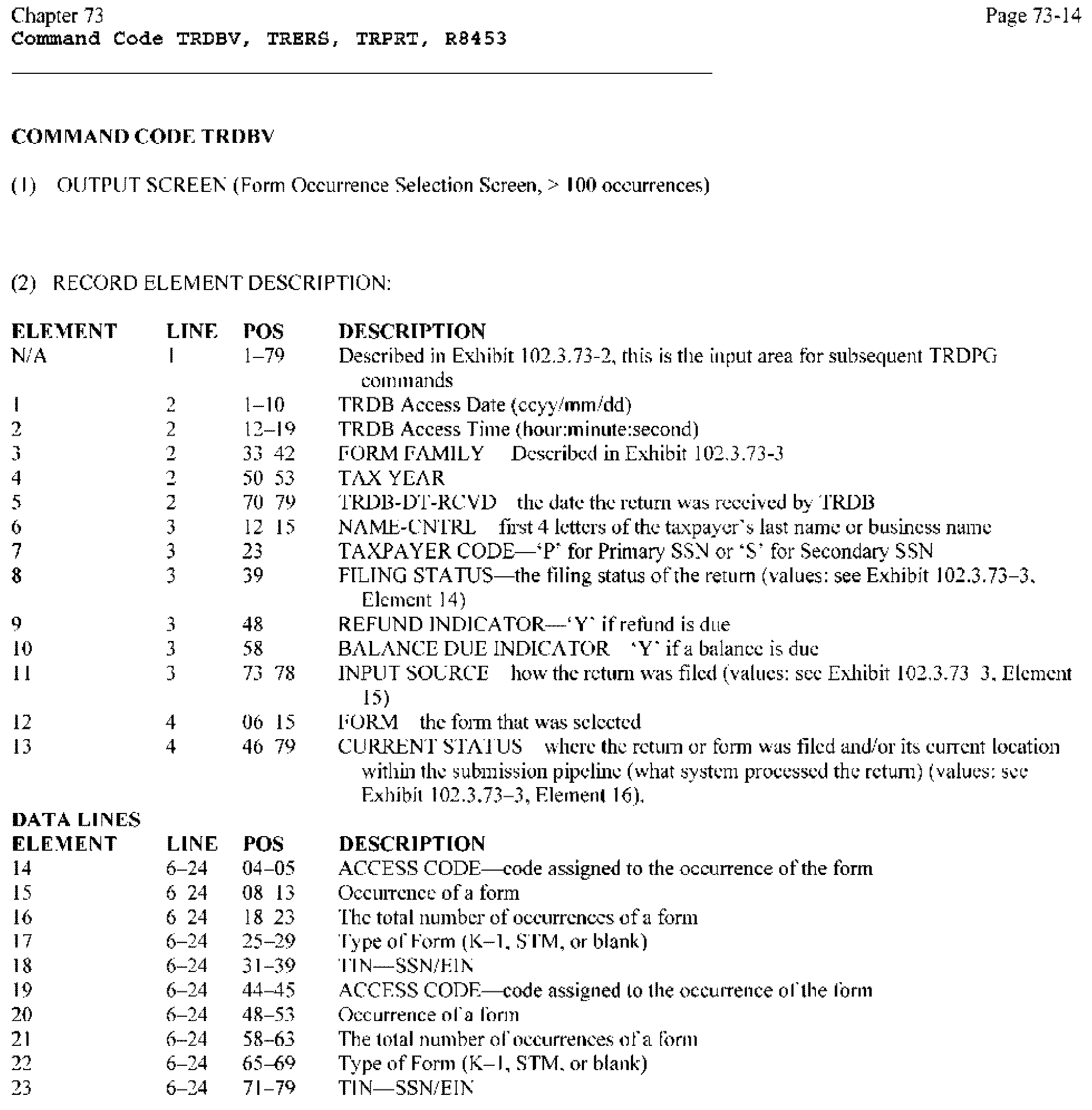
Please click here for the text description of the image.
(2) RECORD ELEMENT DESCRIPTION:
| ELEMENT | LINE | POS | DESCRIPTION |
|---|---|---|---|
| N/A | 1 | 1-79 | Described in Exhibit 2.3.73-2., this is the input area for subsequent TRDPG commands |
| 1 | 2 | 1-10 | TRDB Access Date (ccyy/mm/dd) |
| 2 | 2 | 12-19 | TRDB Access Time (hour:minute:second) |
| 3 | 2 | 33-42 | FORM FAMILY- Described in Exhibit 2.3.73-3. - element 5 |
| Possible Values | Form 94X (Employer's Tax Return) Form 940 (Employer's FUTA Tax Return) Form 1040 (Individual Income Tax Return) Form 1041 (Fiduciary Return) Form 1065 (Partnership Return) Form 4868 (Auto Extension to File) Form 9465 (Installment Agreement) |
||
| 4 | 2 | 50-53 | TAX YEAR |
| 5 | 2 | 70-79 | TRDB-DT-RCVD - the date the return was processed by TRDB. It may not be the IRS received date. |
| 6 | 3 | 12-15 | NAME-CNTRL - first 4 letters of the taxpayer's last name or business name |
| 7 | 3 | 23 | TAXPAYER CODE - 'P' for Primary SSN or 'S' for Secondary SSN |
| 8 | 3 | 39 | FILING STATUS - the filing status of the return (values: Exhibit 2.3.73-3., Element 14) |
| 9 | 3 | 48 | REFUND INDICATOR - 'Y' if refund is due |
| 10 | 3 | 58 | BALANCE DUE INDICATOR - 'Y' if a balance is due |
| 11 | 3 | 73-78 | INPUT SOURCE - how the return was filed (values: Exhibit 2.3.73-3., Element 15) |
| 12 | 4 | 06-15 | FORM - the form that was selected |
| 13 | 4 | 46-79 | CURRENT STATUS - where the return or form was filed and/or its current location within the submission pipeline (what system processed the return) (values: Exhibit 2.3.73-3., Element 16). |
| DATA LINES ELEMENT | LINE | POS | DESCRIPTION |
|---|---|---|---|
| 14 | 6-24 | 04-05 | ACCESS CODE - Code assigned to the occurrence of the form |
| 15 | 6-24 | 08-13 | Occurrence of a form |
| 16 | 6-24 | 18-23 | The total number of occurrences of a form |
| 17 | 6-24 | 25-29 | Type of Form (K-1, STM, or blank) |
| 18 | 6-24 | 31-39 | TIN—SSN/EIN |
| 19 | 6-24 | 44-45 | ACCESS CODE - code assigned to the occurrence of the form |
| 20 | 6-24 | 48-53 | Occurrence of a form |
| 21 | 6-24 | 58-63 | The total number of occurrences of a form |
| 22 | 6-24 | 65-69 | Type of Form (K-1, STM, or blank) |
| 23 | 6-24 | 71-79 | TIN - SSN/EIN |
(1) OUTPUT SCREEN (Form Data Display Screen)
(2) RECORD ELEMENT DESCRIPTION:
| ELEMENT | LINE | POS | DESCRIPTION |
|---|---|---|---|
| N/A | 1 | 1-79 | Described in Exhibit 2.3.73-2., this is the input area for subsequent TRDPG commands |
| 1 | 2 | 1-10 | TRDB Access Date (ccyy/mm/dd) |
| 2 | 2 | 12-19 | TRDB Access Time (hour:minute: second) |
| 3 | 2 | 33-42 | FORM FAMILY - Described in Exhibit 2.3.73-3. - element 5 |
| Possible Values | Form 94X (Employer's Tax Return) Form 940 (Employer's FUTA Tax Return) Form 1040 (Individual Income Tax Return) Form 1041 (Fiduciary Return) Form 1065 (Partnership Return) Form 4868 (Auto Extension to File) Form 9465 (Installment Agreement) |
||
| 4 | 2 | 50-53 | TAX YEAR |
| 5 | 2 | 70-79 | TRDB-DT-RCVD - the date the return was processed by TRDB. It may not be the IRS received date. |
| 6 | 3 | 12-15 | NAME-CNTRL - first 4 letters of the taxpayer's last name or business name |
| 7 | 3 | 23 | TAXPAYER CODE - 'P' for Primary SSN or 'S' for Secondary SSN |
| 8 | 3 | 39 | FILING STATUS - the filing status of the return (values: Exhibit 2.3.73-3., Element 14) |
| 9 | 3 | 48 | REFUND INDICATOR - 'Y' if a refund is due |
| 10 | 3 | 58 | BALANCE DUE INDICATOR - 'Y' if a balance is due |
| 11 | 3 | 73-78 | INPUT SOURCE - how the return was filed (values: Exhibit 2.3.73-3., Element 15) |
| 12 | 4 | 06-15 | FORM - the form that was selected |
| 13 | 4 | 28-29 | OCCURRENCE |
| 14 | 4 | 46-79 | CURRENT STATUS - where the return or form was filed and/or its current location within the submission pipeline (what system processed the return) (values:Exhibit 2.3.73-3., Element 16). |
| DATA LINES ELEMENT | LINE | POS | DESCRIPTION |
|---|---|---|---|
| 15 | 6-24 | 1-6 | LINE NUMBER - the line number from the associated form |
| 16 | 6-24 | 6-35 | ENTITY - Database Table for following attributes. Further identifies the following group of data, i.e., IND DEDUCTIONS ITEMIZATION further identifies the following MEDICAL AGI AMOUNT. |
| 17 | 6-24 | 8-37 | ATTRIBUTE - Text name of the field displayed. |
| 18 | 6-24 | 39-58 | VALUE - original (as submitted) value for this field. |
| 19 | 6-24 | 60-79 | CHANGED VALUE - The most recent correction, if any, to this field. |
| 20 | 6-24 | 1-3 | Continuation line - when '…' is present, this indicates the following data is a continuation from the previous line. |
(1) OUTPUT SCREEN (TXPYR-EXPL Display Screen)
(2) RECORD ELEMENT DESCRIPTION:
| ELEMENT | LINE | POS | DESCRIPTION |
|---|---|---|---|
| N/A | 1 | 1-79 | Described in Exhibit 2.3.73-2., this is the input area for subsequent TRDPG commands |
| 1 | 2 | 1-10 | TRDB Access Date (ccyy/mm/dd) |
| 2 | 2 | 12-19 | TRDB Access Time (hour:minute:second) |
| 3 | 2 | 33-42 | FORM FAMILY - Described in Exhibit 2.3.73-3. - element 5 |
| Possible Values | Form 94X (Employer's Tax Return) Form 940 (Employer's FUTA Tax Return) Form 1040 (Individual Income Tax Return) Form 1041 (Fiduciary Return) Form 1065 (Partnership Return) Form 4868 (Auto Extension to File) Form 9465 (Installment Agreement) |
||
| 4 | 2 | 50-53 | TAX YEAR |
| 5 | 2 | 70-79 | TRDB-DT-RCVD - the date the return was processed by TRDB. It may not be the IRS received date. |
| 6 | 3 | 12-15 | NAME-CNTRL - first 4 letters of the taxpayer's last name or business name |
| 7 | 3 | 23 | TAXPAYER CODE - 'P' for Primary SSN or 'S' for Secondary SSN |
| 8 | 3 | 39 | FILING STATUS - the filing status of the return (values: Exhibit 2.3.73-3., Element 14) |
| 9 | 3 | 48 | REFUND INDICATOR - 'Y' if refund is due |
| 10 | 3 | 58 | BALANCE DUE INDICATOR - 'Y' if a balance is due |
| 11 | 3 | 73-78 | INPUT SOURCE - how the return was filed (values: Exhibit 2.3.73-3., Element 15) |
| 12 | 4 | 06-15 | FORM - the form that was selected |
| 13 | 4 | 28-29 | OCCURRENCE |
| 14 | 4 | 46-79 | CURRENT STATUS - where the return or form was filed and/or its current location within the submission pipeline (what system processed the return) (values:Exhibit 2.3.73-3., Element 16). |
| DATA LINES ELEMENT | LINE | POS | DESCRIPTION |
|---|---|---|---|
| 15 | 6-24 | 6-35 | ENTITY - Database Table for following attributes. Further identifies the following group of data, i.e., TAXPAYER EXPLANATION further identifies the following EXPLANATION TEXT. |
| 16 | 6-24 | 6-35 | ATTRIBUTE - Text name of the field displayed. |
| 18 | 6-24 | 32-79 | VALUE - original (as submitted) value for this field. |
| 19 | 6-24 | 1-3 | Continuation line - when '…' is present, this indicates the following data is a continuation from the previous line. |
(1) DETAIL SCREEN (CODES Display Screen)
(2) RECORD ELEMENT DESCRIPTION:
| ELEMENT | LINE | POS | DESCRIPTION |
|---|---|---|---|
| N/A | 1 | 1-79 | Described in Exhibit 2.3.73-2., this is the input area for subsequent TRDPG commands |
| 1 | 2 | 1-10 | TRDB Access Date (ccyy/mm/dd) |
| 2 | 2 | 12-19 | TRDB Access Time (hour:minute:second) |
| 3 | 2 | 33-42 | FORM FAMILY- Described in Exhibit 2.3.73-3. - element 5 |
| Possible Values | Form 94X (Employer's Tax Return) Form 940 (Employer's FUTA Tax Return) Form 1040 (Individual Income Tax Return) Form 1041 (Fiduciary Return) Form 1065 (Partnership Return) Form 4868 (Auto Extension to File) Form 9465 (Installment Agreement) |
||
| 4 | 2 | 50-53 | TAX YEAR |
| 5 | 2 | 70-79 | TRDB-DT-RCVD - the date the return was processed by TRDB. It may not be the IRS received date. |
| 6 | 3 | 12-15 | NAME-CNTRL - first 4 letters of the taxpayer's last name or business name |
| 7 | 3 | 23 | TAXPAYER CODE - 'P' for Primary SSN or 'S' for Secondary SSN |
| 8 | 3 | 39 | FILING STATUS - the filing status of the return (values: Exhibit 2.3.73-3., Element 14) |
| 9 | 3 | 48 | REFUND INDICATOR - 'Y' if refund is due |
| 10 | 3 | 58 | BALANCE DUE INDICATOR - 'Y' if a balance is due |
| 11 | 3 | 73-78 | INPUT SOURCE - how the return was filed (values: Exhibit 2.3.73-3., Element 15) |
| 12 | 4 | 06-15 | FORM - the form that was selected |
| 13 | 4 | 28-29 | OCCURRENCE |
| 14 | 4 | 46-79 | CURRENT STATUS - where the return or form was filed and/or its current location within the submission pipeline (what system processed the return) (values: Exhibit 2.3.73-3., Element 16). |
| DATA LINES ELEMENT | LINE | POS | DESCRIPTION |
|---|---|---|---|
| 15 | 6-09 | 9-10 | STATUS CODE - the code assigned to the return based on the status |
| 16 | 6-09 | 14-23 | STATUS DATE - the date the status was assigned |
| 17 | 6-09 | 27-62 | STATUS - where the return or form was filed and/or its current location within the system (values:Exhibit 2.3.73-3., Element 16) |
| 18 | 11-24 | 2-3 | STATUS CODE - the code assigned to the return based on the status |
| 19 | 11-24 | 16-25 | STATUS DATE - the date the status was assigned |
| 20 | 11-24 | 19-28 | FORM - the form that was selected |
| 21 | 11-24 | 33-34 | OCCURRENCE |
| 22 | 11-24 | 41-75 | CODE TYPE - the processing code generated by ELF, ERS or GMF |
| 23 | 11-24 | 77-78 | CODE - the code assigned to the code type |
(1) DETAIL SCREEN (CHANG-HIST Display Screen)
(2) RECORD ELEMENT DESCRIPTION:
| ELEMENT | LINE | POS | DESCRIPTION |
|---|---|---|---|
| N/A | 1 | 1-79 | Described in Exhibit 2.3.73-2., this is the input area for subsequent TRDPG commands |
| 1 | 2 | 1-10 | TRDB Access Date (ccyy/mm/dd) |
| 2 | 2 | 12-19 | TRDB Access Time (hour:minute:second) |
| 3 | 2 | 33-42 | FORM FAMILY - Described in Exhibit 2.3.73-3. - element 5 |
| Possible Values | Form 94X (Employer's Tax Return) Form 940 (Employer's FUTA Tax Return) Form 1040 (Individual Income Tax Return) Form 1041 (Fiduciary Return) Form 1065 (Partnership Return) Form 4868 (Auto Extension to File) Form 9465 (Installment Agreement) |
||
| 4 | 2 | 50-53 | TAX YEAR |
| 5 | 2 | 70-79 | TRDB-DT-RCVD - the date the return was processed by TRDB. It may not be the IRS received date. |
| 6 | 3 | 12-15 | NAME-CNTRL - first 4 letters of the taxpayer's last name or business name |
| 7 | 3 | 23 | TAXPAYER CODE - 'P' for Primary SSN or 'S' for Secondary SSN |
| 8 | 3 | 39 | FILING STATUS - the filing status of the return (values: Exhibit 2.3.73-3., Element 14) |
| 9 | 3 | 48 | REFUND INDICATOR - 'Y' if refund is due |
| 10 | 3 | 58 | BALANCE DUE INDICATOR - 'Y' if a balance is due |
| 11 | 3 | 73-78 | INPUT SOURCE - how the return was filed (values: Exhibit 2.3.73-3., Element 15) |
| 12 | 4 | 06-15 | FORM - the form that was selected |
| 13 | 4 | 28-29 | OCCURRENCE |
| 14 | 4 | 46-79 | CURRENT STATUS - where the return or form was filed and/or its current location within the submission pipeline (what system processed the return) (values: Exhibit 2.3.73-3., Element 16). |
| DATA LINES ELEMENT | LINE | POS | DESCRIPTION |
|---|---|---|---|
| 15 | 6-09 | 9-10 | STATUS CODE - the code assigned to the return based on the status |
| 16 | 6-09 | 14-23 | STATUS DATE - the date the status was assigned |
| 17 | 6-09 | 27-62 | STATUS - where the return or form was filed and/or its current location within the system (values:Exhibit 2.3.73-3., Element 16) |
| 18 | 6-24 | 1-2 | CODE - The status code, from the statuses listed prior, of the return at the time of this change |
| 19 | 6-24 | 4-13 | FORM - The form within the return for this change |
| 20 | 6-24 | 15-16 | Number - The occurrence of the form for this change |
| 21 | 6-24 | 18-23 | Line Reference - The line item number of the change |
| 22 | 6-24 | 25-26 | Sequence Number - The sequence number of the item for repeating fields, i.e., 2 for second DEPENDENT SSN |
| 23 | 6-24 | 28-57 | ATTRIBUTE - the text description of the field |
| 24 | 6-24 | 28-57 | DATA - the changed/corrected value |
(1) DETAIL SCREEN (STAT-HIST Display Screen, Current Status prior to posting)
(2) RECORD ELEMENT DESCRIPTION:
| ELEMENT | LINE | POS | DESCRIPTION |
|---|---|---|---|
| N/A | 1 | 1-79 | Described in Exhibit 2.3.73-2., this is the input area for subsequent TRDPG commands |
| 1 | 2 | 1-10 | TRDB Access Date (ccyy/mm/dd) |
| 2 | 2 | 12-19 | TRDB Access Time (hour:minute:second) |
| 3 | 2 | 33-42 | FORM FAMILY- Described in Exhibit 2.3.73-3. - element 5 |
| Possible Values | Form94X (Employer's Tax Return) Form 940 (Employer's FUTA Tax Return) Form 1040 (Individual Income Tax Return) Form 1041 (Fiduciary Return) Form 1065 (Partnership Return) Form 4868 (Auto Extension to File) Form 9465 (Installment Agreement) |
||
| 4 | 2 | 50-53 | TAX YEAR |
| 5 | 2 | 70-79 | TRDB-DT-RCVD - the date the return was processed by TRDB. It may not be the IRS received date. |
| 6 | 3 | 12-15 | NAME-CNTRL - first 4 letters of the taxpayer's last name or business name |
| 7 | 3 | 23 | TAXPAYER CODE - 'P' for Primary SSN or 'S' for Secondary SSN |
| 8 | 3 | 39 | FILING STATUS - the filing status of the return (values: Exhibit 2.3.73-3., Element 14) |
| 9 | 3 | 48 | REFUND INDICATOR - 'Y' if refund is due |
| 10 | 3 | 58 | BALANCE DUE INDICATOR - 'Y' if a balance is due |
| 11 | 3 | 73-78 | INPUT SOURCE - how the return was filed (values: Exhibit 2.3.73-3., Element 15) |
| 12 | 4 | 06-15 | FORM - the form that was selected |
| 13 | 4 | 28-29 | OCCURRENCE |
| 14 | 4 | 46-79 | CURRENT STATUS - where the return or form was filed and/or its current location within the submission pipeline (what system processed the return) (values: Exhibit 2.3.73-3., Element 16). |
| DATA LINES ELEMENT | LINE | POS | DESCRIPTION |
|---|---|---|---|
| 15 | 6-09 | 9-10 | STATUS CODE - the code assigned to the return based on the status |
| 16 | 6-09 | 14-23 | STATUS DATE - the date the status was assigned |
| 17 | 6-09 | 27-62 | STATUS - where the return or form was filed and/or its current location within the system (values: Exhibit 2.3.73-3., Element 16) |
| 18 | 6-24 | 1-2 | STATUS CODE - The status code, from the statuses listed prior, of the return at the time of this change |
| 19 | 6-24 | 4-12 | TIN - TIN of the Primary Filer |
| 20 | 6-24 | 14-15 | MFT - MFT of the return |
| 21 | 6-24 | 17-22 | Tax Period |
| 22 | 6-24 | 24 | Filing Status - (values: Exhibit 2.3.73-3., Element 14) |
| 23 | 6-24 | 27-40 | Control DLN |
| 24 | 6-24 | 42-44 | Transaction DLN |
| 25 | 6-24 | 46-59 | Transaction Code |
| 26 | 6-24 | 61 | Refund Indicator - values Y or ' ' |
| 27 | 6-24 | 64 | Balance Due Indicator - values Y or ' ' |
| 28 | 6-24 | 66-79 | ELF DCN |
(1) DETAIL SCREEN (STAT-HIST Display Screen, Master File Posted Return)
(2) RECORD ELEMENT DESCRIPTION:
| ELEMENT | LINE | POS | DESCRIPTION |
|---|---|---|---|
| N/A | 1 | 1-79 | Described in Exhibit 2.3.73-2., this is the input area for subsequent TRDPG commands |
| 1 | 2 | 1-10 | TRDB Access Date (ccyy/mm/dd) |
| 2 | 2 | 12-19 | TRDB Access Time (hour:minute:second) |
| 3 | 2 | 33-42 | FORM FAMILY - Described in Exhibit 2.3.73-3. - element 5 |
| Possible Values | Form 94X (Employer's Tax Return) Form 940 (Employer's FUTA Tax Return) Form 1040 (Individual Income Tax Return) Form 1041 (Fiduciary Return) Form 1065 (Partnership Return) Form 4868 (Auto Extension to File) Form 9465 (Installment Agreement) |
||
| 4 | 2 | 50-53 | TAX YEAR |
| 5 | 2 | 70-79 | TRDB-DT-RCVD - the date the return was processed by TRDB. It may not be the IRS received date. |
| 6 | 3 | 12-15 | NAME-CNTRL - first 4 letters of the taxpayer's last name or business name |
| 7 | 3 | 23 | TAXPAYER CODE - 'P' for Primary SSN or 'S' for Secondary SSN |
| 8 | 3 | 39 | FILING STATUS - the filing status of the return (values: Exhibit 2.3.73-3., Element 14) |
| 9 | 3 | 48 | REFUND INDICATOR - 'Y' if refund is due |
| 10 | 3 | 58 | BALANCE DUE INDICATOR - 'Y' if a balance is due |
| 11 | 3 | 73-78 | INPUT SOURCE - how the return was filed (values: Exhibit 2.3.73-3., Element 15) |
| 12 | 4 | 06-15 | FORM - the form that was selected |
| 13 | 4 | 28-29 | OCCURRENCE |
| 14 | 4 | 46-79 | CURRENT STATUS - where the return or form was filed and/or its current location within the submission pipeline (what system processed the return) (values:Exhibit 2.3.73-3., Element 16). |
| DATA LINES ELEMENT | LINE | POS | DESCRIPTION |
|---|---|---|---|
| 15 | 6-09 | 9-10 | STATUS CODE - the code assigned to the return based on the status |
| 16 | 6-09 | 14-23 | CORRESPONDENCE DATE - Correspondence Received Date |
| 17 | 6-09 | 15-17 | Transaction Code |
| 18 | 6-24 | 19-24 | CYCLE POSTED - cycle posted to Master File |
| 19 | 6-24 | 26-35 | CP23 DATE - From Master File posting |
| 20 | 6-24 | 37-46 | RETURN DUE DATE |
| 21 | 6-24 | 48-57 | ASED DATE |
| 22 | 6-24 | 59-68 | RSED DATE |
| 23 | 6-24 | 70-79 | CSED DATE |
(1) INPUT REQUEST SCREEN, TRERS COMMAND — NO PARAMETERS
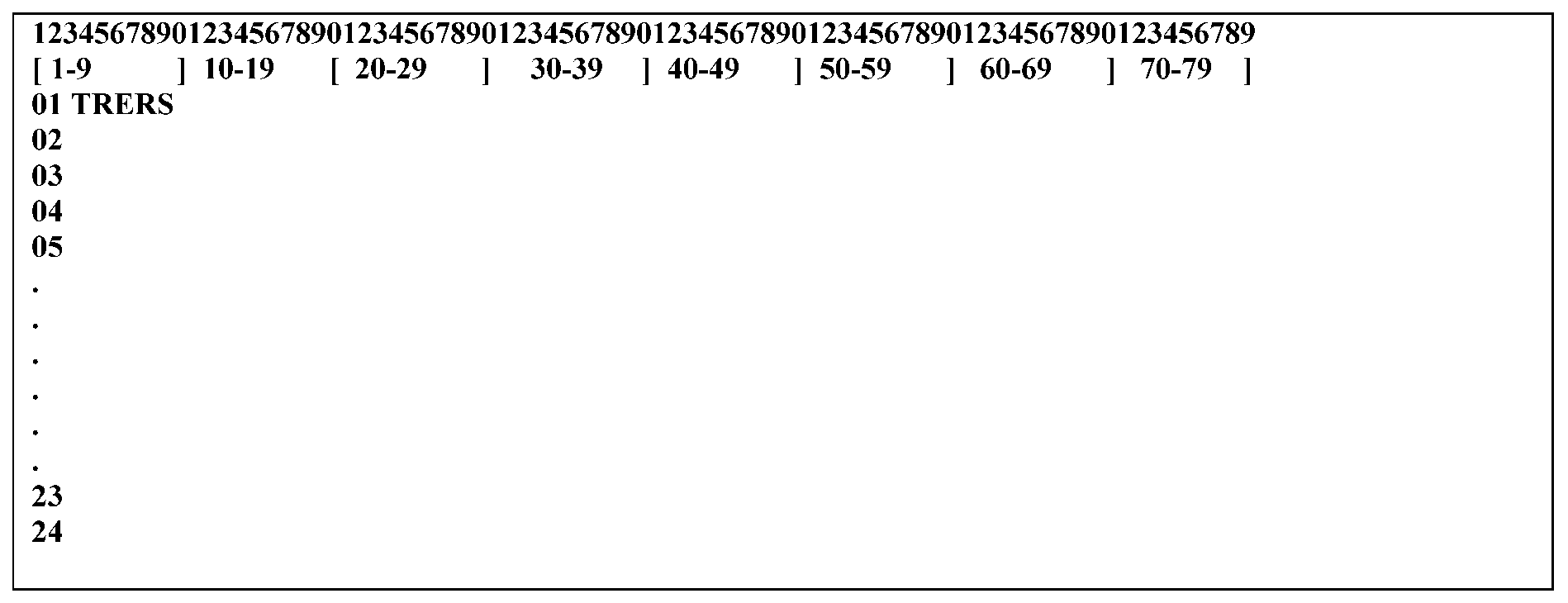
Please click here for the text description of the image.
(2) RECORD ELEMENT DESCRIPTION:
| ELEMENT | LINE | POS | ELEMENT NAME |
|---|---|---|---|
| 1 | 1 | 1-5 | TRERS |
(1) INPUT REQUEST SCREEN, TRERS COMMAND WITH PARAMETERS
The Form 941-C was used to correct reporting errors for all the below tax forms, except Form CT-1. However, Form 941-C will be replaced by new forms (e.g. Adjusted Return, Form 941X, Form 943X, Form 944X, Form 945X and Form CT-1X, for all reporting errors ascertained (discovered) on or after 01/01/2009, the effective date. Exception: Errors, ascertained prior to January 1, 2009, may be corrected timely either on a return filed for the fourth quarter of 2008 by January 31, 2009, or by using the Adjusted Return.
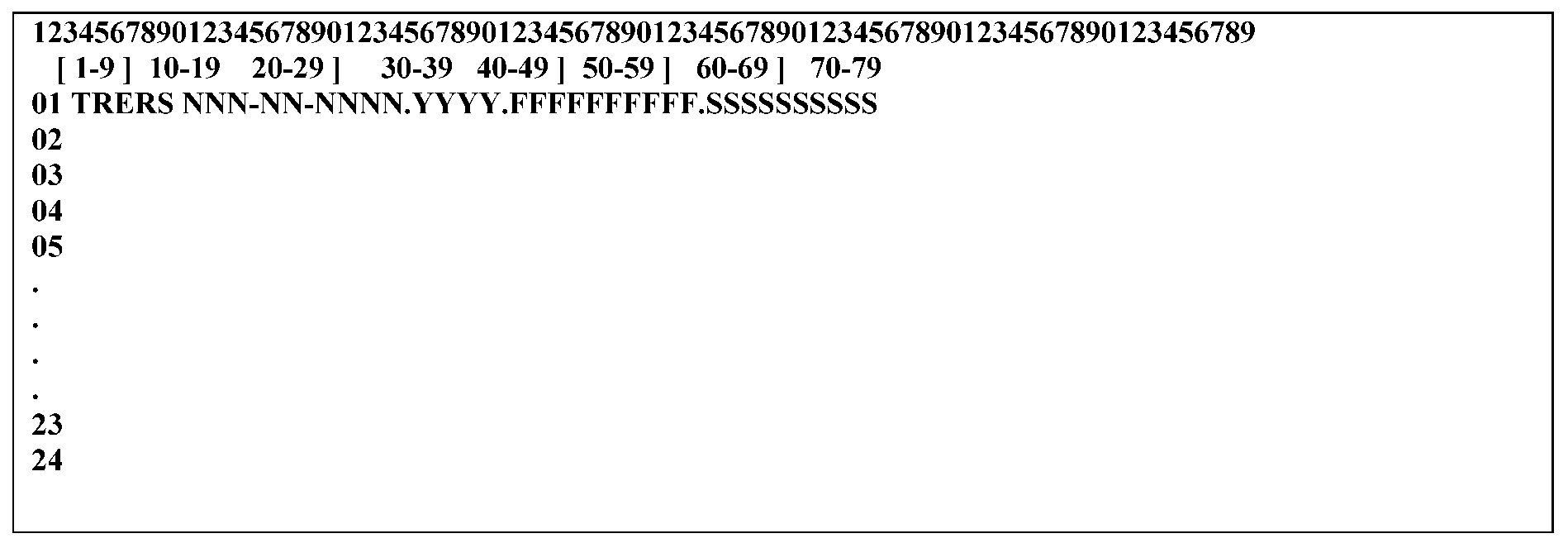
Please click here for the text description of the image.
(2) RECORD ELEMENT DESCRIPTION:
| ELEMENT | LINE | POS | ELEMENT NAME |
|---|---|---|---|
| 1 | 1 | 1-5 | TRERS |
| (the following elements are comma delimited and may appear in positions 7–46) | |||
| 2 | 1 Possible Values: |
TIN/DLN | (Mandatory) NNN-NN-NNNN (Valid SSN) NN-NNNNNNN (Valid EIN) NNNNNNNNNNNNNN (Valid DLN) NNNNN-NNN-NNNNN-N (Valid DLN with hyphens) NNN-NN-NNNN NNNNNNNN (Valid SSN MFT/Tax Period) NN-NNNNNNN NNNNNNNN (Valid EIN MFT/Tax Period) |
| 3 | 1 Possible Values: |
Tax Year | (optional) 1998 1999 2000 2001 2002 2003 2004 2005 2006 2007 2008 2009 2010 2011 2012 2013 2014 2015 2016 2017 2018 2019 2020 2021 2022 2023 2024 2025 |
| 4 | 1 Possible Values: |
Form Family (optional) Form 56 (Notice Concerning Fiduciary Relationship) Form 94X (Employer's Tax Return) Form 940 (Employer's FUTA Tax Return) Form 1040 (Individual Income Tax Return) Form 1041 (Fiduciary Return) Form 1065 (Partnership Return) Form 2350 (Application for Extension of Time to File) Form 4868 (Auto Extension to File) Form 9465 (Installment Agreement) Form CT-1X (Adjusted Employer's Annual Railroad Retirement Tax Return and Claim for Refund) Form 11C (Special Tax Return and Application for Registry Wagering) Form 720 (Quarterly Federal Excise Tax) Form 730 (Tax on Wagering) Form 990 (Exempt Organization) Form 1042 (Annual Withholding for U.S. Source Income of Foreign Persons) Form 1066 (REMIC) Form 1120 (U.S. Corporation) Form 1139 (Corporation Application for Tentative Refund) Form 2290 (Heavy Highway Vehicle Use) Form 3520 (Foreign Trust) Form 4720 (Return of Certain Excise Taxes on Charities) Form 5227 (Split Interest Trust Information) Form 8038 (Tax Exempt Private Activity Bond Issues) Form 8752 (Required Payment of Refund Under Section 7519) |
|
| 5 | 1 Possible Values: |
Specific Form | (optional) Form 8997 applies to the following form families 1040, 1041, 1065, and 1120. Form 9000 only applies to form family 1040. Form 4797 applies to form 1120. |
| For Form Family 94X (Employer's Tax Return): The forms listed below are for current and/or prior years that can be found on TRDB. |
||||
| Form 941C (Obsolete) |
Form 941CPR (Obsolete) | Form 941X | Form 941X-PR | Form 943X |
| Form 943X-PR | Form 944X | Form 944X-PR | Form 944X-SP | Form 945-A |
| Form 945X | Form CT-1X | Form CHANG-HIST | Form CODES | Form EIN-VALDN |
Form ERO-INFO |
Form INFO-ALERT | Form STAT-HIST | Form TXPYR-EXPL | Form SCH-A |
| Form SCH-B | Form SCH-B-PR | Form SCH-D | ||
| For Form Family 940 (Employer's FUTA Tax Return): | ||||
| Form 940 | Form 940-PR | Form 940EZ | ||
| For Form Family 1040 (Individuals returns): . |
||||
| Form 1040 | Form 1040A | Form 1040EZ | Form 1040EZ-T | Form 1040-NR |
| Form 1040-NR-EZ | Form 1040-PR | Form 1040-SS | Form SCH-A | Form SCH-B |
| Form SCH-C | Form SCH-C-EZ | Form SCH-D | Form SCH-E | Form SCH-EIC |
| Form SCH-F | Form SCH-H | Form SCH-J | FormSCH-R | Form SCH-SE |
| Form 1099-G | Form 1099-R | Form 1116 | Form 1310 | Form 2106 |
| Form 2106–EZ | Form 2120 | Form 2210 | Form 2210F | Form 2439 |
| Form 2441 | Form 2555 | Form 2555–EZ | Form 2688 (Obsolete) | Form 3468 |
| Form 3800 | Form 3903 | Form 4136 | Form 4137 | Form 4255 |
| Form 4562 | Form 4563 | Form 4684 | Form 4797 | Form 4835 |
| Form 4868 | Form 4952 | Form 4970 | Form 4972 | Form 5074 |
| Form 5329 | Form 5471 | Form 5471-SCH-J | Form 5471-SCH-M | Form 5471-SCH-N |
| Form 5471-SCH-O | Form 56 | Form 5695 | Form 5713 | Form 5713-SCH-A |
| Form 5713-SCH-B | Form 5713-SCH-C | Form 5884 | Form 5884-B | Form 6198 |
| Form 6251 | Form 6252 | Form 6478 | Form 6765 | Form 6781 |
| Form 706 | Form 706GSD | Form 706GST | Form 706NA | Form 8082 |
| Form 8271 | Form 8275 | Form 8275-R | Form 8283 | Form 8379 |
| Form 8396 | Form 8453 | Form 8582 | Form 8582CR | Form 8586 |
| Form 8594 | Form 8606 | Form 8609 | Form 8609-SCH-A | Form 8611 |
| Form 8812 | Form 8615 | Form 8621 | Form 8689 | Form 8697 |
| Form 8801 | Form 8812 | Form 8814 | Form 8815 | Form 8819 |
| Form 8820 | Form 8824 | Form 8826 | Form 8828 | Form 8829 |
| Form 8830 | Form 8833 | Form 8834 | Form 8835 | Form 8839 |
| Form 8844 | Form 8845 | Form 8846 | Form 8847 | Form 8847-SCH-A (Obsolete) |
| Form 8853 | Form 8854 | Form 8859 | Form 8860 | Form 8861 |
| Form 8862 | Form 8863 | Form 8864 | Form 8865 | Form 8865-LTCGL |
| Form 8865-SCH-D | Form 8865-SCH-K | Form 8865-SCH-K1 | Form 8865-SCH-N | Form 8865-SCH-O |
| Form 8865-SCH-P | Form 8865-STCGL | Form 8866 | Form 8873 | Form 8874 |
| Form 8880 | Form 8881 | Form 8882 | Form 8884 | Form 8886 |
| Form 8888 | Form 8889 | Form 8891 | Form 8896 | Form 8900 |
| Form 8901 | Form 8903 | Form 8906 | Form 8907 | Form 8908 |
| Form 8909 | Form 8910 | Form 8911 | Form 8912 | Form 8913 |
| Form 8938 | Form 8962 | Form 8965 | Form 9465 | Form 970 |
| Form 982 | Form ELECTION | Form FEC | Form FORM-PYMNT | Form INFO-ALERT |
| Form JURAT-INFO | Form LTCGL | Form NOTES | Form PIPELINE | Form POSTMARK |
| Form REGULATORY | Form SCH-1 | Form SCH-2 | Form SCH-3 | Form STCGL |
| Form-T | Form THIRD-PARTY | Form W-2 | Form W-2C | Form W-2G |
| Form W-2GU | Form 461 | Form 8949 | Form 8978 | Form 8995-8995A* |
| SCH-LEP (new) | ||||
| For Form Family 1041 (Fiduciary Returns): | ||||
| Form 1041 | Form 1041-A | Form 1041-QFT | Form 1041-STM | Form SCH-C |
| FormSCH-C-EZ | Form SCH-D | Form SCH-D-STM | Form SCH-E | Form SCH-F |
| Form SCH-H | Form SCH-I | Form SCH-J | Form SCH-J-STM | Form SCH-K1 |
| Form SCH-K1-STM | Form 1116 | Form 2210 | Form 2210F | Form 2439 |
| Form 3468 | Form 3800 | Form 4136 | Form 4255 | Form 4562 |
| Form 4684 | Form 4797 | Form 4835 | Form 4952 | Form 4970 |
| Form 4972 | Form 5884 | Form 5884-B | Form 6252 | Form 6478 |
| Form 6765 | Form 8082 | Form 8271 | Form 8275 | Form 8275-R |
| Form 8582 | Form 8582CR | Form 8586 | Form 8609-SCH-A | Form 8801 |
| Form 8820 | Form 8824 | Form 8829 | Form 8830 | Form 8860 |
| Form 8864 | Form 8874 | Form 8881 | Form 8882 | Form 8886 |
| Form 8896 | Form 8913 | Form CHANG-HIST | Form CODES | Form EIN-VALDN |
| Form ERO-INFO | Form *INFO-ALERT | Form PAPER-DOCS | Form POSTMARK | Form REJECTED |
| Form STAT-HIST | Form UNPRCSBL | Form 8949 | Form 8978 | Form 8995-8995A* |
| Form 965-A | Form 8997 | |||
| For Form Family 1065 (Partnership Returns): | ||||
| Form 1065 | Form 1065-B | Form 1065-STM | Form SCH-D | Form SCH-F |
| Form SCH-K1 | Form SCH-K1–STM | Form 3468 | Form 3520 | Form 3520-A |
| Form 4255 | Form 4562 | Form 4684 | Form 4797 | Form 4835 |
| Form 5471 | Form 5471-SCH-J | Form 5471-SCH-M | Form 5471-SCH-N | Form 5471-SCH-O |
| Form 5713 | Form 5713-SCH-A | Form 5713-SCH-B | Form 5713-SCH-C | Form 5884 |
| Form 6252 | Form 6478 | Form 6765 | Form 6781 | Form 8082 |
| Form 8271 | Form 8275 | Form 8275-R | Form 8283 | Form 8308 |
| Form 8582CR | Form 8586 | Form 8594 | Form 8609 | Form 8609-SCH-A |
| Form 8611 | Form 8621 | Form 8693 | Form 8697 | Form 8820 |
| Form 8824 | Form 8825 | Form 8826 | Form 8830 | Form 8832 |
| Form 8834 | Form 8835 | Form 8844 | Form 8845 | Form 8846 |
| Form 8847 | Form 8847-SCH-A (Obsolete) | Form 8861 | Form 8865 | Form 8865-SCH-D |
| Form 8865-SCH-K | Form 8865-SCH-K1 | Form 8865K1-STM | Form 8865-SCH-N | Form 8865-SCH-O |
| Form 8865-SCH-P | Form 8866 | Form 8873 | Form 8874 | Form 8881 |
| Form 8882 | Form 8884 | Form 8886 | Form 8896 | Form 926 |
| Form 970 | Form 982 | Form CHANG-HIST | Form CODES | Form EIN-VALDN |
| Form ELECTION | ERO-INFO | FORM-T | Form INFO-ALERT | Form NOTES |
| Form PAPER-DOCS | Form POSTMARK | Form PREPARER | Form REGULATORY | Form REJECTED |
| Form STAT-HIST | Form UNPRCSBL | Form 8949 | Form 8996 | Form 8997 |
| 6 | 1 | mandatory | (mandatory) |
| Form 1042 | Form 1120 | Form 1120-A | Form 1120-C | Form 1120-F |
| Form 1120-FSC | Form 1120-H | Form 1120-L | Form 1120-ND | Form 1120-PC |
| Form 1120-POL | Form 1120-REIT | Form 1120-RIC | Form 1120-S | Form 1120-SF |
| Form 1139 | Form 11C | Form 2290 | Form 3520 | Form 3520-A |
| Form 3800 | Form 4136 | Form 4626 | Form 4720 | Form 5227 |
| Form 8038 | Form 8038-G | Form 8038-GC | Form 8038-T | Form 8288 |
| Form 8328 | Form 8752 | Form 8804 | Form 8871 | |
| Form 8872 | Form 8884 | Form 990 | Form 990-C | Form 990EZ |
| Form 990PF | Form 990-T | Form CODES | Form CHANG-HIST | Form EIN-VALDN |
| Form ERO-INFO | Form *INFO-ALERT | Form PAPER-DOCS | Form POSTMARK | Form REJECTED |
| Form STAT-HIST | Form UNPRCSBL | Form 6252 | Form 8949 | Form 8978 |
| Form 8995-8995A* | Form 8996 | Form 965-A | Form 965-B | SCH-A |
| SCH-D | SCH-H | Form 8997 |
Note:
A comma must be entered before each optional element. If any preceding optional element is omitted, the comma for that element must be entered.
| EXAMPLES: | |
|---|---|
| TRERS123-45-6789 | |
| TRERS 12-3456789 | |
| TRERS 12345678901234 | |
| TRERS 12345678901234,W-2 | |
| TRERS 12345-678-90123-4 | |
| TRERS 12345-678-90123-4, W-2 | |
| TRERS 123-45-6789,1998 | |
| TRERS 123-45-6789,,1040 | |
| TRERS 12-3456789,,94X | |
| TRERS 123-45-6789,,, W-2 | |
| TRERS 123-45-6789,1998, 1040, W-2 | |
(1) INPUT REQUEST SCREEN, TRPRT COMMAND
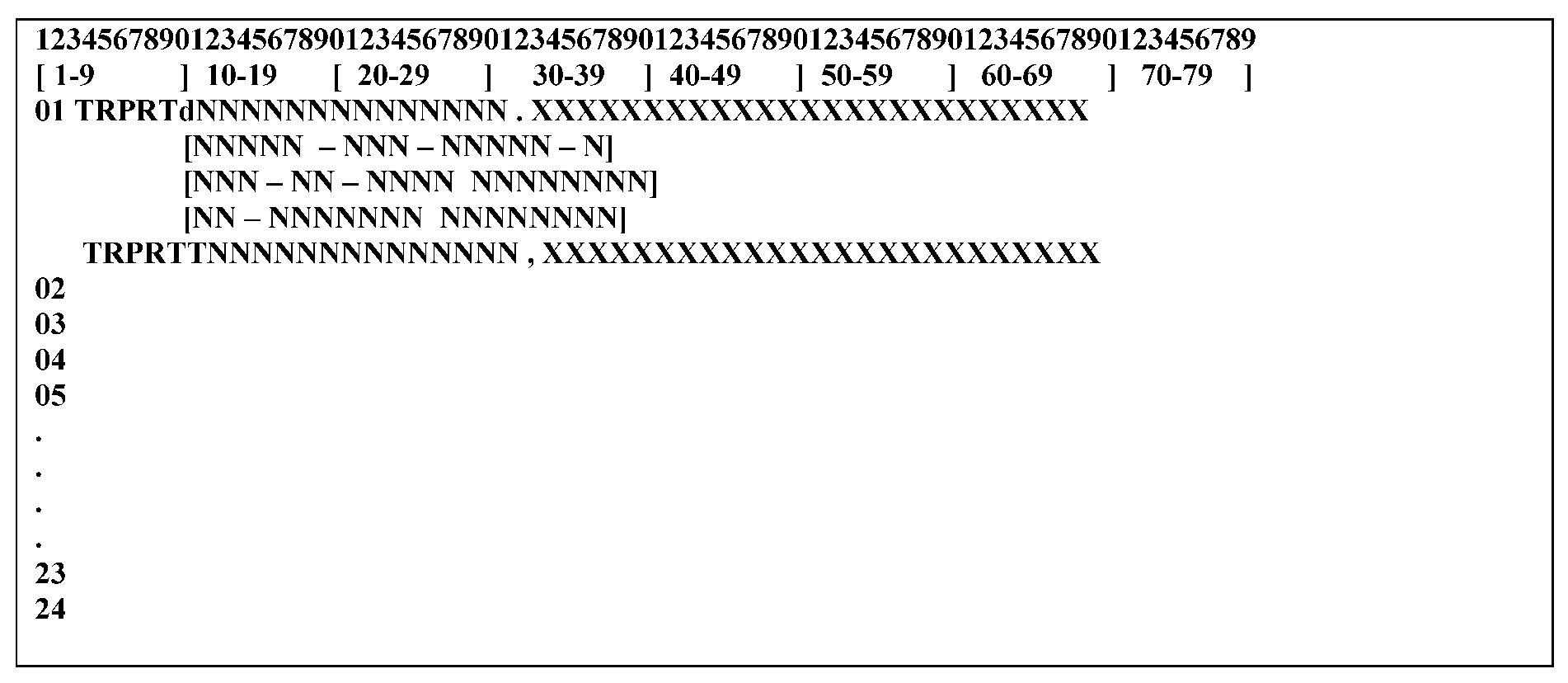
Please click here for the text description of the image.
(2) RECORD ELEMENT DESCRIPTION:
| ELEMENT | LINE | POS | ELEMENT NAME |
|---|---|---|---|
| 1 | 1 | 1-5 | TRPRT |
| 2 | 1 | 6 | Optional Definer Code T for TRDB Transcript |
| 3 | 1 | 7-26 | DLN (with or without hyphens) or TIN MFT/Tax Period |
| 4 | 1 | varies | Optional 25 character comment (preceded by a mandatory comma.May include STOP or routing instructions). |
| EXAMPLES: | |
|---|---|
| TRPRT 12345678901239 | |
| TRPRT 12345-678-90123-9 | |
| TRPRT 123-45-6789 30199912 | |
| TRPRT 12345678901239,MAIL STOP 404 | |
| TRPRT 12345-678-90123-0, SOI | |
(1) OUTPUT SCREEN
Command Code TRPRT returns with the input line intact and the cursor positioned at the first digit of the DLN, ready to accept the next DLN. Messages indicating a successful request will appear on line 2 and error messages will appear on line 24.
(2) RECORD ELEMENT DESCRIPTION:
| ELEMENT | LINE | POS | DESCRIPTION |
|---|---|---|---|
| 1 | 1 | 1–5 | TRPRT |
| 2 | 1 | 7–26 | DLN (with or without hyphens)or TIN MFT/Tax Period |
| 3 | 1 | varies | Optional 25 character comment |
| 4 | 2 | 1–36 | Print Request Accepted message (if command is successful) |
| 5 | 24 | 1–50 | Error message (if command is not successful) |
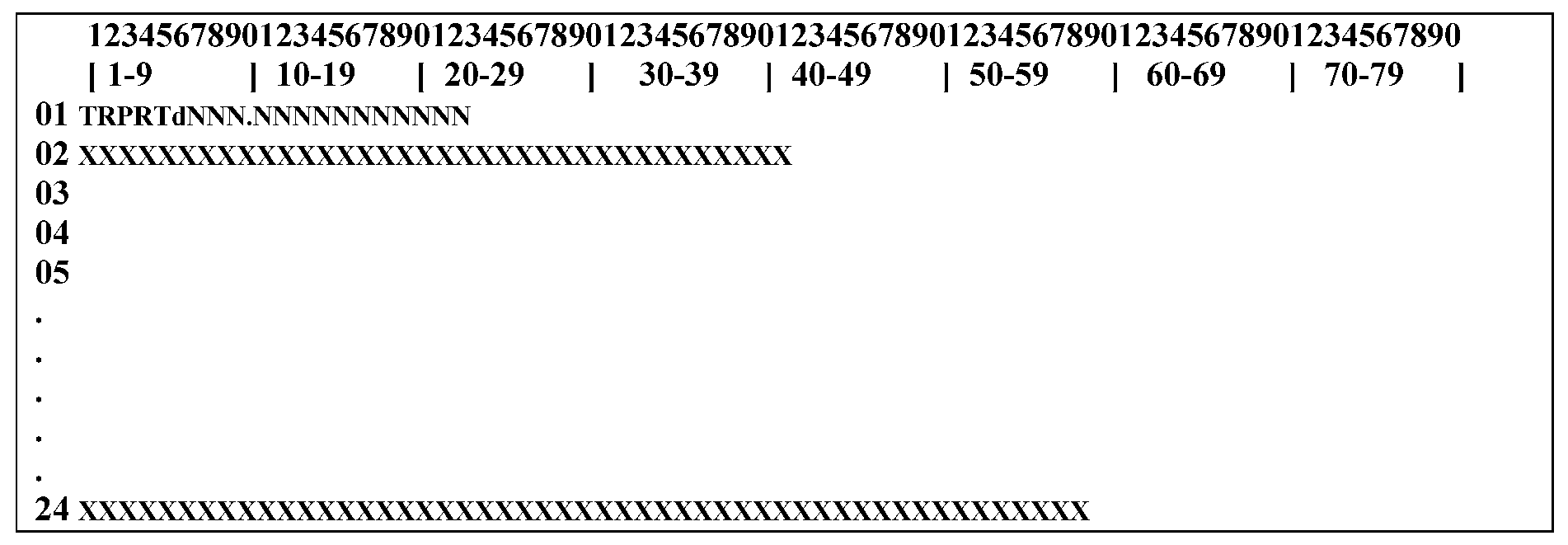
Please click here for the text description of the image.
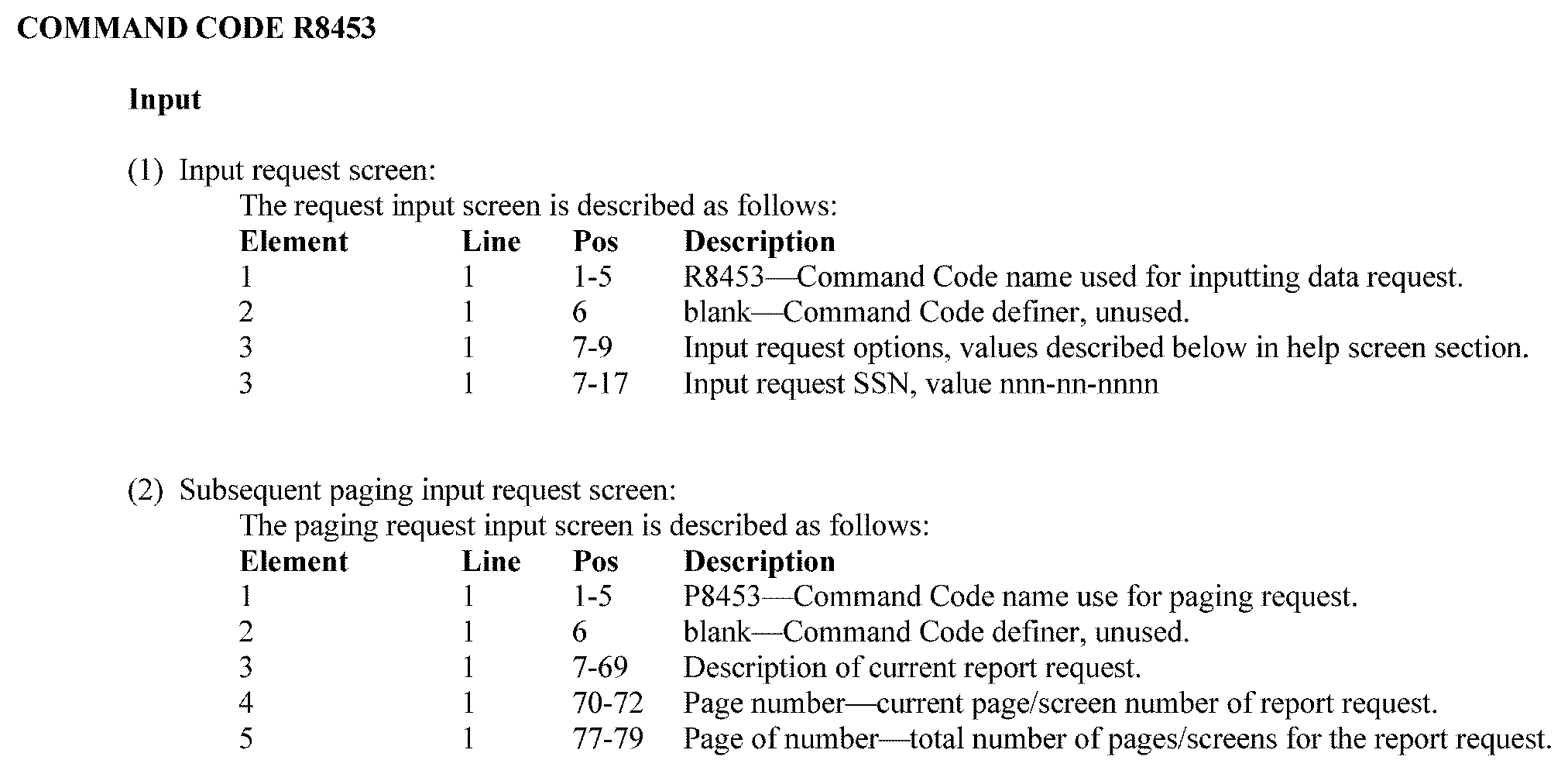
Please click here for the text description of the image.
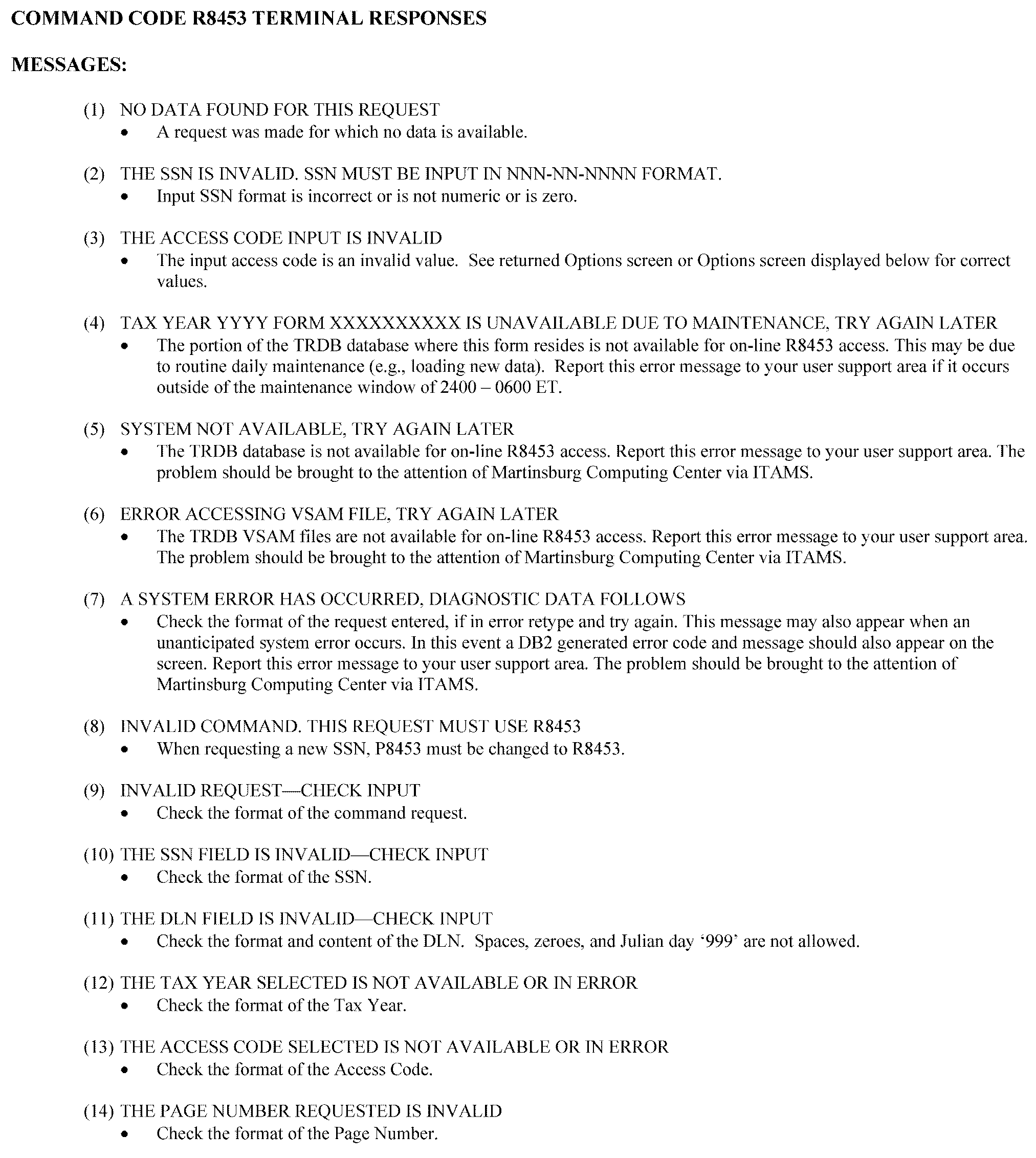
Please click here for the text description of the image.
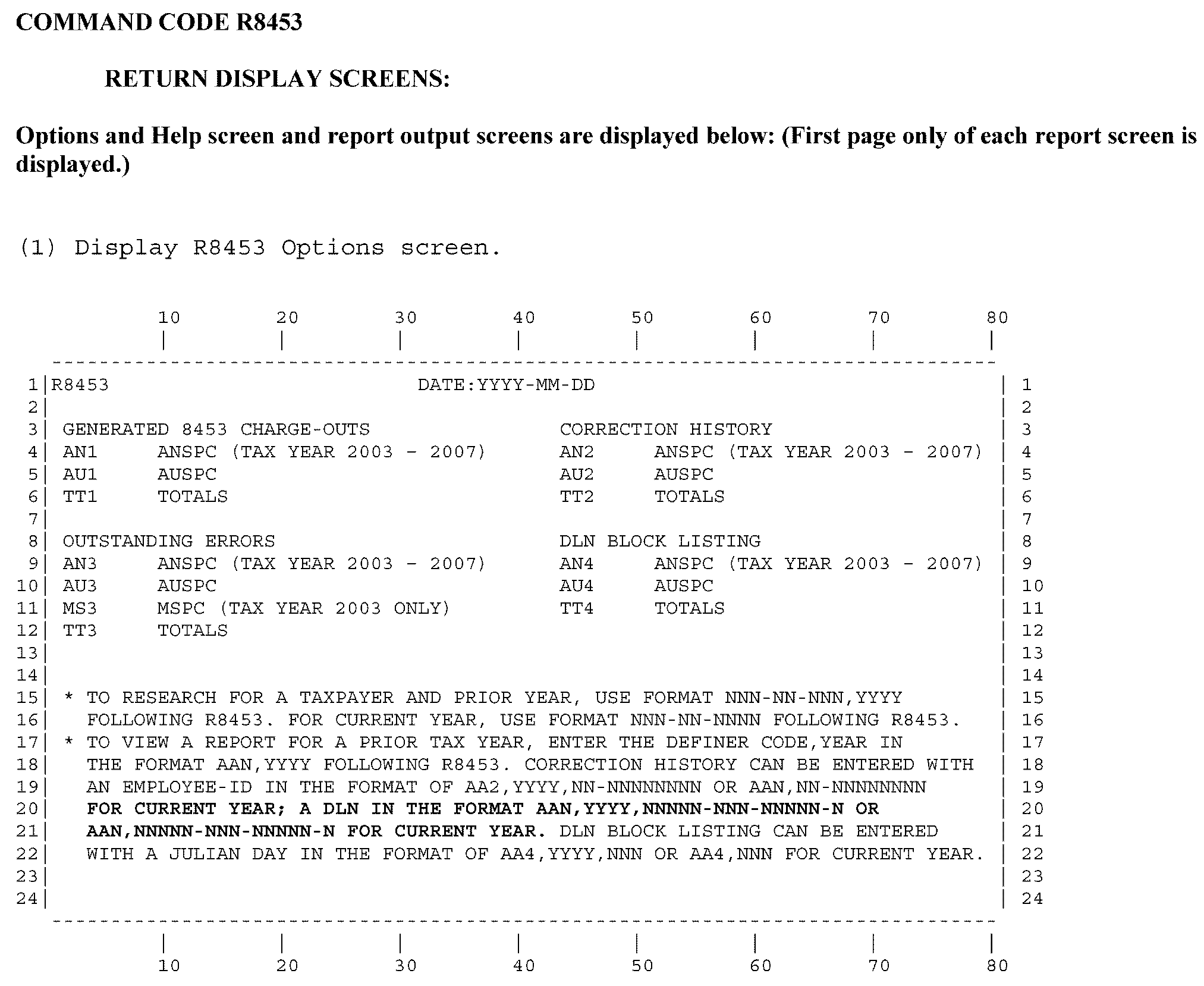
Please click here for the text description of the image.
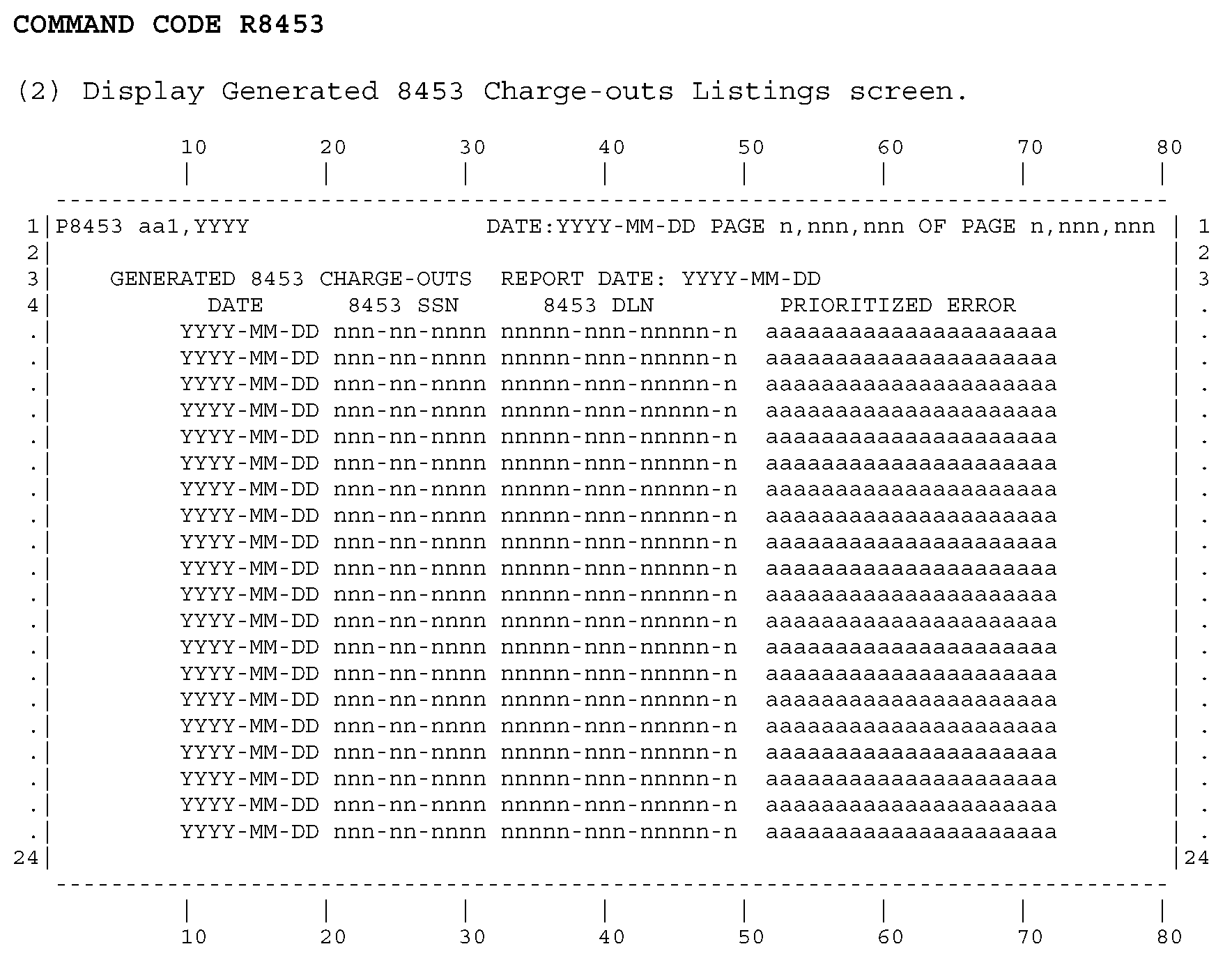
Please click here for the text description of the image.
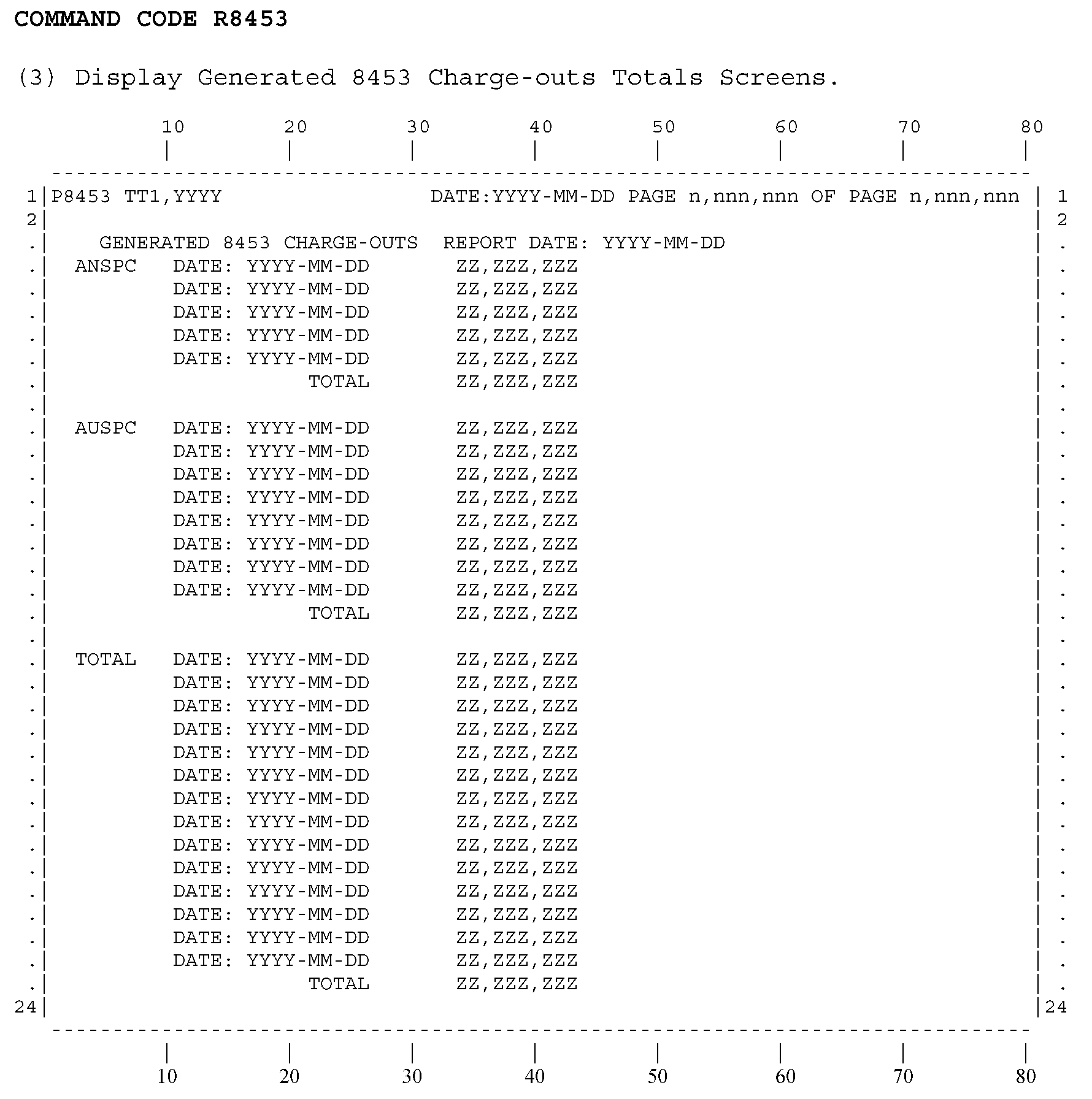
Please click here for the text description of the image.
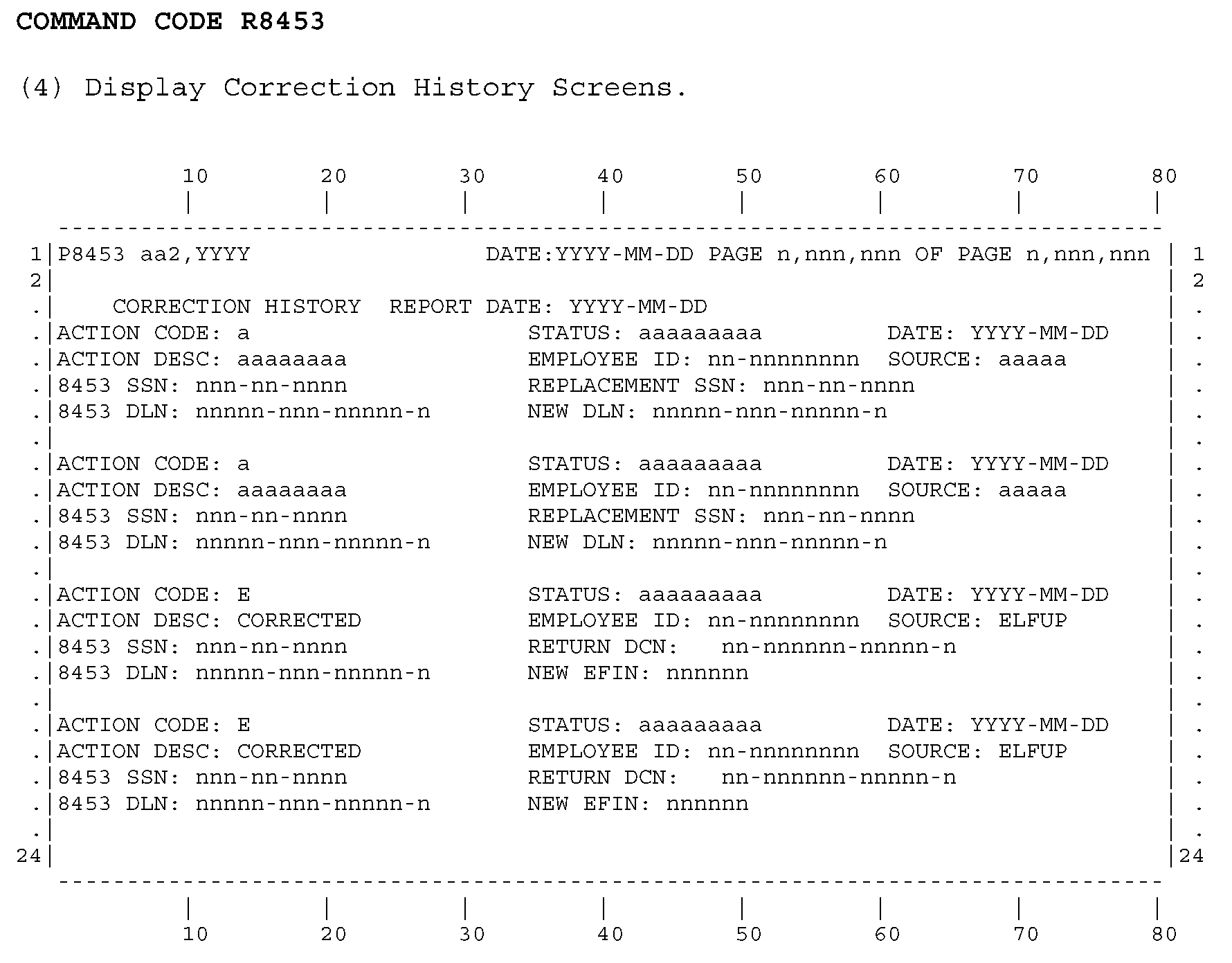
Please click here for the text description of the image.
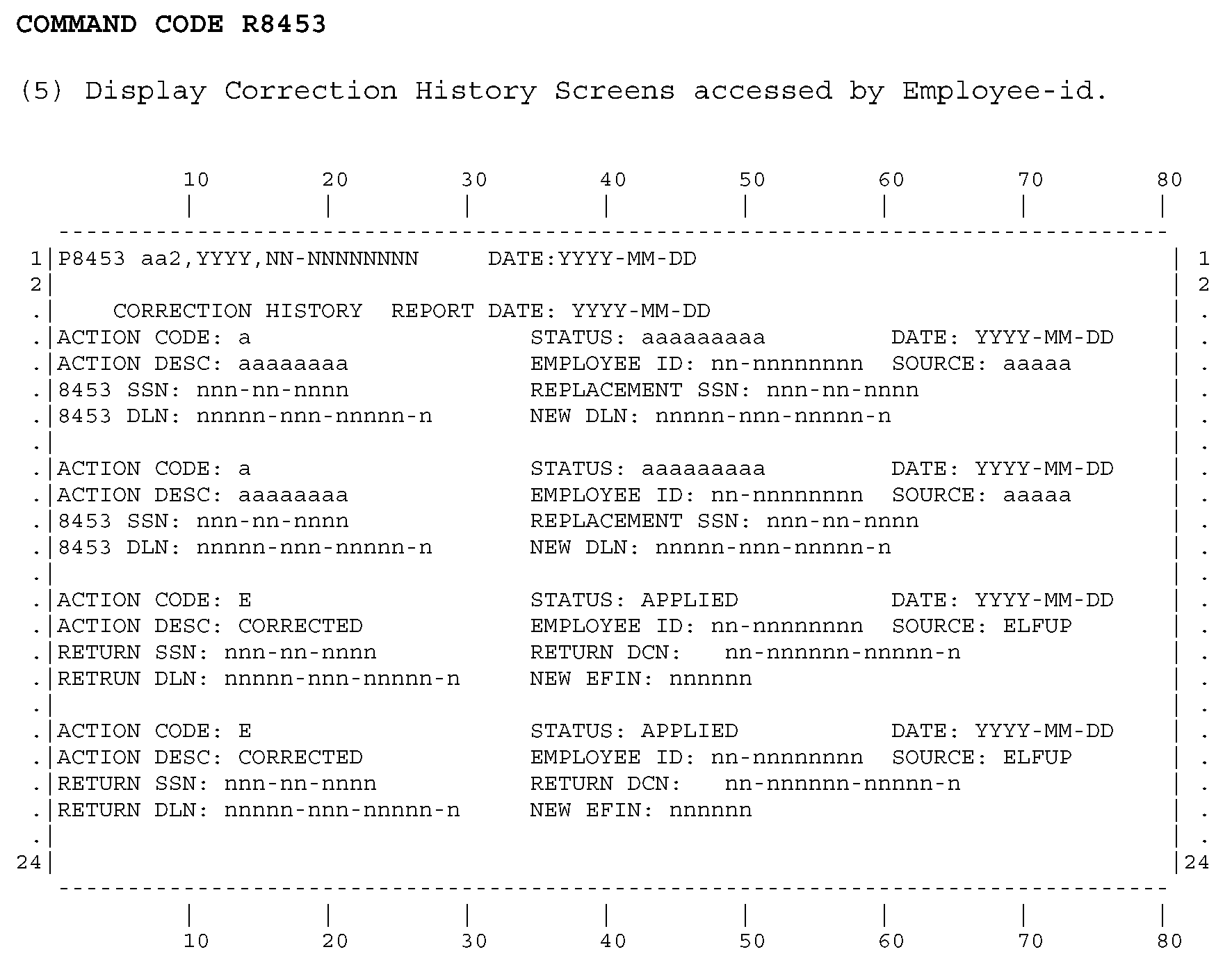
Please click here for the text description of the image.
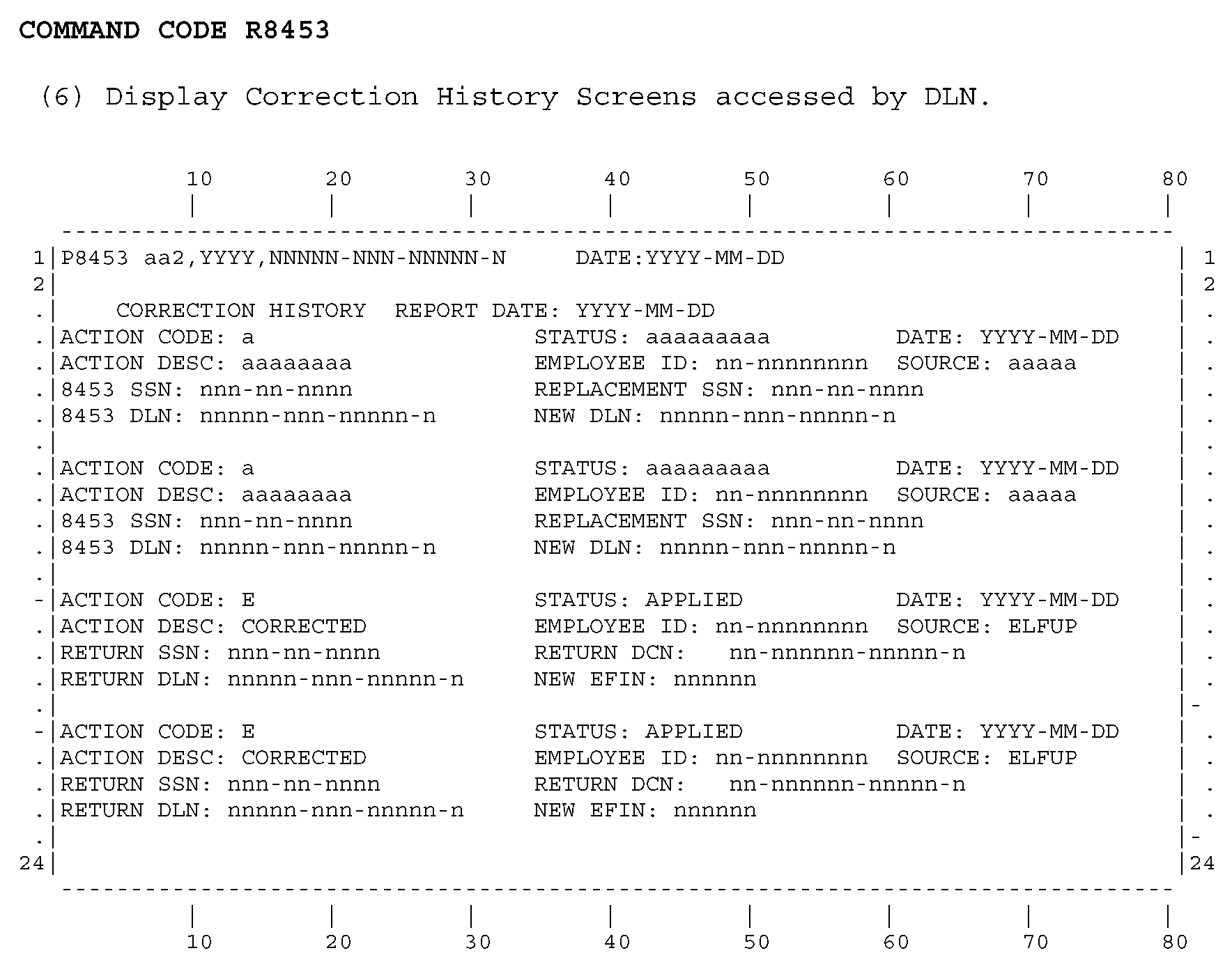
Please click here for the text description of the image.
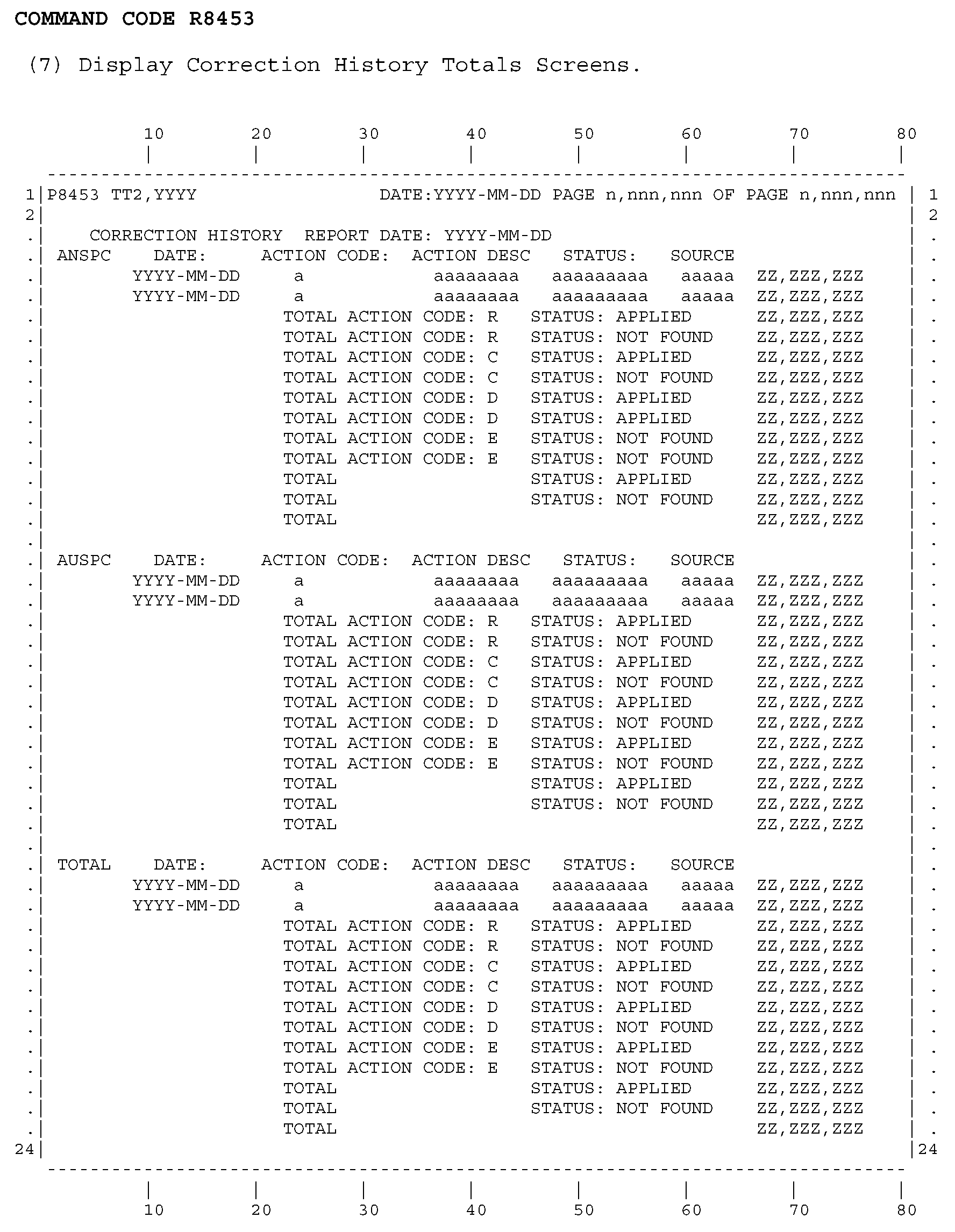
Please click here for the text description of the image.
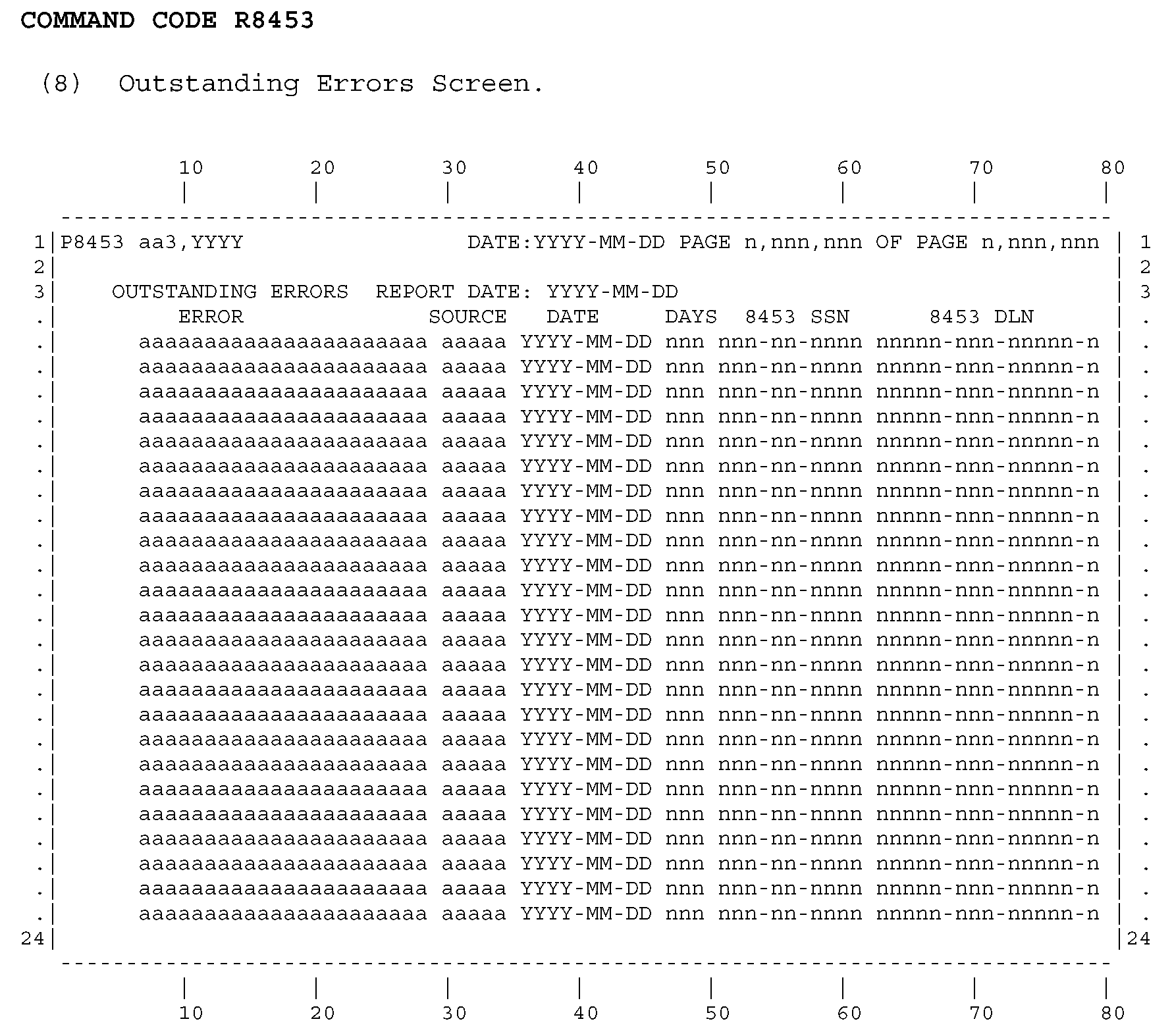
Please click here for the text description of the image.
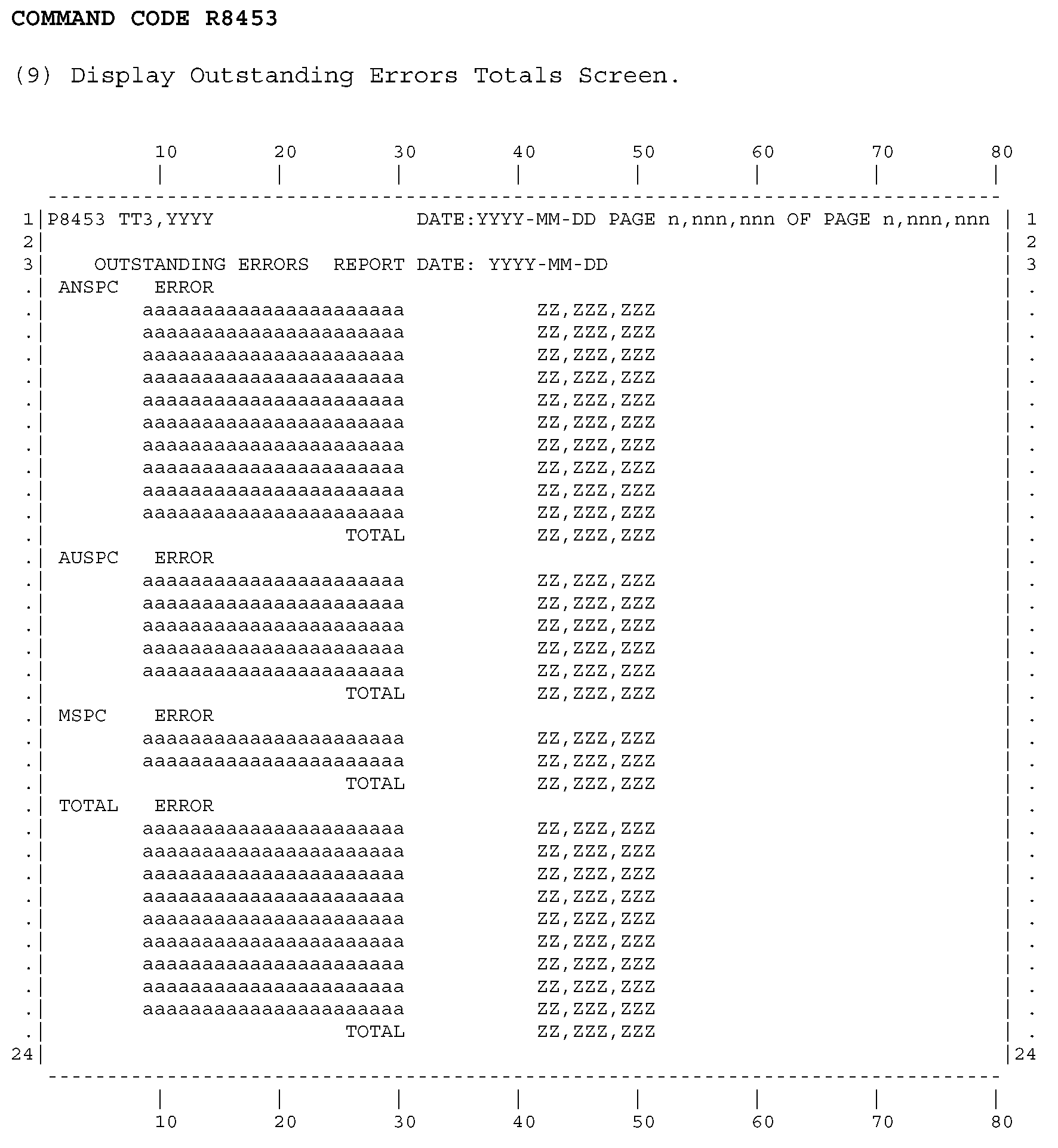
Please click here for the text description of the image.
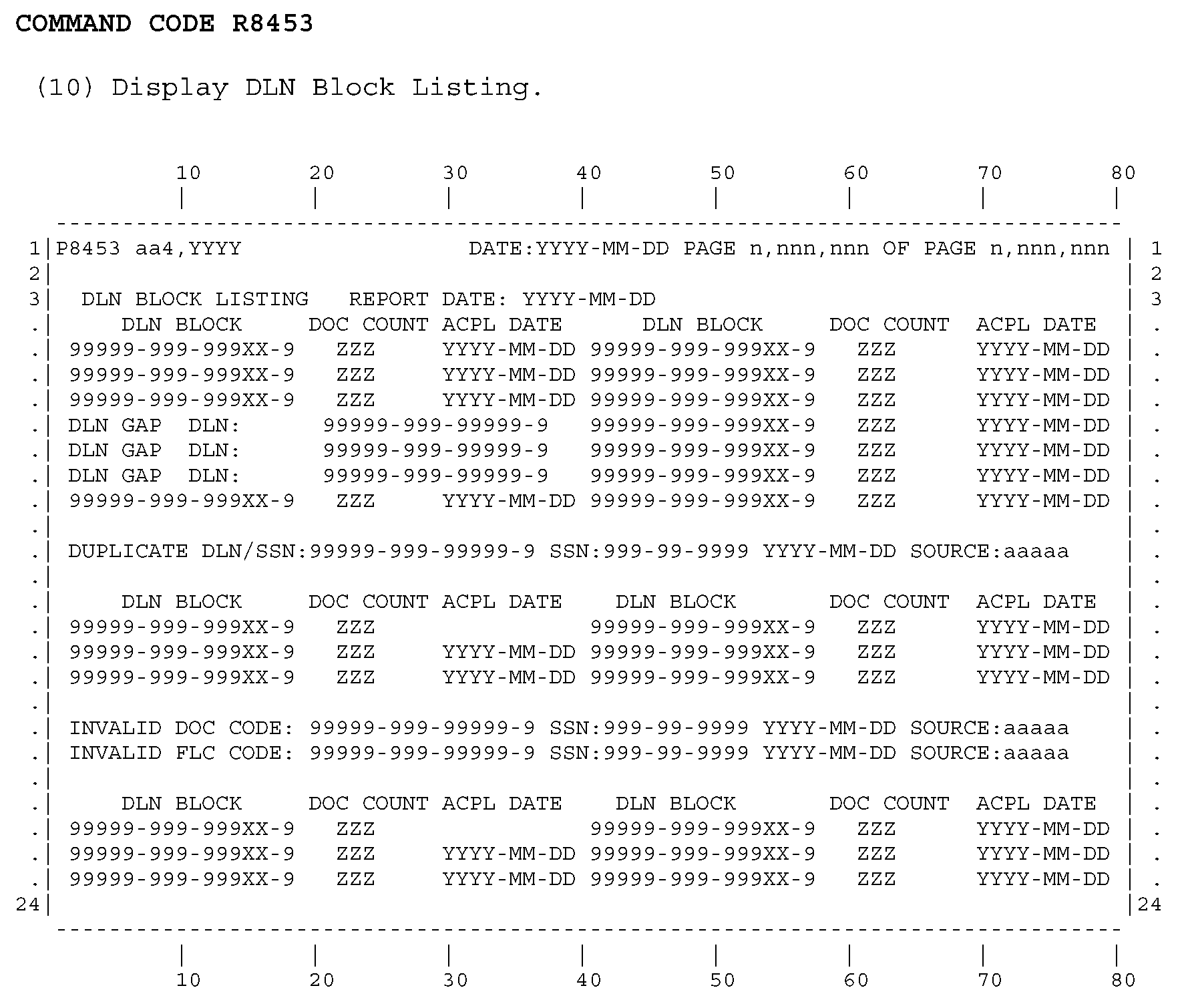
Please click here for the text description of the image.
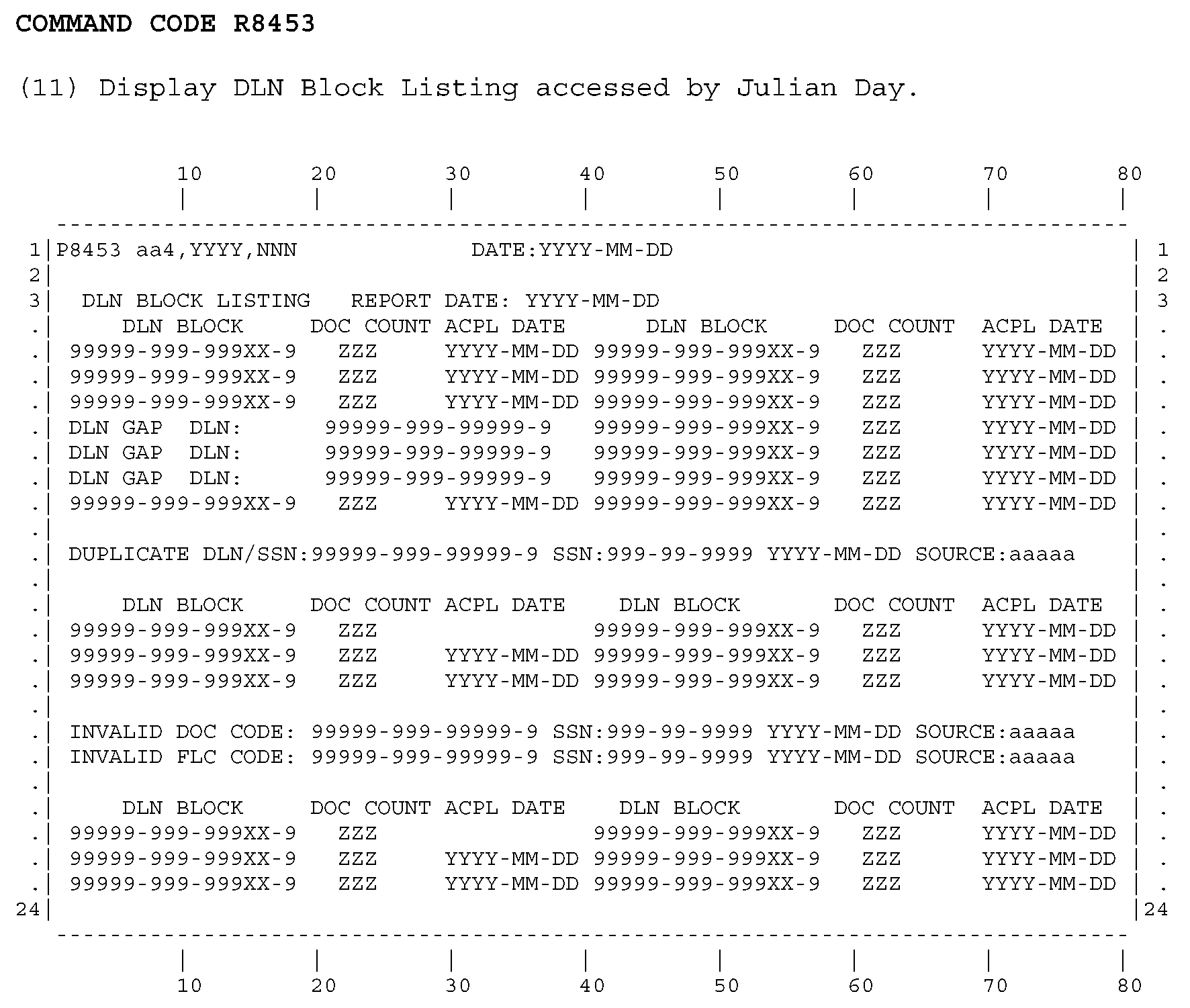
Please click here for the text description of the image.
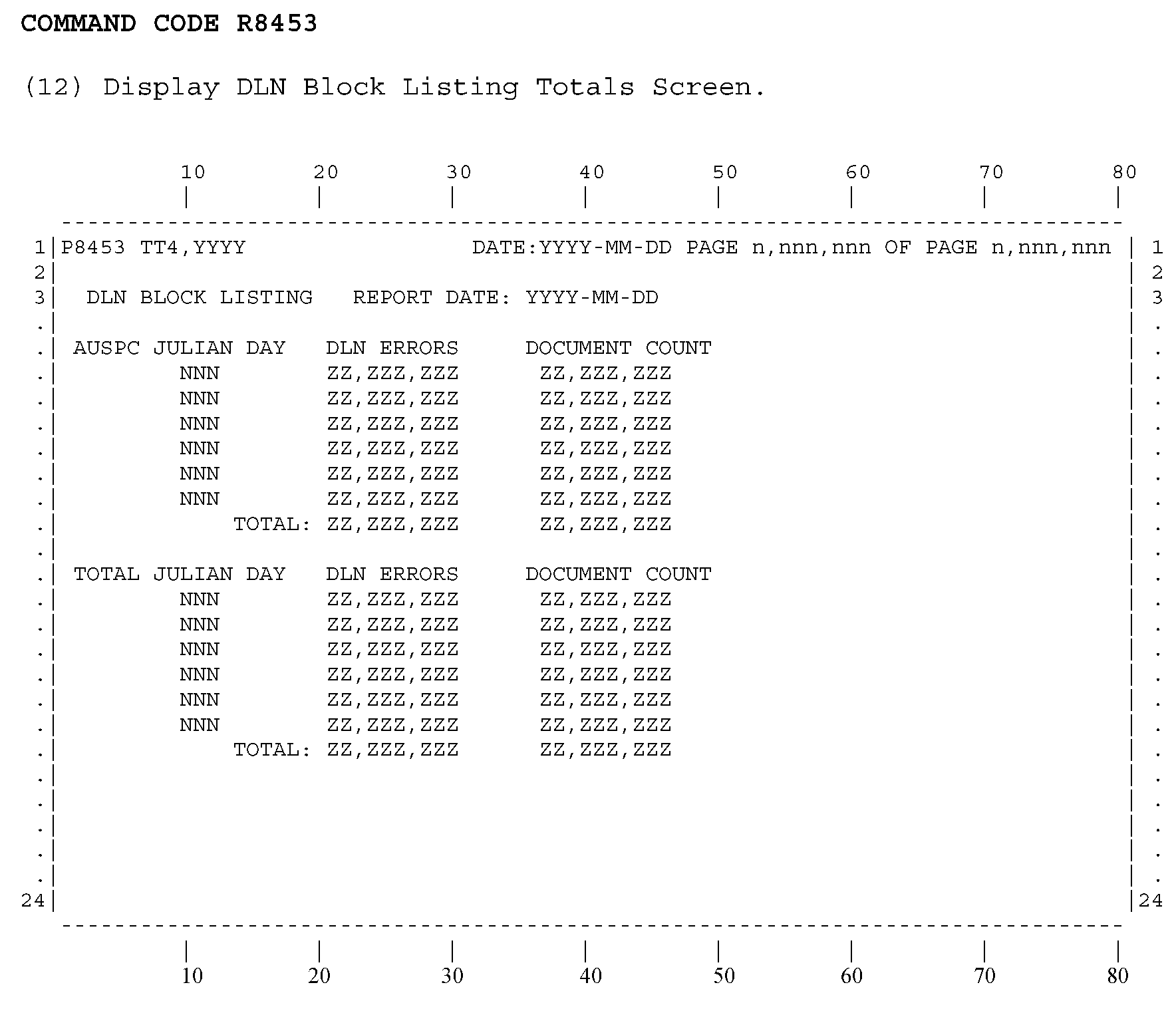
Please click here for the text description of the image.
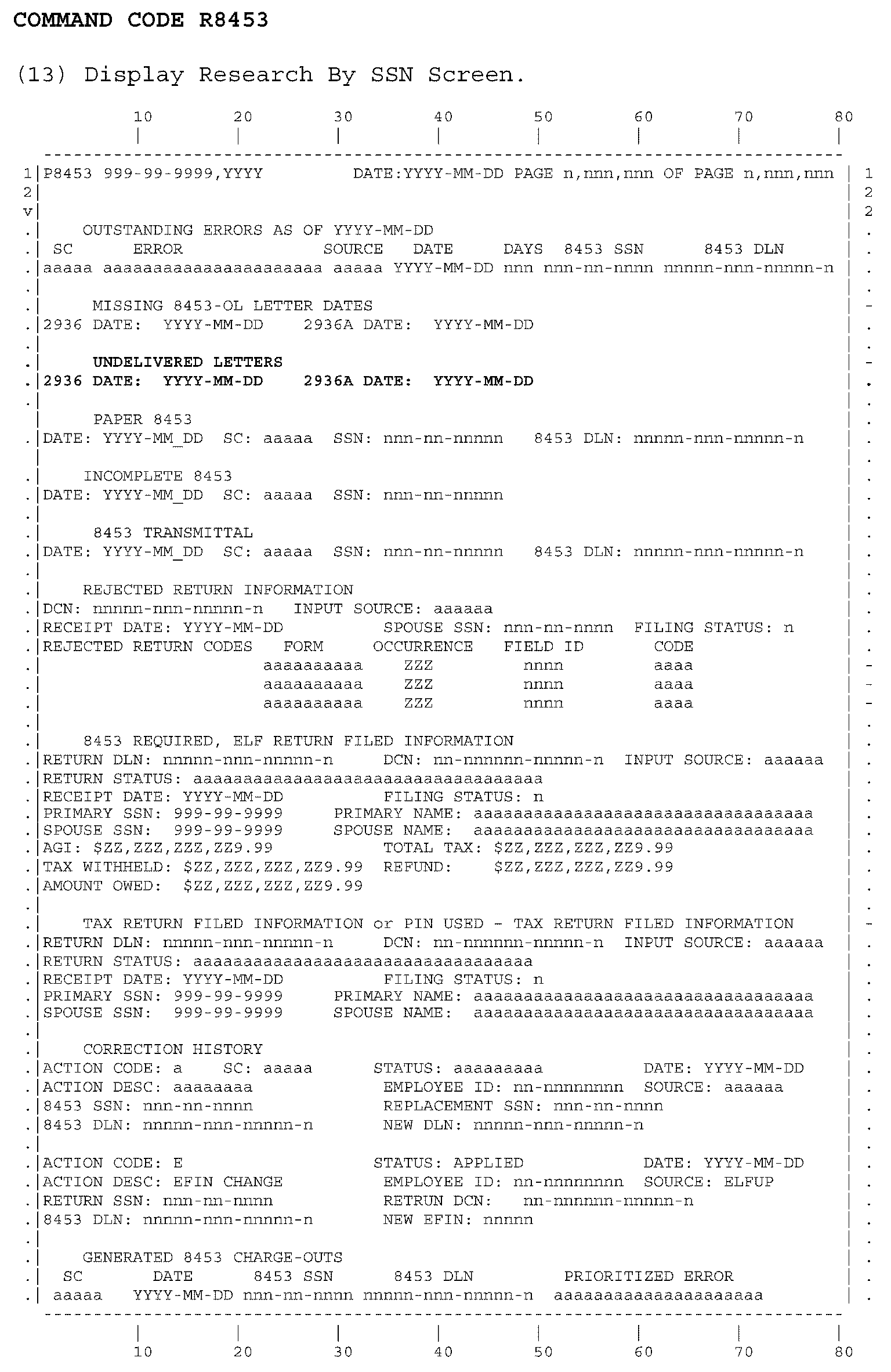
Please click here for the text description of the image.

Background:
(1) In addition to electronically and paper filed tax returns, the Tax Return Data Base (TRDB) also contains supporting documentation submitted using Form 8453.
(2) Beginning in PY 2004, TRDB replaced the legacy ELF Form 8453 / electronic return match processing. This will provide a centralized point to conduct the match processing.
a. Reports showing generated 8453 charge outs will be provided on line.
b. Reports showing Form 8453 correction history will be provided on line.
c. Inventory reports showing outstanding errors will be provided on line for follow up research.
d. Inventory reports showing cycle proof listing / DLN errors will be provided on line for follow up research.
(3) The Form 8453 is used as a transmittal document for sending supporting documentation for tax returns filed electronically through an Electronic Return Originator (ERO) or using an online provider.
(4) Beginning in PY2018, Form 8453 processing will be changed from tax years 2003 through 2016 to tax years 2010 through the current processing year.
General information:
a. Entering the command R8453 without request options will return the help screen displayed below.
b. An input screen request with invalid options will return the help screen.
c. The help / options screen describes the various request options available for Command Code R8453.
d. Display screens for various reports and information will be returned depending on the input request option used.
e. The returned display screens will be formatted for paging using paging Command Code P8453.
f. A subsequent request for a new report must be made using Command Code R8453.
(1) Input request screen:
The request input screen is described as follows:
| Element | Line | Pos | Description |
| 1 | 1 | 1-5 | R8453-Command Code name used for inputting data request |
| 2 | 1 | 6 | blank-Command Code definer, unused |
| 3 | 1 | 7-9 | Input request options, values described below in help screen section |
| 3 | 1 | 7-17 | Input request SSN, value nnn-nn-nnnn |
(2) Subsequent paging input request screen:
The paging request input screen is described as follows:
| Element | Line | Pos | Description |
| 1 | 1 | 1-5 | P8453-Command Code name used for paging request |
| 2 | 1 | 6 | blank-Command Code definer, unused |
| 3 | 1 | 7-69 | Description of current report request |
| 4 | 1 | 70-72 | Page number-current page / screen number of report request |
| 5 | 1 | 77-79 | Page of number-total number of pages / screens for the report request |
(1) NO DATA FOUND FOR THIS REQUEST - A request was made for which no data is available.
(2) THE SSN IS INVALID. SSN MUST BE INPUT IN NNN-NN-NNNN FORMAT. Input SSN format is incorrect or is not numeric or is zero.
(3) THE ACCESS CODE INPUT IS INVALID. The input access code is an invalid value. See returned Options screen or Options screen displayed below for correct values.
(4) TAX YEAR YYYY FORM XXXXXXXXXX IS UNAVAILABLE DUE TO MAINTENANCE, TRY AGAIN LATER. - The portion of the TRDB database where this form resides is not available for on-line R8453 access. This may be due to routine daily maintenance (e.g., loading new data). Report this error message to your user support area if it occurs outside of the maintenance window of 2400 - 0600 ET.
(5) SYSTEM NOT AVAILABLE, TRY AGAIN LATER - The TRDB database is not available for on-line R8453 access. Report this error message to your user support area. The problem should be brought to the attention of ECC-MTB through ESD via KISAM ticket.
(6) ERROR ACCESSING VSAM FILE, TRY AGAIN LATER - The TRDB VSAM files are not available for on-line R8453 access. Report this error message to your user support area. The problem should be brought to the attention of ECC-MTB through ESD via KISAM ticket.
(7) A SYSTEM ERROR HAS OCCURRED, DIAGNOSTIC DATA FOLLOWS- Check the format of the request entered, if an error retype and try again. This message may also appear when an unanticipated system error occurs. In this event, a DB2 generated error code and message should also appear on the screen. Report this error message to your user support area. The problem should be brought to the attention of ECC-MTB through ESD via KISAM ticket.
(8) INVALID COMMAND. THIS REQUEST MUST USE R8453 - When requesting a new SSN, P8453 must be changed to R8453.
(9) INVALID REQUEST - CHECK INPUT - Check the format of the command request.
(10) THE SSN FIELD IS INVALID - CHECK INPUT - Check the format of the SSN.
(11) THE DLN FIELD IS INVALID - CHECK INPUT - Check the format and content of the DLN. Spaces, zeroes, and Julian day '999' are not allowed.
(12) THE TAX YEAR SELECTED IS NOT AVAILABLE OR IN ERROR - Check the format of the Tax Year.
(13) THE ACCESS CODE SELECTED IS NOT AVAILABLE OR IN ERROR - Check the format of the Access Code.
(14) THE PAGE NUMBER REQUESTED IS INVALID - Check the format of the Page Number.
The help screen describes the various request options available for Command Code R8453. The help screen is displayed below (example 1, Options screen).
Note: OUTSTANDING ERRORS, CORRECTION HISTORY, GENERATED 8453 CHARGE-OUTS
Zero or more occurrences of the displayed date may be present.
PAPER 8453 - SC, SSN AND 8453 DLN display only if 8453 data exists on TRDB and a duplicate SSN does not exist.
REJECTED RETURN INFORMATION - Displayed if the current status of the return is REJECTED.
8453 REQUIRED, ELF RETURN FILED INFORMATION - Displayed if a Paper signature is required based on ELF return has filed without a PIN. SPOUSE SSN and SPOUSE NAME will be displayed only if significant.
TAX RETURN FILED INFORMATION - Displayed if a Paper signature is not required and a return has been filed. SPOUSE SSN and SPOUSE NAME will be displayed only if significant.
PIN USED - TAX RETURN FILED INFORMATION - Displayed if a Paper signature is not required, a return has been filed, and a PIN was used. SPOUSE SSN and SPOUSE NAME will be displayed only if significant.