)
or https:// means you've safely connected to the .gov website. Share sensitive information only on official, secure websites.
)
or https:// means you've safely connected to the .gov website. Share sensitive information only on official, secure websites.


- 3.0.275 Business Results Measures for Submission Processing Functions
- 3.0.275.1 Program Scope and Objectives
- 3.0.275.1.1 Background
- 3.0.275.1.2 Authority
- 3.0.275.1.3 Roles and Responsibilities
- 3.0.275.1.4 Program Management and Review
- 3.0.275.1.5 Program Controls
- 3.0.275.1.6 Terms/Definitions/Acronyms
- 3.0.275.1.7 Related Resources
- 3.0.275.2 Overview of Submission Processing Business Results Measures
- 3.0.275.2.1 Purpose of Submission Processing Business Results Measures
- 3.0.275.2.2 Use of Submission Processing Business Results Measures Results
- 3.0.275.2.3 Roles and Responsibilities in the Submission Processing Business Results Measures Program
- 3.0.275.2.3.1 Headquarters Roles
- 3.0.275.2.3.2 Improvement Team Manager
- 3.0.275.2.3.3 Improvement Team Analyst
- 3.0.275.2.4 Submission Processing Business Results Measures Tools
- 3.0.275.2.5 Submission Processing Business Results Measures General Sampling Guidelines
- 3.0.275.2.6 Business Results Measures Communication of Defective Case(s)
- 3.0.275.2.7 Improvement Team Review Defect Rebuttal Procedures
- 3.0.275.2.8 Problem Reporting Instructions for Notice and Letter Error Rate
- 3.0.275.2.9 Business Results Measures Review Guidelines
- 3.0.275.2.10 SMART Database Cut-Off Dates and Report Information for All Business Results Measures
- 3.0.275.2.11 Submission Processing Business Results Measures Records Retention
- 3.0.275.2.12 Submission Processing Business Results Measures Time Reporting
- 3.0.275.3 Entity Review for Letter Error, Refund Error, and Notice Error
- 3.0.275.3.1 Proximal Name Controls
- 3.0.275.4 Address Review for Letter Error, Refund Error, and Notice Error
- 3.0.275.5 Letter Error Rate Business Results Measure
- 3.0.275.5.1 Definition of Letter Error Rate
- 3.0.275.5.2 Sample Instructions for Letter Error Rate
- 3.0.275.5.2.1 Letter Error Rate Sampling of Non-IDRS Letters
- 3.0.275.5.3 Case Review Instructions for Letter Error Rate
- 3.0.275.5.3.1 Source Documents for Letter Error Rate
- 3.0.275.5.4 Data Input Instructions for Letter Error Rate
- 3.0.275.5.5 Reports for Letter Error Rate
- 3.0.275.6 Deposit Error Rate Business Results Measure
- 3.0.275.6.1 Definition of Deposit Error Rate
- 3.0.275.6.2 Sample Instructions for Deposit Error Rate
- 3.0.275.6.2.1 Deposit Error Rate Inventory Control
- 3.0.275.6.3 Case Review Instructions for Deposit Error Rate
- 3.0.275.6.3.1 Deposit Error Rate Review of Revenue Receipts
- 3.0.275.6.3.2 Deposit Error Rate Review of Automated Non-Master File (ANMF) Payments
- 3.0.275.6.3.3 Deposit Error Rate Review of General Fund Payments
- 3.0.275.6.3.4 Deposit Error Rate Review of Deposit Fund Payments
- 3.0.275.6.3.5 Deposit Error Rate Review of Refund Repayments
- 3.0.275.6.4 Deposit Error Rate Measure Data Input Instructions
- 3.0.275.6.5 Reports for Deposit Error Rate
- 3.0.275.6.5.1 Deposit Error Rate Raw Error Rate Quality Report
- 3.0.275.6.5.2 Deposit Error Rate Top 5 What and Top 5 Who Codes Report
- 3.0.275.6.5.3 Deposit Error Rate Adhoc Summary Reports
- 3.0.275.7 Refund Timeliness and Error Rate Measures
- 3.0.275.7.1 Definition of Refund Timeliness
- 3.0.275.7.2 Definition of Refund Error Rate
- 3.0.275.7.3 Sample Instructions for Refund Timeliness and Error Rate
- 3.0.275.7.3.1 Refund Timeliness and Error Rate Sample Size/Skip Interval
- 3.0.275.7.3.2 GMF 1609
- 3.0.275.7.3.3 GMF 1608
- 3.0.275.7.3.4 GMF 1610
- 3.0.275.7.3.5 GMF 1649
- 3.0.275.7.4 Refund Timeliness and Error Rate Clerical Procedures
- 3.0.275.7.5 Case Review Instructions for Refund Timeliness
- 3.0.275.7.5.1 Refund Timeliness Who/What/Why Codes
- 3.0.275.7.6 Case Review Instructions for Refund Error Rate
- 3.0.275.7.6.1 Refund Error Rate Who/What/Why Codes
- 3.0.275.7.6.2 Refund Error Rate Review
- 3.0.275.7.6.3 Refund Error Rate Refund Amount Review
- 3.0.275.7.6.4 Missing Returns and Forms W-2
- 3.0.275.7.6.5 Duplicate Filing Conditions
- 3.0.275.7.6.6 Non-compute Returns
- 3.0.275.7.6.7 Credit Elect Discrepancies
- 3.0.275.7.7 Data Input Instructions for Refund Timeliness and Error Rate
- 3.0.275.7.8 Reports for Refund Timeliness and Error Rate
- 3.0.275.7.8.1 National Refund Timeliness and Error Rate Reports
- 3.0.275.7.8.2 Service Center Refund Timeliness and Error Rate Reports
- 3.0.275.7.8.3 Refund Timeliness and Error Rate Reporting Periods
- 3.0.275.8 Definition of Notice Error Rate (NER) Measure
- 3.0.275.8.1 Notice Error Rate Sample
- 3.0.275.8.1.1 Role Responsibilities of the NER Analyst
- 3.0.275.8.1.2 Filecracker
- 3.0.275.8.2 Notice Error Rate Case Analysis and Data Collection Instrument (DCI) Coding
- 3.0.275.8.2.1 Notice Error Rate SMART DCI Input Instructions
- 3.0.275.8.2.2 Timely Entry of Notice Error Rate Cases
- 3.0.275.8.2.3 Non-Receipt of Source Document for Notice Error Rate Review
- 3.0.275.8.2.4 Notice Error Rate Systemic Errors
- 3.0.275.8.2.5 Notice Error Rate Professionalism and Accuracy Errors
- 3.0.275.8.3 Notice Error Rate Entity Area Coding Guidelines
- 3.0.275.8.4 Notice Error Rate General Coding Instructions
- 3.0.275.8.1 Notice Error Rate Sample
- 3.0.275.9 Other Submission Processing Business Results Measures
- 3.0.275.9.1 Reports for Deposit Timeliness
- 3.0.275.9.2 Deposit Timeliness Business Measure
- 3.0.275.9.3 Refund Interest Measure
- 3.0.275.9.3.1 Definition of Refund Interest
- 3.0.275.9.3.1.1 Refund Interest General
- 3.0.275.9.3.2 Formula/Methodology
- 3.0.275.9.3.3 Data Source
- 3.0.275.9.3.4 Refund Interest Goals
- 3.0.275.9.3.5 Reporting Results
- 3.0.275.9.3.6 Timeframe/Cycle Centers Can Expect to Begin Receiving Refund Cases
- 3.0.275.9.3.7 Refund Interest SMART Database and Homepage
- 3.0.275.9.3.8 Refund Interest Paid Reports
- 3.0.275.9.3.9 Refund Interest Contact and Definition
- 3.0.275.9.3.10 Refund Interest Processing Cycles
- 3.0.275.9.3.11 Requesting Returns for IMF and BMF
- 3.0.275.9.3.12 IMF and BMF Research Tools
- 3.0.275.9.3.12.1 IMF and BMF General Information
- 3.0.275.9.3.13 IMF and BMF Refund Interest Case Review
- 3.0.275.9.3.13.1 Refund Interest Data Collection Instrument (DCI) Input Instructions
- 3.0.275.9.3.14 Reporting the Problem
- 3.0.275.9.3.1 Definition of Refund Interest
- 3.0.275.10 Submission Processing Lockbox Processing Procedures
- 3.0.275.10.1 Submission Processing Center Quality Review of Lockbox
- 3.0.275.10.2 Lockbox Review DCI
- 3.0.275.10.3 Mail Out Package Review
- 3.0.275.10.4 Unprocessable Items Review
- 3.0.275.10.5 Return Sort Review
- 3.0.275.10.6 Return Sort 1040X Review
- 3.0.275.10.7 Prior Year and Delinquent Return Sort Reviews
- 3.0.275.10.8 Deposit Error Review
- 3.0.275.10.9 Deposit Error Review DCI Instructions
- 3.0.275.10.10 Deposit Error Review DCI Column Explanations
- 3.0.275.10.11 Automatic Extension of Time to File Review Form 4868 (April 10 - April 30 IMF Only)
- 3.0.275.10.12 Form 4868 Review DCI instructions
- 3.0.275.10.13 DCI Explanations
- 3.0.275.11 Correspondence Error Rate Business Result Measure
- 3.0.275.11.1 Definition of Correspondence Error Rate
- 3.0.275.11.2 Sampling, Data Gathering and Reports for Correspondence Error Rate
- 3.0.275.12 Rejects Correspondence Timeliness
- 3.0.275.12.1 Review Guidelines
- 3.0.275.12.2 Description of the Process
- 3.0.275.12.2.1 Rejects Correspondence Timeliness Sample
- 3.0.275.12.3 Methodology
- 3.0.275.12.4 DCI Information
- 3.0.275.12.5 DCI Coding for Reject Timeliness
- 3.0.275.12.5.1 Skip Interval Tool Tab
- 3.0.275.12.5.2 DCI Tool Tab
- 3.0.275.12.5.3 Recap (Daily) Tab
- 3.0.275.12.5.4 Recap by Letter Type Tab
- 3.0.275.12.5.5 Monthly Detail Report Tab
- 3.0.275.12.6 Providing Feedback
- 3.0.275.12.7 Comments
- 3.0.275.12.8 Reporting the Results
- 3.0.275.13 Information Referral (F3949-A) Product Review - (OSPC only)
- Exhibit 3.0.275-1 Business Results Measures Communication Record
- Exhibit 3.0.275-2 SMART Database Cut-Off Dates and Report Due Dates for all Business Measure Results
- Exhibit 3.0.275-3 Check list for Entity, Letters, Greenies, RAIVS and R&C
- Exhibit 3.0.275-4 Letter Error Rate What and Where Codes
- Exhibit 3.0.275-5 Deposit Error Rate Frequently Asked Questions
- Exhibit 3.0.275-6 Non-Master File (NMF) Accounts for Deposit Error Rate
- Exhibit 3.0.275-7 Deposit Error Rate Who and What Codes
- Exhibit 3.0.275-8 Refund Timeliness and Error Rate Who, What, and Why Codes
- Exhibit 3.0.275-9 Refund Timeliness and Error Rate EIF/NAP Access Codes
- Exhibit 3.0.275-10 EFT and Direct Deposit Reject Reason Codes
- Exhibit 3.0.275-11 Notice Error Submission Processing Notice CP Numbers
- Exhibit 3.0.275-12 FY 2025 Notice Error Rate Cycles for Monthly Volumes
- Exhibit 3.0.275-13 FY 2025 Notice Error Monthly Cut Off Chart
- Exhibit 3.0.275-14 Notice Error WHO Codes
- Exhibit 3.0.275-15 Notice Error WHAT Codes
- Exhibit 3.0.275-16 Notice Error WHERE Codes
- Exhibit 3.0.275-17 Notice Error EXPOE Codes
- Exhibit 3.0.275-18 Notice Error Type of Error Codes
- Exhibit 3.0.275-19 Professionalism Errors
- Exhibit 3.0.275-20 IMF and BMF Refund Interest WHO Codes
- Exhibit 3.0.275-21 IMF and BMF Refund Interest WHAT Codes
- Exhibit 3.0.275-22 IMF and BMF Refund Interest WHY Codes
- Exhibit 3.0.275-23 FY 2025 Refund Interest Processing Cycles
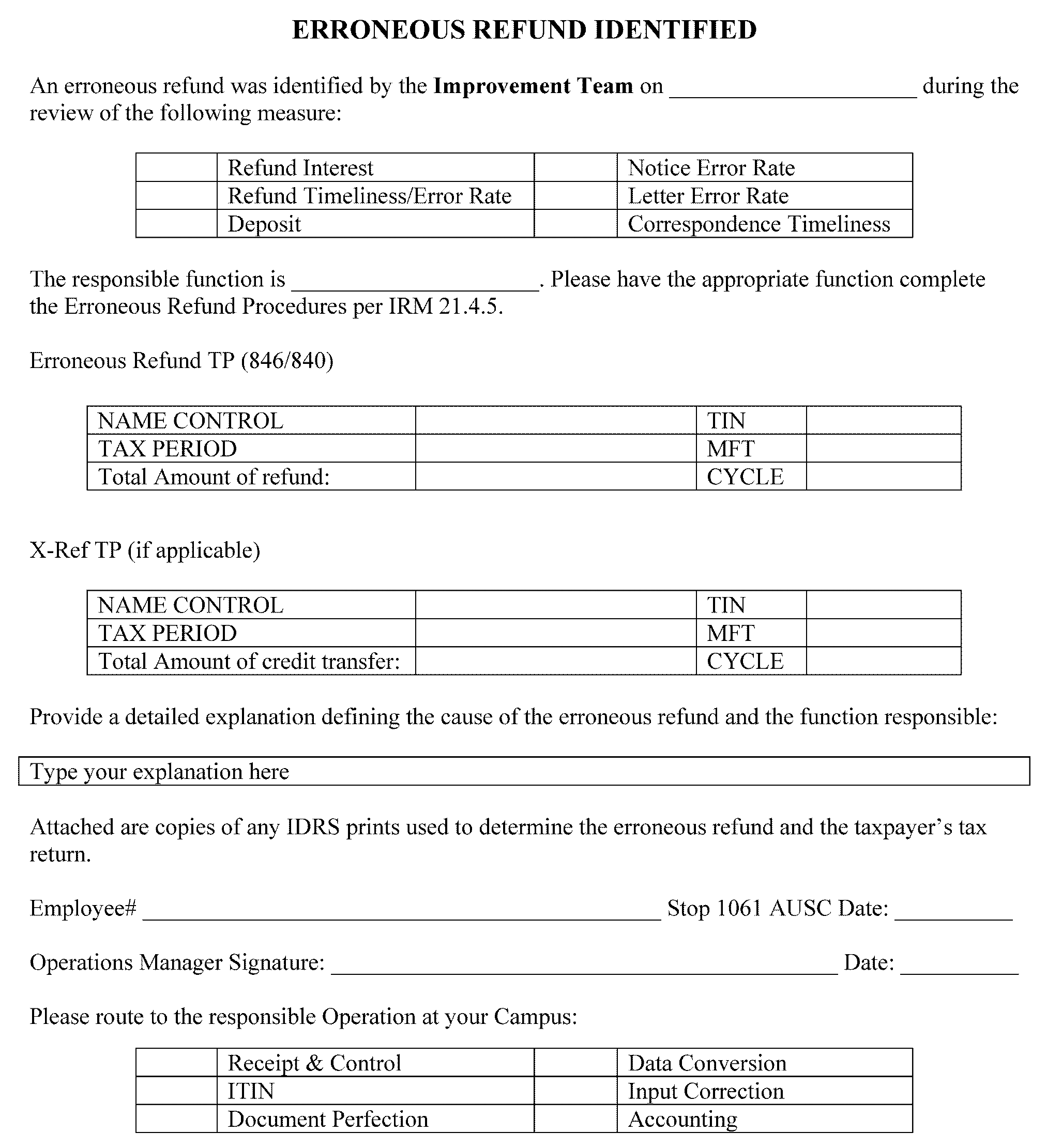
- Exhibit 3.0.275-24 Erroneous Refund Identified Sheet
- 3.0.275.1 Program Scope and Objectives
Part 3. Submission Processing
Chapter 0. General
Section 275. Business Results Measures for Submission Processing Functions
3.0.275 Business Results Measures for Submission Processing Functions
Manual Transmittal
July 29, 2024
Purpose
(1) This transmits the revised Internal Revenue Manual (IRM), 3.0.275 Business Results Measures for Submission Processing Functions.
Material Changes
(1) IRM 3.0.275.9.3.6 Updated FY25 BMF Accelerated Cycles
(2) IRM 3.0.275.12.2 Updated RCT cut-off chart
(3) Exhibit 3.0.275-2 Updated SMART Database cutoff and report due dates
(4) Exhibit 3.0.275-12 Updated NER Cycles
(5) Exhibit 3.0.275-13 Updated NER cut-off chart
(6) Exhibit 3.0.275-23 Updated RI Processing Cycles chart
(7) Editorial changes made throughout the IRM
Effect on Other Documents
IRM 3.0.275 dated July 24, 2023 is superseded. The following IPU was incorporated into this IRM: IPU 23U1013 issued 10-13-2023, IPU 24U0234 issued 02-08-2024, IPU issued 02-12-2024, IPU 24U0339, and IPU 24U0389 issued 03-12-2024.Audience
Taxpayer Services (TS)Effective Date
(07-29-2024)James L. Fish
Director, Submission Processing
Taxpayer Services
-
Purpose: The Submission Processing Business Results Measures program collects data that provides a basis for measuring and improving work products by identifying sources of error from processing systems, procedural instructions and site and taxpayer action. The data collected is used to identify and analyze defect trends and to recommend and submit corrective action.
-
Audience: Submission Processing Improvement Teams
-
Policy Owner: Director, Submission Processing.
-
Program Owner: Submission Processing: Program Management/Process Assurance: Monitoring Section
-
Primary Stakeholders: Submission Processing.
-
Program Goals: Collect data that provides a basis for measuring and improving our work products.
-
Submission Processing uses Balanced Measures to assess organizational performance at both the strategic level and the operational level. Business results are a balanced measure result element that shows how well the operations provide accurate and professional services to internal and external customers in a courteous, timely manner.
-
The following Internal Revenue Codes provide the authority for the Balanced Measure Reviews:
-
801.1 Balanced performance measurement system
-
801.2 Measuring organizational performance
-
801.4 Customer satisfaction measures
-
801.6 Business results measures
-
Taxpayer Bill of Rights
-
-
The Taxpayer Bill of Rights (TBOR) lists rights that already existed in the tax code, putting them in simple language and grouping them into 10 fundamental rights. Employees are responsible for being familiar with and acting in accord with taxpayer rights. See IRC 7803(a)(3), Execution of Duties in Accord with Taxpayer Rights. For additional information about the TBOR, seehttps://www.irs.gov/taxpayer-bill-of-rights
-
The Director of Submission Processing approves and authorizes policy related to this IRM.
-
Submission Processing’s Monitoring Section maintains the information in the IRM, issuing review guidelines and procedures for all Business Measure Improvement Team reviews. The Monitoring Section makes necessary changes and updates on a yearly basis.
-
The Monitoring Section manager ensures the IRM is timely submitted to Publishing each year.
-
Improvement Team Managers must maintain the integrity and quality of the Business Results Measures program.
-
Improvement Team Analysts perform an unbiased, consistent, and accurate review of all Business Results Measures sample cases.
-
Program Reports: National Business Measure reports are for internal and external customers, providing information about program goals.
-
Program Effectiveness: Goals are established for the fiscal year, monthly cumulativeness, and monthly period results. Those goals are compared with monthly results, cumulative monthly results, prior year monthly results and prior year cumulative monthly results throughout the current fiscal year. An analysis of the results provides insight to:
Analysis does not intend to:-
Performance and changes in work processes.
-
How the program goals are measured.
.-
Provide instruction for deciding the program measured
-
Provide instruction for deciding the program effectiveness
-
-
The Submission Processing Measures Analysis and Reporting Tool (SMART) Database is the system used to collect, analyze, and disseminate data about the Business Measure Results for Submission Processing Functions. The IT manager will decide the SMART permissions and then the employee will complete BEARS selecting the appropriate measure.
-
Below is a list of terms and acronyms used throughout this IRM:
Defined Terms
Word Definition SMART The database used to collect data pertaining to the Business Result Measures Systemic Defect occurred as a result of a Submission Processing programming problem Non-Systemic Case was handled incorrectly by the functional area Professionalism Minor defects that do not affect the accuracy of the information being sent to the taxpayer. Acronyms
Acronym Definition ACA Affordable Care Act AGI Adjusted Gross Income ANMF Automated Non Master File AUSPC Austin Submission Processing Center BBTS Batch Block Tracking System BMF Business Master file CADE Customer Account Data Engine CARE Computer Assistance Review of Error Resolution System CC Command Code CCC Computer Condition Code CER Correspondence Error Rate CFOL Corporate Files On-Line CI Criminal Investigation CMR Commissioner’s Monthly Report CP Computer Paragraph CPA Certified Public Accountant CPPAS Computer Paragraph Program Analysis System CPAS Corrective and Preventive Action System CRX Correspondex DCF Dishonored Check File DCI Data Collection Instrument DD Direct Deposit ECC/MCC-ECC-MTB Enterprise Computing Center - Martinsburg (W.Va.) EFDS Electronic Fraud Detection System EFT Electronic Fund Transfer EIC Earned Income Credit EIF Entity Index File ELF Electronic Filing System EOD End of Day EONS Electronic On-Line Network System EP/EO Employee Plans/Exempt Organization ERS Error Resolution System EUP Employee User Portal FICA Federal Insurance Contribution Act FLC File Location Code FMS Financial Management Service FTD Federal Tax Deposit FSPC Fresno Submission Processing Center GMF Generalized Mainline Framework HIRE Hiring Incentives to Restore Employment HQ Head Quarters IAP CSA Interactive Computer Systems IDT Identity Theft IMF Individual Master File IRAF Individual Retirement Account File ISRP Integrated Submission and Remittance Processing ITIN Individual Taxpayer Identification Number ITS Information Technology Service IVO Integrity Verification Office KCSPC Kansas City Submission Processing Center LDT Lockbox Document Transmittal LER Letter Error Rate LFC Lockbox Field Coordinator LOC Lost Opportunity Cost LPG Lockbox Processing Guidelines MeF Modernized e-file MFT Master File Tax Class MSU Machine Services NAP National Account Profile NCOA National Change of Address NER Notice Error Rate NERD Nationwide Enterprise Resource Domain NMF Non Master File NRPS Notice Review Processing System OSPC Ogden Submission Processing Center OFP Organization, Function, and Program OIC Offer in Compromise OLNR On Line Notice Review OTC Office Taxpayer Correspondence PN Pending POA Power of Attorney PRT Problem Reporting Template RAIVS Return and Income Verification Services R&C Receipt and Control RCT Reject Correspondence Timeliness RI Refund Interest RICS Return Integrity & Compliance Services RPC Return Processing Code RPD Return Processable Date RPS Remittance Processing System RPT Responsible Prior Team RRPS Residual Remittance Processing System RT&E Refund Timeliness and Error Rate RT Refund Timeliness RER Refund Error Rate RTN Routing Transit Number RTR Remittance Transaction Research RTS Real Time System SCCF Service Center Control File SCRIPS Service Center Recognition/Image Processing System SERP Service wide Electronic Research Program SMART Submission Processing Measures Analysis and Reporting Tool SOI Statistics of Income SPC Submission Processing Center SPR Scanned Paper Return SSA Social Security Administration TAS Taxpayer Advocate Services TBOR Taxpayer Bill of Rights TIN Taxpayer Identification Number TPNC Taxpayer Notice Code TXI Taxable Income URF Unidentified Remittance File UWR Unified Work Request USPS United States Postal Services WPT Windfall Profit Tax WP&C Work Planning and Control
-
Below are the Control-D reports for the measures:
Report Report Name Job Name RTER Cases GMF1610* GMF1610* RTER Charge Out GMF CHARGEOUTS GMF1609* RTER Skip Interval GMF1649 PRTGMF* RTER Ret Volume WKY WORK & STAFF SCH PCB0540* BMF Notice CPPAS-NS20091* NS20091* BMF Notice C/O CPPAS-NS20092* NS20092* BMF Notice Listing CPPAS-NS20094* NS20094* BMF NER Volumes 160-3D-12 PRTA60* BMF ERS Quality BMF ERS QUAL ASSUR ERS83PP* IMF Notice CPPAS-NS40091* NS40091* IMF Notice C/O CPPAS-NS40092* NS40092* IMF Notice Listing CPPAS-NS40094* NS40094* IMF NER Volumes 460-3E-11 PRTD60* IMF ERS Quality IMF ERS83PP* ITIN Notice CPPAS-NS60194* NS60194* ITIN Notice C/O CPPAS-NS60294* NS60294* ITIN Notice Listing CPPAS-NS60394* NS60394* IMF Letters IMF CRX LTR SAMPLE CRX01S4* BMF Letters BMF CRX LTR SAMPLE CRX01S5* Letter Control CRX01S44 PRTCRX* IMF Letters CRX01S45 PRTCRX* BMF Letter CRX01S46 PRTCRX* -
Refund Interest reports can be found in the Business Results Measures for Submission Processing Functions Job Aid at Product Catalog Information (irs.gov)
* -Site Site SYS MCC/TCC A Andover M MCC B Atlanta L TCC C Austin M MCC E Cincinnati L TCC F Fresno L TCC G Kansas City L TCC I Ogden M MCC J Philadelphia M MCC -
Access Control-D reports at:
CONTROL-D/WebAccess Server - LOGIN (irs.gov)
-
This section supplies procedures for program level reviews of:
-
Submission Processing correspondence - letter and notice
-
Submission Processing deposit activity
-
Submission Processing refund processing
-
-
This section also provides information about automated program level assessment of:
-
Submission Processing Center deposit timeliness
-
Submission Processing Center refund interest paid
-
-
The purpose of the Submission Processing Business Results Measures program is to collect data that provides a basis for measuring and improving our work products by:
-
Identifying sources of error from processing systems, procedural instructions, center and taxpayer action or inaction.
-
Identifying and analyzing defect trends.
-
Recommending and sending corrective action.
-
Following up with reviews to ensure the corrective action was effective.
-
Providing input to National Business Measure reports.
-
-
Management officials may not use Submission Processing Business Results Measures reviews as the basis of evaluative recordation for bargaining team employees.
-
The success of the Submission Processing Business Results Measures Program depends on the participation of all the following:
-
Taxpayer Services Submission Processing headquarters staff
-
Submission Processing Center Planning and Analysis Departments
-
Submission Processing Center Improvement Team Managers and Improvement Team Analysts
-
-
Headquarters issues review guidelines and procedures for all Business Measure Improvement Analysis reviews.
-
Headquarters reviews the Business Results Measures Program as part of periodic reviews of Submission Processing programs.
Note:
When program reviews are conducted, the Headquarter analysts review cases that can be corrected within the sampled month or two-month period after the monthly report run date. For Notice Error, Refund Timeliness and Refund Error the Headquarters analyst provides the Submission Processing Center (SPC) with a list of cases for review. The SPC must request the returns and have available all documentation necessary to perform the review. In addition, there may be times when the Headquarters analyst will want to review cases that are past the cut off. This will involve cases worked during the peak filing season or those worked at the end of the fiscal year.
-
Headquarters administers the SMART database.
-
Headquarters maintains the Business Results Measures section of the Submission Processing Home page.
-
Improvement Team Managers must maintain the integrity and quality of the Business Results Measures program by monitoring and reviewing monthly a sample of all work assigned to an Improvement Team analyst. This review must include cases on which errors were found and cases coded as perfect cases. Improvement Team Managers work with local functional management to arrange for manual sampling and case retrieval when necessary. In addition, managers must conduct a quarterly managerial review of the technique used in pulling the sample for each measure. The manager keeps a log of the reviews conducted for the measures.
-
Improvement Team Managers train their clerical staff to use valid sampling techniques and review monthly the daily sampling log used by the clerical staff to ensure valid sample. See IRM 3.0.275.2.5
-
Improvement Team Managers must inform Headquarters of any problems met in obtaining required sample sizes during a review period.
-
Improvement Team Managers and their staff determine the causes that adversely affect quality and timeliness by identifying error trends. Improvement Team Managers and their staff recommend corrective action to functional areas and monitor to ensure corrective action is taken.
-
Improvement Team Managers designate a Functional Contact for each impacted functional area for each Business Results Measures. Improvement Team Managers ensures that sample cases that require rework are sent to the Functional Contact timely and rebuttals are returned timely.
-
Improvement Team Managers arrange for the analysts to attend functional training of areas that impact the Business Results Measures. For courses available for Improvement Team managers, visit Integrated Talent Management (ITM)..Integrated Talent Management (irs.gov)
-
Improvement Team Managers ensure employees follow the IRM 10.2.14.2, Methods of Providing Protection, for "Clean Desk Policy" . Analysts must store all taxpayer information in a lockable container during non-duty hours.
-
Improvement Team analysts thoroughly review sample cases for all business results measures using guidelines in this section.
-
Improvement Team Analysts perform an unbiased, consistent, and accurate review of all Business Results Measures sample cases.
-
Improvement Team Analysts should provide their manager with:
-
Any cases identified for rework
-
Regular analysis of error trends
-
-
Improvement Team Analysts:
-
Review work against established IRM procedures (IRM 3.0.275.2.9).
-
Apply consistent review and case analysis techniques.
-
Attend functional training of the areas that impact the Business Results Measures.
-
Maintain a good working knowledge of the functional areas and programs they review.
-
Record complete review results using the SMART database and review the database for consistency in coding.
-
Report all problems in sampling, case review, and source document availability to the Improvement Team Manager.
-
Coordinate with their manager if more training is necessary (e.g., Computer basics).
-
-
The following information describes the most often used research tools for Business Results Measures reviews.
-
IRM Part 3, Submission Processing has all functional procedures and guidelines for Submission Processing (SP).
-
IRM 2.3, IDRS Terminal Response, and IRM 2.4, IDRS Terminal Input have Integrated Data Retrieval System (IDRS) and Corporate Files On-Line (CFOL) Command Code instructions.
-
Servicewide Electronic Research Program (SERP) SERP (irs.gov)
-
Program Requirements Packages (PRPs) for Master File programming
-
Functional Specifications Packages (FSPs) for SPC processing.
-
Any IRS publication.
-
SP Intranet contains links to various reference sources including: Data Dictionary, conference call minutes, and report cut-off and due dates. Submission Processing (sharepoint.com)
-
"ReferenceNet" web site has definitions for the acronyms/abbreviation. Access the web at: Acronyms Database (irs.gov)
-
SERP alerts communicate IRM Part 3 changes, clarifications, and corrections.
Note:
Do not charge defects related to IRM or procedural changes until seven calendar days after the SERP Alert posting date of the IRM update or change. More time may be granted if nationwide training is necessary to implement the change. Provide feedback to local functional areas until seven calendar days after the SERP Alert posting date of the IRM update or change.
-
The Employee User Portal (EUP) has MeF return information; use to obtain an accurate ICO Rejects case closure date or print a tax return copy.
Note:
Access the EUP Login Screen at the IRS Source Home under Research Tools:IRS Source - Home (sharepoint.com)
-
Certain paper Forms 1040, 940 and 941 are being scanned into the MeF System. These returns can be identified by the File Location Code (FLCs). These scanned paper returns can be accessed using the EUP.
-
-
Monthly Business Results Templates maintains the FY results for the measures.
-
Before incorporating new letters or notices into the Correspondence Error Rate (CER) Measure, the Improvement Team conducts a courtesy review. To start this process, the headquarters analyst contacts the Improvement Team and requests they add the new product to the sample before the next month's review begins.
-
Take the following steps to incorporate a new letter or notice into the Correspondence Error Rate (CER) Measure after the headquarters analyst contacts you:
-
Contact Statistics of Income (SOI) to inform them of the courtesy review. Do not include courtesy reviews in the CER results. SOI does not include the volumes from the courtesy review into the skip interval calculation.
-
Select cases using the normal skip interval for both the CER and courtesy review.
-
Perform the courtesy review. Do not include courtesy review cases or volume in the CER sample.
-
After the courtesy review is complete, inform SOI you are adding the new letter or notice to the CER measure.
-
For added notices, SOI starts including new notice volumes into the skip interval process
-
For added letters, work with SOI to determine the volume of new letters to review monthly for a 12-month period.
-
Do not remove new letters or notices once incorporated into the CER measure.
-
-
Improvement Teams ensure output and timely receipt of automated sampling runs for Business Results Measures programs. If you do not receive a sample, open an IRWorks ticket following local procedures. Inform the Headquarters analyst assigned to the program if you continue to experience problems receiving sample run output.
-
Improvement Team Managers contact the Headquarters analyst immediately when they identify problems with an automated sample run (for example, the sample size is much smaller or larger than expected).
-
Improvement Teams manually sample cases for the Deposit Error Rate (DER) measure, non-IDRS correspondence for the Letter Error Rate (LER) measure and closed cases from the Notice Review area for the Notice Error (NER)measure. The Headquarters analyst responsible for the measure will provide a monthly sampling plan. The Improvement Team manager is required to perform a biannual review of the Improvement Teams to ensure the procedures are followed and to see if updates are needed.
-
The Improvement Team provides the manual sampling procedures to any functional area instructed to pull a manual sample by SPC leadership. Improvement Team is required to perform a semi-annual review of the functional area's sampling to ensure the procedures are followed and to see if updates are needed.
-
To ensure a reliable and valid sample, you must follow the instructions below when manually sampling cases for Business Results Measures.
-
Every item that is subject to sampling must have an equal chance of being selected for review. For example, all non-IDRS correspondence subject to Letter Error Rate review must be available for sampling.
-
On the first day of the sampling period, use the random start number to select the first sample case. Use the skip interval to select subsequent documents for review. Use the random start number only at the beginning of the sampling period, even if the skip interval changes during the period.
-
Begin each days count with the remaining count that followed the last document selected on the previous day. For example, your skip interval is eight. On Monday, when you selected the last case for review, there were five cases remaining. Begin Tuesday's count at six cases. In effect, choose the third case from Tuesday's work. However, that case is the eighth case in the skip interval sequence.
-
Keep a daily sampling log for each measure showing the total number of cases available for review, the skip interval you used, the number of cases sampled, and the number remaining after the last case was selected.
-
-
Certain paper Forms 1040, 940 and 941 are being scanned into the MeF System. These returns can be identified by the File Location Code (FLCs). These scanned paper returns can be accessed using the EUP.
-
This section applies only to sample cases that are in the computation of the Business Results Measures.
Defect Case Communication:If Then For all measures, if a repeating defect is identified Code all defects. For example, a tax examiner did not follow procedures on a case, and additional pulled cases worked by the same employee have the same defect, code all cases for that defect. If the Improvement Team analyst incorrectly defined or erroneously charged the error and further review reveals a subsequent error Charge the new or different error to the functional area If a defect is identified The functional area responsible for correcting the case will receive a Communication Record. No response is required if the functional area agrees with the defect. See Exhibit 3.0.275-1. The format of this Communication Record is left to the discretion of individual SPCs, but must contain the following information: Case Identification: Case number, case review date, response date (3 business days beginning the day after the review date), functional area responsible for defect, and copy of the defective case. Research Information: Indicate IRM references (if applicable) for defect(s) identified and defect description (a concise description of the defect(s) identified). Functional Contact Representative: If the Functional Contact representative disagrees, the case must be returned by the response date on the Communication Record. If additional time is necessary, the Functional Contact contacts the Improvement Team to request an extension (this additional time can be no longer than 5 business days after initial response date). The Functional Contact will include the date of review, their signature, phone number, comments, and backup to support the rebuttal. If the functional area agrees with the defect Share the defects with the employee and if it is an identified trend share with the functional area. For all measures, make arrangements for an area other than the Improvement Team to complete the correction to Master File when deposit, tax period, Master File Tax (MFT), name lines, received date, Taxpayer Identification Number (TIN), tax, credits, address, are affected. For all measures, each SPC must develop a defect monitoring log to track all defects, ensuring all are corrected within a two-week period. Document the action taken and date closed. Make this log available to HQ upon request. If the correction is not made within two weeks, the Improvement Team analyst must follow-up. Refer any corrections not made within three weeks to management. If the functional area does not agree with the defect and the Improvement Team agrees with the rebuttal Edit the database to reflect the change. Communicate your agreement to the functional area. If the functional area does not agree with the defect and the Improvement Team does not agree with the rebuttal The Improvement Team manager forwards the case to the HQ analyst responsible for the measure using the Improvement Team Review Defect Rebuttal Procedures. See IRM 3.0.275.2.7. and notifies the functional area the case was forwarded to HQ. The case(s) sent to the HQ analyst must include references used by the functional area and Improvement Team. Disclosure and PII procedures must be followed when sending TP information. -
Provide Taxpayer error information to your Local Communication Office (e.g., Certified Public Accountant (CPA) trends, taxpayer trends, tax preparer trends).
-
Occasionally, you may not be able to resolve a defect rebuttal case at the SPC level. If this happens, the Improvement Team Manager will refer the disputed case to the responsible headquarters analyst.
-
The referral must have the Document Collection Instrument (DCI) number of the disputed case and an analysis of the defect from the Improvement Team analyst and the functional area. Provide any research material (e.g., IRM references) used when originally reviewing the case.
-
All disputed cases should be resolved prior to the monthly cutoff date. See Exhibit 3.0.275-2. for cut-off dates and report due dates for all Business Results Measures. SPCs should make every effort to ensure cases sent to Headquarters Measures Analyst are received no later than the Monday prior to the monthly cutoff date. If the cutoff date has passed, the cases will still be sent to the Headquarters Analyst for resolution. These cases will then be captured in the cumulative results.
-
The Headquarters Measures Analyst will respond to the SPC within five business days. The Headquarters Measures Analyst will consider both areas statements and will make the final determination of the defect.
-
If a systemic problem is identified during the review process for Notice or Letter Error, complete the Problem Reporting Template (PRT) using the following steps.
-
Go to the Office of Taxpayer Correspondence (irs.gov) website.
-
Click on the green “Request for Services” button.
-
Follow the prompts, you will be asked a series of questions before entering the information on the erroneous correspondence.
-
-
Email the completed template for IMF or BMF Notices/Letters to the CER Analyst - Stuart Simpson. Encrypt the correspondence when sending.
-
The HQ analyst will share with all SPCs.
-
When reviewing a sample case for a Submission Processing Business Results Measure, you may consider local procedures that do not conflict/deviate with the appropriate IRM instructions. Share all local procedures with the appropriate HQ IRM analyst. Follow the instructions in IRM 1.11.2.2 and IRM 1.11.10 to request an IRM deviation including temporary procedures. Do not implement these procedures until you receive approval from the IRM owner.
Note:
All approved "SERP Alert" procedures will be incorporated into the next revision of the appropriate IRM. If the procedure is not incorporated within one year of the approval, then the IRM procedure is obsolete. See IRM 1.11.1, IMD Program and Responsibilities, and see IRM 1.11.2, Internal Revenue Manual (IRM) Process for additional information.
-
The unavailability of any program (e.g. QRADD, Computer Assistance Review of Error Resolution System (CARE), percent reviews, managerial reviews) that could improve the quality of work will not remove a sample case from the Business Result Measures reviews. If non-systemic errors are identified, they must be charged to the appropriate functional area, and not as Systemic, unless it can be proven that the quality system was directly responsible for the error. These reviews are enhancements to the initial processing of the return and are only tools to improve the results.
-
When a defect is identified, the analyst must determine what type of defect to charge. The following definitions should assist in ensuring consistency of coding:
-
Accuracy (Non-Systemic) - Case was handled incorrectly by the functional area.
-
Accuracy (Systemic) - Defect occurred because of a Submission Processing programming problem (excludes any programs to improve the quality of the product), or incorrect/outdated IRM procedures. (Notice Error, Letter Error, Business Return Error, Refund Timeliness and Error only).
-
Professionalism (Non-Systemic) - Minor defects that do not affect the Accuracy of the information being sent to the taxpayer. These defects include incorrect punctuation, capitalization, and spacing defects made by the functional area. (Notice Error, Letter Error, and Refund Timeliness and Error only).
-
Professionalism (Systemic) - Defect occurred because of a programming problem, incorrect/outdated IRM procedures, or when a properly working system results in a less than ideal product. (Refund Timeliness and Error only).
Note:
The Notice and Letter Error measures no longer code these types of errors. However, an Erroneous Correspondence thru SNIP is required for every systemic professionalism error. See IRM 3.0.275.2.8, Problem Reporting Instructions for Notice and Letter Error Rate, on completing an Erroneous Correspondence.
-
-
When coding any sample case for a Submission Processing Business results Measure, DO NOT include sensitive data into the SMART database. This includes taxpayers’ names, phone numbers, addresses, and taxpayer identification numbers. This type of information is considered privileged and would be unauthorized disclosure.
-
For cases to be included in the monthly (period) report, the cut-off date for inputting these cases is the close of business on the 22nd day of the month following the end of the sample month. Therefore, the period rates shown may represent only a subset of the entire monthly sample and can only be considered preliminary in nature. To ensure that the monthly report represents the actual error rate for your center, enter as many cases as possible before the Monthly Report Run date. It is recommended to input the review information into the SMART database within one business day after coding.
Note:
In reviewing the Service Center Reports on SMART remember these reports are "real time" reports and continuously reflect changes made by the SPCs after the National reports are run on the 23rd. These reports change every time a case is loaded and only reflect results at the specific time they are viewed. See Exhibit 3.0.275-2.
-
Cases input after the cut-off date will be included in the following months cumulative rate (not the period) (e.g., June cases coded after the 22nd day of July will be reflected in the cumulative rate of the month it was input). Therefore, the only figure that includes all coded cases to date is the current month's cumulative.
Note:
In reviewing the National Reports on SMART remember these reports are generated on the 23rd of each month, providing a data "snapshot" at that moment. Adding data after the "snapshot" will not change the National reports for that month. Any case loaded after the National Report running will roll into the cumulative for the current month.
-
Updates and edits for NER, LER, DER, and RTER are allowed to the SMART database for two months after the monthly report run date. Additionally, for Deposit Error, Notice Error, and Letter Error any additional cases from the original sample month can be added for two months after the Monthly Report Run date. However, no additional cases can be added for the Refund Timeliness and Error measures. Edits or additions made after the Monthly Report Run date, are reflected in the cumulative result. Any cases not coded after the two-month period are deleted from the database.
-
Finalize reports for the fiscal year by October 22nd of the FY. Input all August and September updates/edits/additional cases by October 22. The Fiscal Year Narrative report is due four working days after the September Monthly Report narratives are due to Headquarters. The final report should include:
-
Comparison of last year’s results to this years results
-
Issues that impacted the measures results
-
Actions the operations took to improve the measures (e.g., developed job aid, special task teams, action plan).
-
Actions the Improvement Team took to improve the measures.
-
-
National Reports generate on the 23rd of the month following the end of the sample month data cut-off date and will be posted to the Submission Processing Web Page on or about the last business day of the month. See Exhibit 3.0.275-2.
Note:
The following is the time on the 23rd of each month that the measures data automatically generates the reports. This is Central time (Austin Time).
4:00 a.m. - Notice Error Update
4:00 a.m. - period data and 4:30 a.m. Cum data - Deposit Error Update
5:30 a.m. - Refund Timeliness and Error Update
6:00 a.m. - Letter Error Update
6:15 a.m. - Correspondence Error Rate -
Narratives are due to Headquarters for all measures by Close of Business (COB) on the “Narratives to HQ” date in Exhibit 3.0.275-2. Send narratives to the Headquarter Monitoring Section Manager and Lead with a carbon copy to the Headquarters Measures Analyst assigned to the measure. The Business Results Measures Monthly Narrative Report will include and address the following:
-
SPC Goal
-
Period Rate
-
Cumulative Rate
-
Number of Errors
-
Number of Documents/Cases Reviewed
-
Number of cases still pending (Deposit Error, Letter Error, Notice Error, Business return Error, and Refund Error) for the current month and any other pending cases identified by month pulled (e.g., current month - April 2 cases pending. Prior month March 3 cases pending.)
-
Number of cases closed due to insufficient data (Deposit Error, Letter, Notice, Business Return Error and Refund)
-
-
Comments must include:
-
For all measures, whether the SPC goal was met or not met. If a change of seven percent (plus or minus) difference from the Corporate Monthly Cumulative Goal provide causes for the change (e.g., was it due to attrition, legislative changes, procedural changes). Use the SMART database to assist in identifying trends for both systemic and non-systemic (both period and cumulative) errors. If a trend is identified, explain the cause for the trend (e.g., was it procedural, training). Is the trend different from last year? If yes, explain the change. Make contact with your operations to determine if something happened that caused the SPC goal to be met or not to be met (e.g., could be procedural change caused a higher error rate, new process improved the SPC rate). For DER, provide a breakdown of cases reviewed (how many R-RPS, Transport, PPU, Field, Lockbox or Non-Transport).
-
Provide information from the operations on what they are doing to improve the measures results. Provide the specific initiatives implemented to improve the work product. For example: Action Plan initiatives, Just in Time Training, Special Procedures, 100 percent reviews, Champions, task teams.
-
Provide via an attachment any guides or other SPC information. For example: Quality Alerts, Weekly Reports.
-
If cases are being closed due to insufficient data, no source document, or lack of back-up material, please elaborate on why the data is not available, and actions taken to address the issue.
-
Address open cases from the previous month by supplying the results of these cases (e.g., 10 open cases, 8 correct, 2 errors - Errors included).
-
All rebutted/disagreed cases must be captured in the comment section of the Monthly Narrative Report. Include number of cases rebutted/disagreed, number of defects charged/removed, and the reason why the defect was charged/removed. In addition, a file must be established that will include all cases that cannot be agreed upon by all parties (e.g., Improvement Team manager, Improvement Team analyst, Operations, Planning and Analysis (P&A). Monthly, a copy of these cases must be either faxed or mailed to HQ for review. This will ensure that the determinations made are consistent with the intent of the measure.
-
Any additional information that will assist HQ in reporting to upper management.
-
-
Five full years of data will be kept on the database. After 5 years, the data will be stored on an Austin storage server.
-
The IMF and BMF Improvement Teams must retain, on site, six months of case files for each Business Results Measure. After six months, the case files can be sent to the Record Retention area. See Document 12990, "Records and Information Management Records Control Schedules" Number 20, Quality Review Forms, Reports and Records (1), as a guideline/reference for retention of the Business Results Measures data. On the paperwork to be submitted under "sample control" indicate DCI forms, as the type of record. DO NOT send case files to Federal Record Center. The Record Retention area can destroy these case files after one year. If a SPC is ramping down contact Headquarters for direction on destroying cases prior to the SPC shutdown.
-
Required Documentation for Business Results Measures Case Files:
-
Letter Error - each case file should contain a copy of the DCI, a copy of the return or source document, and a copy of all associated research.
-
Deposit Error- each case file should contain a copy of the source document(s) and posting document. A copy of the DCI is optional.
-
Refund Timeliness and Error - case coded as perfect - case file should contain a copy of the DCI, IMFOL prints, and any additional documentation to support your coding decision. Case coded as not perfect - each case file should contain a copy of the DCI, a copy of the return, IMFOL prints, and any additional documentation to support your coding decision.
-
Notice Error - case coded as perfect - case file should contain a copy of the DCI, a copy of the CP notice, and any other documentation to support your coding decision. Case coded as not perfect - case file should contain a copy of the DCI, a copy of the CP notice, a copy of the return, and any other documentation to support your coding decision.
-
Refund Interest - each case file should contain a copy of the DCI, a copy of the return or source document, and a copy of all associated research.
-
-
See IRM 3.30.20 Organization, Function, and Program (OFP) Codes (irs.gov)for Business Results Measures work performed in the Submission Processing Improvement Teams.
-
The OFP 880-08120 (Program Business Results Measures Review) with a 5th digit will identify the Business Results Measures reviewed:
-
Refund Timeliness and Error Rate - 880-08121
-
Deposit Timeliness and Error Rate - 880-08122
-
Letter Error Rate - 880-08123
-
Notice Error Rate - 880-08124
-
Refund Interest - 880-08125
-
Reject Timeliness - 880-08127
-
-
The OFP 880–08190 (Improvement Team-Clerical) with a 5th digit will identify the clerical time spent on each Business Results Measures:
-
Refund Timeliness and Error Rate - 880-08191
-
Deposit Timeliness and Error Rate - 880-08192
-
Letter Error Rate - 880-08193
-
Notice Error Rate - 880-08194
-
-
All centers, if Functional areas are performing additional (or increased) reviews to improve Business Results Measures use OFP 880-08040.
-
For Refund and Notice Error when reviewing either the Entity or Address, a defect that results from the Entity Index File Response is charged as a systemic defect.
-
Code an incorrect middle initial as a Professionalism defect.
-
Code an incorrect designation of the name as an Accuracy defect (e.g., Jr., Sr., etc.).
-
Any misspelled names will be coded as a Professionalism defect. Exception: If the first four characters of the taxpayers last name (primary or secondary) are incorrect or transposed, code as an Accuracy defect or notice shows name line as "To H" and taxpayer name is Tony).
-
If the Name Line exceeds the maximum number of characters (35) and the IRM instructions followed, do not charge a defect. See IRM 3.12.3 Individual Income Tax Returns (irs.gov)and IRM 3.13.5 Individual Master File (IMF) Account Numbers (irs.gov) for instructions covering changing/correcting the first name line.
-
If reviewing a Second Name Line use the table to determine appropriate coding:
Review of Second Name Line
If... And.. Then... The source document/return does not show a 2nd name line, Review the 2nd name line on the notice/letter/return for obvious misspellings only. The source document/return shows a 2nd name line, The 2nd name line on the notice/letter does not match the source document/return, but contains the same information, Do not code as a defect. The source document/return shows a 2nd name line, The 2nd name line on the notice/letter does not match the source document/return, and contains completely different information, Code as an Accuracy defect. Notice Error and Refund Error, route a copy of the case to Entity for resolution. The source document/return shows a first and 2nd name line, The name lines are reversed but contain the same information, Do not code as a defect. The source document/return shows a 2nd name line, There is no 2nd name line present on the notice/letter, Code as an Accuracy defect. Notice Error and Refund Error, route a copy of the case to Entity for resolution. -
Omission of MINOR when it is required by processing or it is not transcribed will be considered a Professionalism defect.
-
If Deceased (DECD) or "Estate of" is noted on the return and the IRM directs entry of these notations and the employee omitted them from the name line, code as an accuracy error. For Letter Error if the filing status was married filing joint (MF 2) and one spouse is deceased, code an accuracy error if the letter is not addressed to the surviving spouse.
-
IMF completes a proximal match on taxpayer’s Name Control (N/C) and their TIN used when filing to determine if a mismatch condition exists. In order for IMF to obtain a “proximal match” on the taxpayer’s IMF N/C and TIN, the conditions that must be met can be found at 3.13.5.13 Proximal Match on IMF Name Control (irs.gov)
-
Common abbreviations for "Street" , "Avenue" , "Road" , etc. are acceptable. Do not code as a defect.
-
Abbreviation of the literal "Apartment" as "Apt." is acceptable. Do not code as a defect.
-
If you find a discrepancy in designations of "St." , "Rd." , "Ave." , (e.g., return shows "123 7th St." , notice shows "123 7th Rd." ) perform research to determine whether both addresses exist. For the example above, if research indicates that both 7th St. and 7th Rd. exist in the taxpayer's city, code an Accuracy defect. Otherwise, code a Professionalism defect. See Exhibit 3.0.275-19. If you have access to the Internet, you can access a Post Office ZIP Code look-up screen at ZIP Code™ Lookup | USPS. If you do not have access to the Internet, you can use Post Office ZIP Code books to conduct research.
-
Incorrect street number is always an Accuracy defect.
-
Incorrect street name (other than minor spelling errors) is an Accuracy defect. Minor spelling errors are Professionalism defects.
-
Incorrect or omitted apartment or suite number is an Accuracy defect (a defect that results from accessing the Entity Index File is charged as a systemic accuracy defect).
-
Street address' compass sign incorrect or omitted, code as an Accuracy defect.
-
Incorrect city (other than minor spelling errors) is an Accuracy defect. Minor spelling errors are Professionalism defects.
-
Incorrect state is an Accuracy defect.
-
Incorrect ZIP code is an Accuracy defect.
-
The FINALIST program is standardization software used by the USPS to ensure addresses are valid and correct. FINALIST knows if building numbers are valid.
-
FINALIST is used to ensure the IRS’s outgoing mail, notices, tax packages, etc. comply with the USPS address standards.
-
An address that is entered into IDRS and does not meet the USPS standards WILL NOT update and/or post with the input address.
-
The USPS allows thirteen characters (including spaces) for city names. FINALIST will abbreviate city names if needed to reduce the number of characters to thirteen.
-
FINALIST will also abbreviate street names. However, a list of abbreviations used by FINALIST is not available.
-
If you see an address that appears to be an abbreviation of the street name or city name, you can research the USPS Zip Code look up screen at ZIP Code™ Lookup | USPS to see if the abbreviation is accepted by the USPS.
-
The purpose of the Letter Error Rate Business Results Measure is to determine the percentage of incorrect letters issued to taxpayers by Submission Processing employees.
-
Letter Error Rate is defined as the percentage of incorrect letters issued to taxpayers by Submission Processing employees. The number of letters that are inaccurate, unprofessional, or unclear is divided by the sample size to determine the percentage of inaccurate letters.
Note:
A review of the envelope is included on RAIVS letters, 3296C letter and certain Entity and C&E letters.
Note:
Professionalism defects are not included in the reports shared with the W&I or SB/SE Commissioner. Starting in FY 2004, W&I continued to include systemic defects in the rates reported on the Commissioner’s Monthly Report (CMR). For SB/SE, systemic defects are not included in the rates reported on the CMR. Letters are reviewed to identify any errors caused by the IRS, including systemic errors. The completeness of letters (does the letter address all issues related to the source document) as well as the professionalism and clarity of the language is analyzed.
-
The Letter Error Rate program uses a daily sampling of letters to determine a monthly error rate. The sample includes all IDRS letters and some non-IDRS letters issued by Submission Processing employees.
-
The Letter Error Rate sample is automated by the CRX program. Access to Control-D reports is necessary to obtain the CRX and CRXR Sample Reports. Contact your functional coordinator if you do not have access to Control-D.
-
The following reports are posted to Control-D daily and provide the Sample Reports and a Summary Report:
-
Paper copies of the selected letters are printed and provided to the Improvement Team daily as part of the CRX run. CRX01S14 produces copies of the IMF letters, and CRX01S15 produces copies of the BMF letters. Coordinate the delivery of these letters to the Improvement Team with your local Enterprise Help Desk (IT) function.
-
After obtaining the copies of the selected letters, an Improvement Team employee must visit the appropriate Submission Processing Center teams to find the associated return or case file. See IRM 3.0.275.5.3.1 if you cannot locate the document in the originating area.
-
Photocopy the return or case file for use in the review process.
-
The CRX sample program will only select IDRS letters. While Submission Processing functions also send other types of non-IDRS correspondence, Improvement Team will only sample the following non-IDRS correspondence:
-
Form/Correspondence that is used to send a return back to the taxpayer (e.g., Form 3531, Request for Signature or Missing Information to Complete Return). These are usually referred to as "Greenies" .
-
Responses to Requesters for Tax Returns (e.g., Auto-Transcript letters/Word documents/other local letters). These are used by Return and Income Verification Services (RAIVS) and Income Verification Express Service (IVES).
-
All correspondence with the taxpayer requesting additional information.
-
Tax return/return information that is sent back to the taxpayer by Receipt and Control (R&C).
-
Form/Correspondence that is used to inquire or send documents back to an applicant (e.g. return of original documents)
-
-
You must manually sample Greenies, RAIVS, Machine Services , IRS Individual Taxpayer Identification Number (ITIN) (Austin Service Center (AUSPC) only), and R&C cases each day. The functional area must make all of these cases available for sampling. See IRM 3.0.275.2.5. for sampling guidelines.
-
Manually sample the Greenies, RAIVS, Machine Services, ITIN (AUSPC only), and R&C using the skip interval provided by Headquarters. The following IRMs will assist you in determining the Greenies to review. In addition, see the "Business Results Measures for Submission Processing Functions," Job Aid 6804-701, for Letter Error, for a list of Non-IDRS letters.
For IMF Greenies, see the following IRMs:
For BMF Greenies, see the following IRMs:
For review of Receipt and Control (R&C) see: -
Photocopy all Greenies, RAIVS, Machine Services, ITIN (AUSPC only), and R&C supporting documents. The original correspondence form and return must remain in the functional area for mailing.
-
Secure all research material before beginning case review. Due to the use of the CRX program for the automated sample, Command Codes QRIND and RVIEW can be used for Letter Error Rate review if the review is performed within two days from input. Use Control-D to determine if the letter was deleted or a duplicate by selecting from the Project List either CRX (two reports "Daily Letter Error List" or "Daily Delete Request List" ) or End of Day (EOD) (two reports "Duplication Transaction" or "Quality Review Index Transaction" ). In addition, use CC LLIST to see if a letter was created earlier in the day. Use Command Codes INOLE, ENMOD, TXMOD, IMFOL, BMFOL, BRTVU, and RTVUE when reviewing the taxpayer's letter and account, if needed.
-
The Employee User Portal (EUP) can be used to view MeF returns required to review a notice or letter. See IRM 3.0.275.2.4 for additional information on EUP.
-
Review each sample letter against the source document and research that you have obtained. See IRM 3.0.275.3 and IRM 3.0.275.4 for Entity and Address Reviews. Determine the IRM requirements and procedures for the case you are reviewing using the following IRM:
-
Refer to the IDRS Letter Correspondex to determine if the appropriate letter and selected paragraphs were used.
-
Review each RAIVS return envelope against the source document (Form 4506, "Request for Copy of Tax Return" or Form 4506T, "Request for Transcript of Tax Return" ). Compare the address of the envelope against lines 1a, 2a, and 3, of Form 4506/4506T for correctness. Taxpayers may also use line 5 to have the information mailed to a third party.
-
In some instances, the source document or return associated with the sample letter will not be available when you search for it in the functional area. If this is the case, you must attempt to obtain it for review.
-
If there is no Document Locator Number (DLN) or if the document is in Suspense Team, search the suspense file or appropriate team for the source document. Continue to search periodically for 25 days. If the return is unavailable after 25 days, review the letter following the procedures in IRM 3.0.275.5.4.3 and enter a check mark in the Case File Unavailable field of the Letter Error Rate Data Collection Instrument (DCI).
-
For source documents sent to Files, prepare a document request following local procedures. If the charge-out indicates it is charged out to another area, contact the area to get a copy of the document. If the charge-out indicates document not in file, review IDRS to see if the DLN was re-numbered. If, after thorough research you cannot locate document and at least 10 days have passed, input a second request using CC ESTABD "V." If document is not received within 15 days, review the letter following the procedures in IRM 3.0.275.5.4.3 and enter a check mark in the Case File Unavailable field of the Letter Error Rate Data Collection Instrument (DCI).
-
For letters associated with an E-File return, use IDRS command codes RTVUE, TRDBV or other Electronic means.
-
To ensure a thorough review of all sample cases, secure source documents as often as possible. In cases where you are sure that the source document cannot be secured (e.g., destroyed backup case information), it is not necessary to follow the request procedures shown above.
-
If an erroneous letter (Accuracy error only) needs to be deleted, input Command Code (CC) RVIEW (response in bottom left hand corner is CC QRACN). This CC will allow you to input a number that will delete the letter. See IRM 2.4.5
-
Input the results of your case review into the SMART database.
-
Be as specific as possible when identifying an error. See Exhibit 3.0.275-3. for a check list for Entity, Letters, Greenies, RAIVS and Receipt and Control (R&C). Only three errors can be coded per letter. Information on additional errors notated in the comments field.
-
For Systemic Errors, "Greenies," RAIVS, or R&C review, use the following Who Code definers:
-
The CRX system will select letters generated by IDRS numbers 100 through 299. The ranges for each operation are:
-
Accounting Operation - IDRS Number Range 106-119
-
Director, Planning and Analysis, and Site Coordinator - 100-105
-
Receipt and Control Operation - IDRS Number Range 160–199
-
Data Conversion Operations - IDRS Number Range 200-219
-
Document Perfection Operation - IDRS Number Range 220–249
-
Input Correction Operation - IDRS Number Range 250–279
-
Statistics of Income Operation - OSPC only - IDRS Number Range 280–289
-
ITIN Operation - AUSPC only - IDRS Number Range 280–289
-
-
If the letter you are reviewing was input by a Clerical Team but initiated by another team, see IRM 3.0.275.5.4.2. for RPT (Responsible Prior Team). This field will identify the team responsible for any error other than a clerical input error (for example, an incorrect or incomplete entry on the correspondence action sheet).
-
If an incorrect IRS Received Date or Request Date is referenced in the Correspondence Received Date field, and the correct and incorrect dates are not greater than five calendar days apart, a non-systemic professionalism error will be charged.
-
If during your review a Systemic Professionalism error was identified, do not code. However, a Problem Reporting Template (PRT) will be required for every systemic professionalism error. Check the Systemic Chart to see if the error is already reported. If not, complete the PRT and submit it to Headquarters. The PRT's will be monitored by the Headquarter Measure owner until correction. See IRM 3.0.275.2.8, Problem Reporting Instructions for Notice and Letter Error Rate, on completing a PRT.
-
Code Letter errors in the following priority:
-
Team Accuracy
-
RPT Accuracy
-
Systemic Accuracy
-
Team Professionalism
-
RPT Professionalism
-
-
If, during your review, you identify that another functional area should have corresponded and did not, do not code for a defect but initiate feedback to the functional area.
-
Open the Business Results Measures Home Page.
-
Click on Letter Error Rate Tab.
-
Click on DCI Input Form Key and follow the "Business Results Measures for Submission Processing Functions, Job Aid," (Catalog Number 37697B, Training 6804-701) page 2-25, step 4. To obtain a copy of the Job Aid go to: Pub 37697B
-
Exhibit 3.0.275-3 and Exhibit 3.0.275-4 contain a check list, What and Where Codes.
-
After following the instructions in IRM 3.0.275.5.3.1 for requesting and searching for source documents, use the following instructions when you cannot obtain the source document.
-
Use the appropriate Command Code to review the entity portion of the letter for misspelling.
-
Enter a check mark in the Case File Unavailable field.
-
Review the letter content for the following factors.
Note:
There may be technical issues for which the source document is not necessary (e.g., DLN and Master File Transaction (MFT)).
Letter Error Rate Review Items Contact Point and Telephone Number Provided Timeframes Attachments/Enclosures Authorized Disclosure Clear and Appropriate Language Capitalization Grammar Punctuation Salutation Spacing Spelling/Typographical Closing
-
-
Two sets of reports are available for Letter Error Rate (National and Service Center).
-
The Service Center Reports are:
-
List of Reviews by Review Date
-
List of Reviews by Review Date with Monthly Subtotals by Sample Date
-
List of Reviews by Sample Date with Summary of Accuracy and Professionalism Errors
-
List of Reviews by Sample Date
-
List of Errors by Sample Date
-
Letter Error Rate Report by Operations (All Errors)
-
Letter Error Rate Report by SPC (All Errors)
-
Letter Error Rate National Report
-
Letter Error Rate Report by Operations (Non-Systemic Accuracy Errors)
-
Letter Error Rate Report by SPC (Non-Systemic Accuracy Errors)
-
Top 5 Error Report
-
Top 5 Error Report by Operation
-
Top 5 Error Report by WHAT and WHERE
-
Letter Error Adhoc Query by Sample Date
-
Letter Error Adhoc Query by Review Date
-
List of Open Cases
-
Letter Summary of Who, What, Where Report by Operations
-
Letter Summary of Who, What, Where Report by SPC
-
Letter Summary of Who, What, Where Report by RPT
-
Letter Summary of Who, What, Where Report by Team
-
Letter Summary of Accuracy and Professionalism Errors by Letter Type
-
Letter Summary of IDRS Letter vs. Non-IDRS Letters
-
Summary of Accuracy and Professionalism Errors by Operation
-
Fiscal Year Weighted Error Rates by Campus
-
-
The National Weighted Reports are:
-
Letter Error Report — All Errors
-
Letter Error Report — All Errors Except Systemic
-
Letter Error Report — Accuracy Errors
-
Letter Error Report — Non-Systemic Accuracy Errors Only
-
Letter Error Report — Professionalism Errors
-
Letter Error Report — Non-Systemic Professionalism Errors Only
-
Letter Error Rate — Weighted Roll up
-
Summary of Open Cases
-
Fiscal Year Weighted Rates by Service Center
-
Fiscal Year Weighted Rates — National, W&I and SB/SE
-
-
The purpose of the Deposit Error Rate Business Results Measure is to determine the number of inaccuracies created by the Submission Processing Center during remittance processing.
-
Deposit Error Rate is defined as the percentage of errors made by the Submission Processing Center during remittance processing. These errors result in the inaccurate processing of deposits and may have a negative impact on the taxpayer.
-
Improvement Team employee(s) pull the sample from the deposit function, after Extracting and prior to leaving Pre-Batch (before payment is perfected and input). Samples from the Field Offices and Lockbox can be pulled earlier in the process. The sample must reflect the entire universe of remittances processed.
Note:
This may require the Improvement Team employee(s) availability for multiple shifts. The Improvement Team must go to Receipt and Control as often as necessary to get samples from all mail drops. During peak periods, make every effort to get samples from all mail deliveries, all shifts, and to include the weekends, if possible. If you include weekends, reduce the daily sample so you do not exceed the total monthly sample size.
-
The SPC’s history of receipts determines the monthly sampling mix. The monthly mix of eight daily samples is created by SOI and provided by the W&I HQ analyst. from the following areas: Remittance Processing System (R-RPS), Transport, Payment Perfection, Lockbox, Field Office, and Non-transport.
-
Follow these procedures after the sample is identified:
-
When a case is identified for the sample, mark the place from where the case was pulled. Ensure the case is returned to the original location.
-
Photocopy all information needed to determine the application of the payments. Photocopy the remittance (check, money order, draft), all payment related source documents (voucher, bill, return, correspondence), and envelope, if applicable. Ensure that the copies are legible.
-
Perfect any illegible data on the photocopies.
-
If you discover the sample check is one of two or more remittances to be applied to the same source document (multiple remittance), photocopy all remittances received. Indicate the check to be reviewed.
-
Ensure the IRS received date is present. If not, annotate the received date on the photocopy.
-
Ensure the case was reassembled correctly and the live document is returned to its original location as marked.
-
If your sample includes using a sample plan, ensure work already counted and sampled is not recounted by placing a "Improvement Team Counted" placard on it or by another method of identification that does not alter the live work.
-
Optional, attach a paper Data Collection Instrument (DCI) to each case and enter the deposit amount, sample date, and IRS received date on the paper DCI.
-
-
Do not include the following in your Accuracy sample:
-
State forms with checks made out to IRS or United States Treasury
-
Unacceptable Payments (i.e., Savings Bonds, Credit Cards, etc.)
-
Non-negotiable checks
-
Voided checks
-
Completely blank check
-
-
Each Submission Processing Center Deposit Accuracy Coordinator sets up any necessary local procedures for obtaining sample documents. You must review security procedures before accessing restricted areas in Receipt and Control. . The Coordinator must review the availability of photocopy machines in the sampling area and make arrangements to provide additional photocopy facilities if they are needed. Improvement Team employee(s) may also require a workstation within Receipt and Control to complete their work.
-
Within two days of the sample pull, enter the deposit amount, IRS received date (earliest date the payment was received at any IRS location), and sample date from the DCI into the SMART Database. When the case record is saved, a sequence number will be assigned. Annotate the sequence number at the top of the document or paper DCI. The case record will be held in suspense status (Case Status code "S" in the SMART database) pending final case review and input.
-
File sample cases by sample date and DCI number until the payment transaction posts and the case file can be reviewed.
-
You may choose to begin your initial review (including a print of IDRS) when creating the DCI. One to two weeks later, review IDRS to determine if the payment was applied and posted correctly using CFOL command codes. Remittance Transaction Research (RTR) may also be utilized. If the payment is found on the correct account with no errors, close the case as perfect.
Note:
The following changes were approved for coding deposit error rate cases:
a. IRS Received Date
If a payment posted with an incorrect IRS Received Date and the correct and incorrect dates are timely, and are not greater than five calendar days apart, do not code a defect. If, during a case review, it is obvious that the resulting incorrect date will cause a negative taxpayer impact, code a defect even if it fits the above criteria. Supply written feedback to the involved operation and enter a feedback comment on the Data Collection Instrument (DCI).Note:
When considering timeliness in the preceding statement or if the account status is 19, 20, 21, 56, or 58, see IRM 21.5.1.4.2.5 Account Resolution - Received Date.
Note:
Also consider the following when coding deposit error rate cases:
b. Unpostables
At the time the case is being coded (approximately two weeks from the sample date), if a remittance goes Unpostable, wait for the resolution. If the payment posts to Master File correctly, and there is no negative taxpayer impact, do not code a defect. Written feedback must be supplied to the Operation involved, and a feedback comment entered on the DCI. If the payment posts to Master File incorrectly, code a defect, capturing both the original Operation and Unpostables. If, after communicating with the Unpostables Unit, the case is resolved in time to enter the data into SMART, code a defect to the original Operation if an internal error was made.
c. Transaction Code (TC) 570
If during your review, the tax module shows the payment and adjustment posting in the same cycle and no TC 570 is shown, due to an even balance or balance due, do not charge an error. In this type of case the computer drops the TC 570 from posting.
d. Money Amount (11/17/17)
If a payment posted with an incorrect money amount of less than $1, do not code a defect. If, during a case review, it is obvious that the resulting incorrect money amount will cause a negative taxpayer impact, code a defect even if it fits the above criteria. Supply written feedback to the involved operation and enter a feedback comment on the DCI.
e. Name Control (11/1/19)
IMF completes a proximal match on taxpayer’s Name Control (N/C) and their TIN used when filing to determine if a mismatch condition exists. For IMF to obtain a “proximal match” on the taxpayer’s IMF N/C and TIN, the conditions that must be met can be found at 3.13.5.13 Proximal Match on IMF Name Control (irs.gov) -
IRM 3.8.44and IRM 3.8.45 are the major source of processing procedures for remittances. In addition, check with the functional areas in the Receipt and Control Operation for any local procedures and additional processing guidelines. However, review the Accuracy of the sample case based solely on IRM guidelines (IRM 3.0.275.2.9).
-
The Extraction Function in Receipt and Control Operation performs the initial sort in "perfect" and "imperfect" remittance categories. You will determine the payment processing data for coding purposes based on the information contained in IRM 3.10.72
-
You may need to research the General Fund Remittance Recap Report or the Residual Remittance Processing System (RRPS) by deposit date to verify that the payment was applied to the correct Treasury Account Symbol (TAS). See IRM 3.17.63 for a complete listing of Treasury Account Symbols.
-
Thoroughly examine the copy of the remittance and all associated posting documents to determine the Accuracy of processing each sample case. Base your identification of processing errors on the taxpayer's intent and IRM procedural instructions.
-
You may also identify and record taxpayer errors that contribute to misapplied payments. However, these errors will not be used to calculate your SPCs error rate. If a sample case contains both IRS and taxpayer errors, always code IRS errors first. Code the DCI for all errors you identified during case review.
-
Deposit Error Rate Site Coordinators must develop local procedures for Improvement Team access to research records that are maintained in the Accounting functions.
-
See Exhibit 3.0.275-5. for a series of "Frequently Asked Questions" about the Deposit Error Rate review process.
-
Remittances received and deposited into the Revenue Receipts fund consist of the following items:
-
Internal Revenue taxes, penalties, interest and costs, assessed or assessable against taxpayers.
-
Payments on accepted Offers-in-Compromise.
-
Payment of court fines, court costs forfeitures, penalties incident to or imposed for violation of Internal Regional laws, from the redemption of property acquired by the government.
-
Receipts from consummated sales of acquired property.
-
-
Access IDRS and use the following Command Codes to determine the posting of each sample case.
Research Commands for TIN:If... Then... No Taxpayer Identification Number (TIN) is present, Use Command Codes NAMEI, NAMEB, NAMEE, or NAMES to obtain the TIN TIN is found, Use any of the following CCs to locate the payments: IMFOLI, IMFOLP, BMFOLI, BMFOLP and TXMODA. If payment found, go to "Payment is found" in the "IF" column. TIN is not found, Verify if the case was forwarded to the Unidentified Function. TIN is present and no intended tax period can be determined, Use Command Codes BMFOLI, IMFOLI, TXMOD and SUMRY to locate debit modules. Research all modules to locate the payment. Payment applied to earliest Collection Statute Expiration Date (CSED), Go to, "Payment is Found" in the "IF" column. Payment not applied to earliest CSED, Go to, "Payment is found" in the "IF" column. TIN and intended tax period can be determined by remittance and/or posting document, Use Command Codes BMFOLT, IMFOLT, SUMRY, and TXMODA to verify the Accuracy of the payment posting information. Go to, "Payment is found" in the "IF" column. Payment is found, Determine taxpayer intent and verify Accuracy of payment posting information (correct account, MFT, tax period, transaction code, etc.). Payment posting information is correct, Code the DCI and file the case. Payment posting information is incorrect, Code the DCI, prepare the Communication Record and route the case to the appropriate area. Payment is not found, (i.e., payment has not posted to Master File), Research RTR Subsystem and use Command Codes UPTIN, URINQ, and SCFTR to search for the payment. Payment found on RTR Subsystem, Go to "Payment is found" in the "IF" column. Payment found on CC UPTIN, Review IRM 3.12.32 to determine the cause of the unpostable condition and go to, "Payment is found" in the "IF" column. Payment found on URINQ, Unidentified (URF) payment, Determine if the employee followed IRM 3.17.10and IRM 3.8.44 for accurate placement in the URF account and go to, "Payment is found" in the "IF" column. Payment found on SCFTR, Review the appropriate IRMs to determine the cause and go to, "Payment is found" in the "IF" column. Payment not found on RTR Subsystem, UPTIN, URINQ or SCFTR, Give the case to the Deposit Coordinator, or the Receipt and Control manager, to locate the payment. If the payment is not found, and all research is exhausted, delete the case from the sample.
-
Access the ANMF system to determine the posting of the NMF payment. NMF accounts have Social Security Numbers (SSNs) or Employee Identification Number (EINs) ending with the letter "N" .
-
To review NMF payments you must access the ANMF system. See Exhibit 3.0.275-6. for types of NMF accounts.
Payment Posting:If... Then... Payment is found, Determine the taxpayer's intent and verify the Accuracy of the payment posting information, such as, correct: Taxpayer's account, MFT Code, Tax Period, and Transaction Code. Payment posting information correct, Code the DCI and file the case. Payment posting information incorrect, Code the DCI Code, prepare the Communication Record and route the case to the appropriate area. Payment is not found, Request research of the ANMF Unpostable listing. Access IDRS for misapplication of the payment to a Master File account. Payment not found on ANMF unpostable listings, Route the case to Hard Core Payment Tracer Function and delete the case from the sample.
-
Examples of General Fund Payments are user fees, photocopy fees, conscience fund payments, and payments to the public debt.
-
Access RTR to verify payment processing data and to determine the payment deposit date. Research the RRPS General Fund Remittance Recap Report by deposit date to verify that the payment was applied to the correct Treasury Account Symbol (TAS). See IRM 3.17.63
Note:
Employee Plans/Exempt Organization (EP/EO) User Fee payments can be verified solely by the payment DLN. Access RTR to verify the payment data. A user Fee DLN can be recognized as Document Code 57 with the Blocking Series 50X. Installment Agreement User fees are also General Fund but can be verified on the Master File under MFT 55 for IMF and MFT 13 for BMF.
-
Examples of Deposit Fund payments are Offer in Compromise and Sale of Seized Property.
-
Follow the procedures in Research the RRPS General Fund Remittance Recap Report. See IRM 3.0.275.6.3.3.
-
Follow the procedures in Deposit Error Rate Review of Revenue Receipts. See IRM 3.0.275.6.3.1.
-
Remittance received and deposited into the Repayments to Refund Appropriations funds are:
-
Recoveries of erroneous, duplicate, or overpaid refunds
-
Fraudulently negotiated checks
-
-
Access IDRS to verify proper application of the payment. Refund repayments post with Transaction Code 720 and Document Code 45.
-
Follow the procedures in Revenue Receipts payments.
-
To open the Home Page for Deposits:.
-
Select the "DCI input form" action from the main Deposit Error Rate menu and enter "search record" and the DCI number. Enter the information from either the paper DCI or case in the corresponding fields of the database screen. Edit any of the three original input fields as needed.
-
Enter the following case identification fields for every sample case:
-
DCI number: Generated by the database from the Inventory Control input.
-
Campus: Generated
-
Site: This field will generate from your user login.
-
Case Type: Generated by the database from the Inventory Control input.
-
Review Date: Generated by the database from the Inventory Control input.
-
Reviewer ID (IDRS Profile #): Initial entry of IDRS Employee Number is required. The field will generate on second and subsequent case records.
-
Sample Date:"Verify" the date the sample was pulled. If incorrect, correct.
-
Deposit Amount:"Verify" the amount of the remittance. If incorrect, correct.
-
DLN: Enter the 14-digit payment DLN shown on the source document, without dashes.
-
Deposit Date: Generated from the Julian Date in the DLN.
-
IRS Received Date: Enter the earliest date the payment was received at any IRS location. Refer to IRM 3.8.44, Campus Deposit Activity. After review, see IRM 3.0.275.6.3. (1) note before finalizing.
-
Negative Taxpayer Impact: All accurate cases must be coded "N" for no. This is the default if no entry is made. On all inaccurate cases, determine if the error, had it not been pulled as part of the sample, would have caused a negative impact to the taxpayer. If so, code with a "Y" or yes. This would include, but would not be limited to unnecessary notice or letter, incorrect penalty and/or interest assessed, erroneous or delayed refund, or anything else that would give the taxpayer incorrect information or cause them to contact the IRS when they normally would not have. Correction of the error during or after the coding process should not change this determination.
-
Master File: From the drop-down menu, select the Master File to which the payment was posted. Refer to Document 6209, IRS Processing Codes and Information, for further explanation.
-
MFT: From the drop-down menu, select the MFT code used to post the payment. Refer to Document 6209, IRS Processing Codes and Information, for further explanation.
-
Tax Period: Enter using YYYYMM format. Enter "000000" for URF, General, and Deposit Fund cases.
-
Deposit Transaction Code: From the drop-down menu, select the Transaction Code used to post the payment. Enter "000" for URF, General, and Deposit Fund cases.
-
Remittance Posting Cycle: Enter the cycle the payment posted using YYYYCC format.
Remittance Posting Cycle Entries Unpostable: Enter the cycle the case unposted Master File: Enter the payment posting cycle Deposit/General Fund and URF: Enter the deposit date cycle -
Time (HH:MM): Reserved
-
Type of Posting Document: Select one of the following from the drop-down menu.
Deposit Error Rate Type of Posting Document Entries Return Voucher Bill Envelope IRS Letter Extension Check Only Taxpayer Letter Other -
Postmark Date: Enter the postmark date on the envelope (when available) using MM/DD/YY format.
-
Payment Processing Data: Select "Perfect" or "Imperfect" from the drop-down menu.
-
Deposit Method: Enter one of the following from the drop-down menu:
Deposit Error Rate Deposit Method Entries Command Code PAYMT Exception Processing RRPS -
Origin of Payment: Enter one of the following from the drop-down menu: D.O., Lockbox, or Site.
-
Payment Category: Refer to IRM 3.17.63, Redesign Revenue Accounting Control System. Enter one of the following from the drop-down menu.
Payment Category Entries Revenue Receipts Deposit Fund General Fund Refund Repayment Split Payment Multiple Payment -
Accurate: Enter "Y" if you found no errors during case review. Enter "N" if you found error.
-
Internal Error: Enter "Y" if you found IRS errors during case review. Enter "N" if you found a taxpayer or field office error. "N" coded records will not count against the center error rate.
-
-
Enter the following error identification fields only if you have identified an error on the sample case:
-
Who Code: > Identify where the error occurred by selecting the appropriate Who Code from the drop-down menu. For a list of valid Who Codes, Exhibit 3.0.275-7
-
What Code: Enter a defect description by selecting the appropriate What Code from the drop-down menu. For a list of valid What Codes, Exhibit 3.0.275-7
-
Comments: Use this field to record any additional information or comments relating to the review. An entry in this field is required when Who Code 1 or 5 are used.
-
-
When all case information is entered and verified, select the "Update" button.
-
When the "Update" button is pressed, the DCI record undergoes validity checks. If the record fails a validity check, an error message displays. Your cursor will be placed in the invalid field. Correct your entry and select the "Update" button again. This process continues until all validity checks are passed.
-
When a valid DCI is submitted to the database, the status code of the case record changes to "Closed" (C).
-
Two sets of reports are available for Deposit Error Rate, National and Service Center.
-
The National Non-Lockbox Reports are:
-
Combined:
* Period & Cumulative Combined with Sample, Defects, Volume of Universe, Rates and Precision Margins
* Deposit Error Roll-Up Report with Rates -
By Service Center - Period and Cumulative
-
Grouped by IMF/BMF - Period and Cumulative
-
-
The Service Center Reports are:
-
Raw Error Rate Quality Rpt by Review Dt
-
Raw Error Rate Quality Rpt by Sample Dt
-
Top 5 What Codes Rpt by Sample Date
-
Top 5 What Codes Rpt by Review Date
-
Top 5 Who Codes Rpt by Sample Date
-
Top 5 Who Codes Rpt by Review Date
-
Who/What Rpt by Sample Date
-
Who/What Rpt by Sample Date (with cases)
-
Who/What Rpt by Review Date (with cases)
-
Who/What Rpt with Comments
-
List Cases by Sample Date
-
Adhoc Summary Report (consolidated summaries)
-
-
The Service Center reports provide the total errors and accuracy rate by review date or sample date and for a selected range of dates. The Master File categories are IMF, BMF and URF. The report displays the Master File, number of cases reviewed, total number in error, internal error count, error rate, and accuracy rate. The volume of errors determines the quality rates.
Note:
A remittance that is corrected by Unpostables, and creates no negative taxpayer impact, will be coded as an accurate case. Provide detailed and timely feedback to the remittance processing functional area that created the unpostable condition. This situation must be documented in the comments field on the SMART database.
-
These reports provide a list of the Top 5 What Codes or the Top 5 Who Codes, number of errors and percentage of errors for a selected range of dates. The data appears in a table format.
-
The analyst or user queries information in SMART by entering the desired selection into a variety of parameters. The information may be selected by month, fiscal year or a specific date range. A date type of either the sample date, review date, IRS received date, deposit date or postmark date is selected. The user determines which data is to be retrieved by the query. The parameters include, but are not limited to, Case Status Accurate, Internal Error and Site.
-
The Refund Timeliness and Error Rate (RT&E) Business Results Measure program provides us with the ability to assess the timeliness and Accuracy of refunds that are generated from current year paper IMF returns.
-
Refund Timeliness is defined as the percentage of refunds from current year Form 1040 family paper returns issued in 40 days or less.
-
Timeliness is measured using the number of days from two days prior to the day the taxpayer's return is received through the day the taxpayer receives their refund. Since timeliness is measured from the taxpayer's perspective, we subtract two days from the IRS received date to approximate the date the return was mailed. For paper refund checks, we assume the taxpayer receives their refund the day after the Refund Pay Date shown on the taxpayer's Master File account. For direct deposit refunds, the taxpayer received their refund on the Refund Pay Date. For paper checks, the Refund Pay Date is 6 business days after the return posts to Master File. For direct deposit, the Refund Pay Date is 4 business days after the return posts to Master File.
-
Refund Error Rate is defined as the percentage of current year Form 1040 family paper returns that have an error in the entity portion or in the refund amount. "Systemic" errors (those that are caused by IRS systems) are counted as an error.
-
Samples are generated for Refund Timeliness and Error Rate (RT&E) review through a system of automated Generalized Mainline Framework (GMF) runs at Martinsburg and Tennessee Computing Centers. The sample is generated once a week, and output files are sent to the Submission Processing Center. These runs also automate document and Master File transcript requests. See Document 6209 for GMF Production Cycles or IRM 3.30.132
-
If you discover problems with the sampling runs, report the problems on IRWorks following local procedures.
-
Download the RT&E Skip Calculator from the Submission Processing web page, under Business Results Measures/Refund Timeliness and Error Rate.
-
Before using the skip calculator, you will need two pieces of information:
-
See Document 6209, IRS Processing Codes and Information, to determine the correct week ending dates to use for the specific sample month.
-
Using the PCB0540 report from Control-D, extract the total projected volume for the sample month (as shown on the Submission Processing web site under RT&E, Exhibit 1) for function 230, organization code 35000, for programs 43110.
-
Timely filed returns (43110)
-
Delinquent returns (43111)
-
Bypass returns (47136)
-
-
Enter the total into the Skip Calculator. Send a copy of the calculator to the designated Headquarters Analyst by the 20th calendar day of the month preceding the sample month.
-
The Headquarter analyst will consolidate the information from all centers and forward the skip intervals to the GMF Schedulers at the Martinsburg and Tennessee Computing Centers.
-
The calculator uses a standard sample size of 195 for each center. This was established by Statistic of Income (SOI).
-
When there is a change in Mail Stop Number, IDRS Employee Number used for MFTRA requests, or MFTRA Bulkdata Password, you must inform the Headquarters analyst prior to the month in which the change is effective.
-
GMF 1609 selects current year paper IMF returns using the skip intervals provided to the GMF Schedulers at ECC-MTB (formerly MCC) and ECC-MEM (formerly TCC), see IRM 3.0.275.7.3.1. The run generates a Form 4251, Return Charge-out, for each return that was selected for review.
-
GMF 1609 runs each weekday of each week and selects the sample from the records of the returns that went to good tape the previous business day.
-
Contact your local Operations Branch and arrange to have the Forms 4251 forwarded to the Improvement Team rather than to the Files function. See Document 6209 for GMF Production Cycles.
-
One employee in each Submission Processing Improvement Team must obtain a TRS90/Bulkdata password for the team to receive the generated GMF files and MFTRA prints for Refund Timeliness and Error Measure.
-
To receive the password, use BEARS Information Systems Users Registration/Change Request, following these instructions:
-
Logon to BEARS.
-
Click "Initiate a personal BEARS."
For a new user - click "Request Access to an Application."
To reset a password - click "Reset Application Password."
To delete access - click "Delete Access to an Application." Then annotate in the special instructions, no longer need access. -
In the field labeled "Look For" enter the following: MCC TRS90 ACCESS RECORD IBM MF (MCC Master File).
-
Click on the "Save" tab under Matching Applications.
-
Click on the "Continue" tab.
-
Follow prompts.
-
If you have any questions about the TRS90/Bulkdata access password, contact Romeo A. Macalintal.
-
-
If replacing the current user of TRS90/Bulkdata request, take the following steps once the password is received:
-
Open a IRWorks ticket.
-
Select My Technology
-
Select Fix Existing Software
-
Complete all required entries
-
In the description state: Assign to EOPS-ECC-DMB-IDSE-QSC. Need the NRPS.CPAS PARM file and GMF 1680 Card updated with the new password which becomes effective on MM/DD/YYYY. The new password is sent via secure email upon request from the QSC. Remove (enter name of current user to replace and access code) and replace with (provide name of new individual, Service Center, Unit name, and Stop number).
-
-
GMF 1610 is an output file from GMF 1609 and provides a listing of data from each sampled return. Use the data from GMF 1610 to account for each sample return and to determine Data Conversion's use of Entity Index File (EIF) during data input.
-
This report is available on Control-D and should be printed each week on Wednesday. This report will assist the Improvement Team reviewer or clerk in managing the RT&E inventory. It will also provide EIF access information for the reviewer.
-
Data from GMF 1610 is loaded into the SMART database each week:
-
DLN
-
Sample date
-
EIF access indicator
-
National Account Profile (NAP) access indicator
-
EIF/NAP response indicator
-
-
Download GMF 1610 each week from Control-D and print a copy. You will use GMF 1610 to control sample cases and to review the entity for each sample case.
-
GMF 1649 is an output file from GMF 1609. It provides a summary of the week's sample:
-
Date of sample run
-
Skip interval for each return type
-
IDRS employee number
-
Mail Stop number
-
Returns processed by return type
-
Returns sampled by return type
-
Total returns processed
-
Total returns sampled
-
-
Review GMF 1649 in Control-D each week to verify that sampling is complete. If you identify any sample problems, open an IRWorks ticket following local procedures and inform the Refund Timeliness and Error Rate Headquarters analyst.
-
Improvement Team Clerks must establish a suspense filing system for the Refund Timeliness and Error Rate program. Since the sample is selected from good tape, there is a delay of approximately three weeks until the refund is issued before the sample returns can be reviewed.
-
The Improvement Team employee(s) should prepare folders for each week's sample. Clearly label the folders with the extract (month-week) and the cycle number. The GMF 1610 listing should be placed in the folder awaiting the returns and MFTRA.
-
You will receive Forms 4251 each week. Make sure that they are in DLN order. Place the forms in the folder for that week's extract.
-
You will receive MFTRA transcripts approximately two weeks after the GMF 1609 sample run. Sort the transcripts into DLN order and place them in the suspense folder for that cycle's extract. See Document 6209, IRS Processing Codes and Information, for GMF Production Cycles.
-
When you receive the extract's returns from Files, check to make sure they are in DLN order. Associate the MFTRA transcripts with the returns. Check the MFTRA and returns against the GMF 1610 listing to verify that all documents and transcripts were received.
Document Request:If: Then: charge out information indicates the document is charged out, contact the area to get a copy of the document. charge out information indicates the document is not in file, review IDRS to see if the return was re-numbered. document cannot be located and 10 days have passed, input a 2nd request using CC ESTABD "V" document is not received within 15 days, Code the case for timeliness but exclude the case from error review.
-
If a return is not date stamped with an IRS received date, use the Batch Block Tracking System (BBTS) to find the IRS received date. This instruction does not apply to ITIN cases, see IRM 3.0.275.7.4.3. Sites are not required to date stamp current year returns received prior to April 23rd. Exception: If the return is rebatched, determine the Received Date using the instructions in IRM 3.11.3.8.2.
-
If BBTS research indicates "no record found" for the DLN you entered, research the DLN in the BBTS History File through the intranet using the following instructions:
-
Open your web browser.
-
Enter the following URL in the Address Field:
Batch/Block Tracking System (BBTS) (sharepoint.com) -
Select your Processing Center.
-
Enter the DLN, tabbing between boxes. Do not enter the Document Serial Number.
-
Click on [Generate Report].
-
Enter the dock received date as the received date in the SMART database.
-
-
The filer sends both the Form(s) W-7 application and the Form 1040 together to the IRS. The ITIN application process must be completed before the processing of the tax return can be started.
-
Filers are instructed to mail their ITIN Application (and tax return) to Austin.
-
When reviewing cases that have gone through the ITIN process, enter the “Date entered into the ITIN system” date if it’s the original W-7 application, or the “ITIN Reactivation Date” if it’s for ITIN renewal. Enter the date above in the field of RPD Date in DCI. Check the history in RTS system and exclude ITIN cases from the sample that have had correspondence.
-
Access the RTS system by logging into the Employee User Portal (EUP) (BEARS needed).
-
Select ITIN RTS from the Application box on the left.
-
Select "Search W-7" from the menu on the IRS ITIN screen.
-
Type in ITIN number without hyphens, click “search”
-
Look up “history” of the active account under “ITIN Status”
-
-
Request Form(s) W-7 as appropriate if unsure of the IRS received date.
-
If the case was not excluded from review, enter the literal W-7 in the Case Number Field. Also enter the IRS Received Date in the Memo portion of the DCI screen.
-
Form 1040 returns processed to the Individual Master File (IMF). The term "IMF" or "CADE 2" mean the same thing.
-
The Refund Pay Date field is displayed on IMFOL and TXMOD. The Refund Pay Date will display as RFND-PAY-DATE on IMFOL. The Refund Pay Date will display as RFND-PYMT-DT on TXMOD.
-
The "refund payment date" for paper refund checks is the date the Financial Management Service (FMS) mails the paper check.
-
The "refund payment date" for direct deposits is the date FMS transmits the refund to the taxpayer's financial institution.
-
-
The 2024 ECC-MTB Positing Cycles chart is in IRM 3.30.123 Processing Timeliness: Cycles, Criteria and Critical Dates Exhibit 2. Posting cycles (e.g., the TC 150 and TC 846 cycle) normally carry 5 days except for weeks with holidays or weeks that had an elongated cycle. A regular cycle would have day 01 (Friday), 02 (Monday), 03 (Tuesday), 04 (Wednesday) and 05 (Thursday). If there was a holiday that Monday, then the cycle days for the week would be 01, 03, 04 and 05. Please note the last day of a cycle is always referred to as Day 05.
-
A posting cycle 20240902 (for the TC 150 and TC 846) means the second posting day of cycle 09 (February 26). The TC 150 cycle and the TC 846 cycle will always be the same with CADE2.
-
If the return is a direct deposit, the Refund Pay Date is calculated by adding 4 business days to the return posting cycle. This equates to a Refund Pay Date of March 1.
-
If the return is a paper refund check, the Refund Pay Date is calculated by adding 6 business days to the return posting cycle. This equates to a Refund Pay Date of March 6.
-
-
Record the Refund Pay Date from IMFOL or TXMOD into the Refund Pay Date field in SMART. Do not enter Received Dates or Refund Pay Dates if:
-
There is no refund (for example, a complete refund offset or a refund freeze).
-
The return was originally mailed to a state revenue agency.
-
Correspondence was sent to the taxpayer requesting missing information or documents. Exception: If the return was sent back to the taxpayer for missing signatures only, then code the case as normal.
-
The return was forwarded to the Integrity Verification Office (IVO) of Return Integrity & Compliance Services (RICS), Criminal Investigation (CI), or Examination during processing.
-
An indication any identity theft issue caused the delay (e.g., ID Theft indicator on ENMOD or IMFOLE, or a UPC 126 or 147 on the module).
-
Cases selected by Taxpayer Protection Program (TPP) (971/124 or 971/123)
-
Any indication any Fraud issue caused the delay (TC 971 with ACT-CD 052, 121, 134, 137, or 152).
-
Any indication a Refund Hold caused the delay (TC 971 AC 804/805 with accompanying TC 570 with blocking series all 5's).
-
The financial institution flips the requested direct deposit to paper check resulting in an untimely refund.
-
Do not code a defect if a Refund posted with an incorrect IRS Received Date and the correct and incorrect dates are timely and there is no taxpayer impact.
-
-
Enter the Refund Method Code in the "M/D" field of the SMART database for each sample case, except for the exclusions listed in (1) above.
-
"M" for a paper refund check
-
"D" for a Direct Deposit
-
Blank if no refund was issued
-
-
If there is an Electronic Fund Transfer (EFT) indicator of "0" on the IMFOL screen, determine if there is a bank account number and routing transit number shown on the IMFOL screen (Command Code IMFOB with definer "T" will show the bank account number and routing transit number if entered by Integrated Submission and Remittance Processing (ISRP). If these are present, code "D" in the M/D field. If the codes are not present, code "M."
-
The Date Difference field on the SMART DCI screen is a calculated field based on the calendar date difference of the dates entered in the Received Date field and the Refund Pay Date field, and whether the return had a paper refund check issued or a direct deposit refund check issued.
-
SMART will add 3 days to the calendar day difference between the Received Date field and the Refund Pay Date field if the refund was issued via paper check.
Note:
SMART will add the 3 days because Refund Timeliness is measured using the number of days from 2 days prior to the day the taxpayer's return is received through the day the taxpayer receives their refund. Since timeliness is measured from the taxpayer's perspective, we assume the IRS Received Date is 2 days after the return is mailed and the taxpayer receives the refund check the day after the Refund Pay Date.
-
SMART will add 2 days to the calendar day difference between the Received Date field and the Refund Pay Date field if the refund was issued via direct deposit.
Note:
SMART will add 2 days because Refund Timeliness is measured using the number of days from two days prior to the day the taxpayer's return is received through the day the taxpayer receives their refund. Since timeliness is measured from the taxpayer's perspective, we assume the IRS Received Date is two days after the return is mailed and the taxpayer receives the direct deposit on the Refund Pay Date.
-
-
There are instances where taxpayers originally attempt to electronically file, are rejected, and subsequently file a paper return. A paper return received after the return due date will be considered timely filed by Submission Processing if the filer indicates an unsuccessful electronic filing attempt and the paper return is received within 10 days of the rejection notice. However, for Refund Timeliness purposes, if using the Return Due Date makes the return untimely, then use the Receipt & Control date stamp on these returns as the IRS Received Date on SMART. In the Memo portion of the SMART DCI screen, enter "MeF Rejected" and the return due date used on the return.
-
See Exhibit 3.0.275-8. to identify all timeliness errors using the Who, What, and Why codes.
-
If a sample case's Days Dif is greater than 40 days, try to determine what caused the delay. Research BBTS and the Campus Control File (using IDRS Command Code SCFTR) for these cases to identify delays in normal pipeline processing.
-
If the untimely refund was due to an Unpostable return, research the reason for delay and enter the appropriate Who/What/Why codes.
Unpostable Condition:If... Then... The unpostable condition was cleared within Unpostable closure timeframes (14 workdays), Code Timeliness Who/What/Why for the condition that caused the unpostable. The unpostable condition was not cleared within Unpostable closure timeframes (14 workdays), Code Timeliness Who/What/Why "H 1 KK" (Unpostables function delayed entire return). -
If an untimely refund was delayed by other post-processing functions, enter the appropriate Timeliness Who/What/Why codes.
-
If an untimely refund was delayed due to a programming issue/hold, code as systemic using Who Code "J" .
-
If an untimely refund was delayed due to being held (e.g., late legislation resulting in the delay of processing certain returns), enter Code “J” in the RT Who Code field.
-
If Collections secured the return (e.g., TC599/44), use the date Submission Processing received the return as the SMART Received Date (not the Collections date).
-
If you determine that processing pipeline functions are causing delayed refunds, consider a special review to determine the causes.
-
The Improvement Team Analyst will fully review each sample case for Entity and refund amount errors and will record the review results using the SMART database.
-
Identify and record all discrepancies between the Entity information and the refund amount shown on the taxpayer's return as submitted and the data posted to Master File.
-
Refer to the appropriate Submission Processing IRMs for procedural instructions. Identify an error whenever IRM instructions were followed and there is either an entity or refund discrepancy.
-
Identify all Accuracy errors using the Who, What, and Why codes. See Exhibit 3.0.275-8.
-
Perfect cases are identified by a "P" code in the SMART database Perfect field. If the "P" code is entered, you cannot enter Accuracy or Timeliness Who, What, or Why codes.
-
Refund Errors must be coded in the following priority:
-
Functional area/processing team Accuracy
-
Systemic Accuracy
-
Functional area/processing team Professionalism
-
Systemic Professionalism
-
-
The purpose of the Entity Index File processing is to save keystrokes during Integrated Submission/Remittance Processing (ISRP) data entry if the name and address information already exists on the Master File.
-
The Entity Index File is created from entity data extracted from the Business Master File, the Employee Plans Master File and the Individual Master File, as well as Social Security Administration data. The Entity Program determines whether the operator must transcribe the name and address data.
-
The GMF 1610 file contains the following information about the use of the National Account Profile (NAP) and Entity Index File (EIF) by Data Conversion:
The NAP/EIF Access Indicator and NAP/EIF Response Indicator are loaded to the SMART database from GMF 1610 for each sample case. Use this information to focus on the root causes of entity discrepancies, the most frequent RER errors. The NAP/EIF access and response codes will also help you identify systemic errors caused by Entity Index File. Such as: If short/intermediate/long is generated and is different than what IMFOL shows and corrections could have been input/made then, see IRM 3.0.275.3. and IRM 3.0.275.4. See Exhibit 3.0.275-9 for a table of Access Indicators and Response Codes.-
NAP/EIF Name Control,
-
NAP/EIF Access Indicator, and
-
NAP/EIF Response Indicator
-
-
The following is a list of Entity Codes:
-
EC 1 - LONG ENTITY - Complete name(s) and address changes entered on a preprinted label or handwritten name and address information.
-
EC 2 - SHORT ENTITY - Check Digits or Name Control entered.
-
EC 3 - INTERMEDIATE ENTITY - Street address, City, State and ZIP entered.
-
EC 4 - REPEAT UNPOSTABLE - Results from adding a name line to a prior EC 2 unpostable case.
-
EC 5 - PARTIAL ENTITY - Complete name(s) entered. May also include a second name line.
-
-
Record all significant discrepancies in the database.
-
Identify minor entity discrepancies in the Professionalism section of the SMART database. See Exhibit 3.0.275-8 for a list of Professionalism Who/What/Why codes. See IRM 3.0.275.3, Entity Review for Letter Error, Refund Error, and Notice Error Review and IRM 3.0.275.4, Address Review for Letter Error, Refund Error and Notice Error Review.
-
If you identify a significant entity discrepancy and the taxpayer requested a Direct Deposit refund, check the Direct Deposit Indicator on the IMFOL screen to determine whether the refund was deposited (Exhibit 3.0.275-10 for Direct Deposit Codes).
Direct Deposit:If... Then... Direct Deposit was honored, code the discrepancy under Professionalism. Direct Deposit was not honored due to the entity discrepancy, code the discrepancy under Accuracy. Direct Deposit was not honored due to routing or account number error, determine whether the discrepancy is significant or not and code accordingly. -
Route cases that require entity corrections to the Entity Team following local procedures.
-
Math verify each sample return to validate the refund amounts shown on the return as submitted and as posted to Master File. Identify IRS mistakes, regardless of dollar amount, using the Accuracy Who/What/Why codes in the SMART database.
-
Verify total wages shown on the return against Form(s) W-2, using no tolerance other than a $1.00 difference because of rounding. If the $1.00 difference is exceeded, record the error as appropriate.
-
Verify withholding shown on the return against Form(s) W-2, using no tolerance other than a $1.00 difference because of rounding. If the taxpayer claims more withholding than is supported by Forms W-2, consider the withholding not supported and record an error.
-
Review each return to determine if the taxpayer requested a direct deposit of their refund. If a direct deposit was requested, review the IMFOL screen to determine whether the request was honored (Command Code IMFOB with definer T will show the bank account number and routing transit number if entered by ISRP). See Exhibit 3.0.275-10 for a listing of EFT and Direct Deposit Reject Reason Codes.
EFT Indicators:If... And... Then... There is an EFT indicator "1" Data Conversion input the correct routing number from the return Code Accuracy Who/What/Why with "A 31 CC" and enter "Mailed" in the M/D field Data Conversion did not input the correct routing number Code Accuracy Who/What/Why with "D 31 CC" and enter "Mailed" in the M/D field There is an EFT indicator "6" There is a TC 846 present on the account Code Accuracy Who/What fields with "A 37" and code for timeliness There is no TC 846 present on the account Code Accuracy Why field with "ZZ" and do not code for timeliness. -
Review the IMFOL screen for refund offsets (Transaction Code 898 for other agency offsets and Transaction Code 826 for IRS offset).
-
If the refund was completely offset, enter Accuracy Who/What/Why "Z, 37, ZZ" to exclude the case from the sample. Also, delete the Method Code, Received Date, and Refund Payment Date fields.
-
If there was a partial refund, code accordingly.
Note:
Partial offsets code as a regular refund case. For example, if the amount of the offset and the amount of the refund match the amount of the refund the taxpayer computed, and there are no errors identified as far as timeliness or Accuracy, then the case would be coded as Perfect. If the offset amount and the refund amount combined are different than what is shown on the tax return, perform research to determine the reason for the difference and code accordingly.
-
If a partial agency offset, TC 898, occurs after the refund, code the case with Who, What, and Why codes Z/37/ZZ to exclude the case from the sample. Also, delete the Method Code, Received Date, and Refund Payment Date fields. The TC 846 and the refund amount on the return will match, however, the taxpayer will not receive the amount expected. NOTE: Use the CADE posting cycle and day of the week to determine the actual date of refund and offset.
-
-
If refund interest was generated, additional review is necessary to discover exactly why the interest was paid. Examine the return to determine if the Received Date was input or edited incorrectly and consider if the overpayment occurred because of prepaid credits. Interest on prepaid credits is usually figured from the Return Due Date, so even if a return is processed timely and correctly, interest may still be due. If it is determined that interest was generated because of the IRS received date was not input or edited, code as an Accuracy error.
-
If you do not receive sample returns after your second request, code Accuracy as Who/What/Why Z, 42, ZZ. The case will not be included in calculations of Refund Error Rate.
-
If Form(s) W-2 were detached from a return, code Accuracy as Who/What/Why Z, 42, ZZ. The case will not be included in calculations of Refund Error Rate.
-
Only record the received date and refund date when detached W-2 cases are coded Who/What/Why Z, 42, ZZ and a refund was issued.
-
Do not code for Accuracy or Timeliness if the sample case is a duplicate filing or if the refund from the sample case is frozen due to a subsequent duplicate filing on the same Social Security Number (SSN). Code Accuracy Z, 42, ZZ and leave the Refund Method Code, Refund Received Date and Refund Pay Date blank.
-
If a non-compute return results in a refund, do not code for Accuracy or Timeliness. Enter Accuracy Why Code "ZZ" and leave the Refund Method Code, Received Date, and Refund Pay Date fields blank.
-
If you discover that a refund was issued but should have been partially or fully credited to the following tax year, review the data entry to determine if Data Conversion input the correct credit elect amount. If not, code Accuracy Who/What/Why accordingly. If Data Conversion input the correct credit elect information, code Accuracy Who/What "J 32" (Other Systemic/Credit Elect) with the appropriate Accuracy Why code.
-
Input case review data to the SMART database.
-
From the Refund Timeliness and Error Rate main menu, click on the button "DCI Input Form."
-
Enter the appropriate information into each field of the electronic form from the review documents or from a paper DCI, depending on local procedures. The Sequence Number, Form, Type, and Date Difference fields will generate automatically. You must fill in all other fields by typing or by selecting from a pull-down menu.
-
Enter the following case identification information for all sample cases:
-
Week Ending: For work entered Monday through Friday, use the Saturday date of that week in MM/DD/YY format (slashes required).
-
Office: This field generates from the GMF 1610 weekly import.
-
Employee Number: This field generates from your log in.
-
Case No: (optional) Enter a case number following local procedures.
-
DLN: This field generates from GMF 1610 weekly import.
-
Form: This field generates from the DLN.
-
Type: This field generates from the DLN.
-
M/D: Select either "Mailed" or "Direct Deposit" from the pull-down list as appropriate for the refund you're reviewing. If no refund was issued, select "Blank" .
-
Received Date: Enter the IRS received date stamp or if no date stamp, enter the received date from BBTS.
-
Refund Pay Date: Enter the Refund Pay Date from IMFOL for the sample case. If no refund was issued, leave this field blank.
-
Date Dif: This field is generated from the "Timeliness Results M/D" , "Received Date" , and "Refund Pay Date" fields.
-
Month: This field is generated from your entry in the "Refund Pay Date" field.
-
Year: This field is generated from your entry in the "Refund Pay Date" field.
-
Perfect Case (P): Select "P" from the pull-down list only if you did not identify Accuracy or Timeliness errors. If "P" is selected, the Who/What/Why Accuracy and Timeliness codes are blanked out and you cannot select them.
-
-
Enter the following fields only if you have identified an error on the sample case:
-
Timeliness Who: Select the appropriate Who code from the pull-down list if the "Date Dif" field is greater than 40.
-
Timeliness What: Select the appropriate What code from the pull-down list if the "Date Dif" field is greater than 40.
-
Timeliness Why:
-
Error Rate Who: Select the appropriate Who code from the pull-down list if you identified an Accuracy error in the sample case.
-
Error Rate What: Select the appropriate What code from the pull-down list if you identified an Accuracy error in the sample case.
-
Error Rate Why: Select the appropriate Why code from the pull-down list if you identified an Accuracy error in the sample case.
-
Professionalism Who: Select the appropriate Who code from the pull-down list if you identified a non-significant error in the entity portion of the refund.
-
Professionalism What: Select the appropriate What code from the pull-down list if you identified a non-significant error in the entity portion of the refund.
-
Professionalism Why: Select the appropriate Why code from the pull-down list if you identified a non-significant error in the entity portion of the refund.
-
Cycle: Automatically generated field. Allow page to load completely before selecting DLN from drop-down screen or cycle field will not populate correctly and DCI will have to be reloaded.
-
EIF/NAP: Automatically generated field.
-
Systemic: This field will calculate from your entry in the Accuracy Who Code fields.
-
Memo: Use this field to capture specific information about the sample case. The field is limited to 250 characters. Use the following priority when entering data:
Refund Error and Timeliness Rate Memo Field Entries:Priority Entry 1 Explanation of entity Accuracy errors following "Incorrect/Correct" format. For example, if the first four characters of the taxpayer's last name was entered incorrectly "Dvais/Davis" . 2 Explanation of refund Accuracy errors. Do not simply restate the Accuracy Who/What/Why codes. Instead, specifically explain the error condition. 3 Explanation of timeliness errors. Do not simply restate the Timeliness Who/What/Why codes. Instead, specifically explain the error condition. -
Status Indicator: Automatically generated.
-
-
When all fields have been entered for the sample case, click on the "Add" button. The database will perform the following validity checks:
-
If Perfect field is "P" , Systemic field must be blank.
-
If Perfect field is blank, Systemic field must have an entry.
-
If Perfect field is blank, Accuracy or Timeliness Who must have an entry.
-
If Accuracy Why is "ZZ" , Accuracy Who and What must be blank.
-
If Accuracy Who is entered, Memo field must have an entry.
-
If Timeliness Who is entered, Memo field must have an entry.
-
Received Date must be earlier than Refund Pay Date.
-
Refund Pay Date year cannot be greater than current year.
-
If current month is January or February, Refund Pay Date year cannot be earlier than first prior year.
-
If current month is March or later, Refund Pay Date year cannot be earlier than current year.
-
If current month is January or February, Received Date year cannot be earlier than first prior year.
-
If Received Date is entered, Refund Pay Date must be entered.
-
If Refund Pay Date is entered, Received Date must be entered.
-
If Refund Pay Date is entered, Refund Method M/D must be entered.
-
If Refund Method M/D is entered, Refund Pay Date must be entered.
-
-
If any validity checks fail, a window will display the validity problem found and your cursor will be placed in the invalid field. Correct the invalid data and press the "Add" button again. Repeat this procedure as necessary until all validity checks pass.
-
Cancel - Use this button to exit a record when the data was incomplete or should not have been selected.
-
Select the reports you want to display or print by clicking the National or Service Center Reports menu from the Refund Timeliness and Error Rate main menu:
-
National Timeliness Reports
-
National Error Rate Reports
-
Timeliness Reports by Service Center
-
Error Rate Reports by Service Center
-
Print DCIs by Service Center and Weekending
-
Monthly Detail Report by Service Center
-
-
When prompted, enter the appropriate Service Center and period (month, fiscal year, or beginning and ending dates) to generate the report.
-
The "Print DCIs by Service Center and Weekending" report will display the DCI entries for each record input to the database for the period selected. Each DCI record will display on a separate page. You can use these prints to validate data entry and as an audit trail for your historic files.
-
The following National Timeliness and Error Rates Reports are available:
-
All Forms
-
All Who
-
All What
-
All Why
-
Who, What, Why
-
Weighted (All SC’s)
-
Weighted (All SC’s) by Form Type
-
Weighted (Breakdown)
-
Weighted (Rollup)
-
Weighted (FY)
-
Nat'l Refund Timeliness & Error Rate Report - All SCs
-
Refund Timeliness & Error Rate Detail Report - All SCs
-
Refund Timeliness & Error Rate Inventory Report - All SCs
-
-
The following Service Center Refund Timeliness and Error Rate Reports are available:
-
All Forms
-
All Who
-
All What
-
All Why
-
Who, What, Why
-
Top 5 What
-
Top 5 Who/What
-
Who, What, Why w/Comments
-
Who, What, Why w/Comments (IRS Errors)
-
Weighted (All Forms)
-
Nat'l Refund Timeliness & Error Rate Report by SC
-
Refund Timeliness & Error Rate Detail Report by SC
-
Refund Timeliness & Error Rate Inventory Report by SC
-
Refund Timeliness & Error Rate AdHoc Query Report
-
Print/View DCI's by Week Ending
-
-
We use the Refund Pay Date to determine a review month. For example, all cases with refunds issued in March are considered March cases.
-
The review month cut-off date is the 22nd day of the month, following the end of the sample month.
-
NER is the percentage of incorrect Submission Processing Master File notices issued to taxpayers. NER includes the percentage of errors made as a direct result of an employee's action and/or the result of an automation/computer generated/IRM process. These errors may have a negative impact on the taxpayer.
-
The NER Business Results Measure program provides us with the ability to assess the Accuracy of Master File notices that are generated from Submission Processing functions within the Submission Processing Center.
-
Sites conduct sample reviews of 300 cases per month of all SP CP notices and provide data to the Balanced Measurement System.
-
For Notice Review cases, NER samples closed cases using a "skip interval."
-
SOI Staff will calculate the skip interval monthly and provide each SPC with a skip interval prior to the start of each month. The skip interval will remain in place for the entire month and must not be altered except at the request of Headquarters.
-
Headquarters will provide sampling assumptions to the Interactive Computer Systems Analyst (IAPCSAs) in information Technology Services (ITS) prior to the first cycle of each month.
-
If the sample needs to be increased contact the Headquarters analyst. You may increase your required sample size by decreasing your skip interval. If you choose to do this, you must begin using the increased sampled size at the beginning of the month and continue through the entire month.
-
-
Automated sampling programs will sample non-select and never select notices using a systematic random sampling technique. The programs generate copies of the selected notices and Form 4251, Document Request, (using the controlling DLN on the account). The print list of samples are found on Control D.
-
Some of our notices are going through notice conversion which uses the software called Expression to create taxpayer notices. This new software will eventually replace autograph notices. The following are the new run numbers for IMF and BMF Expression notices:
All IMF CPPAS notices were converted to Expression software.-
IMF Report Name NS40094X: List of Sample
-
IMF Report Name NS40092X: Prints Forms 4251
-
IMF Report Name NS40091X: Displays the sample notice
-
IMF Report Name NS40191X: Displays the sample notice
-
IMF Report Name NS40192X: Prints Form 4251
-
IMF Report Name NS40194X: List of Sample
-
BMF Report Name NS20091X: List of Sample
-
BMF Report Name NS20092X: Print Forms 4251
-
BMF Report Name NS20094X: Displays the sampled notice
-
-
The following are the run numbers for ITIN notices:
-
Report Name NS60191X: Displays the sampled notice for CP565
-
Report Name NS60291X: Displays the sampled notice for CP566
-
Report Name NS60391X: Displays the sampled notice for CP567
-
Report Name NS60192X: Print Form 4251 for CP565
-
Report Name NS60392X: Print Form 4251 for CP567
-
Report Name NS60194X: List of Sample for CP565
-
Report Name NS60294X: List of Sample for CP566
-
Report Name NS60394X: List of Sample for CP567
-
-
You must manually sample notices from released work in Notice Review. See Exhibit 3.0.275-11., Notice Error Submission Processing Notice CP Numbers, for a list of notices that are required to be sampled. This includes the sampling of associated notices. Use the skip interval provided by Headquarters when completing daily pulls. Do not sample voided cases.
-
If the sample pulls the Taxpayer notice and the associated notices (CAF/RAF notice) these notices will be excluded from the sample. Only code the taxpayer notice and load into the SMART database. If errors are identified on the associated notices send feedback to the Operation.
-
In September 2009, AUSPC began the review of Individual Taxpayer Identification Number (ITIN) with BMF ITIN to follow.
-
You will thoroughly examine each sampled notice using the guidelines in this IRM. You will record the results of your case analysis in the SMART database, using the NER DCI. The sampled records consist of notices as identified on the IMF and BMF Notice Controls (RUN460–3E and 160–3D) provided by Information Technology Services.
-
Starting in July 2011 some notices will have the SSN masked with a 2D Barcode. The purpose of the barcode is to prevent disclosure and identity theft. Notices reflecting the barcode will need to be scanned (using the handheld scanner provided to your SPC). The handheld scanner will unmask the SSN, MFT and tax year, and display the information on the computer screen. All sample cases will require the appropriate IDRS Command Codes to research the account(s) involved.
-
Review sample cases after all IDRS input action is complete. You must review the actual input against case documentation to ensure all actions were appropriately taken.
-
If an error is found during the Improvement Team review of a Notice Review case, Improvement Team will charge an Accuracy or Professionalism error (depending on the type of error) if the Operation made the decision not to pull the return to complete the On Line Notice Review (OLNR) and a return was required for that review.
-
If the return was not pulled because of the Notice Review Processing System (NRPS) determination by Headquarters or the return is unserviceable (files did not have return, e.g., return destroyed, Federal Record Center (FRC), or held in another area), Improvement Team will charge a systemic Accuracy or systemic Professionalism error if the return was required for that review. Improvement Team will notify Notice Review of any trends that are identified.
-
For source documents sent to Files, prepare a document request following local procedures. If the charge-out indicates it is charged out to another area contact the area to get a copy of the document. If the charge-out indicates document not in file, review IDRS to see if the DLN was re-numbered. If after thorough research you cannot locate the document and at least 10 days have passed, input a second request using CC ESTABD "V." Use Command Code RTVUE or BRTVU if the document is not received within 15 days or Files charge-out information indicates the document is destroyed. (Use Command Code RTVUE or BRTVU as the return information for case review.)
-
The Employee User Portal (EUP) can be used to view MeF returns required to review a notice or letter. See IRM 3.0.275.2.4 for additional information on EUP.
-
Follow the general review guidelines in IRM 3.14.1, IMF Notice Review, and IRM 3.14.2, BMF Notice Review, when reviewing the entity portion of a notice.
-
For all notices, determine if the issue of the notice is appropriate. See Document 6209, IRS Processing Codes and Information, for a list of notices and their conditions.
-
Review the notice thoroughly to ensure that the notice text is correct. If necessary, check the notice text against its PRP or FSP. Determine if the notice correctly describes the state of the taxpayer's account.
-
Review IDRS, RTVUE, BRTVU, relevant IRMs, and other research sources to ensure a thorough review of the notice. For ELF returns TRDBV will reflect what the taxpayer input using E-file. Command Code TPIIP can be used to obtain a TIN on notices that have a masked TIN.
-
Always check the notice text against the PRP when one of the following conditions exist:
-
A new notice is developed and issued
-
Existing notices are redesigned or have wording changes
-
Notices are issued at the beginning of the year after MF "dead cycles"
Notice Determination:If... Then... A defect is identified in a notice 1. You must determine whether the standard text or the input text is incorrect.
2. Review PRP/FSP documentation to identify standard text defects.
3. Review input documents and case files to identify input text defects.A notice depends on the 23C date or the correspondence date, and the 23C date or the correspondence date is incorrect Consider the notice in error. You determine that an error condition requiring correction exists on a case you review You must initiate action to correct the error. Note: Local management will determine whether to return the case to the area responsible for the error or to another function for correction. You determine that a sample case meets criteria for referral to Collection, Examination, or Criminal Investigation, and it was not previously identified for referral by another area. Note: If a letter attached to a balance due return requests an installment agreement and there is no notation on the return of a referral, forward the letter to the Collection Branch. Route the case to the appropriate area for review. -
-
For reporting Systemic Problems, see IRM 3.0.275.2.8.
-
Handle the case based on the guidelines established by the area to which the case is being referred.
-
Provide defect feedback to the appropriate functional areas. Whenever possible, recommend solutions to eliminate future defects.
-
Provide taxpayer error information to the Public Affairs Officer.
-
Review correspondence issued to taxpayers as part of your case review when attached to the return. Correspondence must provide a correct and complete response to all taxpayer and IRS issues. Correspondence must resolve the taxpayer's issue, request additional information from the taxpayer, and/or notify the taxpayer when information is requested from outside the IRS. For more information on correspondence requirements, see IRM 21.3.3, Incoming and Outgoing Correspondence/Letter.
-
If additional research is required to determine who is responsible for the defect, check the Error Resolution Quality Assurance Hold reports in Control-D.
-
For IMF the report name is “ERS QUAL ASSUR RPT“ and job name “LC87242X”.
-
For BMF the report name is “BMF ERS QUAL ASSUR“ and job name “ERS83PPX”.
-
-
If still unable to determine, you may have to do a Filecracker.
-
Complete Form 6759 Product Catalog Information (irs.gov)
-
Send the completed Form 6759 to User Support at your campus
-
-
You will fully review each sample case for Accuracy and Professionalism errors and will record the review results using the NER Data Collection Instrument (DCI). Submission Processing Notice Error Rate cases are entered into the SMART Database.
-
You can enter up to five (5) Who, What, Where, and Explanation of Error (EXPOE) Codes for any given case record.
-
If during your review a Systemic Professionalism error was identified, do not code. See IRM 3.0.275.2.8, Problem Reporting Instructions for Notice and Letter Error Rate.
-
If the dollar amounts on the notice when compared to the taxpayer figures on the return differ by $5.00 more/less (excludes math errors) then fax the case to Headquarters for a determination of coding.
-
When a defect is identified, determine the type, and then the responsible party. The following is the priority:
-
Non-systemic Accuracy errors (Taxpayer, Lockbox, Field Office, Operation by pipeline) Code errors made in the pipeline in pipeline order. The first operation to make the error is coded first. If the case was sent to ERS and ERS should have corrected the notice but didn't, code the error to ERS even if the original error was made earlier in the pipeline (code error in first DCI error position). Same with Notice Review, if a case was pulled in Notice Review and Notice Review should have corrected the notice but didn't, charge the error to notice (code in first DCI error position) Review
-
Systemic Accuracy (IRM, system (computer/EIF).
-
Non-systemic Professionalism (Taxpayer, Lockbox, Field Office, Operation by pipeline order). If more than one error, code the Taxpayer error last.
Note:
Cases pulled in Notice Review - do not code EIF, NAP, or other systemic errors since Notice Review can correct the notice. If Notice Review did not correct the notice, charge the defect to them.
Note:
If a notice was incorrect when it was mailed and a taxpayer error played a part, charge a taxpayer error when there are no procedures/programs in place to correct the error. If taxpayer errors are corrected through pipeline and Notice Review controls, resulting in an accurate notice, no taxpayer error is coded. Taxpayers are informed of their errors by Taxpayer Notice Codes used in the notice. If the notice is accurate, do not code an error.
-
-
To open the Business Results Measures Home Page:
Business Results Measures Home Page (irs.gov). -
Click on Notice Error Rate Tab.
-
Notice Error Rate Home Page is shown
Notice Error Reports Page (irs.gov). -
Click on DCI Input Form key and select either "Search Record," "New Record," or "Exit."
-
Follow the "Business Results Measures for Submission Processing Functions, Job Aid," (Catalog Number 37697B, Training 6804-701), page 5-5, steps 1-22. To obtain a copy of the Job Aid go to: Product Catalog Information (irs.gov) on the left hand side select Business Measures which will bring up the training 6804-701, click on the training number.
-
The following Exhibits provide Who, What, Where, and EXPOE Codes: Exhibit 3.0.275-14,Exhibit 3.0.275-15,Exhibit 3.0.275-16 and Exhibit 3.0.275-17.
-
To ensure that your monthly error rate (calculated from your sample) represents the center actual error rate (in the overall population of notices generated), you must enter as many cases as possible before the report deadline for the sample month. Cycles that will be included in the month's report are provided in the yearly Cycle Chart, (Exhibit 3.0.275-12.) for this reason, it is important that all centers remain current on the cycles you are coding.
-
If the source document (return) is not secured prior to the two month data cut-off deadline, Submission Processing notice cases can still be input to the SMART database without the source document (return) and after the cut-off deadline, however, these cases will not be included in the official Notice Error Rate calculations because they do not represent a full review of the notice, especially the Entity area. It is likely that several Submission Processing cases sampled each month will be excluded from official error rate calculations due to the non-receipt of the return. However, information on these notices will still be available on the SMART database to capture other types of errors that can be identified without the return (e.g., systemic errors) and will be available for diagnostic purposes.
-
The Notice Error Rate measure considers only SMART database Who Codes of "7" (Computer Program/Hardware-Not EIF, or SCRIPS), "9" (IRM/Program Requirement Package/PRP/Forms Instructions), "25" (EIF or Systemic Problems), and "26" (SCRIPTS/ELF/MAG Tape), to be true systemic errors. Systemic errors are distinguished from errors that have a human cause.
-
SMART database Who Codes "23" (Area Office), "28" (Post Office), "29" Financial Management Service/Revenue Financial Management (FMS/RFC), "31" (Lockbox etc.), "34" (Other Government Agency), and "35" (Other Accounts Management/Compliance/campus (SC) unknown), are excluded from the Notice Error Rate calculations, since the error is not caused by the IRS Submission Processing.
-
All other Notice Error Rate Who Codes not included in 1 and 2 above, are included as "non-systemic" in Notice Error Rate calculations on the SMART Database.
-
You will identify each defect you find as either a Professionalism or an Accuracy error. Professionalism errors are minor and do not represent inaccurate information being given to the taxpayer. For example, incorrect spacing or punctuation would be considered Professionalism errors. These errors are not inaccuracies, but they do not present a professional product to the public. In contrast, Accuracy errors do represent inaccurate information being given to the taxpayer.
-
See Exhibit 3.0.275-19 for Professionalism coding chart. This chart contains information on when accuracy errors should be charged.
-
The following are examples of Accuracy errors. This is not all-inclusive.
-
Incorrect/misleading information in notice text (e.g.," because we refigured your tax" when we didn't, "explained on following pages" when there are no more pages, incorrect dollar amounts, etc.)
-
Entity Index File (EIF) errors, except as noted in these instructions
-
Missing literals relating to dollar amounts shown in the notice text or payment stub (e.g., a dollar amount with no clear explanation)
-
Missing telephone number when referenced in notice text
-
Dual Notice name line when name is cut off (truncated)
-
Incorrect paragraph chosen (i.e., IRM instructions not followed)
-
Incorrect correspondence received date
-
Failure to update change of address
-
-
You must secure the return for each sample case to determine the presence of Entity defects.
-
Check the entity update cycle and make sure the return reflects the updated entity. Otherwise, secure an additional return to verify the entity. Do not use CFOL command codes to verify entity. CFOL reflects what posted to the account, not necessarily what was on the return. Otherwise, secure an additional return to verify the entity. There is no need to request the Doc. 63 because it will only show the information that was input.
-
For IMF and BMF, if an additional return was requested to verify the entity of a current processing year return and the return requested was from a prior year processed return, which had an entity error, take the following action:
-
Do not charge an error to the Operation if the entity information is incorrect. If appropriate, provide feedback to the operation. Consider this feedback since a different return is being used to verify the accuracy of the entity on the current return. Code the case with WHO Code 25 (EIF or NAP systemic problem).
-
If the case was pulled from Notice Review and the entity wasn’t corrected, charge the appropriate type (non-systemic accuracy, systemic accuracy, professionalism, etc.,). Notice Review would be charged for not taking the appropriate action in correcting the entity.
-
-
For IMF and BMF, if reviewing a current processing year return for entity and the entity does not match the master file, take the following action:
-
Check the attachments and/or signature to verify the entity. If the return information is correct, and the return was transcribed using short entity, then the entity information was drawn from the Entity Index File. Charge an error to EIF if short entity was required.
-
If the taxpayer made a mistake in entering their entity, such as: misspelled street name, only code the Taxpayer if no Operational area had a responsibility to correct. *Example: If the entity was input as "Intermediate (address change)" Entity Code (EC) 3 and the street address is incorrect, charge DCO with an error on the street address. However, on the same case, if the name was incorrect, EIF would not be charged an error since only street, city, state, and zip code are input under EC 3.
-
-
If you have access to AMS, review the history file to see if taxpayer called to update their address. Again, you will have to accept what change was made if it is more current than the address shown on the return. To view the History section, input the TIN on the "Case Management" screen and click on "GO" . The "Account Summary" screen will appear. Scroll down until you see Last History at the bottom of the screen. If no information is present in Last History, click Exit the Account. If information is present, look to the left of the screen and you will see Function. Under Function – select History. The History screen will display. You can view the details for each of the history items individually or at the same time. To View Details for an individual item, click on View Details to see the actual narratives left by the person working on the account. To View Details for all items, click on the first item displayed. The item will then be highlighted. On the keyboard, hold the Control Key and Shift Key and highlight the last item displayed by clicking on the mouse; this highlights all items. Click on View Details and all details will be seen.
.Note:
On coding the DCI "for Return" use DI. This will indicate we used AMS to verify the entity. This case will be considered with return. Consider the National Change of Address (NCOA) updates which occur weekly. These updates have unique DLNs. See IRM 3.13.5, Individual Master File (IMF) Account Numbers, for additional information on NCOA. If the update was incorrect due to NCOA, then code WHO Code 28 (Post Office). These would be considered perfect since the NCOA updated the entity and unless you have supporting documentation no defect can be charged. For additional Information see: IRM 3.24.38, BMF General Instructions, IRM 3.24.37, General Instructions, and IRM 3.24.3, Individual Income Tax Returns
Note:
1. The FINALIST program is standardization software used by the United States Postal Service (USPS) to ensure addresses are valid and correct. FINALIST knows if building numbers are valid.
2. FINALIST is used to ensure the IRS’s outgoing mail, notices, tax packages, etc. comply with the USPS address standards.
3. An address that is entered into IDRS and does not meet the USPS standards WILL NOT update and/or post with the input address.
4. The USPS allows thirteen characters (including spaces) for city names. FINALIST will abbreviate city names if needed to reduce the number of characters to thirteen.
5. FINALIST will also abbreviate street names. However, a list of abbreviations used by FINALIST is not available.
6. If you see an address is an abbreviation of the street name or city name, you can research the USPS Zip Code look up screen at ZIP Code™ Lookup | USPS. to see if the abbreviation is accepted by the USPS. -
For CP 211A, the entity cannot be reviewed using the notice. The notice is considered an extension notice and not a filed tax return. In these cases, we will verify the filing requirements are correct for the notice and code as with return.
-
Route cases that require entity corrections to the Entity Team following local procedures.
-
Refer to the appropriate Submission Processing IRMs for procedural instructions that should be followed in generating the notice. Only code defects resulting in an incorrect notice when an employee does not follow IRM instructions. See IRM 3.0.275.2.9"Business Results Measures Review Guidelines," for additional information on local procedures.
-
There are other Submission Processing Business Results Measures that do not involve direct Improvement Team reviews (e.g., Deposit Timeliness and Refund Interest).
-
Two sets of reports are available for Deposit Timeliness (National and Service Center).
-
The National Reports are:
-
Deposit Timeliness Monthly Report (with Adjustments)
-
Deposit Timeliness - Roll up
-
-
The Service Center Reports are:
-
Deposit Timeliness Monthly Report
-
Deposit Timeliness Fiscal Year Report
-
Deposit Timeliness Quarterly Summary Report
-
-
Deposit Timeliness National and Service Center Reports provides the Monthly and Cumulative Data for the following: Office, Deposits, Dollars, Lost Opportunity Cost (LOC), Lost Opportunity Cost per Million, Average Lost Opportunity Cost per Transaction and any Comments from the centers.
-
Deposit Timeliness is the measure of the percentage of timely deposits. All deposits received by the IRS and deposited by the next business day will be considered timely. Payments not deposited by the next business day are considered late. The volume of timely deposits is divided by total deposits for the timely deposit percentage. The timely deposit percentage will include all product lines: electronic, Integrated Submission and Remittance Processing (ISRP), non-ISRP manual, Lockbox bank, and Remittance Strategy for Paper Check Conversion (RSPCC).
-
The measure is based on work performed at the Submission Processing Centers, through the ISRP system. ISRP report ISR0544 captures the transaction date and the deposit date systemically. Information from this report is passed to the Remittance Transaction Research (RTR) system, which generates a report showing the daily, monthly, and yearly total and timely deposits. Each SP site generates their own monthly reports, and enters their site’s result into the SMART database which calculates the Lost opportunity Cost (LOC).The Financial Facts (FIN-Facts) report, Deposit Activity Report and RTR are used in the computation of the timely deposit percentage.
-
The Improvement Team Analyst will continue to enter the RTR data into SMART by the 1st business day following the end of the month. SMART is programmed to compute LOC, but not timely deposits. Lost opportunity cost will be monitored.
-
Prior to FY2016, the Deposit Timeliness Balanced Measure quantified the interest the United States Treasury loses if the IRS does not deposit remittances received within one business day "of the IRS Received Date" .
-
Prior to FY2016 the definition of Deposit Timeliness was the "lost opportunity cost (interest value) of money received by the IRS but not deposited in the bank by the next day, per $1 million of deposits, using a constant 8 percent annual interest rate."
-
The opportunity cost is calculated by multiplying the dollar amount deposited, the number of days between the day after the transaction date and the deposit date, and the daily interest rate (using a constant annual baseline interest rate of 8 percent). The figure is divided by the cumulative total dollars deposited and is multiplied by $1 million. Beginning in January 2004, weekends and holidays are excluded from determining if the deposit is late. After determining that a deposit was late, the LOC is calculated including intervening weekends and holidays. This is retroactive to the beginning of FY 2004.
-
Improvement Teams and Functional areas are responsible for analyzing the results of the Deposit Timeliness measure and researching the RTR system to identify untimely deposits. Forward your findings, recommendations, and information about local deposit timeliness improvement projects to the Headquarters Deposit Timeliness analyst each month.
-
No adjustment will be granted because of weather-related SPC closure or weather-related delay in receipts from Lockbox banks, Field Offices or Campus Support.
-
The purpose of the Refund Interest Business Results Measure is to quantify the amount of interest IRS pays on refund returns.
-
The measure is officially defined as the amount of refund interest paid per $1 million of current year IMF and BMF refunds issued in the original settlement cycle.
-
The IRS rules governing the payment of credit interest on IMF and BMF returns are:
-
The 45-day rule, IRC 6611(e), provides for a processing period during which credit interest is limited in certain situations.
-
Interest will be paid on all refunds generated from returns not processed within 45 days of the later of the: return due date (determined without regard to any extension of time for filing the return), return received date (used when the return is filed after the return due date, determined without regard to any extension of time for filing the return), or the date the return was received in processible form.
-
When the 45-day interest-free period is missed, use the following chart to determine the date interest on the refund will begin to accrue.
Determining the “From” DateIf the Taxpayer Then Allow Interest from the Later of Timely filed (i.e., return received by the original or extended due date) The original due date, the payment date, or the return processible date (if the return processible date is after the due date, including any extension of time to file). Late filed (i.e., return not received by the original or extended due date) The late return received date, the payment date, or the return processible date. Note:
For purposes of the preceding If and Then chart, the "payment date" of a prepaid credit (i.e., payment made on or before the due date of the return) is the due date of the return (determined without regard to any extension of time to file). If payment was made after the due date of the return, it’s the date when overpayment is available.
-
If the IRS initiates an adjustment that results in a refund or credit of an overpayment, interest on the overpayment is computed by subtracting 45 days from the number of days that interest would otherwise be allowed.
-
Prepaid credits (payments made on or before the due date of the return) are deemed paid as of the due date of the return (determined without regard to any extension of time to file) whether the return is timely or late filed.
-
IMF Combat Zone refund returns receive credit interest without regard to the 45-day processing period.
-
The HIRE Act of 2010 added IRC 6611(e) (4) changing the 45-day interest-free period to 180 days on overpayment refunds resulting from the tax deducted and withheld under Chapter 3 (withholding of tax on non-resident aliens and foreign corporations) or Chapter 4 (taxes to enforce reporting on certain foreign accounts).
-
-
As described above, credit interest is paid on an original return overpayment when the 45- or 180-day interest free period is missed. This is caused by a delay in processing the return, or when full-paid or balance due returns become refunds during processing.
-
Present recommendations for improvement to the functional areas after determining the causes and the impact of the interest paid.
-
The measure uses a rolling 12-month cumulative figure that only includes current year IMF and BMF original settlement refunds. The figure reported represents the net refund interest dollars paid, (after reversals), divided by the quotient of the net refund dollars issued, (after reversals), divided by $1 million. Exclude IMF Combat Zone returns from this measure.
-
The local Refund Interest reports necessary to perform this review are accessed through Control-D.
-
Information in the weekly IMF 703-76-13 and the BMF 161-06-13 reports is sorted by center and used to obtain the net refund and net interest paid amounts for each cycle. The BMF reports provide a breakdown by form type and a summary of all forms at the end of each service center sort. Only current year IMF & BMF refund returns with the tax assessment, (TC 150), and Refund, (TC84X), posting in the original settlement cycle are included in these reports. Local Interest per Million is computed using this data.
-
The IMF 703-71-XX and the BMF 161-01-XX (XX indicates the campus file location number) reports are accessed from Control-D. These reports, transmitted to the centers weekly, contain one record for each original settlement refund with interest, posted in the current cycle to a taxpayer's account. The reports show the:
-
Taxpayer Identification Number
-
Name Control
-
MFT
-
Tax Period
-
Document Location Number (DLN)
-
Received Dates
-
Refund Amount (TC 846 or TC 840)
-
Principle and Interest Amount
-
Taxpayer Notices Codes
-
Other Information Useful for Research and Determining the Causes for Refund Interest Paid.
-
-
Goals are computed based on historical data and other issues, which may impact the measure, (i.e., interest rate increases/decreases.) HQ monitors and revises goal ranges, as necessary.
-
Centers will submit monthly narrative reports to HQ and provide updates to local management. For Refund Interest reporting specifications, see IRM 3.0.275.2.10 specifically (6) and (7), "SMART Database Cut-Off Dates and Report Information for all Business Results Measures."
-
Improvement Team Refund Interest analysts must coordinate with their local Refund Interest Coordinator to address large amounts of refund interest paid.
-
Coordinators should develop strategies for preventing refund interest, i.e., meeting program completion dates, using interest Jeopardy reports and developing local procedures. These local procedures, strategies and any "Best Practices, should be shared with the HQ Refund Interest Paid analyst, who in turn, will share with the other centers."
-
Coordinators may become aware of a procedural problem, or an area causing large amounts of interest. Communicate these issues to the HQ Refund Interest Paid analyst.
-
The IMF process begins with interest payable on refunds issued after May 29, (45 days after the return due date of April 15). Centers will begin to see data on the 703-71-XX (XX= campus location number) Refund Case report. Prior to 21 and 46, centers should process as many full-paid returns as possible. It would be to the centers advantage after Cycle 20, to verify input dates and the return received date.
-
The BMF centers process multiple return types and have return due dates throughout the calendar year. Refunds for certain forms are accelerated several times a year as determined by National Office. These refunds cannot be intercepted.
BMF Accelerated Cycle ChartMFT CYCLE 23C DATE 02 2025 2025 05 2025 2025 02 2025 2025 02 2025 2025 -
BMF Accelerated Cycles can be found in the IRM 3.30.123 Exhibit-5 Campus Program Completion Cycles: 3.30.123-5 2024 Campus Program Completion Cycles (irs.gov)
-
Refund data is generated weekly on Control-D, analyzed by the Improvement Team Refund Interest analysts and then manually entered, by cycle on SMART.
-
To access the SMART database, go to the Business Results Measures homepage at Business Results Measures Home Page (irs.gov)
and select the Refund Interest link from the upper left-hand side of the web page. This link will access the Refund Interest Home Page. Select DCI input from the menu bar at the top of the page to input case data. -
It is extremely important the SPCs focus on their interest causes. Identifying these causes will help centers decide what areas they need to focus on in lowering interest paid. Therefore, an adhoc query capability was built into SMART. To access this data extraction capability, go to the Business Results Homepage, and select the Refund Interest Homepage link. On the subsequent page, the Service Center Reports option contains the link to the adhoc query form.
-
The weekly MCC IMF 703-76-13 and BMF 161-06-13 reports, All Forms, Original Settlement reports list the total number of refunds with interest issued each cycle for each center. The "Original Settlement Net" is a roll-up report that summarizes four detailed reports:
Refund cases filter down through the reports in this order and appear on the first report that applies to that refund. The report is cumulative though the calendar year. All reports generate at ECC/MCC and posted on Control-D through ECC/MCC Dispatch. The reports do not include Combat Zone cases.-
Electronic Returns
-
IRS Initiated (all refunds not requested by taxpayers when filed)
-
Unpostable Returns
-
Service Center Controllable (refunds with interest caused by the Center)
-
-
The IMF 703-76-12 and BMF 161-06-12 reports show amounts for Gross Interest Paid, Interest Reversed and Net Interest Paid by cycle, and sorted by service center.
-
The IMF 703-76-11 and BMF 161-06-11 reports show amounts for Gross Refunds, Reversed Refunds, and Net Refunds paid by cycle, sorted by service center.
-
The IMF 703-71-11 and 703-71-XX (XX Service center location code) reports are a weekly record of all the designated SPCs individual Refund Interest cases. These reports identify the actual cases causing refund interest, and include tax periods, DLN's, and whether the cases went unpostable, etc. Sites should obtain these files for sampling purposes. Load the files into an EXCEL spreadsheet. Sort the data to extract a sample from any of the categories for review.
-
Locate Refund Interest Coordinators, on the SMART Refund Interest Homepage. National Office contact information is provided on the Business Results Measures Homepage under National Office Contacts/Staff.
-
The Refund Interest Definitions link on the Refund Interest Home Page provides some IMF and BMF program specifications, historical interest rates and a record layout of the 703-71-12 (IMF) and 161-01-12 (BMF) for Refund Interest Paid.
-
The Processing Cycles page lists the processing cycles for each month. See Exhibit 3.0.275-23.
-
For IMF and BMF case reviews, centers should, at a minimum, select 12 cases with the highest amount of refund interest paid per cycle (weekly) from the 703-71-XX IMF Report and 161-01-XX BMF Report.
-
You may choose to request your returns on IDRS or use a template of a Form 2275, Records Request, Charge and Recharge, for Returns-Expedite. Complete the request and wait to receive returns. If a return is received and it becomes necessary to forward it to another area, re-charge the document using Command Code ESTABDT.
-
Not all returns are received with the first document request. Those not received should be requested a minimum of three times before coded as "Unknown" or "Cannot be Determined" .
-
Research each sample case to see if the return was in one or more functional areas for an extended period compared to the total time in the pipeline and enter the appropriate WHO/WHAT/WHY codes using the following research tools:
-
UPTIN - to determine how long Unpostables (UP) had the case in their inventory.
IMF
-
Check for misapplied credits and any outstanding balance due on other tax periods for the taxpayer. If found and a liability exists that corresponds with the payment(s), transfer the credit.
-
Ensure that all posted payments belong to the taxpayer. If, when reviewing the case, any misapplied credits have already refunded (due to CADE2 processing), complete the Erroneous Refund Identified Sheet and route to the appropriate function who will follow the erroneous refund procedures in IRM 21.4.5 Refund Inquiries - (MM-DD-YYYY)Erroneous Refunds.
BMF
-
If UP 381 RC 2 is shown, check for misapplied credits and other taxpayer identification numbers for the taxpayer. If found and a liability exists that corresponds with the payment(s), transfer the credit.
-
If UP 305 RC 4 is shown for another module, determine if the payments(s) that are refunding should be transferred.
-
To determine how long UP had the case in their inventory.
-
-
RTVUE/BRTVU
To determine how the taxpayer filed the return (refund/non-refund, the existence of any Taxpayer Notice Codes (TPNC) and if the taxpayer is expecting this refund?)
-
TRDBV
Use in researching Input Correction Operations case history.
-
IMFOLT/BMFOLT/TXMOD
To view credits posted to the module and any pending activity.
-
SCFTR
To follow the progress of the block of work through the Service Center pipeline. Did the block go to ERS or Rejects? If so, how long was it there? Was correspondence sent? If so, was a Correspondence Received Date (CRD) or Return Processible Date (RPD) entered? Charge an IMF processing defect to ICO for No Reply Correspondence cases when the employee did not enter Computer Condition Code “U” as instructed in 3.12.37.28.10.1.
-
RTR
Used to view an image of a taxpayer's check.
-
BBTS
To determine if the return was timely and correctly batched. Check the return received date against the IRS batched date. (the return is needed to verify the actual received date.) Was the return transshipped? Check the batched received and released dates for the various functions and analyze why the refund missed the 45-day interest free period. Determine how the return was batched. The Program Code or Batch ID field identifies refund vs non-refund or 11-day/6-day cycle. Look for merges and bypass work added in Numbering because they were pulled out of their original batch.
-
-
If the return shows a refund then check the "Batch/Block Tracking System (BBTS)," print to ensure the return was batched correctly. Check these BBTS fields:
-
Batch Identification Code - is located at the top right of page 1. These codes identify how the return was batched. If no code is shown, then it was batched according to the Program Code. See IRM 3.10.5, Batch/Block Tracking System (BBTS), for additional information.
-
Received Date - located under the Program Code. This shows as a Julian date/year and is not necessarily the received date of the return under review. This is the earliest received date in the block of work. Enter the actual received date of the return on the DCI.
-
Release Date - is located to the right of the BBTS received date, see received date format. Code a Taxpayer defect for a misplaced entry that affected the batching of the return
-
-
Check the "Service Center Control File," (SCCF) print to see how long it took from the time the block established on SCCF until it posted to good tape. Be careful not to charge an area for late processing if the returns posted within a few days of being entered in Data Conversion.
Note:
SCCF- A Magnetic Tape Control System used to record the receipt of Returns or documents into the processing pipeline, to track the process of the documents through the processing system and finally to record the fact that all items are completed. The SCCF systems maintain separate totals for revenue receipt items and other items. See IRM 2.3.36, IDRS Terminal Responses - Command Code SCFTR, on how to read this report.
-
The tax return may not always be necessary to review the case. A return is not necessary in the following situations:
-
TC71X, misapplied payment (IMF TC430/610/640/660/670 and BMF TC650/660/670) is causing a refund. (If you cannot determine where it belongs, check RTR to view the taxpayer's intent.)
-
An extension payment processed as a TC610 payment with a return (IMF U-140 and BMF U-399 and Unpostable 381-2 and certain 305-4 conditions).
-
A prior year Credit Elect not claimed on the return.
-
Other payment problems identified using RTR or SCRIPS documents.
-
Pending (PN) TC976 subsequent or amended return.
-
If interest is paid on an offset, (TC826), to a balance due module. Check the listing category of "Offset of Principle" to determine if the refund met the 45 day interest free period. Then review the column titled "Timely Refund" . If the value in this column is equal to 1, the offset is the only reason for the interest paid. Code this case as systemic due to the offset.
-
-
Otherwise, request the return to determine why the 45-day interest free period was not met.
-
The purpose of the IMF and BMF review is to determine the causes of credit interest being paid and to take action to reduce these amounts in the future. Actions taken can include feedback to the various functional areas, (either in general or for specific cases), Memoranda of Understanding (MOU's), SERP Alerts, and other measures.
-
Sample is pulled each cycle, except for "dead cycles" that occur in January. The Program Analyst extracts the weekly sample from the Control-D file (IMF 703-71-XX) and (BMF 161-01-XX)
-
Review the case per the functional areas IRM procedures. The return is an important source document for the review, and in most cases, needed for a complete and accurate evaluation. Review IRM 3.0.275.9.3.12, IMF and BMF Research Tools.
-
Verify the return was timely filed. If not, compare the received date stamp on the return against what Data Conversion entered.
-
Check the return for correspondence. If present and the reply was received after the due date of the return, a Return Processable Date (a.k.a. Correspondence Received Date) should be present on the return. See IRM 3.12.37.28.7 (IMF) and IRM 3.12.38.5.2.7 (BMF) for further information.
-
If return indicates correspondence was sent but no reply was received, "No Reply" should be stamped on the front of the return and no Return Processible Date (RPD) should be shown on the return. Since RPD is blank on these returns, it is essential that Computer Condition Code (CCC) "U" be present, except as noted in the IRMs of Code and Edit and Input Correction.
-
Determine if the taxpayer is expecting a refund. If the dollar amount of any Estimated Tax Payments posted to the module is greater than the dollar amount claimed by the Taxpayer, check CC IMFOLT/BMFOLT and the Remittance Transaction Research (RTR), to make sure all payments on the module have posted correctly. Check the refund section of the return to determine if an entry is shown on the "Refunded to you" or "Amount you owe" line. If an entry is shown on the "Amount you owe line" then determine if the taxpayer paid the balance, if so, this is considered a full-paid return. If the line shows zero, then the return is considered even balance return.
-
Code the case per "Who, What and Why" using the following: Exhibit 3.0.275-20, Exhibit 3.0.275-21, and Exhibit 3.0.275-22. When multiple defects are identified, code the DCI according to the following priorities:
-
The last functional area able to correct a defect, (i.e., omitted credit transfers),
-
The longest period spent in a functional area through no fault of the Taxpayer,
-
Taxpayer defects.
-
-
Input case to SMART on the Refund Interest Database.
-
To open the Business Results Measures Home Page:
Business Results Measures Home Page (irs.gov) -
Click on the Refund Interest tab.
-
Refund Interest Home Page is shown: Refund Interest Home Page (irs.gov)
-
Click on DCI Input Form Key and follow the "Business Results Measures for Submission Processing Functions, Job Aid," (Catalog number 37697B, Training 6804-701), Section 7. To obtain a copy of the Job Aid go to: Product Catalog Information (irs.gov).
-
The Improvement Team Analysts perform the review of remittance and returns received from the Lockbox banks.
-
The Lockbox information in this section and reviews performed by the Improvement Team Analysts are not to be used in the Business Results Measures.
-
The reviews ensure that IRS Lockbox Sites work meets the standards in the Lockbox Processing Guidelines (LPG). Each review examines critical elements that are used to provide information to the Lockbox Processing sites. Complete the reviews daily. They will be used to assess the overall performance of each Lockbox site.
-
Each review is associated with a data collection instrument (DCI) created in Microsoft Excel. Results from these reviews will be incorporated into the Lockbox Performance Standard. Refer to the sections below for general and specific guidelines for the review process and DCI usage.
-
The DCIs reflect the work to be sampled, sample size, error descriptions and other review information. Read both the instructions and the DCI carefully before beginning.
-
Document all pertinent comments relating to charged errors in the "other" column. Write them in the comments area on the DCI or on the main comments sheet.
-
Forward completed DCIs to the LFC by the fifth working day of the following month. LFC maintains these reports for the length of the contract.
-
Perform a 100 percent review of the mail-out package, daily, upon receipt.
-
In the column entitled "Package Contents," answer "complete" if the packages include all the required items, answer “incomplete” if the package is missing required items.
-
In the column entitled "Lockbox Document Transmittal (LDT) Acknowledgement Page Correct? (Items other than with remit)," answer "YES" if the LDT was correct and answer "NO" if it was not.
-
In the column entitled "With-Remit - Tamper Proof Bag serial numbers reconciled?" Answer "YES" if the reconciliation was successful and answer "NO" if it was not.
-
For any "Incomplete" or "NO" provide an explanation in the comments column.
-
When an error is found provide copies of the sampled case to the LFC.
-
Forward the DCI to the LFC by the fifth working day of the following month.
-
An employee from the Improvement Team function will perform sample reviews on all unprocessable (with remittance and non-remittance) work in Receipt & Control daily.
-
To sample, randomly select 15 with remittance documents and 15 non-remittance documents to review.
-
Record the number of processible items found, record the number of incomplete items found and record the number of common processing requirements not met among the unprocessable items. The DCI has a list of the codes and corresponding processing requirements.
-
If the "other" category is selected, explain the error in the comments column.
-
When an error is found provide copies of the sampled case to the LFC.
-
Forward the DCI to the LFC by the fifth working day of the following month.
-
IMF returns will only be reviewed January through April at IMF sites. BMF work will be reviewed year-round at BMF sites.
-
An employee from the Improvement Team function will perform a sample review from each category of returns in Receipt and Control daily.
-
To sample, randomly select six batches from each category. Randomly select three returns from each sampled batch. If six batches are not available in a category, randomly select three returns from each batch that is available. If sampled batches have less than three returns, review all returns available, do not sample another batch.
-
Record the number of returns found in error on the DCI. An error results when:
-
Return is mis-sorted
-
A check is found on the first page, the balance due page, or with the W-2 on the front.
-
A Form 9465 (Installment Agreement Request) attached to the front of the return and not date stamped.
-
A refund return sorted as "full-paid" (should be Part Paid or Non-Remit).
-
-
Review the cover sheets associated with each sampled batch. On the DCI, record the number of cover sheets reviewed and the number of cover sheets in error. Cover sheets with the wrong received date or wrong form are considered in error. Each cover sheet can only be charged one error, even if it contains multiple errors. Use the additional columns to show the number of each error type found. Results filter to the cover sheets summary tab in the worksheet.
-
When an error is found, provide copies of the sampled case to the LFC.
-
Forward the DCI to the LFC by the fifth working day of the following month.
-
A daily sample will be performed by an employee from the Improvement Team during March and April.
-
To sample, randomly select six batches of 1040X work. Randomly select three returns from each sampled batch. If six batches are not available, randomly select three returns from each available batch. If sampled batches have less than three returns, review all returns available. Do not sample another batch.
-
Record the number of returns found in error on the DCI. An error will result when:
If the "other" category is selected, explain the error using the comments column.-
Return not date-stamped or incorrectly date-stamped
-
Envelope missing and no postmark stamp
-
Mixed form type
-
-
Review the cover sheets associated with each sampled batch. Record the number of cover sheets reviewed and the number of cover sheets in error. Each cover sheet can only be charged one error, even if it contains multiple errors. Use the additional columns to identify the number of each error type found. Results will filter to the cover sheets summary tab in the workbook.
-
When an error is found provide copies of the sampled case to the LFC.
-
Forward the DCI to the LFC no later than the fifth working day of the following month.
-
An employee from the Improvement Team function will review a sample of prior year and delinquent returns in Receipt and Control.
-
To sample, randomly select a total of six batches of prior year returns and a total of six batches of delinquent returns. Randomly select three returns from each sampled batch. If there are not six batches available within a category, randomly select three returns from each batch that is available. If sampled batches have less than three returns, review all returns available. Do not sample another batch.
-
Record the number of returns in error on the DCI. An error will result when:
-
Date stamp missing or illegible and/or incorrect date
-
Envelope missing and no postmark stamp
-
Current year return mis-sorted as prior or timely return mis-sorted as delinquent
-
Mixed form types
-
Check is found on the first page, balance due page or within the W-2s
-
-
Review the cover sheets associated with each sampled batch. On the DCI, record the number of the cover sheets reviewed and the number of cover sheets in error. Consider cover sheets with the wrong received date or wrong form in error. Each cover sheet can only be charged one error, even if it contains multiple errors. Use the additional columns to show the number of each error type found. Results filter to the cover sheets summary tab in the workbook.
-
When an error is found, provide copies of the sampled case to the LFC.
-
Forward the DCI to the LFC no later than the fifth working day of the following month.
-
Each lockbox site pulls a random sample of 12 envelopes for each day that they receive mail.
-
All copies are placed in a larger envelope labeled "Deposit Error Sample, Improvement Team Staff," along with the appropriate Mail Stop number. This package is put in Box #1 of the daily Lockbox Shipment.
-
An employee from the Improvement Team Function reviews the selected samples provided by the lockbox. The sample could include either IMF or BMF items.
-
RTR Instructions:
-
Access RTR
-
Click on "Research" in tool bar at top of screen.
-
RTR Research: enter criteria screen will come up. Query by entering a Deposit Date 'range' (note: the range should be the "received date" plus five calendar days), enter the TIN, Name Control, and payment amount. Near the bottom of the screen click "Lockbox Only" . After entering this information press enter or click "Submit."
-
When the payment is found the following screen will come up: Filter results: 1 Transaction Found.
-
Click on the date in the Deposit Date cell (e.g., 10/01/2023). The following screen will display: ISR1340 Document Remittance Register Details - print this screen (landscape). Using the information on the print verify that the payment was processed accurately (i.e., verify that the payment was processed with the correct MFT, TIN, Name Control, Money Amount, Transaction Date, (should be the date notated by the lockbox bank on the case file) Tax Period, Transaction Code(s)). Special instructions for split payments or multiple payments Verify all data available. Charge only one error per case.
-
When an error is found place an "X" on the DCI in the column that best describes the error. Provide copies of the RTR ISR1340 and copies of the sampled case to the LFC.
-
-
Record the number of cases received on the DCI using the received date from the sample.
-
Do not enter zeros for days when the review is not performed.
-
Record the number of cases found in error on the DCI. Use the "Lockbox Error" column to document these errors.
-
Use the error codes on the DCI to identify the types of errors found.
-
If the "other" category is used, record an error and use the Comment column to explain the error.
-
Provide a copy of the case that is in error and the associated RTR data screen print to the LFC.
-
Forward the DCIs to the LFC no later than the fifth working day of the following month.
-
Retain all sample Lockbox Deposit Error Rate (DER) cases for a rolling six month.
-
Lockbox Error - Used to document Lockbox errors.
-
Taxpayer Error - Used when an error occurred due to information provided by the taxpayer. This may include illegible or unclear information. For taxpayer errors, no errors will be notated in the categories under "Types of Errors" .
-
Unprocessable - Used when a case is a true with-remittance unprocessable and was handled correctly by the bank. If the bank incorrectly sent the case to the center as an unprocessable, the case should not be entered in this column. It should instead be marked as a "Lockbox Error" .
-
Residual - Used when the sample case does not involve a remittance. No errors will be notated on residual cases.
-
Taxpayer Impact - Used when a case that is marked as a lockbox error will result in a notice, letter, penalty, and/or interest charge to the taxpayer. The type of impact must be described in the comments column.
-
Each IMF Lockbox Site will pull a daily random sample of twelve envelopes from the Form 4868 PO Box if available.
-
The Lockbox site will place all photocopied items in a larger envelope labeled with: Improvement Team, appropriate Mail Stop, and "Lockbox Form 4868 Review" . The package will be put in Box #1 of the daily Lockbox Shipment. If no sample package is received, annotate No sample package received in the comments column and contact the Lockbox Field Coordinator.
-
An employee from the "Improvement Team" will review the selected samples provided by the Lockbox Site.
-
Errors will be charged when an extension was processed incorrectly as approved or incorrectly as unapproved or if an extension was processed as approved with a RTR transaction date later than 4/22 (or 4/15 for items received 4/23 through 5/7 subject to the postmark review) or processed with an incorrect transaction date.
-
All other errors identified (SSN, name control, etc.) may be recorded in the comments column, but will not be recorded in the "Lockbox Error" column.
-
Daily, whenever an error is identified or suspected notify the LFC IMMEDIATELY via their cell phone. It will be necessary to contact your LFC on their cell phone as they will be at the Lockbox site during the review period.
-
Sample Date - The "Sample Date" is the received date of the sample case.
-
Lockbox DLN - For each case, enter the Lockbox DLN (xxxxx-xxx-xxxxx). The Lockbox DLN can be determined via Remittance Transaction Research System (RTR) research and will have a valid Lockbox File Location Code (FLC) from the chart below. If the case is a 'residual' enter the taxpayer's name control in place of the DLN.
SPC Lockbox Bank Scan Scan Overflow Non-Scan Non-Scan Overflow AUSPC JP Morgan - Charlotte 73 50 75 53 KCSPC JP Morgan - Louisville 36 40 39 42 OSPC BOA - US Bank 85 92 Note:
Consider the following as residual: a non-remit Form 4868 or any form other than a Form 4868. However, if a form other than a Form 4868 was actually processed as a Form 4868, this is NOT a residual and the information should be captured on the DCI (e.g., a Form 1040ES that was processed as a Form 4868). A "check only" without a Form 4868, annotated with “extension”, process as unapproved.
Note:
There may be more than one TC460 posted on the IDRS module. This may be due to the taxpayer or preparer filing an extension electronically. These will ordinarily appear with an FLC that is not listed above. Use caution when determining the origin of the FLC. Typically, the TC460 will be directly under the Lockbox payment posting DLN (retrieved from RTR), with the same date and same FLC. If there is any question as to the origin of the TC460 or the correct posting, please contact the Lockbox Field Coordinator immediately.
-
Lockbox Error - Place an "X" in the "Lockbox Error" column for the following error conditions:
-
Processed incorrectly as approved.
-
Processed incorrectly as unapproved.
-
Processed as approved with a transaction date of 4/23 or later. (For samples with received dates 4/20 through 4/22.)
-
Processed as approved with a transaction date later than 4/15 (this is for samples with received dates 4/23 through 5/7 that have a timely postmark of 4/15 or earlier).
-
Processed with an incorrect transaction date.
-
-
Postmark Date - Enter the earliest postmark date from the envelope or "missing" or "illegible" .
-
RTR Transaction Date - Input the transaction date from RTR. Use the RTR instructions below to locate the transaction.
-
Access RTR
-
Click on "Research" in tool bar at top of screen.
-
RTR Research: Enter criteria, screen will come up. Query by entering a Deposit Date Range
-
When the payment is found the following screen will display: Filter results 1 Transaction found.
-
Click on the date in the "Deposit Date" cell (e.g., 10/01/2023). The following screen will come up: ISR1340 Document Remittance Register Details - print this screen (landscape). Using the information on the print, verify accurate payment processing with the correct MFT, TIN, name control, money amount, transaction date, (should be the date notated by the Lockbox site on the case file) tax period and transaction code(s).
-
-
Transaction Date Correct - Select "yes" or "no" from the dropdown menu. Items received April 23 through May 7 are subject to a postmark review and should have a 4/15 transaction date if the earliest postmark is timely. Items with missing, illegible, and untimely postmarks should carry the transaction date annotated on the sample.
-
IDRS Date - Enter the IDRS date of the Lockbox transaction. Use the IDRS instructions below to determine how the extension was processed.
IDRS-
Access IDRS
-
Research payment via Command Code IMFOLT (other command codes may be used if necessary). Use the SSN from the RTR report to research the payment. Be sure the payment you review is the posted Lockbox payment which will have a Lockbox FLC.
-
-
Processed as approved/not approved - Place an "X" in the appropriate column indicating how the extension was processed. If the payment was processed as approved, there will a transaction code 460 and transaction code 670 with the Lockbox DLN present on the module.
-
Comments - Include any pertinent comments, including transactions processed with an incorrect TIN, name control, etc.
SPECIAL INSTRUCTIONS
-
If processing errors are identified or suspected contact your LFC immediately! It will be necessary to contact the LFC on their cell as they will be at the Lockbox site during the review period.
-
Please ensure the taxpayer’s account is corrected when an error is identified during the review.
-
At the end of the review period, provide all copies to your LFC, this includes: all envelope and content photocopied, IDRS and RTR prints. Each sample case should be stapled together including backup research data (RTR and IDRS prints).
-
-
The purpose of the Correspondence Error Rate Business Results Measure is to determine the combined percentage of incorrect correspondences (letters and notices) issued to taxpayers by Submission Processing.
-
The Correspondence Error Rate is defined as the percentage of incorrect letters and notices issued to taxpayers by Submission Processing. The number of correspondences that are inaccurate, unprofessional or unclear, as a direct result of an employee's action and/or the result of an automation/computer generated/IRM process is divided by the sample size to determine the percentage of inaccurate correspondence. This sample is comprised of 60 percent notices and 40 percent letters.
-
The Letter and Notice Error sampling, review procedures, data gathering, and data entry will be based upon the current guidelines established for these measures.
-
After the data is entered into the Letter and Notice Error Rate SMART databases an extract of the combined data will be loaded into the Correspondence Error Rate Reports.
-
There will be four reports that will provide information on the Correspondence Error Rate. They are:
-
Correspondence Error Rate Report by SPC, IMF, BMF, and National Accuracy with Systemic Errors Counted as Errors
-
Correspondence Error Rate Report by SPC, IMF, BMF, and National Systemic Errors Not Counted as Errors
-
Correspondence Error Rate Fiscal Year Report - Accuracy Errors with Systemic Errors Counted as Errors
-
Correspondence Error Rate Fiscal Year Report - Accuracy - Systemic Errors not Counted as Errors
-
-
The Headquarters Analyst reports the results to management. The sites prepare their monthly reports and narratives using the current Letter and Notice Error Rate procedures.
-
The purpose of the Rejects Correspondence Timeliness Initiative is to ensure the timeliness guidelines are met when corresponding and closing correspondence cases. Monthly data will be submitted to Headquarters.
-
This initiative is based upon two timeframes:
-
The number of workdays from the suspense date to the letter input date (10 days)
-
The number of workdays from receipt of the response or no reply date to the date the case is closed (10 days).
-
-
This performance indicator rolled out in October 2010 to the IMF SPCs and January 2011 to the BMF SPCs.
-
This review is performed to ensure a 10 workday limit from suspense date to letter input date and a 10 workday limit from No Reply/Correspondence Received Date to Reject case closure date. If either of these two timeframes exceed 10 days, consider the case untimely. Review guidelines, as outlined in IRM 3.0.275.2.9 Retain case records consistent with procedures in IRM 3.0.275.2.11.
-
Follow IRM 1.11.2.2.4 to request executive approval for any deviation from the following IRM procedures and coordinate request with headquarters analyst.
-
Improvement Team specialists use a Skip Interval and Random Start Number Tool which assists them with the random selection of returns where letters were issued to the taxpayer by Submission Processing. Selected cases are loaded into a DCI housed on an Excel spreadsheet. This data is used to produce a monthly report, reflecting the timeliness for each SPC. Use the chart below to identify Cut-Off dates and due dates for the Monthly Reports.
FY 2025Sample Month Data Cut-Off RCT DCI Template to HQ October 10/31/2024 11/7/2024 November 11/29/2024 12/9/2024 December 12/31/2024 1/7/2025 January 1/31/2025 2/7/2025 February 2/28/2025 3/7/2025 March 3/31/2025 4/7/2025 April 4/30/2025 5/7/2025 May 5/30/2025 6/9/2025 June 6/30/2025 7/7/2025 July 7/31/2025 8/7/2025 August 8/29/2025 9/8/2025 September 9/30/2025 10/8/2025 -
Use the cycle chart in Exhibit 3.0.275–23 when completing the Weekly Population Counts for a given month within your DCI tab. These volumes will be used when computing the weighted results, so it is very important the Cycle chart is followed.
-
The review uses the standardized normal sample size calculation to achieve a 95 percent confidence level and a sample precision not greater than 5 percent.
-
The sample must be selected daily from paper and electronically filed cases for each case to have an equal chance for selection. Use the daily ERS-7745 Report from Control-D to determine the Reject Correspondence cleared volumes from the prior day’s work. If the primary analyst is not available to select the daily sample, an alternative analyst or back-up must select the sample for the day.
-
Follow these procedures for selecting the daily site sample:
-
Add the daily ERS-7745 Volume Cleared amounts for Status Codes 321, 322, 324, 421, 422 and 424. The total represents your site’s total population of closed correspondence cases ready to be sent to Files. (Do not include signature only correspondence in the daily site sample, daily Closed Case volume from ERS 7745 or skip interval counts for daily sample selection.)
-
Input the total number of cleared correspondence cases in the Volume (from ERS-7745) column on the Skip Interval Tool tab of the DCI tool provided by SOI. This will calculate the number of intervening cases between those selected for your sample in the Skip Interval column and provide a number in the Random Starting Point column.
Note:
The Volume (from ERS-7745) entry is adjacent to the date which corresponds to the Control-D Job Run Date. Friday volumes are found with the Saturday Control-D Job Run date. This volume including weekend volume, are included in the following first workday. Cleared volumes prior to a holiday are shown in Control-D and have the holiday Job Run Date. Enter this volume in the date next workday immediately after the holiday to reflect current sample date.
-
Go to your site’s ICO and select the sample from the prior day’s completed Rejects work.
-
All completed Reject work of a non-correspondence nature must be excluded from the sample process. The skip interval is applied to all available Reject correspondence cleared volumes from only the previous workday. Include MeF returns with a TC 290 for .00 if the Reject correspondence cleared volume is from the previous workday.
-
After isolating the Reject correspondence cleared volumes, count down the number of cases provided by the Random Start Number script included with the SOI Skip Interval Tool and select that case for the sample. The next case after the Random Start case will be the first case counted using the skip intervals.
-
Count the number of cases up to and including the number given as the Skip Interval. The case associated with the end of this count will be included in the site’s daily sample. Begin the count again with the case immediately behind the one just selected. Some sites do not separate correspondence from non-correspondence. In this case if the Skip Interval Count ends on a non-correspondence item, do not select it for the sample. Begin the Skip Interval count again with the next available case.
-
Repeat the above process, progressing through the isolated Reject correspondence volume population, until the Skip Interval is greater than the number of remaining cases. It is critical to count through the entire available population, which may result in collecting a sample size more than the required 12 cases. This is OK. If the available population is insufficient to provide a sample of 12 cases, do not go back to the beginning of the work and resume sampling. Select only the cases identified using the skip interval applied to one time through the available population.
-
Determine the floor volume of cases available for sample selection. To do this:
Notate the number of cases remaining in the Reject Inventory after your last case was selected.
Add this to your random start number.
Multiply the number of selected sample cases by your daily Skip Interval and add this to your Random Start Number and remaining daily cases.
Enter the result in the Volume (Floor Count) Column on the Skip Interval Tool tab. This is the end of your sample selection process for the day.
-
-
SOI established an optimum sample size of 240 cases per month for each SPC. Be aware of any large discrepancies between the reported cleared correspondence volume shown from the ERS-7745 and the actual number of cleared correspondence cases available in ICO for selection. This may result in an under-sampled condition at the site which could affect sample validity and/or precision. If this condition is present, include a reference to it in the Monthly DCI Comments Tab, (see IRM 3.0.275.12.7, below).
-
If you discover problems with the Control-D reports, report the problem on IRWorksfollowing local procedures.
-
Reject Timeliness is calculated by SOI using a ratio of timely issued correspondence compared against the total number of correspondence cases in a sample. The result is weighted against the entire volume of correspondence cases a SPC processed each day. The monthly results are tabulated to determine the performance rating for each SPC. Current expected levels of performance are at least 75 percent for IMF and 80 percent for BMF SPCs.
-
Each month, the site will submit a completed Skip Interval and DCI Tool to HQ containing all daily closed case information for that month. Sites use one DCI file for the entire fiscal year and include all case data from previous months. Some of the closed cases entered may be late cases sampled around the end of the prior month. Cases closed more than one month prior to the sample date should be excluded. When the SPCs submit their monthly DCI to HQ, all current cases entered are added to all cases previously submitted. The list of all cases is used by SOI to produce the weighted report. (The weighted report will include all cases that the SPC has submitted to date.)
-
Do not update previously created reports. Therefore, sample volume from month to month may not match unless the current month included no cases from the prior month.
-
Improvement Team analysts are required to enter data in all yellow highlighted fields of the template. These fields are mandatory to ensure the Excel file is correctly maintained.
-
When necessary, request any additional documentation from Files no less than 3 times if required data cannot be obtained thru research. If the document still cannot be secured, the case may be removed from sample and captured on the template as missing documentation if accompanied by the reason it cannot be located in Files in the Monthly Timeliness Detail Report of the DCI Tool.
-
Exclude cases from the sample with the following characteristics:
-
Suspense action was for a non-correspondence issue
-
Multiple Suspense Dates - Does not apply to Action Codes 211, 212, 213, 215, 224 and 410.
-
No Suspense Date (See IRM 3.0.275.12.5.2 (2) (f))
-
Duplicate Return not being worked in Submission Processing
-
Invalid TIN
-
After QR Letter Not Required
-
Missing Reply/No Reply Date
-
-
The Skip Interval Tool tab is used to identify the individual site and includes daily Reject population and Sample data.
-
Volume from ERS-7745 - Reflects the Improvement Team entry from IRM 3.0.275.12.2 IRM 3.0.275.12.2.1(3) (a) & (b) above.
-
Floor Volume - Reflects the actual number of Correspondence Documents available for sampling as computed in IRM 3.0.275.12.2 IRM 3.0.275.12.2.1(3) (h) above.
-
-
Record your SPC’s Daily Individual Sampled Case Results on your SPC’s DCI Tool tab. The Sample Selection date must match the date of the current day’s ERS-7745 correspondence volume, previously entered on the Skip Interval Tool tab. (See the note at IRM 3.0.275.12.2.1
-
Individual Sampled Case Results - Selected cases from the daily population appear beginning in Column B, Line 6.
-
Select the Sample Selection Date of the sampled cases from the drop-down menu in the “Sample Selection Date” column.
-
Enter the selected DLNs from each day’s sample into the “DLN” column.
-
Select the appropriate letter number for each sampled DLN in the “DLN” column and populate the “Letter Type” column..
-
Individual case data is accessed using Command Code TRERS, (an extension of Command Code TRDBV developed specifically for ERS processing), and the Document Locator Number (DLN). Command Code TRERS provides the case Suspense Date. If more than one correspondence suspense date is displayed, the earliest of these dates is entered in the DCI.
-
Enter “Yes” in the “ACA” column if the case contains ACA related correspondence (ERS Status Codes 213, 224, 324, 424, etc.), while those action codes are actively being used or were used for correspondence during the timeframe being sampled, Otherwise, enter “No”.
-
Enter the ERS Suspense Date for each sampled case in the “Suspense Date” column.. Use Command Code TRERS or Form 4251 to determine the suspense date. If TRERS is unavailable, wait up to 2 additional days for TRERS to become available. If TRERS indicates two or more suspense dates for correspondence, enter the earliest date in your DCI Tool Tab. (Be sure to provide comments with your monthly submission as to why this situation occurred. This is especially important if the case was determined to be untimely.) If after waiting two additional days, TRERS is unavailable or not current, use Command Code SCFTR with From Code 3 - To Code 4, (Error Correction to Rejects inventory) MINUS one day.
-
Enter the Letter Input Date for each sampled case in the “Letter Input Date” column. Subtract 3 days from the ENMOD date to obtain the actual letter input date. If there is no data on CC ENMOD, the date printed on the letter may be used as an alternative source. When using the letter date, subtract 8 working days, (no weekends or holidays), from the date printed on the letter. If there is no information on CC ENMOD and the 12C letter is not available, the CRX0316 on Control-D may be used as an alternate source for this date when ENMOD is unavailable. When using this report use the first date field from the right side of the report and subtract 3 days from it, since this date reflects the ENMOD Date. When determining the letter input date using any of the methods described above do not record a date earlier than the suspense date indicated in TRERS or SCFTR. In this instance, the letter input date should equal the letter suspense date. If the letter input date cannot be found on ENMOD, TRERS, a Correspondence Action Sheet and/or SCFTR, and cannot be located on the appropriate Control D report, input the case to your DCI Tool without the Suspense or letter input dates. This case is not included in any timeliness calculation until the date is available and entered to your DCI Tool.
-
The number of “Days to Correspond” column is a calculated field based on information entered in the previous 2 columns.
-
The “Reply Date/RPD” column is used to enter the Reply Date (IRS stamped received date) or Return Processed Date (RPD)/Correspondence Received Date (CRD) for each case. If a reply was received, check the taxpayer’s reply for an IRS stamped received date. If present, enter this date in the Reply Date/RPD field. If no IRS stamped received date is present, check IMFOLR/BMFOLR for the RPD/CRD, enter this date in the “Reply Date/RPD” column. Leave the column blank for a No Reply case, see subparagraph j.
-
The “No Reply Date” column is used to enter the “No Reply” date. If a reply from the taxpayer is not present, look for Computer Condition Code (CCC) “U” or “3” to indicate No Reply in TRERS, TRDBV or BRTVU. If the case is determined to be a “No Reply” case, check for a “No Reply” stamped date, enter this date in the “No Reply Date” column. If the “No Reply” stamped date is not present, use TRERS, TRDBV or BRTVU to determine the ERS Corrected Date, subtract one day and enter the result in the “No Reply Date” column.
-
Enter the case closed date from Command Code SCFTR in the “Date Case Closed” column. If SCFTR is not available, or if SCFTR shows multiple dates, without a matching document number, use the ERS Corrected Date on TRERS, TRDBV or BRTVU (minus one day). If neither Command Code is available nor the case is for a MeF return, use EUP’s latest ERS corrected date (minus one day).
-
The number in the “Days in Rejects” column is calculated based on information entered in the “Reply Date,” “No Reply Date,” and “Date Case Closed” columns.
-
The number in the “Days in Late to Correspond” column is calculated based on information entered in the “Suspense Date” an “Letter Input Date” columns. If the number of workdays to correspond is 10 or less, this entry will calculate as zero.
-
The number in the “Days in Late in Rejects” column is calculated based on information entered in the “Reply Date/RPD,” “No Reply Date,” and “Date Case Closed” columns. If the number of workdays to close the case is 10 or less, this entry will calculate as zero.
-
The “Comment” column may be used to record anomalies particular to the sampled DLN, (such as why a Case Closed Date is earlier than a No Reply Date).
-
-
Correspondence Received Date / Return Processible Date
-
IRM 3.10.72.5.7(5) instructs Receipt & Control to always attach envelopes and stamp Received Dates on all replies to IRS initiated mail, such as CP notices, "C" letters, forms and balance due notices. The subsequent block in the chart goes even further to say, "All correspondence, including taxpayer-initiated correspondence/forms." If this date is not present, follow instructions in IRM 3.12.37.26.7 (9) to determine the correct date.
-
Undeliverable Letters will be coded as a “No Reply.”
-
When the Taxpayer replies with a fax transmission, use the machine stamped date on the fax as the reply date. If the fax is received on a weekend or a holiday, use the following workday’s date as the reply received date.
-
-
If a site identifies a change or needs to remove a case that was previously submitted, notify the HQ analyst via e-mail.
-
The Recap Daily tab combines daily data entered in the Skip Interval Tool and DCI Tool Tabs and presents it in Unweighted Monthly and Daily summaries.
-
The Recap by Letter Type tab is a summary of review data for all daily cases in the reporting month, (Reply and No Reply cases).
-
The Monthly Detail Report tab is a summary of all defects charged, feedback provided, and documents removed from the sample during the reporting month.
-
Enter information from untimely cases in this tab. Select the month, letter number and area responsible for the delay from the dropdown menus. Include a defect description and the number of days over 10 to complete the case.
-
Complete the summary of documents removed from the sample for each month, shown in Column J.
-
-
Follow procedures in IRM 3.0.275.2.6 - Business Results Measures Communication of Defective Case(s) - for providing error data or daily feedback to the responsible functional areas.
-
Send required feedback on all untimely cases to the responsible area if the monthly DCI tab indicates a case was late for either correspondence (Days Late to Correspond Column) or Reject Case Closure (Days Late in Rejects Column).
-
Complete the Comments tab of the DCI by addressing each of the 5 items listed concerning review characteristics at your processing site.
-
Reject Timeliness reports submitted by the SPC’s are to use a predetermined naming scheme, including SPC, month and calendar year (i.e., Austin Rejects Timeliness December 2019).
-
The SPCs monthly weighted report will be based on the DCIs completed and submitted for a particular (period) month and will include any prior month’s cases loaded into a current month’s report.
-
The monthly weighted report includes all cases submitted to date (at the time the report is run). Included in the weighted report deliverable is a separate tab for each SPC that lists all the cases included in each SPCs weighted results.
-
Do not used prior month cumulative information input by the SPCs when generating weighted reports.
-
After case analysis is completed on each case, provide the results of the review to the appropriate operations and department managers. Follow local reporting procedures.
-
Performs product reviews on the 3949-A forms.
-
Random samples are selected by using the skip interval tool by manually inputting the total documents from the "marked for retention" box. Select weekly samples on a weekly basis from all cases located in the "marked for retention" box from the prior week.
-
Use IRM 3.10.72.19.2, Form 3949-A Information Referral Routing Guide.
-
Use IDRS and the IAT tool for the Name Research to locate TIN or EIN.
-
Findings are shared with front line team leader to provide feedback to the employee.
-
Retention Review information is documented on an excel spreadsheet and kept in the Quality Improvement team folder in the shared drive.
The following table shows the FY 2025 cut-off dates.
| Sample Month | Data Cut-Off | Monthly Report Run | Narrative to HQ | Results Posted by HQ |
|---|---|---|---|---|
| OCT. 2024 | 11/22/2024 | 11/23/2024 | 11/27/2024 | 12/02/2024 |
| NOV. 2024 | 12/20/2024 | 12/23/2024 | 12/30/2024 | 01/06/2025 |
| DEC. 2024 | 01/22/2025 | 01/23/2025 | 01/28/2025 | 01/31/2025 |
| JAN. 2025 | 02/21/2025 | 02/23/2025 | 02/26/2025 | 03/03/2025 |
| FEB. 2025 | 03/21/2025 | 03/23/2025 | 03/26/2025 | 03/31/2025 |
| MAR. 2025 | 04/22/2025 | 04/23/2025 | 04/28/2025 | 05/02/2025 |
| APR. 2025 | 05/22/2025 | 05/23/2025 | 05/29/2025 | 06/03/2025 |
| MAY 2025 | 06/20/2025 | 06/23/2025 | 06/26/2025 | 07/01/2025 |
| JUNE 2025 | 07/22/2025 | 07/23/2025 | 07/28/2025 | 07/31/2025 |
| JULY 2025 | 08/22/2025 | 08/23/2025 | 08/27/2025 | 09/02/2025 |
| AUG. 2025 | 09/22/2025 | 09/23/2025 | 09/26/2025 | 09/30/2025 |
| SEPT. 2025 | 10/22/2025 | 10/23/2025 | 10/28/2025 | 10/31/2025 |
Analyze all following items, if applicable, when doing your review.
| Entity Review |
|---|
| 1. Is the TIN correct and legible? |
| 2. Are all name lines correct and legible? |
| 3. Is the street name, house number/letter, apartment number/letter, city, state and zip code correct? |
| 4. Is the MFT in the reference area of the letter (top right-hand side of IDRS letter) correct? |
| 5. Is the form number correct? |
| 6. Is the tax period correct? |
| What Codes | Descriptions | Explanations |
|---|---|---|
| 101 | Omitted | Information is missing - (e.g., para., Name Line, contact name is not complete-showed last name when a courtesy title or first and last name was necessary. Codes to use: WHERE CODE 210, and/or WHERE CODE 214). |
| 102 | Incorrect | Information is wrong - money amount, (e.g., fill-in amount showed 1,381.00, should be 1,381.03 per return. Street address - apartment number is incorrect). |
| 103 | Illegible | Unreadable - (e.g., greenies, bad photocopy). |
| 104 | Reserved | |
| 105 | Unclear | Language (not content) used is confusing or not specific - (e.g., systemic error on 12C letter for the para. that shows 1040 or 1040A. We received your correspondence referencing the removal of Form 730 filing requirement). |
| 106 | Reserved | |
| 107 | Unnecessary | Use when letter is not needed, or contains extraneous spacing, punctuation, capitalization or multiple paragraphs providing same information. |
| 108 | Incomplete | Only use when sentence or paragraph is incomplete. Only WHERE Code 225 or 219 can be used if WHAT Code 108 is used. (validity check will be returned if incorrect WHERE Code is used). |
| 109 | Unauthorized | Use to identify disclosure issues. |
| 110 | Other (Comments requires) | (e.g., inappropriate language used/tone) |
| Where Codes | Descriptions | Explanations/Clarifications |
|---|---|---|
| 201 | TIN | Taxpayer Identification Number |
| 202 | Name Line 1 | 1st Name Line |
| 203 | Name Line 2/3/4 | 2/3/4 Name Line |
| 204 | Address | Address |
| 205 | MFT | Master File Tax Class |
| 206 | Form/Schedule | Form and Schedule |
| 207 | Tax Period | Tax Period |
| 208 | Fill-in | Use to designate fields within a selective paragraph or other fields that require manual entries, other than contact point, money amounts and date information (there is a code for this). |
| 209 | Letter | Use to designate a specific letter (e.g., 86C should be 12C, or letter should not have been sent at all). |
| 210 | Contact Point | Use to designate name/phone number used within a selective/open paragraph. |
| 211 | Timeframes/Time Zone | Use to designate hours of service for your area. |
| 212 | Taxpayer Issues | All taxpayer issues not addressed. |
| 213 | IRS Issues | If used, comments are required (e.g., date stamp on Greenies or advising the taxpayer of the current balance due.) |
| 214 | Attachments/Enclosures | Attachments or enclosures |
| 215 | POA/Personal Rep. | Power of Attorney or Rep. |
| 216 | Disclosure | Disclosure |
| 217 | Language/Grammar | Language/Grammar |
| 218 | Capitalization | Capitalization |
| 219 | Open Paragraph | Use when an open paragraph was manually composed. |
| 220 | Punctuation | Punctuation |
| 221 | Salutation | Salutation |
| 222 | Spacing | Spacing |
| 223 | Spelling/Typographical | Spelling/Typographical |
| 224 | Money amount(s)/Format(s) | Use to designate an error in a money amount, includes dollar sign and commas (IRM 2.4.6, covering Command Codes, and see Exhibit 2, for additional clarification). |
| 225 | Paragraph | Selected/canned paragraphs. |
| 226 | Apology | Apology |
| 227 | Date (Comments required) | Includes taxpayer inquiry date, received date, response date (IRM 3.30.123, Processing Timeliness: Cycles, Criteria and Critical Dates). |
| 228 | Closing | Ending |
| 229 | Request for Signature | Signature paragraph missing or signature code is incorrect. |
| 230 | Other (Comments required) | Other |
| 231 | Acronyms/IRS Jargon | Acronyms/IRS Jargon |
Question: What if I am unable to locate the payment after IDRS research is complete?
Answer: Research the Remittance Transaction Research (RTR) Subsystem for the Form 813 listing. Research the SCCF database using Command Code SCFTR to retrieve posting information. Research for the payment on the Automated Non-Master File (ANMF).
Question: Is it an error if the payment I'm reviewing goes Unpostable?
Answer: If the payment went Unpostable due to a systemic condition and no internal processing error was made, code the case as accurate. If the payment goes Unpostable due a transcription or other internal error, code the case as inaccurate.
Question: How do I code the case if the payment was placed in Unidentified?
Answer: If the payment could have been properly applied with the information provided by the taxpayer or by further research, charge an error to Receipt and Control.
Question: How do I review a split payment?
Answer: Photocopy all available documents. Enter the earliest Master File tax period information on the DCI; however, show the entire remittance in the Deposit Amount field. When payments are intended for more than one Payment Category (i.e., User Fee and Installment Payment), enter the Master File account information on the DCI. Consider the case accurate only if the entire remittance is applied correctly. Indicate "split payment" in the Payment Category field. If you determine that any portion of the payment was misapplied, use What Code "M" on the DCI.
Question: If the posting document is a return, do I need to wait for the return to post to IDRS to consider the case review complete?
Answer: No. The Deposit Error Rate review is focused on the application and deposit of the remittance only.
Determine if a Possible NMF account is present:
-
A TC 130 in Blocking Series 200-299 posted on CC IMFOLE, BMFOLE or ENMOD
-
“V-” freeze posted on CC IMFOLI, IMFOLT, BMFOLI, BMFOLT, SUMRY or TXMODA
-
A notice with a “N” after the TIN
-
A DLN with a tax class of 6
-
A TC 300 posted to a zero balance MF account
-
A TC 400 posted
100 percent penalty
Preparer's penalty
53'd Accounts
Social Security Number ending with the letter "N"
23C date (on notices)
Any of the NMF MFT codes and/or Form numbers listed below:
| NMF MFT | Form Number | NMF MFT | Form Number |
|---|---|---|---|
| 12 | 1042, 1042S | 47 | 8871-Notice |
| 17 | 941, 941NMI, 2749 | 49 | 8872-Report |
| 19 | 943 | 50 | 4720 |
| 20 | 1040, 1041NMI | 56 | 990-BL |
| 21 | 1041 | 66 | 4720/4720A |
| 22 | 1041PR | 67 | 990/990EZ |
| 31 | 1120S | 71 | CT-1 |
| 32 | 1120 | 72 | CT-2 |
| 34 | 990T | 76 | 5330 |
| 35 | 1065 | 80 | 940 |
| 36 | 1041A | 81 | 926 |
| 37 | 5227 | 96 | 11C |
| 39 | 944 | 97 | 730 |
| 44 | 990PF | 99 | 8278 |
| Who Codes | Descriptions |
|---|---|
| 1 | Taxpayer (you must enter a description of this type of error in the Comments field) |
| 2 | Receipt and Control |
| 3 | Data Conversion |
| 4 | Input Correction |
| 5 | Other |
| 6 | Reserved |
| 7 | Data Conversion or Receipt & Control - IRM 3.0.275.6.4 for Data Input Instructions. |
| What Codes | Descriptions |
|---|---|
| A | Incorrect MFT |
| B | Not applied to earliest CSED |
| C | Incorrect TIN |
| D | Incorrect money amount |
| E | Incorrect tax period |
| F | Incorrect date |
| G | Reserved |
| H | TC incorrect |
| I | Secondary TC Omitted/Incorrect |
| J | Reserved |
| K | Insufficient Research |
| L | Incorrect Name Control |
| M | Incorrect posting of split payment |
| N | Incorrect posting of multiple payments |
| O | Non-IRS Payee |
| Who Codes | Descriptions |
|---|---|
| A | Taxpayer |
| B | Receipt & Control |
| C | Code & Edit |
| D | ISRP (Data Conversion) |
| E | Error Correction |
| F | Entity Control |
| G | SCRIPS |
| H | Unpostables |
| I | EIF Systemic |
| J | Other Systemic |
| K | IRM/Handbook/Forms |
| L | Tax Practitioner |
| M | Other Campus Area (e.g. district office or area office) |
| N | Other |
| O | Unable to determine |
| P | Other Service Center / Lockbox |
| R | ITIN (AUSPC only) |
| S | Rejects |
| Z | Not included in sample |
| What Codes | Descriptions |
|---|---|
| 1 | Return |
| 2 | First Name Line |
| 3 | Second Name Line |
| 4 | Address Line |
| 5 | City |
| 6 | State |
| 7 | Zip Code |
| 8 | Primary SSN |
| 9 | Secondary SSN |
| 10 | Primary and Secondary SSN |
| 11 | Filing Status |
| 12 | Exemptions |
| 13 | Dependent SSN |
| 14 | Dependent Name |
| 15 | Wages |
| 16 | Total Income |
| 17 | Adjustments to Income |
| 18 | Adjusted Gross Income |
| 19 | Standard Deduction |
| 20 | Itemized Deductions |
| 21 | Taxable Income (TXI) |
| 22 | Tax Amount |
| 23 | Form 2441 |
| 24 | Child Tax Credit |
| 25 | Federal Withholding |
| 26 | Backup Withholding Amount |
| 27 | EIC |
| 28 | Non-Taxable Income Amount |
| 29 | Additional Child Tax Credit |
| 30 | Refund Amount |
| 31 | Direct Deposit Information |
| 32 | Credit Elect |
| 33 | Signature |
| 34 | Form(s) W-2 |
| 35 | Taxpayer Notice Code |
| 36 | Computer Condition Code |
| 37 | Offset/Freeze |
| 38 | Other |
| 39 | Non-Refundable Credit |
| 40 | Return Processible Date |
| 41 | IRS Received Date |
| 42 | Excluded from Sample |
| 43 | Estimated Payments |
| Why Codes | Descriptions |
|---|---|
| AA | Omitted |
| BB | Entered in Error |
| CC | Entered Incorrectly |
| DD | Misapplied |
| EE | Not Removed/Routed |
| FF | Computed in Error |
| GG | Incomplete |
| HH | Not Corresponded For |
| II | Incorrect |
| JJ | Entered Illegibly |
| KK | Worked Untimely |
| LL | Other |
| MM | Unnecessary Entry |
| ZZ | Not Included in Sample |
| NN | Offset/Freeze |
| Professionalism Who Codes | Descriptions |
|---|---|
| A | Taxpayer |
| C | Code & Edit |
| D | ISRP (Data Conversion) |
| E | Error Correction |
| F | Entity Control |
| G | SCRIPS |
| H | Unpostables |
| I | EIF Systemic |
| J | Other Systemic |
| L | Tax Practitioner |
| N | Other |
| Professionalism What Codes | Descriptions |
|---|---|
| 2 | First Name Line |
| 3 | Second Name Line |
| 4 | Address Line |
| 5 | City |
| Professionalism Why Codes | Descriptions |
|---|---|
| AA | Omitted |
| BB | Entered in Error |
| CC | Entered Incorrectly |
| II | Incorrect |
| JJ | Entered Illegibly |
| LL | Other |
| MM | Unnecessary Entry |
| EIF Access Indicator Codes | Description |
|---|---|
| 0 | EIF was not accessed |
| 1 | EIF was inoperable |
| 2 | Account does not reside on the EIF |
| 3 | Name control mismatched |
| 4 | Address information is different |
| 5 | Account mismatches on Filing Status Code |
| 6 | Name Control mismatch on TIF (TIF - Taxpayer Information File) |
| 7 | No account on the TIF |
| 8 | TIF not accessed or inoperable |
| 9 | ERS bypass |
| NAP Access Indicator Codes | Description |
|---|---|
| Blank | No error code has been set in that instance. |
| 0 | NAP was not accessed. |
| 1 | NAP was not operational. |
| 2 | Account does not reside on the NAP |
| 3 | Name control mismatches on the valid segment |
| 4 | Address mismatch |
| 5 | Filing status code mismatch |
| 6 | Spouse Taxpayer Identification Number (TIN) mismatches. |
| 7 | Second name line is significant. |
| 8 | Name control mismatches on the invalid segment. |
| 9 | Name control mismatch at SSA. |
| A | Asset code mismatch |
| E | EPMF data present |
| I | TIN/Name Control matched on invalid side |
| K | Plan number mismatch |
| P | Pension plan number mismatch |
| S | For SSNs, this indicates TIN/Name control matched at SSA (DM1)/for EINs this indicates the TIN matched The NAP BMF files (set for MEF only). |
| X | NAP response not received by the requesting program |
| Y | Year of birth mismatch (exceeds one-year tolerance, and NAP year of birth not equal to zeroes). |
| Z | Zeroes in NAP year of birth OR year of birth plus or minus one year matches the NAP year of birth |
| NAP-EIF-RESPONSE INDICATOR | Description |
|---|---|
| S | Short entity (account present at Master File and a match was made) |
| P | Partial entity (mismatch on IMF Name Control on EIF) |
| I | Intermediate entity (account exists on Master File and only the address information is different) |
| L | Long entity (no account present on Master File or mismatch on name control at Master File or no match on DM-1 tape) |
| D | No tax module or entity exists on Master File, but TIN and Name Control match the DM-1 tape |
| N | Match made on TIN, but Name Control matched on other than current Name Control |
| F | Match made on TIN/Name Control, but filing status code on EIF Access Key is 2 or 7 and EIF/NAP filing status code is 2 or 7 |
| Electronic Fund Transfer (EFT) Codes | Description |
|---|---|
| 0 | EFT (for non-ELF filers) or an ELF filer and the refund was completed using EFT |
| 1 | Financial institution’s RTN or Acct. Number failed input processing validity check (applies only to paper processing) |
| 2 | Refer to the IRS e-file reject codes |
| 3 | EFT denied because actual refund differs from taxpayer amount and the CAF file indicates POA to receive refund |
| 4 | EFT refused by financial institution (undeliverable), refund issued by check |
| 5 | EFT denied because the credit is frozen by an account or module freeze |
| 6 | EFT refund after settlement cycle denied |
| 9 | IRS e-file return and EFT not requested |
| DIRECT DEPOSIT REJECT CODES | Description |
|---|---|
| 00 | Direct Deposit not requested |
| 07 | No DD Allowed |
| 10 | DD passed the validity check |
| 21 | Missing Routing Transit Number (RTN), all blanks/zeros |
| 23 | Invalid RTN—first two digits not in a valid range |
| 24 | Invalid RTN—RTN not on Financial Organization Master File Routing Transit Number File (FOMF-RTN-FILE) |
| 25 | Invalid RTN—failed internal RTN validity check |
| 31 | Missing depositor account number, all blanks/zeros |
| 32 | Invalid depositor account number—non-alphanumeric characters present (other than hyphen) present |
| 36 | Direct Deposit information is present on Form 8888 and on Form 1040 |
| 37 | Form 8888 is present and the return contains Injured Spouse information |
| 38 | The sum of the deposits requested on Form 8888 does not match the refund amount of Form 1040 and the difference is NOT a math error |
| 41 | Prior year return |
| 42 | Centralized Authorization File (CAF) indicator authorizes a third party to receive refund |
| 43 | Computer Condition Code W present |
| 44 | The total tax is zero and withholding/excess Federal Insurance Contribution Act (FICA) is $10,000 or more. Advise taxpayer we are unable to comply with their request for a direct deposit due to programming limitations. |
| 46 | Return posted to wrong account. |
| 47 | Module contains a TC 971 AC 053 |
| 48 | Module contains a TC 971 AC 011 (Non-receipt of refund check) or TC 971 AC 850 (Flip direct deposit to paper) |
| 49 | Module contains a TC 971 AC 850 (flip direct deposit to paper); the number of direct deposit refunds (3) allowed to the same bank account was exceeded. CP 53D is issued to the taxpayer as notification. |
| 50 | DD rejected by bank; block and serial number “77777” in DLN indicates issuance of paper check. |
| 56 | One or more split refund DDs rejected by bank; block and serial number “77777” in DLN indicates issuance of paper check |
| 58 | DD rejected by bank; TC 841 with block and serial number:
|
| 59 | Split DD rejected by bank; TC 841 with block and serial number:
|
| 60 | Savings bond purchase request was not allowed because the refund per taxpayer from the posted return is not equal to the refund amount per the computer calculation. |
| 61 | Savings bond purchase request was not allowed because the SSN/TIN is on the IRS Liability file. |
| 62 | Savings bond purchase request was not allowed because the requested amount was not divisible by $50. |
| 63 | Savings bond purchase request was not allowed because the requested amount was more than $5,000. |
| 64 | Savings bond purchase request was not allowed because the return contained computer condition code ’F’, ’9’, ’A’ or the word ’DECD’ was present in the current tax year controlling name line. |
| 66 | Savings Bond purchase request was not allowed because the name lines contain “&” or other special characters. |
| 67 | Savings bond purchase request was not allowed because the beneficiary bond registration is checked on the Form 8888, but the 1st bond name line and the 2nd bond name line are not present. |
| 68 | Savings bond purchase request was not allowed because the Form 8888 2nd name line is present, but the 1st name line is not present on a MFJ return (FSC2). |
| 69 | Savings bond purchase request was not allowed because the 1st and/or 2nd bond name lines are present on the Form 8888, but the amount of the requested bond registration is NOT significant. |
The following Submission Processing notices will be included in the accuracy computation of the Notice Business Results Measure. No Spanish Notices will be reviewed.
| IMF CP Numbers | |||
|---|---|---|---|
| CP 01H | 16 | 51A | 565 - ITIN |
| 08 | 17 | 51B | 566 - ITIN |
| 09 | 23 | 51C | 567 - ITIN |
| 10 | 24 | 52 | |
| 11 | 24U | 53 | |
| 12 | 25 | 54B | |
| 12E | 27 | 54E | |
| 12G | 30 | 54G | |
| 13 | 30A | 54Q | |
| 14 | 39 | ||
| 14H | 42 | ||
| 14I | 45 | ||
| BMF CP Numbers | ||
|---|---|---|
| 101 | 127 | 259H |
| 102 | 128 | 261 |
| 103 | 131 | 262 |
| 104 | 131A | 264 |
| 105 | 132 | 265 |
| 106 | 133 | 266 |
| 107 | 134B | 267 |
| 108 | 134R | 268 |
| 109 | 138 | 275 |
| 110 | 145 | 277 |
| 111 | 278 | |
| 112 | 153 | 279 |
| 113 | 153 A - H | 279A |
| 114 | 161 | 280 |
| 115 | 162 | 281 |
| 116 | 173 | 284 |
| 117 | 180 | 285 |
| 118 | 181 | 286 |
| 118E | 182 | 287 |
| 123 | 183 | 288 |
| 124 | 209 | 290 |
| 125 | 211 A - E | 291 |
| 126 | 250 A - C | 292 |
| Month | Cycle | 23C Date |
|---|---|---|
| October | 202438 | 10/7/2024 |
| 202439 | ||
| 202440 | ||
| 202441 | ||
| November | 202442 | 11/4/2024 |
| 202443 | ||
| 202444 | ||
| 202445 | ||
| December | 202446 | 12/2/2024 |
| 202447 | ||
| 202448 | ||
| 202449 | ||
| 202450 | ||
| January | 202451 | 1/6/2025 |
| 202452 | ||
| Dead | 202501 | |
| Dead | 202502 | |
| February | 202503 | 2/3/2025 |
| 202504 | ||
| 202505 | ||
| 202506 | ||
| March | 202507 | 3/3/2025 |
| 202508 | ||
| 202509 | ||
| 202510 | ||
| 202511 | ||
| April | 202512 | 4/7/2025 |
| 202513 | ||
| 202514 | ||
| 202515 | ||
| May | 202516 | 5/5/2025 |
| 202517 | ||
| 202518 | ||
| 202519 | ||
| June | 202520 | 6/2/2025 |
| 202521 | ||
| 202522 | ||
| 202523 | ||
| 202524 | ||
| July | 202525 | 7/7/2025 |
| 202526 | ||
| 202527 | ||
| 202528 | ||
| August | 202529 | 8/4/2025 |
| 202530 | ||
| 202531 | ||
| 202532 | ||
| September | 202533 | 9/1/2025 |
| 202534 | ||
| 202535 | ||
| 202536 | ||
| 202537 |
| Monthly Input Cut-Off Date | Current Month Cycles | Drop Dead Cycles |
|---|---|---|
| 11/22/2024 | 38 - 41 | 29 - 32 |
| 12/20/2024 | 42 - 45 | 33 - 36 |
| 1/22/2025 | 46 - 50 | 37 - 41 |
| 2/21/2025 | 51 - 02 | 42 - 45 |
| 3/21/2025 | 03 - 06 | 46 - 49 |
| 4/22/2025 | 07 - 11 | 50 - 02 |
| 5/22/2025 | 12 - 15 | 03 - 06 |
| 6/20/2025 | 16 - 19 | 07 - 10 |
| 7/22/2025 | 20 - 24 | 11 - 15 |
| 8/22/2025 | 25 - 28 | 16 - 19 |
| 9/22/2025 | 29 - 32 | 20 - 23 |
| 10/22/2025 | 33 - 37 | 24 - 28 |
| WHO CODES |
|---|
| 1) Taxpayer |
| 2) Receipt and Control |
| 3) Code and Edit |
| 4) ISRP (Data Conversion) |
| 5) Error Correction |
| 6) Suspense Rejects |
| 7) Computer Program/Hardware* (not EIF, or SCRIPTS) |
| 8) SCRIPS Operator |
| 9) IRM/PRP/Forms Instructions* |
| 10) RPS Processing |
| 11) Unpostables |
| 12) Notice Review |
| 13) Accounting (except Accounts Management, Entity Control, Federal Tax Deposit (FTD) Processing) |
| 14) ITIN (AUSPC only) |
| 16) Entity Control |
| 23) Area Office |
| 24) Submission Processing Area Unknown* |
| 25) EIF or NAP systemic problems |
| 26) SCRIPS/ELF/MAG Tape* |
| 27) Quality Review |
| 28) Post Office |
| 29) FMS/RFC |
| 30) SC FTD Processing |
| 31) Outside Processing (Lockbox, etc.) |
| 34) Other Government Agency* |
| 35) Other Accounts Management/Compliance/Campus SC Unknown* |
| 41) Foreign Investment Real Property Tax Act (FIRPTA) (OSPC (Form 8288) or AUSPC (Form 1040NR) Only) |
| 42) Windfall Profit Tax (WPT) (AUSPC Only) |
| 43) Files |
| 45) Notice Review Released Not Reviewed |
| 46) E-File |
| 47) NABR - Postal Data Base |
| 48) Identity Theft Unit |
| WHAT CODES |
|---|
| 101) Omitted/Incomplete Information/action missing that caused the notice to be wrong. (e.g., TPNC omitted, label, exemption, EITC). Something else was necessary to make the notice accurate. |
| 102) Incorrect Information/action is wrong on notice. (e.g., wrong TPNC, wrong notice generated, MFT, tax period, Estimated Tax (ES) payment). The notice was wrong based upon the action taken. |
| 103) Illegible Unreadable (e.g., Name Line, money amounts caused ISRP to enter incorrectly, TIN, tax period). Incorrect action on the notice was due to an illegible return/schedules/forms. |
| 107) Unnecessary Something was not needed (e.g., spacing on notice, paragraph within the notice, redundancy). |
| 109) Unauthorized Disclosure (e.g., notice going to wrong taxpayer, wrong business, wrong spouse). |
| WHERE CODES |
|---|
| 1) SSN/EIN/ITIN |
| 2) Dependent SSN |
| 3) Name Control |
| 4) First Name Line |
| 5) Second Name Line/AIL (Additional Information Line) |
| 6) APT#/Letter/Suite# |
| 7) Street Line |
| 8) City/State/Zip Code |
| 9) Complete Address Change (entire address) |
| 10) CAF Name |
| 11) CAF Address |
| 12) Blocking Series |
| 13) Received/Correspondence Date |
| 14) Tax Period* |
| 15) Return Processing Code(s) (RPC)* |
| 16) Computer Condition Code(s) (CCC)* |
| 17) Filing Status |
| 18) Dependency Status Indicator |
| 19) Wages |
| 20) Interest/dividends |
| 21) IRA/Pension (IRA - Individual Retirement Account) |
| 22) Unemployment Compensation |
| 23) Social Security Benefit |
| 24) Other Income |
| 25) Total Income |
| 26) Adjustment to Income |
| 27) Adjusted Gross Income (AGI) |
| 28) Age/Blindness Indicator |
| 29) Standard Deduction |
| 30) Exemption(s) |
| 31) Non-Taxable Income |
| 32) Taxable Income (TXI) |
| 33) Child Tax Credit |
| 34) Non-Refundable Credit |
| 35) Advance EIC |
| 36) Federal Withholding |
| 37) Estimated Tax Payment(s) |
| 38) Estimated Tax Voucher |
| 39) Extension to File |
| 40) EITC |
| 41) FICA (Federal Insurance Contribution Act) |
| 42) Additional Child Tax Credit |
| 43) Refundable Credit |
| 44) Tax Amount |
| 45) Overpaid amount |
| 46) Refund |
| 47) Direct Deposit Information |
| 48) Credit Elect |
| 49) Balance Due |
| 50) Payment |
| 51) Check |
| 52) Signature |
| 53) Form(s)** |
| 54) Schedule(s)** |
| 55) Qualifying Dependent Code* |
| 56) Penalty/interest |
| 57) Offset |
| 58) Backup Withholding |
| 59) Reserved |
| 60) FTD Coupon |
| 61) Record of Federal Tax Liability |
| 62) Notice Suppression Indicator (BMF ONLY) |
| 63) Schedule Indicator Code (SIC) (BMF ONLY) |
| 64) Notice (Who Code 12 only)* |
| 65) Label* |
| 66) Standard Text (automated) (Who Code 7 only) |
| 67) TPNC (input text)* |
| 68) Punctuation/Spacing/Indentation |
| 69) Hold/Voiding Notice (intercepting) (Who Code 12 only) |
| 70) Tax Return** |
| 71) Other (EXPOE Code or Comments mandatory) |
| 72) Credit Reduction Amount |
| 73) Reserved |
| 74) Special Processing Code* |
| 75) Form W-7, Lines 4 - 6 |
| 76) ITIN Supporting Documents |
| 77) Affordable Care Act |
| 78) Shared Responsibilities Payment |
| EXPOE CODES | ||
|---|---|---|
| 1) DECD (deceased) | 31) Form 1120 | 61) RTN (routing transit number) |
| 2) Form 2106 | 32) Form 1120S | 62) DAN (depositor account number) |
| 3) Form 2210 | 33) Form 1128 | 63) Unnecessary Notice |
| 4) Form 2220 | 34) Form 2290 | 64) Additional Child Tax Credit Worksheet |
| 5) Form 2441 | 35) Form 2553 | 65) Stimulus Unnecessary Notice |
| 6) Form 6251 | 36) Form 6627 | 66) Form CT-1 |
| 7) Form 8615 | 37) Form 8716 | 67) Education Credit Recaptured |
| 8) Form 8814 | 38) Form 8832 | 68) Form 4972 |
| 9) Schedule A | 39) Form 8869 | 69) Form 8889 |
| 10) Schedule C | 40) Untimely | 70) Check Digits (entity) |
| 11) Schedule D | 41) Stub | 71) Form 944 |
| 12) Schedule E | 42) Form Type | 72) Rebate Recovery 2009 |
| 13) Schedule EIC | 43) Form Title | 73) Form 8863, Education Credit |
| 14) Schedule F | 44) Wrong Type of Notice (comments mandatory) | 74) Form 945 |
| 15) Schedule SE | 45) Form 941SS | 75) Form 1042 |
| 16) CIV PEN (Civil Penalty) | 46) Estimated Tax Penalty | 76) Schedule M |
| 17) Form 11-C | 47) FTD Penalty | 77) First Time Homebuyer Credit |
| 18) Form 706 | 48) Failure to File Penalty (01) | 78) Correspondence |
| 19) Form 709 | 49) Failure to Pay Penalty (07) | 79) Form 8962 |
| 20) Form 720 | 50) Dishonored Check | 80) Form 8965 |
| 21) Form 721 | 51) Interest (09) | 81) Form 1095A |
| 22) Form 940 | 52) Earned Income | 82) Form 8941 |
| 23) Form 990EZ | 53) Filing Requirements | 83) Form 1094B |
| 24) Form 941 | 54) Credit Interest | 84) Form 1094C |
| 25) Form 941-PR | 55) Form 1065 | 85) Form 1095B |
| 26) Form 990 | 56) F940EZ | 86) Form 1095C |
| 27) Form 1120C | 57) Preparer | 87) F730 |
| 28) Form 990PF | 58) Form 943 | 88) F1040 |
| 29) Form 990T | 59) Form 8752 | 89) Budget |
| 30) Form 1041 | 60) Header Info. | |
| TYPE OF ERROR CODES |
|---|
| A) Accuracy Error |
| B) Professionalism Error |
Consider the following situations Professionalism errors for the Letter Error Rate, Notice Error Rate, and Refund Error Rate measures. Consider all other errors Accuracy errors, unless otherwise instructed.
| Codes | Description | Letter Error Rate | Notice Error Rate | Refund Error Rate |
|---|---|---|---|---|
| 1P | Punctuation errors (e.g., misplaced or missing comma, period, quotation marks, sentence ends in A.M. or P.M. and a double period is shown, etc.) | X | X | X |
| 2P | Extraneous Characters (e.g., "#" , ">" ) present that do not affect interpretability. | X | X | N/A |
| 3P | Spacing errors (e.g., no space or more than one space between words, no blank line or too many blank lines between paragraphs, large white spaces in letter body, misaligned dollar signs). | X | X | N/A |
| 4P | Blocking errors (e.g., paragraphs or columns that don't line up properly). | X | X | N/A |
| 5P | Date format. Charge a Professionalism error if date is not in one of the following acceptable formats: Month, date, year (e.g., May 9, 2001), mm/dd/yy or mm/dd/yyyy. Letter Error coding -WHAT 102, WHERE 227 and comments are mandatory. Also, code a Professionalism error if the format is not consistent throughout the letter |
X | X | N/A |
| 6P | Incorrect telephone number format. Charge a Professionalism error if the telephone number is not in one of the following acceptable formats— (202) 283–0000, (202)283–0000, 202–283–2000. |
X | X | N/A |
| 7P | Discrepancy in designations of "St." , "Rd." , "Ave." , etc., (e.g., return shows "123 7th St.," notice/letter shows "123 7th Rd." ) if research indicates only one of the addresses exist. For the example above, if research indicates that only 7th St. or 7th Rd. exist in the taxpayer's city, code a Professionalism defect. If both addresses exist, code an Accuracy defect. If you have access to the Internet, you can access a Post Office ZIP Code look-up screen at https://tools.usps.com/go/ZipLookupAction!input.action. If you do not have access to the Internet, Post Office ZIP Code books can be used for research. | X | X | X |
| 8P | Minor spelling errors in the street name (e.g., "Greene St." on the return, with "Green St." on notice/letter.) A garbled street name, such as "Gener St." , is an Accuracy defect. | X | X | X |
| 9P | Minor spelling errors in city name when the zip code is correct. (Examples of minor spelling errors: "Carmel" on the return, "Carmell" on the notice/letter; "Spring Vale" on the return, "Springvale" on the notice/letter.) Incorrect city abbreviations, when the zip code is correct. (Examples of incorrect abbreviations: "Fort Walton Beach" on the return, "Fort Walton Bea," on the notice/letter, "Brooklyn, NY" on the return, "Brlyn, NY" on the notice/letter.) Professionalism errors are limited to incorrect spelling. A copy of IRS Document 12019, IRS Addressing Standards, may be obtained by accessing the Media & Publications Intranet web site at http://publish.no.irs.gov/ | X | X | X |
| 10P | Mismatches due to shortened first names (e.g., Joe instead of Joseph). | X | X | N/A |
| 11P | Capitalization errors (e.g., any incorrect use/non-use of capitalization, salutation all caps). | X | N/A | X |
| 12P | Undefined Acronyms (other than IRS or IRC). Enter 12P in the comments section. However, if the Acronym was incorrectly defined (e.g., TIN - Taxpayer Identification Number was shown as Tax Identification Number), code an accuracy error. | X | X | N/A |
| 13P | MISC-Includes Missing Time designations (e.g., AM/PM), incorrect signature code on letters, Time Zone not capitalized (e.g., CST), incorrect DLNs, minor grammatical errors (e.g., a/an, run on sentence - only if the employee addressed all issues). If the employee did not address all issues, code an Accuracy error. For the Letter Error Measure, include specific error information in the Comments section. | X | X | N/A |
| 14P | Floating Paragraph — If all information was present, just in the wrong order, code a Professionalism error. If an employee number is printed in the middle of the letter/notice without an explanation for what the number represented, code as a Professionalism error. | X | X | N/A |
| 15P | Misspelled name line and incorrect middle initial. Exception: If the first four characters of the last name (primary or secondary) is incorrect, code as an accuracy error. | X | X | X |
Interchangeable city-suburban names will not be coded as Professionalism or Accuracy errors. If during the entity review, the city is different than what is shown on the return, but the zip code matches, review the Zip Code Directory to determine if the city is acceptable. The main Post Office could have a list of associated stations and branches. Determine if the city is listed under a main Post Office. If research of the specific PO Box or street address reflects the same zip code, no error will be coded. For example: Under the main Post Office of Cincinnati, Ohio, there is a list of associated stations and branches. These stations and branches are broken down into specific zip codes. A letter to a specified St. Bernard address (PO Box or street) uses either St. Bernard or Cincinnati with the zip code 45216 on the envelope. The letter can be correctly delivered. No error or Professionalism error should be charged.
Missing middle Initial will not be coded as an Accuracy or Professionalism error. If incorrect, code as a Professionalism error.
| WHO CODES |
|---|
| 1. Taxpayer |
| 2. Receipt and Control |
| 3. Code and Edit |
| 4. ISRP (Data Conversion) |
| 5. Error Correction |
| 6. Entity Control |
| 7. Rejects |
| 8. Unpostables |
| 9. EIF Systemic |
| 10. Other Systemic |
| 11. IRM/Handbook/Forms |
| 12. Tax Practitioner |
| 13. Service Sites |
| 14. Other |
| 15. Unable to Determine |
| 16. FP (full-paid changed to Refund Return) |
| 17. QRDT (Questionable Refund Detection Team) (Criminal investigation Branch) |
| 18. Lockbox |
| 19. Numbering |
| 20. Notice Review |
| 21. Field Office/Area Office |
| 22. Code Not Valid for FY17 |
| 23. Other Campus Area |
| 24. Other Service Center/Campus |
| 25. Mail/Post Office |
| 26. Files |
| 27. Accounting |
| 28. SCRIPS |
| 29. EFDS (Electronic Fraud Detection System) |
| 30. RICS/IVO |
| 31. IDT (Identity Theft) |
| 32. COVID 19 |
| WHAT CODES | |
|---|---|
| 1. Return | 42. Missing Schedule Information |
| 2. First Name Line | 43. Estimated Tax Penalty |
| 3. Second Name Line | 44. 1st Quarter ES payments |
| 4. Address Line | 45. Previous Tax Year Credit |
| 5. City | 46. Return Processible Date |
| 6. State | 47. Alternative Minimum Tax |
| 7. Zip Code | 48. Other |
| 8. Primary SSN | 49. Payment |
| 9. Secondary SSN | 50. Entity |
| 10. Primary and Secondary SSN | 51. EIN |
| 11. Filing Status | 52. MFT |
| 12. Exemptions | 53. Tax Period |
| 13. Dependent SSN | 54. FYM (Fiscal Year Month) |
| 14. Dependent Name | 55. DLN |
| 15. Taxable Wages | 56. Action Code |
| 16. Total Income | 57. Transaction Code |
| 17. Adj/Deductions to Income | 58. Correspondence Received Date |
| 18. Adjusted Gross Income | 59. Mail Delivery |
| 19. Standard Deductions | 60. Routing |
| 20. Itemized Deductions | 61. Batching |
| 21. Taxable Income (TXI) | 62. Social Security/Wages/Tips |
| 22. Tax Amount | 63. Medicare Wages |
| 23. Form 2441 | 64. Credit Reduction Amount |
| 24. Child Tax Credit | 65. Tentative FUTA (Federal Unemployment Tax Act) Credit |
| 25. Federal Withholding | 66. Fuel Claims |
| 26. Backup Withholding Amount | 67. State Death Tax Deduction |
| 27. Advanced EIC | 68. EFTPS (Electronic Federal Tax Payment System) |
| 28. Non-Taxable Income Amount | 69. Extension Payment |
| 29. Additional Child Tax Credit | 70. Reply to Correspondence |
| 30. Refund Amount | 71. FTD Penalty |
| 31. Direct Deposit Information | 72. Manual Refund |
| 32. Credit Elect | 73. Manual Tax Computation |
| 33. Signature | 74. Schedule/Form |
| 34. Form(s) W-2 | 75. Dead Cycles |
| 35. Estimated Tax Payments/FTD's | 76. Credit Transfer |
| 36. Taxpayer Notice Code | 77. Case Closure |
| 37. Computer Condition Code | 78. Filing Requirements |
| 38. Offset/Freeze | 79. Cobra (Consolidated Omnibus Reconciliation Act) Payments (Form 941) |
| 39. Received Date/Date Stamp | 80. Amended Return |
| 40. Remittance with Refund | 81. IRS Number (Form 720) |
| 41. Deceased Taxpayer Information | |
| WHY CODES | |
|---|---|
| 1. Omitted Action | 26. Deleted in Error |
| 2. Entered in Error | 27. Incorrect Indication (of refund) |
| 3. Entered Incorrectly | 28. Missing |
| 4. Misapplied | 29. Unnecessary Correspondence |
| 5. Computed in Error | 30. Incorrect Form Edition |
| 6. Computed Incorrectly | 31. Untimely |
| 7. Not Claimed | 32. Excess Time to Post |
| 8. Incomplete | 33. Transshipped |
| 9. Corresponded for | 34. Received Late |
| 10. Incorrect Action | 35. Completed in Error |
| 11. Entered Illegibly | 36. Offset to Balance Due Module |
| 12. Corresponded for (incorrectly) | 37. Sent to the Wrong Processing Campus |
| 13. Misapplied Payment | 38. Received from Another Campus/ Field Office |
| 14. Failure to Date Stamp | 39. Other |
| 15. Missort | 40. Program Error |
| 16. Overpayment | 41. Unclear/Conflicting IRM instructions |
| 17. RPD not Input | 42. No IRM Procedure to Address Issue |
| 18. RPD not Edited | 43. Received Date Changed Due to Systemic Problems |
| 19. Late Processed | 44. Unable to Secure Return |
| 20. Edited Out | 45. Payment on Credit Not Verified |
| 21. Not Transcribed | 46. Payment Transferred from X-Ref Unnecessarily |
| 22. Not Included in Sample | 47. 3-CRD Not Edited |
| 23. Multiple Entries | 48. Changed |
| 24. Illegible | 49. Resequencing |
| 25. Slipped Field (ISRP) | 50. Government Shutdown |
| Month | Cycles |
|---|---|
| October | 202440 - 43 |
| November | 202444 - 47 |
| December | 20248 - 52 |
| January IMF dead cycles 202501 - 03. BMF dead cycles 202501 - 02. |
202501 - 04 |
| February | 202505 - 09 |
| March | 202510 - 13 |
| April | 202514 - 17 |
| May | 202518 - 22 |
| June | 202523 - 26 |
| July | 202527 - 30 |
| August | 202531 - 35 |
| September | 202536 - 39 |
| October | 202540 - 44 |
| November | 202545 - 48 |
| December | 202549 - 53 |