


 )
or https:// means you've safely connected to the .gov website. Share sensitive information only on official, secure websites.
)
or https:// means you've safely connected to the .gov website. Share sensitive information only on official, secure websites.


- 3.11.180 Allocated Tips
- 3.11.180.1 Program Scope and Objectives
- 3.11.180.1.1 Background
- 3.11.180.1.2 Authority
- 3.11.180.1.3 Roles and Responsibilities
- 3.11.180.1.4 Program Management and Review
- 3.11.180.1.5 Program Controls
- 3.11.180.1.6 Terms and Acronyms
- 3.11.180.1.7 Related Resources
- 3.11.180.2 General Information
- 3.11.180.2.1 IRM Deviation Procedures
- 3.11.180.2.2 Taxpayer Advocate Service (TAS)
- 3.11.180.2.3 ♦Religious Exemption♦
- 3.11.180.2.4 Business Master File (BMF) Identity (ID) Theft
- 3.11.180.2.5 IRS Employee Contacts
- 3.11.180.2.6 Use of Fax for Taxpayer Submissions
- 3.11.180.2.7 Integrated Automation Technologies (IAT)
- 3.11.180.2.8 Start-Up and End-of-Year Processing Information
- 3.11.180.2.9 Definitions
- 3.11.180.2.10 Document Review
- 3.11.180.3 Code and Edit Instructions
- 3.11.180.3.1 Coding and Editing - Specific Field Action
- 3.11.180.3.1.1 Special Return Code
- 3.11.180.3.1.2 Tax Year
- 3.11.180.3.1.3 Received Date
- 3.11.180.3.1.4 Establishment Name
- 3.11.180.3.1.5 Employer Identification Number (EIN)
- 3.11.180.3.1.6 Type of Establishment
- 3.11.180.3.1.7 Establishment's Address
- 3.11.180.3.1.8 Establishment's City, State, and ZIP Code
- 3.11.180.3.1.9 Employer's Name
- 3.11.180.3.1.10 Employer's Address
- 3.11.180.3.1.11 Employer's City, State and ZIP Code
- 3.11.180.3.1.12 Establishment Number (EN)
- 3.11.180.3.1.13 Charge Receipts Indicator Box
- 3.11.180.3.1.14 Money Amounts Lines 1 through 5
- 3.11.180.3.1.15 Allocation Rate - Center of Line 6
- 3.11.180.3.1.16 Allocation Amount Line 6
- 3.11.180.3.1.17 Allocation of Tips Amount Line 7
- 3.11.180.3.1.18 Condition Codes 4 and U
- 3.11.180.3.1.19 Method of Allocation Boxes Lines 7a through 7c
- 3.11.180.3.1.20 Number of Directly Tipped Employees Line 8
- 3.11.180.3.1.21 Signature
- 3.11.180.3.1.22 Amended Documents
- 3.11.180.3.2 Disposition
- 3.11.180.3.3 Correspondence Preparation
- 3.11.180.3.3.1 Faxing Information
- 3.11.180.3.4 Background of Penalty Assessments
- 3.11.180.3.4.1 Applicable Penalties
- 3.11.180.3.4.2 Penalty Information - Form 8508, Application for a Waiver from Electronic Filing of Information Returns
- 3.11.180.3.4.3 Assessing the Penalty
- 3.11.180.3.4.4 Replies to Penalty Assessment Notices
- 3.11.180.3.5 Late Replies
- 3.11.180.3.6 Unprocessable Documents
- 3.11.180.3.1 Coding and Editing - Specific Field Action
- 3.11.180.4 Error Resolution
- 3.11.180.4.1 Error Register
- 3.11.180.4.1.1 Action Codes
- 3.11.180.4.1.2 Condition Codes
- 3.11.180.4.1.3 Error Reason Codes (ERCs)
- 3.11.180.4.1.4 Element Numbers
- 3.11.180.4.2 Error Correction - Specific Field Action
- 3.11.180.4.2.1 Block Document Locator Number (Element 01) and Serial Number (Element 02)
- 3.11.180.4.2.2 Amended Document Code - Element 03
- 3.11.180.4.2.3 Name of Establishment - Element 04
- 3.11.180.4.2.4 Establishment City - Element 05
- 3.11.180.4.2.5 Error Reason Code (ERC) SZ - Establishment State - Element 06
- 3.11.180.4.2.6 Error Reason Code (ERC) SZ - Establishment ZIP Code - Element 07
- 3.11.180.4.2.7 Name of Employer - Element 08
- 3.11.180.4.2.8 Employer Identification Number (EIN) - Element 09
- 3.11.180.4.2.9 Establishment Type Code - Element 10
- 3.11.180.4.2.10 Establishment Number - Element 11
- 3.11.180.4.2.11 Error Reason Codes AA/AT/MA - Money Amounts Lines 1 through 5 - Elements 12 - 18
- 3.11.180.4.2.12 Error Reason Codes AA/AT - Money Amounts Lines 6 and 7 - Elements 19 - 21
- 3.11.180.4.2.13 Error Reason Code (ERC) AA - Method of Allocation, Lines 7a through 7c - Element 22
- 3.11.180.4.2.14 Total Number of Directly Tipped Employees Line 8 - Element 23
- 3.11.180.4.2.15 Tax Year - Element 24 (4 Positions)
- 3.11.180.4.2.16 Special Return Code - Element 25
- 3.11.180.4.2.17 Received Date - Element 26
- 3.11.180.4.2.18 Establishment Street - Element 27
- 3.11.180.4.2.19 Employer Street - Element 28
- 3.11.180.4.2.20 Employer City - Element 29
- 3.11.180.4.2.21 Error Reason Code (ERC) SZ - Employer State - Element 30
- 3.11.180.4.2.22 Error Reason Code (ERC) SZ - Employer ZIP Code - Element 31
- 3.11.180.4.3 Reject Register
- 3.11.180.4.4 Generated Unpostable Listing
- 3.11.180.4.5 Uncorrectable Unprocessable Documents
- 3.11.180.4.1 Error Register
- Exhibit 3.11.180-1 Form 8027, Transcription Lines
- Exhibit 3.11.180-2 Form 8027-T
- Exhibit 3.11.180-3 Form 8027 Error Register
- Exhibit 3.11.180-4 Form 8027 Reject Register
- Exhibit 3.11.180-5 Form 8027 Unpostable Register
- Exhibit 3.11.180-6 Acronyms and Abbreviations
- Exhibit 3.11.180-7 Routing Guide for Attachments
- Exhibit 3.11.180-8 State Code - ZIP Code Range - EIN Prefix
- Exhibit 3.11.180-9 State Codes and ZIP Codes Perfection Chart
- Exhibit 3.11.180-10 Penalty Tables
- 3.11.180.1 Program Scope and Objectives
Part 3. Submission Processing
Chapter 11. Returns and Documents Analysis
Section 180. Allocated Tips
3.11.180 Allocated Tips
Manual Transmittal
September 08, 2025
Purpose
(1) This transmits revised IRM 3.11.180, Returns and Documents Analysis, Allocated Tips.
Material Changes
(1) IRM 3.11.180.2.2.1(2) - Updated link.
(2) IRM 3.11.180.2.3 - Added subsection for religious exemption to electronic filing. (IPU 25U3538 issued 08-01-2025)
(3) IRM 3.11.180.3.1.3(2),(10)a - Updated wording in the tables.(IPU 25U3538 issued 08-01-2025)
(4) IRM 3.11.180.3.1.22(1) - Updated service to the IRS per Style Guide.
(5) IRM 3.11.180.3.3(5) - Updated subsection reference title.
(6) IRM 3.11.180.3.3.1(1) - Updated sentence per feedback.
(7) IRM 3.11.180.3.4.1(1) - Added note referencing religious exemption.
(8) IRM 3.11.180.3.4.1(3)b - Updated penalty amounts and deleted tax years 2015-2023 per feedback.
(9) IRM 3.11.180.3.4.2 - Deleted subsection 3.1.3.2 and absorbed into this subsection per OSP feedback.
(10) IRM 3.11.180.3.4.3(5)c - Added note referencing religious exemption.
(11) Revised the IRM, where necessary, for the following types of editorial changes:
-
Plain language, simpler words
-
Spelling, grammar, language and formatting to comply with plain language
-
IRM references, citations, and links
-
Form titles
-
IRM graphics and alternative text
-
Updated forms, titles, lines, tax periods, year etc.
Effect on Other Documents
IRM 3.11.180, Returns and Documents Analysis, Allocated Tips, dated November 15, 2024 (effective January 01, 2025), is superseded. This IRM incorporates the following IRM Procedural Update (IPU), 25U3538 issued 08-01-2025.Audience
Taxpayer Services (TS) Submission Processing (SP) Code and Edit (C&E) and Error Resolution System (ERS) personnel are the intended audience for this IRM.Effective Date
(01-01-2026)Scott Wallace
Director, Submission Processing
Taxpayer Services
-
This section has instructions for processing the Form 8027, Employer's Annual Information Return of Tip Income and Allocated Tips, and Form 8027-T, Transmittal of Employer’s Annual Information Return of Tip Income and Allocated Tips, when the taxpayer files more than one paper return. Form 8027 processing is at Ogden Submission Processing Campus (OSPC).
-
Purpose: Document Perfection codes and edits (perfects) returns and other documents. Error Resolution resolves validity errors, field errors, and consistency errors on returns using paper Error Registers (Service Center Replacement System (SCRS).
-
Audience: These procedures apply to Taxpayer Services (TS) Submission Processing (SP) Code and Edit (C&E) and Error Resolution System (ERS) personnel:
-
Code and Edit: Supervisory tax technician, lead tax technician, tax examining technician, supervisory clerk, lead clerk, and clerk.
-
Error Resolution System (ERS): Supervisory tax examining assistant, lead tax examining technician, and tax examining technician.
-
-
Policy Owner: Director, Submission Processing
-
Program Owner: Return Processing Branch, Business Master File (BMF) Section
-
Primary Stakeholders: Other areas that may be affected by these procedures include (but not limited to):
-
Accounts Management (AM)
-
Chief Counsel
-
Information Technology (IT) Programmers
-
Small Business/Self-Employed (SB/SE)
-
Taxpayer Advocate Service (TAS)
-
National Tip Reporting Compliance Program (NTRCP)
-
Electronic Products and Services Support (EPSS)
-
Submission Processing (SP)
-
-
Document Perfection codes and edits (perfects) returns and documents for input through the Integrated Submission and Remittance Processing System (ISRP). In addition, Code and Edit (C&E) routes documents or attachments not related to return processing to the responsible function. C&E does not mathematically verify or check the validity of returns and documents being processed unless otherwise specified.
-
Error Resolution (ERS) resolves validity, field and consistency errors on returns and documents using computer printed paper Error Registers. ERS uses the paper Error Registers and the return to correct error conditions and uses Integrated Data Retrieval System (IDRS) to research.
-
Authority for these procedures is found in IRC 6721, Failure to file correct information returns, as required by IRC 6053 and corresponding Treasury regulations.
-
All Policy Statements for Submission Processing are found in IRM 1.2.1, Servicewide Policies and Authorities, Servicewide Policy Statements.
-
The Campus Director monitors operational performance for the Submission Processing campus.
-
The Operations Manager monitors operational performance for their operation.
-
The Team Manager/Lead monitors performance and ensures employees have the tools to perform their duties.
-
The Team Employees follows the instructions found in this IRM and maintaining updated IRM procedures.
-
Program Goals: The Program Goals are outlined below for the following areas.
-
Code and Edit: Ensures documents are ready for transcription.
-
Error Resolution: Enters corrections on Service Center Replacement System (SCRS) paper Error Registers.
-
-
Program Reports: The Batch Block Tracking System (BBTS) captures and stores data, which is used in performance monitoring and production projections. Employee Master File (EMF) system control reports are on the Control-D WebAccess (CTDWA). See IRM 3.11.180.2.8(2), Start-Up and End-of-Year Processing Information, for the description and frequency of EMF reports.
-
Program Effectiveness: The program goals are measured by using the following tools:
-
Embedded Quality Submission Processing (EQSP)
-
Balanced Measures
-
Managerial Reviews
-
-
Annual Review: The processes outlined in this IRM are reviewed annually to ensure accuracy and promote consistent tax administration.
-
Quality Review conducts a statistical valid sample size review of completed work to make sure IRM guidelines are followed.
-
The table lists Interpretation Words and their definitions.
Interpretation Words
Word Definition Example of using a word that is open to interpretation Fair Provide accurate and professional service to all persons without regard to personal bias. Per the Taxpayer Bill of Rights (TBOR), taxpayers have the right to expect a fair and just tax system which provides taxpayers with the opportunity to have their facts and circumstances considered when it might affect their underlying liabilities, ability to pay, or ability to provide information timely. Significant Entry Any entry other than zero or blank. Error Reason Code "AA" will display on the Error Register if Line 7 is significant but the allocation method is not code "1" ,"2" , "3" , or "4" . Timely Provide the time frame to consider what is or is not timely. Taxpayers have the right to receive help from the Taxpayer Advocate Service (TAS) if they are experiencing financial difficulty or if the IRS has not resolved their tax issues properly and timely through normal channels. -
See Exhibit 3.11.180-6, Acronyms and Abbreviations, for a list of commonly used acronyms and abbreviations.
-
These resources may help in performing the work as outlined in this IRM:
-
Servicewide Electronic Research Program (SERP)
-
Integrated Data Retrieval System (IDRS)
-
Publication 1239, Specifications for Electronic Filing of Form 8027, Employer's Annual Information Return of Tip Income and Allocated Tips
-
-
An employer who operates a large food or beverage establishment is required to file Form 8027, Employer's Annual Information Return of Tip Income and Allocated Tips, to report information concerning receipts from food, beverages and tips reported by employees. See Exhibit 3.11.180-1, Form 8027, Transcription Lines, for an example of Form 8027. This is an annual return.
Exception:
Employers participating in a Gaming Industry Tip Compliance Agreement (GITCA) and who follow the terms of that Agreement may submit the Form 8027 information in an alternate form deemed acceptable by the IRS. The GITCA program is administered under Rev. Proc. 2007-32, published in Internal Revenue Bulletin (IRB) 2007-22 and Rev. Proc. 2020-47, published in IRB 2020-48.
-
Paper Form 8027 returns must be filed by the last day of February of the year following the calendar year for which the return is filed. If the due date of the return falls on a Saturday, Sunday or legal holiday, the return is considered timely if filed by the next business day.
-
Electronically filed Form 8027 is due by March 31 of the year following the calendar year for which the return is filed. If the due date of the return falls on a Saturday, Sunday or legal holiday, the return is considered timely if filed by the next business day.
-
Employers must file Form 8027 for each of their large food or beverage establishments. A large food or beverage establishment is a food or beverage operation:
-
That is found in the 50 states or the District of Columbia,
-
Where tipping of food or beverage employees by customers is customary and,
-
Whose employer normally employed more than 10 employees on a typical business day during the preceding calendar year.
-
-
An employer should complete and file paper Form 8027-T, Transmittal of Employer's Annual Information Return of Tip Income and Allocated Tips, if it is required to file a Form 8027 for more than one establishment when filing paper Form 8027. See Exhibit 3.11.180-2 for an example of Form 8027-T.
-
If an employer is required to file 10 or more information returns, then they must file Forms 8027 electronically. The 10-or-more requirement applies in the aggregate to certain information returns. Accordingly, a filer may be required to file fewer than 10 Forms 8027, but still have an electronic filing obligation based on other kinds of information returns filed. The electronic filing requirement does not apply if the taxpayer received a hardship waiver. See Pub 1239, Specifications for Electronic Filing of Form 8027, Employer’s Annual Information Return of Tip Income and Allocated Tips.
-
All paper Forms 8027 (along with transmittal Forms 8027-T if more than one Form 8027 is filed) are filed and processed at the Ogden Submission Processing Campus (OSPC).
-
Form 8027 secured by Stakeholder Liaison is filed via Form 3210, Document Transmittal.
-
The IRS/Technical Services Operation is responsible for processing electronic submissions.
-
The Program Code 80310 is used by Business Master File (BMF) Code and Edit (C&E) and Error Resolution System (ERS) for processing Form 8027.
-
For processing year 2026, only tax year 2025Form 8027 and tax year 2024Form 8027 will be processed.
-
Route 2023 and priorForm 8027 to Small Business/Self Employed (SB/SE), National Tip Reporting Compliance Program (NTRCP) address; unless the form meets the criteria in IRM 3.11.180.2(14), General Information.
Internal Revenue Service
Attn. NTRCP
110 City Parkway
Las Vegas, NV 89106 -
Use Letter 1858C, Information Return of Tip Income (Form 8027) Incomplete for Processing, to correspond for missing or inconsistent information. The current version of this letter is available on Servicewide Electronic Research Program (SERP).
-
If the Form 8027 has any of the following notations(including 2023 and prior):
-
Under Tip Rate Determination Agreement (TRDA)
-
Under Gaming Industry Tip Compliance Agreement (GITCA)
-
Under Tip Reporting Alternative Commitment (TRAC)
-
Under Rev. Proc. 2007-32 as modified by Rev. Proc. 2020-47
-
EmTRAC agreements
Route to:
Internal Revenue Service
Attn. NTRCP
110 City Parkway
Las Vegas, NV 89106
-
-
Route documents that can’t be perfected and processed to the National Tip Reporting Compliance Program (NTRCP) for special handling:
Internal Revenue Service
Attn. NTRCP
110 City Parkway
Las Vegas, NV 89106 -
Form 8027 does not post to Master File, so Form 8027 will not be on the Cycle Proof List (CPL) or Automated Cycle Proof List (ACPL).
-
IRM 3.11.180 is exempt from the Business Master File (BMF) Consistency Guidelines (for example, indicating diamonds) as shown in other sections of IRM 3.11, Returns and Documents Analysis.
-
This IRM can’t address every possibility that may arise while coding and editing returns or documents. Taxpayer intent must be taken into consideration. In some cases, it may be necessary to refer the issue to your Subject Matter Expert (SME), lead or manager to determine the proper action.
-
Submit IRM deviations in writing following instructions from IRM 1.11.2.2.3, When Procedures Deviate from the IRM, and elevate through proper channels for executive approval.
-
The Taxpayer Advocate Service is an independent organization within the Internal Revenue Service (IRS), led by the National Taxpayer Advocate, that helps taxpayers and protects taxpayer rights. TAS offers free help to taxpayers when a tax problem is causing a financial difficulty, when they’ve tried and been unable to resolve their issue with the IRS, or when they believe an IRS system, process, or procedure just isn't working as it should. TAS strives to ensure that every taxpayer is treated fairly and knows and understands their rights under the Taxpayer Bill of Rights. TAS has at least one taxpayer advocate office located in every state, the District of Columbia, and Puerto Rico.
-
TAS uses Form 12412, Operations Assistance Request (OAR), to start the OAR process of referring a case to the Taxpayer Services (TS) Division, to affect the resolution of the taxpayer’s problem. For more information, refer to IRM 13.1.19, Taxpayer Advocate Service, Taxpayer Advocate Case Procedures, Advocating With Operations Assistance Requests (OARs).
-
Refer taxpayers to TAS when the contact meets TAS criteria (see IRM 13.1.7, Taxpayer Advocate Service (TAS) Case Criteria), or when Form 911, Request for Taxpayer Advocate Service Assistance (and Application for Taxpayer Assistance Order), is attached and steps can’t be taken to resolve the taxpayer's issue the same day. See IRM 21.1.3.18, Taxpayer Advocate Service (TAS) Guidelines.
-
The definition of "same day resolution" is within 24 hours. The following two situations meet the definition of "same day resolution" :
-
The issue can be resolved within 24 hours.
-
The IRS takes steps within 24 hours to resolve the taxpayer’s issue.
-
-
When making a TAS referral, use Form 911, and route to TAS following your local procedures.
-
For more information, see IRM 13.1.7, Taxpayer Advocate Service (TAS) Case Criteria, and IRM 13.1.7.4, Exceptions to Taxpayer Advocate Service Criteria, for information on cases that TAS will no longer accept.
-
The National Taxpayer Advocate reached agreements with the Commissioners or Chiefs of the Taxpayer Services (TS) Division, Small Business/Self Employed (SB/SE), Tax Exempt Government Entities (TEGE) Division, Criminal Investigation (CI), Independent Office of Appeals, and Large Business and International (LB&I) that outline the procedures and responsibilities for processing Taxpayer Advocate Service (TAS) casework when either the statutory or delegated authority to complete case transactions rests outside of TAS. These agreements are known as Service Level Agreements (SLAs).
-
The SLAs are found at TAS Service Level Agreements.
-
Counsel issued Notice 2024-18 which established the procedures for taxpayers to notify the IRS of their religious exemption from electronic filing of information returns by filing a Form 8508, Application for a Waiver from Electronic Filing of Information Returns, or on the Form 8027. Filers of business tax returns must notate “Religious Exemption” at the top of the paper filed returns. Follow procedures below if “Religious Exemption” is notated at the top of page 1 of the tax return.
If Then Religious Exemption is notated, -
Notate "RE-TC016" in the upper left margin.
-
Pull the return for research/input of TC 016 by the Code and Edit Research Clerk.
-
-
Follow procedures below for religious exemption research/input of TC 016 on IDRS.
If Then CC ENMOD/BMFOLE/IMFOLE displays the religious exemption indicator "RLG-EX IND" as a value of "1" , Continue processing the return. No action is required. CC ENMOD/BMFOLE/IMFOLE displays the religious exemption indicator "RLG-EX IND" as a value of zero, Input a TC 016 to record a religious exemption on IDRS:
CC ENMOD, followed by CC: ENREQ, which becomes CC: BNCHG/INCHG
Input a "1" in the "RLG-EX>" field.
Continue processing the return.
-
BMF Identity (ID) Theft is increasing. If a case is found with attachments or correspondence showing the taxpayer is a victim of "ID Theft" , give the entire case to the manager/lead.
-
The manager/lead will expedite the case to the Planning and Analysis (P&A) staff for referral to one of the Submission Processing (SP) BMF ID Theft liaisons. The taxpayer must show that they are a victim of "ID Theft" ; do not send cases that are subject to Criminal Investigation (CI), Examination (Exam), or Fraud review.
-
The Internal Revenue Service (IRS) Restructuring and Reform Act of 1998 (RRA98), Section 3705(a) provides identification requirements for all IRS employees working tax-related matters.
-
All IRS employees who communicate by telephone, face-to-face, or any other method of correspondence with taxpayers or their personal representatives, on tax-related matters must provide (at minimum) the following information:
-
Telephone Contact - Their title (e.g., Mr., Mrs., Ms., Miss), last name, and badge identification (ID Card) number. Toll-free employees may also provide their location for identification purposes. Treat faxes to taxpayers on tax-related matters as correspondence and include the required information.
-
Face-to-Face Contact - Their title (e.g., Mr., Mrs., Ms., Miss), provided as correct during the conversation, their last name and badge identification (ID Card) number.
-
Correspondence (sent to the taxpayer and authorized representatives) - All correspondence must include a telephone number that taxpayers can call for answers to questions. In addition, manually generated correspondence must have the employee’s title (e.g., Mr., Mrs., Ms., Miss), last name, Integrated Data Retrieval System (IDRS) number, and letter system number, which are systemically generated by IDRS. Treat faxes to taxpayers on tax-related matters as correspondence and include the required information.
-
Correspondex letters - Specific employee name and telephone number if the employee initiating the correspondence is in the best position to respond to any questions the taxpayer may have or if the taxpayer is being asked to provide more case-related information. If the taxpayer does not need to contact a specific employee, the correspondence needs only an IRS telephone number and standard signature.
-
-
When a taxpayer requests to speak with a specific employee who previously worked their inquiry or request, or complains about the level of service previously provided, make every attempt to resolve the taxpayer's inquiry. If unable to resolve the issue, refer the inquiry using established procedures to the manager.
-
Secretaries, receptionists, or other people who answer the telephone in functional offices need to identify themselves. They should provide their badge identification (ID Card) number only if they are answering telephones which are routinely used to give tax or account information.
-
It is not necessary to repeat the badge identification (ID Card) number on a subsequent contact, when the nature of an employee's work involves multiple contacts with the same taxpayer and the employee has provided the taxpayer (either by telephone or in-person) their badge identification (ID Card) number on the first contact.
-
Taxpayers may send tax return information via fax as part of return perfection even when submitting a signature. In circumstances where contact with the taxpayer was made and documented, faxed signatures are acceptable.
-
Contact the taxpayer by telephone or correspondence. Follow local procedures to determine which method of contact to use.
-
Indicate the fax paragraph on the approved Correspondence Action Sheet to inform the taxpayer of the fax options.
-
Use the following resources to make sure you are speaking with the taxpayer or authorized representative before disclosing any tax information:
-
IRM 21.1.3.2.3, Required Taxpayer Authentication
-
IRM 21.1.3.2.4, Additional Taxpayer Authentication
-
-
Before leaving any messages on a taxpayer's answering machine, review:
-
IRM 10.5.1.6.7.2, Answering Machine or Voicemail
-
IRM 10.8.1, Information Technology (IT) Security, Policy and Guidance
-
-
Integrated Automation Technologies (IAT) provides tools to the IRS employees that simplify research, reduce keystrokes and increase the accuracy of regular work processes. When used with the IRS systems, it eliminates repetitive typing and helps in making precise decisions. IAT tools improve efficiency, productivity and quality by performing some functions automatically. Through more complex programming, they are designed to reduce fallout to other areas.
-
Managers will instruct employees that using IAT is mandatory. They will make sure all employees receive IAT training.
-
See the IAT website at IAT Job Aids (sharepoint.com) for a complete list of available tools and User Guides. Refer to the REQ54 tool, which is used to input the REQ54 adjustment, when assessing penalties on Form 8027.
-
Start-Up Processing (for both paper and electronically filed returns) begins the last week of January, unless there are unforeseen issues (e.g., programming changes). If you experience a problem, please report the problem to the correct personnel (e.g., IRM Analyst, programmer, Help Desk, Planning and Analysis (P&A) Analyst).
-
End-of-Year Processing begins in December. Ogden Submission Processing Campus (OSPC) will implement End-of-Year procedures and prepare for the upcoming filing season.
-
If you receive a Form 8027 (tax year 2025 and prior) after November 1st of the year Form 8027 is due, route the return (and attachments) to National Tip Reporting Compliance Program (NTRCP) for special handling. See IRM 3.11.180.2(14) and IRM 3.11.180.2(15), General Information.
-
Information Technology (IT) will input a ticket to request start-up year processing and end-of-year processing to cancel Employee Master File (EMF) runs: EMF01W, EMF03, and EMF02W. See table below for more information on EMF runs.
Employee Master File (EMF) Runs
Employee Master File (EMF) Description EMF01 Runs weekly and validates paper and electronic Allocated Tips MagTape (ATM) data. EMF02 Runs weekly and stores valid data on the database. EMF03 Runs weekly and sends invalid data to error resolutions where it is fed back into the system after correction. EMF82 Runs once a year and generates the penalty report used by the mini system. EMF91 Runs once a year and is the purge program that converts the current year to the prior year. EMF02A Runs once a year immediately after EMF91. EMF02S Runs once a year before EMF82. -
If you receive an early filed (future tax year) Form 8027, hold the return until the next processing year.
-
All penalty cases should be input by November 27, 2026.
-
-
Allocated Tips - Amounts employers that operate large food or beverage establishments must assign to employees who customarily receive tip income if the employees at the establishment do not report a minimum amount of tips. The minimum amount is 8 percent (or the lower rate granted by the IRS) of the establishment’s gross receipts. The amount allocated to an individual employee generally depends on the amount of tips reported to the employer.
-
Determination Letter - A letter from the IRS granting a request for an allocation rate of less than 8 percent but not lower than 2 percent. A copy of this letter must be attached to the paper Form 8027, Employer’s Annual Information Return of Tip Income and Allocated Tips, if the allocation rate is less than 8 percent. If Form 8027 is filed electronically, a copy of the determination letter must be sent separately. See Publication 1239, Specifications for Electronic Filing Form 8027, Employer's Annual Information Return of Tip Income and Allocated Tips.
-
National Tip Reporting Compliance Program (NTRCP) is requesting a copy of any Determination Letter (DL) received in Submission Processing. Make a copy of the DL, notate the EIN (if not already shown) and route to:
Internal Revenue Service
Attn. NTRCP
110 City Parkway
Las Vegas, NV 89106 -
As of January 1996, on tip rate reduction requests where the IRS has approved a lower rate, Letter 8027B, Approving Specified Lower Rate Determination, is used. This letter provides the taxpayer the lower rate to enter on Line 6 of Form 8027. After December 1995, the IRS changed procedures as allowed under IRC Regulations 31.6053-3(h)(3), to determine the term for which the reduced percentage is to be effective.
-
-
Employer - The name and EIN of the employer listed on Form 8027 must be the same as those listed on Form W-2 (Wage and Tax Statement) and Form 941 (Employer's Quarterly Federal Tax Return) reporting wages and taxes for employees. Each employer should have a unique Employer Identification Number (EIN) as assigned by the IRS and set up on the Business Master File (BMF). If the employer uses a Certified Professional Employer Organization (CPEO), the name and EIN of the employer on the Form 8027 will not match the name and EIN on the Form 941. The CPEO name and EIN will be listed on the Form 941. The food and beverage employer should be listed on the Schedule R, Allocation Schedule for Aggregate Form 941 Filers, that is filed with the Form 941.
-
Large Food or Beverage Establishment - A food or beverage operation that provides food or beverage for consumption on the premises; where tipping is a customary practice; and where there are normally more than ten employees on a typical business day during the preceding calendar year.
-
Establishment Number (EN) - A unique five-digit number used to identify individual establishments that are being reported under the same Employer EIN. Each establishment should have a separate number and complete a separate Form 8027. For example, each establishment could be numbered consecutively, starting with "00001" . Once a number is assigned to an establishment, that same number should not be assigned to another establishment.
-
Type of Establishment - Establishments are categorized as:
-
An establishment that serves evening meals only (with or without alcoholic beverages).
-
An establishment that serves evening meals and other meals (with or without alcoholic beverages).
-
An establishment that serves only meals other than evening meals (with or without alcoholic beverages).
-
An establishment that serves food, if at all, only as an incidental part of the business of serving alcoholic beverages.
-
-
Good-Faith Agreement (GFA) - A written agreement between the employer and at least two-thirds of the tipped employees of each occupational category of employees who receive tips (e.g., servers, bussers, maitre d's) working in the establishment. The agreement must:
When the agreement is adopted providing a tip allocation among tipped employees, combined with the tips reported by such employees, it will reflect a good faith approximation of the actual distribution of tip income. A copy of the Good-Faith Agreement (GFA) is no longer required to be attached to the Form 8027 but a copy should be retained in the employer’s records.-
Provide an allocation of the difference between total tips reported and 8 percent (or the lower rate) of gross receipts among tipped employees that approximates the actual distribution of tip income among the employees.
-
Be effective the first day of a payroll period that begins after the date the agreement is adopted, but no later than January 1 of the next year.
-
Be adopted when there are tipped employees in each occupational category who would be affected by the agreement.
-
Allow for revocation by a written agreement adopted by at least two-thirds of the tipped employees in occupational categories affected by the agreement when it is revoked. The revocation is effective only at the beginning of a payroll period.
-
-
Employee Master File (EMF) Runs - Information Technology (IT) programming runs that impact the processing of the Form 8027.
-
Number/Numeric - When the line or field should be numeric and the entry is written out in alpha characters (e.g., thirty-one), edit/enter the numeric equivalent (e.g., 31), as needed.
-
Form 8027 may be received as a single submission for an establishment, or an employer may use Form 8027-T, Transmittal of Employer's Annual Information Return of Tip Income and Allocated Tips, to send multiple Form 8027 (when filing paper Form 8027).
-
Keep multiple Form 8027 submissions in Establishment Number order (if present). Arrange from the lowest to highest number. Breaks in the sequence numbers are allowed. Attach the Form 8027-T to the first Form 8027 in the set of multiples.
-
If a multiple Form 8027 submission must be split during batching, photocopy the Form 8027-T and attachments that are used for more than one establishment. Attach the copies to the next Form 8027 for that employer.
-
If two or more Form 8027 show the same employer, and no Form 8027-T is present, treat these as single submissions. Do not correspond.
-
Returns secured by Stakeholder Liaison may include an explanation for late filing. See IRM 3.11.180.3.1.3(13)(c), Penalty Assessment Consideration - Failure to File, for instructions on determining reasonable cause.
-
Verify the count shown in the Form 8027-T"Number of accompanying Forms 8027" box.
-
If there are fewer Form 8027 than the number shown on Form 8027-T, correspond with the employer using Letter 1858C, Information Return of Tip Income (Form 8027) Incomplete for Processing. Include the paragraph that mentions the "Number of accompanying Forms 8027" . See IRM 3.11.180.3.3, Correspondence Preparation, for more instructions.
-
Make sure there are no duplicate Forms 8027. Duplicates (exact copies) should be destroyed using the guidelines for classified waste.
-
Correct the count based on the number of original Form 8027 received and continue processing.
-
-
Original and amended returns may be in the same batch.
-
See Exhibit 3.11.180-7, Routing Guide for Attachments, for guidelines on attachments.
-
If a Form 8027 has a list of establishments attached, or if more than one establishment's data is present on one Form 8027, correspond with the employer to request a proper submission.
-
Correspond using Letter 1858C, Information Return of Tip Income (Form 8027) Incomplete for Processing, and include the paragraph requesting a separate Form 8027 for each establishment. Without a separate form, the submission is considered unfiled and a Failure to File (FTF) penalty may apply. See IRM 3.11.180.3.3, Correspondence Preparation, for more instructions.
-
Place the Form 8027 in a suspense file and allow 45 days for a response.
-
If undeliverable or no response is received after 45 days, write "No Response - Separate Form 8027 Needed" in the upper left margin/side of the return. Penalty Assessment consideration - Incomplete Filing. The penalty for Failure to File must be assessed. See IRM 3.11.180.3.4, Background of Penalty Assessments. Continue processing.
-
-
If a Form 8027 has a foreign address for the establishment address, route to National Tip Reporting Compliance Program (NTRCP) for special handling. See IRM 3.11.180.2(14) and IRM 3.11.180.2(15), General Information. Reporting is required only for establishments found in the 50 states and the District of Columbia.
-
Petitions to Reduce the Tip Rate and User Fee. If a petition to lower the tip rate is received:
-
Immediately hand carry any remittance to your manager.
-
Route the petition package and copies of Form 8027 (if included) to:
Internal Revenue Service
National Tip Reporting Compliance
3251 North Evergreen Drive NE
Grand Rapids, MI 49525
-
-
Complete Code and Edit procedures on the entire return to identify all items needing correspondence. The exception is "Not Liable" returns. See IRM 3.11.180.3.1.1, Special Return Code.
-
A Form 8027 that is annotated as being not liable to file will be processed in abbreviated format. Line 1 through Line 7 (money fields) and Line 8 (number of directly tipped employees) will not be edited. Correspondence will not be initiated, and penalties will not apply.
-
A Form 8027 that appears to be both "Final" and "Not Liable" , should be treated as "Not Liable" . See IRM 3.11.180.3.1.1, Special Return Code.
-
-
The required coding and editing actions for each field and line item are described in the following sections.
-
Edit an alpha "F" or "N" to the immediate left of the "Final Return" check box (as close to that area as possible), per the following:
-
"F" - Final return (e.g., "Final Return" check box checked) with entries present on Line 1 through Line 8.
-
"N" - Final return without entries on Line 1 through Line 8 or "Not Liable" return without entries on Line 1 through Line 8.
-
-
Leave blank, if none of the above applies.
-
For processing year 2026, only tax year 2025Form 8027 and tax year 2024Form 8027 will be processed.
-
Route 2023 and prior Form 8027 to the following address, unless the form meets the criteria in IRM 3.11.180.2(14), General Information.
Internal Revenue Service
Attn. NTRCP
110 City Parkway
Las Vegas, NV 89106 -
Form 8027 is filed for a calendar year. If quarterly returns are received do not combine and create one calendar year return. Route quarterly returns to National Tip Reporting Compliance Program (NTRCP) for special handling.
-
There is no need to edit the current tax year, since it is computer-generated.
-
If Form 8027 is filed with an indication that the information is not for the year printed on the form, determine the tax year. If the information is for tax year 2024, circle the printed year and edit the two-digit year (24).
Note:
A tax year may be edited in a four-digit format (YYYY) which defines the year in which the period ends. The Integrated Submission and Remittance Processing (ISRP) input screen is programmed to establish "20" as the century in the tax period field. Therefore, only the last two digits are required in the Code and Edit function.
-
If Form 8027 is filed for tax year 2025 and the information is on the correct form, underline the tax year.
-
If Form 8027 is an early filed (future tax year) return, check the return and attachments for the correct tax period. Correct any coding or transcription errors.
-
For non-final returns, if the tax period is more than three months but less than one year from the current date, correspond for confirmation of the tax year.
-
If the reply confirms a non-final early filed return, hold the return until the next processing year.
-
If the return is a "Final" , hold the return until the next processing year.
-
-
The legal due date for paper Form 8027 is the last day of February of the year following the calendar year for which the return is filed. Electronically filed Form 8027 is due the last day of March of the year following the calendar year for which the return is filed.
-
A return is considered timely:
Received Date Criteria
-
Determine timeliness as follows:
Received Date Criteria
If Then ≡ ≡ ≡ ≡ ≡ ≡ ≡ ≡ ≡ ≡ ≡ ≡ ≡ ≡ ≡ ≡ ≡ ≡ ≡ ≡ ≡ ≡ ≡ ≡ ≡ ≡ ≡ ≡ ≡ ≡ ≡ ≡ ≡ ≡ ≡ ≡ ≡ ≡ ≡ ≡ ≡ ≡, -
Do not edit the received date.
-
Do not make a copy of the return.
-
Do not assess the penalty for Failure to File (FTF) timely.
An extension of time to file was granted and the return is postmarked or received by the end of the extended due date, -
Do not edit the received date.
-
Do not make a copy of the return.
-
Do not assess the penalty for Failure to File timely.
The filer explains that the return is late due to a failed attempt to file electronically, and the paper return is received within 10 days of the denial of the electronic filing, -
Do not edit the received date.
-
Do not make a copy of the return.
-
Do not assess the penalty for Failure to File timely.
-
-
The date a document is received in the Campus, or the proper IRS Office, is the date stamped as the "IRS Received Date" .
-
A received date is required on allForm 8027 returns.
-
Returns that do not meet the requirements for timely filing, as shown in (2) above, are considered delinquent. Edit the received date to agree with the postmark date if the IRS Received Date stamp is after ≡ ≡ ≡ ≡ ≡ ≡ ≡ ≡ ≡ ≡ ≡ ≡ the legal or extended due date and the postmark date or shipment date is on or before the legal or extended due date.
-
The IRS received date may or may not be stamped on the face of the return.
-
A valid IRS Received Date Stamp may consist of the following:
-
The word "Received"
-
Month (alpha or numeric)
-
Day (e.g., "1" or "01" )
-
Year (four digits)
-
"Area Office" , Campus, "Field Office" , "Taxpayer Assistance Center (TAC)" plus the city, location, or functional area within one of these sites (e.g., Compliance Services Collection Operations (CSCO), Examination (Exam), Image Control Team (ICT), Correspondence Imaging Inventory (CII), Accounts Management (AM)).
Exception:
Not all IRS offices are designated places for filing, and not all IRS employees are authorized to accept a tax return for processing. If a return has a received date stamp from other than a Taxpayer Assistance Center (TAC), Lockbox, or the IRS campus (Compliance, Accounts Management, or Submission Processing (SP)), circle out the invalid received date and edit the correct received date according to instructions below. For example, returns received by the Taxpayer Advocate Service (TAS) or the IRS Office of Chief Counsel are not properly filed and a received date by that office is not the "IRS Received Date" .
-
-
If the date stamp is not present or the date is illegible or invalid, edit the received date in MMDDYY format in the middle of the return.
-
Edit the received date in MMDDYY format according to the following priority:
-
The earliest legible postmark date (U.S. Postal Service (USPS) or Private Delivery Service) on the envelope. Rules for using the USPS postmark date or Private Delivery Service date are as follows:
Received Date Criteria
If Then An envelope is not attached, Use the postmark date stamped on the face of the return. A document was returned for insufficient postage, Use the postmark date that corresponds with the correct delivery of the return. An envelope has a USPS and private metered postmark, Always use the USPS postmark. An envelope has two private metered postmarks, Always use the latest private metered postmark. An envelope has only one private metered postmark, Use the private metered postmark. -
Service Center Automated Mail Processing System (SCAMPS) Digital Date.
-
Revenue officer's signature date.
-
Signature date, if within current year (unless other information shows signature date is invalid).
-
Julian Control Date minus 10 days.
-
Current date minus 10 days.
-
-
Edit the received date as follows:
Received Date Criteria
If Then A timely IRS Received Date is the only received date stamped on the return, Take no action. Two or more dates stamped on the return, -
Use the earliest IRS Received Date stamped received date.
-
Circle out all other dates (handwritten or stamped) not needed for transcription.
A Federal return is addressed to the IRS but delivered to a State agency, Use the postmark date as the IRS Received Date. A Federal return is addressed to a State agency, Use the IRS Received Date stamp as the IRS Received Date. The only Received Date on the return is a Taxpayer Advocate Service (TAS) or Chief Counsel Received Date, Circle out the TAS or Chief Counsel Received Date and edit the IRS Received Date according to instructions. -
-
If a return was faxed to another area of the IRS and then sent to Submission for processing, do not enter the Enterprise Electronic Fax (EEFax) Date as the IRS Received Date. Edit a Received Date according to normal procedures.
-
Penalty Assessment Consideration - Failure to File. before assessing the penalty for Failure to File:
-
Check for an approved extension of time to file. See IRM 3.11.180.3.1.3.1, Form 8809, Application for Extension of Time to File Information Returns. If applicable, write "Filing Extension Granted" in the upper left margin/side of the return (if not already present). Continue processing the return and do notmake a copy of the return.
-
Check for a statement that explains the delinquent filing.
-
If the taxpayer provides reasonable cause, write "Reasonable Cause Accepted" in the upper left margin/side of the return and continue processing. Do not make a copy of the return.
-
If a return is delinquent and (a) or (c) above does not apply, assess the penalty for Failure to File. See IRM 3.11.180.3.4, Background of Penalty Assessments.
-
Write "Late" in the upper left margin/side of the return when assessing the penalty for Failure to File. Make a copy of the return (and the envelope, if attached) and place the copy in the proper area for penalty assessment. Continue processing the original return.
-
-
Form 8809 Application for Extension of Time to File Information Returns, are processed at Ogden Submission Processing Campus (OSPC). When Form 8027 is received, there may be writing in the upper left margin/side of the return (e.g., "Filing Extension Granted" ).
-
Form 8809, Application for Extension of Time to File Information Returns, may be filed to request an initial or additional extension of time to file Form 8027 for the current tax year.
-
Form 8809 must be filed on paper or electronically by the due date of the return for an automatic 30-day extension to be granted.
-
The automatic extension is 30 days from the original due date. Taxpayer may request one additional extension of not more than 30 days by sending a second Form 8809 before the end of the first extension period.
-
The IRS will not send an approval letter for the automatic 30-day extension.
-
Requests for an additional extension of time to file information returns are not automatically granted. Generally, requests for additional time are granted only where it is shown that extenuating circumstances prevented filing by the date granted by the first request.
-
The filer is instructed to send a copy of the timely filed Form 8809 when filing Form 8027 on paper only.
-
Approved requests for extension of time to file:
Extension of Time To File
If And Then The taxpayer (EIN, Employer Name, etc.) is shown on the approved Extension Listing, The return is filed by the extended due date, Write "Filing Extension Granted" in the upper left margin/side of the return. A copy of Form 8809 requesting the automatic 30-day extension is attached, There's an indication the extension request was filed timely, Write "Filing Extension Granted" in the upper left margin/side of the return. -
Route requests for an extension of time filed on paper Form 8809 to:
Department of the Treasury
Internal Revenue Service Center
Ogden, UT 84201-0209 -
For more information, see IRM 3.28.6, Processing Paper Form 8809, Application for Extension of Time to File Information Returns.
-
Establishment Name (or Name of Establishment) is found at the top of Form 8027 above the Employer's Name area. This is the common name the customers know for the business or the "Doing Business As" (DBA) name.
-
Edit to 40 characters. Alpha (A-Z) and numeric (0-9) characters are allowed.
-
If name is missing, research IDRS to perfect based on the EIN and address.
-
If this field is blank and the Employer's Name is complete, enter "SAME" . Also, edit arrows to show the reversal.
-
If Establishment and Employer names are reversed, arrow to correct position.
-
If Establishment and Employer names are both present on the "Name of Establishment" line, then circle out the Employer Name.
-
EIN may be present in the entity area or preprinted to the right of entity area in the EIN box.
-
If the EIN is blank, research attachments. If EIN is not present or "Applied For" , research IDRS for the EIN.
-
If the EIN is written in another area on the form, arrow/edit to the EIN area.
-
If research is unsuccessful, correspond using Letter 1858C, Information Return of Tip Income (Form 8027) Incomplete for Processing. See IRM 3.11.180.3.3, Correspondence Preparation.
-
If undeliverable or no response is received after 45 days, then route to National Tip Reporting Compliance Program (NTRCP) for special handling.
-
One box should be checked to describe the type of service the establishment provides.
-
Use the following chart to determine the correct code:
-
Edit the code in the right margin next to the Type of Establishment box.
-
Determine the Establishment Address as follows:
Establishment's Address
If Then Establishment Address field is blank, Enter employer's address in Establishment Address field. No address is present, -
Research IDRS using Employer EIN.
-
Enter Employer's address in Establishment Address field.
A valid address is not found but there are entries on Line 1 through Line 8, Complete edit procedures and process the return. A valid address is not found and there are no entries on Line 1 through Line 8, -
Route to National Tip Reporting Compliance Program (NTRCP) for special handling.
-
See IRM 3.11.180.2(14) and IRM 3.11.180.2(15), General Information.
-
-
The City must be all alphas and a maximum of 25 characters. Edit out hyphens as blanks (spaces). Spaces are allowed.
-
Enter the two-character State code. See Exhibit 3.11.180-8, State Code - ZIP Code Range - EIN Prefix, to determine valid state code and ZIP code range.
-
ZIP code must be either five or nine numeric. See Exhibit 3.11.180-9, State Codes and ZIP Codes Perfection Chart, to perfect incomplete or missing ZIP codes.
-
Employer's Name is found under the Name of Establishment area (which is found at the top of Form 8027). The Employer' Name should be what is shown on the Form 941, Employer's Quarterly Federal Tax Return.
Note:
If the employer uses a Certified Professional Employer Organization (CPEO), the name and EIN of the employer on Form 8027 will not match the name and EIN on the Form 941. The CPEO name and EIN will be listed on Form 941. The food and beverage employer should be listed on the Schedule R, Allocation Schedule for Aggregate Form 941 Filers, attached to the Form 941.
-
Edit to 40 characters. Only alpha (A-Z) and numeric (0-9) characters are allowed.
-
Underline the first name line if more than one name line appears.
-
If the Employer's Name is blank, check for the Employer's Name on Form 8027-T, Transmittal of Employer's Annual Information Return of Tip Income and Allocated Tips, if present. Write "SAME" in the Employer's Name line on Form 8027 if the Employer's Name on Form 8027-T is identical to the establishment name on Form 8027.
-
If Employer Name can’t be determined from Form 8027-T or IDRS research, write "SAME" in employer entity area.
-
If Employer and Establishment names are present on the "Employer’s Name" line, then circle out the Establishment Name.
-
If blank, check Form 8027-Torresearch IDRS using the Employer's EIN.
-
If this cannot be perfected through research, then use the establishment address.
-
The City must be all alphas and a maximum of 25 characters. Edit out hyphens as blanks (spaces). Spaces are allowed.
-
Enter the two-character State code. See Exhibit 3.11.180-8, State Code - ZIP Code Range - EIN Prefix, to determine valid state code and ZIP code range.
-
ZIP code must be either five or nine numeric. See Exhibit 3.11.180-9, State Codes and ZIP Codes Perfection Chart, to perfect incomplete or missing ZIP codes.
-
If blank, check Form 8027-T or research IDRS using the Employer's EIN. If unable to determine through research, this information may remain blank.
-
If the Establishment Number box is blank but found on Form 8027, then edit the Establishment Number.
-
If the Establishment Number is blank and not found, then sequentially number each Form 8027 for the employer beginning with "1" until each establishment is numbered. Do not code leading zeros.
-
If the sequence numbers are not consecutive, accept the employer's numbers. Numbers must be arranged from low to high order.
-
Sequentially renumber establishments that have the same number. If the Establishment Number is greater than five digits, circle all but the last five digits of the number.
Example:
Establishment Number 2026-13579, Code and Edit will circle out 2026. There is no need to circle out the dash/hyphen (-) since this is a numeric only field and ISRP will enter 13579.
Caution:
If the Establishment Number (EN) matches the Employer Identification Number (EIN), circle it out. The EIN should not be in the Establishment Number box. If the EIN is missing from the EIN area and is in the Establishment Number box, arrow the EIN to the EIN area. Continue processing. See procedures above for Establishment Number instructions. See IRM 3.11.180.3.1.5, Employer Identification Number (EIN), for more instructions.
-
A filer may check the "Yes" or "No" box in response to the question "Does this establishment accept credit cards or other charges?"
-
The questions and "Yes/No" boxes are found below the entity area. Do not edit.
Charge Receipts Indicator Box Criteria
If Then The filer checks the "Yes" box, Line 1 and Line 2 must be completed. The filer checks the "Yes" box but does not complete Line 1 and Line 2, Correspond using Letter 1858C, Information Return of Tip Income (Form 8027) Incomplete for Processing, to request the missing information from the employer. See IRM 3.11.180.3.3, Correspondence Preparation. The filer checks the "No" box or neither box is checked, Line 1 and Line 2 may be blank. Do not correspond. If undeliverable or no response is received after 45 days, Leave blank and continue processing. Penalty Assessment consideration - Incomplete Return. Write No response - Incomplete Return in the upper left margin/side of the return. Assess the penalty for Failure to File. See IRM 3.11.180.3.4, Background of Penalty Assessments.
-
Establishments report amounts on Line 1 through Line 5.
-
Line 1 and Line 2 must be completed if the Charge Receipts Indicator "Yes" box is checked.
-
If Line 1 and Line 2 are zero (or show a dash "None" , "Not Applicable (N/A)" , "Not Available" , or "Unknown" ), accept and continue processing.
-
If Line 1 and Line 2 are not completed (blank), correspond using Letter 1858C, Information Return of Tip Income (Form 8027) Incomplete for Processing, to request the missing information from the employer. See IRM 3.11.180.3.3, Correspondence Preparation.
-
If undeliverable or no response is received after 45 days, leave blank, and continue processing. Penalty Assessment consideration - Incomplete Return. Write "No Response - Incomplete Return" in the upper left margin/side of the return. Assess the penalty for Failure to File. See IRM 3.11.180.3.4, Background of Penalty Assessments.
-
-
If the Charge Receipts Indicator "No" box is checked, or if neither box is checked, Line 1 and Line 2 may be blank.
-
The amount on Line 2 must be greater than the amount on Line 1.
-
If this condition does not exist, correspond with the employer using Letter 1858C, Information Return of Tip Income (Form 8027) Incomplete for Processing. See IRM 3.11.180.3.3, Correspondence Preparation.
-
If reply is received and Line 2 will not be greater than Line 1 as explained by the taxpayer, then route the return to National Tip Reporting Compliance Program (NTRCP). See IRM 3.11.180.2, General Information paragraph (15) for routing instructions.
-
If undeliverable or no response is received after 45 days, edit a "1" on Line 2 if no amount present. Do not edit if an amount is present on Line 2. Continue processing. Penalty Assessment consideration - Inconsistent Return. Write "No Response - Inconsistent Return" in the upper left margin/side of the return. Assess the Failure to File penalty. See IRM 3.11.180.3.4, Background of Penalty Assessments.
-
-
Line 3 may be zero or blank.
-
Lines 4a, 4b and 4c may be zero but cannot be negative. Use Letter 1858C to correspond with the employer if negative amounts are present on these lines. See IRM 3.11.180.3.3, Correspondence Preparation. If undeliverable or no response is received after 45 days, consider unprocessable and route to National Tip Reporting Compliance Program (NTRCP). See IRM 3.11.180.2, General Information paragraph (15) for routing instructions.
-
If amounts are present for Line 4a or Line 4b and Line 4c is blank, edit as follows:
-
Add Line 4a and Line 4b.
-
Correspond using Letter 1858C to inform the employer of any change that is made to Line 4c. See IRM 3.11.180.3.3, Correspondence Preparation.
-
-
If an amount is present on Line 4a only or Line 4b only and Line 4c is greater than (or less than) Line 4a or Line 4b (whichever is applicable), correct as follows:
Line 4a, Line 4b, and Line 4c Criteria
If there is an amount on And Then Line 4a only, A greater amount on Line 4c, Enter the difference between the two lines on Line 4b. Line 4b only, A greater amount on Line 4c, Use Letter 1858C to correspond with the employer. See IRM 3.11.180.3.3, Correspondence Preparation. Line 4a only, A lesser amount on Line 4c, Use Letter 1858C to correspond with the employer. See IRM 3.11.180.3.3, Correspondence Preparation. Line 4b only, A lesser amount on Line 4c, Use Letter 1858C to correspond with the employer. See IRM 3.11.180.3.3, Correspondence Preparation. -
If undeliverable or no response is received after 45 days, continue processing.
-
-
If an amount is present on Line 4c only (Line 4a and Line 4b are blank), use Letter 1858C to correspond with the employer. See IRM 3.11.180.3.3, Correspondence Preparation
-
If undeliverable or no response is received after 45 days, continue processing.
-
-
If an amount is present for Line 1 but no amounts are present (blank) on Lines 4a, 4b or 4c, correspond with the employer using Letter 1858C, Information Return of Tip Income (Form 8027) Incomplete for Processing. See IRM 3.11.180.3.3, Correspondence Preparation.
-
If taxpayer response shows zero (0) on Lines 4a, 4b or 4c, then edit a zero (0).
-
If undeliverable or no response is received after 45 days, continue processing. Lines 4a, 4b and 4c may all be zero.
-
-
An amount is required for Line 5. Line 5 may not be less than Line 2, and Line 5 must be greater than each of Lines 1, 3, 4a, 4b and 4c.
-
If the amount for Line 5 is missing or is inconsistent with an amount on Lines 1 through 4c, use Letter 1858C to correspond to request the information from the employer.
-
If undeliverable or no response is received after 45 days, continue processing. Penalty Assessment consideration - Inconsistent Return. Write "No Response - Inconsistent Return" in the upper left margin/side of the return. Assess the Failure to File penalty. See IRM 3.11.180.3.4, Background of Penalty Assessments.
-
-
If two amounts are shown on one line, "X" the amounts, combine for a total and enter the amount to the left of the "X'd" amounts.
-
Generally, the allocation rate is 8 percent. However, the establishment may be granted a lower allocation rate.
-
The center of Line 6 may be blank. Do not correspond.
-
If the establishment was granted a lower allocation rate, the lower rate may be entered on the form. An IRS determination letter granting the lower rate must be attached.
-
-
Be careful when checking for the determination letter in the employer's submission. The letter may be attached to one Form 8027 but apply to more than one of the employer's establishments. Verify the rate for each establishment if the determination letter is used for more than one Form 8027.
-
There may be multiple determination letters.
-
The percentage cannot be below 2 percent or greater than 8 percent. Circle out any rate that is lower than 2 percent or higher than 8 percent. The computer will use the standard rate of 8 percent.
-
If the determination letter is for a different percentage (2 percent or more, but less than 8 percent), edit the percentage as granted in the letter. If the establishment has two allocation rates approved, check for the most current date on the letter and use that rate for the entire year.
-
Convert a percentage to a four-digit field (e.g., "6.5" percent would be entered as "0650" or "7.75" percent would be "0775" ). Do not edit the decimal point. See Rate and Conversion table below.
Conversion Rate Table
Percent (%) Rate Conversion 2.00% 0200 2.25% 0225 2.50% 0250 2.75% 0275 3.00% 0300 3.25% 0325 3.50% 0350 3.75% 0375 4.00% 0400 4.25% 0425 4.50% 0450 4.75% 0475 5.00% 0500 5.25% 0525 5.50% 0550 5.75% 0575 6.00% 0600 6.25% 0625 6.50% 0650 6.75% 0675 7.00% 0700 7.25% 0725 7.50% 0750 7.75% 0775 8.00% 0800 -
If a lower rate is entered (2 percent or more, but less than 8 percent), but no determination letter (e.g., Letter 8027B) is attached:
-
Use Letter 1858C, Information Return of Tip Income (Form 8027) Incomplete for Processing, to correspond with the employer. See IRM 3.11.180.3.3, Correspondence Preparation.
-
If undeliverable or no response is received after 45 days, or if correspondence is unsuccessful, edit the percentage in the center of Line 6 (or in that area) as "0800" and initiate a non-suspense Letter 1858C to the employer to inform them of the allocation rate change.
-
-
If a lower rate is entered (2 percent or more, but less than 8 percent), but the determination letter (e.g., Letter 8027B shows an expired effective date:
-
Edit the percentage in the center of Line 6 (or in that area) as "0800" .
-
Use Letter 1858C, Information Return of Tip Income (Form 8027) Incomplete for Processing, and initiate a non-suspense letter to the employer. See IRM 3.11.180.3.3, Correspondence Preparation.
-
-
The amount on Line 6 should equal Line 5 times 8 percent, or Line 5 times the lower rate granted by the IRS. This line may have an alpha "X" if the employer allocates tips using other than the calendar year.
Allocation Amount Line 6
-
If you change an amount on Line 6, make the necessary change to Line 7. Correspond using non suspense Letter 1858C, Information Return of Tip Income (Form 8027) Incomplete for Processing, to notify the employer of any changes. See IRM 3.11.180.3.3, Correspondence Preparation.
-
Procedures for computing Line 7.
Allocation of Tips Amount Line 7
Note:
If you change an amount on Line 7, correspond using non suspense Letter 1858C, Information Return of Tip Income (Form 8027) Incomplete for Processing, to notify the employer. See IRM 3.11.180.3.3, Correspondence Preparation. In addition, if you change a hyphen (-) to a zero (0), correspondence is not needed for this situation.
-
There are two codes that may be edited:
-
Code "4" is edited to the right of Line 7a, Line 7b or Line 7c, as instructed in IRM 3.11.180.3.1.19, Method of Allocation Boxes Lines 7a through 7c.
-
Code "U" is edited to the right of Line 8, as instructed in IRM 3.11.180.3.1.20, Number of Directly Tipped Employees Line 8.
-
-
If Line 7 is more than zero (must be a positive amount), an entry must be made in either Line 7a, Line 7b or Line 7c. Enter one of the following codes to the left of the box checked:
-
Line 7a - enter "1" .
-
Line 7b - enter "2" .
-
Line 7c - enter "3" , if a Good-Faith Agreement (GFA) is attached. See (2) below for more information.
Method of Allocation Boxes Criteria
If Then No boxes are checked, and Line 7 is greater than zero, Edit a Condition Code 4 to the right of Line 7a, 7b or 7c. No allocation was made (Line 7 is zero or no money), More than one box is checked, -
Use the following priority to determine code:
-
Line 7c, with a Good-Faith Agreement (Code 3),
-
Line 7a (Code 1),
-
Line 7b (Code 2).
-
-
Circle out the remaining boxes.
-
-
If Line 7c is checked, a copy of the "Good-Faith Agreement" may be attached.
Note:
The Good-Faith Agreement may be applicable for more than one return. Write "GFA" for "Good-Faith Agreement" in the upper left margin/side of each applicable return.
-
If the Good-Faith Agreement cannot be found, edit a Condition Code "4" to the right of Line 7a, 7b or 7c to force the document to good tape.
-
-
The IRS has issued rules that allow corporate officers or duly authorized agents to sign employment tax forms by facsimile. This includes alternative signature methods such as computer software programs or mechanical devices.
-
A signature and jurat are required for all returns. A signature should be entered on each Form 8027 (under the jurat).
-
If signature is missing, correspond using Letter 1858C, Information Return of Tip Income (Form 8027) Incomplete for Processing.
-
When the reply is received, attach the taxpayer's response to the return and continue processing.
-
If No Reply is received, contact National Tip Reporting Compliance Program (NTRCP) for follow-up action and special handling. See IRM 3.11.180.2(14) and IRM 3.11.180.2(15), General Information.
-
-
Employers may send "Amended" Form 8027 to the IRS to be processed.
Amended Documents Criteria
If Then The "Amended Return" box is marked, Continue processing. If the "Amended Return" box is not marked, and -
The word "Amended" , "Supplemental" , "Corrected" , or "Additional" is written on the return or an attachment, or
-
Indication from the taxpayer that a previous return was filed,
Mark the "Amended Return" check box. -
-
There is no special numbering or blocking for amended Form 8027.
-
If the "Amended" return is delinquent, edit a received date. See IRM 3.11.180.3.1.3, Received Date, for more information.
-
When reviewing an amended return, make sure the information is not in response to an IRS letter before processing as "Amended" .
-
If the amended return is a response to Letter 1858C, Information Return of Tip Income (Form 8027) Incomplete for Processing, then determine if the reply is timely or late.
-
If the reply is timely, associate with the original return and continue processing.
-
If the reply is late and the return was processed as a No Reply, see IRM 3.11.180.3.5, Late Replies.
-
-
After Coding and Editing of Form 8027, route to final batching and numbering.
-
In compliance with Chief Counsel opinion issued September 2, 2008, tax examiners will no longer send returns back to the taxpayer when corresponding for missing signature, missing information and supporting schedules and documentation on refund or zero balance returns (Chief Counsel Opinion PMTA-2008-01947, effective October 5, 2009).
-
Written communication to the employer is used to request more or missing information to perfect the Form 8027. Correspondence is generally used after research and the needed information cannot be obtained.
-
In most cases, correspondence will be sent to the employer's address. If the employer information is not present, or the address is incomplete or illegible, send correspondence to the establishment's address.
-
Utilize the Letter 1858C, Information Return of Tip Income (Form 8027) Incomplete for Processing, Correspondence Action Sheet.
-
Letter 1858C should address all correspondence issues found during review and should have:
-
Current date
-
Name and address of the employer or establishment
-
Return number or title and tax year
-
All "select" paragraphs that pertain to the missing information or the information in question
-
Period of time the taxpayer must respond (for example (e.g.), 30 days from the date of the letter), when applicable
-
Instructions for faxing information, when applicable
-
The IRS toll free number to call with questions. See IRM 3.11.180.2.5, IRS Employee Contacts.
-
Proper select paragraphs, based on the following Correspondence Guide:
Correspondence Guide
Condition Letter 1858C Paragraph Suspend IRM Reference Number of Form 8027 fewer than the count shown on Form 8027-T Paragraph Z No IRM 3.11.180.2.10(6), Document Review Separate Form 8027 submissions are needed Paragraph 0 Yes IRM 3.11.180.2.10(9), Document Review EIN is incomplete or missing Paragraph L Yes IRM 3.11.180.3.1.5(4), Employer Identification Number (EIN), and IRM 3.11.180.4.2.8(3), Employer Identification Number (EIN) - Element 09 Charge Receipts Indicator "Yes" box is checked. Lines 1 and 2 are blank Paragraph M Yes IRM 3.11.180.3.1.13(2), Charge Receipts Indicator Box, and IRM 3.11.180.3.1.14(2), Money Amounts Lines 1 through 5 Amount on Line 2 is not greater than the amount on Line 1 Paragraph N Yes IRM 3.11.180.3.1.14(4), Money Amounts Lines 1 through 5, and IRM 3.11.180.4.2.11(5), Error Reason Codes AA/AT/MA - Money Amounts Lines 1 through 5 - Elements 12 - 18 Line 4c is incorrect or blank and an amount is reported on Line 4a or Line 4b Paragraph P No IRM 3.11.180.3.1.14(7), Money Amounts Lines 1 through 5, and IRM 3.11.180.4.2.11(8), Error Reason Codes AA/AT/MA - Money Amounts Lines 1 through 5 - Elements 12 - 18 Negative amount is reported on Lines 4a, 4b or 4c Paragraph O Yes IRM 3.11.180.3.1.14(6), Money Amounts Lines 1 through 5, and IRM 3.11.180.4.2.11(7), Error Reason Codes AA/AT/MA - Money Amounts Lines 1 through 5 - Elements 12 - 18 Amount is reported on Line 4a only or Line 4b only and Line 4c is greater than (or less than) Line 4a or Line 4b (whichever is applicable) Paragraph O Yes IRM 3.11.180.3.1.14(8), Money Amounts Lines 1 through 5, and IRM 3.11.180.4.2.11(9), Error Reason Codes AA/AT/MA - Money Amounts Lines 1 through 5 - Elements 12 - 18 Amount is present on Line 4c only (Line 4a and Line 4b are blank Paragraph O Yes IRM 3.11.180.3.1.14(9), Money Amounts Lines 1 through 5, and IRM 3.11.180.4.2.11(10), Error Reason Codes AA/AT/MA - Money Amounts Lines 1 through 5 - Elements 12 - 18 Amount is reported on Line 1, but no amounts are present on Lines 4a, 4b or 4c Paragraph O Yes IRM 3.11.180.3.1.14(10), Money Amounts Lines 1 through 5, and IRM 3.11.180.4.2.11(11), Error Reason Codes AA/AT/MA - Money Amounts Lines 1 through 5 - Elements 12 - 18 No amount or incorrect amount is shown on Line 5 Paragraph Q and Paragraph S or Paragraph R and Paragraph S Yes IRM 3.11.180.3.1.14(11), Money Amounts Lines 1 through 5, and IRM 3.11.180.4.2.11(12), Error Reason Codes AA/AT/MA - Money Amounts Lines 1 through 5 - Elements 12 - 18 Lower tip rate (center of Line 6) not supported by an IRS determination letter (e.g., Letter 8027B) Paragraph T Yes IRM 3.11.180.3.1.15(8), Allocation Rate - Center of Line 6, and IRM 3.11.180.4.2.12(6), Error Reason Codes AA/AT - Money Amounts Lines 6 and 7 - Elements 19 - 21 Lower tip rate replaced with standard 8 percent tip rate Paragraph U No IRM 3.11.180.3.1.15(8), Allocation Rate - Center of Line 6, and IRM 3.11.180.4.2.12(6), Error Reason Codes AA/AT - Money Amounts Lines 6 and 7 - Elements 19 - 21 Lower tip rate (center of Line 6) and the IRS determination letter (e.g., Letter 8027B) has an expired effective date Paragraph V No IRM 3.11.180.3.1.15(9), Allocation Rate - Center of Line 6, and IRM 3.11.180.4.2.12(7), Error Reason Codes AA/AT - Money Amounts Lines 6 and 7 - Elements 19 - 21 No amount or incorrect amount is reported on Line 6 Paragraph W No IRM 3.11.180.3.1.16(2), Allocation Amount Line 6, and IRM 3.11.180.4.2.12(13), Error Reason Codes AA/AT - Money Amounts Lines 6 and 7 - Elements 19 - 21 Amount on Line 7 is changed due to a change to Line 6 Paragraph X No IRM 3.11.180.3.1.17(1), Allocation of Tips Amount Line 7, and IRM 3.11.180.4.2.12(15), Error Reason Codes AA/AT - Money Amounts Lines 6 and 7 - Elements 19 - 21 No amount or incorrect amount is shown on Line 7 Paragraph Y No IRM 3.11.180.3.1.17(1), Allocation of Tips Amount Line 7, and IRM 3.11.180.4.2.12(15), Error Reason Codes AA/AT - Money Amounts Lines 6 and 7 - Elements 19 - 21 Information appears to be split between establishments Paragraph 4 (zero) Yes IRM 3.11.180.4.4(3), Generated Unpostable Listing Signature is required on return(s) Paragraph K and Paragraph 3 Yes IRM 3.11.180.3.1.21(3), Signature
-
-
See below for more selective paragraphs for Letter 1858C:
-
Use Paragraph A to identify a specific establishment if multiple forms were included in the employer's submission.
-
Use Paragraph B, C or D as the opening paragraph.
-
Use Paragraph E and F as proper.
-
Refer to the "Notes" at the end of Letter 1858C for more information.
-
-
Suspense the return for 45 days. Keep this file by date/EIN order or date/alpha order if the EIN is missing.
-
When the reply is received by Code and Edit, associate the reply with the return. Edit new information received from the reply on the correct line(s) on Form 8027. Staple the reply to the back of the return and continue processing.
-
When the reply is received by Rejects, associate the reply with the return. Staple the reply to the back of the return. Route the return and reply to National Tip Reporting Compliance Program (NTRCP) for special handling.
Internal Revenue Service
Attn. NTRCP
110 City Parkway
Las Vegas, NV 89106 -
If the taxpayer reply does not resolve or provide an answer to the correspondence issue, then route the return to National Tip Reporting Compliance Program (NTRCP) for special handling. IRM 3.11.180.3.6, Unprocessable Documents.
-
Purge the suspense file 15 days after the 30-day response period has expired.
-
If undeliverable or no response is received after 45 days, refer to the No Reply Chart in paragraph 12 below.
-
If working a return that is not processable, and current date is after October 31, 2025:
-
Do not correspond. Since the information is purged from the database in January, any correspondence sent after October 31 would not provide time for the return to post before the purge.
-
Route the return to National Tip Reporting Compliance Program (NTRCP) for special handling. See IRM 3.11.180.2(14) and IRM 3.11.180.2(15), General Information.
-
-
The following No Reply Chart provides a road map to the specific field instructions in this IRM:
No Reply Chart
If No Reply or undeliverable and Then Separate Form 8027 submissions are needed, -
Assess the penalty per IRM 3.11.180.2.10(9), Document Review.
-
Keep the establishment list attached.
-
Make photocopy of Form 8027 and envelope.
-
Continue processing.
Charge Receipts Indicator "Yes" box is checked. Lines 1 and 2 are blank, -
Assess the penalty per IRM 3.11.180.3.1.14(2), Money Amounts Lines 1 through 5.
-
Make photocopy of Form 8027 and envelope.
-
Continue processing.
Amount on Line 2 is not greater than the amount on Line 1, -
See IRM 3.11.180.3.1.14(4), Money Amounts Lines 1 through 5, and IRM 3.11.180.4.2.11(4) ERCs AA/AT/MA - Money Amounts Lines 1 through 5 - Elements 12 - 18.
-
Edit the form and assess the penalty per instructions.
-
Make photocopy of Form 8027 and envelope.
-
Continue processing.
Negative amount is reported on Lines 4a, 4b or 4c, -
See IRM 3.11.180.3.1.14(6), Money Amounts Lines 1 through 5, and IRM 3.11.180.4.2.11(7), Error Reason Codes AA/AT/MA - Money Amounts Lines 1 through 5 - Elements 12 - 18.
-
Consider the return unprocessable and route to National Tip Reporting Compliance Program (NTRCP). See IRM 3.11.180.2(15), General Information, for routing instructions.
No amount or an incorrect amount is shown on Line 5, -
See IRM 3.11.180.3.1.14(11), Money Amounts Lines 1 through 5 and IRM 3.11.180.4.2.11(10), ERCs AA/AT/MA - Money Amounts Lines 1 through 5 - Elements 12 - 18.
-
Assess the penalty and edit Line 5 as instructed.
-
Make photocopy of Form 8027 and envelope.
-
Continue processing.
Lower tip rate (center of Line 6) is not supported by an IRS determination letter, -
See IRM 3.11.180.3.1.15(8), Allocation Rate - Center of Line 6, and IRM 3.11.180.4.2.12(6), ERCs AA/AT - Money Amounts Lines 6 and 7 - Elements 19-21.
-
Use standard 8 percent (0800) rate and correspond using non suspense Letter 1858C to inform the employer.
-
Continue processing.
Information appears to be split between establishments. -
Assess the penalty per IRM 3.11.180.4.4(3), Generated Unpostable Listing.
-
Make photocopy of Form 8027 and envelope.
-
Continue processing.
-
-
The filing of original tax returns via fax is not allowed. When contact with the employer was made and documented by the IRS, missing forms, signatures, documentation, etc. can be allowed via fax. In these circumstances, fax signatures are acceptable.
-
Contact with the employer may be by telephone or correspondence. Follow local procedures to determine which method of contact will be used.
-
Tax examiners will indicate the fax paragraph on the Letter 1858C Correspondence Action Sheet, to advise employers/establishments of the option to fax their response. See IRM 3.11.180.2.6, Use of Fax for Taxpayer Submissions, for more information.
-
The Revenue Reconciliation Act of 1989 changed the penalty provisions (Internal Revenue Code (IRC) 6721-6724) for any documents, including corrections, which are filed after the original filing date for the return. The penalty for failure to file correct information returns is "time sensitive", in that prompt correction of failures to file, or furnish, or prompt correction of errors on returns that were filed, can lead to reduced penalties.
-
Treasury Regulations affecting all persons who may be subject to penalties for failure to follow the information reporting requirements under the Internal Revenue Code (IRC) are:
-
301.6721-1, Failure to file correct information returns (IRC 6721 penalty)
-
301.6722-1, Failure to furnish correct payee statement (IRC 6722 penalty)
-
301.6723-1, Failure to follow other information reporting requirements (IRC 6723 penalty)
-
301.6724-1, Reasonable Cause (applies to IRC 6721 and 6723 penalties)
-
-
The Trade Preferences Extension Act (TPEA) of 2015, Section 806, increased the tiered penalty amounts for IRC 6721. See Exhibit 3.11.180-10, Penalty Tables, for penalty rates and maximum amounts with inflationary adjustments.
-
Penalties can be waived if failures were due to reasonable cause and not to willful neglect. The abatement criteria for all information returns are reasonable cause (IRC 6724(a)).
-
Refer to IRM 20.1.7, Penalty Handbook - Information Return Penalties, for information regarding penalties and reasonable cause criteria.
-
See Publication 1239, Specifications for Electronic Filing of Form 8027, Employer's Annual Information Return of Tip Income and Allocated Tips, for more information on penalties and electronic filing.
-
See Publication 1586, Reasonable Cause Regulations & Requirements for Missing and Incorrect Name/TINs on Information Returns (Including instructions for reading CD/DVDs).
-
IRC 6721 provides for a penalty when an information return is not timely or correctly filed by the due date of the return. The penalty is assessed based on a time sensitive three-tiered rate structure and applies to:
-
Delinquent Returns,
-
Unprocessable returns,
-
Returns filed without all required or correct information (including missing, incorrect, and not currently issued taxpayer identification numbers (TINs)),
-
Paper filed returns when electronic media is required.
-
-
IRC 6723 provides for a penalty when a person fails to follow certain specified information reporting requirements, including the requirement to furnish a taxpayer TIN. The penalty may apply where the employer does not respond to correspondence requesting the necessary information.
-
Intentional Disregard of Filing Requirements:
-
Intentional disregard occurs when a filer who knows, or should know of a rule or regulation, chooses to ignore its requirements.
-
If any failure to file a correct information return is due to intentional disregard of the filing and correct information reporting requirements, the penalty is at least $680 for returns due January 1, 2026 and after; the penalty is at least $660, for returns due between January 1, 2025 and December 31, 2025, ($630 for returns due between 01-01-2024 through 12-31-2024; $580 for returns due between 01-01-2023 through 12-31-2023.
-
See Exhibit 3.11.180-10, Penalty Tables, for penalty rates and maximum amounts with inflationary adjustments.
-
-
If an employer is required to file electronically but fails to do so and does not have an approved waiver (Form 8508, Application for a Waiver from Electronic Filing of Information Returns) on record, the employer may be subject to a penalty. See IRM 3.11.180.3.4.2, Penalty Information - Form 8508, Application for a Waiver from Electronic Filing of Information Returns, for more information.
-
No more than one penalty per return (under the same penalty code section) can be imposed even if there is more than one failure on the same information return. However, where a return is filed with multiple failures and the penalty amounts differ, the higher penalty should be imposed.
-
For example, only one penalty under IRC 6721 may be imposed on a return which is filed both late and incomplete.
-
≡ ≡ ≡ ≡ ≡ ≡ ≡ ≡ ≡ ≡ ≡ ≡ ≡ ≡ ≡ ≡ ≡ ≡ ≡ ≡ ≡ ≡ ≡ ≡ ≡ ≡ ≡ ≡ ≡ ≡ ≡ ≡ ≡ ≡ ≡ ≡ ≡ ≡ ≡ ≡ ≡ ≡ ≡ ≡ ≡ ≡ ≡ ≡ ≡ ≡ ≡ ≡ ≡ ≡ ≡ ≡ ≡ ≡ ≡ ≡ ≡ ≡ ≡ ≡ ≡ ≡ ≡ ≡ ≡ ≡ ≡ ≡ ≡ ≡ ≡ ≡ ≡ ≡ ≡
-
-
If an employer files multiple Form 8027 for different establishments and penalties are applicable, then assess the employer one penalty for the entire amount. Multiply the number of violations by the dollar amount associated with the penalty. See IRM 3.11.180.3.4.3, Assessing the Penalty, (10) "Caution" for more information.
-
If an electronic file was filed timely and is bad, the filer will have up to 60 days from the date the file was sent to transmit an acceptable file. If an acceptable file is not received within 60 days, then the taxpayer could be subject to late filing penalties. See the information below about electronic correction files and replacement files.
-
A correction is an information return filed by the taxpayer to correct an information return that was previously filed and successfully processed by the IRS, but had erroneous information.
-
A replacement is an information return file sent by the filer because the "CHECK FILE STATUS" option on the Filing Information Returns Electronically (FIRE) System shows the original/correction file had a bad status. After the necessary changes have been made, the file must be transmitted through the FIRE System.
-
-
Form 8508 is an Application for a Waiver from Electronic Filing of Information Returns.
-
If an employer is required to file 10 or more original or corrected returns, then they must file Forms 8027 electronically. The 10-or-more requirement applies in the aggregate to certain information returns. Accordingly, a filer may be required to file fewer than 10 Forms 8027, but still have an electronic filing obligation based on other kinds of information returns filed. The electronic filing requirement does not apply if the taxpayer received a hardship waiver. See Pub 1239, Specifications for Electronic Filing of Form 8027, Employer’s Annual Information Return of Tip Income and Allocated Tips.
-
If an employer is required to file electronically but fails to do so and does not have an approved waiver on record, the employer may be subject to a penalty.
-
If an employer is required to file original or corrected returns electronically, but the requirement creates an undue hardship, a waiver may be requested by filing Form 8508, Application for a Waiver from Electronic Filing of Information Returns, to the IRS.
-
Taxpayers should file Form 8508 with the IRS at least 45 days before the due date of the returns, but no later than the due date of the returns for which the waiver is being requested. The IRS does not process waiver requests until January 1st of the calendar year the returns are due.
-
Waivers are evaluated on a case-by-case basis and are approved or denied based on criteria set forth in Treasury Regulation Section 301.6011-2(c)(2). The taxpayer must allow a minimum of 30 days for the IRS to respond to a waiver request.
-
An approved waiver will provide exemption from electronic filing for the current tax year only and employers may not apply for a waiver for more than one tax year on the same Form 8508. A waiver does not provide exemption from filing. If a waiver is approved, the taxpayer must timely fileForm 8027 on acceptable paper forms with the Ogden Submission Processing Campus (OSPC).
-
Letter 5382, Waiver Approved, advises the taxpayer to keep the approval letter in their files and attach a copy to their paper filed Form 8027, Employer's Annual Information Return of Tip Income and Allocated Tips.
-
Route waiver requests to:
-
Internal Revenue Service
Attn. Extension of Time Coordinator
240 Murall Drive, Mail Stop 4360
Kearneysville, WV 25430.
-
or Fax to 877-477-0572; 304-579-4105 (International)
-
-
For more information on filing Form 8027 electronically, see Publication 1239, Specifications for Electronic Filing Form 8027, Employer's Annual Information Return of Tip Income and Allocated Tips.
-
Photocopy current tax year 2025Form 8027, Employer’s Annual Information Return of Tip Income and Allocated Tips, Form 8027-T, Transmittal of Employer’s Annual Information Return of Tip Income and Allocated Tips, (if the employer files for more than one establishment), and any other pertinent supporting documentation (e.g., copy of Form 8809 Application for Extension of Time to File Information Returns, envelope) if a penalty is being assessed. Use the photocopy for penalty processing. Continue normal processing of the original.
-
Photocopy the envelope if the Form 8027 is delinquent. Attach envelope to the photocopy of the return.
-
File photocopies of delinquent returns in EIN order. Determine if an approved extension was received by researching extension listings.
-
Impose no more than one penalty per return even if there is more than one failure on the same information return. However, where a return is filed with multiple failures and the penalty amounts differ, impose the higher penalty.
-
For example, only one penalty may be imposed on a return which is filed both late and incomplete.
-
≡ ≡ ≡ ≡ ≡ ≡ ≡ ≡ ≡ ≡ ≡ ≡ ≡ ≡ ≡ ≡ ≡ ≡ ≡ ≡ ≡ ≡ ≡ ≡ ≡ ≡ ≡ ≡ ≡ ≡ ≡ ≡ ≡ ≡ ≡ ≡ ≡ ≡ ≡ ≡ ≡ ≡ ≡ ≡ ≡ ≡ ≡ ≡ ≡ ≡ ≡ ≡ ≡ ≡ ≡ ≡ ≡ ≡ ≡ ≡ ≡ ≡ ≡ ≡ ≡ ≡ ≡ ≡ ≡ ≡ ≡ ≡ ≡ ≡ ≡ ≡ ≡ ≡ ≡ ≡
-
-
Before assessing the penalty:
-
Check for Employment Code "F" (Federal) using Integrated Data Retrieval System (IDRS) Command Code (CC) ENMOD, BMFOLE or INOLES. If Employment Code "F" is present, do not assess the penalty. Continue processing the return.
-
Check the Civil Penalty Module (MFT 13). Using the Employer’s EIN, research IDRS CC TXMOD for previous assessments on the tax period you are processing. If a previous assessment was entered, a Transaction Code 240 and Penalty Reference Number (PRN) 537 or 638 will be present on the module.
-
Check CC ENMOD/BMFOLE/IMFOLE to see if the religious exemption indicator RLG-EX IND shows a value of 1. If it is present, do not assess the penalty for failure to electronically file form. See IRM 3.11.180.2.3, Religious Exemption, for more information.
-
-
If assessing only the Failure to File penalty, then it cannot exceed the maximum annual amount, depending on when the return was received. Assess the penalty or the amount necessary to reach the annual limit, whichever is less. See Exhibit 3.11.180-10, Penalty Tables, for penalty rates and maximum amounts with inflationary adjustments.
-
If a Form 8027-T accompanies a paper Form 8027, use the Employer's EIN and data (if present on Form 8027-T) to assess the penalty for Failure to File. Compute the penalty for delinquent Forms 8027 by using the applicable penalty amount multiplied by the number entered in the Form 8027-T box labeled "Number of accompanying Forms 8027" (or per Form 8027) for that Employer’s EIN. See Exhibit 3.11.180-10, Penalty Tables, for penalty rates and maximum amounts with inflationary adjustments.
-
Use IAT to assess the Civil Penalty. See IRM 3.11.180.2.7, Integrated Automation Technologies (IAT), for more information.
-
If IAT is unavailable, use IDRS to assess the penalty manually on the Civil Penalty Module (MFT 13). Using the Employer’s EIN enter CC REQ54 to display the ADJ54 screen. See Figure 3.11.180-1, ADJ54 Screen Display for Penalty Example 1. On the ADJ54 screen, input the following fields:
-
Sequence Number (SEQ-NUM)
-
Blocking Series (BLK) 53
-
The IRS Received Date (IRS-RCVD-DT): Enter the Received Date from the Form 8027 in MMDDYYYY format
-
Case Control Category Code (CTRL-CAT) IRRQ
-
Transaction Code: TC 290, with a zero (.00) amount (AMT)
-
Hold Code (HOLD-CD) zero (0)
-
Penalty Reference Number (CD): Enter 537 for Intentional Disregard or 638 for Failure to File.
-
Amount (AMT): Enter the amount of the penalty (e.g., 1,650.00)
-
SOURCE-DOC-ATTACHED: Enter "Y" (Y = Yes)
-
REMARKS: Enter 8027
-
REMARKS: Also enter "6721a - FTF" (if Failure to File) or"6721e - ID" (if Intentional Disregard), e.g., REMARKS: 8027 - 6721a - FTF
-
-
Refer to Exhibit 3.11.180-10, Penalty Tables, for penalty amounts.
-
Complete Form 9860, Adjustment Input Document/Case History Sheet, or print the IDRS ADJ54 "Request Completed" screen to create an IDRS source document.
If Then Using Form 9860, Adjustment Input Document/Case History Sheet, -
Attach Form 9860 to the photocopy Form 8027 (below the entity area).
-
Complete the applicable fields on the Form 9860:
-
Tax Examiner Number
-
Function: "210" if Code and Edit or "350" if Rejects
-
Program: 80310
-
The IRS Received Date (MMDDYYYY format)
-
MFT/Form Number: 13
-
Tax Period (TX/PRD)
-
Sequence Number (SEQ-NUM)
-
Blocking Series (BLK): 53
-
Transaction Code (T/C): 290
-
Amount (AMT) .00 (.zero zero)
-
Hold Code (HOLD-CD): 0
-
Credit Reference (Cr/ref no.): "537" if Intentional Disregard or "638" if Failure to File
-
Amount: Amount of the penalty
-
Remarks: "SD: 8027" (Source Document: 8027), and "6721a - FTF" (if Failure to File) or"6721e - ID" (if Intentional Disregard). For example, REMARKS: SD: 8027 - 6721a - FTF.
-
-
Management approval is needed below the Remarks area or somewhere in white space
-
-
Create an IDRS source document consisting of the photocopy of Form 8027-T or Form 8027, if no transmittal was filed.
-
If using the ADJ54 screen as the source document, staple the adjustment screen and the photocopy together. Keep batch in sequential order from 01-25.
-
Forward the IDRS source document to Files.
Note:
Refer to IRM 20.1.7, Penalty Handbook - Information Return Penalties, for specific procedures in regard to assessing penalties on Information Returns. Always use Penalty Reference Number (PRN) "537" if Intentional Disregard or PRN "638" if Failure to File, instead of numbers assigned to Information Return Penalty (IRP) program.
-
All penalty cases should be input by November 28, 2025.
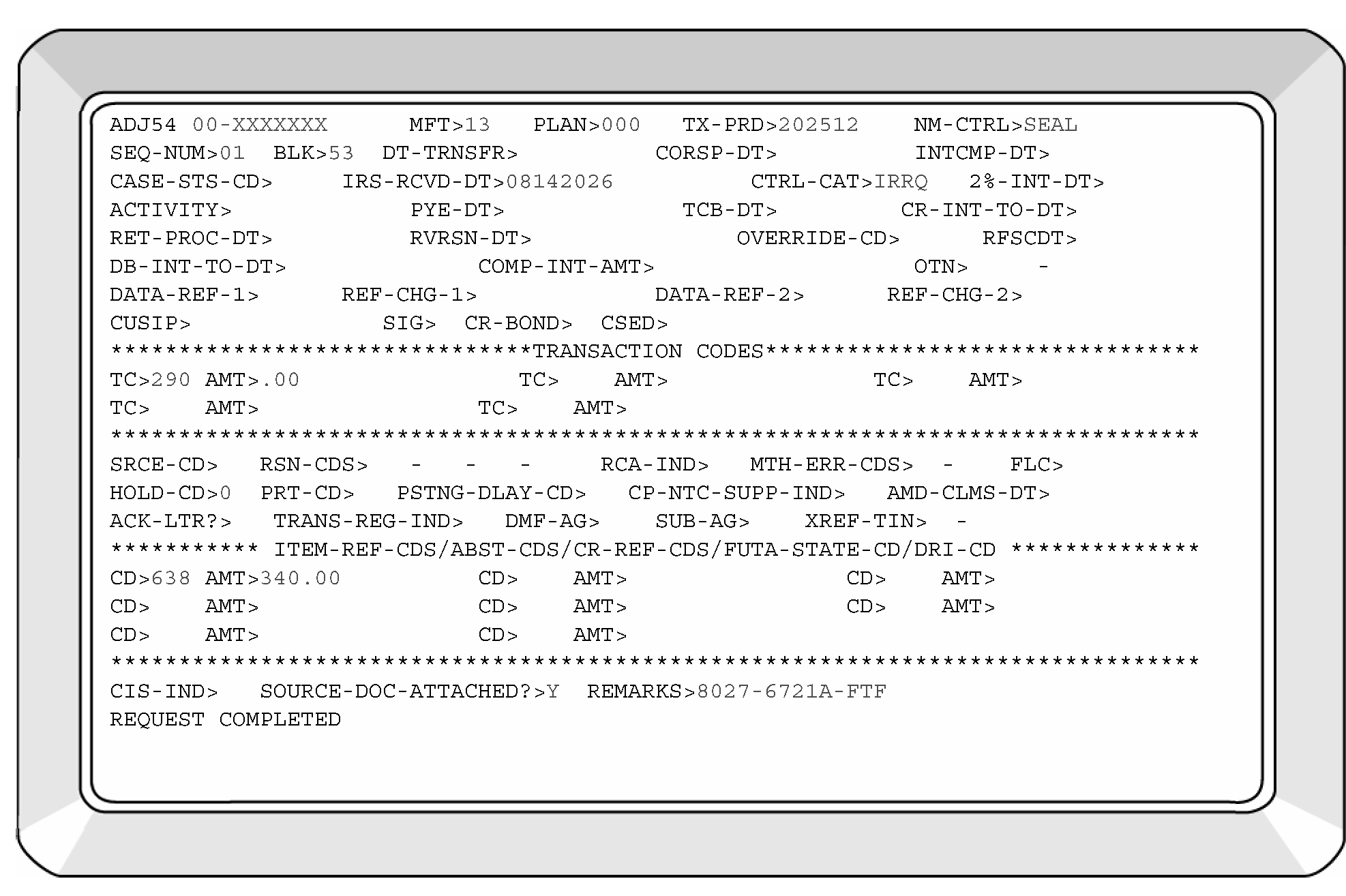
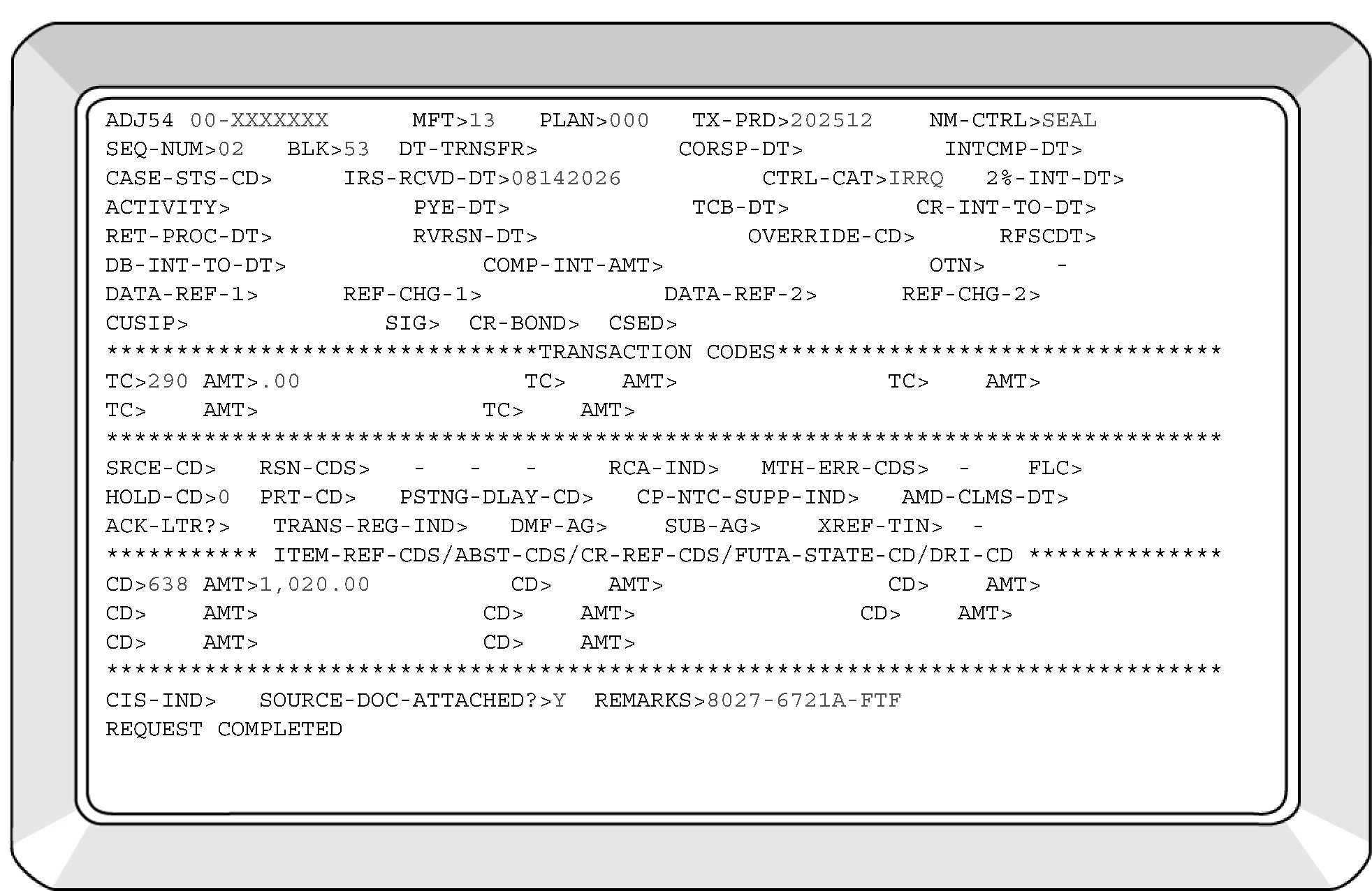
-
An employer may respond to a Computer Paragraph (CP) 215, Civil Penalty Notice, or request that a penalty assessment be forgiven (i.e., penalty abatement request). A valid taxpayer identification number (TIN) may be furnished or an explanation for filing late may be provided.
-
If the penalty was charged because the employer did not respond to a request for necessary information and the employer resubmits the returns, check to see if the returns are processable.
-
If the returns are processable, follow processing procedures.
-
Route CP 215, Civil Penalty Notice, response, correspondence related to a penalty assessment, or a penalty abatement request to Campus Compliance Collection Operation (CCCO). Indicate whether the return is "processable" or "not processable" based on the information received.
-
-
Late replies may be received in response to Letter 1858C, Information Return of Tip Income (Form 8027) Incomplete for Processing, after the 45-day suspense period has expired. Therefore, the late reply must be worked without the original document.
-
After the 45-day suspense period, the original return is pulled from the suspense file and, if processable, it is processed without complete information. See IRM 3.11.180.3.3(12), Correspondence Preparation.
-
Check the late reply for a completed Form 8027.
-
If a complete Form 8027 is attached, follow processing procedures.
-
If the original Form 8027 had sufficient information and was processed when purged from the suspense file, mark the "Amended Return" check box on the corrected Form 8027.
-
If no Form 8027 is attached but the letter has the requested information, recreate a Form 8027 and process.
-
If there is insufficient information to recreate a Form 8027, route to National Tip Reporting Compliance Program (NTRCP) for special handling. See IRM 3.11.180.2(14) and IRM 3.11.180.2(15), General Information.
-
-
See IRM 3.11.180.3.4, Background of Penalty Assessments, for penalty information.
-
Form 8027 is considered unprocessable when no further corrective course of action can take place in Submission Processing (SP) Code and Edit (C & E) or Error Resolution System (ERS).
-
Perfect all documents, if possible. Examine attachments and Form 8027-T, if present, for the information necessary to make a return processable.
-
Initiate correspondence action when the document cannot be perfected from attachments or Form 8027-T.
-
If correspondence is impossible, follow guidelines for undeliverable or no response after 45 days. See IRM 3.11.180.3.3(12), Correspondence Preparation.
-
Route unprocessable documents to National Tip Reporting Compliance Program (NTRCP) for special handling to:
Internal Revenue Service
Attn. NTRCP
110 City Parkway
Las Vegas, NV 89106
-
The Service Center Replacement System (SCRS) is a term used to refer to the processing of paper register documents. While Error Resolution System (ERS) is worked on the computer with Integrated Data Retrieval System (IDRS), SCRS documents are corrected on a paper print, by hand, with a pen. The errors display on computer printed paper Error Registers. SCRS programs are few in number as programs continue to be moved to ERS each year; the few that remain are generally received in such small numbers that it is considered too expensive to move them to ERS. Despite the low amounts of receipts, these forms are just as important to process correctly as those on ERS.
-
See IRM 3.11.180.2, General Information, and IRM 3.11.180.3, Code and Edit Instructions, to become familiar with the Form 8027 and the procedures required to make sure the form is processable.
-
You are not expected to review or redo the work of a Code and Edit (C&E) tax examiner, except in the resolution of an error of omission or commission which forced the return to the Error Register.
-
If working a return that is not processable, and current date is after October 31, 2026:
-
Do not correspond. Since the information is purged from the database in January, any correspondence sent after October 31 would not provide time for the return to post before the purge.
-
Route the return to National Tip Reporting Compliance Program (NTRCP) for special handling. See IRM 3.11.180.2(14) and IRM 3.11.180.2(15), General Information.
-
-
Error reports for Form 8027, Employer’s Annual Information Return of Tip Income and Allocated Tips, are downloaded to Control D weekly. Error Resolution (ERS) uses the Control D reports listed below to print Error Register, resolve errors on Error Register and to identify output inventory.
-
EMF 01-40 - Report Name "8027 ERROR LISTING" is the Error Register. It is printed from Control D and used by the ERS tax examiner to resolve errors on paper and electronic documents. See Exhibit 3.11.180-3, Form 8027 Error Register for an example of Error Register.
-
EMF 01-41 - Report Name "FORM 8027 TAPE ERROR" is a transcript of the employers return of Tip Income. This report is used to assist ERS tax examiners in resolving errors on electronic source documents.
-
EMF 01-43 - Report Name "EMF01T RUN CONTROLS" is used by ERS to identify the volume of Form 8027 that was output (see column (E)).
-
-
The paper register EMF 01-40 will only list errors. More than one field will print when one field of data is inconsistent with another field.
-
Use either Action Code 2, 6 or 7 for each correction. Corrections are subject to validity checks. If a correction does not pass these checks, the record will reappear on the Error Register Loop. See IRM 3.11.180.4.1.1, Action Codes.
-
Electronic source documents are found by the presence of a Transmitter Control Code (TCC) literal and a five-digit printed number. The source document for electronic returns is a computer-generated transcript EMF 01-41, which generates with the Error Register EMF 01-40. Use the EMF 01-41 to resolve errors on electronic source documents and make corrections to the EMF 01-40 Error Register.
-
Identify paper source documents by the presence of a Document Locator Number (DLN) literal and the 14-digit number. The source document is the actual Form 8027.
-
The following action codes are valid:
Action Codes
Action Code Description 2 Delete the record from the Error Register and send the record to the Reject Register. 6 Programming allows up to three corrections on the register. Change one or more data fields. It is not necessary to change every field on the register when one or more fields are inconsistent, (e.g., an error in gross receipts may cause several other items to be inconsistent). A correction to gross receipts will cause the other inconsistencies to be dropped. An error in the state/ZIP code fields may cause both fields to be inconsistent. A change to the incorrect field will cause the inconsistency check to be corrected. 7 Indicate the data on the Error Register is to be accepted as is. Action Code 7 cannot be used to force an invalid character within a specific field (e.g., you cannot force bad data). -
Only one Action Code must be entered on the Error Register to the left of the error sequence number to correct an error record.
-
The above applies to both paper and electronic documents.
-
There are two codes that may be used:
-
Condition Code "4" is entered when Lines 7a through 7c are blank and Line 7 is greater than zero. See IRM 3.11.180.3.1.19, Method of Allocation Boxes Lines 7a through 7c.
-
Condition Code "U" is entered when Line 8 is blank or zero. See IRM 3.11.180.3.1.20, Number of Directly Tipped Employees Line 8.
-
-
The above applies to both paper and electronic documents.
-
An Error Reason Code (ERC) will display to the left of an element number on the Error Register when a consistency error exists.
-
If no Error Reason Code is present, the element found on the Error Register is invalid (e.g., alpha in a money field). Error Reason Codes:
Error Reason Codes
Error Reason Code (ERC) Generates when: "SZ" - Address inconsistency, -
See IRM 3.11.180.4.2.5, ERC SZ - Establishment State, and IRM 3.11.180.4.2.6, ERC SZ - Establishment ZIP Code, for establishment.
-
See IRM 3.11.180.4.2.21, ERC SZ - Employer State, and IRM 3.11.180.4.2.22, ERC SZ - Employer ZIP Code, for employer.
Establishment (or employer) state and ZIP code are inconsistent. "MA" - Money amounts in Lines 1 through 5 are inconsistent, -
See IRM 3.11.180.4.2.11, ERCs AA/AT/MA - Money Amounts Lines 1 through 5 - Elements 12 - 18, for more information.
Line 2 is not greater than Line 1. "MA" - Money amounts in Lines 1 through 5 are inconsistent, -
See IRM 3.11.180.4.2.11, ERCs AA/AT/MA - Money Amounts Lines 1 through 5 - Elements 12 - 18, for more information.
Line 4c does not equal the sum of Line 4a and Line 4b≡ ≡ ≡ ≡ ≡ ≡ ≡ ≡ ≡ ≡ ≡. "MA" - Money amounts in Lines 1 through 5 are inconsistent, -
See IRM 3.11.180.4.2.11, ERCs AA/AT/MA - Money Amounts Lines 1 through 5 - Elements 12 - 18, for more information.
Line 5 is not greater than each of Lines 1, 3, 4a, 4b and 4c. "MA" - Money amounts in Lines 1 through 5 are inconsistent, -
See IRM 3.11.180.4.2.11, ERCs AA/AT/MA - Money Amounts Lines 1 through 5 - Elements 12 - 18, for information.
Line 5 is less than Line 2. "AA" - Allocation amounts are inconsistent, Line 6 does not equal Line 5 times Tip Rate ≡ ≡ ≡ ≡ ≡ ≡ ≡ ≡ ≡ ≡ ≡ ≡ ≡ ≡ ≡. See IRM 3.11.180.4.2.12, ERCs AA/AT - Money Amounts Lines 6 and 7 - Elements 19 - 21, (1) through (9) for more information. "AA" - Allocation amounts are inconsistent, Line 7 is significant but the allocation method (Line 7a, Line 7b or Line 7c) is not code 1, 2, 3, or 4. See IRM 3.11.180.4.2.13, ERC AA - Method of Allocation, Lines 7a through 7c - Element 22, for more information. "AT" - Lines 4c, 6 and 7 are inconsistent, -
See IRM 3.11.180.4.2.12, ERCs AA/AT - Money Amounts Lines 6 and 7 - Elements 19 - 21, for more information.
Line 6 is equal to or less than Line 4c, and Line 7 is not equal to zero. "AT" - Lines 4c, 6 and 7 are inconsistent, -
See IRM 3.11.180.4.2.12, ERCs AA/AT - Money Amounts Lines 6 and 7 - Elements 19-21, for more information.
Line 6 is greater than Line 4c, and Line 7 is not equal to the difference between Line 6 and Line 4c, ≡ ≡ ≡ ≡ ≡ ≡ ≡ ≡ ≡ ≡ ≡ ≡ ≡ ≡. "13" - Invalid correction, An invalid correction is attempted, or a correction did not take. -
-
Error Reason Codes may be combined.
-
See IRM 3.11.180.4.2, Error Correction - Specific Field Action, for specific field action.
-
The chart below provides element numbers displayed on Error Register, the description and location on Form 8027.
Element Numbers, Description, and Location on the Form 8027 Error Register
Element Number Item Description Location on Form 8027 01 BLOCK DLN Center top area 02 SERIAL NUMBER Center top area 03 AMENDED DOC CODE Dotted area of Line 1 04 NAME OF ESTABLISHMENT Establishment area 05 CITY - ESTABLISHMENT Establishment area 06 STATE - ESTABLISHMENT Establishment area 07 ZIP CODE - ESTABLISHMENT Establishment area 08 NAME OF EMPLOYER Employer area 09 EIN Right upper area 10 ESTABLISHMENT TYPE CODE Right upper area 11 ESTABLISHMENT NUMBER Right of Employer area 12 CHARGED TIPS Line 1 13 CHARGE RECEIPTS Line 2 14 SERVICE CHARGES Line 3 15 INDIRECT TIPS Line 4a 16 DIRECT TIPS Line 4b 17 TOTAL TIPS Line 4c 18 GROSS RECEIPTS Line 5 19 GROSS RECEIPTS TIMES TIP RATE PERCENTAGE (Calculation line) Line 6 20 TIP RATE PERCENTAGE Line 6 (Center) 21 ALLOCATED TIPS Line 7 22 ALLOCATION METHOD Line 7a, Line 7b, or Line 7c 23 NUMBER OF EMPLOYEES Line 8 24 TAX YEAR Right upper area 25 SPECIAL RETURN CODE Left of the check boxes for Amended Return and Final Return (as close to that area as possible) 26 RECEIVED DATE Center area 27 STREET - ESTABLISHMENT Establishment area 28 STREET - EMPLOYER Employer area 29 CITY - EMPLOYER Employer area 30 STATE - EMPLOYER Employer area 31 ZIP CODE - EMPLOYER Employer area -
Element numbers display on Error Register to the right of the Error Reason Codes (ERC).
-
Enter the field correction immediately to the right of the field on the Error Register.
-
Enter the proper Action Code to the left of the error sequence number on the Error Register.
-
All money amount fields (Lines 1 through 7) are numeric or blank except for Line 6, which may have an alpha "X" .
-
No negative amounts will be allowed.
-
No commas or decimals should be entered.
-
All money amounts are in dollars only.
-
Do not code any leading zeros.
-
-
Form 8027 will be blocked in groups of 100. However, short blocks are acceptable since forms may be pulled for correspondence during Code and Edit.
-
A correction on the first document Document Locator Number (DLN) will cause the block DLN to dupe throughout the rest of the block.
-
The following is a description of each element of the DLN that will print out as Element 01 (11 positions).
-
Positions 1-2, Service Center Code "29" .
-
Positions 3, Tax Class "5" .
-
Positions 4-5, Document Code "57" .
-
Positions 6-8, Julian Date, valid range is "001" to "366" .
-
Positions 9-11, Block Number "000-499" .
-
-
Make necessary corrections to the DLN so it conforms to the description above. The Serial Number of the DLN is Element 02 on the Error Register. The Year Digit is computer-generated.
-
More corrections may be entered at the same time the DLN correction is made. If a DLN correction is made to the first document of the block, the correction, with Action Code 6, will be duped throughout the block. Only one Action Code per document may be entered.
-
Serial Numbers will not change when the DLN is duped. A separate correction is required to change the Serial Number (Element 02 - two positions). The Serial Number should be in sequence but does not have to be consecutive. For example, a sequence of "00" , "04" and "07" is acceptable.
-
The Amended Document Code (Element 03) has one position and must be blank or an alpha "G" .
-
Enter "G" if:
-
The "Amended Return" check box is marked.
-
The word, "supplemental" , "duplicate" or "additional" is written on the return or an attachment.
-
There is positive indication that the employer/establishment filed previously.
-
-
The Name of Establishment may have 40 characters and cannot be all blanks. Only alpha (A-Z) and numeric (0-9) characters are allowed.
-
The employer’s name should be entered if no establishment name is provided.
-
The employer’s name may be found on:
-
Form 8027-T (if present) or on other Form 8027 included in the employer's submission.
-
The return envelope, if attached to the submission.
-
Through IDRS research.
-
-
The Establishment City may have 25 alpha characters. Edit out hyphens as blanks.
-
Do not use major city codes.
-
Use the employer’s city if blank. Search attachments as instructed under "Name of Establishment" above.
-
Establishment State (Element 06) is two alpha characters.
-
Error Reason Code "SZ" will display on the Error Register if the Establishment State (Element 06) is inconsistent with the ZIP code.
-
A valid state is necessary for processing. Do not enter Action Code 7.
-
If the establishment's state is blank, use the employer's state. Search attachments as instructed under "Name of Establishment" above.
-
If the establishment has a foreign address, reject the document using Action Code 2. Route the Form 8027 to National Tip Reporting Compliance Program (NTRCP) for special handling. See IRM 3.11.180.2(14) and IRM 3.11.180.2(15), General Information. Reporting is required only for establishments found in the 50 states and the District of Columbia.
-
If necessary, See Exhibit 3.11.180-8, State Code - ZIP Code Range - EIN Prefix, and use the valid two alpha state code.
-
Error Reason Code "SZ" will display on the Error Register if the Establishment ZIP Code (Element 07) is inconsistent with the state.
-
The ZIP code must be five or nine numeric. The last four positions must be either all blanks or all numeric.
-
The first three digits must be in the valid range of ZIP codes for the state. See Exhibit 3.11.180-8, State Code - ZIP Code Range - EIN Prefix, and determine the valid ZIP code range for the state.
-
If the ZIP code is missing, see Exhibit 3.11.180-9, State Codes and ZIP Codes Perfection Chart.
-
If both the city and state are valid, but the ZIP code is missing and cannot be determined, enter Action Code 7.
-
The Name of Employer (Element 08) may have 40 characters and cannot be all blanks. Only alpha (A-Z) and numeric (0-9) characters are allowed.
-
The name must have at least one alpha or one numeric character.
-
If missing, search for the employer’s name on:
-
Form 8027-T (if present) or on other Form 8027 included in the employer's submission.
-
The return envelope, if attached to the submission.
-
If not found, use the EIN and address and perform IDRS research to perfect the Name of Employer.
-
If Name of Employer can’t be determined after IDRS research, then enter Action Code 6 and correct the error register by entering "SAME" in Element 08.
-
-
Employer Identification Number (Element 09) must be nine numeric characters, or it may have a valid EIN prefix in the first two positions followed by seven (7) periods.
-
Research attachments and IDRS to correct invalid EIN (having alphas, spaces, invalid EIN prefix, etc.).
-
If EIN cannot be determined, correspond with the employer using Letter 1858C, Information Return of Tip Income (Form 8027) Incomplete for Processing. If undeliverable or no response is received after 45 days, route to National Tip Reporting Compliance Program (NTRCP) for special handling.
-
Establishment Number (Element 11) may have five numerics. Each establishment number must be unique for each establishment. Breaks in the sequence numbers are allowed.
-
If blank or a duplicate, sequentially number or renumber. Do not use leading zeros.
-
Elements 12 through 18 may have 10 numeric characters and are dollars only.
-
Error Reason Code "MA" will display on the Error Register if:
-
Line 2 is not greater than Line 1.
-
Line 4c does not equal the total of Line 4a and Line 4b ≡ ≡ ≡ ≡ ≡ ≡ ≡ ≡ ≡ ≡ ≡.
-
Line 5 is not greater than each of Lines 1, 3, 4a, 4b and 4c.
-
Line 5 is less than Line 2.
-
-
Establishments report amounts on Lines 1 through 5.
-
An amount is required for Line 5. Lines 1 through 4c may be blank.
-
Line 2 must be greater than the amount reported on Line 1.
Line 2 Criteria
If Then Line 2 is not greater than Line 1, Use Letter 1858C, Information Return of Tip Income (Form 8027) Incomplete for Processing, to correspond with the employer. See IRM 3.11.180.3.3, Correspondence Preparation. No Reply or undeliverable, -
Code & Edit is instructed to assess the penalty on No Reply or undeliverable returns per IRM 3.11.180.3.1.14(2)(c). They will indicate a penalty assessment by notating "No Response - Inconsistent Return" in the upper left margin/side of the return.
-
If the notation "No Response - Inconsistent Return" is present, then enter Action Code "7" to clear the error register.
-
If the notation "No Response - Inconsistent Return" is not present, then assess the penalty on the Inconsistent Return.
-
Penalty Assessment - Inconsistent Return. Write "No Response - Inconsistent Return" in the upper left margin/side of the return. Assess the Failure to File penalty. See IRM 3.11.180.3.4, Background of Penalty Assessments.
-
Enter a "1" in Element 13 (Line 2) if there is no amount present.
-
Enter Action Code "7" to clear the error register.
-
-
Line 3 may be zero or blank.
-
Lines 4a, 4b and 4c may be zero but cannot be negative. Use Letter 1858C to correspond with the employer if negative amounts are present on these lines. See IRM 3.11.180.3.3, Correspondence Preparation. If undeliverable or no response is received after 45 days, consider unprocessable and route to National Tip Reporting Compliance Program (NTRCP). See IRM 3.11.180.2, General Information paragraph (15) for routing instructions.
-
If amounts are present for Lines 4a or 4b and Line 4c is blank, correct as follows:
-
Add Line 4a and Line 4b. ≡ ≡ ≡ ≡ ≡ ≡ ≡ ≡ ≡ ≡ ≡ ≡ ≡ ≡ ≡ ≡ ≡ ≡ ≡ ≡ ≡
-
Correspond using Letter 1858C, Information Return of Tip Income (Form 8027) Incomplete for Processing, to inform the employer of any change that is made to Line 4c. See IRM 3.11.180.3.3, Correspondence Preparation.
-
-
If an amount is present on Line 4a only or Line 4b only and Line 4c is greater than (or less than) Line 4a or Line 4b (whichever is applicable), correct as follows:
Line 4a, Line 4b, and Line 4c Criteria
If there is an amount on And Then Line 4a only, A greater amount on Line 4c, Enter the difference between the two lines on Line 4b. Line 4b only, A greater amount on Line 4c, Use Letter 1858C to correspond with the employer. See IRM 3.11.180.3.3, Correspondence Preparation. Line 4a only, A lesser amount on Line 4c, Use Letter 1858C to correspond with the employer. See IRM 3.11.180.3.3, Correspondence Preparation. Line 4b only, A lesser amount on Line 4c, Use Letter 1858C to correspond with the employer. See IRM 3.11.180.3.3, Correspondence Preparation. -
If undeliverable or no response is received after 45 days, enter Action Code 7.
-
-
If an amount is present on Line 4c only (Line 4a and Line 4b are blank), use Letter 1858C to correspond with the employer. See IRM 3.11.180.3.3, Correspondence Preparation.
-
If undeliverable or no response is received after 45 days, enter Action Code 7.
-
-
If an amount is present for Line 1 but no amounts are present (blank) on Lines 4a, 4b or 4c, correspond. See IRM 3.11.180.3.3, Correspondence Preparation.
-
If undeliverable or no response is received after 45 days, enter Action Code 7. Lines 4a, 4b and 4c may all be zero or blank.
-
-
Check the amount for Line 5:
Line 5 Criteria
If Then The amount for Line 5 is missing, or Line 5 is not greater than each amount on Lines 1, 3, 4a, 4b, and 4c, or Line 5 is less than Line 2, Correspond using Letter 1858C to request the correct information from the employer. No Reply or undeliverable, -
Code & Edit is instructed to assess the penalty on No Reply or undeliverable returns per IRM 3.11.180.3.1.14(11)(b). They will indicate a penalty assessment by notating "No Response - Inconsistent Return" in the upper left margin/side of the return.
-
If the notation "No Response - Inconsistent Return" is present, then enter Action Code "7" to clear the error register.
-
If the notation "No Response - Inconsistent Return" is not present, then assess the penalty on the Inconsistent Return.
-
Penalty Assessment - Inconsistent Return. Write "No Response - Inconsistent Return" in the upper left margin/side of the return. Assess the Failure to File penalty. See IRM 3.11.180.3.4, Background of Penalty Assessments.
-
If all receipts including tips are charged, and Lines 2 and 5 are equal, add ≡ ≡ ≡ ≡ ≡ ≡ ≡ ≡ ≡ ≡ ≡
-
Otherwise, enter Action Code "7" to clear the error register.
-
-
Error Reason Codes "AA and AT" - See IRM 3.11.180.4.2.12, ERCs AA/AT - Money Amounts Lines 6 and 7 - Elements 19 - 21.
-
Elements 19 through 21 may have 10 numeric characters and are dollars only.
-
Error Reason Code "AA" will display on the Error Register if the IRS computed amount exceeds Line 6 ≡ ≡ ≡ ≡ ≡ ≡ ≡ ≡ ≡ ≡ ≡ ≡ ≡ ≡.
-
When a discrepancy between the IRS and employer occurs, Elements 18, 19, and 20 will print along with Error Reason Code "AA" . Check for transcription and taxpayer errors. Correct accordingly.
-
If other than a calendar year, an "X" should be found on Line 6.
-
Generally, Line 6 will equal Line 5 times 8 percent or the percentage allowed in the IRS determination letter. The acceptable range is 2 percent to 8 percent.
-
The employer may use a lower percentage only when special permission is received from the IRS. The lower percentage will be entered in the center of Line 6 (Element 20).
Note: If the Form 8027 has any of the following notations (including 2023 and prior):-
Under TRDA/Tip Rate Determination Agreement
-
Under GITCA/Gaming Industry Tip Compliance Agreement
-
Under TRAC/Tip Reporting Alternative Commitment
-
Under Rev. Proc. 2007-32
-
Under Rev. Proc. 2003-35
Route to:
Internal Revenue Service
Attn. NTRCP
110 City Parkway
Las Vegas, NV 89106
Note:
Following receipt of Form 8027, the National Tip Reporting Compliance Analyst will separate out all Form 8027 returns that were filed by Indian tribal government entities and email to Indian Tribal Government (ITG) Tip Analyst.
-
When a rate lower than the 8 percent allocation rate is used, make sure an IRS determination letter, allowing the lower percentage rate, is attached.
Reminder:
National Tip Reporting Compliance Program (NTRCP) is requesting a copy of any Determination Letter (DL) received in Submission Processing. Make a copy of the DL, notate the EIN (if not already shown) and route to:
Internal Revenue Service
Attn. NTRCP
110 City Parkway
Las Vegas, NV 89106 -
Failure to attach a determination letter requires correspondence using Letter 1858C, Information Return of Tip Income (Form 8027) Incomplete for Processing. See IRM 3.11.180.3.3, Correspondence Preparation.
-
If undeliverable, no response, or correspondence is unsuccessful, recalculate the allocation amount using the 8 percent rate. Correspond using Letter 1858C to inform the employer that the standard 8 percent rate was used. See IRM 3.11.180.3.3, Correspondence Preparation.
-
-
If a lower rate is entered (2 percent or more, but less than 8 percent), but the determination letter (e.g., Letter 8027B) shows an expired effective date or is an open-ended tip rate reduction:
-
Disregard the lower rate and use the standard 8 percent rate.
-
Correspond using Letter 1858C and initiate a non-suspense letter to the employer. See IRM 3.11.180.3.3, Correspondence Preparation.
-
-
If the return shows a percentage rate that is higher than 8 percent, disregard it and use the standard 8 percent rate.
-
If the IRS computation exceeds Line 6, ≡ ≡ ≡ ≡ ≡ ≡ ≡ ≡ ≡ ≡ ≡ ≡ ≡ ≡, and the percentage rate was verified, correct the employer's figure.
-
Error Reason Code "AT" will display on the Error Register if:
-
Line 6 is equal to or less than Line 4c, and Line 7 is not equal to zero.
-
Line 6 is greater than Line 4c, and Line 7 is not equal to the difference between Line 6 and Line 4c, ≡ ≡ ≡ ≡ ≡ ≡ ≡ ≡ ≡ ≡ ≡ ≡.
-
-
If there is a discrepancy between Line 4c, Line 6 and Line 7, the amounts will print along with Error Reason Code "AT" . If these fields display as errors on the Error Register, compare the Form 8027 with the Error Register to make sure all figures were transcribed accurately.
-
If other than a calendar year, an "X" should be found on Line 6.
-
If Line 6 is blank or "zero" and Line 7 has an amount, enter an "X" on Line 6 and the register.
-
If Line 6 is less than or equal to Line 4c, Line 7 must be zero.
-
If Line 6 is more than Line 4c and Line 7 is blank and the taxpayer is a casino, then search for a notation of a Gaming Industry Tip Compliance Agreement (GITCA) which is administered under Rev Proc. 2007-32 and as modified by Rev. Proc. 2020-47. If a GITCA agreement or notation of either Rev. Proc. is found, forward return to National Tip Reporting Compliance Program (NTRCP) for special handling:
Internal Revenue Service
Attn. NTRCP
110 City Parkway
Las Vegas, NV 89106
If a GITCA agreement or notation of either Rev. Proc. is not found, remove return from processing and contact Headquarters Analyst (IRM 3.11.180 author). -
If Line 6 is more than Line 4c, and the taxpayer entered zero"0" or "N/A" on Line 7, then the taxpayer may have a Gaming Industry Tip Compliance Agreement (GITCA) which is administered under Rev. Proc. 2007-32 and as modified by Rev. Proc. 2020-47. If a GITCA agreement or notation of either Rev. Proc. is found, forward return to National Tip Reporting Compliance Program (NTRCP) for special handling:
Internal Revenue Service
Attn. NTRCP
110 City Parkway
Las Vegas, NV 89106
If a GITCA agreement or notation of either Rev. Proc. is not found, remove return from processing and contact Headquarters Analyst (IRM 3.11.180 author). -
If Line 6 is more than Line 4c, the difference is entered on Line 7. Correct Line 7 or compute the difference if no entry is present.
-
Method of Allocation, Lines 7a through 7c (Element 22) has one numeric position.
-
Error Reason Code "AA" will display on the Error Register if Line 7 is significant but the allocation method (Line 7a, 7b or 7c) is not code 1, 2, 3, or 4.
-
If Line 7 is greater than zero, one of three methods of allocation must be checked. Enter:
-
"1" if Line 7a is checked.
-
"2" if Line 7b is checked.
-
"3" if Line 7c is checked and a Good-Faith Agreement is attached.
-
-
If Line 7c is checked and a Good-Faith Agreement is not attached:
-
Enter Condition Code "4" .
-
-
If the employer made multiple entries, enter a code in Element 22 according to the following priority:
-
"3" for Line 7c, if a Good-Faith Agreement is attached.
-
"1" for Line 7a, if checked with another box.
-
"2" for Line 7b, if checked with other than Line 7a or Line 7c with a Good-Faith Agreement attached.
-
-
If the employer made no entry in Line 7a through Line 7c, enter Condition Code "4" .
-
If Line 7 is blank, edit a zero. Circle out any entries in Line 7a, Line 7b or Line 7c.
-
Total Number of Directly Tipped Employees Line 8 (Element 23) may have four numeric positions.
-
A number greater than zero must be entered in Line 8.
-
If Line 8 is zero or blank, "U" code the register.
-
Tax Year (Element 24) has four numeric positions. The valid tax years are 2025 or 2024.
-
If the tax year is 2023 or prior, enter Action Code "2" to reject the document.
-
Route 2023 and prior Form 8027 to the following address; unless the forms meet the criteria in IRM 3.11.180.2(14), General Information.
Internal Revenue Service
Attn. NTRCP
110 City Parkway
Las Vegas, NV 89106 -
If a Form 8027 is an early filed (future tax year) return, check the return and attachments for the correct tax period. Correct any coding or transcription errors.
-
For non-final returns, if the tax period is more than three months but less than one year from the current date, correspond for confirmation of the tax year.
-
If the reply confirms a non-final early filed return, enter Action Code "2" to reject the document and hold the return until the next processing year.
-
If the return is a "Final" , enter Action Code "2" to reject the document and hold the return until the next processing year.
-
-
The Special Return Code (SRC) (Element 25) must be blank or one alpha character. The alpha character is edited to the left of the "Final Return" check box (as close to that area as possible).
-
The valid alpha codes are:
-
"F" - Final return (e.g., "Final Return" check box checked) with money amounts.
-
"N" - Final return with no money amounts or "Not Liable" return with no money amounts.
-
-
Leave blank, if none of the above applies.
-
The Received Date (Element 26) must be present if Form 8027 is delinquent.
-
When present, the received date must have eight numeric characters in MMDDYYYY format. See IRM 3.11.180.3.1.3, Received Date, for procedures.
-
If a received date is present on a timely filed return, Code and Edit is instructed to circle it out. If Code and Edit did not circle out the received date on a timely filed return and it was transcribed, then circle out the received date. Remove received date from Element 26 and continue processing the return.
-
Establishment Street (Element 27) must have more than one alpha character and a maximum of 35 characters.
-
If the establishment address is blank, use the employer's address.
-
Employer Street (Element 28) must have more than one alpha character and a maximum of 35 alpha and numeric characters.
-
If the street address is missing, search for the address on:
-
Form 8027-T (if present) or on other Form 8027 included in the employer's submission.
-
The return envelope, if attached to the submission.
-
If not found, use the EIN and perform IDRS research to perfect the Employer Street.
-
If the Employer Street can’t be determined after IDRS research, then enter Action Code "6" and correct the error register by entering the Establishment Street in Element 28.
-
-
The Employer City (Element 29) must have alpha characters and a maximum of 25 characters.
-
Do not use major city codes.
-
If the city is missing, search for the address on:
-
Form 8027-T (if present) or on other Form 8027 included in the employer's submission.
-
The return envelope, if attached to the submission.
-
If not found, use the EIN and perform IDRS research to perfect Employer City.
-
If the Employer City can’t be determined after IDRS research, then enter Action Code "6" and correct the error register by entering the Establishment City in Element 29.
-
-
Error Reason Code "SZ" will display if the Employer State (Element 30) is inconsistent with the ZIP Code.
-
A valid state (two-character code) is required for processing. Do not enter Action Code "7" .
-
If the state is missing, search for the address on:
-
Form 8027-T (if present) or on other Form 8027 included in the employer's submission.
-
The return envelope, if attached to the submission.
-
If not found, use the EIN and perform IDRS research to perfect the Employer State.
-
If the Employer State can’t be determined after IDRS research, then enter Action Code "6" and correct the error register by entering the Establishment State code in Element 30.
-
-
Use the valid two alpha character state code. See Exhibit 3.11.180-8, State Code - ZIP Code Range - EIN Prefix.
-
Error Reason Code "SZ" will display if the Employer ZIP Code (Element 31) is inconsistent with the state.
-
The ZIP Code must be five or nine numeric characters. The last four positions must be all blanks or all numeric characters.
-
The first three digits must be in the valid range of ZIP codes for the state. See Exhibit 3.11.180-8, State Code - ZIP Code Range - EIN Prefix, to determine the valid ZIP Code range for the state.
-
If the ZIP Code is missing, see Exhibit 3.11.180-9, State Codes and ZIP Codes Perfection Chart.
-
If the Employer State Code could not be determined and the Establishment State Code was entered in Element 30, an error may display in Element 31 for an inconsistent Employer Zip Code. If this is the point of error, then enter Action Code "6" and correct the error register by entering the Establishment Zip Code in Element 31.
-
If both the city and state are valid, but the ZIP Code is missing and cannot be determined, enter Action Code 7.
-
Reject reports for Form 8027, Employer’s Annual Information Return of Tip Income and Allocated Tips, are downloaded to Control D weekly. Rejects uses the Control D reports listed below to print Reject Register, resolve errors on Reject Register and to identify output inventory.
-
EMF 03-40 - Report Name "TIP INC 8027 REJ REG" is the Reject Register. It is printed from Control D and used by the Reject tax examiner to resolve errors on paper and electronic source documents. See Exhibit 3.11.180-4, Form 8027 Reject Register, for an example of Reject Register.
-
EMF 03-41 - Report Name "FORM 8027 TAPE-REJ" is a transcript of the employers return of Tip Income. This report is used to assist Reject tax examiners in resolving errors on electronic source documents.
-
EMF 03-42 - Report Name "EMF03 RUN CONTROLS" is used by Rejects to identify the volume of Form 8027 that was output (see column (D)).
-
-
Error Resolution will reject records from EMF 01-40 Error Register when errors cannot be resolved. This action will generate EMF 03-40 Reject Register. In some cases, you will need to correspond. In other cases, you will consider the return unprocessable.
-
If correspondence is needed, prepare a Correspondence Action Sheet (CAS) to issue Letter 1858C, Information Return of Tip Income (Form 8027) Incomplete for Processing.
-
Prepare the CAS, enter Action Code 2 on the register and route the return and the CAS to the Correspondence Team.
-
After the letter is issued, file the return in the Correspondence Team to await reply.
-
Allow 45 days for a reply.
-
When the Reject reply is received, the Correspondence Team will associate the reply with the return.
-
Follow guidance in IRM 3.11.180.3.3(9), Correspondence Preparation, to process Reject reply.
-
Electronic source documents are numbered with a Transmitter Control Code (TCC). Use the EMF 03-41 transcript to resolve Reject errors on electronic source documents.
-
If correspondence is issued on an electronic source document, use the Form 8027 transcript and taxpayer reply to prepare a "dummy" Form 8027 return. Route the dummy return and reply to National Tip Reporting Compliance Program (NTRCP) for special handing.
Internal Revenue Service
Attn. NTRCP
110 City Parkway
Las Vegas, NV 89106
-
-
If undeliverable or no response is received after 45 days, examine the return to determine if it is possible to force post the document. See IRM 3.11.180.3.3(10) and IRM 3.11.180.3.3(11) Correspondence Preparation.
-
If a document is unprocessable and cannot be perfected based on the information provided in the No Reply Chart, route it to National Tip Reporting Compliance Program (NTRCP) for special handling. See IRM 3.11.180.2(14), IRM 3.11.180.2(15), General Information, and IRM 3.11.180.4.5, Uncorrectable Unprocessable Documents.
-
Late replies may be received in response to Letter 1858C after the 45-day suspense period has expired. See IRM 3.11.180.3.5, Late Replies, for more information to process late replies.
-
Unpostable reports for Form 8027, are downloaded to Control D weekly. Rejects uses the Control D reports listed below to print Unpostable Register, resolve errors on Unpostable Register and to identify the output inventory.
-
EMF 02-40 - Report Name "EMF02 RUN CONTROLS" is used by Rejects to identify the volume of Unpostable records on Form 8027 that was output (see column (G)).
-
EMF 02-41 - Report Name "FORM 8027 TAPE" is a transcript of the employers return of Tip Income. This report is used to assist Reject tax examiners in resolving errors on electronic source documents.
-
EMF 02-42 - Report Name "TIP INCOME FORM 8027" is the Unpostable Register. It is printed from Control D and used by Reject tax examiners to resolve errors on paper and electronic documents. See Exhibit 3.11.180-5, Form 8027 Unpostable Register, for an example of Unpostable register.
-
-
The Unpostable listing EMF 02-42 is generated in the same format as the Reject Register EMF 03-40, except there is no error sequence number. The Unpostable Listing is titled, "Tip Income Form 8027 Unpostable Register" .
-
Unpostable listing EMF 02-42 will generate when a return tries to post but it matches a return on either the input file or posted file in the following fields:
-
EIN
-
Type of Establishment
-
Money amounts on Lines 4c and 5
-
-
A transcript EMF 02-41 will print for the posted record to compare data with the Unpostable return.
-
If the transcript and the return have the same establishment name and tax year indicating the establishment filed twice, check the data on both returns. If the data is the same on both returns, annotate the listing as "Duplicate Processing" .
-
If there are different establishment names shown on the transcript and the return, check data on both returns. If it appears that the filer simply split the money amounts between establishments, use Letter 1858C, Information Return of Tip Income (Form 8027) Incomplete for Processing, to correspond with the employer. Explain that this is not acceptable. Route the return and Unpostable reply to National Tip Reporting Compliance Program (NTRCP) for special handing.
Internal Revenue Service
Attn. NTRCP
110 City Parkway
Las Vegas, NV 89106
If No Reply, or the employer does not comply,≡ ≡ ≡ ≡ ≡ ≡ ≡ ≡ ≡ ≡ ≡ ≡ ≡ ≡ ≡ ≡ ≡ ≡ ≡ ≡ ≡ ≡ ≡. See Exhibit 3.11.180-10, Penalty Tables, for penalty rates and maximum amounts with inflationary adjustments. See IRM 3.11.180.3.4, Background of Penalty Assessments. -
If there are duplicates of Form 8027 on the Unpostable Listing and no transcript is printed, route to National Tip Reporting Compliance Program (NTRCP) for special handling. See IRM 3.11.180.2(14) and IRM 3.11.180.2(15), General Information. Notate duplicate returns were filed and no transcript is available.
-
If there are multiple Unpostables for the same EIN and no EMF 02-41 transcripts are generated, check to see if the returns are being filed as "not liable" for different establishments. Since these will match on EIN, Type of Establishment, and money amounts on Line 4c and Line 5 (none), they will unpost even though they are not true duplicates. Route to National Tip Reporting Compliance Program (NTRCP) for special handling. See IRM 3.11.180.2(14) and IRM 3.11.180.2(15), General Information. Notate that duplicate forms were filed with the same EIN. These documents will not post because they will be duplicates of the re-input return.
-
-
There is no difference between the paper and electronic Unpostable format. However, an electronic Unpostable will generate two EMF 02-41 transcripts - one for the previously posted record and one for the record attempting to post, in lieu of a paper Form 8027.
-
For electronic source documents, if an Unpostable listing EMF 02-42 is generated, it is possible that the electronic document was processed twice. Contact the Planning and Analysis (P&A) Staff to research if this situation occurs.
-
Examine the document to make sure there is no procedure to force processing without the required field data. See IRM 3.11.180.3.3(14), Correspondence Preparation, for guidelines on "No Replies" .
-
Route unprocessable document(s) to National Tip Reporting Compliance Program (NTRCP) for special handling if:
-
The document is deemed unprocessable because the return cannot be perfected from attachments or Form 8027-T.
-
No response was received from the employer or establishment, or corresponding is not possible due to incomplete address information.
-
Guidelines provided in the No Reply Chart were followed.
-
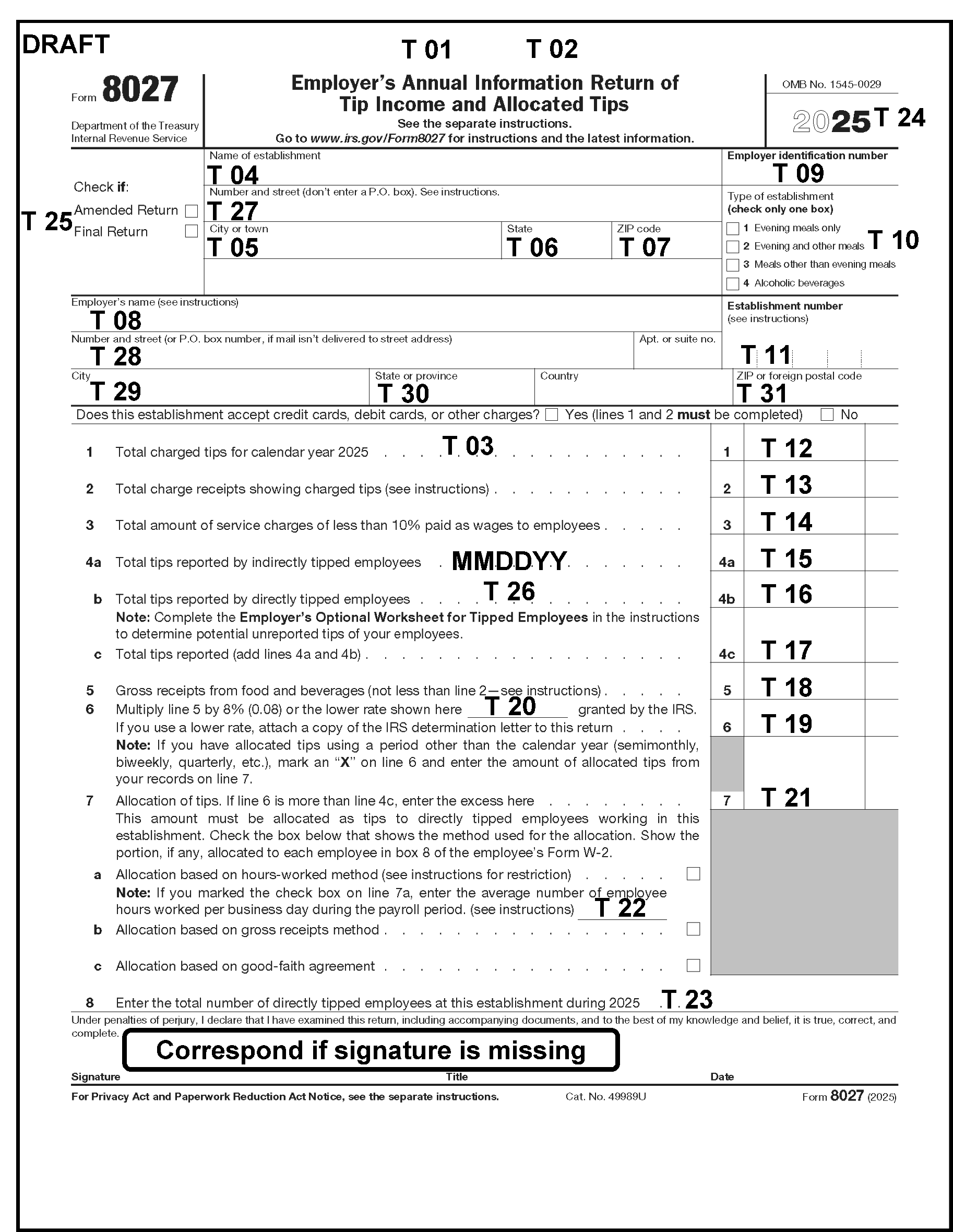
Please click here for the text description of the image.
Element Numbers, Description, and Location on the Form 8027
| Element Number | Item Description | Location on the Form 8027 |
|---|---|---|
| 01 | BLOCK DLN | Center top area |
| 02 | SERIAL NUMBER | Center top area |
| 03 | AMENDED DOC CODE | Dotted area of Line 1 |
| 04 | NAME OF ESTABLISHMENT | Establishment area |
| 05 | CITY - ESTABLISHMENT | Establishment area |
| 06 | STATE - ESTABLISHMENT | Establishment area |
| 07 | ZIP CODE - ESTABLISHMENT | Establishment area |
| 08 | NAME OF EMPLOYER | Employer area |
| 09 | EIN | Right upper area |
| 10 | ESTABLISHMENT TYPE CODE | Right upper area |
| 11 | ESTABLISHMENT NUMBER | Right of Employer area |
| 12 | CHARGED TIPS | Line 1 |
| 13 | CHARGE RECEIPTS | Line 2 |
| 14 | SERVICE CHARGES | Line 3 |
| 15 | INDIRECT TIPS | Line 4a |
| 16 | DIRECT TIPS | Line 4b |
| 17 | TOTAL TIPS | Line 4c |
| 18 | GROSS RECEIPTS | Line 5 |
| 19 | GROSS RECEIPTS TIMES TIP RATE PERCENTAGE (Calculation line) | Line 6 |
| 20 | TIP RATE PERCENTAGE | Line 6 (Center) |
| 21 | ALLOCATED TIPS | Line 7 |
| 22 | ALLOCATION METHOD | Line 7a, Line 7b, or Line 7c |
| 23 | NUMBER OF EMPLOYEES | Line 8 |
| 24 | TAX YEAR | Right upper area |
| 25 | SPECIAL RETURN CODE | Left of the check boxes for Amended Return and Final Return (as close to that area as possible) |
| 26 | RECEIVED DATE | Center area |
| 27 | STREET - ESTABLISHMENT | Establishment area |
| 28 | STREET - EMPLOYER | Employer area |
| 29 | CITY - EMPLOYER | Employer area |
| 30 | STATE - EMPLOYER | Employer area |
| 31 | ZIP CODE - EMPLOYER | Employer area |
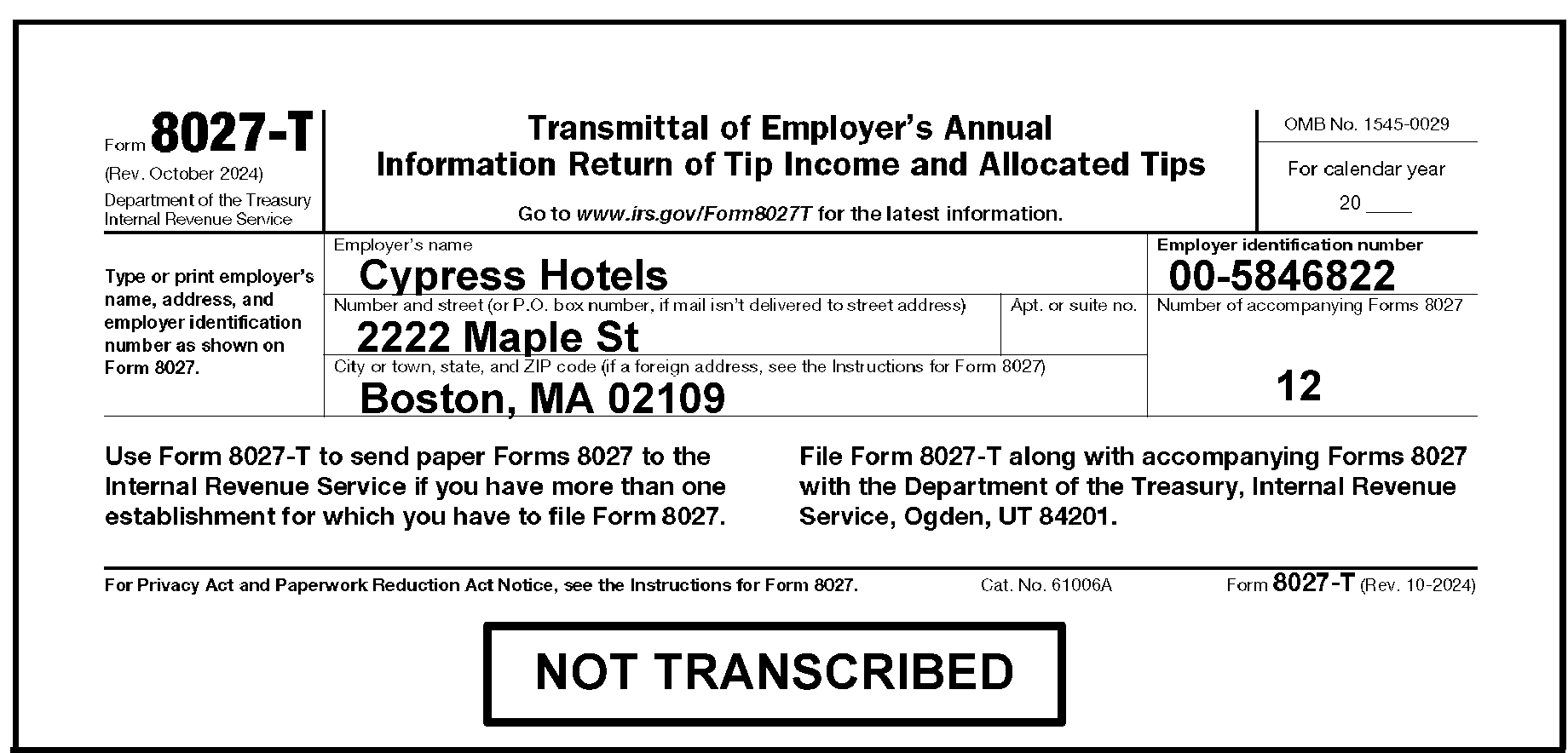
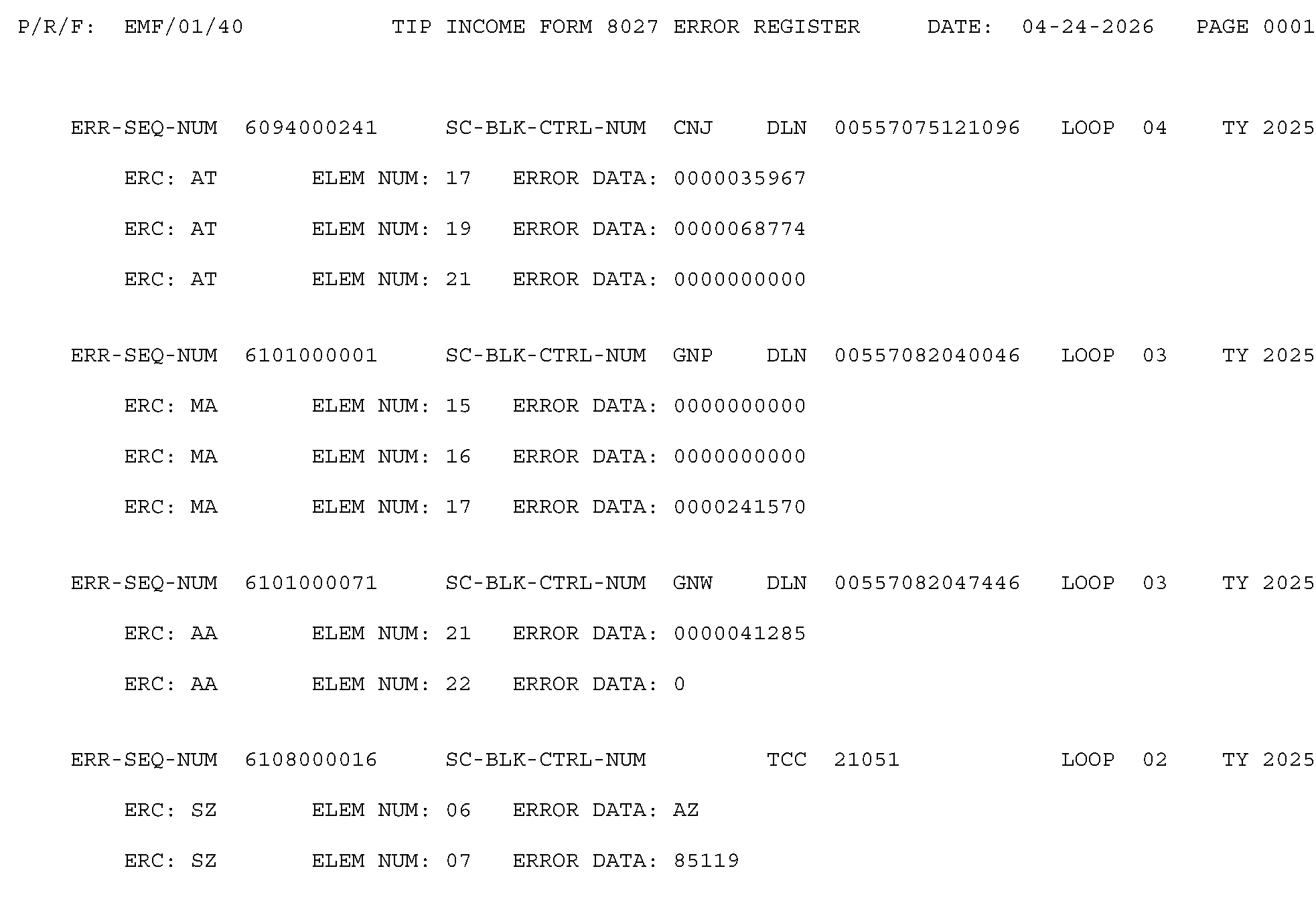
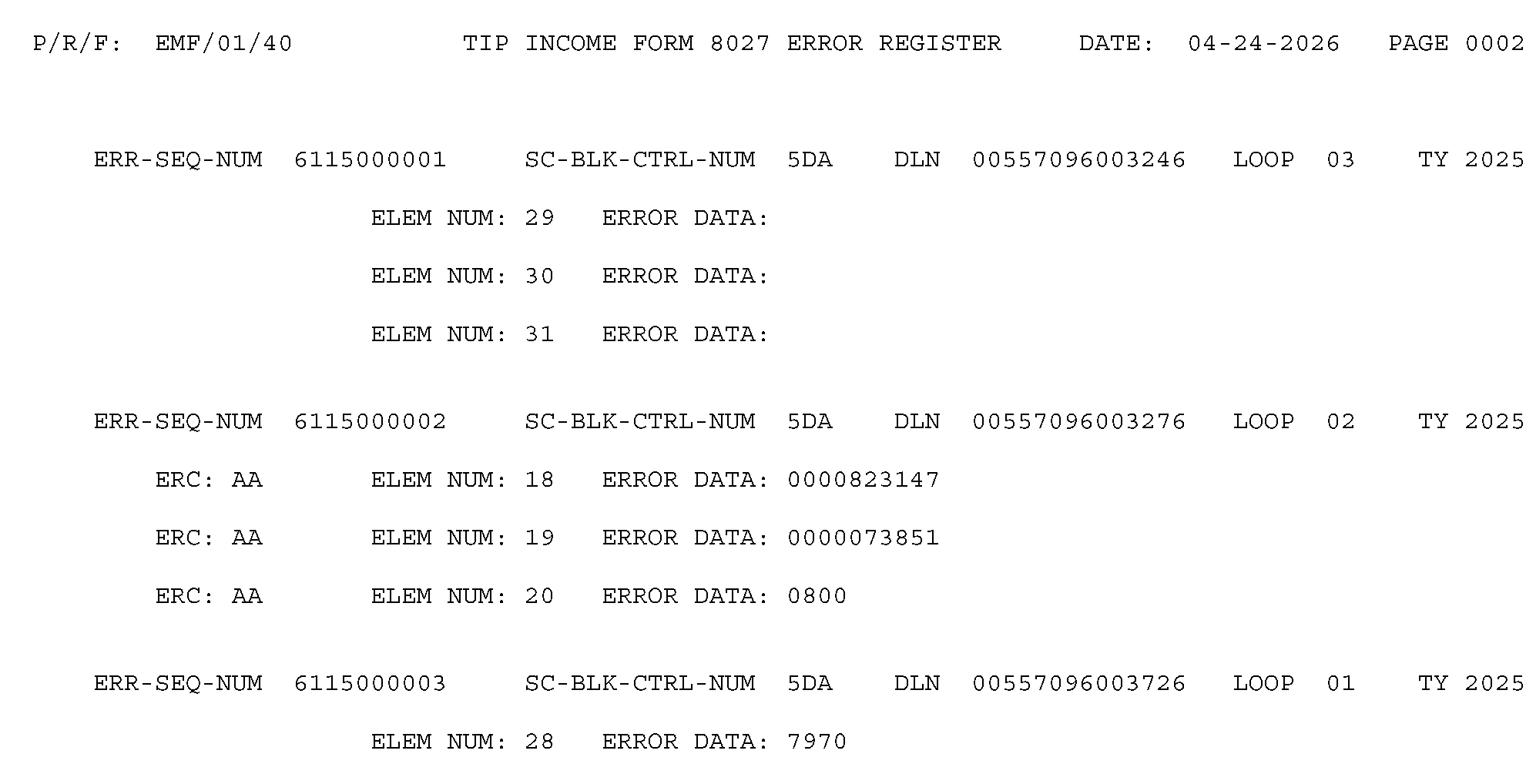
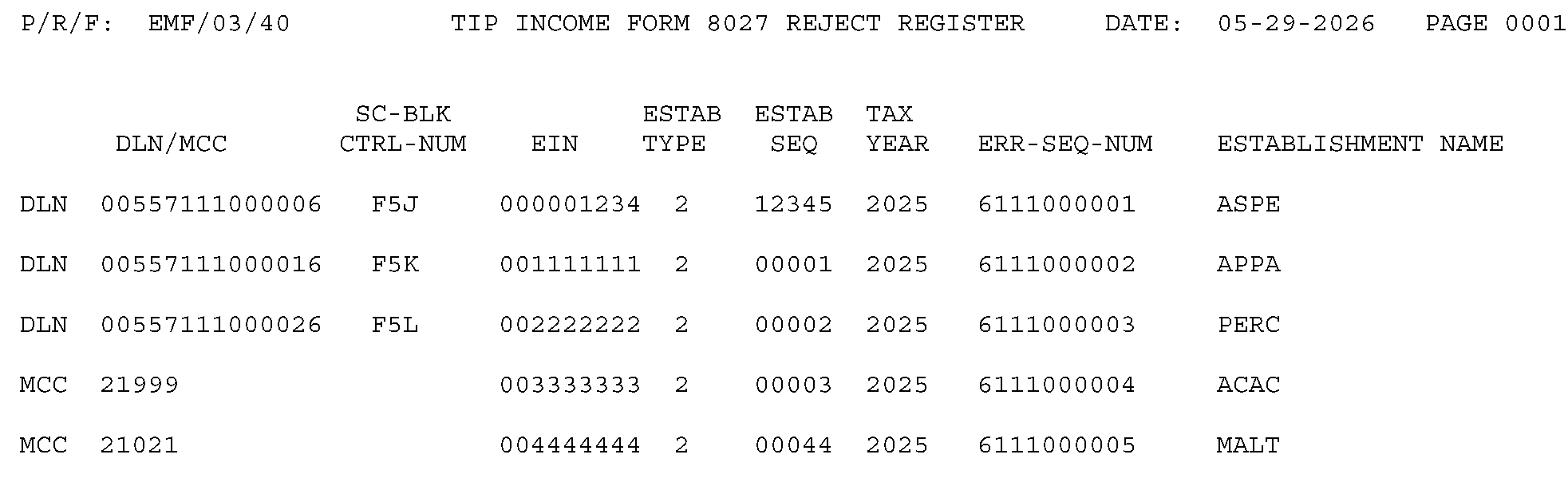

The table lists commonly used acronyms, abbreviations and their definitions.
Acronyms and Abbreviations
| Acronyms and Abbreviations | Definition |
|---|---|
| ACPL | Automated Cycle Proof List |
| AM | Accounts Management |
| AMT | Amount |
| ATM | Allocated Tips MagTape |
| BBTS | Batch Block Tracking System |
| BMF | Business Master File |
| c/o | Care of |
| C&E | Code and Edit |
| CAS | Correspondence Action Sheet |
| CCCO | Campus Compliance Collection Operation |
| CI | Criminal Investigation |
| CII | Correspondence Imaging Inventory |
| CP | Computer Paragraph |
| CPEO | Certified Professional Employer Organization |
| CPL | Cycle Proof List |
| CSCO | Compliance Services Collection Operations |
| CTDWA | Control-D WebAccess |
| DBA | Doing Business As |
| DL | Determination Letter |
| DLN | Document Locator Number |
| DPO | Document Perfection Operation |
| EEFax | Enterprise Electronic Fax |
| E-File | Electronically File |
| e.g. | For example |
| EIN | Employer Identification Number |
| EMF | Employee Master File |
| EN | Establishment Number |
| EQSP | Embedded Quality Submission Processing |
| EPSS | Electronic Products and Services Support |
| ERC | Error Reason Code |
| ERS | Error Resolution System |
| etc. | Et Cetera |
| Exam | Examination |
| Fax | Facsimile |
| FedEx | Federal Express Corporation |
| FTF | Failure To File |
| GFA | Good Faith Agreement |
| GITCA | Gaming Industry Tip Compliance Agreement |
| http | HyperText Transfer (or Transport) Protocol |
| IAT | Integrated Automation Technologies |
| ICT | Image Control Team |
| ID | Identification or Identity |
| IDRS | Integrated Data Retrieval System |
| ISRP | Integrated Submission and Remittance Processing |
| IMF | Individual Master File |
| IPU | IRM Procedural Update |
| IRC | Internal Revenue Code |
| IRS | Internal Revenue Service |
| IT | Information Technology |
| ITG | Indian Tribal Government |
| LB&I | Large Business and International |
| MFT | Master File Tax |
| MMDDYYYY | Month, Day, Year |
| N/A | Not Applicable |
| NTRCP | National Tip Reporting Compliance Program |
| OSPC | Ogden Submission Processing Center or Ogden Submission Processing Campus |
| P&A | Planning & Analysis |
| P.O. | Post Office |
| PDS | Private Delivery Service |
| PL | Public Law |
| Pub | Publication |
| R&C | Receipt and Control |
| Rec’d | Received |
| Rev. Proc. | Revenue Procedure |
| RO | Revenue Officer |
| RRA98 | Restructuring and Reform Act of 1998 |
| SBSE | Small Business Self-Employed |
| SCAMPS | Service Center Automated Mail Processing System |
| SD | Source Document |
| SERP | Servicewide Electronic Research Program |
| SLA | Service Level Agreement |
| SME | Subject Matter Expert |
| SP | Submission Processing |
| SSN | Social Security Number |
| TAC | Taxpayer Assistance Center |
| TAS | Taxpayer Advocate Service |
| TBOR | Taxpayer Bill of Rights |
| TC | Transaction Code |
| TCC | Transmitter Control Code |
| TE | Tax Examiner |
| TEGE | Tax Exempt and Government Entities |
| TIPA | Tax Increase Prevention Act |
| TIN | Taxpayer Identification Number |
| TPEA | Trade Preferences Extension Act |
| TRAC | Tip Reporting Alternative Commitment |
| TRDA | Tip Rate Determination Agreement |
| TS | Taxpayer Services |
| TSO | Technical Services Operation |
| TY | Tax Year |
| U.S. | United States |
| UCC | Uniform Commercial Code |
| UPS | United Parcel Service |
| USC | United States Code |
| USPS | United States Postal Service |
| YYYY | Year |
| ZIP | Zoning Improvement Plan |
Review all attachments before considering the return processable.
Only detach attachments when instructed.
Note:
Consider a return or attachment an "Original" if it has an original signature or was stamped "Process as Original" .
Edit action trail(s) (e.g., "L3267 DETACHED" or similar language) in the lower left margin going vertically up the side of the return.
Edit the name and EIN (if not present) on the detached document. Also, edit the received date (e.g., Rec’d MM/DD/YY) in the lower left margin of the detached document before routing.
Follow general guidelines below for each attachment:
Routing Guide for Attachments
| If | And | Then |
|---|---|---|
| Form 8027, Employer’s Annual Information Return of Tip Income and Allocated Tips, Single Establishment, | Form 8027-T, Transmittal of Employer’s Annual Information Return of Tip Income and Allocated Tips, is not present, | If attachments are found, arrange as follows:
|
| Form 8027 Single Establishment, | Form 8027-T is present, | Attach Form 8027-T behind Form 8027 and arrange any other attachments as shown above. |
| Form 8027 Multiple Establishments, | Form 8027-T is present, | Arrange as follows:
|
| OriginalForm 8508, Application for a Waiver from Electronic Filing of Information Returns, | Route as follows: Internal Revenue Service Attn. Extension of Time Coordinator 240 Murall Drive, Mail Stop 4360 Kearneysville, WV 25430 |
|
| Copy of Form 8508, | Attached to Form 8027 or Form 8027-T, | Do not detach and arrange as follows:
|
| OriginalForm 8809, Application for Extension of Time to File Information Returns, | Attached to Form 8027 or Form 8027-T, | Do not detach and route as follows: Local Batching Team Ogden - Mail Stop 6054 |
| Copy of Form 8809, | Attached to Form 8027 or Form 8027-T, | Do not detach and arrange as follows:
|
| Determination Letter, | Attached to Form 8027 or Form 8027-T, |
|
| Letter 8027B, Approving Specified Lower Rate Determination, | Attached to Form 8027 or Form 8027-T, | Do not detach and arrange as follows:
|
| Good-Faith Agreement, | Attached to Form 8027 or Form 8027-T, | Do not detach and arrange as follows:
|
| Letter 5382, Waiver Approved, | Attached to Form 8027 or Form 8027-T, | Do not detach. Continue processing. |
| Explanation for late filing, | Attached to Form 8027 or Form 8027-T, | Do not detach and arrange as follows:
|
| Gaming Industry Tip Compliance Agreement (GITCA), | Attached to Form 8027 or Form 8027-T, | Do not detach and route as follows: Internal Revenue Service Attn. NTRCP 110 City Parkway Las Vegas, NV 89106 |
| Tip Reporting Alternative Commitment (TRAC), | Attached to Form 8027 or Form 8027-T, | Do not detach and route as follows: Internal Revenue Service Attn. NTRCP 110 City Parkway Las Vegas, NV 89106 |
| Tip Rate Determination Agreement (TRDA), | Attached to Form 8027 or Form 8027-T, | Do not detach and route as follows: Internal Revenue Service Attn. NTRCP 110 City Parkway Las Vegas, NV 89106 |
| Rev. Proc. 2007-32 and Rev. Proc. 2020-47 (Gaming Industry Tip Compliance Agreement (GITCA)), | Attached to Form 8027 or Form 8027-T, | Do not detach and route as follows: Internal Revenue Service Attn. NTRCP 110 City Parkway Las Vegas, NV 89106 |
| Form W-2, | Detach and refer to your manager for disposition instructions. | |
| List of establishments, | See IRM 3.11.180.2.10(9), Document Review. | |
| CP 215, Civil Penalty Notice - response or correspondence related to a penalty assessment or a penalty abatement request, |
See IRM 3.11.180.3.4.4, Replies to Penalty Assessment Notices. | |
| Petitions to Reduce the Tip Rate and User Fee (payment), |
|
|
| Petitions in oppositions of tax law provisions, | Attached to Form 8027 or Form 8027-T, | Route as follows: IRS ≡ ≡ ≡ ≡ ≡ ≡ ≡ 1111 Constitution Avenue, NW Washington, DC 20224 |
| Envelope, |
|
|
| Response to Letter 1858C, Information Return of Tip Income (Form 8027) Incomplete for Processing, | Keep attached and edit based on the information provided. | |
| Request for Acknowledgement, | Do not detach. No action required. | |
| Correspondence related to the IRS requesting Form 8027 to be filed for multiple years, | Attached to Form 8027 or Form 8027-T, | Do not detach and route as follows: Internal Revenue Service Attn. NTRCP 110 City Parkway Las Vegas, NV 89106 |
| Form 14039-B, Business Identity Theft Affidavit, | No |
|
| Form 14196 Filing Statement, or correspondence related to Form 14196, | Attached to Form 8027 or Form 8027-T, | Do not detach and route as follows: Internal Revenue Service Attn. NTRCP 110 City Parkway Las Vegas, NV 89106 |
| Letter 3267 Delinquent 8027 Letter or correspondence related to Letter 3267, | Attached to Form 8027 or Form 8027-T, | Do not detach and route as follows: Internal Revenue Service Attn. NTRCP 110 City Parkway Las Vegas, NV 89106 |
| Letter 4639 (Delinquent 8027 Letter (2)) or correspondence related to Letter 4639, | Attached to Form 8027 or Form 8027-T, | Do not detach and route as follows: Internal Revenue Service Attn. NTRCP 110 City Parkway Las Vegas, NV 89106 |
| Letter 4640, Incomplete Form 8027, or correspondence related to Letter 4640, | Attached to Form 8027 or Form 8027-T, | Do not detach and route as follows: Internal Revenue Service Attn. NTRCP 110 City Parkway Las Vegas, NV 89106 |
| Unrelated, unanswered correspondence, | No action was taken, | Detach and route to the proper area. |
Before 2001, the first two digits of an EIN (the EIN Prefix) show the business was found in a particular geographic area. In 2001, EIN assignment was centralized, although all campuses can assign an EIN if necessary.
As a result of the centralization effort, the EIN Prefix no longer has the same significance. The EIN Prefix now shows which campus assigned the EIN. Each campus has certain prefixes available for use, as well as prefixes that are solely for use by the online application and the Small Business Administration.
State Code - ZIP Code Range - EIN Prefix
| State Code | State | ZIP Code Range | Area Office | EIN Prefix |
|---|---|---|---|---|
| AL | Alabama | 350-369 | Birmingham | 63 |
| AK | Alaska | 995-999 | Anchorage | 92 |
| AZ | Arizona | 850-865 | Phoenix | 86 |
| AR | Arkansas | 716-729 | Little Rock | 71 |
| CA | California | 900-961 (except 909) | Laguna Niguel N. Highlands San Jose Oakland Los Angeles |
33 68 77 94 95 |
| CO | Colorado | 800-816 | Denver | 84 |
| CT | Connecticut | 060-069 | Hartford | 06 |
| DE | Delaware | 197-199 | Wilmington | 51 |
| DC | District of Columbia | 200, 202-205 | Baltimore | 52 |
| FL | Florida | 320-339, 341, 342, 344, 346, 347, 349 | Jacksonville Fort Lauderdale |
59 65 |
| GA | Georgia | 300-319, 399 | Atlanta | 58 |
| HI | Hawaii | 967-968 | Honolulu | 99 |
| ID | Idaho | 832-838 | Boise | 82 |
| IL | Illinois | 600-629 | Chicago Springfield |
36 37 |
| IN | Indiana | 460-479 | Indianapolis | 35 |
| IA | Iowa | 500-528 | Des Moines | 42 |
| KS | Kansas | 660-679 | Wichita | 48 |
| KY | Kentucky | 400-427 | Louisville | 61 |
| LA | Louisiana | 700-714 | New Orleans | 72 |
| ME | Maine | 039-049 | Augusta | 01 |
| MD | Maryland | 206-219 | Baltimore | 52 |
| MA | Massachusetts | 010-027, 055 | Boston | 04 |
| MI | Michigan | 480-499 | Detroit | 38 |
| MN | Minnesota | 550-567 | St. Paul | 41 |
| MS | Mississippi | 386-397 | Jackson | 64 |
| MO | Missouri | 630-658 | St. Louis | 43 |
| MT | Montana | 590-599 | Helena | 81 |
| NE | Nebraska | 680-693 | Omaha | 47 |
| NV | Nevada | 889-898 | Las Vegas | 88 |
| NH | New Hampshire | 030-038 | Portsmouth | 02 |
| NJ | New Jersey | 070-089 | Newark | 22 |
| NM | New Mexico | 870-884 | Albuquerque | 85 |
| NY | New York | 004, 005, 100-149 | Brooklyn Manhattan Albany Buffalo |
11 13 14 16 |
| NC | North Carolina | 270-289 | Greensboro | 56 |
| ND | North Dakota | 580-588 | Fargo | 45 |
| OH | Ohio | 430-459 | Cincinnati Cleveland |
31 34 |
| OK | Oklahoma | 730-732 734-749 |
Oklahoma City | 73 |
| OR | Oregon | 970-979 | Portland | 93 |
| PA | Pennsylvania | 150-196 | Philadelphia Pittsburgh |
23 25 |
| RI | Rhode Island | 028-029 | Providence | 05 |
| SC | South Carolina | 290-299 | Columbia | 57 |
| SD | South Dakota | 570-577 | Aberdeen | 46 |
| TN | Tennessee | 370-385 | Nashville | 62 |
| TX | Texas | 733, 750-799, 885 | Austin Dallas Houston |
74 75 76 |
| UT | Utah | 840-847 | Salt Lake City | 87 |
| VT | Vermont | 050-054, 056-059 | Burlington | 03 |
| VA | Virginia | 201, 220-246 | Richmond | 54 |
| WA | Washington | 980-994 (except 987) | Seattle | 91 |
| WV | West Virginia | 247-268 | Parkersburg | 55 |
| WI | Wisconsin | 530-549 | Milwaukee | 39 |
| WY | Wyoming | 820-831 | Cheyenne | 83 |
State Codes and ZIP Codes
| State Code | State or Area | ZIP | State Code | State or Area | ZIP |
|---|---|---|---|---|---|
| AA | America-Atlantic | 34001 | MS | Mississippi | 38601 |
| AE | America-Europe | 09001 | MO | Missouri | 63001 |
| AP | America-Pacific | 96201 | MT | Montana | 59001 |
| AL | Alabama | 35001 | NE | Nebraska | 68001 |
| AK | Alaska | 99501 | NV | Nevada | 88901 |
| AZ | Arizona | 85001 | NH | New Hampshire | 03001 |
| AR | Arkansas | 71601 | NJ | New Jersey | 07001 |
| CA | California | 90001 | NM | New Mexico | 87001 |
| CO | Colorado | 80001 | NY | New York | 00501 |
| CT | Connecticut | 06001 | NC | North Carolina | 27001 |
| DE | Delaware | 19701 | ND | North Dakota | 58001 |
| DC | District of Columbia | 20001 | OH | Ohio | 43001 |
| FL | Florida | 32001 | OK | Oklahoma | 73001 |
| GA | Georgia | 30001 | OR | Oregon | 97001 |
| HI | Hawaii | 96701 | PA | Pennsylvania | 15001 |
| ID | Idaho | 83201 | RI | Rhode Island | 02801 |
| IL | Illinois | 60001 | SC | South Carolina | 29001 |
| IN | Indiana | 46001 | SD | South Dakota | 57001 |
| IA | Iowa | 50001 | TN | Tennessee | 37001 |
| KS | Kansas | 66001 | TX | Texas | 75001 |
| KY | Kentucky | 40001 | UT | Utah | 84001 |
| LA | Louisiana | 70001 | VT | Vermont | 05001 |
| ME | Maine | 03901 | VA | Virginia | 20101 |
| MD | Maryland | 20601 | WA | Washington | 98001 |
| MA | Massachusetts | 01001 | WV | West Virginia | 24701 |
| MI | Michigan | 48001 | WI | Wisconsin | 53001 |
| MN | Minnesota | 55001 | WY | Wyoming | 82001 |
The table below is for IRC 6721 Penalty for Large Businesses and Government Entities (Other Than Federal Entities) with Gross Receipts Over $5 Million
Penalty Tables
| Time of Filing | Penalty Rate | Due 01-01-2020 thru 12-31-2020 (with inflation adjustments) | Due 01-01-2021 thru 12-31-2021 (with inflation adjustments) | Due 01-01-2022 thru 12-31-2022 (with inflation adjustments) | Due 01-01-2023 thru 12-31-2023 (with inflation adjustments) | Due 01-01-2024 thru 12-31-2024 (with inflation adjustments) | Due 01-01-2025 thru 12-31-2025 (with inflation adjustments) | Due 01-01-2026 thru 12-31-2026 (with inflation adjustments) |
|---|---|---|---|---|---|---|---|---|
| Not more than 30 days late | Minimum Per return | $50 | $50 | $50 | $50 | $60 | $60 | $60 |
| Not more than 30 days late | Maximum | $556,500 | $565,000 | $571,000 | $588,500 | $630,500 | $664,500 | $683,000 |
| 31 days late - August 1 | Minimum Per return | $110 | $110 | $110 | $110 | $120 | $130 | $130 |
| 31 days late - August 1 | Maximum | $1,669,500 | $1,696,000 | $1,713,000 | $1,766,000 | $1,891,500 | $1,993,500 | $2,049,000 |
| After August 1 | Minimum Per return | $270 | $280 | $280 | $290 | $310 | $330 | $340 |
| After August 1 | Maximum | $3,339,000 | $3,392,000 | $3,426,000 | $3,532,500 | $3,783,000 | $3,987,000 | $4,098,500 |
| Intentional disregard | Minimum Per return | $550 | $560 | $570 | $580 | $630 | $660 | $680 |
| Intentional disregard | Maximum | No maximum | No maximum | No maximum | No maximum | No maximum | No maximum | No maximum |
Note:
Increased penalty amounts may apply in the case of certain failures in the case of intentional disregard. See IRC 6721(e)(2).
The table below is for IRC 6721 Penalty for Small Businesses with Gross Receipts Less Than or Equal to $5 Million (Average annual gross receipts for the most recent 3 taxable years).
Penalty Tables
| Time of Filing | Penalty Rate | Due 01-01-2020 thru 12-31-2020 (with inflation adjustments) | Due 01-01-2021 thru 12-31-2021 (with inflation adjustments) | Due 01-01-2022 thru 12-31-2022 (with inflation adjustments) | Due 01-01-2023 thru 12-31-2023 (with inflation adjustments) | Due 01-01-2024 thru 12-31-2024 (with inflation adjustments) | Due 01-01-2025 thru 12-31-2025 (with inflation adjustments) | Due 01-01-2026 thru 12-31-2026 (with inflation adjustments) |
|---|---|---|---|---|---|---|---|---|
| Not more than 30 days late | Minimum Per return | $50 | $50 | $50 | $50 | $60 | $60 | $60 |
| Not more than 30 days late | Maximum | $194,500 | $197,500 | $199,500 | $206,000 | $220,500 | $232,500 | $239,000 |
| 31 days late - August 1 | Minimum Per return | $110 | $110 | $110 | $110 | $120 | $130 | $130 |
| 31 days late - August 1 | Maximum | $556,500 | $565,000 | $571,000 | $588,500 | $630,500 | $664,500 | $683,000 |
| After August 1 | Minimum Per return | $270 | $280 | $280 | $290 | $310 | $330 | $340 |
| After August 1 | Maximum | $1,113,000 | $1,130,500 | $1,142,000 | $1,177,500 | $1,261,000 | $1,329,000 | $1,366,000 |
| Intentional Disregard | Minimum Per return | $550 | $560 | $570 | $580 | $630 | $660 | $680 |
| Intentional Disregard | Maximum | No maximum | No maximum | No maximum | No maximum | No maximum | No maximum | No maximum |