


 )
or https:// means you've safely connected to the .gov website. Share sensitive information only on official, secure websites.
)
or https:// means you've safely connected to the .gov website. Share sensitive information only on official, secure websites.


- 3.12.13 Employment Tax Returns
- 3.12.13.1 Program Scope and Objectives
- 3.12.13.1.1 Background
- 3.12.13.1.2 Authority
- 3.12.13.1.3 Roles and Responsibilities
- 3.12.13.1.4 Program Management and Review
- 3.12.13.1.5 Program Controls
- 3.12.13.1.6 Terms/Definitions/Acronyms
- 3.12.13.1.7 Related Resources
- 3.12.13.2 General Information
- 3.12.13.2.1 ♦Business Master File (BMF) Consistency♦
- 3.12.13.2.2 ♦IRM Deviation Procedures♦
- 3.12.13.2.3 ♦Taxpayer Advocate Service (TAS)♦
- 3.12.13.2.3.1 ♦TAS - Service Level Agreements (SLAs)♦
- 3.12.13.2.4 ♦BMF Identity Theft♦
- 3.12.13.2.5 ♦IRS Employee Contacts♦
- 3.12.13.2.6 Non-Automated Data Processing Return
- 3.12.13.3 Error Inventory Report and Workable Suspense Inventory Report
- 3.12.13.4 Employment Return Editing - General
- 3.12.13.5 Types of Errors
- 3.12.13.5.1 Action Code Errors (Priority I)
- 3.12.13.5.1.1 Error Inventory Correction Procedures
- 3.12.13.5.1.2 Suspense Inventory Correction Procedures (Reject Procedures)
- 3.12.13.5.2 Section Errors (Priority II)
- 3.12.13.5.2.1 Integrated Submission and Remittance Processing Errors (ISRP)
- 3.12.13.5.2.1.1 Correction Procedures
- 3.12.13.5.2.2 Terminus Errors (Priority ll)
- 3.12.13.5.2.2.1 Correction Procedures
- 3.12.13.5.2.1 Integrated Submission and Remittance Processing Errors (ISRP)
- 3.12.13.5.3 Field Errors (Priority III)
- 3.12.13.5.4 Consistency/Math Errors (Priority IV)
- 3.12.13.5.1 Action Code Errors (Priority I)
- 3.12.13.6 Action Codes
- 3.12.13.7 Error Codes
- 3.12.13.8 Command Codes (CC)
- 3.12.13.9 Computer Condition Codes (CCC)
- 3.12.13.10 Taxpayer Notice Codes (TPNC)
- 3.12.13.11 Clear Code "C" and "000"
- 3.12.13.12 Modernized e-File (MeF) Filers
- 3.12.13.13 Refund Returns - 45-Day Jeopardy and High Dollar Refunds
- 3.12.13.14 ♦Customer Account Data Engine (CADE) 2♦
- 3.12.13.15 Statute Returns
- 3.12.13.16 ♦Examination (Exam)"Funny Box" ♦
- 3.12.13.16.1 ♦Criminal Investigation (CI) Referral♦
- 3.12.13.16.2 ♦Frivolous Arguments♦
- 3.12.13.17 Returns With a Pre-Computed Penalty
- 3.12.13.18 Related Forms
- 3.12.13.19 Perfection of Attachments
- 3.12.13.20 Correspondence
- 3.12.13.20.1 ♦Correspondence Imaging Inventory (CII) Returns♦
- 3.12.13.21 Signature Area
- 3.12.13.22 ♦Use of Fax for Taxpayer Submissions♦
- 3.12.13.23 ♦Working Trail♦
- 3.12.13.24 Form 941, Form 941(PR), Form 941-SS Introduction
- 3.12.13.25 Section 01 (Form 941, Form 941(PR), Form 941-SS)
- 3.12.13.25.1 Field 01NC - Name Control
- 3.12.13.25.2 Field 01EIN - Employer Identification Number (EIN)
- 3.12.13.25.3 Field 01TXP - Tax Period
- 3.12.13.25.4 Field 01RCD - Received Date
- 3.12.13.25.5 Field 01CCC - Computer Condition Codes (CCC)
- 3.12.13.25.6 01ARI - Aggregate Return Indicator (Sch R)
- 3.12.13.25.7 01SIC - Schedule Indicator Code (SIC)
- 3.12.13.25.8 Field 0101 - Number of Employees
- 3.12.13.25.9 Field 01SRI - Form 941, Schedule R Indicator
- 3.12.13.25.10 Field 01CRD - Correspondence Received Date
- 3.12.13.25.11 Field 01ARN - Applied Refund Indicator
- 3.12.13.25.12 Field 01CBI - Designee Check box Indicator
- 3.12.13.25.13 Field 01CBP - Designee Check box PIN (Personal Identification Number)
- 3.12.13.25.14 Field 01PSN - Paid Preparer's Tax Identification Number (PTIN)
- 3.12.13.25.15 Field 01PEN - Paid Preparer's EIN
- 3.12.13.25.16 Field 01PTN - Paid Preparer's Telephone Number
- 3.12.13.26 Section 02 (Forms 941, Form 941(PR), Form 941-SS) Taxable Compensation & Tips Subject to Additional Medicare Tax Withholding
- 3.12.13.26.1 Field 0202 - Wages, Tips and Other Compensation
- 3.12.13.26.2 Field 02ITW - Total Federal Income Tax Withheld
- 3.12.13.26.3 Field 0204 - Exempt from Social Security and Medicare Tax Indicator
- 3.12.13.26.4 Field 02SSW - Taxable Social Security Wages
- 3.12.13.26.5 Field 02SST - Taxable Social Security Tips
- 3.12.13.26.6 Field 02MED - Taxable Medicare Compensation and Tips
- 3.12.13.26.7 Field 02XMT - Additional Taxable Medicare Compensation and Tip
- 3.12.13.26.8 Field 02TSM - Total Social Security and Medicare Taxes
- 3.12.13.26.9 Field 02QTX - Section 3121 (q) Notice and Demand
- 3.12.13.26.10 Field 02FP - Number of Qualified Employees First Paid Exempt Compensation/Tips Beginning This Quarter
- 3.12.13.26.11 Field 02NP - Number of Qualified Employees Paid Exempt Compensation/Tips During This Quarter
- 3.12.13.26.12 Field 02EW - Exempt Compensation/Tips Paid Qualified Employees During Quarter
- 3.12.13.26.13 Field 02TW - Tax on Exempt Compensation/Tips Paid Qualified Employees During Quarter
- 3.12.13.26.14 Field 02BA - Total Tax Before Adjustments
- 3.12.13.26.15 Field 02FC - Current Quarter's Adjustments for Fraction of Cents
- 3.12.13.26.16 Field 02SP - Current Quarter's Adjustments for Sick Pay
- 3.12.13.26.17 Field 02TG - Current Quarter's Adjustments for Tips and Group Term Life Insurance
- 3.12.13.26.18 Field 02SW - Special Adjustment to Income Tax
- 3.12.13.26.19 Field 02SS - Special Adjustment to Social Security and Medicare Tax
- 3.12.13.26.20 Field 02TA - Total Adjustments
- 3.12.13.26.21 Field 02PTC - Payroll tax credit for increasing research
- 3.12.13.26.22 Field 02TT - Total Tax After Adjustments - Taxpayer
- 3.12.13.26.23 Field 02DEP - Total Deposits for Quarter
- 3.12.13.26.24 Field 02EC - Advance Earned Income Credit (AEIC)
- 3.12.13.26.25 Field 02CPM - COBRA Premium Assistance Payments
- 3.12.13.26.26 Field 02CEM - Number of Recipients Receiving COBRA
- 3.12.13.26.27 Field 02MRN - Number of Qualified Employees Paid Exempt Compensation/Tips
- 3.12.13.26.28 Field 02MRW - March Amount of Exempt Compensation/Tips Paid Qualified Employees
- 3.12.13.26.29 Field 02MRT - Tax Credit on March Exempt Compensation/Tips Paid Qualified Employees
- 3.12.13.26.30 Field 02STL - Sub-Total- Taxpayer
- 3.12.13.26.31 Field 02B/R - Balance Due / Overpayment- Taxpayer
- 3.12.13.27 Section 03 (Forms 941, 941(PR), 941-SS)
- 3.12.13.28 Section 04 (Forms 941, 941(PR), and 941-SS)
- 3.12.13.28.1 ♦Field 04CON - "In-Care-of" Name♦
- 3.12.13.28.2 Foreign Addresses - General Information
- 3.12.13.28.3 Foreign Addresses - (OSPC Only)
- 3.12.13.28.4 ♦Field 04FAD - Foreign Address♦
- 3.12.13.28.5 Field 04ADD - Street Address
- 3.12.13.28.6 Field 04CTY - City
- 3.12.13.28.7 Field 04ST - State
- 3.12.13.28.8 Field 04ZIP - ZIP Code
- 3.12.13.29 Sections 05, 06, and 07(Form 941, Form 941(PR), Form 941-SS)
- 3.12.13.29.1 Fields 05A01 through 07C31
- 3.12.13.30 Section 19 (Form 941)
- 3.12.13.31 Section 60 - Direct Deposit (Form 941)
- 3.12.13.31.1 Section 60 Field Errors
- 3.12.13.31.2 Field 60RTN - Routing Transit Number (RTN)
- 3.12.13.31.2.1 Field 60RTN Invalid Conditions
- 3.12.13.31.2.2 Field 60RTN Correction Procedures
- 3.12.13.31.3 Field 60TDA - Type of Depositor Account (TDA)
- 3.12.13.31.3.1 Field 60TDA Invalid Conditions
- 3.12.13.31.3.2 Field 60TDA Correction Procedures
- 3.12.13.31.4 Field 60DAN - Depositor Account Number (DAN)
- 3.12.13.31.4.1 Field 60DAN Invalid Conditions
- 3.12.13.31.4.2 Field 60DAN Correction Procedures
- 3.12.13.32 Form 941 Consistency/Math Error Processing (Priority IV)
- 3.12.13.32.1 ♦Error Code 001 - Tax year - Invalid Entry♦
- 3.12.13.32.2 ♦Error Code 002 - Name Control Mismatch♦
- 3.12.13.32.3 ♦Error Code 003 - Check Digit Invalid♦
- 3.12.13.32.4 ♦Error Code 004 - Name Control/EIN Validation♦
- 3.12.13.32.5 ♦Error Code 005 - Invalid Tax Year or Received Date♦
- 3.12.13.32.6 Error Code 006 - Received Date Not Present
- 3.12.13.32.7 Error Code 007 - Received Date Earlier Than Tax Year
- 3.12.13.32.8 ♦Error Code 010 - Amended Return "G" Coded♦
- 3.12.13.32.9 Error Code 011 - Remittance with No Data
- 3.12.13.32.10 ♦Error Code 014 - Missing Address Entries♦
- 3.12.13.32.11 ♦Error Code 015 - Foreign Address/State♦
- 3.12.13.32.12 ♦Error Code 016 - ZIP Code/State Mismatch♦
- 3.12.13.32.13 Error Code 018
- 3.12.13.32.14 Error Code 022
- 3.12.13.32.15 Error Code 028
- 3.12.13.32.16 Error Code 034
- 3.12.13.32.17 Error Code 044
- 3.12.13.32.18 Error Code 046
- 3.12.13.32.19 Error Code 048
- 3.12.13.32.20 Error Code 050
- 3.12.13.32.21 Error Code 052
- 3.12.13.32.22 Error Code 054
- 3.12.13.32.23 Error Code 056
- 3.12.13.32.24 Error Code 058
- 3.12.13.32.25 Error Code 069
- 3.12.13.32.26 Error Code 072
- 3.12.13.32.27 Error Code 073
- 3.12.13.32.28 Error Code 080
- 3.12.13.32.29 Error Code 082
- 3.12.13.32.30 Error Code 085
- 3.12.13.32.31 Error Code 092
- 3.12.13.32.32 Error Code 094
- 3.12.13.32.33 Error Code 095
- 3.12.13.32.34 Error Code 096
- 3.12.13.32.35 Error Code 097
- 3.12.13.32.36 Error Code 098
- 3.12.13.32.37 Error Code 099
- 3.12.13.32.38 Error Code 100
- 3.12.13.32.39 Error Code 101
- 3.12.13.32.40 Error Code 102
- 3.12.13.32.41 Error Code 103
- 3.12.13.32.42 Error Code 104
- 3.12.13.32.43 Error Code 106
- 3.12.13.32.44 Error Code 108
- 3.12.13.32.45 Error Code 109
- 3.12.13.32.46 Error Code 110
- 3.12.13.32.47 Error Code 111
- 3.12.13.32.48 Error Code 112
- 3.12.13.32.49 Error Code 115
- 3.12.13.32.50 Error Code 999
- 3.12.13.33 Forms 943 and 943(PR) Introduction
- 3.12.13.33.1 Form 943/943(PR) Sections and Fields
- 3.12.13.34 Section 01 (Forms 943 and 943(PR))
- 3.12.13.34.1 Correcting Section 01 Screen Errors
- 3.12.13.35 Section 02 (Forms 943 and 943(PR))
- 3.12.13.35.1 Correcting Fields in Section 02
- 3.12.13.36 Section 03 (Form 943 and 943(PR))
- 3.12.13.37 Section 04 (Forms 943 and 943(PR))
- 3.12.13.38 Sections 05 - 16 (Forms 943 and 943(PR))
- 3.12.13.39 Section 19 (Forms 943 and 943(PR))
- 3.12.13.40 Section 60 - Direct Deposit (Form 943)
- 3.12.13.41 Processing Form 943/ Form 943(PR) Consistency/Math Errors (Priority IV)
- 3.12.13.41.1 ♦Error Code 001♦
- 3.12.13.41.2 ♦Error Code 002♦
- 3.12.13.41.3 ♦Error Code 004♦
- 3.12.13.41.4 ♦Error Code 005♦
- 3.12.13.41.5 Error Code 006
- 3.12.13.41.6 ♦Error Code 007♦
- 3.12.13.41.7 ♦Error Code 010♦
- 3.12.13.41.8 Error Code 011
- 3.12.13.41.9 ♦Error Code 014♦
- 3.12.13.41.10 ♦Error Code 015♦
- 3.12.13.41.11 ♦Error Code 016♦
- 3.12.13.41.12 Error Code 022
- 3.12.13.41.13 Error Code 028
- 3.12.13.41.14 Error Code 034
- 3.12.13.41.15 Error Code 048
- 3.12.13.41.16 Error Code 050
- 3.12.13.41.17 Error Code 054
- 3.12.13.41.18 Error Code 056
- 3.12.13.41.19 Error Code 058
- 3.12.13.41.20 Error Code 069
- 3.12.13.41.21 Error Code 072
- 3.12.13.41.22 Error Code 082
- 3.12.13.41.23 Error Code 085
- 3.12.13.41.24 Error Code 092
- 3.12.13.41.25 Error Code 094
- 3.12.13.41.26 Error Code 095
- 3.12.13.41.27 Error Code 096
- 3.12.13.41.28 Error Code 097
- 3.12.13.41.29 Error Code 099
- 3.12.13.41.30 Error Code 100
- 3.12.13.41.31 Error Code 101
- 3.12.13.41.32 Error Code 102
- 3.12.13.41.33 Error Code 103
- 3.12.13.41.34 Error Code 104
- 3.12.13.41.35 Error Code 108
- 3.12.13.41.36 Error Code 112
- 3.12.13.41.37 Error Code 115
- 3.12.13.41.38 Error Code 999
- 3.12.13.42 Form 944 and Form 944(sp) - Introduction
- 3.12.13.42.1 Form 944(sp) Procedures
- 3.12.13.43 Section 01 (Form 944/944(sp))
- 3.12.13.44 Section 02 (Form 944/944(sp))
- 3.12.13.45 Section 03 (Form 944/944(sp))
- 3.12.13.46 Section 04 (Form 944/944(sp))
- 3.12.13.47 Section 05 (Form 944/944(sp))
- 3.12.13.48 Section 06 (Form 944/944(sp))
- 3.12.13.49 Section 07 Fields (Form 944/944(sp))
- 3.12.13.50 Section 08 (Form 944/944(sp))
- 3.12.13.51 Section 09 (Form 944/944(sp))
- 3.12.13.52 Section 10 (Form 944/944(sp))
- 3.12.13.53 Section 11 (Form 944/944(sp))
- 3.12.13.54 Section 12 (Form 944/944(sp))
- 3.12.13.55 Section 13 (Form 944/944(sp))
- 3.12.13.56 Section 14 (Form 944/944(sp))
- 3.12.13.57 Section 15 (Form 944/944(sp))
- 3.12.13.58 Section 16 (Form 944/944(sp))
- 3.12.13.59 Section 19 (Form 944/944(sp))
- 3.12.13.60 Section 60 - Direct Deposit (Form 944)
- 3.12.13.61 Forms 944 and 944(sp) Math Error Processing (Priority IV)
- 3.12.13.61.1 ♦Error Code 001♦
- 3.12.13.61.2 ♦Error Code 002♦
- 3.12.13.61.3 ♦Error Code 003♦
- 3.12.13.61.4 ♦Error Code 004♦
- 3.12.13.61.5 ♦Error Code 005♦
- 3.12.13.61.6 Error Code 006
- 3.12.13.61.7 ♦Error Code 007♦
- 3.12.13.61.8 ♦Error Code 010♦
- 3.12.13.61.9 Error Code 011
- 3.12.13.61.10 ♦Error Code 014♦
- 3.12.13.61.11 ♦Error Code 015♦
- 3.12.13.61.12 ♦Error Code 016♦
- 3.12.13.61.13 Error Code 022
- 3.12.13.61.14 Error Code 028
- 3.12.13.61.15 Error Code 034
- 3.12.13.61.16 Error Code 046
- 3.12.13.61.17 Error Code 048
- 3.12.13.61.18 Error Code 050
- 3.12.13.61.19 Error Code 052
- 3.12.13.61.20 Error Code 054
- 3.12.13.61.21 Error Code 056
- 3.12.13.61.22 Error Code 058
- 3.12.13.61.23 Error Code 069
- 3.12.13.61.24 Error Code 072
- 3.12.13.61.25 Error Code 073
- 3.12.13.61.26 Error Code 080
- 3.12.13.61.27 Error Code 082
- 3.12.13.61.28 Error Code 092
- 3.12.13.61.29 Error Code 095
- 3.12.13.61.30 Error Code 096
- 3.12.13.61.31 Error Code 097
- 3.12.13.61.32 Error Code 098
- 3.12.13.61.33 Error Code 099
- 3.12.13.61.34 Error Code 100
- 3.12.13.61.35 Error Code 101
- 3.12.13.61.36 Error Code 102
- 3.12.13.61.37 Error Code 103
- 3.12.13.61.38 Error Code 104
- 3.12.13.61.39 Error Code 106
- 3.12.13.61.40 Error Code 108
- 3.12.13.61.41 Error Code 112
- 3.12.13.61.42 Error Code 115
- 3.12.13.61.43 Error Code 999
- 3.12.13.62 Form 945 Introduction
- 3.12.13.62.1 Form 945 Sections and Fields
- 3.12.13.63 Section 01 (Form 945 or 945-A)
- 3.12.13.63.1 Correcting Section 01 Screen Errors
- 3.12.13.64 Section 02 (Form 945)
- 3.12.13.65 Section 03 (Form 945)
- 3.12.13.66 Section 04 (Form 945)
- 3.12.13.66.1 Section 04 Screen Errors
- 3.12.13.67 Section 05 (Form 945 or 945-A)
- 3.12.13.68 Section 06 (Form 945 or 945-A)
- 3.12.13.69 Section 07 (Form 945 or 945-A)
- 3.12.13.70 Section 08 (Form 945 or 945-A)
- 3.12.13.71 Section 09 (Form 945 or 945-A)
- 3.12.13.72 Section 10 (Form 945 or 945-A)
- 3.12.13.73 Section 11 (Form 945 or 945-A)
- 3.12.13.74 Section 12 (Form 945 or 945- A)
- 3.12.13.75 Section 13 (Form 945 or 945-A)
- 3.12.13.76 Section 14 (Form 945 or 945-A)
- 3.12.13.77 Section 15 (Form 945 or 945-A)
- 3.12.13.78 Section 16 (Form 945 or 945-A)
- 3.12.13.79 Section 60 - Direct Deposit (Form 945)
- 3.12.13.80 Processing Form 945 Consistency/Math Errors (Priority IV)
- 3.12.13.80.1 ♦Error Code 001♦
- 3.12.13.80.2 ♦Error Code 002♦
- 3.12.13.80.3 ♦Error Code 003♦
- 3.12.13.80.4 ♦Error Code 004♦
- 3.12.13.80.5 ♦Error Code 005♦
- 3.12.13.80.6 Error Code 006
- 3.12.13.80.7 ♦Error Code 007♦
- 3.12.13.80.8 ♦Error Code 010♦
- 3.12.13.80.9 Error Code 011
- 3.12.13.80.10 ♦Error Code 014♦
- 3.12.13.80.11 ♦Error Code 015♦
- 3.12.13.80.12 ♦Error Code 016♦
- 3.12.13.80.13 Error Code 028
- 3.12.13.80.14 Error Code 034
- 3.12.13.80.15 Error Code 048
- 3.12.13.80.16 Error Code 056
- 3.12.13.80.17 Error Code 058
- 3.12.13.80.18 Error Code 073
- 3.12.13.80.19 Error Code 100
- 3.12.13.80.20 Error Code 102
- 3.12.13.80.21 Error Code 103
- 3.12.13.80.22 Error Code 104
- 3.12.13.80.23 Error Code 106
- 3.12.13.80.24 Error Code 108
- 3.12.13.80.25 Error Code 112
- 3.12.13.80.26 Error Code 115
- 3.12.13.80.27 Error Code 999
- 3.12.13.81 Form CT-1 Introduction
- 3.12.13.81.1 Form CT-1 Sections and Fields
- 3.12.13.82 Section 01 (Form CT-1)
- 3.12.13.82.1 Correcting Section 01 Screen Errors
- 3.12.13.83 Section 02 (Form CT-1)
- 3.12.13.83.1 Correcting Fields in Section 02 Form CT-1
- 3.12.13.84 Section 03 (Form CT-1)
- 3.12.13.84.1 ♦Field 03CON♦ "In Care of" Name
- 3.12.13.84.1.1 Correction Procedures
- 3.12.13.84.2 Foreign Addresses - General Information
- 3.12.13.84.3 Foreign Addresses - (OSPC Only)
- 3.12.13.84.4 ♦Field 03FAD-Foreign Address♦
- 3.12.13.84.4.1 Correction Procedures:
- 3.12.13.84.5 Field 03ADD - Street Address
- 3.12.13.84.5.1 Correction Procedures
- 3.12.13.84.6 Field 03CTY - City
- 3.12.13.84.6.1 Correction Procedures
- 3.12.13.84.7 Field 03ST - State
- 3.12.13.84.7.1 Correction Procedures
- 3.12.13.84.8 Field 03ZIP - ZIP Code
- 3.12.13.84.8.1 Correction Procedures
- 3.12.13.84.1 ♦Field 03CON♦ "In Care of" Name
- 3.12.13.85 Section 19 (Form CT-1)
- 3.12.13.86 Section 60 - Direct Deposit (Form CT-1)
- 3.12.13.87 Form CT-1 Consistency/Math Error Processing (Priority IV)
- 3.12.13.87.1 ♦Error Code 001♦
- 3.12.13.87.2 ♦Error Code 002♦
- 3.12.13.87.3 ♦Error Code 004♦
- 3.12.13.87.4 ♦Error Code 005♦
- 3.12.13.87.5 Error Code 006
- 3.12.13.87.6 ♦Error Code 007♦
- 3.12.13.87.7 ♦Error Code 010♦
- 3.12.13.87.8 Error Code 011
- 3.12.13.87.9 ♦Error Code 014♦
- 3.12.13.87.10 ♦Error Code 015♦
- 3.12.13.87.11 ♦Error Code 016♦
- 3.12.13.87.12 Error Code 028
- 3.12.13.87.13 Error Code 034
- 3.12.13.87.14 Error Code 046
- 3.12.13.87.15 Error Code 048
- 3.12.13.87.16 Error Code 056
- 3.12.13.87.17 Error Code 069
- 3.12.13.87.18 Error Code 072
- 3.12.13.87.19 Error Code 073
- 3.12.13.87.20 Error Code 082
- 3.12.13.87.21 Error Code 085
- 3.12.13.87.22 Error Code 092
- 3.12.13.87.23 Error Code 094
- 3.12.13.87.24 Error Code 096
- 3.12.13.87.25 Error Code 097
- 3.12.13.87.26 Error Code 100
- 3.12.13.87.27 Error Code 101
- 3.12.13.87.28 Error Code 102
- 3.12.13.87.29 Error Code 103
- 3.12.13.87.30 Error Code 112
- 3.12.13.87.31 Error Code 999
- 3.12.13.88 Scanned Paper Returns - 01CCC "Z" Instructions
- Exhibit 3.12.13-1 Form 941 (March 2026)
- Exhibit 3.12.13-2 Form 941 (March 2025)
- Exhibit 3.12.13-3 Form 941 (March 2024)
- Exhibit 3.12.13-4 Form 941 (March 2023)
- Exhibit 3.12.13-5 Form 941 (June 2022)
- Exhibit 3.12.13-6 Form 941 (March 2022)
- Exhibit 3.12.13-7 Form 941 (June 2021)
- Exhibit 3.12.13-8 Form 941 (July 2020)
- Exhibit 3.12.13-9 Form 941 (April 2020)
- Exhibit 3.12.13-10 Form 941 (January 2020)
- Exhibit 3.12.13-11 Form 941 Schedule B
- Exhibit 3.12.13-12 Form 941 (sp) (March 2026)
- Exhibit 3.12.13-13 Form 941 Schedule B (sp) (March 2024)
- Exhibit 3.12.13-14 Form 943 (2025)
- Exhibit 3.12.13-15 Form 943 (2024)
- Exhibit 3.12.13-16 Form 943 (2023)
- Exhibit 3.12.13-17 Form 943 (2022)
- Exhibit 3.12.13-18 Form 943 (2021)
- Exhibit 3.12.13-19 Form 943 (2020)
- Exhibit 3.12.13-20 Form 943 (sp) 2025
- Exhibit 3.12.13-21 Form 944 (2025)
- Exhibit 3.12.13-22 Form 944 (2024)
- Exhibit 3.12.13-23 Form 944 (2023)
- Exhibit 3.12.13-24 Form 944 (2022)
- Exhibit 3.12.13-25 Form 944 (2021)
- Exhibit 3.12.13-26 Form 944 (2020)
- Exhibit 3.12.13-27 Form 944 (SP) (2025)
- Exhibit 3.12.13-28 Form 945 (2025)
- Exhibit 3.12.13-29 Form CT-1 (2025)
- Exhibit 3.12.13-30 Form CT-1 (2024)
- Exhibit 3.12.13-31 Form CT-1 (2023)
- Exhibit 3.12.13-32 Form CT-1 (2022)
- Exhibit 3.12.13-33 Form CT-1 (2021)
- Exhibit 3.12.13-34 Form CT-1 (2020)
- Exhibit 3.12.13-35 Terms/Definitions/Acronyms
- Exhibit 3.12.13-36 ♦Action Codes♦
- Exhibit 3.12.13-37 Taxpayer Notice Codes for Form 941
- Exhibit 3.12.13-38 Taxpayer Notice Codes for Forms 943, 944 and 945
- Exhibit 3.12.13-39 Taxpayer Notice Codes for Form CT-1
- Exhibit 3.12.13-40 ♦Potential Frivolous Arguments for Examination Review♦
- Exhibit 3.12.13-41 ♦Province, Foreign State, and Territory Abbreviations♦
- Exhibit 3.12.13-42 ♦Province/Country Code - Canada Only♦
- Exhibit 3.12.13-43 ♦U.S. Possessions ZIP Codes♦
- 3.12.13.1 Program Scope and Objectives
Part 3. Submission Processing
Chapter 12. Error Resolution
Section 13. Employment Tax Returns
3.12.13 Employment Tax Returns
Manual Transmittal
October 20, 2025
Purpose
(1) This transmits revised IRM 3.12.13, Error Resolution - Employment Tax Returns.
Material Changes
(1) - Added Note for ERC claims filed for 202109 - 202112 on or before January 31, 2024 throughout the IRM. Per UWR 101195.
(2) - Updated dates throughout the IRM Per UWR 101195.
(3) IRM 3.12.13.2.3.1(2) - Corrected the Taxpayer Advocate Service (TAS) Service Level Agreements Link, IPU 25U0245 issued 02-20-2025.
(4) IRM 3.12.13.4(2) - 2nd If/Then box, remove Correspondence Received Date (CRD).
(5) IRM 3.12.13.9(2) - Added new Computer Condition Code 8, for missing Schedule R.
(6) IRM 3.12.13.15(4) - Changed as indicated in "(4)" to as indicated in "(3)" .
(7) IRM 3.12.13.24(4) - Updated Statute Returns from 2020 to 2021 or prior information per latest guidance. IPU 25U0245 issued 02-20-2025.
(8) IRM 3.12.13.25(1) - Added Field 01ARI, Aggregate Return Filers per new Form.
(9) IRM 3.12.13.25.4 - Updated correction procedures throughout.
(10) IRM 3.12.13.25.6 - Added Aggregate Return Indicator Field and Correction procedures.
(11) IRM 3.12.13.26.3 - Added Exception to See IRM 3.12.13.32.18.
(12) IRM 3.12.13.26.31 - Added new Field 02B/R - Balance Due/Overpayment Lines.
(13) IRM 3.12.13.31 - Added Section 60, Direct Deposit Fields.
(14) IRM 3.12.13.31.1 - Added Section 60 Field Errors.
(15) IRM 3.12.13.31.2 - Field 60RTN - Routing Transit Number (RTN).
(16) IRM 3.12.13.31.2.1 - Field 60RTN Invalid Conditions.
(17) IRM 3.12.13.31.3 - Field 60TDA - Type of Depositor Account (TDA).
(18) IRM 3.12.13.31.3.1 - Field 60TDA Invalid Conditions.
(19) IRM 3.12.13.31.3.2 - Field 60TDA Correction Procedures.
(20) IRM 3.12.13.31.4 - Field 60DAN - Depositor Account Number (DAN).
(21) IRM 3.12.13.31.4.1 - Field 60DAN - Invalid Conditions.
(22) IRM 3.12.13.31.4.2 - Field 60DAN - Correction Procedures.
(23) IRM 3.12.13.32.1(3)b - Updated Statute Returns from 2020 to 2021 or prior information per latest guidance. IPU 25U0245 issued 02-20-2025.
(24) IRM 3.12.13.32.7(2) - Updated instructions in If/Then chart.
(25) IRM 3.12.13.32.7(3)2) 2nd Then - Final return with Received Date prior to the beginning of the quarter.
(26) IRM 3.12.13.32.8 - EC 010 - Amended Return, updated made to the Field Display table.
(27) IRM 3.12.13.32.14 - Move 6020(B) from Paragraph (1) to Paragraph (6).
(28) IRM 3.12.13.32.18(3) 2) Correction Procedures, Remove 3rd If/Then, Updated correction procedures 4th & 5th If/Then, “If Code & Edit has edited an asterisk (*)”. IPU 25U3312 issued 05-21-2025.
(29) IRM 3.12.13.32.20(3)1) - Last If/Then. Updated correction procedures for No Reply, to add CCC 3.
(30) IRM 3.12.13.32.22(4) - Suspense/Rejects Procedures - Added CCC 3 to Then table.
(31) IRM 3.12.13.32.24(3)1) - Last If/Then. Updated correction procedures for No Reply, to add CCC 3.
(32) IRM 3.12.13.32.25(4)1) - Last if/Then. Updated correction procedures for No Reply, to add CCC 3.
(33) IRM 3.12.13.32.29(3)1) - Last If/Then. Updated correction procedures for No Reply, to add CCC 3.
(34) IRM 3.12.13.32.30(4)2) - Suspense/Reject Correction Procedures, Add CCC 3.
(35) IRM 3.12.13.32.33(3)1) - 5th If/Then. Updated correction procedures for No Reply. to add CCC 3.
(36) IRM 3.12.13.34(1) - Added Field 01ARI to Section 1 chart.
(37) IRM 3.12.13.40 - Added Section 60 Direct Deposit fields Form 943.
(38) IRM 3.12.13.41.23(3)a) Updated 21C paragraph from H to I.
(39) IRM 3.12.13.60 - Added Section 60 Direct Deposit fields Form 944.
(40) IRM 3.12.13.61.27 - Updated 21C paragraph from H to I.
(41) IRM 3.12.13.79 - Added Section 60 Direct Deposit fields Form 945.
(42) IRM 3.12.13.86 - Added Section 60 Direct Deposit fields Form CT-1.
(43) IRM 3.12.13.87.21 - Updated 21C paragraph from H to I.
(44) IRM 3.12.13.87.28 - Fields Displayed updated fields for One Big Beautiful Bill changes.
(45) IRM 3.12.13.88(1) - Updated File Location Codes (FLC), removing 42 and 83. IPU 25U0312 issued 03-06-2025.
(46) Exhibit 3.12.13-1 - Added Exhibit for Form 941 March 2026 revision.
(47) Exhibit 3.12.13-2 - Added Exhibit for Form 941 March 2025 revision.
(48) Exhibit 3.12.13-14 - Added Exhibit for Form 943 Revision 2025.
(49) Exhibit 3.12.13-20 - Added page 2 Form 943 (sp) to Exhibit.
(50) Exhibit 3.12.13-22 - Added Exhibit for Form 944 Revision 2025.
(51) Exhibit 3.12.13-28 - Added page 2 Form 945 Revision 2025 to Exhibit.
(52) Exhibit 3.12.13-31 - Added Exhibit for Form CT-1 Revision 2025.
(53) Exhibit 3.12.13-36 - Updated Action Codes to clarify information. IPU 25U0245 issued 02-20-2025..
(54) Plain Language changes include:
-
Used simpler words
-
Removed unnecessary words
-
Changed consistency sections per BMF Consistency template
-
Corrected spelling and grammatical errors
-
Corrected references, citations, and links
-
Updated Exhibits
-
Updated dates throughout including Tax Periods and Received Dates
-
Updated form titles
-
Deleted old line numbers throughout
Effect on Other Documents
IRM 3.12.13 dated October 22, 2024 (effective January 01, 2025), is superseded. The following IRM Procedural Updates (IPU) issued January 25, 2024 through June 6, 2024 has been incorporated into this IRM: IPU 25U0245 issued February 20, 2025, IPU 25U0312 issued March 06, 2025, IPU 25U3312 issued May 21, 2025.Audience
Taxpayer Services Submission Processing Error Resolution System Tax Examiners.Effective Date
(01-01-2026)Scott Wallace
Director, Submission Processing
Taxpayer Services
-
This IRM section provides instructions for Taxpayer Services Error Resolution Tax Examiners to correct errors for the returns below:
-
Form 941 - Employer's Quarterly Federal Tax Return
-
Form 941(sp) - Employer's Quarterly Federal Tax Return (Spanish version)
-
Form 941-PR - Employer's Quarterly Federal Tax Return-Puerto Rico Ogden Submission Processing Campus (OSPC) only (discontinued in 2024).
-
Form 941-SS - Employer's Quarterly Federal Tax Return - American Samoa, Guam, the Commonwealth of the Northern Mariana Islands and, the U.S. Virgin Islands (OSPC only) (discontinued in 2024).
-
Form 943 - Employer's Annual Tax Return for Agricultural Employees
-
Form 943(sp) - Employer's Annual Tax Return for Agricultural Employees (Spanish version)
-
Form 943-PR - Employer's Annual Tax Return for Agricultural Employees - Puerto Rico. (OSPC only) (discontinued in 2024).
-
Form 943(sp) - Employer's Annual Tax Return for Agricultural Employees (Spanish version)
-
Form 944 - Employer's ANNUAL Federal Tax Return.
-
Form 944(sp) - Employer's Annual Tax Return for Agricultural Employees (Spanish version)
-
Form 945 - Annual Return of Withheld Federal Income Tax
-
Form CT-1 - Employer's Annual Railroad Retirement Tax Return Kansas City Submission Processing Campus (KCSPC) only.
-
-
Purpose: The Error Resolution System (ERS) is a means to resolve errors made by taxpayers and correct errors made during campus processing.
-
Audience: Tax Examiners in the Input Correction Operation, Error Resolution Section, including:
-
Tax Examining Technicians
-
Lead Tax Examining Technicians
-
Supervisory Tax Examining Assistants
-
-
Policy Owner: Director, Submission Processing.
-
Program Owner: Return Processing Branch, Business Master File (BMF) Section.
-
Primary Stakeholders: Other areas that may be affected by these procedures include (but not limited to):
-
Accounts Management (AM)
-
Chief Counsel
-
Compliance
-
Information Technology (IT) Programmers
-
Large Business and International (LB&I)
-
Small Business and Self-Employed (SBSE)
-
Statistics of Income (SOI)
-
Submission Processing (SP)
-
Taxpayer Advocate Service (TAS)
-
Tax Exempt Government Entities (TE/GE)
-
-
Employees are reminded to consider any ethical issues while following these instructions.
-
Error Resolution will resolve validity errors, field errors, consistency errors, and math errors in returns and other documents for posting to the Master File. Records fall out in Error Resolution System (ERS) due to the Generalized Mainline Framework (GMF). The entries from transcription are transferred to ERS fields. Employees use ERS to correct the errors and use IDRS to research.
-
Records will be placed into the Error Inventory or the Workable Suspense Inventory for correction.
-
Once you access a record and it displays on the screen, you must resolve the error by either:
-
Fully correcting the record.
-
Placing the record in suspense until more information is received.
-
Rejecting the record from pipeline processing.
-
-
Corrections will include correcting errors in editing or transcribing, or in the case of a taxpayer error, notifying the taxpayer of the error on the return.
-
This IRM is your main source of information for correcting the record on the screen and the related return. However, you may also find some procedures in IRM 3.12.38, Error Resolution-BMF General Instructions, which has procedures for correcting records on the screen, document control, inventories and management reports within ERS and Rejects.
-
Authority for these procedures is found in section 6201(a) of the Internal Revenue Code and its corresponding Treasury regulations.
-
The Directors of Ogden and Kansas City Submission Processing campuses are responsible for monitoring operational performance for the BMF Submission Processing campuses.
-
The Operations Manager is responsible for monitoring operational performance for their operation.
-
The Team Manager/Lead is responsible for performance monitoring and ensuring employees have the tools to perform their duties.
-
The Team Employees are responsible to follow the instructions contained in this IRM and maintain updated IRM procedures.
-
Program Goals: Correct any errors that are identified using the Error Resolution System (ERS).
-
Program Reports: System control reports are on the Control-D WebAccess (CTDWA) and a general listing of the reports are located in IRM 3.12.38, Error Resolution, BMF General Instructions.
-
Program Effectiveness is measured using the following:
-
Embedded Quality Submission Processing (EQSP)
-
Balanced Measures
-
Managerial reviews
-
-
Annual Review: Federal Managers Financial Integrity Act (FMFIA)
-
Quality Review conducts a statistical valid sample size review of completed work to ensure IRM guidelines are followed.
-
For Terms, Definitions and Acronyms see Exhibit 3.12.13-35.
-
This IRM can't address every possibility that occurs while correcting returns or documents. Take taxpayer intent into consideration. Refer issues not addressed in this IRM to the subject matter expert (SME), lead or manager to determine the corrective action.
-
The purpose of this initiative is to achieve consistency in the Business Master File (BMF) Error Resolution System (ERS) processing IRMs.
-
Ogden, Kansas City, and Return Processing Branch, BMF Code and Edit and Error Resolution System (ERS) identified and developed topics for BMF Consistency.
-
A ♦ (diamond) before and after the subsection title shows BMF Consistency subsections.
-
Text in normal print is in common processes for BMF returns. The text in bold print is form specific and applies to this IRM only.
-
Submit IRM deviations in writing following instructions from IRM 1.11.2.2.3, Internal Management Documents System - Internal Revenue Manual (IRM) Process, IRM Standards, and elevate through proper channels for executive approval.
-
The Taxpayer Advocate Service (TAS) is an independent organization within the Internal Revenue Service (IRS), led by the National Taxpayer Advocate. Its job is to protect taxpayers’ rights by striving to ensure that every taxpayer is treated fairly and knows and understands their rights under the Taxpayer Bill of Rights (TBOR). TAS offers free help to taxpayers, including when taxpayers face financial difficulties due to an IRS problem, when they are unable to resolve tax problems they haven’t been able to resolve on their own, or when they need assistance to address an IRS system, process, or procedure that is not functioning as it should. TAS has at least one taxpayer advocate office located in every state, the District of Columbia, and Puerto Rico.
-
TAS uses Form 12412, Operations Assistance Request (OAR), to start the OAR process of referring a case to the Taxpayer Services (TS) Division, to affect the resolution of the taxpayer’s problem. For more information, refer to IRM 13.1.19, Taxpayer Advocate Service, Taxpayer Advocate Case Procedures, Advocating with Operations Assistance Requests (OARs).
-
Refer taxpayers to TAS when the contact meets TAS criteria or when Form 911, Request for Taxpayer Advocate Service Assistance (and Application for Taxpayer Assistance Order), is attached and steps cannot be taken to resolve the taxpayer's issue the same day.
-
The definition of "same day resolution" is within 24 hours. The following two situations meet the definition of "same day resolution" :
See IRM 13.1.7.5, Same Day Resolution by Operations.-
The issue can be resolved within 24 hours.
-
IRS takes steps within 24 hours to resolve the taxpayer’s issue.
-
-
When making a TAS referral, use Form 911, and forward to TAS following your local procedures.
-
See IRM 13.1.7, Taxpayer Advocate Service (TAS) Case Criteria, for more information.
-
The National Taxpayer Advocate reached agreements with the Commissioners of the Taxpayer Services (TS) Division, Small Business and Self Employed (SBSE) Division, Tax Exempt Government Entities (TE/GE), Criminal Investigations (CI), Appeals, and Large Business and International (LB&I) that outline the procedures and responsibilities for processing Taxpayer Advocate Service (TAS) casework when either the statutory or delegated authority to complete case transactions rests outside of TAS. These agreements are known as Service Level Agreements (SLAs).
-
The SLAs are found at TAS Service Level Agreements..
-
BMF Identity (ID) Theft is increasing. If a case is found with attachments or correspondence showing the taxpayer is a victim of "ID Theft" :
-
SSPND with Action Code 360 to route the return to Planning and Analysis (P&A).
-
Attach Form 4227, Intra-SC Reject or Routing Slip, (or other proper routing slip) with the notation "ID THEFT" .
-
Give the entire case to the manager/lead.
-
-
The manager/lead will expedite the case to the P&A staff for referral to one of the Submission Processing (SP) BMF ID Theft liaisons. The taxpayer must show that they are a victim of "ID Theft" ; do not send cases that are subject to Criminal Investigation (CI), Examination (Exam), or Fraud review.
-
The Internal Revenue Service (IRS) Restructuring and Reform Act of 1998 (RRA 98), Section 3705(a) gives identification requirements for all IRS employees working tax-related matters.
-
All IRS employees who communicate by telephone, face-to-face, or any other method of correspondence with taxpayers or their personal representatives on tax-related matters must give (at a minimum) the following information:
-
Telephone Contact - Their title (e.g., Mr., Mrs., Ms., Miss), last name and badge identification (ID Card) number. Toll-free employees may also give their location for identification purposes. Treat faxes to taxpayers on tax-related matters as correspondence and include the required information.
-
Face-to-Face Contact - Their title (e.g., Mr., Mrs., Ms., Miss), give as appropriate during the conversation, their last name and badge identification (ID Card) number.
-
Correspondence (sent to the taxpayer and authorized representatives) - A telephone number that taxpayers can call for answers to questions. In addition, manually generated correspondence must have the employee’s title (e.g., Mr., Mrs., Ms., Miss), last name, Integrated Data Retrieval System (IDRS) number, and letter system number, which are systemically generated by IDRS. Treat faxes to taxpayers on tax-related matters as correspondence and include the required information.
-
Correspondex letters- Specific employee name and telephone number if the employee initiating the correspondence is in the best position to respond to any questions the taxpayer may have or if the taxpayer is being asked to give more case-related information. If the taxpayer does not need to contact a specific employee, the correspondence needs only an IRS telephone number and standard signature.
-
-
When taxpayer requests to speak with a specific employee who previously worked their inquiry or request, or complains about the level of service previously given, make every attempt to resolve the taxpayer's inquiry. If unable to resolve the issue, refer the inquiry using established procedures to the manager.
-
Secretaries, receptionists, or other people who answer the telephone in functional offices need to identify themselves and should give their badge identification (ID Card) number only if they are answering telephones which are routinely used to give tax or account information.
-
It is not necessary to repeat the badge identification (ID Card) number on a subsequent contact when the nature of an employee's work involves multiple contacts with the same taxpayer and the employee has given the taxpayer (either telephone or in-person) their badge identification (ID Card) number on the first contact.
-
If a return is prior to the date shown in the table, reject the record from ERS:
-
For non-remittance NMF items-If CC RJECT is in your profile, reject the Record with Action Code 620. If CC RJECT is not in your profile, suspend the record using CC SSPND with Action Code 620.
-
For the NMF item with payment, follow instructions in IRM 3.12.38, BMF General Instructions, first suspending to Accounting for research with Action Code 343 before finally rejecting from ERS and transferring to NMF or Unidentified, dependent upon instruction from Accounting.
-
Territory 15, International returns with and without a remittance should be processed using the instructions in IRM 3.12.38, BMF General Instructions.
-
The Error Inventory Report is generated at the beginning of each day to show the blocks by the block control number and block document locator number (DLN) in numerical order. Each batch will be on separate pages. Blocks received from Block Out of Balance (BOB) Correction will be listed separately.
-
A copy of the Error Inventory Report can be placed on the carts of documents and used as a charge-out. This will help to determine when a cart is completed.
-
The first line of the Error Inventory Report will show the number of working days the records on that page have been in the Error Inventory. This will enable work left from a previous day to have priority.
-
Each day the Workable Suspense Inventory Report will be furnished showing the records by Program in Document Locator Number (DLN) order for various statuses. Separate pages with totals for each program will be provided.
-
The report will show the number of working days the records have been in the Workable Suspense Inventory. This is on the first line of the report and will allow priority to be given to the older work.
-
Code & Edit edits the applicable code(s) in the designated area(s) on each of the following returns:
-
Form 941/941(sp)/941-PR/941-SS
-
Form 943/943(sp)/943-PR
-
Form 944/944(sp)
-
Form 945
-
Form CT-1
-
-
Any changes to the name control, Employer Identification Number (EIN), or address (including the City, State or ZIP Code) on all employment returns are edited by Code & Edit above the printed location. See chart below for Code & Edit editing all Forms 941, 943, 944, 945 and CT-1 and see IRM 3.11.13, Returns and Document Analysis - Employment Tax Returns, for further details:
Field Field Location Computer Condition Code Form 941, Form 941(sp)Form 941(PR), Form 941-SS.
(All revisions) Directly beneath the last line in the center of the bottom margin of the return on page 1.
Form 943, Form 943(sp), or Form 943(PR) (2019 and prior revisions). Directly beneath the signature line in the center of the bottom margin.
(2020 and subsequent revisions) Directly beneath the last line in the center of the bottom margin of the return on page 1.
Form 944, Form 944(sp), Form 944-PR, Form 944-SS (all revisions). Beneath line 14 in the center of the bottom margin.
Form 945 (all revisions) Directly beneath the signature line in the center of the bottom margin.
Form CT-1 (2019 and prior revisions). Directly beneath the signature line in the center of the bottom margin.
(2020 and subsequent revisions) Directly beneath the last line in the center of the bottom margin of the return on page 1.Received Date
All returns - Body of the returnSchedule Indicator Code (SIC)
Form 941, Form 941(sp), Form 941-PR, Form 941-SS
(All revisions) On the right margin, opposite the dark Part I line.
Form 943, Form 943(sp), or Form 943-PR (all revisions). On the right margin opposite line 1.
Form 944, Form 944(sp) (all revisions). On the right margin opposite line 1.
Form 945 (all revisions). On the right margin opposite line "A" .
Form CT-1 (all revisions) SIC is not edited on the form.ERS Action Code
All returns - On the bottom margin in the left corner.Tax Period
Form 941, Form 941(sp), Form 941(PR), Form 941-SS
(All revisions) Above the "Report for this Quarter." box to the right of the entity.
Forms 943, Form 943(sp), or Form 943(PR) (all revisions). Located in the entity portion of the return on the upper right side.
Form 944, Form 944(sp) (all revisions). Above the "Who Must File Form 944" box to the right of the entity.
Form 945 (all revisions) Located in the entity portion of the return on the upper right side.
Form CT-1 (all revisions) Located in the entity portion of the return on the lower right side.Third Party Designee (when the "YES" box is checked) No editing is needed. Paid Preparer's Tax Identification Number (PTIN) All returns - As needed, in the designated box at the bottom of the return beneath the taxpayer's signature. Paid Preparer's EIN All returns - As needed, in the designated box at the bottom of the return beneath the taxpayer's signature. Paid Preparer's Telephone Number All returns - As needed, in the designated box at the bottom of the return beneath the taxpayer's signature. -
All returns must be in the current processing years acceptable line format, for Service Center Recognition/Image Processing System (SCRIPS) or Integrated Submission and Remittance Processing (ISRP) processing, as a Rev 2005 and subsequent.
-
All lines with amount entries should be edited in dollars and cents.
-
ERS tax examiners will leave a working trail on BMF returns for the following:
-
Employer Identification Number (EIN)
-
Taxpayer Notice Code (TPNC) 90,
-
Tax Period
-
Computer Condition Code (CCC)
-
Received Date
-
Any non-suspense correspondence letters (3875C, 086C, etc.)
-
-
To indicate to data capture (SCRIPS or ISRP) a correction, change, or deletion of a line entry, Code and Edit shows next to the line the assigned edit mark for the action they are trying to perform.
-
ISRP processes Form 941 returns with attachments (other than Form 941, Schedule B), delinquent Form 941 returns, returns with foreign addresses, form revisions 2004 and prior, all Form 941-PR or Form 941-SS returns (through OSPC only), Form 941(sp), Form 943, Form 943(sp), Form 943-PR, Form 944, Form 944(sp), Form 944-SS, Form 945, and Form CT-1 returns.
-
SCRIPS processes Form 941 returns for all form year Revisions 2005 and subsequent, forms with or without attachments (other than Form 941, Schedule B), returns with 941 Schedule R attached, delinquent Form 941 returns.
-
-
Error Resolution examiners must be able to comprehend any edited changes shown on a return. The tables below show the current acceptable edit marks on employment returns, and their meaning.
Note:
CODE and EDIT ----- EDIT MARK DESCRIPTION
For Form 941 (Rev 2005 and subsequent) processed through SCRIPS
If return shows a foreign address, use the ISRP edit marks as shown below:Edit Mark Description Asterisk
Inside the Entity Area Only: Used to show a change to the Employee Identification Number (EIN).
Outside the Entity Only: Used to delete tax data or to indicate that an item is not to be transcribed.
Note: The asterisk must be placed to the left of the entry, and as close as possible to the entry.Circle Used to delete a received date only. Line-through Inside the Entity Area only: Use to delete data. Underline Used to identify a name control, or to indicate that a received date, (other than an IRS stamped date), is to be transcribed. Decimal Point Used to indicate the separation of dollars and cents if no distinction has been made by the taxpayer. Zero, Dash, or None Zero, "Dash" , or "None" are considered valid entries except when specific instructions require editing of an entry. Edit Marks Made by Other IRS Functions Edit Marks entered by another area (e.g., Compliance or Accounts Management) are not to be re-edited, except to place the marks in the correct area. Rocker Used to indicate that the amount was paid with the return. Percent Sign (%) Used to indicate the presence of a "Care of Name" or address. "X" Used to delete tax data or to indicate that an item is not to be transcribed. "/" Used when deleting a form or schedule not being transcribed. Arrow Used to indicate the correct placement of a misplaced entry or may be used if the misplaced item is close to the correct line and there is no question where the entry belongs.
Note: A double arrow may be used if the same figure is to be transcribed in two different places.Vertical line or decimal point Used to indicate the separation of dollars and cents if no distinction has been made by the taxpayer. "c/o" Used to show the presence of a "Care of" name or address. -
When a Code and Edit examiner initiates correspondence, they are required to show Action Code 211 (or the applicable code) in the lower left-hand corner of the return. If Letter 21C is used, (Form 13195) C&E examiners are also required to notate the line number used.
-
For Form 941 returns, documents processed through SCRIPS will be received in ERS "unstapled" and sorted into "Perfect" (documents without attachments) and "Imperfect" (documents with attachments and/or envelopes) batches.
-
When pulling documents from a "Perfect" truck or batch, ensure all pages are pulled (including Schedule B, Form 8974 and Schedule R, if present).
-
When pulling documents from an "Imperfect" truck or batch, check the upper right corner for a seven- digit sequence number. Then, go to colored folder at the back of the gusset and pull the corresponding attachments. Staple any attachments to the return before routing.
-
-
ERS will identify errors according to type and priority. The record heading will show the type of error.
-
This IRM will furnish the procedures to be used for resolving the displayed errors. However, there may be records where the tax examiner finds that programming has not furnished a section or Field needed to resolve an error. This should be reported to the Headquarters for correction.
-
The tax examiner will enter the section using Command Code (CC) GTSEC and enter the missing data.
-
Priority I (Action Code Errors) -When an Action Code is assigned to a return, it displays as a Priority I error.
-
Priority II (Section Errors) -An error detected by SCRIPS or ISRP displays as a Section Error, or
-
An alpha transcribed in a numeric Field or vice versa and a section with variable length Fields containing an erroneous size Field displays as a terminus section error.
-
Priority III (Field Validity Errors) -Any Field failing to meet the requirements for that Field displays as a Priority III error.
-
Priority IV (Error Code-Math and Consistency Errors) -When a record is assigned an error code because of a math error or an inconsistency between Fields, it displays as a Priority IV error.
-
-
There are instances when a tax examiner may correct a higher numbered priority error causing a lower numbered priority error to display.
-
All records that are assigned an Action Code by the Code and Edit function will be displayed as a Priority I error. These errors and the correction procedures are explained in this section.
-
If the Action Code is valid, it will be placed in the Suspense Inventory.
-
If the Action Code is invalid, it will be placed in the Error Inventory.
-
The Error Screen display will show:
-
Document Locator Number (DLN)
-
Taxpayer Identification Number
-
Name Control
-
Processing Date
-
ERS Status Code
-
Command Code
-
-
The items above are displayed in the header portion of each error record. Previously assigned TPNC are also displayed in the header information.
-
Before making corrections to the screen display make sure:
-
The DLN of the screen display matches the DLN of the document.
-
The taxpayer's entries are on the correct lines of the tax return.
-
All coding and transcription for errors in each section are reviewed and corrected as needed.
-
All sections and fields have been transcribed.
-
-
When you make a correction to the screen display, also correct (edit) the tax return to maintain an audit trail. For others who may work with the return in the future, the editing may provide insight to the document's processing history. For each correction made to the taxpayer's figure on the return:
-
You will place an "X" beside the incorrect data on the return and write the correct data to the left or above it.
-
If the taxpayer does not have the required entry on the return completed, place an "X" beside the missing entry. Enter the correction to the left of the "X" .
-
-
If the missing information is found elsewhere on the return, edit (as required) it to the correct line.
-
Money Amounts: When you correct a screen display, review the screen before transmitting to ensure money amounts are being transcribed in dollars and cents.
-
Check the displayed Action Code for validity. Also check the return to verify that the code assigned is appropriate, and whether it has been transcribed properly. Remember to use CC GTSEC prior to clearing the data from the terminal (Action Code 001).
-
When the BOB Resolution function has added a document to a block by entering only the name control and taxpayer identification number (TIN), Action Code 001 will be computer generated. The remainder of the record must be entered by ERS.
-
Enter CC GTSEC for each record section that should contain data. Add the required data and transmit for each section.
-
When all of the sections have been entered, clear the Action Code by entering "C" in the Clear Code Field.
-
If suspense action is required, overlay the Command Code with CC SSPND and enter the correct Action Code.
-
If no suspense action is needed, enter "000" in the Clear Field and transmit.
-
Determine if the record can now be resolved with the information available. If so:
-
Make the corrections to the record using CC DLSEC or GTSEC.
-
After all corrections are made and transmitted, enter a "C" in the Clear Field and transmit.
-
If there are other errors in the record, they will be displayed.
-
If the error is resolved, release the document to files.
-
-
In IRM 3.12.13, general "No Reply" procedures are shown below under "Priority I Error, Action Code 21X, Correspondence." Any correspondence procedures for a specific Field or error condition are shown in the table under "Correction Procedures" or under a special subsection, "Rejects/Suspense procedures" for the specific Field error or error code condition.
-
If the error can't be resolved without more information or cleared:
-
A record may also require rejecting from ERS for reinput or voiding.
-
A record being reinput may use the same DLN or a new DLN. Notate the current Charge-Out and a new Charge-Out will be issued for the rejected document. Give the return to the Suspense Document Unit. On the screen, use the appropriate CC RJECT or NWDLN and enter the appropriate "Rejects" Action Code.
-
-
Priority I Error, Action Code 21X, Correspondence
Note:
If correspondence is being generated to secure only the signature, use Action Code 225, or for international returns, Action Code 226.
-
Status 321: If a reply is available, follow the instructions within the taxpayer's reply before clearing the Priority I Error. If the correspondence results in No Reply, or the correspondence is undeliverable and returned, initiate the following general procedures before clearing the Priority I Error:
If Then The return is claiming a refund, Edit Computer Condition Code (CCC) 3 and CCC X. Then, continue to process. The return is not claiming a refund, Edit CCC 3 and continue to process. -
Status 421: Follow instructions in the reply before clearing the Priority I Error.
-
-
Priority I Error, Action Code 310, Statute Control
-
Status 331 or 431: Document will be furnished to the tax examiner with instructions from Statute Control Unit. If the Statute Control Unit requests that the record be voided to them for non-remittance documents, use "RJECT 640" ; and for remittance (including Remittance Processing System (RPS)) documents use "NWDLN 640" and the DLN of the Payment Posting Voucher (Form 3244) applying the remittance to the year and Master File Tax (MFT) of the voided Statute document.
-
If the Statute Control Unit shows clearance, use CC GTSEC for Section 01 and verify the tax period in Field 01TXP. Then, enter CCC "W" in Field 01CCC for the applicable employment return. Transmit and clear the Priority I Error with the "C" Clear Code.
-
-
Priority I Error, Action Code 320, Entity Control
-
Status 332 or 432: Document will be furnished to the tax examiner with instructions from Entity Control. Follow instructions from Entity Control before clearing the Priority 1 Error.
-
Enter the correct Fields using CC GTSEC for Section 01 if the return was referred to Entity for the name control or EIN.
-
-
Priority I Error, Action Code 33X, Review/Routing to Criminal Investigation Division (CID)
-
Status 333 or 433: Document will have been referred to CID before distribution to a tax examiner.
-
If instructed to void the record to refer a Form 941, 943, 944, 945, or CT-1 to CID, use CC RJECT or NWDLN, Action Code 640, and follow CID instructions. NWDLN 640 is for voiding a return with a remittance. The new DLN is the Form 3244 DLN posting the remittance to the year and MFT of the voided document sent to CID or Unidentified Remittance File (URF) if CID instructs that the money is to be applied to the URF. Follow CID instructions before clearing a Priority I Error or continuing to process the return.
-
-
Priority I Error, Action Code 34X, Routing-Accounting
-
Forms 94X should be returned by Accounting when given to the tax examiner to work.
-
Tax examiner should follow instructions furnished by Accounting before clearing the Action Code.
-
-
Priority I Error, Action Codes 35X, KIF/MFTR/BMFOL Research
-
Action Code 351, Status 435 shows the Key Index File (KIF) was not available when the record was on the Error Inventory.
-
Action Codes 352, 354, or 355, Status 335 or 435: If after researching you are unable to resolve, re-suspend to Entity, Action Code 320.
-
Action Code 353 will not be used on Form 941, unless correspondence is necessary and there is no address.
-
-
Priority I Error, Action Code 360- Other In-House Research
-
Status 336 or 436: Document and instructions from other area will be furnished to the tax examiner. Follow instructions furnished by other areas of the Submission Processing (SP) Campus using CC DLSEC or GTSEC before clearing Priority I Error.
-
-
Priority I Error, Action Code 410- Assistance Needed
-
Clear the Priority I Error with the "C" Clear Code, so that other errors in the record might display.
-
-
Priority I Error, Action Codes 420 through 460- Management Suspense
-
Management may direct that you work or re-suspend the record. If re-suspending, use CC SSPND and the Action Code as directed.
-
When instructed to work the record, clear the Priority I Error with the "C" Clear Code, so if other errors exist in the record they can be displayed.
-
-
Priority I Error, Action Code 490- System Problem
-
Instructions are needed from the Computer Branch through your supervisor for working. If instructions are not furnished for Status 349, you may be advised to re-suspend, using CC SSPND 490.
-
-
Priority I Error, Action Code 51X - Status 451 or 351
-
Suspend record with Action Code 51X to initiate a special search. The Charge-Out issued for missing document may be used for the initial search. It may also be used for subsequent searches by marking "Second Request" , "Third Request" , etc. on the Charge-Out returned from files.
-
Special search is continued as indicated in IRM 3.12.38, BMF General Instructions, until document is found, or record is rejected from ERS with Action Code 670.
If Then The missing document is a non-remittance document, Use RJECT 670. The missing document is a remittance document, Use NWDLN 670 and the DLN of Form 3244, Payment Posting Voucher, for the payment. You are unable to determine where the remittance should be applied, Use NWDLN 670 URF. See IRM 3.12.38, BMF General Instructions.
-
-
Priority I Error, Action Code 6XX - Rejects
-
If suspended to Workable Suspense with Action Code 6XX, review the document to see if you agree with the recommended reject action. If so, delete with CC RJECT or NWDLN and the appropriate Action Code. If you determine not to delete the record, clear the Priority I Error with the Clear Code "C" deleting the Action Code so that any other errors that might exist can display.
-
-
Priority I Error, Action Code 700 - Duplicate Block DLN
-
Clear the Priority I Error with the "C" Clear Code so that other errors in the record might display.
-
-
Priority I Error, Action Code 900 - Unpostable Records
-
The literal for the Action Code 900 will include the Unpostable Code. For Action Code 900 returns, determine if the record can be resolved. If so, use CC GTSEC for the desired section(s) and make the correction(s). After all corrections are made and transmitted, enter a "C" in the Clear Field. Once the Action Code 900 is cleared, all other errors on the record will be displayed for correction. If no other errors exist, the record will clear the screen. The record has never posted to Master File.
-
Fields displayed will be as processed prior to being an Unpostable. The record may contain editing and transcription errors. All Clear Codes and TPNCs assigned when previously processed will have been deleted from the record and will need to be assigned again, if still applicable.
-
If the error on the Unpostable Record (Action Code 900) can't be resolved, re-suspend the record using CC SSPND with the appropriate Action Code. Notate the Action Code and date on the Charge-Out with explanation and send the return and Charge-Out to the Suspense Documents File.
-
-
For Action Codes 3XX -Status 33X: If circumstances should warrant re-suspending the document, (e.g., requested information is not available), the tax examiner will need to be advised to re-suspend the record, Action Code 3XX. If this situation occurs often, the suspense period should be reviewed with Headquarters.
-
Should the document not be available for a record on the Workable Suspense Inventory, Action Code other than 510, the Suspense Document Unit will contact the Supervisor who will conduct a special search within ERS and, if unsuccessful, indicate document missing.
-
The tax examiner working the record will re-suspend the record with Action Code 511 initiating a search for the document. It will be necessary to use CC ESTAB to initiate a Form 4251, Return Charge-Out, to obtain the document from Files.
-
If the Form 4251 comes back without the document, wait until the suspense period for Action Code 511 expires. Then, re-submit the original Form 4251, Return Charge-Out, indicating on it "SPECIAL SEARCH" and re-suspend the record with Action Code 512.
-
-
There are two types of Priority II errors:
-
ISRP
-
TERMINUS
-
-
ISRP may detect specific types of errors upon validation. The display of an ISRP error includes a one-character code to identify the type of error. The errors are as follows:
-
"1" -Split screen transmission: The Key verifier attempted to change check digit, or
-
"2" -Is not used at this time.
-
"3" -Invalid Section ending point.
-
"4" -Invalid Field length.
-
-
When displayed, all of the input Fields show for the section in error except for the Remittance amount in Section 01. Transcribed data will be present. Computer generated data will not be present.
-
This error is caused by a section with variable length input fields containing an erroneous size field.
-
When displayed, this type of error will show all input fields of the terminus section. Transcribed data will be present. Computer generated fields or the remittance field for Section 01 will not be present.
-
All fields present for the section must be examined and the necessary correction(s) made to all the fields.
If Then The section needs to be deleted, Use CC DLSEC to delete the section. No corrections are needed, The display can be transmitted which shows the section is correct as displayed.
-
Any field that does not meet its requirement(s) will be shown as a Priority III error. Some reasons for this type of error are:
-
Non-alphabetical character in an alpha field,
-
Dollar amount exceeds maximum field length allowable,
-
Blank space in a numeric field,
-
Blank in the first position of an alpha field,
-
Non-numeric character in a numeric field, or
-
A required field is blank.
-
-
All fields with a Priority III error will be displayed in the order encountered in the record. The Action Code and TPNC will never be displayed as a Priority III error.
-
When a dollar amount exceeds maximum Field length allowable, process the return as follows:
If Then A money amount on a return exceeds the maximum Field length allowable, -
Enter the maximum amount allowable on the original return.
-
Recompute the tax data and enter the corrected amount(s) on the screen display and the return. DO NOT SEND A TAXPAYER NOTICE CODE.
-
Annotate on the original return, "Dummy Return-Prepared Due to Overflow Document."
-
Prepare a "Dummy Return" by computing and entering the remaining overflow money amount(s) for the appropriate Fields. Enter Entity information from the original return.
-
On the top of the return, write "Prepared from Overflow Return" . Copy the DLN from the original return. Enter CCC "G" in Field 01CCC. In the signature area write, "Signature on Original Return" .
-
Route to Receipt and Control to have the "Dummy Return" numbered and processed.
-
-
These errors will be displayed with an Error Code assigned to them for the specific error in ascending numerical order. The screen display will show the Error Code assigned and the Fields needed to make the necessary correction.
-
The blank "NC" will be displayed for the entry of a TPNC for all Math Error displays. Multiple TPNCs may be entered if you have multiple lines labeled "NC" .
-
The blank Field "CL" will be displayed for the entry of a Clear Code on records where the possibility exists that a change or correction may not be needed.
-
The "C" Clear Code does not permit any other corrections to the record after it is transmitted to clear the screen. All errors must be resolved by eliminating the error or entering the Clear Code or a TPNC.
-
If an unworkable situation exists, suspend or reject the document with the appropriate Action Code.
-
The ERS Action Code shows that specific information is missing, suspended, or that the record is to be rejected from processing.
-
The code will have sufficient detail to indicate if:
-
Correspondence is to be sent to the taxpayer, or
-
Specific in-house research or action is required.
-
-
Action Code 001 will be computer generated when the BOB Resolution function has added a missing document by inputting only the TIN and the name control. Follow corrective procedures in IRM 3.12.13.5.1, for Priority l Errors.
-
Code and Edit tax examiners assign Action Codes to numbered returns if they determine the document is unprocessable. Unprocessable documents require more information or manual intervention for correction.
-
An Action Code is entered in the lower left margin of the return.
Note:
When a Code and Edit examiner initiates a Letter 21C (Form 13195) for a Form 941 which will be going through SCRIPS, (or Form 941(PR) or Form 941-SS going through ISRP), they are also required to notate the paragraph, and if appropriate, the fill in number(s) followed by the inserted fill-in information after the Action Code 211.
-
The presence of a valid Action Code other than AC 001 will place the record in the applicable Suspense Inventory, "Workable" or "Unworkable" .
-
If an Action Code assigned by Code and Edit is invalid, incomplete, or "001" , the record will be assigned to the Error Inventory for correction or deletion of the code.
-
Only one Action Code may be assigned at a time to a record. The priority of the Action Codes will be 310, 320, 4xx, 6xx, 3xx, and 2xx.
-
An ERS tax examiner may enter an Action Code on a record, delete or correct an invalid code, or may overlay the present Action Code with another to re-suspend or reject the record from ERS. This is done by entering a valid Action Code with CC SSPND, RJECT or NWDLN. IRM 3.12.38, BMF General Instructions, also explains these codes.
-
An ERS tax examiner entering a valid Action Code with the CC SSPND will be clearing the record from the screen and placing the record in the Workable Suspense or Unworkable Suspense inventory.
-
A tax examiner entering a valid Action Code with the CC RJECT will be rejecting the record from ERS. Generally, Service Center Control File (SCCF) will be automatically updated for the rejected records.
-
A tax examiner entering an Action Code with the CC NWDLN will be rejecting the record from ERS and establishing the new DLN under which the record is to be reinput.
-
See Exhibit 3.12.13-36 for a list of all valid Action Codes.
-
An Error Code (EC) is computer generated to a record and assigned in numerical order.
-
Error Codes display by priority with the lowest number error codes first.
-
An Error Code requires that one of the following actions be taken:
-
Correct the invalid Field/math condition.
-
Assign a TPNC in the appropriate Field.
-
Suspend the document with the appropriate action code.
-
Verify and clear the error with a "C" code in the appropriate Clear Field.
-
-
The CC needed for correcting the Error Inventory and the Workable Suspense Inventory are briefly described below.
-
Any CC permitted by the Employees Security File will be available.
-
CCs are used to tell the system what function to perform.
-
CCs must be entered in a valid format, otherwise an error message will display.
-
Correct the data entered with the command code and transmit.
Command Codes
-
BMFOL - Used to review return filings, freeze codes, return information, transactions etc. posted to the Master File.
-
CRECT - Will be displayed with all error displays.
-
DLSEC - Used to delete a section of a record.
-
ENMOD - Used to research for a name control.
-
ERINV - Used to research a DLN or TIN on ERS.
-
ERVOL - Used with a Status Code to display the number of ERS records in the current Workable Inventory.
-
GTREC - Used to access the first error in a block in the Error Inventory or a specific record in the Workable Suspense Inventory. It can also be used to redisplay any uncorrected error.
-
GTRECQ - Used to retrieve and correct a record selected for quality review.
-
GTRECW - Used to retrieve and correct an error record which has been erroneously worked. Can be used just after a record has been worked as well as after a block has been completed.
REMEMBER: GTRECW can only be used on the day that the record or block was worked. -
GTSEC - Used to obtain the display of any section of a record in process.
-
INOLE - Used to research for a name control, filing requirement, employment code, or address.
-
NAMEE/NAMEB - Used to perform a search to match the data entered to information on the National Accounts Index (NAI) and returns EINs of possible matches.
-
NWDLN - Used to change (renumber) the DLN and MFT of the record and reject the record.
-
RJECT - Used to reject a record from ERS.
-
RTVUE/BRTVU - Used with definers to provide access to data that was either computer generated or for individual line items transcribed for most BMF returns.
-
SSPND - Used to enter an Action Code and place a record in suspense.
-
TRDBV - Used with IDRS for read only access to Individual Master File (IMF) and BMF filed tax return data received through the Electronic Filing System (ELF), Modernized E-File (MeF) and paper.
-
TRERS - Used as an extension of CC TRDBV and was developed for ERS processing. CC TRERS functions the same as CC TRDBV with the added ability to select a return based on the DLN of the latest CC GTREC command executed by the IDRS user without entering perimeters for the CC TRDBV command.
-
TRPRT - Used to generate a graphic (form image) print of an electronically filed IMF or BMF return and schedules. The print will contain original taxpayer submitted data only. No corrections or processing codes will appear on the print.
-
-
CCCs are used to identify a special condition or computation for the computer. CCCs post to the BMF Master File.
-
The chart below shows the applicable CCCs, their definitions and the related checks.
-
When a math error involves a tax liability or balance/overpayment Field, a Taxpayer Notice Code (TPNC) is used. See Exhibit 3.12.13-37, Exhibit 3.12.13-38, or Exhibit 3.12.13-39 for valid TPNC’s for all employment tax returns.
-
The ERS examiner enters a two-digit code on their terminal screen after the literal "NC." This code generates an assigned explanation of the taxpayer's error or the ERS correction on the math error notice.
-
After determining that no other corrections to the record are needed, the TPNC is entered. The presence of a TPNC shows to the computer that no other corrections will be made to the screen display. Therefore, all corrections must be entered and transmitted for each error condition prior to TPNC assignment.
-
Whenever a TPNC is assigned, a written history showing the changes made must be entered on the return at the point of change.
-
Each Math Error has been assigned certain TPNCs which allow the examiner to clear the error. The TPNCs entered in the "NC" Field must be valid for that error or the same as one previously assigned. If a code that is not valid is assigned, the Error Code will redisplay.
-
Each Math Error display will require a correction to a Field or the entry of a TPNC. The transmission of a TPNC must not be accompanied by any other correction. A TPNC assigned to a Math Error will be displayed with subsequent displays for the record. The Field is used for display purposes only and is not correctable.
-
A return can have a total of three TPNCs. If more than three codes need to be assigned, use TPNC 90 and list the errors for Notice Review to type and send to the taxpayer.
-
TPNC 90 is a "fill-in" and should be used if more than three codes are to be assigned, or when no other TPNC fully explains the correction(s) made. Beginning in 2014 changes were made to the TPNC 90 Math Error Codes. TPNC 90 literals have been programmed into On-Line Notice Review (OLNR) Retype applications for Notice Review (NR). This addition eliminates the need for the NR tax examiner to manually type the notice literal and reduce potential copying/typing incorrect paragraphs in the notices. For a full listing of the programmed TPNC 90 Math Error Codes and information on how to use the Math Error Codes see TPNC 90 Math Error Code Job Aid.
-
To delete a TPNC, delete the Total Tax-Taxpayer Field and then re-enter.
-
Once a code is transmitted to the record, it may be changed in the following manner:
-
Records not cleared from the terminal: If errors remain after transmitting the TPNC, you can create an error with a higher priority. This causes all "C," clear codes and any notice code already assigned on a lower priority error to be deleted from the record. TPNCs will be deleted from the header display. Beginning with the higher Priority IV error created, all subsequent Error Codes will be displayed for resolution, even though they may have been displayed previously.
-
A correction you make erases an Error Code which you previously cleared with a Taxpayer Notice Code or "C" Clear Code. In this case, the "C" ; or TPNC on this error and all subsequent Error Codes will be deleted. All subsequent Error Codes will be displayed for resolution, whether they were previously displayed, or not. The TPNC(s) for this error and subsequent Error Codes will be deleted from the header display.
-
Records which have been worked may be reworked using CC GTRECW.
-
All TPNCs are erased when a record is suspended with CC SSPND.
-
Unfinished records from the previous day will contain none of the TPNCs that were assigned to the records that were not completely worked.
-
-
The letter "C" is used as a "Clear Code" for the Error Codes (consistency errors) where the error condition is such that the resolution does not require a change to the record as displayed.
-
The ERS screen display will include a clear Field, labeled "CL" to indicate the possible need of a Clear Code. The Clear Field will always be found to the right of CRECT on the screen display.
-
Error Codes indicating the possible need of a Clear Code are cleared by either correcting the condition or entering a "C" to indicate no correction is needed. If corrections are required, they must be entered and transmitted prior to entry of the Clear Code "C" . Assure that all corrective procedures have been input as shown under each individual Error Code before entering a "C" in the Clear Code Field.
-
Clear Code "C" is also used for clearing the Action Code from the screen after corrections for the Action Code have been completed, or as with Action Codes 410 and 700, the Action Code must be cleared initially so other errors in the record can be resolved. The presence of the "C" with a Priority I Error shows you have made the corrections to the Action Code and now wish to have any other errors on the record displayed.
-
The "000" is also used as a Clear Code when deleting an Action Code. It will only be used for invalid or erroneous Action Codes and when you have determined there is no reason to suspend the record. The "000" can't be used in Suspense Correction.
-
Programming erases all "C" Clear Codes for Error Codes:
-
When a record is suspended with the CC SSPND.
-
With Action Codes for the new day's Error Inventory and Workable Suspense Inventory. Unfinished records from the previous day will contain none of the "C" Clear Codes that were assigned to a record that was not completely worked.
-
-
Error Codes (including the ones which may require a "C" Clear Code) are numbered and displayed consecutively for correcting. There may be instances when you will create an Error Code with a higher priority than the one(s) you have cleared with a TPNC or "C" Clear Code. When this occurs:
-
Programming will erase all "C" Clear Codes and TPNCs for Error Codes with a lower priority than the one created.
-
Beginning with the higher priority Error Code you created, programming will continuously display any Error Code(s) for the record. Displays using the corrected data are apt to be different from those previously displayed.
-
-
There may be instances when you will make a correction erasing an Error Code which you previously cleared with a "C" and now the error condition no longer exists. When this occurs:
-
The "C" Clear Code for this error and all "C" and TPNCs for all subsequent errors in the record will be deleted.
-
After deleting the "C" and TPNCs, if there are errors remaining on the record, they will continue to be displayed for resolution whether or not they were previously displayed.
-
-
The "C" Clear Code will prevent any other corrections to the record to accompany the "C" Clear Code. If a correction must be entered, but you have already transmitted the "C" Clear Code, and the error is no longer displayed, use CC GTRECW to make any corrections.
-
Form 941 and Form 944 may be filed electronically by MeF.
-
Beginning with processing year 2014, Form 941, Form 943, Form 944 and 945 can be filed using the Modernized e-File (MeF) program. Form CT-1 is the only employment tax return that continues to be filed on paper only.
-
When forms are filed electronically, it is corrected in ERS using the same procedures as a transcribed (paper) document. Each of these returns when filed electronically have the following characteristics:
Form Type File Location Code (FLC) Document Code Address Type Which Campus 941 MeF 70/79 35/39 Domestic KCSP 941 MeF 60 35 Foreign OSPC 941 MeF 78 35 Domestic/US Possession OSPC 941(PR)/941-SS MeF 78 35 Domestic/US Possession OSPC 943 MeF 70/79 43 Domestic KCSP 943 MeF 60 43 Foreign Address OSPC 943/943(PR) MeF 78 43 Domestic/US Possession OSPC 944 MeF 70/79 49 Domestic KCSP 944 MeF 60 49 Foreign OSPC 944 MeF 78 49 Domestic/US Possession OSPC 945 MeF 70/79 44 Domestic KCSP 945 MeF 60 44 Foreign OSPC 945 MeF 78 44 Domestic/US Possession OSPC
-
Document Perfection and ERS are responsible for identifying refunds and initiating requests for manual refunds.
-
Action Code 341 should be input by Code and Edit to show that a manual refund is needed. If these conditions are not identified by C and E, ERS must follow the following criteria:
If Then The processing date is more than 20 days after received date or, the return due date (whichever is later) and the 45-day interest free period is in jeopardy and the refund amount is ≡ ≡ ≡ ≡ ≡ ≡ ≡ or more Edit Action Code 341 and route to ERS/Rejects for manual refund. ≡ ≡ ≡ ≡ ≡ ≡ ≡ ≡ ≡ ≡ ≡ ≡ ≡ ≡ ≡ ≡ ≡ ≡ ≡ ≡ ≡ Enter Action Code 341 and route to ERS/Rejects for manual refund.
-
The Customer Account Data Engine (CADE) 2 Program Office in Headquarters is charged with the primary goal to implement a single, modernized programming solution which gives daily processing of taxpayer accounts.
-
The CADE 2 solution is comprised of several components, to modernize the IRS to a daily processing environment with several Transition States.
-
The Business Master File (BMF) campus cycles are:
-
Campus Cycle: Thursday - Wednesday
-
Master File Processing: Friday - Thursday
-
Notice Review: Saturday: Monday (8+ days)
-
Unpostables: New available Tuesday; Closing Tuesday
-
-
BMF transaction posting time frames are:
-
Transactions will be viewable using Corporate Files Online (CFOL) command codes on Saturday following the weekly Master Files processing run on Thursday.
-
Transactions will be viewable as posted transactions using Integrated Data Retrieval System (IDRS) command codes on Monday, following the weekly Master File processing run on Thursday.
-
-
Transaction posting dates show a format of YYYYCCDD. YYYY is the year. CC is the posting cycle. Individual Master File (IMF) transactions values for DD are:
-
Any return with a current processing date equal to or more than two years and nine months after April 15 of the year following the year of the tax period without regard to extensions) or the received date, whichever is later, is a Statute Control document.
-
Error Code 001 will appear on the screen, unless CCC "W" is present. The CCC "W" shows the record has been cleared by the Statute Unit.
-
-
Any Form CT-1 with a current processing date equal to or more than two years and nine months after March 1st of the year following the year of the tax period or the original received date, whichever is later, (without regard to any extension) is a Statute Control document.
-
If the return has an attachment or stamp indicating a previous clearance by the Statute Control Unit within 90 days of the processing date, then enter CCC "W" in Field 01CCC.
-
If the return does not have an attachment or stamp as indicated in (3), then take the following action:
-
Treat the record as unprocessable; Suspend the record with Action Code 310 for statutory clearance.
-
If working the Error Inventory, return document to the block.
-
If working the Workable Suspense Inventory, notate the 2nd and 3rd copies of the Charge-Out with Action Code 310, and the current date. Handle the document as instructed for statutory clearance.
-
-
The due dates for employment forms are as follows:
Form Tax Period Due Date 941/941(sp)/941-PR/941-SS Quarterly April 30th
July 31st
October 31st
January 31st (of the following year)943/943(sp)//943-PR Annual January 31st (of the following year) 944/944(sp) Annual January 31st (of the following year) 945 Annual January 31st (of the following year) CT-1 Annual Last day of the second month following the calendar year for which the return is intended
-
The primary goal in identifying tax returns for examination is to promote the highest degree of voluntary compliance. Examination gives support and helps Submission Processing (SP) with any questionable return found during processing. Exam has a vast multitude of programs and tolerance criteria already found in several IRM sections. SP can refer any questionable return to Exam, unless prohibited by instructions currently found in several IRMs.
-
Criminal Investigation (CI) investigates potential criminal violations of the Internal Revenue Code (IRC) and related financial crimes. Criminal violations of the IRC include willful attempts to evade or defeat the income tax. Criminal tax violations also include the willful failure to collect or pay over tax and false claims for refunds based on bogus return information.
-
If CI has stamped the return, do not send for further CI action.
-
For returns with refund claims ≡ ≡ ≡ ≡ ≡ ≡ ≡ ≡ ≡ ≡ ≡ ≡ ≡ ≡ ≡, do the following:
Caution:
If there is no sign Code and Edit (C&E) made a copy and sent to CI Referral, then see below.
Refund Claim Ogden and Kansas City ≡ ≡ ≡ ≡ ≡ ≡ ≡ ≡ ≡ ≡ ≡ ≡ -
Make a copy of the first two pages of the tax return along with any page of the return that appears suspicious.
-
Attach Form 4227, Intra-SC Reject or Routing Slip, to the copy.
-
Route the copy to Ogden, Mail Stop 9001, Criminal Investigation (CI)
-
Edit an action trail "Copy to CI" , or "CI Referral" , or similar language in the lower left corner going vertically up the side of the return.
-
Continue processing the return
-
-
Because of the repetitive nature of the ERS/Rejects function, ERS/Rejects Tax Examining Technicians often recognize income tax return data which is outside of the norm for data found on similar returns for each income tax return type. If ERS finds return characteristics not meeting Audit Code or Exam referral criteria it deems suspicious, CI is available to review the referral.
-
If a suspicious return is found, and there is no sign Code and Edit (C&E) made a copy and sent to CI Referral, then do the following:
-
Make a copy of the first two pages of the tax return along with any page of the return that appears suspicious.
-
Attach Form 4227, Intra-SC Reject or Routing Slip, to the copy.
-
Route the copy as shown in the table below.
-
Edit an action trail "Copy to CI" , or "CI Referral" , or similar language in the lower left corner going vertically up the side of the return.
-
Continue processing the return.
-
-
If the return fits other criteria (e.g., Frivolous Argument), take proper action.
-
Businesses use frivolous arguments for expressing dissatisfaction with the substance, form or administration of the tax laws by trying to illegally avoid or reduce tax liabilities. See IRM 25.25.10, Frivolous Return Program, and Exhibit 3.12.13-40, Potential Frivolous Arguments for Examination Review, for a list of recognized frivolous arguments made by businesses.
-
Review the return to decide whether it appears to be a frivolous return.
Frivolous Return Criteria
If Then The return meets any of the conditions shown as a frivolous return. See Exhibit 3.12.13-40, Potential Frivolous Arguments for Examination Review. Remove return from the batch and place the return in the locally designated basket for Examination, Frivolous Return Program (FRP) for review. Examination has selected the return as frivolous, shown by an Action Code 331, and a Form 4227, Intra-SC Reject or Routing Slip, with the remarks "Refer to Exam FRP for audit after processing" , but send the return for processing, Continue processing the return using procedures in IRM 3.12.13. However, do not circle or void the Action Code showing a frivolous return. -
Do not consider the following returns as frivolous:
-
Returns that have only zeros, blanks, or no entries.
-
Returns showing "None" , "Not Liable" , etc.
-
Returns showing no evidence of a frivolous argument.
-
-
If a penalty other than a delinquency, late payment or FTD penalty is indicated on a return, (e.g., fraud, Form W-2), and the notation, "3465 Prepared" does not appear on the return:
-
Prepare a Form 3465, Adjustment Request, to request an assessment of the penalty.
-
If you are able to determine that a return remittance includes an amount applicable to all or part of the penalty referred to above, then indicate on Form 3465 the portion of the remittance available for application to the assessment.
-
Enter CCC "X" to freeze the refund until the assessment for penalty posts to BMF.
-
Note on the return, "3465 Prepared" and route Form 3465 to the Accounts Management (Adjustment) function.
-
-
The following internal forms are referred to in this section. The chart below shows the form number, form title, and use.
Form Title Use 941(X), 943(X), 944(X), 945(X), or CT-1(X) Adjusted Employment Return or Claim for Refund To request an adjustment of previously reported Compensation, tips, or withholding (i.e., Federal Income Tax Withholding or Backup Withholding) 3244 Payment Posting Voucher To apply money 3465 Adjustment Request To request transfer of credits and money received as remittances 3696 IDRS Correspondence Action Sheet To initiate correspondence to the taxpayer through the Typing Unit or IDRS 3893 Re Entry Document Control To identify a block or a partial block of documents which require reprocessing 4227 Intra -SC Reject or Routing Slip To identify the reason for using the Action Code 8161 ERS Return Charge-Out To charge out returns on the Suspense List, Rejected Records List and Duplicate Document DLN Register. Input Perfection Branch will also use as a routing slip and history item. 13195 Form 941, 943, 944, 945 Correspondence Sheet To initiate Letter 21C correspondence to the taxpayer through IDRS 13596 Reprocessing Return Form is used by Accounts Management resubmitting incorrectly processed returns
-
If the taxpayer writes a question or requests assistance on the return itself, make a photocopy of the question/request and the taxpayer's EIN, name and address. Route this information to the proper function.
-
If unrelated, unanswered taxpayer correspondence is attached to any return, and there is no action indicated on the return for the taxpayer correspondence whether it is an ERS document or not, then detach the correspondence and forward to Accounts Management. Be sure any attachment or photocopy of an attachment, except Schedule B, that is routed has the taxpayer's name, address, EIN, and received date. Enter the required information, if missing.
-
Correspondence records with Action Code 21X will be automatically suspended for a predetermined number of days or until the taxpayer replies, whichever is earlier.
-
Most correspondence is a computer-based notice, or a computer generated letter, or a pre-printed letter. All correspondence now reflects a response period within 30 days and the consequences for no reply.
-
As an ERS tax examiner initiating correspondence, you may:
-
Use the IDRS Correspondence feature CC LETER which will be available, or
-
Initiate correspondence by using a Correspondence Action Sheet (Form 13195) as is currently done for the IDRS operator or typist in issuing the actual correspondence.
-
-
Review document prior to issuing correspondence to ensure all needed information (including a signature) is requested the first time. Check CC BMFOLI to ensure the return is not a duplicate return prior to corresponding.
-
If the return is posted use CC BRTVU or BMFOLR to see if the return is a duplicate. If it is SSPND 640 to have the return deleted.
-
If it does not match the posted return, enter CCC "G" and continue processing the return as an amended return.
-
-
When taxpayer errors are discovered in processing which have caused or will cause processing delays and no other notification is to be sent to the taxpayer, advise the taxpayer of the reasons for the delay.
-
If the call for action has not been completed in 30 days, an interim reply will be made telling the taxpayer when we expect to complete the required action.
-
Correspondence Imaging Inventory (CII) is an inventory system for scanning all Accounts Management (AM) receipts (including Form 941c and Form 941-X) into digital images and working the cases from those images.
-
"CII" returns are shown with "CII Image- Do not correspond for signature" stamped below the signature line or "CII" annotated on the front of the return.
-
Follow the correspondence instructions below for "CII" returns:
CII Return Correspondence Criteria
If And Then The "CII" return has a Form 13596, Reprocessing Returns attached, The return is incomplete (i.e., missing signature, schedules or forms) -
Do not correspond.
-
Remove the return from the batch and SSPND 640 to have the DLN voided.
-
Attach Form 4227, Intra SC Reject or Routing Slip, (or other proper routing slip) to the return and route to AM to secure missing information.
-
If the return comes back from AM with the information still incomplete, send the return to AM again to secure all the missing information. Indicate "More information needed to process incomplete CII return," or similar language on Form 4227 (or other proper routing slip).
The "CII" return has a Form 13596, Reprocessing Returns, attached and the return is incomplete (e.g., missing signature, schedules, or forms), The return shows correspondence was sent (e.g., CCC "3" is edited on the return), Do not route the return to AM. Continue processing the return. The "CII" return does not have a Form 13596 attached, The return is incomplete, (i.e., missing signature, schedules or forms), Research for prior posting (TC 150 posted) -
If TC 150 present and the information is the same, cancel the DLN and treat as classified waste.
-
If TC 150 is not present, follow normal correspondence procedures
-
-
A signature and jurat is required on all returns except:
-
Returns prepared under Internal Revenue Code IRC 6020(b). These returns must be signed by a Compliance function representative. If not signed, route the return to Rejects to have the DLN extracted. Then, send the return to:
Internal Revenue Service
2970 Market St.
Mail Stop 5- EO4.114
Philadelphia, PA 19104 -
Returns prepared by Examination, for example "SFR" (Substitute For Return) or "Substitute Return"
-
Dummy returns prepared by IRS.
-
Returns filed under IRC 501(d) (Religious or Apostolic Organization).
-
A blank return with a CP139 attached (i.e., notification that Form 941 or Form 940 may no longer be required because four consecutive Form 941 tax years were received with "NO LIABILITY" )
-
Correspondence is attached showing that the taxpayer is responding to an IRS letter.
-
Taxpayer shows he/she has filed another type of return.
-
It appears that the taxpayer is "IRATE" because he/she has received another blank return after filing a "FINAL" return in the previous year.
-
Tentative returns.
-
Other Federal Agencies.
-
Computer generated returns with computer generated signatures.
-
Electronically filed returns may be identified by the presence of printouts in lieu of an actual return.
-
Returns identified with "CII Image-Do not correspond for Signature" stamped below the signature line or "CII" ("Correspondence Imaging Inventory" ) annotated on the front of the return.
-
-
Since tax examiners are not expected to be handwriting experts, Regulations allow us to presume that the signature on a return, statement or other document is the true signature of the person who actually signed the document.
-
Accept a signature declaration (i.e., a signature with a jurat obtained through correspondence) if attached to the return.
-
A signature of an individual, officer, partner, duly authorized agent, etc. affixed by rubber stamp, mechanical device, or computer-generated software to a return is acceptable, and may appear in either the Sign your name here or the Print your name here boxes.
-
Taxpayers may send tax return information via fax as part of return perfection even when submitting a signature. In circumstances where contact with the taxpayer was made and documented, faxed signatures are acceptable.
-
Contact with the taxpayer may be by telephone or correspondence. Follow local procedures to decide which method of contact to use.
-
Indicate the fax paragraph on the approved Correspondence Action Sheet to inform the taxpayer of the fax options.
-
Use the following resources to make sure you are speaking with the taxpayer or authorized representative before disclosing any tax information:
-
IRM 21.1.3.2.3, Required Taxpayer Authentication
-
IRM 21.1.3.2.4 Additional Taxpayer Authentication
-
-
Before leaving any messages on a taxpayer's answering machine, review:
-
IRM 10.5.1.6.7.2, Answering Machine or Voicemail
-
IRM 11.3.1.14, Facsimile (FAX), Electronic Facsimile (E-FAX), and IRS Internal Enterprise Electronic Facsimile (EEFAX) Transmission of Tax Information
-
-
It is important to leave a legible "Working Trail" (or "Action Trail" ) using blue ink for those who may work with the return later.
-
Write all Taxpayer Notice Codes (TPNCs) 90 on the front of the return in the upper left corner (or use Form 12648, Error Correction 90 TPNC). See Exhibit 3.12.13-37, Taxpayer Notice Codes for Form 941, Exhibit 3.12.13-38, Taxpayer Notice Codes for Forms 943, 944 and 945, and Exhibit 3.12.13-39, Taxpayer Notice Codes for Form CT-1, for more information.
-
If corresponding with a non-suspense letter, "X" and write the corrected money amounts to the left of each original point(s) of error. Write money amounts in dollars only or dollars and cents, as applicable. Arrowing is allowed for money amounts when there are no intervening entries between the arrow and the line to which the money is to be entered.
-
Leave a working trail on the return when changes are made to the following items:
-
Employer Identification Number (EIN)
-
Tax Period
-
Computer Condition Code (CCC)
-
Received Date
-
Correspondence Received Date (CRD)
-
-
When working Reject re-inputs, circle out any previous Action Codes shown on the front of the return, if no longer applicable.
-
When working Rejects, write "Voided" with the date above the DLN, when voiding a return.
-
This section provides procedures for correcting Field errors (Priority III) for Form 941, Form 941(PR), and Form 941-SS.
-
Form 941, Form 941(PR), and Form 941-SS contain Sections 01, 02, 03, 04, 05, 06 and 07 under ERS. Within the introduction for each ERS Section is a table showing the Fields within that section by the Field designator, the maximum Field length, the title of the Field and the location of the Field on the Form 941, Form 941(PR), or Form 941-SS, (if applicable).
-
Each of the Fields 05A01 through 05A31 represents a day within the first month of the quarter. The entry within the field is the tax liability for that day.
-
Form 941, Form 941(PR), Form 941-SS were revised in response to the CARES ACT and other COVID-19 legislation enacted in 2021. There may be a need to revert to prior instructions if or when legislative mandates expire.
-
If a dollar amount exceeds the maximum length allowable within a Form 941/Form 941(PR)/Form 941-SS Field, see IRM 3.12.13.5.3, for processing procedures.
-
See Exhibit 3.12.13-5 for a current Form 941 with Field Designators indicated.
-
Form 941(PR), Planilla Para La Declaracion Trimestral del Patrono, and Form 941-SS, Employer's Quarterly Federal Tax Return-Guam, American Samoa, and the Commonwealth of the Northern Mariana Islands, U.S. Virgin Islands are filed to report social security and Medicare taxes only. These forms are filed by employers whose principal place of business is in Puerto Rico, and Guam, American Samoa, and the Commonwealth of the Northern Mariana Islands, and U.S. Virgin Islands, respectively.
-
Any Form 941, Form 941(PR), or Form 941-SS return with an address of any U.S. Possession below should be forwarded to OSPC for processing:
U.S. Possession American Samoa The Commonwealth of the Northern Mariana Islands Puerto Rico Federated States of Micronesia Palau Guam Marshall Islands Virgin Islands (U.S.) -
Apply the Form 941 line processing procedures contained in IRM 3.12.13 when processing Form 941(PR) and Form 941-SS.
-
For Form 941(PR) or Form 941-SS, money amounts are not allowable in Fields 0202 (Total Compensation), 02ITW (Amount of Income Tax Withheld), 02QW (Adjustment to Withholding on Revisions prior to 2010), and 02EC (Earned Income Credit) (revisions prior to 2011). If an amount is shown in one of these Fields, it must be deleted.
-
Certain government agencies are empowered to collect from employers Compensation erroneously not paid to employees (or former employees). The agencies are authorized to disburse these Compensation to the employees concerned and withhold the income taxes and the employee's share of the social security or Medicare taxes. The agencies allowed to take this action are:
-
Department of Labor
-
General Accounting Office
-
Housing and Urban Development
-
National Labor Relations Board
-
-
The agencies prepare a Form 941 each quarter for the total Compensation collected from employers during that quarter. If no Compensation are collected, "No Liability" returns are to be filed. These returns may be processed as follows:
-
The agency will show the full Compensation on Form 941, line 5a (Rev 2005 and subsequent) and compute the full amount of tax.
-
For errors discovered on or after January 1, 2009, a Form 941-X should be prepared for any adjustment to the taxable social security and/or Medicare Compensation previously reported on Form 941. Repeat the same steps for the Federal Income Tax Withholding amount. The explanation on Form 941-X, should indicate the name of the agency and the Act which authorized them to collect and pay back Compensation. The Form 941-X will be stamped, "Do Not Transmit to SSA" .
-
The agency also creates two copies of Form 941-X for each employer involved showing the employer's address and EIN. These Form 941-Xs are sent to the Accounts Management (AM) function servicing the area in which the employer is found. These forms are used to notify the employers of their liability for the employer share of social security and Medicare to make necessary adjustments. If the employer copies of the Form 941-Xs are attached to Form 941, detach and send the Form 941-X to the AM for processing.
-
-
The following sections provide information concerning Form 941, Form 941(PR) and Form 941-SS, Section 01.
Note:
All editing on Forms 941 (Rev 2005 and subsequent) will be shown in the same location on the return unless otherwise noted below:
Field Designator Field Length Title of Field Location on Return 01NC 4 Name Control Entity Portion 01EIN 9 Employer Identification Number Entity Portion 01TXP 6 Tax Period Entity Portion
Above the "Report for this Quarter" box, to the right of the entity in YYMM format.01RCD 8 Received Date Face of the return 01CCC 10 Computer Condition Codes Directly beneath the statement "You Must complete both pages of Form 941" 01ARI 1 Aggregate Return Indicator Right of the Aggregate Return Filers Only check box. 01SIC 1 Schedule Indicator Code On the right margin opposite the end of line, Part I. 0101 7 Number of Employees Line 1 01SRI 1 Form 941, Schedule R Indicator An indicator "R" on the right margin opposite line 7, Forms 941-SS only. 01CRD 8 Correspondence Received Date Code & Edit previously edited in the upper left corner of the return on the left margin. However, the Field is no longer edited by Code and Edit
If CRD is needed by ERS, the examiner should enter the field on the display screen, and edit it in the return margin in the upper left-hand corner01ARN 1 Applied Refund Indicator Boxes to the right of the overpayment line. 01CBI 1 Designee Check box Indicator Only when "Yes" box is checked 01CBP 5 Designee Check box PIN Page 2, Part 4 - Beneath the "Designee's name and phone number" near the right-hand margin 01PSN 9, (a "P" and 8 numerical characters) Paid Preparer's Tax Identification Number (PTIN) Page 2, Part 5 - Alongside the "Preparer's name" near the right-hand margin. 01PEN 9 Paid Preparer's EIN Page 2, part 5 - Alongside the "Firm's name" near the right-hand margin 01PTN 10 Paid Preparer's Telephone Number Page 2, Part 5 - Along- side the "Firm's name" near the right-hand margin
-
Name Control This Field is in the entity section of the return. Each of the four positions must have a letter of the alphabet, a numeric, a hyphen, an ampersand or a blank. The method for determining the name control is found in Document 7071-A, Name Control Job Aid.
-
Invalid Conditions
The name control Field is invalid if:-
The first position is not alpha or numeric.
-
The 2nd, 3rd or 4th is not an alpha, numeric, hyphen, ampersand or blank.
-
There are any intervening blanks between characters.
-
-
Correction Procedures:
Check coding and transcription.If Then Transcribed incorrectly, Enter the correct name control from the return. The name control is not available, -
Initiate research to secure the name control.
-
If data is not available, or you are unable to determine the name control, suspend with Action Code 351.
-
A Rejects Unit examiner will initiate research to secure a name control.
-
-
The EIN is a number assigned by IRS for identification of a business tax account. This Field is beneath the title of the return, or in the Entity Section of the return.
-
Invalid Conditions:
The EIN is invalid if:-
It is not numeric.
-
It is less than nine characters.
-
The first two digits are: 00, 07, 08, 09, 17, 18, 19, 28, 29, 49, 78, 79, 80, or 89.
-
It is all zeros or all nines.
-
-
Correction Procedures:
Check the Field with the return.
-
This Field is shown in the entity section or upper portion of the return. For example, on Form 941, Rev 2005 and subsequent, the tax period is edited above the "Report for this Quarter" box positioned to the right of the entity. It is always shown in "YYYYMM" order (e.g., "202209" for the third quarter of 2022, ending September 30).
-
Invalid Conditions:
This Field is invalid if:-
It is not all numeric,
-
It is less than the Automated Data Processing (ADP) date of 196203 or greater than the process date,
-
It is all blank.
-
-
Correction Procedures:
Check the return and/or attachments for the correct tax period.
-
This field is date stamped or edited on the face of the return. It is required on all returns, if the return is delinquent, amended, or has a CCC "D" , "G" , "R" or "7" . If all the positions in the Field are blank, it would not cause an invalid condition.
-
Form 941 (Rev 2005 and subsequent) returns processed through SCRIPS will be assigned a received date consisting of the Century Digit of “20” followed by 990909 (20990909), if the entry is missing, or illegible.
-
Invalid Conditions:
This Field is invalid if:-
Not in "YYYYMMDD" format.
-
Prior to 19620101.
-
Later than the current processing date, or
-
Not within the valid month, day range of the table below.
-
If processed prior to the ending date of the current quarter.
Month Day 01 01-31 02 01-28 (29 in leap year) 03 01-31 04 01-30 05 01-31 06 01-30 07 01-31 08 01-31 09 01-30 10 01-31 11 01-30 12 01-31 -
-
Correction Procedures:
Compare the screen display with the return.If Then Transcribed incorrectly, Enter the correct received date from the return to Field 01RCD. Received before the end of the quarter or period - this is a timely filed tax return. Enter the correct received date in Field 01RCD. The Received Date is not stamped on the return, or a valid handwritten received date is not present. 1 - Determine the received date using the following priority when one is needed but is not stamped on the return or a valid handwritten received date is not present. -
Earliest legible U.S. Post Office, Private Delivery Service, or foreign postmark
-
Service Center Automated Processing System (SCAMPS) digital dates
-
Revenue Officer's or other IRS official's signature date.
-
Signature date, if within the current year (unless other information shows signature date is invalid).
-
DLN Julian Date less 10 days
2 - Enter the correct received date in 01RCD.The received date is invalid and it appears that the incorrect year was used (e.g., 20250116 instead of 20260116), and other information (Julian date, postmark date, and/or signature date) shows the received date should be a current year, Change the received date year to the current year. Multiple dates are on the return, Use the earliest date. Circle out all other received dates. -
-
This Field is on Form 941, Form 941(PR), or Form 941-SS below last line of page 1 in the center of the bottom margin of the return. Computer Condition Codes (CCC) are used to identify a special condition or computation for the computer. See IRM 3.12.13.9 for a description of each of the codes and their use.
-
Invalid Conditions-This Field is invalid if:
-
The entry is other than "B, C, D, E, F, G, J, M, O, Q, R, S, T, W, X, X, 3, 4 or 7."
-
CCC "G" is present and any other CCC except "W" or "3" is present.
-
CCC "E" and "F" are used together.
-
CCC "E" and "S" are used together.
-
CCC "7" is present and CCC "D" and "R" are present.
-
CCC "4" is present and CCC "R" is present.
-
-
Correction Procedures:
Check the screen display with the return.If Then Other CCCs are present with the "W" , "3" , and "G" Code, 1 - Delete the other codes, if the CCC "G" is needed.
2 - If the CCC "G" is not needed, delete it and leave the other codes. Review all sections and input data where necessary.CCC "E" is present with CCC "F" , 1 - Review the return for an indication by the taxpayer that the return was final.
2 - Determine which is correct and delete the incorrect CCC.CCC "D" and "R" are present with CCC "7" , Determine which is correct and delete the incorrect CCC. Both CCC "4" and "R" are present, Determine which is correct and delete the other. The F8974 is attached to the Form 941, Form 941(sp), Form 941-PR, Form 941-SS, Form 943, Form 943(sp), Form 943-PR, Form 944, or Form 944(sp). Edit the CCC "Q" The taxpayer did not respond to the request to send the F8974 Delete the CCC "Q" The taxpayer has checked the "Seasonal Filer" box in Part 3, Form 941 Enter the CCC "T" . The taxpayer has checked the "Final Return" box and the "Seasonal Filer" box in Part 3, Form 941. Enter CCC "T" only. None of the conditions above apply, Delete the code(s).
-
This Field is on Form 941, Form 941-SS page 1 below “Report for the Quarter of 2026” check box.
-
Invalid Conditions - This Field is invalid if:
-
The entry is other than "0, 1, 2, or 3"
-
The tax period is before 202603 Form 941 or before 202512 Form 943.
-
-
Correction Procedures:
-
Correct Coding and Transcription.
-
Blank or No Schedule R is attached, enter "0" in Field 01ARI.
-
Section 3504 Agent is checked, enter "1" in Field 01ARI.
-
Certified Professional Employer Organization (CPEO) is checked, enter "2" in Field 01ARI.
-
Other Third Party is checked, enter "3" in field 01ARI
If Then Multiple Boxes or No Box is checked and Schedule R is attached, Edit from the Check Box of the Schedule R. Multiple Boxes or No Box is checked and Schedule R is attached with Multiple or No Boxes Checked and there is no indication Code and Edit initiated correspondence, Correspond with the taxpayer for clarification. Any Box or Multiple Boxes are checked and Schedule R is NOT attached, and there is no indication Code and Edit initiated correspondence, Correspond with the taxpayer for clarification. -
-
This Field is on Form 941, Form 941(PR), or Form 941-SS (Rev 2005 and subsequent) in the right margin opposite the end of the line for Part 1.
-
The Schedule Indicator Code (SIC) is used to notify the computer that the Record of Federal Tax Liability (ROFTL) is blank, incomplete, outside the tolerance or the total tax is ≡ ≡ ≡ ≡ ≡ ≡ or less.
-
Invalid Conditions:
This Field will be invalid if it is other than blank, 1, 2, or 3. -
Correction Procedures:
Compare the screen display with the return.If Then Transcribed incorrectly, Enter the correct SIC from the return. The code should not be present on the return, Delete the entry.
-
This Field is entered on line 1, Form 941, Form 941(PR) or Form 941-SS (Rev 2005 and subsequent) returns. This Field is now required for each quarter a return is filed.
-
Invalid Condition:
The Field is invalid if it is not all numeric. -
Correction Procedures:
Compare the screen display with the return.If Then Transcribed incorrectly, Enter the correct entry from the return. Blank and nothing indicated on an attachment, Enter a "1" in Field 0101 if any tax is reported on the form.
-
This Field is used to indicate that a Form 941, Schedule R, "Allocation Schedule for Aggregate Form 941 Filers" was attached to the Form 941 when filed.
-
The Schedule R is filed by an individual or entity who has previously filed Form 2678, and is filing one Form 941 return under his own EIN for two or more unrelated parties under IRC 3504.
-
Valid entries are "R" (active) or blank (inactive).
-
When Form 941, 941(PR), or 941-SS is filed with a Schedule R attached, Code and Edit will edit an "R" opposite line 7 on the right-hand margin.
-
Invalid Conditions:
This Field is invalid if any character other than "R" is present. -
Correction Procedures:
Compare the screen display with the return.If Then A character other than "R" is present, Delete the entry.
-
The Correspondence Received Date (CRD) should be present when returns have been held in Suspense and the reply is received after the Return Due Date.
-
If a Field error generates due to a previously edited CRD, follow the correction procedures below.
-
Invalid Conditions:
-
Not numeric.
-
Less than 8 numerics.
-
Not in "YYYYMMDD" format.
-
Not in the valid month or day range.
-
The same as, or prior to, the return due date.
-
Greater than the current date.
-
-
Correction Procedures:
Compare the screen display with the return.If Then Transcribed incorrectly, Enter the correct CRD from the correspondence. The taxpayer reply is by fax, Use the following priority to determine the CRD: -
Correspondence Received Date
-
Date the reply was faxed,
-
Date entered on the fax cover sheet by taxpayer
-
Current date
The taxpayer replies (other than fax), Use the following priority order to determine the CRD: -
Correspondence Received Date
-
Postmark date on the reply envelope
-
Current date.
The date is illegible, Check the attached correspondence which bears a received date stamp More than one CRD is stamped or written, Use the CRD that made the return processable. Line out all other CRDs. A date can't be determined, Use current date minus 10 days. There was no reply from the taxpayer, Enter a "3" in the CCC Field. Error Code 034 generates after input of 01CRD, Then see instructions below for correcting or IRM 3.12.38.5.1.7, Correspondence Received Date (CRD), for instructions. -
-
This Field is on Form 941, Form 941(PR), and Form 941-SS, under the overpayment line.
-
This Field is used to indicate whether the taxpayer has elected to treat an overpayment as a credit elect to the next tax period or as a refund. ISRP enters a "2" if the "Refund" box has an entry on a Form 941, Form 941(PR), or Form 941-SS.
-
Invalid Condition:
This Field is invalid if it is:-
Not blank, or
-
An entry other than "2" .
-
-
Correction Procedures:
Compare the screen display and the return.If Then Transcribed incorrectly, or an invalid code is present, Correct the entry from the return. The proper codes are:
•"2" -"Refund" box is checked.
•"blank" -Neither box is checked, or both the "Applied to next return" and "Refund" boxes are checked, or the "Applied to next return" box is checked.
-
The Designee check box Field on Form 941, Form 941(PR), and Form 941-SS is on page 2, Part 4 along the left-hand margin. The Field consists of 2 boxes, "YES" and "NO" .
-
If the taxpayer checks the "Yes" box, ISRP or SCRIPS will enter a "1" . An entry to both boxes or only the "NO" box is not transcribed.
-
There are validity checks on the Field, but the Field is not correctable.
-
Invalid Conditions:
If the value is other than "1" or blank. -
Correction Procedures:
Compare the screen display and the return.If Then The value is other than "1" or blank, Delete the Field 01CBI and continue processing.
-
The Field is on Form 941, Form 941(PR), or Form 941-SS on page 2 (2005 - 2019) or page 3 (2020 and subsequent) in Part 4 on the right side below the Designee name and phone number.
-
The Third Party Designee Identifying Number is comprised of any 5 alphas (i.e., "A" to "Z" ), numeric (e.g., "0" to "9" ), or any combination of, characters chosen at random by the taxpayer or the taxpayer's representative.
-
The Third Party Designee Identifying Number is only for the tax period of the return on which it appears. On all future filings, the taxpayer can keep the same PIN number or change the PIN number.
-
The Paid Preparer's Tax Identification Number (PTIN) is at the bottom of page 2 of Form 941 along the right-hand margin.
-
Data may or may not be present in Field 01PSN.
-
Valid characters are all blank, all numeric or with the alpha "P" in the first character position followed by eight numeric characters.
-
Invalid Conditions:
The Field is invalid if:-
The nine characters are all zeroes or nines.
-
The nine characters are not a "P" followed by 8 numeric characters.
-
-
Correction Procedures:
If the PTIN on the return is invalid, do not attempt to correct the return information. Delete Field 01PSN.
-
The Preparer's EIN is at the bottom of Page 2 (2005 - 2019) or Page 3 (2020 and subsequent), lower right-hand side, above the Preparer's phone number on Form 941, Form 941(PR) or Form 941-SS.
-
Invalid Conditions:
The Preparer's EIN must be a nine-digit number. This Field is invalid if:-
The EIN is all zeroes or all nines.
-
The first two digits are invalid for Field 01EIN, See IRM 3.12.13.25.2.
-
-
Correction Procedures:
If the Preparer EIN on the return is invalid, do not attempt to correct the information. Delete Field 01PEN.
-
The Preparer's Telephone Number (PTN) is on page 2 (2005 - 2019) or Page 3 (2020 and subsequent), below Part 5 of Form 941, Form 941(PR), or Form 941-SS.
-
The Paid Preparer's Telephone Number should be shown as 10 characters. Only numerical characters (e.g., 0 through 9) are valid for this Field.
-
If the Paid Preparer's Telephone Number is incomplete, illegible, or less than 10 digits review the return and attachments. If unable to determine a complete or legible Paid Preparer's Telephone Number, delete the Field from the display screen.
-
If the Paid Preparer's Telephone Number has more than 10 digits, only the first 10 digits will be captured.
-
-
Correction Procedures:
Compare the screen display with the return.If Then The Paid Preparer's Telephone Number is incomplete, illegible, or less than 10 digits, 1- Review the return and attachments for a complete telephone number.
2- If a number can't be found, delete the Field on the screen display.
-If a number is found, enter the complete telephone number on the screen display.The return is for a tax period prior to 200512, Delete the Field. The tax period precedes the addition of the preparer telephone number to the Form 941, Form 941(PR), or Form 941-SS.
-
The following sections provide information on Form 941, Form 941(PR) or Form 941-SS, Section 02. If a Field is not applicable to the form, it is indicated in the "Comments" column.
-
Any money amount will be entered in dollars and cents.
Section 02- Form 941, Form 941(PR), and Form 941-SS
Field Designator Field Length Title of Field Dollars and cents ($) or Numeric Location on Return Positive (+) or negative (-) Comments 0202 15 Wages, Tips, and Other Compensation ($) Line 2 (+) 02ITW 14 Total Federal Income Tax Withheld ($) Line 3 (+) 0204 1 Exempt From Social Security and Medicare Taxes Indicator Line 4 If the box has an entry, Code and Edit was instructed to edit a CCC B on the return. ERS examiners should review Field 01CCC for a B if line 4 has an entry when Field 01CCC displays. 02SSW 14 Taxable Social Security Wages ($) Line 5a, column 1 (+) 02SST 14 Taxable Social Security Tips ($) Line 5b, column 1 (+) 02MED 15 Taxable Medicare Compensation and Tips ($) Line 5c, column 1 (+) 02XMT 15 Additional Medicare Compensation and Tips Tax ($) Line 5d column 1 (+) 2013 and subsequent 02TSM 15 Total Social Security and Medicare Tax -Taxpayer ($) Line 5e, line 5d returns filed prior to 2013 (+) 02QTX 15 Section 3121 (q) Notice and Demand ($) Line 5f line 5d tax periods 2011 02FP (Applicable to Form 941, tax periods 201006-201012) 7 Number of qualified employees first paid exempt Compensation/Tips beginning this quarter Numeric Line 6a (Applicable to Form 941, tax periods 201006-201012) 02NP (Applicable to Form 941 tax periods 201006-201012) 7 Number of qualified employees paid exempt Compensation/Tips during this quarter Numeric Line 6b (Applicable to Form 941 tax periods 201006-201012) 02EW 15 Exempt wages paid this quarter ($) Line 6c Applicable to Form 941 tax periods 201006-201012 02TW 15 Exempt wages paid this quarter x .062 ($) Line 6d Applicable to Form 941 tax periods 201006-201012 02BA 15 Total taxes before adjustments-Taxpayer ($) Line 6, 2014 and subsequent, (+) 02FC 14 Current quarter’s fraction of cents ($) Line 7, 2014 and subsequent, (+)/(-) 02SP 14 Current quarter’s sick pay ($) Line 8, 2014 and subsequent, (+)/(-) 02TG 14 Current quarter’s adjustment for tips and group life insurance ($) Line 9, 2014 and subsequent, l (+)/(-) 02QW 15 Current year’s income tax withholding ($) Line 7d (+) Valid 2005 - 2008 02QS 15 Prior quarter’s SS and Medicare taxes ($) Line 7e (+) Valid 2005 - 2008 02SW 15 Special adjustment to income tax ($) Line 7f, Prior Year (+) 02SS 15 Special adjustment to Social Security and Medicare tax ($) Line 7g, Prior Year (+) 02TA (Applicable to Form 941, Form 941(PR), Form 941-SS, Rev 2005 through 201003) 15 Total adjustments amount- Taxpayer ($) -
Line 10
-
Line 7h (Form 941, Form 941(PR), and Form 941-SS, Rev 2005 through 2008)
-
line 7d (Form 941, Form 941(PR) and Form 941-SS, Rev 2009 and Feb 2010)
(+)/(-) 02PTC 15 Payroll Tax Credit for increasing research - F8974 ($) Line 11a (Revision 2020 and subsequent) Line 11 (Revision 2017 and subsequent) (+) 02TT 15 Total tax-Taxpayer ($) Line 10 (2014 through 2016 or Line 12 (Revision 2017 and subsequent)) (+)/(-) 02DEP 15 Total deposits for quarter ($) Line 11(Revision 2016 and prior) or Line 13 (Revision 2017 and subsequent) or 13a (04-2020 and subsequent) (+) 02EC 15 Advance EIC payments made to employees ($) Line 9 (+) 02CPM 15 COBRA premium assistance payments ($) Line 12a
(Valid 200903 through 201312)(+) 02CEM 7 Number of Recipients Receiving COBRA Numeric Line 12b
(Valid 200903 through 201312)(+) 02MRN 7 March Number of qualified employees paid exempt Compensation/tips Numeric Line 12c
(Prior Year)(+) Applicable to Form 941, Form 941(PR), and Form 941-SS for 2nd quarter (for April May June) 2010 only. 02MRW 15 Exempt wages paid employees March ($) 12d
(prior year)(+) Valid only for 2nd quarter of 2010. 02MRT 15 Exempt wages paid employees March x .062 ($) 12e
(prior year)(+) Valid only for 2nd quarter of 2010. 02STL 15 Subtotal Tax ($) Line 13
(2009 through 201312)(+) Valid for 200903 through 201312. Field is computed by adding Fields 02DEP and 02CPM.
For Rev April 2010: Field is computed by adding Fields 02DEP, 02CPM, and 02MRT02B/R 15 Balance Due/Overpayment ($) Line 14 or 15
(Revision 2017 and subsequent)
Line 12 or 13
(Revision 2014-2016),(+)/(-) -
-
This Field is on Form 941, line 2 and shows the total taxable Wages, tips or other compensation before any payroll deductions. The entry must be entered in dollars and cents. This Field does not apply to Form 941(PR) and Form 941-SS.
-
Invalid Condition:
This Field is invalid if it is not all numeric. -
Correction Procedures:
If transcribed incorrectly, enter the correct amount from the return.
-
This Field is transcribed from Form 941, line 3. This entry on Form 941 is the Total Federal Income Tax Withheld (FIT) from all employees' Compensation, tips, or other taxable compensation. This Field does not apply to Form 941(PR) and Form 941-SS.
-
The entry must be entered in dollars and cents.
-
The return line must be positive. Change any negative amount reported on line 3 to a positive figure.
-
Correction Procedures:
Compare the screen and the return. Correct any transcription errors.
-
This Field is transcribed from Form 941, Form 941(PR) or Form 941-SS, line 4.
-
The taxpayer checks the box to indicate that the Compensation are not subject to social security and/or Medicare taxes.
-
Valid entries are "1" (check mark in the box on line 4) or blank.
-
If the box is checked, a "1" should appear in Field 0204 and Field 01CCC should indicate a "B" .
-
Invalid Condition:
This Field is in error if the box is not checked on line 4, or blank. -
Correction Procedures:
Compare the screen display with the return.If Then Transcribed incorrectly, Enter the correct value from the return. A check mark is not present in the box on line 4, Forms 941, 941(PR) or 941-SS, 1- Delete any entry in Field 0204.
2- GTSEC 01 to check Field 01CCC for CCC B. If present, delete the "B" from the Field.A check mark is present in the box on line 4, Forms 941, 941(PR) or 941-SS, but there is no "B" present on the return, 1- GTSEC 01 to check for a "B" in 01CCC.
2- If not present in 01CCC, enter the "B" .
-
This field shows the reported amount of taxable social security Wages transcribed from the return.
-
This field is on Forms 941, 941(PR), or 941-SS, line 5a, Column 1.
-
The field shows the amount of Compensation paid by the employer to the employee(s) who are subject to social security tax. The tax amount includes contributions paid by both the employer and employee.
-
This entry is always a positive amount.
-
The entry is always entered in dollars and cents.
-
Invalid Condition:
This field is in error if it is not all numeric. -
Correction Procedures:
Compare the screen display with the entry on the return. If transcribed incorrectly then enter the correct amount on the screen.
-
This field shows the reported amount of taxable social security Tips transcribed from the return.
-
This field is on Forms 941, 941(PR), and 941-SS, line 5b, Column 1.
-
Taxable Tips are reported, if applicable, on the Form 941 for each quarter.
-
This field is shown as dollars and cents and is always a positive amount.
-
-
Invalid Condition:
This field is in error if it is not all numeric. -
Correction Procedures:
Compare the screen display and the return. If transcribed incorrectly enter the correct amount from the return.
-
This field shows the reported amount of taxable Medicare Compensation and Tips transcribed from the return.
-
This field is on Form 941, Form 941(PR) or Form 941-SS, line 5c, Column 1. This is the amount of Compensation paid by the employer to the employee(s) who are subject to Medicare tax. The tax includes contributions paid by both the employer and employee.
-
This entry is entered as dollars and cents.
-
The entry is always a positive amount.
-
Invalid Condition:
This field is in error if it is not all numeric. -
Correction Procedures:
Compare the screen display and the return. If transcribed incorrectly enter the correct amount from the return.
-
Field 02XMT is transcribed from line 5d, Form 941, Form 941(PR) or Form 941-SS, for tax periods 201303 and subsequent.
-
This field must be positive.
-
The field must be in dollar and cents.
-
Invalid Condition:
This field is in error if it is not all numeric. -
Correction Procedures:
Compare the screen display and the return. If transcribed incorrectly enter the correct amount from the return.
-
This field is transcribed from Form 941, Form 941(PR) or Form 941-SS, line 5e (Revision 2013 and subsequent), line 5d (2012 and prior). This is the total amount of the social security and Medicare taxes for the taxable Compensation and tips paid by the employer to the employee(s).
-
The field must be positive.
-
The field must be in dollars and cents.
-
Invalid Condition:
This field is invalid if the figure is not numeric. -
Correction Procedures:
Compare the screen display and the return. If transcribed incorrectly enter the correct amount from the return.
-
This field is on Form 941, line 5f (2013 and subsequent), line 5e (2012 only).
-
When an employee doesn't report tips to the employee’s employer, the employer is not liable for its portion of the social security and Medicare taxes on the unreported tips until the IRS makes notice and demand to the employer. The employer, upon receipt of the IRS notice of demand, includes the amount on their next quarterly Form 941.
-
The field must be positive and valid for periods 2013 and subsequent.
-
The field must be in dollars and cents.
-
Invalid Condition:
This field is invalid if the figure is not numeric. -
Correction Procedures:
Compare the screen display and the return. If transcribed incorrectly enter the correct amount from the return.
-
This field is on Form 941, (Rev. April 2010), line 6a. On line 6a, the employer shows the number of qualified employees hired during the quarter indicated on the Form 941, who received their first payroll check from this employer during that quarter.
-
The field is only applicable to 201006 through 201012 returns.
-
The entry can't exceed 7 numeric characters.
-
The entry must be a positive number.
-
Invalid Condition:
This field is invalid when it is negative or other than numeric. -
Correction Procedures:
Compare the screen display to the return.If Then Transcribed incorrectly, Enter the correct amount from the return. The tax period of the return is earlier than 201006 or after 201012, Delete the field as a misplaced entry. The entry on line 02FP is a negative amount, Treat the entry as a positive amount.
-
This field is on Form 941 (Rev. April 2010), line 6b. On line 6b, the employer shows the number of qualified employees (hired after March 18th, 2010) who were paid Compensation during the quarter shown on the return, which qualify to be exempt from the employer’s share of social security taxes.
-
The field is only applicable to 201006 thru 201012.
-
The entry can't exceed 7 numeric characters.
-
The entry must be a positive entry.
-
Invalid Condition:
This field is invalid when it is negative or other than numeric. -
Correction Procedures:
Compare the screen with the return.If Then Transcribed incorrectly, Enter the correct amount from the return. The tax period of the return is earlier than 201006 or after 201012, Delete the field as a misplaced entry. The entry in Field 02NP is a negative amount, Treat the entry as a positive amount.
-
This field is located on Form 941, (Rev. April 2010) line 6c. On line 6c, the employer enters the total Compensation earned by the qualified employees for the quarter indicated in the “Report for this quarter of 20xx” box in the upper right-hand corner to compute the 6.2 percent social security tax credit amount.
-
The field is only applicable to 201006 through 201012 returns.
-
The entry must be in dollars and cents.
-
The entry cannot exceed 15 numeric characters.
-
The entry must be a positive amount.
-
Invalid Condition:
This field is invalid when it is negative or other than numeric. -
Correction Procedures:
Compare the screen display with the return.If Then Transcribed incorrectly, Enter the correct amount from the return. The tax period of the return is earlier than 201006 or after 201012, Delete the field as a misplaced entry. The entry on line 02EW is a negative amount, Treat the entry as a positive amount.
-
This field is located on Form 941, (Rev April 2010), line 6d. Line 6d represents the employer's portion of the social security tax (6.2 percent) on the exempt Compensation paid to qualified employees reported on line 6c. The computed amount is treated as a credit on the return and subtracted from the computed quarterly Federal Withholding, social security and Medicare wage and tips taxes due.
-
The field is only applicable to 201006 through 201012 returns.
-
The entry must be in dollars and cents.
-
The entry cannot exceed 15 numeric characters.
-
The entry must be a positive amount.
-
Invalid Condition:
This field is invalid when it is negative or other than numeric. -
Correction Procedures:
Compare the screen display against the Form 941, line 6d.If Then Transcribed incorrectly, Enter the correct amount from the return. The tax period of the return is earlier than 201006 or later than 201012, Delete the field as a misplaced entry. The entry on line 6d is a negative amount, Treat the entry as a positive amount.
-
This field is on Form 941, Line 6, 2012 and subsequent (Line 6e, 2011 and prior). The entry represents the total of the Federal Income Tax Withheld, social security and Medicare, and Additional Medicare taxes less the employer's portion of social security taxes on the exempt Compensation paid to qualified employees.
-
The entry must be in dollars and cents.
-
The entry can't exceed 15 numeric characters.
-
The entry must be a positive amount.
-
Invalid Condition:
This field is invalid when it is other than numeric or negative. -
Correction Procedures:
Compare the screen display against the Form 941, line 6e.If Then Transcribed incorrectly, Enter the correct amount from the return. The tax period of the return is earlier than 201006 or after 201012, Delete the field as a misplaced entry. The entry on line 02BA is a negative amount, Treat the entry as a positive amount.
-
The field shows the total of the fractions of cents in the tax computation of the social security Wages and/or tips, and Medicare Compensation reported on line 5a, 5b, and 5c of the return.
-
This fields entry is on Forms 941, 941(PR), and 941-SS, line 7, 2011 and subsequent, Line 7a (2010 and prior).
-
The amount may be a positive or negative figure.
-
The field must be in dollars and cents.
-
Invalid Condition:
This field is invalid if it is other than numeric. -
Correction Procedures:
Compare the screen display and the return. If transcribed incorrectly enter the correct amount from the return.
-
This field represents the adjustment amount of social security and/or Medicare tax on Sick Pay.
Note:
Beginning with Form 941, Rev. April 2010 and subsequent, several sub-total lines on earlier revisions of Form 941 were eliminated to provide space for new lines. The Subtotal line which showed the combined total of the Income Tax Withholding (line 3), total social security taxes on Compensation and tips (line 5d), and Total Adjustment (line 7d, Rev Jan 2010) lines was eliminated. Thus, some Form 941 returns have been received showing that total erroneously entered to line 7b (Field 02SP). If after reviewing the return you can determine the entry is a misplaced entry, delete the entry on the display screen. If Error Code 100 generates, enter the Field 02TT> underprint amount.
-
This fields entry is located on Forms 941, 941(PR), and 941-SS, line 8 2011 and subsequent, Line 7b (2010 and prior).
-
The amount may be a positive or negative figure.
-
The field must be in dollars and cents.
-
Invalid Condition:
This field is invalid if it is other than numeric. -
Correction Procedures:
Compare the screen display and the return. If transcribed incorrectly enter the correct amount from the return.
-
The entry represents the adjustment amount of social security and/or Medicare tax on Tips or Group Term Life Insurance.
-
This field is located on Forms 941, 941(PR) and 941-SS, line 9 (2011 and subsequent), Line 7c (2010 and prior).
-
The amount may be a positive or negative figure.
-
The field must be in dollars and cents.
-
Invalid Condition:
This field is invalid if it is other than numeric. -
Correction Procedures:
Compare the screen display and the return. If transcribed incorrectly enter the correct amount from the return.
-
This field shows the reported amount of special adjustment to income tax transcribed from the return.
-
This field is located on Forms 941, 941(PR) or 941-SS, line 7f (revision 2005 through 2008).
-
This field is always a positive amount.
-
The entry is always entered in dollars and cents.
-
Invalid Condition:
This field is in error if it is not all numeric. -
Correction Procedures:
Compare the screen display and the return. If transcribed incorrectly enter the correct amount from the return.
-
This field shows the reported amount of special adjustment to social security and Medicare tax transcribed from the return.
-
This field is located on Forms 941, 941(PR) or 941-SS, line 7g (revision 2005 through 2008).
-
This field is always a positive amount.
-
The entry is always entered in dollars and cents.
-
Invalid Condition:
This field is in error if it is not all numeric. -
Correction Procedures:
Compare the screen display and the return. If transcribed incorrectly enter the correct amount from the return.
-
This field represents the net total of all adjustment amounts shown on a Form 941, 941(PR) or 941-SS for periods prior to 201006.
-
For tax period 200812 and prior the field is located on line 7h of Forms 941, 941(PR) and 941-SS, (Rev 2005 through 2008). The entry represents the total of lines 7a through 7g.
-
For tax year 2009 the field is located on line 7d of Forms 941, 941(PR) and 941-SS. The entry represents the total of lines 7a through 7c.
-
-
The field may be a positive or negative figure.
-
The field should be in dollars and cents.
-
Invalid Condition:
This field is invalid if it is not all numeric. -
Correction Procedures:
Compare the screen display and the return. If transcribed incorrectly, enter the correct amount from the return.
-
This field is located on Forms 941, 941(PR), and 941-SS, line 11a (revision 04-2020 and subsequent), or line 11 (revision 2017 through 01-2020).
-
This amount is carried forward from Form 8974, Qualified Small Business Payroll Tax Credit for Increasing Research Activities.
-
The field is entered in dollars and cents and will always be a positive amount.
-
Invalid Condition:
This field is invalid if it is not all numeric. -
Correction Procedures:
Compare the screen display and the return.If Then The payroll tax credit is not all numeric, Delete the amount in Field 02PTC. Transcribed incorrectly, Enter the correct amount from the F8974, line 12 or 17 (Rev. 03-2023), or line 12 (Rev. 12-2017). F8974 is not attached and there is no indication that Code and Edit initiated correspondence Correspond to request the Form 8974 using Letter 21C and enter Action Code 211.
-
This field is located on Forms 941, 941(PR), and 941-SS, Line 8 (2010 and prior), line 10 (2014 through 2016) and on Line 12 (Revision 2017 and subsequent).
-
This field is always in dollars and cents.
-
The entry can be a positive or negative figure.
-
Invalid Condition:
This field is invalid if it is not all numeric. -
Correction Procedures:
Compare the screen display and the return. If transcribed incorrectly, enter the corrected amount from the return.
-
This field is located on Forms 941, 941(PR), and 941-SS, line 13a (revision 04-2020 and subsequent), line 13 (revisions 2017 through 01-2020), and line 11 (Revision 2016 and prior).
-
The entry is the total of the Federal Tax Deposits paid, based upon the quarterly tax liability. The entry may include an overpayment from a prior quarter which is being applied to this return.
-
The entry is in dollars and cents and is always a positive amount.
-
Correction Procedures:
Compare the screen display and the return. If transcribed incorrectly enter the correct amount from the return.
-
This field is line 9 on Form 941 (Rev 2005 through 10/2010). This field is not applicable to Forms 941(PR) and 941-SS.
-
The entry in the field is the total of the Advance Earned Income Credit shown on the W-2s for all employees.
-
The field is entered in dollars and cents and will always be a positive amount.
-
Invalid Condition:
This field is invalid if it is not all numeric. -
Correction Procedures:
Compare the screen display and the return.If Then The Advance Earned Income Credit entry is not all numeric, Delete the amount in Field 02EC on the ERS screen. Transcribed incorrectly, Enter the correct amount from the return. Tax period began after 12/31/2010 Delete any entry in Field 02EC.
-
The field is line 12a on Forms 941, 941(PR), and 941-SS, (Rev. 200903 through 201312).
-
The field displays the amount of COBRA (Consolidated Omnibus Budget Reconciliation Act) premium assistance payments made by the employer for current or unemployed former individuals who are eligible for COBRA health insurance. This assistance applies to premiums paid for employees involuntarily terminated between September 1, 2008 and May 31, 2010 and to premiums paid for up to 15 months.
-
The field entry is in dollars and cents and is a positive amount.
-
Invalid Condition:
This field is invalid if it is not blank or all numerical. -
Correction Procedures:
Compare the screen display and the return.If Then The field was transcribed incorrectly Enter the correct amount from the return. The taxpayer enters the alpha characters rather than its numeric character (writes "TWO" instead of "2" , Change the alpha entry to the applicable numerical character. The tax period of the return began prior to 01/01/2009 or after 01/01/2014, Delete the entry in Field 02CPM. Employers were allowed to claim COBRA premium assistance payments only for tax periods which began after 12/31/2008 and ended prior to 01/01/2014. The TP has reported a negative amount on line 12a and has subtracted this amount from line 11, Delete the amount reported as a negative and send TPNC 90 stating "We have disallowed your negative entry reported on line 12a. If you need to adjust your COBRA credits claimed from a previous period you must file Form 941-X."
-
The field is located on Forms 941, 941(PR), and 941-SS, line 12b (Rev 200903 through 201312). The field displays the number of individuals who qualify for the COBRA premium assistance payments being reported on the Forms 941, 941(PR), or 941-SS, line 12a (Rev 2009 and subsequent).
-
If Field 02CEM has a correct entry, Field 02CPM, COBRA Premium Assistance Payment, line 12a, Form 941 (Rev. 2009) must contain a numerical entry.
-
The field can be blank or numeric, but any entry must be blank, zero, or a positive number.
-
Invalid Condition: This field is invalid if it is not blank or all numerical.
-
Correction Procedures: Compare the screen display and the return.
If Then The field was transcribed incorrectly, Enter the correct amount from the return. The taxpayer entered an alpha value for a numeric character, Change the alpha entry to the applicable numerical character.
-
This field is located on Form 941, (Rev April 2010) line 12c. The employer should only complete this field when filing their Form 941 for the second quarter 2010. The employer shows the number of qualified employees paid exempt compensation or tips in the first quarter 2010.
-
The entry must be no more than 7 numerical characters (e.g., "0" through "9" ).
-
The entry must be a positive entry.
-
Invalid Condition: This field is invalid when it is negative or other than numeric.
-
Correction Procedures: Compare the screen display against Form 941, line 12c.
Note:
First, review the tax period of the return. If the tax period is other than 201006 (June 30, 2010), then delete any entry in Field(s) 02MRN, 02MRW, and/or 02MRT.
If Then Transcribed incorrectly, Enter the correct amount from the return. The entry on line 12c is a negative amount Treat the entry as a positive entry. There is an entry on line 12c and the return is not for the quarter 201006, -
Delete the entry or entries (Fields 02MRN, 02MRW and/or 02MRT). If this is the only change to the form a Letter 3024C must be written. A notice will not generate for misinformation reported on lines 12c thru 12e. Use open paragraph X and include the following information: We did not process your request for the employer's share of social security on the exempt Compensation of employee's shown on lines 12c, 12d and/or 12e. These lines should only be completed when filing the second quarter 2010 return. If you already filed your second quarter Form 941, you may need to submit a Form 941X, Adjusted Employer's Quarterly Federal Tax Return.
-
-
This field is located on Form 941, (Rev April 2010) line 12d. The employer completes this line on their second quarter 2010 return to show the amount of Compensation or tips paid to qualified employees in the first quarter of 2010.
-
The maximum length is 14 numerical characters (e.g., “0” through “9”).
-
The entry must be in dollars and cents.
-
The entry must be a positive number.
-
Invalid Condition:
This field is invalid when it is negative or other than numeric. -
Correction Procedures:
Compare the screen display against Form 941 (Rev April 2010), line 12d.Note:
First, review the tax period of the return. If the tax period is other than 201006 (June 30, 2010), then delete any entry in Field(s) 02MRN, 02MRW, and/or 02MRT.
If Then Transcribed incorrectly, Enter the correct amount from the return. The entry on line 12d is a negative amount Treat the entry as a positive entry. There is an entry on line 12d and the return is not for the 201006 period -
Delete the entry or entries (Fields 02MRN, 02MRW and/or 02MRT). If this is the only change to the form a Letter 3024C must be written. A notice will not generate for misinformation reported on lines 12c thru 12e. Use open paragraph X and include the following information: We did not process your request for the employer's share of social security on the exempt Compensation of employee's shown on lines 12c, 12d and/or 12e. These lines should only be completed when filing the second quarter 2010 return. If you already filed your second quarter Form 941, you may need to submit a Form 941X, Adjusted Employer's Quarterly Federal Tax Return.
-
-
This field is located on Form 941 (Rev. April 2010), line 12e. Line 12e shows the employer’s portion of the social security tax they paid on the qualified employee’s compensation or tips in the first quarter 2010 on Form 941. The tax is taken as a credit against the second quarter 2010 liability shown on the return. The credit amount is computed at 6.2 percent of the wage amount reported on line 12d.
-
The entry must be in dollars and cents.
-
The entry cannot exceed 15 numeric characters.
-
The entry must be a positive number.
-
Invalid Condition:
This field is invalid when it is negative or other than numeric. -
Correction Procedures:
Compare the screen display against Form 941 (Rev. April 2010), line 12e.If Then Transcribed incorrectly, Enter the correct amount from the return. The entry on line 12e is a negative amount, Treat the entry as positive. There is an entry on line 12e and the return is not for the 201006 period, Delete any entries in Fields 02MRN, 02MRW, or 02MRT. If this is the only change to the form, Letter 3024C must be written. A notice will not generate for misinformation reported on lines 12c through 12e. Use open paragraph X and include the following information: We did not process your request for the employer’s share of social security on the exempt compensation of employees shown on lines 12c, 12d or 12e. These lines should only be completed when filing the second quarter 2010 return. If you already filed your second quarter Form 941, you may need to submit a Form 941-X, Adjusted Employer’s Quarterly Federal Tax Return.
-
The field is located on Forms 941, 941(PR), and 941-SS, line 13 (Rev 2009 through 201312). The field is the combined total of the Federal Tax Deposit amount (Field 02DEP) and the COBRA Premium Assistance Payments amount (Field 02CPM).
-
Valid field entries are blank, zero, or numerical in dollars and cents.
-
The field must be a positive field.
-
Invalid Condition:
This field is invalid if it is not blank or all numerical. -
Correction Procedures:
Compare the screen display and the return.If Then The field was transcribed incorrectly, Enter the correct amount from the return. The taxpayer enters an alpha value rather than its related numeric character (e.g., writes "one" instead of "1" ) Change the alpha entry to the applicable numerical character.
-
The field is on Forms 941, 941(PR), and 941-SS, lines 14 (Balance due) and 15a (Overpayment) (Revision 202603), lines 14 and 15 (Revision 2009 - 2025), or Line 12 and 13 (Revision 2008 and prior).
-
The entry is the total amount of tax due or overpaid, after application of the tax deposits.
-
The entry can be a positive or negative amount shown in dollars and cents.
-
Invalid Condition:
This field is invalid if it is not all numeric. -
Correction Procedures:
Compare the screen display and the return. If transcribed incorrectly enter the correct amount from the return.
-
The following sections provide information concerning Forms 941, 941(PR) and 941-SS, Section 03.
Field Designator Field Length Title of Field Location on Return 03A 14 Tax Liability- 1st month Page 2, line 16 (Revision 2017- and subsequent)
Page 2, line 14 (Revision 2014-2016)03B 14 Tax Liability- 2nd month Page 2, line 16 (Revision 2017- and subsequent)
Page 2, line 14 (Revision 2014-2016)03C 14 Tax Liability- 3rd month Page 2, line 16 (Revision 2017- and subsequent)
Page 2, line 14 (Revision 2014-2016)
-
These fields are located on line 16 (Revision 2017 and subsequent) and comprise the Record of Federal Tax Liability (ROFTL).
-
Each line within the ROFTL represents a month during the tax quarter. The taxpayer enters their tax liability for that month in the quarter on the applicable line. Then, at the end of the tax quarter, the taxpayer computes the total liability for the quarter by adding lines "Tax liability: Month 1," "Tax liability: Month 2," and "Tax liability: Month 3," and showing the computed total on the "Total Liability for Quarter" line.
-
The amounts are always in dollars and cents.
-
If the return was scanned by SCRIPS, any negative entry will generate a field error. For returns processed through ISRP, negative amounts are forced to appear as positive amounts.
-
Invalid Condition:
These fields are invalid if they are not all numeric. -
Correction Procedures:
Compare the screen display and the return.If Then Transcribed incorrectly, Enter the correct amount from the return. A field error generates due to a negative amount, Delete the entry on the display screen.
-
Section 04 has address information of the tax filing for Forms 941, 941(PR), and 941-SS. The following fields provide the information in Section 04.
Field Designator Field Length Title of Field Location on Return 04CON 35 Care of Name Second name line in the Entity portion 04FAD 35 Foreign Address The address, city, state, or ZIP Code fields in the Entity portion 04ADD 35 Street Address Entity Portion 04CTY 22 City Entity Portion 04ST 2 State Entity Portion 04ZIP 12 ZIP Code Entity Portion -
Section 04 will be present if a return in the entity portion or attachment shows a change of address.
-
This section can't be present on a "G" coded return.
-
Description - Field 04CON is in the Entity Section of the return.
-
Valid Condition - Field 04CON has 35 positions and the valid characters are alpha, numeric, ampersand, dash, slash or percent (%).
-
Invalid Conditions: - Field 04CON is invalid if any of the following conditions are present:
-
The first position is a % (percent) and the second position is not blank, or
-
The first position is blank, or
-
The first character of the "in-care-of" name is not alpha or numeric, or
-
There are two consecutive blanks between significant characters.
-
-
Correction Procedures:
-
Correct coding and transcription errors.
If Then A "%" (percent) is in the first position, -
1- Verify there is a blank in the second position.
-
2- If not blank, enter a blank followed by the "in-care-of" name beginning with an alpha or numeric in Field 04CON.
A blank is in the first position, -
Delete the blank.
-
Enter the "in-care-of" name beginning with an alpha or numeric in Field 04CON.
The first character of the "in-care-of" name is not an alpha or numeric, -
Verify the "in-care-of" name on the return.
-
Enter the "in-care-of" name beginning with an alpha or numeric in Field 04CON.
Two consecutive blanks are present between significant characters, Delete any unnecessary blanks in Field 04CON. -
-
Ogden Submission Processing Center (OSPC) will process returns with foreign/ international and U.S. Possession/ Territorial addresses.
-
The determination of a foreign address is based only on the address of the return.
-
A foreign (international) address is any address not in one of the 50 U.S. states, or the District of Columbia.
-
All U.S. Possessions/Territories are considered foreign.
Possession/Territory American Samoa Federated States of Micronesia Guam Marshall Island The Commonwealth of the Northern Marianna Islands Palau Puerto Rico U.S. Virgin Islands
-
-
An Army Post Office (APO), Fleet Post Office (FPO), or Diplomatic Office (DPO) is not a foreign address. The Postal Service established new address requirements for APO/FPO/DPO addresses. If an address appears in the old APO/FPO/DPO format, such as "APO New York, NY 091XX" , convert to the new State code based on the ZIP Code as follows "APO AE 091XX" .
-
All returns with a foreign address must be shipped to OSPC.
-
SSPND 650.
-
Attach Form 4227 with the notation "FORWARD TO OSPC" .
-
Prepare Letter 86C to inform the taxpayer that the return has been sent to Ogden.
-
-
A foreign address will contain:
-
Street address or P.O. Box
-
City or town name
-
Other principal subdivision (i.e., province, state, county, etc.)
-
Postal code, if present
-
Foreign country
-
-
Returns with addresses in the U.S. Possessions/Territories are considered to be a foreign return for processing purposes only and are entered in the same way as domestic addresses.
-
A two-character alpha code must be entered in Field 04ST for the possession name.
US Possession Abbreviation American Samoa AS Federated States of Micronesia FM Guam GU Marshall Islands MH The Commonwealth of the Northern Marianna Islands MP Palau PW Puerto Rico PR Virgin Islands (U.S.) VI -
A ZIP Code must be present for a U.S. Possession/ Territory. See Document 7475, State and Address Abbreviations, Major City Codes (MCCs), ZIP Codes and Countries for the correct ZIP Code.
-
-
Description - Field 04FAD is in the Entity Section of the return.
-
This field will have an entry when there is a foreign address present on the return.
-
Field 04FAD should not be present on "G" coded short length records.
-
-
Invalid Conditions:
Field 04FAD will generate as an error when any of the following conditions are present: -
Correction Procedures:
-
Correct all coding and transcription errors.
Foreign Address Correction Procedures
If Then Field 04FAD is present. -
GTSEC 04.
-
Ensure Field 04CTY has a foreign country code and Field 04ST has a "." (period/space). See Document 7475, State and Address Abbreviations, Major City Codes (MCCs), ZIP Codes and Countries.
A province abbreviation is not present for Australia, Brazil, Canada, Cuba, Italy, Mexico or The Netherlands but a province name is present, Enter the province abbreviation in Field 04CT. See Exhibit 3.12.13-42, Province/Country Code - Canada Only. A foreign address is not present on the return 1 - Verify the address on the return is not a foreign address.
2 - SSPND 610
3 - Renumber return with domestic DLN. -
-
If Form 8822, Change of Address, or Form 8822-B, Change of Address or Responsible Party - Business, is attached to the return, compare the name and address information on the Form 8822 or Form 8822-B to the return.
Note:
A business may have two addresses. One is the mailing address and the other is the location address or physical location of the business.
Change of Address
If And Then Form 8822, Change of Address, or Form 8822-B, Change of Address or Responsible Party - Business, is attached, All the following applies: -
Mailing address information is the same,
-
No location address is on Form 8822 or Form 8822-B, Line 7,
-
No entry on Form 8822-B, Lines 8 or 9,
Take no action and continue processing. Form 8822, Change of Address, or Form 8822-B, Change of Address or Responsible Party - Business, is attached, Any of the following applies: -
Mailing address information is different,
-
Location address is on Form 8822 or Form 8822-B, Line 7,
-
An entry is on Form 8822-B, Lines 8 or 9,
-
Enter address shown on Form 8822/Form 8822-B in Field 04FAD.
-
Notate "Form 8822 or Form 8822-B detached" on tax return.
-
Detach Form 8822/Form 8822-B and route to Entity Control using Form 4227, Intra-SC Reject or Routing Slip, or follow local procedures.
-
Notate on Form 4227, "CHANGE OF ADDRESS PER FORM 8822 or FORM 8822-B" .
-
-
-
This field is located in the entity section of the return. This section will have data, if the taxpayer has:
-
Corrected the address (e.g., by using a new address), or,
-
Checked the change of address box and entered a new address entry, (e.g., edited an address on a label).
-
-
If both a mailing address and a location address are present and have been changed, Section 04 will not be present as these changes will have been input through IDRS.
-
This section will not be present if Field 01CCC has CCC "G" .
-
Invalid Conditions:
This field will be invalid if:-
Any character other than alphabetic, numeric, blank, hyphen, or slash is present, or
-
Any character follows two consecutive blanks, or
-
If the first position is not an alpha or numeric character.
-
There are more than 35 characters in the field.
-
-
Correction Procedures:
Correct coding and transcription errors.If Then The first position is blank, All positions must be blank. Field 04ADD is present Fields 04CTY, 04ST, and 04ZIP must be present. Street address is in error and/or not available, and a valid Major City Code is present, Enter the city in Field 04CTY (spelled out, not in Major City format) and State code in Field 04ST. A good address can't be located, Delete the address and revert back to INOLE.
-
This field is located in the entity section of the return. Certain cities within each state are designated "Major Cities" and assigned a special code of two alpha characters.
-
ISRP or SCRIPS will enter the Major City code, as appropriate. This code represents the city within that state.
-
It is transcribed on the Error Record with no intervening blanks or other characters in the city-state fields.
-
Invalid Conditions:
This field is invalid if:-
The first position is blank.
-
Any character is present other than blank or alphabetic.
-
Any character follows the first two adjoining blanks.
-
The Major City Code does not match any of the valid codes in the Major City Code table.
-
Foreign country code is not valid or Field 04CTY has "XX" .
-
-
Correction Procedures:
Correct any coding and transcription errors. Determine if a Major City Code is being used.If Then A Major City Code is used Field 04CTY must be present. Field 04CTY has an error, Check to see if the Major city code is correct. Field 04CTY is not valid and a Major City Code can't be determined, Input the entire city name. A Major City Code is not used and Field 04CTY is present, Field 04ST must be present. A foreign address is shown on the return, Enter correct foreign country code in Field 04CTY from Document 7475, State and Address Abbreviations, Major City Codes (MCCs), ZIP Codes and Countries. Field 04CTY has an incorrect country code or "XX" Enter correct foreign country code in Field 04CTY from Document 7475, State and Address Abbreviations, Major City Codes (MCCs), ZIP Codes and Countries.
-
The field is located in the entity section of the return.
-
Invalid Condition:
This field is invalid if it is not one of the State Abbreviations, APO/DPO/FPO codes, or U.S. Possessions shown in Document 7475, State and Address Abbreviations, Major City Codes (MCCs), ZIP Codes and Countries. -
Correction Procedures:
Correct any coding and transcription errors. For a list of valid State Codes, see Document 7475, State and Address Abbreviations, Major City Codes (MCCs), ZIP Codes and Countries.If Then Unable to perfect DLSEC 04. Form 8822, Change of Address is attached to the return or Form 8822-B, Change of Address or Responsible Party-Business Compare the name control, EIN, address, City, State and ZIP Code information on the Form 8822 or 8822-B to the return.
-
This field is located in the entity section of the return.
-
Invalid Condition:
This field is invalid if not all numeric or five numerics followed by four blanks. -
Correction Procedures:
Compare the screen display and the return.If Then Transcribed incorrectly, Enter the correct entry from the return or the attachments. Only the first five digits are required to be entered if nine digits are present. A valid ZIP Code is not available from the return or attachments, Research using INOLE or use Document 7475, State and Address Abbreviations, Major City Codes (MCCs), ZIP Codes and Countries to determine the first 3 digits of a valid ZIP code for the Major City. There is no record using research, Use DLSEC 04. The Major City is not in Document 7475, or the first 3 digits can't be determined, 1 - Enter the first 3 digits of the State shown in the address. Refer to Document 7475, State and Address Abbreviations, Major City Codes (MCCs), ZIP Codes and Countries, for the correct digits for the State.
2 - Enter "01" for the fourth and fifth digits.
-
The following sections provide information concerning Form 941, Form 941(PR) and Form 941-SS, Section 05, Form 941, Schedule B. See Exhibit 3.12.13-11, for a current Form 941, Schedule B with field designators.
Field Designator Length Description 05A02 14 Daily Tax Liab. 05A03 14 Daily Tax Liab. 05A04 14 Daily Tax Liab. 05A05 14 Daily Tax Liab. 05A06 14 Daily Tax Liab. 05A07 14 Daily Tax Liab. 05A08 14 Daily Tax Liab. 05A09 14 Daily Tax Liab. 05A10 14 Daily Tax Liab. 05A11 14 Daily Tax Liab. 05A12 14 Daily Tax Liab. 05A13 14 Daily Tax Liab. 05A14 14 Daily Tax Liab. 05A15 14 Daily Tax Liab. 05A16 14 Daily Tax Liab. 05A17 14 Daily Tax Liab. 05A18 14 Daily Tax Liab. 05A19 14 Daily Tax Liab. 05A20 14 Daily Tax Liab. 05A21 14 Daily Tax Liab. 05A22 14 Daily Tax Liab. 05A23 14 Daily Tax Liab. 05A24 14 Daily Tax Liab. 05A25 14 Daily Tax Liab. 05A26 14 Daily Tax Liab. 05A27 14 Daily Tax Liab. 05A28 14 Daily Tax Liab. 05A29 14 Daily Tax Liab. 05A30 14 Daily Tax Liab. 05A31 14 Daily Tax Liab. 05A> 16 Total Tax Liability Month 1
(Computer Generated)
-
These fields are located on the Schedule B (or for Form 941(PR), Schedule B (PR)) and are shown as dollars and cents.
-
Invalid Condition:
-
If they are not all numeric, or
-
For tax periods 199303 and prior, or
-
If there is an entry in a field that does not correspond to a day on the calendar (e.g., in day 31 for September).
-
If the entry is a negative entry.
-
-
Correction Procedures:
Compare the screen display against the return. Also verify the tax period.If Then Transcribed incorrectly, Enter the correct amount or tax period from the return. There is a negative entry on any day during the month (line 1 through the last day of the month), -
Review the Schedule B to determine whether the entry was captured correctly as a negative.
-
If the Schedule B shows the entry as a negative, blank the entry on the screen display.
-
If the Schedule B shows the entry not as a negative, correct the entry on the screen display.
-
After all corrections, transmit.
There is an entry in day 29, 30 or 31 for the month of February or an entry in day 31 for one of the following months: April, June, September or November, 1 - Move the entry into the last valid day of the month.
2 - There is an entry in that field, add the last two entries together and place the results in the last valid day. -
-
Section 19 contains fields related to COVID-19 pandemic legislation.
-
Unless otherwise noted, all Section 19 fields are:
-
valid for tax periods 202006 through 202312
-
15 positions
-
transcribed in dollars and cents
-
positive only
Section 19 Fields
-
-
Invalid Condition: Section 19 field errors will display if:
-
any field contains a non-numeric entry.
-
any field that is not valid for the tax period in 01TXP contains an entry.
-
-
Correction Procedures:
-
Correct coding and transcription errors and misplaced entries.
-
If any field is invalid, delete the field.
-
-
This subsection has instructions for correcting Section 60 Field Errors.
-
Section 60 has data from direct deposit information.
-
The taxpayer’s information must be processed as reported.
-
Section 60 fields are listed below.
Field Field Title Field Length Location 60RTN Routing Transit Number (RTN) 9 -
Form 941 Line 15c
-
Form 943 Line 16c
-
Form 944 Line 12c
-
Form 945 Line 6c
-
Form CT-1 Line 18c
60TDA Type of Depositor Account (TDA) 1 -
Form 941 Line 15b
-
Form 943 Line 16d
-
Form 944 Line 12d
-
Form 945 Line 6d
-
Form CT-1 Line 18e
60DAN Depositor Account Number (DAN) 17 -
Form 941 Line 15e
-
Form 943 Line 16e
-
Form 944 Line 12e
-
Form 945 Line 6e
-
Form CT-1 Line 18e
-
-
Field 60RTN is a nine-digit numeric field.
-
Field 60RTN is invalid if present and the first two digits are not:
-
Between 01 through 12.
-
Between 21 through 32.
-
-
Field 60RTN is other than numeric.
-
Field 60TDA may be blank or have one alpha code ("C" or "S" ).
-
Field 60TDA is invalid if the entry present is not "C" for Checking or "S" for Savings.
-
Field 60DAN may be up to 17 characters and can be alpha, numeric, hyphen or space.
-
Field 60DAN is invalid if a Depositor Account Number is present and a character is not numeric, alpha, hyphen or space.
-
Field 60DAN is present, but Field 60TDA is not present.
-
Correct coding and transcription errors or misplaced entries.
-
Check Depositor Account Number (DAN) Line and do the following:
If Then The account number is valid (the entry has only numeric, alpha, hyphen or space). -
GTSEC 60
-
See IRM 3.12.13.31.3.2, Field 60TDA, Type of Depositor Account (TDA)
-
Enter a valid code in Field 60TDA.
The account number is not valid Delete Field 60DAN. -
-
This section provides procedures for correcting consistency and math errors (Priority IV) for Form 941.
-
For an explanation of these errors, see IRM 3.12.13.5.4.
-
Fields Displayed:
-
Invalid Conditions:
Error Code 001 will generate when any of the following conditions are present:-
Computer Condition Code "G" is not present - The processing date is equal to or more than 2 years and 10 months after the Return Due Date or the Received Date (whichever is later) and CCC "W" is not present.
-
Computer Condition Code "G" is present - The processing date is equal to or more than 2 years and 10 months after the Return Due Date and CCC "W" is not present.
-
"G" Coded and Non - "G" Coded Returns - The processing date is less than two years after the Return Due Date and CCC "W" is present.
-
-
Correction Procedures:
-
Correct all misplaced entries, coding and transcription errors.
-
Do not send the returns in the following table to Statute Control for clearance. Instead, do the following:
Statute Control
If Then -
Return is prepared by Compliance (e.g., IRC 6020(b)),
-
Return is secured by Examination/Collections, including TE/GE or TE/GE Employee Plan (EP) Exam,
-
Return has a Transaction Code (TC) 59X,
-
Return has "ICS" (Integrated Collection System) notated on the face of the return,
-
Return is a Substitute for Return prepared by Examination ("SFR" in the margin) with Form 13133, Expedite Processing Cycle, attached,
-
Return has a stamp indicating a previous clearance by Statute Control within the last 90 days,
-
Return is a 2021 or prior year original. Due to the COVID-19 pandemic and subsequent Submission Processing (SP) and Accounts Management (AM) site closures, SP and AM developed procedures to bypass AM statute clearance and be processed. In addition, any 2021 or prior year returns previously cleared by AM statute will not be returned by SP to AM to be cleared again if the 90-calendar day statute stamp has expired.
Enter "W" in Field 01CCC and on the return and continue processing. -
-
Compare the displayed fields with the return and attachments. If incorrect, overlay the screen with the correct information.
Error Code 001 Correction Procedures
-
-
Suspense/Rejects Procedures:
-
When Statute Control returns the cleared document, enter "W" in Field 01CCC and on the return. Continue processing.
-
Statute Control requests a voided record, SSPND with Action Code 640.
-
-
Fields Displayed:
Error Code 002 Screen Display
Field Designator Field Name Length CL Clear Code 1 01NC Name Control/Check Digit 4 >>>> Name Control- Computer Generated 4 01EIN Employer Identification Number 9 01TXP Tax Period 6 04CON "In Care of" Name 35 04FAD Foreign Address 35 04ADD Street Address 35 04CTY City 22 04ST State 2 04ZIP Zip Code 12 -
Invalid Condition:
EC 002 will generate when the name control mismatched against the National Account Profile (NAP) or Entity Index File (EIF). -
Correction Procedures:
-
Before taking any more research steps to resolve Error Code 002, drop the cursor to the bottom of the screen and transmit. This ensures any prior changes to the Name Control have posted to the NAP. If Error Code 002 reappears, continue with the remainder of the correction procedures.
-
Correct all misplaced entries, coding and transcription errors.
-
Compare the displayed fields with the return and attachments. If incorrect, overlay the screen with the correct information.
-
Refer to all the following research instructions in this EC before taking any action.
-
If Field 01NC and the Name on the return or attachments are the same but differ from the underprint in Field 01NC, research IDRS using Command Code INOLES to determine the correct Name.
If Then The name on the return or attachment matches the name control on INOLES, Bring up underprint. The name control on INOLES is different from the Name on the return or attachment, Research IDRS using Command Code NAMEE/NAMEB for a new EIN. -
If a new EIN is found, verify the name control using IDRS Command Code (CC) INOLES.
-
If the Name on the return or attachment does not agree with the name control on INOLES or there is an indication of a name change on Form 941, Form 941(PR), or Form 941-SS, research IDRS using Command Code ENMOD for a new name.
If Then The name control on ENMOD matches the Name on the return or attachment, Enter "C" in the Clear Code Field. The name control on ENMOD or INOLES does not match the Name on the return or attachment, -
SSPND 320 to route the return to Entity Control.
-
Attach Form 4227, Intra-SC Reject or Routing Slip, with the notation "NO RECORD" .
-
-
If the Name change has not been made, research ENMOD for a pending TC 013.
If Then A pending TC 013 is present, Enter "C" in the Clear Code Field. A pending TC 013 is not present, -
SSPND 320 to route to Entity Control.
-
Attach Form 4227, Intra-SC Reject or Routing Slip, with the notation "REQUEST NAME CHANGE (TC 013)" .
-
-
-
Suspense/Rejects Procedures:
-
If there is an indication that Entity has assigned an EIN to the return, determine the Entity Assignment Date.
If Then The Entity Assignment Date is past the Return Due Date and received date, 1. GTSEC 01.
2. Enter the Entity Assignment Date in Field 01CRD.The Entity Assignment Date is not past the Return Due Date Continue Processing -
Research IDRS using CC BMFOL to determine if payments posted incorrectly:
If Then The payment posted to the wrong EIN, 1. Prepare Form 3465, Adjustment Request, to have the payment transferred to the correct module.
2. Notate on Form 3465, "MOVE PAYMENT TO CORRECT MODULE UPON COMPLETION RELEASE FREEZE"
3. Write, "FORM 3465 PREPARED" on return to the left of the Entity section.
4. Enter CCC "X" in Field 01CCC.The payment posted correctly, 1. Enter the correct EIN in Field 01EIN and on the return.
2. Enter "C" in the Clear Code FieldPayment can't be found, Enter "C" in the Clear Code Field
-
-
Fields Displayed
-
Invalid Condition -Error Code 003 will generate when any of the following conditions are present:
-
A check digit is present but is not valid for the EIN.
-
The letters "E" , "G" or "M" (in check digit only) are present in Field 01NC.
-
-
Correction Procedures:
-
Correct all misplaced entries, coding and transcription errors.
-
Compare the displayed fields with the return and attachments. If incorrect, overlay the screen with the correct information.
If Then The check digit in Field 01NC does not match the return or is not legible, Enter the Name Control from the return in Field 01NC. The EIN on the return is not legible, Research IDRS using CC NAMEB/NAMEE for correct EIN. -
Compare the EIN from CC NAMEB/NAMEE to the EIN on the return.
-
-
Suspense Correction:
-
Research IDRS using CC BMFOL to determine if payments posted incorrectly:
If Then The payment posted to the wrong EIN, -
Prepare Form 3465, Adjustment Request, to have the payment transferred to the correct module.
-
Notate on Form 3465, "MOVE PAYMENT TO CORRECT MODULE UPON COMPLETION AND RELEASE FREEZE" .
-
Write "FORM 3465 PREPARED" on the return, to the left of the Entity section.
-
Enter CCC "X" in Field 01CCC.
The payment posted to the correct EIN, Enter the correct EIN in Field 01EIN and on the return Payment can't be found, Enter "C" in the Clear Code field. -
-
Fields Displayed:
-
Invalid Conditions: Error Code 004 will generate when any of the following conditions are present:
-
The EIN is not present on the Master File (MF).
-
The Entity Index File (EIF) and the National Account Profile (NAP) were not accessed or were not operational, causing a blank underprint in Field 01NC.
-
-
Correction Procedures:
-
Before taking any more research steps to resolve Error Code 004, drop the cursor to the bottom of the screen and transmit. This ensures any prior changes to the Name Control/EIN have posted to the NAP. If Error Code 004 reappears, continue with the remainder of the correction procedures.
-
Correct all misplaced entries, coding and transcription errors.
-
Compare the displayed fields with the return and any attachment. If incorrect, overlay the screen with the correct information.
-
Refer to all the following research instructions in this error code before taking any action.
-
If Field 01NC and the Name on the return or attachments are the same but differ from the underprint in Field 01NC, research INOLES to determine the correct Name Control.
If Then The Name on the return or attachment matches the name control on INOLES Bring up the underprint. The name control on INOLES is different from the Name on the return or attachment, Research NAMEE/NAMEB for a new EIN. -
If a new EIN is located, verify the name control using CC INOLES.
-
If the Name on the return or attachment does not agree with the name control on INOLES or there is an indication of the name change on Form 941, Form 941(PR), or Form 941-SS, research IDRS using Command Code ENMOD for a new name.
If Then The name control on ENMOD agrees with the Name on the return or attachment, Enter a "C" in the Clear Code Field. The name control on ENMOD or INOLES does not agree with the Name on the return or attachment, -
SSPND 320 to route the return to Entity Control.
-
Attach Form 4227, Intra-SC Reject or Routing Slip, with the notation ""NO RECORD" " .
-
-
If the Name change has not been made, research ENMOD for a pending TC 013.
If Then A pending TC 013 is present, Enter C in the Clear Code Field. A pending TC 013 is not present -
SSPND 320 to route to Entity Control.
-
Attach Form 4227, Intra-SC Reject or Routing Slip, with the notation ""REQUEST NAME CHANGE" "
-
-
-
Suspense Correction:
-
If there is an indication that Entity Control has assigned an EIN to the return, determine the Entity Assignment Date.
If Then The Entity Assignment Date is past the Return Due Date and received date. 1- GTSEC 01
2- Enter the Entity Assignment Date in Field 01CRD.The Entity Assignment Date is not past the Return Due Date and received date. Continue Processing. -
Research IDRS using CC BMFOL to determine if payments posted incorrectly.
If Then The payment posted to the wrong EIN, 1. Prepare Form 3465, Adjustment Request, to have the payment transferred to the correct module.
2. Notate on Form 3465, "MOVE PAYMENT TO CORRECT MODULE UPON COMPLETION RELEASE FREEZE"
3. Write, "FORM 3465 PREPARED" on the return, to the left of the entity section.
4. Enter CCC "X" in Field 01CCC.The payment posted correctly, 1. Enter the correct EIN in Field 01EIN and on the return.
2. Enter "C" in the Clear Code FieldPayment can't be found, Enter "C" in the Clear Code Field
-
-
Fields Displayed:
-
Invalid Condition: Error Code 005 will generate when the year-month of the processing date is later than the Tax Period plus six months and the Received Date is not present.
-
Correction Procedures:
-
Compare the displayed fields with the return and correct all misplaced entries, coding and transcription errors.
-
If displayed fields are correct and the return is timely filed, enter a "C" in the Clear Code field.
-
A Received Date must be in Field 01RCD if the return is not timely filed.
-
Use the earliest Received Date in Field 01RCD if there are multiple received dates on the return.
-
Determine the Received Date using the following priority when one is needed but is not stamped on the return or a valid handwritten Received Date is not present.
-
Earliest legible Postmark Date (e.g., U.S. Postal Service, Foreign or Private Delivery Service).
-
Service Center Automated Mail Processing System (SCAMPS) digital date.
-
Revenue Officer's or other IRS official's signature date.
-
Signature date, if within the current year (unless other information shows signature date is invalid)
-
Julian Date of the Document Locator Number (DLN) minus 10 days.
-
-
If a return is faxed to another area of IRS and then sent to Submission for processing, do not enter the Enterprise Electronic Fax (EEFax) Date as the IRS Received Date. Enter a Received Date according to normal procedures.
-
Error Code 006 should no longer generate. If a case is received, please bring it to the attention of the HQ analyst through your P&A staff.
-
Fields Displayed:
-
Invalid Condition: Error Code 007 will generate when the received date is earlier than the first day of the tax period/year by two months or more.
-
Correction Procedures:
-
Correct all misplaced entries, coding, and transcription errors.
-
Compare displayed fields with the return. If incorrect, overlay the screen with the correct information.
If Then The Received Date is invalid and it appears that the incorrect year was used (e.g., 20250131 instead of 20260131), and other information (Julian date, postmark date, or signature date) shows that the received date should be a current year, Change the Received Date year to the current year in Field 01RCD. The return is an early filed "Final" return 1. Review the Tax Period on the return. If the day the examiner is resolving the error condition is at least the first day or later into the Tax Period quarter shown on the return and make sure CCC F is entered.
2. If the Received Date is prior to the quarter beginning SSPND 480 Early File.The return is not an early filed "Final" return (e.g., transcription error in tax period or year of the received date, etc.), -
The Tax Period ending is less than four months after the Received date, SSPND 480 Early Filed.
-
The Tax period ending is more than four months after the Received Date, initiate correspondence for clarification of tax period. SSPND 211.
It appears the return is timely filed, Change the received date to 00000000. The return is for the current quarter, but not timely filed (e.g., Julian date supports a non-timely filing), Follow received date procedures and input the Julian date minus 10 days. There is no clear indication that the return is final, Treat as unprocessable and initiate correspondence for clarification of the tax period. Suspend in Action Code 211. -
-
-
Suspense Correction:
-
For responses to correspondence, follow the If/Then table.
-
-
Fields Displayed:
Field Designator Field Name Length 01CCC Computer Condition Code 10 01SIC Schedule Indicator Code 1 01ARN Applied Refund Indicator 1 0101 Number of Employees 7 S02DP Section 02 Present S03NP Section 03 Not Present 03D> Monthly Liability Computer Generated 15 S04DP Section 04 Present S05NP Section 05 Not Present 05A> Monthly Liability Computer Generated 15 S06NP Section 06 Not Present 06B> Monthly Liability Computer Generated 15 S07NP Section 07 Not Present 07C> Monthly Liability Computer Generated 15 S60 Section 60 Present -
Invalid Condition: - Error Code 010 will generate when Computer Condition Code (CCC) "G" is present and fields other than 01NC, 01EIN, 01TXP, 01RCD, 01CCC, and 01CRD are present.
-
Correction Procedures:
-
Correct all misplaced entries, coding and transcription errors.
-
Compare displayed fields with the return. If incorrect, overlay the screen with the correct information.
-
Determine if CCC "G" was input correctly.
If Then Return shows amended, revised, supplemental, corrected or superseding, Research the applicable Command Code(s) BRTVU, BMFOL, SUMRY, TRERS, and TXMOD to determine if information is the same as the posted return. All information is not the same, 1. Process the return with CCC "G" .
2. DLSEC to delete all sections, except Section 01.
3. Delete the invalid entries that are present in Section 01. GTSEC 01, if necessary.All information is the same, SSPND 640 and route to Rejects A return is not posted for the tax period and the return is an amended return, Continue processing as an amended return. A return is not posted for the tax period and the return is not amended; (i.e., "G" coded in error) 1 - Enter all data in Sections 02 through 07.
2 - Ensure Section 01 fields are correct.
3 - Delete the "G" in Field 01CCC.
-
-
Fields Displayed:
Field Designator Field Name Length RMIT> Remittance Amount Computer Generated 15 01CCC Computer Condition Codes 10 01RCD Received Date 8 01CCC Computer Condition Codes 10 01ARN Applied Refund Indicator 15 S02NP Section 02 Not Present -
Invalid Condition:
An RPS amount or a remittance amount is present, and there is no data in Section 02 and a valid CCC "G" is not present. -
Correction Procedures:
Compare the screen display and the return.If Then The record is to be edited with a CCC "G" , 1 - Section 02 is not necessary. Enter the CCC "G" in Field 01CCC.
2 - Verify that the received date is present and enter it in Field 01RCD.Data is present on the return for the fields in Section 02, Use CC GTSEC 02 and enter the correct data in those fields on the screen. There is no money amount in the RMIT> field, and an RPS/ISRP indicator is present, 1 - Use CC GTSEC to view Section 2.
2 - Enter $.01 in Field 02TT, Total Tax-Taxpayer.
3 - Continue processing.No data is present and you are unable to determine from the return or attachments where to apply the remittance amount, 1 - Suspend the record with SSPND 355. The Rejects unit will research using IDRS to secure the data and transfer the credit to the correct tax class or module. -
Rejects Correction Procedures:
If Then No data is present and you are unable to determine from the return or attachments where to apply the remittance amount, -
Correspond with the taxpayer with an explanation, following normal correspondence procedures. Suspend the record with Action Code 21X.
-
If the taxpayer replies with the necessary information, transfer the credit to the correct tax class and tax period, per the reply.
If there is no reply and you are unable to determine where to apply the excess remittance, Leave Field 01ARN blank. The excess remittance will be applied to the next tax period. -
-
Fields Displayed:
-
Invalid Conditions: - Error Code 014 will generate when any of the following conditions are present:
-
If the Street Address is present, Fields 04CTY and 04ST must be present, unless a Major City Code is used.
-
If a Major City Code is used, Field 04ADD must be present.
-
Field 04CTY must be present. If the city is not in the Major City format, Field 04ST must be present. Field 04ADD can be blank.
-
A Major City Code is used and Field 04ST is present.
-
-
Correction Procedures:
-
Correct all misplaced entries, coding and transcription errors.
-
Compare the displayed fields with the return. If incorrect, overlay the screen with the correct information.
-
Research any of the following for valid address information: Document 7475, State and Address Abbreviations, Major City Codes (MCCs), ZIP Codes and Countries and/or INOLES, NAMEB, NAMEE or ENMOD.
If And Then A Major City Code is present, No street address is available, -
Enter the City Name (spelled out, not in Major City format) in Field 04CTY.
-
Enter the State Code in Field 04ST.
The Major City Code is correct The state is present, Delete Field 04ST. The ZIP Code or the address can't be corrected from the information on the return, Use DLSEC to delete Section 04. -
-
Fields Displayed:
-
Invalid Condition: Error Code 015 will generate when any of the following conditions are present:
-
Field 04ST has an entry other than "." (period/space) when Field 04FAD is present.
-
Field 04ZIP has an entry when the foreign address Field 04FAD is present.
-
-
Correction Procedures:
-
Correct all misplaced entries, coding, and transcription errors.
-
Compare displayed fields with the return. If incorrect, overlay the screen with the correct information.
If Then A foreign address is present in Field 04FAD 1 - Field 04ST must have "." (period/space)
2 - Delete any entry in Field 04ZIP, if present.A foreign address is not present in Field 04FAD Check return for foreign address. A foreign address is present on the return -
Enter the foreign address in Field 04FAD.
-
Field 04CTY must have the correct foreign country code. See Document 7475, State and Address Abbreviations, Major City Codes (MCCs), ZIP Codes and Countries.
-
Field 04ST must have "." (period/space).
-
Delete any entry in Field 04ZIP.
A foreign address is not present on the return -
Verify the address on the return is not a foreign address.
-
SSPND 610.
-
Renumber return with domestic DLN.
-
-
-
Fields Displayed:
-
Invalid Condition: Error Code 016 will generate when the ZIP Code is inconsistent with the Major City or State Code.
-
Correction Procedures:
-
Correct all misplaced entries, coding and transcription errors.
-
Compare displayed fields with the return. If incorrect, overlay the screen with the correct information.
-
Research Document 7475, State and Address Abbreviations, Major City Codes (MCCs), ZIP Codes and Countries or INOLES, NAMEB/NAMEE, and/or ENMOD for valid Zip Code information.
If And Then You are unable to determine a valid ZIP code from the return or an attachment, A valid ZIP Code is found through IDRS research, Enter the valid ZIP Code found in Field 04ZIP. Only the first three digits of the ZIP Code can be determined, Enter "01" in the (4th) and (5th) position. A ZIP Code can't be determined, Enter the 3 digits followed by "01" of the first ZIP Code for the applicable state found in Document 7475 (e.g., 99501 for Alaska). The address is in a major city A Major City Code can be determined, (See Document 7475) Enter Major City Code in Field 04CTY. The address is in a major city A Major City Code can't be determined 1- Enter the name of the city in Field 04CTY.
2- Enter the State Code in Field 04ST.The address is not in a major city, -
Enter the correct state abbreviation in Field 04ST.
-
Enter ZIP Code in Field 04ZIP.
-
-
APO/DPO/FPO Addresses - An Army Post Office (APO), Diplomatic Post Office (DPO), or Fleet Post Office (FPO) is not a foreign address. The U.S. Postal Service set up new address requirements for APO/DPO/FPO addresses. If an address appears in the old APO/DPO/FPO format, convert to the new state code abbreviation based on the ZIP Code. For example, APO New York, NY 091XX would be, converted to "APO AE 091XX" . Refer to the APO/DPO/FPO conversion chart below:
Zip Code State Code 340 AA 090 - 098 AE 962 - 966 AP
-
-
Fields Displayed:
Field Designator Field Name Length 01TXP Tax Period 6 02ITW Total Income Tax Withheld 15 02QW Current Year's Income Tax Withheld 15 02SW Special Additions to Federal Income Tax 15 02SS Special Additions to SS and Medicare Tax 15 02TA Total Adjustments 15 02TA> Total Adjustments Computer 15 -
Invalid Condition:
Field(s) 02QW or 02SW appear on a first quarter return for tax period 200812 or prior. -
Correction Procedures:
-
Compare the screen display and the return.
Note:
Error Code 018 generates only if the tax period of the return began on or before December 31, 2008, and if the return being filed is a Form 941, Revision 2005 through 2008.
If Then The taxpayer entered an amount on line(s) 7d through 7f, and the return is for a period 200812 or prior, Enter Action Code SSPND 640 to have the return voided.
-
-
Rejects Procedures:
-
Fields Displayed:
Note:
Section 19 field designators will not display if there are no entries in any Section 19 field.
Field Designator Field Name Length 0204 Exempt from SS and Medicare Tax Indicator 1 02SSW Taxable SS Wages 15 19SCS Qualified Sick Leave Wages 15 19SCF Qualified Family Leave Wages 15 02SST Taxable SS Tips 15 02MED Taxable Medicare Compensation and Tips 15 02TSM Total SS and Medicare Taxes 15 02TSM> Total SS and Medicare Taxes 15 02XMT Additional Taxable Medicare Compensation and Tips 15 02EW Exempt wages paid to employees 15 02TW Exempt wages paid to employees x .062 15 02TW> Tax on Exempt Compensation/Tips Paid Qualified Employees Computer 15 02TT Total Tax Taxpayer 15 -
Invalid Condition:
The total amount of Fields 02SSW, 19SCS, 19SCF and 02SST is greater than the Field 02MED figure. -
Correction Procedures:
-
Correct all misplaced entries, coding and transcription errors.
-
For 6020(b) procedures see below:
If Then The return was prepared under Section 6020(b) by a Revenue Officer. Review the return to determine if it was signed by the Revenue Officer. -
If the return is unsigned, SSPND AC640 to have the DLN cancelled. After the DLN is cancelled, route the return as instructed in IRM 3.12.13.21.
-
If the return is signed, check the return for any transcription errors and correct the return as needed. Do not correspond with the taxpayer.
A CCC "4" is not present in 01CCC Enter CCC "4" in Field 01CCC An IRC 6020(b) return is incomplete or blank on lines 5a, 5b, or 5c, Divide the amount in Field 02TSM by .153 (.133 for 2011 or 2012) and enter the results in Field 02SSW, and in Field 02MED. -
Compare the screen entry to the return, and apply the procedures from the tables below:
If And Then Fields 02SSW, 02SST, and 02MED are the same, Fields 19SCS and 19SCF are blank, -
Delete the Field 02SST on the ERS screen.
-
If EC 048 generates enter a "C" in the Clear Code Field.
-
If Error Code 080 generates, enter the underprint amount held in Field 02TSM> to Field 02TSM.
-
If Error Code 100 generates, send TPNC 07.
Fields 02SSW and 02SST are the same amount -
Enter the total of column 1, lines 5a through 5b, to Field 02MED.
-
Apply the following procedures:
- If Error Code 080 displays, enter Field 02TSM> underprint.
- If Error Code 100 displays, enter TPNC 07.
Fields 02SSW and 02SST are the same amount Fields 19SCS, 19SCF and 02MED are blank, -
Delete the entry in 02SST and enter that amount in 02MED.
-
If Error Code 080 generates, enter the underprint amount of Field 02TSM.> to 02TSM.
-
If Error Code 100 generates, send TPNC 07.
Fields 02SSW, 19SCS, 19SCF and 02MED are all the same amount, -
Enter the total of column 1, lines 5a through 5b, to Field 02MED.
-
Apply the following procedures:
- If Error Code 080 displays, enter Field 02TSM> underprint.
- If Error Code 100 displays, enter TPNC 07.
The taxpayer entered a positive entry in column 2 for any line(s) 5a, 5a(i), 5a(ii), 5b, and/or 5c, Left line(s) 5a, 5a(i), 5a(ii), 5b, or 5c, column 1 blank, Back-in to the correct wage amounts using the tax rates found on the form to determine if the taxpayer incorrectly transcribed or transposed figures. Then, as needed, change the amount(s) in Fields 02SSW, or 02SST, or 02MED. The taxpayer entered a negative entry in column 1 for any line(s) 5a, 5a(i), 5a(ii), 5b, and/or 5c, 1 - Consider any negative entry in column 1 or 2 for any line(s) 5a, 5a(i), 5a(ii), 5b, and/or 5c as a positive entry.
2 - The change of the sign in 1 may result in another Error Condition(s) to display after input:The taxpayer entered an amount on lines 5a, 5a(i), 5a(ii), 5b, 5c and/or 5d, column 2, Line 5e is blank, or is computed incorrectly, 1) Back into the wage amount(s) to determine if the TP omitted, incorrectly transcribed or transposed figures, or check the amounts to determine if TP may have edited the wrong amount in error. -
Use the tax rate of .133 for 2011 and 2012 and .153 for all other periods when checking the amounts on line 5a, 5b and 5c.
-
If any of the above situations in step 1 are present, Change Field 02SSW, 19SCS, 19SCF, 02SST and/or 02MED accordingly.
Field 02XMT has an entry Field 02MED is blank or zero and Field 02SSW and/or Field 02SST are the same or less than Field 02XMT Remove entry in Field 02XMT and enter in Field 02MED. The total of Fields 02SSW, 19SCS, 19SCF and 02SST is greater than the Field 02MED entry, The amounts in Field(s) 02SSW, 02SST, and 02MED are not the same, Review the return (including the box on line 4) and any attachments for a sufficient explanation, (such as): A sufficient explanation is given, Divide the amount in Field 02TSM by .153 (.133 for 2011-2012) and enter the result in Field 02SSW, and in Field 02MED. There is no explanation shown on the return or an attachment, or the explanation is not satisfactory, There is a difference of less than ≡ ≡ ≡ ≡ ≡ ≡ between the total of Fields 02SSW, 19SCS, 19SCF, and 02SST compared to 02MED, -
Enter the total of column 1, lines 5a, 5ai, 5aii and 5b to Field 02MED.
-
Apply the following procedures:
- If Error Code 080 displays, enter Field 02TSM> underprint.
- If Error Code 100 displays, enter TPNC 07.
There is no explanation shown on the return or an attachment, or the explanation is not satisfactory, There is a difference ≡ ≡ ≡ ≡ ≡ or more between the total of Fields 02SSW, 19SCS, 19SCF and 02SST compared to 02MED and line 2 entry is equal to, or less than, the total of lines 5a through 5b Enter the total of lines 5a, 5ai, 5aii and 5b to Field 02MED. See the instructions above if the error ripples to EC 080 and/or EC 100 There is no explanation shown on the return or an attachment, or the explanation is not satisfactory, There is a difference ≡ ≡ ≡ ≡ ≡ ≡ or more between the total of Fields 02SSW, 19SCS, 19SCF and 02SST compared to 02MED and line 2 entry is greater than the total of lines 5a through 5b, Correspond with the taxpayer using Letter 21C, paragraph X. -
-
Suspense/Rejects Procedures:
-
-
Fields Displayed:
Field Designator Field Name Length 01RCD Received Date 6 01CCC Computer Condition Code 10 -
Invalid Condition:
A CCC R, 7, or D is present and the Received Date is not present.
CCC G is present and the received date is not present: -
Correction Procedures:
-
Correct all misplaced entries, coding and transcription errors. Compare the screen entry to the return, and apply the procedures from the tables below:
If Then Transcribed incorrectly, Enter the correct entry from the return. CCC "R" , "7" , or "D" is present, and the received date is not present, Enter the received date in Field 01RCD CCC "R" , "7" , or "D" is not on the return, Delete the CCC "R" , "7" , or "D" from Field 01CCC. The return is not a "G" coded return, (i.e., no indication that the return is "Amended" , "Revised" , "Superseding" , "Duplicate" ), and nothing shows that this is other than the first return filed, 1 - Use GTSEC 02 and enter the data in the fields for Section 02 and transmit.
2 - When Error Code 010 generates, enter the correct field and delete Field 01CCC.The return is correctly "G" coded, Determine the received date following instructions in IRM 3.12.13.25.4. Multiple dates are on the return, Use the earliest date as the received date. Circle all other received dates on the return.
-
-
Fields Displayed:
Field Designator Field Name Field Length 01TXP Tax Period 6 01RCD Received Date 8 01CRD Correspondence Received Date 8 -
Invalid Conditions:
One or both conditions are present:
-
Field 01CRD is equal to or earlier than Field 01RCD.
-
Field 01CRD is later than the processing date.
-
-
Correction Procedures:
-
Correct all misplaced entries, coding errors, and transcription errors.
-
Field 01CRD will be determined from the date the reply was received in the Submission Processing Campus.
Note:
Determine the correct Correspondence Received Date (CRD) from the date(s) stamped on the correspondence.
If Then The CRD is present and is earlier than or equal to the Received Date or is later than the Processing Date, Delete CRD from Field 01CRD. More than one CRD is present, Enter the earliest CRD in Field 01CRD.
-
-
Fields Displayed:
Note:
Section 19 field designators will not display if there are no entries in any Section 19 field.
Field Designator Field Name Length CL Clear Code 1 0202 Compensation Tips and Other Compensation 15 02ITW Total Income Tax Withheld 15 02SSW Taxable SS Wages 15 19SCS Qualified Sick Leave Wages 15 19SCF Qualified Family Leave Wages 15 02SST Taxable SS Tips 15 02MED Taxable Medicare Compensation and Tips 15 02XMT Additional Taxable Medicare Compensation and Tips 15 02QTX Section 3121 (q) Notice and Demand 15 02EW Exempt wages paid to employees 15 02TW Exempt wages paid to employees x .062 15 02TW> Tax on Exempt Compensation/Tips Paid Qualified Employees Computer 15 02BA Total Taxes Before Adjustments 15 02BA> Total Taxes Before Adjustments Computer 15 -
Invalid Conditions:
Wages, Tips and Other Compensation ≡ ≡ ≡ ≡ ≡ ≡ ≡ ≡ ≡ ≡ ≡ ≡ ≡ -
Correction Procedures:
-
Check transcription. Refer to the return to determine if line 2 is ≡ ≡ ≡ ≡ ≡ ≡ ≡ ≡ ≡ ≡ This field must be shown as dollars and cents.
Note:
Expeditious processing of refund returns is critical if the 45-day period is about to expire. See IRM 3.12.13.13, Refund Returns - 45 Day Jeopardy and High Dollar Refunds.
If Then Transcription errors are found Correct screen as necessary and transmit. The entry in Field 0202 does not agree with line 2 (Wages, Tips and Other Compensation) on the return, Correct the screen entry and transmit. All transcription has been corrected and Error Code 044 is still displayed because Field 0202 exceeds $999,999.99, Enter "C" in the Clear code Field (CL) and transmit.
-
-
Fields Displayed:
Note:
Section 19 field designators will not display if there are no entries in any Section 19 field.
Field Designator Field Name Length CL Clear Code 1 01TXP Tax Period 6 01CCC Computer Condition Code 10 0202 Total Wages, Tips and other compensation 15 0204 Exempt from SS and Medicare Tax Indicator 1 02SSW Taxable SS Wages 15 19SCS Qualified Sick Leave Wages 15 19SCF Qualified Family Leave Wages 15 02SST Taxable SS Tips 15 02MED Taxable Medicare Compensation and Tips 15 02XMT Additional Taxable Compensation and Tips 15 02TSM Total SS and Medicare Taxes 15 02TSM> Total SS and Medicare Taxes Computer 15 02QTX Section 3121 (Q) - Notice and Demand 15 02EW Exempt wages paid to employees 15 02TW Exempt wages paid to employees x .062 15 02TW> Tax on Exempt Compensation/Tips Paid Qualified Employees Computer 15 02BA Total Taxes Before Adjustments 15 02BA> Total Taxes Before Adjustments Computer 15 -
Invalid Condition:
The Error Condition will generate if Field 0202 is ≡ ≡ ≡ ≡ ≡ ≡ ≡ ≡ ≡ ≡ ≡ ≡ and Field 02MED, Taxable Medicare Compensation and Tips is not present. -
Correction Procedures:
-
Compare the displayed field entries with the correct line on the return. Correct any coding or transcription errors. Make sure an old form format is not causing the error.
-
If the fields are correct as transcribed, use the information below to correct the record.
EMPLOYMENT CODE TABLE
(with type of entity)Code Type of Entity Liable for Social Security or Medicare? C Church or church-controlled organization exempt from social security tax. Exempt from social security and/or Medicare unless taxpayer shows wage amount(s) F Federal government agency exempt from social security tax. Exempt from social security and/or Medicare unless taxpayer shows wage amount(s) G State/local government agency not under a Section 218 agreement. Generally, the employees are liable only for Medicare tax. Exempt from social security and/or Medicare unless taxpayer shows wage amount(s) A Fiscal Agent Under Section 3504 Subject to social security and/or Medicare I Indian Tribal Government or subsidiary Subject to social security and/or Medicare N Non-profit organization subject to FICA Subject to social security and/or Medicare S Form 2032 filed by foreign subsidiary. Employees subject to social security and Medicare. Subject to social security and/or Medicare T State/local government agency under a Section 218 agreement. Subject to social security and/or Medicare W Section 501(c)3 nonprofit organizations exempt from the Federal Unemployment Tax Act (FUTA) under Section 3306(c)8. Subject to social security and/or Medicare -
-
Fields Displayed:
Note:
Section 19 field designators will not display if there are no entries in any Section 19 field.
Field Designator Field Name Length CL Clear Code 1 02ITW Total Income Tax Withheld 15 02SSW Taxable SS Wages 15 19SCS Qualified Sick Leave Wages
(valid 202006 and subsequent)15 19SCF Qualified Family Leave Wages
(valid 202006 and subsequent)15 02SST Taxable SS Tips 15 02MED Taxable Medicare Compensation and Tips 15 02XMT Additional Taxable Medicare Compensation and Tips 15 02TSM Total SS and Medicare Taxes 15 02TSM> Total SS and Medicare Taxes Computer 15 02QTX Section 3121 (Q) - Notice and Demand 15 02EW Exempt wages paid to employees
(valid 201006 - 201012)15 02TW Exempt wages paid to employees x .062
(valid 201006 - 201012)15 02TW> Tax on Exempt Compensation/Tips Paid Qualified Employees Computer
(valid 201006 - 201012)15 02BA Total Taxes Before Adjustments 15 02BA> Total Taxes Before Adjustments Computer 15 02FC Current Quarter's Fractions of Cents 15 02SP Current Quarter's Sick Pay 15 02TG Current Quarter's Adjustment for Tips and Group Life Insurance 15 02TA Total adjustments
(200512 - 201003)15 >>>> Total adjustments - computer 15 02PTC Form 8974 - Research Credit 15 19QCS Nonrefundable credit for sick and family leave taken before April 1, 2021
(valid 202006 and subsequent)15 19CER Nonrefundable Credit for Employee Retention
(202109 - 202112)15 19QAS Nonrefundable credit for sick and family leave taken after March 31, 2021, and before October 1, 2021
(valid 202106 and subsequent)15 19CNA Nonrefundable portion of COBRA credit
(valid 202106 - 202203)15 02SW Special Additions to Federal Income Tax (prior years only) 15 02SS Special Additions to SS and Medicare Tax (prior years only) 15 02TT Total Tax Taxpayer 15 02TT> Total Tax Taxpayer Computer 15 02EC Advance EIC 15 -
Invalid Condition:
Field 02TT (Total Tax -Taxpayer) is zero or blank, but at least one other displayed field has a dollar entry. -
Correction Procedures:
-
Check the return for misplaced entries or the screen for transcription errors.
If Then Transcribed incorrectly, Enter the correct entry from the return. Field 02TT, Total Tax-Taxpayer, is blank or zero, but the Fields 02ITW through 02SS show tax entries, Visually verify the entry on the total tax line from the prior line entries on the return. Make corrections, as needed. Then, compare the entry on the total tax line with Field 02TT. Enter corrected Field 02TT. After comparing the Total Tax entry on Form 941 and Field 02TT from the screen display, if the total taxes are truly zero, blank or "None" , Enter "C" in the Clear Code Field to indicate all entries are correct.
Note: A correction to any displayed field must be entered and transmitted prior to entering the "C" in the Clear code. The "C" in the Clear code does not permit any other corrections to the record.After comparing the Total Tax entry and Field 02TT on the screen display, if the total taxes should be other than zero, blank, "None" and EC 100 generates Enter TPNC 03.
-
-
Fields Displayed:
Field Designator Field Name Length 01TXP Tax Period 6 0202 Wages, Tips, and Other Compensation 15 02TT Total Tax Taxpayer 15 02EC Advance EIC 15 02DEP FTD Credit Claimed 15 02STL Total Payments 15 -
Invalid Conditions:
The Advance Earned Income Credit (AEIC), Field 02EC is greater than the allocated percentage of the Wages, Tips, and Other Compensation, Field 0202. The allocated percentages are:-
10 percent for tax periods 198412 and prior.
-
11 percent for tax periods 198503 through 198612.
-
14 percent for tax periods 198703 through 199012.
-
16.7 percent for tax periods 199103 through 199112.
-
17.6 percent for tax periods 199203 through 199212.
-
18.5 percent for tax periods 199303 through 199312.
-
15.78 percent for tax periods 199403 through 199412.
-
20.4 percent for tax periods 199503 through 201012.
-
-
Correction Procedures:
-
Compare the displayed screen entries with the return. Correct any fields to agree with the return.
Note:
First, review the tax period of the return. Advance Earned Income Credit (AEIC) is not allowable for any return with a tax period beginning on or after January 1, 2011. If an entry appears in Field 02EC for a return indicating a later tax period, delete the Field 02EC.
If Then Field 0202 (line 2) is blank and Field 02EC (line 9) has an entry, 1- Add Field 02SSW and 02SST together, (lines 5a, Column 1, and 5b, Column 1).
2- Enter in Field 0202, the "larger" of the total computed in 1 above, or the amount in Field 02MED (line 5c, column 1).Fields 0202, 02SSW, and 02SST (lines 2, 5a, Column 1, and 5b, Column 1) are blank, but Field 02MED (line 5c, column 1) has an entry, Enter the Field 02MED (line 5c, column 1) amount to Field 0202 (line 2) on the screen. Fields 0202, 02SSW, 02SST, and 02MED (return lines 2, 5a, column 1, 5b, column 1, and 5c, column 1) are blank, but line 3 of the return has an entry, Add a zero to the line 3 amount and enter the new amount to Field 0202 on the screen. It appears the Field 02EC (line 9) amount may be the amount of the deposits,
1- Initiate research to determine the total Federal Tax Deposits (TC 650, 670, 716, etc.) applied to the applicable tax period.
2- If the amount in Field 02EC is:-
The same amount or within ≡ ≡ ≡ ≡ ≡ or less of the computed total deposit amount. Add all deposits (TC 650, 670, 716, etc.). Use CC GTSEC 02. Delete the entry in Field 02EC and enter the same amount to Fields 02DEP and 02STL on the screen display.
-
Not the same amount, or ≡ ≡ ≡ ≡ ≡ ≡ ≡ ≡ ≡ than the computed total deposit amount. Correspond for clarification of AEIC.
3- If you receive a reply, compare the taxpayer's reply to the screen display. Correct any incorrect entries.
4- If no reply, or an inadequate reply is received from the taxpayer, enter CCC 3 in Field 01CCC and compute the correct amount of AEIC by multiplying the wage entry in Field 0202 by the allocated percentage. (The allocated percentages for each year are shown beneath the "Invalid Conditions" above.) -
-
-
Fields Displayed
Field Designator Field Name Field Length CL Clear Code 1 RMIT> Remittance Amount 15 01CCC Computer Condition Code 10 02EC Advance EIC 15 -
Invalid Condition:
Advance Earned Income Credit (AEIC) equals or exceeds Remittance amount. -
Correction Procedures:
-
Check for any transposition, transcription, or coding errors. Correct the applicable fields to agree with the return.
If Then The AEIC amount is a misplaced entry or if it appears that an obvious error has been made, 1- Initiate research (e.g., BMFOLT) to determine the total of the federal deposits (TC 650, 670, 716, etc.) applied to the applicable tax period.
2- If the total federal tax deposits equals the amount in Field 02EC, delete Field 02EC on the screen display.
3- If Field 02EC has been deleted, but was used by the taxpayer to compute the balance due or overpayment, Error Code 102 will be subsequently displayed. Correct Error Code 102 using the established procedures.The displayed Fields are correct as transcribed, or corrected, and Error Code 052 is still present, Allow the AEIC by entering a "C" in the Clear code Field.
Note: The "C" in the Clear code prevents any other corrections to the record to accompany the "C" in the Clear code. If Field 02EC needs to be corrected, it must be entered and transmitted prior to entering and transmitting the "C" in the Clear Code field.
-
-
Fields Displayed:
Field Designator Field Name Length CL Clear Code 1 01TXP Tax Period 6 02EC Advance EIC 15 02DEP FTD Credit 15 02CPM COBRA payment amount 15 02TT Total Tax Taxpayer 15 02TT> Total Tax Taxpayer Computer 15 -
Invalid Condition:
Error Code generates when the Advance Earned Income credit (AEIC) minus the Total Tax-Computer amount is ≡ ≡ ≡ ≡ ≡ ≡ ≡ ≡ ≡, and the AEIC amount is greater than the Total Federal Tax Deposits by≡ ≡ ≡ ≡ ≡ ≡ ≡ ≡ ≡ ≡. -
Correction Procedures:
-
Compare the entries on the screen display and the return. Correct any coding or transcription errors. Then, initiate research (BMFOL T) to determine the computed total of deposits and credit elect (TC 650, 670, 716, etc.) applied to the applicable tax period. (Follow the If/Then table in priority order:)
Note:
First, review the tax period of the return. Advance Earned Income Credit (AEIC) is not allowable for any return with a tax period beginning on or after January 1, 2011. If an entry appears in Field 02EC for a return indicating a later tax period, delete the Field 02EC.
If Then The Field 02EC amount is the same as the computed total of the deposits (TC 650, 670, 716, etc.) on the tax period module, 1- Delete Field 02EC.
2- Use GTSEC 02. Enter the same amount which was previously in Field 02EC to Field 02DEP and 02STL on the screen display. Then, continue processing.The return line 11 is blank, research shows no deposits, "and" Field 02EC is "less" than $2,500, Enter "C" in the Clear Code Field to resolve. Field 02EC amount is not the same as the applied deposits, but the entry is greater than $2,500. 1- Correspond for clarification of AEIC entry.
-
-
Suspense/Rejects Procedures:
-
Process suspense correspondence as follows:
If Then You receive a reply from the taxpayer, Compare the taxpayer's reply to the screen display. Correct any incorrect entries. No reply is received, or an inadequate reply, Enter CCC 3 in Field 01CCC, and "C" in the Clear Code Field to resolve.
-
-
Fields Displayed:
Note:
Section 19 field designators will not display if there are no entries in any Section 19 field.
Field Designator Field Name Length CL Clear Code 1 01SIC Schedule Indicator Code 1 01ARN Applied Refund Indicator 1 02ITW Total Income Tax Withheld 15 0204 Exempt SS and Medicare Compensation Indicator 1 02SSW Taxable SS Wages 15 19SCS Qualified Sick Leave Wages
(valid 202006 and subsequent)15 19SCF Qualified Family Leave Wages
(valid 202006 and subsequent)15 02SST Taxable SS Tips 15 02MED Taxable Medicare Compensation and Tips 15 02TSM Total SS and Medicare Taxes 15 02TSM> Total SS and Medicare Taxes Computer 15 02QTX Section 3121 (Q) - Notice and Demand 15 02XMT Additional Taxable Medicare Compensation and Tips 15 02EW Exempt wages paid to employees
(valid 201006 - 201012)15 02TW Exempt wages paid x .062
(valid 201006 - 201012)15 02TW> Tax on Exempt Compensation/Tips Paid Qualified Employees Computer
(valid 201006 - 201012)15 02BA Total Taxes Before Adjustments 15 02BA> Total Taxes Before Adjustments computer 15 02FC Current Quarter's Fractions of Cents 15 02SP Current Quarter's Sick Pay 15 02TG Current Quarter's Adjustments for Tips and Group Life Insurance 15 19QCS Nonrefundable credit for sick and family leave taken before April 1, 2021
(valid 202006 and subsequent)15 19CER Nonrefundable Employee Retention Credit
(202109 - 202112)15 19QAS Nonrefundable credit for sick and family leave taken after March 31, 2021, and before October 1, 2021
(valid 202106 and subsequent)15 19CNA Nonrefundable portion of ARP COBRA credit
(valid 202106 - 202203)15 02SW Special Additions to Federal Income Tax
(prior years only)15 02SS Special Additions to SS and Medicare Tax
(prior years only)15 02TA Total Adjustments
(200512 - 201003)15 02TA> Total Adjustments Computer
(200512 - 201003)15 02TT Total Tax Taxpayer 15 02TT> Total Tax Computer Generated 15 02EC Advanced Earned Income Credit
(201012 and prior)15 02DEP FTD Payments Claimed 15 02CPM COBRA Premium Assistance Payments
(200903 - 201312)15 02STL TOTAL-PAYMENTS-AMT 15 02B/R Balance Due/Overpayment 15 02B/R> Balance Due/Overpayment Computer Generated 15 -
Invalid Condition:
The error code will generate if the FTD credit is present and Total Tax Computer is zero or negative. -
Correction Procedures:
-
Compare the screen display and the return.
If Then Transcribed incorrectly, Enter the correct entry from the return. The return is truly non-taxable and FTD Credits are present, Clear the error by entering "C" in the Clear code (CL) Field. You are unable to determine if the return is taxable or non-taxable, Correspond with the taxpayer. Suspend with CC SSPND and Action Code 211. There is no reply from the taxpayer, Enter "C" in the Clear code field.
-
-
Fields Displayed:
Field Designator Field Name Length S02NP Section 02 Not Present S03NP Section 03 Not Present 03D> Monthly Liability Computer Generated 15 S05NP Section 05 Not Present 05A> Monthly Liability Computer Generated 15 S06NP Section 06 Not Present 06B> Monthly Liability Computer Generated 15 S07NP Section 07 Not Present 07C> 3rd Month Liability Computer Generated 15 -
Invalid Condition:
Error Code 058 will generate if Section 03, 05, 06, 07, or 19 is present, but Section 02 is not present. -
Correction Procedures:
-
Check transcription. Refer to the return to determine if Sections 02, 03, 05, 06, 07, or 19 should be present.
If Then There are line entries on the return for Section 02 Fields, -
Use CC GTSEC 02 to show the section format on the screen.
-
Enter the correct data to the fields on the screen.
There are no line entries on the return for Sections 03, 05, 06, 07, or 19, Use CC DLSEC to delete the sections that do not have corresponding line entries on the return. There are line entries present on the return for Sections 03, 05, 06, 07, or 19, but no line entries for Section 02, Correspond with the taxpayer to secure the information concerning the tax liability for the quarter. Suspend the record with Action Code 21X. There is no reply from taxpayer, Check IDRS to see if a TC 150 has posted for this period. If it has, send the document to have the DLN deleted and then send liability information to Accounts Management for resolution. There is no reply from the taxpayer, and no return has posted to the period, -
Enter CCC "3" in Field 01CCC.
-
Enter the amount from Field 03D>, or the total of Fields 05A>, 06B> and 07C> (whichever is greater), into Fields 02ITW and 02TT.
-
If Error Code 102 displays, use TP NC 27 to advise the taxpayer that we adjusted the tax because we did not receive a reply to our request for additional information.
-
-
-
Fields Displayed:
Field Designator Field Name Length 01TXP Tax Period 6 02CPM COBRA payment amount
(valid 2009 - 2013)
(not valid for CT-1)15 02CEM Number of Recipients Receiving COBRA
(valid 2009 - 2013)
(not valid for CT-1)6 19CNA Nonrefundable portion of ARP 2021 COBRA credit
(valid 202106 - 202203)15 19CRN Number of individuals provided ARP 2021 COBRA premium assistance
(valid 202106 - 202203)7 19CRA Refundable portion of ARP 2021 COBRA credit
(valid 202106 - 202203)15 -
Invalid Condition:
Error Code 069 will generate if there is an entry in a COBRA money amount field, but no entry in the number of recipients field, or vice-versa. -
Correction Procedures:
-
Correct any transcription errors or obvious misplaced entries.
-
For tax periods 200903 through 201312, use the following instructions:
If And Then Field 02CEM contains an entry, Field 02CPM is blank Delete Field 02CEM. Field 02CPM has an entry, and Field 02CEM is blank Field 02DEP does not have an entry, Enter the Field 02CPM amount to 02DEP. Delete Field 02CPM. Field 02CPM has an entry, and Field 02CEM is blank Field 02DEP and return line 11 has an entry SSPND 211 to correspond using letter 21C, paragraph J
(use letter 21SP for Form 941(PR)) -
For tax periods 202106 and subsequent, use the following instructions:
If And Then Field 19CRN has an entry, Fields 19CNA and 19CRA are both blank, Delete Field 19CRN. Field 19CNA and/or 19CRA have entries, Field 19CRN is blank, dash, or zero, SSPND 211 to correspond for the number of individuals provided COBRA assistance using letter 21-C, paragraph J.
(use letter 21-SP for Form 941(PR))
-
-
Suspense/Rejects Procedures:
-
Process replies, inadequate replies and no replies as follows:
If Then A reply is received or attached to the return, Enter the missing information. The reply is incomplete, or there is no reply, -
Enter "3" in Field 01CCC
-
Delete all entries in any COBRA field.
-
If Error Code 100 and/or 102 display as a result, send TPNC 27.
-
-
-
Fields Displayed:
Field Designator Field Name Length 02MRN March Number of Qualified Employees Paid Exempt Compensation/Tips 6 02MRW March exempt wages paid 15 -
Invalid Condition:
This error condition will generate when:-
Field 02MRN has an entry greater than zero, and Field 02MRW is blank or zero
-
Field 02MRW has an entry greater than zero, and Field 02MRN is blank or zero
-
-
Correction Procedures:
-
Review the screen display against the return. These fields are only valid for tax period 201006.
If Then Field 02MRN is greater than zero, and Field 02MRW is blank or zero. Review the Form 941, Rev 2010, lines 12c and/or 12d to determine if there was a transcription error. If so, correct the incorrect entry from the return. If Field 02MRN has a figure, but the return shows no credit taken, delete Field 02MRN. Field 02MRW is greater than zero, and Field 02MRN is blank or zero If there are no transcription errors and Field 02MRN is blank, enter a "1" in Field 02MRN (only if Field 02MRW has a valid entry.
-
-
Fields Displayed:- Error Code 073 will display fields:
Field Designator Field Title 01CCC Computer Condition Code 01CRD Correspondence Received Date -
Invalid Condition: Error Code 073 will generate if Field 01CCC is "3" and a date has been entered in Field 01CRD.
-
Correction Procedures:
-
Correct coding and transcription errors and misplaced entries.
If Then Correspondence has been issued and "no reply" , Delete Field 01CRD. No correspondence has been issued, Delete CCC "3." TP responded and provided requested information, Delete CCC "3." -
-
Fields Displayed:
Note:
Section 19 field designators will not display if there are no entries in any Section 19 field.
Field Designator Field Name Length 0202 Wages, Tips and Other Compensation 15 02SSW Taxable SS Wages 15 19SCS Qualified Sick Leave Wages 15 19SCF Qualified Family Leave Wages 15 02SST Taxable SS Tips 15 02MED Taxable SS and Medicare Compensation 15 02XMT Additional Taxable Medicare Compensation and Tips 15 02TSM Total SS and Medicare Taxes 15 02TSM> Total SS and Medicare Taxes Computer Generated 15 -
Invalid Condition:
This error will generate if the difference between Fields 02TSM and 02TSM> ≡ ≡ ≡ ≡ ≡ ≡ ≡ ≡ ≡ ≡ ≡ -
Correction Procedures:
For 6020(b) returns please use the procedures below:If Then The return was prepared under section 6020(b) by a Revenue Officer 1. Review the return to determine if it was signed by the Revenue Officer.
2. If the return was unsigned, forward the return to Rejects to have the DLN cancelled. After the DLN is cancelled, route the return as instructed in IRM 3.12.13.21
3. If the return is signed, check the return for any transposition errors and correct the return, as needed. Do not correspond with the taxpayer.A CCC 4 is not present in 01CCC Enter CCC 4 in Field 01CCC. An IRC 6020(b) return is incomplete or blank on lines 5a, 5b, or 5c, Divide the amount in Field 02TSM by .153 (.133 for 2011-2012).and enter the result in Field 02SSW and in Field 02MED. -
Compare the displayed field entries with the return:
-
Treat any negative amounts in Column 1 as positive.
-
Check for transposition, transcription or coding errors. Correct the applicable fields to agree with the return.
Example:
The taxpayer reports total Compensation of $108,000.00 on line 5a, column 1 and shows the tax on that is $22,320.00 on line 5a, column 2. In this case if you backed into the wage amount to figure where the taxpayer made his error you will find that the total Compensation reported should have been $180,000.00, not $108,000.00. This is an example of a transposition error made by the taxpayer and Field 02SSW needs to be corrected.
-
-
Fields Displayed:
Field Designator Field Name Length 01CCC Computer Condition Codes 10 02FP Number of Qualified Employees First Paid Exempt Compensation/Tips this Quarter 15 02NP Number of Qualified Employees Paid Exempt Compensation/Tips this Quarter 15 02EW Qualified exempt wages paid 15 -
Invalid Conditions:
-
The tax period is 201006 through 201012.
-
This error condition will generate when: Field 02EW plus $100.00 is greater than Field 02SSW or Field 0SST.
-
Field 02FP is greater than zero or is blank, and the total of field 02SSW and field 02SST are equal to zero or blank.
-
-
Correction Procedures:
-
Compare the return and any attachments against the screen. Correct any transcription errors by entering the return or attachment entry to the applicable field on the screen.
If Then The entries on the screen display match the return Initiate correspondence to correct return line(s) 5a through 5c, or line 6c (Form 941, Rev April 2010). Use Letter 21C, and SSPND using Action Code 211. The taxpayer sends an adequate reply, Correct the information on the screen display, as per the taxpayer’s reply. GTSEC01 and enter the Correspondence received date (CRD) into Field 01CRD. The taxpayer sends an inadequate reply, or there is no reply from the taxpayer, -
GTSEC 01 and enter "3" in Field 01CCC. Leave working trail on the Return,
-
Delete any entry to Field(s) 02FP, 02NP, and 02EW and transmit to update the display on the screen.
-
When Error Code 100 displays, enter TPNC 34 to advise the taxpayer that we have disallowed their social security tax adjustment for the exempt Compensation paid qualified employees. The total of the reported social security Wages and social security Tips must be equal to, or greater than, the exempt compensation paid qualified employees. Also send TPNC 27 in the case of a no reply or an inadequate reply to correspondence.
-
-
-
Fields Displayed:
Note:
Section 19 field designators will not display if there are no entries in any Section 19 field.
Field Designator Field Name Length 02SSW Taxable SS Wages 15 02SST Taxable SS Tips 15 02MED Taxable Medicare Compensation and Tips 15 02XMT Additional Taxable Medicare Wages and Tips 15 02FP Number of Qualified Employees First Paid Exempt Compensation/Tips this Quarter 15 02NP Number of Qualified Employees Paid Exempt Compensation/Tips this Quarter 15 19SCS Qualified Sick Leave Wages 15 19SCF Qualified Family Leave Wages 15 02TW> Tax on Exempt Compensation/Tips Paid Qualified Employees During this Quarter Computer Generated 15 -
Invalid Condition:
This error condition will generate when:-
Fields 02FP and 02NP have a value other than zero or blank, and Field 02EW is zero or blank.
-
Fields 02FP and 02NP are zero or blank and Field 02EW is not zero or blank.
-
-
Correction Procedures:
-
Compare the return against the screen. Correct any transcription errors by entering the return entry to the applicable field on the screen.
If Then Form 941, line 6b (Revision 04/2010 or 10/2010) is blank, zero, none etc. and there is an entry on line 6c -
Review Form 941, line 6a for an entry
-
If line 6a has an entry, enter the same number on line 6a to Field 02NP
-
If Field 02FP is blank, zero, none, etc. initiate correspondence to secure the missing information using Letter 21C, paragraph H and enter Action Code 211.
Form 941 (Revision 04/2010 or 10/2010) line 6b has an entry, and line 6c is blank, zero, none etc. Delete Field 02NP and/or 02FP An amount is shown in Field 02TW, but Field 02EW is blank, zero or none Back into Field 02EW by dividing the amount in Field 02TW by .062. -
-
-
Suspense/Rejects Procedures:
-
If you receive a reply, input the taxpayer’s entry to Field 02NP or Field 02EW. GTSEC 01 and enter the Correspondence received date (CRD) into 01CRD.
-
If you receive an inadequate reply, or no reply, enter 3 in Field 01CCC, edit the Return with CCC 3, delete any entry in Field(s) 02FP, 02NP, and/or 02EW. GTSEC 01 and enter "3" to Field 01CCC.
-
If the correction to Field 02EW ripples to Error Code 100 see IRM 3.12.13.32.38
-
-
Fields Displayed:
Field Designator Field Name Line Description 01TXP Tax Period Upper right of page 1 01SRI Schedule R Indicator Edited at the bottom of page 1, if Schedule R is present 19RSI Recovery Startup Indicator (202109 - 202112) If you're eligible for the employee retention credit solely because your business is a recovery start-up business, check here. 19CER Nonrefundable Employee Retention Credit (202109 - 202112) Nonrefundable portion of employee retention credit 19RER Refundable Employee Retention Credit (202109 - 202112) Refundable portion of employee retention credit 19ERC> Combined ERC Computer Amount Computer amount for the sum of the nonrefundable and refundable employee retention credits -
Invalid Condition: Error Code 092 will generate under either of the following conditions:
-
The tax period is 202109 or 202112, field 19ERC> is greater than $50,000.00, field 01SRI is blank and field 19RSI is “1”.
-
The tax period is 202112, field 19ERC> is greater than zero, and field 19RSI is blank.
-
-
Correction Procedures:
-
Compare the return to the screen display. Correct any transcription errors or obvious misplaced entries.
-
If all transcription is correct and tax period is truly 202109 or 202112, then perform the following steps:
If And Then Schedule R is attached, Input “R” to field 01SRI. The recovery startup check box on line 18b is not checked, Delete “1” from field 19RSI. Field 19RSI is “1” Field 19ERC> is greater than $50,000.00, -
Subtract 50,000.00 from the amount in field 19ERC> to compute the difference between the taxpayer’s claimed amount of employee retention credit for recovery startup businesses and the maximum allowable amount.
-
Reduce field 19RER (if present) by the amount of the difference. Do not reduce below zero.
-
If 19RER is zero, or has been reduced to zero in step 2 above, use any remaining amount of the difference to reduce field 19CER.
-
If error codes 100 and/or 102 generate as a result, send TPNC 90 with literal 315. Edit "90-315" in the top left margin of page 1 of the return, following working trail procedures at IRM 3.12.13.23 Working Trails.
Field 19RSI is blank, Field 19ERC> is greater than zero, -
Reduce fields 19RER and 19CER to zero.
-
If error codes 100 and/or 102 generate as a result, send TPNC 90 with literal 316. Edit "90-316" in the top left margin of page 1 of the return, following working trail procedures at IRM 3.12.13.23 Working Trails.
-
-
-
Fields Displayed:
Note:
Section 19 field designators will not display if there are no entries in any Section 19 field.
Field Designator Field Name Length 02SSW Taxable SS Wages 15 02SST Taxable SS Tips 15 02MED Taxable SS and Medicare Compensation 15 02XMT Additional Taxable Medicare Wages and Tips 15 02FP Number of Qualified Employees First Paid Exempt Compensation/Tips this Quarter 15 02NP Number of Qualified Employees Paid Exempt Compensation/Tips this Quarter 15 19SCS Qualified Sick Leave Wages 15 19SCF Qualified Family Leave Wages 15 02TW> Tax on Exempt Compensation/Tips Paid Qualified Employees During this Quarter Computer Generated 15 -
Invalid Condition:
This error condition will generate when the difference between Fields 02TW and 02TW> is greater than the tolerance of ≡ ≡ ≡ ≡ ≡ ≡ ≡ -
Correction Procedures:
-
Compare the return against the screen. Correct any transcription errors by entering the return entry to the applicable field on the screen.
If Then The entry in Field 02TW is correct per the return Enter Field 02TW> underprint to Field 02TW. Taxpayer made a true math error Bring up the underprint Field 02TW> to Field 02TW. When EC 100 generates send TPNC 03
-
-
Fields Displayed:
Field Designator Field Name Length 01TXP Tax Period 6 01CCC Computer Condition Code 10 02PTC Payroll Tax credit for increasing research 15 -
Invalid Condition:
This error condition will generate when:-
01CCC "Q" is present and no money amount on line 11a (Qualified small business payroll tax credit for increasing research activities), or
-
when 01CCC "Q" is not present but Line 11a has a money amount
-
-
Correction Procedures:
-
Compare the return against the screen. Correct any transcription errors by entering the return entry to the applicable field on the screen.
If Then Form 941 Line 11a (Qualified small business payroll tax credit for increasing research activities) is blank and CCC Q is present -
Delete CCC "Q" .
-
Remove F8974 and notate "Route to AM" . Route F8974 to AM via Campus ICT.
-
Continue processing the return.
The amount on Line 11a is a misplaced entry -
Research (e.g., BMFOLT) to determine the correct field.
-
If research determines that the entry on field 02PTC belongs in another field (e.g., 02TT or 02DEP).
-
Delete field 02PTC amount and enter the amount into the correct field.
-
Continue processing the return.
Form 941 Line 11a has an amount but F8974 is not attached and there is no indication Code and Edit initiated correspondence -
Correspond with the taxpayer with Letter 21C to request F8974.
-
Suspend with CC SSPND and Action Code 211.
The taxpayer sent F8974 Enter CCC "Q" and continue processing the return. There is no reply from the taxpayer, -
Enter "3" in Field 01CCC, Edit CCC "3" on the Return
-
Disallow the credit on line 11a and continue processing the return.
-
If Error Code 100 displays, send TPNC 38 to advise the taxpayer that we have disallowed their payroll tax credit research claim because we did not receive the F8974. If Error Code 102 displays, send TPNC 01.
Delinquent Returns- First Quarter 2017
There is an amount on Line 11, the return is a delinquent return and CCC "Q" is not present.-
Disallow the credit on Line 11.
-
If EC 100 displays, send TPNC 90 stating, "We have disallowed your entry reported on Line 11 because the payroll tax credit is not valid for the first quarter 2017" .
-
-
-
Follow procedures below when an IRC 6020(b) return generates EC 095:
If And Then The return was prepared under section 6020(b) by a Revenue Officer There is an amount on Line 11a but Form 8974 is not attached -
SSPND 640 using Form 4227 notating see Line 11a, and Form 8974
-
Route the return to:
Internal Revenue Service
2970 Market St.
Mail Stop 5- EO4.114
Philadelphia, PA 19104
-
-
Fields Displayed:
Field Designator Field Name Form Line Length 01TXP Tax Period Top Right, page 1 6 02SSW Taxable SS Wages 5a, Col 1 15 02SSW> SS Wages Tax Computer 5a, Col 2 15 02SST Taxable SS Tips 5b, Col 1 15 >>>>> Taxable SS Tips Computer 5b, Col 2 15 19DA Deferred Section 2302 (valid 202006 - 202012) 13b (Revisions 04-2020 and 07-2020 only) 15 19DA> Half SS Wages and Tips Computer n/a 15 19EMW Qualified March wages paid (Valid for 202006 only) 24 (Revision 04-2020 only) 15 19DEE Deferred employee SS tax (valid for 202009 and 202012 only) 24 (Revision 07-2020 only) 15 19DEE> Deferred employee SS tax amount computer n/a 15 -
Invalid Condition:
This error condition will generate when the amount of deferred employer and/or employee social security tax exceeds the maximum deferral amounts.Note:
For tax periods 202009 through 202012, Field 19DA> is not the "underprint" amount for 19DA. It is the maximum deferral amount of the employer share of social security tax. If 19DA is greater than 19DA>, that is not necessarily the source of the error, although it could be (see Correction Procedures below). When the computer compares the 19DA amount to 19DA>, it first subtracts the employee amount (19DEE) from the combined employer and employee amount (19DA).
-
Correction Procedures:
-
Check coding, transcription errors, and misplaced entries.
If And Then The tax period is 202006 The entry in Field 19DA is greater than Field 19DA> Enter the amount from Field 19DA> into Field 19DA. The tax period is 202009 or 202012 The entry in Field 19DA is greater than Field 19DA> Add the amount on line 24 (Field 19DEE) to the amount in field 19DA> and (if less than the amount on line 13b) enter into field 19DA. The tax period is 202009 or 202012 The entry in Field 19DEE is greater than Field 19DEE> Enter the amount from field 19DEE> into field 19DEE.
-
-
Fields Displayed:
Field Designator Field Name Length 02MRW Exempt wages paid March 15 02MRT Exempt wages paid March x .062 15 02MRT> SS Tax Credit on March Exempt Compensation/Tips Computer Generated 15 -
Invalid Condition:
This error condition will generate when Field 02MRT, Tax Credit on March Exempt Compensation/Tips Paid Qualified Employees- Taxpayer, is compared to Field 02MRT>, Tax Credit on March Exempt Compensation/Tips Paid Qualified Employees- Computer, and the difference is ≡ ≡ ≡ ≡ ≡ or greater. -
Correction Procedures:
-
Compare the return against the screen. Correct any transcription errors by entering the return entry to the applicable field on the screen.
If Then The entry in Field 02MRT is correct per the return, the return shows a dollar entry on line 12d, but the taxpayer left line 12e blank Enter Field 02MRT> underprint to Field 02MRT. After entering 02MRT> to Field 02MRT, EC 101 displays -
Bring up Field 02STL> underprint and enter in Field 02STL.
-
If EC 102 generates due to the input for EC101, enter TPNC 01.
-
-
-
Fields Displayed:
Field Designator Field Name Length 01TXP Tax Period 6 02FC Current Quarter's Fraction of Cents 15 02SP Current Quarter's Sick Pay 15 02TG Current Quarter's Adjustments for Tips and Group Life Insurance 15 02QW Current year’s income tax withholding 15 02QS Prior quarter’s SS and Medicare taxes 15 02SW Special Additions to Federal Income Tax 15 02SS Special Additions to SS and Medicare Tax 15 02TA Total Adjustments 15 02TA> Total Adjustments Computer Generated 15 02TT Total Tax 15 02TT> Total Tax Computer Generated 15 -
Invalid Condition:
This error condition will generate if there is a difference between the Fields 02TA and 02TA>, for tax periods beginning prior to January 1, 2010. -
Correction Procedures:
-
Compare the return against the screen. Correct any transcription errors by entering the return entry to the applicable field on the screen.
-
Procedures for year 2009 tax periods reported on Form 941, Rev 2009 or subsequent.
-
Procedures for year 2009 tax periods reported on Form 941, Rev 2008 or prior.
If And Then Fields 02FC through 02TG are all blank, None, etc. There is an entry in Field 02TA, (other than blank, zero, none, etc.) 1- Delete the Field 02TA.
2- If Error Code 100 generates, enter TPNC 16Fields 02FC through 02TG have one or more entries There is no entry in Field 02TA, or the taxpayer’s entry does not match the amount of the underprint for Field 02TA>. 1- Review return lines 7a through 7g to determine if a taxpayer entry (or entries) appears on those lines.
NOTE: Code and Edit was instructed to ALWAYS X any entry on lines 7d, 7e, 7f, or 7g when the Form 941, Rev 2008 or prior, was filed for any 2009 tax period. Code and Edit was also instructed to edit remarks on the front page margin to indicate whether (or not) a Form 941X was (or was not) attached. The assigned wording for these remarks is shown below. However, SCRIPS transcribers process perfect Form 941 returns (Rev 2008 and subsequent) first, bypassing Code and Edit. Thus, ERS may receive 941s, Rev 2008 and prior, with an entry on line(s) 7d, 7e, 7f, and/or 7g for a 2009 tax period which are X’d (or not X’d) and/or do not display on the screen display. This is due to SCRIPS not capturing the line(s) 7d, 7e, 7f, and 7g for a 2009 tax period. Thus, ERS examiners should not rely solely on the return editing of Code and Edit or the screen display since they may not match. Rather, before taking action, consider the return editing, screen display, and error condition together.
2- If the Form 941 Rev 2008 or prior, shows and entry on line 7d through 7g, use the Exception step procedures below rather than following procedures in #2. If there is one or more entries only on lines 7a, 7b and/or 7c, enter the underprint amount in Field 02TA> for the entry (or the total of the entries). This should resolve EC 098. If Error Code 100 generates, see #3
.•EXCEPTION:• NOTE: The adjustment(s) will be manually processed in Accounts Management.-
Review the left margin on the return for an indication by Code and Edit that a Form 941X was attached to support the entry (or entries) on line(s) 7d through 7g of the return. Code and Edit was instructed to write 941X to AM (as applicable) if a Form 941X was attached, or CP102-941X if a Form 941X was not attached.
-
If the left margin shows Form 941X was attached, (or a copy of a Form 941X is attached), then enter the underprint amount in Field 02TA>. The underprint amount should be the entry (or the total of the entries) in Fields 02FC, 02SP, and/or 02TG, i.e., lines 7a, 7b and/or 7c of the return, to resolve EC 098. (See the applicable row below for Error Code 100 procedures.)
3- If Error Code 100 generates, enter TPNC 16.Due to EXCEPTION processing for an entry (or entries) on line(s) 7d through 7g, and Error Code 100 generated The left margin of the return shows a Form 941X was attached (or a copy of the Form 941X is attached), Enter TPNC 31. This will advise the taxpayer that their adjustment entry (or entries) is being processed in Accounts Management separately. Due to EXCEPTION processing an entry (or entries) on line(s) 7d through 7g, and Error Code 100 generated The left margin of the return indicated CP102-941X (or there was no indication on the left margin or copy of a Form 941X attached), Enter TPNC32. This will advise the taxpayer that their adjustment entry (or entries) has been denied and that they should file a Form 941X to request the entry (or entries -
-
Procedures for year 2008 or prior tax periods reported on Form 941, Rev 2008 or prior.
If And Then Fields 02FC through 02SS are all blank, None, etc. There is an entry in Field 02TA, 1- Delete the Field 02TA.
2- If Error Code 100 generates, enter TPNC 16Fields 02FC through 02SS have one or more entries, There is no entry in Field 02TA, or the taxpayer’s entry does not match the amount of the underprint for Field 02TA>. 1- Review return lines 7a through 7g to determine which lines have a taxpayer entry (or entries). -
If lines 7d, 7e, 7f, and/or 7g are blank, enter the 02TA> underprint amount for the total of Fields 02FC, 02SP, and/or 02TG. This resolves Error Code 098 and generates Error Code 100. Then, enter TPNC 16.
-
If line 7d, 7e, 7f and/or 7g have an entry, review any attachments, for a copy of the 941X, or review the left margin of the return for an indication by Code and Edit that a Form 941X was attached.
-
If a copy of the Form 941X is attached, enter the underprint Field 02TA> amount to resolve Error Code 098 (move to last bullet)
-
If a copy of a Form 941X is not attached, (and there is no indication by Code and Edit of a 941X being attached, "X" the line adjustment. Enter the re-calculated 02TA> underprint amount. When Error Code 100 generates, enter TPNC 32 to advise the taxpayer to file a Form 941X for the adjustment in the future.
-
If Error Code 100 generates, enter TPNC 31 to advise the taxpayer the adjustment will be processed separately by Accounts Management.
-
-
-
Fields Displayed:
Note:
Section 19 field designators will not display if there are no entries in any Section 19 field.
Field Designator Field Name Length 01TXP Tax Period 6 01CCC Computer Condition Code 10 02SSW Taxable SS Wages 15 02SSW> SS Wages Tax Computer 15 19SCS Qualified Sick Leave Wages 15 >>>>> Qualified Sick Leave Wages Computer 15 19SCF Qualified Family Leave Wages 15 >>>>> Qualified Family Leave Wages Computer 15 02SST Taxable Social Security Tips 14 >>>>> Taxable Social Security Tips Computer 15 02QTX Section 3121 (Q) - Notice and Demand 15 02PTC Payroll Tax credit for increasing research 15 02PTC> Payroll Tax credit for increasing research Computer 15 -
Invalid Conditions:
This error condition will generate when Field 02PTC, Payroll Tax credit for increasing research (taxpayer entered amount) is compared to Field 02PTC>, Payroll Tax credit for increasing research (computer generated amount), and the difference is ≡ ≡ ≡ ≡ ≡ or greater. -
Correction Procedures:
-
Compare the return against the screen. Correct any transcription errors by entering the return entry to the applicable field on the screen.
If Then Transcribed incorrectly, Enter the correct entry from the return. There is a difference between Field 02PTC> (Payroll Tax credit -Computer amount) and Field 02PTC (Payroll Tax credit - taxpayer amount) which ≡ ≡ ≡ ≡ ≡ ≡ ≡ ≡ ≡ ≡, 1- Enter the lesser amount in Field 02PTC.
2- Send TPNC 36 or TPNC 37 (Spanish version) to inform the taxpayer that an error was made in computing small business payroll tax credit.
-
-
Valid TPNCs for EC 099 are 36 and 37.
-
Fields Displayed:
Note:
Section 19 field designators will not display if there are no entries in any Section 19 field.
Field Designator Field Name Length 01TXP Tax Period 6 01CCC Computer Condition Code 10 0202 Wages, Tips and Other Compensation 15 02ITW Total Income Tax Withheld 15 0204 Exempt SS/Medicare Wage Indicator 1 02SSW Taxable SS Wages 15 19SCS Qualified Sick Leave Wages
(valid 202006 and subsequent)15 19SCF Qualified Family Leave Wages
(valid 202006 and subsequent)15 02SST Taxable SS Tips 15 02MED Taxable Medicare Compensation and Tips 15 02XMT Additional Taxable Medicare Compensation and Tips 15 02TSM Total SS and Medicare Tax 15 02TSM> Total SS and Medicare Tax Computer Generated 15 02QTX Section 3121 (q) Notice and Demand 15 02TW> Tax on Exempt Compensation/Tips Paid Computer 15 02BA Total Taxes Before Adjustments 15 02BA> Total Taxes Before Adjustments Computer Generated 15 02FC Current Quarter's Fraction of Cents 15 02SP Current Quarter's Sick Pay 15 02TG Current Quarter's adjustments for Tips and Group Life Insurance 15 02QW Current year’s income tax withholding
(2005 - 2008)15 02QS Prior quarter’s SS and Medicare taxes
(2005 - 2008)15 02SW Special Additions to Federal Income Tax
(2005 - 2008)15 02SS Special Additions to SS and Medicare Tax
(2005 - 2008)15 02TA Total Adjustments
(2005 - 201003)15 02TA> Total Adjustments Computer
(2005 - 201003)15 02PTC Payroll tax credit for increasing research 15 02PTC> Payroll tax credit for increasing research Computer 15 19QCS Nonrefundable credit for sick and family leave taken before April 1, 2021
(valid 202006 and subsequent)15 19CER Nonrefundable Employee Retention Credit
(202109 - 202112)15 19QAS Nonrefundable credit for sick and family leave taken after March 31, 2021, and before October 1, 2021
(valid 202106 and subsequent)15 19CNA Nonrefundable portion of ARP COBRA credit
(valid 202106 - 202203)15 02TT Total Tax Taxpayer 15 02TT> Total Tax Computer Generated 15 -
Invalid Conditions:
The Error Condition will generate if Total Tax-Taxpayer (Field 02TT) differs by more than a tolerance with the Total Tax- Computer (Field 02TT>).-
For year 2011 and subsequent, a difference ≡ ≡ ≡ ≡ ≡ ≡ ≡ ≡ ≡ ≡ ≡ ≡ generates the error condition.
-
-
Correction Procedures:
-
Compare the displayed field entries with the correct lines on the return. Correct any coding or transcription errors. You can correct TP inconsistencies such as obvious transposition errors, obvious misplaced entries and/or obvious typographical errors.
If Then The taxpayer used the correct figure, but entered it on the wrong line, Make the correction on the display screen. Do not attempt to correct any computer generated fields. TP used the incorrect revision of Form 941 -
GTSEC 01 and ensure the correct tax period is entered into 01TXP.
-
Using the line descriptions on the form, ensure the line amounts are transcribed into the correct fields in IDRS.
TP enters an amount on a line that is not valid for the tax period for which they are filing, Remove the amount and send TPNC 03 -
-
Check the tax period and make sure it correlates with the tax rate for social security and Medicare taxes. If the tax period can't be determined, process as a current quarter.
Tax Year Compensation SS Rate Tips SS Rate Medicare Tax Rate Additional Medicare Tax Rate 1991 - 2010 .1240 .1240 .029 0 2011 .1040 .1040 .029 0 2012 .1040 .1040 .029 0 2013 and subsequent .1240 .1240 .029 .009 -
Follow procedures below when a IRC 6020(b) return generates EC 100:
If Then The return was prepared under IRC 6020(b) by a Revenue Officer. Review the return to determine if it was signed by the Revenue Officer. -
If the return is unsigned, forward the return to Rejects to have the DLN cancelled. After the DLN is cancelled, route the return as instructed in IRM 3.12.13.21.
-
If the return is signed, check the return for any transcription errors and correct the return, as needed. Do not correspond with the taxpayer.
A CCC 4 is not present in 01CCC, Enter CCC 4 in Field 01CCC. The return was prepared under IRC 6020(b) by a Revenue Officer and Field 02TT is under-printing, -
If the under-print amount is less than 02TT, add the difference to 02ITW.
-
If the under-print amount is more than 02TT, subtract the difference from 02ITW.
-
-
Process errors to Fields 0202, 02ITW and 0204 as follows:
If And Then Line 2 has the same entry as line 3 (but not a negative entry) The entry on line 3 was included by the taxpayer in the Total Tax entry, No action is needed. Line 2 has the same entry as line 3 The entry on line 3 was not included by the taxpayer in the Total Tax entry. Enter TPNC 03. If EC 102 generates ripple the TPNC 03 The TP checked the box on line 4 CCC B is not entered Enter "B" in Field 01CCC -
Process errors to Fields 02DA, 02SSW, 02SST, 02MED, 02XMT, 02TSM, 02PTC and 02TT as follows:
If And Then On the return, lines 2, 5a, 5a(i), 5a(ii), 5b, or 5c, column 1 or 2, are negative entries, (e.g., followed by a minus sign), Treat entries as positive. Field 02ITW (Line 3) is blank or zero, and Field 02TSM> is correct, Subtract the computer-generated amount for total tax (Field 02TT>) from the taxpayer's amount for Field 02TT and enter the difference in Field 02ITW. All the following are true: -
Field 02TSM> agrees with line 5e on the return, and
-
All transcription is correct,
Field 02TT> (Total Tax-Computer) is less than Field 02TT (Total Tax-Taxpayer) by ≡ ≡ ≡ ≡ ≡ ≡ ≡ or more, 1- Correspond with the taxpayer for an explanation of the difference in the tax. -
If reply is received, enter the amount verified by the taxpayer.
-
If no reply is received add the difference between Fields 02TT and 02TT> to Field 02ITW.
All transcription is correct, There is a difference between Field 02TT (Total Tax-Taxpayer) and 02TT> (Total Tax-Computer) ≡ ≡ ≡ ≡ ≡ ≡ ≡ or less, Assign TPNC 03. All transcription is correct, Field 02TT> (Total Tax-Computer) is greater than Field 02TT (Total Tax-Taxpayer), Assign TPNC 03. Field 02PTC is present There is a difference between Field 02PTC> (Total Payroll Tax Credit-Computer) and Field 02PTC (Total Payroll Tax Credit (taxpayer amount) ≡ ≡ ≡ ≡ or more, -
Enter the lesser amount in Field 02PTV.
-
Send TPNC 36.
-
If EC 102 generates with no additional math errors send TPNC 01.
The return shows an incorrect total of social security and Medicare taxes on line 5e, or if line 5e is blank, The difference between Field 02TSM and 02TSM> is equal to, or less than, ≡ ≡ ≡ ≡ ≡ ≡ ≡ (i.e., below the Error Code 080 tolerance), 1- Enter the Field 02TSM> amount to Field 02TSM. -
Send TPNC 21 if the incorrect tax rate (.124 vs. .104) was used and this is the only error. If EC 102 generates send TPNC 01. Otherwise continue with the procedures below.
2- Adjust Field 02BA by the same difference as indicated in 1 above.
3- Adjust Field 02TT by the same difference computed in #1 above
4- If Error Code 102 generates, enter TPNC 07 -
-
Process corrections to Fields 02FP, 02NP, 02EW and/or 02BA) Hiring Incentives for Restoring Employment (HIRE)), as follows: Accept taxpayers’ figures unless a true math error exists. Bring up the underprint Field 02TW> and send TPNC 03 if necessary
-
Exceptions to Processing:IRC 3509, Misclassified Employees, and/or Employee Reclassification.
If And Then The taxpayer uses a different tax rate and cites Internal Revenue Code Section 3509, "Employee Reclassification" , Or "Misclassified Employees" . The 941 tax period is 200812 or prior, Delete DLN and send return to AM for resolution. The taxpayer uses a different tax rate and cites Internal Revenue Code Section 3509, Employee Reclassification, Or Misclassified Employees The 941 tax period is 200903 and subsequent, 1- Delete the entries in Fields 02SSW, 02SST and 02MED.
2- Enter the total tax amount in Field 02ITW.
3- If Error Code 046 generates, enter C in the Clear Field
4- When Error Code 100 generates, enter the Field 02TT> underprint amount.Return shows Apfel vs. Minnesota, CSX vs. United States, Medical/ Dental Residents, and/or IRC 3121(b) (10), Quality Stores vs. United States. There is no indication this return was seen by AM Delete DLN and send return to AM for resolution. -
Valid TPNCs for EC 100 are 01, 02, 03, 04, 05, 06, 07, 08, 09, 10, 11, 16, 21, 22, 27, 31, 32, 34, 35, 36, 37, 38, 39, 40, 41, and/or 90. When an invalid TPNC is entered, the Math Error will continue to be displayed until a valid TPNC is entered. Once a valid TPNC is transmitted to the record, the Math Error will clear the screen. If more than one code is applicable, they must be entered with the same transmission. See Exhibit 3.12.13-37.
-
Suspense/Rejects Procedures:
If Then Reply received, Take correct action to adjust the fields. No reply/or insufficient reply is received and Field 02TT> is larger than Field 02TT, Send TPNC 07 and 27. No reply/or insufficient reply is received and Field 02TT> is less than Field 02TT, ≡ ≡ ≡ ≡ ≡ ≡ ≡ ≡ ≡ ≡ ≡ ≡ ≡ ≡ ≡ ≡ ≡ ≡ ≡ ≡ ≡ ≡ ≡ ≡ ≡ ≡ ≡ ≡ ≡ ≡ ≡ ≡ ≡ ≡ ≡ ≡ ≡ ≡ ≡ ≡ ≡ ≡ ≡ ≡ ≡ ≡ ≡ ≡ ≡ ≡ ≡ ≡ ≡ ≡
-
-
Fields Displayed:
Field Designator Field Name Length 02DEP FTD Credit Claimed 15 02EC Advance EIC 15 02CPM COBRA payment amount 15 02MRW Exempt March wages 15 02MRT Exempt March wages x .062 15 02CEM Number of Recipients Receiving COBRA 15 02MRT> Tax on Exempt Compensation Paid in March Computer Generated 15 02STL Sub Total FTD and COBRA 15 02STL> Sub Total FTD and COBRA Computer 15 02B/R Balance Due/Overpayment Taxpayer 15 02B/R> Balance Due/Overpayment Taxpayer Computer Generated 15 -
Invalid Condition:
An error will generate if Field 02STL (total of Fields 02DEP, 02CPM, and/or Field 02MRT (Form 941, revision April 2010 for 2nd, 3rd, or 4th quarter in year 2010), does not match the underprint for Field 02STL>. -
Correction Procedures:
The Error Code is applicable to Form 941s, revision date January 2009 through December 2012, with the COBRA lines 12a, and 12b, or to prior revisions of Form 941 with an indication by the taxpayer of a COBRA payment (or similar phrase) written on a line for a year 2009 or subsequent tax period.-
Compare the displayed field entries with the correct lines on the return. Correct any coding or transcription errors. You can correct TP inconsistencies such as obvious transposition errors and/or obvious typographical errors.
If And Then Field 02CPM reflects a negative figure, The TP has subtracted Field 02CPM from Field 02DEP Delete Field 02CPM and send TPNC 90 stating We have disallowed your negative entry reported on line 12a. If you need to adjust your COBRA credits claimed from a previous period, you must file Form 941-X. Field 02STL has an entry, Field 02DEP has an entry and Field 02CPM and/or 02MRT is blank Bring up the Field 02STL underprint Field 02STL has an entry, Field 02DEP has an entry and Field 02CPM and/or 02MRT has an entry 1. Enter TPNC 33.
2. If Error Code 102 generates, enter the underprint amount to Field 02B/R.Field 02STL has and entry Field 02DEP is blank and Field 02CPM and/or 02MRT has an entry Conduct research (e.g., BMFOLT) to determine whether the entry in 02CPM is the total Federal Tax Deposits (TC 650, 670, 716, etc.). -
If research determines there were Federal Tax Deposits and the difference between the computed total of those transactions and Field 02CPM is within the ≡ ≡ ≡ ≡ ≡ ≡ ≡ ≡ ≡ ≡ then, move the entry in 02CPM to 02DEP.
-
If in the bullet above, the difference between the computed total of those transactions and Field 02CPM is ≡ ≡ ≡ ≡ ≡ ≡ ≡ ≡ ≡ ≡, enter the computed total of the deposit transactions to Field 02DEP, then bring up the Field 02STL> underprint.
-
If research does not locate Federal Tax Deposits, enter TPNC 33. If Error Code 102 generates, enter the underprint amount to Field 02B/R.
Field 02STL has an entry Fields 02DEP, 02CPM, 02MRT and 02B/R are blank, zero, dash or none Delete the amount in Field 02STL and enter in Field 02B/R. Field 02STL is blank Field 02DEP has an entry and Field 02CPM and/or 02MRT is blank or has an entry Bring up Field 02STL> underprint. -
-
Valid TPNCs for EC 101 are 27, 33 and/or 90. See Exhibit 3.12.13-37.
-
-
Fields Displayed:
Note:
Section 19 field designators will not display if there are no entries in any Section 19 field.
Field Designator Field Name Length 01CCC Computer Condition Codes 10 01ARN Applied Refund Indicator 1 02TT Total Tax Taxpayer 15 02TT> Total Tax Computer 15 02DEP FTD Credit Claimed 15 19DA Deferred Section 2302 15 19RCS Refundable Credit for Sick and Family Leave taken before April 1, 2021 15 19RER Refundable Credit for Employee Retention (202109 - 202112) 15 19RAS Refundable Credit for Sick and Family Leave taken after March 31, 2021, and before October 1, 2021 15 19CRA Refundable ARP COBRA credit 15 19APA Form 2700 Advance Payments 15 02STL Sub Total 15 02B/R Balance Due/Refund 15 02B/R> Balance Due/Refund Computer Generated 15 02MRT> Tax Credit for March Exempt Compensation Paid Computer Generated 15 -
Invalid Conditions:
Error Code 102 will generate if these conditions are met in the following priority order:-
There is a difference between Total Tax-Computer and Total Tax-Taxpayer ≡ ≡ ≡ ≡ ≡ ≡ ≡ ≡ ≡ ≡ ≡ ≡ ≡ ≡ ≡ ≡ ≡ ≡ ≡ ≡ ≡ ≡ ≡ ≡ ≡ ≡ ≡ ≡ ≡ ≡ ≡ ≡ and
-
There is a difference between Balance Due/Overpayment-Computer and Balance Due/Overpayment-Taxpayer ≡ ≡ ≡ ≡ ≡ ≡ ≡ ≡ ≡ ≡ ≡ ≡ ≡ and
-
The computed differences in a. and b. above result in difference amounts, and the values are calculated without regard for a sign (i.e., plus or minus).
-
-
Correction Procedures:
-
If the return has IRC 6020(b) implications, process per the table below.
If Then A return is prepared under IRC 6020(b), 1- Review the return to determine if it was signed by the Revenue Officer. -
If the return is not signed, forward the return to Rejects to have the DLN cancelled. After the DLN is cancelled, route the return as instructed in IRM 3.12.13.21.
-
If the return is signed, check the return for transcription errors, and correct the return as needed. Do not correspond with the taxpayer or enter a TPNC.
2- After transmitting the correction, enter the Field 02B/R> amount in 02B/R. -
-
Compare the displayed field entries with the correct lines on the return. Correct any coding or transcription errors. You can correct TP inconsistencies such as obvious transposition errors, obvious misplaced entries, and/or obvious typographical errors.
If Then Error Code 102 generates due to a ripple error caused by a previous math error, Ripple previous TPNC. Enter TPNC 03, 07, 08, 40 or 41 as needed. Do not bring up the underprint. There is a difference between Field 02TT> (Total Tax-Computer) and Field 02TT (Total Tax-Taxpayer) that is less than Error Code 100 tolerance (≡ ≡ ≡ ≡ ≡), but greater than Error Code 102 tolerance (≡ ≡ ≡ ≡ ≡), Enter TPNC 03 to inform the taxpayer of the error. (prior year scenario) Field 02DEP, Field 02STL (2013 - 2009 only) and Field 02B/R are the same dollar amount, Delete the amount in Field 02DEP and Field 02STL (2013 - 2009 only). Fields 02TT, 02DEP and 02B/R are the same dollar amount, Delete Field 02DEP. (prior year scenario) Field 02EC is negative Leave the Field 02EC as a positive amount and send TPNC 19 (prior year scenario) AEIC is reported on ROFT (line 17, Form 941 or Schedule B) but is not entered on Line 9 Enter the amount in Field 02EC if needed, then recalculate Field 02DEP amount by subtracting the amount of AEIC. Enter the new amount in Field 02DEP and send TPNC 90 stating "We found the amount of the Federal Tax Deposits for the quarter differs from the amount we have credited to your account" Note:
Field 02EC is no longer valid for tax periods 201103 and subsequent. If taxpayer is using older version Form 941 and has an entry for Field 02EC, delete the field entry and send TPNC 90. Inform taxpayer AEIC is not valid for current (2011 and subsequent) periods.
If And Then The taxpayer states an overpayment from a previous quarter that is not already included in Field 02DEP, Increase Field 02DEP by the overpayment amount from the previous quarter. On the return, all lines between line 12 (02TT) and 14/15 (02B/R) are blank, zero, dash or "none" . Field 02B/R differs from 02TT. Enter the Field 02TT amount to Field 02B/R. Lines 13a through 13f on the return are blank, There is an amount on line 13g (Total deposits and refundable credits), -
Research BMFOLT for the tax period of the return.
-
Add the TC 650 amounts (tax deposits).
-
If the total of the TC 650 amounts equals the amount on line 13g, enter that amount into field 02DEP.
There is an amount in any of the refundable credit fields (19DA, 19RCS, 19RER,19RAS OR 19CRA), 02TT is equal to 02B/R,
(i.e., the taxpayer is not using them in the computation of Balance Due/Overpayment),delete the credit field(s). The return shows any of the refundable credit fields (19DA, 19RCS, 19RER,19RAS OR 19CRA), as a negative, the taxpayer adds the credit(s) to the balance due (or subtracts it from the overpayment), delete the credit field(s). Fields 02TT, 02DEP and 19RAS are all the same amount, line 13g (Total deposits and refundable credits) is also the same amount delete field 19RAS. -
If Then Error Code 102 generates as a ripple error due to a difference between return line 5e and Field 02TSM> which is ≡ ≡ ≡ ≡ ≡ ≡ ≡ ≡ ≡ ≡, Enter TPNC 07 to advise the taxpayer that there was an error in the social security/Medicare taxes computation. The taxpayer entered figures on both the Balance due and Overpayment lines, Delete the incorrect entry on the screen display. Verify that the correct entry has been transcribed in Field 02B/R. Field 02B/R> is present due to the taxpayer sending a remittance larger than the amount due on the return and the return shows the overpayment should be credited to a prior or subsequent quarter or to another account, Use CCC "X" .
• If there is no other error on the return, the overpayment will be the underprint for Field 02B/R. Correct Field 02B/R (Balance Due/Overpayment) to reflect the "Balance Due" line on the return.
• If zero, enter one cent ($.01) in Field 02B/R to prevent the remittance from generating into the Field and delete CCC "E" from Field 01CCC. SSPND with Action Code 351 to the Rejects unit. Rejects will transfer the payment to a prior or subsequent quarter or to another account.All Fields are transcribed with the correct entry, but the taxpayer made an error computing the Balance Due/Overpayment (Field 02B/R>) Assign TPNC 01. -
-
Valid TPNCs for EC 102 are 01, 03, 04, 05, 07, 08, 09, 10, 11, 16, 17, 18, 19, 20, 23, 27, 31, 32, 34, 35, 40, 41 and 90. When a tax examiner enters an invalid TPNC, the Math Error will continue to be displayed until a valid TPNC is entered. Once a valid TPNC is transmitted to the record, the Math Error will clear the screen. Therefore, if more than one code is applicable, they must be entered with the same transmission. See Exhibit 3.12.13-38.
-
Fields Displayed:
Field Designator Field Name Field Length NC Notice Codes 6 RMIT> Remittance 15 01RCD Received Date 8 01CCC Computer Condition Code 10 02NP Section 02 Not Present 02TT Total Tax 15 -
Invalid Condition:
This error condition will generate if an RPS Indicator or a Remittance Amount is present, CCC "G" is not present, and Total Tax is zero. -
Correction Procedures:
If Then The return shows "Amended" , "Revised" , "Superseding" , "Duplicate" , or any other positive indication that the return is not the first one filed for the same tax period, Enter CCC "G" in Field 01CCC and the received date in Field 01RCD. The return is not to be "G" coded, and it is a taxable return, Enter the Total Tax amount in Field 02TT (Total Tax-Taxpayer). The taxpayer intended money for this quarter, Field 02TT (Total Tax) is zero, Field 01CCC does not have a "G" and a TPNC is present on the screen from a prior error, Reassign any TPNC to clear Error Code 103. The money will refund to the taxpayer if no money is due on this account. The taxpayer intended money for this quarter, Field 02TT (Total Tax) is zero, Field 01CCC does not have a "G" and no previously assigned TPNC is present on the screen, Clear Error Code 103 by entering $.01 in Field 02TT (Total Tax-Taxpayer). Both the document and the payment are numbered in error, SSPND with Action Code 610 to Rejects to renumber the document. You are unable to determine from the return where to apply the remittance amount, 1- Perform research to determine where the remittance should be applied.
2- If there is no information via research, correspond with the taxpayer following normal procedures and suspend the record with Action Code 21X -
Valid TPNCs for EC 103 are 08, 27 and 90. When a tax examiner enters an invalid TPNC, the Math Error will continue to be displayed until a valid TPNC is entered. Once a valid TPNC is transmitted to the record, the Math Error will clear the screen. If more than one code is applicable, they must be entered with the same transmission. See Exhibit 3.12.13-38.
-
Suspense/Rejects Procedures:
If Then The taxpayer provides an adequate reply, Rejects should transfer the credit to the correct tax class or module per reply. Part or all of the payment is for another document tax class or module, Suspend the record with SSPND 351 to the Reject Unit. Rejects Unit will research and follow procedures in IRM 3.12.38, for Split Remittance or Total Remittance items. No reply or an inadequate reply is received, 1- Enter CCC"X" in Field 01CCC. ("X" will freeze the tax module from refunding or offsetting by generating a TC 570.)
2- Prepare Form 3893 to reinput the record as a non-remittance. CC SSPND 630.
3- Prepare Form 3465, Adjustment Request, to indicate the amount to be moved to the Unidentified File (URF).
-
Fields Displayed:
Note:
Section 19 field designators will not display if there are no entries in any Section 19 field.
Field Designator Field Name Field Length CL Clear Code 1 02TT Total Tax 15 02DEP FTD Payments Claimed 15 19DA Deferred Section 2302 15 19RCS Refundable Credit for Sick and Family Leave taken before April 1, 2021 15 19RER Refundable Credit for Employee Retention (202109 - 202112) 15 19RAS Refundable Credit for Sick and Family Leave taken after March 31, 2021, and before October 1, 2021 15 19CRA Refundable ARP COBRA credit 15 19APA Form 7200 Advance Payments 15 02STL Sub Total 15 02B/R Balance Due/Overpayment 15 02B/R> Balance Due/Overpayment Computer Generated 15 02MRT> Tax on March 2010 Exempt Compensation Computer Generated 15 -
Invalid Condition:
This error condition will generate if:-
Field 02B/R (Balance Due/Overpayment) is not zero,
-
Fields 02B/R> (Balance Due/ Overpayment-Computer) and 02B/R (Balance Due/Overpayment-Taxpayer) are not equal but, have the digits in the same sequence, plus or minus, and
-
The difference between Fields (02B/R> and 02B/R) ≡ ≡ ≡ ≡ ≡ ≡ ≡ ≡ ≡ ≡ ≡ ≡
-
-
Correction Procedures:
-
Examine the return to determine if Field 02B/R on the return is correctly edited and transcribed, based upon the taxpayer's Total Tax figure and the Federal Tax Deposit, Advanced Earned Income Credit, and COBRA Premium Assisted Payments amounts.
If Then There is a positive indication that the taxpayer entered the amount on an incorrect line, Change the sign of the field. The Field 02B/R (Balance Due/Overpayment) is equal to zero, Use CC GTSEC 01 and delete CCC "E" from Field 01CCC. The amount in Field 02B/R agrees with the taxpayer's overpayment or balance due, and Error Code 104 is still present, Enter "C" in the Clear Code Field.
-
-
Fields Displayed:
Note:
Section 19 field designators will not display if there are no entries in any Section 19 field.
Field Designator Field Name Field Length CL Clear Code 1 02DEP FTD Payments Claimed 15 19DA Deferred Section 2302 15 19RCS Refundable Credit for Sick and Family Leave taken before April 1, 2021 15 19RER Refundable Credit for Employee Retention (202109 - 202112) 15 19RAS Refundable Credit for Sick and Family Leave taken after March 31, 2021, and before October 1, 2021 15 19CRA Refundable ARP COBRA credit 15 19APA Form 7200 Advance Payments 15 02STL Sub Total 15 02B/R Balance Due/Overpayment 15 02B/R> Balance Due/Overpayment Computer Generated 15 02MRT> Tax on Exempt March 2010 Compensation Computer Generated 15 -
Invalid Condition:
Error Code 106 will generate if:-
Field 02B/R (Balance Due/Overpayment) is not zero,
-
The signs of Fields 02B/R> (Balance Due/Overpayment-Computer) and 02B/R (Balance Due/Overpayment-Taxpayer) are not the same, and
-
The amount for Field 02B/R (Balance Due/Overpayment-Taxpayer) equals the amount for Field 02DEP (FTD credit).
-
-
Correction Procedures:
-
Examine the return to determine if the FTD Credits and Balance Due/Overpayment are correctly edited and transcribed, based upon the taxpayer's Total Tax figure, and the Federal Tax Deposit, Advance Earned Income credit, and COBRA Premium Assistance Payments amounts.
If Then The taxpayer's entry is misplaced, Delete the entry.
Note: If an FTD Penalty is present, it must be included in Field 02B/R (Balance Due/Overpayment).The taxpayer has the FTD credit and sent a remittance for the same amount, Adjust Field 02DEP by the amount of the remittance. Amount of remittance is not reflected in Field 02B/R, 1- Adjust Field 02B/R by the remittance amount.
2- If the Field 02B/R is equal to zero, use CC GTSEC 01 and delete CCC "E" from Field 01CCC
-
-
Fields Displayed:
Field Designator Field Name Field Length 01TXP Tax Period 6 01SIC Schedule Indicator Code 1 02FC Current Quarter's Fraction of Cents 7 02SP Current Quarter's Sick Pay 15 02TG Current Quarter's Adjustments for Tips and Group Life Insurance 15 02QW Current year’s income tax withholding 15 02QS Prior quarter’s SS and Medicare taxes 15 02SW Special Additions to Federal Income Tax (prior years only) 15 02SS Special Additions to SS and Medicare Tax (prior years only) 15 02TA Total Adjustments 15 02TA> Total Adjustments Computer Generated 15 02TT Total Tax 15 02TT> Total Tax Computer Generated 15 02EC Advance EIC amount 15 S03NP Section 03 Not Present n/a 03A Liability - 1st Month 16 03B Liability - 2nd Month 16 03C Liability - 3rd Month 16 03D> Total Liability 16
(c/g)S05NP Section 05 Not Present n/a 05A> Liability - computer amount Month 1 n/a S06NP Section 06 Not Present n/a 06B> Liability - computer amount Month 2 n/a S07NP Section 07 Not Present n/a 07C> Liability - computer amount Month 3 n/a 07D> Liability - computer amount - Total n/a -
Invalid Conditions:
The computer will add all fields in Sections 03, or 05, 06 and 07. The result is the Generated Sum of Tax Liabilities from the Record of Federal Tax Liabilities (ROFTL). Fields 03D> or 07D> is compared with Field 02TT (Total Tax-Taxpayer) minus Field 02EC (Advance Earned Income Credit) for a ≡ ≡ ≡ ≡ ≡ ≡ ≡ ≡ ≡ ≡ ≡ ≡ ≡ ≡ -
Correction Procedures:
-
Compare the screen display against the return. If there are any discrepancies, perfect the screen display. If SCRIPS captured the amount incorrectly, then correct the entry on the display screen as shown on the return or Schedule B.
Note:
If the Form 941 entries were captured from the return by SCRIPS, Error Code 108 will clear when the fields fall below tolerance. Input of a Schedule Indicator Code (SIC) 1 will not prevent the display from clearing. If an Error Code 108 display clears from the screen prior to the correcting of all entries in error on the ROFTL, then use Command Code (CC) GTSEC to recall the section(s) where the error occurred.
Note:
For fields with negative entries in sections 03 and 05 through 16, delete the entry on the display screen.
If Then Line 10 (Revision 2014-2016) or Line 12 (Revision 2017 and subsequent) is less than $2,500, If return shows entries on lines 16 (line 17 prior years) or entries on Schedule B use CC GTSEC for section(s) 03 or 05, 06 and 07 and CC DLSEC any section(s) shown. Line 10 (Revision 2014-2016) or Line 12 (Revision 2017 and subsequent) is equal to or greater than $2,500.00, Follow the applicable procedures for Schedule B (next 3 IF/THEN boxes) On Schedule B, the lines for Month 1, Month 2, and Month 3 indicate an amount only for the month (and no amounts are shown on lines 1-31 for the month), Enter the monthly total to the last day in that month. The Total for any month on the Schedule B is missing, Use CC GTSEC for Section 03, 05, 06 or 07. Delete the incorrect Section. Error Code 108 will be re-displayed, or will be cleared if all corrections have been made. If either the Total Liability for Quarter - line 16 (line 17 prior years) or the Total Liability for Quarter - Schedule B, matches the amount on line 12, but do not match each other, Use CC DLSEC to delete section(s) 03, 05, 06 and/or 07, only delete the section(s) that have incorrect information. Error Code 108 is still present, after all corrections have been made (or were not needed), Enter "1" in Field 01SIC. Use CC DLSEC to delete Sections 03, 05, 06 or 07, as needed.
-
-
Fields Displayed:
Field Designator Field Name Field Length 01TXP Tax Period 6 01SIC Schedule indicator Code 1 S03NP Section 03 Not Present 03D> Total Quarterly Liability Computer Generated 15 S05NP Section 05 Not Present 05A> Total Liability 1st Month Computer Generated 15 S06NP Section 06 Not Present 06B> Total Liability 2nd Month Computer Generated 15 S07NP Section 07 Not Present 07C> Total Liability 3rd Month Computer Generated 15 -
Invalid Condition:
This error code displays if Field(s) 03D>, or 05A>, or 06B>, or 07C> are present and a Schedule Indicator Code 1 or 3 is also present. -
Correction Procedures:
-
Compare the screen with the return to determine if the tax period and the SIC were transcribed correctly. If more than one code is applicable, determine the correct code in the following priority order: 1, 3, or 2.
Note:
If ≡ ≡ ≡ ≡ ≡ ≡ ≡ ≡ ≡ ≡ ≡ ≡ ≡ ≡ ≡ ≡ ≡ ≡ ≡ ≡ ≡ ≡ ≡ ≡ ≡ ≡ ≡ ≡ ≡ ≡ ≡ ≡ ≡ ≡ ≡ ≡ ≡ ≡ ≡ ≡ ≡ ≡ ≡ ≡ ≡ ≡ ≡ ≡ ≡ ≡ ≡ ≡ ≡ ≡ ≡ ≡ ≡ ≡ ≡, check for attachments which may reflect a liability. If found, edit the amounts in the correct month and day and remove the "1" from Field 01SIC.
Schedule Indicator Code Schedule Indicator Code (SIC) Criteria 1 -
The ROFTL is incomplete, unnecessary or an out of tolerance condition exists.
-
≡ ≡ ≡ ≡ ≡ ≡ ≡ ≡ ≡ ≡ ≡ ≡ ≡ ≡ ≡ ≡ ≡ ≡ ≡ ≡ ≡ ≡ ≡ ≡ ≡ ≡ ≡ ≡ ≡ ≡ ≡ ≡ ≡ ≡ ≡ ≡ ≡ ≡ ≡ ≡ ≡ ≡ ≡ ≡ ≡ ≡ ≡ ≡ ≡ ≡ ≡ ≡ ≡ ≡ ≡ ≡ ≡ ≡ ≡ ≡ ≡ ≡ ≡ ≡ ≡ ≡ ≡ ≡ ≡ ≡ ≡ ≡ ≡ ≡ ≡ ≡ between that amount and field 03D> or 07D>.
3 -
The return shows "Church Social Security Issue" in the caption.
-
If "3" is entered into Field 01SIC per a) above, delete Sections 03, 05, 06, and 07.
2 -
-
-
Fields Displayed:
Field Designator Field Name Field Length 01TXP Tax Period 6 01SIC Schedule Indicator Code 1 S02DP Section 02 Data Present S03NP Section 03 Not Present 03D> Total Quarterly Liability Computer 15 S05NP Section 05 Not Present 05A> Total 1st Month Liability Computer Generated 15 S06NP Section 06 Not Present 06B> Total 2nd Month Liability Computer Generated 15 S07NP Section 07 Not Present 07C> Total 3rd Month Liability Computer Generated 15 -
Invalid Condition:
The tax period is 198103 or subsequent and the Schedule Indicator Code (Field 01SIC) is not present; Section 02 is present, but Sections 03, 05, 06 and 07 are not present. -
Correction Procedures:
-
Correct any transcription errors and obvious misplaced entries.
-
If the SIC should be present, enter the applicable code using the following priority order "1" , "3" , or "2" in Field 01SIC.
If And Then Line 12, Revision 2017 and subsequent (Line 10, Revision 2016 and prior), is less than $2,500.00, Enter "1" in 01SIC. Line 12, Revision 2017 and subsequent (Line 10, Revision 2016 and prior), is $2,500.00 or more, there are no ROFTL amounts in Part 2 or Schedule B of Form 941, or on any attachments, Enter "1" in 01SIC. On Schedule B, the taxpayer has completed only the monthly total box (boxes) and the "Total for the quarter" box on the return and Schedule B is blank, Enter GTSEC 03. Use the monthly figures from Schedule B to input to Section 03.
-
-
Fields Displayed:
Field Designator Field Name Field Length 01TXP Tax Period 6 01SIC Schedule Indicator Code 1 S03NP Section 03 Not Present 03D> Total Quarterly Liability Computer 15 S05NP Section 05 Not Present 05A> Total 1st Month Liability Computer Generated 15 S06NP Section 06 Not Present 06B> Total 2nd Month Liability Computer Generated 15 S07NP Section 07 Not Present 07C> Total 3rd Month Liability Computer Generated 15 -
Invalid Condition:
The error code will generate if: -
Correction Procedures:
-
Compare the return with the screen display. Correct any transcription errors.
If Then SIC "2" is applicable, Add Section 03, or Sections 05, 06 and 07 by using CC GTSEC for the applicable section. The data for the Section 03 and Sections 05, 06 and 07 are not on the return, Delete SIC "2" and enter SIC "1" .
-
-
Error Code 112 should no longer generate for Form 941. If a case is received please bring it to the attention of the HQ analyst through your P and A staff.
-
Field Displayed:
Note:
Section 19 field designators will not display if there are no entries in any Section 19 field.
Field Designator Field Name Field Length CL Clear Code 1 01NC Name Control 4 01NC> Name Control Underprint 4 01EIN Employer Identification Number 9 01TXP Tax Period 6 01CCC Computer Condition Code 10 01ARN Applied Refund Indicator 1 01CBI Check Box Indicator 1 0202 Wages, Tips and Other Compensation 15 02ITW Total Federal Income Tax Withheld 15 0204 Exempt from SS and Medicare Tax Indicator 15 02SSW Taxable SS Wages 15 02SCS Qualified Sick Leave Wages 15 02SCF Qualified Family Leave Wages 15 02SST Taxable SS Tips 15 02MED Taxable Medicare Compensation 15 02XMT Additional Taxable Medicare Wages and Tips 15 02TSM Total SS and Medicare Taxes 15 02QTX Section 3121 Q Tax Amount 15 02BA Total Taxes before Adjustments 15 02BA> Total Taxes before Adjustments Computer Generated 15 02EW Exempt wages paid to employees 15 02TW Exempt wages paid to employees x .062 15 02FC Current Quarter's Fraction of Cents 7 02SP Current Quarter's Sick Pay 15 02TG Current Quarter's Adjustments for Tips and Group Life Insurance 15 02QW Current year’s income tax withholding 15 02QS Prior quarter’s SS and Medicare taxes 15 02SW Special Additions to Federal Income Tax 15 02SS Special Additions to SS and Medicare Tax (prior years only) 15 02TA Total Adjustments 15 02TT Total Tax 15 02TT> Total Tax Computer Generated 15 02DEP Total FTD Payments Claimed 15 02EC Advance EIC 15 02CPM Cobra payment amount 15 02MRW Exempt wages paid March 15 02MRT Exempt wages paid March x .062 15 02STL Total payments 15 02B/R Balance Due/Overpayment 15 02B/R> Balance Due/Overpayment Computer Generated 15 -
Invalid Condition:
The error condition will generate when the following conditions are present:-
Field(s) 02SSW, 02SST, 02MED, 02TSM, 02EW, 02TW, 02MRW, OR 02MRT are ≡ ≡ ≡ ≡ ≡ ≡ ≡ ≡ ≡ ≡, or
-
Field 02MRW or 02MRT is ≡ ≡ ≡ ≡ ≡ ≡ ≡ ≡ ≡ ≡, and (c) and (d) is present,
-
Computer Condition Code "E" , "F" , or "S" is present, and
-
The amount of Field 02B/R or 02B/R> is ≡ ≡ ≡ ≡ ≡ ≡ ≡ ≡ ≡ ≡ ≡ ≡
-
-
Correction Procedures:
If Then Transcribed incorrectly 1- Correct the invalid entries on the screen.
2- If after correcting the screen display, the return still meets the Invalid Condition above, then follow the procedures in the next "THEN" box below.The screen display agrees with the return, 1- Check the return and attachments for an indication that it has been previously reviewed by Criminal investigation (CI). If so, continue to process.
2- If there is no indication of a prior review by CI, then SSPND 332. Attach a Form 4227 and route to Criminal Investigation for review. In the remarks field, indicate "For review by CI."The return has been revised by CI Enter C in the Clear Code field and continue processing the return.
-
Field Displayed:
-
01TXP- Tax Period.
-
-
Invalid Condition:
Error Code 999 will be generated for all returns in error status at the end of the previous processing year. -
Correction Procedures:
Since the system will re-evaluate the record, set validity and error codes based on the current program; the only correction procedure required for this error is for the tax examiner to transmit the record.
-
Form 943, Employer's Annual Tax Return for Agricultural Employees, and Form 943(PR), Planilla Para La Declaracion Anual De La Contribucion Del Patrono De Empleados Agricolas, are used to report employer and employee Federal Income Tax Withholding and/or Social Security and Medicare taxes for agricultural workers.
-
All cash compensation paid to farm workers is subject to social security and Medicare taxes, as well as federal income tax withholding for any calendar year in which:
-
An individual employee is paid cash compensation of $150.00 or more for farm work during a calendar year, or
-
The total cash and non-cash compensation paid to farm workers is $2,500.00 or more during a calendar year.
-
-
Forms 943 and 943(PR) were revised in response to the CARES ACT and other COVID-19 legislation enacted in 2020. There may be a need to revert back to prior instructions if or when legislative mandates expire.
-
Paper Form 943(PR) is processed by the Ogden Submission Processing Campus (OSPC) only. Also, all Form 943 returns with an address of a U.S. Possession should be processed by OSPC only (See the table below for the U.S. Possessions). If these types of returns are received by another Submission Processing campus, the return should be forwarded to OSPC. Refer to IRM 3.12.38, BMF General Instructions, for further details.
-
The same instructions and TPNCs used to process Form 943 returns should also be used to process Form 943(PR) returns.
-
Address changes must be input if the change would require changing the Filing Requirement Code (FRC) from "7" (Form 943(PR)) to "1" (Form 943). Otherwise, these changes may be edited on the return for transcribing.
-
Correct all entries in dollars and cents.
-
If an amount exceeds the maximum length allowable within a Form 943 or 943(PR) field, see IRM 3.12.13.5.3, for processing procedures.
-
Forms 943 and Form 943(PR) has Sections 01 through 16 in ERS. The introduction for each of these ERS Sections has a table showing the fields within that section by the field designator, the maximum field length, the title of the field and the location of the field on Forms 943 or Form 943(PR).
-
For an explanation of Priority III Field errors, see IRM 3.12.13.5.3.
-
See Exhibit 3.12.13-18 for a current Form 943 and its field designators.
-
The following sections provide information concerning Form 943, and 943(PR), Section 01.
Field
DesignatorField
LengthTitle of Field Location on Return 01NC 4 Name Control Entity Portion 01EIN 9 Employer Identification Number Entity Portion 01TXP 6 Tax Period Upper right portion of the entity area or to the left of the form year in YYYYMM format. 01CCC 10 Computer Condition Codes On the bottom margin near the center of the return. 01ARI 1 Aggregate Return Indicator Right of Entity Portion 01SIC 1 Schedule Indicator Code Forms 943 and 943(PR) On the right margin opposite the end of line 1. 01RCD 8 Received Date Center of the first page of the return. 01EMP 7 Number of Employees Line 1 01SRI 1 Form 943, Schedule R Indicator An indicator R on the right margin opposite line 7, Forms 943-943PR only. 01CRD 8 Correspondence Received Date Previously edited in the upper left corner of the return on the left margin. However, the field is no longer edited by Code and Edit
If needed, ERS should edit to upper left corner of the return.01ARN 1 Applied Refund Indicator Boxes on Forms 943 and 943(PR), line 16. 01CBI 1 Designee Check box Indicator Towards right-hand margin above signature line 01PSN 9, (a "P" and 8 numerical characters) Paid Preparer Tax Identification Number (PTIN) Bottom right corner 01PEN 9 Paid Preparer EIN Bottom right corner 01PTN 10 Paid Preparer's Telephone Number Bottom right corner 01CBP 5 Designee Check box PIN Towards right-hand margin above signature line
-
The instructions for correcting screen errors for Forms 943 and 943(PR) are the same as for Form 941. Below are the referenced subsection where the information can be found.
-
Field 01NC. See IRM 3.12.13.25.1.
-
Field 01EIN. See IRM 3.12.13.25.2.
-
Field 01TXP. See IRM 3.12.13.25.3.
-
Field 01CCC. See IRM 3.12.13.25.5.
-
Field 01ARI. See IRM 3.12.13.25.6 .
-
Field 01SIC. See IRM 3.12.13.25.7.
-
Field 01RCD. See IRM 3.12.13.25.4.
-
Field 01EMP . See IRM 3.12.13.25.8.
-
Field 01SRI. See IRM 3.12.13.25.9.
-
Field 01CRD. See IRM 3.12.13.25.10.
-
Field 01ARN. See IRM 3.12.13.25.11.
-
Field 01CBI. See IRM 3.12.13.25.12.
-
Field 01PSN. See IRM 3.12.13.25.14.
-
Field 01PEN. See IRM 3.12.13.25.15.
-
Field 01PTN. See IRM 3.12.13.25.16.
-
Field 01CBP. See IRM 3.12.13.25.13.
-
-
The following sections provide information concerning Forms 943, and 943(PR), Section 02.
Field
DesignatorField
LengthTitle of Field Location on Return Positive (+) or negative (-) 02TCW 14 Total Social Security Wages Line 2 + 02MED 14 Total Medicare Compensation Line 4 + 02XMT 14 Total Compensation Subject to Additional Medicare Tax Withholding Line 6
(2013 and subsequent)+ 02ITW 14 Income Tax Withheld Line 8 + 02ADJ 14 Current Year Adjustments Line 10 +/- 027A 15 Number of Qualified Employees Paid Exempt Compensation after March 31, and before October 1, 2021 Line 7a
(2010 only)+ 027B 15 Exempt Compensation Paid Employees after March 31 Line 7b
(2010 only)+ 027C 15 Tax on Exempt Compensation Paid Qualified Employees After Mar. 31 Line 7c
(2010 only)+ 027D 15 Total Taxes Before Adjustments Line 7d
(2010 only)+ 02PTC 15 Payroll Tax Credit for increasing research Line 12a
(Line 12 prior years)+ 02TT 15 Total Tax- Taxpayer Line 13 + 02EIC 15 Advanced Earned Income Credit Line 10
(prior year)+ 02DEP 15 Total Deposits Line 14a
(Line 14, prior years)+ 02CPM 15 COBRA Premium Assistance Payments 13a
(prior year)+ 02CEM 7 Number of Recipients Receiving COBRA 13b
(prior year)+ 02MRN 7 March Number of Qualified Employees Paid Exempt Compensation (2010 only) 13c
(prior year)+ 02MXW 15 March Amount of Exempt Compensation Paid Qualified Employees (2010 only) 13d
(prior year)+ 02MXT 15 SS Tax Credit on March Exempt Compensation Paid Employees (2010 only) 13e
(prior year)+ 02STL 15 Sub Total COBRA and March Exempt Taxes (2010 only) 14
(prior year)+ 02B/R 15 Balance Due/Overpayment-Taxpayer Line(s) 15 and 16 +/-
-
See the chart below for instructions on correcting Section 02 Field Errors.
If Then Any field is transcribed incorrectly Enter the correct amount from the return. Fields 027A, 027B, 027C and/or 027D has figures and the tax year is not 2010, Delete the field(s) as a misplaced entry Any field is negative (Except for Fields 02TT, 02ADJ and/or 02B/R), Treat the entry as a positive amount. Field 02EIC has entry and the tax period is 2011 or subsequent, Delete the field as a misplaced entry. Fields 02MRN, 02MXW and/or 02MXT has figures and the return is not for 2010 Delete the field(s) as a misplaced entry. Field 02XMT has an entry and Field 02MED is blank Remove Field 02XMT and place in Field 02MED. -
Field 02PTC- Payroll Tax Credit for increasing research
-
This field is located on Forms 943 and 943(PR), line 12a (Revision 2020 and subsequent), or line 12 (Revisions 2017 through 2019).
-
This amount is carried forward from Form 8974, Qualified Small Business Payroll Tax Credit for Increasing Research Activities.
-
The field is entered in dollars and cents and will always be a positive amount.
-
Invalid Condition: This field is invalid if it is not all numeric.
-
Correction Procedures: Compare the screen display and the return. See table below.
If Then The Payroll Tax Credit is not all numeric, Delete the amount in Field 02PTC. Transcribed incorrectly, Enter the correct amount from the F8974, line 12 or 17 (Rev. 03-2023), or line 12 (Rev. 12-2017). F8974 is not attached and there is no indication that Code and Edit initiated correspondence Correspond to request the Form 8974 using Letter 21C and enter Action Code 211.
-
-
The following sections provide information on Form 943 and 943(PR), Section 03.
Field
DesignatorField
LengthTitle of Field 03A 14 Tax Liability- 1st month 03B 14 Tax Liability- 2nd month 03C 14 Tax Liability- 3rd month 03D 14 Tax Liability- 4th month 03E 14 Tax Liability- 5th month 03F 14 Tax Liability- 6th month 03G 14 Tax Liability- 7th month 03H 14 Tax Liability- 8th month 03I 14 Tax Liability- 9th month 03J 14 Tax Liability- 10th month 03K 14 Tax Liability- 11th month 03L 14 Tax Liability- 12th month 03M 15 Tax Liability- Year -
Invalid Condition:
These fields are invalid if not all numeric. -
Correction Procedures:
Compare the screen display against the return and any attachments to correct any transcription errors or omissions. All entries must be positive.
-
Section 04 has address information of the agricultural farm filing Form 943 or Form 943(PR). The following fields provide information concerning Forms 943 and 943(PR), Section 04.
Field
DesignatorField
LengthTitle of Field Location on Return 04CON 35 "Care of Name" Second name line in the Entity portion 04FAD 35 Foreign Address The address, city, state, or ZIP Code fields in the Entity portion 04ADD 35 Street Address Entity Portion 04CTY 22 City Entity Portion 04ST 2 State Entity Portion 04ZIP 12 ZIP Code Entity Portion -
The instructions for correcting screen errors for Forms 943 and 943(PR) are the same as for Form 941. Below are the referenced subsection where the information can be found.
-
Field 04CON. See IRM 3.12.13.28.1.
-
Field 04FAD. See IRM 3.12.13.28.4.
-
Field 04ADD. See IRM 3.12.13.28.5.
-
Field 04CTY. See IRM 3.12.13.28.6.
-
Field 04ST. See IRM 3.12.13.28.7.
-
Field 04ZIP. See IRM 3.12.13.28.8.
-
-
If the taxpayer is required to file Form 943-A, Agricultural Employer's Record of Federal Tax Liability, due to them being a semi-weekly depositor, transcription errors may need to be corrected. The 943-A is used to report the taxes withheld for the whole year. Screens 05 - 16 represent all twelve months. Below is an example for the month of January. All remaining months are the same except for their alpha code.
Field
DesignatorField
LengthTitle of Field Location on Return 05A01 14 Mon 1 day 1 Jan tax liab box, line 1 05A02 14 Mon 1 day 2 Jan tax liab box, line 2 05A03 14 Mon 1 day 3 Jan tax liab box, line 3 05A04 14 Mon 1 day 4 Jan tax liab box, line 4 05A05 14 Mon 1 day 5 Jan tax liab box, line 5 05A06 14 Mon 1 day 6 Jan tax liab box, line 6 05A07 14 Mon 1 day 7 Jan tax liab box, line 7 05A08 14 Mon 1 day 8 Jan tax liab box, line 8 05A09 14 Mon 1 day 9 Jan tax liab box, line 9 05A10 14 Mon 1 day 10 Jan tax liab box, line 10 05A11 14 Mon 1 day 11 Jan tax liab box, line 11 05A12 14 Mon 1 day 12 Jan tax liab box, line 12 05A13 14 Mon 1 day 13 Jan tax liab box, line 13 05A14 14 Mon 1 day 14 Jan tax liab box, line 14 05A15 14 Mon 1 day 15 Jan tax liab box, line 15 05A16 14 Mon 1 day 16 Jan tax liab box, line 16 05A17 14 Mon 1 day 17 Jan tax liab box, line 17 05A18 14 Mon 1 day 18 Jan tax liab box, line 18 05A19 14 Mon 1 day 19 Jan tax liab box, line 19 05A20 14 Mon 1 day 20 Jan tax liab box, line 20 05A21 14 Mon 1 day 21 Jan tax liab box, line 21 05A22 14 Mon 1 day 22 Jan tax liab box, line 22 05A23 14 Mon 1 day 23 Jan tax liab box, line 23 05A24 14 Mon 1 day 24 Jan tax liab box, line 24 05A25 14 Mon 1 day 25 Jan tax liab box, line 25 05A26 14 Mon 1 day 26 Jan tax liab box, line 26 05A27 14 Mon 1 day 27 Jan tax liab box, line 27 05A28 14 Mon 1 day 28 Jan tax liab box, line 28 05A29 14 Mon 1 day 29 Jan tax liab box, line 29 05A30 14 Mon 1 day 30 Jan tax liab box, line 30 05A31 14 Mon 1 day 31 Jan tax liab box, line 31 -
Invalid Conditions:
If all entries are not numeric, or if an entry is entered in Field 06B29 and it is not a leap year, a screen error will occur. -
For February through December, the screens are the same except for the alpha indicator and the days shown for each month.
-
Fields 06B01- 06B29 represent February's daily liabilities.
-
Fields 07C01 - 07C31 represent March's daily liabilities.
-
Fields 08D01 - 08D30 represent April's daily liabilities.
-
Fields 09E01 - 09E31 represent May's daily liabilities.
-
Fields 10F01 - 10F30 represent June's liabilities.
-
Fields 11G01 - 11G31 represent July's liabilities.
-
Fields 12H01 - 12H31 represent August's daily liabilities.
-
Fields 13I01 - 13I30 represent September's daily liabilities.
-
Fields 14J01 - 14J31 represent October's daily liabilities.
-
Fields 15K01 - 15K30 represent November's daily liabilities.
-
Fields 16L01 - 16L31 represent December's daily liabilities.
-
Section 19 has fields related to COVID relief.
-
Unless otherwise noted, all Section 19 fields are:
-
valid for tax periods 202012 through 202312
-
15 positions
-
transcribed in dollars and cents
-
positive only
Section 19 Fields
-
-
Invalid Condition: Section 19 field errors will display if:
-
any field contains a non-numeric entry
-
any field that is not valid for the tax period in 01TXP contains an entry.
-
-
Correction Procedures:
-
Correct coding and transcription errors and misplaced entries.
-
If any field is invalid, delete the field.
-
-
Section 60 contains Fields related to Direct Deposit.
-
Section 60 is valid starting tax period 202512.
-
Correction Procedures:
See IRM 3.12.13.31 for correction procedures.-
The instructions for correcting Section 60 field errors for Form 943 are the same as Form 941.
-
-
This section provides procedures for resolving consistency and math errors (Priority IV) for Forms 943 and 943(PR) returns.
-
For an explanation of consistency and math errors (Priority IV), see IRM 3.12.13.5.4.
-
Procedures for working EC 001 are the same as EC 001 for Form 941. See IRM 3.12.13.32.1, for instructions.
-
Procedures for working EC 002 are the same as EC 002 for Form 941. See IRM 3.12.13.32.2, for instructions.
-
Procedures for working EC 004 are the same as EC 004 for Form 941. See IRM 3.12.13.32.4, for instructions.
-
Procedures for working EC 005 are the same as EC 005 Form 941. See IRM 3.12.13.32.5, for instructions.
-
Procedures for working EC 006 are the same as EC 006 for Form 941. See IRM 3.12.13.32.6, for instructions.
-
Procedures for working EC 007 are the same as EC 007 for Form 941. See IRM 3.12.13.32.7, for instructions.
-
Fields Displayed:
Field Designator Field Name Field Length 01CCC Computer Condition Codes 10 01ARN Applied Refund Indicator 1 01EMP Number of Employees 7 S02DP Section 02 Present S03DP Section 03 Present 04FAD Foreign Address 35 S04DP Section 04 Present S05NP Section 05 Not Present 05A> Section 05 Computer Generated Liability 15 S06NP Section 06 Not Present 06B> Section 06 Computer Generated Liability 15 S07NP Section 07 Not Present 07C> Section 07 Computer Generated Liability 15 S08NP Section 08 Not Present 08D> Section 08 Computer Generated Liability 15 S09NP Section 09 Not Present 09E> Section 09 Computer Generated Liability 15 S10NP Section 10 Not Present 10F> Section 10 Computer Generated Liability 15 S11NP Section 11 Not Present 11G> Section 11 Computer Generated Liability 15 S12NP Section 12 Not Present 12H> Section 12 Computer Generated Liability 15 S13NP Section 13 Not Present 13I> Section 13 Computer Generated Liability 15 S14NP Section 14 Not Present 14J> Section 14 Computer Generated Liability 15 S15NP Section 15 Not Present 15K> Section 15 Computer Generated Liability 15 S16NP Section 16 Not Present 16L> Section 16 Computer Generated Liability 15 S19DP Section 19 Present -
Invalid Condition:
This error will generate if the CCC "G" is present and fields other than 01CCC, 01CRD or TPNC are present. -
Correction Procedures:
-
Correct all misplaced entries, coding, and transcription errors.
-
Compare displayed fields with the return. If incorrect, overlay the screen with the correct information.
-
Determine if CCC "G" was input correctly by initiating BMFOL research to see if the initial return is posted. Do not assume that a return indicating "Copy" is an amended, revised superseding, or duplicate return.
If Then Return shows amended, revised, supplemental, corrected or superseding, Research using Command Code(s) BRTVU, BMFOL, SUMRY, TRERS, and/or TXMOD to determine if information is exactly the same as the posted return. All information is not the same, 1. Process the return with CCC "G".
2. DLSEC to delete all sections except Section 01.
3. Delete the invalid entries that are present in Section 01. GTSEC 01, if necessary.All information is exactly the same, SSPND 640 and route to Rejects. A return is not posted for the tax period and the return is an amended return, Continue processing as an amended return. A return is not posted for the tax period and the return is not amended ("G" coded in error), 1. Enter all necessary data in Sections 01-16.
2. Ensure Section 01 fields are correct.
3. Delete the "G" code in Field 01CCC.
-
-
Procedures for working EC 011 are the same as EC 011 for Form 941. See IRM 3.12.13.32.9, for instructions.
-
Procedures for working EC 014 are the same as EC 014 for Form 941. See IRM 3.12.13.32.10, for instructions.
-
Procedures for working EC 015 are the same as EC 015 for Form 941. See IRM 3.12.13.32.11, for instructions.
-
Procedures for working EC 016 are the same as EC 016 for Form 941. See IRM 3.12.13.32.12, for instructions.
-
Fields Displayed:
Note:
Section 19 field designators will not display if there are no entries in any Section 19 field.
Field Designator Field Name Length 01TXP Tax Period 6 02TCW Total Cash Compensation 15 19SCS Qualified Sick Leave Wages 15 19SCF Qualified Family Leave Wages 15 02MED Total Medicare Compensation 15 02XMT Total Compensation Subject to Additional Medicare Tax Withholding 14 02XMT> Total Compensation Subject to Additional Medicare Tax Withholding Computer Generated 14 027B Exempt Compensation/Tips paid Qualified Employees after March 31 15 027C Social Security Tax Exemption 15 027C> Social Security Tax Exemption Computer Generated 15 027D Total Taxes Before Adjustments 15 027D> Total Taxes Before Adjustments Computer Generated 15 02TT Total Taxes Taxpayer 15 -
Invalid Condition:
This error condition will generate if the sum of Fields 02TCW, 19SCS and 19SCF is greater than Field 02MED and the tax period is 199112 or subsequent. -
Correction Procedures:
-
Section 6020(b) Procedures:
If Then The return was prepared under Section 6020(b) by a Revenue Officer. Review the return to determine if it was signed by the Revenue Officer. -
If the return is unsigned, SSPND AC640 to have the DLN cancelled. After the DLN is cancelled, route the return as instructed in IRM 3.12.13.21.
-
If the return is signed, check the return for any transcription errors and correct the return, as needed. Do not correspond with the taxpayer.
A CCC 4 is not present in 01CCC, Enter CCC 4 in Field 01CCC. An IRC 6020(b) return is incomplete or blank on lines 2, and 4, Divide the amount in Field 02TT by .153 or .133 (2011/2012) and enter the result in Field 02TCW, and in Field 02MED. -
-
Correct all misplaced entries, coding and transcription errors. Compare the screen entry to the return, and apply the procedures from the tables below:
If And Then The sum of lines 2, 2a and 2b is greater than line 4, Review the return for a sufficient explanation; -
Dependents under 18 years of age,
-
Social Security or Medicare Compensation exempt
-
IRC 6020(b)
A sufficient explanation has been provided, Delete the Compensation in Fields 02TCW and 02MED. Field 02XMT has an entry, Field 02MED is blank or zero and Field 02TCW is equal to or less than Field 02XMT Remove the entry in Field 02XMT and enter in Field 02MED. There is no explanation shown on the return or an attachment, or the explanation is not satisfactory, There is a ≡ ≡ ≡ ≡ ≡ ≡ ≡ ≡ ≡ ≡ ≡ ≡ ≡ ≡ ≡ ≡ ≡ between the sum of lines 2, 2a and 2b and line 4, 1- Enter the amount from line 2 of the return to Field 02MED. There is no explanation shown on the return or an attachment, or the explanation is not satisfactory, There is a ≡ ≡ ≡ ≡ ≡ ≡ ≡ ≡ ≡ ≡ ≡ ≡ ≡ ≡ ≡ ≡ between the sum of lines 2, 2a and 2b and line 4, Correspond with the taxpayer using Letter 21C, You receive a reply from the taxpayer, Initiate the taxpayer's intention. Recalculate the tax lines as needed. You receive no reply, or an insufficient reply, 1- Increase the amount in Field 02MED so that it is equal to the sum of lines 2, 2a and 2b.
2- If Error Code 100 generates, use TPNC 27 and 07. -
-
-
Procedures for working EC 028 are the same as for Form 941. See IRM 3.12.13.32.15, for instructions.
-
Procedures for working EC 034 are the same as for Form 941. See IRM 3.12.13.32.16 for instructions.
-
Fields Displayed:
Note:
Section 19 field designators will not display if there are no entries in any Section 19 field.
Field Designator Field Name Field Length CL Clear Code 1 01TXP Tax Period 6 02TCW Total SS Wages 15 19SCS Qualified Sick Leave Wages
(valid 202006 and subsequent)15 19SCF Qualified Family Leave Wages
(valid 202006 and subsequent)15 02MED Total Medicare Compensation 15 02XMT Total Compensation Subject to Additional Medicare Tax Withholding 14 02XMT> Total Compensation Subject to Additional Medicare Tax Withholding Computer Generated 14 027B Exempt Compensation paid After March 31 15 027C SS Tax Exemption 15 027D Total Tax before Adjustments 15 027D> Total Tax before Adjustments Computer Generated 15 02ITW Total Income Tax Withheld 14 02ADJ Total Adjustments 15 02EIC Advanced EIC amount 15 02PTC F8974 research credit 15 19QCS Nonrefundable portion of credit for qualified sick and family leave wages for leave taken before April 1, 2021 15 19CER Nonrefundable portion of employee retention credit (202112) 15 19QAS Nonrefundable portion of credit for qualified sick and family leave wages for leave taken after March 31, 2021, and before October 1, 2021 15 19CNA Nonrefundable portion of COBRA premium assistance credit 15 02TT Total Tax Taxpayer 15 02TT> Total Tax Computer 15 -
Invalid Condition:
This error condition will generate if Fields 02TCW, 19SCS, 19SCF, 02MED, 027B, 027C 027D, 02ADJ, and 02ITW are present, and the Field 02TT (Total Tax-Taxpayer) is zero. -
Correction Procedures:
-
Check the return for misplaced entries or the screen for transcription errors.
If Then Transcribed incorrectly, Enter the correct entry from the return. Field 02TT (Total Tax-Taxpayer) is blank or zero, but Fields 02TCW, 19SCS, 19SCF, 02MED, 02ADJ, or 02ITW have an entry, 1- Verify the amount for Field 02TT, Total Tax-Taxpayer, by adding and subtracting (as needed) the amounts on lines 3, 5, 6 and 8 from the return.
2- Enter this amount in Field 02TT.If after comparing Form 943 or Form 943(PR), line 13 (Revision 2017-2018) or Line 11 (Revision 2014-2016), with Field 02TT on the screen display, and the total taxes are truly zero, "None" , etc. Enter "C" in the Clear Code Field to indicate all entries are correct.
Note: A correction to any displayed field must be entered and transmitted prior to entering the "C" in the Clear code. The "C" in the Clear code does not permit any other corrections to the record.If after comparing Form 943 or 943(PR), line 13 (Revision 2017-2018), Line 11 (2014- 2016), with Field 02TT on the screen display, and the total taxes should appear other than zero, blank, "None" , etc. Enter TPNC 03 to advise the taxpayer of the error.
-
-
Fields Displayed:
Field Designator Field Name Field Length 01TXP Tax Period 6 02TCW Total SS Wages 15 02SST SS Tax Computer Generated 15 02MED Total Medicare Compensation 15 027B Exempt Compensation/Tips Paid After March 31 15 027C SS Tax Exemption Amount 15 027C> SS Tax Exemption Amount Computer Generated 15 027D Total Tax Before Adjustments 15 02MT> Medicare Tax Computer Generated 15 02TT Total Tax Taxpayer 15 02TT> Total Tax Computer 15 02EIC Advanced Earned Income Tax 15 -
Invalid Conditions:
This error condition will generate if the Advance Earned Income Credit, Field 02EIC, is greater than the allocated percentage of either the social security Wages or the Medicare Compensation. This error is only valid for tax years prior to 2011. The allocated percentages are:-
10 percent for tax periods 198412 and prior.
-
11 percent for tax periods 198503 through 198612.
-
14 percent for tax periods 198703 through 199012.
-
16.7 percent for tax periods 199103 through 199112.
-
17.6 percent for tax periods 199203 through 199212.
-
18.5 percent for tax periods 199303 through 199312.
-
15.78 percent for tax periods 199403 through 199412.
-
20.4 percent for tax periods 199503 through 201012.
-
-
Correction Procedures:
-
Compare the displayed screen entries with the return. Correct any fields to agree with the return.
If Then It appears that the Field 02DEP (line 12) amount may be the amount of the deposits (TC 650, 670, 716, etc.),
1- Initiate research to determine the amount of the deposits applied to the applicable tax period (TC 650, 670, 716, etc.).
2- If the amount in Field 02EIC is:-
The same amount of the applied deposits, use CCC GTSEC 02. Delete the entry in Field 02EIC and enter the same total amount to Field 02DEP on the screen display.
-
Not the same as the deposits, Correspond for clarification of AEIC.
3- If you receive a reply, compare the taxpayer's reply to the screen display. Correct any incorrect entries.
4- If no reply, or an inadequate reply is received from the taxpayer, compute the correct amount of AEIC by multiplying the highest dollar entry from either Field 02TCW or Field 02MED by the allowable percentage for the year of the return. (The allowable percentages for each year are shown beneath the "Invalid Conditions" above.The entry to claim AEIC on the return is found to be correct, but the amount is greater than the allowable percentage, 1- Compute the allowable amount for the correct tax period (i.e., multiply the highest dollar entry from either Field 02TCW or Field 02MED by the allowable percentage for the year of the return).
2- Enter the computed amount in Field 02EIC.
3- If Error Code 102 displays, assign TPNC 23. -
-
-
Fields Displayed:
Field Designator Field Name Field Length CL Clear Code 1 02EIC Advanced Earned Income Credit 15 02DEP FTD Deposits Claimed 15 02CPM COBRA Premium Assistance Payments 15 02TT Total Tax Taxpayer 15 02TT> Total Tax Computer Generated 15 -
Invalid Condition:
Error Code generates when the Advance Earned Income Credit (AEIC) minus the Total Tax-Computer amount ≡ ≡ ≡ ≡ ≡ ≡ ≡ ≡ ≡ or more, and the AEIC amount is greater than the total Federal Tax Deposits by ≡ ≡ ≡ ≡ ≡ or more. -
Correction Procedures:
-
Compare the entries on the screen display and the return. Correct any coding or transcription errors. Then, initiate research (BMFOLT) to determine the amount of deposits applied to the applicable tax period (TC 650, 670, 716, etc.). (Follow the IF/THEN table in priority order). This EC will only generate on accounts prior to 2011.
If Then The Field 02EIC amount is the same as the computed total of the deposits, 1- Delete Field 02EIC.
2- Use GTSEC 02. Enter the same amount which was previously in Field 02EIC to Field 02DEP on the screen display. Then, continue processing.The return line 12 is blank, and research shows no deposits or credit elect (TC 650, 670, 716, etc.)and Field 02EIC is less than $2,500, Enter "C" in the Clear Code Field to resolve. Field 02EIC amount is not the same as the applied deposits (TC 650, 670, 716, etc.), but the entry is greater than $2,500. Correspond for clarification of AEIC entry.
-
-
Suspense Corrections/Rejects:
-
Process suspense correspondence as follows:
If Then You receive a reply from the taxpayer, Compare the taxpayer's reply to the screen display. Correct any incorrect entries. No reply is received, or an inadequate reply, Enter "C" in the Clear Code Field to resolve.
-
-
Fields Displayed:
Field Designator Field Name Field Length CL Clear Code 1 01SIC Schedule Indicator Code 1 01ARN Applied Refund Indicator 1 02TCW Total SS Wages 15 19SCS Qualified sick leave wages 15 19SCF Qualified family leave wages 15 02MED Total Medicare Compensation 15 02XMT Total Compensation Subject to Additional Medicare Tax Withholding 14 027B Exempt Compensation/Tips paid after March 31 15 027C Exempt SS Tax 15 027D Tax Before Adjustments 15 02ITW Income Tax Withheld 15 02ADJ Total Adjustments 15 02EIC Advanced EIC amount 15 02PTC F8974 research credit 15 19QCS Nonrefundable portion of credit for qualified sick and family leave wages for leave taken before April 1, 2021 15 19CER Nonrefundable portion of employee retention credit (202112) 15 19QAS Nonrefundable portion of credit for qualified sick and family leave wages for leave taken after March 31, 2021, and before October 1, 2021 15 19CNA Nonrefundable portion of COBRA premium assistance credit 15 02TT Total Tax Taxpayer 15 02TT> Total Tax Computer Generated 15 02DEP Total FTD Credit Claimed 15 -
Invalid Condition:
This error condition is generated if an amount is present in Field 02DEP (FTD Credit Claimed Amount) and Field 02TT (Total Tax-Computer) is zero or negative. -
Correction Procedures:
-
Compare the screen display and the return.
If And Then Transcribed incorrectly, Enter the correct entry from the return. The return is truly non-taxable and FTD Credits are present, Clear the error by entering "C" in the Clear code (CL) Field. You are unable to determine if the return is taxable or non-taxable, Correspond with the taxpayer. Suspend with CC SSPND and Action Code 21X. There is no reply from the taxpayer, Enter "C" in the Clear code.
-
-
Fields Displayed:
Field Designator Field Name Field Length S02NP Section 02 Not Present S03DP Section 03 Present S05DP Section 05 Present 05A> Section 05 Computer Generated Liability 15 S06DP Section 06 Present 06B> Section 06 Computer Generated Liability 15 S07DP Section 07 Present 07C> Section 07 Computer Generated Liability 15 S08DP Section 08 Present 08D> Section 08 Computer Generated Liability 15 S09DP Section 09 Present 09E> Section 09 Computer Generated Liability 15 S10DP Section 10 Present 10F> Section 10 Computer Generated Liability 15 S11DP Section 11 Present 11G> Section 11 Computer Generated Liability 15 S12DP Section 12 Present 12H> Section 12 Computer Generated Liability 15 S13DP Section 13 Present 13I> Section 13 Computer Generated Liability 15 S14DP Section 14 Present 14J> Section 14 Computer Generated Liability 15 S15NP Section 15 Not Present 15K> Section 15 Computer Generated Liability 15 S16DP Section 16 Present 16L> Section 16 Computer Generated Liability 15 -
Invalid Condition:
Section 03 and/or any of Sections 05 through 16 are present, but Section 02 is not present. -
Correction Procedures:
-
Check transcription. Refer to the return to determine if any of Sections 02, 03 and/or 05 through 16 should be present.
If Then There are entries on the return for Section 02 Fields, and/or any of Sections 05 through 16 There are no line entries on the return for Sections 03 or 05 through 16, Use CC DLSEC to delete any section for which there are no corresponding line entries on the return. There are line entries present on the return for Section(s) 03 or 05 through 16, but no line entries for Section 02, Correspond with the taxpayer to secure the information concerning the tax liability for the year. Suspend the record with Action Code 21X. There is no reply from the taxpayer, -
Enter "3" in Field 01CCC
-
Compare the amounts in Fields T-TWO> and 03M.
-
Enter the greater of the two amounts into Fields 02ITW and 02TT.
-
If Error Code 102 displays, use TPNC 27 to advise the taxpayer that we adjusted the tax because we did not receive a reply to our request for additional information.
-
-
-
Procedures for correcting EC 069 are the same as EC 069 for Form 941. See IRM 3.12.13.32.25 for instructions.
-
Procedures for working EC 072 are the same as EC 072 for Form 941. See IRM 3.12.13.32.26 for instructions.
-
Fields Displayed:
Field Designator Field Name Field Length 02TCW Taxable SS Wages 15 027A Number of Qualified Employees Paid Exempt Compensation after March 31 15 027B Exempt Compensation Paid Employees after March 31 15 -
02TCW- Taxable Social Security Wages
-
027A- Number of Qualified Employees Paid Exempt Compensation After Mar 31
-
027B- Exempt Compensation Paid Qualified Employees After Mar 31
-
-
Invalid Condition:
This error condition will generate when Field 027B has a dollar amount other than zero or blank, and Field 02TCW is zero or blank, and the tax period is 2010. -
Correction Procedures:
-
Compare the return and any attachments against the screen. Correct any transcription errors by entering the return or attachment entry to the applicable field on the screen.
If Then The entries on the screen display match the return, Initiate correspondence to correct return line(s) 2 and 4. Use Letter 21C, (Rev April 2010) paragraph H, and SSPND using Action Code 211. The taxpayer sends an adequate reply, Correct the information on the screen display, as per the taxpayer’s reply. GTSEC01 and enter the Correspondence Received Date (CRD) into Field 01CRD. The taxpayer sends an inadequate reply, or there is no reply from the taxpayer, -
GTSEC01 and enter "3" to Field 01CCC. Edit the return with CCC "3" .
-
Delete any entry to Field(s) 02FC, 02SP, and 027C and transmit to update the display on the screen.
-
If Error Code 100 displays, enter TPNC 27 for no reply or an inadequate reply to correspondence, and TPNC 35 to advise the taxpayer that we have disallowed their social security tax adjustment for the exempt compensation paid qualified employees. The total of the reported social security wages and social security tips must be equal to, or greater than, the exempt compensation paid qualified employees.
-
-
-
Fields Displayed:
Field Designator Field Name Field Length 02TCW Taxable SS Wages 15 02MED Taxable Medicare Wages 15 027A Number of Qualified Employees Paid Exempt Compensation After Mar 31 7 027B Exempt Compensation Paid Qualified Employees After Mar 31 15 027C Tax on Exempt Compensation Paid Qualified Employees After Mar. 31 15 027C> Tax on Exempt Compensation/Tips Paid Qualified Employees After Mar. 31 Computer Generated 15 -
Invalid Condition:
This error condition will generate when Field 027A or 027B has a value other than zero ($0.00) and the alternate field is zero or blank: There is a tolerance of ≡ ≡ ≡ ≡ ≡ -
Correction Procedures:
-
Compare the return against the screen. Correct any transcription errors by entering the return entry to the applicable field on the screen.
If Then Form 943 (Rev January 2010), line 7b is blank, zero, none, etc. and there is an entry on line 7c, Initiate correspondence using Letter 21C, paragraph I. Use Action Code 211 Form 943 (Rev January 2010), line 7b has an entry, and line 7c is blank, zero, none, etc. Initiate correspondence using Letter 21C, paragraph I. Use Action Code 211
-
-
Suspense Corrections/Rejects:
If Then Reply received Input taxpayer's entry to Field 027B or 027C. GTSEC 01 and enter the CRD into Field 01CRD Inadequate or no reply received, Delete any entry in Field(s) 027A, 027B and/or 027C. GTSEC 01 and enter "3 " in Field 01CCC. Error ripples to EC 100 -
Due to an adequate reply, enter TPNC 34 to advise the taxpayer of the correction to tax.
-
Due to an inadequate reply or no reply, enter TPNC 27 and TPNC 34 to advise the taxpayer of the correction to tax.
-
-
Fields Displayed:
Field Designator Field Name Line Description 01TXP Tax Period Upper right of page 1 01SRI Schedule R Indicator Edited at the bottom of page 1, if Schedule R is present 19CER Nonrefundable Employee Retention Credit (202112) Nonrefundable portion of employee retention credit 19RER Refundable Employee Retention Credit (202112) Refundable portion of employee retention credit 19RC3 Third quarter ERC for Recovery Startup Businesses (202112) If you're eligible for the employee retention credit in the third quarter solely because your business is a recovery startup business, enter the total of any amounts included on lines 12c and 14e for the third quarter 19RC4 Fourth quarter ERC for Recovery Startup Businesses (202112) If you're eligible for the employee retention credit in the fourth quarter solely because your business is a recovery startup business, enter the total of any amounts included on lines 12c and 14e for the fourth quarter -
Invalid Condition: Error Code 092 will generate for tax period 202112 and subsequent, when either of fields 19RC3 or 19RC4 are greater than $50,000.00 and Field 19SRI is blank.
-
Correction Procedures:
-
Compare the return to the screen display. Correct any transcription errors or obvious misplaced entries.
If Then Schedule R is attached, Input “R” to field 01SRI. Field 19RC3 is greater than 50,000.00, -
Subtract 50,000.00 from the amount in field 19RC3.
-
Reduce field 19RER (if present) by the amount of the difference. Do not reduce below zero.
-
If 19RER is zero, or has been reduced to zero in step 2 above, use any remaining amount of the difference to reduce field 19CER.
-
Reduce field 19RC3 to 50,000.00.
-
If error codes 100 and/or 102 generate as a result, send TPNC 90 with literal 315. Edit "90-315" in the top left margin of page 1 of the return, following working trail procedures at IRM 3.12.13.23 Working Trails.
Field 19RC4 is greater than 50,000.00, -
Subtract 50,000.00 from the amount in field 19RC4.
-
Reduce field 19RER (if present) by the amount of the difference. Do not reduce below zero.
-
If 19RER is zero, or has been reduced to zero in step 2 above, use any remaining amount of the difference to reduce field 19CER.
-
Reduce field 19RC4 to 50,000.00.
-
If error codes 100 and/or 102 generate as a result, send TPNC 90 with literal 315. Edit "90-315" in the top left margin of page 1 of the return, following working trail procedures at IRM 3.12.13.23 Working Trails.
-
-
-
Fields Displayed:
Field Designator Field Name Field Length 02TCW Taxable SS Wages 15 02SST> SS Tax-Computer Generated 15 02MED Taxable Medicare Compensation 15 02MT> Medicare Tax Computer Generated 15 02ITW Income Tax Withheld 15 027A Number of Qualified Employees Paid Exempt Compensation After Mar 31 7 027B Exempt Compensation/Tips Paid Qualified Employees After Mar 31 15 027C SS Tax Exemption 15 027C> SS Tax Exemption Computer Generated 15 -
Invalid Condition:
This error condition will generate when Field 027C is compared to Field 027C> underprint and the difference is greater than ≡ ≡ ≡ ≡ ≡ -
Correction Procedures:
-
Review the Screen display against the return.
If Then There is a transcription error Correct the entry per the return. The entry in Field 027C is correct per the return Enter Field 027C> underprint to Field 027C.
-
-
Fields Displayed:
Field Designator Field Name Field Length 01TXP Tax Period 6 01CCC Computer Condition Code 10 02PTC Payroll Tax credit for increasing research 15 -
Invalid Condition:
This error condition will generate when:-
01CCC "Q" is present and no money amount on line 12a (Qualified small business payroll tax credit for increasing research activities),or
-
when 01CCC "Q" is not present but Line 12 has a money amount
-
-
Correction Procedures:
-
Compare the return against the screen. Correct any transcription errors by entering the return entry to the applicable field on the screen.
If Then Form 943 Line 12a (Qualified small business payroll tax credit for increasing research activities) is blank and CCC "Q" is present -
Delete CCC "Q"
-
Remove F8974 and notate Route to AM.
-
Continue processing the return
The amount on Line 12a is a misplaced entry -
Research (e.g., BMFOLT) to determine the correct field
-
If research determines that the entry on field 02PTC belongs in another field, (e.g., 02TT or 02DEP)
-
Delete field 02PTC amount and enter the amount into the correct field
-
Continue processing the return
Form 943 Line 12a has an amount but F8974 is not attached and there is no indication Code and Edit initiated correspondence -
Correspond with the taxpayer with Letter 21C to request F8974.
-
Suspend with CC SSPND and Action Code 211.
The taxpayer sent F8974 Enter CCC "Q" and continue processing the return There is no reply from the taxpayer, -
GTSEC 01 and enter "3" in Field 01CCC
-
Disallowed the credit on line 12a and continue processing the return.
-
If Error Code 100 displays, send TPNC 38 to advise the taxpayer that we have disallowed their payroll tax credit research claim because we did not receive the F8974.
-
-
Follow procedures below when a IRC 6020(b) return generates EC 095:
If And Then The return was prepared under section 6020(b) by a Revenue Officer There is an amount on Line 12a but Form 8974 is not attached -
SSPND 640 using Form 4227 notating see Line 12, and Form 8974
-
Route the return to:
Internal Revenue Service
2970 Market St.
Mail Stop 5- EO4.114
Philadelphia, PA 19104
-
-
Fields Displayed:
Note:
Section 19 field designators will not display if there are no entries in any Section 19 field.
Field Designator Field Name Field Length 01TXP Tax Period 6 02TCW Taxable SS Wages 15 02SST> SS Tax-Computer Generated 15 19DA Section 2302 Deferred Amount 15 19HSS> Deferred Amount of the Employer Share of Social Security Tax Computer Generated 15 19DEE Deferred Amount of the Employee Share of Social Security Tax 15 19EES> Deferred Amount of the Employee Share of Social Security Tax Computer Generated 15 -
Invalid Condition:
This error condition will generate when the amount of deferred employer and/or employee social security tax exceeds the maximum deferral amounts. -
Correction Procedures:
-
Check coding, transcription errors, and misplaced entries.
If Then The entry in Field 19DA is greater than Field 19HSS> Enter the amount from 19HSS> into Field 19DA. The entry in Field 19DEE is greater than Field 19EES> Enter the amount from Field 19EES> into Field 19DEE.
-
-
Fields Displayed:
Field Designator Field Name Field Length 02MXW March Amount of Exempt Compensation Paid Qualified Employees 15 02MXT Tax Credit on March Exempt Compensation Paid Qualified Employees- Taxpayer 15 02MST> Tax Credit on March Exempt Compensation Paid Qualified Employees Computer Generated 15 -
Invalid Condition: This error condition will generate when Field 02MXT, Tax Credit on March Exempt Compensation Paid Qualified Employees, is compared to Field 02MXT> underprint, Tax Credit on March Exempt Compensation Paid Qualified Employees Computer Generated, and the difference is ≡ ≡ ≡ ≡ ≡ or more.
-
Correction Procedures:
-
Review the screen display against the return. This EC is only applicable to tax year 2010.
If Then There is a transcription error, Correct the entry on the screen The entry in Field 02MXT is correct per the return, -
Enter Field 02MXT> underprint to Field 02MXT
-
If, after entering 02MXT> underprint to Field 02MXT, Error Code 101 displays, then bring up the Field 02STL> underprint and enter to Field 02STL.
-
-
-
Fields Displayed:
Field Designator Field Name Field Length 01TXP Tax Period 6 01CCC Computer Condition Code 10 02SST> SST-CMPTR-AMT 14 02PTC Payroll Tax Credit for increasing research 15 02PTC> Payroll Tax credit for increasing research Computer 15 -
Invalid Condition:
This error condition will generate when Field 02PTC, Payroll Tax credit for increasing research (taxpayer entered amount) is compared to Field 02PTC>, Payroll Tax credit for increasing research (computer generated amount), and the difference is ≡ ≡ ≡ ≡ ≡ or greater -
Correction Procedures:
-
Compare the return against the screen. Correct any transcription errors by entering the return entry to the applicable field on the screen
If Then Transcribed incorrectly, Enter the correct entry from the return. There is a difference between Field 02PTC> (Payroll Tax credit -Computer amount) and Field 02PTC (Payroll Tax-credit - taxpayer amount) which ≡ ≡ ≡ ≡ ≡ ≡ ≡ ≡ ≡ ≡ ≡ ≡, 1- Enter the lesser amount in Field 02PTC.
2- Send TPNC 36 or TPNC 37 (Spanish version) to inform the taxpayer that an error was made in computing small business payroll tax credit.
-
-
Valid TPNCs for EC 099 are 36 and 37.
-
Fields Displayed:
Note:
Section 19 field designators will not display if there are no entries in any Section 19 field.
Field Designator Field Name Field Length NC Notice Codes 6 01TXP Tax Period 6 01CCC Computer Condition Codes 10 02TCW Total SS Wages 15 02SST> Computer Generated SS Tax 15 19SCS Qualified Sick Leave Wages 15 19SCF Qualified Family Leave Wages 15 02MED Total Medicare Compensation 15 02MT> Medicare tax Computer Generated 15 02XMT Total Compensation Subject to Additional Medicare Tax Withholding 14 02XMT> Additional Medicare Tax Withholding 15 027B Exempt SS Compensation 15 027C SS Tax Exempt Compensation 15 027C> SS Tax on Exempt Compensation Computer Generated 15 027D Total Tax Before Adjustments 15 027D> Total Tax Before Adjustments Computer Generated 15 02ITW Total Income Tax Withheld 15 02ADJ Total Adjustments to Tax 15 02EIC Advanced EIC amount 15 02PTC Payroll tax credit for increasing research 15 02PTC> Payroll tax credit for increasing research Computer 15 19QCS Nonrefundable Portion of Credit for Qualified Sick and Family Leave Wages for leave taken before April 1, 2021 15 19CER Nonrefundable Portion of Employee Retention Credit (202112) 15 19QAS Nonrefundable portion of credit for qualified sick and family leave wages for leave taken after March 31, 2021, and before October 1, 2021 15 19CNA Nonrefundable portion of COBRA premium assistance credit 15 02TT Total Tax taxpayer 15 02TT> Total Tax Computer Generated 15 -
Invalid Conditions:
This error condition is generated if the Field 02TT (Total Tax-Taxpayer) differs with Field 02TT> (Total Tax-Computer) ≡ ≡ ≡ ≡ ≡ ≡ ≡ ≡ ≡ ≡ ≡ ≡ ≡ -
Correction Procedures:
-
For IRC 6020(b) returns follow procedures below.
If Then The return was prepared under IRC 6020(b) by a Revenue Officer, Review the return to determine if it was signed by the Revenue Officer. -
If the return is not signed, forward to Rejects to have the DLN cancelled. After the DLN is cancelled, route the return as instructed in IRM 3.12.13.21.
-
If the return is signed, check the return for any transcription errors, and correct the return, as needed. Do Not correspond with the taxpayer.
A CCC 4 is not present, Enter CCC 4 in Field 01CCC. The return was prepared under IRC 6020(b) by a Revenue Officer and Field 02TT is under-printing, -
If the under-print amount is less than 02TT, add the difference to 02ITW.
-
If the under-print amount is more than 02TT, subtract the difference from 02ITW.
-
-
Compare the displayed field entries with the correct lines on the return. Correct any coding or transcription errors. You can correct TP inconsistencies such as obvious transposition errors, obvious misplaced entries, and/or obvious typographical errors. Make sure any negative figure is followed by a (-) sign.
If And Then The taxpayer used the correct figures, but entered it on the wrong line, Make the correction on the screen. Do not attempt to correct any computer-generated fields. Tax Period is incorrect Correct and ensure correct tax rate is used Tax Period can't be determined Use current period. TP uses a credit or field that is not valid on the Form 943 that they submitted Remove amount and send TPNC 03 Any of the following situations are true: -
Taxpayer failed to compute the correct social security tax on line 3, Forms 943, or 943(PR), or
-
Taxpayer does not compute the correct Medicare tax on line 5, Form 943 or 943(PR), or any of the following situations are true: Taxpayer failed to compute the correct social security tax on Line 3 Form 943 or 943(PR), or Taxpayer does not compute the correct Medicare Tax on line 5 Form 943 or 943(PR), or additional Medicare Tax on line 7 or Error Code 100 generates due to changes made to resolve Error Code 022.
-
Error Code 100 generated due to changes made to resolve Error Code 022,
Enter TPNC 07 in the correct field on the screen.
Exception: Do not assign TPNC 07 if taxpayer has a sufficient explanation, (e.g., dependents under 18 years of age, employees did not meet test, or social security or Medicare Compensation exempt, etc.). Instead, delete Field 02TCW and/or 02MED.The taxpayer does not provide the social security wage amount (on the return, line 2), and/or Medicare wage amount (on the return, line 4), but there is a taxpayer tax entry on line 3 (tax on social security Wages) and/or line 5 (tax on the Medicare wage amount), or there is only an entry on line 13 (Field 02TT). Divide the social security tax and/or Medicare tax amount by the correct tax rate or multiply the social security and/or Medicare tax amount by the factor shown in the table, "social security/Medicare Tax Rates and Factors" , in IRM 3.12.13.32.38 The discrepancy in social security or Medicare tax is too great a difference ≡ ≡ ≡ ≡ ≡ ≡ ≡ ≡ ≡ ≡ ≡ ≡ ≡ between the Total Tax-Computer and Total Tax-Taxpayer which would result in a refund to the taxpayer, Correspond with the taxpayer to verify the social security or Medicare wage amount. -
If a reply is received, take correct action to adjust the display fields.
-
If no reply or an insufficient reply, and the Total Tax -Computer is greater than Total Tax-Taxpayer, send TPNC 07 and 27. If the Total Tax-Computer is less than Total Tax-Taxpayer, ≡ ≡ ≡ ≡ ≡ ≡ ≡ ≡ ≡ ≡ ≡ ≡ ≡ ≡ ≡ ≡ ≡ ≡ ≡ ≡ ≡ ≡ Total Tax-Computer and Total Tax-Taxpayer to Field 02ITW (line 8, Federal Income Tax Withheld).
The screen display (all of the following):
Field 02SST> is the same amount as line 3,
Field 02MT> is the same amount as line 5,
Field 02XMT> is the same amount as line 7,
Field 02ITW is the same transcribed amount as line 8, and
Field 02ADJ is the same entry as line 10 but Field 02TT> (Total Tax-Computer) is LESS than 02TT (Total Tax-Taxpayer) by more than ≡ ≡ ≡ ≡,Correspond with the taxpayer for an explanation of the difference in tax.
If a reply is received: Enter the amount verified by the taxpayer.
If a reply is not received:≡ ≡ ≡ ≡ ≡ ≡ ≡ ≡ ≡ ≡ ≡ ≡ ≡ ≡ ≡ ≡ ≡ ≡ ≡ ≡ ≡ ≡ ≡ ≡ ≡ ≡ ≡ ≡ ≡ ≡ ≡ ≡ ≡ ≡ ≡ ≡ ≡ ≡ ≡ ≡ ≡ ≡ ≡ ≡ ≡ ≡ ≡ ≡ ≡ ≡ ≡Field 02PTC (Revision 2017) There is a difference between Field 02PTC> (Total Payroll Tax Credit-Computer) and Field 02PTC (Total Payroll Tax Credit-Taxpayer amount) ≡ ≡ ≡ ≡ ≡ ≡ ≡ or more, -
Enter the lesser amount in Field 02PTC.
-
Send TPNC 36
The screen display (all of the following):
Field 02ITW is the same transcribed amount as line 8, and
Field 02ADJ is the same entry as line 10, but Field 02TT> (Total Tax-Computer) is GREATER than 02TT (Total Tax-Taxpayer) by more than ≡ ≡ ≡ ≡ ≡Assign TPNC 03. The adjustment line (Field 02ADJ) entry is shown as a decrease (e.g., entry is subtracted, or shown with a minus [-] sign, etc.), 1. Review the left margin of the Form 943 or 943(PR) for an indication by Code and Edit that the adjustment was either substantiated by a Form 941c (if the return is for tax year 2008 or prior), or 943-X (for a tax year 2009 and subsequent), or was disallowed. -
If a Form 941c or 943-X was attached to substantiate an adjustment entry, Code and Edit will edit the left margin with the phrase (or a similar phase), "941-C to AM" or "943-X to AM " and route the original Form 941c or 943-X to AM.
-
Code and Edit will "X" the entry and allow AM to process the entry adjustment separately. This may cause Error Code 100 to generate.
-
If the entry was disallowed (e.g., due to a 941c being filed for a 2009 or subsequent tax year), Code and Edit will "X" the entry on the adjustment line.
The adjustment line entry was edited by Code and Edit with an "X" to allow AM to process the entry separately (e.g., indicated by Code and Edit in the left margin "941c (or 943-X) to AM" ), This will cause Error Code 100 to generate. Enter TPNC 31 to advise the taxpayer that the adjustment is being processed separately. The adjustment line entry was edited by Code and Edit with an "X" to disallow the entry, This will cause Error Code 100 to generate. Enter TPNC 32 to advise the taxpayer that they should file Form 943-X for future adjustments. The taxpayer shows tax due on the Form 943 or 943(PR), but Field 02TT is blank, Enter the Field 02TT> amount in Field 02TT. The amount in Field 02SST> or 02MT> agrees with the taxpayer's withholding amount entry, Assume the taxpayer has reversed entries of the Withheld Income Tax Amount (i.e., Field 02ITW) and social security or Medicare taxes (i.e., Fields 02SST> or 02MT>). Correct the entry of Field 02ITW, 02TCW, or 02MED. Field 02ITW and the Withheld Tax Amount on the return are blank, and Fields 02SST> and 02MT> are correct, 1- Compare Field 02TT to Field 02TT>.
2- Enter the difference in Field 02ITW. -
-
Valid TPNCs for EC 100 are 01, 02, 03, 04, 05, 06, 07, 08, 21, 22, 27, 31, 32,36, 37, 38, 39, 40, 41 and 90. See Exhibit 3.12.13-37
Note:
If Code and Edit initiated correspondence to resolve the condition causing the Error Code 100 and "No Reply" is indicated, assign TPNC 27 and the correct TPNC before releasing. When an invalid TPNC is entered, the Error Code will continue to be displayed until a valid TPNC is entered. However, once a valid TPNC is transmitted to the record, the Error Code will clear the screen. Therefore, if more than one code is applicable, they must be entered with the same transmission.
-
-
Fields Displayed:
Note:
Section 19 field designators will not display if there are no entries in any Section 19 field.
Field Designator Field Name Field Length 02DEP Federal Tax Deposits 15 19DA Section 2302 Deferred Amount 15 19DEE Deferred Amount of the Employee Share of Social Security Tax 15 19RCS Refundable Portion of Credit for Qualified Sick and Family Leave Wages 15 19RER Refundable Portion of Employee Retention Credit (202109 - 202112) 15 19APA Form 7200 Advance Payments 15 02CPM COBRA Premium Assistance Payments 15 02CEM Number of Recipients Receiving COBRA 7 02MXW March Amount of Exempt Compensation Paid Qualified Employees 15 02MXT SS Tax Credit on March Exempt Compensation Paid Employees 15 >>>> SS Tax Credit on March Exempt Compensation Paid Employees Computer Generated 15 02STL Sub Total COBRA and March Exempt Taxes 15 02STL> Sub Total COBRA and March Exempt Taxes Computer Generated 15 02B/R Balance Due/Overpayment 15 02B/R> Balance Due/Overpayment Computer Generated 15 -
Invalid Condition:
An error will generate if Field 02STL (total of Fields 02DEP, 02CPM, and/or 02MXT) do not match the underprint Field 02STL>. -
Correction Procedures:
-
Compare the screen display and the return and correct all transcription errors.
Note:
If Field(s) 02DEP, 02CPM and/or 02MXT are corrected, transmit to correct the underprint calculation in Field 02STL> and the Balance Due/ Overpayment amount in Field 02B/R>.
If And Then Field 02STL has an entry Field 02DEP has an entry and Fields 02CPM and/or 02MXT is blank Bring up the Field 02STL underprint. Field 02STL has an entry Field 02DEP has an entry and Fields 02CPM and or 02MXT have an entry Enter TPNC 33. If EC 102 generates, enter the underprint amount to Field 02B/R. Field 02STL has an entry Field 02DEP is blank and Fields 02CPM and/or 02MXT has an entry Conduct research (e.g., BMFOLI) to determine whether the entry in Field 02CPM is the total Federal Tax Deposits (TC 650, 670, 716, etc.). -
If research determines there were Federal Tax Deposits and the difference between Field 02STL and the total amount located during research is within the ≡ ≡ ≡ ≡ ≡ ≡ ≡ ≡ ≡ ≡ ≡ move the entry in 02CPM to 02DEP.
-
If research determines there were Federal Tax Deposits and the difference between Field 02STL and the total amount located during research is greater than the ≡ ≡ ≡ ≡ ≡ ≡ ≡ ≡ ≡ ≡ ≡ ≡ ≡ ≡ ≡ ≡ ≡ ≡ ≡ ≡ ≡ ≡ ≡ ≡ ≡ then enter the computed total of the deposits to Field 021DEP and bring up Field 02STL>.
-
If research locates no Federal Tax Deposits, or the difference (between Field 02STL on the return and the total located in research) is greater than the tolerance amount, bring up the Field 02STL> underprint.
Field 02STL has an entry Fields 02DEP, 02CPM and 02MXT are blank, zero, dash or none Delete the amount in Field 02STL and enter in Field 02B/R. Field 02STL is blank Field 02DEP has an entry and Fields 02CPM and/or 02MXT is blank or has an entry Bring up the Field 02STL> underprint. Field 02STL is blank Field 02DEP is blank and Fields 02CPM and/or 02MXT has an entry Bring up the Field 02STL> underprint. -
-
Valid TPNCs for EC 100 are 27, 33, and 90. See Exhibit 3.12.13-37.
-
-
Fields Displayed:
Note:
Section 19 field designators will not display if there are no entries in any Section 19 field.
Field Designator Field Name Field Length NC Notice Codes 6 01CCC Computer Condition Codes 10 01ARN Applied Refund Indicator 1 02TT Total Tax taxpayer 15 02TT> Total Tax Computer Generated 15 02DEP FTD Credits Claimed 15 19DA Section 2302 Deferred Amount 15 19DEE Deferred Amount of the Employee Share of Social Security Tax 15 19RCS Refundable Portion of Credit for Qualified Sick and Family Leave Wages for leave taken before April 1, 2021 15 19RER Refundable Portion of Employee Retention Credit (202112) 15 19RAS Refundable credit for sick and family leave wages for leave taken after March 31, 2021, and before October 1, 2021 15 19CRA Refundable portion of ARP COBRA credit 15 19APA Form 7200 Advance Payments 15 02CPM COBRA Premium Payments
(prior year)15 02MXW March Amount of Exempt Compensation Paid Qualified Employees
(2010 only)15 02MXT SS Tax Credit on March Exempt Compensation Paid Qualified Employee
(2010 only)15 >>>> SS Tax Credit on March Exempt Compensation Paid Qualified Employee Computer Generated
(2010 only)15 02STL Sub Total COBRA and March Exempt Taxes
(2010 only)15 02B/R Balance Due/Overpayment 15 02B/R> Balance Due/Overpayment Computer Generated 15 -
Invalid Conditions:
Error Code 102 will generate if these conditions are met in the following priority order:-
There is a difference between Total Tax-Computer and Total Tax-Taxpayer ≡ ≡ ≡ ≡ ≡ ≡ ≡ ≡ ≡ ≡ ≡ ≡ and
-
There is a difference between Balance Due/Overpayment-Computer and Balance Due/Overpayment-Taxpayer ≡ ≡ ≡ ≡ ≡ ≡ ≡ ≡ ≡ ≡ ≡ and
-
The computed differences in a. and b. above result in different amounts, and the values are calculated without regard for a sign (plus or minus).
-
-
Correction Procedures:
-
Compare the displayed field entries with the correct lines on the return. Correct any coding or transcription errors. You can correct TP inconsistencies such as obvious transposition errors, obvious misplaced entries, and/or obvious typographical errors. If the difference between Total Tax-Computer and Total Tax -Taxpayer is greater ≡ ≡ ≡ ≡ ≡ ≡ ≡ Total Tax-Computer will be used to compute the Balance due/Overpayment.
If Then A return prepared under IRC 6020(b), 1- Review the return to determine if it was signed by the Revenue Officer. -
If the return is not signed, forward the return to Rejects to have the DLN cancelled. After the DLN is cancelled, route the return as instructed in IRM 3.12.13.21.
-
If the return is signed, check the return for transcription errors, and correct the return as needed. Do not correspond with the taxpayer or enter a TPNC.
2- After transmitting the correction, enter the Field 02B/R> amount in 02B/R.Transcribed incorrectly, Enter the correct entry from the return. Error Code 102 generates due to a ripple error caused by a previous math error Ripple previous TPNC. Do not bring up the underprint. There is a difference between Field 02TT> (Total Tax-Computer) and Field 02TT (Total Tax-Taxpayer) that is less than Error Code 100 tolerance but greater than Error Code 102 tolerance, Enter TPNC 03 to inform the taxpayer that an error was made in computing total tax. (Prior year scenario) Field 02TT, Field 02DEP, Field 02STL and Field 02B/R are the same Delete the amounts in Field 02DEP and Field 02STL. Fields 02TT, 02DEP and 02B/R are the same Delete Field 02DEP Remittance equals Field 02TT Delete Field 02DEP Remittance is present and Field 02B/R is blank Enter the remittance amount in Field 02B/R (Prior year scenario) Field 02EIC is negative Leave the field as a positive amount and send TPNC 19 The taxpayer entered figures on both lines 15 and 16 (2013 and subsequent Delete the incorrect entry on the screen display. Verify that the correct entry has been transcribed in Field 02B/R. Field 02B/R is present due to the taxpayer sending a remittance larger than the amount due on the return, and the return shows that the overpayment should be credited to a prior or subsequent year or to another account, Enter CCC "X" on the screen display -
If there is no other error on the return, the overpayment will be the underprint for Field 02B/R. Correct Field 02B/R (Balance Due/ Overpayment) to reflect the "Balance Due" line on the return.
-
If zero, enter one cent ($.01) in Field 02B/R to prevent the remittance from generating into the field and delete CCC "E" from Field 01CCC. SSPND with Action Code 351 to the Rejects Unit. Rejects will transfer the payment to a prior or subsequent year or to another account.
All fields are transcribed with the correct entry, but the taxpayer made an error computing the Balance Due/Overpayment (Field 02B/R>) Assign TPNC 01. Note:
Field 02EIC is no longer valid for Forms 943 Tax Years 2011 and subsequent. If the TP is using an older version Form 943 for a current year, and has an entry for AEIC, delete the field and send TPNC 90 informing the TP that AEIC is no longer valid.
If And Then The taxpayer states an overpayment from a previous year that is not already included in Field 02DEP Increase Field 02DEP by the overpayment amount from the previous year All intervening refundable credit lines between Total Tax and Balance Due are blank, zero, dash or "none" , Field 02B/R differs from Field 02TT, Enter the amount from Field 02TT to Field 02B/R There is an amount in any of the refundable credit fields (19DA, 19DEE, 19RCS, 19RER,19RAS OR 19CRA) Field 02TT is equal to Field 02B/R
(i.e., the taxpayer is not using them in the computation of Balance Due/Overpayment),delete the credit field. The return shows a credit field as a negative, the taxpayer adds the credit to the balance due (or subtracts it from the overpayment), delete the credit field. Fields 02TT and 02DEP are the same, You can determine there was a remittance with the return and the amount of the remittance, 1-Enter the remittance amount in Field 02B/R. -
-
Valid TPNCs for Error Code 102 are 01, 03, 04, 05, 07, 08, 17, 18, 19, 20, 21, 22, 23, 27, 40, 41 and 90. See Exhibit 3.12.13-37.
Note:
If Code and Edit initiated correspondence to resolve the condition causing the Error Code 102 and "No Reply" is indicated, assign TPNC 27 and the correct TPNC before releasing. When a tax examiner enters an invalid TPNC, the Error Code will continue to be displayed until a valid TPNC is entered. Once a valid TPNC is transmitted to the record, the Error Code will clear the screen. If more than one code is applicable, they must be entered with the same transmission.
-
-
Fields Displayed:
Field Designator Field Name Field Length NC Notice Code 6 RMIT> Remittance Amount 15 01CCC Computer Condition Codes 10 01RCD Received Date 6 S02NP Section 02 Not Present 02TT Total Tax 15 02TT> Total Tax Computer 15 -
Invalid Condition:
This error condition will generate if an RPS indicator or a remittance amount is present, CCC "G" is not present and Field 02TT (Total Tax-Taxpayer) is zero. -
Correction Procedures:
-
Compare the screen display and the return.
If Then The return shows "Amended" , "Revised" , "Superseding" , "Duplicate" , or any other positive indication that the return is not the first one filed for the same tax period, Enter CCC "G" in Field 01CCC and the received date in Field 01RCD. The return is not to be "G" coded, and it is a taxable return, Enter the Total Tax amount in Field 02TT (Total Tax-Taxpayer). The taxpayer intended the money for this tax period, Field 02TT (Total Tax-Taxpayer) is zero, Field 01CCC does not have a" G" , and a TPNC is present on the screen from a prior error, Reassign any TPNC field to clear Error Code 103. The money will refund to the taxpayer if no money is due on the account. The taxpayer intended the money for this tax period, Field 02TT (Total Tax-Taxpayer) is zero, Field 01CCC does not have a "G" , and no previously assigned TPNC is present on the screen, Clear Error Code 103 by entering $.01 in Field 02TT (Total Tax-Taxpayer) Both the document and payment are numbered in error, SSPND with Action Code 610 to Rejects to renumber the document. None of the above conditions CC SSPND with Action Code 355. You are unable to determine from the return where to apply the remittance amount, 1- Perform research to determine where the remittance should be applied.
2- If there is no information via research, correspond with the taxpayer following normal procedures and suspend the record with Action Code 21X
-
-
Suspense/Rejects Procedures:
If Then The taxpayer provides an adequate reply, Rejects should transfer the credit to the correct tax class or module per reply. Part or all of the payment is for another document tax class or module, Suspend the record with SSPND 351 to the Reject Unit. Rejects Unit will research and follow procedures in IRM 3.12.38, Error Resolution - BMF General Instructions, for Split Remittance or Total Remittance items. No reply or an inadequate reply is received, 1- GTSEC 01 and enter "X" and "3" in Field 01CCC. "X" will freeze the tax module from refunding or offsetting by generating TC 570.)
2 - Edit the return with X and 3
3 - Prepare Form 3893 to reinput the record as a non-remittance. CC SSPND 630.
4 - Prepare Form 3465, Adjustment Request, to indicate the amount to be moved to the Unidentified File (URF). -
Valid TPNCs for EC 103 are 27 and 90, in addition to any previously assigned. See Exhibit 3.12.13-37.
-
Fields Displayed:
Note:
Section 19 field designators will not display if there are no entries in any Section 19 field.
Field Designator Field Name Field Length CL Clear Code 1 02TT Total Tax 15 02TT> Total Tax Computer Generated 15 02DEP FTD Deposits Claimed 15 19DA Section 2302 Deferred Amount 15 19DEE Deferred Amount of the Employee Share of Social Security Tax 15 19RCS Refundable Portion of Credit for Qualified Sick and Family Leave Wages 15 19RER Refundable Portion of Employee Retention Credit (202112) 15 19APA Form 7200 Advance Payments 15 02CPM COBRA Premium Assistance Payments 15 02MXW March Exempt Compensation Paid 2010 15 02MXT Tax on March Exempt Compensation Paid 2010 15 >>>> Tax on March Exempt Compensation Paid 2010 Computer Generated 15 02STL Sub Total 15 02B/R Balance Due/Overpayment 15 02B/R> Balance Due/Overpayment Computer Generated 15 -
Invalid Condition:
This error condition will generate if:-
Field 02B/R (Balance Due/Overpayment) is not zero, and
-
Fields 02B/R> (Balance Due/Overpayment) and 02B/R (Balance Due/Overpayment) are not equal but, have digits in the same sequence, plus or minus, and
-
The difference between Fields 02B/R> (Balance Due/Overpayment-Computer) and 02B/R (Balance Due/Overpayment) is greater than $9.99.
-
-
Correction Procedures:
-
Examine the return to determine if Field 02B/R on the return is correctly edited and transcribed, based upon the taxpayer's Total Tax figure and the Federal Tax Deposit, Advanced Earned Income Credit (2010 and prior), and COBRA Premium Payments field amounts.
If Then There is a positive indication that the taxpayer entered the amount on an incorrect line, Change the sign of the field. The Field 02B/R (Balance Due/Overpayment) is equal to zero, Use GTSEC 01 and delete CCC E from Field 01CCC. The amount in Field 02B/R agrees with the taxpayer's overpayment or balance due, Enter "C" in the Clear Code Field.
Note: The "C" in the Clear Code Field does not permit any other corrections to the record.
-
-
Fields Displayed:
Field Designator Field Name Field Length CL Clear Code 1 01TXP Tax Period 6 01SIC Schedule Indicator Code 1 02ITW Income Tax Withheld 15 02ADJ Adjustments to Tax 15 02TT Total Tax 15 03A - 03M Monthly Liability Breakdown 15 03M> Computer Generated Total Liabilities 15 S05DP - S16DP Sections 05 thru 16 Present S05A> 1st Month Computer Generated Liability 15 S06B> 2nd Month Computer Generated Liability 15 S07C> 3rd Month Computer Generated Liability 15 S08D> 4th Month Computer Generated Liability 15 S09E> 5th Month Computer Generated Liability 15 S10F> 6th Month Computer Generated Liability 15 S11G> 7th Month Computer Generated Liability 15 S12H> 8th Month Computer Generated Liability 15 S13I> 9th Month Computer Generated Liability 15 S14J 10th Month Computer Generated Liability 15 S15K> 11th Month Computer Generated Liability 15 S16L> 12th Month Computer Generated Liability 15 T-TWO> Total Form 943-A Liability Computer Generated 15 -
Invalid Condition:
This error condition will generate when:-
Field 01SIC is equal to "1" and Section 03 or any of Section(s) 05 through 16 are present.
-
The sum of the monthly tax liability in Section 03, and/or the daily tax liability in Section(s) 05 through 16, is greater than (or less than) Field 02TT by more than the ≡ ≡ ≡ ≡ ≡ ≡ ≡ ≡ ≡ ≡ ≡ ≡.
-
-
Correction Procedures:
-
Compare the return with the displayed fields. Make any corrections necessary using CC GTSEC.
Note:
To prevent Error Code 108 from clearing when fields fall below tolerance, enter a "1" in the SIC Field. This provides the examiner an opportunity to perfect section(s) 03 and/or 05 through 16.
Note:
For fields with negative entries in section(s) 03, and/or 05 through 16, delete the entry on the display screen.
If Then Line 13 (Total taxes after adjustments) is less than $2,500.00 Enter a 1 in field 01SIC and DLSEC the applicable sections. On Form 943-A, there are amounts listed only on the "Total liability for month" lines, and no amounts are shown on the daily lines within any month), Enter any amount on a "Total liability for month" line to the last day of that month. If either the Total Liability for Year - line 17M or the Total Liability for Year - Form 943-A line M, matches the amount on line 13, but do not match each other, Use CC DLSEC to delete the section(s) that have incorrect information. Error Code 108 is still present after all corrections have been made (or were not needed), Enter 1 in Field 01SIC. Use CC DLSEC to delete Sections 03,05,06, or 07 as needed.
-
-
Error Code 112 should no longer generate on Form 943. If a case is received, please contact the HQ analyst through your P&A staff.
-
Field Displayed:
Note:
Section 19 field designators will not display if there are no entries in any Section 19 field.
Field Designator Field Name Field Length CL Clear Code 1 01NC Name Control 4 01NC> Name Control Underprint 4 01EIN Employer Identification Number 9 01TXP Tax Period 6 01CCC Computer Condition Code 10 01ARN Refund Indicator 1 01CBI Check Box Indicator 1 02TCW Total SS Wages 15 19SCS Qualified Sick Leave Wages 15 19SCF Qualified Family Leave Wages 15 02MED Total Medicare Compensation 15 02XMT Additional Medicare Tax on Compensation and Tips 15 02ITW Total Income Tax Withheld 15 027B Exempt Compensation Paid After March 31st (2010 only) 15 027C SS Tax on Exempt Compensation (2010 only) 15 027C> SS Tax on Exempt Compensation (2010 only) Computer Generated 15 027D Total Tax Before Adjustments 15 027D> Total Tax Before Adjustments Computer Generated 15 02ADJ Adjustments to Tax 15 02TT Total Tax 15 02TT> Total Tax Computer Generated 15 02DEP FTD Credits Claimed 15 19DA Section 2302 Deferred Amount 15 19DEE Deferred Amount of the Employee Share of Social Security Tax 15 19RCS Refundable Portion of Credit for Qualified Sick and Family Leave Wages 15 19RER Refundable Portion of Employee Retention Credit (202112) 15 19APA Form 7200 Advance Payments 15 02CPM COBRA Premium Assistance Payments 15 02STL Sub Total 15 02B/R Balance Due/Overpayment 15 02B/R> Balance Due/Overpayment Computer Generated 15 -
Invalid Condition:
The error code will generate when all of the following conditions are present:-
Field(s) 02TCW, 02MED, 02ITW, or 027B, 027C, or 027D are ≡ ≡ ≡ ≡ ≡ ≡ ≡ ≡ ≡ ≡ ≡ ≡ ≡ ≡
-
Computer Condition Codes "E" , "F" , or "S" are present, with
-
The amount of Field 02B/R or 02B/R> is ≡ ≡ ≡ ≡ ≡ ≡ ≡ ≡ ≡ ≡ ≡ ≡ ≡ ≡
-
-
Correction Procedures:
If Then Transcribed incorrectly Correct the invalid entries on the screen. The screen display agrees with the return, 1- Check the return and attachments for an indication that it has been previously reviewed by Criminal investigation (CI). If so, continue to process.
2- If there is no indication of a prior review by CI, then SSPND 332. Attach a Form 4227 and route to Criminal Investigation for review. In the remarks field, indicate "For review by CI."The return has been revised by CI Enter "C" in the Clear Code field and continue processing the return.
-
Field Displayed:
-
01TXP - Tax Period
-
-
Invalid Condition:
This error condition will generate for all returns in error status at the end of the previous processing year. -
Correction Procedures:
Since the system will re-evaluate the record, set validity and error codes based on the current program; the only "Correction Procedure" required for this error is for the tax examiner to transmit the record.
-
This section provides procedures for correcting field errors (Priority III) for Forms 944 and 944(sp).
-
Forms 944 and 944(sp) contain Sections 01 through 16 under ERS. The introduction for each of these ERS Sections has a table showing the fields within that section by the field designator, the maximum field length, the title of the field and the location of the field on the Form 944 and 944(sp) (if applicable) below.
-
If a dollar amount exceeds the maximum length allowable within a Form 944 or 944(sp) field, see IRM 3.12.13.5.3 for processing procedures. See Exhibit 3.12.13-24 for a current Form 944 and its field Designators.
-
Forms 944-PR and 944-SS were discontinued in 2012 and replaced by Form 944 (SP). Beginning in 2024, Form 944 (SP) will be replaced by Form 944(sp).
-
Form 944(sp) is used to report Federal Income Tax Withheld, social security and Medicare taxes as Form 944 does, and is available only to anyone who wishes to file the Spanish language version of Form 944. It is processed under the Form 944 MFT and tax class.
-
Any Form 944, 944(sp), 944 (SP), 944-PR, or 944-SS return with an address of any U.S. Possession below should be forwarded to OSPC for processing:
-
Apply the Form 944 line processing procedures contained in IRM 3.12.13 when processing Form 944(sp).
-
For (prior year) Forms 944-PR or 944-SS, money amounts are not allowable in Fields 0201 (Total Compensation), 0202 (Amount of Income Tax Withheld), 02NP (Adjustment to Withholding), and 02EIC (Advance Earned Income Credit). If an amount is shown in one of these fields, it must be deleted.
-
Fields displayed:
Field
DesignatorField
LengthTitle of Field Location on Return 01NC 4 Name Control Entity portion 01EIN 9 Employer Identification Number Entity portion 01TXP 6 Tax Period In the upper right portion of the entity area in YYYY format 01RCD 8 Received Date Face of the document 01CCC 10 Condition Codes On the bottom margin towards the center of the return. 01SIC 1 Schedule Indicator Code In the right margin opposite the end of line, Part 1. 01CRD 8 Correspondence Received Date
If needed, ERS should edit to the upper left corner of the return01ARN 1 Applied Refund Indicator The boxes on the right hand side opposite: -
the end line 14 (Rev 2009 and subsequent)
-
the end of line 12 (Rev 2008 and prior)
01CBI 1 Designee Check box Indicator If "Yes" box is checked in Part 4 on page 2, by taxpayer 01CBP 5 Designee Check box PIN Part 4, page 2 01PSN 9, (a "P" and 8 numerical characters) Paid Preparer's SSN or Preparer's Tax Identification Number (PTIN) Bottom of page 2 under Part 5 01PEN 9 Firm or Paid Preparer's EIN Bottom of page 2, under Part 5 01PTN 10 Paid Preparer's Telephone Number Bottom of page 2, under Part 5 -
-
Correction Procedures:
The instructions for correcting screen errors for Form 944 are the same as for Form 941. Below are the referenced subsection where the information can be found.-
Field 01NC. See IRM 3.12.13.25.1 for instructions.
-
Field 01EIN. See IRM 3.12.13.25.2 for instructions.
-
Field 01TXP. See IRM 3.12.13.25.3 for instructions.
-
Field 01RCD. See IRM 3.12.13.25.4 for instructions.
-
Field 01CCC. See IRM 3.12.13.25.5 for instructions.
-
Field 01SIC. See IRM 3.12.13.25.7 for instructions.
-
Field 01CRD. See IRM 3.12.13.25.10 for instructions.
-
Field 01ARN. See IRM 3.12.13.25.11 for instructions.
-
Field 01CBI. See IRM 3.12.13.25.12 for instructions.
-
Field 01CBP. See IRM 3.12.13.25.13 for instructions.
-
Field 01PSN. See IRM 3.12.13.25.14 for instructions.
-
Field 01PEN. See IRM 3.12.13.25.15 for instructions.
-
Field 01PTN. See IRM 3.12.13.25.15 for instructions.
-
-
Fields displayed:
Field
DesignatorField
LengthTitle of Field Dollars and cents= $/c Location on Return Positive (+) or negative (-) entry Comments 0201 15 Total Compensation $/c Line 1 + Not applicable to Forms 944-PR or 944-SS 02ITW 14 Amount Withheld Income Tax $/c Line 2 + Not applicable to Forms 944-PR or 944-SS 0203 1 Exempt From Social Security and Medicare Taxes Indicator Line 3 If the box has an entry, Code and Edit should edit CCC B on the return. ERS examiners should review Field 01CCC for a B if line 3 has an entry and Field 01CCC displays. Correct any errors and continue processing. 02SSW 14 Taxable Social Security Wages $/c Line 4a, Column 1 + 02SST 14 Taxable Social Security Tips $/c Line 4b, Column 1 + 02MED 14 Taxable Medicare Compensation and Tips $/c Line 4c, Column 1 + 02XMT 14 Additional Medicare tax on Compensation and Tips $/c Line 4d + Applicable for period 2013 and subsequent. 02TBA 15 Total Social Security and Medicare Tax Amount- Taxpayer $/c Line 4e + 025A 7 Number Qualified Employees Paid Exempt Compensation Numeric Line 5a + Valid for 2010 only. 025B 15 Exempt Compensation Paid Qualified Employees $/c Line 5b + Valid for 2010 only. 025C 15 Tax on Exempt Compensation Paid to Qualified Employees $/c Line 5c + Valid for 2010 only. 025D 15 Total Tax Before Adjustments $/c Line 5
(2014 and subsequent)+ 02CA 14 Current Year's Adjustments $/c -
Line 6- Rev. Jan. 2009 and subsequent.
+/- (2009 and subsequent) 02FIT 14 Prior years income tax withholding adjustment $/c Line 6b +/- Valid for 2008 and prior only 02SSM 14 Prior years SS and Med tax adjustment $/c Line 6c +/- Valid for 2008 and prior only 02AIT 14 Special additions to income tax withheld $/c Line 6d +/- Valid for 2008 and prior only 02ASM 14 Special additions to SS and Med tax $/c Line 6e +/- Valid for 2008 and prior only 02TA 15 Total Adjustments $/c Line 7d + 2008 an prior 02TT 15 Total Tax-Taxpayer $/c Line 9 + 02PTC 15 Payroll Tax Credit for increasing research $/c Line 8a
(line 8 prior years)+ 02EIC 15 Advanced Earned Income Credit $/c Line 8 + Valid for 2010 and prior only 02DEP 15 FTD Credit Claimed Amount $/c Line 10a
(line 10 Rev 2017 - 2019, Line 8 (Revision 2014-2016)+ 02CPM 15 COBRA Premium Assistance Payments $/c Line 11a + Valid 2009 - 2013 only. 02CEM 7 Number of Recipients Receiving COBRA Numeric Line 11b + Valid 2009 - 2013 only. 02MRN 15 March Number of Qualified Employees Paid Exempt Compensation $/c Line 11c + (2010 only) 02MXW 15 March Amount of Exempt Compensation Paid Qualified Employees (2010 only) $/c Line 11d + (2010 only) 02MXT 15 SS Tax Credit on March Exempt Compensation Paid Employees (2010 only) $/c Line 11e + (2010 only) 02STL 15 Sub Total COBRA and March Exempt Taxes (2010 only) $/c Line 12 + (2010 only) 02B/R 15 Balance Due/Overpayment-Taxpayer $/c Lines 11 and 12 +/- -
-
Correcting Fields in Section 02:
If Then Any field is transcribed incorrectly Enter the correct amount from the return A check mark is not present in the box on line 3, 1- Delete any entry in Field 0203.
2- Enter GTSEC01 to check Field 01CCC for CCC B. If present, delete the "B" from the field.A check mark is present in the box on line 3, but there is no "B" present on the return 1- GTSEC01 to check for a "B" in 01CCC.
2- If not present in 01CCC, enter the "B" .Fields 025A, 025B, and/or 025C have entries and the tax period of the return is not 2010, Delete the field as a misplaced entry. The entry in Fields 25B, 025C and/or 025D is a negative amount Treat the entry as a positive amount The return tax year is 2014 and subsequent and Fields 02FIT, 02SSM, 02AIT and/or 02ASM has an amount, Delete the entry. Field 02EIC has an amount and the tax year is 2011 or subsequent, Delete the entry Fields 02MXW and/or 02MXT is a negative amount, Treat as a positive entry. -
Field 02PTC- Payroll Tax Credit for Increasing Research
-
This field is located on Form 944, line 8a (Revision 2020 and subsequent), or line 8 (revisions 2017 through 2019).
-
This amount is carried forward from Form 8974, Qualified Small Business Payroll Tax Credit for Increasing Research Activities.
-
The field is entered in dollars and cents and will always be a positive amount.
-
Invalid Condition: This field is invalid if it is not all numeric.
-
Correction Procedures: Compare the screen display and the return. See table below.
If Then The Payroll Tax Credit is not all numeric, Delete the amount in Field 02PTC. Transcribed incorrectly, Enter the correct amount from the F8974, line 12 or 17 (Rev. 03-2023), or line 12 (Rev. 12-2017). F8974 is not attached and there is no indication that Code and Edit initiated correspondence Correspond to request the Form 8974 using Letter 21C and enter Action Code 211.
-
-
Fields displayed:
Field
DesignatorField
LengthTitle of Field 03A 14 Tax Liability-1st month 03B 14 Tax Liability-2nd month 03C 14 Tax Liability-3rd month 03D 14 Tax Liability-4th month 03E 14 Tax Liability-5th month 03F 14 Tax Liability-6th month 03G 14 Tax Liability-7th month 03H 14 Tax Liability-8th month 03I 14 Tax Liability-9th month 03J 14 Tax Liability-10th month 03K 14 Tax Liability-11th month 03L 14 Tax Liability-12th month -
Location on the return:
-
Line 13, (page 2, 2014 and subsequent)
-
-
Invalid Condition:
These fields are invalid if they are not all numeric. -
Correction Procedures:
If transcribed incorrectly, enter the correct amount from the return.
-
Fields displayed:
The instructions for correcting screen errors for Form 944 are the same as for Form 941. Below are the referenced subsection where the information can be found.Field
DesignatorField
LengthTitle of Field Location on Return 04CON 35 Care of Name Second name line in the Entity Portion 04FAD 35 Foreign Address Entity Portion, (Street, City, or State line) 04ADD 35 Street Address Entity Portion 04CTY 22 City Entity Portion 04ST 2 State Entity Portion 04ZIP 12 ZIP code Entity Portion -
Field 04CON. See IRM 3.12.13.28.1.
-
Field 04FAD. See IRM 3.12.13.28.4.
-
Field 04ADD. See IRM 3.12.13.28.5.
-
Field 04CTY. See IRM 3.12.13.28.6.
-
Field 04ST. See IRM 3.12.13.28.7.
-
Field 04ZIP. See IRM 3.12.13.28.8.
-
-
See IRM 3.12.13.67 for the instructions for correcting Section 05.
-
See IRM 3.12.13.68 for the instructions for correcting Section 06.
-
See IRM 3.12.13.69 for the instructions for correcting Section 07.
-
See IRM 3.12.13.70 for the instructions for correcting Section 08.
-
See IRM 3.12.13.71 for the instructions for correcting Section 09.
-
See IRM 3.12.13.72 for the instructions for correcting Section 10.
-
See IRM 3.12.13.73 for the instructions for correcting Section 11.
-
See IRM 3.12.13.74 for the instructions for correcting Section 12.
-
See IRM 3.12.13.75 for the instructions for correcting Section 13.
-
See IRM 3.12.13.76 for the instructions for correcting Section 14.
-
See IRM 3.12.13.77 for the instructions for correcting Section 15.
-
See IRM 3.12.13.78 for the instructions for correcting Section 16.
-
Section 19 has fields related to COVID relief.
-
Unless otherwise noted, all Section 19 fields are:
-
valid for tax periods 202012 through 202312
-
15 positions
-
transcribed in dollars and cents
-
positive only
Section 19 Fields
-
-
Invalid Condition: Section 19 field errors will display if:
-
any field contains a non-numeric entry.
-
any field that is not valid for the tax period in 01TXP contains an entry.
-
-
Correction Procedures:
-
Correct coding and transcription errors and misplaced entries.
-
If any field is invalid, delete the field.
-
-
Section 60 contains Fields related to Direct Deposit.
-
Section 60 is valid starting tax period 202512.
-
Correction Procedures:Exhibit 3.12.13-31 .
-
This section provides procedures for correcting consistency and math errors (Priority IV).
-
For an explanation of these errors, see IRM 3.12.13.5.4.
-
Procedures for working EC 001 are the same as EC 001 for Form 941. See IRM 3.12.13.32.1, for instructions.
-
Procedures for working EC 002 are the same as EC 002 for Form 941. See IRM 3.12.13.32.2, for procedures.
-
Procedures for working EC 003 are the same as EC 003 for Form 941. See IRM 3.12.13.32.3 for procedures.
-
Procedures for working EC 004 are the same as EC 004 for Form 941. See IRM 3.12.13.32.4, for procedures.
-
Procedures for working EC 005 are the same as EC 005 for Form 941. See IRM 3.12.13.32.5, for procedures.
-
Procedures for working EC 006 are the same as EC 006 for Form 941. See IRM 3.12.13.32.6, for procedures.
-
Procedures for working EC 007 are the same as EC 007 for Form 941. See IRM 3.12.13.32.7, for instructions.
-
Fields Displayed:
Field Designator Field Name Field Length 01CCC Computer Condition Code 10 01SIC Schedule Indicator Code 1 01ARN Refund Indicator 1 S02DP Section 02 Present S03DP Section 03 Present S04DP Section 04 Present 04CON In Care of Name Line 35 04FAD Foreign Address 35 S05DP Section 05 Present 05A> 1st Month Liability Computer Generated 15 S06DP Section 06 Present 06B> 2nd Month Liability Computer Generated 15 S07DP Section 07 Present 07C> 3rd Month Liability Computer Generated 15 S08DP Section 08 Present 08D> 4th Month Liability Computer Generated 15 S09DP Section 09 Present 09E> 5th Month Liability Computer Generated 15 S10DP Section 10 Present 10F> 6th Month Liability Computer Generated 15 S11DP Section 11 Present 11G> 7th Month Liability Computer Generated 15 S12DP Section 12 Present 12H> 8th Month Liability Computer Generated 15 S13DP Section 13 Present 13I> 9th Month Liability Computer Generated 15 S14DP Section 14 Present 14J> 10th Month Liability Computer Generated 15 S15DP Section 15 Present 15K> 11th Month Liability Computer Generated 15 S16DP Section 16 Present 16L> 12th Month Liability Computer Generated 15 S19DP Section 19 Present -
Invalid Condition:
CCC "G" is present and fields other than 01NC, 01EIN, 01TXP, 01RCD, 01CCC, and 01CRD are present. -
Correction Procedures:
-
Correct all misplaced entries, coding and transcription errors. Compare displayed fields with the return. If incorrect, overlay the screen with the correct information.
-
Determine if CCC "G" was input correctly by initiating BMFOL research to see if the initial return is posted. Do not assume that a return indicating "Copy" is an amended, revised superseding, or duplicate return.
If Then CCC "G" was input correctly 1- DLSEC to delete all Sections, except Section 01.
2- Delete the invalid entries (other than 01NC, 01EIN, 01TXP, 01RCD, 01CCC, and 01CRD) that are present in Section 01. GTSEC 01, if necessary.CCC "G" was input incorrectly, 1- Enter all necessary data in Sections 01 through 16.
2- Ensure Section 01 fields are correct.
3- Delete the "G" in Field 01CCC.
If Then Return shows amended, revised, supplemental, corrected or superseding Research using Command Code(s) BRTVU, BMFOL, SUMRY, TRERS, and/or TXMOD to determine if information is exactly the same as the posted return All information is not the same, 1. Process the return with CCC "G".
2. DLSEC to delete all sections except Section 01.
3. Delete the invalid entries that are present in Section 01. GTSEC 01, if necessary.All information is exactly the same, SSPND 640 and route to Rejects A return is not posted for the tax period and the return is an amended return, Continue processing as an amended return. A return is not posted for the tax period and the return is not amended ("G" coded in error), 1. Enter all necessary data in Sections 01-16.
2. Ensure Section 01 fields are correct.
3. Delete the "G" code in Field 01CCC. -
-
Procedures for correcting EC 011 are the same as EC 011 for Form 941. See IRM 3.12.13.32.9, for instructions.
-
Procedures for working EC 014 are the same as EC 014 for Form 941. See IRM 3.12.13.32.10, for instructions.
-
Procedures for correcting EC 015 are the same as EC 015 for Form 941. See IRM 3.12.13.32.11, for procedures.
-
Procedures for correcting EC 016 are the same as EC 016 for Form 941. See IRM 3.12.13.32.12, for procedures.
-
Fields Displayed:
Note:
Section 19 field designators will not display if there are no entries in any Section 19 field.
Field Designator Field Name Field Length 0203 Exempt from SS and Medicare Tax Indicator 1 02SSW Taxable SS Wages 15 19SCS Qualified sick leave wages 15 19SCF Qualified family leave wages 15 02SST Taxable SS Tips 15 02MED Taxable Medicare Compensation 15 02XMT Additional Taxable Medicare on Compensation and Tips 15 02TBA Total SS and Medicare Tax 15 02TBA>. Total SS and Medicare Tax Computer Generated 15 02TT Total Taxes 15 025B Exempt Compensation Paid to Qualified Employees 15 025C SS Tax on Exempt Compensation Paid 15 025C> SS tax on Exempt Compensation Paid Computer Generated 15 025D Total Taxes Before Adjustments 15 025D> Total Taxes before Adjustments Computer Generated 15 -
Invalid Condition:
The sum of Fields 02SSW, 19SCS, 19SCF and 02SST is greater than Field 02MED. -
Correction Procedures:
-
Correct all misplaced entries, coding and transcription errors. Compare the screen entry to the return, and apply the procedures from the tables below:
If And Then The return was prepared under Section 6020(b) by a Revenue Officer. Review the return to determine if it was signed by the Revenue Officer. -
If the return is unsigned, SSPND 640 to have the DLN cancelled. After the DLN is cancelled, route the return as instructed in IRM 3.12.13.21.
-
If the return is signed, check the return for any transcription errors and correct the return, as needed. Do not correspond with the taxpayer.
A CCC 4 is not present in 01CCC, Enter CCC 4 in Field 01CCC. An IRC 6020(b) return is incomplete or blank on lines 2, and 4, Divide the amount in Field 02TSM by .153 and enter the result in Field 02SSW, and in Field 02MED. Field 02XMT has an entry, Field 02MED is blank or zero and Field 02SSW and/or Field 02SST are the same or less than Field 02XMT. Remove entry in Field 02XMT and enter in Field 02MED. Fields 02SSW, 02SST, and 02MED are the same, 1) Delete the Field 02SST on the ERS screen.
2) If EC 048 generates enter "C" in Clear Code Field.
3) When EC 080 generates bring up the Field 02TBA underprint.
4) If Error Code 100 generates, send TPNC 07.Fields 02SSW and 02SST are the same amount, Field 02MED is blank (has no written or numerical entry), 1. Delete the entry in 02SST and enter that amount in 02MED.
2. If Error Code 080 generates, enter the underprint amount of Field 02TBA to 02TBA.
3. If Error Code 100 generates, send TPNC07.The taxpayer calculated an amount(s) to line(s) 4a, 4b, or 4c, column 2, only -
"Back-in" to the correct wage amount. Use .153 for Revision 2014 and subsequent.
-
Enter the calculated amount(s) in Fields 02SSW, 02SST, or 02MED.
The sum of Fields 02SSW, 19SCS, 19SCF, and 02SST is greater than Field 02MED, The amount in Field(s) 02SSW, 02SST and 02MED are NOT THE SAME, Review the return (including the box on line 3) and any attachments for a sufficient explanation, such as: -
Dependents under 18 years of age,
-
Social Security and/or Medicare tax exempt,
-
IRC 6020(b).
A sufficient explanation has been provided, Delete the Compensation in Fields 02SSW and 02SST. Continue to process the return. There is no explanation shown on the return or an attachment, or the explanation is not satisfactory, There is a difference of less ≡ ≡ ≡ ≡ ≡ ≡ ≡ ≡ ≡ ≡ ≡ ≡ ≡ the sum of Fields 02SSW, 19SCS, 19SCF and 02SST, when compared to Field 02MED, 1) Enter the sum of Fields 02SSW, 19SCS, 19SCF and 02SST to Field 02MED.
2) Apply the following procedures:-
If Error Code 080 displays, bring up Field 02TBA underprint.
-
If Error Code 100 displays, enter TPNC 07
There is no explanation shown on the return or an attachment, or the explanation is not satisfactory, There is a difference of .≡ ≡ ≡ ≡ ≡ ≡ ≡ ≡ between the sum of Fields 02SSW, 19SCS, 19SCF and 02SST compared to 02MED, and the entry on Line 1 is equal to or less than Line 4a and 4b, Enter the sum of Fields 02SS, 19SCS, 19SCF and 02SST to Field 02MED. If Error Code 080 and/or Error Code 100 display, see instructions above. There is no explanation shown on the return or an attachment, or the explanation is not satisfactory, There is a difference of ≡ ≡ ≡ ≡ ≡ ≡ ≡ ≡ between the sum of Fields 02SSW, 19SCS, 19SCF and 02SST, and 02MED Correspond with the taxpayer using Letter 21C, -
-
-
Suspense/Rejects Procedures:
-
Procedures for working EC 028 is the same as EC 028 for Form 941. See IRM 3.12.13.32.15, for procedures.
-
Procedures for working EC 034 are the same as for Form 941. See IRM 3.12.13.32.16 for instructions.
-
Fields Displayed:
Note:
Section 19 field designators will not display if there are no entries in any Section 19 field.
Field Designator Field Name Field Length CL Clear Code 1 01TXP Tax Period 6 01CCC Computer Condition Codes 10 0201 Total Compensation 15 0203 Exempt from SS and Medicare Indicator 1 02SSW Taxable SS Wages 15 19SCS Qualified sick leave wages 15 19SCF Qualified family leave wages 15 02SST Taxable SS Tips 15 02MED Taxable Medicare Compensation/Tips 15 02XMT Additional Taxable Medicare on Compensation and Tips 15 02TBA Total SS and Medicare Tax 15 02TBA> Total SS and Medicare Tax Computer Generated 15 025B Qualified Exempt Compensation Paid (2010 only) 15 025C Tax on Qualified Compensation Paid (2010 only) 15 025D Total taxes before adjustments 15 >>>> Total taxes before adjustments - Computer amount 15 -
Invalid Condition:
The Error Condition will generate if Field 0201 is ≡ ≡ ≡ ≡ ≡ ≡ ≡ ≡ ≡ ≡ ≡ and Field 02MED (Taxable Medicare Compensation and tips) is not present. -
Correction Procedures:
-
Compare the displayed field entries with the correct line on the return. Correct any coding or transcription errors. Make sure an old form format is not causing the error.
-
-
Fields Displayed:
Note:
Section 19 field designators will not display if there are no entries in any Section 19 field.
Field Designator Field Name Field Length CL Clear Code 1 01TXP Tax Period 6 02ITW Income Tax Withheld 15 02SSW Taxable SS Wages 15 19SCS Qualified sick leave wages 15 19SCF Qualified family leave wages 15 02SST Taxable SS Tips 15 02MED Taxable Medicare Compensation/Tips 15 02XMT Additional Taxable Medicare on Compensation and Tips 15 02TBA Total SS and Medicare Tax 15 02TBA> Total SS and Medicare Tax Computer Generated 15 02CA Current Year Total Adjustments (TY 2009 and subsequent) 15 02FIT Prior years income tax withholding adjustment
(2008 and prior only)14 02SSM Prior years SS and Med tax adjustment
(2008 and prior only)14 02AIT Special additions to income tax withheld
(2008 and prior only)14 02ASM Special additions to SS and Med tax
(2008 and prior only)14 02TA Total Adjustments (TY 2008 and prior) 15 >>>> Total Adjustments (TY 2008 and prior) Computer Generated 15 02EIC Advanced Earned Income Tax Credit (TY 2010 and prior) 15 025B Qualified Exempt Compensation Paid (2010 only) 15 025C Tax on Qualified Compensation Paid (2010 only) 15 >>>> Tax on Qualified Compensation Paid (2010 only) Computer Generated 15 025D Total Taxes Before Adjustments 15 >>>> Total Taxes Before Adjustments Computer Generated 15 02PTC Payroll Tax Credit for increasing research 15 19QCS Nonrefundable credit for sick and family leave for leave taken before April 1, 2021 15 19CER Nonrefundable employee retention credit (202112) 15 19QAS Nonrefundable credit for sick and family leave wages for leave after March 31, 2021, and before October 1, 2021 15 19CNA Nonrefundable portion of ARP COBRA credit 15 02TT Total Tax 15 >>>> Total Tax Computer Generated 15 -
Invalid Condition: Field 02TT (Total Tax -Taxpayer) is zero or blank, but at least one other displayed field has a dollar entry.
-
Correction Procedures:
If Then Transcribed incorrectly, Enter the correct entry from the return. Field 02TT, Total Tax-Taxpayer, is blank or zero, but at least one of the Fields 02ITW through 19CNA show a dollar entry,
1- Verify the amount for Field 02TT, Total Tax-Taxpayer, from the lines on the form.
2- Enter the computed result in Field 02TT.After verifying Total Tax, the total taxes are truly zero, blank, "None," as a result of adjustments to withholding, social security, or Medicare taxes, Enter "C" in the Clear Code Field to indicate all entries are correct.
Note: A correction to any displayed field must be entered and transmitted prior to entering the "C" in the Clear code. The "C" in the Clear code does not permit any other corrections to the record.After verifying the Total Tax, the total taxes should appear other than zero, blank, "None," etc. Enter TPNC 03 to advise the taxpayer of the error.
-
Fields Displayed:
Field Designator Field Name Field Length CL Clear Code 1 01TXP Tax Period 6 0201 Total Compensation 15 02SSW Taxable SS Wages 15 02SST Taxable SS Tips 15 02MED Taxable Medicare Compensation/Tips 15 02XMT Additional Taxable Medicare on Compensation and Tips 15 02TBA Total SS and Medicare Tax 15 02TBA> Total SS and Medicare Tax Computer Generated 15 02CA Current Year Total Adjustments (TY 2009 and subsequent) 15 02FIT PRIOR-YR-ADJ-INC-TAX-AMT 15 02SSM PRIOR-YR-ADJ-SS-N-MED-TAX-AMT 15 02AIT SPEC-ADJ-TO-INCOME-TAX-AMT 15 02ASM SPEC-ADJ-TO-SS-N-MED-TAX-AMT 15 02TA Total Adjustments (TY 2008 and prior) 15 >>>> Total Adjustments (TY 2008 and prior) Computer Generated 15 02TT Total Tax 15 >>>> Total Tax Computer Generated 15 02EIC Advanced Earned Income Tax Credit (TY 2010 and prior) 15 025B Qualified Exempt Compensation Paid (2010 only) 15 025C Tax on Qualified Compensation Paid (2010 only) 15 >>>> Tax on Qualified Compensation Paid (2010 only) Computer Generated 15 025D Total Taxes Before Adjustments 15 >>>> Total Taxes Before Adjustments Computer Generated 15 -
Invalid Conditions:
The error will generate if the Advance Earned Income Credit (AEIC), Field 02EIC, is greater than the allocated percentage of the Total Compensation, Field 0201. AEIC is no longer a valid entry beginning tax year 2011. The allocated percentages are:-
10 percent for tax periods 198412 and prior.
-
11 percent for tax periods 198503 through 198612.
-
14 percent for tax periods 198703 through 199012.
-
16.7 percent for tax periods 199103 through 199112.
-
17.6 percent for tax periods 199203 through 199212.
-
18.5 percent for tax periods 199303 through 199312.
-
15.78 percent for tax periods 199403 through 199412.
-
20.4 percent for tax periods 199503 through 201012.
-
-
Correction Procedures:
-
Refer to the return to compare the entries with the displayed screen entries. If needed, correct the fields to agree with the return.
If Then Field 0201 (line 1) is blank and Field 02EIC (line 8) has an entry, 1- Add Field 02SSW and 02SST together.
2- Enter in Field 0201 the larger of the total computed in step 1, or the amount in Field 02MEDFields 0201, 02SSW, and 02SST (lines 2, 4a, and 4b, Column 1) are blank, but Field 02MED (line 4c, column 1) has an entry, Enter the amount of Field 02MED (line 4c, column 1) in Field 0201 (line 1) on the screen. Fields 0201, 02SSW, and 02MED (return lines 2, 4a, and 4c, Column 1) are blank, but line 2 of the return has an entry, Add a zero to the line 2 amount and enter the new amount to Field 0201. It appears that Field 02EIC may be the total of the federal deposits (TC 650, 670, 716, etc.),
1- Initiate research to determine the total of the federal deposits applied to the applicable tax period (TC 650, 670, 716, etc.).
2- If Field 02EIC is not the same as the deposits, or is the same as Field 0207 (line 7), correspond for clarification of AEIC.
3- If you receive a reply, compare the taxpayer's reply to the screen display. Correct any incorrect entries.
4- If there is no reply, or an inadequate reply is received from the taxpayer, compute the correct amount of AEIC by multiplying the wage entry in Field 0201 by the allocated percentage. (The allocated percentages for each year are shown beneath the "Invalid Conditions" above.)The AEIC amount on the return is found to be correct and is greater than the allocated percentage, 1- Compute the allowable amount for the correct tax period.
2- Enter the computed amount in Field 02EIC.
3- If Error Code 102 displays, assign TPNC 23.Tax year is 2011 or subsequent, Delete the entry in Field 02EIC.
-
-
Fields Displayed:
Field Designator Field Name Field Length CL Clear Code 1 RMIT> Remittance Amount 15 01CCC Computer Condition Code 10 02EIC Advanced Earned Income Credit 15 -
Invalid Condition:
Advance Earned Income Credit (AEIC) equals or exceeds Remittance amount. -
Correction Procedures:
-
Check for any transposition, transcription, or coding errors. Correct the applicable fields to agree with the return.
If Then The AEIC amount is a misplaced entry or if it appears that an obvious error has been made, 1- Initiate research (e.g., BMFOLT) to determine the total of the federal deposits applied to the applicable tax period (TC 650, 670, 716, etc.).
2- If the total federal tax deposits equals the amount in Field 02EC, delete Field 02EIC on the screen display.
3- If Field 02EC has been deleted, but was used by the taxpayer to compute the balance due or overpayment, Error Code 102 will be subsequently display. Correct Error Code 102 using the established procedures.The displayed Fields are correct as transcribed, or corrected, and Error Code 052 is still present, Allow the AEIC by entering a "C" in the Clear code Field.
Note: The "C" in the Clear code prevents any other corrections to the record to accompany the "C" in the Clear code. If Field 02EC needs to be corrected, it must be entered and transmitted prior to entering and transmitting the "C" in the Clear Code field.
-
-
Fields Displayed:
Field Designator Field Name Field Length CL Clear Code 1 01TXP Tax Period 6 02EIC Advanced Earned Income Credit 15 02DEP FTD Payments Claimed 15 02CPM COBRA-PAYMENT-AMT 15 02TT Total Tax 15 >>>> Total Tax Computer 15 -
Invalid Condition:
Error Code 054 will generate if the Advance Earned Income Credit (AEIC) minus the Total Tax-Computer is ≡ ≡ ≡ ≡ ≡ ≡ ≡ ≡ and the AEIC amount is greater than the total Federal Tax deposits ≡ ≡ ≡ ≡ ≡ ≡ ≡ or more. -
Correction Procedures:
-
Compare the displayed entries on the screen display with correct lines on the return. Correct any coding or transcription errors. Then, initiate research (BMFOLT) to determine the amount of deposits (TC 650, 670, 716, etc.) applied to the applicable tax period.
If Then The Field 02EC amount is the same as the computed total of the federal tax deposits (TC 650, 670, 716, etc.) in the tax period. 1- Delete Field 02EC.
2- Use GTSEC 02. Enter the same amount which was previously in Field 02EC to Field 02DEP and 02STL on the screen display. Then, continue processing.The return line 10 is blank, and research shows no federal tax deposits (TC 650, 670, 716, etc.) and Field 02EC is less than $2,500, Enter "C" in the Clear Code Field to resolve. Field 02EC amount is not the same as the applied federal tax deposits (TC 650, 670, 716, etc.), but the entry is greater than $2,500. Correspond for clarification of AEIC entry.
-
-
Suspense/Rejects Procedures:
If Then You receive a reply from the taxpayer, Compare the taxpayer's reply to the screen display. Correct any incorrect entries. No reply is received, or an inadequate reply, Enter "C" in the Clear Code Field to resolve.
-
Fields Displayed:
Note:
Section 19 field designators will not display if there are no entries in any Section 19 field.
Field Designator Field Name Field Length CL Clear Code 1 02ITW Income Tax Withheld 15 0203 Exempt From SS and Medicare Tax Indicator 1 02SSW Taxable SS Wages 15 19SCS Qualified sick leave wages 15 19SCF Qualified family leave wages 15 02SST Taxable SS Tips 15 02MED Taxable Medicare Compensation/Tips 15 02XMT Additional Taxable Medicare on Compensation and Tips 15 02TBA Total SS and Medicare Tax 15 02TBA> Total SS and Medicare Tax Computer Generated 15 025B Exempt Compensation Paid Qualified Employees
(Valid for 2010 only)15 025C Tax on Exempt Compensation Paid to Qualified Employees
(Valid for 2010 only)15 >>>> Tax on Exempt Compensation Paid to Qualified Employees - computer
(Valid for 2010 only)15 025D Total Tax Before Adjustments
(2014 and subsequent)15 >>>> Total Tax Before Adjustments- Computer
(2014 and subsequent)15 02CA Current Year Total Adjustments (TY 2009 and subsequent) 15 02FIT Prior years income tax withholding adjustment
(Valid for 2008 and prior only)14 02SSM Prior years SS and Med tax adjustment
(Valid for 2008 and prior only)14 02AIT Special additions to income tax withheld
(Valid for 2008 and prior only)14 02ASM Special additions to SS and Med tax
(Valid for 2008 and prior only)14 02TA Total Adjustments
(Valid for 2008 and prior only)15 >>>> Total Adjustments computer
(Valid for 2008 and prior only)15 02PTC Payroll Tax Credit for increasing research 15 19QCS Nonrefundable credit for sick and family leave wages for leave taken before April 1, 2021 15 19CER Nonrefundable employee retention credit (202112) 15 19QAS Nonrefundable credit for sick and family leave wages for leave after March 31, 2021, and before October 1, 2021
(valid 202112 and subsequent)15 19CNA Nonrefundable portion of ARP COBRA credit
(valid 202112 - 202212)15 02TT Total Tax taxpayer 15 >>>> Total Tax Computer Generated 15 02DEP FTD Credits Claimed 15 -
Invalid Condition:
FTD credit is present and Total Tax Computer is zero or negative. -
Correction Procedures:
-
Compare the screen display and the return. If transcribed incorrectly enter the correct amount from the return.
If And Then Transcribed incorrectly, Enter the correct entry from the return. The return is truly non-taxable and FTD Credits are present, Clear the error by entering "C" in the Clear Code (CL) Field. You are unable to determine if the return is taxable or non-taxable, Correspond with the taxpayer. Suspend with CC SSPND and Action Code 211. There is no reply from the taxpayer, Enter "C" in the Clear code.
-
-
Fields Displayed:
Field Designator Field Name Field Length S02NP Section 02 Not Present S03DP Section 03 Present 03M> Total Tax Liability for Year Computer Generated 15 S05DP Section 05 Present 05A> 1st Month Liability Computer Generated 15 S06DP Section 06 Present 06B> 2nd Month Liability Computer Generated 15 S07DP Section 07 Present 07C> 3rd Month Liability Computer Generated 15 S08DP Section 08 Present 08D> 4th Month Liability Computer Generated 15 S09DP Section 09 Present 09E> 5th Month Liability Computer Generated 15 S10DP Section 10 Present 10F> 6th Month Liability Computer Generated 15 S11DP Section 11 Present 11G> 7th Month Liability Computer Generated 15 S12DP Section 12 Present 12H> 8th Month Liability Computer Generated 15 S13DP Section 13 Present 13I> 9th Month Liability Computer Generated 15 S14DP Section 14 Present 14J> 10th Month Liability Computer Generated 15 S15DP Section 15 Present 15K> 11th Month Liability Computer Generated 15 S16DP Section 16 Present 16L> 12th Month Liability Computer Generated 15 T-TWO> Total Liability Computer Generated 15 -
Invalid Condition:
The error condition will generate if any of Sections 03, 05 through 16, or 19 are present, but Section 02 is not present. -
Correction Procedures:
-
Refer to the return to determine if Section 02 has entries.
If Then There are entries on the return for Section 02 fields, -
Use CC GTSEC 02 to show the section format on the screen.
-
Enter the correct data in those fields on the screen.
There are no entries for Sections 03, 05 through 16, or 19, Use CC DLSEC to delete the Section(s) from the screen. There are entries present on the return for Sections 03, 05 through 16, or 19, and not Section 02, Correspond with the taxpayer to secure the information concerning the tax liability for the quarter. Suspend the record with Action Code 21X. There is no reply from the taxpayer, -
GTSEC 01 and enter "3" in field 01CCC. Edit the return with CCC "3" .
-
Compare the amounts in Fields T-TWO> and 03M>.
-
Enter the greater of the two amounts into fields 02ITW and 02TT.
-
If Error Code 102 displays, use TPNC 27 to advise the taxpayer that we adjusted the tax because we did not receive a reply to our request for additional information.
-
-
-
Procedures for correcting EC 069 are the same as EC 069 for Form 941. See IRM 3.12.13.32.25.
-
Procedures for working EC 072 are the same as EC 072 for Form 941. Exception: Field 02MXW is March Wages Paid for Form 944 (02MRW is March Wages Paid for Form 941). See IRM 3.12.13.32.26, for instructions.
-
Procedures for working EC 073 are the same as EC 073 for Form 941. See IRM 3.12.13.32.27 for instructions.
-
Fields Displayed:
Note:
Section 19 field designators will not display if there are no entries in any Section 19 field.
Field Designator Field Name Field Length 0201 Total Compensation 15 02SSW Taxable SS Wages 15 19SCS Qualified sick leave wages 15 19SCF Qualified family leave wages 15 02SST Taxable SS Tips 15 02MED Taxable Medicare Compensation/Tips 15 02XMT Additional Taxable Medicare on Compensation and Tips 15 02TBA Total SS and Medicare Tax 15 02TBA> Total SS and Medicare Tax Computer Generated 15 -
Invalid Condition:
This error will generate if the difference between Field(s) 02TBA and 02TBA>≡ ≡ ≡ ≡ ≡ ≡ ≡ ≡ ≡ ≡ ≡ ≡ ≡ -
Correction Procedures:
-
For IRC 6020(b) returns follow the instructions below:
If Then The return was prepared under IRC 6020(b) by a Revenue Officer 1- Review the return to determine if it was signed by the Revenue Officer.
If the return is not signed, forward return to Rejects to have the DLN cancelled. After the DLN is cancelled, route the return as instructed in IRM 3.12.13.21.
2- If the return is signed, check the return for transcription errors, and correct the return, as needed. Do not correspond with the taxpayer or send a TPNC. Then transmit.A CCC 4 is not present in 01CCC Enter CCC 4 in Field 01CCC An IRC 6020(b) return is incomplete or blank on line(s) 4a and/or 4c. -
If the computed tax amount(s) for lines 4a or 4c are available, divide the tax amount for return lines 4a, or 4c by .153 for 2013 and subsequent. Enter the computed wage amount in Field 02SSW and/or 02MED.
-
If the computed tax amount(s) for lines 4a or 4c are not available, subtract Field 02ITW from 02TT and add 02TA. . Then, divide the tax amount by .153 2014 and subsequent. Enter the computed wage amount in Field 02SSW and/or 02SST
-
-
Compare the screen and the return. Correct any coding or transcription errors.
If Then The taxpayer entered wage amounts (other than zero, "None" , blank, etc.) for column 1, lines 4a, 4b, 4c, and/or 4d, but they left line 4e (line 4d prior to 2013) blank, or computed the tax incorrectly, 1. Enter the Field 02TBA> amount. When the math error on line 4e becomes less than the tolerance of ≡ ≡ ≡ ≡ the math error may ripple and generate Error Code 100.
2. If Error Code 100 generates, (after entering Field 02TBA> underprint), and: (Review a, b, and c below to find your current return condition and apply the resolution procedures)-
The result is the Total Tax -Computer is less than the Total Tax-Taxpayer (per the return) by ≡ ≡ ≡ ≡ ≡ ≡ ≡ ≡ ≡ ≡ then, correspond with the taxpayer to verify the social security and Medicare wage amounts or send TPNC 21 if the incorrect SS tax rate was used. (.124 instead of .104 for 2011-2012). If you receive no reply, or an insufficient reply, resolve by adding the difference between the Total Tax Computer and Total Tax Taxpayer to Field 0203 (Income Tax Withheld).
-
The result is the Total Tax -Computer is less than the Total Tax-Taxpayer (per the return) by ≡ ≡ ≡ ≡ ≡ ≡ ≡ ≡ ≡ ≡, or greater than Total Tax Taxpayer by any amount, then enter TPNC 07.
The taxpayer entered tax amounts for lines 4a, 4b, 4c and/or 4d, column 2, but line 4e (line 4d prior to 2013) was blank or computed incorrectly. "Back in" to the wage amount(s) to determine if the taxpayer omitted, incorrectly transcribed or transposed figures, or check the amounts to determine if Code and Edit may have edited the wrong amount in error. -
If any of the above situations in step 1 are present, you may change Field 02SSW, 02SST, and/or 02MED, accordingly.
-
If none of the above situations in step 1 are present, enter the underprint amount to Field 02TBA. When the math error on line 4d ≡ ≡ ≡ ≡ ≡ ≡ ≡ ≡ ≡ ≡ ≡ ≡ ≡ ≡ ≡ ≡ ≡ ≡ ≡ ≡ ≡ ≡ ≡ ≡ ≡ ≡ the math error may ripple to EC 100.
-
When EC 100 generates, review a), b) and c) below to find your current return condition and apply the resolution procedures.
-
The result is the Total Tax -Computer (Field 02TT>) is less than the Total Tax-Taxpayer (per the return) by ≡ ≡ ≡ ≡ ≡ ≡ ≡ ≡ ≡ then, correspond with the taxpayer to verify the SS and Medicare wage amounts.
-
A decrease to the Field 02TT> of $499.99 or less or an increase by any amount results enter TPNC 07 and if EC 102 generates send TPNC 07.
-
Send TPNC 21 if the incorrect tax rate (.124 vs. .104) was used and this is the only error. If EC102 generates send TPNC 01.
-
If you receive no reply or an insufficient reply, resolve by adding the difference between the Total Tax Computer and Total Tax Taxpayer to Field 02ITW (Total Income Tax Withheld).
-
-
-
Fields Displayed:
Field Designator Field Name Field Length 01CCC Computer Condition Code 10 02SSW Taxable SS Wages 15 02SST Taxable SS Tips 15 025A Number Qualified Employees Paid Exempt Compensation 7 025B Exempt Compensation Paid Qualified Employees 15 025C Tax on Exempt Compensation Paid to Qualified Employees 15 -
Invalid Condition:
This error condition will generate when Field 025B has a dollar amount other than zero or blank, and Field 02SSW is zero or blank. This error only applies to tax year 2010. -
Correction Procedures:
-
Compare the return and any attachments against the screen. Correct any transcription errors by entering the return or attachment entry to the applicable field on the screen.
If Then The entries on the screen display match the return, Initiate correspondence to correct return line(s) 4a through 4c, or line 5c (Rev January 2010). Use Letter 21C, paragraph I, and SSPND using Action Code 211.
-
-
Suspense/Rejects Procedures:
If Then The taxpayer sends an adequate reply, Correct the information on the screen display, as per the taxpayer’s reply. GTSEC01 and enter the Correspondence Received Date (CRD) into Field 01CRD. The taxpayer sends an inadequate reply, or there is no reply from the taxpayer, -
GTSEC01 and enter "3" to Field 01CCC. Edit the return with CCC "3" .
-
Delete any entry to Field(s) 025A, and 025B/C and transmit to update the display on the screen.
-
If Error Code 100 displays, enter TPNC 27 and TPNC 35 to advise the taxpayer that we have disallowed their social security tax adjustment for the exempt compensation paid qualified employees. The total of the reported social security Wages and social security tips must be equal to, or greater than, the exempt compensation paid qualified employees.
-
-
Fields Displayed:
Field Designator Field Name Line Description 01TXP Tax Period Upper right of page 1 19CER Nonrefundable Employee Retention Credit (202112) Nonrefundable portion of employee retention credit 19RER Refundable Employee Retention Credit (202112) Refundable portion of employee retention credit 19RC3 Third quarter ERC for Recovery Startup Businesses (202112) If you're eligible for the employee retention credit in the third quarter solely because your business is a recovery startup business, enter the total of any amounts included on lines 8c and 10e for the third quarter. 19RC4 Fourth quarter ERC for Recovery Startup Businesses (202112) If you're eligible for the employee retention credit in the fourth quarter solely because your business is a recovery startup business, enter the total of any amounts included on lines 8c and 10e for the fourth quarter. -
Invalid Condition: Error Code 092 will generate for tax period 202112 and subsequent, when either of fields 19RC3 or 19RC4 are greater than $50,000.00.
-
Correction Procedures:
-
Compare the return to the screen display. Correct any transcription errors or obvious misplaced entries.
If Then Field 19RC3 is greater than 50,000.00, -
Subtract 50,000.00 from the amount in field 19RC3.
-
Reduce field 19RER (if present) by the amount of the difference. Do not reduce below zero.
-
If 19RER is zero, or has been reduced to zero in step 2 above, use any remaining amount of the difference to reduce field 19CER.
-
Reduce field 19RC3 to 50,000.00.
-
If error codes 100 and/or 102 generate as a result, send TPNC 90 with literal 315. Edit "90-315" in the top left margin of page 1 of the return, following working trail procedures at IRM 3.12.13.23 Working Trails.
Field 19RC4 is greater than 50,000.00, -
Subtract 50,000.00 from the amount in field 19RC4.
-
Reduce field 19RER (if present) by the amount of the difference. Do not reduce below zero.
-
If 19RER is zero, or has been reduced to zero in step 2 above, use any remaining amount of the difference to reduce field 19CER.
-
Reduce field 19RC4 to 50,000.00.
-
If error codes 100 and/or 102 generate as a result, send TPNC 90 with literal 315. Edit "90-315" in the top left margin of page 1 of the return, following working trail procedures at IRM 3.12.13.23 Working Trails.
-
-
-
Fields Displayed:
Field Designator Field Name Field Length 01TXP Tax Period 6 01CCC Computer Condition Code 10 02PTC Payroll Tax credit for increasing research 15 -
Invalid Condition:
This error condition will generate when:-
01CCC "Q" is present and no money amount on line 8a (Qualified small business payroll tax credit for increasing research activities), or
-
when 01CCC "Q" is not present but Line 8 has a money amount
-
-
Correction Procedures:
-
Compare the return against the screen. Correct any transcription errors by entering the return entry to the applicable field on the screen.
If Then Form 944 Line 8a (Qualified small business payroll tax credit for increasing research activities) is blank and CCC "Q" is present -
Delete CCC "Q"
-
Remove F8974 and notate Route to AM.
-
Continue processing the return
The amount on Line 8a is a misplaced entry -
Research (e.g., BMFOLT) to determine the correct field
-
If research determines that the entry on field 02PTC belongs in another field, (e.g., 02TT or 02DEP)
-
Delete field 02PTC amount and enter the amount into the correct field
-
Continue processing the return
Form 944 Line 8a has an amount but F8974 is not attached and there is no indication Code and Edit initiated correspondence -
Correspond with the taxpayer with Letter 21C to request F8974.
-
Suspend with CC SSPND and Action Code 211.
The taxpayer sent F8974 Enter CCC "Q" and continue processing the return There is no reply from the taxpayer, -
GTSEC 01 and enter "3" in Field 01CCC. Edit the return with CCC "3"
-
Disallowed the credit on line 8a and continue processing the return.
-
If Error Code 100 displays, send TPNC 38 to advise the taxpayer that we have disallowed their payroll tax credit for increasing research claim because we did not receive the F8974.
-
-
Follow procedures below when an IRC 6020(b) return generates EC 095:
If And Then The return was prepared under section 6020(b) by a Revenue Officer There is an amount on Line 8a but Form 8974 is not attached -
SSPND 640 using Form 4227 notating see Line 8, and Form 8974
-
Route the return to:
Internal Revenue Service
2970 Market St.
Mail Stop 5- EO4.114
Philadelphia, PA 19104
-
-
Fields Displayed:
Note:
Section 19 field designators will not display if there are no entries in any Section 19 field.
Field Designator Field Name Length 01TXP Tax Period 6 02SSW Taxable SS Wages 15 02SWA> SS Wages Tax Computer 15 02SST Taxable SS Tips 15 02STB> Taxable SS Tips Computer 15 19DA Deferred Section 2302 15 19DA> Half SS Wages and Tips Computer 15 19DEE Deferred employee SS tax 15 19DEE> Deferred employee SS tax amount computer 15 -
Invalid Condition:
This error condition will generate when the amount of deferred employer and/or employee social security tax exceeds the maximum deferral amounts. -
Correction Procedures:
-
Check coding, transcription errors, and misplaced entries.
If Then The entry in Field 19DA is greater than the amount in Field 19DA> Enter the amount from Field 19DA> into Field 19DA. The entry in Field 19DEE is greater than Field 19DEE> Enter the amount from Field 19DEE> into Field 19DEE.
-
-
Fields Displayed:
Field Designator Field Name Field Length 02MXW March Amount of Exempt Compensation Paid 15 02MXT Tax on March Exempt Compensation Paid 15 >>>> Tax on March Exempt Compensation Paid Computer Generated 15 -
Invalid Condition: This error condition will generate when Field 02MXT, Tax Credit on March Exempt Compensation Paid Qualified Employees-Taxpayer, is compared to Field 02MXT> underprint, Tax Credit on March Exempt Compensation Paid Qualified Employees- Computer, and the difference is ≡ ≡ ≡ ≡ ≡ ≡ or greater.
-
Correction Procedures:
-
Review the screen display against the return.
If Then There is a transcription error, Correct the entry on the screen The entry in Field 02MXT is correct per the return, -
Enter Field 02MXT> underprint to Field 02MXT
-
If Error Code 101 displays, then bring up 02STL> underprint.
-
-
-
Fields Displayed:
Field Designator Field Name Field Length 01TXP Tax Period 6 02CA Current Year Total Adjustments (TY 2008 and prior) 15 02FIT PRIOR-YR-ADJ-INC-TAX-AMT 15 02SSM PRIOR-YR-ADJ-SS-N-MED-TAX-AMT 15 02AIT SPEC-ADJ-TO-INCOME-TAX-AMT 15 02ASM SPEC-ADJ-TO-SS-N-MED-TAX-AMT 1 02TA Total Adjustments 15 >>>> Total Adjustments Computer Generated 15 02TT Total Tax 15 >>>> Total Tax Computer Generated 15 -
Invalid Condition:
This error condition generates when there is a difference between Field 02TA and 02TA> by ≡ ≡ ≡ ≡ ≡ ≡ ≡ ≡ ≡ ≡ ≡ ≡ -
Correction Procedures:
-
Compare the screen and the return. If transcribed incorrectly, enter the correct entry from the form. For tax periods 200812 and prior see instructions below.
If And Then Fields 02CA through 02ASM are all blank, None, etc. There is an entry in Field 02TA, 1- Delete the Field 02TA.
2- If Error Code 100 generates, enter TPNC 16Fields 02CA through 02ASM have one or more entries, There is no entry in Field 02TA, or the taxpayer’s entry does not match the amount of the underprint for Field 02TA>. 1- Review return lines 6a through 6e to determine which lines have a taxpayer entry (or entries). -
If line 6a has an entry and lines 6b through 6e are blank, enter the 02TA> underprint amount for 02CA (return line 6a). This resolves Error Code 098 and may generate Error Code 100. If so, enter TPNC 16.
-
If line 6b through 6e contain an entry, review any attachments, for a copy of the 944-X. (move to next bullet)
-
If a copy of the Form 944-X is attached or there is an indication by Code and Edit on the left margin it has been routed to AM, enter the underprint 027TA> amount to resolve Error Code 098. (move to last bullet)
-
If there is no copy of a Form 944-X attached, (and there is no indication by Code and Edit of a 944-X being attached), X the line adjustment. Enter the re-calculated 02TA> underprint amount. When Error Code 100 generates, enter TPNC 32 to advise the taxpayer to file a Form 944-X for the adjustment in the future.
-
-
If the taxpayer is using an old revision (2008 or prior) for 2009 and subsequent tax year:
If And Then Fields 02CA through 02ASM are all blank, None, etc. There is an entry in Field 02TA, 1- Delete the Field 02TA.
2- If Error Code 100 generates, enter TPNC 16Fields 02CA through 02ASM have one or more entries There is no entry in Field 02TA, or the taxpayer’s entry does not match the amount of the underprint for Field 02TA>. 1- Review the return to determine if lines 6b through 6e have a taxpayer entry NOTE: Code and Edit was instructed to ALWAYS X any entry on lines 6b through 6e when the Form 944, 944-PR, 944-SS, or 944(SP), Rev 2008 or prior, is for tax year 2009. If a 944-X is attached to support the entry, the adjustment entry will be manually adjusted in AM. Code and Edit was also instructed to edit remarks on the front page margin to indicate whether (or not) a Form 944-X was (or was not) attached. If the adjustment was routed to AM, "944-X to AM" (or similar phrase) will be on the left margin. If the adjustment is being disallowed, "CP102-944X" will be indicated on the return margin.
2- If there is an entry in line 6a, enter the underprint amount in Field 02TA> for the line 6a entry. This should resolve EC 098.
• NOTE: If lines 6b through 6e also have an entry, these will be manually processed in Accounts Management provided there was substantiation. When Error Code 100 generates,-
if lines 6b through 6e, do not have a taxpayer entry, enter the 02TA underprint.
-
If line(s) 6b through 6e had at least one or more entries, review the left margin for an indication of a 944-X (e.g., "944-X to AM" (or similar phrase), by Code and Edit. If shown, enter TPNC 31. This will advise the taxpayer that their adjustment entry (or entries) are being processed in Accounts Management (AM), separately.
-
If there is no indication that a 944-X was attached, or the left margin shows "CP102-944X" , enter the new underprint amount in Field 02TA>. The underprint amount will be the Field 02CA Field. When error code 100 generates, enter TPNC 32. This will advise the taxpayer that their adjustment entry (or entries) have been denied and that they should file a Form 944-X to request the entry (or entries).
-
-
-
Fields Displayed:
Note:
Section 19 field designators will not display if there are no entries in any Section 19 field.
Field Designator Field Name Field Length 01TXP Tax Period 6 01CCC Computer Condition Code 10 02SSW Taxable Social Security Wages 14 >>>>> SS-Wages (Line 4a, column 2) CMPTR-AMT 14 19SCS Qualified sick leave wages 15 >>>>> Qualified sick leave wages - computer 15 19SCF Qualified family leave wages 15 >>>>> Qualified family leave wages - computer 15 02SST Social Security Tax 14 02STB> SST-TAX (Line 4b, column 2) CMPTR-AMT 14 02PTC Payroll Tax Credit for increasing research 15 02PTC> Payroll Tax credit for increasing research Computer 15 -
Invalid Condition:
This error condition will generate when Field 02PTC, Payroll Tax credit for increasing research (taxpayer entered amount) is compared to Field 02PTC>, Payroll Tax credit for increasing research (computer generated amount), and the difference is ≡ ≡ ≡ ≡ ≡ or greater -
Correction Procedures:
-
Compare the return against the screen. Correct any transcription errors by entering the return entry to the applicable field on the screen
If Then Transcribed incorrectly, Enter the correct entry from the return. There is a difference between Field 02PTC> (Payroll Tax credit -Computer) and Field 02PTC (Payroll Tax-credit (taxpayer amount)) which ≡ ≡ ≡ ≡ ≡ ≡ ≡ ≡ ≡ ≡ ≡ ≡, 1- Enter the lesser amount in Field 02PTC.
2- Send TPNC 36 to inform the taxpayer that an error was made in computing small business payroll tax credit for increasing research. -
-
Valid TPNC’s for EC 099 are 36 and 37.
-
Fields Displayed:
Note:
Section 19 field designators will not display if there are no entries in any Section 19 field.
Field Designator Field Name Field Length NC Notice Code 6 01TXP Tax Period 6 01CCC Computer Condition Codes 10 0201 Total Compensation 15 02ITW Total Income Tax Withheld 15 0203 Exempt from SS and Medicare Tax Indicator 1 02SSW Taxable SS Wages 15 19SCS Qualified sick leave wages 15 19SCF Qualified family leave wages 15 02SST Taxable SS Tips 15 02MED Taxable Medicare Compensation 15 02XMT Additional Taxable Medicare on Compensation and Tips 15 02TBA Total SS and Medicare Tax 15 02TBA> Total SS and Medicare Tax Computer 15 025B Qualified Exempt Compensation Paid
(2010 only)15 025C Tax on Exempt Compensation Paid
(2010 only)15 >>>> Tax on Exempt Compensation Paid - computer amount
(2010 only)15 025D Total Taxes Before Adjustments
(2010 only)15 >>>> Total Taxes Before Adjustments - computer amount
(2010 only)15 02CA Current Year Total Adjustments (TY 2008 and prior) 14 02FIT Prior years income tax withholding adjustment
(2008 and prior only)14 02SSM Prior years SS and Med tax adjustment
(2008 and prior only)14 02AIT Special additions to income tax withheld
(2008 and prior only)14 02ASM Special additions to SS and Med tax
(2008 and prior only)14 02TA Total Adjustments
(2008 and prior only)15 >>>> Total Adjustments Computer Generated
(2008 and prior only)15 02PTC Payroll tax credit for increasing research 15 02PTC> Payroll tax credit for increasing research Computer 15 19QCS Nonrefundable credit for sick and family leave wages for leave taken before April 1, 2021 15 19CER Nonrefundable employee retention credit (202112) 15 19QAS Nonrefundable credit for sick and family leave wages for leave after March 31, 2021, and before October 1, 2021
(valid 202112 and subsequent)15 19CNA Nonrefundable portion of ARP COBRA credit
(valid 202112 - 202212)15 02TT Total Tax 15 >>>> Total Tax Computer Generated 15 -
Invalid Conditions: The Error Condition will generate when:
-
The Total Taxes-Taxpayer (Field 02TT) differs with the Total Taxes-Computer (Field 02TT>) by ≡ ≡ ≡ ≡ ≡ ≡ ≡ ≡ ≡ ≡
-
The difference between the Total Tax-Taxpayer (Field 02TT) and Total Tax-Computer (Field 02TT>) is not equal to the difference between social security and Medicare Taxes and social security and Medicare Taxes-Computer.
-
-
Correction Procedures:
-
Compare the displayed field entries with the correct lines on the return. Correct any coding or transcription errors. You can correct TP inconsistencies such as obvious transposition errors, obvious misplaced entries, and/or obvious typographical errors.
If Then The taxpayer used the correct figures, but entered them on the wrong line, Make the correction on the screen. Do not attempt to correct any computer-generated fields. TP uses old version Form 944 for current period Enter correct tax period in Field 01TXP TP uses a credit or field that is not valid on the Form 944 that they submitted Remove amount and send TPNC 03 -
Check the tax period and make sure the TP used the correct SS and Medicare tax rate.
Tax Year Compensation SS Rate Tips SS Rate Medicare Tax Rate Additional Medicare Tax Rate 2013 and subsequent .124 .124 .029 .009 -
For IRC 6020(b) returns follow the instructions below:
If Then The return was prepared under IRC 6020(b) by a Revenue Officer 1- Review the return to determine if it was signed by the Revenue Officer.
If the return is not signed, forward return to Rejects to have the DLN cancelled. After the DLN is cancelled, route the return as instructed in IRM 3.12.13.21.
2- If the return is signed, check the return for transcription errors, and correct the return, as needed. Do not correspond with the taxpayer or send a TPNC. Then transmit.A CCC 4 is not present in 01CCC Enter CCC 4 in Field 01CCC The return was prepared under IRC 6020(b) by a Revenue Officer and Field 02TT is under-printing, -
If the under-print amount is less than 02TT, add the difference to 02ITW.
-
If the under-print amount is more than 02TT, subtract the difference from 02ITW.
-
-
When correcting Fields 02ITW, 0203, 02SSW, 19SCS, 19SCF, 02SST, 02MED, and/or 02XMT follow the instructions below.
If Then The same entry appears on lines 1 and 2, and the taxpayer included line 2 in the Total Tax entry No action is needed. The same entry appears on lines 1 and 2, but they do not include the line 2 entry in the total tax (line 7), Enter TPNC 03. The taxpayer checked the box on line 3, Enter CCC "B" in Field 01CCC The taxpayer shows an entry on line(s) 2, 4a, 4ai, 4aii, 4b, 4c, or 4d followed by a minus sign, etc. Enter TPNC 03 Any of the following situations are true: -
Taxpayer doesn't compute the correct social security tax on lines 4a, 4ai, 4aii or 4b,
-
Taxpayer doesn't compute correct Medicare tax on line 4c, or
-
Error Code 100 generated due to changes made to resolve Error Code 022,
Enter TPNC 07 in the correct field on the screen. The taxpayer failed to use the correct social security Tax rate for 2011/2012 (.124 instead of .104), Enter TPNC 21. The taxpayer doesn't provide an amount of the social security Wages or Medicare Compensation, Divide the social security tax and/or Medicare tax amount by .133 for 2011 or 2012 or .153 (2010 and prior and current), or multiply the social security and/or Medicare tax amount by the factor shown in the table, Social Security/Medicare Tax Rates and Factors, above. The discrepancy in social security or Medicare tax is too great a difference ≡ ≡ ≡ ≡ ≡ ≡ ≡ ≡ ≡ ≡ ≡ ≡ ≡ ≡ ≡ ≡ between the Total Tax- Computer and Total Tax-Taxpayer which would result in a refund to the taxpayer, Correspond with the taxpayer to verify the Social Security or Medicare wage amount. Changes were made to Fields 0201, 02SSW, 02SCS, 02SCF, 02SST, or 02MED due to Error Code 046, Assign TPNC 07 -
-
When correcting Field 02TT or 02PTC see instructions below.
If And Then Field 02PTC is present There is a difference between Field 02PTC> (Total Payroll Tax Credit-Computer) and Field 02PTC (Total Payroll Taxpayer amount) ≡ ≡ ≡ ≡ ≡ ≡ or more, -
Enter the lesser amount in Field 02PTC.
-
Send TPNC 36 or Spanish TPNC 37.
Field 02ITW and the amount of withheld income tax on the return are both blank, The Field 025D> underprint generates to show the total before adjustments (total of Federal Withheld Income Tax, social security and Medicare taxes, (if applicable) less the tax on exempt Compensation paid to qualified employees (e.g. for tax year 2010), 1- Subtract Field 02TBA> underprint from the taxpayer's entry on line 7 of the return.
2- Enter the result to Field 0202.(Prior year scenario) Field 025D> agrees with line 5 (line 4d on previous years) Fields 02ITW, and 02CA through 02TA agree with the return line entries, but Field 02TT> (Total Tax- Computer) is LESS than Field 02TT (Total Tax- Taxpayer) by ≡ ≡ ≡ ≡ ≡ ≡ ≡ ≡ ≡ ≡ ≡ Correspond with the taxpayer for verification of Withheld Amount rather than consider an error in Total Tax. Field 02CA> agrees with line 6, Field 02TT> (Total Tax- Computer) is GREATER than Field 02TT, (Total Tax-Taxpayer), Assign TPNC 03. -
-
Valid TPNCs for EC 100 are 02, 03, 04, 05, 06, 07, 08, 21, 22, 27, 28, 29, 31, 32, 34, 35, 36, 37, 38, 39, 40, 41 and 90. See Exhibit 3.12.13-37.
-
Suspense/Rejects Procedures:
If Then Reply received, Take correct action to adjust the fields. No reply/or insufficient reply is received and Field 02TT> is larger than Field 02TT, Send TPNC 07 and 27. No reply/or insufficient reply is received and Field 02TT> is less than Field 02TT, ≡ ≡ ≡ ≡ ≡ ≡ ≡ ≡ ≡ ≡ ≡ ≡ ≡ ≡ ≡ ≡ ≡ ≡ ≡ ≡ ≡ ≡ ≡ ≡ ≡ ≡ ≡ ≡ ≡ ≡ ≡ ≡ ≡ ≡ ≡ ≡ ≡ ≡ ≡ ≡ ≡ ≡ ≡ ≡ ≡ ≡ ≡ ≡ ≡ ≡ ≡ ≡ ≡
-
-
Fields Displayed:
Field Designator Field Name Field Length 02DEP FTD Payments Claimed 15 02CPM COBRA Premium Assistance Payments 15 02CEM Number of Recipients of COBRA 15 02STL Sub Total 15 >>>>> Sub Total Computer Generated 15 02B/R Balance Due/Overpayment 15 >>>>> Balance Due/Overpayment Computer Generated 15 02MXW March Exempt Compensation Paid (2010 only) 15 02MXT SS Tax on Exempt Compensation Paid in March 15 >>>>> SS Tax on Exempt Compensation Paid in March (Computer Generated) 15 -
Invalid Condition:
An error will generate if Field 02STL (the total of Fields 02DEP, 02CPM and/or 02MXT) does not match the underprint Field 02STL>. -
Correction Procedures:
-
Compare the screen display and the return.
Note:
If Field 02DEP, 02CPM, and/or 02MXT are corrected, transmit to correct the underprint calculation in Field 02STL> and the Balance Due/ Overpayment amount in Field 02B/R>.
If And And Then Fields 02DEP, 02CPM, 02MXT and/or 02STL (i.e., return lines 10, 11a, 11e and/or 12) were transcribed incorrectly, Field 02STL has an entry, Correct the entry on the screen from the return. Fields 02DEP, 02CPM, 02MXT and/or 02STL (i.e., return lines 10, 11a, 11e and/or 12) were transcribed incorrectly, Field 02STL has an entry, Field 02DEP has an entry Field 02CPM and/or 02MXT is blank, Bring up the Field 02STL>. Fields 02DEP, 02CPM, 02MXT and/or 02STL (i.e., return lines 10, 11a, 11e and/or 12) were transcribed incorrectly, Field 02STL has an entry, Field 02DEP has an entry Field 02CPM and/or 02MXT has an entry -
Enter TPNC 33
-
If Error code 102 generates, enter the underprint amount for Field 02B/R.
Fields 02DEP, 02CPM, 02MXT and/or 02STL (i.e., return lines 10, 11a, 11e and/or 12) were transcribed incorrectly, Field 02STL has an entry, Field 02DEP is blank Field 02CPM and/or 02MXT has an entry Conduct research (e.g., BMFOLT) to determine whether the entry in 02CPM and/or 02MXT is the total Federal Tax Deposits (TC 650, 670, 716, etc.). -
If research determines there were Federal Tax Deposits and the difference between the line 10 amount on the return, and the total amount located during research is within the ≡ ≡ ≡ ≡ ≡ ≡ ≡ ≡ ≡ ≡ ≡ ≡ ≡ ≡ move the entry in 02CPM and/or 02MXT to 02DEP.
-
If research locates no Federal Tax Deposits, or the difference between the line 10 amount on the return and the total located in research is greater than the tolerance amount, bring up the Field 02STL> underprint.
There is an entry in Field 02STL Fields 02DEP, 02CPM and 02MXT are blank, zero, dash or none Delete entry in Field 02STL and enter in Field 02B/R. Field 02STL is blank Field 02DEP has an entry Field 02CPM and/or 02MXT is blank, Bring up the Field 02STL underprint Field 02STL is blank Field 02DEP is blank Field 02CPM and/or 02MXT has an entry Bring up the Field 02STL underprint -
-
-
Valid TPNCs for EC 101 are 27, 33 and 90. See Exhibit 3.12.13-37.
-
Fields Displayed:
Note:
Section 19 field designators will not display if there are no entries in any Section 19 field.
Field Designator Field Name Field Length NC Notice Code 6 01CCC Computer Condition Code 10 01ARN Applied Refund Indicator 1 02TT Total Tax 15 >>>> Total Tax Computer Generated 15 02EIC Advanced Earned Income Credit (2010 and prior) 15 02DEP Total FTD Payments Claimed 15 19DA Deferred employer share of SS tax 15 19DEE Deferred employee share of SS tax 15 19RCS Refundable credit for sick and family leave 15 19RER Refundable employee retention credit (202112) 15 19RAS Refundable credit for sick and family leave wages for leave taken after March 31, 2021, and before October 1, 2021
(valid 202112 and subsequent)15 19CRA Refundable portion of ARP COBRA credit
(valid 202112 - 202212)15 19APA Advances from Form 7200 15 02CPM COBRA Premium Assistance Payments 15 02STL Sub Total 15 02MXW March Exempt Compensation Paid
(2010 only)15 02MXT SS Tax on Exempt Compensation Paid in March
(2010 only)15 >>>>> SS Tax on Exempt Compensation Paid in March - Computer Generated
(2010 only)15 02B/R Balance Due/Overpayment 15 >>>>> Balance Due/Overpayment Computer Generated 15 -
Invalid Conditions:
Error Code 102 will generate if these conditions are met in the following priority order:-
There is a difference between Total Tax-Computer and Total Tax-Taxpayer ≡ ≡ ≡ ≡ ≡ ≡ ≡ ≡ ≡ ≡ ≡ ≡ ≡, and
-
There is a difference between Balance Due/Overpayment-Computer and Balance Due/Overpayment-Taxpayer ≡ ≡ ≡ ≡ ≡ ≡ ≡ ≡ ≡ ≡ and
-
The computed differences in a. and b. above result in difference amounts, and the values are calculated without regard for a sign (plus or minus).
-
-
Correction Procedures:
-
Compare the screen display with the return and any attachments. Correct any coding or transcription errors. You can correct TP inconsistencies such as obvious transposition errors, obvious misplaced entries, and/or obvious typographical errors.
If Then EC 102 generates due to a ripple error caused by a previous math error Ripple previous TPNC and enter TPNC 03, 07 or 08 as needed. Do not bring up the underprint. The difference between Field 02TT> (Total Tax-Computer) and Field 02TT (Total Tax-Taxpayer) ≡ ≡ ≡ ≡ ≡ ≡ ≡ ≡ ≡ ≡ ≡ ≡ ≡ ≡ ≡ Enter TPNC 03 to inform the taxpayer of the error. (Prior year scenario) Field 02EIC is negative Leave Field 02EIC as positive amount and send TPNC 19 (Prior year scenario) AEIC is reported on the ROFTL but is not entered on line 8 Enter the amount in Field 02EIC if needed, then recalculate Field 02DEP amount by subtracting the amount of AEIC. Enter the new amount in Field 02DEP and send TPNC 90 stating "We found the amount of the Federal Tax Deposits for the year differs from the amount we had credited to your Account."
If And Then Fields 02DEP, 02STL and 02B/R are the same dollar amount Delete Fields 02DEP and 02STL. The taxpayer states an overpayment from a previous year that is not already included in Field 02DEP, Increase Field 02DEP by the overpayment amount from the previous year. All intervening lines between Total Tax and Balance Due are blank, zero, dash or "none" , the taxpayer’s amount for Total Tax differs from their amount for Balance Due, Enter the amount from Field 02TT to Field 02B/R. There is an amount in any of the refundable credit fields (19DA, 19DEE, 19RCS, 19RER,19RAS OR 19CRA), Field 02TT is equal to Field 02B/R
(i.e., the taxpayer is not using them in the computation of Balance Due/Overpayment),Delete the credit field(s). The return shows a credit field as a negative, the taxpayer adds the credit to the balance due (or subtracts it from the overpayment), Delete the credit field. Fields 02TT and 02DEP are the same, You can determine there was a remittance with the return and the amount of the remittance, 1- Enter the remittance amount in Field 02B/R.
2a- If line 8 is blank, zero, None, etc.: Total Field 02B/R and line 9a. Then, enter the difference between line 8 and the calculated total (line 11 + Field 02B/R) to Field 02DEP.
2b- If line 8 has an entry: Total lines 8, 9a and Field 02B/R. Then, determine the difference between line 8 and the calculated total (lines 8 + Field 02B/R) and reduce Field 02DEP by the resulting difference.A remittance is present, Field 02B/R is blank, Enter the remittance in Field 02B/R, accordingly. Remittance equals Total Tax, Delete Field 02DEP. Note:
You may also correct taxpayer inconsistencies such as obvious transposition of figures, obvious typographical errors, or erroneously changed digits.
If Then The taxpayer entered figures on both lines 11 and 12 Delete the incorrect entry on the screen display. Verify that the correct entry has been transcribed in Field 02B/R There is an FTD Penalty is present on the return, and Code and Edit failed to add this amount to the taxpayer's balance due, or subtract it from an overpayment, Enter the correct amount in Field 02B/R. Field 02B/R> is present due to the taxpayer sending a remittance larger than the amount due on the return and the return shows the overpayment should be credited to a prior or subsequent quarter or to another account, Use CCC "X" .
• If there is no other error on the return, the overpayment will be the underprint for Field 02B/R. Correct Field 02B/R (Balance Due/Overpayment) to reflect the "Balance Due" line on the return.
• If zero, enter one cent ($.01) in Field 02B/R to prevent the remittance from generating into the field and delete CCC "E" from Field 01CCC. SSPND with Action Code 351 to the Reject unit. Rejects will transfer the payment to a prior or subsequent quarter or to another account.All fields have been transcribed with the correct entry, but the taxpayer made an error computing the Balance Due/Overpayment (Field 02B/R>) Assign TPNC 01. -
-
Procedures for working EC102 if the return is a 6020(b) return are below:
If Then The return was prepared under IRC 6020(b) by a Revenue Officer.
1- Review the return to determine if it was signed by the Revenue Officer. If the return is unsigned, forward the return to Rejects to have the DLN cancelled. After the DLN is cancelled, route the return as instructed in IRM 3.12.13.21.
2- If signed, check the return for transcription errors. Do not correspond with the taxpayer or enter a TPNC. Then, transmit.
3- After transmitting corrections, enter in Field 02B/R the computer underprint amount (Field 02B/R>)A CCC 4 is not present in 01CCC, Enter "4" in Field 01CCC and on all returns under IRC 6020(b). -
Valid TPNCs for EC 102 are 01, 03, 04, 05, 07, 08, 17, 18, 19, 20, 23, 27, 28, 29, 30, 34, 35, 40, 41 and 90. See Exhibit 3.12.13-37.
-
Suspense/Rejects Procedures:
If Then You are unable to determine from the return where to apply the remittance amount, 1- Perform research to determine application of the amount.
2- If there is no information via research, correspond with the taxpayer following normal procedures and suspend the record with Action Code 21XThe taxpayer does not reply and you are unable to determine where to apply the excess amount, Use GTSEC 01 and blank Field 01ARN and enter "3" in field 01CCC.
Edit the return with CCC "3"
The excess amount will be applied to the next return.
-
Fields Displayed:
Field Designator Field Name Field Length NC Notice Codes 6 RMIT> Remittance Amount 15 01RCD Received Date 8 01CCC Computer Condition Code 10 S02NP Section 02 Not Present 02TT Total Tax 15 >>>> Total Tax Computer Generated 15 -
Invalid Condition:
This error condition will generate if an RPS Indicator or a Remittance Amount is present, CCC "G" is not present, and Total Tax Taxpayer is zero. -
Correction Procedures:
-
Compare the return with the entries on the screen. Correct any transcription errors.
If Then The return shows "Amended" , "Revised" , "Superseding" , "Duplicate" , or any other positive indication that the return is not the first one filed for the same tax period, Enter CCC "G" in Field 01CCC and the received date in Field 01RCD. The return is not to be "G" coded, and it is a taxable return, Enter the Total Tax amount in Field 02TT (Total Tax-Taxpayer). The taxpayer intended the money for this year, Field 02TT (Total Tax) is zero, Field 01CCC does not have a "G" and a TPNC is present on the screen from a prior error, Reassign any TPNC to clear Error Code 103. The money will refund to the taxpayer if no money is due on this account. The taxpayer intended the money for this year, Field 02TT (Total Tax) is zero, Field 01CCC does not have a "G" and no previously assigned TPNC is present on the screen, Clear Error Code 103 by entering $.01 in Field 0207 (Total Tax-Taxpayer). Both the document and the payment are numbered in error, SSPND with Action Code 610 to Rejects to renumber the document. You are unable to determine from the return where to apply the remittance, 1- Perform research to determine where the remittance should be applied.
2- If there is no information via research, correspond with the taxpayer for an explanation using normal correspondence procedures and suspend the record with Action Code 21X.
-
-
Valid TPNCs for EC 103 are 27, 28, 29, 30 and 90. See Exhibit 3.12.13-37
-
Suspense/Rejects Procedures:
If Then The taxpayer provides an adequate response, Transfer the credit to the correct tax class or module per reply Part or all of the payment is for another document tax class or module, Suspend the record with SSPND 351 to the Reject Unit. The Rejects Unit will research and follow procedures in IRM 3.12.38.24.3 for Split Remittances or Removal of Total Remittance items. No reply or an inadequate reply is received, 1- GTSEC 01 and enter "X" and "3" in Field 01CCC. ("X" will freeze the tax module from refunding or offsetting by generating TC 570.)
2- Prepare Form 3893 to reinput the record as a non-remittance. CC SSPND 630.
3- Prepare Form 3465, Adjustment Request, to indicate the amount to be moved to the Unidentified File (URF).
-
Fields Displayed:
Note:
Section 19 field designators will not display if there are no entries in any Section 19 field.
Field Designator Field Name Field Length CL Clear Code 1 02TT Total Tax 15 >>>> Total Tax Computer Generated 15 02DEP FTD Credit Claimed 15 19DA Deferred employer share of SS tax 15 19DEE Deferred employee share of SS tax 15 19RCS Refundable credit for sick and family leave 15 19RER Refundable employee retention credit (202112) 15 19APA Advances from Form 7200 15 02CPM COBRA Premium Assistance Payments 15 02STL Sub Total 15 02B/R Balance Due/Overpayment 15 >>>>> Balance Due/Overpayment Computer Generated 15 02MXW MARCH-EMP-EXMPT-PD-WG-AMT 15 02MXT MARCH-EMP-REDCD-EXMPT-AMT 15 >>>>> MARCH-EMP-REDCD-EXMPT-AMT -CMPTR 15 -
Invalid Conditions:
The error condition will generate if the all the following conditions are met:-
Field 02B/R (Balance Due/Overpayment) is not zero,
-
Fields 02B/R> (Balance Due/ Overpayment- Computer) and 02B/R (Balance Due/ Overpayment-Taxpayer) are not equal, but have the digits in the same sequence, plus(+) or minus (-), and
-
The difference between Fields (02B/R> and 02B/R) ≡ ≡ ≡ ≡ ≡ ≡ ≡ ≡ ≡ ≡ ≡ ≡ ≡ ≡ ≡.
-
-
Correction Procedures:
-
Examine the return to determine if Field 02B/R on the return (lines 13 or 14, Rev 2009 and 2010, or lines 11 or 12, all other revisions) is correctly edited and transcribed, based upon the taxpayer's Total Tax figure and the Federal Tax Deposit, Advance Earned Income credit, and COBRA Premium Assistance Payments amounts.
If Then There is a positive indication that the taxpayer entered the amount on an incorrect line, Change the sign of the field. The Field 02B/R (Balance Due/Overpayment) is equal to zero, Use CC GTSEC 01 and delete CCC "E" from Field 01CCC. The amount in Field 02B/R agrees with the taxpayer's overpayment or balance due and Error Code 104 is present, Enter "C" in the Clear Code Field.
Note: The "C" in the Clear Code Field does not permit any other corrections to the record.
-
Valid TPNCs for EC 103 are 28, 29 and 30. See Exhibit 3.12.13-37.
-
-
Fields Displayed:
Note:
Section 19 field designators will not display if there are no entries in any Section 19 field.
Field Designator Field Name Field Length CL Clear Code 1 02DEP FTD Credit Claimed 15 19DA Deferred employer share of SS tax 15 19DEE Deferred employee share of SS tax 15 19RCS Refundable credit for sick and family leave 15 19RER Refundable employee retention credit (202112) 15 19APA Advances from Form 7200 15 02CPM COBRA Premium Assistance Payments 15 02STL Sub Total 15 02B/R Balance Due/Overpayment 15 >>>>> Balance Due/Overpayment Computer Generated 15 02MXW MARCH-EMP-EXMPT-PD-WG-AMT 15 02MXT MARCH-EMP-REDCD-EXMPT-AMT 15 >>>>> MARCH-EMP-REDCD-EXMPT-AMT -CMPTR 15 -
Invalid Conditions:
Error Code 106 will generate if-
Field 02B/R (Balance Due/Overpayment) is not zero,
-
The signs of Fields 02B/R> (Balance Due/Overpayment-Computer) and 02B/R (Balance Due/Overpayment-Taxpayer) are not the same, and
-
The amount for Field 02B/R (Balance Due/Overpayment-Taxpayer) equals the amount for Field 02DEP (FTD credit).
-
-
Correction Procedures:
-
Examine the return to determine if the FTD Credits (line 10) and Balance Due/Overpayment (lines 13 or 14, Rev 2009 and 2010, or lines 11 or 12, all other revisions) are correctly edited and transcribed, based upon the taxpayer's Total Tax figure, and the Federal Tax Deposit, Advance Earned Income credit, and COBRA Premium Assistance Payments amounts.
If Then The taxpayer's entry is misplaced, Delete the entry.
Note: If an FTD Penalty is present, it must be included in Field 02B/R (Balance Due/Overpayment).The taxpayer has the FTD credit and sent a remittance for the same amount, Adjust Field 02DEP by the amount of the remittance. Amount of remittance is not reflected in Field 02B/R, 1- Adjust Field 02B/R by the remittance amount.
2- If the Field 02B/R is equal to zero, use CC GTSEC 01 and delete CCC "E" from Field 01CCC
-
-
Fields Displayed:
Field Designator Field Name Field Length 01TXP Tax Period 6 01SIC Schedule Indicator Code 1 0201 Total Compensation 15 02ITW Total Income Tax Withheld 15 0203 Exempt from SS and Medicare Tax Indicator 1 02CA Current Year Total Adjustments (TY 2008 and prior) 15 02FIT Prior years income tax withholding adjustment
(2008 and prior only)14 02SSM Prior years SS and Med tax adjustment
(2008 and prior only)14 02AIT Special additions to income tax withheld
(2008 and prior only)14 02ASM Special additions to SS and Med tax
(2008 and prior only)14 02TA Total Adjustments 15 >>>> Total Adjustments Computer Generated 15 02TT Total Tax 15 >>>> Total Tax Computer Generated 15 02EIC Advanced Earned Income Credit (2010 and prior) 15 03A 1st Month Tax Liability 15 03B 2nd Month Tax Liability 15 03C 3rd Month Tax Liability 15 03D 4th Month Tax Liability 15 03E 5th Month Tax Liability 15 03F 6th Month Tax Liability 15 03G 7th Month Tax Liability 15 03H 8th Month Tax Liability 15 03I 9th Month Tax Liability 15 03J 10th Month Tax Liability 15 03K 11th Month Tax Liability 15 03L 12th Month Tax Liability 15 03M> Yearly Total Liability Computer Generated 15 S05DP Section 05 Present 05A> 1st Month Liability Computer Generated 15 S06DP Section 06 Present 06B> 2nd Month Liability Computer Generated 15 S07DP Section 07 Present 07C> 3rd Month Liability Computer Generated 15 S08DP Section 08 Present 08D> 4th Month Liability Computer Generated 15 S09DP Section 09 Present 09E> 5th Month Liability Computer Generated 15 S10DP Section 10 Present 10F> 6th Month Liability Computer Generated 15 S11DP Section 11 Present 11G> 7th Month Liability Computer Generated 15 S12DP Section 12 Present 12H> 8th Month Liability Computer Generated 15 S13DP Section 13 Present 13I> 9th Month Liability Computer Generated 15 S14DP Section 14 Present 14J> 10th Month Liability Computer Generated 15 S15DP Section 15 Present 15K> 11th Month Liability Computer Generated 15 S16DP Section 16 Present 16L> 12th Month Liability Computer Generated 15 T-TWO> Total Liability Computer Generated 15 -
Invalid Conditions:
This error condition will generate when either of the following are present.-
The sum of the monthly tax liability Fields in Section 03, (Field 03M>) or the sum of the daily tax liability fields in Section(s) 05 through 16 (Field T-TWO>) is compared to the Total Tax Taxpayer (Field 02TT) for a tolerance of ≡ ≡ ≡ ≡ ≡. If out of tolerance, a math error generates.
-
If any of Section 03 is present, or Section(s) 05 through 16 are present, and a Schedule Indicator Code 1 is present.
-
-
Correction Procedures:
-
Compare the return with the displayed fields. Make any corrections necessary using CC GTSEC.
Note:
To prevent Error Code 108 from Clearing when all fields fall below tolerance, enter a "1" in the SIC Field. This provides the examiner an opportunity to perfect Section(s) 03A through 03L, or 05 through 16.
Note:
For fields with negative entries in sections 03, 05 through 16 blank the entry on the display screen.
If Then Line 7 is less than $2,500.00, Enter a SIC 1. Line 7 is equal to or greater than $2,500.00, Follow the applicable procedures below. (next 3 IF/THEN boxes) The difference between the Total Tax-Taxpayer and T-TWO, without regard to the mathematical sign, (i.e., plus or minus), is greater than $499.99, 1- Check the screen for transcription errors. Use CC GTSEC for Sections 03A through 03L and 05 through 16. The computer will redisplay Error Code 108, or clear the error code, if the corrections cause the Fields to be within tolerance. Be sure to make ALL corrections before transmitting or the record may clear. Use of GTREC may be needed to make all of the needed corrections.
2- If Error Code 108 is still present, determine if ≡ ≡ ≡ ≡ ≡ ≡ ≡ ≡ ≡ ≡ ≡ ≡ ≡ ≡ or if there are negative entries on the ROFTL. If so, use DLSEC to delete the applicable Sections 03, or 05 through 16The total for any month on Form 945-A is missing Use GTSEC for Section 03, or 05 through 16. Delete any incorrect Section. Error Code 108 will redisplay or will be cleared if all corrections have been made. If either the Total Liability for Year line 13m or the Total Liability for Year, Form 945-A line M, matches the amount on line 9, but do not match each other, Use CC DLSEC to delete section(s) 03, or 05 through 16, only delete the section(s) that have incorrect information. Error Code 108 is still present, after all corrections have been made (or were not needed.) Enter "1" in Field 01SIC. Use CC DLSEC to delete Sections 03 or 05 through 16, as needed.
-
-
Error Code 112 should no longer generate for Form 944. If one is received, please bring it to the attention of your HQ analyst through your P&A staff.
-
Field Displayed:
Note:
Section 19 field designators will not display if there are no entries in any Section 19 field.
Field Designator
Field Name
Field LengthCL Clear Code 1 01NC Name Control 4 >>>> Name Control Underprint 4 01EIN Employer Identification Number 9 01TXP Tax Period 6 01CCC Computer Condition Code 10 01ARN Applied Refund Indicator 1 01CBI Check Box Indicator 1 0201 Total Compensation 15 0203 Exempt from SS and Medicare Tax Indicator 1 02SSW Taxable SS Wages 15 19SCS Qualified sick leave wages 15 19SCF Qualified family leave wages 15 02SST Taxable SS Tips 15 02MED Taxable Medicare Compensation 15 02XMT Additional Taxable Medicare on Compensation and Tips 15 02TBA Total SS and Medicare Tax 15 02TBA> Total SS and Medicare Tax Computer Generated 15 02CA Current Year Total Adjustments (TY 2008 and prior) 15 02FIT Prior years income tax withholding adjustment
(2008 and prior only)14 02SSM Prior years SS and Med tax adjustment
(2008 and prior only)14 02AIT Special additions to income tax withheld
(2008 and prior only)14 02ASM Special additions to SS and Med tax
(2008 and prior only)14 02TA Total Adjustments 15 >>>> Total Adjustments Computer Generated 15 02TT Total Tax 15 >>>> Total Tax Computer Generated 15 02EIC Advanced Earned Income Credit (2010 and prior) 15 02DEP Total FTD Payments Claimed 15 19DA Deferred employer share of SS tax 15 19DEE Deferred employee share of SS tax 15 19RCS Refundable credit for sick and family leave 15 19RER Refundable employee retention credit (202112) 15 19APA Advances from Form 7200 15 02CPM COBRA Premium Assistance Payments 15 02STL Sub Total 15 02B/R Balance Due/Overpayment 15 >>>>> Balance Due/Overpayment Computer Generated 15 025B Qualified Exempt Compensation Paid (2010 only) 15 025C Tax on Qualified Compensation Paid (2010 only) 15 >>>> Tax on Qualified Compensation Paid (2010 only) Computer Generated 15 025D Total Taxes Before Adjustments 15 >>>> Total Taxes Before Adjustments Computer Generated 15 -
Invalid Condition: An error condition will generate when all of the following conditions are present:
-
Fields 02SSW, 02SST, 02MED, 025B, or 02MXW are ≡ ≡ ≡ ≡ ≡ ≡ ≡ ≡ ≡ ≡ ≡ ≡, and
-
Computer Condition Code "E" , "F" , or "S" are present, with
-
The Field 02B/R or 02B/R> for ≡ ≡ ≡ ≡ ≡ ≡ ≡ ≡ ≡ ≡ ≡ ≡ ≡ ≡
-
-
Correction Procedures:
-
Compare the return with the displayed fields.
If Then Transcribed incorrectly 1- Correct the invalid entries on the screen.
2- If after correcting the screen display, the return still meets the Invalid Condition above, then follow the procedures in the next "THEN" box below.The screen display agrees with the return, 1- Check the return and attachments for an indication that it has been previously reviewed by Criminal investigation (CI). If so, continue to process.
2- If there is no indication of a prior review by CI, then enter Action Code 332 to SSPND. Attach a Form 4227 and route to Criminal Investigation for review. In the remarks field, indicate "For review by CI."The return has been revised by CI Enter C in the Clear Code field and continue processing the return.
-
-
Field Displayed:
-
01TXP - Tax Period
-
-
Invalid Condition:
Error Code 999 will be generated for all returns in error status at the end of the previous processing year. -
Correction Procedures:
Since the system will re-evaluate the record, set validity and error codes based on the current program, the only correction procedure required for this error is for the tax examiner to transmit the record.
-
The Form 945, Annual Return of Withheld Federal Income Tax, is used to report income tax withheld from non-wage payments. These include pensions, annuities, Individual Retirement Accounts (IRAs), military retirement, gambling, backup withholding, Indian gaming profits, etc.
-
This annual return is due January 31st following each taxable year. A return may be filed on or before February 10th, following the taxable year if timely deposits were made in full payment of the taxes for the year.
-
Form 945 was revised in response to the CARES ACT and other COVID-19 legislation enacted in 2020. There may be a need to revert back to prior instructions if or when legislative mandates expire.
-
Correct all entries in dollars and cents.
-
If an amount exceeds the maximum length allowable within a Form 945, see IRM 3.12.13.5.3 for processing procedures. See Exhibit 3.12.13-28 for a current Form 945 and its field designators.
-
Form 945 has Sections 01, 02, 03, 04, 05, 06, 07, 08, 09, 10, 11, 12, 13, 14, 15, and 16 within ERS. The introduction for each of these ERS Sections has a table showing the fields within that section by the field designator, the maximum field length, the title of the field and the location of the field on the Form 945 or 945-A display.
-
The following sections provide information concerning Form 945 or 945-A, Section 01.
Field Designator Field Length Title of Field Location on Return 01NC 4 Name Control Entity Portion 01EIN 9 Employer Identification Number Entity Portion 01TXP 6 Tax Period In the upper right portion of the entity area in "YYYY" format. 01RCD 8 Received Date Body of Document 01CCC 10 Computer Condition Codes On the bottom margin in the center of the return. 01PIC 1 PENALTY-AND-INTEREST-CD Page 1, prior year. 01SIC 1 Schedule Indicator Code On the right margin opposite the end of question A. 01CAF 1 CAF-IND Page 1, prior year. 01CRD 8 Correspondence Received Date Previously edited in the upper left corner of the return on the left margin. However, the field is no longer edited by Code and Edit
If needed, ERS should edit to the upper left corner of the return.01ARN 1 Applied Refund Indicator Boxes on line 6 (Rev 2009 and subsequent) or line 7 (Rev 2008 and prior) 01ST 2 DEPOSIT-STATE Page 1, prior year. 01URI 1 UNKNOWN-RECIPIENT-CHECK BOX Page 1, prior year. 01CBI 1 Designee Check box Indicator Right margin above signature line 01PSN 9, (a "P" and 8 numerical characters) Paid Preparer's Tax Identification Number (PTIN) Beneath taxpayer's signature line on the right hand side of the Form 945 01PEN 9 Paid Preparer's EIN Beneath Paid Preparer's SSN/PTIN on the right side of the Form 945. 01PTN 10 Paid Preparer's Telephone Number Bottom right corner of the Form 945 01CBP 5 Designee Check box PIN Above signature line on right side
-
The instructions for correcting screen 01 errors for Form 945 are the same as for Form 941. Below are the referenced subsections where the information can be found.
-
Field 01NC. See IRM 3.12.13.25.1.
-
Field 01EIN. See IRM 3.12.13.25.2.
-
Field 01TXP. See IRM 3.12.13.25.3.
-
Field 01RCD. See IRM 3.12.13.25.4.
-
Field 01CCC. See IRM 3.12.13.25.5.
-
Field 01SIC. See IRM 3.12.13.25.7.
-
Field 01CRD. See IRM 3.12.13.25.10.
-
Field 01ARN. See IRM 3.12.13.25.11.
-
Field 01CBI. See IRM 3.12.13.25.12.
-
Field 01PSN. See IRM 3.12.13.25.14.
-
Field 01PEN. See IRM 3.12.13.25.15.
-
Field 01PTN. See IRM 3.12.13.25.16.
-
Field 01CBP. See IRM 3.12.13.25.13
-
-
The following sections provide information concerning Form 945, Section 02.
Field Designator Field Length Title of Field Location on Return 0201 15 Withheld Tax Amount Line 1 0202 15 Withheld Backup Amount Line 2 02CA 15 Adjustments Prior Year 02TT 15 Total Tax-Taxpayer -
Line 3, (Rev 2009 and subsequent), or
-
Line 4 (Rev 2008 and prior)
02DP 15 FTD Credit Claimed Amount -
Line 4, (Rev 2009 and subsequent), or
-
Line 5 (Rev 2008 and prior)
02B/R 15 Balance Due/Overpayment-Taxpayer -
Lines 5 and 6, (Rev 2009 and subsequent), or
-
Lines 6 and 7 (Rev 2008 and prior)
02FD 15 FTD-PENALTY-TXPYR Prior Year -
-
Invalid Conditions:
All fields in Section 02 are invalid if not all numeric. -
Correction Procedures:
If any field has been transcribed incorrectly, enter the correct amount from the return.
-
The following section provides information concerning Form 945 or 945-A, Section 03.
Field Designator Field Length Title of Field 03A 14 Tax Liability 1st Month 03B 14 Tax Liability 2nd Month 03C 14 Tax Liability 3rd Month 03D 14 Tax Liability 4th Month 03E 14 Tax Liability 5th Month 03F 14 Tax Liability 6th Month 03G 14 Tax Liability 7th Month 03H 14 Tax Liability 8th Month 03I 14 Tax Liability 9th Month 03J 14 Tax Liability 10th Month 03K 14 Tax Liability 11th Month 03L 14 Tax Liability 12th Month 03M 15 Tax Liability Year -
Invalid Conditions:
These fields are invalid if they are not all numeric. -
Correction Procedures:
Compare the screen display and the return If there are transcription errors, enter the correct amount from the return.
-
The following section provides information concerning Form 945 or 945-A, Section 04.
Field Designator Field Length Title of Field Location on Return 04CON 35 "Care-of-Name" Entity Portion 04FAD 35 Foreign Address Entity Portion 04ADD 35 Street Address Entity Portion 04CTY 22 City Entity Portion 04ST 2 State Entity Portion 04ZIP 12 ZIP Code Entity Portion
-
The instructions for correcting Section 04 screen errors for Form 945 are the same as Form 941. Below are the referenced subsections where the instructions can be found.
-
Field 04CON. See IRM 3.12.13.28.1.
-
Field 04FAD. See IRM 3.12.13.28.4.
-
Field 04ADD. See IRM 3.12.13.28.5.
-
Field 04CTY. See IRM 3.12.13.28.6.
-
Field 04ST. See IRM 3.12.13.28.7.
-
Field 04ZIP. See IRM 3.12.13.28.8.
-
-
The following section provides information concerning Form 945 or 945-A, Section 05.
Field Designator Field Length Title of Field Location on Return 05A01 14 Month 1, day 1 Jan tax liab box 05A02 14 Month 1, day 2 Jan tax liab box 05A03 14 Month 1, day 3 Jan tax liab box 05A04 14 Month 1, day 4 Jan tax liab box 05A05 14 Month 1, day 5 Jan tax liab box 05A06 14 Month 1, day 6 Jan tax liab box 05A07 14 Month 1, day 7 Jan tax liab box 05A08 14 Month 1, day 8 Jan tax liab box 05A09 14 Month 1, day 9 Jan tax liab box 05A10 14 Month 1, day 10 Jan tax liab box 05A11 14 Month 1, day 11 Jan tax liab box 05A12 14 Month 1, day 12 Jan tax liab box 05A13 14 Month 1, day 13 Jan tax liab box 05A14 14 Month 1, day 14 Jan tax liab box 05A15 14 Month 1, day 15 Jan tax liab box 05A16 14 Month 1, day 16 Jan tax liab box 05A17 14 Month 1, day 17 Jan tax liab box 05A18 14 Month 1, day 18 Jan tax liab box 05A19 14 Month 1, day 19 Jan tax liab box 05A20 14 Month 1, day 20 Jan tax liab box 05A21 14 Month 1, day 21 Jan tax liab box 05A22 14 Month 1, day 22 Jan tax liab box 05A23 14 Month 1, day 23 Jan tax liab box 05A24 14 Month 1, day 24 Jan tax liab box 05A25 14 Month 1, day 25 Jan tax liab box 05A26 14 Month 1, day 26 Jan tax liab box 05A27 14 Month 1, day 27 Jan tax liab box 05A28 14 Month 1, day 28 Jan tax liab box 05A29 14 Month 1, day 29 Jan tax liab box 05A30 14 Month 1, day 30 Jan tax liab box 05A31 14 Month 1, day 31 Jan tax liab box -
Each of the Fields 05A01 through 05A31 represents a day within January. The entry within the field is the tax liability for that day.
-
These fields are located in the Record of Federal Tax Liability (ROFTL) on Form 945-A.
-
These fields are shown as dollars and cents and are always a positive amount.
-
Invalid Condition: These fields are invalid if they are not all numeric.
-
Correction Procedures: Compare the screen display and the return. If transcribed incorrectly, enter the correct amount from the return.
-
The following section provides information concerning Form 945 or 945-A, Section 06.
Field Designator Field Length Title of Field Location on Return 06B01 14 Month 2, day 1 Feb tax liab box 06B02 14 Month 2, day 2 Feb tax liab box 06B03 14 Month 2, day 3 Feb tax liab box 06B04 14 Month 2, day 4 Feb tax liab box 06B05 14 Month 2, day 5 Feb tax liab box 06B06 14 Month 2, day 6 Feb tax liab box 06B07 14 Month 2, day 7 Feb tax liab box 06B08 14 Month 2, day 8 Feb tax liab box 06B09 14 Month 2, day 9 Feb tax liab box 06B10 14 Month 2, day 10 Feb tax liab box 06B11 14 Month 2, day 11 Feb tax liab box 06B12 14 Month 2, day 12 Feb tax liab box 06B13 14 Month 2, day 13 Feb tax liab box 06B14 14 Month 2, day 14 Feb tax liab box 06B15 14 Month 2, day 15 Feb tax liab box 06B16 14 Month 2, day 16 Feb tax liab box 06B17 14 Month 2, day 17 Feb tax liab box 06B18 14 Month 2, day 18 Feb tax liab box 06B19 14 Month 2, day 19 Feb tax liab box 06B20 14 Month 2, day 20 Feb tax liab box 06B21 14 Month 2, day 21 Feb tax liab box 06B22 14 Month 2, day 22 Feb tax liab box 06B23 14 Month 2, day 23 Feb tax liab box 06B24 14 Month 2, day 24 Feb tax liab box 06B25 14 Month 2, day 25 Feb tax liab box 06B26 14 Month 2, day 26 Feb tax liab box 06B27 14 Month 2, day 27 Feb tax liab box 06B28 14 Month 2, day 28 Feb tax liab box 06B29 14 Month 2, day 29 Feb tax liab box -
Each of the Fields 06A01 through 06B29 represents a day within February. The entry within the field is the tax liability for that day.
-
These fields are located in the Record of Federal Tax Liability (ROFTL) located on Form 945-A.
-
These fields are shown as dollars and cents and are always a positive amount.
-
Invalid Condition: These fields are invalid:
-
If they are not all numeric.
-
If, on Form 945-A, there is an entry in the 29th day of February which is in a year that is not a leap year.
-
-
Correction Procedures: Compare the screen display and the return. If transcribed incorrectly, enter the correct amount from the return.
-
The following section provides information concerning Form 945 or 945-A, Section 07.
Field Designator Field Length Title of Field Location on Return 07C01 14 Month 3, day 1 Mar tax liab box 07C02 14 Month 3, day 2 Mar tax liab box 07C03 14 Month 3, day 3 Mar tax liab box 07C04 14 Month 3, day 4 Mar tax liab box 07C05 14 Month 3, day 5 Mar tax liab box 07C06 14 Month 3, day 6 Mar tax liab box 07C07 14 Month 3, day 7 Mar tax liab box 07C08 14 Month 3, day 8 Mar tax liab box 07C09 14 Month 3, day 9 Mar tax liab box 07C10 14 Month 3, day 10 Mar tax liab box 07C11 14 Month 3, day 11 Mar tax liab box 07C12 14 Month 3, day 12 Mar tax liab box 07C13 14 Month 3, day 13 Mar tax liab box 07C14 14 Month 3, day 14 Mar tax liab box 07C15 14 Month 3, day 15 Mar tax liab box 07C16 14 Month 3, day 16 Mar tax liab box 07C17 14 Month 3, day 17 Mar tax liab box 07C18 14 Month 3, day 18 Mar tax liab box 07C19 14 Month 3, day 19 Mar tax liab box 07C20 14 Month 3, day 20 Mar tax liab box 07C21 14 Month 3, day 21 Mar tax liab box 07C22 14 Month 3, day 22 Mar tax liab box 07C23 14 Month 3, day 23 Mar tax liab box 07C24 14 Month 3, day 24 Mar tax liab box 07C25 14 Month 3, day 25 Mar tax liab box 07C26 14 Month 3, day 26 Mar tax liab box 07C27 14 Month 3, day 27 Mar tax liab box 07C28 14 Month 3, day 28 Mar tax liab box 07C29 14 Month 3, day 29 Mar tax liab box 07C30 14 Month 3, day 30 Mar tax liab box 07C31 14 Month 3, day 31 Mar tax liab box -
Each of the Fields 07A01 through 07A31 represents a day within March. The entry within the field is the tax liability for that day.
-
These fields are shown in the Record of Federal Tax Liability (ROFTL) located on Form 945-A.
-
These fields are shown as dollars and cents and are always a positive amount.
-
Invalid Condition: These fields are invalid if they are not all numeric.
-
Correction Procedures: Compare the screen display and the return. If transcribed incorrectly, enter the correct amount from the return.
-
The following section provides information concerning Form 945 or 945-A, Section 08.
Field Designator Field Length Title of Field Location on Return 08D01 14 Month 4, day 1 Apr tax liab box 08D02 14 Month 4, day 2 Apr tax liab box 08D03 14 Month 4, day 3 Apr tax liab box 08D04 14 Month 4, day 4 Apr tax liab box 08D05 14 Month 4, day 5 Apr tax liab box 08D06 14 Month 4, day 6 Apr tax liab box 08D07 14 Month 4, day 7 Apr tax liab box 08D08 14 Month 4, day 8 Apr tax liab box 08D09 14 Month 4, day 9 Apr tax liab box 08D10 14 Month 4, day 10 Apr tax liab box 08D11 14 Month 4, day 11 Apr tax liab box 08D12 14 Month 4, day 12 Apr tax liab box 08D13 14 Month 4, day 13 Apr tax liab box 08D14 14 Month 4, day 14 Apr tax liab box 08D15 14 Month 4, day 15 Apr tax liab box 08D16 14 Month 4, day 16 Apr tax liab box 08D17 14 Month 4, day 17 Apr tax liab box 08D18 14 Month 4, day 18 Apr tax liab box 08D19 14 Month 4, day 19 Apr tax liab box 08D20 14 Month 4, day 20 Apr tax liab box 08D21 14 Month 4, day 21 Apr tax liab box 08D22 14 Month 4, day 22 Apr tax liab box 08D23 14 Month 4, day 23 Apr tax liab box 08D24 14 Month 4, day 24 Apr tax liab box 08D25 14 Month 4, day 25 Apr tax liab box 08D26 14 Month 4, day 26 Apr tax liab box 08D27 14 Month 4, day 27 Apr tax liab box 08D28 14 Month 4, day 28 Apr tax liab box 08D29 14 Month 4, day 29 Apr tax liab box 08D30 14 Month 4, day 30 Apr tax liab box -
Each of the Fields 08D01 through 08D30 represents a day within April. The entry within the field is the tax liability for that day.
-
These fields are shown in the Record of Federal Tax Liability (ROFTL) located on Form 945-A.
-
These fields are shown as dollars and cents and are always a positive amount.
-
Invalid Condition: These fields are invalid if they are not all numeric.
-
Correction Procedures: Compare the screen display and the return. If transcribed incorrectly, enter the correct amount from the return.
-
The following section provides information concerning Form 945 or 945-A, Section 09.
Field Designator Field Length Title of Field Location on Return 09E01 14 Month 5, day 1 May tax liab box 09E02 14 Month 5, day 2 May tax liab box 09E03 14 Month 5, day 3 May tax liab box 09E04 14 Month 5, day 4 May tax liab box 09E05 14 Month 5, day 5 May tax liab box 09E06 14 Month 5, day 6 May tax liab box 09E07 14 Month 5, day 7 May tax liab box 09E08 14 Month 5, day 8 May tax liab box 09E09 14 Month 5, day 9 May tax liab box 09E10 14 Month 5, day 10 May tax liab box 09E11 14 Month 5, day 11 May tax liab box 09E12 14 Month 5, day 12 May tax liab box 09E13 14 Month 5, day 13 May tax liab box 09E14 14 Month 5, day 14 May tax liab box 09E15 14 Month 5, day 15 May tax liab box 09E16 14 Month 5, day 16 May tax liab box 09E17 14 Month 5, day 17 May tax liab box 09E18 14 Month 5, day 18 May tax liab box 09E19 14 Month 5, day 19 May tax liab box 09E20 14 Month 5, day 20 May tax liab box 09E21 14 Month 5, day 21 May tax liab box 09E22 14 Month 5, day 22 May tax liab box 09E23 14 Month 5, day 23 May tax liab box 09E24 14 Month 5, day 24 May tax liab box 09E25 14 Month 5, day 25 May tax liab box 09E26 14 Month 5, day 26 May tax liab box 09E27 14 Month 5, day 27 May tax liab box 09E28 14 Month 5, day 28 May tax liab box 09E29 14 Month 5, day 29 May tax liab box 09E30 14 Month 5, day 30 May tax liab box 09E31 14 Month 5, day 31 May tax liab box -
Each of the Fields 09E01 through 09E31 represents a day within May. The entry within the field is the tax liability for that day.
-
These fields are shown in the Record of Federal Tax Liability (ROFTL) located on Form 945-A.
-
These fields are shown as dollars and cents and are always a positive amount.
-
Invalid Condition:
These fields are invalid if they are not all numeric. -
Correction Procedures:
Compare the screen display and the return. If transcribed incorrectly, enter the correct amount from the return.
-
The following section provides information concerning Form 945 or 945-A, Section 10.
Field Designator Field Length Title of Field Location on Return 10F01 14 Month 6, day 1 Jun tax liab box 10F02 14 Month 6, day 2 Jun tax liab box 10F03 14 Month 6, day 3 Jun tax liab box 10F04 14 Month 6, day 4 Jun tax liab box 10F05 14 Month 6, day 5 Jun tax liab box 10F06 14 Month 6, day 6 Jun tax liab box 10F07 14 Month 6, day 7 Jun tax liab box 10F08 14 Month 6, day 8 Jun tax liab box 10F09 14 Month 6, day 9 Jun tax liab box 10F10 14 Month 6, day 10 Jun tax liab box 10F11 14 Month 6, day 11 Jun tax liab box 10F12 14 Month 6, day 12 Jun tax liab box 10F13 14 Month 6, day 13 Jun tax liab box 10F14 14 Month 6, day 14 Jun tax liab box 10F15 14 Month 6, day 15 Jun tax liab box 10F16 14 Month 6, day 16 Jun tax liab box 10F17 14 Month 6, day 17 Jun tax liab box 10F18 14 Month 6, day 18 Jun tax liab box 10F19 14 Month 6, day 19 Jun tax liab box 10F20 14 Month 6, day 20 Jun tax liab box 10F21 14 Month 6, day 21 Jun tax liab box 10F22 14 Month 6, day 22 Jun tax liab box 10F23 14 Month 6, day 23 Jun tax liab box 10F24 14 Month 6, day 24 Jun tax liab box 10F25 14 Month 6, day 25 Jun tax liab box 10F26 14 Month 6, day 26 Jun tax liab box 10F27 14 Month 6, day 27 Jun tax liab box 10F28 14 Month 6, day 28 Jun tax liab box 10F29 14 Month 6, day 29 Jun tax liab box 10F30 14 Month 6, day 30 Jun tax liab box -
Each of the Fields 10F01 through 10F30 represents a day within June. The entry within the field is the tax liability for that day.
-
These fields are shown in the Record of Federal Tax Liability (ROFTL) located on Form 945-A.
-
These fields are shown as dollars and cents and are always a positive amount.
-
Invalid Condition: These fields are invalid if they are not all numeric.
-
Correction Procedures: Compare the screen display with the return. If transcribed incorrectly, enter the correct amount from the return.
-
The following section provides information concerning Form 945 or 945-A, Section 11.
Field Designator Field Length Title of Field Location on Return 11G01 14 Month 7, day 1 Jul tax liab box 11G02 14 Month 7, day 2 Jul tax liab box 11G03 14 Month 7, day 3 Jul tax liab box 11G04 14 Month 7, day 4 Jul tax liab box 11G05 14 Month 7, day 5 Jul tax liab box 11G06 14 Month 7, day 6 Jul tax liab box 11G07 14 Month 7, day 7 Jul tax liab box 11G08 14 Month 7, day 8 Jul tax liab box 11G09 14 Month 7, day 9 Jul tax liab box 11G10 14 Month 7, day 10 Jul tax liab box 11G11 14 Month 7, day 11 Jul tax liab box 11G12 14 Month 7, day 12 Jul tax liab box 11G13 14 Month 7, day 13 Jul tax liab box 11G14 14 Month 7, day 14 Jul tax liab box 11G15 14 Month 7, day 15 Jul tax liab box 11G16 14 Month 7, day 16 Jul tax liab box 11G17 14 Month 7, day 17 Jul tax liab box 11G18 14 Month 7, day 18 Jul tax liab box 11G19 14 Month 7, day 19 Jul tax liab box 11G20 14 Month 7, day 20 Jul tax liab box 11G21 14 Month 7, day 21 Jul tax liab box 11G22 14 Month 7, day 22 Jul tax liab box 11G23 14 Month 7, day 23 Jul tax liab box 11G24 14 Month 7, day 24 Jul tax liab box 11G25 14 Month 7, day 25 Jul tax liab box 11G26 14 Month 7, day 26 Jul tax liab box 11G27 14 Month 7, day 27 Jul tax liab box 11G28 14 Month 7, day 28 Jul tax liab box 11G29 14 Month 7, day 29 Jul tax liab box 11G30 14 Month 7, day 30 Jul tax liab box 11G31 14 Month 7, day 31 Jul tax liab box -
Each of the Fields 11G01 through 11G31 represents a day within July. The entry within the field is the tax liability for that day.
-
These fields are shown in the Record of Federal Tax Liability (ROFTL) located on Form 945-A.
-
These fields are shown as dollars and cents and are always a positive amount.
-
Invalid Condition:
These fields are invalid if they are not all numeric. -
Correction Procedures:
Compare the screen display and the return. If transcribed incorrectly, enter the correct amount from the return.
-
The following section provides information concerning Form 945 or 945-A, Section 12.
Field Designator Field Length Title of Field Location on Return 12H01 14 Month 8, day 1 Aug tax liab box 12H02 14 Month 8, day 2 Aug tax liab box 12H03 14 Month 8, day 3 Aug tax liab box 12H04 14 Month 8, day 4 Aug tax liab box 12H05 14 Month 8, day 5 Aug tax liab box 12H06 14 Month 8, day 6 Aug tax liab box 12H07 14 Month 8, day 7 Aug tax liab box 12H08 14 Month 8, day 8 Aug tax liab box 12H09 14 Month 8, day 9 Aug tax liab box 12H10 14 Month 8, day 10 Aug tax liab box 12H11 14 Month 8, day 11 Aug tax liab box 12H12 14 Month 8, day 12 Aug tax liab box 12H13 14 Month 8, day 13 Aug tax liab box 12H14 14 Month 8, day 14 Aug tax liab box 12H15 14 Month 8, day 15 Aug tax liab box 12H16 14 Month 8, day 16 Aug tax liab box 12H17 14 Month 8, day 17 Aug tax liab box 12H18 14 Month 8, day 18 Aug tax liab box 12H19 14 Month 8, day 19 Aug tax liab box 12H20 14 Month 8, day 20 Aug tax liab box 12H21 14 Month 8, day 21 Aug tax liab box 12H22 14 Month 8, day 22 Aug tax liab box 12H23 14 Month 8, day 23 Aug tax liab box 12H24 14 Month 8, day 24 Aug tax liab box 12H25 14 Month 8, day 25 Aug tax liab box 12H26 14 Month 8, day 26 Aug tax liab box 12H27 14 Month 8, day 27 Aug tax liab box 12H28 14 Month 8, day 28 Aug tax liab box 12H29 14 Month 8, day 29 Aug tax liab box 12H30 14 Month 8, day 30 Aug tax liab box 12H31 14 Month 8, day 31 Aug tax liab box -
Each of the Fields 12H01 through 12H31 represents a day within August. The entry within the field is the tax liability for that day.
-
These fields are shown in the Record of Federal Tax Liability (ROFTL) located on Form 945-A.
-
These fields are shown as dollars and cents and are always a positive amount.
-
Invalid Condition: These fields are invalid if they are not all numeric.
-
Correction Procedures: Compare the screen display and the return. If transcribed incorrectly, enter the correct amount from the return.
-
The following section provides information concerning Form 945 or 945-A, Section 13.
Field Designator Field Length Title of Field Location on Return 13I01 14 Month 9, day 1 Sep tax liab box 13I02 14 Month 9, day 2 Sep tax liab box 13I03 14 Month 9, day 3 Sep tax liab box 13I04 14 Month 9, day 4 Sep tax liab box 13I05 14 Month 9, day 5 Sep tax liab box 13I06 14 Month 9, day 6 Sep tax liab box 13I07 14 Month 9, day 7 Sep tax liab box 13I08 14 Month 9, day 8 Sep tax liab box 13I09 14 Month 9, day 9 Sep tax liab box 13I10 14 Month 9, day 10 Sep tax liab box 13I11 14 Month 9, day 11 Sep tax liab box 13I12 14 Month 9, day 12 Sep tax liab box 13I13 14 Month 9, day 13 Sep tax liab box 13I14 14 Month 9, day 14 Sep tax liab box 13I15 14 Month 9, day 15 Sep tax liab box 13I16 14 Month 9, day 16 Sep tax liab box 13I17 14 Month 9, day 17 Sep tax liab box 13I18 14 Month 9, day 18 Sep tax liab box 13I19 14 Month 9, day 19 Sep tax liab box 13I20 14 Month 9, day 20 Sep tax liab box 13I21 14 Month 9, day 21 Sep tax liab box 13I22 14 Month 9, day 22 Sep tax liab box 13I23 14 Month 9, day 23 Sep tax liab box 13I24 14 Month 9, day 24 Sep tax liab box 13I25 14 Month 9, day 25 Sep tax liab box 13I26 14 Month 9, day 26 Sep tax liab box 13I27 14 Month 9, day 27 Sep tax liab box 13I28 14 Month 9, day 28 Sep tax liab box 13I29 14 Month 9, day 29 Sep tax liab box 13I30 14 Month 9, day 30 Sep tax liab box -
Each of the Fields 13I01 through 13I31 represents a day within September. The entry within the field is the tax liability for that day.
-
These fields are shown in the Record of Federal Tax Liability (ROFTL) located on Form 945-A.
-
These fields are shown as dollars and cents and are always a positive amount.
-
Invalid Condition:
These fields are invalid if they are not all numeric. -
Correction Procedures:
Compare the screen display and the return. If transcribed incorrectly, enter the correct amount from the return.
-
The following section provides information concerning Form 945 or 945-A, Section 14.
Field Designator Field Length Title of Field Location on Return 14J01 14 Month 10, day 1 Oct tax liab box 14J02 14 Month 10, day 2 Oct tax liab box 14J03 14 Month 10, day 3 Oct tax liab box 14J04 14 Month 10, day 4 Oct tax liab box 14J05 14 Month 10, day 5 Oct tax liab box 14J06 14 Month 10, day 6 Oct tax liab box 14J07 14 Month 10, day 7 Oct tax liab box 14J08 14 Month 10, day 8 Oct tax liab box 14J09 14 Month 10, day 9 Oct tax liab box 14J10 14 Month 10, day 10 Oct tax liab box 14J11 14 Month 10, day 11 Oct tax liab box 14J12 14 Month 10, day 12 Oct tax liab box 14J13 14 Month 10, day 13 Oct tax liab box 14J14 14 Month 10, day 14 Oct tax liab box 14J15 14 Month 10, day 15 Oct tax liab box 14J16 14 Month 10, day 16 Oct tax liab box 14J17 14 Month 10, day 17 Oct tax liab box 14J18 14 Month 10, day 18 Oct tax liab box 14J19 14 Month 10, day 19 Oct tax liab box 14J20 14 Month 10, day 20 Oct tax liab box 14J21 14 Month 10, day 21 Oct tax liab box 14J22 14 Month 10, day 22 Oct tax liab box 14J23 14 Month 10, day 23 Oct tax liab box 14J24 14 Month 10, day 24 Oct tax liab box 14J25 14 Month 10, day 25 Oct tax liab box 14J26 14 Month 10, day 26 Oct tax liab box 14J27 14 Month 10, day 27 Oct tax liab box 14J28 14 Month 10, day 28 Oct tax liab box 14J29 14 Month 10, day 29 Oct tax liab box 14J30 14 Month 10, day 30 Oct tax liab box 14J31 14 Month 10, day 31 Oct tax liab box -
Each of the Fields 14J01 through 14J31 represents a day within October. The entry within the field is the tax liability for that day.
-
These fields are shown in the Record of Federal Tax Liability (ROFTL) located on Form 945-A.
-
These fields are shown as dollars and cents and are always a positive amount.
-
Invalid Condition:
These fields are invalid if they are not all numeric. -
Correction Procedures:
Compare the screen display and the return. If transcribed incorrectly, enter the correct amount from the return.
-
The following section provides information concerning Form 945 or 945-A, Section 15.
Field Designator Field Length Title of Field Location on Return 15K01 14 Month 11, day 1 Nov tax liab box 15K02 14 Month 11, day 2 Nov tax liab box 15K03 14 Month 11, day 3 Nov tax liab box 15K04 14 Month 11, day 4 Nov tax liab box 15K05 14 Month 11, day 5 Nov tax liab box 15K06 14 Month 11, day 6 Nov tax liab box 15K07 14 Month 11, day 7 Nov tax liab box 15K08 14 Month 11, day 8 Nov tax liab box 15K09 14 Month 11, day 9 Nov tax liab box 15K10 14 Month 11, day 10 Nov tax liab box 15K11 14 Month 11, day 11 Nov tax liab box 15K12 14 Month 11, day 12 Nov tax liab box 15K13 14 Month 11, day 13 Nov tax liab box 15K14 14 Month 11, day 14 Nov tax liab box 15K15 14 Month 11, day 15 Nov tax liab box 15K16 14 Month 11, day 16 Nov tax liab box 15K17 14 Month 11, day 17 Nov tax liab box 15K18 14 Month 11, day 18 Nov tax liab box 15K19 14 Month 11, day 19 Nov tax liab box 15K20 14 Month 11, day 20 Nov tax liab box 15K21 14 Month 11, day 21 Nov tax liab box 15K22 14 Month 11, day 22 Nov tax liab box 15K23 14 Month 11, day 23 Nov tax liab box 15K24 14 Month 11, day 24 Nov tax liab box 15K25 14 Month 11, day 25 Nov tax liab box 15K26 14 Month 11, day 26 Nov tax liab box 15K27 14 Month 11, day 27 Nov tax liab box 15K28 14 Month 11, day 28 Nov tax liab box 15K29 14 Month 11, day 29 Nov tax liab box 15K30 14 Month 11, day 30 Nov tax liab box -
Each of the Fields 15K01 through 15K30 represents a day within November. The entry within the field is the tax liability for that day.
-
These fields are shown in the Record of Federal Tax Liability (ROFTL) located on Form 945-A.
-
These fields are shown as dollars and cents and are always a positive amount.
-
Invalid Condition:
These fields are invalid if they are not all numeric. -
Correction Procedures:
Compare the screen display and the return. If transcribed incorrectly, enter the correct amount from the return.
-
The following section provides information concerning Form 945 or 945-A, Section 16.
Field Designator Field Length Title of Field Location on Return 16L01 14 Month 12, day 1 Dec tax liab box 16L02 14 Month 12, day 2 Dec tax liab box 16L03 14 Month 12, day 3 Dec tax liab box 16L04 14 Month 12, day 4 Dec tax liab box 16L05 14 Month 12, day 5 Dec tax liab box 16L06 14 Month 12, day 6 Dec tax liab box 16L07 14 Month 12, day 7 Dec tax liab box 16L08 14 Month 12, day 8 Dec tax liab box 16L09 14 Month 12, day 9 Dec tax liab box 16L10 14 Month 12, day 10 Dec tax liab box 16L11 14 Month 12, day 11 Dec tax liab box 16L12 14 Month 12, day 12 Dec tax liab box 16L13 14 Month 12, day 13 Dec tax liab box 16L14 14 Month 12, day 14 Dec tax liab box 16L15 14 Month 12, day 15 Dec tax liab box 16L16 14 Month 12, day 16 Dec tax liab box 16L17 14 Month 12, day 17 Dec tax liab box 16L18 14 Month 12, day 18 Dec tax liab box 16L19 14 Month 12, day 19 Dec tax liab box 16L20 14 Month 12, day 20 Dec tax liab box 16L21 14 Month 12, day 21 Dec tax liab box 16L22 14 Month 12, day 22 Dec tax liab box 16L23 14 Month 12, day 23 Dec tax liab box 16L24 14 Month 12, day 24 Dec tax liab box 16L25 14 Month 12, day 25 Dec tax liab box 16L26 14 Month 12, day 26 Dec tax liab box 16L27 14 Month 12, day 27 Dec tax liab box 16L28 14 Month 12, day 28 Dec tax liab box 16L29 14 Month 12, day 29 Dec tax liab box 16L30 14 Month 12, day 30 Dec tax liab box 16L31 14 Month 12, day 31 Dec tax liab box -
Each of the Fields 16L01 through 16L31 represents a day within December. The entry within the field is the tax liability for that day.
-
These fields are shown in the Record of Federal Tax Liability (ROFTL) located on Form 945-A.
-
These fields are shown as dollars and cents and are always a positive amount.
-
Invalid Condition: These fields are invalid if they are not all numeric.
-
Correction Procedures: Compare the screen display and the return. If transcribed incorrectly, enter the correct amount from the return.
-
Section 60 contains field related to Direct Deposit.
-
Section 60 is valid starting tax period 202512.
-
Correction Procedures:Exhibit 3.12.13-31 .
-
This section provides procedures for processing consistency and math errors for Form 945, (Priority IV).
-
For an explanation of these errors, see IRM 3.12.13.5.4.
-
Procedures for working EC 001 are the same as EC 001 for Form 941. See IRM 3.12.13.32.1, for instructions.
-
Procedures for working EC 002 are the same as EC 002 for Form 941. See IRM 3.12.13.32.2, for instructions.
-
Procedures for working EC 003 are the same as EC 003 for Form 941. See IRM 3.12.13.32.3 for procedures.
-
Procedures for working EC 004 are the same as EC 004 for Form 941. See IRM 3.12.13.32.4, for instructions.
-
Procedures for working EC 005 are the same as EC 005 for Form 941. See IRM 3.12.13.32.5, for procedures.
-
Procedures for working EC 006 are the same as EC 006 for Form 941. See IRM 3.12.13.32.6, for instructions.
-
Procedures for working EC 007 are the same as EC 007 for Form 941. See IRM 3.12.13.32.7, for instructions.
-
Fields Displayed:
Field Designator Field Name Length 01CCC Computer Condition Codes 10 01ARN Applied Refund Indicator 1 01PIC Penalty and Interest Code 1 01CAF CAF Indicator 1 01SIC Schedule Indicator Code 1 01ST Deposit State 2 S02DP - S16DP Sections 02 - 16 T-TWO> Total Liability 115 -
Invalid Condition:
This error condition will generate if CCC "G" is present and fields other than 01CCC, 01NC, 01EIN, 01TXP, 01CCC and 01ARN are present. -
Correction Procedures:
-
Correct all misplaced entries, coding and transcription errors.
-
Compare displayed fields with the return. If incorrect, overlay the screen with the correct information.
-
Determine if CCC "G" was input correctly.
If Then Return shows amended, revised, supplemental, corrected or superseding, Research the applicable CCs (e.g., BRTVU, BMFOL, SUMRY, TRERS, and/or TXMOD) to determine if information is exactly the same as the posted return. All information is not the same, -
Process the return with CCC "G" .
-
DLSEC to delete all sections except Section 01.
-
GTSEC Section 01 if necessary.
All information is exactly the same, SSPND 640 and route to Rejects. A return is not posted for the tax period and the return is an amended return, Continue processing as an amended return. A return is not posted for the tax period and the return is not amended (G coded in error), -
Enter all Data in Sections 02 through 07 as necessary.
-
Ensure Section 01 fields are correct.
-
Delete CCC "G" in Field 01CCC.
-
-
-
Fields Displayed:
Field Designator
Field Name
LengthRMIT Remittance Amount 15 01RCD Received Date 8 01CCC Computer Condition Codes 10 01ARN Applied Refund Indicator 1 S02NP Section 02 Not Present -
Invalid Condition:
This error condition will generate if an RPS amount or a remittance amount is present with no data in Section 02 and a valid CCC "G" is not present. -
Correction Procedures:
-
Compare the screen display with the return:
If Then The return is to be edited with a CCC "G" 1- Section 02 is not necessary. Enter the CCC "G" in Field 01CCC.
2- Verify that the received date is present and enter it in Field 01RCD.Data is present on the return for the fields in Section 02 Use CC GTSEC 02 and enter the correct data in those fields on the screen. There is no money amount in the RMIT> field, and an RPS/ISRP indicator is present: 1- Use CC GTSEC to view Section 2.
2- Enter $.01 in Field 02TT, Total Tax Taxpayer.
3- Continue processing.No data is present and you are unable to determine from the return or attachments where to apply the remittance amount, 1- Suspend the record with SSPND with Action Code 355. The Reject unit will research using IDRS to secure the data and transfer the credit to the correct tax class or module.
2- If not found, correspond with the taxpayer with an explanation following normal correspondence procedures. Suspend the record with Action Code 21X.
3- Rejects unit will transfer the credit(s) to the correct tax class or module per reply.You are unable to determine where to apply the excess remittance, or due to no reply Leave Field 01ARN blank. The excess remittance will be applied to the next tax period.
-
-
Procedures for working EC 014 are the same as EC 014 for Form 941. See IRM 3.12.13.32.10, for instructions.
-
Procedures for working EC 015 are the same as EC 015 for Form 941. See IRM 3.12.13.32.11, for instructions.
-
Procedures for correcting EC 016 are the same as EC 016 for Form 941. See IRM 3.12.13.32.12, for procedures.
-
Procedures for working EC 028 are the same as EC 028 for Form 941. See IRM 3.12.13.32.15, for instructions.
-
Procedures for working EC 034 are the same as for Form 941. See IRM 3.12.13.32.16 for instructions.
-
Fields Displayed:
Field Designator Field Name Field Length CL Clear Code 1 01TXP Tax Period 6 0201 Income Tax Withheld 15 0202 Backup Withholding 15 02CA Adjustments 15 02TT Total Tax 15 -
Invalid Condition:
This error condition will generate if:-
Field 02TT (Total Tax-Taxpayer) is zero, but Field 0201 (Withheld Tax Amount) or 0202 (Withheld Backup Amount), if Rev 2009 and subsequent (also 0203, Adjustment to Correct Administrative Errors Amount, if Rev 2008 and prior) have entries.
-
Field 02TT (Total Tax-Taxpayer) is not equal to zero, but Fields 0201 (Withheld Tax Amount) and 0202 (Withheld Backup Amount) are zero.
-
-
Correction Procedures:
-
Check the return for misplaced entries or the screen for transcription errors.
If Then Transcribed incorrectly, Enter the correct entry from the return. Field 02TT, Total Tax-Taxpayer, is blank or zero, but Field 0201 or 0202 (on Rev 2009 and subsequent, show a dollar amount,
1- Verify the amount for Field 02TT, Total Tax-Taxpayer, from lines 1 or 2 (Rev 2009 and subsequent, of the return.
2- Enter the computed result in Field 02TT.After verifying Total Tax, the total taxes are truly zero, blank, "None" , Enter "C" in the Clear Code Field to indicate all entries are correct.
Note: A correction to any displayed field must be entered and transmitted prior to entering the "C" in the Clear code. The "C" in the Clear code does not permit any other corrections to the record.After verifying the Total Tax, the total taxes should be other than zero, blank, "None " Enter the total tax to Field 0201.
-
-
Fields Displayed:
Field Designator
Field Name
Field LengthCL Clear Code 1 01SIC Schedule Indicator Code 1 01ARN Applied Refund Indicator 1 0201 Income Tax Withheld 15 0202 Backup Withholding 15 02CA Adjustments 15 02TT Total Tax 15 >>>> Total Tax Computer Generated 15 02DP FTD Payments Claimed 15 02B/R Balance Due/Overpayment 15 02FD FD Penalty 15 -
Invalid Condition:
This error condition will generate if FTD Credit Claimed Amount is present and Total Tax-Computer is zero. -
Correction Procedures:
-
Compare the screen display and the return.
If Then Transcribed incorrectly, Enter the correct entry from the return. The return is truly non-taxable and FTD Credits are present, Clear the error by entering "C" in the Clear code (CL) Field. You are unable to determine if the return is taxable or non-taxable, Correspond with the taxpayer. Suspend with CC SSPND and Action Code 21X. There is no reply from the taxpayer, 1 - GTSEC 01 and enter "3" in Field 01CCC. Edit the return with CCC "3"
Enter "C" in the Clear code.
-
-
Fields Displayed:
Field Display Field Name Field Length S02NP Section 02 Not Present S03DP Section 03 Present S05DP Section 05 Present 05A> 1st Month Liability Computer Generated 15 S06DP Section 06 Present 06B> 2nd Month Liability Computer Generated 15 S07DP Section 07 Present 07C> 3rd Month Liability Computer Generated 15 S08DP Section 08 Present 08D> 4th Month Liability Computer Generated 15 S09DP Section 09 Present 09E> 5th Month Liability Computer Generated 15 S10DP Section 10 Present 10F> 6th Month Liability Computer Generated 15 S11DP Section 11 Present 11G> 7th Month Liability Computer Generated 15 S12DP Section 12 Present 12H> 8th Month Liability Computer Generated 15 S13DP Section 13 Present 13I> 9th Month Liability Computer Generated 15 S14DP Section 14 Present 14J> 10th Month Liability Computer Generated 15 S15DP Section 15 Present 15K> 11th Month Liability Computer Generated 15 S16DP Section 16 Present 16L> 12th Month Liability Computer Generated 15 T-TWO> Total Liability Computer Generated 15 -
Invalid Condition:
Section 03 and/or any of Sections 05 through 16 are present, but Section 02 is not present. -
Correction Procedures:
-
Check transcription.
If Then There are entries on the return for Section 02 fields, -
Use CC GTSEC 02 to show the section format on the screen.
-
Enter the correct data in those fields on the screen.
There are no entries for Section 03 or Sections 05 through 16 Use CC DLSEC to delete the section(s) from the screen. There are entries present on the return for Section 03 or Section 05 through 16, and not Section 02, Correspond with the taxpayer to secure the information concerning the tax liability for the quarter. Suspend the record with Action Code 21X. There is no reply from the taxpayer, -
Enter "3" in Field 01CCC. Edit the return with CCC "3"
-
Compare the amounts in Fields T-TWO> and 03M.
-
Enter the greater of the two amounts into Fields 0201 and 02TT.
-
If Error Code 102 displays, use TPNC 27 to advise the taxpayer that we adjusted the tax because we did not receive a reply to our request for additional information.
-
-
-
Procedures for working EC 073 are the same as EC 073 for Form 941. See IRM 3.12.13.32.27 for instructions.
-
Fields Displayed:
Field Designator Field Name Field Length NC Notice Codes 6 01TXP Tax Period 6 01CCC Computer Condition Codes 10 0201 Income Tax Withheld 15 0202 Backup Withholding 15 02CA Adjustments 15 02TT Total Tax 15 >>>> Total Tax Computer Generated 15 -
Invalid Condition:
The error condition will generate if Field 02TT (Total Tax-Taxpayer) differs with Field 02TT> (Total Tax -Computer) ≡ ≡ ≡ ≡ ≡ ≡ ≡ ≡ ≡ ≡ ≡ ≡ -
Correction Procedures:
For 6020(b) returns follow the procedures below when correcting EC 100:If Then The return was prepared under IRC 6020(b) by a Revenue Officer. Review the return to determine if it was signed by the Revenue Officer. .-
If the return is unsigned, forward the return to Rejects to have the DLN cancelled. After the DLN is cancelled, route the return as instructed in IRM 3.12.13.21.
-
If the return is signed, check the return for transcription errors. Do not correspond with the taxpayer or enter a TPNC.
A CCC 4 is not present in 01CCC, Enter CCC 4 in Field 01CCC. -
Compare the displayed field entries with the correct lines on the return. Correct any coding or transcription errors. You can correct TP inconsistencies such as obvious transposition errors, obvious misplaced entries, and/or obvious typographical errors. Check the return for current format. Make sure an obsolete format or an old form is not causing the error.
-
Check the tax period and make sure it correlates with the correct Form 945. If the tax period can't be determined, process as a current year return.
-
Error in Total Tax (Error Code 100) is determined independent of whether or not an error exists in Balance Due/ Overpayment (Error Code 102). TPNCs can be assigned for an error in the total tax field with no error in the balance due/overpayment field.
-
Error Code 100 is different for Form 944, compared to all other employment tax returns. In the case of Forms 941/944 etc. we correspond if we can't determine how the taxpayer arrived at the total tax because we are not sure if it involves income tax withheld or social security/Medicare tax. Form 945 only reports withholding. Therefore, we would never lower the tax.
Example:
Taxpayer files Form 945 showing $20,000.00 on both lines 1 and 2, however shows 45,000.00 on line 3. In this case we will add $5,000.00 to Field 0201 and allow a notice to be generated.
Example:
In this example the taxpayer reports $3,000.00 on line 1 and 2,000.00 on line 2, however shows total tax as being $4,000.00. In this case, enter TPNC 03 to allow notice to generate.
If Then The taxpayer used the correct figures, but entered it on the wrong line, Make any corrections on the screen. Do not attempt to correct any Computer-Generated Fields. Taxpayer made a true math error, See examples above on how to correct the account above. The taxpayer indicated an entry on line 1 with a minus sign (-), Review the left margin of the Form 945 for an indication by Code and Edit that a Form 945-X was attached, Code and Edit has edited remarks to the left margin (i.e., indicating a Form 945-X has been routed to Accounts Management (AM), 1 - Delete any negative entry in Field 0201.
2 -This may generate Error Code 100 due to the change in the Total Tax in Field 02TT. Then, enter TPNC 31 to advise the taxpayer that their adjustment is being processed in AM.There is no indication by Code and Edit that a Form 945-X was attached, 1 - Correct Field 0201 to a positive entry.
2 - When Error Code 100 generates, resolve the error condition with TPNC 31.
3 - Route return and attachments to AM.Code and Edit has denied the adjustment and edited remarks to the left margin (e.g., "CP 102 to TP" ), Delete any negative entry in Field 02CA.
2 -This may generate Error Code 100 due to the change in the Total Tax in Field 02TT. Then, enter TPNC 32 to advise the taxpayer that their adjustment is being denied and to request the adjustment on Form 945-X.Taxpayer enters amount on Total Tax line only, Add the amount to Field 0201. TP uses a credit or field that is not valid on the Form 945 that they submitted, Remove the amount and send TPNC 03
-
-
TPNCs 01, 03, 27, 31, 32, and 90 are valid for EC 100. See Exhibit 3.12.13-38. When an invalid TPNC is entered, the Error Code will continue to be displayed until a valid TPNC is entered. Once a valid TPNC is transmitted to the record, the Error Code will clear the screen. Therefore, if more than one code is applicable, they must be entered with the same transmission.
-
Fields Displayed:
Field Designator Field Name Field Length NC Notice Code 6 01CCC Computer Condition Code 10 01ARN Applied Refund Indicator 1 02TT Total Tax 15 >>>> Total Tax Computer Generated 15 02DP FTD Payments Claimed 15 02B/R Balance Due/Overpayment 15 >>>>> Balance Due/Overpayment Computer Generated 15 02FD FTD Penalty - Taxpayer 15 -
Invalid Conditions:
Error Code 102 will generate if these conditions are met in the following priority order:-
There is a difference between Total Tax-Computer and Total Tax-Taxpayer ≡ ≡ ≡ ≡ ≡ ≡ ≡ ≡ ≡ ≡ ≡ and
-
There is a difference between Balance Due/Overpayment-Computer and Balance Due/Overpayment-Taxpayer ≡ ≡ ≡ ≡ ≡ ≡ ≡ ≡ ≡ ≡ ≡ ≡ ≡ and
-
The computed differences in a. and b. above result in difference amounts, and the values are calculated without regard for a sign (plus or minus).
-
-
Correction Procedures:
If the return is a 6020(b) follow the procedures below:If Then The return was prepared under IRC 6020(b) by a Revenue Officer.
1- Review the return to determine if it was signed by the Revenue Officer. If the return is unsigned, forward the return to Rejects to have the DLN cancelled. After the DLN is cancelled, route the return. See IRM 3.12.13.21.
2- If signed, check the return for transcription errors. Do not correspond with the taxpayer or enter a TPNC. Then, transmit.
3- After transmitting corrections, enter in Field 02B/R the computer underprint amount (Field 02B/R>)A CCC 4 is not present in 01CCC, Enter "4" in Field 01CCC and on all returns under Section 6020(b). -
Compare the screen display with the lines on the return. Correct any transcription errors. You can correct TP inconsistencies such as obvious transposition errors, obvious misplaced entries, and/or obvious typographical errors.
If Then Transcribed incorrectly, Enter the correct entry from the return. The difference between Field 02TT> (Total Tax-Computer) and Field 02TT (Total Tax-Taxpayer) ≡ ≡ ≡ ≡ ≡ ≡ ≡ ≡ ≡ ≡ ≡ ≡ ≡ Enter TPNC 03 to inform the taxpayer of the error. The remittance equals Field 02TT, Delete Field 02DP Fields 02TT, 02DP and 02B/R are the same Delete Field 02DP. The taxpayer shows an overpayment from a previous year that is not already included in Field 02DP, Increase Field 02DP by the overpayment from the previous year. Field 02DP and line 4 (Rev 2009 and subsequent, or line 5, Rev 2008 and prior) are blank, zero, dash, or none, and -
Rev 2009 and subsequent- Line 4 is GREATER than line(s) 5 or 6,
-
Rev 2008 and prior- Line 5 is GREATER than line(s) 6 or 7,
1- Compute the difference between: -
Rev 2009 and subsequent- Line 6 and Field 02B/R.
-
Rev 2008 and prior-Line 7 and Field 02B/R.
2- Enter the computed amount in Field 02DPField 02DP and line 4 (Rev 2009 and subsequent, or line 5, Rev 2008 and prior) are blank, zero, dash, or none, and -
Rev 2009 and subsequent- Line 4 is LESS THAN line(s) 5 or 6,
-
Rev 2008 and prior- Line 5 is GREATER than line(s) 6 or 7,
1- Compute the difference between: -
Rev 2009 and subsequent-Line 5 or 6 and line 3
-
Rev 2008 and prior-Line 6 or 7 and line 4,
2- Enter the result in Field 02DP on the ERS screen display.All intervening lines between Total Tax and Balance Due are blank, zero, dash or "none" and Field 02B/R differs from 02TT, Enter the Field 02TT amount to Field 02B/R. There is an amount in any of the refundable credit fields (19DA, 19RCS, 19RER,19RAS OR 19CRA) and 02TT is equal to 02B/R
(i.e., the taxpayer is not using them in the computation of Balance Due/Overpayment),delete the credit field(s). The return shows a credit field as a negative and the taxpayer adds the credit to the balance due (or subtracts it from the overpayment), delete the credit field(s). Field 02TT and Field 02DP are the SAME, and you can determine there was a remittance with the return and the amount of the remittance, Enter the remittance amount in Field 02B/R and adjust Field 02DP accordingly. A remittance is present and Field 02B/R is blank, Enter the remittance in Field 02B/R accordingly. Lines 5 and 6 (Rev 2009 and subsequent or, lines 6 and 7, Rev 2008 and prior) are blank, zero, dash, or "None" Enter the result in Field 02B/R. The taxpayer entered an amount on both lines 5 and 6 (Rev 2009 and subsequent or, lines 6 and 7, Rev 2008 and prior) 1- Delete the incorrect entry on the screen display.
2- Verify that the correct entry has been transcribed in Field 02B/R.Field 02B/R> is due to the taxpayer sending a larger remittance than the balance due on the return and has indicated the overpayment portion to be credited to a prior or subsequent year or another account, 1- The overpayment will be the amount of the Field 02B/R> underprint. -
Correct the amount of Field 02B/R (Balance Due/ Overpayment) to reflect the actual balance due on the return.
-
If the actual balance due is zero, enter one cent ($.01) in Field 02B/R to prevent the remittance from generating into the field. Also, delete the entry CCC E in Field 01CCC.
2- Enter CC SSPND with Action Code 351 to the Rejects unit. Rejects will transfer the credit to the prior or subsequent year or to another module.All fields have been transcribed with the correct entry, but the taxpayer made an error computing the Balance Due/Overpayment (Field 02B/R>) Enter TPNC 01. You are unable to determine from the return where to apply the remittance amount, 1- Perform research to determine application of the amount.
2- If there is no information via research, correspond with the taxpayer following normal procedures and suspend the record with Action Code 21X.None of the above situations apply, CC SSPND to Action Code 355. The Rejects Unit will research to determine the application of the payment. -
-
-
Suspense/Rejects Procedures:
If Then The taxpayer does not reply, and you are unable to determine where to apply the excess amount, GTSEC 01, blank Field 01ARN and enter "3" in Field 01CCC. Edit the return with CCC "3" .
The excess amount will be applied to the next return. -
Valid TPNCs for EC 102 are 01, 03, 27 and 90. When a tax examiner enters an invalid TPNC, the Error Code will continue to be displayed until a valid TPNC is entered. Once a valid TPNC is transmitted to the record, the Error Code will clear the screen. If more than one code is applicable, they must be entered with the same transmission. See Exhibit 3.12.13-38.
-
Fields Displayed:
Field Designator Field Name Field Length NC Notice Codes 6 RMIT> Remittance Amount Computer Generated 15 01RCD Received Date 8 01CCC Computer Condition Codes 10 S02NP Section 02 Not Present 02CA Adjustments 15 02TT Total Tax 15 >>>> Total Tax Computer Generated 15 -
Invalid Condition:
This error condition will generate if an RPS indicator or a remittance amount is present, CCC "G" is not present and Field 02TT (Total Tax-Taxpayer) is zero. -
Correction Procedures:
-
Compare the screen display and the return.
If Then The return shows "Amended," "Revised," "Superseding," "Duplicate," or any other positive indication that the return is not the first one filed for the same tax period, Enter CCC "G" in Field 01CCC. The return is not to be edited with a CCC "G" , and it is a taxable return, Enter the Total Tax amount in Field 02TT (Total Tax-Taxpayer) The taxpayer intended the money for this year, Field 02TT is zero, Field 01CCC does not have a CCC "G" , and a TPNC is present on the screen from a prior error, Reassign any TPNC to clear Error Code 103. The money will be refund to the taxpayer, if there is no balance due on this account. The taxpayer intended the money for this year, Field 02TT is zero, Field 01CCC does not have a CCC "G" , and there is no previously assigned TPNC is present on the screen, Clear Error Code 103 by entering $.01 in Field 02TT (Total Tax). Both the document and payment are numbered in error (e.g., incorrect tax class, or document code, etc.), SSPND with Action Code 610 to Rejects to renumber the document. You are unable to determine from the return where to apply the remittance amount, 1- Perform research to determine where the remittance should be applied.
2- If there is no information via research, correspond with the taxpayer following normal procedures and suspend the record with Action Code 21XNone of the above situations apply, Enter CC SSPND with Action Code 355.
-
-
Suspense/Rejects Procedures:
If Then The taxpayer provides an adequate reply, Rejects should transfer the credit to the correct tax class or module per reply. Part or all of the payment is for another document tax class or module, Suspend the record with SSPND 351 to the Reject Unit. Rejects Unit will research and follow procedures in IRM 3.12.38 for Split Remittance or Total Remittance items. No reply or an inadequate reply is received, 1- GTSEC CCC 01 enter "X" and "3" to Field 01CCC
"X" will freeze the tax module from refunding or offsetting by generating TC 570.)
2- Prepare Form 3893 to reinput the record as a non-remittance. CC SSPND 630.
3- Prepare Form 3465, Adjustment Request, to indicate the amount to be moved to the Unidentified File (URF). -
Valid TPNCs for EC 103 are 01, 03, 27, and 90. When a tax examiner enters an invalid TPNC, the Math Error will continue to be displayed until a valid TPNC is entered. Once a valid TPNC is transmitted to the record, the Math Error will clear the screen. If more than one code is applicable, they must be entered with the same transmission. See Exhibit 3.12.13-38.
-
Fields Displayed:
Field Designator Field Name Field Length CL Clear Code 1 02TT Total Tax 15 >>>> Total Tax Computer Generated 15 02DP FTD Payments Claimed 15 02B/R Balance Due/Overpayment 15 >>>>> Balance Due/Overpayment Computer Generated 15 02FD FTD Penalty 15 >>>> FTD Penalty - computer 15 -
Invalid Condition:
This error condition will generate if:-
Field 02B/R (Balance Due/Overpayment) is not zero, and
-
Fields 02B/R> (Balance Due/Overpayment) and 02B/R (Balance Due/Overpayment) are not equal but, have digits in the same sequence, plus or minus, and
-
The difference between Fields 02B/R> (Balance Due/Overpayment-Computer) and 02B/R (Balance Due/Overpayment) ≡ ≡ ≡ ≡ ≡ ≡ ≡ ≡ ≡ ≡ ≡ ≡ ≡ ≡ ≡ ≡
-
-
Correction Procedures:
-
Examine the return to determine if Field 02B/R on the return (line 5 or 6, Rev 2009 and subsequent, or lines 6 or 7, Rev 2008 and prior) is correctly edited and transcribed, based upon the taxpayer's Total Tax figure.
If Then Transcribed incorrectly, Enter the correct entry from the return. There is a positive indication that the taxpayer entered the amount on an incorrect line, Change the sign of the field. The Field 02B/R (Balance Due/Overpayment) is equal to zero, Use CC GTSEC 01 and delete CCC "E" from Field 01CCC. Error Code 104 is still present, and the amount in Field 02B/R agrees with the taxpayer's overpayment or balance due, Enter "C" in the Clear code Field on the screen.
Note: The "C" in the Clear code Field does not permit any other corrections to the record.
-
-
Fields Displayed:
Field Designator Field Name Field Length CL Clear Code 1 02DP FTD Payments Claimed 15 02B/R Balance Due/Overpayment 15 >>>>> Balance Due/Overpayment Computer Generated 15 -
Invalid Conditions:
Error Code 106 will generate if:-
Field 02B/R (Balance Due/Overpayment) is not zero,
-
The signs of Fields 02B/R> (Balance Due/Overpayment-Computer) and 02B/R (Balance Due/Overpayment-Taxpayer) are not the same, and
-
The amount for Field 02B/R (Balance Due/Overpayment-Taxpayer) equals the amount for Field 0205 (FTD credit).
-
-
Correction Procedures:
-
Compare the screen display and the return.
If Then The taxpayer's entry is misplaced, Delete the entry.
Note: If an FTD Penalty is present, it must be included in Field 02B/R (Balance Due/Overpayment).The taxpayer has the FTD credit and sent a remittance for the same amount, Adjust Field 02DP by the amount of the remittance. Amount of remittance is not reflected in Field 02B/R, 1- Adjust Field 02B/R by the remittance amount.
2- If the Field 02B/R is equal to zero, use CC GTSEC 01 and delete CCC "E" from Field 01CCC
-
-
Fields Displayed:
Field Designator Field Name Field Length CL Clear Code 1 01TXP Tax Period 6 01SIC Schedule Indicator Code 1 0201 Income Tax Withheld 15 0202 Backup Withholding 15 02CA Adjustments 15 02TT Total Tax 15 03A - 03M Section 03 Monthly Liability 03M> Computer Generated Total Monthly Liability 15 S05DP Section 05 Present 05A> 1st Month Liability Computer Generated 15 S06DP Section 06 Present 06B> 2nd Month Liability Computer Generated 15 S07DP Section 07 Present 07C> 3rd Month Liability Computer Generated 15 S08DP Section 08 Present 08D> 4th Month Liability Computer Generated 15 S09DP Section 09 Present 09E> 5th Month Liability Computer Generated 15 S10DP Section 10 Present 10F> 6th Month Liability Computer Generated 15 S11DP Section 11 Present 11G> 7th Month Liability Computer Generated 15 S12DP Section 12 Present 12H> 8th Month Liability Computer Generated 15 S13DP Section 13 Present 13I> 9th Month Liability Computer Generated 15 S14DP Section 14 Present 14J> 10th Month Liability Computer Generated 15 S15DP Section 15 Present 15K> 11th Month Liability Computer Generated 15 S16DP Section 16 Present 16L> 12th Month Liability Computer Generated 15 T-TWO> Total Liability Computer Generated 15 -
Invalid Condition:
This error condition will generate when:-
The Field 01SIC (Schedule Indicator Code) is equal to "1" and Section 03 (monthly liability from line 7), or Section(s) 05 through 16 are present.
-
Without regard to the mathematical sign, the difference between Total Tax-Taxpayer and T-TWO> is greater than the ≡ ≡ ≡ ≡ ≡ ≡ ≡ ≡ ≡ ≡ ≡ ≡ ≡
-
-
Correction Procedures:
-
Compare the return with the displayed fields. Make any corrections necessary using CC GTSEC.
Note:
For fields with negative entries in sections 03 and/or 05 through 16, delete the entry on the display screen.
If Then Line 3 (Rev 2009 and subsequent, or line 4, Rev 2008 and prior) Is less than $2,500.00, Enter a SIC 1. Line 3 is equal to or greater than $2,500.00, Follow the applicable procedures below. (next 3 IF/THEN boxes) The difference between the Total Tax-Taxpayer and T-TWO, without regard to the mathematical sign, (i.e., plus or minus), is ≡ ≡ ≡ ≡ ≡ ≡ ≡ ≡ ≡ ≡ ≡ 1- Check the screen for transcription errors. Use CC GTSEC for Sections 03A through 03L and 05 through 16. The computer will redisplay Error Code 108, or clear the error code if the corrections cause the fields to be within tolerance. Be sure to make ALL corrections before transmitting or the record may clear. Use of GTREC may be needed to make all of the needed corrections.
2- If Error Code 108 is still present, determine if ≡ ≡ ≡ ≡ ≡ ≡ ≡ ≡ ≡ ≡ ≡ ≡ ≡ ≡ ≡ ≡ ≡ ≡ ≡ ≡ ≡ ≡ ≡ ≡ ≡ ≡ ≡ ≡ or if there are negative entries on the ROFTL. If so, use DLSEC to delete the applicable Sections 03, or 05 through 16.The total for any month on Form 945-A is missing Use GTSEC for Sections 03A through 03L, or 05 through 16. Delete any incorrect Section. Error Code 108 will redisplay, or will be cleared if all corrections have been made. If either the Total Liability for Year line 7M (line 8, Rev 2008 and prior) or the Total Liability for Year, Form 945-A line M, matches the amount on line 3, but do not match each other, Use CC DLSEC to delete section(s) 03, or 05 through 16, only delete the section(s) that have incorrect information. Error Code 108 is still present, after all corrections have been made (or were not needed.) Enter "1" in Field 01SIC. Use CC DLSEC to delete Sections 03, or 05 through 16, as needed.
-
-
Error Code 112 should no longer generate for Form 945. If one is received, please bring it to the attention of your HQ analyst through your P&A staff.
-
Field Displayed:
Field Designator Field Name Field Length CL Clear Code 1 01NC Name Control 4 >>>> Name Control Underprint 4 01EIN Employer Identification Number 9 01TXP Tax Period 6 01CCC Computer Condition Codes 10 01ARN Refund Indictor Code 1 01CBI Designee Check box Indicator 1 0201 Income Tax Withheld 15 0202 Backup Withholding 15 02CA Adjustments 15 02TT Total Tax 15 >>>> Total Tax Computer Generated 15 02DP FTD Payments Claimed 15 02B/R Balance Due/Overpayment 15 >>>>> Balance Due/overpayment Computer Generated 15 -
Invalid Condition:
An error condition will generate when all of the following conditions are present:-
Fields 0201 or 0202 are ≡ ≡ ≡ ≡ ≡ ≡ ≡ ≡ ≡ ≡ ≡, and
-
Computer Condition Code "E" , "F" , or "S" is present, and
-
The amount of Field 02B/R or 02B/R> is ≡ ≡ ≡ ≡ ≡ ≡ ≡ ≡ ≡ ≡ ≡ ≡ ≡.
-
-
Correction Procedures:
-
Compare the return with the displayed fields.
If Then Transcribed incorrectly 1- Correct the invalid entries on the screen.
2- If after correcting the screen display, the return still meets the Invalid Condition above, then follow the procedures in the next "THEN" box below.The screen display agrees with the return, 1- Check the return and attachments for an indication that it has been previously reviewed by Criminal investigation (CI). If so, continue to process.
2- If there is no indication of a prior review by CI, then enter Action Code 332 to SSPND. Attach a Form 4227 and route to Criminal Investigation for review. In the remarks field, indicate "For review by CI."The return has been revised by CI Enter C in the Clear Code field and continue processing the return.
-
-
Field Displayed:
-
01TXP - Tax Period
-
-
Invalid Condition: Error Code 999 will be generated for all returns in error status at the end of the previous processing year.
-
Correction Procedures: Since the system will re-evaluate the record, set validity and error codes based on the current program; the only correction procedure required for this error is for the tax examiner to transmit the record.
-
The Form CT-1, Employer's Annual Railroad Retirement Tax Return, is used to report taxes collected from employers and their railroad workers, in accordance with the Railroad Retirement Tax Act to provide retirement benefits.
-
The return is filed annually at the end of each calendar year. It is due by the last day of the second month following the period for which it is made.
-
The processing of Form CT-1 is centralized at the Kansas City Submission Processing Campus (KCSC) If Form CT-1 returns are received in any other Submission Processing Campus, the returns should be transshipped to KCSC. See Exhibit 3.12.13-32 for a current Form CT-1 with its field designators.
-
Form CT-1 was revised in response to the CARES ACT and other COVID-19 legislation enacted in 2020. There may be a need to revert back to prior instructions if or when legislative mandates expire.
-
The Form CT-1 has Sections 01, 02 and 03 in ERS. The introduction for each of these ERS Sections has a table showing the fields within that section by the field designator, the maximum field length, the title of the field and the location of the field on the Form CT-1 display.
-
The following sections provide information concerning Form CT-1, Section 01.
Field Designator Field Length Title of Field Location on Return 01NC 4 Name Control/Ck Digits Entity Portion 01EIN 9 Employer's Identification Number Entity Portion 01TXP 4 Tax Period In the lower right portion of the entity area 01CCC 10 Computer Condition Codes On the bottom margin near the center of return 01ARN 1 Applied Refund Indicator Bottom right side of the return, below line 18. 01RCD 8 Received Date Middle of Return 01CRD 8 Correspondence Received Date Previously edited in the upper left corner of the return on the left margin. However, the field is no longer edited by Code and Edit
If needed, ERS should edit the CRD to the upper left corner of the return on the left margin.01CBI 1 Designee Check box Indicator Towards the right margin above the third-party signature line. 01PSN 9, (a P and 8 numerical characters) Paid Preparer's Taxpayer Identification Number (PTIN) Beneath taxpayer's signature line on the right side of the Form CT-1. 01PEN 9 Paid Preparer's EIN Beneath Paid Preparer's PTIN on the right side of the Form CT-1. 01PTN 10 Paid Preparer's Telephone Number Bottom right-hand corner of the Form CT-1. 01CBP 5 Designee Check box PIN Towards the right margin above the third-party signature line.
-
The instructions for correcting screen errors for Form CT-1 are the same as for Form 941. Below are the referenced subsections where the information can be found.
-
Field 01NC. See IRM 3.12.13.25.1.
-
Field 01EIN. See IRM 3.12.13.25.2.
-
Field 01TXP. See IRM 3.12.13.25.3.
-
Field 01CCC. See IRM 3.12.13.25.5.
-
Field 01ARN. See IRM 3.12.13.25.11.
-
Field 01RCD. See IRM 3.12.13.25.4.
-
Field 01CRD. See IRM 3.12.13.25.10.
-
Field 01CBI. See IRM 3.12.13.25.12.
-
Field 01PSN. See IRM 3.12.13.25.14.
-
Field 01PEN. See IRM 3.12.13.25.15.
-
Field 01PTN. See IRM 3.12.13.25.16.
-
Field 01CBP. See IRM 3.12.13.25.13.
-
-
The following section provides information concerning Form CT-1, Section 02. All fields are transcribed in dollars and cents.
13Field
DesignatorField
LengthTitle of Field Location on Return 0201 13 Tier 1 Employer Tax - Compensation Line 1 0202 13 Tier 1 Employer Medicare Tax - Compensation Line 2 0203 13 Tier 2 Employer Tax - Compensation Line 3 0204 13 Tier 1 Employee Tax - Compensation Line 4 0205 13 Tier 1 Employee Medicare Tax - Compensation Line 5 0206 14 Tier 1 Employee Additional Medicare Tax - Compensation Line 6 0207 13 Tier 2 Employee Tax - Compensation Line 7 0208 13 Tier 1 Employer Tax - Sick Pay - Compensation Line 8 0209 13 Tier 1 Employer Medicare Tax - Sick Pay - Compensation Line 9 0210 13 Tier 1 Employee Tax - Sick Pay - Compensation Line 10 0212 13 Tier 1 Employee Additional Medicare Tax - Sick Pay - Compensation Line 12 02ADJ 13 Adjustments Based on Compensation Line 14 02TT 13 Total Tax -Taxpayer Line 15 02DEP 13 Deposits -Taxpayer Line 2 0216 13 Total Payments Line 16 (2010 revision) 02B/R 13 Balance Due/Overpayment -Taxpayer Lines 28/29 021B 13 Tier 1 Employer Tax Line 1b (2010 only) 021C 13 Number of Qualified Employees 1c (2010 only) 021D 13 Tier 1 Employer Tax - Exempt Compensation 1d (2010 only) 021E 13 Tier 1 Employer Tax - Tax on Exempt Compensation 1e (2010 only) 021F 13 Net Tier 1 Employer Tax 1f (2010 only) 027B 13 Employee Sick Pay 7b (2010 only) 027C 13 Employee Sick Pay to Qualified Employees 7c (2010 only) 027D 13 Employer Tax - Sick Pay 7d (2010 only) 027E 13 Net Tier 1 Employer Tax - Sick Pay 7e (2010 only) 02MRN 13 Number of Employees Paid Before April 1st 15a (2010 only) 02MXW 13 Exempt Compensation Paid Before April 1st 15b (2010 only) 02MXT 13 Tax on Exempt Compensation Paid Before April 1st 15c (2010 only) -
Invalid Conditions:
These fields are invalid if not all numeric, or blank.
-
Compare the return with the screen display. All fields are transcribed in dollars and cents.
If Then Transcribed incorrectly, Enter the correct entry to the correct field from the return. The amount is entered as a negative amount on the return, Consider the amount as a positive entry.
-
The following section provides information concerning Form CT-1, Section 03.
Field Designator Field Length Title of Field Location on Return (Rev. 01-2006) 03CON 35 "Care of Name" Entity Portion 03FAD 35 Foreign Address Entity Portion 03ADD 35 Street Address Entity Portion 03CTY 22 City Entity Portion 03ST 2 State Entity Portion 03ZIP 12 ZIP Code Entity Portion
-
Field is located in the Entity Section of the return.
-
Valid characters are alpha, numeric, ampersand, dash, percent or a slash.
-
Invalid Conditions:
This field will be invalid if:-
The first position is a "%" and the second position is not blank, or
-
The first position is blank, or
-
The first character of the "In Care of Name" is not alpha or numeric, or
-
There are two consecutive blanks between significant characters.
-
-
Correct coding and transcription errors.
If Then A "%" (percent) is in the first position, 1- Verify there is a blank in the second position.
2- If not blank, enter a blank followed by the "In Care of Name" beginning with an alpha or numeric in Field 03CON.A blank is in the first position, 1- Delete the blank.
2- Enter the "In Care of Name" beginning with an alpha or numeric in Field 03CON.The first character of the "In Care of Name" is not an alpha or numeric, 1- Verify the "In Care of Name" on the return.
2- Enter the "In Care of Name" beginning with an alpha or numeric in Field 03CON.Two consecutive blanks are present between significant characters, Delete any unnecessary blanks in Field 03CON.
-
Ogden Submission Processing Center (OSPC) will process returns with foreign/ international and U.S. Possession/ Territorial addresses.
-
The determination of a foreign address is based only on the address of the return.
-
A foreign (international) address is any address not in one of the 50 U.S. states, or the District of Columbia.
-
All U.S. Possessions/Territories are considered foreign.
US Possession/Territory American Samoa Federated States of Micronesia Guam Marshall Island The Commonwealth of the Northern Marianna Islands Palau Puerto Rico U.S. Virgin Islands
-
-
An Army Post Office (APO), Fleet Post Office (FPO), or Diplomatic Office (DPO) is not a foreign address. The Postal Service established new address requirements for APO/FPO/DPO addresses. If an address appears in the old APO/FPO/DPO format, such as "APO New York, NY 091XX" , convert to the new State code based on the ZIP Code as follows "APO AE 091XX "
-
All returns with a foreign address must be shipped to OSPC.
-
SSPND 650.
-
Attach Form 4227 with the notation "FORWARD TO OSPC" .
-
Prepare letter 86C to inform the taxpayer that the return has been sent to Ogden.
-
-
A foreign address will contain:
-
Street address or P.O. Box
-
City or town name
-
Other principal subdivision (i.e., province, state, county, etc.)
-
Postal code, if present
-
Foreign country
-
-
Returns with addresses in the U.S. Possessions/Territories are considered to be a foreign return for processing purposes only and are entered in the same way as domestic addresses.
-
A two-character alpha code must be entered in Field 03ST for the possession name.
-
A ZIP Code must be present for a U.S. Possession/ Territory. See Document 7475, "State and Address Abbreviations, Major City Codes (MCCs), ZIP Codes and Countries" for the correct ZIP Code.
-
-
Field 03FAD is located in the Entity Section of the return.
-
This field will have an entry when there is a foreign address present on the return.
-
Field 03FAD should not be present on "G" coded short length returns.
-
-
Invalid Conditions-Field 03FAD will generate as an error when any of the following conditions are present:
Note: ISRP is instructed to input a pound sign (#) as the 35th character if there are more than 35 characters present for this field on the return.-
The first position is blank.
-
Any character follows two consecutive blanks.
-
There are more than 35 characters present in the field.
-
-
Correct all coding and transcription errors.
If Then Field 03FAD is present. 1- GTSEC 03
2- Ensure Field 03CTY has a foreign country code and Field 03ST has a "." (period/space)A foreign address is not present on the return 1- Verify the address on the return is not a foreign address.
2- SSPND 610
3- Renumber return with domestic DLN. -
If Form 8822 (Change of Address) or Form 8822-B (Change of Address or Responsible Party-Business) is attached to the return, compare the name and address information on the Form 8822 or Form 8822-B to the return.
If Then The information is the same Take no action and continue processing The information is different 1- Detach Form 8822.
2- Route to Entity Control on Form 4227 or follow local procedures.
3- Notate on Form 4227, "CHANGE OF ADDRESS PER FORM 8822"
-
This field is located in the entity section of the return. This section will contain data, if the taxpayer has:
-
Corrected the address (e.g., by using a new address).
-
Checked the change of address box and entered a new address entry (e.g., edited an address on a label).
-
-
If both a mailing address and a location address are present and have been changed, Section 04 will not be present as these changes will have been input through IDRS.
-
This section will not be present if Field 01CCC has CCC "G" .
-
Invalid Conditions-This field will be invalid if:
-
Any character other than alphabetic, numeric, blank, hyphen, or slash is present, or
-
Any character follows two consecutive blanks, or
-
If the first position is not an alpha or numeric character.
-
There are more than 35 characters in the field.
-
-
Correct coding and transcription errors.
If Then The first position is blank, All positions must be blank. Field 03ADD is present Fields 03CTY, 03ST, and 03ZIP must be present. Street address is in error and a valid Major City Code is present, Correct by entering the entire name of the city in Field 03CTY and the state Code in Field 03ST. A good address can't be located, Delete the address and revert back to INOLE.
-
This field is located in the entity section of the return. Certain cities within each state are designated "Major Cities" and assigned a special code of two alpha characters.
-
ISRP or SCRIPS will enter the Major City code, as appropriate. This code represents the city within that state.
-
It is transcribed on the Error Record with no intervening blanks or other characters in the city-State Fields.
-
Invalid Conditions-This field is invalid if:
-
The first position is blank.
-
Any character is present other than blank or alphabetic.
-
Any character follows the first two adjoining blanks.
-
The Major City Code does not match any of the valid codes in the Major City Code table.
-
Foreign country code is not valid or Field 04CTY has "XX" .
-
-
Correct any coding and transcription errors.
-
Determine if a Major City Code is being used
If Then A Major City Code is used Field 03CTY must be present. Field 03CTY has an error, Check to see if the Major City code is correct. Field 03CTY is not valid and a Major City Code can't be determined, Input the entire city name. A Major City Code is not used and Field 03CTY is present, Field 03ST must be present. A foreign address is shown on the return, Enter correct foreign country code in Field 03CTY from Document 7475, State and Address Abbreviations, Major City Codes (MCCs), ZIP Codes and Countries. Field 03CTY has an incorrect country code or "XX" Enter correct foreign country code in Field 04CTY from Document 7475, State and Address Abbreviations, Major City Codes (MCCs), ZIP Codes and Countries. -
If Form 8822/Form 8822-B is attached to the return, compare the name control, EIN, address, city, State and ZIP Code information on the Form 8822 to the return.
-
The field is located in the entity section of the return.
-
Invalid Condition
This field is invalid if it is not one of the State Abbreviations, APO/DPO/FPO codes, or U.S. Possessions shown in Document 7475, State and Address Abbreviations, Major City Codes (MCCs), ZIP Codes and Countries.
-
Correct any coding and transcription errors.
-
For a list of valid State Codes, see Document 7475, State and Address Abbreviations, Major City Codes (MCCs), ZIP Codes and Countries.
If Then Unable to perfect DLSEC 03. Form 8822/Form 8822-B is attached to the return Compare the name control, EIN, address, city, State and ZIP Code information on the Form 8822 to the return.
-
This field is located in the entity section of the return.
-
Invalid Condition
This field is invalid if not all numeric or five numerics followed by four blanks.
-
Compare the screen display and the return.
If Then Transcribed incorrectly, Enter the correct entry from the return or the attachments. Only the first five digits are required to be entered if nine digits are present. A valid ZIP Code is not available from the return or attachments, Research using INOLE or use Document 7475, State and Address Abbreviations, Major City Codes (MCCs), ZIP Codes and Countries to determine the first 3 digits of a valid ZIP code for the Major City. There is no record using research, Use DLSEC 03. The Major City is not in Document 7475, or the first 3 digits can't be determined, 1- Enter the first 3 digits of the State shown in the address. Refer to Document 7475, State and Address Abbreviations, Major City Codes (MCCs), ZIP Codes and Countries, for the correct digits for the State.
2- Enter "01" for the fourth and fifth digits.
-
Section 19 has fields related to COVID relief.
-
Unless otherwise noted, all Section 19 fields are:
-
valid for tax periods 202012 through 202312
-
15 positions
-
transcribed in dollars and cents
-
positive only
Section 19 Fields
-
-
Invalid Condition: Section 19 field errors will display if:
-
any field contains a non-numeric entry
-
any field that is not valid for the tax period in 01TXP contains an entry.
-
-
Correction Procedures:
-
Correct coding and transcription errors and misplaced entries.
-
If any field is invalid, delete the field.
-
-
Section 60 contains Fields related to Direct Deposit.
-
Section 60 is valid starting 202512.
-
Correction Procedures:Exhibit 3.12.13-31
-
This section provides procedures on correcting consistency and math errors on Form CT-1, (Priority IV).
-
For an explanation of these errors, see IRM 3.12.13.5.4.
-
Procedures for working EC 001 for Form CT-1 are the same as procedures for EC 001 for Form 941. See IRM 3.12.13.32.1, for procedures.
-
Procedures for working EC 002 for Form CT-1 are the same as procedures for EC 002 for Form 941. See IRM 3.12.13.32.2, for instructions.
-
Procedures for working EC 004 for Forms CT-1 are the same as procedures for EC 001 for Form 941. See IRM 3.12.13.32.4, for instructions.
-
Procedures for working EC 005 for Forms CT-1 are the same as procedures for working EC 005 for Form 941. See IRM 3.12.13.32.5, for instructions.
-
Procedures for working EC 006 for Forms CT-1 are the same as procedures for working EC 006 for Form 941. See IRM 3.12.13.32.6, for instructions.
-
Procedures for working EC 007 for Forms CT-1 are the same as for EC 007 for Form 941. See IRM 3.12.13.32.7, for instructions.
-
Fields Displayed:
Field Designator Field Name Field Length 01CCC Computer Condition Codes 10 01ARN Applied Refund Indicator 1 S02DP Section 02 Present S03DP Section 03 Present S19DP Section 19 Present -
Invalid Condition:
This error condition will generate if CCC "G" is present and fields other than 01NC through 01CCC and 01CRD are present. -
Correction Procedures:
-
Correct all misplaced entries, coding and transcription errors.
-
Compare displayed fields with the return. If incorrect, overlay the screen with the correct information.
-
Determine if CCC "G" was input correctly.
If Then Return shows amended, revised, supplemental, corrected or superseding, Research BMFOL, SUMRY, BRTVU, and/or TXMOD to determine if information is exactly the same as the posted return. All information is not the same, 1. Process the return with CCC G.
2. DLSEC to delete all sections, except Section 01.
3. Delete the invalid entries that are present in Section 01. GTSEC if necessary.All information is exactly the same, SSPND 640 and route to Rejects A return is not posted for the tax period and the return is an amended return, Continue processing as an amended return. A return is not posted for the tax period and the return is not amended; (i.e., "G" coded in error), 1- Enter all necessary data in Sections 02 through 07.
2- Ensure Section 01 fields are correct.
3- Delete the "G" in Field 01CCC.
-
-
Correction Procedures for EC 011 for Form CT-1 are the same as Form 941. See IRM 3.12.13.32.9 for procedures.
-
Fields Displayed:
Field Designator Field Name Field Length 03CON Care of Name 35 03FAD Foreign Address 35 03ADD Street Address 35 03CTY City 22 03ST State Code 2 03ZIP Zip Code 12 -
Invalid Conditions:
This error will generate when any of the following conditions are present:-
If the Street address is present, Fields 03CTY and 03ST must be present, unless a Major City Code is used.
-
If a Major City Code is used, Field 03ADD must be present.
-
Field 03CTY must be present. If the city is not in the Major City format, Field 03ST must be present. Field 03ADD can be blank.
-
A Major City Code is used and Field 03ST is present.
-
-
Correction Procedures:
-
Correct all misplaced entries, coding and transcription errors.
-
Research any of the following for valid address information: Document 7475, State and Address Abbreviations, Major City Codes (MCCs), ZIP Codes and Countries and/or INOLES, NAMEB, NAMEE and ENMOD
If And Then The address displayed is incomplete, The return has a pre-printed label (with no changes), DLSEC03 to delete the incomplete address. The address displayed is incomplete, The return does NOT have a pre-printed label, or the pre-printed label shows an address change, Enter the missing fields in the address, or enter the corrected address. A Major City Code is present, No street address is available, Enter the city in Field 03CTY (spelled out, not in Major City format) and state code in Field 03ST. The Major City Code is correct The state is present, DLSEC to delete Field 03ST. The ZIP Code or the address can't be corrected from the information on the return, Use DLSEC to delete Section 03.
-
-
Fields Displayed:
Field Designator Field Name Field Length 03FAD Foreign Address 35 03ADD Street Address 35 03CTY City 22 03ST State Code 2 03ZIP Zip Code 12 -
Invalid Condition: Error Code 015 will generate when any of the following conditions are present:
-
State field has an entry other than ". (period/space) when a foreign address is present."
-
ZIP Code field has an entry when a foreign address is present.
-
-
Correction Procedures:
-
Compare displayed fields with the return. If incorrect, overlay the screen with the correct information.
-
-
Fields Displayed:
Field Designator Field Name Field Length 03CON Care of Name 35 03FAD Foreign Address 35 03ADD Street Address 35 03CTY City 22 03ST State Code 2 03ZIP Zip Code 12 -
Invalid Condition: The ZIP Code is inconsistent with the Major City or State code.
-
Correction Procedures:
-
Correct all misplaced entries, coding and transcription errors.
-
Research using Document 7475, State and Address Abbreviations, Major City Codes (MCCs), ZIP Codes and Countries and/or INOLES, NAMEB, NAMEE and ENMOD.
Note:
If only the three digits of the ZIP Code can be determined, enter "01" in the fourth (4th) and (5th) positions.
If And Then You are unable to determine a valid ZIP code from the return or an attachment Enter the valid ZIP Code found through research in Field 03ZIP. The address is in a major city A Major City Code can be determined, Enter Major City Code in Field 03CTY. See Document 7475. The address is in a major city A Major City Code can't be determined 1- Enter the name of the city in Field 03CTY.
2- Enter the State Code in Field 03ST.The address is not in a major city, 1. Enter the correct State abbreviation in Field 03ST.
2. Enter the ZIP Code in Field 03ZIP. -
APO/FPO/DPO Addresses -An Army Post Office (APO), Diplomatic Post Office (DPO) or Fleet Post Office (FPO) is not a foreign address. The U.S. Postal Service established new address requirements for APO/DPO/FPO addresses. If an address appears in the old APO/FPO format, convert to the new State Code abbreviation based on the ZIP Code chart below:
ZIP Code State Code 340 AA 090 - 098 AE 962 - 966 AP
-
-
Procedures for working EC 028 for Form CT-1 are the same as procedures for working EC 028 for Form 941. See IRM 3.12.13.32.15, for instructions.
-
Procedures for working EC 034 are the same as for Form 941. See IRM 3.12.13.32.16 for instructions.
-
Fields Displayed:
Field Designator Field Name Field Length CL Clear Code 1 0201 Tier 1 Employer Compensation 15 021D Tier 1 Employer Tax Exempt Compensation paid after March 31 (2010 only) 15 0202 Tier 1 Employer Medicare Compensation 15 0203 Tier 2 Employer Medicare Compensation 15 0204 Tier 1 Employee Compensation 15 0205 Tier 1 Employee Medicare Compensation 15 0207 Tier 2 Employee Tax 15 -
Invalid Condition:
Error Code 046 will generate if any wage field (e.g., field 021A, 021D, 0202, 0203, 0204, or 0205) is greater than zero, but not all of these fields have entries. -
Correction Procedures:
If Then Transcribed incorrectly, Enter the correct entry (or entries) from the return to the correct fields. Any field between Field(s) 0201 through 0205 has an entry greater than zero, or blank, 1-Enter the same amount to all Fields 0201 through 0205 which are zero or blank.
-
Field Displayed:
Note:
Section 19 field designators will not display if there are no entries in any Section 19 field.
Field Designator Field Name Field Length CL Clear Code 1 0201 Tier 1 Employer Tax (Compensation) 15 021B Tier 1 Tax on Compensation 15 >>>> Tier 1 Tax on Compensation Computer Generated 15 021D Tier 1 Employer Tax Exempt Compensation paid after March 31 (2010 only) 15 021E Tax on Exempt Compensation Paid after March 31 (2010 only) 15 021F Net Tier 1 Employer Tax (0210 only) 15 0202 Tier 1 Employer Medicare Compensation 15 0203 Tier 2 Employer Compensation Taxed 15 0204 Tier 1 Employee Taxable Compensation 15 0205 Tier 1 Employee Medicare Compensation 15 0206 Additional Medicare Tax on Employees Compensation 15 0207 Tier 2 employee tax 15 0208 Tier 1 Employer Medicare Sick Pay Compensation 15 0209 Tier 1 Employee Medicare Sick Pay 15 0210 Employee Medicare Tax Sick Pay 15 0211 Tier 1 Employee Medicare Tax Sick Pay 15 0212 Additional Medicare Tax on Employees Sick Pay 15 02ADJ Adjustments to RRT taxes 15 19QCS Nonrefundable credit for sick and family leave for leave taken before April 1, 2021 15 19CER Nonrefundable credit for employee retention (202112) 15 19QAS Nonrefundable credit for sick and family leave wages for leave after March 31, 2021, and before October 1, 2021
(valid 202112 and subsequent)15 19CNA Nonrefundable portion of ARP COBRA credit
(valid 202112 - 202212)15 02TT Total Tax Taxpayer 15 >>>> Total Tax Computer 15 027B Tax on Tier 1 Sick Pay 15 027C Tier 1 Sick Pay Paid after March 31 (2010 only) 15 027D Tax on Tier 1 Sick Pay Paid after March 31 (2010 only) 15 027E Net Tier 1 Employer Tax on Sick Pay (2010 only) 15 -
Invalid Condition:
This error condition will generate if any of the above fields are present, but Field 02TT (Total Tax-Taxpayer) is blank or zero. -
Correction Procedures:
-
Compare the screen display and the return. Correct any coding or transcription errors.
If Then Transcribed incorrectly, Enter correct amounts to screen. Field 02TT (Total Tax-Taxpayer) is blank, zero, or "None" , etc. but there is at least one entry in the preceding tax fields, 1- Verify the amount in Field 02TT from the preceding on the return. After verifying Field 02TT (Total Tax-Taxpayer), total taxes are truly zero as a result of adjustments, Enter "C" in the Clear Code Field to indicate all entries are correct. After verifying the Total Tax, the total taxes should appear other than zero, blank, or "None" , etc. Enter TPNC 07 to advise the taxpayer of the error.
-
-
Fields Displayed:
Note:
Section 19 field designators will not display if there are no entries in any Section 19 field.
Field Designator Field Name Field Length CL Clear Code 1 0201 Tier 1 Employer Tax (Compensation) 13 021B Tier 1 Tax on Compensation 13 >>>> Tier 1 Tax on Compensation Computer Generated 13 021D Tier 1 Employer Tax Exempt Compensation paid after March 31 (2010 only) 13 021E Tax on Exempt Compensation Paid after March 31 (2010 only) 13 021F Net Tier 1 Employer Tax (0210 only) 13 0202 Tier 1 Employer Medicare Compensation 13 0203 Tier 2 Employer Compensation Taxed 13 0204 Tier 1 Employee Taxable Compensation 13 0205 Tier 1 Employee Medicare Compensation 13 0206 Additional Medicare Tax on Employees Compensation 14 0207 Tier 2 employee tax 13 0208 Tier 1 Employer Medicare Sick Pay Compensation 13 0209 Tier 1 Employee Medicare Sick Pay 13 0210 Employee Medicare Tax Sick Pay 13 0211 Tier 1 Employee Medicare Tax Sick Pay 13 0212 Additional Medicare Tax on Employees Sick Pay 13 02ADJ Adjustments to RRT taxes 13 19QCS Nonrefundable credit for sick and family leave wages for leave taken before April 1, 2021 15 19CER Nonrefundable employee retention credit (202112) 15 19QAS Nonrefundable credit for sick and family leave wages for leave after March 31, 2021, and before October 1, 2021
(valid 202112 and subsequent)15 19CNA Nonrefundable portion of ARP COBRA credit
(valid 202112 - 202212)15 02TT Total Tax 15 >>>> Total Tax Computer Generated 15 02DEP Total FTD Payments Claimed 15 -
Invalid Condition:
This error condition will generate if Field 02DEP, Total Payments is present and Field 02TT underprint (Total Tax-Computer) is zero or negative. -
Correction Procedures:
-
Compare the screen display and the return. Correct any coding or transcription errors.
If Then The return is truly non-taxable and Total Payments are present, Clear the error by entering "C" in the Clear code (CL) Field. You are unable to determine if the return is taxable or non-taxable, Correspond with the taxpayer. Suspend with CC SSPND and Action Code 211. There is no reply from the taxpayer, GTSEC 01, enter "3" in Field 01CCC. Edit the return with CCC "3"
. "C" in the Clear code.
-
-
Procedures for correcting EC 069 are the same as EC 069 for Form 941. See IRM 3.12.13.32.25.
-
Fields Displayed:
Field Designator Field Name Field Length 02MRN March Number of Qualified Employees Paid Exempt Compensation (2010 only) 15 02MXW Tax On Exempt Compensation Paid in March (0210 only) 15 -
Invalid Condition:
This error condition will generate when:-
Field 02MRN has an entry greater than zero, and Field 02MXW is blank or zero
-
Field 02MXW has an entry greater than zero, and Field 02MRN is blank or zero
-
-
Correction Procedures:
-
Review the screen display against the return.
If Then Field 02MRN is greater than zero, and Field 02MRW is blank or zero. Review the Form CT-1, Rev 2010, lines 12c and/or 2d to determine if there was a transcription error. If so, correct the incorrect entry from the return. Field 02MRW is greater than zero, and Field 02MRN is blank or zero If there are no transcription errors and Field 02MRN is blank, enter a "1" in Field 02MRN (only if Field 02MRW has a valid entry).
-
-
Procedures for working EC 073 are the same as EC 073 for Form 941. See IRM 3.12.13.32.27 for instructions.
-
Fields Displayed:
Field Designator Field Name Field Length 0201 Tier 1 Employer Compensation 15 0208 Tier 1 Employer Tax on Sick Pay 021C Number of Employees Paid Compensation after March 31(2010 only) 15 021D Exempt Compensation Paid after March 31(2010 only) 15 027C Tier 1 Employer Taxes Paid on Exempt Compensation after March 31 (2010 only) -
Invalid Condition:
This error condition will generate when:-
Field 021D has a dollar amount other than zero or blank, and Field 021A is zero or blank, or
-
Field 027C has a dollar amount other than zero or blank, and Field 027A is zero or blank.
-
-
Correction Procedures:
-
Compare the return and any attachments against the screen. Correct any transcription errors by entering the return or attachment entry to the applicable field on the screen.
If Then The entries on the screen display match the return, Initiate correspondence to correct return line(s) 1a through 1e, and lines 7a through 7e, (Rev January 2011). Use Letter 21C, (Rev April 2010) paragraph I, and SSPND using Action Code 211. The taxpayer sends an adequate reply, Correct the information on the screen display, as per the taxpayer’s reply. GTSEC01 and enter the Correspondence Received Date (CRD) into Field 01CRD. The taxpayer sends an inadequate reply, or there is no reply from the taxpayer, -
GTSEC01 and enter "3" to Field 01CCC. Edit the return with CCC "3."
-
Delete any entry to line(s) 1a through 1e, and lines 7a through 7e, and transmit to update the display on the screen.
-
If Error Code 100 displays, enter TPNC 27 and TPNC 35 to advise the taxpayer that we have disallowed their social security tax adjustment for the exempt compensation paid qualified employees. The total of the reported social security wages and social security tips must be equal to, or greater than, the exempt compensation paid qualified employees.
-
-
-
Fields Displayed:
Field Designator Field Name Field Length 0208 Tier 1 Employer Tax - Sick Pay 15 0201 Tier 1 Employer Compensation 15 021C Number of Employees Paid Compensation after March 31(2010 only) 15 021D Exempt Compensation Paid after March 31(2010 only) 15 021E Tax on Exempt Compensation Paid after March 31 (2010 only) 15 >>>> Tax on Exempt Compensation Paid after March 31 (2010 only) Computer Generated 15 027C Tier 1 Employer Compensation Paid on Exempt Compensation after March 31 (2010 only) 027D Tax on Tier 1 Sick Pay Paid after March 31 (2010 only) 15 >>>> Tax on Tier 1 Sick Pay Paid after March 31 (2010 only) Computer Generated 15 -
Invalid Condition: This error condition will generate when Field 021C or Field 021D have a dollar amount other than zero or blank, and the alternate field is zero or blank.
-
Correction Procedures:
-
Compare the return and any attachments against the screen. Correct any transcription errors by entering the return or attachment entry to the applicable field on the screen.
If Then The entries on the screen display match the return, Initiate correspondence to correct return line(s) 4a through 4c, or line 5c (Rev January 2010). Use Letter 21C, (Rev April 2010) paragraph H, and SSPND using Action Code 211. The taxpayer sends an adequate reply, Correct the information on the screen display, as per the taxpayer’s reply. GTSEC01 and enter the Correspondence Received Date (CRD) into Field 01CRD. The taxpayer sends an inadequate reply, or there is no reply from the taxpayer, -
GTSEC01 and enter "3" to Field 01CCC. Edit the return with CCC "3."
-
Delete any entry to Field(s) 025A, and 025B and transmit to update the display on the screen.
-
If Error Code 100 displays, enter TPNC 27 and TPNC 35 to advise the taxpayer that we have disallowed their social security tax adjustment for the exempt compensation paid qualified employees. The total of the reported social security wages and social security tips must be equal to, or greater than, the exempt compensation paid qualified employees.
-
-
-
Fields Displayed:
Field Designator Field Name Line Description 01TXP Tax Period Upper right of page 1 19CER Nonrefundable Employee Retention Credit (202112) Nonrefundable portion of employee retention credit 19RER Refundable Employee Retention Credit Refundable portion of employee retention credit 19RC3 Third quarter ERC for Recovery Startup Businesses (202112) If you're eligible for the employee retention credit in the third quarter solely because your business is a recovery startup business, enter the total of any amounts included on lines 17a and 24a for the third quarter. 19RC4 Fourth quarter ERC for Recovery Startup Businesses (202112) If you're eligible for the employee retention credit in the fourth quarter solely because your business is a recovery startup business, enter the total of any amounts included on lines 17a and 24a for the fourth quarter. -
Invalid Condition: Error Code 092 will generate for tax period 202112 and subsequent, when either of fields 19RC3 or 19RC4 are greater than $50,000.00.
-
Correction Procedures:
-
Compare the return to the screen display. Correct any transcription errors or obvious misplaced entries.
If Then Field 19RC3 is greater than 50,000.00, -
Subtract 50,000.00 from the amount in field 19RC3.
-
Reduce field 19RER (if present) by the amount of the difference. Do not reduce below zero.
-
If 19RER is zero, or has been reduced to zero in step 2 above, use any remaining amount of the difference to reduce field 19CER.
-
Reduce field 19RC3 to 50,000.00.
-
If error codes 100 and/or 102 generate as a result, send TPNC 90 with literal 315. Edit "90-315" in the top left margin of page 1 of the return, following working trail procedures at IRM 3.12.13.23 Working Trails.
Field 19RC4 is greater than 50,000.00, -
Subtract 50,000.00 from the amount in field 19RC4.
-
Reduce field 19RER (if present) by the amount of the difference. Do not reduce below zero.
-
If 19RER is zero, or has been reduced to zero in step 2 above, use any remaining amount of the difference to reduce field 19CER.
-
Reduce field 19RC4 to 50,000.00.
-
If error codes 100 and/or 102 generate as a result, send TPNC 90 with literal 315. Edit "90-315." in the top left margin of page 1 of the return, following working trail procedures at IRM 3.12.13.23 Working Trails.
-
-
-
Fields Displayed:
Field Designator Field Name Field Length 0201 Tier 1 Employer Compensation 15 0208 Tier 1 Employer Tax on Sick Pay 15 021E Tax on Exempt Compensation Paid after March 31 (2010 only) 15 >>>> Tax on Exempt Compensation Paid after March 31 (2010 only) Computer Generated 15 027D Tax on Tier 1 Sick Pay Paid after March 31 (2010 only) 15 >>>> Tax on Tier 1 Sick Pay Paid after March 31 (2010 only) Computer Generated 15 -
Invalid Condition:
This error condition will generate when the difference is equal to (or greater) than $10.00, or less than minus (negative) $10.00 between:-
Field 021E, Employer Tax -Exempt Compensation (Compensation Other Than Tips and Sick Pay) Paid To Employees After March 31st- Taxpayer, and Field 021E> underprint, Employer Tax -Exempt Compensation (Compensation Other Than Tips and Sick Pay) Paid To Employees After March 31st- Computer, or
-
Field 027A, Employer- Sick Pay- Taxpayer and Field 027A> underprint, Employer, Sick pay- Computer.
-
-
Correction Procedures:
If Then There is a transcription error Correct the entry per the return. The entry in Field 021E is correct per the return Enter Field 021E> underprint to Field 021E. The entry in Field 027D is correct per the return Enter Field 027D> underprint to Field 027D.
-
Fields Displayed:
Note:
Section 19 field designators will not display if there are no entries in any Section 19 field.
Field Designator Field Name Length 01TXP Tax Period 6 0201 Tier 1 employer tax - compensation 15 0201_ Tier 1 employer tax - compensation - computer 15 0208 Tier 1 employer tax - sick pay 15 0208_ Tier 1 employer tax - sick pay - computer 15 19DA Deferred Tier 1 employer tax 15 19WAS> Maximum Deferred Tier 1 employer tax 15 19DET Deferred Tier 1 employee tax 15 19EEW> Maximum Deferred Tier 1 employee tax 15 -
Invalid Condition:
This error condition will generate when the amount of deferred employer and/or employee Tier 1 tax exceeds the maximum deferral amounts. -
Correction Procedures:
-
Check coding, transcription errors, and misplaced entries.
If Then The entry in Field 19DA is greater than the amount in Field 19WAS> Enter the amount from Field 19WAS> into Field 19DA. The entry in Field 19DET is greater than Field 19EEW> Enter the amount from Field 19EEW> into Field 19DET.
-
-
Fields Displayed:
Field Designator Field Name Field Length 02MXW Taxable Compensation Paid in March (2010 only) 15 02MXT Tax on Exempt Compensation paid In March (2010 only) 15 >>>>> Tax on Exempt Compensation paid In March (2010 only) Computer Generated 15 -
Invalid Condition:
This error condition will generate when Field 02MXT, is compared to Field 02MXT> underprint, and the difference is ≡ ≡ ≡ ≡ ≡ ≡ ≡or more. -
Correction Procedures:
If Then There is a transcription error Correct the entry per the return. The entry in Field 027D is correct per the return Enter Field 027D> underprint to Field 027D.
-
Fields Displayed:
Note:
Section 19 field designators will not display if there are no entries in any Section 19 field.
Field Designator Field Name Field Length NC Notice Codes 6 01TXP Tax Period 6 01CCC Computer Condition Codes 10 0201 Tier 1 Employer Tax - Compensation 15 >>>> Tier 1 Employer Tax - Tax (Computer Generated) 15 0202 Tier 1 Employer Medicare Tax - Compensation 15 0202> Tier 1 Employer Medicare Tax - Tax (Computer Generated) 15 0203 Tier 2 Employer Tax - Compensation 15 0203> Tier 2 Employer Tax - Tax (Computer Generated) 15 0204 Tier 1 Employee Tax - Compensation 15 0204> Tier 1 Employee Tax - Tax (Computer Generated) 15 0205 Tier 1 Employee Medicare Tax - Compensation 15 0205> Tier 1 Employee Medicare Tax - Tax (Computer Generated) 15 0206 Tier 1 Employee Additional Medicare Tax - Compensation 15 0206> Tier 1 Employee Additional Medicare Tax - Tax (Computer Generated) 15 0207 Tier 2 Employee Tax - Compensation 0207> Tier 2 Employee Tax - Tax (Computer Generated) 0208 Tier 1 Employer Tax - Sick Pay - Compensation 15 >>>> Tier 1 Employer Tax - Sick Pay - Tax (Computer Generated) 15 0209 Tier 1 Employer Medicare Tax - Sick Pay - Compensation 15 0209> Tier 1 Employer Medicare Tax - Sick Pay - Tax (Computer Generated) 15 0210 Tier 1 Employee Tax - Sick Pay - Compensation 15 0210> Tier 1 Employee Tax - Sick Pay - Tax (Computer Generated) 15 0211 Tier 1 Employee Medicare Tax - Sick Pay - Compensation 15 0211> Tier 1 Employee Medicare Tax - Sick Pay - Tax (Computer Generated) 15 0212 Tier 1 Employee Additional Medicare Tax - Sick Pay - Compensation 15 0212> Tier 1 Employee Additional Medicare Tax - Sick Pay - Tax (Computer Generated) 15 02ADJ Adjustments Based on Compensation 15 19QCS Nonrefundable credit for sick and family leave wages for leave taken before April 1, 2021 15 19CER Nonrefundable credit for employee retention (202112) 15 19QAS Nonrefundable credit for sick and family leave wages for leave after March 31, 2021, and before October 1, 2021
(valid 202112 and subsequent)15 19CNA Nonrefundable portion of ARP COBRA credit
(valid 202112 - 202212)15 02TT Total Tax 15 >>>> Total Tax Computer Generated 15 -
Invalid Conditions:
This error condition will generate if the difference between Field 02TT> (Total Tax-Computer) and Field 02TT (Total Tax-Taxpayer) is ≡ ≡ ≡ ≡ ≡ ≡ ≡ ≡ ≡ ≡ ≡ ≡ ≡ ≡ -
Correction Procedures:
If you receive a Form CT-1 which shows Prepared under IRC 6020(b), process as follows:If Then The return was prepared under IRC 6020(b) by a Revenue Officer. 1- Review the return to determine if it was signed by the Revenue Officer.
If the return is not signed, forward the return to Rejects to have the DLN cancelled. After the DLN is cancelled, route the return as instructed in IRM 3.12.13.21.
2- If the return is signed, check the return for transcription errors, and correct, as needed. Do not correspond with the taxpayer.A CCC 4 is not present in 01CCC, Enter CCC 4 in Field 01CCC. An IRC 6020(b) return is incomplete or blank on a wage line, If the computed tax amount(s) for lines 1 through 10 are available, divide the tax amount for that return by the applicable factor as indicated on the return. -
Compare the screen display and the return. Correct any coding or transcription errors. You can correct TP inconsistencies such as obvious transposition errors, obvious misplaced entries, and/or obvious typographical errors.
-
Check the return for current format. Be sure an obsolete format on an old form is not causing the math error. Check the tax period and be sure it correlates with the tax rate for the type of tax under Tier I or Tier II. If the tax period can't be determined, process as a current year return.
-
You may correct taxpayer inconsistencies, such as obvious transposition of figures or transposition errors.
If Then The taxpayer used the correct figures, but entered it on the wrong line. Make the correction on the screen. Do not attempt to correct any computer generated fields. The taxpayer did not enter a wage amount in one or more Field(s) 0201 through 0212, but entered the tax amount on the return, Back into the wage amount(s) by dividing the tax amount by the rate of tax. TP uses a credit or line that is not valid for the tax period they submitted Remove amount and send TPNC 07. All other corrections have been made and there is an error in the taxpayer’s computation of total tax after adjustments and nonrefundable credits, send TPNC 07.
-
-
Valid TPNC’s for EC 100 are 02, 05, 06, 07, 08, 11, 12, 27, and 90. When an invalid TPNC is entered, the Math Error will continue to be displayed until a valid TPNC is entered. Once a valid TPNC is transmitted to the record, the Math Error will clear the screen. Therefore, if more than one code is applicable, they must be entered with the same transmission. See Exhibit 3.12.13-39.
-
Fields Displayed:
Field Designator Field Name Field Length 01TXP Tax Period 6 01CCC Computer Condition Codes 10 021B Tax on Tier 1 Employer Compensation 15 0202 Tax on Tier 1 Employer Medicare Compensation 15 0202> Tax on Tier 1 Employer Medicare Compensation Computer Generated 15 0203 Tax on Tier 2 Employer Compensation Taxed 15 0203> Tax on Tier 2 Employer Compensation Taxed Computer Generated 15 0204 Tax on Tier 1 Employee Taxable Compensation 15 0204> Tax on Tier 1 Employee Taxable Compensation Computer Generated 15 0205 Tax on Tier 1 Employee Medicare Compensation 15 0205> Tax on Tier 1 Employee Medicare Compensation Computer Generated 15 0206 Additional Medicare Tax on Employees Compensation 15 0206> Additional Medicare Tax on Employees Compensation - Computer 15 0207 Tax on Tier II Employee Taxable Compensation 15 0207> Tax on Tier II Employee Taxable Compensation Computer Generated 15 027A Tier 1 Sick Pay 15 027B> Tax on Tier 1 Sick Pay Computer Generated 15 0208 Tax on Tier 1 Employer Medicare Sick Pay 15 >>>> Tax on Tier 1 Employer Medicare Sick Pay Computer Generated 15 0209 Tax on Tier 1 Employee Medicare Sick Pay Compensation 15 0209> Tax on Tier 1 Employee Medicare Sick Pay Computer Generated 15 0210 Tax on Employee Medicare Sick Pay 15 0210> Tax on Employee Medicare Sick Pay Computer Generated 15 0212 Additional Medicare Tax on Sick Pay 15 02TT Total Tax 15 >>>> Total Tax Computer Generated 15 02DEP Total FTD Deposits 15 02MXW March Exempt Compensation Paid (2010 only) 15 02MXT Tax on March Exempt Compensation Paid (2010 only) 15 >>>> Tax on March Exempt Compensation Paid (2010 only) Computer Generated 15 0216 Sub Total Payments and Exempt Taxes (2010 only) 15 >>>> Sub Total Payments and Exempt Taxes Computer Generated (0210 only) 15 -
Invalid Condition:
Error Code 101 will generate when field 0216> minus field 0216 is greater than ≡ ≡ ≡ ≡ ≡ ≡. -
Correction Procedures:
If Then Transcribed incorrectly, Enter the correct entry from the return. Field 0216 is incorrect due to a math error Enter Field 0216> underprint, to Field 0216.
-
Fields Displayed:
Note:
Section 19 field designators will not display if there are no entries in any Section 19 field.
Field Designator Field Name Field Length NC Notice Code 6 01CCC Computer Condition Code 10 01ARN Applied Refund Indicator 1 02TT Total Tax 15 02TT> Total Tax Computer Generated 15 02DEP Total deposits 15 19DA Deferred employer share of Tier 1 tax 15 19DET Deferred employee share of Tier 1tax 15 19RCS Refundable credit for sick and family leave 15 19RER Refundable employee retention credit (202112) 15 19RAS Refundable credit for sick and family leave wages for leave taken after March 31, 2021, and before October 1, 2021
(valid 202112 and subsequent)15 19CRA Refundable portion of ARP COBRA credit
(valid 202112 - 202212)15 19APA Advances from Form 7200 15 02B/R Balance Due/Overpayment 15 02B/R> Balance Due/Overpayment Computer Generated 15 02MXW Taxable Compensation Paid in March
(2010 only)15 02MXT Tax on Exempt Compensation paid In March
(2010 only)15 >>>>> Tax on Exempt Compensation paid In March - Computer
(2010 only)15 0216 Total Payments (Prior Years) 15 >>>> Total Payments - Computer (Prior Years) 15 -
Invalid Condition: Compares the Balance Due/Overpayment underprint (Field 02B/R>) to Balance Due/Overpayment taxpayer amount (Field 02B/R). If the difference is ≡ ≡ ≡ ≡ ≡ ≡ ≡ ≡ ≡ ≡ ≡ ≡ ≡, Error Code 102 generates.
Note:
Error Code 102 will not be generated if:
• The difference between Balance Due/Overpayment underprint and Balance Due/Overpayment-Taxpayer equals the difference between Total Tax-Computer and Total Tax-Taxpayer.
• The absolute values of the Balance Due/Overpayment underprint (Field 02B/R>) and the Balance Due/Overpayment (02B/R) are the same. -
Correction Procedures:
-
If a return is prepared under IRC 6020(b):
-
If Then The return was prepared under IRC 6020(b) by a Revenue Officer. Review the return to determine if it was signed by the Revenue Officer. -
If the return is unsigned, forward the return to Rejects to have the DLN cancelled. After the DLN is cancelled, route the return as instructed in IRM 3.12.13.21.:
-
If the return is signed, check the return for any transcription errors and correct the return, as needed. Do not correspond with the taxpayer.
A CCC 4 is not present in 01CCC, Enter CCC 4 in Field 01CCC. -
Compare the screen display and the return.-
Compare the screen display and the lines on the return. Correct any transcription errors. You can correct TP inconsistencies such as obvious transposition errors, obvious misplaced entries, and/or obvious typographical errors.
If Then There is a difference between Field 02TT> (Total Tax-Computer) and Field 02TT (Total Tax-Taxpayer) which ≡ ≡ ≡ ≡ ≡ ≡ ≡ ≡ ≡ ≡ ≡ Use TPNC 07 to inform the taxpayer that an error was made in computing total tax. Fields 02TT (Total Tax-Taxpayer) and 02DEP (FTD Credit) are the same and, you can determine there was a remittance with the return and the amount of the remittance, Enter the remittance amount in Field 02B/R (Balance Due / Overpayment) and adjust Field 02DEP (FTD Credit), accordingly. On the return, all intervening refundable credit lines between Total Tax and Balance Due are blank, zero, dash or "none" and Field 02B/R differs from 02TT, Enter the Field 02TT amount to Field 02B/R. There is an amount in any of the refundable credit fields (19DA, 19RCS, 19RER,19RAS OR 19CRA) and 02TT is equal to 02B/R
(i.e. the taxpayer is not using them in the computation of Balance Due/Overpayment),delete the credit field(s). The return shows a credit field as a negative and the taxpayer adds the credit to the balance due (or subtracts it from the overpayment), delete the credit field(s). Fields 02TT, 02DEP and 02B/R are the same amount, delete Field 02DEP. A remittance is present, and Field 02B/R (Balance Due) is blank, Enter the remittance amount in Field 02B/R. All fields are transcribed correctly, there is no other error on the return and the taxpayer has made an error computing Balance Due/Overpayment, Assign TPNC 01. The Field 02B/R underprint is due to a remittance being larger than the balance due on the return and shows that the overpayment portion be credited to a prior or subsequent year or another account, Use CCC "X."
• If there is no other error on the return, the overpayment will be the underprint for Field 02B/R. Correct Field 02B/R (Balance Due/Overpayment) to reflect the "Balance Due" line on the return.
• If zero, enter one cent ($.01) in Field 02B/R to prevent the remittance from generating into the field and delete CCC "E" from Field 01CCC. SSPND with Action Code 351 to the Reject unit. Rejects will transfer the payment to a prior or subsequent quarter or to another account.None of the above situations apply, and you are unable to determine from the return where to apply the remittance amount, 1- Use CC SSPND to suspend the record with Action Code 355.
2- The Rejects Unit will perform research to determine application of the amount.
3- If there is no information via research, Rejects will correspond with the taxpayer following normal procedures and suspend the record with Action Code 21X. -
-
Valid TPNCs for EC 102 are 01, 05, 06, 07, 08, 09, 11, 12, 26, 27, and 90. When a tax examiner enters an invalid TPNC, the Math Error will continue to be displayed until a valid TPNC is entered. Once a valid TPNC is transmitted to the record, the Math Error will clear the screen. Therefore, if more than one code is applicable, they must be entered with the same transmission. See Exhibit 3.12.13-39.
-
Fields Displayed:
Field Designator Field Name Field Length NC Notice Code 6 RMIT> Remittance Amount 15 01CCC Computer Condition Code 10 01RCD Received Date 8 S02NP Section 02 Not Present 02TT Total Tax 15 >>>> Total Tax Computer Generated 15 -
Invalid Condition:
This error condition will generate if an RPS Indicator or a Remittance Amount is present, CCC "G" is not present and Field 0213 (Total Tax-Taxpayer) is zero. -
Correction Procedures:
-
Compare the screen display and the return.
If Then The return shows "Amended," "Revised," "Superseding," "Duplicate," or any other positive indication that the return is not the first one filed for the same tax period, Enter CCC "G" in Field 01CCC and the received date in Field 01RCD. The return is not to be "G" coded, and it is a taxable return, Enter the Total Tax amount in Field 02TT (Total Tax-Taxpayer). The taxpayer intended money for this year, Field 02TT (Total Tax) is zero, Field 01CCC does not have a "G" and a TPNC is present on the screen from a prior error, Reassign any TPNC to clear Error Code 103. The money will refund to the taxpayer if no money is due on this account. The taxpayer intended money for this quarter, Field 02TT (Total Tax) is zero, Field 01CCC does not have a "G" and no previously assigned TPNC is present on the screen, Clear Error Code 103 by entering $.01 in Field 02TT (Total Tax-Taxpayer). Both the document and the payment are numbered in error, SSPND with Action Code 610 to Rejects to renumber the document. The taxpayer intended money for this year, Field 02TT (Total Tax) is zero, Field 01CCC does not have a "G" and a TPNC is present on the screen from a prior error, Reassign any TPNC to clear Error Code 103. The money will refund to the taxpayer if no money is due on this account.
-
-
Suspense/Rejects Procedures:
If Then You are unable to determine from the return where to apply the remittance amount, 1- Perform research to determine where the remittance should be applied.
2- If there is no information via research, correspond with the taxpayer following normal procedures and suspend the record with Action Code 21XThe taxpayer provides an adequate reply, Rejects should transfer the credit to the correct tax class or module per reply. Part or all of the payment is for another document tax class or module, Suspend the record with SSPND 351 to the Reject Unit. Rejects Unit will research and follow procedures in IRM 3.12.38 for Split Remittance or Total Remittance items. No reply or an inadequate reply is received, 1- GTSEC 01, and enter "X" and "3" in Field 01CCC. ("X" will freeze the tax module from refunding or offsetting by generating TC 570.) Edit the return with CCC X and 3.
2- Prepare Form 3893 to reinput the record as a non-remittance. CC SSPND 630.
3- Prepare Form 3465, Adjustment Request, to indicate the amount to be moved to the Unidentified File (URF). -
See Exhibit 3.12.13-39, for valid TPNCs.
-
Error Code 112 should no longer generate for Form CT-1. If one is received, please bring it to the attention of your HQ analyst through your P and A staff.
-
Field Displayed:
-
01TXP - Tax Period
-
-
Invalid Condition:
Error Code 999 will be generated for all returns in error status at the end of the previous processing year. -
Correction Procedures:
Since the system will re-evaluate the record, set validity and error codes based on the current program; the only correction procedure required for this error is for the tax examiner to transmit the record.
-
Tax returns that were filed on paper and scanned by Optical Character Recognition (OCR) scanners are referred to as Scanned Paper Returns (SPRs). Data from SPRs is sent through the Modernized e-File (MeF) system and the returns are viewable in the Enterprise User Portal (EUP). These returns will have the following attributes:
File Location Code (FLC) Document Code Julian Date Program Number 40 (KCSP) 35/39 001-366, 400-766 11280 91 (Ogden) 35/39 001-366, 400-766 11280 -
Scanned PDF images of the original return are included as attachments in EUP.
-
"Z" is entered into Field 01CCC at the scanning site when an SPR needs correction in ERS. "Z" is an invalid character in Field 01CCC.
-
When a field error generates because "Z" is present in 01CCC, perform the following steps:
-
Access the return in EUP by searching for the Document Locator Number (DLN).
-
Open the "General Dependency Small" attachment from the left-hand side of the screen.
-
Follow the instruction below, based on the particular scenario listed in the General Dependency Small attachment:
If Then Missing signature or the statement (jurat) above the signature on the Form 941 is altered, Correspond for signature (see IRM 3.12.13.21, Signature Area). Verify the Received Date Determine the valid received date following the priorities in IRM 3.12.13.25.4 and overlay Field 01RCD with correct date. Amount on line 11, Qualified small business payroll tax credit for increasing research activities and/or Form 8974 is attached, See IRM 3.12.13.26.21. Final box on line 17 is checked but date of final wages paid is not present, Correspond for the date of final wages paid (see IRM 3.11.13.14.45). Street Address, City, or State Code missing, illegible, or more than 35 characters, -
For street address, see IRM 3.12.13.28.5.
-
For City, see IRM 3.12.13.28.6.
-
For State Code, see IRM 3.12.13.28.7.
Schedule D attached, Route to PSC, Drop Point 4-G08.151, per IRM 3.11.13.22(5). Multiple Schedule Bs attached, Combine the daily tax liabilities from each Schedule B into one Schedule B. "ID Theft" , See IRM 3.12.13.2.4. "Prompt Determination" or "IRC 505" , See IRM 3.11.13.11.12, Prompt, Quick, or Jeopardy Assessments. "IRC 501" , Enter "W" in Field 01CCC (see IRM 3.11.13.13.8, Employment Codes. "IRC 6020(b)" , -
Enter "4" into Field 01CCC.
-
Enter "1" into Field 01SIC.
"Substitute for Return (SFR)" , See IRM 3.11.13.11.10.3, Examination Prepared Returns - SFR or Substitute for Return. "TRPRT print" , See IRM 3.11.13.12.7, Signature. "Not liable" , See IRM 3.12.13.16.2, Frivolous Arguments. "No employees" , See IRM 3.11.13.10.3, Non-Taxable Returns with No Line Entries "Supplemental" or "Corrected" , See IRM 3.12.13.32.8, Error Code 010. "Protective Claim for Refund" , See IRM 3.11.13.11.16, Protective Claims. -
-
After a return has been corrected according to the table above, delete the "Z" from Field 01CCC.
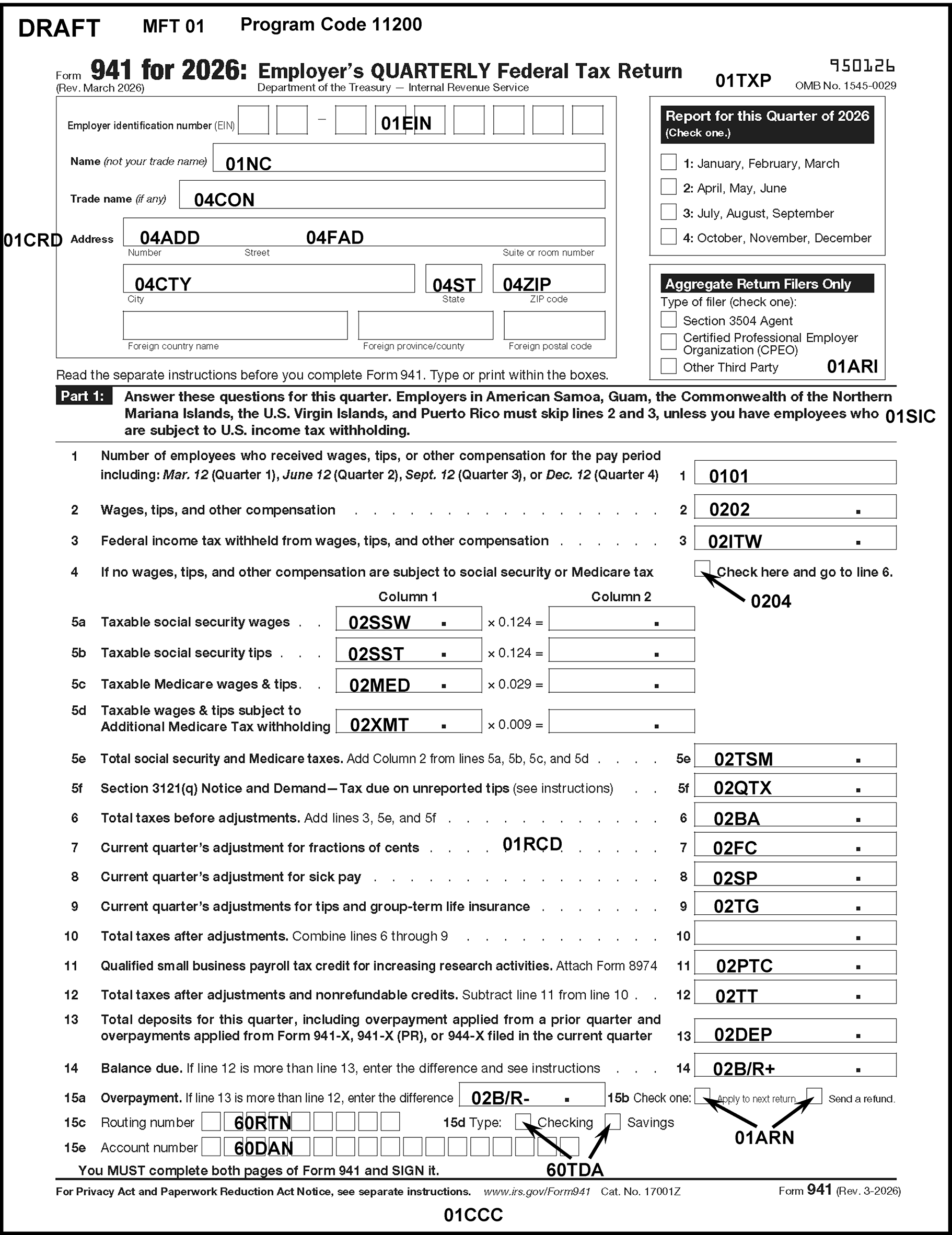
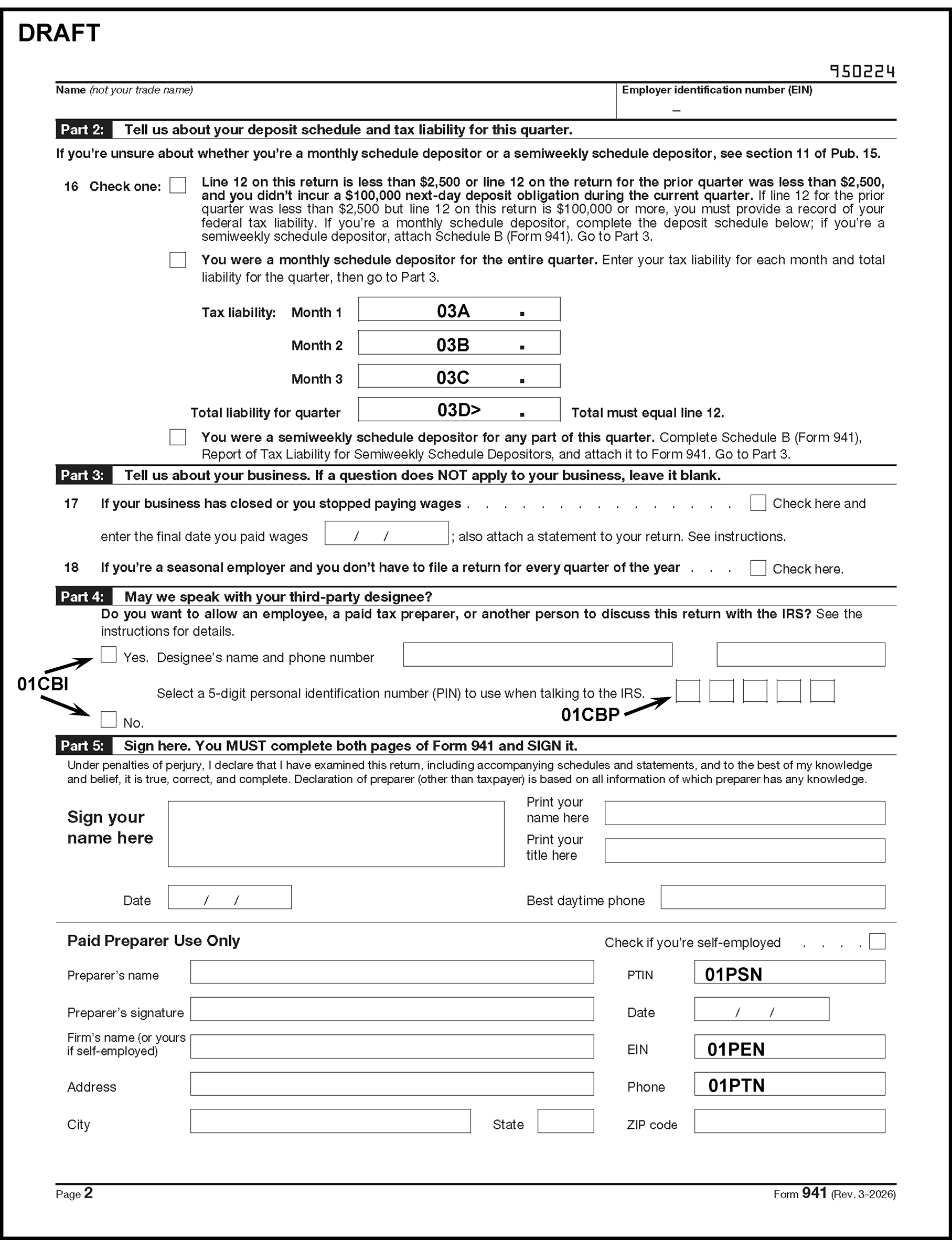
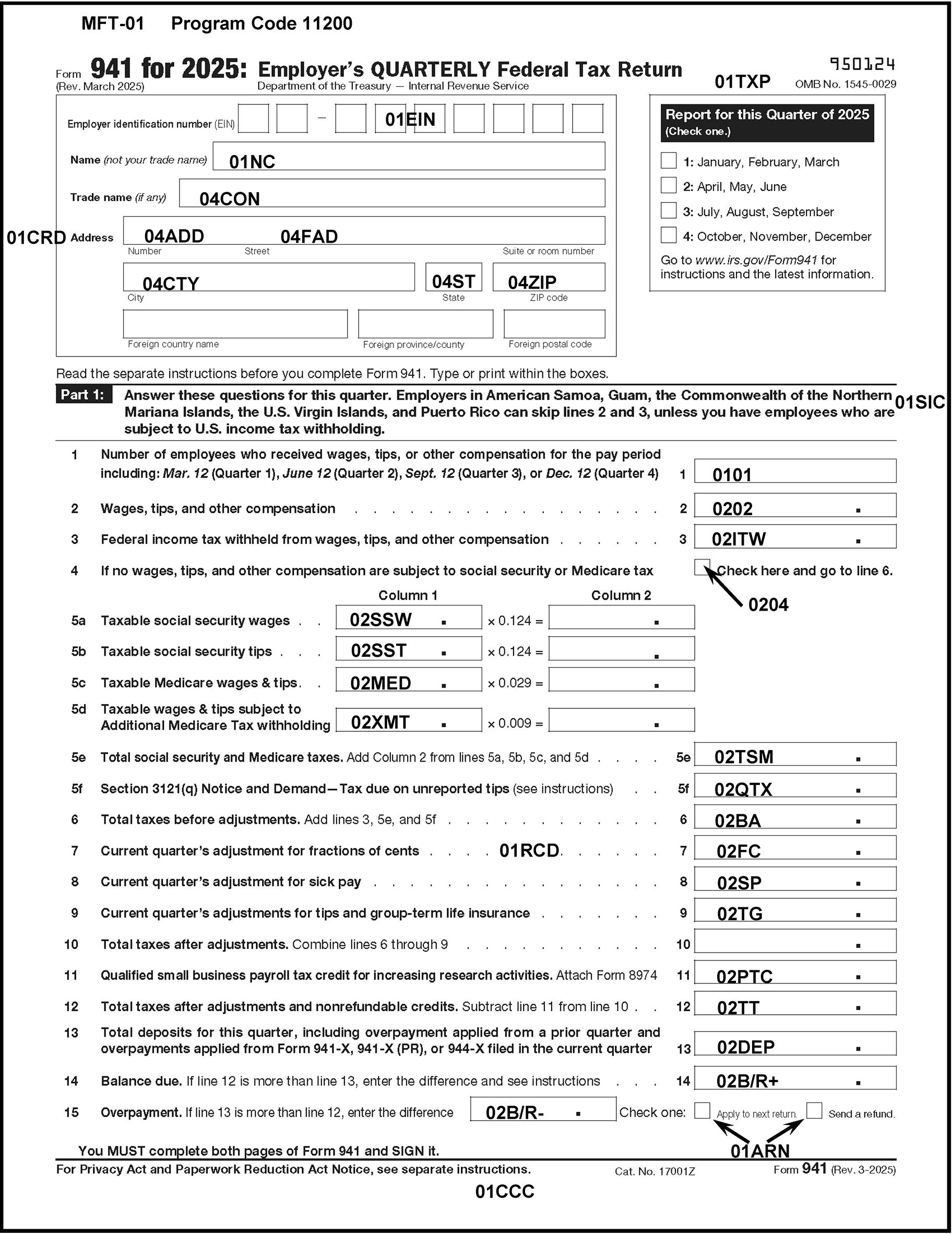
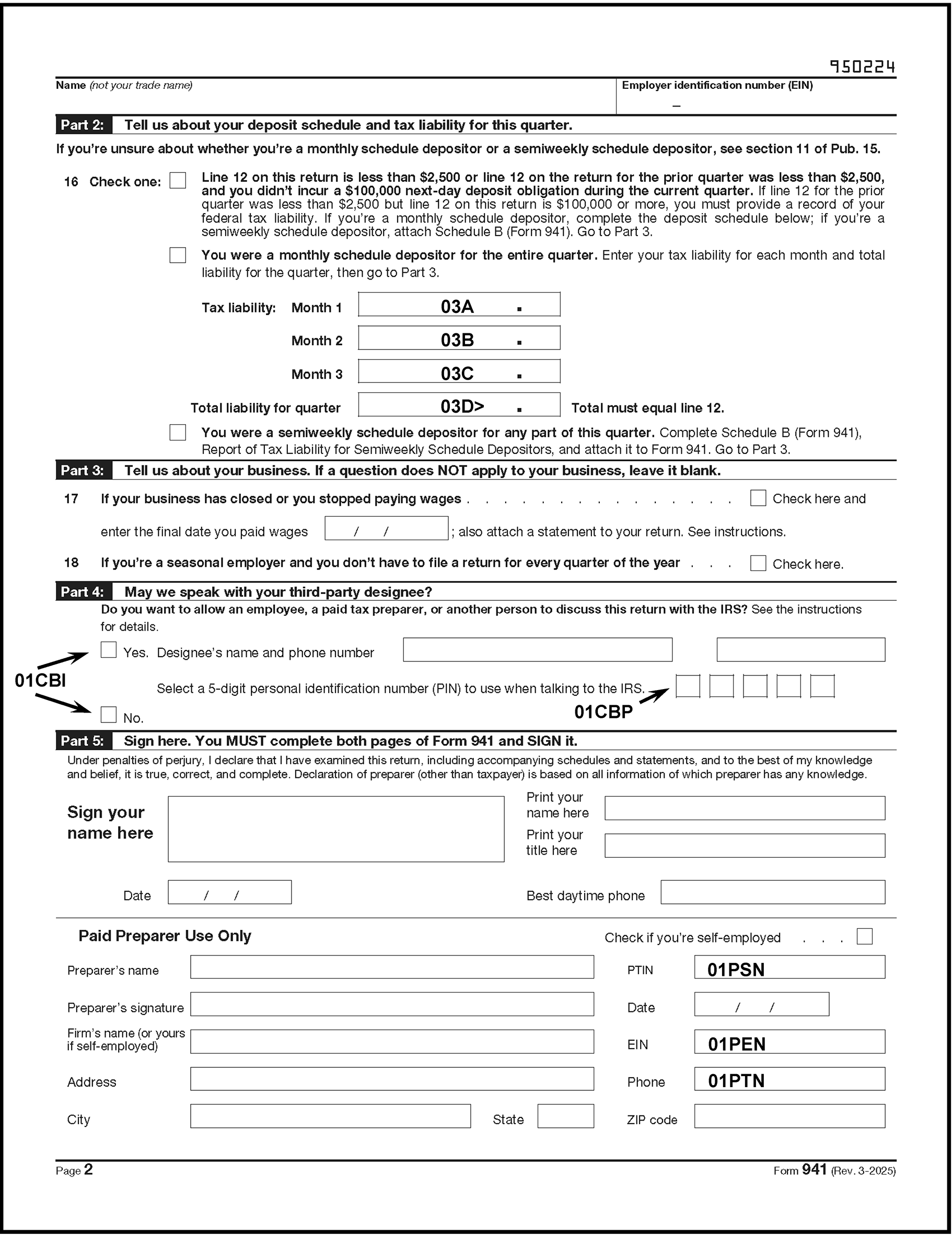
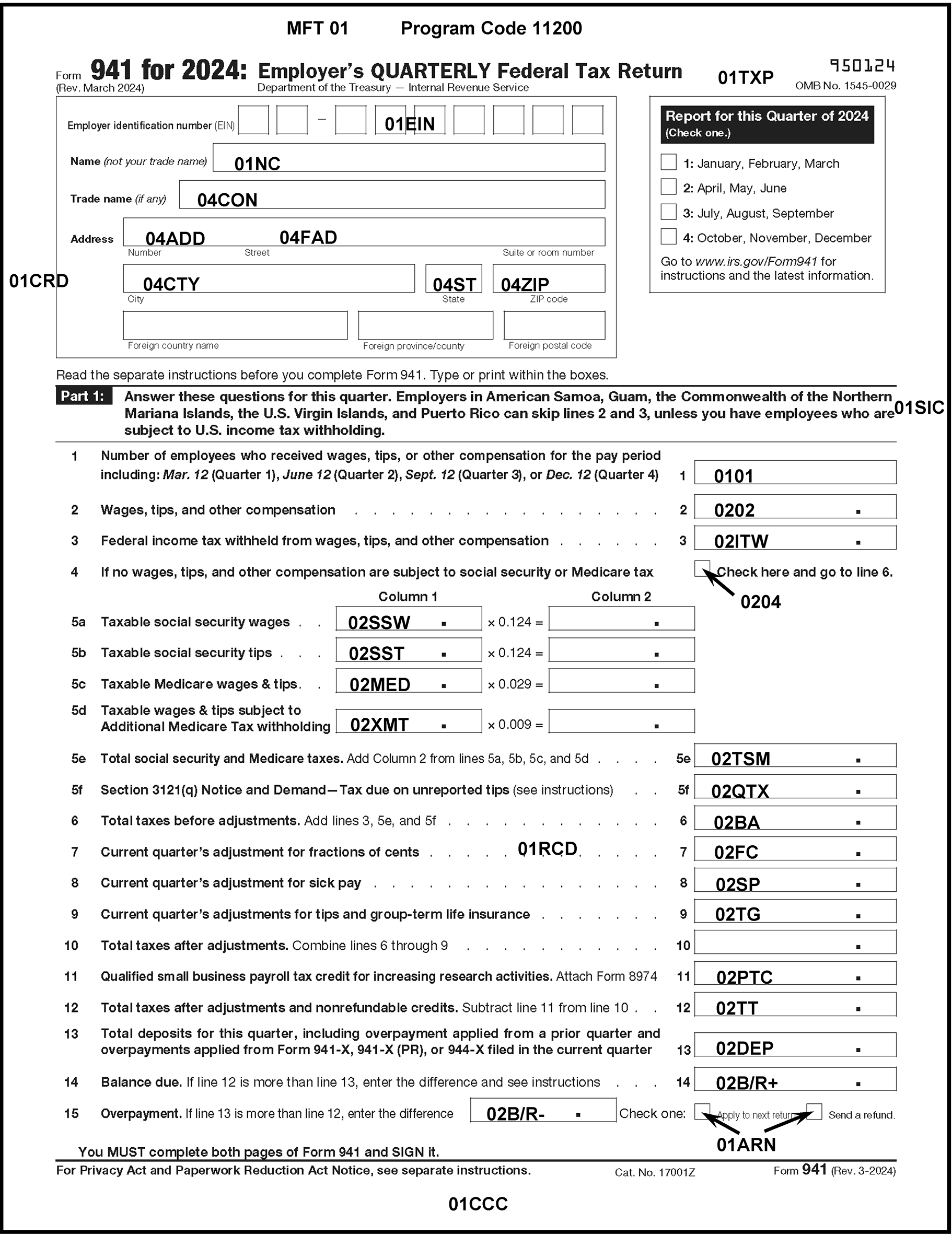
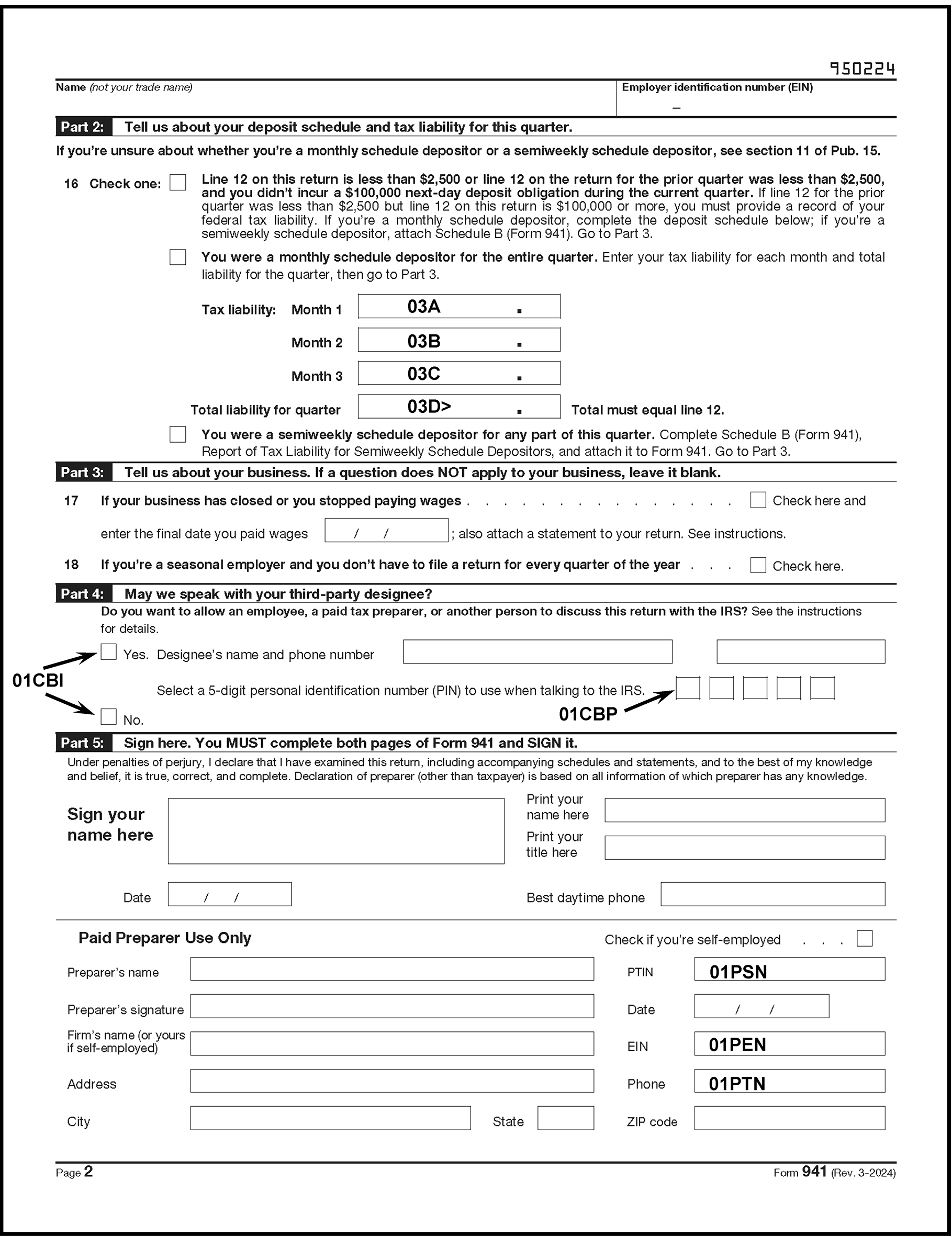
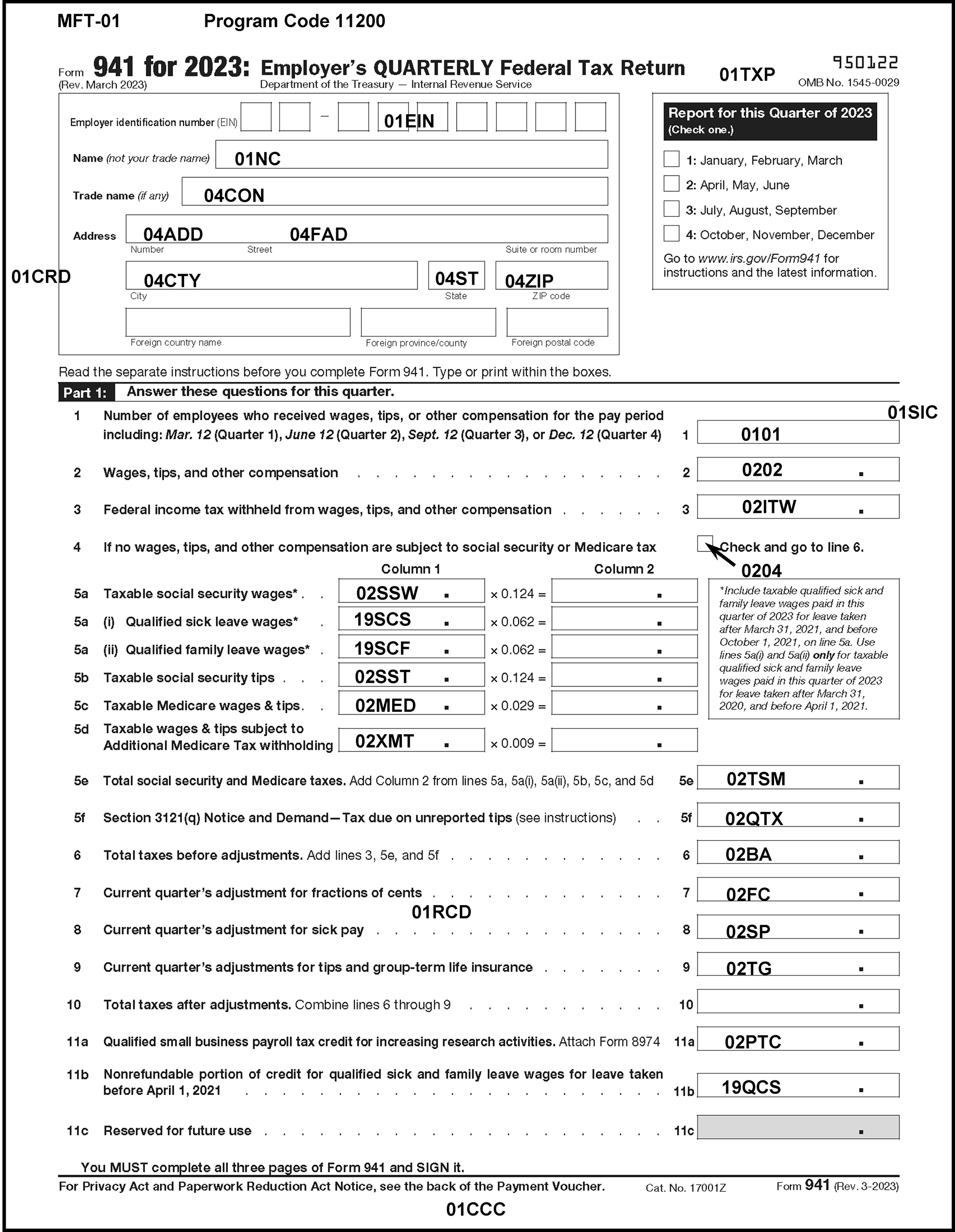
Please click here for the text description of the image.
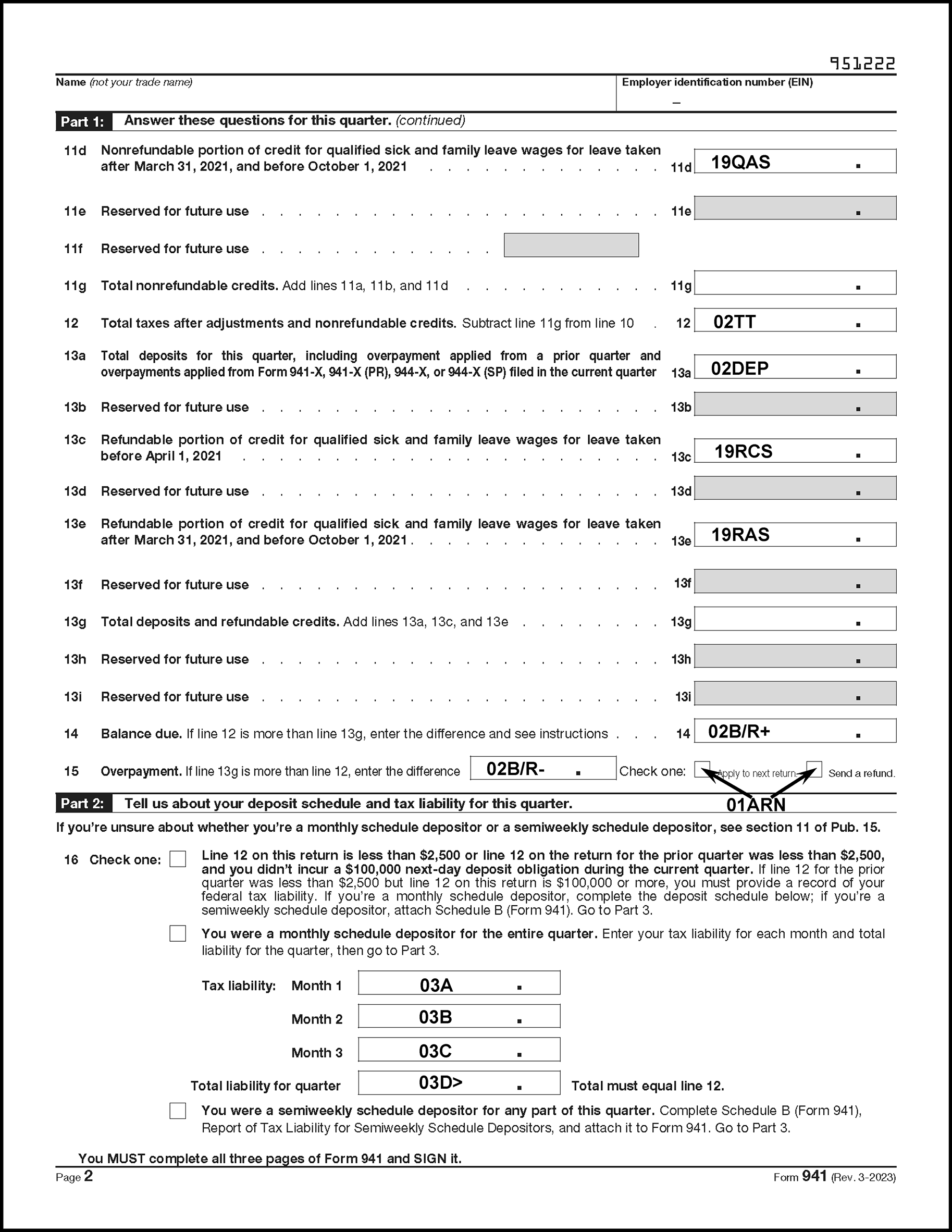
Please click here for the text description of the image.
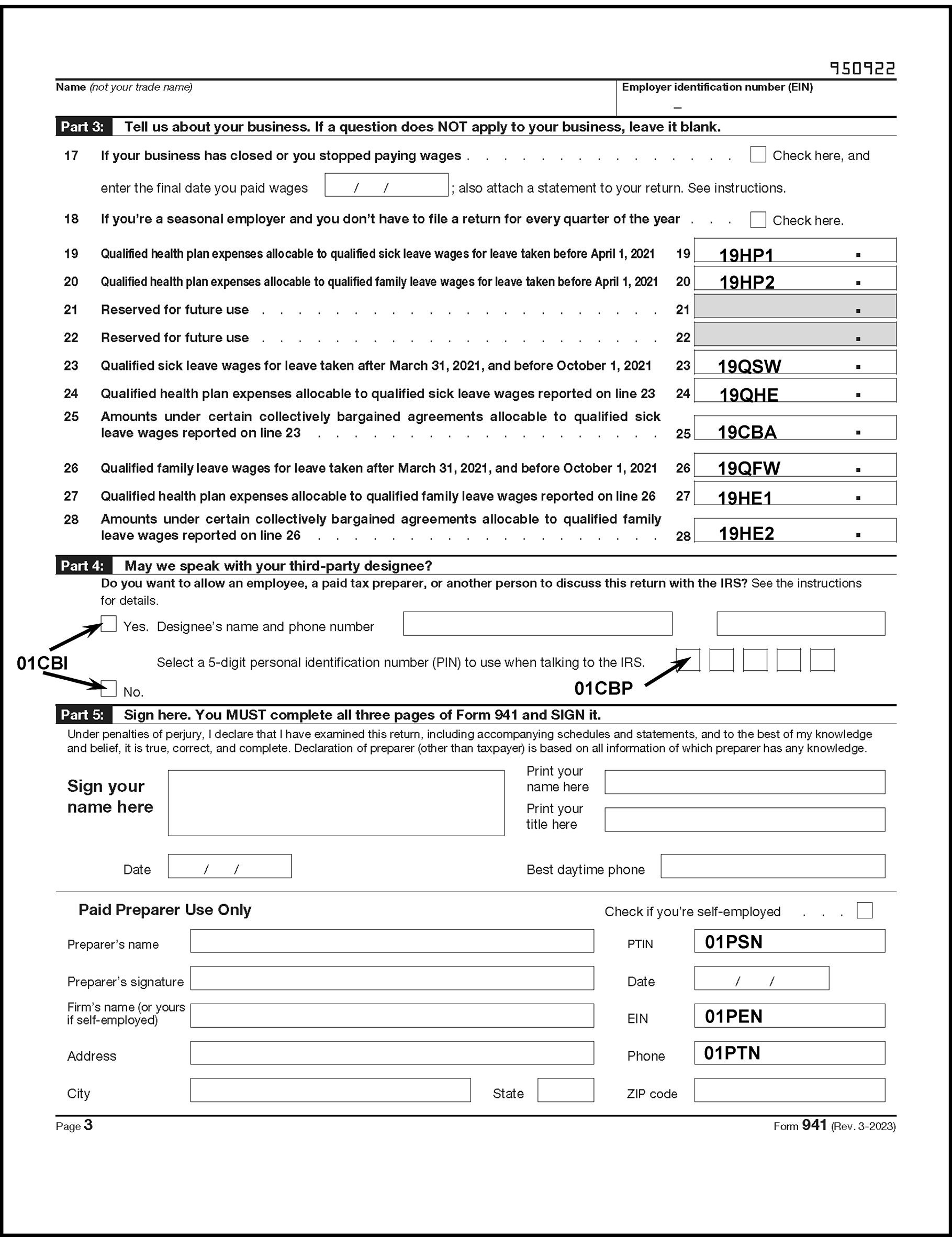
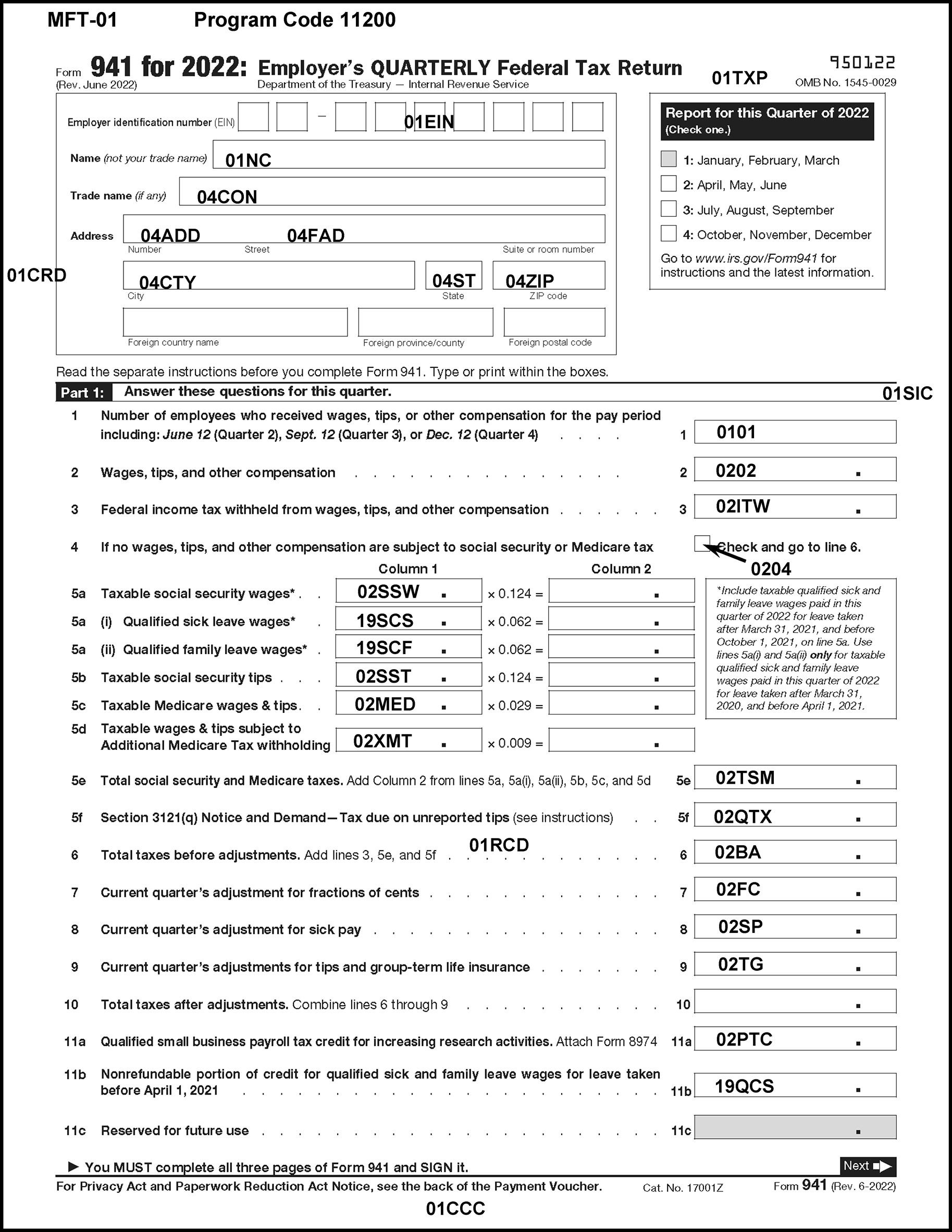
Please click here for the text description of the image.
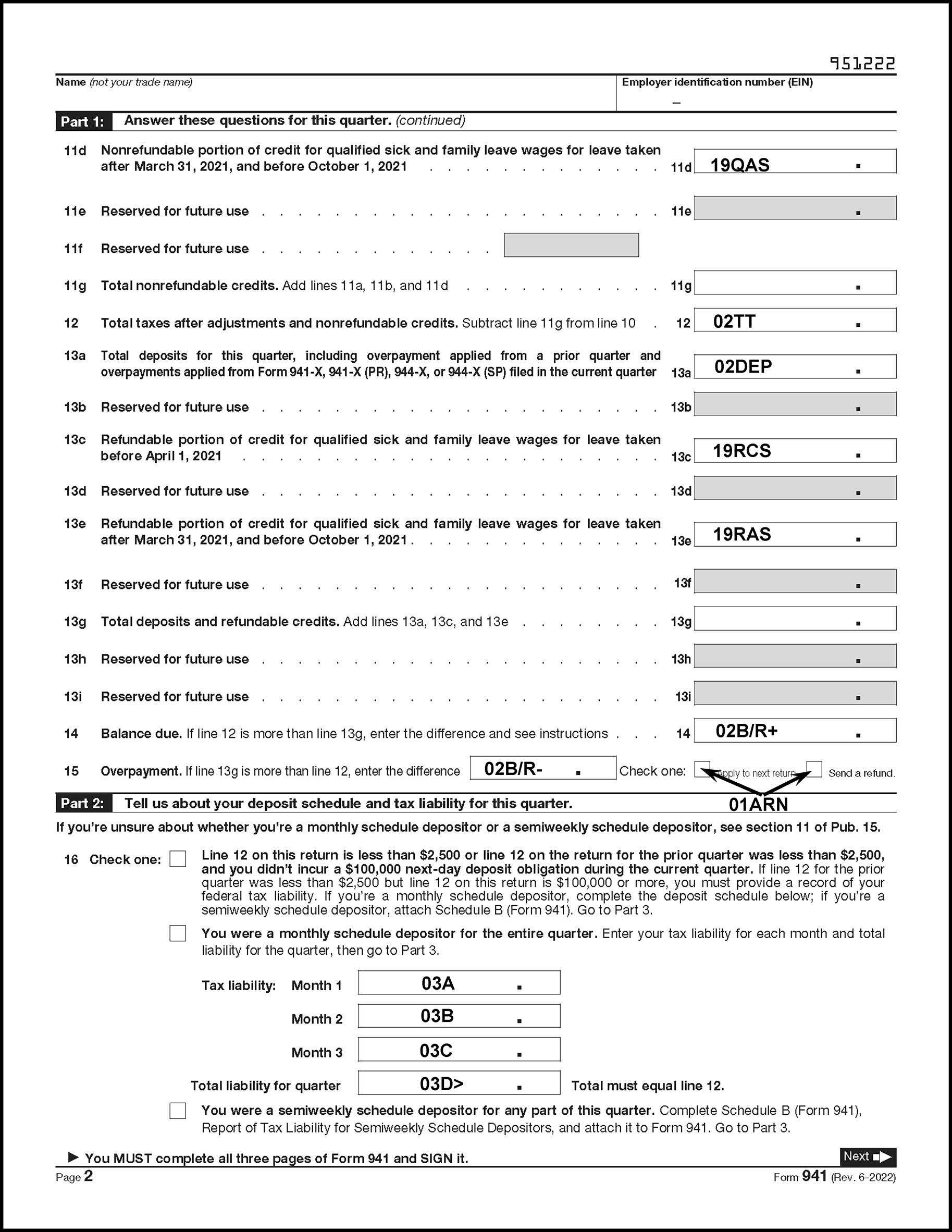
Please click here for the text description of the image.
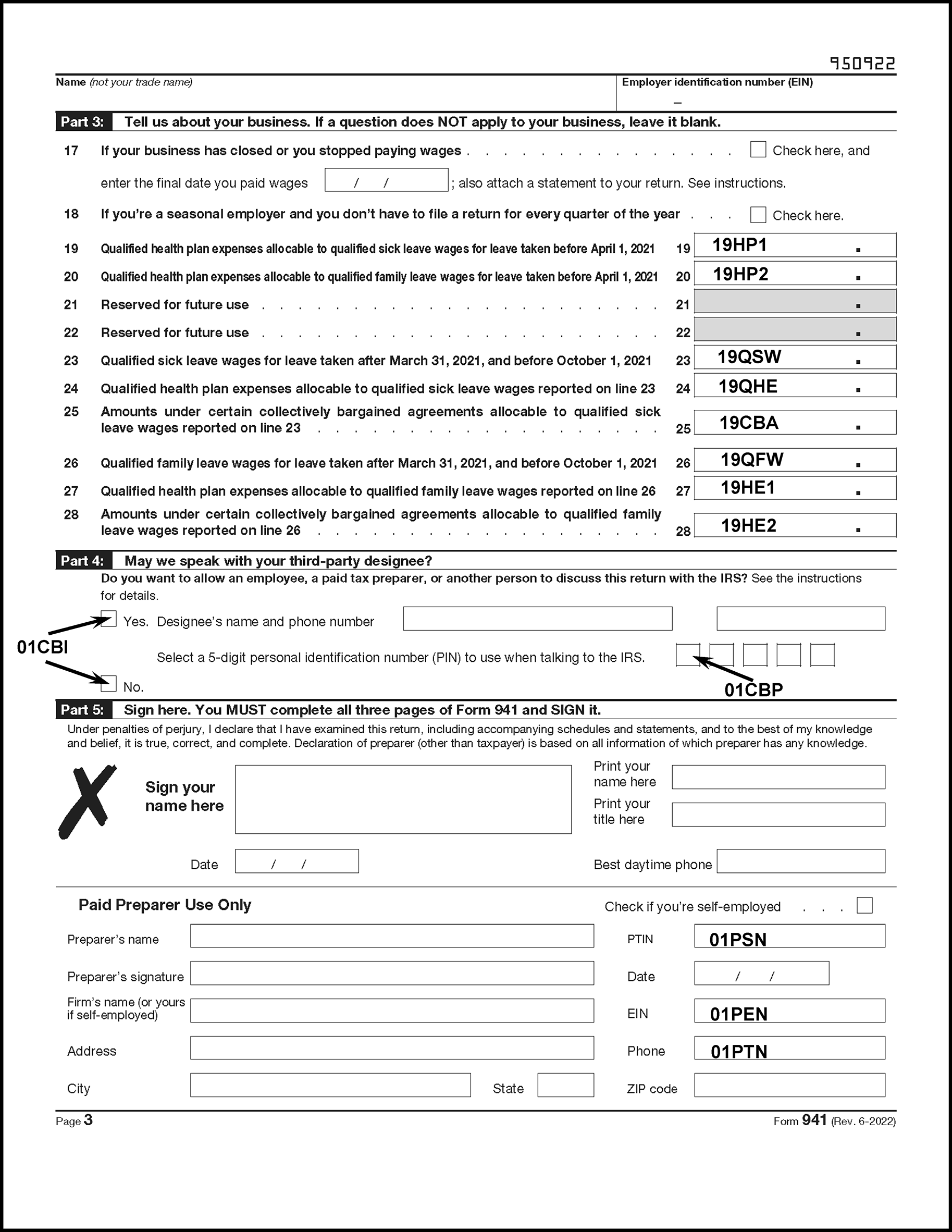
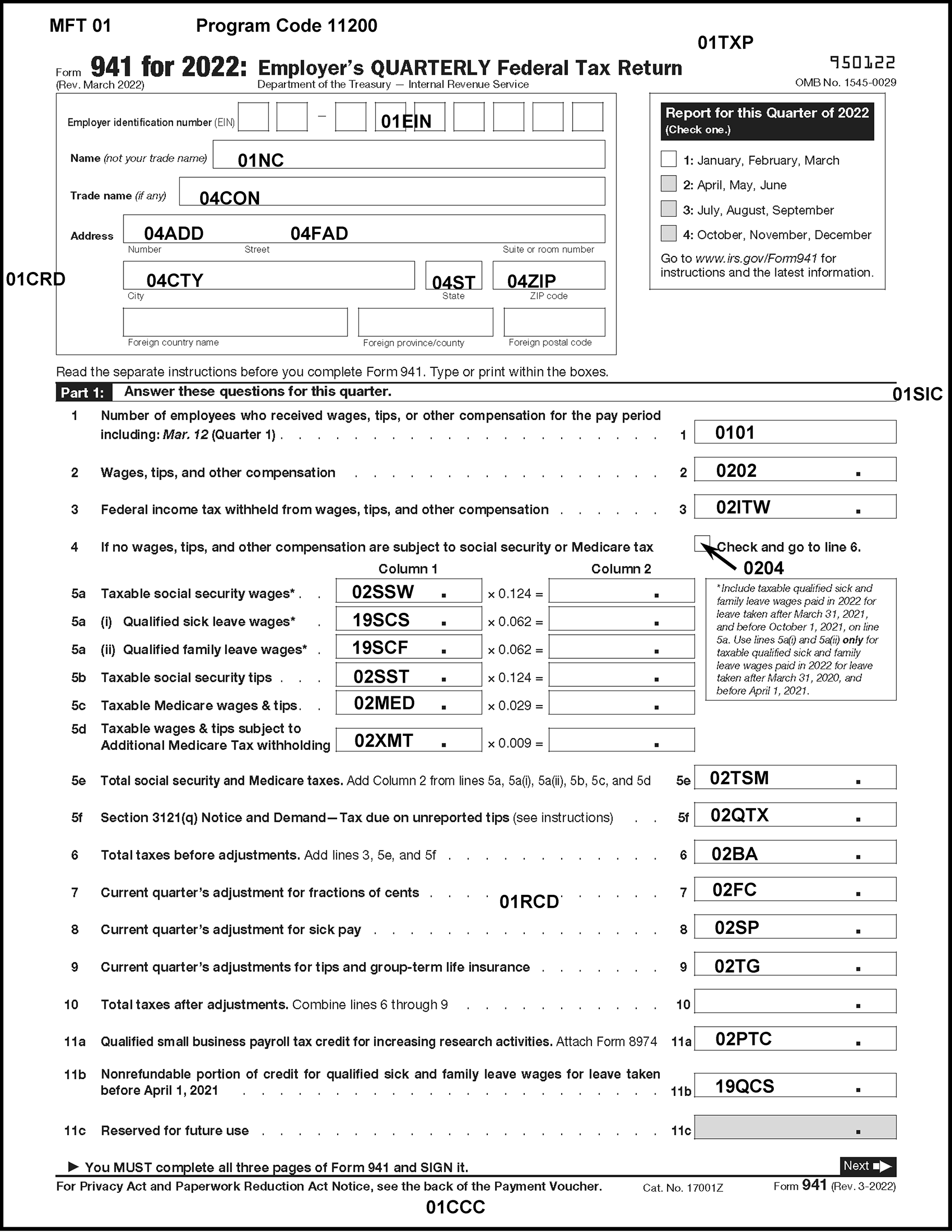
Please click here for the text description of the image.
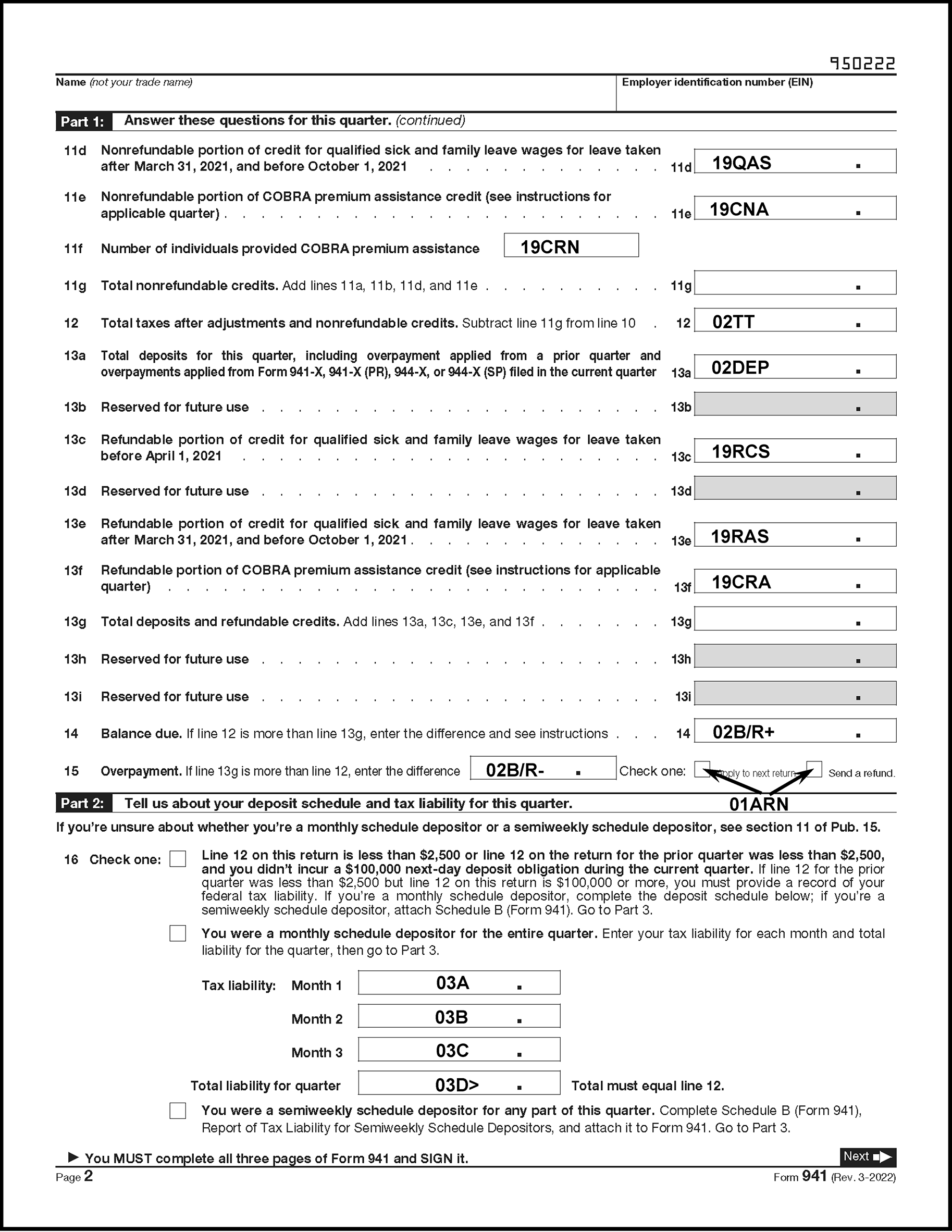
Please click here for the text description of the image.
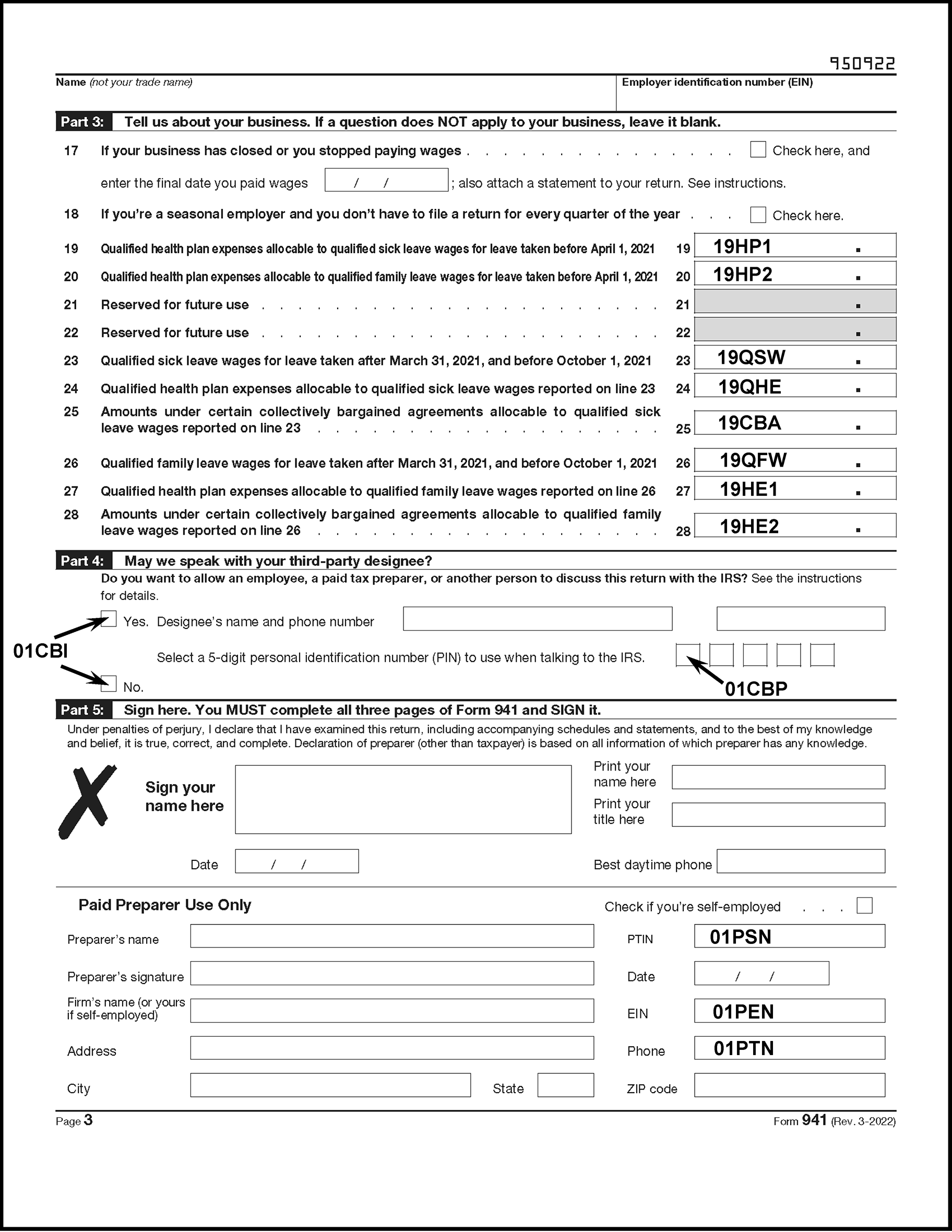
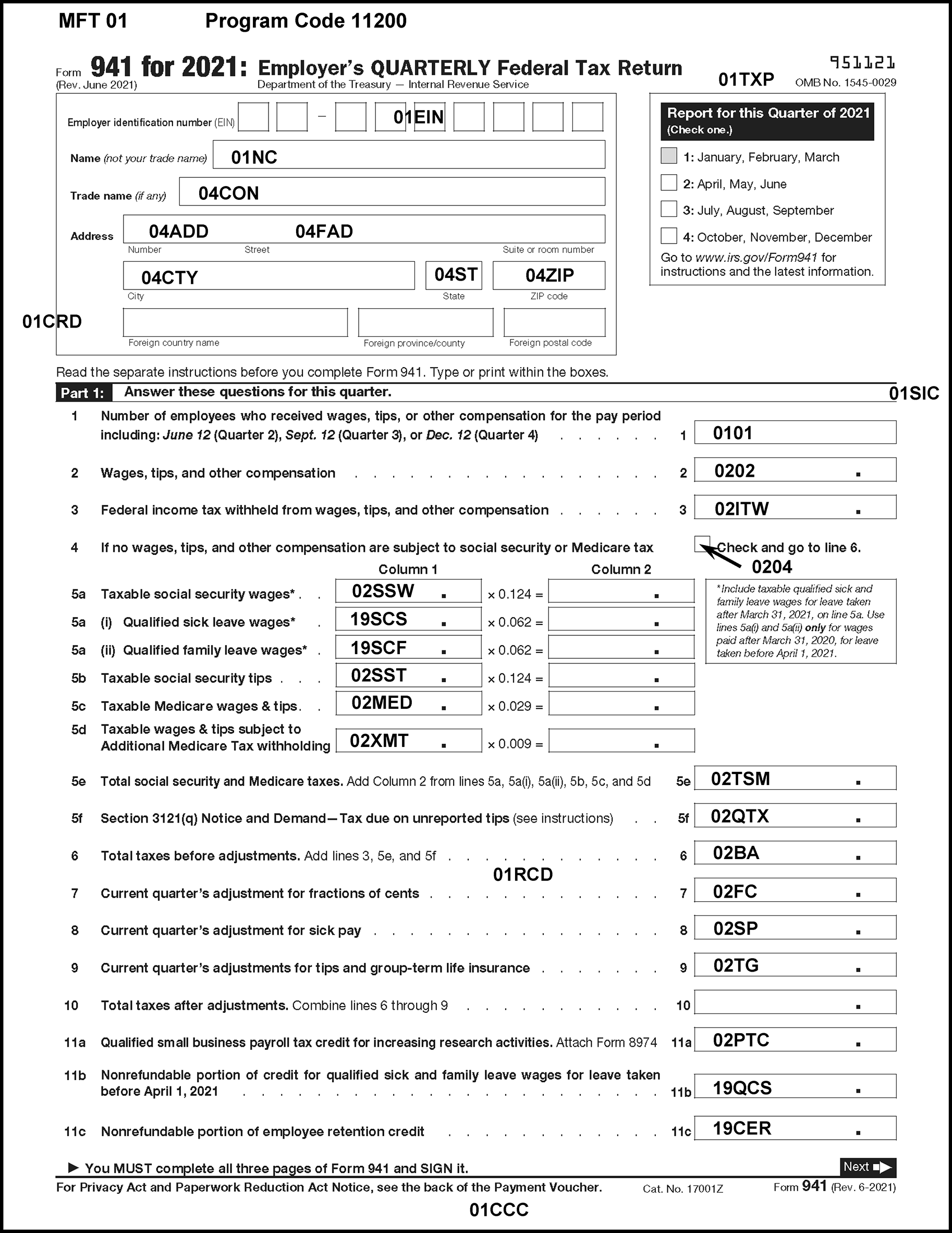
Please click here for the text description of the image.
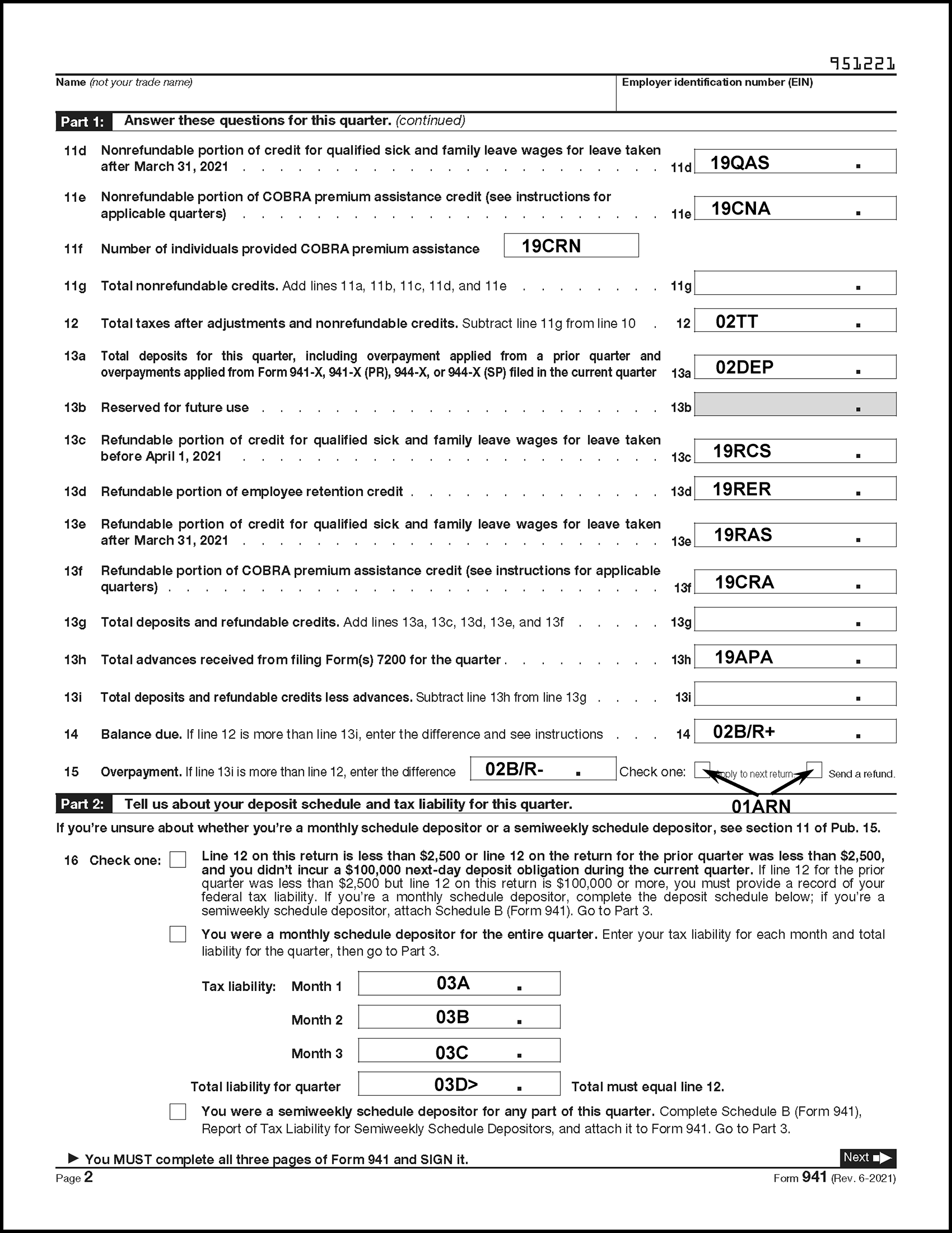
Please click here for the text description of the image.
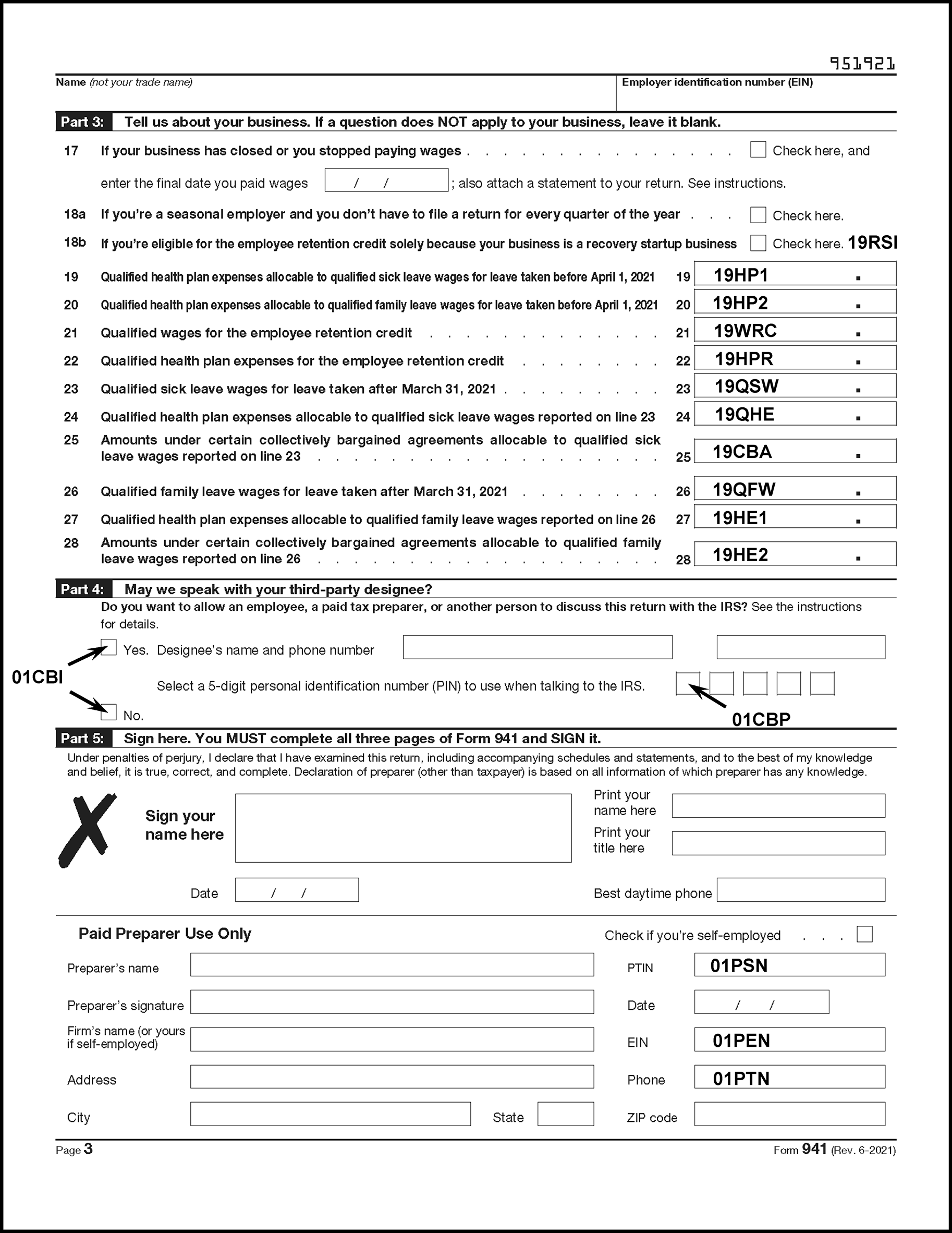
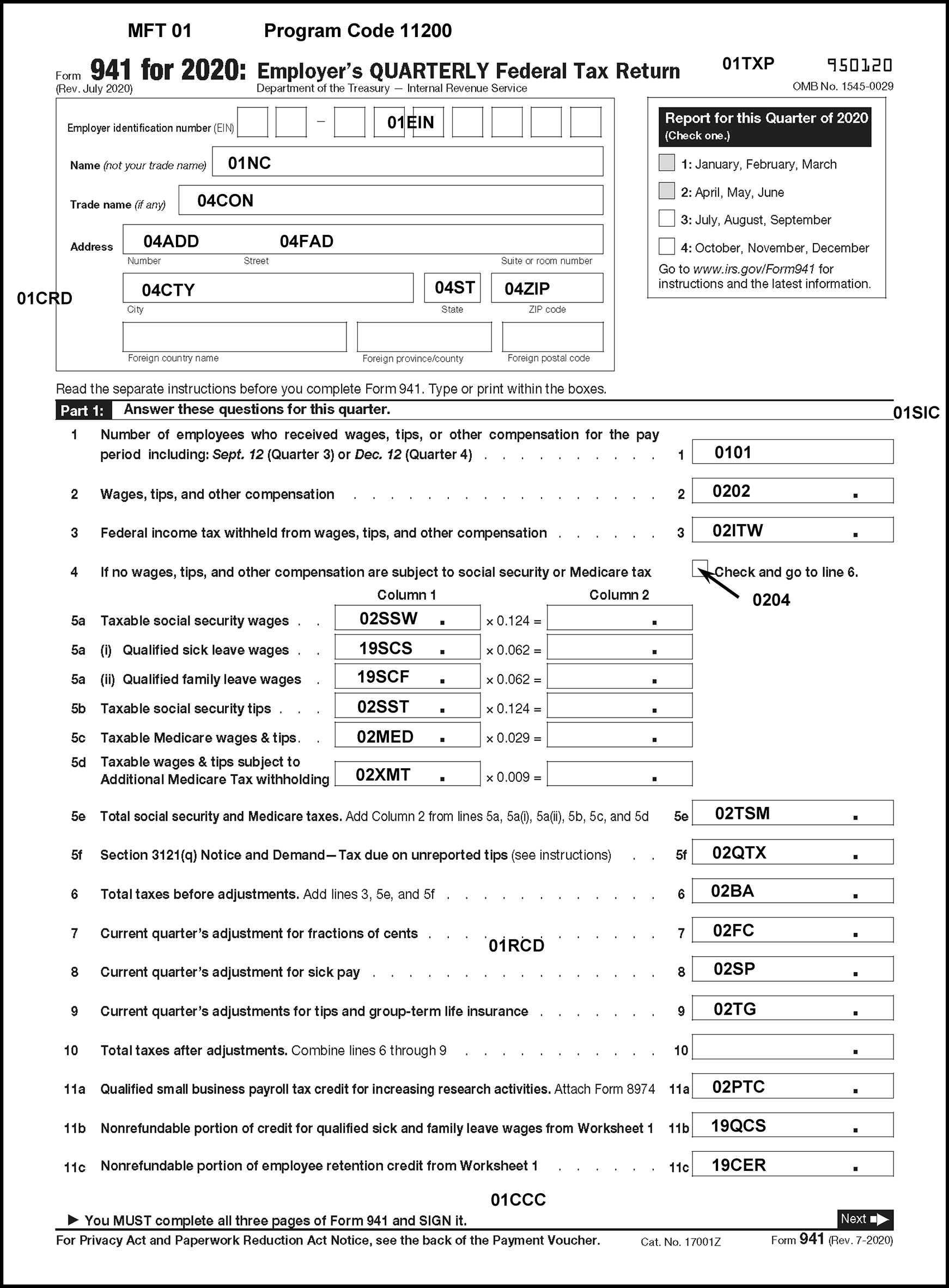
Please click here for the text description of the image.
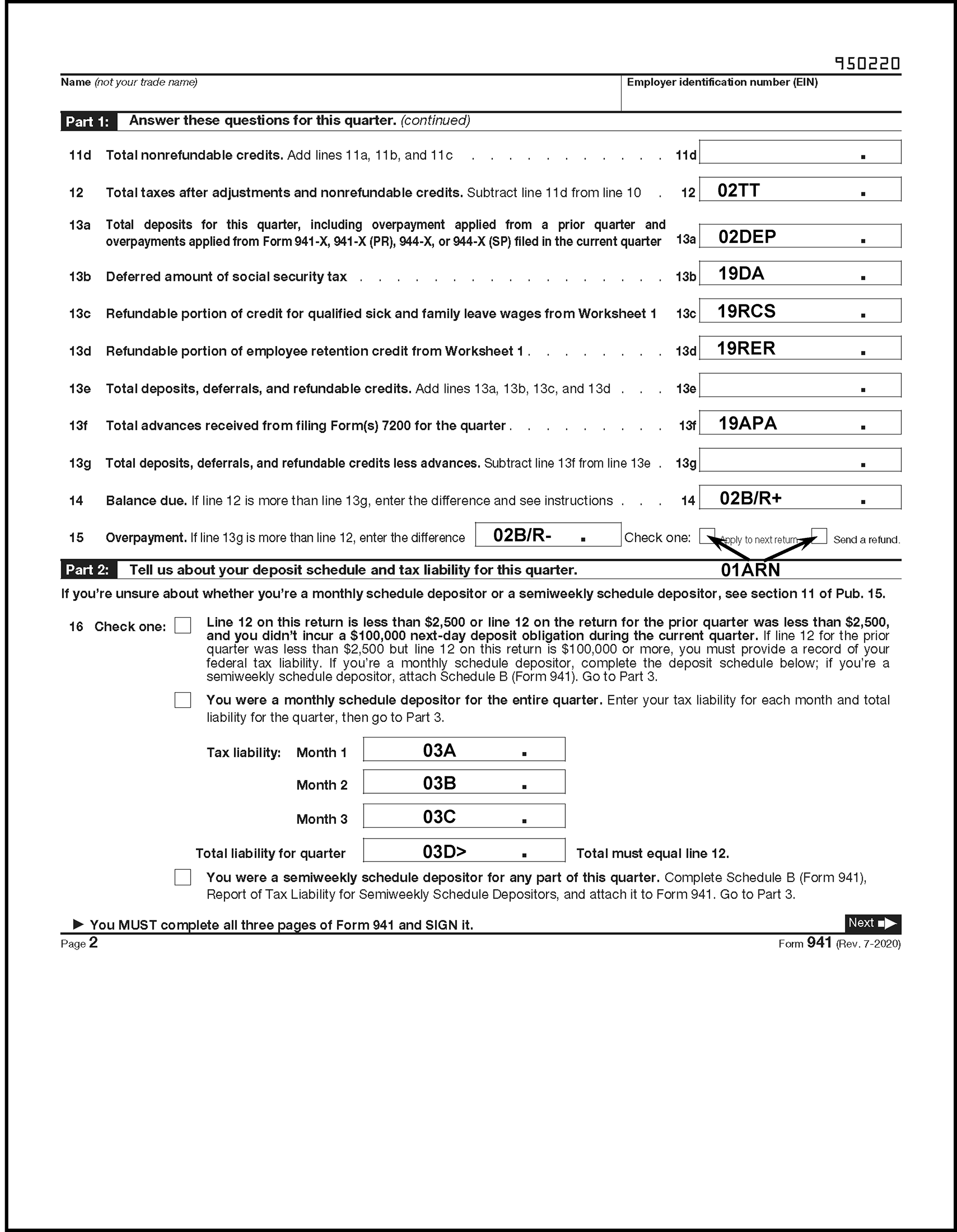
Please click here for the text description of the image.
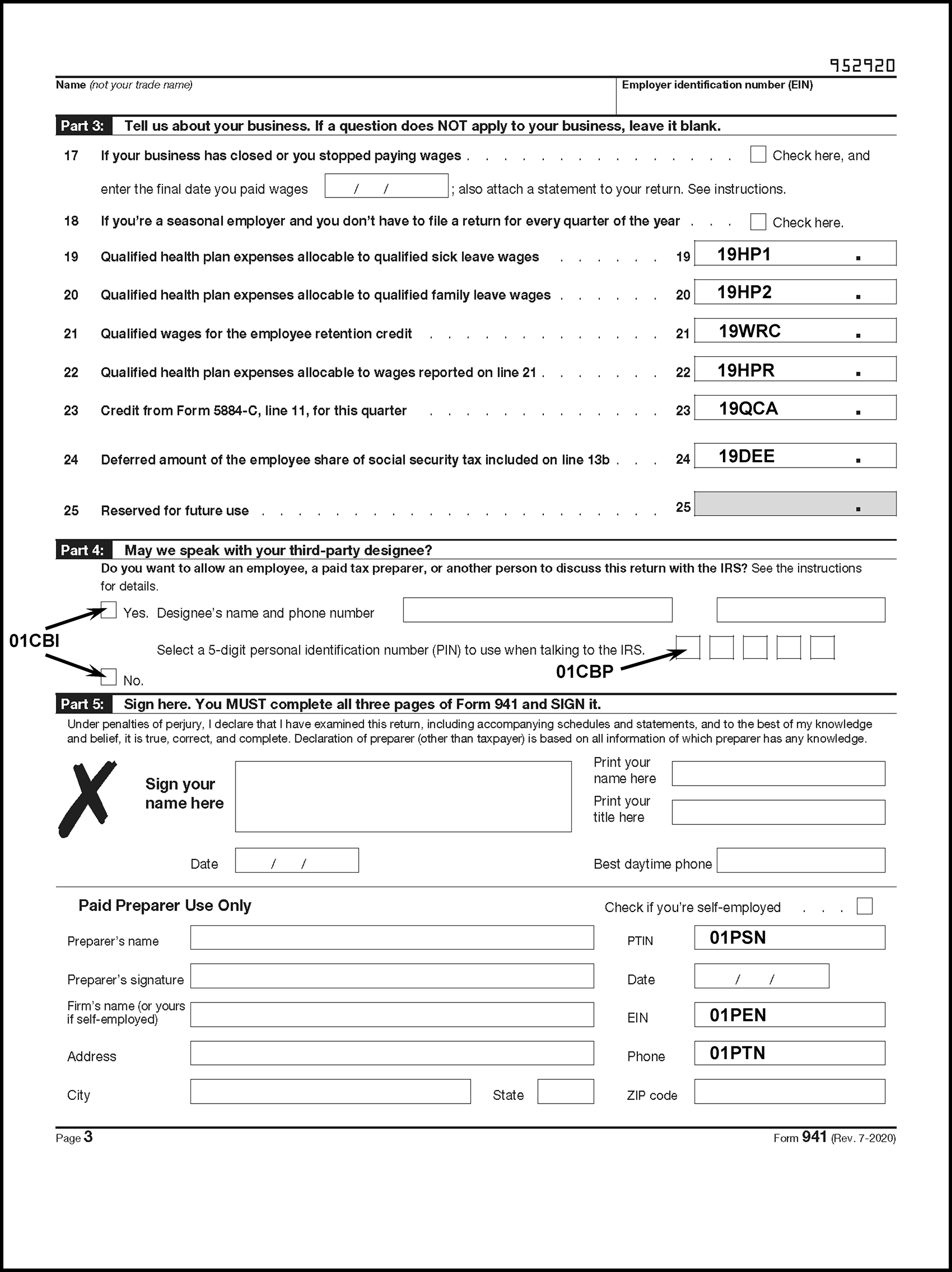
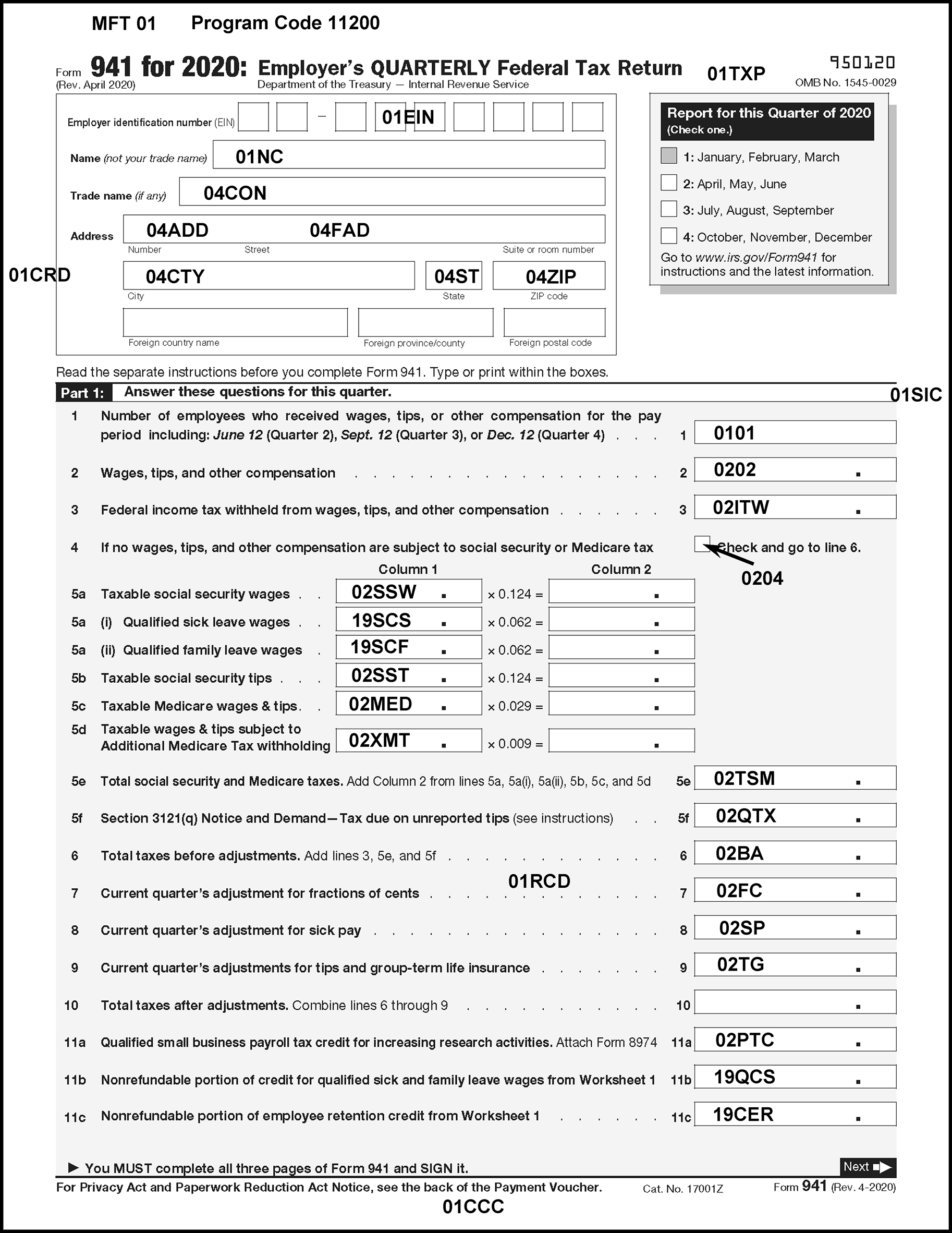
Please click here for the text description of the image.
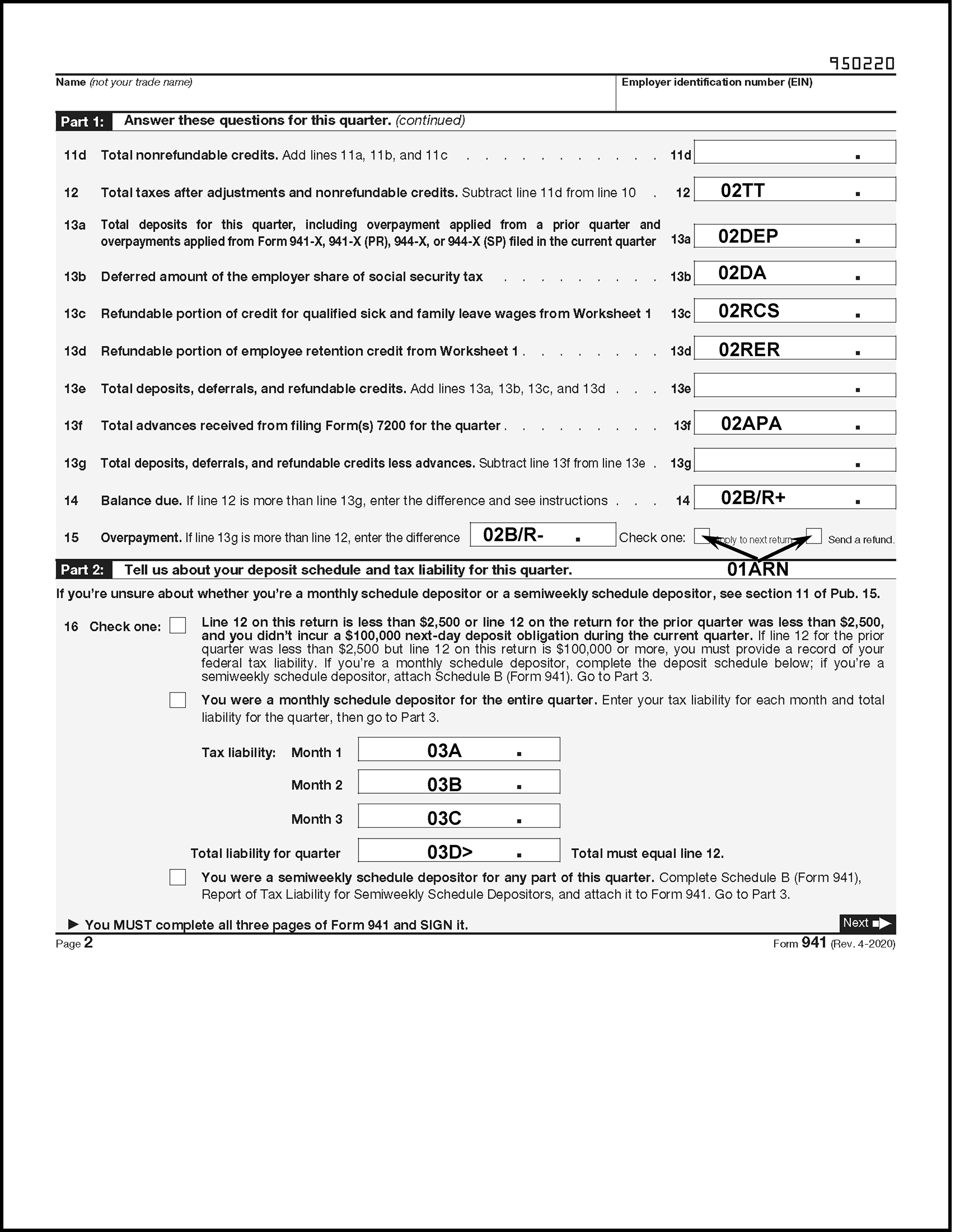
Please click here for the text description of the image.
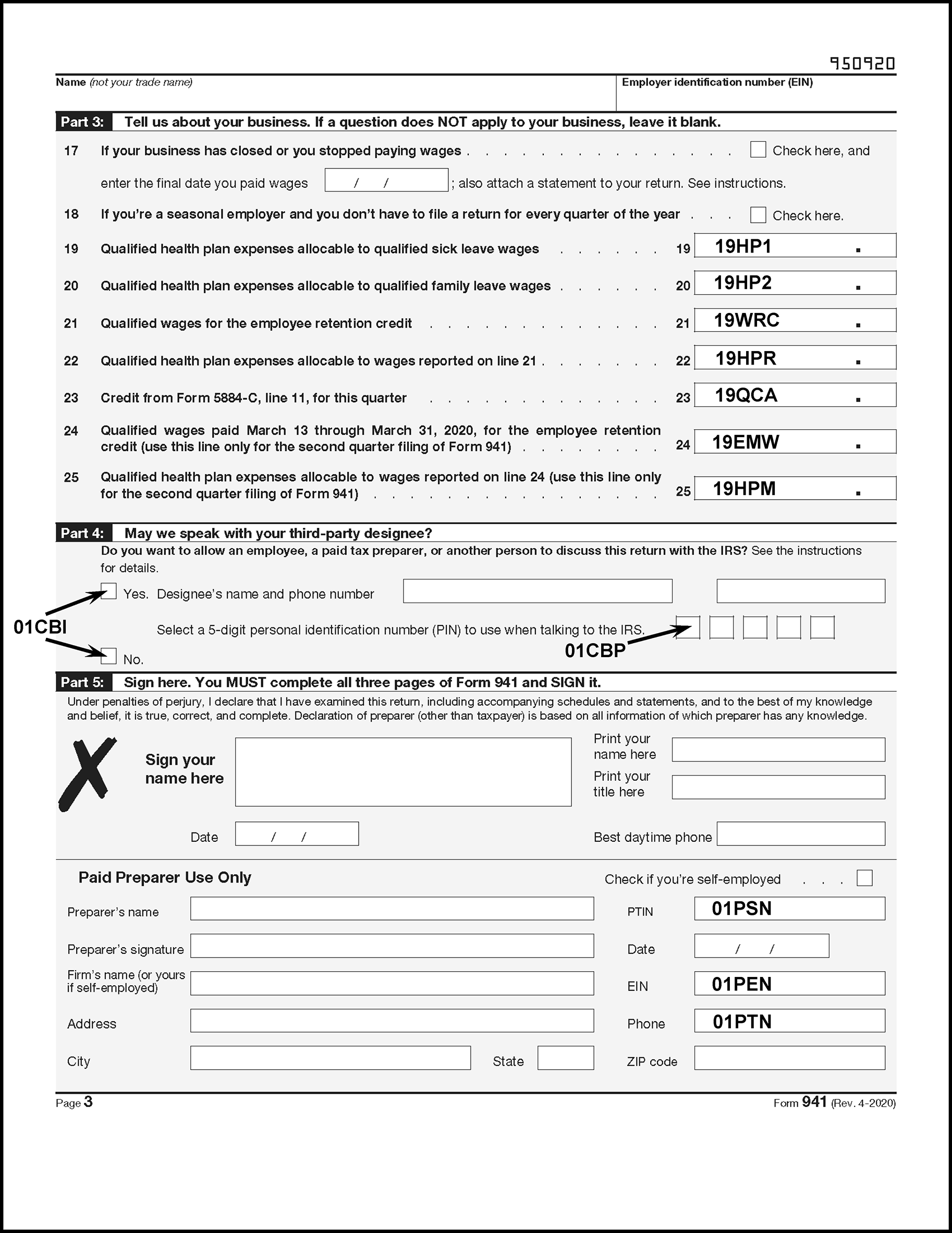
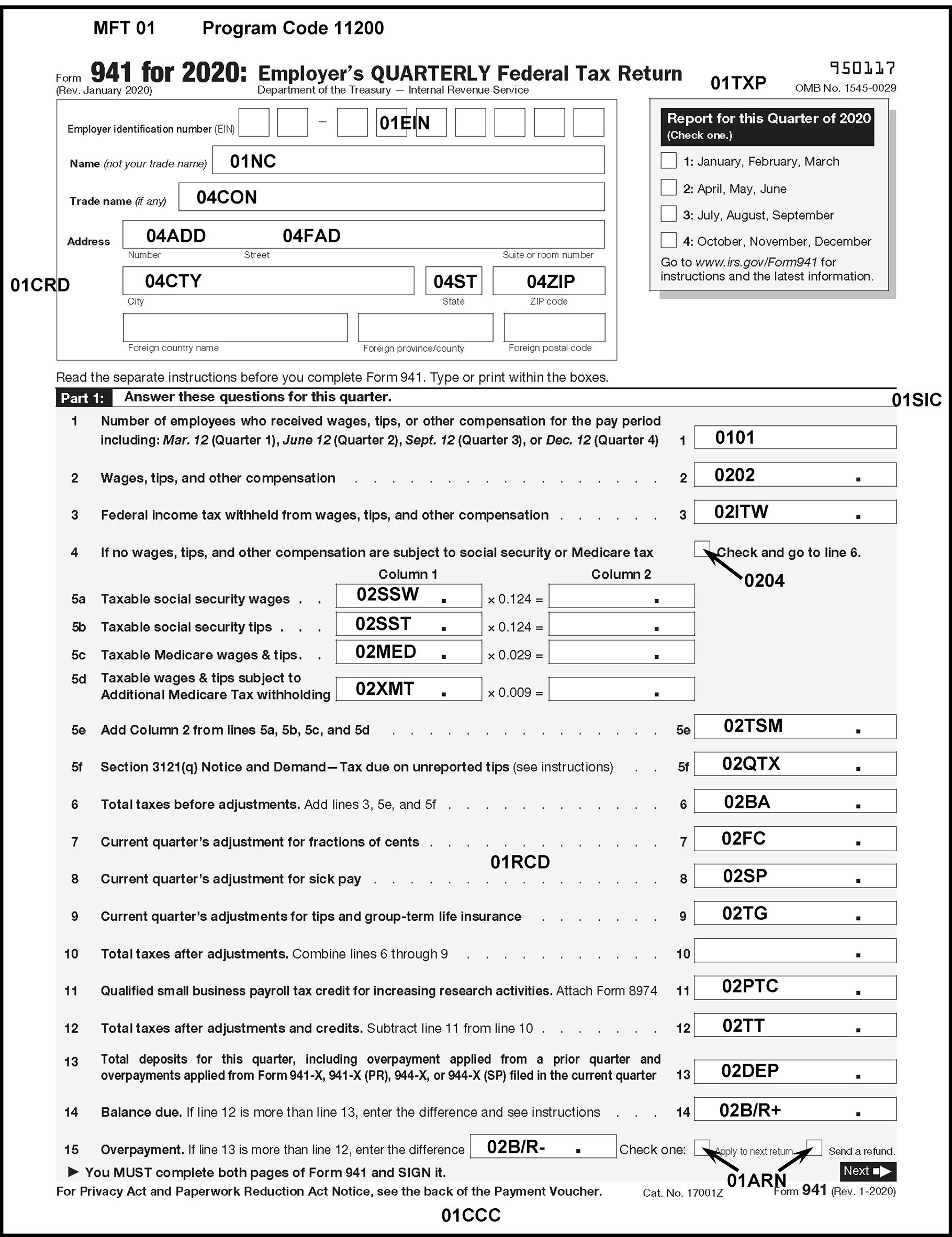
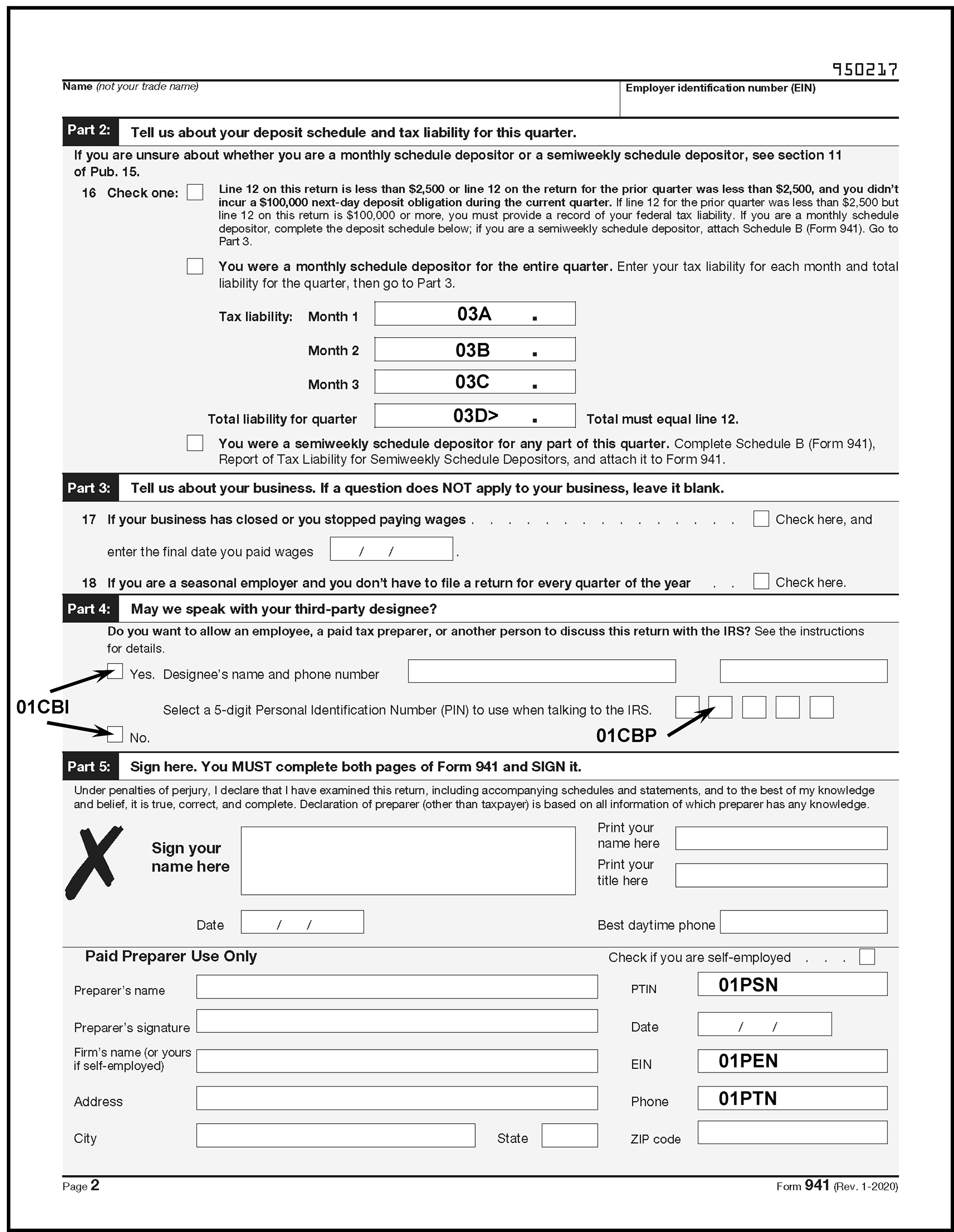
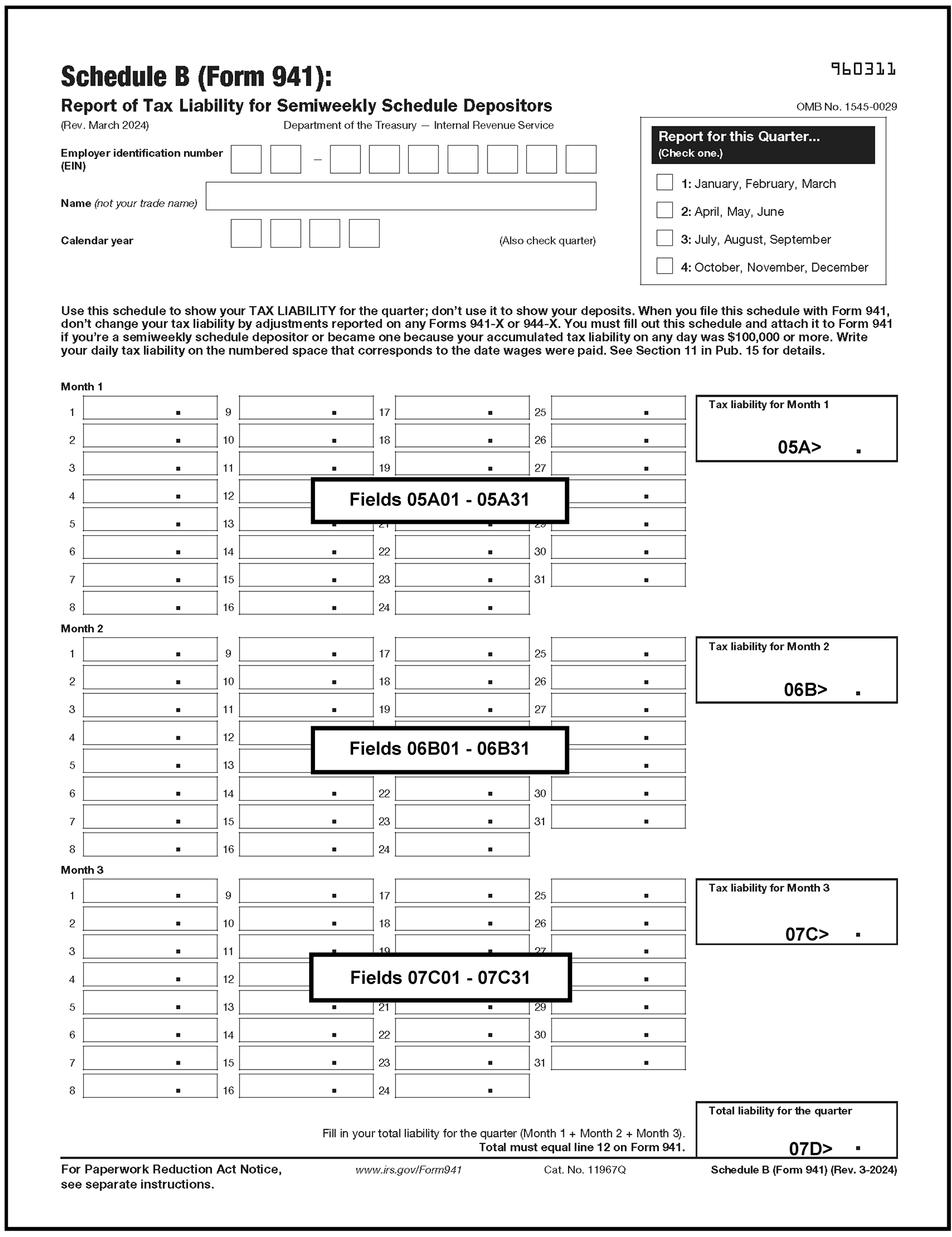
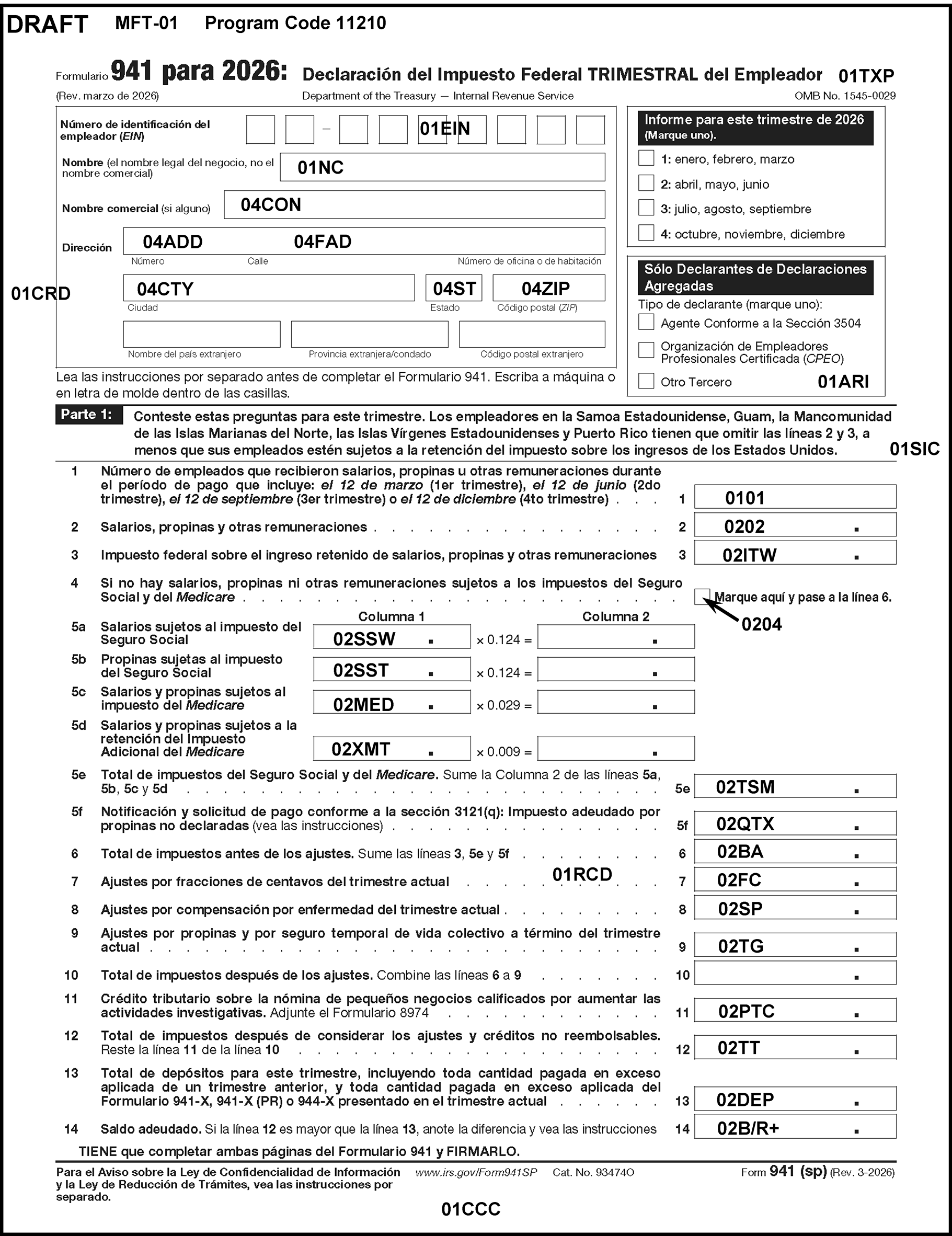
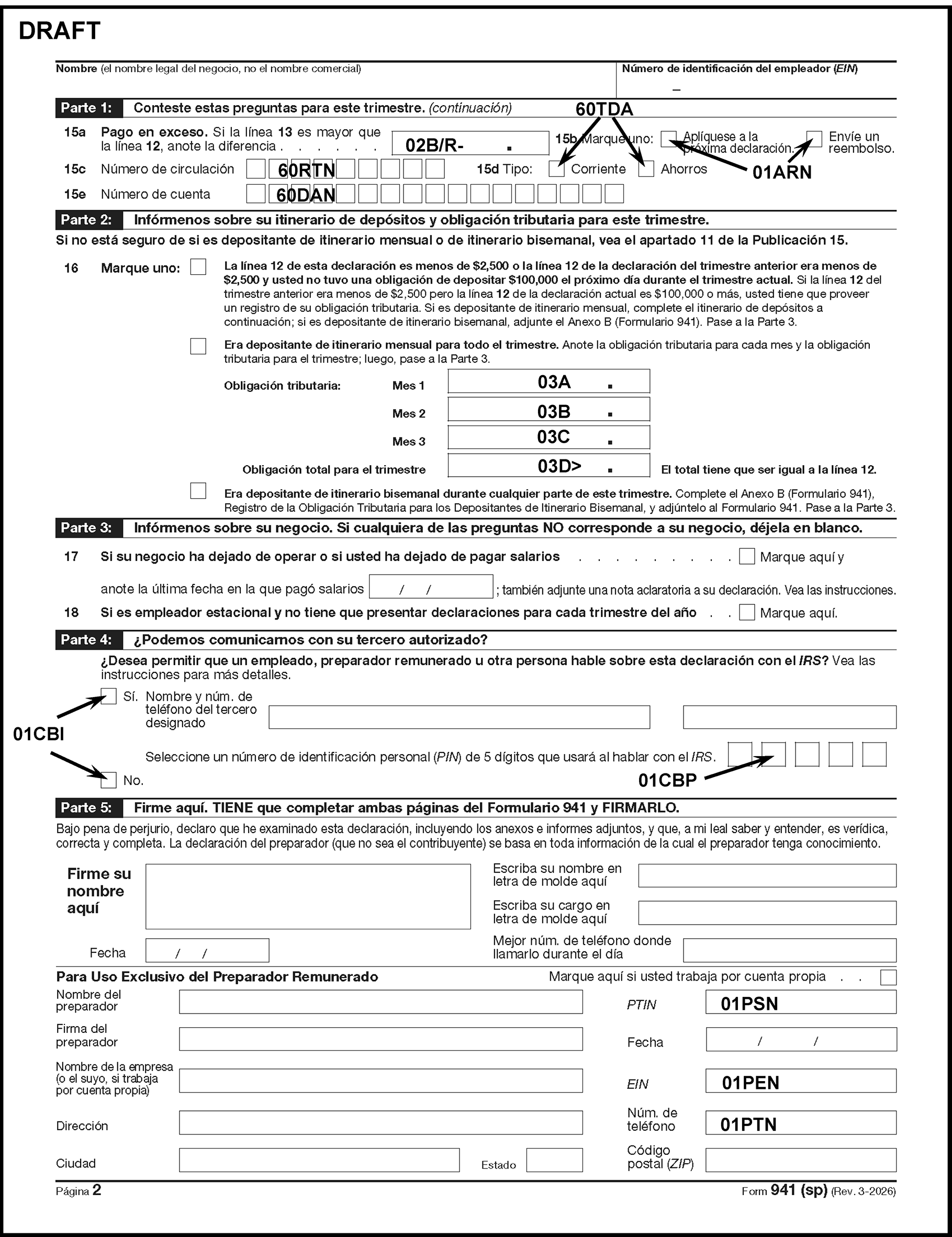
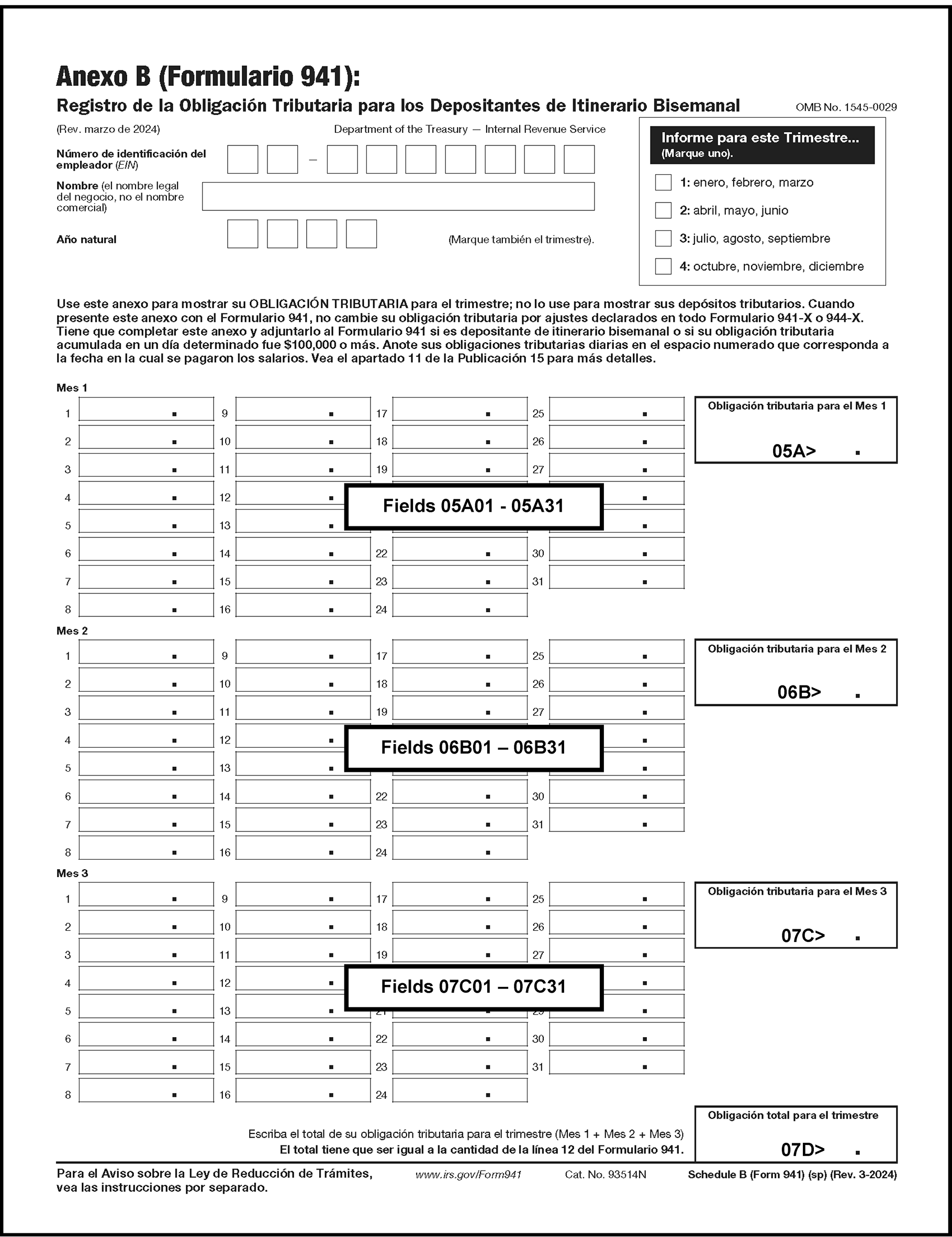
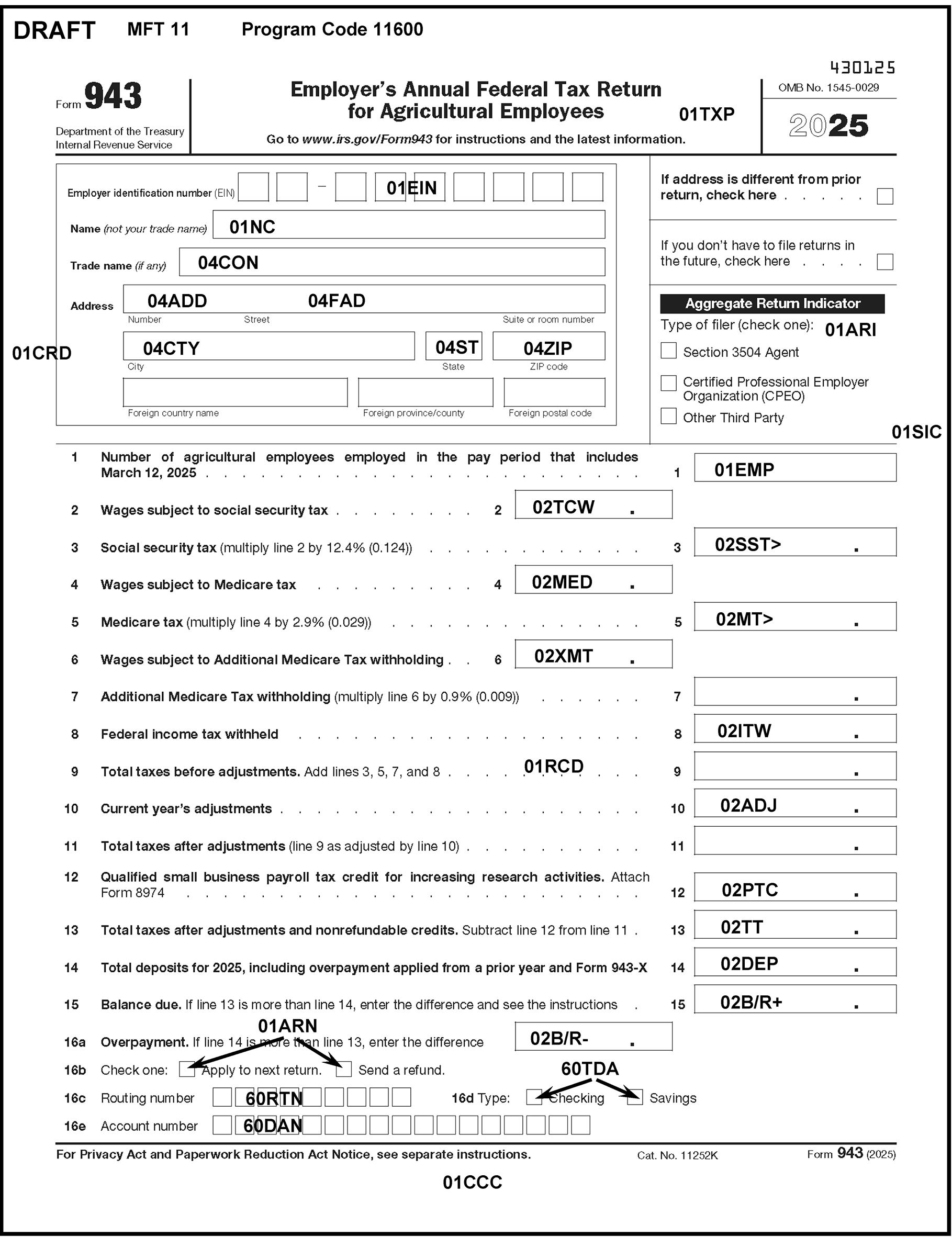
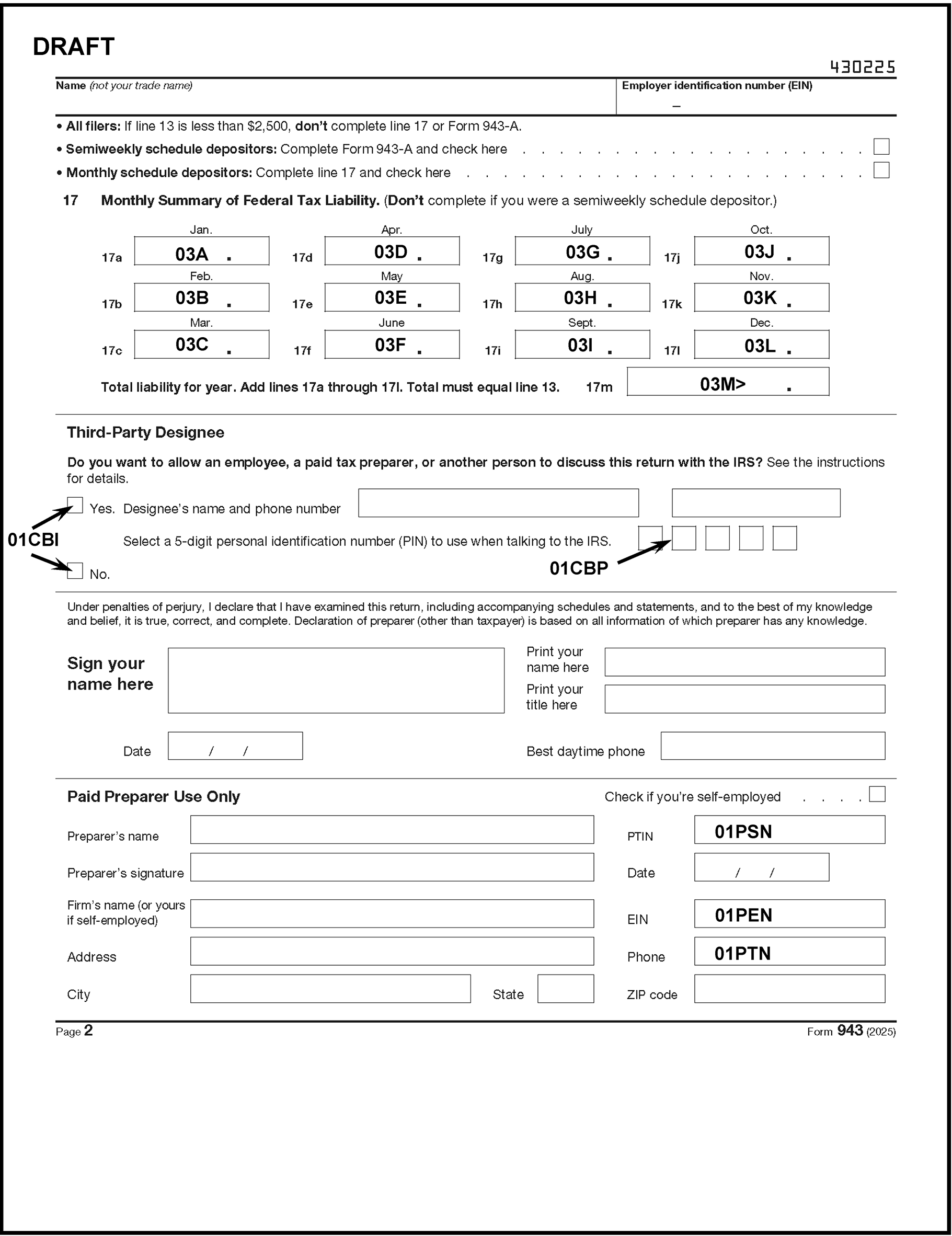
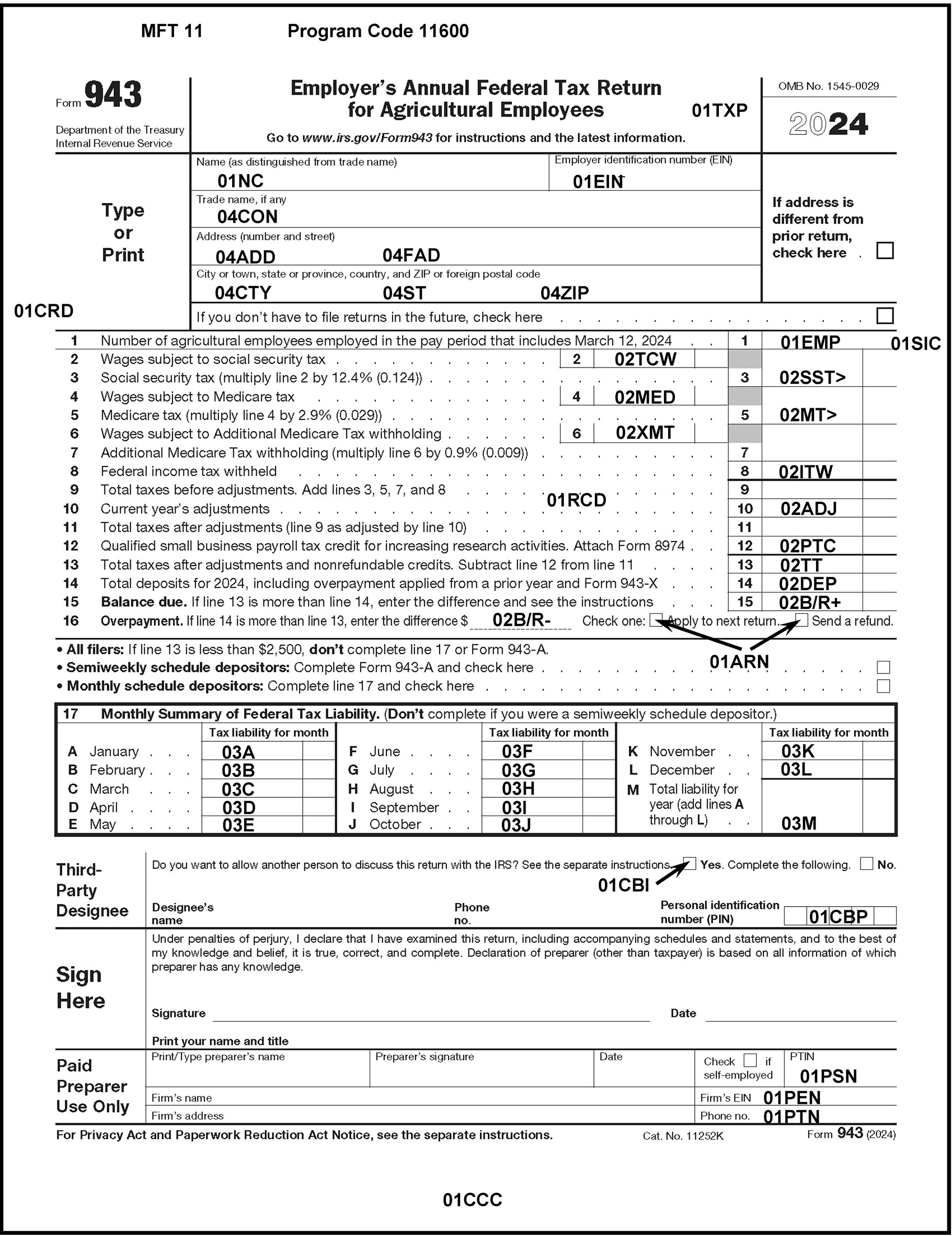
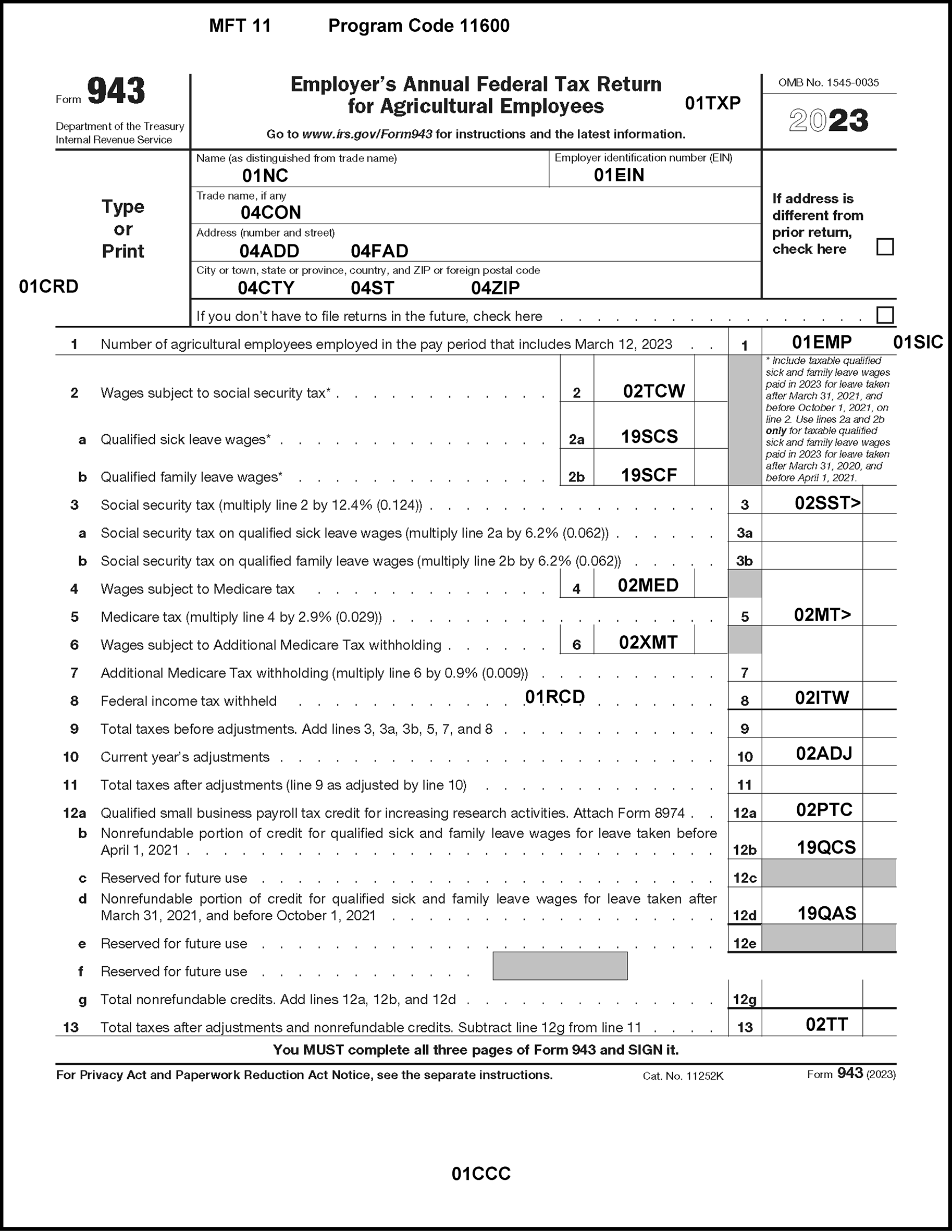
Please click here for the text description of the image.
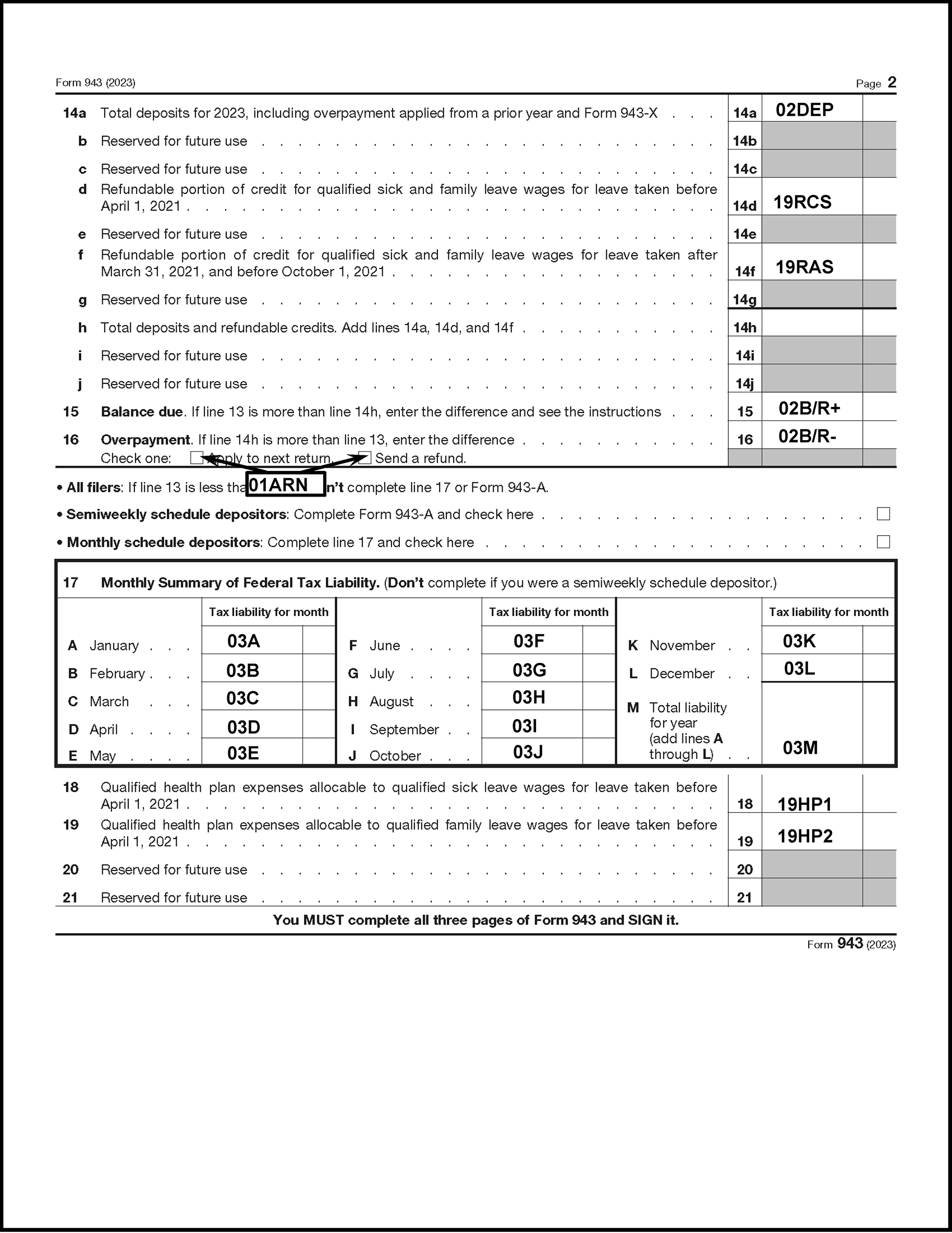
Please click here for the text description of the image.
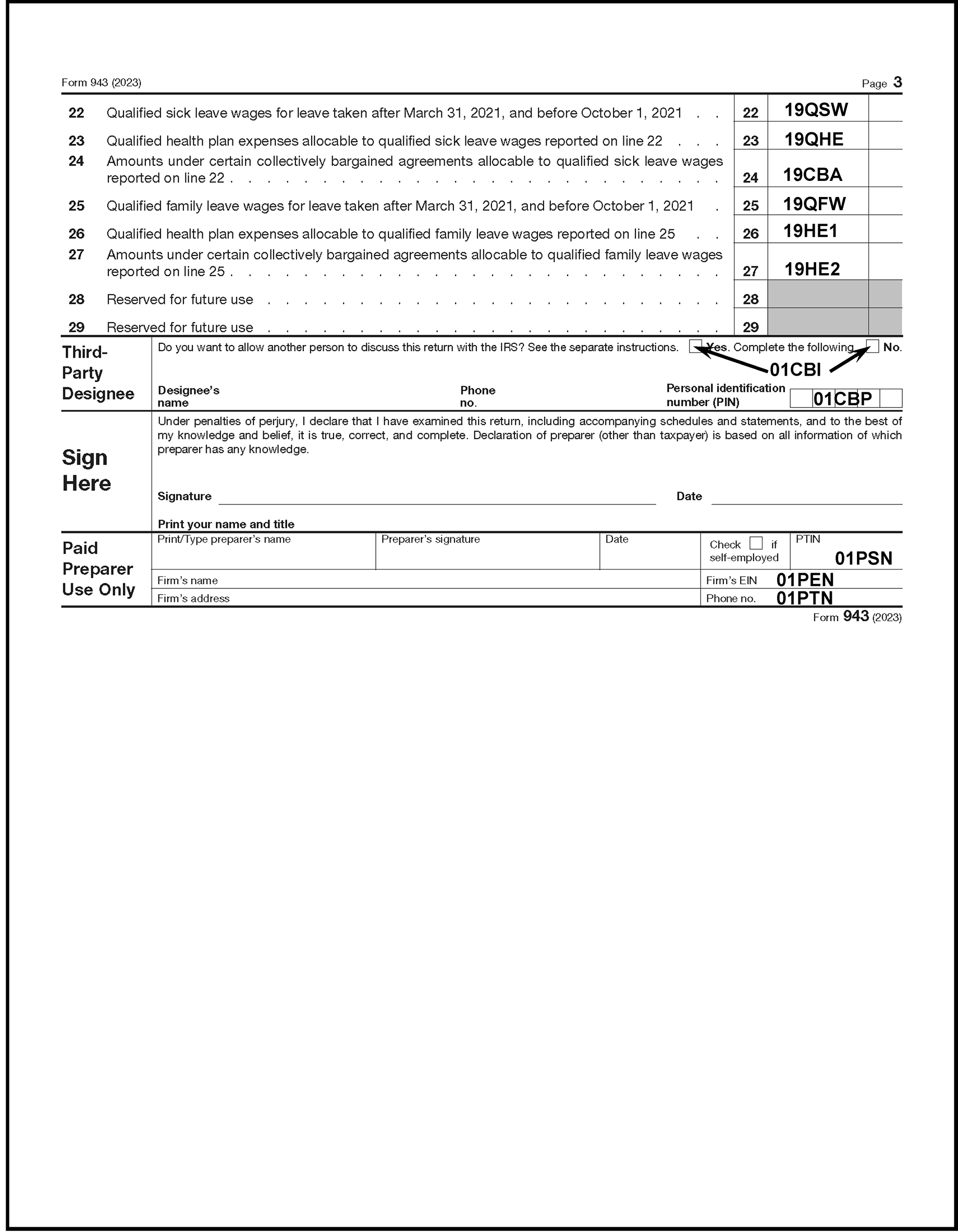
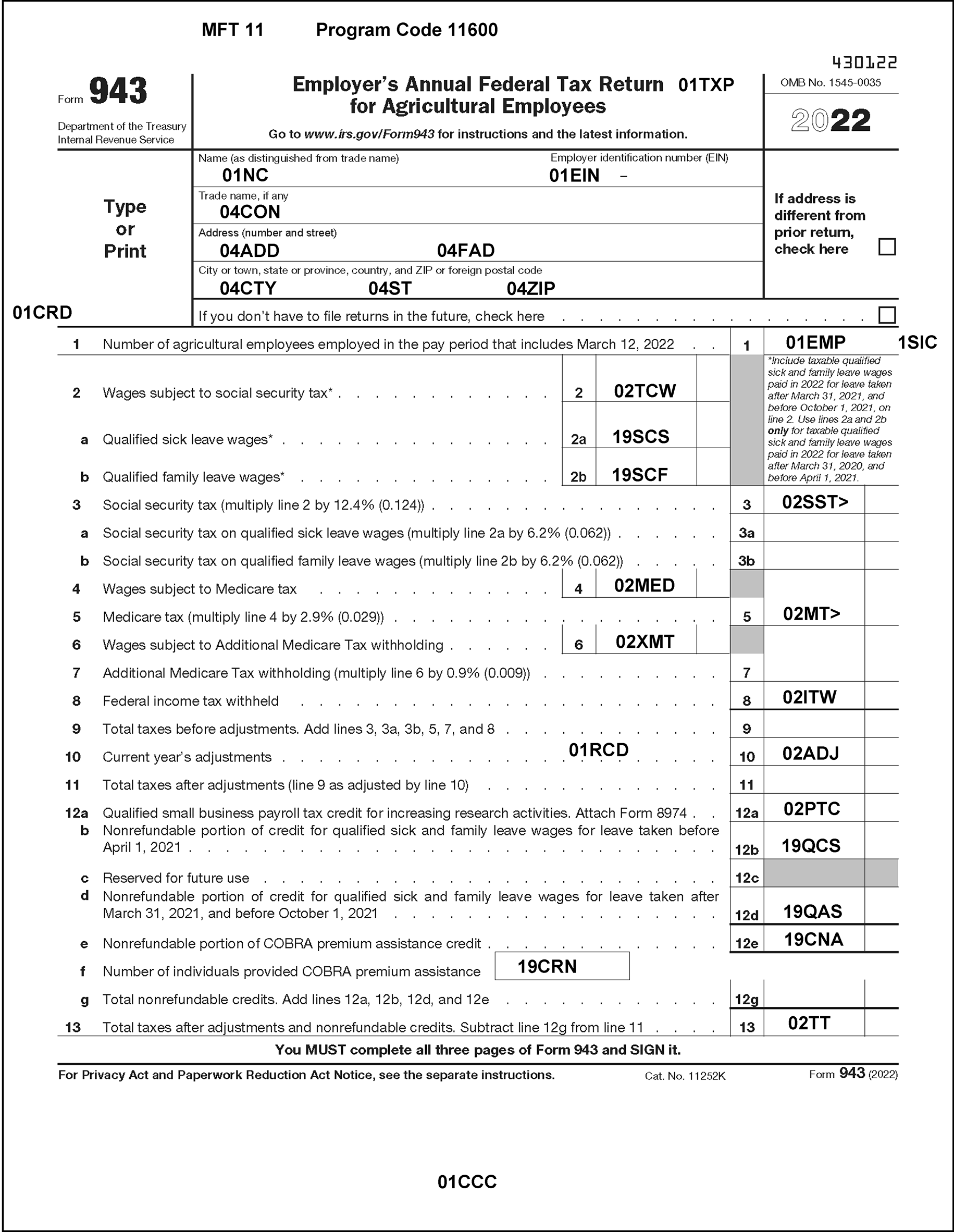
Please click here for the text description of the image.
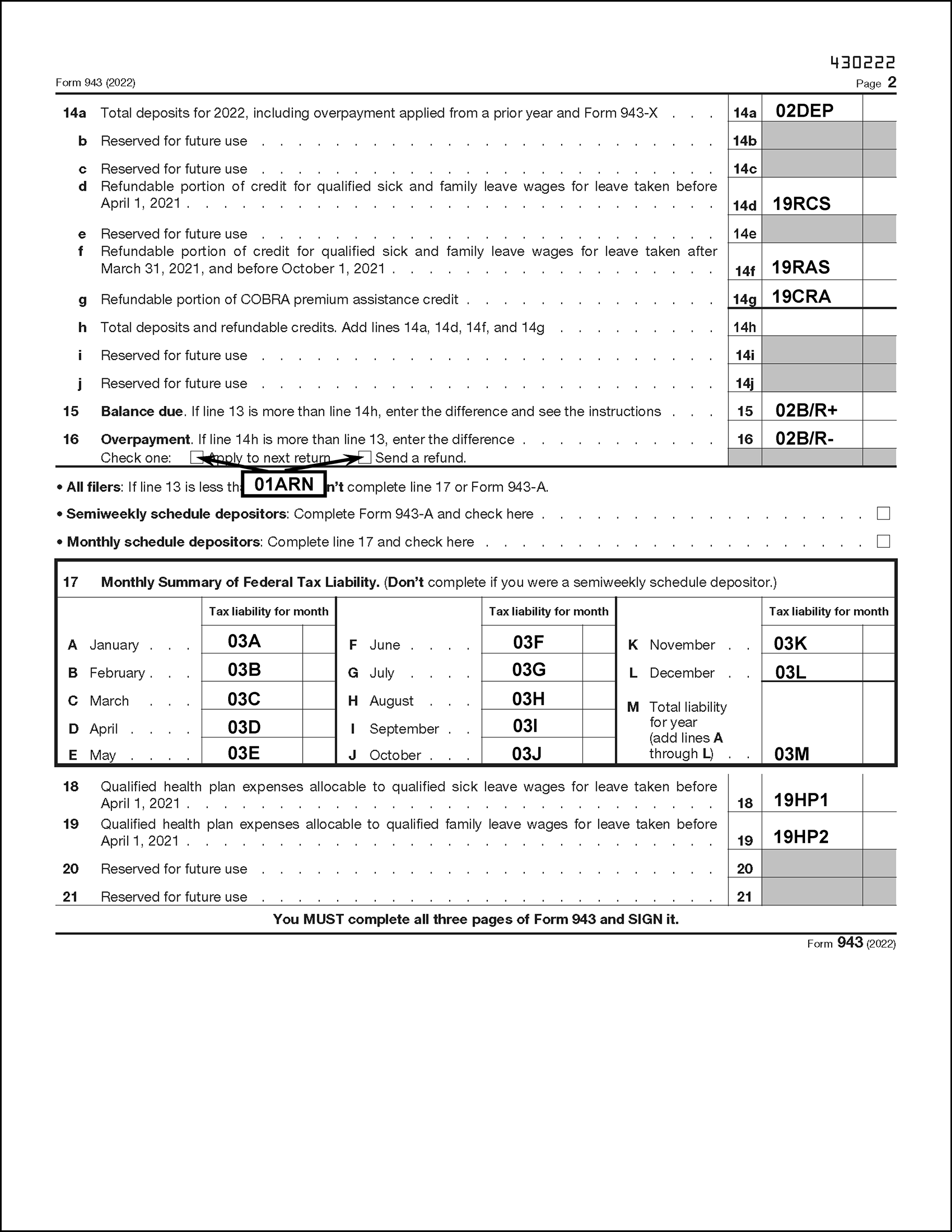
Please click here for the text description of the image.
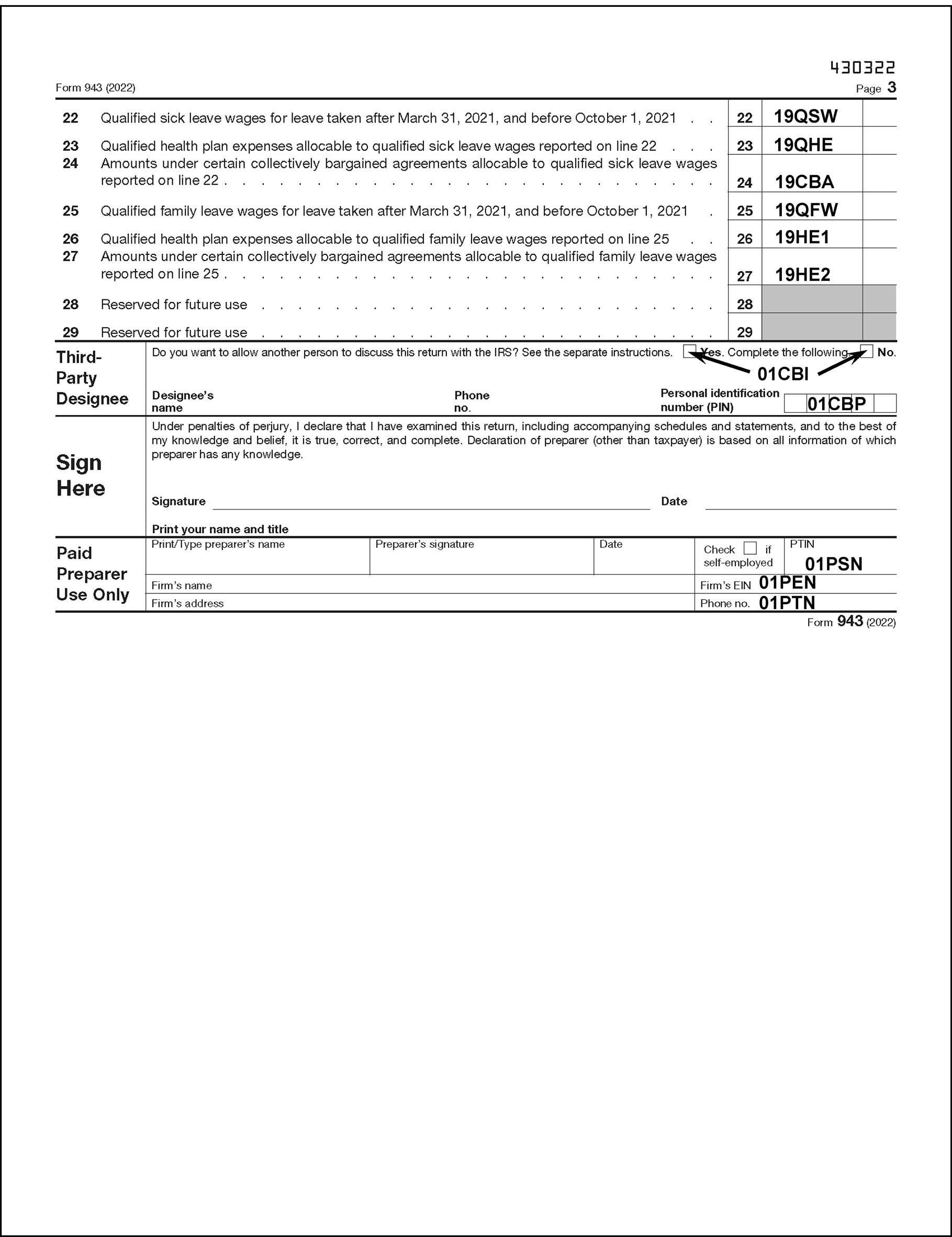
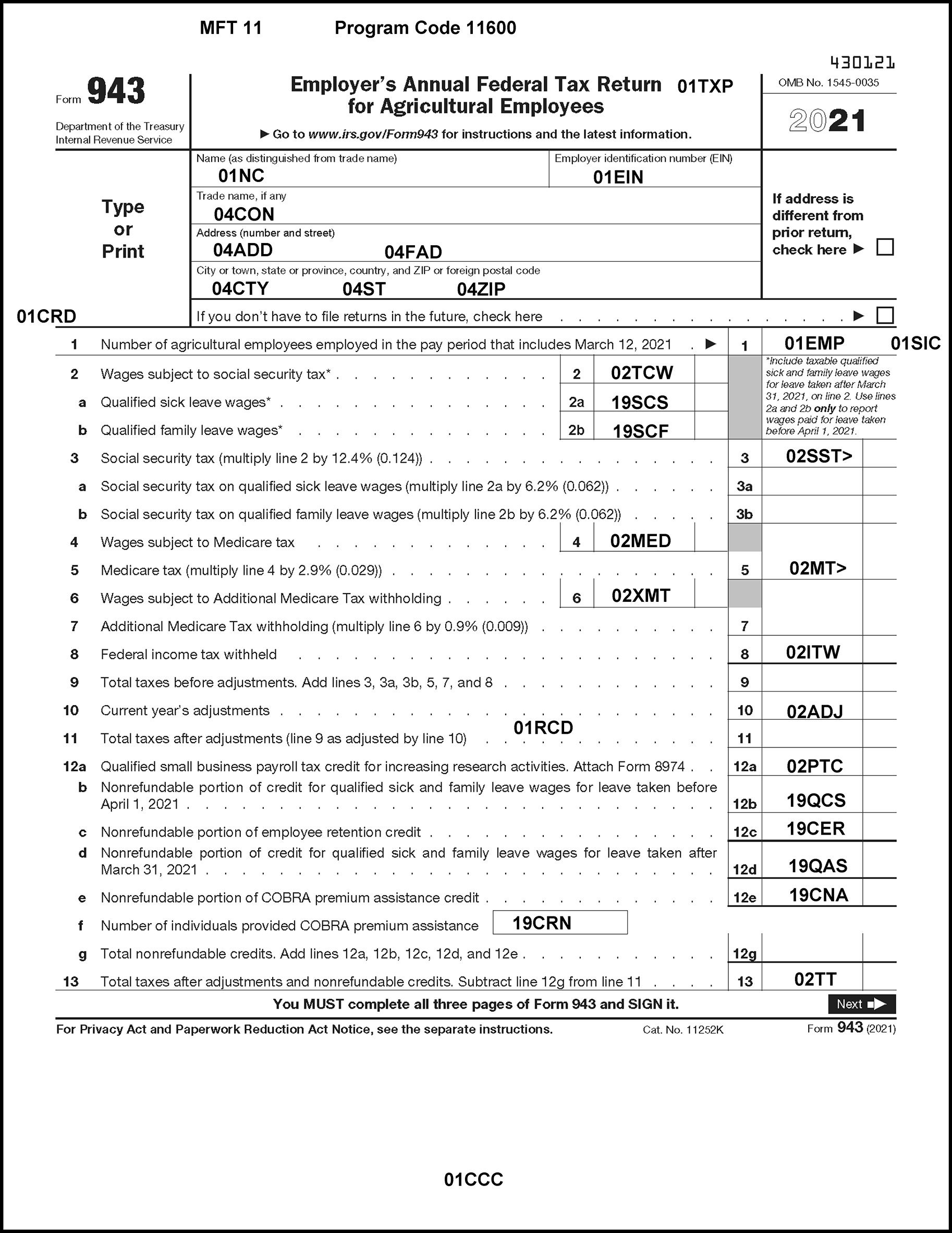
Please click here for the text description of the image.
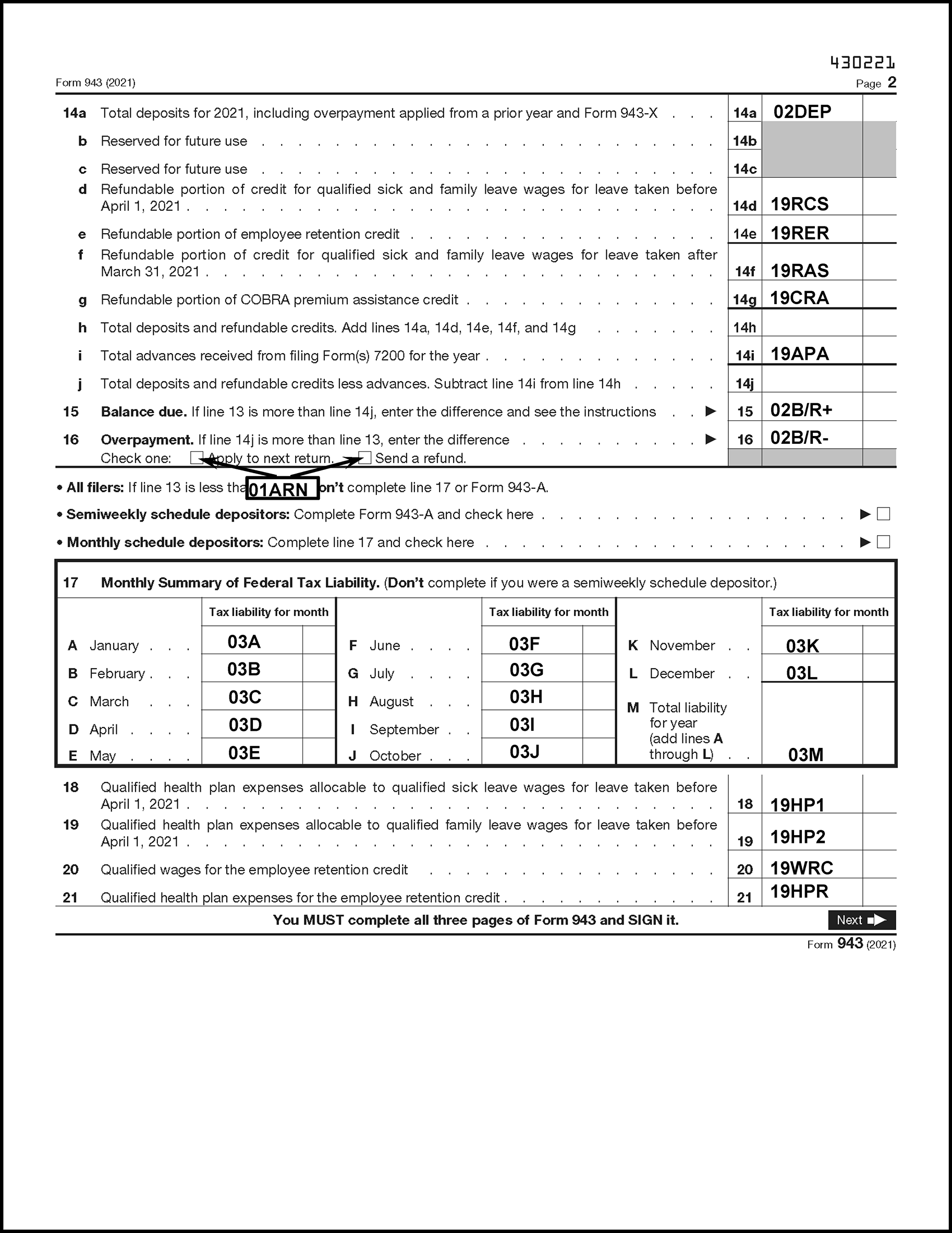
Please click here for the text description of the image.
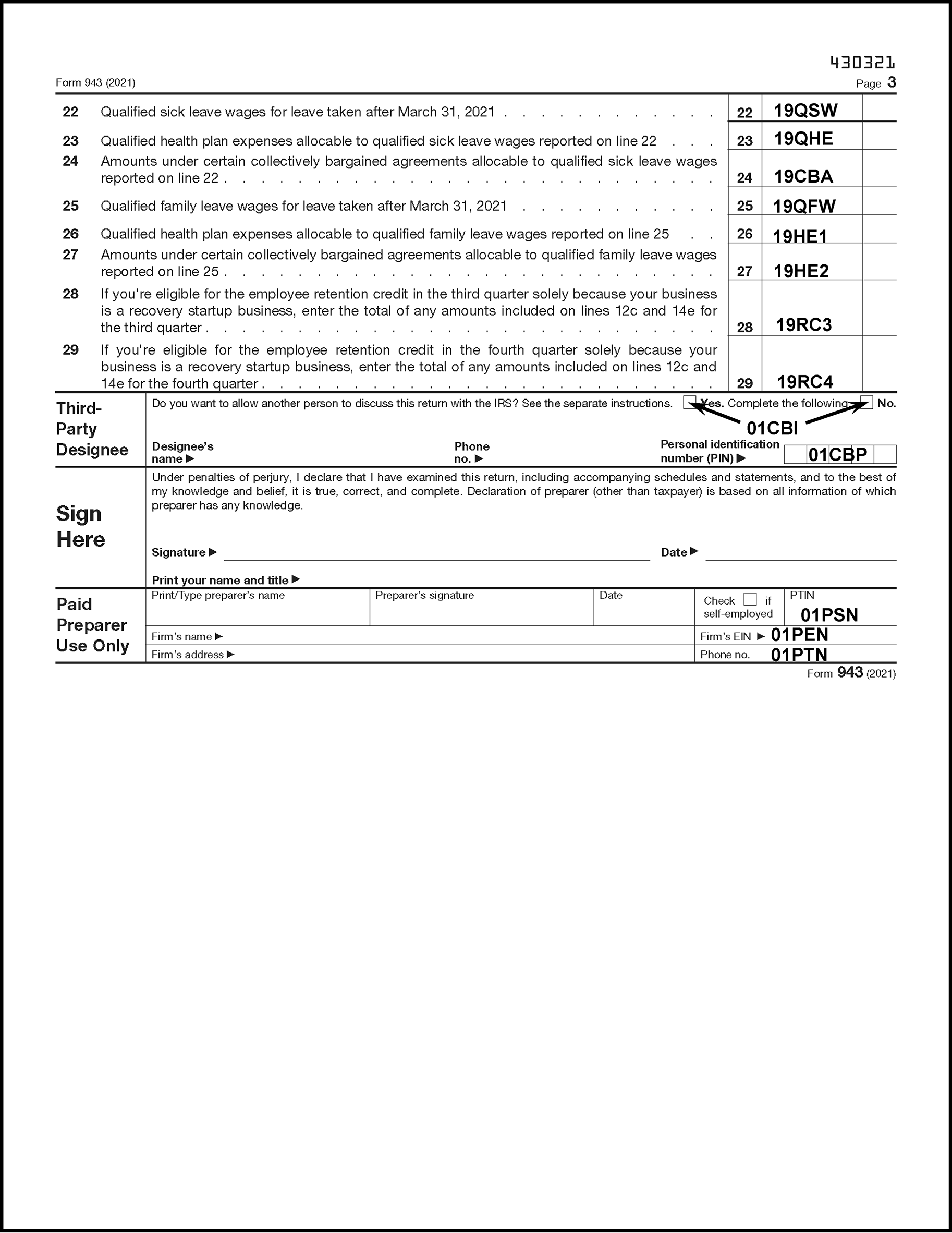
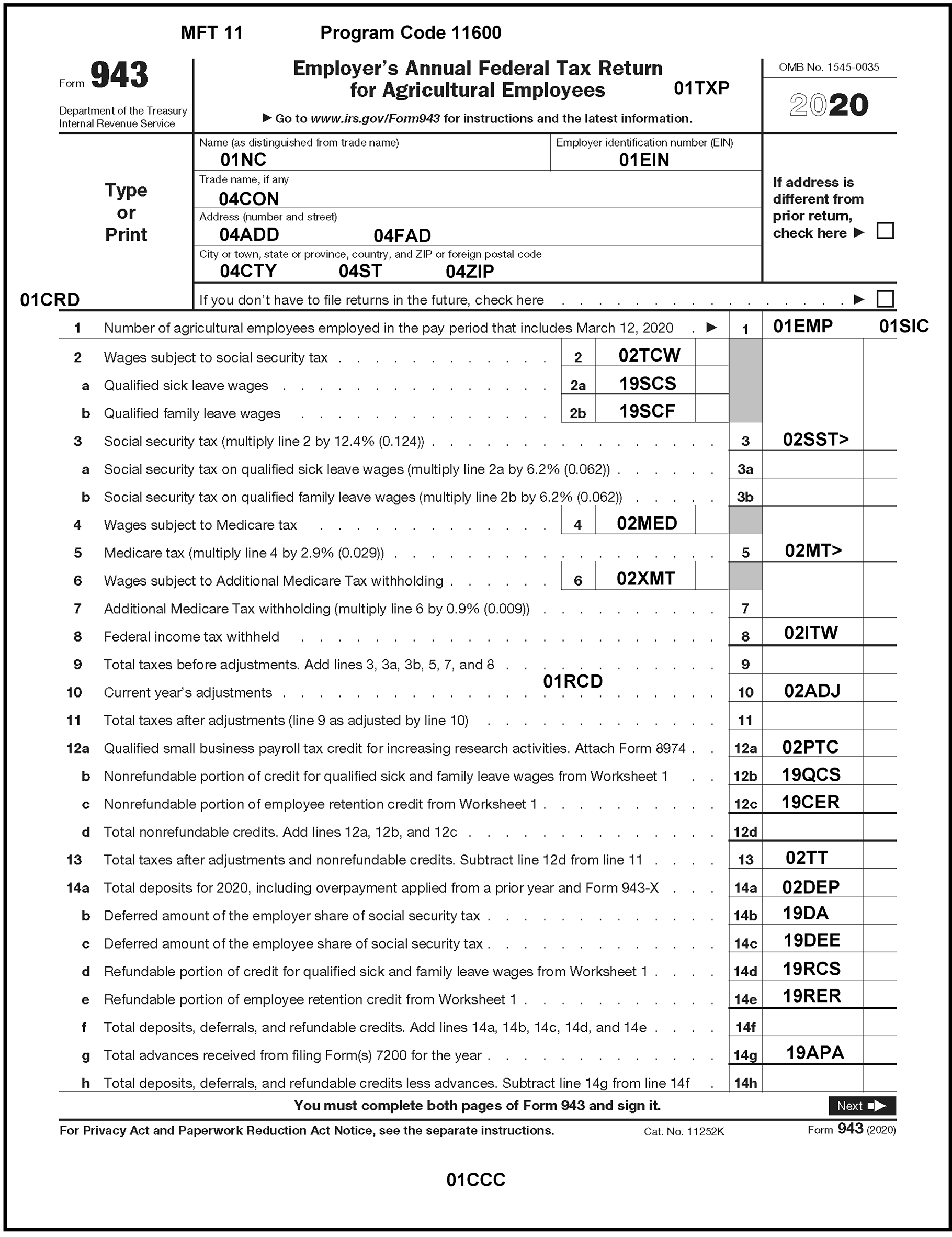
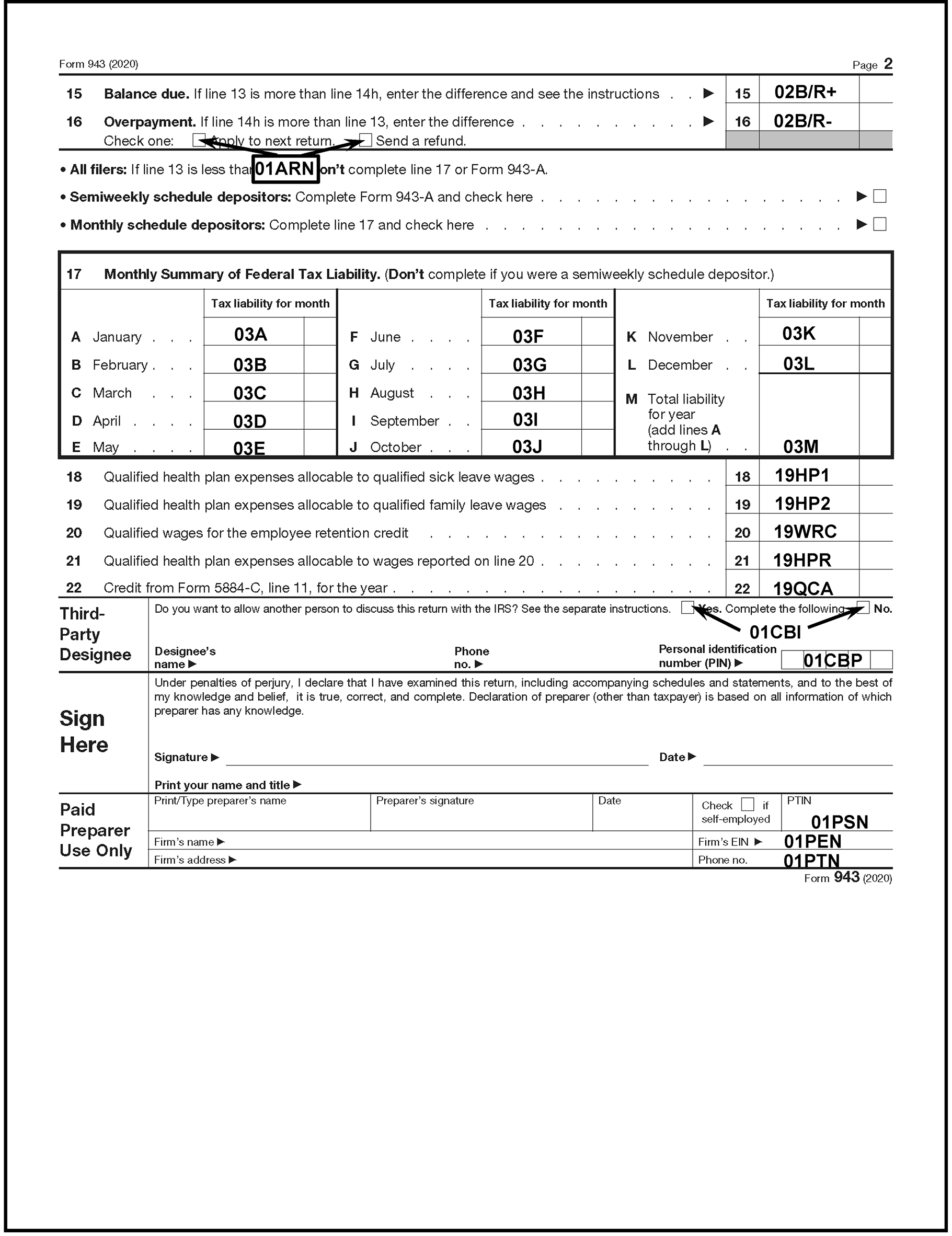
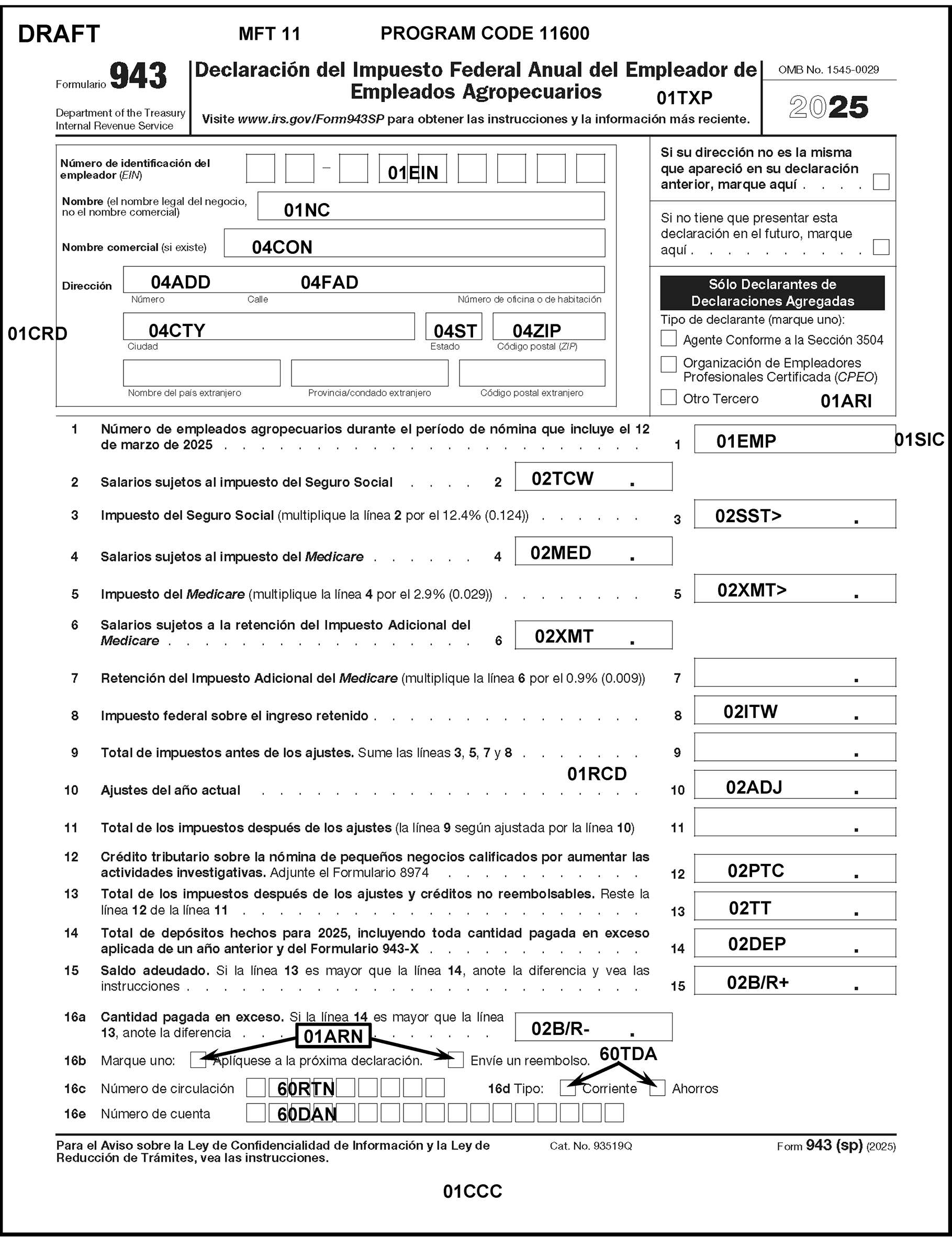
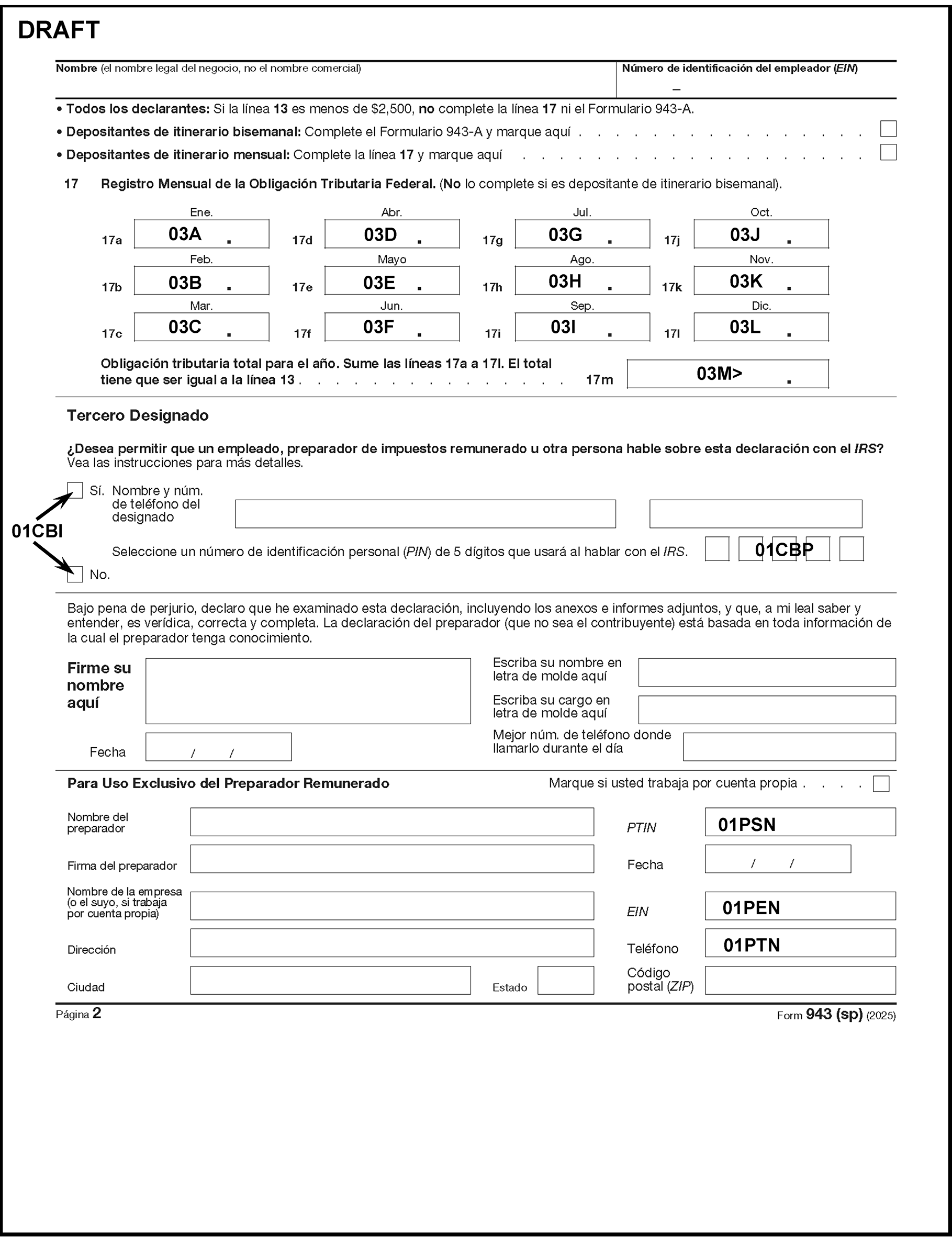
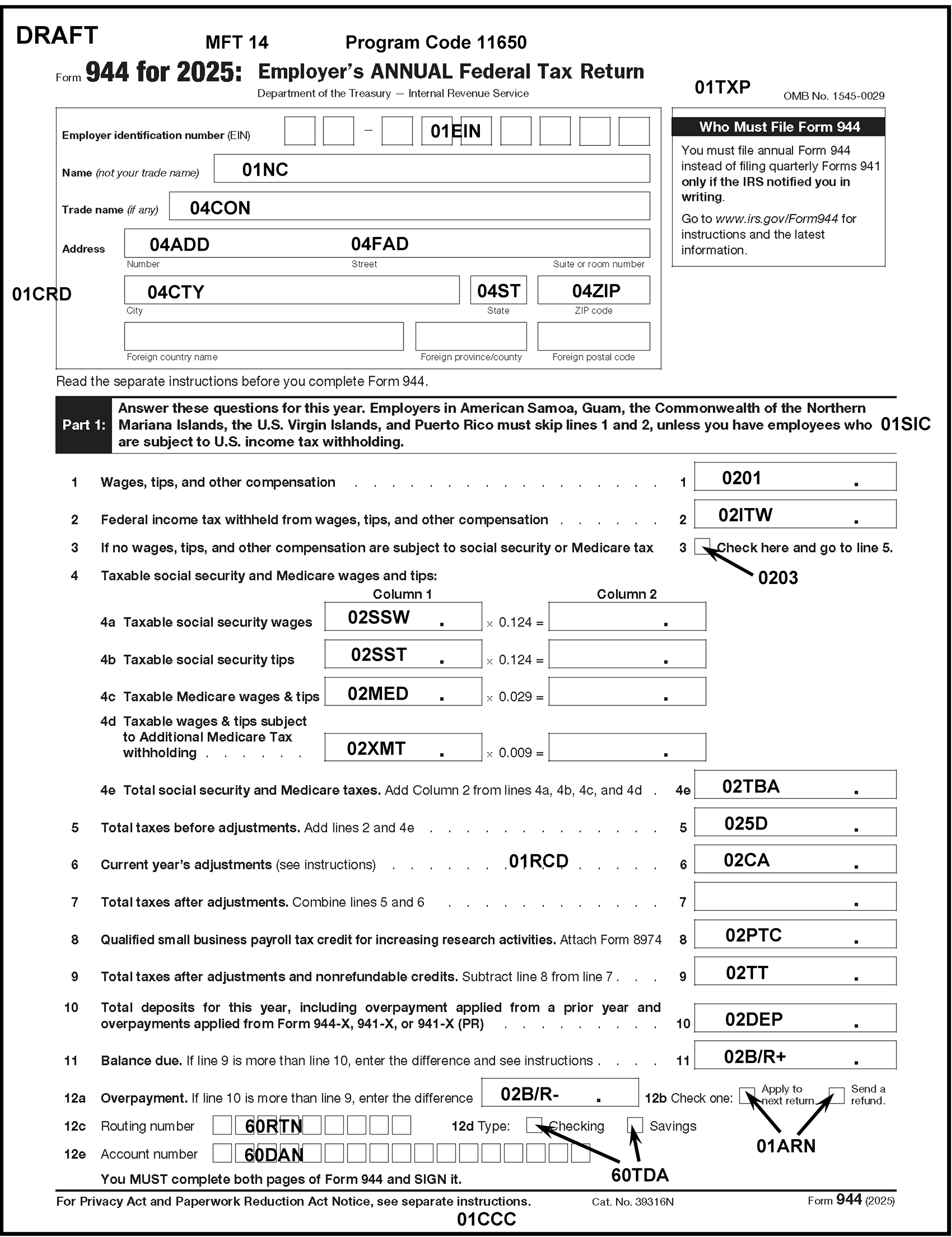
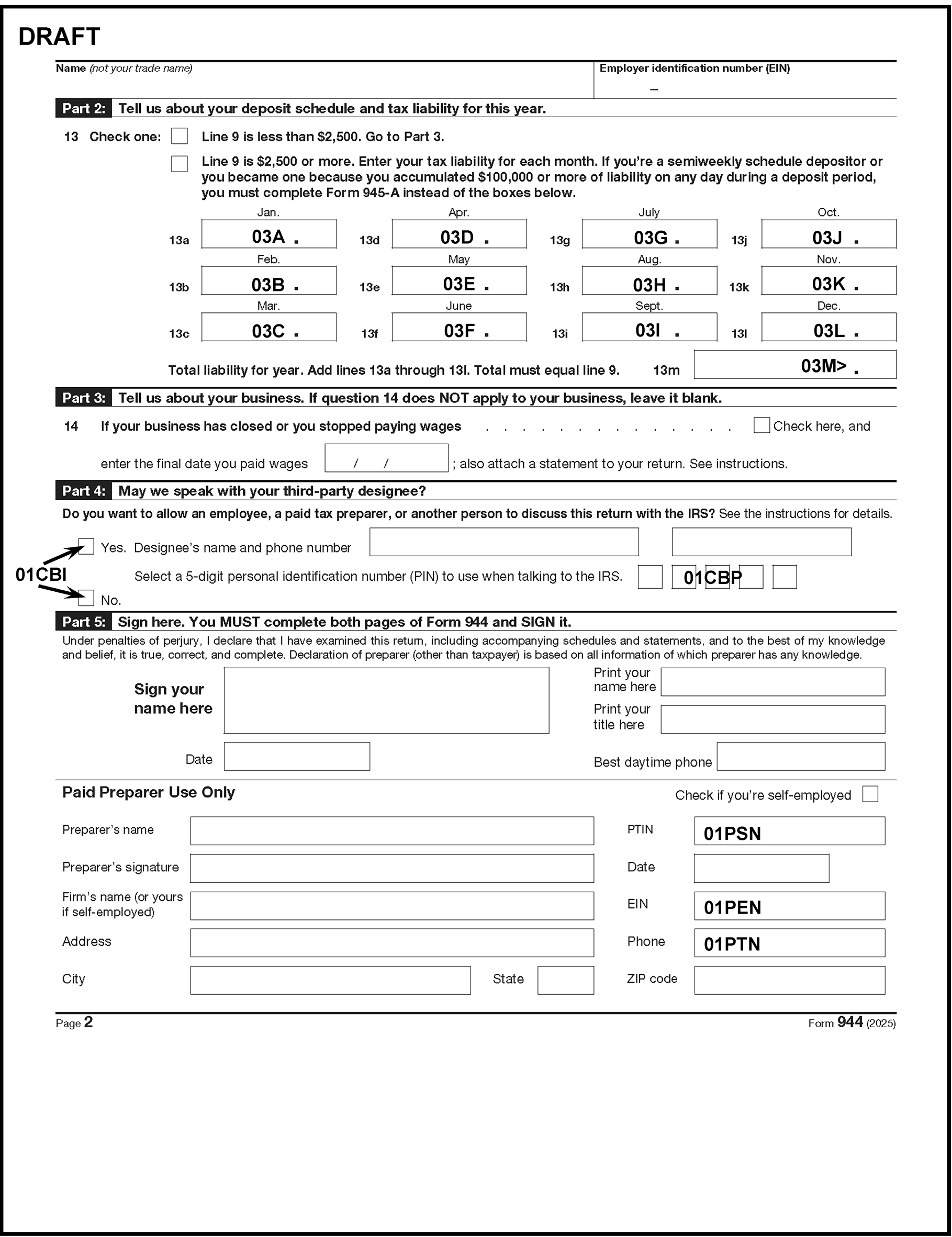
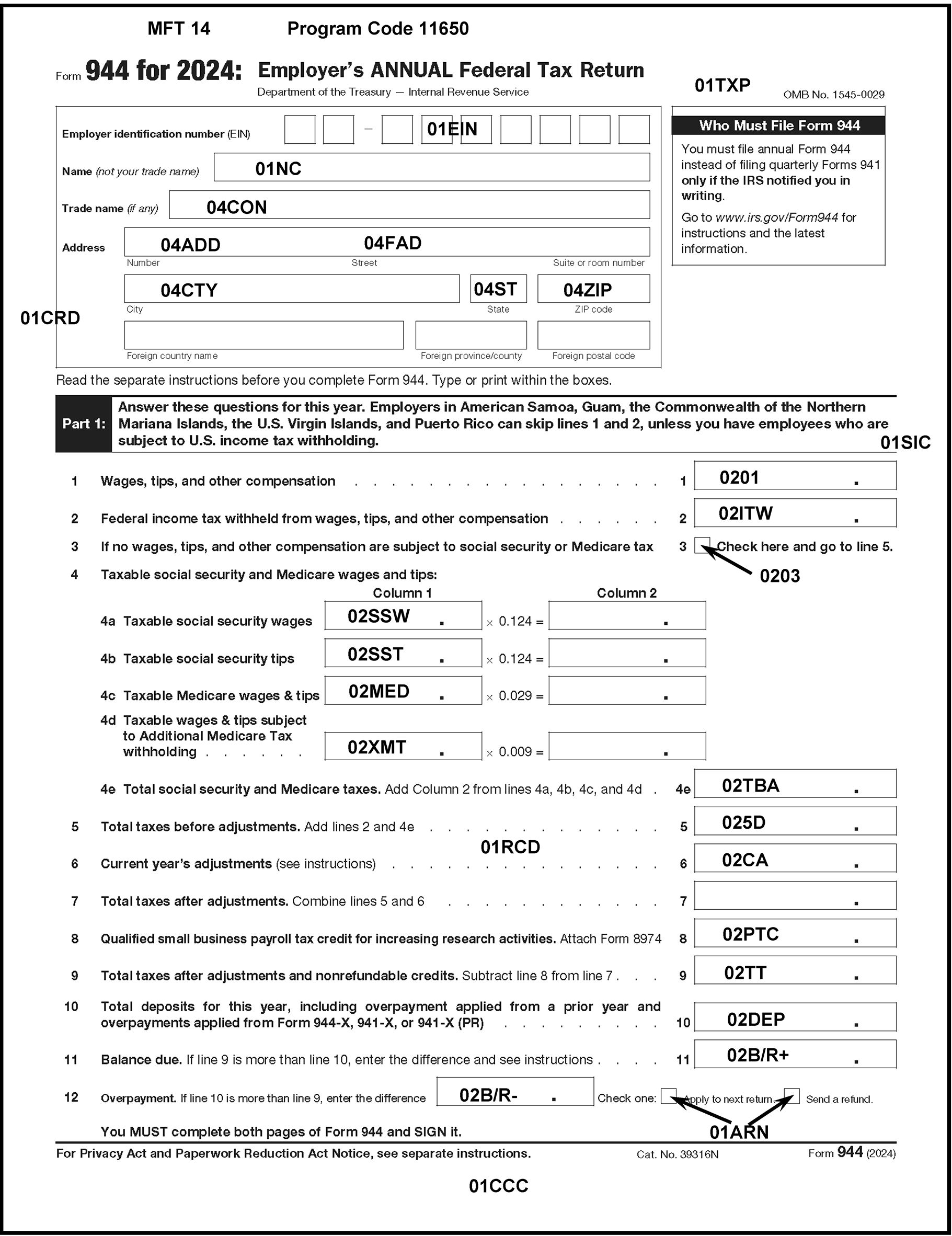
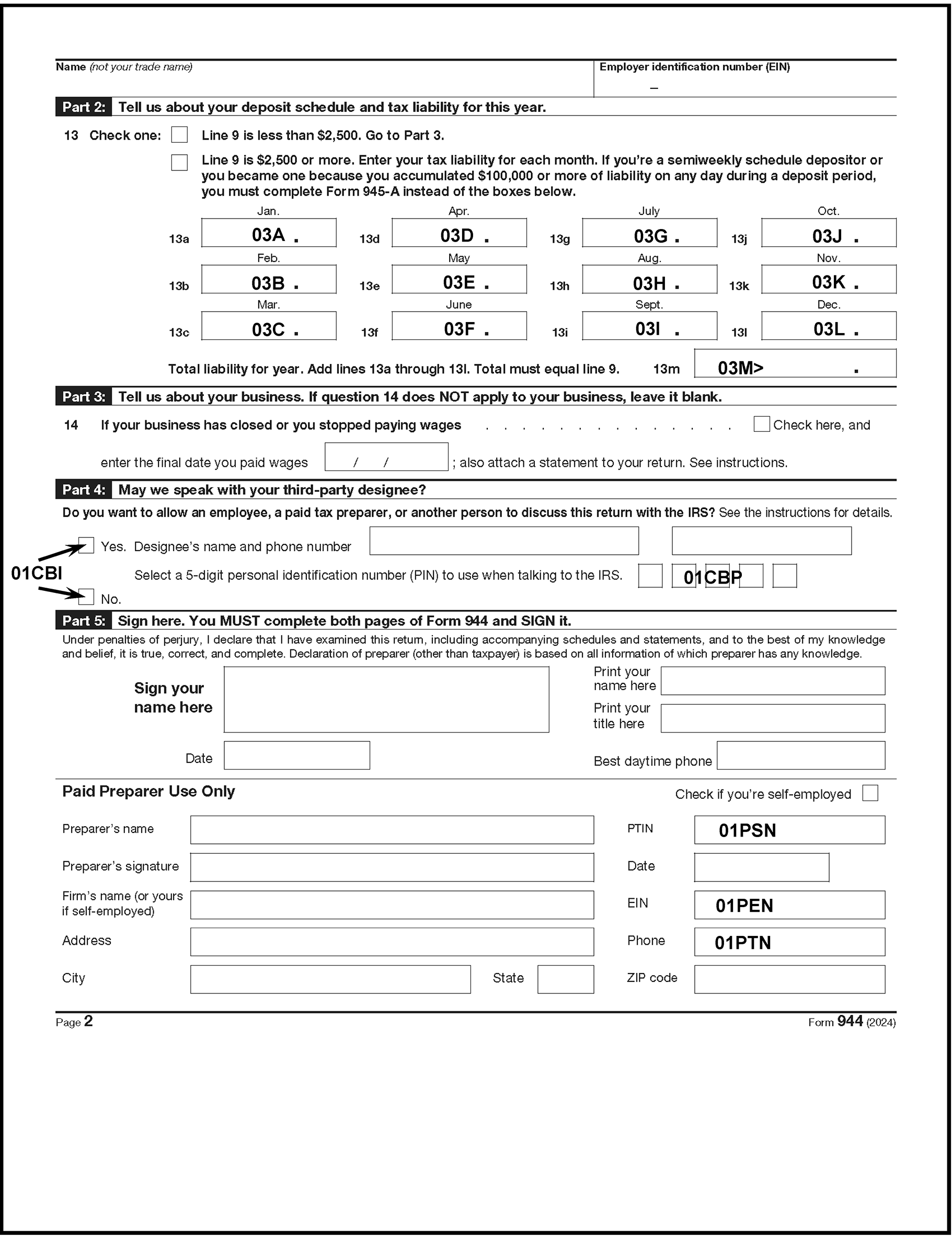
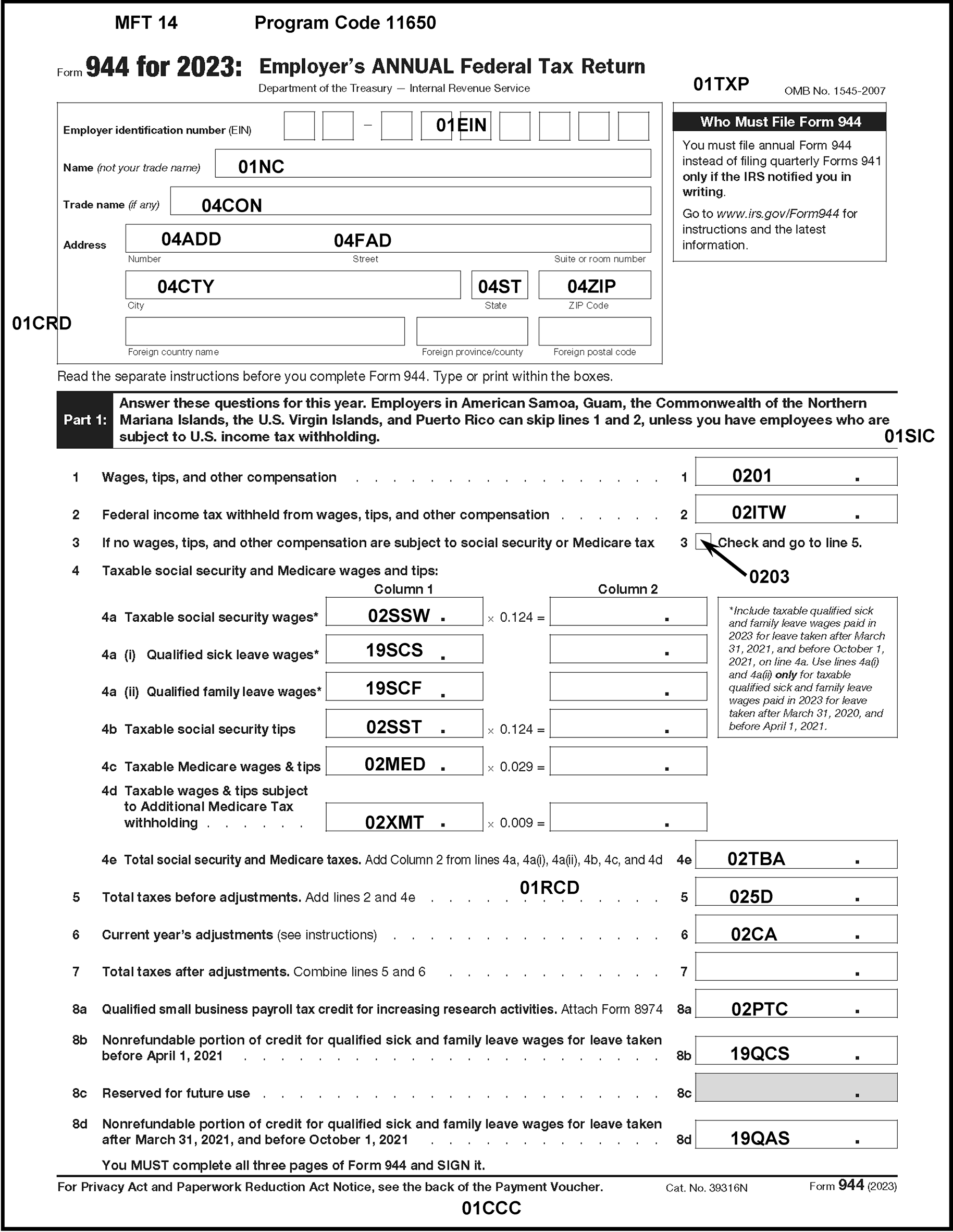
Please click here for the text description of the image.
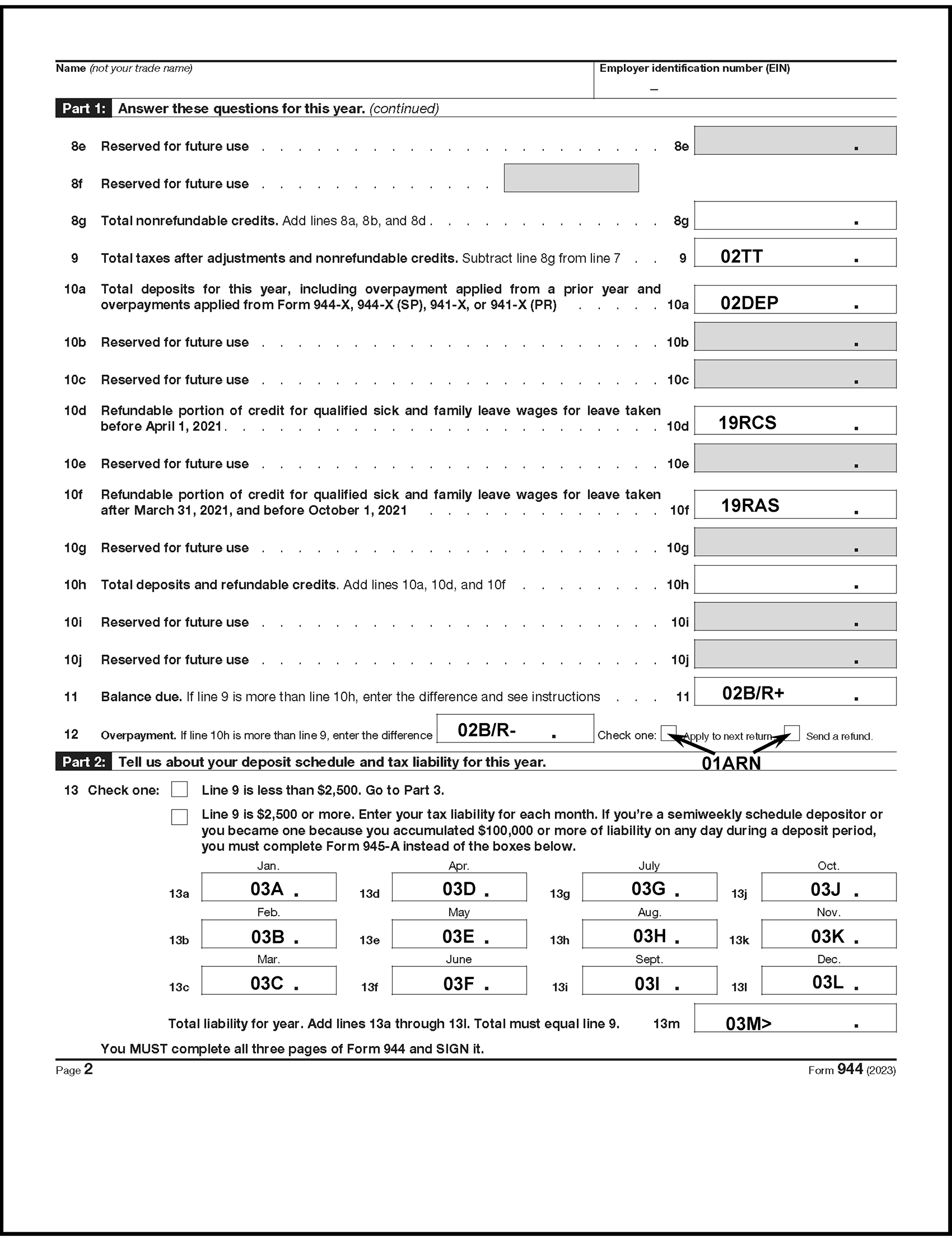
Please click here for the text description of the image.
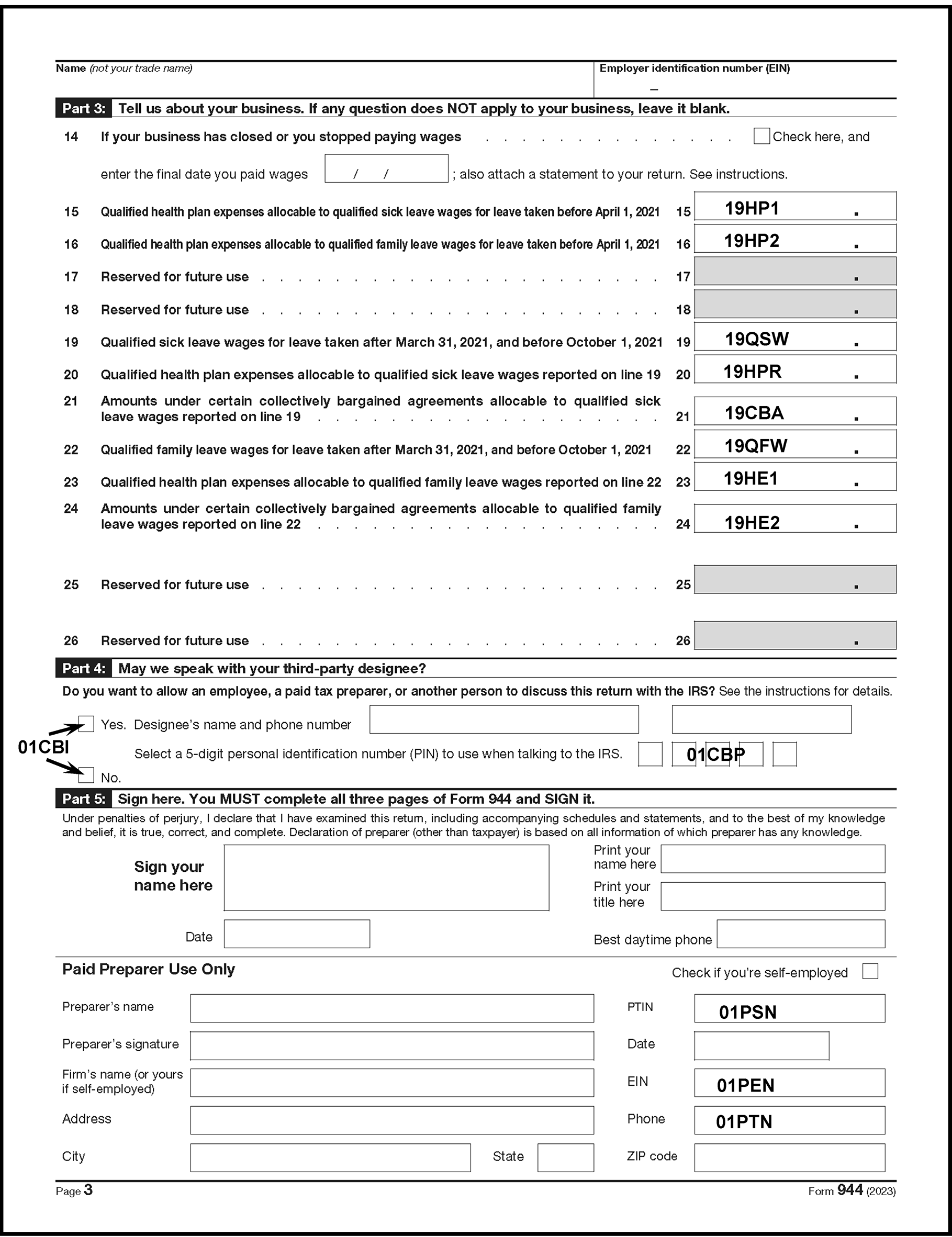
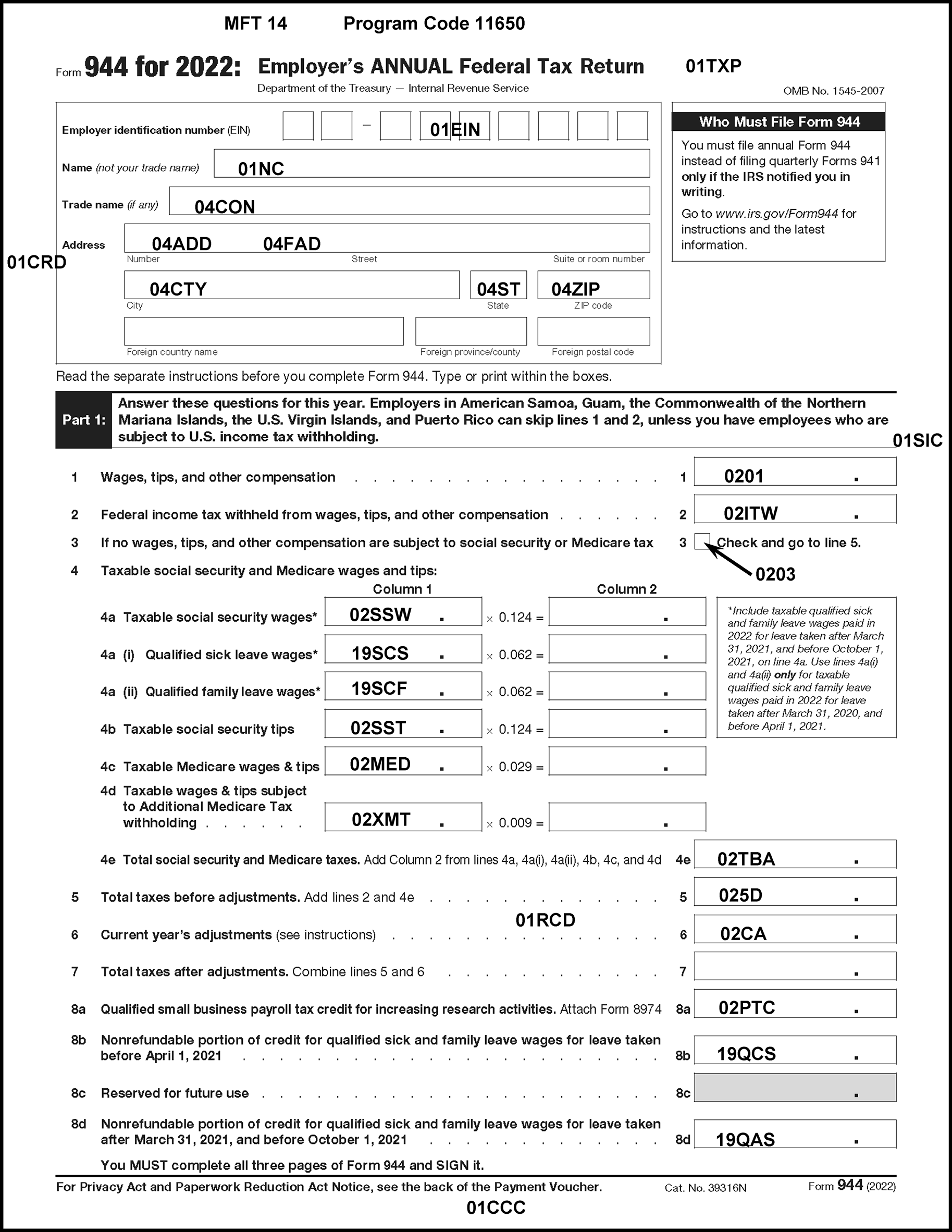
Please click here for the text description of the image.
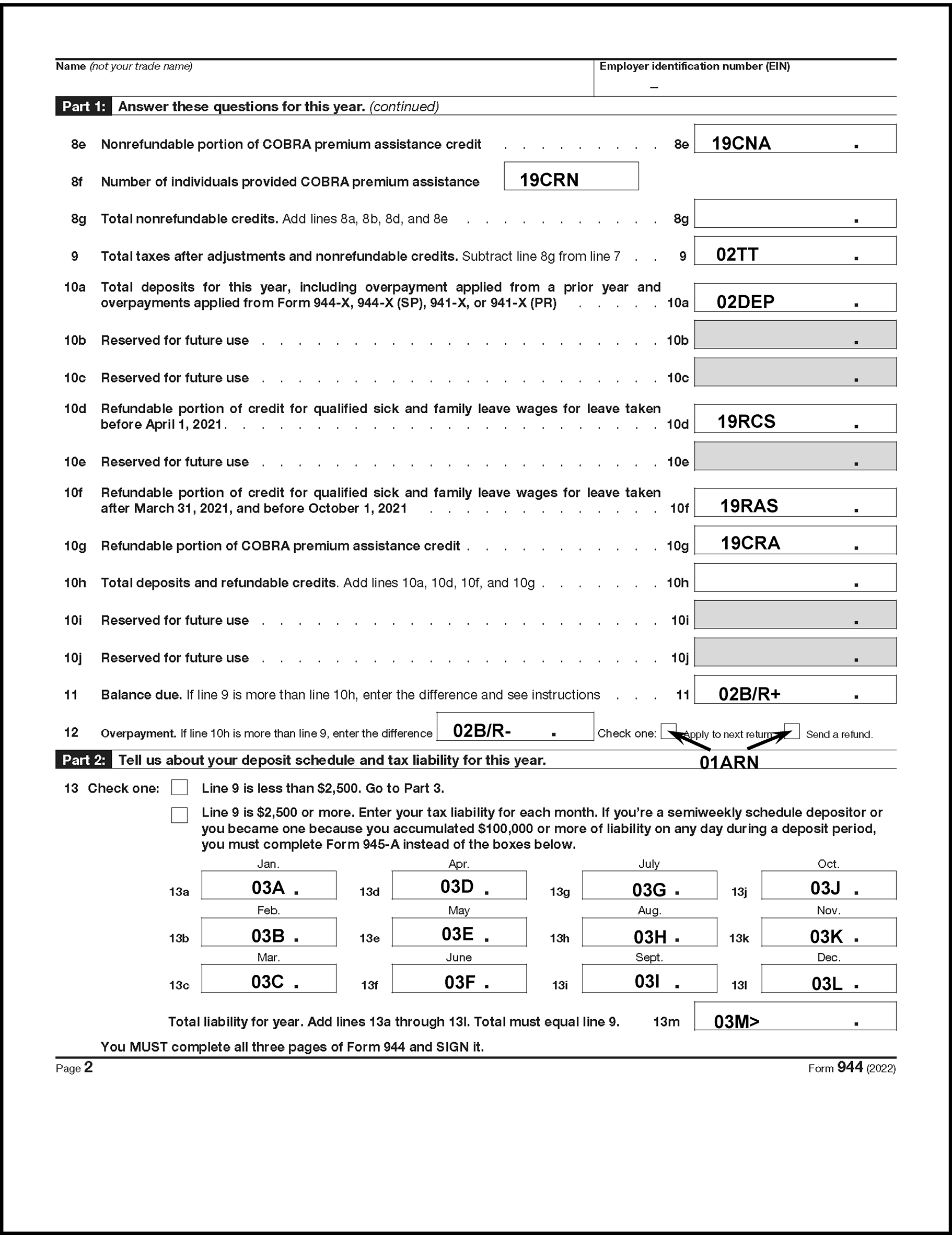
Please click here for the text description of the image.
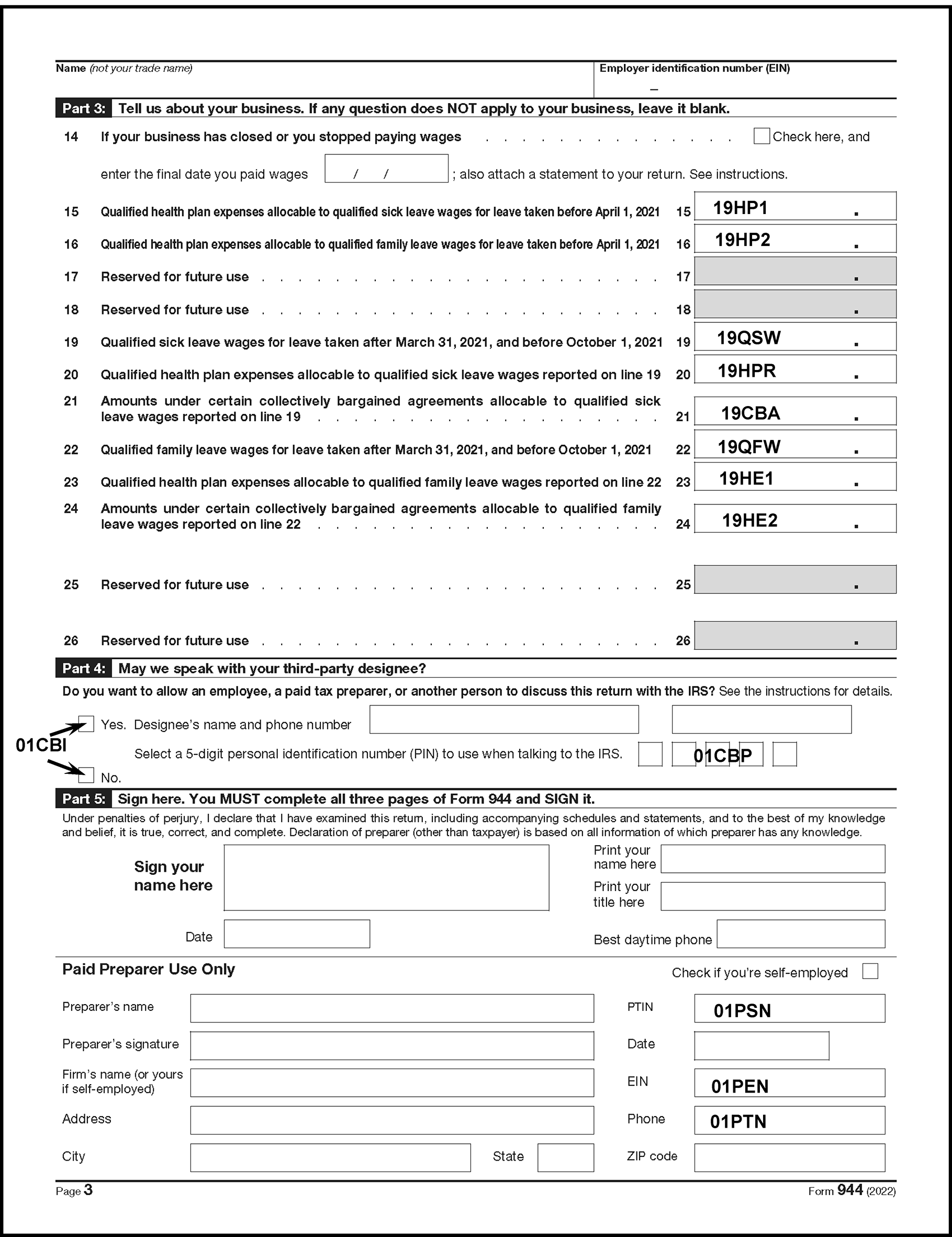
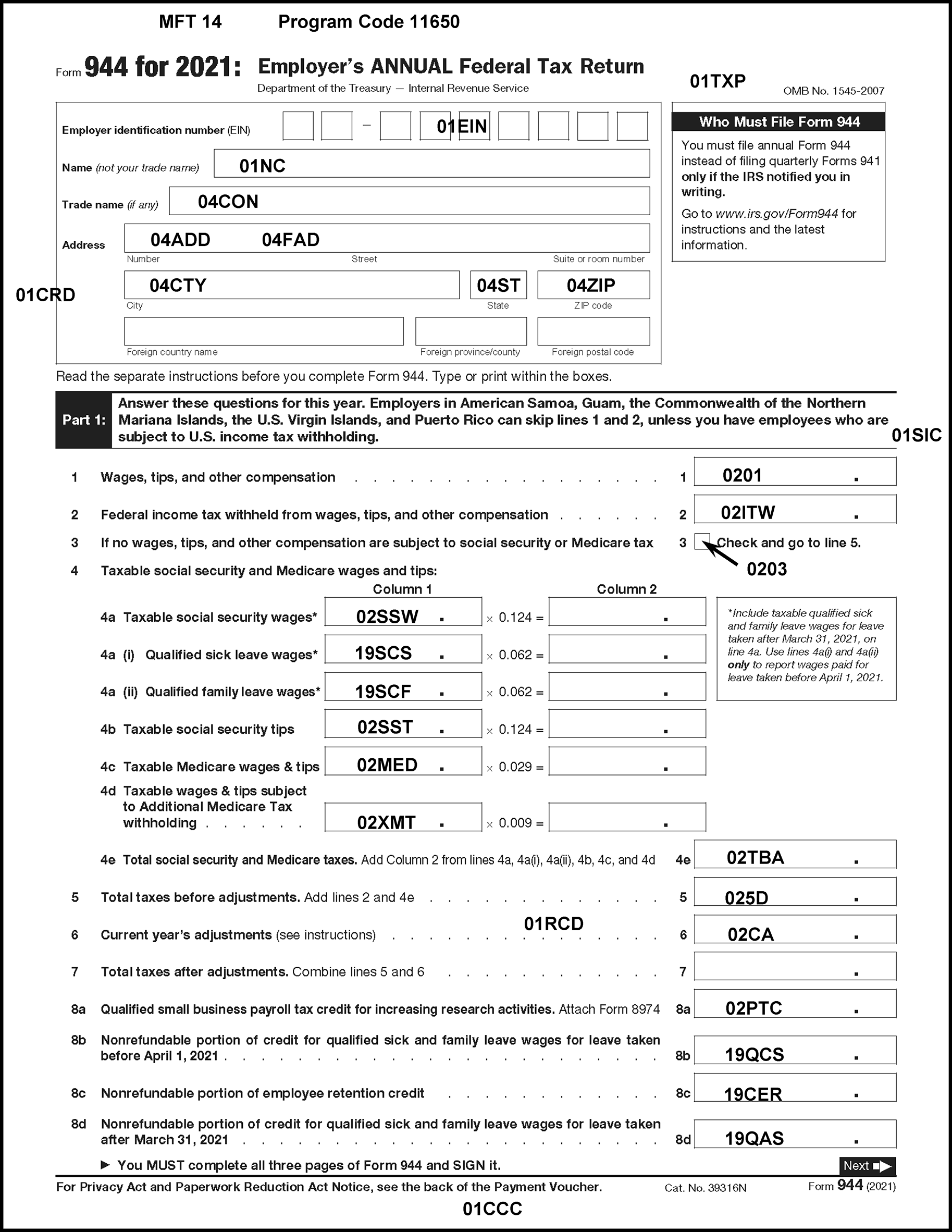
Please click here for the text description of the image.
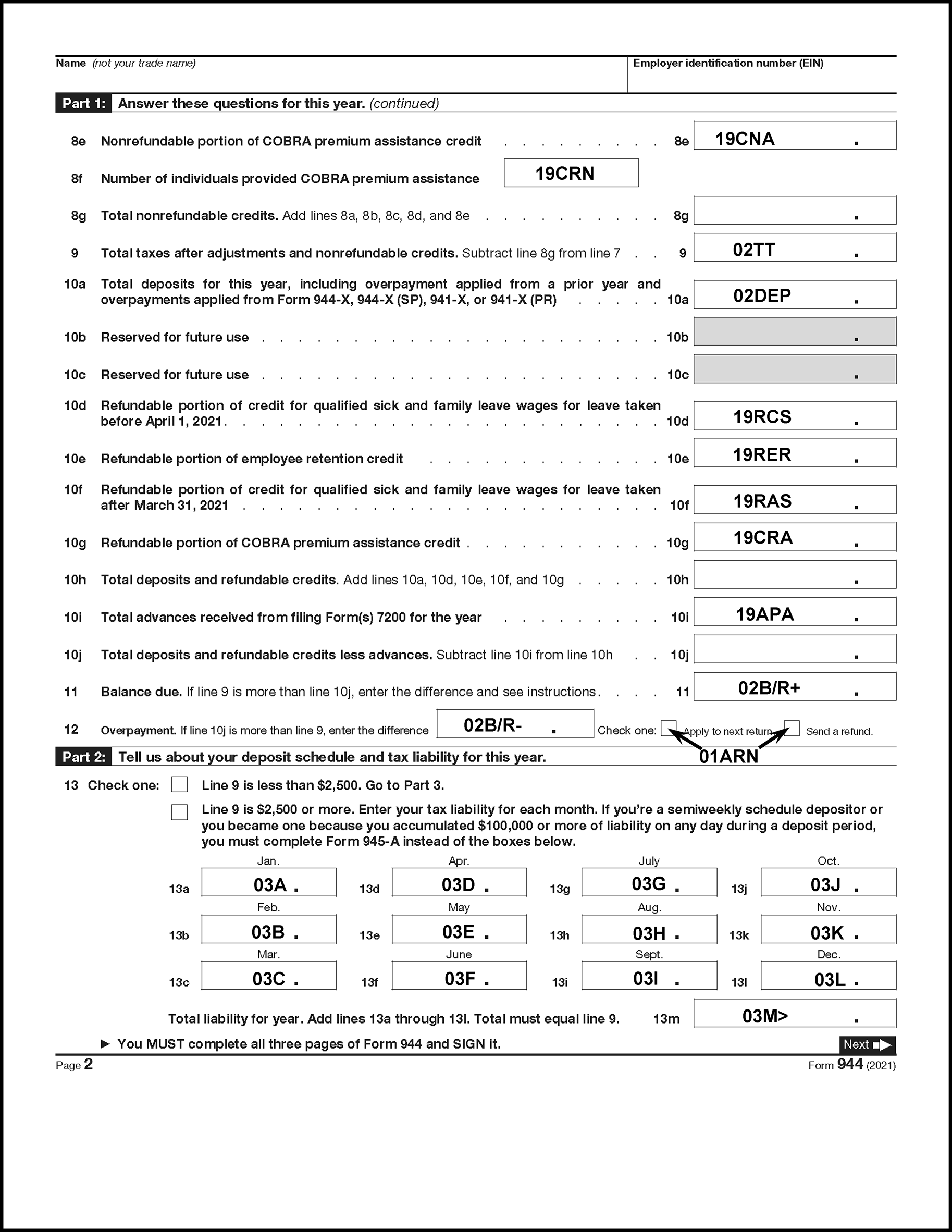
Please click here for the text description of the image.
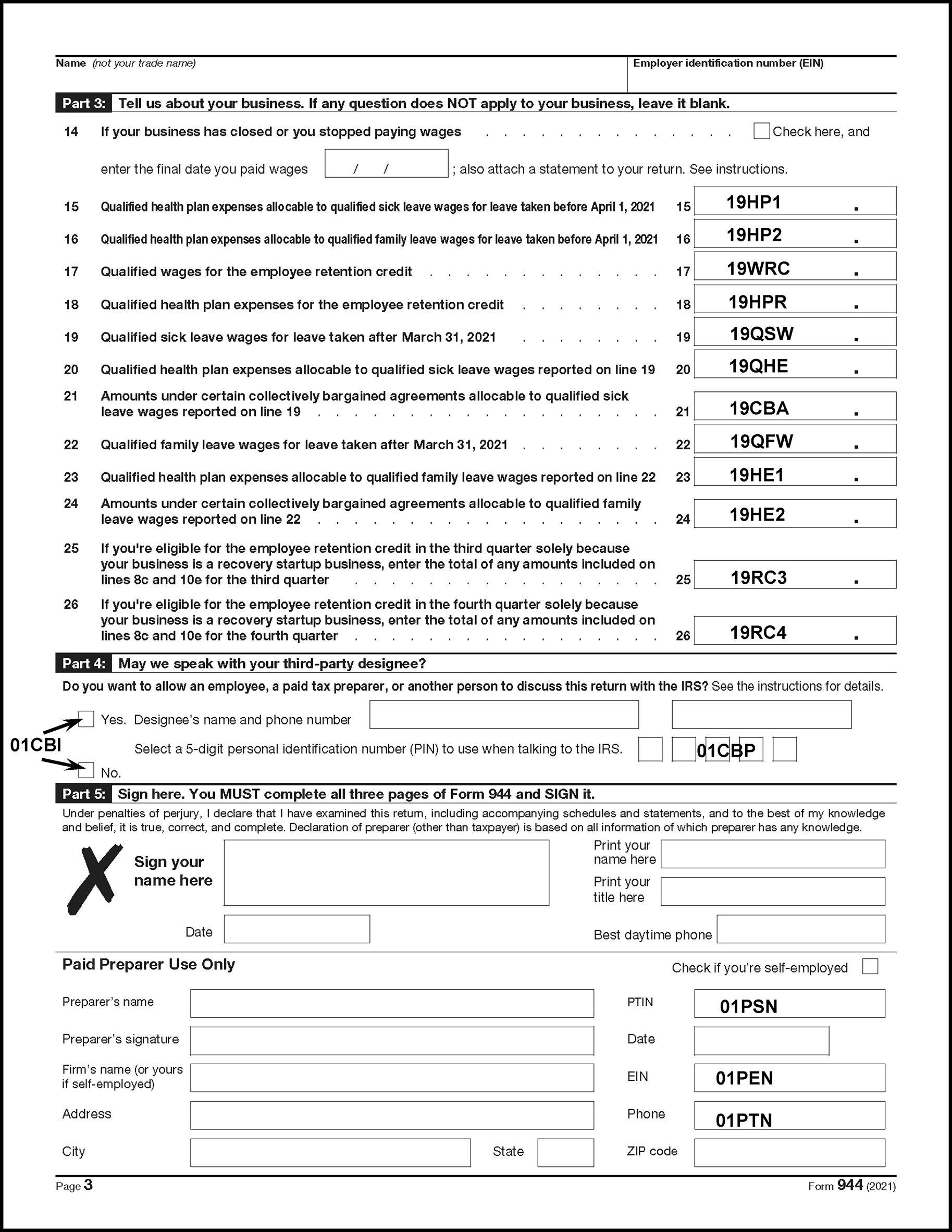
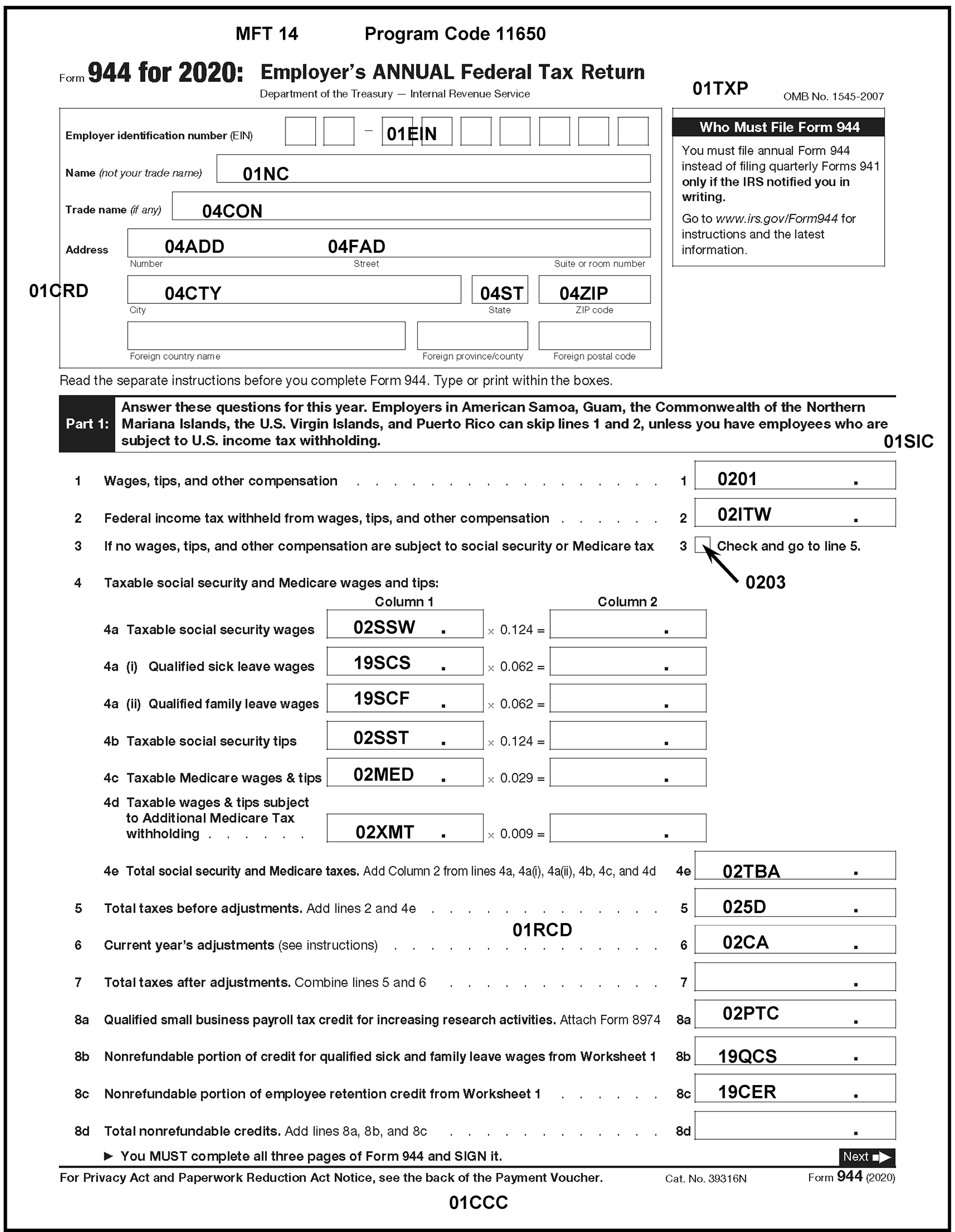
Please click here for the text description of the image.
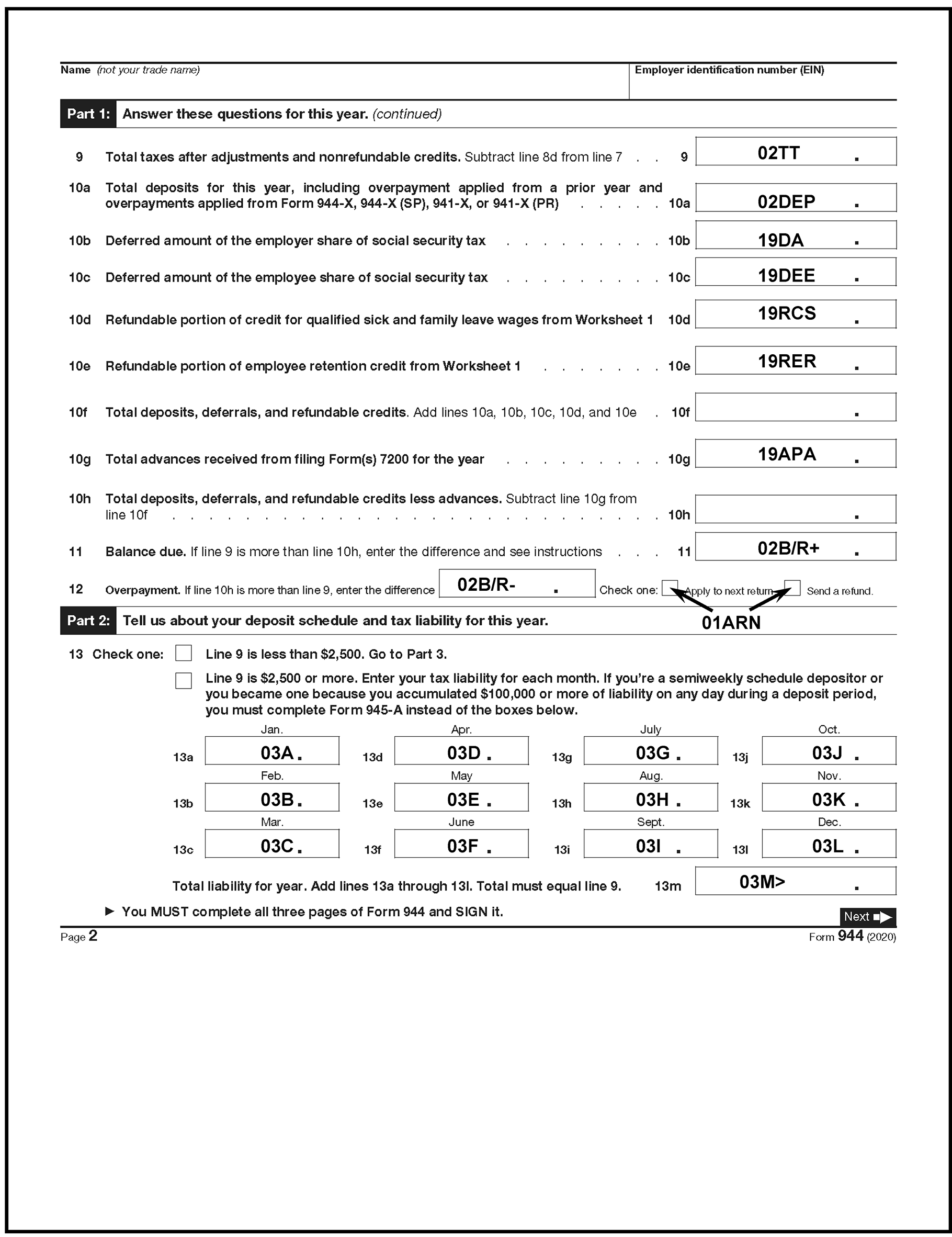
Please click here for the text description of the image.
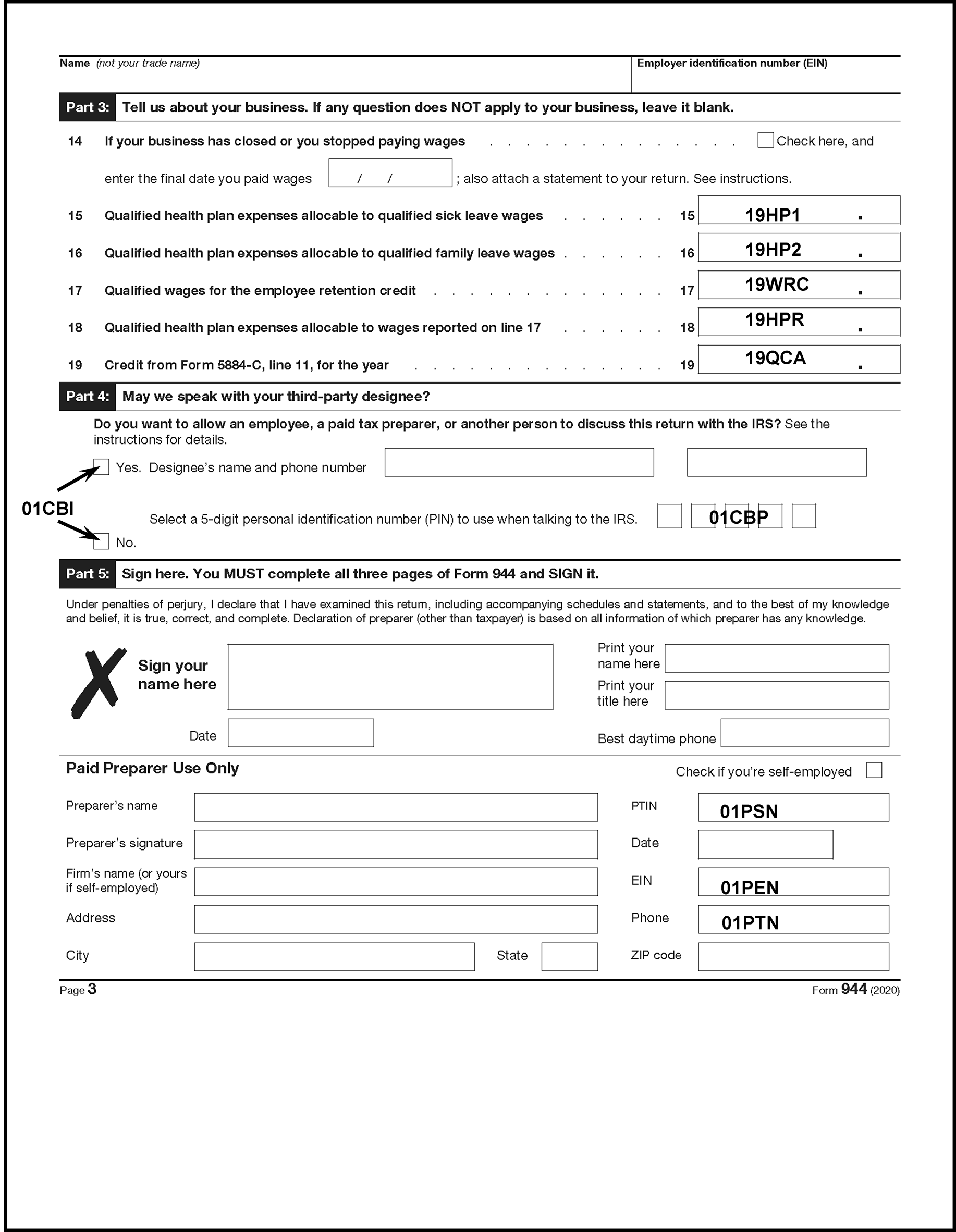
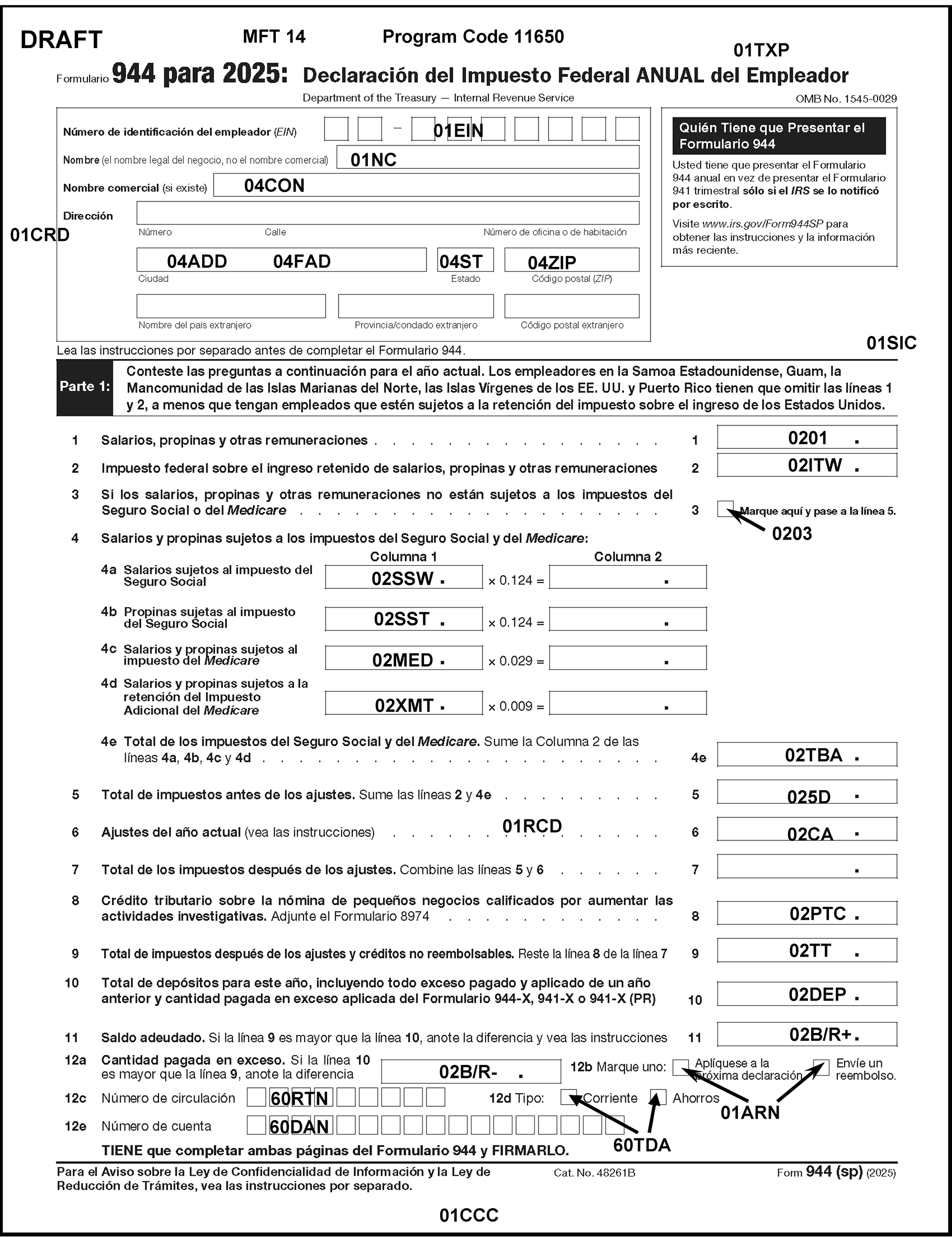
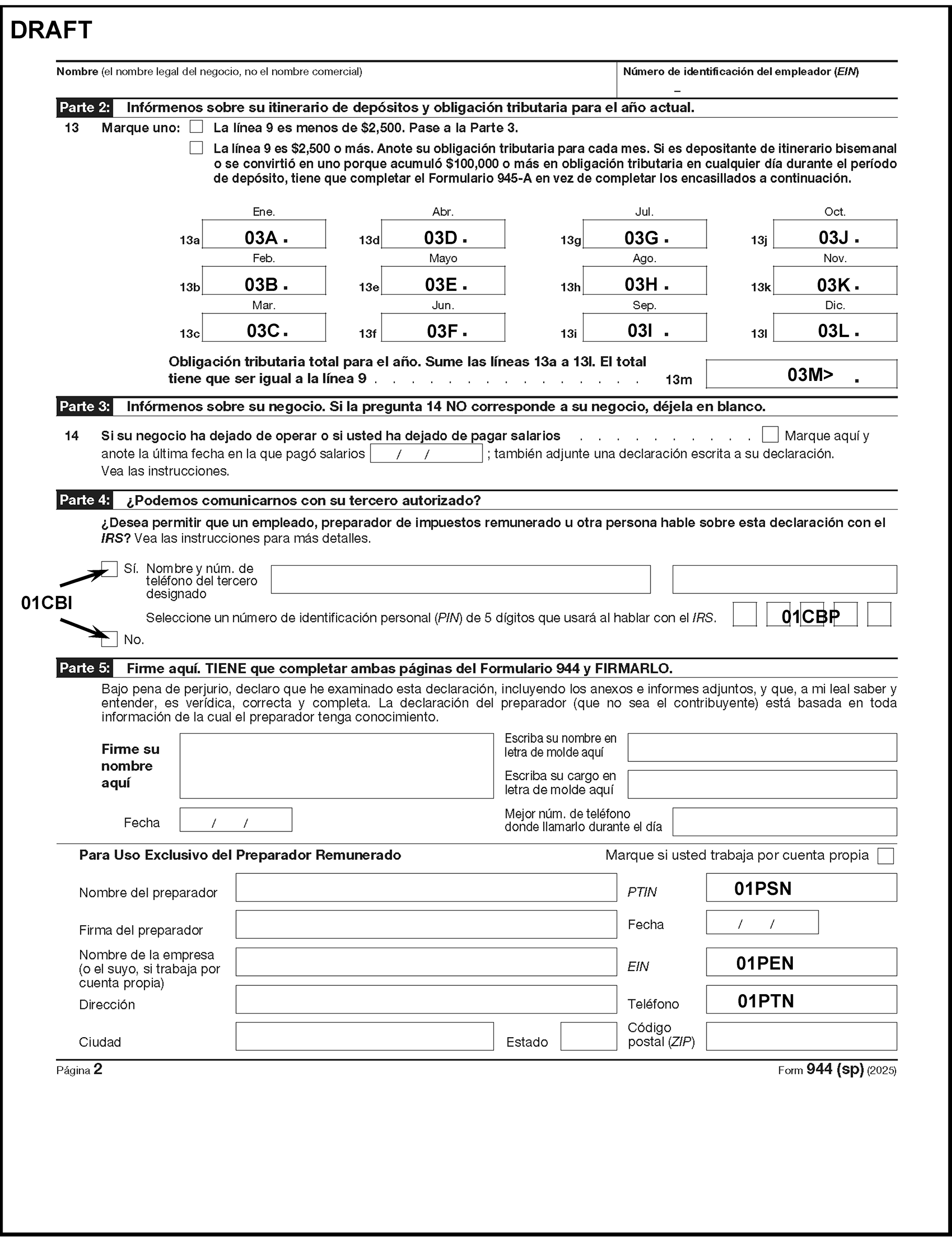
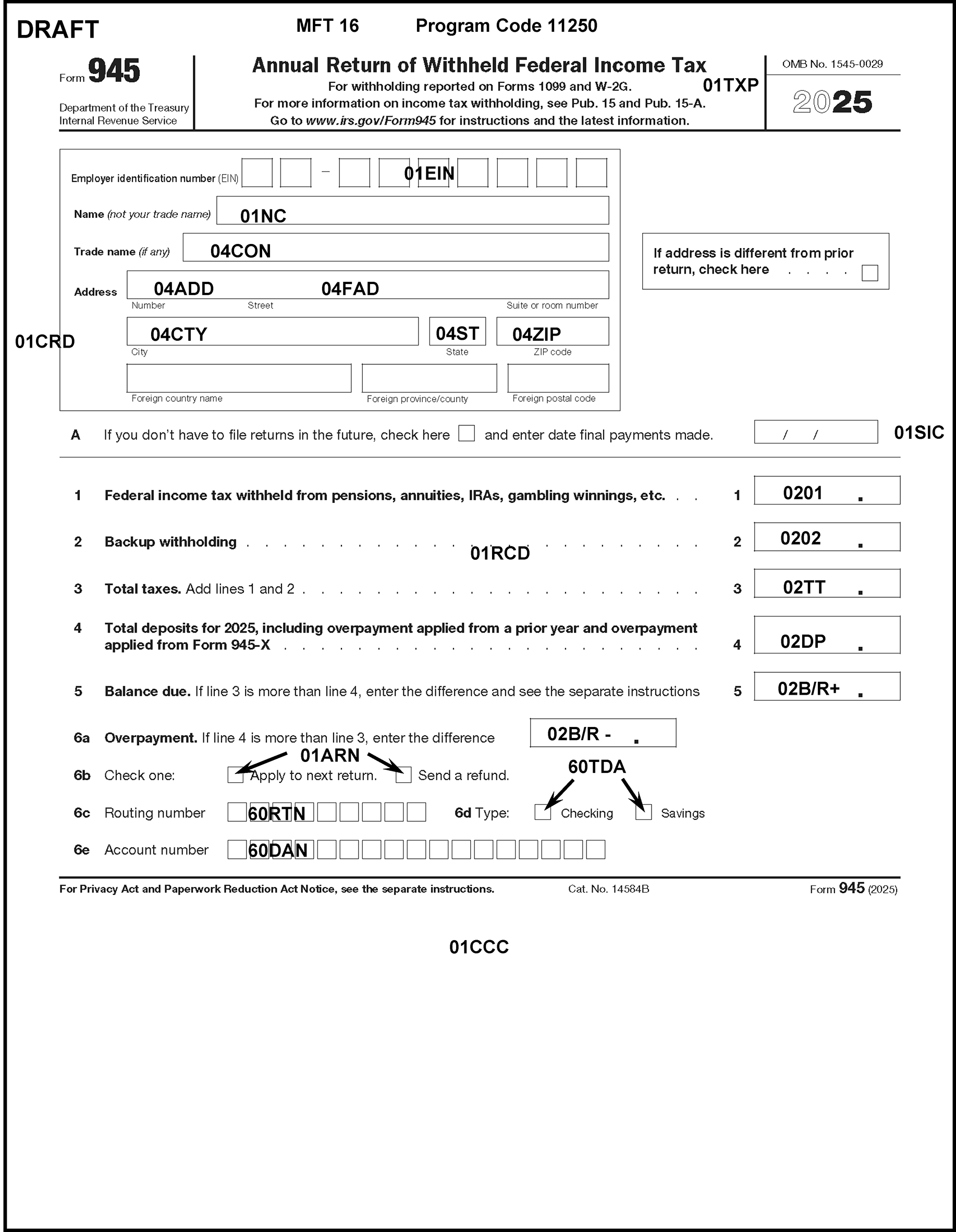
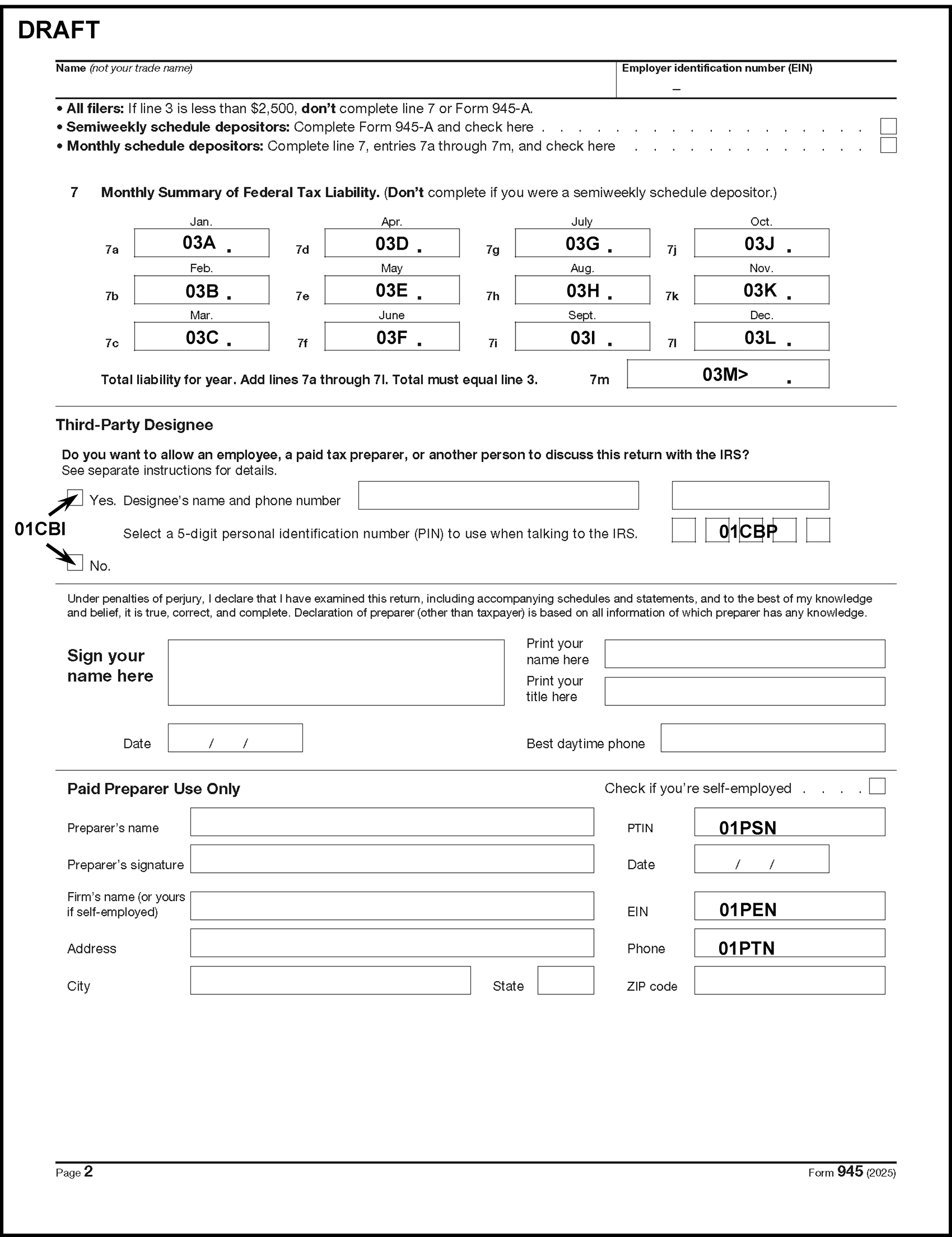
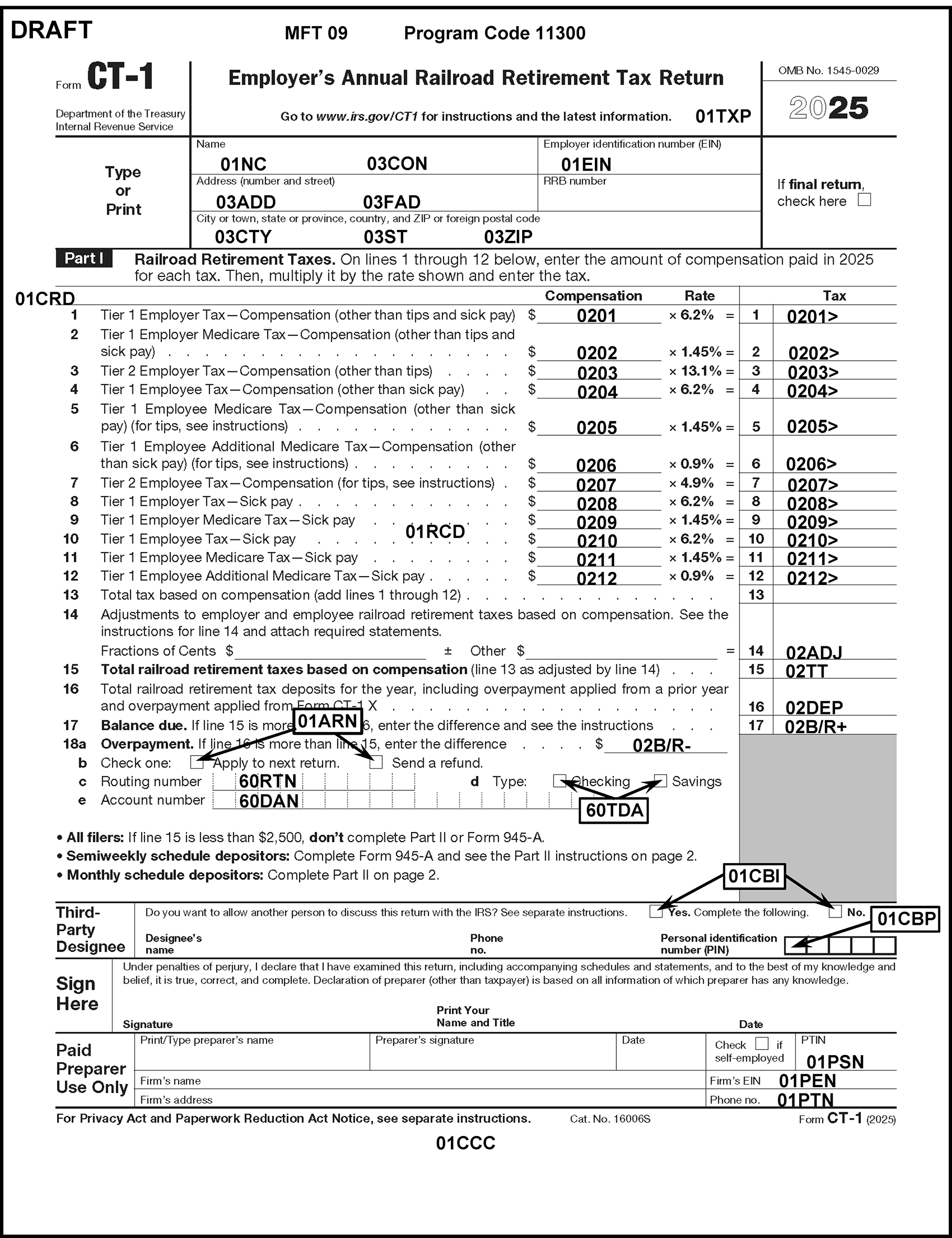
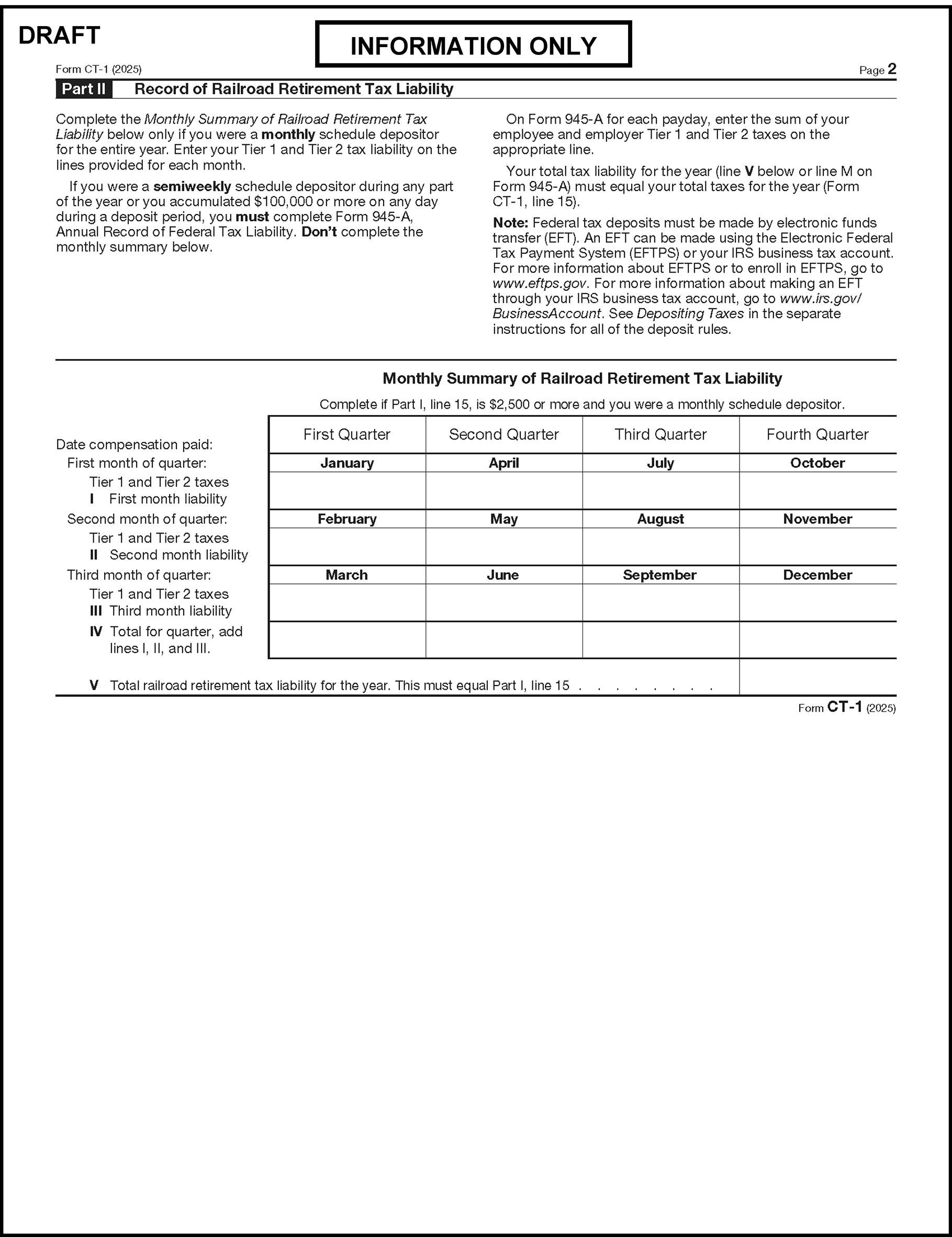
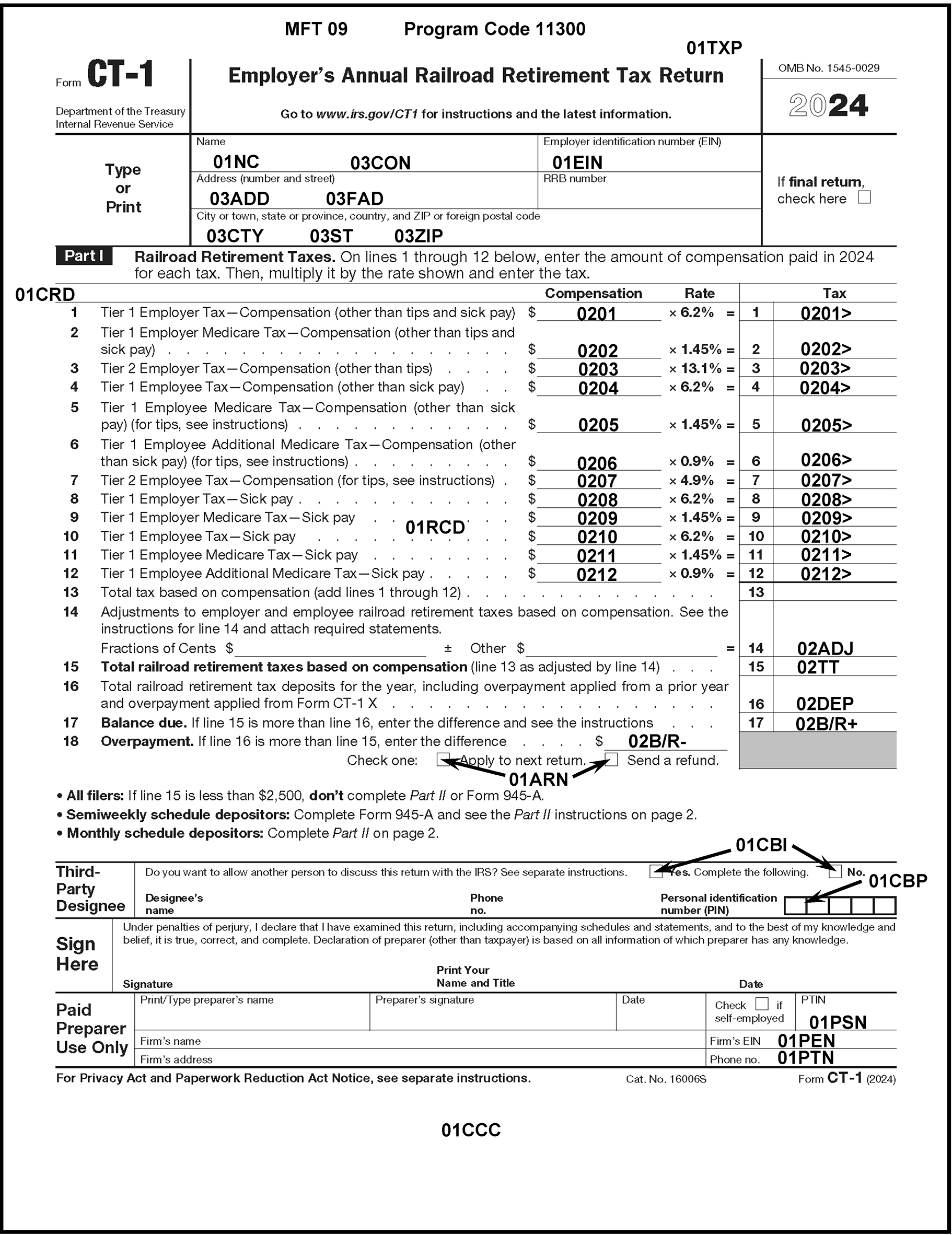
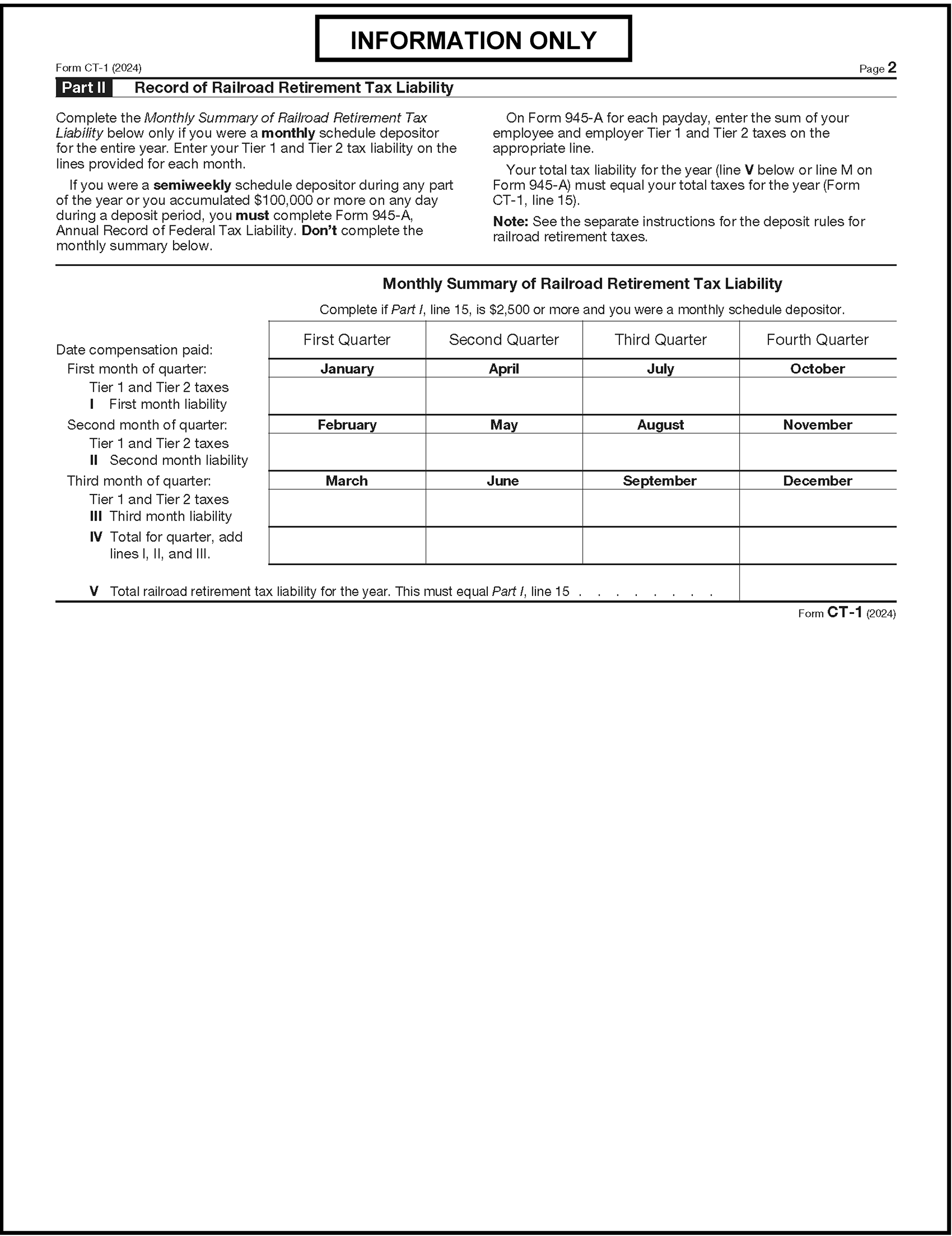
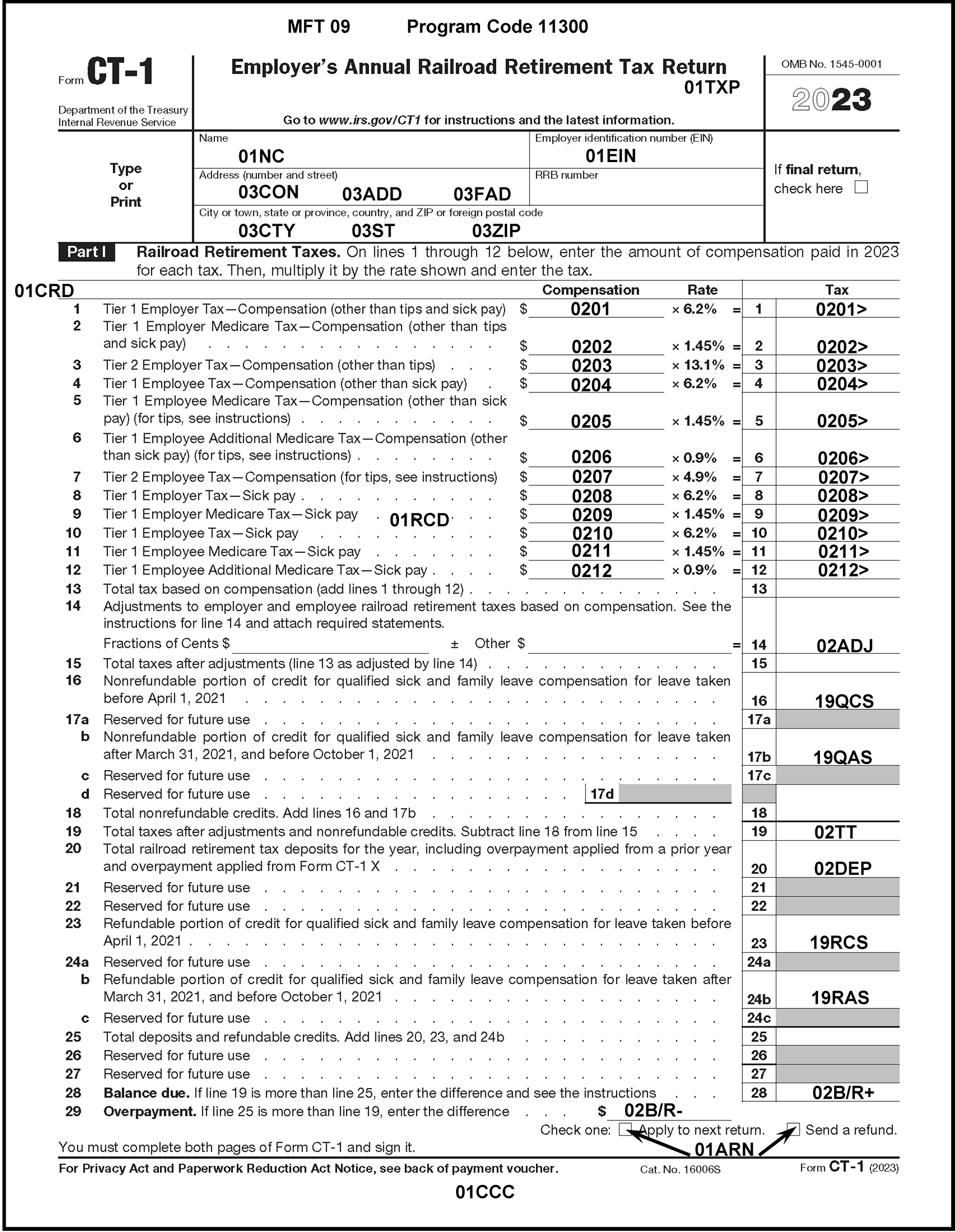
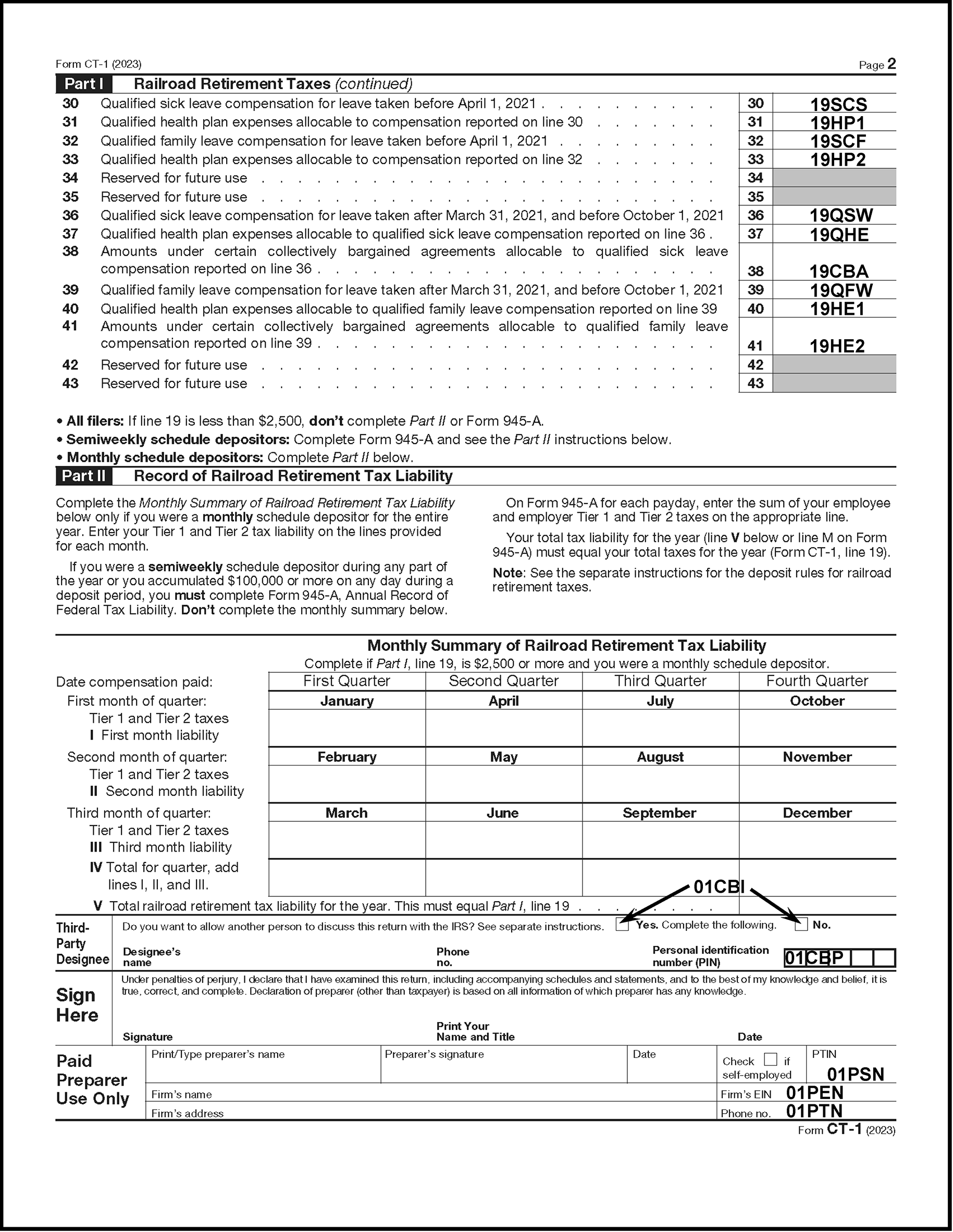
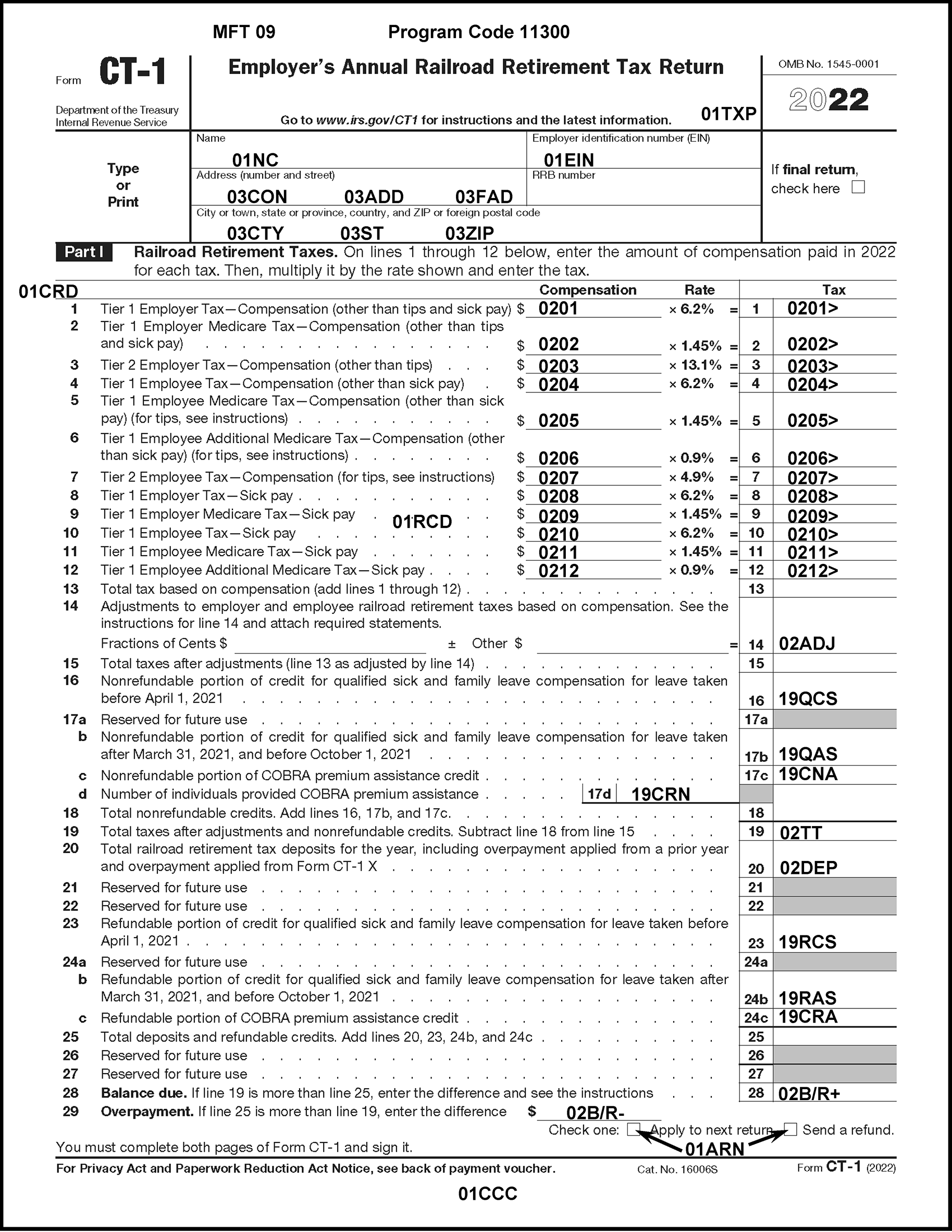
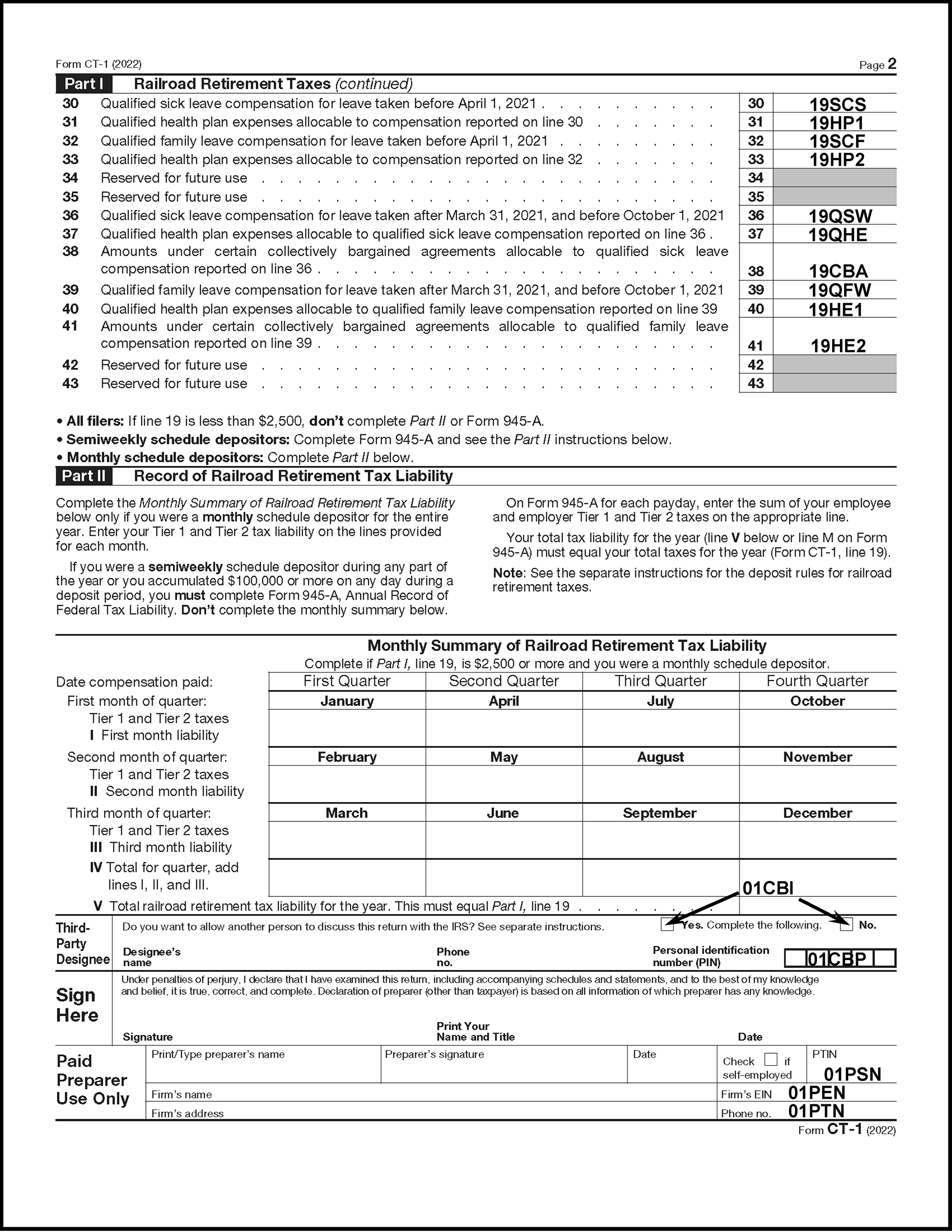
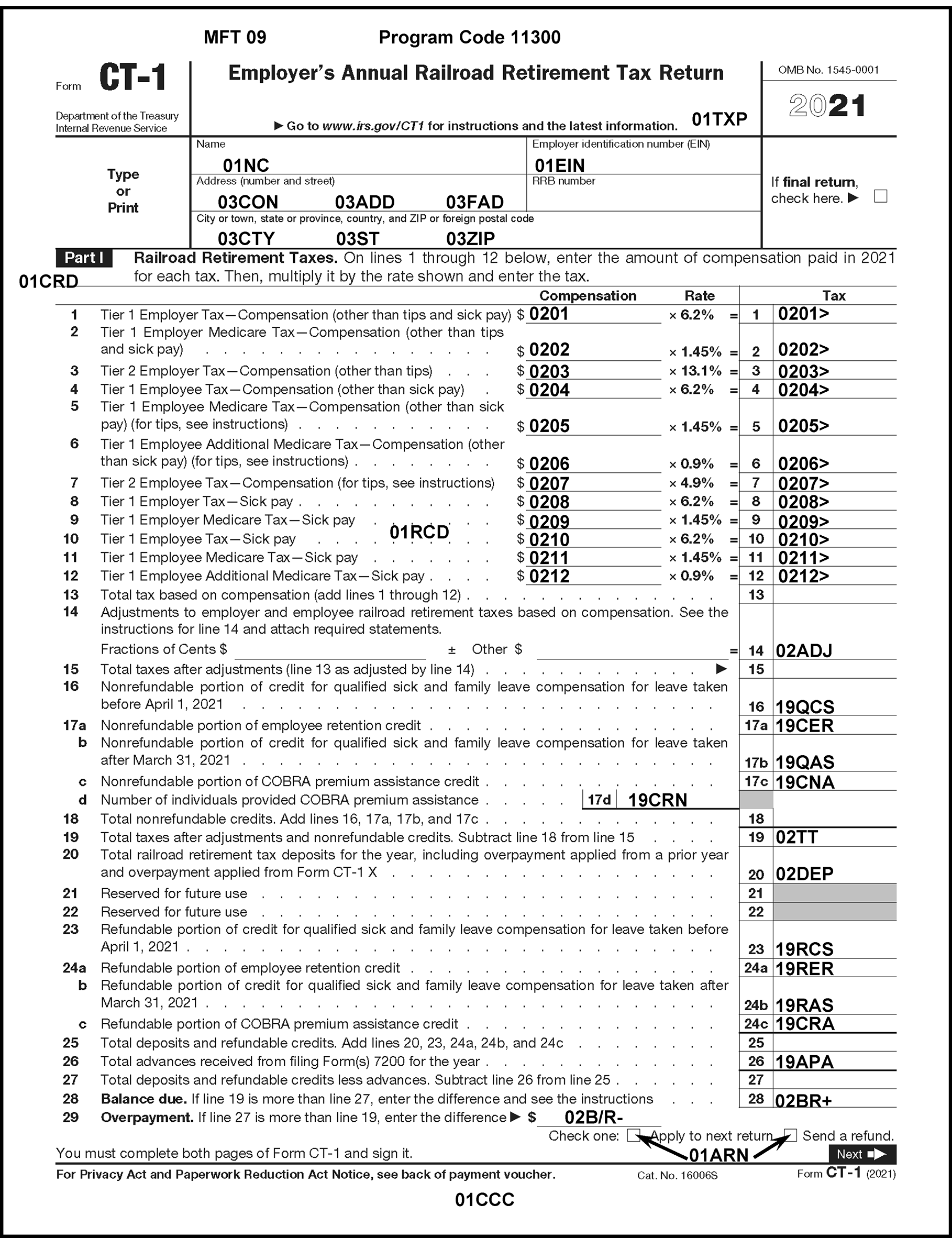
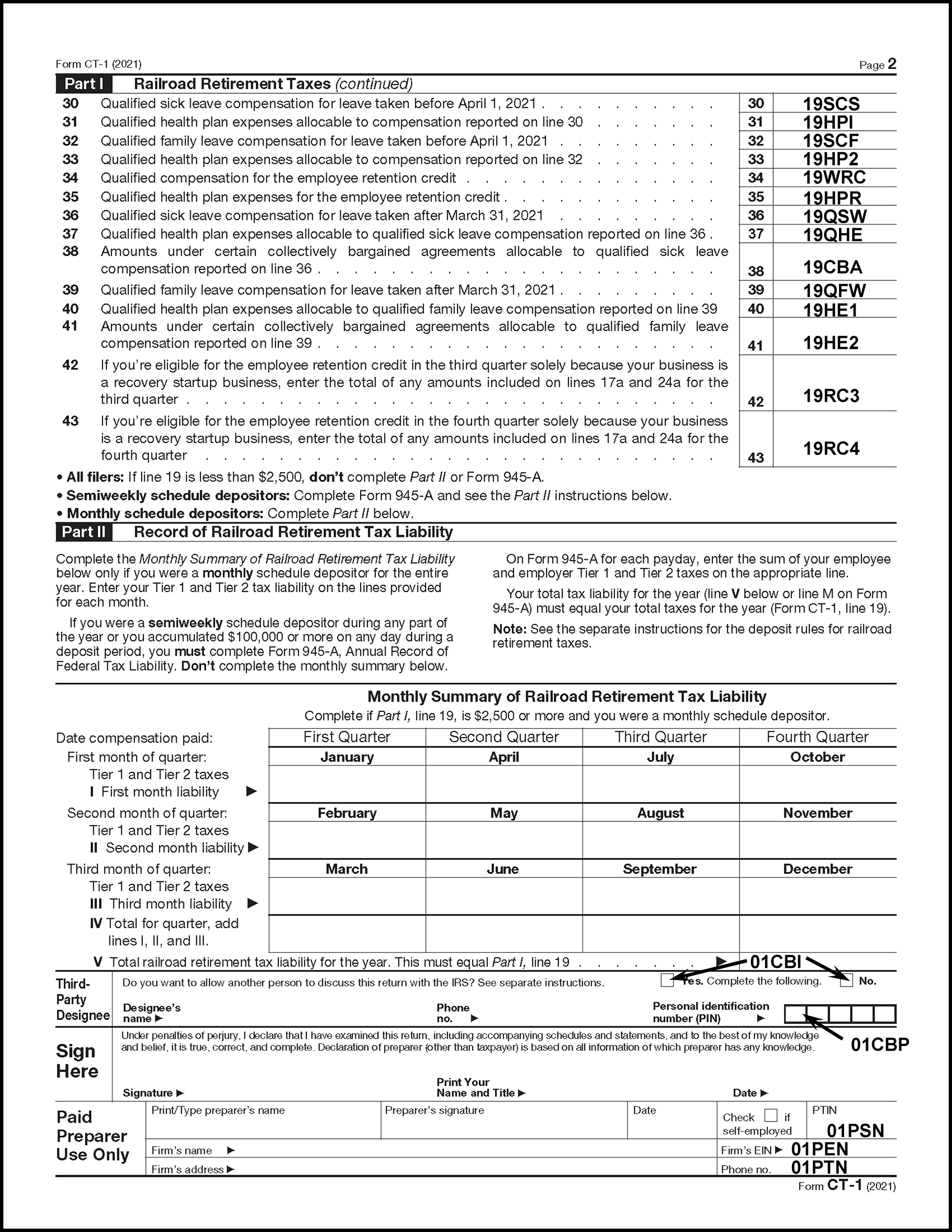
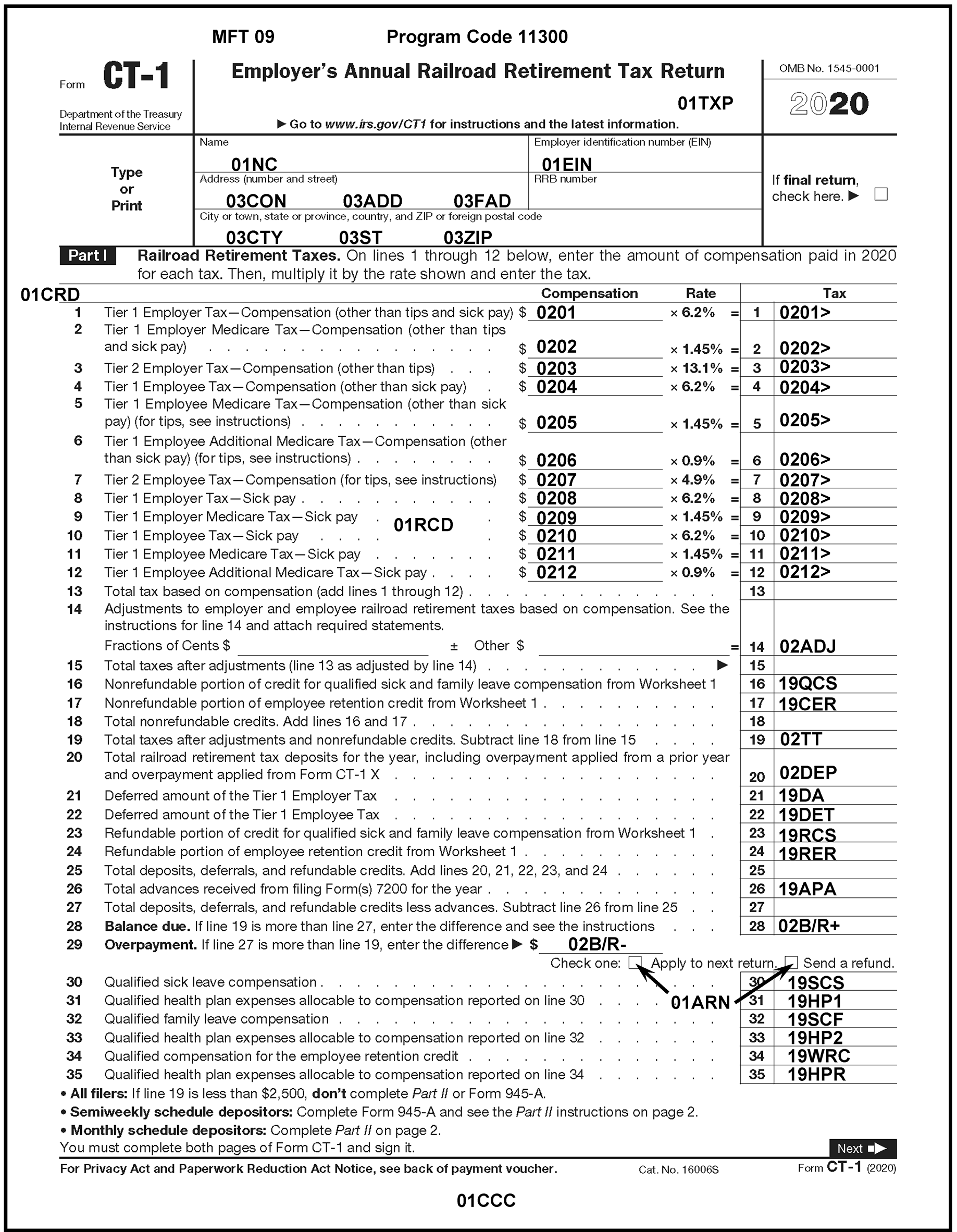
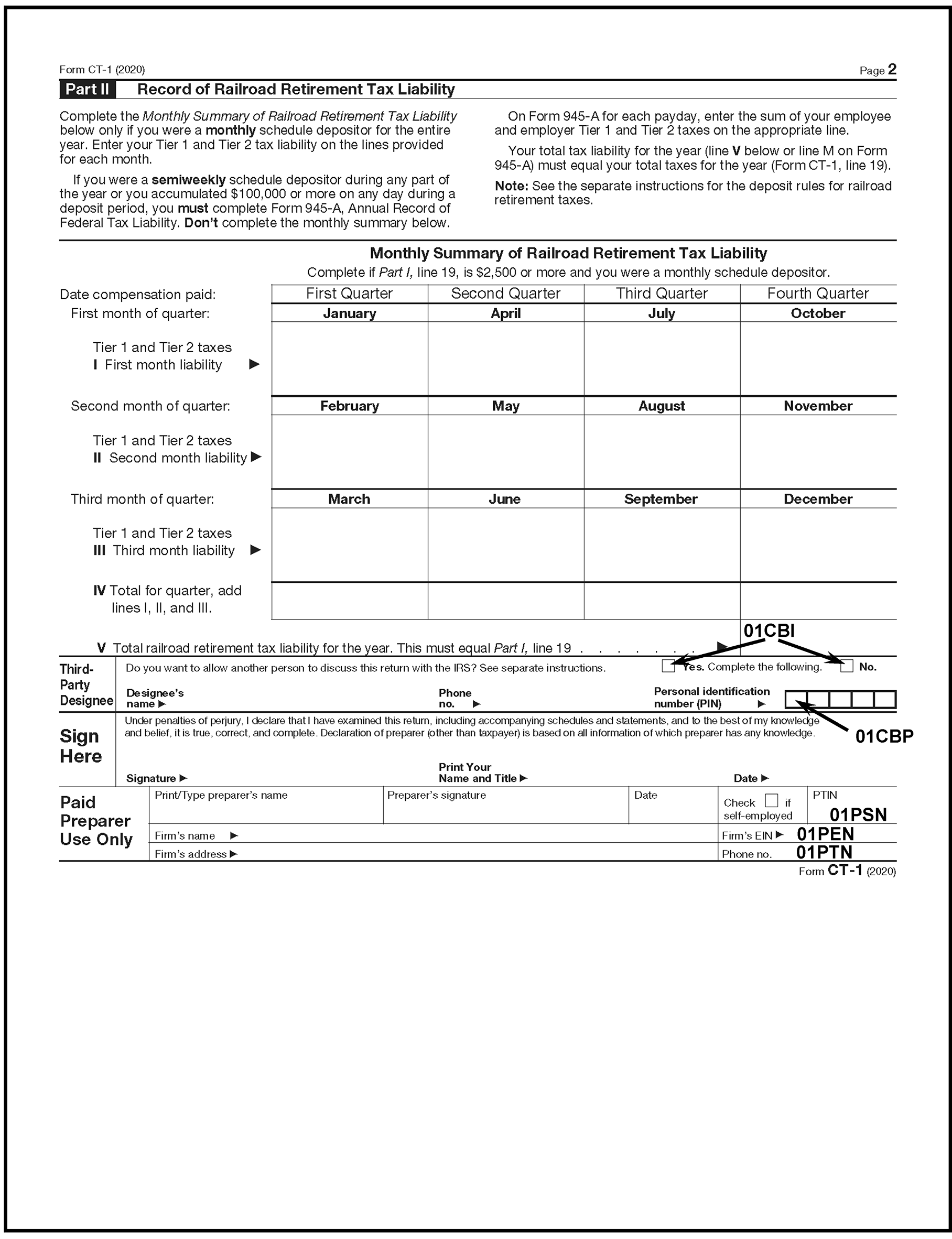
For Terms, Definitions and acronyms see the following tables:
Interpretation Words
| Word | Definition | Example |
|---|---|---|
| Fair | Accurate and professional service to all persons without regard to personal bias. | Taxpayers have the right to expect a fair and just tax system |
| Significant Characters | Any character other than zero or blank. | For example: There are any intervening blanks between significant characters. |
| Usually | The exceptions when something is not required or what would create the unusual circumstance. | Nominee returns usually contain only partnership entity information with a statement notating the partnership is a nominee and is not required to file. |
| Timely | The time frame to consider what is or is not timely. | Taxpayers have the right to receive assistance from the Taxpayer Advocate Service (TAS) if they are experiencing financial difficulty or if the IRS has not resolved their tax issues properly and timely through normal channels. |
Acronyms and Abbreviations
| Acronyms and Abbreviations | Definition |
|---|---|
| ACA | Affordable Care Act |
| ADP | Automated Data Processing |
| AFD | Alpha/Numeric Field Designator |
| AM | Accounts Management |
| APO | Army Post office |
| AUR | Automated Underreporter |
| BEA | Bureau of Economic Analysis |
| BMF | Business Master File |
| BOB | Block Out of Balance |
| C&E | Code and Edit |
| CCC | Computer Condition Code |
| CDP | Collection Due Process |
| CFR | Code of Federal Regulations |
| CI | Criminal Investigation |
| CII | Correspondence Imaging Inventory |
| CL | Clear Field |
| C/O | Care of |
| CP | Computer Paragraph |
| DBA | Doing Business As |
| DLN | Document Locator Number |
| DPO | Diplomatic Post Office |
| DPO | Document Perfection Operation |
| EIF | Entity Index File |
| EEFax | Enterprise Electronic Fax |
| E-File | Electronically File |
| e.g. | For example |
| EIN | Employer Identification Number |
| EOCU | EO Compliance Unit |
| EPMF | Employee Plan Master File |
| ERS | Error Resolution System |
| etc. | Et Cetera |
| Exam | Examination |
| FAX | Facsimile |
| FPO | Fleet Post Office |
| FRP | Frivolous Return Program |
| FTF | Failure To File |
| FYM | Fiscal Year Month |
| GDP | Gross Domestic Product |
| HIRE | Hiring Incentives to Restore Employment Act |
| ICS | Integrated Collection System |
| ID | Identification or Identity |
| IDRS | Integrated Data Retrieval System |
| IMF | Individual Master File |
| IRC | Internal Revenue Code |
| ISRP | Integrated Submission and Remittance Processing System |
| ITIN | IRS Individual Taxpayer Identification Number |
| LB&I | Large Business and International |
| LIHC | Low Income Housing Credit |
| LLC | Limited liability Company |
| LLLT | Limited liability Land Trust |
| LLP | Limited Liability Partner |
| LP | Limited Partnership |
| MCC | Martinsburg Computing Center |
| MeF | Modernized Electronic Filing |
| MFT | Master File Transaction |
| MMDDYY | Month Month Day Day Year Year |
| MODI-EIN | Modernized Internet EIN |
| MT | Merge To |
| NAICS | North American Industry Classification System |
| NAP | National Account profile |
| NDC | National Distribution Center |
| NMF | Non-Master File |
| N/A | Not Applicable |
| NDC | National Distribution Center |
| OC | Other Country |
| OID | Original Issue Discount |
| OLE | On-Line Entity |
| OSPC | Ogden Submission Processing Center |
| PBA | Principal Business Activity |
| PDS | Private Delivery Service |
| POA | Power of Attorney |
| P.O. | Post Office |
| PRP | Program Requirements Package |
| PTIN | Preparer Tax Identification Number |
| PTP | Publicly Traded Partnership |
| QSSS | Qualified Subchapter S Subsidiary |
| QTDP | Qualifying Therapeutic Discovery Project |
| R&C | Receipt and Control |
| RDD | Return Due Date |
| Rec’d | Received |
| Rev. Proc. | Revenue Procedure |
| RMIT | Remittance |
| RO | Revenue Officer |
| RRA98 | Restructuring and Reform Act of 1998 |
| SBSE | Small Business and Self-Employed |
| SCAMPS | Service Center Automated Mail Processing System |
| SERP | Servicewide Electronic Research Program (SERP) |
| SFR | Substitute for Return |
| SLA | Service Level Agreement |
| SOI | Statistics of Income |
| SP | Submission Processing |
| SR | Short Record |
| SSN | Social Security Number |
| TAS | Taxpayer Advocate Service |
| TBOR | Taxpayer Bill of Rights |
| TC | Transaction Code |
| TE | Tax Examiner |
| TEFRA | Tax Equity and Fiscal Responsibility Act |
| TE/GE | Tax Exempt Government Entities |
| TETR | Telephone Excise Tax Refund |
| TIA | Tax Information Authorization |
| TPE | Tax Period Ending |
| TPNC | Taxpayer Notice Code |
| TRA | Tax Reform Act |
| TY | Tax Year |
| TS | Taxpayer Services |
| UBO | Unincorporated Business Organization |
| UCC | Uniform Commercial Code |
| U.S. | United States |
| USPS | United States Postal Service |
| W&I | Wage and Investment |
| ZIP | Zone Improvement Plan |
-
CE = Code and Edit; EC = Error Correction; S = Suspense Correction; GEN = Computer Generated.
Function Code Description Workday Suspense Period Function Used In 001 Input Document 0 GEN Correspondence
Function Code Description Workday Suspense Period Function Used In 210 EPMF Correspondence 60 EC, S 211 First Correspondence (Missing Information and/or Signature (Refund Returns)) 40 CE, EC, S 212 Second Correspondence 25 CE, EC, S 213 Correspondence to Other Than Taxpayer 40 CE, EC, S 215 First International Correspondence (Missing Information and/or Signature (Refund Returns)) 45 CE, EC, S 216 Second International Correspondence 45 CE, EC, S 225 Correspondence (Signature Only - Balance Due/Zero Balance/Credit Elect Returns) 40 CE, EC, S 226 International Correspondence (Signature Only - Balance Due/Zero Balance/Credit Elect Returns) 40 CE, EC, S In-House Research
Function Code Description Workday Suspense Period Function Used In 300 Examination (Fuel Tax Credit) 10 CE, EC, S 310 Statute Control 10 CE, EC, S 320 Entity Control 10 CE, EC, S Criminal Investigation
Function Code Description Workday Suspense Period Function Used In 331 Frivolous Review 3 CE, EC 332 QRDT (Questionable Refund Detection Team) Review 3 CE, EC 333 Prompt Audit 10 CE, EC, S 334 Joint Committee 10 CE, EC, S 335 Frivolous Case 10 CE, EC, S 336 QRDT Case 10 CE, EC, S 337 Other CID (Criminal Investigation Division) 10 CE, EC, S Accounting
Function Code Description Workday Suspense Period Function Used In 341 Manual Refund 10 CE, EC, S 342 Credit Verification 10 CE, EC, S 343 Black Liquor 10 CE, EC, S 344 Manual Refund - ERS 0 EC Master File Transcript Request (MFTRA) Research
Function Code Description Workday Suspense Period Function Used In 351 TIN Research 0 EC, S 352 Name Research 3 CE, EC, S 353 Address Research 3 CE, EC, S 354 Filing Requirements Research 3 CE, EC, S 355 Other MFTRA Research 5 CE, EC, S 360 Other In-House Research 10 CE, EC, S 370 Examination 10 CE, EC, S Management Suspense
Function Code Description Workday Suspense Period Function Used In 410 Assistance Needed 0 EC 420 2006 tax return with Form 8913 credit (TETR) 5 CE, EC, S 430 Management Suspense B 10 CE, EC, S 440 Management Suspense C 15 CE, EC, S 450 Management Suspense D 20 CE, EC, S 460 Management Suspense E 25 CE, EC, S 470 Complex Error Codes 0 EC 480 Early Filed Suspense 150 CE, EC, S 490 System Problem 5 CE, EC, S Missing Document
Function Code Description Workday Suspense Period Function Used In 510 Missing Document 0 CE 511 Missing Document - 1st Suspense 25 EC, S 512 Missing Document - 2nd Suspense 20 S 513 Missing Document - 3rd Suspense 20 S 515 Missing Document - Short Term 5 EC, S Magnetic Tape
Function Code Description Workday Suspense Period Function Used In 550 Magnetic Tape Return - Check for Attachments 0 CE 551 Magnetic Tape - Inconsistent Data 0 CE Rejects
Function Code Description Workday Suspense Period Function Used In 610 Renumber - Non-Remit 0 CE, EC 611 Renumber - Remit 0 CE, EC 620 NMF/Non-ADP 0 CE, EC, S 630 Reinput 0 EC, 640 Void 0 CE, EC, S 650 International 0 CE, EC, S 660 Data Control Delete 0 S 670 Rejected Missing Document 0 S Duplicate DLN
Function Code Description Workday Suspense Period Function Used In 700 Duplicate Block DLN 0 GEN 711 Duplicate Document DLN from Code and Edit 0 GEN 712 Duplicate Document DLN from Error Correction 0 GEN 713 Duplicate Document DLN from Unpostables 0 GEN 714 Duplicate Document DLN from Unworkable Suspense 0 GEN 715 Duplicate Document DLN from Workable Suspense 0 GEN 800 NAP Linkage Problem 2 EC, S 900 Unpostable Record 0 GEN
| TPNC | Explanation |
|---|---|
| 01 | We found an error in the computation of the balance due or the overpayment amount. |
| 02 | We cannot allow the amount (or a portion of the amount) shown as an adjustment because it was not claimed within 3 years from the time the original return was filed, or within 2 years from the time the tax was paid. |
| 03 | We found an error in the computation of your total taxes. |
| 04 | The corrections on Form 941c weren't shown as adjustments on your return. |
| 05 | We found an error in the computation of corrections on your Form 941c. |
| 06 | The excess Withheld Income Tax must be claimed for a tax period ending within the same calendar year for which it was originally reported. An adjustment to income tax withheld for a prior year can only be allowed if the adjustment is the result of an administrative error. There was no indication on your return that the adjustment was the result of an administrative error. Please see Publication 15/15A or the form instructions for information on administrative errors. |
| 07 | We found an error in the computation of your total social security/Medicare tax. |
| 08 | Non-profit organizations became liable for social security and/or Medicare taxes effective on 01-01-84. Since we found no check mark entry in the designated box on the return or other indication that the wages were not subject to social security and/or Medicare taxes, we have computed the taxes and adjusted your return accordingly. |
| 09 | We found an error in the adjustment amount the current quarters' fractions and cents. |
| 10 | We found an error in the adjustment amount for the current quarters' sick pay |
| 11 | We found an error in the adjustment amount for Tips and Group Term Life insurance. |
| 12-15 | (Reserved) |
| 16 | We found an error in the computation for Total Adjustments |
| 17 | We found the amount paid with your return was erroneously shown on the Advance Earned Income Credit line. |
| 18 | The Advance Earned Income Credit payment cannot be the same as or more than the social security/Medicare taxes. |
| 19 | We found an error in the subtraction of your Advance Earned Income Credit payments from your total taxes. |
| 20 | The total Federal Tax Deposit amount was erroneously shown on the Advance Earned Income Credit line. |
| 21 | We found an incorrect social security tax rate was used to compute your social security taxes. |
| 22 | We found an incorrect Medicare tax rate was used to compute your Medicare taxes. |
| 23 | The Advance Earned Income Credit payment cannot be more than the appropriate percent of the total wages and other compensation you paid. For 1995 and subsequent years, the appropriate percentage rate is 20.4%. |
| 24 | We found the amount reported as total Federal Tax Deposits for the quarter differs from the amount we have credited to your account. |
| 27 | We have adjusted your tax as shown because we did not receive a reply to our request for additional information. |
| 31 | We are processing your request to adjust previously reported Federal Income Tax Withholding, or taxes on social security wages and/or tips, or Medicare wages and will send you another notice within 45 days. In the future, you should submit such adjustment requests on the appropriate Adjusted Employment Tax Return. |
| 32 | We are not processing your request to adjust previously reported Federal Income Withholding Tax, or taxes on social security wages and/or tips, or Medicare wages. Beginning with tax year 2009, you should submit such adjustment requests on the appropriate Adjusted Employment Tax Return. We have processed the remainder of your return. |
| 33 | We found an error in the addition of the "Total deposits for this quarter" and the COBRA Premium Assistance Payments. |
| 34 | We did not process your request for a credit for the employer's share of the social security tax (6.2%) on the exempt wages of qualified employees. The number of qualified employees and the amount of their exempt wages must be provided on the return. We have processed the remainder of your return. Request the credit by submitting the appropriate Adjusted Employment Tax return. |
| 35 | We did not process your request for a credit for the employer's share of the social security tax (6.2%) on the exempt wages of qualified employees. The total of the "Taxable social security wages" and "Taxable social security tips" lines must be greater than or equal to the amount shown on the "Exempt wages/tips paid to qualified employees " line. We have processed the remainder of your return. Request the credit by submitting the appropriate Adjusted Employment Tax return. |
| 36 | We found an error in the computation of your small business payroll tax credit |
| 37 (Spanish TPNC 36 version) | Hemos encontrado un error en el cálculo del crédito tributario sobre la nómina de su pequeño negocio. |
| 38 | We disallowed your payroll tax credit research claim because we did not receive your Form 8974. |
| 39 (Spanish TPNC 38 version) | Hemos denegado su reclamación del crédito tributario sobre la nómina por investigaciones, porque no recibimos su Formulario 8974. |
| 40 | We changed the deferred payment of employer's share of social security tax claimed on your Employer's Quarterly Federal Tax Return. The change was due to either claiming more than the statutory limit allows, or the amounts used to determine your deferred payment were in error. |
| 40 (Spanish TPNC 40 version) | Cambiamos el pago diferido de la parte correspondiente al patrono de la contribución al Seguro Social, reclamada en su Planilla para la Declaración Federal Trimestral del Patrono. El cambio se debió a que se reclamó más de lo que el límite estatutario permite o a que las cantidades utilizadas para determinar su pago diferido estaban equivocadas. |
| 41 | We changed the deferred amount of the employee share of social security tax claimed on your Employer's Quarterly Federal Tax Return. The change was due to either: claiming more than IRS Notice 2020-65 allows, or the amounts used to determine the deferred payment were in error. |
| 41 (Spanish TPNC 41 version) | Cambiamos la cantidad diferida de la parte del empleado de la contribución al Seguro Social reclamada en su Planilla para la Declaración Federal Trimestral del Patrono. El cambio se debió ya sea por: reclamar más de lo que permite el Aviso 2020-65 del IRS o, las cantidades utilizadas para determinar el pago diferido fueron erróneas. |
| 90 | TPNC 90 is a fill-in narrative notice code to be used when no other notice code fully explains the adjustment. Beginning in 2014 changes were made to the TPNC 90 Math Error Codes. TPNC 90 literals have been programmed into On-Line Notice Review (OLNR) Retype applications for Notice Review (NR). This addition eliminates the need for the NR tax examiner to manually type the notice literal and reduce potential copying/typing incorrect paragraphs in the notices. For a full listing of the programmed TPNC 90 Math Error Codes and information on how to use the Math Error Codes see TPNC 90 Math Error Code Job Aid |
| TPNC | Explanation |
|---|---|
| 01 | We found an error in the computation of the balance due or the overpayment amount. |
| 02 | We cannot allow the amount (or a portion of the amount) shown as an adjustment because it was not claimed within 3 years from the time the original return was filed, or within 2 years from the time the tax was paid. |
| 03 | We found an error in the computation of your total taxes. |
| 04 | The corrections on Form 941c weren't shown as adjustments on your return. |
| 05 | We found an error in the computation of corrections on your Form 941c. |
| 06 | The excess Withheld Income Tax must be claimed for a tax period ending within the same calendar year for which it was originally reported. An adjustment to income tax withheld for a prior year can only be allowed if the adjustment is the result of an administrative error. There was no indication on your return that the adjustment was the result of an administrative error. Please see Publication 15/15A or the form instructions for information on administrative errors. |
| 07 | We found an error in the computation of your total social security/Medicare tax. |
| 08 | Non-profit organizations became liable for social security and/or Medicare taxes effective on 01-01-84. Since we found no check mark entry in the designated box on the return or other indication that the wages were not subject to social security and/or Medicare taxes, we have computed the taxes and adjusted your return accordingly. |
| 09 | We found an error in the adjustment amount the current quarters' fractions and cents. |
| 10 | We found an error in the adjustment amount for the current quarters' sick pay |
| 11 | We found an error in the adjustment amount for Tips and Group Term Life insurance. |
| 12-15 | (Reserved) |
| 16 | We found an error in the computation for Total Adjustments |
| 17 | We found the amount paid with your return was erroneously shown on the Advance Earned Income Credit line. |
| 18 | The Advance Earned Income Credit payment cannot be the same as or more than the social security/Medicare taxes. |
| 19 | We found an error in the subtraction of your Advance Earned Income Credit payments from your total taxes. |
| 20 | The total Federal Tax Deposit amount was erroneously shown on the Advance Earned Income Credit line. |
| 21 | We found an incorrect social security tax rate was used to compute your social security taxes. |
| 22 | We found an incorrect Medicare tax rate was used to compute your Medicare taxes. |
| 23 | The Advance Earned Income Credit payment cannot be more than the appropriate percent of the total wages and other compensation you paid. For 1995 and subsequent years, the appropriate percentage rate is 20.4%. |
| 24 | We found the amount reported as total Federal Tax Deposits for the quarter differs from the amount we have credited to your account. |
| 27 | We have adjusted your tax as shown because we did not receive a reply to our request for additional information. |
| 28 | We found an error in the adjustment amount for "Current year's adjustments (Form 944) |
| 29 | We found an error in the adjustment amount for "Prior year's Income Tax adjustments (Form 944) |
| 30 | We found an error in the adjustment amount for "Prior year's social security and Medicare adjustments (Form 944) |
| 31 | We are processing your request to adjust previously reported Federal Income Tax Withholding, or taxes on social security wages and/or tips, or Medicare wages and will send you another notice within 45 days. In the future, you should submit such adjustment requests on the appropriate Adjusted Employment Tax Return. |
| 32 | We are not processing your request to adjust previously reported Federal Income Withholding Tax, or taxes on social security wages and/or tips, or Medicare wages. Beginning with tax year 2009, you should submit such adjustment requests on the appropriate Adjusted Employment Tax Return. We have processed the remainder of your return. |
| 33 | We found an error in the addition of the "Total deposits for this quarter" and the COBRA Premium Assistance Payments. |
| 34 | We did not process your request for a credit for the employer's share of the social security tax (6.2%) on the exempt wages of qualified employees. The number of qualified employees and the amount of their exempt wages must be provided on the return. We have processed the remainder of your return. Request the credit by submitting the appropriate Adjusted Employment Tax return. |
| 35 | We did not process your request for a credit for the employer's share of the social security tax (6.2%) on the exempt wages of qualified employees. The total of the "Taxable social security wages" and "Taxable social security tips" lines must be greater than or equal to the amount shown on the "Exempt wages/tips paid to qualified employees " line. We have processed the remainder of your return. Request the credit by submitting the appropriate Adjusted Employment Tax return. |
| 36 | We found an error in the computation of your small business payroll tax credit |
| 37 (Spanish TPNC 36 version) | Hemos encontrado un error en el cálculo del crédito tributario sobre la nómina de su pequeño negocio. |
| 38 | We disallowed your payroll tax credit research claim because we did not receive your Form 8974. |
| 39 (Spanish TPNC 38 version) | Hemos denegado su reclamación del crédito tributario sobre la nómina por investigaciones, porque no recibimos su Formulario 8974. |
| 40 | We changed the deferred amount of the employer share of social security tax, or Tier 1 employer tax, claimed on your Employer's Federal Tax Return. The change was due to either claiming more than the statutory limit allows, or the amounts used to determine your deferred payment were in error. |
| 40 (Spanish TPNC 40 Version) | Cambiamos la cantidad diferida de la parte del patrono de la contribución al Seguro Social o la contribución correspondiente al patrono de Nivel 1, reclamada en su Planilla para la Declaración Anual de la Contribución Federal del Patrono. El cambio se debió ya sea por reclamar más de lo que permite el límite legal o a que las cantidades utilizadas para determinar su pago diferido fueron erróneas. |
| 41 | We changed the deferred amount of the employee share of social security tax, or Tier 1 employee tax, claimed on your Employer's Federal Tax Return. The change was due to either:
|
| 41 (Spanish TPNC 41 version) | Cambiamos la cantidad diferida de la parte del empleado de la contribución al Seguro Social o la contribución correspondiente al empleado de Nivel 1, reclamada en su Planilla para la Declaración Anual de la Contribución Federal del Patrono. El cambio se debió ya sea por:
|
| 90 | TPNC 90 is a fill-in narrative notice code to be used when no other notice code fully explains the adjustment. Beginning in 2014 changes were made to the TPNC 90 Math Error Codes. TPNC 90 literals have been programmed into On-Line Notice Review (OLNR) Retype applications for Notice Review (NR). This addition eliminates the need for the NR tax examiner to manually type the notice literal and reduce potential copying/typing incorrect paragraphs in the notices. For a full listing of the programmed TPNC 90 Math Error Codes and information on how to use the Math Error Codes see TPNC 90 Math Error Code Job Aid |
| TPNC | Explanation |
|---|---|
| 01 | We found an error in the computation of the balance due or the overpayment amount. |
| 02 | We cannot allow the amount (or a portion of the amount) shown as an adjustment because it was not claimed within 3 years from the time the original return was filed, or within 2 years from the time the tax was paid. |
| 05 | We found an error in the computation of your Tier 1 Employer Tax. |
| 06 | We found an error in the computation of your Tier 1 Employee Tax. |
| 07 | We found an error in the amount of the total tax based on compensation. |
| 08 | We found an error in the computation of the Tier II Employer Tax. |
| 09 | We found an error in the computation of the Tier II Employee Tax. |
| 11 | We found an error in the computation of your Total Railroad Retirement Taxes due. |
| 12 | We found an error in the computation of the adjustments to employer and employee railroad retirement taxes. |
| 26 | We found the amount reported as total Federal Tax Deposits for the year differs from the amount we have credited to your account. |
| 27 | We adjusted your tax as shown because we did not receive a reply to our request for additional information. |
| 40 | We changed the deferred amount of the employer share of social security tax, or Tier 1 employer tax, claimed on your Employer's Federal Tax Return. The change was due to either claiming more than the statutory limit allows, or the amounts used to determine your deferred payment were in error. |
| 40 (Spanish TPNC 40 Version) | Cambiamos la cantidad diferida de la parte del patrono de la contribución al Seguro Social o la contribución correspondiente al patrono de Nivel 1, reclamada en su Planilla para la Declaración Anual de la Contribución Federal del Patrono. El cambio se debió ya sea por reclamar más de lo que permite el límite legal o a que las cantidades utilizadas para determinar su pago diferido fueron erróneas. |
| 41 | We changed the deferred amount of the employee share of social security tax, or Tier 1 employee tax, claimed on your Employer's Federal Tax Return. The change was due to either:
|
| 41 (Spanish TPNC 41 version) | Cambiamos la cantidad diferida de la parte del empleado de la contribución al Seguro Social o la contribución correspondiente al empleado de Nivel 1, reclamada en su Planilla para la Declaración Anual de la Contribución Federal del Patrono. El cambio se debió ya sea por:
|
| 90 | TPNC 90 is a fill-in narrative notice code to be used when no other notice code fully explains the adjustment. |
Potential Frivolous Arguments
| Potential Frivolous Arguments | Description |
|---|---|
| Alleged Churches/First Amendment | Income from non-religious sources and may claim a vow of poverty. |
| Altered form | Altering any or all line items with the intent of facilitating non-compliance with the tax laws. |
| Altered Jurat/UCC (Uniform Commercial Code) I-207 or UCC 1-308 | Return has income and deductions but the jurat has been altered or stricken. May include reference to UCC I-207, UCC 1-308 or a statement that the return was not signed under penalties of perjury. |
| Amended Returns/Form 843 Claim | Amended return or a Form 843, Claim for Refund and Request for Abatement, filed to obtain a total refund of all taxes paid in prior years, based on tax avoidance arguments. |
| C-Filings | This frivolous position includes the following four categories:
|
| Challenges to Authority/Due Process | Questions various administrative authorities such as delegation orders, summons authority, Privacy Act, etc. Argues that they must be afforded a hearing or a trial before taxes can be assessed or before property can be seized. |
| Challenges to Authority/Title 26 or "law" in other documents | Argues that Title 26 of the United States Code is not law because it was never enacted as named. |
| Collections Issues | Files frivolous documents contending that various collections issues are invalid (e.g., Offers in Compromise, Collection Due Process Requests, Installment Agreements, Appeals Requests, etc.) because they are not filed and/or signed by someone with delegated authority. They may have no certificate of assessment attached, do not comply in form or content with a State or Local law, are not in a certain format or lack a valid OMB (Office of Management and Budget) number or other frivolous positions. |
| Disclaimer | Submits a disclaimer stating, "disclaims the liability for the tax due" , making the liability on the return zero. |
| Fifth Amendment | Assertion of the Fifth Amendment right against self-incrimination as a basis for not providing any financial information. |
| Foreign Income | Argues that United States citizens and residents are not subject to tax on their Compensation or other income derived from sources within the United States, as only foreign-based income or income received by non-resident aliens and foreign S Corporations from sources within the United States is taxable. |
| Form 1099-OID (Original Issue Discount) | An individual files a return reporting false amounts of income (generally "Other" or "Miscellaneous" income) and all of them claim a false amount of income tax withholding approximately equal to the amount of falsely reported income. Although the returns report income, they do not calculate any tax due. Some of the returns have Form 1099-OID attached and some have Form 1096. Other false financial instruments may be filed in the place of or in addition to the Form 1099-OID such as Form 2439, promissory notes, bonds, sight drafts, etc. |
| IRC 861 Business Employment Tax (BMF 861) | Argument targets employers and advises them that Compensation are exempt from withholding. These taxpayers rely on Sections 861 through 865 of the Code and the regulations (in particular, Treasury Regulation 1.861-8), promoters of this scheme advise employers to stop withholding and paying payroll taxes on their employee's Compensation. In addition, some employers file amended payroll tax returns and request refunds of previously paid payroll taxes. |
| IRS is a Private Organization/Collects Tribute, Not Taxes | Argues that the IRS is an entity named the Internal Revenue and Tax Services Inc., which was incorporated in Delaware in 1933, it is a collection agency for the Federal Reserve Bank, or is part of the United Nations and is clandestinely leading the tax paying public into a "new world order" . |
| Not a Person | Argues that a taxpayer is not a "person" within the meaning of IRC 7701(a)(14). |
| Obscene, Vulgar, Harassing | Submits documents or other materials indicating that non-filing is due to dissatisfaction with tax policies or taxation in general. Often, this argument is expressed with obscene, vulgar, or crude language and characters in an extremely demeaning manner. |
| Protest Against Government Action/Inaction | Argues that refusal to file or pay is justified because they disagree with government policies or spending plans. |
| Sixteenth Amendment | Argues the Sixteenth Amendment was not properly ratified and therefore the federal government does not have the legal authority to collect an income tax without apportionment. |
| Straw Man | Argues the government has created an entity separate and distinct from the taxpayer - a "straw man" and any tax obligations are exclusively those of the "straw man" . |
| Taxes are Voluntary/Law Does Not Require | Submits a return, amended return, or correspondence that argues income taxes are voluntary. |
| U.S. vs. Long | Submits a return with zero money amounts. To explain the zeroes inserted on the form the individual references "U.S. vs. Long" . |
| Unsigned Returns | The individual completes a return but doesn't sign. A statement indicating disagreement with the tax system is attached or added to the return. |
| Valuation | Income is not taxable because of the declining fair market value of the dollar, because the dollar is not backed by gold/silver, because the value of services offset by the value of the labor (barter income), etc. |
| Zero Returns | Submits a return with zero money amounts on all or most of the line items on the form (e.g., IRC 861, Forms 2439, OID, and other BMF filings that claim no income and request refunds). See Rev. Rul. 2004-34. A statement is attached claiming there is no section of the Internal Revenue Code that established an income tax liability. The statement may also contain arguments regarding the definition of income. There are several variations on this type of filing such as those bearing the words "nunc pro tunc" and "not liable" . |
| Other | All others including those in Notice 2010-33 or any subsequent superseding notice. See also http://www.irs.gov/Tax-Professionals/The-Truth-About-Frivolous-Tax-Arguments-Introduction on IRS.gov. This category includes non-filer accounts resulting from initial compliance check such as cross-reference TINs. |
Australia State
| Australia State | Abbreviation |
|---|---|
| Australian Capital Territory | ACT |
| New South Wales | NSW |
| Northern Territory | NT |
| Queensland | QLD |
| South Australia | SA |
| Tasmania | TAS |
| Victoria | VIC |
| Western Australia | WA |
Brazil State
| Brazil State | Abbreviation |
|---|---|
| Acre | AC |
| Alagoas | AL |
| Amapa | AP |
| Amazonas | AM |
| Bahia | BA |
| Ceara | CE |
| Distrito Federal | DF |
| Espirito Santo | ES |
| Goias | GO |
| Maranhao | MA |
| Mato Grasso | MT |
| Mato Grosso do Sul | MS |
| Minas Gerais | MG |
| Para | PA |
| Paraiba | PB |
| Parana | PR |
| Pernambuco | PE |
| Piaui | PI |
| Rio de Janeiro | RJ |
| Rio Grande do Norte | RN |
| Rio Grande do Sul | RS |
| Rondonia | RO |
| Roraima | RR |
| Santa Catarina | SC |
| Sao Paulo | SP |
| Sergipe | SE |
| Tocantins | TO |
Canada Province/Territory
| Canada Province/Territory | Abbreviation |
|---|---|
| Alberta | AB |
| British Columbia | BC |
| Manitoba | MB |
| New Brunswick | NB |
| Newfoundland and Labrador | NL |
| Northwest Territories | NT |
| Nova Scotia | NS |
| Nunavut | NU |
| Ontario | ON |
| Prince Edward Island | PE |
| Quebec | QC |
| Saskatchewan | SK |
| Yukon | YT |
Cuba Province
| Cuba Province | Abbreviation |
|---|---|
| Camaguey | CG |
| Ciego de Avila | CA |
| Cienfuegos | CF |
| Ciudad de La Habana | CH |
| Granma (Bayamo) | GR |
| Guantanamo | GT |
| Holguin | HO |
| La Habana | HA |
| Matanzas | MT |
| Municipio Especial Isla de La Juventud | IJ |
| Pinar del Rio | PR |
| Sancti Spiritus | SS |
| Santiago de Cuba | SC |
| (Victoria de) Las Tunas | LT |
| Villa Clara | VC |
Italy Province
| Italy Province | Abbreviation |
|---|---|
| Agrigento | AG |
| Alessandria | AL |
| Ancona | AN |
| Aosta/Aoste | AO |
| Arezzo | AR |
| Ascoli Piceno | AP |
| Asti | AT |
| Bari | BA |
| Belluno | BL |
| Benevento | BN |
| Bergamo | BG |
| Biella | BI |
| Bologna | BO |
| Bolzano Bolzen | BZ |
| Brescia | BS |
| Brindisi | BR |
| Cagliari | CA |
| Caltanissetta | CL |
| Campobasso | CB |
| Caserta | CE |
| Catania | CT |
| Catanzaro | CZ |
| Chieti | CH |
| Como | CO |
| Cosenza | CS |
| Cremona | CZ |
| Crotone | KR |
| Cuneo | CV |
| Enna | EN |
| Ferrara | FE |
| Firenze | FI |
| Foggia | FG |
| Forli | FO |
| Frosinone | FR |
| Genoa | GE |
| Gorizia | GO |
| Grosseto | GR |
| Imperia | IM |
| Isernia | IS |
| L'Aquila | AQ |
| La Spezia | SP |
| Latina | LT |
| Lecce | LE |
| Livorno | LI |
| Lodi | LO |
| Lucca | LU |
| Macerata | MC |
| Mantova | MN |
| Massa-Carrara | MS |
| Matera | MT |
| Messina | ME |
| Milan | MI |
| Modena | MO |
| Napoli | NA |
| Novara | NO |
| Nuoro | NU |
| Oristano | OR |
| Padova | PD |
| Palermo | PA |
| Parma | PR |
| Pavia | PV |
| Perugia | PG |
| Pesaro-Urbino | PS |
| Pescara | PE |
| Piacenza | PC |
| Pisa | PI |
| Pistoia | PT |
| Pordenone | PN |
| Potenza | PZ |
| Prato | PO |
| Ragusa | RG |
| Ravenna | RA |
| Reggio de Calabria | RC |
| Reggio nell'Emilia | RE |
| Rieti | RI |
| Rimini | RN |
| Roma | RM |
| Rovigo | RO |
| Salerno | SA |
| Sassari | SS |
| Savona | SV |
| Siena | SI |
| Siracusa | SR |
| Sondrio | SO |
| Taranto | TA |
| Teramo | TE |
| Terni | TR |
| Torino | TO |
| Trapani | TP |
| Trento | TN |
| Treviso | TV |
| Trieste | TS |
| Udine | UD |
| Varese | VA |
| Venezia | VE |
| Verbania | VB |
| Vercelli | VC |
| Verona | VR |
| Vibo Valentia | VV |
| Vicenza | VI |
| Viterbo | VT |
Mexico State
| Mexico State | Abbreviation |
|---|---|
| Aguascalientes | AGS |
| Baja California Norte | BCN |
| Baja California Sur | BCS |
| Campeche | CAM |
| Chiapas | CHIS |
| Chihuahua | CHIH |
| Coahuila | COAH |
| Colima | COL |
| Distrito Federal | DF |
| Durango | DGO |
| Guanajuato | GTO |
| Guerrero | GRO |
| Hidalgo | HGO |
| Jalisco | JAL |
| Mexico | MEX |
| Michoacan | MICH |
| Morelos | MOR |
| Nayarit | NAY |
| Nuevo Leon | NL |
| Oaxaca | OAX |
| Puebla | PUE |
| Queretaro | QRO |
| Quintana Roo | QROO |
| San Luis Potosi | SLP |
| Sinaloa | SIN |
| Sonora | SON |
| Tabasco | TAB |
| Tamaulipas | TAMPS |
| Tlaxcala | TLAX |
| Veracruz | VER |
| Yucatan | YUC |
| Zacatecas | ZAC |
Province/Country Code - Canada Only
| Canadian Province | Province Abbreviation | Postal Code Beginning | Country Code (Field form specific for CTY) |
|---|---|---|---|
| Alberta | AB | T | XA |
| British Columbia | BC | V | XB |
| Manitoba | MB | R | XM |
| New Brunswick | NB | E | XN |
| Newfoundland and Labrador | NL | A | XL |
| Northwest Territories | NT | X | XT |
| Nova Scotia | NS | B | XS |
| Nunavut | NU | X | XV |
| Ontario | ON | K, L, M, N, or P | XO |
| Prince Edward Island | PE | C | XP |
| Quebec | QC | G, H, or I | XQ |
| Saskatchewan | SK | S | XW |
| Yukon | YT | Y | XY |
American Samoa (AS)
| American Samoa (AS) City | American Samoa (AS) ZIP Code |
|---|---|
| Faga'itua | 96799 |
| Leone | 96799 |
| Olosega Manua' | 96799 |
| Pago Pago | 96799 |
Federated States of Micronesia (FM)
| Federated States of Micronesia (FM) City | Federated States of Micronesia (FM) ZIP Code |
|---|---|
| Chuuk | 96942 |
| Kosrae | 96944 |
| Pohnpei | 96941 |
| Yap | 96943 |
Guam (GU)
| Guam (GU) City | Guam (GU) ZIP Code |
|---|---|
| Agana | 96910 |
| Inarajan | 96917 |
| Merizo | 96916 |
| Tamuning | 96931 |
| Umatac | 96915 |
| Yona | 96915 |
Marshall Islands (MH)
| Marshall Islands (MH) City | Marshall Islands (MH) ZIP Code |
|---|---|
| Ebeye | 96970 |
| Majuro | 96960 |
Northern Marianna Islands (MP)
| Northern Marianna Islands (MP) City | Northern Marianna Islands (MP) ZIP Code |
|---|---|
| Capitol Hill | 96950 |
| Rota | 96951 |
| Saipan | 96950 |
| Tinian | 96952 |
Puerto Rico (PR)
| Puerto Rico (PR) City | Puerto Rico (PR) ZIP Code |
|---|---|
| Adjuntas | 00601 |
| Aguada | 00602 |
| Aguadilla | 00603 |
| Aguas Buenas | 00703 |
| Aguirre | 00704 |
| Aibonito | 00705 |
| Anasco | 00610 |
| Angeles | 00611 |
| Arecibo | 00612 |
| Arroyo | 00714 |
| Bajadero | 00616 |
| Barceloneta | 00617 |
| Barranquitas | 00794 |
| Barrio Obrero Station | 00935 |
| Bayamon | 00956 |
| Boqueron | 00622 |
| Cabo Rojo | 00623 |
| Caguas | 00725 |
| Camuy | 00627 |
| Canovanas | 00729 |
| Caparra Heights | 00920 |
| Carolina | 00982 |
| Catano | 00962 |
| Cayey | 00736 |
| Ceiba | 00735 |
| Cerro Gordo | 00754 |
| Ciales | 00638 |
| Cidra | 00739 |
| Coamo | 00769 |
| Comerio | 00782 |
| Condado | 00907 |
| Corozal | 00783 |
| Coto Laurel | 00780 |
| Culebra | 00775 |
| Dorado | 00646 |
| Ensenada | 00647 |
| Esperanza | 00765 |
| Fajardo | 00738 |
| Fernandez Juncos | 00936 |
| Florida | 00650 |
| Fort Buchanan | 00934 |
| Garrachales | 00652 |
| Guanica | 00653 |
| Guayama | 00784 |
| Guayanilla | 00656 |
| Guaynabo | 00965 |
| Gurabo | 00778 |
| Hatillo | 00659 |
| Hato Rey | 00936 |
| Hormingueros | 00660 |
| Humacao | 00791 |
| Isabela | 00662 |
| Jayuya | 00664 |
| Juana Diaz | 00795 |
| Juncos | 00777 |
| La Cumbre | 00926 |
| Lajas | 00667 |
| La Plata | 00786 |
| Lares | 00669 |
| Las Marias | 00670 |
| Las Piedras | 00771 |
| Levittown | 00949 |
| Loiza | 00772 |
| Loiza Street Station | 00936 |
| Luquillo | 00773 |
| Manati | 00674 |
| Maricao | 00606 |
| Maunabo | 00707 |
| Mayaguez | 00680 |
| Mercedita | 00715 |
| Minillas Center | 00936 |
| Moca | 00676 |
| Morovis | 00687 |
| Naguabo | 00718 |
| Naranjito | 00719 |
| Orocovis | 00720 |
| Palmer | 00721 |
| Patillas | 00723 |
| Penuelas | 00624 |
| Ponce | 00731 |
| Puerta de Tierra | 00936 |
| Puerta Real | 00740 |
| Punta Santiago | 00741 |
| Quebradillas | 00678 |
| Ramey | 00603 |
| Rincon | 00677 |
| Rio Blanco | 00744 |
| Rio Grande | 00721 |
| Rio Piedras | 00927 |
| Rosario | 00636 |
| Sabana Grande | 00637 |
| Sabana Hoyos | 00688 |
| Sabana Seca | 00952 |
| Saint Just | 00978 |
| Salinas | 00751 |
| San Antonio | 00690 |
| San Francisco | 00927 |
| San German | 00683 |
| San Juan | 00936 |
| San Lorenzo | 00754 |
| San Sebastian | 00685 |
| Santa Isabel | 00757 |
| Santurce | 00936 |
| Toa Alta | 00953 |
| Toa Baja | 00949 |
| Trujillo Alto | 00976 |
| University | 00936 |
| Utuado | 00641 |
| Vega Alta | 00692 |
| Vega Baja (Box 1 - 9049) | 00694 |
| Vieques | 00765 |
| Villalba | 00766 |
| Yabucoa | 00767 |
| Yauco | 00698 |