


 )
or https:// means you've safely connected to the .gov website. Share sensitive information only on official, secure websites.
)
or https:// means you've safely connected to the .gov website. Share sensitive information only on official, secure websites.


- 3.12.279 BMF/CAWR/PMF Unpostable Resolution
- 3.12.279.1 Program Scope and Objectives
- 3.12.279.1.1 Background
- 3.12.279.1.2 Authority
- 3.12.279.1.3 Roles and Responsibilities
- 3.12.279.1.4 Program Management and Review
- 3.12.279.1.5 Program Controls
- 3.12.279.1.6 Acronyms
- 3.12.279.1.7 Related Resources
- 3.12.279.2 General Information and Introduction
- 3.12.279.2.1 Guidelines and Objectives of the Unpostable Function
- 3.12.279.2.1.1 Taxpayer Bill of Rights
- 3.12.279.2.2 General Unpostable Framework (GUF)
- 3.12.279.2.3 Customer Account Data Engine (CADE) 2
- 3.12.279.2.4 Weekly Management Review
- 3.12.279.2.5 General Unpostable Concepts
- 3.12.279.2.6 Discovered Remittances
- 3.12.279.2.7 Unpostable Reassignment and Closure Types
- 3.12.279.2.8 Interest Reduction Initiative Report (GUF 07-42)
- 3.12.279.2.9 Form 8749 Unpostable Action and Routing Slip
- 3.12.279.2.1 Guidelines and Objectives of the Unpostable Function
- 3.12.279.3 IRM Deviations/Local Procedures
- 3.12.279.4 Cases Requiring Special Handling
- 3.12.279.4.1 Taxpayer Advocate Service (TAS) Cases
- 3.12.279.4.2 Offset Bypass Refunds (OBRs)
- 3.12.279.4.3 Slipped or Mixed Blocks of Payments
- 3.12.279.4.4 Lien Release Considerations
- 3.12.279.4.5 Statute and Bankruptcy Issues
- 3.12.279.4.6 Criminal Investigation Criteria
- 3.12.279.4.7 Frivolous Returns and Claims
- 3.12.279.4.8 Large Corporation Payments
- 3.12.279.5 Research Information, Methods, and Tools
- 3.12.279.5.1 Integrated Data Retrieval System (IDRS)
- 3.12.279.5.2 IDRS Command Codes
- 3.12.279.5.3 Remittance Transaction Research (RTR) System
- 3.12.279.5.4 Microfilm Replacement System
- 3.12.279.5.5 Generalized Unpostable Framework (GUF) Access and Case Assignment
- 3.12.279.5.6 Trace Identification (ID) Number
- 3.12.279.5.7 GUF Command Codes
- 3.12.279.5.8 Pending Transaction Identification Codes
- 3.12.279.5.9 Modernized e-File (MeF)
- 3.12.279.6 Form 4251, Return Charge Out
- 3.12.279.6.1 Duplicate Documents or Multiple Canceled DLNs
- 3.12.279.7 Organization, Function, and Program (OFP) Codes
- 3.12.279.8 Contacting Taxpayers for Additional Information
- 3.12.279.8.1 Taxpayer Communication
- 3.12.279.8.2 Undeliverable Mail
- 3.12.279.8.3 Correspondence Imaging Inventory (CII) Returns
- 3.12.279.8.4 Use of Fax for Unpostable Resolution
- 3.12.279.9 Correspondence Error Procedures
- 3.12.279.10 Credit Transfers and Offsets
- 3.12.279.11 Refunds (Erroneous, Canceled, Undeliverable or Manual)
- 3.12.279.11.1 Manual Refunds
- 3.12.279.12 Category Code L7 (Credit Transfers and Bad Checks)
- 3.12.279.13 Category Codes Y1 and Y2 (ISRP and Payments)
- 3.12.279.14 Taxpayer Delinquent Investigation (TDI) and Notice Delay Information
- 3.12.279.15 Electronic Federal Tax Payment System (EFTPS) and Credit Card/Direct Debit Payments
- 3.12.279.15.1 EFTPS Unpostable Payments
- 3.12.279.16 International Returns
- 3.12.279.17 BMF Unpostable Resolution
- 3.12.279.17.1 Form 4442, Inquiry Referral for Unpostables
- 3.12.279.17.2 Unpostable Resolution Codes (URCs)
- 3.12.279.17.3 Nullify Area Codes
- 3.12.279.17.4 Cycling Transactions
- 3.12.279.17.5 Posting Delay Codes (PDCs)
- 3.12.279.17.6 Correction of Unpostable Returns and Documents
- 3.12.279.17.7 Processable/Unprocessable Returns
- 3.12.279.17.8 Determining the IRS Received Date
- 3.12.279.17.9 Taxpayer Address Unavailable
- 3.12.279.17.10 Address Change for Unpostable Transactions
- 3.12.279.18 Unpostable Code (UPC) 301 Reason Code (RC) 1, Account Not Present
- 3.12.279.18.1 UPC 301 RC 1 - Document Code (Doc Code) 14, 19, 77 and 78
- 3.12.279.18.2 UPC 301 RC 1 Doc Code 52 Transaction Code (TC) 370
- 3.12.279.18.3 UPC 301 RC 1 Doc Code 51 TC 370
- 3.12.279.18.4 UPC 301 RC 1 Master File Tax (MFT) 51/52 Returns, Payments & Extensions
- 3.12.279.18.5 UPC 301 RC 1 MFT 51/52 TC 678
- 3.12.279.18.6 UPC 301 RC 1 TC 96X
- 3.12.279.18.7 UPC 301 RC 1 MFT 17
- 3.12.279.18.8 UPC 301 RC 1 MFT 34, 36, 37, 44, 46, 48, 50, 67 Exempt Organization (EO)
- 3.12.279.18.9 UPC 301 RC 1 TC 98X
- 3.12.279.18.10 UPC 301 RC 1 All Other Transactions
- 3.12.279.18.11 UPC 301 RC 1 Form 3520 Ogden Submission Processing Center (OSPC)
- 3.12.279.18.12 UPC 301 RC 1 Form 3520-A, OSPC
- 3.12.279.18.13 UPC 301 International Form 1120-FSC (OSPC)
- 3.12.279.19 UPC 301 RC 2 Estate & Gift Forms
- 3.12.279.20 UPC 301 RC 3
- 3.12.279.21 UPC 301 RC 4 Form 706
- 3.12.279.22 UPC 302 RC 1 Transaction Code (TC) 000 - Account Already Established
- 3.12.279.23 UPC 303 Name Control Mismatch
- 3.12.279.23.1 UPC 303 RC 1
- 3.12.279.23.2 UPC 303 RC 2
- 3.12.279.23.3 UPC 303 RC 3
- 3.12.279.23.4 UPC 303 International Resolution
- 3.12.279.24 UPC 304
- 3.12.279.25 UPC 305 RC 1 Missing or Excess Credit Discrepancy
- 3.12.279.26 UPC 305 RC 2 and RC 3
- 3.12.279.27 UPC 305 RC 4
- 3.12.279.28 UPC 305 RC 5
- 3.12.279.29 UPC 306 Adjustment/Audit Discrepancy
- 3.12.279.30 UPC 307
- 3.12.279.30.1 UPC 307 RC 1 Fiscal Year Month (FYM) Discrepancy
- 3.12.279.30.2 UPC 307 RC 2
- 3.12.279.30.3 UPC 307 RC 3
- 3.12.279.30.4 UPC 307 RC 7
- 3.12.279.30.5 UPC 307 RC 8
- 3.12.279.30.6 UPC 307 RC 9 OSPC
- 3.12.279.31 UPC 308 RC 6 Form 940
- 3.12.279.32 UPC 309 RC 1 Attempt to Establish a Tax Module
- 3.12.279.33 UPC 311
- 3.12.279.33.1 UPC 311 RC 1 Account Transferred Out
- 3.12.279.33.2 UPC 311 RC 2 TC 971 AC 745, Account Transferred Out
- 3.12.279.33.3 UPC 311 RC 3 AIMS Indicator
- 3.12.279.33.4 UPC 311 RC 4
- 3.12.279.33.5 UPC 311 RC 5
- 3.12.279.33.6 UPC 311 RC 6
- 3.12.279.34 UPC 312
- 3.12.279.35 UPC 313 RC 1, No Related Transaction
- 3.12.279.35.1 UPC 313 RC 1 Resolution
- 3.12.279.36 UPC 313 RC 2-9
- 3.12.279.36.1 UPC 313 RC 2
- 3.12.279.36.2 UPC 313 RC 3
- 3.12.279.36.3 UPC 313 RC 4 GUF Auto-Closed
- 3.12.279.36.4 UPC 313 RC 6 GUF Auto-Closed
- 3.12.279.36.5 UPC 313 RC 7 GUF Auto-Closed
- 3.12.279.36.6 UPC 313 RC 8 FATCA
- 3.12.279.36.7 UPC 313 RC 9
- 3.12.279.37 UPC 315 RC 2-8 Civil Penalty Adjustments
- 3.12.279.38 UPC 316 RC 1 Date and/or Money Amount Mismatch
- 3.12.279.38.1 UPC 316 RC 1 Resolution
- 3.12.279.39 UPC 316 RC 2-4 and 6-9
- 3.12.279.39.1 UPC 316 RC 2
- 3.12.279.39.2 UPC 316 RC 3
- 3.12.279.39.3 UPC 316 RC 4, RC 6, and RC 7
- 3.12.279.39.4 UPC 316 RC 8
- 3.12.279.39.5 UPC 316 RC 9
- 3.12.279.40 UPC 317 RC 1 and RC 3-9
- 3.12.279.41 UPC 318 Invalid Credit Transfer
- 3.12.279.42 UPC 319 RC 1 Check Digit or Major City Code Mismatch
- 3.12.279.43 UPC 320
- 3.12.279.44 UPC 321 Invalid Priority Code - Auto Closed
- 3.12.279.45 UPC 322
- 3.12.279.45.1 UPC 322 RC 1-2
- 3.12.279.45.2 UPC 322 RC 3
- 3.12.279.46 UPC 323 Civil Penalty or Entity Transactions
- 3.12.279.47 UPC 324 Electronic Media Update
- 3.12.279.48 UPC 325
- 3.12.279.48.1 UPC 325 RC 1 Module Balance Unavailable
- 3.12.279.48.2 UPC 325 RC 2
- 3.12.279.48.3 UPC 325 RC 3
- 3.12.279.49 UPC 326 Inconsistent IRS Number or Location Code
- 3.12.279.50 UPC 327
- 3.12.279.50.1 UPC 327 RC 1
- 3.12.279.50.2 UPC 327 RC 2
- 3.12.279.51 UPC 328 RC 1-3 Potential Duplicate Transaction
- 3.12.279.52 UPC 328 RC 4-6 Branded Prescription Drug (BPD) Fee, DPC 27
- 3.12.279.53 UPC 328 RC 4-6 Insurance Provider Fee (IPF), DPC 60
- 3.12.279.54 UPC 328 RC 4-6 Employer Shared Responsibility Payment (ESRP) Tax Module, DPC 43
- 3.12.279.55 UPC 328 RC 7-8
- 3.12.279.56 UPC 329 RC 1 Filing Requirement Issues
- 3.12.279.56.1 UPC 329 Filing Requirement Incompatibility Chart
- 3.12.279.56.2 UPC 329 RC 1 Filing Requirement Positions
- 3.12.279.56.3 UPC 329 RC 1 General Resolution Instructions
- 3.12.279.56.4 UPC 329 RC 1 Instructions for MFT 36, 37, 50, 51, 52, 77 and 78
- 3.12.279.56.5 UPC 329 RC 1 Instructions for Form 990-C
- 3.12.279.56.6 UPC 329 RC 1 Instructions for Form 1066 (OSPC)
- 3.12.279.56.7 UPC 329 RC 1 Instructions for Form 7004 or Form 8868
- 3.12.279.57 UPC 329 RC 3
- 3.12.279.58 UPC 329 RC 5 Form 941 and or Form 944 Payment Issues
- 3.12.279.58.1 UPC 329 RC 5 Resolution Instructions
- 3.12.279.59 UPC 329 RC 6 Form 941 and/or Form 944 Return Issues
- 3.12.279.60 UPC 329 RC 7
- 3.12.279.61 UPC 330 RC 1-7 and RC 9
- 3.12.279.62 UPC 331
- 3.12.279.62.1 UPC 331 RC 1 Return Inconsistencies
- 3.12.279.62.2 UPC 331 RC 2
- 3.12.279.62.3 UPC 331 RC 4-5
- 3.12.279.63 UPC 332
- 3.12.279.63.1 UPC 332 RC 1 Return Code/Filing Requirement Mismatch (MFT 02)
- 3.12.279.63.2 UPC 332 RC 4 OSPC
- 3.12.279.63.3 UPC 332 RC 5 OSPC
- 3.12.279.64 UPC 334 RC 2-7
- 3.12.279.65 UPC 335 Erroneous Adjustment to Offer in Compromise (OIC) Module
- 3.12.279.66 UPC 336 RC 1-4
- 3.12.279.67 UPC 337 Inconsistent CSED Transaction
- 3.12.279.68 UPC 340
- 3.12.279.68.1 UPC 340 RC 1 No Date of Death
- 3.12.279.68.2 UPC 340 RC 2 and RC 4
- 3.12.279.69 UPC 341 RC 1-2
- 3.12.279.70 UPC 342
- 3.12.279.70.1 UPC 342 RC 4
- 3.12.279.70.2 UPC 342 RC 5
- 3.12.279.70.3 UPC 342 RC 6
- 3.12.279.70.4 UPC 342 RC 7
- 3.12.279.70.5 UPC 342 RC 8
- 3.12.279.71 UPC 344 Invalid CSED and ASED
- 3.12.279.72 UPC 345 BMF Underreporter Program (BUR)
- 3.12.279.73 UPC 346
- 3.12.279.73.1 UPC 346 RC 1 Duplicate Filing Condition
- 3.12.279.73.2 UPC 346 RC 3-5
- 3.12.279.73.3 UPC 346 RC 7 Account Transfer-In
- 3.12.279.74 UPC 347 RC 1 Module on Retention
- 3.12.279.74.1 UPC 347 RC 1 for MFT 51 and MFT 52
- 3.12.279.75 UPC 347 RC 2-4 Auto-Closed
- 3.12.279.76 UPC 348 RC 1-2 Auto-Closed
- 3.12.279.77 UPC 349 RC 1
- 3.12.279.78 UPC 354 RC 1-9 TC 971 Attempts to Post
- 3.12.279.79 UPC 361 RC 1-7 Civil Penalties, Auto-Closed
- 3.12.279.80 UPC 367 RC 1 Erroneous Refund, Auto-Closed
- 3.12.279.81 UPC 368 RC 1 Auto-Closed
- 3.12.279.82 UPC 369 RC 1-2 Auto-Closed
- 3.12.279.83 UPC 381 RC 2 Non-Taxable Returns (ISRP)
- 3.12.279.84 UPC 384 RC 2 MFT 03 (Form 720, OSPC Only) or MFT 15 (Form 8752) Abstract Number Mismatch
- 3.12.279.85 UPC 385 RC 1 TC 370 Doc Code 51
- 3.12.279.86 UPC 390 RC 1-9 Inconsistent Transactions
- 3.12.279.87 UPC 391 RC 7-8 Auto-Closed
- 3.12.279.88 UPC 395 RC 1-5 Invalid Date Fields
- 3.12.279.89 UPC 398 RC 1 GUF End of Year Processing
- 3.12.279.90 UPC 398 RC 2
- 3.12.279.91 UPC 399 RC 1
- 3.12.279.91.1 UPC 399 RC 1 Form 2290
- 3.12.279.91.2 UPC 399 RC 1 Form 720
- 3.12.279.92 UPC 399 RC 2
- 3.12.279.93 UPC 399 RC 3
- 3.12.279.94 UPC 428 Telephone Excise Tax Refund (TETR) Claim
- 3.12.279.94.1 UPC 428 RC 1 Duplicate TETR Claim
- 3.12.279.94.2 UPC 428 RC 2 Invalid Tax Period for TETR Claim
- 3.12.279.94.3 UPC 428 RC 3 Computer Condition Code Q Present
- 3.12.279.94.4 UPC 428 RC 5 TETR Adjustment
- 3.12.279.95 UPC 429 RC 1 Filing Requirement Update
- 3.12.279.96 UPC 430 Payer Master File (PMF) Indicator
- 3.12.279.97 UPC 431
- 3.12.279.98 UPC 437 Treasury Offset Program (TOP) Refund Offset
- 3.12.279.99 UPC 438 RC 1, RC 3-5
- 3.12.279.100 UPC 490 RC 1
- 3.12.279.101 UPC 490 RC 2-9
- 3.12.279.101.1 UPC 490 RC 2
- 3.12.279.101.2 UPC 490 RC 3
- 3.12.279.101.3 UPC 490 RC 4
- 3.12.279.101.4 UPC 490 RC 5
- 3.12.279.101.5 UPC 490 RC 6
- 3.12.279.101.6 UPC 490 RC 7
- 3.12.279.101.7 UPC 490 RC 8
- 3.12.279.101.8 UPC 490 RC 9
- 3.12.279.102 UPC 491
- 3.12.279.102.1 UPC 491 RC 1
- 3.12.279.102.2 UPC 491 RC 2 OSPC
- 3.12.279.102.3 UPC 491 RC 3
- 3.12.279.102.4 UPC 491 RC 4 OSPC
- 3.12.279.102.5 UPC 491 RC 5 OSPC
- 3.12.279.102.6 UPC 491 RC 6 Form 1120-SF
- 3.12.279.102.7 UPC 491 RC 7
- 3.12.279.102.8 UPC 491 RC 8
- 3.12.279.103 UPC 492 RC 1-7
- 3.12.279.104 UPC 493 RC 1-6 and RC 8-9
- 3.12.279.105 UPC 494 RC 0-9
- 3.12.279.106 UPC 495 RC 1-4 and RC 6-9
- 3.12.279.107 UPC 496 RC 1-2
- 3.12.279.108 UPC 496 RC 4-9
- 3.12.279.109 UPC 497
- 3.12.279.109.1 UPC 497 RC 2-3 and RC 5
- 3.12.279.109.2 UPC 497 RC 6 Invalid User Fee Data
- 3.12.279.109.3 UPC 497 RC 7-9
- 3.12.279.110 UPC 498 RC 1, RC 3-5 and RC 7-9
- 3.12.279.111 UPC 499 RC 1-9
- 3.12.279.112 Payer Master File (PMF) Unpostables
- 3.12.279.112.1 UPC 501 RC 1 No Account Present
- 3.12.279.112.2 UPC 503 Name Control Mismatch
- 3.12.279.113 Combined Annual Wage Reporting (CAWR) Unpostables
- 3.12.279.113.1 UPC 001 EIN Mismatch
- 3.12.279.113.2 UPC 003 Name Control/Name Line Mismatch
- 3.12.279.114 Unpostable Category
- 3.12.279.1 Program Scope and Objectives
Part 3. Submission Processing
Chapter 12. Error Resolution
Section 279. BMF/CAWR/PMF Unpostable Resolution
3.12.279 BMF/CAWR/PMF Unpostable Resolution
Manual Transmittal
November 04, 2025
Purpose
(1) This transmits revised IRM 3.12.279, Error Resolution, BMF/CAWR/PMF Unpostable Resolution.
Material Changes
(1) 3.12.279.5.8 - Pending Transaction Identification Codes - Added information on DC and added DJ to the table with explanation.
(2) 3.12.279.8.1 - Taxpayer Communication - Added clarifications for consistency.
(3) 3.12.279.35.1 - Updated Installment Agreement (IA) user fee.
(4) 3.12.279.58(3) - Updated valid cache years.
(5) 3.12.279.74 - Updated programming condition.
(6) 3.12.279.74.1 - Updated programming conditions.
(7) Editorial changes have been made throughout the IRM. Changes include updates to the Filing Season years, spelling, formatting and restructuring subsections to be consistent with Plain Language.
Effect on Other Documents
IRM 3.12.279, Error Resolution - BMF/CAWR/PMF Unpostable Resolution, dated November 12, 2024 (effective January 1, 2025) is superseded.Audience
Employees in all business operating divisions who need information on Business Master File (BMF), Combined Annual Wage Reporting (CAWR) Master File, and Payer Master File (PMF) unpostable conditions, or employees required to use this manual for the resolution of unpostable conditions.Effective Date
(01-01-2026)Scott Wallace
Director, Submission Processing
Taxpayer Services Division
-
Purpose: This IRM provides information, guidelines and procedures for resolving unpostable transactions/conditions on the Business Master File (BMF), Payer Master File (PMF) and Combined Annual Wage Reporting (CAWR) program through the Generalized Unpostable Framework (GUF).
-
Audience: These procedures apply to Taxpayer Services (TS) Submission Processing Input Correction Operation (ICO) personnel. Other Business Operating Divisions (BODs) may also utilize these procedures to determine the status of a transaction posting.
-
Policy Owner: Director, Submission Processing.
-
Program Owner: Specialty Programs Branch, Post Processing Section.
-
Primary Stakeholders: Other areas that may be affected by these procedures include (but not limited to):
-
Information Technology (IT) Programmers
-
Taxpayer Advocate Service (TAS)
-
Chief Counsel
-
Compliance
-
Submission Processing
-
Large Business and International (LB&I)
-
Small Business Self-Employed (SBSE)
-
Accounts Management (AM)
-
-
Program Goals: The goals of the Unpostable program are to resolve unposted transactions falling out through the Generalized Unpostable Framework (GUF) and monitor inventories for instances of large volumes of repeated transactions to ensure BODs are not creating avoidable unpostables.
-
Some transactions, payments and returns are unable to post to the master file due to the programming of specific conditions. Research and perfection/correction of unpostable conditions are necessary to allow the transactions to post appropriately. IRM 3.12.279, BMF/CAWR/PMF Unpostable Resolution, provides procedures for maintaining the integrity of the Business Master File (BMF), Combined Annual Wage Reporting (CAWR) and Payer Master File (PMF) Unpostables by resolving unpostable transactions/conditions that are not compatible with existing master file data or normal Submission Processing Campus operating procedures.
-
Authority for these procedures is found in the following enactments and sections of the Internal Revenue Code (IRC) and their corresponding Treasury Regulations:
-
IRC 6201(a)
-
IRS Restructuring and Reform Act of 1998 (RRA 98) Section 3705(a)
-
Affordable Care Act (ACA), also known as the Patient Protection and Affordable Care Act (PPACA) as amended by the Health Care and Education Reconciliation Act of 2010 (HCERA)
-
IRC 7432
-
Tax Cuts and Job Act of 2017
-
Coronavirus Aid, Relief, and Economic Security Act (CARES Act) Section 2303
-
-
The Campus Director is responsible for monitoring operational performance for the Submission Processing campus.
-
The Operations Manager is responsible for monitoring operational performance for their operation.
-
The Team Manager/Lead is responsible for performance monitoring and ensuring employees have the tools to perform their duties.
-
The Team Employees are responsible to follow the instructions contained in this IRM and maintain updated IRM procedures.
-
The information in this IRM applies to the resolution of BMF/CAWR/PMF Unpostables through the Generalized Unpostable Framework (GUF) system.
-
Program Reports: The GUF system generates reports found on the Control-D application and are utilized for program management and review. See IRM 3.12.32, Error Resolution - General Unpostables, for a general listing of the reports.
-
Program Effectiveness is measured by the following:
-
Embedded Quality Submission Processing (EQSP)
-
Balanced Measures
-
Managerial Reviews
-
-
Annual Review: The processes outlined in this IRM will be reviewed annually to ensure accuracy and promote consistent tax administration.
-
Program controls utilized to oversee the program include the system control reports derived from GUF on the Control-D system, the Embedded Quality Submission Processing (EQSP) program and quality reviews.
-
The following acronyms are used throughout this IRM:
-
ACS - Automated Collection System
-
ASED - Assessment Statute Expiration Date
-
BMF - Business Master File
-
BMFOL - Business Master File Online
-
CADE - Customer Account Data Engine
-
CAF - Centralized Authorization File
-
CAWR - Combined Annual Wage Reporting
-
CC - Command Code
-
CP - Computer Paragraph
-
CSPC - Cincinnati Submission Processing Campus
-
DCC - Detroit Computing Center
-
DLN - Document Locator Number
-
ECC-MTB - Enterprise Computing Center at Martinsburg
-
ECT - Entity Control Team
-
EFTPS - Electronic Federal Tax Payment System
-
EIN - Employer Identification Number
-
EPMF - Employee Plans Master File
-
ERAS - EIN Research Assignment System
-
ERS - Error Resolution System
-
EUP - Employee User Portal
-
EUT - Entity Unpostable Team
-
FEMA - Federal Emergency Management Agency
-
FICA - Federal Insurance Contributions Act
-
FRC - Filing Requirement Code
-
FYM - Fiscal Year Month
-
GMF - Generalized Mainline Framework
-
GUF - Generalized Unpostable Framework
-
HSM - Hierarchical Storage Management
-
IAT - Integrated Automation Technologies
-
IDRS - Integrated Data Retrieval System
-
IMF - Individual Master File
-
IMFOL - Individual Master File Online
-
IRC - Internal Revenue Code
-
IRM - Internal Revenue Manual
-
IRS - Internal Revenue Service
-
IRSN - Internal Revenue Service Number
-
ITIN - Individual Taxpayer Identification Number
-
KCSPC - Kansas City Submission Processing Campus
-
LB&I - Large Business and International Division
-
MCC - Major City Codes
-
MF - Master File
-
MRS - Microfilm Replacement System
-
NAP - National Account Profile
-
NC - Name Control
-
NSF - Name Search Facility
-
OAR - Operations Assistance Request
-
OSPC - Ogden Submission Processing Campus
-
P&A - Planning and Analysis
-
PMF - Payer Master File
-
PRP - Programming Requirements Package
-
RAF - Reporting Agent File
-
RC - Reason Code
-
RDD - Return Due Date
-
SCCF - Service Center Control File
-
SCRIPS - Service Center Recognition Image Processing System
-
SCUPMF - Service Center Unpostable Master File
-
SSA - Social Security Administration
-
TAS - Taxpayer Advocate Service
-
TC - Transaction Code
-
TCS - Taxpayer Correspondence Services
-
TS - Taxpayer Services
-
TE - Tax Examiner
-
TIF - Taxpayer Information File
-
TIN - Taxpayer Identification Number
-
TP - Taxpayer
-
UPC - Unpostable Code
-
URC - Unpostable Resolution Code
-
XML - Extensible Markup Language
-
XSF - Excess Collection File
-
ZTIF - Other Taxpayer Information File
-
-
The following resources will assist in performing the work as outlined in this IRM.
-
Integrated Data Retrieval System (IDRS)
-
Service Electronic Research Program (SERP)
-
Integrated Automation Technologies (IAT)
-
Online Retrieval System (ORS) for the Social Security Administration (SSA) site (CAWR Unpostable inventory only)
-
-
Instructions on usage of GUF Command Codes can be found in the resources listed below:
-
IRM 3.12.32, General Unpostables
-
IRM 2.3.37, Command Code UPTIN for the GUF System
-
IRM 2.3.48, Command Code UPDIS for the GUF System
-
The IDRS Command Code Job Aid located here: Command Code Job Aid
-
-
The IRM sections below may be related to the resolution of unpostables contained in this IRM:
-
IRM 3.12.38, BMF General Instructions
-
IRM 3.12.179, Individual Master File (IMF), Payer Master File (PMF) Unpostable Resolution
-
IRM 3.12.278, Exempt Organization Unpostable Resolution
-
IRM 3.13.222, BMF Entity Unpostable Correction Procedures
-
IRM 25.6.1, Statute of Limitations Processes and Procedures
-
IRM 21.4.4, Manual Refunds
-
IRM 3.17.79, Accounting Refund Transactions
-
IRM 20.2.4, Overpayment Interest
-
IRM 3.12.166, EPMF Unpostables
-
IRM 3.5.10, Remittance Transaction Research (RTR) System
-
IRM 21.5.5, Customer Account Services - Account Resolution - Unpostables
-
IRM 21.5.7, Account Resolution - Payment Tracers
-
IRM 4.4.35, AIMS Procedures and Processing - Unpostable Resolution
-
IRM 3.42.4, Electronic Tax Administration - IRS e-file for Business Tax Returns
-
-
The following subsections contain general information for the unpostable function.
-
The objective of the Unpostable function is to maintain the integrity of the Master File by identifying and resolving transactions that are not compatible with existing Master File programming or normal Submission Processing campus operating procedures. When transactions cannot post to the master file, SP employees will use IRM procedures to resolve the unpostable condition. Unpostables are accessed using the Generalized Unpostable Framework (GUF) system. The GUF system sorts unposted transactions in "category codes" for all master files.
-
The Unpostable function must review and resolve unpostable records following IRM 3.12.32.7, Unpostable Inventory Management Guidelines, IRM 3.12.32.20.3, GUF 11-40, New Unpostable Report and Summary, IRM 3.12.32.20.21, GUF 55-40, Unpostable Employee Assignment/Aged List and GUF 55-42, Unpostable Employee Assignment/Aged Summary; and the instructions in this IRM to ensure proper processing and posting, and to minimize adverse taxpayer contact.
-
For accounts in balance due status, where the Unpostable correction involves decreasing or eliminating a balance due, a hold must be input with Command Code (CC) STAUP. The hold will be based on the module status. If the case is being referred to Adjustments, Collections or Taxpayer Advocate Services (TAS), input hold for 15 weeks. All others, input for four weeks.
-
During conditions of backlogs, high priority must be given to processing unpostables related to refunds and payments on accounts where returns have previously posted and are in a balance due condition.
-
Review all unpostable systemic problems to minimize taxpayer impact. Mass receipts of unpostables due to systemic issues involving accounts in balance due status will result in mass input to defer notices. Mass receipts result in immediate contact by management to the Notice Review function to ensure erroneous notices are not mailed. Contact management immediately upon identifying a possible systemic problem. Keep copies of examples and sanitize when appropriate.
-
IRM 25.6, Statute of Limitations, provides guidelines for clearing and processing cases of imminent statute expiration. Different methods are used to determine the Assessment Statute Expiration Date (ASED), Refund Statute Expiration Date (RSED), or Collection Statute Expiration Date (CSED). Unpostables must "clear" all statute-imminent cases, other than transaction code (TC) 291 or TC 301 decreases, through the Statute function. Transaction codes 291 and 301 decreases will be sent to the Accounts Management Correspondence section regardless of whether the statute is imminent or expired.
-
IRM 3.12.278, Exempt Organization Unpostable Resolution, provides guidelines for processing Exempt Organization (EO) unpostable returns and extensions.
-
IRM 21.4.4, Manual Refunds, and IRM 3.17.79, Accounting Refund Transactions, provide guidelines for the issuance of manual refunds.
-
IRM 3.12.32, General Unpostables, provides guidelines for the General Unpostable Framework (GUF) system.
-
IRM 3.12.166, EPMF Unpostables, provides guidelines for processing Employee Plans Master File returns and documents.
-
Processing of unpostable returns subject to return delinquency notices where the issuance of the first notice is imminent or issued must include the processing of a TC 590/599 closing code (CC) 017/018 to both minimize unnecessary collection activity and adverse taxpayer impact.
-
-
Integrated Automation Technologies (IAT) tools are designed to increase efficiency and accuracy of regular processing. The tools allow users to be more productive and help employees ensure accurate processing. The use of an IAT tool is mandatory. See the IAT Website for a list of available tools and User Guides. Managers will ensure that all employees receive training on the utilization and application of IAT tools.
-
Effective August 7, 2023, if a letter is being sent to a taxpayer with an undeliverable (UD) indicator on their account, the IAT Letter Tool will generate an alert. The UD indicator can be identified by the presence of a TC 971 AC 661 on the account. TE’s will need to verify the entity, update the taxpayer’s address and remove the UD indicator from the account before a letter can be issued.
-
The Taxpayer Bill of Rights (TBOR) lists rights that already existed in the tax code, putting them in simple language and grouping them into 10 fundamental rights. Employees are responsible for being familiar with and acting in accord with taxpayer rights. See IRC 7803(a)(3), Execution of Duties in Accord with Taxpayer Rights. For additional information about the TBOR, see Taxpayer Bill of Rights.
-
IRM 3.12.32, General Unpostables, provides:
-
Instructions for input of terminal requests to display, suspend, research and resolve unpostable cases.
-
General guidelines regarding processing of Unpostable cases.
-
Case reassignment guidelines and procedures.
-
MASS closure guidelines, batch and Integrated Submission and Remittance Processing (ISRP) guidelines, and certain FILES closure guidelines. However, if a case designated for "MASS" closure is reassigned (from the SC or "unit" number) to an INDIVIDUAL, the case will be closed per instructions in this manual.
-
Unpostable category information, details for Form 4251, Return Charge-Out, specific details and explanations of Unpostable Listings and Reports, Command Code descriptions, Terminal Screen formats, and general Unpostable Resolution Code (URC) corrective action descriptions.
-
-
Tax examiners will not reassign cases to or from themselves to another employee number or area unless directed by specific instructions in this manual.
-
The CADE 2 Program Office in Headquarters is charged with the primary goal of implementing a single, modernized programming solution which provides daily processing of taxpayer accounts.
-
The CADE 2 solution is comprised of several components; to modernize the IRS to a daily processing environment with several Transition States.
-
With CADE 2, the BMF campus cycles are:
-
Campus Cycle: Thursday - Wednesday
-
Master File Processing: Friday - Thursday
-
Notice Review: Saturday - Monday (8+ days)
-
Unpostables: New available Tuesday; Closing Tuesday
-
-
BMF transaction posting time frames are outlined as follows:
-
Transactions will be viewable using Corporate Files Online (CFOL) command codes on Saturday following the weekly Master File processing run each Thursday.
-
Transactions will be viewable as posted transactions using Integrated Data Retrieval System (IDRS) command codes on Monday following the weekly Master File processing run on Thursday.
-
-
Weekly management review of unpostable inventory will include identification of unpostable cases to be assigned and worked in the following priority:
-
Protection of government interest (Insolvency, Criminal Investigation, Statute, program bugs)
-
Cash flow (interest impact)
-
Taxpayer relations (payment, refunds, adjustment transactions)
-
All other conditions
-
-
Weekly management review will include:
-
Review of actual work more than two cycles old to ensure minimum delays in processing, or to determine if work is being delayed because of employee training issues.
-
Review to ensure initial case handling was correct. 100 percent review of repeat unpostables is required if the repeat unpostables for a given cycle exceeds 20 percent of the receipts per Master File. Use the GUF 15-40, New Unpostable Repeats History Report and the GUF 15-41, New Unpostable Repeats History Summary Report as needed for review.
-
Review of suspense cases to ensure suspense is timely and appropriate; replies are worked as soon as received, and no-replies are worked expeditiously.
-
-
To minimize delays and costs to other Submission Processing campus functions, ensure the following:
-
Prior to transferring cases to Unidentified, an attempt to contact taxpayers must be made. The results of the contact, if not conclusive, must be sent to Unidentified.
-
When overpayments of accounts are present, the taxpayer will be contacted to determine if payment was intended for another account.
-
Transactions that will freeze an account such as TC 570/640 will not be used unless determined the liability is imminent.
-
Work referred to other organizations must be avoided if the related organization can provide guidelines for unpostable processing and management determines the skills to execute the instructions can be processed with less than 5 percent error rate.
-
Impact of an unavailable document will be minimized by assigning specialized employees to work cases. Every attempt must be made to resolve cases prior to requesting the document a second and third time. For non-sensitive cases (Criminal Investigation and Insolvency), contact taxpayers for a copy of the return when an address is available.
-
No reply actions will be based on a 30-day period beginning with the day the letter is mailed to the taxpayer.
-
-
When resolving Unpostable records, follow the intent of the initiator as much as possible within the provisions of the Internal Revenue Code and the appropriate Master File computer programming. If there is a conflict between the general and specific instructions, notify the headquarters analyst for a determination.
-
Include priority for processing payment transactions and the use of a hold via Command Code (CC) STAUP. For STAUP guidelines see IRM 3.12.279.14, Taxpayer Delinquent Investigation (TDI) and Notice Delay Information.
-
Use the guidelines in IRM 3.12.279.8.1, Taxpayer Communication, and IRM 3.12.279.8, Contacting Taxpayers for Additional Information, to ensure consistency in communication with taxpayers through phone and correspondence.
-
The Unpostable function must exercise precautions when correcting unpostable records. When a payment is identified for a tax module and posted or unposted within another module, proper research and credit transfers must be input to the correct taxpayer identification number (TIN), and/or tax period. Accurate posting of these accounts will expedite processing and minimize adverse taxpayer contact.
-
Cash and non-cash remittances found during processing after the mail opening operation are referred to as "discovered remittances."
-
It is the responsibility of the Unpostable Tax Examiner to review the envelope for the possibility of a remittance when working unpostables involving missing payments.
-
Unpostable cases must not be reassigned between the Unpostable unit and the Entity/Entity Unpostable unit unless specific criteria are met. Coordination with Entity Unpostables involves dedicating a specific basket or bin to place unpostable cases requiring special assistance (expedite process). These unpostables must be reviewed by Entity Unpostables within an established timeframe. No more than three business days can elapse, before the unpostable case is returned to the Unpostable Function to prevent aged unpostables. Expeditious processing of unpostables is imperative to avoid aged inventory.
Caution:
If coordinating an unpostable with another area for Taxpayer Identification Number (TIN) clarification, provide specific remarks to explain why the unpostable is being sent. Suspend the case. Do not reassign the document. The receiving area may return the unpostable for insufficient information. The receiving area must respond within three business days.
-
Contact with the Entity and/or Entity Unpostable unit may be required for resolving Unpostable codes (UPC) 301, 303, 307, and 329. The receiving area will be responsible for resolving the unpostable condition. This reassignment will take place only after the unpostable unit attempted to resolve the case. The unpostable unit will also attach all research when reassigning the case.
-
Unpostables will reassign cases to the appropriate function if certain criteria are met.
-
It is the unit manager’s responsibility to monitor the assignment of work to tax examiners. Unit managers will ensure work is distributed at their discretion in accordance with inventory management guidelines of the site.
-
There are four types of unpostable case closures:
-
AUTO (AUTO-VOID/AUTO REJECT) - Cases closed automatically by the GUF system. Applies to all unpostable functions. There are unpostable category codes which do auto-void/auto reject because of certain conditions that apply.
-
MASS - Multiple cases closed with one GUF input action, batch closures.
-
FILES - After repeated attempts to secure the document, the Unpostable function will close the case to Rejects as a Special Search with "CC UPCASD4."
-
INDIVIDUAL - Single cases closed manually.
-
-
To reduce the amount of interest paid by the IRS due to untimely processing, the Interest Reduction Initiative Report (GUF 07-42) and Unpostable Credit Interest Summary Report (GUF 07-43) generate for all BMF Transaction Codes (TCs) 150, 295 and 299 unpostable records where the credit interest date is in jeopardy or expired. See IRM 3.12.32.20.1, GUF 07-42, New Unpostable with Interest Free Period Due to Expire and GUF 07-43, Unpostable Credit Interest Summary Report for specific details of those reports.
-
If the IRS does not meet the 45-day interest free period for return processing, interest must generally be paid to the taxpayer. In limited circumstances, a 180-day interest free period applies. See IRM 20.2.4.8.4, 180-Day Rule, for more information on the 180-day rule.
-
All unpostable returns identified on the GUF 07-42, New Unpostables with Interest Free Period Due to Expire report, and other unpostable returns which would result in a refund greater than the amount identified in the Campus as the Unpostable Interest Reduction Initiative tolerance amount, are processed as high priority work. Tax Examiners receive a GUF 51-43, Interest Reduction List report, listing "Interest Free Due to Expire" cases assigned to them. Cases must be worked, or documents ordered as soon as possible. Expedite manual refunds to Rejects. Please see IRM 3.12.38.5.6, BMF General Instructions - Manual Refunds, for additional instructions.
-
If a return is identified as "Amended" or "Superseded," and a TC 150 has posted, do not treat as a credit interest return. If the return is identified as a "Duplicate" or "Replacement," but no TC 150 is posted or pending, treat as a credit interest return if all other criteria is met.
-
Do not treat a return filed on the wrong form as a credit interest return, or any return to be reassigned to the Criminal Investigation (CI) function.
-
If the return is an unpostable code (UPC) 29X or UPC 49X (incorrect or invalid return conditions only), or the return has a math error condition(s), do not issue a manual refund. Use unpostable resolution code (URC) 8 to close the case to the Reject function for verification of the tax data and overpayment amount. Notate on the Form 8749, Unpostable Action and Routing Slip or 8-code slip, the interest computation date and any corrective action(s) needed. Coordinate directly with the Reject Function on any cases for which a manual refund may be needed.
-
If the unpostable resolution requires the input of a correspondence received date, use URC 8 to close the case to the Reject Function, noting on the Form 8749 or 8-code slip any corrective action(s) needed and the correspondence received date. Coordinate directly with the Reject Function on any cases for which a manual refund may be needed, if the correspondence received date plus 45 days indicates the interest-free period is in jeopardy.
-
After following the established procedures for ordering missing documents and the return cannot be obtained (Not in Files, Charged-out, or Missing), use CC UPCASD4 to close the case to Rejects (Special Search). Notate on the Form 8749 or 8-code slip, "Return unavailable."
-
When closing cases using URC 8 to Rejects, notate on the Form 8749 or 8-code slip, "Manual Refund."
-
Submit IRM deviations in writing following instructions from IRM IRM 1.11.2.2.3, When Procedures Deviate from the IRM, and elevate through proper channels for executive approval.
-
Local procedures are created or developed to provide specific instructions to local offices on specific programs. They supplement and support the IRM. Local procedures cannot deviate, contradict, or duplicate material in the IRM, nor can they set policy or change National program guidance. It is the responsibility of each manager to ensure all employees are aware of and have access to local procedures.
-
Provide a copy of all memorandums of understanding to the BMF Unpostable headquarter analyst.
-
This subsection contains information on cases that require special handling.
-
The Taxpayer Advocate Service (TAS) is an independent organization within the IRS, led by the National Taxpayer Advocate. Its job is to protect taxpayers’ rights by striving to ensure that every taxpayer is treated fairly and knows and understands their rights under the Taxpayer Bill of Rights (TBOR). TAS offers free help to taxpayers, including when taxpayers face financial difficulties due to an IRS problem, when they are unable to resolve tax problems they haven’t been able to resolve on their own, or when they need assistance to address an IRS system, process, or procedure that is not functioning as it should. TAS has at least one taxpayer advocate office located in every state, the District of Columbia, and Puerto Rico.
-
Unpostable employees must thoroughly familiarize themselves with the criteria required for TAS case referrals. See IRM 13.1.7, Taxpayer Advocate Service (TAS) Case Criteria. Taxpayers, their representatives, or IRS employees may complete Form 911, Request for Taxpayer Advocate Service Assistance (And Application for Taxpayer Assistance order), to request assistance from TAS.
-
Refer a return with a notation of an actual or potential hardship to your Workleader or Supervisor.
-
Items meeting TAS criteria may be discovered at any point in the processing cycle. If the item or case meets any TAS criteria, the case will be referred to the workleader/Supervisor for referral to TAS. If the criteria cannot be determined but the taxpayer indicates several contact attempts (i.e., letters, calls etc.) have been made and determination cannot be made if this is the third or more contact, the case will be referred to the workleader and/or Supervisor for possible TAS routing action.
-
On unposted IMF or BMF tax returns, excess credits claimed (i.e., the amount of reported credits exceeding the tax liability) may be refunded to the taxpayer when a hardship situation exists even when it would otherwise be subject to offset to outstanding IRS debts. These are referred to as Offset Bypass Refunds (OBR). See IRM 3.12.279.4.2, Offset Bypass Refunds (OBRs), for more information on how to address these situations. Additional guidance may be found in IRM 21.4.6.5.11.1, Offset Bypass Refund (OBR).
-
There are certain cases that TAS will not accept. See IRM 13.1.7.4, Exceptions to Taxpayer Advocate Service Criteria for additional information.
-
Issues meeting TAS criteria do not need to be sent to TAS if they can be resolved by the unpostable function within 24 hours. The definition of "same day" is within 24 hours. There may be instances where a case can be resolved within 24 hours. There may also be instances where the issue cannot be completely resolved within 24 hours, but steps can be taken to resolve the issue that will meet the definition of "same day." Do not refer these cases to TAS unless the taxpayer asks to be transferred to TAS. Refer to IRM 13.1.7.5, Same Day Resolution by Operations. It is important all IRS employees handle potential TAS cases with the taxpayer's best interest in mind.
-
Taxpayer Advocate Service Operations Assistance Requests (OARs): TAS uses the Operations Assistance Request (OAR) process to refer a case to the Operating Division/function when TAS lacks either the statutory or delegated authority to affect the resolution of the taxpayer's problem. TAS uses Form 12412, Operations Assistance Request (OAR), to initiate the OAR process. TAS requests must receive priority attention in accordance with the Service Level Agreement.
-
Offset Bypass Refunds (OBRs)
-
In hardship cases, the IRS may issue a manual refund of excess credits without first satisfying ("offsetting" ) outstanding tax liabilities and, instead, refunding the overpayment to the taxpayer. OBRs may not be issued to bypass a Treasury Offset Program (TOP) obligation. Credits holding on an account may not be refunded to the extent that they will satisfy a TOP obligation.
-
OBR requests frequently originate with Taxpayer Advocate Service (TAS). However, any IRS function that receives an OBR request and can provide the requested relief may process these hardship refund requests. If the unpostable function has problems determining whether hardship exists, it must contact the Local Taxpayer Advocate (LTA) for assistance. In instances in which it takes time to determine whether a hardship exists, or procedures do not result in the posting of the OBR request, actions will be taken to prevent the posting of the assessment until the hardship determination can be made.
-
OBRs can be requested by any functional office and must be signed by the authorized approving official as determined by your function.
-
OBR paper requests are no longer automatically referred to TAS. A request for an OBR must be worked immediately upon receipt.
-
The analysts for IRM 21.4, Refund Inquiries, and IRM 3.17.79, Accounting Refund Transactions, are responsible for instructions of situations that qualify for manual refunds, the programming to allow manual refunds to be processed, the design of the manual refund forms (Form 5792 and Form 3753), the instructions for completing the forms, and the instructions to Accounting for processing the completed forms. They are not responsible for determining when an OBR is appropriate.
-
IRM 21.4.6, Refund Offset, provides instructions for identifying OBRs. IRM 3.17.79, Accounting Refund Transactions, includes instructions for Accounting to accept these manual refunds for processing, any special instructions for processing and instructions to maintain a log of all OBRs issued.
-
-
Issues and Considerations for OBRs - For accounts with no freeze codes, OBR requests must be received and processed before the actual posting date on the freeze condition and before the account is offset. OBRs may also be made on later adjustments made to a tax module and result in an overpayment. These may include a payment or credit transfer, an audit tax adjustment, a math error correction, and an amended return or claim filed and processed. Each will have its own 23C date.
-
Overpayments are excess credits claimed on original returns (TC 150) or adjustments that follow (including TC 290 and TC 300) that have not posted to Master File. For original returns, an OBR must be issued before the posting date (23C date) of the original return (TC 150) on which the overpayment was claimed. The Assessment Document Date or the 23C Date is always a Monday.
-
Evidence of the credit condition and documentation must be provided when an OBR manual refund posting voucher is submitted to the Accounting function. Evidence may be either a copy of the return or an Integrated Data Retrieval System (IDRS) print showing the amount of the overpayment on the account.
-
The processing of an OBR requires prompt treatment to avoid the occurrence of an offset during Master File processing, depending upon the way in which the return is filed, i.e., paper or electronic.
-
If the offset (TC 896 or TC 826, etc.) is pending, it must be reversed.
-
If there is a pending refund (PN TC 840, TC 846), and the refund cannot be stopped, issue a manual refund for only the offset amount.
-
Update IDRS with activity code "TC840 OBR."
-
If an overpayment and/or account is frozen, or if other special conditions are evident, an OBR request may require contact with the affected function.
Examples: "-Z" or "Z-" Freeze - contact CI function "-V" Freeze (bankruptcy) - contact the appropriate Insolvency function using the directory found at Field Insolvency Liaisons The statute for refund has expired - no refund may be issued OCS2 (02) - Child Support - DMFOL Invalid Social Security Number (SSN) conditions "-U" Freeze (Erroneous Refund - TC 844) "-Q" Freeze (Unallowable Hold - TC 576) - do not issue the refund for the TC 576 amount -
Initiators are responsible for monitoring the account and taking all necessary actions. Evaluation and monitoring are critical to prevent erroneous refunds.
-
-
Slipped or mixed block conditions originate with the input of payments to the computer system. This can occur through Integrated Submission and Remittance Processing (ISRP) and Integrated Data Retrieval System (IDRS) in Area Offices. The key elements in identifying a slipped or mixed block condition include:
-
The missing payment for one taxpayer is posted to the account of an unrelated taxpayer.
-
A payment posted to the complainant's account with the same transaction date and a sequential Document Locator Number (DLN) which is unclaimed and/or excess.
-
-
When a slipped or mixed block is discovered, resolve the unpostable condition and route the block to Accounts Management.
-
IRC 6325(a) requires the IRS to release liens within 30 days when a bond is accepted, accounts are fully paid, satisfied, or are no longer legally enforceable. The starting time for the 30-day release period is affected by the type of satisfying transaction. See IRM 5.12.3.3.1, Liability is Satisfied - IRC 6325(a)(1) for additional information on the type of satisfying transaction and how the 30 days is generally calculated.
-
Timely release and accuracy of the lien is essential. IRC 7432 gives taxpayers the right to sue the federal government for damages if the IRS knowingly or negligently fails to release a lien.
-
Conditions that satisfy liens and may require manual release of liens are comprised of the following:
-
Form 3870, Request for Adjustment
-
Premature assessment in Tax Court cases
-
Pending abatements
-
Corrected unpostables
-
Delayed payment posting
-
-
See IRM 5.12.3, Federal Tax Liens - Lien Release and Related Topics. Employees of functions with access to the Automated Lien System (ALS) will input lien release requests in these situations. For those functions that do not have access to the ALS, use the internal requests section for contact information on the Centralized Case Processing (CCP) Lien Teams page located on SERP: CCP Lien Teams.
-
If a TC 582 indicator is present on any unpostable tax module and there is no TC 583, expedite to CCP Lien Unit once the unpostable is resolved.
-
The GUF system assigns a category code to every unpostable record and sorts expedite and/or special handling cases in order according to recipient. If an assigned record is determined to have Statute or Bankruptcy (insolvency) issues, the case will be assigned the following categories:
Note:
See IRM 3.12.32.5, Unpostable Category Code(s) - Specific Category Sort Details for additional category information.
-
Statute - C1, C2, or C3. Potential statue unpostable cases are assigned category C3 and are assigned and processed by SP Unpostables. Category C1 and C2 unpostable cases are assigned and closed by the Statute function.
-
Bankruptcy - Z1 or Z2. Z1 category unpostable cases are assigned and processed by SP Unpostables. Z2 category unpostables are systemically closed by GUF.
-
-
If any of these criminal investigation (CI) criteria conditions are present, hold unpostable processing. Set the case aside for the CI-Questionable Refund Detection Team (QRDT) function.
-
An unpostable record that is assigned to Unpostables, Entity Unpostables or Examination that falls under CI criteria, will be reassigned and worked by CI.
-
If the unpostable code is 309 and the transaction code is other than 91X, and the correct tax module (tax period) was established by either a TC 914 or a TC 916, transfer the case to Cl.
-
-
Refer to CI for review of any return or document if the taxpayer:
-
Contests or challenges, for any reason, the filing of a tax return or the paying of tax.
-
Scratches out or alters in any manner the jurat (penalty of perjury statement).
-
-
If the document is sent to CI or Examination for the above reasons by Code and Edit, DO NOT forward again. Continue with regular unpostable resolution procedures.
-
A frivolous argument expresses dissatisfaction with the substance, form, or administration of the tax laws and attempts to improperly avoid or reduce tax liabilities or to increase refunds by frivolous means. Recognized frivolous arguments made by businesses include, but are not limited to, the examples in IRM 25.25.10-1, Frivolous Arguments.
-
Review the return to determine if it appears to be a frivolous return.
IF THEN The return meets any of the conditions indicated in IRM 25.25.10-1, Frivolous Arguments. Remove the return from the batch and place the return in the locally designated basket for Examination, Frivolous Return Processing (FRP) for review. IRM 25.25.10.2.1, Campus FRP Coordinators, requires Examination to expedite the return and decide if it qualifies as a frivolous return within two (2) business days. If a determination is not made within the allowed time frame, the Examination examiner will edit Action Code 331 in the lower left margin of Form 8752, Required Payment or Refund Under Section 7519, preceded with the letters "AC." Examination selected the return as frivolous, Continue processing the return using procedures. Do not circle or void the Action Code or CCC "X" indicating a frivolous return.
-
Unposted payments on modules with the Large Corporation indicator (LCI) present will be suspended for further instructions from the Large Corporation program. To find the LCI indicator on IDRS, follow the chart below. The number next to the indicator will determine which campus to contact.
Note:
A business operating division (BOD) code of LM does not necessarily indicate an account is in the "Large Corporation Program." Thoroughly research the account to determine if the LCI indicator is present.
IDRS Command Code Location of Large Corporation Indicator ENMOD Directly under ENMOD SUMRY On the 3rd line of SUMRY TXMODA on the 2nd line of TXMODA BMFOLI on the 4th line of BMFOLI -
See IRM 21.7.1.4.11.4, Campus Contacts for Large Corp Cases for additional contact information. Resolve the unpostable per the instructions from Large Corp.
-
The following subsections provide research information, methods and tools/systems/applications.
-
The Integrated Data Retrieval System (IDRS) is a computer system with the capability to retrieve and update stored information about taxpayer accounts on a Master File.
-
The Taxpayer Information File (TIF) is the major database for use within IDRS. The TIF includes the following types of accounts:
-
The Business Taxpayer Information File (BTIF)
-
The Individual Taxpayer Information File (ITIF)
-
The Miscellaneous Taxpayer Information File (ZTIF) for Employee Plans Master File Processing (EPMF) and
-
The Automated Non-Master File (ANMF)
-
-
The Name Search Facility (NSF) supports command codes (CCs) NAMES, NAMEE, NAMEI, NAMEB, FINDS, FINDE, and TPIIP to allow IDRS users to query a national relational database at MCC. Unpostable employees, who know the name and address of a taxpayer and need to locate a taxpayer's account number, or vice-versa, can use these command codes for research purposes. For additional information on these command codes see IRM 2.3.60, Command Codes NAMES, NAMEE, NAMEI, NAMEB, FINDS, FINDE and TPIIP.
-
System Messages -
-
If the communication lines to the NAP are not available, the message will be CRS/NAP ACCESS NOT AVAILABLE
-
If the NAP is not available, the message will be NATIONAL ENTITY FILE NOT AVAILABLE
-
-
Some transactions, payments and returns cannot post to the master file on IDRS due to programming checks for specific conditions. These conditions generate unpostables that may require review and resolution determination on the Generalized Unpostable Framework (GUF) system which is accessed through IDRS.
-
IDRS Command Codes - The IDRS command codes that create a transaction for posting to the Master File will have the TIN and TIN/name control validated using the TIF and the National Accounts Profile (NAP). Many IDRS command codes are available and each display different taxpayer data and serve different purposes.
-
The command codes will not return the "Request Completed" response until the TIN and TIN/name control have been validated by the NAP on the Master File to which the transaction will attempt to post. Some of the IDRS command codes affected by the Online Entity System (OLE) validation require the entering of a TIN and Name Control matching an existing Master File. Examples of such IDRS command codes are:
-
AM424 - Request for Examination
-
FRM49 - Taxpayer Delinquent Return Notices and Investigations
-
FRM77/FRM77A - Miscellaneous Transactions Entry
-
ENREQ - Entity Changes
-
EOREQ - Exempt Organizations Entity Changes
-
REQ54 - IDRS DP Adjustment
-
CFINK - Centralized Authorization File
-
BMFOL - Provides research of nationwide entity and tax data posted to the Business Master File
-
ADD24/ADD48 - Credit Transfers
-
UPRES - Unpostable Correction
-
IRPOL - Inquiry of the Information Returns File
-
-
Some of the most common command codes used for research are:
-
BMFOL - research the Business Master File for entity and tax data information posted to the Master File.
-
BRTVU - access data, transcribed and computer generated, from business tax returns and accompanying schedules and forms.
-
DUPOL (Duplicate TIN Online) - search for all files for a specific TIN.
-
ENMOD - display entity data for a specific TIN.
-
INOLE - research the NAP for verification of TIN/name control and primary name combinations.
-
INTST - computes the correct outstanding balance, including interest and failure to pay accruals, to the date specified in the input of the command code.
-
NAMEB - (BMF) searches the NSF using the first 10 characters of the last name (required) and the first 10 characters or the initial of the first name if entered, or for a corporation, the first 15 characters.
-
NAMEE (EIN) - searches the NSF for national files of name and address data as it was filed on a tax return. The results display taxpayer names in the sequence of their probability of matching the requested name, with the exact match(es) being displayed first.
-
NAMEI - (IMF) searches the NSF using the first 10 characters of the last name if available. The first initial is recommended if the last name is less than 10 characters.
-
NAMES (SSN/IRSN/ITIN)- Searches the NSF for national files of name and address data as it was filed on a tax return. The results display taxpayer names in the sequence of their probability of matching the requested name, with the exact match(es) being displayed first.
-
RTVUE - access data, transcribed and computer generated, from Form 1040 tax returns and accompanying schedules and forms.
-
SCFTR - used for real time research of the Service Center Control File (SCCF) and overnight research of records that have been removed to the Historic SCCF.
-
SUMRY - used to request for display a summary of a taxpayer’s account which includes all tax modules meeting IDRS selection criteria.
-
TRDBV - used to gain read-only access to tax return data submitted by the taxpayer.
-
TXMOD - displays tax module data for a specific tax period on the TIF.
-
UPTIN - displays all open and up to three months of closed unpostables for a specific TIN.
-
URINQ - to identify unidentified remittances.
-
XSINQ - used to address the Excess Collection file (XSF). It displays one or more records on the XSF, based on the data elements input. The XSF can be researched in three different ways: by amount of remittance, name control, or Document Locator Number (DLN).
-
-
The following command codes are used to input an action to the taxpayer's account:
-
ADC/ADD 34, 24, 48, and 58 - credit transfers
-
AMCLS - used to adjust (increase and/or decrease) taxpayer accounts through AIMS
-
FRM49 - used to input 59X transactions
-
FRM77 - used to input various transactions (e.g., TC 460/470/570)
-
LETER - generates the maximum formatting information on the LPAGE input screen, used to create and to generate an IDRS letter
-
REQ54 - used to generate screen format ADJ54 used to adjust the taxpayer’s account
-
REQ77 - used to generate screen format for FRM77
-
-
RTR provides universal access to a consolidated database of remittance data and images generated at ISRP, RS-PCC, and Lockbox Bank processing sites. This system permits data/image storage for up to 7 years. It also provides immediate retrieval for images. Refer to IRM 3.5.10, Remittance Transaction Research (RTR) System.
-
Requests for access to RTR are made through Business Entitlement Access Request System (BEARS) and must be approved by management.
-
When payments are available on RTR, tax examiners must research to verify the payment was correctly applied. If the Taxpayer Identification Number (TIN) is not notated on the image and/or the payment does not match the payment history of the account, research CC NAMEE for other entity’s and correct the payment accordingly, if necessary.
-
The Microfilm Replacement System (MRS) is an automated research system which eliminates most microfilm research done in Campuses and Area Offices. MRS requests for transcripts are input using command code (CC) MFTRA. Transcripts requested through CC MFTRA are available to view on the Control-D application under the report name SC MFTRA 7-8 days after the request is input. The most common requests are:
-
Entity ("E" ) - shows the entity data only
-
Type "Z" - Tax Module specific - Request for a specific tax module from the annual temporary retention register backup file, MFT and/or Tax Period information shown only (e.g., MFT input only)
-
Transaction Amount ("A" ) - shows all modules with payments for the specific money amount as either a credit (-) and/or debit (+)
-
-
For detailed information regarding CC MFTRA and the MRS, see IRM 2.3.32, Command Code MFTRA.
-
If a transcript response returns as tax module not found, use the Form 3774 Request for Research, to request the transcript from the Microfilm function.
-
Generalized Unpostable Framework (GUF) users are authorized to access only those accounts required to accomplish their official duties. GUF users must not access their own or their spouse's account, the account of a friend, relative or coworker, or any account in which they have a personal financial interest. Management must only assign GUF command codes (CCs) to employees authorized to process unpostable records.
Note:
IRC 7213A makes unauthorized access to returns or return information subject to disciplinary actions, including dismissal from employment. Moreover, federal officers and employees are subject to criminal prosecution for the willful unauthorized inspection of any return or return information. Conviction is punishable by a fine in any amount not exceeding $1,000, or imprisonment of not more than one year, or both, together with the cost of prosecution. Conviction will also result in the employee's dismissal from employment.
-
GUF is accessed by the command codes UPDIS, UPASG, UPCAS, UPBAT, UPTIN, UPRES, and UPREV through IDRS.
-
Case Assignment - All unpostable cases will be assigned on GUF in the following manner:
-
Submission Processing Campus assigned - XX00000000
-
Unit assigned - XXXXX00000
-
Individual employee assigned - XXXXXXXXXX
-
Submission Processing Campus assigned cases can be closed by any tax examiner (TE) with access to the Submission Processing Campus jurisdiction in their profile.
-
Unit assigned cases can be closed by any TE carrying the same digits in the 3rd, 4th, and 5th positions of their employee number, and the 1st and 2nd position digits are within the Submission Processing Campus jurisdiction in their profile.
-
Only the specific employee to whom the case is assigned may close individual assigned cases and MASS (batch) closures are not allowed.
-
-
SP employees may encounter some accounts that are blocked on IDRS and can be identified by an IDRS security violation message: "Unauthorized Access to this Account."
-
If this message is received, forward the tax return/document to management.
-
Managers will notify the local Planning and Analysis staff who will scan the document and send it encrypted to the ≡ ≡ ≡ ≡ ≡ ≡ ≡ ≡ ≡ account mailbox requesting access to the account.
-
Managers will retain the original case in a file until access is granted or additional direction is provided. Requests may take up to five (5) business days.
-
Upon notification that access has been granted, resolution of the unpostable will continue following normal procedures.
-
-
As of January 1, 2008, all credits/payments will be assigned a Trace Identification (ID) Number for tracking purposes. The Custodial Detail Database (CDDB) was established with the Electronic Federal Tax Payment System (EFTPS) payments January 1, 2006. The CDDB tracks all payments that comprise a Deposit Ticket, balances the transactions against the Deposit Ticket totals, and is entered in the Interim Revenue Accounting Control System (IRACS) General Ledger. The Trace ID Number will allow all credits/payments to be identified and added to the CDDB.
-
The format for the Trace ID is provided in the following table (first 14 characters):
Part Character(s) Definition Site ID NN SP Campus FLC or other Site ID System ID NN The values are identified as follows: -
01 - EFTPS
-
02 - ISRP Payment Transactions
-
05 - Lockbox Bank Transactions
-
10 - SITLP Levy Payments
-
15 - Receipt Control Manual Deposits
-
20 - IRACS DCF Debit Voucher and DV
-
25 - Accounting Deposit Ticket and (DV)
-
35 - IDRS IA User Fee Sweep
-
40 - Automated Insolvency Manual DT
Deposit Date YYYYDDD Julian Date Seq Number NNN For each Deposit Date, begin with 001 and increment each additional Deposit by 1. Transaction Seq Number (last field for Trace ID Number- 6 characters) NNNNNN or zero For each payment summarized in a Debit Voucher, beginning with 000001, sequentially increment the Transaction Seq Number. -
-
All payment deposits are assigned a 20-digit Trace ID number. When tax examiners process unpostable payment transactions, the Trace ID number may not be transcribed on the payment document. Unpostables are required to ensure that the Trace ID number is on all payments that are nullified using URC 1 or sent to Rejects using URC 8. This includes any payments that must be renumbered or reprocessed. Tax Examiners must identify the Trace ID number and enter it on the document, even if a dummy document is created. The Trace ID will not be viewable or correctable in GUF. The Trace ID number for a payment can be identified on IDRS using CC TXMOD. If the payment is from ISRP Remittance Processing System (RPS) or Lockbox, use RTR to find the Trace ID. Once the Trace ID is identified, it must be transcribed onto the payment document.
-
Campus (and Area Office) personnel use Generalized Unpostable Framework (GUF) command code (CC) UPASG, UPBAT, UPDIS, UPCAS, UPRES, UPREV and UPTIN to assign, research, review and correct (individual and batch closures) unpostable cases. See IRM 3.12.32.18, General Information for GUF Command Code Screen Formats, for more details.
-
The following table provides the unpostable resolution code (URC) validity checks for CC UPRES and the valid Master Files:
BMF CAWR PMF A A - B - - D D D 0 0 0 1 1 - 2 2 2 6 6 6 8 - - -
Master File and URC combinations are subject to additional validity checks for each URC depending on the type of record and the unpostable category criteria.
-
CC UPRES must meet all validity checks for input of the URC actions with CC definers and CC definer modifiers.
-
-
CC UPBAT - In addition to CC UPRES for individual closings, CC UPBAT is used for multiple cases resolved with the same URC. However, the CC UPBAT URC actions are not directly updated. They are generated into each resolved record during the end-of-day (EOD) processing. Each closed batch record has the generated URC applied to the appropriate record via a definer code if all the command code validity checks are met, and the command code request does not meet the unpostable reject criteria.
-
URC D, 0, 1, 2 or 8 are valid for CC UPBAT batch closures.
-
CC UPBAT URC batch resolution actions will only validate for cases with a Submission Processing Campus or "unit" type employee number during EOD processing. Cases assigned to an INDIVIDUAL employee number will be rejected and appear on the Rejected Activity Listing.
-
If URC D, 1, 2, or 8 are used and remarks are not entered, the GUF system will not accept the correction and an error message will display.
-
A Nullify Area Code is necessary when closing unpostables with URC 1, 2 or 8 to identify the receiving area. See IRM 3.12.279.17.3, Nullify Area Codes, for additional information.
Note:
The system will not accept previously input remarks on URC 1, D or 8 closures. Enter a "/" (slash) at the end of the remarks field if previous remarks are still valid with unpostable closing. The IDRS employee number is not needed in the remarks section. The employee number will automatically print on the Nullified Listing from the URC D or 2 closure.
-
-
Unpostables are identified on IDRS by pending transaction identification codes. They indicate the status of the posting of the transaction on IDRS. The table below provides a description of the pending transaction codes.
Pending Transaction Code Description AP Pending tax module transaction prior to PN status. Reflected through the day of input until tapes are updated each evening or until input is released by Quality Review (if reviewed). The transaction does not yet have a true DLN. It reflects only the sequence number of input to a specific module (e.g., first transaction to an account on a given date would be 000001). While a transaction is AP, it can be voided by input of CC TERUP. CU Corrected Unpostable transaction- Unpostable has been corrected with URC 0, 5, or 6. Specific correction is not indicated (neither change nor code), but both can be determined by researching the closed unpostable register or CC UPTIN. DC Corrected Nullified Unpostable - The cycle reflected indicates the week in which the case was resolved by the Reject function. The action taken is not shown nor is the record of these closures maintained by the Unpostable Unit. The transaction is deleted by ERS or Campus Reject Processing. DI A delinquent or entity transaction which appears on IDRS transaction only. Does not post to the master file. DJ Transaction deleted through normal weekly updates. DN A transaction deleted by IDRS daily TIF batch processing. Unpostable records must be checked only in instances when the TC has not posted. DP Deleted payment or a TC that has been deleted by CC DELET. DQ Deleted by Quality Review or CC TERUP. DR Retained for research. DU A transaction deleted from the Unpostable file. DW A transaction deleted via optional age routine in the weekend IDRS computer batch processing (weekly updates). EP Pending entity module transactions prior to PN status. The DLN will be incomplete and may be reviewed by Quality Review. ERS An ERS transaction appended to the entity is identified as "ERS" when displayed with a tax module. Limited to TCs 903 and 904. NU A nullified unpostable transaction to be resolved by service center reject processing. PN A pending transaction that passed all IDRS validity checks and has a complete DLN. All NMF transactions posted after establishment of the module remain as PN. RJ A reject transaction. All reject transactions are appended to the entity. They are displayed on the tax module if the MFT, plan number and tax period are for the displayed tax module. RS A resequenced transaction extracted from the resequencing file at MCC. Includes all TCs 904 when first appended. Account resequences take 2 cycles to post. Resequencing may delay posting from 1 to 11 weeks, depending on the master file. If resequencing fails, the account will return to its original condition in the 3 cycles. TP A payment received in the service center input to IDRS from the RPS with the cycle of input. It will not be included on a master file transaction tape until passing all validity and consistency checks and updated to PN status with the expected MCC posting cycle. Unnn An open unpostable transaction (U = Unpostable, nnn = the numeric unpostable code).
-
The Modernized e-File (MeF) system receives and processes electronically filed returns through the internet. Business tax return data is transmitted for MeF electronically using the Application to Application method or the Internet Filing Application method.
-
IRM 3.42.4, IRS e-file for Business Tax Returns, provides a consolidated source for researching information regarding the Business e-file Programs and E-Payment Product Options. See IRM 3.42.4, for a complete list of BMF forms and documents.
-
MeF provides for real time processing of acknowledgements, streamlined error detection, standardization of business rules and requirements across form types, the capability to attach PDF files, and the capability for IRS employees to view MeF return data through the Return Request and Display (RRD) Subsystem in the Employee User Portal (EUP). It also generates reports for management through the Business Objects Enterprise (BOE) reports system.
-
Tax examiners (TEs) will use the EUP system to review forms as needed when resolving an unpostable with an electronically filed return.
-
The Generalized Unpostable Framework (GUF) system is programmed to automatically generate Form 4251, Return Charge Out for unpostable cases requiring the return or document to resolve the unpostable condition. Form 4251 also generates for certain Auto-Closed unpostable records that may require follow-up action by the originator. The following IRM references provide additional information on the Form 4251 and the GUF system.
-
See IRM 3.12.32.13, Automatic Closures by the GUF System, for additional information on Form 4251 for auto closures.
-
See IRM 3.12.32.19.1, Routing of Form 4251, Return Charge-Out, for detailed information on the routing of the Form 4251.
-
For generation of the Form 4251 related to specific Category Code criteria, refer to IRM 3.12.32.5, Unpostable Category Code(s) - Specific Category Sort Details.
-
-
If the document was filed by paper or electronically, attempt to correct the unpostable by using the data on the Form 4251, through IDRS research, the Employee User Portal (EUP), the Remittance Transaction Research (RTR) system, Command Code (CC) TRDBV or any available listings. If unable to resolve the unpostable with the available information, the tax examiner must make additional requests for returns and/or documents filed by paper using the following methods in the table below.
-
If the document has already been retired to the Federal Records Center (FRC), Files will route the Form 4251 to the FRC.
-
If the case can be closed using Microfilm Replacement Systems (MRS), CFOL and/or IDRS, a second request is not necessary.
-
The Tax Return Database (TRDB) stores tax return data and subsequent corrections. CC TRDBV is used to gain read only access to tax return data stored on TRDB. See IRM 2.3.73, Command Codes TRDBV, TRERS, TRPRT, and R8453.
-
If cases are closed without the document, enter "CLSD-NO DOC" in the remarks field.
Request Type Instructions Primary Request The Form 4251 will be given to the tax examiner (TE) at the time of individual case assignment. Before initiating any additional requests for a document, the TE must review the document locator number (DLN) to determine if the document was filed using the paper or electronic method. The Modernized Tax Return Database (M-TRDB) is the official repository of record for all electronically filed tax returns. Electronic returns can be identified by the first two digits (File Location Code or Campus Code) of the unique DLN assigned to each Campus. A list of campus and file location codes are available at section 4 of the Document 6209: SERP - Campus and File Location Codes - Section - 4 - 6209. -
Input URC 2 to void to the originator unpostable cases that cannot be resolved by the primary request except for revenue receipts, bankruptcy and returns (transaction code (TC) 150's). Input "Doc not available" in the remarks. No other action is required.
Second Request A second request is made by the TE if the document cannot be found in Files or the FRC. Take the following action: -
Input CC UPCAS, with definer D and definer-modifier 2 to request the missing document.
-
Initiate the second request within 15 workdays (21 calendar days) of the individual case assignment.
-
If the unpostable record is a return (TC 150), check for a posted re-filed DLN (Document Code 47 or 54). If a re-filed DLN is identified, request the DLN using CC ESTAB.
-
When a BMF or PMF return or document still cannot be found in Files after a second request, or the document is charged-out and is required for resolution of the case, initiate a third request.
Third Request A third request is made to obtain the document after 15 workdays (21 calendar days) from the second request. -
Input CC UPCAS with definer D and definer-modifier 3 to request the missing document.
-
If return or document cannot be found after the third request, initiate the fourth request.
Third Request- ESTABDO/ESTABDB/ESTABS Input CC ESTABDO to request the document before initiating the fourth request and after 15 workdays (21 calendar days) from the third request. If the document is still not available, request the block using CC ESTABDB.
Use CC ESTAB with modifier S to request documents located on the Service Center Recognition/Image Processing System (SCRIPS).-
Input CC ESTABS with request code L to request a Form 941, Employer’s Quarterly Federal Tax Return.
-
Input CC ESTABS with request code W to request a Form 940, Employer’s Annual Federal Unemployment (FUTA) Tax Return.
Fourth Request - Original Return or Extension of Time to File (TC 460 or TC 620) Input the fourth request 15 workdays (21 calendar days) from the third request procedures. -
Input a fourth (4th) request using CC UPCAS definer code D and definer modifier code 4 and enter "FOURTH REQUEST-SPECIAL SEARCH" and the employee number in the remarks area.
-
Prepare and attach a Form 8749, Unpostable Routing Slip, to the original Form 4251 notating the document cannot be found.
-
Attach all background research information (copy of UPCAS, unpostable listing highlighting case or local use research form, old charge-out) and correction data, if possible, to the Form 4251 and Unpostable Routing Slip.
-
GUF will automatically close the case to Rejects using URC 8 with the input of CC UPCASD4.
Fourth Request - Document or Return other than the Original Return If the request is for a document or return other than the original return or extension of time to file (TC 460 or TC 620), input the fourth request 15 workdays (21 calendar days) from the third request procedures: -
Prepare a dummy document.
-
Input a fourth (4th) request using CC UPCAS definer code D and definer modifier code 4.
-
Route the "dummy" document to Rejects.
-
-
Form 4251 and/or ESTAB request must NOT be sent to files for documents that have been electronically filed. Electronically filed returns can be identified by campus specific File Location Codes (FLC’s). Additional information for identifying these returns can be found at the SERP 6209 website. All electronically filed returns can be accessed using the Employee User Portal (EUP).
-
Statute Period Returns - If Unpostables cannot secure or locate a return or document within 10 workdays of the Assessment Statute Expiration Date (ASED), the following procedures will be followed:
-
Return: prepare a "dummy" return and forward to the Statute function. The Statute function can assist in preparing the "dummy" return.
-
Document: Forward a copy of TXMOD, UPRES, and the Form 4251 to Statutes for a quick/prompt assessment.
-
-
Criminal Investigation (CI) - If the missing document is a CI case (Category A1), the Criminal Investigation (CI) function will determine the necessary case resolution after all attempts fail to locate the unpostable record. Category A1 records may be closed to Rejects if determined by CI.
-
Doc Code 47 - If the unpostable record is a Doc Code 47, research the Microfilm Replacement System (MRS) and IDRS.
IF AND THEN The unpostable case still cannot be closed, Document cannot be found, Input a second request for the missing document. Refer to IRM 2.3.17, Command Code ESTABD, for procedures for requesting documents. The document (excluding Bankruptcy) is not found after second request, It is required to resolve the case, Request the entire block from Files. This will determine whether the record was misfiled. The document still cannot be found, Research the MRS and IDRS again. -
If the case is a Bankruptcy (category Z1) (Category Z1) case and the document is unavailable, process the case per the Category Z1 procedures in IRM 3.12.279.45, UPC 322 RC 1 and 2.
-
Status Check - Check if the module/account status has changed since the unpostable record was issued. All IDRS research information must be obtained prior to closing and routing a case to the preparer since this data will eventually be "dropped."
-
Procedures for Missing Documents - After all normal attempts to resolve the unpostable are exhausted, use the following instructions to resolve the unpostable:
If Then The Doc Code is 17, (except TC 460 non-remittance), 18, 19, 70 or 76, Research for the correct account where the payment will be applied. If found, take action to post correctly. If payment must be renumbered, URC 8 and prepare a "dummy" Form 3244, Payment Posting Voucher. If unable to locate the correct module, URC 8 and prepare a "dummy" Form 3244, with instructions to route to the Unidentified unit. The Doc Code is 17 (TC 460 non-remittance), Research for corrective action. If the unpostable cannot be corrected, close with URC 8 and instruct Rejects to cancel the DLN and route to Files. The Doc Code is 24, 48 or 58, Research to determine where the debit or credit will post. If corrective action cannot be determined, URC 6 if correction can be implemented in the unpostable function or URC 8 to request the Rejects function to reverse the transaction and notify the originator. The Doc Code is 34 (Debit side) Research for corrective action. If the unpostable cannot be corrected, close with URC 2 and route to originator. The Doc Code is 34 (Credit side) Research for corrective action. If the credit cannot be resolved, close with URC 2 and route to originator. The Doc Code is 45 Research to determine where the debit or credit will post. If corrective action cannot be determined, close with URC 8. Prepare Form 3244, for credit unpostable and transfer to Unidentified Account. Debit will be transferred to the 1510 Account. The Doc Code is 52 Research for corrective action. If unpostable cannot be corrected, close with URC 2 and route to originator. The Doc Code is 87 (Debit) Research to determine where debit will post. If unable to correct, close with URC 8 so Rejects can route case to Accounting for re-input or write-off.
-
If research determines there are multiple, or potential duplicate unpostable returns, then follow local procedures for suspending and associating unpostable cases.
-
When research determines the unpostable document is a "true" duplicate and specific instructions for handling duplicate documents are not present, the following action must be taken:
IF THEN The unpostable is a remittance document, URC 8 and forward to the Reject function. Prepare Form 3244, Payment Posting Voucher, and Form 8749, Unpostable Action and Routing Slip, with the notation "Duplicate DOC," and attach to the front of the return. The unpostable document is a non-remittance return, Release using URC 8. Request Rejects forward the document to files. The document is a true duplicate and the unpostable is an extension, Release using URC D. True duplicate return and the received date is better than the posted return and the module contains a TC 16X, Release with URC 0 to post the return. True duplicate return and the received date is later than the posted return, Input URC 8 and request Rejects cancel the DLN. -
Unpostable Document Cancellation Procedures - If the unpostable document is canceled (excluding tax returns, payments, or extension),
-
Staple form securely behind the return.
-
"Remarks" must indicate the reason the action was taken.
-
-
If the unpostable document is to be canceled and is NOT attached behind the return or routed to the initiator, destroy the document.
-
If the unpostable return is a duplicate (paper) return to a previously filed return on MeF, take the necessary action to URC 8 and request Rejects to cancel the DLN.
-
If the posted return was filed more than seven years ago, DO NOT request the unpostable return be associated with it. Request the return to be re-filed in its original block after the DLN is canceled.
-
Positive Identification of True Duplicate - If "positive" identification cannot be made to a "true" duplicate (especially for returns), treat as an original. Ensure that proper research is completed to avoid erroneous posting, duplicate credits or payments with return (TC 610).
-
Document DLN Matches Unpostable DLN - Before correcting, ensure the DLN on the document matches the DLN of the unpostable. If the document contains two DLNs and both appear to be "live" (not crossed through or canceled), contact your supervisor or lead to research.
-
OFP codes are used for reporting unpostable work of mass action (large group of unpostables closed at one time) closures, Files closures, or individual tax examiner closures.
-
The following table lists relevant function codes:
Function Code Function Title Function Abbreviation 290 Unpostable Resolution UNP RES 390 Entity Control ENT CONT -
The following table lists the parent program codes:
Program Code Program Name Program Name Abbreviation 13160 EO Combined EO COMB 15100 BMF Unpostables BMF UNP 15110 BMF Unpostables - Files BMF UNPF 15120 BMF/EOMF MASS Unpostables BMF UNP 15150 International BMF Unpostables INTLBUNP 15160 Unpostable Code 305 UPC305 182X0 CAWR Replies CAWRREPL 01060 Centralized Authorization File CAF 44620 IRP Payer Master File (PMF) IRP PMF -
Other OFP Codes relevant to the unpostable program -
-
System Downtime (formerly Machine Downtime) - 990-59310 - includes employee idle time when enterprise-wide systems/applications are down preventing the accomplishment of work in the enterprise (e.g., IDRS, SCRIPS, ISRP, GUF).
-
Computer Downtime - 990-59370 - idle time when an employee’s individual computer is unavailable due to computer-related issues preventing the accomplishment of work.
-
IT Help Desk Downtime - 990-59371 - idle time when waiting for Information Technology (IT) help desk assistance, including idle time when IT is resolving the issue.
-
-
The GUF 53-43 - Weekly Resource and Inventory Report for OFP is a report that provides volumes used with the correlating OFP codes. The volumes are used for input to the Workload Performance and Control (WP&C) report. See IRM 3.12.32.20.20, GUF 53-43, Weekly Resource and Inventory Report for OFP, for additional information.
-
For additional information regarding OFP codes, refer to IRM 3.30.20, Organization, Function, and Program (OFP) Codes.
-
This subsection contains information when taxpayer contact is necessary to resolve unpostables on issues such as missing signatures, undeliverable mail, and processable/unprocessable returns.
-
Contact to Resolve an Unpostable - When contact is necessary to resolve an unpostable condition, use one of the methods listed in paragraphs 4-5. Do not close the unpostable to Rejects to have the Reject function initiate correspondence and suspend unless otherwise noted in this IRM.
-
Do Not Correspond:
-
If there is an indication that previous correspondence was issued for the same item (e.g., missing signature).
-
When the notation "Substitute for Return Prepared by IRS" is on the return.
-
If the return is prepared under the authority of Section 6020(b) (Prompt Assessment).
-
If the return is an Examination case requiring an adjustment.
-
If "Copy secured by Examination" is shown on the return.
-
If Form 3198, Special Handling Notice for Examination Case Processing, is attached.
-
If Examination work papers are attached.
-
If a copy of Form 5546, Examination Return Charge-Out Sheet, is attached.
-
-
Correspondex Letters (C-Letters) - Input Command Code (CC) LETER and LPAGE in accordance with IRM 2.4.6, Command Codes LETER, LPAGE, LPAGD, LETUP, LETED, LLIST, and LREVW. A complete list of Correspondex letters are found on SERP: Correspondex Letters.
-
All correspondence letters must include a cycle sequence number and/or the Document Locator Number (DLN) of the unpostable.
-
Letters must inform the taxpayer to include all necessary signatures, schedules or attachments.
-
Maintain a suspense file in Unpostables to control responses (30 days from the date the letter input; 70 days for ACI).
-
If the reply is received after the suspense period but before the case is closed, resolve the unpostable based upon the taxpayer's response.
-
If the reply is received after the case is closed and contains information which could prevent repeat unpostables, route the reply to Entity, or Accounts Management (AM) and Examination, etc., if applicable. Otherwise, forward for association with unpostable document in Files.
-
If using Integrated Data Retrieval System (IDRS) prints to attach something to a document in files, enter "ATTACHMENT" on the IDRS screen before printing. After printing, highlight "ATTACHMENT" along with the DLN receiving the attachment.
-
-
Telephone contact:
-
Follow-up all telephone contacts with a letter to confirm the conversation and/or to obtain the taxpayer's signature.
-
Telephone contact is encouraged when the taxpayer provides a telephone number on the tax return or in response to previous correspondence.
-
If the taxpayer marked the "Third Party Designee" or "Paid Preparer Check Box" and provides a phone number, telephone contact may be made.
-
-
Resolving Correspondence - On an expedited basis, the Unpostable function will resolve any correspondence received from any other Submission Processing Campus area or Area Office.
-
Correspondence with an indication of another area may have:
-
A notation of 211 or 225 on the document
-
Correspondence paper
-
CC ENMOD history notation of letter sent
-
Computer Condition Code (CCC) 3 or CCC X on a return
-
Money to refund
-
-
Missing Signatures on Unposted BMF Liability Returns - If the signature is missing on the return and there is no indication of previous correspondence, correspond with the taxpayer. For BMF returns, use Letter 143C, Signature Missing letter. If the return indicates a refund, suspend the case 30 days.
-
If the signature is not provided by the taxpayer, or the response is incomplete, undeliverable or not received within 30 days:
-
Annotate "missing TP signature" on the return and CC UPRES.
-
Make the necessary corrections to resolve the unpostable condition.
-
Release using URC 8 and request Rejects to enter CCC "X."
-
-
Correspondence (signature) Received - When the correspondence is received, ensure action is taken to correct the Return Processing Date (RPD) also known as the Correspondence Received Date (CRD). This will prevent interest payments on the refund.
-
If other than a refund return:
-
Notate on the return the date the letter was sent and continue processing.
-
When the reply is received, take the necessary action to associate the reply with the original return.
-
-
Incorrect Employer Identification Number (EIN) - When a corrected EIN is different from the EIN provided on the return, perform all necessary research to determine if the EIN provided is correct using CC NAMEB or NAMEE.
-
If the corrected EIN is different from what the filer provided on the return or extension, correspond using Letter 147-C, EIN Previously Assigned, to notify the filer of their correct EIN. Use the address on the Master File for the correspondence.
-
-
Do not send a Letter 147-C if any of the following apply:
-
If the MFT is 17, 51, 52, 68, 76, 77 or 78 when the taxpayer is using their SSN.
-
If the EIN is missing digits, transposed digits, or only one or two digits are incorrect.
-
If the EIN has merged to another number.
-
If the EIN was recently established (TC 000) within six to eight cycles, or a Letter 147-C, Letter 3910-C, or Letter 3875-C was previously issued.
-
-
RRA 98 Section 3705(a) provides identification requirements for all IRS employees working tax-related matters. The paragraphs below provide general information for taxpayer communication to resolve unpostable transactions if needed.
-
IRS employees are required to give their name and unique identification number during taxpayer telephone, face to face, and written contact. In addition, a telephone number is required on all taxpayer correspondence. Refer to IRM 10.5.7, Use of Pseudonyms by IRS Employees, for additional information.
Note:
Do not give out another employee's name or telephone number. When a taxpayer requests to speak with a specific employee who previously handled the inquiry or request, or complains about the level of service previously provided, every attempt should be made to resolve the taxpayers inquiry. If the issue cannot be resolved and the taxpayer or representative needs to talk to another employee or manager, offer to take the taxpayer's or representative's number and have the requested employee call them back.
-
All IRS employees who communicate, by telephone, correspondence, or face to face, with taxpayers, or their personal representatives, on tax-related matters, are required to provide the following information:
-
Telephone Contact: Title (e.g., Mr., Mrs., Ms., Miss), and last name, OR first and last name, OR first initial and last name AND identification (ID) badge number or, if the Homeland Security Presidential Directive-12 (HSPD-12/SmartID Card) has been issued, use the 10-digit Personal Identification (PID) number.
-
Correspondence: Manually generated correspondence must include the name, telephone number and unique identifying number of an employee who can be contacted with respect to the correspondence. Any other correspondence must include a telephone number of a person who may be contacted with respect to the correspondence.
-
-
IRC 6103(a) contains requirements for both protecting and disclosing confidential tax returns and return information. Before disclosing any tax information, Tax Examiners must verify they are speaking to the taxpayer or an authorized representative. For more information on authentication procedures, see IRM 21.1.3.2.3, Required Taxpayer Authentication.
-
When making an outgoing call to taxpayers for additional information and you reach an answering machine or voice mail, you must provide the same information as indicated above but do not provide specific tax related information.
-
When a taxpayer requests to speak with a specific employee who previously handled the inquiry or request, or complains about the level of previously provided, every attempt will be made to resolve the taxpayer's inquiry. If the issue cannot be resolved, the employee will refer the inquiry, using established procedures, to the team manager.
-
The Taxpayer Advocate Service (TAS) assists taxpayers who are experiencing economic burdens and/or unreasonable delays in resolving tax problems with the IRS. See IRM 3.12.279.4.1, Taxpayer Advocate Service (TAS) Cases, for more information on determining whether TAS case criteria applies and when to prepare and route Form 911, Request for Taxpayer Advocate Service Assistance (And Application for Taxpayer Assistance Order) to TAS.
-
A taxpayer's mailing address will not be updated unless clear indication of a change from the taxpayer or the taxpayer’s representative is received.
-
When processing forms/documents that have an "address change box," update Master File if the "address change box" has been marked by the taxpayer.
-
Do not update Master File with the address from a form that does not have an "address change box" unless the taxpayer provided clear instructions to update the address.
-
-
Undeliverable mail will often have a yellow sticker from the United States Postal Service (USPS) showing a new address. Examine, research, and update the address as follows:
-
If the taxpayer’s name printed on the letter and what is shown on the yellow label are exactly the same, update the taxpayer address to the yellow label address.
-
If the taxpayer’s mailing address differs from the yellow label and the name printed on the yellow label is an exact match to the correspondence, update the taxpayer’s mailing address to the yellow label address. Reissue the correspondence to the taxpayer’s updated mailing address.
-
If the taxpayer first name is like that on the yellow label, but the last name is an exact match, confirm whether IRS records show any other taxpayers with similar first names and the exact same last name at the same address. If not, update the taxpayer address. Otherwise, do not update the taxpayer address.
-
In all other cases, do not update the taxpayer address.
-
-
Unpostables must make every effort to locate good addresses for taxpayers whose Master File address is undeliverable.
-
Research undeliverable letters for operational errors, incomplete or incorrect name and erroneous or extraneous data. If found, correct and reissue the letter.
-
Check schedules or documents attached to the return for other addresses. If another address is found, reissue correspondence.
-
Effective August 7, 2023, if a letter is being sent to a taxpayer with an undeliverable (UD) indicator on their account, the IAT Letter Tool will generate an alert. The UD indicator can be identified by the presence of a TC 971 AC 661 on the account. TE’s will need to verify the entity, update the taxpayer’s address and remove the UD indicator from the account before a letter can be issued.
-
For additional information on undeliverable mail refer to IRM 3.13.2.5, Undeliverable Mail and Notices.
-
The Correspondence Imaging Inventory (CII) system (formally Correspondence Imaging System (CIS)) is a document imaging and workflow system for Accounts Management. All incoming paper correspondence, notice replies, amended returns, internal transcripts and internal Computer Paragraph (CP) notices are scanned and processed as digital images. CII interacts with IDRS to control cases, input notice delays when needed, and distribute cases electronically to Customer Service Representatives (CSR’s) for resolution.
-
CII returns are identified with "CII Image - Do not correspond for Signature" stamped below the signature line and/or the CII case ID will be stamped to the upper left corner on the first page of the return.
-
Follow the instructions below for processing CII returns:
IF AND THEN The CII return has a Form 13596, Reprocessing Returns, or Form 3893, Re-Entry Document Control, attached, The return is not complete (e.g., schedules or forms), Release using URC 8 and request Rejects cancel the DLN and forward to Accounts Management, to secure missing information. The CII return does not have a Form 13596 or Form 3893 attached, The return is not complete (e.g., schedules or forms), Follow normal correspondence procedures.
-
Case resolution may require the use of a facsimile machine or the Enterprise Electronic Fax (EEFax) system utilized by IRS employees to send and receive fax documents.
-
If a return has been faxed to another area of the IRS and then sent to Submission Processing for processing, do not edit the EEFax Date as the IRS Received Date.
-
Please refer to the following websites for additional EEFax information:
-
Enterprise Electronic Fax (EEFax)
-
-
Taxpayer Correspondence Services (formerly the Office of Taxpayer Correspondence) identifies and corrects correspondence errors like:
-
Misspellings
-
Erroneous IRS phone numbers
-
Incorrect grammar
-
Missing information
-
Incorrect QR codes or URL links
-
Incorrect, missing or unreadable text
-
Incorrect account information
-
-
Credit Transfers and Offsets - Credit transfers are the transfer of a credit from one account to another. They can also be from one TIN to another if a valid relationship exists. Examples of related accounts:
-
The same taxpayer with more than one business
-
Two businesses with the same bookkeeper
-
A parent company and subsidiary company
Note:
Payments will not offset to or from another tax module if both modules are settled, except the Estimated Tax (ES) Credit offset.
Note:
The IAT Credit Transfer tool must be used for credit transfers. The tool provides a list of transferable payments, auto-fills reversal transaction codes (TCs), performs unpostable checks, and ensures use of appropriate codes, amounts and dates to prevent unpostables. For additional IAT information refer to the IAT website.
-
-
When a payment is identified for a tax module and it unposted from another module, post the payment to the proper module rather than letting the computer offset the payment.
-
If attempting to post a payment to a tax module with a posted TC 760, Substantiated Credit, for the same amount and approximately the same date:
-
Determine if the unposted payment was the missing payment which caused input of the TC 760. If it was, post the payment and input a TC 570 to hold the money to prevent an erroneous refund. Notify Accounting of a possible TC 760 Reversal.
-
Computer offsets cannot be made to or from tax modules which contain TC 760, but refunds and balance due notices can be generated. Both the payment and TC 762 must be posted in the same cycle if the tax module is not frozen.
-
CC STAUP will be input to a module if it is in a balance due condition.
-
-
Form 8758, Excess Collections File Addition - Used to transfer non-revenue receipts to Excess Collections.
-
Form 8765, IDRS Control File Credit Application - Used to request a transfer from Excess Collections to a taxpayer's account.
-
See IRM 3.17.220, Excess Collections File, for additional information on the preparation and use of these forms.
-
Erroneous Refunds - Unpostable tax examiners may detect erroneous refunds. Erroneous refunds can be identified on either the credit or debit side of the transfer.
-
The following situations may cause or create an erroneous refund (this list is not all inclusive):
-
Misapplied Payments - A payment applied to the wrong Taxpayer Identification Number (TIN). The misapplied payment overpays the account, causing an erroneous refund.
-
A taxpayer's designated payment posts to the correct TIN but the wrong type of tax or tax year.
-
A credit refund of any type if the taxpayer is not entitled.
-
Return of court ordered restitution.
-
An incorrect tax assessment causing an incorrect refund.
-
An incorrect tax adjustment causing an incorrect refund.
-
Two taxpayers file refund returns, using the same TIN, and the refund goes to the wrong taxpayer.
-
A taxpayer fraudulently or by mistake, receives refunds from more than one TIN for the same tax period.
-
A taxpayer receives both a manual (TC 840) and a computer generated (TC 846) refund for the same overpayment.
-
A taxpayer files a claim on a lost check, receives a replacement check, finds the original check and cashes both.
-
Incorrectly computed restricted interest.
-
A Direct Deposit is applied to the wrong person's bank account due to IRS error. (Owner of account may or may not be known.)
-
Improper release of the TC 700 (false credit) "-U" Freeze. See Document 6209, Section 8A, TCs 700-799 for a complete description of TC 700.
-
Refund Statute Barred Refunds.
-
-
If an erroneous refund is found to be refunding in the current or future cycle and a refund deletion request has not been made, the unpostable tax examiner needs to initiate the refund deletion request.
-
The most likely UPCs are 313, 316 and 325.
-
Most of these unpostable documents will be the Debit side of the Doc Codes 24, 48, or 58 that did not post because the credit refunded or offset to another module.
-
-
CC NOREF is used to intercept erroneous refunds. See IRM 2.4.37, Command Code NOREF Overview.
-
If the credit side of the transfer has posted, and an erroneous refund is in the process of being issued:
-
Contact Notice Review to cancel refund and any necessary notices and allow debit to post.
-
Correct the unpostable to debit the module where the credit posted.
-
Advise the originator that the transfer was reversed and explain why.
-
-
If the credit is not frozen from refunding, research IDRS each cycle until the debit posts to intercept any generated refund.
-
Ensure the transaction is being directed to the correct Master File, MFT, and Taxpayer.
-
If the transaction should have posted to a different Master File, release using URC 8 attach all research and route to Rejects.
-
If unable to determine where the original 840 or 846 posted, route to the Refund Inquiry function for assistance, see IRM 21.4, Refund Inquiries. Forward a print of CC UPRES to Refund Inquiry. Place the case in suspense status and enter remarks explaining why the case is in suspense. Add a History item to IDRS.
-
-
If the credit part of the transfer has posted and refunded:
-
Reverse the credit using URC 6 if correction can be implemented in the unpostable function or URC 8 to request the Rejects function make the correction.
-
Notify the originator noting "Erroneous Refund."
-
-
If unpostable is TC 842 (BMF) and the refund is in the process of being issued:
-
Contact Notice Review to notify the Disbursing Campus to cancel the refund.
-
URC 8 and request Rejects to renumber the unpostable as a TC 841.
-
-
If the module is in a TC 740 freeze status, do not attempt to update the account; it will send another refund.
-
Canceled or Undeliverable Refund (TC 841 or 740) - The Unpostable function will attempt to correct all unposted TCs 740 or 841 prior to sending to Refund Inquiry in Accounts Management.
-
If unable to resolve, route to the Refund Inquiry function for assistance, see IRM 21.4.3, Returned Refunds/Releases:
-
Forward a print of CC UPRES to Refund Inquiry Accounts Management.
-
Place the case in "suspense" status and enter remarks as to why the case is in suspense.
-
Add "History" item via IDRS.
-
-
The Refund Inquiry function will research and enter the correct information on UPCAS Z.
-
The Unpostable function will close the case within five workdays after receiving the correct information.
-
If the Unpostable TC 740/841 is a money discrepancy taking the following action:
-
Forward a print of CC UPRES and a transcript of the module to the Accounting function.
-
Close using URC 1 Nullify Area Code 41.
-
Add a "History" item to IDRS.
-
-
Excess Collections, Dishonored Checks and Unidentified Remittances - This segment contains instructions on how to correct unpostable conditions involving Excess Collections, Dishonored Checks or Unidentified Remittance if the corrective action can be identified. This involves various UPCs such as 313 and 316 involving the correction of credit modules.
-
Complete all research on the case.
-
If research helps determine the corrective action (i.e., corrective transaction code, correct date, etc.), correct the item(s) and close with URC 6.
-
If the credit amount is incorrect or unavailable for transfer, URC 8 to Rejects.
-
-
An unpostable return can sometimes require a manual refund. Unpostable employees are required to be thoroughly familiar with how to identify when a manual refund is necessary, and the actions required to initiate a manual refund.
-
What is a manual refund? A manual refund (TC 840) is a refund issued in cases where the IRS has determined the case meets certain conditions to require expedited processing and provide the refund to the taxpayer as quickly as possible. A manual refund is not generated through normal Master File processing (TC 846) but is processed manually by the Submission Processing Accounting Function, who schedules and certifies manual refunds.
-
Why would a manual refund be needed? Conditions necessitating a manual refund include:
-
The refund will go to someone other than the entity name on the master file.
-
A hardship situation necessitates a quicker refund than normal systemic processing can provide.
-
The refund is not for a Master File account (e.g., photocopy fees or credit card chargebacks).
-
Systemic limitations prevent a normal computer-generated refund.
-
≡ ≡ ≡ ≡ ≡ ≡ ≡ ≡ ≡ ≡ ≡ ≡ ≡ ≡ ≡ ≡ ≡ ≡ ≡ ≡ ≡ ≡ ≡ ≡ ≡ ≡ ≡ ≡ ≡ ≡ ≡ ≡ ≡ ≡ ≡ ≡ ≡ ≡ ≡ ≡ ≡ ≡ ≡ ≡ ≡ ≡ ≡ ≡ ≡ ≡ ≡ ≡ ≡ ≡ ≡ ≡ ≡ ≡ ≡ ≡ ≡ ≡ ≡ ≡ ≡ ≡ See IRM 3.12.279.2.8, Interest Reduction Initiative Report (GUF 07-42) and IRM 3.12.38.5.5, BMF General Instructions-Manual Refunds, for additional instructions.
-
-
The following are some circumstances which may cause the issuance of a manual refund:
-
Hardship
-
Civil Cases
-
Form 4466, Corporation Application for Quick Refund of Overpayment
-
Form 8302, Direct Deposit of Tax Refund of $1 million or more
-
Form 8050, Direct Deposit of Corporate Tax Refund
-
Refunds less than $1.00
-
Non-Master File Refunds
-
Congressional Inquiries
-
Schedule 2, Form 8849, Claim for Refund of Excise Taxes (electronically filed) refer to IRM 21.7.8 Excise Taxes, for additional information
-
Offers in Compromise
-
State Income Tax Levy Program
-
Return of levied property to taxpayer
-
Statute Imminent cases
-
Injured Spouse Claims
-
Deceased taxpayers
-
Reimbursement of return photocopy fees
-
Charge back for unauthorized credit card payments
-
Taxpayers in bankruptcy (see note below)
-
Non-receipt of direct deposit refunds due to IRS error
-
-
Refer to the following IRM's for manual refund requirements:
In addition, research the Servicewide Electronic Research Program (SERP), for the most current manual refund Alerts and IRM Procedural Updates (IPUs).-
IRM 3.17.79, Accounting Refund Transactions
-
IRM 20.2.4, Overpayment Interest
-
IRM 21.4.1, Refund Research
-
IRM 21.4.2, Refund Trace and Limited Payability
-
IRM 21.4.3, Returned Refunds/Releases
-
IRM 21.4.4, Manual Refunds
-
IRM 21.4.5, Erroneous Refunds
-
IRM 21.4.6, Refund Offset
-
-
The Unpostable function receive unposted credit transfers as workable inventory and must input credit transfers to correct an unpostable transaction. See IRM 21.5.8, Credit Transfers, for additional information, research instructions and procedures to input a credit transfer.
Note:
The IAT Credit Transfer tool must be used for credit transfers. The tool provides a list of transferable payments, auto-fills reversal transaction codes (TCs), performs unpostable checks, and ensures use of appropriate codes, amounts and dates to prevent unpostables. For additional IAT information refer to the IAT website.
-
Taxpayer credits (transactions) can post or unpost:
-
To the wrong tax period
-
As the wrong transaction code
-
To the wrong Master File
-
To the wrong taxpayer
-
-
Credit transfers are input to move transactions to the correct tax account module. When they are incorrectly transferred, they will unpost in Category Code L7. Research of other EIN's may be needed to locate payment.
-
Unpostables in the L7 category are considered high priority work because they can cause erroneous credits and refunds. Deadlines for stopping erroneous refunds must be met.
-
When correcting an unpostable credit transfer or inputting a transfer, follow the accounting equation (debits must equal credits).
-
Erroneous credits, which sometimes result in erroneous refunds, occur when the debit side of a transfer is unpostable and the credit side posts.
-
If the debit side cannot post to the module it is addressing, the credit side cannot remain posted. To avoid this situation, the unpostable debit is posted to the same module that the credit posted to. This action reverses the credit transfer. One transaction (the debit) is canceling out or reversing the other (the credit).
-
When reversing a credit transfer, the transaction code and date of the unpostable transaction must match the posted side or additional unpostables may generate causing a repeat situation.
-
Document codes unpost in Category L7 in the following order:
-
24
-
34
-
45
-
48
-
58
-
87
-
-
The debit and credit sides of Doc Codes 24, 48, and 58 carry a separate Document Locator Number (DLN). In addition, the debit and the credit post separately. Therefore, it is possible for the debit to unpost and the credit to post creating an erroneous credit and possible erroneous refund.
-
This subsection contains information for Category Y1 and Y2 unpostables.
-
Category Y1 Criteria - consists of all current year transaction code (TC) 610 transactions (payment with return) that are not Document Codes (Doc Codes) 24, 34, 45, 48, 58 or 87.
-
Payments processed via Integrated Submission and Remittance Processing (ISRP) or Lockbox banks will contain a Doc Code 70 or 76.
-
An Input System Source Code of "R" will be present (ISRP Input Record). This code is in the block header data for With-remittance ISRP records.
-
All BMF ISRP TC 150 transactions with an Unpostable Code other than 399 and the ISRP Return Indicator is "2" (BMF returns with an ISRP remittance).
-
-
Category Code Y2 Criteria - consists of prior year ISRP TC 610 and/or TC 150 transactions.
-
ISRP TC 610 and/or TC 150 transactions with an unpostable classification code of "Corrected" or "Reclassified" (Repeats).
-
"Looping" Conditions - If the Unpostable is UPC 399, establish or update the account prior to closing the unpostable.
-
-
Erroneous TDIs - Erroneous TDIs can generate when:
-
a TDI satisfying transaction (TC 150, 474, 590, 591, 593, 594, 595, 596, 597, 598 or ISRP 610) is unpostable and the transaction is nullified or not posted to master file within 45 days.
-
a TDI satisfying transaction attempted to post to the wrong module (MFT and/or tax period incorrect) or to the wrong account (TIN is incorrect).
-
-
When nullifying (URC 1 or 8), a TC 150 or TC 610 and the TC 150 will not be re-input to the same tax module within six weeks after the return due date (RDD). Input a TC 599 with closing code 017 or 018 to the tax period where the TC 150 will post unless otherwise directed.
-
When a TDI satisfying transaction other than a TC 150 or TC 610 attempts to post to the wrong tax module or account and the unpostable will not be corrected within six weeks after the RDD, expedite the resolution by the end of the next week.
-
To prevent erroneous TDIs, input a TC 599 with the appropriate closing code if the TC 150 cannot be posted in time to stop the TDI.
-
Use Closing Code "017" if the return is being processed BEFORE the Program Completion Date (PCD).
-
Use Closing Code "018" if the return is being processed AFTER the PCD.
-
-
All Unpostables requiring the input of a TC 59X, will be input through IDRS:
-
Use CC FRM49
-
Use CC TDINQ to locate any unpostable TC 59X
-
-
Do not change posted entity data based solely on the information found on the unpostable TC 59X.
-
Notice Delay - CC STAUP and TC 470 with no closing code - it is not necessary to delay IDRS notice issuance on unpostable modules because:
-
Notice issuance does not start until the return (TC 150) posts; therefore, it is not necessary to input CC STAUP or TC 470.
-
All IDRS notice issuance is automatically suspended when an unpostable record (other than TC 150) is shown on IDRS for the same module.
-
-
Delay IDRS Notice Output - If it is necessary to input CC STAUP or TC 470 to delay an IDRS notice output, use the following:
-
Input STAUP (not to exceed 8 cycles), the same cycle the unpostable record is corrected if the unpostable record was input to the wrong Master File (except for status 60) and TC 470 or CC STAUP are not already on the correct module. Notify Notice/Output Review to pull the first notice after inputting CC STAUP. For other than the first notice, notify Compliance Services Collection Operation (CSCO).
-
Input CC STAUP (not to exceed 3 cycles), the same cycle the unpostable record is corrected if the unpostable was input to the wrong TIN, name control, and/or tax period, and TC 470 or CC STAUP is not already on the correct module, or an CC STAUP notice freeze is about to expire.
-
-
Payments Only - If the unpostable case has not been resolved seven cycles after receipt, review CC TXMOD, check for a prior CC STAUP or TC 470, a posted TC 150 and/or a balance due.
-
If a TC 150 is posted and is in balance due status but no CC STAUP or TC 470 is present, input CC STAUP (not to exceed 8 cycles) to delay notice issuance until the unpostable payment can be corrected and posted.
-
If the unpostable module is not on IDRS ≡ ≡ ≡ ≡ ≡ ≡ ≡ ≡ ≡ ≡ ≡ ≡ ≡ ≡ ≡ ≡ ≡ ≡ ≡ ≡ ≡ ≡ ≡ ≡ or in TDA status (22, 53, 60, or 72), CC STAUP cannot be input. Input TC 470 to delay notice issuance; or use CC ACTON to establish the module on IDRS and then input STAUP (not to exceed 8 cycles). Notify Notice/Output Review to pull the first notice after the input of CC STAUP or TC 470. For other than the first notice, notify Compliance Services Collection Operation (CSCO).
-
-
CC STAUP or TC 470 Input - When inputting CC STAUP or TC 470, the number of cycles the IDRS notices is delayed will be kept at the minimum necessary. Excessive cycle delays can result in unnecessary penalty and interest accruals when the unpostable credit does not reduce the balance to zero.
-
CC STAUP generates suspense status 48 and freezes notice activity for up to 15 cycles and specifies the next notice to be issued. Status 48 will be released at the end of this specified suspense period. STAUP cannot be used to delay Master File first notices.
-
TC 470 with no closing code suspends IDRS notices and/or TDA's on a module for up to 15 cycles. TC 470 may be input to tax modules in IDRS status 19 (if RDD is reached), 10, 21, 56, and 58.
-
See the TC 470 Analysis Chart in Document 6209, Section 8A, TCs 400-499 to determine the IDRS status after input of the TC 470. The next notice will be issued after the TC 470 is either released or the number of cycles has expired. TC 470 must not be used to delay Master File first notices because when the return posts, the first notice is issued.
-
-
Transferring Cases - Cases transferred out of the Unpostable function inventory must have at least four weeks remaining on the notice delay transaction. If not, input a new STAUP or TC 470. Indicate on the routing slip the new CC STAUP or TC 470 input and the number of cycles the notice was delayed.
-
TC 470 or CC STAUP Already on Module - If a TC 470 or CC STAUP is already on the module and will not expire before completion of the unpostable action, Do not re-input or update CC STAUP or TC 470.
-
EFTPS will retain information online for current year plus 4 previous years.
-
The EFTPS DLN is a unique 15-digit number assigned by the financial agent and is researched via IDRS Command Code EFTPS. See IRM 2.3.70, IDRS Terminal Responses - Command Code EFTPS, for additional information.
-
The IDRS Command Code EFTPS is not restricted. Command Code EFTPS may be used with any of the following three definers:
DEFINER INPUT FORMAT DESCRIPTION E EFTPSEnnnnnnnnnnnnnnn Used to research general information using the EFT number. R EFTPSRnnnnnnnnnnnnnnnnnn yyyy Used to research the reference number and payment year to locate the EFTPS. T EFTPSTnnnnnnnnn mmddyyyy $$$$$$$$$$$$$$ (Decimal must be entered, and no commas) Used to researches the TIN, payment date, and money amount to locate the EFT number or reference number. -
Electronic Funds Transfer (EFT) Number - The financial agent assigns a 15 - digit EFT number. The EFT number is a unique identifier and is used to research payments on the master file and IDRS. Do not use the Document Locator Number (DLN) to perform research on EFTPS transactions. See IRM 3.17.277.5.3, EFT Number for additional information on the configuration of the EFT number.
-
Research CC EFTPST to identify if the payments were made by credit card. Credit card payments will have a "6" in the 4th position of the "EFT-TRACE-NUM" field.
-
If attempting to locate a missing payment and the account contains two unreversed current year payments for the exact amount(s) (Direct Debit or Credit Card payment and Lockbox) and the account is overpaid by this amount, URC 0 allowing the taxpayer's refund.
-
If the total amount of the credits does not exceed the balance due of the return, then take necessary action to allow both payments to post.
-
If you determine both payments were from Credit Cards, contact the EFTPS Credit Card Coordinator for resolution unless specific procedures direct otherwise in IRM 3.12.279.15.1, EFTPS Unpostable Payments.
-
If the unreversed excess credit(s) in the current tax module has a prior year in the TRANS-DATE field:
-
Research IDRS using CC TRDBV for the Form Payment Record of the prior year electronic tax return.
-
Verify the payments were received. If the tax payment amount is equal to the amount of the overpayment, correct the module. Any legitimate overpayments will be refunded to the taxpayer.
-
-
If there is a single, unreversed, credit and the amount of withholding (TC 806) will generate a refund and the taxpayer indicates the credit does not belong to them, contact the EFTPS Coordinator.
-
Unpostables must exhaust every attempt to correctly identify the taxpayer, including following the specific guidance in IRM 3.12.279.15.1, EFTPS Unpostable Payments, for contacting Accounting for taxpayer contact information, before coordinating the EFTPS unpostable with the Entity Unpostable Function.
-
EFTPS and RS-PCC processes unidentified remittances. If EFTPS cannot locate the correct taxpayer, the payment will unpost with EIN 00-0000001.
-
If the EIN is 30-0000000 with any name control including UNKN, the payment will be sent to Unidentified. Close with Unpostable Resolution Code (URC) 8 to Rejects and request Rejects forward the payment to Unidentified.
-
EFTPS unpostables are worked according to the following instructions contained within this subsection. All unpostable codes not listed will be worked according to the specific unpostable code instructions.
-
Research the taxpayer account for a payment and/or date pattern to determine if the payment belongs to the taxpayer. If the payment belongs to the taxpayer, post with taxpayer’s intent as appropriate.
-
If the second digit of the Electronic Funds Transfer (EFT) number is a "2" (ACH debit), assume that the payment is addressing the correct EIN.
-
If the payment has a Designated Payment Code (DPC) of 64 (Designated IRC 965 transition tax payment), additional research is required to determine if the payment is meant for an IRC 965 installment or if it is a misapplied payment meant for a different module requiring Rejects to remove the DPC. See IRM 3.12.279.32, UPC 309 RC 1 Tax Period/MFT Mismatch for more information.
-
Do not send these cases to Accounting if the EIN is established on master file:
Exception:
If the second number is a 2 and the third number is an 8 and the payment is addressing MFT 05.
-
UPC 303 - If the second digit of the EFT number is a 2 (ACH debit), assume that the payment is addressing the correct EIN and input URC A. For UPC 303 EFTPS payments with EIN 00-0000001 or 30-0000000, URC 8 to Rejects. Request Rejects forward the payment to Unidentified. See IRM 3.12.279.23, UPC 303 RC 1 Name Control Mismatch, for additional procedures for resolving UPC 303.
-
UPC 305 - Do not send these cases to Accounting for verification. These payments have already passed the UPC 301 and 303 checks.
If the payment is a TC 670 and the taxpayer has no modules with balance due and the payment is in-line with the payment pattern, treat the payment like a quarterly payment and post per the date. See IRM 3.12.279.25, UPC 305 RC 1 Missing or Excess Credit Discrepancy and IRM 3.12.279.26, UPC 305 RC 2 and RC 3, for additional procedures for resolving UPC 305.
If the payment is a TC 650 or 660 and is addressing a debit module and is in-line with a payment pattern or matches a previous notice release using URC 0 otherwise release URC 6 and post per date. For UPC 305 EFTPS payments with EIN 00-0000001 or 30-0000000, URC 8 to Rejects. Request Rejects forward the payment to Unidentified.Exception:
If the payment is addressing MFT 05 and the payment is out of line with the payment history. These payments can be sent to Accounting for verification, all other payments must be posted. Follow normal procedures for posting payments. If a payment is out of line and there are no modules with balance due, URC 0 to force post the payment.
-
UPC 313 - If the payment is a TC 694 and the amount of the payment is not one of the amounts listed in IRM 5.19.1.6.4.6, IA Payment Methods and User Fees (UF) Overview, and the amount of the payment is in-line with the taxpayer's payment history, change the TC to a 650, 660, or 670 as appropriate. For UPC 313 EFTPS payments with EIN 00-0000001 or 30-0000000, URC 8 to Rejects. Request Rejects forward the payment to Unidentified. See IRM 3.12.279.35.1, UPC 313 RC 1 Resolution, for additional procedures for resolving UPC 313.
-
UPC 316 - If both the credit and the credit reversal are unpostable, both must be posted. Do not wash the credits. If the unpostable is a debit, find the credit with the exact date and money amount and post the debit to the posted credit. Do not change the date. For UPC 316 EFTPS payments with EIN 00-0000001 or 30-0000000, URC 8 to Rejects. Request Rejects forward the payment to Unidentified. See IRM 3.12.279.38.1, UPC 316 RC 1 Resolution, for additional procedures for resolving UPC 316.
Note:
For UPC 313 and 316, if the unpostable is a Federal Tax Deposit debit transaction (TC 651/661) and the money amount and the TC date match the Federal Tax Deposit credit amount which rolled into the Federal Tax Deposit module 01/000000, then input a credit transfer to move the credit back to the original module, release using the appropriate URC and cycle as necessary.
-
UPC 329 - Resolve using instructions in IRM 3.12.279.56, UPC 329 RC 1 Filing Requirement Issues through IRM 3.12.279.60, UPC 329 RC 7. For UPC 329 EFTPS payments with EIN 00-0000001 or 30-0000000, URC 8 to Rejects. Request Rejects forward the payment to Unidentified.
-
UPC 341 - If the filing requirement and name control match the information of the resequenced EIN, post the payment to the resequenced EIN. If the name control does not match or the resequenced EIN is not established, coordinate with Entity Unpostables. If it appears the payment does not belong to the taxpayer after research, send a print of CC TXMOD showing the Unpostable payment to Accounting to research. For EFTPS payments with EIN 00-0000001 or 30-0000000, URC 8 to Rejects. Request Rejects forward the payment to Unidentified. See IRM 3.12.279.69, UPC 341 RC 2, for additional procedures for resolving UPC 341.
Note:
The Detroit Computing Center (DCC) was assigned an EIN ≡ ≡ ≡ ≡ ≡ ≡ ≡ ≡ for the sole purpose of providing the “Payer” EIN on Form 1099-INT statements issued by IRS to taxpayers who have received interest on their federal refunds. The Detroit Computing Center is not a “true” taxpayer account entity. Do not input a TC 012 or post payments or returns to this account.
-
UPC 490 RC 1 - If the payment is a TC 620, change the TC to a 650, 660, or 670 as appropriate. For UPC 490 EFTPS payments with EIN 00-0000001 or 30-0000000, URC 8 to Rejects. Request Rejects forward the payment to Unidentified. See IRM 3.12.279.100, UPC 490 RC 1, for additional procedures for resolving UPC 490 RC 1.
-
-
If necessary, contact the EFTPS Accounting Technicians to request contact information. Requests can be sent via fax at ≡ ≡ ≡ ≡ ≡ ≡ ≡ ≡. Provide the following information with the request:
-
The EFT trace number, TIN, payment amount and payment date. A print of CC TXMOD will be enough if all information is included on the print.
-
The reason the payment unposted. When the payment is a UPC 329, do not state "due to a problem with filing requirements, request taxpayer contact information."
-
Accounting will confirm fax delivery and provide a 2-to-7-day turnaround on research cases. If a response is not received after two weeks of the fax delivery confirmation, resubmit the request. If payment was made by credit card, Accounting will contact the credit card company to secure better entity information. If the credit card company provides only the taxpayer's telephone number, Accounting will provide the Unpostable function with the taxpayer’s telephone number.
-
-
The Ogden Campus processes Business Master File (BMF) International returns. BMF International tax returns and forms are identified by an address outside of the 50 United States and Washington, DC. Refer to SERP - 6209 for a list of international forms.
-
The basic requirements and procedures for processing unpostables apply to the processing of International returns. Any specific procedures for correcting International unpostables can be found within each Unpostable Code and Reason Code in this IRM.
-
A foreign address is any address that is not:
-
One of the 50 states
-
The District of Columbia
-
Any of the American possessions
-
-
The valid File Location Codes (FLC) for processing BMF International returns at the Ogden Campus are FLC 60 and 78.
-
FLC 60 - International returns
-
FLC 78 - U.S. Possessions
-
-
FLC 78 contains all returns with a U.S. Possession or Territory address (with a 5-digit ZIP Code). See IRM 3.13.2.4.4, Domestic International Addresses (APO, FPO, MP, PR, GU, AS, FM, VI, MH, PW, AA, AE and AP), for information on Domestic Foreign Addresses.
-
Puerto Rico
-
American Samoa
-
Guam
-
Virgin Islands
-
Northern Mariana Islands
-
-
Kansas City is responsible for processing Form 706-A, United States Additional Tax Return on Non-Master File.
-
See IRM 3.10.73.8.2, DLN Assignment for BMF, for the Form 706, U.S. Estate (and Generation-Skipping Transfer) Tax Return, and Form 709, United States Gift (and Generation - Skipping Transfer) Tax Return, series.
-
International Code and Edit IRMs used to resolve International unpostables are:
-
IRM 3.21.15 - Foreign Partnership Withholding
-
IRM 3.21.19 - Foreign Trust System
-
IRM 3.21.25 - Miscellaneous Tax Returns
-
IRM 3.21.110 - Processing Form 1042 Withholding Returns
-
IRM 3.21.111 - Chapter Three and Chapter Four Withholding Returns
-
IRM 3.13.40 - Application for Tax Identification Number for Pending U.S. Adoptions
-
IRM 3.21.261 - Foreign Investment in Real Property Tax Act (FIRPTA)
-
IRM 3.21.263 - IRS Individual Taxpayer Identification Number (ITIN) Real-Time System (RTS)
-
-
International Error Resolution IRMs used to resolve International unpostables are:
-
IRM 3.22.15 - Foreign Partnership Withholding
-
IRM 3.22.19 - Foreign Trust System
-
IRM 3.22.110 - Processing Form 1042 Withholding Returns
-
IRM 3.22.111 - Chapter Three and Chapter Four Withholding Database
-
IRM 3.22.261 - Foreign Investment in Real Property Tax Act (FIRPTA)
-
-
If an unpostable Form 1065, U.S. Return of Partnership Income, or Form 1041, U.S. Income Tax Return for Estates and Trusts, indicates a foreign address for the partnership, estate or trust, route the case to OSPC as an International return.
-
All unpostables for Form 3520-A, Annual Return of Foreign Trust With a U.S. Owner, with a received date prior to 01-01-2018 must have a Computer Condition Code (CCC) "R" edited on the return. If not already present, then route to Rejects for input of the CCC "R." For more information on CCC’s on Form 3520-A, see IRM 3.21.19.45, Computer Condition Codes (CCC) Form 3520-A.
-
This subsection provides general information and specific procedures for unpostable resolution. The subsections following this section provide the unpostable conditions and resolution procedures for all Business Master File (BMF) unpostables, programmed to unpost under Unpostable Codes (UPC) 301 through 499. The Payer Master File (PMF) and Combined Annual Wage Reporting (CAWR) Unpostable condition descriptions and resolution procedures follow the BMF unpostable subsections of this manual.
-
Unused BMF unpostable codes are "reserved."
-
When an unpostable condition is not caused by an obvious error, such as a transcription or coding error, research is required to resolve the condition. See IRM 3.12.279.5, Research Information, Methods, and Tools for additional information.
-
To prevent repeat unpostable conditions, and provide better service to the taxpayer, tax examiners must review the account to ensure the Name Control, Taxpayer Identification Number (TIN), Filing Requirement and Fiscal Year Month (FYM) are correct before releasing an unpostable condition. Use Document 7071-A, Name Control Job Aid - For Use Outside of the Entity Area, to determine correct the name line and/or name control for unpostable returns/documents.
-
Occasionally, the system does not close cases programmed to Auto-Close with Unpostable Resolution Code (URC) 2. This occurs when the record does not contain a significant IDRS employee number. These cases must be manually closed. See IRM 3.12.32.14.2, Nullify Area Codes for URC 2, for additional information.
-
If enough instructions are not provided within this manual to resolve an unpostable condition, elevate the case to the lead, Technical Advisor and/or Planning and Analysis Analyst for assistance with resolution. Elevation to the Headquarters analyst may be required to resolve the condition.
-
It is required to input a history or remark when placing an unpostable in suspense.
-
The Submission Processing (SP) Unpostable function may receive Form 4442, Inquiry Referral, for open unpostable cases. All Business Operating Divisions (BODs) requesting closure of an unpostable case must follow the instructions on the Form 4442 Submission Processing Unpostable Referral Listing found on SERP.
-
A Form 4442 will only be submitted if the unpostable case has not been resolved within 8 weeks of unposting. If the Form 4442 is received before the 8 weeks has lapsed, the referral may be returned to the originator to be resubmitted once the time frame is met.
Caution:
Before rejecting a referral back to a BOD, verify the unpostable transaction is not a repeat unpostable. Some transactions will unpost under different UPC’s. The literal "CYC" shown on Line 1 of CC UPTIN identifies the cycle the transaction originally unposted. If 8 cycles have lapsed since the transaction originally unposted, continue processing the referral as requested.
-
If the Form 4442 is received and there is not an open unpostable, the referral will be returned to the originator.
-
Resolution of a Form 4442 referral received by the Unpostables unit must be completed within 20 days of receipt.
-
Campuses will ensure the Referral Listing contains accurate information and submit updates as necessary.
-
For general information on Form 4442, see IRM 21.3.5, Taxpayer Inquiry Referrals Form 4442.
-
Unpostable Resolution Codes (URCs) are input using the GUF command codes (CC) UPBAT and UPRES to close unpostable transaction cases. The functions identified below can resolve unpostable cases assigned to their functional area with those command codes:
-
Unpostables
-
Entity Unpostable Team
-
Examination
-
Statute
-
Criminal Investigation
-
-
The URCs and a description for each are listed in the table below.
-
The commonly used tax class information found in the Return Processing Codes table below are used with URC 6:
MFT Code Doc Code Form Tax Class 02 10, 11 1120 3 14 49 944 1 02 03 1120-C 3 01 41 941 1 02 16 1120-S 3, 6 02 20 1120-POL 3 05 44 1041 2 06 65, 67 1065 2 06 67, 69 1065 MeF 2 07 60 1066 3 10 40 940 8 11 43 943 1 13, 30, 31, 55 54 8278 2, 3 15 23 8752 2 16 44 945 1 34 93 990-T 3 36 81 1041-A 4 37 83 5227 4 44 91 990-PF 4 50 71 4720 4 51 09 709 5 52 06 706 5 67 09, 92 990-EZ 4 67 90, 93 990 4 77 29 706-GS (T) 5 78 59 706-GS (D) 5 -
When using URC 8, the Unpostable function must attach a Form 8749, Unpostable Action and Routing Slip, or the 8-code slip to the return or document. Ensure the following is included to Rejects so they can work their case:
-
Research history, especially on cases with missing documents, and instructions (e.g., reconstruct, resubmit, transfer, remake, etc.) to resolve the case. Follow specific instructions within this manual.
-
If routing a document back to the originator, the Unpostable function will identify the originator and explain why the document was routed to the originator.
-
Enter remarks on Line 8 of UPRES when closing an unpostable with URC 8. State what action needs taken by Rejects. If remarks are not entered, the system will not accept the correction and display an error message. Do not state "Closed to Rejects." Remarks must be entered in Box 17 of the Form 8749 to state what action Rejects must take to correct the case.
-
-
A nullify area code must be entered to identify the receiving area when closing an unpostable with URC 1, 2, or 8. For additional details on nullify area codes, see IRM 3.12.32.14, Nullify Area Codes. For specific details on nullify area codes, see the applicable IRM references below:
-
When closing unpostables with URC 1 or D, see IRM 3.12.32.14.1, Nullify Area Codes for URC 1 and URC D.
-
When closing unpostables with URC 2, see IRM 3.12.32.14.2, Nullify Area Codes for URC 2.
-
When closing unpostables with URC 8, see IRM 3.12.32.14.3, Nullify Area Codes for URC 8.
-
-
A transaction frequently requires a related transaction to post first. Most transactions require the establishment of an account or tax module as a prerequisite. Many unpostables result from improper cycling. All document code 47 (Exam) and most document code 54 (DP) adjustment transactions require a return be posted. Reversal transactions require the related original transaction to be present. After all transactions have posted, new status and freeze conditions are set (released or changed); and notices, Taxpayer Delinquent Accounts (TDA's) and refunds etc. are issued; the length of time needed to post a transaction varies.
-
Background - The posting sequence for all Master Files is from lowest numbered Transaction Code (TC) to the highest numbered TC.
Caution:
TC 400 posts last on all Master Files except for BMF. In BMF, TC 150 will always post last.
-
Computer analysis of the transaction (to change Master File status, module balance, filing requirement, to freeze or release a freeze, or to set, release or change an indicator) is made after all transactions are posted.
-
Computer analysis for the issuance of notices, Taxpayer Delinquent Accounts (TDA's) is made after all transactions are posted.
-
Computer analysis for the posting of a transaction based on the presence of prerequisite transactions, status codes, condition codes, FR and module balance, is made when the transaction attempts to post.
-
-
Master File Resequencing - Resequencing can delay posting from one to eleven weeks (depending on Master File).
-
Resequencing can be identified on IDRS by the presence of "RS" transactions (if account is on IDRS).
-
Account resequences (TC 011, 013, 040, 041) take two additional cycles to post. If the resequencing fails, the account will return to its original condition in the third cycle.
-
Certain transactions such as merging, account number changes, and credit offsets require account resequencing at the Master File.
-
Form 706 documents with a valid SSN will resequence for 3 cycles. The ISRP TC 610 for the related 706 will also resequence for 3 weeks if an account has not been established (TC 150) on the BMF when it attempts to post.
-
Early filed returns with remittances will resequence until the RDD.
-
Balance due e-filed returns will resequence until the 23C date is greater than RDD plus 21 days or a payment posts that reduces the debit balance to zero or credit.
-
-
Transaction Posting Time - Transaction posting time depends on the input method as follows:
-
Corrected unpostable transactions (URC A, 0, or 6) will be transmitted to Master File in the next cycle.
-
IDRS transactions, excluding Data Processing (DP) Accounts Management held up for review, will be transmitted to its Master File on the same schedule (next cycle).
-
Transactions input through ISRP are on a regular or expedite cycle.
-
Submission Processing Campus functions causing unpostables through errors must be alerted so corrective measures can be taken. Improper cycling delays posting and consequently delays refunds and billing.
-
For payments input to the wrong Master File (except if status 60), input IDRS CC STAUP for 8 weeks if a TC 470 is not already on the correct module. If the account is in Status 60 (Installment agreement), contact Compliance Services Collection Operation (CSCO) for resolution. Notify Notice Review to pull first notice after input of the STAUP or TC 470. For other than first notice, notify CSCO.
-
Unpostable cases closed with URC 8 will not appear on the Reject Register or ERS until the next GUF weekly update.
-
-
Rules for Cycling - Cycle transaction if:
-
The prerequisite transaction has a higher transaction code.
-
The prerequisite transaction is needed to change the status, filing requirements or balance, to freeze or release a freeze, or to set, change or remove an indicator.
-
Cycling will be calculated by using the current MCC cycle plus the number of weeks it will take to post to Master File.
Caution:
When cycling transactions and entering the number of cycles (cycle delay code), consider the day of the week of input in relation to the day the SC updates to MCC. If the transaction is being input close to the end of the weekly posting cycle, an additional cycle may be necessary for the transaction to avoid repeat Unpostables.
-
-
Do not cycle transactions if:
-
Posting sequence isn't necessary.
-
Prerequisite transaction will post first.
-
-
Tax examiners can cycle transactions on IDRS with a Posting Delay Code (PDC).
-
The following IDRS command codes (CC) have the posting delay capability:
-
CC ADJ54 (Doc Code 54) and CC AMCLSE (Doc Code 47)
-
Entity Change CC's INCHG, BNCHG, (except EPMF) and EOCHG (Doc Codes 50, 53, 63, 80, and 81)
-
-
Pre-journalized Credit Transfers - Pre-journalized credit transfers with command codes DRT24 and DRT48 (Doc Codes 24 and 48):
-
The PDC can be specified for the debit and the credit side.
-
This will be used for situations where the debit and credit must have different posting cycles; or delaying the debit to cycle the credit is inappropriate.
-
-
Dual Debit/Credit Transfers - Dual Debit/Credit Transfers with CC FRM34 (Doc Code 34)
-
The PDC is entered only for the debit transaction.
-
The credit transaction is not created until the debit posts to the Master File; a PDC is not necessary.
-
-
Miscellaneous Transactions - Miscellaneous Transactions CC FRM77 (Doc Codes 77 and 78).
-
The PDC will not be available with the batch input program for Miscellaneous Transactions (CC FRM77/FRM7A) until the input screen is redesigned. See IRM 2.4.19, Command Codes REQ77, FRM77 and FRM7A, for additional information.
-
-
General Instructions - Tax examiners must input a PDC with transactions to be cycled.
-
Transactions can be delayed from one (1) cycle up to a maximum of six (6) cycles.
-
The posting of these transactions to the Master File will be deferred until the indicated number of posting cycles has passed.
-
-
The PDC will not post with the transaction or be shown with the IDRS pending transaction. The projected MCC posting cycle on the IDRS "PN" (status pending) transaction will be extended to account for any PDC impact on the transaction.
-
All areas working unpostables must make the necessary corrections on the return or document which includes correcting the Employer Identification Number (EIN) and tax period.
-
If corrections are made to Document Code 51 cases, route to Revenue Accounting for reinput.
-
IRC 6611(g) prohibits the payment of interest until a return is in processable form. If the return is not in processable form, suspend the interest-free period (usually the 45-day interest-free period but sometimes the 180-day interest-free period). The return is not considered processable until all the required information, correspondence, or supporting documentation is received.
-
A taxpayer is not considered to have filed a tax return (which begins the period of limitations on assessment) until the taxpayer files a valid tax return. See IRM 25.6.1.6.14, Criteria for Establishing a Statute of Limitations Period and IRM 25.6.1.6.16, Processable - Unprocessable Returns for the criteria to determine whether a return is valid.
-
Caution must be taken to determine when a return was filed or became processable since those dates are considered for purposes of computing allowable interest. See paragraph 5 below.
-
The Microfilm Replacement System (MRS) is an automated research system that eliminates most microfilm research. Master File (MF) has the capability to maintain and display two dates on MRS or MF. The first date will be the "received date" and the second the "processable received date." The "received date" will be used to determine the statute dates while the "processable received date" will be used to compute interest on overpayments.
-
If the refund check date is more than 45 days after the later of the (1) return due date (RDD), (2) Return Received Date, or (3) Return Processable Date/Correspondence Received Date, determine the overpayment interest period using the tables below. In the preceding sentence, substitute 180 days for 45 days if the 180-day rule applies. See IRM 20.2.4.8.4, 180-Day Rule.
-
To determine the "From" Date:
If the taxpayer... And... Then allow interest from the later of... Does not have an extension Filed the Return by the original due date The original due date, the payment date, or the Correspondence Received Date (CRD) (if after the due date). Does not have an extension Filed the Return after the original due date The late return received date, the payment received date, or the CRD (if present). Has an extension Filed the return by the extended due date The original due date, the payment date, or the CRD (if after the extension date). Has an extension Filed the return after the extended due date The late return received date, the payment received date, or the CRD (if present).
b) To determine the Payment Date:If the payment is a... Then the payment date is... Prepaid or timely credit, e.g., estimated tax payment, withholding, or a payment before the un-extended return due date The original return due date. Subsequent payment (made after the un-extended return due date) The payment received date. Reminder:
≡ ≡ ≡ ≡ ≡ ≡ ≡ ≡ ≡ ≡ ≡ ≡ ≡ ≡ ≡ ≡ ≡ ≡ ≡ ≡ ≡ ≡ ≡ ≡ ≡ ≡ ≡ ≡ ≡ ≡ ≡ ≡ ≡ ≡ ≡ ≡ ≡ ≡ ≡ ≡ ≡ ≡ ≡ ≡ ≡ ≡ ≡ ≡ ≡ ≡ ≡ ≡ ≡ ≡ ≡ ≡ ≡ ≡ ≡ ≡ ≡ ≡ ≡ ≡ ≡ ≡ ≡ ≡ ≡ ≡ ≡ ≡ ≡ ≡ ≡ ≡ ≡ ≡ ≡ ≡ ≡ ≡ ≡ ≡ ≡ ≡ ≡ ≡ ≡ ≡ ≡ ≡ ≡ ≡ ≡ ≡ ≡ ≡ ≡ ≡ ≡ ≡ ≡ ≡ ≡ ≡ ≡ ≡ ≡ ≡ ≡ ≡ ≡ ≡ ≡ ≡ ≡ ≡ ≡ ≡ ≡ ≡ ≡ ≡ ≡ ≡ ≡ ≡ ≡≡ ≡ ≡ ≡ ≡ ≡ ≡≡ ≡ ≡ ≡ ≡ ≡ ≡ ≡ ≡ ≡ ≡ ≡ ≡ ≡ ≡
c) To determine the "To" Date:If the credit or refund for the overpayment is... Then... Initiated by the taxpayer. The interest "To" date is one business day past the date of the CC RFUNDR date (two days for night shift). Initiated by the IRS,
Examples include:-
EIC eligibility
-
Math error decrease in tax
-
Math error increase in refundable credits
The portion of the overpayment initiated by the IRS is subject to the provisions of IRC 6611(e)(3). (See IRM 20.2.4.8.3.3, 45-Day Rule and IRS Initiated Adjustments). Go to one business day past the date of the CC RFUNDR date (two days for night shift) and subtract 45 days to derive the interest "To" date. Keep in mind the 180-day rule. See IRM 20.2.4.8.4, 180-day Rule -
-
This applies to all types of tax returns and windfall profit tax returns.
-
Unpostable Correspondence Return Requirements - If a timely filed return is being processed enter the return due date as the return received date.
-
Late replies (correspondence was received after return due date) - enter Return Processing Date (RPD) in the following priority order:
-
Postmark Date on reply envelope or designated Private Delivery Service (PDS) if the reply was mailed before the return due date.
-
IRS Date Stamp (date the reply was received).
-
Current Date.
Note:
When corresponding on an unpostable return that is held in suspense and the reply is received after the return due date, edit the RPD also known as the Correspondence Received Date (CRD) in the lower left-hand corner of the return or edit sheet if the edit sheet is used on the applicable return, and URC 8 to request Rejects enter the CRD. If a reply is not received ensure that a Computer Condition Code (CCC) 3 is entered into the record. The CCC 3 suppresses credit interest from generating at Master File.
-
-
Late replies on Modernized E-file (MeF) after the return has been canceled - If document correspondence needs to be associated with an e-filed return, a refile DLN must be created. Use the following to input TC 290 on IDRS to generate a refile DLN:
-
Access CC TXMODA, overlay with CC REQ54, XMIT. This will bring up the CC ADJ54 screen
-
Input the sequence number created from the BMF ADJ54
-
BLK> using information provided below
-
CASE-STS-CD>C
-
IRS-RCVD-DT>*
-
CTRL-CAT>TPRQ
-
TC 290
-
AMT>.00
-
Hold-CD>3
-
SOURCE-DOCUMENT-ATTACHED>sd
-
REMARKS>Attachment only
-
-
Use the following blocking series:
MFT Blocking Series 02 15 05 17 06 17 10 15 30 05 44 15 67 10e -
Monitor the TC 290 until posted. Prepare a routing form and send to Files within 3 days of posting.
-
The date a document is received in the Campus or an IRS office that can accept tax returns is the date stamped as the IRS Received Date. All mail received from 12:00 a.m. to 11:59 p.m., seven days a week, including Saturdays, Sundays, and legal holidays is date stamped with the actual date received. See IRM 3.10.72.6, IRS Received Date.
-
Refer to the following IRM Exhibits to determine date stamping requirements for the various document types:
-
Exhibit 3.10.72-6 - Sorting Individual (IMF) Returns and Documents
-
Exhibit 3.10.72-7- Sorting Business (BMF) Returns and Documents
-
Exhibit 3.10.72-8 - Sorting Non-Master File (NMF) Returns and Documents (KCSPC Only)
-
-
The received date may or may not be stamped or typed on the face of the return.
-
An IRS received date must be established on a return or document if the face of the return is not date stamped or does not contain a handwritten entry.
-
Determine the received date by the priority order listed below:
-
IRS date stamp: see the subsections on Date Stamping in IRM 3.10.72, Receiving, Extracting, and Sorting, and IRM 3.10.73, Batching and Numbering.
-
US Postal Service envelope postmark date: see IRM 3.10.72.6.2.4, Determining Postmark Date for more information.
-
Private Delivery Services: see IRM 3.10.72.6.2.4, Determining Postmark Date for more information.
-
Signature date (only within current year).
-
Julian Date (numeric date of the year) in the DLN.
-
-
For additional information on how to determine the U. S. Postmark, Private Delivery Service (PDS), or received date refer to IRM 3.10.72, Receiving, Extracting, and Sorting and IRM 3.10.73, Batching and Numbering.
-
See IRM 3.10.72.6 for additional information on determining the IRS received date.
-
If the street address is not available on the document or return, or through IDRS research using CCs FINDS/FINDE, NAMES/NAMEE, NAMEI/NAMEB, ENMOD and INOLE, request the prior year return to research for the taxpayers last known address. Utilize CC TRDBV to view prior year return addresses and EUP for e-filed returns before requesting the paper return.
-
Never change a taxpayer's address to a Campus address.
-
Use the instructions provided in the table below to determine when to change the address on a signed current year return that has unposted:
IF AND THEN Non-pre-addressed return A clear and concise unsolicited statement/correspondence or the address box is checked on a current tax year return: -
Signed by the taxpayer or an authorized representative per CC CFINK.
-
The taxpayer's full name or name of the Entity is present.
-
The EIN is present.
Input TC 014 using CC ENREQ. Pre-addressed label Address change indicated by taxpayer, Input TC 014 using CC ENREQ. -
-
Do not update the address on prior year returns if the address on the account is different, unless the return is a signed, Final return for which the taxpayer has requested an address change.
-
There are two types of international mailing address:
-
U.S. Possession
-
Foreign Address (address outside the 50 United States, District of Columbia or any of U.S. Possession)
-
-
U.S. Possession Address include:
-
Street Address
-
City/U.S. Possession
-
ZIP Code
-
-
U.S. Possession Addresses must be processed with a valid two-character state abbreviation:
-
A foreign address is any address that is not:
Foreign Address Changes - A foreign address change cannot be made by ISRP from the return.-
One of the 50 states
-
The District of Columbia
-
Any of the American possessions
-
-
When a foreign address change is indicated, input an entity change with TC 014 with the changed information, plus any unchanged information to make a complete address. See IRM 3.13.2.4.5, Foreign International Mailing and Location Addresses (other than APO, FPO, MP, FM, MH, PW, PR, GU, AS, and VI).
-
Returns with address changes in the following American possessions can be input with the return:
-
American Samoa
-
Guam
-
Palau
-
Northern Mariana Islands
-
Puerto Rico
-
Virgin Islands
-
-
Army Post Office (APO), Fleet Post Office (FPO), or Diplomatic Post Office (DPO) Addresses - For APO, FPO, DPO addresses see IRM 3.13.2.4.4, Domestic International Addresses (APO, FPO, MP, PR, GU, AS, FM, VI, MH, PW, AA, AE and AP).
-
The Unpostable Code (UPC) 301 Reason Code (RC) 1 condition occurs when an input transaction (non computer generated) coded other than the transactions listed below fails to match on Taxpayer Identification Number (TIN) with an account on the Business Master File (BMF), indicating the transaction attempted to post to an account not present on the BMF. The subsections following provide specific condition details and resolution procedures for UPC 301 RC 1.
-
Transaction Code (TC) 000, 019, 141, 142
-
TC 650 (Document Code 19) for Master File Tax (MFT) code 01, 03, 14, 16
-
TC 990, 991, 992, 993, 996
-
Other than a TC 150 with entity information addressing a Form 706, U.S. Estate (and Generation-Skipping Transfer) Tax Return, or Form 709, United States Gift (and Generation-Skipping Transfer) Tax Return module
-
-
UPC 301 RC 1 unpostables with Doc Code 14, 19, 77 or 78 are GUF Auto-Closed with Unpostable Resolution Code (URC) D.
-
UPC 301 RC 1 with TC 370, Doc Code 52 is an attempt to transfer a tax module from the Retention Register to the Master File. Use the following chart for resolution of UPC 301 RC 1 for Doc Code 52 TC 370:
IF AND THEN The account has a pending TC 000, The Form 3413, Transcription List (Account Transfer-In), is blocked in the 900-999 series, Release using URC 0. The account has a pending TC 000, Form 3413, Transcription List (Account Transfer-In), is blocked in the 000-899 series, Release using URC 8 and request Rejects renumber in 900-999 series. A better EIN is found, Blocked in the 900-999 series, Release using URC 6 and correct the EIN and name control if needed. Send Letter 147-C if necessary. A better EIN is found, Blocked in the 000-899 series, Release using URC 8 and request Rejects renumber to the 900-999 series. A better EIN is not found, Complete name is available, Input TC 000 blocked in 900-999 series, release using URC 8 and request Rejects to renumber in 900-999 series. A better EIN is not found, Complete name is not available, Release using URC 2 to the originator.
-
UPC 301 RC 1 with TC 370, Doc Code 51 are unposted prompt, quick and/or jeopardy assessments. Research for a better EIN and use the following chart for resolution of UPC 301 RC 1, Doc Code 51, TC 370:
IF THEN A better EIN is found, Release using URC 6 and correct the EIN and name control if necessary. Unable to locate a better EIN and/or no record, Contact the initiator and correct accordingly.
-
For returns (TC 150/976), payments (TC 610/670) and extensions (TC 460/620) that unpost as UPC 301 RC 1 for MFT 51 and 52, research for a pending TC 000 or established account (timing). Use the following chart for resolution of UPC 301 RC 1 for MFT 51/52 TC 150/460/620/610/670:
Caution:
For TC 610 payments, check the memo section of the check on the Remittance Transaction Research (RTR) system to ensure the payment was applied as intended to the correct MFT and taxpayer.
IF AND THEN The account is established or there is a pending TC 000, Release using URC 0. No pending TC 000 and the name on the document does not match the name on CC INOLES (on the IMF side), Research determines a correct SSN is found with a "V" or "W" suffix, Release using URC 6 to the SSN found with the "V" or "W" and correct the name control if necessary. There is no pending TC 000, and a better SSN is not found, The document contains a complete name, Input TC 000, including the Date of Death (DOD) for MFT 52. Release using URC 0 and cycle as necessary. If the complete name is present and the Date of Death (for MFT 52) or address (for MFT 51/52) is not available, use the taxpayer's last known address and tentative Date of Death based on the Return Received Date.
For returns (TC 150), establish the DOD as 15 months prior to the transaction date.
For payments (TC 610/670), establish the DOD 9 months prior to the Payment Received Date.None of the above apply, The unpostable is a TC 460, Release using URC D. None of the above apply, The unpostable is a TC 670, Release using URC 8 and request Rejects to forward the payment to Unidentified.
-
If a credit for treasury bonds (TC 678) for MFT 51/52 unposts as a UPC 301 RC 1, then research for a pending TC 000 or established account (Timing) and use the following chart to resolve the unpostable condition:
IF AND THEN The TC 000 is posted or pending, Release using URC 0. Cycle appropriately. There is no pending TC 000, A better SSN is found with a "V" or "W" suffix, Release with URC 6 and update to the SSN found with the "V" or "W." Correct the name control if necessary. The complete name line and Date of Death is not available, request the CR-15 (Certification of Deposit) from Accounting. After the CR-15 is received, and a better SSN is found with a "V" or "W" suffix, Release using URC 6 to the correct SSN. The complete name line and Date of Death is not available request the CR-15 from Accounting. After the CR-15 is received, and the document contains a complete name, Input TC 000 to establish the account on the BMF "V" Tape, including the Date of Death. Release using URC 0 and cycle appropriately. Note:
If the complete name is present and the Date of Death or address is not available after exhausting all research paths, use the Campus address and tentative Date of Death based on the Return Received Date. If it is a TC 150, establish the DOD as 15 months prior to the transaction date. If it is a TC 650/670, establish the DOD 9 months prior to the Payment Received Date.
-
UPC 301 RC 1 with TC 96X are GUF Auto-closed URC 2 to the Centralized Authorization File (CAF) Unit.
-
MFT 17, Form 8288, U.S. Withholding Tax Return for Certain Dispositions by Foreign Persons, is an ad hoc return. Each return is filed to reflect a particular transaction and not as a general summary of a year’s income, etc. Because of this, there are no filing requirements on CC INOLE, and it is never considered (or coded) as a final return. The Form 8288 identifying number may need to be established on the Business Master File (BMF) and can be any of the following:
-
A U.S. individual must use their Social Security Number (SSN).
-
A Corporation, estate, or trust must use their Employer Identification Number (EIN).
-
A non-resident alien filing a U.S. tax return and not eligible for a social security number must use their Individual Taxpayer Identification Number (ITIN). If the individual does not already have an established ITIN on the Individual Master File (IMF) then, an Internal Revenue Service Number (IRSN) must be assigned. See IRM 3.13.5, Individual Master File (IMF) Account Numbers, for the Internal Revenue Service Number (IRSN) format.
-
-
The name and TIN on Line 1 of Form 8288 must be for the same entity and must match the name of the Withholding Agent listed in box 1 of Form 8288-A, Statement of Withholding on Certain Dispositions by Foreign Persons. Refer to the instructions below for resolution procedures after researching IDRS for an established account:
IF AND THEN An SSN is provided, and the filer is a U.S. individual, A previously assigned number or pending TC 000 is not found, Input TC 000 to establish the SSN for MFT 17. Release using URC 0 and cycle as necessary. Establish the SSN in the following format: nnn-nn-nnnnV. The V after the SSN indicates it is a valid SSN on the BMF. An EIN is provided, and the filer is a corporation, estate, or trust, A better EIN is found, Release using URC 6. Correct the EIN and name control when necessary. An EIN is provided, and the filer is a corporation, estate, or trust, A better EIN is not found, Reassign the unpostable to the Entity Unpostable function. The filer is a nonresident alien individual who is not eligible for a social security number and must use their ITIN, The ITIN is found on IMF but is not established on the BMF, Input TC 000 to establish the ITIN on the BMF. Release using URC 0 and cycle as necessary. -
An ITIN always begins with a "9."
-
The fourth and fifth numbers within an ITIN are assigned in the following unique numbering ranges: "50-65," "70-88," "90-92," and "94-99."
-
See IRM 3.13.5, IMF Account Numbers.
The filer does not have an SSN, EIN, or ITIN, An IRSN is found on the IMF but not on the BMF, Input TC 000 to establish the IRSN on the BMF. Release using URC 0 and cycle as necessary. Establish the IRSN in the following format: -
Ogden Submission Processing Campus will use valid IRSN 9nn-29-nnnnW. The W after the IRSN means it is an invalid IRSN on the BMF. The IRSN will always begin with the digit "9." The fourth and fifth digits of the IRSN must contain the valid Internal Revenue Service Campus (IRSC) Codes or the expansion numbers listed in IRM 3.13.5, IMF Account Numbers, and in IRM 21.7.13, Assigning Employer Identification Numbers (EIN).
A trust name is listed on the Form 8288 with an individual's SSN in the TIN field, Edit the information from the Withholding Agent box on Form 8288-A to Line 1 of Form 8288 and the TIN from the Withholding Agent TIN box to Line 1 of Form 8288. Use the instructions provided within this table to resolve the unpostable condition. The name on the Form 8288 is not listed on the Form 8288-A, Use the information from Line 1 of Form 8288 and follow instructions within this table for resolving the unpostable. The name on the Form 8288 indicates a trust and the SSN on Form 8288-A is an individual with the same last name, Research IDRS for an established number for the trust. If an EIN is found for the Trust, Release using URC 6. Correct the EIN and name control when necessary. The name on the Form 8288 indicates a trust, The identifying number on the Form 8288 is the same as the SSN on the Form 8288-A. Research does not find a number for the trust but the SSN is established on the IMF but not the BMF, Edit the name and TIN from the Withholding Agent box on Form 8288-A to Line 1 of Form 8288. Follow procedures in the first row above. Code and Edit edits out Trust on Part 1, Line 1 of Form 8288, Research finds the TIN from the Withholding Agent box on Form 8288-A is the same as the SSN found on the IMF but not established on the BMF, Follow procedures in the first row above. -
-
UPC 301 RC 1 Resolution for Exempt Organization MFTs 34, 36, 37, 44, 46, 48, 50 and 67 as well as MFT 47, Form 8871, Political Organization Notice of Section 527 Status, and MFT 49, Form 8872, Political Organization Report of Contributions and Expenditures, is detailed in the following paragraphs.
Exception:
Do not establish an account for an EO entity, Limited Liability Company (LLC), Form 945 Annual Return of Withheld Federal Income Tax, or Form 1120-S, U.S. Income Tax Return for an S Corporation. Coordinate with the EO Entity Unpostable function or the Entity Unpostable function as appropriate.
-
Follow the table below when resolving extensions (TC 460/620) unposted under MFT 34:
IF THEN A better EIN is found, Edit the document with the correct EIN and release using URC 6 to the correct EIN. Send Letter 147-C if necessary. A better EIN is not found, Reassign to EO Entity Unpostables. -
For all others, research IDRS to determine if there is a pending TC 000 for the unpostable EIN. If a TC 000 is pending, research for a pending TC 016 Doc Code 80 which indicates the EO sub-module is being added:
IF THEN There is a pending TC 016 with Doc Code 80, Close with URC 0 and cycle appropriately. There is not a pending TC 016 Doc Code 80, Reassign to EO Entity Unpostables. -
Research on IDRS indicates no pending TC 000, research for a better EIN. If a better EIN is found for the taxpayer, check to see if there is an EO section:
IF THEN a. There is an EO section, Edit the doc with the correct EIN and release using URC 6. Send Letter 147-C if necessary. b. The EO section is not found but there is a pending TC 016, Doc Code 80, Edit the doc with the correct EIN, close with URC 6 and cycle appropriately. Send Letter 147-C if necessary. c. The EO section is not found and there is not a pending TC 016, Doc Code 80, Reassign to EO Entity Unpostables.
-
UPC 301 RC 1 for TC 98X are GUF Auto-Closed URC 2 to CAWR.
-
UPC 301 RC 1 Resolution for all other unpostable transactions not covered in prior subsections are provided in the table below.
Note:
Coordination with the Entity Unpostable function involves dedicating a specific basket or bin to place unpostable cases requiring special assistance (expedite process). Review of unpostables in this basket/bin must be completed by the Entity Unpostable function within an established time frame. No more than three business days can elapse before the unpostable case is returned to the Unpostable function to prevent aged unpostables.
Exception:
Do not establish an account for an EO entity, Limited Liability Company (LLC), Form 945 Annual Return of Withheld Federal Income Tax, or Form 1120-S, U.S. Income Tax Return for an S Corporation. Coordinate with the EO Entity Unpostable function or the Entity Unpostable function as appropriate.
IF AND THEN a. The unpostable document was processed to the wrong Master File, Release using URC 8. Request Rejects renumber and re-input the document to the correct Master File. b. The Unpostable is a payment and all available resources were researched, Unable to determine where to apply the payment, Release using URC 8. Request Rejects to forward the document to Unidentified if the received date of the payment is less than one year old. If the payment is more than one year old, request Rejects forward the payment document to Excess Collections. c. The transaction is a preprinted return filed as information only, Release using URC 8, request Rejects to cancel the DLN and send the return to files to re-file the document in the original block for audit trail purposes. d. The unpostable is a Form 945, The EIN used by the taxpayer is found on CC NAMEB or CC NAMEE, Input TC 000. Release using URC 0 and cycle as necessary. e. The entity is found with a different EIN, The EIN is established on Master File and the filing requirement and fiscal year month match the unpostable document, Release using URC 6 and correct the EIN and name control, when necessary. Send Letter 147-C if required. f. The exact entity is found on CC NAMEB or CC NAMEE, The EIN is not established on Master File, Input TC 000. Release using URC 0, cycle as necessary and send Letter 147-C. See IRM 21.7.13.4.2.6, Reactivating an EIN (TC 000), for TC 000 input instructions. g. Unable to locate a valid EIN after thoroughly researching, Coordinate with the Entity Unpostable function for correction. (Possible new EIN) h. The unpostable document does not contain enough data to establish the account on the BMF (name and address), Release using the appropriate URC and route to the appropriate function listed below: -
Area Office Document - Release using URC 2 to originator.
-
Payment - Release using URC 8 and route to Unidentified.
-
Doc Code 54 - GUF Auto-Closed URC 2 to originator.
-
Doc Code 51 - Release using URC 8 to NMF.
-
A generated transaction, release using URC D.
-
All Others-Release using URC 2 to originator.
i. Potential Statute case, Route to Statute. j. Potential Overpayment Credit interest case, If there is a great disservice to the taxpayer or case meets other manual refund criteria, URC 8 to Rejects for a manual refund per IRM 21.4.3, Returned Refunds/Release. -
-
For UPC 301 RC 1 Resolution for Form 3520, Annual Return to Report Transactions With Foreign Trusts and Receipt of Certain Foreign Gifts (MFT 68), use the table below to research and establish an identification number on the Business Master File (BMF):
-
Individuals using a Social Security Number (SSN)
-
Individuals using an Individual Taxpayer Identification Number (ITIN) who do not qualify for an SSN
-
Estates, Trusts, Partnerships and Corporations using an Employer Identification Number (EIN)
Reminder:
Edit CCC "R" on Form 3520 with a received date prior to 01012018, if not already present. Input URC 8 and route to Rejects once the account is established.
IF AND THEN An SSN is provided on Form 3520, A previously assigned number or pending TC 000 is NOT found, Input TC 000 to establish the SSN for MFT 68. Release using URC 0 and cycle as necessary. Establish the SSN in the following format: nnn-nn-nnnnV. An EIN is provided on Form 3520, An EIN is found on the EPMF (XX-XXXXXXXP), Reassign to Employer Plan (EP) Entity Unpostables to establish the EIN. An EIN is provided on Form 3520 and the filer is a corporation, estate, trust or partnership, A better EIN is found, Release using URC 6. Correct the EIN and name control if necessary. An EIN is provided on Form 3520 and the filer is a corporation, estate, trust or partnership, A better EIN is NOT found, Reassign to Entity Unpostables to assign a new EIN. An ITIN is provided on Form 3520, The ITIN is found on IMF, but the ITIN is not established on the BMF, Input TC 000 to establish the ITIN on the BMF, Release using URC 0 and cycle as necessary. -
An ITIN always begins with a "9."
-
The fourth and fifth numbers within an ITIN are assigned in the following unique numbering ranges: "50-65," "70-88," "90-92," and "94-99."
-
See IRM 3.13.5, IMF Account Numbers.
The Form 3520 filer does not have an SSN, EIN or ITIN, An IRSN is found on the IMF but not on the BMF, Input TC 000 to establish the IRSN on the BMF invalid segment (W). Release using URC 0 and cycle as necessary. The Form 3520 filer has an SSN listed, It was transcribed as an EIN, URC 8, request Rejects to correct the TIN to an SSN with a V or W. The Form 3520 filer has an EIN listed, It was transcribed as an SSN, URC 6 and change the TIN TYPE indicator to a 2. -
-
For resolution of UPC 301 RC 1 for Form 3520-A, Annual Return of Foreign Trust With a U.S. Owner (MFT 42), use the table below to research and establish an Employer Identification Number (EIN) on the Business Master File (BMF) for Form 3520-A:
Note:
If received date is prior to 01-01-2018, edit CCC "R" on Form 3520-A if not already present. Input URC 8 and route to Rejects once the account is established. For additional information on CCC’s for Form 3520-A, see IRM 3.21.19.45, Computer Condition Codes (CCC) Form 3520-A.
IF AND THEN An EIN is provided on Form 3520-A and the filer is a trust, A pending TC 000 is found, Release using URC 0. An EIN is provided on Form 3520-A and the filer is a trust, A better EIN is found, Release using URC 6 and correct the EIN and name control when necessary. An EIN is provided on Form 3520-A and the filer is a trust, A pending TC 000 and a better EIN is not found, Reassign to the Entity Unpostable function. A Form 7004, Application for Automatic Extension of Time To File Certain Business Income Tax, Information, and Other Returns, is filed for Form 3520-A, A better EIN is found, Correct the EIN and name control, if necessary and release using URC 6. A Form 7004 is filed for Form 3520-A, A better EIN is NOT found, Reassign to the Entity Unpostable function.
-
The following procedures are for resolution of UPC 301 RC 1 for the Form 1120-FSC, U.S. Income Tax Return of a Foreign Sales Corporation, processed at the Ogden Campus only.
IF AND THEN The unpostable EIN is the correct International EIN, Reassign to the Entity Unpostable function. The unpostable EIN is incorrect, The correct EIN is found and ENMOD and/or BMFOL have a posted TC 060, Release using URC 6 to the correct International EIN. The unpostable EIN is incorrect, The correct International EIN is found but a posted TC 060 is not found on ENMOD and/or BMFOL, Reassign to the Entity Unpostable function. The unpostable EIN is incorrect, Unable to locate the correct International EIN, Reassign to the Entity Unpostable function for assignment of an International EIN and posting of the TC 060.
-
The UPC 301 RC 2 condition occurs when a return (transaction code (TC) 150) for the Estate and Gift series listed below attempts to establish an account and the input TC 150 does not contain significant name line and mailing address data.
-
Form 706, U.S. Estate (and Generation-Skipping Transfer) Tax Return (MFT 52)
-
Form 706-GS (D), Generation-Skipping Transfer Tax Return for Distributions (MFT 78)
-
Form 706-GS (T), Generation-Skipping Transfer Tax Return For Terminations (MFT 77)
-
Form 709, United States Gift (and Generation - Skipping Transfer) Tax Return (MFT 51)
-
-
UPC 301 RC 2 Resolution:
Note:
Review CC ENMOD for a pending or posted TC 000. If one is present, close with URC 0 and cycle to post if necessary.
Note:
Research command code (CC) TRDBV for name and address information to match up with information posted on CC INOLES for the individual account before attempting to secure the physical return. Use information on TRDBV to search CC NAMEE/NAMEI for a match if the information on INOLES does not match. Follow the chart below for additional correction information.
IF AND THEN The SSN is correct and on the BMF (TIN type is "V" ), The TC 150 document name line/address data is transposed or incorrect, Correct the name line/mailing address data and release using URC 6. The correct SSN is found, The TIN type is "V" or "W," Release using URC 6 to correct the SSN and correct the Name Control if needed. The SSN is correct or found, But is not established on the BMF, Input TC 000 to establish the account on the BMF ("V" Tape), release using URC 0 or 6 (to the correct SSN on the BMF) and cycle as necessary. The correct SSN is not found, Return does not contain complete name and address, Reassign to Entity Unpostables for resolution.
-
UPC 301 RC 3 occurs when a TC 650 (Doc Code 19 - EFTPS) for MFT 01, 03, 14, or 16 does not match on TIN and resequenced for 4 cycles, or the 23C Date is equal to or later than the end of the tax period.
-
UPC 301 RC 3 Resolution - Use the tables below for resolving unpostables in this condition:
IF AND THEN Another EIN is found after researching for the exact entity, The EIN is active on Master File, Release using URC 6, correct the EIN and name control, when necessary. A Return (TC 150) is posted to the new module, The tax module contains a quarterly penalty, Input a hold with CC STAUP for 15 weeks. Request Accounts Management to verify the quarterly penalty. -
If unable to resolve, request contact information from Accounting (EFTPS Unit) and use the chart below to complete resolution.
IF AND THEN The EIN is invalid, A new EIN is not found, Reassign to Entity Unpostables. The EIN is valid, and the exact entity is found on CC NAMEE and/or CC NAMEB, The contact information contains a complete name and address, Input TC 000. Release using URC 0, and cycle as necessary. The complete name and address are not available, Release with URC 8 and request Rejects to forward payment to Unidentified. Include contact information sheet.
-
UPC 301 RC 4 occurs when a return (TC 150) for MFT 52, Form 706, U.S. Estate (and Generation-Skipping Transfer) Tax Return with entity information attempts to post and:
-
The date of death is zeros; or
-
The date of death is greater than the current 23C (assessment) date.
-
-
UPC 301 RC 4 are GUF Auto-Closed with URC 8. If not Auto-Closed, research the SSN of the decedent for the date of death, as well as TRDBV and/or information provided on the Form 4251, Return Charge-Out. Release using URC 8 and request Rejects to correct the date of death.
-
UPC 302 RC 1 occurs when a TC 000 attempts to post and the account is already established.
-
UPC 302 RC 1 unpostables are GUF Auto-Closed URC 2 unless the IDRS employee number of the originator field is blank. In instances where the unpostable is not GUF auto closed URC 2, close the unpostable with URC D.
-
The following subsections contain descriptions and resolution for UPC 303 caused by a name control mismatch.
-
Integrated Automation Technologies (IAT) developed an IAT tool to assist with resolution of UPC 303 and will be utilized as needed to resolve this condition. For additional information about the UNP 303 First Read tool, visit IAT UNP 303 Tool.
-
UPC 303 RC 1 occurs when a transaction listed below but coded greater than 000 fails to match on three out of four positions (using Proximal Method) of the entity name control, old name control, three out of the four left-most non-blank positions of the entity sort name line, or the four left-most significant characters of the first three words of the entity primary name line and then the sort name line.
-
Doc Code other than 80/81 (except TC 150 for MFT 36)
-
Doc Code 50/53/63
-
Other than TC 001, 019, 14X, 650 (Doc Code 19) for MFT 01/03/14/16
-
TC 796, 90X, 99X
-
-
UPC 303 RC 1 Resolution:
-
The following table is for TC 98X and Document Codes 14, 49, 77 (except TC 460) or 78.
IF THEN TC 98X, GUF Auto-Closed, URC 2 to CAWR. Doc Codes 14, 49, 77 (except TC 460), or 78, Auto-Closed URC D. -
Compare the transcribed name control with the name as shown on the Master File for discrepancies. If spelling error, transcription error or incorrect name control, use the following table to resolve the unpostable condition.
IF THEN A transcription error on the EIN is determined, Release using URC 6 to correct the EIN. A transcription error on the name control, Release using URC A and post to Master File. The account was established with the incorrect name control on a Trust or Estate, Correct the name control on Master File. Refer to Document 7071-A, BMF Name Control Job Aid. Release using URC 0 and cycle as necessary. No transcription error, Release using URC 0. -
If the return or document contains evidence of a name change or the established name line was misspelled, research CC INOLE and/or ENMOD and process as follows:
-
Complete Parts I, II, and III of Form 4442, Inquiry Referral. Indicate Expedite at the top of the Form 4442. In Part III, Section C, state: Please provide closing instructions.
-
E-mail the Form 4442 to the EO Entity Lead at the OSPC. ≡ ≡ ≡ ≡ ≡ ≡ ≡ ≡ ≡ ≡ ≡ ≡ ≡ ≡ ≡ ≡ ≡ ≡ ≡ ≡ ≡ ≡ ≡ ≡ ≡ ≡ ≡ ≡ ≡ ≡ ≡ ≡ ≡ ≡ ≡ ≡ ≡ ≡.
-
Address it to Entity EO Unpostables with Attention to the EO Entity Lead.
-
A response will be received within 2 - 3 business days.
-
The Entity is a Limited Liability Company - Reassign to Entity Unpostables.
-
The entity is an employee pension plan (EIN with a P).
-
An EO Subsection is present.
-
A signature is not present on the form.
-
-
Use the table below for EO and EP UPC 303 RC 1.
IF THEN An EO subsection is present, Reassign to EO Entity Unpostables. An EP Plan (MFT 74) is present, Reassign to EP Entity Unpostables. A TC 013 is pending, Release using URC 0. A TC 013 is not pending, and the return has a signature, Input TC 013. Release using URC 0 and cycle to post after the TC 013. -
Use the following table to resolve UPC 303 RC 1 when Category L7 credit transfers unpost:
IF AND THEN Doc Code 24, 34, 48 or 58, Possible tie in is found, Release using URC A. Doc Code 24, 34, 48 or 58, A possible tie in is not found, Take the necessary action to reverse the transaction. Release using URC 2 if releasing to the originator, URC 6 if able to correct the transaction or URC 8 to rejects with instructions to correct the transaction. Notify the originator of the action taken. -
Use the following table to resolve UPC 303 RC 1 when an EIN issue caused the transaction to unpost:
IF AND THEN A better EIN is found, The filing requirement and Fiscal Year Month match the unpostable document, Release using URC 6 and correct the EIN and name control, when necessary. Send Letter 147-C if required. A better EIN is not found, The filing requirement and Fiscal Year Month match the unpostable document, Release using URC A. A better EIN is not found, No possible tie-in is found, Reassign to Entity Unpostables.
-
UPC 303 RC 2 occurs when a TC 650 quarterly payment (doc code 19) for MFT 01/03/14/16 doesn’t match on three out of four positions (using the Proximal method) of the entity name control, cross reference name control, or the entity sort name line, or the four left-most significant characters of the first three words of the entity primary name line and then the sort name line which resequenced 4 cycles or the 23C Date is equal to or later than the end of the tax period.
-
UPC 303 RC 2 Resolution - Compare the transcribed name control with the name as shown on the Master File for discrepancies and process as follows:
IF AND THEN The unpostable is a spelling or transcription error in the name control. Release using URC A. No evidence of a transcription error, Research indicates a change in the name and/or Taxpayer Identification Number (TIN), Release using URC 6 with the correct name and/or TIN. The unpostable is a transcription error in the Employer Identification (EIN), Release using URC 6 to the correct EIN. The contact information indicates a name change and the entity is a Limited Liability Company (LLC), Exempt Organization (EO) or Employee Plan (EP) entity, Reassign to the Entity Unpostable program for resolution. Unable to resolve, The contact information shows a complete name, address and a telephone number, Attempt to contact the taxpayer if a telephone number is provided to resolve the discrepancy. Correspond with Letter 320-C or Letter 21-C if a phone number is not available or no response via phone contact. If/When a reply is received from the taxpayer, release with the appropriate URC per taxpayer’s request. Unable to resolve, The complete name and address are not available, information received from the taxpayer was not enough to correct or no reply, Release using URC 8 and request Rejects to forward the payment to Unidentified.
-
UPC 303 RC 3 occurs when a transaction (except TC 150 for MFT 36) with Doc Code 80, 81, 50, 53, or 63 with other than TC 001, 019, 14X, 796, 90X, or 99X but coded greater than 000 failed to match on all four positions of the alpha name control, cross reference name control, old name control, or the four left-most non-blank positions of the entity sort name line field, or the four left most significant characters of the first three words of the entity primary name line and then the sort name line.
-
UPC 303 RC 3 Resolution - Compare the transcribed name control with the name as shown on Master File for discrepancies.
Exception:
DO NOT input a name change if INOLE or ENMOD indicates an Exempt Organization (EO) Subsection. Reassign to EO Entity Unpostables.
Exception:
DO NOT input a name change on a Limited Liability Company (LLC). Reassign to Entity Unpostables.
Note:
If the entity is an employee pension plan (Employer Identification Number (EIN) with a P), reassign to Employee Plan (EP) Entity unpostable function.
IF AND THEN a. Spelling or transcription error, Release using URC A. b. Document contains evidence of a name change or established name line is misspelled, A TC 013 is pending, Release using URC 0 and cycle as necessary. c. Document contains evidence of a name change or established name line is misspelled, A TC 013 is not pending, Input a name change to correct the Master File. Release using URC 0 with bypass indicator, or cycle as necessary. d. Unable to correct, Release using URC 2 and route to originator.
-
Research for a possible tie-in (something on the entity module ties in with the unpostable) between all names available.
IF THEN Tie-in found, Correct the name control, release using URC A. A tie-in is not found but a better EIN is found, Release using URC 6 to correct the EIN and/or name control. Unable to locate a better name and/or EIN, Reassign to Entity Unpostables for assignment of a new EIN. -
Otherwise, follow regular non-International procedures.
-
UPC 304 unposts when an input transaction attempts to establish a tax module with a tax period prior to those shown in the table below:
Note:
All UPC 304 cases that are not doc code 97/34 and the TC is not 29X/30X/59X/474 are GUF Auto-Closed URC 8 to Rejects with nullify area code 41. If TC 29X, 30X or 474, then GUF Auto-Closed URC 2. If TC 59X, then GUF Auto-Closed URC D.
Reason Code MFT Tax Period Resolution 0 MFT 68
MFT 08
MFT 17
MFT 84
MFT 85
MFT 86199701
200412
200512
200712
200902
200812GUF Auto-Closed, URC 8 to Rejects, nullify area code 41. 1 MFT 61, 62, 63, 64 196107 GUF Auto-Closed, URC 8 to Rejects, nullify area code 41. 2 MFT 51
MFT 47 & 49196112
200007GUF Auto-Closed, URC 8 to Rejects, nullify area code 41. 3 MFT 01, 03, 04, 09 196203 GUF Auto-Closed, URC 8 to Rejects, nullify area code 41. 4 MFT 02, 05, 06, 10, 11, 33, 34 196112 GUF Auto-Closed, URC 8 to Rejects, nullify area code 41. 5 MFT 37, 44, 50 197001 GUF Auto-Closed, URC 8 to Rejects, nullify area code 41. 6 MFT 36, 67
MFT 14197012
200612GUF Auto-Closed, URC 8 to Rejects, nullify area code 41. 7 MFT 42
MFT 58200012
197007GUF Auto-Closed, URC 8 to Rejects, nullify area code 41. 8 MFT 40
MFT 60200401
195607GUF Auto-Closed, URC 8 to Rejects, nullify area code 41. 9 MFT 12
MFT 43
MFT 75
MFT 76
MFT 79198512
201512
200912
198412
201409GUF Auto-Closed, URC 8 to Rejects, nullify area code 41.
-
UPC 305 RC 1 unposts a TC 150 for MFT 02/33/34 with significant Total Tax Settlement, condition code "F" or "Y" that is creating a tax module and a tax module is already established with a credit balance for a later and different tax period ending. Also, unposts a TC 620 for MFT 02/33/34 with condition code "W" or "Y" that is creating a tax module that has a significant tentative liability and there is an MFT 02/33/34 module with a credit balance already established for a later and different tax period ending (MCC transcripts will be generated for these cases).
-
UPC 305 RC 1 Resolution TC 150 Missing Credit(s) - Research IDRS, MCC transcripts and/or BMFOL/MFTRA for credit(s) claimed on the unpostable return.
IF THEN Credit(s) found, Transfer credits. Input a TC 016 to match the FYM of the unpostable TC 150 if necessary. Release using URC 0 and cycle as necessary. Credit(s) not found, Release using URC 0 to generate a balance due notice to the taxpayer. -
UPC 305 RC 1 Resolution TC 150 Excess Credit(s), "F" Coded Returns - Research for a debit account using the following instructions:
IF THEN Debit module is found, Transfer credit(s) and input TC 016 to match the FYM of the unpostable TC 150. Release using URC 0 to post and cycle as necessary. Debit module is not found, Request posted payment document(s). See the following two tables below for further resolution. IF THEN Credit(s) found is for a different module or EIN, Transfer credit(s), release using URC 0 to post and cycle as necessary. Credit(s) found is for the unpostable module, Release using URC 0 allowing credit(s) to refund. IF Credit(s) do not belong to the taxpayer and... THEN A different EIN is found, Transfer the credit(s). Release using URC 0 to post, and cycle as necessary. A different EIN is not found, Take the necessary action to transfer credit(s) to Unidentified. Input TC 570 and release using URC 0 to post and cycle as necessary. -
UPC 305 RC 1 Resolution TC 150 Excess Credit(s), "Y" Coded Returns -
Note:
When a module contains more credits than claimed by the taxpayer, a Q- freeze is established and a CP 267, Computation of Tax, (non-math error notice) is generated.
IF AND THEN An excess credit is timely for a future period (new FYM), Transfer credit(s). Input TC 016 for an FYM change, if necessary and release using URC 0 to post and cycle as necessary. Excess credit is not timely for the future period, Request posted payment document. Credit belongs to the taxpayer, is meant for the unpostable module, Release using URC 0. Credit belongs to the taxpayer, is meant for a different module, Transfer credit(s), release using URC 0 to post and cycle as necessary. Credit(s) do not belong to the taxpayer, research for a different EIN, a different EIN is found, Transfer the credits. Release using URC 0 to post and cycle as necessary. Credit(s) do not belong to the taxpayer, research for a different EIN, a different EIN is not found, Take the necessary action to transfer credit(s) to Unidentified. Input TC 570 and release using URC 0 to post and cycle as necessary. -
UPC 305 RC 1 Resolution TC 620 Missing Credits - Research for a TC 053, 054, 055 or TC 090 to determine if a change of accounting period has been approved.
Exception:
No approval under IRC 1.442-1(b) is required, nor is Form 1128, Application To Adopt, Change, or Retain A Tax Year, under IRC 1.442-1(c) needed to be filed by a subsidiary corporation that is required to change its annual accounting period under IRC 1.1502-76 due to joining a consolidated group.
IF THEN The taxpayer has an approved change of accounting period (a TC 053, 054, or 055 is present on the account), Coordinate with Entity Unpostables to verify and/or correct the FYM. If the FYM of the unpostable document is correct, transfer credits if necessary, and resolve using URC 0 and cycle as needed. If the FYM of the unpostable document is incorrect, transfer credits, if necessary to the correct tax period. Release using URC 6 and cycle as needed to post extension to the correct tax period. No approval is required (see exception above), Coordinate with Entity Unpostables to verify and/or correct the FYM. If the FYM of the unpostable document is correct, transfer credits if necessary, and resolve using URC 0 and cycle as needed. If the FYM of the unpostable document is incorrect, transfer credits, if necessary to the correct tax period. Release using URC 6 and cycle as needed to post Extension to the correct tax period. There is no approved change of accounting period, Release using URC 6 to post the extension to the Master File period.
-
UPC 305 RC 2 occurs when a TC 650/660/670/760 attempts to post to a tax module in 06, 10, or 12 status and posting would create a credit balance module of ≡ ≡ ≡ ≡ ≡ ≡ ≡ ≡.
-
UPC 305 RC 3 occurs when a TC 650/670/760 attempts to post to a tax module in 21/22/23/56/58/60 status, is dated later than period ending, and posting would create a credit balance of ≡ ≡ ≡ ≡ ≡ ≡ ≡.
-
Masterfile will bypass the UPC 305 RC 2 and RC 3 check on a corrected transaction. Consider the following for UPC 305 RC 2 and 3 before a resolution is determined:
-
Most payments received involve a single payment for a single taxpayer's account. Occasionally, there may be multiple payments for a single account (Multiple payment), or a single payment may be designated for more than one account (Split payment). These payments are identified prior to processing and are coded with an M (Multiple) or S (Split). This information is identified and passed to the Remittance Transaction Research (RTR) System.
-
The RTR Detail Screen can be researched for remittance information to help determine resolution of the unpostable. See IRM 3.5.10, Remittance Transaction Research (RTR) System.
-
For payments made by Credit Card/Direct Debit or using Electronic Federal Tax Payment System (EFTPS), see IRM 3.12.279.15, Electronic Federal Tax Payment System (EFTPS) and Credit Card/Direct Debit Payments, and IRM 3.12.279.15.1, EFTPS Unpostable Payments (OSPC), for EFTPS payments.
-
-
UPC 305 RC 2 and 3 Resolution for Credit Transfers in the L7 Category:
IF AND THEN The unpostable is a Doc Code 34, Release using URC 0. The unpostable is a Doc Code 24, 48 or 58, The debit side has posted, Release using URC 0. The unpostable is a Doc Code 24, 48 or 58, Both sides of the transfer are unpostable, Associate the cases. If the debit can be corrected per the unpostable code, correct the debit and URC 0 the credit. If the debit cannot be corrected, release both the credit and debit with URC 8, request Rejects to "Wash" the transaction and notify the originator. -
UPC 305 RC 2 and 3 Resolution for all Others including L3 Category - Refer to the table below for specific instructions to resolve this condition:
Note:
If unable to release using URC 6 and there are no freeze codes to prevent credit from offsetting, release using URC 0.
IF AND THEN a. The payment was received with an IRS notice, Release using URC 0. b. The balance was previously paid by a payment, offset, abatement, or credit transfer, Release using URC 0. c. There is a posted or pending additional assessment equal to or greater than the unpostable amount, Release using URC 0. d. Research shows the unpostable payment attempted to post to the wrong module, Release using URC 6 if correction can be implemented in the unpostable function or URC 8 to request the Rejects function correct the tax module (and/or the tax period, MFT, etc.). e. There is an open control base on the unpostable module, or a posted or pending TC 971 action code 010-015 or an -A freeze is present, Release using URC 0. Input TC 570, if the TC 971 is pending. f. Research identifies a posted or pending TC 150/976/977 with a corresponding posting date, Release using URC 6 if found in another tax module or URC 0 if found in the unpostable tax module. g. The payment is addressing MFT 01, research the entity module for Employment Code T, no Employment Code T and FICA tax was not assessed, or Employment Code T and the taxpayer has not been assessed FICA tax, Release using URC 0. Input TC 570. Prepare Form 3465, Adjustment Request, to Accounts Management and request the module be assessed for FICA tax. See IRM 3.13.2.6.9, Employment Code (EC) T, for additional information on Employment Code T. h. The unpostable is a TC 760, was prepared at the campus, Contact the initiator and explain the condition. Correct according to their instructions. i. The Status Code is other than 10 or 12 use CC INTST to check for additional interest and penalties on module. CC INTST indicates additional interest and penalties on module, Release using URC 0. j. The TC 650/660/670 money amount is in line with the payments the taxpayer has been making, CC IADIS indicates that the taxpayer has an installment agreement, Post the payment received to the earliest CSED. k. The payment money amount is in line with the payments the taxpayer has been making, there are no debit modules URC 6 to post per date. l. The amount is out of line with other payments, or there are no debit modules, Contact the taxpayer via telephone or by using a Letter 21-C or Letter 320-C for proper disposition of the payment. When reply is received from the taxpayer, release per taxpayers’ request. If no reply is received, release using URC 8 and request Rejects to forward the payment to Unidentified, if the received date of the payment is less than one year old. If the payment is more than one year old, request rejects to forward the payment to Excess Collections. m. The unpostable is a payment in Status 26, and a Collection assignment number is present DO NOT take any action without first contacting the Revenue Officer (RO) assigned to the case. Follow action provided by the RO and close the unpostable appropriately. n. The payment unposted on MFT 02, tax period 201712-201911 without DPC 64, the module contains a TC 766 CRN 263 (indication of an IRC 965 installment) matching the payment amount, Release using URC 8 to Rejects with remarks to add the DPC 64 to the payment. o. The payment unposted on an employment tax form module on any tax period in 2020 with a TC 766 CRN 280 present, there are no other balance due modules that match the unposted payment, Release using URC 0 to allow the payment to post. p. The payment unposted on an employment tax form module on any tax period in 2020 with a TC 766 CRN 280 present, payment matches a balance due on a different module, Release using URC 6 to the correct MFT/Tax Period as applicable.
-
UPC 305 RC 4 occurs when a TC 150 for Form 941 (MFT 01), Form 1120 (MFT 02), Form 720 (MFT 03), Form 940 (MFT 10), Form 944 (MFT 14), or Form 945 (MFT 16) and is not a corrected UPC 305, attempts to post to a module where the credits claimed on the return exceed credits posted (not including TCs 610 or TCs 840) by ≡ ≡ ≡ ≡ ≡ ≡ ≡ ≡ ≡ ≡.
-
If a tax module is present, Master File will generate this unpostable condition.
-
If a tax module is not present, Master File will generate a TC 599 closing code 013 to indicate the tax return is an unpostable 305 and the tax module is in 06 status.
-
Masterfile will bypass this unpostable check when an unreversed TC 971 AC 712/713/717 is posted to the module.
-
-
UPC 305 RC 4 Resolution - The resolution consists of following the instructions in the tables below for Excess credits and Missing credits.
-
UPC 305 RC 4 Excess Credit(s):
IF AND THEN Credit(s) is more than amount claimed, Within pattern, Transfer to future module. Release using URC 0 and cycle to post as necessary. Credit(s) is more than amount claimed, Not within pattern, Release using URC 0. This will generate a "Q" freeze and send a CP 267 Computation of Tax, to the taxpayer. Note:
Excess credit(s) may be returned to the taxpayer if significant hardship exists, even though there may be an unpaid assessed liability on another account or the Treasury Offset Program (TOP). Refer to IRM 21.4.4.3, Why Would A Manual Refund Be Needed? and IRM 21.4.6.5.5, Hardship Refund Request.
-
≡ ≡ ≡ ≡ ≡ ≡ ≡ ≡ ≡ ≡ ≡ ≡ ≡ ≡ ≡ ≡ ≡≡ ≡ ≡ ≡ ≡ ≡ ≡ ≡≡ ≡ ≡ ≡ ≡ ≡ ≡ ≡ ≡ ≡ ≡ ≡ ≡ ≡ ≡ ≡ ≡ ≡ ≡ ≡ ≡ ≡ ≡ ≡ ≡ ≡ ≡ ≡ ≡ ≡ ≡ ≡ ≡ ≡ ≡ ≡ ≡ ≡ ≡ ≡ ≡ ≡ ≡ ≡
-
Missing Credit(s) - Research IDRS, MCC transcripts and/or CC BMFOL/CC MFTRA for credit(s) claimed on the unpostable return. Payments may be on parent, subsidiary or associated EINs. Research for a different EIN. Refer to IRM 3.12.279.10, Credit Transfers and Offsets, and/or IRM 3.12.279.12, Category Code L7 (Credit Transfers and Bad Checks).
IF AND THEN Research shows a delinquent payment pattern, Release using URC 0. Payment(s) is found, Payment(s) has refunded, Transfer to the unpostable module. Release using URC 0 to post and cycle as necessary. Payment(s) is found, Payment(s) has not refunded, Transfer to the unpostable module. Release using URC 0 and cycle as necessary. Credit elect is found, The money is available, or module contains a pending TC 841, When money is available move the credit elect with a TC 830, release using URC 0 to post and cycle as necessary. Credit elect is found, Credit elect refunded in an earlier cycle or is no longer available and the module does not indicate a pending TC 841, Release using URC 0. Credit(s) is not found, Release using URC 0.
-
UPC 305 RC 5 occurs when Form 941, Employer's Quarterly Federal Tax Return (MFT 01), Form 944, Employer's ANNUAL Federal Tax Return (MFT 14), or Form 945, Annual Return of Withheld Federal Income Tax (MFT 16), filed by Federal Agencies (Employment Code "F" ) attempts to post to a module where the credits claimed on the return and the credits posted differ by ≡ ≡ ≡ ≡ ≡ ≡ ≡ ≡ ≡ ≡ ≡ ≡ ≡.
-
UPC 305 RC 5 Resolution - Research IDRS, MCC transcripts and/or CC BMFOL/CC MFTRA for credit(s) claimed on the unpostable return.
IF THEN Research indicates a delinquent payment pattern, Release using URC 0. Credit(s) is found, Transfer to the unpostable module. Release using URC 0 to post and cycle as necessary. -
If unable to locate the missing credit(s), contact the Federal coordinator at your campus to determine the appropriate action required.
-
All UPC 306 conditions and resolutions are provided in the table below.
Note:
If Doc Code 51, contact the originator for action(s) needed, release using URC 8 and request Rejects to change the transaction.
Reason Code Condition Resolution 1 Occurs when a TC 30X with DLN blocking series of 79X or 9XX, priority code is not 2 or 3 and the settlement amount field on the TC 30X does not equal ≡ ≡ ≡ ≡ ≡ ≡ ≡ of the net of posted TC 150, 29X and 30X. URC 2 to originator. 2 Occurs when a TC 290 or 291 attempts to post to a credit balance module frozen by TC 570 with Doc Code 54. GUF Auto-Closed URC 2 to originator. 3 Occurs when a TC 290 with Priority Code 6 and with a significant amount attempts to post to a module where the posted return (TC 150) has a Math Status Code of anything other than "3" and TC 29X blocking series 770-789 is not posted. GUF Auto-Closed URC 2 to originator. 3 Unposts any COVID adjustment TC 29X/30X with credit reference number (CRN) 280 where the amount of the CRN 280 plus any unreversed CRN 280s on the module exceeds the MAXIMUM-DEFERRED-AMOUNT (941/943/944/CT-1) or SCH-H-MAX DEFER-SECT-2302-AMT (1041) unless Reason Code 195 was input with the adjustment. GUF Auto-Closed URC 2 to originator. 3 Unposts any TC 290 CRN 299 with an adjustment reason code 219 attempting to post after the TC 150 posts on MFT 01/09/11/14. GUF Auto-Closed URC 2 to originator. 4 Occurs when a TC 290 with Priority Code 6 attempts to post to a module with an unreversed TC 470 CC 094 posted. GUF Auto-Closed URC 2 to originator. 5 Occurs when a TC 291 (Blocking Series 150-199) with Priority Code 7 attempts to post to a module without an unreversed TC 470 CC 094 posted. GUF Auto-Closed URC 2 to originator. 6 Occurs when a TC 470 with CC 094 attempts to post to a module which is not under the Math Error (-G) Freeze. URC 2 to originator. 7 Occurs when a TC 29X blocking series 770-789 attempts to post to a module with an unreversed TC 470 CC 094 posted. GUF Auto-Closed URC 2 to originator. 8 Occurs when a TC 290 for zero with Priority Code 4 attempts to post with a secondary transaction. GUF Auto-Closed URC 2 to originator.
-
This subsection contains condition descriptions and resolutions for UPC 307.
-
UPC 307 RC 1 occurs when the Fiscal Year Month (FYM) of the input transaction attempts to establish a tax module but does not match the FYM of the Entity account.
-
Unpostable employees will reassign UPC 307 RC 1 returns (TC 150) to the Entity Unpostable function for MFTs other than 33, 34, 37, 44 or 67 for the following reasons:
-
There is an indication of a Form 1128 previously filed per TC 053.
-
There is an indication of a Form 8716 previously filed per TC 055.
-
There is an indication that the taxpayer’s FYM was approved under Revenue Procedure 2006-46, per TC 054.
-
A TC 053/054 on the entity indicates a change in accounting period requested on Form 1128.
-
A TC 055 on the entity indicates a IRC 444 election was made on Form 8716 for Partnerships and S-Corporations.
-
A TC 054 on the entity indicates a IRC 444 election was made on Form 8716 for a Personal Service Corporation.
-
Transaction codes 053, 054, and 055 are input on command code BRCHG.
-
There is an indication of a change in entity.
-
-
Use the following table to resolve all other transactions unposted as UPC 307 RC 1:
IF THEN There is a TC 590 or 599 with a closing code, Release using URC 6 and post to the FYM on master file. There is a TC 59X (other than 590-599 CC 017), Release using URC D. Doc Code 14, 49, or 77 (other than 59X), GUF Auto-Closed URC 2 to originator. Doc Code 54 with TC 29X, Release using URC 2 to the originator. Doc Code 24 or 48 on the Debit side, URC 6 if enough information is available to reverse the credit or URC 8 request rejects to reverse credit and notify the originator. Doc Code 24 or 48 on the Credit side,
Research to determine the taxpayers correct tax period and input TC 016 to correct it if appropriate. Release with URC 0 and cycle appropriately.
If unable to determine the correct tax period after all research has been exhausted, URC 6 if correction can be implemented in the unpostable function or URC 8 to request the Rejects function make the correction to post credit back to the debit and notify the originator.Doc Code 34 on the Debit side, Release with URC 6 to correct the transaction date. Otherwise, URC 2 to the originator. Doc Code 34 on the Credit side and the debit side posted, Release with URC 6 if enough information is available to correct it or URC 8 to request rejects to reverse the transfer and notify the originator. Doc Code 58, Release with URC 6 if enough information is available to correct it or URC 8 to request rejects to reverse the credit/debit transaction and notify the originator. TC 370 Doc Code 52 and there is an input error, Release using URC 6 and correct the input error. TC 370 Doc Code 52 and there is no input error, Input TC 016, release with URC 0. Also, if the TC 370 is for a prior year, input a TC 016 to change back to the Master File tax period with a Posting Delay Code of 1. TC 610/670, Post payment to the FYM on Master File using URC 6. If FYM was recently corrected, release with URC 0. -
Use URC 6 to release the non-taxable returns listed below:
MFT FORM DOC CODE 02 1120-S 16 06 1065 65 15 8752 23 36 1041-A 81 37 5227 83 44 990-PF 91 50 4720 71 67 990 90, 93 67 990-EZ 09, 92 77 706-GS (T) 29 78 706-GS (D) 59
-
UPC 307 RC 2 occurs when any transaction (except TC 421 or 424 with SPC 039, source code 60 and Employee Group Code is 1000/2000) attempts to open a module whose period ending is greater than 23C date plus 12 months.
-
UPC 307 RC 2 Resolution - If TC is not 6XX, GUF Auto-Closed URC 8. All others, use the following table for resolution instructions:
IF THEN The unpostable is a payment, Release using URC 6 if enough information is available to correct to the earliest debit module or release with URC 8 to request rejects to correct to the earliest debit module. The unpostable is a payment with no debit module, Release using URC 6 to post per date. The unpostable is a payment with no Accounting period, Input TC 016 and release using URC 0 and cycle as necessary. The unpostable is not a payment, Release with URC 8 and request Rejects to route to the originator.
-
UPC 307 RC 3 occurs when a TC 660 (estimated tax payment) for MFT 05, Form 1041, U.S. Fiduciary Income Tax Return (for Estates and Trusts), is not establishing the first MFT 05 tax module, has a tax period month of other than 12, and does not match the Entity Fiscal Month.
-
UPC 307 RC 3 Resolution - Release using URC 6 and post to the tax period on Master File.
-
UPC 307 RC 7 occurs when a TC 150 with Computer Condition Code (CCC) "Y" or a TC 620 with CCC "W" does not match on entity Fiscal Year Month (FYM) with input FYM other than 12 attempts to post with a TC 054/055 posted.
-
UPC 307 RC 7 Resolution:
IF THEN Check for transcription or coding error, If error found, correct using URC 6. A final return (TC 150), Release using URC 8. Instruct Rejects to delete CCC "Y" and re-input with CCC "F." Extension (TC 620) with change in accounting period box marked or a final, Input TC 016. Release using URC 0 and cycle if necessary. All others, Reassign to Entity Unpostables. Notate case and attach research before routing.
-
UPC 307 RC 8 occurs when the input Fiscal Year Month (FYM) of the TC 150 for MFT 02, Doc Code 07, Form 1120-FSC, U.S. Income Tax Return of a Foreign Sales Corporation, does not match entity FYM, and the TC 060 is posted but its effective date is greater than the tax period on input.
-
UPC 307 RC 8 Resolution - reassign to Entity Unpostables. Notate case and attach research before routing.
-
UPC 307 RC 9 occurs when the input fiscal year month (FYM) of the TC 150 for MFT 68, Form 3520, Annual Return to Report Transactions with Foreign Trusts and Receipt of Foreign Gifts, does not match the entity FYM.
-
UPC 307 RC 9 Resolution - GUF Auto-Closed URC 8 to rejects.
-
UPC 308 RC 6 unposts a TC 150 for MFT 10 if the net of previously posted Data Processing (DP) Adjustments with Blocking Series 400-439 is not zero. UPC 308 RC 6 is GUF Auto-Closed with URC 8, nullify area code 02 to Adjustments.
-
UPC 309 RC 1 occurs when an input transaction attempts to establish a tax module and does not match on MFT code and tax period.
-
UPC 309 RC 1 Resolution:
-
If pre-journalized money amount is zero (0), GUF Auto-Closed URC 2 to originator.
-
If an unposted reversal is received (TC 611, 612, 651, 652, 661, 662, 671 or 672) and the related payment is identified as an Unpostable in Entity Unpostables, have the unposted payment reassigned. Close with URC 8 to Rejects with remarks "Process credit and debit to work together in Unidentified."
-
If the account has an open Entity unpostable related to the filing requirement, coordinate the resolution with the Entity unpostable unit. The UPC 309 RC 1 unposted transaction must be closed based on how the Entity unpostable will be resolved.
Example:
If Entity unpostables are updating the filing requirement so the transactions can post to the module, the UPC 309 unpostable would be closed to post to the module as well. If Entity unpostables correct the unposted transaction to a different filing requirement/MFT, the UPC 309 unpostable would also be corrected to the same MFT as Entity Unpostables.
-
If the module is now established (timing issue), close with URC 0 to post.
-
-
All others: verify the MFT, Tax Period and Transaction Code (TC), then use the following table to resolve the unpostable condition.
Note:
If the unpostable transaction is a payment processed through the Remittance Transaction Research (RTR) system, research the payment for indication of a processing error. The image of the check may indicate where the payment was intended and/or if applied to an incorrect taxpayer. If the payment was paid electronically by Credit/Debit card or Electronic Federal Tax Payment System (EFTPS), check for misapplied payments by researching balance dues on other modules and balance dues on XREF TINs.
IF AND THEN The MFT, Tax Period or TC is incorrect, Release using URC 6 if correction can be implemented in the unpostable function or URC 8 to request the Rejects function make the correction. Release with URC 1 if change must be made in the accounting function. The MFT, Tax Period or TC is incorrect, Doc Code is 34 that cannot be corrected, Release using URC 2 to the originator. The MFT, Tax Period or TC is incorrect, Doc Code is 24, 48, or 58 that cannot be corrected (L7 category), Reverse using URC 6 if the correction can be input in the unpostables function or URC 8 to request Rejects correct it and notify the originator. The MFT, Tax Period or TC is incorrect, Doc Code is 87 (dishonored check - TCs 611, 651, 661, and 671), Release using URC 8, cancel the DLN and route to Dishonored Check function. The MFT, Tax Period or TC is incorrect, A TC 720/740 Doc Code 45 (undeliverable refund) and the original TC 846 cannot be found, Release with URC 1 with nullify code 41 to Accounting. The MFT, Tax Period or TC is incorrect, Doc Code 45 other than TC 720/740, Release with URC 1 with Nullification Code 41 to Accounting. TC 690 (payment of penalty) the corresponding penalty is not found in any module on the account, Release using URC 8, cancel DLN and request payment be sent to Unidentified. TC 690 (payment of penalty) the corresponding penalty is found, -
Release with URC 0 if corresponding penalty posted after payment unposted.
-
Release URC 6 if the correction can be input by the unpostable function or URC 8 to request Rejects correct it.
MFT 76 and the plan number is incorrect, Research CC BMFOLI for the correct plan number, Release using URC 6 to the correct plan number. MFT 83, payment TC 650/670, DPC 64 (Designated IRC 965 payment), There is a TC 971 AC 114 or an unreversed TC 766 CRN 263 on an MFT 02 or MFT 05, Release using URC 8 and ask rejects to the correct MFT and/or tax period and leave the DPC 64 on the payment correction. MFT 83, payment TC 650/670, DPC 64 (Designated IRC 965 payment), and no posted TC 971 AC 114 or TC 766 CRN 263 on MFT 02 or MFT 05 There are posted designated IRC 965 payments and posted TC 766 CRN 263 transactions on MFT 83 for a different tax period, Release using URC 8 and ask rejects to the correct tax period and leave the DPC 64 on the payment correction. MFT 83, TC 650/670, DPC 64 (Designated IRC 965 payment) or other DPC, Review of the check image on RTR indicates the payment was meant for a different MFT and/or TIN and is not intended as an IRC 965 payment, Release using URC 8 with remarks to remove the DPC and correct the MFT/TXPD and/or XREF TIN. TC 694 for MFT 13 with a DPC 47/48, Release using URC 6, change the TC 694 to a TC 670, and post to the original module if tax class is compatible. Otherwise, release using URC 8 and request Rejects to renumber to the correct MFT, tax period and post as a TC 670. MFT 13 (Form 8278, Computation and Assessment of Miscellaneous Penalties Non-Return Related Civil Penalties), TC 694, Input TC 971 with action code 082 (DPC 50) for original payment or 083 (DPC 51) for reinstated payment. Release using URC 0, cycle as appropriate. MFT 13 TC 694 with secondary TC 360, The DPC is not present, Release using URC 8, request rejects to input a DPC 50 for the original installment agreement or DPC 51 for a reinstated installment agreement. TC 652 addressing MFT 01/14, And the TC 650 moved or is not posted, Research CC EFTPS, CC UPTIN and/or CC TXMOD for the posted or pending TC 650, release using URC 0, 6, or 8. Cycle if necessary. TC 680, research is unable to locate the corresponding interest TC on any module of the account, Release using URC 6 and change TC 680 to a TC 670. TC 971/972 AC 517, The Office Identifier (first two digits of the IDRS number) is 63, Release with URC D. TC 971, Unable to determine the correct module the transaction belongs on, Release using URC 2 to the originator.
If originator not found or blank, close with URC D.TC 986, BMFOLI has a module for MFT 88 with same tax period, Release with URC 0. TC 986, BMFOLI does not have a module for MFT 88 with same tax period, Release with URC D. -
-
This subsection contains condition descriptions and resolutions for UPC 311.
-
UPC 311 RC 1 occurs when an input transaction coded other than TC 370 (Doc Code 51) with a secondary TC 402 attempts to post to a tax module in status 29 (account transferred out of the master file).
-
UPC 311 RC 1 Resolution - The following table provides instructions for resolving this condition:
IF AND THEN The unpostable is a TC 740 with blocking series "66666," Release using URC 1 nullify area code 41 and route to Revenue Accounting. The unpostable is not addressing the correct module, Release using URC 6 to correct the module, or URC 8 to request rejects post to correct module or URC 1 to request accounting correct the module, as appropriate. The unpostable is addressing the correct module, Research locates a posted or pending TC 402, Release using URC 0 and cycle to post after TC 402. The unpostable is addressing the correct module, Research does not locate a posted or pending TC 402, Release using URC 2 to the originator, or URC 8 and request Rejects renumber to the correct MFT. The unpostable is MFT 46, Reassign to EO Entity Unpostables.
-
UPC 311 RC 2 occurs when an input TC 971 AC 745 attempts to post to a tax module in Status 29 (account transferred out of the master file).
-
This unpostable Transfer Out requests include but are not limited to the following:
-
Assessment to be moved from one period or TIN to another
-
Offer-In-Compromise (Split Assessment)
-
Bankruptcies
-
Reversal of Erroneous Abatements
-
Duplicate Assessments on Master File for Master File Tax Code (MFT) 55
-
Non-Master File to Master File
-
Program problems
-
-
UPC 311 RC 2 Resolution - If TC 370/971 and Doc Code 51, then GUF Auto-Closed URC 8. All others, research to determine if the unpostable is addressing the correct module and resolve using the following table:
IF THEN Not addressing the correct module, Change the tax period or MFT, as applicable. Release using URC 6. Addressing the correct module, Release using URC 8. Request Rejects cancel the Document Locator Number (DLN) and route to Accounting.
-
UPC 311 RC 3 occurs when a TC 971 AC 745 unposts because the AIMS indicator (-L Freeze) is on.
-
UPC 311 RC 3 Resolution: If TC 971, Doc Code 51, GUF Auto-Closed URC 8. If TC is not 400, GUF Auto-Closed URC 2. All others, release using URC 8. Request Rejects to cancel the Document Locator Number (DLN) and route to originator.
-
UPC 311 RC 4 unposts a TC 971 AC 745 if there is no return on the module.
-
UPC 311 RC 4 Resolution: Auto-Closed URC 2 to originator.
-
UPC 311 RC 5 unposts a TC 370 carrying secondary TC 400.
-
UPC 311 RC 5 Resolution: Auto-Closed URC 2 to originator.
-
UPC 311 RC 6 unposts a TC 971 AC 745 if the module is in credit balance.
-
UPC 311 RC 6 Resolution:
IF THEN Pending transaction creates a zero or debit balance module and will allow TC 971 AC 745 to post, URC 0. All others, URC 8 to Rejects with remarks to cancel DLN and route document to Originator.
-
The table below provides the condition and resolution for UPC 312.
Reason Code Condition Resolution 1 Occurs when a TC 530 with Closing Code 008 attempts to post to an account with open MFT 02 or 05 filing requirements. Auto-Closed URC D. 2 Occurs when a TC 986 with Combined Annual Wage Reconciliation (CAWR) status/closing code 031, 032, 033, 034, 094, 095, or 096 attempts to post to a CAWR module in a BMF account where the entity 52 switch is significant of the 2 or 4 bit (TC 530 closing code is 007 or 010) of the entity CC 053 indicator is significant. Auto-Closed URC 2 to CAWR. 3 Unposts a TC 986 with a CAWR Status/Closing Code of 091 if there is a Status/Closing Code of 040, 041 or 091 anywhere in the Status History Section. Auto-Closed URC 2 to the originator.
If not auto-closed and originator is not present, release with URC D.4 Occurs when a TC 530 Closing Code 017/018/019 attempting to post to a tax module that does not contain a TC 971 AC 365/366. Auto-Closed URC 2 to the originator.
-
UPC 313 RC 1 occurs when an input transaction fails to find its related transaction posted to the tax module with the same Master File Tax (MFT) Code and tax period. UPC 313 RC 1 also occurs when:
-
A TC 971 AC 507 (IRC 965 Transfer Agreement) attempts to post when an unreversed TC 971 AC 507 is already present.
-
A TC 298/299 attempts to post when the XREF TIN on the TC 290/291 does not match that of a posted TC 971 AC 507 on the IRC 965 MFT 83 module.
-
A TC 971 AC 043 attempts to post when an unreversed TC 971 AC 043 is already present.
-
A TC 971 AC 043 attempts to post to a module in Status 60, with an Installment Agreement Indicator set to "1" and an unreversed TC 971 AC 063 is posted on the module.
-
A TC 810 attempts to post on a module that contains an unreversed TC 810 with a matching responsibility unit/jurisdiction code (RC code on FRM 77). Also, unposts a TC 811 attempting to post to a module with no TC 810 present.
-
-
The following table provides a list of input transaction codes and the related transaction (secondary) that is not already posted:
Input TC
(attempting to post)TC (not posted) 023 024 052 053, 054, 055, 058, 059 061 060 062 060, 063, 064, 065 065, 066 060 071, 072 070 073 071 077 076 075 074 079 078 083 082 085 084 087 086 091 090 092 090, 093, 095, 097 095 090 096 090 101 100 103 102 131, 824 130 149 148 161 160, or 166 162 160, or 161 171 170, or 176 181 180, 186 191 190, 196, 336 241 240, 246 271 270, 276 272 270, 271 281 280, or 286 294 295, or 305 321 320 235 234, 238 304 295, or 305 342 340, 341 351 350 361 360 428 420, 424 451 450 462 460 472 CC 091 470 CC 091 472 CC 092 470 CC 092 472 CC 094 470 CC 094 472 CC 095 470 CC 095 472 CC 097 470 CC 097 472 CC 098 470 CC 098 472 CC 099 470 CC 099 472 CC not equal to 091, 094, 095, 099 470 CC not equal to 091, 094, 095, 099 475 474, 478 481, 482, 483 480 488 150 495 494 521, 522 CC 06X 520 CC 06X 521, 522 CC 073, 520 CC 073, 076, 077 521, 522 CC 076, 520 CC 076, 521, 522 CC 077, 520 CC 077, 521, 522 not equal to CC 081, 085, 086, 087, 088, 089 520 not equal to CC 081, 085, 086, 087, 088, 089 521, 522 CC 081 520 CC 081 521, 522 CC 085 520 CC 085 521, 522 CC 086 520 CC 086 521, 522 CC 087 520 CC 087 521, 522 CC 088 520 CC 088 521, 522 CC 089 520 CC 089 531, 532 530 535 534 539 538 571, 572 570 592 590,591, 592, 593-599 611, 612 610, 976, 150 (Remittance) 621, 622 620 632, 637 636, 630 641, 642 640 651, 652 650 661, 662 660, 430 (Remittance) 671, 672 670 679 678 681, 682 680 691, 692 690 694 (except DPC 44/45/46/49/50/51) 360 695 694 701 706 702 700 712 710, 716 720 840, 843, 846 721, 722 720 731 736, 756 732 730 740 840, 843, 846 742 740 762 760 767 Ref # 000 766 Ref # 000 767 Ref # 299 766 Ref # 299 767 Ref # 339 766 Ref # 339 767 MFT 08 CRN 3XX 766 MFT 08 - same CRN 771 770, 776 772 770, 776 780 150 (except MFT 13) and 480 781, 782, 788 780 792 790, 796 802 800 807 806 821 826 822 820 832 830, 836 841 840, 843, 846 842 846 843 841 844 with zero memo amt. 840, 846 844 with memo amt. 840/846 matching TC 844 on date 845 844 850 77X 851 856 852 850 897 896 (TC 897 with matching Agency Code and Subagency) 911 910 912 914 915 916, 918, 150 917 916 919 918 932 930 961 (RAF) 960 (RAF) (Send to print and drop) 971 AC 01, 02 150/976 971 AC 77 971 AC 76 971 AC 94 971 AC 93 (XREF TIN, MFT and TXPD) 971 AC 98 971 AC 99 971 AC 714 No TC 766 that matches the CRN/DLN in the misc field of the TC 971 AC 714 972 AC 31 971 AC 31 972 AC 32 971 AC 32 972 AC 33 971 AC 33 972 AC 34 971 AC 34 972 AC 35 971 AC 35 972 AC 37 971 AC 37 972 AC 38 971 AC 38 972 AC 47 971 AC 47 972 AC 54 971 AC 54 972 AC 82 971 AC 82 972 AC 83 971 AC 83 972 AC 84, 85 971 AC 84, 85 972 AC 86 971 AC 86 (with zero ending date) 972 AC 87 971 AC 87 (with zero ending date) 972 AC 88 971 AC 88 972 AC 93 971 AC 93 (XREF TIN, MFT and TXPD) 972 AC 165 971 AC 165 972 AC 177 971 AC 177 (XREF TIN, Trans Date & Misc amt) 972 AC 179 971 AC 179 (XREF TIN, Trans Date & Misc amt) 972 AC 220 971 AC 220 972 AC 350 971 AC 350 972 AC 351 971 AC 351 972 AC 352 971 AC 352 972 AC 353 971 AC 353 972 AC 330 971 AC 330 (XREF TIN and secondary date) 972 AC 360 971 AC 360 (XREF TIN) 972 AC 507 971 AC 507 (XREF TIN/MFT/TXPD) 972 AC 607 971 AC 607 (XREF TIN/MFT/TXPD) 972 AC 637 971 AC 63 972 AC 638 971 AC 638 972 AC 645 971 AC 645 (Trans date) 972 AC 712 971 AC 712 972 AC 713 971 AC 713 972 AC 717 972 AC 717 972 AC 741 971 AC 741 (Trans date) 972 AC 804 971 AC 804 (Trans Date and matching misc data) 972 AC 818 971 AC 818 (XREF TIN/MFT/TXPD) 972 AC 819 971 AC 819 (XREF TIN/MFT/TXPD) 972 AC 820 971 AC 820 (XREF TIN/MFT/TXPD) 972 AC 831 971 AC 831 972 AC 850 971 AC 850 972 AC 861 971 AC 861 972 AC 862 971 AC 862 972 AC 863 971 AC 863 972 AC 866 971 AC 866 (Trans Date) 972 AC 897 971 AC 897 (Trans Date) 972 AC 995 971 AC 995
-
UPC 313 RC 1 Resolution - Use the following table and paragraphs in conjunction with IRM 3.12.279.10, Credit Transfers and Offsets, IRM 3.12.279.11, Refunds (Erroneous, Canceled or Undeliverable), and IRM 3.12.279.12, Category Code L7 (Credit Transfers and Bad Checks), to resolve the credit transfer unpostable conditions and the other unposted transaction conditions:
Caution:
For document codes 24 and 48, do not correct the MFT or tax period. This creates a bad audit trail for future reference.
IF AND THEN a. The Doc Code is 34, The date is incorrect, URC 6 to correct the date. b. The Doc Code is 34, It is a duplicate (money was moved where initiator intended), Release using URC D. c. The Doc Code is 34, Unposts for any other reason, Release using URC 2 and route to the originator. d. The unpostable is a TC 821, TC 826 with the same money amount but a different date is found and has not been previously reversed, URC 6 and change the date. e. The unpostable is a TC 821, With no corresponding TC 826, URC 6 and change the TC 821 to a TC 700. f. The unpostable is a TC 832, With no TC 830, URC 6 and change the TC 832 to a TC 710. g. The Doc Code is 24, 48 or 58, The related TC is found in the unpostable module, and the other side of the transfer is posted correctly, URC 6 to correct the transaction. h. The Doc Code is 24, 48 or 58, The related TC cannot be found in the same module, or the other side of the transfer is not posted correctly, Release using URC 6 if correction can be implemented in the unpostable function or URC 8 to request the Rejects function make the correction to reverse the credit and open a control to the originator. i. The Doc Code is 24 or 48, and both the debit and credit side are unpostable, After researching each side individually, both sides can be posted correctly, Release both cases using URC 6. j. The Doc Code is 24 or 48, and both the debit and credit side are unpostable, After researching each side individually, both sides cannot be posted correctly, Release using URC 8 to wash the debit and credit. Notify the originator of the action taken. k. The Doc Code is 51, Contact the originator for action(s) needed. Release using URC 8 and request Rejects change the transaction. l. The Doc Code is 51, The unposted TC reversal does not have a matching TC, Release using URC 8, request Rejects to suspend the document and forward to Accounting for resolution. m. The Doc Code is 51, The unpostable has repeated due to a posted transaction on the account preventing corrections to be made. Release URC 2 to the originator. n. The transaction code is a TC 971 or TC 972, GUF auto-closed URC 2 to the originator.
URC D if originator not present.o. The transaction code is a TC 961, Release with URC 2 to CAF. p. The Doc Code 77 is a TC 521, URC 2 to the originator.
URC D if originator not listed.q. The Doc Code 77 is a TC 522 or TC 531, URC 2 to the originator. r. The Doc Code 53 is a TC 09X, URC 2 to the originator. s. TC 767, Doc Code 54, URC 2 to the originator. t. TC 290/298/299, Doc Code 54, URC 2 to the originator. u. TC 810, Doc Code 77, URC 2 to the originator. -
If the transaction code is a TC 720 (Refund Repayment), TC 740 (Undeliverable Refund Check Redeposited) or TC 841 (Cancelled Refund Check Deposited), research CC BMFOL to determine if the transaction is addressing the correct module, then use the following table to resolve the unpostable condition:
IF AND THEN The TC 840 or 846 is found in another module with the same money amount, Release using URC 6 if correction can be implemented in the unpostable function or URC 8 to request the Rejects function make the correction to change the tax period or MFT. The TC 840 or 846 is found in another module, There is a discrepancy in the unposted money amount and the TC 720/740 amount, Complete Form 3245, Posting Voucher - Refund Cancellation or Repayment, release using URC 1 with nullifier 41 and route the case to Accounting. Other than a money discrepancy, Unable to resolve the case, Release using URC 1 with nullifier 41 and route the case to Accounting. -
If Doc Code 87 (Form 2287 - Dishonored Check Posting Voucher) - research to determine if the transaction is addressing the correct module, then use the following table to resolve the unpostable condition:
IF THEN The date, TC or tax period is incorrect, Release using URC 6 to correct the date, TC and/or tax period. The money amount is incorrect, Release using URC 8. Request Rejects to route to the Dishonored Check Function. -
If the transaction is a TC 694, follow the chart below:
IF THEN TC 694, DPC 47/48, Release with URC 6, change the TC 694 to a TC 670, and post to the earliest debit module if the tax class is compatible. Otherwise, release with URC 8 and request Rejects to renumber to the correct MFT, tax period and post as a TC 670. TC 694 without a DPC addressing MFT 55/13 and the dollar amount is $178 (original installment agreement fee) or $89 (reinstated installment agreement fee), Release with URC 8 and request Rejects to add the DPC 50 for the original installment agreement fee or DPC 51 for the reinstated installment agreement fee. TC 694 without a DPC and the dollar amount is not an installment agreement amount, Release with URC 8 and request Rejects to renumber to the correct MFT and Tax Period and post as a TC 670. -
If the unpostable is a non-DPC 64 payment transaction (TC 611/612/641/642/661/662/671/672/681/682/691/692) attempting to post to an MFT 02/05/34 module where the transaction targeted for reversal is a DPC 64 payment transaction (TC 610/640/660/670/680/690), release using URC 8 and request Rejects to add the DPC 64.
-
If an unposted reversal is received (611, 612, 651, 652, 661, 662, 671 or 672) and the related payment is identified as an Unpostable in Entity Unpostables, have the unposted payment reassigned. Close with URC 8 to Rejects with remarks "Processing credit and debit to work together in Unidentified."
-
This subsection contains condition descriptions and resolutions of UPC 313 RC 2 through 9.
-
UPC 313 RC 2 occurs because there is a non "G" coded TC 150 with no remittance and a posted TC 611 without a posted TC 150 or 610.
-
UPC 313 RC 2 Resolution - Research all modules for a TC 610 with same money amount.
IF AND THEN The TC 610 is found, Transfer the TC 610 to the unpostable module and release using URC 0, cycle as necessary. The TC 611 posted in error, Input Form 2424, Account Adjustment Voucher, to debit the TC 610 module with a TC 611, and a secondary TC 280, and credit the unpostable module with a TC 610. A bad check penalty (TC 280) posted to the unpostable module, Prepare a Form 3465, Adjustment Request, and route to Accounts Management requesting abatement of the bad check penalty. Release using URC 0 to post and cycle as necessary. A TC 611 erroneously posted to the module, Research does not locate a TC 610, but does locate a TC 670 for the same amount, Reverse the TC 670 with a TC 672. Use TC 610 to post credit to the modules. Release using URC 0 to post and cycle as necessary. The credit cannot be found, Coordinate with Dishonored Check function for assistance in locating the credit. Release following Dishonored Check function instructions.
-
UPC 313 RC 3 occurs when a TC 538 generates to a module without an unreversed TC 971 CC 93 present.
-
UPC 313 RC 3 Resolution - Research to determine if a TC 971 CC 93 is pending or posted.
IF THEN Pending, Release using URC 0. Posted, Release using URC 0. All others, Release using URC 2 to originator.
-
UPC 313 RC 4 occurs when a TC 481, 482, or 483 input and the TC 780 freeze is in effect.
-
UPC 313 RC 4 Resolution - GUF Auto-Closed URC 2 to originator.
-
UPC 313 RC 6 occurs when a TC 480 is input, and an unreversed TC 480 is already posted.
-
UPC 313 RC 6 Resolution - GUF Auto-Closed URC 2 to originator.
-
UPC 313 RC 7 occurs when a TC 290, Doc Code 54, Blocking Series 140-149 (with secondary TC 180 (deposit penalty for insufficient and/or untimely deposit of taxes) for ≡ ≡ ≡ ≡) attempts to post to a module where a TC 186 has previously posted.
-
UPC 313 RC 7 Resolution - GUF Auto-Closed URC 2 to originator.
-
UPC 313 RC 8 occurs when a TC 971 AC 747 is attempting to post to a Form 1120-F, U.S. Income Tax Return of a Foreign Corporation, module that does not contain an unreversed TC 971 AC 746.
-
UPC 313 RC 8 Resolution - GUF Auto-Closed URC 2 to originator (LB&I).
-
UPC 313 RC 9 occurs when a TC 290 (Blocking Series (BS) 4XX) with item reference number (IRN) 766 for MFT 02/05/33/34 attempts to post and:
-
A TC 150 is posted (except for BS 48X with IRN 311 present)
-
For BS 480-489, three TCs 766 (BS 450-489) are posted and a FRC is established for the input MFT, or four TCs 766 (BS 450-489) are posted; or
-
For BS 49X, fifty-one TCs 766 (BS 49X) are posted and a FRC is established for the input MFT, or fifty-two TCs 766 (BS 49X) are posted.
-
-
UPC 313 RC 9 Resolution - GUF Auto-Closed URC 2 to originator.
-
This unpostable condition occurs when there are issues with Civil Penalty adjustments. Use the following table to resolve the unpostable:
Reason Code Condition Resolution 2 Occurs when any MFT 13 TC 290 with Civil Penalty Reference Number for positive amount attempts to post to an account with Employment Code "F" (6). GUF Auto-Closed URC 2 to originator. 3 Occurs when any MFT 13 TC 290 for a tax period prior to 198912 with Civil Penalty Reference Number 50X-53X attempts to post which, if posted, would bring the net 50X-53X amount in the module to ≡ ≡ ≡ ≡ ≡ ≡ ≡ ≡ ≡ ≡ ≡ ≡. GUF Auto-Closed URC 2 to originator. 4 Occurs when any MFT 13 TC 290 with Civil Penalty Reference Number 50X-51X attempts to post to tax period 198912-200912 which, if posted, would bring the net 50X-51X penalty amount in the tax module to ≡ ≡ ≡ ≡ ≡ ≡ ≡ ≡ ≡ ≡ ≡ ≡ ≡. GUF Auto-Closed URC 2 to originator. 5 Occurs when any (non-MFT 13) adjustment (Doc Code 47 or 54) or Doc Code 51 account transfer with Civil Penalty Reference no. 686 attempts to post to a tax module if the normal RDD is prior to 01/01/90. If an abatement is pending or posted for the penalty amount release using URC 0, and cycle to post after the pending transaction. If Doc Code 51, contact the originator and explain action(s) needed. Close per originator's instructions. All others, release using URC 2 to originator. 6 Occurs when any MFT 13 TC 290 with Civil Penalty Reference Number 649 attempts to post, which if posted would bring the net 649 amount in the module to ≡ ≡ ≡ ≡ ≡ ≡ ≡ ≡ ≡ ≡ ≡ ≡ ≡ ≡. If an abatement is pending or posted for the penalty amount release using URC 0, and cycle to post after the pending transaction. If Doc Code 51, contact the originator and explain action(s) needed. Close per originator's instructions. All others, release using URC 2 to originator. 7 Occurs when any MFT 13 TC 290 with Civil Penalty Reference Number 500-514 attempts to post to tax period 201001-201412, which if posted would bring the net 500-514 penalty amount in the tax module to ≡ ≡ ≡ ≡ ≡ ≡ ≡ ≡ ≡ ≡ ≡ ≡ ≡ ≡ ≡. If an abatement is pending or posted for the penalty amount release using URC 0, and cycle to post after the pending transaction. If Doc Code 51, contact the originator and explain action(s) needed. Close per originator's instructions. All others, release using URC 2 to originator. 8 -
Any MFT 13 TC 290 with Civil Penalty Reference Number 500-514 attempts to post to tax period 201501-201512 which, if posted, would bring the net 500-514 penalty amount in the tax module to greater than ≡ ≡ ≡ ≡ ≡ ≡ ≡.
-
Any MFT 13 TC 290 with Civil Penalty Reference Number 500-514 attempts to post to tax period 201601-201612 which, if posted, would bring the net 500-514 penalty amount in the tax module to greater than ≡ ≡ ≡ ≡ ≡ ≡ ≡.
-
Any MFT 13 TC 290 with Civil Penalty Reference Number 500-514 attempts to post to tax period 201701-201712 which, if posted, would bring the net 500-514 penalty amount in the tax module to greater than ≡ ≡ ≡ ≡ ≡ ≡ ≡.
-
If the tax period is 201801-201812, unposts a TC 290 containing reference number 500-514 that causes the net amount of all reference numbers 500-514 posted in the module to exceed ≡ ≡ ≡ ≡ ≡ ≡.
-
If the tax period is 201901-201912, unposts a TC 290 containing reference number 500-514 that causes the net amount of all reference numbers 500-514 posted in the module to exceed ≡ ≡ ≡ ≡ ≡ ≡ ≡.
-
If the tax period is 202001-202012, unposts a TC 290 containing reference number 500-514 that causes the net amount of all reference numbers 500-514 posted in the module to exceed ≡ ≡ ≡ ≡ ≡ ≡ ≡.
-
If the tax period is 202101-202112, unposts a TC 290 containing reference number 500-514 that causes the net amount of all reference numbers 500-514 posted in the module to exceed ≡ ≡ ≡ ≡ ≡ ≡ ≡ ≡.
-
If the tax period is 202201-202212, unpost a TC 290 containing reference number 500-514 that would cause the net amount of all reference numbers 500-514 posted in the module to exceed ≡ ≡ ≡ ≡ ≡ ≡ ≡ ≡.
-
If the tax period is 202301-202312, unpost a TC 290 containing reference number 500-514 that would cause the net amount of all reference numbers 500-514 posted in the module to exceed ≡ ≡ ≡ ≡ ≡ ≡ ≡.
GUF Auto-Closed URC 2 to originator. -
-
UPC 316 RC 1 occurs when an input transaction attempts to reverse its posted related transaction but fails to match on the date and/or the money amount, the from transaction was greater than the related transaction or sum of the transactions (for the same date if date check is applicable).
-
The table below provides specific transactions of this unpostable condition.
-
An input transaction from Column A attempts to post to a tax module but does not match on the date or was greater in the money amount than a transaction or sum of the transactions (for the same date if date check is applicable) from Column B.
-
Transaction Codes that have an asterisk ("⋆" ) require exceptional treatment. Transaction Codes marked with an "X" require a money check only. Any prior reversals must be considered with their net effects on Column B transactions.
-
-
UPC 316 RC 1 Resolution - Use the instructions in IRM 3.12.279.10, Credit Transfers and Offsets, IRM 3.12.279.11 Refunds (Erroneous, Canceled or Undeliverable), and IRM 3.12.279.12, Category Code L7 (Credit Transfers and Bad Checks), in conjunction with the following tables to resolve the credit transfer unpostable condition:
Note:
If the document code is 24, 34, or 48, do not correct the MFT or tax period. This creates a bad audit trail for future reference.
IF AND THEN Credit is in the process of refunding, Initiate a refund deletion request, using CC NOREF. The unpostable is attempting to reverse a computer-generated transaction, Mismatches on date, Release using URC 6 to correct the transaction date. -
UPC 316 RC 1 Doc Code 34
IF THEN The transaction date is incorrect, Release using URC 6. It is a duplicate (money moved where initiator intended), Release using URC D. Money amount, TC, MFT, or tax period is incorrect, Release using URC 2 to the originator. -
UPC 316 RC 1 TC 821, TC 822, or TC 832 - A transaction attempting to reverse TC 826, 820, 830, or 836 in whole or in part. Research for "like" date and/or amount. Take the following action to resolve the unpostable condition:
IF THEN The corresponding TC can be found, Release using URC 6 with a corrected date and/or transaction code. Both sides of the transfer are unpostable, but can be worked individually, Associate the cases and close as appropriate. Both sides of the transfer are unpostable and cannot be resolved, Associate the cases and release using URC 8 and notify the originator. Input TC 570 if credit is in jeopardy of refunding. The credit transfer is a duplicate attempt, Release using URC 6 if correction can be implemented in the unpostable function or URC 8 to request the Rejects function make the correction to reverse the posted debit. The unpostable is due to a TC 821 with no corresponding TC 826, Release using URC 6 and change the TC 821 to a TC 700. The unpostable is due to a TC 832 with no corresponding TC 830 or 836, Release using URC 6 and change the TC 832 to a TC 710. No match is found, Release using URC 6 if correction can be implemented in the unpostable function or URC 8 to request the Rejects function make the correction and reverse the posted credit and notify the originator. -
UPC 316 RC 1 TC 701/702 - A debit attempting to reverse TC 706/700 in whole or part. Research for corresponding date and amount. Take the following action to resolve the unpostable condition:
IF THEN The corresponding TC can be found, Release using URC 6 with a corrected date and/or transaction code. Both sides of the transfer are unpostable, but can be worked individually, Associate the cases and close as appropriate. Both sides of the transfer are unpostable and cannot be resolved, Associate the cases and release using URC 8, request Rejects to wash the debit and credit. Notify the originator of the action taken. The credit transfer is a duplicate attempt, Release using URC 6 if correction can be implemented in the unpostable function or URC 8 to request the Rejects function make the correction to reverse the posted credit. The credit transfer is a single reversal for two or more transactions, Correct the debit by preparing one Form 2424, Account Adjustment Voucher, for each debit. Release using URC 8. No match is found, Release using URC 6 if correction can be implemented in the unpostable function or URC 8 to request the Rejects function make the correction and reverse the posted credit and notify the originator. -
UPC 316 RC 1 Doc Codes 24, 48, 58:
IF AND THEN The credit transfer is a duplicate attempt, Release using URC 6 if correction can be implemented in the unpostable function or URC 8 to request the Rejects function make the correction to reverse the posted credit. Both sides of the transfer are unpostable, but can be worked individually, Associate the cases and close as appropriate. The unpostable is a debit, The credit side has posted with the different date, or transaction code or money amount, Reverse the posted credit using URC 6 if correction can be implemented in the unpostable function or URC 8 to request the Rejects function make the correction. Notify the originator. The unpostable is a debit, The posted credit can be found using CC URINQ or XSINQ, Release using URC 8 and request Rejects cancel the DLN and route to Unidentified or Excess Collections. The unpostable is a debit, The posted credit cannot be found, Contact the originator for resolution. -
UPC 316 RC 1 Doc Code 45, TC 720/740/841/898/899 - Research CC IMFOL, CC BMFOL and CC MFTRA to determine if the transaction is addressing the correct module.
IF AND THEN TC 840 or 846 is present with the same money amount, Input URC 6 to correct the date. There is a discrepancy in the posted money amount, Prepare Form 3245, Posting Voucher - Refund Cancellation or Repayment, to Accounting. Release using URC 1, nullifier 41 and route the case to Accounting. Other than a money discrepancy, Unable to resolve the case, Prepare Form 3245 to Accounting. Release using URC 1, nullifier 41 and route the case to Accounting. -
UPC 316 RC 1 TC 844 - Research to determine if the transaction is addressing the correct module and resolve according to the following table:
IF THEN The correct module is not being addressed, Release using URC 6. The correct module is being addressed, Release using URC 2 to the originator. -
UPC 316 RC 1 Doc Code 87 - Research to determine if the transaction is addressing the correct module and resolve according to the following table:
IF THEN Date, transaction code or tax period is incorrect, Release using URC 6. Money amount is incorrect, Release using URC 8. Route document to the Dishonored Check Function. -
UPC 316 RC 1 Doc Code 51 - If transaction repeated due to a posted transaction on the account that prevents corrections to be made, release using URC 2 to the originator.
-
UPC 316 RC 1 Doc Code 77 - Release using URC 2 to originator. If originator is not present, release using URC D.
-
UPC 316 RC 1 TC 29X - For MFT 01/11/14, TC 29X unposts if it contains Reference Number 115, 116, or 117 that would adjust its target field value less than zero for the fields signed positive, or to a value greater than zero for the field sign negative. Release using URC 2 to the originator.
-
UPC 316 RC 1 TC 971/972 AC 115 - Unposts when a TC 971/972 AC 115 attempts to post to a module that already contains a TC 766 CRN 263. Release using URC 2 to the originator.
-
UPC 316 RC 1 TC 290 PRN 693/694 - Unposts a TC 290 with PRN 693 or 694 that would result in a net credit balance PRN 693 or 694. Release using URC 2 to the originator.
-
This subsection contains condition descriptions and resolutions of UPC 316 RC 2 through 4 and RC 6 through 9.
-
UPC 316 RC 2 occurs when a TC 740/841 input from the Regional Financial Center (RFC) (contains a check number) matches the check number with the posted TC 740/841.
-
UPC 316 RC 2 Resolution - GUF Auto-Closed URC 1, nullify area code 32 to the Revenue Accounting Control System (RACS).
-
UPC 316 RC 3 occurs when a TC 740/841 input matches the effective amount of the TC 840/846, but not on the date.
-
UPC 316 RC 3 Resolution - Research to determine if the transaction is addressing the correct module and resolve according to the following table:
IF AND THEN Addressing the incorrect module, Release using URC 6 to the correct module. Addressing the correct module, The date is in error, Release using URC 6 to correct the date. -
All others, release using URC 1 with nullify area code 41. Prepare Form 3245, Posting Voucher - Refund Cancellation or Repayment, and route to Accounting.
-
The following table provides the instructions for resolving UPC 316 RC 4, RC 6 and RC 7:
Reason Code Condition Resolution 4 -
Occurs when a minus signed Item Reference Number (IRN) 003, 004, 005, 007, 008, or 074 is input with ≡ ≡ ≡ ≡ ≡ ≡ ≡ ≡ ≡ ≡ ≡ ≡ ≡ ≡ ≡ ≡ ≡ ≡ ≡ ≡ ≡ ≡ ≡ ≡ the posted amount on the TC 150.
-
Unposts any adjustment on MFT 01 with IRNs 200-209, 230-231 and MFT 11/14/09 with IRNs 208 and 230; and MFT 05 with IRNs 200-202, 208, 211 and 230 that adjusts the amount below zero.
-
Unposts any adjustment on MFT 11/14/09 with IRNs 281, 282, 284-289 and IRN 281 on MFT 05 that reduces the final field value below zero.
-
Unposts any adjustment on MFT 11/14/09 with Credit Reference Numbers (CRNs) 271 and 276 and CRN 271 on MFT 05 that increases the final field value above zero.
-
Doc Code 54 is GUF Auto-Closed URC 2 to originator.
-
All others, release with URC 2 to the originator.
6 -
a. Unposts a minus signed Item Reference Number 011 input to a Form 1042, Annual Withholding Tax Return for U.S. Source Income of Foreign Persons, (MFT 12) module and the reference number amount is greater than the posted related amount on the return.
-
Unposts a minus signed Item Reference Number 391 input to a Form 8038, Information Return for Tax-Exempt Private Activity Bond Issues, (MFT 46) module and the reference number amount is greater than the posted related amount (Entire Issue price) on the return.
-
Doc Code 54 is GUF Auto-Closed URC 2 to originator.
-
All others, release with URC 2 to the originator.
7 Occurs when a TC 271 with Reason Code 62 has an amount that is ≡ ≡ ≡ ≡ ≡ ≡ ≡ ≡ ≡ ≡ ≡ ≡ ≡ ≡ ≡ ≡ ≡ ≡ ≡ ≡ ≡ ≡ ≡ ≡ ≡ ≡ ≡ ≡ ≡ ≡ ≡ ≡ ≡ ≡ ≡ ≡ ≡ ≡ ≡ ≡ ≡ ≡ ≡ ≡ ≡ ≡ and resequenced for 1 cycle. -
Doc Code 54 is GUF Auto-Closed URC 2 to originator.
-
All others, release with URC 2 to the originator.
-
-
UPC 316 RC 8 occurs when the date of the unposted transaction code (TC) 971 action code (AC) 001 mismatches the posted TC 150 "RCVD-DT" field; or the date of the unposted TC 971 AC 002 mismatches the posted TC 976 received date.
-
UPC 316 RC 8 Resolution -
IF THEN TC 971 AC 001, Release using URC 6 to the received date. TC 971 AC 002, Release using URC 6 to the date of the posted TC 976. The unpostable is a duplicate TC 971 AC 001/002, Release using URC D.
-
UPC 316 RC 9 unposts a TC 538 input to an account where posting the transaction would cause the total module balance less the TC 538 amount to become credit status, or unposts a TC 521/TC 522 that attempts to post with a transaction date earlier than a previously posted and unreversed TC 520 of similar type.
-
UPC 316 RC 9 Resolution - GUF Auto-Closed URC 2 to the originator.
-
The following table provides condition and resolution instructions for UPC 317:
Reason Code Condition Resolution 1 Occurs when a TC 460 attempts to post to a tax module and the extension date of the TC 460 is not equal to or greater than the due date of the return as extended. Determine if the extension date was input correctly. -
If not input correctly, release using URC D. Input TC 460 with correct date. If module contains a TC 160, prepare Form 3465, Adjustment Request, to Accounts Management requesting abatement of penalty.
-
If input correctly and posted TC 460 has a later extension date, release using URC D. Document can be destroyed.
3 Occurs when a TC 290/300 attempts to post to a module with an unreversed TC 971 AC 102 posted. GUF Auto-Closed URC 2 to originator. 4 Occurs when a TC 460 attempts to post to a Form 2290 module where TC 150 has already posted. GUF Auto-Closed URC 2 to Accounts Management. 5 Occurs when a TC 29X attempts to post with a Return processable Date prior to the return due date (RDD). GUF Auto-Closed URC 2 to originator. 6 Occurs when a TC 29X or 30X attempts to post to an MFT 52 module in Status 18. GUF Auto-Closed URC 2 to originator. 7 Occurs when TC 295/299 attempts to post to a module in Status 02, and the entity contains an unreversed TC 054/055. Research for posted Form 1120, U.S. Corporation Income Tax Return, in a later year than the unpostable transaction. The presence of a return in the later year validates that MFT 02 FR was established for that year. If found, release using URC 0. If not found, release using URC 2 and route to originator. 8 Occurs when a TC 290 with reference number 897 attempts to post to a tax module that contains an unreversed TC 896 with transaction date that is more than six years earlier than current 23C date. Release using URC 2 and route to originator. 9 Occurs when either a TC 150 with CCC "4" and a significant tax assessment (i.e., a 6020B) or a TC 599 CC 008 or 038 is attempting to post to a module with a posted TC 591 CC 099. Release using URC 8 to cancel DLN and request Rejects route to Compliance Services Collection Operation (CSCO) - attention 6020B. -
-
UPC 318 RC 1 occurs when a TC 790 (manual overpayment applied from an IMF account) is input to an account liable for one of the following forms:
-
Form 706, U.S. Estate (and Generation-Skipping Transfer) Tax Return
-
Form 709, U.S. Gift (and Generation-Skipping Transfer) Tax Return
-
Form 990, Return of Organization Exempt From Income Tax
-
Form 1120-C, U.S. Income Tax Return for Cooperative Associations
-
Form 990-PF, Return of Private Foundation or Section 4947(a)(1) Trust Treated as Private Foundation
-
Form 990-T, Exempt Organization Business Income Tax Return
-
Form 1041, U.S. Income Tax Return for Estates and Trusts
-
Form 1041-A, U.S. Information Return Trust Accumulation of Charitable Amounts
-
Form 1065, U.S. Return of Partnership Income
-
Form 1120, U.S. Corporation Income Tax Return
-
Form 4720, Return of Certain Excise Taxes on Charities and Other Persons Under Chapters 41 and 42 of the IRC
-
Form 5227, Split-Interest Trust Information Return
-
Form 8804, Annual Return for Partnership Withholding Tax (Section 1446)
-
-
UPC 318 RC 1 is GUF Auto-Closed URC 8 to Rejects.
-
UPC 319 RC 1 occurs when there is a Check Digit or Major City Code Mismatch.
-
UPC 319 Resolution RC 1:
-
The following table provides condition and resolution instructions for UPC 320.
Reason Code Condition Resolution 1 Occurs when a TC 530 attempts to post to a module in other than Status 12, 19, 21, 22, 23, 56, 58, or 60. Also, if a TC 530 CC 024-032 attempts to post to an account with a significant Entity 48 Indicator. GUF Auto-Closed URC 2 to Collection. 2 Occurs when a TC 530 with Closing Code 009/019 (other than IDRS generated transactions) attempts to post to a module whose balance plus accruals was ≡ ≡ ≡ ≡ or more. GUF Auto-Closed URC 2 to Collection. 3 Occurs when a TC 530 attempts to post to a module in Status 12 where accruals totaled less than $25. GUF Auto-Closed URC 2 to Collection. 4 Occurs when a TC 520 with Closing Code 071/073/082 attempts to post and the module contains an unreversed TC 520 with Closing Code other than 06X/071/073/081/082/083/085/089. GUF Auto-Closed URC 2 to Collection. 5 Occurs when a TC 520 with Closing Code 072/074 attempts to post and the module contains an unreversed TC 520 with Closing Code other than 06X/072/074/081/083/085/089. GUF Auto-Closed URC 2 to Collection. 6 Occurs when a TC 520 with Closing Code other than 06X/072/074/081/083/085 attempts to post and the module contains an unreversed TC 520 with Closing Code 072/074. GUF Auto-Closed URC 2 to Collection. 7 Occurs when a TC 520 with Closing Code 06X/083/085 attempts to post and the module contains an unreversed TC 520 with Closing Code 06X/ 083/085 other than the one input. Bypass check when input TC 520 DLN has 99X blocking series. GUF Auto-Closed URC 2 to Collection. 8 Occurs when a TC 520 with Closing Code other than 06X/071/073/081/082/083/085 attempts to post and the module contains an unreversed TC 520 with Closing Code 071/073/082. GUF Auto-Closed URC 2 to Collection. 9 Occurs when a TC 520 with Closing Code other than 06X/071/074/081/083/085 and module contains an unreversed TC 520 with Closing Code 081. GUF Auto-Closed URC 2 to Collection.
-
UPC 321 RC 2 occurs when a TC 29X or 30X (Doc Code 47/54) input with any TC 161, 181, 235, 241 (MFT not 13), 271, or 281 that attempts to post to a module and the Abatement Refusal Indicator is significant for the tax module. MFT 13 TC 290 (Doc Code 54) input to abate a Civil Penalty, the abatement Refusal Indicator is significant, the input TC 290 matches on Civil Penalty Reference Number with a posted unreversed (Blocking Series 96X), and no unreversed TC 240 (Blocking Series 97X) is posted with the same Civil Penalty Reference Number.
-
UPC 321 are GUF Auto-Closed URC 2:
-
for TC 29X, routed to the originator.
-
for TC 30X, routed to Examination.
-
-
This subsection contains condition descriptions and resolutions for UPC 322.
-
UPC 322 RC 1 Bankruptcy/Insolvency -
-
Unposts a computer-generated TC 240 Reference number 549 (CAWR Civil Penalty Assessment) if entity 52 Hold is significant or the 2 or 4 bit (TC 530 Closing code is 07/10) of the entity CC 53 Indicator is significant.
-
Unposts a TC 29X or 30X (for non-zero amount) or a TC 240 assessment with a Civil Penalty Number (CVPN) 5XX-6XX, with the tax period beginning (ending for MFT 02/05/33/34) before the "Petition Date" in the entity.
-
-
UPC 322 RC 1 Resolution - If the petition date of TC 520 CC 083 or 085 is October 22, 1994 or later, release using URC 0.
Note:
Do not change the filing requirements of corporations or partnerships involved in bankruptcy/insolvency proceedings. The filing of the required returns may become the responsibility of a court appointed trustee, receiver, or the debtor in possession if no trustee is appointed. When the debtor is a corporation or partnership, the bankruptcy estate is not a separate taxable entity. (Only when the debtor is an individual in a chapter 7 or 11 case is a separate taxable entity created.)
-
UPC 322 RC 2 - Unposts TC 150 (Doc Code not equal to 52, Total Tax Settlement is not equal to 0) with the tax period beginning (ending for MFT 02/05/33/34) before the "Petition Date" in the entity.
-
≡ ≡ ≡ ≡ ≡ ≡ ≡ ≡ ≡ ≡ ≡ ≡ ≡ ≡ ≡ ≡ ≡ ≡ ≡ ≡ ≡ ≡ ≡ ≡ ≡ ≡ ≡ ≡ ≡ ≡ ≡ ≡ ≡ ≡ ≡ ≡ ≡ ≡ ≡ ≡ ≡ ≡ ≡ ≡ ≡ ≡ ≡ ≡ ≡ ≡ ≡ ≡ ≡ ≡ ≡ ≡ ≡ ≡ ≡ ≡ ≡ ≡ ≡ ≡ ≡ ≡ ≡ ≡ ≡ ≡ ≡ ≡ ≡ ≡ ≡ ≡ ≡ ≡ ≡ ≡ ≡ ≡ ≡ ≡ ≡
-
With ES/FTD credits claimed exceeding the total of TC 65X, 66X, and 71X plus TCs 67X, 700, 702, 760, 762, 820 and 822 dated by RDD or prior.
-
-
UPC 322 RC 2 Resolution for Statute Period Returns - For returns that have a Petition date of October 22, 1994 or later, if research indicates there is a statute period, release using URC 0.
-
UPC 322 Civil Penalties - An input transaction assessment with a Civil Penalty Number (CVPN) 5XX-6XX attempts to post to a tax module and the entity has a significant account wide "-V" (Bankruptcy) freeze.
IF THEN The originator can be determined, Release using URC 2. The originator cannot be determined, Contact the Headquarters BMF Unpostable Analyst for assistance. -
UPC 322 Split Period Returns - If the taxpayer files two returns for the same period, send a copy of both returns to the Insolvency function. Attach a buck slip indicating split period returns.
-
When notification is received from Insolvency to access cases, release using URC 0.
-
UPC 322 Duplicate Returns -
IF THEN Unpostable is a duplicate of a posted TC 150 prepared by SFR unit, Release using URC 8 and request Rejects cancel the DLN and route to Compliance Services Collection Operation (CSCO). Unpostable is a duplicate of a posted TC 150, not prepared by SFR, Release using URC 8. Rejects cancel the DLN. -
UPC 322 TC 290 or TC 300 - Determine if TC is an assessment or abatement.
IF AND THEN TC is an abatement, For a zero amount, Release using URC 0. TC is an assessment, The proposed amount has been paid, Release using URC 0. The assessment has not been paid, Put case in the Bankruptcy Hold file. Release with appropriate URC as instructed by Area Office. -
UPC 322 TC 150 - TC 150 with Petition Date earlier than 10-22-1994.
IF THEN TC 150 is a refund, zero balance, or full paid, Release using URC 0. TC 150 is a balance due, Photocopy page 1 of the return. Notate return "LATE FILED," "CR MISMATCH," or "TAX DUE," as appropriate. Associate photocopy with listing prior to mailing. -
UPC 322 Administrative Procedures - Administrative procedures for Bankruptcy cases earlier than 10/22/94.
-
Divide the Bankruptcy listing by Area Office responsibility. Send a copy of the listing (with photocopy of returns) to the appropriate Area Office.
-
OPEN Bankruptcy cases must be held in assigned status until notified by the Area Office. Maintain documents in a secured area in TIN or DLN order.
-
-
UPC 322 Area Office Procedures - If the campus has an agreement with the Area Office Insolvency staff to work their own bankruptcy unpostables, reassign to the Area Office Insolvency Office assignment number.
-
Do not reassign bankruptcy cases to any other Unpostable area. DO NOT put in a suspense status.
-
Maintain cases in a Bankruptcy Hold file.
-
Once the Area Office Insolvency Staff is notified the taxpayer is no longer subject to a stay of assessment, they will either close the unpostable under local agreement or notify the Unpostable Unit within 10 workdays to release the unpostable case.
-
Unpostables will receive notification (annotated list, memorandum or CC UPCASZ) from the Area Office. This notification will include the petition date, date the automatic stay was lifted, and the date of the TC 521, if input.
-
Unpostables will release using URC 0 or 6. URC 6 will be used to input CCC "D," if there is an indication of "No Liability for Failure to Pay Penalty-Bankruptcy."
-
Pull documents from the Bankruptcy Hold file and send for re-filing in original block.
-
-
UPC 322 Statute - If TC 150 has an ASED that will expire within 90 days, and there is no TC 521 present, forward to the Statute function. See IRM 25.6.1.5, Basic Guide for Processing Cases with Statute of Limitations Issues for additional details.
-
UPC 322 Incorrect Area Office - Notification of incorrect Area Office processing cases.
-
Research for the originating Area Office where the TC 520 was input. If found, route to that Area Office.
-
If unable to determine originating Area Office, release using URC 0.
-
-
Bankruptcy Unpostables Repeating (other than 322) - Verify the Area Office Insolvency Office requested releasing the account.
-
Correct the unpostable condition, release using appropriate URC.
-
UPC 322 Unpostable Release Transcripts - Unpostable release transcripts (RLSE transcripts) are used to identify outstanding Bankruptcy unpostable items. This transcript is generated when a "V" freeze is released and is used as a "systemic backup" to Insolvency processing.
-
When the unpostable function receives the RLSE transcripts:
-
Release using URC 0.
-
Pull the document from the Bankruptcy Hold file and route for re-filing in original block.
-
If no unpostable case is found; research IDRS using CC REMRQ to research for unpostable cases at other campuses. If found, input history item on each open unpostable.
-
-
UPC 322 Annual Purge of Bankruptcy Unpostables -The annual purge of Bankruptcy unpostables occurs in cycle 30 each year. Unpostables will use the Unresolved Bankruptcy Closed Report (GUF 55-41) to identify the purged items.
-
Cases not appearing on the listing must be pulled from the Bankruptcy Hold file and routed for re-filing in original block.
-
UPC 323 occurs when there is a Civil Penalty Reference Number 549 or Entity Transaction. Use the following table to resolve the unpostable.
Note:
UPC 323 RC 2, 3 & 5 are programmed as B1 category (Entity Control) unpostables. Refer to IRM 3.13.222.69, Unpostable Code (UPC) 323 Reason Code (RC) 2 and (RC) 3, and IRM 3.13.222.70, Unpostable Code (UPC) 323 Reason Code (RC) 5, for more information.
Reason Code Condition Resolution 1 Occurs when a TC 290 with a Civil Penalty Ref. No. 549 attempts to post to a module with an unreversed TC 240 with reference code 549. GUF Auto-Closed URC 2. 1 Occurs when a TC 076 attempts to post with a zero effective date and a valid TC 076 with an effective date is already present. URC 2 to the originator. 4 Occurs when a TC 240 with a Civil Penalty Reference Number 549 for more than $0.00 (zero) attempts to post to an account with a "-W" (Litigation Pending) freeze. GUF Auto-Closed URC 2 to the originator.
-
Unpostable condition 324 occurs when there is an Electronic Update. Process as follows:
Reason Code Condition Resolution 1 Occurs when an input transaction which attempts to set the Form 941, Employer's Quarterly Federal Tax Return, or Form 944, Employer's ANNUAL Federal Tax Return, indicator of the RAF Filing Code to a 1 or 3 and the Entity is a Form 941 or Form 944 FRC is 06, 07, 09, 10, 13, or 14. GUF Auto-Closed URC 2 to the originator. 2 Occurs when there is an input transaction which attempts to update the RAF Filing Code to a 1 or 2 and the Entity Employment Code is 6(F), or 8(C); the Entity EO Status is 1 to 19 and the Current Subsection Code is 03/50/60/70; or the Form 940 FRC is 07. If TC 960/961/962, GUF Auto-Closed URC 2 to the originator. All others, URC 2 to the originator.
-
This subsection contains condition descriptions and resolutions for UPC 325.
-
UPC 325 RC 1 occurs when debit transaction codes (TCs) 820, 824, 830 and 850 are input to transfer excess credits out of a settled tax module. If the amount of the transaction exceeds the credit that is available on the module, it unposts as UPC 325.
-
UPC 325 RC 1 Resolution - Use the following table in conjunction with IRM 3.12.279.10, Credit Transfers and Offsets, IRM 3.12.279.11, Refunds (Erroneous, Canceled or Undeliverable), and IRM 3.12.279.12, Category Code L7 (Credit Transfers and Bad Checks) to resolve the credit transfer unpostable condition:
IF AND THEN The unpostable originated from the Statute area (refer to the IDRS employee number on CC UPTIN and match to the assignment range for originating functions found in IRM 3.12.32.14.2, Nullify Area Codes for URC 2), Reassign to the Statute function. The unpostable is a debit TC 820 Doc Code 58, The posted credit can be found on CC URINQ or CC XSINQ, Release using URC 8 and request Rejects to cancel the DLN and route to Unidentified or Excess Collections, as applicable. The credit is available in the Master File module balance, Release using URC 0. Command Code BMFOL shows a TC 840/846 with a future posting cycle, Suspend the case until the TC 840/846 posting cycle is the same as the current cycle then follow procedures below. The credit is refunding in the current cycle, Research determines the refund is not in process of being stopped (e.g., If one of the following is not showing: Activity Code 3913, RR, RFDL), Initiate a refund deletion request. Use CC NOREF. Suspend for pending (PN) TC 841. Release using URC 0 to post after the TC 841. The Master File balance refunded in an earlier cycle or is no longer available, Release using URC 6 if correction can be implemented in the unpostable function or URC 8 to request the Rejects function make the correction to reverse the credit and notify the originator. Both sides of the transfer are unpostable, Both unpostables can be resolved, Associate the cases and close with the appropriate URC. Both sides of the transfer are unpostable, Both unpostables Cannot be resolved, Associate the cases and release using URC 8. Request Rejects to "wash" the debit and credit and open a control to the originator. There is a pending or unpostable payment, The date of the payment is earlier than the posted penalties, Hold for payment to post to Master File. Once payment is posted to Master File, check to see if module balance becomes available. If module balance is available, URC 0. If module balance is not available, URC 6 if correction can be implemented in the unpostable function or URC 8 to request the Rejects function make the correction to reverse the credit and notify the originator.
-
UPC 325 RC 2 occurs when a TC 820 attempts to post to an MFT 05 tax module for tax period 198712 or later without a TC 150 posted whose sum of posted TC 66X and TC 71X credits is less than the TC 820 amount.
-
UPC 325 RC 2 Resolution - Research for pending credits that will increase the module balance to the sum of the TC 820. Use the following table to resolve UPC 325 RC 2:
IF THEN Credits are pending, Release using URC 0 and cycle as necessary Credits are not pending, Release using URC 6 if correction can be implemented in the unpostable function or URC 8 to request the Rejects function make the correction to reverse the credit and notify the originator.
-
UPC 326 occurs when an IRS Number or Location Code is inconsistent. The following table provides the condition and resolution for UPC 326:
Reason Code Condition Resolution 1 Occurs when a TC 29X or TC 30X record (Doc Code 47 or 54) for MFT 61 that contains an IRS No. with a minus amount that fails to match with an IRS No. in the tax module. GUF Auto-Closed URC 2 to originator. 2 Occurs when a TC 29X or TC 30X record (Doc Code 47 or 54) for MFT 61 contains an IRS No. with a minus amount larger than the plus amount (algebraic total) for the IRS No. in the tax module and any previous TC 29X or TC 30X adjustment. GUF Auto-Closed URC 2 to originator. 4 Occurs when any input transaction attempting to establish a tax module in an account where the Collection Location Code is zero and the Universal Location Code does not translate to a valid Area Office. GUF Auto-Closed URC 2 to Entity.
-
This subsection contains condition descriptions and resolutions for UPC 327.
-
UPC 327 RC 1 occurs when an input transaction attempts to post to a tax module that does not contain a posted TC 150. The input transactions that will unpost are: TC 160, 170, 180, 234, 240, 270, 290, 300, 320, 340, 350, 360, 420, 421, 424 (unless Push Code is 010, 019-041, 072, 081, 121), 429, 470 (CC is not 095, 097, 098), 534, and 680.
-
UPC 327 RC 1 Resolution: For TC 30X or if the Doc Code is 40, 54 or 77, then GUF Auto-Closed URC 2.
-
All others: Research for original TC 150 and use the following table to resolve the unpostable.
IF THEN The TC 150 is found, Release using URC 0, 6 or 8 as appropriate. Cycle if necessary to post after TC 150. The TC 150 is not found, and the document is a revenue receipt for zero money with secondary TC 360, Release using URC 2 to Compliance Services Collection Operation (CSCO). The TC 150 is not found, and the document is a revenue receipt with money and a secondary TC 360, Release using URC 8. Request Rejects remove the TC 360 and input TC 570 for zero (0). The TC 150 is not found, and the TC is 680, Release using URC 6 if correction can be implemented in the unpostable function or URC 8 to request the Rejects function make the correction to change the TC to 670. Form 1120-X, Amended U.S. Corporation Income Tax Return, Release using URC 2 and route to Accounts Management. All others, Release using URC 2 or 8 and route to originator. -
For special invalid accounts not showing on CC TXMOD, merge the accounts (TC 011).
-
UPC RC 2 occurs when:
-
A TC 160 attempts to post to a module containing an unreversed TC 240/246 with Penalty Reference Numbers (PRNs) 722 or 723 for an amount greater than zero.
-
A TC 240 with PRNs 722 or 723 attempts to post to a module with a net TC 16X penalty greater than zero.
-
A TC 240 with PRN 722 attempts to post if the net TC 240/246 penalty with PRN 723 in the module (including any current adjustments) is greater than zero.
-
A TC 240 with PRN 723 attempts to post if the net TC 240/246 penalty with PRN 722 in the module (including any current adjustments) is greater than zero.
-
-
UPC 327 RC 2 Resolution:
IF THEN TC 29X Doc Code 54, GUF Auto-Closed, URC 2 to the originator. Doc Code 51/52, Contact Originator for instructions. -
Release with URC 6 to correct the Tax Period, Name Control, TIN, or the MFT to 02, 06 or 07 only.
-
Release with URC 8 to Rejects to correct any other issues.
The above conditions no longer apply, Release with URC 0. Doc Code 47, Reassign to the Exam function. -
-
UPC 328 Condition RC 1 occurs when a TC 290/294/298 without Priority Code 1 or 8 or TC 300/304/308 without Priority Code 8 for an ≡ ≡ ≡ ≡ ≡ ≡ ≡ ≡ ≡ ≡ ≡ ≡ ≡ ≡ ≡ attempts to post and is ≡ ≡ ≡ ≡ ≡ ≡ ≡ ≡ of a previously posted TC 290/294/298 or TC 300/304/308, respectively, for an ≡ ≡ ≡ ≡ ≡ ≡ ≡ ≡ ≡ ≡ ≡ ≡ ≡. Transaction will bypass the unpostable condition check on a corrected UPC 328 transaction.
-
UPC 328 Condition RC 2 occurs when a TC 291/295/299 without Priority Code 1 or 8 or TC 301/305/309 without Priority Code 8 for an ≡ ≡ ≡ ≡ ≡ ≡ ≡ ≡ ≡ ≡ ≡ ≡ ≡ attempts to post and is ≡ ≡ ≡ ≡ ≡ ≡ ≡ of a previously posted TC 291/295/299 or TC 300/304/308, respectively, for an ≡ ≡ ≡ ≡ ≡ ≡ ≡ ≡ ≡ ≡ ≡ ≡ ≡. Transaction will bypass the unpostable condition check on a corrected UPC 328 transaction.
-
UPC 328 Condition RC 3 occurs when a TC 300 without Priority Code 8 attempts to post and is ≡ ≡ ≡ ≡ ≡ ≡ ≡ of a previously posted TC 295/299. Transaction will bypass the unpostable condition check on a corrected UPC 328 transaction.
-
UPC 328 RC 1-3 Resolution: Use the following table to resolve the unpostable condition.
IF THEN The document indicates it is not a duplicate action, Release using URC 0. There is a pending assessment/abatement of the previously posted TC 29X or TC 30X, Release using URC 0 cycle to post after the pending assessment or abatement. The transaction is a true duplicate, Release using URC D. Unable to determine if a true duplicate contact the originator, Close per originator's instructions. Unable to contact originator, Release using URC 2 to the originator.
-
Section 9008 of the Patient Protection and Affordable Care Act (PPACA) included legislation to impose an annual fee on Branded Prescription Drugs (BPD). The BPD tax module is identified by the MFT 03, tax period YYYY08 and will have a TC 971 AC 339/340 to indicate they are subject to the fee. BPD payments are coded with Designated Payment Code (DPC) 27. The unpostable conditions below are programmed because of this legislation or conditions not meeting the programming for this module.
-
UPC 328 RC 4 - A TC 290 Reference Number 143 attempts to post to any tax module other than a BPD tax module (MFT 03, tax period YYYY08).
-
UPC 328 RC 4 Resolution - GUF Auto-Closed URC 2.
-
UPC 328 RC 5 - A BPD payment, TC 670 with DPC 27 attempts to post to any module other than a BPD module (MFT 03, tax period YYYY08).
-
UPC 328 RC 5 Resolution - Research the unpostable condition. Branded Prescription Drug Fees will always have a tax period ending in August and a TC 971 AC 339/340 to indicate they are subject to the fee.
-
Verify the MFT, tax period and TC, then use the following table for resolving the unpostable.
IF AND THEN TC 670 with DPC 27 belongs to the taxpayer, Is meant for a non-BPD module, Release using URC 8 and request Rejects to renumber to the correct MFT and/or tax period and remove the DPC. TC 670 with DPC 27 is intended to be a BPD payment attempts to post to MFT 03, The tax period is other than YYYY08, Release using URC 6 to correct the tax period to YYYY08. Unable to resolve the unpostable condition using the instructions above, Contact the P&A Analyst for assistance. -
UPC 328 RC 6 - Unposts any transaction that attempts to generate a BPD tax module (MFT 03, tax period YYYY08) unless the transaction is a TC 971 AC 339/340 or TC 971 AC 702/703. A BPD module will have TC 971 AC 339/340 to indicate they are subject to the fee.
-
UPC 328 RC 6 Resolution - Research the unpostable transaction and use the following table to resolve the unpostable.
IF THEN Transaction unposted before the module was established (a TC 971 AC 339/340/702/703 is now posted on the account), Release with URC 0 to post the transaction. TC 150 Document Code 20 with transcription error, Release using URC 6 to correct tax period. TC 670 intended as an excise payment for Form 720, Quarterly Federal Excise Tax Return, MFT 03, Release with URC 8 to Rejects with remarks to post payment to correct tax period and remove the DPC. TC 610 intended for Form 730, Monthly Tax Return for Wagers, MFT 64, Release with URC 8 to Rejects with remarks to post payment to correct MFT, tax period and remove the DPC. TC 960 for MFT 43, Release using URC D.
-
The Patient Protection and Affordable Care Act of 2010 established Provision 9010, which imposed the Insurance Provider Fee (IPF). The IPF tax module is identified as MFT 79, tax period YYYY09. IPF payments are coded with DPC 60. The following unpostable conditions are related to the Insurance Provider Fee (IPF) program transactions.
-
UPC 328 RC 4 - A TC 290 Reference Number 132 or a TC 290/24X with PRN 690/691 attempts to post to an MFT other than an IPF tax module (MFT 79, tax period YYYY09).
-
UPC 328 RC 4 Resolution - GUF Auto-Closed URC 2.
-
UPC 328 RC 5 - A TC 670 with DPC 60 attempts to post to any module other than an IPF tax module (MFT 79, tax period YYYY09).
-
UPC 328 RC 5 Resolution - Research the unpostable condition. The IPF module will always have a tax period ending in September.
-
Verify the MFT, tax period and TC, then use the following table for resolving the unpostable.
IF AND THEN TC 670 with DPC 60 belongs to the taxpayer, Is addressing the wrong tax module, Release using URC 8 and request Rejects to renumber to the correct MFT and/or tax period and remove the DPC. TC 670 with DPC 60 is intended to be an IPF payment attempts to post to MFT 79, The tax period is other than YYYY09, Release using URC 6 to correct the tax period to YYYY09. Unable to resolve the unpostable condition using the instructions above, Contact the P&A Analyst for assistance. -
UPC 328 RC 6 - Unposts any transaction that attempts to generate an IPF tax module (MFT 79 tax period YYYY09) unless the transaction is a TC 971 AC 339/340/357/702/703 or a TC 290 with reference numbers 690/691.
-
UPC 328 RC 6 Resolution - If tax class 4 and PJ Amount is zero, GUF Auto-Closed URC D. For all others, research the unpostable transaction and use the following table to resolve the unpostable.
Note:
If UPC 328 RC 6 payment with DPC 60 is not an IPF transaction, it may be a finger error where payment is intended for a different module.
IF THEN The transaction unposted before the module was established (the TC 971 AC 339/340/357/702/703 or a TC 290 with reference numbers 690/691 is now posted on the account), Release with URC 0 to post the transaction. TC 670 intended for a different MFT/tax Period and/or TIN, Release using URC 8, request Rejects to correct the MFT/Tax Period and/or TIN and remove the DPC (if appropriate). Unposted payment is the result of a credit transfer and unable to determine originators intent, For Doc Code 34, release with URC 2 to the originator. For Doc Code 24 or 48, reverse the transaction and open a control to the originator. TC 960, 961 or 971 Release using URC D.
-
The Employer Shared Responsibility Payment (ESRP) under IRC 4980H is a voluntary payment for the MFT 43 tax module. ESRP payments are coded with DPC 43. The following unpostable conditions are related to the ESRP tax module transactions.
-
UPC 328 RC 4 - A TC 290 reference number 240 attempts to post to an MFT other than 43.
-
UPC 328 RC 4 Resolution - GUF Auto-Closed URC 2.
-
UPC 328 RC 5 - A TC 670 with DPC 43 attempts to post to an MFT other than 43.
-
UPC 328 RC 5 Resolution - Research the unpostable transaction and use the following table to resolve the unpostable condition:
IF THEN TC 670 not intended to be an ESRP payment and meant for a different module, Release using URC 8 with remarks to Rejects to renumber to the correct MFT, tax period; and remove the DPC. Incorrect MFT or tax period URC 6 to the correct MFT or tax period. -
UPC 328 RC 6 - Unpost any transaction that attempts to establish an ESRP MFT 43 tax module unless the transaction is a TC 640 DPC 43, TC 971 AC 780/782/783/784 or TC 960.
-
UPC 328 RC 6 Resolution - Research the unpostable transaction and use the following table to resolve the unpostable:
IF THEN The transaction unposted before the module was established (the TC 640 DPC 43, TC 971 AC 780/782/783/784 or a TC 960 is now posted on the account), Release with URC 0 to post the transaction. TC 971 Release with URC D. TC 670 not intended to be an ESRP payment and meant for a different module, Release using URC 8 with remarks to Rejects to renumber to the correct MFT, tax period and remove the DPC. If correct MFT and/or TC can be determined, Release with URC 6 to the correct MFT and/or TC. If correct MFT and/or TC cannot be determined, URC 2 to the originator.
-
UPC 328 RC 7 - Unposts a TC 290 with a Priority Code other than 1, 2, 5, or 8 or a TC 300 with a Priority Code other than 3, 5, or 9 that attempts to post to a module where an unreversed TC 766 Reference Number 337 and a TC 570 are posted.
-
UPC 328 RC 7 Resolution - GUF Auto-Closed URC 2 to the originator.
-
UPC 328 RC 8 - Unposts any TC 640 with DPC 43 that attempts to post to any module other than MFT 43, tax period YYYY12. The first valid tax period is 201512.
-
UPC 328 RC 8 Resolution - Research the unpostable transaction and use the following table to resolve the unpostable condition:
IF THEN TC 640 DPC 43 not intended to be an ESRP payment, Release using URC 8 and request Rejects to renumber to the correct MFT, tax period and post as a TC 640. Incorrect year tax period, URC 6 to the current tax period.
-
Input transactions attempting to update the filing requirement or create a tax module inconsistent with the current filing requirements will unpost as UPC 329 RC 1. The following subsections contain additional information to assist in the resolution of UPC 329 RC 1.
-
Input transactions attempting to update the filing requirement or create a tax module inconsistent with the current filing requirements will unpost as UPC 329 RC 1. This subsection contains filing requirement incompatibility charts to assist in resolution of UPC 329.
-
The following Filing Requirement Incompatibility Chart provides information on filing requirement incompatibilities for Form 941:
Unpostable MFT Filing requirement is not compatible if: 01 (941) 941 FRC 09 or 10 (with Doc Code not 51 or 52) -
The following Filing Requirement Incompatibility Chart provides information on filing requirement incompatibilities for Form 1120:
Unpostable MFT Incompatible Form FRC 02 (1120) 1041 FRC is equal to 01 1065 FRC is equal to 01 1066 FRC is equal to 01 8752 FRC is equal to 01, unless the 1120 FRC is equal to 02 990-T FRC is equal to 02 990-T FRC is equal to 01, unless the 1120 FRC is equal to 03, 04, or 09 1041-A FRC is equal to 01 5227 FRC is equal to 01 or 02 990-PF FRC is equal to 01, unless the EO Entity Status is equal to 19 or 22 990 FRC is equal to 03 or 07 990 FRC is equal to 04, 06, or 13, unless 1120 FRC is equal to 09 990 FRC is equal to 01 or 02, unless 1120 FRC is equal to 03, 04, 09 or 1120 FRC is equal to 01 and the EO Subsection Code is equal to 12 706-GS (T) FRC is equal to 01 -
The following Filing Requirement Incompatibility Chart provides information on filing requirement incompatibilities for Form 1041, U.S. Income Tax Return for Estates and Trusts:
Unpostable MFT Incompatible Form FRC 05 (1041) 1120 FRC is equal to 01, 02, 03, 04, 06, 07, 09, 10, 11, 14, 15, 16, 17, 18, or 19 1065 FRC is equal to 01 1066 FRC is equal to 01 8752 FRC is equal to 01 990-T FRC is equal to 01 or 02 990-PF FRC is equal to 01 or 02, unless the EO Subsection Code is equal to 92 990 FRC is equal to 03, 04, 06, 07, or 13 990 FRC is equal to 01 or 02, unless the EO Subsection Code is equal to 91 -
The following Filing Requirement Incompatibility Chart provides information on filing requirement incompatibilities for Form 1065, U.S. Return of Partnership Income:
Unpostable MFT Incompatible Form FRC 06 (1065) 1120 FRC is equal to 01, 02, 04, 06, 07, 09, 10, 11, 14, 15, 16, 17, 18, or 19 1041 FRC is equal to 01 1066 FRC is equal to 01 990-T FRC is equal to 01 or 02 1041-A FRC is equal to 01 5227 FRC is equal to 01 or 02 990-PF FRC is equal to 01 or 02 4720 FRC is equal to 01 990 FRC is equal to 01, 02, 03, 06, 07 or 13 706-GS (T) FRC is equal to 01 -
The following Filing Requirement Incompatibility Chart provides information on filing requirement incompatibilities for Form 1066, U.S. Real Estate Mortgage Investment Conduit (REMIC) Income Tax Return:
Unpostable MFT Incompatible Form FRC 07 (1066) 1120 FRC is equal to 01, 02, 03, 04, 06, 07, 09, 10, 11, 14, 15, 16, 17, 18 or 19 1041 FRC is equal to 01 1065 FRC is equal to 01 8752 FRC is equal to 01 990-T FRC is equal to 01 or 02 1041-A FRC is equal to 01 5227 FRC is equal to 01 or 02 990-PF FRC is equal to 01 or 02 706-GS (T) FRC is equal to 01 -
The following Filing Requirement Incompatibility Chart provides information on filing requirement incompatibilities for Form 944, Employer's ANNUAL Federal Tax Return:
-
If 944 greater than 00 then 941 must = 00 or not entered.
-
If 944 is 00 then F944-YR must be input along with F944-IND "9."
Unpostable MFT Incompatible Form FRC 14 (944) 941 FRC is equal to 01 -
-
The following Filing Requirement Incompatibility Chart provides information on filing requirement incompatibilities for Form 8752, Required Payment or Refund Under Section 7519:
Unpostable MFT Incompatible Form FRC 15 (8752) 1120 FRC is equal to 01, 03, 04, 06, 07, 09, 10, 11, 14, 15, 16, 17, 18 or 19 1041 FRC is equal to 01 1066 FRC is equal to 01 990-C FRC is equal to 01 02 990-T FRC is equal to 01 or 02 1041-A FRC is equal to 01 or 02 5227 FRC is equal to 01 or 02 990-PF FRC is equal to 01 or 02 4720 FRC is equal to 01 990 FRC is equal to 01, 02, 03, 06, 09, 10, 11, 14, 15, 16, 17, 18 or 19 706-GS (T) FRC is equal to 01 -
The following Filing Requirement Incompatibility Chart provides information on filing requirement incompatibilities for Form 990-T, Exempt Organization Business Income Tax Return:
Unpostable MFT Incompatible Form FRC 34 (990-T) 1120 FRC is equal to 01, 02, 06, 10, 11, 14, 15, 16, 17, 18 or 19 1041 FRC is equal to 01 1065 FRC is equal to 01 1066 FRC is equal to 01 8752 FRC is equal to 01 990-C FRC is equal to 01 or 02 990-T FRC is equal to 01 or 02 990-PF FRC is equal to 01 or 02 990 FRC is equal to 01, 02, 03, 04, 06, 07 or 13 706-GS (T) FRC is equal to 01, unless EO Subsection Code is equal to 90 -
The following Filing Requirement Incompatibility Chart provides information on filing requirement incompatibilities for Form 1041-A, U.S. Information Return Trust Accumulation of Charitable Amounts:
Unpostable MFT Incompatible Form FRC 36 (1041-A) 1120 FRC is equal to 01, 02, 03, 04, 06, 07, 09, 10, 11, 14, 15, 16, 17, 18 or 19 1065 FRC is equal to 01 1066 FRC is equal to 01 8752 FRC is equal to 01 990-T FRC is equal to 01 or 02 990-PF FRC is equal to 01 or 02 990 FRC is equal to 01, 02, 03, 04, 06, 07 or 13 -
The following Filing Requirement Incompatibility Chart provides information on filing requirement incompatibilities for Form 5227, Split-Interest Trust Information Return:
Unpostable MFT Incompatible Form FRC 37 (5227) 1120 FRC is equal to 01, 02, 03, 04, 06, 07, 09, 10, 11, 14, 15, 16, 17, 18 or 19 1041 FRC is equal to 01, unless EO Subsection Code is equal to 90 1065 FRC is equal to 01 1066 FRC is equal to 01 8752 FRC is equal to 01 990-T FRC is equal to 01 or 02 990-PF FRC is equal to 01 or 02 990 FRC is equal to 01, 02, 03, 04, 06, 07 or 13 706-GS (T) FRC is equal to 01, unless EO Subsection Code is equal to 90 -
The following Filing Requirement Incompatibility Chart provides information on filing requirement incompatibilities for Form 990-PF, Return of Private Foundation or Section 4947(a)(1) Trust Treated as Private Foundation:
Unpostable MFT Incompatible Form FRC 44 (990-PF) 1120 FRC is equal to 02, 06, 10, 11, 14, 16, 17, 18 or 19 1120 FRC is equal to 01, unless the EO Entity status is equal to 19 or 22 1041 FRC is equal to 01, unless EO Subsection Code is equal to 92 1065 FRC is equal to 01 1066 FRC is equal to 01 8752 FRC is equal to 01 990-T FRC is equal to 02 1041-A FRC is equal to 01 5227 FRC is equal to 01 or 02 990 FRC is equal to 01 or 02, 03, 04, 06, 07 or 13 706-GS (T) FRC is equal to 01, unless EO Subsection Code is equal to 90 -
The following Filing Requirement Incompatibility Chart provides information on filing requirement incompatibilities for Form 4720, Return of Certain Excise Taxes Under Chapters 41 and 42 of the Internal Revenue Code:
Unpostable MFT Incompatible Form FRC 50 (4720) 1120 FRC is equal to 02, 06, 07, 10 or 11 1065 FRC is equal to 01 1066 FRC is equal to 01 8752 FRC is equal to 01 990 FRC is equal to 03 -
The following Filing Requirement Incompatibility Chart provides information on filing requirement incompatibilities for Form 990, Return of Organization Exempt From Income Tax:
Unpostable MFT Incompatible Form FRC 67 (990) 1120 FRC is equal to 02, 07, 10, 11, 14, 15, 16, 17, 18 or 19 1120 FRC is equal to 01, unless the 990 FRC is equal to 12 1041 FRC is equal to 01, unless the EO Subsection Code is equal to 91 1065 FRC is equal to 01 1066 FRC is equal to 01 8752 FRC is equal to 01 990-T FRC is equal to 02 1041-A FRC is equal to 01 5227 FRC is equal to 01 or 02 990-PF FRC is equal to 01 or 02 706-GS (T) FRC is equal to 01, unless the EO Subsection Code is equal to 91 -
The following Filing Requirement Incompatibility Chart provides information on filing requirement incompatibilities for Form 706-GS(T), Generation-Skipping Transfer Tax Return For Terminations:
Unpostable MFT Incompatible Form FRC 77 (706-GS (T)) 1120 FRC is equal to 01, 02, 03, 04, 06, 07, 10, 11, 14, 15, 16, 17, 18 or 19 1065 FRC is equal to 01 1066 FRC is equal to 01 8752 FRC is equal to 01 990-T FRC is equal to 01 or 02 990-PF FRC is equal to 01, unless the EO Subsection Code is equal to 92 990 FRC is equal to 03, 04, 06, 07 or 13 990 FRC is equal to 01 or 02, unless the EO Subsection Code is equal to 91 -
Form 1120-C, U.S. Income Tax Return for Cooperative Associations, is valid beginning 200612.
-
Additional filing requirement descriptions and validity is provided in 2.4.9, IDRS Terminal Input - Command Codes ENREQ, INCHG, IRCHG, BNCHG and BRCHG.
-
Resolution of UPC 329 RC 1 may require an update to the filing requirements. Figure 3.12.279-1 reflects the command code UPRES. The filing requirement positions are located below the Name Control/History Remarks line. The letter above the FRC line reflects the following order for the FRC:
-
A = 941
-
B = 1120
-
C = 1041
-
D = 1065
-
E = 1066
-
F = 8752
-
G = 1120-C
-
H = 990-T
-
I = 1041-A
-
J = 5227
-
K = 990-PF
-
L = 4720
-
M = 990
-
N = 706-GS (T)
-
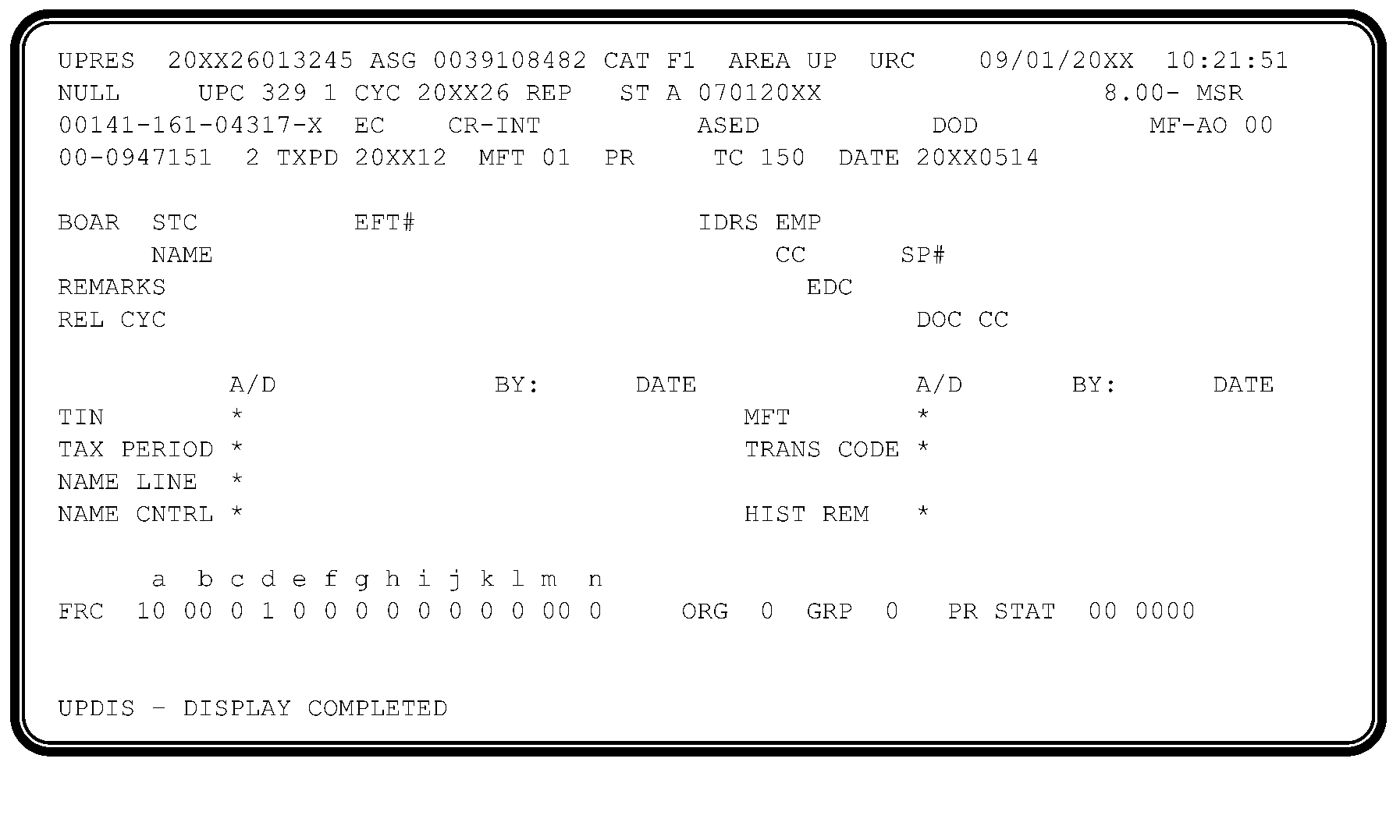
-
UPC 329 RC 1 occurs when an input transaction attempts to update filing requirements or create a tax module inconsistent with the current filing requirements.
-
See the IRM subsections below for specific resolution instructions related to the following:
-
IRM 3.12.279.56.4 UPC 329 RC 1 Instructions for MFT 36, 37, 50, 51, 52, 77 and 78
-
IRM 3.12.279.56.5 UPC 329 RC 1 Instructions for Form 990-C
-
IRM 3.12.279.56.6 UPC 329 RC 1 Instructions for Form 1066 (OSPC)
-
IRM 3.12.279.56.7 UPC 329 RC 1 Instructions for Form 7004 or Form 8868
-
-
UPC 329 RC 1 Resolution - Use the following table to assist in resolving UPC 329 RC 1:
IF AND THEN The unpostable is a payment, The filing requirement is now present on the account, Release with URC 0. The unpostable is a payment, A different EIN is found, Release to the correct EIN using URC 6. The unpostable is a payment, A different MFT is found and the payment money amount is in line with the payments the taxpayer is making, Release to the correct MFT using URC 6 if correction can be implemented in the unpostable function or URC 8 to request the Rejects function make the correction. The unpostable is a payment, Unable to locate a different EIN and or MFT, Correspond with the taxpayer using Letter 320-C or Letter 3064-C. If the entity indicates it is a Limited Liability Company (LLC), reassign to Entity Unpostables. No reply after corresponding with the taxpayer, Release using URC 8 and request Rejects forward to Unidentified if the payment is a TC 610/670 and the received date of the payment is less than one year old. If the date of the payment is more than one year old request Rejects to forward the payment to Excess Collections. The unpostable is a payment, Has an EO subsection, Complete Parts I, II, and III of Form 4442 , Inquiry Referral. For Ogden Campus Only - give completed Form 4442 to your lead for appropriate action. A response will be received within 2 - 3 business days.-
Notate "Expedite" at the top of the Form 4442.
-
In Part III Section C, state "Please provide closing instructions."
-
E-mail Form 4442 to the EO Entity Lead. ≡ ≡ ≡ ≡ ≡ ≡ ≡ ≡ ≡ ≡ ≡ ≡ ≡ ≡ ≡ ≡ ≡ ≡ ≡ ≡ ≡ ≡ ≡ ≡ ≡ ≡ ≡ ≡ ≡ ≡ ≡ Entity EO Unpostables, Attention: EO Entity Lead.
The EO status code is -
40 - Application Pending, Inactive, No Exemption
-
41 - No Reply to Solicitation, Inactive, No Exemption
-
42 - Extension of Time to File (TC 460)
Release using URC 6 to post payment to Master File. The unpostable is TC 971 AC 010 created by a Corresponding Imaging Inventory (CII) case, The base is closed to a different MFT indicating the case was originally opened under the wrong MFT, Release to the correct MFT using URC 6. The unpostable is a return, The return does not match the entity information on ENMOD, Research for another EIN. -
If an EIN is found with a FRC that matches the return filed, close the unpostable to the correct EIN with URC 6. Send the taxpayer a Letter 147-C informing them of the correct EIN.
-
If an EIN is not found, reassign to Entity Unpostables.
-
-
When the filing requirement is inconsistent with the current filing requirement because of a posted Form 1041-A, U.S. Information Return Trust Accumulation of Charitable Amounts (MFT 36), Form 4720, Return of Certain Excise Taxes Under Chapters 41 and 42 of the Internal Revenue Code (MFT 50), Form 706, U.S. Estate (and Generation-Skipping Transfer) Tax Return (MFT 52), Form 706-GS (D), Generation-Skipping Transfer Tax Return for Distributions (MFT 78), Form 706-GS (T), Generation-Skipping Transfer Tax Return For Terminations (MFT 77), Form 709, United States Gift (and Generation - Skipping Transfer) Tax Return MFT 51), or a Form 5227, Split-Interest Trust Information Return (MFT 37), a TC 016 will not change the filing requirements. A TC 591 CC 018 must be input to the tax module to delete the filing requirement.
-
If the entity of the unpostable return or extension and the entity on BMF are not the same, research for another EIN, and use the following table to resolve the unpostable condition:
IF AND THEN A different EIN is found, The filing requirements match the unpostable return or extension, Release using URC 6 and send Letter 147-C if necessary. A different EIN is not found, Reassign to Entity Unpostables.
-
Because of programming changes, Form 990-C, Farmer's Cooperative Association Income Tax Return, can no longer post to the Business Master File. The following table provides instructions for handling unpostable Form 990-C, Farmer's Cooperative Association Income Tax Return.
IF THEN A Form 990-C, Farmer's Cooperative Association Income Tax Return, unposts and the tax period is 200611 and prior, URC 8 to Rejects to process as Tax Class 3, MFT 02, Doc Code 10. A Form 990-C, Farmer's Cooperative Association Income Tax Return, unposts and the tax period is 200612 or later, URC 8 to Rejects to process as Tax Class 3, MFT 02, Doc Code 03.
-
Use the following table to resolve UPC 329 RC 1 when it involves a Form 1066, U.S. Real Estate Mortgage Investment Conduit (REMIC) Income Tax Return.
IF THEN The return or the extension is for MFT 07 Form 1066, Research for transcription errors and/or research for a different EIN. If a different EIN is found, release using URC 6 to the correct number. No other EIN is found (a new EIN must be assigned), Follow procedures in IRM 3.12.279.2.7, Unpostable Reassignment and Closure Types, to coordinate with Entity Unpostables. When the unpostable is received back from Entity Unpostables, release with RC 0 and cycle if necessary.
-
The following table provides instructions for resolving UPC 329 RC 1 for unposted TC 460 and 620s (extensions and payments with extensions) from Form 7004, Application for Automatic Extension of Time To File Certain Business Income Tax, Information, and Other Returns, or Form 8868, Application for Extension of Time To File an Exempt Organization Return.
Note:
Once the TC 620 posts to Master File, a TC 460 will generate for an automatic 6-month extension for Form 1065, U.S. Return of Partnership Income or Form 8804, Annual Return for Partnership Withholding Tax (Section 1446). A five-and-a-half-month extension applies for trusts and non-bankruptcy estates filing Form 1041, U.S. Income Tax Return for Estates and Trusts. A six-month extension applies to bankruptcy estates filing Form 1041, U.S. Income Tax Return for Estates and Trusts.
IF THEN The taxpayer entered the wrong form code or did not enter a code, or Code and Edit or transcription error is present, Release using URC 6. See IRM 3.12.279.30, UPC 307 RC 1 Fiscal Month Discrepancy, for a list of non-taxable returns. If unable to use URC 6, release with URC 8 and request Rejects reprocess the extension with the correct MFT. Edit the MFT in the top left corner of the extension. The tax preparers filed blanket extensions for the incorrect filing requirements (FR), Release using URC D. Form 7004 is filed for a Limited Liability Company (LLC), Reassign to Entity Unpostables. The taxpayer requests an extension on the incorrect form (Form 7004), and the correct form for an EO extension is Form 8868, Convert (red pen editing) the original form to the required form, URC 8 and request Rejects reprocess the extension with the correct MFT and extension date if necessary. See the table below for the correct MFT. -
When resolving an unpostable condition for Form 8868, use the following table to correct the MFT:
Extension is for Form MFT Form 990, Return of Organization Exempt From Income Tax, 67 Form 990-BL, Information and Initial Excise Tax Return for Black Lung Benefit Trusts and Certain Related Person (discontinued for TY 2021 and after), 56 Form 990-EZ, Short Form Return of Organization Exempt From Income Tax, 67 Form 990-PF, Return of Private Foundation or Section 4947(a)(1) Nonexempt Charitable Trust Treated as a Private Foundation, 44 Form 990-T, Exempt Organization Business Income Tax Return, 34 Form 1041-A, U.S. Information Return Trust Accumulation of Charitable Amounts, 36 Form 4720, Return of Certain Excise Taxes on Charities and Other Persons Under Chapters 41 and 42 of the IRC, 50 Form 5227, Split-Interest Trust Information Return, 37 Form 6069, Return of Excise Tax on Excess Contributions of Black Lung Benefit Trust under Section 4953 and Computation of Section 192 Deduction, 57 Form 8870, Information Return for Transfers Associated With Certain Personal Benefit Contracts, No MFT
-
UPC 329 RC 3 occurs when TC 971 AC 040/041 attempts to establish or post to a module other than MFT 01/16.
-
A TC 971 AC 040 or 041 can establish a tax module.
-
A TC 971 AC 040 or 041 will bypass the UPC 309 RC 1 check.
-
A Manually input TC 971 AC 040 will change the deposit requirement to a 1 (monthly).
-
A manually input TC 971 AC 041 will change the deposit requirement to a 2 (semi-weekly).
-
-
UPC 329 RC 3 Resolution - GUF Auto-Closed URC 2 to originator.
-
The Form 944, Employer's ANNUAL Federal Tax Return, was developed to reduce the burden on small business employers (those whose annual employment tax liability is expected to be $1,000 or less) by allowing them to file annually instead of quarterly (Form 941, Employer's Quarterly Federal Tax Return). The first eligible tax period ending for Form 944, was 200612. The form is due by January 31st. Form 944 is processed under MFT 14 and tax class 1. To qualify for the Form 944 program, one of the following situations must apply:
-
The taxpayer is a new employer who expects to have $1,000 or less in employment tax liability for the calendar year.
-
The taxpayer is an existing employer who expects to have $1,000 or less in employment tax liability for the calendar year, contacts the IRS to request to file Form 944 (rather than Form 941), and receives written notice from the IRS to file Form 944.
-
The taxpayer was required to file Form 944 for the prior year and reported $1,000 or less in total tax liability.
Note:
Existing employers must contact the IRS by phone no later than April 1 of the current year, or send a written request postmarked by March 15th to opt in the Form 944 program. If the due date falls on a Saturday, Sunday, or legal holiday, the last day employers may call the IRS, or have their written correspondence postmarked, is the next business day following that Saturday, Sunday, or legal holiday.
-
-
The Form 944 filing requirement is recorded and controlled by data contained in the "F944 CACHE YRS" field found on the second page of Command Code (CC) BMFOLE. The F944 CACHE YRS field consists of a row of calendar years and a row of cache values corresponding to each calendar year. The F944 CACHE YRS field displays the current calendar year, the following calendar year and the preceding eight calendar years. See IRM 2.3.59, Command Codes BMFOL and BMFOR, for additional information on CC BMFOL.
-
Transactions input using CC BNCHG updates the F944 Cache years values and changes the filing requirement. Values are updated on the F944-YR/IND field of CC BNCHG. See the list below for valid values for CC BNCHG cache year updates and a description of existing cache values:
-
Valid cache years are 2018-2027
Cache Values Description "1" Employer is required to file the Form 944 for the calendar year in question "2" Employer is required to file the Form 944 for the current calendar year but will be required Form 941 in the following calendar year. A cache value of "2" automatically updates to a cache value of "1" at the end of the current calendar year. Blank Employer is required to file Form 941 for the calendar year, or no filing requirement determination has been made for the calendar year in question. -
If the F944-YR/IND cache field requires an update, ensure the year for which the F944 cache year value being updated is input with an indicator of "1" to turn on the Form 944 filing requirement for the year indicated or a "9" to turn off the Form 944 filing requirement for the year indicated.
-
If the F944 Cache year value of more than one year requires correction, separate CC BNCHG inputs must be completed for each year.
-
If a permanent 944 bypass indicator is present on the first page of CC BMFOLE (Line 13, literal F944 BYPASS IND field), do not change to a Form 944 filer. This indicator means the taxpayer wants to file Form 941 quarterly.
-
-
Payments unpost as UPC 329 RC 5 when:
-
A Form 941 (MFT 01) payment, TC 610, 640, 650 or 670, attempts to establish or post to a tax period when the payment tax year is equal to a significant F944 Cache Year.
-
A Form 944 (MFT 14) payment, TC 610, 640, 650 or 670, attempts to establish or post to a tax period when the payment tax year is not equal to a significant F944 Cache Year.
-
-
Integrated Automation Technologies (IAT) created the UNP 329 5-6 tool to process UPC 329 RC 5 & 6 unpostable transactions. The tool can process both conditions at the same time. The tool will research using unpostable and entity command codes to determine how the record is handled. The tool will send Letter 4086-C, Letter 4148-C, and Letter 3007-C as needed during processing. Access to this tool requires special permissions and appropriate command codes. Supervisors and/or P&A Analysts will notify the headquarters (HQ) BMF Unpostable analyst for permission requests.
-
The tool uses the GUF 11-40, New Unpostable Report from Control-D to select records to process.
-
The reports should be processed in cycle order.
-
The tool provides reports after completing each run. The All Records report and the Error report must be exported and forwarded to the local P&A Analyst, management and the HQ BMF Unpostable analyst.
-
The HQ BMF Unpostable analyst will monitor the reports generated from the tool to ensure the tool functions properly.
-
The GUF 55-40, Unpostable Employee Assignment/Aged List report can also be used to clean up inventory left from the Error Report.
-
Detailed instructions to run the tool are found on the IAT Job Aid website: UNP 329 5-6 Job Aid.
-
-
UPC 329 RC 5 Resolution - For resolution of unpostable payments not closed by the IAT tool, use the table below to resolve the unpostable condition.
Reminder:
Use CC BMFOLE to research the F944 CACHE YRS indicator and CC ENMOD/TXMOD for letters issued previously to the taxpayer.
IF AND THEN If payment attempts to post to MFT 01, F944 Cache Year Indicator is turned on (equal to 1 or 2) and research indicates a Letter 3007-C was issued to the taxpayer, Input TC 016 to establish as a Form 941 filer. Release using URC 0 to the appropriate tax period if necessary and cycle appropriately. If payment attempts to post to MFT 01, F944 Cache Year Indicator is turned on (equal to 1 or 2) and research indicates a Letter 3007-Cwas not issued to the taxpayer, Input TC 016 to establish the taxpayer as a Form 944 filer. Release using URC 6 to MFT 14 and cycle appropriately. The unpostable tax module is not established and the payment attempts to post to MFT 14, F944 Cache Year Indicator is not turned on (blank) and a Letter 3007-C was issued to the taxpayer, Input TC 016 to establish as a Form 941 filer if necessary. Release using URC 6 to MFT 01 to the correct tax period and cycle appropriately. The unpostable tax module is not established and the payment attempts to post to MFT 14, F944 Cache Year Indicator is not turned on (blank) and a Letter 3007-C was not issued to the taxpayer, Input TC 016 to establish as a Form 944 filer if necessary. Release using URC 0 and cycle appropriately. If the unpostable tax module is not established and the payment attempts to post to MFT 01, F944 Cache Year Indicator is on (equal to 1 or 2) and a Letter 3007-Cwas issued to the taxpayer, Input TC 016 to establish as a Form 941 filer if necessary. Release using URC 6 to MFT 01 to the correct tax period and cycle appropriately If the unpostable tax module is not established and the payment attempts to post to MFT 01, F944 Cache Year Indicator is on (equal to 1 or 2) and a Letter 3007-Cwas not issued to the taxpayer, Input TC 016 to establish as a Form 944 filer. Release using URC 6 and cycle appropriately. Issue Letter 3007-C to confirm the filing requirement change.
-
UPC 329 RC 6 occurs when:
-
A TC 150 for the Form 944, Employer's ANNUAL Federal Tax Return, (MFT 14) attempts to establish or post to a module when the tax year is not equal to a significant F944 Cache Year on Command Code (CC) BMFOLE (e.g., unposted TC 150 for 2020 and the F944 cache year field for 2020 = blank), no matter the filing requirement code (FRC) set.
-
A TC 150 for the Form 941, Employer's Quarterly Federal Tax Return, (MFT 01) attempts to establish or post to a module when the tax year is equal to a significant F944 Cache Year (e.g., unposted TC 150 for 2020 and the F944 cache year field for 2020 = 1), no matter the FRC set.
-
-
The Form 944 was developed to reduce the burden on small business employers (those whose annual employment tax liability is expected to be $1,000 or less) by allowing them to file annually instead of quarterly (Form 941). The first eligible tax period ending for Form 944 was 200612. The form is due by January 31.
-
The following table provides CP Notices that generate to the taxpayer when they file a Form 944 and exceed the threshold as well as Letters manually sent in response to correspondence or filing of incorrect returns:
Notice/Letter Reason Sent CP 250A If the taxpayer files a Form 944, with total tax liability of $1,000.00 or more, and it posts in cycle 09 or prior. CP 250B If the taxpayer files a Form 944, with total tax liability of $1,000.00 or more, and it posts in cycle 10 or later. CP 250C If the taxpayer has a combined annual liability exceed $1,000.00, this notice reminds the taxpayer that they must file a Form 941 for the following tax year. Letter 3007-C Manually generated to the taxpayer when correspondence is timely received to opt out of the 944 program. Letter 4086-C Manually generated to inform taxpayers of their correct Form 941 or Form 944 filing requirement. Letter 4148-C Manually generated to inform taxpayers of their correct Form 944 filing requirement. -
The Form 944 filing requirement is recorded and controlled by data contained in the "F944 CACHE YRS" field found on the second page of Command Code (CC) BMFOLE. The F944 CACHE YRS field consists of a row of calendar years and a row of cache values corresponding to each calendar year. The F944 CACHE YRS field displays the current calendar year, the following calendar year and the preceding eight calendar years. Valid F944 CACHE YRS field values are as follows:
-
"blank" : The employer is required to file Form 941 for the calendar year, or no filing requirement has yet been made for the calendar year in question.
-
"1" : The employer is required to file Form 944 for the calendar year in question.
-
"2" : The employer is required to file Form 944 for the current calendar year but will be required to file Form 941 in the following calendar year. A cache of "2" automatically updates to a cache value of "1" at the end of the current calendar year.
-
-
Integrated Automation Technologies (IAT) created the UNP 329 5-6 tool to process UPC 329 RC 5 & 6 unpostable transactions. The tool can process both conditions at the same time. The tool will research using unpostable and entity command codes to determine how the record is handled. The tool will send Letter 4086-C, Letter 4148-C, and Letter 3007-C as needed during processing. Access to this tool requires special permissions and appropriate command codes. Supervisors and/or P&A Analysts will notify the headquarters (HQ) BMF Unpostable analyst for permission requests.
-
The tool uses the GUF 11-40, New Unpostable Report from Control-D to select records to process.
-
The reports will be processed in cycle order.
-
After running cycle 26 for the UPC 329 RC 6 only, wait 2 weeks before running the next cycle to allow time for the timely filed returns to post.
-
The tool will provide reports after completing each run. The All Records report and the Error report must be exported and forwarded to the local P&A Analyst, management and the HQ BMF Unpostable analyst.
-
The HQ BMF Unpostable analyst will monitor the reports generated from the tool to ensure the tool functions properly.
-
The GUF 55-40, Unpostable Employee Assignment/Aged List report can also be used to clean up inventory left from the Error Report.
-
Detailed instructions to run the tool are found on the IAT Job Aid website: UNP 329 5-6 Job Aid.
-
-
The tool will not close MFT 14 unpostables with a F944 Cache Year older than the current 10 years. Unpostables not closed are listed on the generated Allrecords Report and the Error Report as "HasError,329 6,N,URC 0,ENREQ: PLEASE CORRECT INVALID DATA." The case must be closed manually with URC 0. Management must review this report for errors and designate someone to resolve error cases.
-
Please use the following chart to resolve this unpostable condition when manually resolving unpostables not closed by the tool:
IF AND THEN The unpostable is a Form 941 and a Form 944 posted on the same tax period/year as the unpostable, The F944 Cache Year is a 1 or a 2 on CC BMFOLE, 1. Close with URC 8 and request Rejects cancel the DLN. The unpostable is a Form 941, The F944 Cache Year is blank on CC BMFOLE, URC 0 to post return. The unpostable is a Form 941, CC BMFOL/TRDBV indicates the unposted return is an initial return, -
Input TC 016 to establish as a Form 941 filer. Enter the appropriate value (YYYY/9) in the F944-YR/IND field on CC BNCHG to delete the 944 Cache Indicator, remove FRC 944 and add FRC 941.
-
If payment is present on the 944 module, input a credit transfer to the 941 module.
-
Close with URC 0 and cycle appropriately.
-
Issue Letter 3007-C to confirm the filing requirement change.
The unpostable is a Form 941, CC BMFOL/TRDBV indicates the unposted return is a timely filed (by GUF cycle 26), first quarter return and the tax is over $1,000, -
Input TC 016 to establish as a Form 941 filer. Enter the appropriate value (YYYY/9) in the F944-YR/IND field on CC BNCHG to delete 944 Cache Indicator, remove FRC 944 and add FRC 941.
-
If payment is present on the 944 module, input a credit transfer to the 941 module.
-
Close with URC 0 and cycle appropriately.
-
Issue Letter 3007-C to confirm the filing requirement change.
The unpostable is a Form 941, CC BMFOL/TRDBV indicates no other employment tax returns filed and the unpostable 941 is not for the first quarter of the year but research indicates the Establishment date is within the tax period for the return, -
Input TC 016 to establish as a Form 941 filer. Enter the appropriate value (YYYY/9) in the F944-YR/IND field on CC BNCHG to delete 944 Cache Indicator, remove FRC 944 and add FRC 941.
-
If payment is present on the 944 module, input a credit transfer to the 941 module.
-
Close with URC 0 and cycle appropriately.
-
Issue Letter 3007-C to confirm the filing requirement change.
The unpostable is a Form 941, CC BMFOL/TRDBV indicates the unpostable is not an initial return and not a timely first quarter return, -
Close with URC 8 to Rejects to cancel the DLN.
-
Send Letter 4148-C to notify the taxpayer to file Form 944. If a 4148-C was sent in the last 30 days, do not send another letter.
The unpostable is a Form 944, The F944 Cache Year is 1 or 2, URC 0 to post return. The unpostable is a Form 944, Research on CC BMFOLI indicates no posted Form 941 for any quarter for the same tax year, -
Update the account with CC BNCHG to YYYY1 in Cache Year to add 944 Cache Indicator for the same tax year.
-
If payment is present on the 941 module, input a credit transfer to the 944 module.
-
Close with URC 0 and cycle appropriately.
-
Issue Letter 3007-C to confirm the filing requirement change.
The unpostable is a Form 944, Research on CC BMFOLI indicates a posted Form 941 for the same tax year, -
Close with URC 8 to Rejects to cancel the DLN.
-
Send Letter 4086-C. If a 4086-C was sent in the last 30 days, do not send another letter.
-
-
UPC 329 RC 7 unposts when a TC 424 Push code 036 attempts to establish or post to one of the following conditions:
-
A MFT 14 tax module and its tax year is not equal to a significant F944 Cache Year
-
A MFT 01 module and its tax year is equal to a significant F944 Cache Year
-
-
UPC 329 RC 7 Resolution - Release with URC 2 to the originator.
-
UPC 330 RC 1-7 and RC 9 conditions and resolutions are in the following table:
Reason Code Condition Resolution 1 Occurs when a TC 29X (290, 291, 299) without Priority Code 1, 2, 6, 7 or 8 attempts to post to a module with an unreversed TC 420 or 424. GUF Auto-Closed URC 2 to the originator. 2 Occurs when a TC 30X with Priority Code other than 1, 3, or 4 and the tax module contains the Duplicate/Amended Return freeze. Assigned to Category E1 or E2 and worked in Exam. 3 Occurs when a TC 29X/30X attempts to post with Reference Number 198 and the account does not have an Entity Employment Code of "F." If Doc Code 54, then GUF Auto-Closed URC 2 to the originator. If Doc Code 47, Category E1 or E2 and closed by Exam. 4 Unposts a TC 420 when an unreversed TC 420 is already on the module. GUF Auto-Closed URC 2 to the originator. 5 Occurs when a TC 424 is input to a module with no TC 150 posted and an unreversed TC 424 is already posted. GUF Auto-Closed URC 2 to the originator. 6 Occurs when a TC 424 (except Push Code 010) is input to a module with TC 150 posted and an unreversed TC 420 or TC 424 is already posted. GUF Auto-Closed URC 2 to the originator. 7 Occurs when a TC 421 (Doc Code 47) is input to a module with an unreversed TC 640 posted and no related TC 30X is posted. GUF Auto-Closed URC 2 to the originator. 9 Occurs when a TC 494 is input to a module with an Organizational Source different from the Organizational Source of the latest posted unreversed TC 494. GUF Auto-Closed URC D.
-
This subsection contains condition descriptions and resolutions for UPC 331.
-
UPC 331 RC 1 unposts a math error return without a math error notice code.
-
UPC 331 RC 1 are GUF Auto-Closed URC 8 to Rejects.
-
UPC 331 RC 2 unposts a non-math error zero liability return containing a remittance (not applicable to Form 990, Return of Organization Exempt From Income Tax, Form 990-PF, Return of Private Foundation or Section 4947(a)(1) Nonexempt Charitable Trust Treated as a Private Foundation, Form 1041-A, U.S. Information Return Trust Accumulation of Charitable Amounts, or Form 1065, U.S. Return of Partnership Income, for Tax Period 197912 and later).
-
UPC 331 RC 2 Resolution:
IF THEN The return has liability, Release using URC 8 request Rejects to pick up the liability. The return does not have a liability, Correspond with the taxpayer using Letter 320-C or Letter 21-C to determine where to move credits posted in error or contact the taxpayer by telephone. The taxpayer indicates money is to be refunded, Prepare Form 3244, Payment Posting Voucher. Release using URC 8 to Rejects and request return be processed as non-remit. The taxpayer indicates the money was intended for a different module, Prepare Form 3244. Release using URC 8 to Rejects and request the return be processed as a non-remit and the payment processed to the appropriate module. Taxpayer has no knowledge of the money, Prepare a Form 3244 for the money. Release using URC 8 to Rejects and request the return be processed as a non-remit and the money sent to Unidentified. No reply to the Letter 320-C or Letter 21-C, Prepare a Form 3244 to post payment to the earliest debit module. Release using URC 8 to Rejects and request return be processed as a non-remit and payment processed to the appropriate module. No reply to the Letter 320-C or Letter 21-C, and no debit modules, Prepare Form 3244. Release using URC 8 to Rejects and request the return to be processed as a non-remit and the money sent to Unidentified.
-
Condition and resolutions for UPC 331 RC 4 and 5 are as follows:
Reason Code Condition Resolution 4 Occurs when Form 940, Employer's Annual Federal Unemployment (FUTA) Tax Return, Form 941, Employer's Quarterly Federal Tax Return, Form 943, Employer's Annual Tax Return for Agricultural Employees, Form 944, Employer's ANNUAL Federal Tax Return, or Form 720, Quarterly Federal Excise Tax Return, with alpha Condition Codes "E" and "F" present. GUF Auto-Closed URC 8 to Rejects. 5 Occurs when Form 1120 series (excluding Form 1120-S, U.S. Income Tax Return for an S Corporation) has an alpha Condition Code of "F" and a significant Credit Elect field. GUF Auto-Closed URC 8 to Rejects.
-
This subsection contains condition descriptions and resolutions for UPC 332.
-
Any Form 1120 series TC 150 (not Document Code 51) will unpost if it has a document code not compatible with the Return Code of the latest unreversed TC 620 posted in the tax module.
-
UPC 332 RC 1 Resolution - If file location code is not 98, GUF Auto-Closed URC 8.
-
UPC 332 RC 4 occurs when a TC 150, 29X, 30X, or 370 attempts to post for MFT 17 (Form 8288, U.S. Withholding Tax Return for Certain Disposition by Foreign Persons if the year and month of the Date of Transfer (DOT) doesn’t match the year and month of the Tax Period.
-
The tax period is determined from the Date of Transfer (DOT), Line 3, Parts I and II of Form 8288. The month and year of the DOT will be the month and year of the tax period.
-
UPC 332 RC 4 Resolution:
IF THEN A TC 150, check for transcription error on the Form 8288 and/or attachments, URC 6 if correction can be implemented in the unpostable function or URC 8 to request the Rejects function make the correction to correct the tax period. TC 29X or 30X and apparent transcription error on Form 8288 and/or attachments, URC 6 if correction can be implemented in the unpostable function or URC 8 to request the Rejects function make the correction to correct the tax period. TC 29X or 30X and unable to resolve unpostable condition, URC 2 to route to the originator. TC 370 Doc Code 51 or 52, Contact the originator and close per originator's instructions.
-
UPC 332 RC 5 occurs when a TC 29X (Doc Codes 51 or 54) or TC 30X with a Date of Transfer on the adjustment doesn’t match the Date of Transfer on the posted return, and no secondary TC 340 is present.
-
UPC 332 RC 5 Resolution - follow the instructions in the table below:
IF THEN The Doc Code is 54, Input URC 2 to the originator. The Doc Code is 51, Input URC 8 and request Rejects to route to the originator.
-
The following table provides UPC 334 unpostable conditions and resolutions:
Reason Code Condition Resolution 2 Occurs when a TC 488 input to an MFT 02/05 (not-CCC "5" ) 52, 58, 60, or 61 module or modules with return and Computer Condition Code "5" (Form 1120, U.S. Corporation Income Tax Return, Form 1041, U.S. Income Tax Return for Estates and Trusts, Form 1120-C, U.S. Income Tax Return for Cooperative Associations, or Form 990-T, Exempt Organization Business Income Tax Return), and current Status is not 19, 21, 22, 23, 56, 58, or 60; or MFT 05, not-CCC "5" and the 23C date is greater than 11 months from period ending; or MFT 58/60 and the 23C date is greater than Tax Period ending. GUF Auto-Closed URC 2 to the originator. 3 Occurs when a TC 488 input to MFT 05 module when return is not coded as an Estate (Fiduciary Code of 1) and does not contain Computer Condition Code "5" or, TC 489 input to a module not in Status 14. GUF Auto-Closed URC 2 to the originator. 4 Occurs when a TC 920 (except input Status 50) attempts to post to a module that does not contain a current Status 10, 12, 19, 21, 22, 23, 56, 58, or 60; or, the Status History Section would overflow. GUF Auto-Closed URC 2 to the originator. 5 Occurs when a TC 300/301/308/309 for a significant additional assessment without TC16X attempts to post to a delinquent filed return, and the total tax liability (including the TC 30X) for the tax module exceeds the sum of timely credits posted in the tax module; or TC 300/301/308/309 for a significant abatement without TC 16X attempts to post to a delinquent filed return, and the net of all posted TC 16X transactions in the tax module is not zero. For Doc Code 51, contact the originator for instructions. Release using URC 8 to correct per originator's instructions. All others are assigned to Examination, E1 Category. 6 Occurs when a TC 290/291 for a significant amount, without TC 16X attempts to post to a delinquent filed return with a previously posted TC 160/161; or TC 290/291 for a significant abatement without TC 16X attempts to post to a delinquent filed return with TC 160/161 posted in the module, and the net of all posted TC 16X transactions in the tax module is not zero. If the unpostable is a TC 370, Doc Code 51 and unable to identify and/or contact the initiator and no TC 160 is on the document, input a TC 160 with a zero amount. Release using URC 8 to Rejects. All others, GUF Auto-Closed URC 2 to originator. 7 Occurs when a TC 290/300/370 attempts to post to a Federal account (Employment Code F) and it carries any one of the following manual Penalty and Interest type transactions or Penalty Reference Numbers (PRNs): -
TC 160, 170, 180, 190, 234, 270, 280, 340 or 770 for a debit amount
-
The PRN range is 500-689 or 780-781 and creates a TC 240 at Master File for a debit amount.
GUF Auto Closed URC 8 to cancel DLN. -
-
UPC 335 RC 1 occurs when a TC 29X (Document Locator Number (DLN) blocked other than 800 series) or 30X (with significant amount) attempts to post to a module with an unreversed TC 780 present.
-
UPC 335 RC 2 occurs when a duplicate TC 29X or TC 30X attempts to post.
-
UPC 335 RC 1 and 2 are GUF Auto-Closed URC 2 to originator.
-
UPC 336 RC 1 occurs when a TC 29X/30X with other than a zero amount, or TC 290 with Credit Reference Number (CRN) 766/767, and without secondary TC 34X or 77X attempts to post to a module, and:
-
The module has an unreversed TC 534 for significant amount posted
-
Status 14 is present in the Status History Section
-
The interest TC 34X or 77X restriction is "on" in the module
-
-
UPC 336 RC 1 Resolution: If Doc Code 51, contact originator for instructions. Release using URC 8 to correct per originator’s instructions. All others, GUF Auto-Closed URC 2 to originator.
-
UPC 336 RC 2 occurs when a TC 291/301 without a secondary TC 18X attempts to post that would reduce the net tax to zero and a significant net FTD penalty (TC 18X) is present that restricts computer generated FTD penalty.
-
UPC 336 RC 2 Resolution: GUF Auto-Closed URC 2 to originator.
-
UPC 336 RC 3 occurs when a TC 29X containing a reference number 339 signed positive if the reference number amount exceeds the interest total field.
-
UPC 336 RC 4 occurs when any input TC 290 is attempting to post and the adjustment contains credit reference number 339 and any other significant amount, tax, penalty, interest or another credit reference number amount.
-
Resolution for UPC 336 RC 3-4: Release with URC 2 to originator.
-
This unpostable condition occurs when there is an Inconsistent CSED Transaction.
-
UPC 337 RC 1 occurs when a TC 290, 294, 298, 300, 304, or 308 for significant amount attempts to post to a debit balance module where the TC 150 CSED is about to expire or has expired and no unreversed TC 534 is posted.
-
UPC 337 RC 2 occurs when a TC 290 with a secondary TC 534 is directed to a module where the return CSED or for MFT 13, the Civil Penalty CSED is not imminent or expired, or the transaction amount exceeds assessed module balance.
-
UPC 337 RC 3 occurs when a TC 290 with a secondary 534 attempts to post and the CSED date field on it does not match the CSED date field on a prior-posted assessment.
-
Resolution for Reason Codes 1 - 3 are GUF Auto-Closed URC 2 to originator.
-
This subsection contains condition descriptions and resolutions for UPC 340.
-
Any transaction (except TC 150, ISRP 610 and TC 670) that attempts to post to or create an MFT 52 tax module whose entity module does not contain Date of Death.
-
UPC 340 Resolution RC 1
IF THEN Date of Death (DOD) is on the document, Input the DOD using TC 016. Release using URC 0 and cycle if necessary. DOD is not on the document, Request last posted return (CC BRTVU/RTVUE may be used). Research the Social Security Number (SSN) of the taxpayer listed on the document on CC INOLES. -
If the DOD is on the return or INOLES, input TC 016 and release using URC 0, cycle if necessary.
-
If unable to find the DOD, input TC 016 with a presumed DOD (based on the transaction date). Release using URC 0 and cycle if necessary. See IRM 3.12.279.18.4, UPC 301 RC 1 Master File Tax (MFT) 51/52 TC 150/460/670, for additional information determining the DOD.
-
-
UPC 340 RC 2 occurs when the input Date of Death (DOD) is all nines on an MFT 52 module without an unreversed TC 400.
-
UPC 340 RC 2 Resolution - Release with URC 2 to originator.
-
UPC 340 RC 4 occurs when a TC 468 with a payment extension date prior to the return due date (RDD) or with a payment extension date prior to or equal to the payment extension date of a prior posted TC 468.
-
UPC 340 RC 4 Resolution - Release with URC 2 to the originator.
-
UPC 341 RC 1 occurs when a TIN is resequenced and an input transaction attempts to establish a tax module on an account with FR codes of all “8’s.”
-
UPC 341 RC 1 Resolution:
IF THEN Category G1 payment and enough information is available to determine the payment intended for the XREF EIN or another EIN is found, Release using URC 6 to the correct EIN. Correct the name control and MFT, if necessary. Category G1 payments and any other TC’s that do not GUF Auto-Close, if unable to locate another EIN for the entity, Reassign the unpostable to the Entity Unpostable function. Notate the reason and attach any research found. TC 960, originator is not present, Release using URC 2 with nullify area code 14 to CAF. TC 59X, GUF Auto-Closed URC D. All others, GUF Auto-Closed URC 2 to originator. -
UPC 341 RC 2 occurs when a TC 474 or TC 960 attempts to post with no related filing requirement code (FRC).
-
UPC 341 RC 2 Resolution - GUF Auto-Closed URC 2.
-
This subsection contains condition descriptions and resolutions for UPC 342.
-
UPC 342 RC 4 occurs when:
-
An input audit/DP adjustment or account transfer (doc code 47, 54, or 51) contains an "Interest-to-date" (TC 340/341 present) and the date is greater than the cycle 23C date plus 60 days of the posting cycle.
-
An input audit/DP adjustment (doc code 47, 54) containing a credit "Interest-to-date" (TC 770 present) and the date is greater than the cycle 23C date.
-
-
UPC 342 RC 4 Resolution - Close with URC 2 to the originator.
-
UPC 342 RC 5 occurs when an input DP adjustment containing reference number 766/767 attempts to post with Offset Trace Number (OTN) that does not match OTN on posted TC 898.
-
UPC 342 RC 5 Resolution - Close using URC 6 if correction can be implemented in the unpostable function or URC 8 to request the Rejects function make the correction per originator. See IRM 21.4.6.5.23.6, UPC 342.
-
UPC 342 RC 6 occurs when an input DP adjustment attempts to post with reference number 766 amount greater than sum of net TC 89X memo amounts minus sum of net TC 76X in module (all with matching Offset Trace Numbers (OTNs)).
-
UPC 342 RC 6 Resolution - Close using URC 6 if correction can be implemented in the unpostable function or URC 8 to request the Rejects function make the correction per originator. See IRM 21.4.6.5.23.6, UPC 342.
-
UPC 342 RC 7 occurs when an input DP adjustment attempts to post with reference number 766 amount greater than sum of net TC 76X in module (with matching Offset Trace Numbers (OTNs)).
-
UPC 342 RC 7 Resolution - Close using URC 6 if correction can be implemented in the unpostable function or URC 8 to request the Rejects function make the correction per originator. See IRM 21.4.6.5.23.6, UPC 342.
-
UPC 342 RC 8 occurs when an input DP adjustment containing reference number 766/767 attempts to post, and transaction date of posted TC 898 is more than six years earlier than current 23C date.
-
UPC 342 RC 8 Resolution - Close using URC 6 if correction can be implemented in the unpostable function or URC 8 to request the Rejects function make the correction per originator. See IRM 21.4.6.5.23.6, UPC 342.
-
UPC 344 occurs when there is an invalid Collection Statute Expiration Date (CSED) or Assessment Statute Expiration Date (ASED).
-
The following table provides the condition and resolution for UPC 344:
Reason Code Condition Resolution 1 Occurs when the transaction date of TC 550/560 is later than the Statute of Limitations Expiration Date as extended. GUF Auto-Closed URC 2 to originator. 2 Occurs when the Assessment Statute Expiration Date as extended by the TC 560 is not equal to or greater than the present ASED for the module. GUF Auto-Closed URC 2 to originator. 3 Occurs when the transaction date of TC 550/560 is earlier than the transaction date of the latest unreversed TC 550/560/564. GUF Auto-Closed URC 2 to originator. 4 Occurs when the Collection Statute Expiration Date as extended by the TC 550 is not equal to or greater than latest CSED in the module. GUF Auto-Closed URC 2 to originator. 5 Occurs when a TC 550/560 attempts to post to a module which contains an unreversed TC 480. GUF Auto-Closed URC 2 to originator. 6 Occurs when a TC 550 with a transaction date not later than the transaction date from a posted TC 520 or TC 470 CC 095. GUF Auto-Closed URC 2 to originator. 7 Occurs when there is a TC 550 and TC 150 is not posted to module (except MFT 13 for TC 550). GUF Auto-Closed URC 2 to originator. 8 Occurs when there is a TC 550 and the module contains one or more TCs 520 and no TC 520 has a Closing Code of 06X, 073, 076-089. GUF Auto-Closed URC 2 to originator. 9 Occurs when a TC 550 attempts to post to an MFT 52 module currently in status 14. GUF Auto-Closed URC 2 to originator.
-
The following table provides the condition and resolution for UPC 345:
Reason Code Condition Resolution 3 Occurs when a TC 961 or 962 is input to a module and no unreversed TC 960 is present. GUF Auto-Closed URC 2 to originator. 4 Occurs when a TC 925 attempts to post for any of the following conditions: -
Any TC 925 with process code other than 4030 if there isn’t a TC 925 posted in the module after resequencing for one week.
-
Any TC 925 with a closing process code and the last posted TC 925 contains a closing process code on the last significant process code.
-
Any TC 925 with process code with 4050 (Reconsideration Received process code) and the last posted TC 925 doesn’t contain a closing process code on the last significant process code.
GUF Auto-Closed URC 2 to originator. 5 Occurs when there is a TC 925 attempting to post to a module and no TC 150 is posted (except for MFT 13). GUF Auto-Closed URC 2 to originator. 6 Occurs when there is a TC 925 attempting to post to any MFT other than MFT 01, 02, 05, 06, 11, 13, 14, or 16. GUF Auto-Closed URC D. -
-
This subsection contains condition descriptions and resolutions for UPC 346.
-
UPC 346 RC 1 occurs when an input TC 370 (Doc Code 51/52) contains more than one return (TC 150), and an input TC 370 (Doc Code 52) contains a return and a TC 150 is already posted (duplicate filing condition).
-
UPC 346 RC 1 Resolution -
IF THEN Doc Code 51, Change TC 150 to TC 290, release using URC 8. Doc Code 52, GUF Auto-Closed URC 2 to originator.
-
UPC 346 RC 3 occurs when an input TC 370 with secondary TC 402 (Transfer-Out Correction) attempts to post to a tax module which did not contain an unreversed TC 400 or did not match on amount and date.
-
UPC 346 RC 4 occurs when a TC 370 (Doc Code 51) with secondary TC 402 attempts to post to a module which is not in Status 29.
-
UPC 346 RC 5 occurs when an input TC 400 with Doc. Code 51 for MFT other than 13 attempts to post with TC amount other than zero, and the tax module does not contain a TC 150, or the module reflects a credit balance. (A TC generated for an overflow condition will contain blocking series 999.)
-
UPC 346 RC 3 through RC 5 Resolution - Determine if the correct tax period is being addressed and use the following table to resolve.
IF THEN Correct tax period is not being addressed, Release using URC 6 the correct tax period. A pending transaction would create a zero or debit balance, Release using URC 0. All others, Release using URC 8. Request Rejects forward the case to Accounting.
-
UPC 346 RC 7 occurs when any TC 370 (Doc Code 51) input transaction not containing a TC 150 does not find a TC 150. This check does not apply to:
-
TC 370 Doc Code 51 MFT 74/75
-
BPD module MFT 03 tax period YYYY08
-
MFT 79 tax period YYYY09
-
ESRP module MFT 43
-
MFT 83
-
TC 370 with a secondary TC 402
-
-
UPC 346 RC 7 Resolution - Verify the TC 370 is attempting to post to the correct EIN and use the following table to resolve the unpostable:
IF THEN EIN in error and module contains a TC 150, Release using URC 6 to correct EIN. EIN in error and module does not contain a TC 150, Release using URC 8. Request Rejects forward the case to Accounting. -
Verify that the TC 370 is attempting to post to the correct MFT and tax period with the data provided on the Form 3552, Prompt Assessment Billing Assembly, and use the following table to resolve the unpostable:
IF THEN An error is found, Release using URC 6 if the unpostable function can correct the error or URC 8 to request Rejects correct the error. An error is not found, Release using URC 8. Request Rejects forward the case to Accounting.
-
UPC 347 RC 1 occurs when a transaction attempts to post to a module removed to the Retention Register (other than TC 370, Doc Code 52, or TC 998, or TC 583 with SVC code of "1" for MFT's 02, 05, or 06 only, or TC 008). The TC 840 will resequence for up to 10 cycles before being considered unpostable.
Note:
The module must be restored from the retention register to the active Master File before any transactions will post. Input of URC 0 to release the transaction will repeat the unpostable condition unless actions are taken to restore the module. See paragraphs below for instructions needed to restore the module or correct to a different module if needed.
-
Use the following table and paragraphs for UPC 347 RC 1 Resolution:
IF THEN a TC 370/446 is pending or posted after the transaction unposted or the module is restored after the transaction unposted, Release with URC 0. Cycle to post after the pending TC 370/446 as needed. Doc Code 77, Release using URC 2 to originator. TC 59X, Release using URC 2 to originator. Doc Code 14 or 49, GUF Auto-Closed URC 2 to Collections with nullify area code 03. TC 582 or 583, GUF Auto-Closed URC D. TC 29X (blocked other than 800 series), Release using URC 2 to originator. TC 29X reflecting a TC 770 for "0" amount, Release using URC 2 to originator. TC 30X with other than zero amount, Release using URC 2 to originator. TC 370 or TC 446 - if they are the same, Compare the Form 3413, Transcription List (Account Transfer-In), data with CC BMFOL, CC TXMOD or CC MFTRA. Release using URC D. TC 370 or TC 446 - if not the same, Compare the Form 3413 data with CC BMFOL, CC TXMOD or CC MFTRA. Release using URC 2 with nullify area code 41 to route the form to Accounting. Include remarks to explain the unpostable condition. Doc Code 34 and the TC is a Debit, Release using URC 2 to the originator. Doc Code 34 and the TC is a Credit, Take the necessary action to reverse the transaction. Release using URC 6 if correction can be implemented in the unpostable function or URC 8 to request the Rejects function make the correction and notify the originator. Doc Code 24, 48, or 58, Take the necessary action to reverse the transaction. Release using URC 6 if correction can be implemented in the unpostable function or URC 8 to request the Rejects function make the correction and notify the originator. An estimated payment, TC 660, Research IDRS and post to a current period according to the transaction date. Release using URC 6. TC 96X and MFT/TXPD are not zero, GUF Auto-Closed URC D to CAF. -
If the UPC 347 RC 1 involves other payment documents, follow the instructions below:
IF THEN The payment is addressing the correct module and the module dropped to retention 2019 or later, Use CC BMFOLB to restore the module back to active on Master File. Release using URC 0 to post after the transfer-in is complete. The account is being reestablished (pending TC 370), Release using URC 0 and cycle to post after the TC 370. The payment is addressing the wrong module, Release using URC 6 if enough information is available to correct the payment or URC 8 to request rejects to the correct module. The TC 670 is for zero with a secondary TC 360, Release using URC 2 and route to Compliance Services Collection Operations (CSCO). The payment is addressing the wrong module and the correct module cannot be determined, Post payment to the current year with URC 6. -
UPC 347 RC 1 Resolution - All others, research the module for a posted or pending TC 370.
-
If the TC 370 is pending or posted, release using URC 0 and cycle to post after the TC 370 or TC 446.
-
If a TC 370 is not found, research IDRS and take the following action:
IF THEN The module has a posted TC 400 Doc Code 52, The module is being reestablished. Release using URC 0 after the module is restored from retention. The module has a posted TC 400 Doc Code is 51, The account is being transferred to another EIN. Research for the correct EIN. Release using URC 6 to the correct account. The module has an "M-" freeze and does not contain a pre-journalized money amount, or no TC 150, Release using URC 2 to the originator. There is no "M-" freeze and TC 150 is not an exact match of the posted TC 150, Release using URC 0 and forward to the Unpostable Statute Coordinator. There is no "M-" freeze and no TC 150 posted on CC BMFOLI, Use CC BMFOLB to request the tax module be restored to active on the BMF (if module dropped 2019 or later). Release using URC 0 to post after the module is reestablished. Follow instructions in the table below for instructions to restore modules sent to retention earlier than 2019. -
-
Instructions to restore the module from the retention register to active on the BMF:
Note:
See IRM 3.12.179-2, UPC 197 Retention Register Requests, for an example of CC MFTRAZ and an input example of the Form 3774, Request for Research.
-
UPC 347 RC 1 for MFT 52 - The Form 706, U.S. Estate (and Generation-Skipping Transfer) Tax Return, is filed by the executor of a decedent’s estate within 9 months after the date of the decedent’s death on the decedent’s social security number (SSN) on the "V" file. Form 706 may also be filed to figure the generation-skipping transfer (GST) tax imposed by Chapter 13. Executors are required to file any previously filed Form 709, U.S. Gift (and Generation-Skipping Transfer) Tax Return, with the Form 706. This unpostable is programmed to unpost a transaction that attempts to post to a module that was removed to the Retention Register.
Note:
The module must be restored from the retention register to active on master file before any transactions will post. Input of URC 0 to release the transaction will repeat the unpostable condition unless actions are taken to restore the module. See paragraphs below for instructions needed to restore the module from retention to active or to correct to a different module if needed.
-
Research and resolution for MFT 52, TC 150 - The Form 706 is filed only once. Research to find the decedent’s date of death using the physical return (if available), CC INOLE, ENMOD, and/or TRDBV (from the unposted return) and compare to the year the module went to the Retention Register using BMFOLV.
-
Use the procedures below to determine if the TC 150 is a possible duplicate filed return, a return incorrectly filed on the wrong taxpayer identification number (TIN), or an original filing:
If Then The SSN matches the decedent, the date of death is not a current date, and is earlier than the year the module went to the Retention Register, The return is a possible duplicate return. Follow the instructions in paragraph four (4) to complete resolution. The SSN matches the decedent, the date of death is current, and the module went to retention years ago, The return is an original return. The module likely went to retention after misapplied transactions to the module. Follow the instructions in paragraph four (4) to complete resolution. The return is determined to be intended for the spouse and the SSN is found, Release using URC 6 to post the return to the correct SSN with a V (BMF side). The return is determined to be intended for the spouse and the SSN is not found, Contact the personal representative or attorney for the correct SSN. If unable to secure the correct SSN, coordinate with Entity to assign a temporary SSN for posting the return. Also request Entity Control assign an IRSN. Instruct Entity to forward to Rejects upon completion with URC 8. Remarks to Rejects: Invalid SSN, Form 706. -
See the following chart for instructions for reestablishing the module from retention to active on the Master File. See IRM 3.12.179-2, UPC 197 Retention Register Requests, for an example of CC MFTRAZ and an input example of the Form 3774, Request for Research.
Reminder:
Check the module for a pending or posted TC 370. If found, URC 0 the transaction to post after the TC 370 posts.
-
Resolution of UPC 347 RC 1 MFT 51 & 52 for all other TC’s - Research to determine if the transaction is intended for MFT 51/MFT 52.
-
If the transaction is a payment made by check, research the Remittance Transaction Research (RTR) system. If the payment is intended for a different MFT, use URC 6 to correct the payment or URC 8 to request the Rejects function correct the payment to post to the correct MFT.
-
If determined the payment or transaction is intended for MFT 51/52, follow the instructions in paragraph (3) to reestablish the module from retention and post the transaction to the module once active on the Master File.
-
Resolution for TC 150 of the Form 709, verify the return is an original return. If the return (TC 150) did not come in at the same time as the Form 706, then follow instructions paragraph (4) to request the transcript and reestablish the module from retention to active on the Master File.
Caution:
Occasionally, the Form 709 can become detached during processing of the Form 706. If the Form 709 is filed at the same time as the Form 706, it must be associated with the DLN of the posted or pending Form 706. Release using URC 8 to request rejects cancel the DLN and send to files to be associated with the Form 706.
-
-
UPC 347 RC 2 - An input TC 370, Doc Code 52, blocking series other than 9XX, attempts to create a tax module and there is no indication of the expired module in the Vestigial Section.
-
UPC 347 RC 3 - An input TC 370, Doc Code 52, (all blocking series) attempts to post and there is a tax module already present with transactions other than TC 998 posted.
-
UPC 347 RC 4 - An input TC 370, Doc Code 52, blocking series equals 9XX, attempts to post and there is a vestigial record present for that module.
-
UPC 347 Resolution RC 2, 3 and 4 - GUF Auto-Closed URC 2 to originator.
-
UPC 348 occurs when a TC 020 attempts to post (to close or deactivate the account) within the same cycle as a TC 000. The following table provides instructions for resolving this unpostable:
Reason Code Condition Resolution 1 Occurs when a TC 020 cannot post in the same cycle that an account entity was created. GUF Auto-Closed URC 2 to originator. 2 Occurs when a TC 022 input in the same cycle that the EO section was created. GUF Auto-Closed URC 2 to originator.
-
UPC 349 RC 1 occurs when an entity input transaction (except TC 041 with new TIN addressing a temporary SSN beginning with 9, TC 012 and TC 019) did not update all Filing Requirement Codes in an account entity which contained 8's in all Filing Requirement Codes.
-
Reason Code 1 Resolution - GUF Auto-Closed URC 2 to originator unless the IDRS employee number of the originator field is blank. In instances where the unpostable is not GUF auto closed URC 2, close the unpostable with URC D.
-
Unpostable condition 354 occurs when a TC 971 attempts to post. See the chart below for condition and resolution descriptions.
Reason Code Condition Resolution 1 Occurs when a TC 971 Action Code (AC) 031 is attempting to post and an unreversed TC 971 AC 032 or AC 637 was present or a TC 971 AC 032 attempted to post and an unreversed TC 971 AC 031 or AC 637 was present or a TC 971 AC 637 attempted to post and an unreversed TC 971 AC 031 or 032 was present. GUF Auto-Closed URC 2 to originator. 2 Occurs when a TC 971 AC 031 or 032 or 637 attempts to post to a tax module and the total module balance is zero or credit. GUF Auto-Closed URC 2 to originator. 3 Occurs when a TC 971 AC 031 attempts to post to a module in an account where no module in the account has an unreversed TC 520 with CC 060-067, 081, 083, 085, or 086-089, or TC 971 AC 032 attempts to post and the Entity 48 Indicator is zero, or a TC 971 AC 637 attempts to post to a module in an account where no module in the account has an unreversed TC 520 with CC 70, 73-75, or 80 DOJ-IND. GUF Auto-Closed URC 2 to originator. 4 Occurs when a TC 971 AC 163 and there is no unreversed previously posted TC 971 AC 063 present with an earlier date. URC 2 to originator.
If originator is not present or originator has an office identifier and unit range of 05099, release with URC D.5 Occurs when a TC 971 AC 263 and 3rd Party/Paid Preparer check box (or Preparer check box for MFT 02/05/06/07) if this indicator is not significant. GUF Auto-Closed URC 2 to originator. 6 Occurs when a TC 971 AC 650 posting to MFT other than MFT 02/08/34. GUF Auto-Closed URC 2 to originator. 7 Occurs when a TC 971 AC 220 posting to a module where balance is zero or credit. URC 2 to originator. 8 Occurs when a TC 971 AC 359 posting to a module and the entity C-Corp indicator is not set (filing requirement of 1120-01). GUF Auto-Closed URC 2 to originator. 9 TC 971 AC 358 posting to a MFT 02/06/08 module where the net of TC 76Xs posted at RDD is credit. GUF Auto-Closed URC 2 to originator.
-
The following table identifies the UPC 361 unpostable condition and the resolution:
Reason Code Condition Resolution 1 Occurs when a TC 470 (CC 095) or TC 520 (CC 082) input to a tax module without an unreversed TC 240 with Reference Numbers 165, 167, 169, 622, 624, 626, 628, 630, 631, or 665-673 posted or input to a tax module with TC 470 (CC 095) or TC 520 (CC 082) already posted. GUF Auto-Closed URC 2 to the originator. 2 Reserved 3 Occurs when a TC 470 CC 097 is input to a tax module and neither the entity SC of Jurisdiction Code nor the Large Corporation Freeze is significant. GUF Auto-Closed URC 2 to the originator. 4 Occurs when a TC 470 CC 097 is input to a tax module where an unreversed TC 470 CC other than 097 is present; or TC 470 other than 097 is input to a tax module where an unreversed TC 470 CC 097 is present. GUF Auto-Closed URC 2 to the originator. 5 Occurs when a TC 470 CC 097 attempts to post to the entity/ a tax module and the entity has a significant account wide -V Insolvency/Bankruptcy and/or -W Litigation freeze. GUF Auto-Closed URC 2 to the originator. 6 Occurs when a TC 470 Closing Code 098 attempts to: -
post to a tax module other than MFT 02 or 34
-
post to a module that is MFT is 02, but the Entity Form 1120, filing requirement code is other that 01, 07 or 19
-
post to a module that is MFT is 34, but Entity Form 990-T filing requirement code is other than 01
GUF Auto-Closed URC 2 to the originator. 7 Occurs when a TC 470 Closing Code 090 is input to a tax module where an unreversed TC 520 CC 060-067/081/083/085-089 is present. GUF Auto-Closed URC 2 to the originator. -
-
UPC 367 RC 1 - unposts a TC 844 with significant memo amount attempting to post and the date of demand is less than or equal to the TC 844 transaction date or greater than the current cycle 23C Date.
-
UPC 367 RC 1 Resolution - GUF Auto-Closed URC 2 to originator.
-
The UPC 368 RC 1 unposts MFTs 01, 02, 03, 05, 06, 10, 11, 14, 16, 60 or 67 for the following criteria:
-
TC 971 AC 712 attempts to post and the DLN in the X-REF-DLN field does not match the DLN of any record in the suspense file
-
TC 971 AC 713 attempts to post and the DLN in the X-REF-DLN field does not match the DLN of any record in the suspense file
-
TC 971 AC 711 attempts to post and there is a previously posted TC 150 on the module
-
-
UPC 368 RC 1 Resolution - GUF Auto-Closed URC 2 to originator.
-
UPC 369 RC 1 - This unpostable condition occurs when there is a TC 01X with employment code W addresses an account with an EO section where the subsection is not 00/03/50/60/70/71.
-
UPC 369 RC 1 Resolution - GUF Auto-Closed URC 2 to originator.
-
UPC 369 RC 2 - a TC 01X with Employment Code W addresses an account with an EO section where the Subsection Code is 00/03/50/60/70/71 and the current EO Status is other than 01/02/03/07/10/11.
-
UPC 369 RC 2 Resolution - GUF Auto-Closed URC 2 to originator.
-
UPC 381 RC 2 occurs when a TC 150 for MFT 01/10/11/14/16 with a total tax settlement of zero, a Computer Condition Code of "E" or "S" is not present on the return and:
-
The FTD Credits claimed are not equal to the credit module balance.
-
The corresponding tax module has a ≡ ≡ ≡ ≡ ≡ ≡ ≡ ≡ ≡ ≡ ≡ ≡ ≡ ≡ ≡ ≡ ≡.
-
The TC 150 is not already posted.
-
There is not an unreversed TC 420/424 present with a TC 640(s) as the only unreversed credit(s) posted.
-
There is not an unreversed TC 716 present with an amount that equals the module credit balance.
-
-
UPC 381 RC 2 Resolution - Resolve the unpostable condition according to the following table:
IF AND THEN a. The module does not contain a TC 150, The unpostable return (TC 150) is blank and unsigned and there is no indication of liability, Release with URC D. b. CC ENMOD, credits, or previous history indicates the taxpayer files via "e-file" and a TC 150 is posted, The Doc Code is 35 (Electronic Filed Form 941), 36 (Electronic Filed Form 6248), 37 (Electronic Filed Form 945) or 39 (Electronic Filed Form 940), Release with URC D. c. The unpostable return (TC 150) indicates it is a SFR (Substitute for Return), Input TC 570 and release using URC 0 and cycle if necessary. d. The Statute of Limitations for the refund has expired (do not add CCC "E" or CCC "S" ) Release using URC 0 to generate a -B freeze. e. The module contains a posted TC 150, The unpostable return (TC 150) has an untranscribed liability, Compare the unpostable return using CC BRTVU or CC BMFOLR to the posted return (TC 150) to determine if it is a duplicate return. If it is a duplicate return and the unpostable return received date is earlier than the posted return and the module contains a TC 16X, release using URC 0. If the module does not contain a TC 16X or the unpostable return received date is later than the posted return received date, release using URC D. If it is not a duplicate, release using URC 0. f. The module contains a posted TC 150, The unpostable return (TC 150) has no liability, and the unpostable returns received date is equal to or later than the posted TC 150, Release using URC D. Document can be destroyed. g. The module contains a posted TC 150, The unpostable return (TC 150) has no liability, and the unpostable returns received date is earlier than the posted TC 150 and module contains a TC 16X, Release using URC 0. h. The module contains a posted TC 150, The unpostable return (TC 150) has no liability, and the unpostable returns received date is earlier than the posted TC 150 and module does not contain a TC 16X, Release using URC D. Document can be destroyed. i. The return is taxable, and no TC 150 is posted, Release using URC 8 to Rejects; and request Rejects enter the tax liability information per the return. j. The unpostable is a Form 940 (MFT 10) with amounts on line 3 (Total payments to all employees) and line 6 (Subtotal), with 0 (zero) amount on line 7 (Total Taxable FUTA wages), do not URC 8 to have tax liability figured; Continue to process. k. The return is for information only and an address change is requested, The return is signed, Input TC 014 if necessary, and release using URC D. l. The return is for information only, The taxpayer states they filed as part of a consolidated return and the return is signed, Input TC 590 CC 014. Release using URC D. m. The return is for information only, The taxpayer states someone else files for them and the return is signed, Release using URC D. Document can be destroyed. n. The return is for information only and is a final return, or the taxpayer indicates on the return they are other than a 941 filer, Transfer any credits to the correct entity and/or MFT using the payment received date to post to the correct tax period ending. Input TC 591 CC 075 and release using URC D. Document can be destroyed. o. The return is for information only, The return is not signed, Release with URC D. Document can be destroyed. p. The money was previously transferred out of the unpostable module, Release using URC 0. q. The money posted on the module is a TC 640 and there is a freeze on module, Release using URC 0. r. The TC 610 or 670 is posted in error, Input a credit transfer to move the payment. Release using URC 0 to post and cycle as necessary. s. If the module contains a TC 610/670 payment and it belongs to the taxpayer, or TC 700/706/710/716 credit, or a combination of both, Release using URC 0. t. There is a balance due in another module, There are no freeze conditions on Master File that will prevent an offset into the balance due module(s) and payments do not include a TC 650, Release using URC 0 and allow the computer to generate the offset. u. There is a balance due in another module, There are freeze conditions, Transfer the credit (TCs 610, 670, 700, 710, 716) to the balance due module. Release using URC 0 and cycle if necessary.
Research IDRS for any balance due modules and apply any credits to those outstanding balance due modules.v. There is a balance due in another module, There is a "-V" or "-W" freeze on the account (Bankruptcy freeze), Input URC 0. w. There is a balance due on another TIN, the unpostable return (TC 150) is a final, CCC F is on CC TXMOD, Transfer credits to new number, release using URC 0 and cycle as necessary. x. There is a balance due on another TIN, the unpostable return (TC 150) is a final, CCC F is not on CC TXMOD, Transfer credits to new number, release using URC 6, input CCC F and cycle as necessary. y. There is a balance due on another TIN, The unpostable return (TC 150) is not a final return, Transfer credits, release using URC 0 and cycle as necessary. z. Return is a "final return," TC 650 is present, and research does not locate another EIN, Enter CCC "F" if not on TXMOD. Release using URC 6 or 0 as appropriate. aa. Return is not a final, Payments are timely for the next tax period, Transfer credits, release using URC 0 and cycle as necessary. bb. "Applied to next return" box is checked, Transfer the credit forward and release using URC 0 and cycle as necessary. cc. The "Send a refund" or "refunded" box is checked; the taxpayer indicated a refund is due; the taxpayer indicated "not liable," or no wages, tips, and other compensation are subject to tax on the return; or there is a Letter or CP Notice indicating their return has not been filed, Release using URC 6 and enter CCC "S." dd. There is a posted TC 976 with a (G), There is an E Freeze on the module, Release using URC 0 to post. ee. There is a posted TC 976 with a (G), There is not an E Freeze on the module Input TC 570. Release using URC 0 to post and cycle as necessary. ff. The return is an electronically filed employment tax return (MFT 01, 11, 14 or 16) filed by a Reporting Agent (EUP will indicate if the return was filed by a Reporting Agent), Prior history indicates the taxpayer is liable for tax and payments posted to the module are within pattern, Release using URC D. gg. None of the above apply, The TC 650 is the only credit, or any combination of payments including TC 650, Release using URC 8, and request Rejects to enter CCC "E" to generate a CP Notice to the taxpayer. hh. Unable to obtain the document (TC 150) after following procedures D2, D3, DO, and DB, do not D4, Input TC 570 and release using URC 0 and cycle.
-
UPC 384 Reason Code 2 occurs when a TC 150 for MFT 15 or MFT 03 with Abstract Number 11 attempts to post to a module without a TC 055 posted. Also, unposts a TC XX2 (credit reversal) attempting to post to MFT 15 or MFT 03 tax module (with Abstract Number 11 posted) which would reduce net posted credits to below the Abstract Number 11 amount or MFT 15 tax.
-
UPC 384 RC 2 Resolution: - Doc Code 34, GUF Auto-Close URC 2 to originator.
-
UPC 384 RC 2 Resolution for Doc Codes 24, 48, 58:
-
If both the credit and debit are unpostable, associate and release using URC 8. Request Rejects cancel the DLNs and route to preparer.
-
All others, research to determine where the credit posted and post the debit to the same module. Release using URC 6 if correction can be implemented in the unpostable function or URC 8 to request the Rejects function make the correction.
-
-
UPC 385 RC 1 occurs when there is a TC 370, Doc Code 51 (B.S. 699), with secondary TCs other than 19X, 5XX, 6XX, or 7XX.
-
UPC 385 RC 1 Resolution -
-
Make the necessary corrections to the secondary transaction code. Contact originator if necessary.
-
Release using URC 8. Request Rejects change the transaction code in the record.
-
-
UPC 390 RC 1 - unposts a TC 016 if the input Offer in Compromise (OIC) Year is other than 0000 or 9999, or input OIC year is 9999 and the Entity OIC is already zeros.
-
UPC 390 RC 1 Resolution - Close with URC 2 and route to the Small Business/Self Employed (SBSE) Compliance Services Collection Operations (CSCO) Monitoring Offer in Compromise (MOIC) at Brookhaven or based on taxpayer’s state of residency. See OIC Centralized Service Center Locations for a complete list. Also visit IRM 3.12.32.14.2, Nullify Area Codes for URC 2 to ensure the appropriate nullify area code is entered.
-
UPC 390 RC 2 - TC 290 (B.S. 96X) attempts to post to a module with Abatement Refusal Indicator already "on" and if MFT 13, the input TC 290 matches on Civil Penalty Reference Number with a posted unreversed TC 240 (B.S. 96X). TC 290 (B.S. 97X) attempts to post to a module with Abatement Refusal Indicator already "off" or does not match an unreversed TC 240 (B.S. 96X) on Civil Penalty Reference Number.
-
UPC 390 RC 2 Resolution- GUF Auto-Closed URC 2 to originator.
-
UPC 390 RC 3 - TC 583 attempts to reverse "Lien Field" or Special Valuation Code (SVC) indicator that fails to find a corresponding setting already posted; or TC 583 with SVC of 1 input to MFT 03 module and no TC 582 (SVC=1) has already posted.
-
UPC 390 RC 3 Resolution- GUF Auto-Closed URC 2 to originator.
-
UPC 390 RC 4 - TC 582 with SVC of "1" input to Form 720 and no return with Abstract Number 52 has posted to the module; or an unreversed TC 582 with SVC of "1" has already posted to the module.
-
UPC 390 RC 4 Resolution - GUF Auto-Closed URC 2 to originator.
-
UPC 390 RC 5 - TC 582/583 input and:
-
SVC on input TC is "1" and MFT is not 01/02/03/05/06/11/52
-
SVC on input TC is 2/4/8 and MFT is not 52
-
MFT 52 module, SVC is 1/2/4/8, and no return has posted to the module
-
TC 582 (SVC = 0) input to any MFT (except 01/0000,13 and 14) and no return (TC 150/976) has posted to the tax module
-
TC 583 (SVC = 1) input to MFT 01/02/05/06/11/14 and no unreversed TC 582 is posted to the entity with matching MFT, tax period and SSN or Parent EIN of the input TC 583
-
-
UPC 390 RC 5 Resolution - GUF Auto-Closed URC 2 to originator.
-
UPC 390 RC 6- TC 016 (non-Doc Code 80 or 81) blocked 700-799 has Julian date less than 400.
-
UPC 390 RC 6 Resolution - GUF Auto-Closed URC 2 to originator.
-
UPC 390 RC 7 - TC 016 (non-Doc Code 80 or 81) blocked 700-749 attempts to post to an entity where the Potentially Dangerous Taxpayer Indicator is already on. See guidelines in IRM 25.4.1, Potentially Dangerous Taxpayer.
-
UPC 390 RC 7 Resolution - GUF Auto-Closed URC 2 to originator.
-
UPC 390 RC 8 - TC 016 (non-Doc Code 80 or 81) blocked 750-799 attempts to post to an entity where the Potentially Dangerous Taxpayer Indicator is already off. See guidelines in IRM 25.4.1, Potentially Dangerous Taxpayer.
-
UPC 390 RC 8 Resolution - GUF Auto-Closed URC 2 to originator.
-
UPC 390 RC 9 - TC 29X or 30X (non-Doc Code 51 and 52) for Form 4720, Return of Certain Excise Taxes on Charities and Other Persons Under Chapters 41 and 42 of the Internal Revenue Code, MFT 50 attempts to post and:
-
The Abstract Number equals 18X and the type of Organization Code in posted TC 150 other than 2 (unless it's a generated SFR TC 150), Abstract Amount equals 0, or the Abstract Number did not match the Abstract Number in the posted TC 150.
-
The Abstract Number equals 15X and Type of Organization Code in posted TC 150 other than 1 unless it's a generated Substitute for Return (SFR) TC 150.
-
the Abstract Number is other than 15X, 18X, 213, or 214.
-
-
UPC 390 Resolution RC 9 - Doc Code 51, Contact the originator to determine if the correct abstract number is on the document.
-
Make the necessary corrections or assessment to the abstract number to post the document.
-
Release using URC 8.
-
-
All others, GUF Auto-Closed URC D.
-
UPC 391 RC 7 - unposts when a TC 241 with Reference Number does not match the Reference Number of a posted TC 240.
-
UPC 391 RC 7 Resolution - GUF Auto-Closed URC 2 to originator.
-
UPC 391 RC 8 - unposts when a TC 149 with a code that does not match with the code on a posted TC 148.
-
UPC 391 RC 8 Resolution- GUF Auto-Closed URC 2 to originator.
-
UPC 395 RC 1 - occurs when a TC 000, TC 01X, or TC 030 with an invalid date attempts to post. Examples include:
-
Date of Death
-
Deductibility Year
-
Ruling Date
-
Advance Ruling Expiration Date
-
Business OP Date
-
OIC Acceptance Year
-
PIA Date
-
Wages Paid Date
-
TC 05X (invalid effective date)
-
TC 06X (invalid effective date)
-
TC 07X (invalid effective date)
-
TC 08X (invalid effective date)
-
TC 09X (invalid effective date)
-
TC 10X (invalid effective date)
-
TC 59X CC 013 (invalid effective date)
-
-
UPC 395 RC 1 Resolution - URC 2 to originator.
-
UPC 395 RC 2 - unposts when an EO Account (Identified by Doc Code 80 and 81) attempts to post.
-
TC 000
-
TC 01X
-
TC 030
-
Date of Death
-
EO Status Date
-
Deductibility Year
-
Ruling Date
-
Advance Ruling Expiration Date
-
Business OP Date
-
OIC Acceptance Year
-
PIA Date
-
Wages Paid Date
-
-
UPC 395 RC 2 Resolution - URC 2 to originator.
-
UPC 395 RC 3 - unposts when a TC 971 or 972 attempts to post and the XREF Tax Period or Secondary Date is invalid.
-
UPC 395 RC 3 Resolution - URC 2 to originator.
-
UPC 395 RC 4 - unposts when a TC 150 correspondence received date is invalid.
-
UPC 395 RC 4 Resolution - Determine the correct correspondence received date from the correspondence attached. Release using URC 8 to Rejects. Request Rejects enter the correct correspondence received date.
-
UPC 395 RC 5 - unposts when Revenue Receipts (Doc Code 17, 18, 19, 24, 48, 54) with invalid date fields attempt to post to a Secondary Tax Period, or TC 29X, TC 30X:
-
Agreement Date
-
Claim Rejected Date
-
Statute Extension Date
-
Correspondence Received Date
-
Amended Claim Date
-
Credit Interest to Date
-
Debit Interest to Date
-
Ref Statute Control Date
-
2% Interest Date
-
30/90 Day Date
-
Adjustments to EPE CRNs: Correspondence Received Date (TC 290) cannot be later than the later of RDD/XRDD/DDD. On TC 300s, EPE CRN must be present on module adjustment cannot create the CRN.
-
-
UPC 395 RC 5 Resolution - GUF Auto-Closed URC 2 to originator.
-
UPC 398 RC 1 - Unposts as end of year purged unpostable. The unpostable is purged off the GUF system for GUF End of Year Processing. The unpostable is reformatted and generates as a new unpostable for the next processing year. This unpostable will only display on the Master File Report 160-72-16.
-
UPC 398 RC 2 unposts -
-
A Prior-year TC 015 (changes the District or Area Office Location Code), or TC 030 (updates Location Codes when a change in Campus Code is involved), attempts to post in 2002
-
A TC 520 (IRS Litigation Instituted) with a Bankruptcy Litigation Location Code (BLLC) not equal to 00, 21-27
-
A Prior year Form 720 return attempts to post in 2002 with an abstract or reference number with a negative amount (credit)
-
A prior year TC 91X attempting to post in 2002
-
-
UPC 398 RC 2 Resolution - GUF Auto-Closed URC 2 to the originator.
-
UPC 399 RC 1 unposts if a return with RPS/ISRP/Lockbox Indicator 2 attempts to post to a module and no unreversed RPS TC 610 or unreversed TC 610 with Doc Code 70/76 or TC 670 with Doc Code 70/76 is posted.
Exception:
The unpostable code check will bypass if the Balance Due/Overpayment field is zero or on a corrected unpostable.
-
For Form 2290, Heavy Highway Vehicle Use Tax Return, refer to IRM 3.12.279.91.1. For Form 720, Quarterly Federal Excise Tax Return reporting an amount for IRS No. 133, refer to IRM 3.12.279.91.2.
-
UPC 399 RC 1 Resolution - If a processing error occurs and the payment indicator is erroneously input, release using URC 0.
-
Initiate research for the missing TC 610 and resolve according to the instructions contained in the following table:
-
For Form 2290, Heavy Highway Vehicle Use Tax Return, determine the correct period ending by the date of the payment and/or other information on the return (see month of first use on Schedule 1 of the Form 2290).
-
The taxable period begins July 1 and ends June 30 of the following year. Generally, the taxpayer must file a Form 2290 and pay the tax for the taxable period starting with and including the month of the taxpayer’s first taxable use of the highway motor vehicle.
-
Refer to the "When to File" section of the Form 2290 instructions for help determining the correct period ending. Refer to Form 2290 for detailed information on Tax Computation tables if needed to resolve the unpostable. Use resolution instructions in IRM 3.12.279.91, UPC 399 RC 1, to correct Form 2290 unpostables once the period ending is determined.
-
Form 720, Quarterly Federal Excise Tax Return, reporting an amount for IRS Number 133 may unpost as UPC 399 RC 1. The IRS No. 133 is a fee that must be processed to the second quarter of Form 720 accounts. Code and Edit may have edited the return to ensure the return is processed to the second quarter. Do not change the quarter to anything other than 06 if so.
-
Research the account for the missing payment and use the resolution instructions in IRM 3.12.279.91, UPC 399 RC 1, to resolve the unpostable.
-
UPC 399 RC 2 occurs when a TC 150 batched with an RPS/ISRP/Lockbox Indicator of "2" attempts to post to a module and there is one or more ≡ ≡ ≡ ≡ ≡ ≡ ≡ ≡ ≡ ≡ ≡ ≡ ≡ ≡ ≡ ≡ ≡ ≡ ≡ ≡ ≡ ≡ ≡ ≡ ≡ ≡ ≡ ≡ ≡ ≡ ≡ ≡ ≡ ≡ ≡ ≡ ≡ ≡ ≡ ≡ ≡ ≡ ≡ ≡ ≡ ≡ ≡ ≡ ≡ ≡ ≡ ≡ ≡ ≡ ≡ ≡ ≡ ≡ ≡ ≡ ≡ ≡ ≡ ≡ ≡ ≡ ≡ ≡ ≡ ≡ ≡ ≡ ≡ ≡ ≡ ≡ ≡ ≡ ≡
-
UPC 399 RC 2 Resolution: If research shows a Campus balance as 0.00 and Master File shows a credit balance, resolve using the instructions contained in the following table:
Note:
If the taxpayer marked the box "Apply to next return" and the return does not contain a CCC E, input a credit transfer to move the applicable credit forward.
IF AND THEN No TC 150 has posted The credit equals the liability of the return, Release using URC 0. A TC 150 is posted The unpostable return is not a duplicate of the posted return Release using URC 0. A TC 150 is posted The unpostable return is a duplicate of the posted return, with an earlier received date, and unreversed penalties are in the module, Release using URC 0. A TC 150 is posted The unpostable return is a true duplicate or with an earlier received date and no penalties in the module, Release using URC 8. Request Rejects cancel the DLN. -
Make sure all erroneously posted payments are identified and transferred to the correct module for the following two conditions. You may need to request the entire block of documents from files.
-
If module contains multiple transaction codes (TC) 610 and/or 670 and one of the TC 610 and/or 670 match the TC 150 TIN and money amount, research to determine where the other TC 610/670 needs to post and use the following table to resolve the unpostable condition:
IF AND THEN The correct module(s) are identified, Take the necessary action to transfer the payment(s) to the correct module(s). Release using URC 0 to post and cycle as necessary. Research indicates the payment belongs to the taxpayer, It cannot be determined that it needs to post to a different MFT or tax period, Release the unpostable using URC 0. Unable to identify the correct module(s) for the posted payment(s), Take the necessary action to transfer payment(s) to Unidentified using Form 2424, Account Adjustment Voucher. If payment is more than a year old, use Form 8758, Excess Collections File Addition, and route to Excess Collection. Input a TC 570. Release using URC 0 and cycle as necessary. -
If the module contains one or more TC 610 or 670 which doesn't match the TC 150 TIN and money amount, research to locate the TC 610/670 for the unpostable TC 150. Research to determine where the incorrectly posted TC 610 or 670 needs to post. Use the following table to resolve the unpostable condition:
IF AND THEN Correct module(s) are identified, Take the necessary action to transfer the payment(s) to the correct module(s). Release using URC 0 to post and cycle as necessary. Research indicates the payment belongs to the taxpayer, It cannot be determined that it needs to post to a different MFT or tax period, Release the unpostable using URC 0. Unable to identify correct module(s) for the posted payment(s), Take the necessary action to transfer payment(s) to Unidentified. Input a TC 570. Release using URC 0 to post and cycle as necessary. -
If the module contains a TC 612 or TC 672 and the TC 610/670 matches the unpostable TC 150 money amount, research to determine where money was moved and use the following table to resolve the unpostable condition:
IF THEN Money was moved in error, Initiate a credit transfer to bring the TC 610/670 to the correct module. Release using URC 0 to post and cycle as necessary. TC 610/670 was moved correctly, Release using URC 8 to post TC 150 to correct module. -
Verify TC 610/670. Research and order payment if necessary. Once research is received, verify entity and tax period of payment with return. If payment agrees with entity and tax period on return, URC 0. Otherwise, take necessary action to transfer if it is not taxpayer's payment.
-
UPC 399 RC 3 occurs when a TC 150 that was batched without an RPS/ISRP/Lockbox indicator of "2" and there is an unreversed RPS 610, or TC 610 with Doc Codes 70 or 76 or TC 670 with Doc Code 70/76 posted to the module.
-
UPC 399 RC 3 Resolution - Research command codes (CCs) TXMOD, BMFOL, and TRDBV (EUP for electronically filed returns) to determine if the payment was misapplied to a different module. Use the following table to resolve the unpostable condition:
Note:
For TC 610/670 payments made via check, research the memo section of the check on the Remittance Transaction Research (RTR) system to ensure the payment was applied as intended to the correct MFT and taxpayer.
IF AND THEN The remittance is posted to the incorrect module, check CC BMFOL for debit balance, CC BMFOL indicates the payment belongs on another tax period or MFT, Input a credit transfer to move the money to the correct module. Close with URC 0 and cycle if necessary. The TC 610 payment and the unpostable TC 150 belong to the same taxpayer, It cannot be determined that it needs to post to a different MFT or tax period, Close the case using URC 0. Research shows that the payment belongs to another taxpayer, Transfer the payment to the correct account. Close the unpostable using URC 0 and cycle as necessary. Research does not provide information to post the credit to the correct account, The payment must be transferred to the Unidentified Account. Input a TC 570. A Form 2424, Account Adjustment Voucher, must be prepared and processed. Close the unpostable case using URC 0 and cycle as necessary. The return is for a different tax period than what was transcribed, Input TC 599 CC 018 on the correct tax period and release the unpostable using URC 8. Instruct Rejects to input the return to the correct tax period.
-
The Telephone Excise Tax Refund (TETR) Credit was a one-time refund available only on the 2006 federal tax return. The valid tax period was 200612 through 200711. The Form 8913, Credit for Federal Telephone Excise Tax Paid (historical as of April 11, 2008), was used to request a credit or refund of the federal telephone excise tax or nontaxable service and must be attached to a 2006 income tax return. UPC 428 involves conditions programmed because of the TETR program.
-
UPC 428 RC 1 occurs if a TC 150 attempts to post and a TC 150 with Telephone Excise Tax Refund (TETR) claimed is present or the verified TETR field is more than .01.
-
UPC 428 RC 1 Resolution - Use the following table to resolve the unpostable condition:
IF THEN The unpostable is a true duplicate of a posted TC 150, Release using URC 8. Request Rejects cancel the DLN. The unpostable is not a true duplicate of a posted TC 150, Input URC 8. Request Rejects route to Accounts Management.
-
UPC 428 RC 2 unposts a TC 150 if the tax period is not 200612-200711 and TETR is claimed and the TETR-verified field does not equal to .01 (invalid tax period).
-
UPC 428 RC 2 Resolution - Use the following table to resolve the unpostable condition:
IF AND THEN The return is edited incorrectly, Form 8913, Credit For Federal Telephone Excise Tax Paid, is not attached, Release with URC 8 and request Rejects apply the credit to the correct line. The return is attempting to post to an incorrect tax period, Release using URC 6 for non-taxable returns or URC 8 for taxable returns and request Rejects to post the return to the correct tax period. The return is intended for tax period 200612 through 200711, Form 8913 is attached, Release using URC 8 and request Rejects cancel the DLN and route to Accounts Management. The return is a short period return, Is a Final Return and the Form 8913 is attached.
Filing history indicates taxpayers' tax period is within pattern,Input TC 591 CC 075. Release using URC 8 and request Rejects cancel the DLN and route to Accounts Management.
-
UPC 428 RC 3 unposts a TC 150 if it contains Computer Condition Code (CCC) Q (TETR only Return), and the tax year is 200612-200711 and the module is in status 04 (Extension of time for filing granted) or has a debit or credit balance before the return posts.
-
UPC 428 RC 3 Resolution - Research IDRS to verify the EIN and tax period are correct and to determine if the tax module is in a credit or debit balance use the following table to resolve the unpostable condition:
IF AND THEN There is a Code and Edit error, CCC Q was incorrectly edited on the return, Circle out the CCC Q on the document in red ink. Release URC 8 and request Rejects remove CCC Q information from return and continue processing. The EIN is incorrect, Edit the correct EIN on the document. Release using URC 6 to correct the EIN. The tax period is incorrect, Edit the correct tax period on the unpostable and release using URC 6 if correction can be implemented in the unpostable function or URC 8 to request the Rejects function make the correction. The return is a TETR only return, Release using URC 8 and request Rejects route to Accounts Management.
-
UPC 428 RC 5 unposts when a TC 29X/30X adjustment contains Reference Numbers 253 (TETR claim) or 254 (TETR interest) and the:
-
MFT is not 02, 05, 06, 07, 34, or
-
Tax period is earlier than 200612 or later than 200711
-
-
UPC 428 RC 5 Resolution - GUF Auto-Closed URC 2 to originator.
-
UPC 429 RC 1 - An input transaction attempts to update filing requirements inconsistent with current filing requirements.
-
Occurs when a TC 01X is input and turns on (establishes) the Form 944, Employee's ANNUAL Federal Tax Return, filing requirement code (FRC) without also turning on the Form 944 Establishment Year field (if currently zero).
-
-
UPC 429 RC 1 Resolution - GUF Auto-Closed URC 2 to originator.
-
UPC 430 RC 1 unposts when a Transaction Code (TC) 016 attempts to turn on the entity PMF indicator and the PMF indicator is already on.
-
UPC 430 RC 1 Resolution - GUF Auto-Closed URC D to originator.
-
UPC 431 RC 1 - unposts when a transaction attempts to update the Location Address 1 and 2 and the Location Address 2 does not contain 2 and only 2 commas, and/or a U.S. state code is present that is other than two characters.
-
UPC 431 RC 1 Resolution - URC 2 to Originator.
-
UPC 437 is programmed to address posting issues with TC 898. The TC 898 is a Treasury Offset Program (TOP) offset initiated by the Bureau of Fiscal Service (BFS). It posts with the transaction date and DLN of the refund from which it originated. It has a memo amount, an Offset Trace Number (OTN), and an XREF SSN. TC 898 reduces the amount of the refund with which it is associated.
-
UPC 437 RC 1 - unposts the TC 898 with Doc Code 45 that has resequenced 10 cycles and the module still does not contain a TC 840 with matching DLN. Use the following chart for resolution of UPC 437 RC 1:
If Then A TC 840 with a matching DLN is found, Close with URC 6 to correct the date of the TC 898 to match the date of the TC 840. A TC 840 with a matching DLN is not found, Contact the TOP/DMF Liaison for resolution. -
UPC 437 RC 2 - unposts the TC 898 with Doc Code 77 containing a transaction date not within 12 days of a TC 846. Use the following chart for resolution of UPC 437 RC 2:
If Then The TC 846 is located, Close with URC 6 to correct the date of the TC 898 to match the date of the TC 846. Unable to locate the matching refund, Contact the TOP/DMF Liaison for resolution. -
UPC 437 RC 3 - unposts the TC 898 containing a memo amount that exceeds the transaction amount of the TC 840 (if the Doc Code is 45) or TC 846. Contact the TOP/DMF Liaison for resolution of UPC 437 RC 3.
-
UPC 437 RC 4 - unposts the TC 899, if the OTN does not match the OTN of a prior posted TC 898. Use the following chart for resolution of UPC 437 RC 4:
If Then The TC 898 OTN matches the TC 899 OTN (posted after the TC 899 unposted), Close with URC 0. A TC 898 with a matching OTN/date shows as DU (deleted unpostable) on CC TXMOD, The reversal TC 899 will not be able to post. Close with URC D. A matching TC 898 unposted at another campus, Contact the campus to find out when the unposted TC 898 will be closed. Once the TC 898 is posted, close the TC 899 with URC 0. The posted TC 898 and the OTNs/dates match, then check whether the split refund indicators match, URC 8 to Rejects to correct the split refund indicator on the TC 899 to match the split refund indicator on the TC 898. All steps above were followed and a TC 898 with matching OTN/ date cannot be found, Contact the TOP/DMF Liaison ≡ ≡ ≡ ≡ ≡ ≡ ≡ ≡ ≡ for resolution. Do not delete the TC 899 unless instructed to by the TOP/DMF Liaison or the headquarter analyst. Document guidance provided in the remarks. -
UPC 437 RC 5 - Unposts the TC 899 if the memo amount exceeds the net amount of the prior posted TC 898 with matching OTN minus TC 766 with matching OTN. Contact the TOP/DMF Liaison for resolution of UPC 437 RC 5.
-
UPC 438 RC 1 - unposts a TC 971 AC 301-308 that does not locate a TC 650 or 660 matching on DLN in the tax module.
-
UPC 438 RC 3 - unposts a TC 971 AC 301-308 when the XREF DLN contains Doc Code 24 or 34.
-
UPC 438 RC 4 - unposts a TC 571/572 attempting to reverse a TC 570 when an unreversed TC 766 Reference Number 337 is posted.
-
UPC 438 RC 5 - unposts a TC 971 AC 652 when the module does not contain a posted TC 386 with matching transaction date.
-
UPC 438 RC 1, 3-5 Resolution - GUF Auto-Closed, URC 2 to originator.
-
UPC 490 RC 1 occurs when an input transaction attempts to post with an invalid field. Examples of these unpostables are listed below:
-
Undefined value such as an invalid MFT
-
Value out of range such as month of 13
-
Wrong type such as an alpha character in a numeric field
-
Wrong sign for a money amount
-
Incompatible value such as an SSN for MFT not equal to 13, 42, 51, 52, 58, 68, 76, and 78
-
Input TC with tax period not equal to YYYY12 for MFT of calendar year filer (e.g., MFT 07, 10, 11, 15, 16, 77, 78)
-
BOD (Business Operating Division) code is other than SB/TE/LM
-
Sum of Form 720 debits not equal to Total Tax Settlement amount ≡ ≡ ≡ ≡ ≡ ≡ ≡ ≡ ≡ ≡ ≡ ≡ ≡ ≡ ≡ ≡ ≡ ≡ ≡ ≡ ≡ ≡ ≡
-
Sum of Form 720 credits (TC 766) are not equal to Net Tax 766 Computer ≡ ≡ ≡ ≡ ≡ ≡ ≡ ≡ ≡ ≡ ≡ ≡ ≡ ≡ ≡ ≡ ≡ ≡ ≡
-
Unpost MFT 76 Returns, (Form 5330, Return of Excise Taxes Related to Employee Benefit Plans) if the applicable date field is not significant
-
Unpost Entity TC 971 AC 341/342/343
-
Unpost input adjustment transaction with reference number 403
-
Unpost any adjustment containing EPE CRNs/IRNs 455/951, 456/953, 457/949, 458/956, 459/954, 460/950, 461/957, 462/947, 463/958, 464/952, 465/959, 466/948 and/or 467/955 directed to MFT 02 with Doc Codes 09, 06, 07, 69, 08. Also unpost Form 1120-S (MFT 02, Doc Code 16) adjustments containing EPE CRNs/IRNs 466/948, 457/949, 456/953, 459/954, 467/955, 461/957, 465/959
-
Unpost an adjustment with IRN 905 or 906 posting to a MFT other than MFT 02
-
-
UPC 490 RC 1 Resolution - Research to determine the invalid field. Refer to IRM 3.12.279.15.1(5g).
-
This subsection contains condition descriptions and resolutions for UPC 490 RC 2 through 9.
-
UPC 490 RC 2 - Unpost an input non "F" coded Form 5227, Split-Interest Trust Information Return, TC 150 with a tax period later than 198712 and the tax period does not end in YYYY12.
-
UPC 490 RC 2 Resolution - Research to determine if the unpostable FYM agrees with the Master File (MF) FYM and use the following table to resolve the condition.
If Then The unpostable FYM is 12 and differs from the MF FYM, -
Input TC 016 to correct the MF FYM to 12.
-
Release using URC 0 and cycle to post after the TC 016.
The unpostable FYM and the MF FYM agree but are not 12, -
Input TC 016 to correct the MF FYM to 12.
-
Release using URC 6 to tax period ending in 12 and cycle to post after the TC 016.
-
-
UPC 490 RC 3 - Unposts:
-
Any TC 150 or TC 29X transaction blocked other than 400-439 attempting to post to MFT 04 with a tax period between 199503 and 199712.
-
Any MFT 04 transaction attempting to post to a tax module with a tax period later than 199712.
-
Any MFT 61 transaction attempting to create a tax module for tax period 198707 or later.
-
-
UPC 490 RC 3 Resolution - Use the following table to resolve the unpostable condition if the case does not GUF Auto-Close URC 2.
IF THEN a. The unpostable is a Doc Code 49 or 77 and a valid employee number is present, Release with URC 2 to the originator. Add remarks that the unpostable must be re-input with the correct MFT. b. The unpostable is a Doc Code 49 or 77 and a valid employee number is not present, Release with URC D. c. Any TC 150 transaction blocked other than 400-439 for MFT 04 with a tax period between 199503 and 199712, Release with URC 2 to the originator. Indicate in Remarks MFT 04 not valid. d. Any TC 29X transaction blocked other than 400-439 for MFT 04 with a tax period between 199503 and 199712, Release with URC 2 to the originator. Indicate in Remarks MFT 04 not valid. e. Any MFT 04 payment is attempting to post to a tax module, Research to see if the payment will post as an MFT 05. Release with URC 6 if correction can be updated in the unpostable function or URC 8 (depending on the tax class) to request Rejects make the correction. If EIN is not a Trust, then research to post payment to MFT 30 using URC 8. f. Any MFT 04 transaction other than a payment attempting to post to a tax module, Release with URC 2 to the originator. Indicate in remarks, "MFT 04 not valid." g. The transaction is a TC 150 for MFT 61 Form 11, Special Tax Return and Application for Registry, Release with URC D to delete the unpostable. Cross out the DLN and transship to the Alcohol and Tobacco Tax and Trade Bureau (TTB). -
Alcohol and Tobacco Tax and Trade Bureau, (TTB)
-
Room 8002 Federal Office Bldg.
-
550 Main Street
-
Cincinnati, Ohio 45202
Do not input URC 8. This Form cannot be processed through GMF.h. Any MFT 61 transaction (other than TC 150) attempting to create a tax module for tax period 198707 or later, Release with URC 2 to the originator. If the TC is a Doc Code 51 contact the originator for resolution. i. The unpostable is a Doc Code 34 (Debit), GUF Auto-Closed URC 2 to originator. Indicate in Remarks MFT not valid. j. The unpostable is a Doc Code 34 (Credit), Post the credit to the module where the debit side posted. Input TC 570 and route the document to the originator. Release with using URC 6. -
-
After determining a resolution of an unpostable condition, review the unpostable tax period for other posted payments. If posted, determine if the transactions have been correctly applied. If not applied correctly, research to locate a valid TIN, and transfer the credit/payment to the correct MFT and tax period.
-
Never input URC 8 if the Tax Class Code on the unpostable is "Tax Class 9." If the transaction is not on the Service Center Control File (SCCF), the transaction cannot post. See IRM 3.17.30, SC Data Controls.
-
UPC 490 RC 4 - Unpost the TC 150 for MFT 06 (Form 1065, U.S. Return of Partnership Income) if the MF record input is the same numeric value for the "Total Assets" and the "Number of Partners."
-
UPC 490 RC 4 Resolution - GUF Auto-Closed URC 0.
-
UPC 490 RC 5 - any TC addressing MFT 16 with tax period prior to 199412 and/or input tax period does not end in 12 (YYYY12).
-
UPC 490 RC 5 Resolution - Research TIN to determine if TC needs to be corrected to MFT 01, tax period 199312 or prior if case does not GUF Auto-Close URC 2.
IF AND THEN MFT 16, Tax period is prior to 199412 or tax period does not end in 12, Research to determine if taxpayer is liable for MFT 16 Filing. BMFOL can be used. Transaction will be corrected to MFT 01, tax period 199312 or prior, TC is 150, Release with URC 8 and request Rejects process to correct period. Transaction will be corrected to MFT 01, tax period 199312 or prior, TC is 610, Prepare Form 3244, Payment Posting Voucher. Release using URC 8 and request Rejects process to correct period. TC 650 or 670, Release using URC 6 to correct tax period and/or MFT. Any other transaction code, Release using URC 2 to originator.
-
UPC 490 RC 6 - Unposts any transaction code (TC) attempting to post to MFT 77 or 78, and the tax period is prior to 198612.
-
UPC 490 RC 6 Resolution - Research to determine if the MFT is correct.
IF THEN MFT is correct but meant for a different tax period, Release using URC 6 if correction can be made in the unpostable function or URC 8 to request Rejects make the correction, as appropriate. TC meant for a different MFT, Release using URC 6 if correction can be made in the unpostable function or URC 8 to request Rejects make the correction, as appropriate.
-
UPC 490 RC 7 - Unposts any transaction code attempting to post to MFT 15, and the tax period is prior to 199012.
-
UPC 490 RC 7 Resolution - Research to determine if the period is correct.
IF THEN Tax period is correct, and the corrected tax period is prior to 199012, Release using URC 8. Request rejects process to MFT 03. Tax period is incorrect, Release using URC 6 if correction can be made in the unpostable function or URC 8 to request Rejects make the correction, as appropriate.
-
UPC 490 RC 8 - Unposts a TC 150, 29X, or 30X with Abstract 11 present, and the tax period is other than 198806, 198903 or 199003.
-
UPC 490 RC 8 Resolution - Research to determine the correct period.
IF THEN Prior to 199012, Release using URC 6 if correction can be made in the unpostable function or URC 8 to request Rejects make the correction, as appropriate. 199012 or later, Release using URC 8. Request Rejects process to MFT 15.
-
UPC 490 RC 9 occurs when-
-
a TC 150 attempts to post with the Total Tax Settlement field equal to ≡ ≡ ≡ ≡ ≡ ≡ ≡ ≡ ≡ ≡ ≡ ≡ ≡ ≡ ≡ ≡ ≡ ≡ ≡ ≡ ≡ ≡ ≡ ≡ ≡ ≡.
-
-
UPC 490 RC 9 Resolution - Verify Total Tax Settlement amount on the return.
IF THEN Total Tax Settlement amount is correct, Release using URC 0. Total Tax Settlement amount is not correct, Release using URC 8. Request Rejects correct the amount.
-
This subsection contains condition descriptions and resolutions for UPC 491.
-
UPC 491 RC 1 - unposts a Revenue Receipt Transaction with a:
-
Secondary TC other than TC 170,171, 180, 181, 234, 270, 280, 340, 360, 460, 472, 570, 590, 770, 771, 772
-
Secondary TC 770 not carried by TC 721, 722, 832, 840
-
Secondary TC 771 not carried by TC 842
-
Secondary TC 772 not carried by TC 720
-
-
UPC 491 RC 1 Resolution -
IF AND THEN The Revenue Receipt Transaction with a Secondary TC other than 170, 171, 180, 181, 234, 270, 280, 340, 360, 460, 472, 570, 590, 770, 771, 772, Release using URC 8. Request Rejects delete the secondary transaction code. Revenue Receipt Transaction with a Secondary TC 770 not carried by TC 721, 722, 832, or 840, After researching other tax modules and types of tax for the related transaction, the related transaction is found, Release using URC 6 if correction can be made in the unpostable function or URC 8 to request Rejects make the correction, as appropriate. Revenue Receipt Transaction with a Secondary TC 770 not carried by TC 721, 722, 832, or 840, After researching other tax modules and types of tax for the related transaction, the related transaction is not found, Release using URC 8, request Rejects route to preparer and indicate "No Related Transaction." Revenue Receipt Transaction with a Secondary TC 771 not carried by a TC 842, After researching other tax modules and types of tax for the related transaction, the related transaction is found, Release using URC 6 if correction can be made in the unpostable function or URC 8 to request Rejects make the correction, as appropriate. Revenue Receipt Transaction with a Secondary TC 771 not carried by a TC 842, After researching other tax modules and types of tax for the related transaction, the related transaction is not found, Release using URC 8, request Rejects route to preparer and indicate "No Related Transaction." Revenue Receipt Transaction with a Secondary TC 772 not carried by TC 720, After researching other tax modules and types of tax for the related transaction, the related transaction is found, Release using URC 6 if correction can be made in the unpostable function or URC 8 to request Rejects make the correction, as appropriate. Revenue Receipt Transaction with a Secondary TC 772 not carried by TC 720, After researching other tax modules and types of tax for the related transaction, the related transaction is not found, Release using URC 8, request Rejects route to preparer and indicate "No Related Transaction."
-
UPC 491 RC 2 - Unposts any TC 150 MFT 03 with abstract number 000 with significant amount or with abstract number 001 through 009.
-
UPC 491 RC 2 Resolution - Determine the correct abstract number from the return.
IF THEN Correct abstract number can be determined, Correct document and release using URC 6 if correction can be made in the unpostable function or URC 8 to request Rejects make the correction, as appropriate. Correct abstract number cannot be determined, Release using URC 8. Request Rejects to input using Abstract Number 80.
-
UPC 491 RC 3 - Unposts any transaction input for MFT 88 and
-
TC other than 001-007/971 AC 390-399/98X
-
Tax year is not 2 years prior to current year
-
Tax period month is other than 12
-
-
UPC 491 RC 3 Resolution - GUF Auto-Closed URC 2 to originator. If originator not present, close with URC D.
-
UPC 491 RC 4 unposts when:
-
A credit transaction (TC 6XX-8XX) attempts to post to an MFT 42 (Form 3520-A, Annual Information Return of Foreign Trust With a U.S. Owner) account
-
A TC 290/300 attempts to post to an MFT 42 with a significant amount in any of the transaction amount fields (primary, secondary, penalty or interest) with significant amount in a Ref/Abstract amount
-
-
UPC 491 RC 4 Resolution - Use the following table to resolve the unpostable condition:
IF THEN Research indicates credit belongs to the taxpayer Input URC 8 and request Rejects reprocess the credit to the correct civil penalty module, MFT 13 (BMF) or MFT 55 (IMF) with a Civil Penalty Reference Number (CPRN) 660. The unpostable transaction code is TC 290/300 with money amount GUF Auto-Closed URC 2 to the originator for re-input to the correct Civil Penalty Module, MFT 13 or 55.
-
UPC 491 RC 5 - Unposts a TC 150 MFT 60 with Total Tax Settlement = ≡ ≡ ≡ ≡ ≡ ≡ ≡ ≡ ≡ ≡ ≡.
-
UPC 491 RC 5 Resolution - Review Form 2290, Heavy Highway Vehicle Use Tax Return, to ensure all fields were properly coded and input.
IF THEN An error is found, Make the necessary correction to the document, release using URC 8. An error is not found, Suspend case for management review with assistance from Examination function for a possible joint committee case. Release per their instructions.
-
UPC 491 RC 6 - Unpost any MFT 02 TC 150, Doc Code 06 (Form 1120-SF, U.S. Income Tax Return for Settlement Funds (Under Section 468B)), if the Tax Period is prior to 198408.
-
UPC 491 RC 6 Resolution - research to determine if the tax period is correct.
-
If the tax period is not correct, release using URC 8.
-
If the tax period is correct, release using URC 8. Request the DLN be canceled, and the return be sent back to the taxpayer.
-
-
UPC 491 RC 7 - Unpost any MFT 05 TC 17X or 80X addressing Tax Period prior to 198712.
-
UPC 491 RC 7 Resolution - Doc Code 54, GUF Auto-Close URC 2 to originator.
-
If a debit transaction, determine where the credit posted and post the debit to the same module. Release using appropriate URC.
-
If both debit and credit is unpostable, wash the transaction out using URC 8.
-
-
UPC 492 RC 1 - Unposts any:
-
TC 530 with a closing code other than 00-39
-
TC 520 with a closing code other than 060-067 or 070-085
-
TC 521 or 522 with closing code other than 000 or 060-089
-
TC 59X (except TC 592) with a closing code 000
-
-
UPC 492 RC 1 Resolution - GUF Auto-Closed URC 2 to the Originator.
-
UPC 492 RC 2 - unposts any:
-
MFT 02 return (TC 150), Doc Code 07 Form 1120-FSC, U.S. Income Tax Return of a Foreign Sales Corporation, attempts to post to a period prior to 198501.
-
MFT 02/05/06/34/44, Computer Condition Code (CCC) "J" coded return where there is no TC 971 AC 114 present on the module.
-
MFT 02/05/06/34, CCC "J" coded return where the IRC 965 Tax Deferral amount contained in the TC 971 AC 115 miscellaneous field is greater than the 965 Tax amount contained in the TC 971 AC 114 miscellaneous field; or where the TC 971 AC 115 miscellaneous field is greater than 14 digits.
-
MFT 02/05/06/34/44 non CCC "J" coded return where there is a TC 971 AC 114 on the module; or MFT 02/05 return where the NET-965-TAX-LIAB-AMT or DEFFERED-965-TAX-AMT is significant.
-
TC 610/611/612/640/641/642/660/661/662/670/671/672/680/681/682/690/691/692 with a DPC 64 (IRC 965 payment) that attempts to post to an MFT other than 02/05/06/34/44/83.
-
TC 610/640/660/670/680/690 with DPC 64 attempting to post to MFT 02/05/34 and the module does not contain an unreversed TC 971 AC 114.
-
-
UPC 492 RC 2 Resolution
-
For payments that unpost with DPC 64 attempting to post to MFT 02/05/34 and the module does not contain an unreversed TC 971 AC 114, elevate through P&A to HQ for resolutions.
-
For payments that unpost with the DPC 64 to an MFT other than 02/05/06/34/44/83, follow the instructions in the table below for resolution.
-
All others are GUF Auto-Closed URC 8 to rejects.
If And Then Research on the account indicates an MFT 02/05/06/34/44/83 module for any tax periods from 201712 to 201911, The module has a posted TC 971 AC 114, Release using URC 6 to correct the MFT and/or tax period to the module found. Unable to locate a posted TC 971 AC 114 on an MFT 02/05/06/34/44/83 and the payment is available to view on the Remittance Transaction Research (RTR) system, Research of the payment on RTR indicates the payment was meant for a different module, Release using URC 8 to Rejects with remarks to correct the MFT and/or tax period and remove the DPC 64. Unable to locate a posted TC 971 AC 114 on an MFT 02/05/06/34/44/83 and the payment was made electronically, A balance due on any MFT/tax period that is equal to the payment or is a duplicate of a payoff payment is located;
or the payment is within pattern of prior payments located on any MFT/tax period;
or the taxpayer has a history of misapplying payments intended for an IMF account,Release using URC 8 to Rejects with remarks to correct the TIN/MFT and/or tax period as appropriate and remove the DPC 64. Unable to locate a posted TC 971 AC 114 on an MFT 02/05/06/34/44/83 and the payment was made electronically or by check, Unable to determine taxpayer intent, Release using URC 8 to Rejects with remarks to remove the DPC 64.
All others are GUF Auto-Closed URC 8 to Rejects. -
-
UPC 492 RC 4 - unposts when any transaction carrying an FLC of 60 or 78 is attempting to post prior to 2007.
-
UPC 492 RC 4 Resolution - If the return is a foreign/international return, input URC 8 and request Rejects delete the DLN and route the International Return to Ogden to be processed. If the return is not foreign/international, input URC 8 and request Rejects delete the DLN and reprocess with the appropriate FLC for Ogden. If Doc Code is not 34, GUF Auto-Closed URC 8.
-
UPC 492 RC 5 - unposts when there is a TC 29X or 30X for MFT 10 with an Item Reference Number other than to 998/999.
-
UPC 492 RC 5 Resolution - GUF Auto-Closed URC 2 to the Originator.
-
UPC 492 RC 6 - unposts when Item Reference Numbers 320 or 321 on TC other than 300 or MFT other than 02/33.
-
UPC 492 RC 6 Resolution - GUF Auto-Closed URC 2 to the Originator.
-
UPC 492 RC 7 - unposts when there is any TC other than 652/662 directly addressing MFT/Tax Period 01/000000.
-
UPC 492 RC 7 Resolution - use the following table to resolve the unpostable condition:
IF AND THEN Doc Code 34, Release using URC 2 and route the case to the originator. The transaction contains a secondary TC 570, Release using URC 8, request Rejects remove the TC 570 from the document. The unpostable is a Federal Tax Deposit (TC 650/660) The money amount is compatible in pattern with MFT/TIN, Use payment TC date to post to the correct tax period, release using URC 6. The unpostable is a Federal Tax Deposit debit transaction (TC 651/661), The money amount, TC date match the Federal Tax Deposit credit amount which rolled into the Federal Tax Deposit Credit Module 01/000000, Input credit transfer to move back the Federal Tax Deposit to the original module, release using URC 6. All others, release using URC 2 or 8, as appropriate.
-
UPC 493 RC 1 - The Bureau of the Fiscal Service (BFS) Levy Post match indicator will unpost if the Levy Match indicator is not "L" or "M."
-
UPC 493 RC 1 Resolution - GUF Auto-Closed URC 2 to originator.
-
UPC 493 RC 2 - unposts when a transaction is input for MFT 52 and TC is less than 150
-
UPC 493 RC 2 Resolution - GUF Auto-Closed URC 2 to originator.
-
UPC 493 RC 3 - unposts when there is a MFT 07 transaction input with a tax period prior to 198712.
-
UPC 493 RC 3 Resolution - research to determine if the tax period is correct.
-
If the tax period is not correct release using URC 8.
-
If the tax period is correct release using URC 8. Request DLN be canceled, and the return be sent back to the taxpayer.
-
-
UPC 493 RC 4 - TC 29X or 30X (including Doc Code 51) with Reference Number 681-683/685, 689-699, 780-781 addressing MFT other than 02/05/51/52 attempts to post.
-
UPC 493 RC 4 Resolution - If Doc Code 51, contact the originator for instructions to resolve the unpostable condition. All others, GUF Auto-Closed URC 2 to originator.
-
UPC 493 RC 5 - For MFT 06 only, unpost any TC input for significant amount and the Tax Period is prior to 197912.
-
UPC 493 RC 5 Resolution - If the unpostable is a payment posting voucher, research for correct tax period or MFT.
-
If another tax period or MFT is found, release using URC 6 if correction can be implemented in the unpostable function or URC 8 to request the Rejects function make the correction.
-
If unable to determine the correct tax period or MFT not found, release using URC 8 and request Rejects route payment to Unidentified.
-
If the transaction code is a TC 150, release using URC 8. Request Rejects process with 0 (zero) Tax Liability.
-
All other TCs, GUF Auto-Closed URC 2 to originator.
-
-
UPC 493 RC 6 - For MFT 06 only (except for return Doc Code 67/68 for tax period 200112 and later), if tax period is 197912 or later, unpost when there is a TC 150, 27X, 29X or 30X for significant liability amount.
-
UPC 493 RC 6 Resolution - GUF Auto-Closed URC 2 to originator.
-
UPC 493 RC 8 - For MFT 06 only (except for return Doc Code 67/68 for tax period 200112 and later), if tax period is 197912 or later, unpost when any secondary TC 160/161 input and an unreversed TC 240/246 is already posted to the module.
-
UPC 493 RC 8 Resolution - GUF Auto-Closed URC 2 to originator.
-
UPC 493 RC 9 - For MFT 06 only (except for return Doc Code 67/68 for tax period 200112 and later), if tax period is 197912 or later, unpost when any secondary TC 240/241 input and an unreversed TC 160/166 is already posted to the module.
-
UPC 493 RC 9 Resolution - If Doc Code 51, contact the originator for instructions to resolve the unpostable condition. All others, GUF Auto-Closed URC 2 to originator.
-
UPC 494 RC 0 - unposts any:
-
TC 29X, 30X or 370 (Doc Code 51) with Credit Reference Number (CRN) 402 and TC 370 (Doc Code 52) with TC 636 with Appropriation ID 01 attempts to post. Also, unposts Reference Numbers 292, 293, 294, 295, 297, and 298 for an MFT other than MFT 46 or with Report Number ranges other than 000, 200-299, 400-499, or 800-899.
-
Reference Number 299 (COBRA) for MFT other than 01 (for year 2009 only) and for MFT other than MFT 01, 11 and 14 for 2010 and later.
-
Reference Number 296 (HIRE) for MFT other than 01/09/11/14 for tax year 2010 only.
-
Reference Number 299 (COVID) for MFT other than 01/05/09/11/14 for tax year 2020 and later.
-
Reference Number 296 (COVID) for MFT other than 01/09/11/14 for tax year 2020 and later.
-
Reference Number 280 (COVID) for MFT other than 01/05/09/11/14 for tax year other than 2020.
-
-
UPC 494 RC 0 Resolution -
-
TC 29X, 30X and TC 370, Doc Code 52, GUF Auto-Closed URC 2 to originator.
-
TC 370, Doc Code 51, release using URC 8, request Rejects cancel DLN, and route to Accounting.
-
All others, release URC 2 to the originator.
-
-
UPC 494 RC 1 unposts:
-
Any TC 29X or 30X (Doc Code 54/47) with Old Reference Number 003, 007, 008, 184, 185 attempting to adjust fields on a TC 150 for MFT 01 that posted 1/1/2005 and later or attempting to adjust fields on the TC 150 for MFT 14.
-
Any TC 29X or 30X (Doc Code 54/47) with New Reference Number 104-113 attempting to adjust TC 150 for MFT 01 posted prior to 1/1/2005.
-
Any TC 370 (Doc Code 51) with significant old fields "Withholding Tax Amount" (equivalent to Ref #003) or "Adjusted Total Backup Withholding" (equivalent to Ref #008) attempting to adjust a TC 150 for MFT 01 that posted 1/1/2005 and later or attempting to post a new MFT 01 TC 150.
-
Any TC 370 (Doc Code 51) with Significant new Form 941 fields: Current Quarter Adj. Fraction Cents Amount, Current Quarter Adj. Sick Pay amount, Current Quarter Adj. Tips Life Ins amount, Current Year Adj. to Withholding amount, Prior Quarter Adj. SS and Medicare Tax amount, Special Adj. to Income Tax amount, Special Adj. to SS and Medicare Tax amount, Total SS and Medicare Tax Computer amount attempting to adjust a TC 150 for MFT 01 posted prior to 1/1/2005.
-
-
UPC 494 RC 1 Resolution -
-
Doc Code 54 or 47, GUF Auto-Closed URC 2 to the originator,
-
Doc Code 51, URC 1 nullify area code 41 to Accounting.
-
-
UPC 494 RC 2 - unposts when there is any TC 30X or non-MFT 13 TC 290 with Reference Number 500-664 or 674-675.
-
UPC 494 RC 2 Resolution - GUF Auto-Closed URC 2 to originator.
-
UPC 494 RC 3 - unposts when there is any TC 290/300 with more than one of the same secondary transaction code.
-
UPC 494 RC 3 Resolution - GUF Auto-Closed URC 2 to originator.
-
UPC 494 RC 4 - unposts when TC 290/300 with 1st secondary TC is present and other than 290/291/300/301/534/535/538/539 or 2nd secondary TC is present and other than 294/295/298/299/304/305/308/309 or 3rd, 4th, or 5th, or 6th secondary TC is present and other than 160, 161, 170, 171, 180, 181, 234, 235, 240, 241, 270, 271, 320, 321, 350, 351, 360, 361 or 6th secondary TC is present and other than 340, 341, 77, 772.
-
UPC 494 RC 4 Resolution - GUF Auto-Closed URC 2 to originator.
-
UPC 494 RC 5 - unposts when there is a TC 290 for MFT 13 with B.S. 150-198 with significant amount.
-
UPC 494 RC 5 Resolution - GUF Auto-Closed URC 2 to originator.
-
UPC 494 RC 6 - unposts any MFT 13 transaction with tax period prior to 198012.
-
UPC 494 RC 6 Resolution - GUF Auto-Closed URC 2 to originator.
-
UPC 494 RC 7 - unposts when any MFT 13 TC 29X (B.S. not 199/52X/96X/97X/98X/99X) with significant secondary transaction codes or amounts.
-
UPC 494 RC 7 Resolution - GUF Auto-Closed URC 2 to originator.
-
UPC 494 RC 8 - unposts when any MFT 13 TC 29X/TC 370 Doc code 51 with Reference Number other than 000/500-699, 700 or 713.
-
UPC 494 RC 8 Resolution - If the unpostable is a TC 370 Doc Code 51, release using URC 8, Request Rejects to cancel DLN and route to Accounting. All others are GUF Auto-Closed URC 2 to originator.
-
UPC 494 RC 9 - unposts when any MFT 13 TC 29X with no Reference Number, or any TC 29X, 30X, or 370 with more than one 5XX or 6XX Reference Number.
-
UPC 494 RC 9 Resolution - GUF Auto-Closed URC 2 to originator.
-
UPC 495 RC 1 - unposts when a transaction attempts to update the primary name line and the sum of the character counts does not equal the actual length of the new primary name line.
-
UPC 495 RC 1 Resolution - GUF Auto-Closed URC 8 to Rejects or URC 2 to the originator for resolution.
-
UPC 495 RC 2 - unposts when a transaction attempts to establish a tax module for MFT 58 (obsolete Form 4638, Federal Use Tax Return on Civil Aircraft).
-
UPC 495 RC 2 Resolution - GUF Auto-Closed URC 8 to Rejects.
-
UPC 495 RC 3 - unpost any transaction input to MFT 51, Form 709, United States Gift (and Generation - Skipping Transfer) Tax Return module with MM in Period Ending of other than 12 and the Tax Year Ending is 1982 or later.
-
UPC 495 RC 3 Resolution -
-
For a TC 610/670, release using URC 6 to the correct tax period.
-
For a return (TC 150), GUF Auto-Closed URC 8 to Rejects.
-
All others, GUF Auto-Closed URC 2 to the originator.
-
-
UPC 495 RC 4 - unposts when there is a TC 290 (Blocking Series 400-499) with Secondary TC 766/767 input for Tax Period 197903 and prior.
-
UPC 495 RC 4 Resolution - GUF Auto-Closed URC 2 to the originator.
-
UPC 495 RC 6 - unposts when there is a TC 290 (Blocking Series 400-499) input for other than zero liability amount and/or with Credit Reference Numbers other than 311/766/767 present. Bypass for TC 290 (B.S. 400-439) MFT 04/10 for tax period 199512 and later.
-
UPC 495 RC 6 Resolution - GUF Auto-Closed URC 2 to the originator.
-
UPC 495 RC 7 - unposts when there is a TC 290 (Blocking Series 48X) with Credit Reference Number 311 present and MFT is other than 02/05/06/33/34, or the MFT is 02/05/33/34 and no Credit Reference Number 766/767 is present.
-
UPC 495 RC 7 Resolution - GUF auto-closed URC 2 to the originator.
-
UPC 495 RC 8- unposts when there is a TC 290 (Blocking Series 4XX) input with Credit Reference Numbers 766 or 767 and MFT is other than 01, 02, 03, 04, 05, 06, 11, 12, 16, 33, 34, 37 or 44.
-
UPC 495 RC 8 Resolution - GUF auto-closed URC 2 to the originator.
-
UPC 495 RC 9 - unposts when a TC 011 or 04X attempts to post with a transaction date more than two years prior to the current (23C) date.
-
UPC 495 RC 9 Resolution - GUF auto-closed URC 2 to the originator.
-
UPC 496 RC 1 -TC 000 attempting to establish an account comes in with insignificant (missing) Name Line and/or Address data.
-
UPC 496 RC 1 Resolution - GUF Auto-Closed URC 2 to originator.
-
UPC 496 RC 2 - TC 29X, or 30X carrying 63X credits attempts to post with period ending other than 197810 through 198011.
-
UPC 496 RC 2 Resolution - GUF Auto-Closed URC 2 to originator.
-
UPC 496 RC 4 - Transaction (other than TC 99X) input with an invalid File Location Code (FLC) in the DLN.
-
UPC 496 RC 4 Resolution - GUF Auto-Closed URC 8 to Rejects.
-
UPC 496 RC 5 - TC 011 or 041 input, with an invalid TIN and TIN and Cross-Reference TIN inconsistent.
-
UPC 496 RC 5 Resolution - GUF Auto-Closed URC 2 to Entity Control.
-
UPC 496 RC 6 -Transaction input for MFT 51 and TC is less than 150 (except 001-007/01X/03X/14X).
-
UPC 496 RC 6 Resolution - GUF Auto-Closed URC 2 to originator.
-
UPC 496 RC 7 - TC 582 with an SVC of "1" and no estate TIN present on input transaction attempts to post to MFT 02, 05, or 06.
-
UPC 496 RC 7 Resolution - GUF Auto-Closed URC 2 to originator.
-
UPC 496 RC 8 - TC 290 (Blocking Series 960-979) for any MFT and TC 290 (Blocking Series 980-999) for MFT 13 only input with significant liability amount and/or other transactions (secondary/tertiary TCs) and/or item/credit reference (non-penalty reference) numbers.
-
UPC 496 RC 8 Resolution - GUF Auto-Closed URC 2 to originator.
-
UPC 496 RC 9 - Any transaction with a zero (000000) tax period attempting to post and the transactions MFT is not 00 (entity), 01 (FTD module), or 52 (estate tax module).
-
UPC 496 RC 9 Resolution-
-
Research for filing history and balance due modules. If payment is TC 650 or 660, post per payment date. If payment is a TC 610 or 670, verify money belongs to the taxpayer, then post to earliest debit module. If there are no balance due modules, post per payment date.
-
All others, GUF Auto-Closed URC 2 to originator.
-
-
The following subsections provide condition descriptions and resolutions for UPC 497.
-
UPC 497 RC 2 - TC 29X or TC 30X secondary TC with future date.
-
UPC 497 Resolution RC 2 - GUF Auto-Closed URC 2 to originator.
-
UPC 497 RC 3 - TC 65X, 66X or 670 (MFT 08 only) attempts to post to a module where the transaction date of the input TC is greater than the current 23C Date.
-
UPC 497 Resolution RC 3 - Determine the correct transaction date, release using URC 6.
-
UPC 497 RC 5 - A non "G" coded TC 150 with ISRP Indicator of "2" and amount present in the remittance field.
-
UPC 497 Resolution RC 5 - Release using URC 8, request Rejects re-input without ISRP indicator.
-
UPC 497 RC 6 - occurs because of invalid user fee data and unposts when:
-
A TC 694 with a Designated Payment Code (DPC) of 44, 45, 46, 49, 50 or 51 is addressed to an MFT other than MFT 13.
-
Any transaction other than a TC 694 or 695 but has a DPC 44, 45, 46, 49, 50 or 51 is present.
-
A TC 694 with a DPC 44, 45, 46, 49, 50 or 51 with no secondary TC 360 present.
-
A TC 694 with a DPC 44, 45, 46, 49, 50 or 51 with a secondary TC 360 present that does not match the TC 694 money amount.
-
A TC 694 with a DPC 44, 45, 46, 49, 50 or 51 with a tax period month that does not match "12."
-
-
UPC 497 RC 6 Resolution - Research the unpostable condition. BMF Installment Agreement (IA) User Fees will always have a tax period ending in December. For current user fee amounts, see IRM 5.19.1.6.4.6, IA Payment Methods and User Fees (UF) Overview.
-
BMF User Fee Installment Agreement payments must be credited to MFT 13 only. The IA user fee appears with the payment as the primary transaction code of TC 694 with a secondary transaction code of TC 360.
-
Cases may or may not be in Status 60 as indicated on CC TXMOD.
-
TC 694 with DPC 44 is for the Online Payment Agreement (OPA) Direct Debit Installment Agreement (DDIA) Origination Fee.
-
TC 694 with DPC 45 is for the OPA Non-Direct Debit Installment Agreement (DDIA) Origination Fee.
-
TC 694 with DPC 46 is currently reserved for collection.
-
TC 694 with DPC 49 is for the Direct Debit Installment Agreement (DDIA) User Fee.
-
TC 694 with DPC 50 is for the Non-Direct Debit IA origination fee.
-
TC 694 with DPC 51 is for the Reinstated/Restructured Installment Agreement User Fee.
-
TC 695 reverses the TC 694 in whole or part. (Substitute "reversal" for "payment" and follow the instruction in the resolution procedures.)
-
-
The following table provides additional instructions for resolving user fee unpostables for installment agreements. Refer to paragraph 2 above to determine the DPC applicable for each resolution.
Note:
See IRM 3.12.10.3.3, Installment Agreement User Fee (IAUF) and IRM 5.19.1.6.4.6, IA Payment Methods and User Fees (UF) Overview, for additional information.
IF AND THEN a. No MFT 13 User Fee Tax Module is present, Payment belongs on MFT 13, Input TC 971 AC 082 (represents the origination fee for a new installment agreement) or TC 971 AC 083 (represents the reinstatement/restructuring fee) to establish MFT 13 XXXX12. Release using URC 0 and cycle as needed. b. Document Code 24 The date is in error, Release using URC 6 to correct the date. c. Document Code 24 The MFT, TC, or tax period is in error, Take the necessary steps to reverse the transaction. Notify the originator. d. Document Code 24 The unpostable represent a combination of payments and can be corrected, Release using URC 8. Request Rejects to input Form 2424, Account Adjustment Voucher, to correct the unpostable. e. Document Code 24 The unpostable represent a combination of payments and cannot be corrected, Take the necessary steps to reverse the transaction. Notify the originator. f. Document Code 34 Release using URC 2. g. The payment was applied with the wrong DPC, Payment belongs on MFT 13, Release using URC 8. Request Rejects to input the correct DPC. h. The payment was applied with the wrong DPC, Payment does not belong on MFT 13, Release using URC 8. Request Rejects to input the correct DPC (99). i. TC 694 is present with a DPC of 44, 45, 46, 49, 50, or 51 and does not contain a secondary TC 360, Release using URC 8. Request Rejects to input TC 360 for the correct amount and DPC. j. The payment was applied to the wrong MFT, Payment belongs on MFT 13, Input TC 971 AC 082/083 if needed. Release using URC 8. Request Rejects to renumber the payment to the correct MFT (MFT 13 20XX12), TC (TC 694/695), and DPC and secondary TC 360. k. The payment was applied to the wrong MFT, Payment does not belong on MFT 13, Release using URC 8. Request Rejects to renumber to correct the MFT, TC (670), and DPC (99). l. The payment was applied to the wrong date, Transaction Code (TC), or tax period, Payment belongs on MFT 13 and the DPC is correct, Input TC 971 AC 082/083 if needed. Release using URC 6 to correct the date, transaction code, or tax period. m. The payment was applied to the wrong date, Transaction Code (TC), or tax period, Payment belongs on MFT 13 and the DPC is missing or incorrect, Input TC 971 AC 082/083 if needed. Release using URC 8. Request Rejects to input the correct DPC and to correct the date, TC, and/or tax period. n. The payment was applied to the wrong date, Transaction Code, (TC), or tax period, Payment does not belong on MFT 13, but contains a DPC of 44, 45, 46, 49, 50, or 51, Release using URC 8. Request Rejects to correct the date and/or tax period as needed and to change the TC to 670 and the DPC to 99. o. The money amount is not on of the amounts listed in IRM 5.19.1.6.4.6, IA Payment Methods and User Fees (UF) Overview, and the taxpayer does not have an installment agreement on their tax module, URC 8 to Rejects to cancel the DLN. Request Rejects forward the case to Compliance Services Collection Operations (CSCO).
-
UPC 497 RC 7 - TC 984 attempts to post and any accumulator (except Earned Income Credit) would equal a negative amount, or accumulator for Earned Income Credit would equal a positive amount.
-
UPC 497 Resolution RC 7 - GUF Auto-Closed URC 2 to originator.
-
UPC 497 RC 8 - occurs when a TC 670 -
-
With a secondary TC 460 attempts to post to a module with an MFT other than 51, or the MFT 51 tax period is other than the 4th quarter.
-
With a secondary TC 340 attempts to post to a module with an MFT other than 05, 52, 58 or 60.
-
-
UPC 497 RC 8 Resolution - Use the following instructions to resolve the unpostable.
IF THEN The document contains a TC 460, Release using URC 8. Request Rejects remove the TC 460. The unpostable is a MFT 51 with a tax period before 1963 or after 1982, with month ending other than 12, Release using URC 6. Change the month ending to 12. The tax period is between 1964 and 1981, the tax period must be quarterly. Release using URC 6. The TC 670 is "0" (zero), Release using URC 2 and route to Compliance Services Collection Operations (CSCO). The TC 670 contains money, Release using URC 8. Request Rejects remove the TC 340 and add TC 570 for "0" (zero). Notify Compliance Services Collection Operations (CSCO) of the action taken. -
UPC 497 RC 9 - Unposts Non-EO TC 000, 01X, 030, or 04X with significant Date of Death (valid date or all nines (9's)) and
-
MFT is not 00 or 52
-
Date of Death is not all 9's and is higher than current 23C date
-
-
UPC 497 RC 9 Resolution - GUF auto-closed URC 2 to originator.
-
UPC 498 RC 1 - TC 04X with an invalid Taxpayer Identification Number (TIN):
-
TC 040 without a valid Social Security Number (SSN) (TIN prefix 0)
-
TC 041 without an invalid SSN (TIN prefix 1)
-
-
UPC 498 RC 1 Resolution- coordinate with Entity Control.
-
UPC 498 RC 3 - TC 620 Doc Code 04 with a transaction amount greater than zero. This translates to an initial payment for a Form 7004.
-
UPC 498 RC 3 Resolution - Contact the Headquarters BMF Unpostable Analyst for assistance with resolution.
-
UPC 498 RC 4
-
For returns posting cycle 202252 and prior:
MFT Unpostable Condition MFT 36 TC 234 (document code is not 52) or TC 150 with Daily Delinquency Penalty (DDP) field is more than $5,000 or not a multiple of $10. MFT 44/67 TC 234 (document code is not 52) or TC 150 DDP field: -
Tax period is prior to 199608 and DDP is more than $5,000; or
-
Tax period is 199608 or subsequent and DDP is more than $5,000 or DDP on a TC 150 with Gross Receipts of $1 million or less and the DDP is more than $10,000 or more than 5% of the Gross Receipts.
-
-
For returns posted after cycle 202252:
MFT Unpostable Condition MFT 36 TC 234 (document code is not 52) or TC 150 with DDP field is: -
more than $5,000 or not a multiple of $10 for return due date (RDD) prior to 01/01/2023; or
-
more than $5,500 or not a multiple of $10 for RDD after 12/31/2022.
MFT 44/67 TC 234 (document code is not 52) or TC 150 DDP: -
For RDD prior to 01/01/2016 and the DDP field is more than the lesser of
DDP is more than $50,000 or
For DDP on a TC 150 with Gross Receipts of $1 million or less, the DDP is more than $10,000 or more than 5% of the Gross Receipts. -
For RDD between 01/01/2016 and 12/31/2016 and the DDP field is more than the lesser of:
DDP is more than $50,500 or
For DDP on a TC 150 with Gross Receipts of $1,015,500 or less, the DDP is more than $10,000 or more than 5% of the Gross Receipts. -
For RDD between 01/01/2017 and 12/31/2017 and the DDP field is more than the lesser of:
DDP is more than $51,000 or
For DDP on a TC 150 with Gross Receipts of $1,020,000 or less, the DDP is more than $10,000 or more than 5% of the Gross Receipts. -
For RDD between 01/01/2018 and 12/31/2018 and the DDP field is more than the lesser of:
DDP is more than $51,000 or
For DDP on a TC 150 with Gross Receipts of $1,028,500 or less, the DDP is more than $10,000 or more than 5% of the Gross Receipts. -
For RDD between 01/01/2019 and 12/31/2019 and the DDP field is more than the lesser of:
DDP is more than $52,000 or
For DDP on a TC 150 with Gross Receipts of $1,046,500 or less, the DDP is more than $10,000 or more than 5% of the Gross Receipts. -
For RDD between 01/01/2020 and 12/31/2020 and the DDP field is more than the lesser of:
DDP is more than $53,000 or
For DDP on a TC 150 with Gross Receipts of $1,067,000 or less, the DDP is more than $10,500 or more than 5% of the Gross Receipts. -
For RDD between 01/01/2021 and 12/31/2021 and the DDP field is more than the lesser of:
DDP is more than $54,000 or
For DDP on a TC 150 with Gross Receipts of $1,084,000 or less, the DDP is more than $10,500 or more than 5% of the Gross Receipts. -
For RDD between 01/01/2022 and 12/31/2022 and the DDP field is more than the lesser of:
DDP is more than $54,500 or
For DDP on a TC 150 with Gross Receipts of $1,094,500 or less, the DDP is more than $10,500 or more than 5% of the Gross Receipts. -
For RDD after 01/01/2023 and the DDP field is more than the lesser of:
DDP is more than $56,000 or
For DDP on a TC 150 with Gross Receipts of $1,129,000 or less, the DDP is more than $11,000 or more than 5% of the Gross Receipts.
-
-
-
UPC 498 RC 4 Resolution -
-
For TC 150: GUF Auto-Closed URC 8 to Rejects.
-
All others: GUF Auto-Closed URC 2 to originator.
-
-
UPC 498 RC 5 -
-
TC 015, or 030 and the Area Office is not equal to 21-36 (inclusive)
-
TC 015, 030, 141, 142, or 920 with the Area Office not equal to 21-27 or 35
-
-
UPC 498 RC 5 Resolution - GUF Auto-Closed URC 2 to the originator.
-
UPC 498 RC 7 - A TC 740 (Undeliverable Refund Check) input for zero amount.
-
UPC 498 RC 7 Resolution - Contact the Refund Unit for complete entity and refund information, prepare Form 3245, Posting Voucher - Refund Cancellation or Repayment, with correct money amount. Release using URC 8 and request Rejects delete unpostable DLN and process Form 3245, Posting Voucher - Refund Cancellation or Repayment.
-
UPC 498 RC 8 - unposts when there is a TC 148 with indicator "03."
-
UPC 498 RC 8 Resolution - GUF Auto-Closed URC 2 to originator.
-
UPC 498 RC 9 - Any transaction ending in filing month other than 12, if tax year period ending is 1976 or later and it is addressing MFT 09 (Form CT-1) module.
-
UPC 498 RC 9 Resolution - Release using URC 6 to change the period to calendar year.
-
UPC 499 RC 1 - occurs when:
-
Form CT-1, Employer's Annual Railroad Retirement Tax Return, with Master File Tax Class (MFT) 09 contains address change data
-
Form 1041-A, U.S. Information Return Trust Accumulation of Charitable Amounts, with MFT 36 contains address change data
-
Form 4720, Return of Certain Excise Taxes on Charities and Other Persons Under Chapters 41 and 42 of the IRC, with MFT 50 contains address change data
-
-
UPC 499 RC 1 Resolution - Research for a better address, then use the following table to resolve the unpostable:
IF THEN A better address is found, Correct the document. Input the new address and URC 0 and cycle as appropriate. A better address is not found, Suspend case and coordinate with the Campus Program Analysis Analyst for resolution. If unable to resolve the P&A Analyst will notify the Headquarters BMF unpostable analyst. -
UPC 499 RC 2 unposts:
-
Form 1065, U.S. Return of Partnership Income, contains a tax liability
-
Form 990, Return of Organization Exempt From Income Tax, contains a tax liability
-
Form 1041-A, U.S. Information Return Trust Accumulation of Charitable Amounts, contains a tax liability
-
-
UPC 499 RC 2 Resolution- GUF auto-closed URC 8 to Rejects.
-
UPC 499 RC 3 - A Form 1120, U.S. Corporation Income Tax Return, where the sum of deductions (Total Deductions plus Operating Loss Deductions plus Special Deductions) resulting in an amount more than 13 positions.
-
UPC 499 RC 3 Resolution -
-
a) The deduction total has been transcribed incorrectly. Make the necessary corrections on the return, release using URC 8. Request Rejects re-input with the corrected information.
-
b) The deduction has been transcribed correctly. Suspend case and notify the Headquarters Analyst.
-
-
UPC 499 RC 4 - A transaction in which the record length (BYTE count) is in error.
-
UPC 499 RC 4 Resolution - Suspend case and notify the Headquarters Analyst.
-
UPC 499 RC 5 - A transaction containing money in a field that should be zero.
-
UPC 499 RC 5 Resolution - GUF auto-closed URC 8 to Rejects.
-
UPC 499 RC 8 - A TC 370 with:
-
Doc Code other than 51 or 52, attempts to post.
-
An amount not equal to the sum of the secondary transaction amounts attempts to post.
Note:
The TC 370 carrier transaction must be the sum of the transactions being processed via a Doc Code 51.
-
A significant 870 Date (agreement date) attempts to post and no TC 300 or TC 304, or TC 308 is present.
-
A credit amount. Exception: A TC 370 with a credit amount will not unpost if the TC 370 is a Doc Code 51 with a credit amount and there is a secondary TC 402 or CRN 263 with a credit amount.
-
Doc Code 51 for any MFT with secondary TC less than 340 with significant Civil Penalty assessment or abatement amount attempts to post.
-
Doc Code 51 for any MFT with secondary TC 564, 97X or 150 or less.
-
-
UPC 499 RC 8 Resolution- Check for transcription errors, correct if possible. Use the following table to resolve this unpostable:
IF THEN The unpostable is a TC 370 with a Doc Code other than 51 or 52, Release using URC 8 and request the document be renumbered. If the Doc Code is 52, the TC 370 must be zero. An assessment or abatement may need to be input to resolve the condition. The unpostable is a TC 370 with an amount not equal to the sum of the secondary transaction amounts, Review adjustment to determine if input of the Civil Penalty Reference Number is needed and posted. If a Civil Penalty Reference Number is needed, and is posted to Master File, release using URC 0. If a Civil Penalty Reference Number is needed, and is not posted to Master File, contact the originator for corrective action. Release using the appropriate URC. The unpostable has a significant (waiver) TC 870 Date (″significant″ means an entry is present in this date field), and no TC 300, TC 304, or TC 308, Release using URC 8, request Rejects remove the TC 870 date. (Rejects must remove the TC 870 date out of the Rejects record.) The unpostable has a credit amount, Contact the originator for corrective action. Release using appropriate URC. The unpostable is a Doc Code 51 for any MFT with a secondary TC less than 340 with significant Civil Penalty assessment or abatement amount; Contact the originator for corrective action. Release using appropriate URC. The unpostable is a Doc Code 51 for any MFT with a secondary TC 564/97X or 150 or less, Contact the originator for corrective action. Release using appropriate URC. Unable to resolve the unpostable using the instructions within this subsection, Contact the originator for corrective action. Release using appropriate URC per the corrective action instructions. If the originator does not understand why the transaction unposted, contact the Headquarters BMF Unpostable analyst for assistance. -
UPC 499 RC 9 - Any return with MFT 01 containing a tax period of 199212 and prior, with an incorrectly formatted Record of Federal Deposit Liability (ROFTL).
-
UPC 499 RC 9 Resolution - GUF Auto-Closed URC 8.
-
The Payer Master File (PMF) is a Master File listing of entities, businesses and individuals filing the Form 1099 information return series. The PMF was created to increase compliance in the filing of the Form 1099 information return series. Form 1096, Annual Summary and Transmittal of U.S. Information Returns, is used to report the total number of paper information returns and must be filed for each type of information return filed. PMF transactions that fail to post from the filing of Form 1096 are sent to the unpostable function for resolution. If the unpostable function cannot resolve the condition, they will return the transaction to the PMF as uncorrectable.
-
The processing year for PMF begins in cycle 28 each year. The Campuses will begin to receive receipts approximately one cycle later of unposted PMF transactions.
-
The last cycle to receive any new receipts is cycle 45 each year. All receipts must be closed out no later than cycle 45 annually to allow enough time to post the transaction and avoid any issues with inventory receipts. Any remaining PMF unpostable inventory after cycle 47 will be purged from the Generalized Unpostable Framework (GUF) and reformatted for the next processing year. Sites must avoid working cases after the purge because closures after the purge can cause ghost inventory issues. Additional general information is below.
-
UPC 501 unposts as Category F3.
-
UPC 503 unposts as Category F1.
-
UPC 501 and 503 unpostables will age 15 cycles from the original unpostable cycle.
-
If the Form 1096 document was processed through the Service Center Recognition/Image Processing System (SCRIPS), CC ESTAB with CC Modifier S and Document Request Code D can be utilized to request a printed image of the Form 1096 from the SCRIPS System if needed to correct the account. When requesting a SCRIPS document that is not at your Campus location, Universal Access Routing is required. See IRM 2.3.62, Command Code ESTAB for additional information.
-
Command codes necessary to work PMF unpostable inventory are: CC UPTIN, INOLE with definers (i.e., CC INOLEG), ENMOD, NAMEE, NAMES, NAMEI, NAMEB, IRPTRL, BMFOL, PMFOL, and RTVUE.
-
Documents needed to work PMF unpostable inventory are the GUF 11-40 listing and the Form 4251, Return Charge-Out. The Form 4251 can be viewed by cycles on the Control D application under the job name of "GUF0740" or report name of "GUF CHARGEOUTS."
-
If research indicates there is both a valid IMF and BMF entity for the taxpayer, post the PMF unpostable to the BMF entity.
-
-
All business entities (corporations, partnerships, limited liability company’s (LLCs), trusts, estates, etc.) must use an EIN as their TIN. The only exception is a sole proprietorship, which may use either a SSN or an EIN as its TIN. When resolving PMF unpostables, do not correct the TIN to an SSN unless the business type is a sole proprietor and an EIN for the sole proprietor is not found.
-
For a sole proprietor, the individual name must be entered on the first name line and any business name is entered on the second name line. Sole proprietors may not list their business name first when using either a SSN or an EIN. IDRS research will indicate when the taxpayer is a sole proprietor.
-
Verify the name control/TIN by searching for an address match on IDRS with Form 4251, or a name and address match on IRPTRL. If the valid TIN is an SSN (sole proprietorship only), change the TIN type to ″0″. If the valid TIN is an EIN, the TIN type will be blank.
-
Unpostable code (UPC) 501 reason code (RC) 1 is programmed to unpost a mismatch on the Taxpayer Identification Number (TIN) on one of the following MFTs from the filing Form 1096, Annual Summary and Transmittal of U.S. Information Returns:
-
MFT 00 with Magnetic Tape Indicator of G
-
MFT 69 or 88
-
MFT 69 or 88 for the prior year
-
-
UPC 501 RC 1 Resolution: Research for a better TIN using the information on the 4251 and IDRS command codes (CC) UPTIN, INOLE with definers (i.e., CC INOLEG), NAMEE, NAMES, NAMEI, NAMEB, ENMOD IRPTRL, PMFOL, and/or RTVUE. Use the following table to resolve the unpostable.
Note:
Taxpayers that file as a Sole Proprietor must file with an individual name and may use either an SSN, ITIN or an EIN as their TIN. Sole proprietors may not list their business name first when using either an SSN, ITIN or an EIN. The business name will be entered on the second name line but Tax Examiners may find during research that the Form 1096 was completed incorrectly. Use the information available to correct the name control to the posted information to prevent repeat unpostables.
IF AND THEN 1. A different TIN is found, it is an Employer Identification Number (EIN), Release using URC 6, correct the TIN and the name control, if necessary. 2. A different TIN is found, it is a Social Security Number (SSN), Release using URC 6, change the TIN type to "0" and correct the name control, if necessary. 3. A better TIN is not found, the Form 4251, Return Charge-Out, contains a TCC, Release using URC D. 4. A better TIN is not found, the Form 4251does not contain a TCC, -
Request the Form 1096 from Files or request a SCRIPS copy using CC ESTABSD.
-
If the Form 1096 provides enough information to correct the account, follow the steps above to correct it.
-
If the Form 1096 does not provide enough information to correct the account or the Form 1096 is not found, release with URC D.
-
-
Unpostable code (UPC) 503 with reason codes (RC) 1-3 are programmed to unpost PMF transactions due to a name control mismatch on one of the following MFTs:
-
MFT 00 with Magnetic Tape Indicator of G
-
MFT 69 or 88)
-
MFT 69 or 88 for prior year
-
-
UPC 503 RC 1: The Taxpayer Identification Number (TIN) matches an Employer Identification Number (EIN), but the name control is a mismatch.
-
UPC 503 RC 2: The TIN matches a Social Security Number (SSN), but the name control is a mismatch.
-
UPC 503 RC 3: The TIN matches both an EIN and SSN, but the name control is a mismatch.
-
UPC 503 RC 1-3 Resolution - Use the information on the Form 4251, Return Charge-Out, to research IDRS command codes (CC) UPTIN, INOLE with definers (i.e., CC INOLEG), ENMOD, NAMEE, NAMES, NAMEI, NAMEB, IRPTRL, BMFOL, PMFOL, and RTVUE for a better match on TIN and/or name control. Use the following table to resolve the unpostable:
IF THEN 1. If CC ENMOD indicates the name changed after the transaction unposted and is a match to the name control on the unpostable, Release using URC 0. 2. Research indicates the name control is an input or finger error, Release using URC 6 and correct the name control. 3. A different TIN/EIN is found (established), Release using URC 6, correct TIN and name control, if necessary. Change the TIN type to "0" if the TIN is an SSN. 4. The TIN is an EIN with an individual name and research indicates the taxpayer is the same, Release using URC 6 to correct the name control. 5. The TIN is an EIN with an individual name and research indicates the taxpayers are different, research CC NAMES to find a better TIN. If found, Release with URC 6 to the correct TIN and name control. Change the TIN type to 0. 6. The TIN is an EIN with an individual name and research indicates the taxpayers are different, research CC NAMES to find a better TIN. If not found, -
For unpostables without a TCC present, request the Form 1096 from Files/SCRIPS. If enough information is available to correct it, release with URC 6 to correct the TIN, name control and TIN type if necessary.
-
For unpostables with the TCC present, or unpostables where the Form 1096 is not available or not enough information is available to correct the account, release with URC D.
7. The TIN is an SSN with a business name and research indicates the taxpayers are the same, Release using URC 6, change the TIN type to 0 and the name control, if necessary. 8. The TIN is an SSN with a business name and research indicates the taxpayers are different and a different TIN is found under the EIN that matches, Release with URC 6 to the correct TIN. Correct the name control if needed. 9. The TIN is an SSN for an individual's name and the entity does not match the SSN and a different SSN is found, Release using URC 6, correct the SSN and name control if necessary. Change the TIN type to "0." 10. The TIN is an SSN for an individual's name and the entity does not match the SSN and a different SSN or EIN is not found, -
For unpostables without a TCC present, request the Form 1096 from Files/SCRIPS. If enough information is available to correct it, release with URC 6 to correct the TIN, name control and TIN type if necessary.
-
For unpostables with the TCC present, or unpostables where the Form 1096 is not available or not enough information is available to correct the account, release with URC D.
11. The TIN is an EIN for a business on the BMF and a different EIN is found, Release using URC 6, correct the EIN and name control, if necessary. 12. The TIN is an EIN and a different EIN is not found, -
For unpostables without a TCC present, request the Form 1096 from Files/SCRIPS. If enough information is available to correct it, release with URC 6 to correct the TIN, name control and TIN type if necessary.
-
For unpostables with the TCC present, or unpostables where the Form 1096 is not available or not enough information is available to correct the account, release with URC D.
13. A different TIN/EIN is not found, or the account is not established and unable to correct the case after thorough research, Release using URC D. -
-
Combined Annual Wage Reporting (CAWR) is a document matching program that compares information that employers report to the IRS on the Forms 94X and Schedule X against the information that the employers report to the Social Security Administration (SSA) on Forms W-2 and W-3. When an input transaction fails to pass a series of validity checks on Master File at the Enterprise Computing Center Martinsburg (ECC-MTB), such as a discrepancy with the taxpayers Employer Identification Number (EIN) or name, an unpostable condition occurs.
-
CAWR unpostables are processed at the Ogden Campus.
-
Tax Examiners (TEs) utilize the Online Retrieval System (ORS) to assist in research for resolution of CAWR unpostables. TEs are required to have permissions to the ORS system by April of each year. Additional information on the ORS process including the Form SSA-120 and the user guide can be found on the SB/SE Doc Matching website: CAWR-SSA. TEs will also need to submit a request for the ORS application through the BEARS system along with the Form SSA-120 to gain access to the system.
-
Send completed Form SSA-120 via the Planning & Analysis (P&A) staff to the Submission Processing (SP) Headquarters (HQ) BMF/CAWR/PMF Unpostable Analyst, to be submitted to the SSA Liaison.
-
-
CAWR unpostables are transmitted monthly from April through December.
-
CAWR unpostables generated in a calendar year must be closed by February 28 following the calendar year OR if approved by the SP HQ BMF/CAWR/PMF Unpostable Analyst, may be extended to March 31. Refer to IRM 3.30.123.14.1, BMF Unpostable Form W-3 Program (OSPC only) for Program Completion Date criteria specific to CAWR unpostables.
Note:
SP HQ will provide guidance to the Ogden campus to address any remaining CAWR Category V8 inventory and to mass close (with URC D or 2 with CC UPBAT) if the program completion date cannot be met. It is imperative for the campus to not close any remaining inventory until SP HQ provides guidance.
-
The Report Locator Number (RLN) replaced the Microfilm Sequence Number (MSN). The maximum field length is fourteen positions.
-
The RLN is a fourteen-digit identification number for all Social Security Administration (SSA) processed Form W-3's and W-2's assigned during the microfilming process.
-
The RLN is assigned in ascending sequential order in the format "YYYYDDDccnnnnn" :
-
A 14-digit Document Locator Number (DLN) generates for all Form W-3, Transmittal of Wage and Tax Statements, and Form 1096, Annual Summary and Transmittal of U.S. Information Returns, records. See the Document 6209 site for more information.
-
When an EIN is found for the account and it is only on the "P" tape, the EIN should be TC 000 onto the "B" tape.
-
The UPC 001 condition occurs when there is an Employer Identification Number (EIN) Mismatch.
-
A Form W-3, Transmittal of Wage and Tax Statements, record does not match an EIN on the Business Master File (BMF).
-
The following table provides the resolution for the unpostable condition:
IF THEN The Form W-3 Name Line is "Name Not Available" or "No Filer," Release using URC D. Research indicates a recently assigned EIN or pending TC 000 and the name control is the same, Release using URC 0. Research indicates a recently assigned EIN or pending TC 000 and the name control is different, Release using URC 6 and correct the name control. Research locates a different EIN, Release using URC 6. Correct the EIN and name control, if necessary. Research does not locate a different EIN (such as an EIN for a trust), Release using URC D. The EIN, name and address on the Form W-3 can be matched to the same EIN on Master File, but the EIN is not active, Input TC 000 using the EIN on the Form W-3 and Master File. Release using URC 0 and cycle as appropriate.
-
UPC 003 occurs when there is a Name Control Mismatch.
-
A Form W-3, Transmittal of Wage and Tax Statements, record matched on an Employer Identification Number (EIN) on the Business Master File (BMF), but the unpostable record name control does not match the BMF name control.
-
If the BMF name control is correct, release using URC A.
-
If determination is made that there was a previous name change identified by a TC 013, and the rest of the entity on Master File matches the W-3 on ORS, release using URC 6 to the name control on Master File.
-
All others, research for a different EIN and use the following instructions to resolve the unpostable:
IF THEN A different EIN is found, Release using URC 6. Correct the EIN and name control if necessary. A different EIN is not found, Release using URC D.
-
The following table provides category codes and the Internal Revenue Manual (IRM) section used to resolve the unpostable.
UPC Category IRM 301 RC 1 (EPMF) B4 3.12.166 304 RC 0 (EOMF) B3 3.12.278 305 RC 6 (EOMF) B3 3.12.278 307 RC 5 B5 3.13.222 307 RC 6 B5 3.13.222 308 RC 3 (EOMF) B3 3.12.278 308 RC 4 B1 3.13.222 308 RC 5 B1 3.13.222 308 RC 8 B1 3.13.222 308 RC 9 B1 3.13.222 310 RC 1 B5 3.13.222 310 RC 2 B5 3.13.222 310 RC 3 B5 3.13.222 310 RC 4 B5 3.13.222 310 RC 5 B5 3.13.222 310 RC 6 B5 3.13.222 310 RC 7 B5 3.13.222 310 RC 8 B5 3.13.222 314 RC 1 E1 4.4.35 314 RC 2 E1 4.4.35 314 RC 3 E1 4.4.35 323 RC 2 B1 3.13.222 323 RC 3 B1 3.13.222 327 RC 1 C3 25.6 329 RC 1 (Form 8752) B1 3.13.222 329 RC 2 (EO Subsection) B3 3.12.278 329 RC 4 B1 3.13.222 329 RC 6 B1 3.13.222 331 RC 6 B1 3.13.222 332 RC 2 B5 3.13.222 332 RC 3 B5 3.13.222 332 RC 9 B3 3.12.278 333 RC 1 A1 Various IRM's
Criminal Investigation333 RC2 A1 Various IRM's
Criminal Investigation333 RC 3 A1 Various IRM's
Criminal Investigation338 RC 1 B1 3.13.222 338 RC 2 B1 3.13.222 338 RC 3 B1 3.13.222 338 RC 4 B1 3.13.222 338 RC 5 B1 3.13.222 339 RC 1 B1 3.13.222 339 RC 2 B1 3.13.222 341 RC 1 B1 3.13.222 341 RC 1 (TC 914) A1 Various IRM's
Criminal Investigation342 RC 1 E1, E2, E3 4.4.35 342 RC 2 E1, E2, E3 4.4.35 342 RC 4 E1 4.4.35 342 RC 9 (EOMF) B3 3.12.278 343 RC 2 B1 3.13.222 343 RC 3 B1 3.13.222 343 RC 4 B1 3.13.222 346 RC 6 (EPMF) B4 3.12.166 350 RC 1 C1 25.6.1 350 RC 2 C1 25.6.1 350 RC 3 C1 25.6.1 350 RC 4 C1 25.6.1 350 RC 5 C1 25.6.1 350 RC 6 C1 25.6.1 351 RC 1 B3 25.6.1 355 RC 1 B3 3.12.278 355 RC 2 B3 3.12.278 355 RC 3 B3 3.12.278 355 RC 4 B3 3.12.278 359 RC 1 B3 3.12.278 359 RC 2 B3 3.12.278 359 RC 3 B3 3.12.278 359 RC 4 B3 3.12.278 359 RC 5 B3 3.12.278 359 RC 6 B3 3.12.278 363 RC 1 (EOMF) B3 3.12.278 363 RC 2 (EOMF) B3 3.12.278 363 RC 3 (EOMF) B3 3.12.278 363 RC 4 (EOMF) B3 3.12.278 363 RC 5 (EOMF) B3 3.12.278 363 RC 6 (EOMF) B3 3.12.278 365 RC 1 (EOMF) B3 3.12.278 366 RC 1 (EOMF) B3 3.12.278 370 RC 1-9 (EOMF) B3 3.12.278 371 RC 1-9 (EOMF) B3 3.12.278 372 RC 1 (EOMF) B3 3.12.278 373 RC 1-2 (EOMF) B3 3.12.278 379 RC 1-9 (EOMF) B3 3.12.278 382 RC 1 (EOMF) B3 3.12.278 383 RC 1-5 (EOMF) B3 3.12.278 380 RC 1 E1 4.4.35 384 RC 1 B1 3.13.222 391 RC 1 A1 9.5.1 428 RC 4 (EOMF) B3 3.12.278 429 RC 2 B1 3.13.222 429 RC 3 B1 3.13.222 429 RC 4 B1 3.13.222 432 RC 1 B1 3.13.222 490 RC 9 (EOMF)
(MFT 46, TC 74, or TC 841)B3 3.12.278 492 RC 3 E1 4.4.35 492 RC 8 (EPMF) B4 3.12.166 494 RC 1 E1, E2 4.4.35 498 RC 2 (EPMF) B4 3.12.166 499 RC 6 (EOMF) B3 3.12.278 499 RC 7 E1 4.4.35