


 )
or https:// means you've safely connected to the .gov website. Share sensitive information only on official, secure websites.
)
or https:// means you've safely connected to the .gov website. Share sensitive information only on official, secure websites.


- 3.13.5 Individual Master File (IMF) Account Numbers
- 3.13.5.1 Program Scope and Objectives
- 3.13.5.1.1 Background
- 3.13.5.1.2 Authority
- 3.13.5.1.3 Roles and Responsibilities
- 3.13.5.1.4 Program Management and Review
- 3.13.5.1.5 Program Controls
- 3.13.5.1.6 Terms
- 3.13.5.1.7 Acronyms
- 3.13.5.1.8 Related Resources
- 3.13.5.2 Taxpayer Advocate Service (TAS)
- 3.13.5.2.1 Referring Cases to TAS
- 3.13.5.2.2 Taxpayer Advocate Services (TAS) Service Level Agreements (SLAs)
- 3.13.5.3 Individual Master File (IMF) Entity Overview
- 3.13.5.3.1 IRS Employee Contact Restructuring and Reform Act (RRA) Section 3705(a)
- 3.13.5.3.2 Ethics Awareness
- 3.13.5.3.3 Taxpayer Browsing Protection Act
- 3.13.5.3.4 Processing Time Frames for the Entity Control Unit (ECU)
- 3.13.5.3.5 Batch Requirements
- 3.13.5.3.5.1 Batch Size
- 3.13.5.3.5.2 Batch Work
- 3.13.5.3.6 Taxpayer Advocate Service (TAS)
- 3.13.5.3.7 IRM Deviations
- 3.13.5.3.8 Accounts Management Services (AMS) Entity Transcripts
- 3.13.5.3.9 Requesting Taxpayer Information
- 3.13.5.3.10 Timeliness Guidelines
- 3.13.5.3.11 Receipt of Taxpayer Forms, Payments and Correspondence
- 3.13.5.3.12 Receipt of Form 1040 Series Returns with an Individual and/or Business Name and an EIN
- 3.13.5.4 Correspondence
- 3.13.5.4.1 Document Upload Tool (DUT)
- 3.13.5.5 Use of Fax Signatures
- 3.13.5.5.1 Enterprise E-Fax (EEFax) and Fax Numbers
- 3.13.5.6 Spanish Computer Letters
- 3.13.5.7 Frivolous Return Program (FRP)
- 3.13.5.8 Entity Section
- 3.13.5.8.1 Establishing and Maintaining the Entity
- 3.13.5.9 Cases Received in IMF Entity
- 3.13.5.10 Customer Account Data Engine (CADE) 2
- 3.13.5.11 Document Locator Number (DLN)
- 3.13.5.12 Valid and Invalid Segment of the Individual Master File (IMF)
- 3.13.5.12.1 IMF Segmentation of Valid/Invalid Accounts
- 3.13.5.12.2 Common Causes for Invalid IMF Cases
- 3.13.5.13 Proximal Match on IMF Name Control
- 3.13.5.14 Data Master One (DM–1) File
- 3.13.5.15 National Account Profile (NAP)
- 3.13.5.16 Weekly NEW SSA Name Control (N/C) Indicator Files
- 3.13.5.16.1 NEW SSA N/C Indicator on CC INOLE
- 3.13.5.17 Secondary Taxpayer Invalid SSN
- 3.13.5.18 IMF Automated Establishment of Secondary Taxpayers and Correction Procedures
- 3.13.5.19 Social Security Administration (SSA) Requirements
- 3.13.5.20 IMF Taxpayer Identification Numbers (TIN’s) Formats
- 3.13.5.21 Social Security Number (SSN) Format
- 3.13.5.22 Individual Taxpayer Identification Number (ITIN) Format
- 3.13.5.23 Internal Revenue Service Number (IRSN) Format
- 3.13.5.24 Adoption Taxpayer Identification Number (ATIN) Format
- 3.13.5.25 Transaction Codes Used to Merge Accounts
- 3.13.5.26 Scrambled TIN Cases
- 3.13.5.27 Mixed Entity/Multiple Filing Conditions
- 3.13.5.28 Entity Changes from Oral Statements
- 3.13.5.29 Oral Statement/Telephone Contact Address Change Requirements
- 3.13.5.30 Non-Entity Related and Criminal Investigation (CI) Cases Received
- 3.13.5.31 Standard Abbreviations
- 3.13.5.32 Form 56, Notice Concerning Fiduciary Relationship
- 3.13.5.32.1 Termination or Substitution of Fiduciary Relationship (Revisions 11/2017, 12/2015 or 12/2007)
- 3.13.5.32.2 Termination of Fiduciary Relationship (Revision 12/2011)
- 3.13.5.32.3 When to Use Fiduciary or "In Care Of" Name
- 3.13.5.32.4 Processing Form 56 with Address Changes
- 3.13.5.32.5 Disposition of Form 56
- 3.13.5.33 Form 1128, Application to Adopt, Change or Retain a Tax Year for Individual Taxpayer
- 3.13.5.34 Form 3210, Document Transmittal, Used for Transferring Cases/Documents
- 3.13.5.35 Form 4442, Inquiry Referral
- 3.13.5.36 Form 2363, Master File Entity Change
- 3.13.5.37 Form 3911, Refund Inquiry
- 3.13.5.38 Form 8288, U.S. Withholding Tax Return for Disposition by Foreign Persons of U.S. Real Property Interests
- 3.13.5.39 Schedule LEP, Request for Change in Language Preference
- 3.13.5.40 Form 9000 Alternative Media Preference
- 3.13.5.41 Historical Easement User Fee Processing (Ogden Only)
- 3.13.5.42 Determining National Change of Address (NCOA) Address Changes
- 3.13.5.43 Determining Modernized E-File (MeF) Address Changes
- 3.13.5.44 Determining FINALIST Address Changes
- 3.13.5.45 FINALIST Address Corrections Prior to Posting to IMF
- 3.13.5.46 Determining Accounts Management Services (AMS) IMF Address Changes
- 3.13.5.47 Determining Primary Taxpayer Address Changes Due to IDRS
- 3.13.5.48 Determining Secondary Taxpayer Address Change Due to IMF Processing
- 3.13.5.49 Updating Address Records
- 3.13.5.50 Entering Duplicate Addresses for Unrelated Taxpayers
- 3.13.5.51 Information Required to Complete Address Changes
- 3.13.5.52 Form 8822, IMF Change of Address Request
- 3.13.5.53 Written Address Change Requests/Form 8822 for Taxpayers Filing (MFJ)
- 3.13.5.54 Form 8822-B, Change of Address or Responsible Party-Business
- 3.13.5.55 Temporary Address Change Requests
- 3.13.5.56 Postal Service Form 3575 and Form 3576 Address Changes
- 3.13.5.57 Address Changes Due to Remittance Processing
- 3.13.5.58 Inputting Domestic Address Changes
- 3.13.5.59 Accounts Management Services (AMS) and Integrated Automation Technologies (IAT) Address Changes
- 3.13.5.60 Misspelled or Typographical Errors Made on Taxpayer Addresses
- 3.13.5.61 Entering "In Care of" Address Information
- 3.13.5.62 Entering Private Mail Boxes (PMBs) Information
- 3.13.5.63 Domestic, Air/Army Post Office (APO), Diplomatic Post Office (DPO), Fleet Post Office (FPO), U.S. Territories/Possessions and Compact of Free Association (CFA) Treaty Mail
- 3.13.5.64 International Addresses (Foreign Addresses)
- 3.13.5.65 Researching Addresses Using United States Postal Service (USPS) Web Page
- 3.13.5.66 Campus Address Used Only When Taxpayer Address is Unavailable
- 3.13.5.67 Processing Undeliverable CP Notices/Correspondence/Correspondex Letters
- 3.13.5.67.1 Processing Undeliverable Mail Procedures
- 3.13.5.68 Unsigned, Undelivered Form 1040 Return(s)
- 3.13.5.69 UPC 147 RC 4/CP 01H Processing/Reversals of Incorrect TC 971 AC 524
- 3.13.5.70 Transcripts Received in Entity
- 3.13.5.70.1 Insolvency Cases
- 3.13.5.70.2 No-Merge Centralized Authorization File (CAF) Transcripts
- 3.13.5.70.3 No-Merge Name Control (N/C) Transcripts
- 3.13.5.70.4 SPSSNMFT31 Transcripts
- 3.13.5.71 Guidelines to Completing Successful IMF Merges
- 3.13.5.72 Internal CP Processing Transcript (TRNS) 37, Resequence Account-Duplicate SSN
- 3.13.5.72.1 TRNS 37, Resequence Account-Duplicate SSN, General Information
- 3.13.5.72.2 Screen Display for TRNS 37
- 3.13.5.72.3 Resolution of TRNS 37
- 3.13.5.73 Internal Processing Transcript (TRNS) 43, Notice of Controlling Name Line
- 3.13.5.73.1 TRNS 43 Causes
- 3.13.5.73.2 Screen Display for TRNS 43
- 3.13.5.73.3 Resolution of TRNS 43
- 3.13.5.74 Assignment of Internal Revenue Service Numbers (IRSN's)
- 3.13.5.75 When Internal Revenue Service Numbers (IRSN's) are Needed
- 3.13.5.76 Scrambled SSN Cases Requiring IRSN's
- 3.13.5.77 IRSN Post to Invalid Segment of Master File
- 3.13.5.78 Special Requests for IRSN's
- 3.13.5.79 IRSN Assignment for "Termination/Jeopardy" Assessment
- 3.13.5.80 IRSN Requests for Erroneous Wages from Rejects
- 3.13.5.81 United States Department of Agriculture (USDA) Settlement Project TIN Requests
- 3.13.5.82 Valid Primary Taxpayer Identification Numbers (TINs)
- 3.13.5.83 Individual Taxpayer Identification Numbers (ITIN's)
- 3.13.5.83.1 General Information for ITIN Application Process
- 3.13.5.83.2 ITIN's Used for Tax Purposes Only
- 3.13.5.83.3 ITIN Research
- 3.13.5.83.4 ITIN Reject Corrections Procedures
- 3.13.5.83.5 Assigning an IRSN for a Rejected ITIN
- 3.13.5.83.6 ITIN Notices
- 3.13.5.83.7 Accessing the ITIN Real Time System (RTS)
- 3.13.5.83.8 Reject "Ts" (AUSPC ONLY)
- 3.13.5.83.9 Individual Taxpayer Identification Number (ITIN) Rejects (AUSPC ONLY)
- 3.13.5.83.10 Erroneous ITIN Cases Corrected in AUSPC Only
- 3.13.5.83.11 ITIN Merge Procedures (ITIN to SSN merges)
- 3.13.5.83.12 Merge Procedures When Both Accounts are Valid
- 3.13.5.84 Adoption Taxpayer Identification Numbers (ATIN's)
- 3.13.5.85 Using Accounts Management Services (AMS) for Research and Corrections
- 3.13.5.85.1 Integrated Automation Technologies (IAT) Tools
- 3.13.5.86 IDRS Command Codes
- 3.13.5.87 Integrated Data Retrieval System (IDRS) Office Identifiers
- 3.13.5.88 IDRS Research Command Codes
- 3.13.5.89 CC ENMOD
- 3.13.5.90 Using CC INCHG Instead of CC IRCHG
- 3.13.5.91 Researching Using CC ENMOD to Initiate Entity Changes
- 3.13.5.92 CC INOLE
- 3.13.5.93 Command Codes for Electronically Filed (e-File) and Paper Returns
- 3.13.5.94 CC FIEMP
- 3.13.5.95 NUMIDENT File (Requesting Social Security Administration (SSA) Taxpayer Application Information)
- 3.13.5.96 CC MESSG
- 3.13.5.97 CCs DTVUE and DM1DT
- 3.13.5.98 CC RTVUE/BRTVU
- 3.13.5.99 Command Codes Used for Researching EINs
- 3.13.5.100 Use CC MFREQ D to Complete Address Changes during IMF Cycles 01-03
- 3.13.5.101 Overview Corporate Files On-Line (CFOL) Command Codes
- 3.13.5.102 CC IMFOL
- 3.13.5.103 CC BMFOL
- 3.13.5.104 Command Codes Using the Name Search Facility (NSF)
- 3.13.5.105 CCs NAMES and NAMEE
- 3.13.5.106 CCs NAMEI/NAMEB
- 3.13.5.107 CC FINDSD/FINDEI
- 3.13.5.108 Master File Freeze Codes
- 3.13.5.109 Filing Status Codes (FSCs)
- 3.13.5.110 Posting Delay Codes (PDCs)
- 3.13.5.111 Cycling of Resequencing Transaction Codes (TCs)
- 3.13.5.112 CC IRCHG (IRS Valid Processing) Generates a TC 016
- 3.13.5.113 Inputting a CC IRCHG
- 3.13.5.114 Validating Spouse's Name with CC IRCHG
- 3.13.5.115 Reversing a Primary/Secondary Taxpayer with CC IRCHG
- 3.13.5.116 Processing Accounts with Transactions on Both Segments of IMF
- 3.13.5.117 Establishing a New Account (TC 000)
- 3.13.5.118 Taxpayer Identification Number (TIN) Changes (generates a TC 011)
- 3.13.5.119 Merging Taxpayer Accounts (ITIN's, SSNs and IRSN's)
- 3.13.5.120 Correcting a Taxpayer's Name
- 3.13.5.120.1 Determining the Use of CCs IRCHG/INCHG for Name Corrections/Changes
- 3.13.5.120.2 Completing Name Changes with CC INCHG or IAT
- 3.13.5.120.3 Determining Name Line Year Used with TC 013 Corrections
- 3.13.5.120.4 Guidelines for Determining Spanish Name Controls
- 3.13.5.120.5 Reducing the Length of Taxpayer Names
- 3.13.5.120.6 Reducing the Length of Business Names
- 3.13.5.120.7 Correcting Taxpayer Names without Documentation
- 3.13.5.120.8 Correcting Taxpayer Names with Documentation
- 3.13.5.120.9 Inputting Name Changes for Deceased Taxpayers
- 3.13.5.120.10 Inputting Name Changes for Married Filing Jointly (MFJ) Taxpayers
- 3.13.5.120.11 Completing Name Changes Due to Taxpayer Correspondence
- 3.13.5.121 Collection Location Code (CLC) Transfer (Document Code 50)
- 3.13.5.122 Re-Opening a Master File Account (TC 012)
- 3.13.5.123 Miscellaneous Change Entity Codes (generates a TC 016)
- 3.13.5.124 Add, Delete or Change Spouses' TIN (generates a TC 017)
- 3.13.5.125 Correcting Erroneous IRS Valid Secondary Taxpayer TIN
- 3.13.5.126 Closing/Removing Records from Master File (TC 020)
- 3.13.5.127 Valid Segment Entity Bypass (TC 040)
- 3.13.5.128 Invalid Segment Bypass (TC 041)
- 3.13.5.129 CP 54 Notice Overview
- 3.13.5.129.1 CP 54 Notices B, E, G and Q
- 3.13.5.129.2 Taxpayer-Provided Documentation and Explanations Received
- 3.13.5.129.3 Correction Procedures for CP 54 Notices
- 3.13.5.129.4 CP 54 Notices Requiring TIN Change(s)
- 3.13.5.129.5 CP 54 Notices Requiring Name Change (TC 013)
- 3.13.5.129.6 CP 54 Notices Requiring a CC IRCHG (TC 016)
- 3.13.5.129.7 CP 54 Notices Requiring TIN and Name Change
- 3.13.5.129.8 CP 54 Notices with Unresolved Issues
- 3.13.5.129.9 CP 54 Notices Due to (Deceased Taxpayer(s))
- 3.13.5.130 Account Resolution Using Taxpayer Information Supplied through Telephone/Direct Contact
- 3.13.5.131 Assigning Employer Identification Numbers (EINs) in IMF Entity
- 3.13.5.131.1 Research Requirements Prior to Assigning an EIN
- 3.13.5.131.2 EIN Research and Assignment System (ERAS)
- 3.13.5.131.3 CC ESIGN Field Inputs
- 3.13.5.131.4 Post Processing After Assigning an EIN
- 3.13.5.131.5 Wages Paid Date (WPD) and Quarter Chart
- 3.13.5.131.6 Filing Requirements for BMF Forms
- 3.13.5.131.6.1 CC BNCHG Filing Requirements
- 3.13.5.131.6.2 CC ESIGN Filing Requirements
- 3.13.5.131.7 Form 2290, Heavy Highway Vehicle Use Tax Return
- 3.13.5.131.8 Sole Proprietors and Schedule H Filers
- 3.13.5.131.9 Corporations
- 3.13.5.131.10 Estates
- 3.13.5.131.11 Partnerships (Form 1065)
- 3.13.5.131.12 Limited Liability Companies (LLCs)
- 3.13.5.132 Establishing Form 706 Series and Form 709 Filers
- 3.13.5.133 Unable to Locate a Compatible EIN
- 3.13.5.134 Receiving Form 8966, FATCA Report (Austin ECU Only)
- 3.13.5.135 Receiving Waivers and Extensions of Time to File Form 8966, Foreign Account Tax Compliance Act (FATCA) Report, Requests (Austin Submission Processing Center Only)
- 3.13.5.135.1 Receiving Form 8809-I, Application for Extension of Time to File FATCA Form 8966 (Austin Submission Processing Center Only)
- 3.13.5.135.2 Receiving Form 8508-I, Request for Waiver from Filing Information Returns Electronically for FATCA Form 8966 (Austin Submission Processing Center Only)
- 3.13.5.135.3 Populating Worksheets Excel workbook, Form 8508-I (Austin Submission Processing Center Only)
- 3.13.5.135.4 Populating Worksheets Excel workbook, Form 8809-I (Austin Submission Processing Center Only)
- 3.13.5.136 Glossary of Terms
- 3.13.5.137 Acronyms and Abbreviations
- 3.13.5.138 Computer Condition Codes (CCCs)
- 3.13.5.139 United States Postal Service (USPS) Acceptable Address Abbreviations
- 3.13.5.140 Document 7475, State and Address Abbreviations, Major City Codes (MCCs), ZIP Codes and Countries
- 3.13.5.140.1 Major Cities beginning with the Letters A through L
- 3.13.5.140.2 Major Cities beginning with the Letters M through Y
- 3.13.5.1 Program Scope and Objectives
Part 3. Submission Processing
Chapter 13. Campus Document Services
Section 5. Individual Master File (IMF) Account Numbers
3.13.5 Individual Master File (IMF) Account Numbers
Manual Transmittal
November 03, 2025
Purpose
(1) This transmits revised IRM 3.13.5, Campus Document Services - Individual Master File (IMF) Account Numbers.
Material Changes
(1) IRM 3.13.5.1.4 - Program Management and Review - Updated title from "Program Reports" to "Program Management and Review" .
(2) IRM 3.13.5.1.5 - Program Controls - Created a new subsection.
(3) IRM 3.13.5.1.7 - Terms and Acronyms - Updated title from "Terms and Acronyms" to "Acronyms" .
(4) IRM 3.13.5.1.8 - Related Resources -Deleted duplicate wording in title for IRM 3.5.61 and corrected link to Document 12085.
(5) IRM 3.13.5.2.1(1) - Referring Cases to TAS - Corrected IRM reference and IRM title.
(6) IRM 3.13.5.5(1) - Use of Fax Signature - Deleted Note referencing IR-2023-199.
(7) IRM 3.13.5.8.1(4) - Updated Statute year from TY 2021 to TY 2022.
(8) IRM 3.13.5.29(1) - Removed Authorized Representative information and updated Oral Statement IRM reference. IPU 25U0004 issued 01-03-2025.
(9) IRM 3.13.5.29(1) - Removed authorized representative information. IPU 25U0104 issued 01-24-2025.
(10) IRM 3.13.5.29(5) - Removed third party and authorized representative information. IPU 25U0104 issued 01-24-2025.
(11) IRM 3.13.5.29(6) - Removed POA from paragraph. IPU 25U0104 issued 01-24-2025.
(12) IRM 3.13.5.29(7) - Removed authorized representative. IPU 25U0104 issued 01-24-2025.
(13) IRM 3.13.5.32 - Corrected letter number 5555C IPU 25U3325 issued 05-22-2025.
(14) IRM 3.13.5.41 - Updated Historical Easement User Fee processing IPU 25U3325 issued 05-22-2025.
(15) IRM 3.13.5.52(1) (d) - Removed part of NOTE, if the TIN is missing IPU 25U3325 issued 05-22-2025.
(16) IRM 3.13.5.52(4) - Added If box 1 is also checked IPU 25U3325 issued 05-22-2025.
(17) IRM 3.13.5.52(1) (5) - Added "do not correspond for Form 56 or Form 2848 (POA)." to the reminder. Added is MISSING or to If And Then chart box e. Added guidance to If And Then chart box f.
(18) IRM 3.13.5.52(5) g - Removed taxpayer is requesting an IP PIN from last if, and, then chart IPU 25U3325 issued 05-22-2025.
(19) IRM 3.13.5.52(12) - Updated the Reminder to add figure IPU 25U3325 issued 05-22-2025.
(20) IRM 3.13.5.64(5) e - Updated the Note per SERP Feedback #29872 IPU 25U3325 issued 05-22-2025.
(21) IRM 3.13.5.68 - Removed all references about CP 98 due to being obsolete IPU 25U3325 issued 05-22-2025.
(22) IRM 3.13.5.71(3) (6) - Clarified instruction for merges. Removed if either the gaining or losing account has more than 25 modules IPU 25U3325 issued 05-22-2025.
(23) IRM 3.13.5.83.4(1) - Changed "has been" to "is" IPU 25U3325 issued 05-22-2025.
(24) IRM 3.13.5.83.8(8) - Added to Note-Do not assign IRSN if Schedule SE says "Does Not Apply" IPU 25U3325 issued 05-22-2025.
(25) IRM 3.13.5.83.12(2) - Added TC 013 information to the ITIN merge instructions. IPU 25U0004 issued 01-03-2025.
(26) IRM 3.13.5.83.12(2) - Reworded to make clearer IPU 25U3325 issued 05-22-2025.
(27) IRM 3.13.5.95 Corrected verbiage to comply with January 2025 Executive Order and OPM Guidance IPU 25U3464 issued 07-07-2025 .
(28) IRM 3.13.5.119(1) - Added Note to paragraph 1.
(29) IRM 3.13.5.119(3) Removed duplicate sentence. IPU 25U3464 issued 07-07-2025
(30) IRM 3.13.5.120.2(1) - Updated the Reminder to add figure IPU 25U3325 issued 05-22-2025.
(31) IRM 3.13.5.120.10(1) - Updated the Reminder to add figure IPU 25U3325 issued 05-22-2025.
(32) IRM 3.13.5.120.11(1) - Updated the Reminder to add figure IPU 25U3325 issued 05-22-2025.
(33) IRM 3.13.5.122 - Added scrambled TIN indicator instructions. IPU 25U0004 issued 01-03-2025.
(34) IRM 3.13.5.136 Corrected verbiage to comply with January 2025 Executive Order and OPM Guidance IPU 25U3464 issued 07-04-2025 .
(35) Minor editorial changes have been made throughout this IRM (e.g., spelling, punctuation, links, formatting, dates, title change, notes, etc.).
Effect on Other Documents
IRM 3.13.5, dated November 8, 2024 (effective January 1, 2025) is superseded. This IRM incorporates IRM Procedural Update (IPU) 25U0004 issued January 3, 2025, IRM Procedural Update (IPU) 25U0104 issued January 24, 2025, IRM Procedural Update (IPU) 25U3325 issued May 22, 2025 and IRM Procedural Update (IPU) 25U3464 issued July 7, 2025.Audience
Taxpayer ServicesEffective Date
(01-01-2026)Scott Wallace
Director, Submission Processing
Taxpayer Services
-
Correct all Individual Master File (IMF) Entity account issues using the instructions contained in this handbook in order to establish, change, maintain and/or perfect individual taxpayer accounts. After the applicable Entity changes are made, Entity will coordinate with other IRS areas to ensure any non-Entity issues are resolved. Use the instructions outlined in this Internal Revenue Manual (IRM) to complete Entity changes/corrections to the Entity Section of the taxpayer’s account.
-
Purpose: The purpose of the IMF Entity Control Unit (ECU) is to correct and perfect taxpayer’s name, filing statuses, addresses, etc. based on taxpayer-initiated contact (Form 8822, Form 56, CP 54s, etc.,) as well as information provided by other IRS business units such as Examination, 1040X processing, Accounts Management, ITIN, Rejects, etc.
-
Audience: The procedures apply to IRS employees (tax examiner, lead tax examiner and supervisory employees) who are responsible for correcting errors and/or updating accounts from the processing of tax returns, Computer Paragraph (CP) Notices, Correspondex letters, Form 8822, Form 56, CP 54s, etc. IRM 3.13.5 also contains address perfection and correction procedures used by employees outside of the Submission Processing domain.
-
Policy Owner: Director, Submission Processing
-
Program Owner: Specialty Programs Branch, Post Processing Section
-
Primary Stakeholders: Submission Processing, Accounts Management (AM), Small Business/Self Employed (SBSE), Taxpayer Advocate (TAS), Information Technology programmers, Compliance, Modernized E-File (MeF) and Submission Processing (SP).
-
The instructions contained in this handbook are used for establishing, changing, maintaining, and/or perfecting individual taxpayer accounts on the Individual Master File (IMF). Use the instructions outlined in this handbook to make changes to the "Entity Section" of an account on IMF.
-
Providing instructions to cover all combinations of changes that might appear on a given case is not possible. Therefore, where procedures are given for a specific situation (e.g., name change) and if the case requires other changes, make all changes necessary to "perfect" the account.
-
Reference to other IRMs on how to use Integrated Data Retrieval System (IDRS) and Integrated Automation Technologies (IAT) tools are contained within IRM 3.13.5. IAT tools interact with IDRS to automate case work. If IDRS is down, neither Accounts Management Services (AMS) nor IAT will function. This IRM must be used in conjunction with other IRMs to fully resolve tax account related issues.
-
This IRM provides general instruction as well as information specific to the form or document you are processing. The specific information under the subsection for the form or document take precedence over the general instructions.
-
IAT tools simplify research, reduce keystrokes and increase the accuracy of regular work processes. IAT eliminates repetitive typing and making precise decisions. The use of IAT is preferred if an IAT tool is available. See the IAT Sharepoint.
-
Leave an Action/Audit Trail on all documents by editing actions taken accurately on the left margin of any document where actions taken/updates are completed by the Tax Examiner (TE). If your campus uses a "TE" stamp, this is part of the action/audit trail.
-
Edit the following on any detached form or notice if the information is not present on the document:
-
Detached item description (i.e., Detached Form 1040A)
-
Taxpayer's name
-
Taxpayer's Identification Number (TIN) (e.g., Social Security Number (SSN), IRS Taxpayer Identification Number (ITIN), Internal Revenue Service Number (IRSN))
-
TE stamp (if used in your campus)
-
Ensure the Name Control is underlined on every document going to the “Alpha Files.”
-
-
If a CP Notice (e.g., CP54, CP01H, etc.) is received attached to a return, research and complete all necessary actions. Place a large "X" on the CP to indicate the ECU has completed their portion of processing and attach to the back of the return. If an TIN and/or name change/correction/address change was completed, edit as appropriate. All documents/CPs processed by the ECU will contain the TE’s stamp or IDRS number in the lower left corner of document/CP Notice or will be identified per local procedures and research the return for a posted TC 150.
-
If TC 150 is posted/not posted, route to Receipt and Control for original processing
-
-
Treasury Regulation 301.6212-2(a) defines a taxpayer’s Last Known Address (LKA) for tax purposes. The IRS maintains the LKA so that taxpayers can receive IRS correspondence and refunds.
-
Authority for this IRM also comes from the following sources:
-
Title 26 of the United States Code (USC), as amended, commonly known as the Internal Revenue Code (IRC).
-
IRS Restructuring and Reform Act (RRA) of 1998 section 3705.
-
Other legislation, like the Travel and Transportation Reform Act for 1998 or the Tax Reform Act of 1986 which outline additional authorities and responsibilities of the IRS.
-
Revenue procedures and other interpretive guidance.
-
-
Congressional Acts which outline additional authorities and responsibilities like the Travel and Transportation Reform Act of 1998 or the Tax Reform Act of 1986.
-
All Policy Statements for Submission Processing are contained in IRM 1.2.1 Additionally Policy Statements provide authority on the tax work being completed.
-
It is the responsibility of all IRS employees to protect taxpayer confidentiality and to understand when access to or disclosure of taxpayer information is authorized by law. This includes the protection of information displayed on a computer screen.
-
The Director, Submission Processing (SP) is responsible for monitoring operational performance of the SP campus.
-
The Operations Manager is responsible for monitoring operational performance for their area.
-
The team manager/lead is responsible for performance monitoring and ensuring employees have the tools to perform their duties.
-
The team employees are responsible following the instructions in this IRM and maintaining the updated IRM procedures.
-
Program Reports used by management and the Monitoring Section under Submission Processing Program Management and /Process Assurance Branch.
-
Utilize the Batch Block Tracking System (BBTS) to monitor the inventory and overage cases in the ECU. The following reports are utilized:
-
Managerial Reviews
-
Embedded Quality Submission Processing (EQSP)
-
Annual Review of IRM and updates to Course Development.
-
-
Program Reports: The Monitoring Section within Program Management and Process Assurance Branch.
-
Program Effectiveness: The program is measured by the following reviews:
-
Embedded Quality Submission Processing (EQSP)
-
Balanced Measures
-
Managerial Reviews
-
-
Quality Review - Embedded Quality for Submission Processing (EQSP) system provides a method to monitor, measure and improve the quality of work in Submission Processing.
-
Program Review - Conducted at three (3) year intervals by HQ to identify areas for improvement and best practices.
-
The information for terms used in this IRM are contained in IRM 3.13.5.136, Glossary of Terms.
-
The information for acronyms used in this IRM are contained in IRM 3.13.5.137 , Acronyms and Abbreviations.
-
The following are resources to be used when needed:
Integrated Automation Technologies (IAT) tools are designed to increase efficiency and accuracy of regular processing. The tools allow users to be more productive, and help employees ensure they are processing their cases as accurately as possible. The use of IAT is mandatory if an IAT tool is available for the specific correction process with the exception of correction of foreign addresses. Managers will ensure all employees receive training on the use and application of IAT.-
Accounts Management Services (AMS)
-
Integrated Automation Technologies (IAT)
-
Integrated Data Retrieval System (IDRS)
-
-
The following IRMs are useful when working in the Entity Control Unit (ECU):
-
See IRM 1.4.16, Accounts Management (AM) Guide for Managers, for information on Control-D Web Access (CTDWA) to view and/or print reports electronically.
-
IRM 1.11, Internal Management Documents System
-
IRM 2.3.8, Standard Validity Criteria
-
IRM 2.3.10, Command Codes MFREQ and RECON
-
IRM 2.3.11, Command Codes TXMOD and SUMRY
-
IRM 2.3.12, Command Code ACTON
-
IRM 2.3.15, Command Code ENMOD
-
IRM 2.3.25, Command Codes DM1DT and DTVUE
-
IRM 2.3.37, Command Code UPTIN for the GUF System
-
IRM 2.3.47, Command Codes INOLE, EOGEN and SPARQ
-
IRM 2.3.51, Command Code IMFOL
-
IRM 2.3.59, Command Codes BMFOL and BMFOR
-
IRM 2.3.60, Command Codes NAMES, NAMEE, NAMEI, NAMEB, FINDS, FINDE and TPIIP
-
IRM 2.3.71, Command Code ATINQ
-
IRM 2.3.73, Command Codes TRDBV, TRERS, TRPRT, and R8453
-
IRM 2.4.4, Command Code MESSG
-
IRM 2.4.6, Command Codes LETER, LPAGD, LETUP, LETED, LLIST and LREVW
-
IRM 2.4.9, Command Codes ENREQ, INCHG, IRCHG, BNCHG and BRCHG
-
IRM 2.4.13, Command Code TERUP
-
IRM 2.4.19, Command Codes REQ77, FRM77 and FRM7A
-
IRM 2.4.59, Command Code TMSSN
-
IRM 3.5.10, Remittance Transaction Research (RTS) System
-
IRM 3.5.61, Files Management and Services
-
IRM 3.10.5, Batch/Block Tracking System (BBTS)
-
IRM 3.10.72, Receiving, Extracting, and Sorting
-
IRM 3.12.32, General Unpostables
-
IRM 3.13.2, BMF Account Numbers
-
IRM 3.13.12, Exempt Organization Account Numbers
-
IRM 3.13.36, EPMF Account Numbers
-
IRM 3.13.62, Media Transport and Control
-
IRM 3.21.263, IRS Individual Taxpayer Identification Number (ITIN) Real Time System (RTS)
-
IRM 3.24.3, Individual Income Tax Returns
-
IRM 3.28.4, Identity Theft Returns for Submission Processing
-
IRM 3.30.123, Processing Timeliness: Cycles, Criteria, and Critical Dates
-
IRM 10.5.1, Privacy Policy
-
IRM 10.5.4, Incident Management Program
-
IRM 21.4.1, Refund Research
-
IRM 21.5.6, Freeze Codes
-
IRM 21.7.13, Assigning Employer Identification Numbers (EINs)
-
IRM 25.6.1, Statue of Limitations Processes and Procedures
-
IRM 25.23.2, General Case Processing
-
IRM 25.25.10, Frivolous Return Program
-
-
The following information is useful for correcting and researching taxpayer accounts:
-
International; Submission Processing; IMF Foreign Address Job Aid, 2513-703
-
IMF Entity Job Aid, 2430-003
-
Document 7071, Name Control Job Aid for Individual Master File (IMF) Taxpayers
-
Document 7071-A, BMF Name Control Job Aid
-
Document 6209, IRS Processing Codes and Information
-
Document 12085, Spanish Job Aid and Glossary
-
-
For record control schedules, use Document 12990, Records and Information Management Records Control Schedules (RCS).
-
See IRM 21.5.1, General Adjustments, for guidance on handling classified waste.
-
If a determination is made a return is in the Rejects function, CC ERINV is used for research purposes. CC ERINV will provide the return’s current status and the days the return has been open in the Error Resolution System (ERS). See IRM 21.4.1.4.1.2.5, for additional information.
-
The Taxpayer Advocate Service (TAS) is an independent organization within the IRS whose employees assist taxpayers who are experiencing economic harm, who are seeking help in resolving tax problems that have not been resolved through normal channels, or who believe that an IRS system or procedure is not working as it should. TAS criteria include economic burden, systemic burden, best interest of the taxpayer, and public policy (as determined solely by the National Taxpayer Advocate (NTA)). TAS is responsible for assisting taxpayers who have unresolved problems with the IRS. See IRM 13.1.7, Taxpayer Advocate Service (TAS) Case Criteria, if additional information is required.
-
While the IRS is continually working to serve customers in a quality manner, some taxpayers still have difficulty getting solutions to their problems or getting timely and appropriate responses to their inquiries. Per 7803(c), Congress established the Office of the Taxpayer Advocate, led by the NTA and its functions within the IRS to assist these taxpayers. TAS has identified criteria that qualify taxpayers for TAS assistance. The Case Advocate will conduct an independent review of actions that have been taken or need to be taken to resolve the problems taxpayers are experiencing.
-
Employees should not view TAS Case Criteria as a means of excluding taxpayers from TAS, but rather, as a guide to TAS case acceptance. The criteria under which TAS accepts a case should not govern whether a taxpayer is entitled to relief.
-
Refer taxpayers to the Taxpayer Advocate Service (TAS) (see IRM Part 13, Taxpayer Advocate Service) when the contact meets TAS criteria. See IRM 13.1.7, Taxpayer Advocate Service (TAS) Case Criteria, if you can’t resolve the taxpayer’s issue the same day. The definition of "same day" is within 24 hours. "Same day" cases include cases you can completely resolve in 24 hours, as well as cases in which you have taken steps within 24 hours to begin resolving the taxpayers issue. Do not refer these cases to TAS unless they meet TAS criteria. Refer to IRM 13.1.7.5 Same Day Resolution by Operations. When referring cases to TAS, use Form 911, Request for Taxpayer Advocate Service Assistance (and Application for Taxpayer Assistance Order), and forward it to TAS in accordance with your local procedures. Check the TAS box on Accounts Management Services (AMS), if applicable.
Note:
It is important that all IRS employees handle potential TAS cases with the taxpayers best interest in mind. Refer also to IRM 13.3.1, NTA Toll-free Procedures, for more information. Provide the taxpayer with the number for the NTA toll-free case intake line, (877) 777-4778 or TTY/TDD (800) 829-4059. The taxpayer should be advised that TAS is available if the taxpayer is not satisfied with the service he or she received.
-
An IRS employee should make a referral to a TAS office if the employee receives a taxpayer contact, and cannot initiate action to resolve the inquiry or provide the relief requested. A taxpayer does not have to request TAS assistance to be referred to TAS. IRS employees will advise taxpayers of the option to seek TAS assistance when appropriate. TAS will request documentation from the taxpayer if it is needed to support the requested relief, or required by the IRM.
-
The following types of cases should NOT be referred to TAS:
-
Cases where the taxpayers complaint or inquiry only questions the constitutionality of the tax system, or;
-
Cases where the focus of the taxpayers inquiry is solely to employ frivolous tax strategies to avoid or delay filing or paying federal taxes.
-
-
The Taxpayer Advocate Service is an independent organization within the Internal Revenue Service (IRS), led by the National Taxpayer Advocate, that helps taxpayers and protects taxpayer rights. TAS offers free help to taxpayers when a tax problem is causing a financial difficulty, when they’ve tried and been unable to resolve their issue with the IRS, or when they believe an IRS system, process, or procedure just isn't working as it should. TAS strives to ensure that every taxpayer is treated fairly and knows and understands their rights under the Taxpayer Bill of Rights. TAS has at least one taxpayer advocate office located in every state, the District of Columbia, and Puerto Rico.
-
In preparation for a case to be referred to a TS Division function, the TAS employee is responsible for the following:
-
Preparing Form 12412, Operations Assistance Request
-
Securing all necessary supporting documentation
-
Identifying cases that require expedite processing
-
Forwarding Form 12412 and documentation to the TS Business Unit Liaison
-
-
The Taxpayer Services (TS) Division is responsible for:
-
Assigning a liaison in each office or Campus where a Taxpayer Advocate is located.
-
Acknowledging receipt of the case within one (1) workday for cases requiring expedite processing or within three (3) workdays for all other cases.
-
Responding to TAS within three (3) workdays in writing, via facsimile, secure messaging E-mail, or hand delivery of resolution.
-
Providing TAS with the name and phone number of the TS group manager or employee assigned the case.
-
Determining a reasonable time frame for case resolution.
-
Upon closing of the Operations Assistance Requisition (OAR), the TS employee assigned the OAR will complete VI of Form 12412, Operations Assistance Request and return it to the TAS employee assigned the case. The Form 12412 must be returned within three (3) workdays from the date that all actions have been completed and transactions input.
-
-
The information following is used by the Entity Control Unit (ECU).
-
The Restructuring and Reform Act 1998. When contacting taxpayers by phone, you must be sure you are speaking with the taxpayer or authorized representative before disclosing tax information. See the Taxpayer Authentication guidelines in IRM 21.1.3.2.3, Operational Guidelines Overview, Required Taxpayer Authentication and IRM 21.1.3.2.4, Operational Guidelines Overview, Additional Taxpayer Authentication. Also, before leaving a message on the taxpayer’s answering machine, review IRM 13.1.6.7, Leaving on Answering Machines, which provides identification requirements for all IRS employees working tax-related matters. IRS employees are required to give their name and their Integrated Data Retrieval System (IDRS), letter system, or ID Card (badge) identification number during telephone, face to face, and written contact with a taxpayer. In addition, the employee’s phone number is required on all non-systemically generated correspondence.
-
All IRS employees are required to provide (at a minimum) the following information during a telephone or face to face contact with a taxpayer:
-
Your title (e.g., Mr., Mrs., Ms., Miss),
-
Your last name
-
Your Identification Card (badge) Number.
-
-
In addition, manually generated and handwritten correspondence must include the following information:
-
Your title
-
Your last name
-
ID Card (badge) Number.
-
Your phone number
-
-
The IDRS number and numbers for some other letter systems are automatically generated. If it is not generated, or a handwritten note is prepared, the ID card (badge) number must be used.
-
When a taxpayer requests to speak with a specific employee who previously handled the inquiry or request, or complains about the level of service previously provided, every attempt should be made to resolve the taxpayer’s inquiry. If the issue cannot be resolved, the employee should refer the inquiry using established procedures to his or her manager.
-
Correspondence letters will require a specific employee name and phone number only if the employee initiating the correspondence is in the best position to respond to any questions the taxpayer may have about the correspondence, or the employee is asking the taxpayer to provide additional case-related information. Otherwise, if the taxpayer does not need to contact a specific employee, the correspondence needs only an IRS phone number and standard signature.
-
It is not necessary to repeat the ID card number (badge) on a subsequent contact, when the nature of an employee’s work involves multiple contacts with the same taxpayer, and the employee has given the taxpayer (either phone or in-person) their ID card (badge) number on the first contact.
-
When contacting taxpayers by phone, you must be sure you are speaking with the taxpayer or authorized representative before disclosing tax information. See the Taxpayer Authentication guidelines in IRM 21.1.3.2.3, Operational Guidelines Overview, Required Taxpayer Authentication and IRM 21.1.3.2.4, Operational Guidelines Overview, Additional Taxpayer Authentication. Also, before leaving a message on a taxpayer’s answering machine, review IRM 13.1.6.7, Leaving on Answering Machines.
-
The integrity and dependability of all employees is crucial to accomplish the IRS’s mission. All contacts made with the public shall reflect the IRS's high ethical standards and quality performance.
-
Employees having access to and working with return information and data must not:
-
Alter data,
-
Disclose information to persons except as authorized by the Internal Revenue Code (IRC),
-
Use the data for unauthorized purposes,
-
Make unauthorized or unnecessary access (browsing) to taxpayer data, or
-
Engage in financial transactions using non-public information to further their own private interests or that of another, nor use their public office for private gain in any way.
-
-
On August 5, 1997, the Taxpayer Browsing Protection Act (Public Law No. 105-35) was signed into law, adding civil penalties for willful unauthorized disclosure, access, or inspection of taxpayer records to the prior statutes. It also makes all cases of UNAX - electronic and paper - a crime that carries with it penalties ranging from loss of job to fines and prison terms if an individual is convicted. To implement the requirements of the Taxpayer Browsing Protection Act, the IRS created the willful unauthorized access, attempted access or inspection of taxpayer records (UNAX) program.
-
If in doubt regarding the access of taxpayer information, discuss it with your supervisor. Your supervisor will provide an answer or refer the question to the Office of Information Protection Projects. Concerns and/or questions may be directed to their email address, UNAX@irs.gov
-
Direct any other problems concerning disclosure matters (Privacy Act, Freedom of Information Act, IRC 6103, etc.,) to the Disclosure Help Desk at (866) 591-0860 or contact Disclosure at their email address, *Disclosure@irs.gov.
-
Any employee who has knowledge of an actual or suspected unauthorized access (UNAX) violation, must immediately contact the local Inspector General Special Agent, or call the Treasury Inspector General for Tax Administration (TIGTA) Hot line at 800–366–4484.
-
Refer to IRM 10.5.5, Privacy & Information Protection, IRS Unauthorized Access, Attempted Access or Inspection of Taxpayer Records (UNAX) Program Policy, Guidance, and Requirements or Document 10281, UNAX Employee Booklet, for additional information regarding UNAX. Employees may also visit the UNAX Website for helpful resources. Email UNAX-related questions to UNAX@irs.gov.
-
Process the forms and taxpayers' correspondence within established time frames prescribed in Document 12990.
-
See IRM 3.30.123, Processing Timeliness, Cycles, Criteria, and Critical Dates, as well. All time frames start from the IRS received dates, unless otherwise specified.
-
Incoming mail and cases are either:
-
Delivered to the ECU clerical support area or,
-
Picked up by an ECU designee from the appropriate area(s) on at least a daily basis.
-
-
The batch requirements/categories may, at a Submission Processing Campus' option, be expanded.
-
While categories are assigned, if you determine an item belongs in another category, sort as appropriate.
-
A batch example would be IMF correspondence.
-
At a Submission Processing Campus’ (SPC's) option, each sort category may be sub-sorted. An example is a CP 54 can be sub-sorted to:
-
Name changes
-
Taxpayer Identification Number (TIN) changes
-
No changes required
-
Combination changes, etc.
-
-
Taxpayer Advocate Services (TAS) cases are forwarded using a Form 12412. Any item meeting TAS criteria must be referred to the manager (or a designee) to expedite handling.
-
Batch sizes must be based on the volume typically received. The largest volumes received typically are CP notices. Other types of cases are received in smaller volumes. Therefore, holding a group of Form 2363 all day to achieve a batch size of "100" is not advised.
-
Small batches of cases allow a better distribution of the work. In addition, special circumstances may dictate batch sizes smaller than prescribed in these guidelines.
-
Although not required, it is recommended to combine partially worked batches of similar cases with the same due dates. This will result in reduced inventories.
-
Being able to identify types of work and the working schedule without having to research each individual batch is important. A suggested method is to use colored folders to indicate the batches of work.
-
Some cases are hand-carried to the manager or a designee. Examples of these cases include:
-
Unpostables
-
Rejects
-
Returns
-
-
It is the manager's responsibility to ensure the correct batching of cases with the appropriate working time frames.
-
Take the following actions.
If... Then... Work was batched under an incorrect category, Move the batch to the correct category, but only during the initial week. Work is batched under a given category and some items within the group must be suspended (or even the entire batch), Do not move the batch to a category with a longer aging criteria. -
It is recognized in certain situations, cases cannot be corrected within the established time frames. However, by aging the cases instead of changing categories, the yearly receipts will not be inflated.
-
When cases are suspended for correspondence, research, requesting documents, etc., and the information is not received, do not close the cases and reopen with a new received date.
-
The Taxpayer Advocate Service (TAS) is an independent organization within the IRS whose employees assist taxpayers who are experiencing economic harm, who are seeking help in resolving tax problems that have not been resolved through normal channels, or who believe that an IRS system or procedure is not working as it should. TAS criteria include economic burden, systemic burden, best interest of the taxpayer, and public policy (as determined solely by the National Taxpayer Advocate (NTA)). TAS is responsible for assisting taxpayers who have unresolved problems with the IRS. See IRM 13.1.7, Taxpayer Advocate Service (TAS) Case Criteria, if additional information is required.
-
While the IRS is continually working to serve customers in a quality manner, some taxpayers still have difficulty getting solutions to their problems or getting timely and appropriate responses to their inquiries. Per IRC 7803(c), Congress established the Office of the Taxpayer Advocate, led by the NTA and its functions within the IRS to assist these taxpayers. TAS has identified criteria that qualify taxpayers for TAS assistance. The Case Advocate will conduct an independent review of actions that have been taken or need to be taken to resolve the problems taxpayers are experiencing.
-
Employees should not view TAS Case Criteria as a means of excluding taxpayers from TAS, but rather, as a guide to TAS case acceptance. The criteria under which TAS accepts a case should not govern whether a taxpayer is entitled to relief.
-
Service Center Directors, Headquarter Branch Chiefs, and Headquarter analysts do not have the authority to approve deviations from IRM procedures.
-
Submit IRM deviations in writing following instructions from IRM 1.11.2.2.3, when procedures deviate from the IRM, and elevate through proper channels for executive approval. .
-
Any disclosure issues will be coordinated by the Program Owner. No deviations can begin until reviewed by the Program Owner and approved at the Executive Level. All requests must be submitted to the Submission Processing Headquarters IRM Coordinator.
-
AMS delivers Entity transcripts electronically and is replacing the printed paper forms. The data is extracted and sorted by a computer program and cases are loaded into the system as inventory items. The system will automatically assign inventory cases to employees based on their skill codes and the number of cases in inventory. The Entity manager, lead or clerk may also manually assign transcript inventory to employees in their unit.
-
Assigned and unassigned cases will reside on AMS. The reports to track Entity's transcript inventories are also available on AMS.
-
Requirements for requesting taxpayer information:
-
When requesting taxpayer information, a specific response time must be given. The taxpayer must be informed of the consequences of non-receipt or untimely receipt of the requested information (in plain, polite language).
-
Request the taxpayer’s phone number and the times most convenient to call.
-
Include your name, phone number, and ID Card (badge) number on all requests.
-
If there is no reply to the taxpayer request (domestic cases) (allow 30 days plus 10 days purge time), leave an audit trail with "no reply" in comments.
-
If there is no reply to taxpayer request, (overseas cases) (allow 45 days plus 10 days purge time), leave an audit trail with "no reply" in comments.
-
-
When corresponding for missing information from the fiduciary and the taxpayer is deceased, correct the address on the letter from "DECD" to "Estate of ..." .
-
Whenever possible, IDRS "C" letters must be used to correspond with taxpayers.
Note:
Be sure the letter clearly expresses the message in simple language.
If... Then... Inquiries are received from persons living abroad about where to apply for a TIN Correspond and direct them to the nearest U.S.A. Embassy or Consulate.
US Embassy -
Instructions throughout this manual refer to written correspondence. At each SPC's option if a phone call can resolve the situation, this method may be used.
Caution:
In all taxpayer phone contact, care must be taken to ensure the IRS employee is actually communicating with the taxpayer or his/her authorized representative. Adequate disclosure probes/procedures must be conducted on every call. If necessary, see IRM 11.3.2, Disclosure to Persons with a Material Interest.
-
During all telephone contacts, you must provide the taxpayer your name and ID Card (badge) number.
-
-
When contacting a taxpayer by phone, you must use the authentication disclosure procedures found in IRM 21.1.3.2.3, Required Taxpayer Authentication.
-
Exceptions to this guideline are shown in IRM 11.3.2, Disclosure to Persons with a Material Interest, and include:
-
where the taxpayer has requested the information be left on their answering machine/voice mail
-
taxpayer has stated they are the only one with access to the answering machine/voice mail, and
-
positive identification of the number reached by the IRS employee using the standards above or through prior agreement of the taxpayer
-
-
Timeliness guidelines for working taxpayer correspondence are outlined in Document 12990 Records and Information Management Records Control Schedules. Periodic review of the correspondence inventory is required to ensure the timeliness requirements are being met as outlined in IRM 3.30.123, Processing Timeliness: Cycles, Criteria and Critical Dates. A reporting system must be established to alert management to any problems.
-
Unnumbered amended returns (e.g., Form 1040X, Form 1120X, etc.,) although not included in the definition of taxpayer correspondence must be processed per the guidelines in Document 12990.
-
If the ECU receives "original" and/or copies of tax returns (Form 1040, Form 1040A, Form 1040EZ, etc.,) submitted with Entity requests (CP 54s, Form 56, etc.,), detach the tax return. Place a large "X" on the CP to indicate the ECU has completed their portion of processing. If an TIN and/or name change/correction/address change was completed, edit as appropriate. All documents/CPs processed by the ECU will contain the TE’s stamp or IDRS number in the lower left corner of document/CP Notice or will be identified per local procedures. Research the return for a posted TC 150.
-
"If TC 150 is posted/not posted, route to Receipt and Control for original processing
-
-
Taxpayers may forward payments/correspondence to an incorrect campus. They also provide address changes for the address on mail packages from the Regional Disbursing Center (RDC).
-
The RDC has instructions to forward this mail to the appropriate SPC.
-
Address changes will be completed in the receiving campus provided all the address information is available.
Note:
Form 8822 and Form 8822-B will be worked in the campus where they are received. See IRM 2.4.9, Command Codes ENREQ, INCHG, IRCHG, BNCHG and BRCHG and IRM 3.13.2, BMF Account Numbers, and Figure 3.13.2-26. If assistance is needed from a BMF site, make phone contact and fax the information if necessary.
-
Name change requests must be completed if enough information is available/provided.
-
For requests other than address and name changes, determine if enough information is available to complete the request or route to the responsible business area.
-
TIN changes must be transshipped to AM if there are scrambled TIN conditions, adjustment control cases (open cases), pending audits (freeze codes), etc.
-
However, once the campus begins the case, it must be completed (unless another campus agrees to accept the case).
-
Entity will receive Form 1040 series returns (Form 1040, Form 1040X, Form 1040-SR) from Code and Edit (C&E). Entity will determine if the taxpayer has a "Single Member" or "Sole Member" Limited Liability Corporation (LLC) filing requirement or if it is a duplicate filing.
-
Use CCs NAMES, NAMEE, IMFOLT, BMFOLE, INOLES, TXMOD, etc., to research the taxpayer's account.
Note:
A single member or sole member Limited Liability Corporation (LLC)account will contain the words "SOLE MBR" or "SINGLE MBR" within the Sort Name line as shown on CC INOLES.
CC BMFOLE will display the LLC indicator on Line 14 of the screen display.If... And... Then... a. Entity DOES NOT locate a SSN for the taxpayer 1. Use the Form 4227 and notate "No SSN located/Cleared by Entity" .
2. Return the document and Form 4227 to C&E.b. The taxpayer has a single/sole member LLC filing requirement And the taxpayer filed with Schedules C and/or F
1. Use the Form 4227 and write the taxpayer's SSN and "Single Member LLC" and notate the return is "Complete/Cleared by Entity" for processing.
2. Return the document and Form 4227 to C&E.
Include the SSN.c. Taxpayer DOES NOT have an LLC filing requirement 1. Use the Form 4227 and notate "No LLC Filing Requirements/Cleared by Entity" .
2. Return the document and Form 4227 to C&E.d. Entity locates a TC 150 for the same tax period (shown through CC IMFOLT) SSN is found 1. Write the taxpayer's SSN and "Possible Form 1040X" on the Form 4227.
2. Use the Form 4227 to forward the case to the 1040X Unit.
-
Entity Control receives a variety of correspondence (letters, cards, notices, etc.,) for processing.
-
Clerks in the ECU are responsible for sorting all incoming correspondence. Clerks must examine all taxpayer correspondence and attachments.
Note:
Effective January 3, 2022, IMF Entity Tax Examiners in all Submission Processing sites will work OFP 390-40001 Form 8822 (IMF)/Correspondence Address Changes in a "Last In, First Out (LIFO)" process. For example, for the January 3, 2022 date, you would go back 40 business days to the November 2, 2021 inventory for Form 8822 (IMF)/Correspondence Address Changes and process that date forward.
-
If an original document(s) is received with a taxpayer’s letter (e.g., Social Security Card, Marriage Certificate, Divorce Decree, etc.), the clerk/tax examiner must prepare Form 14219, Return of Documentation to the Taxpayer, and return the original item(s) to the taxpayer or their representative daily.
-
Copies of documents received with correspondence must remain with the correspondence.
-
Copies of documents without correspondence are handled at the campus’ discretion.
-
When corresponding to with fiduciaries for missing information for deceased taxpayers, correct the address on the letter from "DECD" to "Estate of ..." .
-
Taxpayer Correspondence is governed by the guidelines in Document 12990. IRS must correspond to the taxpayer for the following conditions:
Correspond: in response to written to the IRS request(s) for information or data in response to a taxpayer or his/her representative, excluding tax returns, whether solicited or unsolicited. in response to annotated notice responses providing additional information or disputes a notice in response to requests for information, including any accompanying tax returns -
Taxpayer Inquiries:
-
When responding to a taxpayer inquiry use language such as the following: "This is in reply to your correspondence of (date)," and provide an explanation of the action(s) taken, even if they are exactly what the taxpayer requested. Use the appropriate "Correspondex letter" .
If... Then... Action has not been completed in 30 days An interim reply will be sent to inform the taxpayer when we expect to complete the required action(s). Final answer cannot be provided by the estimated deadline date contained in your interim response Contact the taxpayer on or before the deadline and provide a reason and new estimated closure date. Additional correspondence is anticipated or requested Request the taxpayer's phone number and the hours most convenient to call.
-
-
Determine the correspondence date using the following:
Correspondence Date Determination 1. Date the taxpayer's correspondence was prepared or signed 2. Envelope postmark date 3. IRS received date and subtract three days to compute the correspondence date 4. Current date -
Do not generate an acknowledgment letter for the receipt of taxpayer information.
-
When providing the taxpayer with a phone number, provide a toll free number when available. The phone numbers to use are as follows:
Telephone Number Type of Taxpayer (800) 829-0922 IMF with Taxpayer Services (TS) Indicator (800) 829-0115 Business Master File (BMF) taxpayers (800) 908-9982 IRS Taxpayer Identification Number (ITIN) taxpayers (800) 829-8374 IMF with Small Business/Self Employed (SBSE) Indicator (267) 941-1000 International taxpayers
This number is used by taxpayers who are outside the U.S. because these International taxpayers do not have a toll free number available -
Use the following methods to determine the taxpayer's BOD:
-
CCs LPAGE and CC TXMOD will display the taxpayer information beside the BOD and BOD-CD fields
-
Employer Identification Number (EIN) accounts use the 800-829-0115 telephone number for these BMF accounts
-
If a taxpayer’s account is NOT on the National Account Profile (NAP), NOBOD will display beside the BOD field
-
-
Some programs and functions have their own toll free numbers and are as follows:
Program Telephone Estate and Gift (866) 699-4083 Excise (866) 699-4096 Tax Exempt/Government Entities (TE/GE) Accounts (877) 829-5500 Taxpayer Advocate Service (TAS)
TAS TTY/TTD(877) 777-4778
(800) 829-4059
-
The Document Upload Tool (DUT) is an application on IRS.gov where taxpayers can upload documentation they are requested or required to provide.
-
Starting January 2024, IMF taxpayers that receive the following letters below may respond to these notices using the Document Upload Tool (DUT):
CP/Letter CP/Letter Title CP 54B Additional Information Needed Regarding Name and Social Security Number (SSN) - Refund Delayed CP 54E Discrepancy Between Name and Social Security Number (SSN) on Estimated Tax Payments CP 54G Discrepancy Between Name and Social Security Number (SSN) - Even/Balance Due CP 54Q Discrepancy Between Name and Social Security Number (SSN) - Second Request CP 560A We Assigned You an Adoption Taxpayer Identification Number (ATIN) for Your Child CP 560B One-year Extension Approved for Adoption Taxpayer Identification Number (ATIN) CP 561 Adoption Taxpayer Identification Number (ATIN) Will Soon Expire CP 561A Child Adoption Taxpayer Identification Number (ATIN) Expires Soon CP 561B Adoption Taxpayer Identification Number (ATIN) Extension Expires Soon CP 561C Child Adoption Taxpayer Identification Number (ATIN) Has Expired CP 562A Request for additional information CP 562C Request for additional information Letter 0104C Address Change Acknowledged Letter 0685C SSN Invalid Letter 0685C SP SSN Invalid - Spanish Version -
Employees must complete a BEARS request prior to gaining access to DUT.
-
Incoming work received via the Document Upload Tool (DUT), must be printed within two business days of receipt by an Entity Clerical Unit (ECU) designee. Batching of work received via DUT must be batched within four workdays from the Entity received date.
-
Original tax returns should not be sent through the DUT as they will not be processed. If you receive an original return, please coordinate with your P&A staff to return to the taxpayer.
-
Section 2003(a) of the Internal Revenue Service Restructuring and Reform Act of 1998 (RRA 98) amended IRC 6061, to direct the Secretary of the Treasury to “develop procedures for acceptance of signatures in electronic form”. Digital signatures are not acceptable per IRM 10.10.1. For a list of acceptable forms, please see Exhibit 10.10.1-2. Faxed signatures are acceptable when a taxpayer is responding to an IRS inquiry. Faxed signatures include electronic images of scanned original signatures transmitted by Enterprise electronic Facsimile (EEFax) or e-mail.
-
Additionally, the IRS is currently studying possible further extensions of this policy as well as a long-term solution for this capability. Please see Details on using e-signatures for certain forms for forms signed after October 31, 2023 for whether this policy applies.
-
Contact with the taxpayer may be by phone or correspondence. Follow local procedures to determine which method of contact will be used.
-
Preparer/taxpayer signature stamps will not be permitted when signing documents such as Form 56’s, elections, applications for change in accounting method, powers-of-attorney, consent forms, revenue agent reports and other case inquiry/resolution related documents requiring signature.
-
Code and Edit will indicate the fax paragraph on the approved Correspondence Action Sheet to advise taxpayers of the option to fax their response.
-
Faxed signatures on F 8822 can be accepted if it can be determined through research that prior contact between the taxpayer and IRS has been made.
.Caution:
Before disclosing any tax information, you must be sure you are speaking with the taxpayer or authorized representative. See the Taxpayer Authentication guidelines in IRM 21.1.3.2.3, Required Taxpayer Authentication and IRM 21.1.3.2.4, Operational Guidelines Overview, Additional Taxpayer Authentication. Procedures contained in IRM 11.3.1.11, Facsimile Transmission of Tax Information, must be reviewed prior to faxing confidential information to the taxpayer.
-
The following numbers can be used for faxing information to the Entity Control Units:
Campus Fax/EEFAX Austin 855-250-1731 Kansas City 855-887-7734 Ogden 855-214-7520 -
For the standard operating procedures for EEFax, see EEFax Sharepoint.
-
When using any Spanish version computer letter or a pre-printed letter that requires the entry of the date, the spelling of the month must also be in Spanish. The date and month must also be shown in the manner used by Spanish language users (i.e., date, month and year.) The date and month and the month and year are to be separated by the word "de" instead of a comma. See Document 12085, Job Aid and Glossary.
-
The following table displays the Spanish spelling for the months of the year:
Spanish Spelling for Months of Year enero (January) febrero (February) marzo (March) abril (April) mayo (May) junio (June) julio (July) agosto (August) septiembre (September) octubre (October) noviembre (November) diciembre (December) Example: May 5, 2020, is written 5 de mayo de 2020.
-
Identification of frivolous filing can be determined by any employee. However, when the initials FRP are shown in the upper left corner of the document, notice, return, etc., continue processing the case. These initials indicate the FRP area has reviewed and cleared the document.
-
If you are unsure whether the return/document is frivolous, consult with your lead or manager. If the lead and/or managers determine suspicious trends or patterns, contact your local FRP Coordinator.
-
If the documents/returns meet the FRP guidelines, forward the cases to the FRP in Ogden.
-
Use the following address for the FRP:
Internal Revenue Service
Frivolous Return Program
1973 N Rulon White Blvd
Mail Stop 4450
Ogden, UT 84404 -
Detailed information on the Frivolous Return program is contained in IRM 25.25.10, Frivolous Return Program. See IRM 3.13.2.2.11, for further information on Funny Box Returns.
-
The "entity section" on a taxpayer's account contains a variety of information.
-
Some of the elements that comprise the IMF Entity are as follows:
-
Primary taxpayer's Name
-
Name Controls (N/Cs)
-
Address
-
Taxpayer Identification Number (TIN). See additional information in paragraph (3) below.
-
Date of Birth (DOB)
-
Date of Death (DOD) (if applicable)
-
Spouse's Name
-
Spouse's TIN
-
Filing Status Code (FSC)
-
Name Line Year
-
Fiscal Year Month (FYM)
-
Mail Filing Requirement (MFR)
-
The SSA, ITIN, IRS valid and IMF Name Controls
-
Scrambled Social Security Number (SSN) indicators (XXXSSN)
-
-
The IMF TIN may be a SSN, IRS Individual Taxpayer Identifying Number (ITIN), Internal Revenue Service Number (IRSN) or an Adoption Taxpayer Identification Number (ATIN) (used mostly for dependent processing).
-
The DOB and DOD information is obtained from the Social Security Administration (SSA) and through taxpayer contact.
-
The IMF entity is updated and/or established via IDRS/IAT/AMS input or through the processing of tax documents such as:
-
Filing of a tax return
-
Receipt of taxpayer correspondence
-
Generation of internally processed documents
-
-
The items established by the filing of the return include the following:
-
Primary and/or Secondary taxpayer names
-
Address
-
Primary and Secondary SSN's
-
Filing Status Codes
-
Type of return
-
-
Correcting obvious taxpayer name errors such as misspellings, transposition errors, etc., must be completed when taxpayer(s) report name line errors or they are discovered during research. These types of name corrections provide quality service to the taxpayer.
-
To establish a taxpayer account due to taxpayer correspondence or an internal document, the TE must enter all the required elements.
See IRM 25.6.1, Statute of Limitations Processes and Procedures, if needed. See IRM 3.13.2 , BMF Account Numbers, for Statute expiration dates.
-
IMF Entity is responsible for researching and correcting taxpayer account(s).
-
≡ ≡ ≡ ≡ ≡ ≡ ≡ ≡ ≡ ≡ ≡ ≡ ≡ ≡ ≡ ≡ ≡ ≡ ≡ ≡ ≡ ≡ ≡ ≡ ≡ ≡ ≡ ≡ ≡ ≡ ≡ ≡ ≡ ≡ ≡ ≡ ≡ ≡ ≡ ≡ ≡ ≡ ≡ ≡ ≡ ≡ ≡ ≡ ≡ ≡ ≡ ≡ ≡ ≡ ≡ ≡ ≡ ≡ ≡ ≡ ≡ ≡ ≡ ≡ ≡ ≡ ≡ ≡ ≡ ≡ ≡ ≡ ≡ ≡ ≡ ≡ ≡ ≡ ≡ ≡ ≡ ≡ ≡ ≡ ≡ ≡ ≡≡ ≡ ≡ ≡ ≡ ≡ ≡ ≡ ≡ ≡ ≡ ≡ ≡ ≡ ≡ ≡ ≡ ≡≡ ≡ ≡ ≡ ≡ ≡ ≡ ≡ ≡ ≡ ≡ ≡ ≡ ≡ ≡ ≡ ≡ ≡ ≡ ≡ ≡ ≡ ≡ ≡ ≡ ≡ ≡ ≡ ≡ ≡ ≡ ≡ ≡ ≡ ≡ ≡ ≡ ≡ ≡ ≡ ≡ ≡ ≡ ≡ ≡ ≡ ≡ ≡ ≡ ≡ ≡ ≡ ≡ ≡ ≡ ≡ ≡ ≡ ≡ ≡ ≡ ≡ ≡ ≡ ≡ ≡ ≡ ≡ ≡ ≡ ≡ ≡ ≡ ≡ ≡ ≡ ≡ ≡ ≡ ≡ ≡ ≡ ≡ ≡ ≡ ≡ ≡ ≡ ≡ ≡ ≡ ≡ ≡ ≡≡ ≡ ≡ ≡ ≡ ≡ ≡ ≡≡ ≡ ≡ ≡ ≡ ≡ ≡ ≡ ≡ ≡ ≡ ≡ ≡ ≡ ≡ ≡ ≡ ≡ ≡ ≡ ≡ ≡ ≡ ≡ ≡ ≡ ≡ ≡ ≡ ≡ ≡ ≡ ≡ ≡ ≡ ≡ ≡ ≡ ≡ ≡ ≡ ≡ ≡ ≡ ≡ ≡ ≡ ≡ ≡ ≡ ≡ ≡ ≡ ≡ ≡ ≡ ≡ ≡ ≡ ≡ ≡ ≡ ≡ ≡ ≡ ≡ ≡ ≡ ≡ ≡ ≡ ≡ ≡ ≡ ≡ ≡ ≡ ≡ ≡ ≡ ≡ ≡ ≡ ≡ ≡ ≡ ≡ ≡ ≡ ≡ ≡ ≡ ≡ ≡ ≡ ≡ ≡ ≡ ≡ ≡ ≡ ≡ ≡ ≡ ≡ ≡ ≡ ≡ ≡ ≡ ≡ ≡ ≡ ≡ ≡ ≡ ≡ ≡ ≡ ≡ ≡ ≡ ≡
-
Entity tax examiners receive a variety of work and the following is a partial list of the cases received in the Entity Control Unit (ECU):
-
TRNS 37
-
TRNS 43
-
CP 54B
-
CP 54E
-
CP 54G
-
CP 54Q
-
Form 2363
-
Form 56
-
Form 1128
-
Schedule H’s
-
Taxpayer Correspondence
-
Name Changes and Address Changes (taxpayer generated)
-
Scrambled TIN Cases (Adjustment Section-Internal Revenue Service Campus (IRSC))
-
Multiple Filer Cases (Examination Section-IRSC)
-
Unpostables
-
ZIP Error Listing, 757-68-11 for IMF
-
Assigning EINs
-
Insolvency Cases
-
Account Maintenance Research (AMRH) Transcripts
-
Assigning Internal Revenue Service Numbers (IRSN's)
-
CP 01H
-
Researching Unsigned and Undeliverable mail
-
-
CADE 2 implemented a daily processing for specific IMF transactions.
-
Several cycles were accelerated when CADE 2 daily processing was implemented. The CADE 2 cycle changes are as follows:
Cycles Accelerated Time frame Campus Production Cycle Thursday - Wednesday Master File Processing Friday - Thursday Notice Review Saturday - Monday (8+ days) Unpostables New UPCs available Tuesday
Closing Tuesday -
IMF transactions posting time frames are outlined as follows:
-
Daily transactions directed to a daily account are expected to post daily.
-
Weekly transactions directed to a daily account are expected to post with the weekly processing run on Thursday and may result in the account type changing to Weekly.
-
Daily and Weekly transactions directed to a Weekly account are expected to post with the weekly processing on Thursday.
-
-
IMF entity transactions TC 013, TC 014, and TC 015 will post daily to weekly accounts, unless there are other previous transactions already resequencing to post for the cycle.
-
BMF transaction posting time frames are outlined as follows:
-
Transactions will be viewable using CFOL command codes on Saturday following the weekly Master Files processing run on Thursday.
-
Transactions will be viewable as posted transactions using IDRS command codes on Monday, following the weekly Master File processing run on Thursday.
-
With the acceleration of the IDRS weekly analysis being performed the weekend directly after the Master File processing on Thursday, transactions will be posted instead of in pending status on Monday.
-
-
Cycle posting dates will reflect a format of YYYYCCDD.
For IMF transactions, the values for DD are as follows:-
YYYY indicates the year.
-
CC indicates the posting cycle.
-
DD indicates the day of the week.
-
For definition of what a posting cycle is refer to IRM 3.30.123.4.4
BMF posting cycles on CC BMFOL will continue to reflect YYYYCC-
01 - Friday
-
02 - Monday
-
03 - Tuesday
-
04 - Wednesday
-
05 - Thursday
BMF posting cycles in CC TXMOD will reflect a format of YYYYCCDD. The value for DD will be 08.-
YYYY will indicate the year.
-
CC will indicate the posting cycle.
-
-
The DLN is a number assigned to every return or document input and is used by the IRS to control, identify, and locate documents. The fourteenth (last-digit) is the year of processing and is assigned by the campus computer at the time of the original input.
-
The following is an example of an DLN:
File Location Code (FLC) Tax Class Doc. Code Julian Date Block Series Serial No. List Year 09 2 21 170 594 15 7
-
The IMF is structured into two segments "valid and invalid."
-
IRS invalid IMF accounts display with an asterisk (*) immediately following the taxpayer's TIN.
-
IRS valid IMF accounts display without an asterisk after the taxpayer's TIN.
-
The taxpayer's TIN/Name Control is determined to be VALID when it matches specific name controls displayed on CC INOLES.
-
The IMF is segmented according to TIN validity.
-
It is possible for two or more different taxpayer accounts to reside on IMF under the same TIN. See the examples below:
-
One taxpayer account resides on the valid side/segment of the IMF.
-
A different taxpayer account resides on the invalid side/segment of IMF.
-
Three different taxpayers residing on the invalid side/segment of the IMF and a different taxpayer resides on the valid side/segment of IMF.
-
-
Also, the same taxpayer’s accounts can reside on IMF on the both valid and invalid segments of IMF as shown in the examples below:
-
The taxpayer has filed with different names in different tax periods (example: Fox 2020 and ACAC 2021).
-
The taxpayer has reported one name to SSA; but filed their return with a different name.
-
-
See Figure 3.13.5–1 for an example of CC INOLET displaying a VALID and INVALID side of the same taxpayer account.
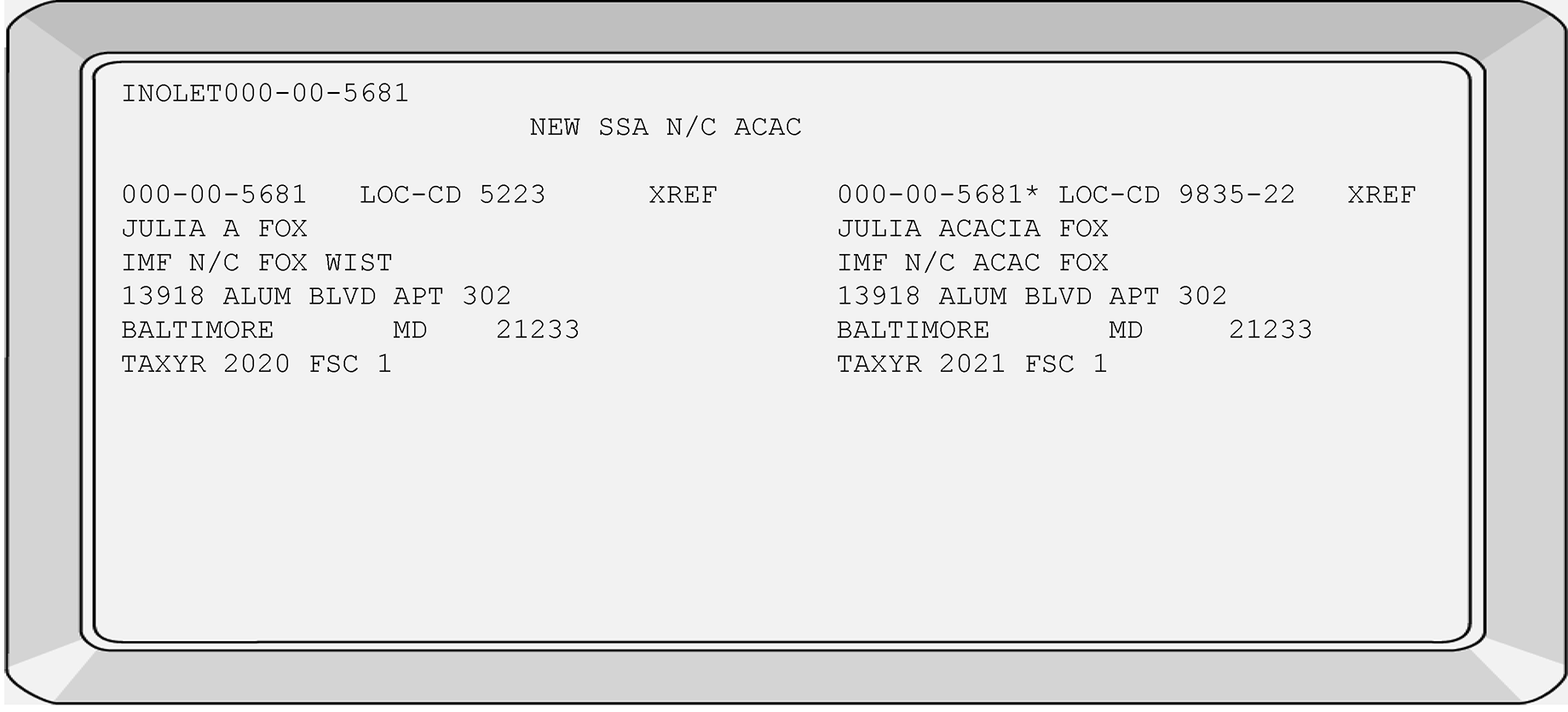
-
One of the most common reasons for taxpayer accounts to reside on the invalid segment of IMF is when a taxpayer files using a name and/or Name Control that does not match the VALID name(s) (as shown on CCs INOLES/INOLET). Name Controls are received from the following sources:
-
Social Security Administration (SSA)
-
ITIN processing
-
IRS Validation processing
-
-
Other causes for an invalid taxpayer account may include the following:
-
Marriage, divorce, or legal name changes
-
IRS transcription errors
-
Taxpayer(s) using another taxpayer's TIN or name
-
Family members using other family member's SSN's
-
Taxpayer(s) reporting their SSN or name incorrectly
-
Input errors by SSA
-
Input errors by ITIN
-
-
IMF completes a proximal match on taxpayer's Name Control (N/C) and their TIN used when filing to determine if a mismatch condition exists. In order for IMF to obtain a "proximal match" on the taxpayer's IMF N/C and TIN, the following conditions must be met:
If... And... Then... First letter of the IMF N/C matches the first letter of name control(s) found on DM-1 associated with this TIN Any two letters are equal to the same two relative positions of the N/C(s) found on DM-1.
OR
Any two adjacent positions when interchanged, are equal to the same two relative positions of the N/C(s) found on DM-1 and the remaining position of IMF N/C is equal to the same relative position found on the DM-1.Proximal Match occurs -
The proximal match process corrects typographical errors.
-
The DM–1 file is a database of name controls and associated TINs received from these four sources:
Social Security Administration (SSA) IRS processing IRS Individual Taxpayer Identification Number (ITIN) File ATIN (Adoptive Taxpayer Identification Number) File Note:
The ITIN and ATIN processing is completed at Austin Submission Processing Campus (AUSPC).
The ATIN and ITIN taxpayer information is sent forward DAILY.
Beginning in January 2016, ITIN accounts will be immediately directed to the valid side of IMF.
The new ATIN's, IRS Valid and SSA accounts will continue being placed on the IMF invalid side.
These new accounts WILL NOT validate or attempt to post to the IMF valid side until after completion of the next quarterly merge. -
The DM–1 receives weekly and daily SSA and IRS processing updates.
-
Programming determines the validity of the data on the DM–1. It "directs" transactions to either the valid or the invalid segment of the IMF.
-
Transactions matching the TIN/Name Control on the DM–1 File are directed to the IMF valid segment for posting.
-
IMF Transactions matching due to a proximal match are directed to the valid segment for posting. See IRM 3.13.5.13 for additional information on proximal matching.
-
If the valid TIN and/or Name Control were added the during the quarter, they are directed to the IMF invalid segmentuntil the quarterly merge is completed.
-
-
The DM–1 file may display/record more than one name control for any TIN.
-
The NAP contains information received from several sources of information as follows:
-
Data Master One (DM–1)
-
Social Security Numbers (SSNs)
-
Employer Identification Numbers (EIN’s)
-
Employee Plan Master File (EPMF)
-
Cross Reference (XREF) file
-
-
The NAP provides taxpayer entity information for the IMF, BMF (SSN/ITIN and EIN) and EPMF. The NAP will include spouse and dependent cross-reference information (if applicable).
-
If any of the name control(s) listed below matches the taxpayer name controls (for the specific tax period) and the TIN, the taxpayer's account will attempt to post during the next quarterly merge.
-
SSA Name Control(s)
-
ITIN Name Control(s)
-
New SSA Name Control(s)
-
IRS Valid Name Control(s)
-
Adoption Name Control
Caution:
SSA name controls displayed on CC INOLES are NOT listed in chronological order.
If any name control(s) listed on the SSA, ATIN or ITIN name control match, the taxpayer's account will attempt to post to the valid side of IMF.
The posting to the VALID side will be completed after the correction transaction codes posts, or; after upon completion of the DM-1 quarterly merge.
-
-
A primary taxpayer may file using an ATIN. However, typically ATIN's are used for dependents.
-
The IRS receives SSA weekly tapes containing all the name controls and SSNs assigned or updated. These updated records display beside the "NEW SSA N/C" field as shown on CC INOLES.
If... Then... Taxpayer's account is already established on the invalid segment with matching TIN and name control, Transaction will post. Taxpayer's account is already established on the invalid segment with a different TIN and name control, Transaction will not post. -
In addition to the weekly SSA records, IMF completes the same matching process on taxpayer accounts that were made IRS-valid.
-
When the quarterly DM-1 merge is completed, all accounts with "NEW SSA N/C" indicators turned "on" will be turned "off" and are validated against the DM–1 File. The accounts that resided on the invalid segment are validated against the DM-1 File.
If... Then... Match is obtained Taxpayer's account attempts to move to the IMF valid segment No match is obtained Taxpayer's account is returned to the IMF invalid segment -
Before any IMF entity notice is generated, the "NEW SSA N/C" indicator is checked. IF the account is considered invalid but the input name control matches the NEW SSA N/C, the taxpayer WILL NOT receive entity notices and their refund (if applicable) WILL generate.
-
Taxpayer accounts with the "NEW SSA N/C" literal may be valid accounts residing on the invalid segment of IMF. However, all NEW SSA N/C, IRS VALID and ATIN accounts reside on the invalid segment until completion of the quarterly DM–1 merges.
-
If the NEW SSA N/C indicator displays on a taxpayer's account with a valid SSN and the refund is being held due to the timing of the IMF quarterly update, thoroughly research the taxpayer's account.
-
New SSA Name Controls will display on CC INOLE directly beside the "NEW SSA N/C" field.
-
Taxpayer accounts corrected with a TC 016 (IRS Valid) display the taxpayer's IRS-valid N/C on CC INOLE. Initially, the assigned name control displays directly beside the "NEW SSA N/C" field. The IRS-valid name control continues to display beside the NEW SSA N/C field until after the quarterly merge is completed.
-
Once the IRS-valid name posts (after the quarterly merge), the IRS-valid name control then displays on CC INOLE beside the "IMF N/C" field. See IRM 3.13.5.16 for additional information.
-
When a taxpayer files married filing joint (FSC 2), the secondary taxpayer is the taxpayer whose name appears on the second name line of the Form(s) 1040. The Secondary SSN account may reside on the invalid segment of IMF due to the following situations:
name line does not match the Valid name controls (as shown on CC INOLE) secondary SSN is invalid as determined by the DM-1 File secondary taxpayer files using a new/different surname with their return, payment, or declaration (TC 430) taxpayer names on the tax return are reversed from their previous years filing pattern DM-1 Quarterly merge has not occurred -
If either IMF taxpayer files and an invalid condition exists on their account, the personal exemption and/or EITC is not allowed for the invalid taxpayer account.
-
If either taxpayer does not contact SSA to update their account (name changes), their account will post on the invalid side of IMF.
-
Do not make entity changes to taxpayer account(s) if the taxpayer-supplied information does not match the information gathered through research.
Note:
If the taxpayer completes the notice and communicates their SSN card reflects their birth name, prior name(s), adoptive name line, etc., and signs the notice including this name and/or prior names, changing their account will not correct the invalid condition unless the change matches the valid name controls.
-
IMF completes a special process to establish the secondary taxpayer on IMF for all Married Filing-Joint accounts. IMF separates the secondary taxpayer from the primary taxpayer account and establishes a separate account on IMF.
-
You can identify the IMF established secondary accounts using CCs IMFOLE or ENMOD by the following unique DLN: The TC 000 displays with a DLN of XX263-001-88888-X,
XX indicates the File Location Code (FLC) of the campus or area office. -
IMF does not establish secondary taxpayer accounts if any of the following conditions exist:
-
Secondary SSN (S-SSN) is invalid or unavailable
-
DECD is present in Secondary Name Line
-
Primary SSN is the same as the Secondary SSN
-
No spouse name indicated when the primary taxpayer filed using FSC 2 or 7
-
-
These IMF-created secondary accounts may also display subsequent updates to taxpayer accounts. Examples of these subsequent Transaction Codes (TCs) are as follows:
-
TC 013
-
TC 014
-
TC 971 with Action Code 050 (changes the Business Operating Division (BOD))
-
-
A very small portion of the IMF created secondary taxpayer accounts can cause:
-
Erroneous CP Notices
-
Incorrect establishment of taxpayer Name and Name Control
-
IMF Unpostable conditions
-
-
If a TIN change is required on the secondary taxpayer's account, a two-step correction process is needed. SeeIRM 3.13.5.118 and IRM 3.13.5.125 for additional information.
-
Before correcting the taxpayer's account, research their account using CC INOLET and/or CC INOLES to review the IMF and SSA Name Controls.
-
If employees have access to CONTROL D Web Access (CTDWA), the NUMIDENT transcripts are available in approximately one day. Requests printed using CONTROL D can also be converted to a PDF file and may be forwarded to any employee working the case. If you do not have access to CTDWA, NUMIDENT transcripts can be ordered through IDRS using CC MFTRA with Request Type U. However, it takes approximately three days to generate and receive the transcripts from the campus print room using CC MFTRAU. See IRM 1.4.16, Accounts Management Guide for Managers, for additional information. IRM 1.4.16 contains information on viewing and/or printing reports. See IRM 2.3.32, Command Code MFTRA, for additional information.
-
If necessary, see IRM 3.13.5.13 for information on proximal matching.
-
-
Use TC 040 to change name or TIN of the account that resides on the valid segment of IMF.
-
The following Information may be needed to complete a TC 040:
-
Name Control
-
All name lines
-
Year and TC 040 in the appropriate field(s)
-
FSC
-
New TIN, if appropriate
-
Reason for the change in the REMARKS field.
-
-
Use TC 041 to correct a name or only TIN of the account that resides on the invalid segment of IMF (if required, cycle delay the TC 041 for three additional cycles).
-
The following taxpayer Information may be needed to successfully change to the invalid segment of IMF is as follows:
-
New Name Control
-
Primary name line
-
Year name line
-
TC 041
-
FSC
-
New TIN
-
Reason for change in the REMARKS field
-
-
TC 040 and TC 041 corrections do not go through the DM–1 validation process. Therefore, it is important to use TC 040 and TC 041 ONLY when IMF establishes taxpayers incorrectly or the taxpayer provides "proof" of their identity. The acceptable proof includes copies/originals of the following items:
-
Marriage certificates clearly showing name change
-
Divorce decrees clearly showing name change
-
Legal documents clearly showing name change
-
-
SSA issues SSN’s to qualified applicants.
-
SSA procedures require all applicants must submit documentation to establish their age and identity if they are a U.S. citizen or a lawful alien.
-
Applicants must apply in person.
-
If a change or replacement card is required, the applicant must also submit documentation before their request will be processed.
-
It should be noted SSA taxpayer name changes are not mandatory. The IRS can only suggest to the taxpayer to inform the SSA of their name changes. However, when taxpayers inform the SSA of their name changes, weekly SSA name updates are received from the DM-1 File updates.
-
Before removing an erroneous DOD from a taxpayer's account, a SSA letter is required stating an error was made and the taxpayer is NOT deceased. Use IDRS CC’s IMFOLE, INOLES and ENMOD to research a DOD.
-
If Rejects requests the removal of a taxpayer’s DOD, do not remove the DOD without the presence of an SSA letter.
-
If SSA letter is present and a DOD is shown on taxpayer’s account, remove the DOD. Forward the case back to Rejects with the remarks, "DOD removed" .
-
If SSA letter is not present and a DOD is shown on taxpayer’s account, take no action. Forward the case back to Rejects with the remarks, "DOD still present/No SSA letter provided" .
-
If DOD is no longer present on taxpayer’s account, no action required. Forward the case back to Rejects with the remarks, "DOD is not present."
-
-
The IRS uses four different types of TIN’s when processing IMF taxpayer accounts. They include:
-
Social Security Numbers (SSN’s). See IRM 3.13.5.21.
-
Individual Taxpayer Identification Numbers (ITIN’s). See IRM 3.13.5.22.
-
Adoption Taxpayer Identification Numbers (ATIN’s). See IRM 3.13.5.24.
-
Internal Revenue Service Numbers (IRSN’s). See IRM 3.13.5.23.
-
-
All four TIN formats are included in IRM 3.13.5.20 through IRM 3.13.5.24.
-
SSA issues SSNs in the following format: nnn–(area), nn–(group), nnnn–(serial).
-
The Social Security Administration (SSA) does not assign SSNs that begin with the following three digits (signifies area):
-
000 (000-nn-nnnn)
-
666 (666-nn-nnnn)
-
900-999 (900-999)-nn-nnnn)
-
-
The SSA does not assign SSNs with zeroes in the fourth and fifth positions of the SSN format (signifies group).
-
nnn-00-nnnn
-
-
The SSA does not assign SSNs with zeroes in the last four positions of the SSN format (signifies serial).
-
nnn-nn-0000
-
-
After June 2011, the SSA will assign SSNs with the following first three positions of the SSN format:
-
772-799 (772-nn-nnnn, 773-nn-nnnn, etc.)
-
800-899 (800-nn-nnnn, 801-nn-nnnn, etc.)
-
-
The SSNs in the following examples are invalid and were never issued through the Social Security Administration:
000-XX-XXXX
111-11-1111
222-22-2222
777-77-7777
123-45-6789
666-66-6666, etc.
-
The ITIN display in a format similar to a SSN but will always begin with the number "9."
-
The fourth and fifth numbers within an ITIN are assigned in the following unique numbering ranges:
-
9nn-50-nnnn through 9nn-65-nnnn
-
9nn-70-nnnn through 9nn-88-nnnn
-
9nn-90-nnnn through 9nn-92-nnnn
-
9nn-94-nnnn through 9nn-99-nnnn
-
-
The IRSN format is in the same pattern as regular SSNs: XXX–XX–XXXX, there is an asterisk (*) at the end.. However, the IRSN will always begin with the digit "9" .
-
The fourth and fifth digits of the IRSN typically signify what campus assigns the IRSN.
-
When the original IRSN ranges are exhausted, the campus should begin using the expansion range allotted to their campus. See the following table to determine the origination of an IRSN assignment:
Campus Original Ranges for the 4th and 5th Digit Ranges Expansion Ranges for the 4th and 5th Digit Ranges Andover 08 38 Atlanta 07 37 Austin 18 06 Austin (International returns only) 66 Brookhaven 19 01 Cincinnati 17 02 Fresno 89 10 Kansas City 09 39 Memphis 49 03 Ogden 29 04 Philadelphia 28 05 -
The Temporary/Scrambled application does not use Area Offices (AOs) Codes when issuing IRSN's.
-
Typically IMF Entity assigns IRSN's for the primary taxpayer.
-
The ATIN format is in the same format as regular SSNs: XXX–XX–XXXX.
-
However, the ATIN will always begin with the digit "9" and the fourth and fifth digit will be "93" . The last four digits of the ATIN are assigned in ascending sequential order. Example of an ATIN format: 9XX–93–XXXX.
-
ATINs are being completed at the Austin Submission Processing Center (AUSPC).
-
For additional information on ATIN's, see IRM 3.13.40, Application for Tax Identification Number for Pending U.S. Adoptions.
-
When an IMF taxpayer account moves from one TIN to another TIN or from one segment of master file to the other segment of IMF (e.g., valid/invalid), it resequences or merges the account. The Transaction Codes (TC) 011, 013, 016, 040 and 041 are used to reverse the validity of a taxpayer account. However, if multiple merge TCs are entered in the same cycle, even when using Posting Delay Codes (PDCs) can stop a taxpayer account from posting to Individual Master File (IMF). The following table shows examples of multiple merge TCs for the same taxpayer account:
If... And... Then... Name Change (TC 013) TIN change (TC 011) Input the name change
Monitor the account
When TC 013 is posted, enter the TC 011.Name Change (TC 016) TIN change (TC 011) Input the name change
Monitor the account
When TC 016 is posted, enter the TC 011. -
Only the following entity Transaction Codes (TCs) resequence or can reverse the validity of taxpayer accounts:
-
The following contains transaction code exception processing for specific IMF cycles:
Exception:
During cycles 48 through 04, TC 011, TC 013, TC 040 and TC 041 can be input. However, the posting of the transactions will not occur until after cycle 04 or later.
Caution:
Individual Master File (IMF) will not post the following Transaction Codes (TC 011, TC 040, TC 041 and TC 013) during cycle 24. These specific Transaction Codes will resequence and the posting will be delayed until cycle 25.
The Transaction Codes (TC 011, TC 013, TC 040 and TC 041) input during cycle YYYY24 day 1 through 5 will resequence until cycle YYYY25. -
Resequencing of accounts is accomplished by one of these two methods:
-
Automatic IMF resequencing, or;
-
Input of an entity transaction
-
-
See IRM 3.13.5.110 for additional information on Posting Delay Codes (PDCs).
-
A scrambled TIN case occurs when two individuals with the same or similar names receive the same SSN from the SSA and below are conditions for correction.
-
A scrambled TIN case occurs for the following conditions:
-
Returns are filed by two or more taxpayers using same TIN.
-
An accurate TIN for the taxpayer(s) cannot be determined.
-
When two individuals with the same or similar names receive the same SSN from the SSA.
-
-
The following two-digit scrambled indicators pertain to scrambled SSN cases:
Some of the indicators are no longer used and the obsolete indicators are noted.Indicator Used when: 01 Completed 239C letter questionnaire received from at least one taxpayer. Form 3857 sent to SSA. 04 Mixed Entity 09 Scrambled indicator needs to be turned off 10 Account is being scrambled. Form 3857 is not sent to SSA 12 True/Default True Scrambled SSN case. Form 3857 sent to SSA 13 SSN not valid for federal tax purposes 20 Case closed, no 239C letter questionnaire received or SSA response is insufficient to resolve scrambled SSN condition. 21 Case closed, scrambled SSN condition resolved with SSA Form 3857 response or an SSA SSN verification printout 22 Case closed, scrambled SSN condition resolved with SSA Form 3857 response. Information indicates case was a True (non-default) scrambled SSN 23 Case closed with SSA Form 3857 response which indicates SSN is not valid for federal tax purposes 24 Reserved -
If you discover the case is scrambled on CC INOLES, forward to AM.
-
Forward the case to Accounts Management.
-
Follow their directions regarding the resolution. The REMARKS section of the IDRS command code used must reflect, "coordinate with Accounts Management."
-
Route scrambled cases requiring statute action to the Statute function.
-
-
Many scrambled cases are identified while working the following types of cases:
See IRM 21.6.2, Adjusting TIN-Related Problems, for further information.-
CP36s
-
Duplicate filing of a return
-
Taxpayer inquiries
-
NOMRG transcripts
-
-
A multiple filer condition or (Mixed Entity) occurs when more than one individual files using the same TIN. Any of the following conditions could cause multiple filing issues:
-
Use of an SSN by more than one unauthorized individual (invalid segment of IMF).
-
One or two individuals filing two different tax returns for same tax period with same TIN.
-
Family members using the same individual TIN in error (valid segment of IMF).
-
-
When it is determined multiple filers are involved in a case, see the following table:
If the account resides on... Then... Invalid segment of IMF File and they filed as the primary filer a. Secure both documents (e.g., returns) from files.
b. Issue "685C" letters to each individual informing them to obtain a valid TIN, and/or file Form W–7.
c. Suspend the case for 45 days or until a reply is received from one or both of the taxpayers involved.
d. If no reply, coordinate with AM.Valid segment of IMF a. Take no action
b. Coordinate the case with the appropriate TE/unit in AM.
c. Follow their directions regarding resolution.
d. Annotate on IDRS in the REMARKS section, "coordinate with AM. "
-
All entity changes/corrections made due to oral statements from taxpayer(s) or their authorized representative(s) must include the required elements outlined in IRM 21.1.3, Operational Guidelines Overview.
-
When contacting a taxpayer by phone, use the authentication disclosure procedures found in IRM 21.1.3.2.3, Operational Guidelines Overview, Required Taxpayer Authentication.
-
When contacting taxpayer(s) by phone, you must be sure you are speaking with the taxpayer or authorized representative before disclosing tax information. See the Taxpayer Authentication guidelines in IRM 21.1.3.2.3, Operational Guidelines Overview, Required Taxpayer Authentication and IRM 21.1.3.2.4, Operational Guidelines Overview, Additional Taxpayer Authentication. Also, before leaving a message on a taxpayer's answering machine, review, IRM 13.1.6.7, Leaving Messages on Answering Machines.
-
Source documents are not always required to complete minor entity changes (examples: obvious address misspellings, corrections to addresses, typographical errors on taxpayer names, etc.,) if you are absolutely sure you are speaking to the taxpayer or their authorized representative.
These type of address changes are recommended (after authenticating the taxpayer).
See the taxpayer authentication procedures in IRM 21.1.3 , Operational Guidelines Overview whenever you must speak to a taxpayer by phone or face-to-face contact. -
See IRM 3.13.5.29 and IRM 3.13.5.29.1 for instructions on processing oral address changes.
-
Background:
Taxpayers may change their address with the IRS by giving clear and concise oral notification. Revenue Procedure 2010-16 clear and concise oral notification is a statement made by a taxpayer in person or directly via phone to an IRS employee who has the ability to access a taxpayer's account to complete research and complete an address change. If the taxpayer requests an address change, they must be able to provide the information in paragraph (3) to authenticate their identity.Caution:
Due to the high level of identity theft, it is extremely important to ensure changing/updating/correcting of a taxpayer's address is warranted and necessary. To ensure you are speaking directly with the correct taxpayer(s) see , IRM 21.1.3.20.1 IMF and BMF Oral Statement Address Changes, for required taxpayer authentication guidelines.
-
Never complete an address change when the address information is received from an "unauthorized" third party.
-
If an address change is necessary and the taxpayer requests the address change using an oral statement, the address change is input using IAT when available. If IAT is not available correct the case using IDRS. To process an address change, a taxpayer must provide:
-
The taxpayer's full name
-
The taxpayer’s old address
-
The taxpayer’s social security number, individual taxpayer identification number, or employer identification number
-
The new address, the employee must follow established procedures to verify the taxpayer’s identity. The employee also will inform the taxpayer that the new address, and not the former address, will be used by the IRS for all purposes
-
-
If either taxpayer reports a new address for their married filing joint account, inquire if the address change is for BOTH taxpayers. When the address change involves both taxpayers sharing the same address, update both addresses. If only one taxpayer is changing their address, update the appropriate account and leave the other taxpayer address alone. If CC INCHG/IRCHG requires the input of a filing status code, do not change the taxpayer's FSC. Use the filing status currently on the account.
-
In an effort to document who is requesting an address change, the TE must enter whether the address change was submitted by the primary, secondary or both taxpayer(s). Information such as which taxpayer made the request and phone number (if present) in the REMARKS field when using IAT address tool, AMS or IDRS. See IRM 3.13.5.51 for information on the required remarks when completing an address change. Use Integrated Automation Technologies (IAT) to complete the address change request (when available).
Reminder:
Once a taxpayer indicates they have an address change, determine whether the address change is permanent or a temporary address change (e.g., student at college).
If taxpayer indicates a temporary address change, do not update the address on master file. See IRM 3.13.5.55 for correspondence procedures for temporary address change requests. -
The taxpayer must have the following information in order to update the address:
.-
Taxpayer's full name
-
Secondary taxpayer's full name, if applicable
-
Taxpayer’s old address
-
SSN(s), ITIN, and/or EIN
-
New address information
-
-
If the taxpayer CANNOT provide the required information, direct them to the IRS web page at IRS.gov If they do not have access to the IRS web page, mail a Form 8822. Do not change the taxpayer's LKA in these circumstances.
-
See IRM 3.13.5.51 for instructions on "written" address changes.
-
See IRM 3.13.5.52 if either the primary and/or secondary taxpayer are establishing a separate address and the address change was communicated in writing.
-
Before updating any field of the Entity module, research CC ENMOD to determine if an IDT indicator is present. See IRM 21.2.3.5.8.1 for additional information. For additional information on IDT accounts refer to IRM 25.23.12.4.1 Telephone Inquiries Regarding Identity Theft Victim Assistance (IDTVA)Tax-Related Cases.
-
For ITIN oral address procedures, see IRM 3.21.263, IRS Individual Taxpayer Identification Number (ITIN) Real Time System (RTS), for additional information.
-
From when the taxpayer submits an address change the time for it to post should be 1 cycle.
-
If the primary or secondary taxpayer on a MFJ account reports an address change, use the following table:
If the new address is reported by... And... Then... 1. Primary taxpayer Secondary taxpayer current address was updated on a later cycle than their last filing as an MFJ taxpayer a. Complete an address change on the primary taxpayer's module 2. Primary taxpayer Address change is for both taxpayers and the secondary taxpayer does not have an account on MF a. Complete an address change on the primary taxpayer's account.
b. Establish the secondary taxpayer using the address information provided by the primary taxpayer. See IRM 3.13.5.115 for additional information.3. Primary taxpayer and secondary taxpayer is established on MF Address change is for both taxpayers and the secondary has an account on MF a. Complete an address change for both taxpayer accounts. 4. Secondary taxpayer and secondary taxpayer is established on MF Address change is for both taxpayers a. Complete an address change for both taxpayer accounts. 5. Secondary taxpayer and secondary taxpayer is established on MF Address change is not for both taxpayers a. Complete an address change for the secondary taxpayer's account.
b. Take no action on primary taxpayer account.6. Secondary taxpayer requests an address change for the secondary taxpayer only And there is no account on MF a. Take no action.
-
If you receive non-Entity issues such as manual refunds, erroneous refund issues, etc., and are not directly related to Entity correction issues, forward to AM for correction.
-
Coordination may be required with the Account Management (AM) area for resolution and/or transference of the case to the AM Function.
-
Do not complete any Entity transactions on Criminal Investigation (CI) cases including Unpostable Cases. Route any case with a Z- or -Z to Criminal Investigation (as shown on CCs IMFOLI or TXMODA).
-
If disposition is not known and CI does not want the freeze released, close the case "no follow-up" using the code "NOFOLUP–CI" on IDRS.
-
See IRM 21.5.6 Freeze Codes or Document 6209, IRS Processing Codes and Information, if additional information is needed.
-
Use the following information if you need to abbreviate taxpayer-supplied information to fit within the space limitation:
NAME/or PHRASE ABBREVIATION Trust TR Under the will of, U/W, under will UW Under agreement, U/A, Under agreement with UA Dated Jan. 16, 2019 01162019 (do not enter "date" /"dated" or the alpha month). Irrevocable Trust IRRV TR Revocable Trust RVOC TR Family Trust FAM TR Marital Trust MRTL TR Gift Trust, Giftrust GIFT TR Funeral Trust FNER TR Inter-Vivos INTRVS Non-exempt Charitable Trust NECT Revocable RVOC Testamentary TEST Under Trust Agreement UTA Voluntary Employee Benefit Association VEBA Insurance INS Living LIV Charitable Remainder Unitrust CRUT Charitable Remainder Annuity Trust CRAT -
If the taxpayer has an "In Care Of" Name Line, use the "IMF-Continuation-of-Primary-Name-Line" to enter the information. If space allows on the line, include any designated titles.
See the following table for the title and acceptable abbreviations:Title Abbreviation Administrator/Administratrix ADM Charitable Remainder Annuity Trust CRAT Charitable Remainder Unitrust CRUT Commissioner COMM Conservator CONS Co-tutor, Co-tutrix*
*Civil law concept similar to GuardianCOTUTOR
COTUTRIXCustodian CUST Executor/Executrix EX Fiduciary Personal Representative FID For the Benefit of, FBO, F/B/O FBO Guardian
This may include the name of paragraph signing for a minor taxpayerGDN Independent Conservator IND CONS Personal Representative PER REP Power of Attorney POA Successor SUCC Trustee TTEE Successor Trustee SUCC TTEE -
If the taxpayer attempts to add an "In Care Of" name when making an address change, add this name on the secondary name line when completing an address change.
-
When establishing a IMF taxpayer with a Power of Attorney (POA), Designated Agent, Executor/Executrix, In Care Of name, etc., and their address contains a Post Office Box (PO Box) and a street address, use the Continuation-of-Primary-Name (Line 2) field for the POA, Designated Agent, Executor/Executrix, etc., information and enter the PO Box address (instead of the street address information).
-
This type of Entity update will generate as a TC 013 instead of a TC 014.
-
Form 56, Notice Concerning Fiduciary Relationship, is filed to notify the IRS of a fiduciary relationship. There is no restriction about the information a fiduciary can receive for the entity for which they are acting. A fiduciary assumes the powers, rights, duties and privileges of the taxpayer(s), until notice is given the fiduciary capacity is terminated. To add a fiduciary, edit the fiduciary name and title to the CONTINUATION-OF-PRIMARY-NAME line, if not already present. If multiple names are listed for the fiduciary, add as many names and the title provided as "allowable" in the available space. See IRM 3.13.5.120.5 to reduce the length of the names listed. For decedent cases, also edit “DECD” in the name line, if “DECD” is not already present. See instructions at IRM 3.13.5.120.9 regarding inputting name changes for deceased taxpayers.
Exception:
There are situations where letters testamentary and/or court certifications may not be required. When a decedent has passed without a will and there has been a transfer of their estate to a surviving spouse or other heir under the property or estate and trust laws of the decedent’s state of domicile, courts may not be involved. In such instances, the IRS may accept a signed Form 56 without additional supporting evidence.
-
Modernized e-file (MeF) will allow the Form 56 to be submitted to Entity via the employee User Portal (EUP) as a standalone form and Entity examiners will access EUP to verify Entity information. Any needed entity transactions will be input by the entity examiners to ensure the taxpayer’s information on Master File is current and correct. These cases are time sensitive and must be closely monitored.
-
See IRM 3.13.5.31 for the acceptable title abbreviations. If correspondence is required for missing information or due to an address change request (without a Form 8822), correspond using Letter 5555C. Do not update the account without the taxpayer’s/fiduciary’s reply.
-
If the Fiduciary Form 56 Part 1, Name does not match the Name in IDRS DO NOT change the name to match the Form 56. Exception: a copy/original of at least one of the following: Passport, Driver's License, Social Security Card, Federal or State Government issued identification.
-
There are different versions of the Form 56 that may be received. If a prior version (earlier than 12/2007) is received, the earlier versions must contain the required elements for processing in order to be complete.
-
If there are two titles shown on the Form 56, input the title written next to the signature (when available). If there is no title next to the signature, choose one of the titles listed in the following priority:
-
Title on any court documentation
-
Title in Section A. Part 2 on F56 Rev 12-2007
-
Title elsewhere where found
-
-
When reviewing Form 56, if you notice the taxpayer is appointing a high ranking IRS or Treasury employee or other high ranking governmental official or him/herself as a fiduciary, refer these cases to Frivolous Return Program (FRP). See IRM 3.13.5.7 for additional guidance.
Note:
If a Form 56 comes in with NO signature and documentation attached requesting that a Judge or High ranking official be listed as the Fiduciary from the taxpayer or documentation from the taxpayer identifying themselves as a Sovereign country, DO NOT PROCESS and route the Form 56 to the Frivolous Return Program (FRP). See IRM 3.13.5.7 for additional guidance.
Caution:
If, for any reason, an IRS employee has concerns regarding the authenticity of a fiduciary, requester or titled representative, the employee may request the fiduciary supply supporting authority before disclosing taxpayer information. Use the 5555C Letter and request the legal documentation.
-
An identity (ID) theft indicator on a taxpayer's account does not require routing to AM. However, if there are suspicious patterns, duplicate information, etc., on the application/account, ask your lead for guidance.
-
If the Form 56 is requesting an IMF and Business Master File (BMF) entity change, process the IMF Entity action first, before transshipping to a BMF campus. Do not transship the case to a BMF campus if you determine the BMF entity change was already made.
Note:
Form 56 with the indication of “Florida Pooled Trusts” which have both an SSN and EIN’s take the following actions: Follow the instruction in IRM 3.13.5.32(9) which instruct the examiner to process the IMF Entity action first if needed, before transshipping to a BMF campus and then underline the name and EIN of the fiduciary, enter "Alpha File," the date and IDRS number of TE. These are then to be routed and stored in the Alpha File within the Files function.
-
Leave an action trail of the IMF transactions completed and your TE stamp (when required by your campus).
-
The following types of Form 56s must be completed in the following manner:
If... And... Then... a. Form 56 received with SS-4 attached Address is located in one of the 50 states or District of Columbia, Forward to the BMF Entity unit at the Kansas City SP Campus 333 W Pershing Rd. Kansas City, MO 64999 MS:6055 C-1 b. Form 56 received with SS-4 attached There is no indication of a legal residence, principal place, principal office or agency in any state Forward to the BMF Entity unit at the Ogden SP Campus.1160 W. 1200 S Ogden, UT 84201 M/S:6271 c. BMF international filer Requests a BMF entity change Forward to Ogden d. BMF domestic filer Requests a BMF entity change Forward to Ogden e. Form 56-F, Notice Concerning Fiduciary Relationship of Financial Institution Forward to the Ogden or Kansas CityECU f. Form 56 There is no IMF account for the taxpayer -
Underline the first four alpha characters of their name control
-
Write Alpha and any other audit trail information required in the lower left of Form 56
-
Forward Form 56 and supporting documents/forms to Files by using a Form 3210
g. Form 56 with Illinois Land Trust Returns listed in Part I section B Forward to Ogden ECU h. Form 56 with Illinois Land Trust No returns are indicated in Part 1 section B 1. Underline the first four alpha characters of their name control
2. Forward Form 56 and supporting documents/forms to Files
3. Use a Form 3210 to be filed in the Alpha filei. Form 56 (Revision 12/2007) Part III indicates the taxpayer is filing for delinquent income taxes under Offer and Acceptance Forward to the Fraud Detection Center j. Form 56 indicating POA 1. Taxpayer is Deceased 1. Return the Form 56 to fiduciary to inform them a POA is not valid after the taxpayer’s Date of Death (DOD). Send a 5555C Letter, using the open paragraph. We received your Form 56 and you entered the title Power of Attorney (POA). However, you can’t file as a POA for a deceased taxpayer. Please provide your authority for fiduciary relationship and resubmit the Form 56. k. Form 56 indicating POA Taxpayer is Not Deceased Send a 5555C Letter, using the open paragraph. “Do not use Form 56 if you are notifying the IRS that you are the authorized representative of the taxpayer. Instead, useForm 2848 Power of Attorney and Declaration of Representative.” l. IMF taxpayer has an existing foreign address No address change is requested and no Form 8822 is attached Add the fiduciary name to the CONTINUATION-OF-PRIMARY-NAME line (if space allows), otherwise, do not add the fiduciary’s name. m. IMF taxpayer requests a change to a foreign address Form 8822 is attached Add the fiduciary name to the CONTINUATION-OF-PRIMARY-NAME line (if space allows), otherwise, do not add the fiduciary’s name. -
-
If the taxpayer/fiduciary indicates an address change is needed on the Form 56, use the following instructions:
If ... And... Then... a. Version 12/2019 is received Taxpayer did not provide a Form 8822 Correspond to the fiduciary at their address using a 5555C Letter, attach a Form 8822 and return the Form 56. b. Version 11/2017 is received Taxpayer did not provide a Form 8822 Correspond to the fiduciary at their address using a 5555C Letter, attach a Form 8822 and return the Form 56. c. Version 12/2015 is received Taxpayer provides information within Part 1, Section B, Box(es) 6 area Take no action on the information supplied by the taxpayer in this specific area. d. Version 12/2015 or 12/2011 is received
Part 1, Section B, Box 6 is checkedTaxpayer did not provide a Form 8822 Correspond to the fiduciary at their address using a 5555C Letter, attach a Form 8822 and return the Form 56. e. Version 12/2007 received
Part III, Box 5 is checkedTaxpayer did not provide a Form 8822 Correspond to the fiduciary at their address using a 5555C Letter, attach a Form 8822 and return the Form 56. f. Earlier version than 12/2007 Taxpayer did not provide a Form 8822 Correspond to the fiduciary at their address using a 5555C Letter, attach a Form 8822 and return the Form 56. -
If a decedent case has previously been identified, the account should contain one or more of the following:
-
DECD in the name line
-
Death Certificate, Form 1310 or other legal document attached
-
"Estate of" is present
-
Date of Death present
-
"DEC"
-
TC 540 on CC TXMOD or CC IMFOLT for the year of death
-
Mail File Requirements (MFR 08) on CC ENMOD or CC INOLES.
-
-
If the IMF account is inactive (MFR 08), use the following instructions:
If... And... Then... a. Taxpayer is deceased, Use the Date of Death (DOD). b. Taxpayer is not deceased Use the date of appointment. c. Non-Entity changes are required and the account is inactive (MFR 08) Taxpayer is DECEASED, reopen the account Monitor the case and re-close the case after the non-Entity transaction posts. Note:
Refer to IRM 3.13.5.122, Re-Opening a Master File Account (TC 012) for instruction on how to reopen an account.
-
When corresponding for missing information from the fiduciary and the taxpayer is deceased, correct the address on the letter from "DECD" to "Estate of ..." .
-
Review the entire document and any additional forms or attachments and use IDRS/IAT to locate missing information prior to corresponding.
-
A taxpayer may be an individual, trust, estate, partnership, association, company or corporation. This includes pension and 401(k) plans.
-
When a Form 56 is received, the following information is required:
-
Taxpayer name line information
-
Taxpayer's address
-
Identifying number (SSN, ITIN or EIN)
-
Fiduciary name and address
-
If multiple names are listed for the fiduciary, add as many names and the title provided as "allowable" in the available space. See IRM 3.13.5.120.5 to reduce the names listed.
-
Title of Fiduciary (if available). See IRM 3.13.5.120.6 to reduce the title provided when needed.
-
Signature of Fiduciary
-
Tax forms to be filed
-
-
If you cannot locate the missing information, with the exception of the LKA, use the fiduciary-supplied documentation/attachments or the taxpayer's account to complete the processing of the Form 56. Use a 5555C Letter to correspond. Send the correspondence to the fiduciary unless the fiduciary's information is missing. Review the entire document and any attachments and use IDRS/IAT to locate missing information prior to corresponding. In these instances, send the correspondence to the taxpayer for the following:
-
missing signature
-
missing taxpayer name
-
no indication the taxpayer is deceased (if applicable) or the fiduciary supplying a Date of Appointment, court documentation, etc.
-
-
It is acceptable to use the Authority, date of appointment or taxpayer's DOD to complete the processing of the Form 56 prior to corresponding.
Note:
If DOD is not provided but the taxpayer's DOD is shown on CC INOLE, use the CC INOLE DOD when needed.
Use the following chart to determine the YEAR-NM-LINE.If Revision Date of Form 56 is... And... Then... a. 2019 and up. Fiduciary enters a date in Part I, Line 2(a) Enter taxpayer's DOD b. 2007 Fiduciary enters a date in Part II, Line 1(a)(2) Enter taxpayer's DOD c. 2007 Fiduciary enters a date in Part II, Line 1(b)(2) Enter fiduciary's year of appointment d. 2011, 2015 or 2017 Fiduciary enters a date in Part I, Section A, Line 2 (a) Enter taxpayer's year of death e. 2011, 2015 or 2017 Fiduciary enters a date in Part I, Section A, Line 2 (b) Use the fiduciary's date of appointment unless the taxpayer is deceased. If the taxpayer is deceased, use the DOD. If Form 56... And Contains Information within... Then... a. Version 12/2015 is received Boxes below Part 1, Section B Line 6 Disregard. Do not consider the years listed as the years the fiduciary is authorized to act b. Version 12/2011 is received Boxes below Part 1, Section B Line 6 Disregard. Do not consider the years listed as the years the fiduciary is authorized to act c. Version 12/2007 is received Boxes below Part III, Line 6 Disregard. Do not consider the years listed as the years the fiduciary is authorized to act -
If the Form 56 does not include the specific returns, use the following information to make this determination:
If... Then... 1. SSN/ITIN is entered in Part I of Form 56 Edit "Form 1040" in the appropriate field of Form 56. 2. EIN, gift or estate is entered or indicated Route to BMF per local procedures
-
A fiduciary will inform the IRS of changes to the fiduciary relationship in the following areas of the Form 56 or through correspondence. If the Form 56 is supplied, the fiduciary information will be contained in the following areas of the Form 56:
Form 56, version Information contained within 11/2017 Part II, Section A 12/2015 Part II, Section A 12/2007 Part IV, Section A -
If the fiduciary notifies the IRS (either through correspondence or by filing a Form 56) that the fiduciary relationship has terminated or they revoked their relationship, update the account as follows:
-
Review the Form 56 to determine if the Total Revocation Section of Form 56 is completed.
-
If the fiduciary is no longer authorized for the taxpayer, remove the fiduciary name.
-
If the "Substitute Fiduciary" section is completed, establish this fiduciary name ONLY as requested.
-
-
Information has been provided on the IRS.gov for the Form 56 to instruct the fiduciary/taxpayer to write "TERMINATE" in red capital letters across the top of a previously filed Form 56 or to submit a new Form 56. The Form 56 must be completely filled out and signed.
-
When Form 56 is received with TERMINATE, Terminate or terminate written in any color of ink on the Form 56, remove the fiduciary name and/or title from the taxpayer's account or if in Part II, any box 6, 6a, 6b, 6c is checked.
-
If a Form 56 includes any court orders or documentation/paperwork to terminate the fiduciary relationship, remove the fiduciary name and/or title from the taxpayer's account.
-
The following is useful in determining whether to use the Fiduciary or the "In Care Of" name as the IMF taxpayer's second name line information. If the Fiduciary/In Care Of name line includes a designated title (example: Thomas Cardinal, Trustee), you must always enter the correct abbreviation of their title (if space allows). If the fiduciary title information is not supplied in Part I of the Form 56, review entire Form 56 and any attached documentation (including legal documents) to determine the appropriate fiduciary title.
If Form 56... And... Then... 1. Contains a fiduciary's name only Add fiduciary's name information as the secondary taxpayer name line 2. Contains a fiduciary's name and an "In Care Of Name" Name listed on CC CFINK matches Fiduciary's name Add fiduciary's name as secondary name line 3. Contains a fiduciary's name and an In Care Of Name Name listed on CC CFINK matches the "In Care Of Name" Add this name as secondary name line 4. Contains a fiduciary's name and an In Care Of Name Name listed on CC CFINK is different than fiduciary's or In Care Of Name Use fiduciary's name as secondary name line -
See IRM 3.13.5.31 for information on these abbreviations.
-
If a Form 56, Notice Concerning Fiduciary Relationship, is submitted that reflects a different address than the taxpayer's LKA, do not update the taxpayer's address unless a Form 8822 or Form 8822-B is included/attached.
-
Complete the address change based on the submission of a completed Form 8822 or Form 8822-B.
-
See IRM 3.13.5.52 for additional information on completing address changes.
-
A tax year is an annual accounting period for keeping records and reporting income and expenses. Once the tax year is established, the taxpayer continues to use that tax year until permission is granted by IRS to change the tax year selected. The Form 1128 is filed to request a change in tax year.
-
All taxpayers must complete Page 1, Part I of Form 1128 including the "Signature-All Filers" portion.
-
IMF ECU units only processes Forms 1128 with Part 1 and Part II, Section C, completed.
-
If an IMF site receives a Form 1128 containing information within Part II with the following sections, transship the documents to BMF Entity Control units.
-
Part II, Section A. (Automatic Revenue Procedure 2006-45)
-
Part II, Section B. (Automatic Revenue Procedure 2006-46)
-
-
If correspondence is received from the taxpayer as a result of Form 1128 being denied because it was filed late, use the 2233C Letter (or other appropriate letter) to return the denied Form 1128 to the taxpayer. Inform the taxpayer their request should be filed with Chief Counsel per instructions on the Form 1128.
-
If an IMF site receives a request for a ruling (Part III completed), the Form 1128 must be sent to the following address:
Internal Revenue Service
Associate Chief Counsel (Income Tax and Accounting)
Attn: CC PA LPD DRU
PO Box 7604, Ben Franklin Station
Washington, DC 20044-7604-
Retain a copy of the Form 1128 in the suspense files for 45 days (for taxpayer inquiries).
-
See IRM 21.5.1 General Adjustments for guidance on handling classified waste to prevent inadvertent/unlawful destruction of records.
-
-
If an IMF site receives a Form 1128 with Part II, section D and the yes box is checked, transship the documents to the EO Entity Team at the Ogden Campus. If the no box is checked, continue processing.
-
For an individual taxpayer's application to be accepted and updated it must be received complete and filed timely.
-
For an individual taxpayer to change their tax year, the application MUST be filed on or before the tax return's due date.
-
The Form 1128 due date for the majority of IMF filers is:
Use the Form 6513 insert to inform the taxpayers to submit a Form 1128 to change from a calendar year filer to a fiscal year filer. On the Form 6513 check the “Other” box and state the following verbiage “Because you are calendar year filer, the extension is not allowable. Please file a Form 1128 to change to a fiscal year filer”-
April 15, or;
-
Date the TC 460 (extension) displays on the taxpayers account, or;
-
Trusts, generally due on the 15th day of the 4th month following the end of the tax period.
-
-
Review the Received Date stamp and the following to determine if the Form 1128 is timely filed:
If... Then... a. Received date indicates the Form 1128 is timely See paragraph (12) b. Received date indicates the Form 1128 is not timely -
Reject the form. Annotate "Rejected" and the date of the rejection.
-
Send taxpayer a 2233C Letter, Application To Adopt, Change, or Retain a Tax Year Denied.
-
Enclose Rejected Form 1128 in 2233C letter to taxpayer.
-
Return the original Form 1128 and 2233C letter to the taxpayer, using a Form 14219, Return of Documentation to the Taxpayer, and check the “blank” box and edit “Rejected Form 1128”;
-
Annotate "2233C letter" on the left-hand corner of Form 1128, then route photocopies and Form 1128 to Files for placement in the Alpha Files.
c. Form 1128 is received with a letter from Chief Counsel advising the taxpayer to file within 30 days of the date of their letter and it is received within this time period Accept it as timely and continue processing -
-
Review the entire Form 1128 for the required and/or missing information See the following table:
If... And... Then... a. Signature(s) is missing If located Return the Form 1128 to the taxpayer
Request the missing signature using a 0143C Letter.b. TIN missing If Not located -
Research IDRS for missing taxpayer name and/or TIN, if necessary.
-
If located, notate the appropriate information on Form 1128 and continue processing.
-
If not located, return original Form 1128 to taxpayer or POA indicating what information is missing with a 2314C letter.
Retain a copy of the Form 1128 in the suspense files for 45 days (for taxpayer inquiries).
At the end of 45 days, destroy as classified waste.
c. Name(s) missing If Not located -
Research IDRS for missing taxpayer name and/or TIN, if necessary.
-
If located, notate the appropriate information on Form 1128 and continue processing.
-
If not located, return original Form 1128 to taxpayer or POA indicating what information is missing with a 2314C Letter.
Retain a copy of the Form 1128 in the suspense files for 45 days (for taxpayer inquiries).
At the end of 45 days, destroy as classified waste.
d. An agent is designated Form 2848, Power of Attorney and Declaration of Representative, is attached 1. Forward the Form 2848 to the Centralized Authorization File (CAF) Unit.
2. A copy of the Form 2848 should be retained and attached to Form 1128 prior to forwarding to CAF so any correspondence can be sent to the POA as required by law.
3. Leave an Audit trial "Form 2848 to CAF" .e. POA signs Form 1128 Form 2848 is not attached Return Form 1128 to the taxpayer after reviewing for other missing items.
Request a Form 2848 using a 2314C letter (or other appropriate letter).f. Part I, Line 2a "Adopt a tax year ending"
or "Change to a tax year ending"
or "Retain a tax year ending"
includes the date 12/31 or December 31Part II, Section C, Line 9 is checked "yes" Continue processing g. Part I, Line 2a "Adopt a tax year ending"
or "Change to a tax year ending"
or "Retain a tax year ending"Contains a date other than 12/31 or December 31 Mail to Chief Counsel using the address shown in paragraph (6). h. Part 1, Form 1128 is incomplete Form 1128 is timely Correspond for missing information using a 2314C Letter. -
-
If the address on Form 1128 indicates a different address than what is shown on IMF, do not update the address. Send all correspondence to the existing IMF address.
-
When the Form 1128 is determined to be complete, timely filed, and the requested change was for calendar year (December 31 or 12/31) as shown within Part I and Part II, Section C, line 9 Yes box is checked update the account as follows:
-
Use CC INCHG to update the FYM (generates a TC 016).
-
Stamp "approved" on original Form 1128 then photocopy the Form 1128.
-
Annotate on the original Form 1128 the date the TC 016 was entered and the employee IDRS number.
-
Send the photocopy of Form 1128 with a 2314C letter to the taxpayer and their POA (if applicable), informing the taxpayer the Form 1128 has been approved.
-
Route the original Form 1128 to Files for placement in the ALPHA File.
-
-
If Form 1128 is approved by Chief Counsel, complete using the following:
-
Use CC INCHG to update the FYM (generates a TC 016).
-
Annotate on the letter ruling the date the TC 016 was entered and the employee IDRS number.
-
Route the ruling letter to Files for association with the Form 1128.
-
-
If Chief Counsel expertise is needed, the Lead Tax Examiner or Supervisor only can use the information within the Note in paragraph (2) in IRM 3.13.2.21, Form 1128 - Application to Change, Adopt or Retain a Tax Period.
-
When transferring a case within or outside your campus, use a Form 3210 .
-
Separate transshipment procedures have been developed for the mailing/directing of "misdirected" IMF and/or BMF cases.
-
The processing of certain forms have become "centralized" at specific processing site (example: Form 706 or Form 709, Exempt Organization forms, are transshipped to the Kansas City Submission Processing Campus (KCSPC)). Therefore, specific guidelines have been developed to transship these types of forms between submission sites.
-
See the transshipping coordinator at your campus for additional information.
-
A written/electronic referral is initiated on a Form 4442, Inquiry Referral or electronic 4442 (e-4442). Use the “If/ Then” chart below to process the Form 4442.
If... Then...
a) Form 4442, Inquiry Referral is received,The case must be completed within 20 days of the date stamped by the fax machine. Process the taxpayer inquiry, Section B according to your IRM procedures. Complete Section C, Response/Final Resolution in blue or black ink according to the actions taken. Track and keep an inventory of the work.
b) A fax number is present,Fax the Form 4442 to the originating office.
c) Form 4442 is received by Entity and the inquiry is not an Entity related issue,Send the Form 4442 to your campus transshipping coordinator. The coordinator will alert the originating transshipping site of their error. The case must be processed in the receiving site to avoid delay.
d).The request is coming from Accounting Operation/EFTPS-
If Accounting Operation/EFTPS section is unable to locate a valid SSN while processing an EFTPS payment, they will fax a Form 4442 to the Entity clerical team.
-
The Form 4442 will indicate "3 Day Expedite Process." However, Entity will process the request for IRSN assignment or re-establishment immediately upon receipt as Accounting is waiting to deposit the tax payment(s).
-
-
When IMF Entity initiates a correct referral that will:
-
Stop an employee from working on the account and forward the work to management for reassignment using the Form 4442.
-
Management will validate the circumstances under which the inadvertent access occurred and the need for reassignment to another employee by annotating Form 4442.
-
-
See IRM 21.3.5 Taxpayer Inquiry Referrals Form 4442, to prepare an inquiry referral.
-
Form 2363 is a paper request for miscellaneous entity changes requirements and is used by non-Entity personnel such as Examination, Taxpayer Service, Collection personnel to make taxpayer entity type changes (names, addresses, dates, merging accounts, etc.,). The completed form is forwarded to the appropriate Entity control Unit (ECU).
-
This form is available on the IRS publishing web page in a "fill able" PDF format at the following address IRS Publishing Service web page However, handwritten versions of Form 2363 will be accepted for processing by the ECU. If you need to locate a contact name and phone number, stop number, etc., for the ECU see the Campus Mailing Addresses
-
The "Prepared by" section must be completed and include the following information:
-
If Form 2363 is improperly prepared or incomplete, return it to the originator or call them to obtain the information to process their request.
-
If the examiner's location/contact information is unknown, destroy Form 2363.
-
The form is divided into two sections headed "FROM" and "TO" .
-
The "FROM" section is used to record old record information (i.e., the account as it currently displays).
-
The "TO" section is used to record new information or to add/change/revise the taxpayer entity information. See Figure 3.13.5–2.
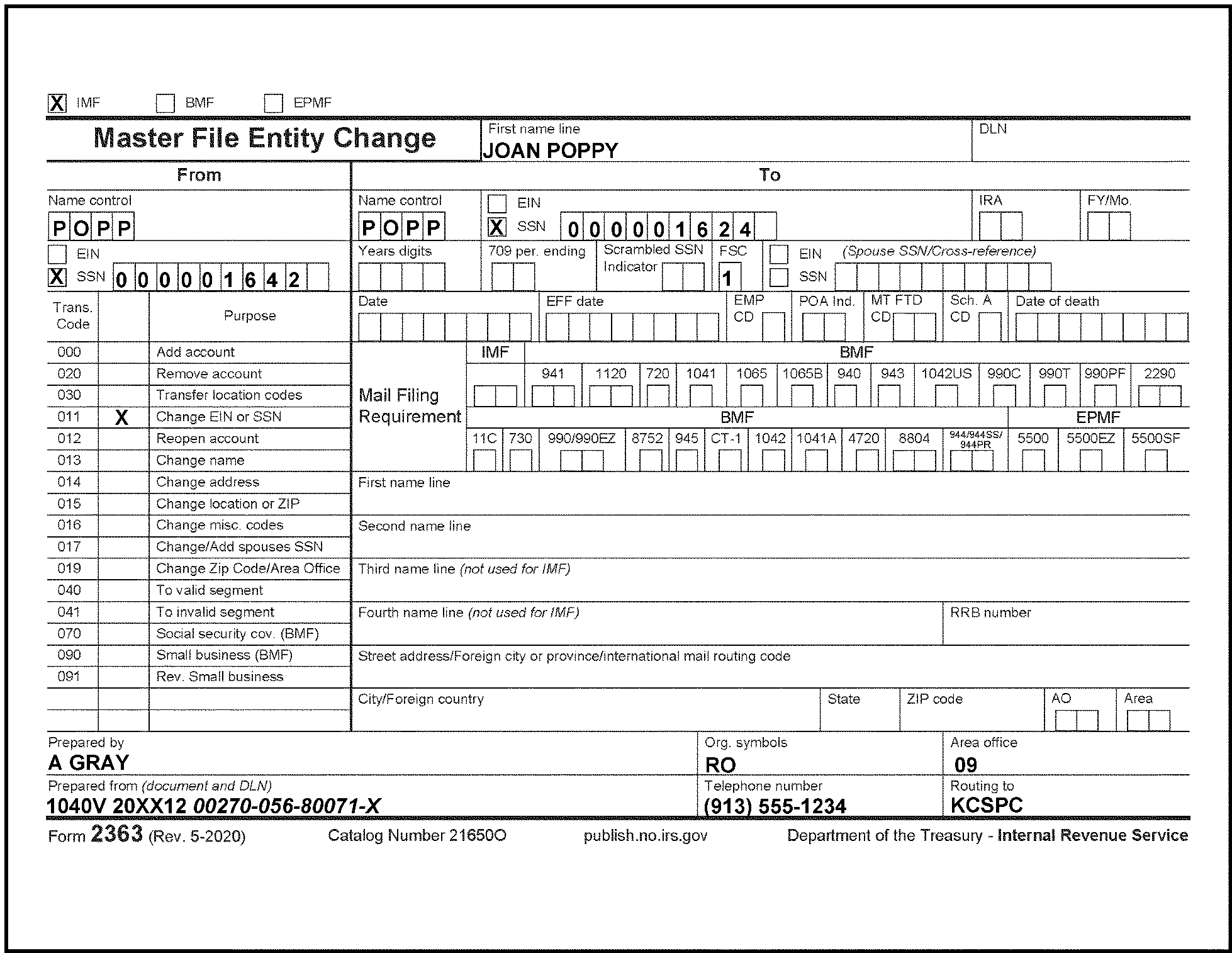
-
Form 3911 is sent to the Refund Inquiry function.
-
This form is received in the ECU only when the refund is frozen due to an invalid TIN. The taxpayer should already have received a CP 54.
-
CC REINF will display the literal "CP 54 ISSUED" . The case is worked in the same manner as a CP 54B. The fourteen calendar day time frames apply.
-
All other inquiries concerning "S-" freezes (TC 740), such as a correction or change of an address, must be routed to the Refund Inquiry Unit. Route the documents/applicable forms/correspondence with instructions to the Refund Inquiry Unit. Enter the following REMARKS on IDRS and the routing slip "Address change requires TC 018" .
-
The following forms are used for reporting and paying the taxes due to the acquisition of U.S. real property interests:
-
Form 8288, U.S. Withholding Tax Return for Certain Dispositions by Foreign Persons.
-
Form 8288-A, Statement of Withholding on Certain Dispositions by Foreign Persons.
-
Form 8288-B, Application for Withholding Certificate for Dispositions by Foreign Persons of U.S. Real Property Interests.
-
Form 8288-C, Statement of Withholding Under Section 1446(f)(4) on Dispositions by Foreign Persons of Partnership Interests.
-
-
The transferees (aka buyer or withholding agent) use the forms to report and pay any tax withheld on the acquisition of U.S. real property interests. These forms are used by individuals, corporations, partnerships, estates, and trusts to withhold tax on distributions and other transactions involving U.S. real property interests from a foreign seller.
-
The transferee and entity subject to withholding must have a TIN (SSN/EIN/ITIN) or an IRSN to post the payments and to process the income tax withholding returns.
-
When the Form 8288/Form 8288-A/Form 8288-B/Form 8288-C is received take the following actions:
-
Verify the SSN entered is correct. If not correct, verify it does not belong to another taxpayer.
-
Establish the account on the BMF using CC BNCHG (TC 000 on "V" tape) under MFT 17.
-
-
BMF Entity will verify and perfect the name and SSN in the following locations for the specified form:
-
Form 8288 - Item 1 (Name and SSN) and Item 3 (Date of Transfer).
-
Form 8288-A - Withholding Agent's Name, Item 1 (Date of Transfer), and Withholding Agent's Federal Identification Number.
-
Form 8288-B - Item 4a (Name of Withholding Agent), Item 4b (Identification Number of Withholding Agent), and Item 6a (Date of Transfer).
-
Form 8288-C - Withholding Agent’s (Partnership’s) Name and Withholding Agent’s U.S. (Partnership’s) EIN.
-
-
If the SSN is missing, research using the name of the buyer/transferee. If found, establish the SSN on BMF.
-
If you cannot locate the missing SSN by research, assign an IRSN (9NN-29-NNNN or 9NN-04-NNNN) with CC TMSSN. The IRSN is an invalid number and will be established on the BMF (MFT 17) with a Definer "W" at the end of the IRSN.
-
After the account has been established, send the Form 8288/Form 8288-A/Form 8288-B/Form 8288-C back to the originator.
-
The words Kabushiki Kaisha or Geisha are the Japanese translation of the words "stock company" or "corporation" Therefore, if these words appear in a name line, they will be moved to the end of the name where the word "corporation" would normally appear.
For example:
Form 8288 shows the name as "Kabushiki Kaisha Green Door" . When name controlling and/or assigning an EIN, the name will be formatted "Green Door Kabushiki Kaisha" . -
When Accounts Management/International team (IMF or BMF) requests an IRSN be assigned/established, then merged into another SSN’V’, this request will be expedited.
-
Refer to IRM 22.30.1.8.15.4.1, Executive Order 13166, Improving Access to Services for Persons with Limited English Proficiency (LEP) and Return Preparation Service, for background information on Schedule LEP , Request for Change in Language Preference.
-
Loose Schedule LEP will be routed from Submission Processing Receipt and Control Department to Submission Processing’s Entity department for input of the TC 971 AC 192. When a loose Schedule LEP is present, review CC ENMOD for a TC 971 AC 192. If present, compare the third, fourth and fifth digits of the MISC field to Schedule LEP to determine if there is a change.
Caution:
Both primary and secondary taxpayers may file a Schedule LEP. Be sure to research CC ENMOD for the taxpayer indicated on Schedule LEP.
, C-Letters and Paragraph Fill-ins.Note:
If the name and TIN that appears on the Schedule LEP does not match or if the selection is not clearly marked (i.e., illegible or multiple selections), take the following action:
Do not update the language preference.
Send Form 8009-A or Letter 178C as appropriate to request a new Schedule LEP per IRM 3.11.6.14 Correspondence Table of Issues -
If present on CC ENMOD, and third, fourth, fifth digits match Schedule LEP, take no action.
-
If not present on CC ENMOD, input the change using the IAT REQ77 tool as follows:
-
In Transaction Code field, input 971.
-
In the 971/151 code filed, input 192.
-
In the Miscellaneous field, input the three-digit code from Schedule LEP.
Reminder:
Start IAT REQ77 tool from the ENMOD screen. If the MFT and TX-PRD fields are not cleared out prior to starting the tool research an error will occur when making the input.
-
Leave the Transaction Date field blank.
-
In the Remarks field, input "SCH LEP REQUEST".
-
-
If present on CC ENMOD, and third, fourth, fifth digits do not match Schedule LEP, input the Schedule LEP Change following paragraph 4 above.
-
After input of TC 971 AC 192 consider the loose Schedule LEP classified waste.
-
Loose Form 9000 will be routed from Submission Processing Receipt and Control Department to Submission Processing’s Entity department. Entity tax examiners will review CC ENMOD for a TC 971 AC 592. If present, compare the first- and second-digits of the MISC field to the Form 9000 to determine if there is a change.
-
If present on CC ENMOD, and first- and second-digits match Form 9000, take no action.
-
If not present on CC ENMOD, input the change using the IAT REQ77 tool as follows:
Reminder:
Start IAT REQ77 tool from the ENMOD screen. If the MFT and TX-PRD fields are not cleared out prior to starting the tool research an error will occur when making the input.
-
In the Transaction Code field, input 971.
-
In the 971/151 code field, input 592.
-
In the Miscellaneous field, input the two-digit code from Form 9000
-
In the Secondary date field, enter the received date. If the Form 9000 does not have a received date refer to IRM 3.11.6.3.3.(6).
-
Leave the Transaction Date field blank.
-
In the Remarks field, input F9000 REQUEST
-
-
After input of TC 971 AC 592 consider the loose Form 9000 classified waste.
-
Taxpayers are required to pay a filing fee requirement if they register and claim historical district easements.
-
Employees stationed in Beckley facility will provide a consolidated report with IMF/BMF taxpayer accounts that submitted a user fee. The consolidated report will be e-mailed to the IMF Entity and BMF Entity HQ Analyst who will then coordinate with the Ogden Campus to update these accounts on a quarterly basis.
-
The spreadsheet will include the following information:
-
Deposit number and deposit date
-
Total amount
-
Taxpayer(s) name
-
SSN/EIN
-
Tax year
-
Type of form filed
-
Date posted
-
Integrated Financial System (IFS) document number
-
-
It is the responsibility of SP Entity to update the taxpayer’s account with TC 971 AC 670 on the year of payment using CCs REQ77 and FRM77 to reflect the taxpayer submitted the user fee.
-
SP Entity will also reverse TC 971 AC 670 if the payment was returned due to insufficient funds. This scenario will be identified with a “DV” at the end of the deposit number.
-
Ogden Entity will update the accounts listed on the spreadsheet (both IMF and BMF) using chart below.
Note:
Entity will update the spreadsheet by notating the date and actions taken and will return it to the SP HQ Entity Analysts for retention.
If... And... Then... a. Account info present Deposit Number does not have “DV” and No TC 971 AC 670 is on the module Input TC 971 AC 670 and notate on spreadsheet “TC 971 AC 670” and the date of input on IDRS. b. Account info present Deposit Number does not have “DV” and TC 971 AC 670 is already on the module Take no action and notate “User fee already applied” on spreadsheet indicating TC 971 AC 670 is present and include the date of input on IDRS. c. Account info present Deposit Number indicates “DV and TC 971 AC 670 was just input from line above Input TC 972 AC 670 with PDC 1, enter TRANS-DT (enter the transaction date of the TC 971 AC 670 being reversed). Notate on spreadsheet “TC 972 AC 670 and the date of input on IDRS. d. Account info present Deposit Number indicates “DV” and TC 971 AC 670 previously input from prior listing Input TC 972 AC 670 notate on spreadsheet and include the date of input on IDRS.
-
The IRS receives weekly address updates from the USPS. The NCOA is designed to help maintain the most current taxpayer addresses.
-
The NCOA database helps to reduce the volume of undelivered IRS mail.
-
NCOA address changes accepted and changed are identified by a TC 014 and display with the following DLNs:
Master File DLN Format IMF XX-2-63-995-999-99-Y BMF XX-9-63-995-777-66-Y EPMF XX-0-63-995-777-66-Y
-
MeF address changes sent to IDRS will also display an address source code, when applicable, beside the IDRS address transaction code, TC 014. The MeF/e-Services DLN will display on CC IMFOLE and displays with a DLN of XX263-995-11111-Y.
-
The following is an explanation of the DLN:
XX = Variable FLC
995 = Stable Julian date
11111 = Stable Block Series and Serial Number
Y = Year TC posts.
-
Address changes that generate due to address hygiene changes will post with a DLN of XX263-995-88888-Y.
-
The following is an explanation of the FINALIST DLN:
XX = Variable File Location Code (FLC)
995 = Stable Julian date
88888 = Stable Block Series and Serial Number
Y = Year TC posts.
-
When taxpayer addresses are input, edited or corrected, IRS uses a software product to try to correct (or hygiene) them to meet the United States Postal Service (USPS) delivery requirements. The FINALIST software product is used by the IRS.
-
FINALIST uses USPS standard abbreviations and spellings and assigns the proper full ZIP Code (where it can) to align the addresses with USPS-recognized locations for domestic mail delivery. FINALIST ensures that IRS "mail outs" comply with the USPS guidelines and standards and will convert the street names to comply with USPS standards.
Example:
A taxpayer account with the street address 35 Northwest Pennsylvania Avenue. FINALIST would change the address to 35 NW Pennsylvania Ave to meet/comply with the USPS's standard address for that mail delivery location.
Caution:
If an address is entered incorrectly per USPS address standards, FINALIST will attempt to correct the address. If a "correct" USPS compliant address is available, it will post to master file. However, if FINALIST cannot correct the address, the input address will post and the address will be considered Undeliverable As Addressed (UAA).
-
If a TE enters an address correctly and FINALIST converts the address to meet the USPS standards, the TE must not be assigned a quality error (as there is no way to circumvent the FINALIST changes).
-
If addresses do not comply with the USPS postal requirements, error reports generate at each campus. A ZIP Code Error Record is produced when the FINALIST software is unable to correct the city, state and/or ZIP Code entered or other "discrepancies" are located within the address. The 07576811 IMF ZIP CODE ERROR REPORT, generates weekly (if address errors were located) and is accessible through Control-D WebAccess (CTDWA). The reports generate based on two different types of errors:
-
Street Address Mismatch
-
City State Mismatch
-
-
IMF Entity is required to research and correct (if possible) each address listed on the IMF report.
-
Working these cases may require ordering the original document from files and/or researching IDRS/IAT to determine the address originally received.
-
If an original document is needed to correct the case, use CC ESTAB with CC Modifier D and Document Request Code 0. More detailed instructions are contained in IRM 2.3.17, Command Code ESTABD.
-
When researching reports and the literal "MCC Generated" displays in the DLN field, these addresses display due to the post office's deletion of the USPS ZIP Code for this address. Research must be completed through the United States Postal Service (USPS) web page. See IRM 3.13.5.65 for additional information.
-
If a correct address cannot be located, no further action is required.
-
See the following example of a military address without a valid street address:
Sgt. Red Cardinal
112 Platoon, Branch 9
Ft. Smith, AZ
-
Address updates will display and post with a DLN of XX263-JJJ-99998-Y.
-
The following is an explanation of the DLN:
XX = Variable File Location Code (FLC)
2 = Stable Tax Class for Individual Filer
63 = Stable Document Code for IMF
JJJ = Actual Julian Date
99998 = Stable Block Series Numbers and Serial Numbers
Y = Year TC posts.
-
IMF address changes made to the primary taxpayers account using IDRS will post with a DLN of XX263-JJJ-NNNNN-Y.
-
The following is an explanation of the DLN:
XX = Variable FLC
JJJ = Actual Julian Date plus 400
NNNNN = Variable Block Series and Serial Number
Y = Year TC posts -
When an address change is input to the primary taxpayer account and they file a joint return, IMF will automatically update the secondary taxpayer's address.
-
It is possible to override and prevent an address change to secondary taxpayer's account. The input of a primary taxpayer address change indicator will prevent the secondary taxpayer address updates.
-
IMF-generated secondary taxpayer address changes (TC 014) will display with a DLN of XX263-001-88888-Y.
-
The following is an explanation of the DLN:
-
See IRM 3.13.5.64 for inputting international addresses. See IRM 3.13.5.58 for inputting domestic addresses.
-
Enter remarks to document an address change completion.
-
In an effort to document address change requests, the TE must enter whether the address change was submitted by the primary, secondary or both taxpayer(s) or by an authorized third party. Enter which taxpayer(s) made the request, the name of the third party or the authorized third party's title (if present), and phone number (if present) in the REMARKS field when using IAT address tool, AMS or IDRS. When making an IMF address change on IDRS, enter 8 in the Block Series field of CC INCHG. When using IAT, click on the block series box to enter a check mark indicating the address change was completed in the ECU. See IRM 3.13.5.51 for additional information on inputting comments.
-
If the taxpayer verbally requests an address change, ensure you are speaking to the taxpayer or their authorized representative before making the address change. See IRM 21.1.3.2.3, Required Taxpayer Authentication, for taxpayer authentication guidelines, if necessary.
-
See IRM 3.13.5.29 Address Changes from Oral Statements/Telephone Contact, for additional information.
-
If a written address change/correction is received with an "S–" freeze, release the S- freeze by the input of either an TC 013 or 014, there is no longer a need for Refund Inquiry to work the Form 8822 and release the S- freeze. See IRM 3.13.5.108 for additional information.
-
When researching and/or updating a taxpayer address and you determine their Last Known Address (LKA) was already updated, do not update the LKA unless an error is noted.
-
The IRS must change a taxpayer’s address of record if "Clear and concise" notification by the taxpayer or their authorized representative. The following list contains examples of circumstances where the IRS will change a taxpayer’s address of record.
Note:
The documentation/notification must be signed by the taxpayer(s) or their authorized representative with the exception of b and d.
-
Address changes noted on a signed return
-
Address corrections written on IRS-generated notices, remittance documents, or IRS-generated correspondence (such as CP 54 responses) that solicits or requires a response by the taxpayer.”
-
Form 8822
-
Taxpayer correspondence containing a red "Lockbox (LB) stamp" or correspondence received from field office personnel (indicated by the TIN edited in green ink and may contain a green stamp) that meets the elements of Rev Proc 2010-16 IRC 5.04(1
-
Miscellaneous tax forms and/or correspondence received in other functional areas (example Automated Collection System (ACS)) due to the filing of Form 9465, 433-F, etc., as set out in Rev Proc. 2010-16.
-
-
If the taxpayer fails to include their complete address information, research IDRS and input the taxpayer(s) entire address when possible. If there is an envelope attached containing the missing items, use this information to update the address.
Additional research includes reviewing the incoming information such as an tax return, correspondence, etc., and/or using the USPS web page.Example:
The taxpayer, in error, does not include information such as Street, Avenue, Court, when they submit their updated address.
-
If you are speaking directly to the taxpayer or their authorized representative, communicate the importance of updating their address information through the USPS.
-
If multiple address change requests are received from different "unrelated" taxpayers requesting the same address from the following sources:
Complete a Form 3210, Document Transmittal, and forward these cases to your local Return Integrity and Verification Operations (RIVO).-
Form 8822
-
taxpayer correspondence
-
notices
-
-
An additional field was added to CC INCHG to use when a company files for different taxpayers using the same address.
-
To complete multiple address changes, enter the first taxpayer and the address provided and transmit the screen.
-
The address information from the first screen will be retained. When entering the address information for the next taxpayer, enter a "Y" in the DUP-ADDR-IND field to retain/keep the address information. This will display in the "REQUEST COMPLETED" screen.
-
See Figure 3.13.5-3 for an example of a duplicate address.
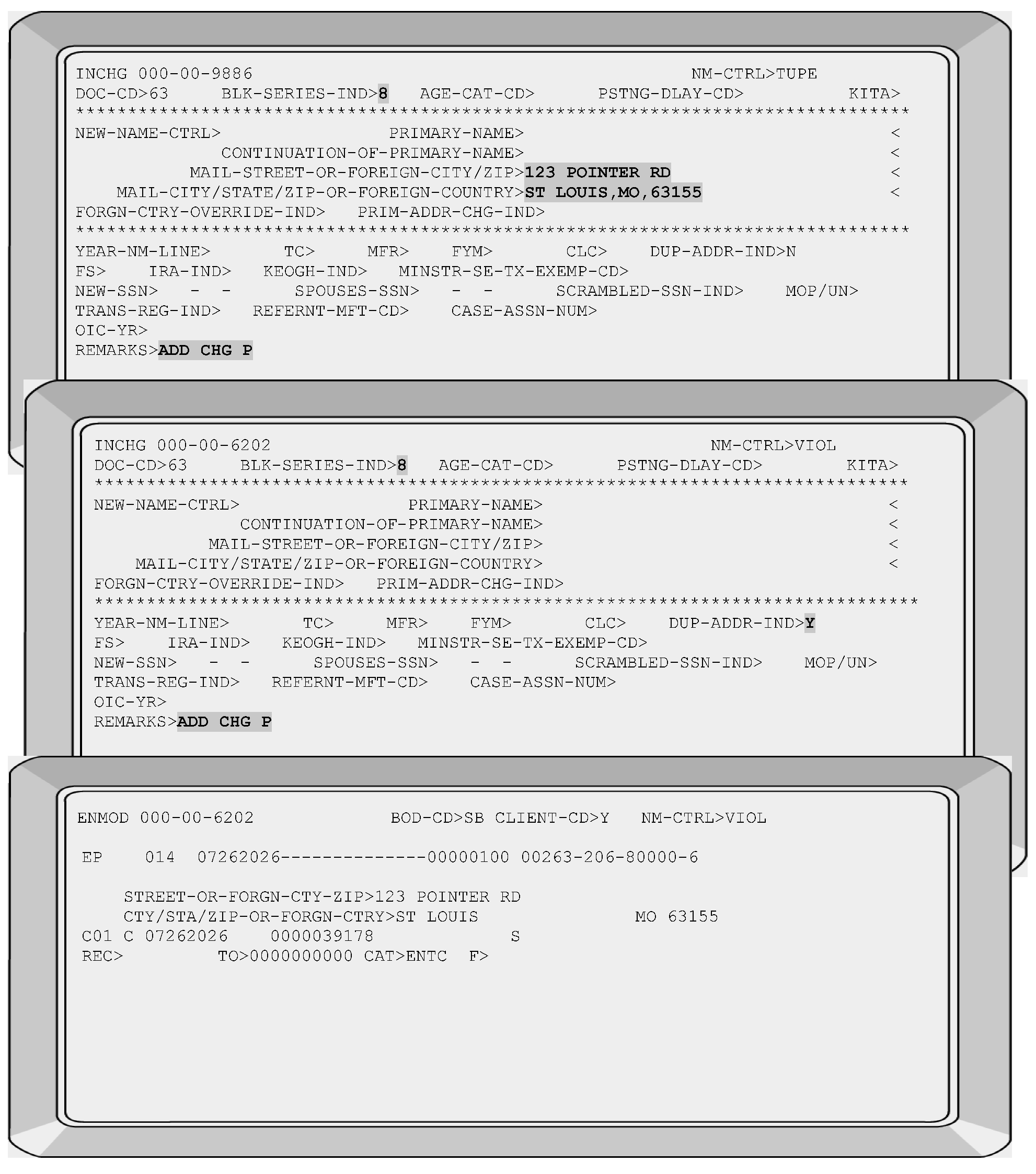
-
The ECU receives a variety of documents requesting taxpayer address changes other than from the receipt of a Form 8822, Address Change Request. Since the Entity function is NOT the only area that completes address changes, DO NOT accept address changes from areas (inside or outside of your campus) that are capable of completing address changes.
Caution:
FINALIST will first attempt to standardize the address with correct spellings and abbreviations. If the result is an address is not a recognized delivery location, FINALIST will not assign the ZIP+4 portion of the ZIP Code. Whether or not FINALIST can recognize the delivery location, the address will post to Masterfile. In the latter case, however, it will be coded as Undeliverable As Addressed (UAA). See IRM 3.13.5.45 for additional information.
-
Complete research prior to making any address changes. If the taxpayer's Last Known Address (LKA) is pending or the address shown matches the address change request, do not complete the address change.
-
Enter 8 in the Block Series field of CC INCHG to indicate the address change was completed in the ECU.
-
Whenever an IMF address change is completed, the TE must include the following information in the REMARKSfield. The following table displays the minimum information required when completing an IMF address change:
If... Then... a. Primary, Single or Head of Household taxpayer is requesting the address change Enter a P to indicate primary taxpayer b. Secondary taxpayer is requesting the address change Enter an S to indicate secondary taxpayer c. Both primary and secondary taxpayers are requesting the address change Enter a B to indicate both taxpayers d. If the source is from Lockbox Bank Enter an L to indicate Lockbox e. Unable to determine who requested the address change Follow the Exception under IRM 3.13.5.51(6) . If an IRS generated notices is present, enter a U to indicate unknown source for who requested the address change. f. Power of Attorney (POA) or Title of Representative Enter POA and provide first initial or first name and entire last name or the representative (CAF) number g. Other third parties Enter name and relationship to taxpayer Reminder:
Enter the phone number, when available. Below are examples of comments that can be entered.
-
SD - Source Document
-
NSD - No Source Document
-
SDR - Source Document Retained
-
-
Address Requirements for Non IRS Generated Notices:
When a "written" address change is received, the following information is needed to input the address change:-
New address
-
Old address (must match the current address on CC ENMOD or any of the three most recent addresses shown on CC FINDSD or FINDSI for the taxpayer requesting the address change).
-
Taxpayer(s) full name(s)
-
TIN(s)
-
Taxpayers signature(s) or the signature of their authorized representative is required. See the Note in paragraph (6) for the exception to requiring taxpayer/representative signature(s).
-
-
When IRS-generated notices/correspondex ((C) Letters) are received with taxpayer-supplied address changes, research the account. Complete the address change from the IRS-generated notice or C Letter. Enter a U to indicate unknown source for who requested the address change.
-
When a taxpayer submits a Form 8822, they must provide the following items:
-
New address
-
Old address
-
Taxpayer(s) full name(s)
-
TIN(s)
-
Taxpayers signature(s) are required or the signature of an authorized representative on Form 56, Notice Concerning Fiduciary Relationship or Form 2848, Power of Attorney and Declaration of Representative or a "court certificate" giving signature authority.
Note:
Signatures and requests for address changes will be accepted prima facie Prima Facie means "at first appearance; at first view, before investigation." If there is no contradicting evidence to dispute the authority of the person, the signature must be accepted. This policy applies to signatures accompanied by titles such as owner, president, etc. If Correspondence Imaging System (CIS) scanned versions of Form 8822 are received due to exception processing, accept the scanned version if it contains all the needed information for processing. If the image is incomplete, do not return the scanned Form 8822 to the taxpayer. Correspond for any missing information as needed.
Reminder:
When a taxpayer has an existing Fiduciary, Power of Attorney (POA), etc., on their account, do not correspond for Form 56 or Form 2848 (POA). Correspondence needed should be addressed to this individual. If there is no fiduciary on the taxpayer account per CC CFINK, any correspondence needed should be addressed to the taxpayer.
Exception:
Two signatures are not required on the Form 8822 for a married filing joint account if one of the taxpayers is deceased
Exception:
Prior to returning the Form 8822 for one missing signature (when the taxpayer includes two names on Form 8822 but only one taxpayer signs), research to determine if there is a Combat Zone (CZ) indicator (-C freeze) on either account
Reminder:
Since the -C freeze indicator can stay on the account after the taxpayer is no longer in a combat zone, research using CC IMFOLE to determine the Combat indicator shown on Line 11.
-
If the Combat indicator is "1" , then the taxpayer is STILL serving in a combat zone. Complete the address change request without requesting the signature of the taxpayer serving in a combat zone.
-
If the Combat indicator is "2" , then the taxpayer is no longer a combat zone participant. Use the instructions in paragraph (5).
-
-
If the ECU receives a Form 8822 and you determine the taxpayer is NOT established on Master File (per CCs INOLES/INOLET), do not complete the address change. See IRM 3.13.5.52.2 for additional information.
-
If a Form 8822 is received attached to an Entity case, complete the address change when correcting any other outstanding issues.
Reminder:
The entering of the entire taxpayer address is required on IDRS even if only a portion of the address is changing.
Example: Taxpayers house number and street address are changing, but their city, state and ZIP Code remains the same.
In this situation, the TE MUST enter the city, state and ZIP Code even if these items remain the same when using CC INCHG to complete an address change. -
The taxpayer checks Box 2 indicating gift, estate, or generation-skipping transfer tax will be filed (Form 706, Form 709, etc.,) if box 1 is also checked, process first, then route the case to the Kansas City or Ogden campus.
For the Kansas City and Ogden campuses use the following chart to process the Form 8822 when the taxpayer has check Box 2 in Part 1.if... and... then... a. The taxpayer checks Box 2 in Part 1, indicating that gift, estate, or generation-skipping transfer tax will be filed (Form 706, Form 709, etc.) The BMF SSN (SSN'V') is not established on the Master File, Input a TC 000 to establish the account. See Figure 28 in IRM 3.13.2.8.13. b. The taxpayer checks Box 2 in Part 1, indicating that gift, estate, or generation-skipping transfer tax will be filed (Form 706, Form 709, etc.) The SSN 'V' is already established on the Master File, Update the address(es) as required. When updating the address on an SSN V'/'W', the MFT> field of CC BNCHG must be completed: 52 for Form 706,51 for Form 709, account, the field NM-YY/QTR> must also be completed. If the change is for a Form 706 account, the field DT-OF-Death> must be completed. -
Review the account using CCs INOLE ENMOD, FINDSD/FINDSI. Use the following to complete an address change when the taxpayer(s) provided all the required information on the Form 8822 (including Form 8822 received with a Form 56):
If... And... Then... a. The address change has already been completed Refer to IRM 3.13.5.52.2 for additional information
Enter the appropriate audit trail.b. The taxpayer's account DOES NOT contain an ID theft indicator Their old address MATCHES CCs INOLE/ENMOD or any of the last three addresses shown on CC FINDSD or FINDSI with the most current cycle dates. (for domestic addresses), or;
FINDSI (for international addresses)b. the taxpayer's account DOES NOT contain an ID theft indicatorComplete the address change request. c. The taxpayer's account DOES NOT contain an ID theft indicator Their old address DOES NOT match CCs INOLE/ENMOD or any of the last three addresses shown on CC FINDSD or FINDSI with the most current cycle dates.
Send the Form 15355 to new address provided on the Form 8822.
Return the Form 8822 submitted by the taxpayer(s).
Do not make an address change at this time.d. The taxpayer's account CONTAINS an ID theft indicator Their old address MATCHES the address on CCs INOLE/ENMOD or any of the last three address shown on CC FINDSD OR FINDSI with most current cycle dates. Complete the address change request. e. The taxpayer's account CONTAINS an ID theft indicator Their old address is MISSING or DOES NOT match CCs INOLE/ENMOD or any of the last three addresses shown on CC FINDSD or FINDSI with the most current cycle dates.
Send the Form 15355 to new address provided on the Form 8822.
Use an asterisk in the Taxpayer Identification Number (TIN) within the 0104C letter. This will prevent the generation of a TIN in this field.
Return the Form 8822 submitted by the taxpayer(s).f. Form 8822 is incomplete and correspondence is needed for the missing information to process Form 8822 Taxpayer is requesting an Identity Protection Personal Identification Number (IP PIN)
Send the Form 15355 to new address provided on the Form 8822.
Return the Form 8822 submitted by the taxpayer(s).
Do not make an address change at this time.
All taxpayers are now able to request an IP PIN using the Get An Identity Protection PIN (IP PIN).g. Form 8822 is complete Complete the Form 8822 request.
retain the request/correspondence and staple the request to the back of the Form 8822.
See IRM 3.13.5.52.2 for disposition instructions. -
If the taxpayer(s) have provided all the required items to complete an address change, after completion of the address change, see IRM 3.13.5.52.2 additional information.
-
If the taxpayer provided all the required information listed in paragraph (1) except they did not sign the Form 8822 or it is not an original signature, use the following instructions:
-
Return the Form 8822 to the taxpayer and use the new address provided by the taxpayer.
-
Include a Notice 1390 You Forgot to Sign Your Form 8822, Change of Address (English-Spanish)
-
Include an envelope with your ECU information for the taxpayer's reply.
-
-
If both taxpayers sign the Form 8822 and research determines the taxpayers have not filed Married Filing Jointly (FSC 2) previously, update both taxpayers’ accounts.
-
If the taxpayer did not provide all the required information listed in paragraph (1), Send Form 15355, Notice 1390 or Ltr 104C with Form 8822
Exception:
If the written correspondence is received from the ITIN Unit, return the written correspondence to the taxpayer when you send out the Form 15355, 0104C letter or notice 1390 to the ITIN taxpayer.
Note:
When working Address changes, if the Form 8822 has a 104C letter or Form 15355 attached to it Do Not correspond again unless it is for something different than what is on the letter.
-
Indicate the missing items by selecting the appropriate paragraphs.
-
If the taxpayer requested the address change using a Form 8822, return the Form 8822 to the taxpayer using the new address provided by the taxpayer.
-
Include an envelope with your ECU information for the taxpayer's reply.
-
-
All completed address changes require the TE to enter the requestor's name, title and/or phone number (if present) in the REMARKS field. See IRM 3.13.5.51 for the required comments.
-
If the Form 8822 was completed by an ITIN taxpayer or was received from the ITIN unit, research and complete the address change if necessary. Return the Form 8822 to the ITIN unit for the following conditions (whether an address change was completed or wasn't completed):
-
ITIN is in assigned status and TP asks for a notice to be reissued
-
ITIN is in suspended status
-
ITIN is in Office of Foreign Asset Control (OFAC) status
-
or If Form 8822 has Applied For, or is requesting an ITIN, forward these requests to the ITIN unit.
-
-
Correcting obvious taxpayer name errors such as misspellings, transposition errors, etc., must be made when name line errors are reported by the taxpayer or discovered when researching taxpayer accounts. These name corrections provide quality service to the taxpayer.
See IRM 3.13.5.29 and IRM 3.13.5.29.1 for specific instructions on completing address change requests from phone contact.Note:
Do not make name changes to the taxpayer's Entity due to a Form 8822. Take these documents to your Lead to be re-batched as correspondence.
Reminder:
If there are changes needed to the first name line or to a foreign address, both the name line AND the foreign Street Address MUST ALWAYS BE ENTERED as part of the transaction input. The second name line is used for foreign address. See Figures 3.13.5-7 & 3.13.5-7a in IRM 3.13.5.64 for assistance in inputting the change to ENMOD.
-
If a F-8822 is received from a taxpayer with indications that they are incarcerated or the address on the F-8822 or its envelope are from a state or federal institution follow the instruction in the table in paragraph (5) above and process the address change and then route the F-8822 and Letter 104C and all related forms to the Alpha File, refer to IRM 3.13.5.52.2
-
If the ECU receives a Form 8822 requesting an address change and it communicates the address change is needed for their Social Security Statement, research their account. If the taxpayer has an active account, complete the address change.
-
If you determine the taxpayer's account is inactive, do not establish an account to complete the address change. In the inactive accounts, correspond to the requestor using a 0104C Letter and direct the taxpayer to the Social Security Administration (SSA).
-
Beginning October 2017, Forms 8822 and 8822-B that have been processed will no longer be destroyed as classified waste in the control team. These documents have a defined retention period and will be stored in the Files Operation in an Alpha File.
-
Each form must be name controlled, by underlining the first four alpha characters of their name control as it appears in box 3a on Form 8822 .Leave an audit trail in the lower left hand region of the document.
-
Entity Clerical Team will forward all processed forms to Files Operation on a Form 3210 indicating Alpha File.
-
-
If upon research of the taxpayer’s address you determine the Last Known Address (LKA) is already updated or the new address is pending, destroy the Form 8822 as classified waste. Do not forward these Forms 8822 or 8822-B to the Files operation.
-
Ensure both taxpayers (FSC 2) sign the address change request or Form 8822 before completing an address change (unless one of the taxpayer indicates they are establishing a separate residence). See Figure 3.13.5–4 for an Form 8822 example where BOTH taxpayers requested an address change and both signed the form.
Note:
Effective January 3, 2022, IMF Entity Tax Examiners in all Submission Processing sites will work OFP 390-40001 Form 8822 (IMF)/Correspondence Address Changes in a "Last In, First Out (LIFO)" process. For example, for the January 3, 2022 date, you would go back 40 business days to the November 2, 2021 inventory for Form 8822 (IMF)/Correspondence Address Changes and process that date forward.
-
If the primary/secondary taxpayer requests a different address, complete an address change for their account as follows:
If... Then.... 1. Primary taxpayer only is requesting an address change Do not change their FSC
Use the FSC currently on the account
Ensure you check the primary address change only box.2. Secondary taxpayer requests a change of address (due to the establishment of a separate residence) Establish the secondary taxpayer's account using the new address
Do not change the secondary taxpayer's filing status. -
To complete an address change for the PRIMARY taxpayer only:
-
When using IDRS, enter the complete address and input a 1 in the PRIM-ADDR-CHG-INDICATOR field on Line 8 of the CC INCHG screen.
-
When using IAT or AMS, update the address as necessary and "click" the Primary-Address-Change Indicator box.
-
When using AMS or IAT, the user must remove the old address information if the new address does not overlay the entire address.
-
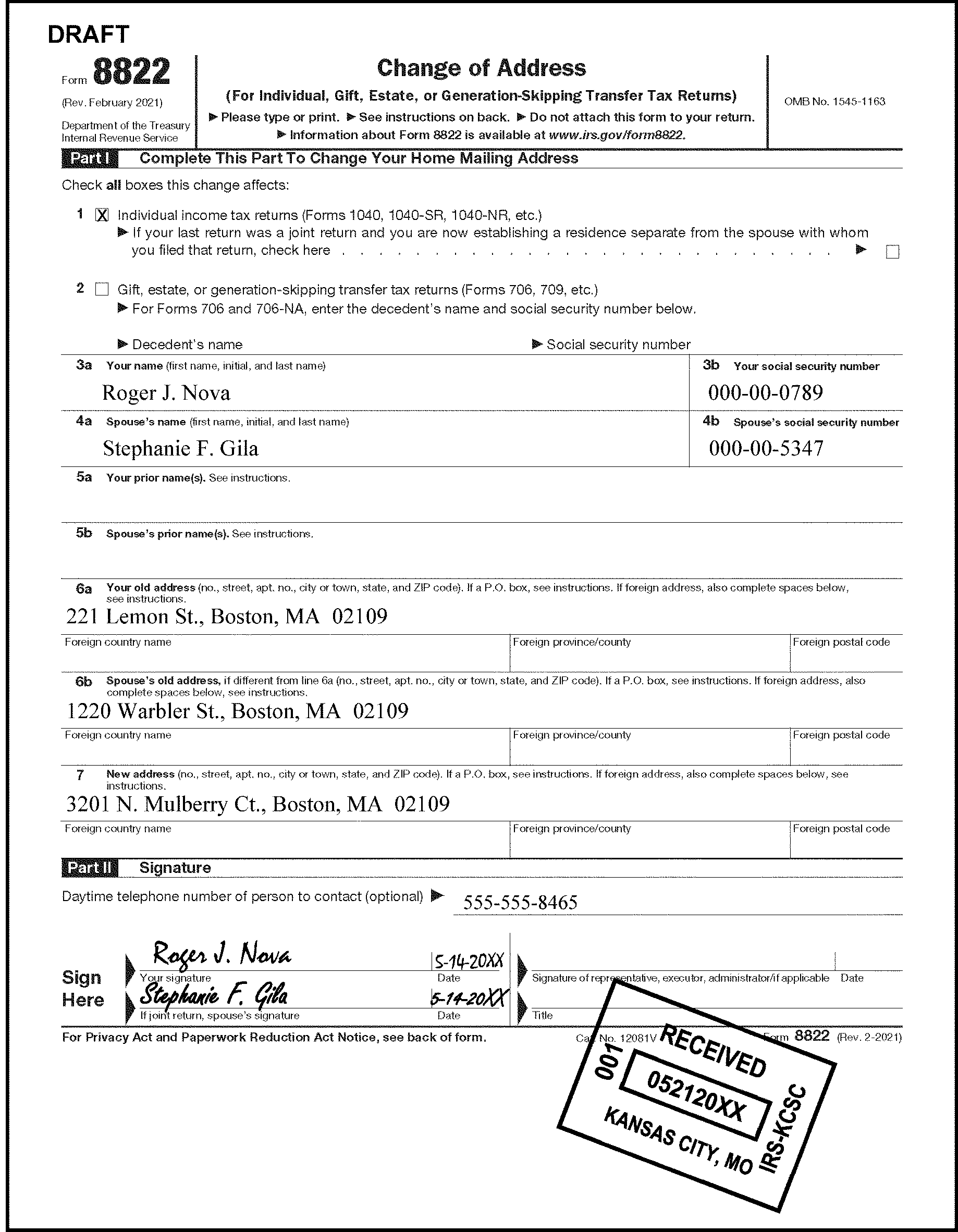
-
If a Form 8822-B, Change of Address or Responsible Party- Business or Form 8822 (from a business filer) is received in an IMF campus requesting a BMF address change, the address update must be completed in the IMF campus. See IRM 3.13.2, BMF Account Numbers, for additional guidance. See paragraph (2) for an exception to this requirement.
-
If the taxpayer is also requesting BMF Name Change or change of responsible party change and you are unsure how to complete the action, route to the BMF Entity Unit or contact them at following numbers:
(855-214-7520 for the Ogden campus), or;
(855-887-7734 for the Kansas City campus).
The BMF ECU will provide the appropriate fax number.Note:
Effective January 3, 2022, IMF Entity Tax Examiners in all Submission Processing sites will work OFP 390-40001 Form 8822 (IMF)/Correspondence Address Changes in a "Last In, First Out (LIFO)" process. For example, for the January 3, 2022 date, you would go back 40 business days to the November 2, 2021 inventory for Form 8822 (IMF)/Correspondence Address Changes and process that date forward.
-
-
If the IMF Entity receives an address change for a taxpayer bearing a Large Corporation Indicator (LCI) on their account, this must be routed to the Large Corporation/Technical Team in the respective sites.
-
The REMARKS "LCI Address Change" must be entered on the routing slip.
-
See IDRS Command Code Job Aids for CCs ENMOD, BMFOL'E' and SUMRY for assistance in identifying an LCI.
-
-
All transactions containing an address change require the TE to enter the requestor's name, title (if available), and phone number (if present) in theREMARKSfield when using IAT address tool, AMS or IDRS.
-
Form 8822-B is filed by BMF taxpayers to furnish written notification of a change of address to the IRS.
-
When Form 8822-B is received with an Entity case or as a stand alone document, the change of address will be entered with any other required data such as a name change
-
Before updating an address, the EIN entered on Form 8822-B will be verified.
Reminder:
Before updating any field of the Entity module, research CC ENMOD to determine if an IDT indicator is present. If so, refer the address change request to Image Control Team (ICT):
Kansas City - Stop 6525 Bldg C-1
Ogden - Stop 6552 ARKA
Ensure the routing slip clearly states which IDT indicator is present. Refer to IRM 25.23.9.6 BMF Identity Theft Tracking Indicators which describes what IDT indicators are. -
Use the table below to process a Form 8822-B for business filers.
If... And... Then... a. Form 8822-B clearly indicates a primary name change Formerly Known As (FKA), previous name, etc., Form 8822-B is signed, Change the name b. Form 8822-B clearly indicates a primary name change Formerly Known As (FKA), previous name, etc. Form 8822-B does not have an authorized signature, Correspond for verification with a 0252C Letter c. Unable to determine if the taxpayer is changing their name, Do not update the taxpayer’s name.
Send the 252C letter asking the taxpayer to verify the name change.d. Mailing and location addresses provided by the taxpayer are the same Enter the information within the mailing address field ONLY. e. Any required information is missing, IDRS research does not provide the missing information, Return Form 8822-B to the taxpayer in a 0104C Letter (or 6800sce used in BMF campuses).
Ask the taxpayer to complete Form 8822-B and return to us.f. The taxpayer is affected by a Presidentially Declared Disaster Area, Change the address(es) via phone call or any other way the taxpayer informs us to change the address. g. EIN on Form 8822-B is not on the Master File, IDRS research shows the EIN was assigned to the taxpayer on Form 8822-B, Input TC 000 with no FRC’s. h. EIN on Form 8822-B is not on the Master File, IDRS research shows no record of the EIN being assigned, Send the taxpayer a 0104C letter asking for a copy of the notice assigning the EIN. When received, TC 000 the EIN with no FRC’s. i. Part I, Box 2 is checked, Take no action.
Fax the Form 8822-B to EP Entity at (855) 214-7520, or route to Ogden.j. Taxpayer has an EO sub-module on IDRS Take no action.
Fax the Form 8822-B to EO Entity at (855) 214-7520.k. If a domestic business filer provides a PO Box, Current mail address is a physical location address and the location address field is not filled Always enter the PO Box in the MAIL-STREET-OR-FOREIGN-CITY/ZIP fields and enter the physical location in the LOCATION-STREET-ADDRESS field. l. If an international business filer provides a PO Box, Always enter the PO Box in the Foreign -Street fields. See IRM 2.4.9 Command Codes ENREQ, INCHG, IRCHG, BNCHG and BRCHG, for additional information. -
-
If the identifying number (SSN/ITIN/EIN) of the entity responsible party is not available, a "9" will be entered in the XREF-TIN-TYPE field of CC ESIGN.
-
See IRM 3.13.2, BMF Account Numbers. Specific information is shown in Figure 3.13.2-26.
-
When updating the address on an SSN definer V or definer W, the MFT field of CC BNCHG must be completed.
-
If the change is for a Form 709 account, the field NM-YR/QTR> must also be completed.
-
If the change is for a Form 706 account, the field DT-OF-DEATH> must also be completed.
-
If the taxpayer is requesting an address change for a Form 706 or Form 709 and you cannot locate any filing requirements, do not establish the taxpayer based on the submission of a Form 8822 alone. Destroy the Form 8822 as classified waste.
-
-
See IRM 3.13.5.52.2 for additional information. Enter the appropriate audit code.
-
Do not complete a temporary address change request. The IRS must retain the permanent address as the Last Known Address (LKA) whenever possible.
-
Correspond with the taxpayer to inform them their temporary address change will not be completed. Use the fill-in paragraph using the 0104C Letter.
-
Use the following language for the fill in paragraph. "We received your request for an address change but didn't process it because you indicated this is a temporary address change. Please submit a Form 8822 when you require a permanent address change." See IRM 3.13.5.52.2 for additional information for additional information on disposition of the Form 8822. Enter the appropriate audit trail.
-
If a Postal Service (PS) Form 3575, Form 3576 or USPS Post Card is received, complete using the following procedures:
If Postal Service (PS) Form 3575, Form 3576 or USPS Post Card is received... And... Then... a. With a letter/note attached Taxpayer provides all the necessary items to complete the address change Update the taxpayer's address b. With a letter/note attached Letter/note is incomplete and the address provided does not show on IDRS Correspond with the taxpayer using the new address with a Letter 0104C and a Form 8822. c. Without any attached documentation (solo USPS Form/Card) Address provided does not show on IDRS Correspond with the taxpayer using the new address with a Letter 0104C and a Form 8822. d. Without any attached documentation (solo USPS Form/Card) Information provided does not have enough information to correspond Destroy as classified waste.
No further taxpayer contact is necessary.
-
Receipt and Control/Manual Deposit/Payment Perfection/Cashiers may forward remittance documents requiring address changes to the ECU after completing their remittance processing.
-
Use the following instructions below for receiving and correcting these cases.
-
Research the account using CC IMFOLI, CC IMFOLT or CC ENMOD to determine if there are any S-, Z-, or -Z freezes on the taxpayers account prior to updating their address.
-
If a written address change/correction is received with an "S–" freeze, release the S- freeze by the input of either an TC 013 or 014, there is no longer a need for Refund Inquiry to work the Form 8822 and release the S- freeze
-
If there is a Z- or a -Z freeze, do not complete address change. Route the case to the Fraud Detection Center.
-
-
If you receive documents with a green TE stamp or a red Lockbox stamp and they do not have DLNs and/or are not attached to Form 1332, complete the address change (when possible). After completion of address change, destroy as classified waste.
-
Some of the required information may not be available due to the separation of the taxpayer checks, money orders, etc., from taxpayer voucher(s), incoming Form(s), miscellaneous schedule(s), and taxpayer correspondence.
-
When the information is legible and you can locate their account, complete the address requests.
-
If you cannot locate the taxpayer's account, correspond using a 0104C letter to request the appropriate missing information. Use any legible address.
-
Use an asterisk in the TIN area of the letter to mask the taxpayer's TIN (if the TIN is available).
-
-
A TC 014 generates with Doc Code 63 when a domestic change of address is completed and no information is entered in the Continuation-of-Primary-Name (Line 2) field.
Note:
The IAT address tool should not be used when changing a foreign address to a domestic address.
Exception:
FINALIST will first attempt to standardize the address with correct spellings and abbreviations. If the address is not a recognized delivery location, FINALIST will not assign the ZIP+4 portion of the ZIP Code. Whether or not FINALIST can recognize the delivery location, the address will be posted to the Masterfile. In the latter case, however, it will be coded as Undeliverable As Addressed (UAA). See IRM 3.13.5.45 for additional information.
-
If the taxpayer provides a physical address and a PO Box, enter the physical address in the Continuation-of-Primary-Name (Line 2) field and the PO Box in the MAIL-STREET-OR-FOREIGN CITY/ZIP field. This will cause a TC 013 to generate.
-
The instructions and the information in Figure 5 below depicts an example of an address change:
-
Enter complete address.
-
In an effort to document who is requesting an address change, the Tax Examiner (TE) must enter whether the address change was submitted by the primary, secondary or both taxpayer(s) or by an authorized third party. Information such as which taxpayer made the request, the name of the third party, the authorized third party's title (if present), and phone number (if present) in the REMARKS fields when using IAT address tool, AMS or IDRS. See IRM 3.13.5.51 for additional information on inputting comments.
-
-
Whenever information is entered in the IMF Continuation-of-Primary-Name, the following fields must also be entered:
-
Name Control
-
Primary name line as shown
-
*YEAR-NM-LINE
-
**FSC
-
See IRM 3.13.5.51 for the information to place in the REMARKS field of the transaction whether using IAT, AMS or IDRS.
Whenever information is entered in the Continuation-of-Primary-Name, a TC 013 will generate instead of a TC 014..See Figure 3.13.5-5.Reminder:
*Use the taxpayer(s) current filing status code unless you are establishing an IRSN. If you are establishing an IRSN, the FS from the return.
**When entering an address change and the tax year information is required, use current tax period unless the address change is for a prior year return. -
-
Do not enter a blank space between the mail or location street address.
-
If a taxpayer address contains two directions within the address, abbreviate the direction of the street but enter the name of the street. See the following examples:
Examples Enter As
3908 North South Street
Toledo, OH 123453908 N South St
Toledo, OH 1234514329 East West Drive, North West
Washington, DC 5432114329 E West Dr NW
Washington, DC 54321 -
If the taxpayer address contains a number along with a highway, always enter HWY before the number. For example, 40 Highway must be entered HWY 40.
-
When entering an address change containing "No" to indicate North, "No" to indicate a number, "Num" , or the "#" symbol, to indicate a number, DO NOT use this specific address information if it is a prefix for a house or apartment, a route, or a PO Box number.
See the following table for examples:Note:
If No, Num or # is used for a number, only enter the number. If No, North, or No. is used as a direction, enter "N" only.
Examples Enter As 859 Adams Avenue No 7 859 ADAMS AVE 7 57 No 123 Ave 57 N 123RD AVE 123 Third Street Number 5 123 THIRD ST 5 123 Third Street #5 123 THIRD ST 5 -
See Document 7475 for a list of acceptable address abbreviations. See Figure 3.13.5–6 for an example of a domestic address change.
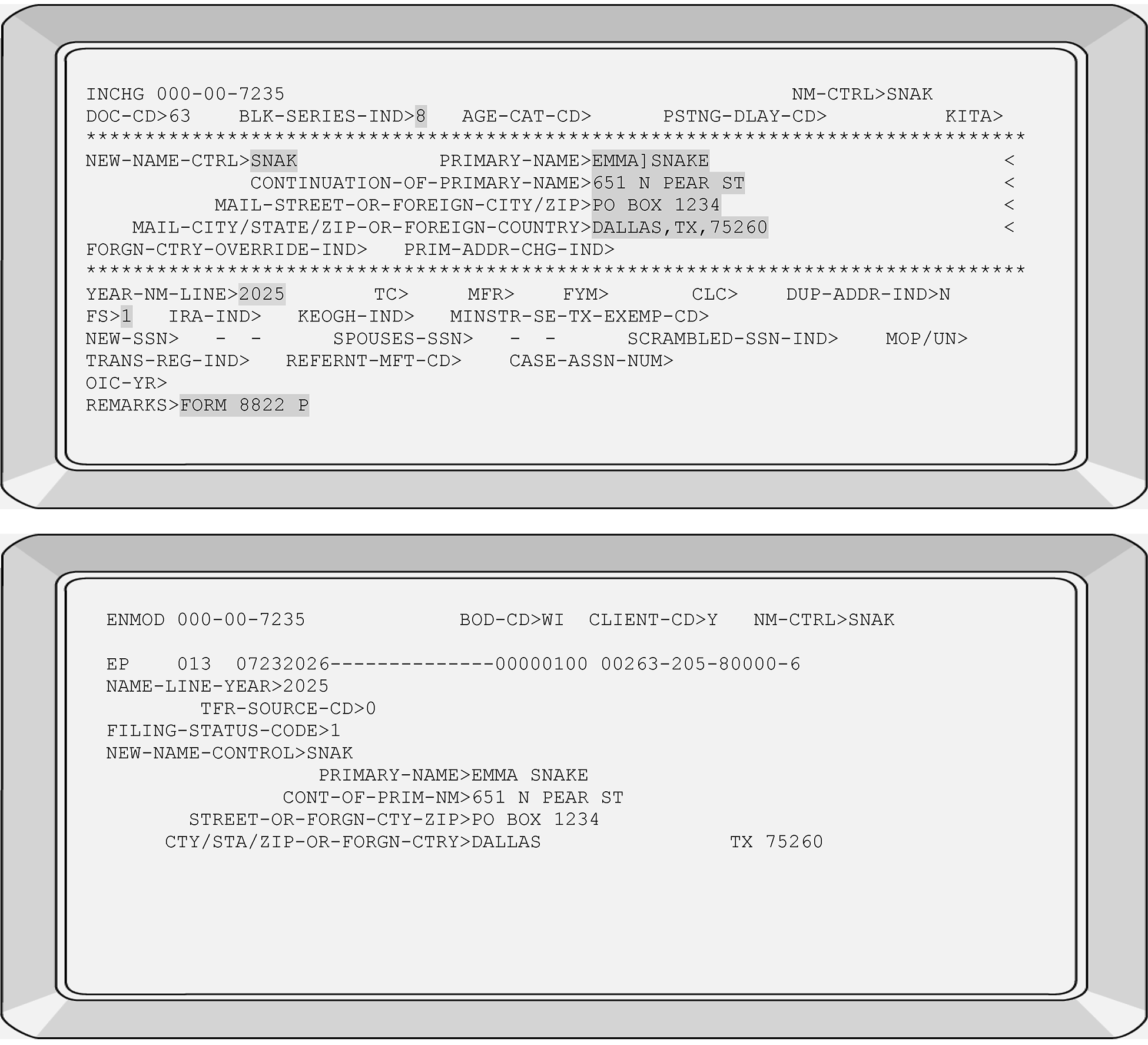
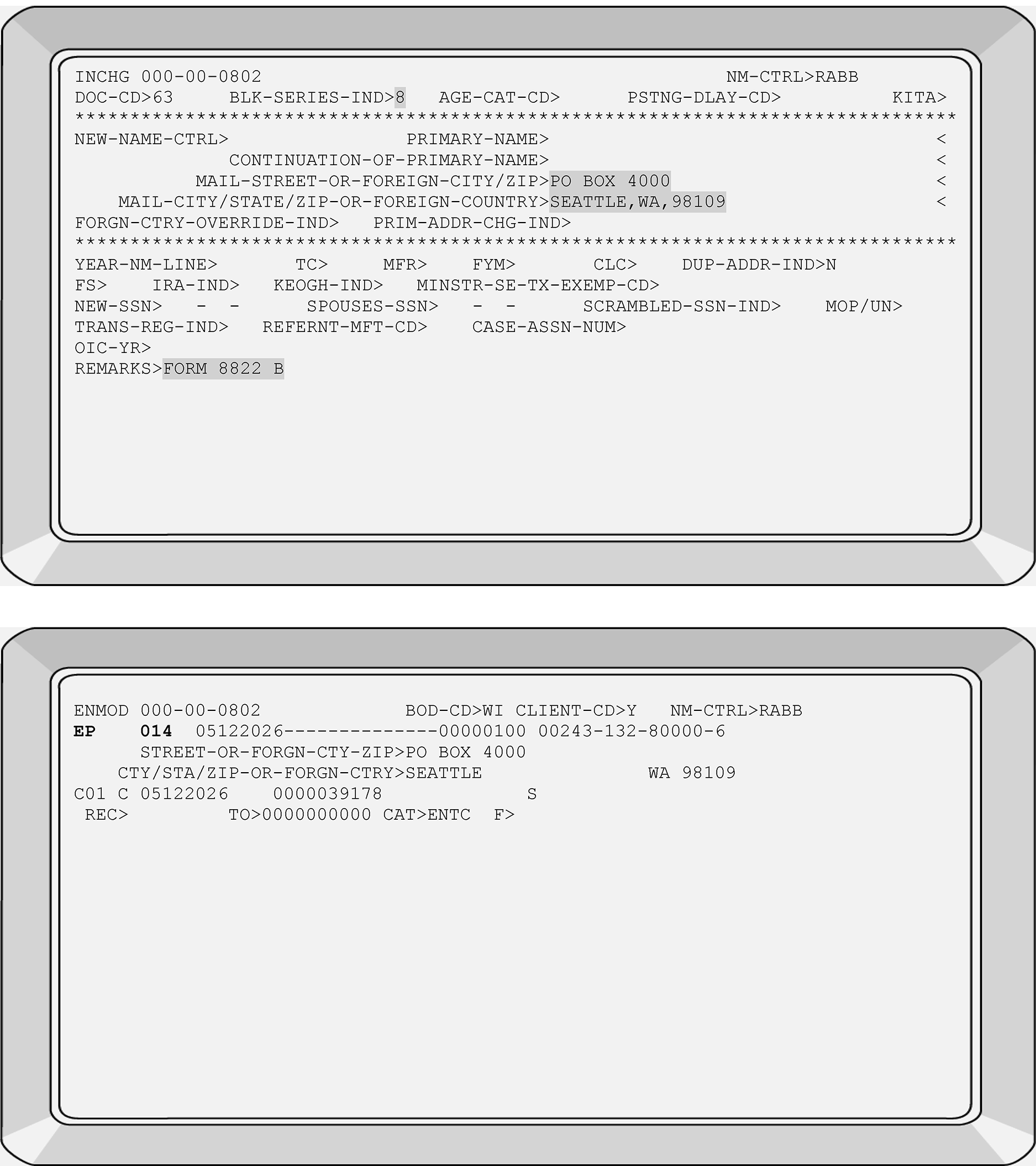
-
When using AMS or IAT, the user must remove the old address information prior to completing the address change if the input of the new address does not overlay the old address.
-
See IRM 3.13.5.46, for additional information on AMS DLNs.
-
Address changes/corrections must be completed when obvious taxpayer address errors are discovered or are reported by the taxpayer. These address updates provide "quality service to the taxpayer" .
-
An example of a taxpayer-reported typographical error would be if the taxpayer writes an address correction on their CP 54 notice, the TE should correct the address change as requested.
-
Allowable address corrections include but are not limited to the following examples:
-
Street address is listed twice
-
Apartment number is missing
-
Misspelling or typographical error in the entity section
-
Taxpayer fails to write out or include their entire address
. -
Address information such as Street, Court, Avenue, etc., is missing
-
Address contains the correct street name but the actual house number is incorrect (transposition error).
-
-
Enter the entire address when updating, correcting, or editing the taxpayer address information.
-
When entering a change of address for the IMF "In Care Of" taxpayer, ensure the additional information is entered on the CONTINUATION-OF-PRIMARY-NAME line. If adequate space remains on the CONTINUATION-OF-PRIMARY-NAME line, include the designated titles. See IRM 3.13.5.31 for acceptable titles and their respective abbreviations when inputting information on the CONTINUATION-OF-PRIMARY-NAME line.
-
When information is added or removed from the CONTINUATION-OF-PRIMARY-NAME line, the account correction will post as a TC 013.
-
Always include PMB with the street address. PMB must be entered at the end of the address regardless of where it is shown on the address change request. The PMB is entered in the "MAIL-STREET-OR-FOREIGN CITY/ZIP" field of CC INCHG. See the following examples:
Examples Enter As 102 S. 3rd Drive Private Mailbox 33 102 S 3rd Dr PMB 33 Private Mailbox 3
102 S. 38th Street102 S 38th St PMB 3 PMB 29
111 Anytown Rd111 Anytown Rd PMB 29
-
There are four types of mailing addresses treated as domestic:
-
The 50 states and the District of Columbia
-
U.S. Territories and Possessions
-
APO, DPO and FPO mail
-
Three small island nations whose mail is handled by USPS under the CFA Treaty.
-
-
All domestic mail follow the same format for USPS delivery:
-
Name line
-
Street address
-
City name/U.S. Possession Code or State Code
-
ZIP code
-
-
When inputting/correcting APO, DPO and FPO addresses, use the following guidelines. The following shows examples of APO/FPO and Armed Forces information:
PVT Cassidy Daisy
Company F, PSC Box 100
176 Infantry Regt.
APO AE 09801
Chelsea Rose, PCC(SW), USN
USS Oak
FPO AP 96667 -
The USPS assigns all of the "state" codes and ZIP code ranges to facilitate delivery. See Document 7475, State and Address Abbreviations, Major City Codes (MCCs), ZIP Codes and Countries for additional information. The other “state” codes/possession codes used for domestic addresses are as follows:
Destination "State" /Possession Codes ZIP Codes Armed Forces Americas (except Canada) AA 340nn Armed Forces Europe, Middle East, Canada & Africa AE 090nn-098nn Armed Forces Pacific AP 962nn-966nn American Samoa AS 96799 Washington DC 200nn, 202nn-205nn Federated States of Micronesia FM 969nn Guam GU 96910–96931 Marshall Islands MH 969nn Northern Mariana Islands MP 96950–96952 Palau Islands PW 96940–96943 Puerto Rico PR 006nn, 007nn, 009nn Virgin Islands VI 008nn
-
A TC 013 generates when a foreign change of address is entered because information is added to all four lines of CC INCHG, IAT and AMS.
-
IMF Foreign addresses may include the following:
-
Name line information
-
Street Address
-
Foreign Province
-
Foreign Mail Routing Code and/or Foreign Postal Code
-
Foreign Country Name
-
-
Due to address space limitations, it may be necessary to abbreviate portions of foreign address information see International IMF Foreign Address Job Aid for additional information.
-
For further instructions on completing foreign address changes, see IRM 3.21.3, Individual Income Tax Returns.
-
The information below depict how to input an IMF International address through IDRS:
-
Primary Name enter Francis St Jacques
-
CONTINUATION-OF-PRIMARY-NAME enter 680 Mountain St
-
Mail-Street-Or-Foreign City/ZIP enter Toronto Ontario K2N5A1
-
Mail-City/State/ZIP-Or-Foreign-Country enter Canada.
Completing this type of address change will generate/display as a TC 013, Name Change, instead of a TC 014, Address Change.-
Street address must contain the city, providence or country, directions such as, NW, S, etc., and foreign postal code (as applicable).
-
The MAIL-CITY/STATE/ZIP-OR-FOREIGN-COUNTRY field when used for foreign addresses must have a comma (,) and a period (.) entered after the foreign country.
-
*Enter Filing Status Code.
-
**Enter the tax year.
-
Enter reason for change in REMARKS field.
See Figure 3.13.5-7 for an international address change. See Figure 3.13.5-7a for an example of a foreign address changed to a domestic address.Reminder:
*Use the taxpayer(s) current filing status code unless the FSC is already edited on the document/return.
**When entering an address change and the tax year information is required, use current tax period unless the address change is for a prior year return. -
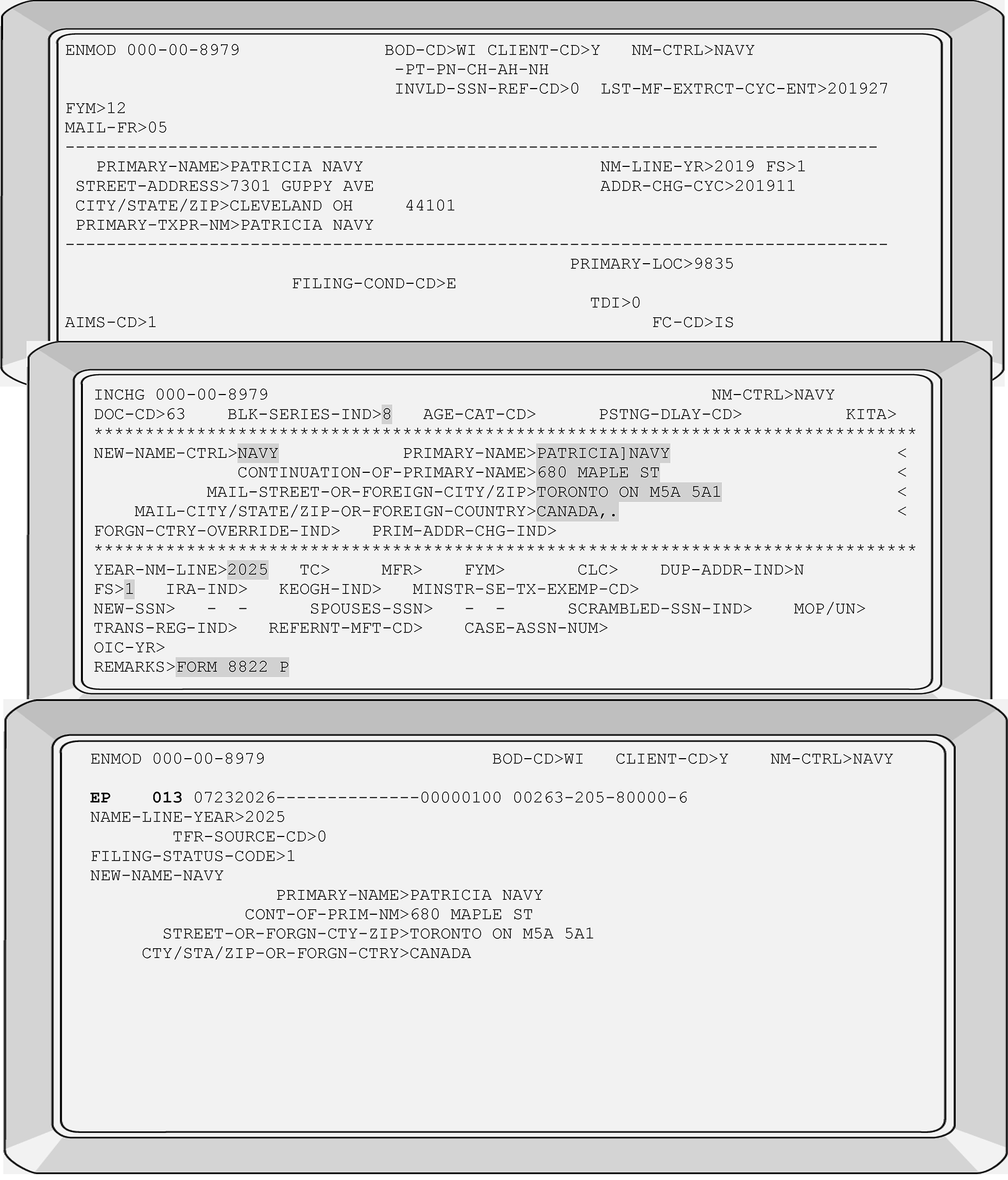
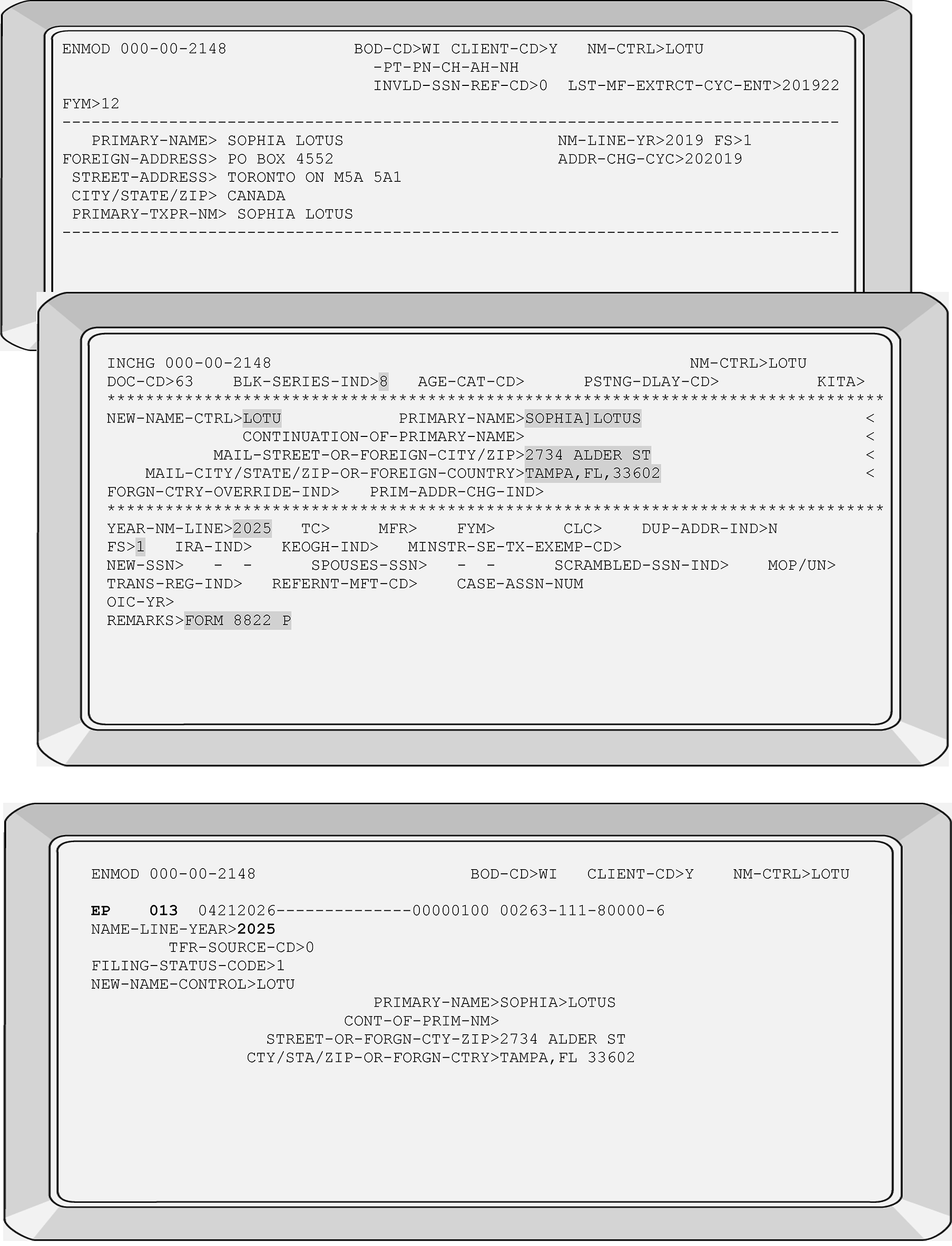
-
The USPS web page contains the most up to date information for address corrections and completing editorial address change.
-
The USPS web page has information on foreign and territorial countries in addition to domestic address information.
-
Research must be completed prior to using the campus address instead of a mailing address. The use of a campus address will cause an undeliverable mailing address if notices and/or other taxpayer correspondence is required. Research using CCs TRDBV, FINDS/FINDE, NAMES/NAMEE, NAMEI/NAMEB, ENMOD and INOLE, etc.
If a campus address is used, IMF suppresses all tax return packages and refunds. However, notices continue printing/generating to taxpayers. -
The following unique campus addresses and ZIP Codes must be used when the taxpayer has not provided an address AND/OR you cannot locate an address:
Campus Addresses Taxpayer name(s)
IRS
ANDOVER, MA 05501Taxpayer name(s)
IRS
ATLANTA, GA 39901Taxpayer name(s)
IRS
AUSTIN, TX 73301Taxpayer name(s)
IRS
HOLTSVILLE, NY 00501Taxpayer name(s)
IRS
PHILADELPHIA, PA 19255Taxpayer name(s)
IRS
MEMPHIS, TN 37501Taxpayer name(s)
IRS
FRESNO, CA 93888Taxpayer name(s)
IRS
CINCINNATI, OH 45999Taxpayer name(s)
IRS
OGDEN, UT 84201Taxpayer name(s)
IRS
KANSAS CITY, MO 64999
-
All Submission Processing Campus (SPC) undeliverable correspondence must be researched within 14 days for a more recent address/correct address.
-
Do not update a taxpayer's Last Known Address.
-
If the undeliverable taxpayer's first name is IVO and contains their valid surname and name control and the taxpayer's address is the Austin campus, no further research is required, destroy as classified waste.
-
Research IMF for a more complete and recent address using IDRS Command Codes and ITIN Real Time System (RTS) using the taxpayer's TIN and/or the secondary's TIN(if available). If needed, see IRM 3.13.5.65 for valid United States Postal Service (USPS) address information.
-
If the account is an invalid account and research locates a taxpayer with the same name but their account is under a different SSN, do not mail the undeliverable to the new address. Use Accounts Management Services (AMS) and enter "Did not forward Undeliverable to prevent PII" in the "History" screen. For consistency use the issue topic within the "Entity Category" and use the "Other Entity Issue" portion to enter the History narrative listed.
-
When researching for an address and the taxpayer's account is on the valid side, ensure you are sending the correspondence to the correct taxpayer and leave the following remarks as history in AMS “Account researched, updated information sent to the taxpayer.
-
If the valid account on CC INOLES displays a more recent address than the notice/correspondex or correspondence cycle, use the CC INOLES address to mail the undeliverable correspondence.
-
If the valid account on CC INOLES DOES NOT display a more recent address than the correspondence, do not send the correspondence back to the taxpayer. Destroy as classified waste.
-
If undeliverable correspondence is received with an USPS "yellow label address sticker" , you will need to determine if a later address update is posted by using IDRS and the following information:
-
date of the notice
-
postmark date on the envelope
-
pending address date
-
date of e-file return or TC 152 date
-
LKA update
If... Then... a. A newer or more complete address is located Do not update the address on IDRS.
a. Notate the new address on the Correspondence
b. Re-send the correspondence; or Return the undeliverable correspondence to the originating area.b. A newer or more complete address is NOT located Do not update the address on IDRS.
1. Destroy as classified waste; or
2. Notate there is no better address found and return the correspondence to the originating area. -
-
Undeliverable mail is any letter, notice or other correspondence sent to an individual taxpayer returned to the IRS indicating the individual is no longer located at the address. If needed, see IRM 3.13.5.65 for valid United States Postal Service (USPS) address information.
See IRM 25.25.2.13, Identity Theft Scheme Criteria, for additional research. -
If the ECU receives mail with the unique campus address and it originated from a NON-Submission processing area (for example, Examination, Collection, etc.,), return the undeliverable mail to Receipt and Control and request they forward the mail to the correct area. See IRM 3.13.5.66 for the unique campus addresses if needed.
-
If unsigned and/or undeliverable returns are misrouted, they should be returned to Receipt and Control for proper disposition.
-
When a person completes a United States Postal Service (USPS) "Change of Address Form, (PS Form 3575)" , the post office displays a USPS "yellow address change sticker" .
-
The Receipt and Control function will forward ONLY undeliverable Submission Processing mail to the ECU.
See paragraph (6) for the "THIRD PARTY" exceptions. -
If the following is written or stamped on the undeliverable mail envelope, research is mandatory for a more current address:
-
Forward Time Expired, Return to Sender
-
Undeliverable
-
Bad Address
-
No such street
-
No such number
-
-
When a return is sent back to a taxpayer for a signature and is returned to us undeliverable or unsigned, the return will be forwarded to the ECU for address research.
-
Review the actual return in the "sign here area" under the jurat for a signature.
See IRM 3.11.3.14.5, Individual Income Tax Returns, for additional information on taxpayer signatures.-
If the signature is present, return the "signed" return to appropriate area.
-
If the signature is missing, use the instructions as shown below.
-
-
Research the taxpayer's account.
If... Then... a. A return for the same tax period is in Error Resolution System (ERS) (as shown on CC ERINV), Forward the case(s) to Rejects using a Form 4227, Intra-SC Reject or Routing Slip, with the comments, "Unsigned Rtn, possible duplicate" b. A return for the same tax period is an unpostable condition (as shown on CC TXMOD) Forward to Unpostables using a Form 4227 with the comments, "Unsigned Rtn, possible duplicate" c. The return (as shown on CC IMFOL) displays "SUBST4" For W & I Business Operating Division (BOD), mail, return to Compliance Services Collection Operation (CSCO) to Austin at Stop 5501.
for SBSE BOD mail, return to Automated Substitute for Return (ASFR) to Brookhaven at Stop 654.d. The return (as shown on CC TXMOD) displays "SFR" after the TC 150 for .00 and contains a DLN Julian date of 887 or the top the return shows "ASFR" For W & I Business Operating Division (BOD), mail, return to Compliance Services Collection Operation (CSCO) to Austin at Stop 5501. 2023 State Mapping for IMF Paper Returns.
For SBSE BOD mail, return to Automated Substitute for Return (ASFR) to Brookhaven at Stop 654.e. The return (as shown on CC TXMOD) displays "SFR" after the TC 150 for .00 and contains a DLN Julian date of 888 or CC TXMOD displays an "-L" freeze with a Julian date of 887 or 888. Route to the Campus Examination function indicated by the TC 420 DLN. f. If there is a TC 150 on TXMOD and it appears to be a duplicate address there is no need to research for a new address. Follow local procedures. -
If account is not established, (as shown by CC INOLEX), using AMS enter "No Account on IMF and No Address located for Unsigned Rtn. Unsigned Doc located in Alpha file" in the "History" screen. If no TIN is present and can't be located through research, assign an IRSN.
Reminder:
The History link is located within the Function area on the left side of the Account Summary screen display.
You must create an issue in AMS for each taxpayer account.
For consistency use the issue topic within the "Entity Category" and use the "Other Entity Issue" portion enter the History narrative listed above. -
If research indicates the TIN on the tax return does not belong to the taxpayer, research IDRS, RTS and attached documents. If found, edit the correct TIN on the Form 1040. If IDRS shows “NO RECORD FOUND”, issue an IRSN.
-
If the taxpayer's account was closed (as shown by MFR 08) and the taxpayer's account does not contain a DOD, see IRM 3.13.5.122 for instructions on re-opening a taxpayer account. Route to Files to be filed by alpha. In remarks enter Unsigned Doc located in Alpha file.
-
If the taxpayer's account was closed (as shown by MFR 08) and the taxpayer's account does contain a DOD, do not re-open the account unless a non-Entity transaction is required. If you must open the account, ensure you monitor the transaction and re-close the account after the non-Entity transaction posts.
-
Enter "SD Account inactive, Unsigned Doc located in Alpha file" in the "History" screen within the Account Summary screen using the AMS system.
Reminder:
The History link is located within the Function area on the left side of the Account Summary screen display.
You must create an issue in AMS for each taxpayer account. For consistency use the issue topic within the "Entity Category" and use the "Other Entity Issue" portion enter the History narrative listed above. -
Route the document(s) to Files using a Form 3210, Document Transmittal. In the remarks section of Form 3210 include the name(s) and TIN(s) of taxpayer(s) and include "File and maintain in the Alpha Files" .
-
-
Use the following instructions if there is a pending or posted TC 150::
If... Then... a. The return is signed Follow your local procedures to route the return to the 1040X unit b. The return is NOT signed or is a duplicate return. Attach Form 9856, attachment alert and forward the case to Files to be associated with the posted return. c. The return is received timely The ECU will date stamp the received date in the lower center of the return and attach a Form 9856 or a Form 3210 and route to Files. The received date will indicate to Files the proper List Year (LY) the return will be filed in the Alpha file. -
Research IDRS/IAT and the attachments and use the following table for completing prior year returns with no TC 150:
-
Research IDRS/IAT and the attachments and use the following table for completing current year returns:
-
The TC 930 "unsigned" document must be sent to Files.
-
When the TC 930 "unsigned" document is received in the ECU from Files, research is AGAIN required for a TC 150.
-
Do not input a TC 930 for a tax return after the return due date unless prior research indicates that the return has not posted, but should post in the near future.
-
-
If there is a pending/posted TC 150, annotate TC 150 Posted in the left margin of the return and Input the comments "TC 150 pending, researched twice" or TC 150 posted, researched twice in the "History" screen within the Account Summary screen using the AMS system. Route the return back to the Files unit.
-
If there is not a TC 150 pending/posted and a more recent address is not located, use the following procedures:
-
Input the comment "SD Unsigned Rtn, researched twice" in the "History" screen within the Account Summary screen using the AMS system.
-
DO NOT input a TC 930 in these situations.
-
Forward the "unsigned" return to Files using a Form 3210. Include the names and TINs of the taxpayer(s) and the remarks "File and maintain in the Alpha Files" and leave an audit trail on the SD
-
-
If there is no TC 150 pending/posted and a more recent address is located, use the following procedures:
-
Theft of deceased individuals’ personal information for the purposes of filing a fraudulent tax return results in a significant amount of lost tax revenue each year. Beginning 2011, the IRS began locking deceased taxpayer accounts to protect this revenue.
-
When a TC 971 AC 524 with “DECD” in the miscellaneous code field displays on a taxpayer account, any paper filing on the account marked deceased will unpost UPC 147 RC 4 and automatically generate a CP 01H See IRM 25.23.2.8.4 Locking Decedent Accounts - TC 971 AC 524.
-
If a decedent case is identified, the account should contain one or more of the following:
-
DECD in the name line
-
Date of Death on CC INOLES
-
TC 540 on CC TXMOD or CC IMFOLT for the year of death
-
Mail File Requirements (MFR 08) on CC ENMOD or CC INOLES
-
-
Any taxpayer written responses received in the campus due to the CP 01H are routed to the ECU for research and/or corrections.
-
If the taxpayer is not deceased the CP 01H instructs the taxpayer to provide the following items to correct their account:
-
Complete tax return with an ORIGINAL SIGNATURE(S) and all accompanying forms and schedules
-
Written request to unlock the account*
-
A copy/original of at least one of the following:*
Passport
Driver’s License
Social Security Card
Other valid US Federal or State Government issued identification -
Copy/original of the CP 01H.*
-
-
Research the account using CCs ENMOD and IMFOLE to determine if a TC 971 AC 524 and a Date of Death (DOD) are displayed on the account.
-
Use the following to resolve the account:
Reminder:
If a taxpayer responds to a 12C letter for erroneous DOD situations and the taxpayer’s account DOES NOT display a DOD, use the following instructions.
Caution:
If the TC 540 was NAP-generated, do NOT reverse because the reversal adjustment goes unpostable. The DLN for a NAP-generated TC 540 is 28277-111-11111-Y. If INOLE does not show a date of death, provide the SSN to your IMF Entity SP Analyst so they can forward to the author of IRM 21.5.6. The account requires a manual correction to reverse the TC 540, which is done by contacting Information Technology.
If... And... Then... a. DOD isnot present on CC INOLES TC 971 AC 524 with misc field “Decd” is on the account Reverse the TC 971 AC 524
(use TC 972 AC 524 to reverse and correct the name line (remove DECD) for the year the taxpayer is showing deceased. ).
See IRM 25.23.2.8.4, if additional information is needed.b. DOD isnot present on CC INOLES TC 971 AC 524 with misc field “Decd” is not on the account Check for a TC 540 posted to any tax module and reverse if present. Otherwise, no correction is needed. If... And... Then... 1. DOD is present on INOLES TC 971 AC 524 DECD is on the Entity and all the following items are provided: -
Complete tax return with an ORIGINAL SIGNATURE(S) and all accompanying forms and schedules
-
Written request to unlock the account
-
A copy/original of at least one of the following:
-
Passport
-
Driver’s License
-
Social Security Card
-
Other valid US Federal or State Government issued identification
-
Copy/original of the CP 01H
Reverse the TC 971 AC 524 with a TC 972 AC 524. Check for a TC 540 posted to any tax module and reverse if present. 2. DOD is present on INOLES TC 971 AC 524 is on the Entity, but the CP01H reply is incomplete, a “no reply,” or undeliverable. No further action is needed. -
-
See IRM 3.13.5.97 for additional information on reversing or removing incorrect DOD information.
-
If the taxpayer provides a tax return, route the return and all documents to Batching for processing.
-
Miscellaneous transcripts are received in Entity. The following explains in further detail.
-
Background: Insolvency is required to establish MFT 31 mirror modules for both the primary and secondary SSN when only one spouse files bankruptcy and files married filing jointly.
-
ECU will receive a limited volume of Entity-related invalid taxpayer accounts requiring additional research and establishing an IRS Valid taxpayer account (if possible).
-
Insolvency will fax a Form 3210, Document Transmittal, and include all the necessary taxpayer information. Insolvency will include a fax number (if necessary) for Entity to return the cases. The Form 3210 must include:
-
both the Primary and Secondary SSN's
-
their names
-
the tax period(s) involved
-
-
The research and correction procedures required in ECU will vary from case to case.
-
Two separate TIN or name corrections may be required. To correct the secondary taxpayer's invalid account, one correction must be made on the primary taxpayer's account/TIN. A subsequent correction must be completed on the secondary taxpayer's account/TIN. See IRM 3.13.5.18
-
Typically a taxpayer's account is corrected and made IRS-valid ONLY with supporting documentation or adequate explanation to prove/document their name change. However, since IMF will not allow MFT 31 IRS-invalid accounts to post to master file, these cases require CC IRCHG corrections.
-
ONLY complete CC IRCHG corrections when you can determine the correct identity of the taxpayer through complete research.
-
-
Use CC IRCHG to make the account IRS Valid when the taxpayer history clearly shows married filing joint returns for multiple years.
Note:
If the taxpayer cannot/should not be corrected (determined by Entity research), the Insolvency unit will process in accordance with established procedures.
-
See IRM 3.13.5.112 and IRM 3.13.5.113 for additional information on making the taxpayer's account IRS Valid.
-
See IRM 3.13.5.124 if the primary taxpayer is filing with a different spouse. These accounts require the two-step correction process.
Complete the TIN correction to the secondary taxpayer’s TIN under the primary taxpayer's account (generates a TC 017).
Then complete the TIN correction to the secondary taxpayer’s TIN under the secondary taxpayer's account (generates a TC 011).
-
-
If a taxpayer's filing history indicates they filed as a secondary taxpayer, have a valid SSN, but have not updated their name with SSA, correct the case to ensure the secondary taxpayer's account is made IRS Valid (TC 016). The account will remain on the invalid segment of the IMF until after the quarterly merge of the DM-1 File.
-
If multiple tax periods are involved, make the corrections to the earliest tax period listed on the Form 3210.
-
Fax the, Form 3210 back to the originator within ten days and notate one of the following on the Form 3210:
-
When an SSN is corrected, indicate on the Form 3210 the correction procedure(s) made using the narrative "SSN Corrected" .
-
If the SSN is already valid (due to taxpayer SSA name updates or due to the posting of Entity transactions), notate this on the Form 3210 using the narrative "SSN is already VALID" . If needed, ensure the Entity correction is completed under the primary taxpayer's account also.
-
If the SSN will become valid after the DM-1 quarterly merge, notate this on the Form 3210 using the narrative "SSN will validate after next DM-1 Qtrly Merge (Write-in the date of the next scheduled DM-1 quarterly merge directly beside the cycle)."
-
If the SSN CANNOT be made IRS valid, notate this on the Form 3210 using the narrative "SSN cannot be corrected due to insufficient documentation."
-
-
IMPORTANT: Do not send a letter or note to the taxpayer regarding any changes made to their account for these cases.
-
When both TINs have the same MFT, Plan number and/or plan year ending and both modules contain a TC 960 from different IRSC's, a "NOMRG–848" transcript will generate. If BOTH modules contain a TC 960 from the same IRSC a "NOMRG–846" transcript will generate.
-
The NOMRG–848 and NOMRG–846 transcript will be a complete transcript for both the "FROM" and "TO" TIN.
-
When the NOMRG–848 is received, the CAF unit will identify the IRSC who entered the TC 960. The CAF unit will have the campus with the TC 960 posted to the "FROM" TIN delete their tax module. After the CAF unit in the other IRSC has been deleted, the case will be routed to the Entity function to re-merge the account.
-
Entity must initiate the merge (either TC 011 or TC 013) after the CAF unit has removed/deleted the CAF indicator from the account.
-
When No merge N/C transcripts are received:
-
Research CCs INOLET, INOLES to determine the proper name control and ensure the merge was intended for the same taxpayer.
-
Correct the name control if it is the same taxpayer and re-initiate the merge.
-
-
The SPSSNMFT31 transcripts generate when a TC 01X occurs to the spouses account.
-
Research the account(s) to determine if the TC 01X correction was made to the correct taxpayer account. Use CCs IMFOLI, IMFOLE, IMFOLT, INOLET and INOLES on all taxpayer accounts (include the valid and invalid TIN).
-
Use the following instructions:
If... Then... Secondary taxpayer has an ITIN and SSN Merge the accounts
After completion of the merged accounts, send a Form 4442 to the ITIN unit to revoke the ITIN account.
Destroy the transcript as classified waste after review.TC 971 AC 100 Forward to the bankruptcy unit.
Destroy the transcript as classified waste.TC 01X was completing/attempted on the correct secondary taxpayer account No further action is required.
Destroy the transcript as classified waste after review.
-
If duplicate TC 150's are found through research, the cases must be routed to the Accounts Management (AM) area.
-
For additional information on TCs 011, 013, 016, 040 and 041 see IRM 3.13.5.25.
Caution:
When an account moves from one TIN to another TIN or from one segment of a TIN (valid or invalid) to another segment it will resequence or merge the account. Transaction Codes (TCs) 011, 013, 040 and 041 should NOT be entered repeatedly without waiting for the first TC to post. IRS employees must monitor the account, wait for the merging/resequencing transaction to post and if additional merging TCs are needed, enter the necessary merging/resequencing transaction code.
Reminder:
If multiple merge TCs are entered without allowing time to post, it could create a resequencing condition at master file and will prevent taxpayer account correction(s).
Caution:
If the multiple name changes are required, do NOT input multiple TC 013 without monitoring the account. Once the first name change transaction posts, input the subsequent TC 013 corrections to the account.
Inputting multiple TC 013 corrections without monitoring the account could create a resequencing situation that will prevent the correction/posting of taxpayer accounts to IMF. -
The following table offers assistance and displays account information that will prevent the merging of IMF taxpayer account(s).
-
If any of the conditions listed in (2) above occur, forward to AM for correction.
-
The information contained in the following sections are used for resolving TRNS 37 which are received through the AMS.
-
All internal CP's generated must be worked and resolved within your site.
-
When researching TRNS 37 cases and you locate duplicate tax periods under both the VALID and INVALID accounts (CCs IMFOLE/IMFOLI), forward the case to AM.
-
If research through CC ENMOD displays a DLN of 00200-000-000000-0, do not attempt to merge the case without securing an IRSN for the invalid number.
-
If two different taxpayers are valid with the same SSN, route the TRNS 37 to Accounts Management as a "possible scrambled SSN" case. Use your locally developed routing procedures. You can see scrambled SSN indicators when you research using CCs IMFOLE, INOLES, or ENMOD.
-
The information contained in this section is useful to explain what the cause of TRNS 37 cases is.
-
This transcript generates whenever an attempt to change/correct the primary TIN or a name control and the TIN re-validation fails. This occurs for the following situations:
-
Social Security Number- Social Security Number belongs to a different taxpayer
-
Name Control - Name Control does not match any of the valid Name Controls.
-
An IMF-generated resequencing transaction code due to an SSN re-validation attempt; or
-
An account failed to properly resequence because the transaction code matches another account on the SSN but fails to match on any name control(s).
The following Transaction Codes could cause the generation of a TRANS 37 case:-
TC 000
-
TC 013
-
TC 140
-
TCs 15X, or
-
TCs 43X
-
-
The first screen shown after choosing a case from the Inventory displays the following information at the top of the screen. See Figure 3.13.5-8.
-
Taxpayer Identification Number
-
Primary taxpayers Name Control
-
Full name of the taxpayer and the full name of the secondary taxpayer (if applicable)
-
-
Between the information above the Account Summary screen are the designated HOT Keys linked to the ten most used IDRS CCs.
-
The second screen display entitled Transcript Case Info Page contains the Taxpayer Identification Number and the name of the employee (current owner) is assigned the TRNS 37 case. The following fields display with the Transcript Case Info Page:
-
TIN
-
MFT
-
ASED
-
RSED
-
IRS Recd Date
-
Dollar Amount
-
Current Owner
-
OFP
-
Paper Attachment
-
TP Name
-
Tax Period
-
DLN
-
Transcript Type: TRNS 37
-
Freeze Code
-
Master File Status
-
Manager
-
Case ID
-
Taxpayer Advocate
Service Case
-
-
TRNS 37 contains the Case Log and Case Notes information and includes the following information (when applicable):
-
Date
-
Owner
-
Status
-
Last Action (notes on the case)
-
-
There are also twenty (20) additional designated HOT Keys linked to IDRS CCs.
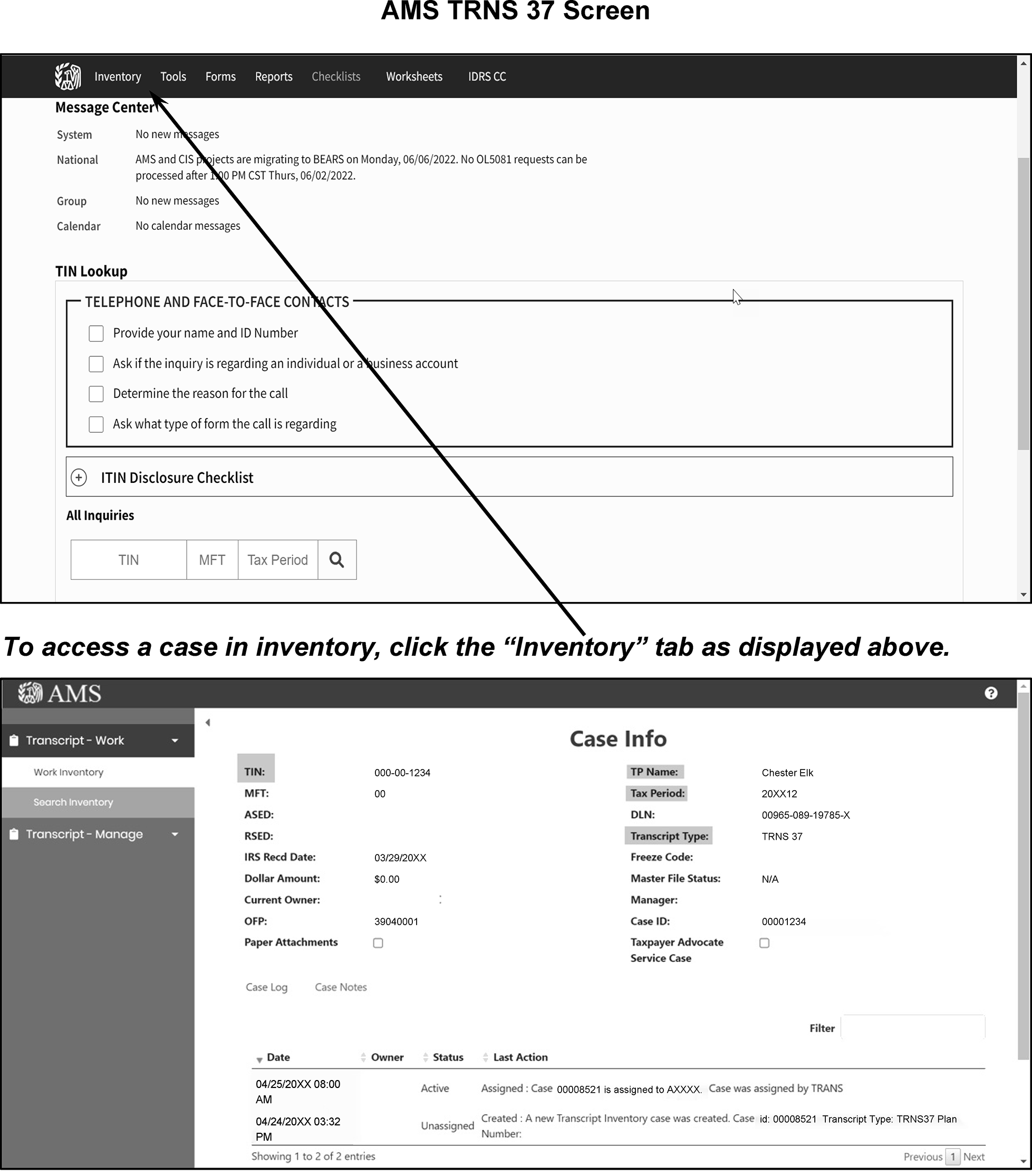
-
Begin by using CC INOLET using the TIN provided on the TRNS 37 screen. Compare the name control on the valid account (left side of CC INOLET screen) and the name control of the invalid account (right side of the CC INOLET screen).
-
If CC INOLET does not show a valid name control for the taxpayer, input CC INOLES using the TIN on the TRNS 37 screen. CC INOLES will display the applicable name controls listed for this TIN:
CURRENT IMF N/C
IMF Name Control(s) (N/Cs)
SSA N/C(s)
IRS VALID N/C(s)
NEW SSA N/C
ITIN NC -
Determine if both accounts belong to the same or two different taxpayers. Use any or all of the following methods/information to make this determination:
-
Examine the appropriate information on TRNS 37.
-
Compare first names and initials of taxpayers.
-
Check addresses.
-
Check the taxpayer's DOB if taxpayer’s names, initials are similar.
-
Compare tax period ending(s) to determine which is most current.
-
-
If the accounts belong to same taxpayer, research using CC IMFOLI on the both the Valid and Invalid accounts to determine the latest tax period and name(s) the taxpayer used.
Complete using the following table:Caution:
If the multiple name changes are required, do NOT input multiple TC 013 without monitoring the account. Once the first name change transaction posts, input the subsequent TC 013 corrections to the account.
Inputting multiple TC 013 corrections without monitoring the account could create a resequencing situation that will prevent the correction/posting of taxpayer accounts to IMF.If... Then... 1. INVALID Account is the latest period ending (controlling name line) a. Update the INVALID account using the N/C shown on the VALID account
b. Use the tax period for INVALID account when completing the name change.2. VALID Account has the latest period ending (controlling name line) a. Update the INVALID account to reflect the name and N/C (TC 013) shown on the VALID account.
b. Use this tax period for the VALID account when completing the name change.3. Taxpayers account is already residing on the VALID side a. No further action is required.
b. Input appropriate comments in the closing section. -
Use the following when the case involves two different taxpayers:
-
After the case has been resolved, close the case with comments in Accounts Managements Services (AMS). See Figure 3.13.5-9.
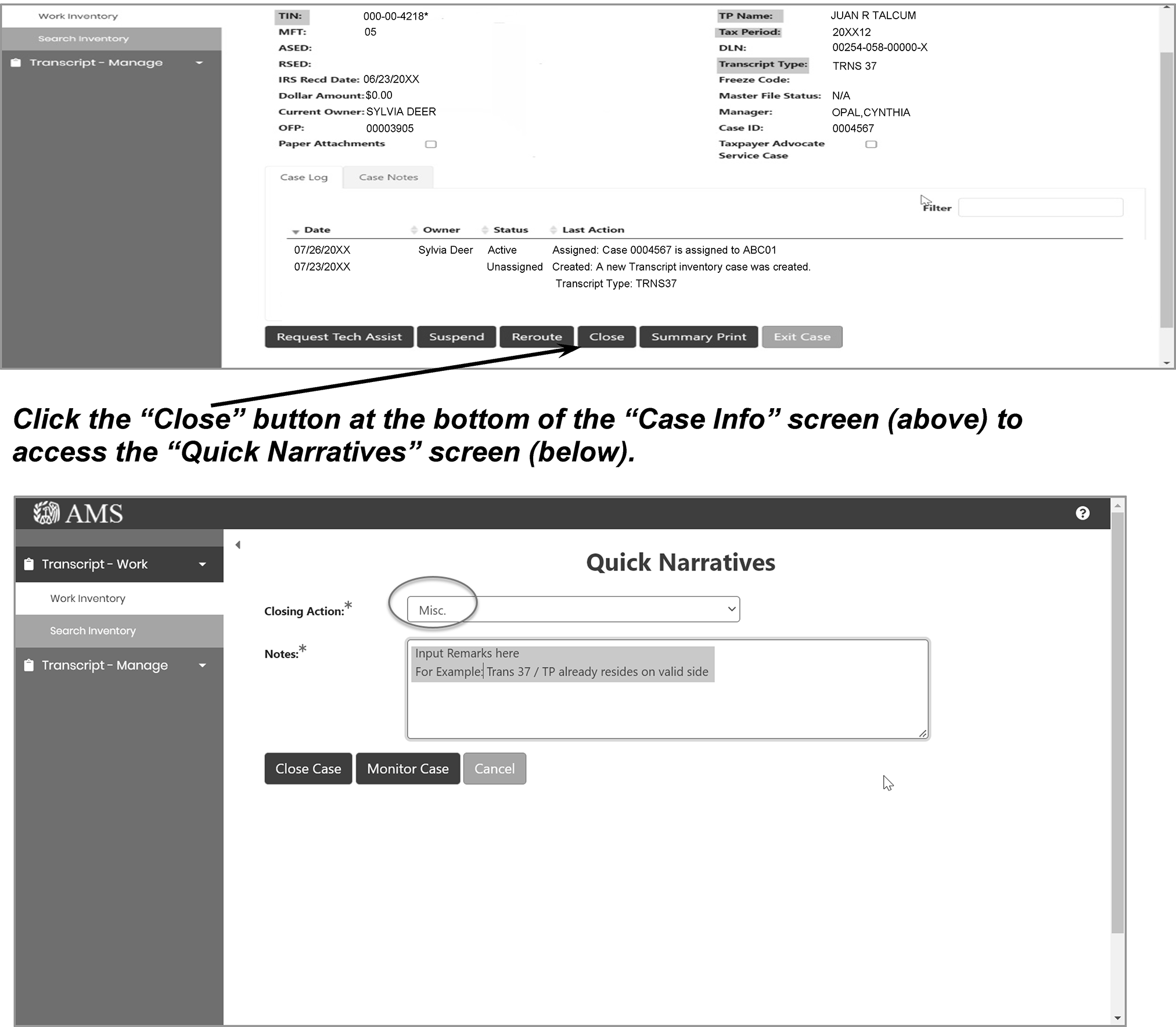
-
All CP 43's generated must be worked and resolved within your site. TRNS 43 are received through AMS.
-
When researching TRNS 43 cases and you locate duplicate tax periods using both the VALID and INVALID accounts (CCs IMFOLE/IMFOLI), forward the case to AM.
-
See IRM 3.13.5.71, for additional information on scrambled SSN indicators and no merge procedures.
-
The information contained in the following table explains the cause of TRNS 43 cases:
It is helpful to note the name change failed and was NOT completed.If... And... Then... Transaction did not match the primary taxpayer's most recent name line (their controlling name line)
Example: Controlling name line for tax period 2015 WREN and name change entered was for tax period 2016 SMITInput name control and primary taxpayer's name control on IMF are different and one is valid and one invalid A TRNS43 will generate.
-
The first screen shown after choosing a case from the Inventory displays the following information at the top of the screen:
-
Taxpayer Identification Number
-
Primary taxpayer's Name Control
-
Full name of the taxpayer and the full name of the secondary taxpayer (when applicable).
-
-
The second screen display entitled Transcript Case Info Page contains the TIN and the name of the employee who is currently assigned the TRNS 43. The following fields display with the Transcript Case Info Page:
-
TIN
-
MFT
-
Assessment Statute Expiration Date (ASED)
-
Refund Statute Expiration Date (RSED)
-
IRS Recd Date
-
Dollar Amount
-
Current Owner
-
OFP
-
Paper Attachment
-
TP Name
-
Tax Period
-
DLN
-
Transcript Type: TRNS 43
-
Freeze Code
-
Master File Status
-
Manager
-
Case ID
-
Taxpayer Advocate
Service Case
-
-
TRNS 43 contains the Case Log and Case Notes information and includes the following information (when applicable):
-
Date
-
Owner
-
Status
-
Last Action (notes on the case)
-
-
Use the "CC INOLET" to display the VALID/INVALID segment of the taxpayer account.
-
When using CC INOLET and the CC INOLES displays for the same taxpayer account, the TRNS 43 condition has already been corrected. Chose the "Close Case" Button on the Transcript Case screen, select "Misc" button and type in comments.
-
If the taxpayer account is only posted to the invalid side of master file, CC INOLET will display the taxpayer's information under their TIN with asterisk. EXAMPLE 000-00-1234*.
-
Next, use CC INOLES under the VALID segment of the taxpayer's account (no asterisk) to determine if this is the same or a different taxpayer.
-
If CC INOLES defaults to CC INOLEX and displays "NO ACCOUNT ON MASTER FILE" , pay attention to the name controls beside the "DM1 N/C" field.
-
-
If no transcription errors occurred, determine if both accounts belong to the same or two different taxpayers. Use any or all of the following methods/information to make this determination:
-
Compare first names and initials of taxpayers.
-
Check addresses.
-
Check the taxpayer's DOB if taxpayer names and/or initials are similar.
-
Compare tax period ending(s) to determine which is most current.
-
-
If you determine the TRNS 43 involves two different taxpayers, and route to AM.
-
Research using CC IMFOLI for the specific tax periods, if discrepancies are noticed between the impacted tax periods.
-
Use the following procedures if the TRNS 43 was caused by adding/correcting the taxpayers name on a prior year:
Caution:
If the multiple name changes are required, do NOT input multiple TC 013 without monitoring the account. Once the first name change transaction posts, input the subsequent TC 013 corrections to the account.
Inputting multiple TC 013 corrections without monitoring the account could create a resequencing situation that will prevent the correction/posting of taxpayer accounts to IMF.If... Then... 1. Taxpayer used an incompatible Name Control, for example "Wren-Swan" and the VALID Name Control shows "Swan" Enter TC 013 and correct the Name Control.
Input the correct name line, FSC, and the name line year/(tax period). Use the tax period shown on the TRNS 43.2. An obvious misspelling error is in the current controlling name line Enter TC 013 and correct the Name Control.
Input the correct name line, FSC, and the name line year/(tax period). Use the tax period shown on the TRNS 43.3. Taxpayer used a different name, for example, maiden name instead of married name Notate N/A.
The case will remain invalid until the taxpayer provides legal documentation or goes to SSA and updates their name. -
Use the following procedures if the TRNS 43 is for a future tax year instead of the current processing year:
If... Then... TRNS 43 is due to changing the correct name to an invalid name line on a future tax period,
Example:
tax period 2015 SMIT
incorrectly used tax period 2016Correct the taxpayer name using the correct tax period,
-
This section provides information regarding the Internal Revenue Service Number (IRSN) assignments.
-
The Entity Control Unit (ECU) normally receives and processes requests for IRSN's within most campuses. However, IRSN assignments may be completed in other functional areas.
-
An IRSN is assigned immediately after "complete research" is conducted on the IDRS and ITIN Real Time System (RTS). Ensure no other TIN (i.e., ITIN, ATIN or IRSN) has already been assigned to the taxpayer(s) in question.
-
The individual (TE, Manager, etc.,) assigning the IRSN's is responsible for complete research.
-
The taxpayer or the fiduciary must be notified when the IRSN is established by sending a (Correspondex letter/685C/685SP)
-
The Letter 685C or the Spanish version Letter 685SP informs the taxpayer of the IRSN issued during the processing of their return or payment. It also instructs the taxpayer to use the number ONLY on IRS tax-related correspondence or during IRS phone contact. It also instructs the taxpayer to not use this number for any other purposes (e.g., driver’s licenses, banking identification, etc.).
-
An IRSN is also assigned to avoid further delays in the internal processing of a tax return or payment.
-
The taxpayer must be advised to obtain an SSN from SSA (if necessary). If the taxpayer is not eligible for an SSN, SSA will advise the taxpayer to file Form W-7/W-7SP to obtain an ITIN.
-
-
IRSNs display in the same format as a regular SSN with a few exceptions.
-
IRSNs begin with 9XX-XX-XXXX*
-
There is an asterisk "*" at the end since the IRSN is invalid
-
The fourth and fifth digits indicate the campus that assigned the IRSN
See IRM 3.13.5.23 for the IRSN ranges. -
-
Any requests for IRSN's (other than payments) must be requested using the Form 9956, Internal Revenue Service Number (IRSN) Request Form or other methods may include requests by TAS, ERS, RIVO and streamlined LB and I.
-
The Form 9956 was revised and is available on the Publishing Service Web page as a "fillable" form. The Form 9956 (when completed correctly by requestor) provides all the information needed to assign an IRSN.
-
The Form 9956 must be used whenever outside areas request IRSN's.
See Figure 3.13.5-10. -
If a taxpayer only provides one name when filing and CC TMSSN is used, enter the one name provided in both the first and last name fields. Once the IRSN is assigned, remove the taxpayer's erroneous first name by entering an hyphen in the first name field on CC INCHG.
-
When researching for an IRSN and the taxpayer was already assigned an IRSN or duplicate IRSN(s) are found, complete the following steps:
See IRM 3.13.5.83.11 for additional information.-
Initiate necessary merge (TC 011) to one number on the IMF.
See IRM 3.13.5.25 for additional information on merge transactions. -
-
The IMF Entity unit will also receive documents/returns/payments without a TIN. See IRM 3.13.5.118 for additional information.
-
Before assigning an IRSN, "research" to locate a good TIN or ITIN for the document/return/payment. If you determine a return has already posted to the number, note "TC 150" in the upper left corner of the return, edit the TIN found and refer the return to the "1040X unit" .
Exception:
Do not route a numbered document to the 1040X unit. Route the return to the originator if it is already numbered.
Note:
If the taxpayer indicates they have applied for an ITIN, research ITIN RTS to determine if the application is being processed.
If... Then... a. ITIN is found 1. Edit the ITIN found on the document.
2. Route the return to the ITIN unit.b. ITIN is suspended 1. Edit the ITIN found on the document.
2. Route the return to the ITIN unit.c. No TIN is found after completing your research 1. Assign IRSN.
2. When the first four alpha characters of the taxpayer’s last name/surname contains a hyphen, apostrophe, space, etc., disregard and only enter the first four alpha characters.
3. Underline with red ink the first four alpha characters of the last name (name control) established for the IRSN. -
If a return has any of the following characteristics and does not have an LB&I stamp indicating that LB&I has already reviewed it:
-
"Relief for Certain Former Citizens", "Relief", "Expat", “FAQ 24”, “FAQ 25”, or something similar is written on return and/or attachments.
-
Form 8854 is attached.
-
Copy of Certificate of Loss of Nationality (CLN) is attached.
-
Taxpayer specifically mentions "Relief", "Former Citizen", "Expatriate process", “FAQ 24”, “FAQ 25”, or something similar in an attached letter.
-
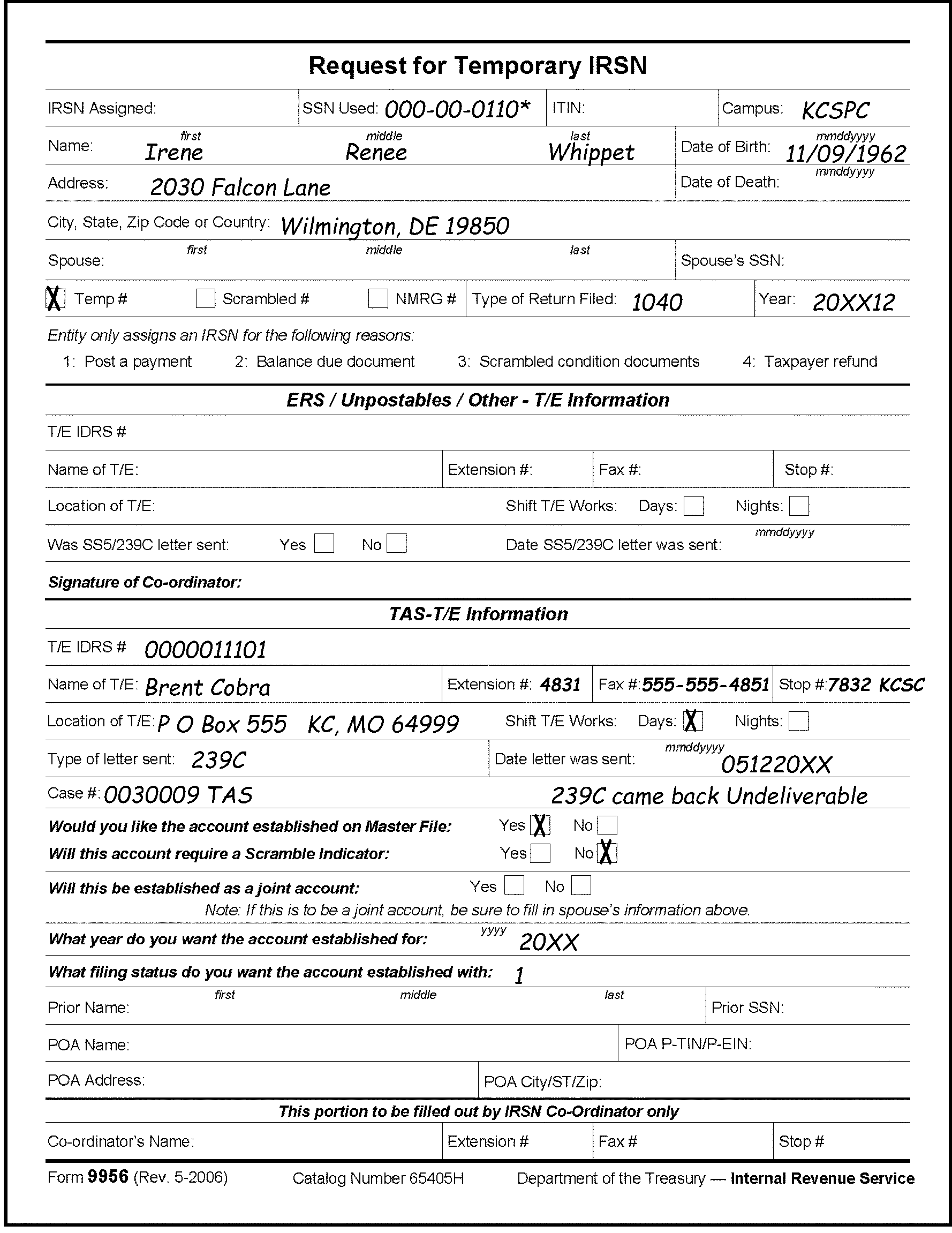
-
When a TIN cannot be located for the taxpayer, assign an IRSN for the following conditions:
-
Taxpayer payment
-
Balance due document
-
Scrambled SSN cases
-
Taxpayer Refund
-
Rejected ITIN's
-
Possible Identity (ID) Theft
-
TIN has been used more than once (i.e., same TIN posted to both segments of IMF) and the individual in question is not the taxpayer posted.
-
Miscellaneous situations when an IRSN is needed for the taxpayer's filing requirements (example; an Application for the Trust Fund Recovery (ATFR).
-
If an IRSN is needed to assist taxpayers in completing their filing requirements.
-
When the filer/taxpayer failed to put a TIN on a check, payment or balance due return and we cannot locate a valid TIN.
-
-
Never assign an IRSN due to taxpayer correspondence only.
-
The IRSN is used for internal processing only and is not a valid TIN.
-
If the document has not posted to IMF, initiate complete research to determine if an IRSN, TIN or ITIN was previously issued.
If... Then... a. TIN, previously assigned IRSN, or ITIN, is found for the taxpayer a. Ensure the name control is correct.
b. Enter TIN, IRSN or ITIN on the return/payment.b. TIN, previously assigned IRSN, or ITIN, is NOT found for the taxpayer a. Assign an IRSN.
b. When the first four alpha characters of the taxpayer’s last name/surname contains a hyphen, apostrophe, space, etc., disregard and only enter the first four alpha characters.
c. Enter the IRSN on the return/payment
d. Underline with red ink the first four alpha characters of the last name (name control) established for the IRSN on the tax return.c. Document has attempted to post to the IMF but failed Establish the account via IDRS with TC 000. d. Return is received with a TIN considered invalid (name and/or TIN is incorrect) a. Research before using the number listed on the return/(document), unless the number is within the SSN "out of SSN range" .
b. If the TIN used is outside the valid SSN range, following instructions in 5 below.e. Return is received with an SSN "outside of the valid SSN range" , a. Complete research
b. Assign an IRSN to continue processing of the return/document. -
Austin only. Austin's ECU will receive Streamline packages from Receipt and Control requiring assignment of an IRSN. The package may contain multiple tax returns and additional documentation sent by the taxpayer for Streamline compliance. Be sure to keep all returns and documents together; do not separate the package. Follow instructions above for assigning an IRSN. Route the package(s) using a Form 3210 and forward to Extractions.
-
Scrambled TIN cases are worked in Accounts Management (AM). However, the IRSN is typically issued by the Entity unit.
-
When an IRSN is requested by AM for scrambled SSN purposes:
-
Verify another TIN, including an IRSN, cannot be found.
-
Issue the IRSN and establish the account before providing the IRSN to AM.
-
-
The following table shows the applicable Scrambled SSN indicator that will display on CCs IMFOLE, INOLES, or ENMOD:
Indicator Used when: 01 Completed 0239C Letter questionnaire received from at least one taxpayer. Form 3857 sent to SSA. 04 Mixed Entity 09 Scrambled indicator needs to be turned off. 10 Account is being scrambled. Do not send Form 3857 to SSA. 12 True/Default True Scrambled SSN case. Send Form 3857 to SSA. 13 SSN not valid for federal tax purposes. 20 Case closed, no 239C letter questionnaire received or SSA response is insufficient to resolve scrambled SSN condition. 21 Case closed, scrambled SSN condition resolved with SSA Form 3857 response or an SSA SSN verification printout. 22 Case closed, scrambled SSN condition resolved with SSA Form 3857 response. Information indicates case was a True (non-default) scrambled SSN 23 Case closed with SSA Form 3857 response which indicates SSN is not valid for federal tax purposes. 24 Reserved
-
The assignment of an IRSN will cause the account to post to the invalid segment of the IMF. The IRSN freezes any overpayments and will cause a CP Notice to generate (in most instances).
-
This also causes a CP notice (e.g., CP 54, CP 11, etc.,) to generate to the taxpayer.
Note:
If a taxpayer is identified as having an ITIN, do not transship CP notices to Austin Submission Processing Campus (AUSPC). These CP Notices must be worked at your campus.
If... And... Then... An account is already residing on the invalid segment of IMF with the same number It is not the taxpayer's account in question, a. Assign an IRSN to the return.
b. When the first four alpha characters of the taxpayer’s last name/surname contains a hyphen, apostrophe, space, etc., disregard and only enter the first four alpha characters.
c. Underline with red ink the first four alpha characters of the last name (name control) established for the IRSN on the tax return.
-
Assigning an IRSN will cause the generation of a CP notice. Therefore, assign an IRSN only when necessary to process the account:
If... And... Then... IRSN is requested for a nonresident alien spouse a. Do not assign an IRSN unless a Schedule SE is attached.
b. Use an appropriate letter to close the case.
c. When the first four alpha characters of the taxpayer’s last name/surname contains a hyphen, apostrophe, space, etc., disregard and only enter the first four alpha characters.
d. Underline with red ink the first four alpha characters of the last name (name control) established for the IRSN on the tax return.Form 4029 is received with the notation "Amish" or "Exempt-Form 4029" in SSN area Form is approved, a. Establish an IRSN for the primary taxpayer only.
b. Use the appropriate letter to inform the taxpayer.
c. When the first four alpha characters of the taxpayer’s last name/surname contains a hyphen, apostrophe, space, etc., disregard and only enter the first four alpha characters.
d. Underline with red ink the first four alpha characters of the last name (name control) established for the IRSN on the tax return. -
Taxpayers who qualify may write "Amish" or "Exempt-Form 4029" in SSN area on Form 1040. When the Form 1040 has Amish/Exempt-Form 4029 in SSN area, research for a valid SSN for the primary taxpayer.
If... Then... a. Valid SSN is found Research for approved Form 4029 indicator on entity. b. Form 4029 is approved Notate on form the correct TIN, and route back to processing. c. Form 4029 is not approved Route back to processing to correspond with taxpayer.
-
Termination assessments (which apply to the current tax year or the immediately preceding tax year if the due date for the return has not passed IRC 6851, Termination assessments of income tax), and jeopardy assessments (which apply to a tax year where the due date for filing a return has expired) require a determination that the collection of the tax is in jeopardy. IRC 6861, Jeopardy assessments of income, estate, gift and certain excise taxes, and IRC 6862, Jeopardy assessments of taxes other than income, estate, gift, and certain excise taxes.
-
Exam, Collection, CI, TE/GE, Appeals, and other functions may recommend jeopardy/termination assessments for cases under their consideration. Each jeopardy/termination assessment must receive the personal approval of the Area Director. In addition, written approval by the Chief Counsel (or such delegate) is required under IRC 7429(a)(1)(A). Refer to IRM 4.15.1.3, Approval
-
Under the Treasury Regulations, jeopardy exists where:
-
The taxpayer is or appears to be designing quickly to depart from the United States or to conceal himself or herself, or
-
The taxpayer is or appears to be designing quickly to place his, her, or its property beyond the reach of the Government either by removing it from the United States, by concealing it, by dissipating it, or by transferring it to other persons, or
-
The taxpayer's financial solvency is or appears to be imperiled.
Note:
Treas. Reg 1.6851-1(a) and by cross reference Treas. Reg. 301.6861-1(a) and Treas. Reg. 301.6862-1(a). Jeopardy/termination assessments of tax are to be used sparingly. cross references to Policy Statement 4-88, found in IRM 1.2.1.5.27 , for policy regarding jeopardy assessments), and Policy Statement 4-89, found in IRM 1.2.1.5.28 , (for policy regarding termination assessments).
-
-
Under IRC 6867, there is a presumption that jeopardy exists where:
-
an individual is in possession of more than $10,000 in cash or its equivalent (as defined in Treas. Reg, IRC 301.6867-1), and that
-
individual does not claim such cash or equivalent as his, or
-
does not claim the cash or equivalent belongs to another person whose identity the IRS can readily ascertain and who acknowledges ownership of such cash or its equivalent.
-
-
Unidentified cash cases are extremely rare, but are subject to termination or jeopardy assessment, as applicable.
-
A new taxable entity must be created for the individual who the IRS claims to be the owner of the cash or its equivalent using an IRSN.
-
The assessment cannot merge with the individual's regular account on the IMF.
-
The termination/jeopardy assessment is made against the taxpayer solely as the possessor of cash or its equivalent using the new taxable entity.
-
These types of assessments are processed quickly and may involve criminal activity.
-
The lead TE will be responsible for research and assignment of an IRSN in these unique situations. Also, a revenue agent or other Examination official will usually phone the Entity unit for the IRSN.
-
The lead TE must complete the following:
-
Complete IDRS and ITIN Real Time System (RTS) research.
-
Use CC TMSSN to establish the account on IDRS.
-
Notate the IRSN.
-
When the first four alpha characters of the taxpayer’s last name/surname contains a hyphen, apostrophe, space, etc., disregard and only enter the first four alpha characters.
-
Underline with red ink the first four alpha characters of the last name (name control) established for the IRSN on the tax return
-
-
In these termination/jeopardy assessments, if a valid TIN can be found, the accounts can merge with the taxpayer's individual account.
-
Rejects will forward erroneous wage cases on a Form 3210 for IRSN assignments. These specific cases will be identified by the narrative "Bad_Assign IRSN" . Rejects will provide an original return or Section 1 screen print of CC TRDBV.
-
Research for an existing IRSN.
-
If the taxpayer was already assigned an IRSN and the IRSN is still active, correct the case.
-
If the IRSN for this taxpayer was revoked and/or is no longer active (as shown on CC INOLEX), reuse the previously assigned IRSN. Re-establish the account with a TC 000.
-
If you cannot locate an IRSN for the taxpayer, assign an IRSN using CC TMSSN.
-
When the first four characters of the taxpayer’s last name/surname contains a hyphen, apostrophe, space, etc., disregard and only enter the first four alpha characters.
-
Underline with red ink the first four alpha characters of the last name (name control) established for the IRSN on the tax return. Use the instructions and correspond to the taxpayer as instructed in paragraphs (3) and (4).
-
-
From CC ENMOD input the IRSN.
Overlay the CC ENMOD with CC REQ77.
The CC FRM77 screen will display and contain the partial information needed for the taxpayer's account.
Complete the following steps on the IRSN account.-
Input 971 in the TC field.
-
Input current date for the TRANS DT.
-
Input a PDC of 6 cycles.
-
Input 1231YYYY for the SECONDARY-DT (YYYY is the tax year of the non-legitimate return).
-
Input 506 beside the TC 971/151-CD.
-
Input WI SP EC027 in the MISC field.
-
Notate the IRSN on the original document or the CC TRDBV screen print.
Monitor the account.
After approximately three weeks, an IRSN will be established for taxpayer.
Using CC TXMODA and the original TIN from the return, input the applicable MFT and tax period.
Using the CC TXMODA display, overlay with CC REQ77. CC FRM77 will display with the partial account data information.
Complete the following steps using CC FRM77 on the SSN account:-
Input 971 in the TC field.
-
Input current date for the TRANS DT.
-
Input AC017 for TC 971/151-CD
-
Input Cross Reference (IRSN) for XREF TIN.
-
Input Cross Reference MFT for XREF-MFT.
-
Input Cross Reference Tax Period for XREF-TX-PRD.
-
Input EC 027 Possible ID Theft in the REMARKS field.
-
-
Issue a Letter 685C using paragraphs B, V, 2 and 9.
Use the instructions in paragraphs (4) through (7) if the taxpayer replies to the Letter 685C.-
Return the case to Rejects and include the IRSN.
-
DO NOT SUSPEND the case.
-
-
If the taxpayer replies to the Letter 685C and provides an "Original" or Certified Embossed copies of their birth certificate, research using CC INOLE and notate the taxpayer's DOB.
-
If research or the birth certificate provided indicates the taxpayer DOB in IDRS was incorrect, use CC’s DTVUE and DM1DT to correct their DOB to match their birth certificate DOB Refer to IRM 3.13.5.97 for additional information on CC’s. DTVUE and DM1DT.
-
If the taxpayer's age (per the birth certificate OR IDRS research) indicates their age still meets the EC 027 age restrictions, no further action is required.
-
If the documentation or research indicates the taxpayer is eligible for their personal exemptions/credits (EC 027 age restrictions no longer apply),
-
Merge the IRSN account back to the original TIN.
-
Forward the case to Adjustments. Include in the remarks. "EC 027 Issued Erroneously"
-
-
The USDA paid a cash settlement and granted loan cancellation to a limited amount of farmers. Awards from this settlement are treated as taxable income. Taxpayer's may use terms other than USDA when communicating about these claims such as the following:
-
Pigford vs. Glickman
-
Pigford vs. Veneman
-
Black Farmers Suit/Settlement cases
-
-
The processing of these cases is centralized in the Kansas City campus. The Submission Processing, Planning, Research and Analysis (RP and A) Staff will review the cases then forward the listings to Entity function through e mail with an attachment of the USDA Settlement Account cases that need research. See IRM 3.17.243.11.1, Miscellaneous Accounting, if additional information is needed.
-
See IRM 21.7.13, Assigning Employer Identification Numbers (EINs), for information on researching and assigning an EIN for an Estate. Research and correct the cases using the following instructions:
-
The ECU must review and validate the SSNs and names on the listing
-
Complete research on the taxpayer name and SSN as shown on the listing. Research using the spouses SSN (when applicable). Also complete research for estates or farms using existing and/or inactive EINs.
-
If you cannot locate an EIN, establish an Estate EIN for the taxpayer or their estate. Refer to IRM 21.7.13.5, for the process of establishing an estate EIN.
Note:
Ensure you input the Claim No from the report after the taxpayer name in the primary name field of CC ESIGN.
Example: John S. Cardinal Estate Claim No 78582.
If the taxpayer or the taxpayer's estate has an executor, beneficiary, etc., designated on the report, input this information in the sort name field of CC ESIGN. -
If you cannot locate an SSN or EIN that contains viable references, notate this information on the listing.
-
-
Return the cases back to the appropriate P and A staff contact when the research and assignment is completed.
-
These settlement payments contain the unique DLN of 52217 or 43217 (013/014) 9XX.
-
Use the program code 85390 and function code 390 for the USDA time utilization for researching and assigning EINs.
-
Social Security Numbers (SSNs) or Individual Taxpayer Identification Numbers (ITIN's) are considered to be IMF VALID numbers for the primary individual taxpayer(s).
-
Documents processed with a valid ITIN post to the valid side of IMF.
-
Typically, an ATIN is used for dependents only and not used for the primary taxpayer. However in rare instances an ATIN is valid for the primary taxpayer TIN due to the filing of a Form 8615, Tax for Certain Children Who have Unearned Income.
-
If taxpayer(s) have both an ITIN and an IRSN, the IRSN must be merged to the ITIN.
-
The following research steps must be taken to determine whether an individual filer has a valid TIN:
-
Use CCs NAMES, NAMEI, and FINDS to research the Name Search Facility (NSF), IDRS and ITIN Real Time System (RTS) for a valid SSN or a previously assigned ITIN.
-
Use CC INOLE to research the NAP for a valid or invalid SSN or a previously assigned TIN.
-
Use the ITIN Real Time System (RTS) to research the ITIN assignment of an ITIN/pending ITIN.
-
If the primary taxpayer filed Married Filing Jointly (MFJ), use the S-SSN for research purposes.
-
Use CC IMFOLT for the specific tax year information.
-
-
For additional information on the ITIN Real-time processing, refer to IRM 3.21.263, Individual Taxpayer Identification Number (ITIN) Real Time System (RTS).
-
Supplemental information is also available in Publication 1915, Understanding Your IRS Individual Taxpayer Identification Number ITIN.
-
To apply for an ITIN, applicant must be a nonresident or U.S. resident alien who does not qualify for a SSN and:
-
Has a federal tax return filing requirement, or;
-
Is filing a U.S. tax return only to claim a refund, or;
-
Has a federal tax reporting requirement, or;
-
Can be claimed as an exemption or dependent on a valid U.S. federal tax return.
-
-
The ITIN display in a format similar to a SSN but will always begin with the number "9" . The fourth and fifth numbers within an ITIN are assigned in the following unique numbering ranges:
-
Taxpayers may obtain Form(s) W-7/W-7SP via:
-
IRS offices worldwide (800) TAX-FORM or (800) 829-3676)
-
World Wide Web – www.irs.gov
-
Acceptance agents (may charge a fee)
-
-
Completed Form(s) W-7/W-7SP and valid supporting documentation along with proof of federal tax filing requirement or exception criteria can be submitted to IRS Taxpayer Assistance Centers (TACs) or certain U.S. consular officers abroad.
-
Applicants may choose to use the services of an acceptance agent (may charge a fee) or they can mail the application and attachments directly to:
Internal Revenue Service
ITIN Operation
PO Box 149342
Austin, TX 78714-9342. -
For those packages being sent overnight express to the AUSPC ITIN Unit, use the following address:
Internal Revenue Service
AUSPC ITIN Unit
3651 S. IH 35
ATTN: ITIN Clerical Manager
Austin, TX 78741 -
Applications, along with supporting documentation, can be accepted at IRS Taxpayer Assistance Center (TAC). However, the processing of the Form W-7 or ITIN application is performed in the ITIN Unit only.
-
Because the ITIN is for tax purposes ONLY, taxpayers filing with an ITIN do not:
-
Qualify the applicant for Earned Income Tax Credit (EITC) (TC 768), or;
-
Change their immigration status by the simple act of receiving an ITIN, or;
-
Receive the right to work in the United States by the simple act of receiving an ITIN.
If... Then... An individual later qualifies and gets an SSN, ITIN tax records will be merged with the SSN.
The SSN must be used and the ITIN will no longer be considered valid.The taxpayer has indicated a Form W-7/W-7SP Application for ITIN has been filed, Research the RTS to determine if an application is in process. A taxpayer inquires about their ITIN application whether or not normal processing time has elapsed Determine the taxpayer's fact of filing status. -
-
Prior to assigning an IRSN or merging an ITIN, the ECU must research
-
IDRS
-
ITIN Real Time System (RTS) for any pre-existing TIN(s) for the taxpayer. See IRM 3.13.5.83.7, Accessing the ITIN RTS, for additional information.
Caution:
If taxpayers names are the same, research to determine if they are the same taxpayer by comparing things like DOB, address, exemptions, AGI (shown on CC TRDVU), etc.
Never assume the taxpayer are the same solely based on their name alone. -
-
Research using CCs INOLES and INOLET, and compare names, name controls, addresses, and DOB to verify the account.
-
Some ITIN's did not correctly establish on the DM-1 but were assigned on RTS. Use the following instructions with this type of exception processing. Research RTS to determine if the ITIN is assigned.
-
If the ITIN is assigned, but the ITIN account on IDRS displays with “RECORD NOT FOUND”, route the case to the ITIN unit using Form 4442 or follow local procedures to forward the ITIN unit.
-
Do not forward newly issued ITIN's to the ITIN unit. Newly issued ITIN's may take 2 to 3 days to post to IDRS.
-
-
Research using CCs TXMOD and IMFOLI to determine if multiple TC 150s are posted for same taxpayer for the same tax period. Review the entity modules for valid and invalid cross-referenced TINs.
-
When researching for a taxpayer account and there are several taxpayers with similar names, use the taxpayer's DOB to more accurately identify the correct taxpayer. If the DOB is incorrect, compare addresses, exemptions, AGI, etc., to verify the taxpayer.
-
See IRM 3.13.5.105 for information on CC NAMES if needed.
-
See IRM 3.13.5.106 for information on CC NAMEI if needed.
-
See IRM 3.13.5.107 for information on CCs FINDS if needed.
-
If one or more ITIN record is found on the ITIN data base for the taxpayer in question, check the status fields of the records. If the status shows the case "is Suspended" the tax return must be returned to the ITIN unit.
-
If the status field shows any status other than "Assigned" or "Rejected" , the tax return must be returned to the ITIN Unit.
Reminder:
Do not assign an IRSN to an ITIN account in an "Inactive" status on RTS. The ITIN is still valid on IDRS and the inactive status alone DOES NOT prevent transactions from posting to the account. The ITIN taxpayer is not allowed select benefits (such as the exemption, child tax/additional child tax credit, and education credit).
-
Use the following when the ITIN status is "Assigned"
If... Then... a. Only one ITIN has been assigned
(TC 150 same tax year)Verify no IRSN has been assigned for this taxpayer. b. No other TINs are found, and;
no other TC 150 is posted to the tax returnsEdit the ITIN to return and continue processing. c. Tax period matching that of the returns already contains a TC 150, Edit "TC 150" in the upper left corner
Refer the return to the 1040X Unitd. Multiple ITIN's have been assigned,
Pull the case(s) from the batchReturn the case back to the ITIN unit to delete the duplicate ITIN's -
If more than one application is present for the applicant's name, look for a listing with your applicant's birth date. If you locate it, click on the "View" link to access the taxpayer's W-7/W-7SP application and/or click on the "History" link to review the current status information.
-
If a recently assigned ITIN is located and the ITIN unit recently rejected the case, return the case back to the ITIN Unit for further review. Include the following narrative "Recently assigned ITIN located, please verify this case" .
-
If there is an indication of a rejected primary Form W-7, a TIN is needed to process the taxpayer return. The ECU needs to locate an already existing TIN or assign an IRSN.
-
If the secondary or dependent applications are rejected and a tax return is attached, the tax return goes forward for processing.
-
The dependents are systemically disallowed (math error notices generate).
Note:
It is important to note an IRSN is not a VALID TIN and the taxpayer’s exemptions and credits will be disallowed when an IRSN is assigned.
Reminder:
When working Statute year returns, route to Statute if a Cleared Statute stamp is not present. If the return does not have a TIN, you must assign an IRSN. See IRM 3.13.5.8.1 for additional information.
Note:
Compare the Form W-7 name to the tax return. Verify the name on the tax return is legible and spelled correctly. If you can confirm the person on the tax return is the same as the W-7 applicant but the names differ, edit the second last name and the middle name if present on to the tax return to match the names or RTS.
-
-
On all prior year and current year returns processed after April 22, a Form 3471-E , Edit Sheet, and a Return Processable Date (RPD) are needed for processing. The Form 3471-E will be attached to the tax return by the ITIN unit. Use the following tables to determine the RPD:
-
If there is a copy of check with an accounting DLN attached to the return, edit the newly assigned IRSN and name control on the check in red ink and route to Accounting.
-
The ITIN program generates numerous notices advising the applicant of the status of their application, the return of their original documentation, the assignment of the ITIN, etc., The ITIN program is also designed to generate notices in English or Spanish.
-
If the applicant files Form W-7, they are issued an English notice.
-
If the applicant files a Form W-7SP, they are issued a Spanish notice.
-
-
In order to determine the language of the ITIN letter, access the EUP database (ITIN RTS database).
-
Click on the Search Form W-7 tab. to locate the taxpayer account
-
Research for the taxpayer, see IRM 3.13.5.83.7 for additional information.
-
Click "view" in the Search results for the taxpayer.
-
Click the "Back to Preliminary W-7 Data" tab (at the top of the screen) to view the Preliminary Form W-7 application data page. You will be able to view the Notice/Correspondence language to generate the 0685C Letter and/or 0685SP Letter.
-
-
Entity employees require access to the ITIN Real-Time System (RTS) in order to conduct ITIN research. Access to ITIN RTS is granted through the Employee User Portal (EUP).
-
If you have an inactive session for thirty (30) minutes on any ITIN RTS Screen, the Session Expired Screen will display.
-
The ITIN RTS Global Navigation bar displays when you logon to the ITIN RTS.
See the following Links and their applicable description available for IMF Entity employees:-
Home - Click here to proceed to ITIN Home Screen.
-
Search W-7- Click here to search for Form W-7 Application information
-
Reference - Click here to proceed to Reference Screen.
-
Close - Click here to close the ITIN RTS.
-
-
To access the Form W-7 Search Screen, click on the Search W-7 link on the Global Navigation bar. See Figure 3.13.5-11 for an example of the ITIN Real Time System (RTS) Database screen.
-
The Form W-7 Search Screen content includes the following:
Name Purpose DLN Input box is used to enter the DLN of the Form W-7 application form.
This field is also the primary search key for the Form W-7 Search and no other search fields are necessary if the DLN is known.Applicant Last Name Enter either the full name or up to 6 characters of the last name of the applicant (i.e., XXXXXX%) can be used in this input field. Applicant First Name Enter either the full name or up to 4 characters of the first name of the applicant using a wildcard search (e.g., XXXX%) can be used in this input field. Applicant Middle Name Enter the middle name of the applicant. ITIN Enter the ITIN of the Form W-7 application form if known.
The ITIN field is used as the secondary search key for the Form W-7 search and no other search fields are necessary.Date of Birth (DOB) Enter applicant date of birth (DOB) using (MMDDYYYY) format. Input values are as follows: MM (1 to 12), DD (1 to 31). Country of Citizenship (COC) Select the country code and name of country from the drop down list. Country of Birth (COB) Select the country code and name of country from the drop down list. Status Use this drop down list to select the appropriate status code. Earliest IRS Received Date Start Use this input box to enter the IRS Received Starting Date.
MM values= 1 to 12
DD values= 1 to 31
YYYY values = year of the IRS Received Date.Earliest IRS Received Date End Use this input box to enter the IRS Received Ending Date.
MM values= 1 to 12
DD values= 1 to 31
YYYY values = year of the IRS Received Date Ending.Search Select this button, and the system will perform validation checks in order to generate search results based on the populated fields. Reset The following message displays when this button is clicked, "You will lose data on the current Screen, Would you like to continue?" -
Click Okay to clear all fields.
-
Click Cancel to return to the current Screen.
-
-
The following table displays the Form W-7 search results:
W-7 Search Results Form W-7 Search buttons Search Results
(system generated table values)Click on the Search button to display the following fields in a table format: -
Last Name
-
First Name
-
DOB
-
COB
-
COC
-
Reason Codes
-
Status
-
DLN
-
ITIN
These buttons are enabled if the search results generate more than 30 records per Screen. Click to view the additional set of search results found on the system. First, Prev, Next, and Last Click to view a read-only version of the Form W-7 application record. View Click to view the history of the selected Form W-7 application record. History Will direct you to the ITIN Home Screen. ITIN Home -
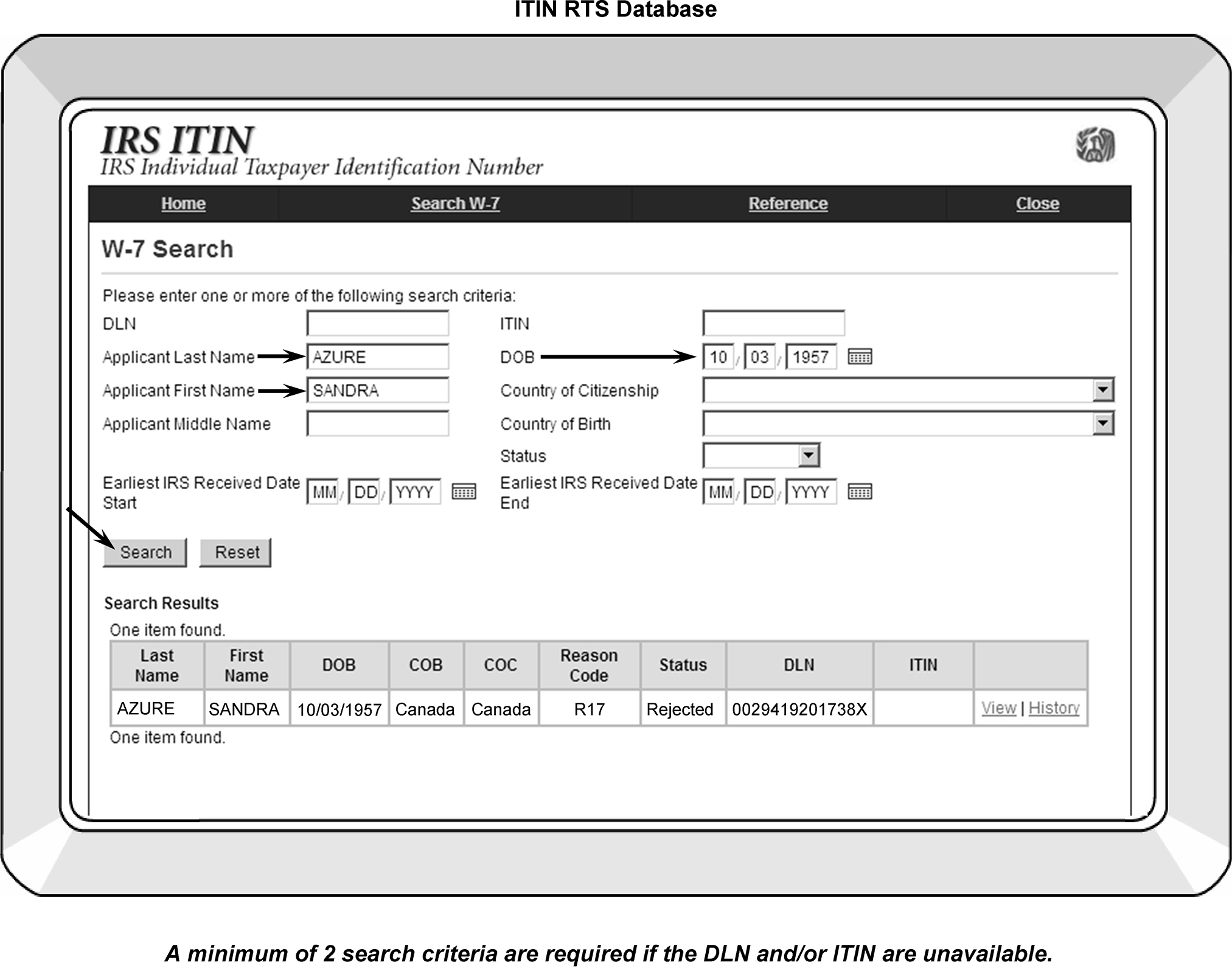
-
Entity will receive cases already numbered and in DLN order.
-
Research and assigning an IRSN (if needed) are the same as processing ITIN Rejects. Do not remove or route out any documents from the batch as they must remain in DLN order. This includes the following cases:
-
Statutes, continue processing.
-
Suspended, do not assign an IRSN. Attach Form 4227 and request ERS route the return to the ITIN unit.
-
If a TIN is located, see paragraphs (4) and (5) below.
-
Multiple TIN case, see IRM 3.13.5.119 Merging Taxpayer Accounts (ITIN's, SSNs and IRSN's) to continue processing.
-
-
See IRM 3.13.5.83.3 for researching Reject "Ts" .
-
If a TIN is found with posted TC 150, Notate the TIN in the Entity portion of the document and notate "TC 150" in the upper left corner of document.
-
If a TIN is found with no posted TC 150, notate the TIN in the Entity portion of the document.
-
If no TIN is located, assign an IRSN using CC TMSSNI. Notate the IRSN in the Entity portion of the document. When the first four characters of the taxpayer’s last name/surname contains a hyphen, apostrophe, space, etc., disregard and only enter the first four alpha characters.
Underline with red ink the first four alpha characters of the last name (name control) established for the IRSN on the tax return. -
If it is determined during research the return should be routed to the ITIN unit, attach a Form 4227.
-
Check the "Reject correction box" and the "Other" box under reason.
-
Notate "Delete DLN" and route to the ITIN unit in the "Other (explain) box" .
-
Leave the return in the batch and the Rejects unit will route the return to the ITIN unit.
-
-
Typically, an IRSN is necessary for the PRIMARY taxpayer ONLY.
-
When the first four characters of the taxpayer’s last name/surname contains a hyphen, apostrophe, space, etc., disregard and only enter the first four alpha characters.
-
Entity will receive cases from the ITIN unit that have been batched through the BBTS system as "ITIN Rejects" . These are returns where the primary taxpayer’s Form W-7 application for an ITIN was rejected.
-
These returns are identified by ITIN editing "ITIN Reject" in or near the SSN field of the return.
-
Complete research to ensure the name control matches.
-
Compare the Form W-7 name to the attached tax return(s).
-
Underline the name control on the tax return in red ink for any newly assigned ITIN.
-
-
If the taxpayer DOB information is NOT written on each ITIN Reject cases, research the case as follows:
-
Research the ITIN Real Time System (RTS)and edit the DOB if it is not edited in the margin of the right side of the SSN field
-
Use the DOB (when available) when researching the taxpayer accounts.
-
-
If the DOB written on the return does not match the DOB n RTS, use the RTS DOB and edit the RTS DOB on right hand margin of the return.
-
If a DOB cannot be located, return to the ITIN unit.
-
Before these returns can be processed, Entity must research to locate:
-
An SSN or
-
An earlier assigned IRSN or ITIN.
-
If a previously assigned ITIN is present, do not research and edit the DOB.
-
-
Typically an IRSN is necessary for the PRIMARY taxpayer ONLY.
-
If a taxpayer submits multiple returns for different years, the ITIN unit will forward the current and prior year returns together.
-
Entity must research using CCs TXMOD and IMFOLI to determine if there were multiple TC 150s for this taxpayer for the same tax period. Annotate on the return the appropriate TIN located.
-
After performing all research, assign the IRSN. When the first four characters of the taxpayer’s last name/surname contains a hyphen, apostrophe, space, etc., disregard and only enter the first four alpha characters. Edit the TIN to the taxpayer's returns and underline with red ink the first four alpha characters of the last name (name control) established for the IRSN on the tax return and;
A Form 3741-E, Edit Sheet, and a Return Processable Date (RPD) is needed for processing all prior year returns and current year returns received after April 22. The Form 3471 will be attached to the tax return by the ITIN unit.-
separate the cases to be numbered as separate year cases and;
-
remove any current year return to be processed in the current year program.
-
-
If multiple SSNs and/or IRSN's have been assigned, follow the instructions in IRM 3.13.5.119 and merge the accounts.
-
Depending on what TINs are located on the account, taxpayer accounts may require merge corrections. See IRM 3.13.5.83.11 and IRM 3.13.5.83.12. See IRM 3.13.5.119 if additional information is needed.
-
If only one ITIN has been assigned, verify no IRSN's have been previously assigned. If the assigned ITIN is the only number found, verify none of the tax periods of the returns being processed contain previously posted TC 150.
-
If the tax period matching that of the return(s) being processed already contains a TC 150, edit "TC 150" in the upper left corner and route the return to the 1040X Unit.
-
If no other TINs are found and there is no TC 150 previously posted to the tax period of the return(s), edit the TIN to the return(s) and continue processing.
-
If there are any annotations (i.e., copy, amended, duplicate, etc.,) circle out the annotation prior to sending for processing. If the tax period matching that of the return(s) does not contain a TC 150, edit the located or assigned TIN to the return, circle out any annotations such as "copy, duplicate, amended, corrected, etc.," and continue processing.
-
If only one TC 150 is posted for the same tax period for a taxpayer with multiple TINs, see ITIN Merge Procedures in IRM 3.13.5.83.11.
-
If multiple TC 150s are posted for the same tax period for a taxpayer with multiple TINs, route to AM.
-
If RTS displays a suspense code, route the return to ITIN Unit. If the return is numbered and sent by Rejects, attach a Form 4227 and notate "VOID DLN" and request they forward the case to the ITIN unit after voiding the DLN.
-
If Office of Foreign Asset Control (OFAC) displays in the "Form W-7 Status" of RTS, return the case back to the ITIN unit.
-
If "pending" displays in the Form W-7 Status of RTS, return the case back to the ITIN unit.
-
For Taxpayer Advocate Service (TAS) actions taken on suspended cases, forward the documentation to the AUSPC ITIN Unit.
-
If the Entity unit receives Form W-7/Form W-7SP in error, transship to AUSPC ITIN Unit. See your transshipping coordinator for more information if necessary.
-
Complete a history item on IDRS, "W7 Pending" to communicate a Form W-7 or W-7SP is pending for this taxpayer.
-
Prior to working an ITIN-related Entity or Unpostable cases, the ECU must research
See IRM 3.13.5.83.3 for ITIN research information.-
IDRS (CCs IMFOLI, INOLES, INOLET and ENMOD are suggested)
-
ITIN Real Time System (RTS) research
-
In order for a merge to move from one account to another, there cannot be any no merge conditions on the account(s). See IRM 3.13.5.71 for additional information.
-
-
If the ITIN is not established (as shown on the IDRS), verify the ITIN has been assigned using the ITIN RTS system. If the ITIN shows “assigned”, merge the account with a Posting Delay Code (PDC) 3. Review the account four business days after the ITIN Assignment date.
-
Review the entity modules for valid and invalid cross-referenced TINs.
-
Research to determine:
-
If the name controls match
-
If both taxpayers are the same
-
If the TINs are both valid
-
If the DOB(s) match
-
If there are no merge conditions present
-
-
See IRM 3.13.5.118, for completing TIN changes (TC 011).
-
If the taxpayers are different, research to locate the correct taxpayer.
-
If you cannot locate the correct taxpayers, return the merge request to the ITIN area/requesting area and inform them the taxpayers are not the same.
-
A TC 040 is necessary to correct ITIN related cases when the ITIN has been revoked.
-
Use the ITIN Real Time System (RTS) to review the Status information. When "Rejected" and "Revoke ITIN" are displayed, correction of the taxpayer's account requires a TC 040 correction.
-
-
Since the TC 040 correction process bypasses the NAP validation process, review the ITIN data base and the SSA information to ensure the taxpayer DOB and their first name match before correcting the case.
-
See IRM 3.13.5.127, for the required fields for completing a TC 040.
-
Due to the different Name Controls displaying, the account may post to the invalid side of IMF when the TC 040 posts. Monitor the case until the name change posts and input a TC 016 to validate the name control.
-
Suspend the merged case for four weeks and review the account for the posted merge. If the merge did not post, reinput the merge if the "no merge condition" was determined and corrected. If the cause of the no merge condition cannot be determined, route to AM for correction.
-
When the merge is complete and posts, complete and route Form 4442 to the ITIN unit. Include the new TIN and ITIN to revoke for each applicant. If the merge request originated from a Form 4442 from the ITIN unit, return the Form 4442 to the ITIN unit that requested the ITIN revocation. Notate "merge posted" on the Form 4442 for ITIN revokes returned to the ITIN unit. If the ITIN is assigned, but the ITIN account on IDRS displays with “RECORD NOT FOUND”, route the case to the ITIN unit using Form 4442 or follow local procedures to forward the ITIN unit.
-
Annotated on Form 4442 and in Section C Response/Final Resolution of Form. Use the guidelines below:
-
Indicate the merge action has posted or is not needed. (Ex.) Merge Stamp “Merge Posted/Revoke ITIN
-
Ensure TIN to which it was merged is shown (on line 9 of Form 4442)
-
INOLEX print with the message NO ACCOUNT ON MASTER FILE for this ITIN and the cross reference TIN to which it was merged is shown.
-
Be sure the Name/DOB from RTS matches Form 4442
-
Do not leave blank Name/DOB on 4442.
-
-
Prior to merging the cases, the ECU must research both accounts
-
IDRS (CCs IMFOLI, INOLES, INOLET and ENMOD are suggested).
-
ITIN data base for any pre-existing TIN(s) for the taxpayer.
-
-
Review the ITIN data base and the SSA information. If the ITIN Name Control matches any of the SSA Name Controls, input a TC 011 to complete the merge. If the ITIN N/C does not match the SSA N/C, a TC 013 or a TC 040 will be needed to change the ITIN Name Control. If any of the valid ITIN Name Controls match the SSA N/C, input a TC 013 then input a TC 011 with a PDC 3, Otherwise input a TC 040 correction. A TC 040 will bypass the NAP validation process. Ensure the taxpayer's DOB and their first name match before correcting the case:
-
Input a TC 040 on the ITIN account to match the name control on the "to" SSN account.
-
Monitor the account and wait for the TC 040 to post
-
Input a TC 011 on the ITIN account.
-
-
If the taxpayer's account is located on the VALID segment of IMF but a "NEW SSA N/C" displays and ITIN/SSN name controls match, input a TC 011 on the ITIN account and enter a 3 in the PDC field.
-
See IRM 3.13.5.127, for the required fields for completing a TC 040.
-
Suspend the merged case for four weeks and review the account for the posted merge. If the merge did not post, reinput the merge if the "no merge condition" was determined and corrected. If the cause of the no merge condition cannot be determined, route to AM for correction.
-
When the merge is complete and posts, complete and route Form 4442 to the ITIN unit. Include the new TIN and ITIN to revoke for each applicant. If the merge request originated from a Form 4442 from the ITIN unit, return the Form 4442 to the ITIN unit that requested the ITIN revocation. Notate "merge posted" on the Form 4442 for ITIN revokes returned to the ITIN unit.
-
An ATIN is a number typically used for dependents only and is issued in the Austin Submission Processing campus.
-
The ATIN is not typically used as the secondary taxpayer's TIN when filing a return.
-
The ATIN is a temporary number issued by the IRS and is required if the applicant can NOT obtain an SSN for their adoptive child. In these situations, taxpayers may apply for an ATIN for the child.
-
ATINs are in the same format as an SSN or an ITIN (nnn-nn-nnnn) but have the following unique characteristics:
-
Adopting parents may have custody of a child but cannot immediately obtain an SSN for the child pending their final adoption.
-
The ATIN expires either:
-
When the applicant notifies the IRS of the dependent's new SSN, or
-
Two years after the ATIN application was approved the number will systemically expire and is no longer considered active.
-
-
Updates to the ATIN status are completed daily. However, the account does not post to the valid side until after the completion of the DM–1 tape quarterly merge.
-
Accounts Management Services (AMS) allows authorized users to resolve various taxpayer issues by providing the IRS employee the ability to view and update taxpayer accounts and case information through a common user interface. AMS can be used for many taxpayer actions and can be used whether or not the taxpayer's account resides on IDRS.
-
In Entity, tax examiners are able to complete the following actions using AMS:
-
Research the taxpayer account
-
Activate up to 30 self-elected IDRS CCs
-
Launch into external IRS system without leaving AMS
-
Electronically record, store and retrieve nationwide case history
-
Update taxpayer address and phone numbers
-
Order forms
-
Prepare specific forms and transcripts
-
Create selected IDRS Correspondex letters
-
Complete address changes
-
Complete name changes (TC 013 only)
-
-
AMS is the remaining system/process that incorporated the obsolete Desktop Integration (DI) and Correspondence Imaging System (CIS).
-
The types of taxpayer information, correction methods, and research capabilities will continue to increase with each subsequent AMS/IAT tools enhancement.
-
IAT provides tools to IRS employees to simplify research, reduce keystrokes, eliminate repetitive typing and increase the accuracy of regular work processes.
-
The use of IAT is mandatory for completing domestic address changes. However, if additional research is needed or IAT is not available, address corrections and updates may be completed on IDRS.
-
Enter an 8 in BLK-SERIES-IND field when using IAT or IDRS.
-
Detailed instructions on IDRS are contained in IRM 2.3, IDRS Terminal Responses, and IRM 2.4, IDRS Terminal Input.
-
If an IDRS-related discrepancy exists between IRM 3.13.5 and IRM’s 2.3 or 2.4, follow the IDRS instructions in IRM’s 2.3 or 2.4.
-
The Taxpayer Information File (TIF) provides tax account information for taxpayers selected for IDRS.
-
The TIF is divided into four subgroups.
-
The Refund portion will contain information on Individual Refunds issued within one year.
-
The Individual Taxpayer Information File (ITIF) will contain data from the IMF.
-
The Business Taxpayer Information File (BTIF) will contain data from the BMF and Exempt Organization (EO) cases not on the BMF.
-
The ZTIF will contain data from the Individual Retirement Account File (IRAF), the Employee Pension Master file (EPMF) and Non-Master File (NMF).
-
-
For IDRS purposes, each Internal Revenue Service Campus (IRSC) has a unique Office Identifier assigned. These numbers do not replace the two-digit File Location Codes (FLCs) in the DLN.
-
The Office Identifiers assigned are as follows:
IRSC Office Identifier Brookhaven (BIRSC) 01 Cincinnati (CIRSC) 02 Memphis (MIRSC) 03 Ogden (OIRSC) 04 Philadelphia (PIRSC) 05 Austin (AUIRSC) 06 Atlanta (ATIRSC) 07 Andover (ANIRSC) 08 Kansas City (KCIRSC) 09 Fresno (FIRSC) 10 -
The Office Identifiers display as the first two digits in the IDRS number.
-
When a "Taxpayer Identification Number (TIN)" is not provided on a return or on correspondence, complete research using CCs NAMEI, NAMES, NAMEE or NAMEB.
-
Entity research usually begins with CC INOLET and/or CC ENMOD. If the taxpayer TIN account is posted to both the valid and invalid segments of IMF, account information will display on both sides of IMF (valid and invalid).
If the taxpayer account is only established on the valid side, CC INOLES will display. -
CC INOLEX will appear when CC INOLES or INOLET is input and the taxpayer's account has not been established on IMF. The information displayed will contain the DM-1 name controls, DOB, etc.
-
There are several systems available using IDRS and include the following command codes:
System Command Codes Taxpayer Information File (TIF) ENMOD
Overlay CC ENMOD with CC ENREQ to generate the CC INCHG input screen.
Overlay CC ENMOD with CC ENREQ with "R" definer to generate the CC IRCHG input screen.Name Search Facility (NSF) CCs NAMES, NAMEI, NAMEE and NAMEB, FINDS, FINDE, TPIIP National Account Profile (NAP)* CC INOLE -
There are many IMF CCs available to access these systems. These CCs include but are not limited to the following:
-
ESTAB is used to request documents and microfilm
-
MESSG lists all the current Correspondex transmittal numbers. It also lists whether a file or whether a CC is unavailable and lists the team phone numbers
-
TXMOD
-
ACTON
-
TXDLN
-
SUMRY
-
MFREQ or RECON (Care must be taken when using these two CCs because they will temporarily stop the posting of transaction codes)
-
TMSSN
-
REINF
-
IRPTR
-
RTVUE
-
IMFOL
-
TRDBV
-
TERUP
-
NUMIDENT transcripts are ordered through IDRS using CC MFTRA with Request Type "U" ". However, it takes approximately three days to generate and receive the transcripts from the campus print room. If employees have access to CONTROL D WebAccess (CTDWA), the NUMIDENT transcripts are available in approximately one day. Requests printed using CONTROL D can also be converted to a PDF file and may be forwarded to any employee working the case. See IRM 3.13.5.95 for additional information.
-
-
CC ENMOD provides name, address and other entity information using the taxpayer's TIN.
-
This CC is designed to provide name, address and other entity information from an input of the taxpayer identification number (TIN). It serves as a preceding step for keying the following command codes:
-
ENREQ
-
EOCHG
-
EOREQ
-
BNCHG
-
INCHG
-
ESIGND
-
ESIGNT
-
ESIGNU
-
-
Use CC ENMOD as the initial step for keying CCs ENREQ or ENREQ with definer "R" .
CC ENREQ is the preliminary step for requesting the format for CCs INCHG and BNCHG.
CC ENREQ with definer "R" is the preliminary step for requesting the format for CCs IRCHG and BRCHG. -
There may also be a variance in display for each type of entity modules. These displays are:
-
IMF—Individual Master File
-
BMF—Business Master File
-
NMF—Non Master File
-
IRAF—Individual Retirement Account File
-
EPMF—Employee Plan Master File
-
-
CC ENMOD displays ID Theft Indicator which are shown on Line 10 Items 3 and 4 of the Command Code.
Item 3 will display ID theft indicators Action Codes (ACs) 50X (AC 501, AC 504, AC 505, or AC 506)Item 4 will display ID theft indicator 52Xs (AC 522, 223, 524 and 525)-
00 = No ID Theft based on TC 971 Action Code 50X
-
01 = AC 501
-
02 = AC 504
-
03 = AC 501 and 504
-
04 = AC 505
-
05 = AC 501 and 505
-
06 = AC 504 and 505
-
07 = AC 501 and 504 and 505
-
08 = AC 506
-
09 = AC 501 and 506
-
10 = AC 504 and 506
-
11 = AC 501 and 504 and 506
-
12 = AC 505 and 506
-
13 = AC 501 and 505 and 506
-
14 = AC 504 and 504 and 506
-
15 = AC 501 and 504 and 505 and 506
-
00 = No ID Theft based on TC 971 Action Code 52X
-
01 = AC 522
-
02 = AC 523
-
03 = AC 522 and 523
-
04 = AC 524
-
05 = AC 522 and 524
-
06 = AC 523 and 524
-
07 = AC 522 and 523 and 524
-
08 = AC 525
-
09 = AC 522 and 525
-
10 = AC 523 and 525
-
11 = AC 522 and 523 and 525
-
12 = AC 524 and 525
-
13 = AC 522 and 524 and 525
-
14 = AC 523 and 524 and 526
-
15 = AC 522 and 523 and 524 and 525
-
-
A brief description of the different kinds of entity modules follows:
-
Full Entity Module: An account for which at least one tax module is present on the TIF or an account was established within the last 15 months.
-
MEMO ENTITY MODULE (IMF, BMF/EPMF): A dummy entity module present due to CC ACTON, CC ENREQ, or other activity.
-
ERAS Entity Module (BMF, EPMF): A newly-assigned EIN account not yet posted to the Master File.
-
-
The response to CC ENMOD is divided into six sections. These six sections appear in this following order:
-
Section 1–Established Entity Data Section
-
Section 2–Prior Year Name Lines Section
-
Section 3–Posted Entity Transaction Section
-
Section 4–Pending Entity Transaction Section
-
Section 5–Entity Notice Section
-
Section 6–Control and History Data Section
-
-
See IRM 2.3.15, Command Code ENMOD, and Document 6209, IRS Processing Codes and Information, if additional information is needed.
-
Use CC ENREQ to request a BNCHG format for input of an entity change transaction. It must be preceded by CC ENMOD.
-
ENREQ is designed to initiate BNCHG. CC ENREQ with a blank definer is keyed in after a response to ENMOD indicates the entity is on the file. Response to "ENREQ" is a generated BNCHG format for BMF.
-
CC ENREQ with an "R" definer is keyed in after response to ENMOD indicates the entity is on the file. Response to "ENREQR" is a generated BRCHG format for BMF or EPMF accounts.
-
-
The TIN will be validated with CC ENREQ and EOREQ. In order for a TC 000 to be input, a TC 000 intend indicator of 1 must be input with the command code ENREQ or EOREQ. If the TIN is not on the IMF when the indicator is input, it will allow the TC 000. If the TIN is known to be on the IMF and no TC 000 intend indicator is input, the appropriate transaction code (those other than TC 000) can be input.
-
If a TC 000 intend indicator is input and the TIN is already on the MF, an error message "TIN EXISTS ON MF" will be generated.
-
Compare the input TIN with the source document to determine if a transcription (typographical) error was made.
-
If a typographical error has been made, correct the EIN and reinput the transaction. Be sure the TC 000 intend indicator is correct.
-
If an error was not made, research using CC INOLE, NAMEB or NAMEE to ensure the EIN is for the taxpayer. If it is, it may be necessary to make an entity change. Re-input the transaction and change the TC 000 intend indicator to blank.
-
If the input TIN is on the MF for a different taxpayer, assign a new EIN if the source document is other than correspondence. If the source document is correspondence, return it to the taxpayer with a Form SS-4 explaining the EIN has already been assigned to another taxpayer. Before we can process their correspondence we will need a valid EIN.
-
-
The TE establishing the EIN needs to add to or change information, input CC ENREQ with an intend indicator 1 to access the dummy module. This will access CC BNCHG. Input the additional or correct information required and cycle delay as appropriate.
Note:
Complete research (including CC INOLE if necessary) must be done before performing any entity change. Any transaction that needs to be cycled or held for later input can now be cycled up to 6 cycles using a Posting Delay Code (PDC).
-
The following table provides information on determining the applicable pending transaction codes (as shown on CC ENMOD):
Pending TCs Displayed on CC ENMOD AP Adjustment Pending CU Corrected Unpostable DC Transactions deleted by Deleted Unpostables (re-controlled) DI IDRS transaction only. Will not post to the Master File DJ Deleted through normal weekly TIF update DN Any deleted pending transaction not I, J, or L Dnnn Any unpostable transaction which will not be re-input
(nnn represents the Unpostable Code (UPC))DP Deleted Entity transaction DQ Deleted Quality reject DR Aged Reject Transaction. A transaction which is no longer on the Reject Master, but which is retained on the TIF for research. DU Deleted Unpostable. EIN DW Transaction deleted via optional weekend age routines EP Pending transaction awaiting Quality Review NU Nullified Unpostable. Valid SSN PN Pending Transaction RJ Reject Transaction RS Resequence Transaction TP Accelerated S.C. Subsequent Payment Unnn Unpostable
(nnn represents the UPC)
-
Typically name changes are made using CC INCHG when the taxpayer's account resides on the VALID segment of the IMF.
-
If the taxpayer account resides on the invalid segment of IMF, the name change completed using CC INCHG must match the VALID Name Controls shown on CC INOLES or the following will apply (when applicable):
-
their account will continue to reside on the invalid segment of IMF,
-
their refund will not release until the taxpayer informs SSA of their name change or the taxpayer provides supporting documentation to the IRS to substantiate their identity, or;
-
they may not receive certain credits, exemptions, etc.
-
-
When a taxpayer name change is completed with CC INCHG, it is possible to complete a name change for:
-
a specific tax period
-
multiple tax periods (example 2014, 2016)
-
or change the taxpayer's name from the "controlling" tax period and all subsequent tax periods (example 2014 through last posted tax period).*
Reminder:
The controlling name line is shown on CC INOLES beside the field "TAXYR" and on CC ENMOD beside the field "YEAR-NM-LINE" .
Exception:
As of May 2012, ITIN name control procedures ONLY must be modified for CC INCHG.
When any of the taxpayer's first four characters of their last name/surname contains a hyphen, apostrophe, space, etc., disregard and only enter the first four alpha characters.
Example ITIN only: Thomas El-Oaks is entered as ELOA. -
-
See IRM 3.13.5.92 for information regarding the name controls listed on CC INOLES.
-
See IRM 3.13.5.12 for additional information on the quarterly updates if needed.
-
See IRM 3.13.5.18, IMF Automated Establishment of Taxpayers, if the existing TC 000 for the S-SSN displays with a DLN of XX263-001-88888-X. This type of case requires correction with a TC 040 or TC 041 due to the establishment of the Secondary taxpayer's name by IMF.
-
CC ENMOD is the initial research CC used in the ECU when a taxpayer's TIN is available.
-
Use CC ENMOD/ENREQ to make an entity change to the Individual Master File account or to a dummy or abbreviated entity module. The response to CC ENREQ is a computer-generated CC INCHG format to enter the applicable information.
-
CC ENMOD and CC ENREQ are the access CCs used for making IMF entity changes.
-
Use CC ENREQ to receive CC INCHG as the IDRS screen response. See Figure 3.13.5-12.
-
Use CC ENREQR to receive CC IRCHG as the IDRS screen response.
-
Each On-Line Entity transaction input through IDRS generates a Transaction Record, Form 5147.
-
The Form 5147 lists the taxpayer's entity data, DLN, TIN, tax period, date input, any cross-reference data, and the ID number of the employee responsible for the IDRS transaction. The record, once verified with the IDRS block list, is sent to Files.
-
See IRM 2.4.9, Command Codes ENREQ, INCHG, IRCHG, BNCHG and BRCHG.
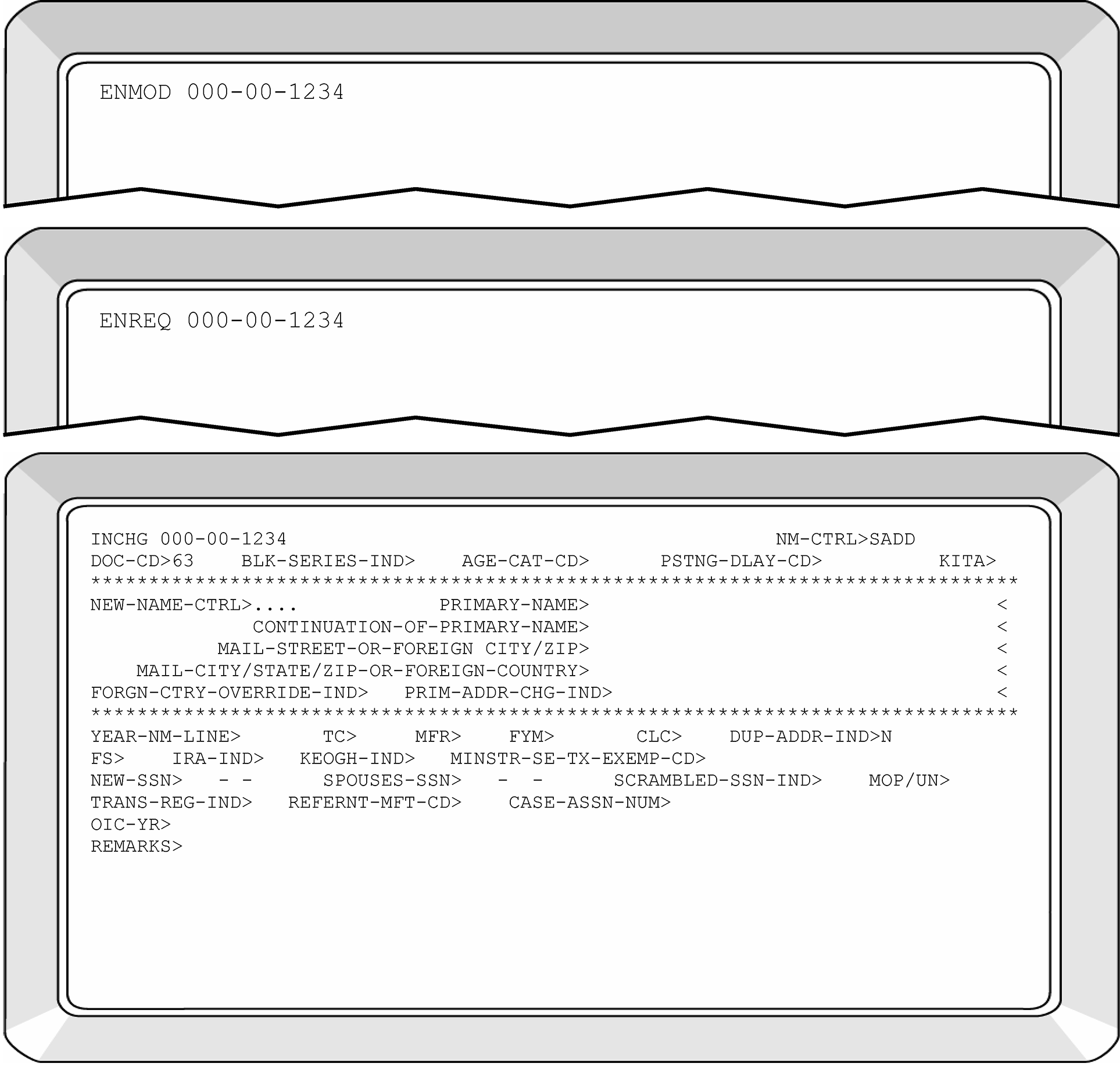
-
CC INOLE contains extensive IMF entity information for all taxpayers on the IMF, BMF, and EPMF. This CC contains Social Security data, ITIN N/C and any spouse cross reference data. CC INOLE is a research CC that displays different information based on the definer code used.
-
This CC also provides access to the National Account Profile (NAP) and contains selected entity information for all IMF accounts. See IRM 2.3.47, Command Codes INOLE, EOGEN and SPARQ, for additional information.
-
The definer code determines whether the input TIN is edited or not edited and whether a specific file source is needed.
-
CC INOLE displays all the applicable Name Controls
CC INOLES displays the following fields (if applicable to the particular taxpayer) listing the taxpayer name controls.-
used by the taxpayer
-
reported to SSA
-
transcribed by the IRS
-
used when taxpayer filed for ITIN
-
-
The display will be limited to entity data from every Master File that matches the TIN input.
-
See IRM 2.3.47, Command Codes INOLE, EOGEN and SPARQ, for additional information.
-
Electronically filed returns are processed at the Andover, Austin, and Ogden campuses.
-
The Tax Return Data Base (TRDB) is a relational data base that stores all available IMF e-File information for tax years 1998 and after. The applicable business filing information is available depending if the business tax form was available.
-
Use CC TRDBV from IDRS to gain read-only access to the tax return data. These forms can be viewed using a web browser to access through the Employee User Portal (EUP). CC TRDBV will continue to receive ELF 1040 tax returns not filled through MeF.
-
ELF Returns such as a Form 1040, Form 1040A and Form 1040EZ series returns will be able to be filed electronically in XML format through Modernized e-File (MeF).
-
Use CC TRERS for Error Resolution System (ERS) processing. This command code will retrieve the return from TRDB based on the DLN associated with the (GTREC) command code.
-
Use CC TRPRT to request a print image of the tax return.
-
More detailed information is available in IRM 2.3.73, IDRS Terminal Response for CCs TRDBV, TRERS, TRPRT and R8453.
-
CC FIEMP (Find Employee) enables IDRS users to identify and contact case control owners by researching the ten-digit IDRS employee number.
-
CC FIEMP displays the following information:
-
Case control owners name
-
SEID (Standard Employee Identifier)
-
Employee phone number or their manager's phone number
-
Employee is currently active on IDRS
-
-
If the FIEMP screen does not show the phone number of the employee or manager, the inputting user may use the case owners name or SEID identifier to search the Discovery Directory on the IRS Intranet or the E-mail system to obtain a valid phone number.
-
To obtain information on the case owner, the user must enter the command code FIEMP along with the case owners ten-digit IDRS employee number, and press the transmit key.
-
Users must only use CC FIEMP searches to research work related activities only.
-
NUMIDENT transcripts are ordered through IDRS using CC MFTRA with Request Type "U" . However, it takes approximately three days to generate and receive the transcripts from the campus print room. If employees have access to CONTROL D WebAccess (CTDWA), the NUMIDENT transcripts are available in approximately one day. Requests printed using CONTROL D can also be converted to a PDF file and may be forwarded to any employee working the case. See IRM 1.4.16, Accounts Management Guide for Managers, for additional information. IRM 1.4.16 contains information on viewing and/or printing reports. See IRM 2.3.32, Command Code MFTRA, for additional information.
-
CC MFTRA U provides SSA's NUMIDENT File (Name Identification File) and contains entity information from SSA records on all taxpayers who received an SSN from the SSA.
-
The information received will display:
-
Type of TIN record on file
-
Month, Day and Year the application or correction was recorded on the SSA file
-
Disability Status indicator
-
Name on the TIN card used in work or business
-
Name on the most recently assigned TIN card
-
Name at birth or other name(s) used, (prioritized in order)
-
Any additional names
-
Citizenship
-
Sex
-
Date of Birth
-
Place of Birth
-
Prior Date of Birth
-
Mother's Maiden Name
-
Father's Name
-
-
See Figure 3.13.5-13 that represents an example of the information received due to the CC NUMIDENT request.
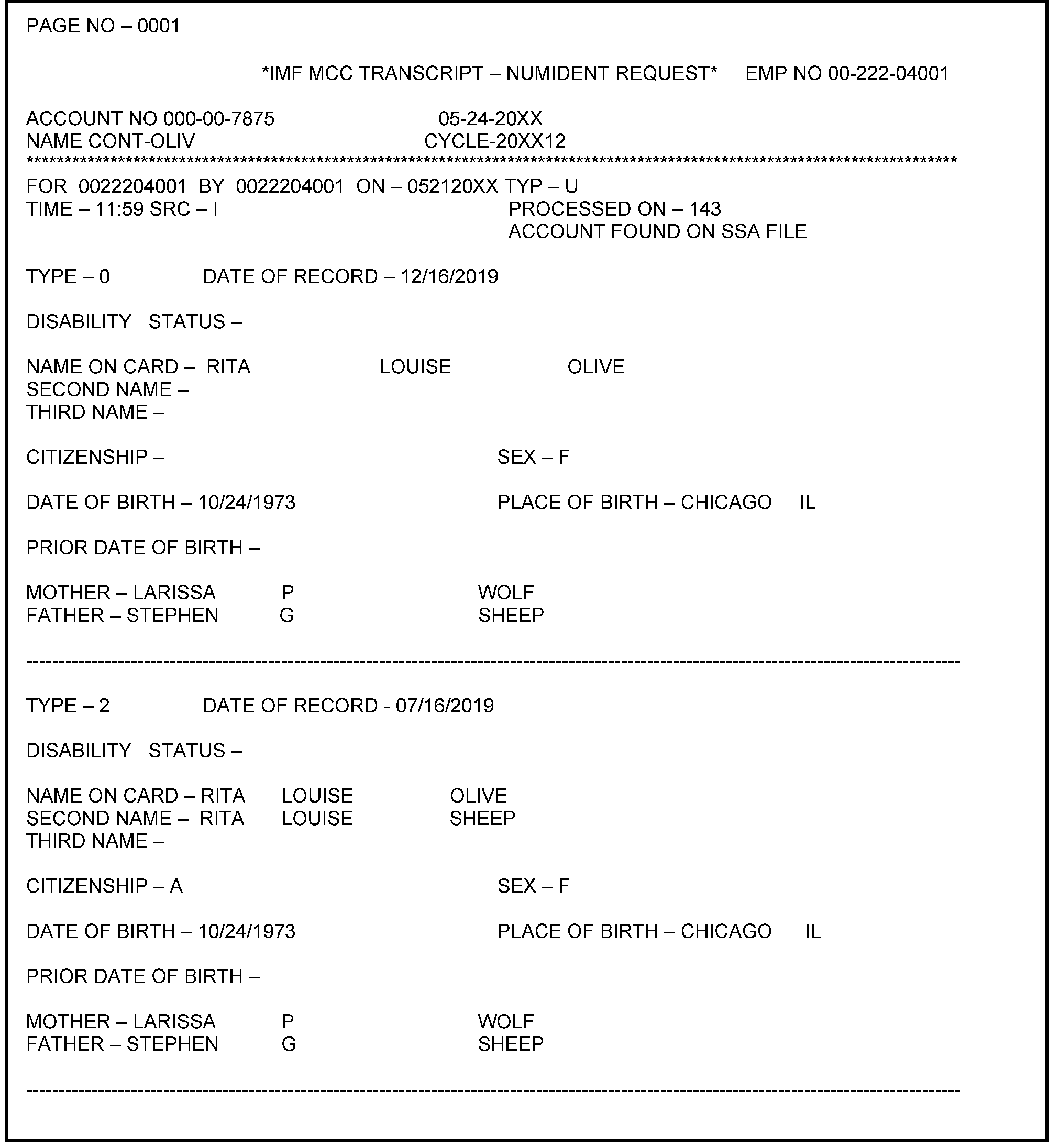
-
CC MESSG is used to request daily miscellaneous information.
-
Specifically CC MESSG provides the following information:
-
Current Correspondex Transmittal numbers in use
-
Unavailability of files or CCs
-
Team phone numbers
-
Number of returns processed and the amount of refunds issued
-
Number of notices mailed
-
-
Command Code DTVUE displays the Date of Birth (DOB) and Date of Death (DOD) (if applicable) information from the DM–1 file. DM–1 records may contain a DOB previously input through CC DM1DT or the information received from the SSA weekly update. Whenever a DOB is present (whether it was received through CC DM1DT or from the SSA), it is the date utilized for all processing decisions.
-
Command Code DM1DT creates an update record applied to the DM–1 during weekly processing.
-
CC DM1DT is able to add, change or delete an IRS entered DOB/DOD or a SSA provided DOB/DOD.
-
The Lead or immediate supervisor's approval is required before using these Command Codes to change a taxpayer's DOB or DOD.
-
The IRS must receive a letter/notice from SSA showing an error was made and the taxpayer is not deceased.
-
See IRM 2.3.25, Command Codes DM1DT and DTVUE, for additional information if necessary.
-
CC RTVUE provides access to the line items transcribed from the original Form 1040 and it’s accompanying schedules.
-
The data on CC RTVUE is transcribed from the original return/schedule.
-
The data displayed with this CC cannot be changed, nor reflect any subsequent adjustment, amendment, or duplicate returns.
-
CC BRTVU provides access to computer-generated data and/or the individual line items transcribed from BMF forms.
-
The following displays IDRS CCs are useful for processing and updating EINs.
Command Codes Content 1. CC ENMOD
and taxpayer's EIN or SSN.a. See IRM 3.13.5.89 and IRM 2.3.15, Command Code ENMOD, for additional information. 2. CC INOLE a. Allows access to the National Entity data file. The most common definer codes used in Entity when utilizing CC INOLE are as follows:
Definer Codes
G - used when the TIN type is not known.
Type the TIN with or without hyphens.
S - used to access a specific Master File
T - used to determine if the TIN resides on more than one Master File
X - used to display cross reference data
P - used to research the Employer Plan Master File (EPMF) data
b. See IRM 2.3.47, Command Codes INOLE, EOGEN and SPARQ, for additional information on CC INOLE.3. CC NAMEE/NAMEB and NAMES/NAMEI a. Accesses the Name Search Facility (NSF) for a "broad" search displaying business taxpayer names that have spelling, phonetic or nickname similarities.
b. See IRM 2.3.60, Command Codes NAMES, NAMEE, NAMEI, NAMEB, FINDS, FINDE and TPIIP.4. CC FINDE/FINDS
a. See IRM 2.3.60, Command Codes NAMES, NAMEE, NAMEI, NAMEB, FINDS, FINDE and TPIIP.5. CC ESIGN
a. See IRM 2.4.8,Command Codes ESIGN and BSIGN.7. CC BMFOL/BMFOR See IRM 2.3.59, Command Codes BMFOL and BMFOR.
-
If an address change is necessary during IMF cycles 01-03, a work-around is necessary. Use the following procedures:
-
Use the taxpayer's TIN and CC FINDSD or FINDSI.
-
Input CC ENMOD.
-
Use CC MFREQD with the SSN and enter.
-
Overlay CC ENMOD with CC ENREQ to generate the CC INCHG input screen.
-
Complete the taxpayer's address change.
-
If needed, use the appropriate cycle delay code to ensure the address change will post on cycle 4.
-
-
If necessary, see IRM 2.3.10, Command Codes MFREQ and RECON, for additional information. See Figure 3.13.5-14.
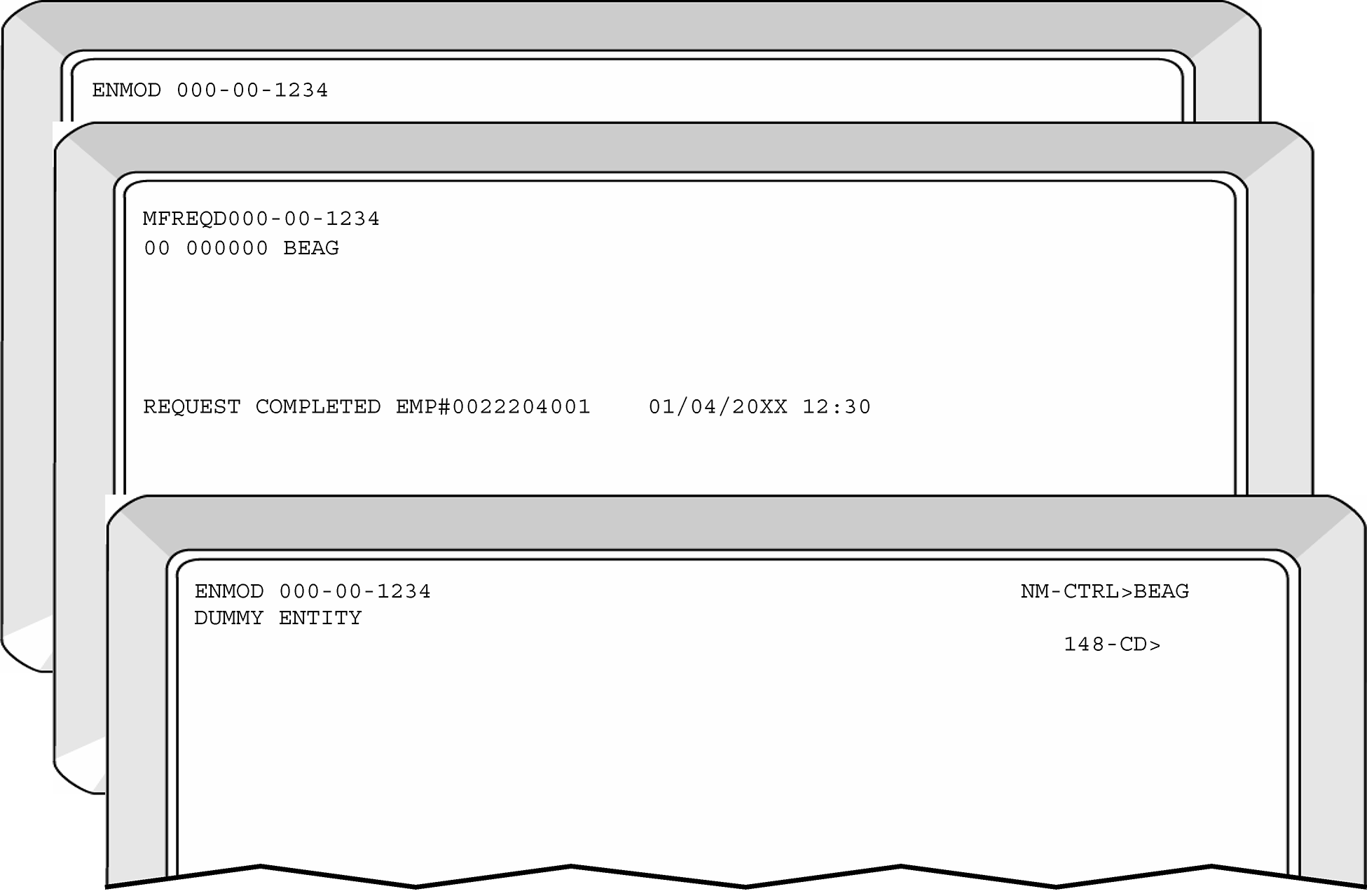
-
Corporate Files On-Line (CFOL) provides on-line access to information processed through any Area Office/Campus and posted to any of the Master Files.
-
CFOL CCs are typically available even if IDRS is not available.
-
CFOL CCs will contain an indicator on the screen to identify whether the account is a Daily account or a Weekly account.
-
All Individual taxpayers account transactions being processed weekly by IMF (on Thursday) with new cycle definitions and accelerated refund and notice issuance will display on these CCs.
-
Any CFOL command code with the definer code "H" will display the "help" screen for specific CC.
-
Definer code "T" provides a topical list for each CFOL command code to determine which command code to use.
-
Definer code "C" lists all CFOL command codes available and the correct input format for each.
-
CC IMFOL provides read-only access to the IMF. IMFOL provides expanded research capability when routine IDRS research such as CC TXMOD displays no data. CC IMFOL also provides on-line research to the IMF retention register. See IRM 2.3.51, Command Code IMFOL, for additional information.
-
CC ICFOL is used as a bulletin board to relay information about CFOL activities quickly. ICFOL users will provide current news on program updates, screen format changes, and upcoming changes.
-
See IRM 2.3.68,Command Code DMFOL, for information on the individual obligations owed to other government agencies (non-IRS).
-
See IRM 2.3.53, Command Code PMFOL, for information on the full transcript data on-line for the Form 1096 filed.
-
This command code provides "read-only" access to nationwide transactions posted to the Master File. These command codes allow expanded research capability when other IDRS research (e.g., CC SUMRY or CC TXMOD) result in "NO DATA" or a default to "REINF."
-
The IMF/BMF transcript information displays in a format, which cannot be updated or changed.
-
CC IMFOL can be utilized when IDRS command codes such as SUMRY and TXMOD are inactive. CC IMFOL has the following definers available:
Format Description IMFOLAnnn-nn-nnnnvnnyymm Adjustment transactions for specific tax module IMFOLCnnn-nnnnnnnnn Researches using the refund check number
Displays CC IMFOLT if matching information is locatedIMFOLEnnn-nn-nnnnv Displays posted Entity information IMFOLInnn-nn-nnnnv Displays an index of all tax modules for the requested SSN IMFOLPnnn-nn-nnnnyyyymm yyyymm Displays payment transactions within a specified date range IMFOLRnnn-nn-nnnnvnnyyyymm Displays the posted return for the specified tax module IMFOLTnnn-nn-nnnnvyyyymm Displays various module amounts and dates along with a list of posted transactions for specified tax module IMFOLVnnn-nn-nnnnv Displays retention register information IMFOL#nnn-nn-nnnn nnyyyymm Displays paper refund information IMFOLBTnnn-nn-nnnnvnnyyyymm Displays the same data as IMFOLT, with the bank account information IMFOLRnnn-nn-nnnnvyyyymm yyyy Displays retention tax modules
-
CC BMFOL furnishes access to the Business Master File. Fields available include basic identifying information, amounts, dates, codes, indicators, and freezes. Transaction postings, status history, audit history, vestigial data, federal tax deposit, exempt organization, and combined annual wage reporting data are also available. Additionally, for any specified account, a tax module summary and last period satisfied information can be requested.
-
The Business Master file on-line system provides read-only access to accounts on the Business Master File (BMF). All entities, master file tax modules and the most recent eleven years of retention data are in an on-line status.
-
CC BMFOR provides access to the BMF retention tax modules from accounts merged to a new Taxpayer Identification Number (TIN) after the tax module had been dropped to retention. BMFOR executes the same programs as BMFOL and provides the same screen responses as BMFOL.
-
CC BMFOR has the same input format as BMFOL but displays the tax module screens only. Valid definer codes are as follows:
-
A for Adjustment
-
R for Posted Return
-
S for Status History
-
T for Tax Module
Note:
Entity information, such as Name Control, Cycle, Potentially Dangerous Taxpayer (PDT), or Caution Upon Contact (CAU) Indicators, Criminal Investigation Division (CID) Indicator and Filing Requirements are not displayed for these modules. See IRM 25.4.1, Potentially Dangerous Taxpayer, and IRM 25.4.2, Caution Upon Contact Taxpayer for additional information.
-
-
"Abbreviated" BMFOL formats allow users to omit input fields if users want to view a different tax period for the same TIN and MFT or view status information immediately.
-
CC BMFOL input with a "tax type" definer, an MFT, a tax period and plan number will result in the display of data for the same TIN and display file source.
-
CC BMFOL input with an "entity type" definer and a TIN will result in the display of other data for the same display file source.
-
CC BMFOL input with an "entity type" definer will result in the display of data for the same TIN and display file source.
-
-
See IRM 2.3.59, Command Codes BMFOL and BMFOR, for additional information .
-
Command Codes NAMES, NAMEE, NAMEI, NAMEB, FINDS, FINDE and TPIIP use the Name Search Facility (NSF) and allow users to query the national entity file for taxpayer address information.
-
The search response time for CC NAME was recently improved. The more specific details are entered, the more refined and fewer search results that will display.
Note:
The entering of a taxpayer's address or partial address (beginning from the left of the address) will significantly reduce the number of CC NAME search results.
Helpful Hint: If a taxpayer's surname is a common last name (e.g., Smith, Brown, Chan, Garcia, etc.,), use the DOB, ZIP Code or state to refine the search when using CC NAMES/NAMEE. See the following table:If... Then CC NAMES will... ZIP Code is entered Disregard the City and State (faster) City is entered Disregard the State Address or Partial Address is entered Further refine its search Taxpayers name is entered Only search for matches in your campuses jurisdiction Taxpayers name and "**" is entered in the state code field Perform a national search -
The NSF database is kept current with real-time updates and with daily and weekly updates.
-
A "foreign" (non-United States) address search has been added. Select this option by entering two asterisks "**" in the "International Taxpayer Country" field.
-
The NSF contains:
-
Full taxpayer(s) name (as it was filed on the return)
-
Most current address available for each taxpayer
-
Most recent prior address used by the taxpayer
-
-
NSF's response screen displays:
-
Taxpayer name
-
Primary or secondary filer TIN
-
Primary or secondary TIN type
-
Year of taxpayer name
-
Primary or secondary taxpayer date of birth. When the date of birth is requested, the date is retrieved from the National Account Profile (NAP).
-
Filer indicator
-
Taxpayer address, city, state, and ZIP Code
-
Master File source
-
-
If you enter all the taxpayer information available for your searches, the command code response screens will contain the "closest matches" and therefore fewer IDRS pages. If the display exceeds 99 pages, the user may request a hardcopy listing using CCs NAMES/NAMEE with a definer of "X" .
-
CC NAMES does not perform character-by-character comparisons of the name as other systems do. The standardization package drops items such as Mr. Ms. Jr., MD, etc., from its search.
Note:
An error message generates (in some submission sites) if CC NAMES is used without entering information in the state and ZIP Code fields.
The error message display, "Campus Search not available for this campus" .
However if you reenter the request (including the state and ZIP Code fields), you will receive the matching records. -
See IRM 2.3.60, Command Codes NAMES, NAMEE, NAMEI, NAMEB, FINDS, FINDE and TPIIP, if additional information is needed.
-
CC NAMES can be used to locate IMF taxpayers (both Primary and Secondary filers), if applicable. Beginning in 2013, CC NAMES can be used to complete a "fuzzy" search using the taxpayer's TIN.
-
CC NAMEE must be used when researching for EINs.
-
The most efficient search is received when the name and ZIP Code fields are entered. The full (5-digit) or partial (3-digit) ZIP Code may be used. A valid ZIP Code entry (do not use all zeros) must be entered. The city name or MCC and state code are not used when the taxpayer name and ZIP Code are entered. See Figure 15 for information using CC NAMES.
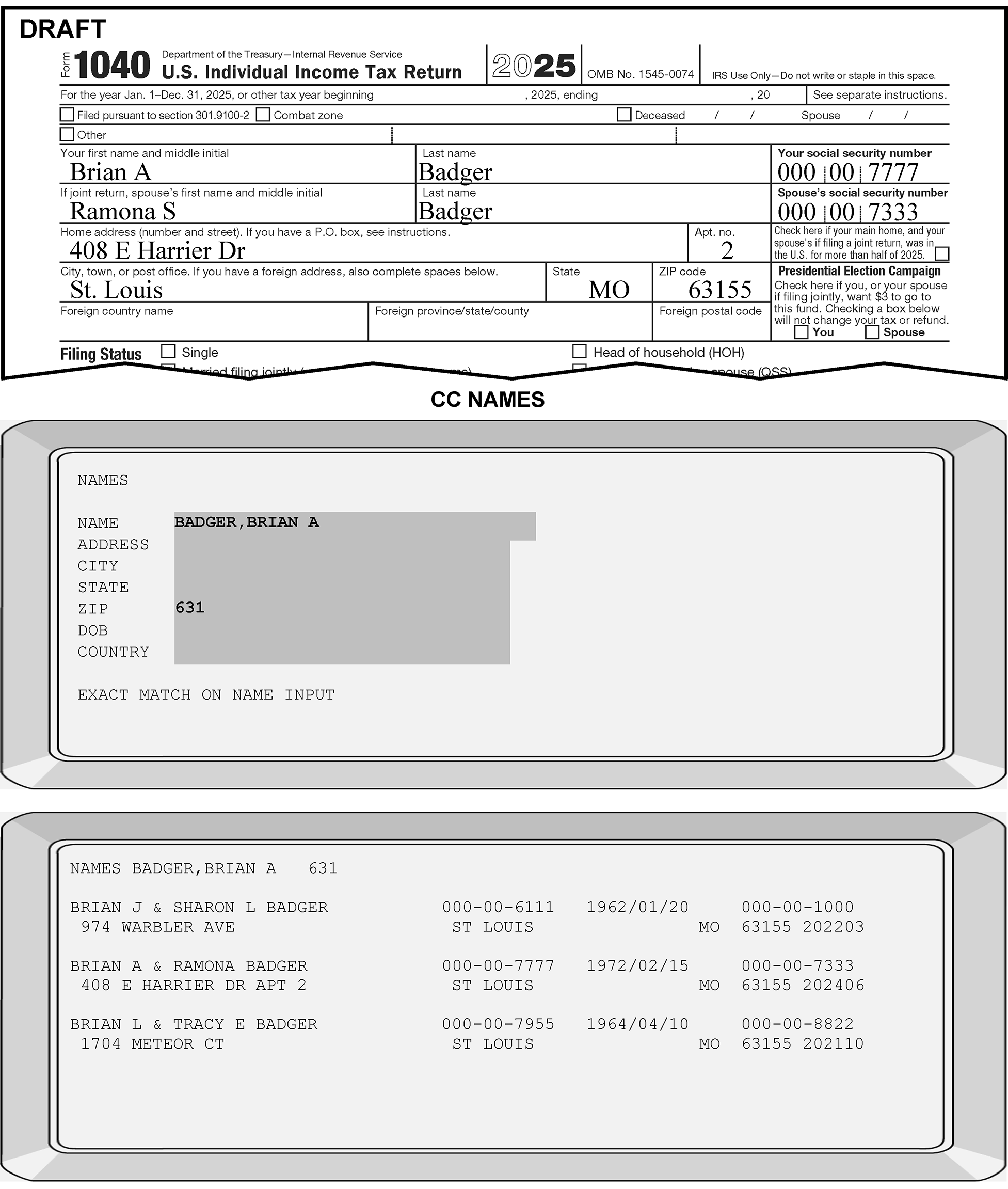
-
CCs NAMEI/NAMEB search the NSF data base using the first 10 characters of the last name (required) and the first 10 characters or the initial of the first name (if entered).
-
For the CC NAMEI input, the length of the last name is limited to 10 characters, and the length of the first name is limited to 10 characters.
-
For CC NAMEB, the length of the last name is limited to 15 characters, and the length of the first name is limited to 10 characters. When a plus (+) is used in the first initial field of a NAMEB search, the search is done on up to 15 characters of the last name. If the entire last name consists of less than 15 characters, it is not necessary to key in trailing blanks.
-
CC NAMEI and NAMEIX will display the taxpayer's DOB information (if available).
-
-
CCs NAMEI/NAMEB do not use a formatted input screen. Input fields follow the command code name on the top line of the screen. They are variable in length and, when present, must be separated by a comma.
-
CCs NAMEI/NAMEB use either the first three digits of the ZIP Code or the full five digits of the ZIP Code or a ZIP Sectional range.
-
CCs NAMEI/NAMEB use the first six characters from the street address or PO Box number.
-
Input should begin with the actual number; the literal, "PO Box" , should not be entered.
-
The street address may contain up to 26 characters, but only the first six characters will be used in the search.
-
-
A CC NAMEI/NAMEB request is honored with a minimum input of the first 10 characters of the last name.
-
CC NAMEI uses the NSF data base to search based on the CC definer used. The CC definers are as follows:
-
I - Only IMF records are displayed.
-
B - Only BMF records are displayed.
-
N - Only NMF records are displayed.
-
Q - Only Invalid SSN records are displayed.
-
X - A hardcopy listing is desired.
-
-
If the display exceeds 99 pages, the user may request a hardcopy listing, using CC NAMEI/B with a definer of "X" .
-
See IRM 2.3.60, Command Codes NAMES, NAMEE, NAMEI, NAMEB, FINDS, FINDE and TPIIP, if additional information is needed.
-
See Figure 3.13.5-16 for examples of input request using CC NAMEI.
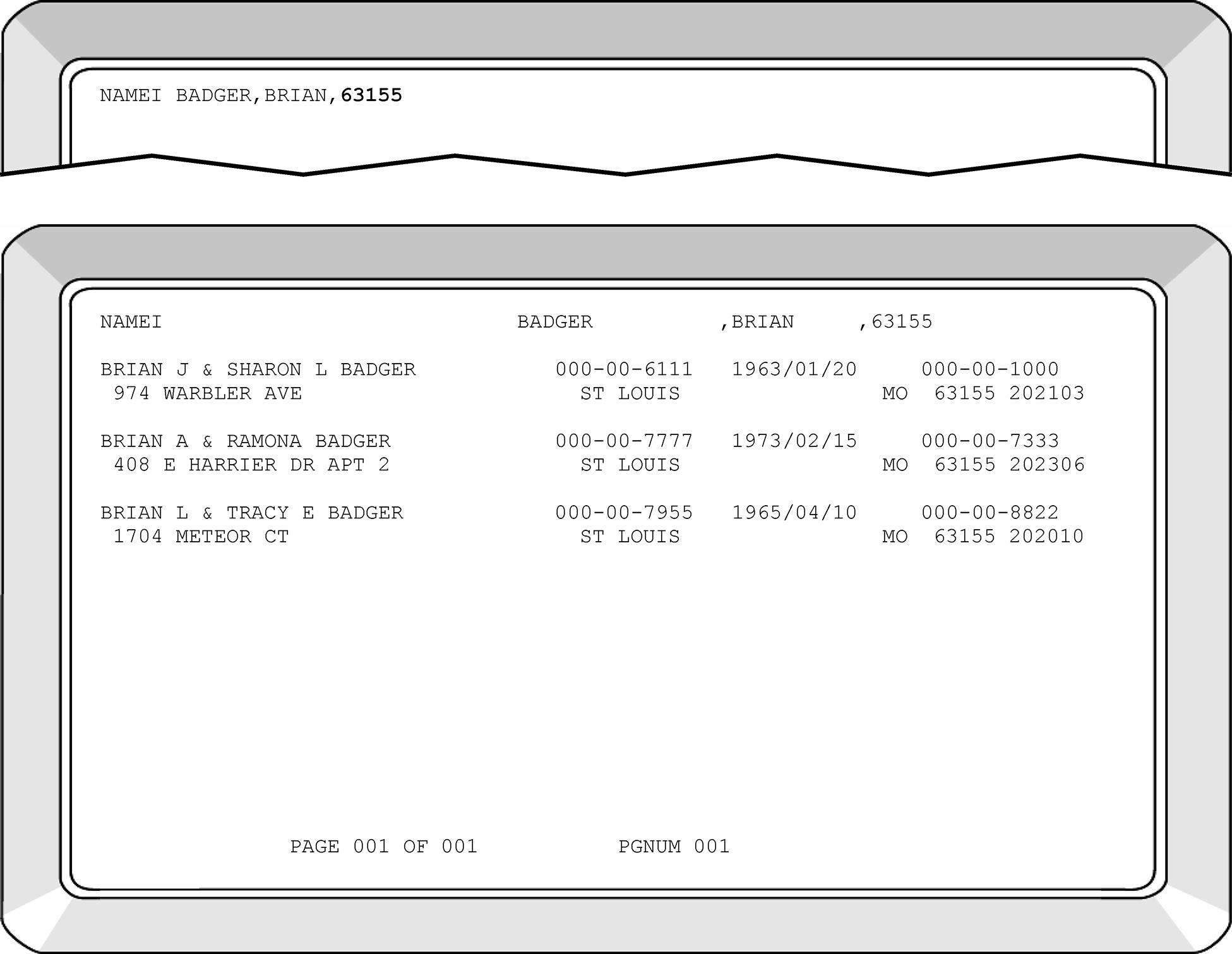
-
CC FINDS searches the NSF data base using the primary or secondary taxpayer's SSN/ITIN/IRSN using either of the following definers:
-
D - Displays IMF Domestic names and addresses.
-
I - Displays IMF International names and addresses.
-
-
CC FINDE searches the NSF data base using the taxpayer's EIN and requires either of the following definers:
-
D - Only BMF Domestic names and addresses are displayed.
-
I - Only BMF International names and addresses are displayed.
-
-
CCs FINDS and FINDE require input of the command code, the definer, and the 9-digit TIN (with no hyphens), including leading zeros, if present. The most current taxpayer information will display first and includes any subsequent names/addresses displaying in descending order.
-
CCs FINDS/FINDE do not the option of receiving a hard copy of the NSF records.
-
See IRM 2.3.60, Command Codes NAMES, NAMEE, NAMEI, NAMEB, FINDS, FINDE and TPIIP, for additional information.
-
Master File uses alpha codes to identify specific taxpayer module conditions generated systemically or input manually. The term freeze codes can be misleading since not all alpha codes indicate the taxpayer's account or module is frozen.
-
Various IDRS conditions affect the status of a module. There are three main types of freeze code conditions that:
-
Freeze refunds and prevent offsets in or out of the module but do not stop balance due notices
-
Freeze the IDRS balance due notices, refunds, offsets and Tax Delinquent Account (TDA) issues
-
Some freeze codes display to indicate certain conditions occurring on the taxpayer's account (but do not freeze the account)
-
-
Up to eight freeze codes can display for a taxpayers account. Master File refers to the freeze codes as either:
-
Left position freeze code such as M_, or;
-
Right position freeze code such as _R
-
-
See IRM 21.5.6, Freeze Codes, and Document 6209, IRS Processing Codes and Information, if additional information regarding freeze codes is needed.
-
If any concerns arise, see your lead before completing the name or address change. Before routing cases to another area, notate the type of freeze code on the routing slip to expedite specialized issues.
Note:
Since typical address and/or name change transactions do not release the majority of the freeze conditions see Document 6209, IRS Processing Codes and Information, before completing Entity corrections if you are unfamiliar with the freeze code condition.
Freeze Codes that Require Routing Action -B Statues of Limitations Expiration Route original returns only to Statute Unit unless there is a "cleared by Statutes Unit" stamp or a TC 150 has posted Z- Route to Fraud Detection Center (FDC) -Z Route to FDC
-
Filing Status Codes identify the taxpayer's marital and family situations. It is used to determine whether the standard deduction or the itemized deduction amount should be allowed. See the following table to identify IMF domestic filer(s) FSCs:
Filing Status Codes (FSCs) Filing Status Descriptions 0 Single, filing declaration of estimated income tax 1 Single Taxpayer 2 Married Taxpayer Filing Joint Return 3 Married taxpayer filing a separate return and spouse is also filing a return (spouse exemption not claimed). Both must file using this status 4 Unmarried Head of household 5 Widow(er) with dependent child 6 Married filing separate return and spouse is not required to file a return (spouse exemption is claimed) 7* Head of household (dependent exemption is not claimed) -
When establishing an IMF account, use the following:
-
For Form 1040, input the FSC indicated on the return.
-
For Form 1040NR and Form 1040NR-EZ, input FSC 1.
If FSC is required and unable to determine the filing status, input FSC 1. -
-
Using CCs INOLET and INOLES will display the most current posted FSC.
-
The following Entity Transaction Codes require the input of the taxpayer's FSC and the Year Digits:
-
TC 000–Add taxpayer Account
-
TC 013–Name Line Change for Domestic Filer
TC 013-Address Change Foreign Filer -
TC 016–Miscellaneous Entity Changes
-
TC 017-Changing Spouse's SSN
-
TC 030–Update Location Codes (Out of Campus)
-
TC 040–Transactions on Valid Segment
-
TC 041–Transactions on Invalid Segment
-
-
Daily transactions directed to a daily account are expected to post daily. Transactions will be viewable using CFOL CCs the second day after campus input. Transactions will be viewable on IDRS command codes the third day after campus input.
-
Weekly transactions directed to a daily account are expected to post with the weekly processing run on Thursday and may result in the daily account type changing to Weekly.
-
Daily and Weekly transactions directed to a Weekly account are expected to post with the weekly processing on Thursday.
-
For situations in (2) and (3), transactions will be viewable using CFOL command codes on the Saturday following the Thursday processing run.
Transactions will be viewable on IDRS command codes on Monday following the Thursday processing run. -
The following is CADE 2 processing cycles:
-
Campus Cycle-Thursday through Wednesday
-
Master File processing- Friday through Thursday
-
Notice Review processing-Saturday through Monday (8+ days)
-
Unpostables processing- New receipts on Tuesday
(Closing Unpostable processing on Tuesday)
-
-
Use of the Posting Delay Code (PDC) on transactions will result in the transaction being held until the weekly processing on Thursday. When the transaction is processed on Thursday and the PDC contains a value other than zero, the transaction will continue to resequence for the number of cycles equal to the value.
-
Transactions may be delayed from one (1) to six (6) cycles. This is an optional code and delays transaction(s) posting to Master File (determined by the number of cycles selected). CFOL CCs displays Daily and Weekly indicators on the account.
-
When multiple transactions are required to adjust an account and some transactions must post in later cycles, PDCs will adjust the transaction to the correct transaction cycles.
Caution:
If the name change affects the controlling name line and changes the account’s validity on IMF. Do NOT input multiple TC 013’s in the same cycle, inputting multiple TC 013’s can reverse the account validity could create a resequencing situation. This WILL prevent the correction/posting of taxpayer account to IMF.
If another name change is needed for an earlier/later tax year, monitor the account using a Posting Delay Cycle (PDC) of 3.
Once the first name change transaction posts and the merge is posted, input another TC 013 under the segment where the account merged to (valid or invalid). -
Generally transactions will post to IMF in numeric order (from lowest to highest) except for the following:
-
TC 011 will always post last to the entity portion of IMF and will accurately resequence to the next cycle.
-
If a TC 610 and TC 150 attempt to post in the same cycle, the TC 150 will not be allowed to repeat.
-
-
Posting delay capability is allowed using CC INCHG (Doc Code 63).
-
All Doc Codes 47 (Exam) and most Doc Codes 54 Adjustment transactions require the original document to post before subsequent transaction can be posted.
-
Doc Codes 24, 48 and dual debit (Doc Codes 34) may require a PDC. Credit transfers are not typically completed within the Entity function.
-
Reversal Transaction Codes require the original transaction to be present before completing the reversal.
-
Cycle transactions will be retained on the Resequence Transactions record according to the required staggered sequence of the transactions. These types of transactions are identified on IDRS as "RS" meaning resequencing.
-
Use the following table for general rules when the inputting of PDCs is necessary:
If the prerequisite Transaction Code (TC)... Then... Is a LARGER TC Cycle the TC Is needed to set or release a freeze Cycle the TC Is needed to set, change or remove an indicator Cycle the TC Is needed to change a status, filing requirement or balance amount Cycle the TC Will post FIRST DO NOT cycle the TC (no PDC is necessary) -
Posting to IMF of these transactions are deferred until the posting cycles have passed.
-
When CC ENMOD displays a recent transaction in EP or PN status was entered or is posting in the current cycle, entering a PDC may avoid unpostable conditions. See Document 6209, IRS Processing Codes and Information, for additional information.
-
See IRM 3.13.5.89.1 for additional information.
-
Sometimes, input transactions or unpostable corrections are cycled to post/release on different cycles.
-
Generally transactions post to the Master File in numeric order except the following:
-
On IMF, TC 011 will always post last to the entity portion and will be accurately resequenced to the next cycle.
-
On BMF, the TC 150 will always post last to allow the tax module to settle properly
-
If TC 610, TC 670, TC 590 and TC 150 are all attempting to post in the same cycle, they will post at Master File in the following order:
TC 590, TC 610, TC 670 and TC 150.
-
-
Master File automatically resequences certain transaction codes. These are identified on IDRS as "RS."
-
If a TC 610 and TC 150 attempt to post in the same cycle, IMF will automatically prevent the TC 150 from repeating.
-
Use CC IRCHG for Name Control corrections/updates when the taxpayer/representative provides supporting legal documentation or the account is invalid due to an IRS error.
-
See IRM 3.13.5.18, IMF Automated Establishment of Taxpayers, if the existing TC 000, TC 013, TC 014, or TC 971 with Action Code 050; for the S-SSN displays with a DLN of XX263-001-88888-X. These cases require secondary taxpayer account corrections using a TC 040 or TC 041. If necessary, see IRM 3.13.5.127 and IRM 3.13.5.128.
-
When the taxpayer does not provide any supporting documentation or an adequate explanation, correct the account using CC INCHG (TC 013).
Reminder:
If multiple merge TCs are entered without allowing time to post, it could create a resequencing condition at master file and will prevent taxpayer account correction(s).
Caution:
If the multiple name changes are required, do NOT input multiple TC 013 without monitoring the account. Once the first name change transaction posts, input the subsequent TC 013 corrections to the account.
Inputting multiple TC 013 corrections without monitoring the account could create a resequencing situation that will prevent the correction/posting of taxpayer accounts to IMF. -
Occasionally the taxpayer information posted on the INVALID segment of IMF is correct. However their account resides on the INVALID segment of IMF. Examples of these situations include the following:
-
Taxpayer married but failed to update their files with SSA (taxpayer’s maiden name reported to SSA but their married name was not updated with SSA).
-
Taxpayer updated their name with SSA (SSA record was received after the DM-1 quarterly merge and consequently remains on the invalid segment until the quarterly merge).
-
Taxpayer used a ITIN name control and it does not match the original ITIN name control.
-
Taxpayer has dual last names but the name used does not match the any of the valid name controls on the account.
-
-
Examples of legal documentation include:
-
ITIN CP Notices
-
Copy of the marriage certificate or court document(s) showing a legal name change
-
Copy of SSA letter/notice explaining discrepancies
-
-
Using CC IRCHG will change an invalid account to an IRS valid account and allows the taxpayer to use this name when filing. It also adds additional valid name controls to the NAP.
-
For IRS to validate a taxpayer account, input must be made to the invalid segment of IMF.
-
To validate the name of a taxpayer on Master File input CC ENMOD, overlay with CC ENREQR to bring up CC IRCHG.
-
CC IRCHG requires a "Justification Indicator" and remarks.
See Figure 3.13.5-17. -
The Justification indicator is visible in the Entity portion of the IMF.
-
When the Justification indicator of "1" is present, the account is treated as valid.
-
Justification indicator of "2" will reverse the account to invalid.
-
-
CC IRCHG generates a TC 016 transaction code.
Note:
Do not input multiple TC 016 corrections on the same account. If an error is made and a second TC 016 is required, DO NOT enter the second TC 016 before waiting for the first TC 016 to post. This action could prevent the taxpayer case from posting and create a resequencing condition at individual master file.
-
The taxpayer account is subject to DM–1 quarterly updating.
-
If a taxpayer name change is needed due to a typo, submission of an incorrect name, etc., and the name provided matches the VALID name control(s), IAT is the preferred method for name corrections.
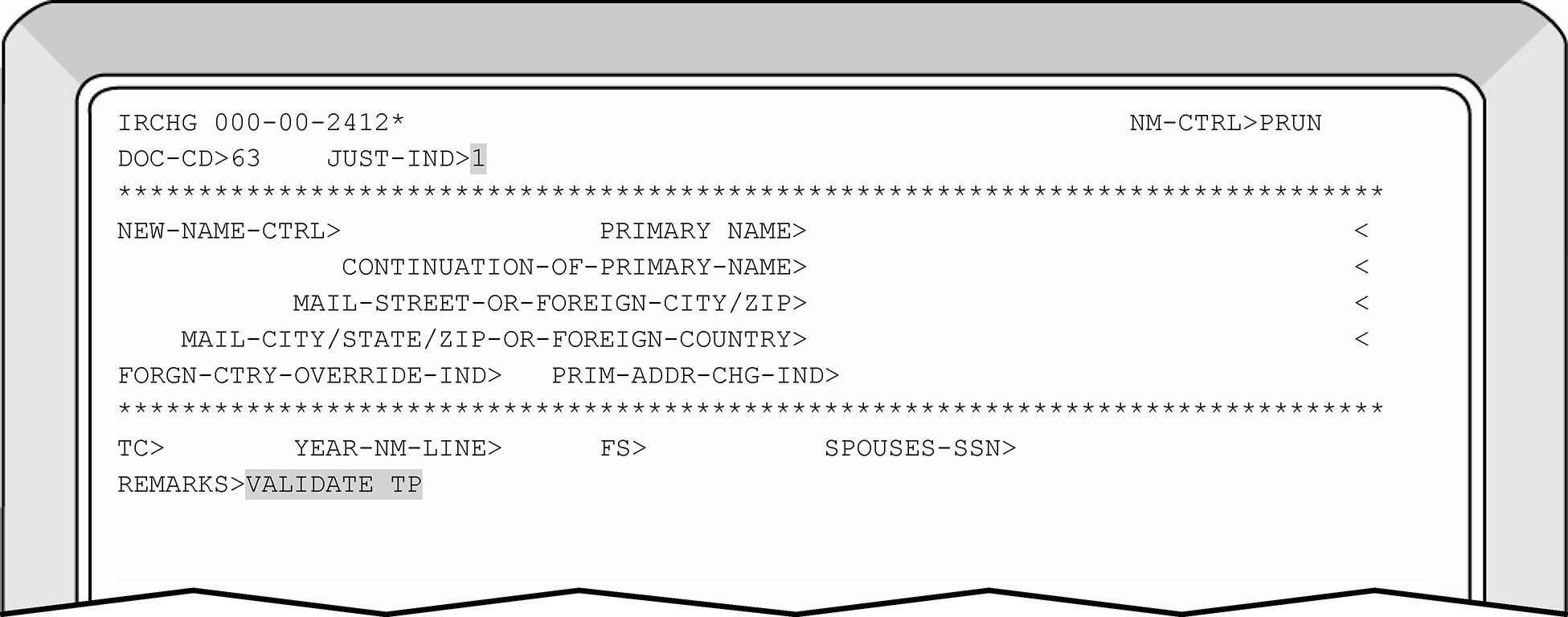
-
To validate the name of a spouse, input CC ENMOD on the primary taxpayer's TIN residing on the valid segment, overlay with CC ENREQR to bring up CC IRCHG. The following information is needed:
See Figure 3.13.5–18-
Justification indicator "1"
-
Year name line ( appropriate year)
-
Spouse's TIN
-
Enter your reason for the change in the REMARKS field, then transmit
Note:
This action generates a TC 016.
Do not input multiple TC 016 corrections on the same account. If an error is made and a second TC 016 is required, DO NOT enter the second TC 016 before waiting for the first TC 016 to post. This action could prevent the taxpayer case from posting and create a resequencing condition at individual master file.
-
-
See IRM 3.13.5.18, IMF Automated Establishment of Taxpayers, if the existing TC 000, TC 013, TC 014 or TC 971 Action Code 050 for the S-SSN displays with the DLN of XX263-001-88888-X. This type of case requires correction with a TC 040 or TC 041 due to the establishment of the Secondary taxpayer's name by IMF.
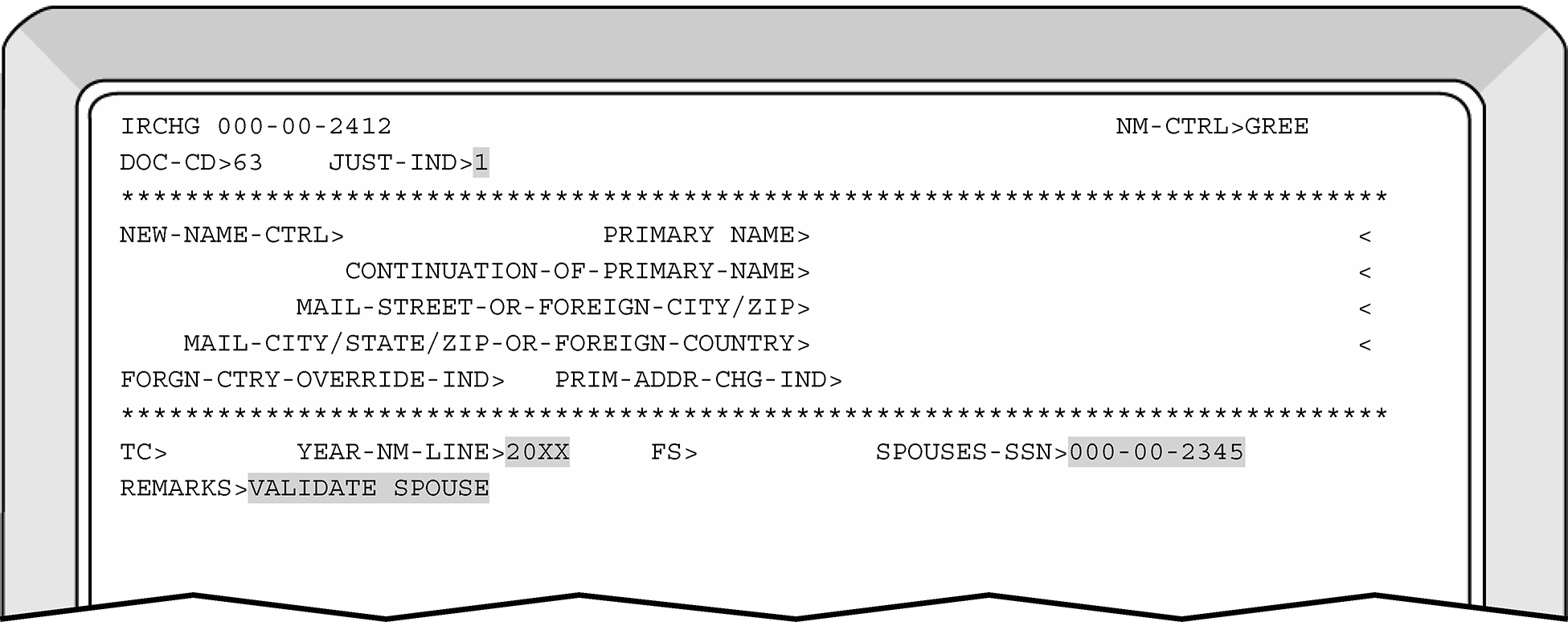
-
To reverse IRS validity for a spouse, input CC ENMOD, then overlay with CC ENREQR to bring up CC IRCHG:
-
A justification indicator of "2" must be used
-
Year name line
-
Spouse's TIN
-
Enter your reason for the change in the REMARKS field, then transmit
-
-
To reverse IRS validity for the primary taxpayer, input CC ENMOD, then overlay with CC ENREQR to bring up CC IRCHG.
-
A justification indicator of "2" must be used.
-
Enter your reason for the change in the REMARKS field, then transmit.
-
-
When a reversal to IRS validity is completed on a primary account, the account will remain on the valid segment of the Master File. However, the "IRS name control" is now considered invalid.
-
At the site's option, management approval may be required before completing this type of correction to the primary taxpayer.
-
See IRM 3.13.5.18, if the existing TC 000, TC 013, TC 014 or TC 971 Action Code 050 for the S-SSN displays with the DLN of XX263-001-88888-X. This type of case requires correction with a TC 040 or TC 041 due to the establishment of the Secondary taxpayer's name by IMF.
-
Occasionally, accounts will have transactions on both segments of the IMF. This occurs when the record or validity of a TIN was deleted/changed on the DM–1 File.
-
Any transaction input after the deletion of an account will be directed to the invalid segment of the IMF.
-
Use the following to merge the accounts (Master file valid and invalid segments):
-
Enter a TC 040 to the valid segment of the account using the same name on the account. This will cause the account to resequence to the invalid segment of the Master File.
-
To merge the accounts on the invalid segment of Master File, change the IRSN to the correct TIN using TC 041.
-
-
Taxpayer situations such as above will not keep the inquiry from resolution. A refund inquiry must be resolved once the cause of the problem is determined by the examiner.
-
TC 000 is used to add taxpayer's account to the applicable Master File.
-
Input CC INOLETnnn-nn-nnnn XMIT
-
Verify the taxpayer's name control matches the document/return. In order to establish a new taxpayer entity, a dummy account must be created.
Exception:
After May 2012, ITIN name control guidelines must be modified for CC INCHG.
When correcting or establishing a ITIN name control and any of the taxpayer's first four characters of their last name/surname contains a hyphen, an apostrophe, a space, etc., disregard and only enter the first four alpha characters.
Example for an ITIN taxpayer only, Christopher El-Oaks must be entered as ELOA. -
If establishing a taxpayer with an IRSN, an asterisk (*) must also be input after the invalid number.
-
Input CC ENMOD nnn-nn-nnnn XMIT.
-
When the CC ENMOD response screen is "NO DATA AVAILABLE" , the taxpayer's account must be established using the following information:
-
Input an 1 "Intend to Build Indicator" in position 20 of line one of CC ENREQ
-
See the following example of CC ENREQ and an explanation of the applicable fields:
Command Code ENREQ ENREQ nnn-nn-nnnnn>>1 (column 20 input 1)
WREN C ENTC *Explanation:
WREN = example of N/C
C= Case Status (Use an A if an open control base is desired)
ENTC = This is the control category for Entity Control.
* = will assign the current date in the IRS received date field. Otherwise enter the data in a MMDDCCYY format.
-
-
The following information is necessary to establish the taxpayer using the CC INCHG/IRCHG screens:
-
Name Control
-
Primary Taxpayer Name
-
Entire address*
-
Year Digits*
-
Filing Status Code (FSC)*
-
Remarks*
-
-
The following is input when applicable or available using CCs INCHG/IRCHG:
-
Spouse's Name (if taxpayer is filing Married Filing Jointly)
-
Continuation of Primary Name (if applicable)
-
Mail File Requirements
-
FYM
-
Spouse's SSN (if taxpayer is filing Married Filing Jointly)
-
Scrambled SSN Indicator
-
Remarks. Enter your reason for adding the account in the REMARKS Field. See Figure 3.13.5–19.
-
-
See the following list of examples of prefixes to omit when establishing a taxpayer's name. The list does not include all prefixes used by taxpayers:
Prefixes to Omit Mr. Ms. Miss Mrs.* Rev. Dr. Cpt. Gov. Lt. Gov. Sgt. Hon. Pastor -
Always enter the suffixes, "Jr." or "Sr." when shown on the document.
-
Always enter the word "Minor" , after the surname or suffix when the literal is written or typed on the document.
-
Always enter any numeric characters within a name as Roman Numerals. A right - hand bracket "]" must always precede the Surname. If there is a Suffix, a right-hand bracket must also precede the Suffix when the Surname is less than four alpha characters. This will prevent the name control from including part of the Suffix. The following tables displays how the taxpayer reports their name and the correct way to enter the name provided:
Taxpayer Reports Enter as Lewis E. Jackson 4th Lewis E]Jackson IV Jon Smith, Second Jon]Smith II Aaron H. Camelott III Aaron H]Camelot III Christopher M. Doe Jr Christopher M]Doe]Jr Christopher M. Wu III Christopher M]Wu]III Christopher Doe Jr
Jane DoeChristopher Jr & Jane]Doe Note:
There should be no spaces entered immediately before or after the ] (bracket). A right - hand bracket (]) must always precede the Surname. If there is a Suffix, a right - hand bracket must also precede the Suffix when the Surname is less than four alpha characters. This will prevent the name control from including part of the Suffix.
-
When establishing a taxpayer with a POA, Designated Agent, Executor/Executrix, etc., and their address contains a PO Box and a street address, use the Continuation-of-Primary-Name (Line 2) field to enter the POA, Designated Agent, Executor/Executrix, etc., information. Enter the PO Box address in the "MAIL-STREET-OR-FOREIGN CITY/ZIP" address field instead of the street address information.
-
If two addresses are present for the taxpayer(s) a PO Box and a street address:
-
enter the Street address in the Continuation-of-Primary-Name (Line 2) field.
-
enter the PO Box on the "MAIL-STREET-OR-FOREIGN CITY/ZIP" address field. See Figure 3.13.5-20 for an example of the how to input an IMF address when the taxpayer provides street address and PO Box information.
-
-
See IRM 3.13.5.18, IMF Automated Establishment of Taxpayers, if the existing TC 000, TC 013, TC 014 or TC 971 Action Code 050 for the S-SSN displays with the DLN of XX263-001-88888-X. This type of case requires correction with a TC 040 or TC 041 due to the establishment of the Secondary taxpayer's name by IMF.
-
Use CC ENMOD to ensure the account shows a TC 000 instead of an TC 013 or TC 014. If a TC 013 or TC 014 is pending, use CC TERUP and input the taxpayer information again.
-
If necessary, refer to Document 7071 for proper IMF Name Controlling procedures.
-
Refer to the IDRS CC Job Aid for a description of commonly used command codes.
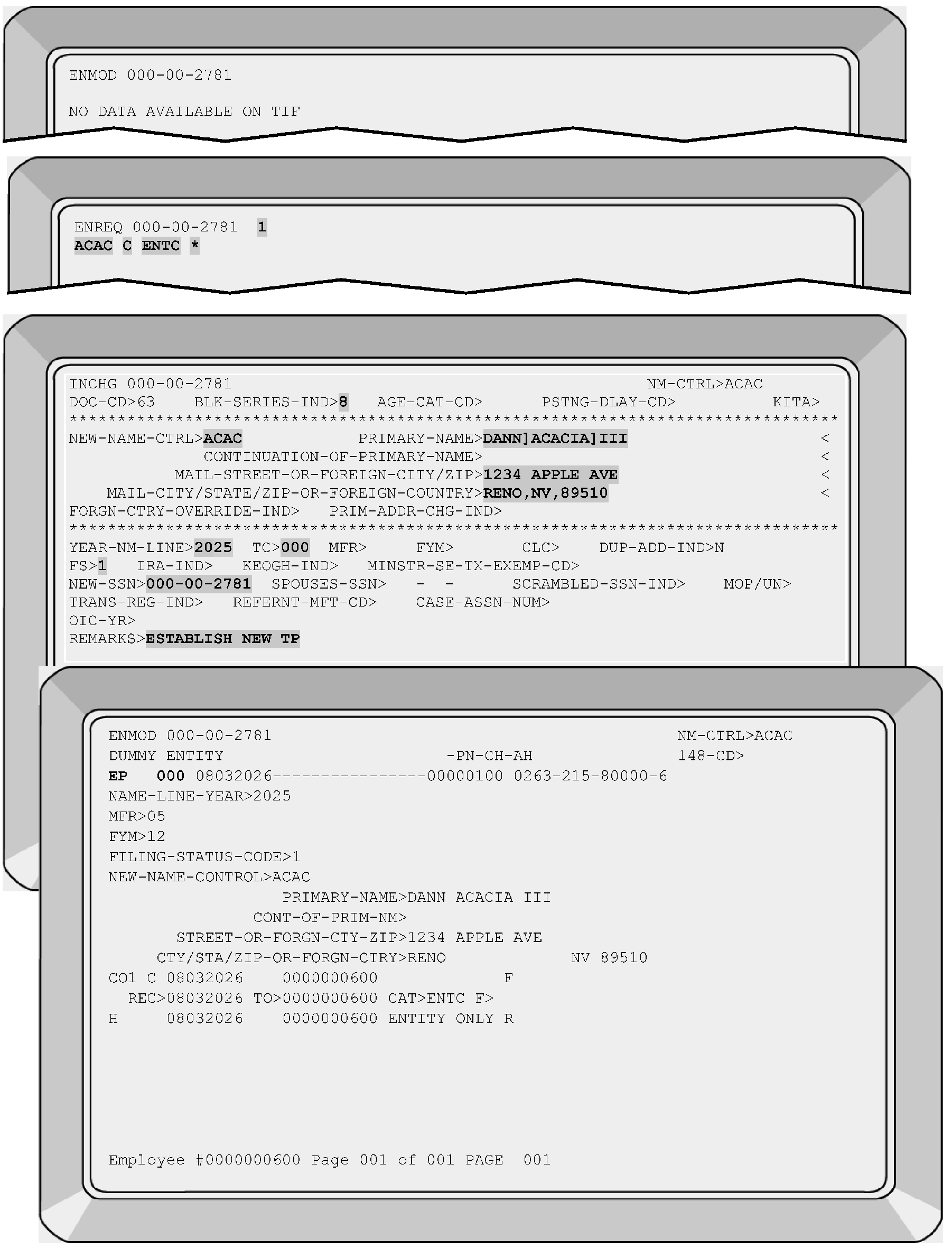
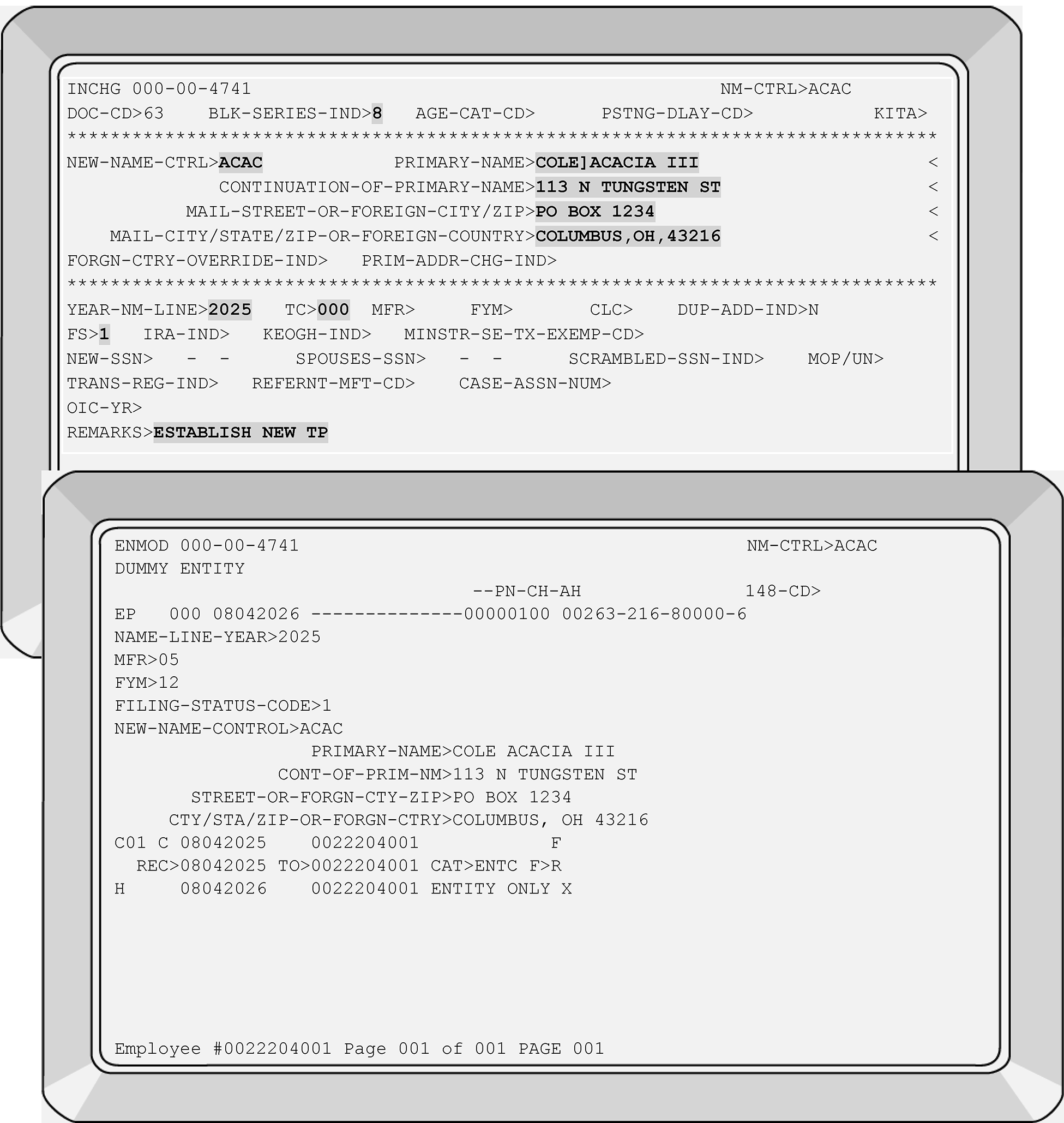
-
TC 011 generates when a change is made to a taxpayer's TIN.
-
The following contains examples when a TIN change is necessary:
-
A taxpayer was assigned an IRSN_BUT the correct TIN/ITIN is located or supplied by the taxpayer.
-
A taxpayer has two or more TINs and it is necessary to consolidate the accounts to the correct TIN.
-
A taxpayer TIN was established inaccurately with the wrong TIN
-
A taxpayer was assigned an ITIN, but they now have an SSN.
-
-
When completing a TIN change of a secondary taxpayer's TIN who files Married Taxpayer Filing Joint Return (FSC 2), a two-step correction process is required.
-
Complete the TIN correction to the secondary taxpayer’s TIN under the primary taxpayer's account (generates a TC 017).
-
Then complete the TIN correction to the secondary taxpayer’s TIN under the secondary taxpayer's account (generates a TC 011). See IRM 3.13.5.124.
-
-
Research must be completed before making a change to a taxpayer's TIN.
-
To ensure the TC 011 makes the taxpayer's account IMF Valid and posts to the valid side of Master file, the following must apply to all the impacted taxpayer accounts:
-
The taxpayer's name line(s) and name control(s) must match the SSA Name Controls (listed on CC INOLE with Definer Code S).
HINT: SSA Name Control(s) are displayed after the "SSA N/C" field on CC INOLES screen. -
The taxpayer name(s) and name control(s) on ALL their accounts must agree.
Note:
If the impacted taxpayer accounts show different last names (example Mary B. Brown and Mary B. Black), the accounts will not merge IMF VALID until the taxpayer name lines and name controls are corrected with TC 013.
Do not make a name change to taxpayer account(s) without supporting documentation/proof of their identity unless the discrepancy was due to an IRS error.
-
-
If the taxpayer's name line(s) and name control(s) do not match the SSA Name Controls (per CC INOLE with Definer Code S), the taxpayer account will become IRS INVALID when the TC 011 posts to IMF.
-
The following items are needed to complete a TC 011 on the CC INCHG screen:
-
Enter a Block Series of 8. (Entity Function ONLY MUST use "8" for the block series of the DLN when completing TIN changes on IDRS).
-
Enter new TIN.
-
Enter your reason for the change in the REMARKS Field. See Figure 3.13.5–21 for an example of how to complete a taxpayer TIN change.
-
-
If the taxpayer requests a TIN change, inform the taxpayer of the correction by sending a 147C Letter, 257C Letter, 685C Letter, or the 685SP Letter.
-
If both a TC 011 and TC 013 are required to correct the taxpayer's account(s), enter the TC 013 first, using a Posting Delay Code (PDC) of 3 cycles and monitor the account. Once the TC 013 posts, and if another name change is needed, for an earlier/later tax year, enter the TC 011 with a PDC of 3 cycles.
Caution:
Use of the Posting Delay Code on a daily account with daily transactions may result in delaying the posting of the transactions that would resolve the account.
Do not input multiple TC 011 corrections on the same account without ensuring the first TC 011 posts before entering the subsequent TC 011. This action could prevent the taxpayer case from posting and create a resequencing condition at individual master file.
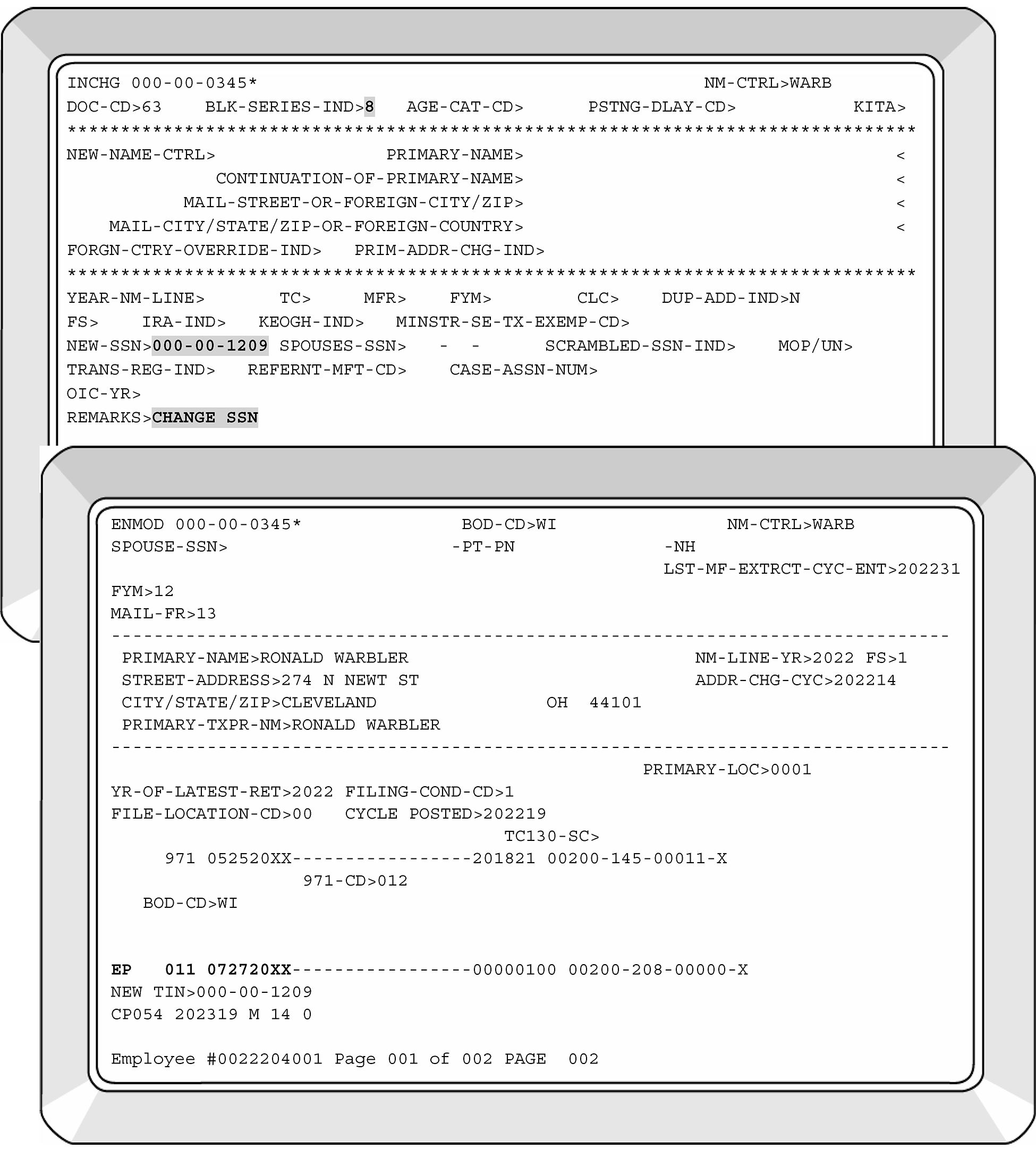
-
Due to the variety of TIN case receipts, the correction procedures may require a two step correction process. This may involve correcting the case with a TC 040 and then monitoring the account and entering the TIN change after the case posts to the invalid side.
-
For accounts containing a vestigial record and there is not a matching tax year module or vestigial record in the merge TO account, bring back each tax record utilizing CC IMFOLB to restore the tax module BEFORE initiating the merge. It normally takes 3 to 4 cycles for the module to come out of retention therefore use of a Posting Delay Code (PDC) 3 should be initiated on the merge.
Note:
CC IMFOL definer code B will restore MFT 30 recoverable retention tax modules (dropped from 1994 to present) back to the active Master File. Recoverable Retention Register (RRR) tax modules are listed on the Index Screen. Refer to IRM 2.3.51.4, Restoring RRR Tax Modules to Master File, for additional information.
-
If the ITIN Name Control matches the SSA Name Controls and the ITIN shows as assigned on the ITIN Real Time System (RTS), complete the merge by inputting a TC 011 using the ITIN to be revoked.
-
For merges involving ITIN's, see 3.13.5.83.11 , ITIN Merge Procedures (ITIN to SSN merges)
-
If multiple TINs are located for a taxpayer's account, the following is the hierarchy of TINs to be edited on the return:
-
Valid SSN
-
ITIN; or
-
IRSN
-
-
If multiple types of TINs are found for a taxpayer, research all numbers found for the posted TC 150.
-
Use the following table as a guideline for merging the taxpayer's TINs.
If... Then... a. Multiple TINs are located Research all the TINs for posted TC 150s
merge the later assigned TIN(s) into the earliest assigned TIN(s). (The earliest assigned TIN will be the considered the "primary " . All other accounts will merged to the "primary" ).b. Valid SSN is located for a case, Merge the ITIN and/or IRSN into the valid SSN. -
Prior to working an TIN-related Entity or Unpostable cases, the ECU must research
-
IDRS
-
ITIN Real Time System (RTS) data base for any pre-existing TIN(s) for the taxpayer.
-
-
Use the following table to determine which Name Control (N/C) to use:
If... Then... a. Merge is from an ITIN or an IRSN to an SSN Update the ITIN N/C to match SSN N/C b. Merge is from an IRSN to an ITIN Update the IRSN N/C to match the ITIN N/C -
When the merge of multiple ITIN's or an ITIN and a valid SSN is completed, send referral to the ITIN Unit to complete the required “Revoke” action on ITIN Real Time System (RTS).
-
Review the entity modules for valid and invalid cross-referenced TINs.
-
A TC 040 is necessary to correct ITIN related cases when the ITIN has been revoked, prior to the merge.
-
Use the ITIN Real Time System (RTS) to review the Status information. When "Rejected" and/or "Revoked ITIN" are displayed, correction of the taxpayer's account requires a TC 040 correction.
-
-
Since the TC 040 correction bypasses the NAP validation process, review the ITIN data base and the SSA information and ensure the taxpayer DOB, first and last name, and Name Controls match before correcting the case.
-
See IRM 3.13.5.127 for the required fields for completing a TC 040.
-
When completing a TIN change to a secondary taxpayer's account who files Married Taxpayer Filing Joint Return (FSC 2), a two-step correction process is required.
-
Complete the TIN correction under the primary taxpayer's account (generates a TC 017). See IRM 3.13.5.124.
-
Then complete the TIN correction under the secondary taxpayer's account (generates a TC 011).
-
-
The tax examiner is responsible for completing the required entity changes on the taxpayer's account. In order to change the tax account based on a taxpayer's request, the taxpayer may provide:
See IRM 3.13.5.131.3 for additional on completing BMF name changes. See Document 7071-A, BMF Name Control Job Aid as well.-
legal documentation that supports a name change, and/or;
-
reasonable explanation why their name and/or TIN does not match with the VALID name control or the name controls provided by the Social Security Administration (SSA) or IRS records.
-
-
Entity also processes requests for name changes from other IRS areas. In those cases, make the name change as requested.
-
The tax examiner will perform all needed research, change the entity as appropriate and route if necessary. Research is necessary using the appropriate command codes even though the taxpayer provides documentation to substantiate their name change/discrepancy and/or provides a different TIN.
-
If a taxpayer only provides one name when filing and CC TMSSN is used, enter the one name provided in both the first and last name fields. Once the IRSN is assigned, remove the taxpayer's erroneous first name by entering an hyphen in the first name field on CC INCHG.
-
If a name change/correction is needed and there is no first name provided by the taxpayer, enter a hyphen in the first name field on CC INCHG and use the solo name as the taxpayer's last name.
-
The absence of bracket(s) to indicate the PRIMARY taxpayer's last name will create unnecessary Unpostable conditions. See IRM 3.13.5.120.10 to correctly enter the name line information when the taxpayer files married filing jointly.
-
When entering an IMF taxpayer's name line information, ensure it is contained within the FIRST LINE ONLY.
If the taxpayer provides a first, middle and last name and the name does not need to be reduced to fit within the 35 character/space length, it is acceptable to enter an initial for their middle name. Example: Allison Marie Fox then enter Allison M. Fox. See IRM 3.13.5.120.5 for additional information if the taxpayer's name line will not fit within the allotted spaces. -
Input the appropriate year for the name change by entering the name using the YEAR-NM-LINE field. The year input will directly correlate to when the name line change is required.
-
Input the appropriate filing status beside the FS field. The filing status will directly correlate to the taxpayer's filing status for the required name line year. See Figure 3.13.5–22.
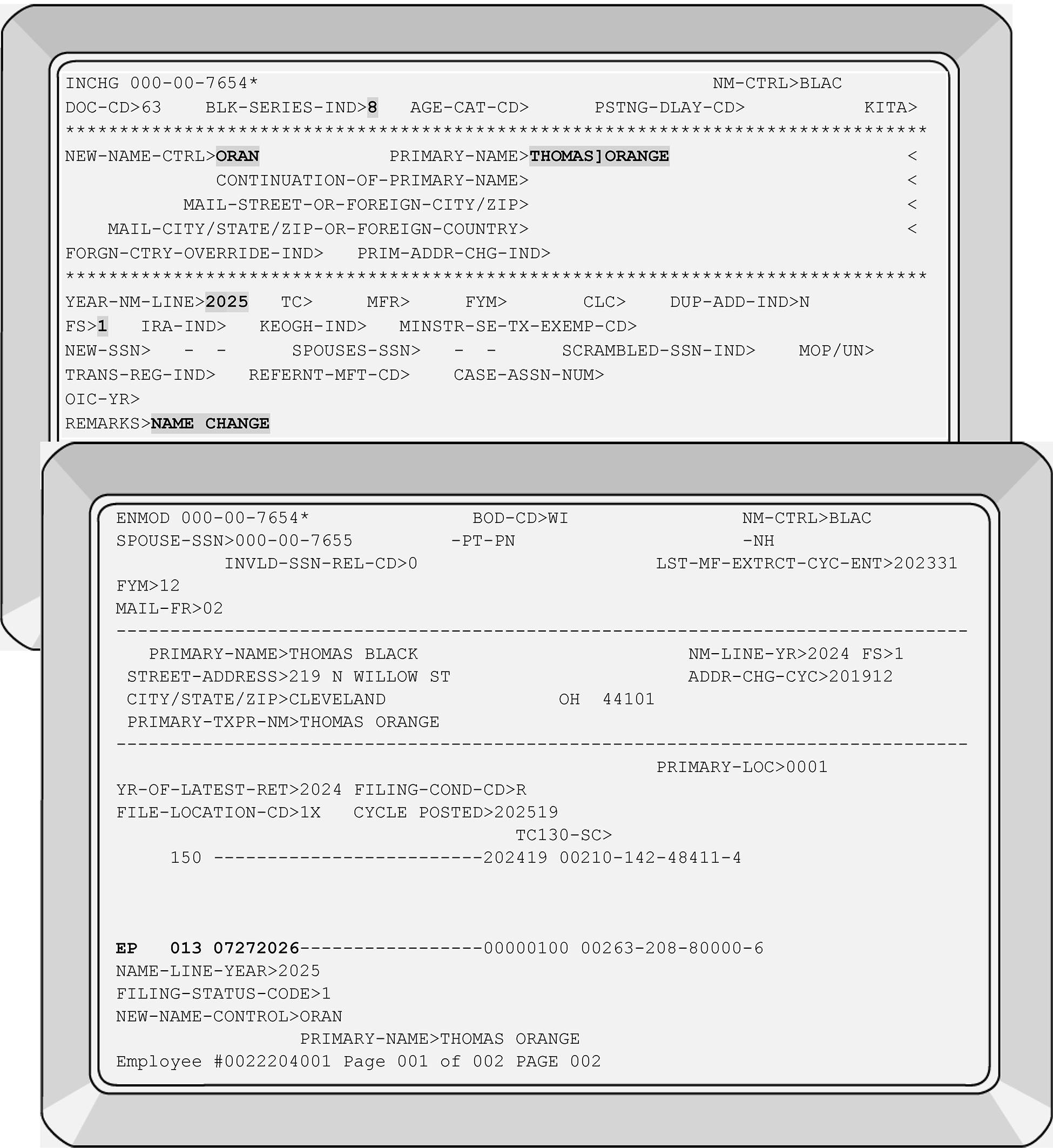
-
The Command Codes IRCHG and INCHG each have a different function. CC IRCHG (TC 016) validates the account and moves the invalid segment to the valid segment (after the quarterly merge). CC INCHG (TC 013) moves/merges the invalid segment to the valid segment (after the quarterly merge) if there is a valid name control match.
-
The following table shows what actions to complete when the taxpayer account is INVALID on IMF:
If taxpayer ... And... Then... a. Provides legal documentation The name control does NOT Match any of the valid name controls on IDRS Correct name using CC IRCHG (TC 016) b. Provides legal documentation The name control MATCHES any of the valid names on IDRS Correct name using CC INCHG (TC 013) c. Provides reasonable explanation WITHOUT document Name control MATCHES any of the valid name controls on IDRS Correct the name using CC INCHG (TC 013)
(account will move to valid side)d. Responses they went to SSA and updated their account Name control MATCHES the New SSA NC on CC INOLE No action needed e. Does NOT provide a reasonable explanation for name No action needed
(account remains invalid) -
The following table shows what actions to complete when the taxpayer account is VALID on IMF:
If taxpayer... And... Then... a. Provides legal documentation Name control does NOT match any of the valid name controls on IDRS Correct the name using TC 040 b. Provides legal documentation Name control MATCHES any of the valid names on IDRS Correct name using CC INCHG c. Provides reasonable explanation WITHOUT legal documentation Name control does NOT match any of the valid name controls on IDRS Do not update the name
(This prevents the account from moving to invalid side)d. Provides reasonable explanation WITHOUT legal documentation Name control MATCHES any of the valid name controls on IDRS Correct the name using CC INCHG e. Responds they went to SSA and updated their account Name control matches the New SSA NC on CC INOLE No action needed f. Does NOT provide a reasonable explanation for name No action needed
-
TC 013 generates when changes/corrections are made to taxpayer's name line(s) using IAT or CC INCHG. An IMF name change is completed for the following situations:
-
Correction of an incorrect name control
-
Correct a name line previously entered incorrectly
-
Correct spelling errors
-
Typographical errors
-
Addition of a second surname
-
Changes needed due to marriage or other legal action(s)
-
Removal of spouse's name
-
Addition of spouse's name
-
Add/revise information to the CONTINUATION OF PRIMARY NAME line
-
Add "DECD" information if the taxpayer is deceased. See IRM 3.13.5.120.9 for information on how to change a taxpayer's name if they were reported deceased.
Exception:
As of May 2012, ITIN name control procedures ONLY must be modified for CC INCHG.
When any of the taxpayer's first four characters of their last name/surname contains a hyphen, apostrophe, space, etc., disregard and only enter the first four alpha characters.
Example ITIN only: Thomas El-Oak's name control is entered as ELOA.
Reminder:
If there are changes needed to the first name line or to a foreign address, both the name line AND the foreign Street Address MUST ALWAYS BE ENTERED as part of the transaction input. The second name line is used for foreign address. See Figures 3.13.5-7 & 3.13.5-7a in IRM 3.13.5.64 for assistance in inputting the change to ENMOD.
-
-
If multiple name changes are required, do NOT input multiple TC 013 without monitoring the account. Once the first name change transaction posts, input the subsequent TC 013 corrections to the account.
Inputting multiple TC 013 corrections without monitoring the account could create a resequencing situation that will prevent the correction/posting of taxpayer accounts to IMF. -
Research to verify the taxpayer's name, TIN and return data with the information the taxpayer submitted. When correcting/changing the taxpayer(s) name:
-
Input sufficient information in the "REMARKS" field, to explain why the change was made (e.g., misspelling, add second surname, etc.,).
-
If necessary, use the Name Control Job Aid for Individual Master File (IMF) Taxpayers Document 7071.
-
-
Completing Name Line changes, if needed, for multiple years (e.g., 2015, 2016) for the same account, can be entered the same cycle.
-
When adding information or changing the In Care Of information from the Continuation line using IAT and IDRS, use the % symbol and add the new information. Enter remarks and input.
-
When removing the "In Care Of" information in the Continuation line using IAT, delete all the information including the "%" symbol, enter remarks and input to complete removal of the information.
-
When removing information from the CONTINUATION OF PRIMARY NAME line using IDRS, enter the original name on the first name line, do not input any data in the CONTINUATION OF PRIMARY NAME. Add the other required elements to complete the name change before transmitting the information.
-
Refer to the “If, And, Then” chart below for guidance on Adding Information to Continuation Line
If... And... Then... a. Address changes: 8822, Lockbox, etc. Document includes an "In care of" Use the % symbol and add the new information. Enter remarks and input. See IRM 3.13.5.61. b. Foreign address change Document includes an "In care of" Add in care of information with the foreign street address if space allows, otherwise do not add the “In care of” information. c. Form 56 with foreign address Documents includes a fiduciary Do not use the % symbol, enter fiduciary name and title (if space allows) with the foreign street address. See IRM 3.13.5.32(9)i d. Form 56 with 8822 with a domestic address Documents includes a fiduciary Enter fiduciary name and title in the continuation line only. Do not input the % symbol. e. IDRS has “C/O” or :%” The document does not include “C/O” or :%” Delete the “C/O” or :%” from IDRS.
-
Name changes are completed on the current year unless the request is required for a specific prior year. This is most often required when processing CP 54s and Form 56s.
-
If it is necessary to correct the name line more than once, ensure you follow the cautionary notes.
Caution:
If the multiple name changes are required, do NOT input multiple TC 013 without monitoring the account. Once the first name change transaction posts, input the subsequent TC 013 corrections to the account.
Inputting multiple TC 013 corrections without monitoring the account could create a resequencing situation that will prevent the correction/posting of taxpayer accounts to IMF. -
See the following for examples for completion and updates of a taxpayer's name line:
If Name Change is necessary... Then... a. For a prior year (example_2015) Complete the name change using tax period 2015 b. For multiple tax years (example_2014 through 2016) Complete the name change for each tax year(s) listed
Follow the procedures in the cautionary note in paragraph (2).c. For a current year due to taxpayer correspondence Complete the name change using the current calendar year
-
Generally Spanish taxpayers use two surnames. In some instances there are multiple surnames.
-
These names are used strictly examples for determining the name control for taxpayer's with Spanish surnames.
Female taxpayer First Surname Second Surname Third Surname Teresa Garcia Ramirez Mary Cruz Garcia Lopez Sylvia de la Rosa Arellano Debbie Rodriguez-Munez Jones Arguello Reminder:
Whenever a taxpayer's valid name control per SSA or through ITIN Name Control assignment is not the first surname (per these guideline). Instead use the Valid Name Controls already established as shown on CC INOLE including any NEW SSA name controls or the pending Valid Name Control awaiting the DM-1 quarterly merge.
Never remove or correct a valid name control with an invalid name control due to taxpayer insisting or requesting a name change -
Spanish surnames can also be displayed as the following:
Taxpayer First Surname Second Surname Third Surname Eli Arroy *Y
* Y means andLopez Felipe **De laTorre
** De la means of theValiente
-
Before shortening taxpayer name(s), research must be conducted (i.e., CC INOLE, RTVUE, IMFOL, NAMES, NAMEI) under both segments of the Master File.
-
If the primary and/or secondary name(s) exceed the 35 character/space limit, use the table to correctly reduce the length of the taxpayer's name:
How to reduce taxpayer(s) name (when needed) 1. Substitute the appropriate initial for the secondary taxpayer's middle name 2. Delete middle initial of secondary taxpayer 3. Substitute the appropriate initial for the primary taxpayer's middle name 4. Delete middle initial of primary taxpayer 5. Substitute the appropriate initial for the secondary taxpayer's first name 6. Substitute the appropriate initial for the primary taxpayer's first name 7. Substitute the appropriate initials for both the primary and secondary taxpayer's' first name(s) if their last/surname name(s) total characters exceed the 35 characters/spaces limit 8. Abbreviate the secondary taxpayer's surname.
Abbreviate the surname by removing the vowels (begin with the vowels at the end of the secondary taxpayer's surname first).
Example: OSullivan becomes OSullivn
or OSullvn
or OSullv
or OSull (if necessary)*8. Abbreviate the primary taxpayer's surname as the last step.
Abbreviate the surname by removing the vowels (begin with the vowels in the end of the primary taxpayer's surname).
Example: Sorrentino becomes Sorrentin
or Sorrentn (if necessary) -
When taxpayers file jointly and a name reduction is necessary, it is important to retain the first four alpha characters of the secondary taxpayer's surname. If the taxpayer's surname is less than four alpha characters, use the instructions in Document 7071, Name Control Job Aid for Individual Master File (IMF) Taxpayers.
-
When necessary the business name line must be abbreviated to fit the 70 character limitations.
-
Additional information on acceptable business name abbreviations can be found in IRM 3.13.2, BMF Account Numbers. See the following table for additional information:
NAME/or PHRASE ABBREVIATION Trust TR Under the will of, U/W, under will UW Under agreement, U/A, Under agreement with UA Dated Jan. 16, 2016 01162016 (do not enter date/dated or the alpha month). Irrevocable Trust IRRV TR Revocable Trust RVOC TR Trustee TTEE For the Benefit of, F/B/O, F B O FBO Family Trust FAM TR Marital Trust MRTL TR Funeral Trust FNER TR Inter-Vivos INTRVS Non-exempt Charitable Trust NECT Revocable RVOC Testamentary TEST Under Trust Agreement UTA Voluntary Employee Benefit Association VEBA Insurance INS Charitable Remainder Unitrust CRUT Charitable Remainder Annuity Trust CRAT
-
If a taxpayer signs their name on a document, return, CP Notice, etc., without providing sufficient documentation (marriage certificate, divorce decree, drivers license, etc.,) or an adequate explanation of the name discrepancy (invalid at Master File), complete the name change using the If/And/Then chart below:
If... And... Then... 1. The taxpayer DOES NOT provide sufficient documentation to substantiate a name change Their Name Control DOES NOT match the IRS VALID N/C(s), the NEW SSA N/C or the SSA N/C(s) (as shown on CCs INOLES/INOLEX) Do not update their name.
No action is needed.2. The Name Control discrepancy is due to an IRS/taxpayer error, and the taxpayer provides a VALID N/C Name Control matches any of the name controls on IDRS Correct their name information using CC INCHG Exception:
Beginning May 2012, ITIN name control procedures ONLY must be modified for CC INCHG.
When any of the taxpayer's first four characters of their last name/surname contains a hyphen, apostrophe, space, etc., disregard and only enter the first four alpha characters.
Example ITIN only: Thomas El-Oak's name control is entered as ELOA. -
When the Entity Control Unit (ECU) is contacted via phone by a taxpayer or their legal representative for a name change, use the information provided above to determine whether a name change is required.
-
If a taxpayer replies to a request for additional information (CP 54, Correspondex letter, etc.,), corresponds, or calls requesting a name change, use the following information:
If... And... Then... 1. The account is INVALID N/Cs DO NOT match any of the VALID N/Cs displayed on CC INOLE
AND a name change is requiredCorrect the taxpayer's name and/or Name Control using CCs INCHG (TC 013) or IRCHG (TC 016) as appropriate. 2. Taxpayer went to SSA and updated their account with their new N/C CC INOLE displays "NEW SSA N/C" No action needed 3. Signs using their former/married/new name Name supplied matches any of the VALID name controls displayed on CC INOLES Correct the taxpayer's name and Name Control using CC INCHG (TC 013) 4. Signs using their former/married/new name and the account is on the VALID side The name control DOES NOT match any of the name controls on IDRS Complete the name change using TC 040.
Monitor the account until the name change posts, and input a TC 016 to validate the name control.Caution:
If the multiple name changes are required, do NOT input multiple TC 013 without monitoring the account. Once the first name change transaction posts, input the subsequent TC 013 corrections to the account.
Inputting multiple TC 013 corrections without monitoring the account to determine if the first or second merge TC has posted could create a resequencing situation that will prevent the correction/posting of taxpayer accounts to IMF.
-
If taxpayer correspondence or notice is the initial notification of a taxpayer’s death, use CC INOLE to research for a Date of Death (DOD). If the taxpayer is deceased complete the following:
-
Change the name line to reflect the word DECD after the taxpayer's name.
-
Use the DOD from CC INOLE for the DOD year.
-
-
If no DOD is present on CC INOLE, review the correspondence or notice for any legal documentation to substantiate the taxpayer's DOD, use the legal documentation's DOD and use that date when inputting the name change.
-
If no DOD is present on the CC INOLE or there is no legal documentation attached, assume the decedent died during the current tax period and use the current tax period to input the taxpayer name change.
-
Deceased taxpayer accounts will contain one or more of the following:
-
DECD in the name line
-
Date of Death on CC INOLES
-
TC 540 on CC TXMOD or CC IMFOLT for the year of death
-
Mail File Requirement (MFR) 08 on CC ENMOD
-
-
Use the following table to determine whether to input DECD to a taxpayer’s account when notified of taxpayer’s death through correspondence or IRS-generated letters or notices:
If... And... Then... a. The death is reported by the taxpayer’s spouse Change the name line to include the word DECD within the taxpayer's name b. The death is reported by the taxpayer’s representative CC INOLE displays a DOD for the deceased taxpayer Change the name line to include the word DECD within the taxpayer's name c. The death is reported by the taxpayer’s representative Documentation is provided Change the name line to include the word DECD within the taxpayer's name If... And... Then... a. Other than the taxpayer’s spouse reports the taxpayer’s death CC INOLE displays a DOD Change the name line to include the word DECD within the taxpayer's name. b. Other than the taxpayer’s spouse reports the taxpayer’s death No DOD present on CC INOLE. Do not update the taxpayer’s entity. -
To input name changes due to the death of a taxpayer or their spouse, use the following table:
If Taxpayer (TP) Files... And... Sample Input Information follows... 1. Other than a Joint Return John A]Doe]DECD 2. Other than a Joint Return and taxpayer has a suffix John A]Doe]Jr DECD 3. Joint Return with SAME Last Names Primary TP is Deceased John A DECD & Jane B]Doe 4. Joint Return with SAME Last Names Secondary TP is Deceased John A & Jane B DECD]Doe 5. Joint Return with Different Last Names Primary TP is Deceased John A]Doe]DECD & Jane B Smith 6. Joint Return with Different Last Names Secondary TP is Deceased John A]Doe]& Jane B Smith DECD 7. Joint Return with SAME Last Names BOTH taxpayers are deceased John A DECD & Jane B DECD]Doe 8. Joint Return with Different Last Names BOTH taxpayers are deceased John A]Doe]DECD & Jane B Smith DECD
-
When entering a name change to update/correct a joint return filer, ensure the joint names are entered correctly.
Note:
If joint filers require an IRS notice, two notices are issued. (One to the primary taxpayer and another to the secondary taxpayer).
Reminder:
If there are changes needed to the first name line or to a foreign address, both the name line AND the foreign Street Address MUST ALWAYS BE ENTERED as part of the transaction input. The second name line is used for foreign address. See Figures 3.13.5-7 & 3.13.5-7a in IRM 3.13.5.64 for assistance in inputting the change to ENMOD.
-
The correct method to input name changes are shown below: The "bold print" indicates the primary taxpayer's name control.
Tax Return Input format for joint filers Notice printout at MF a. John Doe
Mary DoeJohn & Mary]Doe John Doe
Mary Doeb. John Doe
Mary SmithJohn]Doe]& Mary Smith John Doe
Mary Smithc. John Doe
Mary Smith-DoeJohn]Doe]& Mary Smith-Doe John Doe
Mary Smith-Doed. John D Doe
Mary Ann Smith-DoeJohn D]Doe]& Mary Ann Smith-Doe John D Doe
Mary Ann Smith-Doee. John D Doe III
MaryAnn L SmithJohn D]Doe]III & MaryAnn L Smith John D Doe III
MaryAnn L Smithf. John Doe Jr
Mary DoeJohn Jr & Mary]Doe John Doe Jr
Mary Doe -
The entering of TWO brackets around the PRIMARY taxpayer's last name is required when the SECONDARY taxpayer's last name is different than the primary taxpayer's last name (as in examples b. — e. above). This will reduce unnecessary Unpostable conditions.
-
The examples above will display on CC ENMOD as follows:
-
John & Mary Doe
-
John Doe & Mary Smith
-
John Doe & Mary Smith-Doe
-
John D Doe & Mary Ann Smith-Doe
-
John D Doe III & MaryAnn L Smith
-
John Doe Jr & Mary Doe
IMPORTANT POINTS TO NOTE WHEN ENTERING a Name Change or Name Correction Although the Form 1040 has two separate lines available for use when taxpayers file jointly, Individual Master File (IMF) contains only one "Primary Name Line." IMF allots 35 characters/spaces for both taxpayer(s) name(s).
DO NOT use the second line as a continuation of the taxpayer's name line.Do not shorten the taxpayer's name. You must enter the entire name line when the taxpayer provided name fits within the allotted 35 spaces. IMPORTANT: THE BRACKET "]" IS INTERPRETED AS A SPACE. THEREFORE, DO NOT INPUT ADDITIONAL SPACES IMMEDIATELY BEFORE OR AFTER THE BRACKET WHEN ENTERING TAXPAYER NAMES. The brackets indicate the information after or between the brackets is the controlling surname. The ampersand indicates a break in names (for joint filers) and the information following is the secondary taxpayer's full name. -
-
If the primary and/or secondary name(s) exceed 35 characters/spaces, see IRM 3.13.5.120.5 for information on reducing the length of the taxpayer's name(s).
-
Individual Master File (IMF) completes a special process to establish the secondary taxpayer on Master File for all Married Filing-Joint accounts. With this automated process, IMF separates the secondary taxpayer from the primary taxpayer account and systemically establishes a separate account on Master File.
-
You can identify the accounts established by IMF using CC ENMOD. The establishment of the taxpayer displays with the following unique DLN:
-
TC 000 displays with a DLN XX263-001-88888-X
-
-
IMF will not establish secondary taxpayer accounts for the following conditions:
-
Secondary SSN (S-SSN) is invalid or not available
-
DECD present in Secondary Name Line
-
Primary SSN is the same as the S-SSN
-
No Spouse Name in the name line with FSC 2 or 7
-
-
These IMF-created accounts may involve subsequent updates to the taxpayer's accounts such as:
All of these subsequent transaction codes will also contain the unique DLN of XX263-001-88888-X.-
TC 013
-
TC 014
-
TC 971 with Action Code 050 (changes the Business Operating Division (BOD))
-
-
If this unique DLN is present, see IRM 3.13.5.18, IMF Automated Establishment of Secondary Taxpayers and Correction Procedures.
-
Use the following in determining whether a name change is necessary:
If taxpayer requests... And... Then... a. Name Change or Name Correction It is received on IRS generated notices/correspondence AND it matches their VALID name controls OR it is received from taxpayer-generated correspondence post it notes, letterhead, USPS mail, foreign whitemail, etc., AND it matches their VALID name controls Use CC INCHG to complete the name change Reminder:
If there are changes needed to the first name line or to a foreign address, both the name line AND the foreign Street Address MUST ALWAYS BE ENTERED as part of the transaction input. The second name line is used for foreign address. See Figures 3.13.5-7 & 3.13.5-7a in IRM 3.13.5.64 for assistance in inputting the change to ENMOD.
-
If multiple name changes are required, do NOT input multiple TC 013 without monitoring the account. Once the first name change transaction posts, input the subsequent TC 013 corrections to the account. Inputting multiple TC 013 corrections without monitoring the account could create a resequencing situation that will prevent the correction/posting of taxpayer accounts to IMF.
-
If the taxpayer requests a name change/correction on IRS-generated or taxpayer-supplied correspondence and the name requested DOES NOT match their VALID name controls, use the following instructions:
-
Notate the taxpayer's VALID and INVALID (if applicable) name controls as shown on CC INOLE.
-
If the taxpayer has filed as a secondary taxpayer, research using their spouse's TIN.
If... And... Then... a. The taxpayer-supplied documentation DOES NOT contain enough information to warrant a name change The taxpayer was replying to IRS correspondence, Correspond using a 0685C letter. b. The taxpayer-supplied documentation DOES NOT contain enough information to warrant a name change And the correspondence was taxpayer-initiated, Correspond to the taxpayer and inform them that changing their name will cause a validity mismatch and could cause future filing problems.
Request they send supporting documentation to warrant/justify their name change. Correspond using a 0685C letter.
-
-
If the taxpayer supplied original documents, return it to the taxpayer using the address provided (if available) or their LKA.
-
If there is not enough information to warrant the name change or correspond for additional information, retain the existing name line for the taxpayer and destroy the documentation (if copies) as classified waste.
-
CLCs are assigned based on their address or the location of their duly-authorized representative.
-
If a taxpayer moves, CSRs or Tax Examiners (TEs) must complete the address change. If a taxpayer's account is in the following balance due status do not complete a CLC transfer :
If Balance Due and in Status... Then... 48, 6X, 71 or 72
a. Complete address change
b. Refer the case to Collection Operation at your campus to determine whether to change the taxpayer's CLC.
c. Indicate on the Form 4227 routing slip the reason for referring the case.
d. Include the requestor's name, title (if applicable) and phone number (if present) in the REMARKS field of the transaction whether using IAT or IDRS.26 a. Complete address change only
b. Do not change the CLC -
The status codes are listed within CC SUMRY and are listed under the STS field. This information is listed with the SC-STS field.
-
See IRM 5.19.1, Balance Due, if necessary.
-
TC 012 will reopen an account on the Master File
-
Do not input TC 012 when the following conditions exist:
-
a Date of Death is present on INOLES and,
-
a Date of Death is present on IMFOLE and,
-
the attempted transaction or unpostable correction is to be applied to a module for a period that began after the date of death (e.g., for a calendar-year taxpayer, when the year of death is 2016, do not take action on a 201712 or later module).
-
If the account has a scrambled TIN indicator, see IRM 3.13.5.26, for routing instructions to Accounts Management.
-
-
If a non-Entity correction or an Unpostable Code correction is necessary for a module equal to or prior to the year of death, reopen the account with a TC 012 and make the correction(s).
Entity Corrections a. adding DECD to the PRIMARY-NAME line taxpayer b. adding a name and/or title (example: PER REP) to the CONT-OF-PRIM-NM line c. changing the name and/or title of the CONT-OF-PRIM-NM lined. d. changing/correcting the taxpayer address e. correcting and/or removing information from the PRIMARY-NAME, CONT-OF-PRIM-NM, or address portions -
If a non-Entity correction or an Unpostable Code correction is necessary for a module on an account where
-
there is not a Date of Death on INOLES or IMFOLE and
-
the account does not need to remain open,
-
reclose the account by inputting a TC 540 (CC REQ77/FRM77) with a PDC of 6.
Note:
This will change the taxpayer’s account back to Mail Filing Requirement (MFR) 08. See IRM 2.4.19, Command Codes REQ77, FRM77 and FRM7A, for additional information.
Caution:
If there is a NAP-generated TC 540 present on any module, any subsequently-input TC 540 will not post. The DLN format of a NAP-generated TC 540 will be 28277-111-11111-Y. When a NAP-generated TC 540 is present for a taxpayer who is not deceased, they will need to contact the Social Security Information to correct their record. The correction will be transmitted to the IRS by SSA and the NAP will post a reversing TC 542 to the account.
-
-
If an Entity addition, correction, or change to an account is required, do not input TC 012 as a reopening is not required to post the changes.
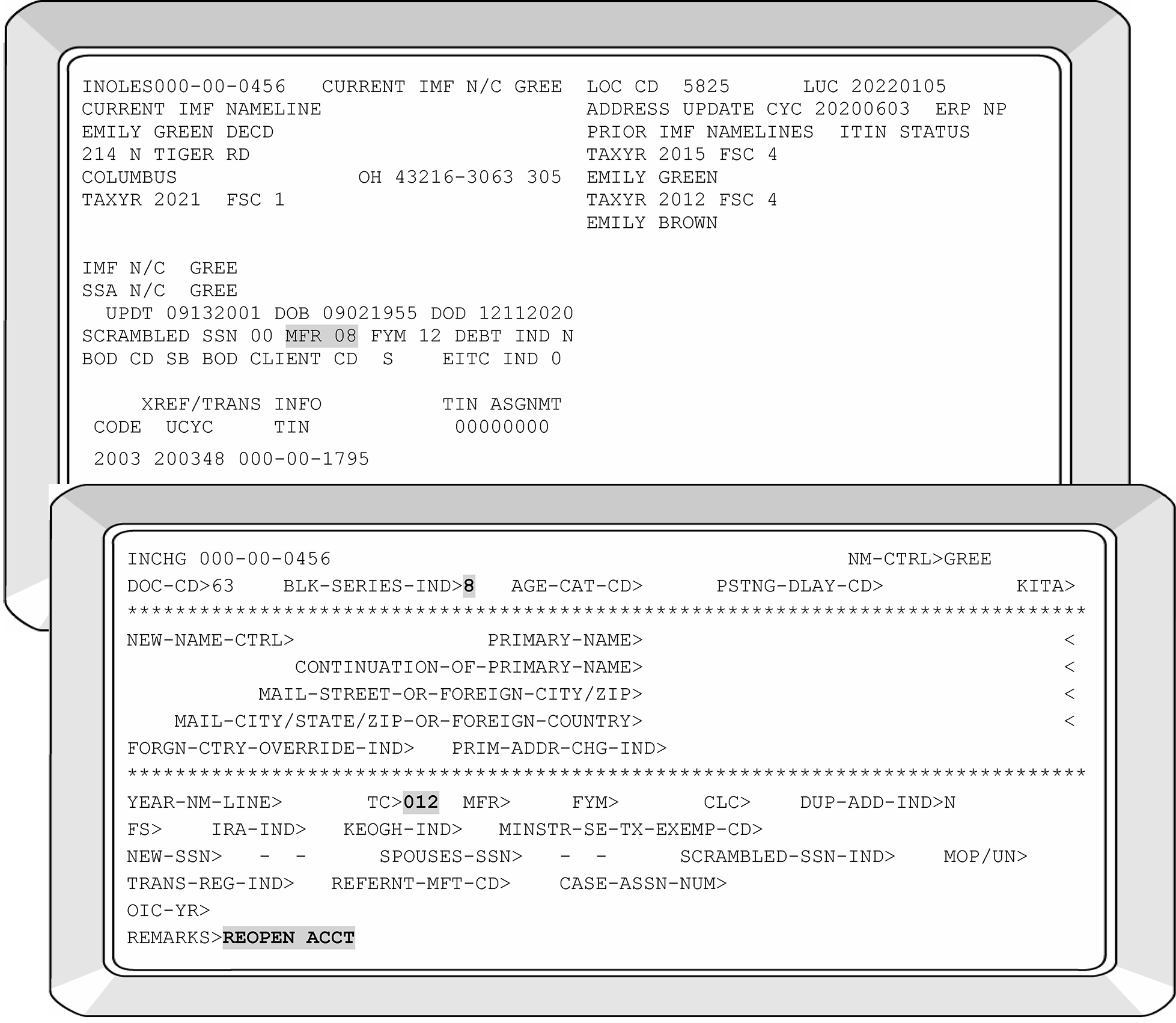
-
TC 016 generates when changes are made to IMF Entity section of Master File and at least one element of data is present.
Changes Needed Purpose Valid for the following IMF Filing Requirement (MFR) Code This controls the specific type of tax package mailed to the taxpayer before the filing period Input Codes 01 through 15 Filing Status Codes (FSCs) Identifies the taxpayer's marital and family situation When taxpayer files
Form 1040
Form 1040NR, etc.
When FSC is entered, the Year's Digits must be shown.
See IRM 3.13.5.109 for detailed information if neededFiscal Year Month (FYM) Ending Changes the month in which the taxpayer’s year ends Scrambled TIN Indicator Identifies a taxpayer who has been assigned an IRSN due to two taxpayers being issued the same SSN CCs IMFOLE, INOLES, or ENMOD displays the following codes scrambled codes: 01, 04, 10, 12, 13, 20, 21, 22, 23 or 24 .
Use 9 to remove the indicator. -
Figure 24 below depicts a change to a Fiscal Year filer.
-
Miscellaneous items not listed above may be corrected using TC 016. See Document 6209 , IRS Processing Codes and Information, for additional information.
Changes allowed with TC 016 include: Fiscal Month Filing Status and Year's Digits Mail File Code PDT Indicator (no longer available ) Scrambled SSN Indicator IRA and/or KEOGH Indicator and Year Digits Killed In Terrorist Action (KITA) Indicator Minister Indicator Justification Indicator/IRS Valid Name Control Offer In Compromise (OIC) Acceptance Year PIN
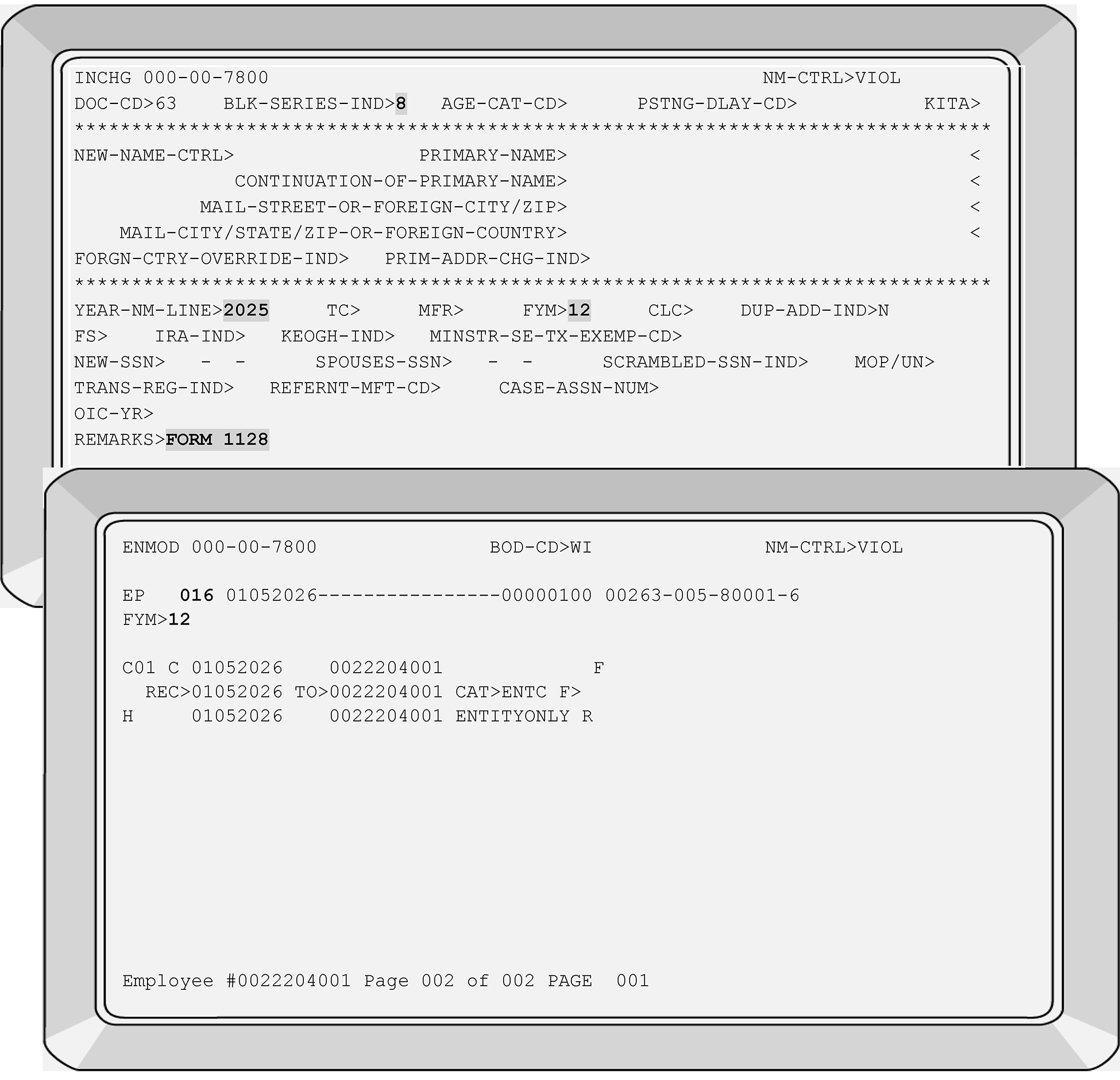
-
A TC 017 generates when IMF adds a spouse to the primary account or whenever a spouses’ account is revised, or deleted.
-
To delete the spouses' TIN, enter 000–00–0001 in the "SPOUSES-SSN" field.
-
When completing a TIN change of a secondary taxpayer's TIN who files Married Taxpayer Filing Joint Return (FSC 2), a two-step correction process is required
-
The first step is to correct the secondary taxpayer's TIN under primary taxpayer's account (generates a TC 017).
-
The second step is to change the spouses' TIN under their separate IMF account (generates a TC 011). See IRM 3.13.5.118.
-
-
To change/update the spouses' TIN:
See Figure 3.13.5–25.-
Enter spouse’s new TIN in the "SPOUSES-SSN" field.
-
Enter the YEAR-NM-LINE information.
-
Enter the reason for the change in the REMARKS field.
-
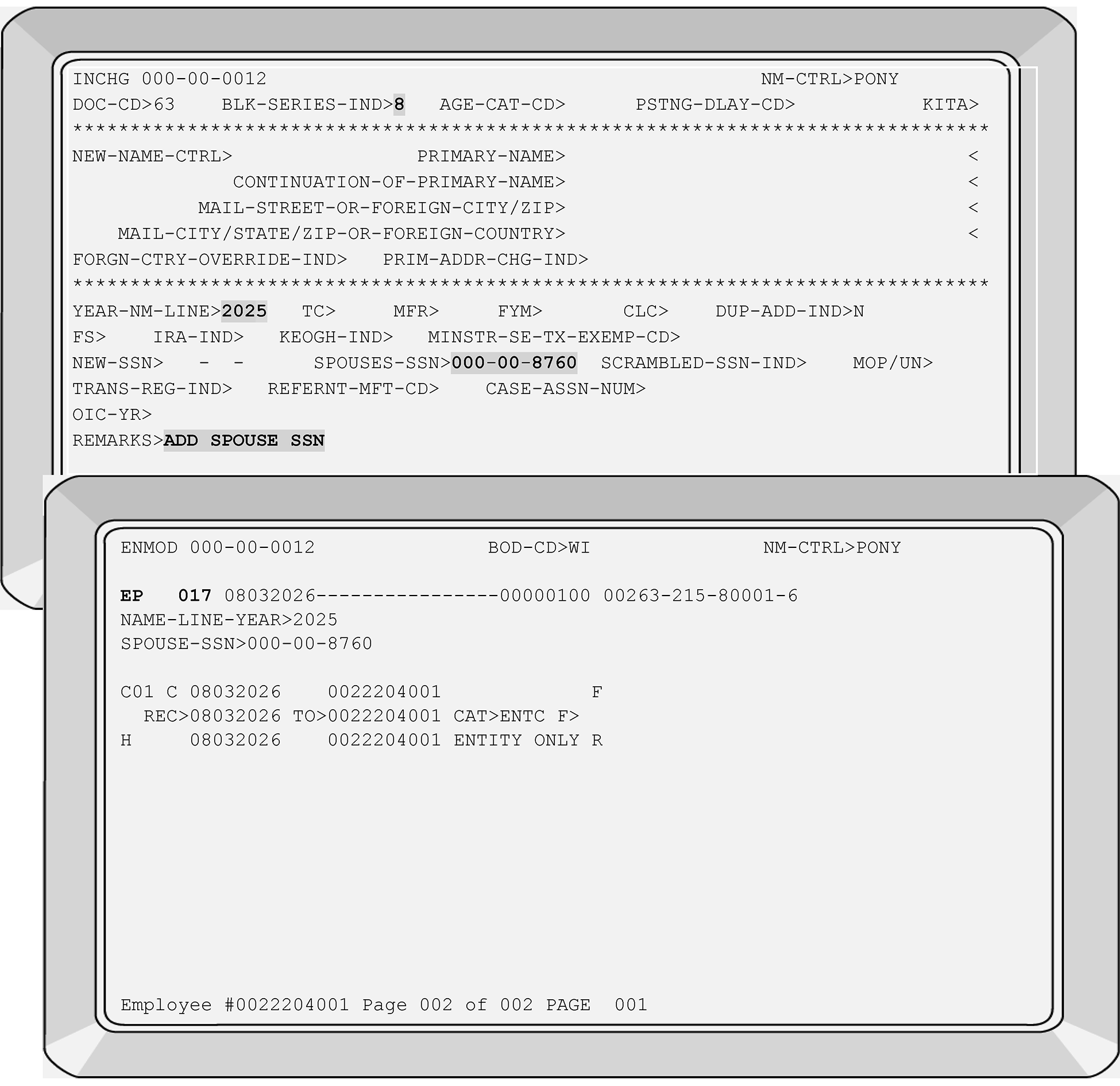
-
If the secondary taxpayer account was made INVALID due to an IRS error, use the following to correct the secondary account.
-
Use the PRIMARY taxpayer's SSN with CC ENMOD, then overlay with CC ENREQR to bring up CC IRCHG: Enter the following items:
-
YEAR-NM-LINE must be input when entering the spouses' TIN.
Input the current year if no year is requested
Input the year(s) requested by insolvency -
Input the incorrect S-SSN Number under the Spouse SSN field within the primary taxpayer's account.
-
A justification indicator of "2" must be entered. See IRM 3.13.5.113 for additional information.
-
Enter your reason for the change in the REMARKS field.
-
Transmit
-
-
Using the primary taxpayer's SSN with CC ENMOD, then overlay with CC ENREQ to bring up CC INCHG.
-
Input the Correct S-SSN and USE a three-week posting delay code.
-
YEAR-NM-LINE must be input when entering the spouses' TIN
-
Enter your reason for the change in the REMARKS field, then transmit.
-
-
TC 020 will close or delete a record from the Master File.
-
It will change the Mail Filing Requirement (MFR) to an "8" if tax modules are present in the account.
-
When an entity without tax modules is deleted, the contents are physically removed from IMF.
-
A TIN change cannot be made by deleting a record from the IMF and then adding the record back under a different TIN. Instead, complete TIN change procedures.
-
Extreme care must be taken before deleting a taxpayer's record. If any questions exist regarding this action, see your unit manager or lead technician.
-
At an IRSC's option, managerial approval is required on TC 020.
-
To remove an account, enter TC 020 and enter your reason for removing the account in the remarks field. See Figure 3.13.5–26 for additional information.
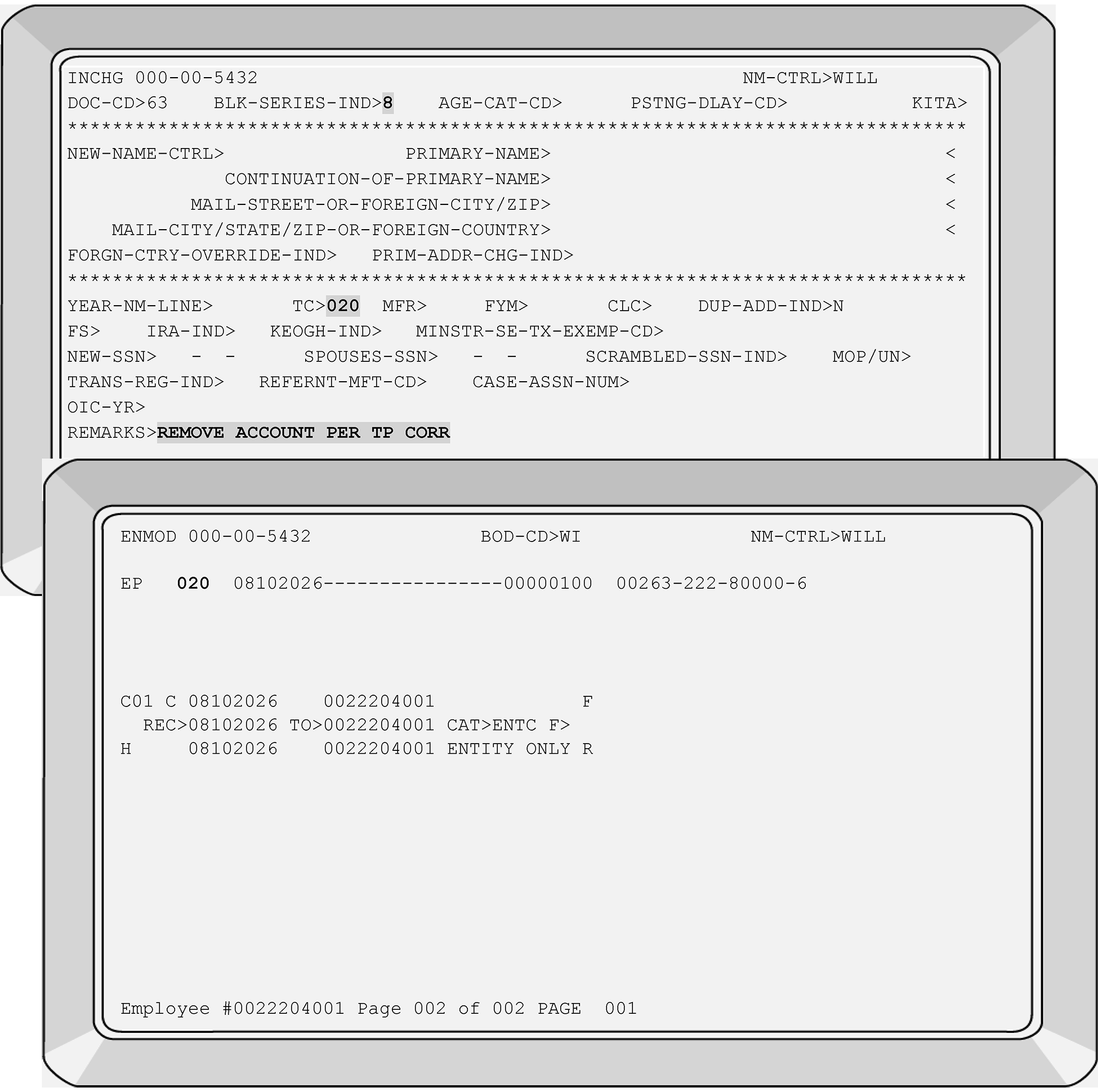
-
TC 040 is used to change a TIN or name of an account that resides on the valid segment of IMF.
-
This transaction does not go through DM–1 validation processing.
-
The following Information may be needed to complete a TC 040 is listed below.
See Figure 3.13.5–27 for additional information.-
Enter name control
-
Enter all name lines
-
Enter year name line
-
Enter the TC 040 in the TC field(s)
-
Enter filing status code
-
Enter your reason for the change in the REMARKS field.
-
-
Due to the different Name Controls displaying, the account may post to the invalid side of IMF when the TC 040 posts. Monitor the case until the name change posts and input a TC 016 to validate the name control.
-
The following is an example of TC 040 completed to change a TIN that resides on the valid segment of IMF. See Figure 3.13.5–28 for additional information.
-
Enter the TC 040 directly beside the TC field.
-
Enter the new SSN directly beside the NEW-SSN field.
-
Enter your reason for the change in the REMARKS field. Directly beside the REMARKS field is a representation of typical remarks. In this example the remarks entered are "NSD CORRECT SSN."
-
-
Management approval may be required before entering this types of taxpayer actions.
-
See IRM 3.13.5.18, if the existing TC 000, TC 013, TC 014, or TC 971 with Action Code 050; for the S-SSN displays with a DLN of XX263-001-88888-X. This type of case requires correction with a TC 040 or TC 041 due to the establishment of the IMF Secondary taxpayer's name.
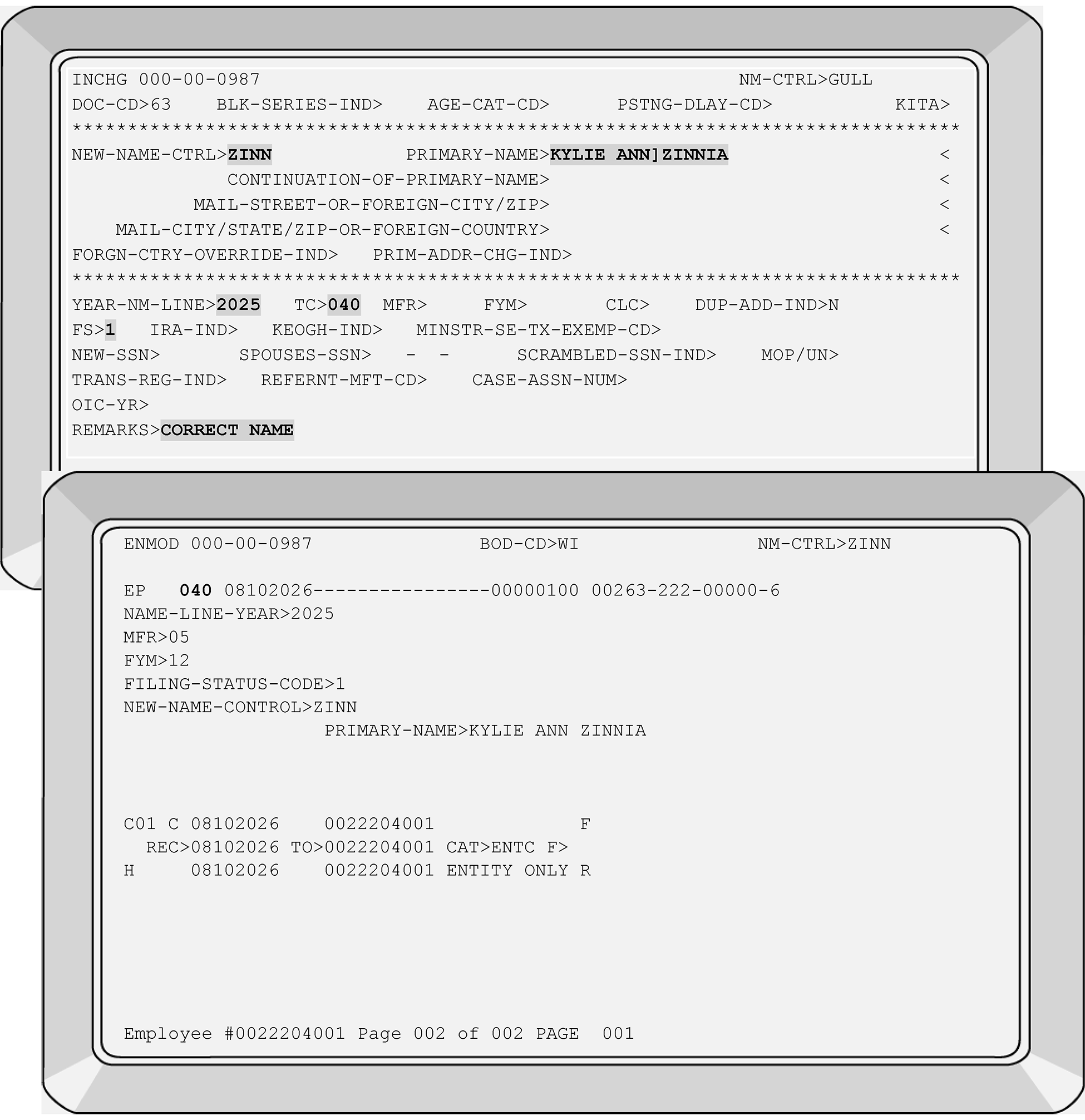
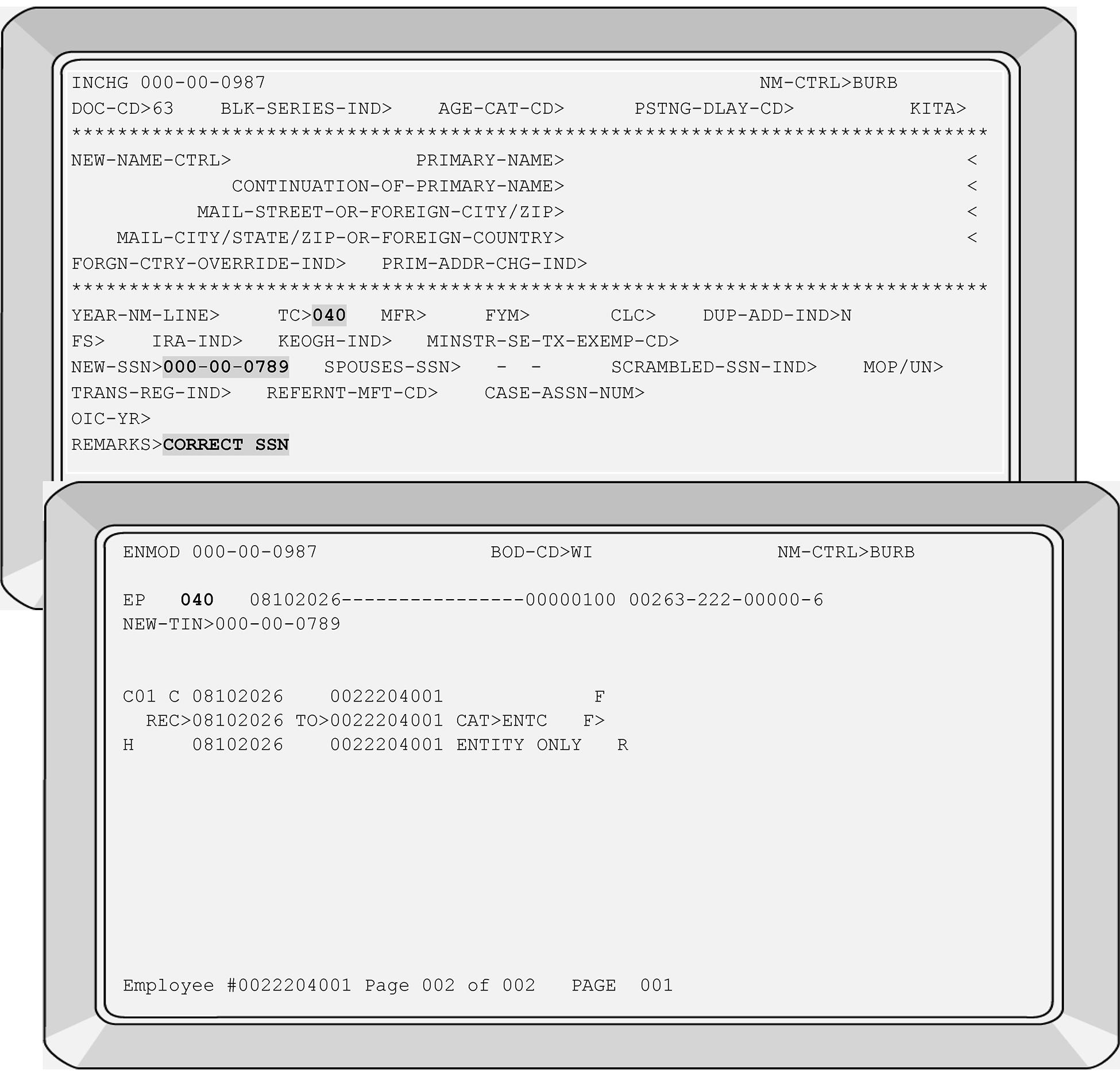
-
TC 041 is used to change a TIN or name control of an account resides on the invalid segment of IMF.
-
This transaction does not go through DM–1 validation.
-
The following information is needed when entering a TC 041 for a name change.
-
Enter new name control
-
Enter primary name line
-
Enter year name line
-
Enter TC 041
-
Enter FSC
-
Enter a description of changes in the REMARKS field.
Note:
A name change and a TIN change can be completed using a TC 041. Two separate transactions are not needed when using TC 041.
See Figure 3.13.5–29 depicting a name change and Figure 3.13.5-30 depicting a TIN change. -
-
See IRM 3.13.5.18, if the existing TC 000, TC 013, TC 014, or TC 971 with Action Code 050; for the S-SSN displays with a DLN of XX263-001-88888-X. This type of case requires correction with a TC 040 or TC 041 due to the establishment of the Secondary taxpayer's name by IMF.
-
Management approval may be required at your campus before entering these type of taxpayer corrections.
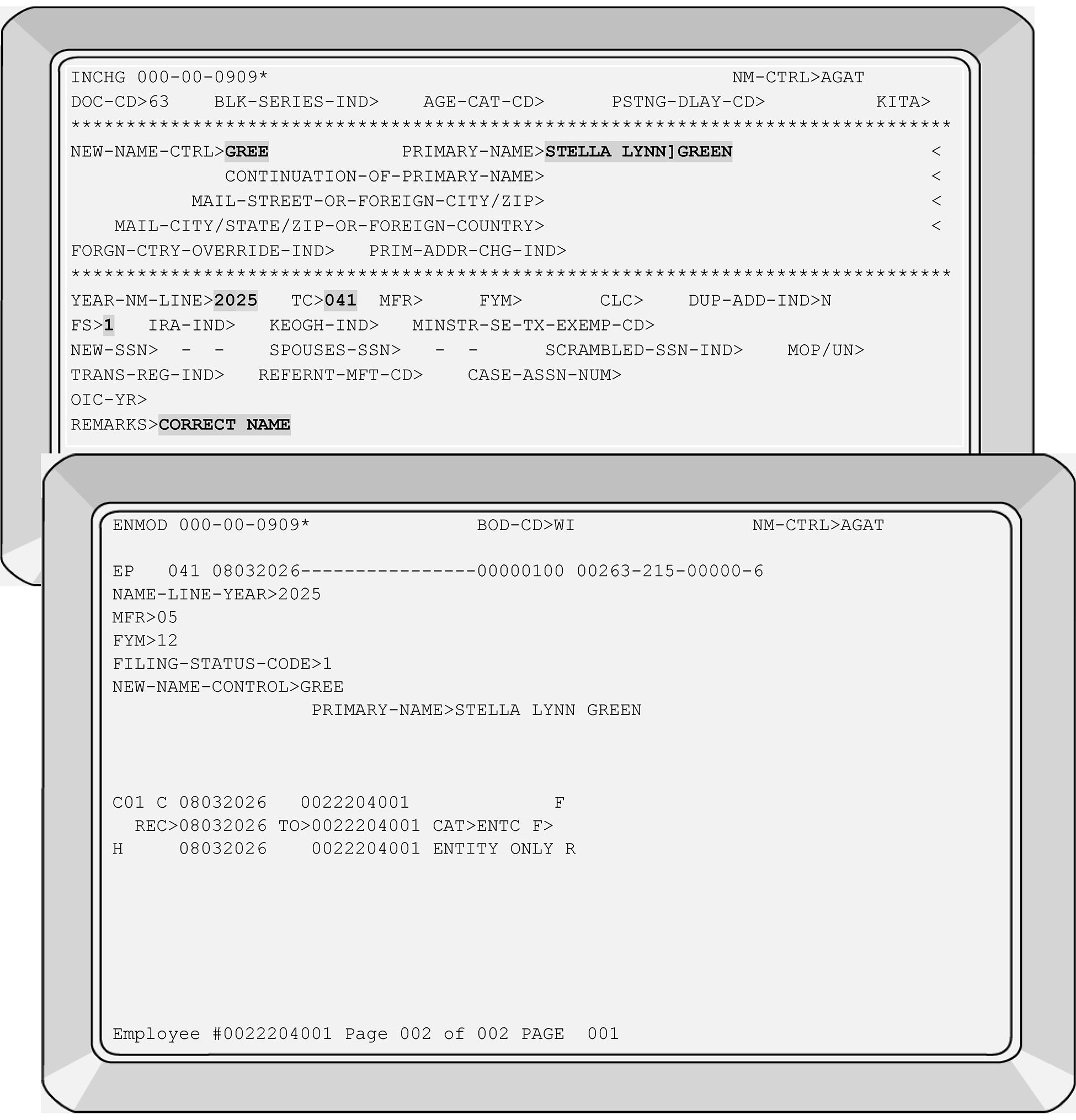
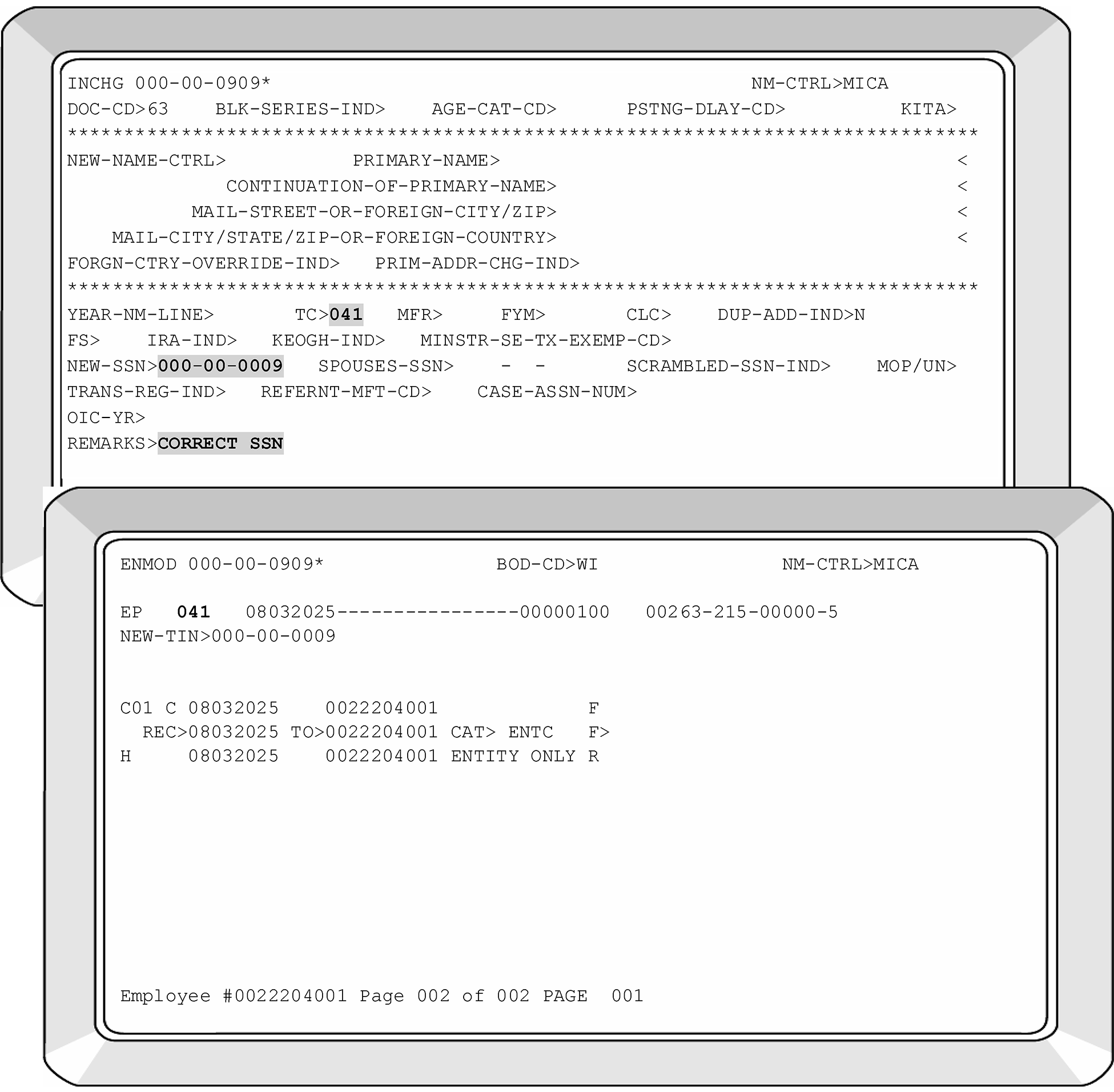
-
A CP 54 is a computerized notice requesting information for verification of the PRIMARY taxpayer's name and/or TIN.
-
The primary taxpayer is the taxpayer (either husband or wife) listed on the first name line on a the Form 1040 series when a taxpayer files with FSC 2 or 7, or
-
One taxpayer filing with a FSC other than 2 or 7.
-
-
A CP 54 is generated when a return, declaration (TC 430) or entity change posts to the invalid segment of the IMF. This invalid condition is due to:
-
The return, declaration (TC 430) or entity change did not find a "match" on the DM–1 File, or;
-
The return, declaration or entity change did not find a "proximal match" of the taxpayer's name control and TIN.
-
The return, declaration or entity change did not find a "match or proximal match" on the "NEW THIS QUARTER FILE" through the SSA.
-
-
The CP 54 instructs the taxpayer to compare the name and TIN information printed on the notice to the name and TIN information printed on their Social Security card.
Note:
If the taxpayer account displays a "New SSA N/C" or their "ITIN NC" displayed on CC INOLE matches the invalid name control on their IMF account, the taxpayer will receive their refund (after the completion of the next DM-1 quarterly merge). Validate their name control using TC 016.
Review their account for any conditions or any other corrections. Route the case to other processing areas.
-
CP 54 will generate as the following CP notices:
-
Code B (overpaid status (refund return) or the taxpayer's SSN begins with a 9 (example: 9nn-63-nnnn) that is not within the VALID SSN or ITIN ranges).
-
Code E (indicates an Estimated Tax Payment (ES). Do not input a TC 510 to release the refund on this type of CP54).
-
Code G (indicates a zero balance or balance due return.).
-
Code Q (SSN and name inquiry-second request). A CP 54Q is an automatic follow-up notice (second request) to the CP 54B.
-
-
IRS generates the notice when an unsuccessful correction attempt (TC 011 and/or TC 013) is made to a taxpayer's entity.
-
The taxpayer must submit either a name or TIN that matches the valid side of IMF or provide legal documentation to support a change and/or a reasonable explanation why their name and/or TIN does not match the VALID name controls.
-
The following are examples of the legal documentation acceptable for completion of a name change:
-
Passport
-
Marriage Certificate
-
Court Certificate(s)
-
Birth certificate
-
Driver's License
-
Insurance Records
-
Other legal documents (Supporting name change)
-
Social Security Card*
-
Copies of items listed above are acceptable
-
CP 565, ITIN Assignment Notice**
-
CP 565 A, We Assigned You An IRS Individual Taxpayer Identification Number (ITIN)**
-
CP 565 B, Important Information About Your IRS Individual Taxpayer Identification Number (ITIN)**
-
-
Even though the taxpayer provides documentation to substantiate their name change/discrepancy and/or explanation of their use of a different TIN, research using the appropriate command codes. See IRM 3.13.5.129.3 for the research CCs.
-
After reviewing the documentation and researching the account, if the taxpayer-supplied documentation listed in paragraph (2) justifies a name change and the name control does not match the valid name control, correct the taxpayer's account using CC IRCHG (TC 016). See IRM 3.13.5.112 and IRM 3.13.5.113 .
-
When the taxpayer or their representative supplies a reasonable explanation of their invalid name and/or TIN mismatch conditions, this information may be used to complete a name change (TC 013) and/or TIN change (TC 011). The following are examples of reasonable explanations:
-
My tax preparer used an incorrect last name when they filed my return.
-
I wrote my Social Security Number incorrectly on my return, attached is my Identification Number and Social Security Card.
-
I was married and filed as the secondary taxpayer but I am now divorced.
(In this type of situation, the taxpayer did not ever go to Social Security and update their name to their married name). The taxpayer is now filing as the primary and is using the married name not updated with SSA. -
The taxpayer provides a copy of their Social Security Card to document a typographical error was made in processing.
Exception:
As of May 2012, ITIN name control procedures ONLY must be made using CC INCHG.
When the first four characters of the taxpayer’s last name/surname contains a hyphen, apostrophe, space, etc., disregard and only enter the first four alpha characters.
Example ITIN only: Thomas El-Oak's name control is entered as ELOA. -
-
Examples of unacceptable explanations include:
Do not complete a name change or TIN correction in these cases. The taxpayer will continue to reside on the invalid side of IMF.-
Statements such as the number they are using is fraudulent, their husband's SSN, their daughter's SSN, etc.
-
They do not want to use their correct TIN.
-
I always file using my husband's SSN.
-
I have always used this SSN.
-
I don't understand this notice. Route to Accounts Management.
-
-
Use the following guidelines and research tools when correcting CP 54’s:
-
Use CC INOLET to start your research using the IRS generated TIN on the CP 54
-
Use CCs ENMOD, IMFOLI and TXMODA to research resequencing/merged conditions
-
Use CCs NAMES/NAMEI, FINDS/FINDE, INOLE and the ITIN Real Time System (RTS) to research for the taxpayer’s TIN if the taxpayer-provided TIN is not correct OR did not provide a TIN.
-
Do not release a refund (TC 510) on a CP 54E (Estimated Tax Payments), Balance Due Accounts or IRSN accounts.
-
Never release a refund on a TIN residing on the INVALID side of IMF which cannot be merged to the VALID side. See IRM 3.13.5.108 for additional information on Freeze Codes.
-
If taxpayer supplies documentation or you locate an ITIN/SSN and they were assigned an IRSN, merge the IRSN account to the taxpayer's SSN or ITIN.
-
-
If the primary taxpayer's account is no longer invalid, no further corrections are needed. Notate audit trail per local procedures. Refer to IRM 3.13.5.1.1(6)
-
To correct an invalid condition, determine the cause of the discrepancy. A variety of reasons cause this condition and may include the following:
-
Transcription error on the TIN
-
Transcription error on taxpayer's Name Control/Name
-
Incorrect TIN used by the taxpayer or using their spouse's TIN
-
Incorrect Name Control assigned in the ITIN unit
-
Incorrect name control (e.g., married name not updated with SSA)
-
Incorrect name control (e.g., name misspelled/input incorrectly)
-
-
If the taxpayer replies to a CP 54 or provides/supplies information regarding their ITIN account and it is determined their name and/or name control was entered incorrectly on RTS, complete the correction procedures. Contact the ITIN unit using your locally developed procedures and inform them of the name and/or name control corrections needed.
-
When taxpayers provide documentation to substantiate their identity, use the information provided in IRM 3.13.5.129.6 ,TC 016 "IRS Valid" procedures.
-
When the taxpayer requests a name change, but does not provide documentation to substantiate their identity, use the information provided in IRM 3.13.5.129.5 .
-
If a taxpayer's guardian, trustee, administrator, etc., sends in the CP 54 on behalf of the taxpayer, research using CC INOLE.
If... Then... a. Valid TIN is found Input a TC 011 to the valid TIN b. Research fails to find a valid trustee/administrator Initiate correspondence with the Trustee or Administrator for additional information using a Letter 104C.
The taxpayer must file a Form 2848, Power of Attorney and Declaration of Representative, in order to complete any required updates received from a third party.c. A reply is received from the Trustee or Administrator Research using the information provided.
Correct the taxpayer’s account and forward the Form 2848 to the CAF unit. -
Due to ITIN-NAP validation programming issues, some ITIN taxpayers are receiving CP 54 notices erroneously.
-
Research the taxpayer's account using RTS to determine if this is a "new" ITIN account assigned using the RTS history screen. If this is the case, see IRM 3.13.5.112 for CC IRCHG correction procedures.
-
Other systemic issues may arise as well. If you have an unusual case, bring it to the attention of your work leader.
-
-
The CP 54 has an area available for the taxpayer to correct/supply an address. If the taxpayer includes an address change/correction, complete the taxpayer's address request.
A signature is preferred in these situations, however a signature is not mandatory.
The new address must include their entire address including street address, city, state and ZIP Code (for domestic) or the street address, country and ZIP Code, (for international returns). -
If the taxpayer attached or indicates other requests, complete the Entity issues before forwarding the request to the appropriate area, along with any attachments. Begin researching by using CC INOLET/INOLES to compare the differences on the accounts on the invalid and valid side of IMF.
If... And... Then... a. Taxpayers TIN on the CP 54 is incorrect. Research indicates a Scrambled SSN. a. Route to Accounts Management.
b. See IRM 3.13.5.26 for information on Scrambled SSNs.b CP 54 notice is received with Form W-7 , Application for IRS Individual Taxpayer Identification Number (ITIN) or the Spanish version, Form W-7SP. Research indicates no ITIN has been assigned. a. Consider the CP 54 notice as classified waste and send the Form W-7/W-7SP to the ITIN unit at:
IRS
ITIN Operations
PO Box 149342
Austin, TX 78714-9342c. CP 54 is received with a Form W-7, Application for IRS Individual Taxpayer Identification Number (ITIN) or the Spanish version, W-7SP Research indicates the ITIN has been assigned. Continue processing the CP 54. d. CP 54 received and EITC is claimed as shown by TC 768 on CC TXMOD or there is an Entity-related freeze code -G math error on the account (Math Errors 604, 610, 605, 654, 667, 701, 702, 741, 743, 745 and 748). Research IMFOLR to look for Math Errors. Enter MFT 30 and the Tax Period for the year on which the -G freeze is posted. a. Entity function will complete the Entity-related corrections.
b. The EITC issues must be referred to Accounts Management.
Route to Accounts Management.e. Additional action is requested by the taxpayer. a. Entity function will complete the Entity-related corrections.
b. Consider the CP 54 notice as classified waste and route to the appropriate area in the IRSC for necessary action.f. TC 150 is on both the valid and invalid account number for the same taxpayer. a. Do not update the account
b. Attach the CP 54
c. Route to the Accounts Management with comments that duplicate TC 150 exists.g. Original documents are attached. a. Return original documents to the taxpayer using Form 14219 and edit an action trail on the CP 54 per IRM 3.13.5.1.1 (7) h. A TIN and/or name change/correction/address change was completed.
a. Edit an action trail as appropriate. All documents or CPs processed by the ECU will contain the TE’s stamp.
b. Once CP 54 Notices have been processed, they will be destroyed as classified waste.
-
If the taxpayer responds to the CP 54 stating the name is accurate, but states the TIN on the notice is incorrect:
-
Thoroughly research the taxpayer's account.
If taxpayer... And... Then... a. States their name is accurate but the TIN is incorrect on the notice Taxpayer-supplied TIN is accurate and no other TINs are found or assigned, Correct the taxpayer's account with a TC 011. b. Has multiple TINs (example: two IRSN's and one ITIN) See IRM 3.13.5.119 for correction procedures on how to merge the accounts. c. States their name and TIN are accurate TIN and/or name belongs to another taxpayer or is unassigned by SSA a. Take no action.
See IRM 3.13.5.129.8 for additional information.d. Has a TC 150 on both the valid and invalid side for same period (CC IMFOLI) a. Do not update the accounts.
b. Route these case to AM.
c. See IRM 3.13.5.129.3 for additional instructions.e. Taxpayer provides a Canadian TIN in a 3-3-3 (nnn-nnn-nnn) format, complete research for another TIN.
Attempt to locate their TIN using the standard SSA format for SSNs in a 3-2-4 (nnn-nn-nnnn) format (SSA issued SSNs).They do not have an IRS Valid TIN (SSN issued by SSA, ITIN or an earlier assigned IRSN)
a. Notate on CP 54 Canadian SSN (CanSSN)
b. Issue an IRSN
c. Underline the Name Control in red ink of the last name established for the IRSN
d. Correspond to the taxpayer with a 0685C Letter and inform them they cannot use a Canadian Identification Number using the "fill in" paragraph and they must provide a SSA-issued SSN.
e. Merge the Canadian SSN (CanSSN) into the IRSN account using TC 011.
f. Input remarks Canadian SSN . -
Review the account to determine if there are freeze codes that require the case to be forwarded to other areas for corrections. See IRM 3.13.5.108 for applicable freeze code information.
-
If the taxpayer responds to the CP 54 stating their TIN is accurate but the name is incorrect, conduct appropriate research. See IRM 3.13.5.129.3.
-
Use IDRS to compare and research the name(s) supplied by the taxpayer on the CP 54 Notice. If you locate a VALID name/name control and it matches the name supplied by the taxpayer, complete the name change as follows:
-
Use CC INCHG to make corrections to the invalid account on Master File.
Caution:
If the multiple name changes are required, do NOT input multiple TC 013 without monitoring the account. Once the first name change transaction posts, input the subsequent TC 013 corrections to the account.
Inputting multiple TC 013 corrections without monitoring the account could create a resequencing situation that will prevent the correction/posting of taxpayer accounts to IMF.Reminder:
The CC INCHG (TC 013) name change entered to account residing on the invalid side of IMF will correct the taxpayer's name.
Exception:
As of May 2012, ITIN name control procedures ONLY must be modified for CC INCHG.
When the first four characters of the taxpayer’s last name/surname contains a hyphen, apostrophe, space, etc., disregard and enter the first four alpha characters.
Example ITIN only: Thomas El-Oak is entered as ELOA. -
-
Use the following to make CC INCHG corrections:
If... And... Then... a. Taxpayer's response does not match the IMF VALID side No taxpayer-supplied documentation provided Take no action
taxpayer's account will remain on IMF INVALID sideb. Taxpayer response provides a name Name does NOT match the taxpayer-supplied documentation Use the name on the documentation to complete name correction. Refer to IRM 3.13.5.129.3(6)
-
Only use CC IRCHG when the taxpayer provides legal documentation and their name control (as shown on CC INOLET) does not match any of their valid name control(s).
Exception:
If the name provided matches the NEW SSA N/C as shown on CCs INOLET and INOLES, use CC IRCHG.
If... And... Then... a. Name provided by the taxpayer does not match the VALID name controls and they provided legal supporting documentation (marriage certificate, court records, etc.,) They are using a valid SSN Correct using CC IRCHG. See IRM 3.13.5.113 for additional information. b. Name provided by the taxpayer does not match the VALID name controls and they provided legal supporting documentation (marriage certificate, court records, etc.,) They are filing with an ITIN a. Correct using CC IRCHG
b. Use a Form 4442 and route/fax to the ITIN unit.c. Case cannot be resolved, because the taxpayer did not respond or reply to CP 54 Take no further action. -
Use CC IRCHG to make name corrections if taxpayer is using their married name or filed for a legal name change.
After correcting the ITIN, taxpayer's name and name control, forward/fax the case to the ITIN unit.Taxpayers name ITIN or SSA name control selected Taxpayers married name IRS Name Control
(should be)Cassidy Ruiz Lopez Lope Cassidy Ruiz Smith Ruiz Amelie Blue-Bird Bird Amelie Blue-Bird Bird Exception:
If the ITIN taxpayer or TAS requests a name change and their name contains a hyphen, space, apostrophe, etc., in any of the first four positions of their name control, a two-step correction process is needed. Input the new name control and enter the name line.
Monitor the name change.
Once the account posts to the invalid side of IMF, correct their account using CC IRCHG. -
See IRM 3.13.5.112 for supporting documentation requirements and narrative before completing the correction procedures. When the account is corrected using CC IRCHG, the taxpayer's refund, EITC or credits will refund.
-
If a name control validation (TC 016) and a name correction (TC 013) are required, input a TC 013 to correct the name control and enter a TC 016 to validate the name. You do not have to input a cycle delay on the second merge TC (in this example a TC 013).
-
If the taxpayer responds to the CP 54 stating both the TIN and name are NOT correct, conduct appropriate research.
-
Complete the required change to the taxpayer's name and TIN using a TC 013.
Reminder:
If multiple merge TCs (i.e., TC 011, 013, etc.) are entered without allowing time to post, it could create a resequencing condition at master file and will prevent taxpayer account correction(s).
Caution:
If the multiple name changes are required, do NOT input multiple TC 013 without monitoring the account. Once the first name change transaction posts, input the subsequent TC 013 corrections to the account.
After the TC 013 posts, input the TC 011 (if needed). -
See IRM 3.13.5.129.8 when research does not agree with the Name and/or TIN provided by the taxpayer.
-
Use the following for miscellaneous unresolved CP 54 issues:
If... Then... a. TIN provided by the taxpayer belongs to another taxpayer or SSA did not assign a SSN Take no action. b. Taxpayer provides no information or insufficient information to justify a change Take no action.
-
If a decedent case has previously been identified, the account should contain one or more of the following:
-
DECD in the name line
-
Date of Death on CC INOLES
-
TC 540 on CC TXMOD or CC IMFOLT for the year of death
-
Mail File Requirement (MFR) 08 on CC ENMOD
-
-
Use the following if the CP 54 is received for a deceased taxpayer:
If... Then... a. Second name line is present, Do not route to Accounts Management. b. Second name line is not present, 1. Review the document to determine if the CCC was issued in error or if the second name was not edited.
2. Use CC TRDBV to view Form 1310 or court documents.
3. Add the second name line (if applicable).
4. Send the case to Accounts Management to issue a manual refund.
-
The instructions regarding changing a taxpayer's entity information based on phone/direct contact are contained throughout IRM 3.13.5.
-
See IRM 3.13.5.29 for the address correction procedures made through taxpayer/representative phone contact.
-
See IRM Part 21, Customer Account Services, if specific instructions are necessary.
-
The ECU receives requests to locate and/or assign EINs due to the following:
-
If Entity receives a Form SS-4, Application for Employer Identification Number; or a SS-4 (PR), Application for Employer I.D. Number (Puerto Rican Version), from a taxpayer with a DOMESTIC ADDRESS requesting the assignment of an EIN, fax the information to the Kansas City campus at (855)-887-7734 or Ogden (855)-214-7520 .Contact the these unit prior to sending the fax to ensure this request is handled expeditiously.
-
Telephone calls from foreign entities requesting an EIN are assigned EIN prefix 98 and are only worked by Kansas City and Ogden International Units. If a call is received in any other location, provide the caller with the following information:
-
EIN International phone numbers (267) 941-1099 (not a toll-free number). Hours of operation 6:00 a.m. to 11:00 p.m. (Eastern time Mon. through Fri.)
-
Within the U.S., EIN International phone number (267) 941-1627.
-
Outside the U.S., EIN International phone number (304) 707-9471.
-
-
If Entity receives a Form SS-4, Application for Employer Identification Number, from a taxpayer with an INTERNATIONAL ADDRESS or a US TERRITORY/POSSESSION, fax the SS-4 to the Philadelphia site at (859) 669-5987.
-
If you are working payments for Employee Plans Master File (EPMF) returns and cannot locate an EIN, coordination with the Ogden campus. Coordination is also required when working the following two forms.
-
Form 945 ,Annual Return of Withheld Federal Income Tax, pertaining to Employee Pension Plans
-
Form 5558, Application for Extension of Time to File Certain Employee Plan Returns.
Prepare a Form 4442, Inquiry Referral, and fax the information to the EP Unit at (855) 214-7520. -
-
If you are working payments for the following Exempt Organization (EO) returns and cannot locate an EIN, coordination is required with the Ogden campus.
Form Title MFT 990 Return of Organization Exempt From Income Tax 67 990-EZ Short Form Return of Organization Exempt From Income Tax 67 990-PF Return of Private Foundation or IRC 4947(a)(1) Nonexempt Charitable Trust Treated as a Private Foundation 44 990-T Exempt Organization Business Income Tax Return (and proxy tax under IRC 6033(e)) 34 5227 Split-Interest Trust Information Return 37 5330 Return of Excise Taxes Related to Employee Benefit Plans 76 990-BL Information and Initial Excise Tax Return for Black Lung Benefit Trusts & Certain Related Person 56 1041-A U.S. Information Return Trust Accumulation of Charitable Amounts 36 8868 Application for Extension of Time to File an Exempt Organization Return 77
Prepare a Form 4442, Inquiry Referral, and fax the information to the EP Unit at (855) 214-7520, Attn: EO Entity Lead. Request they establish the EO for non-profits filers. -
Under Requests for EINs from BMF Entity IRM. If the correspondence reveals the taxpayer must file a return and the correspondence is received 30 days or more prior to the due date of the return, process as follows:
-
Perform all necessary research to determine if an EIN was previously assigned.
-
After an EIN is located, notify the taxpayer of the previously assigned EIN with the Letter 147C.
-
Update the taxpayer's account if necessary.
-
If no EIN is present, correspond with the taxpayer using 0045C Letter and request the completion of the Form SS-4.
-
-
If the correspondence reveals the taxpayer should file a return, and the correspondence is received within 30 days of the due date of the return,
-
Perform all necessary research to determine if an EIN was previously assigned.
-
If an EIN is located, notify the taxpayer of the previously assigned EIN using a 0147C Letter..
-
Update the taxpayer's account, if necessary.
-
Send any tax forms required for current filing.
-
If no EIN is located, assign an EIN using CC ESIGN. Use the CC ESIGN procedures located in IRM 21.7.13, Assigning Employer Identification Numbers (EINs).
-
If sufficient information is not available to assign an EIN with the proper filing requirements, fiscal year month, etc., acknowledge the taxpayer's correspondence with 045C letter and forward a Form SS–4 for completion.
-
-
If correspondence is received from a representative of a pension trust or multiple pension trusts requesting assignment of an EIN in order to comply with the withholding requirement of the Tax Equity and Fiscal Responsibility Act (TEFRA), proceed as follows:
-
If the taxpayer correspondence is not clear and the acting representative is acting payer for multiple plans, correspond to inform them the withholding may be reported on their Form 945 (filed under their previously assigned EIN) unless they want an individual EIN assigned specifically to report withholding for multiple pension trusts.
-
If individual EINs are requested, inform them an individual Form SS–4 must be submitted for each pension trust.
-
If an EIN is requested solely for use in reporting for TEFRA, the financial institution must be aware they also assume all the responsibilities of a payer (i.e., penalty assessments, issuance of Form 1099, Form W–2 and Form W–3).
-
For all others perform all necessary research to determine if an EIN was previously assigned.
-
If an EIN is located on the BMF, proceed as follows.
-
Notify the taxpayer of the previously assigned EIN ( 147C letter).
-
Update the account to reflect a Form 945 FRC of 01, if employees are indicated.
-
Forward to the taxpayer those tax forms required for current filing, when necessary.
-
If an EIN is located on another MF, notify the taxpayer of the previously assigned EIN ( 147C letter). See note in 6b above.
-
Establish the account on the BMF with a Form 945 FRC of 01.
-
Forward to the taxpayer those tax forms required for current filing, when necessary.
-
If an EIN is not located or a response to correspondence is received, assign an EIN(s) as requested.
-
Assign the EIN from the block of six/seven million series numbers reserved in ECU for this purpose.
-
Establish the account on the BMF with a Form 945 FRC–01.
-
-
Use CCs NAMEE and NAMEB to attempt to locate the EIN. If the EIN cannot be located, CCs ENMOD, INOLE, or BMFOL will display the message "NO DATA/RECORD FOUND" .
-
You may be able to use a cross-referenced SSN or EIN located during research with the CC INOLES.
-
The EIN Research and Assignment System (ERAS) was designed to process requests for Employer Identification Numbers (EINs).
-
The process begins with the receipt of the following:
-
Form SS-4, Application for Employer Identification Number
-
Request generated from the EIN Phones program
-
Return filed without an EIN
-
Return filed that includes a change of business.
-
-
A notice is mailed to the taxpayer informing them of their assigned EIN and a record of the new account is sent to update the Master File.
-
CC ESIGNR is used to request a formatted ESIGN input screen and must be preceded by either CCs NAMEE or NAMEB to determine if the taxpayer already has a valid EIN.
-
CC ESIGN is used to input taxpayer information and establishes a new account on the IDRS database and issues a unique EIN. Taxpayer information may then be input without an EIN if one was not found, or with an EIN if one was found but is not established on the appropriate master file.
-
If a specific EIN is not entered on the ESIGN screen, one will generate from the EIN Assignment Control File (EACF).
-
Following are the various ERAS command code definers and their descriptions.
-
Request a formatted input screen using ESIGNR.
-
Input taxpayer information from the formatted ESIGNR screen using ESIGN.
-
Delete taxpayer information the same day as entry using ESIGNT.
-
Delete taxpayer information that failed to post on the Master File with an Unpostable Code (UPC) of 302 or 802 using ESIGND.
-
Upon receipt of the SS–4, update the ERAS Notice Information Code using ESIGNU.
-
Issue a block of EINs to an institution to assign to estate/trusts accounts using BSIGN.
-
-
CC ESIGN does not require the Sole Proprietor SSN, Nonresident Alien or Plan Number fields to be completed. However, this information is very important and must be included on CC ESIGN whenever possible.
-
Master File Indicators (MFIs)
-
MFI B indicates the entity has filing requirements when the business entity was established.
-
MFI O indicates the entity did not have filing requirements when the business entity was established. See IRM 3.13.5.109 for additional information on Filing Requirements.
-
-
The system assigns a nine-digit EIN in the format NN-NNNNNNN. The first two digits (the EIN Prefix) are determined by the Campus of Record assigning the EIN, unless the taxpayer is applying over the Internet or through the Small Business Association (SBA).
-
Location Codes can be used to determine the origination of the EIN Assignment. Enter the appropriate two-position Location Code in the LOC-CD on CC ESIGN. See the following table to determine the two digits used within the LOC-CD field:
Note:
*Prefix 66 should be used for taxpayers residing in Puerto Rico, Guam, Virgin Islands, American Samoa, Northern Mariana Islands and Palau.
**98 International EINs begin 98.Campus, Internet or SBA Assigned Location Code EIN Prefixes Andover 10, 12 Atlanta 60, 67 Austin 50, 53 Brookhaven 01, 02, 03, 04, 05, 06, 11 13, 14, 16, 21,22, 23, 25, 34, 51, 52, 54, 55, 56, 57, 58, 59, 65 Cincinnati 30, 32, 35, 36, 37, 38, 61 Fresno 15, 24 Kansas City 40, 44 Memphis 94, 95 Ogden 80, 90 Philadelphia 33, 39, 41, 42, 43, 45, 46, 47, 48, 62, 63, 64, *66, 68, 71, 72, 73, 74, 75, 76, 77, 81, 82, 83, 84, 85, 86, 87, 88, 91, 92, 93, **98, 99 Internet 20, 26, 27, 45 46, 47, 81 and 82 Small Business Association (SBA) 31 -
6/7 Million series EINs are reserved for Trusts, Estates, and Non-Profit/Exempt Organizations under the Tax Equity and Fiscal Responsibility Act (TEFRA). A 6/7 Million series EIN can be identified by the number 6 or 7 immediately following the dash (−).
-
Business Name Controls range in length from as short as one character and as many as four characters.
-
The ampersand "&" and the hyphen "-" are the only allowable special characters allowed in a BMF Name Control. However these characters cannot be the first position of the name control.
-
If the last name is fewer than four characters, space out the remaining spaces.
-
-
Determining the Name Control differs depending on the type of business you are establishing. See the Document 7071-A, BMF Name Control Job Aid.
-
Primary Name Lines are the legal name of the entity and 35 characters are allotted for the PRIMARY-NAME field.
-
The ampersand "&" and the hyphen "-" are the only allowable special characters allowed in the BMF Name Line Control. However these characters cannot be the first position of the name control.
-
Substitute a hyphen for a slash. If an apostrophe is dropped, do not leave a space.
-
If the primary name line does not fit with the space available, input the remainder in the CONTINUATION-OF-PRIMARY- NAME line.
-
If the Primary name line begins with "The" , do not input "The" unless it is followed by only one additional word.
-
-
The Sort name is another method to locate a taxpayer on IDRS/AMS.
-
When a sort name is input, the BMF will identify the sort name which allows it to be used on the NSF (CC NAMES and NAMEE) to locate the taxpayer.
-
If the sort name is an individual's name, complete the sort name line information as supplied followed by their title (when provided).
-
If more than one name is present for the sort name line, both names should be entered as indicated by the taxpayer.
-
The ampersand "&" and the hyphen "-" are the only allowable special characters allowed in the BMF Sort Name Line. If the taxpayer uses any other special character, omit the character and leave a blank space. For example, "Taxpayer.com" should be entered as "Taxpayer com" .
-
The sort name should be used for the following:
-
Corporation and Sole Proprietors should have their business/trade name (if different from true name) in the sort line field.
-
Trustee of a trust, if the trustee is an individual, with title "TTEE."
-
Administrator/Executor/Personal Representative (or other title) of an estate, if it's an individual. If no title is indicated, use "executor" . If a financial institution is the fiduciary, enter their name in the "in care of" field, not the sort line.
-
Limited Liability Companies (LLCs) should have the managing member's name followed by MBR. A single member LLC sort name line should have the single member's name in the sort line format with the title "SOLE MBR" or "SINGLE MBR" .
-
General Partner's name and title or partnership's trade name. Generally, partnerships will always have an entry in the sort name line field. See the table below for guidance in formatting a partnership's name lines:
If... Then... Partnership has a true name and a trade name Enter the true name in the primary name line, trade name in the sort name line field and the general partners name in the 'In Care Of' field. Partnership has a trade name but does not supply their true name Enter the trade name in the sort name line field and the partners name with 'ET AL PTR' in the primary name line. Business is the general partner Enter the partners name followed by GEN PTR in the 'In Care Of' name field. Partnership does not have a trade name Enter the true name of the partnership in the primary name line and the general partner’s name in the sort name line field. -
"Account under TEFRA" if it is a Pension Trust.
-
General Partner or partnerships trade name.
-
-
Do not identify the following as a sort name:
-
An "In Care Of" Name
-
A Financial or Banking institution.
-
A Location Address.
-
A corporation officer’s name (president, vice-president, etc.).
-
-
To delete the sort name, input "$$" in the first two positions of the sort name line.
-
Only remove or update the sort name line (doing business as, dba name) if there is a direct request from the taxpayer, or the name is different, and the document being processed is signed by someone with authorization. Do not add the sort name (dba) if it is exactly the same as the primary name line. If the sort name line is similar to the primary name line, input the sort name (dba).
-
The Care-Of Name is used to ensure mail reaches an intended recipient. The percent sign appears on the first space of the CARE-OF-NAME line. This results in only 34 available character spaces. See Exhibit 2.4.9-13 in IRM 2.4.9, Command Codes ENREQ, INCHG, IRCHG, BNCHG and BRCHG, for information on acceptable characters allowed in the CARE-OF-NAME field.
-
Fiscal Year Month (FYM) is a two-digit numeric equivalent from 01 through 12 (January through December). If no FYM is indicated, use the month preceding the Business Operational Date.
-
The Employment Code is not always a required field. Only certain non-profit entities have employment code requirements.
-
FTD Suppress Indicator has a default input of "N" . Therefore this field will always be N when assigning an EIN in the ECU.
-
Cross Reference XREF-TIN-ITIN Indicator and SSN/ITIN/EIN fields are used to show ownership or responsibility of certain accounts.
Note:
Not all accounts will have a XREF requirement.
However input the XREF TIN if it is available and can be verified.-
If the XREF-TIN-TYPE is zero, then the number in the SSN/ITIN/EIN field is an SSN.
-
If the XREF-TIN-TYPE is two, then the number in the SSN/ITIN/EIN field is an EIN.
-
-
Business Operational Date (BOD) is the date the entity first came into existence and displays on CC ENMOD.
-
For a business, this is the date the entity began doing business.
-
For an Estate, this is the DOD or the date entered into probate.
-
-
Employees field has room for up to five spaces of 99,999 employees. No leading zeros are required.
-
Reason Applied has a corresponding Reason Applied digit. See the following:
Box Checked Reason Applied Digit Started New Business 1 Hired Employees 2 Compliance w/IRS withholding regulations 3 Other 4 Banking Purpose 5 Changed Type of Business 6 Purchased Going Business 7 Created Trust 8 Created a Pension Plan 9 -
Phone field. If this information is unavailable leave the field blank.
-
Prior EIN field. The default information for this field is N. If you can determine the taxpayer has previously filed for EIN, change the N to a Y.
-
Remarks will vary dependent on the type of EIN request you are processing. See the following table for examples of applicable remarks.
Type of Request Remarks Input Fax PER FAX Fax with ITIN PER FAX ITIN 9XX-XX-XXXX Mail PER MAIL Mail with ITIN PER MAIL ITIN 9XX-XX-XXXX Telephone Name of caller and caller's tele. number Telephone with ITIN Name of caller and caller's tele. number ITIN 9XX-XX-XXXX -
The Business Location State is the standard two-character abbreviation for the state in which the entity is located.
-
The Type of Entity Codes is not always a required field for all types of business entities. If required, input one of the following two-digit codes:
Determine from information provided Two-Digit Code Sole Proprietor 01 Partnership 02 Corporation 03 Personal Service Corp. 04 Church or Church-controlled organization 05 Other Nonprofit Organization 06 Other 07 Estate 08 Plan Administrator 09 Trust 10 National Guard 11 Farmer's Cooperative 12 REMIC 13 State/Local Government 14 Federal Government/Military 15 Indian Tribal Government/Enterprises 16 -
The Type of Entity Remarks is not always a required field for all types of business entities.
-
The Reason for Applying Message is not always a required field for all types of business entities.
-
The Principal Business Activity Check box is a required field for all types of business entities. Input one of the following two-digit codes:
See IRM 2.4.8, Command Codes ESIGN and BSIGN, Exhibit 2.4.8-3, ESIGN Input Format, for additional instructions.Literal Principal Activity Code (if applicable) Two-Digit Code Construction 01 Real Estate 02 Rental and Leasing 03 Manufacturing 04 Transportation & Warehousing 05 Finance & Insurance 06 Health Care and Social Assistance 07 Accommodation and Food Service 08 Other (specify) 09 Wholesale-Agent/Broker 10 Wholesale-Other 11 Retail 12 -
The Principal Merchandise Sold Services is not always a required field for all types of business entities.
-
Third Party Designee (TPD), Power of Attorney (POA), Durable Power of Attorney (DRBL) and Tax Information Authorization (TIA) are not always required fields for all types of business entities.
-
Enter History items using CC ACTON, if either of these fields are required after the EIN is assigned.
-
If a Form 8821 is included with documentation, edit the EIN on the Form 8821. Forward the Form 8821 to the CAF Unit.
-
-
WPD is the date the entity began paying wages to its employees. The WPD is entered in a MMYYYY format.
-
If the taxpayer indicates WPD as "not yet or unknown" , then the WPD would be input as the first date of the next quarter. See the following table to determine the correct WPD.
Quarter Dates First January 1 through March 31 Second April 1 through June 30 Third July 1 through September 30 Fourth October 1 through December 31
-
A BMF filing requirement is used to:
-
identify the type of return to be mailed to the taxpayer
-
perform delinquency checks if taxpayers do not file.
-
-
The filing requirement codes are input with CC ESIGN, BNCHG or EOCHG. In some cases, it will be established when a return posts.
-
Whenever an account is established (TC 000) on the BMF it must have a positive filing requirement (including if there are no filing requirements).
-
The command code for inputting filing requirements are ESIGN, BNCHG and EOCHG. All three of the command codes have the same designates but only certain filing requirements can be input in certain command codes.
-
The validity checks for filing requirements on CC ESIGN are in IRM 3.13.2.7.2, CC ESIGN.
-
The validity checks for filing requirements on CC BNCHG are in IRM 3.13.2.7.3.2, CC ENREQ/BNCHG.
-
The validity checks for filing requirements on CC EOCHG are in IRM 3.13.12, Exempt Organization Account Numbers.
-
-
The following is a general breakdown of BMF Filing Requirements:
Form Filing Requirements Form 941 Employees - FICA Form 940 Employees - FUTA Form 943 Employees - Agricultural Form 945 Employees - Nonpayroll FUTA Form 1120 Corporation Form 1065 Partnership Form 1041 Estate/Trust Form 2290 Heavy Highway Use Tax Form 720 Excise/Luxury Form 730 Wagering Tax Form 11C Occupational Wagering Tax Form 706 Estate Tax Form 709 Gift Tax -
For a list of the MFT, Form, Type of Return, filing requirements, when to file and the Statutory date for all returns refer to Document 6209, IRS Processing Codes and Information.
-
The following list is the filing requirements that can be input with CC BNCHG. Use CC BNCHG to add, change or delete a BMF filing requirement.
-
Form 941 valid ranges are blank, 00, 01, 02, 06, 07, 09, 10, 11, 13 or 14. A Form 941 FR 00 will delete the Form 941 filing requirement on the BMF.
If (Inputting)... Then... Form 941 FR = 01 Form 940 FR must be a 1 or 2, unless employment code input is a "W" , "G" or "T" is also input. Form 941 FR = 02 There must also be input an Employment Code of "F" . Form 941 FR = 06 The location code must be 6601 or 9801. Form 941 FR = 07 The Form 940 FR must be a "7" , unless the Employment Code input is a "W" or "T" . Form 941 FR = 09 The transaction code cannot be 000. Form 941 FR = 11 If the employment code is present it must be a "T" , "S" , "M" , "W" or "9" . If no employment code is present, then a Form 940 filing requirement "1" ; or "2" must be input. Form 941 FR = 13 The location code must be 6601. Form 941 FR = 14 If the location code is input, it must be 6601.
If the employment code is present it must be a "W" or "T" and the Form 940 filing requirement must not equal a "1" , "2" or "7" .
If no employment code is present, the Form 940 filing requirement must be "7" . -
Form 1120 valid ranges are blank, 00, 01, 03, 04, 06, 07, 09, 10, 11, 16, 17, 18, 19 or 20. A Form 1120 FR–0 will delete the Form 1120 filing requirements on the BMF.
If... Then... Form 1120 FR = 01, 03, 04, 06, 07, 09, 10, 11, 16, 17 or 18 The FYM must be input
A filing requirement for Form 1041 or Form 1065 must not be input or must be zero.Form 1120 FR = 15 The input campus must be OSPC. Form 720 FR = 9 The TC cannot be 000. Form 1041 FR = 1 or 2 The FYM must be input. A filing requirement for Form 1065 or Form 1120 must not be input, unless it is zero. Form 1065 FR = 1 The FYM must be input. A filing requirement for Form 1041 or Form 1120 must not be input, unless it is zero. Form 1066 = 1 A filing requirement for Form 1120, Form 1041 or Form 1065 cannot be input, unless it is zero. The FYM must be 12. Form CT-1 FR of 1 or 2 The Railroad Retirement number must be input. Form 940 FR = 1, 2, or 7 A FR for Form 941, or 943 must be input. Form 940 FR = 1 A Form 941 FR of 01, 09, or 10 must be input. A Form 943 FR of 1 must be input. Form 940 FR = 2 A Form 941 FR of 01, 09, or 10 must be input. A Form 943 FR of 1 must be input. Form 940 FR = 7 A Form 941 FR of 7 must be input. A Form 943 FR of 7 must be input. Form 943 FR = 7 The location code must equal "6601" . -
Form 1042 valid ranges are blank, 0 or 1. A Form 1042 FR 0 will delete the Form 1042 filing requirement on the BMF.
-
Form 990-C valid ranges are blank, 0 or 1. A Form 990–C FR 0 will delete the Form 990–C filing requirement on the BMF. See CC EOCHG for positive filing requirements.
-
Form 990-T valid ranges are blank, 0 or 2. A Form 990–T FR 0 will delete the Form 990–T filing requirement on the BMF.
-
Form 990–T FR = 2; The FYM must be input. A Form 1041, Form 1065 or Form 1120 filing requirement greater than zero cannot be input.
-
Form 5227 valid ranges are blank or 0. A Form 5227 FR 0 will delete the Form 5227 filing requirement on the BMF. See CC EOCHG for positive filing requirements.
-
Form 990–PF valid ranges are blank or 0. A Form 990–PF FR 0 will delete the Form 990–PF filing requirement on the BMF. See CC EOCHG for positive filing requirements.
-
Form 2290 valid ranges are blank, 0 or 1. A Form 2290 FR 0 will delete the Form 2290 filing requirement on the BMF.
-
If... Then... Form 11–C FR = 1 Form 11–C FR must be 1 Form 730 FR = 1 Form 730 FR must be 1 -
Form 990 and Form 990EZ valid ranges are blank or 0. A Form 990 FR 0 will delete the Form 990 filing requirements on the BMF. See CC EOCHG for positive filing requirements.
If... Then... Form 706-GS(D) = Blank, 0 or 1 Input must be to a BMF EIN or SSN account only. MFT must be input to update Form 706-GS(D) FRC. Form 706-GS(T) = Blank, 0 or 1 Input must be to a BMF EIN account only. Form 706-GS(T) FRC = 1 Only Form 1041, Form 720, Form 940, Form 941, Form 943 or Form 944 FRCs may be input. -
Form 944 valid ranges are 00, 01 and 02. Form 944-SS valid ranges are 06 and 13. Form 944 (PR) valid ranges are 07 and 14. For further information on required fields, valid ranges, etc., when using CCs BNCHG and/or BRCHG, see IRM 2.4.9–13, Exhibit 13, Command Codes ENREQ, INCHG, IRCHG, BNCHG and BRCHG.
-
Form 945 valid ranges are blank, 0, or 1. A Form 945 FR = 0 will delete the Form 945 filing requirement on the BMF. Form 945 is valid with all other filing requirements. If ECU can determine by taxpayer contact or the taxpayer indicates they are liable to file Form 945 (i.e., liable for non-payroll income tax withholding on backup withholding and withholding for pensions, annuities, IRAs, and gambling winnings) establish Form 945 FRC 01. Otherwise, DO NOT establish a 945 FRC.
-
Not Required
-
Valid range blank, 0 or 1.
-
This field is used when the EIN should be on the BMF, but a filing requirement should not be established. See IRM 3.13.2, BMF Account Numbers or IRM 2.4.9, Command Codes ENREQ, INCHG, IRCHG, BNCHG and BRCHG, for an example of CC BNCHG screen display.
-
-
The validity checks on filing requirements for CC ESIGN are listed in the chart below.
-
Form 941 valid range of values are 01, 02, 06, 07, or 10. A Form 941 FR must have a "wages paid date" .
If (Inputting)... Then... Form 941 FR =01 Form 940 FR must be 1 or 2, unless Employment Code is "G" or "W" Form 941 FR =02 Employment Code must be "F" and Form 940 FR must be blank Form 941 FR =06 Location Code must be 6601. Form 940 FR must be "7" unless Employment Code is "W" Form 941 FR =07 Location Code must be 6601. Form 940 FR must be 1 or 2, . or "F" . Employment code must be # or blank Form 990C FR = Blank, O, 1 See CC EOCHG for positive filing requirements. A Form 990C FR 0 will delete the Form 990C filing requirement on the BMF. Form 1120 FR = 01, 03, 04, 06,07, 09, 10, 11, 16, 17, 18, or 19 "Fiscal Year Month" (FYM) must be input The "Business Operation Date" (BOD) must be input. A FR for Form 1065, Form 1066 or Form 1041 cannot be input. Form 720 = .., 1, or 4. The "Business Operation Date" must be input.
Note:A Form 720 FR is valid with all the other filing requirements.Form 1041 = .., 1, or 2. The "Business Operation Date" must be input. The "Wages Paid Date" for FRC 2 must be present. A FR for Form 1065, Form 1066 or Form 1120 cannot be input. The FYM must be input. Form 1041 QFT = .., 9 The "Business Operation Date" must be input. The "Wages Paid Date" for FRC 2 must be present. A FR for Form 1065, Form 1066 or Form 1120 cannot be input. The FYM must be input. Form 1065 = .. or 1 The "Business Operation Date" must be input. A FR for Form 1041, Form 1066 or Form 1120 must not be input. The FYM must be input. Form CT–1 = .., 1 or 2 The "Business Operation Date" must be input. A Form 941 FR of 04 may also be input. Form 940 = .., 1, 2, or 7 The "Wages Paid Date" must be input. Form 940 FR = 1 Then the Form 941 FR must be 01 or 06. The Form 943 FR must be 1. Form 940 FR = 2 Then the Form 941 FR must be 01 or 06. The Form 943 FR must be 1. Form 940 FR = 7 Then the location Code must be 6601. Form 941 FR must be 7. The Form 943 FR must be 7. Form 943 = .., 1, or 7 The "Wages Paid Date" must be input, Form 943 = 7 The location code must be 6601. -
Form 945 valid ranges are .., or 1.
A Form 945 FR is valid with all other filing requirements.-
If ECU can determine by taxpayer contact or the taxpayer indicates they are liable to file Form 945 (i.e., liable for non-payroll income tax withholding on backup withholding or withholding for pensions, annuities, Individual Retirement Accounts (IRAs), Indian gaming and gambling winnings), establish Form 945 FRC 01.
-
Otherwise, DO NOT establish a 945 FRC.
-
-
Form 1042 valid ranges are .. or 1.
Form 1042 FR is valid with all other filing requirements.Form Informational Purposes Form 2290 = .. or 1 The "Business Operation Date" must be input. Form 1066 = .. or 1 The Business Operation Date must be input. A FR for Form 1120, Form 1041 and Form 1065 cannot be input. Form 11–C = .. or 1 The "Business Operation Date" must be input. Form 730 = .. or 1 The "Business Operation Date" must be input. The FR for Form 11–C must be a 1.
-
Form 2290 is filed to report the tax due on highway motor vehicles with a taxable gross weight of 55,000 pounds or more used on public highways during the taxable period.
-
Form 2290 is filed by the person in whose name a taxable vehicle is registered or required to be registered at the time of its first use on public highways. Use the following for processing Form(s) 2290.
-
The taxable period begins each July 1 and ends the following June 30.
-
For vehicles first used in July of the taxable period, Form 2290 is due by August 31.
-
For vehicles first used after July of the taxable period, Form 2290 for that period is due by the last day of the month following the month of first use.
-
-
The BO date is the first day of the month entered on line 1 of the return.
-
Vehicles exempt from tax are as follows:
used and actually operated by the Federal Government, a state or local government, or an Indian tribal government if the vehicle's use involves the exercise of an essential tribal government function, are exempt from tax-
The Federal Government
-
The District of Columbia
-
A State or Local Government
-
The American National Red Cross
-
A nonprofit volunteer fire department, ambulance association or rescue squad
-
An Indian tribal government (only if the vehicle's use involves a tribal government function)
-
A mass transit authority if it was created under a statute gives it certain powers normally exercised by the state.
-
Qualified blood collector vehicles used by qualified blood collector organizations.
-
Specially designed mobile machinery for non-transportation functions (such as construction, drilling, mining, farming, etc.)
-
-
The processing of Form 2290 is centralized at the Ogden Campus.
-
Schedule H (Form 1040 or Form 1041)—Schedule H replaces Form 942. Schedule H is used to report household employee Social Security, Medicare and Federal Unemployment Tax Act (FUTA) tax payments. The following may be routed to the ECU:
When a request is received in ECU, take the following actions:-
Schedule H attached to a Form 1040, Form 1041
-
loose Schedule H from Document Perfection or Adjustments, or;
-
electronic transcripts for e-filed Schedule H's
-
Perform the preliminary research to ensure the taxpayer(s) does not already have an EIN.
Note:
CC ENMOD will display ZZ beside the RET-GRP field if the taxpayer was assigned an EIN for household employees.
If needed, review the Schedule H and any documents to locate an EIN before assigning a new EIN. See IRM 21.7.13 Assigning Employer Identification Numbers (EINs), for information on research for Household employees. -
Schedules H may be needed for one or both of the taxpayers (primary and secondary). Research the name(s) and/or TIN(s) listed on the Schedule H
. -
If an EIN is located, edit it on the EIN block of Schedule H and return to the originating function.
-
If no EIN is located, see the following paragraphs.
-
-
Entity will complete every possible field of CC ESIGN when assigning an EIN. Note: See IRM 2.4.8, Command Codes ESIGN and BSIGN, and the IDRS Command Code Job Aid on SERP if needed.
Note:
It is important the X-REF TIN TYPE and TIN of the entity owner is completed. If the taxpayer is a sole proprietor, the SOLE PROPRTR SSN field must be included.
-
The X-REF TIN TYPE and TIN fields of CC ESIGN are required. If you do not have the entity owner’s TIN, a “9” will be entered in the X-REF TIN TYPE field.
-
Assign an EIN using CC ESIGN. Use a Notice Information Code (NIC) “A”, Return Identity Code (RIC) "ZZ" and the tax period of the return involved. See IRM 3.13.2, BMF Account Numbers, for additional information.
-
-
If you locate an EIN for the taxpayer (other than an estate or sole proprietor), they may require a separate EIN for their household employee(s). This is dependent on the type of EIN that was already assigned. For additional information on Multiple EIN’s refer to IRM 3.13.2.14.
-
If anyof the EIN is located, (sole proprietor, LLC, Partnership, S-Corp), edit on the EIN field of Schedule H and return to the originating function. If no EIN is located, one will need to be assigned. Use CC ESIGN to assign an EIN. Use a Notice Information Code (NIC) A, Return Identity code (RIC) ZZ and the Tax Period of the return involved. Route the case back to the originating function using local procedures.
-
Corporations are a legal entity established by a charter from the Secretary of State. A profit corporation will always file a Form 1120 series return.
-
A new EIN should not be established for corporations if the following occurs:
-
EINs are required for an estate as the result of an individual's death.
-
See Document 7071-A, BMF Name Control Job Aid for the correct method to input the name line information for Estate filers.
-
See IRM 2.3.60, Command Codes NAMES, NAMEE, NAMEI, NAMEB, FINDS, FINDE, and TPIIP, for information on researching these accounts.
-
Partnerships are defined as an association or two or more entities involved in a business enterprise. These will include the following:
-
Individuals
-
Corporations
-
Trusts
-
Estates
-
Limited Liability Companies (LLCs)
-
-
A new EIN must not be established for a partnership when the EIN is already assigned.
-
A new Partnership EIN is not established if the following occurs:
-
Partnership terminates because of the sale or exchange of less than 50 of the total interest in partnership capital and profits
-
Partnership goes into bankruptcy
-
Partnership name changes
-
Partnership location changes.
-
-
LLCs are unincorporated business entities created under state law and owned by one or more members known as persons. LLCs are referred to as a single member or multi-member.
-
Both single member and multi-member LLCs can file a Form 8832, Entity Classification Election, to elect to file as Corporation (Form 1120). They may file a Form 2553, Election by a Small Business corporation, to elect to file as a subchapter S Corporation (Form 1120S).
-
The following Form 706 and Form 709 are worked with BMF Returns. These forms are somewhat unique due to their processing with an SSN followed by a "V" (V tape) or in limited amounts with an EIN.
-
The following forms are the most commonly seen in the Entity function:
If other Form 706 series are received in the ECU, see Document 6209, IRS Processing Codes and Information, for the required information to establish the taxpayer.-
Form 706, U.S. Estate (and Generation-Skipping Transfer) Tax Return
-
Form 706-GS(D-1), Generation-Skipping Transfer Tax Return for Distributions
-
Form 709, U.S. Gift (and Generation-Skipping Transfer) Tax Return.
-
-
Before establishing a taxpayer, ensure their account has not already been established.
-
To research and display any existing V tape information, use CC INOLET, the taxpayer's TIN and a V.
To obtain information specific to the TIN, access CC INOLES with the SSN followed by a V. The information displayed include the name, address information with the valid name controls per SSA and the taxpayer's DOB and DOD (if applicable). -
To establish a Form 706 filer, use CC BNCHG. Input the following fields on CC BNCHG form:
-
Access CC ENMOD with the SSN followed by a "V" .
-
Overlay CC ENMOD with CC ENREQ; this will bring up the CC BNCHG format screen.
-
Enter TC 000 beside the TC field
-
Enter the Name Control beside the NEW-NAME-CTRL line. Use the Estate rules contained in the Document 7071-A, BMF Name Control Job Aid.
-
Enter the Name information on the PRIMARY-NAME line. Use the Estate rules contained in the Document 7071-A, BMF Name Control Job Aid.
-
Enter the executor's name on the SORT-NAME line (enter their first name, middle initial last name, then title)
-
Enter the street address on the MAIL-STREET-OR FOREIGN-CITY/ZIP line
-
Enter the city, state and ZIP Code on the MAIL-CITY/STATE/ZIP-OR FOREIGN-COUNTRY line
-
Enter "52" in the MFT field
-
Enter the Date of Death from the Form 706 DOD field
-
Enter remarks "Per Form 706"
-
-
To establish a Form 706-GS(D) filer and the distributee is an individual, use the SSN and a V, if distributee is a trust, use the EIN. Input the following on CC BNCHG:
The Form 7004 is used for an extension of time to file a Form 706 GS(D),-
Enter the SSN with a V, or;
enter the EIN -
Enter TC 000
-
Enter the Name Control like a trust on the NEW-NAME-CTRL line. Use the trust information contained in the Document 7071-A, BMF Name Control Job Aid.
-
Enter the trust EIN if the distributee is a trust or;
enter the SSN if the distributee is an individual. -
Enter the appropriate information on the PRIMARY-NAME line.
-
Enter the street address on the MAIL-STREET-OR FOREIGN-CITY/ZIP line
-
Enter the city, state and ZIP Code on the MAIL-CITY/STATE/ZIP-OR FOREIGN-COUNTRY line
-
Enter MFT 78
-
Enter remarks "Form 706GS(D)"
-
-
To establish a Form 709 filer, use the individual's SSN and a V, input the following fields on CC BNCHG form:
Form 2350, Form 4868, and Form 8892 are used for an extension of time to file a Form 709.-
Enter the SSN with a V
-
Enter TC 000
-
Enter the Name Control like an individual NEW-NAME-CTRL line. Use the information contained in the Document 7071-A, BMF Name Control Job Aid.
-
Enter the individual name information on the PRIMARY-NAME line.
-
Enter the street address on the MAIL-STREET-OR FOREIGN-CITY/ZIP line
-
Enter the city, state and ZIP Code on the MAIL-CITY/STATE/ZIP-OR FOREIGN-COUNTRY line
-
The four-digit year is a required field and is entered on the NM-YR/QTR line.
-
Use MFT 51
-
Enter remarks "Form 709"
-
-
The processing of these forms is completed at the Kansas City campus.
-
If a compatible EIN is not located through research, assign an EIN and use Notice Information Code "A" and Return ID "08" . Use the first month of the quarter as the WP or BO date. Follow normal EIN assignment procedures. when new EINs are assigned through CC ESIGN for FRCs 940, 941, 943, 944, 945, 720 and/or 1120. IRM 3.13.2-4, Area Office Codes Used when assigning EINs (Past and Present) for additional information.
-
Form 8966, FATCA Report, will be processed in Austin exclusively.
-
Processable Form 8966, FATCA Report, which do not require research or perfection must be entered within seven calendar days of receipt, and within ten calendar days if research or perfection is required.
-
If lines 1 through 4 in Part 1 are all blank, consider unprocessable.
-
Lines 1 through 3 in Part 1 must each have an entry if line 4 is blank (see IRM 3.13.5.134 (6) below).
-
In Part I, if lines 1 and 4 have an entry, and line 2 and line 3 are blank:
-
Remove the form from the batch.
-
Give to the designated lead to verify the Name of Filer and Global Intermediary Identification Number (GIIN) using the Foreign Financial Institution (FFI) List Search and Download Tool located at FATCA Foreign Financial Institution (FFI) List Search and Download Tool.
-
If the name and GIIN on the form are on the FFI List, continue processing.
-
If the name and GIIN do not match, consider unprocessable.
-
-
If lines 1, 2, and 3 in Part 1 have an entry, but line 4, Global Intermediary Identification Number (GIIN), is blank, then complete the following:
-
Remove the form from the batch.
-
Give to the designated lead to research for a valid GIIN using the Foreign Financial Institution (FFI) List Search and Download Tool.
-
If a valid GIIN is present on the FFI List, edit the GIIN to line 4 and continue processing.
-
If the GIIN is not present, discontinue processing.
-
-
If line 6 and line 9 in Part 1 both have an entry:
-
Remove the form from the batch.
-
Give to the designated lead to verify the name on line 6 and GIIN on line 9 using the Foreign Financial Institution (FFI) List Search and Download Tool.
-
If the name and GIIN on the form are on the FFI List, continue processing.
-
If the name and GIIN do not match, "X" line 9 and continue processing.
-
-
If lines 6, 7, and 8 in Part 1 have an entry, but line 9, GIIN, is not present, then complete the following:
-
Remove the form from the batch.
-
Give to the designated lead to research for a valid GIIN using the Foreign Financial Institution (FFI) List Search and Download Tool.
-
If a GIIN is present on the FFI List, edit the GIIN to line 9 and continue processing.
-
If the GIIN is not present, continue processing.
-
-
If the Form 8966, FATCA Report, appears to be an exact duplicate of another form, do the following:
Caution:
Separate any Form 8966, FATCA Report, that is not an exact duplicate prior to processing. Ensure only an exact duplicate is attached to any return.
-
Cross through the duplicate (using a lower left to upper right hand stroke) or "X" through each page.
-
Attach the duplicate to the back of the original.
-
Continue processing.
-
-
Form 8966, FATCA Report, items which should not be forwarded for processing (unprocessable) will be emailed to the FPP FATCA Planning & Analysis Supervisory Program Analyst.
-
Form 8966, FATCA Report, items which contain questionable entries, additional information, attachments, or correspondence that may need to be reviewed will be emailed to the FPP FATCA Planning & Analysis Supervisory Program Analyst.
-
Release the completed block to Numbering for application of serial numbers (00 through 99).
-
Filers must use Form 8966, FATCA Report, to report information with respect to certain U.S. accounts, based on the filer’s Chapter 4 status. Form 8966, FATCA Report, is required to be filed by March 31, 2022. An entity that is a financial institution is required to file Form 8966, FATCA Report, electronically regardless of the number of Form 8966, FATCA Report, filed. All other entities that file 250 or more Form 8966, FATCA Report, for the calendar year are required to electronically file Form 8966, FATCA Report. Filers must use Form 8809-I, Application for Extension of Time to File FATCA Form 8966, to request an extension of time to file Form 8966, FATCA Report. They must file a Form 8508-I, Request for Waiver From Filing Information Returns Electronically for Form 8966, to request a waiver from filing the Form 8966 electronically.
-
Selected extension and waiver requests will be grouped by type.
-
Each type will be placed in bundles of 100 or fewer documents.
-
Data capture will be done in two Excel workbooks titled, Form 8508I and Form 8809I. Large Business and International (LB&I) will supply the workbooks.
-
The Excel workbook, Form 8508I, will contain five worksheet tabs. See IRM 3.13.5.135.2 (9) for worksheet titles.
-
The Excel workbook, Form 8809I, will contain six worksheet tabs. See IRM 3.13.5.135.1 (10) for worksheet titles.
-
-
These Excel workbooks will be cumulative.
-
The Excel workbooks will be emailed by close of business (COB) each Friday to the FPP FATCA Planning & Analysis Supervisory Program Analyst.
-
A personal computer will be used for data capture.
-
Standard personal computer commands or utilizing the mouse to move throughout the workbook is enabled. The following commands will be present throughout the data capture instruction.
-
Place a highlighted mark through Line 1 or 2, Name of Filer, on each form in the bundle, and release the bundle to files.
-
Filers will use Form 8809-I, Application for Extension of Time to File FATCA Form 8966, to request an initial or additional extension of time to file Form 8966, FATCA Report, for the current tax year.
-
Form 8809-I, Application for Extension of Time to File FATCA Form 8966, permits one automatic extension and one hardship extension.
-
The due date for filing a reporting year 2021 Form 8966, FATCA Report, is March 31, 2022.
-
The first extension of time to file Form 8966, FATCA Report, is 90 days from the original due date. It will be granted, provided the Form 8809-I, Application for Extension of Time to File FATCA Form 8966, is correct, complete, and filed on time. The IRS may grant an additional 90-day extension of time to file Form 8966, FATCA Report, under the hardship exception. Requests for an additional extension of time to file Form 8966, FATCA Report, are not automatically granted. Generally, requests for additional time are granted only where it is shown that extenuating circumstances prevented filing by the extended due date granted by the first request for extension to file.
-
If the filer is requesting an additional hardship extension, Form 8809-I, Application for Extension of Time to File FATCA Form 8966, must be filed by the first extended due date of Form 8966, FATCA Report.
-
Data capture of information provided will require entries on an Excel workbook. See IRM 3.21.3.87 above.
-
This spreadsheet will have six tabs at the bottom to input taxpayer information.
-
≡ ≡ ≡ ≡ ≡≡ ≡ ≡ ≡ ≡ ≡ ≡ ≡ ≡≡ ≡ ≡ ≡ ≡ ≡ ≡ ≡ ≡ ≡ ≡ ≡ ≡ ≡ ≡ ≡ ≡ ≡ ≡ ≡ ≡ ≡ ≡ ≡ ≡ ≡ ≡ ≡ ≡ ≡ ≡ ≡ ≡ ≡ ≡ ≡ ≡ ≡ ≡ ≡ ≡ ≡ ≡ ≡ ≡ ≡ ≡ ≡ ≡ ≡ ≡ ≡ ≡ ≡ ≡ ≡ ≡ ≡ ≡ ≡ ≡ ≡ ≡ ≡ ≡ ≡ ≡ ≡ ≡
-
Research the spreadsheet to review the filer’s extension of time to file history.
-
Follow the table below when processing Form 8809-I, Application for Extension of Time to File FATCA Form 8966, requests:
If the submitter files, And Then Form 8809-I after Form 8966 due date and box 13 is not checked Files for the first extension Deny the extension request and enter information on the worksheet named, Deny E2, tab. Form 8809-I before January 1 of the current year Deny the extension request and enter information on the worksheet named, Deny E3, tab. Form 8809-I by Form 8966 due date Approve the extension request and enter information on the worksheet named, Approve E1, tab. Form 8809-I after the Form 8966 due date and has checked box 13 Research of work book shows a previous approved extension and the filer requests an additional extension for one of the following reasons: -
Presidentially declared disaster area
-
Fire, casualty or natural disaster affecting the business
-
Chapter 7 bankruptcy
-
First or last year of business
-
Late legislation
-
Death or unavoidable absences
-
Unable to file electronically due to technical difficulties
-
Difficulty gathering information
Approve the additional extension request and enter information on the worksheet named, Approve E2, tab. Form 8809-I after the Form 8966 due date and has checked box 13 Does not provide a signature
OR
does not have an approved first extension
OR
has an explanation other than the ones immediately above
OR
is received after the second extension due dateDeny extension request and enter information on the worksheet named, Deny E4, tab. -
-
Form 8508-I, Request for Waiver From Filing Information Returns Electronically for FATCA Form 8966, is used to request a waiver from filing information returns electronically for the current tax year.
-
A request for a waiver should be submitted at least 45 days before the due date of the return(s) for which a waiver is being requested.
-
Form 8508-I, Request for Waiver From Filing Information Returns Electronically for FATCA Form 8966, must be received by the due date of the return.
-
-
The due date for filing a reporting year 2021 Form 8966 is March 31, 2022.
-
Filers must complete a separate Form 8508-I, Request for Waiver From Filing Information Returns Electronically for FATCA Form 8966, for each GIIN.
-
≡ ≡≡ ≡ ≡ ≡ ≡ ≡ ≡ ≡≡ ≡ ≡ ≡≡ ≡ ≡ ≡ ≡ ≡ ≡ ≡ ≡ ≡ ≡ ≡ ≡ ≡ ≡ ≡ ≡ ≡ ≡ ≡ ≡ ≡ ≡ ≡ ≡ ≡ ≡ ≡ ≡ ≡ ≡ ≡ ≡ ≡ ≡ ≡ ≡ ≡ ≡ ≡ ≡ ≡ ≡ ≡ ≡ ≡ ≡≡ ≡ ≡ ≡ ≡ ≡ ≡ ≡ ≡ ≡ ≡ ≡ ≡ ≡ ≡ ≡ ≡ ≡ ≡ ≡ ≡ ≡ ≡ ≡ ≡ ≡ ≡ ≡ ≡ ≡ ≡ ≡ ≡ ≡ ≡ ≡ ≡ ≡ ≡ ≡ ≡
-
Data capture of information provided will require entries on an Excel workbook. See IRM 3.21.3.87 above.
-
This spreadsheet will have five tabs at the bottom to input taxpayer information.
-
Form 8508-I, Request for Waiver From Filing Information Returns Electronically for FATCA Form 8966, requires the filer to check one of the following three reasons for requesting a waiver from filing Form 8966, FATCA Report, electronically.
-
Undue hardship
-
Chapter 7 bankruptcy
-
Catastrophic event
-
-
Search the spreadsheet to review the filer’s waiver history.
-
Follow the table below when processing Form 8508-I, Request for Waiver From Filing Information Returns Electronically for FATCA Form 8966, requests:
If the submitter files, And Then Form 8508-I A review of Form 8508-I determines the filer failed to complete all boxes or sign Form 8508-I Deny waiver request and enter information on Deny W1 tab. Form 8508-I It was not timely filed Deny waiver request and enter information on Deny W2 tab. Form 8508-I The taxpayer checks box 14 on Form 8508-I and does not attach an explanation or the explanation is insufficient Deny waiver request and enter information on Deny W3 tab. Timely files a Form 8508-I A review of Form 8508-I verifies all of the following are present: -
all boxes are complete
-
a box on line 14 is checked
-
there is an attached explanation for one of the following:
★ Undue hardship
★ Chapter 7 bankruptcy
★ Catastrophic event
Accept waiver request and enter information on Approve W1 tab. Timely files a reconsideration for Form 8508-I Search the workbook to review the filers waiver history. Perform a review of Form 8508-I for the following: -
verify all boxes are complete
-
a box on line 14 is checked
-
there is an attached explanation for one of the following:
★ Undue hardship
★ Chapter 7 bankruptcy
★ Catastrophic event
Accept waiver request and enter information on Approve W2 tab. Files a reconsideration for Form 8508-I -
Not timely filed
OR -
Review of Form 8508-I shows one of the following is NOT present:
-
all boxes are complete
-
a box on line 14 is checked
-
there is an attached explanation for one of the following:
★ Undue hardship
★ Chapter 7 bankruptcy
★ Catastrophic event
-
-
Deny waiver request and enter information present on Deny W2 tab.
OR -
Deny waiver request and enter information present on Deny W3 tab.
-
-
Data present on Form 8508-I, Request for Waiver From Filing Information Returns Electronically for FATCA Form 8966, will be input on the appropriate worksheet tab using criteria outlined in IRM 3.13.5.135.2 above.
-
The following table will be used to complete the worksheets for Form 8508-I, Request for Waiver From Filing Information Returns Electronically for FATCA Form 8966:
Column Line Number Line Description Instruction Field Commit/Exit A Time Stamp Information Enter the date stamp in MM/DD/YYYY format. If no date stamp is present press <Tab>. Press<Tab> B 1 Type of submission
OriginalPlace an X if the Original box is marked in any way. Press <Tab> C 1 Type of submission
ReconsiderationPlace an X if the Reconsideration box is marked in any way. Press <Tab> D 2 Name of Filer Enter the name present on line 2. Press <Tab> E 3 Number, street, and room, suite number or PO box Enter the street address on line 3. Press <Tab> F 4a City or Town Enter the city or town present on line 4a. Press <Tab> G 4b State/Province/Region Enter the complete data present on line 4b. Press <Tab> H 4c Country (including postal code) Enter the complete data present on line 4c Press <Tab> I 5 GIIN Enter the GIIN as it is present on the form including and special characters. Press <Tab> J 6 TIN Enter the TIN present including special characters such as hyphens. Press <Tab> K 6a Filer Point of contact (name) Enter the name present and all data present on line 6a. Press <Tab> L 6b Filer POC E-mail Enter the email address if present. Press <Tab> M 6c Filer POC phone number Enter all data present on line 6c including special characters. Press <Tab> N 7 Name of Sponsored Entity or Intermediary Enter all data listed. If multiple entities are listed after each name entered press and hold down the <ALT> key then press the <Enter> key. Press <Tab> O 8 Number, street, and room, suite number or PO box Enter the street address on line 8. Press <Tab> P 9a City or town Enter the city or town present on line 9a. Press <Tab> Q 9b State/Province/Region Enter the complete data present on line 9b. Press <Tab> R 9c Country (including postal code) Enter the complete data present on line 9c Press <Tab> S 10 GIIN Enter the GIIN as it is present on the form including and special characters. Press <Tab> T 11 TIN Enter the TIN present including special characters such as hyphens. Press <Tab> U 12Y Line 12 checkbox
Y= Yes boxPlace an X if the entry is marked in any way. Press <Tab> V 12N Line 12 checkbox
N= No boxPlace an X if the entry is marked in any way. Press <Tab> W 13Y Line 13 checkbox
Y= Yes boxPlace an X if the entry is marked in any way. Press <Tab> X 13N Line 13 checkbox
N= No boxPlace an X if the entry is marked in any way. Press <Tab> Y 14 Undue hardship Place an X if the entry box is marked in any way. Press <Tab> Z 14 Chapter 7 bankruptcy Place an X if the entry box is marked in any way. Press <Tab> AA 14 Catastrophic event Place an X if the entry box is marked in any way. Press <Tab> AB Signature Place an X if a signature is present. Press <Tab> -
Use one of following to move the cursor to column A of the next row and input the data present on the next template.
-
Press the <Enter> key then press the <Home> key.
-
Press the <Home> key then press the <Enter> key.
-
Utilize the mouse to select the next row column A.
-
-
Data present on Form 8809-I, Application for Extension of Time to File FATCA Form 8966, will be input on the appropriate worksheet tab using criteria outlined in IRM 3.13.5.135.1 above.
-
The following table will be used to complete the worksheets for Form 8809-I, Application for Extension of Time to File FATCA Form 8966:
Column Line Number Line Description Instruction Field Commit/Exit A Time Stamp Information Enter the date stamp in MM/DD/YYYY format. If no date stamp is present press <Tab>. Press<Tab> B 1 Name of Filer Enter the name present on line 1. Press <Tab> C 2 Number, street, and room, suite number or PO box Enter the street address on line 2. Press <Tab> D 3a City or Town Enter the city or town present on line 3a. Press <Tab> E 3b State/Province/Region Enter the complete data present on line 3b. Press <Tab> F 3c Country (including postal code) Enter the complete data present on line 3c. Press <Tab> G 4 GIIN Enter the GIIN as it is present on the form including and special characters from line 4. Press <Tab> H 5 TIN Enter the TIN present including special characters such as hyphens in line 5. Press <Tab> I 6a Filer contact (name) Enter the name present and all data present on line 6a. Press <Tab> J 6b Filer contact (e-mail address) Enter the e-mail address if present on 6b. Press <Tab> K 6c Filer contact (phone number) Enter all data present on line 6c including special characters. Press <Tab> L 7 Name of sponsored entity or intermediary to which this request relates: Enter name on line 7.
If multiple entities are listed after each name entered press and hold down the <ALT> key then press the <Enter> key.Press <Tab> M 8 Number, street, and room, suite number or PO box Enter the street address on line 8. Press <Tab> N 9a City or Town Enter the city or town present on line 9a. Press <Tab> O 9b State/Province/Region Enter the complete data present on line 9b. Press <Tab> P 9c Country (including postal code) Enter the complete data present on line 9c. Press <Tab> Q 10 GIIN Enter the GIIN as it is present on the form including and special characters from line 10. Press <Tab> R 11 TIN Enter the TIN present including special characters such as hyphens in line 11. Press <Tab> S 12 Electronic
CheckboxPlace an X if the Electronic box is marked in any way, Press <Tab> T 12 Paper
CheckboxPlace an X if the Paper box is marked in any way. Press <Tab> U 13 Checkbox Place an X if the box is marked in any way. Press <Tab> V 14 Description Enter the first three sentences present in the box or on the attached. Press <Tab> W Signature Place an X if the signature is present. Press <Tab> -
Use one of following to move the cursor to column A of the next row and input the data present on the next template.
-
Press the <Enter> key then press the <Home> key.
-
Press the <Home> key then press the <Enter> key.
-
Utilize the mouse to select the next row column A.
-
-
The following contains definitions of terms:
Definition of Terms Access-The ability or opportunity to gain knowledge of Personally Identifiable Information (PII). Account—A tax account is a record of all tax data recorded on the Master File, showing all classes of tax and all tax periods. These tax accounts are maintained on the IMF. Each account is identified separately by the Taxpayer Identification Number (TIN) or an SSN. Accounts Maintenance Transcripts—A transcript generated when an unresolved credit is on the Master File. Amended Return—A second return filed which changes the information submitted on the original return. Associate—To combine or join with other parts, as to associate the schedule with its correct return. Automated Collection System—An automatic calling system of tax periods within an account that is in taxpayer delinquent investigation (TDI) and taxpayer delinquent account (TDA) statuses. Automatic Data Processing (ADP)—The handling and processing of data from its source to an end product by mechanical and or electronic machines with a minimum of human intervention. Batch—A group of work of similar documents within a program code. Batch/Block Tracking System (BBTS)_System used as a replacement to WECAIR for Entity inventory reporting and tracking. Block—A group of returns or documents identified with consecutive DLNs to control the identity of the records. Blocks cannot contain less than one or more than 100 documents or returns. Breach- Update the definition of "Breach" to match OMB M-17-12....The loss of control, compromise, unauthorized disclosure, unauthorized acquisition, or any similar occurrence where (1) a person other than an authorized user accesses or potentially accesses personally identifiable information or, (2) an authorized user accesses or potentially accesses personally identifiable information for an other than authorized purpose. Business Master File (BMF)—A magnetic tape file containing information about taxpayer's filing BUSINESS returns and related documents. Calendar Year (CY)—A twelve-month period from January 1 through December 31 Campus-Formerly called Service Center CAWR-Combined Annual Wage Reporting Check Digit—Two computer-generated alpha characters used mainly to reduce key strokes during transcribing. Code—To place on documents certain numeric and alphabetic symbols which have specific meaning. Command Code (CC)—A five character code used to initiate information from IDRS or IAT. Computer Condition Code (CCC)- A single alpha or numeric character entered on a return which either identifies a special condition or direct the computer to take a specific programming actions. CCCs are posted to the Master File. Computer Paragraph (CP)—A computer generated notices to request information or give information to the taxpayer regarding certain aspects of their tax returns. Also, certain notices are generated to inform the campus of posting to the Master File that require additional actions. Consolidate—The merging/moving of data from two or more accounts into one, if the taxpayer is erroneously established on the Master File. Credit Balance—A term noting a credit outstanding on a module that is identified by a minus (-) after the amount. Cross Reference—(X–REF)—Identifies related TIN’s and the sort name (DBA) Current Year Return - For processing year 2019, a Current Year Return is a return filed for tax year 2018. Cursor—A generated position marker that appears on the computer screen as a blinking horizontal bar under the position where the next entry is to start. Cycle—All transactions posting to good tape for transmittal to the Enterprise Computing Center-Martinsburg (ECC-MTB) or the ECC-Memphis (ECC-MEM) are processed through the IRSC during a prescribed period-usually between one day or daily processing or one week. The cycle is expressed by a eight-digit code. The first four digits represent the processing year, the 5th and 6th digits represent the processing week in that year and the 7th and 8th digits represent the day in the cycle. Cycle Number—A six-digit number indicating the cycle posted. The first four digits are the year, the second two are the week number. Data Master One (DM–1) File—Social Security Administration File containing all names and social security numbers assigned by the SSA. Delinquent Return-A return filed after the due date without an approved extension. Dependent - Person whose name is found on the dependent line of Form 1040. Disclosure - Information revealed to an individual who was not authorized to receive the information. Document—A business form, voucher, or written evidence of a transaction. Document Locator Number (DLN)—A controlled fourteen-digit number assigned to every return or document input through the ADP system. The DLN is used to control, identify and locate documents/payments/forms processed in the ADP system. Dummy Return—An input return not prepared by the taxpayer or an input document treated as a return. Dummy Module - A module created on IDRS in order to record case control information when the tax module is not present. It contains Name Control, TIN, MFT, and tax period information. The Dummy module will be replaced by the true tax module, when a generated TC 902 finds a match on Master File. Edit—To place certain marks on documents and properly enter misplaced items in preparation for key punch operation. Employee Benefit Funds/Trusts—types of trusts where the assets of the plan have been placed. Employee Number—An ten-digit number assigned to each IDRS terminal operator to be used for identification in the Employee Profile Security File. Employer Identification Number (EIN) —An assigned nine-digit number to identify a business tax account. EIN Prefix Code—(DO)—Two numeric digits which identify the beginning of an employer identification number. It is used to control how EIN’s are distributed. It is used to avoid the issuing of duplicate EIN’s. Employment Code—(EC)—A one-letter code used to identify certain employers regarding Social Security Taxes and Federal Unemployment Tax. Enterprise Computing Center (ECC)—Organization Headquarters that supports the Martinsburg and Tennessee operating units. Enterprise Computing Center-Martinsburg (ECC-MTB)—This facility is located in West Virginia. It posts the information for all Master Files for the following sites:
Andover (non-Submission Processing site)
Austin
Brookhaven (non-Submission Processing site)
Ogden
Philadelphia (non-Submission Processing site)Enterprise Computing Center-Memphis (ECC-MEM)—This facility is located in Tennessee. It posts the information for all Master Files for the following sites:
Atlanta (non-Submission Processing site)
Cincinnati
Fresno
Kansas City
Memphis (non-Submission Processing site)
Entity Date (BMF)—The portion of the Master File record which identifies the taxpayer. It contains name, address, social security or employer identification number, employment code if applicable, name control (derived from the taxpayer or business name), location codes, filing requirement codes, fiscal period and date of establishment.
Entity Data (IMF)—The portion on the Master File record which identifies the taxpayer by name, name control (first four alpha characters from the primary taxpayer's last name), address, TIN, spouse's name and TIN, filing requirement code, fiscal period, filing status code, and location codes for the area in which the TP resides.Entity Module - The portion of the Master File which identifies the taxpayer. It contains his/her name, address, Social Security or Employer Identification Number, Employment Code (if applicable), Name Control, Location Codes, Filing Requirement Codes, Tax Period and date of establishment. Entry - Any type of mark entered by or for the taxpayer. Excess Collections—An account of unapplied credits transferred from an unidentified or master file Account. Fiduciary—A person or institution entrusted to act in behalf of a taxpayer. File Source Code —A one-digit code which follows the Taxpayer Identification Number (TIN). Common values include:
Blank—Valid SSN or EIN
*(asterisk)—Invalid SSN on IMF only
V—Valid SSN on BMF
W—Invalid SSN on BMF
D—Temporary TIN
P—Valid IRA SSN
X—Invalid IRA SSN
P—Valid EPMF EIN
X—Invalid EPMF EINFiling Requirement Code (FRC)—Identifies the correct type of return the taxpayer should be filing. Filing Status Code (FSC)—A code that identifies the current filing status of the individual taxpayer. Fiscal Year (FY)—Tax year ending the last day on any month other than December 31. Fiscal Year Month—(FYM)—Any month a taxpayer elects to be the ending month of an accounting year. For BMF accounts, if a FYM is required and no FYM is indicated, use the month preceding the Business Operation Date. Freeze—A restrictive action applied to a Master File account to restrict normal computer actions in offsetting or refunding. Generated Transaction—Often called Computer Generated. This term refers to an action created by the computer after input of data from an account. Harm_ Includes any of the effect of a breach of confidentiality, integrity, availability, or fiduciary responsibility:
a. Potential for blackmail;
b. Disclosure of private facts;
c. Mental pain and emotional distress;
d. Potential for secondary uses of the information that could result in fear or uncertainty, or unwarranted exposure leading to humiliation or loss of self-esteem;
e. Identity theft; or
f. Financial loss.Identity Theft (ID Theft)_ID theft occurs when an individual uses another individual's personal information such as name, Social Security Number (SSN), or other identifying information without that individual's permission and/or commits fraud or other crimes. Income Code—Code used to identify yearly receipts for BMF Returns. Information Technology - Any equipment or interconnected system or subsystem of equipment that is used in the automatic acquisition, storage, manipulation, management, movement, control, display, switching, interchange, transmission or reception of data or information by an executive agency. Injured Spouse- A person filing a joint return with an overpayment of taxes which is offset by the spouse's non-tax debt such as a student loan or back child support as well as by a tax debt that existed prior to the marriage. A claim may be filed to protect the injured spouse's share of the joint overpayment. Input Documents—Those documents which contain information to be fed into the computer, such as tax returns and posting vouchers. Integrated Data Retrieval System (IDRS)_A system that enables employees in the area/territory and campus to have visual access to certain computer-based information of taxpayer accounts. Internal Revenue Service Number (IRSN) —A nine-digit account number (900 series) assigned by the IRSCs to be used in lieu of an unobtainable TIN. An IRSN is not to be considered permanent. Invalid TIN—Where either the Social Security Number and/or Name Control does not match the IRS Name Control file. ITIN—An IRS Individual Taxpayer Identification Number. Julian Date - A calendar date expressed as the number of days since the beginning of the year. For example, January 15 is Julian Date 015. Lockbox - The process whereby remittances and documents are mailed to a designated PO Box at a commercial bank. Manual Refund—A refund completed manually utilized in special cases. Master File—A magnetic tape record containing all information regarding a taxpayer's filing of returns and related documents, both business and individual. The Business Master File (BMF) contains records on each taxpayer, divided into two sections, Entity section and Returns section. Master File Tax Account Code (MFT)—A two-digit number which identifies the type of tax. Merge—Two compatible accounts are combined into one account on the Master File. Merger—When two or more corporations combine and one is the successor corporation—the other corporation would final out returns on the number. DO NOT confuse this with consolidation (TC 011). Modernized e-File (MeF) terms used for files filed electronically. Name Control (N/C) (also referred to as ALPHA)—The first four alpha characters of the last name of the taxpayer. If the last name is less than four alpha characters, the remaining positions will be blank. National Account Profile—(NAP)—A national TIN file of entities on the IMF, BMF, and EPMF. It is used to validate the TIN or TIN/Name Control for IDRS input command codes and for researching with CC INOLE. Non-Remit Return -A tax return filed without a payment attached. Parent (BMF)—a Corporation that owns a subsidiary corporation(s). Personally Identifiable Information (PII) - Personally identifiable information means information that can be used to distinguish or trace an individual’s identity, either alone or when combined with other information that is linked or linkable to a specific individual. Visit the Personally Identifiable Information Sharepoint for additional information. Personal Service Corporation—Type of corporation where substantially all of the activities involve the performance of services in the field of health, law, engineering, architecture, accounting, actuarial science, performing arts, or consulting, and substantially all of the stock of which is owned by employees who had performed the services, any estate of any individual who had performed the services listed above, or any person who acquired stock of the corporation as a result of the death of an employee or retiree described above, if the acquisition occurred within 2 years of death. Primary Social Security Number (P-SSN)—The Social Security Number which identifies the taxpayer's account. When filing jointly, this number belongs to the first person listed on the tax Form. Prior Year—A prior year is a tax period that precedes the processing year. Prior Year Return - A return for a tax period prior to the current tax year. Processable Return - A return which meets all the requirements for Integrated Submission and Remittance Processing (ISRP) input. Purpose Code—A code to identify the status of a taxpayer's account. Received Date - Date a return is received by the IRS.
If the date is unknown and a Received Date is required, there is a prescribed formula for determining the date to enter as the received date.
(Received Date is required on Amended, Fiscal Year, Short Year, Prior Year and Delinquent Returns)Records Control Schedule_Document 12990, Records Control Schedules Refile—The replacing of a return or document into the place from which originally withdrawn. Re-Input—Reprocessing the return. Reject—A return or document not acceptable by the campus computer because of incorrect and/or incomplete information. Resequence —The moving of data from one account to another account on the Master File. Return—A legal form or written evidence used by the taxpayer to record tax liability. Revocation—Taxpayer initiated correspondence to revoke his small business election or to revoke the election by a church to be exempt from social security taxes. Scrambled Social Security Number—Occurs when two taxpayers with the same SSN and name control are on the Individual Master File. Secondary Social Security Number (S-SSN)—The spouse's Social Security Number. used when filing a return. This refers to the second taxpayer's SSN listed on the IMF return. Secondary Taxpayer - The IMF taxpayer listed on second Name Line of a Joint Return, regardless of their sex is considered the Secondary taxpayer. Social Security Number (SSN)—A nine-digit number assigned by the Social Security Administration (SSA). It is used by the taxpayer when filing a tax return or related documents. Submission Processing Campus (SPC)—Campus or center where tax forms, payments, and other tax related documents are processed. Subordinate—Subordinates of a Parent organization. Suffix - Information added at the end or a word, phrase or series of number. For instance, a title may be edited as a suffix to a name as in Cassidy Parrot, Exec. Tax Module—Part of a taxpayer's account which reflects tax data for one type of tax and one tax period. Tax Period—The month and year in which the length of liability ends for a particular return. The IRS uses a four-digit code to indicate the end of the tax period for a given return. (The first four digits represent the year and the last two digits represent the month.) Taxpayer Advocate Service (TAS)_An independent organization within the IRS which helps taxpayers whose problems with the IRS are causing financial difficulties, who have tried but have not been able to resolve their problems with the IRS, and those who believe an IRS system or procedures is not working as it should. Taxpayer Delinquent Account—(TDA)—A tax module where a return has been filed but not fully paid and is in collection status. Taxpayer Delinquent Investigation—(TDI)—A tax account with a filing requirement and the return has not been received and is in collection status. Taxpayer Identification Number (TIN)—Number used to identify the taxpayer. Either an SSN, EIN, ATIN, IRSN or ITIN. Termination—The corporation no longer meets the requirements of a small business corporation (e.g., passive income, corporation has more than 75 shareholders) or a partnership, S corporation or personal service corporation terminates its IRC 444 election or Form 2678, Employer Appointment of Agent Under IRC 3504 of the Internal Revenue Code. Theft - An asset, electronic or hardcopy, thought or know to have been taken without permission from the person who is responsible for the asset. Third Party Designee - Person given permission by the taxpayer to discuss the taxpayer's current year return processing issues with the IRS. Transaction Code (TC)—Codes used to identify transactions being processed and to maintain a history of actions posted to the taxpayer's account on the Master File. Transcript—Entity and tax data relating to the taxpayer's account form the Master File. Unpostable - An input transaction attempted to post to the Master File but could not due to inconsistencies with the posted transactions, filing requirements or the input data. Unprocessable - A document that is incomplete, illegible, or otherwise unsatisfactory for input. Valid—When the taxpayer's Social Security Number and the name control match the DM–1 file (DM–1). Validation Digit—Indicates whether an TIN is valid or invalid. There are two digits. 0–Valid TIN—(indicates TIN and name control matched the DM–1 file). 1–Invalid TIN—(indicates that the TIN and Name Control "failed to match " the DM–1 file. An asterisk (*) will display to identify an invalid account).
It must be noted an Invalid TIN for Master File could be a legitimate TIN but does not match on the taxpayer's name control.
-
Acronyms are used throughout this IRM. An acronym is a word formed from the initial letter or letters of each of the major parts of a compound term. The following contains acronyms and abbreviations used in this IRM or within your campus:
Acronyms and Abbreviations ACS-Automated Collection System ADP-Automatic Data Processing AIMS-Audit Information Management System AM-Accounts Management AMRH-Account Maintenance Research AMS-Accounts Management Services (replaces Desktop Integration (DI)) AMT-Alternative Minimum Tax AO-Area Office APO- Air/Army Post Office ASED-Assessment Statute Expiration Date ASFR-Automated Substitute for Return ATO-Authority to Operate ATIN-Adoption Taxpayer Identification Number AUR-Automated Underreporter BBTS-Batch/Block Tracking System (replaced WECAIR) BMF-Business Master File BMFOL-Business Master File On-Line BOB-Block Out of Balance BOD-Business Operating Division BU-Business Unit C and A-Certification and Accreditation C&E-Code and Edit CADE 2-Customer Account Data Engine CAF-Centralized Authorization File Campus-formerly known as Service Center CAPR-Computer Assisted Pipeline Review CAS-Customer Accounts Services
(Submission Processing and Accounts
Management)CAWR-Combined Annual Wage Reporting cc-Closing Code CC-Command Code CCC-Computer Condition Code CCP-Centralized Case Processing CFOL-Corporate Files On-Line CI-Criminal Investigation CII - Correspondence Imaging Inventory CLC-Collection Location Code CSED-Collection Statute Expiration Date CSR-Customer Service Representative CTDWA-CONTROL D WebAccess CY-Calendar Year DECD-Deceased DI-Desktop Integration (replaced by Accounts Management Services (AMS)) DLN-Document Locator Number DM-1-Data Master One DO-District Office DOD-Date of Death DPO-Diplomatic Post Office ECU-Entity Control Unit EFTPS-Electronic Federal Tax Payment System EIC-Earned Income Credit EIN-Employer Identification Number EITC-Earned Income Tax Credit ERAS-EIN Research and Assignment System ERS-Error Resolution System EPMF-Employee Plans Master File EQSP-Embedded Qualify for Submission Processing ES-Estimated Tax EXEC-Executor FDIC-Federal Deposit Insurance Corporation FISMA-Federal Information Security Management Act FLC-File Location Code FMS-Financial Management Service FOIA-Freedom of Information Act FPO-Fleet Post Office FR-Filing Requirement FRP-Frivolous Return Program FTD-Federal Tax Deposit FTE-Full Time Equivalency FUTA-Federal Unemployment Tax Act FY-Fiscal Year FYM-Fiscal Year Month GMF-Generalized Mainline Framework GSS-General Support System GUF-Generalized Unpostable Framework IA-Installment Agreement IAT-Integrated Automation Technologies IATO-Interim Authority to Operate IDAP-IDRS Decision Assisting Program IDRS-Integrated Data Retrieval System ID Theft-Identification Theft IMF-Individual Master File IMFOL-Individual Master File On-Line IP PIN-Identity Protection Personal Identification Number IPSO-Identity Protection, Strategy and Oversight IPU-IRM Procedural Update IRA-Individual Retirement Account IRC-Internal Revenue Code IRM_Internal Revenue Manual IRSN—Internal Revenue Service Number ISRP-Integrated Submission and Remittance Processing IT-Information Technology ITCP-Information Technology Contingency Plan ITIM-Identity Theft and Incident Management ITIN-Individual Taxpayer Identification Number ITIN RTS-ITIN Real Time System ITM-Integrated Talent Management KITA-Killed in Terrorist Action LAN-Local Area Network LCI-Large Corporation Indicator LEM-Law Enforcement Manual LLC-Limited Liability Company MCC-Major City Code MFJ-Married Filing Jointly MFT-Master File Tax MPSA-Military Postal Service Agency NAP-National Account Profile N/C-Name Control NCOA-National Change of Address NMF-Non Master File NRA-Non-Resident Alien NSD-No Source Document NSF-Name Search Facility OAR-Operations Assistance Request OFP-Organization, Function and Program OIC-Offer in Compromise OMM Returns-Operation Mass Mailing Returns OTFP-Other Than Full Paid OUO-Official Use Only PCD-Program Completion Date PDC-Posting Delay Code PGLD-Privacy, Governmental Liaison and Disclosure PII-Personally Identifiable Information PN-Pending Transactions that passed all IDRS checks and has a complete DLN. PMB-Private Mail Box POA-Power of Attorney POC-Point of Contact POD-Post of Duty P-SSN-Primary Social Security Number PTIN-Preparer Tax Identification Number PY-Prior Year QA-Quality Assurance R—Refund RC-Reason Code RCS-Records Control Schedules RDC- Regional Disbursing Center RDD-Return Due Date REINF—IDRS Command Code requesting filing information for a return filed. REQ77—IDRS Command Code which generates FRM77 format. REVAL—Revalidation RIVO-Return Integrity Verification Operations RPD-Return Processable Date RPS-Remittance Processing System RR-Reference Register RS-Resequence Transaction RSED-Refund Statute Expiration Date RTS-Real Time System SBSE-Small Business/Self-Employed SC-IRSC; Scrambled Case SCRIPS-Service Center Recognition/Image Processing System SERP-Servicewide Electronic Research Program SFR-Substitute for Return SLA-Service Level Agreement SP_-Submission Processing SSA—Social Security Administration SSN—Social Security Number SSSN—Secondary Social Security Number SUMRY—IDRS Command Code used to request a summary of a taxpayer's account which includes all tax modules meeting IDRS selection criteria. SY-Staff Year TAC-Taxpayer Assistance Center TAS-Taxpayer Advocate Service TC—Transaction Code TDA—Taxpayer Delinquent Account replaced by Collection Location Code (CLC) TDI—Taxpayer Delinquent Investigation TE-Tax Examiner TE/GE-Tax Exempt/Government Entities TIF-Taxpayer Information File TIGTA-Treasury Inspector General for Tax Administration TIN—Taxpayer Identification Number TO-Territory Office T/P-Taxpayer TRDB-Tax Return Data Base TS - Taxpayer Services TXDLN-IDRS Command Code used to request the display of tax module information including the DLN's for posted or pending information. TXMOD—IDRS Command Code requesting a display of a specific tax module. TY-Tax Year UAA-Undeliverable As Addressed UNAX- Unauthorized Access ULC-Universal Locator Code UPC-Unpostable Code USC-United States Code USDA-United States Department of Agriculture USPS-United States Postal Service VITA-Volunteer Income Tax Assistance WECAIR-Weekly Entity Control Automated Inventory Report (replaced by BBTS) WPD-Wages Paid Date XXSSN-Scrambled Social Security Number YR-Year YTD-Year To Date YYYYCCDD
YYYY=year
CC=cycle
DD=date
-
The following table defines Computer Condition Codes:
CCC Definition 1 Generated for ELF Questionable Refund Detection Team (QRDT) and causes the TC 150 to resequence one cycle unless CCC H is present. 2 Tax Shelter Detection Team non-selected return. 3 Freezes release of overpayment of account at the Master File and generates Transaction Code 570. 4 Edited by Exam on an original return secured after a Substitute For Return (SFR) has been filed in place for the return. 5 Form 1040X showing one "yes" box checked for Presidential Election Campaign Fund. This code must be preceded by Computer Condition Code G and Blocking Series must be 990 through 999. 6 Form 1040X showing two "yes" boxes checked for Presidential Election Campaign Fund. This code must be preceded by Computer Condition Code G and Blocking Series must be 990 through 999. 7 Entered by Document Perfection when a denial of reasonable cause for late filing or late payment is established. 8 Refund return and only one Form W-2, that is a substitute, altered, handwritten, or typed is attached. 9 Secondary taxpayer decedent return – generates module for primary taxpayer. A Primary and secondary taxpayers deceased, generates and posts TC 540, turns on 54 hold and updates the filing requirement to 8. B Taxpayer has computed tax liability of "ZERO" . C Form 1040NR with IRC 6114. D Designates military personnel eligible for an 8 month Extension to File. Causes TC 460. Note: CCC "M" is also entered on balance due returns. E Delete Filing Requirements for taxpayers who are not deceased. F Deletes primary taxpayer’s filing requirements. On a joint return, generates module for secondary taxpayer. Indicates final return. G Return is amended, corrected, revised, or superseding. H Resequence EITC returns; for 3 cycles, criteria for compliance met. J Nonresident Alien (NRA) Spouse L Refund on an overpaid decedent return is to be issued with the Second Name Line (e.g., executor) interchanged on the refund check. M Reasonable cause established by taxpayer for not paying the tax balance due. Suppresses File Transfer Protocol (FTP) Penalty. N Generates TC 460, 60 day extension on time to file for taxpayers who are out of the country on the due date of the return. O Indicates a manual refund was issued before the return was processed; also freezes account from refunding when return posts at ECC. P Reasonable cause established by taxpayer on Form 2210/2210F to suppress Computer Generation of Estimated Tax Underpayment Penalty. R Reasonable cause for delinquent filing; this code suppresses the generation of delinquency penalty at ECC-MTB. Causes TC 500 to generate. S Generated at Master File indicating a return processed through ISRP. U Indicates no reply to correspondence and prevents generation of credit interest. V Indicates self-employment income has been reduced at least $100 or net earnings reduced below the minimum of $434. W Refund on overpaid return is to be issued to the Second Name Line (e.g., surviving spouse) of a deceased person or to the stateside spouse of a person serving overseas. First Name Line is suppressed on the refund check only. X Indicates an invalid SSN has been researched and the account creating transaction should be allowed to create an account without unposting 176. Y For any circumstances or conditions, which may cause the computer determined TOTAL TAX to be different from the taxpayer determined tax despite no taxpayer error; or it can alert Master File to change in the accounting period. Z For generating TC 340 which restricts the computation of interest for both balance due or a refund return, and to identify certain combat zone taxpayers entitled to an automatic statutory extension of time for filing a return. Causes TC 500 to generate.
-
The following table contains the suggested and acceptable USPS address abbreviations:
Words contained in the Address USPS Acceptable Abbreviations Air Force Base AFB and & Alley ALY Annex ANX Arcade ARC Apartment APT Avenue AVE Basement BSMT Bayou BYU Beach BCH Bend BND Bluff, Bluffs BLF, BLFS Building BLDG Bottom BTM Boulevard BLVD Branch BR Bridge BRG Brook, Brooks BRK, BRKS Building BLDG Burg, Burgs BG, BGS Bypass BYP Camp CP Canyon CYN Cape CPE Care Of, or In Care Of % Causeway CSWY Center, Centers CTR, CTRS Circle, Circles CIR, CRS Cliff, Cliffs CLF, CLFS Club CLB Common CMN Corner, Corners COR, CORS Course CRSE Court, Courts CT, CTS Cove, Coves CV, CVS Creek CRK Crescent CRES Crest CRST Crossing XING Crossroad XRD Curve CURV Dale DL Dam DM Department DEPT Divide DV Drive, Drives DR, DRS East E Estate, Estates EST, ESTS Expressway EXPY Extension, Extensions EXT, EXTS Fall FALL Falls FLS Ferry FRY Field, Fields FLD, FLDS First 1ST Flat, Flats FLT, FLTS Floor FL Ford, Fords FRD, FRDS Forest FRST Forge, Forges FRG, FRGS Fork, Forks FRK, FRKS Fort FT Freeway FWY Front FRNT Garden, Gardens GDN, GDNS Gateway GTWY Glen, Glens GLN, GLNS Green, Greens GRN, GRNS Grove, Groves GRV, GRVS Hanger HNGR Harbor, Harbors HBR, HBRS Haven HVN Heights HTS Highway HWY Highway Contract HC Hill, Hills HL, HLS Hollow HOLW Inlet INLT Island, Islands IS, ISS Isle ISLE Junction, Junctions JCT, JCTS Key, Keys KY, KYS Knoll, Knolls KNL, KNLS Lake, Lakes LK, LKS Land LAND Landing LNDG Lane LN Light, Lights LGT, LGTS Loaf LF Lobby LBBY Lock, Locks LCK, LCKS Lodge LDG Loop LOOP Lot LOT Lower LOWR Mall MALL Manor, Manors MNR, MNRS Meadow, Meadows MDW, MDWS Mews MEWS Mill, Mills ML, MLS Mission MSN Motorway MTWY Mount MT Mountain, Mountains MTN, MTNS Neck NCK North N Northeast NE Northwest NW Office OFC One-fourth, One-quarter 1/4* One-half 1/2* Orchard ORCH Oval OVAL Overpass OPAS Park PARK Parkway PKWY Pass PASS Passage PSGE Path PATH Penthouse PH Pier PIER Pike PIKE Pine, Pines PNE, PNES Place PL Plain, Plains PLN, PLNS Plaza PLZ Point, Points PT, PTS Port, Ports PRT, PRTS Post Office Box
P.O. BoxPO Box Prairie PR Private Mailbox PMB Radial RADL Ramp RAMP Ranch RNCH Rapid, Rapids RPD, RPDS Rear REAR Rest RST R.D, RFD, R.F.D., RR
Rural Delivery
Rural RouteRR Ridge, Ridges RDG, RDGS River RIV Road, Roads RD, RDS Room RM Route
Rte.RTE Row ROW Rue RUE Run RUN Rural Route RR Second 2ND Shoal, Shoals SHL, SHLS Shore, Shores SHR, SHRS Side SIDE Skyway SKWY Slip SLIP South S Southeast SE Southwest SW Space SPC Spring, Springs SPG, SPGS Spur, Spurs SPUR, SPUR Stop STOP Square, Squares SQ, SQS Station STA Stravenue STRA Stream STRM Street, Streets ST, STS Suite STE Summit SMT Terrace TER Third 3RD Throughway TRWY Trace TRCE Track TRAK Trafficway TRFY Trail TRL Trailer TRLR Tunnel TUNL Turnpike TPKE Underpass UPAS Union, Unions UN, UNS Unit UNIT Upper UPPR Valley, Valleys VLY, VLYS Viaduct VIA View, Views VW, VWS Village, Villages VLG, VLGS Ville VL Vista VIS Walk, Walks WALK, WALK Wall WALL Way, Ways WAY, WAYS Well, Wells WL, WLS West W -
When entering a hyphen in an address, do not leave or add any additional space(s) within the number portion of the street address. Examples: 12-39 Main Street or 10-40 S Side Dr.
-
If a number is shown as part of the city, it must be spelled. See the following table for examples of the cities such as 29 Palms and 1000 Oaks :
Numbers Shown in the city fields Enter As 29 Palms TWENTYNINE PALMS 1000 Oaks THOUSAND OAKS
-
Document 7475, State and Address Abbreviations, Major City Codes (MCCs), ZIP Codes and Countries, is a guide containing post office abbreviations, MCCs and acceptable ZIP Codes. Document 7475 is readily available in a PDF format from the Publishing Services web page at IRS Publishing Webpage
-
Major City Codes were developed to decrease keystrokes for highly populated cities and/or cities with lengthy names.
-
The following is a list of cities beginning with the letter "A" :
City & State Major City Codes ZIP Code Augusta ME AA 043 Abilene TX AB 796 Atlantic City NJ AC 084 Aberdeen SD AD 574 Athens GA AE 306 Auburn AL AF 368 Augusta GA AG 309 Anaheim CA AH 928 Anderson SC AJ 296 Akron OH AK 443 Albany NY AL 122 Amarillo TX AM 791 Anchorage AK AN 995, 996 Aurora IL AO 605 Ann Arbor MI AP 481 Albuquerque NM AQ 871, 872 Arlington VA AR 222 Asheville NC AS 288 Atlanta GA AT 303, 311, 399 Austin TX AU 733, 787 Arvada CO AV 800, 804 Allentown PA AW 181 Alexandria VA AX 223 Albany GA AY 317 Aurora CO AZ 800 Arlington TX IA 760 Alhambra CA YA 918 -
The following is a list of cities beginning with the letter "B" :
City & State Major City Codes ZIP Code Baltimore MD BA 212 Battle Creek MI QK 490 Bismarck ND BB 585 Binghamton NY BC 139 Bakersfield CA BD 933 Berkeley CA BE 947 Buffalo NY BF 142 Bradenton FL BG 342 Bellingham WA BH 982 Birmingham AL BI 352 Brownsville TX BJ 785 Brooklyn NY BK 112 Biloxi MS BL 395 Bethlehem PA BM 180 Bloomington MN BN 554 Boston MA BO 021, 022 Bridgeport CT BP 066 Bloomington IN BQ 474 Baton Rouge LA BR 708 Boise ID BS 837 Beaumont TX BT 777 Burlington VT BU 054 Boulder CO BV 803 Bossier City LA BW 711 Bronx NY BX 104 Bremerton WA BY 983 Boca Raton FL BZ 334 Billings MT IB 591 -
The following is a list of cities beginning with the letter "C" :
City & State Major CityCodes ZIP Code Canton OH CA 447 Cambridge MA CB 021, 022 Corpus Christi TX CC 783, 784 Camden NJ CD 081 Charlotte NC CE 282 Cape Coral FL CF 339 Chattanooga TN CG 374 Chicago IL CH 606-608 Chapel Hill NC CJ 275 Cumberland MD CK 215 Cleveland OH CL 441 Columbus GA CM 318, 319 Cincinnati OH CN 452, 459 Columbus OH CO 430, 432 Chesapeake VA CP 223 Clearwater FL CQ 337 Cedar Rapids IA CR 524 Colorado Springs CO CS 809 Charleston SC CT 294 Columbia SC CU 292 Charlottesville VA CV 229 Charleston WV CW 253 Champaign IL CX 618 Cheyenne WY CY 820 Casper WY CZ 826 Chula Vista CA DV 919 Clarkesville TN YN 370 Cranston RI RT 029 Chandler AZ YZ 852 -
The following is a list of cities beginning with the letter "D" :
City & State Major City Codes ZIP Code Dallas TX DA 752, 753 Dearborn MI DB 481 Dover NJ DD 078 Detroit MI DE 482 Daytona Beach FL DF 321 Duluth MN DL 557, 558 Des Moines IA DM 503, 509 Denver CO DN 800–802 Davenport IA DP 528 Dubuque IA DQ 520 Decatur IL DT 625 Durham NC DU 277 Dayton OH DY 453, 454 -
The following is a list of cities beginning with the letter "E" :
City & State Major City Codes ZIP Code Easton PA EA 180 Elizabeth NJ EL 072 Evanston IL EN 602 East Orange NJ EO 070 El Paso TX EP 799, 885 Erie PA ER 165 East St Louis IL ES 622 East Lansing MI ET 488 Eugene OR EU 974 Evansville IN EV 477 -
The following is a list of cities beginning with the letter "F" :
City & State Major City Codes ZIP Code Fargo ND FA 581 Fayetteville AR FB 727 Far Rockaway NY RK 110, 116 Florence AL FC 356 Florence SC FE 295 Flushing NY FG 113 Fairbanks AK FK 997 Fort Lauderdale FL FL 333 Fayetteville NC FN 283 Fresno CA FO 936-938 Fort Pierce FL FP 349 Fall River MA FR 027 Fort Smith AR FS 729 Flint MI FT 485 Fort Worth TX FW 761 Fort Wayne IN FY 468 -
The following is a list of cities beginning with the letter "G" :
City & State Major City Codes ZIP Code Galveston TX GA 775 Green Bay WI GB 543 Greeley CO GC 806 Garland TX GD 750 Glendale AZ GE 853 Gainesville FL GF 326 Gaithersburg, MD GG 208 Glendale CA GL 912 Greensboro NC GO 247 Gastonia NC GN 280 Grand Rapids MI GR 495 Great Falls MT GT 594 Greenville SC GV 296 Greenwood MS GW 389 Gary IN GY 464 -
The following is a list of cities beginning with the letter "H" :
City & State Major City Codes ZIP Code Hamilton OH HA 450 Huntington Beach CA HB 926 High Point NC HC 272 Hartford CT HD 061 Helena MT HE 596 Henderson NV HF 890 Harrisburg PA HG 171 Hialeah FL HI 330 Honolulu HI HL 968 Hammond IN HM 463 Huntington WV HN 257 Houston TX HO 770, 772 Hampton VA HP 236 Harlingen TX HR 785 Hackensack NJ HS 076 Hattiesburg MS HT 394 Huntsville AL HU 358 Hollywood FL HW 330 -
The following is a list of cities beginning with the letter "I" :
City & State Major City Codes ZIP Code Inglewood CA ID 903 Independence MO IE 640 Indianapolis IN IN 462 Irving TX IR 750 Irvine CA IV 926, 927 -
The following is a list of cities beginning with the letter "J" :
City & State Major City Codes ZIP Code Jamaica NY JA 114 Jonesboro AR JB 724 Jersey City NJ JC 070, 073 Janesville WI JE 535 Johnson City TN JH 376 Jamestown NY JM 147 Jackson MS JN 392 Johnstown PA JO 159 Joliet IL JT 604 Jacksonville FL JV 320, 322 -
The following is a list of cities beginning with the letter "K" :
City & State Major City Codes ZIP Code Kansas City KS KA 661 Kansas City MO KC 641, 649 Kenosha WI KE 531 Knoxville TN KN 379 Kingsport TN KP 376 Kennewick WA KW 993 Kalamazoo MI KZ 490 -
The following is a list of cities beginning with the letter "L" :
City & State Major City Codes ZIP Code Los Angeles CA LA 900, 901 Long Beach CA LB 907, 908 Lake Charles LA LC 706 Laredo TX LD 780 Louisville KY LE 402 Lafayette IN LF 479 Lansing MI LG 489 Long Island City NY LI 111 Lakeland FL LK 338 Lafayette LA LL 705 Lowell MA LM 018 Lincoln NE LN 685 Lorain OH LO 440 Lancaster PA LP 176 Lawrence MA LQ 018 Little Rock AR LR 722 Lewiston ME LT 042 Lubbock TX LU 794 Las Vegas NV LV 891 Lakewood CO LW 801, 802, 804 Lexington KY LX 405 Lynn MA LY 019 Las Cruces NM LZ 880
-
The following is a list of cities beginning with the letter "M" :
City & State Major City Codes ZIP Code Macon GA MA 312 Monroe LA MB 712 Modesto CA MC 953 Meridian MS MD 393 Memphis TN ME 375, 381 Miami FL MF 331, 332 Montgomery AL MG 361 Metairie LA MI 700 Muskegon MI MK 494 Melbourne FL ML 329 Missoula MT MM 598 Madison WI MN 537 Mobile AL MO 366 Manchester NH MR 031 Minneapolis MN MS 554 Marietta GA MT 300 Milwaukee WI MW 532 Mesa AZ MZ 852 -
The following is a list of cities beginning with the letter "N" :
City & State Major City Codes ZIP Code Nashville TN NA 372 New Brunswick NJ NB 089 North Charleston SC NC 294 New Bedford MA ND 027 Newton MA NE 024 Niagara Falls NY NF 143 New Haven CT NH 065 Newark NJ NK 071 North Little Rock AR NL 721 Newport News VA NN 236 New Orleans LA NO 701 Naperville IL NP 605 Norman OK NR 730 Nashua NH NS 030 North Las Vegas NV NT 890 Norfolk VA NV 235 North Hollywood CA NW 916 New York NY NY 100–102 -
The following is a list of cities beginning with the letter "O" :
City & State Major City Codes ZIP Code Oakland CA OA 946 Oklahoma City OK OC 731 Oceanside CA OE 920 Ogden UT OG 842, 844 Oshkosh WI OK 549 Olympia WA OL 985 Omaha NE OM 681 Oak Park IL OP 603 Orlando FL OR 328 Overland Park KS OV 662 Owensboro KY OW 423 Oxnard CA OX 930 -
The following is a list of cities beginning with the letter "P" :
City & State Major CityCodes ZIP Code Port Arthur TX PA 776 Pine Bluff AZ PB 716 Pocatello ID PC 832 Pasadena CA PD 910, 911 Pensacola FL PE 325 Plano TX PF 750 Petersburg VA PG 238 Philadelphia PA PH 191, 192 Pittsburg PA PI 151, 152 Punta Gorda FL PJ 339 Parkersburg WV PK 261 Peoria IL PL 616 Portsmouth VA PM 237 Paterson NJ PN 075 Portland OR PO 972 Pembroke Pines FL PP 330 Palo Alto CA PQ 943 Providence RI PR 029 Portsmouth NH PS 038 Portland ME PT 041 Pueblo CO PU 810 Provo UT PV 846 Phoenix AZ PX 850 Peoria AZ PY 853 Parma OH PZ 441 -
The following is a list of cities beginning with the letter "Q" and "R" :
City & State Major City Codes ZIP Code Quincy MA QU 021, 022 Racine WI RA 534 Rochester NY RC 146 Reading PA RD 196 Reno NV RE 895 Rockford IL RF 611 Rock Hill SC RH 297 Richmond VA RI 231, 232 Raleigh NC RL 276 Roanoke VA RO 240 Riverside CA RS 925 -
The following is a list of cities beginning with the letter "S" :
City & State Major City Codes ZIP Code Sioux Falls SD IQ 571 Santa Ana CA SA 927 South Bend IN SB 466 Sacramento CA SC 942, 958 Savannah GA GS 314 San Diego CA SD 921 Seattle WA SE 981, 987 San Francisco CA SF 941 Saginaw MI SG 486 Shreveport LA SH 711 Staten Island NY SI 103 San Jose CA SJ 951 Schenectady NY SK 120, 123 St Louis MO SL 631 Shawnee Mission KS SM 662 Stockton CA SN 952 San Antonio TX SO 782 St Petersburg FL SP 337 Spartanburg SC SQ 293 San Bernardino CA SR 924 Silver Spring MD SS 209 Stamford CT ST 069 St Paul MN SU 551 Spokane WA SW 992 Sioux City IA SX 511 Syracuse NY SY 132 Santa Barbara CA SZ 931 Springfield MA XA 011 Sheboygan WI XB 530 Scranton PA XC 185 Springfield OH XH 455 San Juan PR XJ 009 Springfield IL XL 627 St Joseph MO XM 645 Springfield MO XO 657, 658 Salem OR XR 973 Sarasota FL XS 342 Salt Lake City UT XU 841 Sante Fe NM YF 875 Sterling Heights MI YH 483 Salinas CA YL 939 Scottsdale AZ YS 852 -
The following is a list of cities beginning with the letter "T" :
City & State Major City Codes ZIP Code Tampa FL TA 336 Tuscaloosa AL TB 354 Tacoma WA TC 984 Tempe AZ TE 852 Terra Haute IN TH 478 Tallahassee FL TL 323 Torrance CA TN 905 Toledo OH TO 436 Topeka KS TP 666 Trenton NJ TR 086 Tulsa OK TS 741 Titusville FL TT 327 Tucson AZ TU 857 -
The following is a list of cities beginning with the letters "U" and "V" :
City & State Major City Codes ZIP Code Utica NY UT 135 Vancouver WA VA 986 Virginia Beach VA VB 234 Van Nuys CA VN 913, 914 -
The following is a list of cities beginning with the letter "W" :
City & State Major City Codes ZIP Code Washington DC DC 200, 202–205, 569 West Allis WI WA 532 Wilkes-Barre PA WB 187 W Valley City UT WC 841 Westminister CO WD 800, 802 Worchester MA WE 016 Wichita Falls TX WF 763 Winter Haven FL WG 338 Wheeling WV WH 260 Wilmington DE WI 198 White Plains NY WJ 106 Wichita KS WK 672 Waterloo IA WL 507 Williamsport PA WM 177 Wilmington NC WN 284 Warren OH WO 444 West Palm Beach FL WP 334 Warren MI WR 480 Winston-Salem NC WS 271 Waterbury CT WT 067 Warwick RI WW 028 Waco TX WX 767 -
The following is a list of cities beginning with the letter "Y" :
City & State Major City Codes ZIP Code Yonkers NY YK 107 Youngstown OH YO 445 York PA YR 173, 174