)
or https:// means you've safely connected to the .gov website. Share sensitive information only on official, secure websites.
)
or https:// means you've safely connected to the .gov website. Share sensitive information only on official, secure websites.


- 3.13.40 Application for Tax Identification Number for Pending U.S. Adoptions
- 3.13.40.1 Program Scope and Objectives
- 3.13.40.1.1 Background
- 3.13.40.1.2 Authority
- 3.13.40.1.3 Roles and Responsibilities
- 3.13.40.1.4 Program Management and Review
- 3.13.40.1.5 Program Controls
- 3.13.40.1.6 Terms
- 3.13.40.1.7 Acronyms
- 3.13.40.1.8 Related Resources
- 3.13.40.1.9 IRM Deviation/Local Procedures
- 3.13.40.2 Adoption Taxpayer Identification Number (ATIN)- Overview
- 3.13.40.2.1 Characteristics of the ATIN
- 3.13.40.2.2 Who May Apply
- 3.13.40.2.3 Who May Not Apply
- 3.13.40.2.4 How and Where to Apply
- 3.13.40.2.5 Transshipping to AUSPC for Processing
- 3.13.40.3 Taxpayer Advocate Service (TAS)
- 3.13.40.3.1 Referring Cases to TAS
- 3.13.40.3.2 TAS Service Level Agreements (SLAs)
- 3.13.40.3.3 Referring Telephone Calls/Correspondence
- 3.13.40.4 Receipt at AUSPC — Instructions
- 3.13.40.4.1 Receiving Cases
- 3.13.40.5 Tax Examiner Review of Application and Supporting Documentation
- 3.13.40.5.1 Editing – General Information
- 3.13.40.5.2 Types of Edit Marks
- 3.13.40.5.3 Validating and Editing Line by Line Instructions
- 3.13.40.5.3.1 Line 1a - Primary Applicant and TIN
- 3.13.40.5.3.2 Line 1b - Secondary Applicant and TIN
- 3.13.40.5.3.3 Line 2 - Adoptive Parent(s) Address
- 3.13.40.5.3.4 Line 3a - Child's Name
- 3.13.40.5.3.5 Line 3b - Child's Birth Name
- 3.13.40.5.3.6 Line 4 - Child's Date of Birth
- 3.13.40.5.3.7 Line 4 - Child's Sex
- 3.13.40.5.3.8 Line 4 - Child's Place of Birth
- 3.13.40.5.3.9 Line 5 - Placement Agency/Agent Name
- 3.13.40.5.3.10 Line 5 - Placement Agency/Agent Address
- 3.13.40.5.3.11 Line 5 - Date Child Was Placed with Adoptive Parent(s)
- 3.13.40.5.3.12 Signature of Parent(s)
- 3.13.40.5.4 Form 2848, Power of Attorney and Declaration of Representative
- 3.13.40.5.5 Converting Form W-7 (ITIN) to a W-7A (ATIN)
- 3.13.40.5.6 Rejecting Forms W-7A - Need to File Form W-7 (ITIN)
- 3.13.40.6 Processing After ISRP Input
- 3.13.40.6.1 Command Codes (CCs)
- 3.13.40.6.2 Status Codes
- 3.13.40.6.3 Computer Generated Status Codes
- 3.13.40.6.4 Status Reason Codes
- 3.13.40.7 Researching the Database – Status Code "U" or "H"
- 3.13.40.7.1 Accepting Applications – Status Code "A"
- 3.13.40.7.2 Suspending Applications – Status Code "S"
- 3.13.40.7.3 Rejecting Applications – Status Code "R"
- 3.13.40.7.4 Disposition of Blocks After Assignment, Suspension or Rejection
- 3.13.40.8 Correspondence/Suspense
- 3.13.40.8.1 Correspondence Suspense Time Frame
- 3.13.40.8.2 Processing ATIN Undeliverable Mail
- 3.13.40.8.3 IRS Employee Contact With Applicants
- 3.13.40.8.4 Disclosure Guidelines
- 3.13.40.8.5 Telephone Oral Testimony
- 3.13.40.8.5.1 Applicant Questions Regarding Filing Form W-7 for ITIN
- 3.13.40.8.6 Document Upload Tool (DUT)
- 3.13.40.9 Request for Extension of the ATIN
- 3.13.40.9.1 Processing Extension Requests
- 3.13.40.9.2 ATIN Extension Status – EXT-STAT
- Exhibit 3.13.40-1 Form W-7A, Application for Adoption Tax Identification Number for Pending U.S. Adoptions
- Exhibit 3.13.40-2 Country Codes
- 3.13.40.1 Program Scope and Objectives
Part 3. Submission Processing
Chapter 13. Campus Document Services
Section 40. Application for Tax Identification Number for Pending U.S. Adoptions
3.13.40 Application for Tax Identification Number for Pending U.S. Adoptions
Manual Transmittal
September 17, 2025
Purpose
(1) This transmit revised IRM 3.13.40, Campus Document Services - Application for Tax Identification Number for Pending U.S. Adoptions, Campus Document Services in accordance with IRM 1.11.2.6.1.4, Internal Management Documents System, Internal Revenue Manual (IRM) Process.
Material Changes
(1) IRM 3.13.40.1.3 - Roles and Responsibilities - Updated the title from "Responsibilities" to "Roles and Responsibilities" .
(2) IRM 3.13.40.1.4 - Program Management and Review - Updated title from "Program Reports" to "Program Management and Review" .
(3) IRM 3.13.40.1.5 - Program Controls - Created a new subsection.
(4) IRM 3.13.40.1.8 - Related Resources -Updated IRM references.
(5) IRM 3.13.40.1.9 - IRM Deviations/Local Procedures - Created a new subsection and removed subsection IRM 3.13.40.4 "IRM Deviations" .
(6) IRM 3.13.40.2.3(1) - Who May Not Apply - Added alpha and title to CP 563A and removed link to Form SS-5.
(7) IRM 3.13.40.2.5(2) - Transshipping to AUSPC for Processing - Corrected verbiage to comply with January 2025 Executive Order and OPM Guidance.
(8) IRM 3.13.40.2.5(4) - Transshipping to AUSPC for Processing - Corrected link to Letter 0086C.
(9) IRM 3.13.40.3(1) - Taxpayer Advocate Service (TAS) - Added (TAS) after the title.
(10) IRM 3.13.40.3.1(1) - Referring Cases to TAS - Added title of linked IRM 13.1.7.5 Same Day Resolution by Operations.
(11) IRM 3.13.40.3.2(4) - TAS Service Level Agreements (SLAs) - Updated link to SLA.
(12) IRM 3.13.40.3.3(1) - Referring Telephone Calls/Correspondence - Added title to linked IRM 3.13.40.3.1 Referring Cases to TAS.
(13) IRM 3.13.40.4 - IRM Deviations - Deleted subsection and added to IRM 3.13.40.1.8 per IRM 1.11.2.2.4(4).
(14) IRM 3.13.40.5.1 - Receiving Cases - Added title to linked IRM 3.13.40.6.5 Converting Form W-7 (ITIN) to a W-7A (ATIN) in paragraph 1e and 4a.
(15) IRM 3.13.40.6 - Tax Examiner Review of Application and Supporting Documentation - Corrected link to 0096C letter in paragraph 2. Added title to linked IRM 3.13.40.6.4 Form 2848, Power of Attorney and Declaration of Representative in paragraph 9.
(16) IRM 3.13.40.6.3.7 - Line 4 - Child's Sex - Updated title from "Line 4 -Child’s Gender" to" Line 4 -Child’s Sex" . Corrected verbiage in paragraph 1 and 2 to comply with January 2025 Executive Order and OPM Guidance.
(17) IRM 3.13.40.6.3.12(1c) - Signature of Parent(s) - Added title to linked IRM 3.13.40.6.4 Form 2848, Power of Attorney and Declaration of Representative.
(18) IRM 3.13.40.6.4 - Form 2848, Power of Attorney and Declaration of Representative - Corrected link to Letter 2673C in paragraph 1 and 6.
(19) IRM 3.13.40.6.5(2) - Converting Form W-7 (ITIN) to a W-7A (ATIN) - Added title to linked IRM 3.13.40.6.3.7 Line 4 - Child's Sex.
(20) IRM 3.13.40.6.6(2) - Rejecting Forms W-7A - Need to File Form W-7 (ITIN) - Added alpha and title to CP 563D.
(21) IRM 3.13.40.7.3(3) - Computer Generated Status Codes - Added alpha to CP 563C and removed link to CP 561.
(22) IRM 3.13.40.7.4(2) - Status Reason Codes - Added alpha to CP 563.
(23) IRM 3.13.40.9 - Correspondence/Suspense - Removed link to CP 561. Corrected title of linked IRM 3.13.40.6.4 Form 2848, Power of Attorney and Declaration of Representative.
(24) IRM 3.13.40.9.1(2) - Correspondence/Suspense Time Frame - Added alpha to CP 563C.
(25) IRM 3.13.40.9.6(2) - Document Upload Tool (DUT) - Removed reference to CP 561 and corrected links to Letter 0104C, Letter 0685C, Letter 0685SP.
(26) IRM 3.13.40.10(4) - Request for Extension of the ATIN - Removed link to CP 561.
(27) IRM 3.13.40.10.1(1) - Processing Extension Requests - Removed link to CP 561.
(28) IRM 3.13.40.10.2 - ATIN Extension Status – EXT-STAT - Added alpha to CP 563F and removed links to CP 561 in paragraph 1 and 2.
(29) Editorial changes have been made throughout this IRM (e.g., spelling, punctuation. links, formatting, dates, etc.).
Effect on Other Documents
IRM 3.13.40, Application for Tax Identification Number for Pending U.S. Adoptions, dated December 05, 2024 (effective January 1, 2025) is superseded.Audience
Taxpayer Services- Austin Submission Processing Center (AUSPC), Taxpayer Services - Accounts Management Personnel - Telephone Assistors, Taxpayer Services - Taxpayer Assistance Center (TAC) Personnel.Effective Date
(01-01-2026)Scott Wallace
Director, Submission Processing
Taxpayer Services
-
Purpose: This IRM provides instructions for Submission Processing employees on completing, reviewing supporting documentation for processing Forms W-7A, Application for Taxpayer Identification Number for Pending U.S. Adoptions.
-
Audience: The procedures apply to IRS employees (tax examiner, lead tax examiner and supervisory employees who process Applications for Adoption Tax Identification Numbers (ATINs) through the submission of a Form W-7A.
-
Policy Owner: Director, Submission Processing.
-
Program Owner: Specialty Programs Branch, Post Processing Section.
-
Primary Stakeholders:
-
Employees in Submission Processing ATIN Department
-
Taxpayer Assistance Center (TAC) Personnel
-
Customer Account Services (CAS) Telephone Assistance Personnel.
-
-
IRM 3.13.40 provides procedures for processing Forms W-7A requests.
-
Various ATIN Command Codes (CCs) are used for researching and processing taxpayer accounts:
-
CC ATINQ used to display all ATIN applications and screens using the primary and/or secondary taxpayer’s Taxpayer Identification Number (TIN).
-
CC ASIGNT used to research using the primary and/or secondary taxpayer’s TIN.
-
CC ASIGNR used to display update the CC ASIGNU and update online records using the DLN of the taxpayer’s case.
-
-
Additional research may be required to complete and assign (when possible) the ATIN for the applicant(s).
-
Treas. Reg. 301.6109-3 provides an IRS adoption taxpayer identification number (ATIN) is a temporary identification number assigned by the IRS to a child who has been placed by an authorized placement agency in the household of a prospective adoptive parent for legal adoption. Prospective adoptive parents must have an ATIN to claim certain tax benefits such as the dependency exemption, Adoption Credit, Child Tax Credit (tax years before 2018), Credit for Other Dependents (tax years 2018 and later), and the Credit for Child and Dependent Care Expenses.
-
Adopting parents who have custody of a prospective adoptive child cannot apply for a Social Security Number (SSN) for the child until the adoption is final and a corrected birth certificate is obtained.
Note:
If the child already has an existing SSN, some parents may not have access to the SSN due to privacy laws, or the biological parent has not supplied it to the prospective adoptive parent(s). Do not research IDRS for the child's SSN, even if the adoptive parent(s) give you the biological parents name, etc. You cannot provide it to the adoptive parent. Continue processing the Form W-7A.
-
It is the responsibility of all IRS employees to protect taxpayer confidentiality and to understand when access to or disclosure of taxpayer information is authorized by law. This includes the protection of information displayed on a computer screen.
-
The Form W-7A and supporting documentation constitute confidential taxpayer information.
-
The Director, Submission Processing (SP) is responsible for monitoring operational performance of the SP campus.
-
The Operations Manager is responsible for monitoring operational performance for their area.
-
The team manager/lead is responsible for performance monitoring and ensuring employees have the tools to perform their duties.
-
The team employees are responsible following the instructions in this IRM and maintaining the updated IRM procedures.
-
Program Reports: The Monitoring Section under Program Management and Process Assurance Branch.
-
Program Effectiveness: The program is measured by the following reviews:
-
Embedded Quality Submission Processing (EQSP)
-
Balanced Measures
-
Managerial Reviews
-
-
Program Reports are used by the Monitoring Section under Submission Processing Program Management and /Process Assurance Branch to monitor the effectiveness of the ATIN processing.
-
Quality Review - Embedded Quality for Submission Processing (EQSP) system provides a method to monitor, measure and improve the quality of work in Submission Processing.
-
Program Review - Conducted at three (3) year intervals by HQ to identify areas for improvement and best practices.
-
The following are terms used by employees within Submission Processing and the ATIN unit:
o-
Adoptive parent(s)-parent(s) attempting to adopt or have already adopted a child
-
Domestic--existing or occurring inside the U.S., not foreign or international
-
Foreign--located outside a particular country and especially outside our own country
-
Form 3210, Document Transmittal
-
Foster care--system in which a minor is placed into a ward, group home or private home of a state-certified caregiver
-
Form W-7, Application for IRS Individual Taxpayer Identification Number
-
Form W–7A, Application for Taxpayer Identification Number for Pending U.S. Adoptions
-
Form W-7(SP), Application for IRS Individual Taxpayer Identification Number (Spanish version)
-
Form 12412, Operations Assistance Request (OAR)
-
MMDDYYYY, Date format MM=Month, DD=date of month, YYYY=year
-
Primary taxpayer--If two taxpayers file an IMF return as Married Filing Jointly (MFJ) with a Filing Status Code (FSC) 2, the taxpayer input on the first name line is considered the primary taxpayer
-
Primary applicant -Person who signs and dates the Form W-7A in the first line of the "Sign Here" portion of application
-
Secondary applicant- Person who signs and dates the Form W-7A in the second line of the Sign Here portion of application
-
Secondary taxpayer-If two taxpayers file an IMF return as Married Filing Jointly (MFJ) with a Filing Status Code (FSC) 2, the taxpayer input on the second name line is considered the secondary taxpayer
-
Submission Processing’s mission is to receive, process, and archive tax information returns. Including the issuance of tax notices, the processing of refunds, and account for all tax revenues
-
Territories/U.S. Possessions - Territories of the US are sub-national administrative divisions directly overseen by the US federal government
-
-
The following is a list of acronyms used in this IRM or utilized in Submission Processing.
-
Account Management Services (AMS)
-
Adoption Taxpayer Identification Number (ATIN)
-
Army Post Office (APO), also serving the Air Force
-
Austin Submission Processing Campus (AUSPC)
-
Centralized Authorization File (CAF)
-
Command Code (CC)
-
Computer Paragraph (CP)
-
Control-D WebAccess (CTDWA)
-
Customer Account Services (CAS)
-
Data Master One (DM-1)
-
Diplomatic Post Office (DPO)
-
Document Locator Number (DLN)
-
Earned Income Credit (EIC)
-
Earned Income Tax Credit (EITC)
-
File Location Code (FLC)
-
Fleet Post Office (FPO)
-
Individual Master File (IMF)
-
Individual Taxpayer Identification Number (ITIN)
-
Integrated Automation Technologies (IAT)
-
Integrated Data Retrieval System (IDRS)
-
Integrated Submission and Remittance Processing (ISRP)
-
Internal Revenue Manual (IRM)
-
IRM Procedural Update (IPU)
-
Month, Day and Year (MMDDYYYY)
-
National Account Profile (NAP)
-
Power of Attorney (POA)
-
Service Level Agreements (SLAs)
-
Social Security Administration (SSA)
-
Social Security Number (SSN)
-
Submission Processing (SP)
-
Tax Examiner (TE)
-
Taxpayer Advocate Service(TAS)
-
Taxpayer Assistance Center (TAC)
-
Taxpayer Bill of Rights (TBOR)
-
United States Code (USC)
-
Taxpayer Services (TS)
-
-
The following are resources to be used when needed:
-
Account Management Services (AMS)
-
Integrated Automation Technologies (IAT)
-
Integrated Data Retrieval System (IDRS)
-
-
The following IRMs are useful when working in the Entity Control Unit (ECU):
-
See IRM 1.4.16, Accounts Management (AM) Guide for Managers, for information on Control-D WebAccess (CTDWA) to view and/or print reports electronically.
-
IRM 2.3.10, Command Codes MFREQ and RECON
-
IRM 2.3.11, Command Codes TXMOD and SUMRY
-
IRM 2.3.12, Command Code ACTON
-
IRM 2.3.15, Command Code ENMOD
-
IRM 2.3.25, Command Codes DM1DT and DTVUE
-
IRM 2.3.37, Command Code UPTIN for the GUF System
-
IRM 2.3.47, Command Codes INOLE, EOGEN and SPARQ
-
IRM 2.3.51, Command Code IMFOL
-
IRM 2.3.59, Command Codes BMFOL and BMFOR
-
IRM 2.3.60, Command Codes NAMES, NAMEE, NAMEI, NAMEB, FINDS, FINDE and TPIIP
-
IRM 2.3.71, Command Code ATINQ
-
IRM 2.3.73, Command Codes TRDBV, TRERS, TRPRT, and R8453
-
IRM 2.4.4, Command Code MESSG
-
IRM 2.4.6, Command Codes LETER, LPAGE, LPAGD, LETUP, LETED, LLIST and LREVW
-
IRM 2.4.9, Command Codes ENREQ, INCHG, IRCHG, BNCHG and BRCHG
-
IRM 2.4.13, Command Code TERUP
-
IRM 2.4.19, Command Codes REQ77, FRM77 and FRM7A
-
IRM 2.4.59, Command Code TMSSN
-
IRM 3.5.10, Remittance Transaction Research (RTS) System
-
IRM 3.5.61, Files Management and Services
-
IRM 3.10.5, Batch/Block Tracking System (BBTS)
-
IRM 3.10.72, Receiving, Extracting, and Sorting
-
IRM 3.12.32, General Unpostables
-
IRM 3.13.2, BMF Account Numbers
-
IRM 3.13.5, Individual Master File (IMF) Account Numbers
-
IRM 3.13.12, Exempt Organization Account Numbers
-
IRM 3.13.36, EPMF Account Numbers
-
IRM 3.13.62, Media Transport and Control
-
IRM 3.21.263, IRS Individual Taxpayer Identification Number (ITIN) Real Time System (RTS)
-
IRM 3.24.3, Individual Income Tax Returns
-
IRM 3.24.40, Application for Taxpayer Identification Number for Pending U.S. Adoptions
-
IRM 3.28.4, Identity Theft Returns for Submission Processing
-
IRM 3.30.123, Processing Timeliness: Cycles, Criteria, and Critical Dates
-
IRM 10.5.1, Privacy Policy
-
IRM 10.5.4, Incident Management Program
-
IRM 21.5.6, Freeze Codes
-
IRM 21.7.13, Assigning Employer Identification Numbers (EINs)
-
IRM 25.6.1, Statute of Limitations Processes and Procedures
-
IRM 25.23.2, Identity Protection and Victim Assistance - General Case Processing
-
IRM 25.25.10, Frivolous Return Program
-
-
The following information is useful for correcting and researching taxpayer accounts:
-
International; Submission Processing; IMF Foreign Address Job Aid, 2513-703.
-
Perfecting Individual Master File Entities (Job Aid), 2430-003.
-
Document 7071, Name Control Job Aid for Individual Master File (IMF) Taxpayers.
-
Document 7071-A, Name Control Job Aid - For Use Outside of the Entity Area
-
Document 6209, IRS Processing Codes and Information.
-
Document 12085, IRS Spanish Job Aid and Glossary.
-
-
For record control schedules, use Document 12990, Records and Information Management Records Control Schedules.
-
See Document 11426, IRS Correspondence Manual, for more information on the guidance and procedures for the preparation of IRS and Department of Treasury correspondence.
-
Submit IRM deviations in writing following instructions from IRM 1.11.2.2.3, When Procedures Deviate from the IRM, and elevate through proper channels for executive approval.
-
Local procedures or instructions are formally issued and communicated through memorandum to employees in a specific office or campus. See IRM 1.11.2.2.1.1, Local Procedures, for guidance.
-
This section of the IRM provides procedures for reviewing and processing:
See Exhibit 3.13.40-1 for a copy of the Form W-7A.-
Form W-7A, Application for Taxpayer Identification Number for Pending Adoptions.
-
Supporting Documentation (e.g., copy of placement agreement, hospital documentation releasing new born child for adoption, court orders, affidavit signed by adoption attorney or government official placing the child in the home, etc.)
-
-
Form W–7A is used to apply for an IRS ATIN and these forms are processed at the Austin Submission Processing Campus (AUSPC).
-
6811-003, Adoption Taxpayer Identification Numbers (ATIN) - Tax Examiner Job Aid is the training material used by the ATIN employees.
-
Since tax year 1997, adopting parent(s) who qualify for and intend to claim the dependency exemption must apply for an ATIN for their adoptive child and list the ATIN on their return.
-
The Form W-7A is processed under:
-
Program Code: 33060
-
Tax Class: 6
-
Doc Code: 96
-
Document Locator Number (DLN) File Location Code (FLC) 18
-
-
IRS employees or applicants who have questions about Form W-7A processing may call the ATIN unit in Austin at (737) 800-5511, or information can be faxed to (855) 250-1731. The normal telephone operation hours are from 8:00 a.m. to 3:30 p.m. CST.
-
The ATIN is a temporary number used until the adoption is final and the applicant is able to obtain a SSN for their adoptive child.
-
The ATIN is only valid as a primary TIN when it is used to file a Form 1040, U.S. Individual Income Tax Return, with an attached Form 8615, Tax for Certain Children Who Have Unearned Income. Form 8615 is used for children under 18 who have investment income of more than $2,200.Form 8615 must be attached to the child(s) Form 1040.
-
ATIN generation will not create/generate Transaction Code (TC) "000" or establish an entity module on Master File, unless the child is the primary taxpayer on a Form 1040 and they earned investment income.
-
The ATIN does not qualify the adoptive parents for Earned Income Credit (EIC) or, for tax years 2018 through 2025, the full amount of Child Tax Credit.
-
The ATIN format is in the same nine-digit format as a Social Security Number (SSN) or Individual Taxpayer Identification Number (ITIN). An ATIN begins with the number "9" , and the fourth and fifth digits are always "93" .
-
9nn-93-nnnn
-
-
The ATIN is assigned in sequential order.
-
A taxpayer may apply for an ATIN for their prospective adoptive child only if they are in the process of adoption and meet all of the following qualifications:
Qualifications Required for ATIN 1. The child is legally placed in their home for an adoption by an authorized person or placement agency that is Authorized by -
a State
-
the District of Columbia
-
a U.S. possession/territory. See the following list:
-
American Samoa
-
Federated States of Micronesia
-
Guam
-
Midway Islands
-
Northern Mariana Islands
-
Puerto Rico
-
Republic of Palau
-
Republic of the Marshall Islands
-
U.S. Virgin Islands
-
-
the government of a foreign country
-
a political subdivision of any of the foregoing to place children for adoption, OR
-
Biological parents or other persons authorized by state law to place children for legal adoption.
2. The adoption is a domestic adoption OR foreign adoption,
AND the child has a Permanent Residence Card, Certificate of Citizenship, OR an "I-551" stamp in the child's United States or foreign passport3. Taxpayer qualifies to claim the child as a dependent on their tax return. -
-
If the adoptive child has an existing SSN and the adoptive parents cannot obtain the SSN, the adoptive parent(s) may apply for an ATIN.
Note:
If the parent(s) of a foster child placed in the home have filed a petition in court to adopt or intent to adopt the child, the foster care agency should be able to obtain the child's SSN. If the parent(s) have made every attempt to secure a SSN from the state, agency or other person(s) and are unable to secure the SSN prior to the return due date, assign an ATIN.
-
An ATIN is not a substitute for a SSN to claim certain credits. Therefore, when taxpayers use an ATIN for their dependent, they do not qualify for Earned Income Credit (EIC).
-
A taxpayer should not apply for an ATIN for their prospective adoptive child if:
-
The child has a SSN and the adoptive parent(s) know the SSN or can obtain the SSN from the biological parent(s) or the placement agency.
-
The child is not a U.S. citizen or resident.
Note:
Upon the child's entry to the U.S., the Bureau of Citizenship and Immigration Services (formerly INS) should provide enough documentation to apply for a SSN. If the child is not a U.S. citizen or resident, they should apply for an ITIN. (See Publication 1915, Understanding Your IRS Individual Taxpayer Identification Number (ITIN) for more details).
Example:
U.S. citizens living overseas adopt a child overseas and do not plan to enter the U.S. with the child.
These child(ren) are eligible for an ITIN and the parent(s) must complete a Form W-7 and attach it to their tax return.
If this situation occurs, reject the Form W-7A and send CP 563A, Adoption Taxpayer Identification Number (ATIN) Request Rejected - We Previously Assigned you an ATIN. -
The taxpayer can obtain a SSN (by filing a Form SS-5, Application for a Social Security Card, with the Social Security Administration (SSA), for their adoptive child in time to file their tax return.
-
The taxpayer is not eligible to claim the adoptive child as a dependent on their tax return.
-
The child is a foster child and there is no evidence the "foster parent" has filed a petition in court to adopt the child.
-
-
Applicants may obtain a Form W-7A at the IRS.gov page at https://www.irs.gov/forms-instructions or using any of the following methods:
-
IRS Offices Worldwide
-
800 -TAX - FORM (800-829-3676)
-
-
Applicants can submit Form W–7A and the required documentation in an envelope (using regular first class mail) to the Austin Submission Processing Campus (AUSPC), ATIN unit using the following address:
Department of the Treasury
Internal Revenue Service
Stop 6182
Austin, TX 73301-0066 -
For all packages, or letters/packages being sent overnight express to the ATIN Unit from other IRS sites, use the following street address:
Internal Revenue Service
3651 S. Interregional Highway 35
Stop 6182
Austin, TX 78741
-
Any Form W-7A received in person by a Taxpayer Assistance Center (TAC) site or by mail at another Campus must be transshipped with the supporting documentation to AUSPC daily.
Note:
Sites other than Austin – Do not forward Form W–7A, Application for Taxpayer Identification Number for Pending U.S. Adoptions, to AUSPC with Form W-7 Application for IRS Individual Taxpayer Identification Number or Form W-7(SP) Application for IRS Individual Taxpayer Identification Number (Spanish)on the same Form 3210Document Transmittal. The different type of applications MUST be forwarded on a separate Form 3210.
-
If a Form W-7A is accepted or prepared at a TAC site, verify that all required fields of the Form W-7A are completed and the proper supporting documentation is attached. See Form W-7A Instructions for acceptable documentation. The required fields on the Form W-7A are as follows:
-
Adoptive parent(s) Name and Taxpayer Identification Number (TIN) (Secondary, only if listed)
Note:
Adoptive parents may apply for an adoptive child if they have been assigned a Social Security Number (SSN) from the Social Security Administration (SSA) or an IRS Individual Taxpayer Identification Number (ITIN). The term TIN will be used interchangeably throughout the IRM for this specific situation.
-
Adoptive parent(s) address
-
Child's name
-
Child's sex and Date of Birth (DOB) information
-
Placement Agency Name and address
-
Supporting Documentation Information (documentation from agency, agent, doctor, court official, or biological parent making the placement)
-
Adoptive parent(s) signature.
-
-
When transshipping ATIN applications to AUSPC, complete Form 3210, Document Transmittal, with adoptive Parent(s) name and TIN(s).
Note:
Notate name and telephone number of employee completing Form 3210. Ensure that the Received Date is edited in the middle of the Form W-7A.
-
Retain Part 4. Forward Parts 1, 2 and 3 to AUSPC ATIN unit.
-
AUSPC ATIN unit will sign, date, and return Part 3 to the Originating Office.
-
The Originating Office will attach completed Part 3 to Part 4 and use as a "Maintenance Log" .
-
-
Submission Processing Campus (other than AUSPC) – If the Form W-7A is attached to a Form 1040 or Form 1040-SR , Code & Edit (C&E) will edit and complete the following:
-
Edit "Detached W-7A" in the left margin of the return.
-
Edit the Received Date (current date, if return not stamped) on the Form W-7A.
-
Issue a Letter 0086C, Referring Taxpayer Inquiry/Forms to Another Office, to the applicant to notify them that the Form W-7A was sent to another location for processing.
-
Detach and route the Form W-7A to AUSPC, using a Form 3210.
-
Continue processing the Form 1040 or Form 1040-SR, but will not code for the exemption for the adopted child, if claimed.
-
-
When the Form 1040/1040-SR falls out in ERS, the Rejects TE will research Command Code (CC) ATINQ (with the Primary or Secondary TIN) for the STAT-CD to determine the status of the application. If the status of the application is not in "A" STAT-CD (meaning ATIN assigned), complete the following:
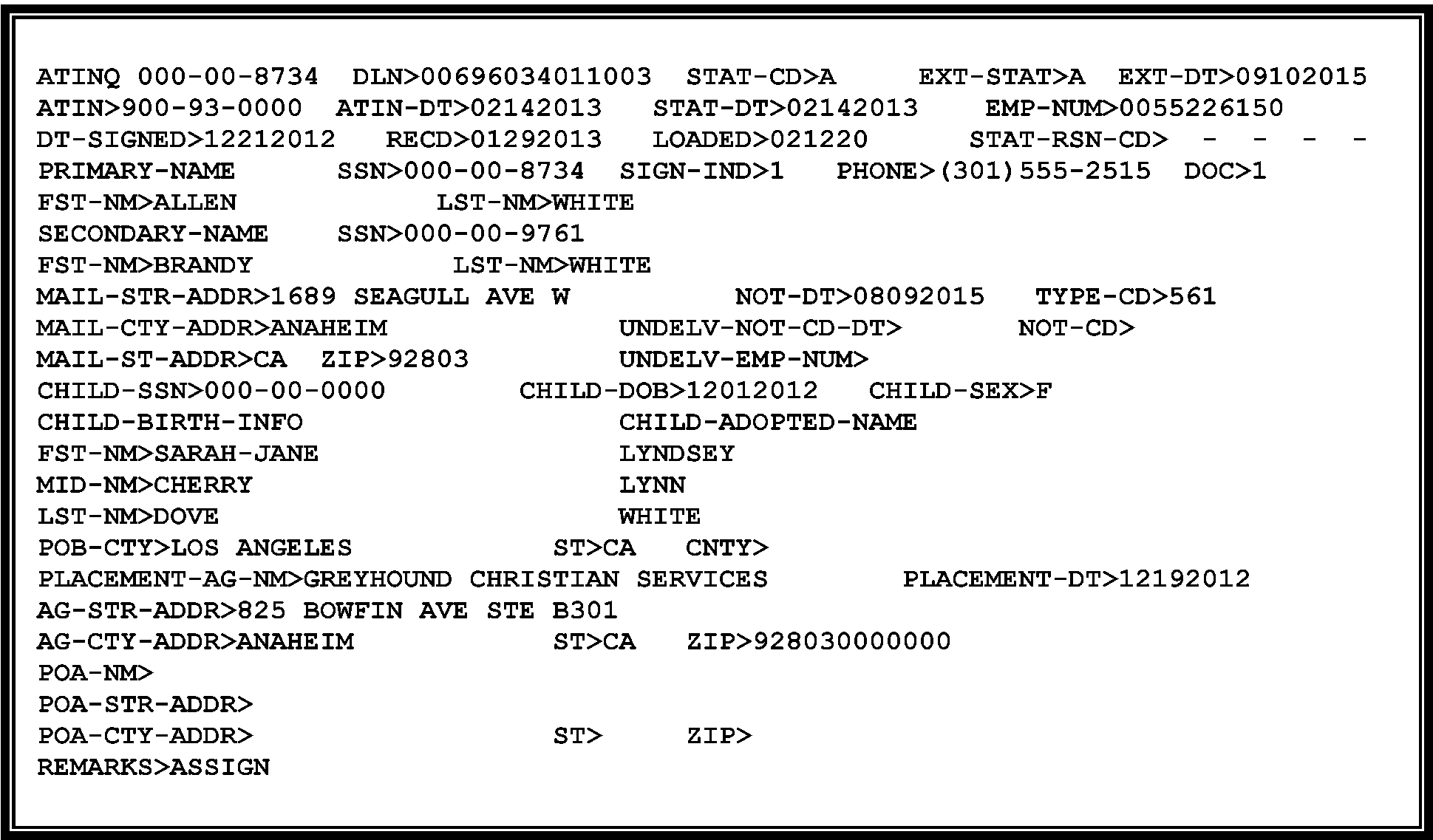
See Figure 3.13.40-1 for a copy of the ATINQ screen showing an ATIN was assigned and in STAT-CD A.-
Rejects will suspend until the ATIN is either Assigned or Rejected. Rejects will input the Returns Processing Date as the date the ATIN was Assigned or Rejected (STAT-DT) (as shown on the ASIGN screen).
-
Process the Form W-7A in Received Date order to reduce the suspense inventory in Rejects and allow posting of the Form 1040 or Form 1040-SR.
-
-
The Taxpayer Advocate Service (TAS) is an independent organization within the IRS whose employees assist taxpayers who are experiencing economic harm, who are seeking help in resolving tax problems that have not been resolved through normal channels, or who believe that an IRS system or procedure is not working as it should. TAS criteria include economic burden, systemic burden, best interest of the taxpayer, and public policy (as determined solely by the National Taxpayer Advocate (NTA)). TAS is responsible for assisting taxpayers who have unresolved problems with the IRS. See IRM 13.1.7, Taxpayer Advocate Service (TAS) Case Criteria, if additional information is required.
Note:
It is important that all IRS employees handle potential TAS cases with the taxpayers best interest in mind. Refer also to IRM 21.1.3.18, Operational Guidelines Overview, Taxpayer Advocate Service (TAS) Guidelines, for more information. Provide the taxpayer with the number for the NTA toll-free case intake line, 877-777-4778 or TTY/TDD 800-829-4059. The taxpayer should be advised that TAS is available if the taxpayer is not satisfied with the service he or she received.
-
While the Internal Revenue Service (IRS) is continually working to serve customers in a quality manner, some taxpayers still have difficulty getting solutions to their problems or getting timely and appropriate responses to their inquiries. Per IRC 7803(c), Congress established the office of Office of the Taxpayer Advocate (TAS) and its functions within the IRS to assist taxpayers and its functions within the IRS to assist these taxpayers. The Case Advocate will conduct an independent review of actions that have been taken or need to be taken to resolve the problems taxpayers are experiencing.
-
Employees should not view TAS Case Criteria as a means of excluding taxpayers from TAS, but rather, as a guide to TAS case acceptance. The criteria under which TAS accepts a case should not govern whether a taxpayer is entitled to relief.
-
Refer taxpayers to the Taxpayer Advocate Service (TAS) when the contact meets TAS criteria see IRM 13.1.7 Taxpayer Advocate Service TAS Case Criteria and you can’t resolve the taxpayer(s) issue the same day. Refer to IRM 13.1.7.5, Same Day Resolution by Operations.
-
Per the Taxpayer Bill of Rights (TBOR), taxpayers have the right to expect a fair and just tax system which provides taxpayers with the opportunity to have their facts and circumstances considered if they may affect their underlying liabilities, ability to pay, or ability to provide information timely. Taxpayers have the right to receive assistance from TAS if they are experiencing financial difficulty or if the IRS has not resolved their tax issues properly and timely through normal channels.
Note:
It is important that all IRS employees handle potential TAS cases with the taxpayer's best interest in mind. Refer also to IRM 21.1.3.18, Taxpayer Advocate Service (TAS) Guidelines, for more information. Provide the taxpayer with the number for the NTA toll-free case intake line, 877-777-4778 or TTY/TDD 800-829-4059. The taxpayer should be advised TAS is available if the taxpayer is not satisfied with the service he or she received.
-
An IRS employee should make a referral to a TAS office if the employee receives a taxpayer contact, and cannot initiate action to resolve the inquiry or provide the relief requested. A taxpayer does not have to specifically request TAS assistance to be referred to TAS. IRS employees will advise taxpayers of the option to seek TAS assistance when appropriate. TAS will request documentation from the taxpayer if it is needed to support the requested relief, or required by the IRM.
-
The following types of cases should NOT be referred to TAS:
-
Cases where the taxpayer’s complaint or inquiry only questions the constitutionality of the tax system; or
-
Cases where the focus of the taxpayer's inquiry is solely to employ frivolous tax strategies to avoid or delay filing federal tax returns or paying federal taxes.
-
-
The National Taxpayer Advocate and the Commissioner, TS, have reached an agreement outlining the procedures and responsibilities for processing Taxpayer Advocate Service (TAS) casework when either the statutory or delegated authority to complete a case transaction rests with the TS Division. The agreement is known as a Service Level Agreement (SLA).
-
In preparation for a case to be referred to a TS Division function, the TAS employee is responsible for the following:
-
Preparing Form 12412, Operations Assistance Request (OAR).
-
Securing all necessary supporting documentation.
-
Identifying cases that require expedite processing. No case will automatically receive expedite processing; requests for expedite processing will be made on a case-by-case basis.
-
Forwarding Form 12412 and documentation to the TS Business Unit Liaison.
-
-
The TS Division is responsible for:
-
Assigning a liaison in each office or Campus where a Taxpayer Advocate is located.
-
Acknowledging receipt of the case within one (1) workday for cases requiring expedite processing or within three (3) workdays for all other cases.
-
Responding to TAS within three (3) workdays in writing, via facsimile, secure messaging e-mail, or hand delivery of resolution.
-
Providing TAS with the name and telephone number of the TS group manager or employee assigned the case.
-
Determining a reasonable time frame for case resolution.
-
Upon closing of the OAR, the TS employee assigned the OAR will complete Section VI of Form 12412, Operations Assistance Request OAR, and return it to the TAS employee assigned the case. The Form 12412 must be returned within three (3) workdays from the date that all actions have been completed and transactions input.
-
-
For further information, refer to the TS SLA online at TAS web page.
-
If a taxpayer calls to say their identity was compromised or other general ATIN issues such as they did not apply for an ATIN, someone else used the ATIN, etc., provide the following information:
If taxpayer communicates... Then... a. Someone else used their child's ATIN Refer the taxpayer to the ID Theft information on IRS.gov. b. They never applied for an ATIN Refer the taxpayer to the ID Theft information on IRS.gov. c. They require form(s) Refer the taxpayer to IRS.gov or provide the 800 telephone number to order forms, 800-829-3676. d. They have an issue or freeze on their account not related to ATIN processing Refer the taxpayer to the main customer service 800 telephone number for assistance, 800-829-1040. e. TAS situations (related to economic burden on taxpayer or IRS failure to timely respond to or resolve a taxpayer issue) See IRM 3.13.40.3.1, Referring Cases to TAS for additional information. f. Their Schedule 8812 was rejected or denied As a taxpayer may not receive an Additional Child Tax Credit for a child with an ATIN for taxable years 2018 through 2025.
-
While working assigned cases, SP employees may come across some accounts that are blocked on IDRS. These accounts can be identified by an IDRS security violation message: "Unauthorized Access to This Account." Forward the case to your manager. Managers will notify the local Planning & Analysis Staff who will scan the case and send encrypted information to the≡ ≡ ≡ ≡ ≡ ≡ ≡ ≡ ≡ ≡ ≡ ≡ mailbox to request access to the account. Managers will retain the original case in a file awaiting access (can take up to five business days). Once notified access has been granted, the case can be processed following applicable procedures.
-
Mail is opened, extracted, date stamped, placed in boxes, and forwarded to the Adoption Taxpayer Identification Number (ATIN) Unit.
-
Each box has a Batch Control sheet, Form MAR-8203, which identifies:
-
Batch Number
-
Program Number
-
Number of Boxes in Batch
-
Date (if not present, stamp Batch Control sheet with the date the boxes are received in the ATIN unit).
-
-
Sort each batch into the following categories:
-
Form W-7A and supporting documentation mailed directly from applicant.
-
Form W-7A and supporting documentation from other IRS TAC sites or other IRS Campus Code & Edit (Form 3210 attached).
-
Form W-7A with Form 1040 or Form 1040-SR from Austin Code & Edit.
-
Form W-7A with Form 2848Power of Attorney and Declaration of Representative, attached (or some type of General Power of Attorney).
-
Converting Form W-7 (ITIN) to a Form W-7A, See IRM 3.13.40.5.5 , Converting Form W-7 (ITIN) to a W-7A (ATIN).
-
ATIN suspense correspondence.
-
Unsolicited correspondence (e.g., "White Mail" , Request for Extension of ATIN, etc.).
-
-
Detached Form W-7A’s from other Campuses.
-
When the ATIN clerk receives the Form W-7A from another campuses, they will batch them by the Received Date edited on the Form W-7A.
-
If no Received Date edited, edit the date on the Form 3210 onto the Form W-7A and use that date as the Batching date.
-
-
AUSPC Interoffice Receipts. Form 1040 or Form 1040-SR with Form W-7A attached.– If the Form W-7A is attached to a Form 1040 or Form 1040-SR, Code & Edit will pull the return from the batch and route the package to the ATIN unit, following local procedures.
-
The ATIN unit will suspend the return until the ATIN is assigned.
-
After the Form W-7A is processed and the ATIN is assigned, the ATIN Tax Examiner (TE) will edit the assigned ATIN in the Dependent's social security number area on the front of the Form 1040 and send it back through the pipeline.
-
If the ATIN application is Rejected, the ATIN TE will edit "ATIN Rejected" in the Dependent's social security number area on the front of the return and send it back through the pipeline.
-
For refund returns only, edit "02RPD" and the date the ATIN was assigned or rejected in the left margin of the return.
-
-
Form W-7 With Supporting Documentation – If the ITIN unit receives a Form W-7 with a request for an adoption TIN (domestic or Foreign child who is a U.S. citizen), edit an "A" beside "W-7."
-
The ATIN unit will convert the appropriate line information from the Form W-7 to a "dummy" Form W-7A. See IRM 3.13.40.5.5, Converting Form W-7 (ITIN) to a W-7A (ATIN) for additional information.
-
-
Stamp or edit the Received Date on all Form W-7A received and correspondence routed to the ATIN unit, if missing.
-
Bundle each category in blocks of 25. Provide packs to control clerk for preparation of Batch Control Log.
-
Place blocks on batch carts with Batch Control Log and release to Technical Unit.
-
Acknowledge receipt of all Form 3210 received and return Part 3 immediately to Originating Office. Maintain Form 3210 for six (6) months.
-
Follow local procedure for acknowledging receipts from areas within the Austin campus.
-
After the batch has been edited by the Tax Examiner, route the batches to Numbering prior to ISRP.
-
The applicant is instructed to send a copy of the original documentation. If the documentation is original, make a copy of the documentation and send the original documentation back to the applicant.
-
If the taxpayer indicates on the Form W-7A that neither the biological mother nor an adoption agency placed the child in the home of the applicant(s) or that the adoption was finalized, return the Form W-7A and the Letter 0096C, Acknowledgment Letter for General Use/Inquiry.
-
Use the Correspondex system and indicate the Form W-7A is being returned. Use the fillable paragraph S and type the information shown in paragraph b or paragraph c to the 0096C Letter depending on the reason the ATIN was not assigned.
Note:
The 0096C letter is used in sensitive circumstances such as the birth mother agrees to the adoption, but changes her mind before it is finalized. Another example is the adoption was finalized, but the child did not live. Use the information in paren (c) in the cases where the child was not placed in the adoptive parent’s home.
If... Then use fillable paragraph S in 0096C letter... a. Birth mother agrees to adoption, but changes her mind The documentation you supplied indicates that neither of the biological parents released the child to you for the purposes of adoption. If an agency is not involved in the adoption, you may submit a newly completed Form W-7A and attach an affidavit signed by one of the biological parents which states he or she is placing the child with you for the purposes of adoption. b. Baby/child not placed in adoptive parent(s) home The documentation you supplied indicates that neither of the biological parents released the child to you for the purposes of adoption. If an agency is not involved in the adoption, you may submit a newly completed Form W-7A and attach an affidavit signed by one of the biological parents which states he or she is placing the child with you for the purposes of adoption. c. Placement does not occur Upon review of your Form W-7A, Application for Taxpayer Identification Number for Pending U.S. Adoptions, the child you intended to adopt does not qualify for an Adoption Taxpayer Identification Number (ATIN). . However, section 23, of the Internal Revenue Code allows the IRS to accept adoption documentation in lieu of a child's tax taxpayer identification number on Form 8839, Qualified Adoption Expenses. d. ATIN applicant with a assigned ATIN for child but placement does not occur
Expire the ATIN (enter all “9”s in the SSN field) in IDRS.
Upon review of your Form W-7A, Application for Taxpayer Identification Number for Pending U.S. Adoptions, the child you intended to adopt does not qualify for an Adoption Taxpayer Identification Number (ATIN). However, section 23, of the Internal Revenue Code allows the IRS to accept adoption documentation in lieu of a child's tax taxpayer identification number on Form 8839, Qualified Adoption Expenses.e. Health issues cause the stop of the baby/child’s placement Upon review of the Form W-7A, Application for Taxpayer Identification Number for Pending U.S. Adoptions, the child you intended to adopt does not qualify for an Adoption Taxpayer Identification Number (ATIN). To qualify, the adoptive documentation must clearly establish the child has been placed in your home for the purposes of adoption. f. Baby/child dies before placement in home Upon review of the Form W-7A, Application for Taxpayer Identification Number for Pending U.S. Adoptions, the child you intended to adopt does not qualify for an Adoption Taxpayer Identification Number (ATIN). To qualify, the adoptive documentation must clearly establish the child has been placed in your home for the purposes of adoption. g. No adoption placement Upon review of the Form W-7A, Application for Taxpayer Identification Number for Pending U.S. Adoptions, the child you intended to adopt does not qualify for an Adoption Taxpayer Identification Number (ATIN). To qualify, the adoptive documentation must clearly establish the child has been placed in your home for the purposes of adoption.
-
-
On each application, you will first check for Primary TIN validity (i.e., does not begin with 9, does not contain all zeroes, and contains 9 digits). This does not mean you check IDRS for validity. Make any corrections to the Received Date format and any address editing required for ISRP input. Also, check the attached documentation to determine the Documentation Code. On the Form W-7A, edit the Documentation Code to the right of Line 5.
-
If there is an indication of a foreign child, and no citizenship or residency documents are present, then edit Documentation Code "0" . Once you have determined that the form will be rejected, you can discontinue reviewing the Form W-7A for any missing line entries or attachments. However, the Parent's Name and address information must be complete to generate CP 563D. After ISRP input, then reject the application with Status Code "R" and applicable Reason Code "04" .
-
Review Form W-7A and its supporting documentation. The following must be included in the application packet:
-
A statement that clearly establishes that the child listed on Form W-7A was placed in the applicant’s home for the purposes of adoption
-
Adoptive parent(s) full name(s)
-
Adoptive child's full name
-
Child's date of birth
-
Date the child was placed in the applicant’s home
-
Name of the placement agency or agent authorized to perform adoption placements. An authorized agent might be a private attorney, court judge, an official of a foreign government, or one of the child's biological parents.
-
-
If the required information is missing on the application or not provided with the supporting documents or does not match the Form W-7A, suspend using the appropriate Documentation and Status Reason Codes.
-
Edit the Documentation Code to Form W-7A in the margin to the right of line 5. The conditions are found in the Form W-7A packet and are used to determine the appropriate Documentation Code. See the following table for further information:
If... Then... a. Documentation is a foster care agreement with no mention of adoption Edit Documentation Code 3
(Used only if Reason Code 12 applies)b. There is an indication they are in the process of adopting a foster child but do not mention any attempt to secure the child's SSN, suspend for an explanation Edit Documentation Code 3
(Used only if Reason Code 12 applies)c. Documentation is not clearly for the child listed on the application Edit Documentation Code 2
(Used only if Reason Code 11 applies)d. Documentation does not establish that the placement is for adoption by the parent(s) listed on the application Edit Documentation Code 2
(Used only if Reason Code 11 applies)e. Documentation is missing Edit Documentation Code 0
(Used if Reason Codes 01-10 apply)f. Form 2848, Power of Attorney (POA) is attached and neither Document Code 2 nor 3 applies Edit Documentation Code 0
(Used if Reason Codes 01-10 apply)g. Adoptive child is foreign born and no citizenship or residency documents, or appropriate visas or visa statements are attached and neither Document Code 2 nor 3 applies Edit Documentation Code 0
(Used if Reason Codes 01-10 apply)h. Acceptable documentation is present and no other Document Code applies Edit Documentation Code 1
(Used when no reason code applies but may be used for Reason Codes 01-08 and 10) -
After editing the "Documentation Code" , you will input the applicable "Status Reason Code(s)" on the ASIGN screen. See the following table for further information:
If... Then input Status Code S with Status Reason Code... 1. Child's Name
Blank and cannot be determined from attachments01 (Used with Documentation Code "0" or "1" ) 2. Date of Birth
Blank and cannot be determined from attachments02 (Used with Documentation Code "0" or "1" ) 3. Placement Agency Name 05 (Used with Documentation Code "0" or "1" ) 4. Placement Agency Address 06 (Used with Documentation Code "0" or "1" ) 5. Date Child Placed in Home 07 (Used with Documentation Code "0" or "1" ) 6. Form W-7A Signature(s) missing 08 (Used with Documentation Code "0" or "1" ) 7. No Documentation attached 09 (Used with Documentation Code "0" ) 8. SSN Mismatch 10 (Used with Documentation Code "0" or "1" ) 9. Documentation is not for the child listed on the application 11 (Used with Documentation Code "2" ) 10. Documentation does not establish the placement is for adoption by the parent(s) listed on the application 11 (Used with Documentation Code "2" ) 11. Documentation is a foster care agreement with no mention of an adoption 12 (Used with Documentation Code "3" ) 12. If there is an indication they are in the process of adopting a foster child, but do not mention any attempt to secure the child's SSN, suspend for an explanation. 12 (Used with Documentation Code "3" ) Note:
Most of the Status Reason Codes are used in conjunction with the input of Status Code "S" to suspend for Required entry fields.
Status Reason Code "04" is used with Status Code "R" to reject an application when there is a foreign adoption and the child is not yet a U.S. citizen.
Search all attachments for the missing information to avoid unnecessary correspondence. -
If a Form 2848, Power of Attorney and Declaration of Representative, is attached, edit a Documentation Code "0" with no Status Reason Code. Flag the return, following local procedures, to process the POA and input the information to ASIGN. See IRM 3.13.40.5.4, Form 2848, Power of Attorney and Declaration of Representative.
-
Always use red for edit marks. If the applicant has entered red marks on the form which might interfere with transcription, edit with another color.
-
Never alter, obliterate or erase the applicants' entries.
-
If required item(s) are missing, illegible or obviously misplaced, attempt to correct the form by securing the information from the supporting documentation.
-
If unable to perfect, edit the proper Documentation Code on the Form W-7A, to the right of Line 5. Once the application is input and the record is established, incomplete applications should be returned to the ATIN unit for IDRS and ASIGN work. See IRM 3.13.40.7.2, Suspending Applications – Status Code "S" , for suspense procedures.
-
Circling-
-
A circle is used to delete incorrect data. If more than one Received Date is present, circle all later received dates and retain the earliest Received Date.
-
-
Arrowing-
-
If the applicant has misplaced an item that is close to the correct line, draw an arrow from the misplaced entry to the correct line. Also, arrow the Names, if applicant wrote them in the incorrect order (e.g., First name, then Last name).
-
-
For general editing information and type of edit marks allowed, see IRM 3.13.40.5.2, Types of Edit Marks.
-
Sign out a block of work in numeric order from Batch Control Log. Enter your TE stamp number and date completed. When sending a Form W-7A to ISRP for input, place the TE stamp as follows:
-
Phase 1 by #3 (Child’s name) in the left margin.
-
Phase 2 above the A in Application in the top margin.
-
-
If more than one received date is stamped, circle out all but the earliest received date.
-
The following information may be present on the supporting documentation to help you complete any of the required fields that are blank. For ISRP input, only research IDRS for incomplete name (Line 1a/1b) or address (Line 2), and invalid Primary/Secondary TIN (e.g., less than 9 digits) info. If there are other blank lines on the form and you can locate the missing information from attachments, then edit them on the Form W-7A. Otherwise, leave them blank.
-
If the Form W-7Ais not signed, continue to process. Edit applicable Documentation Code and input Reason Code "S" , Suspense Reason Code 08, and any other applicable Reason Codes for the missing information that cannot be perfected from information on attachments.
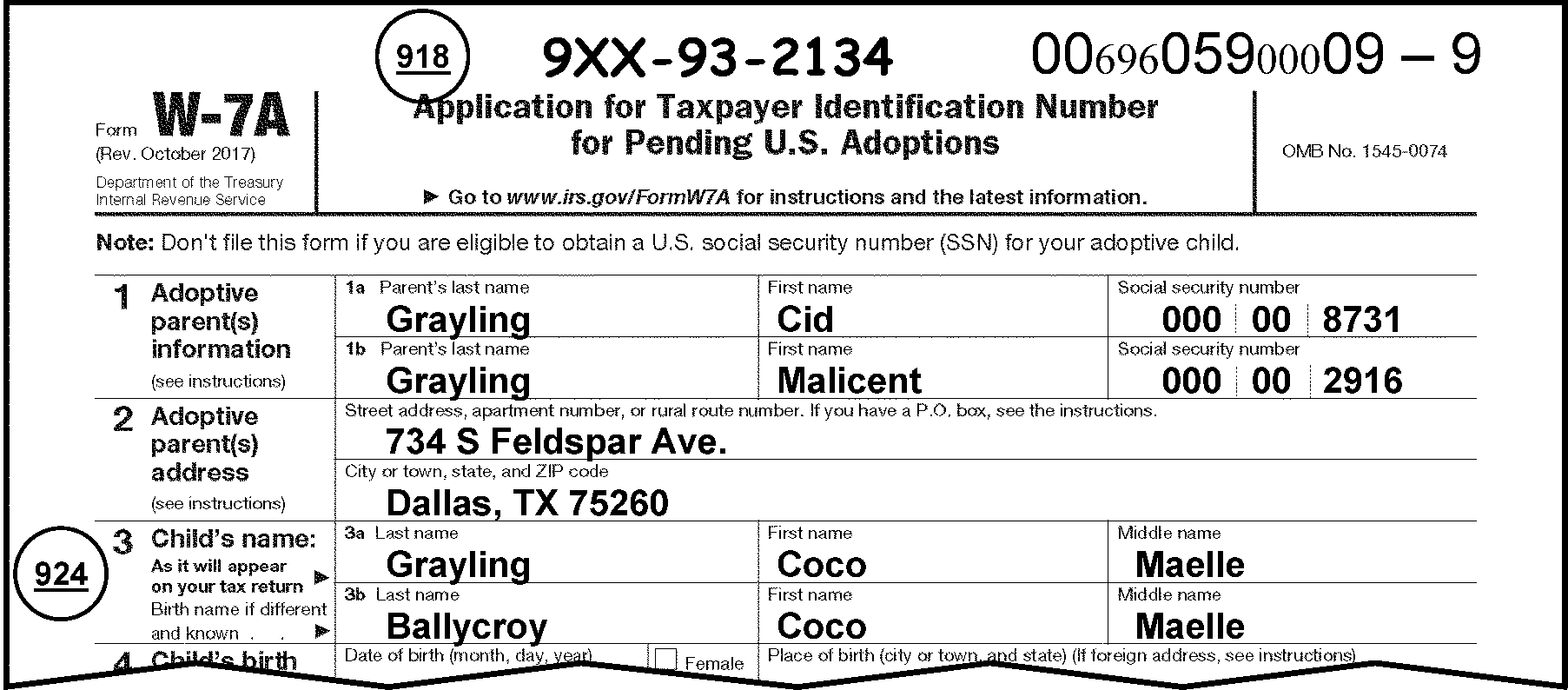
-
Name — Required entry. At a minimum, the last name must be present. If missing, search attachments or research IDRS and edit on Line 1a.
-
Verify that the name is spelled correctly, is legible and is listed in following order:
-
Social Security Number—Required entry. An ITIN is acceptable when used in place of an SSN for the Primary applicant. If missing or incomplete, search attachments or research IDRS and edit on Line 1a.
-
Name—Required only if two people signed the application. If two people signed the return, at a minimum the last name should be present or entire name must be edited using the name on the signature line.
-
Verify the name is spelled correctly, is legible and is listed in the following order:
-
Social Security Number — An ITIN is acceptable when used in place of an SSN for the Secondary Applicant. If missing or incomplete and cannot be found on an attachment, research IDRS.
-
This is a required entry.
-
The address must be complete and legible and contain the following information:
-
P.O. Box, street address including apartment number, or rural route number
-
City or Town
-
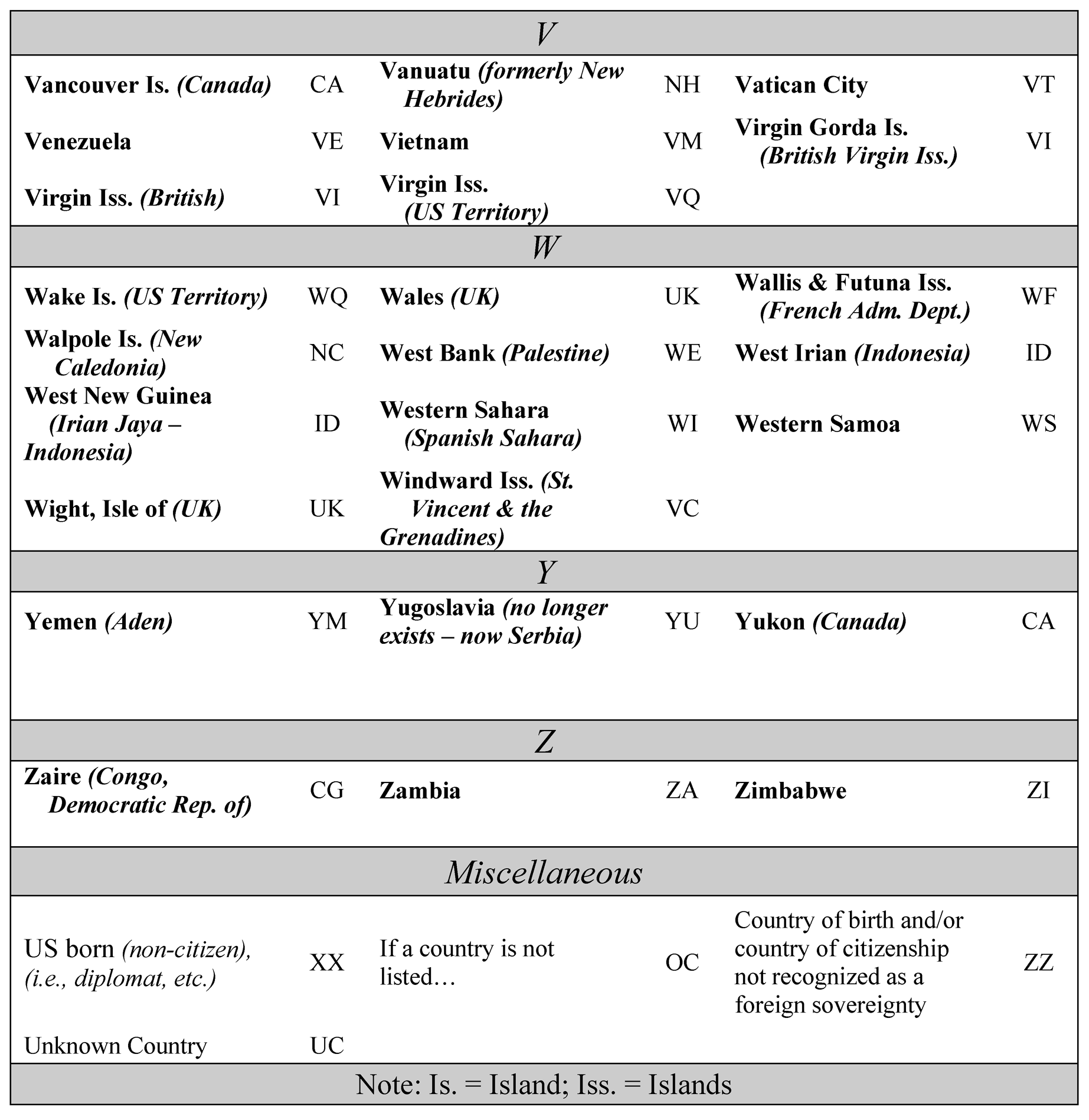
State or foreign city and country names are separated by a slash (/). See Exhibit 3.13.40-2, Country Codes.
-
ZIP Code or Postal Code or Country Code.
-
-
Perfect address as follows:
-
This is a required field. Both a first and last name are required. If missing and cannot be entered from an attachment, suspend with Status Reason Code "01" .
-
"Baby Girl" , "Infant Girl" , "Baby Boy " or "Infant Boy" is acceptable as the first name if a proper first name cannot be edited from attachment(s)/application and the child is/was less than one year old when the adoptive parent(s) adopted the child.
-
For successful processing of the dependency on the return, the last name must be the name the parent intends to use on the return for the child. Therefore, it is not acceptable to use Baby Girl, Infant Girl, Baby Boy, or Infant Boy as their first and last name.
If a proper last name cannot be edited from an attachment, suspend the case.
-
-
Verify that the name is spelled correctly, is legible and is listed in the following order:
-
Last Name
-
First Name
-
-
Not Required.
-
If a proper name is present (first and last name), verify that the name is spelled correctly, is legible and is listed in the following order:
-
Last Name
-
First Name
-
-
If missing, do not transfer child(s) name from supporting documentation. If only last name present, circle it out. If only first name is present, edit the last name of the parent entered on Line 1a.
-
If blank, do not correspond.
-
This is a required field. If missing or incomplete and cannot be found on an attachment, suspend with Status Reason Code "02" .
-
Date of Birth must be in MMDDYYYY format. (i.e., November 7, 2020 — 11072020). If not, edit date in correct format.
-
This is a required field. If a box is not checked indicating "Male" or "Female " , use the following chart to determine which box to check, or circle.
-
If no box or both boxes are checked, try to determine the sex of the child from the Child's name or review supporting documentation, such as birth records, then check (or circle) the appropriate box.
If... Then... a. No box is checked Check the appropriate box, if able to determine by the name or attachments. b. Both boxes are checked Circle out the "check box" that does not apply, if able to determine. c. Unable to determine the sex .Circle out both “check boxes.”
-
This is a required field.
-
If present, verify that the place of birth is in the correct format for ISRP input.
-
If foreign place of birth, enter the city slash (/) and spell out the country and edit Country Code in State field. Postal Code belongs in the ZIP Code field.
Caution:
If foreign, review supporting documentation for permanent residence status. (i.e., Permanent Resident Card ("green card" ), "I-551" on the passport, or Certificate of Citizenship, IR2, IR3 or IR4 visa). This will help you determine whether to reject it, and if you will only need to perfect the Required fields.
-
If unable to determine, edit "Washington, D.C." in the field. Do not correspond, since the Instructions state, "If you know the child's place of birth, enter it on line 4."
-
This is a required field.
-
Verify that the name is complete and legible.
-
If blank, review supporting documentation and edit it to the Form W-7A.
-
If words "Private Adoption" are present, then circle out. Search the attachments for the name of agency or judge/lawyer's name to edit.
-
If unable to determine, suspend with Status Reason Code "05" .
-
This is a required field. If missing invalid or illegible, suspend with Status Reason Code “06”.
-
Verify that the address is legible and in the correct format for ISRP input.
-
If a foreign address, ensure both the city and country names are spelled out. Edit a slash between the city and country name. See Exhibit 3.13.40-2, Country Codes, for foreign country codes.
-
If unable to determine, suspend with Status Reason Code "06" .
-
This is a required field.
-
If the date of placement is present, but not in the correct format, edit the date in "MMDDYYYY" format.
-
If blank, review supporting documentation and edit it to the Form W-7A. If more than one date is shown on the attachment, edit the earliest date.
-
If unable to determine, suspend with Status Reason Code "07" .
-
This is a required field.
-
If two people are applying, then there must be two signatures present in the “Sign Here” area under the jurat.
-
Signature of the Primary applicant must match the signature on the substantiating documentation.
-
If an applicant cannot sign their name, then they must sign their mark in the presence of a witness. The witness's signature is required in these situations.
-
If someone other than the Parent(s) signs the application, then a Form 2848, Power of Attorney and Declaration of Representative, (or acceptable Power of Attorney (POA)) must be attached and acceptable, or already posted on CC CFINK (with Form W-7A as the Form) before you can continue to process the return. See IRM 3.13.40.5.4, Form 2848, Power of Attorney and Declaration of Representative for POA instructions.
-
-
If signature area is blank, or only one signature is present for a joint adoption, circle out the one existing signaturesuspend with Status Reason Code "08" .
-
The Signature Date of the application must be in MMDDYYYY format. If there is no date present, edit the received date. Always edit in MMDDYYYY format, if not written in that format by the applicant.
-
Phone number. Take no action.
-
This field cannot be input by ISRP. If there is a "General or Durable Power of Attorney" or Form 2848Power of Attorney and Declaration of Representative, attached for "Form W–7A" , and all of the criteria in (7) below are complete, edit Documentation Code "0" for ISRP input. If you have questions about whether to accept the Form 2848 or General POA to the Centralized Authorization File (CAF), refer to your work leader. If the POA is complete, input the Power of Attorney (POA) name and address fields on the ASIGN screen. If not, then do not input the POA into the ASIGN screen. Notify the applicant the reason that the POA is not acceptable, using the Letter 2673C, Representative or Appointee/Taxpayer Response.
-
A copy of all correspondence sent from the database will automatically generate to the POA. In order to do this, you must always edit "Documentation Indicator" "0" with no Status Reason Code, to prevent it from auto assigning. When it comes back from ISRP, input the POA information on the ASIGN screen, to ensure the POA receives the correspondence. Once the POA information is input, you can input STAT-CD"A" to both assign the ATIN and generate the notice to both the POA and applicant, if application is acceptable. If there is information missing, you can also suspend and correspond at this point.
-
Taxpayers will occasionally submit a Form W-7A that has been signed by their enrolled agent, or some other representative. These personal representatives must submit a Form 2848, Power of Attorney and Declaration of Representative, with Part II completed; or there must be an acceptable General/Durable POA established on the Centralized Authorization File (CAF) file.
-
Taxpayers may also submit a Form 8821, Tax Information Authorization, as documentary evidence for signing the application. However, Form 8821 does not authorize the signing of the application.
-
For a representative to have authority to act on behalf of a taxpayer, the taxpayer must provide the representative with an acceptable, written power of attorney (as described in (7) below) and the representative must provide a declaration of representative (as described in (8) below).
-
A completed Form 2848, Power of Attorney and Declaration of Representative, satisfies all requirements for both a power or attorney and a declaration of representative. Part I of Form 2848 satisfies the requirements for a power of attorney described in (7) below, and Part II of Form 2848 satisfies the requirements for a declaration of representative described in (8) below.
-
If on Form 2848, "Tax Form Number" , is anything other than "Form W-7A" , then do not update the ATIN database. You can still route the Form 2848 to the CAF unit, but you should send the representative a Letter 2673C, Representative or Appointee/Taxpayer Response, acknowledging the receipt of the Form 2848 and explaining that you sent it to be processed for the tax form indicated, rather than for the Form W-7A. If the representative still wants to act on behalf of the taxpayer, he/she must submit a revised (new) Form 2848 to include a Form W-7A.
-
-
If a representative submits a power of attorney that is not on Form 2848, Power of Attorney and Declaration of Representative, it must include all of the following items to be sufficient to process the Form W-7A.
However, even if a representative submits a power of attorney that contains all of these items, the power of attorney cannot be processed onto the Centralized Authorization File (CAF) without a completed Form 2848, Power of Attorney and Declaration of Representative, attached.-
Name and mailing address of the taxpayer
-
Taxpayer Identification Number (TIN) of the taxpayer
-
Name and address of the representative
-
Description of the matter(s) for which the representative is authorized, which, if applicable, must include:
The type of tax involved
The tax form number (for ATIN purposes, Form W-7A); and the specific years(s)/period(s) involved; and -
A clear expression of the taxpayer's intention concerning the scope of authority granted to the representative(s).
-
-
If a representative submits a power of attorney that is not on Form 2848, the representative must also provide a written "declaration of representative" stating the following:
-
I am not currently under suspension or disbarment from practice before the IRS
-
I am aware of regulations contained in Treasury Department Circular No. 230 (31 CFR part 10)
-
I am authorized to represent the taxpayer(s) identified in the power or attorney; and
-
I am an individual authorized to practice before the IRS under Circular 230.
-
-
A power of attorney that does not contain one or more of the items of information described in (7)(a) through (7)(d) above is defective and cannot be accepted as long as the defect remains. The representative can correct the defect by signing (on behalf of the taxpayer) a Form 2848, Power of Attorney and Declaration of Representative, that includes the missing information and attaching this Form 2848 to a copy of the original power of attorney, under the following conditions:
-
The original power of attorney authorizes the representatives to handle, among other things, Federal tax matters (e.g., if the power of attorney says that the representative has the authority to perform any and all acts, then the representative has authority to handle Federal tax matters); and
-
The representative attaches to the Form 2848 a statement (signed under penalty of perjury) which states that the original power of attorney is valid under the laws of the governing jurisdiction (e.g., if the taxpayer resides and executed the original power of attorney in State A, the representative should state that the power of attorney is valid under the laws of State A).
-
-
If someone other than the applicant signs the Form W-7A, research CC CFINK under Centralized Authorization File (CAF) to verify the personal representative is authorized to sign the Form W-7A for that year.
If... And... Then... a. The signature on the application matches a representative listed on CFINK Continue processing the application. b. The signature on the application does not match a representative listed on CFINK, or no record is found Form 2848, Power of Attorney and Declaration of Representative, is attached
1. Detach from Form W-7A and route to the nearest Centralized Authorization File (CAF) unit based on where the taxpayer resides, refer to table in IRM 3.13.40.6.4.(11) for CAF unit locations.
2. Continue processing the application.
3. Leave an action trail on the Form W-7A and Form 2848.c. The signature on the application does not match a representative listed on CFINK, or no record is found Form 2848, Power of Attorney and Declaration of Representative, is not attached Correspond for a new Form 2848 if a different type of tax or period is indicated on CFINK (e.g., Form 1040 or Form 1040-SR.). -
Use the following addresses when routing or faxing a Form 2848, Form 8821, or "acceptable" General/Durable POA to a Centralized Authorization File (CAF) Unit. Refer to Web page for CAF contacts. The CAF Contacts information will display.
CAF Unit Fax Number Address Memphis
(generally, all states EAST of the Mississippi River)
855–214–7519
Memphis (MAMC)
5333 Getwell Rd
Stop 8423
Memphis, TN 38118Ogden
(generally, all states WEST of the Mississippi River)
855-214-7522
Ogden (OAMC)
1973 N. Rulon White Blvd
M/S 6737
Ogden UT 84201Philadelphia
(APO, DPO, FPO, American Samoa, Guam, VI, Foreign country)
855-772-3156
Philadelphia (PAMC)
2970 Market St
International CAFM/S 4.H14.123
Philadelphia, PA 19104 -
You may accept a fax of Form 2848, Power of Attorney and Declaration of Representative, if you are in telephone contact with a taxpayer to secure missing data or respond to questions, or gathering information to make an application processable. During telephone contact, you can accept information to complete incomplete line information, but the Documentary Support must be mailed or faxed and attached to the Form W-7A. After reviewing the Form 2848, forward to the Centralized Authorization File (CAF) unit for processing, if complete. Then, input POA to the ASIGN screen.
-
If correspondence is attached to the application that is unrelated to the Form W-7A application, but needs to be detached and routed to the appropriate functional area, attach a photocopy of the POA/TIA to the correspondence. Indicate that the POA form has been detached and routed to the CAF unit.
-
If the ITIN unit receives a Form W-7 with a request for an adoption TIN that is for a domestic adoption, they will edit an "A" to the right of the "7" in the upper left corner and route the Form W-7 (and possibly attached tax return) to the ATIN unit. The ATIN unit will convert the "Required field" lines onto a "Dummy" Form W-7A. Use the name on the signature line and applicant's mailing address to research IDRS for the parent’s name and TIN.
-
If there is supporting documentation attached regarding the adoption, make every attempt to use the information provided on the Form W-7 and attachments to convert the information to a Form W-7A and process the "Dummy" application for a ATIN. Edit the Documentation Code on Form W-7A to right side of line 5 and the "Required entries" on the "Dummy" Form W-7A as indicated below. Attach the Form W-7 behind the "Dummy" Form W-7A and "X" it.
Edit info from the following lines on the Form W-7, attachment, or IDRS: To the following lines on the Form W-7A: Received Date Edit "Recd" and date in "MMDDYYYY" format to the Left of Line 5. 1a. Primary Parent’s last name, first name or Signature Line. 1a Primary TIN– Research IDRS or look on the dotted line to the right of box d. 1b 2 – Domestic Address 2 1a Child’s name Determine whether the child's name is on Line 1a or from attachment. The Required Documentation for the Form W-7 should be the child's (dependent) 3a 4 – Date of Birth 4 – MMDDYYYY format 5 – Male/Female – If blank, see IRM 3.13.40.5.3.7, Line 4 - Child's Sex for the rules. 4 4 – City of Birth 4 4 – Country of Birth 4 6g -Adoption Agency – Use any attachment to make determination. 5 – Name and Address of Agency 6d – Date Child was placed with adoptive parents – If Entry Date in U.S. is present, edit this date. 5 – Date Child was placed with adoptive parents - MMDDYYYY format Signature Indicator – If Form W-7 is signed (or attached tax return is signed), edit a "1" on the signature line. Edit "1" on first signature line.
(As long as the primary taxpayer's signature is present on Form W-7 or attached tax returns, do not correspond for the spouse's signature).Signature Date If present on Form W-7, edit date in MMDDYYYY format. If date not entered by TP, use Received Date. Phone Number If present, edit the numerals. Documentation Indicator(s) - There are different documents required to be attached to the Form W-7. Use same criteria as shown in IRM 3.13.40.5, Tax Examiner Review of Application and Supporting Documentation. -
If you are unable to convert all of the line items to the "Dummy" Form W-7A, or the Placement Agency information is missing, then suspend to correspond. After ISRP input, then:
-
Input "S" in the STAT-CD field,
-
Input applicable Status Reason Codes in STAT-RSN-CD field and
-
Input "Conversion of W-7" in the Remarks.
-
-
Once the ATIN is assigned, edit the ATIN in the Dependent's social security number area , if the individual tax return is attached. For TY 2017 and prior, edit the ATIN in the Exemptions social security number area. If the ATIN is assigned after April 15, then edit "02 RPD" and the date the ATIN was assigned in the left margin of the tax return, if it is a refund return. Route the return to Receipt and Control for processing.
-
If the Form W-7A is received without a tax return and the adoptive parent(s) is U.S. citizen(s) living abroad and the child has NOT been issued a Passport, Permanent Resident card, or Certificate of Citizenship because they do not plan on entering the United States, you must edit the Form W-7A for ISRP input, then reject the application.
-
Reject the Form W-7A and issue CP 563D, Adoption Taxpayer Identification Number (ATIN) Request Rejected - We couldn’t Process your Application for a Non-US Citizen or Resident.
-
Input Status Code "R" , and
-
Status Reason Code "04" .
If... Then use fillable paragraph S in 0096C letter... a. Baby/child already has an SSN. Upon review of the Form W-7A , Application for Taxpayer Identification Number for Pending U.S. Adoptions, the child you intended to adopt does not qualify for an Adoption Taxpayer Identification Number (ATIN). The child already has a Social Security Number (SSN). b. Baby/child already has an ITIN Upon review of the Form W-7A Application for Taxpayer Identification Number for Pending U.S. Adoptions, the child you intended to adopt does not qualify for an Adoption Taxpayer Identification Number (ATIN). The child already has an Individual Taxpayer Identification Number (ITIN). Note:
The 0096C letter is used in sensitive circumstances such as the birth mother agrees to the adoption, but changes her mind before it is finalized. Another example is the adoption was finalized, but the child did not live. Use the information in paren (c) in the cases where the child was not placed in the adoptive parent’s home.
-
-
If the Form W-7A is attached to the tax return, route the package to the ITIN unit, instead of rejecting with a CP 563.
-
Attach a note or "buck slip" explaining that the child is not a U.S. citizen and needs an ITIN, instead of an ATIN.
-
Attach Form W-7 to the front of the tax return.
-
Include any legal documentation received with the W-7A application.
-
Complete the Dependents area (Line 6c on TY 2017 and prior) of the tax return with the child's name, etc. Leave Dependent's Social Security Number (SSN) blank and the IRS will fill that in when the ITIN is assigned.
-
-
Route any misdirected Form W-7, with or without attached return, to the ITIN unit.
-
Once work is completed by ISRP, it will be returned to the control clerk in the Clerical Unit.
-
The control clerk will prepare Processing Control Log and release the work to technical units on a "First In, First Out" basis.
-
Tax Examiners will sign out blocks of work on the Processing Control Log in DLN order.
-
The unit manager will establish quality controls.
-
ATIN program will generate a daily report, the "ATIN Auto Assignment Report" . The report lists all error free DLN records where the program automatically assigned the ATIN.
-
All applications will be held systemically for 3 days to allow for quality review.
-
The Command Codes for ATIN are described below and they are in your "profile" . This is not an all inclusive list of Command Codes that you could use to process these applications. Any other Command Codes you need can be added to your Employees Security File ("profile" ) with your manager's approval.
-
You will use both IDRS Command Codes, as well as the ones specific to updating the ATIN database. Some of the IDRS Command Codes that are available to you are listed below.
IDRS Command Codes Definition SINON Used to sign on to IDRS. Input CC SINON. SINOF Used to sign off IDRS. Input CC SINOF.
CC SINOF must be used when leaving the terminal or at the end of the shift.INOLE
Definer "T" or "S"Used to access the National Account Profile (NAP) which contains selected entity information for all Master File (MF) accounts, such as addresses. NAMES/NAMEI Used to research the Name Search Facility (NSF) for a previously assigned ATIN. ATINQ
(One space between command code and TIN)Used to research the ATIN database using the Primary or Secondary TIN.
Research Command Code only. -
The ASIGN Command Codes are ONLY available to the ATIN unit. ATIN Tax Examiners have access to assign or update an ATIN status. Other IRS functions access the ATIN status using CC ATINQ with the Primary or Secondary TIN. The following Command Codes are specific to the ATIN database.
ATIN Command Codes Definition ASIGNR
(No space between command code and DLN)Used to access the ATIN database using the DLN assigned to the Form W–7A application.
Must access CC ATINQ (using the Primary and Secondary TIN) to research for possible duplicate applications.ASIGNT Used to access the Form W–7A application using the primary or secondary applicant TIN. ASIGNU Used to update the application record. Screen appears after entering ASIGNR or ASIGNT. -
See Figure 3.13.40-3 for a display of the elements on the CC ASIGN screen.
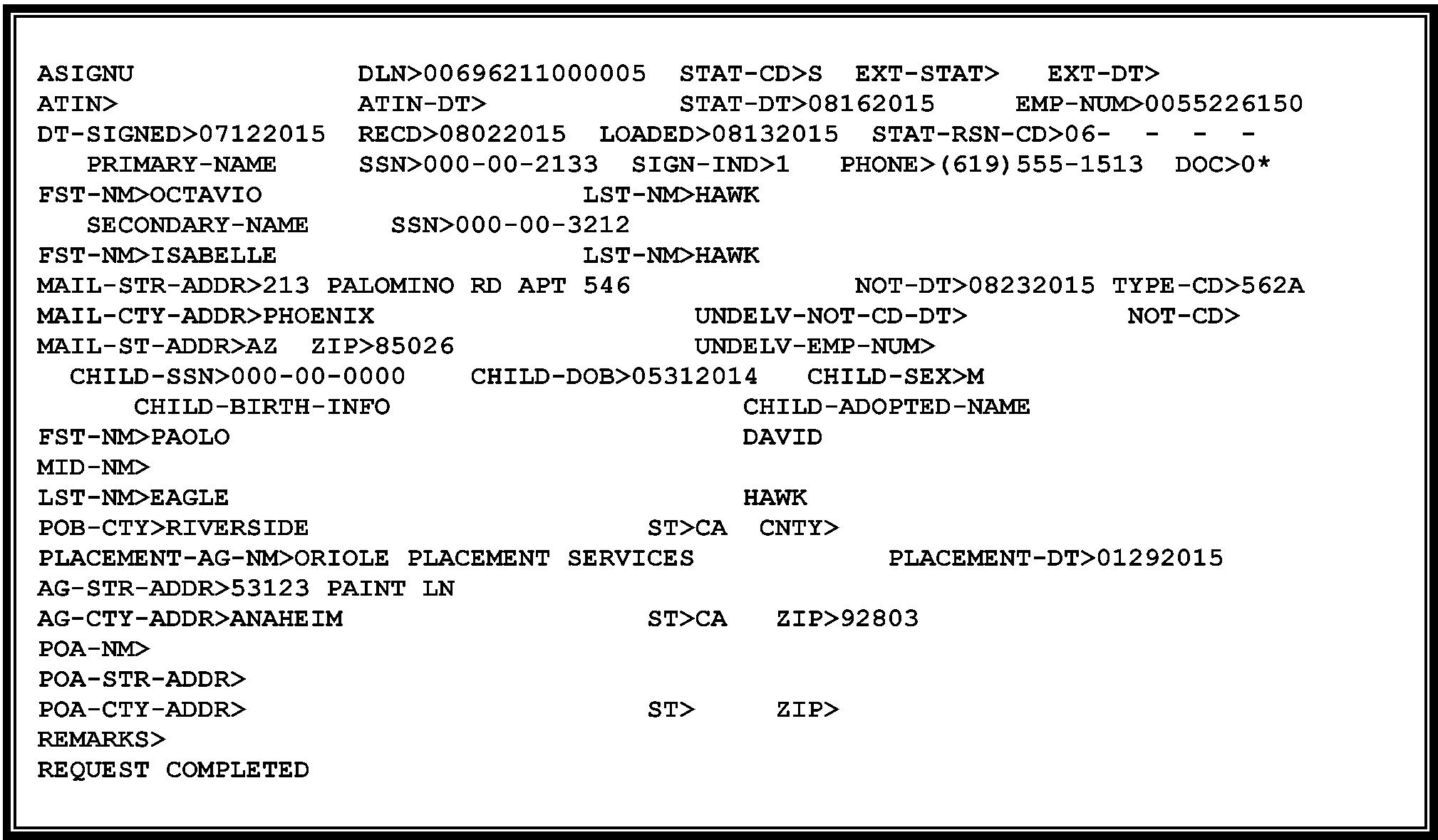
-
The status codes in the STAT-CD or EXT-STAT-CD fields identify the status of the Form W-7A application and helps other functions resolve account issues.
-
Applications that have been auto assigned will be in "A" status and have ATINs notated by the Clerical Unit above the title on Form W-7A. Do not work these applications. Work only those applications that do not have an ATIN notated.
-
Status Codes "U" or "H" are generated in the STAT-CD field from the ISRP input of a Form W-7A.
See Figure 3.13.40-3.-
Status "U" indicates that no duplicate applications were found, but the ATIN could not be auto assigned due to some problem with the data.
-
Status "H" indicates that a possible duplicate application was found.
Status Code Definition U Identifies unworked application — Computer Generated H Identifies potential duplicate applications exist — Computer Generated
Research CC ATINQ (using Primary/Secondary TIN) to determine if ATIN has already been assigned and should be Rejected using "01" , or if the application is in process and should be Rejected using "02" . -
-
The status codes which can be assigned by a Tax Examiner are the following:
-
"A" (Assigned)
-
"S" (Suspended for correspondence)
-
"R" (Rejected)
Status Code Definition A Entered by Tax Examiner—Used to assign the ATIN when application is complete and documentation is sufficient
Note: Status Code "A" will be Computer Generated when application is auto assigned.S Entered by Tax Examiner—Used with Suspense Reason Code to suspend for missing required fields, Signature, Documentation, or question a Foster Child. R Entered by Tax Examiner or Computer Generated–Used with a Reject Reason Code to reject application. -
-
Status Code "E" generates when the ATIN has expired and Status E is computer generated. This occurs when:
-
Account has been in Status Code "A" for 24 months. (Actually, the system allows the ATIN to stay active for 3 additional months).
-
Account has been in Extension Status Code "A" for 24 months. When an ATIN is issued, the IRS advises the applicant the extension is only good for one year. However, the ATIN will remain active on the system for two years. After one year, the applicant must provide the IRS with the status of the child's SSN application. Once the status is provided, the ATIN can be Rejected or left in Extension Status "A" .
-
Most CP notices contain a "stub" with a request for the applicant to provide the child's assigned SSN. If the child's SSN is input into the system, an "E" generates.
-
-
When you see "E" in the STAT-CD or EXT-STAT field under any of the ATIN Command Codes, it indicates the ATIN is no longer valid and has expired on the DM-1 for filing a Form 1040 or Form 1040-SR.
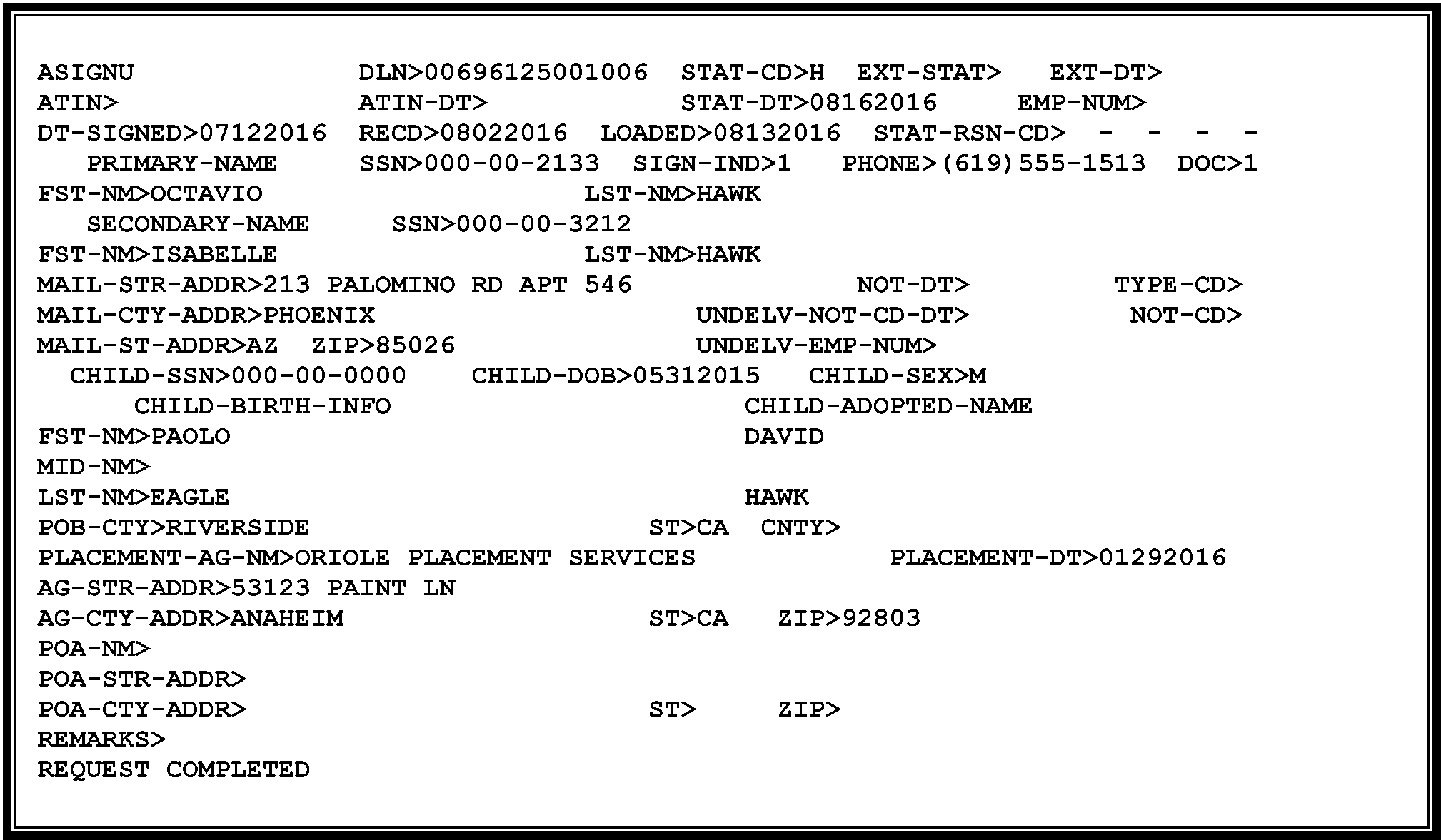
-
The computer generates Status Code "A" in the STAT-CD field when all fields are valid and Documentation Code is "1" .
-
The computer generates Status Code "E" in the STAT-CD field when the original 2 year time frame has Expired and no extension was approved.
-
See the following table for additional information:
Reason Status Code Reason Code Generate CP Notice Documentation Code "1" input by ISRP A – Assigned CP 560A No Reply to CP 561, 01 with a Request for Extension - ATIN will expire in 6 months E – Expired 03 CP 561 "S" Status - suspended for correspondence, for 75 days, indicating No Reply R – Rejected 03 CP 563C
-
When you input a Status Code "A" , you DO NOT enter a Reason Code to generate the CP 560A. However, if you input a "S" , or "R" , enter a Reason Code to generate the CP Notice with the correct information.
-
Following is a list of the valid Status Codes, Reason Codes and CP Notices that a TE can input.
STAT-CD STAT-RSN-CD Definition CP NOTICE A Assigned ATIN CP 560A S 01 Name of Child CP 562A S 02 Date of Birth CP 562A S 03 Place of Birth CP 562A S 05 Placement Agency Name CP 562A S 06 Placement Agency Address CP 562A S 07 Date Child Was Placed CP 562A S 08 Signature CP 562A S 09 Documentation Missing CP 562A S 10 SSN Mismatch CP 562A S 11 Documentation did not agree or incomplete CP 562A S 12 Foster Care CP 562A R 01 ATIN has already been assigned CP 563A R 02 Duplicate application was found CP 563B R 04 Foreign Child CP 563D
-
Input CC ATINQ followed by the Primary/Secondary TIN.
-
CC ATINQ will display all applications on file for the applicant. If more than one application is on file for the applicant, page up or down through each application.
-
Review the adoptive child information in each application to make sure the current application is not a duplicate.
-
If you determine the current application fits one of the following scenarios take the following steps:
If... Then... a. One application is found (original application) Input CC ASIGNR, using Home key to move DLN to proper location then page up. Response will be the ASIGNU screen. b. Application is for a different child and is not a duplicate of a previous submitted application, Enter CC ASIGNR with DLN and continue processing the current application. If... Then... a. More than one application is found, Determine if it is a duplicate, or in process of being assigned an ATIN.
a. If it is a duplicate and the assigned ATIN is not expired, do not reject.
b. If the assigned ATIN is not expired, Reject 01.
c. If it is in the process of being assigned, Reject 02.
d. Use CC ASIGNR, using Home key to move to proper location to access the application record.
-
For applications that have been auto assigned, the Clerical Unit will write the ATIN above the title on Form W-7A. Do not work these applications. If there's a computer problem and it's in "A" status, but an ATIN has not been auto-assigned,, assign an ATIN.
-
Review names, address, the name of the child and date of birth fields on screen against the Form W-7A data only for accuracy. If incorrect, then correct all coding and transcription errors on these displayed fields, to ensure notices are generated to the correct address and the DM-1 file is updated with the correct date of birth.
-
All data fields marked as invalid (*) MUST be corrected. If there is an error on a Primary Foreign Address, make sure the City, or City and Province are in the City field, the Country Code is in the State field, and the Postal Code is in the Zip Code field.
If... Then... All invalid fields have been corrected and the application is now valid. 1. Input "A" in STAT field of ASIGN screen, and
2. Enter any comments in Remarks field, and
3. Move cursor to Line 24 of screen, and transmit.
4. Notate ATIN above Title on Form W-7A.
-
Review names, address and date of birth fields on screen against the Form W-7A data only for accuracy. If incorrect, then correct all coding and transcription errors on these displayed fields only.
-
Correct data fields marked as invalid (*), if possible. You must have the correct information in the Primary Name and address field to send a CP notice.
-
When fields are invalid and cannot be corrected, then:
-
Input "S" in "STAT-CD>" field, then
-
Enter Suspense Reason Codes in "STAT-RSN-CD>" field, then
-
Enter any necessary comments in Remarks field, then
-
Move cursor to Line 24 of screen, and
-
Transmit
-
-
Line by line Suspense correction procedures:
If... Then in STAT- RSN-CD Field, input... Line 3
The adoptive child's name is missing/incomplete and cannot be determined01 Line 4
Date of Birth is missing and cannot be determined02 Line 4
Place of Birth is missing and cannot be determined03 Line 5
Name of Placement Agency is missing and cannot be determined05 Line 5
Address of Placement Agency is missing and cannot be determined06 Line 5
Date Child Was Placed is missing and cannot be determined07 Signature is missing.
If signed by someone other than the applicant, search for a POA attached or check CC CFINK.08 Supporting Documentation is missing 09 SSN Mismatch 10 Supporting Documentation does not match entries on Form W-7A or is incomplete 11 "Foster Care/Adoption Agreement" (No Explanation why SSN cannot be secured from biological parent) 12
-
When research indicates Form W-7A should be rejected, take the following steps:
-
Input "R" in the "STAT-CD>" field and the appropriate reject reason code in the Reason Code (STAT-RSN-CD) field:
If... Then in the "STAT-RSN-CD>" Field... 1. ATIN assigned for the same child – Applicant already has a valid ATIN for the same child. ( H status) TE inputs 01
Also, enter "DUP" in the Remarks field and on Form W-7A.2. "In Process" – The applicant sends in a duplicate application (same child - U status and you confirm the duplicate). TE inputs 02 3. U.S. parents live overseas with foreign adopted child and do not plan to enter the U.S. with the child. Reject if no tax return is attached.
If tax return is attached, route the package to the ITIN unit with a Buck Slip explaining the situation.TE inputs 04 4. Extension Request Denied - no reply System generates 05 -
-
Once a block is completed, the Tax Examiner will update the Processing Control Log with the completed time and date, number of cases Assigned, Suspended and Rejected in the block. When an entire block has been Assigned or Rejected, forward the block to Files.
-
For Assigned Applications, write ATIN number above the title on Form W-7A.
-
For Suspended Applications, all Form W-7A will be suspended until the updated information is received, or the time expires and the case is rejected.
-
For Rejected W-7A Applications because, for example, the child is not a U.S. citizen, an application is in process, or it's a duplicate application, or a "Dummy" Form W-7A, keep the Form W-7A within the numbered batch. Use your local report to identify the suspended ones that will reject, due to "no reply" .
-
For AUSPC Only– When a Form 1040 or Form 1040-SR. tax return is attached and the application requires suspension, keep the return(s) with the Form W-7A until the application is either assigned or rejected. If assigned, edit the ATIN above the Form W-7A title and in the "Dependent's social security number" , area (Line 6c(2) on TY 2017 and prior) on the tax return next to the adoptive Child's name.
-
For Refund returns only, edit 02 RPD and the date the correspondence was received in the left margin to correct the condition to assign the ATIN.
Detach the Form W-7A and route to Files. Forward the tax return to the pipeline area for processing. -
These will be kept in a separate suspense from the other Form W-7A applications and will be immediately routed back to the pipeline after ATIN resolution is completed. Send the return back to the pipeline as soon as the ATIN is assigned or rejected.
-
-
The types of correspondence are:
-
ATIN Suspense Correspondence – Responses to the CP Notices, generally CP 562A.
-
Notification of assignment of SSN. Some of the CP notices have a "stub" with an area for the applicant to fill-in the Child's SSN and return to us, once assigned. The ATIN unit will input the SSN to deactivate the account and remove from the DM-1.
-
Unsolicited Correspondence – "White Mail" requires action by the ATIN unit, or routing to the proper function.
-
Requests for Extension of Time – This can be a letter attached to CP 561, or just a piece of "white mail" . See IRM 3.13.40.9, Request for Extension of the ATIN.
-
Power of Attorney and Declaration of Representative, Form 2848, Form 8821, Tax Information Authorization, or General POA attached. See IRM 3.13.40.5.4, Form 2848, Power of Attorney and Declaration of Representative.
If... Then... a. The Correspondence is in reference to Form W–7A application status Research CC ATINQ (using Primary/Secondary TIN) for application status and reply to correspondence, unless correspondence has already been issued that properly responded to the question, b. The Correspondence is a Reply to a suspense notice Input ASIGNR and follow instructions in IRM 3.13.40.7.1, Accepting Applications – Status Code "A" to correct and assign ATIN, or IRM 3.13.40.7.3, Rejecting Applications – Status Code "R" to Reject. c. The Correspondence is unrelated to ATIN If you do know the appropriate area, see work leader. d. Taxpayer notifies IRS of assignment of an SSN for the child and provides SSN for the adoptive child -
Use CC ASIGNR with the DLN or CC ASIGNT with the primary TIN to access the ATIN record. Overwrite the zeros in the child(s) SSN field with the SSN provided for the child to deactivate the ATIN and the DM-1 file.
-
Research CC IMFOL for the presence of a TC 150 on the ATIN number. If present, send to Entity to merge the account. After Entity performs a merge (TC 040), monitor taxpayer's account until the TC 040 is complete.
e. Taxpayer responds and informs us the Child has a SSN, but does not provide Child's SSN Input 999–99–9999 in ATIN field to deactivate ATIN. -
-
If a partial response is received to a suspense notice, attempt to phone the applicant.
-
If unable to reach the applicant or you suspect the applicant is not in the adoption process, reject the ATIN.
-
If the missing information is relatively easy to mail or fax, then attempt to contact the application by phone.
-
If the following above do not work, refer case to the local P&A analyst for further follow-up.
-
-
Forward any response or correspondence to be associated with the file and update the database and/or remarks.
-
For cases with status code "S" and any suspense Reason Code, a CP 562A notices generate giving the taxpayer 45 days to reply.
-
If the case is in status "S" for 75 days continuously, the system will generate a "R" in the STAT-CD field and a CP 563C (03). The notice notifies the taxpayer the application was rejected due to a "No Reply" .
-
When ATIN mail is returned as undeliverable, research IDRS for a better, or Last Known Address (LKA). See IRM 3.13.40.6.1, Command Codes (CCs), for research Command Codes. If a better address is found, update address on the ATIN database only and reissue notice.
Caution:
Do not make an address change from the initial filing of Form W-7A application. Form W-7A is not a form authorized to request an address update. The applicant must make a formal request in writing and sign it, or attach Form 8822, Change of Address. If Form 8822 is attached and signed, use TC 014 to update or route to Entity.
-
Procedures for updating CD-NOT field:
If... Then... CP 560 series Notice is returned enter “0” in NOT-CD field on screen. Taxpayer states they never received their CP 560 Notice enter “0” in the NOT-CD field on the screen with comments and transmit. Then remove the “0” and add the comments, “Notice did not generate”, and transmit. This tells the system to resend the notice. CP 561 Notice is returned enter “1” in NOT-CD field on screen. CP 562 Notice is returned enter “2” in NOT-CD field on screen. CP 563 series Notice is returned enter “3” in NOT-CD field on screen. -
If you cannot find a more recent address, notate "LKA-Undel" in the remarks field and destroy as classified waste.
-
Background-- Section 3705 of the IRS Restructuring and Reform Act of 1998 provides identification requirements for all IRS employees working tax related matters. IRS employees are required to give their name and unique identification number during taxpayer telephone, face to face and written contact. In addition a telephone number is required on all taxpayer correspondence. This will provide taxpayers with enough information to identify an IRS employee who has previously assisted with tax related matters.
-
Key points - All IRS employees, in the campus, headquarters, and area offices who communicate by telephone, correspondence, or face-to-face with taxpayers, or their personal representatives, on tax-related matters are required to provide (at a minimum) the following information:
-
Telephone Contact: Their title (e.g., Mr., Mrs., Ms., Miss), their last name, and their badge identification (ID Card) number.
-
Face to Face: Their title (e.g., Mr., Mrs., Ms., Miss), provided as appropriate during the conversation, their last name and their badge identification (ID Card) number.
-
Correspondence: All correspondence must include a telephone number where the taxpayer question(s) can be answered. In addition, manually generated and handwritten correspondence must have their title (e.g., Mr., Mrs., Ms., Miss), last name, and IDRS, letter system, or their badge identification (ID Card) number.
-
The IDRS number and numbers for some other letter systems are automatically generated. If it is not generated, or a handwritten note is prepared, the badge identification (ID Card) number must be used. Toll-free employees may also provide their location for identification purposes. E-mail and faxes to taxpayers on tax related matters, are considered manually-generated correspondence and must include the required information.
-
Correspondence, whether sent directly to the taxpayer or to the taxpayer's personal representative, must contain the required information.
-
When a taxpayer insists on speaking with a specific employee who previously handled their inquiry or request, or complains about the level of service previously provided, every attempt should be made to resolve the taxpayer's inquiry. If the issue cannot be resolved, the employee should refer the inquiry using established procedures to his or her manager.
-
Correspondex letters will require a specific employee name and telephone number only if the employee initiating the correspondence is in the best position to respond to any questions the taxpayer may have about the correspondence, or the employee is asking the taxpayer to provide additional case-related information.
-
Otherwise, if the taxpayer does not need to contact a specific employee, the correspondex letter needs only an IRS telephone number and standard signature.
-
Secretaries, receptionists or other people who answer the telephone in functional offices who need to identify themselves should provide their badge identification (ID Card) number only if they are answering telephones which are routinely used to provide tax or account information.
-
It is not necessary to repeat the badge identification (ID Card) number on a subsequent contact, when the nature of an employee's work involves multiple contacts with the same taxpayer, and the employee has given the taxpayer (either telephone or in-person) their aforementioned number on the first contact.
-
-
During a taxpayer contact, when-
-
It appears there may be a hardship situation, or
-
The taxpayer asks to be referred to the Taxpayer Advocate Service (TAS), or the contact meets TAS criteria, and
-
You can't resolve the taxpayer's issue within 24 hours (this does NOT mean you cannot assign the child's ATIN within 24 hours) then refer to TAS using instructions below.
-
-
Prepare and forward Form 911, Request for Taxpayer Advocate Service Assistance (And Application for Taxpayer Assistance Order ), to the Local Taxpayer Advocate. However, if you have taken steps within 24 hours to resolve the taxpayer's issue, do not transfer the case to TAS unless the taxpayer asks to be transferred. Additional information on the Taxpayer Advocate Service refer to IRM 3.13.5.2.
Note:
Since AUSPC refers Form 1040 or Form 1040-SR with Form W-7A attached (or missing dependent TIN indicating "adopted" ) and the other centers suspend Form 1040 or Form 1040-SR in Rejects when there is an indication a Form W-7A is "in process" , advise the applicant to file their return. If the taxpayer is concerned about filing a delinquent return or does not want to wait, explain the time frame for assigning an ATIN. Advise the taxpayer they can proceed and file without an ATIN on their return. The taxpayer should annotate, "ATIN applied for" in the "Dependent's social security number" area of the return.
-
IRC 6103 establishes the taxpayers (T/P’s) right to privacy of tax information. Ensure you provide the correct information to the correct T/P or authorized representative (check CC CFINK to research for a POA).
-
IRC 7213, IRC 7213A, and IRC 7431 provide criminal penalties and civil remedies to ensure T/P's returns and return information remain confidential.
-
For more information on General Disclosure Guidelines refer to IRM 21.1.3, Operational Guidelines Overview and for full discussions refer to IRM 11.3.1, Introduction to Disclosure through IRM 11.3.40, Disclosures Involving Trust Fund Recovery Penalty Assessments.
-
For information on Submission Processing Policy on the use of FAX and Signature Stamps refer to IRM 21.3.4.3.7, Use of FAX for Taxpayer Submissions.
-
Determine the legitimacy of the phone response by asking questions pertaining to information provided on the original application:
-
Name
-
Address
-
Social Security Number (SSN)
-
Date of Birth
-
-
Once you have verified the taxpayer is responsible for the missing information, update/correct the missing information on the ASIGN screen. Update the application status on the screen print and input "Oral Testimony" in the remarks field.
-
If we rejected a Form W-7A application based on the citizenship of a foreign born child and their tax return and Form W-7A application were referred to the ITIN function, see IRM 3.13.40.5.6, Rejecting Forms W-7A, to provide the applicant with a clear explanation.
-
If the taxpayer has additional questions about their account, transfer the call to 800-829-1040. International customers should call 267-941-1000 (not a toll-free number).
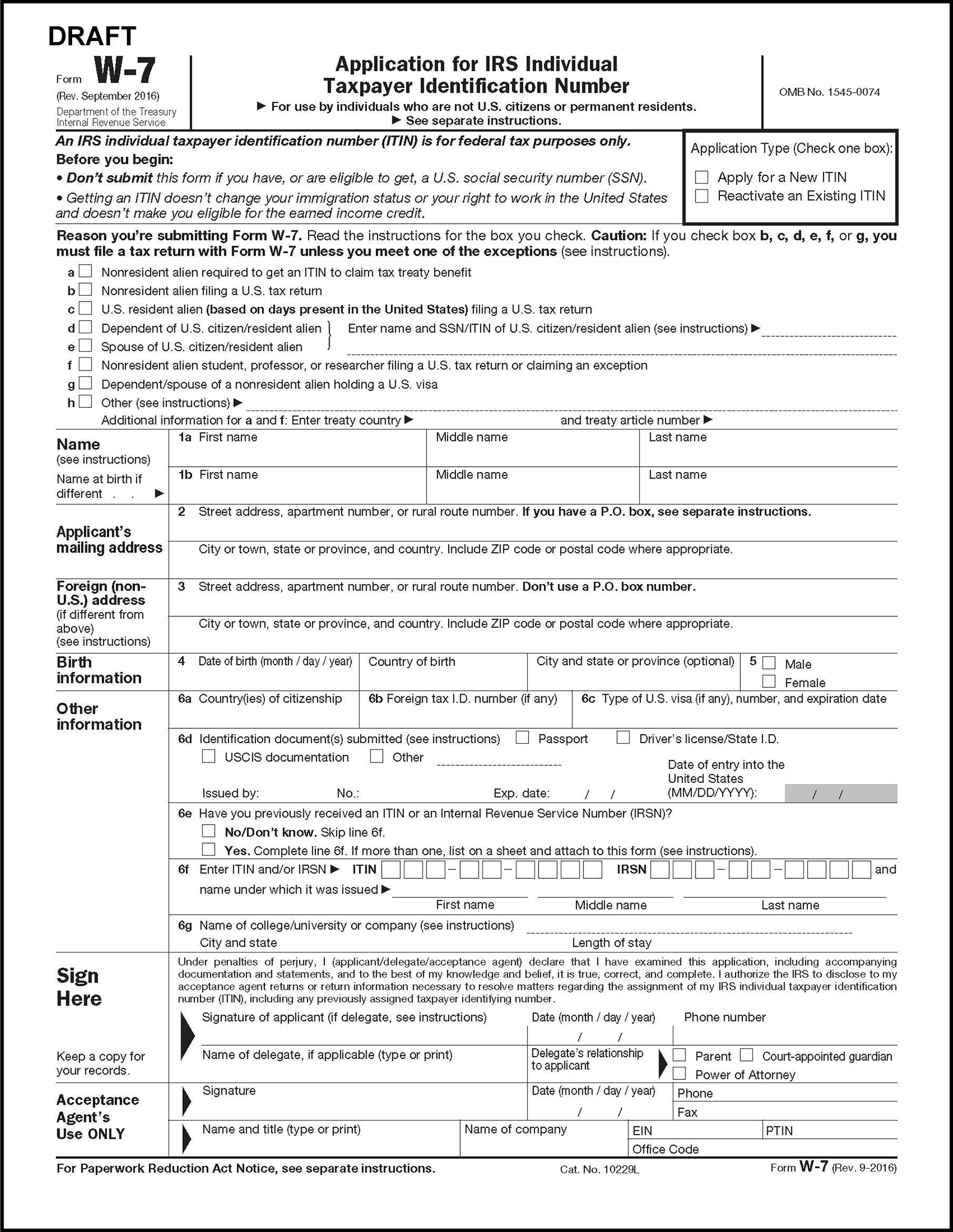
-
The Document Upload Tool (DUT) is an application on IRS.gov where providers can upload documentation they are requested or required to provide.
-
Starting January 2024, IMF taxpayers that receive the following letters below may respond to these notices using the Document Upload Tool (DUT):
CP Notices and Letters Title CP 54B Additional Information Needed Regarding Name and Social Security Number (SSN) - Refund Delayed CP 54E Discrepancy Between Name and Social Security Number (SSN) on Estimated Tax Payments CP 54G Discrepancy Between Name and Social Security Number (SSN) - Even/Balance Due CP 54Q Discrepancy Between Name and Social Security Number (SSN) - Second Request CP 560A We Assigned You an Adoption Taxpayer Identification Number (ATIN) for Your Child CP 560B One-year Extension Approved for Adoption Taxpayer Identification Number (ATIN) CP 561A Child Adoption Taxpayer Identification Number (ATIN) Expires Soon CP 561B Adoption Taxpayer Identification Number (ATIN) Extension Expires Soon CP 561C Child Adoption Taxpayer Identification Number (ATIN) Has Expired CP 562A Request for Additional Information CP 562C Request for Additional Information Letter 0104C Address Change Acknowledged Letter 0685C SSN Invalid Letter 0685SP SSN Invalid - Spanish Version -
Employees must complete a BEARS request prior to gaining access to DUT.
-
Incoming work received via the DUT, must be printed within two business days of receipt by an Entity Clerical Unit (ECU) designee. Work received through the DUT must be batched within four workdays from the Entity received date.
-
Original tax returns and Forms W-7A should not be sent through the DUT as they will not be processed. If you receive an original return or Form W-7A, please coordinate with your P & A staff to return to the taxpayer.
-
This section provides instruction for processing ATIN extension requests.
-
The IRS can approve an ATIN extension when the applicant meets "reasonable cause" . This means the applicant provides an explanation of their current adoption status and explains why they have been unable to secure a SSN for the adoptive child.
-
A statement such as, “I need an extension” received without an explanation, requires suspending the case until the applicant provides additional information. Upon receipt of the taxpayer's reply, accept or reject their extension request.
-
Extension requests are received through various methods:
-
Review the taxpayer letter or CP 561 for an assigned SSN. If the applicant still needs an Extension, then use the chart to determine whether to Assign or Reject their extension status (EXT-STAT).
-
There are three valid extension codes for ATIN application record, "A" , "R" , and "E" .
EXT-STAT Input by: Reason Comments A TE Acceptable Reason given on correspondence Generates CP 560B (Extension Granted).
System will extend the assigned ATIN for one additional year.R TE No reasonable/ acceptable reason provided by applicant to grant extension EXT-STAT "R" and STAT-RSN-CD 05- CP 563F (Extension Denied) R Generated EXT- STAT "S" for 75 consecutive days Generates CP 563F, paragraph 03
(Extension Denied)A Generated EXT-STAT "A" for 21 months CP 561, paragraph 02
(Will Soon Expire)E Generated No Reply to CP 561 generated CP 561, paragraph 03
(Expired)E Generated EXT-STAT "A" for 2 years and 3 months after EX-DT CP 561, paragraph 03
(Expired)
Taxpayer information will stay on the ATIN database and will be available using on CC ATINQ and the Primary or Secondary’s TIN). -
A "Final" notification of expiration, CP 561(03) generates to the taxpayer, but the ATIN stays active for 3 additional months.
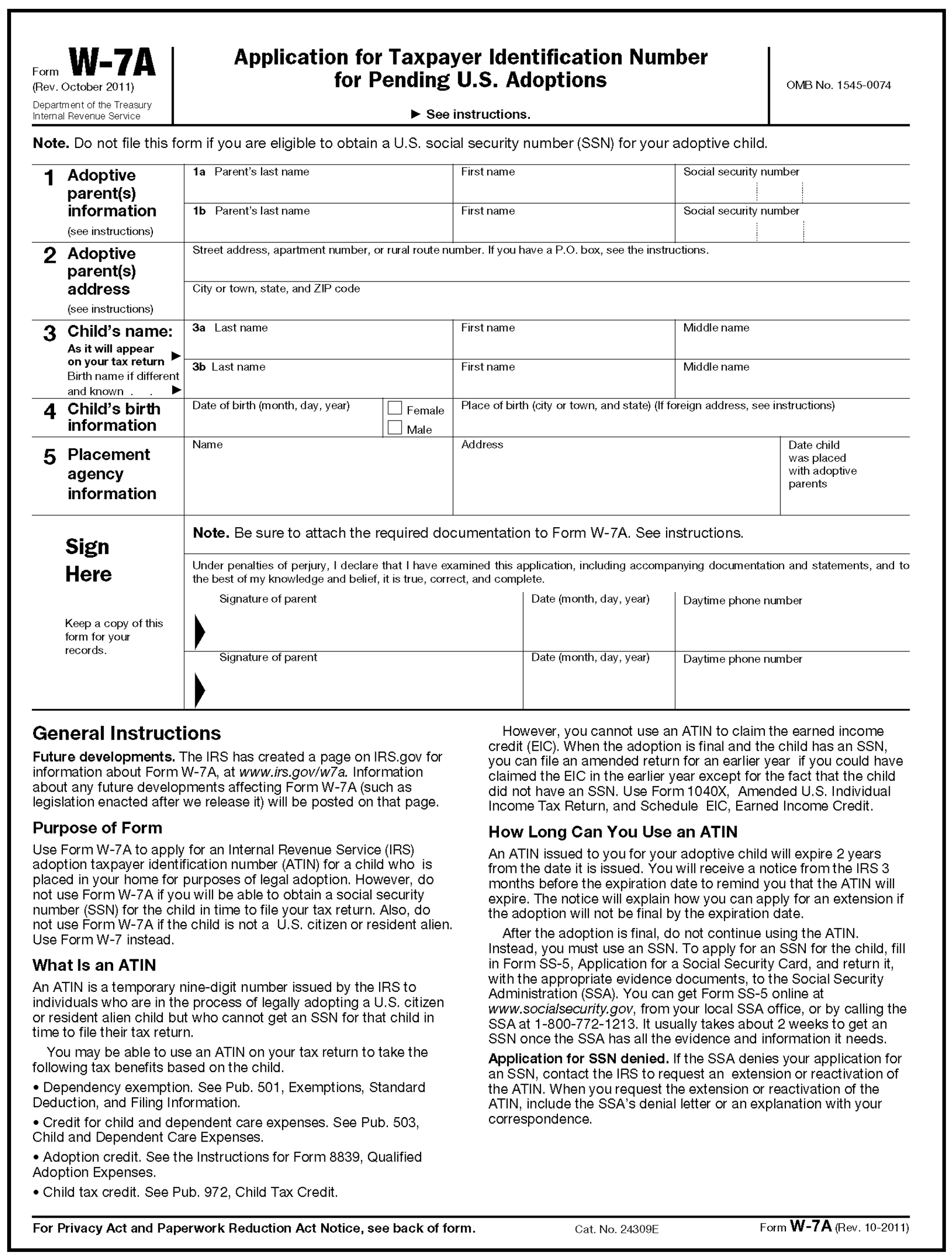
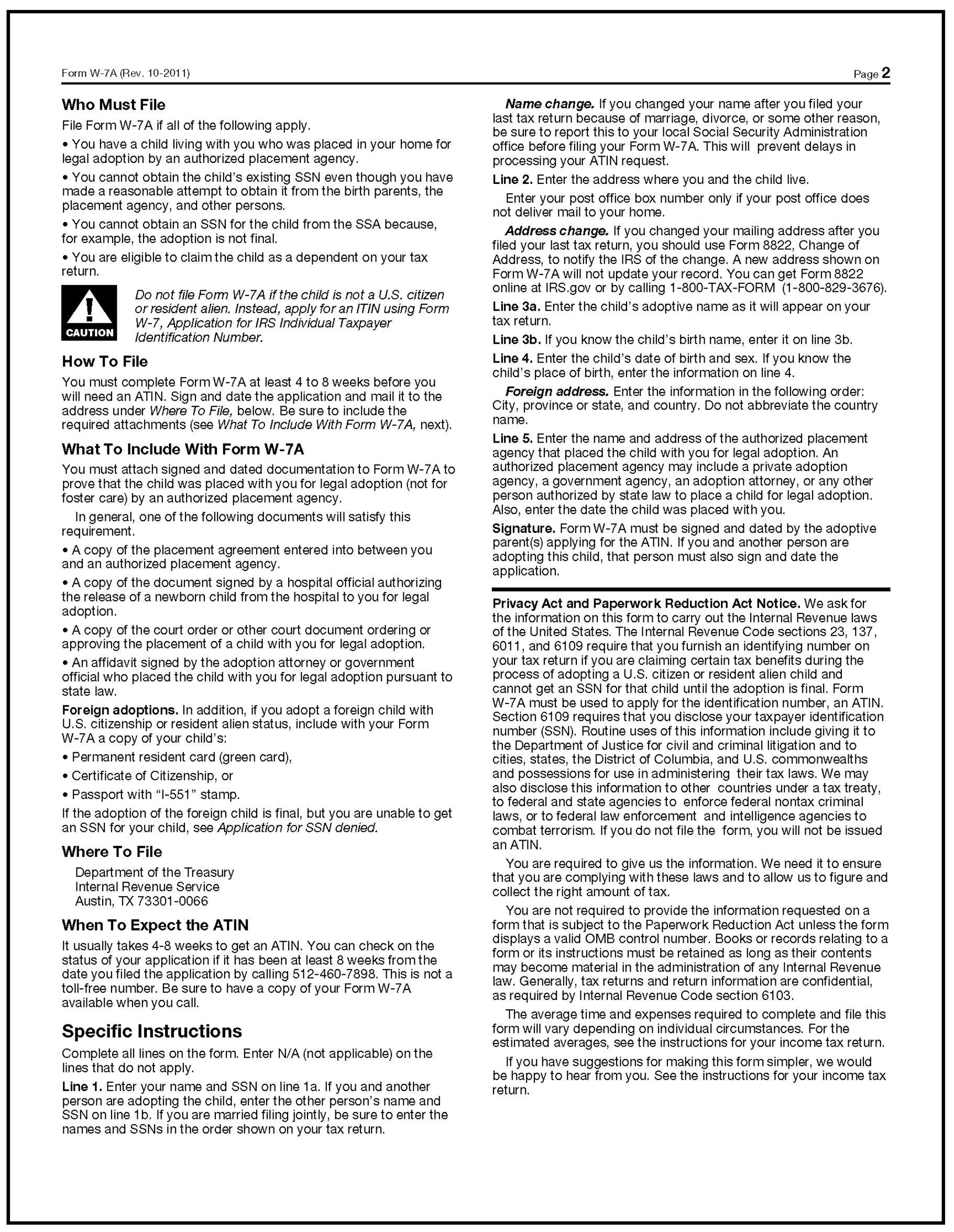
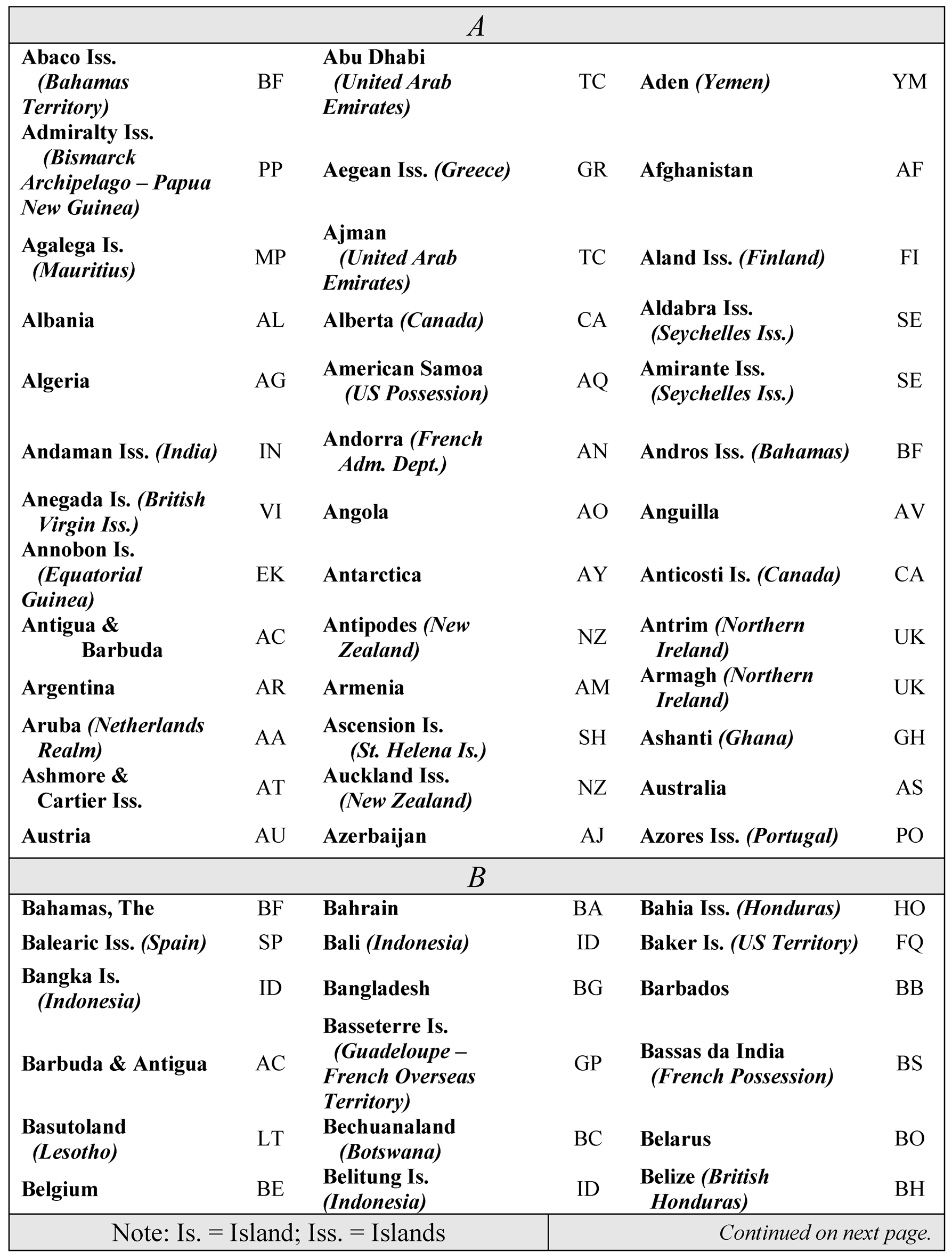
Please click here for the text description of the image.
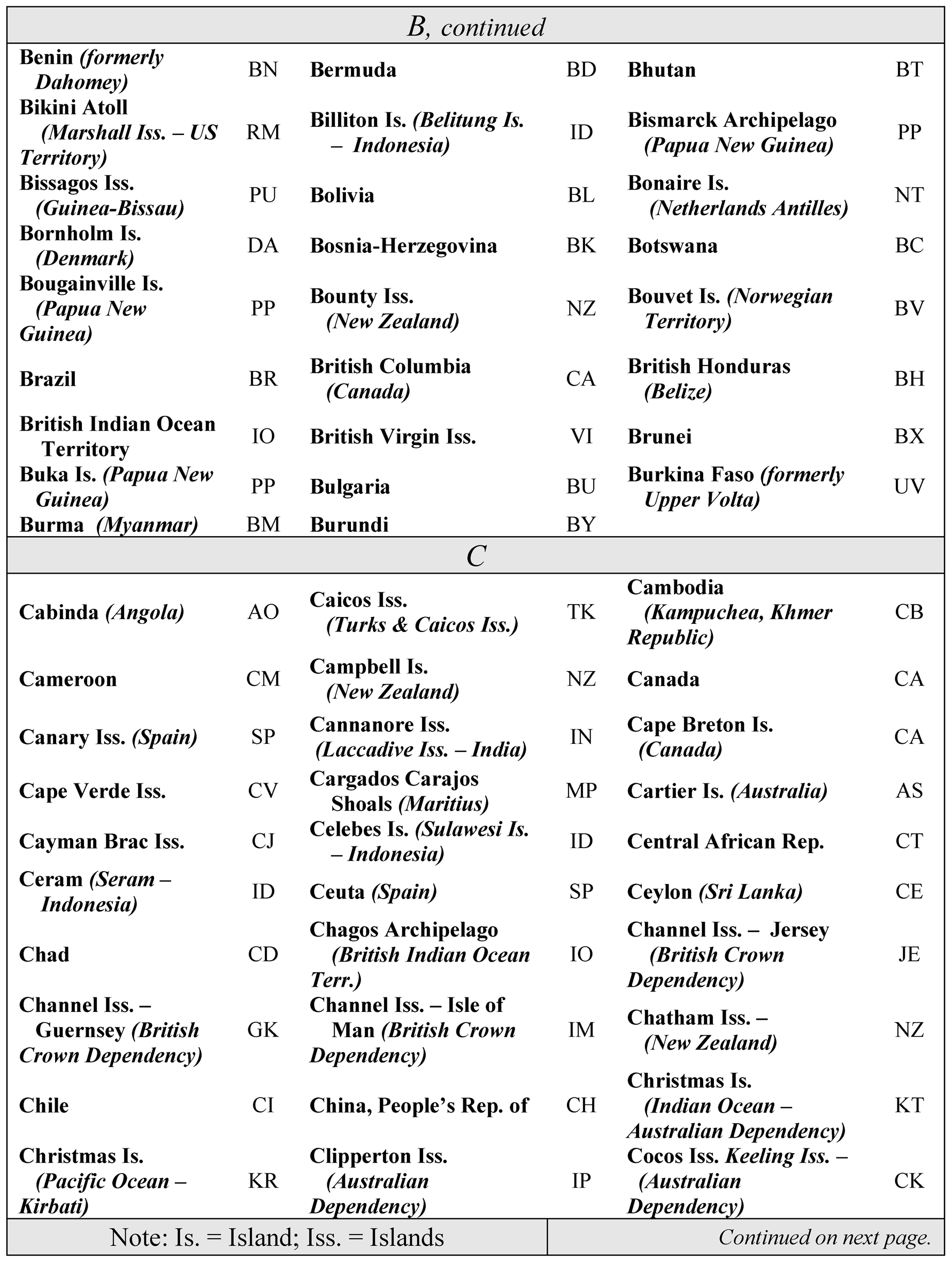
Please click here for the text description of the image.
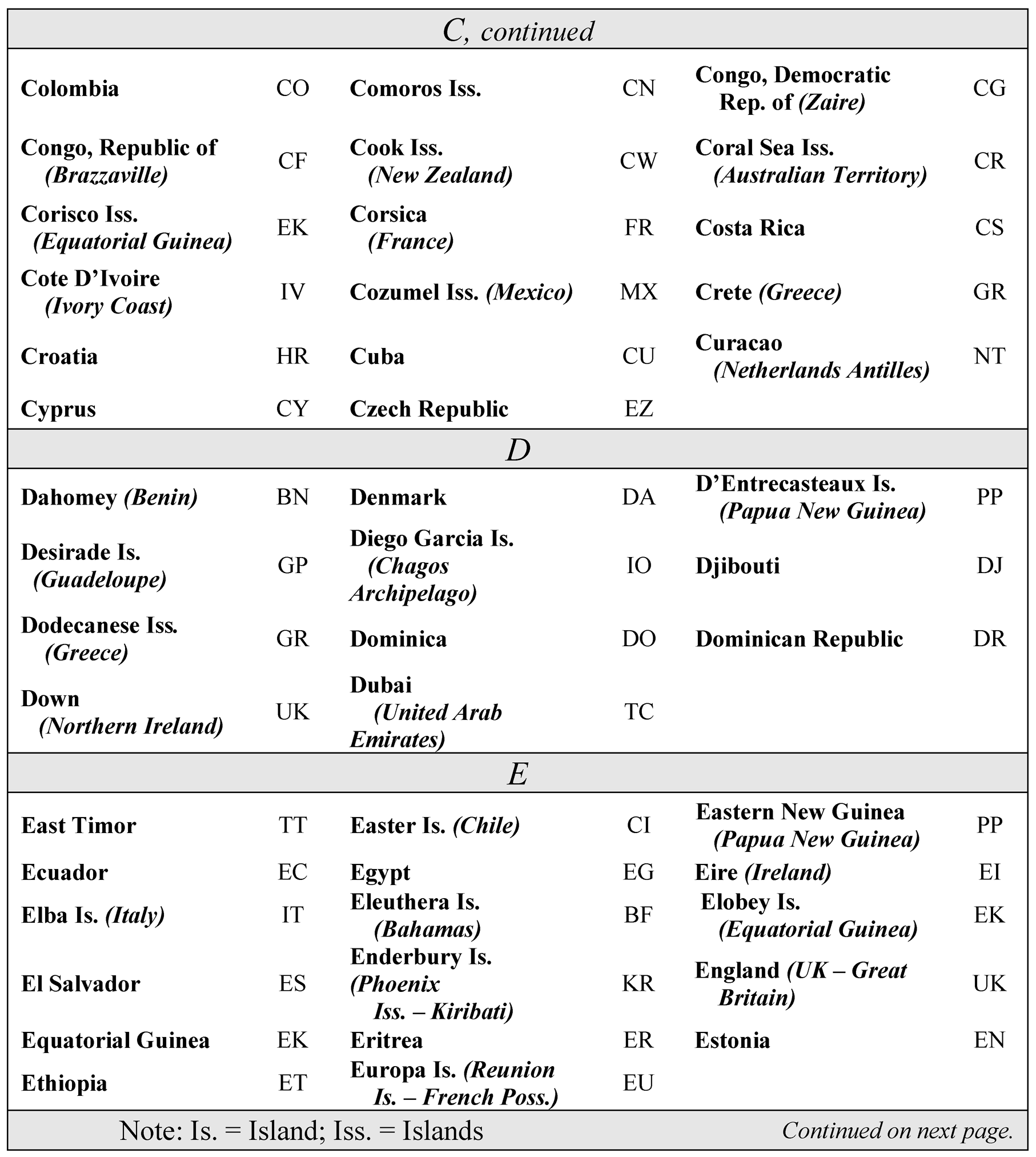
Please click here for the text description of the image.
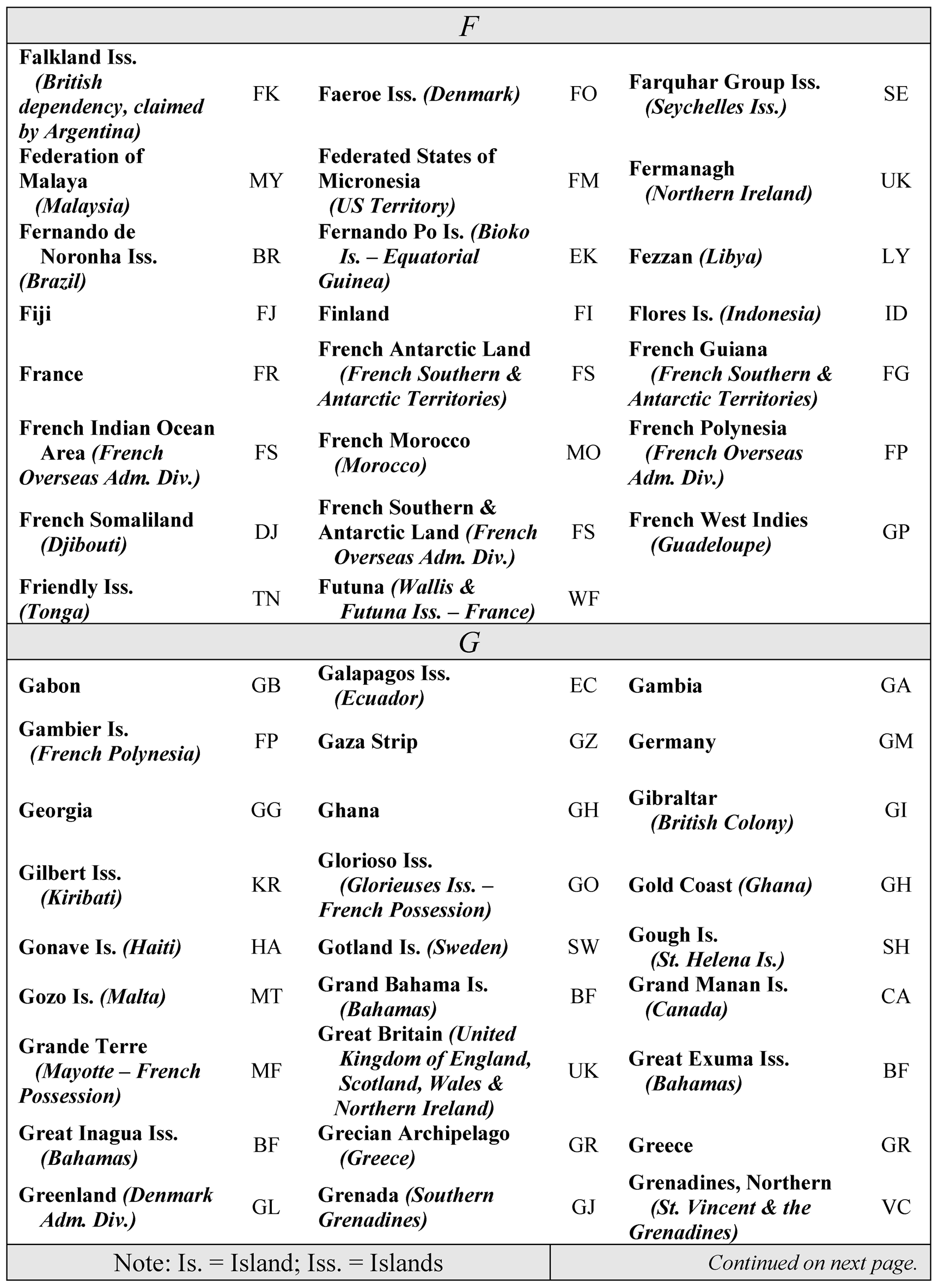
Please click here for the text description of the image.
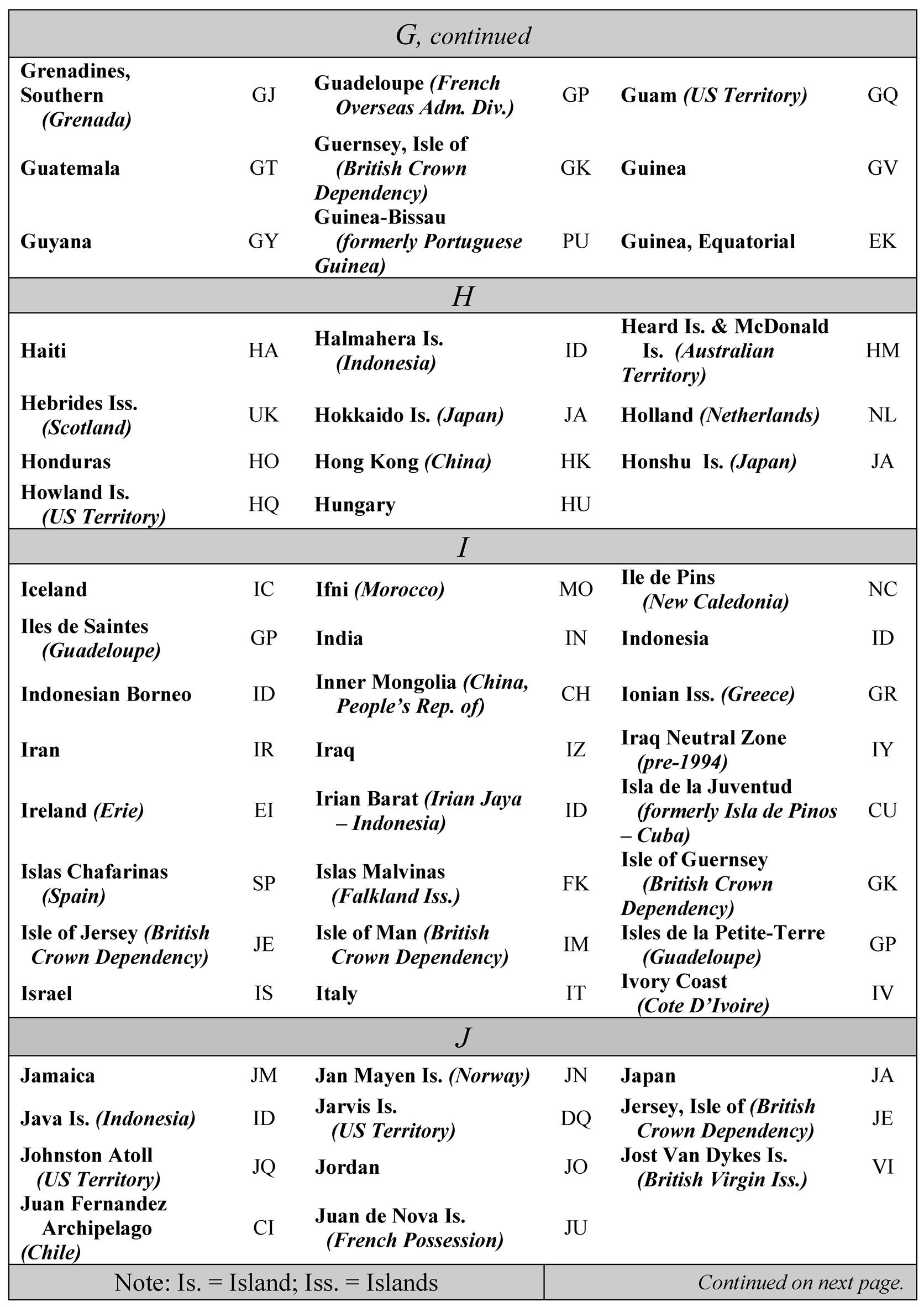
Please click here for the text description of the image.
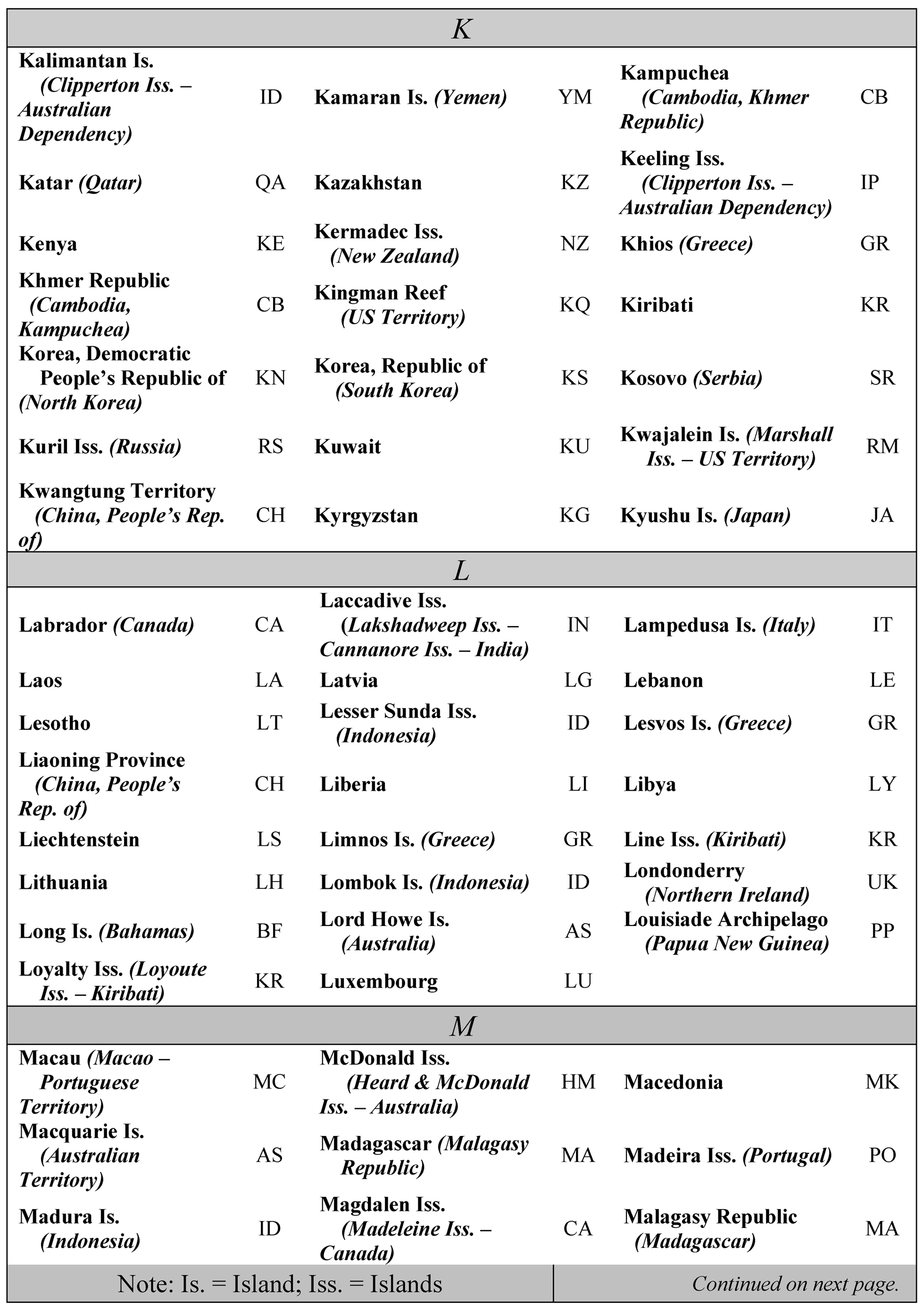
Please click here for the text description of the image.
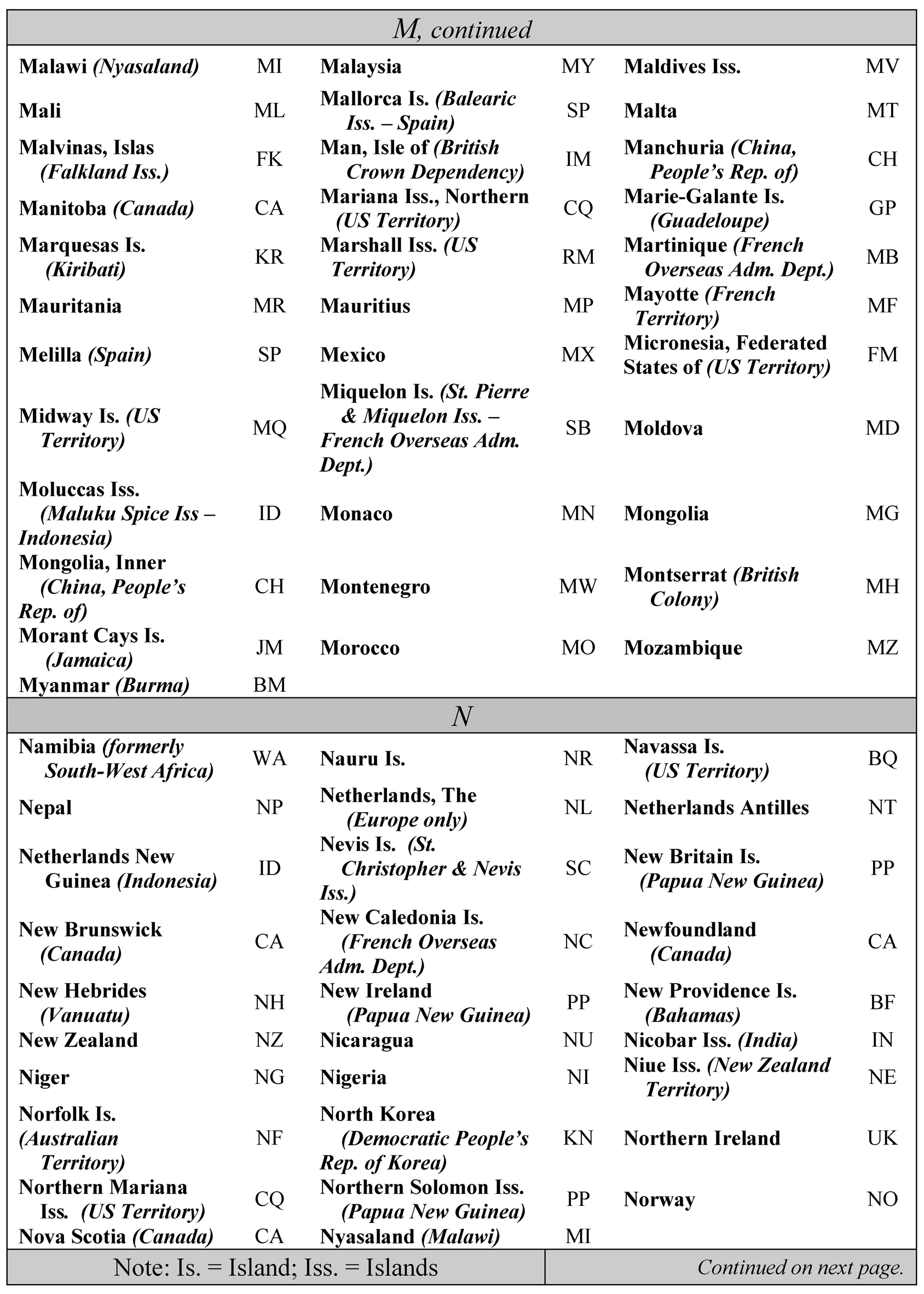
Please click here for the text description of the image.
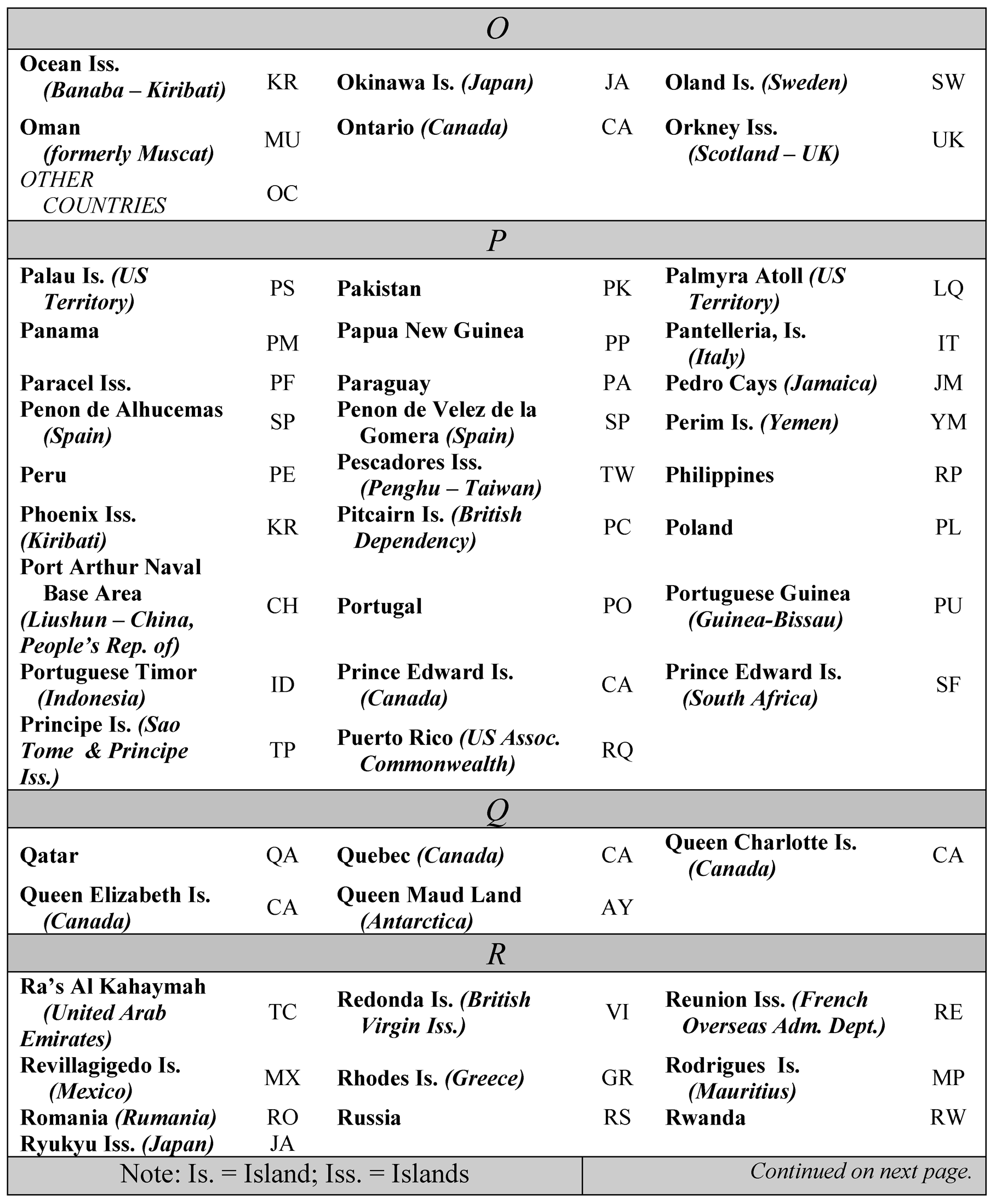
Please click here for the text description of the image.
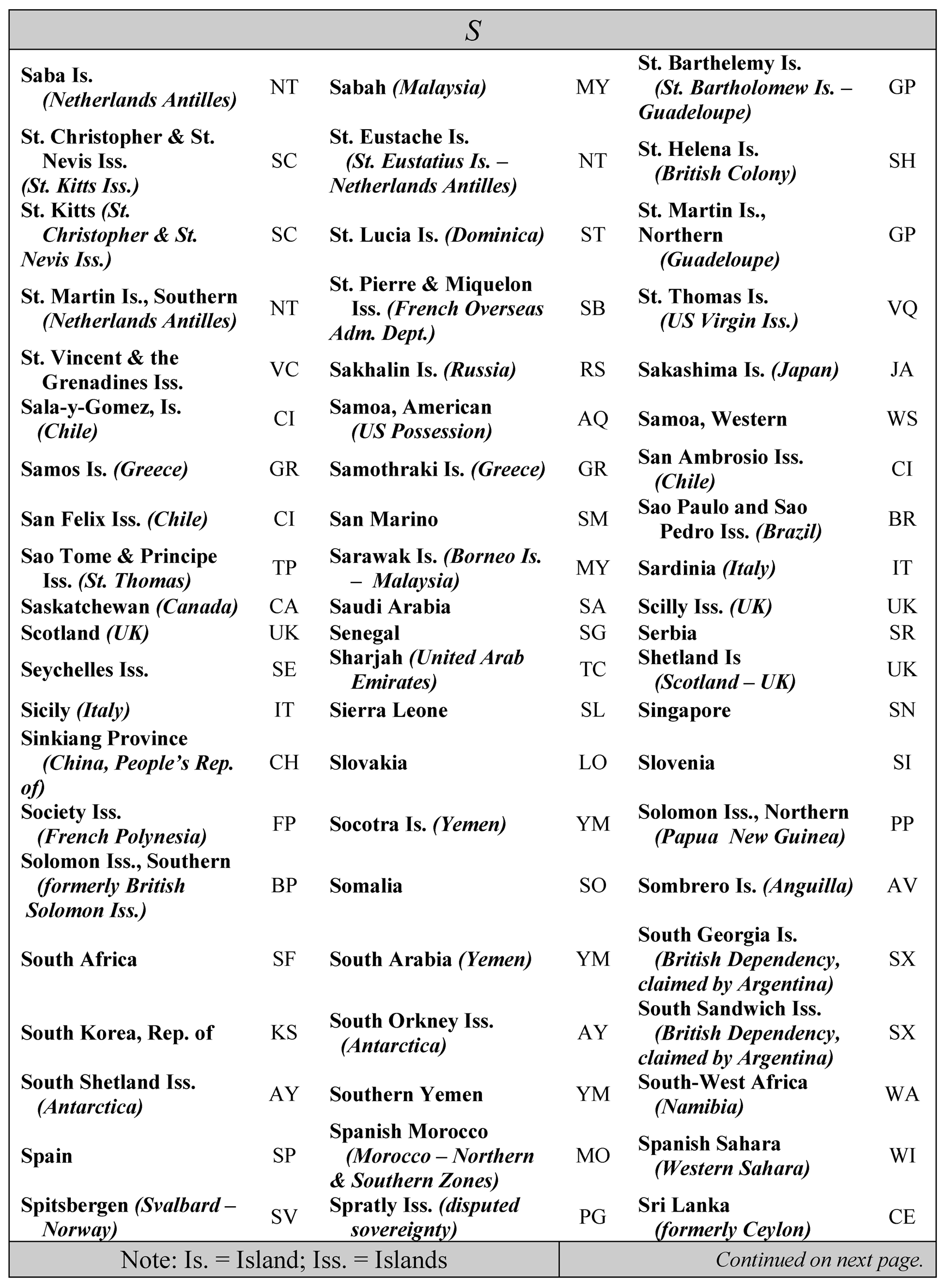
Please click here for the text description of the image.
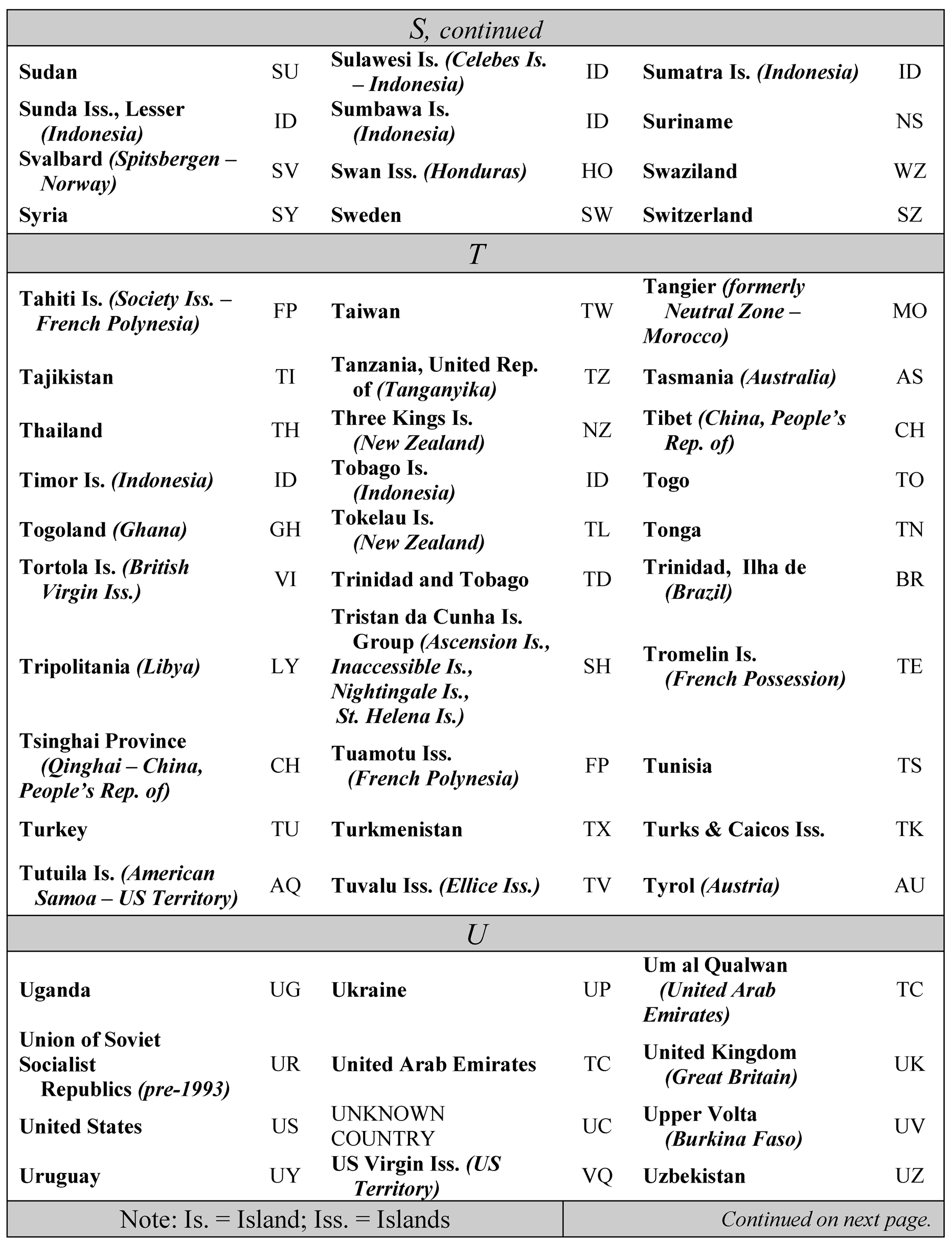
Please click here for the text description of the image.