


 )
or https:// means you've safely connected to the .gov website. Share sensitive information only on official, secure websites.
)
or https:// means you've safely connected to the .gov website. Share sensitive information only on official, secure websites.


- 3.21.15 Withholding on Foreign Partners
- 3.21.15.1 Program Scope and Objectives
- 3.21.15.1.1 Background
- 3.21.15.1.1.1 Form 8804 Background - Annual Return for Partnership Withholding Tax Under (Section 1446)
- 3.21.15.1.1.2 Form 8813 Background - Partnership Withholding Tax Payment Voucher (Section 1446)
- 3.21.15.1.1.3 Form 8804-C Background - Certificate of Partner-Level Items to Reduce Section 1446 Withholding
- 3.21.15.1.1.4 Form 8804 (SCH A) Background - Penalty for Underpayment of Estimated Section 1446 Tax by Partnerships
- 3.21.15.1.1.5 Form 8805 Background - Foreign Partner’s Information Statement of Section 1446 Withholding Tax
- 3.21.15.1.2 Authority
- 3.21.15.1.3 Roles and Responsibilities
- 3.21.15.1.4 Program Control
- 3.21.15.1.5 Terms and Acronyms
- 3.21.15.1.6 Related Resources
- 3.21.15.1.1 Background
- 3.21.15.2 General Information
- 3.21.15.3 ♦IRM Deviation Procedures♦
- 3.21.15.4 ♦IRS Employee Contacts♦
- 3.21.15.5 ♦Taxpayer Advocate Service (TAS)♦
- 3.21.15.5.1 ♦TAS Service Level Agreements (SLAs)♦
- 3.21.15.6 ♦Business Master File (BMF) Identity (ID) Theft♦
- 3.21.15.7 ♦Use of FAX for Taxpayer Submissions♦
- 3.21.15.8 General Disclosure Guidelines
- 3.21.15.9 ♦Refund Returns (45-Day Jeopardy and High Dollar Refunds)♦
- 3.21.15.10 ♦Business Master File (BMF) Consistency♦
- 3.21.15.11 General Editing Guidelines
- 3.21.15.11.1 ♦Edit Marks♦
- 3.21.15.11.2 ♦Action Codes♦
- 3.21.15.12 Unprocessable Conditions
- 3.21.15.13 ♦Correspondence♦
- 3.21.15.13.1 ♦Definition of Correspondence from Taxpayers♦
- 3.21.15.13.2 ♦Issuing Correspondence♦
- 3.21.15.13.3 ♦Correspondence Imaging Inventory (CII) Returns♦
- 3.21.15.13.4 ♦Foreign Currency♦
- 3.21.15.14 Attachments Related to Form 8804
- 3.21.15.14.1 Attachments Unrelated to Form 8804
- 3.21.15.14.2 ♦Routing Guide for Attachments♦
- 3.21.15.15 Special Returns
- 3.21.15.15.1 ♦Amended Returns♦
- 3.21.15.15.2 Delinquent Returns
- 3.21.15.15.3 ♦Compliance Secured/Prepared Returns♦
- 3.21.15.15.3.1 ♦IRC 6020(b) - Prepared by Collection♦
- 3.21.15.15.3.2 ♦Collection Secured♦
- 3.21.15.15.3.3 ♦Examination Prepared♦
- 3.21.15.15.3.4 ♦Examination Secured♦
- 3.21.15.15.3.5 ♦Frivolous Arguments♦
- 3.21.15.15.4 ♦Criminal Investigation (CI) Referral♦
- 3.21.15.15.5 ♦Examination (Exam) Funny Box♦
- 3.21.15.16 ♦Re-Entry Document Procedures♦
- 3.21.15.16.1 ♦Form 3893 - Re-entry Document Control♦
- 3.21.15.16.2 ♦Form 13596 - Reprocessing Returns♦
- 3.21.15.17 Editing the Tax Period
- 3.21.15.17.1 Early-Filed Returns
- 3.21.15.18 Books and Records Outside the U.S. and Puerto Rico Checkbox
- 3.21.15.19 ♦Received Date♦
- 3.21.15.19.1 ♦Statute Control Returns♦
- 3.21.15.19.2 ♦Protective Claims♦
- 3.21.15.20 Computer Condition Codes (CCC) - Form 8804
- 3.21.15.21 ♦Entity Perfection - General♦ - Lines 1a through 1h
- 3.21.15.21.1 ♦Entity Perfection - Name Control - Line 1a♦
- 3.21.15.21.2 ♦Entity Perfection - Employer Identification Number (EIN) - Line 1b♦
- 3.21.15.21.3 General Address Perfection
- 3.21.15.21.4 ♦Entity Perfection - "In-care-of" Name Line 1c♦
- 3.21.15.21.5 ♦Entity Perfection - Domestic Addresses♦
- 3.21.15.21.6 ♦Entity Perfection of Foreign Address♦
- 3.21.15.21.6.1 ♦Country Code – Canada♦
- 3.21.15.21.7 City or Town - Line 1e
- 3.21.15.21.8 State - Line 1f
- 3.21.15.21.9 ZIP Code and Foreign Postal Code - Line 1h
- 3.21.15.22 Part III, Lines 3 through 15
- 3.21.15.22.1 Number of Foreign Partners - Line 3a
- 3.21.15.22.1.1 Number of Form 8805s Attached to Form 8804 - Line 3b
- 3.21.15.22.1.2 Number of Forms 8804-C Attached to Form 8805 - Line 3c
- 3.21.15.22.2 Net Effectively Connected Taxable Income Allocable to Corporate (CFP) and Non-Corporate Foreign Partners (NCFP) - Lines 4a through 15
- 3.21.15.22.2.1 Total Effectively Connected Taxable Income (ECTI) Allocable to Corporate Partners - Line 4a
- 3.21.15.22.2.2 Reduction for State and Local taxes on ECTI Allocable to Corporate Partners - Line 4b
- 3.21.15.22.2.3 ECTI Allocable to Corporate Partners Reduction for Valid Partner Certificates - Line 4c
- 3.21.15.22.2.4 ECTI Allocable to Corporate Partners (Adjusted) - Line 4d (Compute)
- 3.21.15.22.2.5 Total ECTI allocable to non-corporate partners other than on lines 4i, 4m and 4q - Line 4e
- 3.21.15.22.2.6 Reduction to line 4e for State and Local taxes under Regulation 1.1446-6(c)(1)(iii) - Line 4f
- 3.21.15.22.2.7 Reduction to line 4e for certified foreign partner-level items submitted using Form 8804-C - Line 4g
- 3.21.15.22.2.8 Combine lines 4e, 4f and 4g - Line 4h (Compute)
- 3.21.15.22.2.9 28% Gains Allocable to NCFP - Line 4i
- 3.21.15.22.2.10 Reduction to Line 4i for State and Local taxes under Regulations section 1.1446-6 (c)(1)(iii) - Line 4j
- 3.21.15.22.2.11 Reduction to Line 4i for certified Foreign Partner-Level Items Submitted using Form 8804-C - Line 4k
- 3.21.15.22.2.12 Combine Lines 4i, 4j and 4k - Line 4l (Compute)
- 3.21.15.22.2.13 Unrecaptured Section 1250 Gain Allocable to Non-Corporate Partners - Line 4m
- 3.21.15.22.2.14 Reduction to Line 4m for State and Local taxes under Regulations section 1.1446-6(c)(1)(iii) - Line 4n
- 3.21.15.22.2.15 Reduction to Line 4m for Certified Foreign Partner-Level Items Submitted using Form 8804-C - Line 4o
- 3.21.15.22.2.16 Combine Lines 4m, 4n and 4o - Line 4p (Compute)
- 3.21.15.22.2.17 Adjusted Net Capital Gain (including qualified dividend income and net section 1231 gain) Allocable to Non-Corporate Partners - Line 4q
- 3.21.15.22.2.18 Reduction to line 4q for State and local taxes under Regulations section 1.1446-6(c)(1)(iii) - Line 4r
- 3.21.15.22.2.19 Reduction to line 4q for certified foreign partner-level items submitted using Form 8804-C - Line 4s
- 3.21.15.22.2.20 Combine lines 4q, 4r and 4s - 4t (Compute)
- 3.21.15.22.2.21 Section 1446 Tax Liability - Lines 5a through 5f
- 3.21.15.22.2.21.1 21% Tax - Line 5a (Compute)
- 3.21.15.22.2.21.2 37% Tax - Line 5b
- 3.21.15.22.2.21.3 28% Tax - Line 5c (Compute)
- 3.21.15.22.2.21.4 25% Tax - Line 5d
- 3.21.15.22.2.21.5 20% Tax - Line 5e (Compute)
- 3.21.15.22.2.21.6 Gross Section 1446 Tax Liability - Line 5f (Compute)
- 3.21.15.22.2.22 Payments of Section 1446 Tax - Line 6a
- 3.21.15.22.2.23 Form 8804 Section 1446 withholding on Tiered Partnership - Line 6b
- 3.21.15.22.2.24 Form 1042-S Section 1446 withholding on Publicly Traded Partnership (PTP) - Line 6c
- 3.21.15.22.2.25 Form 8288-A Section 1445(a) or (e)(1) withholding on USRPI Disposition - Line 6d
- 3.21.15.22.2.26 Form 1042-S Section 1445(e) withholding on USRPI Investment Income - Line 6e
- 3.21.15.22.2.27 Form 8288-A Section 1446(f)(1) Withholding on the Transfer of Non-Publicly Traded Partnership by a Foreign Partner - Line 6f
- 3.21.15.22.2.28 Form 1042-S Section 1446(f)(1) Withholding on the Transfer of a Publicly Traded Partnership Interest by a Foreign Partner - Line 6g
- 3.21.15.22.2.29 Total Payments - Line 7 (Compute)
- 3.21.15.22.2.30 Estimated Tax Penalty - Line 8
- 3.21.15.22.2.31 Balance Due - Line 10 (Compute)
- 3.21.15.22.2.32 Amount Reported on Form 8805 Allocated to Partners - Line 12
- 3.21.15.22.2.33 Net Overpayment - Line 13 (Compute)
- 3.21.15.22.2.34 Amount to be Refunded - Line 14a
- 3.21.15.22.2.35 Credit Elect - Line 15
- 3.21.15.22.1 Number of Foreign Partners - Line 3a
- 3.21.15.23 ♦Signature♦
- 3.21.15.23.1 Preparer Signature
- 3.21.15.23.2 ♦ Preparer Tax Identification Number (PTIN)♦
- 3.21.15.23.3 Preparer's TIN Type
- 3.21.15.23.4 ♦Employer Identification Number (EIN)♦
- 3.21.15.23.5 ♦Preparer Phone Number♦
- Exhibit 3.21.15-1 Form 8804 "T" Lines (for Tax Year 2025 and Subsequent Tax Returns)
- Exhibit 3.21.15-2 Form 8804 "T" Lines (for Tax Year 2022 - 2024 Tax Returns)
- Exhibit 3.21.15-3 Form 8804 "T" Lines (for Tax Year 2018 through 2021 tax returns)
- Exhibit 3.21.15-4 Form 8804 "T" Lines (for Tax Year 2013 through 2017 returns)
- Exhibit 3.21.15-5 ♦U.S. Territories ZIP Codes♦
- Exhibit 3.21.15-6 ♦Province, Foreign State and Territory Abbreviations♦
- Exhibit 3.21.15-7 ♦Frivolous Arguments Criteria♦
- Exhibit 3.21.15-8 Glossary and Acronyms
- 3.21.15.1 Program Scope and Objectives
Part 3. Submission Processing
Chapter 21. International Returns and Documents Analysis
Section 15. Withholding on Foreign Partners
3.21.15 Withholding on Foreign Partners
Manual Transmittal
September 05, 2025
Purpose
(1) This transmits revised IRM 3.21.15, International Returns and Document Analysis - Withholding on Foreign Partners
Material Changes
(1) IRM 3.21.15.1.1.4 - Verbiage updates per LB&I feedback.
(2) IRM 3.21.15.1.1.5 - Verbiage updates per LB&I feedback.
(3) IRM 3.21.15.1.3 - Updated subsection title.
(4) IRM 3.21.15.1.4 - Updated subsection title.
(5) IRM 3.21.15.9(1) - If/Then Table - Added "(whichever is later)" after "return due date" and Note for clarification. IPU 25U0249 issued 02-21-2025.
(6) IRM 3.21.15.12 -
-
(1) - Added "Jurat and Signature" to bullet list.
-
(2) - Added clarification to 3rd bullet.
(7) IRM 3.21.15.14(1) - Added reference to IRM 3.8.46.1, Discovered Remittance.
(8) IRM 3.21.15.14.2 (2) -
-
Form 8233, updated transhipment address.
-
Form 8288-A, added Line 6f.
-
Updated Form 8804 Description/Action. IPU 25U0249 issued 02-21-2025.
-
Added Form 9465, Installment Agreement Request. IPU 25U0249 issued 02-21-2025.
-
Added Form 14039-B, Business Identity Theft Affidavit. IPU 25U0249 issued 02-21-2025.
-
Added Form 14157, Return Preparer Complaint. IPU 25U0249 issued 02-21-2025.
(9) IRM 3.21.15.15.3.3(1)c) - Deleted "Note" containing out dated instructions.
(10) IRM 3.21.15.11(6) - Added "Note" in the event brackets/parenthesis are not pre-printed.
(11) IRM 3.21.15.17(7) - Deleted "Exception" containing out dated instructions.
(12) IRM 3.21.15.19 -
-
(2) - If/Then Table - Clarified Private Delivery Service information and added IRM reference 3.10.72, Receiving, Extracting, and Sorting. IPU 25U0249 issued 02-21-2025.
-
(3) - Added Reminder that Form 8804 currently has no E-file option.
-
(4) Note - Added clarification on electronically filed return information. IPU 25U0249 issued 02-21-2025.
-
(4) If/And/Then Table - Updated based on feedback from Chief Counsel.
-
(12) - Updated chart and added Official Use Only (OUO) information.
(13) IRM 3.21.15.19.1(3) - Updated Statute Returns clearing exception from 2020 to 2021. IPU 25U0249 issued 02-21-2025.
(14) IRM 3.21.15.20 - Removed CCC "X" which is not valid on Form 8804.
(15) IRM 3.21.15.21- Deleted (2) containing pre-addressed and non pre-addressed labels.
(16) IRM 3.21.15.21.4(2) - If/Then Table - Changed "Circle the street address" to "Underline the second street address" . IPU 25U0249 issued 02-21-2025.
(17) IRM 3.21.15.22.2
-
(1) Note- Changed to (2) instruction and re-numbered (2) to (3). IPU 25U0249 issued 02-21-2025.
-
(1) Note - Deleted as the same information is repeated in next paragraph.
-
(1) Caution - Moved to (2). IPU 25U0249 issued 02-21-2025.
-
(1) Caution - Deleted instruction that applies to tax periods over 20 years prior.
-
(2) Note - Added instruction when "NA" or "None" are present. IPU 25U0249 issued 02-21-2025.
-
(2) Caution - Deleted instruction that applies to tax periods over 20 years prior.
-
(3) If/Then Table - Added Note containing research instructions. IPU 25U0249 issued 02-21-2025.
(18) IRM 3.21.15.22.2.5(2) - Updated to indicate entry may be positive or negative.
(19) IRM 3.21.15.22.2.23(4)Note - Added clarification to identify Forms 8805 that support Form 8804 Line 6b withholding.
(20) IRM 3.21.15.22.2.33(4)Note - Clarified instructions.
(21) Revised the Internal Revenue Manual (IRM), where necessary for the following types of editorial changes:
-
Corrected links. IPU 25U0249 issued 02-21-2025.
-
Plain language and editorial updates to improve readability. IPU 25U0249 issued 02-21-2025.
-
Updated dates and tax periods for current processing year.
-
Corrected line number references to match new form revision.
-
Updated figures and exhibits to reflect current processing.
Effect on Other Documents
IRM 3.21.15, dated November 15, 2024 (effective 01-01-2025), is superseded. This IRM incorporates IRM Procedural Update (IPU) 25U0249 issued 02-21-2025.Audience
Tax Examiners in the International Code and Edit Unit, Ogden Submission Processing Center, Taxpayer Services (TS) Division are the primary users of this IRM.Effective Date
(01-01-2026)Scott Wallace
Director, Submission Processing
Taxpayer Services Division
-
Purpose: This IRM provides coding and editing instructions for processing Form 8804, Annual Return for Partnership Withholding Tax (Section 1446), to the Business Master File (BMF). The first tax period valid for BMF was 200412.
-
Audience: These procedures apply to Internal Revenue Service (IRS) employees with responsibility for reviewing and editing the Form 8804, Annual Return for Partnership Withholding Tax (Section 1446) information returns in Document Perfection Operation including Supervisory Tax Examining Assistant, Lead Tax Examiners, and Tax Examiners primarily the International team at the Ogden Submission Processing Center (OSPC).
-
Policy Owner: The Director Submission Processing is responsible for the policies in this IRM.
-
Program Owner: The Code and Edit/ERS IMF Section of the Return Processing Branch of Submission Processing.
-
Primary Stakeholders: Submission Processing (SP) and Large Business and International (LB&I).
-
Program Goals: Accurately review and prepare all paper returns for Data Transcription and/or correspondence as necessary.
-
Form 8804, Annual Return for Partnership Withholding Tax (Section 1446), is processed under:
-
Tax Class 1
-
Master File Tax (MFT) Code 08
-
Doc. Code 29
-
Document Locator Number (DLN) File Location Code 60 (Ogden)
-
Blocking Series 000-999
-
Program Code 11340
-
-
Form 8804 is processed at the Ogden Submission Processing Campus (OSPC) as a "Non-Remittance" return.
-
Form 8804 is due on or before the 15th day of the 3rd month after the close of the partnership's taxable year. However, if the partnership keeps its books and records outside of the United States and Puerto Rico (this is indicated by a check box in the upper right corner of Form 8804), the Return Due Date (RDD) is the 15th day of the 6th month after the close of the partnership's taxable year.
-
For taxable years beginning in 2016 and later, the due date for the return of a partnership, including a Form 8804, moved from the 15th day of the 4th month (April 15 for calendar-year filers) to the 15th day of the 3rd month (March 15 for calendar-year filers). In Notice 2017-47, the IRS provided relief from the failure to timely file penalty for taxpayers who, ostensibly unaware of the changed due date, filed their 2016 returns or requested extensions of time to file by the former due date.
-
Form 8804 was modified as a result of the Internal Revenue Code (IRC) 1446 Regulations. This modification branched out the types of effectively connected taxable income (ECTI) allocable to a foreign partner from the highest rate applicable to the type of foreign partner to the highest rate applicable to the type of income allocable to that type of foreign partner. For tax years beginning after December 31, 2017, the tax rate for foreign corporate partners decreased from 35% to 21%. However, for fiscal filers (tax periods 201801 through 201811) tax will be figured at a blended rate. For all non-corporate foreign partners, the section 1446 applicable percentage is generally 37%. However, in some circumstances, the partnership can consider the highest rate applicable to a particular type of income allotted to a non-corporate partner (28%, 25%, 20%), if the foreign partner provides the partnership with valid documentation (e.g., a Form W-8 BEN, Certificate of Foreign Status of Beneficial Owner for United States Tax Withholding and Reporting (Individuals), or Form W-8 BEN-E, Certificate of Status of Beneficial Owner for United States Tax Withholding and Reporting (Entities)), showing such partner would be entitled to use a preferential rate on such income or gain. Partnerships must withhold 37% on all the ECTI income of undocumented partners.
-
Under the IRC, there are two categories of income allocable to a foreign partner:
-
Income that is effectively connected with a trade or business in the United States,
-
US source Fixed or Determinable Annual or Periodic Income (often referred to as FDAP income).
.Note:
The difference in the taxation of these two categories is that effectively connected income, after allowable deductions, is taxed at the same rates that apply to U.S. citizens and resident aliens. US source FDAP income is taxed at a flat 30% (or lower treaty) rate, and reported on Form 1042, Annual Withholding Tax Return for U.S. Source Income of Foreign Persons
-
Through tax year ending 12/31/2020 partnerships were obligated to tell foreign partners what the split of each separately stated item on Form K-1 is, between effectively connected income (ECI) and non-effectively connected income (NECI) using the business activities test and the asset use test. For tax years beginning in 2021 only, partnerships with foreign partners are required to complete Part X of Schedule K-2 (Form 1065) and Part X of Schedule K-3 (Form 1065) for each foreign partner. For tax years beginning in 2021, partnerships may avoid penalties provided "best efforts" can be demonstrated. These two types of income are reported, withheld at source, and taxed differently on separate sections of a partner's Form 1040-NR, U.S. Nonresident Alien Income Tax Return, or Form 1120-F, U.S. Income Tax Return of a Foreign Corporation.
-
-
A partnership (not publicly traded) must make installment payments of withholding tax on its foreign partners' share of ECTI whether or not distributions are made during the year.
-
The rules for making periodic payments of amounts withheld under IRC 1441 and IRC 1461 for Fixed, Determinable, Annual, Periodical (FDAP) income apply to the amount of IRC 1446 tax withheld by publicly traded partnerships.
-
The withholding tax rate on a partner’s share of ECTI is generally the highest marginal tax rate applicable to that type of taxpayer. The highest rate for foreign corporate partners is 21% for tax periods beginning after 20171231 and 35% for tax periods beginning before 20180101. It is 37% for all other foreign partners for tax periods beginning after 20171231 and 39.6% for tax periods beginning before 20180101.
-
Per Treas. Reg. 1.1446-3, a partnership may, with respect to non-corporate partners, determine withholding tax by the highest tax rate applicable to four particular types of effectively connected (EC) income allocated to the partner, provided the partnership receives valid documentation (e.g., a Form W-8 BEN) , Certificate of Foreign Status of Beneficial Owner for United States Tax Withholding and Reporting (Individuals) from that foreign partner. As noted above, the 21% rate applies to all corporate partners for all four types of income for tax periods beginning after 20171231 (but 35% applies to all corporate partners for tax periods beginning before 20180101). These four types of income are:
-
Net Ordinary Income (and net short-term EC capital gain, that is taxed like ordinary income) and EC portions of separately stated items, allocated to non-corporate partners which has the highest rate of 37% for tax periods beginning after 20171231 (39.6% for tax periods beginning before 20180101).
-
EC Collectible Gains allocated to non-corporate partners, which is taxed at 28%
-
Unrecaptured section 1250 gains allocated to non-corporate partners, which is taxed at 25%
-
Adjusted net capital gain (including qualified dividend income and net section 1231 gain) allocable to non-corporate partners, which is taxed at 20%
-
-
Form 8813, Partnership Withholding Tax Payment Voucher (Section 1446), is the form used by the partnerships to make their installment payments of IRC 1446 tax. The four installment payments must be made with Form 8813 by the 15th day of the 4th, 6th, 9th, and 12th months of the partnership’s tax year. However, the payment may be made without Form 8813 if it is made through Electronic Federal Trust Payment System (EFTPS) or otherwise as provided for by published guidance. Effective 01/01/2004, all Form 8813 payments made for tax periods ending December 31, 2004, and subsequent periods, began to be processed to the Business Master File (BMF).
-
Form 8804-C, Certificate of Partner-Level Items to Reduce Section 1446 Withholding, is the sole method for a foreign partner to provide a certification to a partnership under Treas. Reg. 1.1446-6 to reduce or eliminate the 1446 tax the partnership must withhold and pay on ECTI allocable to the foreign partner. The foreign partner uses Form 8804-C to certify to the partnership that it meets all the requirements of the regulations, and represents that the information provided, including filing requirements, is true, correct, and complete.
-
Form 8804-C attached to Form 8804 or Form 8805, Foreign Partner's Information Statement of Section 1446 Withholding Tax: see IRM 3.21.15.1.1.5, Form 8805 Background - Foreign Partner’s Information Statement of Section 1446 Withholding Tax.
Note:
Each Form 8804-C will have a corresponding Form 8805 attached to Form 8804 filed at year end. Form 8804-C may be stapled or loosely attached to the specific Form 8805. However, at times all Forms 8804-C may come in grouped together behind Form 8804. If the Form 8804-C is not with the Form 8805, and the volume is 50 or less, attempt to locate the corresponding Form 8805 and follow the first-row instructions in the table. Otherwise, don’t worry about matching the Form 8804-C with the Form 8805. Instead, follow the second-row instructions in the table.
If Then A Form 8804 comes in with a Form 8804-C and a corresponding Form 8805, Detach Form 8804-C and Form 8805 from 8804. Leave action trail on both. Form 8804-C is received attached to Form 8805, -
"DETACH" Form 8804-C from Form 8805 and edit an action trail on the Form 8805 "Detached 8804-C" .
-
Forward Form 8804-C to:
Internal Revenue Service
4-F23-142 Examination Branch
2970 Market St.
Philadelphia, PA 19104
Form 8804-C is attached to Form 8804 and no Form 8805 are present that match the Form 8804-C, -
"DETACH"
-
Forward Form 8804-C to:
Internal Revenue Service
4-F23-142 Examination Branch
2970 Market St.
Philadelphia, PA 19104. -
Leave an action trail "Detached Form 8804-C" on Form 8804.
-
-
Partnerships that have effectively connected taxable income (ECTI) allocable to foreign partners use Schedule A (Form 8804) to determine whether they are subject to the penalty for underpayment of estimated tax and, if so, the amount of the underpayment penalty.
-
Generally, the partnership doesn't have to file this schedule because the IRS will figure the amount of the penalty and notify the partnership of any amount due by assuming smooth quarterly income and deposit requirements. However, if the partnership completes this form and attaches it to Form 8804, the penalty calculated by the taxpayer will be assessed.
-
Generally, a partnership is subject to the penalty if it did not timely pay in installments at least the smaller of:
-
The tax shown on line 5f of its current year Form 8804 or,
-
The safe harbor amount of Schedule A (Form 8804) line 2, which is the total IRC 1446 tax that would have been due for the prior year, computed using the ECTI allocable to foreign partners for the prior year but without regard to certificates to partners submitted on Form 8804-C. The safe harbor may only be used if the total of the amounts shown on lines 4a, 4e, 4i, 4m, and 4q of its prior year Form 8804 is at least 50 percent of the sum of the amounts shown on lines 4d, 4h, 4l, 4p, and 4t of its current year Form 8804, the prior tax year was for a full 12 months, the partnership timely files (including extensions) an information return under section 6031 (Form 1065) for the prior year. See IRM 3.21.15.20 for processing instructions.
-
-
Form 8805, Foreign Partner's Information Statement of Section 1446 Withholding Tax, is filed for each foreign partner to show the amount of effectively connected taxable income allocated and the total tax credit allowed to a foreign partner.
-
Generally, you will find there are two types of Form 8805 attached to a Form 8804, Annual Return for Partnership Withholding Tax (Section 1446).
-
A Form 8805 attached to Form 8804 substantiating the Section 1446 withholding by other partnerships claimed on Line 6b, must remain attached to Form 8804.
-
A Form 8805 submitted with Form 8804 reflecting the amount of income and withholding allocated to a foreign partner. See IRM 3.21.15.14 (12).
-
-
The Form 8805 matching the second bullet description in paragraph (2) above, is to be detached from Form 8804 and forwarded to Batching and Numbering for assignment of its own Document Locator Number (DLN). Also see IRM 3.21.15.1.1.3 (2), Form 8804-C Background - Certificate of Partner-Level Items to Reduce Section 1446 Withholding.
Note:
See IRM 3.21.25.19, Form 8805 Credit Verification of Pre-IRMF Section 1446 Credits Claimed on Form 1040-NR, Form 8804, Form 990-T, Form 1120-F, and Form 1040-NR Estate or Trust, and IRM 3.21.25.20, Processing Form 8805 to the International Web Applications Database (INTLWebApps), and the handling of Form 8804-C, Certificate of Partner-Level Items to Reduce Section 1446 Withholding, when attached to Form 8805, Foreign Partner’s Information Statement of Section 1446 Withholding Tax.
-
As a result of the Treas. Reg. 1.1446-3(d)(1)(iv), Form 8805 was modified to add Schedule T "Beneficiary Information." Schedule "T" is not a separate page but consists of (new) Lines 11a - 13 on the front of Form 8805. Schedule "T" is to be completed by an estate or trust receiving Form 8805 (with Lines 1a through 10 already completed) to reflect the ECTI and withholding on lines 9 and 10 allocable to a beneficiary on lines 12 and 13. The estate or trust copies the Form 8805 it received for as many of its beneficiaries as were withheld upon, to account for how it allocates all of the withheld tax. However, the Forms 8805 attached to the Form 8804 will be blank in the Schedule T. Instead, the trust or estate will complete the Schedules T, provide a copy of the relevant Form 8805 with Schedule T completed to its beneficiaries and attach a copy of the form to the foreign trust or estate’s U.S. Federal income tax return filed for the taxable year that includes the year end of the partnership that provided the Form 8805.
-
Treas. Reg. 1.1446-1 to -7 provides the authority for processing information returns for withholding tax on foreign partners’ share of effectively connected income.
-
Policy statements for Submission Processing are contained in IRM 1.2.1.4, Service Wide Policies and Authorities, Policy Statements for Submission Processing Activities.
-
The Director, SP Office is responsible for monitoring operational performance for the Submission Processing campus.
-
The Operations Manager is responsible for monitoring operational performance for their operation.
-
The team manager/lead is responsible for monitoring performance and ensuring employees have the tools to perform their duties.
-
The team employees are responsible for following the instructions contained in this IRM and maintaining updated IRM procedures.
-
Program Reports: The Monitoring Section under Submission Processing Program Management/Process Assurance monitors the Code and Edit reports.
-
Program Effectiveness: The program goals are measured by the following reviews:
-
Embedded Quality Submission Processing (EQSP)
-
Balanced Measures
-
Managerial Reviews
-
-
Annual Review: This IRM is updated and published annually, after review by affected offices, according to the clearance process established in IRM 1.11.9, Internal Management Documents, Clearing and Approving Internal Management Documents (IMDs).
-
A list of terms and acronyms are available in the glossary. See Exhibit 3.21.15-8.
-
The following table lists related resources to assist tax examiners in their work.
Related Resources
Resource Title/Link/Information Servicewide Electronic Research Program (SERP) Servicewide Electronic Research Program (SERP) Document 7071-A Name Control Job Aid - For Use Outside of the Entity Area, Catalog Number 38048K Document 2324-002 Coding and Editing BMF Tax Returns - Foreign Addresses, Catalog Number 48747C IRM 3.21.25 International Returns and Document Analysis - Miscellaneous Tax Returns
-
This IRM can’t address every possibility that occurs while perfecting returns or documents. Take taxpayer intent into consideration. Refer issues not addressed in this IRM to the subject matter expert (SME), lead or manager to determine the corrective action.
-
Submit IRM deviations in writing following instructions from IRM 1.11.2.2.3, When Procedures Deviate from the IRM, and elevate through proper channels for executive approval.
-
The Internal Revenue Service (IRS) Restructuring and Reform Act of 1998 (RRA 98) Section 3705(a), gives identification requirements for all IRS employees working tax-related matters.
-
All IRS employees who communicate by telephone, correspondence or face to face, with taxpayers or their personal representatives on tax-related matters must give (at a minimum) the following information:
-
Telephone Contact - Their title (e.g., Mr., Mrs., Ms., Miss), last name and badge identification (ID Card) number. Toll-free employees may also give their location for identification purposes. Treat faxes to taxpayers on tax-related matters as correspondence and include the required information.
-
Face to Face Contact - Their title (e.g., Mr., Mrs., Ms., Miss), give as appropriate during the conversation, their last name and badge identification (ID Card) number.
-
Correspondence (sent to the taxpayer and authorized representatives) - A telephone number that taxpayers can call for answers to questions. In addition, manually generated correspondence must have the employee’s title (e.g., Mr., Mrs., Ms., Miss), last name, IDRS (Integrated Data Retrieval System) number, and letter system number, which are systemically generated by IDRS. Treat faxes to taxpayers on tax-related matters as correspondence and include the required information.
-
Correspondex letters - Specific employee name and telephone number if the employee initiating the correspondence is in the best position to respond to any questions the taxpayer may have or if the taxpayer is being asked to give more case-related information. If the taxpayer doesn't need to contact a specific employee, the correspondence needs only an IRS telephone number and standard signature.
-
-
When a taxpayer requests to speak with a specific employee who previously worked their inquiry or request, or complains about the level of service previously given, make every attempt to resolve the taxpayer's inquiry. If unable to resolve the issue, refer the inquiry using established procedures to the manager.
-
Secretaries, receptionists, or other people who answer the telephone in functional offices need to identify themselves and provide their badge identification (ID Card) number only if they are answering telephones which are routinely used to give tax or account information.
-
It is not necessary to repeat the badge identification (ID Card) number on a subsequent contact, when the nature of an employee's work involves multiple contacts with the same taxpayer and the employee has given the taxpayer (either by telephone or in-person) their badge identification (ID Card) number on the first contact.
-
The Taxpayer Advocate Service is an independent organization within the Internal Revenue Service (IRS), led by the National Taxpayer Advocate, that helps taxpayers and protects taxpayer rights. TAS offers free help to taxpayers when a tax problem is causing a financial difficulty, when they’ve tried and been unable to resolve their issue with the IRS, or when they believe an IRS system, process, or procedure just isn't working as it should. TAS strives to ensure that every taxpayer is treated fairly and knows and understands their rights under the Taxpayer Bill of Rights. TAS has at least one taxpayer advocate office located in every state, the District of Columbia, and Puerto Rico.
-
TAS uses Form 12412, Operations Assistance Request (OAR), to initiate the OAR process of referring a case to the Taxpayer Services (TS) Division, to affect the resolution of the taxpayer’s problem. For more information, see IRM 13.1.19, Taxpayer Advocate Service, Taxpayer Advocate Case Procedures, Advocating With Operations Assistance Requests (OARs).
-
Refer taxpayers to TAS when the contact meets TAS criteria or when Form 911, Request for Taxpayer Advocate Service Assistance (and Application for Taxpayer Assistance Order), is attached and steps can’t be taken to resolve the taxpayer's issue the same day. See IRM 21.1.3.18, Taxpayer Advocate Service (TAS) Guidelines.
-
The definition of "same day resolution" is within 24 hours. The following two situations meet the definition of "same day resolution" :
-
The issue can be resolved within 24 hours.
-
The IRS takes steps within 24 hours to resolve the taxpayer’s issue.
-
-
When making a TAS referral, use Form 911, and forward to TAS following your local procedures.
-
For more information, see IRM 13.1.7, Taxpayer Advocate Service (TAS) Case Criteria, and IRM 13.1.7.4, Exceptions to Taxpayer Advocate Service Criteria, for more information on cases that TAS will no longer accept.
-
The National Taxpayer Advocate has reached agreements with the Commissioners or Chiefs of the Taxpayer Services (TS) Division, Small Business/Self-Employed (SB/SE) Division, Tax Exempt and Government Entities (TEGE) Division, Criminal Investigation (CI), Independent Office of Appeals and Large Business and International (LB&I), that outline the procedures and responsibilities for the processing of Taxpayer Advocate Service (TAS) casework when either the statutory or delegated authority to complete case transactions rests outside of TAS. These agreements are known as Service Level Agreements (SLAs).
-
The SLAs are found at TAS Service Level Agreements.
-
BMF ID Theft is increasing. If a case is found with attachments or correspondence showing the taxpayer is a victim of ID Theft, give the entire case to the manager/lead.
-
The manager/lead will expedite the case to the Planning and Analysis (P&A) staff for referral to one of the Submission Processing (SP) BMF ID Theft liaisons. The taxpayer must show that they are a victim of ID Theft; do not send cases that are subject to Criminal Investigation (CI), Examination (Exam), or Fraud review.
-
Taxpayers may send tax return information via fax as part of return perfection even when submitting a signature. In circumstances where contact with the taxpayer was made and documented, faxed signatures are acceptable.
-
Contact the taxpayer by telephone or correspondence. Follow local procedures to decide which method of contact to use.
-
Indicate the fax paragraph on the approved Correspondence Action Sheet to inform the taxpayer of the fax options.
-
Use the following resources to make sure you are speaking with the taxpayer or authorized representative before disclosing any tax information:
-
IRM 21.1.3.2.3, Required Taxpayer Authentication
-
IRM 21.1.3.2.4, Additional Taxpayer Authentication
-
-
Before leaving any messages on a taxpayer's answering machine, review:
-
IRM 10.5.1.6.7.2, Answering Machines or Voice Mail
-
IRM 10.8.1, Information Technology (IT) Security, Policy and Guidance
-
-
IRC 6103 establishes the taxpayer's (TP’s) right to privacy of tax information. You must be sure that you provide correct information to the correct TP or authorized representative (check IDRS CC CFINK for Power of Attorney (POA)).
-
Taxpayer returns and return information must remain confidential as provided for in IRC 6103, Confidentiality and disclosure of return information. IRC 7431 provides civil damages for unauthorized disclosure of returns and return information. IRC 7213 and IRC 7213A provide criminal penalties for unauthorized disclosure or unauthorized inspection of returns and return information and require employees be discharged from duty if charged and convicted of these offenses.
-
For more information on General Disclosure Guidelines, see IRM 21.1.3, Operational Guidelines Overview, and for full discussions, see IRM 11.3.1, Introduction to Disclosure.
-
Document Perfection identifies refunds in jeopardy and requests manual refunds.
If Then A refund return is batched in a non-refund batch -
Pull the return from the non-refund batch and merge into a refund batch using local procedures.
-
Code and edit the return as completely as possible.
The processing date is more than 20 days after the Received Date or the Return Due Date (whichever is later) and the refund amount is ≡ ≡ ≡ ≡ ≡ ≡ ≡ ≡.
Unnumbered Returns: -
Pull the return from the batch.
-
Code and edit the return as completely as possible.
-
Edit Action Code 341 or CCC "U" (whichever is applicable).
-
Give the return to the manager for expedite processing.
Numbered Returns:-
Code and edit the return as completely as possible.
-
Edit Action Code 341 (or CCC "U" as applicable) and leave in batch.
The refund ≡ ≡ ≡ ≡ ≡ ≡ ≡ ≡ ≡ ≡ ≡ ≡ ≡ ≡. Unnumbered Returns: -
Pull the return from the batch.
-
Code and edit the return as completely as possible.
-
Edit Action Code 341 or CCC "U" (whichever is applicable).
-
Make a copy of the first two pages of the tax return along with any page of the return that appears suspicious. See IRM 3.21.261.3.1 ,Criminal Investigation (CI) Referral.
-
Edit an action trail "Copy to CI" , or "CI Referral" , or similar language in the lower left corner going vertically up the side of the return.
-
Expedite processing.
Numbered Returns:-
Code and edit the return as completely as possible.
-
Edit Action Code 341 (or CCC "U" as applicable).
-
Attach Form 4227, Intra-SC Reject or Routing Slip, to the return, edit Action Code 341 on Form 4227, Intra-SC Reject or Routing Slip, and leave in batch.
-
Make a copy of the first two pages of the tax return along with any page of the return that appears suspicious. See IRM 3.21.261.3.1, Criminal Investigation (CI) Referral.
-
Edit an action trail "Copy to CI" , or "CI Referral" , or similar language in the lower left corner going vertically up the side of the return.
-
-
The purpose of this initiative is to achieve consistency in the Business Master File (BMF) Code and Edit (C&E) processing IRMs.
-
Ogden, Kansas City, and Return Processing Branch, BMF Code and Edit and Error Resolution System (ERS) identified and developed topics for BMF Consistency.
-
BMF Consistency Subsections are identified by a ♦ (diamond) before and after the title.
-
Text in normal print is the common process for BMF returns. The text in BOLD print is form specific and applies to this IRM only.
-
The following general information can be used when editing Form 8804, Annual Return for Partnership Withholding Tax (Section 1446).
-
General instructions eliminate repetition of the same instructions for each return. If the general instructions and the specific instructions conflict, follow the specific instructions.
-
All money amounts must be entered in U.S. dollars only.
-
Round the filer's dollar and cents entry to the nearest whole dollar and edit the "rounded" amount above or to the left of the deleted entry.
-
Money amounts can be either a positive or negative number.
-
Don’t bracket negative amounts on Lines 4b, 4c, 4f, 4g, 4j, 4k, 4n, 4o, 4r, and 4s because the Form 8804 return has pre-printed brackets/parenthesis on these lines.
-
You must place a bracket/parenthesis on the following lines if the entry appears as a negative without brackets/parenthesis. The lines are 4a, 4d, 4e, 4h, 4i, 4l, 4m, 4p, 4q, and 4t.
-
Edit marks are edited on the return for transcription to the Automated Data Processing (ADP) System through the Integrated Submission and Remittance Processing (ISRP) system. Enter edit marks in brown, red, orange, purple, or green pencil or pen.
-
Only edit items on the return that are for transcription except where specific instructions require editing of a non-transcribed item. Leave lines blank if the entry would be a zero amount unless otherwise instructed.
-
Don’t obliterate, alter, or erase the original entry on a return when deleting or correcting an entry. Always exercise care to ensure that the original entry remains legible. Perfected entries provide a legible "edit trail" for anyone who may work with the return later.
-
Don’t re-edit edit marks entered by other areas, such as Collections, Entity or Accounts Management, except to place the marks in the correct area or perfect for legibility.
-
Photocopied Returns - Re-edit or underline any valid, black edit marks. See IRM 3.21.15.13.3, Correspondence Imaging Inventory (CII) Returns, and IRM 3.21.15.16 Re-Entry Document Procedures.
-
For a description of specific edit marks, see the table below:
-
Action Codes are used to indicate whether correspondence, research or some other action is needed. The Action Code sets suspense period for the return and places the return in the workable or unworkable suspense inventory.
-
A return must contain the following specific items before it is considered processable. If they aren't present and can't be found on the return or its attachments, edit CCC "U" or the appropriate Action Code to send the return to Rejects. Rejects will research IDRS, to locate the information in order to make the return processable.
-
An Employer Identification Number (EIN)
-
A legible name (for the Name Control)
-
A valid Tax Period (200412 and subsequent)
-
Jurat and Signature
-
-
Conditions which make a document unprocessable and require Rejects to correspond with the taxpayer:
-
The name is so illegible or incomplete that the Name Control can't be determined.
-
The EIN contains other than nine numeric characters and can't be perfected from information on the return or attachments.
-
The document has more than one ElN for the same entity.
-
The filer has stated that they have combined information for more than one tax period or more than one type of return.
-
Data entries are so incomplete or illegible that they can't be perfected or transcribed.
-
The document has been mis-blocked.
-
The return is unsigned.
-
The return has only entity data and no other statements or attachments from the taxpayer.
-
Any condition set forth as unprocessable in the sections on processing specific documents.
-
-
Numbered and unprocessable Form 8804 (includes timely filed, delinquent, refund, balance due and zero balance returns):
-
Edit CCC "U" or the appropriate Action Code. See IRM 3.21.15.20, Computer Condition Codes (CCC) - Form 8804, for computer condition codes.
-
Prepare Correspondence Action Sheet for Letter 3104C (FIRPTA and Foreign Partnership Withholding Tax Return Processing and Unsubstantiated Refundable Credit) for the required information using the appropriate letter paragraphs.
-
Leave return in pack of work.
-
-
There are two types of correspondence that Code and Edit may encounter:
-
Correspondence received from taxpayers, and
-
Correspondence issued to taxpayers.
-
-
Correspondence is all written communications from a taxpayer or their representative, excluding tax returns, whether solicited or unsolicited. This includes:
-
Written communications in response to the IRS requests for information or data.
-
Written communications, including annotated notice responses, that provide more information or dispute a notice.
-
A telephone call that results in a written referral or research (Form 4442, Inquiry Referral).
-
-
The key to identifying taxpayer correspondence is to ask the following questions:
-
Is taxpayer waiting for a response from the IRS?
-
Is taxpayer waiting for the IRS to take action?
-
Is taxpayer asking a question?
-
-
Issue correspondence to resolve any conditions causing the return to be unworkable or unprocessable.
-
If the return is incomplete and doesn't appear to be a return meant for filing or is a conduit for providing information (e.g., indicates "payment only”), give the return to the lead. The lead must determine the correct course of action. The lead researches for a TC 150 and any other information necessary to determine if the return will continue processing, is an amended return, or must be routed to another function. An incomplete return could include any of the following:
-
A one-page return, with or without a signature.
-
Incomplete returns indicating "Payment Only" .
-
Incomplete returns showing they have previously e-filed.
-
-
Examine the return for all unprocessable conditions before initiating correspondence.
If And Then The return needs correspondence, Requires a response, -
Complete an approved Correspondence Action Sheet for the 3104C Letter, Master File Tax (MFT) code, and the appropriate paragraphs.
-
Attach the approved Correspondence Action Sheet to the front of the return below the entity area.
-
Edit CCC "U" .
-
Finish editing the return and leave in the batch.
The return needs correspondence, Doesn't require a response, -
Complete an approved Correspondence Action Sheet for the 3104C Letter, MFT code, and the appropriate paragraphs.
-
Photocopy first page of return and attach the approved Correspondence Action Sheet below the entity area in front of the return copy. Be sure the name and address clearly show above the approved Correspondence Action Sheet.
-
Forward the copy to the Correspondence Area.
-
Edit an Action Trail (e.g., "3875C SENT" ) in the lower left corner going vertically up the side of the return.
-
Finish editing the return and leave in batch.
-
-
Correspondence Imaging Inventory (CII) is an inventory system for scanning all Account Management (AM) receipts into digital images and working the cases from those images.
-
"CII" returns are shown with "CII Image-Do not correspond for Signature" stamped below the signature line or "CII" annotated on the front of the return.
-
Verify all edit marks on a "CII" return.
If Then The edit marks are black, Underline the edit mark if correct or circle if incorrect. The edit marks are red or green, Circle if incorrect. The edit marks are missing or incorrect, Perfect as necessary. -
Follow the instructions below for processing "CII" returns:
If And Then The "CII" return has a Form 13596, Reprocessing Returns, attached, The return is not complete (e.g., missing signature, schedules or forms) -
Don’t correspond.
-
Remove the return from the batch and route to AM.
-
If the return comes back from AM with incomplete information, send the return to AM again to secure all the missing information. Indicate More information needed to process incomplete CII return, or similar language on Form 4227, Intra-SC Reject or Routing Slip (or other proper routing slip).
The "CII" return has a Form 13596, Reprocessing Returns, attached and the return is not complete (e.g., missing signature, schedules, or forms), The return shows correspondence was sent (e.g., CCC "3" is edited on the return), Don't route the return to AM. Continue processing the return. The "CII" return doesn't have a Form 13596, Reprocessing Returns attached The return is not complete (e.g., missing signature, schedules or forms), Follow normal correspondence procedures. -
-
If Form 8804, Annual Return for Partnership Withholding Tax (Section 1446), is received in C&E with remittance attached, immediately forward the return and the remittance to the work leader. See IRM 3.8.46.1, Discovered Remittance for more information.
-
Leave a tax deposit "MEMORANDUM RECEIPT" attached to the return.
-
If the taxpayer indicates on an attachment that Form 8804 won't be required to be filed for future tax years, edit Computer Condition Code "F" . If the taxpayer submits a return other than Form 8804, but indicates that Form 8804 will be filed, research using IDRS CFOL CCs or ENMOD. If a Form 8804 filing requirement is not found, send the return to the Entity Control function to update the filing requirement.
-
When the corrected return is received from Entity Control:
-
Convert the return to the proper form.
-
Process as required.
-
-
If Form 8805, Foreign Partner’s Information Statement of Section 1446 Withholding Tax, is attached to Form 8804, do not detach until the editing of both Form 8804 and Form 8805 is completed.
-
Generally, you will find that there are two types of Form 8805, Foreign Partner’s Information Statement of Section 1446 Withholding Tax attached to a Form 8804. One type of Form 8805 is to remain attached to Form 8804 and the other type is to be detached from Form 8804 and sent to Batching and Numbering after Form 8804 is edited.
-
A Form 8805 that is attached to Form 8804 to substantiate the IRC 1446 withholding claimed on Line 6b must remain attached to Form 8804.
-
A Form 8805 that is submitted with Form 8804 to reflect the amount of effectively connected taxable income and IRC 1446 taxes withheld allocable to a foreign partner of the Form 8804 filer is to be detached from Form 8804 and forwarded to Batching and Numbering.
-
-
If the taxpayer attaches a Form 2220, Underpayment of Estimated Tax by Corporation, or a Form 8804 Schedule A to their Form 8804 tax return to pay an estimated tax penalty, leave it attached.
-
If a Form 8813, Partnership Withholding Tax Payment Voucher (Section 1446), is attached to Form 8804, place an "X" on the entire Form 8813 and leave it attached.
-
In the event a "Reasonable Cause" correspondence is attached to Form 8804 for having filed late either Form 8804-C Certificate of Partner-Level Items to Reduce Section 1446 Withholding, or a similar Certificate of Partner-Level Items under Treas. Reg. 1.1446-6 late, detach it from Form 8804 and transship the correspondence to:
Internal Revenue Service
4-F23.142 Examination Branch
2970 Market St.
Philadelphia, PA 19104
-
Use the following instructions when handling attachments submitted with Form 8804.
-
Form 8805 is a four part document:
-
Copy A"For Internal Revenue Service Attach to Form 8804."
-
Copy B"For Partner Keep for your records."
-
Copy C"For Partner Attach to your Federal tax return."
-
Copy DFor Withholding Agent.
-
-
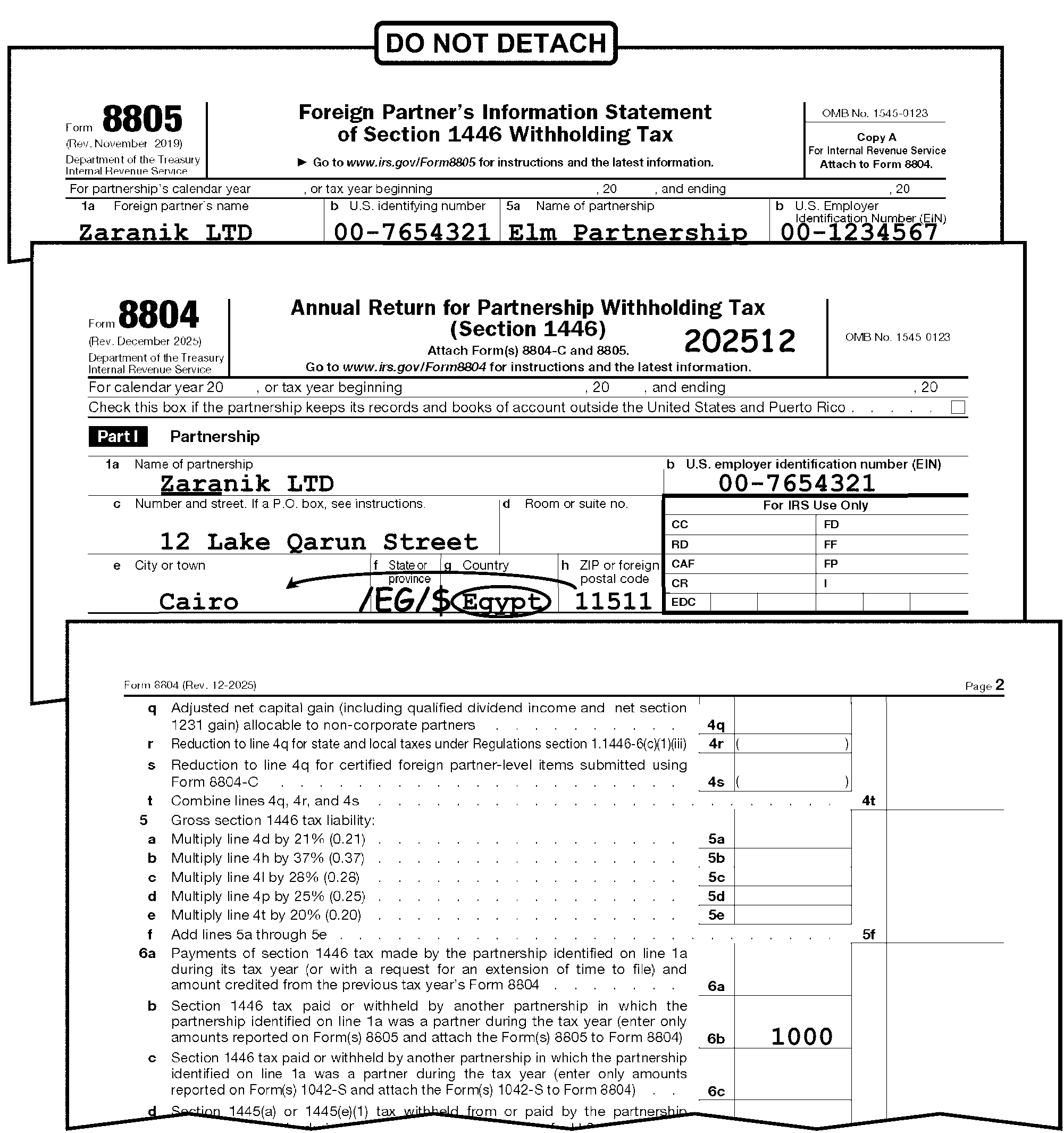
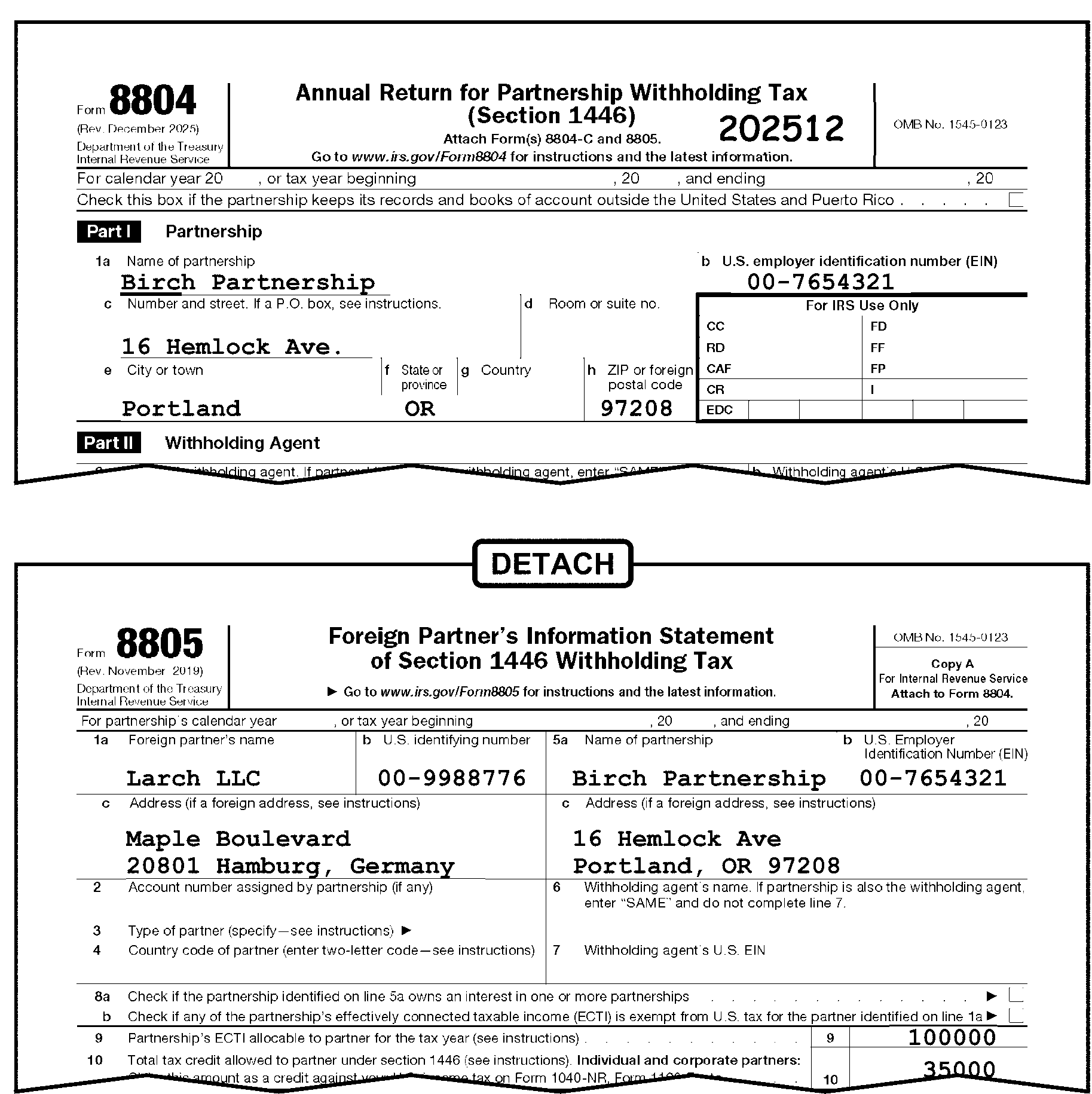
The partnership must attach Form 8805 Copy A to its Form 8804. This document (Form 8805 Copy A) is to be detached from Form 8804 and forwarded to Batching and Numbering for processing. A DLN beginning with "60546" will be assigned to the Form 8805. If Copy A is not attached use the copy submitted. However, if no other copy of Form 8805 is present, correspond for the missing form. If the copy is to verify Line 6b, see IRM 3.21.15.22.2.23 Form 8804 Section 1446 Withholding on Tiered Partnership - Line 6b.
Caution:
If the partnership attaches multiple copies of Form 8805 (Copies B, C or D) to its Form 8804, along with Form 8805 Copy A for the same foreign partner, "X" (delete) the other copies (B, C and D) and staple them behind Form 8805 Copy A prior to forwarding the Forms 8805 to Batching and Numbering. This will help reduce duplicate Form 8805 records from being created in the INTLWebApps database.
-
Taxpayer inquiry requests an adjustment to another return:
-
Remove any attachment requesting an adjustment (ADP or non-ADP).
-
Forward to the BMF International Accounts Management Department for action.
-
-
If the attachment doesn't include the taxpayer's name, address or Taxpayer Identification Number (TIN), enter this information on the attachment.
-
If a tax authorization (Form 2848, Power of Attorney and Declaration of Representative, or Form 8821, Tax Information Authorization) is attached to correspondence, review the correspondence to determine if other requests are involved:
-
If other requests are involved, photocopy the correspondence and send the copy, along with the authorization to the CAF (Centralized Authorization File) function for processing.
-
If other requests aren't involved, send the original correspondence and the authorization to the Campus CAF function for processing.
-
-
Other Unrelated Attachments:
-
Remove other unrelated attachments (such as other returns, requests for tax forms, etc.) from the document being processed, and
-
Route to the proper function for necessary action.
-
-
Always include the following information when forwarding documents to other functions:
-
Name and address of the taxpayer
-
Taxpayer Identification Number
-
Received Date or the words "TIMELY FILED"
-
Tax Period and type of document from which detached
-
Action required to be taken
-
-
If an attachment is removed because the majority of the information is unrelated to the Form 8804 being processed:
-
Leave an "Action Trail."
-
Route the attachment to the appropriate function.
-
-
Review all attachments on the return before considering it processable.
-
Attachments may only be detached when specifically instructed.
-
Edit Action Trail(s) (e.g., 2848 DETACHED) in the lower left corner going vertically up the side of the return.
-
-
Follow the general guidelines below for each attachment. The table contains routing instructions for specific forms and/or documents attached to Form 8804:
Document Detach Descriptions/Actions A General Power of Attorney or a Durable Power of Attorney or Tax Information Authority is submitted on any document other than Form 2848 or Form 8821 No Take no action. Leave the Power of Attorney or Tax Authorization attached to the return. Do not route to the CAF function. Closing Agreement No Leave attached. TD F 90-22.1, Report of Foreign Banks and Financial Accounts Yes Transship to:
U.S. Department of the Treasury
P. O. Box 32621
Detroit, MI. 48232-0621CP 259/959 (Spanish version) No Correspondence is attached or taxpayer’s response indicates: Then, Route to Compliance Services Collection Operations (CSCO). Use return address on Computer Paragraph (CP) notice;-
Taxpayer disagrees that they are required to file the return.
-
Only page one of the return is attached.
-
Employer Identification Number (EIN) on notice doesn't match EIN on return.
-
Return requested on notice not the same as return submitted.
-
Taxpayer asking question(s) or requesting the IRS take action(s) on their account.
-
Case involves any other IRS action(s) C&E not trained to complete.
-
Brookhaven - Stop #662
-
Memphis - Stop #81
-
Philadelphia - 4-N31.142
If none of the above apply, correspondence or written response to the notice is not attached and/or, "599" is notated:-
Move the notice to the back of the return.
-
Continue processing the return.
CP 518 No Correspondence is attached or taxpayer’s response indicates: Then, Route to Compliance Services Collection Operations (CSCO). Use return address on CP notice;-
Taxpayer disagrees that they are required to file the return.
-
Only page one of the return is attached.
-
EIN on notice doesn't match EIN on return.
-
Return requested on notice not the same as return submitted.
-
Taxpayer asking question(s) or requesting the IRS take action(s) on their account.
-
Case involves any other IRS action(s) C&E not trained to complete.
-
Brookhaven - Stop #662
-
Memphis - Stop #81
-
Philadelphia - 4-N31.142
If none of the above apply, correspondence or written response to the notice is not attached and/or, "599" is notated:-
Move the notice to the back of the return.
-
Continue processing the return.
Letters: -
Letter 112C
-
Letter 282C
-
Letter 2255C
-
Letter 2284C
No -
Identify which organization initiated the letter to the taxpayer (e.g., what organization signed the letter?).
-
Route letters initiated by Accounts Management (AM) to Accounts Maintenance Research (AMRH):
-
Ogden - Mail Stop 6712
-
Kansas City - Mail Stop N2 6800
-
-
Route letters initiated by Collections as follows:
-
If correspondence is attached or taxpayer’s response indicates any of the following:
Then, Route to Compliance Services Collection Operations (CSCO). Use return address on letter;-
Taxpayer disagrees that they are required to file the return.
-
Only page one of the return is attached.
-
EIN on letter doesn't match EIN on return.
-
Return requested on letter not the same as return submitted.
-
Taxpayer asking question(s) or requesting the IRS take action(s) on their account.
-
Case involves any other IRS action(s) C&E not trained to complete.
-
Brookhaven - Stop #662
-
Memphis - Stop #81
-
Philadelphia - 4-N31.142
-
-
If none of the above apply, correspondence or written response to the letter is not attached and/or, no "599" is notated:
Move the letter to the back of the return and continue processing.
-
Includes tax liability for Multiple Tax Periods or Types of Tax No -
Numbered returns route to Rejects.
-
Unnumbered returns, prepare a dummy return if possible: otherwise correspond.
Other Tax Returns (original signature) Yes Petitions in opposition of tax law provisions Yes Route to:
IRS
≡ ≡ ≡ ≡ ≡
1111 Constitution Avenue, NW
Washington, DC 20224State Tax Returns, original or copy, with an original signature Yes Route to Receipt & Control. State Tax Returns (Photocopy, facsimile or no signature) No Leave attached. Statement establishing Reasonable Cause for delinquent filing Yes -
Issue Letter 1382C (Penalty Removal Request Incomplete). (See IRM 3.21.15.15.2 (6).)
-
Continue editing the return.
Remittance found No Immediately hand carry return and remittance to supervisor. Request for Acknowledgement No No Action Required. Request for information or inquiries Yes -
Photocopy any data necessary to process the return.
-
Attach the photocopy to the return.
-
Route original attachment to the proper office for necessary action.
Requests for Installment Agreement Yes Route as follows:
Ogden - Route to Collections Mail Stop 5500.
Kansas City - Route to Mail Stop P4 5000.Request for Adjustment to Form 8804 Yes Route to OAMC (Ogden Accounts Management Campus). Attachment must contain Name, Address, EIN and Received Date. Enter if missing. Request for money transfer Yes Correspondence notates transfer of money to the return you are working: -
Prepare Form 3465, Adjustment Request, to route the request to Rejects Unit.
-
Hold the return for two cycles before processing.
Correspondence notates transfer of money from the return you are working:-
Prepare Form 3465, Adjustment Request to route the request to Accounts Management.
-
Edit CCC "X" on Form 3465 to freeze any overpayment. (Don't edit on Form 8804).
-
Continue processing the return.
Request for Form 8109, Deposit Slips or Coupons Books No No action required. Request for Forms or Schedules No If requesting current year forms: -
Prepare Form 4190, Order Tax Forms and Publications.
-
Forward to National Distribution Center (NDC) for processing.
If requesting prior year forms:Form 1042-S, Foreign Person's U.S. Source Income Subject to Withholding, Copy A ONLY Yes Route to OSPC. Form 1042-S, Foreign Person's U.S. Source Income Subject to Withholding, Copy B ONLY No Leave attached to Form 8804. Form 1042-S, Foreign Person's U.S. Source Income Subject to Withholding, Copy C ONLY and Copy D ONLY No Leave attached and just staple up any additional copies. Form 1042-S, Foreign Person's U.S. Source Income Subject to Withholding, Copy E ONLY Yes Return to Withholding Agent. Form 2220, Underpayment of Estimated Tax by Corporation No Leave attached to Form 8804. Form 2848, Power of Attorney and Declaration of Representative Yes -
Edit taxpayer name and TIN on Form 2848 if missing.
-
Edit received date on Form 2848.
-
Route Form 2848 to CAF function.
-
Edit action trail on tax return.
Form 5471, Information Return of U.S. Persons With Respect To Certain Foreign Corporations or Form 5472, Information Return of a 25% Foreign-Owned U.S. Corporation or a Foreign Corporation Engaged in a U.S. Trade or Business (Under Sections 6038A and 6038C of the Internal Revenue Code) Yes Route to Receipt and Control for rebatch (form will be scanned for LB&I purposes). Form 5495, Request for Discharge from Personal Liability Under Internal Revenue Code Section 2204 or 6905 No Leave attached. IRC 6020(b) No Edit CCC "A" and CCC "4."
See IRM 3.21.15.15.3.1, Prepared by Collection.Form 7004, Application for Automatic Extension of Time To File Certain Business Income Tax, Information, and Other Returns Yes If the extension is for a different period, route to Receipt and Control for re-batch. Form 8233, Exemption from Withholding on Compensation for Independent (& certain Dependent) Personal Service of a Nonresident Alien Individual Yes Transship to:
Department of the Treasury
Internal Revenue Service
Philadelphia, PA 19255-0725Form 8288, U.S. Withholding Tax Return for Certain Dispositions by Foreign Persons, with original signature Yes, if attached to another return being edited Route to OSPC. Form 8288, U.S. Withholding Tax Return for Dispositions by Foreign Persons, Copy of return No X out Form 8288 and leave attached. Form 8288-A, Statement of Withholding on Certain Dispositions by Foreign Persons, No Leave attached. Form 8288-B, Application for Withholding Certificate for Dispositions by Foreign Persons of U.S. Real Property Interests Yes Route to Ogden AM department. Form 8804, Annual Return for Partnership Withholding Tax (Section 1446),with original signature Yes, If attached to another Form 8804 return being edited Route to Receipt and Control for rebatch. Form 8804, Annual Return for Partnership Withholding Tax (Section 1446), Copy of a different, original return No, but check for posting If not posted to BMF, send the return to be processed. Form 8804 Schedule A, Penalty for Underpayment of Estimated Section 1446 Tax by Partnerships No Leave attached Form 8804-C, Certificate of Partner-Level Items to Reduce Section 1446 Withholding Yes, See IRM 3.21.15.1.1.3 Route to:
Internal Revenue Service
4-F23-142 Examination Branch
2970 Market St.
Philadelphia, PA 19104Form 8804-W, Installment Payments of Section 1446 Tax for Partnerships Yes or No -
Leave attached to Form 8804
-
If attached to a return other than a Form 8804, detach and return to the taxpayer.
Form 8804-W, Installment Payments of Section 1446 Tax for Partnerships Yes If attached to a return other than a Form 8804, detach and return to the taxpayer. Form 8805, Foreign Partner’s Information Statement of Section 1446 Withholding Tax, Copy A Only Yes, See IRM 3.21.15.14 (5) After Form 8804 is edited, detach Form 8805 Copy A and forward to Batching and Numbering. Form 8805, Foreign Partner’s Information Statement of Section 1446 Withholding Tax, Copy B or C Only Yes or No See IRM 3.21.15.14 (12) for decision on whether to detach or not. Form 8805, Foreign Partner’s Information Statement of Section 1446 Withholding Tax, Copy D Only Yes or No See IRM 3.21.15.14 (12) for decision on whether to detach or not.
If detaching, route to Receipt & Control and notate RETURN TO WITHHOLDING AGENT. (Taxpayers are not required to send Copy D to the IRS)Form 8809, Application for Extension of Time to File Information Returns No Leave attached. Form 8813, Partnership Withholding Tax Payment Voucher (Section 1446) No "X" -out Form 8813 and leave attached. Form 8821, Tax Information Authorization Yes -
Edit taxpayer name and EIN on Form 8821 if missing.
-
Edit received date on Form 8821.
-
Route Form 8821 to CAF function.
-
Edit action trail on tax return.
Form 8822, Change of Address Yes Route to Entity Control if the address is different than what is on the forms entity. Form 9465, Installment Agreement Request Yes Route to Collections Mail Stop 5500 Form 14039-B, Business Identity Theft Affidavit No If a specific function is indicated by the envelope address or an IRS CP notice or IRS letter, place the Form 14039-B on top and route Form 14039-B and the return to the specific function.
If Form SS-4, Application for an Employer Identification Number and Form 14039-B are received, route returns to:
Internal Revenue Service
Ogden BMF Entity
Mail Stop 6273
Ogden, UT 84201.
For the following returns:-
Loose Form 14039-B.
-
No correspondence attached (e.g., no IRS CP notice or IRS letter).
-
The envelope is not addressed to a specific function.
Place the Form 14039-B on top of the return and route to the local Image Control Team (ICT).
Ogden - Mail Stop 6552.Form 14157, Return Preparer Complaint Yes Route to:
Attn: Return Preparer Office
401 W. Peachtree Street NW
Mail Stop 421-D
Atlanta, Georgia 30308Form SS-4, Application for Employer Identification Number Yes Route to Entity Control. Form W-7, Application for IRS Individual Taxpayer Identification Number Yes Transship to:
Internal Revenue Service
ITIN Operation
P.O. Box 149342
Austin, TX 78714-9342Form W-8BEN, Certificate of Foreign Status of Beneficial Owner for United States Tax Withholding or Form W-8 BEN-E No Leave attached. Treas reg 1.1446-6 (26 CFR 1.1446-6) Notation Withholding Certificate or any associated reasonable cause request Yes Route to:
Internal Revenue Service
4-F23-142 Examination Branch
2970 Market St.
Philadelphia, PA 19104Section 108(i) (26 USC 108) Election No Leave attached. Protective Claim Yes Route to Accounts Management. -
-
Use the following instructions when processing special or nonstandard returns for Form 8804, Annual Return for Partnership Withholding Tax (Section 1446).
-
A return is considered Amended based on the following:
-
The word Amended in the top margin of the form.
. -
Words such as "Supplemental" , "Corrected" , or "Additional" are present.
-
Any indication from the taxpayer that a previous return was filed.
-
The return appears to be a duplicate and IDRS research shows a Transaction Code (TC) 150.
-
-
Examine the return for attachments:
-
Don’t separate any related attachments submitted to explain the reason for the Amended Return. Accounts Management may use the information.
-
Detach any unrelated documents and route them to the correct function using Form 4227, Intra-SC Reject or Routing Slip, and edit the Action Trail on the return.
-
-
If you have an amended Form 8804, edit CCC "G" and DO NOT detach any Form(s) 8805 or statements from the Form 8804 return.
-
Follow the instructions in the chart below when there is an indication of an amended return:
If Then Compliance Services entered "TC 59X" or "ICS" on the return, Don't edit CCC "G." Process the return as an original. Statute stamped the return "Delinquent Original Cleared for Processing," Don't edit CCC "G." Process the return as an original. Form 3893, Re-Entry Document Control, or Form 13596, Reprocessing Returns, is attached, Don't edit CCC "G" . See IRM 3.21.15.16, Re-Entry Document Control. None of the above are present, Edit CCC "G." Don't use any other codes with CCC "G" . -
The following data must be edited on all amended returns:
-
Name control: IRM 3.21.15.21.1, Entity Perfection - Name Control, Line 1a.
-
EIN, see IRM 3.21.15.21.2, Entity Perfection - Employer Identification Number (EIN), Line 1b.
-
Tax period, see IRM 3.21.15.17, Editing the Tax Period.
-
CCC "G."
-
Received Date: IRM 3.21.15.19, Received Date.
-
Signature: IRM 3.21.15.23, Signature.
-
-
A return is normally delinquent if it is not received on or before the Return Due Date (RDD). See IRM 3.21.15.1.1(4), Background for taxable years beginning in 2016 and later. However, accept the return as timely filed if the received date is within the ≡ ≡ ≡ ≡ ≡ ≡ ≡. See IRM 3.10.72, Receiving, Extracting, and Sorting or IRM 3.10.73 Batching and Numbering.
-
Accept a return as timely if the return was mailed in time to reach the IRS through normal handling within the legal period but, through no fault of the taxpayer, it wasn't delivered.
-
Consider a return timely if it appears that the Post Office might have sent it to another government agency in error, or if the original envelope bears a timely postmark or a timely date stamp by that agency. However, if the return was erroneously addressed to another agency, it will be date stamped with the current date when the IRS received it.
-
See IRM 3.21.15.1.1, Background, for information on the due date of Form 8804, Annual Return for Partnership Withholding Tax (Section 1446).
-
If a return is delivered to the IRS after the date prescribed for filing, consider the following:
-
If the return is truly delinquent, check the return for an explanation of late filing. If the taxpayer attaches correspondence with a reasonable cause explanation for failure to file a timely return, take the following action:
-
Detach the reasonable cause explanation correspondence from the return.
-
Complete Form 3499, Informational Transmittal, and forward to Accounts Management, BMF International unit. In the remarks area write "Process attached Reasonable Cause Correspondence TC 150 to post in 4 weeks."
-
Prepare Correspondence Action Sheet for IDRS Letter 1382C (use paragraphs "A and S" ) and assign it to a clerk for input to IDRS or follow local procedures. It may or may not include the Rejects function.
-
Continue processing Form 8804. Don't attach the Correspondence Action Sheet Letter 1382C to the return.
-
-
Compliance functions (Collections and Examination) secure returns from the taxpayer and prepare returns if the taxpayer doesn't provide them.
-
Compliance notates:
-
Prepared tax returns with "6020(b)" or "SFR" (Substitute for Return).
-
Secured tax returns with "TC 59X" or "ICS" or "Process as Original" with a Form 13133, Expedite Processing Cycle, attached with the "Delinquent Return" box checked.
-
-
When the taxpayer doesn’t file a required return, IRC 6020(b) is the authority for the IRS to prepare the return.
-
These returns are identified by the notation: "PREPARED AND SIGNED UNDER THE AUTHORITY OF SECTION 6020(b) OF THE INTERNAL REVENUE CODE" which is located in the center bottom of Page 1 of the return.
-
Returns must have an IRS Received Date. If missing, follow the normal procedures for editing the Received Date. See IRM 3.21.15.19, Received Date.
-
Compliance Function representatives must sign returns. If not, route to Compliance using Form 4227, Intra-SC Reject or Routing Slip.
-
Edit CCC "4" , see IRM 3.21.15.20, CCC "A" .
-
Edit CCC "D" if the Compliance Function Representative notates "DO NOT ASSESS FAILURE TO PAY PENALTY" and the return due date (without regard to extensions) is July 30, 1996 or prior.
-
Do Not correspond with the taxpayer for unprocessable conditions. If the return is completely unprocessable, edit CCC "3" and continue processing.
-
Edit CCC "W" if the Received Date is more than two years and nine months after the Return Due Date. Do Not send the return to Statute Control. See IRM 3.21.15.20, Computer Condition Codes (CCC) - Form 8804 and IRM 3.21.15.19., Due Date Chart.
-
-
These returns are identified by the notations: "TC 59X" or "ICS" .
-
Do Not edit CCC "G" on these returns.
-
Use approved Correspondence Action Sheet to correspond for conditions that are unprocessable (e.g., missing signatures, missing schedules).
-
Edit CCC "W" if the Received Date is more than two years and nine months after the Return Due Date. Don't send the return to Statute Control. See IRM 3.21.15.20, Computer Condition Codes (CCC), - Form 8804, for more information.
-
-
These returns are identified by the notation: "SFR" or "SUBSTITUTE FOR RETURN" on Page 1. See IRM 3.21.15.15.3 (2)a for more instructions.
-
Return must have a Received Date. If no Received Date is present, follow the normal procedures for editing the Received Date.
-
Do Not correspond with the taxpayer for unprocessable conditions. If the return is unprocessable, edit CCC "3" and continue processing.
-
If Form 13133, Expedite Processing Cycle is attached, edit the Computer Condition Codes that are checked on the form.
-
Edit CCC "W" if the Received Date is more than two years and nine months after the Return Due Date. Do Not send the return to Statute Control.
-
-
These returns are identified by the notation: "Process as Original" on Page 1 of the return with a Form 13133, Expedite Processing Request, attached with the "Delinquent Return" box checked.
-
Do not edit CCC "G" on these returns.
-
Use approved Correspondence Action Sheet to correspond for conditions that are unprocessable (e.g., missing signatures, missing schedules). See IRM 3.21.15.15.3 (1)a for more instructions.
-
Edit the Computer Condition Codes that are checked on Form 13133.
-
Edit CCC "W" if the received date is more than two years nine months after the Return Due Date. Do Not send the return to Statute Control. See IRM 3.21.15.20, Computer Condition Codes (CCC) - Form 8804, for more information.
-
-
Businesses use frivolous arguments for expressing dissatisfaction with the substance, form or administration of the tax laws by trying to illegally avoid or reduce tax liabilities. See IRM 25.25.10, Frivolous Return Program, and Exhibit 3.21.15-7 Potential Frivolous Arguments for Examination Review, for a list of recognized frivolous arguments made by businesses.
-
Review the return to decide whether it appears to be a frivolous return.
Frivolous Return Criteria
If Then The return meets any of the conditions shown as a frivolous return, see Exhibit 3.21.15-7, Potential Frivolous Arguments for Examination Review. If the return shows Action Code 331 and has a Form 4227, Intra-SC Reject or Routing Slip attached with the remarks, "Refer to Exam FRP for audit after processing," continue to next procedure. Remove return from the batch and place the return in the locally designated basket for Examination, Frivolous Return Program (FRP) for review. Examination has selected the return as frivolous, shown by an Action Code 331 and a Form 4227, Intra-SC Reject or Routing Slip, with the remarks, "Refer to Exam FRP for audit after processing," but sends the return for processing, Continue processing the return using procedures in IRM 3.21.15. However, don't circle or void the Action Code showing a frivolous return. -
Don’t consider the following returns as frivolous, unless there is other evidence of a frivolous argument:
-
Returns that have only zeros, blanks, or no entries.
-
Returns showing "None" , "Not Liable" , etc.
-
-
Criminal Investigation (CI) investigates potential criminal violations of the Internal Revenue Code (IRC) and related financial crimes. Criminal violations of the IRC include willful attempts to evade or defeat the income tax. Criminal tax violations also include the willful failure to collect or pay over tax and false claims for refunds based on bogus return information.
-
If CI has stamped the return, don't send for further CI action.
-
For returns with refund claims ≡ ≡ ≡ ≡ ≡ ≡ ≡ ≡ ≡ ≡ ≡ ≡, do the following:
Refund Claim Ogden, and Kansas City ≡ ≡ ≡ ≡ ≡ ≡ ≡ ≡ ≡ ≡ ≡ ≡ ≡ ≡ ≡ -
Make a copy of the first two pages of the tax return along with any page of the return that appears suspicious.
-
Attach Form 4227, Intra-SC Reject or Routing Slip, to the copy.
-
Route the copy to Ogden, Mail Stop 9001, Criminal Investigation (CI).
-
Edit an action trail "Copy to CI" , or "CI Referral" , or similar language in the lower left corner going vertically up the side of the return.
-
Edit Action Code 341 or CCC "U" (whichever is applicable) on the return. See IRM 3.21.15.7, Refund Returns (45 Day Jeopardy and High Dollar Refunds).
-
Continue processing the return.
-
-
Because of the repetitive nature of the Code and Edit (C&E) function, C&E Tax Examiners often recognize income tax return data which is outside of the norm for data found on similar returns for each income tax return type. If C&E finds return characteristics not meeting Audit Code or Exam referral criteria it deems suspicious, CI is available to review the referral.
-
If a suspicious return is found, do the following:
-
Make a copy of the first two pages of the tax return along with any page of the return that appears suspicious.
-
Attach Form 4227, Intra-SC Reject or Routing Slip, to the copy.
-
Route the copy as shown in the table below.
Ogden Kansas City Mail Stop 9001, Criminal Investigation (CI) Mail Stop S2 9000, Criminal Investigation (CI) -
Edit an action trail "Copy to CI" , or "CI Referral" , or similar language in the lower left corner going vertically up the side of the return.
-
Continue processing the return.
-
-
If the return fits other criteria (e.g., Frivolous Argument), take proper action.
-
The primary goal in identifying tax returns for examination is to promote the highest degree of voluntary compliance. Examination gives support and helps Submission Processing (SP) with any questionable return found during processing. Exam has a vast multitude of programs and tolerance criteria already found in various IRM sections. SP can refer any questionable return to Exam, unless prohibited by instructions currently found in several IRMs.
-
Reprocess a return posted to the wrong account or module to post it to the correct account module.
-
Some re-entry returns may have originally been filed electronically (E-File) or via Modernized E-file (MeF). These returns may be identified by the presence of Mod E-File printouts in lieu of the actual return. Do not correspond for missing signatures on these documents.
-
Each re-entry return must have a Form 3893, Re-entry Document Control, or Form 13596, Reprocessing Returns, attached.
-
Form 3893 is used to reinput documents that haven't posted to an account or module.
-
Form 13596 is used to reprocess documents to the correct account or module that had previously posted to the wrong account or module.
-
-
Always leave the Form 3893 or Form 13596 on the front of the return. It must remain as a permanent part of the document.
-
Examine Form 3893 or Form 13596 to determine the action needed to make the return processable.
-
Form 3893, Re-entry Document Control, is used to reinput a return that hasn't posted to an account or module.
-
If more than one return is in the batch and only the top Form 3893 has an entry in Box 1 (Alpha/Numeric block control no.), edit all returns using current processing instructions and keep all returns clipped together.
-
Circle the CCC "G" if present.
-
Don’t edit CCC "G" on amended returns.
-
Don’t send Letter 1382C, Penalty Removal Request Incomplete, if a request for reasonable cause is attached.
-
If the return is not edited according to current processing instructions, circle any Action Codes, Computer Condition Codes and any other edit marks that are no longer applicable. Re-edit according to current processing instructions.
-
If the return is edited according to current processing instruction, ensure that the information from Form 3893 is edited on the return.
Form 3893, Re-entry Document Control Action Taken Box 14 (Remarks) Ensure that the information is edited to the return. Box 15 (Process as) -
Circle out any green rocker money amounts and edit marks that may indicate a receipt of remittance.
-
Don’t change any tax due amounts.
-
-
Examine returns that have any color other than red editing in the tax data section to determine if the corrections are the result of improper perfection or taxpayer error.
If Then Improper perfection Edit the same correction in red to the appropriate area. Taxpayer error Leave the entries as shown on the document. -
A received date must be present on all Re-input returns:
If Then Received date is not present Edit a received date to the middle of the return. Multiple received dates are present Circle out all but the earliest date. -
When more information is needed to make the return processable, prepare approved Correspondence Action Sheet or Form 4227, Intra-SC Reject or Routing Slip, for the proper action (e.g., correspondence, research).
-
When perfection is not possible, attach Form 4227 noting, "PERFECTION NOT POSSIBLE" and return to initiator.
-
Form 13596, Reprocessing Returns, is used to reprocess a return to the correct account or module that had previously posted to the wrong account or module.
-
Circle CCC "G" if present.
-
Don’t edit CCC "G" on amended returns.
-
Do not send Letter 1382C if a request for reasonable cause is attached, because this responsibility belongs to the customer service representative initiating the re-entry document.
-
If the return is not edited according to current processing instructions circle any Action Codes, Computer Condition Codes and any other edit marks that are no longer applicable. Re-edit according to current processing instructions.
-
If the return is edited according to current processing instructions, ensure that the information from Form 13596 is edited on the return.
Form 13596, Reprocessing Returns Action Taken TIN correction Edit correct TIN on return. Tax period correction Edit correct tax period ending on return. Reasonable Cause Edit appropriate computer condition code: -
Edit CCC "R" if the "Failure to File (FTF)" box is checked.
-
Edit CCC "D" if the "Failure to Pay (FTP)" box is checked.
-
-
Examine returns that have any color other than red editing in the tax data section to determine if the corrections are the result of improper perfection or taxpayer error.
If Then Improper perfection Edit the same correction in red/green (per local procedure) to the appropriate area. Taxpayer error Leave the entries as shown on the document. -
A received date must be present on all reprocessed returns:
If Then IRS Received date is not present Edit an IRS Received Date to the middle of the return. Multiple received dates are present Circle out all but the earliest date received by the IRS. -
Circle out the green rocker or green check and edit marks that may indicate a receipt of remittance.
-
When more information is needed to make the return processable prepare an approved Correspondence Action Sheet or Form 4227, Intra-SC Reject or Routing Slip, for the proper action (e.g., correspondence, research).
-
The initial tax period to process to the BMF under MFT 08 is tax period ending 12/31/2004 (200412).
Note:
Transcription under this program is permitted ONLY for Form 8804 filed for tax years ending December 31, 2004 and subsequent. If the TP uses a prior year return for the current year taxes, correct the pre-printed tax year by lining through the last two digits and edit the current year to the right of the tax year.
-
Edit the tax period in "YYYYMM" format on Form 8804, in the top right-hand corner of Form 8804.
-
If no tax period indicated, the tax period, by "default" is the current calendar year.
-
Edit the Tax Period Beginning date above and to the left of the Form 8804 title area in MMDDYYYY format if the Tax Period Beginning date is present. If the Tax Period Beginning date is not present, editing is not required. See Figure 3.21.15-2 below.
-
A tax period ends on the last day of a month. Ignore a minor discrepancy such as October 30, instead of October 31. However, don't ignore returns with a tax period beginning and ending dates that would make the tax year longer than one year or 12 months (e.g., January 1, 2014 to February 28, 2016). Correspond for the tax period when the tax year exceeds one year.
-
Tax periods reported under the 52-53 week rule may not end more than six days before or three days after the end of a month.
-
If the tax period ending date is not more than three days after the beginning of the month, edit the previous month.
-
If the tax period ending date is not more than six days before the end of the month, edit the month shown.
-
-
A "FINAL" short-period return ends on the date the partnership was dissolved.
-
On a final return, if the Tax Period’s month and year, is equal to or later than the received date’s month and year, edit the Tax Period to be one month prior to the Received Date.
-
Edit CCC "Y" on a short period return.
-
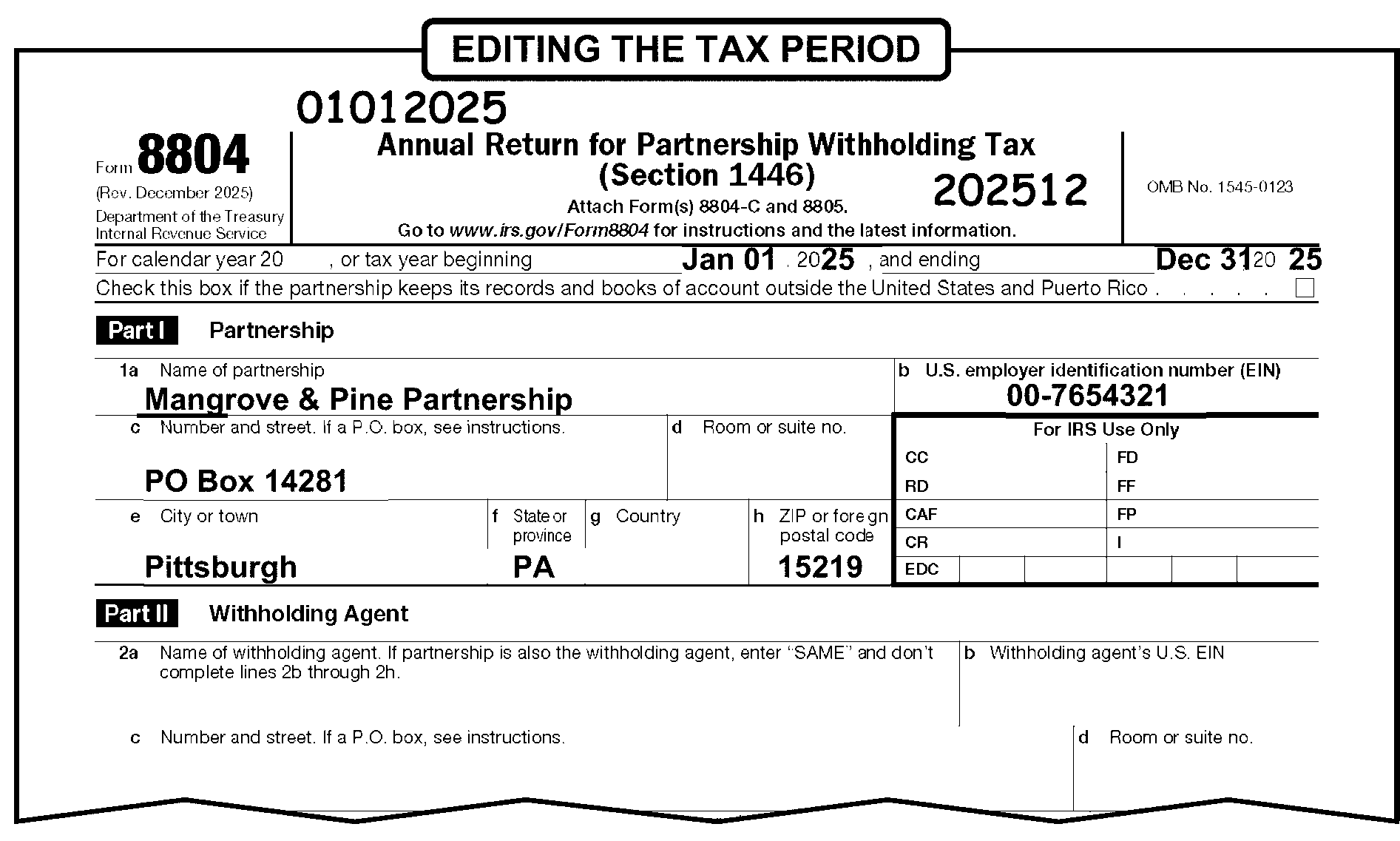
-
An early-filed Form 8804 for tax period 202612 (that is, filed before January 1, 2027) must be held for processing in 2027.
-
An early-filed Form 8804 return is to be held for processing until the beginning of the appropriate processing year.
-
Edit CCC "U" on Form 8804.
-
Prepare Form 4227, Intra-SC Reject or Routing Slip, by placing an "X" in the Rejects Correction box and stapling Form 4227 to the front of the document. Write, "Early filed return - hold for processing" in the remarks area, and leave the early filed return in the pack of work.
-
Return will be routed to Rejects by ERS after ISRP processing.
-
-
The "Books and Records" check box can be found directly under the printed tax year on Form 8804, Annual Return for Partnership Withholding Tax (Section 1446).
-
If the check box is marked, edit a "1" to the right of the check box.
-
No editing is required if the check box is not marked.
-
The date a document is received in the Campus or IRS Office is the date stamped as the "IRS Received Date."
-
All Form 8804 returns require an IRS Received Date.
-
When a , return is delinquent and the taxpayer explains the return is late due to the rejection of a timely filed electronic return, check the return for a MeF rejection notification.
Note:
Taxpayers are instructed to notate in red in the top margin of the return REJECTED ELECTRONIC RETURN to indicate the timely filed return can't be filed electronically. The notation could be anywhere on the return and is not required, but they must attach a copy of the MeF rejection notification.
-
If a MeF rejection notification is not attached, don't perfect the Received Date. If a notification is attached, edit the IRS Received Date in MMDDYY format as follows:
Note:
The taxpayer has 10 days to resubmit an electronically filed return after being rejected and 10 days to submit a paper return after the last rejection. The first transmission of any rejected return must have been filed on or before the due date of the relevant form for this rule to apply.
If And Then The postmark date is within 10 days of the date of the rejection, Edit the IRS Received Date to be the date of the rejection.
For example, postmark date is 03-22-2026 and first rejection is 03-12-2026. Change Received Date to 031225.The postmark date is more than 10 days after the date of the rejection, Leave the IRS Received Date as is.
For example, postmark date is 03-25-2026 and first rejection is 03-12-2026. Leave the Received Date as is.There are two rejections, Within 10 days of one another and one is within 10 days of the postmark date, Edit the IRS Received Date to be the date of the first rejection.
For example, postmark date is 03-22-2026, the second rejection is 03-12-2026. The first rejection is 03-09-2026. Change the Received Date to 030925.There are two rejections with the time between the first rejection and the second rejection greater than 10 days, The second rejection is within 10 days of the postmark date, Edit the IRS Received Date to be the date of the second rejection.
For example, postmark date is 03-22-2026, the second rejection is 03-12-2026. The first rejection is 03-01-2026. Change the Received Date to 031226.There are two rejections and the time between the first rejection and the second rejection is greater than 10 days, The second rejection is not within 10 days of the postmark date, Leave the IRS Received Date as is.
For example, postmark date is 03-25-2026, the second rejection is 03-12-2026. The first rejection is 03-01-2026. Leave the Received Date as is. -
The IRS Received Date may or may not be stamped on the face of the return.
-
A valid Received Date Stamp consists of the following:
-
The word "Received"
-
Month (alpha or numeric)
-
Day (for example "1" or "01" )
-
Year - four digits
-
"Area Office" , Campus, "Field Office" , "Taxpayer Assistance (TAC)" Site plus the "City" location or a functional area within one of these sites (e.g., Compliance Services Collection Operations (CSCO), Examination, Image Control Team (ICT), Correspondence Imaging Inventory (CII), Accounts Management (AM)).
Exception:
Not all IRS offices are designated places for filing, and not all IRS employees are authorized to accept a tax return for processing. If a return contains a received date stamp from other than a Taxpayer Assistance Center (TAC), Lockbox, or IRS campus (Compliance, Accounts Management, or Submission Processing (SP)), circle out the invalid received date and edit the correct received date according to instructions below. For example, returns received by the Taxpayer Advocate Service (TAS) or the IRS Office of Chief Counsel aren't properly filed and a Received Date by that office is not the "IRS Received Date" .
-
-
If the Received Date stamp is not present or the date is illegible or invalid, edit the Received Date in MMDDYY format in the middle of page 1 of the return. See Figure 3.21.15-3. Edit the Received Date according to the following priority:
-
The earliest legible postmark date (U.S. Postal Service, foreign postmark or Private Delivery Service) on the envelope. Rules for using the U.S. Postal Service Postmark (USPS) or foreign postmark date are as follows:
If Then An envelope is not attached, Use the date stamped on the face of the return. A document was returned for insufficient postage, Use the postmark date that corresponds with the correct delivery of the return. The postmark is missing and the envelope is certified, Look for the "USPS.com Track and Confirm" record that was attached to the return (will be in front of the envelope). Use the "acceptance" date on the record to determine timeliness and follow normal editing procedures.
If the "USPS.com Track and Confirm" record is not attached, take no action.An envelope has a USPS and private metered postmark, Always use the USPS postmark. An envelope has a foreign and private metered postmark, Always use the Foreign Postmark. An envelope has two private metered postmarks, Always use the latest private metered postmark. An envelope has only one private metered postmark, Use the private metered postmark. -
Service Center Automated Mail Processing System (SCAMPS) digit date.
-
Revenue officer's signature date.
-
Signature date only if within current year.
-
Julian control date minus 10 days.
-
Current date minus 10 days.
-
-
Edit the IRS Received Date as follows:
If Then A timely IRS Received Date is the only received date stamped on the return, Don't edit. Two or more dates stamped on the return, -
Use the earliest IRS Received Date stamped on the return.
-
Circle all other dates (handwritten or stamped) not needed for transcription.
A Federal return is addressed to the IRS but delivered to a State agency, Use the postmark date as the IRS Received Date. A Federal return is addressed to a State agency, Use the IRS Received Date stamp as the IRS Received Date. The only Received Date on the return is a TAS or Chief Counsel received date, Circle out the TAS or Chief Counsel received date and edit the IRS received date according to instructions. -
-
If a return is faxed to another area of the IRS and then sent to Submission Processing for processing, don't edit the Enterprise Electronic Fax (EEFax) Date as the IRS Received Date. Edit a Received Date according to normal procedures.
-
If Form 8804, Annual Return for Partnership Withholding Tax (Section 1446), is received prior to January 1 of the current processing year:
-
Edit the first day after the end of the tax period as the received date. For example, if the actual received date for a Tax Year 2025 return is "12112025," enter "01012026."
-
If present, circle out the stamped Received Date on the return.
-
-
No editing is necessary if Form 8804 is received after January 1, and the received date is stamped.
-
The table below shows return due date information for Form 8804.
Due Date Chart
TAX PERIOD
ENDING DATEFORM 8804
DUE DATE (Weekends and holidays considered)≡ ≡ ≡ ≡ ≡ ≡ ≡ ≡ ≡ ≡ ≡ ≡ ≡ ≡ FORM 8804
DUE DATE
(when the books and records are kept outside the U.S. and P.R.) (Weekends and holidays considered)≡ ≡ ≡ ≡ ≡ ≡ ≡ ≡ ≡ ≡ ≡ ≡ ≡ ≡ (FORM 7004)
EXTENDED DUE DATESep. 2025 12-15-2025 ≡ ≡ ≡ ≡ ≡ ≡ ≡ ≡ 3-16-2026 ≡ ≡ ≡ ≡ ≡ ≡ ≡ ≡ 6-15-2026 Oct. 2025 1-15-2026 ≡ ≡ ≡ ≡ ≡ ≡ ≡ ≡ 4-15-2026 ≡ ≡ ≡ ≡ ≡ ≡ 7-15-2026 Nov. 2025 2-17-2026 ≡ ≡ ≡ ≡ ≡ ≡ 5-15-2026 ≡ ≡ ≡ ≡ ≡ ≡ ≡ ≡ 8-15-2026 Dec. 2025 3-16-2026 ≡ ≡ ≡ ≡ ≡ ≡ ≡ ≡ 6-15-2026 ≡ ≡ ≡ ≡ ≡ ≡ 9-15-2026 Jan. 2026 4-15-2026 ≡ ≡ ≡ ≡ ≡ ≡ ≡ ≡ 7-15-2026 ≡ ≡ ≡ ≡ ≡ ≡ 10-15-2026 Feb. 2026 5-15-2026 ≡ ≡ ≡ ≡ ≡ ≡ ≡ ≡ 8-17-2026 ≡ ≡ ≡ ≡ ≡ ≡ 11-15-2026 Mar. 2026 6-15-2026 ≡ ≡ ≡ ≡ ≡ ≡ ≡ 9-15-2026 ≡ ≡ ≡ ≡ ≡ ≡ 12-15-2026 Apr. 2026 7-15-2026 ≡ ≡ ≡ ≡ ≡ ≡ ≡ ≡ 10-15-2026 ≡ ≡ ≡ ≡ ≡ ≡ ≡ 1-15-2027 May 2026 8-17-2026 ≡ ≡ ≡ ≡ ≡ ≡ ≡ ≡ 11-16-2026 ≡ ≡ ≡ ≡ ≡ ≡ ≡ 2-15-2027 Jun. 2026 9-15-2026 ≡ ≡ ≡ ≡ ≡ ≡ ≡ 12-15-2026 ≡ ≡ ≡ ≡ ≡ ≡ 3-15-2027 Jul. 2026 10-15-2026 ≡ ≡ ≡ ≡ ≡ ≡ 1-15-2027 ≡ ≡ ≡ ≡ ≡ ≡ ≡ 4-15-2027 Aug. 2026 11-16-2026 ≡ ≡ ≡ ≡ ≡ ≡ ≡ 2-16-2027 ≡ ≡ ≡ ≡ ≡ ≡ ≡ 5-15-2027
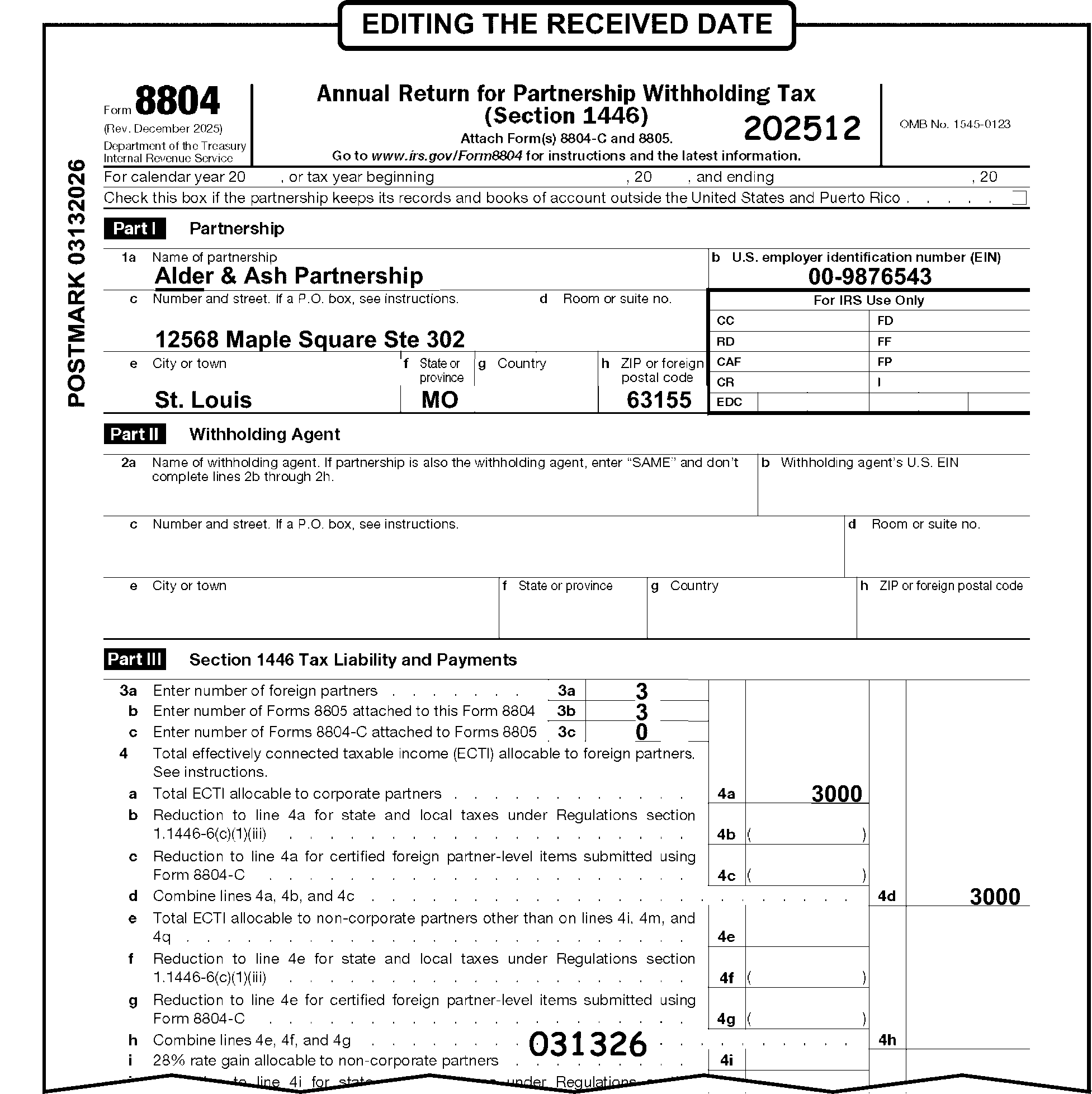
-
Any return with a received date that is two years and nine months or more after the Return Due Date is a potential statute control return.
-
Route Statute returns to the Statute Control Unit daily or more often if needed.
-
Do not route to the Statute Control Unit for clearance, edit CCC "W" and continue processing if any of the following conditions are present:
-
Compliance IRC 6020(b) returns.
-
Secured by Examination/Collections, Secured by TE/GE, Secured by TE/GE Employee Plan (EP) Exam.
-
Returns with Transaction Code (TC) 59X or "ICS" (Integrated Collections System) notated on the face of the return.
-
Returns showing "substitute returns prepared by Examination (SFR)" in top margin of the return.
-
Returns with a stamp indicating a previous clearance by Statute Control within the last 90 days.
-
Return is a 2021 and prior year original. Due to the COVID-19 pandemic and subsequent Submission Processing (SP) and Accounts Management (AM) site closures, SP and AM developed procedures to bypass AM statute clearance and be processed. In addition, any 2021 and prior year returns previously cleared by AM statute won't be returned by SP to AM to be cleared again if the 90 calendar day statute stamp has expired.
-
-
If a return is received with a Form 12412, Operations Assistance Request (OAR), from TAS and is a potential statute control return but is not stamped "Cleared by Statute" , give it to the lead. The lead will contact the TAS employee listed on the OAR for rejection of the return and send it back to TAS for clearance by the Statute Control Unit.
-
Statute returns are unprocessable until they are cleared by Statute Control.
If Then The return is numbered, See IRM 3.21.15.12-
Edit CCC "U" on the return.
-
Leave the return in the batch and continue processing.
The return is unnumbered, -
Don’t continue processing.
-
Pull the return from the batch.
-
Attach Form 4227 Intra-SC Reject or Routing Slip and route to Statute Control Unit.
-
-
Edit CCC "W" if the return was cleared by the Statute Control Unit. Statute will stamp or indicate clearance on the front of the return. See IRM 3.21.15.19 Received Date.
-
Statute stamps "No Statute Issue" or shows clearance on the front of the return. Follow the chart below to determine if a CCC "W" is needed:
If And Then The return Received Date is two years and nine months or more after the Return Due Date, The return is stamped, "No Statute issue" , "Statute N/A" , or a similar statement indicating there is no statute issue, Edit a CCC "W" The return Received Date is less than two years and nine months from the Return Due Date, The return is stamped, "No Statute issue" , "Statute N/A" , or a similar statement indicating there is no statute issue, Do not edit a CCC "W" -
The different periods of limitations expiration dates that are tracked are:
-
Assessment Statute Expiration Date (ASED): Return filed early - three years from the later of (1) the date the Form 8804 is filed or (2) April 15 if the Form 8804 is filed before April 15 of the calendar year following the calendar year that the tax was incurred. No return filed - assessment may occur at anytime. See IRC 6501(a), IRC 6501(b)(2), IRC 6501(c)(3), and IRC 6235(c)(3).
-
Refund Statute Expiration Date (RSED): three years from the time the return was filed or, if later, two years from the date after the tax was paid. See IRC 6511(a) and IRC 6511 (b)(2)(A).
-
Collection Statute Expiration Date (CSED) is generally 10 years from the 23-C date or 10 years from the date of the TC 29X or 30X adjustment. See IRC 6502(a) and IRM 3.21.15.19.1(11).
-
-
There are several conditions that may change the general Assessment Statute Expiration Date (ASED). They include:
-
IRC 6501(c)(1) - False Return
-
IRC 6501(c)(4) - Extensions by Agreement
-
IRC 6501(b)(3) - Substitute for Return by Authority of IRC 6020(b)
Caution:
IRC 6020(b) is not a tax return that triggers the period of limitations on assessment under IRC 6501(a). If the taxpayer subsequently files a return reporting an additional liability, that return constitutes an original tax return allowing for the assessment of any additional amount not already assessed under the Substitute for Return program and triggering the running of the period of limitations on assessment for the tax year.
-
IRC 6501(d) - Is request for Prompt Assessments, which shortens the Assessment Period
-
IRC 6501(e) - Substantial Understatement (in excess of 25%) Omission of Income provides for a six -year period of limitations
-
IRC 6503(a) - Issuance of Statutory Notice of Deficiency (90-day Letter, which suspends the running of the period of limitations)
-
IRC 6503(h) - Bankruptcy
-
IRC 6229(a) through (h)- Partnership Items (effective for tax years beginning before January 1, 2018)
-
IRC 6232(b) – Partnership imputed underpayments
-
IRC 6235 - Period of limitation on making assessments (effective for taxable year beginning after December 31, 2017).
-
-
In the case of a partnership subject to the unified partnership audit and litigation procedures of IRC 6221 - IRC 6234, the issuance of a notice of final partnership administrative adjustment suspends the statute under IRC 6229(d). The partnership can also extend its statute through a Form 872, Consent to Extend the Time to Assess Tax, signed by a general partner on behalf of the partnership, or through a Form 872-P, Consent to Extend the Time to Assess Tax Attributable to Partnership Items, signed by the Partnership Representative.
-
Once a partnership issues Form 8805, Foreign Partner’s Information Statement of Section 1446 Withholding Tax to its partners, the partnership may not claim a refund for any amount of tax shown on the Form 8805 as paid on behalf of the partners. Treas. Regs. 1.1446-3(d)(2)(iv).
-
If a partnership that is subject to the unified partnership audit and litigation procedures of IRC 6221 - IRC 6234 is entitled to a refund, it must file a refund request (Request for Administrative Adjustment - (RAA)) within three years of the filing of the partnership return. Under IRC 6227(a), the RAA must be filed using a Form 8082. If a Form 872-P or Form 872 statute extension is secured from the partnership, the RAA can be filed within this extended period according to IRC 6227.
-
See IRM 25.6, Statute of Limitations, for more statute instructions.
-
Section 1101 of the Bipartisan Budget Act of 2015 (BBA) repeals the TEFRA partnership audit rules for partnership tax years beginning after December 31, 2017. See revised IRC 6221 through IRC 6241. While the new rules generally went into effect for partnership taxable years beginning after December 31, 2017, partnerships were able to elect in to these rules for tax years beginning after November 2, 2015, and before January 1, 2018. See Treas. Reg. 301.9100-22.
-
Remove returns marked as "Protective Claim," "Protective Refund," "Protective Claim for Refund," or similar statement from the batch and route to Accounts Management (AM). Notate "Protective Claim" in the remarks box of Form 4227, Intra-SC Reject or Routing Slip.
-
Up to five Computer Condition Codes (CCC) may be edited.
-
An entry may or may not be present in the CCC field.
-
Only the following characters are valid: A, D, E, F, G, J, O, Q, R, S, U, V, W, Y, 3, 4, 7, or blank.
-
Edit Computer Condition Codes inside the "For IRS Use Only" box, which appears underneath Line 1b. Enter the CCC in the first column, first line identified as "CC" .
Computer Condition Code Description A A non-penalty Schedule A (Form 8804) is attached to Form 8804. D ≡ ≡ ≡ ≡ ≡ ≡ ≡ ≡ ≡ ≡ ≡ ≡ ≡ ≡ ≡ ≡ ≡ ≡ ≡ ≡ ≡ ≡ ≡ ≡ ≡ ≡ ≡ ≡ ≡ ≡ ≡ ≡ ≡ ≡ ≡
(See IRM 3.21.15.20 (5))E Credit elect or penalty payment is to be applied. F
(Final Return)There is a clear indication on the return itself or on an attachment that returns won't be required to be filed for future years. G
(Amended Return)There is a clear indication on the return or on an attachment that the return being processed is not the first return filed for the tax period. J Bypass the FTD Penalty program. O A pre-settlement manual refund was paid. Q Indicates a manual computation of the return with a math error. R ≡ ≡ ≡ ≡ ≡ ≡ ≡ ≡ ≡ ≡ ≡ ≡ ≡ ≡ ≡ ≡ ≡ ≡ ≡ ≡ ≡ ≡ ≡ ≡ ≡ ≡ ≡ ≡ ≡ ≡ ≡ ≡ ≡ ≡ ≡ ≡ ≡ ≡ ≡ ≡ ≡ ≡ ≡ ≡ ≡ ≡ ≡ ≡ ≡ ≡ ≡ ≡ ≡ ≡ ≡ ≡ ≡ ≡ ≡ ≡ ≡ ≡ ≡ ≡
(See IRM 3.21.15.20 (6))S An overpayment appears on Form 8804, Line 11 and/or Line 13 and the taxpayer doesn't specify the amount to be refunded on Line 14a or the application of the overpayment to the subsequent period on Line 15. U
(Unprocessable return)Rejects unprocessable returns, or to issue a manual refund of over one million dollars. V A Delinquent return with Reasonable Cause established, or applicability of Failure to File (FTF) penalty. W Return has been cleared by Statute Control Unit. Y Accept the return as submitted by the partnership (e.g., short period return) 3 No reply to correspondence. To bypass validation of the "CR" (Correspondence Received Date) when the taxpayer fails to reply to IRS-generated correspondence. 4 Return is notated "Prepared under IRC 6020(b)." 7 Denying the reasonable cause explanation for filing and paying late, and issue Letter 854C to deny the request. -
CCC "D" is used when reasonable cause exists for waiver of the failure to pay penalty. However, C&E employees won't make this determination. If the taxpayer attaches correspondence with a reasonable cause explanation for failure to pay, follow the instructions in IRM 3.21.15.15.2 (6).
-
CCC "R" is used on a delinquent return with reasonable cause. CCC "R" prevents the failure to file penalty to be assessed. However, C&E employees won't make this determination. If the taxpayer attaches correspondence with a reasonable cause explanation for failure to file, follow the instructions in IRM 3.21.15.15.2 (6).
-
The entity of a tax return identifies the taxpayer on the Business Master File. The entity area of the return contains the following:
-
Employer Identification Number (EIN)
-
Name
-
"In-care-of" name
-
Address
-
-
The entity area of the return identifies the taxpayer (the filer) on the Business Master File (BMF).
-
Edit Lines 1a through 1h using the following procedures.
-
The name control consists of the first four characters of the filer's partnership name.
-
Valid characters are alpha, numeric, ampersand (&), hyphen (-) and blank. However, blanks are only valid in the last three positions at the end of the name control.
-
Disregard the word "THE" in the name control only when followed by more than one word.
Example:
The partnership name is The Green Parrot, underline the name control Gree. However, if the Partnership name is The Flamingo, underline the name control TheF because the word THE was followed by one word and not more than one word. See Document 7071-A, BMF Name Control Job Aid for more instructions.
-
-
See Job Aid Document 7071-A, BMF Name Control Job Aid, to determine the Name Control.
-
Underline all Name Controls.
-
Edit the Name Control as follows:
If And Then The entity is an IRS label, The check digits aren't present or have been altered, Underline the Name Control. The entity is not on an IRS label, Underline the Name Control. A second name is present and begins with "FKA" (formerly known as), Continue editing the return. A second name is present and begins with "AKA" (also known as) or "DBA" (doing business as), etc., Circle the abbreviations. Unable to determine the Name Control, Unnumbered -
Look through the return for the name and/or research IDRS.
-
If found, edit to the proper location.
-
If not found, route to Entity Control following local procedures.
Unable to determine the Name Control, Numbered See IRM 3.21.15.12, Unprocessable Condition.-
Edit CCC "U."
-
Leave return in batch.
A return indicates the foreign partnership has filed bankruptcy (e.g., shows "RECEIVER," "TRUSTEE," or "DEBTOR IN POSSESSION)" in the entity area or an attachment, Route to Entity Control following local procedures. -
-
The Employer Identification Number (EIN) is a nine-digit number (XX-XXXXXXX) assigned to identify the foreign partnership.
-
The EIN is located on Line 1b or 2b.
-
Determine the EIN as follows:
Note:
If you have access to IDRS, research IDRS for a better EIN instead of editing CCC "U" and forwarding the case to the Entity Control Unit.
If And Then EIN is missing, You can determine the correct EIN from the attachments (Form 8805) and/or schedules, Edit the EIN to the proper location on Line 1b. The EIN is either a Preparer Tax Identification Number (PTIN) an Individual Taxpayer Identification Number (ITIN), or Social Security Number (SSN), Unnumbered -
Remove return from batch.
-
Route to Entity Control following local procedures Form 13934, Entity Document/C&E Merge Transmittal, for EIN assignment.
The EIN is either a PTIN, SSN or ITIN, Numbered See IRM 3.21.15.12, Unprocessable Condition.-
Edit CCC "U."
-
Leave return in batch.
Multiple EINs are present, one on Line 1b and one on Line 2b, Unnumbered Circle out EIN on Line 2b. Multiple EINs are present on Line 1b, Numbered See IRM 3.21.15.12, Unprocessable Condition.-
Edit CCC "U."
-
Leave return in batch.
The EIN contains any of the following conditions and can't be determined from attachments and/or schedules: -
Illegible;
-
Missing;
-
Other than nine digits;
-
All zeros; or,
-
All nines
Unnumbered -
Circle out all illegible EINs, zeros or nines.
-
Look through the return for an EIN and/or research IDRS.
-
If found, edit to the proper location.
-
If not found, route to Entity Control following local procedures.
The EIN contains any of the following conditions and can't be determined from attachments and/or schedules: -
Illegible;
-
Missing;
-
Other than nine digits;
-
All zeros; or,
-
All nines
Numbered See IRM 3.21.15.12, Unprocessable Condition.-
Circle out all illegible EINs, zeros or nines.
-
Edit CCC "U."
-
Leave return in batch.
"PENDING" , "APPLIED FOR," etc., is indicated in the EIN area, Unnumbered -
Circle out the word "PENDING" , "APPLIED FOR" .
-
Look through the return for an EIN and/or research IDRS.
-
If found, edit to the proper location.
-
If not found, route to Entity Control following local procedures.
"PENDING" , "APPLIED FOR," etc., is indicated in the EIN area, Numbered See IRM 3.21.15.12, Unprocessable Condition.-
Edit CCC "U."
-
Leave return in batch.
-
-
Both domestic (U.S.) and foreign addresses must include:
-
The street number.
-
The street name.
-
Any appropriate room or suite designation (i.e., "Suite 2000" ).
-
The City or Town, State, and Zip Code (for domestic addresses).
-
The foreign city or province, country and foreign postal code (for foreign addresses).
-
-
When editing either the mailing or location address information, remember the following guidelines:
-
Ensure that a house or building number is present. Don't accept a building name in place of the numeric designation. Research for the correct address.
-
Always edit the suite, apartment number, room number, etc. at the end of the street address line.
-
If present, edit the street suffix, such as street, drive, lane, terrace, etc.
-
If present, edit the directional information, such as North, South, East, West, etc.
-
If after research a street address or P.O. Box is not found, edit the word "Local" on the street address line.
-
-
An "in-care-of" name can be identified by the words "in-care-of" or the symbols "c/o" or "%" (percent).
-
Ensure the "in-care-of" name is in the proper location:
If Then The "in-care-of" name is located on the street address line preceding the street address, Don't edit. The "in-care-of" name is located below the street address, -
Arrow the "in-care-of" name above the street address.
-
Continue editing the return.
The "in-care-of" name is shown on an attachment, Edit the "in-care-of" name above the street address in the first position. The street address for the "in-care-of" name is different from the street address of the foreign partnership, -
Arrow the "in-care-of" street address below the "in-care-of" name or edit the "in-care-of" street address below the "in-care-of" name if located on an attachment.
-
Underline the second street address.
-
Notate TC 014 in the upper left margin.
-
Pull the return for research/input of TC 014 by the Code and Edit Research Clerk.
-
-
Determine a change in the "in-care-of" name by any of the following:
-
Taxpayer edits or added to the "in-care-of" name (e.g., original "in-care-of" name crossed out, new name added).
-
Information is attached showing a change to the "in-care-of" name or address.
If Then An "in-care-of" name is changed but there is no sign of an address change, -
Edit the "in-care-of" name as shown above.
-
Continue editing the return.
An "in-care-of" name is present and there is a sign of an address change. -
Edit the "in-care-of" name as shown above.
-
Correct the address.
-
Continue editing the return.
-
-
Perfect the address when the mailing address (Street or P.O. Box) is not easily identified.
-
A business may have two addresses. One is the mailing address and the other is the location address or physical location of the business.
-
Perfect the address as follows:
If And Then An attachment shows the address was changed, Edit the new address in the entity section of the return. Form 8822, Change of Address, or Form 8822-B, Change of Address or Responsible Party-Business, is attached, All apply: -
Mailing address information is the same,
-
Form 8822 or Form 8822-B, Line 7, doesn't list a location address,
-
No entry on Form 8822-B, Lines 8 or 9,
Take no action. Form 8822, Change of Address, or Form 8822-B, Change of Address or Responsible Party-Business, is attached, Any applies: -
Mailing address information is different,
-
Form 8822 or Form 8822-B, Line 7, lists a location address,
-
Form 8822-B, Lines 8 or 9, have an entry,
Detach Form 8822 or Form 8822-B and route to Entity Control following local procedures using Form 13934, Entity Document/C&E Merge Transmittal. Both a P.O. Box and a street are shown, -
Notate "TC 014" in the upper left margin.
-
Pull the return for research/input of TC 014 by the Code and Edit Research Clerk.
Two street addresses are shown, -
Circle out the first street address.
-
Underline the second street address.
-
Pull the return for research/input of TC 014 by the Code and Edit Research Clerk.
One street address is shown, The taxpayer changed the address to a P.O. Box -
Notate "TC 014" in the upper left margin.
-
Pull the return for research/input of TC 014 by the Code and Edit Research Clerk.
The city and state are not shown on the return but are shown on an attachment, Edit the city and state in the entity section of the return. The ZIP Code is missing or illegible, Is not available from the return or attachments, See Document 7475, State and Address Abbreviations, Major City codes (MCCs), ZIP Codes and Countries, to determine the ZIP Code. Only the first three digits of the ZIP Code can be determined, Edit "01" for the fourth and fifth digits. The National Change of Address (NCOA) label is present, Underline the Name Control. It is necessary to edit the street address, See Document 7475, State and Address Abbreviations, Major City Codes (MCCs), ZIP Codes and Countries, for current Address/Street Abbreviations. -
-
The USPS established new address requirements for Army Post Office (APO)/Diplomatic Post Office (DPO)/Fleet Post Office (FPO) addresses. If the old address appears, convert to the new State Code abbreviation based on the ZIP Code (e.g., APO New York, NY 091XX would be converted to APO AE 091XX). Consider APO/DPO/FPO addresses as domestic addresses. See APO/DPO/FPO conversion chart below:
ZIP Code State Code 340 AA 090-098 AE 926-966 AP
-
This is a 35 character field. Valid characters are alpha (a-z) and numeric (0-9).
-
A foreign (international) address is any address that is not in the 50 states, the District of Columbia or any of the U.S. Territories.
-
Consider returns with Army Post Office (APO)/Diplomatic Post Office (DPO)/Fleet Post Office (FPO) addresses as domestic addresses. See IRM 3.21.15.21.5, Entity Perfection - Domestic Addresses- Line 1c.
-
Route returns with a foreign address to Ogden Submission Processing Campus (OSPC) for processing. Prepare Letter 86C, Referring Taxpayer Inquire/Forms to Another Office, to inform the taxpayer the IRS sent the return to Ogden.
-
Consider returns with addresses in the following U.S. Territories as foreign for processing purposes. Edit the same way as domestic addresses.
-
Edit a two-character alpha code on Line 1f for the territory name.
U.S. Territory Abbreviation American Samoa AS Federated States of Micronesia FM Guam GU Marshall Islands MH Northern Mariana Islands MP Palau PW Puerto Rico PR Virgin Islands (U.S.) VI -
A ZIP Code must be present for U.S. Territories. Edit the appropriate ZIP Code if one is not provided. See Exhibit 3.21.15-5, U.S. Territories ZIP Codes.
-
-
All other foreign addresses are edited the same as a domestic address with the following exceptions:
-
Ensure the foreign country is the last entry in the address.
-
Circle the foreign country and edit the country code preceded by a "/" and followed by "/$" (e.g., "/GM/$" is edited for Germany). See Document 7475, State and Address Abbreviations, Major City Codes (MCCs), ZIP Codes and Countries, for official foreign Country Codes.
-
Edit a unique country code for returns filed with an address in Canada. See IRM 3.21.15.21.6.1, Country Code – Canada.
-
If the Foreign address is from Australia, Brazil, Canada, Cuba, Italy, Mexico or The Netherlands, check if the address has a province, state or territory.
Note:
There may be other countries with provinces, states, and territories not listed above, see Coding and Editing BMF Tax Returns, Foreign Addresses Job Aid (Number 2324-002) for more information.
If Then A foreign province, state or territory is present -
Circle the foreign province, state or territory.
-
Edit correct abbreviation. See Exhibit 3.21.15-6, Province, Foreign State, and Territory Abbreviations.
A province, state or territory is not present Continue editing the return. Province, state or territory is shown in abbreviated format Continue editing the return. -
-
-
A ZIP Code is not required on a foreign address. Foreign addresses use a postal code that is entered before the foreign country and is part of the address.
-
To assist Compliance with workload assignment, returns filed with an address in Canada will be edited using a unique country code based on the province.
If Then The foreign address contains a Canadian province name or abbreviation, or postal code beginning letter shown in the table below, -
See Figure 3.21.15-4 to ensure the correct Canadian province abbreviation is present or edited to the return.
-
Circle the country name.
-
Edit the appropriate country code based on the province preceded by a "/" and followed by a "/$" as the last entry in the address.
-
See the table below for a complete list of available codes.
The foreign address doesn't contain a Canadian province/territory name or abbreviation, and can't be determined by the postal code or an attachment, -
Circle the country name.
-
Edit the country code "/XX/$" as the last entry in the address.
Figure 3.21.15-4
Canadian Province Province Abbreviation Postal Code beginning Province/Country Code Alberta AB T XA British Columbia BC V XB Manitoba MB R XM New Brunswick NB E XN Newfoundland and Labrador NL A XL Northwest Territories NT X XT Nova Scotia NS B XS Nunavut NU X XV Ontario ON K, L, M, N, or P XO Prince Edward Island PE C XP Quebec QC G, H, or J XQ Saskatchewan SK S XW Yukon YT Y XY -
-
The city or town must be present for both domestic and foreign addresses.
-
The valid characters are alpha (a-z) and blank.
-
Research the ZIP Code directory to determine the city or town and/or state if:
-
The address is a U.S. address.
-
The city or town and/or state is missing or incomplete.
-
The ZIP Code is present.
-
-
If the city or town and/or state can't be determined from the Zip Code or other available information (i.e., envelope, if attached), edit the partnership address from Form 8805, Line 5c.
-
If the city or town listed is a major U.S. city or town, it must be followed by the Zip Code.
-
If the address is a foreign address which includes a Province designation:
-
Circle out the name of the province.
-
Edit the province abbreviation. See Exhibit 3.21.15-6.
-
A province abbreviation must be present for Australian and Canadian addresses.
-
-
A state must be present for all U.S. addresses.
-
Valid characters are alpha (a-z).
-
If the state name is spelled out, do not edit the two-digit state code. ISRP will enter the two digit state code.
-
If the address is a foreign address ISRP will automatically enter a period blank in the state field.
-
When the state is missing or illegible, research attachments and/or ZIP Code directory. If not found research IDRS.
-
A ZIP Code must be present for U.S. addresses.
-
Only numeric characters (0-9) and blank are valid.
-
The U.S. ZIP Code must contain at least five and may contain up to twelve characters.
-
If the address is a U.S. address and the ZIP Code is missing or incomplete,
-
Research attachments.
-
Research the ZIP Code Directory.
-
Edit the correct ZIP Code.
-
-
If the address is located in a major city and the ZIP Code is missing or incorrect, perfect the ZIP Code from the ZIP Code chart. See Document 7475.
-
If the address is a foreign address, edit or arrow the Foreign Postal Code to the correct position in the address. See Document 2324-002, Submission Processing BMF Foreign Address Job Aid.
-
A ZIP Code is not required on a foreign address. Foreign addresses use a postal code that is entered before the foreign country and is part of the address.
-
A foreign postal code may include both alpha and numeric characters.
-
Australian addresses must include Numeric Postal Codes. See Figure 3.21.15-5.
Reminder:
The Australian Postal Codes must be edited after the Town/Province or Island in the Town or Province field.
Figure 3.21.15-5
State Territory Postal Codes New South Wales and A.C.T. 2000–2999 Victoria 3000–3999 Queensland 4000–4999 South Australia 5000–5799 Western Australia 6000–6799 Tasmania 7000–7499 Northern Territory 0800–0899
-
Lines 3 through 15 provide the IRC 1446 tax liability and payments information.
-
Edit Lines 3 through 15 using the following procedures.
-
An entry must be present on Line 3a. If an entry is "0" or not present, but an entry is present on line 3b, edit the amount from Line 3b to line 3a. However, if unable to determine a count, edit a "1" as the default value on Line 3a. Correspond for Line 3a only if additional return information is being requested from the partnership.
-
Only numeric (0-9) characters are valid.
-
If Line 3a is written in text format (e.g., "twenty two," ) convert the text to numeric format (e.g., "22" ).
-
Edit an "X" to the left of entry
-
Edit the numeric value to the left of the X.
-
-
An entry may or may not be present on Line 3b.
-
Only numeric (0-9) characters are valid.
-
If Line 3b is written in text format (e.g., "twenty four)," convert the text to numeric format (e.g., "24" ).
-
Edit an "X" to the left of entry
-
Edit the numeric value to the left of the "X" .
-
-
ISRP will transcribe the entry.
If And Then Line 3b is blank, Forms 8805 are attached, Manually count the attached Form(s) 8805 and edit the count on Line 3b. Line 3b is blank or has an entry, No Form(s) 8805 are attached and Form 8804 Lines 4a through 5f have money amounts, Prepare International Correspondence Action Sheet Letter 3104C to correspond for Form(s) 8805. Line 3b has an entry, No Form(s) 8805 are attached and Form 8804 is a Zero return, Accept the taxpayer’s entry. -
Once the taxpayer has responded with the copies of Form(s) 8805, they will be forwarded to Batching and Numbering. The Form(s) 8805 will be batched, placed on BBTS (Batch/Block Tracking System) and Numbering will assign a DLN before releasing the batch work to the C&E Foreign Investment in Real Property Tax Act (FIRPTA) unit. The C&E FIRPTA unit will record the Form(s) 8805 in the International INTLWebApps before releasing the batch work to files. See IRM 3.21.15.1.1.3 (2), IRM 3.21.15.1.1.5 (3) and IRM 3.21.15.22.1.2 (5) for more processing instructions when Form 8804-C is attached to Form 8805.
-
Detach all required Forms 8805 Copy A and forward them to Batching and Numbering. For instructions on which Forms 8805 to detach, see IRM 3.21.15.14.
-
An entry may or may not be present on Line 3c.
-
Only numeric (0-9) characters are valid.
-
If Line 3c is written in text format (e.g., "nine)," convert the text to numeric format (e.g., "9" ).
-
Edit an "X" to the left of entry
-
Edit the numeric value to the left of the "X" .
-
-
ISRP will transcribe the entry.
If And Then Line 3c is blank Forms 8805 is attached Sift through the attached Form(s) 8805 to see if there are any Form 8804-C, Certificate of Partner-Level Items to Reduce Section 1446 Withholding documents attached to them. If found, edit Form 8804-C count on Line 3c. Line 3c is blank No Form(s) 8804-C are attached to Form 8805 Take no action. Line 3c contains an entry No Form(s) 8804-C is/are attached to Form 8805, Accept the taxpayer’s entry. -
Form 8804-C, attached to Form 8804 or Form 8805:
If Then Form 8804-C is attached to Form 8805, -
"DETACH" it from Form 8805 and edit "Detached Form 8804-C" on Form 8805.
-
Forward Form 8804-C to:
Internal Revenue Service
4-F23-142 Examination Branch
2970 Market St.
Philadelphia, PA 19104
Form 8804-C is attached to Form 8804, -
"DETACH" it from Form 8804 and edit "Detached Form 8804-C" on Form 8804.
-
Forward Form 8804-C to:
Internal Revenue Service
4-F23-142 Examination Branch
2970 Market St.
Philadelphia, PA 19104
-
-
This subsection provides procedures for editing the entries on Lines 4a through 15.
-
If lines 4a through 4t and 5a through 5f are blank, edit one dollar (1) on lines 4a and 4d.
-
If the Form 8804 is a possible zero return, follow the procedures below.
When and When not to correspond on a Zero Return
If Then Lines 4a through 15 are blank or zero, Don't correspond. Lines 4a through 5f are blank or zero, but an entry is on Line 6a, Don't correspond. Lines 4a through 5f are blank or zero, but an entry is on Lines 6b, 6c, 6d, 6e, 6f or 6g, Correspond for Form 1042-S, Form 8288-A or Form 8805 if these documents aren't attached. Form 8804 page 1 or 2 is missing, Correspond for page 1 or 2 and include request for original signature, use Letter 3104C.
-
Valid characters are numeric 0-9.
-
Entry may only be positive.
Positive entry on Line 4a.Line 4a Line 4b Line 4c Line 4d $350,000.00 (_________) (_________) $350,000.00 -
If the amount is negative, edit brackets/parenthesis.
Negative entry on Line 4a.Line 4a Line 4b Line 4c Line 4d (350,00000.00) (_________) (_________) ($350,000.00)
-
Valid characters are numeric 0-9.
-
The entry on Line 4b will always be "negative" because Line 4b has pre-printed brackets "(_________)." Don't edit any brackets/parenthesis on this line.
Negative entry on Line 4b.Line 4a Line 4b Line 4c Line 4d $323,580.00 ($5,000.00) (________) $318,580.00
-
Valid characters are numeric 0-9.
-
The entry on Line 4c will always be "negative," because Line 4c has pre-printed brackets "(_________)." Don't edit any brackets/parenthesis on this line.
Negative entry on Line 4c.Line 4a Line 4b Line 4c Line 4d $323,580.00 (________) ($18,580.00) $305,000.00
-
Valid characters are numeric 0-9.
-
Entry may be positive or negative.
-
If the amount is negative, edit brackets/parenthesis.
Taxpayer did not identify the entry on Line 4d as a negative entry.Line 4a Line 4b Line 4c Line 4d ($350,000.00) (__________) ($15,000.00) ($365,000.00) -
If Line 4d is "blank," and there are entries in Lines 4a, 4b or 4c, compute and edit the amount to Line 4d.
Taxpayer did not calculate Line 4d.Line 4a Line 4b Line 4c Line 4d $350,000.00 (__________) ($25,000.00) ___________ -
If there is a positive entry on Line 4d, there must be an entry on Line 5a. See IRM 3.21.15.22.2.21.1
-
If Lines 4a through 4d are blank and Line 5a has a positive entry, compute the corresponding source amount by dividing the tax amount shown on Line 5a by .21 and edit the amount to Lines 4a and 4d. See IRM 3.21.15.22.2.21.1(4).
-
If Lines 4a and 4d are blank and Lines 4b or 4c have a significant entry and Line 5a has a positive entry, compute the entry for Line 4d by dividing the tax amount shown on Line 5a by .21. Edit the result to Line 4d. To calculate 4a, back into it by adding the amount on Lines 4b, 4c and 4d together and enter the result on Line 4a. See IRM 3.21.15.22.2.21.1(4).
-
Valid characters are numeric 0-9.
-
Entry may be positive or negative.
Positive entry on Line 4e.Line 4e Line 4f Line 4g Line 4h $1,789,000.00 (_________) (_________) $1,789,000.00 -
If the amount is negative, edit brackets/parenthesis.
Negative entry on Line 4e.Line 4e Line 4f Line 4g Line 4h ($1,789,000.00) (_________) (_________) ($1,789,000.00)
-
Valid characters are numeric 0-9.
-
The entry on Line 4f will always be "negative" because Line 4f has pre-printed brackets "(_________)." Don't edit any brackets/parenthesis on this line.
Negative entry on Line 4f.Line 4e Line 4f Line 4g Line 4h $1,789,000.00 ($5,000.00) (________) $1,784,000.00
-
Valid characters are numeric 0-9.
-
The entry on Line 4g will always be "negative," because Line 4g has pre-printed brackets "(_________)." Don't edit any brackets/parenthesis on this line.
Negative entry on Line 4g.Line 4e Line 4f Line 4g Line 4h $1,789,000.00 (________) ($18,000.00) $1,771,000.00
-
Valid characters are numeric 0-9.
-
Entry may be positive or negative.
-
If the amount is negative, edit brackets/parenthesis.
Taxpayer did not identify the entry on Line 4h as a negative entry.Line 4e Line 4f Line 4g Line 4h (–$1,789,000.00) (__________) ($15,000.00) (–$1,804,000.00) -
If Line 4h is "blank" , and there are entries in Lines 4e, 4f or 4g, compute and edit the amount to Line 4h.
Taxpayer did not calculate Line 4h.Line 4e Line 4f Line 4g Line 4h $1,789,000.00 (__________) ($25,000.00) ___________ -
If there is a positive entry on Line 4h, there must be an entry on Line 5b. See IRM 3.21.15.22.2.21.2.
-
If Lines 4e through 4h are blank and Line 5b has a positive entry, compute the corresponding source amount by dividing the tax amount shown on Line 5b by .37 and edit the amount to Lines 4e and 4h. See IRM 3.21.15.22.2.21.2.
-
If Lines 4e and 4h are blank and Lines 4f or 4g have a significant entry and Line 5b has a positive entry, compute the entry for Line 4h by dividing the tax amount shown on Line 5b by .37. Edit the result to Line 4h. To calculate Line 4e, back into it by adding the amount on Lines 4f, 4g and 4h together. Enter the result on Line 4e. See IRM 3.21.15.22.2.21.2.
-
Valid characters are numeric 0-9.
-
Entry on Line 4i may only be positive
Positive entry on Line 4i.Line 4i Line 4j Line 4k Line 4l $89,000.00 (_________) (_________) $89,000.00 -
If the amount is negative, edit brackets/parenthesis.
Negative entry on Line 4i.Line 4i Line 4j Line 4k Line 4l (–$89,000.00) (_________) (_________) (–$89,000.00)
-
Valid characters are numeric 0-9.
-
The entry on Line 4j will always be "negative," because Line 4j has pre-printed brackets "(_________)." Don't edit any brackets/parenthesis on this line.
Negative entry on Line 4j.Line 4i Line 4j Line 4k Line 4l $89,000.00 ($5,000.00) (________) $84,000.00
-
Valid characters are numeric 0-9.
-
The entry on Line 4k will always be "negative," because Line 4k has pre-printed brackets "(_________)." Don't edit any brackets/parenthesis on this line.
Negative entry on Line 4k.Line 4i Line 4j Line 4k Line 4l $89,000.00 (________) ($18,000.00) $71,000.00
-
Valid characters are numeric 0-9.
-
Entry may be positive or negative.
-
If the amount is negative, edit brackets/parenthesis.
Taxpayer did not identify the entry on Line 4l as a negative entry.Line 4i Line 4j Line 4k Line 4l (–$89,000.00) (__________) ($15,000.00) (–$104,000.00) -
If Line 4l is "blank," and there are entries in Lines 4i, 4j or 4k, compute and edit the amount to Line 4l.
Taxpayer did not calculate Line 4l.Line 4i Line 4j Line 4k Line 4l $89,000.00 (__________) ($25,000.00) ___________ -
If there is an entry on Line 4l, there must be an entry on Line 5c. See IRM 3.21.15.22.2.21.3
-
If Lines 4i through 4l are blank and Line 5c has a positive entry, compute the corresponding source amount by dividing the tax amount shown on Line 5c by .28 and edit the amount to Lines 4i and 4l. See IRM 3.21.15.22.2.21.3(4).
-
If Lines 4i and 4l are blank and Lines 4j or 4k have a significant entry and Line 5c has a positive entry, compute the entry for Line 4l by dividing the tax amount shown on Line 5c by .28. Edit the result to Line 4l. To calculate Line 4i, back into it by adding the amount on Lines 4j, 4k and 4l together. Enter the result on 4i. See IRM 3.21.15.22.2.21.3(4).
-
Valid characters are numeric 0-9.
-
Entry may only be positive.
Positive entry on Line 4m.Line 4m Line 4n Line 4o Line 4p $177,333.00 (_________) (_________) $177,333.00 -
If the amount is negative, edit brackets/parenthesis.
Negative entry on Line 4m.Line 4m Line 4n Line 4o Line 4p ($177,333.00) (_________) (_________) ($177,333.00)
-
Valid characters are numeric 0-9.
-
The entry on Line 4n will always be "negative," because Line 4n has pre-printed brackets "(_________)." Don't edit any brackets/parenthesis on this line.
Negative entry on Line 4n.Line 4m Line 4n Line 4o Line 4p $177,333.00 ($5,000.00) (________) $172,333.00
-
Valid characters are numeric 0-9.
-
The entry on Line 4o will always be "negative," because Line 4o has pre-printed brackets "(_________)." Don't edit any brackets/parenthesis on this line.
Negative entry on Line 4o.Line 4m Line 4n Line 4o Line 4p $177,333.00 (________) ($18,000.00) $159,333.00
-
Valid characters are numeric 0-9.
-
Entry may be positive or negative.
-
If the amount is negative, edit brackets/parenthesis.
Taxpayer did not identify the entry on Line 4p as a negative entry.Line 4m Line 4n Line 4o Line 4p (–$177,333.00) (__________) ($15,000.00) $192,333.00 -
If Line 4p is "blank," and there are entries on Lines 4m, 4n or 4o, compute and edit the amount to Line 4p.
Taxpayer did not calculate Line 4p.Line 4m Line 4n Line 4o Line 4p $177,333.00 (__________) ($25,000.00) ___________ -
If there is an entry on Line 4p, there must be an entry on Line 5d. See IRM 3.21.15.22.2.21.4
-
If Lines 4m through 4p are blank and Line 5d has a positive entry, compute the corresponding source amount by dividing the tax amount shown on Line 5d by .25 and edit the amount to Lines 4m and 4p. See IRM 3.21.15.22.2.21.4(4).
-
If Lines 4m and 4p are blank and Lines 4n or 4o have a positive entry, compute the entry for Line 4p by dividing the tax amount shown on Line 5d by .25. Edit the result to Line 4p. To calculate Line 4m, back into it by adding the amount on Lines 4n, 4o and 4p together. Enter the result on Line 4m. See IRM 3.21.15.22.2.21.4(4).
-
Valid characters are numeric 0-9
-
Entry may only be positive.
Positive entry on Line 4q.Line 4q Line 4r Line 4s Line 4t $89,000.00 (_________) (_________) $89,000.00 -
If the amount is negative, edit brackets/parenthesis.
Negative entry on Line 4q.Line 4q Line 4r Line 4s Line 4t (–$89,000.00) (_________) (_________) (–$89,000.00)
-
Valid characters are numeric 0-9
-
The entry on Line 4r will always be "negative," because Line 4r has pre-printed brackets "(_________)." Don't edit any brackets/parenthesis on this line.
Negative entry on Line 4r.Line 4q Line 4r Line 4s Line 4t $177,333.00 ($18,000.00) (________) $159,333.00
-
Valid characters are numeric 0-9
-
The entry on Line 4s will always be "negative," because Line 4s has pre-printed brackets "(_________)." Don't edit any brackets/parenthesis on this line.
Negative entry on Line 4o.Line 4q Line 4r Line 4s Line 4t $177,333.00 (________) ($18,000.00) $159,333.00
-
Valid characters are numeric 0-9.
-
Entry may be positive or negative.
-
If the amount is negative, edit brackets/parenthesis.
Taxpayer did not identify the entry on Line 4p as a negative entry.Line 4q Line 4r Line 4s Line 4t (–$177,333.00) (__________) ($15,000.00) $192,333.00 -
If Line 4t is "blank," and there are entries on Lines 4q, 4r or 4s, compute and edit the amount to Line 4t.
Taxpayer did not calculate Line 4t.Line 4q Line 4r Line 4s Line 4t $177,333.00 (__________) ($25,000.00) ___________ -
If there is a positive entry on Line 4t, there must be an entry on Line 5e. See IRM 3.21.15.22.2.21.5.
-
If Lines 4q through 4t are blank and Line 5e has a positive entry, compute the corresponding source amount by dividing the tax amount shown on Line 5e by .20 and edit the amount to Lines 4q and 4t. See IRM 3.21.15.22.2.21.5(4).
-
If Lines 4q and 4t are blank and Lines 4r or 4s have a significant entry and Line 5e has a positive entry, compute the entry for Line 4t by dividing the tax amount shown on Line 5f by .20. Edit the result to Line 4t. To calculate Line 4q, back into it by adding the amount on Lines 4r, 4s and 4t together. Enter the result on Line 4q. See IRM 3.21.15.22.2.21.5(4).
-
This subsection provides procedures for editing the IRC 1446 tax liability for the specific income amount(s) reported on Lines 4d, 4h, 4l 4p, and 4t.
-
An entry must be present on Line 5a if there is a positive entry on Line 4d.
-
Entry must be positive.
-
If the amount is negative on Line 5a, "X" the entry and edit "0" to the left of the deleted entry. See IRM 3.21.15.22.2.4
-
If there is an entry on Line 5a and Lines 4a through 4d are blank, compute the corresponding source amount by dividing the tax amount shown on Line 5a by 21% and edit the amount to Lines 4a and 4d.
-
If there is an entry on Line 5a and Lines 4a through 4d are blank, and the taxpayer has filed a fiscal return (201801 through 201811), compute the corresponding source amount by dividing the tax amount shown on Line 5a by the blended tax rate in the chart below which corresponds to the tax period of the return and edit the amount to Lines 4a and 4d.
Example:
If the fiscal year return’s tax period is 201802 (tax year beginning 03-01-2017 and ending 02-28-2018) and Line 5a shows an amount of $500,000. Divide $500,000 by 0.327369863013698 to arrive at the source amount of $1,527,324. Edit the source amount to Lines 4a and 4d. See IRM 3.21.15.22.2.4(6) and (7).
Blended Rate Chart
Tax Period Ending Blended Tax Rate 201801 0.338109589041096 201802 0.327369863013698 201803 0.315479452054794 201804 0.303972602739725 201805 0.292082191780821 201806 0.280575342465752 201807 0.268684931506847 201808 0.256794520547943 201809 0.245287671232875 201810 0.233397260273971 201811 0.221890410958903
-
An entry must be present on Line 5b if there is a positive entry on Line 4h.
-
Entry must be positive.
-
If the amount is negative on Line 5b, "X" the entry and edit "0" to the left of the deleted entry. See IRM 3.21.15.22.2.8.
-
If there is an entry on Line 5b and Lines 4e through 4h are blank, compute the corresponding source amount by dividing the tax amount shown on Line 5b by 37% and edit the amount to Lines 4e and 4h.
-
An entry must be present on Line 5c if there is a positive entry on Line 4l.
-
Entry must be positive.
-
If the amount is negative on Line 5c, "X" the entry and edit "0" to the left of the deleted entry. See IRM 3.21.15.22.2.12
-
If there is an entry on Line 5c and Lines 4i through 4l are blank, compute the corresponding source amount by dividing the tax amount shown on Line 5c by 28% and edit the amount to Lines 4i and 4l.
-
An entry must be present on Line 5d if there is a positive entry on Line 4p.
-
Entry must be positive.
-
If the amount is negative on Line 5d, "X" the entry and edit "0" to the left of the deleted entry. See IRM 3.21.15.22.2.16
-
If there is an entry on Line 5d and Lines 4m through 4p are blank, compute the corresponding source amount by dividing the tax amount shown on Line 5d by 25% and edit the amount to Lines 4m and 4p.
-
An entry must be present on Line 5e if there is a positive entry on Line 4t.
-
Entry must be positive.
-
If the amount is negative on Line 5e, "X" the entry and edit "0" to the left of the deleted entry. See IRM 3.21.15.22.2.20
-
If there is an entry on Line 5e and Lines 4q through 4t are blank, compute the corresponding source amount by dividing the tax amount shown on Line 5e by 20% and edit the amount to Lines 4q and 4t.
-
This is a 12-position field for which an entry must be present if there is a positive entry on lines 4d, 4h, 4l, 4p, 4t or 5a-5e.
-
Valid characters are numeric 0-9.
-
Entry must be positive.
-
If Line 5f is "blank or negative," verify the computations on lines 5a, 5b, 5c, 5d, and 5e, or corresponding lines 4a-4q, and compute Line 5f by adding the amounts on Lines 5a, 5b, 5c, 5d, and 5e. Edit the result on Line 5f (don't edit if less than $0.00 and "X" any negative amount on Line 5f).
-
Valid characters are numeric 0-9.
-
Entry must be positive.
-
If the amount is negative, "X" the entry.
-
Valid characters are numeric 0-9.
-
Entry must be positive.
-
If the amount is negative, "X" the entry.
-
Check the amount withheld on Line 6b (Form 8804) by making sure the substantiating document(s) (Form 8805, Line 10) are attached.
Note:
This type of Form 8805 will show the Form 8804 filing partnership entity information on Lines 1 to 4 IRM 3.21.15.14.).
If Then Line 6b has supporting documentation Take no further action. Line 6b has only partial supporting documentation Line 6b has NO supporting documentation Prepare Correspondence Action Sheet Letter 3104C for Form(s) 8805, then edit an "X" to the left of the unsubstantiated amount on Line 6b. See Figure 3.21.15-6b.
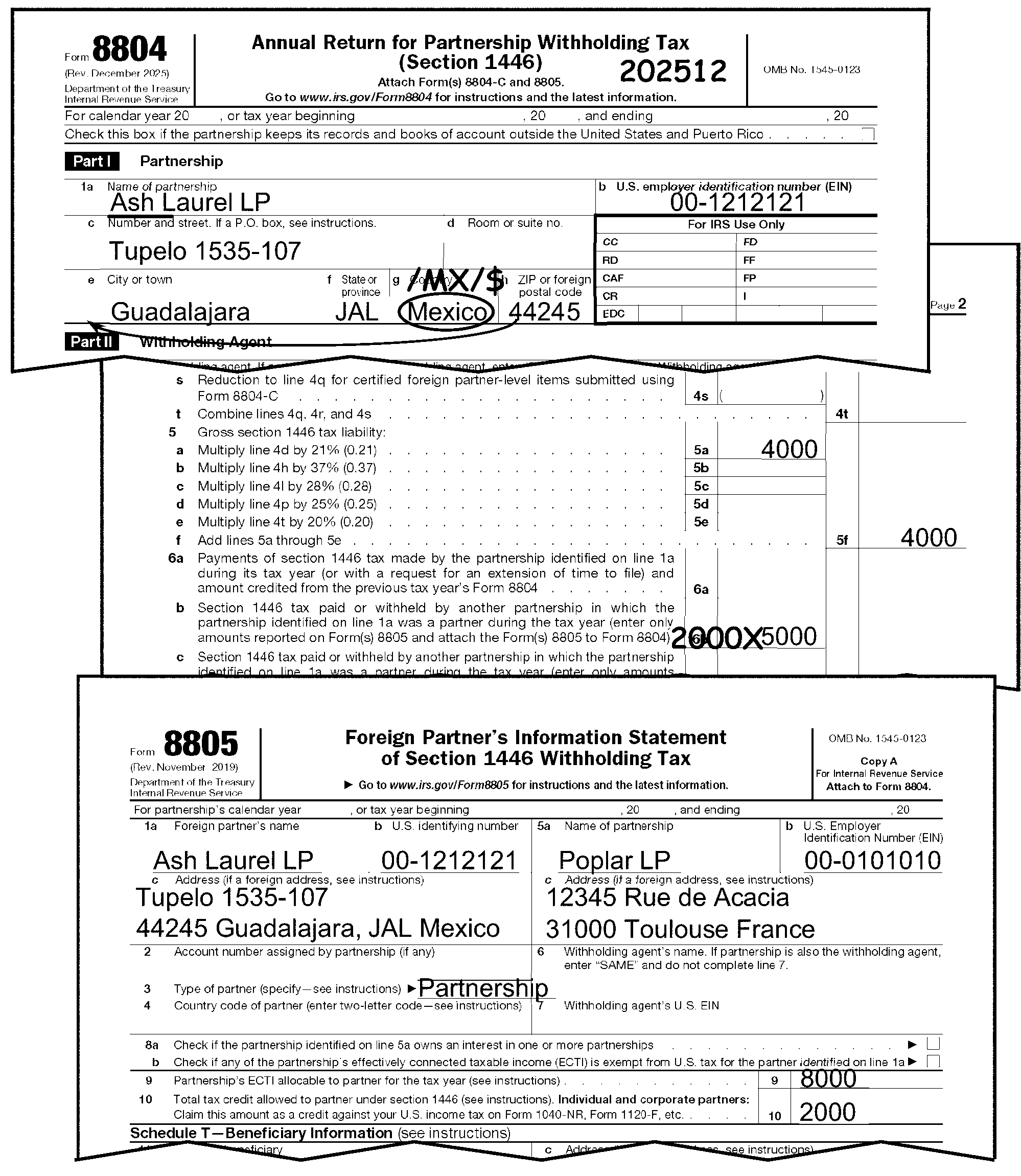
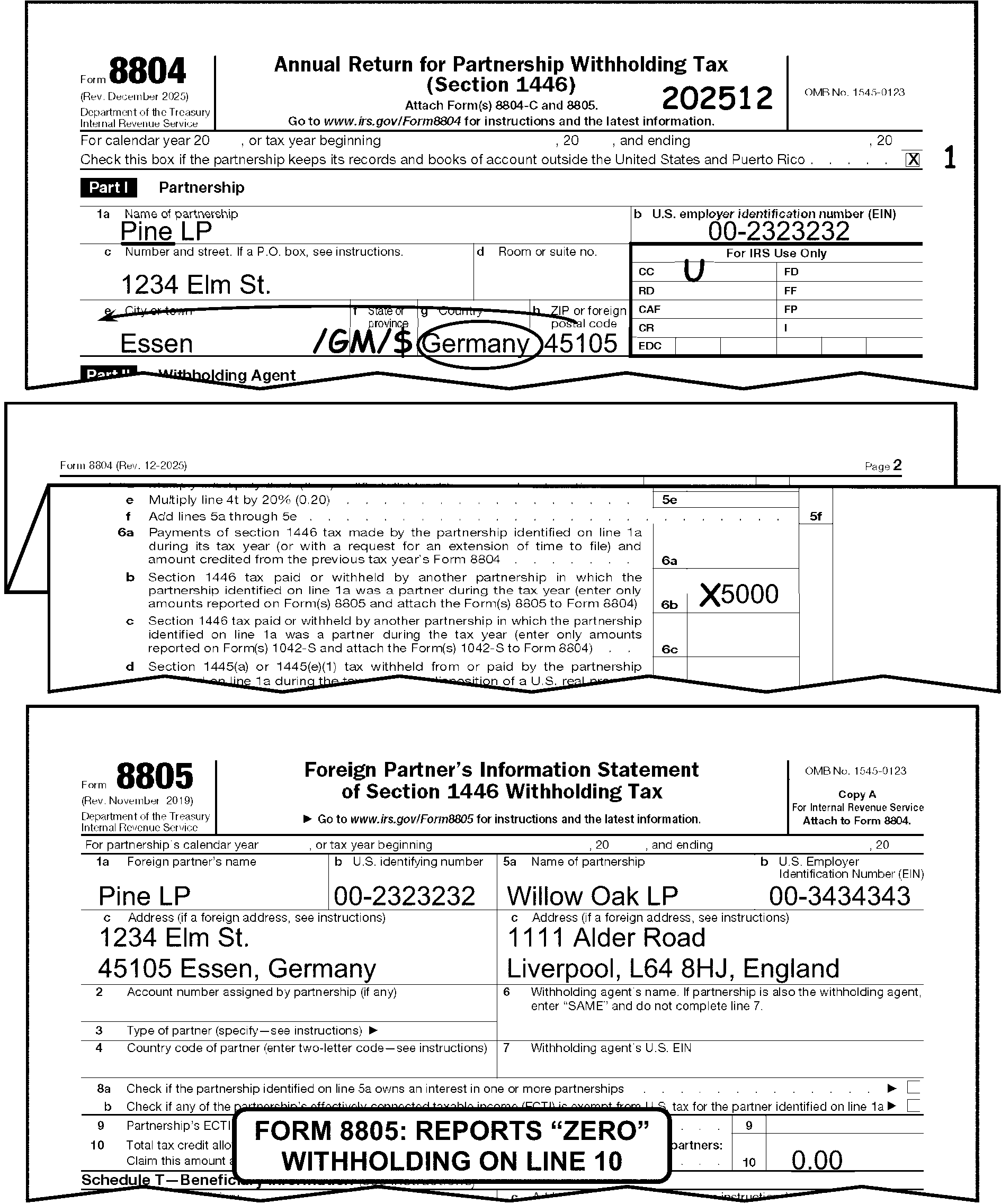
-
Valid characters are numeric 0-9.
-
Entry must be positive.
-
If the amount is negative, "X" the entry.
-
Verify the amount withheld on Line 6c (Form 8804), by making sure the substantiating document(s) (Form 1042-S), Box 7a for the amount withheld, Box 10 for Total withholding credit, and Box 1 with Income Code 27), are attached.
Exception:
If a copy of Form 1042-S is not attached, look for a copy of a Competent Authority letter signed by a United States Competent Authority. This letter can be used as supporting documentation to support the amount of withholding taxes claimed on the return in lieu of Form 1042-S.
If Then Line 6c has supporting documentation Take no further action. See Figure 3.21.15-7. Line 6c has only partial supporting documentation Line 6c has NO supporting documentation Prepare Correspondence Action Sheet Letter 3104C or Letter 1791C for Form(s) 1042-S, edit an "X" to the left of the unsubstantiated amount on Line 6c. See
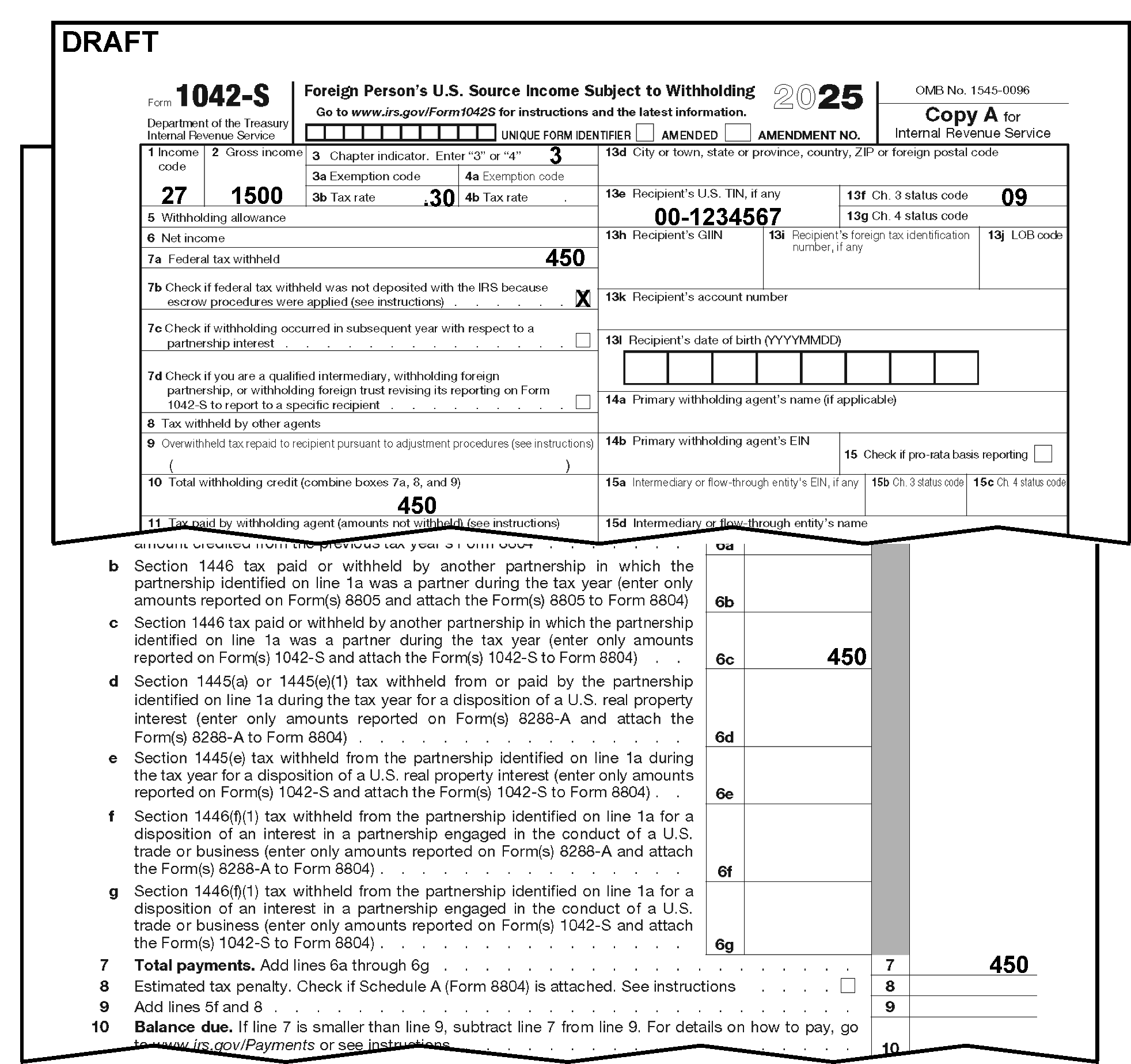
-
Valid characters are numeric 0-9.
-
Entry must be positive.
-
If the amount is negative, "X" the entry.
-
Verify the amount withheld on Line 6d (Form 8804), by making sure the substantiating document(s) (Form 8288-A, Line 4) are attached. If missing, prepare Correspondence Action Sheet 3104C to request the document(s).
Note:
Form 8288-A must always be credit verified by the FIRPTA Code and Edit unit with the Form 13698, International Credit Verification Slip, attached to Form 8804. ≡ ≡ ≡ ≡ ≡ ≡ ≡ ≡ ≡ ≡ ≡ ≡ ≡ ≡ ≡ ≡ ≡ ≡ ≡
If And Then Form 8288-A is attached to Form 8804, A completed Form 13698 is not attached to Form 8804. Pull Form 8804 from batch and attach a blank Form 13698. Follow local procedures for Credit Verification. Form 8288-A is attached to Form 8804, A completed Form 13698 is attached to Form 8804 fully verifying the FIRPTA credit. Take no further action. Form 8288-A is attached to Form 8804, A completed Form 13698 is attached to Form 8804, but the amount verified is less than the amount shown on Form 8288-A, Box 4. (For prior years see Box 2) -
Edit an "X" to the left of Line 6d.
-
Edit the correct substantiated amount to the left of the "X" and recompute Line 7 (on the dotted lines). See Figure 3.21.15-8a.
Form 8288-A is NOT attached to Form 8804, Line 6d has an entry greater than "0" . Prepare Correspondence Action Sheet 3104C and ask the taxpayer for copies of Form 8288-A using the following sentence:
"We need more information to process your Form 8804 return. Line 6d of Form 8804 shows a credit of $_______. However, there is no documentation to support the entry on Line 6d. Please provide us with a copy of Form(s) 8288-A to substantiate the entry on Line 6d." -
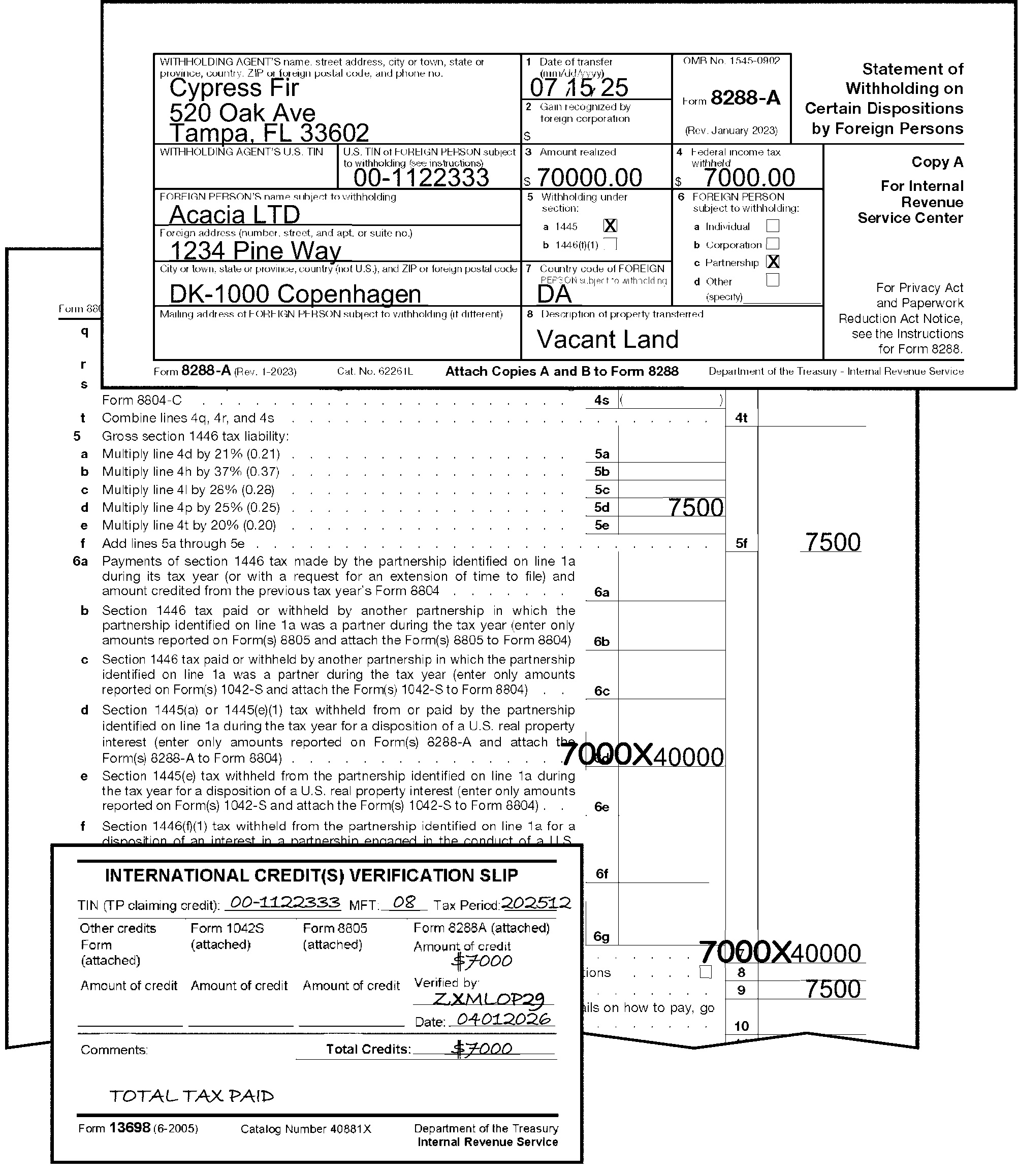
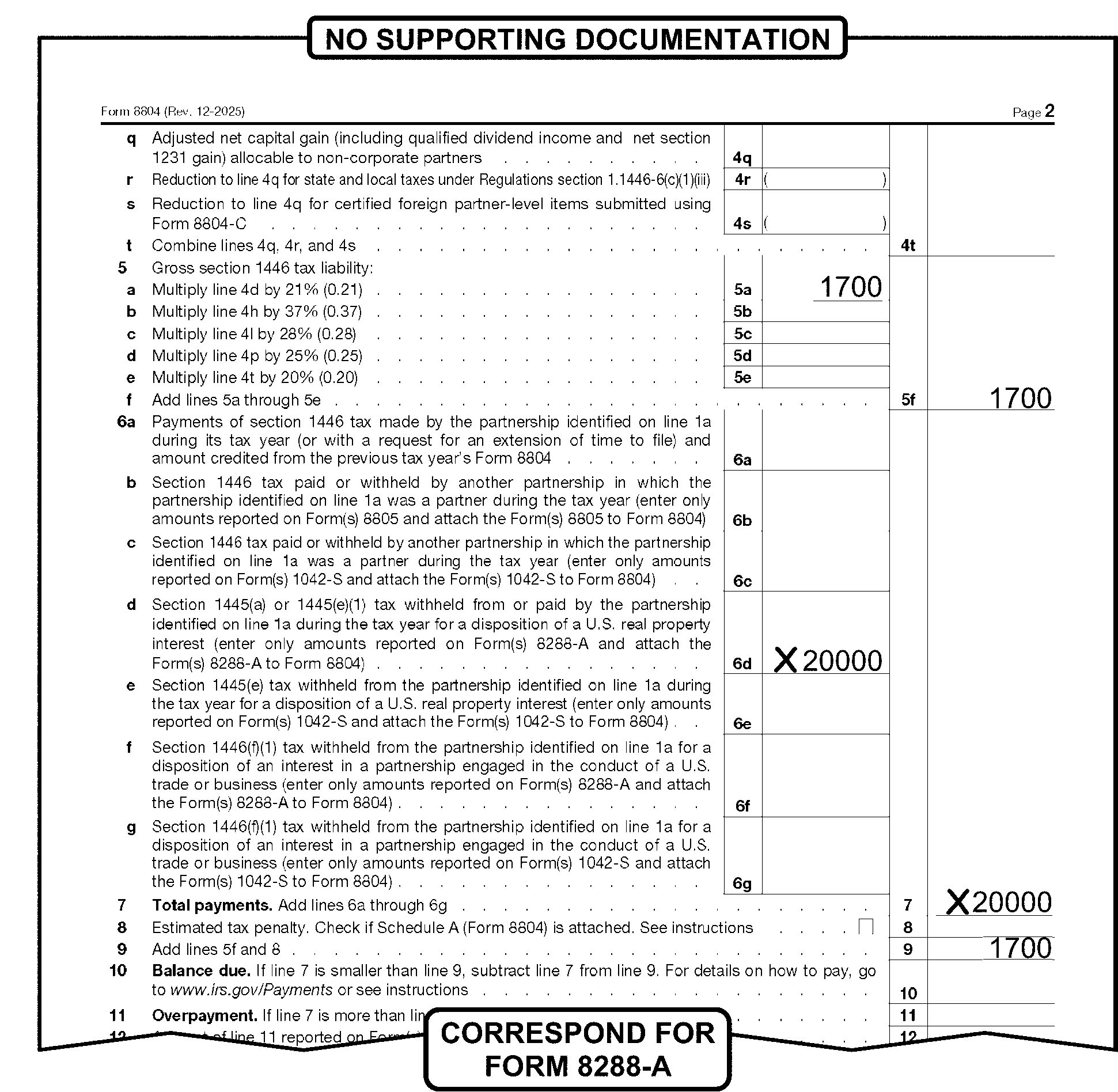
-
Valid characters are numeric 0-9.
-
Entry must be positive.
-
If the amount is negative, "X" the entry.
-
Verify the amount withheld on Line 6e by making sure the substantiating document(s) is attached (Form 1042-S, Box 7a and 10 for the amount withheld and Box 1 with Income Code 24, 25, or 26). If missing, prepare Correspondence Action Sheet 3104C to request the document(s). ≡ ≡ ≡ ≡ ≡ ≡ ≡ ≡ ≡ ≡ ≡ ≡ ≡ ≡ ≡ ≡ ≡ ≡ ≡ ≡ ≡ ≡ ≡ ≡ ≡ ≡ ≡ ≡ ≡ ≡ ≡ ≡ ≡ ≡ ≡ ≡ ≡ ≡ ≡ ≡ ≡ ≡ ≡ ≡ ≡ ≡ ≡ ≡
Exception:
If a copy of Form 1042-S is not attached, look for a copy of a Competent Authority letter signed by a United States Competent Authority. This letter can be used as supporting documentation to support the amount of withholding taxes claimed on the return in lieu of Form 1042-S.
If And Then Form 1042-S is attached to Form 8804, Take no further action. Line 6e is not fully substantiated with the necessary Form(s) 1042-S, Prepare Correspondence Action Sheet 3104C and ask the taxpayer for copies of Form 1042-S using the following sentence:
"We need more information to process your Form 8804 return. Line 6e of Form 8804 shows a credit of $_______. However, the documentation to support the entry on Line 6e has been verified to be $_______. Please provide us with a copy of the missing Form(s) 1042-S to substantiate the difference."Form 1042-S is NOT attached to Form 8804, Line 6e has an entry greater than "0" . Prepare Correspondence Action Sheet 3104C and ask the taxpayer for copies of Form 1042-S. Use the following sentence:
"We need more information to process your Form 8804 return. Line 6e of Form 8804 shows a credit of $_______. However, there is no documentation to support the entry on Line 6e. Please provide us with a copy of Form(s) 1042-S to substantiate the entry on Line 6e."
-
Valid characters are numeric 0-9.
-
Entry must be positive.
-
If the amount is negative, "X" the entry.
-
Verify the amount withheld on Line 6f by making sure the substantiating document(s) is attached (Counting total Line 4 Forms 8288-A with Line 5b checked).
-
Form 8288-A, Box 4 (Federal Income Tax Withheld). If missing, prepare Correspondence Action Sheet 3104C to request missing information.
Note:
Form 8288-A must always be credit verified by the FIRPTA Code and Edit unit with the Form 13698 - International Credit Verification Slip attached to Form 8804. ≡ ≡ ≡ ≡ ≡ ≡ ≡ ≡ ≡ ≡ ≡ ≡ ≡ ≡ ≡ ≡ ≡ ≡ ≡ ≡ ≡
If And Then Form 8288-A is attached to Form 8804, A completed Form 13698 is not attached to Form 8804. Forward Form 8804 to the FIRPTA Code and Edit unit to verify the credit. Form 8288-A is attached to Form 8804, A completed Form 13698 is attached to Form 8804 fully verifying the FIRPTA credit. Take no further action. Form 8288-A is attached to Form 8804, A completed Form 13698 is attached to Form 8804, but the amount verified is less than the amount shown on Form 8288-A, Box 4. -
Edit an "X" to the left of Line 6f.
-
Edit the correct substantiated amount to the left of the "X" and recompute Line 7 (on the dotted lines). See Figure 3.21.15-9a.
Form 8288-A is NOT attached to Form 8804, Line 6f has an entry greater than "0" . Prepare Correspondence Action Sheet 3104C and ask the taxpayer for copies of Form 8288-A using the following sentence:
"We need more information to process your Form 8804 return. Line 6f of Form 8804 shows a credit of $_______. However, there is no documentation to support the entry on Line 6f. Please provide us with a copy of Form(s) 8288-A to substantiate the entry on Line 6f." -
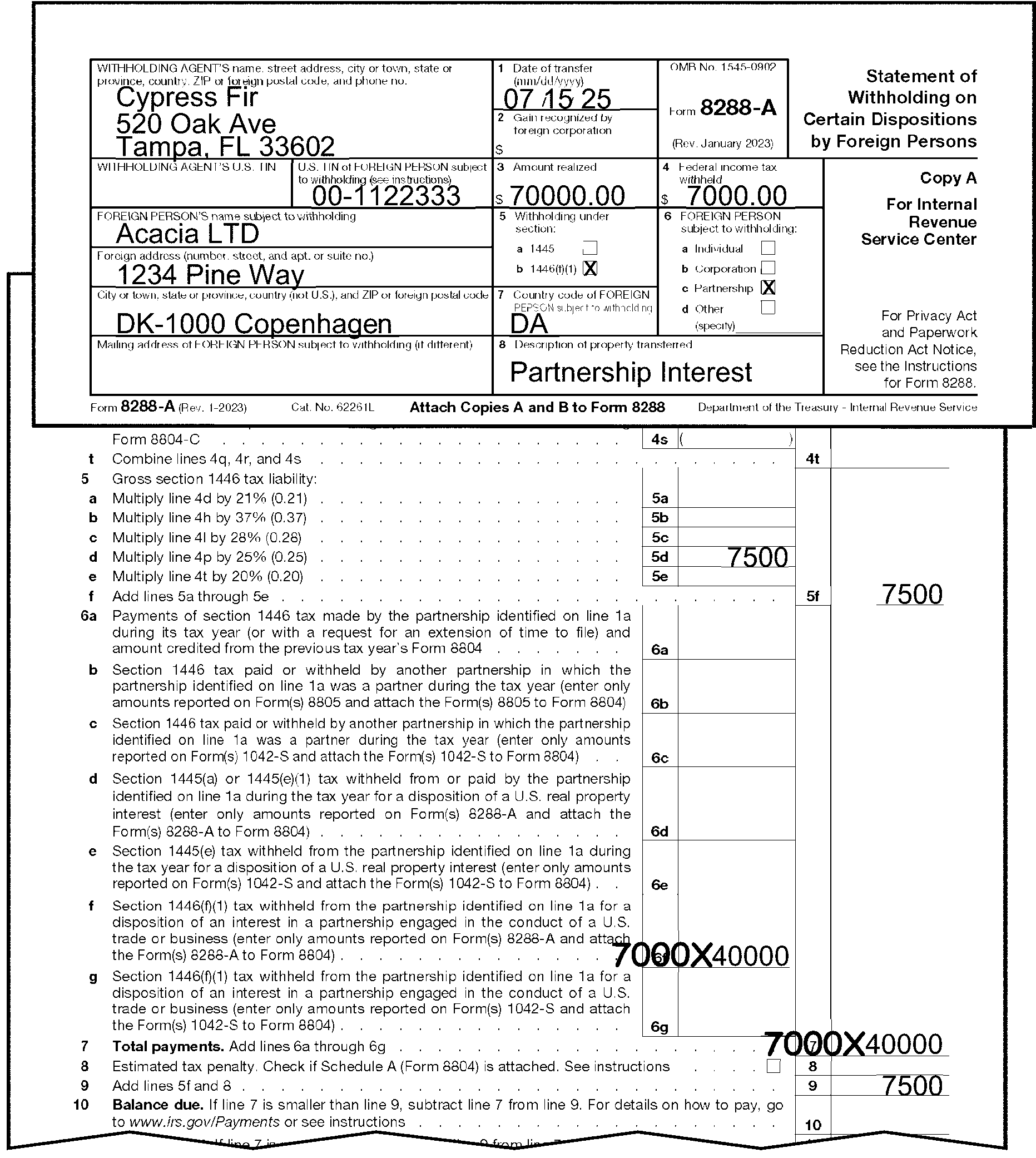
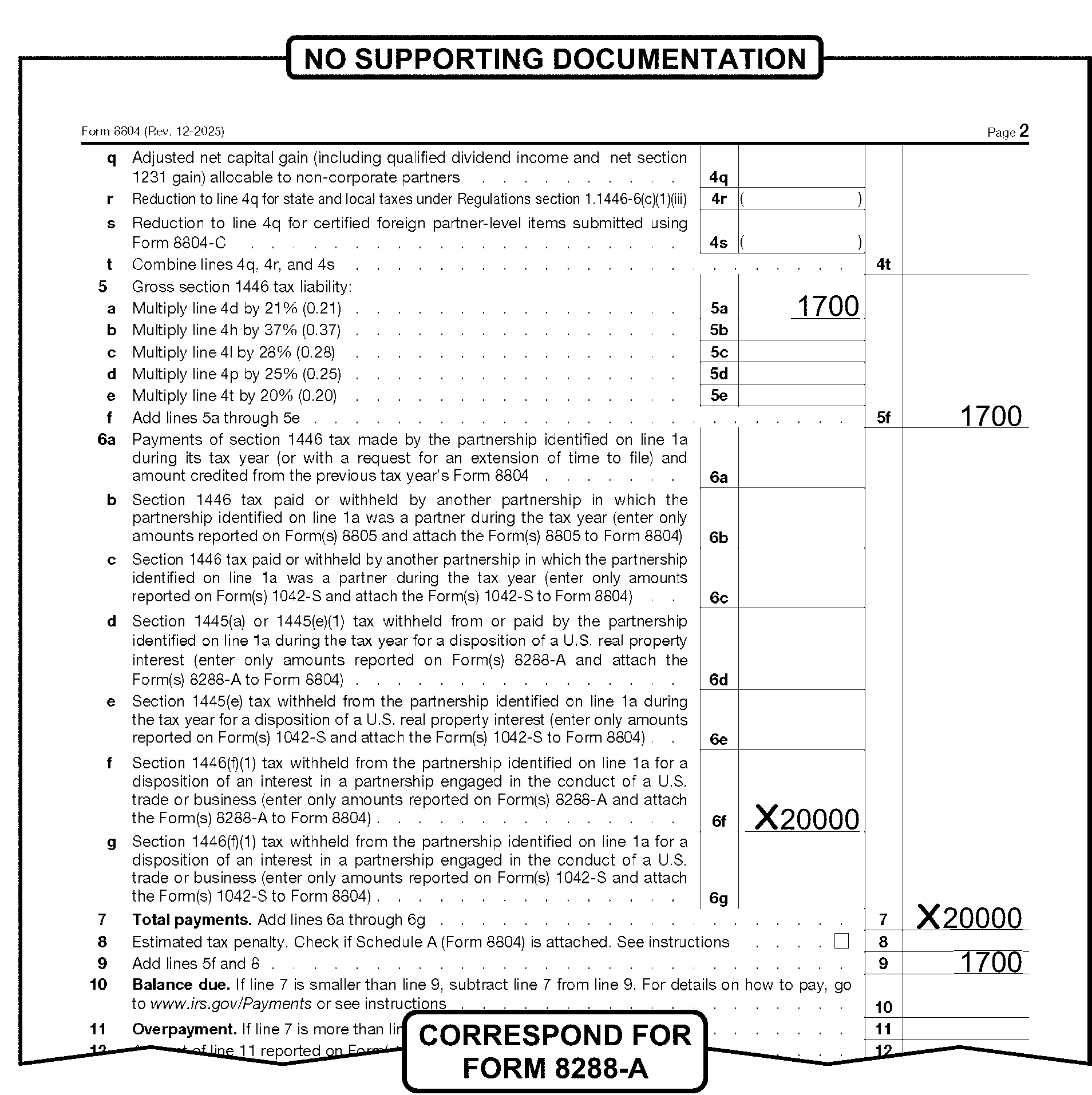
-
Valid characters are numeric 0-9.
-
Entry must be positive.
-
If the amount is negative, "X" the entry.
-
Verify the amount withheld on Line 6g by making sure the supporting document(s) is attached (Check Line 6g by adding total of Box 10 of Forms 1042-S for which Box 1 is 57). If missing, prepare Correspondence Action Sheet 3104C to request missing information. ≡ ≡ ≡ ≡ ≡ ≡ ≡ ≡ ≡ ≡ ≡ ≡ ≡ ≡ ≡ ≡ ≡ ≡ ≡ ≡ ≡ ≡ ≡ ≡ ≡ ≡ ≡ ≡ ≡ ≡ ≡ ≡ ≡ ≡ ≡ ≡ ≡ ≡ ≡ ≡ ≡ ≡ ≡ ≡
Exception:
If a copy of Form 1042-S is not attached, look for a copy of a Competent Authority letter signed by a United States Competent Authority. This letter can be used as supporting documentation to support the amount of withholding taxes claimed on the return in lieu of Form 1042-S.
If And Then A fully supported Form 1042-S is attached to Form 8804, Take no further action. Line 6g is not fully supported with the necessary Form(s) 1042-S, Prepare Correspondence Action Sheet 3104C and ask the taxpayer for copies of Form 1042-S using the following sentence:
"We need more information to process your Form 8804 return. Line 6g of Form 8804 shows a credit of $_______. However, the documentation to support the entry on Line 6g has been verified to be $_______. Please provide us with a copy of the missing Form(s) 1042-S to substantiate the difference."Form 1042-S is NOT attached to Form 8804, Line 6g has an entry greater than "0" . Prepare Correspondence Action Sheet 3104C and ask the taxpayer for copies of Form 1042-S. Use the following sentence:
"We need more information to process your Form 8804 return. Line 6g of Form 8804 shows a credit of $_______. However, there is no documentation to support the entry on Line 6g. Please provide us with a copy of Form(s) 1042-S to substantiate the entry on Line 6g."
-
Valid characters are numeric 0-9.
-
Entry must be positive.
-
If the amount is negative, "X" the entry.
-
If Line 7 is "blank" , compute by adding Lines 6a-6g. and edit amount to Line 7.
-
If Line 7 contains an entry greater than "Zero" , and Lines 6a-6g are Zero or Blank, look through the attached withholding documents (Form 1042-S, Form 8805 or Form 8288-A (if any)), to identify the verified amount to edit on Lines 6b, 6c, 6d, 6e, 6f or 6g. Also, research IDRS to see if a payment is posted to the account. If a payment(s) is/are found on IDRS, edit the total amount of the payments to Line 6a. If no withholding document is attached and no payment is found on IDRS, "X" the entry on Line 7.
-
Valid characters are numeric 0-9.
-
Entry must be positive.
-
If the amount is negative, "X" the entry.
-
If Lines 10 to 15 are blank, NONE or contain zeros and Line 9 is greater than Line 7, edit the difference between Lines 9 and 7 to Line 10.
-
Valid characters are numeric 0-9.
-
Entry must be positive.
-
If the amount is negative, "X" the entry.
-
Valid characters are numeric 0-9.
-
Entry must be positive.
-
If the amount is negative, "X" the entry.
-
If Lines 10 to 15 are blank, NONE or contain zeros and Line 7 is less than Line 9, subtract Line 7 from Line 9 and enter the difference on Line 10. If Line 7 is greater than Line 9, subtract Line 9 from Line 7 and edit the difference on Lines 11 and 13.
-
Valid characters are numeric 0-9.
-
Entry must be positive.
-
If the amount is negative, "X" the entry.
-
If the amount to be refunded is $1 million dollars or more, follow local processing procedures. See IRM 3.21.15.9 for more information.
-
A signature (general partner's or LLC taxpayer’s representative) and jurat is required for all returns except the following:
-
Returns prepared under IRC 6020(b). These returns must be signed by a Compliance Function Representative. See IRM 3.21.15.15.3.1, IRC 6020(b) - Prepared by Collection.
-
Returns prepared by Examination, for example Substitute for Return "SFR" or "SUBSTITUTE RETURN" . See IRM 3.21.15.15.3.3, Examination Prepared.
-
Dummy returns prepared by the IRS.
-
Returns filed under IRC 501(d) (Religious or Apostolic Organization).
-
Returns attached to taxpayer response to IRS correspondence containing a jurat and the taxpayer’s signature. See paragraph (6) below.
-
Re-entry returns originally filed electronically (E-File). These returns may be identified by the presence of Mode E-File printouts or efile GRAPHIC print - Do Not Process or "Tax Return Print (TRPRT) Do Not Process" in lieu of an actual return.
-
-
Don’t correspond for a signature on "CII" returns with a Form 13596, Reprocessing Returns, attached. See IRM 3.21.15.13.3, Correspondence Imaging Inventory (CII) Returns, for processing instructions.
-
If a signature is missing correspond:
Note:
See IRM 3.21.15.13.3, Issuing Correspondence, for returns that are incomplete and appear to be duplicate filings.
If Then -
The return is not signed on the line designated for the taxpayer's signature, or
-
The jurat is not present on the line designated for the taxpayer's signature (non-standard return), or
-
Only the entity information is present and there are no attachments containing tax data,
See IRM 3.21.15.12, Unprocessable Conditions.-
Correspond using approved Correspondence Action Sheet 3104C.
-
Edit CCC "U."
-
Leave in batch and continue editing.
-
-
If the jurat is altered or stricken (crossed out), it may be a frivolous return. See IRM 3.21.15.15.3.5, Frivolous Arguments, for frivolous returns instructions.
-
Accept a "signature declaration" (a signature with jurat obtained through IRS correspondence) if attached to the return.
-
If the "signature declaration" is altered or stricken (crossed out), See IRM 3.21.15.15.3.5, Frivolous Arguments, for frivolous return instructions.
-
If the taxpayer responds with a self-prepared "signature declaration" it must contain the same language as the jurat on the tax return (i.e., "UNDER PENALTIES OF PERJURY, I DECLARE THAT I HAVE EXAMINED THIS RETURN, INCLUDING ACCOMPANYING SCHEDULES AND STATEMENTS, AND TO THE BEST OF MY KNOWLEDGE AND BELIEF, IT IS TRUE, CORRECT AND COMPLETE)."
-
-
Tax examiners aren't handwriting experts. Treas. Reg. 301.6064-1 allows the IRS to presume that the signature on a return, statement or other document is the true signature of the person who actually signed the document.
-
Only correspond once for the missing signature.
-
A signature may or may not be present; don't correspond if not present.
-
Don’t correspond for a missing signature on any return prepared by a Compliance function.
-
Don’t question any signature on the return. Treas. Reg. 301.6064-1 allows the IRS to presume that the signature on the return, statement or other document is the true signature of the person who actually signed the document.
-
A constructive signature (that is, a signature on an accompanying check, letter, etc.) is not acceptable unless the signature follows a perjury statement containing the same language as the jurat of the tax return.
-
The Preparer's PTIN is located to the right of the Preparer's Signature in the PTIN box at the bottom right corner of Form 8804, page 2.
-
No action is required on amended returns.
-
A valid PTIN begins with the alpha "P" followed by an eight-digit number (e.g., PXXXXXXXX).
-
Circle the entry if:
-
it does not begin with a "P" ,
-
it is an SSN,
-
it has all zeros, nines, or any repeating 9 digits, or
-
it has invalid characters.
-
-
If the Preparer's TIN is a valid PTIN, edit a "0" immediately to the right of the PTIN.
-
The Firm's EIN is located below the Preparer's PTIN box at the bottom right corner of Form 8804, page 2.
-
No action is required on amended returns.
-
The Firm's EIN is a nine-digit number. Circle the EIN if all zeros or all nines.
-
The Preparer's Phone Number is located below the Preparer's Firm’s EIN at the bottom right corner of Form 8804, page 2.
If Then A complete preparer telephone number is found elsewhere on the return or attachments, Edit to the Phone No. line. The return is amended, No action required The Preparer’s Phone Number is more than 10 digits, No action required The Preparer’s Phone Number is illegible or less than 10 digits, Circle the incomplete or illegible phone number.
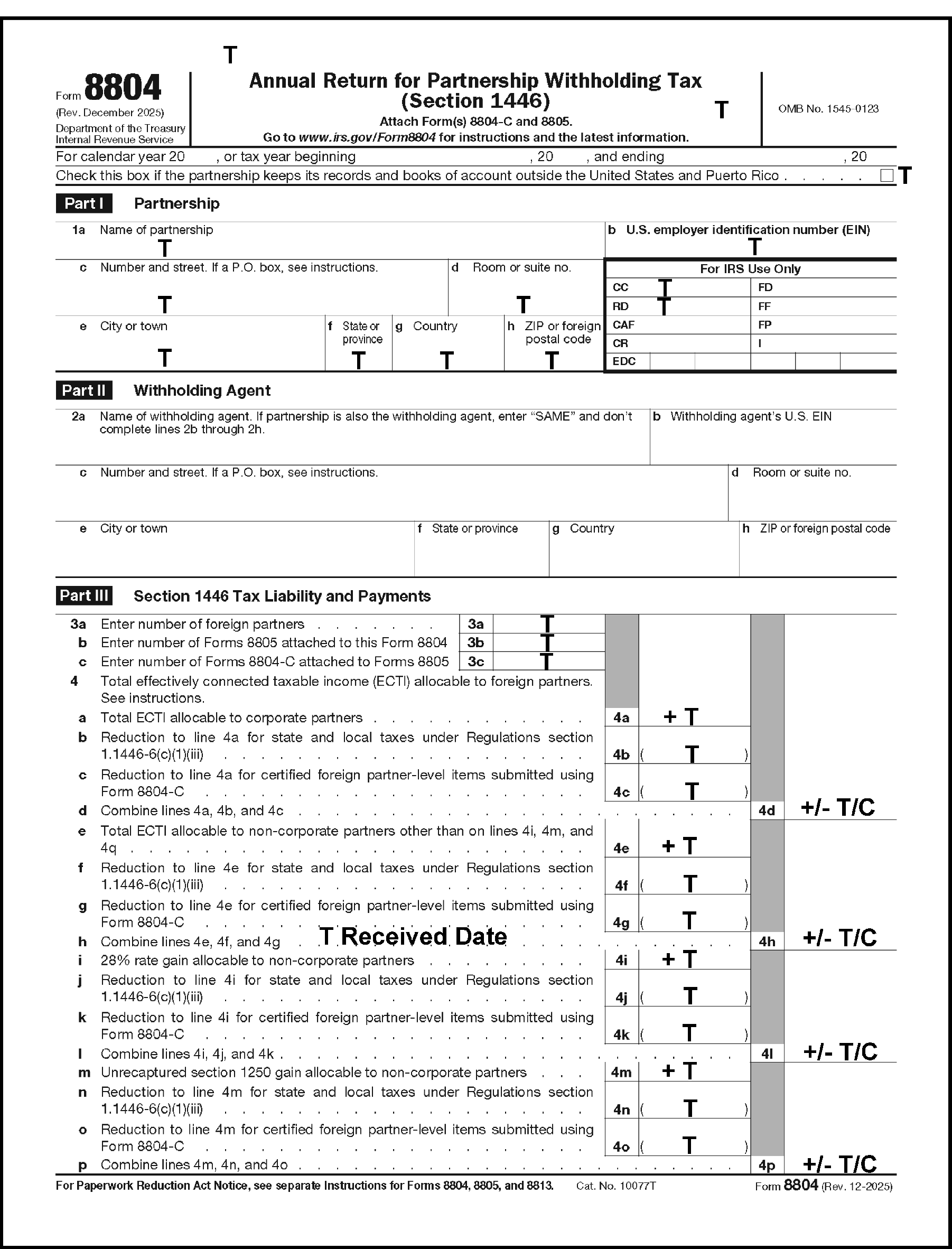
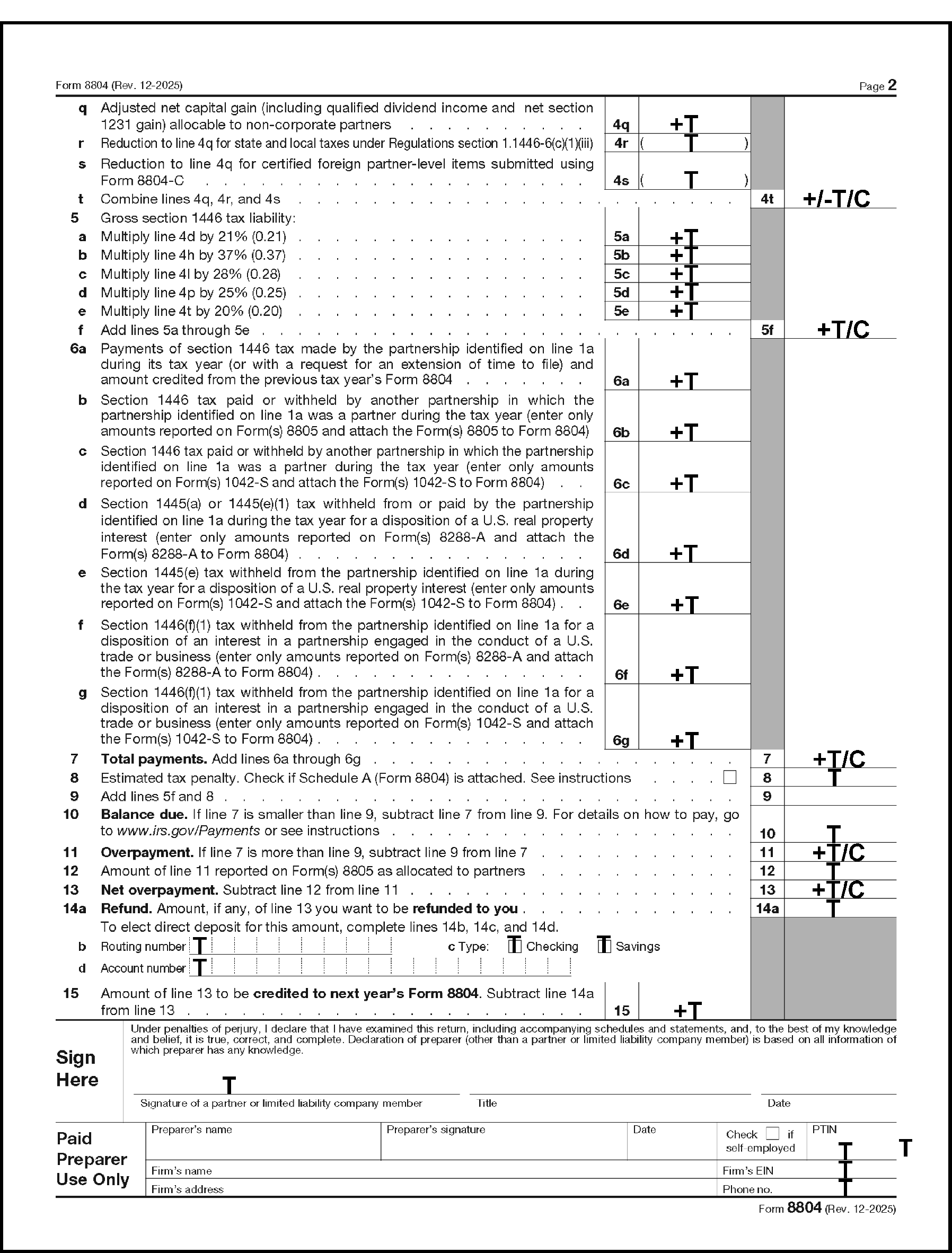
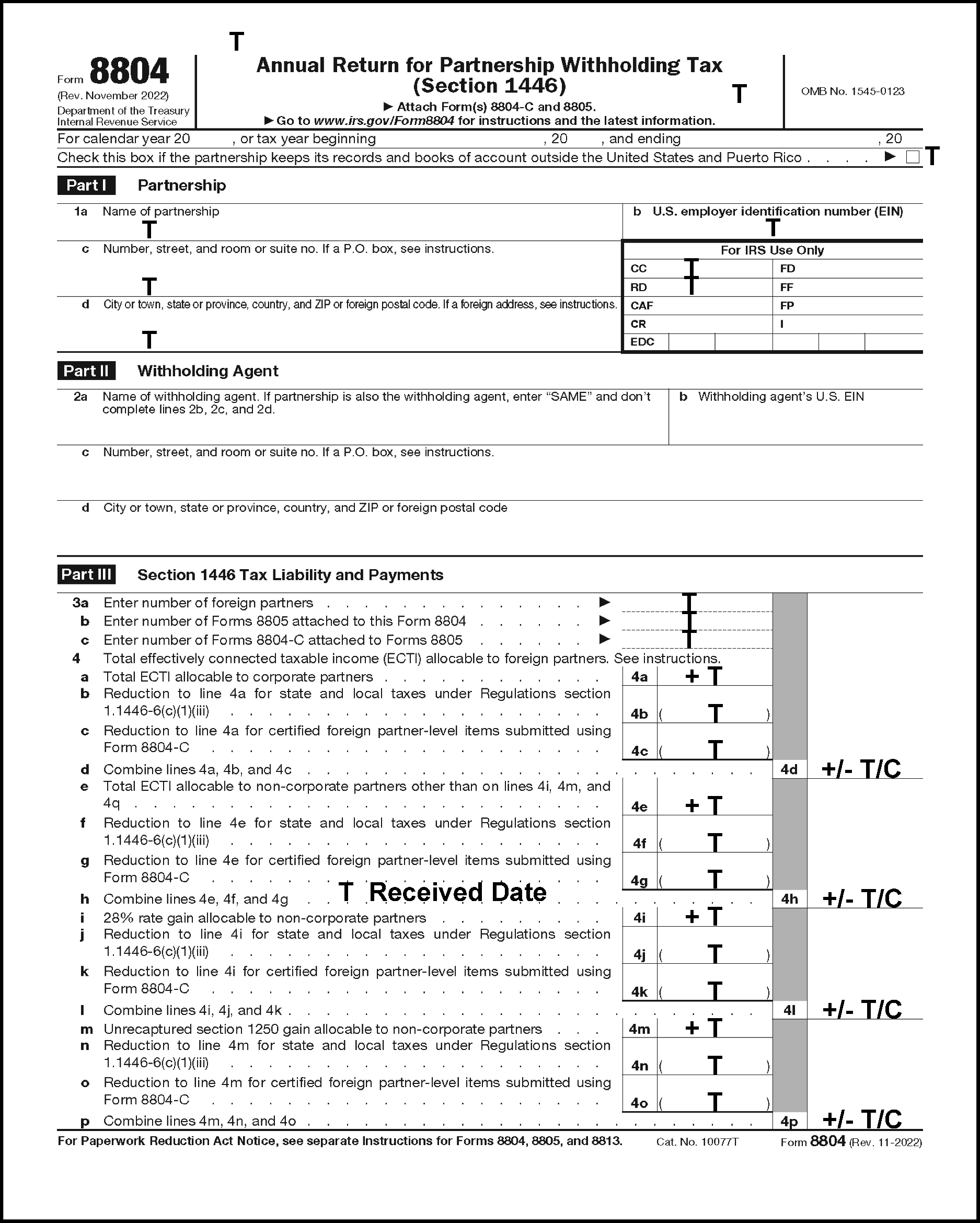
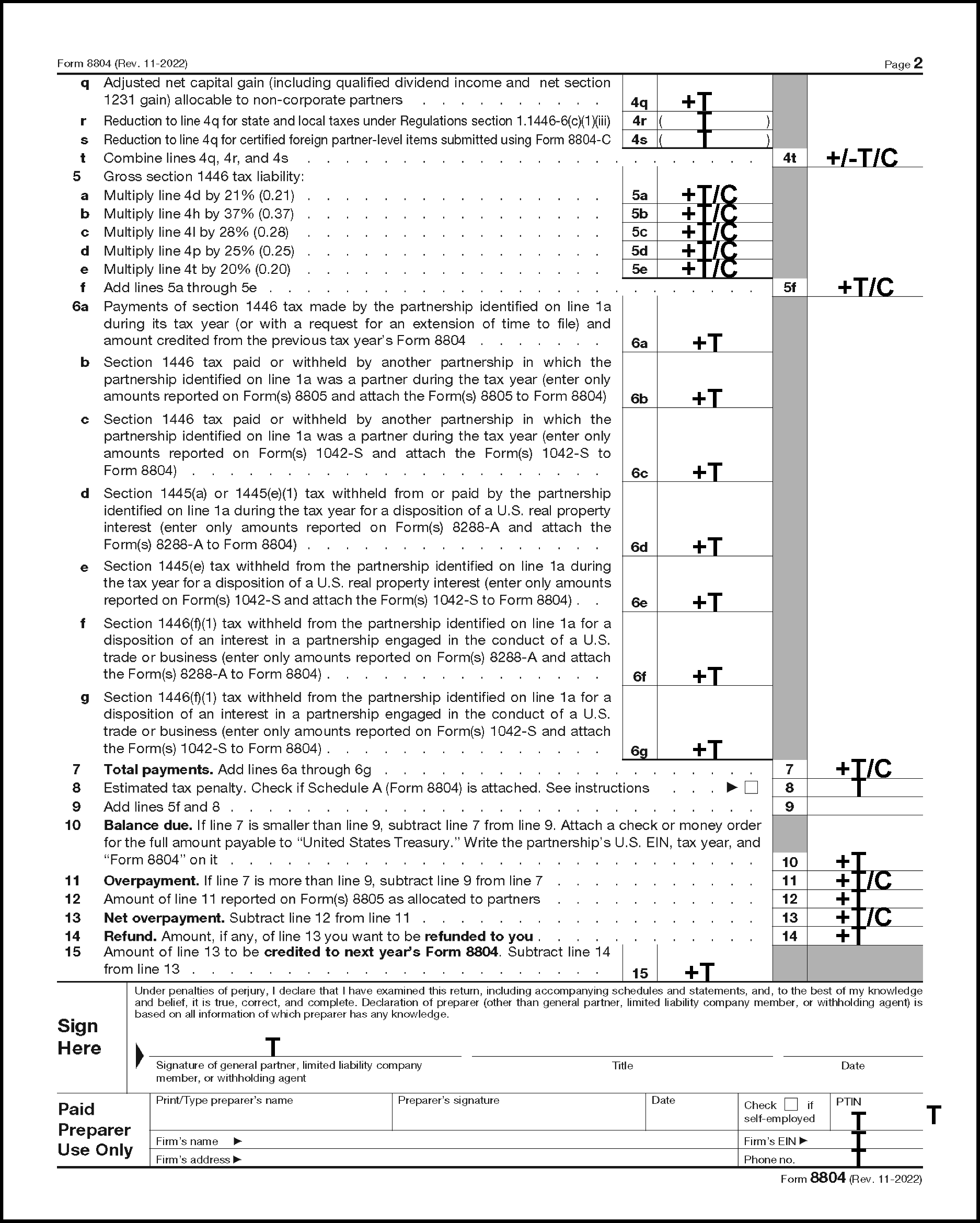
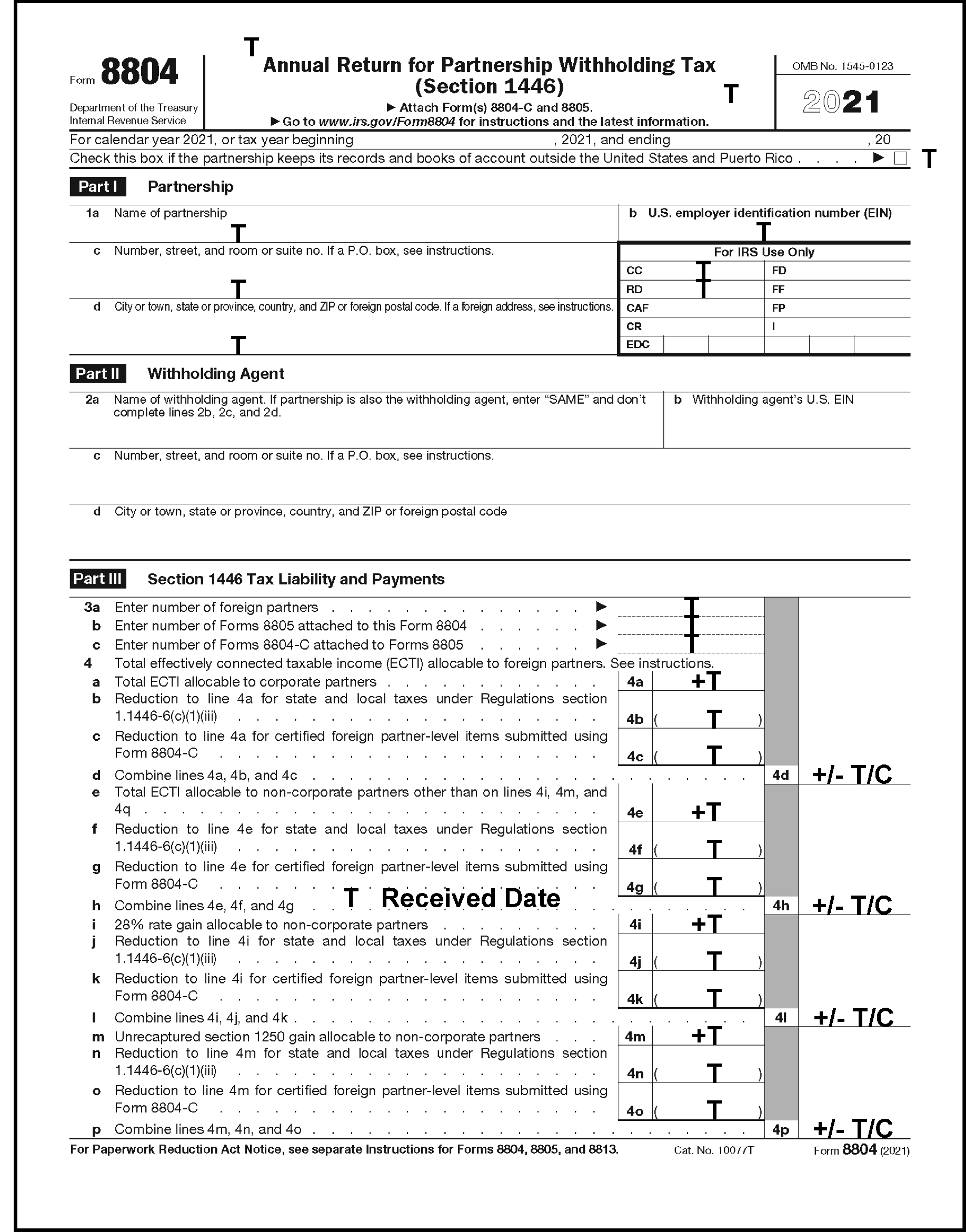
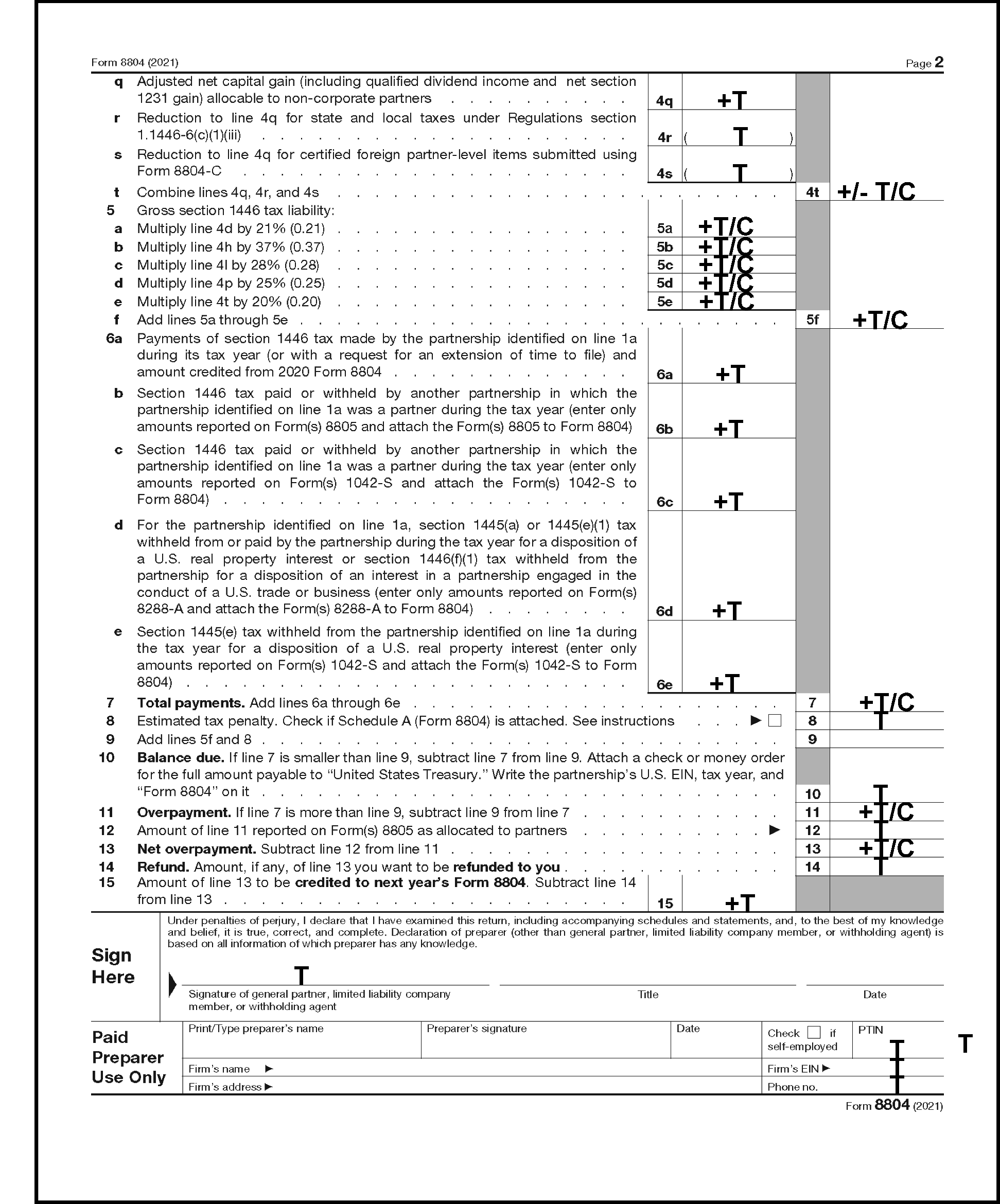
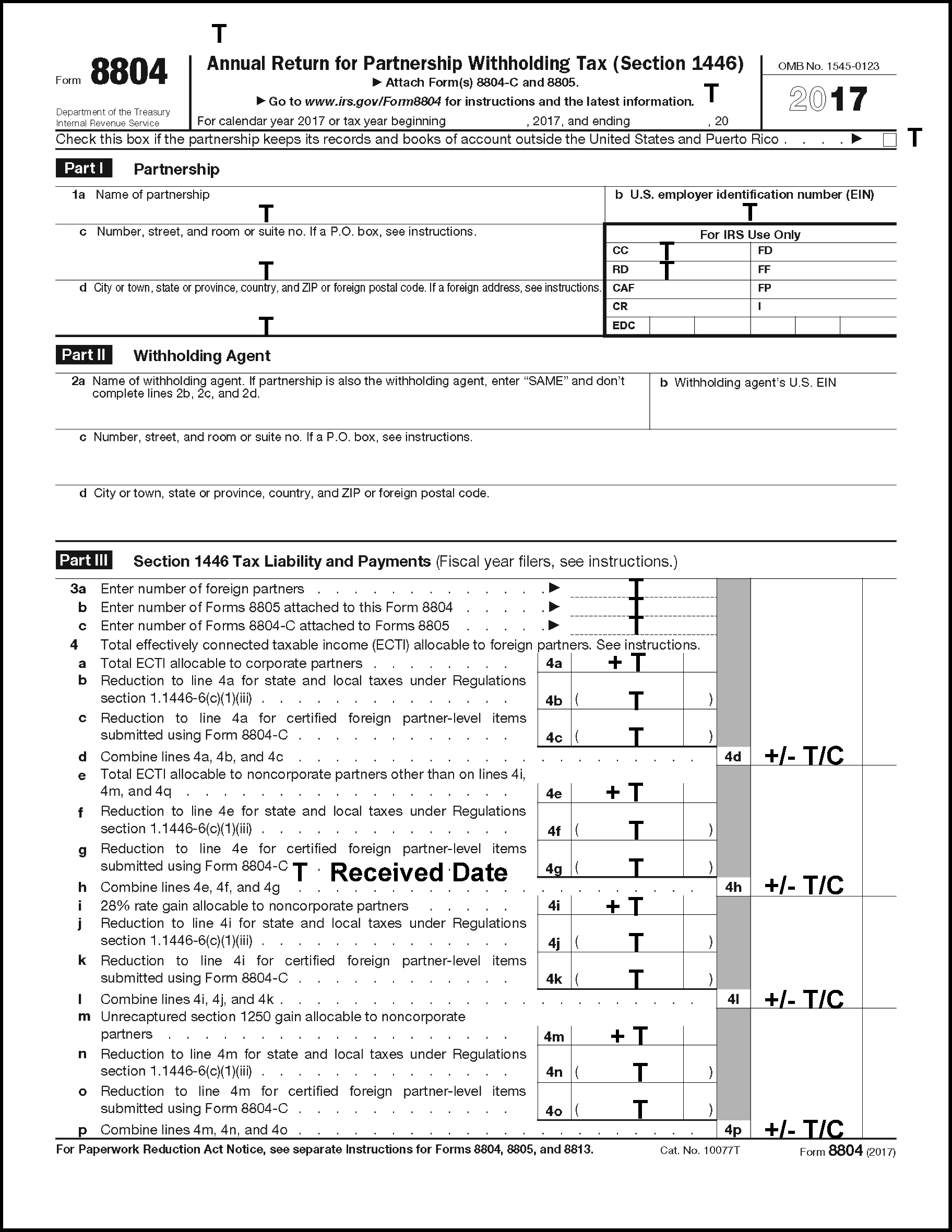
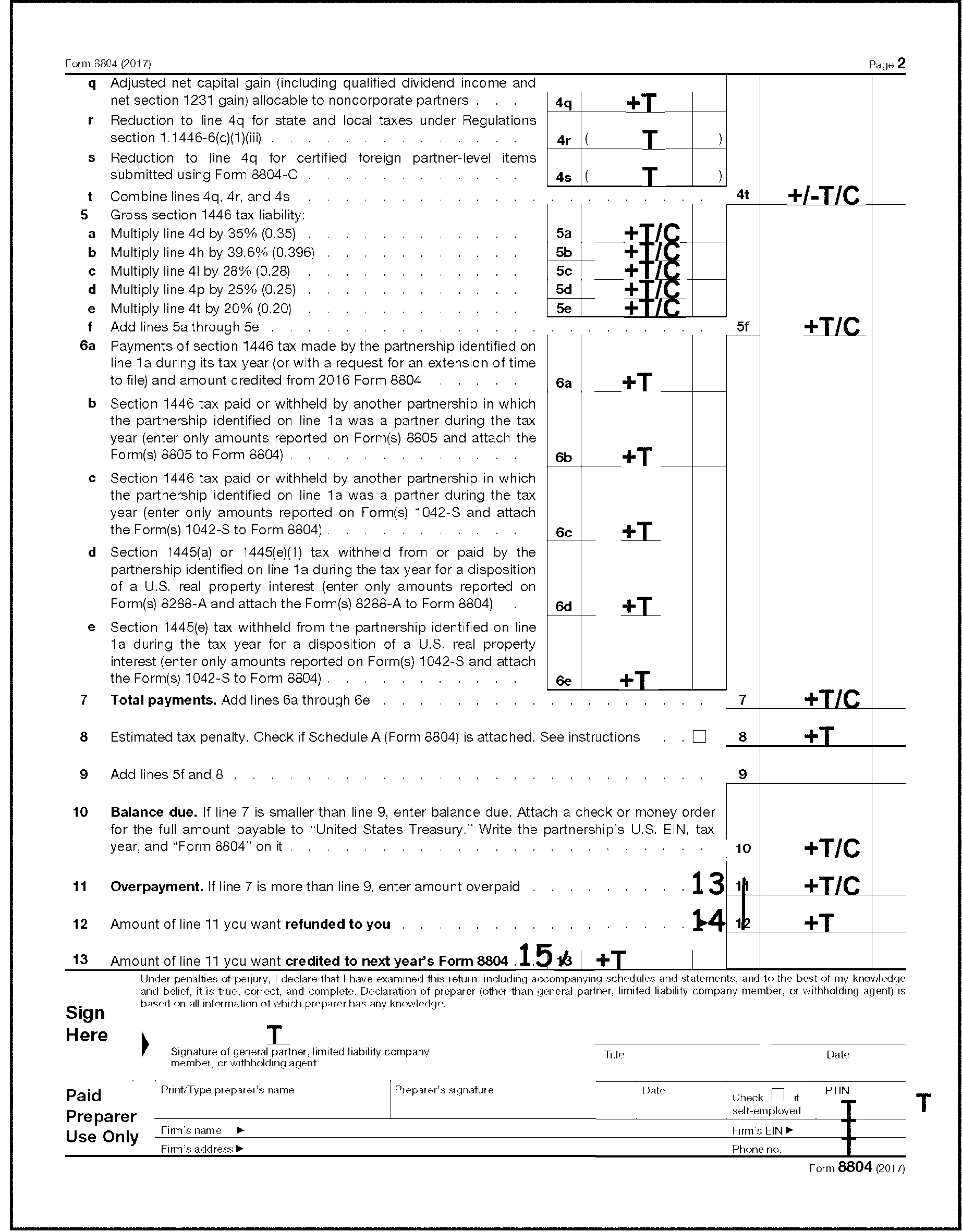
American Samoa (AS)
| City | ZIP Code | City | ZIP Code |
|---|---|---|---|
| Faga'itua | 96799 | Olosega Manua' | 96799 |
| Leone | 96799 | Pago Pago | 96799 |
Federated States of Micronesia (FM)
| City | ZIP Code | City | ZIP Code |
|---|---|---|---|
| Chuuk | 96942 | Pohnpei | 96941 |
| Kosrae | 96944 | Yap | 96943 |
Guam (GU)
| City | ZIP Code | City | ZIP Code |
|---|---|---|---|
| Agana Heights | 96919 | Tamuning | 96931 |
| Inarajan | 96917 | Umatac | 96918 |
| Merizo | 96916 | Yona | 96914 |
Northern Mariana Islands (MP)
| City | ZIP Code | City | ZIP Code |
|---|---|---|---|
| Capitol Hill | 96950 | Saipan | 96950 |
| Rota | 96951 | Tinian | 96952 |
Puerto Rico (PR)
| City | ZIP Code | City | ZIP Code |
|---|---|---|---|
| Adjuntas | 00601 | Las Marias | 00670 |
| Aguada | 00602 | Las Piedras | 00771 |
| Aguadilla | 00603 | Levittown | 00949 |
| Aguas Buenas | 00703 | Loiza | 00772 |
| Aguirre | 00704 | Loiza Street Station | 00936 |
| Aibonito | 00705 | Luquillo | 00773 |
| Anasco | 00610 | Manati | 00674 |
| Angeles | 00611 | Maricao | 00606 |
| Arecibo | 00612 | Maunabo | 00707 |
| Arroyo | 00714 | Mayaguez | 00680 |
| Bajadero | 00616 | Mercedita | 00715 |
| Barceloneta | 00617 | Minillas | 00940 |
| Barranquitas | 00794 | Moca | 00676 |
| Bo Obrero | 00915 | Morovis | 00687 |
| Bayamon | 00956 | Naguabo | 00718 |
| Boqueron | 00622 | Naranjito | 00719 |
| Cabo Rojo | 00623 | Orocovis | 00720 |
| Caguas | 00725 | Palmer | 00721 |
| Camuy | 00627 | Patillas | 00723 |
| Canovanas | 00729 | Penuelas | 00624 |
| Caparra Heights | 00920 - 00922 | Ponce | 00731 |
| Carolina | 00979 - 00987 | Puerta de Tierra | 00906 |
| Catano | 00962 | Puerta Real | 00740 |
| Cayey | 00736 | Punta Santiago | 00741 |
| Ceiba | 00735 | Quebradillas | 00678 |
| Ciales | 00638 | Ramey | 00603 |
| Coamo | 00769 | Rincon | 00677 |
| Comerio | 00782 | Rio Blanco | 00744 |
| Corozal | 00783 | Rio Grande | 00745 |
| Coto Laurel | 00780 | Rio Piedras | 00925, 00927, 00928 |
| Culebra | 00775 | Rosario | 00636 |
| Dorado | 00646 | Sabana Grande | 00637 |
| Ensenada | 00647 | Sabana Hoyos | 00688 |
| Fajardo | 00738 | Sabana Seca | 00952 |
| Fernandez Juncos | 00909 - 00910 | Saint Just | 00978 |
| Florida | 00650 | Salinas | 00751 |
| Fort Buchanan | 00934 | San Antonio | 00690 |
| Garrochales | 00652 | San German | 00683 |
| Guanica | 00653 | San Juan | 00921 |
| Guayama | 00784 | San Lorenzo | 00754 |
| Guayanilla | 00656 | San Sebastian | 00685 |
| Guaynabo | 00965 - 00971 | Santa Isabel | 00757 |
| Gurabo | 00778 | Santurce | 00907 - 00908 |
| Hatillo | 00659 | Toa Alta | 00953 |
| Hato Rey Sta | 00917 - 00919 | Toa Boa | 00951 |
| Hormigueros | 00660 | Trujillo Alto | 00976 |
| Humacao | 00791 | Utuado | 00641 |
| Isabela | 00662 | Vega Alta | 00692 |
| Jayuya | 00664 | Vega Baja (box 1-9049) | 00694 |
| Juana Diaz | 00795 | Vieques | 00765 |
| Juncos | 00777 | Villalba | 00766 |
| Lajas | 00667 | Yabucoa | 00767 |
| La Plata | 00786 | Yauco | 00698 |
| Lares | 00669 |
Virgin Islands - U.S. (VI - Entity Section) (VQ - Other than Entity Section)
| City | ZIP Code | City | ZIP Code |
|---|---|---|---|
| Charlotte Amalie | 00802 | Saint Croix | 00820 |
| Christiansted | 00820 | Saint John | 00830 |
| Cruz Bay | 00830 | Saint Thomas | 00802 |
| Downtown | 00840 | Sunny Isle | 00850 |
| Frederiksted | 00840 | Veterans Annex | 00820 |
| Kingshill | 00850 |
Australia State
| Australia State | Abbreviation |
|---|---|
| Australian Capital Territory | ACT |
| New South Wales | NSW |
| Northern Territory | NT |
| Queensland | QLD |
| South Australia | SA |
| Tasmania | TAS |
| Victoria | VIC |
| Western Australia | WA |
Brazilian State
| Brazil State | Abbreviation |
|---|---|
| Acre | AC |
| Alagoas | AL |
| Amapa | AP |
| Amazonas | AM |
| Bahia | BA |
| Ceara | CE |
| Distrito Federal | DF |
| Esperito Santo | ES |
| Goias | GO |
| Maranhao | MA |
| Mato Grosso | MT |
| Mato Grosso do Sul | MS |
| Minas Gerais | MG |
| Parana | PR |
| Paraiba | PB |
| Para | PA |
| Pernambuco | PE |
| Piaui | PI |
| Rio Grande do Norte | RN |
| Rio Grande do Sul | RS |
| Rio de Janeiro | RJ |
| Rondonia | RO |
| Roraima | RR |
| Santa Catarina | SC |
| Sergipe | SE |
| Sao Paulo | SP |
| Tocantins | TO |
Canada Province/Territory
| Canada Province/Territory | Abbreviation |
|---|---|
| Alberta | AB |
| British Columbia | BC |
| Manitoba | MB |
| New Brunswick | NB |
| Newfoundland and Labrador | NL |
| Northwest Territories | NT |
| Nova Scotia | NS |
| Nunavut | NU |
| Ontario | ON |
| Prince Edward Island | PE |
| Quebec | QC |
| Saskatchewan | SK |
| Yukon | YT |
Cuba Provincias
| Cuba Provincias | Abbreviation |
|---|---|
| Camaguey | CM |
| Ciego de Avila | CA |
| Cienfuegos | CF |
| Ciudad di La Habana | CH |
| Gramma (Bayamo) | GR |
| Guantanamo | GU |
| Holguin | HO |
| La Habana | CH |
| Matanzas | MA |
| Municipio Especial Isla de la Juventud | IJ |
| Pinar del Rio | PD |
| Sancti Spiritus | SS |
| Santiago de Cuba | SC |
| (Victoria de) Las Tunas | LT |
| Villa Clara | VC |
India State
| India State | Abbreviation |
|---|---|
| Andhra Pradesh | AP |
| Arunachal Pradesh | AR |
| Assam | AS |
| Bihar | BR |
| Goa | GOA |
| Gujarat | GUJ |
| Himachal Pradesh | HP |
| Haryana | HR |
| Jammu and Kashmir | JK |
| Karnataka | KRN |
| Kerala | KER |
| Madhya Pradesh | MP |
| Maharashtra | MAH |
| Manipur | MNP |
| Meghalaya | MEG |
| Mizoram | MIZ |
| Nagaland | NLD |
| Orissa | OR |
| Punjab | PU |
| Rajasthan | RAJ |
| Sikkam | SKM |
| Tamil Nadu | TN |
| Tripura | TRP |
| Uttar Pradesh | UP |
| West Bengal | WB |
Italy Provincia
| Italy Provincia | Abbreviation |
|---|---|
| Agrigento | AG |
| Alessandria | AL |
| Ancona | AN |
| Aosta/Aoste | AO |
| Arezzo | AR |
| Ascoli Piceno | AP |
| Asti | AT |
| Bari | BA |
| Belluna | BL |
| Beneveto | BN |
| Bergamo | BG |
| Biella | BI |
| Bologna | BO |
| Bolzano Bolzen | BZ |
| Brescia | BS |
| Brindisi | BR |
| Cagliari | CA |
| Caltanisetta | CL |
| Campobasso | CB |
| Caserta | CE |
| Catania | CT |
| Catanzaro | CZ |
| Chieti | CH |
| Como | CO |
| Cosenza | CS |
| Cremona | CZ |
| Crotone | KR |
| Cuneo | CN |
| Enna | EN |
| Ferrara | FE |
| Firenze | FI |
| Foggia | FG |
| Forli | FO |
| Frosinone | FR |
| Genova | GE |
| Gorizia | GO |
| Grosseto | GR |
| Imperia | IM |
| Isernia | IS |
| L'Aquila | AQ |
| La Spezia | SP |
| Latina | LT |
| Lecce | LE |
| Livorno | LI |
| Lodi | LO |
| Lucca | LU |
| Macerata | MC |
| Mantova | MN |
| Massa-Carrara | MS |
| Matera | MT |
| Messina | ME |
| Milano | MI |
| Modena | MO |
| Napoli | NA |
| Novara | NO |
| Nuoro | NU |
| Oristano | OR |
| Padova | PD |
| Palermo | PA |
| Parma | PR |
| Pavia | PV |
| Perugia | PG |
| Pesaro-Urbino | PS |
| Pescara | PE |
| Piacenza | PC |
| Pisa | PI |
| Pistoia | PT |
| Pordenone | PN |
| Potenza | PZ |
| Prato | PO |
| Ragusa | RG |
| Pavenna | RA |
| Peggio de Calabria | RC |
| Reggio nell'Emilia | RE |
| Rieti | RI |
| Rimini | RN |
| Roma | RM |
| Rovigo | RO |
| Salerno | SA |
| Sassari | SS |
| Savona | SV |
| Siena | SI |
| Siracusa | SR |
| Sondrio | SO |
| Taranto | TA |
| Teramo | TE |
| Terni | TR |
| Torino | TO |
| Trapani | TO |
| Trento | TN |
| Treviso | TV |
| Trieste | TS |
| Udine | UD |
| Varese | VA |
| Venezia | VE |
| Verbania | VB |
| Vercelli | VC |
| Verona | VR |
| Vibo Valentia | VV |
| Vincenza | VI |
| Viterbo | VT |
Mexico State
| Mexico State | Abbreviation |
|---|---|
| Aguascalientes | AGS |
| Baja California Norte | BCN |
| Baja California Sur | BCS |
| Campeche | CAM |
| Chiapas | CHIS |
| Chihuahua | CHIH |
| Coahuila | COAH |
| Colima | COL |
| Distrito Federal | DF |
| Durango | DGO |
| Guanajuato | GTO |
| Guerrero | GRO |
| Hidalgo | HGO |
| Jalisco | JAL |
| Mexico | MEX |
| Michoacan | MICH |
| Morelos | MOR |
| Nayarit | NAY |
| Nuevo Leon | NL |
| Oaxaca | OAX |
| Puebla | PUE |
| Queretaro | QRO |
| Quintana ROO | QROO |
| San Luis Potosi | SLP |
| Sinaloa | SIN |
| Sonora | SON |
| Tabasco | TAB |
| Tamaulipas | TAMPS |
| Tlaxcala | TLAX |
| Veracruz | VER |
| Yucatan | YUC |
| Zacatecas | ZAC |
Potential Frivolous Arguments for Examination Review
| Potential Frivolous Arguments | Description |
|---|---|
| Alleged Churches/First Amendment | Income from non-religious sources and may claim a vow of poverty. |
| Altered Form | Altering any or all line items with the intent of facilitating non-compliance with the tax laws. |
| Altered Jurat/UCC (Uniform Commercial Code) 1-207 | Return has income and deductions but the jurat was altered or stricken. May include reference to UCC 1-207 or a statement that the return wasn't signed under penalties of perjury. |
| Amended Returns/Form 843 Claim for Refund and Request for Abatement | Amended return or a Form 843 filed to obtain a total refund of all taxes paid in prior years, based on a tax avoidance argument. |
| C-Filings | This frivolous position includes the following four categories:
|
| Challenges to Authority/Due Process | Questions several administrative authorities such as delegation orders, summons authority, privacy act, etc. Argues that they must be afforded a hearing or a trial before taxes can be assessed or before property can be seized. |
| Challenges to Authority/Title 26 or "law" in Other Documents | Argues that Title 26 of the United States Code is not law because it was never enacted as named. |
| Collection Issues | Files frivolous documents contending that several collections issues are invalid (e.g., Offers in Compromise, Collection Due Process Requests, Installment Agreements, Appeals Requests) because they aren't filed and signed by someone with delegated authority. They may have no certificate of assessment attached, don't comply in form or content with a State or Local law, aren't in a certain format or lack a valid OMB (Office of Management and Budget) number or other frivolous positions. |
| Disclaimer | Submits a disclaimer stating, "disclaims the liability for the tax due," making the liability on the return zero. |
| Fifth Amendment | Assertion of the Fifth Amendment right against self-incrimination as a basis for not providing any financial information. |
| Foreign Income | Argues that United States citizens and residents aren't subject to tax on their wages or other income derived from sources within the United States, as only foreign-based income or income received by nonresident aliens and foreign S Corporations from sources within the United States is taxable. |
| Form 1099-OID, Original Issue Discount |
An individual files a return reporting false amounts of income (generally Other or Miscellaneous income) and all of them claim a false amount of income tax withholding approximately equal to the amount of falsely reported income. Although the returns report income, they don't calculate any tax due. Some of the returns have Form 1099-OID, Original Issue Discount attached and some have Form 1096, Annual Summary and Transmittal of U.S. Information Returns. Other false financial instruments may be filed in the place of or in addition to the Forms 1099-OID such as Form 2439, Notice to Shareholder of Undistributed Long-Term Capital Gains, promissory notes, bonds, sight drafts, etc. |
| IRC 861 Business Employment Tax (BMF 861) |
Argument targets employers and advises them that wages are exempt from withholding. Based on 26 CFR 1.861, promoters of this scheme advise employers to stop withholding and paying payroll taxes on their employees’ wages. In addition, some employers file amended payroll tax returns and request refunds of previously paid payroll taxes. |
| IRS is a Private Organization/Collects Tribute, Not Taxes | Argues that the IRS is an entity named the Internal Revenue and Tax Service, Inc., which was incorporated in Delaware in 1933, it is a collection agency for the Federal Reserve Bank, or is part of the United Nations and is clandestinely leading the tax-paying public into a "new world order." |
| Not a Person | Argues that a taxpayer is not a "person" within the meaning of IRC 7701(a)(14). |
| Obscene, Vulgar, Harassing | Submits documents or other materials indicating that non-filing is due to dissatisfaction with tax policies or taxation in general. Often, this argument is expressed with obscene, vulgar, or crude language and characters in an extremely demeaning manner. |
| Protest Against Government Action/Inaction | Argues that refusal to file or pay is justified because they disagree with government policies or spending plans. |
| Sixteenth Amendment | Argues the Sixteenth Amendment wasn't properly ratified and therefore the federal government doesn't have the legal authority to collect an income tax without apportionment. |
| Straw Man | Argues the government has created an entity separate and distinct from the taxpayer - a "straw man" and any tax obligations are exclusively those of the "straw man." |
| Taxes are Voluntary/Law Does Not Require | Submits a return, amended return or correspondence that argues income taxes are voluntary. |
| U.S. v. Long | Submits a return with zero money amounts much the same as the Zero Return category and U.S. v. Long is referenced. See NOTE in Zero returns below. |
| Unsigned Returns | The individual completes a return but doesn't sign, a statement indicating disagreement with the tax system is attached or added to the return. |
| Valuation | Income is not taxable because of the declining fair market value of the dollar, because the dollar is not backed by gold/silver, because the value of services is offset by the value of the labor (barter income), etc. |
| Zero Returns (ZERO) | Submits a return with zero money amounts on all or most line items on the form (e.g., IRC 861, Form 2439, Form OID and other BMF filings that claim no income and request refunds). See Rev. Rul. 2004-34. A statement is attached claiming there is no section of the Internal Revenue Code that established an income tax liability. The statement may also have arguments regarding the definition of income. There are several variations on this type of filing such as those bearing the words "nunc pro tunc" and "not liable." |
| Other | All others including those in Notice 2010-33 or any subsequent superseding notice. See also The Truth About Frivolous Tax Arguments on IRS.gov. This category includes non-filer accounts resulting from initial compliance check such as cross-reference Taxpayer Identification Number (TIN)s. |
Glossary
| GLOSSARY | DEFINITION |
|---|---|
| Action Codes | Numeric codes edited in the bottom center margin of a return to reject documents and identify the reason the document has been rejected. |
| Action Trail | A notation in the lower left side margin on page 1 of a return which indicates or explains an action taken. |
| Amended Return | A return that changes information submitted on a previously filed return. |
| Audit Code | An alpha character edited in the right bottom margin of a return to identify a specific condition for the Examination Operation. |
| Batch | A group of blocks of documents. A batch can't contain more than 20 blocks. |
| Block | A group of up to 100 documents with consecutive DLNs containing the same block number (digits 9 through 11 of the DLN). (A block can't contain more than 100 documents since the documents are numbered from 00 to 99.) |
| Business Master File (BMF) | A magnetic tape file containing information about taxpayers filing business returns and related documents. |
| Calendar Year | A tax year that begins January 1 and ends on December 31. |
| Central Authorization File (CAF) | Computerized system of records which houses authorization information from Powers of Attorney (POAs), Tax Information Authorizations (TIAs) and state tax returns. The CAF system contains two types of records:
|
| Check Digits | Two alpha characters used to identify the tax account. |
| Coding | Placing symbols that have specific meanings on returns. These codes direct the computer to perform certain programmed functions. |
| Computer Condition Code (CCC) | A single alpha or numeric character edited on a return which either identifies a special condition or directs the computer to take a specific programmed action. CCCs are posted to the Master File. |
| Correspondence Action Sheets | Forms used to request information from the taxpayer. Some are mailed to the taxpayer with the return; others generate a letter. |
| Current Year Return | For processing in 2024, a Current Year Return is a return filed for tax year 2023. |
| Data | All information reported or coded on forms, schedules, and attachments. |
| Delinquent Return | A return filed after the due date without an approved extension. |
| Document Locator Number (DLN) | A fourteen-digit number assigned to every return and document input through the Automatic Data Processing (ADP) system. |
| Dummy | The act of transferring information provided by the taxpayer onto a required transcribed form/schedule. |
| Edit | Preparing returns and attachments for data entry or other transcription processes by correcting entries and entering edit marks. |
| Employer Identification Number (EIN) | A nine-digit number that identifies the account of a business taxpayer on the Business Master File. |
| Entry | Any type of mark entered by, or edited for, the taxpayer. |
| Error Resolution System (ERS) | A system for the examination and correction of returns rejected due to taxpayer and processing errors. |
| Fiscal Year | A tax year which ends on a date other than December 31. |
| Form | An IRS document identified by a number, (e.g., Form 1040). |
| Frivolous Filer/Non-Filer | Filers and non-filers who use certain types of tax avoidance arguments which aren't supported by law. |
| Hardship | An indication of severe consequences for a taxpayer caused by the normal application of IRS regulations and procedures. Although a determination of hardship is highly subjective, the work leader must be consulted if a particular situation may be considered for referral to the Taxpayer Advocate Service (TAS). |
| Individual Master File (IMF) | A magnetic tape file containing information about taxpayers filing individual income tax returns and related documents. |
| Individual Taxpayer Identification Number (ITIN) | A unique nine-digit number assigned by the IRS to individuals who must file a U.S. tax return or are listed as a spouse or a dependent and who don’t have and can't obtain a valid Social Security Number. Taxpayers obtain an ITIN by filing a Form W-7. |
| Integrated Data Retrieval System (IDRS) | A system that enables employees in the area/territory offices and the campuses to have visual access to certain computer-based information in taxpayer accounts. |
| Integrated Submission and Processing System (ISRP) | A computerized system which will convert paper tax and information documents and remittances received by IRS into perfected electronic records of taxpayer data. |
| International Return | A return on which income is excluded or not reported because of revenues from, payments to, or residence in a foreign country. |
| Julian Date | A calendar date expressed as the number of days since the beginning of the year. For example, February 1 is Julian Date 032. |
| Jurat | The perjury statement required in the signature area of a tax return, form, or schedule. |
| Master File | A magnetic tape record which contains taxpayer accounts. |
| Name Control | The first four characters of the taxpayer's surname. Also used for dependents, qualifying children, childcare providers, etc. |
| Non-Resident Alien (NRA) | An alien individual (not a U.S. citizen), who doesn't meet either the green card test or the substantial presence test for the calendar year. |
| Perfecting | Making returns acceptable for data entry through editing procedures. |
| Pipeline | The areas in the IRS Submission Processing Campus that process a return from the time it is received until the data from the return is entered to an account in the IRS' main computer. These areas include Receipt and Control, Code and Edit, Data Conversion, Error Resolution, Rejects, and Unpostables. |
| Power of Attorney (POA) | A form authorizing a representative to perform certain acts on the taxpayer's behalf. |
| Preparer Tax Identification Number (PTIN) | Preparer tax identification number. |
| Primary Taxpayer | The taxpayer who is listed first on the name line caption of a joint return, regardless of whether that taxpayer is male or female. |
| Primary Taxpayer Identification Number (P-TIN) | The TIN associated with the taxpayer who is listed first on the name line of the caption. |
| Prior Year Return | A return for a tax period prior to the current tax year. |
| Processable Return | A return which meets all the requirements for ISRP input. |
| Received Date | Date a return was received by the IRS. If the date is unknown and a Received Date is required, there is a prescribed formula for determining the date to edit as the Received Date. (Required on Amended, Fiscal Year, Short Year, Prior Year, and Delinquent Returns.) |
| Re-input Document | A document that did not post to the Master File when originally entered and is now being entered again with a Form 3893, Re-Entry Document Control. |
| Return | A legal document used by the taxpayer to report income, deductions, and tax liability. |
| Return Due Date | The date in which the return is due to the IRS. |
| Return Processing Code (RPC) | A single character edited on a return to direct the computer to take specific actions in processing the return. This code doesn't post to the Master File. |
| Schedule | An IRS document identified by alpha characters or numbers (e.g., Schedule B, Schedule 8812). |
| Secondary Taxpayer | The taxpayer who is listed second on the name line caption of a joint return, regardless of whether that taxpayer is male or female. |
| Secondary Taxpayer Identification Number (S-TIN) | The TIN associated with the taxpayer whose name appears second on a joint return. |
| Significant Entry | Any positive or negative number or dollar amount other than zero. |
| Social Security Number (SSN) | A nine-digit number identifying the account of an individual on the Individual Master File. |
| Statute Return | A return filed for a Tax Period more than three years prior to the current Tax Period. |
| Suffix | Information added at the end of a word, phrase, or series of numbers. For instance, a title may be edited as a suffix to a name as in James Canary, Exec. |
| Tax Examiner (TE) Stamp | A rubber stamp containing a unique identifying number of the Code and Edit tax examiner working the return. |
| Tax Period | The time covered by a particular return represented by the year and month in which the period ends. For example, 202312 stands for the tax year ending December 31, 2023. |
| Taxpayer Advocate Service (TAS) | An independent organization within the IRS whose employees assist taxpayers who are experiencing economic harm, who are seeking help in resolving tax problems that haven't been resolved through normal channels, or who believe than an IRS system or procedure is not working correctly. |
| Taxpayer Identification Number (TIN) | A nine-digit number which identifies the account of an individual or business taxpayer. The TIN may be a Social Security Number (SSN), an Individual Taxpayer Identification Number (ITIN), Adoption Taxpayer Identification Number (ATIN) or an Employer Identification (EIN). |
| Third Party Designee | Person given permission by the taxpayer to discuss their current year return processing issues with the IRS. |
| Transaction Code (TC) | A three-digit numeric code defining the precise nature of an action posted to the Master File. |
| Transcription | The process of transferring information from documents to a computer-readable form. Also called data conversion, input, and entry. |
| Unpostable | Data which can't be entered successfully to an account at the Martinsburg Computing Center (MCC) and is returned to the Campus for corrective action. |
| Unprocessable Document | A document which can't be perfected for the ADP system, usually because of incomplete information. |
Acronym
| ACRONYM | DEFINITION |
|---|---|
| AKA | Also Known As |
| AP | Approved Paragraph |
| APO | Army Post Office |
| ASED | Assessment Statute Expiration Date |
| AUSPC | Austin Submission Processing Campus |
| BMF | Business Master File |
| BOB | Block Out of Balance |
| CAF | Centralized Authorization File |
| CAS | Correspondence Action Sheet |
| CCC | Computer Condition Code |
| CPA | Certified Public Accountant |
| CY | Calendar Year |
| DECD | Deceased |
| DLN | Document Locator Number |
| EIN | Employer Identification Number |
| ELF | Electronic Filing |
| ERS | Error Resolution System |
| EXEC | Executor |
| FMV | Fair Market Value |
| FPO | Fleet Post Office |
| FRP | Frivolous Return Program |
| FTD | Federal Tax Deposit |
| FTF | Failure to File |
| FTP | Failure to Pay |
| FY | Fiscal Year |
| IDRS | Integrated Data Retrieval System |
| IDT | Identity Theft |
| IMF | Individual Master File |
| IRC | Internal Revenue Code |
| IRM | Internal Revenue Manual |
| IRP | Information Returns Processing |
| IRS | Internal Revenue Service |
| ISRP | Integrated Submission and Remittance Processing System |
| ITIN | Individual Taxpayer Identification Number |
| IVO | Integrity and Verification Operation |
| KCSPC | Kansas City Submission Processing Campus |
| MCC | Martinsburg Computing Center |
| MeF | Modernized e-File |
| MFT | Master File Tax |
| NCOA | National Change of Address |
| NO | National Office |
| NR | No Record |
| NRA | Non-Resident Alien |
| OSPC | Ogden Submission Processing Campus |
| PAO | Process As Original |
| PCD | Program Completion Date |
| PER | Personal Representative |
| POA | Power of Attorney |
| PPR |
|
| P-TIN | Primary Taxpayer Identification Number |
| Prep TIN(PTIN) | Preparer Taxpayer Identification Number |
| PY | Prior Year |
| RPC | Returns Processing Code |
| RTN | Routing Transit Number |
| SERP | Servicewide Electronic Research Program |
| SPC |
|
| SFR | Substitute for Return |
| SSN | Social Security Number |
| TAS | Taxpayer Advocate Service |
| TC | Transaction Code |
| TE | Tax Examiner |
| TIN | Taxpayer Identification Number |
| TP | Taxpayer |
| TR | Trustee |
| TY | Tax Year |
| USPS | United States Postal Service |