)
or https:// means you've safely connected to the .gov website. Share sensitive information only on official, secure websites.
)
or https:// means you've safely connected to the .gov website. Share sensitive information only on official, secure websites.


- 3.21.264 IRS Individual Taxpayer Identification Number (ITIN) Acceptance Agent Program
- 3.21.264.1 Program Scope and Objectives
- 3.21.264.1.1 Background
- 3.21.264.1.2 Authority
- 3.21.264.1.3 Responsibilities
- 3.21.264.1.4 Program Management and Review
- 3.21.264.1.5 Program Controls
- 3.21.264.1.6 Acronyms
- 3.21.264.1.7 Related Resources
- 3.21.264.2 Overview
- 3.21.264.3 General Information
- 3.21.264.3.1 Mission Statement
- 3.21.264.3.2 IRS Employee Contacts
- 3.21.264.3.3 Disclosure Guidelines for Acceptance Agents
- 3.21.264.3.4 Unauthorized IDRS Access
- 3.21.264.3.5 External Customer Data Store (ECDS)
- 3.21.264.4 Acceptance Agent Defined
- 3.21.264.4.1 Acceptance Agent vs. Certifying Acceptance Agent
- 3.21.264.4.1.1 Designated Telephone Lines
- 3.21.264.4.1.2 Acceptance Agent/Certifying Acceptance Agent (AA/CAA) Form W-7 Requirements
- 3.21.264.4.1.3 Supporting Identification Documentation for Form W-7
- 3.21.264.4.2 Acceptance Agent Eligibility Requirements
- 3.21.264.4.2.1 How to Become An Acceptance Agent
- 3.21.264.4.3 Suitability Checks
- 3.21.264.4.3.1 AA Location Business Rule Eligibility/Suitability Checks
- 3.21.264.4.3.2 Automated Suitability Analysis Program (ASAP)
- 3.21.264.4.3.3 Automated Suitability Analysis Program Results
- 3.21.264.4.3.4 Continuous Suitability Cases from Masterfile
- 3.21.264.4.3.5 Continuous Suitability Search
- 3.21.264.4.3.6 Specially Designated Nationals (SDNs)
- 3.21.264.4.3.7 Procedures for Individuals on Prisoner List
- 3.21.264.4.4 Public Lists of Acceptance Agents
- 3.21.264.4.5 Preparer Tax Identification (PTIN) Requirements
- 3.21.264.4.6 Forensic Document Training (FDTC) Requirements
- 3.21.264.4.7 Electronic Filing Identification Number (EFIN) Status
- 3.21.264.4.1 Acceptance Agent vs. Certifying Acceptance Agent
- 3.21.264.5 Acceptance Agent Application
- 3.21.264.5.1 Firm Information
- 3.21.264.5.2 Authorized Users
- 3.21.264.5.2.1 Authorities for Authorized User
- 3.21.264.5.3 Application Summary
- 3.21.264.5.4 Personal Credentials for Principal and Responsible Party
- 3.21.264.5.5 Firm/Organization Suitability Questions
- 3.21.264.5.6 Personal Suitability Questions, Training Certification Statement, Privacy Act and Jurat
- 3.21.264.5.7 Submission of Acceptance Agent Application
- 3.21.264.5.8 ESAM Acceptance Agent Application Statuses
- 3.21.264.5.9 Certifying Acceptance Agent Document Upload Tool
- 3.21.264.5.9.1 CAA Document Upload Tool Admin
- 3.21.264.5.10 Applications from Volunteer Income Tax (VITA) Partners
- 3.21.264.5.11 Renewal Applications
- 3.21.264.5.12 Amended Applications
- 3.21.264.5.13 Foreign Acceptance Agent Application
- 3.21.264.5.14 Clerical Actions for Paper Applications
- 3.21.264.6 Case Management
- 3.21.264.6.1 EUP Roles
- 3.21.264.6.2 Case Assignment
- 3.21.264.6.3 Case Processing
- 3.21.264.6.3.1 Research for Suitability
- 3.21.264.6.3.2 Tax Compliance
- 3.21.264.6.3.2.1 Balance Due
- 3.21.264.6.3.2.2 Uncollectable Accounts
- 3.21.264.6.3.2.3 Offer in Compromise (OIC)
- 3.21.264.6.3.2.4 No Return
- 3.21.264.6.3.2.5 Return Status Codes
- 3.21.264.6.3.2.6 Fraud Penalties
- 3.21.264.6.3.2.7 Cross-Reference SSN
- 3.21.264.6.3.3 Citizenship
- 3.21.264.6.3.3.1 Suitability Documents for Proof of Citizenship
- 3.21.264.6.3.4 Accurint Background Check
- 3.21.264.6.3.4.1 Processing of Accurint Checks
- 3.21.264.6.3.4.2 Processing Accurint Check Results
- 3.21.264.6.4 Acceptance Agent Application Comments
- 3.21.264.6.5 Correspondence
- 3.21.264.6.5.1 Rejection - IRS Acceptance Agent Program
- 3.21.264.6.5.2 Rejection – Suitability for Responsible Party
- 3.21.264.6.5.3 Returned for Incomplete Application
- 3.21.264.6.5.4 Acceptance Agent Preliminary Agreement
- 3.21.264.6.5.5 Renewal Agreement Reminder
- 3.21.264.6.5.6 Certifying Acceptance Agent Congratulatory Letter
- 3.21.264.6.5.7 Acceptance Agent Congratulatory Letter
- 3.21.264.6.5.8 Acceptance Agent Application Response
- 3.21.264.6.6 Processing Rejected Cases
- 3.21.264.6.7 Finalizing and Approving Acceptance Agent (AA) Applications
- 3.21.264.6.8 Duplicate AA Cases
- 3.21.264.6.9 Update Principal Partner, Owner of the Business (PPO) TIN in ESAM
- 3.21.264.7 Quality Review
- 3.21.264.8 Compliance Reviews (ITIN Policy Section and Stakeholder Liaison Field Examination Use Only)
- 3.21.264.8.1 Stakeholder Liaison On-Site Reviews
- 3.21.264.8.1.1 Certifying Acceptance Agent Workload Identification
- 3.21.264.8.1.2 Scheduling the Visit with the Certifying Acceptance Agent
- 3.21.264.8.1.3 Conducting the Visit
- 3.21.264.8.1.4 Reasonable Cause
- 3.21.264.8.1.5 Identifying Violations
- 3.21.264.8.1.6 Referrals
- 3.21.264.8.1.7 Handling Results of Certifying Acceptance Agent (CAA) Reviews
- 3.21.264.8.1.8 Case File Assembly and Case Closure to PSP Coordinator
- 3.21.264.8.1.9 SL Lead Responsibilities
- 3.21.264.8.1.10 Case Closure to ITIN Policy Section (IPS)
- 3.21.264.8.1.11 CAA Monitoring Document
- 3.21.264.8.2 Correspondence Reviews ITIN Policy Section (IPS)
- 3.21.264.8.2.1 CAA Notification of Review
- 3.21.264.8.2.2 Conducting the Review
- 3.21.264.8.3 Case Closure
- 3.21.264.8.4 Sanctions
- 3.21.264.8.4.1 Levels of Infraction
- 3.21.264.8.4.2 Level One-Warning
- 3.21.264.8.4.3 Level Two-Probation
- 3.21.264.8.4.4 Level Three-Termination
- 3.21.264.8.4.5 Reconsideration
- 3.21.264.8.1 Stakeholder Liaison On-Site Reviews
- 3.21.264.9 Acceptance Agent (AA) Reports
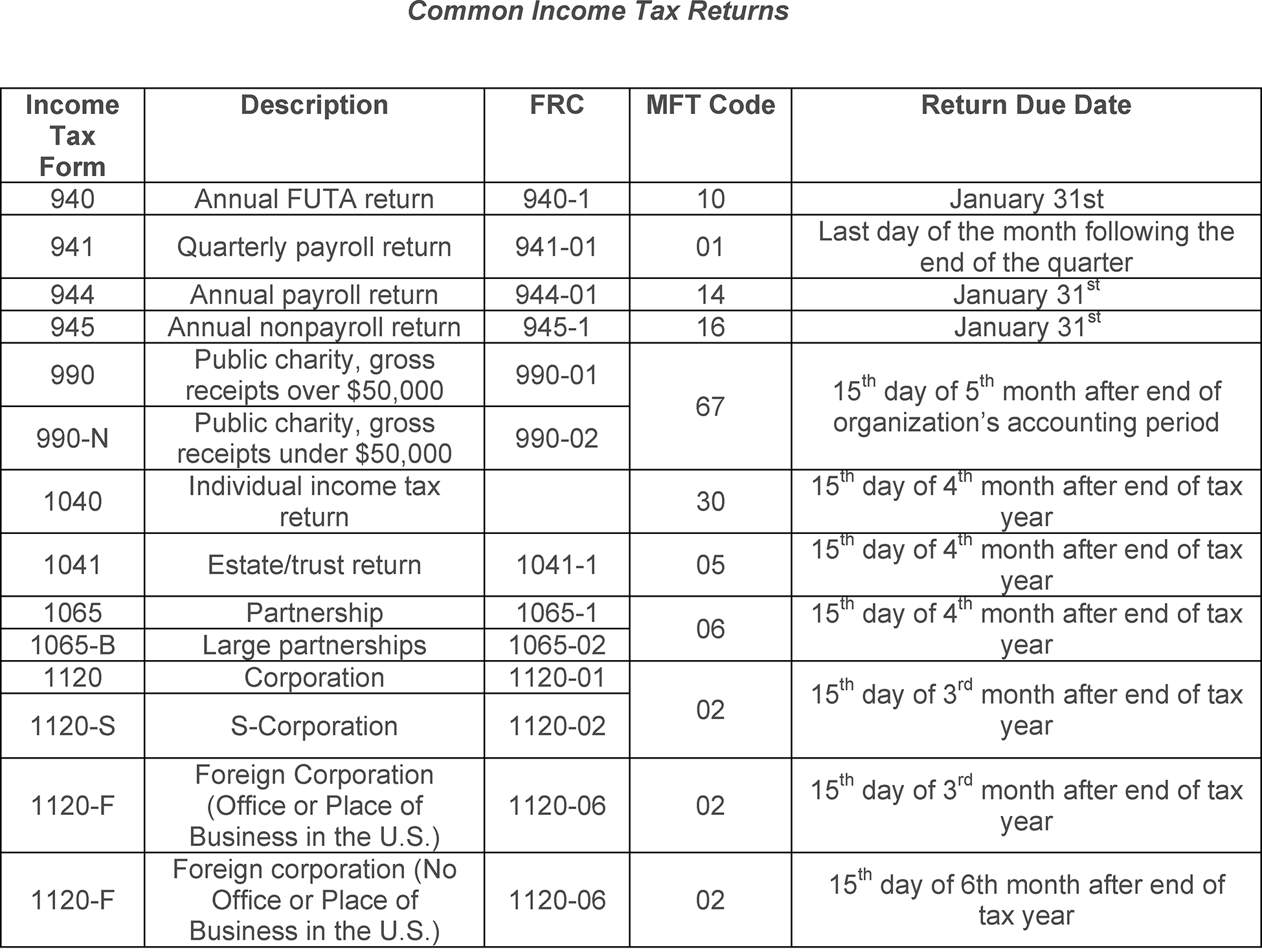
- Exhibit 3.21.264-1 Common Income Tax Returns
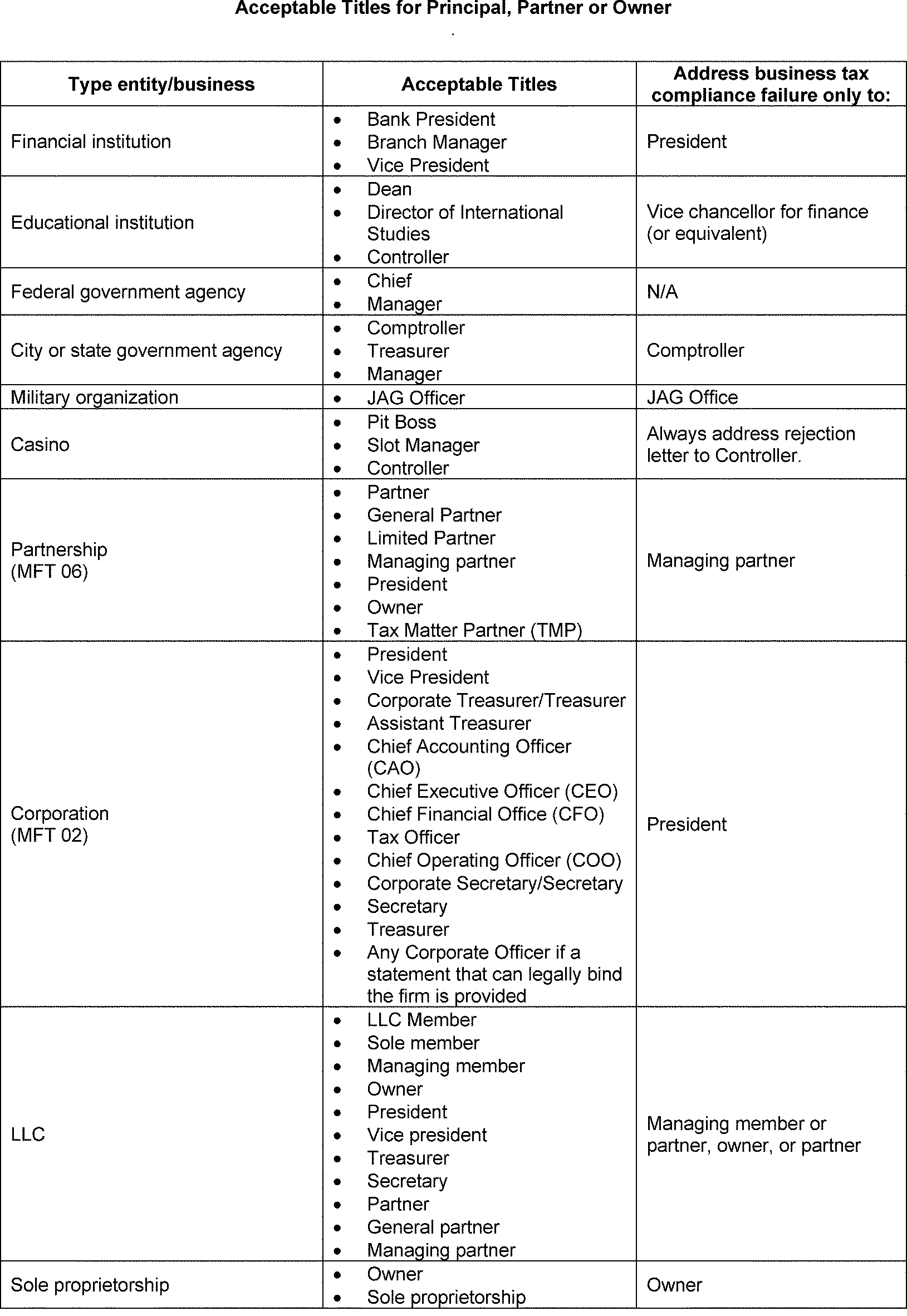
- Exhibit 3.21.264-2 Acceptable Titles for Principal, Partner or Owner
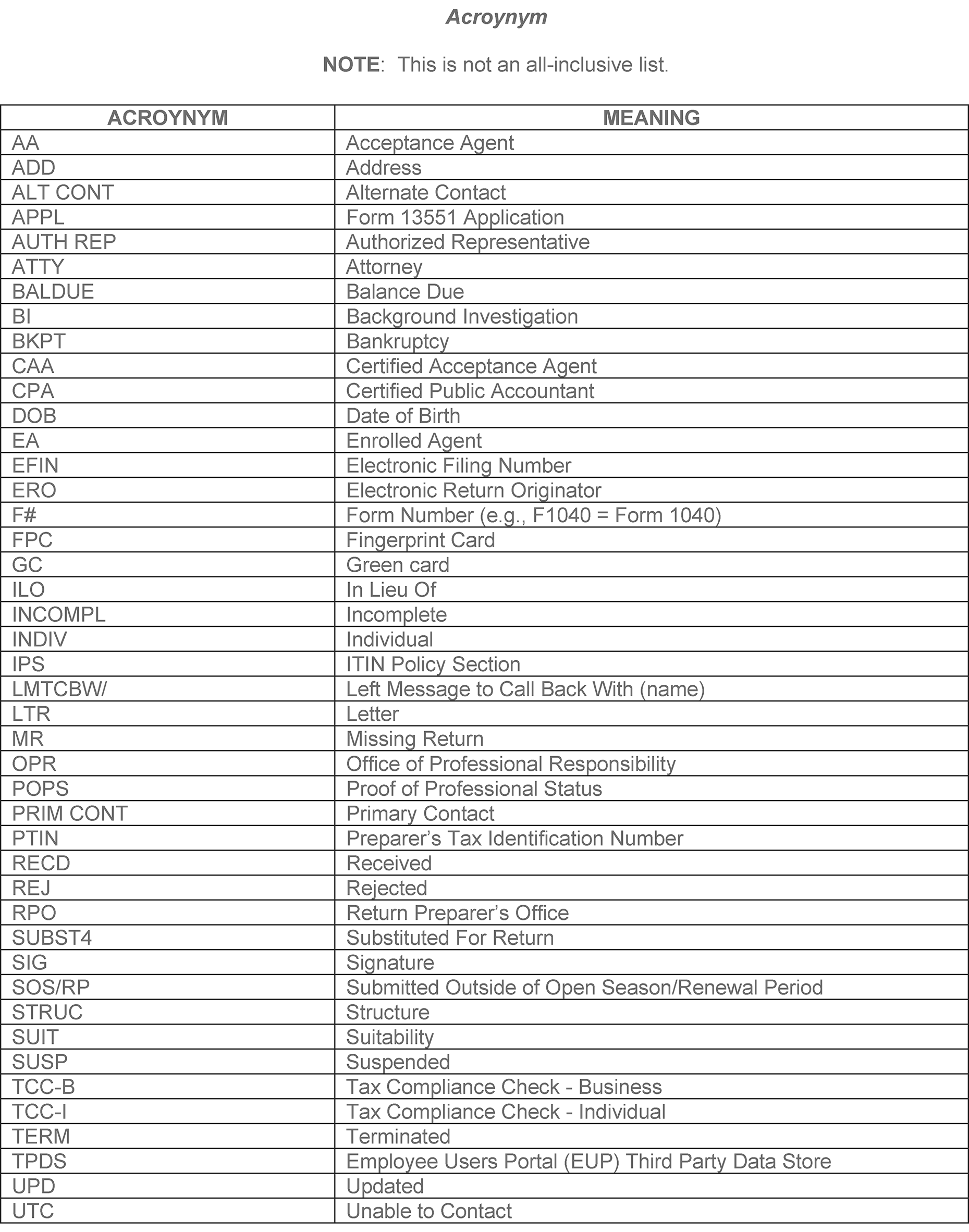
- Exhibit 3.21.264-3 Acronyms
- 3.21.264.1 Program Scope and Objectives
Part 3. Submission Processing
Chapter 21. International Returns and Documents Analysis
Section 264. IRS Individual Taxpayer Identification Number (ITIN) Acceptance Agent Program
3.21.264 IRS Individual Taxpayer Identification Number (ITIN) Acceptance Agent Program
Manual Transmittal
September 19, 2025
Purpose
(1) This transmits revised IRM 3.21.264, International Returns and Documents Analysis, IRS Individual Taxpayer Identification Number (ITIN) Acceptance Agent Program.
Material Changes
(1) IRM 3.21.264.2(5) - Removed paragraph regarding pre-application conference. (IPU 25U3566 issued 08-15-2025)
(2) IRM 3.21.264.3(2) - Removed instruction regarding Form 13551, Application to Participate in the Acceptance Agent Program. (IPU 25U3566 issued 08-15-2025)
(3) IRM 3.21.264.4(1) - Removed EIN from instruction. (IPU 25U3566 issued 08-15-2025)
(4) IRM 3.21.264.4.2.1(4) - Removed the last sentence of instruction. (IPU 25U3566 issued 08-15-2025)
(5) IRM 3.21.264.4.3 - (4) Revised statuses in ESAM for Acceptance Agent applications to In Process and Passed. (IPU 25U3362 issued 06-04-2025); (4) Removed explanation of suitability statuses. (5) Added instruction on how suitability status is conducted. (6) Removed Principal from bullet list. (7) Added new paragraph. (8) Removed duplicate instruction and re-ordered paragraphs. (9)Removed paragraph, duplicate instruction. (10) Removed paragraph, duplicate instruction. (IPU 25U3566 issued 08-15-2025 )
(6) IRM 3.21.264.4.3.1 - (2) Replaced only the with all. (4) removed the bullets regard credentials needed and NFP EFIN. (IPU 25U3566 issued 08-15-2025)
(7) IRM 3.21.264.4.3.2 - (3) Removed reapply and revised with renewal and amended. (4) Removed, instruction not required. (5) Removed, instruction not required. (IPU 25U3566 issued 08-15-2025)
(8) IRM 3.21.264.4.3.3 - (1) Added information regarding suitability checks. (2) Added information for Business Rule results. (3) Added instruction for manual research by the assistor. (4) Removed duplicate instruction. (5) Removed duplicate instruction. (6) Removed duplicate instruction. (IPU 25U3566 issued 08-15-2025)
(9) IRM 3.21.264.4.3.4 - (1) Added instruction regarding continuous suitability checks. (2) Replaced indication with indicator. (IPU 25U3566 issued 08-15-2025)
(10) IRM 3.21.264.4.3.6 - Created new subsection titled Specially Designated Nations, added guidance for tax examiners. (IPU 25U3429 issued 06-25-2025); (2) Added an example when the Date of birth doesn’t match for SDN List; (3) Combined the PPO and RP for existing agreements in the IF/THEN Chart (IPU 25U3453 issued 07-01-2025); (2) Reworded instruction in the bullet list. (3) Reorganized information in the IF/THEN chart. (IPU 25U3566 issued 08-15-2025 )
(11) IRM 3.264.4.3.6 (3) - Modified IRM Hyperlink in the 1st and 2nd Then boxes.
(12) IRM 3.21.264.4.3.7 - Created new subsection titled Prisoners List, added guidance for tax examiners. (IPU 25U3429 issued 06-25-2025); (2) Removed sentence for Case ID link, removed wording ; (3) added 2nd bullet. (IPU 25U3453 issued 07-01-2025); (2) - Removed the last bullet, duplicate instruction. (IPU 25U3566 issued 08-15-2025)
(13) IRM 3.21.264.4.4 - (1) Removed instruction for Acceptance Agents to mail in requests and removed the physical address for the Atlanta office. (2) Reworded paragraph to include e-Services. (IPU 25U3566 issued 08-15-2025)
(14) IRM 3.21.264.4.5 - (2) Removed CPA and Attorney from Exception. (IPU 25U0343 issued 03-12-2025); (4) Removed instruction as ESAM systemically performs the validation. (5) Removed instruction as ESAM systemically performs the validation. (IPU 25U3566 issued 08-15-2025)
(15) IRM 3.21.264.4.6 - (4) Removed University of West Virginia from exception. (5) Added FDTC course material review guidance process. (6) Added statement that IPS to conduct forensic training reviews on Certified Acceptance Agents course materials every three years. (IPU 25U0343 issued 03-12-2025); (1) Removed instruction to direct applicant to FDTC vendor. (2) Removed Note. (3) Reworded to simplify instruction, in Note; removed instruction regarding original FDTC. (4) Reworded instruction. (5) Simplified instruction. (6) Removed paragraph, duplicate instruction. (IPU 25U3566 issued 08-15-2025)
(16) IRM 3.21.264.4.7 - Updated all paragraphs to simplify instruction. (5) Added new instruction. (IPU 25U3566 issued 08-15-2025)
(17) IRM 3.21.264.5 - (1) removed instruction on how to access application. (2) Removed information regarding Authors. (3) Removed paragraph. (4) Removed paragraph. (5) removed paragraph. (6) Removed paragraph. (7) Removed paragraph. (IPU 25U3566 issued 08-15-2025)
(18) IRM 3.21.264.5.1 - (1) Removed instruction regarding the asterisk. (2) Simplified instruction and updated the All Data Fields Chart. (3) Removed paragraph. (4) Removed paragraph. (5) Removed paragraph. (IPU 25U3566 issued 08-15-2025)
(19) IRM 3.21.264.5.2 - (1) Removed Acceptance Agent at the beginning of the sentence. (2) Simplified instruction. (3) Removed paragraph. (4) Simplified instruction and removed VITA from bullet list, NOTE, simplified instruction. (5) Simplified instruction, removed the NOTE tag. (IPU 25U3566 issued 08-15-2025)
(20) IRM 3.21.264.5.2.1(1) - Reworded bullets 2 & 3 and removed 4th bullet. (IPU 25U3566 issued 08-15-2025)
(21) IRM 3.21.264.5.3(1) - Removed items that are no longer listed on the Application Summary page. (IPU 25U3566 issued 08-15-2025)
(22) IRM 3.21.264.5.4 - (1) Removed Principal, not required to enter profession status information unless Organization status is VITA. (IPU 25U3429 issued 06-25-2025); (1) Replaced the word Credential with Individual. (2) Added a row for Other in chart. (3) Removed the last bullet. (4) Added as a new paragraph. (5) Added IRM reference. (6) Simplified instructions and added website links.(IPU 25U3566 issued 08-15-2025)
(23) IRM 3.264.5.4(5) - Modified hyperlink
(24) IRM 3.21.264.5.5(1) - Simplified instruction and added NOTE. (IPU 25U3566 issued 08-15-2025)
(25) IRM 3.21.264.5.6 - (1) Expanded instruction. (2) Expanded instruction. (3) Simplified NOTE. (4) Simplified instruction. (5) Removed paragraph. (IPU 25U3566 issued 08-15-2025)
(26) IRM 3.21.264.5.7 - (1) Removed instruction not needed. (3) Simplified instruction.(4) Removed paragraph. (5) Removed paragraph. (IPU 25U3566 issued 08-15-2025)
(27) IRM 3.21.264.5.8 - (1) Removed paragraph, duplicate instruction. (2) Bullet list was updated with simplified language and instruction removed, that was not required. (4) Removed paragraph, duplicate instruction. (IPU 25U3566 issued 08-15-2025)
(28) IRM 3.21.264.5.9 - (1) Simplified instruction. (2) Simplified instruction in bullet list. (3) Removed paragraph. (4) Simplified instruction. (5) Removed paragraph. (6) Simplified Instruction. (IPU 25U3566 issued 08-15-2025)
(29) IRM 3.21.264.5.9.1 - (1) Simplified instruction in paragraph and bullet list., NOTE & CAUTION. (2) Removed paragraph. (IPU 25U3566 issued 08-15-2025)
(30) IRM 3.21.264.5.10 - (1) Simplified instruction. (2) Removed paragraph. (3) Removed paragraph. (4) Removed paragraph. (5) Simplified instruction. (IPU 25U3566 issued 08-15-2025)
(31) IRM 3.21.264.5.11 - (1) Simplified instruction. (2) Removed paragraph. (3) Expanded instructions. (4) Expanded instructions. (5) Removed paragraph. (6) Simplified and removed instructions in the bullet list. (7) Modified instruction and added a NOTE. (IPU 25U3566 issued 08-15-2025)
(32) IRM 3.21.264.5.12 - (1) Simplified instruction. (2) Expanded instruction. (3) Added paragraph. (4) Added paragraph. (5) Added paragraph. (6) Added paragraph. (7) Added paragraph. (IPU 25U3566 issued 08-15-2025)
(33) IRM 3.21.264.5.13 - (1) Removed paragraph, instruction not needed. (2) Removed paragraph, instruction not needed. (3) Revised instruction to remove duplicate instruction. (4) Added an extra bullet with pertinent instruction. (5) Removed duplicate instruction and added needed instruction. (6) Removed paragraph and incorporated the information into para 5. (7) Simplified instruction. (8) Simplified instruction. (IPU 25U3566 issued 08-15-2025)
(34) IRM 3.21.264.5.13 - (3) Removed bullet #7 and combined the Note and sub-bullets to bullet #6. (4) Removed bullet #4.
(35) IRM 3.21.264.5.16 - Created new subsection, titled Clerical Actions for Paper Applications. (IPU 25U3362 issued 06-04-2025)
(36) IRM 3.21.264.6 - (1) Simplified instruction and updated the table. (2) Inserted table. (3) Removed paragraph, duplicate instruction. (4) Removed paragraph, duplicate instruction. (5) Removed paragraph, duplicate instruction. (6) Removed paragraph, duplicate instruction. (IPU 25U3566 issued 08-15-2025)
(37) IRM 3.21.264.6.1 - (1) Removed paragraph, instruction not needed. (2) Updated table. (3) Updated instruction. (IPU 25U3566 issued 08-15-2025)
(38) IRM 3.21.264.6.2 - (1) Simplified instruction. (2) Added paragraph. (3) Added instruction. (4) Simplified instruction. (IPU 25U3566 issued 08-15-2025)
(39) IRM 3.21.264.6.3.4 - (1) Revised instruction from Not For Profit to For Profit. (2) Simplified instruction. (IPU 25U3566 issued 08-15-2025)
(40) IRM 3.21.264.6.4 - (4) Simplified instruction, added an example. (6) removed paragraph, no longer applicable. (7) removed paragraph, no longer required. (8) Simplified instruction. (IPU 25U3566 issued 08-15-2025)
(41) IRM 3.21.264.6.4.1(1) - Added CC DDBKD and CC RPVUE as research criteria for suitability. (IPU 25U3362 issued 06-04-2025)
(42) IRM 3.21.264.6.4.3 - (1) Added CC DDBKD for citizenship research to 5th bullet. (IPU 25U3362 issued 06-04-2025); (1) Revised Citizenship to include who is required to include green card, employment authorization card, and visa (IPU 25U0343 issued 03-12-2025)
(43) IRM 3.21.264.6.4.4 - Separated Accurint Checks required by Org status and Personal Credentials. (IPU 25U3429 issued 06-25-2025)
(44) IRM 3.21.264.6.4.4.1 - Removed Accurint steps from IRM 3.21.264.6.4.4 to 3.21.264.6.4.4.1. (IPU 25U3429 issued 06-25-2025)
(45) IRM 3.21.264.6.5 - (1) Removed remarks made by RUP, RUP users cannot make or see comments for our application. (2) Revised to include Comments cannot be deleted. (3) Removed, (IPU 25U0343 issued 03-12-2025)
(46) IRM 3.21.264.6.5.1 - 4th bullet revised e-mail citation. (IPU 25U3566 issued 08-15-2025)
(47) IRM 3.21.264.6.6 - (1) Revised to include why correspondence is sent to applicants. Removed Generated correspondence, replaced with Manually. (3) Deleted bullet that contains Electronic FDTC along with faxed and photocopies are not valid.(IPU 25U3429 issued 06-25-2025)
(48) IRM 3.21.264.6.6.2 - Revised Rejection Letter 4956C to include reason why individual not approved to participate in the AA program. (IPU 25U3429 issued 06-25-2025)
(49) IRM 3.21.264.7 - (1) Changed monthly to weekly. (2) Simplified instructions. (3) Removed paragraph. (IPU 25U3566 issued 08-15-2025)
(50) IRM 3.21.264.8.1 - (1) Removed instruction for the Examination Policy Analyst. (2) Removed instruction regarding the Director, Examination Policy. (3 )Revised the criteria for the listing of CAA’s that have been selected for review. (4) Removed instruction for Exam Planning and Delivery and added instruction for Stakeholder Liaison monitors. (5) Simplified instruction. (IPU 25U3566 issued 08-15-2025)
(51) IRM 3.21.264.8.1.1(3) - Removed instruction for area PSP TMs and added instruction for the SL Lead. (IPU 25U3566 issued 08-15-2025)
(52) IRM 3.21.264.8.1.5(1) - Removed instruction for reviewing the tax return. (IPU 25U3566 issued 08-15-2025)
(53) IRM 3.21.264.8.1.6(2) -Removed instruction regarding the Child Tax Credit. (IPU 25U3566 issued 08-15-2025)
(54) IRM 3.21.264.8.1.11 - (1) changed keep to maintain. (3) Removed Stakeholder Liaison Name form bullet list. (IPU 25U3566 issued 08-15-2025)
(55) IRM 3.21.264.8.2(1) Simplified instruction. (IPU 25U3566 issued 08-15-2025)
(56) IRM 3.21.264.8.2.2 - (2) Removed reasonable cause form quotations. (3) Revised instructions to include steps for electronic correspondence. (IPU 25U3566 issued 08-15-2025)
(57) IRM 3.21.264.8.4.1(2) - Removed criteria regarding the Child Tax Credit and the Additional Child Tax Credit. (IPU 25U3566 issued 08-15-2025)
(58) IRM 3.21.264.8.4.5 - (1) Removed the IPS mailing address and replaced it with the IPS email address. (2) Removed the word mail and replaced with letter. (IPU 25U3566 issued 08-15-2025)
(59) Exhibit 3.21.264-3 - Added NOTE and updated acronym list. (IPU 25U3566 issued 08-15-2025)
(60) IRM 3.21.264 - Small Business Self-Employed Examination changed to Stakeholder Liaison throughout the IRM. (IPU 25U3429 issued 06-25-2025); All subsections Point of Contact (POC) in EPD and Examination Policy, Area Planning and Special Programs (PSP) changed to Stakeholder Liaison Lead (SL) throughout the IRM. (IPU 25U3566 issued 08-15-2025)
(61) Editorial changes were made throughout the IRM such as grammar, word changes. etc. In addition, some tridocs were moved and reorganized.
Effect on Other Documents
This material supersedes IRM 3.21.264 dated November 27, 2024 (effective January 1, 2025). The following IRM Procedural Updates (IPUs) have been incorporated into this IRM: IPU 25U0343 issued 03-12-2025, IPU 25U3362 issued 06-04-2025, IPU 25U3429 issued 06-25-2025, IPU 25U3453 issued 07-01-2025 and IPU 25U3566 issued 08-15-2025.Audience
Taxpayer Services (TS), Kansas City Submission Processing Center (KCSPC), Input Corrections Operation (ICO), ITIN Policy Section (IPS), and Communications and Liaison-Stakeholder Liaison (SL)Effective Date
(01-01-2026)Scott Wallace
Director, Submission Processing
Taxpayer Services
-
This IRM provides guidance for administering the IRS Acceptance Agent (AA) Program and conducting compliance checks on Certifying Acceptance Agents (CAAs).
-
Purpose: This IRM provides guidance for processing Acceptance Agent applications and conducting compliance reviews for Certifying Acceptance Agents timely. This IRM provides guidance for reports for Acceptance Agents.
-
Audience: The primary users of this IRM are IRS Individual Taxpayer Identification Number (ITIN) Policy Section employees, Kansas City Submission Processing Center (KCSPC), and Stakeholder Liaison (SL) Field Examination.
-
Policy Owner: Director, Submission Processing
-
Program Owner: ITIN Policy Section is responsible for the administration, procedures and updates related to this program.
-
Primary Stakeholders: Management Officials and other IRM users who rely on quality information such as:
-
Stakeholder Liaison (SL),
-
Privacy, Governmental Liaison & Disclosure (PGLD),
-
Legislative Affairs (LA),
-
Taxpayer Advocate Service (TAS),
-
Taxpayer Correspondence Services (TCS)
-
-
Program Goals: The goal for this program is to process Acceptance Agent applications, prepare Acceptance Agent agreements and conduct compliance reviews timely and accurately.
-
IRM 3.21.264, International Returns and Document Analysis, IRS Individual Taxpayer Identification Number (ITIN), Acceptance Agent Program was implemented to improve customer service and oversight of the Acceptance Agent program.
-
On November 29, 2012, the IRS issued final changes for Certified Acceptance Agents to authenticate certain documents that supports the Individual Taxpayer Identification Number (ITIN) application.
-
The information in the IRM provides essential background information pertinent to the program:
-
New Legislation
The Protecting Americans from Tax Hikes Act of 2015 (PATH Act) was enacted on December 18, 2015, and Section 203 of the (PATH Act) modified IRC 6109 and in doing so, made significant changes to the ITIN program.
-
Information on changes in workflow
June 2014, the back-end processing for Form 13551, Application to Participate in the IRS Acceptance Agent Program was moved to Cincinnati Submission Processing Center (CSPC).
Tax Year 2019, the back-end process was moved from CSPC to Kansas City Submission Processing Center.
September 7, 2016, the IRS issued changes to the Acceptance Agent program. Open season was expanded to allow new and renewal applications year-round.
-
-
Also included in this IRM is guidance for administering the Acceptance Agent program, such as:
-
The application process to become an Acceptance Agent,
-
Procedures for reviewing and processing Acceptance Agent applications and
-
An outline for compliance reviews
-
-
The Acceptance Agent Program is governed by Rev. Proc. 2006-10, 2006-1 C.B. 293.
-
The IRS Restructuring and Reform Act of 1998, Section 3705 (a) provides identification requirements for all IRS employees working tax- related matters.
-
Kansas City Submission Processing Center (KCSPC) employees use this IRM for processing of Acceptance Agent applications.
-
ITIN Policy Section sets the standards for On-Site compliance reviews conducted by Small Business/Self Employed, Field Examiners and Correspondence compliance reviews conducted by the ITIN Policy Section.
-
The ITIN Policy Section (IPS) administers the information in this IRM. Information is published in this IRM on a yearly basis.
-
The ITIN Policy Section Chief ensures this IRM is timely submitted to publishing annually.
-
The Director of Submission Processing oversees the policy related to this IRM.
-
Program Reports: The program reports provided in this IRM are used to identify trends as it relates to the Acceptance Agent (AA) program. The Quality Standards report is used to identify which Acceptance Agent/ Certifying Acceptance Agent are not meeting the standards of the program. Various reports are located on External Services Authorization Management (ESAM):
-
AA Agreements 180 Days Expiration Report
-
AA Over-aged Report
-
Acceptance Agent Summary Report
-
-
Program Effectiveness:
-
At least one application is reviewed for Embedded Quality Review System monthly by Lead reviewer.
-
ITIN Policy Section (IPS) analyst conducts correspondence compliance reviews for CAAs selected for on-site review but not referred for visit.
-
-
Quality guidelines for measurement is referenced in IRM 21.10.1, Embedded Quality (EQ) Program for Accounts Management, Campus Compliance, Field Assistance, Tax Exempt/Government Entities, Return Integrity and Compliance Services (RICS).
-
Kansas City Submission Processing Center (KCSPC) manager is responsible for tracking and monitoring the ITIN AA application inventory to ensure adequate resources are available for timely processing. Lead reviewers performs random quality checks of applications processed by tax examiner to identify areas that need additional emphasis, training or clarification.
-
Stakeholder Liaison (SL) Examination Field provides support to the ITIN Policy Section (IPS) to conduct on-site compliance visits for Certifying Acceptance Agents (CAA).
-
ITIN Policy Section (IPS) determines the method to select CAAs for compliance reviews.
-
The list of acronyms used in this IRM is found in Exhibit 3.21.264-3, Acronyms.
-
Resources specific to the Acceptance Agent program are:
-
IRM 3.21.264, International Returns and Documents Analysis - IRS Individual Taxpayer Identification Number (ITIN) Acceptance Agent Program
-
IRM 3.42.7, Electronic Tax Administration, EPSS Help Desk Support
-
External Services Authorization Management (ESAM)
-
Job Aid - ITIN Acceptance Agent 60194-003
-
-
This subsection of the IRM provides guidance for administering the IRS Acceptance Agent (AA) Program. Included is the following information:
-
Description of the application process to become an IRS Acceptance Agent.
-
Procedures for reviewing and processing Acceptance Agent applications.
-
Outline of IRS' expectation of roles and responsibilities as it relates to the Acceptance Agent Agreement, Compliance Reviews and Quality Standards.
-
-
This IRM is designed to be used by Kansas City Submission Processing Center (KCSPC), Stakeholder Liaison, Field Examination, and the IRS Individual Taxpayer Identification Number (ITIN) Policy Section employees.
-
Submit IRM deviations in writing following instructions from IRM 1.11.2.2.3, When Procedures Deviate from the IRM, and elevate through proper channels for executive approval.
-
A person may wish to become an Acceptance Agent to assist with the process of acquiring an IRS individual taxpayer identification number (ITIN) for alien individuals or clients who are required to have a U.S. taxpayer identification number for tax purposes but are ineligible for a social security number (SSN).
-
The Acceptance Agent Program is governed by Rev. Proc. 2006-10, 2006–1 C.B. 293.
-
On September 7, 2016, the IRS issued changes to the Acceptance Agent program. Open season was expanded to allow new and renewal applications year-round. Certifying Acceptance Agents (CAAs) will now be allowed to authenticate the passport and birth certificate for dependents. CAAs will continue to authenticate identification documents for primary and secondary applicants.
-
Beginning January 19, 2024, Acceptance Agents must complete the application process electronically through e-Services. Paper Form 13551 are no longer accepted.
-
For organizations located abroad, if the Principal, Partner, Owner and/or all Responsible Parties do not have a valid TIN(SSN/ITIN) to access e-Services, they must use the CAA Document Upload Tool (DUT) to submit their Acceptance Agent Application and relevant documentation.
-
The mission of all employees processing Acceptance Agent Applications is to ensure applications are processed timely and to ensure applicants admitted into the program are credible and responsible individuals who will advance the Internal Revenue Service’s goal of voluntary tax compliance.
-
The IRS Restructuring and Reform Act of 1998, Section 3705 (a) provides identification requirements for all IRS employees working tax- related matters. IRS employees must give their name and unique identification number (ten digits of the Personal Identification Number shown on the Smart ID) during taxpayer telephone, face-to-face and written contact. In addition, a telephone number is required on all taxpayer correspondence. This will provide taxpayers with enough information to identify an IRS employee who has previously assisted with their tax-related matters.
-
It is the responsibility of all IRS employees to protect confidential applicant information and to understand the difference between an authorized and unauthorized disclosure under the law.
-
You must determine if the person you are speaking to is entitled to receive or present requested information. Do not under any circumstance accept oral testimony for missing signatures or documentation verification. Once you have verified that the caller is responsible for the information, then take the correct action.
-
Except for general information inquiries, External Services Authorization Management (ESAM) is used to authenticate customers calling about an Acceptance Agent application. Use the following tables to authenticate a customer and their authority to receive information about an Acceptance Agent application:
Note:
If unable to authenticate the customer with the following requirements, escalate the interaction to the lead. Leads will contact the Program Manager (PM) analyst for referral to the ITIN Policy Section. Include the customer's name and contact information in the escalation. For foreign nationals, include their e-mail address.
Position/Relationship Authentication Requirements Authorization Entitlements Principal, Partner, or Owner Refer to IRM 10.10.3, Identity Assurance - Centralized Authentication Policy - Centralizing Identity Proofing for Authentication Across All IRS Channels, EIN, legal or Doing Business As (DBA) name, physical or mailing address Application status, firm suitability or tax compliance issue Responsible Party (U.S. Citizen) Refer to IRM 10.10.3, Identity Assurance - Centralized Authentication Policy - Centralizing Identity Proofing for Authentication Across All IRS Channels, SSN, name, address, Date of Birth (DOB) and Country of Citizenship (COC) Application status and individual suitability Responsible Party (non-resident alien) Refer to IRM 10.10.3, Identity Assurance - Centralized Authentication Policy - Centralizing Identity Proofing for Authentication Across All IRS Channels, PTIN, name, address, DOB Application status and individual suitability Responsible Party (foreign national) Refer to IRM 10.10.3, Identity Assurance - Centralized Authentication Policy - Centralizing Identity Proofing for Authentication Across All IRS Channels, PTIN, name, address, DOB (CC RPVUE for foreign nationals) Application status and individual suitability Primary or Alternate Contact Refer to IRM 10.10.3, Identity Assurance - Centralized Authentication Policy - Centralizing Identity Proofing for Authentication Across All IRS Channels, EIN, title, phone number, e-mail address General information -
This also includes the protection of computer terminal information. For example, when applicants calling on IRS phone lines inquire about their application and less than 45 days have passed since the AA application was submitted, the employee must advise the applicant to allow more time for processing. If 45 days or more have passed and research shows no record of the application, employees are authorized to disclose to the applicant that we have no record of the application, and they must re-submit their application.
-
For questions on disclosure, see IRM 11.3.13, Disclosure of Official Information - Freedom of Information Act (FOIA), refer to IRM 10.5.6, Privacy and Information Protection - Privacy Act, or the Disclosure Help Desk at ≡ ≡ ≡ ≡ ≡ ≡ ≡ ≡ (for internal use only).
-
Inadvertent unauthorized disclosures must be reported to the Office of Privacy, Governmental Liaison and Disclosure Incident Management Office. See IRM 10.5.4, Privacy and Information Protection, Incident Management Program.
-
The taxpayer’s signature on Form W-7 authorizes the IRS to disclose to the AA only information necessary to resolve matters about assignment of an ITIN, including any previously assigned taxpayer identifying numbers.
-
The Jurat, penalty of perjury statement, found in the Sign Here area of the Form W-7 serves as the authorization to release the information. Do not release other information that is not necessary for the assignment of the ITIN but found on the accompanying tax return or on IDRS.
-
Refer to IRM 3.21.264.3.3, Disclosure Guidelines for Acceptance Agents, above for more information on disclosure.
-
While working assigned cases, SP employees may come across some accounts that are blocked on IDRS. These accounts can be identified by an IDRS security violation message: Unauthorized Access to This Account. Forward the case (Form 8822-B, Form 2553, etc.) to your manager. Managers will notify the local Planning & Analysis Staff who will scan the case and send encrypted information to the "≡ ≡ ≡ ≡ ≡ ≡ ≡ ≡ ≡ ≡" mailbox to request access to the account. Managers will retain the original case in a file awaiting access (can take up to five business days). Once notified access has been granted, the case can be processed following applicable procedures.
-
External Customer Data Store (ECDS), maintained at the Enterprise Computing Center in Martinsburg, WV, is a database that is used to store, update, and monitor Acceptance Agent application information. The database is also used to store information for other e-Services products as well. There are two ways to access the information:
-
The Employee User Portal (EUP) is a web hosting infrastructure. It supports an Intranet portal that allows IRS employees to access AA applications and data. The Business Entitlement Access Request System (BEARS) is used to identify the EUP user roles for managerial approval. View “e-file” application, AVEA (ESRV-APPL-EFILE), is the most selected role associated with application usage. This role only allows view access of the application within the EUP.
-
Registered User Portal (RUP) infrastructure gives users the ability to electronically create file and revise Acceptance Agent application(s).
-
-
All applications receive a unique tracking number that can be used as a search criterion for applications on the database. The tracking number shows the year, month, day and time that the application was entered in ECDS.
-
An Acceptance Agent (AA) is a person (individual or entity) who has signed an agreement with the IRS and is authorized to assist alien individuals and other foreign persons in obtaining an ITIN from the IRS. A person acting as an Acceptance Agent does not act as an Agent of the IRS, nor is the person authorized to hold itself out as an Agent of the IRS.
-
The role of an AA is to facilitate the application process and the issuance of taxpayer identification numbers to alien individuals and other foreign persons who require an identification number for tax purposes only.
-
There are two types of Acceptance Agents:
-
Acceptance Agent (AA)
-
Certifying Acceptance Agent (CAA)
-
-
Both are authorized to assist resident alien and non-resident individuals ineligible to receive a Social Security Number (SSN) in obtaining an Individual Taxpayer Identification Number (ITIN) from the IRS.
-
The following table identifies responsibilities for both AA and CAA:
-
Acceptance Agents and Certifying Acceptance Agents must follow established guidelines as outlined in their agreement, Instructions for Form W-7, and related IRS publications when submitting Form W-7 applications. Thereafter, once the normal processing time has passed, CAAs may call the designated number in their agreement to inquire about the status.
-
Acceptance Agents must use the most current revision of Form W-7, Application for IRS Individual Taxpayer Identification Number, which is available on www.IRS.gov. The AA/CAAs must follow established procedures for completing Form W-7, and attach the required valid U.S. tax return or evidence that they meet one of five exceptions.
-
If they wish to use a substitute form other than the original Form W-7, they must first obtain approval from the IRS. Refer them to Pub 1167, General Rules and Specifications for Substitute Form and Schedules, which guides them through preparing an acceptable privately designed and printed or computer-prepared and computer-generated substitute application.
-
All Form W-7, Application for IRS Individual Taxpayer Identification Number, is submitted by an AA or CAA must meet supporting identification documentation requirements by proving identity and foreign status.
-
AAs and CAAs must also attach valid exception documentation to prove the applicant has met an exception to the filing of a valid U.S. tax return.
-
Form W-7, submitted by a CAA must have a Form W-7 (COA), Certificate of Accuracy, attached with copies of the original or certified copies for the primary, secondary and dependent. The W-7 COA stipulates that to the best of the CAA’s knowledge, the applicants supporting identification documentation is authentic and correct.
-
Any eligible individual or entity can apply to become an Acceptance Agent. Persons eligible to be an Acceptance Agent include:
-
Financial institutions defined in IRC 265(b)(5)
-
Education Institutions: Colleges or universities which are described in IRC 501(c)(3) and exempt from taxation under IRC 501(a)
-
Federal agencies (as defined in IRC 6402(h)
-
State and local governments, including agencies responsible for vital records
-
Casinos
-
Community-based organizations which are described in Section 501(c)(3) or (d) and exempt from taxation under IRC 501(a)
-
Persons that help taxpayers in the preparation of their tax returns
-
Other persons or categories of persons as authorized by regulations or other guidance of the Secretary of Treasury
-
-
Everyone listed as a responsible party on the application must be at least 18 years of age when application is submitted.
-
An Employer Identification Number (EIN) is required.
-
A Preparer Tax Identification Number(PTIN) is required of all paid tax return preparers. See IRM 3.21.264.4.5, Preparer Tax Identification (PTIN) Requirement, and www.irs.gov/ptin for additional information.
-
Except for applications from VITA/TCE partners, all existing CAAs must provide an original certificate of completion from the vendor for the forensic document training course.
-
An Exempt Letter is required if the legal entity is Not for Profit.
-
Applicants must have an IRS e-Services account before starting and submitting an electronic IRS Acceptance Agent application. Applicants can visit IRS.gov for more information about Secure Access Digital Identity (SADI).
-
To become an acceptance agent, you must complete and submit an IRS acceptance agent application on behalf of your firm/organization. The process for completing an IRS acceptance agent application consists of the following 4 steps:
-
Complete the mandatory ITIN acceptance agent training before submitting your application. Everyone who is listed as a responsible party (RP) on your application must complete the training.
-
Complete forensic training (CAAs only) before submitting your application. Everyone who is listed as a RP on your application must complete the training
-
Complete the electronic IRS Acceptance Agent Application. Identify individuals in the firm/organization as the Principal, Partner, or Owner of the Business (PPO); Principal Consent (PC); RPs; and Contacts, as needed. All parties identified on your application, excluding contacts, must register with IRS e-Services to access the application, complete required fields, acknowledge training completion, and sign respective jurats.
-
Access the CAA Documentation Upload Tool to upload required documentation (i.e., forensic training certificates, professional credentials, citizenship documents, non-profit exemption letter).
-
-
Suitability is the process used by the IRS to determine if the firms and individuals listed on applications are appropriate to participate in the IRS Acceptance Agent program.
-
The IRS sets suitability standards to screen and monitor applicants to ensure that they keep a high degree of integrity and adhere to the highest professional and ethical standards.
-
Suitability checks may include standard background check (Accurint check) and IRS tax compliance check.
-
Applicants must submit to suitability checks before being authorized to act as an Acceptance Agent . Initial suitability is conducted on all TINs listed on the application for the Firm, Principal, and Responsible Parties. Applicants with compliance issues will be denied participation in the program until all issues have been satisfactorily resolved.
-
Suitability checks are not conducted on the following:
-
Principal Consent
-
Contacts (Primary/Alternate)
-
IRS sponsored Not for Profit organization
-
-
There are several business rules related to initial suitability:
-
ASAP - Identity Theft
-
≡ ≡ ≡ ≡ ≡ ≡ ≡ ≡ ≡
-
≡ ≡ ≡ ≡ ≡ ≡ ≡ ≡
-
ASAP - Deceased
-
ASAP - Citizenship
-
ASAP - Tax Compliance
-
ASAP - Penalty Assessment
-
Present on SDN List
-
Prisoner/Convicts
-
SSN Cross-Reference
-
-
Suitability checks are normally completed within 60 calendar days of submission .
-
The Eligibility BRs are run first followed by Suitability checks.
-
NFP (Verify Not-for-profit)
-
Document Upload
-
Background Check (if not NFP)
-
-
If the Legal Entity selected is Not-for-profit, all Business Rules will run against the firm and users on the AA Location Application on Application Submission / Resubmission except:
-
Background Check Needed [Principal, Partner, or Owner of the Business, RP(s)]
-
-
ESAM will run applicable eligibility/suitability checks against the firm and users on AA Location Applications upon application submission or resubmission. On submission of an AA Location Application, applicant(s) that are listed as a Responsible Official / Principal on an E-FILE Application whose suitability is set to Passed will only require:
-
Tax Compliance
-
Penalty Assessment Business Rule
-
≡ ≡ ≡ ≡ ≡ ≡ ≡ ≡ ≡ ≡ ≡ ≡ ≡ ≡ ≡ ≡ ≡ ≡ ≡ ≡ ≡ ≡
-
RP at Other AA Location
-
Documentation Required
-
DUT Doc Received
-
-
Business rules are as follows and are shown in a predetermined prioritized order as follows:
-
Present on SDN List – triggered when a potential match is identified with a firm/individual on an application and the SDN list.
-
ASAP-Identity Theft – triggered when an ASAP result is returned for that specific EIN or SSN.
-
ASAP -Z Freeze – triggered when an ASAP result of Z freeze is returned for that specific EIN or SSN.
-
ASAP -T Freeze – triggered when an ASAP result of T freeze is returned for that specific EIN or SSN.
-
Prisoner/Convicts – triggered if the individual’s SSN and date of birth match an entry on the Prisoner List.
-
ASAP Deceased – triggered when an ASAP result showing deceased (TC 540) is returned for that specific SSN.
-
ASAP Citizenship – triggered when an ASAP result showing a citizenship code of C, D, E, F or Blank is returned for that specific SSN.
-
ASAP Tax Compliance – triggered when an ASAP result showing a tax compliance issue is returned for that specific EIN or SSN for Initial or Continuous suitability.
-
ASAP Penalty Assessment – triggered when an ASAP result showing a penalty assessment issue is returned for that specific EIN or SSN for Initial or Continual suitability.
-
SSN Cross-Reference – triggered when an ASAP result showing a spousal cross-reference issue is returned for that specific SSN.
-
Continuous Suitability - triggered when MF Transcript provides a "Hit" on the TIN.
-
DUT Doc Received - triggered when documents are available for download from the Certifying Acceptance Agent Document Upload Tool (CAA DUT).
-
-
ASAP Suitability Checks cannot be run against Responsible User Portal (RUP) users with an ITIN so the following Business Rules (BRs) would not be run against them.
-
ASAP - Identity Theft
-
≡ ≡ ≡ ≡ ≡ ≡ ≡ ≡
-
≡ ≡ ≡ ≡ ≡ ≡ ≡ ≡ ≡ ≡
-
ASAP – DoD
-
ASAP – Citizenship
-
ASAP - Tax Compliance
-
ASAP - Penalty Assessments
-
-
The ASAP program uses predetermined criteria from Master File (MF) to identify acceptance agent’s potential eligibility and IMF/BMF compliance issues.
-
The table below illustrates the criteria used in the Automated Suitability Analysis Program (ASAP):
Criteria: ASAP looks at: Cumulative balance due ≡ ≡ ≡ ≡ ≡ ≡ ≡ ≡ ≡ ≡ ≡ ≡ ≡ ≡ ≡ ≡ ≡ ≡ ≡ ≡ ≡ ≡ ≡ ≡ ≡ No return posted (IMF/BMF) ≡ ≡ ≡ ≡ ≡ ≡ ≡ ≡ ≡ Miscellaneous penalty is ≡ ≡ ≡ ≡ ≡ ≡ ≡ ≡ ≡ ≡ ≡ ≡ ≡ ≡ ≡ ≡ ≡ ≡ ≡ IMF/BMF ≡ ≡ ≡ ≡ ≡ ≡ ≡ ≡ ≡ ≡ ≡ ≡ ≡ ≡ Negligence penalty is ≡ ≡ ≡ ≡ ≡ ≡ ≡ ≡ ≡ ≡ ≡ ≡ ≡ ≡ ≡ ≡ ≡ ≡ ≡ IMF/BMF ≡ ≡ ≡ ≡ ≡ ≡ ≡ ≡ ≡ ≡ ≡ ≡ ≡ ≡ ≡ ≡ ≡ ≡ ≡ ≡ ≡ ≡ ≡ ≡ ≡ ≡ ≡ ≡ ≡ ≡ ≡ IMF/BMF ≡ ≡ ≡ ≡ ≡ Identity Theft Citizenship -
ASAP is used for new, renewal and amended applications.
-
All TINS requiring suitability are sent to Master File (MF) daily. For initial suitability, applicants that require a suitability check are added to the daily ASAP extract for processing.
-
When there are possible hits, ASAP results will generate a case and post a Not Confirmed business rule hit on the Business Rule Result(s) page for the individual and/or firm.
-
New issues that did not appear through Business Rule results may be identified through research by the assistor.
-
Once an Acceptance Agent agreement is approved, participants are subject to continuous suitability checks, which is the review of IRS records as well as criminal record monitoring.
-
An extract of all TINs subject to suitability is used to mark the Masterfile account on a biannual basis for IMF and an annual basis for BMF. The system turns this indicator on and off.
-
Specific criteria used to generate a case for a firm and/or individual for continuous suitability for the Acceptance Agent Program are as follows:
-
≡ ≡ ≡ ≡ ≡ ≡ ≡ ≡ ≡ ≡ ≡ ≡ ≡ ≡ ≡ ≡ ≡ ≡ ≡ ≡ ≡ ≡
-
Periodic Date of Death
-
≡ ≡ ≡ ≡ ≡ ≡ ≡ ≡ ≡ ≡ ≡ ≡ ≡ ≡ ≡ ≡ ≡ ≡ ≡ ≡ ≡ ≡ ≡ ≡ ≡
-
Prisoner List-Person found on the Prisoner List
-
SDN List -Specially Designated Nationals
-
-
Cases are worked following continuous suitability processing procedures.
-
Once an Acceptance Agent agreement is approved, ESAM runs continuous/periodic suitability acceptance checks. To search for cases:
-
For the Search by Case Type, always select AA for the Value.
-
On another row, for the Search By, select "Workgroup for AA" , with the Value being checking the box "AA Continuous Acceptance" .
-
On another row, for the Search By, select "Case Status" , with the Value being checking the "Unassigned" box.
-
On another row, for the Search By, select "Primary Issue" , with the Value being the following list in priority order:
Date of Death Exists
Present on SDN List
Prisoner/Convicts
Continuous Suitability
DUT Document Received
EFIN Dropped
-
-
After Case Assignment, from the My Case page, click the Case ID number to Access the Case Overview page (Firm/Person). All the business rule (BR) issues for the case will be listed. You will take the following steps to process each Business Rule (BR):
-
Date of Death Exists
Confirm the individual is deceased via IDRS cc INOLES. Once confirmed, go to the Agreement Summary page to confirm that the agreement has not expired. If expired, close out the case with the Explanation being PPO/ RP is deceased. Otherwise, go back to the Application Summary page to determine whether the individual is the PPO or a RP.Note:
To get to the application, you’ll click the Associated Application link at the top of page. Then you will click the View icon for the AA application you want to view.
Take the following actions based on who the deceased individual is:
PPO: Leave the following comment in the Application Comments section: PPO is deceased. Terminate the Agreement. Go to the Agreement Summary page. Click the Action dropdown button and select Terminate. Click "ok" when the prompt Are you sure you want to terminate this agreement? appears.
RP: Leave the following comment in the application comments section: RP (their name) is deceased, removed from application. If they are the only RP listed, RP (their name) is deceased. Only RP listed, terminated the agreement.
If they are not the only RP listed, go to the Authorized User page and delete them from the list. Close out the case with the Explanation being PPO/ RP is deceased. -
Prisoner/Convicts:
Perform an Accurint Check on the individual. Leave the following comment in the Application Comments section: Name of Individual, Cont. Suit, Accurint Check, Data found, Passed/failed. If failed, refer the case to ITIN Policy Section (IPS). If passed, close out the case with the Explanation being: Passed background check. -
Continuous Suitability:
1. Perform a tax compliance check using IDRS. Based on the results, leave the following comments in the Application Comment section: Cont. Suit. - TCC-B Passed; TCC-I (PPO or RP name), Issue - Tax Form - Tax Period. Close out the case. -
DUT Document Received:
Close out the case with the Explanation being "Duplicate BR" .
-
-
Presidential Executive Order 13224 of September 23, 2001, restricts participation of SDN in any financial/monetary activities in the United States. Identified individuals on the SDN list of The Office of Foreign Assets Control (OFAC) of the U.S. Department of the Treasury can’t be on an Acceptance Agent application as a Principal, Partner or Owner (PPO) or Responsible Party (RP).
-
ESAM will create a case with the Business Rule (BR) "Present on SDN list" . Once the case is created, the assistor will complete the following actions:
-
Access the Department of Treasury website. Then search the Office of Foreign Assets Control (OFAC) by entering the RP’s name or Legal Business Name of the Organization. This is determined by who the BR is referring to (i.e. Case type is Person or Firm).
-
If searching for an individual check to see if the date of birth matches.
-
If the date of birth does not match, this confirms the individual isn’t present on the SDN list, pass.
-
If the date of birth matches, Access "CC MFTRA U" to obtain the country of birth and ensure it matches the one noted on the Treasury SDN list.
-
If the country does not match, this confirms the individual isn’t present on the SDN list, pass.
-
-
When a definite match is found, follow the chart to determine the steps to take:
If Then The Principal, Partner or Owner (PPO) is matched with the SDN list for new or renewal applications, -
Enter comments for the individual present on SDN list, (i.e. John Doe present on the SDN List)
-
Send Reject Letter 4956C and Letter 4958C. See IRM 3.21.264.6.5.
-
Reject the application. See IRM 3.21.264.6.6 , Processing Rejected Applications.
The Responsible Party (RP) is matched with the SDN list, and they are the only RP listed for new or renewal applications, Enter comments for the individual present on SDN list, (i.e. John Doe present on the SDN List) -
Send Reject Letter 4956C and Letter 4958C. See IRM 3.21.264.6.5 .
-
Reject the application. See IRM 3.21.264.6.6 , Processing Rejected Applications
The Responsible Party (RP) is matched with the SDN list, and they are not the only RP listed and at least one RP passes (i.e. met all requirements) , for new or renewal applications, -
Remove any RP from the authorized user’s list that didn’t pass
-
Enter comments for the individual present on SDN list, (i.e. John Doe present on the SDN List)
-
Send Reject Letter 4956C and Letter 4958C .
The Principal, Partner or Owner (PPO) is matched with the SDN List for existing approved agreements,
OR
The Responsible Party (RP), if they are the only RP listed, is matched with the SDN List for existing approved agreements,-
Refer to Lead
-
Lead will refer to IPS
-
-
Individuals in prison are restricted from participation in the IRS Acceptance Agent program while incarcerated.
-
The system generates a case with the business rule Prisoner/Convicts in ESAM when it finds a match. The description field displays incarceration date, release date and institution code. Once the case is created, complete the following actions:
-
Conduct a background check using Accurint.
-
No data found. Indicates there was no record of any criminal activity in the data base by the responsible party. If the results of the background check do not identify any criminal activity, the tax examiner will update ESAM comments Accurint check processed for [name of Individual] – no data found, Passed Background Check.
-
Data found. Indicates the data base shows criminal activity. If the results of background check identify any criminal activity, submit the Accurint check results to the Lead with the application for review. Leads will update ESAM. Enter the comment Accurint check processed for [name of individual] - data found.
-
-
The Lead will take the following actions:
-
Review the data found by the tax examiner and apply the CAA Background Check Matrix.
-
Evaluate other items on the criminal record to determine if the nature of the items will adversely impact the IRS Acceptance Agent program.
-
Return the application to the tax examiner and discuss the finding(s), if needed.
-
-
To be placed on the public list of Acceptance Agents kept on www.IRS.gov, the applicant must select Yes for the question do you want your firm/organization contact information on the IRS.gov public website? This will be an indication to include the organization and location on the Business Operating Environment (BOE) report. The applicant can answer No on another AA location application for that EIN. If the applicant does not want the information made available, the applicant must select No to the question.
-
Acceptance Agents may update their answer at any time by sending an e-mail to the ITIN Policy Section or by updating their Application to Participate in the IRS Acceptance Agent Program in e-Services.
-
A Preparer Tax Identification Number(PTIN) is required of anyone who prepares or assists in the preparation of all or substantially all of any U.S. federal tax return, or claim for refund for compensation. This is regardless of the credential.
-
Except as showed below, all responsible parties listed on the application must include their PTIN.
-
To research a PTIN use IDRS (CC RPVUE) with the current processing year as showed below:
-
To research by SSN:
RPVUE YYYYNNN-NN-NNNNP -
To research by PTIN:
RPVUE YYYYPNNNNNNNN P
-
-
All Responsible Parties listed on a CAA application must complete a forensic document training course by an accredited provider. The training is at the CAAs own expense and must provide the skills to effectively recognize fraudulent documents, particularly passports, driver’s licenses, birth certificates, visas, national identification cards, military and US state ID cards. The IRS does not endorse any specific individual or firm.
-
Only vetted and approved businesses can provide forensic document training. Questionable certificates must be referred to the ITIN Policy Section (IPS) for a determination/decision on their validity.
-
For CAA applications (i.e. new, renewal, amended) an original FDTC certificate must be provided.
-
The following certificates are not acceptable:
-
Issued more than four- years from the application’s submission date.
-
Lists more than one Responsible Party. Each Responsible Party must provide their own certificate.
-
Same individual signed as both the instructor and student.
-
Issued by the firm applying for the program.
-
Facsimile copy.
-
Not from an approved provider.
-
-
Approved providers undergo periodic reviews to ensure their forensic document course content stays current. IPS sends an email to providers asking for details on their latest course updates and access to their training materials. Failure to follow the request may result in removal from the ITIN Policy Section (IPS) approved provider list.
If Then the training materials meet requirements, -
IPS will send an email confirming continued acceptance of certificates issued by their organization for individuals that apply to take part in the IRS Acceptance Agent program.
-
Certificates given by the provider must be original, on vendor’s letterhead, and include specific details such as: vendor’s contact information (name, address, telephone number, course title), participant’s name, completion date, and an embossed seal.
-
-
The EFIN is a six-digit number assigned if the business is an authorized e-file provider. An EFIN is not required for the AA application.
-
ESAM will verify the EFIN is associated with the EIN and match the Business Address (Physical Location) associated to the EFIN to the one provided on the application. If the address does not match or the EFIN is not associated to the EIN, then the EFIN cannot be used on the application.
-
Once the agreement is approved, the EFIN is used as the participant’s office code (preceded by two zeroes).
-
ESAM monitors the status of the EFIN. If the EFIN is dropped by e-file, the office code will be set to Dropped, and a case is created.
-
If/When a new EFIN is assigned, the Principal, Partner, or Owner of the business, Principal Consent or assistor will need to add the new EFIN to the application. This will require a resubmission of the application, which will subsequently create a case.
-
To access the Acceptance Agent Application on e-Services, applicants must sign in using ID.me. ID.me is an account created, maintained, and secured by a private technology provider.
-
After signing in to ID.me, the applicant will be directed to the Select Your Organization page. They will click the Individual button. This will direct them to the External Services Authorization Management (ESAM) landing page. They will click on the New Application dropdown button and select Acceptance Agent Application from the list.
-
The Firm’s Principal, Partner, or Owner of the business will enter their Firm’s information.
-
AA Location Application Firm Information - All Data Fields:
Field Name Data Type Value Required Condition Validation Actions Type of Acceptance Agent Drop-down Select: Acceptance Agent/Certifying Acceptance Agent Yes Default(select) Yes Type of Acceptance Agent field is permanently disabled (read-only) on a successful application submission Approved Acceptance Agent Type Display Acceptance Agent/Certifying Acceptance Agent N/A EUP Only Can not be CAA when Type of Acceptance Agent is AA When the AA Company Application is Approved, this value will be set the same as Type of Acceptance Agent Organization Status Drop-down -
VITA
-
Casino
-
Corporation
-
Church or Church Controlled Organization
-
Educational Institution
-
Financial Institution
-
Federal Government Agency
-
State Government Agency
-
Local Government Agency
-
Military Organization
-
Limited Liability Corporation (LLC)
-
Partnership
-
Sole Proprietorship
-
Other
Yes Default (select) Locked on successful save Other Brief Explanation Text Yes (if “Other” is selected Grayed out text “Please insert a brief explanation that best describes the organization status” 35 characters limit When “Other” is selected, a case will be opened to review the write-in Organization Status Selecting Other will add Supporting Information to an open Application case. Locked on successful save Is this a Publicly Held Corporation Drop-down Select: Yes/No Yes (if Corporation is selected) Grayed out text “Select” Required Field Locked on successful save SIDN Text Yes (if VITA is selected) Format: 9 alpha numeric Required Field Verify “S” followed by 8 digits Locked on successful save Legal Entity Drop-down For-profit / Not-for-profit Yes Default Blank Required Field Locked on successful save EIN Text Yes 9-digits Required Field Locked on successful save Firm/Organi-zation Legal Name Text Yes 40 characters limit Required Field Doing Business As Text No 40 characters limit (When not entered, system will populate Firm Legal Name as DBA Name) EFIN Text No 6-digits Locked on successful submission Business Telephone Number Drop-down/Text Country Code will default to "001 - United States/Canada" Yes 20 characters limit Required Field Locked on successful save Business Fax Number Drop-down/Text Country Code will default to "001 - United States/Canada" No 20 characters limit Required Field Locked on successful save Business Address (Physical Location) Drop-down/Text "Post office box (P.O. Box) is not permitted as part of the Business Address (Physical Location)" Yes 36 characters limit per line, City (30 characters limit, Postal Code (10 digits) Required Field Locked on successful save Mailing Address (Is your mailing address different from your Business Address?) Drop-down/Text Yes Default: No Required Field If Yes, mailing address fields displayed; else fields hidden Business Email Address Text Yes 70 characters limit Required Field Format: Existing format for Email Addresses Locked on successful submission Does the business provide tax related services year-round?* Drop-down Yes, No Yes Default; Blank Required Field Only VITA can answer No. Locked upon successful submit How many Forms W-7 applications does the business plan to submit within a 12-month calendar period? Yes 6 digits Required Field Integer less than 5 creates a case. Locked upon successful submit Identify the activities performed by you or your organization (tax preparation, University, etc.) as well as the type of customers that you will service (foreign investors, foreign students, etc.) to validate your request for Acceptance Agent status* Yes Up to 100 Characters limit Required Field Locked upon successful submit Do you want to be included on the published list of Acceptance Agents located on the IRS website?* Drop-down Yes, No Yes Default; Blank Required Field -
-
Each field is permanently disabled (read only) after a successful saved except for:
-
Type of Acceptance Agent
-
Firm/Organization Legal Name
-
Doing Business As (Trade/Company Name
-
EFIN
-
Business Phone/Fax (except for the Country Code) and Email
-
Business and Mailing addresses (except for the Country)
-
Additional Information
-
-
The Principal, Partner, or Owner of the business (PPO) must input “Authorized Users” on the application. At a minimum, a Principal, Partner, or Owner of the business (PPO), along with a Responsible Party (RP) and Primary Contact are required. Available users for the Acceptance Agent applications are:
-
Principal, Partner, or Owner of the Business: For entities with shares of interests traded on a public exchange, or which are registered with the Securities and Exchange Commission, that individual is (a) the “principal” officer if the business is a corporation, (b) a general “partner”, if a partnership, (c) the “owner” of an entity that is disregarded as separate from its owner, or (d) a grantor, owner or trustor, if a trust. For all other entities, it is the person who has a level of control over, or entitlement to, the funds or assets in the entity that, as a practical matter, enables the individual, directly or indirectly, to control, manage or direct the entity and the disposition of its funds and assets. The Principal, Partner or Owner of the Business is the named individual with responsibility and authority for the entity. They may also designate a Principal Consent(s) who will have similar authority for all locations. Designating a Principal Consent is optional.
-
Responsible Party: This person is designated by the Principal, Partner, or Owner of the Business (or Principal Consent) is the only individual(s), other than the principal, partner or owner (if also listed as a Responsible Party), who has authority to sign Form W-7, Application for IRS Individual Taxpayer Identification Number (Acceptance Agents’ Use Only section), Form W-7 (COA), Certificate of Accuracy for IRS Individual Taxpayer Identification Number, and the Jurat on this application. Each business location, as represented by a single Acceptance Agent (AA) application, is permitted to select up to ten Responsible Parties.
-
Principal Consent: The individual with similar authorities as the Principal, Partner, or Owner of the business including adding or modifying Responsible Parties and submission/resubmission of applications and signing the jurat on behalf of the Principal, Partner, or Owner. This individual cannot be the Principal, Partner, or Owner of the Business, Responsible Party (RP), Primary Contact, or Alternate Contact on this application.
-
Primary Contact: The person who will be available daily to answer IRS questions about this application and any processing issues throughout the year. This is also the person that has been authorized by the business to contact the ITIN Operations to inquire about the status of W-7 applications.
-
Alternate Contact: A person who the IRS may talk to if the Primary Contact is unavailable. This is also the person (or people) that have been authorized by the business to contact the ITIN Operations to inquire about the status of W-7 applications.
-
-
When selecting each user, a pop-up menu will appear. The user selected will affect the Pop-Up title and which fields are displayed in the rest of the window. All information shown with an * is required. After the User’s information is entered, the save button should be selected.
-
ESAM will use the TIN to verify if the RP has an active PTIN. An error will display for the following organizations if an active PTIN is not available:
-
Corporation
-
Limited Liability Corporation (LLC)
-
Partnership
-
Sole Proprietorship
-
-
On a successful save, certain fields are locked depending on which user’s information is being edited:
Edits can be made to all other fields, if necessary.-
Social Security Number (SSN) or ITIN
-
Date of Birth
-
U.S. Citizen
-
-
User authorities for the Authorized User Page includes:
-
Only the PPO and EUP can add the Principal, Partner, or Owner of the business
-
Only the PPO, EUP, and Principal Consent can add a Responsible Party, Alternate Contact and/or Primary Contact/Alternate Contact
-
The Principal Consent and Responsible Party can only view and edit their own entry on the Authorized User page
-
-
The Application Summary page displays the summary of the Firm’s Information and Users that are added to the Acceptance Agent application. The following items are listed on the Application Summary page:
-
Acceptance Agent Type
-
Firm/Organization Legal Name
-
Organization Status
-
Business/Mailing/Email Address
-
Phone/Fax Number
-
Firm Suitability Status
-
Authorized Users
-
Jurat and Personal Information
-
PPO’s and RP’s Suitability Status
-
Office Code
-
-
Each Responsible Party must enter their professional status information unless their Organization Status is VITA. Individuals who require verification of their Professional Status will upload their documentation on the Certifying Acceptance Agent Document Upload Tool (CAA DUT).
-
From the Jurat and Personal Information section on the Application Summary page, there is a Personal Credentials link under the Professional Status column. The authorized user will select the Add Credential drop down button to add their professional credentials. The drop down has the following sections:
Professional Status State License No. Expiration Date Professional Credentials Attorney By State Law License Number Provided by Registered User Portal (RUP) Law License from State Bar Certified Public Accountant By State CPA License Number Provided by Registered User Portal (RUP) CPA License Enrolled Agent N/A Enrolled Agent Number N/A N/A ERO N/A N/A N/A N/A Tax Preparer N/A PTIN N/A N/A Other N/A N/A N/A N/A -
CPA, Attorney or Other: An additional pop-up appears for the user to enter the addition information.
-
Enrolled Agent: The system checks to see if the user has an Enrolled Agent number. If they do, it is displayed in the table. If they do not, the following message will appear "Missing Enrolled Agent Number. Our records indicate you do not have an Enrolled Agent Number."
-
Electronic Return Originator: The system checks to see if the person is associated with the EFIN entered on the application. If so, it will be displayed in the table. If not, the following message will appear: "The Responsible Party is not an ERO on an E-File Application that is an Electronic Return Originator (ERO)."
-
Tax Preparer: If the Organization Status is Corporation, Limited Liability Corporation (LLC), Partnership or Sole Proprietorship that is NOT Not-for-Profit, the system checks to see if the user has a Preparer Tax Identification Number (PTIN). If so, it will be displayed in the table. If not, the following message appears: "Missing PTIN. Our records indicate you do not have a PTIN."
-
-
Selection of Tax Preparer, ERO, or Enrolled Agent will not generate a Pop-Up. When CPA, Attorney or Other is selected from the Add Credential drop-down, an additional pop-up appears for the following information to be entered:
-
The Profession field will be pre-populated with either CPA, Attorney, or Other.
-
Select the state and license number for CPA and Attorney.
-
If Expires is selected on the drop-down menu, then the user needs to enter an expiration date.
-
If Other is selected, then they are required to enter a brief explanation about it.
-
-
An officer of a publicly owned corporation needs to submit proof on corporate letterhead which carries their name as an office, the stock symbol, the exchange where listed and the name under which the stock is traded for the individuals listed as Principal and/or Responsible Party.
-
Only one valid Professional Credential is required. If multiple Professional Credentials are listed, only one needs to be validated. Follow this tier to determine which credentials need validation:
-
If Enrolled Agent (EA), Tax Preparer or ERO is listed, then no further validation is needed.
-
If one or a combination of the following are listed, then Proof of Professional Status (POPS) is needed: Attorney, CPA, Other. Unless an Accurint Check is not required. See IRM 3.21.264.6.3.4 .
-
If the only Professional Credential listed is Other, but the RP has a PTIN, add Tax Preparer to their list of credentials.
-
-
If proof of their professional status is needed (i.e., CPA, Attorney), verify their professional status using the following websites below, or from the document they provide via our DUT:
You will need to verify the expiration date entered in ESAM matches what is on the document provided. Edit any entries that do not reflect what is on the document.-
CPAs: CPA Verify
-
Attorneys: LLRX
-
Officers of Publicly Owned Corporations: EDGAR Company Filings
-
-
If the Professional Status column shows Pending as the status, you will have to update the validation status for at least one of the credentials that was added. To do so:
-
select the SSN link of the Responsible Party (RP).
-
This will bring you to the Personal Credential Result(s) page. Select the Edit icon for one of the Professional Type(s) who Validation Status is Pending.
-
This will bring up the "Edit Verified Credential" page. Select the applicable required answer for each field shown based on the results of your verification.
License or Bonded: (Yes, No, Not Applicable)
State Where License or Bonded: (Select the State where the RP received their license for their personal credential)
Professional Validation Status: (Pending, Passed, Failed)
Professional Validation Status Date: (Enter the date you are validating the credential)
Status as of Effective Date: (Active, Inactive)
Comments: (Enter Validated).
Select Save once you are done.
-
-
Whenever the Principal, Partner or Owner of the business selects the Update Firm Suitability questions, they must answer the following questions:
-
Has the firm been convicted of a felony in the last 10 years? If "Yes" , provide explanation.
-
Is the firm current with its business taxes, including any corporate and employment tax obligations? If "No" , provide explanation.
-
-
Each Responsible Party will need to log into e-Services to access the application. After logging in, they’ll be directed to the Select Your Organization page. Under the Organization Roles section, they’ll click the Select button next to the row that shows Acceptance Agent (AA) as the Application Type. This will direct them to the Application Summary page.
-
From the Jurat and Personal Information section on the Application Summary page, there is a Person Suitability Answers & Jurat Signature link under the Person Suitability Answers & Jurat Signature column. Each Responsible Party can only see/access their own link.
-
Each Responsible Party must respond to the three suitability questions:
-
Have you been convicted of a felony in the last 10 years? If "yes" , provide explanation.
-
Are you currently incarcerated or have you been incarcerated in a federal or state prison during the last two years? If "yes" , provide an explanation including the date of release if applicable.
-
Are you current with your individual and business taxes, including any corporate, and employment tax obligations? If "no" , provide explanation
No defaults are set for the suitability questions, this ensures that the user answers each question.
-
-
The RP is required to check the checkbox, enter their PIN, and click Save.
-
The Initial AA Location Application can only be submitted by the Principal, Partner, or Owner of the business. The PPO must read the Jurat, check the box indicating they accept the terms, enter in their PIN, and then click submit. The Principal Consent may submit subsequent AA Location Applications once the agreement is approved.
-
ESAM validates the Principal, Partner, or Owner of the business, each Principal Consent and each Responsible Party and generates an error for each failed validation. If required fields are missing or incomplete, an error message identifying the missing information will be displayed that links to the issues needing correction.
-
Once the application is submitted, the confirmation page is generated. The tracking number is provided, which can be used to track the status of the application.
-
The Location App Statuses, shown on the Application Summary screen are:
-
"Saved" ”: The AA Location Application (or the Renewal AA Location Application) has been created but not yet submitted.
-
"Submitted Pending Documents" ”: All RPs and the Principal, Partner, or Owner of the business (or Principal Consent) have signed their Jurats, and the AA Location Application (or the Renewal AA Location Application) is submitted. Selections in the AA Location Application require documentation to be reviewed by an assistor, so an Application Case will be created.
-
"Submitted New" ”: The application has never been approved but has been processed, and a suitability check is being reviewed.
-
"Submitted Revise" : The application has previously been approved, is resubmitted (i.e. amended) and is awaiting processing.
-
"Completed " : Application has been submitted, and the associated case has been closed.
- If all requirements have been met, the Location App Outcome will show as Approved.
- If all requirements weren’t met, the Location App Outcome will show as Rejected. -
"Resubmission Required" : The agreement has been approved, and the PPO ( or Principal Consent) has made an amendment to the application. When the user resubmits the application, and a case is opened for any acceptance criteria hits then the application status moves from Resubmission Required to Submitted Pending Documents.
-
Withdrawn: The Principal, Partner, or Owner of the business requests to “Withdraw the AA Application” and IPS carries out the Withdrawal of the Agreement.
-
"Deleted" : Application was in Saved status without being submitted for 90 days (automatically deleted by system) or was manually deleted by either the applicant or EUP user.
-
-
If there are no pending documents and no suitability issues associated with a submitted application, ESAM will systematically pass the firm and personal suitability, change the provider status(s) to “accepted”, move application status to “completed” and generate the AA agreement.
-
The CAA DUT is the platform that is used by Acceptance Agent (AA) applicants. AA applicants use the DUT to upload and submit their credentials (i.e., forensic document training certificate, citizenship documents, Professional Credentials, Non-Profit Exemption letter, etc.) through the CAA DUT. Employees will check the CAA DUT often for receipt of files/documents.
-
The CAA DUT consist of three paths:
-
Path 1: Create Acceptance Agent Application: For use by foreign participants (business location is abroad i.e. not in the U.S.) only, to complete, review, and print their Acceptance Agent Application.
-
Path 2: Upload Complete Application: For use by foreign participants to upload their signed Acceptance Agent Application and required documents.
-
Path 3: Upload Required Documents/Respond to IRS Notice: Used by U.S. based participants to upload their required documents or by all participants to respond to an IRS notice about a previously submitted application.
-
-
The applicant must follow the steps provided on each path to upload and submit their documents. If their upload is successful, they will see an acknowledgement page which means their documents have been submitted for review.
-
Foreign participants must submit their entire AA package through the CAA DUT. Leads retrieve the documentation and enter the information into ESAM accordingly.
-
The CAA DUT Admin is the platform used by the IRS employees to retrieve uploads submitted by Acceptance Agent applications to our CAA DUT. Any cases with the business rule Documentation Required or DUT Document Received will require access to the CAA DUT Admin to retrieve the documents.
-
On the landing page, click the Correspondence tab. You will filter for the documents by EIN, UID (Customer ID) or the Submission date.
-
This will bring up the documents that have been uploaded by the Firm/Organization.
-
Click the Download button . Then click Ok when prompted to download the document(s). Next "click Yes, Archive Now" once the download is complete.
Note:
If you Archive the documents, they will be removed from the dashboard. You will have to go to the Archive list to retrieve them if you need to download them again.
Caution:
Some applicants may upload their documents from the wrong path on the DUT. Any cases that show "Documentation Required" , but do not show "DUT Document Received" , will require a search using the "New Applications" tab on the landing page. You can filter by the EIN and download the documents following the same steps above.
-
-
VITA partners do not need to provide an FDTC. The Stakeholder Partnerships, Education & Communication (SPEC) office will provide a listing of applicants that have taken the forensic document training directly to IPS.
-
The Firm and each Responsible Party are only required to pass their suitability and provide Citizenship documentation (if applicable). These applications are exempt from background checks unless a "Yes" response is provided to the question "Have you been convicted of a felony in the last 10 years?"
-
Acceptance Agent Agreements remain in effect through December 31st of the fourth calendar year after approval. Thereafter the agreement is expired. To avoid a lapse in status, the Principal, Partner, or Owner of the business (or Principal Consent) will have to submit a Renewal AA Application at any time before December 31st of the expiring year.
-
After the PPO sign into e-Services, they’ll be directed to the Select Your Organization page. Under the Firm Roles section, they’ll click the Select button next to the row that shows their Firm/Organization Legal Name. This will direct them to the External Services Authorization Management (ESAM) landing page. Next, they’ll click the Continue button under Manage Acceptance Agent Agreement section, which will direct them to the Agreement Summary page. Starting on January 1st of the expiring year, a warning message and option to renew the agreement is displayed. They must click the Renew button to create a renewal application.
-
The Renewal AA Location Application will be pre-filled with data from the AA company Application from the current agreement but will have no other data from the other AA Location Application(s). The PPO will update any information as needed on the Firm Information and Authorized User pages. They’ll have all the RP’s login; answer each suitability question; read the statement, privacy act and jurat; select the checkbox attesting to the statement and enter their -Services pin.
-
After submission of the first renewal location application:
-
A new tracking number is generated.
-
A 5-day time-out period begins, to allow the applicant an opportunity to add additional locations.
-
-
During the 5-day time-out period, the Principal, Partner, Owner of the business, or Principal Consent can add additional locations to their renewal agreement. To do so, they will navigate to the Renewal Agreement Summary page, and select Add Location from the Action drop down button.
-
This will direct them back to the Firm Information page. They will follow the same steps as above (i.e. #3) before submitting the additional location.
-
They will repeat this process for every location added.
-
-
Once approved, participants must revise their application(s) if there is any change to the following information:
-
To make amendments, the PPO or Principal Consent will sign into e-Services, which will direct them to the Select Your Organization page. Under the Firm Roles section, they’ll click the Select button next to the row that shows their Firm/Organization Legal Name. This will direct them to the External Services Authorization Management (ESAM) landing page. Next, they’ll click the Continue button under the Manage Acceptance Agent Agreement section. If they have only have one application (location), they’ll be directed to the Application Summary page. If they have multiple applications (locations) they’ll be directed to the Agreement Summary page.
-
From the Application Summary page, to update the Firm Information, click the Firm Information link at the top of the page. To update the Authorized Users, click the Authorized Users link at the top of the page.
-
If they have multiple applications (locations), to update their information, from the Agreement Summary page under the Locations section, they will click the View icon of the location being update. This will bring them to the Application Summary page.
-
-
For the Firm Information, once the applicable fields are updated, they’ll click Save. If an Authorized User is being added, they will click the Add button to select the appropriate organization role for each additional Authorized User. If updating an existing Authorized User, they’ll click the Edit icon to update the applicable fields then click Save.
-
If adding a Responsible Party, the PPO will need to add their Personal Credentials. They’ll click the Personal Credentials link on the Application Summary page of the RP(s) being added. Then click the Add Credential drop-down button to select and add each status and credential, if applicable. They will enter the required information and click Save.
-
Each added RPs will need to login, click the Person Suitability Answers and Jurat Signature link. They’ll answer each suitability question; read the statement, privacy act and jurat; select the checkbox attesting to the statement; enter their e-Services pin and click Save.
-
-
Once these actions have been taken, the PPO will need to resubmit the application.
-
To add additional locations, from the Agreement Summary page, they will select Add Location from the Action dropdown button. This will direct them to the Firm Information page. Certain fields will have pre-populated information from the first application and be locked (read-only). They will follow the same steps from IRM 3.21.264.5.1 through IRM 3.21.264.5.7 . Each application (location) will have its own tracking number and customer ID. Repeat this process for every additional location added.
-
If the Principal, Partner, or Owner of the business does not have a TIN (SSN or ITIN) they must submit their Application to Participate in the IRS Acceptance Agent Program, through the Certifying Acceptance Agent Document Upload Tool (CAA DUT).
-
The AA Leads or designee will access the CAA DUT Admin:
-
Under the New Applications dashboard filter for the documents by either EIN or Submission date.
-
This will bring up the documents that have been uploaded by the Firm/Organization to view and download.
-
Click the Download button then click "Ok" when prompted to download the document(s). Next, click "Yes, Archive Now" once the download is complete.
-
-
Once you have retrieved the documents from the CAA DUT Admin, input the application on ESAM:
-
From the EUP landing page, click esrv-ESAM-Applications from the Applications section. Select Acceptance Agent Application from the New Application dropdown button.
-
Enter the firm information (i.e., Firm/Organization Legal Name, EIN, business address, etc.).
-
Enter each of the applicant’s Authorized Users. At a minimum, a Principal, Partner, or Owner of the business (PPO), a Responsible Party (RP) and Primary Contact are required.
-
Continue to the Application Summary and review all information. In the Firm section, click the Update Firm Suitability Answers link, enter the applicant’s answer to each question and save.
-
On the Application Summary page, in the Jurat & Personal Information section, there is a Personal Credentials link for each RP listed. Select the link, which will bring up a pop-up of the RP’s personal credentials page.
-
Click the Add Credential dropdown button to select and add each status and credential, if applicable.
- When Attorney, CPA, or Other is selected, an additional pop-up will appear of the professional status selected. Enter the required information and click Save.
- For Tax Preparer, if the RP doesn’t have an SSN, you will have to select “Other and then enter Tax Preparer - (their PTIN Number)
- In the Jurat & Personal Information section, there is also a Person Suitability Answers and Jurat Signature link for each RP. Click the link, which will bring up a pop-up. Input the RP’s answers to each suitability question. Select the applicable determination based on their answers (Signed, Pending, Declined) and save and submit the information. -
Continue to the Application Submission page. Click the submit button.
-
-
An unassigned case is then created. See IRM 3.21.264.6.3 for procedures on how to assign, work and close the case. After you have closed the case, and the status has been updated to Pending Agreement Signature, you will need to sign on behalf of the PPO. From the Application Summary page of the application:
-
Select View Agreement. This will direct you to the Agreement Summary page.
-
From the Action dropdown, select Sign Agreement.
-
A new case will be created under workgroup "AA Agreement-CAA Agreement" .
-
-
Once approved, send an email to IPS with a list of the recently Approved foreign participants. They will send the participant their Agreement and Appendix.
-
Prior to January 19, 2024, Acceptance Agents submitted Form 13551, Application to Participate in the IRS Acceptance Agent Program, in paper format. These applications are stored at the Kansas City Submission Processing Center (KCSPC).
-
The clerk filed the completed and approved application folders in alphabetical order in the approved AA file cabinet. The clerk ensures all approved applications are retained for 6 years (4 -year agreement period plus an additional 2 years).
-
The clerk reviews stored files annually to ensure that approved applications are destroyed 6 years after the processing year.
-
When cases are generated, they will initially be assigned to one of the four AA workgroups as shown in the table below. External Services Authorization Management (ESAM) automatically assigns the case to the designated AA workgroup based on Primary Issue(s) in order of priority:
Priority 1 ASAP Deceased (Application, Person) 2 ITIN Deactivation (Application) 3 ASAP Identity Theft (Firm) (Application, Person) 4 ≡ ≡ ≡ ≡ ≡ ≡ ≡ ≡ ≡ ≡ ≡ ≡ ≡ ≡ ≡ ≡ ≡ ≡ ≡ ≡ ≡ ≡ ≡ ≡ ≡ ≡ 5 Prisoner/Convicts List (Application, Person) 6 Present on SDN List (Application, Firm, Person) 7 Background Check Needed (Application) 8 NFP Firm 9 ≡ ≡ ≡ ≡ ≡ ≡ ≡ ≡ ≡ ≡ ≡ ≡ ≡ ≡ ≡ ≡ ≡ ≡ ≡ ≡ ≡ ≡ ≡ ≡ ≡ ≡ 10 EFIN Dropped (Firm) (Application, Firm) 11 Penalty Assessment Business Rule (Application) 12 ASAP Tax Compliance (Application) 13 ASAP T- Freeze (Application, Person) 14 User on Multiple Locations (Application) 15 Documentation Required (Application) 16 DUT Document Received (Application, Firm) -
A description of the workgroups are as follows:
Workgroup Name Purpose/Scope Case Type Application Case Person Case Firm Case AA Daily Acceptance Suitability/Acceptance checks run upon application submission -
Present on SDN list
-
ASAP - Identity Theft (Firm)
-
Tax Compliance
-
Penalty Assessment Business Rule
-
EFIN Dropped
-
ASAP - Z-Freeze (Firm)
-
Business Structure Other Selected
-
Background Check Required
-
Present on the SDN List (Person)
-
ASAP - Identity Theft (Person)
-
ASAP - Deceased
-
Prisoner/Convicts
-
ITIN Deactivation Letter Needed
-
Tax Compliance
-
Penalty Assessment Business Rule
-
ASAP - T-Freeze (Person)
-
Citizenship
-
ASAP - Z-Freeze (Person)
-
Potentially Dangerous Taxpayer (PDT)
-
User on Multiple Locations
-
Email Domain
-
Documentation Required
-
DUT Doc Received
-
Year-Round Tax Related Services
AA Continuous Acceptance Continuous/Periodic Suitability/Acceptance checks -
Present on SDN List (Person)
-
Continuous Suitability
-
ASAP - Z-Freeze (Person)
-
ASAP - T-Freeze
-
-
ASAP - Deceased (Date of Death Exists)
-
Prisoners/Convicts
-
Present on SDN List (Firm)
-
EFIN Dropped
-
Continuous Suitability
-
ASAP - Z-Freeze (Firm)
-
-
DUT Document Received
-
Country Change
AA External Request Business Rule checks run upon application submission to identify application-specific requests that require manual review/processing AA Agreement - CAA Agreement Eligibility and Suitability checks for an initial AA Location Application has been issued and signed by the Principal, Partner or Owner of the Business -
Pending Agreement Approval
-
-
Cases will be worked by individuals in ESAM based on their EUP role. Each role has different capabilities and responsibilities. A description of the roles are as follows:
EUP Role: AA Assistor AA Clerk AA Lead AA Manager Description of Roles: -
Can be assigned to all workgroups
-
Must be assigned cases by the other Roles
-
Can input Form 13551 into ESAM for foreign participants
-
Assigned to all workgroups
-
Assigns cases
-
Assigned to all workgroups
-
Assigns cases
-
Inputs Form 13551 into ESAM from the DUT for foreign participants
-
Can Suspend, Withdraw and Terminate Agreements (if applicable)
-
Assigned to all workgroups
-
Assigns cases
-
Can input Form 13551 into ESAM for foreign participants
-
Can Suspend, Withdraw and Terminate Agreements (if applicable)
-
-
Depending on the EUP user role, the following standard authorities are granted:
-
Can create applications
-
Can resubmit completed applications (i.e. amendments)
-
Can edit or delete Authorized Users
-
Can edit the Firm Information
-
-
Once an Acceptance Agent application is submitted, a case is created. Cases can be worked by anyone with an AA role in the EUP. They are responsible for analyzing and determining the final disposition.
-
After logging into the EUP, under Applications section, click eserv-ESAM-applications.
-
An unassigned case is then created. An AA Clerk, AA Lead or AA Manager will assign cases to an AA assistor to work. Cases should be assigned in the order they were created (oldest to newest; First In/First Out (FIFO). On the ESAM Application Landing Page, click the Search drop down button and select Case From the Case Search page, there is a variety of ways to search cases. Case Search criteria options are:
-
Assigned To (SEID)
-
Case Age
-
Case Closed Date
-
Case Creation Date
-
Case ID
-
Case Status
-
Doing Business As (Trade/Company Name)
-
Firm/Organization Legal Name
-
Last Name
-
Manager SEID
-
Primary Issue
-
Tracking Number
-
Workgroup
-
Workgroup for AA
-
-
Most cases are generated in the AA Daily Acceptance workgroup. To search for cases
-
Under the Search By column, for the Case App Type, always select "AA" for the value.
-
On another row, for the Search By, select "Workgroup for AA" with the Value being "AA Daily Acceptance" .
-
On another row, for the Search By, select "Case Status" , with the Value being "Unassigned" .
-
On another row, for the Search By, select "Case Age" , with the Value being "1" .
-
Click the Search button which will bring up the search results. Results will be sorted by Case Age (in days) order from the oldest to newest. If there are over 250 cases available, you’ll have to increase the Case Age number until the oldest cases appear.
-
Select the check box for the case(s) you will assign and click the Assign/Re-Assign button. This will bring you to the Assign-Re-assign Case screen. The default Assignment Option is Specific User. Under User, select the magnifying glass icon. This will bring you to the Select Worker page. Search for the User by either SEID or Last Name then click Search. Search results will appear below. Click on the Select icon of the searched User.
-
The Assign/Reassign Case screen will re-appear with the name of the User in the User box. Enter Case Assignment or Case Reassignment (as appropriate) in the Explanation text box then click Save.
-
-
Acceptance Agent applications can be processed by tax examiners, leads and manager. From the ESAM Applications Landing Page, click Cases and select My Cases from the dropdown menu.
Note:
The Search Cases option is unnecessary for an AA tax examiner as they can only search for cases that are assigned to them.
The My Cases page displays the list of cases assigned to a User for action or disposition. Only 25 cases display per page. Each case contains the following information:-
Row: Number of cases
-
Case ID: Specific number associated to the case (selectable links takes you to the case overview page)
-
Case Status: Assigned, Working, or Closed
-
Case Age: Number of days aged
-
Name: Firm’s Legal Name (not DBA) or Person’s Name
-
Case Type: Application, Person, or Firm (selectable link takes you to the Application Summary page)
-
Application Type: AA
-
Primary Issue: Primary reason the case was generated
-
Workgroup: AA Daily Acceptance, AA/CAA Agreement, AA External Report, AA Continuous Acceptance
-
Assigned to (SEID): The SEID of the Person the case is assigned to
-
Manager (SEID): The SEID of the Manager of the Person who the case is assigned to
-
Date Assigned: The date the case was assigned
-
Case Creation Date: The date the case was created
-
Case Closed Date: The date the case was closed
-
Application Status: The latest status of the application
-
Application Age: The number of days since the application has been submitted
-
Application Created Date: The date the application was created
-
Application Submitted Date: The date the application was submitted
-
Process: Process used that triggered the business rule hit
-
Process Start Date: The date the application became processable
-
-
From the My Cases page, click the Case ID number to Access the Application’s Case Overview. Under the Issues section, all the business Rule (BR) issues for the case is listed. The list will reflect all hits associated with the firm or user that have been triggered since the last time eligibility was established, and therefore may include hits not triggered by this application. Any BR with a status of Not Confirmed need to be addressed, which will require additional research. Click the link under the Firm/Person column for each issue, which will direct you to their Personal business Rule results page.
-
Case status will now show as Working. The BR Documentation Required could pertain to citizenship documents (i.e., green card, visa, FDTC, etc.). Once verified, check the DUT to see if the document(s)s were provided.
-
Once you have retrieved the documents from the CAA Document Upload Tool (DUT) and your research is complete (i.e., verifying the validity of the documents, tax compliance); from the Personal Business Rule results page, click the Edit icon to update the HIT status of the BR result.
-
Under "Date of Results" , enter the date you’re working the case.
-
Under "HIT" Status, select either Hit (Issue has been confirmed) or No Hit (not an issue/issue has been resolved).
-
You may leave the "Additional Information" section blank.
-
Click Save.
-
-
When the business rule is addressed, under the Actions column, take the following action based on the HIT Status:
-
No Hit: click "Mark as Worked"
-
Hit (will result in the application being rejected): click "Mark as Worked"
-
Hit (will result in the application being incomplete): "Leave Open"
Clicking Mark as Worked will change the Issue Status from Open to Worked. -
-
Once all business rules are addressed, the required comments must be input.
-
Click the View Application link.
-
This will direct you to the Application Summary page of the location application.
-
Click the Application Comments link at the top of the page. The Application Comments page shows remarks made by EUP users.
-
EUP users must enter comments. Comments must be complete and accurate for everyone to understand the account activities.
-
All account documentation must be specific to the actions performed and case resolution.
-
EUP users have 24 hours to make edits to any comment they have made.
-
Comments cannot be deleted.
-
-
Once all issues have been marked as worked, select Close from the Case Action dropdown button. Provide a brief explanation (i.e., Passed, Rejected) then click Save. The case is now closed.
-
The research tools for IMF and BMF are:
-
CC INOLE (valid and invalid)
-
CC IMFOL
-
CC INTST
-
CC BMFOL
-
CC ENMOD
-
CC TXMOD
-
CC IRPTR
-
CC SUMRY
-
CC FFINQ
-
CC DDBOL
-
CC TRDBV
-
CC DDBKD
-
CC RPVUE
-
IAT
-
Document 6209, ADP and IDRS Information, for explanation of sequence, status, transactions, and indicator codes
-
Internal Revenue Manuals (IRMs)
-
-
Research required to include but is not limited to:
-
Module balances
-
Returns filed
-
Reverse transaction codes
-
Installment agreements
-
Freeze codes
-
Unpostables
-
Offers in Compromise
-
Assessment of fraud penalty
-
Bankruptcy
-
Currently Not Collectible (CNC)
-
Citizenship
-
Incarceration
-
Identity Theft
-
-
The Firm, Principal, Partner, Owner of the business (PPO), Responsible Party (RP(s) must pass their suitability check to be accepted into the Acceptance Agent (AA) program. For some applications, suitability is not established until after the initial case is closed (i.e., ASAP runs). Once ASAP runs, another case will be created for anyone who has a potential tax compliance issue. If there is a tax compliance issue, potentially another letter may have to be sent. To prevent a second Letter 4963C, Returned for Incomplete Application, from being sent, a tax compliance check will need to be done for anyone (i.e., FIRM, PPO, or RP(s)) who has suitability status that shows None before the initial case is closed. This process is designed to automate the input of the Business Rule results from the compliance check and process the results received. A case is generated for each TIN when there is a compliance issue. The suitability status changes to "Pass" for TINs with no compliance issues, all supporting documents received and passed validation or adjudication.
-
Cases are generated for applicants when the “business rule” check results in "Not Confirmed" .
-
The current suitability criteria are used to generate a case for the firm and individual. The specific criteria used are:
-
≡ ≡ ≡ ≡ ≡ ≡ ≡ ≡ ≡ ≡ ≡ ≡ ≡ ≡ ≡ ≡ ≡ ≡ ≡ ≡ ≡ ≡ ≡ ≡ ≡ ≡ ≡ ≡ ≡ ≡ ≡ ≡ ≡ ≡ ≡ ≡ ≡ ≡ ≡ ≡ ≡ ≡ ≡ ≡ ≡ ≡ ≡ ≡ ≡ ≡ ≡ ≡ ≡ ≡ ≡ ≡ ≡ ≡ ≡ ≡ ≡ ≡ ≡ ≡ ≡ ≡ ≡ ≡ ≡ ≡ ≡ ≡ ≡ ≡ ≡ ≡ ≡ ≡ ≡ ≡ ≡ ≡ ≡ ≡ ≡ ≡ ≡ ≡ ≡ ≡ ≡ ≡ ≡ ≡ ≡ ≡ ≡ ≡ ≡ ≡ ≡ ≡ ≡ ≡ ≡ ≡ ≡ ≡ ≡ ≡ ≡ ≡ ≡ ≡ ≡ ≡ ≡ ≡ ≡ ≡ ≡ ≡ ≡ ≡ ≡ ≡ ≡ ≡ ≡ ≡ ≡ ≡ ≡ ≡ ≡ ≡ ≡ ≡ ≡ ≡ ≡ ≡ ≡ ≡ ≡ ≡ ≡ ≡ ≡ ≡ ≡ ≡ ≡ ≡ ≡ ≡ ≡ ≡ ≡ ≡ ≡ ≡ ≡ ≡ ≡ ≡ ≡ ≡ ≡ ≡ ≡ ≡ ≡ ≡ ≡ ≡ ≡ ≡ ≡ ≡ ≡ ≡ ≡ ≡ ≡ ≡ ≡ ≡ ≡ ≡ ≡
-
Fraud penalties ≡ ≡ ≡ ≡ ≡ ≡ ≡ ≡ ≡ ≡ ≡ ≡ ≡ ≡ ≡ ≡ ≡ ≡ ≡ ≡ ≡ ≡ ≡ ≡ ≡ ≡ ≡ ≡ ≡ ≡ ≡.
-
≡ ≡ ≡ ≡ ≡ ≡ ≡ ≡ ≡ ≡ ≡ ≡ ≡ ≡ ≡ ≡ ≡ ≡ ≡ ≡ ≡ ≡ ≡ ≡ ≡ ≡ ≡ ≡ ≡ ≡ ≡ ≡ ≡.
-
Deceased taxpayers, TC 540.
-
Extension of Time for Filing (TC 460) for other than current year or later and no TC 150 present.
-
Offer-in-Compromise Pending (TC 480).
-
≡ ≡ ≡ ≡ ≡ ≡ ≡ ≡ ≡ ≡ ≡ ≡ ≡ ≡ ≡ ≡ ≡ ≡ ≡ ≡ ≡ ≡ ≡ ≡ ≡ ≡ ≡ ≡ ≡ ≡ ≡ ≡ ≡ ≡ ≡ ≡ ≡ ≡ ≡ ≡ ≡ ≡ ≡ ≡ ≡ ≡ ≡ ≡ ≡ ≡ ≡ ≡ ≡ ≡ ≡ ≡ ≡ ≡ ≡ ≡ ≡ ≡ ≡ ≡ ≡ ≡ ≡ ≡ ≡ ≡ ≡ ≡ ≡ ≡
-
No return posted and MF status 02, 03 or 04 ≡ ≡ ≡ ≡ ≡ ≡ ≡ ≡ ≡ ≡ ≡ ≡ ≡ ≡ ≡ ≡ ≡ ≡ ≡ ≡ ≡ ≡ ≡ ≡ ≡ ≡ ≡ ≡ ≡ ≡ ≡ ≡ ≡ ≡ ≡ ≡ ≡ ≡.
-
≡ ≡ ≡ ≡ ≡ ≡ ≡ ≡ ≡ ≡ ≡ ≡ ≡ ≡ ≡ ≡ ≡ ≡ ≡ ≡ ≡ ≡ ≡ ≡ ≡ ≡ ≡ ≡ ≡ ≡ ≡ ≡ ≡ ≡ ≡.
-
Currently Not Collectible accounts (TC 530) with the following closing codes: 03, 09, 10, 12, 13, 37, 38 and 39.
-
≡ ≡ ≡ ≡ ≡ ≡ ≡ ≡ ≡ ≡ ≡ ≡ ≡ ≡ ≡ ≡ ≡ ≡ ≡ ≡ ≡ ≡ ≡ ≡ ≡ ≡ ≡ ≡ ≡ ≡ ≡ ≡ ≡ ≡.
-
-
Programs will check the cumulative balances greater than or equal to ≡ ≡ ≡ ≡ ≡ within the ≡ ≡ ≡ ≡ ≡ ≡ ≡ ≡ ≡ ≡ ≡ ≡ ≡ ≡ ≡. The tax examiner will also check for and include ≡ ≡ ≡ ≡ ≡ ≡ ≡ ≡ ≡ ≡ ≡ ≡ ≡ ≡ ≡ ≡ ≡ ≡ ≡ ≡.
-
Check CC IMFOL, CC BMFOL, CC TXMOD, CC ENMOD and CC INTST for pending or posted transactions which would resolve the literal/hit or issue.
-
If the liabilities have been addressed or resolved on all modules and no other literal/hit or issue is present, "Pass" .
-
If all outstanding balances are in any valid Installment Agreement (IA) (current or suspended), "Pass" .
-
If all outstanding balances have been addressed through bankruptcy (TC 520) and the bankruptcy has not been reversed, "Pass" . If TC 520 is not present on all balance due accounts and the cumulative balance on which the TC 520 is not present (or has been reversed) is ≡ ≡ ≡ ≡ ≡ or greater, send the appropriate suitability letter to resolve those accounts.
-
When a pending IA TC 971/043 is over 90 days, send appropriate suitability letter and advise them to contact customer service to correct the issue, as there is no valid IA.
-
Check for pending payments or transactions that reduce the cumulative modular balance to less than ≡ ≡ ≡.
-
If balance is not reduced below ≡ ≡ ≡ ≡ ≡ send letter.
-
-
The tax examiner will check for any uncollectable account. If TC 530 (Currently Not Collectible Account) is present on all balance due accounts, pass, unless any of the TC 530 closing codes listed in the following chart are present.
Closing Code: Closing Code denotes: 03 Unable to locate 09 Tolerance 10 Defunct corporation 12 Unable to contact 13 In business corporation 39 ACS cases with low RWS score -
If TC 530 is NOT present on all accounts and cumulative balance of the accounts on which TC 530 is not present is ≡ ≡ ≡ ≡ ≡ or greater, send letter to resolve those accounts. If the balance is less than ≡ ≡ ≡ ≡, then pass.
-
Check for pending or posted OIC, (TC 480). Programs will check for TC 480 (offer pending), TC 481 (offer rejected) and TC 482 (offer withdrawn). The tax examiner will check CC TXMOD, IMFOL and BMFOL for these transaction codes.
-
If an OIC is pending (TC 480) or if an OIC is accepted (TC 780) and no other literal is present, "Pass" .
-
If an OIC was rejected (TC 481), withdrawn (TC 482) or defaulted (TC 781) and cumulative balance is greater than or equal to ≡ ≡ ≡ ≡, send the appropriate suitability letter to resolve balance due.
-
-
≡ ≡ ≡ ≡ ≡ ≡ ≡ ≡ ≡ ≡ ≡ ≡ ≡ ≡ ≡ ≡ ≡ ≡ ≡ ≡ ≡ ≡ ≡ ≡ ≡ ≡ ≡ ≡.
-
If the research shows no returns posted for the ≡ ≡ ≡ ≡ ≡ ≡ ≡ ≡ ≡ and MF status is 02, 03 or expired 04, the tax examiner must request the return(s) if extension due date has expired.
-
The tax examiner must check CC IMFOL, BMFOL, TXMOD and TRDBV for an extension, posted or pending returns. The tax examiner must allow an additional 45 days from the due date or extension to allow for the processing of the tax return.
-
Check CC INOLE for a spousal cross-reference SSN. If a cross- reference SSN is found, check CC IMFOL under the cross-reference SSN for a joint return. See Document 6209 for Transaction Code (TC), Status Code (SC), and IDRS Information:
-
If a TC 150 is posted under the spouse’s SSN, check the status of the tax account under the SSN.
-
If the account is in status code 02 or 03 or 04, the tax examiner must request the return(s) if extension due date has expired.
-
If there are no other issues, pass.
-
-
Research all EINs on IDRS using CC BMFOL.
-
If CC BMFOL has “N” (for no return posted) and no status, pass.
-
A written statement from the provider saying that they are not liable is acceptable. However, the statement must be specific.
-
-
For BMF accounts, check CC INOLE for Filing Requirement Code 11 (seasonal filer) for Form 941, Employer’s Quarterly Federal Tax Return.
-
If a provider is a seasonal filer or research indicates the possibility that the provider may be a seasonal filer the same quarter for prior years is in Status 06, pass.
-
If there is no indication that the provider is a seasonal filer, proceed with research.
-
-
Check for TC 610 showing a payment received with a return, but the return has not yet posted. If TC 610 is present, pass; if TC 610 is over one year old, send the appropriate letter.
-
Use the following table to determine the status of a tax module and whether it passes or fails:
STATUS CODE DEFINITION PASS FAIL 02 Delinquent Return X 03 Delinquent Return in Collection Status X 04 Extension to File Return See Note 1 below See Note 1 below 06 Taxpayer is not liable for that return See Note 2 below See Note 2 below 10 Filed Return X 12 Filed Return and Fully Paid X 21 1st Notice for a BALDUE Return See Note 3 below See Note 3 below 22 Taxpayer Delinquent Account (TDA) See Note 3 below See Note 3 below 23 Return filed but below TDA tolerance See Note 4 below See Note 4 below 48 System generated to suppress BALDUE notice X 53 Currently Not Collectible X 54 2nd Notice for a BALDUE return See Note 4 below See Note 4 below 56 3rd Notice for a BALDUE return See Note 4 below See Note 4 below 58 4th Notice for a BALDUE return See Note 4 below See Note 4 below 60 Current Installment Agreement X 61 Suspended Installment Agreement See Note 3 below See Note 3 below 63 Installment Agreement X 64 Defaulted Installment Agreement See Note 3 below See Note 3 below 71 Offer in Compromise (OIC) pending 72 Litigation/bankruptcy X Note:
2: For a business return(s) "Status 06" is acceptable to pass that module. For individual (Form 1040) returns, status code “06” normally indicates a spouse on a Married Filing Jointly (FSC 2) return but requires research. If the return was filed jointly, tax period would pass. If not filed jointly, check IAT IRPTRL to determine whether the module must be passed or failed.
-
Research IDRS (CC SUMRY) or SC-STS (Service Center Status) on (CC TXMODA) to determine the most status of a module.
-
Programs will check for any fraud penalties (TC 320) assessed ≡ ≡ ≡ ≡ ≡ ≡ ≡ ≡ ≡ ≡ ≡ ≡ ≡ ≡ ≡.
-
The assistor will check CC IMFOL and/or BMFOL for TC 321 which reverses TC 320 ≡ ≡ ≡ ≡ ≡ ≡ ≡ ≡ ≡ ≡ ≡ ≡ ≡ ≡.
-
If the penalty was abated in full, pass.
-
If the TC 320 is not reversed, recommend fail.
-
The tax examiner will also check for and include all unaddressed balances ≡ ≡ ≡ ≡ ≡ ≡ ≡ ≡ ≡.
-
-
For specific “Pass” or “Fail” instructions, see, Suitability Procedures after Research.
-
Initial ASAP will check for any cross-referenced SSNs that may be related to the individual(s) SSN listed on any application. This literal is suppressed for continuous suitability review.
-
If the above literal appears with literal “No Suitability Checks Met Against MF” and SSN, the assistor will verify that the SSN has filed jointly with the individuals listed on the application.
-
If a joint return was filed and there are no other issues, pass.
-
If a joint return has not been filed with the cross-reference SSN, pass.
-
-
The selection under U.S. Citizenship in ESAM has three selections to choose from:
-
Yes, indicates a U.S. Citizen
-
No, indicates a Non-resident Alien requiring a Visa or Employment Authorization Card only if their home and business address reflects they are living in the U.S.
-
Legal Resident Alien requires a green card
-
ASAP will check new applications for any individual’s citizenship code on the DM-1 of the National Account Profile (NAP) to ensure all individuals subject to suitability are either US Citizens or Lawful Permanent Residents (LPRs).
-
If the Business Rule shows a literal “Citizenship Code C, D, E, F or Blank”, the tax examiner will research CC DDBOL or CC DDBKD to verify the citizenship code.
Citizenship Code Description A U.S. Citizen B Legal Alien - Alien allowed to work C Alien not allowed to work D Other Alien E Alien Student - restricted work authorization F Conditionally Legalized Alien Blank
-
-
Individuals will have to provide documentation for verification when SSA shows citizenship code hit on ASAP.
-
Documents that can be accepted as proof of citizenship:
-
Green Card - gives official immigration status (Lawful Permanent Residency) in the United States.
-
Birth Certificate - issued by a U.S. State (if the person was born in the United States) or by the U.S. Department of State (if the person was born abroad to U.S. citizen parents who registered the child’s birth and U.S. citizenship with the U.S. Embassy or consulate).
-
U.S. Passport - issued by the U.S. Department of State. (current)
-
Certificate of Citizenship - issued to a person born outside the United States who derived or acquired U.S. citizenship through a U.S. citizen parent.
-
Naturalization Certificate - issued to a person who became a U.S. citizen after 18 years of age through the naturalization process.
-
-
Photocopies of the proof of citizenship and/or residence are acceptable forms of documentation.
-
Applicant must submit document(s) via Certifying Acceptance Agent Document Upload Tool (CAA DUT).
-
Applicants that need an IRS background check as a part of the Acceptance Agent application process are not considered for participation in the AA program until applicable results are received and analyzed. Accurint checks are required for the following:
Organization Status is:-
Corporation
-
Limited Liability Company (LLC)
-
Partnership
-
Sole Proprietorship
-
Other
Personal Credentials list one or a combination of the following ONLY:and-
Tax Preparer
-
Certified Public Accountant (CPA)
-
Attorney
-
Other (e.g., Officer of a Publicly Owned Corporation)
-
Legal Entity is "For Profit"
-
-
The following do not have to submit to an Accurint check:
-
Principal or principal consent,
-
Responsible Party listed on an existing active e-file application,
-
Representatives from a VITA/TCE partner,
-
Educational Institution
-
Financial Institution
-
Local Government Agency
-
Federal Government Agency
-
Casino
-
Church or Church Controlled Organization
-
Military Organization
-
Foreign applicant living outside the United States.
-
-
Employees must request access to Accurint through the Business Entitlement Access Request System (BEARS). Once you have access and a password, take the following steps to determine if there is any criminal activity:
-
≡ ≡ ≡ ≡ ≡ ≡≡ ≡ ≡ ≡ ≡ ≡ ≡≡ ≡ ≡ ≡ ≡ ≡ ≡ ≡ ≡ ≡ ≡ ≡ ≡ ≡ ≡ ≡ ≡ ≡ ≡ ≡ ≡ ≡ ≡ ≡ ≡ ≡ ≡ ≡ ≡ ≡
-
≡ ≡ ≡ ≡ ≡ ≡ ≡ ≡ ≡ ≡ ≡ ≡ ≡ ≡ ≡ ≡ ≡ ≡ ≡ ≡ ≡ ≡ ≡ ≡ ≡ ≡ ≡ ≡ ≡ ≡ ≡ ≡ ≡ ≡ ≡ ≡
-
≡ ≡ ≡ ≡ ≡ ≡ ≡ ≡ ≡ ≡ ≡ ≡ ≡ ≡ ≡ ≡ ≡ ≡ ≡ ≡ ≡
-
≡ ≡ ≡ ≡ ≡ ≡ ≡ ≡ ≡ ≡ ≡ ≡ ≡
-
≡ ≡ ≡"≡ ≡ ≡ ≡ ≡ ≡ ≡ ≡ ≡ ≡ ≡ ≡ ≡ ≡ ≡ ≡ ≡ ≡ ≡ ≡ ≡ ≡ ≡ ≡ ≡ ≡" ≡ ≡ ≡ ≡ ≡ ≡"≡ ≡ ≡ ≡ ≡ ≡ ≡ ≡ ≡ ≡ ≡ ≡ ≡ ≡ ≡ ≡ ≡ ≡ ≡ ≡ ≡ ≡ ≡" ≡ ≡ ≡ ≡ ≡ ≡ ≡ ≡"≡ ≡ ≡ ≡" ≡ ≡ ≡ ≡ ≡ ≡ ≡ ≡ ≡ ≡ ≡ ≡ ≡ ≡"≡ ≡ ≡ ≡ ≡ ≡ ≡ ≡ ≡ ≡ ≡ ≡ ≡ ≡ ≡ ≡ ≡ ≡ ≡ ≡" ≡ ≡ ≡ ≡ ≡ ≡ ≡ ≡"≡ ≡ ≡ ≡ ≡ ≡ ≡ ≡ ≡ ≡ ≡ ≡ ≡ ≡" ≡ ≡ ≡ ≡"≡ ≡ ≡ ≡ ≡ ≡ ≡ ≡ ≡ ≡ ≡ ≡ ≡ ≡ ≡" ≡ ≡ ≡ ≡ ≡ ≡ ≡"≡ ≡ ≡ ≡ ≡ ≡ ≡ ≡ ≡ ≡ ≡ ≡ ≡ ≡ ≡ ≡ ≡ ≡ ≡ ≡ ≡ ≡ ≡ ≡ ≡ ≡ ≡ ≡ ≡ ≡ ≡ ≡ ≡ ≡ ≡ ≡ ≡ ≡ ≡ ≡ ≡ ≡ ≡ ≡ ≡ ≡ ≡ ≡ ≡"
-
≡ ≡ ≡ ≡ ≡ ≡ ≡"≡ ≡ ≡ ≡" ≡ ≡ ≡ ≡ ≡ ≡ ≡ ≡
-
≡ ≡ ≡ ≡ ≡"≡ ≡ ≡ ≡" ≡ ≡ ≡ ≡
-
≡ ≡ ≡ ≡ ≡ ≡"≡ ≡ ≡ ≡ ≡ ≡ ≡ ≡ ≡ ≡" ≡ ≡ ≡
-
≡ ≡ ≡ ≡ ≡ ≡ ≡ ≡ ≡ ≡ ≡ ≡ ≡ ≡ ≡ ≡ ≡ ≡ ≡
-
≡ ≡ ≡ ≡ ≡"≡ ≡ ≡ ≡"
-
≡ ≡ ≡ ≡ ≡ ≡ ≡ ≡ ≡ ≡ ≡ ≡ ≡ ≡ ≡ ≡ ≡ ≡ ≡ ≡ ≡ ≡ ≡ ≡ ≡ ≡ ≡ ≡ ≡ ≡ ≡ ≡ ≡ ≡ ≡ ≡ ≡ ≡ ≡ ≡ ≡ ≡
-
≡ ≡ ≡ ≡ ≡ ≡ ≡ ≡ ≡ ≡ ≡ ≡
-
≡ ≡ ≡ ≡ ≡ ≡ ≡ ≡ ≡ ≡ ≡ ≡ ≡
-
-
If data is found for any responsible party from the background check, refer to the Lead for review and adjudication. The Lead will take the following actions:
-
Review the data found by the tax examiner and apply the CAA Background Check Matrix. If convictions or indictments are found, recommend the applicant be denied participation.
-
Evaluate other items on the criminal record to determine if the nature of the items will adversely impact the IRS Acceptance Agent program
-
Discuss the findings with the tax examiner if needed.
-
-
Accurint processing results include:
-
No data found. Indicates there was no record of any criminal activity in the data base by the responsible party. If the results of the background check do not identify any criminal activity, the tax examiner will update ESAM comments Accurint check processed for [name of Individual] – no data found, Passed Background Check.
-
Data found. Indicates the data base shows criminal activity. If the results of background check identify any criminal activity, submit the Accurint check results to the Lead with the application for review. Leads will update ESAM. Enter the comment Accurint check processed for [name of individual] - data found.
-
-
If Accurint checks for multiple Responsible Parties are processed, include the name of the correct individual when comments are entered in ESAM.
-
The Application Comments screen shows remarks made by IRS employees. The comments must be complete and accurate for the tax examiners and other IRS personnel to understand the account activities. All account documentation must be specific to the actions performed and case resolution. This includes:
-
Amended applications (even if the application did not change or add a new location or add a new responsible party)
-
New applications received from an applicant previously suspended or terminated by the ITIN Policy Section (IPS) and the eligibility date to reapply has not expired
-
Responses received for rejected or incomplete application
-
Applications previously returned for missing information or suitability failure; Comment will address if the previous issue has been resolved or supporting documentation received
-
CAA failed to submit Forensic Document Training Certificate (FDTC) after Tax Examiner request
-
-
Tax Examiners have 24 hours to edit their comments. Comments cannot be deleted.
-
Limit comments for new, renewal and amended applications to specified number of characters.
-
Enter the individual’s name and suitability results in ESAM as a single comment.
-
When entering tax modules as comments in ESAM, indicate the problem, the tax module form and tax period in that sequence.
-
Include a comment for the results of any responsible party who requires a background check (i.e. Accurint check (data/no data)).
-
In addition to comments that you will enter in ESAM, you will also need to review comments entered by others (i.e., IPS). Tax Examiners must check ESAM comment history for indication that an AA/CAA is on an IPS Identified Prisoner List or Specially Designated Nationals and Block Persons List (i.e., IPS - IPL or IPS - SDNL).
-
Correspondence is sent to applicants regarding their application status. A letter is generated within ESAM either systemically or manually. Indicated in the table below is a list of letters used to communicate with a representative about their application.
Correspondence Type Correspondex Letter Generated Rejection-Individual Suitability-Owner Letter 4956C Manually Rejection-Missing Requested Information Letter 4956C Systemically Rejection-Previous Termination Letter 4956C Manually Rejection - Suitability for Responsible Party Letter 4958C Manually Returned for Incomplete Application Letter 4963C Manually Acceptance Agent Preliminary Agreement Letter 5609C Systemically Renewal Agreement Reminder Letter 5613C Systemically Certifying Acceptance Agent Congratulatory Letter Letter 5614C Systemically Acceptance Agent Congratulatory Letter Letter 5615C Systemically Amended Acceptance Agent Application Response Letter 5616C Manually Withdraw Acceptance Agent Application Response Letter 5616C Manually -
To manually generate a letter; from the Application Case Overview page, click the View Application link.
-
This will take you to the Application Summary page.
-
In the Jurat and Personal Information section, click the Generate Letter link for the person you will be sending the letter to (Responsible Party or the Principal, Partner, or Owner of the business).
-
Click the "Select a Letter Name" dropdown button and select the applicable letter.
-
Select the applicable paragraphs to be included in the letter, then click Continue.
-
Any paragraph with the pencil icon allows you to make edits to the highlighted text.
The green text is pre-filled information and doesn’t require editing.
The yellow text will always require editing.
Any paragraph with the red X allows you to delete the paragraph (i.e., it was mistakenly added). -
The Unique Identifier (Customer ID) is not systemically added to the letter. You will need to select the Edit icon next to the Unique Identifier row, and then enter the Customer ID into the letter.
-
Click the pencil icon next to the paragraphs with the yellow text and enter in the applicable verbiage.
-
Click Save after each edit.
-
-
Once the Letter 4963C, Returned for Incomplete Application, is sent, the case must remain in that person’s que until a response is received (i.e., Domestic 30 days, Foreign 45 days). After sending the Letter 4963C, Returned for Incomplete Application, instead of leaving the Case Status as Working, you will click the Case Action dropdown button and select Suspend.
-
Once the applicant responds to the letter by uploading their response to the CAA DUT, this will add the BR DUT document received within the same case.
-
Once you have determined the validity of the documents, update the status of the BR results:
-
Under the Actions column, click "Mark as Worked."
-
Select Close from the Case Action dropdown button.
-
Provide a brief explanation (e.g., Passed, Rejected) and click Save.
-
-
Letter 4956C, Rejection - IRS Acceptance Agent Program, is issued for any of the following reasons:
-
We did not select your organization to participate in the program. We are rejecting your application because you did not provide the information requested in our prior letter. If you still wish to be considered for participation in the IRS Acceptance Agent Program, you must reapply.
-
We conducted a suitability check on each of the individuals listed on the application and found that none of them passed. We notified each individual and provided specific reasons for their denial. By law, we cannot disclose their information to you. If you still wish to be considered, you must reapply.
-
We found one or more individuals listed did not pass our individual suitability check. We notified the individual(s) and provided specific reasons for their denial. By law, we cannot disclose their information to you. However, since at least one individual passed the suitability check, we will continue to process your application. No further action is needed at this time.
-
After reviewing your application to participate in the IRS Acceptance Program, we did not select your organization to participate in the program because your organization was previously terminated, which resulted in your removal from the program. Please refer to your prior letter for an explanation. If you have questions about this matter, email us at the ITIN Program Office mailbox.
-
We could not approve your application because you did not sign the signature pages of the preliminary agreement within the required time. If you still wish to be considered for participation in the IRS Acceptance Agent Program, you must reapply.
-
-
Letter 4956C, Rejection – Suitability for Responsible Party, is sent to individuals listed as a Responsible Party to explain the specific compliance issue which resulted in them not being approved to participate in the program.
-
For the BR ASAP Tax Compliance, this will change the Suitability Status to In Process. After performing a tax compliance check, if the issue is resolved, you will need to update the applicant’s Suitability Status from In Process to Passed. Otherwise, when you close out the case, the application will Reject instead of being Approved.
-
For applications that will reject (i.e., did not provide requested information; failed suitability), follow the chart to determine the steps to take to reject the application for all entities (Firm, PPO, RP(s)):
If Then Passed for all: -
Update each status from Passed to In Process.
-
Add a comment stating why the application was rejected (i.e., Rejected, FDTC for (CAA name) is expired).
-
Update BR status from Not Confirmed to Hit.
-
Close out the Case with the Explanation being Rejected.
A combination of Passed and None: -
Update each status that shows Passed to In Process.
-
Add a comment stating why the application was rejected (i.e., Rejected, FDTC for (CAA name) is expired).
-
Update BR status from Not Confirmed to Hit.
-
Close out the Case with the Explanation being Rejected.
-
Reopen/Reassign the Case back to the same Assistor.
-
Once ASAP runs, update the remaining statuses from Passed to In Process.
-
Close out the Case again with the Explanation being Rejected.
None for all: -
Add a comment stating why the application was rejected (i.e., Rejected, FDTC for (CAA name) is expired).
-
Update BR status from Not Confirmed to Hit.
-
Suspend the case until further notice with the Explanation being: "Will reject once suitability is established" .
-
-
For applications that are rejected, if a Letter 4963C, Returned for Incomplete Application, was sent, then the Letter 4956C, Rejection-Missing Requested Information, will be systemically sent. No further action is needed. If the Letter 4963C was not sent (meaning the application is initially being rejected due to suitability issues) then the Letter 4956C, Rejection- Individual Suitability Owner and/or Letter 4958C, Rejection - Suitability for Responsible Party, will need to be generated.
-
Letter 4963C, Returned for Incomplete Application, is issued for any of the following reason(s):
-
We identified the following issues in a tax compliance check of you and your firm. You must resolve these issues before we can approve your application.
-
We have no record you reported the income you earned from tax preparation on Schedule C, Profit and Loss from business, for the tax returns above. We show you used your electronic filing identification number (EFIN) to file individual or business returns for your clients. However, we don't show you reported the income you received from such filings on either a business income tax return or your personal return. Report the income by filing appropriate business returns or an amended individual income tax return with a Schedule C or upload an explanation of why you did not report the income.
-
We could not determine if you were required to file the missing business- related returns listed above. If your company is not required to file those returns, call us at 800-829-4933 (1+267-941-1000) for international callers to update your filing requirement.
-
Your organization’s IRS exemption letter is missing. Upload a copy of the IRS letter granting your organization nonprofit status. If you do not have a copy, you can request one from the Tax Exempt/Government Entities office at ≡ ≡ ≡ ≡ ≡ ≡ ≡ ≡.
-
The organization status shown on your application doesn't match our records for the employer identification number (EIN) on line 4. Verify and update the type of organization and EIN on your application and resubmit it. If you believe the organization status and EIN are correct as originally reported, call us for assistance.
-
You did not provide a copy of the listed responsible party’s green card. You must upload a copy of the green card.
-
You did not provide a copy of the listed responsible party’s visa. You must upload a copy of the visa.
-
The responsible party is listed as a certified public accountant, attorney, or enrolled agent; therefore, you must upload proof of current professional status. Proof includes a copy of an unexpired, state-issued certification or membership card.
-
The Forensic Document Training Certificate is missing or invalid. Each listed responsible party must provide their certificate attesting they have taken the training course. We cannot accept faxed or photocopied certificates and the certificate must have been issued within four years from the signature date of the application. To find a vendor that provides the training, go to IRS.gov/forensic. The IRS does not endorse any particular vendor. You must evaluate the training based on the types of documentation that are accepted for the ITIN program.
-
-
For applications that have multiple RPs; after you send the Letter 4963C, Returned for Incomplete Application, if at least one RP passes (i.e., met all requirements), remove any RP from the authorized users’ list that didn’t (see RPs who Failed Suitability for instructions on how to remove the RP(s)). Send Letter 4956C, Rejection-Individual Suitability-Owner.
-
When listing tax compliance issues on a generated letter (i.e., L4963C), you will list the Return, Year(s), and Reason. You should not list the MFT code of the form, and when stating a quarterly tax form, you will state the quarter instead of listing the number (i.e., 1st/2nd/3rd/4th, instead of 03/06/09/12.
-
Letter 4963C should not be generated/sent multiple times for the same application unless it’s being generated on the same day or the next day (at the latest). If a paragraph was not included on the letter, please let ITIN Policy Section (IPS) know, IPS will request the information from the applicant.
-
If requested information not upload within 30 days from the date of the letter, the application will be rejected and applicant must reapply.
-
Letter 5609C, Acceptance Agent Preliminary Agreement, is sent to inform the applicant that we processed their application to participate in the IRS Acceptance Agent Program.
-
Applicant must log onto the Registered User Portal to access, review and sign the acceptance agent agreement. If they do not sign the agreement within 30 days from the date of this letter, we will reject your application, and you will need to reapply if you still want to participate in the IRS Acceptance Agent Program.
-
Letter 5613C, Renewal Agreement Reminder, is issued for any of the following reasons:
-
Your IRS Acceptance Agent Agreement will expire on 12/31/XXXX. You must renew your agreement this year to prevent a lapse in service. As a renewal applicant, we encourage you to begin the renewal process at least six months before the end of your existing agreement. This allows us to approve your renewal application before your agreement expires and prevents delays in processing any of your Form W-7, Application for IRS Individual Taxpayer Identification Number.
-
-
All new and renewing applicants must take the following steps:
-
Complete the mandatory ITIN Acceptance Agent training at IRS.gov before submitting their application. Each individual listed as a responsible party will have to electronically sign their training certification statement before the application can be submitted.
-
Log onto the Registered User Portal to complete and submit your application to participate in the IRS Acceptance Agent Program.
-
If applying as a Certifying Acceptance Agent (CAA), complete Forensic Document Identification Training and upload the original certificate from your designated vendor at IRS.gov/caaReply.
-
-
Letter 5614C, Certifying Acceptance Agent Congratulatory Letter, is issued for the following reason(s):
-
To notify the CAA of their approval as a Certifying Acceptance Agent (CAA). CAA can access their signed agreement and assigned office code on the Registered User Portal. If requested, we added your name to the public list of Acceptance Agents on our website at IRS.gov.
-
-
You are required to notify us of certain changes to information you submitted on your initial Acceptance Agent application.
-
If you are adding a business location or responsible parties, submit an amended application using the Registered User Portal.
-
For changes to your Acceptance Agent type, e-mail us at the ITIN Program Office mailbox.
-
-
Letter 5615C, Acceptance Agent Congratulatory Letter, is issued for the following reason(s):
-
To notify the AA of their approval as an Acceptance Agent (AA). AA can access their signed agreement and assigned office code on the Registered User Portal. If requested, we added your name to the public list of Acceptance Agents on our website at IRS.gov.
-
-
You’re required to notify us of certain changes to information you submitted on your initial Acceptance Agent application.
-
Letter 5616C, Acceptance Application Response, is issued when an amended application is received to update AA current approved record for the following reason(s):
-
Withdraw from the AA program. (Note. If you later decide to participate in the program again, you must reapply).
-
Add responsible party(s)
-
Add new business location
-
Change legal name on the agreement
-
-
If you withdrew your agreement to change your Acceptance Agent (AA) type, you must reapply under the desired AA type to receive a new agreement.
-
For applications that will reject (i.e., did not provide requested information; failed suitability), follow the chart to determine the steps to take to reject the application for all entities (Firm, PPO, RP(s)):
If Suitability Status Shows: Then Passed for all or a combination of Passed and None: -
Update each status from Passed to In Process.
-
Add a comment stating why the application was rejected (i.e., Rejected: FDTC for (CAA name) is expired).
-
Update BR status from Not Confirmed to Hit.
-
Close out the Case with the Explanation being Rejected.
None for all: -
Add a comment stating why the application was rejected (i.e., Rejected: FDTC for (CAA name) is expired).
-
Update BR status from Not Confirmed to Hit.
-
Inform IPS of the Case.
-
Close out the Case with the Explanation being Rejected.
-
-
For the BR ASAP Tax Compliance, this will change the Suitability Status to In Process. After performing a tax compliance check, if the issue is resolved, update the applicant’s Suitability Status from In Process to Passed. Otherwise, when you close out the case, the application will Reject instead of being Approved.
-
When all issues have been resolved, their suitability has passed, and all cases created for the AA Location Application have been closed, the application statuses will update as follows:
-
Agreement Status: Pending Agreement Signature
-
Location App Status: Completed
-
Location App Outcome: Approved
-
-
The Agreement status will be in Pending Agreement Signature until the Principal, Partner, or Owner of the business signs it. After signing, statuses will be updated to:
-
Agreement Status: Pending Agreement Approval
-
Location App Status: Completed
-
Location App Outcome: Approved
-
-
A new case will be created under workgroup AA Agreement-CAA Agreement. Once the case is assigned to an AA Manager and they have navigated to their My Cases page, click the Case ID number to access the Application’s Case Overview page.
-
Click "View Application" which will direct you to the Application Summary page.
-
From the Application summary page, click "View Agreement" to see the Agreement Summary page.
-
Click the "Action" dropdown button and select Approve.
-
On the resulting pop up, select the "Approved type of Acceptance Agent" and the "Correspondence Option" , then click Save.
-
Next, go to the Application Comments page and add any required comments.
-
Lastly, return to Application Case Overview page and update the status of the BR results.
Under the Actions column, click Mark as Worked.
Select Close from the Case Action drop-down button.
Enter Approved as the brief explanation and then click Save.
-
-
The application statuses will be updated to:
-
Agreement Status: Approved
-
Location App Status: Completed
-
Location App Outcome: Approved
-
-
Duplicate cases are created whenever a case is closed then reopened, or if something is updated within the case (i.e., adding a comment, generating a letter) after the initial case has been closed. Indication of duplicate cases are identified when:
-
If the Duplicate case is not closed before the PPO signs and the Agreement Status is updated to Pending Agreement Approval, the BR Pending Agreement Approval will be added to the case instead of a case being created for workgroup AA Agreement-CAA Agreement. Until further notice, if this occurs, have the case reassigned to the workgroup AA Agreement - CAA Agreement.
-
In the paper process, the PPO’s TIN was not required. In ESAM, for the PPO to access their application(s), their TIN is required. Some of the migrated applications in ESAM do not have the PPO’s TIN. Per IPS mailbox, instructions are given to PPO to provide their requested information via the CAA Document Upload Tool (CAA DUT).
-
If a case is created, it will have the BR DUT Document Received. Once downloaded, if the document(s) reflect the request for PPO TIN to be added, send IPS the pdf. You can then close out the case with the Explanation being PPO update request. No comments or actions must be taken within the application.
-
Team Leads and Designated Assistors (Reviewers) will:
-
Perform random quality checks of applications processed by an assistor.
-
The results of the quality review process by the Leads/designated assistors are used to identify areas needing additional emphasis, training or clarification.
-
Review at least one application for each assistor for Embedded Quality for Submission Processing (EQSP) purposes weekly. These reviews are considered during the assistor’s annual performance evaluation.
-
-
A review by a Lead/designated individual will include (but is not limited to):
-
All required documents were identified and verified
-
All required comments were added to the application
-
Background checks and/or tax compliance checks were made, if applicable
-
All applicable letters were generated
-
Whether the case was properly closed
-
Whether the application has the correct statuses
-
Compliance with this IRM
-
-
A Certifying Acceptance Agent is subject to compliance checks by the IRS to determine their compliance with the rules, procedures, and applicable laws related to the submission of Form W-7 applications and related tax returns.
-
Rev. Proc. 2006-10, 2006-1 C.B. 293 Section 5.03 (2) provides, A Certifying Acceptance Agent must also agree to furnish supporting documentary evidence to the IRS upon request in such manner as the IRS and the Certifying Acceptance Agent will establish. The Certifying Acceptance Agent agreement will specify the way IRS compliance checks will take place (i.e., either on-site or through correspondence).
-
There are two types of Compliance Reviews: On-Site reviews and correspondence reviews. On-Site reviews are conducted by Stakeholder Liaison and correspondence reviews are conducted by ITIN Policy Section.
-
There are four categories of Compliance Reviews as shown in the table below:
Referral Referrals are used to investigate allegations, complaints, and warnings against CAAs. Referral visits involve the receipt of a referral from return preparers, taxpayers, IPS, and other IRS function. Follow-up Follow-up reviews are mandatory and used to investigate allegations, complaints and warnings against CAAs and are based on violations identified in a previous year. They will usually be performed when a probation letter has been issued to the CAA to verify the corrective action was taken. Targeted Targeted selections are based on a risk-based selection criteria indicating that AA program compliance issues may be present in a particular CAA’s practice. Initial Initial reviews are used to determine general compliance with the AA Program in accordance with the CAA agreement and Rev. Proc. 2006-10, 2006-1 C.B. 293. The reviews are based upon a defined methodology that uses risk-based selection criteria.
-
Stakeholder Liaison(SL) provides support to the ITIN Policy Section (IPS) by conducting on-site visits. Taxpayer Services (TS) will provide Stakeholder Liaison with the projected on-site examination staff needed to conduct the compliance visits so this workload can be incorporated into the SL plan for the next fiscal year.
-
Stakeholder Liaison and the ITIN Policy Section will meet and negotiate the proposed number of CAA reviews to be performed by Stakeholder Liaison monitors.
-
IPS will provide SL with a listing of CAAs selected for review. The list will include the CAA’s geographical location.
-
SL will evaluate the geographic locations of the SL monitors and provide IPS with a list of available resources for the identified Compliance Reviews.
-
IPS provides Stakeholder Liaison with the following:
-
Compliance review materials an training for SL monitors. Stakeholder Liaison will provide training for SL on-site review issues or procedures.
-
CAA related information to build the case files.
-
Data Collection Instrument (DCI).
-
Support for technical questions.
-
-
IPS will determine the method to select CAAs for compliance reviews by Stakeholder Liaison . Once the number of CAA reviews has been approved, a spreadsheet with the pertinent information is securely e-mailed to the designated Stakeholder Liaison Lead .
-
The SL Lead will establish each case file on the designated site and ensure the following is included:
-
Copies of the applications associated with each case
-
Data Collection Instrument (DCI)
-
Case Activity Record
The SL Lead will separate the list of CAAs by areas and send it to the correct SL monitors.
-
-
The SL Lead will distribute the list of assigned reviews to the participating SL monitors.
-
The SL Lead will coordinate with the field to ensure all participating monitors attend the CAA compliance review training.
-
The area SL Lead will monitor the cases and track the progress of the assigned visits. They will also address any inquiries from the monitors during the process.
-
Visits must be made by appointment. Upon receipt of the CAA case file, the monitor must send Letter 6286, Appointment Notice, to schedule an initial appointment. The letter will inform the CAA of the purpose of the visit and the approximate time needed to perform the compliance review. If the CAA does not respond to the letter within 10 calendar days, the monitor must try to reach them by telephone using the contact information in the case file. If the monitor reaches the CAA, they can negotiate a date for the visit.
-
If the monitor is not able to contact the CAA via telephone or letter, the monitor will contact the area SL Lead who will notify IPS via e-mail.
-
It is recommended to conduct the interview prior to reviewing the CAA’s records. Interviews must only be conducted with the responsible party as listed on the application information sheet or person designated by the responsible party to act in their absence or contact or alternate contact as showed on the application information sheet.
-
All visits must be conducted in a professional and courteous manner. Visits are conducted at the physical business location of the CAA.
-
Monitors must use the CAA Compliance Review DCI to capture the results of the compliance review visit. The DCI for a specific CAA will already be in the case file for the assigned monitor.
-
The CAA review includes, but is not limited to the following:
-
Interviewing the CAA to determine their ITIN application process;
-
Visiting offices and observing office space for interviews to evaluate safeguards used to keep confidentiality of client meetings and record;
-
Reviewing files, records, and standard operation procedures;
-
Analyzing advertising material;
-
Inspecting files, CAA must keep files for three years;
-
Discussing any issues or concerns the CAA may have about the program, and
-
Advising the CAA that the IRS ITIN office will send them a letter about the outcome of this visit.
-
-
Reasonable cause is considered by the ITIN Policy Section when addressing the CAA’s explanations for the non-compliance. The monitor must therefore include in the file any explanation or information the CAA provides. For example, the destruction of records due to a casualty qualifies as reasonable cause. The casualty must be substantiated by fire department or police records. The CAA must provide documentation that the circumstance was beyond their control and reasonable actions were taken to resolve the noncompliance as quickly as possible for reasonable cause to be present.
-
The following techniques may be used to identify potential violations within the AA Program. The list is not all inclusive, and the monitors may develop their own techniques to identify violations.
-
Tax Returns - Confirm the CAA submits a copy of the completed tax return along with the Form W-7 unless an exception is being claimed.
-
ITIN AA Application -To become a CAA, an applicant must complete an application to participate in the IRS Acceptance Agent Program. Once approved to participate in the Acceptance Agent program, the CAA will receive an "congratulations letter" and agreement package containing their EIN/Office Code and a sample Certificate of Accuracy (COA) as well as a copy of Pub 4520, Acceptance Agents Guide for Individual Taxpayer Identification Number. Review the CAA’s application record provided by the SL Lead to ensure the CAA’s information is correct. The responsible party is the only person allowed to sign the COA. Verify the responsible party on the application.
-
Security - Inspect the interview area for Form W-7 and tax returns lying around where they might be in view to other taxpayers. Inspect the interview area to ensure the EIN/Office Code is not posted in large numbers. Interview the CAA to determine who has access to the taxpayer files. Verify if the taxpayer records are locked and secured at the end of each day by observing the storage area used for files.
-
Physical Checks - Inspect the interview area of the organization. If the office is in disarray, this could mean there are potential problems. The monitors must depend on their own instinct and judgment about the office environment, keeping in mind all offices are different. The responsible party must sign and complete all pertinent information in the Certificate of Accuracy including the EIN and Office Code.
-
Knowledge - The CAA must be familiar with Pub 4520, Acceptance Agents Guide for Individual Taxpayer Identification Number, the CAA Agreement and Rev. Proc. 2006-10, 2006-1 C.B. 293. Inquire if the CAA attends the IRS sponsored Tax Forums. They must be aware of the new law changes. Ask the CAA if they have access to the internet. Law changes and other valuable information is available on the IRS.gov web site. Ask the CAA whom they contact when they need assistance with ITIN applications. Inquire about the location of their Publication 4520.
-
-
During the CAA visit, the monitor may recognize compliance issues. Remember that the purpose of the visit is strictly to focus on the CAA’s adherence to the guidelines in Rev. Proc. 2006-10, 2006-1 C.B. 293, the CAA Agreement, and Publication 4520. If a compliance issue arises outside the parameters of the visit, a "referral" must be made to IPS for further action.
-
If the CAA has knowledge of other CAAs incorrectly completing the Form W-7, you can accept the information or tell the CAA to e-mail the ITIN Policy Section (IPS) at the ITIN Program Office mailbox. Ask them to include all information they have including copies of violations if possible.
-
It is very important that the monitor document their observations. The monitor will need to provide all pertinent information in the Comments section of the DCI or in a separate document. IPS will use the monitor’s data to evaluate the CAA’s compliance to program guidelines and send the CAA a letter.
-
IPS will decide the seriousness of the reported violations and issue the correct sanctioning letter.
-
IPS will issue an acceptance, warning, probation or termination letter to the CAA depending on the severity of the violation.
-
At the conclusion of the compliance review visit, the monitor must complete all related compliance review documents and upload them in the assigned case folder for that CAA on the designated Stakeholder Liaison site. Generally, the file must be closed within five workdays of the visit from the group. Monitors must explain any delays in closure exceeding this time frame on Form 9984, Examining Officer’s Activity Record.
-
The case file must include but is not limited to the following:
-
Form 9984 with manager’s initial or signature that case was reviewed;
-
Copy of appointment letter (if applicable)
-
CAA Compliance Review DCI
-
Any other work papers used to determine compliance
-
AA application information
-
-
The SL Lead is a direct link between the monitor and the headquarter analyst. The SL Lead has several responsibilities before the case can be closed to the ITIN Policy Section (IPS).The SL Lead’s responsibilities include but are not limited to the following:
-
Scheduling CAA/ITIN training for monitors in their area.
-
Reviewing all closed CAA/ITIN cases and closing them to IPS.
-
Providing status updates to the headquarter analyst. The information for the status update is contained in the CAA Monitoring Document on the designated site.
-
Provide ad hoc feedback/reporting to headquarter analyst when requested.
-
-
The SL Lead will review the cases and retain a copy of Form 9984, Examining Officer’s Activity Record for their records. The coordinator must ensure the case file, including the completed DCI and related documents, are uploaded on the designated site.
-
The designated IPS analyst will review the closed case files on the site to ensure they are complete.
-
Stakeholder Liaison maintains a CAA Monitoring Document to track the progress of the on-site compliance reviews.
-
SL Leads must monitor this document and update to annotate follow-up actions, completion dates and closures. This document must be available to headquarter analysts for interim status reports. All applicable fields in the CAA Monitoring Document must be completed.
-
The CAA Monitoring Document may contain a selection of items listed below:
-
Record number
-
EIN
-
EFIN
-
Legal Name
-
Responsible Party
-
Business Address (City, State, and Zip Code), Post of Duty (POD)
-
Area
-
Examiner Name
-
SEID
-
Appointment Letter Date
-
Closed to ITIN Group
-
Comments Tab
-
-
IPS conducts correspondence reviews when the organization is selected for a compliance review but not referred for a Stakeholder Liaison on-site visit.
-
The IPS Analyst contacts the CAA to request information to conduct the correspondence review using the Initial Correspondence Compliance Letter.
-
The correspondence review letters request copies of the following:
-
Signed Form W-7
-
Related tax returns (whether prepared by you or another practitioner)
-
Form W-7 (COAs), Certificate of Accuracy for IRS Individual Taxpayer Identification Number
-
CP notices (i.e., assignment, suspense, or reject letter) received from the IRS
-
Intake and interview notes
-
Identification documents you relied upon to certify the applicant’s foreign status, identity, and residency where applicable
-
Exception documentation (if exception claimed in lieu of filing a tax return)
-
Standard of Operation
-
Preparer Tax Identification Number (PTIN)
-
Forensic Document Training Certificate
-
-
The CAA is allowed 30 days to respond with requested information.
-
The IPS Analyst reviews the information returned by the CAA to ensure that all information requested is received and takes the following initial actions:
-
Capture the information on the Document Collection Instrument (DCI)
-
Review the identified sanction(s) and make adjustments as appropriate.
-
-
Refer to the table below for other appropriate Analyst responses to the CAA:
If Then The CAA responds to the request and informs you that there was a theft, fire, natural disasters, and/or any situation beyond the CAA’s control, Determine if reasonable cause exists before proceeding. If reasonable cause is determined, the compliance analyst will consult with the Senior Tax Analyst on appropriate actions and notify the CAA. CAA does not provide the requested information, Contact the organization by telephone to determine their reason for not responding. If the telephone number is not valid, contact by email. Advise the CAA what is needed and tell them they must submit the requested information within 7 days to remain in the program. The analyst must document the chronology to reflect the contact and follow-update. If CAA advises of an email telephone or address change, update RTS as appropriate. -
Once the response is received the IPS Compliance Analyst must follow instructions below:
-
Retain letters sent, correspondence received, , and any other information related to the review in the CAA case file.
-
Document the chronology to record the date the correspondence was transmitted, the date the response was received, and the date analysis was conducted.
-
-
IPS Compliance Analyst must follow instructions below to close the compliance review:
-
Review the information in the case file.
-
Compare the information in the case file with the submitted W-7 record in the Real Time System (RTS) to determine the correct sanction. Ensure the DCI reflects all sanctions identified.
-
Prepare a synopsis of the review identifying the infractions and counts, related W-7 applicant by first initial and last name, and overall final recommendation.
-
Prepare the correct sanction letter.
-
Forward the completed file to the Senior Tax Analyst for review.
-
-
On-Site reviews will include reviewing Form W-7 applications and related documents, scrutinizing advertising material, inspecting files and observing office area (for client interaction). If the monitor discovers the CAA is noncompliant because of a violation of one or more of the rules governing the IRS AA Program, the monitor will provide all pertinent information in the Comments section of the DCI or in a separate document for IPS review. Correspondence compliance reviews are the same as On-site reviews excluding the ability to observe the office area.
-
IPS will review the monitor’s CAA compliance package as well as the information provided by the CAA in response to a Correspondence Review to determine what infractions are appropriate.
-
If no infraction is identified, the CAA will receive an acceptance notification. Otherwise, infraction(s) may result in a warning, probation, or termination. The monitor must therefore document their observations in detail.
-
IPS will monitor a CAA for conformity with all rules and guidelines governing the IRS ITIN AA Program.
-
IPS will monitor the CAA’s compliance in the following areas:
-
Applicable rules listed in Rev. Proc. 2006-10, 2006-1 C.B. 293 and Pub 4520
-
Unacceptable cumulative suspense or reject rate
-
Significant complaints about a CAA’s performance in the program
-
Loosely kept/unorganized files
-
Violation of the advertising standards
-
Failure to keep and make available records as described in Rev. Proc.2006–10 and the CAA Agreement where the non-compliance has occurred
-
-
Use reasonable cause criteria when addressing the above,
-
In all cases, IPS will review all the factors relevant to the violation. When the violation is minor, a written reprimand (warning) is issued. See Letter 6284, Warning Notice
-
Level one (minor infractions) characteristics include:
-
Little or no adverse impact on the quality of ITIN applications or IRS
-
No negative media impact
-
Self-correcting compliance issues
-
Procedural infractions
-
-
Level one infraction examples include:
-
Loosely kept or unorganized files
-
Failure to submit applications to IRS in a timely manner
-
Failure to keep copies of all notices from IRS
-
Failure to update IRS AA application for minor items
Example:
A monitor notes during a visit that the only violation is a discrepancy with the telephone number listed on the printout section of the AA application information. The CAA submits the correction to the ITIN Policy Section in the presence of the monitor. This action is a minor violation that warrants a verbal warning. The monitor will note the corrected violation on the daily activity record and indicate that a warning was issued to the CAA.
-
-
Apply reasonable cause criteria when addressing the above examples. If the violation is due to lack of proper internal controls or office policy, consider a level two infraction.
-
In most situations, the CAA can correct or take corrective action to resolve the minor violation immediately.
-
When the violation is major, a written reprimand (probation) is issued. See Letter 6281, Probation Notice. Level two (serious infractions) include:
-
Actions adversely impacting the quality of Form W-7, Application for IRS Individual Taxpayer Identification Number, submitted to IRS on behalf of their clients
-
Actions negatively impacting taxpayers
-
Continued level two behavior or significant infractions
-
Intentional disregard of the AA Program rules
-
Misrepresentation
-
Non-compliance (not self-corrected)
-
-
Level two infraction examples include:
-
Information stated on W-7 not consistent with supporting documentation
-
Unauthorized responsible party signed Certificate of Accuracy (COA)
-
Failure to complete Certificate of Accuracy (COA), three or more occurrences.
-
Failure to submit complete and accurate information (Supporting documentation, school records, tax return, etc.), three to four occurrences.
-
-
Level two infractions generally result in:
-
Loss of CAA privileges
-
One-year probation
-
Status change from CAA to AA (required to submit documentation with every Form W-7 application
-
-
The CAA may submit a written request for reconsideration within 45 days of the date of the letter. A second compliance review must be conducted after a year to ensure corrective measures have been taken. If the results are favorable, they may request reinstatement as a CAA in writing. If the results are not favorable, they will remain an AA for the duration of their agreement.
-
When the violation is major and egregious, notification of termination from the AA Program is issued. See Letter 6280, Termination Notice. Level three (major infractions) characteristics include:
-
Significant adverse impact on the quality of submitted Form W-7 applications
-
Continued level two behavior
-
Egregious infractions
-
-
Level three infractions are violations of rules governing IRS AA Program, that, in the opinion of the IRS, have a significant adverse impact on the quality of submitted Form W-7 applications. Level three infractions include continued level two infractions after the IRS brought the level two infraction to the attention of the CAA. Some level three infractions may result in termination from the IRS AA Program and referral to Compliance for a preparer project.
-
The following reasons (not all inclusive) may lead to termination of a CAA from the AA Program:
-
Failure to keep any records
-
Maintaining invalid or expired documents
-
Failure to take Forensic Document Training
-
-
Egregious infractions such as tax fraud and unethical practices in Form W-7 preparation may result in termination from the AA Program. Examples include:
-
Failure to cooperate with the IRS’s efforts to conduct compliance reviews
-
Continued level one or level two infractions that are not corrected
-
-
Certifying Acceptance Agents may submit a written request within 45 days of the date of the Compliance Review letter to the ITIN Policy Section (IPS) for reconsideration of a Compliance Review determination for their organization. The request must be emailed to the IRS, ITIN Policy Section, at the ITIN Program Office mailbox. In order for a Compliance Review determination to be changed the CAA must be able to provide documentation related to the stated infractions that was available at the time the initial W-7 application was prepared or Compliance Review visit occurred.
-
IPS will review the case and reconsideration letter request and determine if a change in the initial determination is warranted. If the CAA provides the necessary documentation, an adjustment is made which could result in removal of the initial infraction(s) cited and a change in the initial Compliance Review determination. IPS will notify the CAA of the result of their reconsideration request by letter within 30 days of receipt of the request.
-
The IPS Reports Analyst review reports and analyze trends as it relates to the AA Program. Feedback (e.g., number of Form W-7 per state vs. number of CAAs per state, etc.) is provided as appropriate to the IPS Analyst for use in training and education/outreach efforts (e.g., tax forums, conferences, newsletters, etc.).
-
AA Reports are generated from the Business Objects Enterprise. Reports are generated by accessing Reports from the top-line menu on the ESAM landing screen. To run a report:
-
Select the menu option "Reports"
-
Click "Okay" on the BOE warning message
-
Select "Folder" , then select "Public Folders" , click "ESERVICES" and select "ESAM-AA"
-
From here, you can run the required report by double-clicking on the report and follow the prompts.
-
-
Those with a need or designated by management must request access through Business Entitlement Access Request System (BEARS). For a list and description of available reports specific to Acceptance Agent (AA) application, see the table below:
Name Description/Summary Columns Notes Approved Applications E-mail Addresses List of Organization’s business e-mail addresses EIN, Office Code, AA Type, Legal Name, Business E-mail Address, Name of Primary Contact, Primary Contact E-mail address List is updated weekly Approved Applications for Published List of Acceptance Agents If you would like to be included on the published list of Acceptance Agents located on the IRS website, check here Legal Name, DBA, Business Physical Location, AA / CAA, Business Phone Number Approved with Renew in Process List of Organizations that have an existing approved application and a renewal in progress EIN, EFIN ID. AA Type, Legal Name, Expiration Date, Renewal Submission Date In progress renewal will not automatically expire until 10 Business Days ESAM AA Aged Case Inventory List of open cases sorted by case age for a specified app type Manager SEID, Employee Name, Employee SEID, Assignment Date, Case ID, Case Status, Case Age, Case Creation Date, App Type, Firm Name (DBA), Application Tracking Number, Application Submitted Date, Application Age, Processing Start Date ESAM AA Application Inventory Provide a count of AA Location Applications submitted for a current week (by AA / CAA and by status) plus YTD Requested Agent Type by AA / CAA, YTD, Current Week AAs vs. CAAs /Renewal Separately than ones that are approved. No date prompts. ESAM AA Application Statistics Provides statistics on applications for a specified app type App Type, App Status, Total, Total Apps, Grand Total ESAM AA Application Submitted Provides statistics on applications submitted for a specified app type and date range Hour, Count of Submitted, Total, Average ESAM AA Business Rule List of business rule hits sorted by date for a specified app type, hit status, and date range TIN, Business Rule, App Type, Hit Status, Confirm Date, Hit Date, Supporting Information ESAM AA Case Inventory List of cases sorted by case age based on app type Case Age, Case ID, Workgroup, Firm Name, Case Status, Process, Primary Issue, App Type, Assigned User ID, Assigned Date. ESAM AA EUP User List of EUP users sorted by SEID for a specified app type SEID, Name, Role, Age Group, Workgroup, Manager, Manager SEID, Date Added ESAM AA Issues List of issues sorted by issue age for a specified app type Issue Age, Case ID, Case Issue, Workgroup, Firm Name/Responsible Party Name, Issue Status, Process, Assigned To, Date Assigned, Case Status, App Type ESAM AA Letters List of letters sorted by name and tracking number for a specified app type Tracking Number, Letter Name (CRX Number), Letter Description (Long Name), Letter Generated Date, Letter Updated Date, Paragraphs Selected, Letter Status EAM AA Suitability List of cases for a specified date range Case Number, Workgroup, Primary Issue, Case Status, Case Created Date, Suitability Status (Current), Type (Firm/Person), TIN, Eligibility Date (Current) ESAM AA Transactions List of transaction events sorted by ID and date for a specified app type and date range ID, Date Added, Track Num, Event ID, Event Type, Outcome, App Status, Support, DBA Name, Last Name, First Name, User Name Organizations that did not Renew Preceding Calendar Year List of Organizations that did not renew / what locations were not renewed from the previous year EIN, Legal Name, AA Type, Expiration Date, Business Email Address, Mailing Address Expired after 12/31/ of the preceding year - Annual Scheduled to Renew, Expired in Current Year Who is scheduled to expired for resource planning EIN, Legal Name, AA Type, Expiration Date, Mailing Address, Published AA Agreement / CAA Agreement will expire in the current Calendar Year. Annual; June reminder - Letter #[5613C] Sent on May 1st of the 4th year.