)
or https:// means you've safely connected to the .gov website. Share sensitive information only on official, secure websites.
)
or https:// means you've safely connected to the .gov website. Share sensitive information only on official, secure websites.


- 3.42.10 Authorized IRS e-file Providers
- 3.42.10.1 Program Scope and Objectives
- 3.42.10.1.1 Background
- 3.42.10.1.2 Authority
- 3.42.10.1.3 Roles and Responsibilities
- 3.42.10.1.4 Program Management and Review
- 3.42.10.1.5 Program Controls
- 3.42.10.1.6 Terms/Definitions/Acronyms
- 3.42.10.1.7 Related Resources
- 3.42.10.1.8 Publications and Letters
- 3.42.10.2 Overview of IRS e-file Application
- 3.42.10.2.1 Authorized IRS e-file Provider Options
- 3.42.10.2.2 IRS e-file Publications
- 3.42.10.2.3 Monitoring of Authorized IRS e-file Providers
- 3.42.10.2.3.1 Return Preparer Compliance Referrals
- 3.42.10.2.4 Misuse of Electronic Filing Identification Number (EFIN) or Electronic Transmitter Identification Number (ETIN)
- 3.42.10.3 Applying to be an Authorized IRS e-file Provider
- 3.42.10.4 New e-file Application
- 3.42.10.4.1 Firm Information
- 3.42.10.4.2 Firm/Organization Suitability Questions
- 3.42.10.4.3 Application Details
- 3.42.10.4.4 Authorized Users
- 3.42.10.4.5 Principals and Responsible Officials
- 3.42.10.4.6 Provider Status
- 3.42.10.4.7 Electronic Filing Identification Number (EFIN) Status
- 3.42.10.4.8 Delegated User
- 3.42.10.4.9 Principal Consent
- 3.42.10.4.10 Application Summary
- 3.42.10.4.11 Application Comments
- 3.42.10.4.11.1 Completed Application Comments on E-file Application
- 3.42.10.4.12 Submission of Application
- 3.42.10.5 When to Submit a New or Reapply IRS e-file Application
- 3.42.10.5.1 Acquiring an IRS e-file Business by Purchase, Transfer or Gift
- 3.42.10.5.2 Revising an IRS
- 3.42.10.5.3 Applications Requiring Resubmission
- 3.42.10.5.4 Completed Application with Principal, Responsible Official or Provider Option Added and Not Resubmitted
- 3.42.10.5.5 Reapply Applications
- 3.42.10.5.6 Transcript Delivery System (TDS) Access E-file Application
- 3.42.10.6 E-file Application Process
- 3.42.10.6.1 Systemic Process: New Applications
- 3.42.10.6.1.1 Applications Pending Documentation
- 3.42.10.6.1.2 Automated Suitability Analysis Program Results
- 3.42.10.6.1.3 Automated Suitability Analysis Program Results with Not Confirmed Business Rule
- 3.42.10.6.2 Systematic Application Changes
- 3.42.10.6.3 Application Completion Process
- 3.42.10.6.4 Manual Assignment of Electronic Filing Identification Number
- 3.42.10.6.5 Cases
- 3.42.10.6.5.1 Case Action - Suspend
- 3.42.10.6.5.2 Business Rules
- 3.42.10.6.5.3 Workgroups
- 3.42.10.6.6 Assignment of EFIN when Zip Code is Invalid
- 3.42.10.6.7 No EFINs Available in ULC
- 3.42.10.6.8 Validating Software Developer EFINs
- 3.42.10.6.1 Systemic Process: New Applications
- 3.42.10.7 Validating Not for Profit Business Activities
- 3.42.10.7.1 IRS Sponsored Not for Profit Business Activities
- 3.42.10.7.2 Employee Benefit Program
- 3.42.10.7.3 Large Taxpayer
- 3.42.10.7.4 State Government Agency
- 3.42.10.8 External Customer Data Store (ECDS)
- 3.42.10.9 Accessing E-Services
- 3.42.10.10 Disclosure and IRS e-file Application
- 3.42.10.11 Updating the E-File Application for Previously Accepted Applicants
- 3.42.10.12 Professional Status Review and Processing
- 3.42.10.12.1 Professional Status and Credentials Documentation
- 3.42.10.13 Fingerprints Required
- 3.42.10.14 Suitability
- 3.42.10.14.1 Fingerprint Results
- 3.42.10.14.1.1 Procedures for Data Sent to Criminal Investigation (CI) and Fingerprint Adjudication for Review
- 3.42.10.14.1.2 Fingerprint Adjudication
- 3.42.10.14.1.3 Adjudication of Rap Back Monitoring Activity Events
- 3.42.10.14.1.4 First Level Appeal after Initial Fingerprint Adjudication
- 3.42.10.14.1.4.1 Fingerprint Adjudication Appeals
- 3.42.10.14.1.4.2 Fingerprint Adjudication Appeals Communication
- 3.42.10.14.2 Rap Back Subscriptions
- 3.42.10.14.2.1 Managing Rap Back Subscriptions
- 3.42.10.14.2.2 Processing Rap Back Activity Events
- 3.42.10.14.2.3 Working Rap Back Activity Event Notifications
- 3.42.10.14.2.4 Rap Back Activity Event - Appeals
- 3.42.10.14.3 Automated Suitability Analysis Program (ASAP)
- 3.42.10.14.4 Initial Suitability
- 3.42.10.14.4.1 Initial Suitability Processing Time
- 3.42.10.14.4.2 Procedures for Working Initial Suitability Case
- 3.42.10.14.4.3 Procedures for First Appeal to Criminal Investigation (CI)
- 3.42.10.14.4.3.1 Procedure for Second Appeal Criminal Investigation (CI)
- 3.42.10.14.5 Continuous Suitability Cases from Masterfile
- 3.42.10.14.5.1 Continuous Suitability Review
- 3.42.10.14.5.2 Procedures for Continuous Suitability Case Processing
- 3.42.10.14.6 Research for Suitability Literals
- 3.42.10.14.6.1 Reasonable Cause for Suitability Literals
- 3.42.10.14.7 Procedures for Suitability Literal
- 3.42.10.14.7.1 Offer in Compromise (OIC) Literal
- 3.42.10.14.7.2 Criminal Investigation Literal
- 3.42.10.14.7.3 Potentially Dangerous Taxpayer (PDT) Literal
- 3.42.10.14.7.4 Balance Due Literal
- 3.42.10.14.7.5 Uncollectable Accounts Literal
- 3.42.10.14.7.6 No Return Literal
- 3.42.10.14.7.7 Fraud Penalties Literal
- 3.42.10.14.7.8 Cross-Reference SSN Literal
- 3.42.10.14.7.9 Deceased Taxpayer
- 3.42.10.14.7.10 Biannual Follow Up of Deceased Individuals
- 3.42.10.14.7.11 Deceased Individuals
- 3.42.10.14.7.12 Citizenship Literal
- 3.42.10.14.7.12.1 Biannual Follow up for Individual’s Citizenship Status
- 3.42.10.14.7.12.2 Suitability Documents for Proof of Citizenship
- 3.42.10.14.8 Suitability Procedures After Research
- 3.42.10.14.8.1 Suitability Recommendation
- 3.42.10.14.8.2 Suitability Denial Codes
- 3.42.10.14.9 Disclosure Guidelines for Suitability
- 3.42.10.14.10 Suitability Telephone Contact and Correspondence
- 3.42.10.14.10.1 Generating and Mailing Letters with Suitability Issues
- 3.42.10.14.10.1.1 Failure to Respond to Suitability Letters
- 3.42.10.14.10.1.2 Undeliverable Suitability Letters
- 3.42.10.14.10.1 Generating and Mailing Letters with Suitability Issues
- 3.42.10.14.11 Correspondence or Phone Call from Provider in Inactive Status
- 3.42.10.14.12 Disconnected or Out of Service Telephone
- 3.42.10.14.13 Disaster Areas
- 3.42.10.14.14 Levels of Infraction
- 3.42.10.14.14.1 Level One Infractions
- 3.42.10.14.14.2 Level Two Infractions
- 3.42.10.14.14.3 Level Three Infractions
- 3.42.10.14.14.3.1 Expulsion
- 3.42.10.14.14.4 Immediate Suspension or Expulsion
- 3.42.10.14.14.5 Office of Professional Responsibility (OPR) Disciplinary Actions
- 3.42.10.14.15 Denial and Revocation of Specially Designated Nationals
- 3.42.10.14.16 Procedures for Rejecting and Sanctioning Firms and Individuals
- 3.42.10.14.17 Compromised Electronic Filing Identification Number (EFIN)
- 3.42.10.14.18 Identity Theft
- 3.42.10.14.18.1 Identity Theft Case Referrals
- 3.42.10.14.18.2 Identity Theft Indicator Case Responses
- 3.42.10.14.18.3 Identity Theft Indicator Procedures for Initial Automated Suitability Analysis Program
- 3.42.10.14.18.4 Identity Theft Indicator Procedures for Continuous Suitability
- 3.42.10.14.18.5 Procedures for Working Identity Theft Appeals
- 3.42.10.14.18.6 Procedures for Potential IDT/Circumvention Cases/Appeals
- 3.42.10.14.19 Data Breaches and e-file Application
- 3.42.10.14.20 ITIN Deactivation Cases
- 3.42.10.14.21 Referrals from IRS e-file Monitoring Coordinators for Suitability Issues
- 3.42.10.14.22 Procedures for Appeals
- 3.42.10.14.1 Fingerprint Results
- 3.42.10.15 Procedures for Incarcerated Individuals
- 3.42.10.15.1 Procedures for Incarcerated Individuals Submitting New Applications
- 3.42.10.15.2 Procedures for Incarcerated Individuals on Active Applications
- 3.42.10.15.3 Procedures for Other than Incarcerated Individuals on the Prisoner List and for Individuals/Convicted of a Felony in the last 10 Years
- 3.42.10.16 Court Injunctions for IRS e-file Participation
- 3.42.10.17 Reconsideration for Expelled Individuals
- 3.42.10.18 Placing Foreign Electronic Filing Identification Number(s) In Inactive Status
- 3.42.10.19 Retention of Forms/Documentation
- 3.42.10.19.1 Retention of IRS e-file Application Forms/Documentation
- 3.42.10.19.2 Retention of Fingerprint Cards (FPC)
- 3.42.10.19.3 Retention of IRS Independent Office of Appeals Cases
- 3.42.10.20 Generating e-file Letters from e-file Application
- 3.42.10.21 Reporting Agent Personal Identification Number (PIN)
- 3.42.10.22 Undeliverable e-file Provider Correspondence
- 3.42.10.23 Providing Requested/Required Documentation
- 3.42.10.23.1 Document Upload Tool (DUT)
- 3.42.10.23.2 Faxing Documentation
- 3.42.10.23.3 Mailing Documentation
- 3.42.10.24 EFIN Extract
- 3.42.10.25 Electronic Transmitter Identification Number (ETIN) Types and Forms Transmission Status
- 3.42.10.26 Electronic Filing Identification Number and Electronic Transmitter Identification Number Clean-up
- 3.42.10.26.1 EFIN Drop Program
- 3.42.10.27 E-file Application Reports
- 3.42.10.28 Preparer Tax Identification Numbers (PTIN) and Statuses
- Exhibit 3.42.10-1 CRX Letters
- Exhibit 3.42.10-2 Locally Printed Letters
- Exhibit 3.42.10-3 Form 14631, e-file Revocation Request
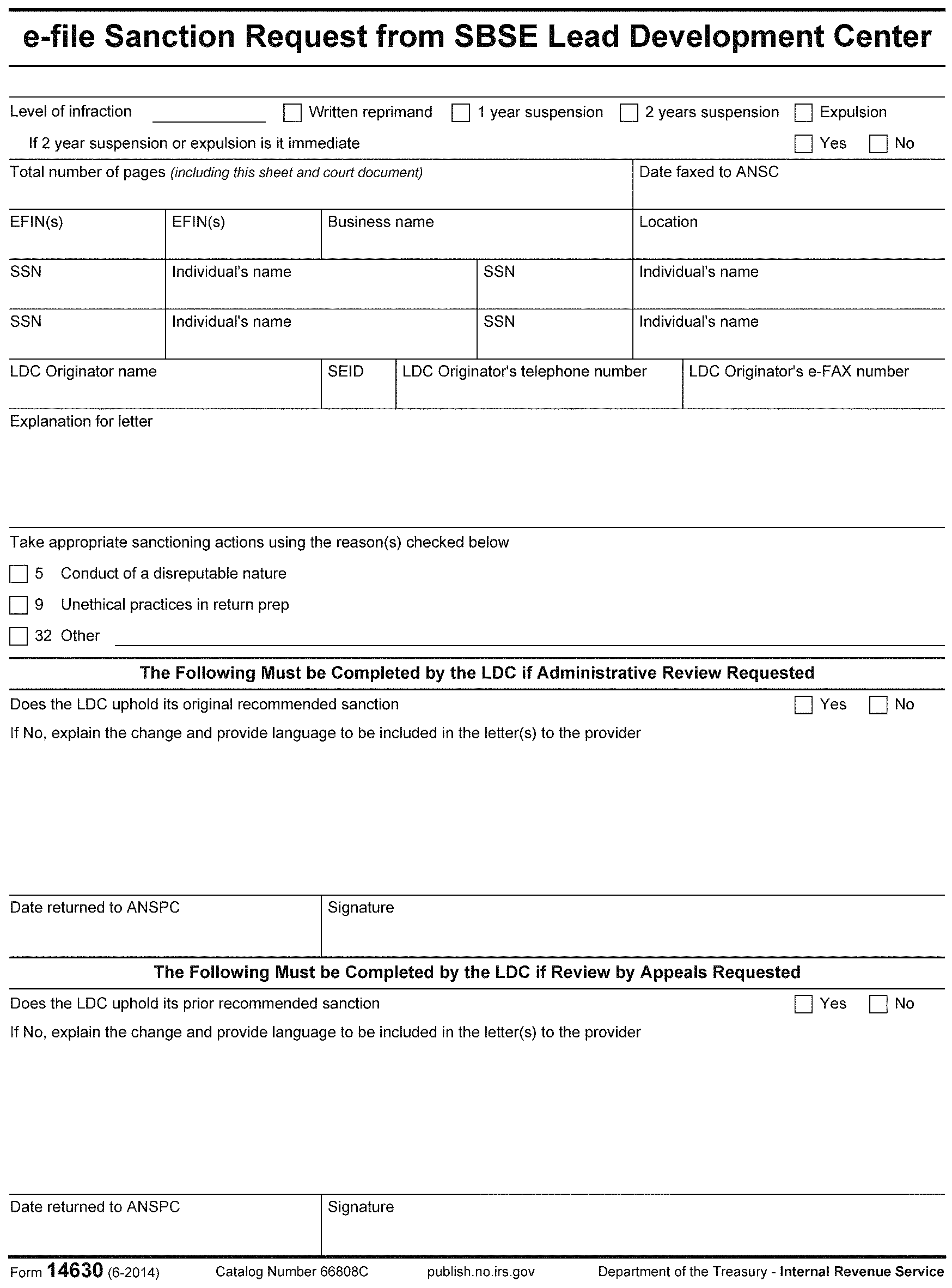
- Exhibit 3.42.10-4 Form 14630, e-file Sanction Request from SBSE Lead Development Center
- 3.42.10.1 Program Scope and Objectives
Part 3. Submission Processing
Chapter 42. Electronic Tax Administration
Section 10. Authorized IRS e-file Providers
3.42.10 Authorized IRS e-file Providers
Manual Transmittal
August 20, 2025
Purpose
(1) This transmits revised IRM 3.42.10, Electronic Tax Administration, Authorized IRS e-file Providers.
Material Changes
(1) IRM 3.42.10.1 Program Scope and Objectives: Rearranged and added sections in Internal Control per IRM 1.11.2.2.4(4)
(2) IRM 3.42.10.1.5 Publications and Letters: Used citation format for publications
(3) IRM 3.42.10.2.1 Authorized IRS e-file Provider Options: Updated IRM reference in paragraph 3
(4) IRM 3.42.10.2.2 IRS e-file Publications: Removed Publication 5717 from list
(5) IRM 3.42.10.2.3 Monitoring of Authorized IRS efile Providers: Paragraph 3 added s to notification and removed an extra letter I from paragraph 7
(6) IRM 3.42.10.2.3.1 Return Preparer Compliance Referrals: Paragraph 2(a) Updated to include information to research IDRS, added comma after TCO, added Form title, used a comma instead of a dash Letter 5886C - No Response and emphasis around 5886C
(7) IRM 3.42.10.4.2 Firm/Organization Suitability Questions: Changed provide explanation to provide an explanation
(8) IRM 3.42.10.4.3 Application Details: Changed paragraph 1 from The user selects a provider option from the drop-down menu, which are to The options from the drop down menu are, revised paragraph 5 Selection of a to Selecting a
(9) IRM 3.42.10.4.5 Principals and Responsible Officials: 1(a) changed can to will
(10) IRM 3.42.10.4.7 Electronic Filing Identification Number (EFIN) Status: Put comma between the IRM number and the IRM title
(11) IRM 3.42.10.4.11.1 Completed Application Comments on E-file Application: Updated for example in paragraph 1
(12) IRM 3.42.10.5.3 Applications Requiring Resubmission: Paragraph 3 added title and punctuation, placed (3) after IRM number, added comma after IRM reference, paragraph 4 used citation format for letter and added IRM title, select from the drop-down and removed comma after 5550
(13) IRM 3.42.10.5.4 Completed Application with Principal, Responsible Official or Provider Option Added and Not Resubmitted: Used citation format for paragraphs 3, 4 and 5 letters
(14) IRM 3.42.10.6.8 Validating Software Developer EFINs: Used emphasis on 4(c) letter, added select from drop-down and used comma instead of dash after letter
(15) IRM 3.42.10.7.2 Employee Benefit Program: Used emphasis on paragraph 4(b) letter and used comma instead of dash after letter
(16) IRM 3.42.10.7.3 Large Taxpayer: Used citation format for paragraphs 2(b), 5, 7(b) and 8 forms
(17) IRM 3.42.10.7.4 State Government Agency: Used emphasis for paragraphs 5(b) and 6(b) letters
(18) IRM 3.42.10.8 External Customer Data Store (ECDS): Used citation format for paragraph 1(a) IRM reference
(19) IRM 3.42.10.12 Professional Status Review and Processing: Used emphasis for paragraphs 4(d) and 6 letters
(20) IRM 3.42.10.14 Suitability: Used citation format for paragraph 7 publication
(21) IRM 3.42.10.14.1 Fingerprint Results: Added comma after IRM 3.42.10.14.1.2
(22) IRM 3.42.10.14.1.1 Procedures for Data Sent to Criminal Investigation (CI) and Fingerprint Adjudication for Review: Used emphasis for paragraph 7 letters
(23) IRM 3.42.10.14.1.4.1 Fingerprint Adjudication Appeals: Used citation format for Form in paragraph 1(d), updated link and used anchor tag for The Adjudication Process
(24) IRM 3.42.10.14.2.3 Working Rap Back Activity Event Notifications: Paragraph 3 added note to end of sentence and used citation format in paragraph 9 for publication and emphasis on letter
(25) IRM 3.42.10.14.2.4 Rap Back Activity Event – Appeals: Paragraph 1 added select from drop-down & parenthesis to end of sentence and used emphasis for paragraphs 2(c),(d),(e) letters
(26) IRM 3.42.10.14.4.1 Initial Suitability Processing Time: Used emphasis for paragraph 2 letter
(27) IRM 3.42.10.14.4.3 Procedures for First Appeal to Criminal Investigation (CI): Used citation format for paragraphs 1,2,6, used citation format for forms and used emphasis for paragraphs 7 and 8 letters
(28) IRM 3.42.10.14.4.3.1 Procedure for Second Appeal Criminal Investigation (CI): Used citation format for forms in paragraphs 1 and 4 and changed TA to TS
(29) IRM 3.42.10.14.5.1 Continuous Suitability Review: Changed paragraph 2 wording from the checks to check, (a) if all to al, (c) if all to all, (d) if there are any to any, (e) if there are any to any and paragraph 6 should make telephone contact changed to can call and emphasis on letter
(30) IRM 3.42.10.14.5.2 Procedures for Continuous Suitability Case Processing: Changed paragraph 1 from will be to are, quotes around Recheck and paragraph 4 changed from compliance to compliant
(31) IRM 3.42.10.14.6 Research for Suitability Literals: Used citation format for paragraph c document
(32) IRM 3.42.10.14.6.1 Reasonable Cause for Suitability Literals: Used citation format for paragraph 6 IRM references
(33) IRM 3.42.10.14.7.2 Criminal Investigation Literal: Used citation format for paragraphs 4(a) form and 6 publication
(34) IRM 3.42.10.14.7.4 Balance Due Literal: Used citation format on paragraph 2(b) note and emphasis on 3(c) letter
(35) IRM 3.42.10.14.7.6 No Return Literal: Updated paragraph 4 hyperlink for Document 6209 Section 11 for TDI Closing Codes, used citation format for paragraphs 4 document, 4(d) IRM and 8(c) document
(36) IRM 3.42.10.14.7.12 Citizenship Literal: Added table summary
(37) IRM 3.42.10.14.7.12.1 Biannual Follow up for Individual’s Citizenship Status: Paragraph 4 emphasis around letter, added IRM section title and took out extra space after IRM reference number between (1) and (d)
(38) IRM 3.42.10.14.8 Suitability Procedures After Research: Changed from liabilities not addressed to liabilities in paragraph 3 and added paragraph 6 sentence about for profit application with a current IRS employee listed
(39) IRM 3.42.10.14.8.1 Suitability Recommendation: Used citation format for paragraph 2, 5(a),(b),(c),(d) forms
(40) IRM 3.42.10.14.10.1.1 Failure to Respond to Suitability: Letters Used emphasis for paragraphs 1 and 2 letters and added select from drop-down and changed n to upper case
(41) IRM 3.42.10.14.15 Denial and Revocation of Specially Designated Nationals: Used emphasis for paragraph 5(f),(g) letters
(42) IRM 3.42.10.14.17 Compromised Electronic Filing Identification Number (EFIN): Paragraph 1 under note changed W&I to TS
(43) IRM 3.42.10.14.18 Identity Theft: Used citation format paragraph 3 for forms
(44) IRM 3.42.10.14.18.2 Identity Theft Indicator Case Responses: Used emphasis for paragraph 1(b) letters
(45) IRM 3.42.10.14.18.5 Procedures for Working Identity Theft Appeals: Used emphasis for paragraph(s) 1(a),(b) and 2(b),(c) letters
(46) IRM 3.42.10.14.18.6 Procedures for Potential IDT/Circumvention Cases/Appeals: Used citation format for paragraph(s) 3 publication and emphasis on paragraph 4 letter
(47) IRM 3.42.10.14.19 Data Breaches and e-file Application: Used emphasis on paragraph 5(c) letter and citation format on 7(a) publication
(48) IRM 3.42.10.14.20 ITIN Deactivation Cases: Used citation format for paragraph 1 form and emphasis on paragraph 2 and note
(49) IRM 3.42.10.14.22 Procedures for Appeals: Added is between reasonable cause and provided letter in note, used citation format for paragraphs 1 note, 2(c) forms, 3 letter and 4 form and emphasis in paragraphs 3, 3 note and 4(a) letter
(50) IRM 3.42.10.15.1 Procedures for Incarcerated Individuals Submitting New Applications: Used emphasis for paragraphs 3(b), 4(a),(b) and 5 letters
(51) IRM 3.42.10.15.2 Procedures for Incarcerated Individuals on Active Applications: Used citation format for paragraph(s) 4(b), 5(a) and (c) letters
(52) IRM 3.42.10.15.3 Procedures for Other than Incarcerated Individuals on the Prisoner List and for Individuals/Convicted of a Felony in the last 10 Years: Used emphasis for paragraph 3(b),(c) letters
(53) IRM 3.42.10.16.1 Court Injunctions and Revocation of IRS e-file Participation: Updated IRM reference for Form 14631, Updated see also for exhibit 3.42.10-3 and used citation format for paragraphs 2 and 7 forms and emphasis for paragraph 4 letter
(54) IRM 3.42.10.16.2 Court Injunctions and Sanctioning of Authorized IRS e-file Providers: Updated IRM reference for Form 14630, updated see also for exhibit 3.42.10-4 o and used citation format for paragraph 2 form
(55) IRM 3.42.10.17 Reconsideration for Expelled Individuals: Changed note in paragraph 1 from EPSS to EPPM and put space between EPPM and in
(56) IRM 3.42.10.17.1 Recommendation for the e-file Participation Reconsideration Review Board for a Request from Expelled Individual/Firm: Paragraph 2 changed file to efile, added a space between efile and requirements and used emphasis for paragraph(s) 2, 3, 4(a) letters
(57) IRM 3.42.10.18 Placing Foreign Electronic Filing Identification Number(s) In Inactive Status: Used citation format for paragraph 1 publication
(58) IRM 3.42.10.19.1 Retention of IRS e-file Application Forms/Documentation: Updated paragraph 1 link and used citation format for paragraph 4 form
(59) IRM 3.42.10.19.3 Retention of Fingerprint Cards (FPC): Used citation format for paragraph 2 document and took out extra space before appeals
(60) IRM 3.42.10.21 Reporting Agent Personal Identification Number (PIN): Used citation format for paragraph 2 forms
(61) IRM 3.42.10.26 Electronic Filing Identification Number and Electronic Transmitter Identification Number Clean-up: Used emphasis for paragraph 5 letter
(62) IRM 3.42.10.27 E-file Application Reports: Added additional information to paragraph 2 about reports to end of sentence
(63) IRM 3.42.10.28 Preparer Tax Identification Numbers and Statuses: Added PTIN in () to title
(64) Renumbered exhibits and removed exhibit for acronyms and added to 3.42.10.1.6
(65) Updated effect on other documents by including issued dates
(66) Reformatted effective date
(67) Editorial changes made throughout IRM 3.42.10, Electronic Tax Administration, Authorized IRS e-file Providers for clarity
Effect on Other Documents
IRM 3.42.10 dated 08-24-2024 (effective October 1, 2024) is superseded. This IRM incorporates the following IRM Procedural Updates: 25U0106 issued on 01-24-2025; 25U0106 issued 02-12-2025; 25P0396 issued 07-15-2025.Audience
Taxpayer Services (TS), Small Business/Self Employed (SB/SE), Large Business and International (LB&I), and Field PersonnelEffective Date
(10-01-2025)Jason Romero-Stephens
Director, Electronic Products and Services Support
Taxpayer Services Division
-
Purpose: This Internal Revenue Manual (IRM) provides the basis for the Electronic Products and Services Support (EPSS) employee to respond to application questions and how to process the e-file application received.
-
Audience: Primary users are e-help Desk assistors in Andover, MA, Atlanta, GA, Austin, TX, Cincinnati, OH and Ogden, UT campuses.
-
Policy Owner: Director, Electronic Products and Services Support
-
Program Owner: E-file Provider Program Management (EPPM), an organization within EPSS which is an organization within TS.
-
Primary Stakeholders: Criminal Investigation (CI), Large Business and International (LB&I), Office of Professional Responsibility (OPR), Small Business/Self-Employed (SB/SE), Tax Exempt & Government Entities (TE/GE), Independent Office of Appeals, Taxpayer Services (TS).
-
An applicant’s suitability to participate in the e-file program is governed by Rev. Proc. 2007-40 which provides the guidance to applicants to the e-file program.
-
The following authorities are in this IRM.
-
IRC 6011
-
IRC 6012
-
Treas. Reg. 1.6012-5
-
Treas. Reg. 301.6061-1
-
Revenue Procedure 2007-40, 2007-1 C.B. 1488
-
-
Director of Electronic Products and Services Support (EPSS) is responsible for approving the policies and guidance.
-
Chief of E-file Provider Program Management is responsible for the development and delivery of policy and guidance.
-
Provide the basis for the Electronic Products Services Support (EPSS) employee to respond to application questions and how to process the e-file application received
-
Provide guidance and procedures in protecting the e-file program. This include procedures related to:
-
E-file enrollment
-
E-file participation
-
E-file sanction and revocation
-
E-file identity theft
-
Continuous suitability background checks
-
Tax compliance checks
-
Privacy and security rules
-
Freedom of Information (FOIA) inquires
-
Creation and maintenance of e-file applications
-
-
An applicant’s suitability to participate in the e-file program is governed by Rev. Proc. 2007-40, which provides the guidance to applicants to the e-file program.
-
All reports are generated from the Business Objects Enterprise (BOE). See IRM 3.42.10.27, E-file Application Reports.
-
External Customer Data Store (ECDS), maintained at the Enterprise Computing Center in Martinsburg, WV, is a database that is used to store all application information.
-
Below is a table of terms and definitions for this IRM
-
The list of acronyms used in this IRM is found below
Terms and Definitions
Term Definition Electronic Return Originator (ERO) An ERO begins the process of the electronic submission of tax returns to the IRS after the taxpayer authorizes the electronic filing of the return. Intermediate Service Providers (ISP) An Intermediate Service Provider receives tax returns from EROs (or from a taxpayer or tax-exempt organization that files electronically using a personal computer, modem or the Internet and commercial tax preparation software). It then processes the return information and either forwards the information to a transmitter or sends the information back to the ERO (or to the taxpayer or exempt organization). Transmitters A transmitter sends electronic return data directly to the IRS using computers and software that can interface with the IRS. Software Developers (SWD) A Software Developer creates software for the purposes of: -
formatting electronic return information according to publications issued by the IRS that set forth electronic return file specifications and record layouts for tax returns and/or
-
transmitting electronic tax return information directly to the IRS.
Reporting Agents (RA) A Reporting Agent must be an accounting service, franchiser, bank or other entity that complies with Rev. Proc. 2012-32, 2012-34 I.R.B. 267, and is authorized to perform one or more of the acts listed in Rev. Proc. 2012-32 on behalf of a taxpayer. Reporting Agents must submit Form 8655, Reporting Agent Authorization, to the IRS prior to or at the same time that they submit an IRS e-file Application. Online Provider An Online Provider allows taxpayers to self-prepare returns by entering return data directly into commercially available software downloaded from an Internet site and prepared off-line, or through an online Internet site. An Online Provider acts as both an ERO and transmitter of self-prepared returns. Financial Agents (FA) A Financial Agent acts on the behalf of the IRS in the submission of electronic return transmissions of employment taxes. Large Taxpayers A Large Taxpayer is a business or other entity with assets of $10 million or more or a partnership with more than 100 partners that originates the electronic submission of its own return. A Large Taxpayer does not function as a third party in submitting returns and they can only e-file returns for themselves. Acronyms
Acronym Definition AKA Also Known As ANSC Andover Service Center AEF Automated Electronic Fingerprints ASAP Automated Suitability Analysis Program BOD:CD Business Operating Division Code BOE Business Objects Enterprise CPA Certified Public Accountant CC Closing Codes CRX Correspondex Letter File CD Court Documentation CI Criminal Investigation CNC Currently Not Collectible CSP Citizenship Code DM 1 Data Master 1 DBA Doing Business As ECDS External Customer Data Store EMC e-file Monitoring Coordinator EPRRB e-file Participation Reconsideration Review Board EPPM E-file Provider Program Management EHSS E-Help Support System EFIN Electronic Filing Identification Number EPSS Electronic Products and Services Support ERO Electronic Return Originator ESAM External Services Authorization Management ETIN Electronic Transmitter Identification number EIN Employer Identification Number EA Enrolled Agent EPS Enrolled Practitioner System FA Financial Agent FBI Federal Bureau of Investigation FCI Foreign Country of Birth FPC Fingerprint Card FRC Federal Records Center ID Identification IDT Identity Theft ISE&S Industry Stakeholder Engagement & Strategy ISP Intermediate Service Provider IT Information Technology IA Installment Agreement IAT Integrated Automation Technologies IDRS Integrated Data Retrieval System IRM Internal Revenue Manual LB & I Large Business and International LM Large and Mid-Size LPR Lawful Permanent Resident LDC Lead Development Center LOI Letter Of Inquiry MMIA Manually Monitored Installment Agreement MF Masterfile MFT Masterfile Transaction NAP National Account Profile NCOA National Change of Address NFP Not for Profit NGI Next Generation Identification OAMC Ogden Account Management Center ODN Office Designation Number OFAC Office of Foreign Asset Control OOA IRS Independent Office of Appeals OPR Office of Professional Responsibility PIN Personal Identification Number PTIN Preparer Tax Identification Number QSR Quality Site Requirements RA Reporting Agent RAAS Research, Applied Analytics & Statistics RAF Reporting Agent File RAP Record of Arrest and Prosecution RICS Return Integrity & Compliance Services RPDB Return Preparer Database RPO Return Preparer Office RUP Registered User Portal SDN Specially Designated National SEID Standard Employee Identifier SIDN Site Identification Number SPECTRUM Stakeholder Partnerships Education & Communications Total Relationship Management SSA Social Security Administration SSF Social Security File SSN Social Security Number SC Status Code SADI Secure Access Digital Identity SPEC Stakeholder partnership, Education and Communication SWD Software Developer TAC Taxpayer Assistance Center TCE Tax Counseling for the Elderly TC Transaction Code TDI Taxpayer Delinquency Investigation TE Tax Exempt Organization TOA Terms of Agreement TSO Technical Services Operations UD Undeliverable USPS United States Postal Service VITA Volunteer Income Tax Assistance -
-
The list of related resources can be found in IRM 3.42.10.2.2, IRS e-file Publications.
-
EPPM is responsible for the creation and maintenance of e-file participation rules and the following publications:
-
Publication 3112, IRS e-file Application and Participation
-
Publication 1345, Handbook for Authorized IRS e-file Providers of Individual Income Tax Returns
-
-
EPPM is also responsible for the creation and maintenance of letters which can be found in Exhibit 3.42.10-1, CRX Letters and Exhibit 3.42.10-2, Locally Printed Letters.
-
Taxpayers can file a tax return through IRS e-file by using an Authorized IRS e-file Provider or a personal computer.
-
To become an Authorized IRS e-file Provider, an applicant applies electronically.
-
EPSS reviews individuals and firms to determine if they meet the requirements for initial and continued participation in IRS e-file. This process is called suitability. See IRM 3.42.10.14, Suitability.
-
Providers use electronic filing publications, such as Publication 3112, IRS e-file Application and Participation, which are available at IRS.gov, as their primary source of guidance.
-
The system generates firm or person cases showing the applicant name, status, primary issue, business rule, last update, and process. EPSS must work the cases assigned to them and address the issue(s) that the business rule identifies.
-
Authorized IRS e-file Providers are third party participants in IRS e-file that offer clients specific services required for the electronic filing of federal returns.
-
Applicants select the provider options that apply to the service or role they will perform. They may select one or a combination of the following provider options:
-
For definitions of these terms, see IRM 3.42.10.1.6 , Terms and Definitions.
-
The categories used to describe providers are not mutually exclusive. For example, an ERO can simultaneously be a transmitter, a software developer or an intermediate service provider depending on the function it performs.
-
EROs that have e-filed more than five returns are systematically given access to the Transcript Delivery System (TDS). For more information see IRM 3.42.8.7, Transcript Delivery System (TDS).
-
IRS e-file publications located on IRS.gov are:
-
Publication 1345, Handbook for Authorized IRS e-file Providers of Individual Income Tax Returns
-
Publication 1436, Assurance Testing System (ATS) Guidelines for Modernized e-File (MeF) Individual Tax Returns
-
Publication 1474, Technical Specifications Guide For Reporting Agent Authorization and Federal Tax Depositors
-
Publication 3112, IRS e-file Application and Participation
-
Publication 4163, Modernized e-file (MeF) Information for Authorized IRS e-file Providers for Business Returns
-
Publication 4164, Modernized e-file (MeF) Guide for Software Developers and Transmitters
-
Publication 4557, Safeguarding Taxpayer Data A Guide for Your Business
-
Publication 5078, Assurance Testing System (ATS) Guidelines for Modernized e-File (MeF) Business Submissions
-
Publication 5293, Protect Your Clients; Protect Yourself - Data Security Resource Guide for Tax Professionals
-
-
The IRS will monitor and may warn or sanction providers per Rev. Proc. 2007-40, 2007-1 C.B. 1488, Publication 3112, IRS e-file Application and Participation and Publication 1345, Handbook for Authorized IRS e-file Providers of Individual Income Tax Returns.
-
Monitoring may include reviewing IRS e-file transmissions and electronic filing signature requirements, conducting suitability checks and observing office procedures. During the visit, the IRS may also investigate complaints, potential Identity Theft (IDT) and security issues.
-
Sanctioning may be a written reprimand, suspension or expulsion from IRS e-file depending on the seriousness of the infraction. The seriousness of the infraction is in the opinion of the IRS and categorized by Levels of Infraction.
-
The IRS categorizes infractions as level one, level two and level three. See IRM 3.42.10.14.14, Levels of Infraction, for further details.
-
E-file providers may appeal sanctions through the administrative review process. This process includes an initial review by Small Business/Self-Employed (SB/SE) and E-file Provider Program Management (EPPM) with a subsequent review by the IRS Independent Office of Appeals, if necessary, for suspensions and expulsions. For further information, see Pub 3112 , IRS e-file Application and Participation.
-
SB/SE completes field monitoring to determine compliance of Providers. See IRM 4.21.1, Electronic Filing Program, Monitoring the IRS E-file Program, for SB/SE e-file Monitoring Coordinator (EMC) procedures.
-
SB/SE EMCs email inactivation/reactivation and sanctioning forms to ≡ ≡ ≡ ≡ ≡ ≡ ≡ ≡ ≡ ≡ ≡ ≡ ≡ ≡ ≡ ≡ ≡ ≡ ≡ ≡ ≡ ≡ ≡ ≡ ≡ ≡ ≡ ≡ for input of data to the application. Follow guidance in IRM 3.42.10.14.16, Procedures for Rejecting and Sanctioning Firms and Individuals.
-
Small Business/Self Employed (SB/SE) established a new Tax Compliance Office (TCO) group to address return preparer (RP) penalties. When the TCO group encounters a return preparer who has unfiled returns, is unresponsive to TCO requests for the return(s) and has an active EFIN, they will send an encrypted referral to e-Help via the ≡ ≡ ≡ ≡ ≡ ≡ ≡ ≡ ≡ ≡ ≡ ≡ ≡ ≡ ≡ ≡ ≡ ≡ ≡ ≡ ≡ ≡ ≡ ≡ ≡ ≡ ≡ ≡ ≡ ≡ ≡ ≡ ≡ ≡ ≡ mailbox. The subject line will say "Return Preparer Compliance Referrals." The referral will contain the name, EFIN and TCO’s findings along with supporting documentation for each unfiled return.
-
E-Help retrieves email from the mailbox with Return Preparer Compliance Referrals in the subject line.
-
If EFIN is active, research IDRS to confirm missing tax filings as reported on the Form 5346, Examination Information Report by TCO issue Letter 5886C, E-file Application Sanction (Letter 2), (select from the drop-down “No Response”), recommend sanction for Employer Identification Number (EIN)/Social Security Number (SSN) and allow 45 days for response. Add or update Business Rule with explanation, update Personal Suitability status to "Recheck" and add Notes.
If no module found for tax year indicated on Form 5346, Examination Information Report, include the missing return as fail to file in Letter 5886C, E-file Application Sanction (Letter 2), (select from the drop-down “No Response Recommend Sanction)". Any other outstanding issues found during research should be included in the letter.
If no response, send Letter 5886C, E-file Application Sanction (Letter 2), (select from the drop-down “Suspension for Individual without Appeal Rights/No Response”) update suitability to "Fail" , inactive EFIN/ETIN(s), move Provider Status to "Non-Compliance" and add Notes.
If EFIN holder responds, follow IRM 3.42.10.14.22, Procedures for Appeals. -
If the EFIN is not active, enter a comment indicating that a RP Compliance referral was sent for unfiled returns (include years). No further actions needed.
-
-
A priority of the IRS is protecting IRS e-file from fraud and abuse. The misuse of EFINs and ETINs compromises the integrity of IRS e-file and the Authorized IRS e-file Provider program. Referring organizations should share this information and the circumstances surrounding the misuse with EPSS as early as possible.
-
Organizations should refer potential EFIN or ETIN misuse to EPSS through the TS EFIN Referrals mailbox at *TS EFIN Referrals. EPSS will send some referrals to CI, Return Integrity and Compliance Services (RICs) or SB/SE for review, investigation and then work to completion. EPSS should refer responses as early as possible to reduce the risk of fraud. Examples of referral criteria are:
-
Compromised EFIN/ETIN
-
Database breaches
-
Identity theft/Circumvention
-
Proven e-filing of fraudulent returns
-
Misrepresentation on an e-file application
-
Suspensions/Disbarments
-
-
Applicants must have an IRS e-Services account before initiating and submitting an electronic IRS e-file application. Applicants can visit IRS.gov for more information about Secure Access Digital Identity (SADI).
-
Applicants must select "New application" when creating an application. See IRM 3.42.10.5, When to Submit a New or Reapply IRS e-file Application, to determine who must submit a new application.
-
New applications are initiated by the author who can complete most information on the application. The author can’t answer personal suitability questions or sign the terms of agreement for the Principals and Responsible Officials. In addition, authors can’t submit the application, unless they are either the Principal, Principal Consent or Responsible Official with designated authority. Authors don’t need to be listed on the application.
-
The e-file application requires the user to complete all fields preceded by an asterisk and TIN and legal name are verified against Masterfile.
-
The firm must choose the Tax ID that they operate under by selecting "EIN" , "SSN" or "Not Required" and then their Business Structure described below:
If Tax ID Type is Then Business Structure is EIN Association, Corporation, Credit Union, Federal Government Agency, Limited Liability Corporation, Limited Liability Partnership, Local Government Agency, Partnership, Personal Service Corporation, Sole Proprietorship, State Government Agency or Volunteer Organization (VITA) SSN Sole Proprietorship Not Required Volunteer Organization -
The firm will then input the following information:
-
Firm/Organization Legal Name*; if “SSN” chosen, they will input their First Name*, Middle Initial and Last Name*
-
Doing Business As (Trade Company Name)
-
Business Phone*
-
Business Fax
-
Business Address (Physical Location)*
-
City*
-
Providence/State/U.S. Territory*
-
Postal Code*
-
-
The system defaults the answer to "Yes" for the question "Do you want your firm/organization contact information on the IRS.gov public website?" If the applicant does not want the information made available, the firm must select "No."
-
The firm will need to answer, "Do you own or operate website(s) through which taxpayer information is collected, transmitted, stored, or processed?" If they answer "Yes" , then they must supply the applicable Uniform Resource Locator (URL) once the application moves to complete and an EFIN is issued.
-
The applicant may provide a mailing address or year-round address, if necessary. This information will only be necessary if the applicant states they have a mailing address different from the physical address and/or they are not open 12 months of the year.
-
A tracking number is assigned when the user selects save or continue.
-
There are two firm suitability questions that the user must answer.
-
Has the firm been convicted of a felony in the last 10 years? If "Yes" , provide an explanation.
-
Is the firm current with its business taxes, including any corporate and employment tax obligations? If "No" , provide an explanation.
-
-
See IRM 3.42.10.4.5.1, Personal Credentials Screen for Principals and Responsible Officials.
-
The applicant will choose the available Provider Options on the "Application Detail" screen. The Tax ID input on the application determines the Provider Option choices. The applicant can choose all options available to them. The options from the drop down menu are:
-
ERO
-
Financial Agent (limited to Employer User Portal (EUP)
-
Intermediate Service Provider
-
Large Taxpayer
-
Online Provider
-
Reporting Agent
-
Software Developer
-
Transmitter
-
-
Sole Proprietorship can only select from ERO, Intermediate Service Provider, Online Provider, Software Developer and/or Transmitter.
-
The applicant must choose the Service Type of either "For Profit" or "Not for Profit" . Software Developer defaults to "For Profit."
-
When "Not for Profit" is selected, the system provides another field for "Type of Business Activity." The drop-down selections are Employee Benefit Program, Large Taxpayer, Military Base, State Government Agency, Tax Counseling for the Elderly (TCE) and Volunteer Income Tax Assistance (VITA).
-
Selecting a business activity of VITA or TCE requires a valid Site Identification Number (SIDN). All other “Not for Profit” selections will generate a case for manual validation. See IRM 3.42.10.7, Validating Not for Profit Business Activities.
-
E-file application authors must input “Authorized Users” on the application:
-
Principal: Generally, is the individual owner of a sole proprietorship, officers of a corporation, partners in a partnership or a person for another entity who is authorized to act for the entity in legal and/or tax matters.
-
Responsible Official: An individual with authority over the provider’s IRS e-file operation at a location, is the first point of contact with the IRS and has the authority to sign revised IRS e-file applications.
By default, the e-file application gives the Responsible Officials the following authorities:
-
View Application Information
-
Update Application Information
-
Add, Delete and Change Responsible Officials
-
Transcript Delivery System
A Principal, Principal consent or Responsible Official can grant the following authorities to the Responsible Official:
-
Sign and Submit Revised Applications
-
Add, Delete and Change Principals
-
-
Contacts: Person available for the IRS to contact for general questions concerning the firm and application.
-
Delegated User: Person authorized to perform e-file application related duties or access e-services. A Principal, Principal consent or Responsible Official can also grant any of the additional authorities similar to the Responsible Official.
-
Principal Consent: Person associated with the firm granted the same authorities as a "Principal."
-
-
The chart below shows the fields that need to be completed for each authorized user with an asterisk (*) being required.
Entity/Role Principal Responsible Official Contact Delegated User Principal Consent First Name * * * * * Middle Initial Last Name * * * * * Name Suffix Title * * * N/A N/A Citizenship Status * * N/A N/A N/A SSN/ITIN * * N/A * * DOB * * N/A N/A N/A e-mail * * * * * Phone Number N/A * * N/A N/A Fax Number N/A N/A N/A N/A Should person be notified for all Application Updates Question N/A N/A N/A N/A -
The citizenship status choices are: "Yes" , "No" (US Citizen) or "Legal Resident Alien."
-
If the Principal is also the Responsible Official, the applicant can indicate this by answering "Yes" to the question.
-
If the applicant selected the "Yes" box acknowledging that the Principal is also the Primary Contact, a field will expand requiring a telephone number.
-
The "Delegated User" and "Responsible Official" have authorities that the Principal/Principal Consent may assign.
-
Information for the "Authorized User" may be changed by using the "Edit" button. Once "Saved" is selected, the user will have an association to the application, and can take appropriate action.
-
Each Principal and Responsible Official must enter professional status information or be fingerprinted by the IRS authorized vendor and sign their Terms of Agreement (TOA).
-
If fingerprinting is needed, the individual will schedule an appointment by accessing the e-file Application summary page and using the scheduling link in the Terms of Agreement Signature(s) & Personal Information section.
-
Credentialed individuals, who receive a letter requesting verification of Professional Status, can upload the documentation using the E-file Application Document Upload Tool on IRS.gov or fax it to Andover at 877-477-0567. See IRM 3.42.10.23, Providing Requested/Required Documentation. The application tracking number should be included with the documentation.
-
-
To input the personal credentials of the Principal or Responsible Official, click on the Application Summary and then select the personal credentials link.
-
If the individual is a professional, select one or more of the professional statuses from the "Add Credentials" drop-down and provide the applicable information below which EPSS verifies.
-
An attorney or Certified Public Accountant (CPA) enters the state license/credential number and indicates if the license/credential has an expiration date or not. If it has a date, enter it.
-
A CPA must be qualified to practice as a CPA in any state, commonwealth, possession, territory, or the District of Columbia and must not currently be under suspension or disbarment from practice before the IRS or State Board of Accountancy.
-
An attorney must be in good standing of the bar of the highest court in any state, commonwealth, possession, territory, or the District of Columbia and must not currently be under suspension or disbarment from practice before the IRS or the bar.
-
-
An enrolled agent can’t enter the enrolled agent number. The application will automatically populate this number when the enrolled agent check box is selected on this screen and the system validates it against the Enrolled Practitioner System (EPS).
-
An officer of a publicly held corporation may need to submit proof on corporate letterhead which carries their name as an officer, the stock symbol, the exchange where listed and the name under which the stock is traded for the individuals listed as Principal and/or Responsible Official.
-
A bank official must submit a copy of bonding certificate and proof of fingerprinting within the last two years.
-
Each Principal and Responsible Official must answer the personal suitability questions and accept the terms of agreement by selecting the Personal Suitability Answers and TOA Signature link on the Application Summary screen.
-
Each new Principal and Responsible Official must respond to the three suitability questions:
-
Have you been convicted of a felony in the last 10 years? If "yes" , provide explanation.
-
Are you currently incarcerated or have you been incarcerated in a federal or state prison during the last two years? If "yes" , provide an explanation including the date of release if applicable.
-
Are you current with your individual and business taxes, including any corporate, and employment tax obligations? If "no" , provide explanation.
-
-
The system requires comments for "Yes" or "No" responses to the suitability questions as described above.
-
Individuals must answer the question, "Have you previously participated in IRS e-file?" . If the answer is "Yes" , input the Doing Business As (DBA) Name or EFIN number.
-
Each new Principal and Responsible Official must sign using their Personal Identification Number (PIN), acknowledging they have read:
-
The Privacy Act and Paper Reduction Act Notice
-
The FBI Privacy Act Statement and
-
Accepted the TOA
-
-
Provider Statuses are listed below with a description:
When The Provider Status is: Provider Option is selected Applied The application is completed Accepted/Rejected The EFIN is dropped or the office is closed Dropped An individual/firm fails a continuous suitability compliance check Non-Compliant An EFIN is inactivated due to a SB/SE field monitoring visit Non-Compliance (Field Mntrng) A new application fails initial suitability for issues with either the firm or Principal/RO Rejected The Lead Development Center (LDC) advises of a court injunction and recommends revocation or there is a match with the Specially Designated National (SDN) listing Revoked
-
The three EFIN statuses are "Active" , "Inactive" and "Dropped" .
-
Active EFINs are used to e-file forms if the provider option status is "Accepted."
-
Inactive EFINs will remain "Inactive" status until an assistor manually updates it to "Active."
-
Dropped EFIN(s) can’t be updated, reactivated or used again by the provider. It may be recycled and reassigned systematically to another provider after 12 months have passed.
-
Active EFIN(s) must be updated to "Inactive" prior to changing the "Provider Status" to "Non-Compliant" , "Non-Compliance (Field Monitoring)" , "Rejected" or "Revoked."
-
-
A Principal, Principal Consent or Responsible Official with delegated authority can only add Delegated Users through the Registered User Portal (RUP) by using the "Authorized Users" screen.
-
The user must select "Add" and then "Delegated User" from the drop-down and enter the first name, middle initial, last name, name suffix, title, SSN and e-mail address and then select the delegate authorities.
-
After entering the information, the user selects the "Save" button.
-
The Delegated User information will display in the "Authorized User(s)" table on the screen.
-
Individuals can use the "Edit" button on the "Authorized Users" screen to change information for each Delegated User.
-
A Principal, Principal Consent or Responsible Official with delegated authority can add Principal Consents through the RUP by using the “Authorized Users” screen.
-
Principal Consents have the same authorities as the Principal.
-
The user must select "Add" and then "Principal Consent" from the drop-down and enter the first name, middle initial, last name, name suffix, title, SSN and e-mail address.
-
After entering the information, the user selects the "Save" button.
-
The application displays the Principal Consent information in the "Authorized User(s)" table on the "Summary" screen.
-
Individuals can use the "Edit" button on the "Authorized Users" screen to change information for each Principal Consent.
-
The "Application Summary" is a one-page overview of the application based on the data input and the status of the application data fields. It also provides links to directly access other sections of the application.
-
The "Application Comments" screen shows remarks made by either RUP or EUP users.
-
EUP users have 24 hours to edit their comments and they are not visible to the RUP user.
-
RUP users can only edit their comments during the current application session.
-
-
Comments must be entered by the assistor via EUP. The comments must be complete and accurate for the assistor and other IRS personnel to understand the account activities. All account documentation must be specific to the actions performed and case resolution. For example: "Updating address, Adding/Removing TDS access, Undeliverable mail, researched IDRS and sent letter to possible new addresses."
-
After the user has entered all information through the RUP on an application, the application must be submitted by selecting "Submit."
-
Applications can only be submitted by the Principal, Principal Consent or Responsible Official with designated authority.
-
Users must input their five (5) digit e-Services Personal Identification Number (PIN) and select "Submit."
-
The application is acknowledged upon submission. If required fields are missing or incomplete, an error message identifying the missing information will be displayed that links to the issues needing correction.
-
Certain rules govern when a new application is submitted to participate in IRS e-file as an Authorized IRS e-file Provider.
-
If an entity changed its organizational structure, requiring the use of a new or different TIN, it must submit a new application by selecting "New Application."
-
If the entity information remains the same, to add a new location, users select "New Location" from the External Services Authorization Management (ESAM) landing screen.
-
An entity may reapply to the program through an existing application provided the business entity has not changed and:
-
They were previously denied participation in IRS e-file.
-
They were previously suspended and have either met the eligibility date or resolved the suitability issue.
-
The EFIN was dropped due to inactivity and their provider status is "Dropped."
-
-
Refer to IRM 3.42.10.5.5, Reapply Applications for more information on reapplying.
-
A provider must submit a new application when they want an EFIN for a business related group when that firm cannot obtain an EFIN because its Principals and/or Responsible Officials are not U. S. citizens or aliens lawfully admitted for permanent residence as described in Aliens and Nationality - 8 U.S.C. §1101(a)(20). The term "Business-Related Group" applies to brother-sister firms, subsidiaries, franchises, affiliates, etc. The firm must obtain an EFIN for each firm location as described above.
-
An applicant acquiring an existing IRS e-file business by purchase, transfer or gift, must submit a new application and receive a new EFIN and ETIN. Applicants may not use the EFIN/ETIN of the previous provider. Providers should contact the IRS, prior to the acquisition, for assistance in making a smooth transition when it will occur during a filing season. The old EFIN associated with the business must be put in "Dropped" status and the application must be deleted. The following requirements must be met by the new applicant:
-
The recipient must submit new application, be fingerprinted if necessary, and meet current suitability requirements.
-
The recipient must submit the new application within the period beginning 45 days before the acquisition date and ending 30 days after the acquisition date.
-
The recipient must send supporting documentation (proof of sale) in separately after completing an application which must provide the following:
-
Seller's name, address, business name, business address, and signature.
-
Recipient’s name, address, business name, business address and signature.
-
Tracking number of the application, if completed.
-
-
Providers must revise the application if there is any change to the following information:
-
Updates to an application must be made within 30 days after any change.
-
Providers must submit a revised application, electronically signed by a Principal, Responsible Official or a Delegated User who has been given the authority to make changes to an application if:
-
The Provider functioned solely as a Software Developer and intends to function as an ERO, Intermediate Service Provider, Transmitter, Reporting Agent, or Large Taxpayer in the future.
-
There is a change to the Principal or Responsible Official such as adding an individual, deleting an individual or changing information concerning a current individual. Fingerprinting may be required for the individual who has been added.
Note:
Only a Principal, Principal Consent or Responsible Official with delegate authority may add or delete another Principal or Responsible Official. The assistor must direct customer to IRS.gov to update their e-file application.
-
A Sole Proprietor is updating the application to include an EIN.
-
-
When the business structure can’t be updated or created for a new application under the same EIN, see IRM 3.42.10.11(4), Updating the E-File Application for Previously Accepted Applicants.
-
Any applicant that is interested in participating in online filing must select Online Provider from the provider options drop-down menu on the "Application Detail" screen of the application.
-
When an Online Provider subsequently requests a regular EFIN, assistors must use special procedures to generate an EFIN with the ERO provider option added. When ERO is added to an application with Online Provider, assistors must use the following steps to issue a regular EFIN:
-
On the "Application Detail" screen, add ERO
-
On the "Provider Status" screen, select edit Online Provider, and move from "Accepted" to "Dropped."
-
Generate an EFIN from the EFIN status screen.
-
Confirm that the EFIN generated does not begin with 10, 21, 32, 44 or 53.
-
Return to the "Provider Status" screen and select edit Online Provider and move from "Dropped" to "Accepted."
-
Have customer resubmit application.
-
-
When users update an application to add a person or a Provider Option, they must resubmit it. Application Status will be "Resubmission Required."
-
If the user does not resubmit an application within 45 days, the system generates a case with the primary issue "Resubmission Required for 45 days."
-
The case is worked using the case suspend process in IRM 3.42.10.6.5.1. If not suspended, another case will reopen in another 45 days with the same primary issue.
-
Select a Principal on the application and send Letter 5550, Terms of Agreement (select from the drop-down Resubmission Required Provider Option (if not already issued)), and suspend the case.
-
When the case goes back to "Working" after the suspense period, and the application status is still in "Resubmission Required."
-
Inactivate the EFIN(s) and ETIN(s) on the application.
-
Add comment, "Do not reactivate EFIN(s)/ETIN(s) until the application is resubmitted."
-
Suspend case.
-
-
Reactivate the EFIN(s)/ETIN(s) once the user resubmits the application and the "Application Status" goes back to a submitted status.
-
If the case goes back to "Working" again, and the application has not been resubmitted, delete application, enter comments, "Firm did not respond to the letter or inactivation of EFIN" and close case.
Note:
If the application involves a national account, create an incident in Electronic Support Help System (EHSS) and escalate to Andover Leads provider group. A designated assistor will submit an e-mail to the ISE&S (Industry Stakeholder Engagement & Strategy) group. Hold ESAM case open until you receive a response. Andover will refer the incident back to the original assistor with actions needed. Do not delete the application until a reply is received.
-
If the application has been submitted, but there are other primary issues/business rules open and not marked worked, mark the "Resubmission Required" worked and reassign the case to ANSC workgroup.
-
If Application Status is "Completed" or in a submitted status (e.g. "Submitted Pending Docs" , "Submitted New" , "Submitted Reapply" or "Submitted Revised" ), and no other primary issue/business rule exist, mark as worked and close case.
-
When converting from legacy to the current ESAM system, many completed applications remained where a Principal, Responsible Official and/or Provider Option was added but the firm never resubmitted. Therefore, no case was generated, and the application has an individual on it that may require professional status information or fingerprints, the Terms of Agreement (TOA) signed and/or a Provider Option that the system doesn’t recognize (e.g., added Transmitter but no ETIN was issued).
-
When a Principal or Responsible Official is added to a completed application, the user must submit the revised application to force the individual through suitability. This individual will have a suitability status of "None," may need Professional Status information/fingerprinting and may not have signed the TOAs.
-
If you notice an application where an individual’s suitability status is "None" , send Letter 5550, TOA Firm, selecting the appropriate paragraphs indicating what is needed by the individual to be added to the firm.
-
Professional Status or fingerprinting needed
-
Personal suitability questions need to be answered
-
Terms of agreement need to be signed
-
Submit the application
-
-
In addition, send Letter 5550, TOA Person, selecting the appropriate paragraphs needed, to the individual added to the application.
-
Professional Status or fingerprinting needed
-
Personal suitability questions need to be answered
-
Terms of agreement need to be signed
-
-
If you notice that a Provider Option was added, send Letter 5550, TOA, (select from the drop-down Resubmission Required Provider Option).
-
Update "Application Comments" stating that the letter was sent and why (e.g., fingerprinting needed, TOAs not signed, etc.).
-
A “Reapply” application is for an applicant that has been denied participation and has resolved the issue, met the eligibility date or whose EFIN has been dropped. See IRM 3.42.10.5, When to Submit a New or Reapply IRS e-file Application.
-
The suspension period and eligibility date are determined by the level of Infraction (1 yr., 2 yrs. or expulsion), but firms and individuals "may reapply as soon as they resolve their suitability issue." See IRM 3.42.10.14.14, Levels of Infraction.
-
Applicants may reapply when:
-
The suspension period is completed.
-
The suitability issue is resolved prior to the eligibility date. The applicant will need to contact the e-help Desk to have the eligibility date updated for the firm and any Principal or Responsible Official.
-
-
When the firm, Principal or Responsible Official has resolved the suitability issue(s) prior to completing their suspension period, the applicant may reapply. The eligibility date(s) must be updated to the current date before the applicant can reapply.
-
Research application comments, summary page, comments, EFIN status and eligibility date to determine if the applicant is eligible to reapply.
-
Research IDRS and determine if the applicant is compliant.
-
Update the eligibility date(s) to the current date.
-
-
Once a "Reapply" application is submitted:
-
The application status will update from "Complete" to "Submitted Pending Documents."
-
New professional status information or fingerprinting for failed individuals is required.
-
The system verifies the receipt of the fingerprint results or professional status information validation. The application status moves from "Submitted Pending Documents" to "Submitted Reapply."
-
The application is systematically processed for suitability and treated as a new application. See IRM 3.42.10.6.1.2, Automated Suitability Analysis Program Results and IRM 3.42.10.6.1.3, Automated Suitability Analysis Program Results With Not Confirmed Business Rule.
-
-
If the provider option was placed in "Dropped" status due to EFIN clean-up, see IRM 3.42.10.26 Electronic Filing Identification Number and Electronic Transmitter Identification Number Clean-up.
-
Some applications are submitted only to gain access to TDS. For more information on TDS, see IRM 3.42.8.7, Transcript Delivery System.
-
Currently, these application types are Circular 230 and Low-Income Tax Clinic (LITC). Specifics for each application type are indicated below.
-
Circular 230 applications are "For Profit" and:
-
Must choose "Sole-Proprietorship" as the "Business Type."
-
Must check "No" for the question "Do you want your firm/organization’s contact information posted on the IRS.gov public website?" .
-
The Circular 230 individual must be the "Principal" , "Responsible" Official and "Primary Contact."
-
Must not have an "Alternate Contact" or "Delegated Users."
-
Must select only ERO as a "Provider Option."
-
The individual on the application is subject to suitability.
-
Add the comment, “Circular 230 applying to obtain e-Services access” in "Application Comments."
-
-
LITC applications are "For Profit" and:
-
are submitted via the EUP only by the LITC coordinator.
-
contain LITC in the Doing Business As (DBA) name - usually at the end.
-
individuals on the application are subject to suitability.
-
are permitted to have delegated users.
-
-
Since these applications will not be filing returns, the "Do Not Clean Up" button on the "Application Summary" screen must be selected to prevent the EFIN from being inactivated during the EFIN Cleanup process.
-
When an application is submitted, the application status will default to "submitted pending documents" except for "Not for Profit" applications. When necessary documentation is processed, credentials verified or fingerprint results populated, the application status will systematically update to the next status.
-
Statuses, shown on the “Application Summary” screen are:
-
"Saved" : application has been started and saved
-
"Submitted pending documents" : application requires credentials to be verified (case is generated) or fingerprint results populated
-
"Submitted new" : new application that does not have documents pending (Credentials validated or fingerprint results of "Data" or "No Data" )
-
"Submitted pending review" : IRS is reviewing the application and research is being conducted
-
"Completed" : all processing is finished and an EFIN and ETIN, if applicable, is assigned, or applicant is denied participation
-
"Submitted reapply" : a firm is reapplying after being out of the program
-
"Submitted revised" : a firm is adding a Principal or Responsible Official or adding a provider option
-
"Resubmission Required" : a firm has added an individual or added a provider option to the application and not resubmitted it yet
-
"Deleted" : application is no longer accessible to the external user as the firm closed the office, it has been in saved status more than 90 days or submitted pending documents status for more than 45 days
-
-
If there are no pending documents and no suitability issues associated with a submitted application, ESAM will systematically pass the firm and personal suitability, change the provider status(s) to "accepted," assign an EFIN and ETIN (when applicable), move application status to "completed" and then generate and send an acceptance letter.
-
The user enters the requested information for the application.
-
The application status defaults to "Saved" and assigns a tracking number.
-
When the application is submitted, the system displays the status "Submitted Pending Documents" on a For Profit Application and “Submitted New” on a Not for Profit Application.
-
When all documents needed are processed/validated for For Profit applications, the application status changes to "Submitted New."
-
If suitability is required, the TIN(s) are processed through Automated Suitability Analysis Program (ASAP) and the system generates cases with business rule issues, if applicable.
-
If no suitability is required or if suitability is in "Pass" , the application status will move to "Completed" , an EFIN is generated and an acceptance letter is sent.
-
Once an application has been submitted, the system reviews it daily for pending documentation for up to 45 days.
-
If documentation is received and additional suitability research is required, a case is generated for review.
-
If the application is new and has been pending documents for 45 days, the application status will move to "Deleted" on the following day.
-
All TINS requiring suitability are sent to Masterfile (MF) daily.
-
Firm and personal suitability status moves to "In Process."
-
MF returns results using ASAP and results are uploaded to the application on the "Business Rule Results" screen of the individual and/or firm.
-
If there is no issue on a firm, the suitability status moves from "In Process" to "Pass."
-
If there is no issue on the individual, and the fingerprint results indicate "No Data" or credentials are verified, the suitability status will move from "In Process" to "Pass."
-
All TINS requiring suitability are sent to Masterfile (MF) daily.
-
Firm and personal suitability status moves to "In Process."
-
MF returns results using ASAP and results are uploaded to the application.
-
When a "Business Rule" is identified as "Not Confirmed" , a case is generated in the appropriate workgroup showing the business rule issue.
-
The case is assigned to an assistor to work.
-
If a provider option is added, the application status moves to "Resubmission Required."
-
If an individual is added, the application status moves to "Resubmission Required."
-
If the user resubmits the application and documents are needed, the application status moves from "Resubmission Required" to "Submitted Pending Documents."
-
If documents are not required or the suitability is in "Pass" or not required, the application status will move to "Submitted Revised."
-
If suitability is passed, the system will move provider status from "Applied" to "Accepted" , issue an EFIN and ETIN (if applicable), move the application status to "Complete" then generates and sends an acceptance letter.
-
If the provider option Reporting Agent was selected on the application and the status is validated on the Reporting Agent File (RAF), the system generates a reporting agent PIN, which is a five digit number, and includes it in the acceptance letter.
-
The system will automatically assign an EFIN for the application once application status is completed and all issues have been addressed, but sometimes it is necessary to manually assign it (e.g., compromised, data breach or Provider requests another EFIN). To do this:
-
From the search screen of the EUP, enter the tracking number or other search fields of the application and select the Search button
-
Select the "View" icon for the existing application which appears below the search screen
-
Select the EFIN Status screen from the "Application Summary" screen
-
Select the "Add EFIN" button and enter the required comment
-
The EFIN will display in a table on the screen
-
-
Cases triggered by Business Rules require an assistor to take necessary actions to complete an application. These cases will show the primary issue first, as determined by the system to be the highest priority.
-
For new and re-apply applications, ASAP is run after all other Business Rules. Therefore, many cases can contain multiple business rules for the same firm or individual (e.g., FBI Data business rule and a tax compliance business rule). When generated, these will be assigned to the workgroup identified.
-
Assistors can access cases assigned to them by selecting the tabs "Cases" and then "My Cases" from the top line menu. Any cases assigned to them will appear in the list.
-
This list contains many columns to include "Case ID" , "Case Status" , "Case Type" (Firm/Person), "Application Type" (e-file or TCC), "Primary Issue" , "Workgroup," etc.
-
-
To work the case, select the "Case ID" link. The "Application Case Overview" screen will show the Business Rules triggered with the primary issue being first. Click on the Firm/Person name link to access the "Business Rule Results" screen. Any Business Rules with a status of "Not Confirmed" need to be worked. Select edit to update the status of the business rule result – "Hit" or "No Hit."
-
When the business rule is addressed, the assistor selects "Mark as Worked" under "Actions." Once all Business Rules are addressed, select "Close" from the "Case Action" drop-down. The case is now closed.
Note:
Certain cases with the business rules "Continuous Suitability," "Prisoner/Convict," "Date of Death Exists for RO/Contact," "Rap Back Activity Event" and "Resubmission Required" will not be closed until the issue is resolved (which includes OOA appeals). Procedures for these cases are provided in IRM 3.42.10.6.5.1, Case Action - Suspend.
-
If the case needs to be reassigned, select "Reassign" by using the "Case Action" drop-down, enter the workgroup or user and provide an explanation.
-
When assigned any case with the business rule of "Continuous Suitability," "Prisoner/Convict," "Date of Death Exists for RO/Contact," "Rap Back Activity Event" or "Resubmission Required," the case will remain on the assistors "My Cases" until completion.
-
These types of cases either move suitability to "Recheck" systematically or the assistor moves them to "Recheck."
-
When working these types of cases and the suitability is addressed as normal:
-
Return to the "Case Overview" screen
-
Mark case as "Worked"
-
Update "Case Action" to "Suspend" for 55 days (allows for review and mailing)
-
-
If an appeal is received,
-
and is a "Pass" , mark the "Case Action" as "Worked" and close case.
-
and is not a Pass, generate appropriate letter and repeat suspend process shown in paragraph 3 above. If response is forwarded to OOA, case remains in "Suspend" until a decision is made.
-
-
If an appeal is not received, see IRM 3.42.10.14.10.1.1, Failure to Respond to Suitability Letters.
-
Send next appropriate letter.
-
Repeat suspend process shown in paragraph 3 above until all letters have been issued.
-
-
Business rules are as follows and are shown in a predetermined prioritized order as follows:
-
Credential Validation Needed - triggered when the individual has indicated a professional status of attorney, bank official, CPA, or officer of a publicly held corporation requiring validation.
-
Present on SDN List – triggered when a potential match is identified with a firm/individual on an application and the SDN list.
-
ASAP-Identity Theft – triggered when an ASAP result is returned for that specific EIN or SSN.
-
FPC returned from FBI – triggered when the FBI response for the FPC is with Data.
-
FPC returned from FBI as Duplicate – triggered when the FBI response for a FPC is Duplicate.
-
ASAP-Z-Freeze – triggered when an ASAP result of Z freeze is returned for that specific EIN or SSN.
-
ASAP-T-Freeze – triggered when an ASAP result of T freeze is returned for that specific EIN or SSN.
-
Prisoner/Convicts – triggered if the individual's SSN and date of birth match an entry on the Prisoner List.
-
ASAP-Deceased – triggered when an ASAP result indicating deceased (TC 540) is returned for that specific SSN.
-
ASAP-Citizenship – triggered when an ASAP result indicating a citizenship code of C, D, E, F or Blank is returned for that specific SSN.
-
ASAP-Tax Compliance – triggered when an ASAP result indicating a tax compliance issue is returned for that specific EIN or SSN for Initial or Continuous suitability.
-
ASAP-Penalty Assessment – triggered when an ASAP result indicating a penalty assessment issue is returned for that specific EIN or SSN for Initial or Continual suitability.
-
SSN Cross-Reference – triggered when an ASAP result indicating a spousal cross-reference issue is returned for that specific SSN.
-
NFP EFIN – triggered when a Not for Profit (NFP) program is selected except for IRS Sponsored Business activities containing a valid SIDN. Validate and manually assign the EFIN for a true Not for Profit.
-
Software Developer EFIN – triggered when SWD provider option is the only provider option chosen.
-
Online Provider EFIN – triggered when Online Provider is selected. Assistor will evaluate the information received and manually assign the EFIN for a true Online Provider.
-
Invalid Zip Code – triggered when the EFIN is not able to be assigned based on the ZIP code against the table.
-
Unavailable EFIN – triggered when the EFIN is not able to be assigned based on Universal Location Code (ULC) depletion.
-
Continuous Suitability - triggered when MF Transcript provides a Hit on the TIN.
-
DUT Doc Received - triggered when documents are available for download from the Document Upload Tool (DUT).
-
Rap Back Transaction Failure - triggered when the system fails to subscribe an individual to Rap Back.
-
Rap Back Activity Event - triggered when the system receives a Rap Back Notification.
-
-
Other Business Rules that will be triggered and generate cases are:
-
RESUBMSSN_PENDING_45_DAYS - triggered when the application is in the Resubmission Required status for 45 continuous days.
-
INDV_SUIT_QUESTIONS_CHANGE – triggered if a Principal or Responsible Official changes the answers to the personal suitability questions.
-
ORG_SUIT_QUESTIONS_CHANGE – triggered if the entity changes the answers to the firm suitability questions.
-
Foreign Filer – TCC business rule; not used for e-file application.
-
Date of Death Exists for RO/Contact - triggered if the weekly DM1 check indicates a date of death for the TIN.
-
ITIN Deactivation 5882C – triggered when the ITIN for a Responsible Official on an application has been deactivated. This should only be seen on applications with the provider option of "Large Taxpayer" filing Form 1120F.
-
Letter Generation Validation – triggered when a systematic letter can’t be generated by the system.
-
-
When cases are generated, they will be assigned to specific workgroups initially. Individuals with the proper roles can reassign these cases as needed to other workgroups, a specific user or close them.
-
Business rules triggered generate cases in the specific workgroups, based on the primary issue, are as follows:
-
ANSC_Lead_TE_Clerks currently includes no cases triggered by business rules.
-
ANSC_Leads includes "Prisoner," "ID Theft," "SDN Person," "SDN Firm," "Tax Comp," "Z Freeze," "-T Freeze," "Penalty Assess," "Citizenship," "SSN Cross Ref," "Deceased," "ITIN Deactivation 5882C," "Ind_Suit_Question_Change," "Org_Suit_Question_Change," "Rap Back Transaction Failure," "Rap Back Activity Event," "Resubmission Required" and "DUT Doc Received."
-
ANSC Management includes "FPC returned from FBI with Data," "FPC returned from FBI as Unprocessable" and "FPC returned from FBI as Duplicate."
-
APP_Workflow_Admin – includes "Unavailable EFIN" .
-
E-file Application Review includes "Credential Validation Needed," "NFP EFIN," "Software Developer EFIN," "OL Provider EFIN" and "Invalid Zip Code."
-
Efile_Admin_Leads – used as needed.
-
Efile_Letter_Review – used for reviewing letters prior to marking final.
-
-
The External Customer Data Store (ECDS) receives updated ZIP code/Universal Location Code (ULC) tables, usually twice a year, using the authoritative source table available.
-
The system associates a ULC to each application based on the ZIP code of the physical address on the application.
-
If an application is submitted and the system attempts to assign an EFIN but can’t due to the ZIP code, it will generate a case in the "E-file Application Review" workgroup with the business rule "Invalid ZIP Code." The assistor will verify the correct ZIP code in the USPS website, https://tools.usps.com/go/ZipLookupAction_input. If the ZIP code is typed incorrectly, enter correct ZIP code and save. If the ZIP code is correct:
-
Enter a valid ZIP code, from the ZIP code/ULC table, nearest to the invalid ZIP code on the application.
-
Save the added ZIP code.
-
Mark worked and close the case.
-
Notify the Analyst e-file Application through EHSS of the error, showing the city, state and ZIP code. Request to have the valid ZIP code added to the ZIP code/ULC table.
-
-
Upon submission of an application, the system attempts to assign an EFIN. If it is unable to assign one due to unavailability within the given ULC, a case will be generated in the "E-file Application Review" workgroup, with the business rule "Unavailable EFIN."
-
The assistor must notify the Analyst e-file Application of the error, indicating the city, state and ZIP code of the ULC.
-
The Analyst e-file Application will direct the current ULC to an alternate one so EFINs can be issued.
-
Once the ULC is redirected, the case can be closed and an EFIN will be systematically assigned.
-
A case with the "Primary Issue" of "Software Developer EFIN" will be generated for an applicant selecting only Software Developer (SWD) provider option.
-
These cases are generated because SWD only applications do not go through suitability and are not supposed to be filing production returns.
-
When assigned these cases, an assistor will verify that the firm is a true software developer based on firm name, business structure and other information on the application (a call to the applicant is optional). Most sole proprietors are not true software developers. Most of these applications will be denied.
-
If the application is denied:
-
Update the provider option dropped.
-
Update business rule to "Hit" .
-
Generate Letter 5881C, E-file Application Program Denial, (select from drop-down Not for Profit Rejection Letter using paragraph "V," Reason for Denial). If there is a principal on the application, state "You are not a Software Developer, please update the e-file application with the correct Provider Option. You may be required to submit Professional Credentials or be fingerprinted." If there is not a principal, state "You are not a Software Developer, please submit a new application with the correct Provider Option. You may be required to submit Professional Credentials or be fingerprinted by the IRS authorized vendor."
-
Mark the case "Worked" and close.
-
-
If the application is accepted:
-
Update business rule to No Hit.
-
Mark case "Worked" and close.
-
-
Not for Profit business activities include Large Taxpayer, Employee Benefit Program, Volunteer Income Tax Assistance (VITA), Military Bases, Tax Counseling for the Elderly (TCE) and State Government Agencies.
-
The VITA business activity is systematically validated through Stakeholder Partnerships Education & Communications Total Relationship Management (SPECTRM).
-
Not for Profit business activities default the application status to "Submitted New" and generates a case with a business rule of NFP EFIN.
-
The assistor explains the actions taken in the application comments per IRM 3.42.10.4.11, Application Comments and closes the case.
-
If the assistor can’t validate a "Not for Profit" business activity, add Application comments, send Letter 5881C, Not for Profit Rejection, advising a new application is required. Update Application Status to "Submitted in Review," update "Business Rule Status" from Not Confirmed to Hit, mark the case Worked and then "Closed" and delete the application.
-
The system validates IRS sponsored Not for Profit business activities by matching Site Identification Numbers (SIDNs) against the SPECTRM file which is downloaded daily to ECDS. The SIDN has nine characters; the first character is the letter "S" followed by eight numeric digits; for example, S12345678.
-
When an IRS sponsored Not for Profit business activity applicant completes the application via RUP, the applicant must enter its SIDN on the Application Details page.
-
Applications with valid SIDN will continue processing.
-
Applications with an invalid SIDN will see a pop-up message advising them "Your SIDN is not valid. Contact your Stakeholder Partnerships, Education & Communication (SPEC) Area Analyst."
-
-
An IRS sponsored Not for Profit business activity applicant should include the SIDN on the Doing Business As line.
-
SPEC may request e-help to place a VITA or TCE EFIN in "inactive" status if the site refuses to comply with SPEC's QSR (Quality Site Requirements) or if the site is closed.
-
SPEC will fax a request for deactivation check sheet and a copy of the Partner Notification letter to the e-help manager at 877–477–0567.
-
E-help will place the EFIN(s) in "inactive" status.
See SPEC Organization Program Information.
-
-
The employee benefit program may or may not be a newly created volunteer organization or a volunteer organization with existing coalitions, partnerships or other SPEC initiatives serving as a not for profit business entity.
-
Check the filing requirements of the applicant on IDRS command code INOLES or ENMOD to confirm they are required to file employment tax returns (Form 94x).
-
If the applicant is filing employment tax returns, continue processing the application.
-
If verification shows applicant is not required to file 94x employment tax returns,
-
make notation in comments per IRM 3.42.10.4.11, Application Comments.
-
send Letter 5881C, E-file Application Program Denial, (select from drop-down Not for Profit Rejection).
-
update application status to "Submitted in Review."
-
update "Business Rule" status to "Hit."
-
mark the case "Worked" and then "Closed."
-
close case.
-
return to application and delete.
-
-
For Large Taxpayer, the assistor validates the activity by using IDRS command code INOLES and the Business Operating Division Code (BOD:CD).
-
If BOD: CD is equal to TE, the applicant is a Tax-Exempt Organization.
-
Use IDRS command code BMFOLO to research the organization to determine if the applicant qualifies as a large taxpayer exempt organization.
-
Use the Filing Requirements Code at the bottom of the screen to determine the last filed Form 990, Return of Organization Exempt From Income Tax, Form 990EZ, Short Form Return of Organization Exempt From Income Tax, Form 990PF, Return of Private Foundation or Section 4947(a)(1) Trust Treated as Private Foundation or Form 1120POL, U.S. Income Tax Return for Certain Political Organizations.
-
Determine if the filer qualifies as a Large Taxpayer by reviewing the Asset Code in the center of the screen. If the Asset Code is "8" or "9" , the applicant is a large exempt organization and eligible for Large Taxpayer Not for Profit business activity. The assistor will enter comments and continue processing the application to issue the EFIN and ETIN (Large Taxpayers are issued both ETIN and EFIN).
-
If the Asset Code is other than "8" or "9" , the applicant is not considered a Large Taxpayer but may be eligible. The assistor opens an incident and escalates to the MeF Analyst 990 provider group, who will serve as the Level 2 Tax Exempt Government Entities (TEGE) analyst. In the EHSS incident add Application tracking number, Firm EIN & company name. In Application Comments, add "Escalated NFP to analyst IM#" .
-
-
If the assistor receives a message at the bottom of the BMFOLO screen that reads, "no exempt organization information is available for this account" , the assistor assigns the EHSS Incident to MeF Analyst 990 Provider Group and adds in Application Comments, "IM# Elevated to MeF Analyst 990 for decision" .
-
If BOD: CD is equal to LM then the application is for a valid Large Taxpayer. Enter comments and continue processing the application to issue the EFIN and ETIN.
-
If BOD: CD is not equal to LM or TE, then check ENMOD to verify the form type. If the form type is 990, 990-EZ, 990-PF, or 1120-POL, the assistor opens an incident and escalates to MeF Analyst 990 Provider Group, all other form types are referred to 1120 Waiver Level 2. Add comments per IRM 3.42.10.4.11, Application Comments.
Note:
If the Provider Option is Large Taxpayer filing Form 1042, Annual Withholding Tax Return for U.S. Source Income of Foreign Persons and Form 1120-F, U.S. Income Tax Return of a Foreign Corporation only (RO has an ITIN), validate as being a Large Taxpayer and allow the application to continue processing. Don’t escalate the case Enter in comments, "Large Taxpayer Provider Option allowed due to the Form 1042, Annual Withholding Tax Return for U.S. Source Income of Foreign Persons e-file mandate."
-
If the applicant is a valid Large Taxpayer, Level 2 will refer the incident back to the ANSC Lead Group. The assistor will close the Incident, add comments and continues to process the application.
-
If the applicant is not a valid Large Taxpayer, Level 2 will contact the taxpayer to explain why the application is not accepted.
-
Level 2 will add comments in the EHSS Incident explaining why the applicant does not qualify as a Large Taxpayer and refer the Incident back to the ANSC Lead Group.
-
The assistor will include comments in the application, update the Business Rule status of Not Confirmed to Hit, drop the provider status of Large Taxpayer, update application status to "Submitted in Review," send Letter 5881C, E-file Application Program Denial, (select from drop-down Not for Profit Rejection), explaining why the application cannot be processed. Mark the case "Worked" and then "Closed" and delete the application.
-
-
If there is proof that a current provider listed as Large Taxpayer is not acting as a Large Taxpayer such as filing Form 1040, U.S. Individual Income Tax Return, case should be referred to appropriate Level 2 provider.
-
A case with the "Primary Issue" of "NFP EFIN" will be generated for an applicant selecting a NFP provider option with a "Business Activity" of "State Government Agency."
-
The assistor will access IDRS command code INOLES with the EIN of the State Agency on the IRS e-file application to determine the BOD:CD and the employment code or the client code.
-
Validity is determined by performing the following checks listed below:
If ... And ... Then ... BOD:CD is equal to TE Employment Code is equal to "G" or "T" or Client Code is equal to "F" or 2 The application is for a valid State Government Agency. Proceed to (4) BOD:CD is NOT equal to TE Employment Code is equal to "G" or "T" or Client Code is equal to "F" or 2 Assign to 1120 Waiver Level 2 and MeF Analyst 990 Level 2 based on form type: -
1040/1065/1120 (1120 Waiver) 990/990EZ/990PF (ANA-990)
BOD:CD is equal to TE Employment Code is blank or is NOT equal to "G" or "T" ; or Client Code is NOT equal to "F " or 2 Assign to 1120 Waiver Level 2 and MeF Analyst 990 Level 2 based on form type: -
1040/1065/1120 (1120 Waiver)
-
990/990EZ/990PF (ANA-990)
-
-
If the application is a valid state government agency,
-
update business rule status from Not Confirmed to "No Hit"
-
add Application comments
-
mark the case Worked and then "Closed" for application to continue processing.
-
-
If escalated to Level 2 1120 or MeF Analyst 990 Provider group and disapproved,
-
add comments in "Application Comments" with the reason for the disapproval
-
send Letter 5881C, E-file Application Program Denial , (select from drop-down Not for Profit Rejection)
-
update application status to "Submitted in Review"
-
update "Business Rule Status" to "Hit"
-
mark the case Worked and then "Closed"
-
return to application and delete
-
-
If determination is made without escalation,
-
reject the application
-
send Letter 5881C, E-file Application Program Denial , (select from drop-down Not for Profit Rejection)
-
add "Application Comments"
-
update application status to "Submitted in Review"
-
update "Business Rule" status to "Hit"
-
mark the case Worked and then "Closed"
-
return to application and delete
-
-
ECDS, maintained at the Enterprise Computing Center in Martinsburg, WV, is a database that is used to store all application information. The database is also used to store information for other e-Services products as well. There are two ways to access the information:
-
The Employee User Portal (EUP) is a web hosting infrastructure. It supports an Intranet portal that allows IRS employees to access business applications and data. See IRM 3.42.8.5.1.1, Employer User Portal (EUP) for additional information. The Business Entitlement Access Request System (BEARS) is used to identify the EUP user roles for managerial approval. Refer to the Business Entitlement Access Request System (BEARS) for a complete listing of roles and role definitions. View "e-file" application, AVEA (ESRV-APPL-EFILE), is the most selected role associated with application usage. This role only allows view access of the application within the EUP. Other roles that may be needed are AERA (ESRV-APPL-EFILE), which provides editing capability and AMNT (ESRV-APPL-EFILE), which provides administrative functionality.
-
Registered User Portal (RUP) infrastructure gives users the ability to electronically file certain returns and create or revise certain applications via the internet after becoming an e-Services user.
-
-
All applications receive a unique tracking number that can be used as a search criterion for applications on the database. The tracking number indicates the year, month, day and time that the application was entered in ECDS.
-
Employees can access e-Services products via the EUP.
-
Two major menu areas are displayed after login:
-
Applications section which allows the user to access various applications.
-
Tools section which allows the user to perform actions such as password maintenance and logging out of the system.
-
-
To start a new application or add an additional location:
-
Select the "esrv-ESAM-Applications"
-
Select "New Application" from the drop-down and select "e-File Application"
-
Firm Information screen appears
-
-
To globally replace an authorized user:
-
Select "esrv-ESAM-Applications"
-
Select "Replace Authorized User"
-
Select "e-file Application"
-
"Replace Authorized User" screen appears
-
-
To access an existing application:
-
Select "esrv-ESAM-Applications"
-
Select "Search" , from the drop-down menu
-
Select "Application" from the drop-down menu
-
Under the "Search Criteria" use "Search By" application type with a "Value" of" e-file Application" from the drop-down menu
-
Select additional criteria as needed to refine the search
-
Search results will appear
-
-
Observe disclosure safeguards as prescribed in IRM 11.3, Disclosure of Official Information.
-
The Internal Revenue Code (IRC) 6103 and the Privacy Act contain the disclosure restrictions for tax and non-tax information.
-
See IRM 21.3.10.3(6), Authentication and Disclosure Guidelines, for durable power of attorney.
-
An unauthorized disclosure that involves an Authorized IRS e-file Provider viewing the information of another provider on the third party data store must be reported to your manager, then to the Computer Security Incident Response Center using the Computer Security Incident Reporting Form, or calling 240–613–3606. This disclosure can occur if a RUP user accesses the system and views application information that they are not authorized to access. Please reference IRM 11.3.1.4, Disclosure and Safeguarding of Returns and Return Information.
-
When an e-help assistor receives a telephone call from a caller concerning the status of their Freedom of Information Act (FOIA) request, direct them to the IRS Disclosure Office for their state. Provide the caller with the public liaison telephone number and the disclosure office address.
-
IRS Disclosure Offices respond to written FOIA requests for IRS records not available in the IRS reading room. They receive and process these requests within time frames set by law. You can refer them to the IRS FOIA Guide available on irs.gov for more detailed information.
-
E-help assistors can provide "Yes" or "No" response to a telephone inquiry requesting verification as to whether a business or organization is a provider.
-
Refer the caller to IRS.gov for a list of providers in their area.
-
If the applicant needs to update or revise their application, direct them to e-Services.
-
If the provider is unable to access e-Services, a documented interaction may be used. For disclosure purposes, the name, company name (if applicable), EFIN, ETIN or TIN (SSN or EIN) must be verified. For additional authentication, the company address is sufficient (for example, if the company name the caller gives differs from our records). The individual requesting the revision or update to the application, must be listed as a Principal, Responsible Official or Delegated User with the appropriate authorities on the existing application.
-
There may be a need for exception processing on applications which are owned by a firm with an EIN. Some applications have EINs with only one person on them as a Principal and/or Responsible Official. If you have this situation and a person from the firm calls in to report that the individual is no longer with the firm or deceased, and there is no change to the business structure, do the following:
-
Advise the caller to have an officer of the corporation, or if another type entity, an individual authorized to act for the entity in legal and/or tax matters send information on company letterhead about the change. They need to indicate who needs removal and who needs to be added to the application, with their full name, Social Security Number, Date of Birth, e-mail address, citizenship status and position title. The correspondence must be signed by the authorized person. Ask them to include information on the firm’s charter showing the makeup of the current officers, if possible. This information may also be researched on the Secretary of State Contact Information page. (National Association of Secretaries of State)
-
On receipt of the correspondence, remove the individual requested and add the new individual. Do not complete the Terms of Agreement or answer their personal suitability questions.
-
Contact the new Principal/Responsible Official and request that they complete the new login process to access e-Services if they have not previously done so. The new Principal/Responsible Official must complete the revisions on the application and submit it.
-
-
If the legal name of the business is being changed, the entity change must already be reflected on IDRS before it can be changed on the application. However, if the company has a new EIN and/or the business structure has changed, a new application is required. The assistor must:
-
Select the correct business structure.
-
Enter the firm's legal name from INOLES and EIN.
-
Enter the business's address and phone number.
-
Click "Save."
-
Exit the application and direct the customer to access the application to finish filling it out and submit it.
-
-
Assistors will not add or remove Principals, Responsible Officials or Delegated Users or submit an application based on a phone call, even if speaking to an authorized person. These changes require a signature of the authorized person.
-
If the Provider needs to have an EFIN dropped because the location is no longer in business or active in e-filing, it selects "Close Office" after logging into the specific application.
-
All Principals and Responsible Officials that have selected a professional status of attorney, bank official, CPA, EA and officer of a publicly held corporation will have completed the professional status information on the "Personal Credentials" screen. This will include:
-
Professional type
-
State where licensed/credentialed, license number, expired (Yes or No) and expiration date for CPAs and attorneys
-
Enrolled agent number for EAs
-
-
Upon submission of the application, a case with the "Primary Issue" of "Credential Validation Needed" will be generated in the "E-File Application Review" workgroup.
-
When working a "Credential Validation Needed" case, click on the Case ID link and then the Credential Validation Needed link to access the Personal Professional Result(s) tab of the individual to verify the professional credential.
-
Credential(s) needing validation will auto populate in the Submitted Credential(s) table. Select "Edit" in the Validated Credential(s) to confirm. All links to validate credentials can be found on the EPSS portal Quick Links.
-
For CPAs and attorneys, the state, license/credential number and expiration date will populate for up to five credentials. If more than one appears, only one needs to be verified. Research the "State Boards of Accountancy" for CPA(s) and the State Bar Association for attorneys found at Public Record Center.com.
-
For enrolled agents, their number will auto populate. Because of this, a case is not generated.
-
To verify officers of publicly held corporations, research the List of Publicly Traded Companies on Quick Links. Select the first letter of the company. Once you locate the company, select "Profile" , then click on company profile and you will see the officers listed under Executives.
-
To verify bank officials, send Letter 5882C, E-file Application Information , (select from drop-down Unable to Verify - Bank Official) requesting the documentation indicated in IRM 3.42.10.4.5.1, Personal Credentials Screen for Principals and Responsible Officials.
-
-
Select the appropriate response from the drop-down menu as to whether supporting documentation was received (Validating status as indicated above is equivalent to receiving documentation).
-
If professional status can’t be confirmed or documentation is needed, send Letter 5882C, E-file Application Information , (select from drop-down Unable to Verify – CPA/Attorney Banking Official or OPOC). Request professional status documentation as described in IRM 3.42.10.4.5.1, Personal Credentials Screen for Principals and Responsible Officials.
-
If a certificate is not normally issued, a letter indicating good standing from the bar or regulatory agency will be sufficient.
-
Input all required information, obtained from documentation provided, on the application.
-
The credentials for attorney, CPA and EA can be destroyed after they have been entered into the application.
-
Documentation received for banking official and officer of a publicly held corporation must be maintained for three years after the application has been dropped.
-
-
After verifying professional status select a professional validation status from the drop-down menu:
-
Select a professional validation status.
-
The current date is the professional validation status date.
-
Select a status, as of the effective date.
-
Make the same entries above for each Principal and Responsible Official on the e-file application, if applicable.
-
-
Background checks, using Accurint®, are conducted on all CPAs, Attorneys and Enrolled Agents. Comments are made in the Notes section of the Personal Suitability Status screen indicating if the Accurint report contained data or no data.
-
Credential cases with no data continue with normal processing.
-
Credential cases with data are sent to CI via an e-mail with a list of names and SSNs. Any credential case not kept by CI are printed and transferred to the leads group for assignment and adjudication.
-
-
Acceptable proof of a currently active professional status:
-
A CPA must show valid and current qualifications to practice in any state commonwealth, possession, territory or the District of Columbia; they must not currently be under suspension or disbarment from practice from the IRS or the State Accountancy Board.
-
An enrolled agent may submit a copy of a current active enrollment card or certificate issued by the IRS or provide their enrolled agent number.
-
A banking official must submit a copy of their bonding certificate and proof of fingerprinting within the last two years.
-
An officer of a publicly held corporation must submit proof on corporate letterhead which carries their name as an officer, the stock symbol, the exchange where listed and the name under which the stock is traded for the individuals listed as Principal and/or Responsible Official.
-
An attorney must show good standing in the bar of the highest court in any state, commonwealth, possession, territory or the District of Columbia and they are not currently under suspension or disbarment from practice before the IRS or the bar.
-
-
Individuals who are not a licensed professional (attorney, bank official, CPA, EA, officer of a publicly held corporation), must be fingerprinted prior to acceptance in the e-file program.
-
Individuals that need to be fingerprinted must schedule an appointment with the IRS authorized vendor for electronic fingerprinting.
-
Once the application is submitted, each individual can schedule an appointment by accessing the e-file Application summary page and using the scheduling link in the Terms of Agreement Signature(s) & Personal Information section. Embedded in the scheduling link is a Unique User ID (UUID) and program code which is required to schedule an appointment. The Unique User ID and program code is also displayed on the Personal Information and Terms of Agreement page.
-
Results from FBI check will automatically be posted in the e-file application on the Fingerprint Results screen.
-
The application displays four statuses for fingerprint results:
-
"None submitted" - no fingerprint result was received from the applicant.
-
"Data" - findings with history are received back from the FBI.
-
"No Data" - findings with no history are received back from the FBI.
-
"Duplicate" - FBI has detected that the same fingerprints were previously submitted under a different name/social security number.
-
-
If FBI results of "Data" have been received, clerical will forward the FBI findings for adjudication.
-
When the result of the fingerprint check is "Duplicate" an Application Case will be generated. The case should be assigned to the IDT Team for further research.
-
Suitability is the process used by the IRS to determine if the firms and individuals listed on applications are appropriate to electronically file.
-
The IRS sets suitability standards to screen and monitor applicants to ensure that they maintain a high degree of integrity and adhere to the highest professional and ethical standards.
-
Suitability checks may include an FBI criminal background check, standard background check (Accurint check), credit history check, IRS tax compliance check and prior history check for compliance in IRS e-file.
-
The suitability statuses are "Expelled," "Failed," "In Process," "Incomplete," "None," "None Required," "Passed," "Re-check," "Re-run" and "Revoked" .
-
Suitability checks are not conducted on the following:
-
Software Developers
-
Providers who offer e-file solely as an additional benefit (NFP application with business activity of Employee Benefit Program)
-
IRS sponsored Not for Profit organization
-
Large Taxpayers
-
Delegated Users
-
Principal Consents
-
Contacts/Alternate Contacts
-
-
Suitability checks for new applications are normally completed within 45 calendar days of submission if all necessary documentation was provided and processed. If an application is not processed within 45 days, the assistor must send Letter 5882C, (select from drop-down Interim Letter) indicating that an additional 30 days is needed to process the application.
-
See Pub 3112, IRS E-File Application & Participation and Rev. Proc. 2007-40 for additional suitability information.
-
Applicants that are required to be fingerprinted are not accepted into IRS e-file until any applicable FBI fingerprint results are received and analyzed.
-
The applicant will be accepted into IRS e-file when the fingerprint result is returned showing no criminal data and all other suitability checks have been completed and passed. See IRM 3.42.10.14.4, Initial Suitability.
-
If convictions or indictments are found, adjudication may recommend that the applicant be denied participation or the provider may be sanctioned from IRS e-file as a result of conviction or indictment of crimes under revenue laws of the U.S. under Title 18, 26 and 31 or of a state or other political subdivision.
-
Adjudication will evaluate other items on the criminal record to determine if the nature of the items will adversely impact IRS e-file (e.g., Name, Date of Birth, Address, etc.).
-
Adjudication will consider the seriousness of the offense and duration of time since the offense when recommending the applicant/provider be denied participation/sanctioned.
-
Adjudication will recommend either "Pass," "Fail" or request "Court Disposition (CD)" if needed. For additional adjudication guidance, see IRM 3.42.10.14.1.2, Fingerprint Adjudication.
-
When fingerprints are processed electronically and data is found, an official Record of Arrest and Prosecutions (RAP) Sheet is retrieved from the vendor’s dashboard.
-
Clerks will match the SSN, name and date of birth on the RAP Sheet to the application. If they do not agree, the assistor will research IDRS (e.g., INOLE, name, etc.) to verify the applicant.
-
Clerks will e-mail the Criminal Investigation (CI) referral report containing the SSN and names to CI on a weekly basis.
-
CI will run the information through their databases and place a check mark next to the SSN they are requesting to retain for review.
-
Clerical will create an incident in EHSS for each RAP sheet requiring adjudication using Product Type = Adjudication and Problem Type = FPC ADJ.
-
Clerks will update comments on the application comments screen: "Data to be adjudicated by (Andover EPSS or CI), mm/dd/yyyy (date sent week ending) - Do Not Pass" and save.
-
Once the Adjudication results are determined the assistor will then complete the regular suitability checks on the SSN and EIN, following procedures in IRM 3.42.10.14.8, Suitability Procedures After Research, with the following adjustments:
-
If adjudication recommends "Pass" and there are no other suitability issues, change all relevant TIN suitability statuses to "Pass." Allow automated system to update all other statuses and issue the acceptance letter.
-
If adjudication recommends "Fail" or court disposition is needed, send Letter 5881C, E-file Application Program Denial , (select from drop-down Denial per FBI Data and Initial Denial Firm, if applicable) and address all suitability issues.
-
If adjudication recommends "Pass," but there are suitability issues, follow suitability procedures and send to management review. Issue Letter 5881C, E-file Application Program Denial , (select from drop-down Initial Denial Individual or Initial Denial Firm, if applicable).
-
Assistor will update the FPC adjudication results on the "Fingerprint Results" screen using "Pass," "Fail" or "CD" .
-
-
Fingerprint adjudication provides an important segment for individuals seeking admission into the IRS e-file program. The adjudication process involves reviewing and classifying data that is provided by the FBI from the RAP sheet. Arrest data is reviewed and classified as major, moderate or minor, to make a determination of "Pass," "Fail" or "Court Disposition" .
-
Confirm the Name/TIN shown on the RAP sheet to the person applying for the EFIN with the incident for adjudication.
-
If the name on the RAP sheet cover is different from the name on the application, research to see if there has been a name change for example (e.g., marriage). In addition, the RAP sheet may also show additional name(s) used by the individual as Also Known As (AKA).
-
If the applicant’s information does not match the name on the arrest record, prepare the cover sheet for a failed applicant.
-
If the arrest record information matches, continue to review the RAP Sheet for arrest/conviction.
-
There are three parts in determining whether an applicant should be accepted in the e-file program:
-
Assistors will go to "Personal Fingerprint Results" screen and add a comment documenting whether the adjudication resulted in a Minor, Moderate, or Major followed by a hyphen "-" .
-
Assistor will go to the associated incident to document the action taken. Close the case in EHSS using the solution for Fingerprint Adjudication of "Pass," "Fail" or "CD," then prepare the recommendation based on the outcome using the cover sheet. Assistor will attach recommendation to the FBI report, then continue with initial suitability and update the application appropriately.
-
If a recommendation is changed after being reviewed, go to the Lead with the capability to reopen the associated incident, remove the old solution, update the associated incident with the new solution and close interaction. If the recommendation is changed after review from a "Fail" or "CD" to "Pass" , the applicant will also need to be manually subscribed to Rap Back.
-
A "Rap Back Activity Event" notification is sent to ESAM from the IRS authorized vendor communicating that a new Rap Sheet is available for a subscribed e-file participant. This notification will systematically generate a case with Business Rule "Rap Back Activity Event" . Information about the new event will be included on the official Record of Arrest (RAP) sheet.
-
Criminal Related Activities can include the following information:
-
Criminal Retain Submission (new criminal activity)
-
Dispositions
-
Want Addition
-
Want Deletion
-
Want Modification
-
Sexual Offender Registry Addition
-
Sexual Offender Registry Deletion
-
Sexual Offender Registry Modification
-
Death Notification
-
-
These cases should follow the same adjudication process as IRM 3.42.10.14.1.1, Procedures for Data Sent to Criminal Investigation and Fingerprint Adjudication for Review and IRM 3.42.10.14.1.2, Fingerprint Adjudication. The individual’s suitability status will remain in "Pass," pending the adjudication of the Rap Back event.
-
Assistor will perform the first level appeal of adjudication cases that were initially denied entry into IRS e-file. This is known as an "Administrative Review."
-
The assistor must make a determination to either "Pass" or "Fail" and the language for the letters will be included on the Appeal Cover Sheet.
-
Appeal case data should include the following:
-
Original RAP sheet
-
Copy of the original denial letter and envelope
-
The original EFIN adjudication cover sheet and any information submitted by the applicant.
-
If the initial recommendation was made by CI, the appeal should be routed back to CI with a new referral sheet, Form 14632, Electronic Filing Suitability Criminal Investigation Referral attached.
-
-
Assistors will perform the following review of case material:
-
Verify appeal was received timely within 30 days from date of the letter. The appeal will be denied if not received timely (use the postmark date shown on the envelope to compare to the letter date).
-
All information requested must correspond with the initial decision to deny the case prior to reversal of the original denial decision.
-
Review the time frame on the ≡ ≡ ≡ ≡ ≡ ≡ ≡ ≡ ≡ ≡ ≡ ≡ ≡ ≡ ≡ ≡ ≡ (see The Adjudication Process) carefully to determine the risk level of the conviction.
-
Using the≡ ≡ ≡ ≡ ≡ ≡ ≡ ≡ ≡ ≡ ≡ ≡ ≡ ≡ ≡ ≡ and information included from the applicant, determine if the applicant has satisfied the requirement for a "Pass" decision.
-
If the additional information does not satisfy passing the individual, or the applicant did not provide sufficient supporting documentation, the original decision will be upheld (FAIL).
-
Complete appeal cover sheet with either "Pass" or "Fail." If "Pass," make sure to include date the appeal was received, and the date the initial letter was issued. In addition, a new referral sheet must be attached.
-
Refer to your Lead for final approval or denial.
-
Update the "Fingerprint Results" screen with the adjudication results "Pass" .
-
-
Applicants are allowed two levels of appeals, an administrative level and a final appeal to the IRS Independent Office of Appeals (OOA).
-
If the applicant appeals the EPSS decision, the appeal will be sent to EPSS.
-
EPSS will make a "Pass" or "Fail" determination based on the additional information and the original RAP sheet based on the ≡ ≡ ≡ ≡ ≡ ≡ ≡ ≡ ≡ ≡ ≡ ≡ ≡ ≡ ≡ ≡ ≡ ≡ ≡ ≡ ≡ ≡.
-
Send correspondence to the applicant advising them of their "Pass" or "Fail" determination.
-
This determination will be the last action on cases for EPSS adjudication. Further appeals will be sent to the IRS Independent Office of Appeals via EPSS for a final decision, which is binding. See IRM 3.42.10.14.4.3.1(4), Procedure for Second Appeal Criminal Investigation (CI).
-
The fingerprint(s) are retained in the FBI Next Generation Identification (NGI) and a Rap Back Subscription is set on the individual. If there is activity on the identity history for that subscribed individual, a Rap Back Activity case is created.
-
New participants who are fingerprinted, accept the new terms of agreement and pass suitability are enrolled in Rap Back Services once the application goes to complete and an EFIN is issued. IRS enrolls these individuals by submitting a "Rap Back Subscription" . When an individual who is subscribed to Rap Back is no longer in the program, a "Subscription Cancellation" must be processed. In most instances the Rap Back Subscription and the Rap Back Subscription Cancellation will be processed systemically. There will be instances when an assistor will need to manually subscribe or cancel a subscription to Rap Back; for example, an applicant passes suitability on appeal.
-
A "Subscribe to Rap Back" request is systematically generated when an individual's initial suitability is updated to "Pass" , terms of agreement are accepted, the application goes to complete and an EFIN is issued.
-
A "Cancel Rap Back Subscription" request is systematically generated when a subscribed individual's suitability status is updated to: "None," "Incomplete," "Failed," "Expelled" or "Revoked" .
-
The current Rap Back Subscription status, as well as the Rap Back History, is located on the Personal Rap Back Status tab under Personal Suitability status.
-
If a "Subscribe to Rap Back" or "Cancel Rap Back Subscription" request fails, a person case, "Rap Back Transaction Failure," is generated and assigned for research. A Rational Team Concert (RTC) must be done for IT to determine the cause and correct the problem.
-
A "Subscribe to Rap Back" or "Cancel Rap Back Subscription" request can be manually submitted using the Subscribe /Unsubscribe button on the Personal Rap Back Status screen. The feature of the button changes depending on if the individual is currently subscribed/not subscribed and isn’t visible if the individual isn’t eligible to be subscribed.
-
When an individual is subscribed to Rap Back, any subsequent criminal related activity reported to the FBI, will be systematically reported back to ESAM. A person case, Rap Back Activity Event, is generated, and a RAP sheet can be printed.
-
ESAM cases will be generated for the following events:
-
Criminal Retain Submission (new criminal activity reported) - This trigger will activate when a retained criminal Ten print Fingerprint Identification Submission transaction matches against a subscribed Next Generation Identification (NGI) Identity.
-
Dispositions - This trigger will activate when an existing criminal arrest has been updated and is matched against a subscribed NGI Identity.
-
Want Addition - This trigger will activate when an NGI identity is entered into the Wanted Persons file or Immigration Violator file.
-
Want Deletion - This trigger will activate when an NGI Identity is deleted from the Wanted Persons file or Immigration Violator file.
-
Want Modification - This trigger will activate when an NGI Identity is modified within the Wanted Persons file or Immigration Violator file.
-
Sexual Offender Registry Addition - This trigger will activate when a subscribed NGI Identity is entered for the first time, or each time thereafter, in the Sex Offender Registry.
-
Sexual Offender Registry Deletion - This trigger will activate when a subscribed NGI Identity is deleted from the Sex Offender Registry.
-
Sexual Offender Registry Modification - This trigger will activate when a subscribed NGI Identity is modified within the Sex Offender Registry.
-
Death Notification - This trigger will activate when NGI receives a death notice and associates it with a subscribed NGI Identity.
-
-
Individuals submitting fingerprints are automatically enrolled in Rap Back when the new or reapplying individual’s suitability is set to "Pass," the application status is complete and an EFIN is issued.
-
Rap Back does continuous monitoring of an individual’s background based on the triggering event, see IRM 3.42.10.14.2.2, Processing Rap Back Activity Events, for example, new criminal charge(s) after initial submission of electronic fingerprints.
-
ESAM generates a case with the primary issue of Rap Back Activity Event.
-
Clerks print the new Rap sheet which provides the detail of the new activity.
-
Clerks create an incident in EHSS and assign to Andover Adjudication with Product Type = Adjudication, Problem Type = Rap Back ADJ, and Provider Group = FPC ADJ - Andover and assign it to an assistor for review.
-
Assistors review the new Rap Back Triggering Event to determine the appropriate actions.
-
If the triggering event is "Death Notification," see IRM 3.42.10.14.7.11, Deceased Individuals.
-
If the triggering event is not "Death Notification" or "Criminal Retain Submission" which indicates some type or criminal activity, escalate the EHSS interaction to "Analyst e-file Application" for recommendation.
-
If the triggering event is a Criminal Retain Submission, follow the FPC adjudication process by taking the following actions:
-
If a Major crime, or other than major but combined with prior arrests/criminal activities equal a Major per the ≡ ≡ ≡ ≡ ≡ ≡ ≡ ≡ ≡ ≡ ≡ ≡ ≡ ≡ ≡, send Letter 5876C, E-file Application Sanction (Letter 1) (select from drop-down Continued Participation (LOI)). Insert the following paragraph - "We received information from the Federal Bureau of Investigation (FBI), that indicates you were arrested/convicted for (arrest), on (date) by (arresting agency). Pub 3112, IRS e-File Application & Participation provides reasons individuals may be suspended from participation from IRS e-file. Based on this arrest/conviction, IRS has determined that this is disreputable conduct. You may be removed or sanctioned from participation."
-
Update the business rule of "Not Confirmed" to "Hit" with additional information.
-
Update the personal suitability to "Recheck."
-
Enter comments on the "Application Comments" screen.
-
Follow procedures in IRM 3.42.10.6.5.1, Case Action - Suspend to suspend the ESAM case and close the EHSS interaction.
-
If the new arrest is other than a Major, update the business rule "Not Confirmed" to "No Hit" with additional information. Close the ESAM case and the EHSS interaction. Take no additional action.
-
-
Assistors will perform the first level appeal of adjudication cases when a response is received from Letter 5876C, E-File Application Sanction , (select from drop-down Continued Participation (LOI)).
-
Assistors will perform the following review of case material:
-
Verify appeal was received timely (30 days from date of the letter) or the individual provides acceptable reasonable cause. The appeal will be denied if not received timely (use the postmark dates shown on the envelope to compare to the letter date).
-
Review the time frame on the ≡ ≡ ≡ ≡ ≡ ≡ ≡ ≡ ≡ ≡ ≡ ≡ ≡ ≡ (see fingerprint adjudication job aid) carefully to determine the risk level of the conviction.
-
Using the ≡ ≡ ≡ ≡ ≡ ≡ ≡ ≡ ≡ ≡ ≡ ≡ ≡ ≡ ≡ ≡ ≡ ≡ and information provided from the individual, determine if the individual has satisfied the requirement for a "Pass" decision. If accepted, update personal suitability to "Pass" and send Letter 5883C, E-file Application Appeal Response, (select from drop-down Continued Participation after Sanction Response).
-
If the provided information does not satisfy passing the individual, or sufficient supporting documentation is not provided, the original decision will be upheld. If 1st appeal is denied, EFIN will remain active. Send Letter 5877C, E-File Application IDT Sanction – Criminal Expulsion Letter , (select from drop-down Proposed Sanction for Individual and/or Letter 5876C, E-file Application Sanction (Letter 1) , Proposed Sanction for Firm). If 2nd appeal is denied, send Letter 5877C, E-File Application IDT Sanction – Criminal Expulsion Letter , (select from drop-down Recommend Sanction for Individual and/or Letter 5876C, E-file Application Sanction (Letter 1) , Recommend Sanction for Firm). Refer to your Lead for final approval or denial.
-
If a response is received to either of the letters and the supporting documentation indicates the individual is currently incarcerated (Federal Bureau of Prisons (BOP), VINELink or Corrections Departments by State), send Letter 5899C, Prisoner Denial – Sanction and Specialty Designated Nationals Revocation , (select from drop-down Prisoner Suspend Individual).
-
When an appeal to Independent Office of Appeals (OOA) is received in response to the recommended sanction letter, the assistor will forward to OOA. See IRM 3.42.10.14.22, Procedures for Appeals.
-
If no response, follow IRM 3.42.10.14.10.1.1, Failure to Respond to Suitability Letters.
-
-
The ASAP program uses predetermined criteria from MF to identify provider's potential eligibility and IMF/BMF compliance issues.
-
≡ ≡ ≡ ≡ ≡ ≡ ≡ ≡ ≡ ≡ ≡ ≡ ≡ ≡ ≡ ≡ ≡ ≡ ≡ ≡ ≡ ≡ ≡ ≡ ≡ ≡ ≡ ≡ ≡ ≡ ≡ ≡ ≡ ≡ ≡ ≡ ≡ ≡ ≡ ≡ ≡ ≡ ≡ ≡ ≡ ≡ ≡ ≡ ≡ ≡ ≡
Criteria: ASAPlooks at: ≡ ≡ ≡ ≡ ≡ ≡ ≡ ≡ ≡ ≡ ≡ ≡ ≡ ≡ ≡ ≡ ≡ ≡ ≡ ≡ ≡ ≡ ≡ ≡ ≡ ≡ ≡ ≡ ≡ ≡ ≡ ≡ ≡ ≡ ≡ ≡ ≡ ≡ ≡ ≡ ≡ ≡ ≡ ≡ ≡ ≡ ≡ ≡ ≡ ≡ ≡ ≡ ≡ ≡ ≡ ≡ ≡ ≡ ≡ ≡ ≡ ≡ ≡ ≡ ≡ ≡ ≡ ≡ ≡ ≡ ≡ ≡ ≡ ≡ ≡ ≡ ≡ ≡ ≡ ≡ ≡ ≡ ≡ ≡ ≡ ≡ ≡ ≡ ≡ ≡ ≡ ≡ ≡ ≡ ≡ ≡ ≡ ≡ ≡ ≡ ≡ ≡ ≡ ≡ ≡ ≡ ≡ ≡ ≡ ≡ ≡ ≡ ≡ ≡ ≡ ≡ ≡ ≡ ≡ ≡ ≡ ≡ ≡ ≡ ≡ ≡ ≡ ≡ ≡ ≡ ≡ ≡ ≡ ≡ ≡ ≡ ≡ ≡ ≡ ≡ ≡ ≡ ≡ ≡ ≡ ≡ ≡ ≡ ≡ ≡ ≡ ≡ ≡ ≡ ≡ ≡ ≡ ≡ ≡ ≡ ≡ ≡ ≡ ≡ ≡ ≡ ≡ ≡ ≡ ≡ ≡ ≡ ≡ ≡ ≡ ≡ ≡ ≡ ≡ ≡ ≡ ≡ ≡ ≡ ≡ ≡ ≡ ≡ ≡ ≡ ≡ ≡ ≡ ≡ ≡ ≡ ≡ ≡ ≡ ≡ ≡ ≡ ≡ ≡ ≡ ≡ ≡ ≡ ≡ ≡ ≡ ≡ ≡ ≡ ≡ ≡ ≡ ≡ ≡ ≡ ≡ Identity Theft See IRM 3.42.10.14.18, Identity Theft Citizenship See IRM 3.42.10.14.7.12, Citizenship Literal -
ASAP is used for new, reapply and revised applications.
-
New issues that did not appear through Business Rule results may be identified through research by the assistor.
-
The assistor must address all issues with the provider through either a telephone call or correspondence.
-
Review the comments to see if prior Business Rule issues were identified.
-
The literals "NO SUITABILITY CHECKS MET AGAINST MF" and/or "NO SUITABILITY CHECKS MET AGAINST SP" will only appear on the "ASAP Audit" screen for initial and continuous suitability results.
-
Initial suitability is completed on new applications prior to their acceptance into IRS e-file.
-
The initial suitability process conducted on new applicants may include an FBI criminal background check, professional status check, standard background check (Accurint check on licensed professionals), credit history check, citizenship and tax compliance check.
-
Initial suitability is conducted on all TINs listed on the application for the firms, Principals and Responsible Officials. Applicants with compliance issues will be denied participation in the program until all issues have been satisfactorily resolved. See IRM 3.42.10.14.14, Levels of Infraction.
-
For initial suitability, applicants that require a suitability check are added to the daily ASAP extract for processing. The program updates the Business Rule results with Not Confirmed when there are possible hits. Andover Leads will receive a case and assign it to an assistor for research and follow up.
-
There are several business rules related to initial suitability:
-
ASAP - Identity Theft
-
ASAP - Z Freeze
-
ASAP - T Freeze
-
ASAP - Deceased
-
ASAP - Citizenship
-
ASAP - Tax Compliance
-
ASAP - Penalty Assessment
-
SSN Cross-Reference
-
-
If the decision is made to fail suitability, it will affect all associated EFIN(s).
-
Initial suitability checks of all new applicants should be completed within 45 days of submission of the complete application and all documentation.
-
When the assistor determines the 45-day processing time for applications will not be met, the assistor will send Letter 5882C, E-file Application Information, (select from drop-down Interim Letter), acknowledging the IRS received their application and to allow an additional 30 days for processing.
-
When received, Automated Suitability Analysis Program (ASAP) results will generate a case and post a "Not Confirmed" business rule result and notate the issue on the "ASAP Audit" screen of a firm or individual within an application.
-
Research via IDRS to determine if the EIN/SSN is in tax compliance.
-
Research to determine all associated Electronic Filing Identification Number(s) (EFINs) for the EIN/SSN in question.
-
Research EFIN comments to see if the issue is already being worked.
-
-
When research shows no action needed, edit "Business Rules" from "Not Confirmed" to "No Hit," move suitability of SSN and/or EIN to "Pass" and add "Notes." Notate in the "Business Rule," "Notes" (on the "Suitability Status" screen) and "Application Comments:" "Initial case dated mm/dd/yy no suitability issues."
-
When research shows action needed, see IRM 3.42.10.14.16, Procedures for Rejecting and Sanctioning Firms and Individuals.
-
Attach the original record of arrest and prosecution and appeal to Form 14632 , Electronic Filing Suitability Criminal Investigation Referral.
-
If the appeal is for a Z/-T freeze, attach a new Form 14632 , Electronic Filing Suitability Criminal Investigation Referral along with the original referral documentation.
-
If fingerprint adjudication was determined by CI, follow (1) above and mark FPC appeal. If no personal information page was included in the first referral, include it now.
-
Document on the "Application Comments," "appeal forwarded to CI."
-
The appeal will be reviewed and a decision whether to "Pass" the applicant or uphold the previous "Fail" recommendation will be made.
-
When the response is received back from CI, complete Form 14629 , First AppealSuitability Recommendation.
-
If "Pass," update application status and "Application Comments." In addition, send Letter 5880C, E-file Application Program Acceptance Letter and Letter 5883C, E-file Application Appeal Response , (select from drop-down ERO Acceptance or Decision Reversed-Accepted for Participation).
-
If upholding the fail, send Letter 5899C, Prisoner Denial – Sanction and Specialty Designated Nationals Revocation, (select from drop-down SDC Appeals Denied).
-
Attach the original and first appeal paperwork with Form 14633 , O.O.A. Appeal Rights - Suitability Recommendation.
-
Make complete copy of all paperwork and give case to designated OOA assistor.
-
Scan all paperwork and upload to OOA’s SharePoint site, Appeals Electronic Case Receipt (AECR).
-
OOA will reply via Andover’s mailbox *TS EPSS OOA.
-
Wait for decision. The ERO will be unable to participate in IRS e-file until a decision is rendered by OOA.
-
An entity code on MF identifies individuals and businesses that participate as EROs, Transmitters and Reporting Agents, etc. A case is generated when specific transactions appear on a tax account that would impact suitability.
-
An extract of all TINs subject to suitability in IRS e-file is used to mark the Masterfile account on a biannual basis for IMF and an annual basis for BMF. The system turns this indicator on and off.
-
The current suitability criteria are used to generate a case for the firm and individual. The specific criteria used are:
-
≡ ≡ ≡ ≡ ≡ ≡ ≡ ≡ ≡ ≡ ≡ ≡ ≡ ≡ ≡ ≡ ≡ ≡ ≡ ≡ ≡ ≡ ≡ ≡ ≡ ≡ ≡ ≡ ≡ ≡ ≡ ≡ ≡ ≡ ≡ ≡ ≡ ≡ ≡ ≡ ≡ ≡ ≡ ≡ ≡ ≡ ≡ ≡ ≡ ≡ ≡ ≡ ≡ ≡ ≡ ≡ ≡ ≡ ≡ ≡ ≡ ≡ ≡ ≡ ≡ ≡ ≡ ≡ ≡ ≡ ≡ ≡ ≡ ≡ ≡ ≡ ≡ ≡ ≡ ≡ ≡ ≡ ≡ ≡ ≡ ≡ ≡ ≡ ≡ ≡ ≡ ≡ ≡ ≡ ≡ ≡ ≡ ≡ ≡ ≡ ≡ ≡ ≡ ≡ ≡ ≡ ≡ ≡ ≡ ≡ ≡ ≡ ≡ ≡ ≡ ≡ ≡ ≡ ≡ ≡ ≡ ≡ ≡ ≡ ≡ ≡ ≡ ≡ ≡ ≡ ≡ ≡ ≡ ≡ ≡ ≡ ≡ ≡ ≡ ≡ ≡ ≡ ≡ ≡ ≡ ≡ ≡ ≡ ≡ ≡ ≡ ≡ ≡ ≡ ≡ ≡ ≡ ≡ ≡ ≡ ≡ ≡ ≡ ≡ ≡ ≡ ≡ ≡ ≡ ≡ ≡ ≡ ≡ ≡ ≡ ≡ ≡ ≡ ≡ ≡ ≡ ≡ ≡ ≡ ≡ ≡ ≡ ≡ ≡ ≡ ≡ ≡ ≡ ≡ ≡
-
Fraud penalties (TC 320) of any amount for any of the last six (6) years.
-
Intelligence Hold/Criminal Investigation (Z or -T Freeze).
-
Deceased taxpayers, TC 540.
-
Extension of Time for Filing (TC 460) for other than current year or later and no TC 150 present.
-
Offer-in-Compromise Pending (TC 480).
-
≡ ≡ ≡ ≡ ≡ ≡ ≡ ≡ ≡ ≡ ≡ ≡ ≡ ≡ ≡ ≡ ≡ ≡ ≡ ≡ ≡ ≡ ≡ ≡ ≡ ≡ ≡ ≡ ≡ ≡ ≡ ≡ ≡ ≡ ≡ ≡ ≡ ≡ ≡ ≡ ≡ ≡ ≡ ≡ ≡ ≡ ≡ ≡ ≡ ≡ ≡ ≡ ≡ ≡ ≡ ≡ ≡ ≡ ≡ ≡ ≡ ≡ ≡ ≡ ≡ ≡ ≡ ≡ ≡ ≡ ≡ ≡
-
No return posted and MF status 02, 03 or 04 on any of the last six tax modules on record and the extension has expired.
-
Potentially Dangerous Taxpayer (PDT), TC 971 with AC 271 or AC 272.
-
Currently Not Collectible accounts (TC 530) with the following closing codes: 03, 09, 10, 12, 13, 37, 38 and 39.
-
IDT Indicator TC 971 with AC 501, AC 506, AC 522 or AC 524.
-
-
Cases are worked following continuous suitability processing procedures. See IRM 3.42.10.14.5.2, Procedures for Continuous Suitability Case Processing.
-
After acceptance into IRS e-file, providers are subject to continuous suitability checks, which is the review of IRS records as well as criminal record monitoring.
-
Checks are performed to determine:
-
All business and personal tax returns are filed
-
All tax liabilities are paid or appropriately addressed (e.g., installment agreement)
-
Any fraud penalty assessments
-
An open IRS criminal investigation
-
Any changes related to FBI criminal records
-
-
The system provides weekly cases of TINs that meet continuous suitability criteria. Suitability must be "Passed" or "Recheck," a provider status must be "Accepted" and the EFIN must be "Active."
-
When continuous suitability criteria are identified, applicable TINs are systematically moved to "Recheck."
-
When working continuous suitability, research should be confined to the TIN(s) in "Recheck" status. TINs which are in "Pass" do not need to be reviewed with the exception of a spouse. A spouse will still be responsible for suitability issues regarding returns that are filed Married Filing Jointly.
-
You can call or send Letter 5876C, E-file Application Sanction (Letter 1) , (select from drop-down Continued Participation LOI) to address the compliance issues identified. All telephone contacts must be documented on the comments section of the application and in EHSS.
-
Business rules about firms and individuals are issue driven, on a weekly basis. These cases are generated as the information is received, firm and/or personal suitability will systematically move to “Recheck”, continuous suitability issues will post as a primary issue business rule and are notated in the description.
-
Continuous suitability cases will not be closed until work on the issue is completed and suitability is updated to "Pass" of "Fail."
-
When working a continuous suitability case:
-
Research IDRS to ensure the EIN/SSN is compliant.
-
Research previous business rules, letter history and comments to see if the issue has been included in a previous letter sent within the last 45 days. If a letter was issued, add comment "continuous suitability no action-already worked."
-
Research if there are any associated applications with active EFIN(s) for the EIN/SSN in question to determine which application to send the letter or if additional letters must be sent due to multiple business structures or associations.
-
-
If the TIN is compliant:
-
edit business rule results of "Not Confirmed" to "No Hit"
-
enter comments
-
move personal/firm suitability status to "Pass" and add "Notes"
-
close case.
-
-
If the TIN is non-compliant:
-
edit business rule of "Not Confirmed" to "Hit"
-
enter comments
-
update personal/firm suitability status to "Recheck" and add "Notes"
-
send Letter 5876C, (select from drop-down Continued Participation LOI).
-
notate in "Explanation" the issue and which EFIN the letter was generated from
-
move Case Action to "Suspend" and input 55 days in "Number of Days to Suspend"
-
-
When a case is generated for an issue and the taxpayer has not received an IRS notice, or the issue is in status 21, do not send the LOI. However, if additional research discovers other issues, include them all in the LOI (e.g., balance due, missing returns in status 02, 03 and expired 04, fraud penalties assessed). If TIN is non-compliant, follow (5) above. If the TIN is compliant:
-
edit business rule of "Not Confirmed" to "No Hit"
-
enter Application comments
-
update personal/firm suitability status to "Pass" and add "Notes"
-
move Case Action to "Worked" and "Closed."
-
-
When addressing personal suitability issues and the individual no longer works for the firm, request that they revise their application.
-
If the firm is replacing the individual, fingerprinting may be needed. If it is, have them schedule an appointment with the IRS authorized vendor after revising and resubmitting the application and enter comments.
-
Update case action to "Suspend" and input 30 days in "Number of Days to Suspend."
-
If the application is not revised within 30 days, issue letter referencing the telephone conversation and update case to "Suspend." Input 55 days in Number of Days to Suspend.
-
If the application was revised, move firm suitability status to "Pass" and close case.
Note:
If there is indication that the previous suitability letter sent resulted in U/D mail, check if address has been updated. If the address has not been updated, follow IRM 3.42.10.14.10.1.2, Undeliverable Suitability Letters and move Case Action to "Suspend" and input 55 days in "Number of Days to Suspend."
-
-
The research tools for IMF and BMF are:
-
E-file application
-
IDRS (e.g., CC INOLE (valid and invalid), CC IMFOL, CC INTST, CC BMFOL, CC ENMOD, CC TXMOD, CC IRPTR, CC MFTRA, CC SUMRY, CC FFINQ, CC DDBOL, CC TRDBV, CC IADIS)
-
Document 6209, IRS Processing Codes and Information, ADP and IDRS Information, for explanation of sequence, status, transactions and indicator codes
-
Internal Revenue Manuals
-
-
Research required to include but is not limited to:
-
Module balances
-
Returns filed
-
Reverse transaction codes
-
Installment agreements
-
Freeze codes
-
Unpostables
-
Offers in Compromise
-
Assessment of fraud penalty
-
Bankruptcy
-
Currently Not Collectible (CNC)
-
Citizenship
-
Incarceration
-
Identity Theft
-
-
See IRM 3.42.10.14.8, Suitability Procedures After Research, for "Pass" or "Fail" instructions after decision.
Note:
If no issues are identified, edit "Business Rules" from "Not Confirmed" to "No Hit" and suitability of SSN and/or EIN to "Pass" and add "Notes." Notate in the "Business Rule" additional information box, "Notes" (on the Suitability Status screen) and "Application Comments:" "Initial case dated mm/dd/yy no suitability issues" or "Transcript dated mm/dd/yy no suitability issues."
-
Reasonable cause is based on all the facts and circumstances in each situation.
-
The firm(s)/individual(s) must provide the necessary tax returns, payments and/or information and must address reasonable cause concerning each violation/infraction.
-
Reasonable cause relief may be granted when the taxpayer exercises ordinary business care and prudence in determining their tax obligations but was unable to comply with those obligations.
-
Ordinary business care and prudence includes making provisions for business obligations to be met when foreseeable events occur.
-
In determining if the taxpayer exercised ordinary business care and prudence, review available information including taxpayer's reason, compliance history and circumstances beyond the taxpayer's control.
-
Reasonable cause is referenced in IRM 20.1.1.3.2 , Reasonable Cause or IRM 21 , Customer Account Services.
-
If there is a -C (combat zone), -O or -S (disaster freezes) on an account, this constitutes reasonable cause.
-
This process is designed to automate the input of the Business Rule results from the compliance check and process the results received. A case is generated for each TIN when there is a compliance issue. The suitability status changes to "Pass" for TINs with no compliance issues, all supporting documents received, and passed validation or adjudication.
-
Cases are generated for applicants when the "business rule" check results in "Not Confirmed."
-
Business rules are programmed criteria on which literals will appear. Late filing or late payment history is not part of the criteria however, it may be considered when other ASAP criteria are present.
-
See IRM 3.42.10.14.8, Suitability Procedures After Research, for "Pass" or "Fail" instructions after decision.
-
Check for pending or posted OIC, TC 480. Programs will check for TC 480 (offer pending), TC 481 (offer rejected) and TC 482 (offer withdrawn). The assistor will check CC TXMOD, IMFOL and BMFOL for these transaction codes.
-
If an OIC is pending (TC 480) or if an OIC is accepted (TC 780) and no other literal is present, "Pass" .
-
≡ ≡ ≡ ≡ ≡ ≡ ≡ ≡ ≡ ≡ ≡ ≡ ≡ ≡ ≡ ≡ ≡ ≡ ≡ ≡ ≡ ≡ ≡ ≡ ≡ ≡ ≡ ≡ ≡ ≡ ≡ ≡ ≡ ≡ ≡ ≡ ≡ ≡ ≡ ≡ ≡ ≡ ≡ ≡ ≡ ≡ ≡ ≡ ≡ ≡ ≡ ≡ ≡ ≡ ≡ ≡ ≡ ≡ ≡ ≡ ≡ ≡ ≡ ≡ ≡ ≡ ≡ ≡ ≡ ≡ ≡ ≡ ≡ ≡ ≡ ≡ ≡ ≡ ≡ ≡ ≡ ≡ ≡ ≡ ≡ ≡ ≡ ≡ ≡ ≡ ≡ ≡ ≡ ≡ ≡ ≡ ≡ ≡ ≡ ≡ ≡ ≡ ≡ ≡ ≡ ≡ ≡ ≡ ≡ ≡
-
-
See IRM 3.42.10.14.8, Suitability Procedures After Research.
-
Criminal Investigation literals include:
-
≡ ≡ ≡ ≡ ≡ ≡ ≡ ≡ ≡ ≡ ≡ ≡ ≡ ≡ ≡ ≡ ≡ ≡ ≡ ≡ ≡ ≡ ≡
-
≡ ≡ ≡ ≡ ≡ ≡ ≡ ≡ ≡ ≡ ≡ ≡ ≡ ≡ ≡ ≡ ≡ ≡ ≡ ≡ ≡ ≡ ≡ ≡
-
≡ ≡ ≡ ≡ ≡ ≡ ≡ ≡ ≡ ≡ ≡ ≡ ≡ ≡
-
≡ ≡ ≡ ≡ ≡ ≡ ≡ ≡ ≡ ≡ ≡ ≡
-
-
If the issue was not referred within the last six months, the case must be resubmitted to Criminal Investigation to get an updated status/recommendation.
-
If Criminal Investigation transaction/freeze codes have been reversed and no other literal/hits appear, update this information on the ASAP section of application.
-
If the Criminal Investigation transaction/freeze codes have not been reversed, submit documentation to a designated assistor for referral to Criminal Investigation. The designated assistor will:
-
Prepare Form 14632 , Electronic Filing Suitability Criminal Investigation Referral
-
Attach IDRS screen print highlighting the TC 91x
-
Attach the "Application Summary" screen print
-
Send the case to lead so it can be routed to Criminal Investigation for review and recommendation
-
-
Upon receipt of Criminal Investigation recommendation, the designated assistor will review the suitability results, prepare the recommendation sheet and make the appropriate recommendation.
-
The assistor will review the Criminal Investigation recommendation for appropriate and specific language for the denial/sanction letter. See Pub 3112 , IRS e-File Application and Participation, for denial/sanction and reasons on denial to participate in IRS e-file.
-
If Criminal Investigation recommends fail and provides specific reasons that support that recommendation, recommend fail. If appropriate and specific language is provided, issue the applicable letter. Criminal Investigation will indicate the level of Infraction and sanction imposed.
-
If appropriate and specific language is not provided, the assistor will return the recommendation to Criminal Investigation for correction.
-
If Criminal Investigation returns the case without additional appropriate and specific language, recommend "Pass" . Annotate the Suitability Criminal Investigation referral sheet, update application comments.
-
The programs identify PDT by TC 016. If you are threatened, harassed, or forcibly interfered with during or related to the performance of official duties or have been assaulted you must report it to your local Treasury Inspector General for Tax Administration (TIGTA) office per IRM 25.4.1.2, Reporting to TIGTA. Visit the website of the Office of Employee Protection (OEP) for a list of TIGTA field division addresses and phone numbers.
-
≡ ≡ ≡ ≡ ≡ ≡ ≡ ≡ ≡ ≡ ≡ ≡ ≡≡ ≡ ≡ ≡ ≡ ≡ ≡ ≡ ≡ ≡ ≡ ≡ ≡ ≡ ≡ ≡ ≡ ≡ ≡ ≡ ≡ ≡ ≡ ≡ ≡ ≡ ≡≡ ≡ ≡ ≡ ≡ ≡ ≡ ≡ ≡ ≡ ≡ ≡ ≡ ≡ ≡ ≡ ≡ ≡ ≡ ≡ ≡ ≡ ≡ ≡ ≡ ≡ ≡ ≡ ≡ ≡ ≡ ≡ ≡ ≡ ≡ ≡ ≡ ≡ ≡ ≡ ≡ ≡ ≡ ≡ ≡ ≡ ≡ ≡ ≡ ≡ ≡ ≡ ≡ ≡ ≡ ≡ ≡ ≡ ≡ ≡ ≡ ≡ ≡ ≡ ≡
-
Check CC IMFOL, CC BMFOL, CC TXMOD, CC ENMOD and CC INTST for pending or posted transactions which would resolve the literal/hit or issue.
-
If the liabilities have been addressed or resolved on all modules and no other literal/hit or issue is present, "Pass." Examples: posted or pending transactions including payments, current or pending Installment Agreements (IA) and accepted/pending Offers in Compromise.
-
If all outstanding balances are in any valid IA (current or suspended), "Pass." Ensure to check for Manually Monitored Installment Agreements (MMIAs) and Private Collection Agencies (PCA) as they are considered legitimate IAs. The PCAs are legitimate when both the TC 971/054 and TC 971/063 are present.
-
If all outstanding balances have been addressed through bankruptcy (TC 520) and the bankruptcy has not been reversed, "Pass." If TC 520 is not present on all balance due accounts and the cumulative balance on which the TC 520 is not present (or has been reversed) ≡ ≡ ≡ ≡ ≡ ≡ ≡ ≡ ≡ ≡ ≡ ≡ ≡, send the appropriate suitability letter to resolve those accounts.
-
If working appeals and the ERO states that the balance has been previously paid, but the payment has not posted to IDRS, send the next letter including the Accounts Management phone number, 800-829-1040, for payment tracer assistance.
-
When a pending IA TC 971/043 is over 90 days, send appropriate suitability letter and advise them to contact customer service to correct the issue, as there is no valid IA.
-
-
If payment or proof of payment, see IRM 3.42.10.14.6.1, Reasonable Cause for Suitability Literals. Each case is required to be reviewed based on its own history, facts and circumstances.
-
If the provider provides reasonable cause and the payment/proof of payment is posted to IDRS, "Pass."
-
If the provider provides reasonable cause and no payment or proof of payment is posted to IDRS, issue letter.
-
If the provider does not provide reasonable cause but provides the payment or proof of payment, send a Letter 5876C, E-file Application Sanction (Letter 1) , (select from drop-down Suitability Passed, Late Filing History, Continue) reminding the provider of their obligation to pay timely and that any future infractions may result in suspension. When proof of payment is received showing the payment was made timely and eliminated the balance due, reasonable cause is not necessary.
-
If the provider does not provide reasonable cause, payment or proof of payment, issue letter.
-
If outstanding balance shows TC 470 with closing codes 90 or 93 and 30 days has passed, send the next letter.
-
-
If the provider is contacted by phone and is unable to pay the balance due, recommend an IA; have the provider attach a copy of the agreement or IA confirmation letter to the appeal letter sent. When the appeal is received with a valid IA, "Pass."
Note:
If the individual meets the criteria for an IA, advise the individual to contact Customer Service Department at 800-829-1040 or use our online IA services via IRS.gov to establish the agreement for individual tax issues. However, if the balance due is business related, advise them to call 800-829-4933. When sending a letter with business issues, include the toll-free number 800-829-4933 in the free text. Research IDRS using command code IADIS to confirm the IA has been established.
-
≡ ≡ ≡ ≡ ≡ ≡ ≡ ≡ ≡ ≡ ≡ ≡ ≡ ≡ ≡ ≡ ≡ ≡ ≡ ≡ ≡ ≡ ≡ ≡ ≡ ≡ ≡ ≡ ≡≡ ≡ ≡ ≡ ≡ ≡ ≡ ≡ ≡ ≡ ≡ ≡ ≡ ≡ ≡ ≡ ≡ ≡ ≡ ≡ ≡ ≡ ≡ ≡ ≡ ≡ ≡ ≡≡ ≡ ≡ ≡ ≡ ≡ ≡ ≡ ≡ ≡ ≡ ≡ ≡ ≡ ≡ ≡ ≡ ≡ ≡ ≡ ≡ ≡ ≡ ≡ ≡ ≡ ≡ The account can also be in another status such as "Uncollectable," "Bankruptcy" and/or "Offer in compromise" . Resolution can include revision of the IA to include the other unpaid tax periods.
-
If any IA is in default status 64, send letter to taxpayer and include the information about all defaults.
-
≡ ≡ ≡ ≡ ≡ ≡ ≡ ≡ ≡ ≡ ≡ ≡ ≡ ≡ ≡ ≡ ≡ ≡ ≡ ≡ ≡ ≡ ≡ ≡ ≡ ≡ ≡ ≡ ≡ ≡ ≡ ≡ ≡ ≡ ≡ ≡ ≡ ≡ ≡ ≡ ≡ ≡ ≡ ≡ ≡ ≡ ≡ ≡ ≡ ≡ ≡ ≡ ≡ ≡ ≡ ≡
-
If balance is not reduced below ≡ ≡ ≡ ≡ ≡ send letter.
-
See IRM 3.42.10.14.8, Suitability Procedures After Research, for specific "Pass" or "Fail" instructions.
-
≡ ≡ ≡ ≡ ≡ ≡ ≡ ≡ ≡ ≡ ≡ ≡ ≡ ≡ ≡ ≡ ≡ ≡ ≡ ≡ ≡ ≡ ≡ ≡ ≡ ≡ ≡ ≡ ≡ ≡ ≡ ≡ ≡ ≡ ≡ ≡ ≡ ≡ ≡ ≡ ≡ ≡ ≡ ≡ ≡ ≡ ≡ ≡ ≡ ≡ ≡ ≡ ≡ ≡ ≡ ≡ ≡ ≡ ≡ ≡ ≡ ≡ ≡ ≡ ≡ ≡ ≡ ≡ ≡ ≡ ≡ ≡ ≡ ≡ ≡ ≡ ≡ ≡≡ ≡ ≡ ≡ ≡≡ ≡ ≡ ≡ ≡ ≡ ≡ ≡ ≡ ≡ ≡ ≡ ≡ ≡ ≡ ≡ ≡ ≡ ≡ ≡ ≡ ≡ ≡ ≡ ≡ ≡ ≡ ≡ ≡ ≡ ≡ ≡ ≡ ≡ ≡ ≡ ≡ ≡ ≡ ≡ ≡ ≡
Closing Code: Closing Code denotes: 03 Unable to locate 09 Tolerance 10 Defunct corporation 12 Unable to contact 13 In business corporation 37, 38 Private Debt Collection Inventory 39 ACS cases with low RWS score -
≡ ≡ ≡ ≡ ≡ ≡ ≡ ≡ ≡ ≡ ≡ ≡ ≡ ≡ ≡ ≡ ≡ ≡ ≡ ≡ ≡ ≡ ≡ ≡≡ ≡ ≡ ≡ ≡ ≡ ≡ ≡ ≡ ≡ ≡ ≡ ≡ ≡ ≡ ≡ ≡ ≡ ≡ ≡ ≡ ≡ ≡ ≡ ≡ ≡ ≡ ≡ ≡ ≡ ≡ ≡ ≡ ≡ ≡ ≡ ≡ ≡ ≡ ≡ ≡ ≡ ≡≡ ≡ ≡ ≡ ≡ ≡ ≡ ≡ ≡ ≡ ≡ ≡ ≡ ≡ ≡ ≡ ≡ ≡ ≡ ≡ ≡ ≡ ≡ ≡ ≡ ≡ ≡ ≡ ≡ ≡ ≡ ≡ ≡ ≡ ≡
-
≡ ≡ ≡ ≡ ≡ ≡ ≡ ≡ ≡ ≡ ≡ ≡ ≡ ≡ ≡ ≡ ≡ ≡ ≡ ≡ ≡ ≡ ≡ ≡ ≡
-
-
See IRM 3.42.10.14.8, Suitability Procedures After Research, for specific pass or fail instructions.
-
≡ ≡ ≡ ≡ ≡ ≡ ≡ ≡ ≡ ≡ ≡ ≡ ≡ ≡ ≡ ≡ ≡ ≡ ≡ ≡ ≡ ≡ ≡ ≡ ≡ ≡ ≡ ≡ ≡
-
If the research shows no returns posted for the last six years and MF status is 02, 03 or expired 04. The assistor must request the return(s) if extension due date has expired.
-
The assistor should check CC IMFOL, BMFOL, TXMOD and TRDBV for an extension, posted or pending returns. The assistor must allow an additional 45 days from the due date or extension to allow for the processing of the tax return.
-
Check CC INOLE for a spousal cross-reference SSN. If a cross-reference SSN is found, check CC IMFOL under the cross-reference SSN for a joint return. See TC, SC (Status Codes) and CC in Document 6209 , ADP and IDRS Information:
-
If a TC 150 is posted under the spouse's SSN, check the status of the tax account under the SSN appearing on the ASAP report.
-
If the account is in status code 02 or 03 or 04 (extension due date has expired) with a TC 140, input TC 971, closing code 17 on the secondary spouse's SSN, using REQ77. This action will cross-reference the account where the return is posted. Also, input TC 594 with closing code 84 to indicate the return was filed as a spouse on a joint return.
-
If research does not indicate that all returns are posted or satisfying transactions, request the information from the provider. As a courtesy you may include in the letter that any payment for the return or request for an installment agreement can be made accordingly.
-
Statute returns (original unprocessed return) are sent to the Statute Control area for clearance and processing. See IRM 3.13.222.12 , Statute Dates, for applicable forms and statute dates.
-
If there are no other issues, pass.
-
-
Research all EINs on IDRS using CC BMFOL.
-
If CC BMFOL has "N" (for no return posted) and no status, pass.
-
A written statement from the provider indicating that they are not liable is acceptable. However, the statement must be specific. For example, if the issue were a non-filed Form 94X return, the firm would have to spell out why they are not liable for this return, e.g., no employees.
-
-
For BMF accounts, check CC INOLE for Filing Requirement Code 11 (seasonal filer) for Form 941, Employer's Quarterly Federal Tax Return.
-
If a provider is a seasonal filer or research indicates the possibility that the provider may be a seasonal filer the same quarter for prior years is in status 06, pass.
-
If there is no indication that the provider is a seasonal filer, proceed with research.
-
-
Check for TC 610 indicating a payment received with a return, but the return has not yet posted. If TC 610 is present, pass; if TC 610 is over one year old, send the appropriate letter.
-
If there are unresolved modules in status 02, 03 or 04, the assistor may choose to contact the provider by phone to attempt to resolve the issue. See IRM 3.42.10.14.8, Suitability Procedures After Research, for specific pass/fail instructions.
-
If the provider indicates that the return was previously filed and sent a copy of the return with a letter of explanation, "Pass."
-
If the provider provides proof that an original return was filed with a balance due, advise the provider to contact Customer Service Department at 800-829-1040 or 800-829-4933 for business issues. They can also use the online Installment Agreement (IA) services via IRS.gov to establish the agreement, if they meet the criteria for an IA.
-
If the return was not filed, the provider may send the original return or provide a copy with the appeal. If the original return was received by mail, use CC FRM49 to input TC 599 with appropriate closing code. Input comments on Application Comments screen that return was secured. Refer to Document 6209, Section 11 for TDI Closing Codes .
Note:
If an original tax return or copies of tax returns that need to be processed are received, the clerk will send the tax return(s) for processing. Use the routing sheet and notate "Live Return-Please Expedite" with date stamp and route to Campus Support Stop 505 and they will ship to Fresno after processing. Copies faxed or uploaded can be accepted as proof of filing, but don’t send for processing.
-
-
If providers indicate they are not liable to file a particular IMF/BMF return because there were no employees, they are not required to file based on income or are no longer liable to file the return, complete research via IDRS and other tools such as IAT, CC IRPTR, etc., to ensure that the provider’s claim is correct.
-
If no indication that provider is liable to file, pass and input TC 590 or TC 591 with applicable closing codes.
-
If research indicates the provider may be liable to file, provide them with the information found during research and request that they review their filing requirements again.
-
If the provider still claims that they are not liable to file, refer the caller to contact the individual and/or business telephone assistance line.
-
Faxed documentation to resolve suitability issues is acceptable "only" when requested by the assistor working the suitability case.
-
-
If the provider does not provide the requested information within:
-
48 hours of telephone call, issue appropriate letters.
-
30 days of initial letter, issue appropriate letters.
-
-
See IRM 3.42.10.14.8, Suitability Procedures After Research, for specific "Pass" or "Fail" instructions.
-
Programs will check for any fraud penalties (TC 320) assessed within the last six years.
-
The assistor will check CC IMFOL and/or BMFOL for TC 321 which reverses TC 320 within the last six years.
-
If the penalty was abated in full, pass.
-
If the TC 320 is not reversed, recommend fail.
-
The assistor will also check for and include all unaddressed balances for all years.
-
-
For specific "Pass" or "Fail" instructions, see IRM 3.42.10.14.8, Suitability Procedures after Research.
-
Initial ASAP will check for any cross-referenced SSNs that may be related to the individual(s) SSN listed on any application. This literal is suppressed for continuous suitability review.
-
If the above literal appears with literal "No Suitability Checks Met Against MF" and SSN, the assistor will verify that the SSN has filed jointly with the individuals listed on the application.
-
If a joint return was filed and there are no other issues, pass.
-
If a joint return has not been filed with the cross-reference SSN, see IRM 3.42.10.14.7.6, No Return Literal.
-
If the cross-reference SSN is Married Filing Separate and no return has been filed for the individual shown on the "Application Summary" screen, follow the procedures in IRM 3.42.10.14.7.6, No Return Literal.
-
-
See IRM 3.42.10.14.8, Suitability Procedures After Research, for "Pass" or "Fail" specific instructions.
-
ASAP checks for a Date of Death on the Data Master 1 (DM1) file. If a literal is present see IRM 3.42.10.14.7.10, Biannual Follow Up of Deceased Individuals.
-
EPSS conducts biannual matching (May and December) of Social Security Administration records against e-file Providers records to determine if any e-file Providers are deceased.
-
Information Technology (IT) will produce a file of deceased individuals for EPSS to work and ensure that all EFIN inactivations are done per IRM 3.42.10.14.7.11, Deceased Individuals.
-
When information is received that an individual is deceased, move personal suitability of the deceased individual to Incomplete if it is not already in that status due to system update.
-
Research ESAM for associated EFINs, SSN and EINs.
-
Research IDRS CC INOLE for Date of Death (DOD).
-
If the deceased individual is the only Principal on the application inactivate all applicable EFIN(s) and ETINs, update all provider options to dropped, place firm suitability in "Incomplete " and enter the following comment "Principal deceased."
-
If the deceased individual is not the only Principal on the application or is only a Responsible Official, request, either by telephone contact or LOI, that the firm remove the deceased individual from the application within 30 days.
-
If the deceased individual is a Delegated User remove the Delegated User from the application and enter comment "Delegated user (last name) deceased/removed."
-
If a phone call or correspondence is received about an issue where a firm has no other EFIN and they need to use the current EFIN until a new EFIN is assigned, and the caller states they are a member of the immediate family, spouse or child, or from a national account:
-
Reactivate the EFIN and update suitability to "Incomplete," if applicable. Inform the caller they must complete a new application and the EFIN will be inactivated in 45 days.
-
Allow the EFIN to remain active for 45 days and then inactivate.
-
-
Each individual who is a Principal or Responsible Official must be a United States citizen or a resident alien lawfully admitted for permanent residence as described in 8 U.S.C. § 1101(a)(20)(1994). The term “alien” means any person not a citizen or national of the United States. The term “lawfully admitted for permanent residence” means the status of having been lawfully accorded the privilege of residing permanently in the United States as an immigrant in accordance with the immigration laws, such status not having changed. A resident alien lawfully admitted for permanent residence (Lawful permanent resident or LPR) often are described as a Permanent Resident Alien, a Resident Alien Permit Holder, or a Green Card Holder. The appropriate term according to the reference 8 U.S.C. § 1101(a) (20) is "lawfully admitted for permanent residence." Alien is defined as "any person not a citizen or national of the United States" and lawfully admitted for permanent residence means "the status of having been lawfully accorded the privilege of residing permanently in the United States as an immigrant in accordance with the immigration laws, such status not having changed."
-
ASAP will check new applications for any individual’s citizenship code on the DM1 of the National Account Profile (NAP) to ensure all individuals subject to suitability are either US Citizens or Lawful Permanent Residents (LPRs).
-
If the Business Rule shows a literal "Citizenship Code C, D, E, F or Blank" , the assistor will research CC DDBOL to verify the citizenship code.
-
If the research shows a "blank" on cc DDBOL, the assistor will research IDRS CC MFTRAU to verify the place of birth.
Note:
The MFTRA report provides a two-character country code. Exercise caution when determining whether the place of birth is within the United States as a country’s code may be the same as the two-character code of a U.S. state. For example, Nairobi KY will appear on a MFTRA report however Nairobi is in Kenya not Kentucky. Another example, Seoul KS is in South Korea not Kansas, likewise Louangphrabang LA is in Laos not Louisiana, and Belleville CA is in Canada not California. Additionally, assistors not familiar with a country’s code may employ a Google search to determine the country. For example, a Google search will help determine that Falmouth JM is in Jamaica or that Kaesong KP is in North Korea. When submitting letters for review, include the MFTRA report received.
-
The below table shows citizenship codes and their associated descriptions.
Citizenship Code Description A U.S. Citizen B Legal Alien - Alien allowed to work C Alien not allowed to work D Other Alien E Alien Student - restricted work authorization F Conditionally Legalized Alien Blank - Unknown Unknown Note:
Per the Social Security Administration, if an individual made a request for SSN card prior to May 1981 which has not been updated, e.g., request for a replacement card, the Citizenship code (CSP) field will be blank. There are times when SSA can infer citizenship, for these types of records by looking at the foreign country of birth (FCI) field which will contain an asterisk (*) to indicate birth outside of the U.S. or a blank to indicate birth in one of the 50 U.S. States, D.C. or the U.S. Territories.
-
Here are examples of letter paragraphs used for Citizenship.
You indicated you are a U.S. Citizen on your IRS e-file application. Each individual who is listed as Principal/Responsible Official on the application must be a U.S. Citizen or an alien lawfully admitted for permanent residence (legal resident alien) at the time they sign/submit their application. However, our records indicate you are not a U.S. Citizen.
You indicated you are an alien lawfully admitted for permanent residence (legal resident alien) on your IRS e-file application. Each individual who is listed as a Principal or Responsible Official on the application must be a U.S. Citizen or an alien lawfully admitted for permanent residence (legal resident alien) at the time they sign/submit their application or are added as a Principal or Responsible Official to the application. However, our records do not match the information reported on the application.
For cases with a “blank” literal - Our records show that information obtained from the Social Security Administration doesn’t indicate your citizenship status. Each individual who is listed as a Principal/Responsible Official on the application must be a U.S. Citizen or an alien lawfully admitted for permanent residence (legal resident alien) at the time they sign/submit their application. We are unable to determine your citizenship status. Please provide copies of documentation such as a Birth Certificate, U.S. Passport, Green Card, Certificate of Citizenship, or Naturalization Certificate to support your status. In addition, you should contact the Social Security Administration to update your files to avoid future discrepancies.
-
If "Citizenship Code C, D, E or F" indicator is present on IDRS, then fail the individual.
-
Assistor should advise the individual to contact SSA to update their files to avoid future discrepancies.
-
-
EPSS conducts biannually matching (May and December) of the Data Master 1 (DM1) of the National Account Profile to identify any Principal or Responsible Official without a valid citizenship indicator/literal for participation in the e-file program.
-
A file will be sent for assistors to work. The assistors are required to ensure the documentation of citizenship or legal resident alien status is provided or validated per IDRS research. See IRM 3.42.10.14.7.12, Citizenship Literal.
-
The assistor and e-help management has 30 days to take an action on all cases. E-help management is required to provide monthly updates to the Headquarters until the cases are resolved. E-help management is also required to maintain documentation confirming citizenship or legal resident alien status received or IDRS research confirming U.S. place of birth.
-
If "Citizenship Codes C, D, E, F or blank" indicator is present on IDRS, then put the individual into "Recheck." Send Letter 5876C, E-file Application Sanction (Letter 1), (select from drop-down Continued Participation LOI). See example of paragraphs for LOIs to use for Citizenship in IRM 3.42.10.14.7.12(1)(d), Citizenship Literal.
-
If proof is not provided, ensuring due process, see IRM 3.42.10.14.8, Suitability Procedures After Research, for pass/fail specific instructions.
-
Individuals will be required to provide documentation for verification when SSA shows citizenship code hit on ASAP.
-
Documents that can be accepted as proof of citizenship:
-
Green Card - gives official immigration status (Lawful Permanent Residency) in the United States.
-
Birth Certificate - issued by a U.S. State (if the person was born in the United States) or by the U.S. Department of State (if the person was born abroad to U.S. citizen parents who registered the child’s birth and U.S. citizenship with the U.S. Embassy or consulate).
-
U.S. Passport - issued by the U.S. Department of State. (current or expired)
-
Certificate of Citizenship - issued to a person born outside the United States who derived or acquired U.S. citizenship through a U.S. citizen parent. (N-560 or N-561)
-
Naturalization Certificate - issued to a person who became a U.S. citizen after 18 years of age through the naturalization process. (N-550 or N-570)
-
State Department documents (e.g., FS-240 or DS-1350)
-
Military record showing a U.S. place of birth
-
Voter Registration Card
-
-
Photocopies of the proof of citizenship and/or residence are acceptable forms of documentation. All original documentation must be returned to individual.
-
When documentation is received proving citizenship, even if IDRS CC DDBOL/MFTRAU is not updated, pass.
-
If these documents are not provided, the individual will not be allowed to participate.
-
Upon concurrence of a Pass decision:
-
Prepare a written response only if a firm/individual was previously contacted.
-
Input TC 590/591/594/599 if required.
-
Change suitability status to "Pass" for all applicable TINs; input comments "passed suit."
-
File all information in the designated area.
-
-
If a "Fail" recommendation is determined after initial research:
-
Pull file folder
-
Prepare Form 14628, Initial Suitability Recommendation if recommendation is "Fail" (See IRM 3.42.10.14.8.1, Suitability Recommendation)
-
Input comments "sent for second line review" on the application
-
Forward the case file for second line review.
-
-
On the Form 14628, Initial Suitability Recommendation, assistors must notate any returns not filed, liabilities and assessed fraud penalties. These issues must be addressed in any correspondence or telephone contact.
-
Upon concurrence of "Fail" decisions by management, see IRM 3.42.10.14.16, Procedures for Rejecting and Sanctioning Firms and Individuals.
-
Be sure to include all literals/hits that appear on the "Business Rule" screen which are valid and any other pertinent information.
-
Forward letter and case file for review.
-
The letter will be sent by the reviewer.
-
Comments will be automatically added to the "Application Comments" screen showing letter sent. The assistor must add comments indicating the suitability issue(s) and the action(s) taken in "Application Comments" and "Notes."
-
Be sure to include the application’s Customer ID from where the letter was generated in the "Business Rule" , "Suitability Status" screen(s) and "Notes."
-
Assistor will update provider option to "Rejected" for initial suitability, for both a new and reapply application.
-
-
The designated TE must contact the National Account Manager (NAM) if an applicant and/or provider assigned to a corporate national account does not pass suitability before any action is taken and a letter sent. In addition, the designated TE should contact EPPM when a firm or provider is affiliated with more than 100 locations.
-
EPPM will initiate a review of the facts of the case and determine the level of infraction and impact on IRS e-file. This review will be conducted by EPSS management, EPPM and national account managers.
-
Upon completion of the suitability review, EPPM will provide instructions to resolve the case following the reasonable cause guidelines and Publication 3112 participation rules.
-
-
If a for profit application is found to have a current IRS employee listed, send to management for escalation to EPPM.
-
Suitability recommendations are used by assistors to summarize the results of their research.
-
Upon completing their initial research, assistors will indicate on Form 14628 , Initial Suitability Recommendation/IM Activities area: "Pass" or "Fail." Assistors will determine what sanction should be imposed, if applicable. The second line reviewer may review the recommendation.
-
Each case will go through one review except for "Office of Appeal" recommendations which will go through two levels of review.
-
Appeal recommendations must state whether reasonable cause was established, the appeal was received timely and if the issues were resolved.
-
There are four levels of suitability review/recommendations:
-
Form 14628 , Initial Suitability Recommendation is used as the first recommendation for initial suitability and CI outside referrals.
-
Form 14629 , First Appeal Suitability Recommendation is used for the first appeal/proposed sanction.
-
Form 14633 , OOA Appeal Rights Suitability Recommendation is used for appeal to the IRS Independent Office of Appeals.
-
Form 14634 , Suspension without Appeal Rights Suitability Recommendation is used when a response is received to a sanction.
-
-
A denial reason code must be entered when either a firm, Principal or Responsible Official fails suitability or when the e-help Desk places a "Provider Status" in "Reject," "Revoked," "Dropped," "Non-Compliant" or "Non-Compliance (field monitoring)" status. See figures below for Denial and Status codes.
Figure 3.42.10-1
Denial Codes Suitability Fail/Expel Rejected Revoked Dropped Non-Compliant Non-Compliant (Field monitoring) Advertising Standards X Assessment of IRC 6695(g) penalty X X X Citizenship X X X Conduct of disreputable nature X X X X Conviction of a criminal offense X X X X Credit check X X X Criminal Investigation X X X Currently Not collectible X X X Deceased X Delinquency penalty assessed X X X E-filing unauthorized returns X X Employing a denied/suspended provider X X X X Estimated tax penalty assessed X X X Fail to adhere to signature requirements X X Failure to file X X X Failure to pay X X X Fail to provide taxpayer acknowledgement X Fail to retain or provide records X X Fail to retrieve ack files X Failure to notify IRS of changes X X X X Fingerprint Check Adjudication X X Fraud penalty assessed X X X FTD Penalty assessed X X X Identity Theft (IDT) X X X Improper origination X Improper use of RAL indicator X Improper use of W-2 indicator by provider X LDC Injunction X X Miscellaneous penalty assessed X X X Misrepresentation X X X X Negligence penalty assessed X X X Numerous EFINs at the same address X X X X OPR Suspension/disbarment X X X X Other X X X X Owner/Principal of failed suitability X X X X SDN Revocation X Stockpiling returns prior to acceptance X Transmitter form deteriorate X Trmtr. fail to use EROs EFIN X X Unacceptable high reject rate X X Undeliverable mail X X X Unethical practices in return prep X X X X Voluntarily dropped (filers request/deceased provider) X Working for a denied/suspended provider X X X X Figure 3.42.10-2
Status Codes 1. Applied 2. Accepted 3. Dropped 4. Non-Compliance (field-monitoring) 5. Non-Compliant 6. Rejected 7. Revoked 8. Testing
-
Disclosure guidelines must be followed when contacting providers by telephone. Information cannot be disclosed to any person not listed on the application. In the case of a literal/hit on the SSN, you must speak to the individual with the suitability issue. See IRM 3.42.7.15.3, Authentication/Authorization for e-file Application for disclosure guidelines.
-
The first inquiry may be made by telephone. If there are complex issues or multiple issues that could not be easily addressed during a telephone inquiry, send Letter 5876C, (select from drop-down Continued Participation (LOI)).
-
All telephone conversations must be documented in an interaction and included as a comment on the application.
-
If supporting information/documentation requested is not received within 48 hours, send Letter 5876C, select from drop-down Continued Participation (LOI).
-
The correspondence must address all suitability issues including any new issues identified through IDRS research. However, if an issue was inadvertently left out, or a return becomes due in the interim, the next notice must include any issues that arose since the original letter was issued.
-
The letter must be sent to the individual who was contacted by telephone on a compliance issue and who will provide the necessary information to satisfactorily resolve the issue.
-
If a letter is returned by the postal service as undeliverable, the undeliverable suitability procedures must be followed. See IRM 3.42.10.14.10.1.2, Undeliverable Suitability Letters.
-
When responses are received from individuals/firms about suitability issues, follow the specific procedures for the ASAP literal.
-
When mailing correspondence concerning the suitability of one or more Principals or Responsible Officials of the firm, send one letter that does not include details of the individual's suitability issue to the firm. This letter will include appeal rights for the firm. A letter to the firm is not needed if the person with the suitability issue is the only Principal on the application.
-
Send a separate letter that includes details of the suitability issue and appeal rights to the appropriate Principal or Responsible Official.
-
Generate the suitability letter. Add a note (by selecting "Add" ) on the personal suitability status screen, identifying the EFIN from which the firm letter was generated. This will direct any subsequent assistor to the EFIN account when the TIN is associated to multiple EFINs.
-
Suitability letters may require a second level of review and will have appropriate notations in the application comments that indicate that a specific letter was reviewed and mailed.
-
When mailing correspondence concerning firm non-compliance, send a letter to each of the Principals of the firm that includes the details of the suitability issue and appeal rights. If there is only one Principal on the application send a letter only to the Principal.
-
Failure to respond timely to a suspension letter will result in the forfeiture of the appeal rights. They may reapply if the suitability issued is resolved.
-
If the provider fails to respond to the Letter 5876C, E-file Application Sanction (Letter 1) , (select from drop-down Continued Participation (LOI)), research to see if they have resolved their issues, If not send Letter 5886C, E-file Application Sanction (Letter 2) , (select from drop-down No Response Proposed Sanction for Individual) and Letter 5886C, E-file Application Sanction (Letter 2) , (select from drop-down No Resp/Prop Sanction firm/Officer/Partner), if applicable. Update the comments field after selecting "Save," "No response to previous letter, list all suitability issues and EFIN number." Update case to "Suspend" - see IRM 3.42.10.6.5.1, Case Action - Suspend.
-
If the provider fails to respond to the Letter 5886C, E-file Application Sanction (Letter 2) , (select from drop-down No response proposed sanction letters), research to see if they have resolved their issues, If not send Letter 5886C, E-file Application Sanction (Letter 2) , (select from drop-down No Response Recommended Sanction for EIN/SSN) and Letter 5886C, E-file Application Sanction (Letter 2) , (select from drop-down No Resp/Recommend Sanction firm/Officer/Partner), if applicable. Update the comments field after selecting "Save," "No response to previous letter, list all suitability issues and EFIN number." Update case to "Suspend" - see IRM 3.42.10.6.5.1, Case Action - Suspend.
-
If there has been no response to the recommend sanction letters and it has been over 30 days, fail the individual and sanction the firm for two years. Close case.
-
If a suitability letter is returned by the postal service as undeliverable, follow the procedures below. For undeliverable mail other than suitability letters, please refer to IRM 3.42.10.22, Undeliverable e-file Provider Correspondence.
-
If there is a United States Postal Service (USPS) National Change of Address (NCOA) which indicates a new address on the correspondence, change the mailing address on the application and indicate in comments that this is being done based on USPS NCOA and reissue correspondence.
-
If no new address is provided, check the "Business Address" on the application. If different, reissue correspondence to that address and enter comments.
-
If a new address is provided, the letter was reissued and there is no reply after the individual/firm has been in "Recheck" for over 45 days, see IRM 3.42.10.14.10.1.1, Failure to Respond to Suitability Letters, before issuing the next letter.
-
-
If there is no new address:
-
Place the EFIN(s) and any associated ETIN(s) in "Inactive" status.
-
Set the Undeliverable Mail Indicator to "Yes" on the "Firm Information" screen.
-
Enter comments to show correspondence was undeliverable, the suitability issue remains and EFINs/ETINs inactivated.
Note:
When undeliverable mail involves a national account, notify the designated assistor who submits an e-mail to the ISE&S (Industry Stakeholder Engagement & Strategy) group on a weekly basis containing the national accounts with undeliverable correspondence. When the response is received, the designated assistor will update the address and reissue correspondence or notify the TE to do so. Never inactivate a national account unless directed to do so.
-
-
If the provider calls after the Undeliverable Mail Indicator is set, then:
-
Update the address and any other information on the application.
-
Update the undeliverable indicator to "No."
-
Update the EFIN and any associated ETIN(s) to "Active."
-
Reissue prior correspondence if necessary.
-
Update comments.
-
-
If the letter is undeliverable due to a disaster:
-
Check the ZIP codes for undeliverable mail using the ZIP Code Lookup, to see if it is from the disaster area.
-
If the mail is returned as undeliverable from a disaster area, a comment must be made on the e-file"Application Comments" about the mail being returned and the area being a disaster area.
-
Follow IRM 3.42.10.14.13, Disaster Areas.
-
-
If correspondence or a phone call is received, and the application comments indicate the EFIN has been inactivated because of undeliverable mail:
-
Update the application with the current information the provider has given (e.g., new address).
-
Update the provider status to accepted and suitability to "Recheck," if applicable.
-
Update the EFIN and any associated ETIN(s) to "Active."
-
Update undeliverable indicator from "Yes" to "No."
-
Resend letter if needed.
-
Update application comments with actions taken.
-
-
When attempting to call the provider concerning continuous suitability/application issues and the telephone number has been disconnected or there are indications that it is out of service:
-
Issue Letter 5876C (select from drop-down Continued Participation) for suitability issues and include a statement requesting an updated telephone number.
-
If the LOI is returned as undeliverable, follow the procedures in IRM 3.42.10.14.10.1.2, Undeliverable Suitability Letters.
-
Enter appropriate comments.
-
-
During a disaster, compliance actions regarding IRS e-file application must not be done on affected providers/applicants when the LOI or a proposed/recommended sanction letter was issued prior to the declaration. Do not issue the next letter or fail suitability until a new address is identified. Update comments to this effect.
-
If no new address is available, move case back to suspend, IRM 3.42.10.6.5.1, Case Action - Suspend.
-
Once the address has been updated or disaster declaration deadline met, continue to follow normal suitability procedures and send the appropriate suitability letter.
-
Levels of infraction are intended to categorize e-file rule infractions by the seriousness of the infraction. Infractions are categorized as level one, level two and level three. Levels of infraction apply to all suitability determinations and to the monitoring of providers.
-
The period of denial and sanctions are imposed by the level of infraction. Sanctions may restrict or revoke the e-file privileges of a provider. Sanctioning may range from a written reprimand, a suspension or an expulsion, depending on the severity of the infraction and mitigating circumstances.
-
Each suitability "Hit," based on set suitability criteria, identifies a potential infraction or violation of e-file rules. Apply the levels of infraction and determine the appropriate period of denial or sanction.
-
Compare the violation(s) to each level of Infraction and determine which one applies to the case. Determine the period of denial or the sanction to be imposed: level one - written reprimand; level two - one-year suspension; level three - two-year suspension or expulsion. If level three, determine if the suspension or expulsion can be immediate.
-
If multiple or repeated infractions are identified, consider if the infractions meet the criteria for the next higher level of Infraction.
-
Level one infractions are minor infractions that may result in the issuance of a written reprimand or other sanctions.
-
Level one infractions include violations that would:
-
Have little or no impact on the quality of electronically filed returns or on IRS e-file
-
Have a limited impact on government
-
Have no negative media impact
-
Be a non-compliant issue that was self-corrected prior to IRS intervention
-
Be a procedural infraction of the above criteria
-
-
The following is an example of a level one infraction:
-
Level two infractions are serious and result in suspension from IRS e-file for one year or other sanction. Continued or additional level one infractions incurred, after the IRS has brought the level one infraction(s) to the attention of the provider, may constitute a level two infraction.
-
Level two infractions include violations that would:
-
Have an adverse impact upon the quality of electronically filed returns or on IRS e-file
-
Have a negative impact on taxpayers' voluntary compliance
-
Have minimum media impact
-
Be considered a substantial omission
-
Result from intentional disregard
-
Be a non-compliant issue that was not self-corrected prior to IRS intervention
-
-
The following may represent some examples of level two infractions:
-
≡ ≡ ≡ ≡ ≡ ≡ ≡ ≡ ≡ ≡ ≡ ≡ ≡ ≡ ≡ ≡ ≡ ≡ ≡ ≡ ≡ ≡ ≡ ≡ ≡ ≡ ≡ ≡ ≡ ≡ ≡ ≡ ≡ ≡ ≡ ≡ ≡ ≡ ≡ ≡
-
A defaulted installment agreement with no reasonable cause or explanation.
-
Two missing tax returns within the last six years and no reasonable cause or explanation. The tax returns must be secured, if possible.
-
-
Level three infractions are grave and could result in a suspension from IRS e-file or other sanction for two or more years (e.g., expulsion). Continued level two infraction(s), after the IRS has brought the level two infraction(s) to the attention of the provider, may constitute a level three infraction.
-
Level three infractions include violations that would:
-
Have a major impact on the government
-
Have a significant adverse impact on the quality of electronically filed returns
-
Have a significant adverse impact on the integrity of IRS e-file
-
Involve intentional disregard
-
-
A level three infraction may involve:
-
Fraud
-
Having an e-file business related association with known criminals (disreputable conduct)
-
Monetary crime
-
Fiduciary crime
-
Deliberate or intentional misrepresentation on an application
-
Incarceration. See IRM 3.42.10.15.2, Procedures for Incarcerated Individuals on Active Applications
Note:
Violations at level three may result in immediate suspension. See IRM 3.42.10.14.14.4, Immediate Suspension or Expulsion, for other situations that warrant an immediate suspension. An example of an infraction warranting immediate suspension would be a fraud conviction or investigation by Criminal Investigation. The case must be brought to the attention of the second line reviewer for approval.
-
-
The following may represent some examples of level three infractions:
-
≡ ≡ ≡ ≡ ≡ ≡ ≡ ≡ ≡ ≡ ≡ ≡ ≡ ≡ ≡ ≡ ≡ ≡ ≡ ≡ ≡ ≡ ≡ ≡ ≡ ≡ ≡ ≡ ≡ ≡ ≡ ≡ ≡ ≡ ≡ ≡ ≡ ≡ ≡ ≡ ≡ ≡ ≡ ≡ ≡ ≡ ≡ ≡ ≡ ≡ ≡ ≡ ≡ ≡ ≡ ≡ ≡ ≡ ≡ ≡ ≡ ≡ ≡ ≡ ≡ ≡
-
≡ ≡ ≡ ≡ ≡ ≡ ≡ ≡ ≡ ≡ ≡ ≡ ≡ ≡ ≡ ≡ ≡ ≡ ≡ ≡ ≡ ≡ ≡ ≡ ≡ ≡ ≡ ≡ ≡ ≡ ≡ ≡ ≡ ≡ ≡ ≡ ≡ ≡ ≡ ≡ ≡ ≡ ≡ ≡ ≡ ≡ ≡ ≡ ≡ ≡ ≡ ≡ ≡ ≡ ≡ ≡ ≡ ≡ ≡ ≡ ≡ ≡ ≡ ≡ ≡ ≡ ≡ ≡ ≡ ≡ ≡ ≡ ≡ ≡ ≡ ≡
-
≡ ≡ ≡ ≡ ≡ ≡ ≡ ≡ ≡ ≡ ≡ ≡ ≡ ≡ ≡ ≡ ≡ ≡ ≡ ≡ ≡ ≡ ≡ ≡ ≡ ≡ ≡ ≡ ≡ ≡ ≡ ≡ ≡ ≡ ≡ ≡ ≡ ≡ ≡ ≡ ≡ ≡ ≡ ≡ ≡ ≡ ≡ ≡ ≡ ≡ ≡ ≡
-
Conviction of any criminal offense under the revenue laws of the United States or of a state or other political subdivision or of any offense involving dishonesty or breach of trust.
-
Suspension/disbarment from practice before the IRS if the activity resulting in suspension or disbarment is also in violation of IRS e-file rules and regulations.
-
Pending Criminal Investigation issues where documentation is provided by the Special Agent.
-
Failure on the part of an authorized IRS e-file Provider to cooperate with the IRS efforts to monitor filing abuse.
-
-
A level three infraction may result in expulsion from IRS e-file without the opportunity for future participation.
-
Continuous level two or three infraction behavior, additional level two or three infraction(s) after the IRS has brought the level two or three infraction(s) to the attention of the Authorized IRS e-file Provider, conviction of a felony crime, ID theft or fraud may be reason(s) for expulsion.
-
Principals and Responsible Officials may be expelled if Criminal Investigation (CI) recommends suspension or expulsion of an individual due to an active IRS criminal investigation or if an individual is currently in prison.
-
Principals and Responsible Officials may be expelled if stolen identities are used to obtain the EFIN and used to e-file returns. These cases will be referred to RICS or CI. Identity theft cases may also originate from RICS, Research, Applied Analytics, and Statistics (RAAS) and in other areas of the IRS and be referred to EPSS.
-
All associated TINs will be manually updated to "Fail" status. The EFIN(s) associated with the failed TINs will then be systematically inactivated.
-
Providers can request administrative review. CI will perform the first level administrative review for CI related cases and RICS will perform the first level review for IDT cases. If the case involves both CI and IDT issues, then CI will review the case.
-
Second level appeals will be conducted by OOA. Cases involving a CI investigation will not be allowed the second level of appeal until the investigation is closed.
Note:
When CI failed an individual, and that person is found using an EFIN from another e-file application, refer the case to your lead. The lead will then send an e-mail to CI and forward the case to the special agent originally assigned to the case for review and recommendation. These types of cases may also be received from other areas.
-
The following procedures must be followed upon receipt of an e-mail from EPPM about OPR suspension or disbarment of individuals from practicing before the IRS.
-
Research EFIN status, IDRS and IAT, etc., to see if there are any e-file rules they are not abiding by.
-
If suitability issue(s) exist, and the EFIN is active, enter on application comments "suspended or disbarred by OPR indefinitely" and follow IRM 3.42.10.14.5.2, Procedures for Continuous Suitability Case Processing, and close incident if applicable.
-
If suitability issues exist and the EFIN is inactive, enter on application comments "suspended or disbarred by OPR indefinitely."
-
If no suitability issues exist, and an EFIN is either active or inactive, enter on the application comments "suspended or disbarred by OPR indefinitely," include the date and close incident if applicable.
-
-
Presidential Executive Order 13224 of September 23, 2001, restricts participation of SDN in any financial/monetary activities in the United States including e-filing of tax returns. Identified SDNs on the SDN list of The Office of Foreign Assets Control (OFAC) of the U.S. Department of the Treasury can’t be on an e-file application as a Principal or Responsible Official.
-
The system will download the SDN list on the 1st and 15th of each month from the Dept. of Treasury server and match information from all applications, with provider option status of applied or accepted, against firms and individuals on the SDN List and generate a case with the primary issue "Present on SDN List." It is important that these cases be worked within 30 days of being initiated.
ESAM will generate a case to the ANSC Leads workgroup and based on the triggering will contain information such as:-
ESAM compares the last name and the first five characters of the first name of each Principal and Responsible Official against the Treasury SDN list.
-
Applicant (DBA name)
-
Date assigned
-
Case Age
-
Link to all potential matches in ESAM
-
-
The assistor must access the Department of Treasury website. Then search the Office of Foreign Assets Control (OFAC) by name or entity.
-
If a potential match is found, compare the search results to the e-file application and IDRS.
-
Check to see if the date of birth matches.
-
Access CC MFTRA "U" to obtain the country of birth and ensure it matches the one noted on the Treasury SDN list.
-
If the country does not match, pass.
-
-
When a definite match is found, the assistor will take the following actions:
-
If new applicant, update the provider statuses to "Rejected." select reason for denial as "Other" and enter comments, "SDN Revocation."
-
For existing provider, update provider status to "Revoked" with denial reason of "SDN Revocation" and input the appropriate comments.
-
For existing applications, update all associated EFINs and ETINs to "Inactive."
-
Update Firm suitability for each entity to "Revoked," enter the denial reason of "Other" and enter comment "SDN Revocation."
-
Update Personal suitability for matched individual to "Revoked," select denial reason of "Other" and enter comment "SDN Revocation."
-
If the applicant/provider is matched with the SDN list, send Letter 5899C, Prisoner Denial – Sanction and Specialty Designated Nationals Revocation , (select from drop-down Revocation Provider).
-
If an individual is matched with the SDN list, but not the provider, send Letter 5899C, Prisoner Denial – Sanction and Specialty Designated Nationals Revocation , (select from drop-down Revocation Individual))/Letter 5899C, Prisoner Denial – Sanction and Specialty Designated Nationals Revocation , (select from drop-down SDN Revocation Firm) (if applicable).
-
-
The assistor will update the suitability fields for firms and/or individuals to the appropriate status, choose suspension period based on the levels of infractions, select the denial reason from the drop-down box and enter comments about the reason for the rejection/sanction.
-
The eligibility date will be calculated by the system based on the levels of infraction entered - one or two years. Expulsions and Revocations have no eligibility date.
-
Cases involving initial suitability:
-
On the "Application Case Review" screen, click on Firm/Person link.
-
Select "Edit" on the "Not Confirmed" "Business Rule" . There are various titles for initial suitability business rule hits, e.g., "ASAP - Tax Compliance," "ASAP - Citizenship," "ASAP - ID Theft," etc.
-
Enter "Date of Results," select status - "Hit," , "No Hit" or "Supporting Info" - and enter research results in "Additional Information" and select "Save."
-
On the "Suitability Status" screen, update suitability for the firm, Principal(s) and/or Responsible Officials to "Fail" or "Recheck."
Exception:
If adding a new Principal/RO that will fail, move Personal Suitability to "Recheck" and suspend the ESAM case. This will ensure that this office(s) will be allowed to participate while the Principal/RO responds or appeals the denial decision. Return to Application Case Overview and select Mark Worked. Click Case Action and select Suspend and then follow IRM 3.42.10.6.5.1, Case Action - Suspend. Send appropriate letter (Exhibit 3.42.10-1, CRX Letters). Add comments to Application Comments, if applicable. When the final determination is made, the suitability status must be updated, and the appropriate letter must be sent to the affected Principal/RO and the firm at the same time. The Application Status will remain in “Submitted Revised” until the issue is resolved.
-
Choose suspension period based on the levels of infractions if updating to "Fail."
-
Move provider option to "Rejected."
-
Select the denial reason from the drop-down.
-
Input comments in the explanation field and click "Save."
-
Send appropriate letter (Exhibit 3.42.10-1, CRX Letters).
-
Add comments to "Application Comments" if applicable.
-
Return to the "Application Case Overview" and click the "Mark Worked" link in the "Actions" field.
-
Click "Case Action" and select "Close" from the drop-down to close the case.
-
-
Cases involving continuous suitability review:
-
On the "Applications Case Review" screen, click on Firm/Person link.
-
Select edit icon on the business rule hit "Continuous Suitability."
-
Enter "Date of Results," select status - "Hit," "No Hit" or "Supporting Info" - and enter research results in "Additional information" and select "Save."
-
On the "Suitability Status" screen, update suitability for the firm, Principals and/or Responsible Officials to "Recheck."
-
Send appropriate letter (Exhibit 3.42.10-1, CRX Letters).
-
Return to "Application Case Overview" and select "Mark Worked."
-
Click "Case Action" and select "Suspend" and then follow IRM 3.42.10.6.5.1, Case Action - Suspend.
-
Add application comments if applicable.
-
-
The denial/suspension date for initial/continuous suitability cases is the date the action is being entered on the application.
-
The eligibility date is also inserted in the denial/suspension letters in the following sentence, "You may re-apply to participate on or after (insert eligibility date) or sooner if you resolve the suitability issue(s)."
-
If the firm (EIN) fails initial suitability or a suitability review, all Principals will also fail individually as they are responsible for the firm's compliance with tax regulations and e-file rules. The same eligibility date is entered for the firm and the Principals.
-
If a Principal fails because of continuous suitability, the assistor will update the personal suitability to "Fail" . If the business type is a Sole Proprietor with an SSN, then the firm suitability must also be changed to "Fail."
Exception:
If a Principal is associated with more than one EIN and EFIN on a new application, then that Principal’s suitability status must be placed in "Recheck" status. This will ensure that the other offices that the Principal is associated with will be allowed to participate while the Principal responds or appeals the sanction decision. When the final determination is made, the suitability status must be updated, and the appropriate letter must be sent to the affected Principal and the firm at the same time.
-
If a Responsible Official fails because of initial or continuous suitability review, the suitability status for the SSN is updated to "Fail."
-
Any provider can request, in writing, a deletion of a Principal or Responsible Official who is in failed or recheck suitability if the applicant or provider indicates that the firm no longer associates with the Principal or Responsible Official.
-
If the application contains only one Principal, the firm must provide a new Principal or Responsible Official, with proof and any necessary information through the RUP or send a signed statement on official company letter head.
-
Input the new Principal/Responsible Official personal information to allow the new Principal to update, sign and submit the application.
-
Delete the Principal/Responsible Official with suitability issues.
-
Once the application is submitted and required documentation is received, suitability will be completed.
-
The appropriate letter will be sent systematically.
-
-
An e-file monitor may be requested to visit the organization to determine compliance on an individual basis and will email an inactivation/reactivation or sanction form to Andover, if appropriate.
-
If referral from SBSE monitor is to inactivate EFIN, follow instructions on form and put the principal suitability in recheck, if needed.
-
If referral from SBSE monitor is to reactivate the EFIN, follow instructions and put the principal suitability back to original status, if needed.
-
If referral from SBSE monitor is a sanction, follow guidance on referral.
-
-
For suspensions and expulsions relating to e-file monitoring, the assistors will:
-
Change the provider status to "Noncompliance (field monitoring)."
-
Select the denial reason(s) from the drop-down menu.
-
Fail the individual's personal suitability as shown on the e-file monitoring sanction sheet.
-
-
There may be times when the IRS is notified, or uncovers, through internal sources for example CI, RICS, and RAAS (Research, Applied Analytics & Statistics) that an EFIN has been compromised by either advertent or inadvertent actions. In addition, EPPM provides lists generated by a Business Objects Enterprise (BOE) report that produces potentially compromised EFINs. An EFIN can be considered compromised when it is being used by an unauthorized user who is not listed on the application.
-
When an EFIN is found to be compromised through research or customer contact, create an interaction, document it with pertinent data and:
-
Place the compromised EFIN and any associated ETIN(s) into "Inactive" status.
Note:
If the EFIN identified as compromised has the corporate EIN, send an e-mail to the HQ EPPM analyst, EPPM manager and the NAM involved about the intent to inactivate the EFIN. If no response within 48 hours, proceed as normal and inactivate the EFIN. If there is a response, proceed according to instructions given.
-
If an individual from the firm, with authority, calls in about the inactivated EFIN, authenticate the caller and inform them the EFIN was compromised. Issue a new EFIN.
-
Enter appropriate comments.
-
-
Follow disclosure guidelines if information indicates that disclosure occurred due to the compromised EFIN.
-
For an EFIN compromised due to identity theft, see IRM 3.42.10.14.18, Identity Theft.
-
IDT is an issue all employees should be aware of to relieve taxpayers’ burden and eliminate potential fraud.
-
If you suspect you have a case with an IDT issue, open an interaction and refer to the IDT Research Group for review and possible referral to RICS.
-
If it appears the Preparer Tax Identification number (PTIN) has been impacted, inform the caller they may file Form 14157 , Return Preparer Complaint.
-
When receiving cases about IDT, take the following actions:
-
Research for any indication of IDT in the application comments tab, the notes section of personal suitability and the firm Suitability Status.
-
Assistors must use IDRS command codes IMFOLE, IRPTR, ENMOD etc., for information that may show IDT indicators or any other information indicating IDT.
-
Open an interaction and escalate to IDT Research Group for review and referral to RICS.
-
If IDT is not confirmed by RICS, allow the provider to remain in the program.
-
-
When RICS, CI, RAAS or other appropriate areas recommend expulsion of the Provider based on a stolen identity used to obtain an EFIN or submit a return using that EFIN, take the following action:
-
Update all associated TIN(s) suitability status to "Expelled"
-
Send Letter 5881C, E-file Application Program Denial , (select from drop-down Denial for Identity Theft) when an EFIN is obtained using a stolen identity and Letter 5877C, E-File Application IDT Sanction – Criminal Expulsion Letter , (select from drop-down Removal Due to Identity Theft) when an EFIN is used to e-file returns with stolen identities.
-
-
When the provider is expelled for using stolen identities to e-file tax returns, refer to IRM 3.42.10.14.14.4, Immediate Suspension or Expulsion, for necessary action.
-
IDT Indicator will appear on ASAP when a case is generated. Research the account to confirm the following:
There is a transaction code (TC) 971 with
-
Action code (AC) 501 - Taxpayer identified identity theft
-
AC 506 - IRS identified identity theft
-
AC 522 - IRS Identity Theft Documentation Received
-
AC 524 - Deceased taxpayer has no filing requirement
These indicators can be found on the taxpayer’s entity section using command codes IMFOLE.
-
-
Work initial suitability as normal if any of the following applies:
-
Intelligence Hold/Criminal Investigation (Z or -T Freeze)
-
FPC Data
-
Proof of Professional is validated
-
Reversal of the (TC) 971 with (TC) 972
Do not escalate to IDT Research Group.
-
-
Use the chart below for working IDT Indicator action codes:
If ... Then ... IDT Indicator with TC 971 Action Codes 501, 506, 522, 524 appears on the Initial Suitability case -
Open an Incident annotating EFIN, action code and case ID in the description field, escalate to the IDT Research Group.
-
IDT Research Group will research for potential IDT. If IDT is found IDT Research Group will refer to RICS, CI or other appropriate area. The case ID will remain on the assistors "My Cases" until resolved.
-
When response from IDT Research Group is "No IDT Detected" , continue initial suitability processing, close Incident and case ID.
-
When "IDT" is found the IDT Research Group will work the entire case.
-
Do not escalate if comments state 971 issue already worked. See ASAP and suitability NOTES section for IDT comments.
-
-
When the IDT Group receives the interaction, they will use the IDT Research Desk Guide to determine if the case should be referred to RICS, CI or other areas.
-
When an IDT Indicator appears on MF transcript, a case is generated. Research the account to confirm the following:
There is a transaction code (TC) 971 with
-
Action code (AC) 501 - taxpayer identified identity theft
-
AC 506 - IRS identified identity theft
-
AC 524 - Deceased taxpayer has no filing requirement
Assistors can find these indicators on the taxpayer’s entity section using command codes, IMFOLE, etc.
-
-
Work continuous suitability as normal if any of the following applies:
-
Intelligence Hold/Criminal Investigation (Z or -T Freeze)
-
FPC Data
-
Proof of Professional is validated
-
Reversal of the (TC) 971 with (TC) 972
-
The TIN has been previously worked by IDT
Do not escalate to IDT Research Group.
-
-
Use the chart below for working IDT Indicator action codes:
If ... Then ... IDT Indicator with TC 971 Action Codes 501 or 506 appears on the Continuous Suitability case -
Open an Incident annotating EFIN, action code and Case ID, escalate to the IDT Research Group.
-
Add notes and comments to the application.
-
Take no further action until a response from IDT Research Group is received.
-
IDT Research Group will research for potential IDT. If IDT is found IDT Research Group will refer to RICS, CI or other appropriate area. The case ID will remain on the assistors "My Cases" until resolved.
-
When response from IDT Research Group is "No IDT Detected" , continue suitability processing, close Incident and case ID.
-
When "IDT" is found the IDT Research Group will work the entire case.
-
Do not escalate if comments state 971 issue already worked. See ASAP and suitability NOTES section for IDT comments.
-
-
When the IDT Group receives the interaction, they will use the IDT Research Desk Guide to determine if the case should be referred to RICS, CI or other areas.
-
Those expelled for obtaining an EFIN with a stolen identity will go to a Taxpayer Assistance Center (TAC) for validation of identity.
-
If TAC has verified the identity, they will input comments on Accounts Management Service (AMS). Apply normal first level appeal processes and send Letter 5880C, E-file Application Program Acceptance and Letter 5883C, E-file Application Appeal Response , (select from drop-down Information Provided - Accepted for Participation or Continued Participation after Sanction Response).
-
If TAC indicates that they were unable to authenticate the identity, send first denial Letter 5877C, E-File Application IDT Sanction – Criminal Expulsion Letter , (select from drop-down 1st Appeal Denial Regarding Identity Theft) which includes appeal rights.
-
-
Those expelled where the ERO e-filed returns with stolen identities will have first level of appeal reviewed by RICS.
-
Send case through IDT Research Group to RICS for decision.
-
If allowed to pass by RICS, send Letter 5880C, E-file Application Program Acceptance , e-File Application Acceptance Letter and Letter 5883C, E-file Application Appeal Response , (select from drop-down Information Provided - Accepted for Participation or Continued Participation after Sanction Response).
-
If RICS denied the appeal, send Letter 5877C, E-File Application IDT Sanction – Criminal Expulsion Letter , (select from drop-down Removal Due to Identity Theft) with verbiage from RICS.
-
-
Individuals participating in the e-file Program who have been denied, suspended or expelled and are using another Firm’s assigned EFIN to continue e-filing returns are circumventing (to find a way around) an e-file rule violation.
-
SB/SE refers to the listed Principal of the firm as a ‘Straw Person’. A Straw Person has no real interest or participation in the e-file process but is merely a passive stand-in for the real participant who secretly controls activities. A Straw Person is an individual that is circumventing the e-file application rules by obtaining an EFIN for the sanctioned individual.
-
The firm may or may not know that this individual has been denied, suspended or expelled from participating in the e-file Program. However, if it can be determined that the firm is aware that an individual has been denied, suspended or expelled from participating in the e-file Program and they allow that sanctioned individual to use their EFIN to e-file returns, they are in violation of "Directly or indirectly employing or accepting assistance from any firm, organization or individual denied participation in IRS e-file or suspended or expelled from participating in IRS e-file" per Pub 3112.
-
When the IDT Research group receives a referral or suspects circumvention, take the following actions:
-
Research and determine if there is an opened ESAM case.
-
Forward information to RICS or CI (they may recommend an immediate sanction).
-
If RICS or CI recommends sanction, send applicable letter and update the application and suitability statuses per the recommended verbiage received from either RICS or CI.
-
Send a Letter 5876C, E-file Application Sanction (Letter 1) , (select paragraph Continued Participation LOI) to the firm including all open issues (Continuous Suitability ESAM cases), if applicable, when neither RICS nor CI recommends immediate sanction to identify potential straw person case where someone has been identified. Use letter verbiage quoting the rule violation "Directly or indirectly employing or accepting assistance from any firm, organization or individual denied participation in IRS e-file or suspended/expelled from participating in IRS e-file."
-
If firm responds, the IDT assistor will review response and take the following actions:
-
If Agree, accept explanation and pass, following the appeal process.
-
If Disagree with explanation, continue with the continuous suitability appeal process.
-
-
When all appeal options have been exhausted forward to the IRS Independent Office of Appeals.
Note:
At one time EPPM requested to be notified of these cases to determine the risk factors involved. The information/cases have been analyzed and EPPM is now recommending these cases be addressed as a rule violation per Publication 3112. EPPM will no longer review these cases, however, exceptions will be made for unusual cases.
-
When a firm has a data breach, it is necessary for the EFIN to be inactivated to protect revenue for the IRS. When a breach occurs, we are not sure what information was obtained in the breach, therefore it is prudent to take all precautionary actions.
-
Stakeholder Liaison (SL) is the main conduit for reporting of data breaches, however the breach may be discovered in other areas of the IRS, including EPSS.
-
When a firm contacts SL concerning a data breach, SL will add breach information to the Return Preparer Database (RPDB) and send an e-mail with the RPDB’s Data Breach Incident Control Number to the *TS EPSS IDT mailbox. If EFIN status needs to be determined, SL will send the e-mail to EPPM using the *TS EFIN Referrals mailbox.
-
IDT Research Group searches the RPDB Incident Control Number to see if SL recommended the preparer’s EFIN be inactivated.
-
If SL recommends the EFIN be inactivated and it is still active, EPSS IDT Research Group will:
-
Inactivate EFIN notated in RPDB
-
Assign a new EFIN and add the comment SL case xx-xxxxxx-SL notified IDT that EFIN XXXXXX has been part of a data breach. New EFIN XXXXXX issued.
-
Send Letter 5880C, E-file Application Program Acceptance , (select from drop-down ERO Acceptance) to preparer with the new EFIN
-
Update the RPDB with the new EFIN.
-
-
If SL recommends the EFIN be inactivated, the EFIN is inactive and research shows:
-
A new EFIN has been issued - check RPDB to see if the new EFIN has been added, then update the RPDB if needed.
-
No new EFIN has been issued – follow steps 5 b. thru 5 d.
-
-
When a RICS Data Breach Referral is received, inactivate the EFIN and assign a new EFIN after High-Risk Authentication (HRA).
-
Inactivate EFIN and notate in application comments "IDT Mailbox RICS Breached Referrals EFIN XXXXXX. EFIN XXXXXX inactivated. If a call is received explain to customer there is a potential issue with EFIN and to do an internal check of their systems. A new EFIN can be assigned after HRA authentication. Also see Pub 4557 ."
-
Open an incident in EHSS with the description "IDT Mailbox RICS Breached Referrals EFIN XXXXXX inactivated" and close.
-
-
IRS is currently deactivating ITINs at the end of each year, as required by Internal Revenue Code Section 6109. If the system receives notification that an ITIN has been deactivated, the EFIN is systematically inactivated and a case is generated with the primary issue of "ITIN Deactivation" . These cases should only concern applications with the provider option of "Large Taxpayer" that is filing Form 1120-F .
-
To work the case, send Letter 5882C, E-file Application Information , (select from drop-down ITIN Deactivation).
-
The SB/SE HQ Analyst will refer suitability issues to Andover e-help Desk.
-
If all requested information is received for a suitability issue, Andover e-help Desk will work the case in accordance with suitability procedures.
-
When a firm or individual fails suitability resulting in the denial of an applicant or sanctioning, the firm and individual may request an administrative review. Before sending for second line review, the assistor must ensure the appeal is timely and includes a signature. If EPSS e-help Desk appeal is also "Fail," the firm or individual may appeal to the Independent Office of Appeals (OOA). Each appeal is reviewed on its own history, facts and circumstances.
Note:
If the appeal is received after 30 days and the individual/firm provide reasonable cause, consider the appeal timely. Include the reasonable cause in comments. If no reasonable cause is provided, send Letter 5884 , e-File Application Late/unsigned Documentation, (select paragraph Late Appeal).
-
The assistor will:
-
Retrieve or create folder, if necessary.
-
Review appeal for timeliness, signature, resolution of issues and reasonable cause. Notate your findings in the comments section of the recommendation (complete application research to determine all instances of the Taxpayer Identification Number (TIN) in question). Check application comments to determine if another assistor is working the appeal. If not, enter comments: working initial appeal or working continuous appeal.
-
When a Power of Attorney (POA) is indicated, Appeals would need a copy of the Form 2848, Power of Attorney and Declaration of Representative as the e-file POA is for specific use which is not recorded on the CAF. The Form 2848, Power of Attorney and Declaration of Representative should spell out the specific use such as "e-file appeal" , "e-file privileges" or "e-file purpose," so that it is clear it is for e-file. In addition, check box 4 must be selected.
provide reasonable cause, consider the appeal timely. Include the reasonable cause in comments. -
Complete suitability recommendation for appeal. Notate: type of appeal, suspension date, postmark date, all EFINs and TINs being worked, if the appeal was timely received (based on postmark date), the specific suitability issues and if the suitability issues were resolved, and if reasonable cause was provided for tax non-compliance see IRM 3.42.10.14.6.1, Reasonable Cause for Suitability Literals.
-
On the recommendation, use the postmark date to determine the timeliness of an appeal.
-
Generate the appropriate letter, complete the recommendation in full and route entire case to second line for review.
-
When the decision is returned, update suitability to "Pass" or "Fail" and comments "SUIT APPL-Fail or Pass" and send the appropriate letter.
-
If second line does not agree with recommendation, the case will be returned.
-
-
The recipient of the letter (Principals or Responsible Officials) must respond by upload, fax or mail within 30 days of receiving a suitability letter. The appeal letter must be signed and uploaded, faxed or mailed with the appropriate documentation. See IRM 3.42.10.23, Providing Requested/Required Documentation.
Note:
A valid signature is either a hand signed document or an e-signature (does not include a typed name) signed by a person responsible for the EFIN. Without a valid signature, the appeal is incomplete.
-
If appeal is not signed,
-
and the issue in the original letter is resolved, pass the appeal.
-
and the issues are not resolved, Letter 5883C, E-file Application Appeal Response/Letter 5877C, E-File Application IDT Sanction – Criminal Expulsion Letter , (select paragraph proposed or recommended sanction), and Letter 5876C, E-file Application Sanction (Letter 1) , (select paragraph (proposed or recommended sanction to firm), if applicable. Add outstanding issues and a statement stating the appeal is not signed.
-
it is the last level (going to OOA), send Letter 5884.E-File Application Late/Unsigned Documentation, (select paragraph Unsigned Appeal) with the appeal to be signed.
Note:
Letter 5876C, E-File Application Sanction , (select from drop-down Continued Participation (LOI)), responses are not considered appeals and DO NOT require signatures. The letter is sent to inform, the firm/individual of an issue we have identified. Responses are merely replies to the identified issue(s) and a request for resolution on the information.
-
-
-
Use Form 14632 , Electronic Filing Suitability Criminal Investigation Referral, to forward the appeal to Criminal Investigation for their review/recommendation.
-
If appeal is not signed, send Letter 5883C, E-File Application Appeal Response (BMF) , (select from drop-down Response to First Appeal – Denied) rejecting the appeal. Return the unsigned appeal with the letter.
-
Allow 30 days from the issuance of letter for a signed appeal to be received back.
-
-
When an appeal to the OOA is received in response to a denial letter, recommended sanction letter, immediate suspension or expulsion letter, assistor will prepare the case and forward to OOA within 15 business days.
-
The appeal shall be scanned and uploaded to OOA’s SharePoint site, Appeals Electronic Case Receipt (AECR). See IRM 8.7.13.7.1.1, Paperless e-file Case Process (EPSS).
-
Complete the OOA Electronic Case Receipt.
-
-
IRS Independent Office of Appeals may return the appeal case to Andover if there is an open CI investigation after they send a letter to the appellant advising that Appeals does not have jurisdiction because of the open investigation.
-
The denial or sanction will remain in effect. OOA informs the provider they may appeal once the investigation is completed. CI will send a letter to the provider when the examination is closed, and the provider can send appeal at that time.
-
-
OOA will send a copy of all decisions to Andover mailbox *TS EPSS OOA. An assistor will update the e-file application and the IMs with the needed actions and comments.
-
See OOA IRM 8.7.13, e-file Cases on IRM Online for additional information.
-
Individuals in prison are restricted from participation in IRS e-file while incarcerated. Individuals convicted of a felony but not incarcerated may be restricted from participation.
-
The system identifies currently incarcerated individuals by matching individuals on the prisoner list with individuals whose suitability is other than failed using SSN, name control and date of birth on submitted and active applications. Headquarters will provide lists of those convicted of a felony in the last 10 years (usually monthly).
-
The system generates a case with the business rule "Prisoner/Convicts" in the work group ANSC_Leads when it finds a match. A link is provided (Case ID) under suitability status to access the case. The description field displays the incarceration date, release date and institution code. The system doesn’t issue an acceptance letter for submitted applications.
-
Individuals expelled because of incarceration won’t be able to reapply and must submit a request for reconsideration. See IRM 3.42.10.17, Reconsideration for Expelled Individuals.
-
New applications submitted by Principals and/or Responsible Officials who are incarcerated with a release date in the future are denied participation in IRS "e-file" , may appeal the denial and may reapply when released from prison.
-
If the release date is 0 or a date in the past on the business rule, research the applicable website to determine if the individual is still incarcerated or has been released. Individuals on work release are considered incarcerated.
-
Ensure the individual is incarcerated in a state or federal prison by researching the respective institution code on the business rule using the List of Prison Institution Codes found on the Electronic Products & Services Support (EPSS) portal. The state abbreviation or FE for federal prisons, will be in the column labeled as State.
-
If the list shows the state as FE research the Federal Prison Locator at http://www.bop.gov/ using the Inmate Locator tool found on the EPSS Portal "Quick Links" . Enter the individual(s) name in the Search By Name feature. If there is more than one individual with same name, consider age (using the date of birth on the e-file application) to identify the correct individual.
-
If the list shows a state abbreviation, research using either the state prison locator at www.vinelink.com/vinelink/initMap.do or the specific state inmate locator as found on the EPSS Portal "Quick Links" . Use the inmate ID, inmate’s name, age or date of birth to locate the individual. When using the VineLink website, click on the state in the map, then open the Search and Register tab to search for the inmate. If VineLink is unavailable, you can use https://www.usa.gov/corrections.
-
-
If the individual is currently incarcerated:
-
Update personal suitability for matched individual to "Expelled," select denial reason of "Other" and enter comment "Prison Suspend."
-
Send Letter 5899C, Prisoner Denial – Sanction and Specialty Designated Nationals Revocation , (select from drop-down Prisoner Denial Individual) to the Principal or Responsible Official who matched with the prisoner list as described above. If there is more than one person on the e-file application send Letter 5899C, Prisoner Denial – Sanction and Specialty Designated Nationals Revocation , (select from drop-down Prisoner Suspend Firm) to each Principal of the firm.
-
-
If an individual appeals and states they’re no longer in prison or is not the same person on the prisoner list (never incarcerated) and has provided supporting documentation, forward to adjudication for determination.
-
If adjudication confirms documentation, this is not the same person on the prisoner list or the individual was never incarcerated, add a row to update personal suitability, move provider option(s) to "Accepted" and issue EFIN (ETIN if applicable). Send Letter 5883C, E-file Application Appeal Response, (select from drop-down Information Provided - Accepted for Participation) and Letter 5880C, E-file Application Program Acceptance , r.
-
If adjudication confirms documentation does not prove the individual is not the same person or never incarcerated, send Letter 5883C, E-file Application Appeal Response , (select from drop-down Response to First Appeal Denied) to the individual and firm (if applicable).
-
-
If the firm advises in their appeal it wants to remove the individual on the prisoner list from the application, the assistor shall remove the person, update provider option(s) to "Accepted" and issue EFIN and ETIN(s) if applicable. In addition, send Letter 5880C, E-file Application Program Acceptance , .
-
Principals and Responsible Officials who are incarcerated with a release date in the future will be immediately sanctioned from participation in IRS e-file, may appeal the decision and request reconsideration when released from prison.
-
If the individual is on the prisoner list, see IRM 3.42.10.15.1, Procedures for Incarcerated Individuals Submitting New Applications, to confirm prisoner information using the inmate locator tool.
-
If the release date is in the past, see IRM 3.42.10.15.3, Procedures for Other than Incarcerated Individuals on the Prisoner List for Individuals/Convicted of a Felony in the last 10 Years.
-
If research indicates the individual is still incarcerated, the e-help assistor will take the following actions to "Suspend" participation in IRS e-file to ensure individuals and firms cannot participate:
-
Update personal suitability for the matched individual to "Expelled" , select denial reason of "Other" and enter comment "Prison Suspend" .
-
Send the Letter 5899C, Prisoner Denial – Sanction and Specialty Designated Nationals Revocation , (select from drop-down Prisoner Suspend Individual) to the Principal and/or Responsible Official who matched with the prisoner list (as described above). Also send Letter 5899C, Prisoner Denial – Sanction and Specialty Designated Nationals Revocation , (select from drop-down Prisoner Suspend Firm) to the provider if more than one person is on the application.
-
-
If an appeal is received, forward to adjudication for determination.
-
If the appeal doesn’t prove release from prison or not the same person, send Letter 5877C, E-File Application IDT Sanction – Criminal Expulsion Letter , (select from drop-down Recommended Sanction for Individual) to the individual and Letter 5876C, E-file Application Sanction (Letter 1) , (select from drop-down Recommended Sanction for Firm) to the firm (if applicable) for appeal to OOA.
-
If the appeal proves the person was released from prison, see IRM 3.42.10.15.3, Procedures for Other than Incarcerated Individuals on the Prisoner List for Individuals/Convicted of a Felony in the last 10 Years.
-
If the appeal proves the individual isn’t the same person on the prisoner list, add a row to update personal suitability and move provider options and EFIN statuses to prior status. Send Letter 5883C, E-file Application Appeal Response , (select from drop-down Continued Participation after Sanction Response) to the individual and Letter 5883C, E-file Application Appeal Response , (select from drop-down Firm Acceptance after Response) to the firm, if applicable.
-
-
If the firm advises in the appeal it wants to remove the individual with the suitability issue from the application, the assistor shall remove the person and update provider options and EFIN status to prior statuses.
-
To work cases for individuals on the prisoner list not currently incarcerated who have a "0" in the release date field, on probation or parole or convicted of a felony in the last 10 years, check the prisoner list file to determine date of release and other needed information.
-
For individuals submitting new applications:
-
Process the fingerprint results/credentials and adjudicate considering the answer to the felony conviction and/or incarceration question "Person Suitability Answers and TOA Signature" screen.
-
Let the system process the application as normal and follow normal procedures per IRM 3.42.10.14.4, Initial Suitability and IRM 3.42.10.4, New e-file Application.
-
-
For individuals on current applications:
-
Review the explanation provided to the felony conviction and/or incarceration question on the "Person Suitability Answers and TOA Signature" screen.
-
Send Letter 5876C, E-file Application Sanction (Letter 1) , (select from drop-down Continued Participation (LOI)) requesting an explanation and documentation of convictions of felony crimes committed in the last 10 years.
If explanation of incarceration is received, forward to fingerprint adjudication according to the The Adjudication Process job aid.
If fingerprint adjudication recommends fail, follow IRM 3.42.10.14.16, Procedures for Rejecting and Sanctioning Firms and Individuals for potential sanction process. If pass is recommended, update personal suitability to Pass and send appropriate letter(s) for result of administrative review. -
If there is no response to LOI, send Letter 5886C, E-file Application Sanction (Letter 2) , (select from drop-down No Response Proposed Sanction for Individual) to the individual and Letter 5886C, E-file Application Sanction (Letter 2) , (select from drop-down No Resp/Prop Sanction for Firm/Officer/Partner) to the firm if applicable.
-
-
An injunction is a court order requiring the person or persons to whom it is directed to do a particular act or to refrain from doing a particular act. A federal court at the request of the Department of Justice on behalf of the IRS may issue an injunction enjoining an individual or firm from preparing or filing returns or from performing other tax related activities. Depending on the language of the injunction, the IRS may be required to deny an application to participate in IRS e-file or revoke participation in IRS e-file.
-
When a federal court enjoins a provider, a Principal or Responsible Official from filing returns, the IRS must revoke the individuals or firms from participation in IRS e-file.
-
The SB/SE examination Lead Development Center (LDC) will complete the e-file revocation request and provide it via fax to the Andover e-help Desk to identify the individuals and/or firms that must be revoked from participating in IRS e-file if the enjoined individuals or firms are on an application. See Exhibit 3.42.10-3,Form 14631 , e-file Revocation Request. LDC will also provide a copy of the federal court order.
-
If the individual has a PTIN, LDC will coordinate as necessary with headquarters, OPR and RPO prior to providing an e-file sanction request.
-
The Andover e-help Desk assistor will take the appropriate actions to revoke the Authorized IRS e-file provider’s participation in IRS e-file and to ensure individuals and firms do not participate in IRS e-file in the future. Send Letter 5899C, Prisoner Denial - Sanction and Specially Designated Nationals Revocation (BMF) , (select from drop-down Revocation Individual or Revocation Firm).
-
The revocation of participation in IRS e-file is not subject to the administrative review process as the revocation is based on federal court order and cannot be appealed.
-
A firm or individual whose participation has been revoked in IRS e-file may try to systematically reapply to participate in IRS e-file. They will not be able to do so because their personal suitability is in "Revoked" status. The assistor must request that they provide to the Andover e-help Desk a copy of a court order that indicates they are no longer enjoined from filing returns.
-
If the firm or individual provides a court order that indicates the firm or the individual may no longer be enjoined from filing returns, Andover e-help Desk will use the Form 14631 , e-file Revocation Request to request a recommendation from the LDC, prior to changing the eligibility date, to allow the individual and/or firm to reapply. LDC staff will advise Andover e-help Desk, within 14 days, if it will allow the firm or individual to reapply to participate in IRS e-file:
-
If the LDC advises that the firm or individual may reapply to participate in IRS e-file, the assistor will add a new row to the current suitability status moving personal suitability to "Fail," enter the current date as the eligibility date and advise the firm or individual of the action.
-
If the LDC advises that the firm or individual may not reapply to participate in IRS e-file, the LDC will provide an explanation to be given to the firm or individual. The assistor will enter the explanation in the application comments and advise the firm or individual.
-
-
Federal courts may enjoin individuals and sometimes firms from preparing returns and other activities. If the court enjoins a provider, a Principal or a Responsible Official from preparing returns or other activity, but does not enjoin the provider, Principal or Responsible Official from filing returns, the IRS may sanction the provider but may not revoke the provider's participation in IRS e-file.
-
The SB/SE examination Lead Development Center (LDC) will complete and provide an e-file sanction request with a copy of the court order via fax to Andover e-help Desk to identify the individuals and/or provider to be sanctioned. See Exhibit 3.42.10-4, Form 14630 , e-file Sanction Request from SB/SE Lead Development Center. LDC will identify the e-file infraction and recommend the level of infraction, the appropriate sanction and the explanation to be included in the letter.
-
If the individual has a PTIN, LDC will coordinate as necessary with headquarters and OPR prior to providing an e-file sanction request.
-
The Andover e-help Desk assistor will take appropriate actions in the application to sanction the providers as requested in the e-file sanction request from the LDC. This includes issuance of appropriate suitability sanctioning letters.
-
All requests for administrative review, including request for review by the OOA, must be sent to the LDC for its recommendation prior to a decision or forwarding to appeals. Andover e-help Desk will use the e-file sanction request to request a recommendation from the LDC about the administrative review and appeal. LDC staff will advise EPSS e-help Desk operation within 14 days if the sanction is upheld or reversed.
-
If the LDC recommends continuing with suspension or expulsion and review by the OOA is requested, the LDC must provide documentary proof to Andover e-help Desk for forwarding to the OOA.
-
Andover e-help Desk will take the appropriate actions to sanction the provider using normal procedures which include entering an appropriate eligibility date.
-
Individuals that can’t participate in IRS e-file because they or their firms were expelled may be reconsidered after a five-year waiting period. This period begins five years from the date of expulsion or five years after the individual has completed rehabilitation (e.g., incarceration, parole, probation, restitution, etc.).
-
The EPRRB will consist of members from EPPM in consultation with compliance stakeholders.
-
The EPRRB will review requests and consider the following guidelines for reconsideration after expulsion from the IRS e-file program:
-
The elapsed time between release from incarceration or end of parole or probation and the reconsideration request, if applicable.
-
The types of crimes committed and their impact on the IRS e-file program.
-
Any rehabilitation and restitution completed.
-
Any patterns of behavior and risk of recurrence.
-
Whether issues identified in the expulsion letter have been addressed.
-
-
When EPSS receives correspondence requesting reconsideration for an expulsion decision, take the following action:
-
Assistor will research the EUP to determine if the EFIN is "Inactive" and suitability status indicates "Expelled" (or Fail with an eligibility date of XX/XX/9999).
-
-
If suitability status indicates expulsion and the five-year period has been met, forward the case to the e-File Participation Reconsideration Review Board using this mailbox "*TS ETA New eFile Requirements" with subject line title, Reconsideration of Expulsion. The assistor will send Letter 5882C, E-file Application Information, (select from drop-down Reconsideration Acknowledgement).
-
If not expelled or does not meet the five-year requirement, send Letter 5882C, E-file Application Information , (select from drop-down Reconsideration Request Review) and select paragraph M, Qualifications Not Met, advising the customer that they don’t meet reconsideration for an expelled individual/firm.
-
EPRRB will review the correspondence to determine if the individual/firm is allowed to reapply to the e-file Program.
-
If the Board agrees that the individual/firm is eligible and can reapply, the Board will provide Andover with the verbiage to be included in the letter informing them of the decision via the mailbox. The assistor will issue Letter 5882C, E-file Application Information , (select from drop-down Reconsideration Request Review).
-
The assistor will update comments with decision from the Review Board and if eligible, follow IRM 3.42.10.5.5, Reapply Applications.
-
-
The EFIN shall remain inactive until the individual/firm reapplies and passes all suitability checks. Take no additional actions.
-
Companies located outside the United States, who do not have employees with Social Security Numbers and are not eligible to register for e-Services, must meet specific requirements to obtain an EFIN. See Pub 3112 , IRS E-File Application and Participation, about foreign EFIN’s.
-
Obtaining a foreign EFIN is a special privilege and the IRS may request the provider inactivate the application related to that business office if the IRS has reason to believe that the business-related firm is not adhering to the e-file rules.
-
If the IRS requests that the provider close the office and the provider does not do so, e-help will inactivate the EFIN and any associated ETIN(s) of that "business-related" firm that is not adhering to IRS e-file rules without sanctioning the provider, impacting its other EFIN(s) or sending a letter.
-
The e-help assistor will include the explanation for the action that is provided in the IRS e-file application comments.
-
This section will advise you when and how to retain specific forms/documentation.
-
EPSS retains and purges the obsolete paper Form 8633, Application to Participate in IRS e-file Program and any related documentation three years after the EFIN has been dropped per Document 12990, Records and Information Management Records Control Schedules Document 12990, Records and Information Management Records Control Schedules; Tax Administration – Wage and Investment see page 434 schedule 55.
-
An annual reconciliation is performed by EPSS after the EFIN drop program is completed. It uses the ad hoc report, EFIN_DROPPED_DATE_RANGE, created with the applicable periods, to purge the folders associated with a dropped EFIN.
-
EPSS clerical staff ensures that the EFIN and the name in the folder match the report so that an application with either a recycled or an active EFIN is not purged in error.
-
Ensure that Form 11671, Certificate of Records Disposal, is completed prior to sending the folders to Federal Records Center (FRC) to be maintained for two years and then destroyed. This form is forwarded to the business unit records coordinator and area records manager. Facilities Management & Security Services web page has a Program Contact tab, listing territory sensitive document coordinators.
-
FPC may be destroyed three years after they are scanned.
-
Electronic fingerprints images are retained by the IRS authorized vendor for 30 days.
-
Generally, the IRS Independent Office of Appeals retains appeal cases for two years plus the current year. The file includes the information sent by Andover plus their case memorandum.
-
For additional information, see Document 12990, Records Control Schedule for Appeals.
-
All letters are generated by selecting "Generate Letter" in the "Person Letter" column next to the Principal or Responsible Official that the letter is addressing on the "Application Summary" screen.
-
Select the "Generate Letter."
-
Choose the letter you want to send from the “Select a Letter Name” drop-down.
-
Once a letter is chosen, you will need to select the return address - options are Andover and Austin. Depending on the letter, you may need to select person or firm from the drop-down because many letters can be used for either.
-
The selected letter will display. Any text that is highlighted can be edited as needed by selecting the pencil icon in the "Edit" column. Optional paragraphs that are not needed must be deleted by selecting the "Delete" icon in the "Edit" column.
-
Once all edits have been made, you can preview, save or mark final the letter by selecting one of the buttons at the bottom.
-
After you have completed all edits, review the letter. If the letter is satisfactory, save the letter. Saved letters can be edited if needed after review. Once review is complete, mark the letter final. You will then have the option to send (CRX) or print (locally printed) the letter.
-
-
"E-file Letter Review" is a workgroup that saved letters can be sent to for review.
-
Letters can be reviewed by a lead or anyone in the letter review group
-
Edits and/or comments can be notated
-
Complete letters must be marked final
-
Reassign or select printer friendly view
-
Letter is displayed for review and select print letter link to print
-
-
Letters can be found on individual applications by selecting the "Letter History" tab. They can also be found by using the "Search" function on the ESAM landing screen and selecting specific search criteria such as "Letter ID" from the drop-down.
-
When a user adds the reporting agent provider option to the application, the system will validate that the EIN entered on the application has at least one Form 8655, Reporting Agent Authorization, posted to the Reporting Agent File (RAF).
-
If the EIN is found, the provider option will be set to "Applied."
-
If the EIN is not found, the reporting agent provider option can’t be selected, and the following error message will appear.
"We cannot validate the EIN you provided with our Reporting Agent file at this time. You may continue to complete this e-file application if you are applying for another provider option. Otherwise, you should save the application and try again later."
-
The results of the EIN validation can be checked manually using IDRS command code (CC) RFINK, definer R and the EIN of the reporting agent.
-
-
If Andover e-help Desk receives a Form 8655, Reporting Agent Authorization, fax the form to 855-214-7523, the Ogden Account Management Center (OAMC) and request the reporting agent information be added to the RAF. Andover e-help Desk won’t maintain a case history folder for the Form 8655, Reporting Agent Authorization or the applicant’s reporting agent listing. For additional information on reporting agent application and PIN generation process, refer to IRM 3.42.4.10.2.1, Specific Reporting Agent Criteria.
-
When an applicant selects the Reporting Agent provider option and the applicant becomes an accepted provider, an acceptance letter with the Reporting Agent PIN (RA PIN) is systematically generated.
-
When undeliverable correspondence is received, other than suitability letters:
-
If there is a USPS NCOA, which indicates a new address on the correspondence, change the address on the e-file application and indicate in comments that this is being done based on USPS NCOA and reissue the correspondence.
-
-
If there is no new address, and the application is not VITA:
-
Place the EFIN and any associated ETIN(s) in "inactive" status.
-
Set the Undeliverable Mail Code to "Yes" on the "Firm Information" screen.
-
Enter comments to show correspondence was undeliverable.
Note:
When undeliverable mail involves a national account, an interaction is sent to the designated assistor and/or lead. That individual will submit an e-mail to the ISE&S group on a weekly basis as needed containing all national accounts with undeliverable correspondence. Hold interaction open until you receive a response from the ISE&S employee and don’t inactivate until a reply is received.
-
-
If the provider calls after the Undeliverable Mail Code is set, then:
-
Update the address and any other information provided on the application.
-
Update the Undeliverable Mail Code to "No."
-
Update the EFIN and any associated ETIN(s) to "Active."
-
Reissue prior correspondence, if necessary.
-
Update comments, including letter number, letter date and main issue of letter, in "Application Comments" and the EHSS interaction.
-
-
If the provider is a VITA Site or TCE, open an interaction requesting to correct the mailing address and Alternate Contact information. Assign to Analyst SPEC provider group. When the interaction is returned with the needed information, update the application accordingly and reissue correspondence, if applicable.
-
If the provider is a State Government Agency (Business Structure or NFP Business Activity), open an interaction requesting to correct the mailing address. Assign to MeF Tech Level 2 provider group. When the interaction is returned with the needed information, update the application accordingly and reissue correspondence, if applicable.
-
Authorized IRS e-file Providers may need to provide documentation for a variety of reasons, not limited to
-
responses to letters of inquiry (LOI) or appeals,
-
verification of professional status credentials,
-
purchase of a business documentation or
-
application update requests.
-
-
This documentation can be provided by
-
using the Document Upload Tool located on IRS.gov,
-
faxing the information or
-
mailing the information.
-
-
DUT is an application on IRS.gov where providers can upload documentation they are requested or required to provide to support a position.
-
Documents the providers upload can then be downloaded by an assistor providing a very quick and secure path.
-
To use the DUT, the provider
-
Accesses the link irs.gov/efileappdocupload. This link is provided in the correspondence they received.
-
Can only upload documents in the following formats - .pdf, .jpg, .jpeg and .png.
-
Can upload multiple files with a size limit of 5M per file.
-
-
These files can be retrieved as soon as uploaded (by someone with access), but normally will be downloaded the next day by Andover.
-
Faxing is an option for individuals to provide requested documentation.
-
Mailing is another option for providing requested documentation, whether U.S. mail, Fedex, etc.
-
If providing basic documentation or an initial appeal request from Andover, it should be mailed to
Electronic Products & Services Support
Internal Revenue Service
310 Lowell Street, Stop 983
Andover, MA 01810 -
If addressing the 2nd appeal, it should be mailed to
IRS Independent Office of Appeals
Electronic Products & Services Support
Internal Revenue Service
310 Lowell Street, Stop 983
Andover, MA 01810
-
-
The EFIN extract is a file of valid EFINs generated by the system and sent to MeF daily. The EFINs must be in active status and the provider option(s) must be accepted.
-
EFINs that are not on this extract are not able to e-file and will receive a reject code error message.
-
EFINs appear on this extract within 24 hours.
-
ETIN types can be "Test" or "Production" . ETIN(s) are automatically assigned as production except those for the provider option of Software Developer, which are test. The software developer’s ETIN can’t be updated to production. These statuses are shown on the "ETIN Status" screen of the application.
-
When assigning an ETIN manually, its use must be determined. If it will be used to transmit, a production ETIN must be assigned. The system will automatically generate an ETIN based on the Provider Option selected. The available options are Transmitters, Online Provider and Software Developer.
-
Once the Firm passes transmission testing, move the "Forms Transmission Status" from "Test" to "Production" on the "Application Summary" screen. Once this is done, the transmission status for all transmitter ETINs on the application will be in "Production" .
-
Each year in May, analysis is conducted to identify all EROs and Transmitters that haven’t e-filed or transmitted tax returns for the current or preceding two filing seasons. The EFINs and ETINs of non-participating EROs and Transmitters are placed in "Inactive" status and their provider options are dropped. Inactive ETIN(s) of dropped Transmitters can be reissued immediately, if necessary.
-
The EFIN clean-up identifies and inactivates EFIN(s) of EROs who applied to participate in IRS e-file but have not submitted any returns during the current or preceding two filing seasons.
-
EROs in "Accepted" status are analyzed. If all following criteria are met, the EFIN status will be placed in "Inactive" status and may be later dropped if:
The EFIN clean-up will not include any applications marked "Do Not Clean Up." Therefore, it is imperative that Circular 230, LITC and any other applications that should not be cleaned up are marked.-
At least one provider option is ERO in "Accepted" status.
-
They have not e-filed any forms in the current or previous filing season.
-
The EFIN is in "active" status.
-
The status of all ETINs on the application is "Inactive" or "Dropped."
-
-
The most current ELF1541 report and the final ELF1541 report from the prior year are used to determine whether returns have been filed for each EFIN reviewed. Headquarters analysts will instruct the persons responsible for initiating the clean-up.
-
The Letter 5882C, E-file Application Information , (select from drop-down EFIN/ETIN Clean-up Letter) is systematically generated and sent to the ERO advising that the firm’s EFIN has been placed in "Inactive" status. To reactivate the EFIN the ERO must contact an e-help Desk assistor. The letter also provides instructions on how to reapply after the EFIN is dropped. Once the EFIN is dropped through the EFIN drop program, it cannot be reactivated.
-
The ETIN clean-up identifies and drops ETIN(s) for Transmitters who applied to participate in IRS e-file, but the transmission status has remained in "Test" for the preceding two filing seasons.
-
An inactive transmitter who is an active ERO will have their ETIN(s) dropped but not their EFIN.
-
Transmitters in accepted status are analyzed.
-
The ETIN dropped date appears on the "ETIN Status" and "Application Summary" screens.
-
The most current ELF1543 report and the final ELF1543 report, from the prior year, determine whether returns have been transmitted for each ETIN reviewed.
-
-
When EFINs are place in the inactive Status due to the EFIN cleanup, and it’s been more than 60 days from the date the EFINs were marked inactive, these EFINs will be dropped.
-
The EFIN dropped date appears on the "EFIN Status" screen and "Application Summary" screen. A dropped EFIN may not be used by that ERO; a new EFIN must be issued. Dropped EFIN(s) are recycled and may be re-issued to new EROs 12 months after being placed in dropped status.
-
If an EFIN has been inactive for five years or more, regardless of provider option status, the EFIN status is systematically moved to "Dropped" .
-
All reports are generated from the Business Objects Enterprise (BOE).
-
Reports are generated by accessing "Reports" from the top-line menu on the ESAM landing screen. For scheduled reports, the time listed is in Eastern Standard Time but for AdHoc reports, the time listed is the local time zone of the report requester.
-
Those with a need or designated by management must submit a Business Entitlement Access Request System (BEARS) request for access to ESERVICES BOE TDS RPTS USERS (ESERVICES BOE REPORTS).
-
To run a report:
-
Select the menu option "Reports"
-
Click "Okay" on the BOE warning message
-
Select the "Documents" tab on the left, select "Folders," click the "+" by "Public Folders," click the "+" by "Eservices" and double-click the folder "ESAM-Efile"
-
From here, you can run the required report by double-clicking on the report and following the prompts
-
-
For a list and description of available reports specific to e-file application, see the table below:
Report Number Report Name Description e-File Applications Submit Date This report provides applications submitted within a date range. e-File Applications By Person This report provides the applications for a specific SSN. EFIN Reject Report This report provides reject rates for all EROs. EFIN by URL Report This report provides a listing of those providers that have registered a URL for websites that collect taxpayer data. Parameters are date range, EFIN and URL. Enrolled Agent Report This report provides applications within a date range that have an enrolled agent credential. ESAM ID Theft Report This report provides information related to EFINs with IDT. Primarily used by RICS. FPC Duplicate Result Report This report provides a list of fingerprints that have been submitted more than once. FPCs Not Subscribed to Rap Back This report provides a list of individuals whose fingerprints were processed, have passed suitability and are not subscribed to Rap Back. Generic Email Report This report provides a list of all Principals, Responsible Officials and contacts with unusual e-mail addresses. IP Address and Fingerprint ID Report This report provides Internet Protocol (IP) address and device ID used by SSNs to access ESAM. IRS230PRD-2 Professional status by Category This report provides the number of individuals in each professional status category. IRAPPFLD Failed Applications This report provides a count of the number of applications where the individual or firm has failed suitability. IRBLKSUT Blank suitability report This report lists applications where an individual has suitability status = "None" . IRCR521S Application Counts by State This report provides counts of applications by state that are in a "completed" or "other" status submitted through the EUP and RUP. IRCRM502 EFINs Dropped by Date This report provides a listing of all EFINs dropped within a specified date range. IRCRM507 Efile Suitability Recheck This report provides a count of individuals in different suitability statuses within a specified date range. IRCRM511 Efile Application Participants This report provides the number of active participants, returns filed range for active participants and reject rate range for active participants for a specific year. IRCRM519 Efile Application Provider Form This report provides a count for each provider option that has an active EFIN. IRCRM520 Fingerprint Results This report provides a count of fingerprints received and sent with the results. IRCRM524 In Process Suitability Aging This report provides all applications where suitability is in process as of the date run. IRCRM526 eFile Provider Suitability Recheck Report This report provides a listing of all TINs that have been in recheck for more than 45 days. IRCRM528 Operations Application Volume Operations This report provides a count of applications in different application statuses based on operations – submitted new, submitted revised, submitted reapply and complete. IRCRM528 System Application Volume System This report provides a count of applications in different application statuses based on the system – submitted new, submitted revised, submitted reapply and complete. IRCRM530 Provider Status Drop/Reject Counts This report provides a count of applications in a dropped, reject or non-compliant provider option status by reason code. IRCRMS01 Efile Worklist Activity Summary This report provides a count of open and closed cases by manager/lead for each business rule. IRCRMS02 Efile Worklist Individual Summary This report provides a count of cases by business rule for a specific assistor. IRCRMS03 Efile Worklist Aging (cases by manager/lead SEID) This report provides aged cases assigned to a specific manager/lead. IRSAPP02 Application Aging Report This report provides applications in a submitted state for more than 30 days. IRSAPP03 Available EFIN Report This report provides a count of EFINs in use and available by ULC. IRSAPP04 Available ETIN Count Report This report provides a count of ETINs in use and available. IRSAPP05 eFile Fingerprints Submitted This report provides a detailed listing of fingerprints and the current status. Locations by Entity This report provides detailed information about TINs that have more than five applications. Production Data Report This report provides the data for the production report. It provides completed and open applications and those completed within 45 days. Production Data Report - Weekly This report provides the same information as the Production Data Report by weeks except for completed within 45 days. Rap Back Active Subscriptions Report This report provides a listing of individuals subscribed to Rap Back. Rap Back Active Summary This report is a summary of Rap Back Activity Events classified by seriousness of the crime and adjudication results. Rap Back Canceled Subscriptions This report is a listing of canceled Rap Back Subscriptions. Resubmission Notification Report This report is a listing of all applications that the current application status is "Resubmission Required" . Self-Certification Report This report is a listing of all Online Providers that have answered the self-certification questions in the current fiscal year.
-
The Return Preparer Office (RPO) assigns PTINs to paid return preparers who apply and meet the requirements.
-
If a Principal or Responsible Official has a PTIN, the PTIN, as well as the status of the PTIN and PTIN tax compliance, will be included on the "Personal Suitability Status" of the Principal/Responsible Official on the application. The PTIN information is updated systematically weekly per the PTIN extract.
The below table contains CRX Letters and their uses.
| CRX Letters | Use For |
|---|---|
| Letter 5876C - E-file Application Sanction (Letter 1) |
|
| Letter 5877C - E-File Application IDT Sanction – Criminal Expulsion Letter |
|
| Letter 5880C - E-file Application Program Acceptance (Use for individual provider options or any combination by selecting appropriate paragraphs) |
|
| Letter 5881C - E-file Application Program Denial |
|
| Letter 5882C - E-file Application Information |
|
| Letter 5883C - E-file Application Appeal Response |
|
| Letter 5886C - E-file Application Sanction (Letter 2) |
|
| Letter 5899C - Prisoner Denial – Sanction and Specialty Designated Nationals Revocation |
|
The below table contains Letter conversions and what they are used for.
| Letter Conversion | Use For |
|---|---|
| Letter 5550 - Terms of Agreement |
|
| Letter 5884 - E-file Application Late/Unsigned Documentation | |
| Letter 6032 – Revision to e-file Application Letter | |
| Letter 6033 – Reconsider Reinstatement to e-file Application Letter | |
| Appeal Transfer Letter |
|
| Periodic Appeal Transfer Letter |