)
or https:// means you've safely connected to the .gov website. Share sensitive information only on official, secure websites.
)
or https:// means you've safely connected to the .gov website. Share sensitive information only on official, secure websites.


- 2.3.31 Command Codes CFINK , RPINK, KAFFQ and KAFTQ for CAF Inquiry
- 2.3.31.1 Program Scope and Objectives
- 2.3.31.1.1 Background
- 2.3.31.1.2 Authority
- 2.3.31.1.3 Responsibilities
- 2.3.31.1.4 Program Management and Review
- 2.3.31.1.5 Program Controls
- 2.3.31.1.6 Terms
- 2.3.31.1.7 Acronyms
- 2.3.31.1.8 Related Resources
- 2.3.31.2 Centralized Authorization File Inquiry Command Codes CFINK and RPINK — General Description
- 2.3.31.3 Command Code CFINK — Description and Use
- 2.3.31.3.1 CFINK — Terminal Responses
- 2.3.31.3.2 CFINK — Subsequent Command Code Usage
- 2.3.31.3.3 Command Code CFINKH (Module History)— Description and Use
- 2.3.31.3.4 CFINKH (Module History) — Terminal Responses
- 2.3.31.3.5 Command Code CFINKH (Rep History)— Description and Use
- 2.3.31.3.6 CFINKH (Rep History) — Terminal Responses
- 2.3.31.3.7 Command Code CFINKS — Description and Use
- 2.3.31.3.8 CFINKS — Terminal Responses
- 2.3.31.3.9 Command Code CFINKT — Description and Use
- 2.3.31.3.10 CFINKT — Terminal Responses
- 2.3.31.4 Command Code RPINK — Description and Use
- 2.3.31.4.1 RPINK — Search Keys
- 2.3.31.4.2 RPINK — Terminal responses
- 2.3.31.4.3 RPINK — Subsequent Command Code Usage
- 2.3.31.5 KAFFQ -- Description and Use
- 2.3.31.5.1 KAFFQ -- Terminal Responses
- 2.3.31.6 KAFTQ -- Description and Use
- 2.3.31.6.1 KAFTQ -- Terminal Responses
- Exhibit 2.3.31-1 CFINK with Taxpayer SSN
- Exhibit 2.3.31-2 CFINK with Taxpayer EIN
- Exhibit 2.3.31-3 CFINK with CAF number
- Exhibit 2.3.31-4 CFINK with Taxpayer TIN and Tax Module Information
- Exhibit 2.3.31-5 CFINK with Taxpayer TIN, Tax Module, and CAF Number
- Exhibit 2.3.31-6 CFINKH (Mod History) with Taxpayer TIN, MFT, and Tax Period
- Exhibit 2.3.31-7 CFINKH (Rep History) with CAF Number
- Exhibit 2.3.31-8 CFINKS with SDLN
- Exhibit 2.3.31-9 CFINKT with Taxpayer TIN and CAF Number
- Exhibit 2.3.31-10 RPINK with All Options
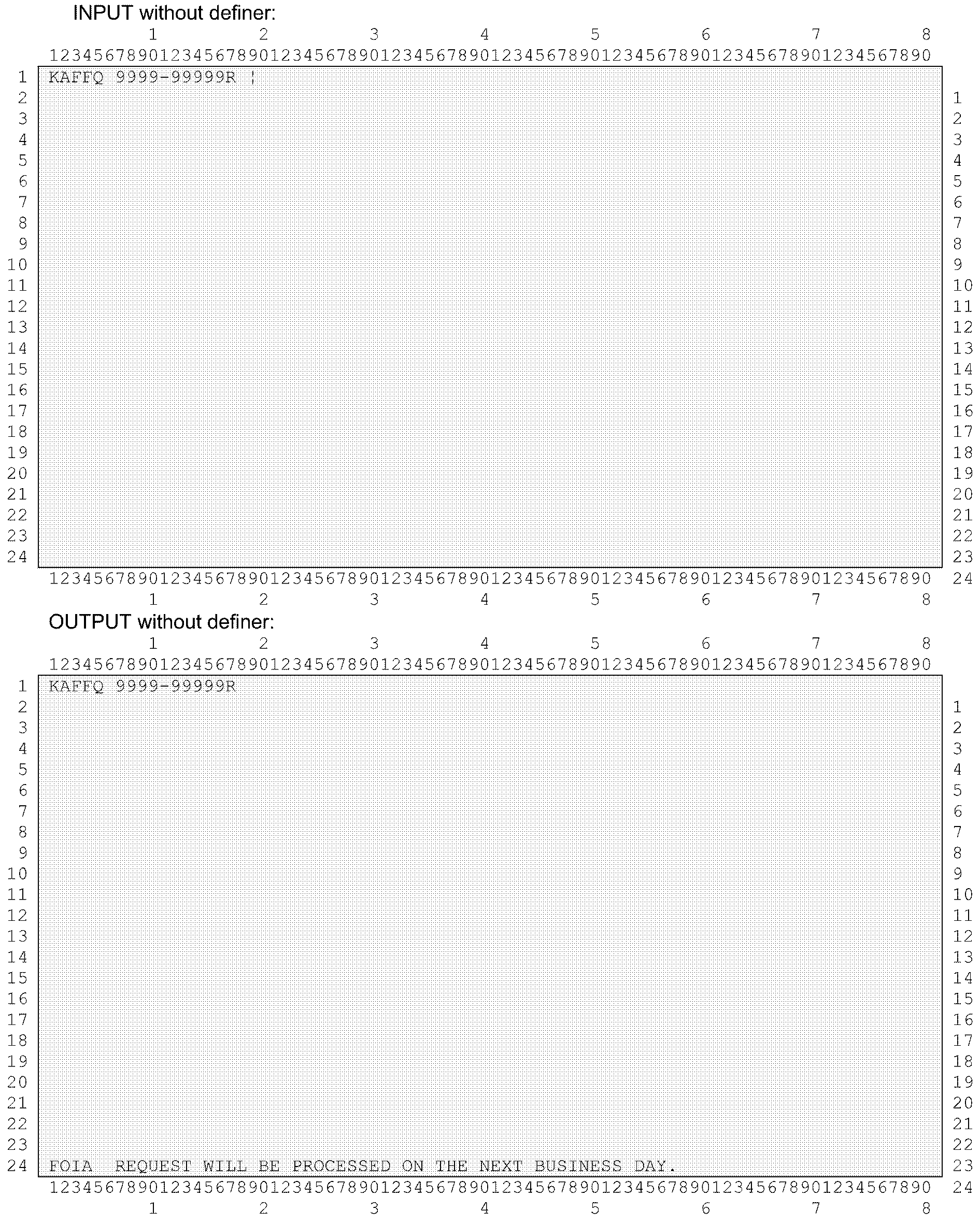
- Exhibit 2.3.31-11 KAFFQ with CAF Number Display
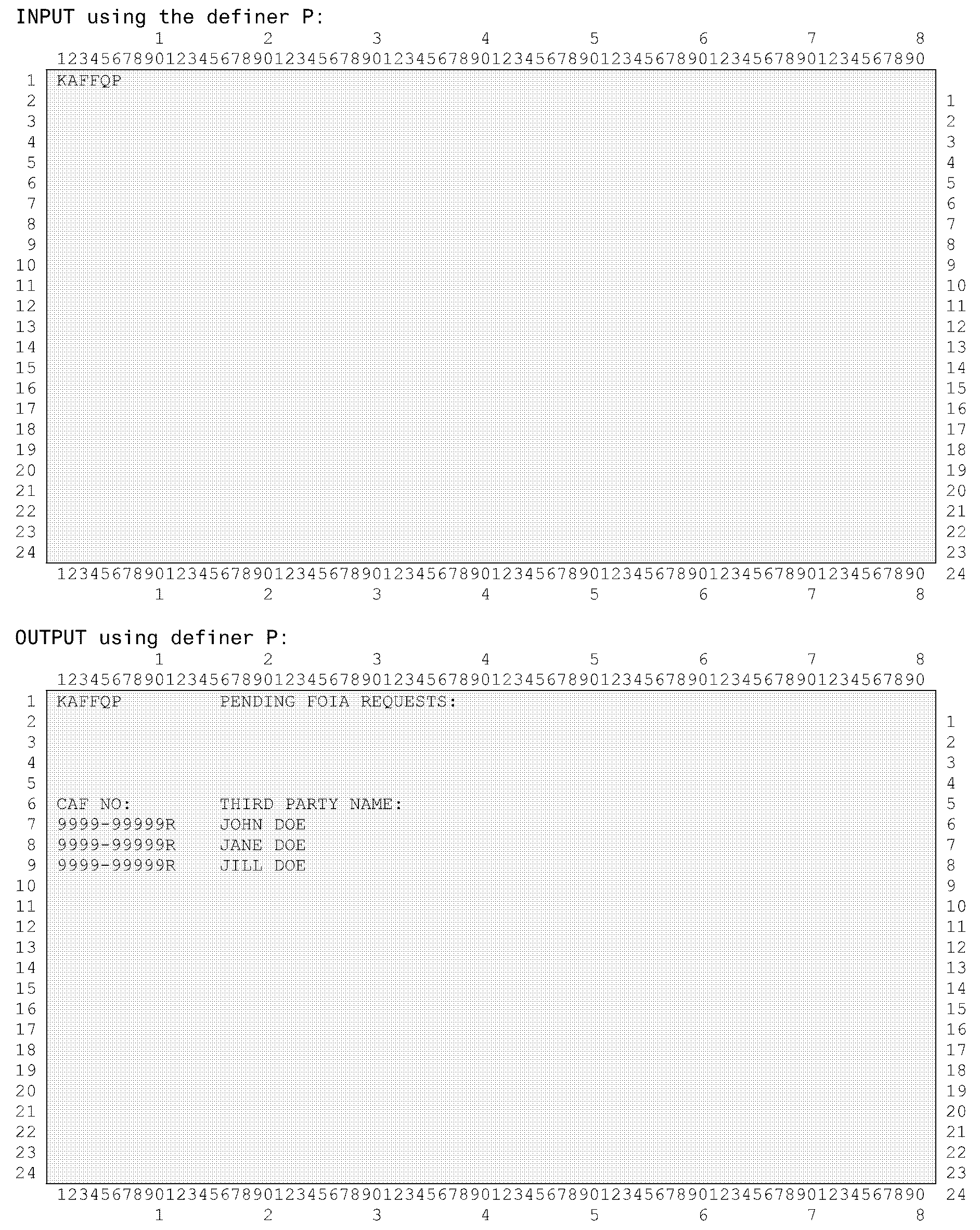
- Exhibit 2.3.31-12 KAFFQP Display
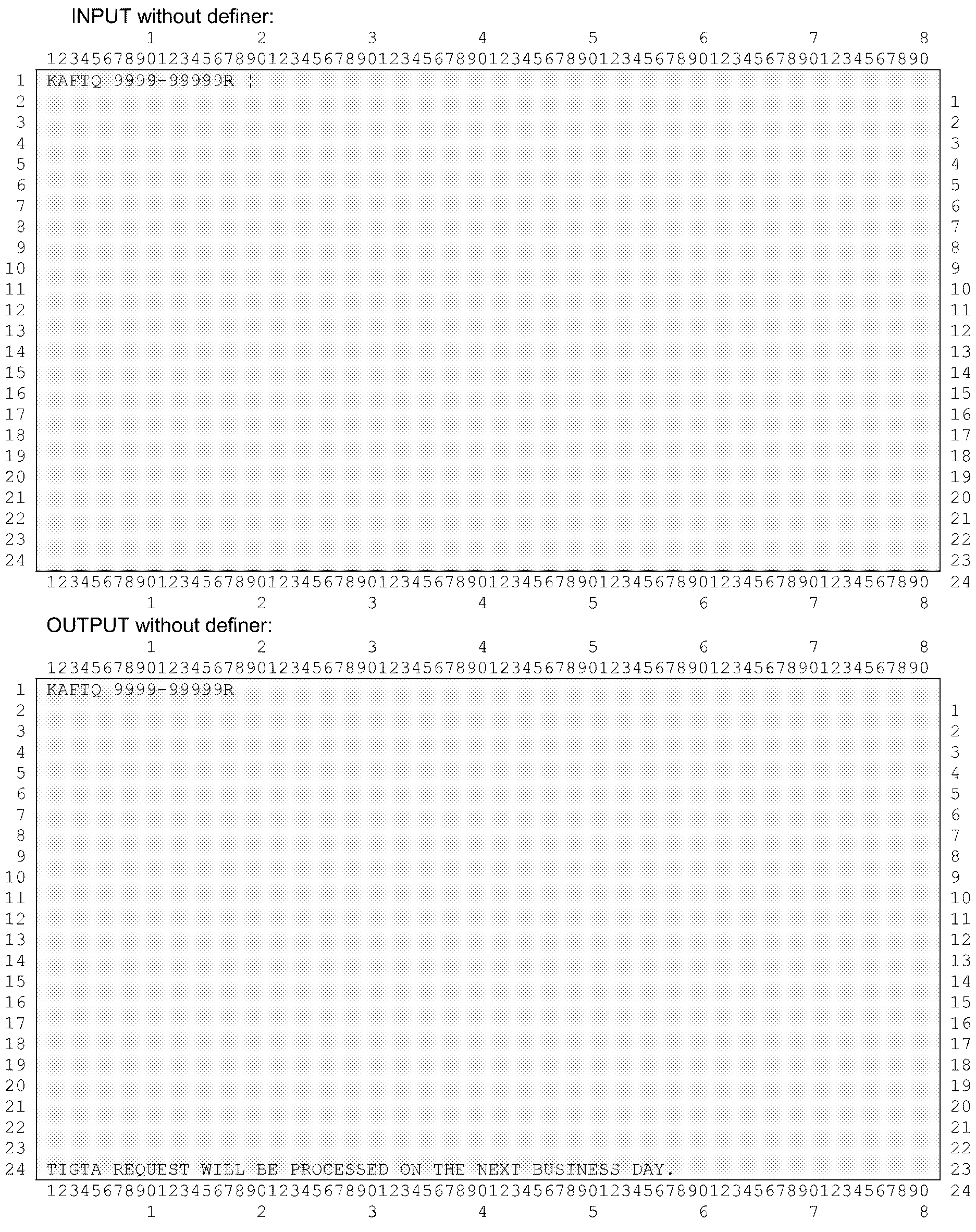
- Exhibit 2.3.31-13 KAFTQ with CAF Number Display
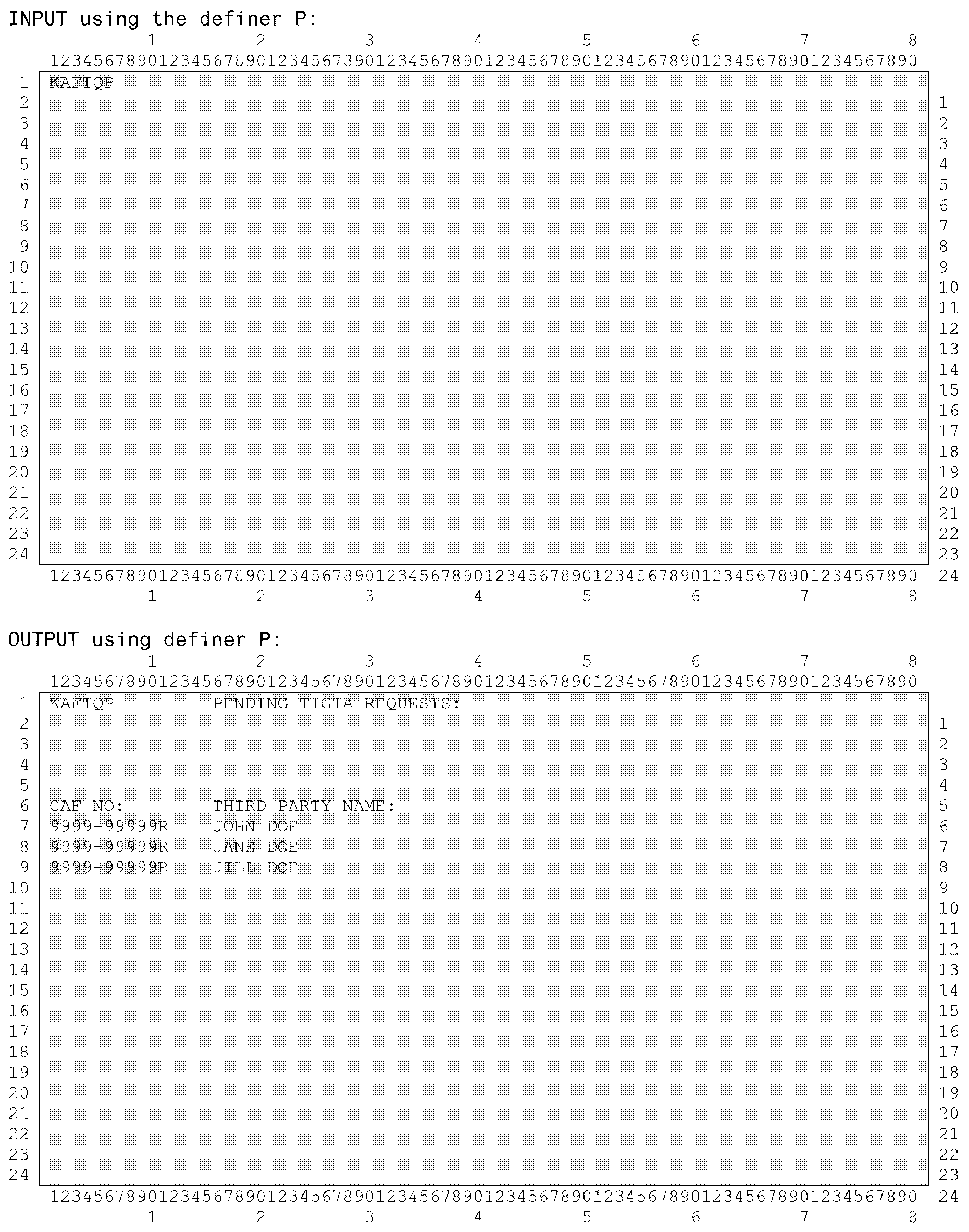
- Exhibit 2.3.31-14 KAFTQP Display
- 2.3.31.1 Program Scope and Objectives
Part 2. Information Technology
Chapter 3. IDRS Terminal Responses
Section 31. Command Codes CFINK , RPINK, KAFFQ and KAFTQ for CAF Inquiry
2.3.31 Command Codes CFINK , RPINK, KAFFQ and KAFTQ for CAF Inquiry
Manual Transmittal
February 13, 2025
Purpose
(1) This transmits revised IRM 2.3.31, IDRS Terminal Responses, Command Codes CFINK , RPINK, KAFFQ and KAFTQ for CAF Inquiry.
Material Changes
(1) Updated all references of Wage & Investment (W&I) to Taxpayer Services (TS). See Section IRM 2.3.31.1
Effect on Other Documents
IRM 2.3.31, dated July 17, 2023, is superseded.Audience
LMSB, SB/SE, TE/GE, TS.Effective Date
(02-13-2025)
Rajiv Uppal
Chief Information Officer
-
This IRM section provides the instructions for the use of Centralized Authorization File (CAF) Inquiry command codes CFINK and RPINK.
-
Purpose: These sections provide instructions for conducting research within the CAF database.
-
Audience: IRS Tax Technicians and Account Management employees.
-
Policy Owner: The Director, Taxpayer Services (TS), owns the policies contained herein.
-
Program Owner: Taxpayer Services (TS) is responsible for the administration, procedures, and updates related to the program.
-
Primary Stakeholders: Taxpayer Services (TS), Large Business and International (LB&I), Small Business Self-Employed (SB/SE), Tax Exempt and Government Entities (TE/GE), and Enterprise Operations (EOPS).
-
Program Goals: These are the instructions for using the CAF Inquiry IDRS command codes.
-
The Centralized Authorization File (CAF) is a computerized system of records which houses authorization information from both powers of attorney and tax information authorizations. The CAF system contains several types of records, among them taxpayer and representatives records, tax modules, and authorizations.:
These authorizations may be submitted through paper submission via fax or mail, electronically via the TaxPro application, or verbally via taxpayer contact directly with the Internal Revenue Service (IRS) for oral authorizations.-
Form 2848, Power of Attorney and Declaration of Representative,
-
Form 8821, Tax Information Authorization,
-
Form 706, United Sates Estate (and Generation-Skipping Transfer) Tax Return,
-
Oral Disclosure Consent (ODC), a non-written tax information authorization, or
-
Third Party Designee (also known as Check-box authority).
-
-
Different types of authorization authority are:
-
Representative - An individual the taxpayer has authorized to represent the taxpayer before the IRS.
-
Appointee - An individual person or business entity the taxpayer appoints to receive and inspect confidential tax return information verbally or in writing for the type of tax and years or periods specified by the taxpayer.
-
Third Party Designee - An individual person that has been designated to receive and inspect confidential tax return information via telephone or Check-box election on a tax return.
-
-
The CAF database also contains:
-
Taxpayer name, Taxpayer Identification Number (TIN), name control, and signature date
-
Third Party name, address, telephone number, fax number, name control, CAF number, and status information
-
Type of tax i.e., (MFT)(s) and tax period(s)
-
Employee Plan number, if applicable
-
Source Document Locator Number (SDLN)
-
Authorization type, such as Form number
-
Representation designation level(s), such as Attorney, CPA, or Enrolled Agent.
-
Notice Indicator - tells whether the third party will receive a “CAF Copy” of the Taxpayer Notice or not.
-
Authority granted by taxpayer(s) to the representative(s), i.e., disclosure to third parties, substitute/add representatives, and/or sign return
-
-
The CAF Inquiry command codes were developed as the principle means for researching the information contained on Forms 2848, 8821, and 706 on the CAF Database.
-
Applications Development is responsible for the maintenance of Command Codes CFINK , RPINK, KAFFQ and KAFTQ.
-
The CAF Tax Analyst is responsible for policies and procedures surrounding data entry and review.
-
The CAF Unit Team Manager/Lead is responsible for performance monitoring and ensuring employees have the tools to perform their duties.
-
The CAF Unit Employees are responsible for insuring the information contained on Forms 2848, 8821, and 706 is correctly added to the CAF database. Certain actions may cause unpostable conditions that will need corrective actions taken.
-
The CAF database was originally a hierarchical database on the UNISYS mainframe. In 2002 it was redesigned as a relational database and brought over to the IBM mainframe.
-
The CAF database is accessed through embedded SQL statements within the code. This code includes COBOL Batch runs, CICS Command Codes, and Stored Procedures.
-
The CAF command codes validate the user input and provide either a “Request Completed” message or an error message, prompting the user to correct the information.
-
Access to the CAF Database by these inquiry command codes is governed by SACS.
-
Command Code Definitions: CFINK and RPINK are IDRS command codes used to query the contents of the CAF database. Preceding Command Codes are SUMRY, TXMOD. To research Accounts on the IDRS use CC SUMRY. TXMOD is then used to select the Taxpayer Account information. CFINK and RPINK and their various different formats are then entered to access several different screen displays of data.
-
The table lists commonly used acronyms and their definitions:
Word or acronym: Meaning: Example of use: ADDR Address Your address is in Detroit, Michigan ADD3P CAF CC that adds a third party to the database Using ADD3P will add a third party to the CAF database ATHLVL Authorization level of a third party used on forms 2848 or 706 The authorization level of this third party indicates she filed as an attorney. AUTH Authorization level of a third party used on forms 2848 or 706 On Form 706 there are only 3 authorization levels used, Attorney, CPA or Enrolled Agent. BMF Business Master File The BMF data can be accessed on-line. CAF Centralized Authorization File The CAF database was not current. cc/CC Command Code The use of cc has sped up processing time. CD Code The zip-code was not filled in on the document. CFINK(x) CAF CC that queries the database (The x can be a definer or a space depending on the version of the CC desired.) The CFINK cc is used to view what data exists on the CAF database. CNTY County (used in the foreign address data) The county name was Wayne for Detroit. CONF FRAUD a CAF number status meaning confirmed fraud The Tax Examiner changed the status to “confirmed fraud” since her manager told her to. DB2 The type of database CAF exists on. The CAF database is a IBM DB2 one. EIN Employer Identification Number The business Taxpayer identifier is called an EIN. EPMF Employee Plan Master File EPMF contains various Employer Plans, used for their employees. EXT Extension number used with a telephone number. The telephone number was 123-45-6789, with an ext of 123. FRM3P CAF CC that paints the ADD3P screen to add a third party to the database The third party I have on this form does not appear in my queries of CAF, so I will enter FRM3P to add this one. ID Identification My SSN is an identification number. IDRS Integrated Data Retrieval System IDRS only contains accounts being worked on, not all accounts the IRS maintains. IMF Individual Master File The IMF is considered a file of all Individual Taxpayers. INIT Initial, used in middle name. In the name John Q Public the initial Q means the first letter of this man’s middle name. KAFAD(M or T) CAF CC that adds an Authorization (from one form) to the database The authorization was added to the database with KAFAD. KAFFRQ CAF CC, used by FOIA, to requests third party authorizations a FOIA request for information meant the user had to enter KAFFRQ. KAFMC CAF CC used to resolve CAF number merge conflicts The CAF unit Lead Tax Examiner needed to resolve a typo entered on a CAF database, she used KAFMC. KAFRM(x) CAF CC used to paint a update screen (The x can be a space to paint KAFAD, or a value to paint several update CC screens) The prerequisite cc was KAFRM. KAFTQ CAF CC, used by TIGTA, to requests third party authorizations TIGTA needed to see all clients of a third party, so KAFTQ will generate their report. L/B/E License or Bar or Enrollment number used by attorneys, CPAs, Enrolled agents/actuaries/retirement plan agents The L/B/E number on the Form 2848 was on clear. LVL Level, used in the term Authorization Level The authorization level must appear on Form 2848. MFT Master File Tax (code) The Taxpayer used Form 1040 which is MFT-30. MF TRANS Master File Transaction By entering an Authorization onto the database often causes a MF Transaction being sent to the Master Files. MOD/UNM Modified or Unmodified for an indicator on Form 2848 The Unmodified Form 2848 had no text from the Taxpayer on a specific matter. N/C Name Control The name control is usually the first 4 characters of the Taxpayer’s (IMF) last name. NAP National Account Profile We check the NAP for every Taxpayer. NMF Non-Master File I am not sure what is maintained on the NMF. NO Number This number is long. NUM Number The CAF number is 9-digits. OPR Office of Professional Responsibility OPR has oversight on most third parties. PHO Phone as in telephone. I have no telephone number. PLN Plan as in report-plan number. The report/plan number was for a health plan for employees. PND REVIEW A CAF number status meaning pending review Criminal Investagators are looking at this CAF number for miss-use, we entered a “P” in status, which means Pending Review. POA Power of Attorney The POA was signed by the Taxpayer. PREREQ Prerequisite The prerequisite for CFINK in this case was INOLE. PROV Province, a component of a foreign address. The third party lived in Ontario, which is a province of Canada. PTIN a 9-alpha-numeric assigned to a Return Preparer by the IRS. Not all third parties have a PTIN. R/W Revoke or Withdrawal, used in CAF processing to indicate who wanted the deleting of an Authorization. This indicator Revoke/Withdraw contained a X which means the Taxpayer contacted us to revoke this third party authorization. RCT Receipts of a third party. Will define what indicators were on a Form 2848/8821/706 The third party receipts indicated he can receive Taxpayer Notices. REP Representative or third party. The representative or third party must always have a CAF number. REPN Representative number or CAF number A CAF number is usually given to individuals, but sometimes a business obtains them also. REPORT PLAN NUMBER Uniquely identifies a particular employee pension plan (EPMF) or an indication of a report number (BMF). Part of the identifier for a Taxpayer. The report/plan number is part the way the CAF database stores Taxpayer information so we can match MF processing. RN/C Representative name control The third party ‘s full name was Jane Doe, so her rn/c was DOEx, where x is a space. RPINK CAF CC that queries the database for a specific third party using the name (and optional other identifying components) RPINK is used to research existing third parties on the database. SDLN Source Document Locator Number The SDLN is useful in the paper world to pull a CAF document from the Federal Records Center. TAXPRD Tax Period The tax period was 201912 TC Transaction Code CAF creates the Transaction Code = 960. TIA Tax Information Authorization A Form 8821 title name is TIA. TIN Taxpayer Identification Number A TIN can be a SSN or EIN. TP Third Party A third party is another name for representative. TXMOD or TXMD Tax Module A Tax Module identifiers are MFT, Tax Period and Report-Plan Number. TXPRD/TXPD Tax Period The tax period was 201912 UN/MOD Modified or Unmodified for an indicator on Form 2848 The Unmodified Form 2848 had no text from the Taxpayer on a specific matter. UNAVAIL Unavailable The CAF database is unavailable until noon today. UNDEL Undeliverable, as in being mailable or not. This representative’s copy of the Notice was sent back to the campus due to having an undeliverable address. Unpostable A transaction which failed to match a Master File Account for various reasons. Usually because a business rule was not followed, but can be a programming issue also. The TC960 did not post to IMF, according to the IMFOL display, so it is considered an UNPOSTABLE. UPNCF CAF CC that modifies a CAF number. UPNCF is used to change the CAF number to some other unused value. UPRCF CAF CC that modifies third party data. The UPRCF was used to change the third party address. UPTCF CAF CC that modifies Taxpayer data. The Taxpayer changed her name so UPTCF was entered to change the Taxpayer name on the database.
-
The following are the primary sources of guidance on the CAF program. Together this material forms the operating rules and responsibilities for the CAF program.
-
IRM 2.3.31, IDRS Terminal Responses, Command Codes CFINK , RPINK, KAFFQ and KAFTQ for CAF Inquiry.
-
IRM 2.4.7, IDRS Terminal Input, Command Codes KAFRM, KAFAD, UPTCF, UPRCF, UPNCF, FRM3P, ADD3P, and KAFMC for CAF Update.
-
IRM 21.3.7 Taxpayer Contacts - Processing Third Party Authorizations onto the Centralized Authorization File (CAF)
-
CIRCULAR 230 Regulations Governing the Practice of Attorneys, Certified Public Accountants, Enrolled Agents, Enrolled Actuaries, and Appraisers.
-
-
The Centralized Authorization File (CAF) contains information regarding authorizations that taxpayers have given third parties ("representatives, or reps" /"appointees" ) for various tax matters within their accounts. This information is used to determine whether an individual claiming to be a taxpayer's rep/appointee is, in fact, authorized to represent or act on the taxpayer's behalf, or to receive the information she/he requests. It can also be used to direct refunds and/or copies of notices and correspondence to third parties when authorized. The command codes (CCs) available for research are:
-
CC CFINK — See IRM 2.3.31.3 Command Code CFINK — Description and Use, and
-
CC RPINK — See IRM 2.3.31.4 Command Code RPINK — Description and Use.
-
-
This command code is used to research the CAF in any of several ways:
-
When CC CFINK is input with taxpayer information [i.e. Taxpayer Identification Number (TIN), File Source, and TIN Type] only, a list of modules present for the taxpayer will be displayed.
-
When CC CFINK is input with third party information (i.e. CAF Number, File Source, and TIN Type) only, all information (e.g. Name and Address) present on the CAF for that third party will be displayed.
-
When CC CFINK is input with taxpayer information and module information [i.e. Master File Tax Code (MFT), Tax Period, and Plan Number], all authorizations present on the CAF for that module will be displayed.
-
When CC CFINK is input with taxpayer information, module information, and third party information , the specific details of the authorization will be displayed.
-
If a complete match on the taxpayer, module, and third party is not made, appropriate error messages will be displayed. See IRM 2.3.31.3.1 below.
-
IRM 2.4 Section 7 contains a complete description of the command codes, used by the CAF Units only, for updates: KAFRM, KAFAD, UPTCF, UPRCF, UPNCF, FRM3P, ADD3P and KAFMC.
-
-
Error Messages — line 24 — These messages result in no or partial CAF Information being displayed.
ERROR MESSAGE REASON ACTION NO RECORD OF T/P ACCOUNT You input a one-line CFINK with a taxpayer TIN (SSN or EIN) — there is no such taxpayer on the CAF. Correct the TIN and re-enter
—or—
add the taxpayer.NO RECORDS WERE FOUND THAT MATCH YOUR SEARCH CRITERIA You input a one-line CFINK with a CAF number— the third party is not on the CAF. Correct the CAF number and re-enter
—or—
add the third party.NO DATA FOR SPECIFIED REP TAXPAYER ON CAF You input a three-line CFINK requesting specific module information including a CAF number — the third party is not on the CAF. Correct the CAF number and re-enter
—or—
add the third party.NO MODULES PRESENT FOR TAXPAYER You input a two-line CFINK requesting specific module information (by MFT, Tax Period, and Plan Number) — there is no such module for this taxpayer. Correct the module info and re-enter
—or—
add the module.NO RECORD OF TAXPAYER ACCOUNT - REPRESENTATIVE ON CAF You input a three-line CFINK requesting specific module/CAF number information (probably as prereq for KAFAD) — the third party is on the CAF, but the taxpayer is not. Correct the TIN and re-enter
—or—
add the taxpayer.REP HAS NO AUTHORITIES FOR THIS TAX PERIOD
REP EXISTS ON CAFYou input a three-line CFINK requesting specific module/CAF number information (probably as prereq for KAFAD) — the third party is on the CAF, but is not authorized for this module. Correct the MFT/TAX PERIOD and re-enter
—or—
add the authorization.NO MODULES PRESENT FOR TAXPAYER The taxpayer is on the CAF but has no authorizations. Correct the MFT/TAX PERIOD and re-enter
—or—
add the authorization.INVALID SSN/EIN MUST BE NUMERIC The TIN is in the incorrect format. Correct the TIN and re-enter. INVALID MFT CODE The MFT is missing or incorrect. Correct the MFT and re-enter. INVALID TAX PERIOD The tax period is missing or incorrect. Correct the tax period and re-enter. CAF DATABASE NOT AVAILABLE AT THIS TIME CAF database is not accessible Contact CAF programming staff in Detroit INVALID CAF NUMBER The CAF number is incorrect Correct the CAF number and re-enter INVALID SSN OR EIN CFINK The TIN entered is incorrect Correct the TIN and re-enter CAF NUMBER MUST BE ENTERED The CAF number is required for command entered Re-enter command with CAF number
-
Command Code CFINK is a prerequisite for command code KAFRM, which requests the formats of the CAF input command codes, KAFAD, UPTCF, UPRCF, and UPNCF.
-
Command Code CFINK input with the TIN and File Source; MFT and tax period (and plan in some instances); and CAF Number with File Source, can be followed by a KAFRM.
If the taxpayer is not on the database, KAFRM will bring back a KAFADT format, allowing for input of a taxpayer and his/her authorization information.
If the taxpayer already exists on the database, KAFRM will bring back a KAFADM format, allowing for input of the taxpayer's authorization information. -
Command Code CFINK input with the TIN and File Source may only be followed by a KAFRMT, provided a record for the Taxpayer is found on the CAF. This will bring back UPTCF format, allowing for update of taxpayer information.
-
Command Code CFINK input with the CAF Number and File Source may be followed by a KAFRMR, provided a record for the third party is found on the CAF. This will bring back UPRCF format, allowing for update of third party information.
-
CFINK input with the CAF Number and File Source may also be followed by a KAFRMN, provided a record for the third party is found on the CAF. This will bring back UPNCF format, allowing a CAF number merge.
-
This command code is used to research historical information relating to a specific TIN and tax matter (MFT and tax period). The first screen returned contains the most current information displayed on the upper half of the screen. The lower half is the most recent historical data. Subsequent screens contain remaining history in newest-to-oldest order.
-
Error Messages — These messages result in no or partial CAF Information being displayed.
MESSAGE REASON ACTION INVALID SSN/EIN MUST BE NUMERIC SSN/EIN is either missing, not numeric or not in the correct format Correct the TIN and re-enter. INVALID MFT CODE The MFT is missing or incorrect. Correct the MFT and re-enter. INVALID TAX PERIOD The tax period is missing or incorrect. Correct the tax period and re-enter. MATCHING TAXPAYER RECORD NOT FOUND No record of taxpayer for entered TIN Correct the TIN and re-enter. NO HISTORY RECORDS FOR THIS MFT AND TAX PERIOD Taxpayer has no history records PROBLEM GETTING TIMESTAMP Database error Contact CAF programming staff in Detroit. TIN VALIDATION ERROR The TIN entered is not valid Correct the TIN and re-enter. xxxxxxxx DB2 IS UNAVAILABLE - PLEASE TRY AGAIN The requested CAF database is not available Wait for a few minutes and retry, if problem still exists, contact CAF programming staff in Detroit. ERROR: SELECT xxxxxxxxxxx CALL CAF SYSTEMS An error occurred while trying to read the CAF database. Wait for a few minutes and retry, if problem still exists, contact CAF programming staff in Detroit. ERROR ON DECLARE OF xxxxxxx CALL SYSTEMS An error occurred while trying to read the CAF database. Wait for a few minutes and retry, if problem still exists, contact CAF programming staff in Detroit. OPEN ERROR xxxxxxxxxx CALL SYSTEMS An error occurred while trying to open the CAF database. Wait for a few minutes and retry, if problem still exists, contact CAF programming staff in Detroit. ERROR ON FETCH OF xxxxxxxxxx CALL SYSTEMS An error occurred while trying to retrieve data from the CAF database. Wait for a few minutes and retry, if problem still exists, contact CAF programming staff in Detroit. ERROR ON CLOSE OF xxxxxxxxxx CALL SYSTEMS An error occurred while trying to close the CAF database. Wait for a few minutes and retry, if problem still exists, contact CAF programming staff in Detroit. COSIGN DATA NOT FOUND - CALL SYSTEMS POA co-signer is indicated but no taxpayer found Contact CAF programming staff in Detroit.
-
This command code is used to research information relating to a specific third party. The CAF number is entered and the current information is displayed on the top portion of the screen on the first page and history information on the bottom half. Information on the history record that is different is highlighted. As the information is paged through, the bottom half of data will be moved to the top half and the next history will be placed on the bottom with differences highlighted. Beginning and ending dates are optional and may be used to narrow down the history displayed from the most recent to the oldest. If only a beginning date is entered, history from that date to present will be displayed. If both dates are entered, history will only display for that range of dates.
-
Error Messages — These messages result in no or partial CAF Information being displayed.
MESSAGE REASON ACTION NO CURRENT RECORD FOUND FOR CAF NUM No current data exists (could have been merged) NO HISTORY RECORDS FOUND Third party has no history. NO HISTORY RECORDS FOUND FOR DATE ENTERED Third party has no history for entered date(s) Correct date(s) and re-enter INVALID CAF NUMBER The CAF number is incorrect Correct the CAF number and re-enter INVALID CAF NUM MUST BE NUMERIC The CAF number is incorrect Correct the CAF number and re-enter BEGINNING DATE MUST BE NUMERIC The date entered must be numeric and in the format mmddyyyy Correct the date and re-enter INVALID BEGINNING DATE - MONTH The month entered must be between 01 and 12 Correct the date and re-enter INVALID BEGINNING DATE - DAY The day entered must be between 01 and 31 Correct the date and re-enter ENDING DATE MUST BE NUMERIC The date entered must be numeric and in the format mmddyyyy Correct the date and re-enter INVALID ENDING DATE - MONTH The month entered must be between 01 and 12 Correct the date and re-enter INVALID ENDING DATE - DAY The day entered must be between 01 and 31 Correct the date and re-enter xxxxx HISTORY DISTINCT CURSOR - ERROR Problem with Third party database Wait for a few minutes and retry, if problem still exists, contact CAF programming staff in Detroit.
-
This command code is used to research information relating to a specific SDLN (Source Document Locator Number). This information includes all taxpayers and representatives associated to this document. It also will include any text entered by the representative (E-services only).
-
Error Messages — No database information will be returned:
MESSAGE REASON ACTION PLEASE CORRECT INVALID DATA SDLN is either missing, incomplete or not in the format
nn-nnnn-nn-nnn-nnCorrect and re-enter. SDLN NOT FOUND ON DATABASE SDLN entered does not exist Correct and re-enter. AN SQL ERROR HAS OCCURED CONTACT SYSTEM ADMINISTRATOR Could not access the CAF database Wait for a few minutes and retry, if problem still exists, contact CAF programming staff in Detroit.
-
This command code is used to list the authorizations that a representative has for a specified taxpayer. The TIN (either SSN or EIN) is entered along with the third party CAF Number. The taxpayer's and third party's names are displayed along with the third party's contact information. Below the contact information are the authorizations by tax period.
-
Error Messages — Either partial or no database information will be returned:
MESSAGE REASON ACTION INVALID SSN/EIN MUST BE NUMERIC SSN/EIN is either missing, not numeric or not in the correct format Correct and re-enter. CAF NUMBER MUST BE ENTERED CAF Number required for this command code Correct and re-enter. NO RECORD OF T/P ACCOUNT Entered TIN does not exist on database Correct and re-enter. NO MODULES PRESENT FOR TAXPAYER There are no authorizations for the entered CAF Number and this TIN REP NOT FOUND The CAF number entered is not on the database Correct and re-enter. *** SELECT OF xxxxxxxxxxxx UNAVAILABLE Could not access the CAF database Wait for a few minutes and retry, if problem still exists, contact CAF programming staff in Detroit. *** ERROR ON SELECT OF xxxxxxxxxxxx Could not access the CAF database Wait for a few minutes and retry, if problem still exists, contact CAF programming staff in Detroit. xxxxx CAFPWRS_CSR UNAVAILABLE I/O error on CAF database Wait for a few minutes and retry, if problem still exists, contact CAF programming staff in Detroit. ERROR ON xxxxx OF CAFPWRS_CSR I/O error on CAF database Wait for a few minutes and retry, if problem still exists, contact CAF programming staff in Detroit. COSIGN DATA NOT FOUND - CALL SYSTEMS POA co-signer is indicated but no taxpayer found Contact CAF programming staff in Detroit.
-
This command code is used to research a third party on CAF in various ways, depending on the number of search keys given. IRM 2.3.31.4.1 RPINK Search Keys, below for explanation of search keys.
-
The only required search key for CC RPINK is: Business-name or Third Party Last Name (up to ten characters). This must be input exactly as it was entered on the database or there will be no match. If there are ten or more characters in the last name, all ten must be entered.
Caution:
Unless the business name (or last name) itself is less than ten characters in length, RPINK will not work with less than ten.
Caution:
There are third party names on the CAF that were input incorrectly.
After conversion to IBM, taxpayer and (non-business) third party name components are input in separate fields, virtually eliminating the potential for this problem. But you need to be mindful of the pre-existing situation when doing your research.
Also - if you enter any of the 2nd line optional fields - first 3 digits of zip code, 4th & 5th digits of zip code, 1st 4 characters of street address - the search will include these criteria in sequence. If there is a failure to match on any criterion, you will get a message indicating that no record was found. To ensure you've covered all bases, it would be advisable to redo the RPINK with fewer criteria to ensure the third party is not on the database, possibly with some erroneous information.Caution:
There are also some third parties - that are businesses - that were incorrectly loaded during the database conversion. As a result, RPINK won't always find the third party you expect to find.
Examples: SMITH & SMITH might be found by one - or the other - of
RPINK SMITH & S
or
RPINK SMITH,SMITH depending on how it was loaded (or entered).
WILSON AND DUNLAP might be located by one - or the other - of
RPINK WILSON AND
or
RPINK DUNLAP, WILSON
depending on how it was loaded (or entered).
To ensure you've covered all bases, it would be advisable to RPINK both versions. If you find the name you want but it's entered incorrectly, make corrections via KAFRMR/UPRCF and proceed. For example, if you find SMITH & SMITH was entered as SMITH (first name) AND (middle name) SMITH (last name), enter SMITH & SMITH on the full name field and clear out the first, middle, and last names. Then proceed. -
Optional search keys, in order, for CC RPINK are:
-
Rep First Name (up to 10 characters)
-
1st three digits of the ZIP code
-
4th & 5th digits of the ZIP code
-
1st four characters of the street address
Note:
In the past, RPINK results may not have been sorted by first name within last name. You may have seen SMITH JOE followed by SMITH JACK followed by SMITH JERRY on the screen. Since conversion to DB2, RPINK results are sorted by first name within last name. Researching multiple screens of RPINK results should be quicker.
-
-
Error Messages — No database information will be returned:
MESSAGE REASON ACTION LAST NAME MUST BE INPUT FOR SEARCH No last name was entered for search. RPINK requires Last Name/Business Name to be entered. Correct and reenter. NO RECORDS FOUND MATCHING YOUR SEARCH CRITERIA No exact match could be found on the CAF for the search keys given. Change/Delete one of the search keys and reenter. LAST NAME IS NOT FORMATTED CORRECTLY The last name was entered incorrectly — most likely with an invalid character Correct and reenter. FIRST NAME IS NOT FORMATTED CORRECTLY The first name was entered incorrectly — most likely with an invalid character. Correct and reenter. ZIP CODE IS INCORRECT The 1st three digits of the Zip Code were entered incorrectly — most likely with a non-numeric character. Correct and reenter. 2ND ZIP CODE IS INCORRECT The 4th and 5th digits of the Zip Code were entered incorrectly — most likely with a non-numeric character. Correct and reenter. ADDRESS IS INCORRECT The 1st four characters of the street address were entered incorrectly — most likely with an invalid character. Correct and reenter. FIRST ZIP CODE MUST BE ENTERED First zip must be entered when street or second zip entered. Correct and reenter.
-
This command code is used by select employees of the Disclosure Office to request third party information to fulfill a Freedom of Information request.
-
CC KAFFQ is input with third party information which is the CAF number and the letter R (which equates to: file source code of 9 and tin type of 4)
-
CC KAFFQ with the definer P will return to the user any pending request(s), which are awaiting processing into the daily batch run.
-
The request information will be stored by CAF, then processed the next business day by a batch run, output data will be received via Control-D.
-
-
See Exhibit 2.3.31-12 and Exhibit 2.3.31-13 for examples of screen displays.
-
Error Messages — Line 24 - These messages result in no request being processed:
MESSAGE REASON ACTION THIS REQUEST ALREADY EXISTS CAF Number entered has already been requested and is pending the processing step Correct the CAF number and re-enter THIS CAF NUMBER DOES NOT EXIST ON DATABASE CAF Number entered does not exist on the database Correct the CAF number and re-enter
-
This command code is used by select employees of TIGTA to request third party information for specific investigations.
-
CC KAFTQ is input with third party information which is the CAF number and the letter R (which equates to: file source code of 9 and tin type of 4)
-
CC KAFTQ with the definer P will return to the user any pending request(s), which are awaiting processing by the daily batch run.
-
The request information will be stored by CAF, then processed the next business day by a batch run, output data will be received via Control-D.
-
-
See Exhibit 2.3.31-14 and Exhibit 2.3.31-15 for examples of screen displays.
-
Error Messages — Line 24 - These messages result in no request being processed:
MESSAGE REASON ACTION THIS REQUEST ALREADY EXISTS CAF Number entered has already been requested and is pending the processing step Correct the CAF number and re-enter THIS CAF NUMBER DOES NOT EXIST ON DATABASE CAF Number entered does not exist on the database Correct the CAF Number and re-enter
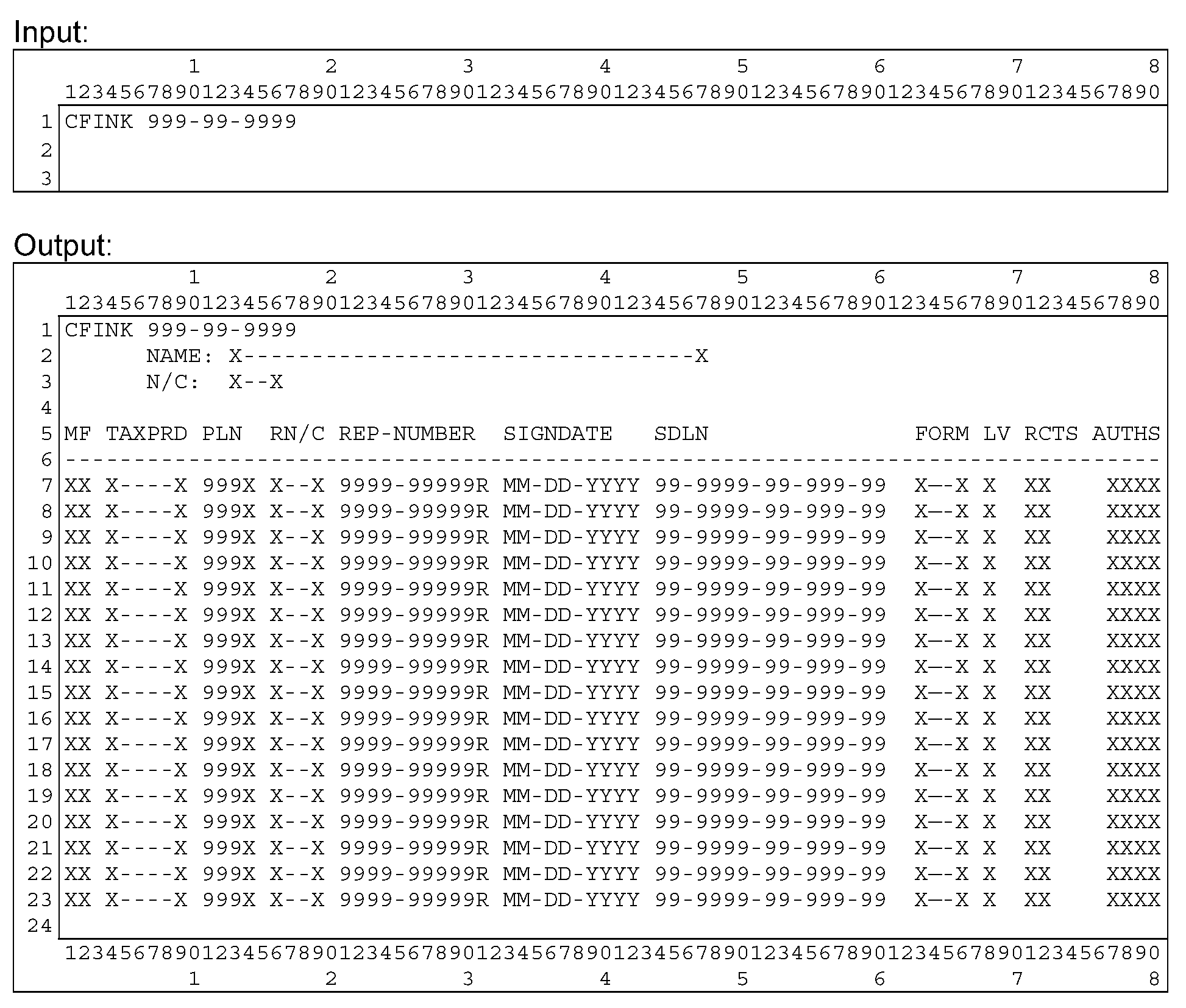
Please click here for the text description of the image.
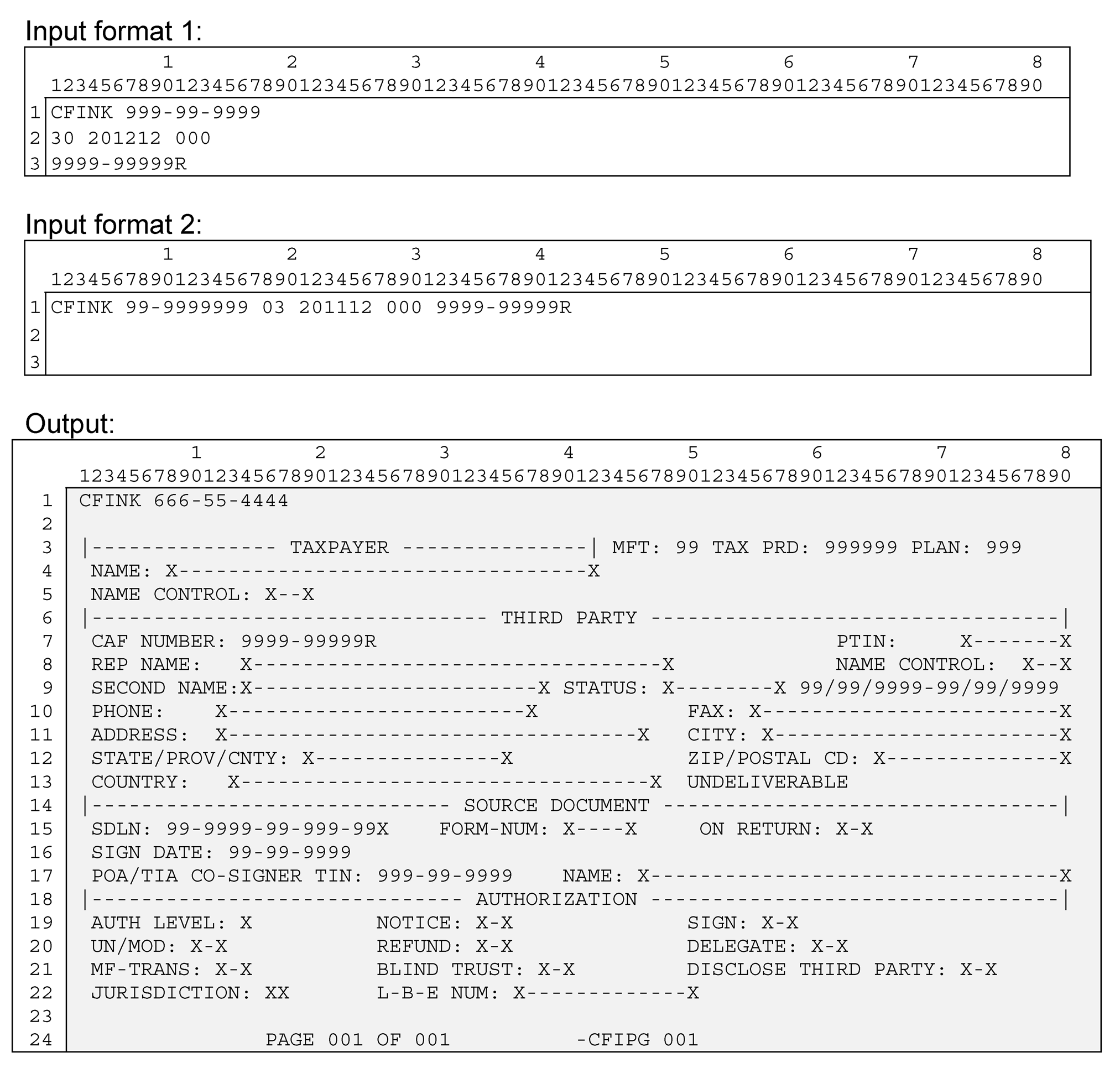
The table below contains a full list of the screen fields and their descriptions.
| Input SSN | ||
| Line 1 | Command Code | CFINK |
| Line 1 | TIN & file source & tin type | SSN -- must be in one of the following formats: ([[slashb]]=blank) nnn-nn-nnnn[[slashb]] (Valid IMF) nnn-nn-nnnn* (Invalid IMF) nnn-nn-nnnnV (Valid BMF SSN) nnn-nn-nnnnW (Invalid BMF SSN) nnn-nn-nnnnN (NMF SSN) |
| Output - 1-line (SSN ) | ||
| Line 1 | Command Code | CFINK |
| Line 1 | TIN & file source & tin type | SSN re-displayed from input screen. |
| Line 2 | NAME | The full taxpayer name - up to 35 characters. For individuals , this field is made up of FIRST-NAME, MIDDLE-NAME/INIT, LAST-NAME, and SUFFIX. For business entries, this field will be the only place the name is displayed. |
| Line 3 | N/C | Taxpayer name control |
| Lines 7 thru 23 | MF | MFT - Master File Tax code (to which an authorization applies) |
| Lines 7 thru 23 | TAXPRD | Tax Period - yyyymm format |
| Lines 7 thru 23 | PLN | REPORT/PLAN NUMBER Used for all EPMF and some BMF modules (MFT 46 and 76). |
| Lines 7 thru 23 | RN/C | Third party's name control |
| Lines 7 thru 23 | REP-NUMBER | Third party CAF number |
| Lines 7 thru 23 | SIGNDATE | Taxpayer signature date from form |
| Lines 7 thru 23 | SDLN | Source Document Locator Number nn-nnnn-nn-nnn-nn format, where... nn=purge year - last 2 digits of the year in which the paper document is to be purged from the files; if form 2848 or 8821 then 7 years after sign date; if form 706 then 15 years after sign date nnnn=control cycle - yyww format; not later than current cycle nn=document location office nnn=block series - numeric; 000-999 nn=sequence number - numeric; 00-99 Note:Oral TIAs will show a ‘P’ after the SDLN |
| Lines 7 thru 23 | FORM | Input form number - current valid form numbers are 2848, 8821, and 706. Older entries may contain 2848D, 56, or others. |
| Lines 7 thru 23 | LV | Authorization level - mandatory for 2848 only A - Attorney B - Certified Public Accountant C - Enrolled Agent D - Bona fide officer of the taxpayer's organization E - Full-time employee of the taxpayer's organization F - Member of the taxpayer's immediate family (spouse, child, parent, sibling) G - Enrolled actuary H - Unenrolled return preparer I- Registered Return Preparer K - Student Attorney or CPA R -Enrolled Retirement Plan Agent (ERPA) |
| Lines 7 thru 23 | RCTS | N = third party is authorized to receive copies of taxpayer correspondence R = third party is authorized to receive taxpayer's refund check B = indicates blind trust - third party receives correspondence and refund; taxpayer receives neither |
| Lines 7 thru 23 | AUTHS ~or~ Acts authorized | U = 2848 was unmodified M = 2848 was modified in some way other than sign, delegate and/or disclose to third party T = input by E-Services and contains modified form text S = modified to allow third party to sign returns for taxpayer D = modified to allow third party to re-delegate his/her authorization I = 8821 coded for INSPECT Y= Taxpayer allows Rep to disclose to third parties |
| Line 7 thru 23 | STATUS | Note: If third party is Pending Review, Confirmed Fraud, disbarred, suspended, etc., that information will be displayed beneath the RCTS and AUTHS headers. If a third party in good standing this area will be spaces. |
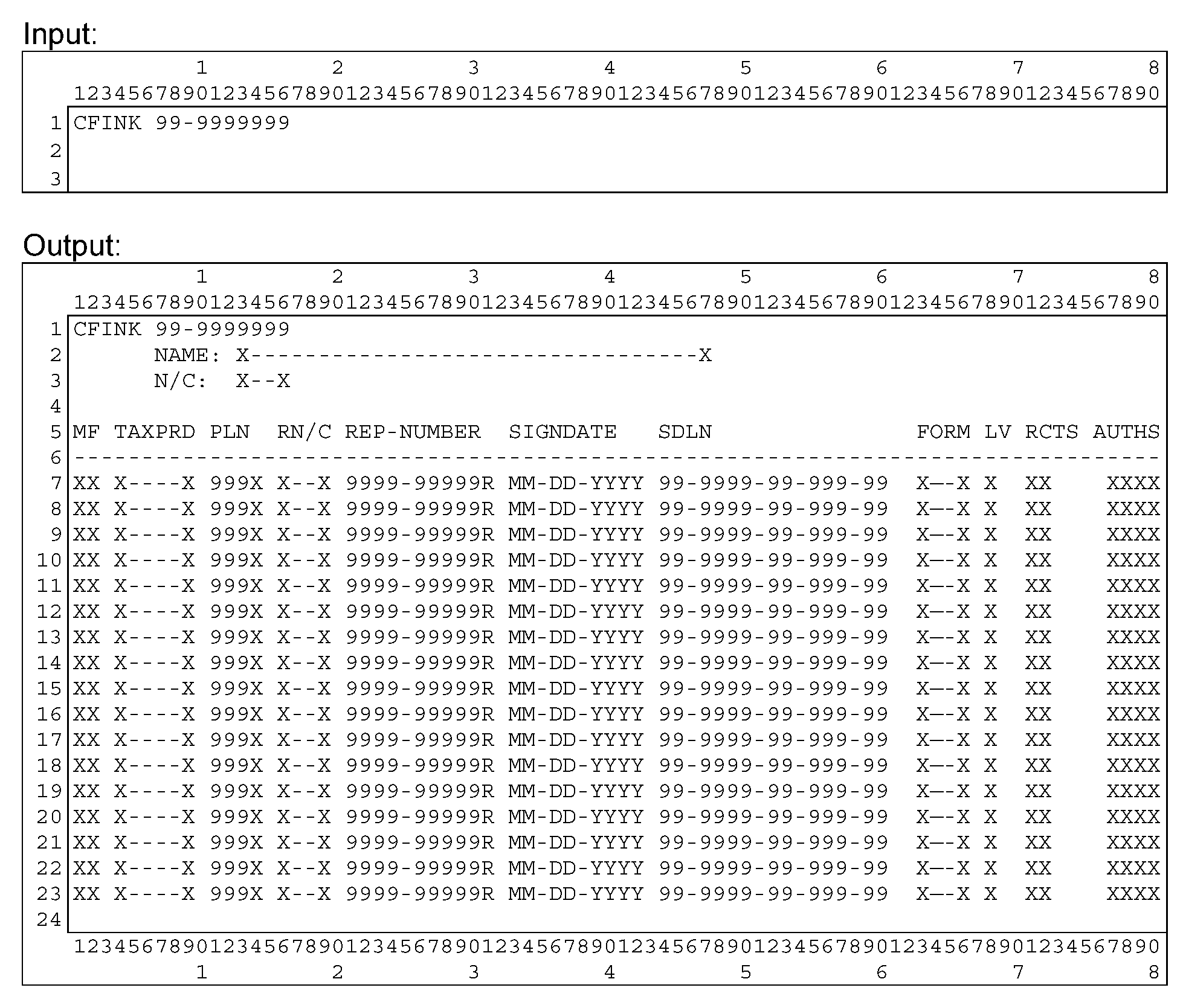
Please click here for the text description of the image.
The table below contains a full list of the screen fields and their descriptions.
| Input EIN | ||
| Line 1 | Command Code | CFINK |
| Line 1 | TIN & file source & tin type | EIN -- must be in one of the following formats: ([[slashb]]=blank) nn-nnnnnnn[[slashb]] (BMF EIN) nn-nnnnnnnP (EPMF EIN) nn-nnnnnnnN (NMF EIN) |
| Output - 1-line (EIN) | ||
| Line 1 | Command Code | CFINK |
| Line 1 | TIN & file source & tin type | EIN re-displayed from input screen |
| Line 2 | NAME | The full taxpayer name - up to 35 characters. For individuals , this field is made up of FIRST-NAME, MIDDLE-NAME/INIT, LAST-NAME, and SUFFIX. For business entries, this field will be the only place the name is displayed. |
| Line 3 | N/C | Taxpayer name control |
| Lines 7 thru 23 | MF | MFT - Master File Tax code (to which an authorization applies) |
| Lines 7 thru 23 | TAXPRD | Tax Period - yyyymm format |
| Lines 7 thru 23 | PLN | REPORT/PLAN NUMBER Used for all EPMF and some BMF modules (MFT 46 and 76). |
| Lines 7 thru 23 | RN/C | Third party's name control |
| Lines 7 thru 23 | REP-NUMBER | Third party CAF number |
| Lines 7 thru 23 | SIGNDATE | Taxpayer signature date |
| Lines 7 thru 23 | SDLN | Source Document Locator Number nn-nnnn-nn-nnn-nn format, where... nn=purge year - last 2 digits of the year in which the paper document is to be purged from the files; if form 2848 or 8821 then 7 years after sign date; if form 706 then 15 years after sign date nnnn=control cycle - yyww format; not later than current cycle nn=document location office nnn=block series - numeric; 000-999 nn=sequence number - numeric; 00-99 Note:Oral TIAs will show a ‘P’ after the SDLN |
| Lines 7 thru 23 | FORM | Input form number - current valid form numbers are 2848, 8821, and 706. Older entries may contain 2848D, 56, or others. |
| Lines 7 thru 23 | LV | Authorization level - mandatory for 2848 only A - Attorney B - Certified Public Accountant C - Enrolled Agent D - Bona fide officer of the taxpayer's organization E - Full-time employee of the taxpayer's organization F - Member of the taxpayer's immediate family (spouse, child, parent, sibling) G - Enrolled actuary H - Unenrolled return preparer I- Registered Return Preparer K - Student Attorney or CPA R -Enrolled Retirement Plan Agent (ERPA) |
| Lines 7 thru 23 | RCTS | N = third party is authorized to receive copies of taxpayer correspondence R = third party is authorized to receive taxpayer's refund check B = indicates blind trust - third party receives correspondence and refund; taxpayer receives neither |
| Lines 7 thru 23 | AUTHS | U = 2848 was unmodified M = 2848 was modified in some way other than sign, delegate and/or disclose to third party T = input by E-Services and contains modified form text S = modified to allow third party to sign returns for taxpayer D = modified to allow third party to re-delegate his/her authorization I = 8821 coded for INSPECT Y= Taxpayer allows Rep to disclose to third parties |
| Lines 7 thru 23 | STATUS | Note:If third party is Pending Review, Confirmed Fraud, disbarred, suspended, etc., that information will be displayed beneath the RCTS and AUTHS headers. If a third party in good standing this area will be spaces. |
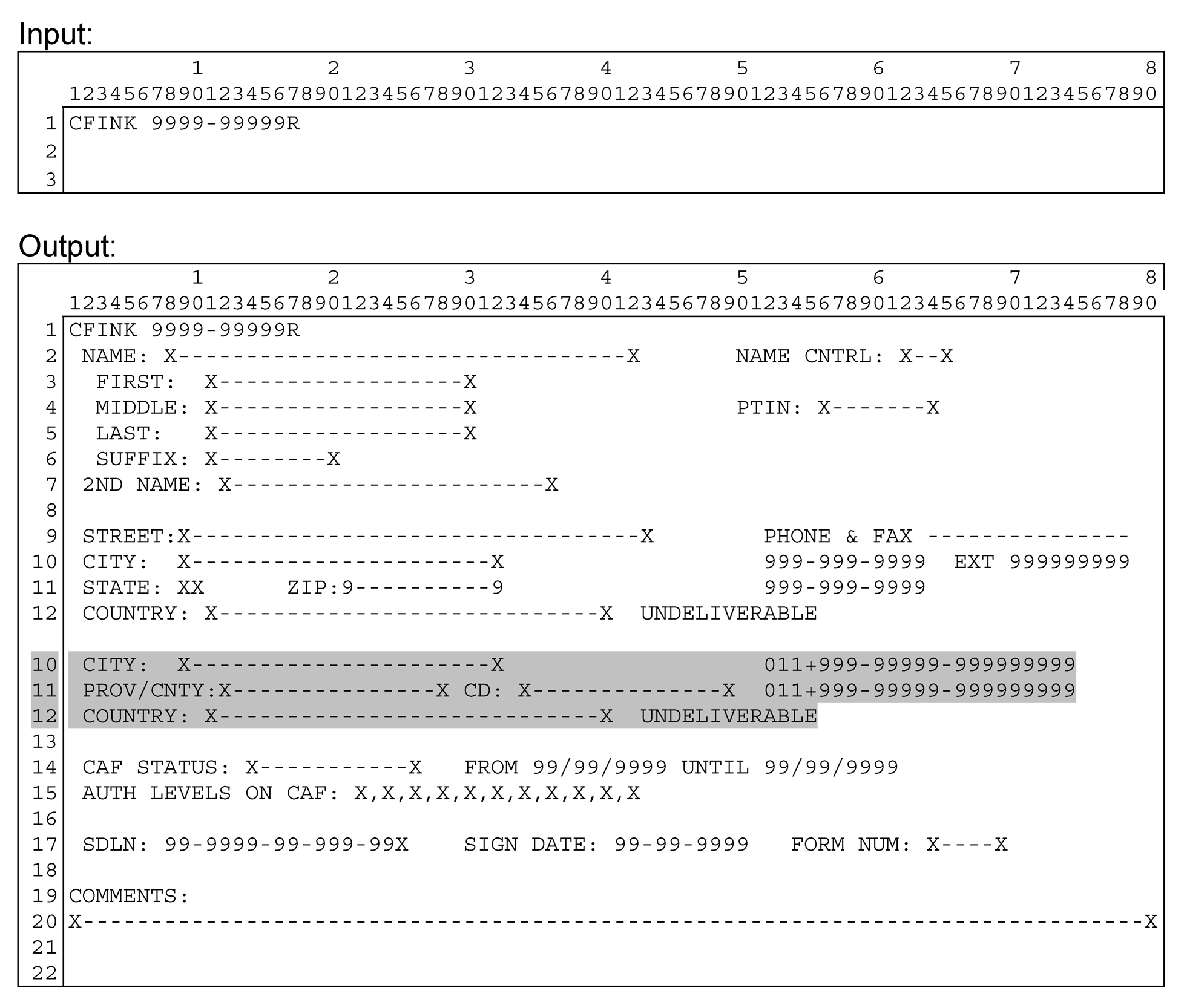
Please click here for the text description of the image.
The table below contains a full list of the screen fields and their descriptions.
| Input - CAF# | ||
| Line 1 | Command Code | CFINK |
| Line 1 | CAF number& file source & tin type | CAF number-- must be the following format: ([[slashb]]=blank) nnnn-nnnnnR (Third Party CAF number) |
| Output - CAF# | ||
| Line 1 | Command Code | CFINK |
| Line 1 | CAF number& file source & tin type | CAF number re-displayed from input screen |
| Line 2 | NAME | The full third party's name - up to 35 characters. For individuals , this field is made up of FIRST-NAME, MIDDLE-NAME/INIT, LAST-NAME, and SUFFIX. For business entries, this field will be the business name. |
| Line 2 | NAME CNTRL | Third party's name control |
| Line 3 | FIRST | Third party's first name - maximum 20 characters (total of first name, middle name, last name and suffix may not exceed 35) |
| Line 4 | MIDDLE | Third party's middle name - maximum 20 characters (total of first name, middle name, last name and suffix may not exceed 35) |
| Line 4 | PTIN | Third Party PTIN (9 characters) (Optional) |
| Line 5 | LAST | Third party's last name - maximum 20 characters (total of first name, middle name, last name and suffix may not exceed 35) |
| Line 6 | SUFFIX | JR, III, etc. - maximum 10 characters (total of first name, middle name, last name and suffix may not exceed 35 characters. Note: Do not include any authorization level information (e.g. ATTY, EA, A, B, C, etc.) in this field. That information does not belong in the THIRD PARTY record. |
| Line 7 | 2ND NAME | Third party's 2nd name, often a business name Used in some instances to indicate multiple locations (i.e. "Location 2" ) |
| Line 9 | STREET | Third party's street address, domestic or foreign |
| Line 10 | CITY | Third party's city, domestic or foreign |
| Line 10 | PHONE & EXT | Entry for Third party's phone number, domestic or foreign. Extension may be present on domestic phone numbers. It is optional. |
| Line 11 | FAX | Entry for Third party's fax number, domestic or foreign. |
| Line 11 | STATE ~or~ PROV/CNTY | Domestic address will have US state-codes (2 characters). Foreign addresses will have Province or County name (17 characters) (Optional). |
| Line 11 | ZIP ~or~ CD | Third party's domestic Zip code or Foreign Postal code. |
| Line 12 | COUNTRY | Third party's 2 character country code and 35 character country name is displayed. |
| Line 12 | Note: If correspondence addressed to the third party at this address has been returned by the USPS, then 'UNDELIVERABLE', will appear to the left of COUNTRY | |
| Line 14 | CAF STATUS | Indicates third party's practice status before the IRS GOOD STANDING - third party is authorized to represent the taxpayer DISBARRED - third party is not authorized to represent the taxpayer SUSPENDED - third party is not authorized to represent the taxpayer DECEASED - third party is not authorized to represent the taxpayer RETIRED - third party is not authorized to represent the taxpayer INELIGIBLE - third party is not authorized to represent the taxpayer PND REVIEW - CAF number under review for possible fraud CONF FRAUD - Confirmed Fraud usage of this CAF number. |
| Line 14 | FROM/UNTIL | Date of an OPR/CAF Business disciplinary action may appear in these fields. Sometimes only one or the other are entered. |
| Line 15 | AUTH LEVELS ON CAF | Displays all authorization levels the third party has on file, they represent the authorizations that this third party has associated to them. If blank, the third party has no authorizations on CAF. Authorization level - mandatory for 2848 only A - Attorney B - Certified Public Accountant C - Enrolled Agent D - Bona fide officer of the taxpayer's organization E - Full-time employee of the taxpayer's organization F - Member of the taxpayer's immediate family (spouse, child, parent, sibling) G - Enrolled actuary H - Unenrolled return preparer I- Registered Return Preparer K - Student Attorney or CPA R -Enrolled Retirement Plan Agent (ERPA) |
| Line 17 | SDLN | Source Document Locator Number nn-nnnn-nn-nnn-nn format, where... nn=purge year - last 2 digits of the year in which the paper document is to be purged from the files; if form 2848 or 8821 then 7 years after sign date; if form 706 then 15 years after sign date nnnn=control cycle - yyww format; not later than current cycle nn=document location office nnn=block series - numeric; 000-999 nn=sequence number - numeric; 00-99 Note:Oral TIAs will show a ‘P’ after the SDLN |
| Line 17 | SIGN DATE | Taxpayer signature date from form |
| Line 17 | FORM NUM | Input form number - current valid form numbers are 2848, 8821, and 706. Older entries may contain 2848D, 56, or others. |
| Line 20 | COMMENTS | Any comments that the CAF units have entered about the Third Party. |
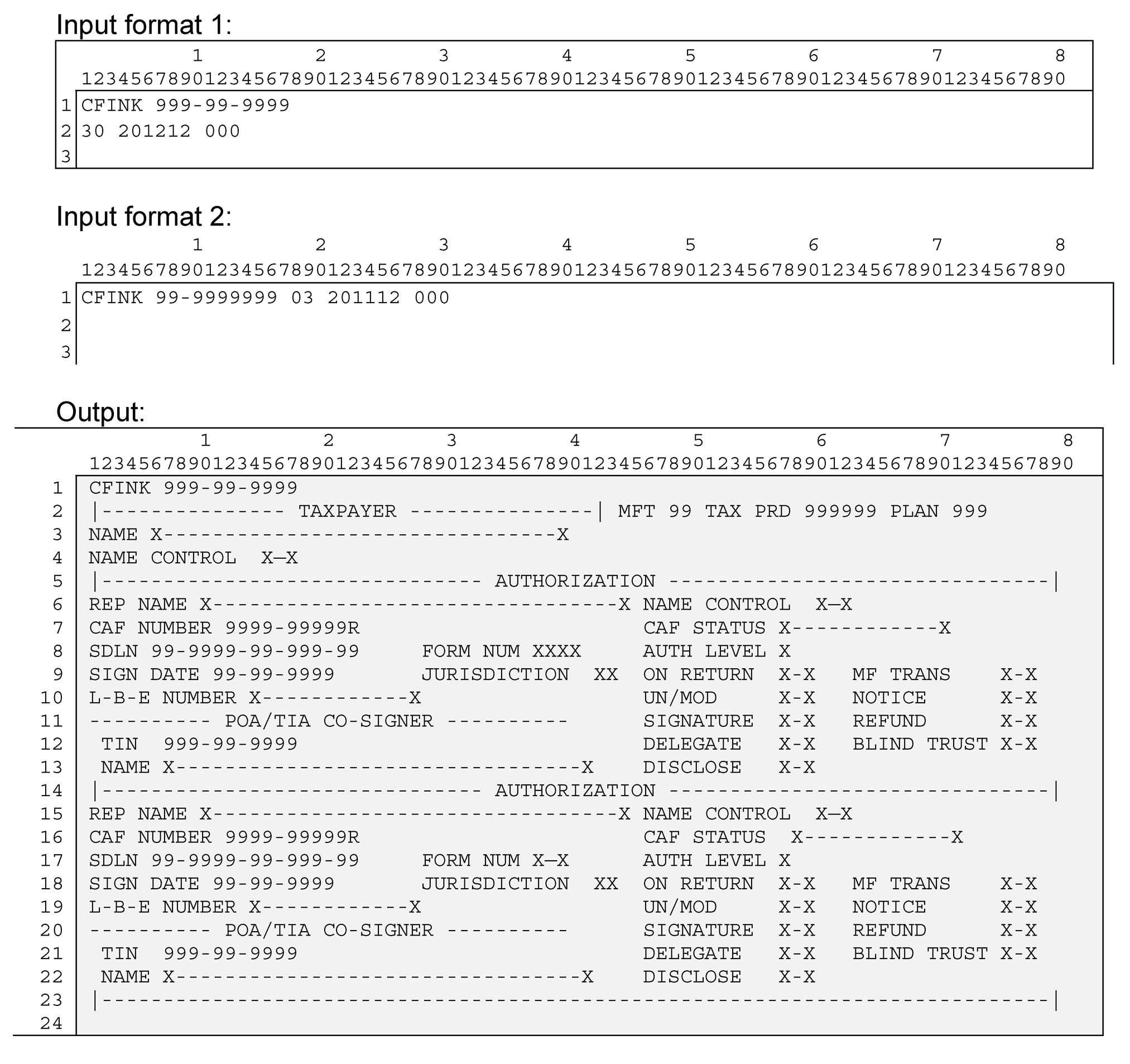
Please click here for the text description of the image.
The table below contains a full list of the screen fields and their descriptions.
| Input - TIN and Tax Module | ||
| Line 1 | Command Code | CFINK |
| Line 1 | TIN | SSN or EIN -- must be in one of the following formats: ([[slashb]]=blank) nnn-nn-nnnn[[slashb]] (Valid IMF) nnn-nn-nnnn* (Invalid IMF) nnn-nn-nnnnV (Valid BMF SSN) nnn-nn-nnnnW (Invalid BMF SSN) nnn-nn-nnnnN (NMF SSN) nn-nnnnnnn[[slashb]] (BMF EIN) nn-nnnnnnnP (EPMF EIN) nn-nnnnnnnN (NMF EIN) |
| Line 1 or 2 | MFT | MFT - Master File Tax code (to which an authorization applies) |
| Line 1 or 2 | Tax Period | yyyymm format month ending the period of time the tax form covers |
| Line 1 or 2 | PLAN | REPORT/PLAN NUMBER Used for all EPMF and some BMF modules (MFT 46 and 76). Enter only if present. |
| Output - 2-line (SSN or EIN) and Tax Module | ||
| Line 1 | Command Code | CFINK |
| Line 1 | TIN | Re-display of the SSN or EIN entered on the Input screen |
| Line 2 | MFT | MFT - Master File Tax code (to which an authorization applies) |
| Line 2 | TAX PRD | Tax Period - yyyymm format |
| Line 2 | PLAN | REPORT/PLAN NUMBER Used for all EPMF and some BMF modules (MFT 46 and 76). |
| Line 3 | NAME | The full taxpayer name - up to 35 characters. For individuals , this field is made up of FIRST-NAME, MIDDLE-NAME/INIT, LAST-NAME, and SUFFIX. For business entries, this field will be the only place the name is displayed. |
| Line 4 | NAME/CONTROL | Taxpayer name control |
| Line 6 &15 | REP NAME | The full third party name - up to 35 characters. This field is made up of FIRST-NAME, MIDDLE-NAME/INIT, LAST-NAME, and SUFFIX. |
| Line 6 &15 | NAME/CONTROL | Third party's name control |
| Note: If correspondence addressed to the third party at this address has been returned by the USPS, then 'UNDELIVERABLE', will appear to the right of REP NAME | ||
| Line 7 &16 | CAF NUMBER | Third party CAF number |
| Line 7 &16 | CAF STATUS | Indicates third party's practice status before the IRS GOOD STANDING - third party is authorized to represent the taxpayer DISBARRED - third party is not authorized to represent the taxpayer SUSPENDED - third party is not authorized to represent the taxpayer DECEASED - third party is not authorized to represent the taxpayer RETIRED - third party is not authorized to represent the taxpayer INELIGIBLE - third party is not authorized to represent the taxpayer PND REVIEW - CAF number underreview for possible fraud CONF FRAUD - Confirmed Fraud usage of this CAF number. |
| Line 8 & 17 | SDLN | Source Document Locator Number nn-nnnn-nn-nnn-nn format, where... nn=purge year - last 2 digits of the year in which the paper document is to be purged from the files; if form 2848 or 8821 then 7 years after sign date; if form 706 then 15 years after sign date nnnn=control cycle - yyww format; not later than current cycle nn=document location office nnn=block series - numeric; 000-999 nn=sequence number - numeric; 00-99 Note:Oral TIAs will show a ‘P’ after the SDLN |
| Line 8 & 17 | FORM NUM | Input form number - current valid form numbers are 2848, 8821, and 706. Older entries may contain 2848D, 56, or others. |
| Line 8 & 17 | AUTH LEVEL | Authorization level - mandatory for 2848 only A - Attorney B - Certified Public Accountant C - Enrolled Agent D - Bona fide officer of the taxpayer's organization E - Full-time employee of the taxpayer's organization F - Member of the taxpayer's immediate family (spouse, child, parent, sibling) G - Enrolled actuary H - Unenrolled return preparer I- Registered Return Preparer K - Student Attorney or CPA R -Enrolled Retirement Plan Agent (ERPA) |
| Line 9 & 18 | SIGN DATE | Taxpayer signature date from form |
| Line 9 & 18 | JURISDICTION | 2 character state code of where the Third Party practices as an Attorney or CPA, for this authorization, if applicable |
| Line 9 & 18 | ON RETURN | YES = POA was submitted with a tax return NO = POA was submitted separately or after July 2008 |
| Line 9 & 18 | MF TRANS | Indicates if a transaction was attempted to be sent to Master File. Yes or No. |
| Line 10 & 19 | L-B-E Number | License/Bar/Enrollment number, if applicable. Applicable to designation levels: Attorney, CPA, Enrolled Agent, Enrolled Actuary, Enrolled Retirement Plan Agent. |
| Line 10 & 19 | UN/MOD | UNM = 2848 was unmodified MOD = 2848 was modified in some way other than sign, delegate and/or disclose to third party TXT = input by E-Services and contains modified form text |
| Line 10 & 19 | NOTICE | Indicates if authorized to receive copies of taxpayer notices (Yes or No) |
| Line 11 & 20 | SIGNATURE | Indicates if third party allowed to sign returns for taxpayer (Yes or No) |
| Line 11 & 20 | REFUND | Indicates if authorized to receive (but not negotiate) taxpayer's refund checks (Yes or No) |
| Line 12 & 21 | POA/TIA CO-SIGNER TIN | TIN of co-signer of CAF document (not necessarily joint filer) |
| Line 12 & 21 | DELEGATE | Indicates if authorized to delegate or substitute (Yes or No) |
| Line 12 & 21 | BLIND TRUST | Indicates whether module contains blind trust authorization |
| Line 13 & 22 | POA/TIA CO-SIGNER NAME | Name of co-signer of CAF document (not necessarily joint filer) |
| Line 13 & 22 | DISCLOSE | Indicates whether the taxpayer has given the Rep authorization to disclose information to another third party. (Yes or No) |
Please click here for the text description of the image.
The table below contains a full list of the screen fields and their descriptions.
| Input - TIN, Tax Module, CAF# | ||
| Line 1 | Command Code | CFINK |
| Line 1 | TIN | SSN or EIN -- must be in one of the following formats: ([[slashb]]=blank) nnn-nn-nnnn[[slashb]] (Valid IMF) nnn-nn-nnnn* (Invalid IMF) nnn-nn-nnnnV (Valid BMF SSN) nnn-nn-nnnnW (Invalid BMF SSN) nnn-nn-nnnnN (NMF SSN) nn-nnnnnnn[[slashb]] (BMF EIN) nn-nnnnnnnP (EPMF EIN) nn-nnnnnnnN (NMF EIN) |
| Line 1 or 2 | MFT | MFT - Master File Tax code (to which an authorization applies) |
| Line 1 or 2 | Tax Period | yyyymm format month ending the period of time the tax form covers |
| Line 1 or 2 | PLAN | REPORT/PLAN NUMBER Used for all EPMF and some BMF modules (MFT 46 and 76). Enter only if present. |
| Line 1 or 3 | CAF number | CAF number of the Rep (third party) of the account |
| Output - TIN, Tax Module, CAF# or 3-line | ||
| Line 1 | Command Code | CFINK |
| Line 1 | TIN | Re-display of SSN or EIN entered on Input screen. |
| Line 3 | MFT | MFT - Master File Tax code (to which an authorization applies) |
| Line 3 | TAX PRD | Tax Period - yyyymm format |
| Line 3 | PLAN | Used for all EPMF and some BMF modules (MFT 46 and 76). Enter only if present. |
| TAXPAYER | ||
| Line 4 | NAME | The full taxpayer name - up to 35 characters. For individuals , this field is made up of FIRST-NAME, MIDDLE-NAME/INIT, LAST-NAME, and SUFFIX. For business entries, this field will be the only place the name is displayed. |
| Line 5 | NAME/CONTROL | Taxpayer name control |
| THIRD PARTY | ||
| Line 7 | CAF NUMBER | Third party CAF number |
| Line 7 | PTIN | Third Party PTIN (Optional) |
| Line 8 | REP NAME | The full third party name - up to 35 characters. This field is made up of FIRST-NAME, MIDDLE-NAME/INIT, LAST-NAME, and SUFFIX. |
| Line 8 | NAME/CONTROL | Third party name control |
| Line 9 | SECOND NAME | Third party's 2nd name, often a business name Used in some instances to indicate multiple locations (i.e. "Location 2" ) |
| Line 9 | STATUS | Indicates third party's practice status before the IRS GOOD STANDING - third party is authorized to represent the taxpayer DISBARRED - third party is not authorized to represent the taxpayer SUSPENDED - third party is not authorized to represent the taxpayer DECEASED - third party is not authorized to represent the taxpayer RETIRED - third party is not authorized to represent the taxpayer INELIGIBLE - third party is not authorized to represent the taxpayer PND REVIEW - CAF number underreview for possible fraud CONF FRAUD - Confirmed Fraud usage of this CAF number. |
| Line 9 | FROM/UNTIL | Date of an OPR disciplinary action may appear in these fields. Sometimes only one or the other are entered. |
| Line 10 | PHONE | Third party's phone number (domestic or international) |
| Line 10 | FAX | Third party's FAX number (domestic or international) |
| Line 11 | STREET | Third party's street address (domestic or international) |
| Line 11 | CITY | Third party's city (domestic or international) |
| Line 12 | STATE/PROV/CNTY | 2 character state code if address is domestic or province/county name if foreign. |
| Line 12 | ZIP/POSTAL CD | Zip code is domestic or postal code if foreign |
| Line 13 | COUNTRY | Third party's 2 character ISO country code and 35 character country name is displayed. |
| Line 13 | Note: If correspondence addressed to the third party at this address has been returned by the USPS, then 'UNDELIVERABLE', will appear to the right of COUNTRY | |
| SOURCE DOCUMENT | ||
| Line 15 | SDLN | Source Document Locator Number nn-nnnn-nn-nnn-nn format, where... nn=purge year - last 2 digits of the year in which the paper document is to be purged from the files; if form 2848 or 8821 then 7 years after sign date; if form 706 then 15 years after sign date nnnn=control cycle - yyww format; not later than current cycle nn=document location office nnn=block series - numeric; 000-999 nn=sequence number - numeric; 00-99 Note:Oral TIAs will show a ‘P’ after the SDLN |
| Line 15 | FORM-NUM | Input form number - current valid form numbers are 2848, 8821, and 706. Older entries may contain 2848D, 56, or others. |
| Line 15 | ON RETURN | YES = POA was submitted with a tax return NO = POA was submitted separately or after July 2008 |
| Line 16 | SIGN DATE | Taxpayer signature date |
| Line 17 | POA/TIA CO-SIGNER TIN | TIN of co-signer of CAF document (not necessarily joint filer) |
| Line 17 | POA/TIA CO-SIGNER NAME | Name of co-signer of CAF document (not necessarily joint filer) |
| AUTHORIZATION | ||
| Line 19 | AUTH LEVEL | Authorization level - mandatory for 2848 only A - Attorney B - Certified Public Accountant C - Enrolled Agent D - Bona fide officer of the taxpayer's organization E - Full-time employee of the taxpayer's organization F - Member of the taxpayer's immediate family (spouse, child, parent, sibling) G - Enrolled actuary H - Unenrolled return preparer I- Registered Return Preparer K - Student Attorney or CPA R -Enrolled Retirement Plan Agent (ERPA) |
| Line 19 | NOTICE | Indicates if authorized to receive copies of taxpayer notices (Yes or No) |
| Line 19 | SIGN | Indicates if third party allowed to sign returns for taxpayer (Yes or No) |
| Line 20 | UN/MOD | UNM = 2848 was unmodified MOD = 2848 was modified in some way other than sign, delegate and/or disclose to third party TXT = input by E-Services and contains modified form text |
| Line 20 | REFUND | Indicates if authorized to receive (but not negotiate) taxpayer's refund checks |
| Line 20 | DELEGATE | Indicates if authorized to delegate or substitute |
| Line 21 | MF-TRANS | Indicates if a transaction was attempted to be sent to Master File |
| Line 21 | BLIND TRUST | Indicates whether module contains blind trust authorization |
| Line 21 | DISCLOSE THIRD PARTY | Indicates whether the taxpayer has given the Rep authorization to disclose information to another third party. (Yes or No) |
| Line 22 | JURISDICTION | 2 character state code of where the Third Party practices as an Attorney or CPA, for this authorization, if applicable |
| Line 22 | L-B-E NUMBER | License/Bar/Enrollment number, if applicable. Applicable to designation levels: Attorney, CPA, Enrolled Agent, Enrolled Actuary, Enrolled Retirement Plan Agent. |
Please click here for the text description of the image.
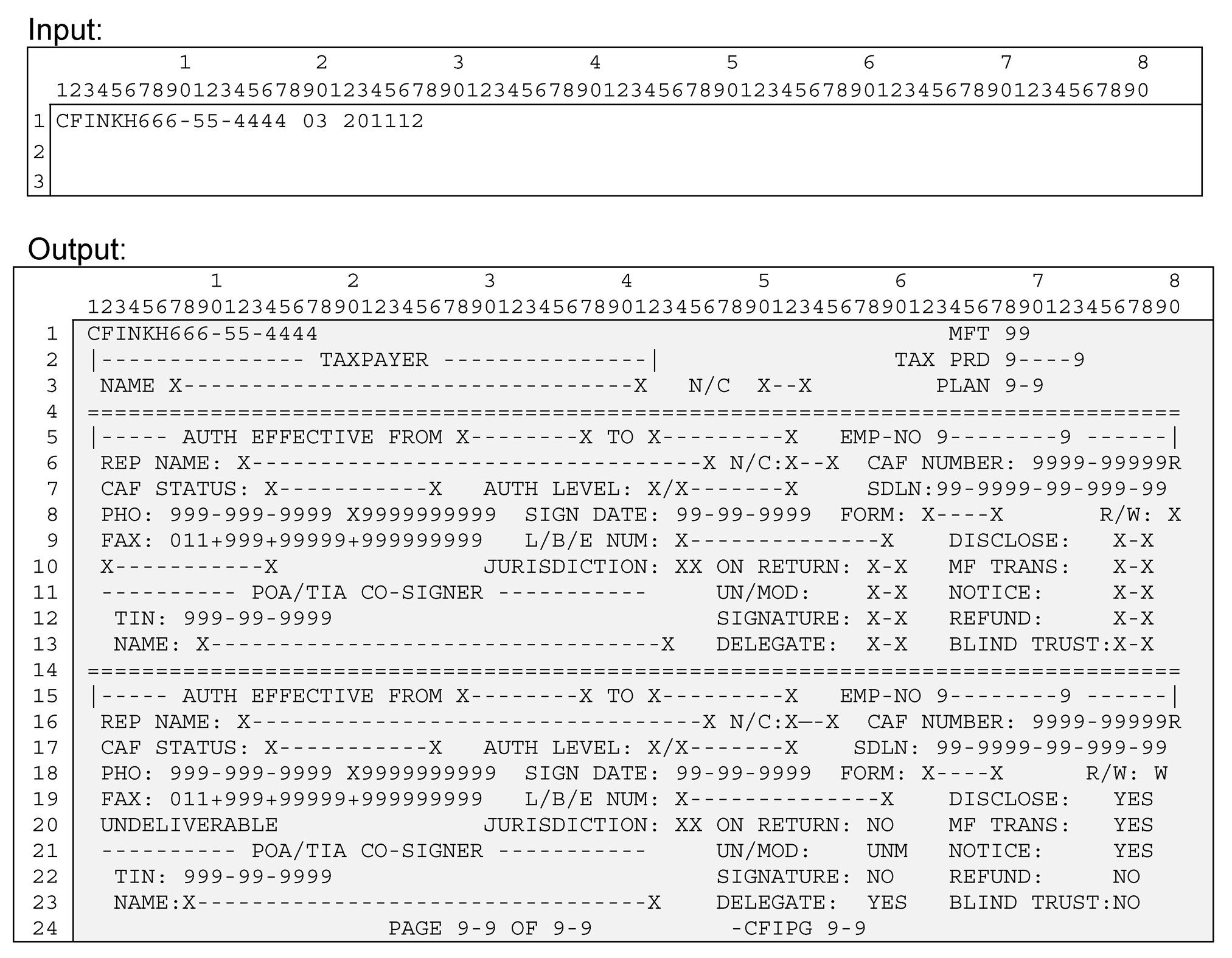
The table below contains a full list of the screen fields and their descriptions.
| Input - Tax Module History | ||
|---|---|---|
| Line 1 | Command Code | CFINKH |
| Line 1 | TIN | SSN or EIN -- must be in one of the following formats: ([[slashb]]=blank) nnn-nn-nnnn[[slashb]] (Valid IMF) nnn-nn-nnnn* (Invalid IMF) nnn-nn-nnnnV (Valid BMF SSN) nnn-nn-nnnnW (Invalid BMF SSN) nnn-nn-nnnnN (NMF SSN) nn-nnnnnnn[[slashb]] (BMF EIN) nn-nnnnnnnP (EPMF EIN) nn-nnnnnnnN (NMF EIN) |
| Line 1 | MFT | MFT - Master File Tax code (to which an authorization applies) |
| Line 1 | Tax Period | yyyymm format month ending the period of time the tax form covers |
| Output - Tax Module History | ||
| Line 1 | Command Code | CFINKH |
| Line 1 | TIN | TIN entered on Input screen |
| Line 1 | MFT | MFT - Master File Tax code (to which an authorization applies) |
| Line 2 | TAX PRD | yyyymm format month ending the period of time the tax form covers |
| Line 3 | PLAN | REPORT/PLAN NUMBER Used for all EPMF and some BMF modules (MFT 46 and 76). |
| TAXPAYER | ||
| Line 3 | NAME | The full taxpayer name - up to 35 characters. For individuals , this field is made up of FIRST-NAME, MIDDLE-NAME/INIT, LAST-NAME, and SUFFIX. For business entries, this field will be the only place the name is displayed. |
| Line 3 | N/C | Taxpayer name control |
| Line 5 & 15 | AUTH EFFECTIVE FROM/TO | This is the date range that the particular authorization is valid for. If this is the current authorization, the TO field will display the word PRESENT |
| Line 5 & 15 | EMP NO | This is the number of the employee who added/updated information on this particular authorization. If this field is zeroes, change was done in batch processing. |
| Line 6 & 16 | REP NAME | The full third party name - up to 35 characters. This field is made up of FIRST-NAME, MIDDLE-NAME/INIT, LAST-NAME, and SUFFIX. |
| Line 6 & 16 | REP N/C | Third party name control |
| Line 6 & 16 | CAF NUMBER | Third party CAF number |
| Line 7 & 17 | CAF STATUS | Indicates third party's practice status before the IRS GOOD STANDING - third party is authorized to represent the taxpayer DISBARRED - third party is not authorized to represent the taxpayer SUSPENDED - third party is not authorized to represent the taxpayer DECEASED - third party is not authorized to represent the taxpayer RETIRED - third party is not authorized to represent the taxpayer INELIGIBLE - third party is not authorized to represent the taxpayer PND REVIEW - CAF number underreview for possible fraud CONF FRAUD - Confirmed Fraud usage of this CAF number. |
| Line 7 & 17 | AUTH LEVEL | Authorization level - mandatory for 2848 only A - Attorney B - Certified Public Accountant C - Enrolled Agent D - Bona fide officer of the taxpayer's organization E - Full-time employee of the taxpayer's organization F - Member of the taxpayer's immediate family (spouse, child, parent, sibling) G - Enrolled actuary H - Unenrolled return preparer I- Registered Return Preparer K - Student Attorney or CPA R -Enrolled Retirement Plan Agent (ERPA) |
| Line 7& 17 | SDLN | Source Document Locator Number nn-nnnn-nn-nnn-nn format, where... nn=purge year - last 2 digits of the year in which the paper document is to be purged from the files; if form 2848 or 8821 then 7 years after sign date; if form 706 then 15 years after sign date nnnn=control cycle - yyww format; not later than current cycle nn=document location office nnn=block series - numeric; 000-999 nn=sequence number - numeric; 00-99 Note:Oral TIAs will show a ‘P’ after the SDLN |
| Line 8 & 18 | PHO | Third party's phone number (domestic or foreign), and possibly extension (domestic only) |
| Line 8 & 18 | SIGN DATE | Taxpayer signature date from form |
| Line 8 & 18 | FORM | FORM: Input form number - current valid form numbers are 2848, 8821, and 706. Older entries may contain 2848D, 56, or others. |
| Line 8 &18 | R/W | Revoke or Withdrawn Indicator, X= Taxpayer revoked the authorization W = Rep withdrew the authorization E = Employee change or error |
| Line 9 & 19 | FAX | Third party's FAX number (domestic or foreign) |
| Line 9 & 19 | L/B/E NUM | License/Bar/Enrollment number, if applicable. Applicable to designation levels: Attorney, CPA, Enrolled Agent, Enrolled Actuary, Enrolled Retirement Plan Agent. |
| Line 9 & 19 | DISCLOSE | Indicates whether the taxpayer has given the Rep authorization to disclose information to another third party. (Yes or No) |
| Line 10 & 20 | Note: If correspondence addressed to the third party at this address has been returned by the USPS, then 'UNDELIVERABLE', will appear to the left of JURISDICTION | |
| Line 10 & 20 | JURISDICTION | 2 character state code of where the Third Party practices as an Attorney or CPA, for this authorization, if applicable |
| Line 10 & 20 | ON RETURN | YES = POA was submitted with a tax return NO = POA was submitted separately or after July 2008 |
| Line 10 & 20 | MF TRANS | Indicates if a transaction was attempted to be sent to Master File |
| Line 11 & 21 | UN/MOD | UNM = 2848 was unmodified MOD = 2848 was modified in some way other than sign, delegate and/or disclose to third party TXT = input by E-Services and contains modified form text |
| Line 11 & 21 | NOTICE | Indicates if authorized to receive copies of taxpayer notices (Yes or No) |
| Line 12 & 22 | POA/TIA CO-SIGNER TIN | TIN of co-signer of CAF document (not necessarily joint filer) |
| Line 12 & 22 | SIGNATURE | Indicates if third party allowed to sign a return for the taxpayer (Yes or No) |
| Line 12 & 22 | REFUND | Indicates if authorized to receive (but not negotiate) taxpayer's refund checks (Yes or No) |
| Line 13 & 23 | POA/TIA CO-SIGNER NAME | Name of co-signer of CAF document (not necessarily joint filer) |
| Line 13 & 23 | DELEGATE | Indicates if authorized to delegate or substitute (Yes or No) |
| Line 13 & 23 | BLIND TRUST | Indicates whether module contains blind trust authorization (Yes or No) |
Please click here for the text description of the image.
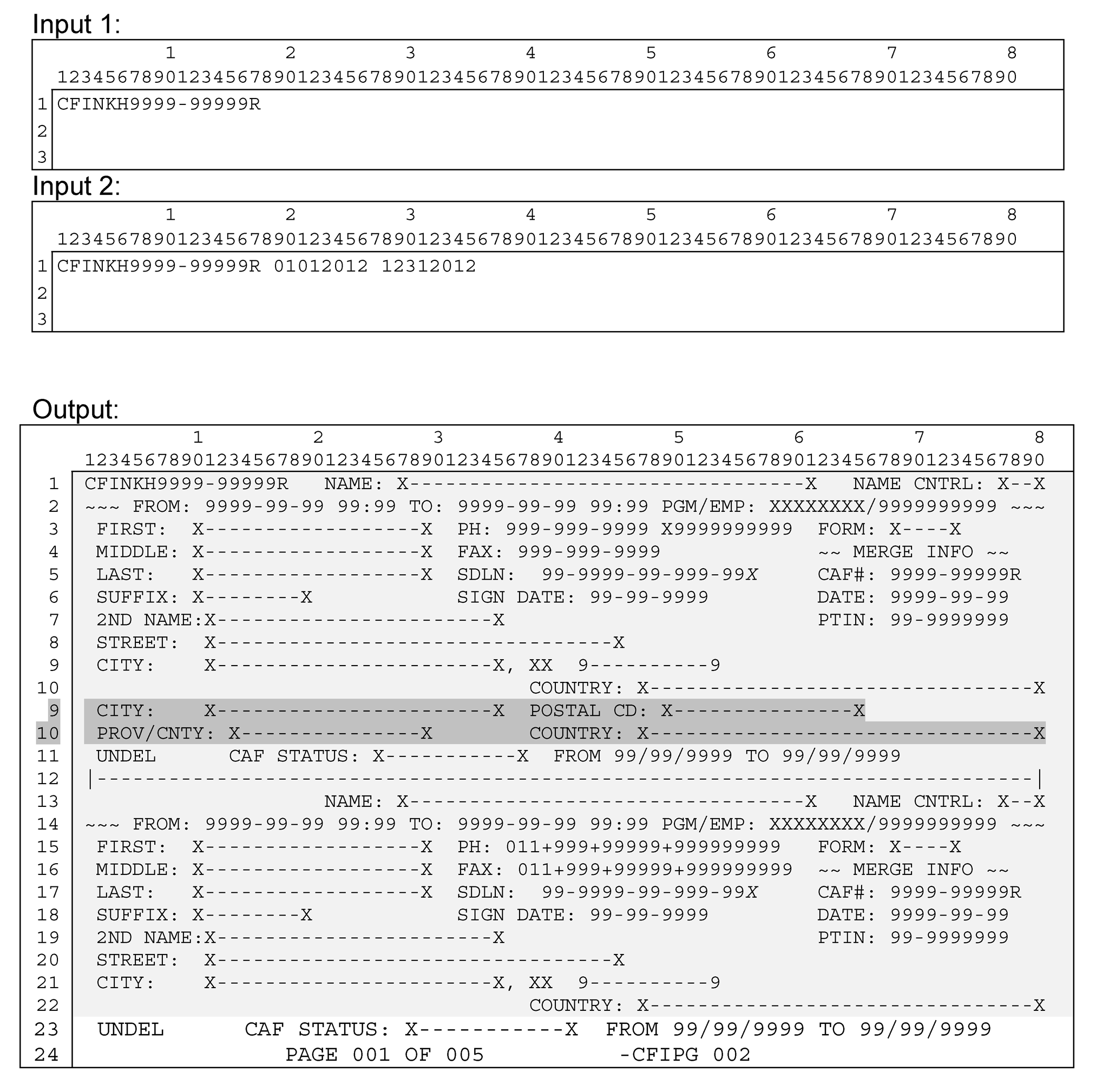
The Begin Date(MMDDYYYY) and End Date(MMDDYYYY) fields are optional. If only a Begin Date is specified, all history from the Begin Date to current date is displayed. If both Begin Date and End Date are specified, then the current record along with all history within the specified range will be displayed.
The table below contains a full list of the screen fields and their descriptions.
| Input - CAF# History | ||
|---|---|---|
| Line 1 | Command Code | CFINKH |
| Line 1 | CAF Number | Third party CAF number followed by ‘R ’(file source code = 9 and tin type = 4). Format: nnnn-nnnnnR |
| Line 1 | Beginning Date (optional) | If a beginning date is entered, only history equal to or newer is displayed Format: mmddyyyy |
| Line 1 | Ending Date (optional) | If an ending date is entered, the history that is displayed will fall in to the range of dates entered. Format: mmddyyyy |
| Output - CAF# History | ||
| Line 1 | Command Code | CFINKH |
| Line 1 | CAF Number | Third party CAF # entered on input screen |
| Line 1 | NAME | The full third party name - up to 35 characters. This field is made up of FIRST-NAME, MIDDLE-NAME/INIT, LAST-NAME, and SUFFIX or business name. |
| Line 1 | NAME CNTRL | Third party name control |
| Line 2 & 14 | FROM/TO | Date range that this authorization is valid for |
| Line 2 & 14 | PGM/EMP | PGM: Name of the program used when adding/updating this third party data. EMP: This is the number of the employee who added/updated information on this particular third party. If this field is zeroes, change was done in batch processing. |
| Line 3 & 15 | FIRST | Third party's first name - maximum 20 characters (total of first name, middle name, last name and suffix may not exceed 35) |
| Line 3 & 15 | PHONE | Third party's phone number, domestic or foreign. Extension may also be present on domestic numbers. |
| Line 3 & 15 | FORM | FORM: Input form number - current valid form numbers are 2848, 8821, and 706. Older entries may contain 2848D, 56, or others. |
| Line 4 & 16 | MIDDLE | Third party's middle name - maximum 20 characters (total of first name, middle name, last name and suffix may not exceed 35) |
| Line 4 & 16 | FAX | Third party's FAX number, domestic or foreign |
| Line 5 & 17 | LAST | Third party's last name - maximum 20 characters (total of first name, middle name, last name and suffix may not exceed 35) |
| Line 5 & 17 | SDLN | Source Document Locator Number nn-nnnn-nn-nnn-nn format, where... nn=purge year - last 2 digits of the year in which the paper document is to be purged from the files; if form 2848 or 8821 then 7 years after sign date; if form 706 then 15 years after sign date nnnn=control cycle - yyww format; not later than current cycle nn=document location office nnn=block series - numeric; 000-999 nn=sequence number - numeric; 00-99 Note:Oral TIAs will show a ‘P’ after the SDLN |
| Line 5 & 17 | MERGE CAF# | CAF number of third party who was merged to this third party |
| Line 6 & 18 | SUFFIX | JR, III, etc. - maximum 10 characters (total of first name, middle name, last name and suffix may not exceed 35 characters. Note: Do not include any authorization level information (e.g. ATTY, EA, A, B, C, etc.) in this field. That information does not belong in the THIRD PARTY record. |
| Line 6 & 18 | SIGN DATE | Third party signature date |
| Line 6 & 18 | MERGE DATE | Date the third party merge took place |
| Line 7 & 19 | 2ND NAME | Third party's 2nd name, often a business name Used in some instances to indicate multiple locations (i.e. "Location 2" ) |
| Line 7 & 19 | MERGE PTIN | PTIN of third party who was merged to this third party |
| Line 8 & 20 | STREET | Third party's street address, domestic or foreign |
| Line 9 & 21 | CITY | Third party's city, domestic or foreign on domestic, state & Zip codes will be to the right of CITY on foreign, postal code will be to the right of CITY |
| Line 10 & 22 | PROV/CNTY | If foreign, province/county/territory name will be displayed to the left of COUNTRY |
| Line 10 & 22 | COUNTRY | Third party's 2 character country code along with the 35 character name is displayed. |
| Line 11 & 23 | Note: If correspondence addressed to the third party at this address has been returned by the USPS, then 'UNDEL', will appear to the left of CAF STATUS | |
| Line 11 & 23 | CAF STATUS | Indicates third party's practice status before the IRS GOOD STANDING - third party is authorized to represent the taxpayer DISBARRED - third party is not authorized to represent the taxpayer SUSPENDED - third party is not authorized to represent the taxpayer DECEASED - third party is not authorized to represent the taxpayer RETIRED - third party is not authorized to represent the taxpayer INELIGIBLE - third party is not PND REVIEW - CAF number under review for possible fraud CONF FRAUD - Confirmed Fraud usage of this CAF number. authorized to represent the taxpayer |
| Line 11 & 23 | Note:If the third party has been suspended, the date(s) of the suspension will display in the format mm/dd/yy to the right of the CAF STATUS | |
Please click here for the text description of the image.
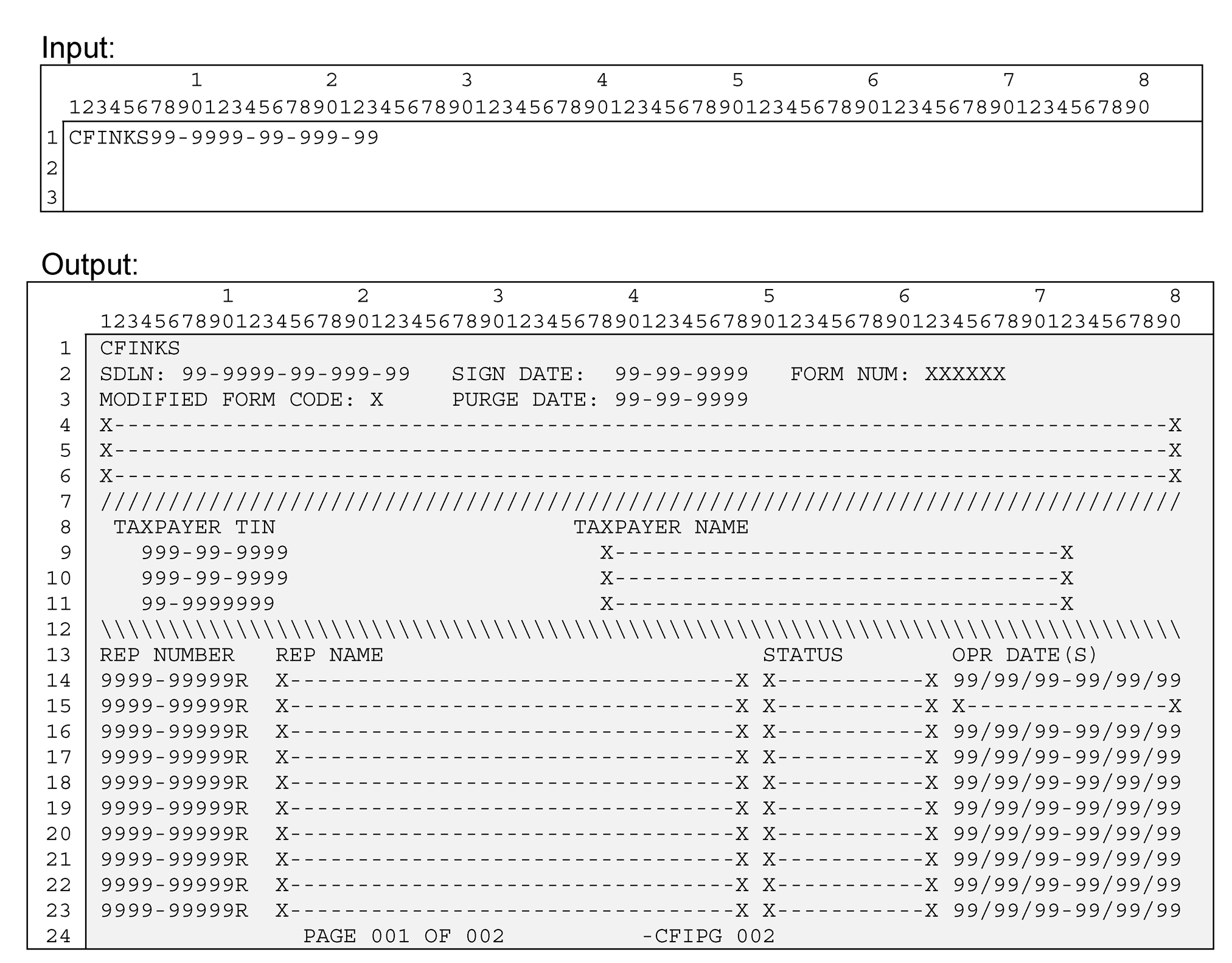
The table below contains a full list of the screen fields and their descriptions.
| Input - SDLN | ||
|---|---|---|
| Line 1 | Command Code | CFINKS |
| Line 1 | SDLN | SDLN (Source Document Locator Number) must be entered in the format nn-nnnn-nn-nnn-nn |
| Output _ SDLN | ||
| Line 1 | Command Code | CFINKS |
| Line 2 | SDLN | Source Document Locator Number nn-nnnn-nn-nnn-nn format, where... nn=purge year - last 2 digits of the year in which the paper document is to be purged from the files; if form 2848 or 8821 then 7 years after sign date; if form 706 then 15 years after sign date nnnn=control cycle - yyww format; not later than current cycle nn=document location office nnn=block series - numeric; 000-999 nn=sequence number - numeric; 00-99 Note:Oral TIAs will show a ‘P’ after the SDLN |
| Line 2 | SIGN DATE | Taxpayer signature date |
| Line 2 | FORM NUM | Input form number - current valid form numbers are 2848, 8821, and 706. Older entries may contain 2848D, 56, or others. |
| Line 3 | MODIFIED FORM CODE | U = 2848 was unmodified M = 2848 was modified in some way other than sign, delegate and/or disclose to third party T = input by E-Services and contains modified form text |
| Line 3 | PURGE DATE | Date that the paper document and the authorization are to be purged from the files : Forms 2848/8821 - 7 years from sign date Form 706 - 15 years from sign date |
| Line 4 thru 6 | Note: If the modified form code is 'T', then the text entered by e-services will be displayed beneath the MODIFIED FORM CODE field. | |
| Line 9 thru 11 | TAXPAYER TIN | The taxpayer's SSN or EIN |
| Line 9 thru 11 | TAXPAYER NAME | The full taxpayer name - up to 35 characters. For individuals , this field is made up of FIRST-NAME, MIDDLE-NAME/INIT, LAST-NAME, and SUFFIX. For business entries, this field will be the only place the name is displayed. |
| Line 14 thru 23 | REP NUMBER | Third party CAF number |
| Line 14 thru 23 | REP NAME | The full third party name - up to 35 characters. This field is made up of FIRST-NAME, MIDDLE-NAME/INIT, LAST-NAME, and SUFFIX. |
| Line 14 thru 23 | STATUS | Indicates third party's practice status before the IRS UNDEL - Undeliverable - correspondence addressed to the third party at this address has been returned by the USPS GOOD - Good Standing, third party is authorized to represent the taxpayer DISB - Disbarred - third party is not authorized to represent the taxpayer SUSP - Suspended - third party is not authorized to represent the taxpayer DEC - Deceased, not authorized to represent the taxpayer RET - Retired - third party is not authorized to represent the taxpayer INELG - Ineligible - third party is not authorized to represent the taxpayer PNDING - CAF number under review for possible fraud C FRD - Confirmed Fraud usage of this CAF number. |
| Line 14 thru 23 | OPR DATE(S) | If the third party has been suspended, the date(s) of the suspension will display in the format mm/dd/yy |
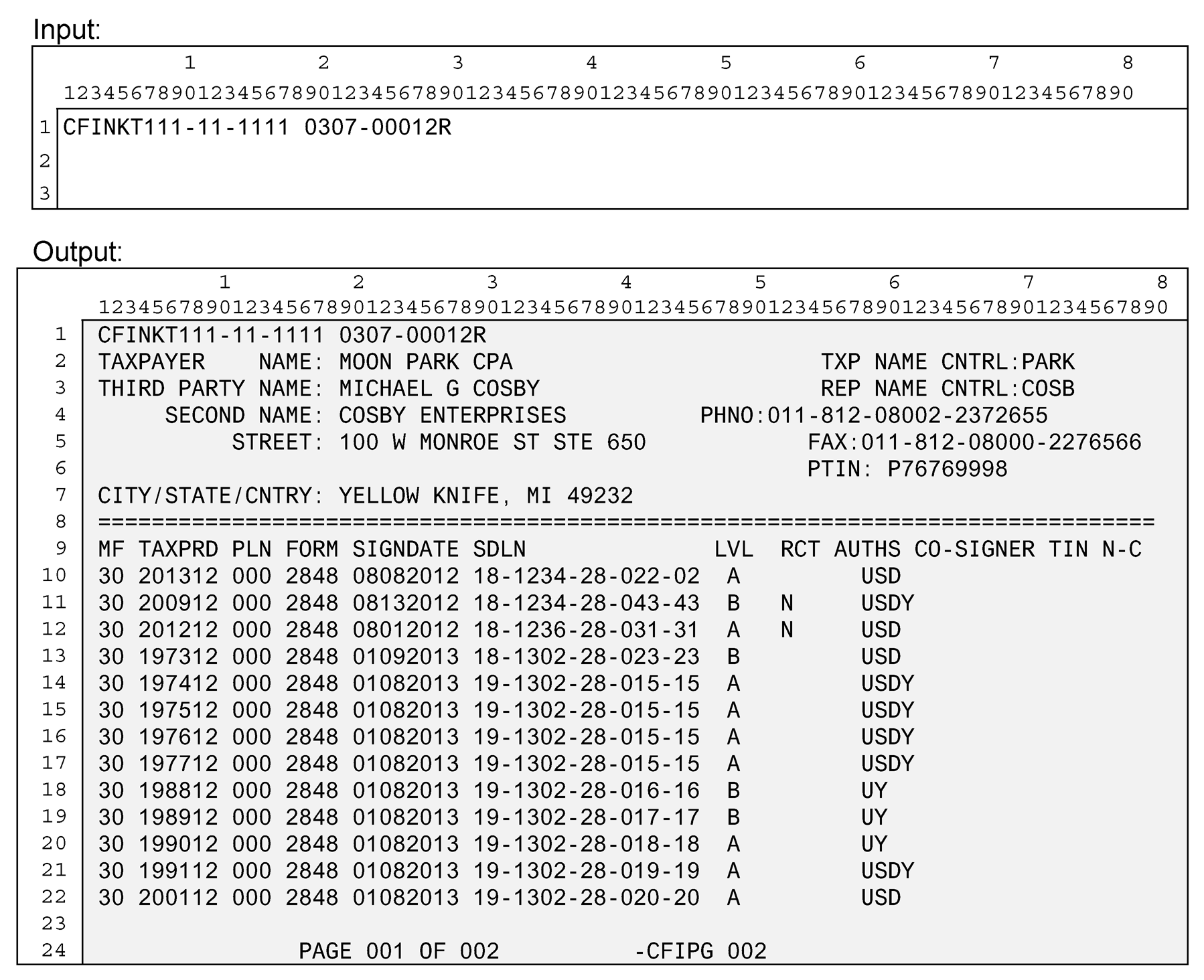
Please click here for the text description of the image.
| Input - TIN & CAF# | ||
|---|---|---|
| Line 1 | Command Code | CFINKT |
| Line 1 | TIN | SSN or EIN -- must be in one of the following formats: ([[slashb]]=blank) nnn-nn-nnnn[[slashb]] (Valid IMF) nnn-nn-nnnn* (Invalid IMF) nnn-nn-nnnnV (Valid BMF SSN) nnn-nn-nnnnW (Invalid BMF SSN) nnn-nn-nnnnN (NMF SSN) nn-nnnnnnn[[slashb]] (BMF EIN) nn-nnnnnnnP (EPMF EIN) nn-nnnnnnnN (NMF EIN) |
| Line 1 | CAF Number | Third party CAF number followed by ‘R ’. Format: nnnn-nnnnnR (CAF #) |
| Output - TIN & CAF# | ||
| Line 1 | Command Code | CFINKT re-displayed from input screen |
| Line 1 | TIN | Taxpayer TIN re-displayed from input screen |
| Line 1 | CAF Number | Third party CAF number re-displayed from input screen |
| Line 2 | TAXPAYER NAME | The full taxpayer name - up to 35 characters. For individuals , this field is made up of FIRST-NAME, MIDDLE-NAME/INIT, LAST-NAME, and SUFFIX. For business entries, this field will be the only place the name is displayed. |
| Line 2 | TXP NAME CNTRL | Taxpayer name control |
| Line 3 | THIRD PARTY NAME | The full third party name - up to 35 characters. This field is made up of FIRST-NAME, MIDDLE-NAME/INIT, LAST-NAME, and SUFFIX. |
| Line 3 | REP NAME CNTRL | Third party's name control |
| Line 4 | SECOND NAME | Third party's 2nd name, often a business name Used in some instances to indicate multiple locations (i.e. "Location 2" ) |
| Line 4 | PHNO | Third party's phone number, domestic or foreign |
| Line 5 | STREET | Third party's street address, domestic or foreign |
| Line 5 | FAX | Third party's FAX number, domestic or foreign |
| Line 6 | PTIN | Third Party PTIN |
| Line 7 | CITY/STATE/CNTRY | Third party's DOMESTIC: City, 2-character state code & Zip Code or FOREIGN: City, province/territory/county name, Postal code & Country |
| Line 7 | Note: If third party is 'UNDELIVERABLE', this will to the right of COUNTRY | |
| Line 10 thru 22 | MF | MFT - Master File Tax code (to which an authorization applies) |
| Line 10 thru 22 | TAXPRD | Tax Period - yyyymm format |
| Line 10 thru 22 | PLN | REPORT/PLAN NUMBER Used for all EPMF and some BMF modules (MFT 46 and 76). |
| Line 10 thru 22 | FORM | Input form number - current valid form numbers are 2848, 8821, and 706. Older entries may contain 2848D, 56, or others. |
| Line 10 thru 22 | SIGNDATE | Taxpayer signature date |
| Line 10 thru 22 | SDLN | Source Document Locator Number nn-nnnn-nn-nnn-nn format, where... nn=purge year - last 2 digits of the year in which the paper document is to be purged from the files; if form 2848 or 8821 then 7 years after sign date; if form 706 then 15 years after sign date nnnn=control cycle - yyww format; not later than current cycle nn=document location office nnn=block series - numeric; 000-999 nn=sequence number - numeric; 00-99 Note:Oral TIAs will show a ‘P’ after the SDLN |
| Line 10 thru 22 | LVL | Authorization level - mandatory for 2848 only A - Attorney B - Certified Public Accountant C - Enrolled Agent D - Bona fide officer of the taxpayer's organization E - Full-time employee of the taxpayer's organization F - Member of the taxpayer's immediate family (spouse, child, parent, sibling) G - Enrolled actuary H - Unenrolled return preparer I- Registered Return Preparer K - Student Attorney or CPA R -Enrolled Retirement Plan Agent (ERPA) |
| Line 10 thru 22 | RCT | N = third party is authorized to receive copies of taxpayer correspondence R = third party is authorized to receive taxpayer's refund check B = indicates blind trust - third party receives correspondence and refund; taxpayer receives neither |
| Line 10 thru 22 | AUTHS | U = 2848 was unmodified M = 2848 was modified in some way other than sign, delegate and/or disclose to third party T = input by E-Services and contains modified form text S = modified to allow third party to sign returns for taxpayer D = modified to allow third party to re-delegate his/her authorization I = 8821 coded for INSPECT Y = Disclosure to another third party |
| Line 10 thru 22 | Note: If there is something other than a blank (Good Standing) in the third party's practice status, one of the following will be displayed in the RCT and AUTHS fields. DISBARRED - third party is not authorized to represent the taxpayer SUSPENDED - third party is not authorized to represent the taxpayer DECEASED - third party is not authorized to represent the taxpayer RETIRED - third party is not authorized to represent the taxpayer INELIGIBLE - third party is not authorized to represent the taxpayer PND REVIEW - CAF number under review for possible fraud CONF FRAUD - Confirmed Fraud usage of this CAF number. |
|
| Line 10 thru 22 | CO-SIGNER TIN | TIN of co-signer of CAF document (not necessarily joint filer) |
| Line 10 thru 22 | N-C | Name control of co-signer of CAF document (not necessarily joint filer) |
| Line 10 thru 22 | Note: If there is more than 1 co-signer, an asterisk (*) will display next to the name control. | |
The table below contains a full list of the screen fields and their descriptions.
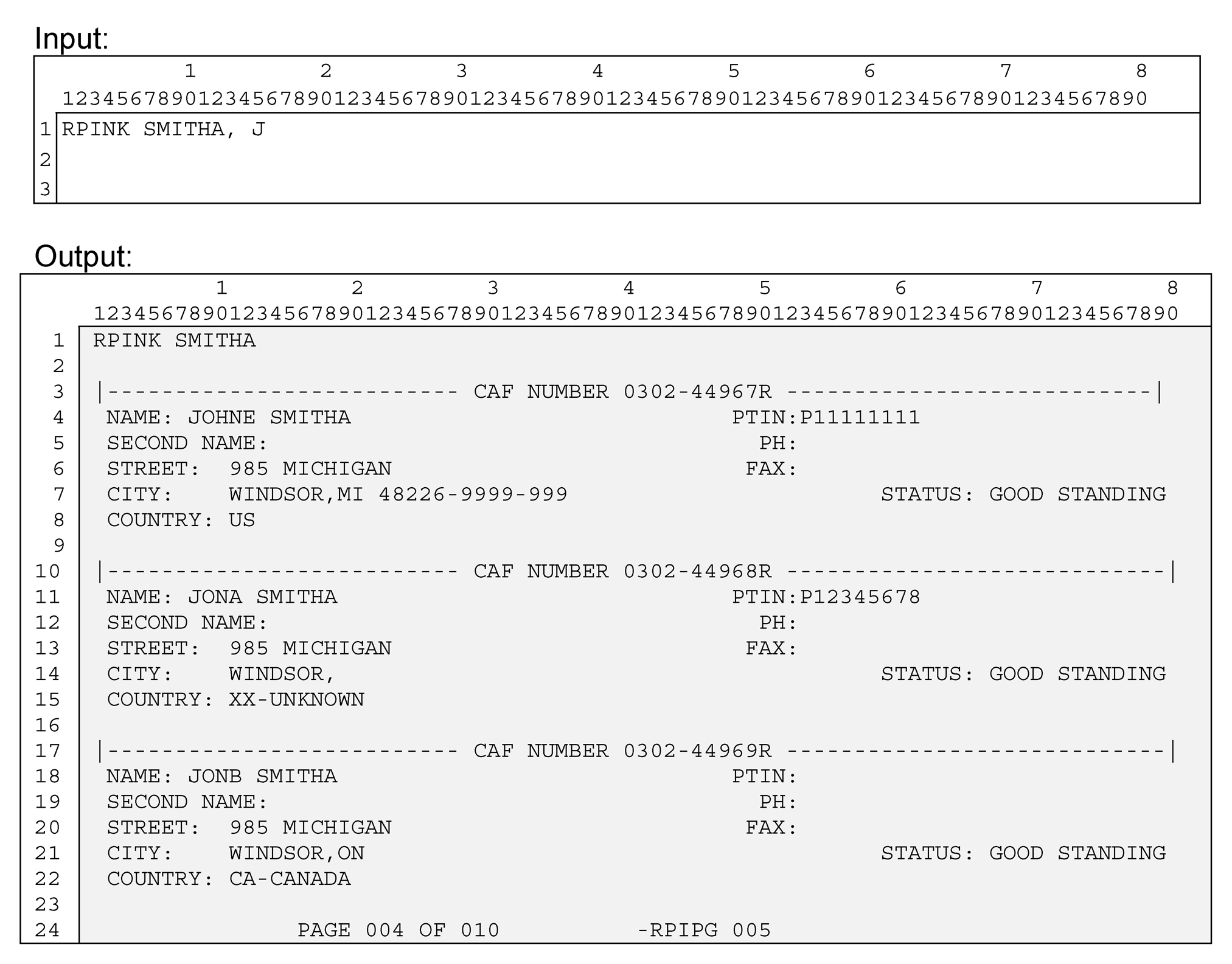
Please click here for the text description of the image.
The table below contains a full list of the screen fields and their descriptions.
| Input | ||
|---|---|---|
| Line 1 | Command Code | RPINK |
| Line 1 | Third Party last name | the first 10 characters of the last name field |
| Line 1 | delimiter | comma |
| Line 1 | Third Party first name | up to the first 10 characters of the first name field |
| Line 1 | Zip - 1st 3 digits | the first 3 characters of the postal code |
| Line 1 | Zip - 4th & 5th digits | the 4th and 5th of the postal code |
| Line 1 | Address - 1st 4 characters | the first 4 characters of the street address |
| Output | ||
| Line 1 | Command Code | RPINK |
| Line 1 | Third Party last name | the first 10 characters of the last name field |
| Line 3, 10, 17 | CAF NUMBER | Third party CAF number followed by ‘R ’. |
| Line 4, 11, 18 | NAME | Full name of third party |
| Line 4, 11, 18 | PTIN | Third party's PTIN |
| Line 5, 12, 19 | SECOND NAME | Third party's 2nd name, often a business name |
| Line 5, 12, 19 | PH | Third party's telephone number, domestic or foreign |
| Line 6, 13, 20 | STREET | Third party's street address, domestic or foreign |
| Line 6, 13, 20 | FAX | Third party's FAX number, domestic or foreign |
| Line 7, 14, 21 | CITY | The third party address data reflected is a string of the following, domestic or foreign, information: city name state cd or province/territory name zip or postal code |
| Line 7, 14, 21 | STATUS | If database Practice Code is not spaces will show: ‘PNDING REVIEW’, 'CONFIRM FRAUD', ‘RETIRED ’, ‘DECEASED’, ‘DISBARRED’, ‘SUSPENDED ’, or 'INELIGIBLE'. If 'SUSPENDED' or 'CONFIRM FRAUD' or ‘PNDING REVIEW’, date(s) of suspension may display underneath. |
| Line 8, 15, 22 | COUNTRY | Third party's 2 character country code and 35 character country name will be displayed. |