


 )
or https:// means you've safely connected to the .gov website. Share sensitive information only on official, secure websites.
)
or https:// means you've safely connected to the .gov website. Share sensitive information only on official, secure websites.


- 3.5.20 Income Verification Express Service (IVES) - Processing Requests for Tax Return/Return Information
- 3.5.20.1 Program Scope and Objectives
- 3.5.20.1.1 Background
- 3.5.20.1.2 Authority
- 3.5.20.1.3 Responsibilities
- 3.5.20.1.4 Program Management and Review
- 3.5.20.1.5 Program Controls
- 3.5.20.1.6 Terms/Definitions/Acronyms
- 3.5.20.1.7 Related Resources
- 3.5.20.2 General Information and Requirements for IVES Requests
- 3.5.20.2.1 Inadvertent Unauthorized Disclosure Reporting Procedures
- 3.5.20.2.2 Reporting Time and Volume for IVES Requests
- 3.5.20.2.3 Timeliness Guidelines for IVES Requests
- 3.5.20.2.4 System Downtime Procedures
- 3.5.20.3 IVES Program Coordination
- 3.5.20.3.1 IVES Enrollment
- 3.5.20.3.2 Requesting Re-submission of Form 4506-C
- 3.5.20.3.3 IVES Program Requirements
- 3.5.20.3.4 IVES Processing Fees
- 3.5.20.3.5 IVES Dispute Adjustments
- 3.5.20.3.5.1 IVES Dispute Adjustments Procedures
- 3.5.20.4 Receiving and Batching IVES Requests
- 3.5.20.5 Requests for Transcripts Under IVES
- 3.5.20.5.1 Pre-Processing Review of IVES Requests
- 3.5.20.5.1.1 Review for Completeness
- 3.5.20.5.2 Authorization to Release Tax Return Information
- 3.5.20.5.3 Signature Authority for Tax Return Information
- 3.5.20.5.4 Identification and Validation of IVES Requests
- 3.5.20.5.5 Identity Theft Research
- 3.5.20.5.6 Processing IVES Requests in TDS
- 3.5.20.5.7 Rejecting IVES Requests
- 3.5.20.5.7.1 Letter 0050C Tool Set up
- 3.5.20.5.7.2 Input of Letter 0050C Correspondence
- 3.5.20.5.7.3 Undeliverable Mail Indicator
- 3.5.20.5.8 Telephone Contact in IVES
- 3.5.20.5.9 Undelivered or Returned Mail
- 3.5.20.5.10 IVES Manual Adjustments
- 3.5.20.5.10.1 Notification of Processing Adjustments
- 3.5.20.5.1 Pre-Processing Review of IVES Requests
- 3.5.20.6 IVES Transcripts Request Information
- 3.5.20.6.1 Return Transcript
- 3.5.20.6.2 Account Transcript
- 3.5.20.6.3 Record of Account
- 3.5.20.6.4 Wage and Income Information (Form W-2, etc.)
- 3.5.20.7 TSS Headquarter Analyst
- 3.5.20.7.1 TSS Analyst General Responsibilities
- 3.5.20.7.2 IVES Accounts Billing
- 3.5.20.7.3 IVES Applications
- 3.5.20.7.4 IVES E-Signature Audit
- 3.5.20.7.5 IVES Compliance Review
- 3.5.20.7.6 IVES Suitability Review
- Exhibit 3.5.20-1 Optional Address Abbreviations
- Exhibit 3.5.20-2 Address Reject Exceptions IVES
- Exhibit 3.5.20-3 IRM Cross-References
- Exhibit 3.5.20-4 IVES Reject Codes for Participants
- Exhibit 3.5.20-5 IVES Reject Notification Spreadsheet
- Exhibit 3.5.20-6 Telephone Log Spreadsheet
- Exhibit 3.5.20-7 PII Breach Reporting to Headquarters Spreadsheet
- Exhibit 3.5.20-8 IVES Product Availability
- Exhibit 3.5.20-9 Reject Code Definitions for IVES Employees Only
- 3.5.20.1 Program Scope and Objectives
Part 3. Submission Processing
Chapter 5. Accounts Services
Section 20. Income Verification Express Service (IVES) - Processing Requests for Tax Return/Return Information
3.5.20 Income Verification Express Service (IVES) - Processing Requests for Tax Return/Return Information
Manual Transmittal
November 07, 2025
Purpose
(1) This transmits revised IRM 3.5.20, Accounts Services, Income Verification Express Service (IVES) - Processing Requests for Tax Return/Return Information.
Material Changes
(1) IRM 3.5.20.2 (5)a - Updated General Information and Requirements for IVES Requests. Updated the Form 4506-C date 10-22 is the only acceptable form. IPU 25U3564 issued 08/14/2025.
(2) IRM 3.5.20.2 (6) - Updated General Information and Requirements for IVES Requests due to Action 61 name changing to P-21-3. IPU 25U0120 issued 01/29/2025.
(3) IRM 3.5.20.2.1 (3) Table - Updated Inadvertent Unauthorized Disclosure Reporting Procedure due to updating Form 1099 as processing error. IPU 25U0120 issued 01/29/2025.
(4) IRM 3.5.20.2.3 (1)- Updated Timeliness Guidelines for IVES Requests due to timeliness requirements. IPU 25U0281 issued 02/27/2025 and to adding in excluding weekends/holidays. IPU 25U3219 issued 04/28/2025.
(5) IRM 3.5.20.2.4 (3) Note - Updated System Downtime Procedures to clarify back up system. IPU 25U3564 issued 08/14/2025.
(6) IRM 3.5.20.3 (4) - Updated IVES Program Coordination due to processing incomplete partial batches. IPU 25U3342 issued 05/28/2025.
(7) IRM 3.5.20.3 (4)b - Updated IVES Program Coordination due to adding batches to the Que. IPU 25U3564 issued 08/14/2025.
(8) IRM 3.5.20.3.5 (1) - Updated IVES Dispute Adjustments due to limiting disputes per one batch. IPU 25U3219 issued 04/28/2025.
(9) IRM 3.5.20.3.5.1 (1)b - Updated IVES Dispute Adjustments Procedures due to clarification of receipt from the IRS. IPU 25U0120 issued 01/29/2025.
(10) IRM 3.5.20.3.5.1 (2)c Note - Updated IVES Dispute Adjustments Procedures due to adding Form 13873-IR notice. IPU 25U3379 issued 06/06/2025.
(11) IRM 3.5.20.4 (5) Note & (6) - Update Receiving and Batching IVES Requests due to clarifying duplicate requests. IPU 25U3342 issued 05/28/2025.
(12) IRM 3.5.20.5 (3) - Updated Requests for Transcripts Under IVES due to updating IVES user fee and effective date. IPU 25U0120 issued 01/29/2025.
(13) IRM 3.5.20.5.1.1 (1) Table - Updated Review for completeness due to adding in rejecting Form 4506-C if marked form has electronically marked for wet signature. IPU 25U3564 issued 08/14/2025.
(14) IRM 3.5.20.5.1.1 (6) Note - Updated Review for Completeness due to additional wage and income line 7 instructions. IPU 25U0120 issued 01/29/2025.
(15) IRM 3.5.20.5.2 (5) f Note - Updated Authorization to Release Tax Return Information due to clarifying BMF representative. IPU 25U3564 issued 08/14/2025.
(16) IRM 3.5.20.5.3(2)a - Updated Signature Authority for Tax Return Information due to clarifying when the authorized representative check box must be marked. IPU 25U3219 issued 04/28/2025.
(17) IRM 3.5.20.5.5 - Updated Identity Theft Research due to adding Letter 0050C throughout section. IPU 25U0214 issued 02/12/2025.
(18) IRM 3.5.20.5.5 (4)Table - Updated Identity Theft Research due to clarifying BMF IDT. IPU 25U3440 issued 06/26/2025.
(19) IRM 3.5.20.5.5 (4) - Updated Identity Theft Research due to adding in BMF IDT instructions. IPU 25U0120 issued 01/29/2025.
(20) IRM 3.5.20.5.6 (5) Table - Updated Processing IVES Requests in TDS due to adding BMF quarter. IPU 25U0120 issued 01/29/2025.
(21) IRM 3.5.20.5.6 (7) - Updated Processing IVES Requests in TDS due to processing off the Form 4506C and not the cover sheet. IPU 25U3564 issued 08/14/2025.
(22) IRM 3.5.20.5.7 (3) - Updated Rejecting IVES Rejects due to adding in Letter 0050C. IPU 25U3564 issued 08/14/2025.
(23) IRM 3.5.20.5.7.2 (5)Note - Updated Input of Letter 0050C Correspondence due to adding in review timeframe. IPU 25U3564 issued 08/14/2025.
(24) IRM 3.5.20.5.9 - Removed Undeliverable or Returned Mail due to removing Undeliverable/returned transcripts was (2). IPU 25U3564 issued 08/14/2025.
(25) IRM 3.5.20.5.10 (6) Note & Table, (7) (8) (9) - Updated IVES Manual Adjustments due to adding manual vs credit adjustments. IPU 25U3564 issued 08/14/2025 and adding example. IPU 25U0214 issued 02/12/2025.
(26) IRM 3.5.20.6 (1) - Updated IVES Transcripts Request Information due to adding in IRM reference. IPU 25U3564 issued 08/14/2025.
(27) IRM 3.5.20.6.4 (2) - Updated Wage and Income Information (Form W-2, etc) due to additional wage and income line 7 instructions and W-2 availability. IPU 25U0120 issued 01/29/2025.
(28) IRM 3.5.20.7.1 (9)d - Updated TSS Analyst General Responsibilities due to clarifying yellow package information. IPU 25U3219 issued on 04/28/2025.
(29) IRM 3.5.20.7.2 (3) - Updated IVES Accounts Billing due to updating IVES user fee and effective date. IPU 25U0120 issued 01/29/2025.
(30) IRM 3.5.20.7.2 (11) - Updated IVES Accounts Billing due to removing inactive accounts will be deleted in ESAM after two years.
(31) IRM 3.5.20.7.3 (3) - Updated IVES Applications due to removing note.
(32) IRM 3.5.20.7.5 (2) Note - Updated IVES Compliance Review due to changing exception to note. IPU 25U3379 issued 06/06/2025.
(33) Exhibit 3.5.20-2 Table - Updated Address Reject Exception IVES to add in apt number and zip code. IPU 25U3564 issued 08/14/2025.
(34) Renamed Form 13873-IR to Form 13873-C throughout. IPU issued 25U3379 issued 06/06/2025.
(35) Editorial Changes made throughout the IRM to update title change, grammar, titles, website addresses, legal references, and IRM references.
Effect on Other Documents
IRM 3.5.20, Accounts Services, Income Verification Express Service (IVES) Processing Requests for Tax Return/Return Information, dated December 06,2024, is superseded. This IRM incorporates the IRM Procedural Updates (IPUs): 25U0120 issued 01-29-2025, 25U0214 issued 02-12-2025, 25U0281 issued 02-27-2025, 25U3219 issued 04-28-2025, 25U3342 issued 05-28-2025, 25U3379 issued 06-06-2025, 25U3440 issued 06-26-2025, 25U3564 issued 08-14-2025.Audience
Submission Processing, Income Verification Express Service (IVES)Effective Date
(01-01-2026)Scott Wallace
Director, Submission Processing
Taxpayer Services Division
-
This section provides procedures for processing requests for tax return/return information in the Income Verification Express Service (IVES) Units.
-
This IRM contains the following subsections:
-
IRM 3.5.20.2 - General Information and Requirements for IVES Requests
-
IRM 3.5.20.3 - IVES Program Coordination
-
IRM 3.5.20.4 - Receiving and Batching IVES Requests
-
IRM 3.5.20.5 - Requests for Transcripts for IVES
-
IRM 3.5.20.6 - IVES Transcript Request information
-
IRM 3.5.20.7 - TSS Headquarter Analyst
-
-
Purpose: The purpose of this program is to give instruction to IVES employees on how to fulfill requests for transcripts of return or return information submitted by taxpayers and external customers.
-
Audience: Input clerks who use the Transcript Delivery System (TDS) and the Integrated Data Retrieval System (IDRS) to fulfill requested items that are typically received on Form 4506-C. IVES Coordinators who have oversight of the expedited volumes and communication with external customers, quality reviewers, management, and resource section.
-
Policy Owner: Director, Submission Processing.
-
Program Owner: Technical Support Section (a unit within the Specialty Programs Branch).
-
Primary Stakeholders: Accounts Management, ID Theft Units, Office of Taxpayer Correspondence, Criminal Investigation, and Disclosure.
-
Program Goals: To fulfill requests from taxpayers and external customers in an accurate and timely manner.
-
Requests for returns and return information are sent to the IVES Units by taxpayers or authorized parties. After authentication, authorization and consent are verified by IRS employees, transcripts of tax returns are sent to the taxpayer or party designated by the taxpayer as outlined in IRC 6103.
-
Authority for these procedures is found in the following sections of the Internal Revenue Code (IRC) and their corresponding Treasury regulations:
-
IRC 6061
-
IRC 6062
-
IRC 6063
-
IRC 6064
-
IRC 6103
-
IRC 6104
-
IRC 6109
-
-
Servicewide policy statements are contained in IRM 1.2.1., Servicewide Policy Statements.
-
Servicewide delegations of authority are contained in IRM 1.2.2, Servicewide Delegations of Authority..
-
Taxpayer Services Division Delegation Orders are contained in IRM 1.2.61., Business Unit Delegations of Authority for Taxpayer Services.
-
The Operations Manager is responsible for ensuring that inventories are within the guidelines set forth in this IRM.
-
The Department Manager is responsible for ensuring that inventories are within the guidelines set forth in this IRM.
-
The Managers are responsible for ensuring that inventories are within the guidelines and that procedures set forth in this IRM are followed. They are also responsible for reports that are addressed are timely and accurate.
-
The Clerical Processors are responsible for ensuring that requests are fulfilled timely and accurately.
-
The Coordinators are responsible for ensuring that reports are accurate and timely, that disputed items are resolved timely, that new IVES applications are submitted to Headquarters and input timely after authorized, and that all calls from IVES participants are addressed timely. In addition, they are responsible for monitoring the workflow.
-
Program Reports: The reports listed below must be accurately completed and timely submitted.
-
IVES Daily Report: Receipts, production, and timeliness data for the IVES program. Email to RAIVS/IVES HQ and Monitoring Section daily. See IRM 3.30.124.5.3, IVES Daily Report.
-
PII Breach Reports: Email to RAIVS/IVES HQ by the 15th calendar day after the end of the quarter. See IRM 3.5.20.2.1 ,Inadvertent Unauthorized Disclosure Reporting Procedures.
-
RAIVS/IVES Telephone Log: Email to RAIVS/IVES HQ on the last Wednesday of each month. See IRM 3.5.20.5.8, Telephone Contact in IVES and Exhibit 3.5.20-6, Telephone Log Spreadsheet.
-
-
Program Effectiveness: Quality Review is completed as outlined in IRM 3.43.405, Measured Employees Performance System (MEPS) for Managers, and IRM 3.30.30, Embedded Quality for Submission Processing (EQSP) System.
-
The processes and procedures in this IRM are reviewed and updated annually, with input from all processing campuses, to ensure accuracy and clarity of instructions.
-
BMF- Business Master File
-
EFS- Enterprise File Storage
-
IMF- Individual Master File
-
TDS - Transcript Delivery System
-
SOR - Secure Object Repository
-
RAIVS - Return and Income Verification Services
-
IVES - Income Verification Express Service
-
FOIA - Freedom of Information Act
-
TAS - Taxpayer Advocate Services
-
TS- Taxpayer Services
-
POA - Power of Attorney
-
IDRS - Integrated Data Retrieval System
-
IAT- Integrated Automation Technologies
-
Address of Record - current address as shown on Master File in IDRS (may show as pending “PN”) or new address as listed on a validated Form 8822.
-
Calendar Year - Twelve-month period from January 1 through December 31.
-
Fiscal Year - A tax year that ends on the last day of any month other than December.
-
Tax Year (TY) - The calendar year or fiscal year for which information is reported to the IRS on a return or document.
-
Processing Year - The calendar year that a return or document is filed and processed.
-
Websites, job aids and tools used to process IVES requests:
-
Servicewide Enterprise Research Portal (SERP) at Servicewide Enterprise Research Portal (SERP)
-
IAT job aids at IAT job aids
-
IAT ITV Tool Job aid at IAT ITV Tool Job aid
-
Integrated Data Retrieval System (IDRS) Command Code Job Aid at Integrated Data Retrieval System (IDRS) Command Code Job Aid
-
IVES job aids and training material located at IVES job aids and training material
-
Disclosure information located at Disclosure information
-
Additional Transcript Delivery System (TDS) information on SERP at Transcript Delivery System (TDS)
-
Employee Portal Login located at Employee Portal Login
-
-
IRM references can be found at Exhibit 3.5.20-3, IRM Cross-References.
-
IRM deviations must be submitted in writing following instructions from IRM 1.11.2.2, Internal Management Documents System - Internal Revenue Manual (IRM) Process, IRM Standards, and elevated through appropriate channels for executive approval.
-
Service Center Directors, Headquarter Branch Chiefs, and Headquarter (HQ) Analysts do not have the authority to approve deviations from IRM procedures. Any request for an exception or deviation to an IRM procedure must be elevated through appropriate channels for executive approval. It must be ensured other functional areas are not adversely affected by the change and it does not result in disparate treatment of taxpayers.
-
Submit IRM deviations in writing following instructions from IRM 1.11.2.2.3 When Procedures Deviate from the IRM, and elevate through proper channels for executive approval. . Any disclosure issues will be coordinated by the Program Owner. No deviations can begin until reviewed by the Program Owner and approved at the executive level.
-
-
The IVES program is performed at the following campuses: Austin, Kansas City, Memphis, and Ogden.
-
The following instructions attempt to address the situations that are most frequently encountered when reviewing Form 4506-C. These instructions cannot address every possible issue. Use in conjunction with all the information contained in this IRM and exercise good judgment.
-
Ensure all required information is present during pre-processing review. If information is missing, ensure to address all issues on the nationally approved form letters. See IRM 3.5.20.5.7, Rejecting IVES Requests.
-
All IVES requests must have an acceptable revision date to process.
-
The Form 4506-C revision date 10-2022 is the only acceptable form for submitting requests for the IVES program.
-
IVES participants are not permitted to deviate on Form 4506-C revision date 10-2022 or later.
-
-
Requests for return information submitted on a Form 4506-C are not considered taxpayer correspondence unless indicated by the taxpayer/authorized requester and do not fall under P-21-3 guidelines in IRM 21.3.3, Incoming and Outgoing Correspondence/Letters.
-
If faxes are received in error, contact the person(s) who mis-sent the information to see if they want the information faxed back or destroyed.
-
IRS employees will utilize the Enterprise File Storage (EFS) for IVES inventory management.
-
Review your current assigned tasks in ‘My Tasks’ tab, complete all assigned tasks before getting next task.
-
Only take one batch at a time when using ‘Get next’ to ensure IVES requests are worked in First-In-First-Out (FIFO) order. See IRM 3.5.20.2.3, Timeliness Guidelines for IVES Request.
-
If unable to complete assigned tasks prior to end of business, notate in EFS comment section, Partial processed batch, completed pages X-X, pages X-X remaining. Save changes, select ‘Reassign to Queue’ to return the task back to the global queue.
-
-
IRS employees will use the TDS to order the products listed below for IVES requests. IVES products may only be delivered to a Secure Object Repository (SOR) mailbox associated with the IVES participant. It is not permitted to fax, mail or email transcripts to a third-party (e.g., IVES participant).
-
Return transcript
-
Account transcript
-
Record of account transcript
-
Wage and income information (Form W-2, Form 1099 series, etc.)
-
-
The IVES products listed below are not currently available on TDS.
-
Return Transcripts for tax year 2021 and prior are not available except of those processed during the current or prior three processing years.
-
Record of Account for 2021 or prior
-
Wage and Income Documents for tax year 2015 or prior
-
A transcript (any type) for a future year
-
Wage and Income Documents for an Employer Identification Number (EIN) (00-0000000)
-
-
The TDS tutorials are available on the Transcript Delivery System within the Employee User Portal (EUP) to provide procedures for ordering information through TDS.
-
An inadvertent unauthorized disclosure is the unintentional disclosure of sensitive but unclassified (SBU) data, including personally identifiable information (PII) and tax information, to a party other than the requester (e.g., PII is faxed to a wrong number, account information is transmitted to an incorrect IVES participant, etc.) See IRM 11.3.1.4, Disclosure and Safeguarding of Returns and Return Information.
-
Immediately upon discovery, you must report all inadvertent unauthorized disclosures to the Office of Privacy, Governmental Liaison and Disclosure, Office of Incident Management and Employee Protection (PGLD/IMEP), using the PII Breach Reporting form, see IRM 3.5.20.2.1 (5).
-
It is important for the employee and manager to make the distinction between a processing error and an unauthorized disclosure of taxpayer information. This is not an all-inclusive list of scenarios.
-
Sending a taxpayer’s return or return information to a party not authorized on the Form 4506 series or a valid authorization document (e.g., Form 2848, Form 8821, etc.) is an unauthorized disclosure.
-
Sending a taxpayer’s return or return information for a tax year not authorized on the Form 4506-C, even if the recipient is a third-party authorized to receive information for another tax year, is considered an unauthorized disclosure.
-
The incorrect IVES products sent to an authorized party could be unauthorized disclosure or a processing error, depending on the products. It is important to understand the difference in products and the order of expanding information. See IRM 3.5.20.6, IVES Transcript Request Information.
-
See table below for examples of unauthorized disclosure or processing error.
If . And ... Then ... Taxpayer signs a request to provide ABC Company with return information for TY 2022 and TY 2023, Return information is provided to ABC Company for TY 2024, Unauthorized disclosure. line 5a or 5d of the IVES request is altered, Return information is provided to the IVES participant, Unauthorized disclosure. Robert Solstice requests all transcript products for TY 2021 and TY 2022. Both years are Married Filing Jointly accounts, but the request only has Robert Solstice’s signature, Sarah Solstice’s wage and income information is provided, Unauthorized disclosure. Information is sent to the incorrect IVES participant, Unauthorized disclosure. Information is sent to the correct IVES participant, Products were delivered to incorrect SOR mailbox, Unauthorized disclosure. Request is for Return Transcript, Record of Account, Account Transcript, and/or Wage and Income information is provided, Unauthorized disclosure. Request is for Account Transcript, Record of Account is provided, Unauthorized disclosure. Request is for Forms 1099, Information for Form W-2 is provided, Processing error. Request is for All Forms, Return Transcript is provided, Unauthorized disclosure. Request is for All Forms, Forms 1099 are provided, Processing error. Request is for Record of Account, Account Transcript, or Return Transcript is provided, Processing error. Request is for All Forms, Information for Form W-2 is provided, Processing error. Request is for W-2, Information for All Forms is provided, Unauthorized disclosure. -
-
Report disclosures by the number of individual taxpayers and not by tax years.
-
≡ ≡ ≡ ≡ ≡ ≡≡ ≡ ≡ ≡ ≡ ≡ ≡ ≡ ≡ ≡ ≡ ≡ ≡ ≡ ≡≡ ≡ ≡ ≡ ≡ ≡ ≡ ≡ ≡ ≡ ≡ ≡ ≡ ≡ ≡ ≡ ≡ ≡ ≡ ≡ ≡ ≡ ≡ ≡ ≡ ≡ ≡ ≡ ≡
-
≡ ≡ ≡ ≡ ≡ ≡ ≡ ≡ ≡ ≡ ≡ ≡ ≡ ≡ ≡ ≡ ≡ ≡ ≡ ≡ ≡ ≡ ≡ ≡ ≡ ≡ ≡ ≡ ≡ ≡ ≡ ≡ ≡ ≡ ≡ ≡ ≡ ≡ ≡ ≡ ≡ ≡ ≡ ≡ ≡ ≡ ≡ ≡ ≡ ≡ ≡ ≡ ≡ ≡ ≡ ≡ ≡ ≡ ≡ ≡ ≡ ≡
-
≡ ≡ ≡ ≡ ≡ ≡ ≡ ≡ ≡ ≡ ≡ ≡ ≡ ≡ ≡ ≡ ≡ ≡ ≡ ≡ ≡ ≡ ≡ ≡ ≡ ≡ ≡ ≡ ≡ ≡ ≡ ≡ ≡ ≡ ≡ ≡ ≡ ≡ ≡ ≡ ≡ ≡ ≡ ≡ ≡ ≡ ≡ ≡ ≡ ≡ ≡ ≡ ≡ ≡ ≡ ≡ ≡ ≡ ≡ ≡ ≡ ≡ ≡ ≡ ≡ ≡ ≡ ≡ ≡ ≡ ≡ ≡ ≡ ≡ ≡ ≡ ≡ ≡ ≡ ≡ ≡ ≡ ≡ ≡ ≡ ≡ ≡ ≡ ≡ ≡ ≡ ≡ ≡ ≡ ≡ ≡ ≡ ≡ ≡ ≡ ≡ ≡ ≡ ≡ ≡ ≡ ≡ ≡ ≡ ≡ ≡ ≡ ≡ ≡ ≡ ≡ ≡ ≡ ≡ ≡ ≡ ≡ ≡ ≡ ≡ ≡ ≡ ≡ ≡ ≡ ≡ ≡ ≡ ≡ ≡ ≡ ≡ ≡ ≡ ≡ ≡ ≡ ≡ ≡ ≡
-
-
Within 15 calendar days after the end of the quarter, P&A from each site will email RAIVS/IVES HQ the spreadsheet entitled PII Breach Reporting to Headquarters with the information listed below and include all Form 4506 Family Series associated with the spreadsheet. See Exhibit 3.5.20-7, PII Breach Reporting to Headquarters Spreadsheet and see IRM 3.5.20.1.4, Program Management and Review.
-
Include Any other documentation available for the request, including packets for all completed PII Breach Reporting forms.
-
Each site will report all unauthorized inadvertent disclosure reported by their staff in their “PII Breach Reporting to Headquarters” spreadsheet.
PII Breach Reporting to Headquarters Spreadsheet Information PII Breach Reporting to Headquarters Description of Information Case number Input the assigned case number after the PII Breach Reporting Form is completed. Reporting site Notate which site completed the “PII breach reporting to Headquarters” spreadsheet. Site disclosure originated Notate which site the disclosure(s) originated from. Discovered PII breach Record the employee’s SEID who discovered the PII breach. Completed PII breach report Input the employee’s SEID belonging to the employee who completed the PII Breach Reporting Form. Date PII Breach was reported Record the date of when the PII Breach was reported. Date PII breach occurred Record the date of when the PII breach occurred. Number of taxpayers affected Record the number of taxpayers affected. Name control of impacted taxpayer or business Record the name control of the impacted taxpayer or business of the PII breach. Last four SSN of impacted Notate the last four SSN belonging to the impacted taxpayer/business. Explanation for PII breach Record brief explanation of how the PII breach occurred. Comments Notate any vital information pertaining to the PII breach.
-
Count each product for every tax period requested, not each request.
Example:
Form 4506-C requests a return transcript and an account transcript for tax years 2023, 2024 and 2025 for a single taxpayer. Six products have been requested (two transcripts each for three tax years).
-
Report time on the Work Plan and Control (WP&C) using the following programs:
-
IVES requests must be input and completed within 72 hours after IRS receipt excluding holidays and weekends.
-
IVES requests are worked on a FIFO basis. Use the EFS Fax Date Received field to determine order of work and timeliness.
-
When IVES TDS and/or EUP system is down, the following procedures will apply:
-
Call Help Desk to submit an IRWorks ticket ≡ ≡ ≡ ≡ ≡ ≡ ≡ ≡ ≡ ≡ ≡ ≡ ≡ ≡ ≡ ≡ ≡ ≡ ≡ ≡ ≡ ≡ ≡ ≡ ≡ ≡ ≡ ≡ ≡ ≡ ≡.
-
≡ ≡ ≡ ≡ ≡ ≡ ≡ ≡ ≡ ≡ ≡ ≡ ≡ ≡ ≡ ≡ ≡ ≡ ≡ ≡ ≡ ≡ ≡ ≡ ≡ ≡ ≡ ≡≡ ≡ ≡ ≡ ≡ ≡ ≡ ≡≡ ≡ ≡ ≡ ≡ ≡ ≡ ≡ ≡ ≡ ≡ ≡ ≡ ≡ ≡ ≡ ≡ ≡ ≡ ≡ ≡ ≡ ≡ ≡ ≡ ≡ ≡ ≡ ≡ ≡ ≡ ≡ ≡ ≡ ≡ ≡ ≡ ≡ ≡ ≡ ≡ ≡ ≡ ≡ ≡ ≡ ≡ ≡ ≡ ≡ ≡ ≡
-
Complete the Downtime log that is part of your weekly IVES Report. Some Sites may have their own form to fill out.
-
-
Each Service Center with an IVES program will assign IVES Coordinators to provide support to current and potential IVES participants and facilitate the IVES workflow. The employee, along with the team manager, must handle actions that include but are not limited to the below.
-
Take responsibility for the Form 13803, Application to Participant in the Income Verification Express Service (IVES) Program.
-
Review all submissions for completeness. See IRM 3.5.20.3.1, IVES Enrollment, for more application information.
Lines 1-5, 7, 9, 11-12, and 14 are required to be completely filled out.
Lines 6, 8, 10, 13 are optional but when entered are required to be completely filled out.
The Principal listed on line 9 must sign the form. Electronic signatures are not permitted. -
If the IVES application does not meet the criteria listed in IRM 3.5.20.3(2)(1) above, email details of items requiring correction to all individuals listed on the application.
-
Email acknowledgement of receipt to all individuals listed on the application if the IVES application does meet the criteria listed in IRM 3.5.20.3.1.
-
New applications and amended applications that have a change to the principal and/or responsible official are to be emailed to the HQ staff for other review.
-
Update amended applications in both ESAM and EFS as needed.
-
Input participant applications and activate (turn on) participants and their delegates for the IVES program in both ESAM and EFS.
-
Update EFS with participant data and SOR Mailbox as needed.
-
Notify participants of their activation into the IVES program.
-
-
Communicate with the IVES customers.
-
Discuss general information about the program with participants and potential customers.
-
Research Acquired Tasks daily for batches assigned but not completed in Control Clerk Completeness Review and Input Clerk Processing, with focus on Fax Date Received prior to the current processing date. Take steps to ensure the assigned individual(s) complete the batch(es) by end of business r reassign as needed to ensure completion by end of business.
-
Resolve participant requests for billing adjustments. This includes ensuring that all necessary manual adjustments are made.
Note:
Check TDS "Transaction History" for requests to ensure it reflects complete processing and delivery to the SOR mailbox shown.
Validation Code: Meaning: 00 Request was successful and information is available. 02 Request was successful but no information is available. 99 Request failed.
-
-
Provide EFS IVES internal guidance and monitoring.
-
Monitor the workflow to ensure program timeliness.
-
Research batch issues forwarded by IVES clerks. Return batches that are processable to the Que. Include comments with what actions were taken and what actions required.
-
Review and reconcile reports from the Transcript Delivery System (TDS) and associated local reports that outline requests received from participants with user fee payments made for each tax period requested.
-
Evaluate system problems reported by IVES employees, and open IRWorks tickets for correction.
-
Log system downtime experienced by employees working the IVES program.
-
Report volumes on an inventory log submitted daily to HQ.
-
Review new and completed work/batches submitted by participants and/or prepared by IVES clerks to evaluate adherence to program requirements. This will include providing feedback to the IVES clerks if errors are detected on their part.
-
-
Telephone and email contact is a major component in the administration of the IVES program.
Reminder:
No sensitive but unclassified (SBU) data, including PII and tax information, can be transmitted through email by either the participant or IVES site.
The duties the employee will perform in part or in full will depend on the discretion of local management and will include:-
Each site is required to have a telephone line dedicated to the administration of the IVES program.
-
The telephone number will be given to participants as their primary contact number for IVES issues.
-
A primary contact and designated back up will be assigned to the telephone function daily.
-
Addressing specific participant issues.
-
Researching and responding to customer inquiries and complaints; this includes responding to messages left on the designated phone line.
-
Discussing general information about the program with participants and potential participants.
-
Referring unresolved issues to headquarters whenever appropriate.
-
Completing a telephone contact log detailing call issues and resolutions and submitting to HQ when requested.
Note:
IVES participant inquiries and/or complaints must be resolved no later than 48 hours (2 business days) from the received date and time. If the inquiry, complaint or dispute is received during non-business hours (weekend, holiday, outside IVES operational hours for day, swing and night shifts), then consider it received at 6:00 AM the following business day.
-
-
IVES Reports are used by the IVES sites and HQ to monitor the program. To ensure that all work received by the IVES unit is worked following the principle of FIFO, complete the following logs, and submit to HQ:
Log Title Information Requested Due to HQ Downtime Log Downtime for TDS, Employee User Portal (EUP) and Integrated Enterprise Portal (IEP) and must contain the following: -
Actual time the system was down or slow.
-
Number of employees affected.
-
In the Notes portion - any ticket numbers and reason for downtime.
Monday by 12:00 PM EST IVES Daily Report Receipts and closure volumes 12:00 PM EST -
-
Each company participating in the IVES program must complete Form 13803, revision 08-2022, Application to Participate in the Income Verification Express Service (IVES) Program, to enroll in the IVES program.
-
The application requests some basic information for the business, including:
-
Name, address, telephone and fax number.
-
The name of the principal owner or controlling officer of the company.
-
A primary point of contact that would be available daily in case the IRS needs to contact the company.
-
A responsible official, or the person who manages the IVES program at each business office location.
-
-
The completed application form is faxed into the EFS system and routed to the IVES Coordinator queue.
-
Participants are notified of the submission fax lines and IVES Coordinator contact information.
-
Take the following steps when the application is received at the IVES site:
-
Send NEW IVES Applications to RAIVS/IVES HQ for review. See IRM 3.5.20.3(2) for more requirements.
-
The HQ analyst will send the applicant the required IVES certifications for signature.
-
Once the signed certifications are received, the HQ analyst will review the application for suitability.
-
If approved, the application will be sent to the site HQ assigns the IVES participant. The assigned site might not be the site where the application was originally received.
-
The assigned site will enter the information into the IVES Consolidator Application section of TDS within two business days of receipt from HQ.
-
The assigned site will send the participant a "Welcome" message with information regarding their application, including the following: IVES fax number, IVES participant number, and IVES web site link that provides information about the program.
-
-
The principal owner, the responsible official, and each employee authorized to submit requests to the IVES program must register with Secure Access individually to create and have access to an SOR mailbox for receipt of transcripts.
-
The process can be started before, during, or after the IVES application is submitted, but it takes about two weeks to complete.
-
The registration process is a one-time automated process where the user selects a username, password and PIN that will be needed to log in to their SOR mailbox.
-
After verifying the information provided, the IRS mails a registration notice containing a confirmation number to the registrant’s last known address of record.
-
-
There are situations, such as TDS downtime, that may require the re-submission of IVES requests.
-
Before instructing IVES participants to resubmit a request, the following actions must be taken by the IVES coordinator:
If... Then... Current processing time frames have not passed, Advise the participant that processing time frames have not expired. Current processing time frames have expired since the date the participant indicated the request was submitted, The request was processed, The request was not processed and current processing time frames have expired, -
Ask participant to re-submit the request.
-
Advise the participant to notate on the batch cover sheet that the work is a re-submission and the identity of the individual directing them to re-submit.
-
Process the request immediately.
-
-
The IVES coordinator, team manager and/or designated Quality Review employee(s) must handle performing quality review for the program following established guidelines.
-
The review of IVES work will evaluate adherence to program requirements and must involve reviewing new and completed work/batches submitted by participants and/or prepared by IVES clerks. The review includes:
-
Verifying the number of requests in individual batches.
-
Confirming that the Participant Number is present on the batch sheet.
-
Ensuring that all Form 4506-C listed on batch cover sheet are present.
-
Making sure that all years requested are present on a Form 4506-C.
-
Ensuring that IVES batch number is present on batch cover sheet and acknowledgements.
-
Providing feedback to the IVES team on errors that have been caused by employee action. The purpose is to raise awareness about error patterns and to ensure minimum impact on service to the participant.
-
-
The IVES processing fee will apply when:
-
A duplicate request for a return transcript is submitted.
-
An incomplete request is submitted (i.e., a request that cannot be processed due to missing or incorrect information).
-
A false or fraudulent request is submitted (i.e., a request that has been altered in some way).
Exception:
Do not reject a request for line 5b, Customer file number or line 5c, Unique Identifier. See IRM 3.5.20.5.6 (11) & (12).
Alteration Explanations and Examples -
Alterations include information furnished by the participant on line 5a or line 5d of the request. Reject a request if it is apparent that line 5a or 5d has been altered in any fashion, such as writing other than the participant or client information that would indicate overlaying of information already printed on the request (i.e., numbers or letters that could indicate something was already there). This could be to the left, right, above, or below the participant or client information. Reject if line 5a or 5d contains more than one address or a name other than the participant or client.
-
Participants cannot utilize a sticker or electronic text box containing their information for line 5a or Client information on line 5d. line 5a and 5d information for the participant and Client has to be stamped, typed, or handwritten on the request when the taxpayer signs or the request will be rejected.
-
Smudges, dots and printer lines anywhere on the request are not considered alterations. Please use judgement for alterations.
-
-
No record is located.
-
The IRS is otherwise unable to deliver the transcript (e.g., a delegated user’s SOR mailbox is full).
-
The requested product is delivered to the participant’s SOR mailbox.
-
The request is rejected for any reason.
-
-
Dispute adjustments occur when a participant disagrees with a bill received for IVES services:
-
Disputes are handled by the IVES coordinator.
-
Disputes can be made for current billing periods only.
-
Disputes are worked by batch with the original cover sheet. Participants cannot consolidate multiple batches in a single dispute. Reject the dispute if multiple batches are in a single dispute and advise the participant to resubmit the dispute with only one batch per dispute along with a copy of the original cover sheet.
-
All requests for adjustments must be received via fax due to the presence of sensitive but unclassified (SBU) data, which also includes PII and tax information.
-
The requests must be received within 3 days of the end of the month following the billing month. Requests received outside of this timeframe may be declined.
-
-
If an IVES participant disputes any portion of the charges received for transcript requests or has reason to believe a request has failed to be processed, specific information and actions are needed to resolve the dispute. Information that the participant must submit includes:
-
A copy of the original cover sheet showing the participant batch number.
-
Acknowledgement of confirmation from the IRS that requests were received by IVES showing the IRS batch number, if received.
-
A copy of the original Form 4506-C.
-
The reason for the dispute - such as: duplicate request; truncated transcript; incorrect year received; wrong form number (MFT); wrong type of transcript received; receipt of transcript not requested; missing request.
-
-
Coordinators will take the following action to resolve disputes:
-
Locate the batch and request information.
-
Research internal tools to determine if a request was processed more than once. Use the Detail Report and My Transaction History on TDS.
If... Then... A request was processed more than once, -
Research to identify the internal batch number.
-
Locate the batch.
-
Review to determine if the duplication was a result of IRS error or if the participant re-submitted the request.
The request was resubmitted at the direction of the IVES unit, Check batch cover sheet for notation that the participant was directed to re-submit. Participant was billed twice for a request that he was directed to resubmit, Issue a credit to the participant. Duplication is a result of the participant resubmitting work without having been directed to do so by the IVES Unit, Do not issue a credit to the participant. Duplication is a result of an erroneous IVES action, Issue a credit to the participant. The participant states that they never requested the received product, -
Research by pulling the designated batch.
-
Verify if a request is present.
A request is present, Do not issue a credit to the participant. A request is not present, -
Issue a credit to the participant.
-
See IRM 3.5.20.2.1, Inadvertent Unauthorized Disclosure Reporting.
A participant is provided a transcript for a tax year not requested, -
Issue a credit to the participant.
-
See IRM 3.5.20.2.1, Inadvertent Unauthorized Disclosure Reporting.
The participant states they are missing a request, -
Research by locating the designated batch.
-
Verify the request is present.
-
Verify if the request has been processed.
The request is not present, Advise the participant no request was received. Direct them to submit a new batch to the production fax line. The request is present but not processed, -
Process the request.
-
Advise participant of status.
The request is present and processed, -
-
Provide the participant with documentation which includes a copy of the acknowledgement sheet showing the confirmation of receipt.
-
-
It is the participant's responsibility to provide the information listed in paragraph (1) as "information that must be submitted by participant."
-
If the participant is either unable to, or fails to submit this information, deny the requested adjustments.
-
-
IVES requests are received for the products listed below:
-
Return transcript,
-
Account transcript,
-
Record of account (ROA) and
-
Wage and income transcript (e.g., Form W-2, Form 1099, etc.)
-
-
All work received from participants are faxed to the IVES EFS system with an IVES fax cover sheet.
-
The IVES fax cover sheet must include the following information:
-
Participant’s ID Number (six-digit numeric number that may have four leading zeros),
-
Participant’s name,
-
Telephone number,
-
Fax number,
-
Identifying information for each Form 4506-C request (such as: Name Control, last four digits of TIN, tax period(s) and tax form number), and
-
Total number of years requests (do not reject if missing).
-
-
Reject the entire batch if required items listed in paragraph three (3) above are missing.
-
In EFS comment section, notate “Reject Batch” and list the reason for the rejection.
-
Route to the IVES Coordinator queue for handling.
-
-
Batch the fax from the IVES participant:
-
All IVES batches will be assigned a batch number by the EFS software. This is a unique number used to identify the specific batch or work located in Batch Number field in EFS. This number is not to be changed.
-
The EFS IVES batch number will remain associated with all batch documentation as designated by campus local procedures. This batch number will be used as a reference by the participant in any future contact about work included in the batch.
-
In the Batch Data section in EFS, input the Participant ID from the cover sheet. The rest of the entries will auto populate, ensure accuracy and update any that do not match the cover sheet. Input the Participant's batch ID from the cover sheet, if provided, and any other fields that did not auto populate in the Batch Data section. Select the SOR Mailbox from the EFS drop down that matches the first Form 4506-C line 5a. If the SOR Mailbox from line 5a is not already in the EFS drop down, add it into EFS.
-
Run the Duplicate Check tool in EFS to determine when a duplicate batch has been received that will not be processed.
-
If a duplicate is found, mark the duplicate check box in the EFS tool, click save.
-
If a duplicate is not identified, continue batching. Do not send to the IVES coordinators.
-
Update the Count Details for both IMF and BMF requests. For Years Requested input the Participant's count from the cover sheet and for Years Received input the number of tax years as listed on the Form 4506-C requests. For Digital signatures input the number of forms submitted with electronic signatures and for Form 4506-Cs Received input the number of forms submitted with the batch.
-
Verify that there is a Form 4506-C for each taxpayer, product(s), and tax period shown on the cover sheet. If there are requests in the batch that are not listed on the cover sheet, update the EFS Discrepancy List to show more request information. Use the first blank line number from the cover sheet for the Request Number in the Discrepancy List and list the CFN from line 5b in the Order Number field, if included on the Form 4506-C. If there are requests listed on the cover sheet that are missing from the batch, update the EFS Discrepancy List, notating the missing request and its information.
-
If the cover sheet is missing, send the batch to the coordinators.
-
IVES Cover sheet, Form 4506-C request, and other batch forms will be retained together in EFS.
-
Notify IVES coordinator or manager when a new SOR Mailbox is identified so it can be added to the global SOR Mailbox drop down.
-
-
Generate and download the acknowledgement from EFS. Fax an acknowledgement of the verified information to the participant for all batches received. Acknowledgements must be sent throughout the day as work is batched, ensuring acknowledgements are faxed before the batches are processed.
-
The acknowledgement must include the following:
-
IVES batch number.
-
Participant batch number (if available).
-
Volume of products requested.
-
Actual volume received.
-
Comments regarding any discrepancies, such as requests listed on the cover sheet that are missing from the batch, if appropriate.
-
-
IVES teams in AUSPC, KCSPC, Memphis, and OSPC use TDS to deliver transcripts to IVES participants’ SOR mailboxes.
-
Businesses apply to participate in the IVES program and register for Secure Access to obtain an SOR mailbox.
-
Expedited delivery service is only provided through the IVES program.
If... Then... Requesters have not applied to participate in the IVES program, Reject the requests as third-party RAIVS requests. The IVES Coordinator will send the requestor information on applying for the IVES program.-
In EFS comment section, notate Reject Batch and list the reason for rejection.
-
Route to the IVES Coordinator queue for handling.
An IVES request is rejected, -
Fax the reject notification to the number provided by the participant. (See IRM 3.5.20.5.7, Rejecting IVES Requests)
-
Keep the batches intact.
-
-
-
A participating company will fax Form 4506-C requests to the assigned fax line with an approved IVES fax cover sheet.
-
Effective October 1, 2024, IVES participants will pay the user fee of $4.00 per transcript requested.
Note:
EFS Duplicate tool ensures duplicate batches are not processed. If you receive a call or email from a participant before batching is completed stating they sent a request in twice (duplicate) by accident, advise them our software attempts to avoid duplicate processing.
-
The fee is paid by the participant or a business representative through Pay Gov and searching for keyword "IVES" .
-
IVES program participants are billed monthly depending on usage.
-
-
Participants are charged and billed for each situation listed below.
-
A return transcript was ordered and processed.
-
An account transcript was ordered and processed.
-
A record of account was ordered and processed.
-
A wage and income transcript (e.g., Form W-2, Form 1099) transcript was ordered and processed.
-
The IRS was unable to fill the request because incorrect/incomplete information was provided.
-
Multiple requests for the same taxpayer and tax period(s) were submitted, unless specifically requested by the IVES site.
-
A request fitting the Identity Theft criteria.
-
A request for any transcript type is rejected for any reason.
-
-
The business day for the IVES production ends at 4:00 AM Eastern Time (ET). With the implementation of EFS, both day shift and swing shift production will be captured together. Any impacts to production must be reported on the day it occurs.
-
Faxes or inquiries received prior to Midnight ET are considered received on the current business day.
-
Faxes or inquiries received at Midnight ET or later are considered received the next business day.
-
Business days are weekdays (Monday through Friday), excluding any federal holidays.
-
-
A pre-processing review must be performed on all IVES requests prior to processing, including:
-
Reviewing IVES requests for completeness.
-
Authorization to release tax return information.
-
Signature authority for tax return information.
-
Identification and Authentication.
-
Identity (ID) theft research.
-
-
All IVES requests must be submitted on a Form 4506-C with an acceptable revision date in order to process.
-
Enter reject criteria in the EFS Discrepancy List. The Request Number corresponds with the cover sheet line number being rejected. List the CFN from line 5b in the Order Number field, if included on the Form 4506-C. Examples include:
See Exhibit 3.5.20-4, IVES Reject Codes, for the appropriate reject code.-
Forms, tax years or periods are missing from batch.
-
Line 5a is incomplete.
-
Signature is missing.
-
Signature is dated more than 120 days prior to IRS received date.
-
Electronic signatures are submitted from participants that are not approved per the EFS E-Signature tool. See IRM 3.5.20.5.3(1)(b), Signature Authority for Tax Return Information, for more information.
-
The form contains illegible information.
-
The form is not the most current revision according to procedures.
-
-
Ensure IVES requests are processed in FIFO order. See IRM 3.5.20.2.3, Timeliness Guidelines for IVES Requests, and see IRM 3.5.20.2, General Information and Requirements for IVES Requests.
-
If unrelated correspondence/forms are attached to the request, complete the following after verifying/authenticating the attachment:
If ... Then ... Unrelated correspondence is found attached to an IVES request, -
Refer to the Mail Routing Guides in SERP under the Local/sites/Other tab for correct routing.
-
Download the original from EFS and route to the appropriate area.
-
Add an abbreviated note of actions taken in the Comment field in EFS (e.g., Form 9423 to CSCO).
Attachment is a Form 14039, Identity Theft Affidavit, -
Download request, Form 14039 and any attached documentation from EFS, and route to Accounts Management.
-
Enter rejection notice in the EFS Discrepancy List. See IRM 3.5.20.5.1 (3)
Attachment is a Form 8822, Change of Address, . -
Download original Form 8822 from EFS and route to Entity Unit if the change is not on IDRS or showing as pending.
-
Add add chg to Entity or similar in the Comment field in EFS.
Attachment is a Form 2848, -
Download Form 2848 and route to Centralized Authorization File (CAF) Unit.
-
Add 2848 to CAF or similar in the Comment Field in EFS.
Attachment is a Form 8821, -
Download Form 8821 and route to Centralized Authorization File (CAF) Unit.
-
Add 8821 to CAF or similar in the Comment field in EFS.
Attachment is a Form 56, -
Download Form 56 and accompanying Will, Trust, etc.
-
Route to the Entity Unit.
-
Add "56 to Entity" or similar in the Comment field in EFS.
-
-
Review all requests to ensure all required information is provided and the required information is in the intended fields before processing the request in TDS.
IVES request must contain the following items: -
Taxpayer name
-
Taxpayer TIN
-
Taxpayer address (current, prior or both)
-
IVES participant name and address on line 5a
-
IVES participant ID number for Form 4506-C
-
SOR mailbox on line 5a
-
Client name, phone number, and address on line 5d for Form 4506-C
-
Tax form or tax type for 6a, 6b, or 6c requests
-
Transcript type clearly marked
-
Tax year(s) or period(s) requested
-
Signature attestation box must be clearly marked
-
Signature of taxpayer or authorized representative
-
If signed by authorized representative, the authorized representative check box must be marked for Form 4506-C
-
If electronically signed, the electronically signed check box must be marked for Form 4506-C
-
Printed/typed name below signature
-
Signature date (must be within 120 days of IRS received date)
-
Title (BMF)
-
Spouse’s signature must be present if listed on line 2a for Form 4506-C
-
If spouse field is signed by authorized representative, the authorized representative check box must be marked for Form 4506-C
-
If spouse electronically signed, the electronically signed check box must be marked for Form 4506-C
-
Printed/typed name below signature
-
-
Do not send information to a third-party whose name and address is not listed on the properly signed consent. Form 4506-C, must have the IVES participant’s information on line 5a and IVES client information on line 5d.
Caution:
An intentional disclosure of taxpayer information by a federal employee based on an invalid consent is an unauthorized disclosure and could result in a felony criminal offense.
-
Reject if line 5a or 5d contains more than one address for the IVES participant or IVES client.
-
For Form 4506-C, reject if line 5a contains more than one listed IVES participant. Reject if line 5d contains more than one listing for the Client Company.
Note:
Some IVES participants collect transcripts for a Client Company that has been authorized by the taxpayer. The Client Company information will be listed on line 5d. This ensures the taxpayer is informed of which companies will be receiving their tax transcripts.
If the IVES participant is also the Client Company, the IVES participant information will be entered on both line 5a and 5d. These fields cannot be blank or Not Applicable (NA). -
Form 4506-C revision 10-2022 cannot utilize c/o or DBA and will be rejected if more than one company is present on line 5a or 5d.
-
IVES participants cannot use a sticker or text box to overlay line 5a or 5d information. The IVES participant and Client Company’s information must already be stamped, typed or written on the Form 4506-C when the taxpayer signs.
-
-
Client Companies receive transcript requests from IVES participants. The Client Company name, address, and phone number must be present on the Form 4506-C when the taxpayer signs. Reject if line 5d contains more than one name or address for the Client Company.
-
If return transcripts from line 6a, account transcripts from line 6b, and/or record of account from line 6c are requested on Form 4506-C, then taxpayers must show the tax type for the information or copies they are requesting. Types of tax are categorized into a two-digit Master File Tax Code (MFT). Taxpayers select this as a tax form or form series on line 6 of Form 4506-C. Reject the request if the entry on line 6 of Form 4506-C is blank or does not match the MFT for the types of returns the taxpayer files, letting the requestor know the entry on line 6 is incorrect or invalid. Below is a list of the commonly used MFTs with associated tax forms:
-
MFT 02: Form 1120 series
-
MFT 06: Form 1065
-
MFT 30: Form 1040 series
Example:
If the taxpayer enters Form 1065 on line 6 but the taxpayer filed Form 1120 series under MFT 02, reject the request for incorrect/invalid entry on line 6. If the requestor enters Form 1120 on line 6 and the taxpayer filed Form 1120-S, process the request since the type of tax (MFT) is correct.
-
-
If line 6 lists more than one form type, reject the request.
-
If wage and income transcripts from line 7 are requested and no specific form type is listed on line 7a, "all forms" will be supplied. Up to three specific form types can be listed on line 7a and when listed, those wage and income transcripts will be supplied.
Caution:
Do not provide wage and income transcripts if line 7 is not marked and no specific form type is listed on line 7a.
-
Only supply wage and income transcripts for the taxpayer(s) indicated in line 7b. If no box is indicated, supply wage and income transcripts for all taxpayers listed on line 1a and 2a.
-
-
The taxpayer(s) signature or authorized person(s) signature must be on the request document to provide authorization for disclosure. The print/type name line on Form 4506-C must also be completed to identify the signer. Reject if either are missing.
-
All taxpayer(s) listed on line 1a and 2a (if included) must sign and complete the print/type name line. Reject if missing.
-
If signed by authorized representative, authorized signatory check box must be marked on Form 4506-C for IMF and BMF. Reject if missing.
-
Electronic signatures are acceptable, reject if signature is stamped.
-
If electronically signed, the check box must be marked on Form 4506-C. Reject if missing.
-
Signature(s) can extend beyond its intended field. Reject if covering required visible text for processing in the surrounding fields.
-
If there is more than one taxpayer listed, the electronic signing process must be designed to separately identify and authenticate the signer or signers.
-
-
The IRS has authority to disclose taxpayer return information to a party designated by the taxpayer in the manner prescribed in the regulations for IRC 6103.
-
The regulation requires that the IRS receive the consent within 120 days of the date that the taxpayer or authorized representative signed the consent.
-
A consent that is pre-dated or has a future date is not valid (i.e., signature date is after the IRS received date).
-
-
If an IRS Received Date, handwritten received dates, or fax receipts with dates and time stamped by the receiving fax machine is not present, determine the received date using the following priority:
-
Incoming fax receipts received prior to Midnight Eastern Standard Time (EST) are considered received on the current date.
-
Incoming fax receipts received at Midnight EST or later local time are considered received the next business day.
-
Today's date minus three (3) business days.
-
-
Ensure the request is not altered. Alterations include any changes made to the original information input on Form 4506-C by the taxpayer. This can include any of the following:
-
Deleted items.
-
Added items.
-
Crossed out items.
-
Writing over original entries.
-
Indication of white-out.
-
Indication of cutting and pasting over original entries.
Exception:
IVES participants may add the IVES Participant ID number or SOR mailbox after the taxpayer signs by using a sticker, a text box, a stamp, typing or writing on line 5aiii. The SOR or Participant ID still cannot overlay any of the original information entered anywhere else on line 5a.
Note:
On Form 4506-C revision 10-2022, IVES participants may no longer modify the taxpayer’s request. Consider any line through a taxpayer, product, or year an alteration and reject the form.
-
A mixture of typed, handwritten, or different font entries is not an alteration.
-
Smudges, dots and lines across the page are not considered alterations.
-
Do not consider the request altered if the IVES participant typed or handwrote clarifications of poor quality or barely legible entries near the original entry. However, the clarifications cannot cover the original entries.
-
-
IRC 6103(c), Disclosure of Returns and Return Information to the Designee of the Taxpayer and IRC 6103(e), Disclosure to Persons Having Material Interest, authorizes release of information covered in these procedures.
-
Requests submitted under IRC sections must be signed by the taxpayer, an authorized representative, or a person having material interest. Research Disclosure information by going to Disclosure Information and IRM 11.3.2.4, Persons Who May Have Access to Returns and Return Information Pursuant to IRC 6103(e). If you still have questions, or there are questions regarding material interest send an email to *Disclosure for assistance.
-
-
All IRS employees are responsible for protecting taxpayer data from unauthorized disclosure. The taxpayer owns their tax data and must provide authorization for disclosure. All IVES products, also referred to as transcripts, are considered tax return information. Proper authorization for disclosure includes any of the following:
-
Form 4506-C signed by the taxpayer.
-
Form 2848, Power of Attorney and Declaration of Representative.
-
Form 8821, Tax Information Authorization.
-
Form 56, Notice Concerning Fiduciary Relationship. Form 56 must be accompanied by a Will, Trust document, etc.
-
Form 4506-C signed by someone other than the taxpayer who demonstrates material interest and is authorized to sign under IRC 6103(e). Documentation demonstrating authorization must be attached. Examples may include beneficiaries of trusts or administrators of estates.
-
-
Form 2848 Power of Attorney and Declaration of Representative requirements:
-
The taxpayer’s name on the request matches the signature on line 7 of Form 2848
-
Line 3 must identify the same tax type (income, employment, etc.) or form (1040, 941, etc.), and year or period listed on the request.
-
If the IVES participant is not listed on line 2 of Form 2848, then line 5a must have the box checked for "Access my IRS records via an Intermediate Service Provider" or "Authorize disclosure to third parties" .
-
The request is signed by either the taxpayer or the representative listed on line 2 of Form 2848.
-
If the transcript request is signed by authorized representative, the check box must be marked for Form 4506-C.
-
-
Form 8821, Tax Information Authorization, requirements:
-
Name on line 1 of the request matches the signature on line 7 of Form 8821.
-
Line 3 must identify the same tax type (income, employment, etc.) or form (1040, 941, etc.), and year or period listed on the request.
-
If the IVES participant is not listed on line 2 of Form 8821, then line 3 must have the box checked stating "By checking here, I authorize access to my IRS records via an Intermediate Service Provider" .
-
The IVES request is signed by either the taxpayer or the appointee listed on line 2 of Form 8821.
-
If the transcript request is signed by authorized representative, the check box must be marked for Form 4506-C.
-
-
Written authorization documentation is required for disclosure to parties with a material interest as described in IRC 6103(e). The individual that signsForm 4506-C must provide the documentation to substantiate authorized access to the taxpayer’s return information. Once the documentation and signature have been verified, then any IVES participant can be named on line 5a of the request to receive the authorized information. The most common authorization scenarios are described below.
Note:
An Administrator, Executor or Trustee whose name is shown on the second name line on the IDRS Entity screen for a decedent’s account can sign the request and be given information. This is sometimes shown with "%" before the name, meaning "c/o" . This person has already provided the IRS with documentation that they are the administrator, executor or trustee of the decedent’s estate. See IRM 11.3.2.4.11, Deceased Individuals.
If the transcript request is signed by authorized representative, the check box must be marked for Form 4506-C. If required authorization documentation is not attached to a Form 4506-C IVES request that is signed by someone other than the taxpayer, reject the request. See Exhibit 3.5.20-4, IVES Reject Codes for Participants.-
A Personal Representative/Executor/Executrix/Administrator appointed by the Court. These titles show an individual appointed by the court to act on behalf of the decedent. The court will issue a document titled Letters Testamentary, Letters of General Administration, or something similar, to the person appointed. The document is in the format of a court filing, typically one page, and clearly bears the name of the decedent and the appointed individual. Verify that the appointed individual is the same as the person signing the IVES request.
-
A Tax Professional with valid Power of Attorney. When the request form is signed by an individual using the title Attorney, Accountant, or other tax professional, the verification is done using information stored on the Centralized Authorization File (CAF). Use CFINK to verify a valid Power of Attorney has posted to the CAF and clearly names the tax professional that signed the request. The CAF will also show whether the tax professional is authorized to request and receive transcripts. If both checks are positive, issue the information to the tax professional.
-
Trustee of a Trust. In some cases, an individual will die with all of their assets in a trust. In this scenario, no probate is necessary and the court will not appoint a Personal Representative/Executor/Executrix. The Trustee is in charge of the decedent’s estate. Verify that the person signing the IVES request is the verified Trustee. The Trustee can be verified with a Certificate of Trust or by providing a copy of the trust or portions of the trust that clearly state or include all of the following:
-The Name of the Trust
-Provisions to follow upon death of the Grantor
-Trustee provisions naming a co-Trustee or a Successor Trustee upon death of the Grantor
-The signature pages -
A Surviving Spouse. In some cases, an individual will die with all their assets jointly owned with a spouse or other individual. In this scenario, no probate is necessary, and the court usually will not appoint a Personal Representative/Executor/Executrix. The surviving spouse is usually in charge of the decedent's estate. One of several documents must be submitted to authorize the surviving spouse if the spouse is requesting documents/information on the decedent’s individual account (Married Filing Separate, Single, Wage and Income transcripts, etc.). Any one of these documents may show the decedent was married and to whom:
- Death certificate
- Last Will and Testament
- Trust Instrument
- Marriage Certificate
- Court DocumentIf the surviving spouse’s name is shown on the second name line in IDRS, they can be provided information/copies of the decedent’s individual account based on previously submitted documentation. This is often shown with a "%" before the spouse’s name. Checking Command Code INOLES without the "V" definer may provide more information.
Note:
A surviving spouse is authorized to receive copies or transcripts for their joint account(s) without providing more authorization documentation. These requests are processed in the same manner as requests for joint account information or copies where both parties are living and only one spouse signed.
-
Trust Officer for a Bank & Trust Company. In some cases, a Bank & Trust Company will be nominated as the estate representative instead of an individual. If a probate is necessary, the Bank & Trust Company will be appointed by the Court to act as the Corporate Representative of the Estate. Letters Testamentary or Letters of Administration will be issued authorizing the Bank & Trust Company to act. The Bank & Trust Company employs several Trust Officers that may act for the Bank. The Trust Officer’s name may not match our records or be listed on the Letters issued by the Court. The most important document to verify is the Court appointment. Use the Bank letterhead or other documents submitted to verify the Trust Officer’s authority. It may be necessary to phone the Bank for verification.
-
Heir at Law, Next of Kin, Beneficiary. A family member or beneficiary of an estate may have reason to secure estate tax information or copies of estate tax returns. To make a request, the person must be able to establish a material interest in the estate pursuant to IRC 6103(e). Refer to IRM 11.3.2.4.11, Deceased Individuals, for a full description of material interest including types of documentation that may be submitted as substantiation of material interest.
Note:
An IMF authorized representative is someone other than the taxpayer that has the authority to execute Form 4506-C on their behalf. (Ex. Power of Attorney, Tax Information Authorization, Notice Concerning Fiduciary Relation, a surviving spouse).
Note:
A BMF authorized representative is someone who is authorized to legally bind the business or entity that has the authority to execute Form 4506-C on the business’s behalf See IRM 11.3.1.4, Disclosure and Safeguarding of Returns and Return Information.
-
-
Research other disclosure information by going to Disclosure and Privacy and IRM 11.3.2.4, Persons Who May Have Access to Returns and Return Information Pursuant to IRC 6103(e). If you still have questions send an email to *Disclosure to assist with disclosure authorizations that are not described above or on the Disclosure page.
-
Throughout this IRM, any reference to "taxpayer" includes an authorized party with a valid documentation covering the items requested (e.g., Power of Attorney (POA), Letters Testamentary, etc.). Treat the holder of these valid authorizations as if they were the taxpayer. See IRM 11.3.3.4, Distinction Between Disclosure to Designees and the Conference and Practice Requirements, for more information.
-
All IVES requests for tax return information must be signed by the taxpayer or an authorized representative. Electronic signatures can be accepted, stamped signatures are to be rejected. If signed by someone other than the taxpayer, see IRM 3.5.20.5.2, Authorization to Release Tax Return Information, for required documentation.
Note:
≡ ≡ ≡ ≡ ≡ ≡ ≡ ≡ ≡ ≡ ≡ ≡ ≡ ≡ ≡ ≡ ≡ ≡ ≡ ≡ ≡ ≡ ≡ ≡ ≡ ≡ ≡ ≡ ≡ ≡ ≡ ≡ ≡ ≡ ≡ ≡ ≡ ≡ ≡ ≡ ≡ ≡ ≡ ≡ ≡ ≡ ≡ ≡ ≡ ≡ ≡ ≡ ≡ ≡ ≡ ≡ ≡ ≡ ≡ ≡ ≡ ≡ ≡ ≡ ≡ ≡ ≡ ≡ ≡ ≡ ≡ ≡ ≡ ≡ ≡ ≡ ≡ ≡ ≡ ≡ ≡ ≡ ≡ ≡ ≡ ≡ ≡ ≡ ≡ ≡
-
≡ ≡ ≡ ≡≡ ≡ ≡ ≡ ≡ ≡≡ ≡ ≡ ≡ ≡ ≡ ≡ ≡ ≡ ≡ ≡ ≡ ≡ ≡ ≡ ≡ ≡ ≡ ≡ ≡ ≡ ≡ ≡ ≡ ≡ ≡ ≡ ≡ ≡ ≡ ≡ ≡ ≡ ≡ ≡ ≡ ≡ ≡ ≡ ≡ ≡ ≡ ≡ ≡ ≡ ≡ ≡ ≡ ≡ ≡ ≡ ≡ ≡ ≡ ≡ ≡ ≡ ≡ ≡ ≡ ≡ ≡ ≡ ≡ ≡ ≡ ≡ ≡ ≡ ≡ ≡ ≡ ≡ ≡ ≡ ≡ ≡ ≡ ≡ ≡ ≡ ≡ ≡ ≡ ≡ ≡ ≡ ≡ ≡ ≡ ≡ ≡ ≡ ≡ ≡ ≡ ≡ ≡ ≡ ≡ ≡ ≡ ≡ ≡ ≡ ≡ ≡ ≡ ≡ ≡ ≡ ≡ ≡ ≡ ≡ ≡ ≡ ≡ ≡ ≡ ≡ ≡ ≡ ≡ ≡ ≡ ≡ ≡ ≡ ≡ ≡ ≡ ≡ ≡ ≡ ≡ ≡ ≡ ≡ ≡ ≡ ≡ ≡ ≡ ≡ ≡ ≡ ≡ ≡ ≡ ≡ ≡ ≡ ≡ ≡ ≡ ≡ ≡ ≡ ≡ ≡ ≡ ≡ ≡ ≡
-
≡ ≡ ≡ ≡ ≡ ≡ ≡ ≡ ≡ ≡ ≡ ≡ ≡ ≡ ≡ ≡ ≡ ≡ ≡ ≡ ≡ ≡ ≡ ≡ ≡ ≡ ≡ ≡ ≡ ≡ ≡ ≡ ≡ ≡ ≡ ≡ ≡ ≡ ≡ ≡ ≡ ≡ ≡ ≡ ≡ ≡ ≡ ≡ ≡ ≡ ≡ ≡ ≡ ≡ ≡ ≡ ≡ ≡ ≡ ≡ ≡ ≡ ≡ ≡ ≡ ≡ ≡ ≡ ≡ ≡ ≡ ≡ ≡ ≡ ≡ ≡ ≡ ≡ ≡ ≡ ≡ ≡ ≡ ≡ ≡ ≡ ≡ ≡ ≡ ≡ ≡ ≡ ≡ ≡ ≡
-
≡ ≡ ≡ ≡ ≡ ≡ ≡ ≡ ≡ ≡ ≡ ≡ ≡ ≡ ≡ ≡ ≡ ≡ ≡ ≡ ≡ ≡ ≡ ≡ ≡ ≡ ≡ ≡ ≡ ≡ ≡ ≡ ≡ ≡ ≡ ≡ ≡ ≡ ≡ ≡ ≡ ≡ ≡ ≡ ≡ ≡ ≡ ≡ ≡ ≡ ≡ ≡ ≡ ≡ ≡ ≡ ≡ ≡ ≡
-
All taxpayer(s) listed on line 1a and 2a (if included) must sign and complete the print/type name line on Form 4506-C.
-
If there is more than one taxpayer listed, the electronic signing process must be designed to separately identify and authenticate the signer or signers.
-
If electronically signed, the check box(s) must be marked for Form 4506-C. Reject if missing.
-
≡ ≡ ≡ ≡ ≡ ≡ ≡ ≡ ≡ ≡ ≡ ≡ ≡ ≡ ≡ ≡ ≡ ≡ ≡ ≡ ≡ ≡ ≡ ≡ ≡ ≡ ≡ ≡ ≡ ≡ ≡ ≡ ≡ ≡ ≡ ≡ ≡ ≡ ≡ ≡ ≡ ≡ ≡ ≡ ≡ ≡ ≡ ≡ ≡ ≡ ≡ ≡ ≡ ≡ ≡ ≡ ≡ ≡ ≡ ≡ ≡ ≡ ≡ ≡ ≡ ≡ ≡ ≡ ≡ ≡ ≡ ≡ ≡ ≡ ≡ ≡ ≡ ≡ ≡ ≡ ≡ ≡ ≡ ≡ ≡ ≡ ≡ ≡ ≡ ≡ ≡ ≡ ≡ ≡ ≡ ≡ ≡ ≡ ≡ ≡ ≡ ≡ ≡ ≡ ≡ ≡ ≡ ≡ ≡ ≡ ≡ ≡ ≡ ≡ ≡ ≡ ≡ ≡ ≡ ≡ ≡ ≡ ≡ ≡ ≡ ≡ ≡ ≡ ≡ ≡ ≡ ≡ ≡ ≡ ≡ ≡ ≡ ≡ ≡ ≡ ≡ ≡ ≡ ≡
-
-
Only those participants certified to submit electronic signatures are permitted to submit requests with an electronic signature. Effective August 15, 2022, if the participant is not listed as E-Signature approved per the EFS software, reject the request.
-
A check mark or “X” used to designate where the taxpayer must sign is not considered a valid signature.
-
-
Always check the Authorized Signatures under the Business Type section of the IAT iTV tool on all BMF requests. The iTV tool will populate this section based on current filing requirements. If the iTV tool is down, check for filing requirements using CC INOLES or BMFOLE on IDRS.
Caution:
Filing requirements on IDRS may appear to be Master File Tax (Code) (MFT), but they are not.
-
If a different title is shown, a Form 2848 or Form 8821 is needed and the authorized representative check box must be marked for Form 4506-C.
-
The filing requirements that show on IDRS are for current filings. If you are looking for older requested information, you must research BMFOLE on IDRS for the Transaction Codes (TC) in the table below that show a change in filing requirements with the effective dates of each. This will assist in determining the authorized signature titles, and whether or not you can fill the request.
Example:
The current Filing Requirements are for a Form 1120, but the signature title does not match the Form 1120 requirements. Research to see if one of the TCs below are on the account. For this example, there is a TC 090, which shows they are changing to a Small Business or Form 1120S (the date will be off to the right). If the signature matches the requirements for a Form 1120S, process the request.
Transaction Code Title Explanation TC 074 Deemed Entity Classification Election Indicates the Entity Classification Election is deemed. TC 076 Approved Form 8832 Indicates acceptance of Form 8832, Entity Classification Election. TC 090 Form 2553, Election by a Small Business Corporation Indicates that beginning with the date specified in the transaction, the corporation will be taxed as a Small Business Corporation. Changes. -
For prior year requests you will need to look at CC TRDBV, BMFOLI, BMFOLT, or BMFOLE to see if they filed the returns they are asking for.
-
The title(s) listed in the chart below are valid authorized representatives and are the only ones that can be considered.
-
-
Research CC CFINK and/or CC RFINK to make sure the signer has been authorized on the CAF or RAF to receive the information requested when the request is signed by a third-party and no POA or other valid authorization is attached.
-
Form 2848 and Form 8821 are entered on CAF.
-
Form 8865 is entered on RAF.
If ... Then ... There is a record on CAF, -
Check record to ensure the period for which the information is requested is authorized.
-
Reject if the POA is deceased or the last mailing was undeliverable.
There is a record on RAF, The request is for Form W-2 or Form 1099 information, Request a copy of the signed Form 2848 or Form 8821 from the CAF Unit. The authorization code is "M" (signifying that additions or deletions may have been made to the authorization), Request a copy of the signed Form 2848 or Form 8821 from the CAF Unit to determine the extent of the modification. The Oral Disclosure Authority Code is present (code permits disclosure of information for tax purposes only), Request a copy of the signed Form 2848 or Form 8821 from the CAF Unit. There is no record on CAF or RAF, Reject the request. See IRM 3.5.20.5.7, Rejecting IVES Requests -
-
IVES employees will use the IAT Income Transcript Verification (iTV) tool as the primary source to validate the entries on the requests and verify the identity of the taxpayer. If the iTV tool is unavailable, manual IDRS research is required.
-
When one or more rejection criteria are met, continue research to identify all other issues that will support rejection.
-
When iTV or IDRS returns a response of Unauthorized Access to This Account, forward the IVES request to the manager. Managers will notify the local Planning and Analysis staff, who will take the necessary steps to request access to the account. Managers will retain the original request in a file titled Awaiting Access. Once management is notified access has been granted, the request can be worked following normal procedures outlined in this IRM.
-
-
≡ ≡ ≡ ≡ ≡ ≡ ≡ ≡ ≡ ≡ ≡ ≡ ≡ ≡ ≡ ≡ ≡ ≡ ≡ ≡ ≡ ≡ ≡ ≡ ≡ ≡ ≡ ≡ ≡ ≡ ≡ ≡ ≡ ≡ ≡ ≡ ≡ ≡ ≡"≡ ≡ ≡ ≡ ≡ ≡ ≡ ≡ ≡ ≡ ≡" ≡ ≡ ≡ ≡ ≡ ≡ ≡ ≡ ≡ ≡ ≡ ≡ ≡ ≡ ≡ ≡ ≡ ≡ ≡ ≡ ≡ ≡ ≡ ≡ ≡ ≡ ≡ ≡ ≡ ≡ ≡ ≡ ≡ ≡ ≡ ≡ ≡ ≡ ≡ ≡ ≡ ≡ ≡ ≡ ≡ ≡ ≡ ≡ ≡ ≡ ≡ ≡ ≡ ≡ ≡ ≡ ≡ ≡ ≡ ≡ ≡ ≡ ≡ ≡ ≡ ≡ ≡ ≡ ≡ ≡ ≡ ≡ ≡ ≡ ≡ ≡ ≡ ≡ ≡ ≡ ≡ ≡ ≡ ≡
-
≡ ≡ ≡ ≡ ≡ ≡ ≡ ≡ ≡ ≡ ≡ ≡ ≡ ≡ ≡ ≡ ≡ ≡ ≡ ≡ ≡ ≡ ≡ ≡ ≡ ≡ ≡ ≡
≡ ≡ ≡ ≡ ≡ ≡ ≡ ≡ ≡ ≡ ≡ ≡ ≡ ≡ ≡ ≡ ≡ ≡ ≡ ≡ ≡ ≡ ≡ ≡ ≡ ≡ ≡ ≡ ≡ ≡ ≡ ≡ ≡ ≡ ≡ ≡ ≡ ≡
≡ ≡ ≡ ≡ ≡ ≡ ≡ ≡ ≡ ≡ ≡ ≡ ≡ ≡ ≡ ≡ ≡ ≡ ≡ ≡ ≡
-
≡ ≡ ≡ ≡ ≡ ≡ ≡ ≡ ≡ ≡ ≡ ≡"≡ ≡ ≡" ≡ ≡ ≡ ≡ ≡ ≡ ≡ ≡ ≡ ≡ ≡ ≡ ≡ ≡ ≡ ≡ ≡ ≡ ≡ ≡ ≡ ≡ ≡ ≡ ≡ ≡ ≡ ≡ ≡ ≡ ≡ ≡ ≡ ≡ ≡ ≡ ≡ ≡ ≡ ≡ ≡ ≡ ≡ ≡ ≡ ≡ ≡ ≡ ≡ ≡ ≡ ≡ ≡ ≡ ≡ ≡ ≡ ≡ ≡ ≡ ≡ ≡ ≡
-
-
≡ ≡ ≡ ≡ ≡ ≡ ≡ ≡ ≡ ≡ ≡ ≡ ≡ ≡ ≡ ≡ ≡ ≡ ≡ ≡ ≡ ≡ ≡ ≡ ≡ ≡ ≡ ≡ ≡ ≡ ≡ ≡ ≡ ≡ ≡ ≡ ≡ ≡ ≡"≡ ≡ ≡ ≡ ≡ ≡ ≡ ≡ ≡ ≡ ≡" ≡ ≡ ≡ ≡
-
≡ ≡ ≡ ≡ ≡ ≡ ≡ ≡ ≡ ≡ ≡ ≡ ≡ ≡ ≡ ≡ ≡ ≡ ≡ ≡ ≡ ≡ ≡ ≡ ≡ ≡ ≡ ≡ ≡ ≡ ≡ ≡ ≡ ≡ ≡≡ ≡ ≡ ≡ ≡ ≡ ≡ ≡≡ ≡ ≡
-
≡ ≡ ≡ ≡ ≡ ≡ ≡ ≡ ≡ ≡ ≡ ≡ ≡ ≡ ≡ ≡ ≡ ≡ ≡ ≡ ≡ ≡ ≡ ≡
-
-
Verify TIN and name on the request against TIN and name on IDRS using the iTV tool. Reject the request if they do not match. See table below for common issues.
If ... And ... Then ... Both the primary and spouse have signed the request, Participant is requesting jointly filed information for both, Research using the primary TIN on line 1a. Both the primary and spouse have signed the request, Participant is requesting wage and income, Research both the primary and spouse’s TINs. The name exceeds 35 characters, Process the request if identity can still be verified. TIN is missing on request, Reject the request. No information is found when researching as primary TIN (e.g., no returns posted, etc.), -
Research IDRS for invalid TIN.
-
Research TIN as a secondary taxpayer on a joint return. Cross-reference TIN may be found on INOLES or IMFOLT as a TC 594.
Middle initial is missing, Continue pre-processing review. Name suffix (e.g., Jr., Sr., etc.) does not match or is missing, Continue pre-processing review. iTV or IDRS returns "NO ACCOUNT ON MASTER FILE" response, Research CC INOLEX on IDRS to verify the Name Control and TIN. -
Continue pre-processing review if the Name Control and TIN match
-
Reject if the Name Control and TIN do not match.
There is a discrepancy between the names and TIN, IDRS research shows a two-digit transposition in the TIN (e.g., 12 should be 21), -
Edit the request with the correct TIN.
-
Continue pre-processing review.
There is a discrepancy between the names and TIN, IDRS research: -
confirms name mismatch,
-
does not locate the correct TIN, or
-
the correct TIN differs more than a two-digit transposition,
Reject the request. Request is for multiple tax periods involving different spouses, -
Ensure the signing party is authorized to disclose the information.
-
Ensure letters are addressed to the correct party if rejecting.
-
Research Disclosure information by going to Disclosure and Privacy and IRM 11.3.2.4.1, Individuals. If you still have questions send an email to *Disclosure to request guidance.
-
If the iTV tool is unavailable or the TIN does not match the name, then verify using IDRS Command Codes INOLE, IMFOLE, BMFOLE, ENMOD, NAMEE, NAMEI, NAMES, TRDBV, RTVUE or BRTVU.
-
-
Verify taxpayer's address for all requests. See table below for common issues.
Note:
Use Exhibit 3.5.20-1, Optional Address Abbreviations, and Exhibit 3.5.20-2, Address Reject Exceptions IVES when verifying addresses.
If ... Then ... The TIN matched on the iTV, Use the addresses from the tool to verify the address on the request. The iTV tool is unavailable, Research IDRS for the current address and address(es) used one previously filed tax period for the taxpayer and spouse, which is the current capability of the iTV Tool. The address exceeds 35 characters, Process the request if identity can still be verified. The current address (line 3) is blank or incomplete, Reject the request. The current address (line 3) or prior year address (line 4) matched on the iTV, Accept the request. The current address (line 3) or prior year address (line 4) and the address is incomplete, illegible, doesn’t match, etc, or if ID theft is present, Reject the request. The IAT tool or IDRS research returns a response of "NO ACCOUNT ON MASTER FILE," -
Reject the request.
-
Use Reject Code 2 to reject the request. See Exhibit 3.5.20-4, IVES Reject Codes for Participants.
-
Use CC INOLE, CC ENMOD, CC RTVUE, CC TRDBV, and CC IMFOLE for IMF research in IDRS.
-
Use CC INOLE, CC ENMOD, CC BRTVU, CC TRDBV, and CC BMFOL for BMF research in IDRS.
-
-
The address of record is defined as the current address on Master File, a recently updated address on Master File per received date, a pending (PN) address on Master File (CC ENMOD), or the new address as input on line 7 of a valid Form 8822 (see Form 8822 instructions below). When using the iTV tool, the first address listed in the results is the address of record on Master File.
-
The current address (line 3) or previous address (line 4) of the request must match the address of record or address as previously filed on Master File. Reject the request if none of the addresses returned by the iTV tool match either address listed on the request.
-
When IMF Form 8822 is attached to the request and NO ID theft indicators are present:
-
If ... Then ... Line 6, Old Address, on Form 8822 matches what is on line 3, Current Name, Address, or line 4, Previous Address, on the request and what is on Master File, Process the request and send the Form 8822 to the Entity Unit for updating. Line 6, Old Address, on Form 8822, does not match what is on line 3, Current Address, or line 4, Previous Address, on the request, Process the request if line 3 or line 4 of the request matches what is on Master File. Send the Form 8822 to the Entity Unit for updating. Line 6, Old Address, on Form 8822, does not match what is on line 3, Current Address, or line 4, Previous Address, on the request, reject the request and Form 8822 if line 3 or line 4 of the request does not match what is on Master File. Line 7, New Address, on Form 8822, matches what is on Master File, process the request.
-
-
When BMF Form 8822-B is attached to the request and NO ID theft indicators are present:
-
If ... Then ... Line 5, Old Mailing Address, on Form 8822 - B matches what is on line 3, Current Name, Address, or line 4, Previous Address, on the request and what is on Master File, Process the request and send the Form 8822 - B to the Entity Unit for updating. Line 5, Old Mailing Address, on Form 8822 - B, does not match what is on line 3, Current Address, or line 4, Previous Address, on the request, Process the request if line 3 or line 4 of the request matches what is on Master File. Send the Form 8822 - B to the Entity Unit for updating. Line 5, Old Mailing Address, on Form 8822 - B, does not match what is on line 3, Current Address, or line 4, Previous Address, on the request, Reject the request and Form 8822 - B if line 3 or line 4 of the request does not match what is on Master File. Line 7, New Address, on Form 8822 - B, matches what is on Master File, Process the request.
-
-
If you receive a request with Form 14039, Identity Theft Affidavit, attached, route the request and Form 14039 to Accounts Management. See IRM 3.5.20.5.1 (5).
-
If iTV is available refer to the pop-up screens for instructions.
Note:
If the iTV ID Theft results screen shows "Send 50C/14611" for the tax year, no IVES products of any kind can be sent for the tax year. If the tax year states "No ID Theft" but Wage and Income shows "Send 50C/14611" , Wage and Income transcripts may not be sent for the tax year.
-
Send the Letter 0050C to the address of record for those tax years that have ID Theft Indicators. Do not send a copy of the taxpayer’s Form 4506-C. Also notify the IVES participant of the reject. See Exhibit 3.5.20-9, Reject Code Definitions for IVES Employees Only, and IRM 3.5.20.5.7, Rejecting IVES Requests.
-
Send the requested information via TDS for tax years that do not have ID theft indicators.
-
The Letter 0050C is a letter created from selectable paragraphs within IDRS. Ensure if there are two names on the Name line, and both are needed, that you input the ampersand "&" between the two names. For decedent accounts, change to "Estate of" and remove "DECD" .
-
If a Surviving Spouse is requesting copies/transcripts for tax years on a joint account with a decedent, check "yes" in the iTV tool pop-up asking if authorization documentation is attached. The Surviving Spouse is authorized to receive copies/transcripts on a joint account associated to their name (documentation is not required). These requests are processed in the same manner as requests on joint accounts where only one spouse signed.
Caution:
A Surviving Spouse must provide authorization documentation if requesting transcripts on a decedent’s individual account (e.g., Married Filing Separate, Wage & Income transcripts). If the Surviving Spouse is named on the second name line of the Entity section of the decedent’s account in IDRS, they can receive the information without further documentation. See IRM 3.5.20.5.2 (5)(d).
-
-
If iTV is unavailable, research IDRS following the below procedures to locate ID Theft criteria for IMF requests.
Note:
The Tax Source Administration Codes are located on Command Code IMFOLE in the miscellaneous field.
Caution:
A Transaction Code (TC) 972 with the same Action Code (AC), transaction date and secondary date as the TC 971 will reverse the transaction. Do not consider a transaction that has been reversed.
IF... THEN... A Transaction Code (TC) 971 with Action Code (AC) 524 with deceased (DECD) in MISC CODE field regardless of tax year or product, Send Letter 0050C, RAIVS/IVES Additional Actions Needed letter to the address of record unless the request is from the Surviving Spouse on a joint account or other authorized person with documentation. A TC 971 AC 524 without deceased (DECD) in MISC CODE field regardless of product and Secondary-DT field matches the requested tax year, Send the Letter 0050C, RAIVS/IVES Additional Actions Needed letter to the address of record. A TC 971 AC 501, Secondary-DT field matches the requested tax year, and request is for any of the following: -
Record of Account transcript
-
Tax Return transcript
-
Tax Account transcript
Send the Letter 0050C, RAIVS/IVES Additional Actions Needed letter to address of record unless MISC field contains WI ITVAA INCOME or WI ITVAC INCOME. A TC 971 AC 506, Secondary-DT field matches the requested tax year, and request is for any of the following: -
Record of Account transcript
-
Tax Return transcript
-
Tax Account transcript,
Send Letter 0050C letter to the address of record unless MISC field contains WI PRP OTHER1, WI PRP DDB, WI ITVAA INCOME, or WI ITVAC INCOME. A TC 971 AC 522, Secondary-DT field matches the requested tax year, , and request is for any of the following: -
Record of Account transcript
-
Tax Return transcript
-
Tax Account transcript,
Send the Letter 0050C, RAIVS/IVES Additional Actions Needed letter to address of record. A TC 971 AC 501 or 506, Secondary-DT field matches the requested tax year, the MISC field contains INCOME or INCMUL, and request is for: -
Wage and Income transcript,
Send the Letter 0050C, RAIVS/IVES Additional Actions Needed letter to address of record. A TC 971 AC 525 regardless of the tax year and request is for: -
Wage and Income transcript,
Send the Letter 0050C, RAIVS/IVES Additional Actions Needed letter to address of record. A TC 976 on TXMOD of requested year and request is for any of the following: -
Record of Account transcript
-
Tax Return transcript
-
Tax Account transcript,
Send the Letter 0050C, RAIVS/IVES Additional Actions Needed letter to address of record. -
-
If iTV is unavailable, research IDRS using Command Codes BMFOLE, BMFOLT, ENMOD, or TXMODA (tax period or year and MFT required) and follow below procedures to locate ID Theft criteria for BMF requests. If and Then Table is in priority order.
Note:
The Tax Source Administration Codes are located on Command Code BMFOLE in the miscellaneous field.
Caution:
A Transaction Code (TC) 972 with the same Action Code (AC), transaction date and secondary date as the TC 971 will reverse the transaction. Do not consider a TC 971 that has been reversed.
If ... And Requesting... Then ... Sort name on BMFOLE displays POTENTIAL FAB EIN or IDENTITY THEFT, Any transcript or copy of a return, Send Letter 00050C, RAIVS/IVES Information Request Incomplete. Unreversed = A Transaction Code (TC) 971 with Action Code (AC) 524 MISC code EINFAB or TC 971 AC 524 MISC code EINFB2 Any transcript or copy of return, Send Letter 00050C, RAIVS/IVES Information Request Incomplete. Reversed = TC 972 AC 524 MISC code EINFAB or TC 972 AC 524 MISC code EINFB2 with transaction date equal to the TC 971 Any transcript or copy of return, Process the Request. TC 971 AC 715 MISC code POTENTEF with no subsequent TC 971 AC 715 with MISC code VALID EIN, Any transcript or copy of return, Send Letter 00050C, RAIVS/IVES Information Request Incomplete letter to the address of record. Identity Theft Indicator – 1, Any transcript or copy of return, Send Letter 00050C, RAIVS/IVES Information Request Incomplete letter to the address of record. TC 971 AC 711 with no subsequent TC 972 with the same MISC CODE and Matching Transaction date, Any transcript or copy of return, Send Letter 00050C, RAIVS/IVES Information Request. -
Unreversed =TC 971 AC 522 MISC code IDTCLM, or IDTDOC with no subsequent TC 971 AC 522 MISC code CLSIDT
Any transcript or copy of return, Send Letter 00050C, RAIVS/IVES Information Request Incomplete letter to address of record. -
Reversed = TC 972 AC 522 MISC code NOIDT, NORPLY, IRSERR, FALSE, or OTHER with same transaction date equal to the TC 971
Any transcript or copy of return, Process the request. -
Unreversed = TC 971 AC 522 MISC code CLSIDT
-
Record of Account transcript
-
Tax Return transcript,
-
Account transcript
Send Letter 00050C, RAIVS/IVES Information Request Incomplete letter to address of record. -
Unreversed = TC 971 AC 524 MISC code INACT3, INACT5, BSCLD, DFUNCT, FNLRTN, or NOFR
-
Record of Account transcript,
-
Tax Return transcript,
-
Tax Account transcript,
Process the request. -
Reversed = TC 972 AC 524 MISC code INACT3, INACT5, BSCLD, DFUNCT, FNLRTN, or NOFR with a transaction date equal to the TC 971 transaction date
-
Record of Account transcript,
-
Tax Return transcript,
-
Tax Account transcript,
Send Letter 0050C, RAIVS/IVES Information Request Incomplete letter to address of record. -
-
IVES participants fax Form 4506-C transcript requests in batches with an IRS approved IVES fax cover sheet. The IVES fax cover sheet contains specific identifying information about the participant and requests in the batch.
-
The IVES participant ID number is located on the IVES fax cover sheet sent with the batch and listed on line 5aii of Form 4506-C. This is the account number assigned to the business when their IVES application is approved. Input this number in the "Required Participant Number" field in TDS.
-
IVES participants must input their e-Services SOR mailbox username on line 5aiii of Form 4506-C. This mailbox belongs to an individual authorized by the IVES participant to submit transcript requests. Input the SOR mailbox in the "User Name" field on the Product Delivery Options screen in TDS.
-
Participants batch requests in batches of 100 tax years or less.
-
Participants fax batches of requests to their assigned fax lines with an IVES fax cover sheet.
-
-
Use the "Request IVES Transcript" link in TDS to process requests submitted in the IVES program. The following process will be used when working IVES requests.
Caution:
Transcripts may no longer be faxed or mailed to third parties, including IVES participants. The only option for the IVES program is delivery to an SOR mailbox associated with an IVES participant account.
-
Review each Form 4506-C request for completeness, authorization, and authentication.
Use the following IRM subsections to complete review: -
IRM 3.5.20.2 , General Information and Requirements for IVES Requests.
-
IRM 3.5.20.5.1, Preprocessing Review of IVES Requests.
-
IRM 3.5.20.5.1.1, Review for Completeness.
-
IRM 3.5.20.5.2, Authorization to Release Tax Return Information.
-
IRM 3.5.20.5.3, Signature Authority for Tax Return Information.
-
IRM 3.5.20.5.4, Identification and Validation of IVES Requests.
-
IRM 3.5.20.5.5, Identity Theft Research.
Reminder:
An IVES participant must be authorized to receive the taxpayer’s return information at the time the taxpayer signs Form 4506-C. Sending transcripts to an IVES participant not authorized by the taxpayer on Form 4506-C is a disclosure issue.
IVES requests must be rejected for any of the indications of improper authorization below: -
Line 5a and/or 5d has been altered.
-
The entry on line 5a or 5d appears to overlay an original entry.
-
The entry on line 5a or 5d appears to be a sticker.
-
On Form 4506-C : line 5a and/or 5d are blank or missing information.
-
On Form 4506-C: More than one company or address entered on line 5a or 5d.
-
-
Accept a complete IVES request if the requester clearly identifies form or tax type, product(s), tax year(s), and taxpayer. The items they are requesting must have already been authorized by the taxpayer.
-
If box 6 has tax forms entered, and box 6a, b, or c is checked, research line 1a, and send requested products for the taxpayer on line 1a.
-
When box 7 is checked, 7b is checked, and wage and income information is requested:
If ... Then ... Line 1a box is checked, -
Research taxpayer 1a.
-
Verify signature of taxpayer 1a is present.
-
Provide the wage and income information for 1a only.
Line 2a box is checked, -
Research taxpayer 2a.
-
Verify signature of taxpayer 2a is present.
-
Provide the wage and income information for 2a only.
Both line 1a and 2a boxes are checked, -
Research taxpayer 1a and 2a.
-
Verify signature of taxpayer 1a and 2a is present.
-
Provide wage and income information for both taxpayer(s).
Neither box is checked, -
Research taxpayer 1a and 2a (if present).
-
Verify signature of taxpayer(s).
-
Provide wage and income information for listed taxpayer(s).
-
-
See table below for common scenarios:
If... And ... Then ... The request is for copies of Quarterly BMF returns, only the tax year is on the request, process the request using the last period of the tax year (e.g., 12-30-2020). The request is for IMF or BMF returns, the tax period requested is a fiscal year filer (any other month than December), process the request using the tax period requested (e.g., 7-30-2020). The request is for IMF returns, only the tax year is on the request, process the request using the last month of that tax year (e.g., 12-30-2020). -
Reject incomplete, invalid, or unauthorized requests. Notate the reason for the rejection in the EFS Discrepancy Listing and send applicable rejection letters (See IRM 3.5.20.5.7, Rejecting IVES Requests). If a request contains both rejected and processable items, then input the processable items in TDS and send appropriate letters for the rejected items. See Exhibit 3.5.20-4, IVES Reject Codes, for appropriate reject code literals.
-
Follow instructions at subsection IRM 3.5.20.6 IVES Transcript Request Information, to enter complete, processable requests into TDS. Use the short request process and submit to the participant’s SOR. The IVES participant ID must be obtained from the Form 4506-C , and the SOR must be obtained from line 5a of the request.
-
Input status of transcript request in EFS comment box. (i.e., process complete).
-
Research to resolve any errors.
If... Then... The error can be corrected, Resubmit the request through TDS. The error cannot be corrected, -
Note the reason for the rejection in the EFS Discrepancy Listing using codes from the IVES Reject Code Job Aid.≡ ≡ ≡ ≡≡ ≡ ≡ ≡ ≡ ≡ ≡ ≡ ≡
-
Mail the applicable rejection letter and form to the taxpayer or authorized third-party.
-
Send Letter 0050Cto the participant.
-
-
Input a manual adjustment so that the business will be charged for each transcript product on a Form 4506-C that has been rejected from the participant's batch. See, IVES Manual Adjustments, for more instructions.
Reminder:
IVES participants are automatically charged for each product successfully delivered to their SOR mailbox via the Request IVES Transcript platform in TDS.
Procedures for Manual Adjustments Manual adjustments must be done after each batch is completed. Use TDS to perform the manual adjustment on rejected requests. Make any adjustment necessary if the participant is charged for a duplicate item provided incorrectly. IVES Coordinator or designated employee will fax the adjustment information to the participants weekly, at a minimum. IVES Coordinator or designated employee must resolve participants' disputes no later than 48 hours (2 business days) from the received date and time. If a dispute is received during non-business hours (weekend, holiday, outside IVES operational hours for day, swing, and night shifts), then consider the dispute received at 6:00 AM the following business day. -
EFS is an inventory management system that will assemble the batch for retention. Ensure it includes the batch cover sheet, all Form 4506-C, Letter 0050C , and applicable taxpayer forms, i.e., Form 13873-E or Form 14643.
-
-
There will be two notifications sent by RAIVS/IVES HQ Analysts: Certification Report and IVES Delinquent Report. Follow the steps below for each report.
-
The IVES Certification Master List will be provided weekly by the IVES HQ analyst to the IVES managers, coordinators, and designees via email.
-
Check the Certification List to see if the IVES participant has certified.
-
If the participant is not certified, email the following information to RAIVS/IVES HQ daily:
- Name of the Company
- Participant number
- How many requests
- Number of years requested -
Add participant not certified or similar in the comment section and route the requests to the IVES Coordinator queue. The batch will be held until an HQ analyst says the participant is certified or for 120 days. After 120 days notate in the comment section the participant was not certified within 120 days and close the batch.
-
-
Notification of delinquent IVES participants will be provided monthly by the IVES HQ analyst to the IVES Managers and Coordinators.
-
Refer all delinquent IVES participants to the HQ IVES analysts.
-
When the participant account has been reactivated, the IVES Manager and/or Coordinator will be notified immediately via email.
-
Upon receipt of the delinquent listings:
-
All IVES locations must immediately cease processing delinquent accounts.
-
For all work currently in process for those delinquent participants, add delinquent participant or similar in the comment section and route to the IVES Coordinator queue. The batch will be held until notified the account has been reactivated or for 120 days. After 120 days notate in the comment section the participant was delinquent for 120 days and close the batch.
-
-
When using IVES TDS, do not use the "Enter Another Taxpayer" button.
-
When using the IVES TDS Short Request to input BMF requests, there are two options in the Request By box on the Product screen - Master File Tax (MFT) Code and Form Number.
-
With the masking of both IMF and BMF transcripts starting December 13, 2020, IVES participants can assign a Customer File Number (CFN) to their transcript requests. A CFN is used by an IVES participant to associate the transcript to their client’s request. This is an optional field that will be used at the participant’s discretion.
-
The CFN will be found on line 5b of the Form 4506-C with an acceptable revision date.
-
The CFN will consist of no more than a ten-digit numeric identifier. The CFN cannot contain a TIN (SSN, EIN or ITIN) or Alpha Characters.
-
If line 5b on a request contains a valid CFN, then it must be input in the CFN field in TDS.
-
If the CFN contains a TIN, alpha characters, more than 10 numeric characters or is illegible, input "9999999999" as the CFN in TDS.
-
-
Some IVES participants assign unique identifiers to their transcript requests, often called a "Loan Number," "File Number," etc.
-
These characters are used by the companies internally to track their work. The unique identifier can be alpha-numeric.
-
This identifier cannot be more than ten characters long or contain a TIN. Participants have requested that this information be placed in the file information that they receive in their mailbox.
-
If the unique identifier contains a TIN, more than 10 characters, or is illegible, input "9999999999" (Ten 9’s) as the identifier in TDS.
-
The IVES participants will place this unique identifier on line 5c of the Form 4506-C.
-
Only one unique identifier will be placed on the request. If more than one is placed on a request, then input the first identifier listed. Provide the IVES Coordinator with details regarding multiple unique identifiers. The IVES Coordinator will contact the participant with details and instructions.
-
For IMF requests, use the "First Name" field of the Taxpayer Information screen to input this identifier into IVES TDS.
-
For BMF requests, enter the Identifier in the "Business Name" field after the Name Control, which is the first four characters of the Business Name.
-
-
Use the decision table below to determine when to input a CFN or unique identifier as described in the paragraphs above:
If ... And ... Then ... Request contains a CFN on line 5b, No unique identifier on line 5c, Input the CFN in the CFN field in TDS. Request contains a CFN on line 5b, Participant placed a unique identifier on line 5c, Request does not contain a CFN on line 5b, Participant placed a unique identifier on line 5c, Input the unique identifier in the First Name field of the Taxpayer Information screen in TDS. Participant placed a unique identifier on line 5c, More than one unique identifier is found, Only input the first identifier listed in the appropriate field in TDS.
-
Rejects from batches submitted for IVES processing must be returned to the taxpayer and/or the authorized third-party (the third-party must have a POA or valid authorization) using Letter 0050C. See IRM 3.5.20.5.7.1, Letter 0050C Tool Set up and IRM 3.5.20.5.7.2, Input of Letter 0050C Correspondence.
-
When rejecting for signature issues, send Form 14643 unless the only signature issue is an unchecked attestation box (Box 2 on Form 13873-E already addressed the attestation box) or unchecked signatory E-signature box.
-
Validate line 3 or line 4 on the request to match current or prior year address on Master File. If you can verify the taxpayer’s identity and the address, mail the taxpayer(s) the reject letter(s) to the address listed on line 3 of the request. See IRM 3.5.20.5.4 (5), Identification and Validation of IVES Requests.
-
If you cannot validate the taxpayer’s identity, the address listed on line 3 or line 4, the address is incomplete, illegible, doesn’t match (cannot validate address on line 3 or line 4), etc. or if ID theft is present see IRM 3.5.20.5.5 and (per ID theft indicators IRM 25.25.2.16 , Revenue Protection Screening Procedures for Individual Master File Returns or IRM 25.25.6.1.7, Taxpayer Protection Program. Then mail the taxpayer(s) reject letter(s) to the address of record on Master File.
-
When mailing reject letter(s), address label must match line 3 or line 4 from the request, or address of record on Master File.
-
If mailing a reject letter to an authorized third-party, ensure the letter is sent to the correct party and address as provided on the POA or valid authorization documentation. Do not send letters to a fourth party.
-
-
Send Letter 0050C, RAIVS/IVES Additional Actions Needed, letters, Information Request to the taxpayer’s address of record on master file. Do not include a copy of the request.
-
If utilizing Form 13873-E, upload all Form 13873-E and Form 14643 into EFS for the batch, labeling them to show the type of form and specific Form 4506-C request.
-
Send Letter 0050C, Information Request Incomplete, via IAT for all rejected items in the batch to the participant at the fax number provided on the IVES fax cover sheet. See Exhibit 3.5.20-4, IVES Reject Codes for Participants, for appropriate reject codes.
-
IVES rejects and notifications must be completed within the IVES timeliness requirements as described at IRM 3.5.20.2.3, Timeliness Guidelines for IVES Requests.
-
Research Disclosure information by going to Disclosure and Privacy and IRM 11.3.2, Disclosure to Persons with a Material Interest. If you still have questions send an email to *Disclosure requesting clarification.
-
This subsection lists procedures performed to set-up the Letter tool prior to entering Letter 0050C Correspondence.
Note:
Command codes LETER, LLIST, LPAGE, and RVIEW are needed in the employees IDRS profile to utilize the Letter tool.
-
Open IAT on Desktop after logging into IDRS.
-
Open Letters and select Options: CAS Mode - Unchecked; View - checked; User Settings to complete tabs.
-
Letter Tool Tab - the following listed items will be changed from the default settings:
Section Action Tool Defaults Check "Show Selected Only" LPAGE Defaults Number: 0050C LPAGE Defaults Employee: (enter 10 IDRS Employee number) LPAGE Defaults Ex-Spouse Copy: Unchecked LPAGE Defaults OMB, CB, & PA: All Blank LPAGE Defaults Return Address Code: See SERP - Who/Where (irs.gov)-
Austin - SG
-
Kansas City - SK
-
Ogden - RI
-
-
General Info Tab - Fill-in Name, Mailing Address, & Manager’s Information fields. The following listed items will be selected:
Section Action 508- Compliance Zoom Text User: Checked JAWS User and Zoom Text user Check if applicable -
Work Info Tab - This tab can be left blank. There is no organizational information programed for IVES and has no impact to the Letter 0050C correspondence.
-
Letter Info Tab - the following listed items will be selected:
Section Action Signature Code -
Austin - KD
-
Kansas City-HI
-
Ogden-AK
Opening None 800 Extension 0115 Certified Mail Signature Code Blank Closing None 800 Number Blank My Info Fax Blank My Info All other fields to be completed by user. -
-
Select Save
-
-
Correspondence is input by clerical clerks or coordinators following local procedures.
-
Input the letter 0050C using the IAT CAS Letter Tool. Refer to the Letter Job Aid at IAT Job Aid and IRM 2.4.5 for command codes.
-
If undeliverable mail (UD) indicator is present on a taxpayer’s account see IRM 3.5.20.5.7.3 , Undeliverable Mail Indicator.
-
For situations where the Letter 0050C is not appropriate or if IDRS is down, send the appropriate Form 13873-E.
-
Correspondence must be issued as soon as possible and should be issued the same day the request is processed.
-
The undeliverable mail (UD) indicator is located on CC ENMOD and is set by a TC 971 AC 661 on a taxpayer’s account when returned mail is received back from United States Postal Service (USPS) as undeliverable.
-
When using the IAT Letter Tool, you will be alerted the UD indicator is present and must verify the entity information and research for a new address.
If ... And ... Then ... A new address is found The taxpayer did provide clear and concise request for an address change and Form 8822 is attached See IRM 3.5.20.5.4 (8) instructions for processing. A new address is not found The UD indicator hasn’t been reversed -
Don’t update the address on IDRS.
-
Don’t remove the UD indicator.
-
Use last known address when sending correspondence.
-
Override the IAT Letter Tool UD alert to send the letter.
-
-
IVES units are staffed and trained to handle paper requests IRM 3.5.20.5.7, Rejecting IVES Requests. In general, the only calls from the public that should be coming to IVES are from:
-
Requesters replying to letters sent out by IVES clerks such as Letter 0050C or Form 13873-E.
Note:
Customer Service is also a major part of the IVES function. All Letter 0050C and Forms 13873 Family Series are required to have the phone bank number at your site or a fax number listed. No open control will be posted when sending Letter 0050C or Form 13873. IVES is solely responsible for answering the questions received about the Letter 0050C and Form 13873- E via fax or phone calls. All calls or faxes need to be answered same business day, but no later than 2 business days after receipt.
-
-
When contacting taxpayers by telephone, out calls should be placed between the hours of 8:00 a.m. and 9:00 p.m. of the taxpayer’s time zone in which you are calling. These guidelines are also applicable when making out calls on a Saturday or Sunday.
-
Follow the steps below to greet and respond to the individual in a courteous manner when telephone contact is made:
-
Introduce yourself as an IRS employee in the Income Verification Express Services unit.
-
Provide your name and badge number as shown on your IRS badge or SmartID Card.
-
Notify the taxpayer that you must authenticate their identity for their protection before proceeding. Follow instructions at IRM 3.5.20.5.8 (4) below to authenticate.
Exception:
You do not need to authenticate if the individual is seeking general information that does not relate to a specific request and you do not need to provide taxpayer-specific information. For example, individual wants to know where the attestation box is located on Form 4506-C or where to submit a new request.
-
Ask for a phone number to call if you get disconnected.
-
Ask the individual how you can help and provide any authorized information or assistance.
-
If the caller asks to speak to your supervisor, politely tell them you will be placing them on hold and transferring the call. Notify an available supervisor before transferring the call.
-
Close the conversation by asking the individual if you have answered all their questions and/or if they understand the information you have provided.
-
Do not do or discuss any of the following:
▸ Speak to the caller in an impolite or unprofessional manner
▸ Inform caller of internal IRS procedures
▸ Discuss your personal life
▸ Share your opinion of the IRS, IRS policies or procedures
▸ Provide a 3rd party information that they are not authorized to receive, including parents of a dependent without authorized documentation
-
-
Follow the steps below to authenticate the taxpayer:
-
Use the IAT Disclosure tool to gather the required information to authenticate. You may use appropriate IDRS command codes for research if the IAT Disclosure tool is unavailable.
▸ Check the box for “The call is in response to a notice or in regard to a refund”
▸ Ask the caller for their TIN (SSN, EIN, ITIN, etc.) and input in the TIN field with dashes -
Correct answers to all items listed below are required for IMF authentication:
▸ TIN: only one TIN is required on jointly filed accounts. Secondary TIN may be used as an additional authentication check. Take caution to ensure the taxpayer is authorized to receive information about specific years on jointly filed accounts
▸ Name: as it appears on the tax return, including spouse’s name on jointly filed returns
▸ Current address: if the current address does not verify, ask the taxpayer for the address appearing on the last tax return or as modified by IRS records
▸ Date of Birth (DOB): primary or secondary, depending on caller -
Correct answers to all items listed below are required for BMF authentication:
▸ TIN: SSN or EIN
▸ Name: as it appears on the account or as shown on INOLESNote:
You may need to ask additional questions depending on the business type (LLC, Partnership, etc.). Selecting the business type radio button in the IAT Disclosure tool should bring up additional questions
▸ Current address: if the current address does not verify, ask the taxpayer for the address appearing on the last tax return or as modified by IRS records -
If you cannot authenticate the taxpayer, tell them that you cannot disclose any account information or specific taxpayer information related to a request. Ask them to check their records and call back.
-
-
Refer taxpayers with tax or tax account questions to the appropriate number below:
-
BMF 800-829-0115 (Option 2 for Spanish)
-
IMF (TS) 800-829-0922 (Option 2 for Spanish)
-
IMF (SB/SE) 800-829-8374
-
Exempt Organization (EO) 877-829-5500
-
For returns with a foreign address 267-941-1000 (Not a toll-free number)
-
-
Work with IVES participants if re-submission for Form 4506-C is needed.
-
All telephone information will be recorded and retained for one calendar year in a spreadsheet entitled “RAIVS/IVES Telephone log.” See Exhibit 3.5.20-6 .
-
Email the “RAIVS/IVES telephone log” spreadsheet to RAIVS/IVES HQ on the last Wednesday of each month with the required information listed below. See IRM 3.5.20.1.4, Program Management and Review.
Note:
Management and P&A both need to sign the completed RAIVS/IVES Telephone Log before emailing to RAIVS/IVES HQ.
IVES/RAIVS Spreadsheet Information Description of Information Today’s date The date the voicemail was listened to and reviewed by employee. Date voicemail received The date the taxpayer left the recorded voicemail. SEID SEID of employee taking the call. Name control Name control of the business or taxpayer of the account. Phone number The phone number of the taxpayer that the employee is calling back. RAIVS/IVES/general question Input if the call was a RAIVS, IVES issue, or a general question. Comments Record brief comments that are necessary information to remember from the call. 1st attempt call back Record one of the options below: -
Answer
-
No answer
-
Reached voicemail
-
Call back
2nd attempt call back Record one of the options below: Date call back The date the call was made. Resolved -
All calls should be resolved unless waiting on a second call back. Once a second call back is made, then consider it resolved.
-
Record Yes/No.
-
-
Receipt and Control function returns undeliverable correspondence to IVES function on Form 3210, Document Transmittal.
-
Process undelivered or returned mail as follows:
-
Sort by type of request.
-
Discard undeliverable/returned Forms 14611, RAIVS/IVES Additional Actions Needed that don’t have additional correspondence.
-
Pull original requests, if available.
-
Use guidelines for original product processing to determine if correspondence must be re-mailed.
-
Check IDRS for a pending address change. (See IRM 3.5.20.5.4 )
-
Use taxpayer telephone contact if needed for clarification.
-
Re-mail to the new address if possible.
-
Create an "undeliverable file" for those cases where no new address can be located. Keep undeliverable correspondence and a copy of original request, if located.
-
If undeliverable, and the request processed with remittance, notate the actions taken on original request, and re-file in closed file.
-
Maintain "undeliverable file" for 45 calendar days from research.
-
-
The following chart contains an example of a situation you may encounter. Use this chart to assist in your analysis of undeliverable mail:
If ... Then ... The request has a different "current address" , -
Correct the address.
-
Re-mail the correspondence.
The "current address" on request is the same as address on undeliverable mail, Research IDRS for a new pending address. A new pending address is located, -
Correct the address.
-
Re-mail the correspondence.
-
-
Manual adjustments can be made for the current billing period only.
-
All manual adjustments must be input on the Manage IVES Invoices screen in TDS.
Reminder:
When completing adjustments in the Billing Screen pay close attention to the Application Status. If the Application Status says Disabled Account, you cannot input an adjustment.
-
Input the IVES participant ID in the Participant Number field and select Search.
-
Verify that the Company Name in TDS matches the company name for the batch needing a manual adjustment.
-
Select the link under Participant Number to input the adjustment.
-
Input the Adjustment Number as a positive number for the number of requested transcript products rejected.
-
Input the Adjustment Number as a negative number for transcript products input incorrectly in TDS or successfully disputed.
-
Input the information listed into the Manual Adjustment Reason field in the order below:
Manual Adjustment Reason Field -
IVES batch number,
-
IVES Reject Code (See Exhibit 3.5.20-4 )
-
TIN,
-
Tax year(s),
-
SEID,
-
Date,
-
Any additional information required per campus local procedures.
-
-
Select Add to complete the manual adjustment input.
-
Input the information listed into the Credit Adjustment Reason field in the order below:
Credit Adjustment Reason Field -
IVES batch number,
-
,
-
TIN,
-
Tax year(s),
-
SEID,
-
Date,
-
Reason for credit adjustment (sent duplicate, wrong product, etc)
-
Any additional information required per campus local procedures.
-
-
Select Add to complete the credit adjustment input.
-
-
The manager or designated individual must review adjustments input by IVES employees. This review must ensure that the appropriate documentation exists for the adjustment.
-
Respond in writing to all requests for adjustments submitted by participants.
Caution:
Since this correspondence will include SBU data, including PII and tax information, it will need to be faxed or sent by mail to the Participant.
If... Then... The IVES unit rejects a request for an adjustment from a participant, -
Explain the reason for rejection to the participant.
-
Provide any back-up documentation necessary to support the rejection.
The adjustment request is approved, Advise the participant that: -
The request was approved.
-
The date of the approval.
-
The approximate date the adjustment must be reflected in their billing.
-
-
This subsection provides information on IVES transcript requests received in IVES. See Exhibit 3.5.20-8, IVES Product Availability, for available IVES transcript requests and IRM 3.5.20.1.6, Terms/definitions/acronyms for Tax Year (TY) vs Processing Year.
-
Return transcripts display line items as transcribed from the original return and figures as corrected by the IRS during original processing. Return transcripts do not reflect any adjustments, payments or other items that posted to Master File after original processing.
-
Return transcripts are available in TDS for the current processing year and for returns processed during the prior three processing years.
-
Use TDS to order the return transcript on a processable request. Use the decision table below for various common scenarios. See IRM 3.5.20.5.7, Rejecting IVES Requests, to process rejected items.
If ... Then ... Request is for a return transcript for a future tax year (TY), Reject the request. Request is for multiple tax periods, including a future tax year, -
Reject the future tax year.
-
Input the remaining processable return transcript years on the requests.
Request includes a current tax year and research shows that no return has been processed for the current year, Input current year return transcript in TDS along with other processable return transcript years on the requests. Request includes older tax years that would normally not be available in TDS (i.e., TY 2021 and older), -
Input all requested tax years in TDS.
-
Only reject the older tax years if TDS shows an error.
Request is for quarterly BMF returns and only the full year is indicated on the request, Process the request using the last period for the tax year (e.g., 12-31-2022). Request is for IMF returns and the tax period requested is a fiscal year filer (any other month than December), Process the request using the tax period requested (e.g., 7-30-2022). Request is for IMF returns and only the tax year is on the request, Process the request using the last month of that tax year (e.g., 12-30-2022). -
-
Account transcripts display Master File transactions as seen on CC IMFOLT and CC BMFOLT, showing the Transaction Codes (TC) and a description of the codes. It includes transactions that posted before, during and after original processing (e.g., payments, adjustments, penalties, etc.).
-
Account transcripts are available in TDS for any account that is active on Master File.
-
Use TDS to request an account transcript on a processable request.
-
Record of account transcripts display a combination of the return and account transcripts.
-
Record of account transcripts are available in TDS for the current and three prior tax years. Reject any tax years requested that are older than the three prior tax years. See IRM 3.5.20.5.7, Rejecting IVES Requests.
-
Use TDS to request a record of account transcript on a processable request.
-
Wage and income transcripts display earnings reported to the IRS on information returns filed payers. These include but are not limited to: Form W-2 series, Form 1098 series, Form 1099 series, Form 2439, Form 5498, etc.
-
Wage and income transcripts are available in TDS for the current and nine prior tax years.
-
Wage and income transcripts are currently only available in TDS for IMF accounts.
-
Current year wage and income transcripts become available March 30, 2026 after the yearly TDS update.
-
Wage and income information is usually complete by the end of July following the year of the earnings (e.g., TY 2024 earning information is usually complete by July 31, 2025). July 31 is the due date for information returns when a timely extension has been filed by the payer.
-
-
Use TDS to request a wage and income transcript on a processable request. Using the decision table below for various common scenarios. See IRM 3.5.20.5.7, Rejecting IVES Requests, to process rejected items.
If ... Then ... A future year or a year older than the current tax year and nine prior tax years is requested, Reject any years outside of TDS availability. Request is for BMF wage and income transcripts, Reject the request. Box 7 on Form 4506-C is checked, with up to three specific forms listed on line 7a (e.g., W-2, Form 1098-E, Summary, etc.) Provide the specific forms listed on line 7a for the taxpayers indicated on line 7b for the authorized years. Box 7 on Form 4506-C is checked, with no specific forms indicated on line 7a, Use "All Forms" in TDS to send information for authorized years indicated. Box 7 on Form 4506-C is not checked and no specific form is entered on line 7a (e.g., W-2, Form 1099-G, etc.) Do not provide wage and income transcripts. Box 7 on Form 4506-C is not checked, and a specific form is entered on line 7a e.g., W-2, Form 1098-E, etc., Provide information for the document(s) specified on line 7a . Taxpayer indicates Form 1099 or Form 1098 without specifying the form type (e.g., Form 1099-G, Form 1098-E, etc.) Use "All Forms" in TDS to send information for authorized years. Taxpayer identifies the specific wage and income forms on the request (e.g., Form W-2, Form 1099-G, Form 1098-E, Summary, etc.), Only provide information for the specified documents. Request is for a Married Filing Jointly (MFJ) account on Form 4506-C, Provide transcripts for those taxpayers checked on line 7b. If no boxes indicated on line 7b, provide transcripts for both taxpayers.
-
≡ ≡ ≡ ≡ ≡ ≡ ≡ ≡ ≡ ≡ ≡ ≡ ≡ ≡ ≡ ≡ ≡ ≡ ≡ ≡ ≡ ≡ ≡ ≡ ≡ ≡ ≡ ≡ ≡ ≡ ≡ ≡ ≡ ≡ ≡ ≡ ≡ ≡ ≡ ≡ ≡ ≡ ≡ ≡ ≡ ≡ ≡ ≡ ≡ ≡ ≡ ≡ ≡ ≡ ≡ ≡ ≡ ≡ ≡ ≡ ≡ ≡ ≡ ≡ ≡ ≡ ≡ ≡ ≡ ≡ ≡ ≡ ≡ ≡ ≡ ≡ ≡ ≡ ≡ ≡ ≡ ≡ ≡ ≡ ≡ ≡ ≡ ≡ ≡ ≡ ≡ ≡ ≡ ≡ ≡ ≡ ≡ ≡ ≡ ≡ ≡ ≡ ≡ ≡ ≡ ≡ ≡ ≡ ≡ ≡ ≡ ≡ ≡ ≡ ≡ ≡ ≡ ≡ ≡ ≡ ≡ ≡ ≡ ≡ ≡ ≡ ≡ ≡ ≡ ≡ ≡ ≡
-
≡ ≡ ≡ ≡ ≡ ≡ ≡ ≡ ≡ ≡ ≡ ≡ ≡ ≡ ≡ ≡ ≡ ≡ ≡ ≡ ≡ ≡ ≡ ≡ ≡ ≡ ≡ ≡ ≡ ≡ ≡ ≡ ≡ ≡ ≡ ≡ ≡ ≡ ≡ ≡ ≡ ≡ ≡ ≡ ≡ ≡ ≡ ≡ ≡ ≡ ≡ ≡ ≡ ≡ ≡ ≡ ≡ ≡ ≡
-
≡ ≡ ≡ ≡ ≡ ≡ ≡ ≡ ≡ ≡ ≡ ≡ ≡ ≡ ≡ ≡ ≡ ≡ ≡ ≡ ≡ ≡ ≡ ≡ ≡ ≡ ≡ ≡ ≡ ≡ ≡ ≡ ≡ ≡ ≡ ≡ ≡ ≡ ≡ ≡ ≡ ≡ ≡ ≡ ≡ ≡ ≡ ≡ ≡ ≡ ≡ ≡ ≡ ≡ ≡ ≡ ≡ ≡ ≡ ≡ ≡ ≡ ≡ ≡ ≡ ≡ ≡ ≡ ≡ ≡ ≡ ≡ ≡ ≡ ≡ ≡ ≡ ≡ ≡ ≡ ≡ ≡ ≡ ≡ ≡ ≡ ≡ ≡ ≡ ≡ ≡ ≡ ≡ ≡ ≡ ≡ ≡ ≡ ≡ ≡ ≡ ≡ ≡ ≡ ≡ ≡ ≡ ≡ ≡ ≡ ≡ ≡ ≡ ≡ ≡ ≡ ≡ ≡ ≡ ≡ ≡ ≡ ≡ ≡ ≡ ≡ ≡ ≡ ≡ ≡ ≡ ≡ ≡ ≡ ≡ ≡ ≡ ≡ ≡ ≡ ≡ ≡ ≡ ≡ ≡ ≡ ≡ ≡ ≡ ≡ ≡ ≡ ≡ ≡ ≡ ≡ ≡ ≡ ≡ ≡ ≡ ≡ ≡ ≡ ≡ ≡
-
≡ ≡ ≡ ≡ ≡ ≡ ≡ ≡ ≡ ≡ ≡ ≡ ≡ ≡ ≡ ≡ ≡ ≡ ≡ ≡ ≡ ≡ ≡ ≡ ≡ ≡ ≡ ≡ ≡ ≡ ≡ ≡≡ ≡ ≡ ≡ ≡ ≡ ≡ ≡≡ ≡ ≡ ≡ ≡ ≡ ≡ ≡ ≡ ≡ ≡ ≡ ≡ ≡ ≡ ≡ ≡ ≡ ≡ ≡ ≡ ≡ ≡ ≡ ≡ ≡ ≡ ≡ ≡ ≡ ≡ ≡ ≡ ≡ ≡ ≡ ≡ ≡ ≡ ≡ ≡ ≡ ≡ ≡ ≡ ≡ ≡ ≡ ≡ ≡ ≡ ≡ ≡ ≡ ≡ ≡ ≡ ≡ ≡ ≡ ≡ ≡ ≡ ≡ ≡ ≡ ≡ ≡ ≡ ≡ ≡ ≡ ≡ ≡ ≡ ≡ ≡ ≡ ≡ ≡ ≡ ≡ ≡ ≡ ≡ ≡ ≡ ≡ ≡ ≡ ≡ ≡ ≡ ≡ ≡ ≡ ≡ ≡ ≡ ≡ ≡≡ ≡ ≡ ≡ ≡ ≡ ≡ ≡≡ ≡ ≡ ≡ ≡ ≡ ≡ ≡ ≡ ≡ ≡ ≡ ≡ ≡ ≡ ≡ ≡ ≡ ≡ ≡ ≡ ≡ ≡ ≡ ≡ ≡ ≡ ≡ ≡ ≡ ≡ ≡ ≡ ≡ ≡ ≡ ≡ ≡
-
≡ ≡ ≡ ≡ ≡ ≡ ≡ ≡ ≡ ≡ ≡ ≡ ≡ ≡ ≡ ≡ ≡ ≡ ≡ ≡ ≡ ≡ ≡ ≡ ≡ ≡ ≡ ≡ ≡ ≡≡ ≡ ≡ ≡ ≡ ≡ ≡ ≡ ≡ ≡≡ ≡ ≡ ≡ ≡ ≡ ≡ ≡ ≡ ≡ ≡ ≡ ≡ ≡ ≡ ≡ ≡ ≡ ≡ ≡ ≡ ≡ ≡ ≡ ≡ ≡ ≡ ≡ ≡ ≡ ≡ ≡ ≡ ≡ ≡ ≡ ≡ ≡ ≡ ≡ ≡ ≡ ≡ ≡ ≡ ≡ ≡ ≡ ≡ ≡ ≡ ≡ ≡ ≡ ≡ ≡ ≡ ≡ ≡ ≡ ≡ ≡ ≡ ≡ ≡ ≡ ≡ ≡ ≡ ≡ ≡ ≡ ≡ ≡ ≡ ≡ ≡ ≡ ≡ ≡ ≡ ≡
-
≡ ≡ ≡ ≡ ≡ ≡ ≡ ≡ ≡ ≡ ≡ ≡ ≡ ≡ ≡ ≡ ≡ ≡ ≡ ≡ ≡ ≡ ≡ ≡ ≡ ≡ ≡ ≡ ≡ ≡ ≡ ≡
-
≡ ≡ ≡ ≡ ≡ ≡ ≡ ≡ ≡ ≡ ≡ ≡ ≡ ≡ ≡ ≡ ≡ ≡ ≡ ≡ ≡ ≡ ≡ ≡ ≡ ≡ ≡ ≡ ≡ ≡ ≡ ≡ ≡ ≡ ≡ ≡ ≡ ≡ ≡ ≡ ≡ ≡ ≡ ≡ ≡ ≡ ≡ ≡ ≡ ≡ ≡ ≡ ≡ ≡ ≡ ≡ ≡ ≡ ≡ ≡ ≡ ≡ ≡ ≡ ≡ ≡ ≡ ≡ ≡ ≡ ≡ ≡ ≡ ≡ ≡ ≡ ≡ ≡ ≡ ≡ ≡ ≡ ≡ ≡ ≡ ≡ ≡ ≡ ≡ ≡ ≡ ≡ ≡ ≡ ≡ ≡ ≡ ≡ ≡ ≡ ≡ ≡ ≡ ≡ ≡ ≡ ≡ ≡ ≡ ≡ ≡ ≡ ≡ ≡ ≡ ≡ ≡ ≡ ≡ ≡ ≡ ≡ ≡ ≡ ≡ ≡ ≡ ≡ ≡ ≡ ≡ ≡ ≡ ≡ ≡
-
≡ ≡ ≡ ≡ ≡ ≡ ≡ ≡ ≡ ≡ ≡ ≡ ≡ ≡ ≡ ≡ ≡ ≡ ≡ ≡ ≡ ≡ ≡ ≡ ≡ ≡ ≡ ≡ ≡ ≡ ≡ ≡ ≡ ≡ ≡ ≡ ≡ ≡ ≡ ≡ ≡ ≡ ≡ ≡ ≡ ≡ ≡ ≡ ≡ ≡ ≡ ≡ ≡ ≡ ≡ ≡ ≡ ≡ ≡ ≡ ≡ ≡ ≡ ≡ ≡ ≡ ≡ ≡ ≡ ≡ ≡ ≡ ≡ ≡ ≡ ≡ ≡ ≡ ≡ ≡ ≡ ≡ ≡ ≡ ≡ ≡ ≡ ≡ ≡ ≡ ≡ ≡ ≡ ≡ ≡ ≡ ≡ ≡ ≡ ≡ ≡ ≡ ≡ ≡ ≡ ≡ ≡ ≡ ≡ ≡ ≡ ≡ ≡ ≡ ≡ ≡ ≡ ≡ ≡ ≡ ≡ ≡ ≡ ≡ ≡ ≡ ≡ ≡ ≡ ≡ ≡ ≡ ≡ ≡ ≡ ≡ ≡ ≡ ≡ ≡ ≡ ≡ ≡ ≡ ≡ ≡ ≡ ≡ ≡≡ ≡ ≡ ≡ ≡ ≡ ≡ ≡ ≡ ≡ ≡ ≡ ≡ ≡ ≡ ≡ ≡ ≡ ≡≡ ≡ ≡ ≡ ≡ ≡ ≡ ≡ ≡ ≡ ≡ ≡ ≡ ≡ ≡ ≡ ≡ ≡ ≡ ≡ ≡ ≡ ≡ ≡ ≡ ≡ ≡ ≡ ≡ ≡ ≡ ≡ ≡ ≡ ≡ ≡ ≡ ≡ ≡ ≡ ≡ ≡ ≡ ≡ ≡ ≡ ≡ ≡ ≡ ≡ ≡ ≡ ≡ ≡ ≡ ≡ ≡ ≡ ≡ ≡ ≡ ≡ ≡ ≡ ≡ ≡ ≡ ≡ ≡ ≡ ≡ ≡ ≡ ≡ ≡ ≡ ≡ ≡ ≡ ≡ ≡ ≡ ≡ ≡ ≡ ≡ ≡ ≡ ≡ ≡ ≡ ≡ ≡ ≡ ≡
-
≡ ≡ ≡ ≡ ≡ ≡ ≡ ≡ ≡ ≡ ≡ ≡ ≡ ≡ ≡ ≡ ≡ ≡ ≡ ≡ ≡ ≡
≡ ≡ ≡ ≡ ≡ ≡ ≡ ≡ ≡ ≡ ≡ ≡ ≡ ≡ ≡ ≡
≡ ≡ ≡ ≡ ≡ ≡ ≡ ≡ ≡ ≡ ≡ ≡ ≡ ≡ ≡ ≡≡ ≡ ≡ ≡ ≡ ≡ ≡≡ ≡ ≡
≡ ≡ ≡ ≡ ≡ ≡ ≡ ≡ ≡ ≡ ≡ ≡ ≡ ≡ ≡ ≡≡ ≡ ≡ ≡ ≡ ≡
≡ ≡ ≡ ≡ ≡ ≡ ≡ ≡ ≡ ≡ ≡ ≡ ≡ ≡ ≡
≡ ≡ ≡ ≡ ≡ ≡ ≡ ≡ ≡ ≡ ≡ ≡ ≡ ≡ ≡ ≡ ≡ ≡ ≡ -
≡ ≡ ≡ ≡ ≡ ≡ ≡ ≡ ≡ ≡ ≡ ≡ ≡ ≡ ≡ ≡ ≡ ≡ ≡ ≡ ≡ ≡ ≡ ≡ ≡ ≡ ≡ ≡ ≡ ≡ ≡ ≡ ≡ ≡ ≡ ≡ ≡ ≡ ≡ ≡ ≡ ≡ ≡ ≡ ≡ ≡ ≡ ≡ ≡ ≡ ≡ ≡ ≡ ≡ ≡ ≡ ≡ ≡ ≡ ≡ ≡ ≡ ≡ ≡ ≡ ≡ ≡ ≡ ≡ ≡ ≡ ≡ ≡ ≡ ≡ ≡ ≡ ≡ ≡ ≡ ≡ ≡ ≡ ≡ ≡ ≡ ≡ ≡ ≡ ≡ ≡ ≡ ≡ ≡ ≡ ≡ ≡ ≡ ≡ ≡ ≡ ≡ ≡ ≡ ≡ ≡ ≡ ≡ ≡ ≡ ≡ ≡ ≡ ≡ ≡ ≡
-
-
≡ ≡ ≡ ≡ ≡ ≡ ≡ ≡ ≡ ≡ ≡ ≡ ≡ ≡ ≡ ≡ ≡ ≡ ≡ ≡ ≡ ≡ ≡ ≡ ≡ ≡ ≡ ≡ ≡ ≡ ≡ ≡ ≡ ≡ ≡ ≡ ≡ ≡ ≡ ≡ ≡ ≡ ≡ ≡ ≡ ≡ ≡ ≡ ≡ ≡ ≡ ≡ ≡ ≡ ≡ ≡ ≡ ≡ ≡ ≡ ≡ ≡ ≡ ≡ ≡ ≡ ≡ ≡ ≡ ≡ ≡ ≡ ≡ ≡ ≡ ≡ ≡ ≡ ≡ ≡ ≡ ≡ ≡ ≡ ≡ ≡ ≡ ≡ ≡ ≡ ≡ ≡ ≡ ≡ ≡ ≡ ≡ ≡ ≡ ≡ ≡ ≡ ≡ ≡ ≡ ≡ ≡ ≡ ≡ ≡ ≡ ≡ ≡ ≡ ≡ ≡ ≡ ≡ ≡ ≡ ≡ ≡ ≡ ≡ ≡ ≡ ≡ ≡
-
≡ ≡ ≡ ≡ ≡ ≡ ≡ ≡ ≡ ≡ ≡ ≡ ≡ ≡ ≡ ≡ ≡ ≡ ≡ ≡ ≡ ≡ ≡ ≡ ≡ ≡ ≡ ≡ ≡ ≡ ≡ ≡ ≡ ≡ ≡ ≡ ≡ ≡ ≡ ≡ ≡ ≡ ≡ ≡ ≡ ≡ ≡ ≡ ≡ ≡ ≡ ≡ ≡ ≡ ≡ ≡ ≡ ≡ ≡ ≡ ≡ ≡ ≡ ≡ ≡ ≡ ≡ ≡ ≡ ≡ ≡ ≡ ≡ ≡ ≡ ≡ ≡ ≡ ≡ ≡ ≡ ≡ ≡ ≡ ≡ ≡ ≡ ≡ ≡ ≡ ≡ ≡ ≡ ≡ ≡ ≡ ≡ ≡ ≡ ≡ ≡ ≡ ≡ ≡ ≡ ≡ ≡ ≡ ≡ ≡ ≡ ≡ ≡ ≡ ≡ ≡ ≡ ≡ ≡ ≡ ≡ ≡ ≡ ≡ ≡ ≡ ≡ ≡ ≡ ≡ ≡ ≡ ≡ ≡ ≡ ≡ ≡ ≡ ≡ ≡ ≡ ≡ ≡ ≡ ≡ ≡ ≡ ≡ ≡ ≡ ≡ ≡ ≡ ≡ ≡ ≡ ≡ ≡ ≡ ≡ ≡ ≡ ≡ ≡ ≡ ≡ ≡ ≡ ≡ ≡ ≡ ≡ ≡ ≡ ≡ ≡ ≡ ≡ ≡ ≡ ≡ ≡ ≡ ≡ ≡ ≡ ≡ ≡ ≡ ≡ ≡ ≡ ≡ ≡ ≡ ≡ ≡ ≡ ≡ ≡ ≡ ≡ ≡ ≡ ≡ ≡ ≡ ≡ ≡ ≡ ≡ ≡ ≡ ≡ ≡ ≡ ≡ ≡ ≡ ≡ ≡ ≡ ≡ ≡ ≡ ≡ ≡ ≡ ≡ ≡ ≡
-
≡ ≡ ≡ ≡ ≡ ≡ ≡ ≡ ≡ ≡ ≡ ≡ ≡ ≡ ≡ ≡ ≡ ≡ ≡ ≡ ≡ ≡ ≡ ≡ ≡ ≡ ≡ ≡ ≡ ≡ ≡ ≡ ≡ ≡ ≡ ≡ ≡ ≡ ≡ ≡ ≡ ≡ ≡ ≡ ≡ ≡ ≡ ≡ ≡ ≡ ≡ ≡ ≡ ≡ ≡ ≡
-
≡ ≡ ≡ ≡ ≡ ≡ ≡ ≡ ≡ ≡ ≡ ≡ ≡ ≡ ≡ ≡ ≡ ≡ ≡ ≡ ≡ ≡ ≡ ≡ ≡ ≡ ≡ ≡ ≡ ≡ ≡ ≡ ≡ ≡ ≡ ≡ ≡ ≡ ≡ ≡ ≡ ≡ ≡ ≡ ≡ ≡ ≡ ≡ ≡ ≡ ≡ ≡ ≡ ≡ ≡ ≡ ≡ ≡ ≡ ≡ ≡ ≡ ≡ ≡ ≡ ≡ ≡ ≡ ≡ ≡ ≡ ≡ ≡ ≡ ≡ ≡ ≡ ≡ ≡ ≡ ≡ ≡ ≡ ≡ ≡ ≡ ≡ ≡ ≡ ≡ ≡ ≡ ≡ ≡ ≡ ≡ ≡ ≡ ≡ ≡ ≡ ≡ ≡ ≡ ≡ ≡ ≡ ≡ ≡ ≡ ≡ ≡ ≡ ≡ ≡ ≡ ≡ ≡ ≡ ≡ ≡ ≡ ≡ ≡ ≡ ≡ ≡ ≡ ≡ ≡ ≡ ≡ ≡ ≡ ≡ ≡ ≡ ≡ ≡ ≡ ≡ ≡ ≡ ≡ ≡ ≡ ≡ ≡ ≡ ≡ ≡ ≡ ≡ ≡ ≡ ≡ ≡ ≡ ≡ ≡ ≡ ≡ ≡ ≡ ≡ ≡ ≡ ≡ ≡ ≡ ≡ ≡ ≡ ≡ ≡ ≡ ≡ ≡ ≡ ≡ ≡ ≡ ≡ ≡ ≡ ≡ ≡ ≡ ≡ ≡ ≡ ≡ ≡ ≡ ≡ ≡ ≡ ≡ ≡ ≡ ≡
-
≡ ≡ ≡ ≡ ≡ ≡ ≡ ≡ ≡ ≡ ≡ ≡ ≡ ≡ ≡ ≡ ≡ ≡ ≡ ≡ ≡ ≡ ≡ ≡ ≡ ≡ ≡ ≡ ≡ ≡ ≡ ≡ ≡ ≡ ≡ ≡ ≡ ≡ ≡ ≡ ≡ ≡ ≡ ≡ ≡ ≡ ≡ ≡ ≡ ≡ ≡ ≡ ≡ ≡ ≡ ≡ ≡ ≡ ≡ ≡ ≡ ≡ ≡ ≡ ≡ ≡ ≡ ≡ ≡ ≡ ≡ ≡ ≡ ≡ ≡ ≡ ≡ ≡ ≡ ≡ ≡ ≡ ≡ ≡ ≡ ≡ ≡ ≡ ≡ ≡ ≡ ≡ ≡ ≡ ≡ ≡ ≡ ≡ ≡ ≡ ≡ ≡ ≡ ≡ ≡ ≡ ≡ ≡ ≡ ≡ ≡ ≡ ≡ ≡ ≡ ≡ ≡ ≡ ≡ ≡ ≡ ≡ ≡ ≡ ≡ ≡ ≡ ≡ ≡ ≡ ≡ ≡ ≡ ≡ ≡ ≡ ≡ ≡ ≡ ≡ ≡ ≡ ≡ ≡ ≡ ≡ ≡ ≡ ≡ ≡ ≡ ≡ ≡ ≡ ≡ ≡ ≡ ≡
-
≡ ≡ ≡ ≡ ≡ ≡ ≡ ≡ ≡ ≡ ≡ ≡ ≡ ≡ ≡ ≡ ≡ ≡ ≡ ≡ ≡ ≡ ≡ ≡ ≡ ≡ ≡ ≡ ≡ ≡ ≡ ≡ ≡ ≡ ≡ ≡ ≡ ≡ ≡ ≡ ≡ ≡ ≡ ≡ ≡ ≡ ≡ ≡ ≡ ≡ ≡ ≡ ≡ ≡ ≡ ≡ ≡ ≡ ≡ ≡ ≡ ≡ ≡ ≡ ≡ ≡ ≡ ≡ ≡ ≡ ≡ ≡ ≡ ≡ ≡ ≡ ≡ ≡ ≡ ≡ ≡ ≡ ≡ ≡ ≡ ≡ ≡ ≡ ≡ ≡ ≡ ≡ ≡ ≡ ≡ ≡ ≡ ≡
-
-
≡ ≡ ≡ ≡ ≡ ≡ ≡ ≡ ≡ ≡ ≡ ≡ ≡ ≡ ≡ ≡ ≡ ≡ ≡ ≡ ≡ ≡ ≡ ≡ ≡ ≡ ≡ ≡ ≡ ≡ ≡ ≡ ≡ ≡ ≡ ≡ ≡ ≡ ≡ ≡ ≡ ≡ ≡ ≡ ≡ ≡ ≡ ≡ ≡ ≡ ≡ ≡ ≡ ≡ ≡ ≡ ≡ ≡ ≡ ≡ ≡ ≡ ≡ ≡ ≡ ≡ ≡ ≡ ≡ ≡ ≡ ≡ ≡ ≡ ≡ ≡ ≡ ≡ ≡ ≡ ≡ ≡ ≡ ≡ ≡ ≡ ≡ ≡ ≡ ≡ ≡ ≡ ≡ ≡
-
≡ ≡ ≡ ≡ ≡ ≡ ≡ ≡ ≡ ≡ ≡ ≡ ≡ ≡ ≡ ≡ ≡ ≡ ≡ ≡ ≡ ≡ ≡ ≡ ≡ ≡ ≡ ≡ ≡ ≡ ≡ ≡ ≡ ≡ ≡ ≡ ≡ ≡ ≡ ≡ ≡ ≡ ≡ ≡ ≡ ≡ ≡ ≡ ≡ ≡ ≡ ≡ ≡ ≡ ≡ ≡ ≡ ≡ ≡ ≡ ≡ ≡ ≡ ≡ ≡ ≡ ≡ ≡ ≡ ≡ ≡ ≡ ≡ ≡ ≡ ≡ ≡ ≡ ≡ ≡ ≡ ≡ ≡ ≡ ≡ ≡ ≡ ≡ ≡ ≡ ≡ ≡ ≡ ≡ ≡ ≡ ≡ ≡ ≡ ≡ ≡ ≡
-
-
≡ ≡ ≡ ≡ ≡ ≡ ≡ ≡ ≡ ≡ ≡ ≡ ≡ ≡ ≡ ≡ ≡ ≡ ≡ ≡ ≡ ≡ ≡ ≡ ≡ ≡ ≡ ≡ ≡ ≡ ≡ ≡ ≡ ≡ ≡ ≡ ≡ ≡ ≡ ≡ ≡ ≡ ≡ ≡ ≡ ≡ ≡ ≡ ≡ ≡ ≡ ≡ ≡ ≡ ≡ ≡ ≡ ≡ ≡ ≡ ≡ ≡ ≡ ≡ ≡ ≡ ≡ ≡ ≡ ≡ ≡ ≡ ≡ ≡ ≡ ≡ ≡ ≡ ≡ ≡ ≡ ≡ ≡ ≡ ≡ ≡ ≡ ≡
-
≡ ≡ ≡ ≡ ≡ ≡ ≡ ≡ ≡ ≡ ≡ ≡ ≡ ≡ ≡ ≡ ≡ ≡ ≡ ≡ ≡
≡ ≡ ≡ ≡ ≡ ≡ ≡ ≡ ≡ ≡ ≡ ≡ ≡ ≡ ≡ ≡ ≡ ≡ ≡ ≡ ≡ ≡ ≡ ≡ ≡ ≡ ≡ ≡ ≡ ≡ ≡ ≡ ≡ ≡ ≡ ≡ ≡ ≡ ≡ ≡ ≡ ≡ ≡ ≡ ≡ ≡ ≡ ≡ ≡ ≡ ≡ ≡ ≡ ≡ ≡ ≡ ≡ ≡ ≡ ≡ ≡ ≡ ≡ ≡ ≡ ≡ ≡ ≡ ≡ ≡ ≡ ≡ ≡ ≡ ≡ ≡ ≡ ≡ ≡ ≡ ≡ ≡ ≡ ≡ ≡ ≡ ≡ ≡ ≡ ≡ ≡ ≡ ≡ ≡ ≡ ≡ ≡ ≡ ≡ ≡ ≡ ≡ ≡ ≡ ≡ ≡ ≡ ≡ ≡ ≡ ≡ ≡ ≡ ≡ ≡ ≡ ≡ ≡ ≡ ≡ ≡ ≡ ≡ ≡ ≡ ≡ ≡ ≡ ≡ ≡ ≡ ≡ ≡ ≡ ≡ ≡ ≡ ≡ ≡ ≡ ≡ ≡ ≡ ≡ ≡ ≡ ≡ ≡ ≡ ≡ ≡ ≡ ≡ ≡ ≡ ≡ ≡ ≡ ≡ ≡ ≡ ≡ ≡ ≡ ≡ ≡ ≡ ≡ ≡ ≡ ≡ ≡ ≡ ≡ ≡ ≡ ≡ ≡ ≡ ≡ ≡ ≡-
≡ ≡ ≡ ≡ ≡ ≡ ≡ ≡ ≡ ≡ ≡ ≡ ≡ ≡ ≡ ≡ ≡ ≡ ≡ ≡ ≡ ≡ ≡ ≡ ≡ ≡ ≡ ≡ ≡ ≡ ≡ ≡ ≡ ≡ ≡ ≡ ≡ ≡ ≡ ≡ ≡ ≡ ≡ ≡ ≡ ≡ ≡ ≡ ≡ ≡ ≡ ≡≡ ≡ ≡ ≡ ≡ ≡≡ ≡ ≡ ≡ ≡ ≡ ≡≡ ≡ ≡ ≡ ≡ ≡ ≡ ≡≡ ≡ ≡ ≡ ≡ ≡ ≡ ≡ ≡ ≡ ≡ ≡ ≡ ≡ ≡ ≡ ≡ ≡ ≡ ≡
-
≡ ≡ ≡ ≡ ≡ ≡ ≡ ≡ ≡ ≡ ≡ ≡ ≡ ≡ ≡ ≡ ≡ ≡ ≡ ≡ ≡ ≡ ≡ ≡ ≡ ≡ ≡ ≡ ≡ ≡ ≡ ≡ ≡ ≡ ≡ ≡ ≡ ≡ ≡ ≡ ≡ ≡ ≡ ≡ ≡ ≡ ≡ ≡ ≡ ≡ ≡ ≡ ≡ ≡ ≡ ≡ ≡ ≡ ≡ ≡ ≡ ≡ ≡ ≡ ≡ ≡ ≡ ≡ ≡ ≡ ≡ ≡ ≡ ≡ ≡ ≡ ≡ ≡ ≡ ≡ ≡ ≡ ≡ ≡ ≡ ≡ ≡ ≡ ≡ ≡ ≡ ≡ ≡ ≡ ≡ ≡ ≡ ≡ ≡
-
≡ ≡ ≡ ≡ ≡ ≡ ≡ ≡ ≡ ≡ ≡ ≡ ≡ ≡ ≡ ≡ ≡ ≡ ≡ ≡ ≡ ≡ ≡ ≡ ≡ ≡ ≡ ≡ ≡ ≡ ≡ ≡ ≡ ≡ ≡ ≡ ≡ ≡ ≡≡ ≡ ≡ ≡ ≡ ≡ ≡ ≡ ≡ ≡ ≡ ≡ ≡ ≡ ≡ ≡ ≡ ≡≡ ≡ ≡ ≡ ≡ ≡ ≡ ≡ ≡ ≡
-
≡ ≡ ≡ ≡ ≡ ≡ ≡ ≡≡ ≡ ≡ ≡ ≡ ≡≡ ≡ ≡ ≡ ≡≡ ≡ ≡ ≡ ≡ ≡ ≡ ≡≡ ≡ ≡ ≡ ≡ ≡ ≡≡ ≡ ≡ ≡ ≡ ≡ ≡ ≡≡ ≡ ≡ ≡ ≡ ≡ ≡ ≡ ≡ ≡ ≡ ≡ ≡ ≡ ≡ ≡ ≡ ≡ ≡ ≡ ≡ ≡ ≡≡ ≡ ≡ ≡ ≡ ≡≡ ≡ ≡ ≡ ≡ ≡ ≡ ≡ ≡ ≡ ≡ ≡ ≡ ≡ ≡ ≡ ≡ ≡ ≡ ≡ ≡ ≡ ≡ ≡ ≡ ≡ ≡ ≡ ≡ ≡ ≡ ≡ ≡ ≡ ≡ ≡ ≡ ≡ ≡ ≡ ≡ ≡ ≡ ≡ ≡ ≡ ≡ ≡ ≡ ≡ ≡ ≡ ≡ ≡ ≡ ≡ ≡ ≡ ≡ ≡ ≡ ≡ ≡ ≡ ≡ ≡ ≡ ≡ ≡ ≡ ≡ ≡ ≡ ≡ ≡ ≡ ≡ ≡ ≡ ≡ ≡ ≡ ≡ ≡ ≡ ≡ ≡ ≡ ≡ ≡ ≡ ≡ ≡ ≡ ≡ ≡ ≡ ≡ ≡ ≡ ≡ ≡≡ ≡ ≡ ≡ ≡ ≡≡ ≡ ≡ ≡ ≡ ≡ ≡ ≡ ≡ ≡ ≡ ≡ ≡ ≡ ≡ ≡ ≡ ≡ ≡ ≡ ≡ ≡ ≡ ≡ ≡ ≡ ≡ ≡ ≡ ≡ ≡ ≡ ≡ ≡ ≡ ≡ ≡ ≡ ≡ ≡ ≡ ≡ ≡ ≡ ≡ ≡ ≡ ≡ ≡ ≡ ≡ ≡ ≡ ≡ ≡ ≡ ≡ ≡ ≡ ≡ ≡ ≡ ≡ ≡ ≡ ≡ ≡ ≡ ≡ ≡ ≡ ≡ ≡ ≡ ≡ ≡ ≡ ≡ ≡ ≡ ≡ ≡ ≡ ≡ ≡ ≡ ≡ ≡ ≡ ≡ ≡ ≡ ≡ ≡ ≡ ≡ ≡ ≡ ≡ ≡ ≡ ≡ ≡ ≡ ≡
-
-
≡ ≡ ≡ ≡ ≡ ≡ ≡ ≡ ≡ ≡ ≡ ≡ ≡ ≡ ≡ ≡ ≡ ≡ ≡ ≡ ≡ ≡ ≡ ≡ ≡ ≡ ≡ ≡ ≡ ≡ ≡ ≡ ≡ ≡ ≡ ≡ ≡ ≡ ≡ ≡ ≡ ≡ ≡ ≡ ≡ ≡ ≡ ≡ ≡ ≡ ≡ ≡ ≡ ≡ ≡ ≡ ≡ ≡ ≡ ≡ ≡ ≡ ≡ ≡ ≡ ≡ ≡ ≡ ≡ ≡ ≡ ≡ ≡ ≡ ≡ ≡ ≡ ≡ ≡ ≡ ≡ ≡ ≡ ≡ ≡ ≡ ≡ ≡ ≡ ≡ ≡ ≡ ≡ ≡ ≡ ≡ ≡ ≡ ≡ ≡ ≡ ≡ ≡ ≡ ≡ ≡ ≡ ≡ ≡ ≡ ≡ ≡ ≡ ≡ ≡ ≡ ≡ ≡ ≡ ≡ ≡ ≡ ≡ ≡ ≡ ≡ ≡ ≡ ≡ ≡ ≡ ≡ ≡ ≡ ≡ ≡ ≡ ≡ ≡ ≡ ≡ ≡ ≡ ≡ ≡ ≡ ≡ ≡ ≡ ≡ ≡ ≡ ≡ ≡ ≡ ≡ ≡ ≡ ≡ ≡ ≡ ≡ ≡ ≡ ≡ ≡ ≡ ≡ ≡ ≡ ≡ ≡
-
≡ ≡ ≡ ≡ ≡ ≡ ≡≡ ≡
-
≡ ≡ ≡ ≡ ≡ ≡ ≡ ≡ ≡ ≡ ≡ ≡ ≡ ≡ ≡ ≡ ≡ ≡ ≡ ≡ ≡ ≡ ≡ ≡ ≡ ≡ ≡ ≡ ≡ ≡ ≡
-
-
≡ ≡ ≡ ≡ ≡ ≡ ≡ ≡ ≡ ≡ ≡ ≡ ≡ ≡ ≡ ≡ ≡ ≡ ≡ ≡ ≡ ≡ ≡ ≡ ≡ ≡ ≡ ≡ ≡ ≡ ≡ ≡ ≡
-
≡ ≡ ≡ ≡ ≡ ≡ ≡ ≡ ≡
-
≡ ≡ ≡ ≡ ≡ ≡ ≡
-
≡ ≡ ≡ ≡ ≡ ≡ ≡ ≡ ≡ ≡ ≡ ≡ ≡ ≡ ≡ ≡ ≡ ≡ ≡ ≡ ≡ ≡ ≡ ≡
-
≡ ≡ ≡ ≡ ≡ ≡ ≡ ≡
-
-
≡ ≡ ≡ ≡ ≡ ≡ ≡ ≡ ≡ ≡ ≡ ≡ ≡ ≡ ≡ ≡ ≡ ≡ ≡ ≡ ≡ ≡ ≡ ≡ ≡
-
≡ ≡ ≡ ≡ ≡ ≡ ≡ ≡ ≡ ≡ ≡ ≡ ≡ ≡ ≡ ≡ ≡ ≡ ≡ ≡ ≡ ≡ ≡ ≡ ≡ ≡ ≡ ≡ ≡ ≡ ≡ ≡ ≡ ≡ ≡ ≡ ≡ ≡ ≡ ≡ ≡ ≡
-
≡ ≡ ≡ ≡ ≡ ≡ ≡ ≡ ≡ ≡ ≡ ≡ ≡ ≡ ≡ ≡ ≡ ≡ ≡ ≡ ≡
-
≡ ≡ ≡ ≡ ≡ ≡ ≡ ≡ ≡ ≡ ≡ ≡
-
≡ ≡ ≡ ≡ ≡ ≡ ≡ ≡ ≡
-
≡ ≡ ≡ ≡ ≡ ≡ ≡ ≡ ≡ ≡ ≡ ≡ ≡ ≡ ≡ ≡ ≡ ≡ ≡ ≡ ≡ ≡ ≡ ≡
-
≡ ≡ ≡ ≡ ≡ ≡ ≡ ≡ ≡ ≡ ≡ ≡ ≡ ≡ ≡ ≡ ≡ ≡ ≡ ≡ ≡ ≡ ≡ ≡ ≡ ≡
-
-
≡ ≡ ≡ ≡ ≡ ≡ ≡ ≡ ≡ ≡ ≡ ≡ ≡ ≡ ≡ ≡ ≡ ≡ ≡ ≡ ≡ ≡ ≡ ≡ ≡ ≡ ≡ ≡ ≡ ≡ ≡ ≡ ≡ ≡ ≡ ≡ ≡ ≡ ≡ ≡ ≡ ≡ ≡ ≡ ≡ ≡ ≡ ≡ ≡ ≡ ≡ ≡ ≡ ≡ ≡ ≡ ≡ ≡ ≡ ≡ ≡ ≡ ≡ ≡ ≡ ≡ ≡ ≡ ≡ ≡ ≡ ≡ ≡ ≡ ≡ ≡ ≡ ≡ ≡ ≡ ≡ ≡ ≡ ≡ ≡ ≡ ≡ ≡ ≡ ≡ ≡ ≡ ≡ ≡ ≡ ≡
-
≡ ≡ ≡ ≡ ≡ ≡ ≡ ≡ ≡ ≡ ≡ ≡ ≡ ≡ ≡ ≡ ≡ ≡ ≡ ≡ ≡ ≡ ≡ ≡ ≡ ≡ ≡ ≡ ≡ ≡ ≡ ≡ ≡ ≡ ≡ ≡ ≡ ≡ ≡ ≡ ≡ ≡ ≡ ≡ ≡ ≡ ≡ ≡ ≡ ≡ ≡ ≡ ≡ ≡ ≡ ≡ ≡ ≡ ≡ ≡ ≡ ≡ ≡ ≡ ≡ ≡ ≡ ≡ ≡ ≡ ≡ ≡ ≡ ≡ ≡ ≡ ≡ ≡ ≡ ≡ ≡ ≡ ≡ ≡ ≡ ≡ ≡ ≡ ≡ ≡ ≡ ≡ ≡ ≡ ≡ ≡ ≡ ≡ ≡ ≡ ≡ ≡ ≡ ≡ ≡ ≡ ≡ ≡ ≡ ≡ ≡ ≡ ≡ ≡ ≡ ≡ ≡ ≡ ≡ ≡ ≡ ≡ ≡ ≡ ≡ ≡ ≡ ≡ ≡ ≡ ≡ ≡ ≡ ≡ ≡ ≡ ≡ ≡ ≡ ≡ ≡ ≡ ≡ ≡ ≡ ≡ ≡ ≡ ≡ ≡ ≡ ≡ ≡ ≡ ≡ ≡ ≡ ≡ ≡ ≡ ≡ ≡ ≡ ≡ ≡ ≡ ≡ ≡ ≡ ≡ ≡ ≡ ≡ ≡ ≡ ≡ ≡ ≡ ≡ ≡ ≡ ≡ ≡ ≡ ≡ ≡ ≡ ≡ ≡ ≡ ≡ ≡ ≡ ≡ ≡ ≡ ≡ ≡ ≡ ≡ ≡ ≡ ≡ ≡ ≡ ≡ ≡ ≡ ≡ ≡ ≡ ≡ ≡ ≡ ≡ ≡ ≡ ≡ ≡ ≡ ≡ ≡ ≡ ≡ ≡ ≡ ≡ ≡ ≡ ≡ ≡ ≡ ≡ ≡ ≡ ≡ ≡ ≡ ≡ ≡ ≡ ≡ ≡ ≡ ≡ ≡ ≡ ≡
-
≡ ≡ ≡ ≡ ≡ ≡ ≡ ≡ ≡ ≡ ≡ ≡ ≡ ≡ ≡ ≡ ≡ ≡ ≡ ≡ ≡ ≡ ≡ ≡ ≡ ≡ ≡ ≡ ≡ ≡ ≡ ≡ ≡ ≡ ≡ ≡ ≡ ≡ ≡ ≡ ≡ ≡ ≡ ≡ ≡ ≡ ≡ ≡ ≡ ≡ ≡ ≡ ≡ ≡ ≡ ≡ ≡ ≡ ≡ ≡ ≡ ≡ ≡ ≡ ≡ ≡ ≡ ≡ ≡ ≡ ≡ ≡ ≡ ≡ ≡ ≡ ≡ ≡ ≡ ≡ ≡ ≡ ≡ ≡ ≡ ≡ ≡ ≡ ≡ ≡ ≡ ≡ ≡ ≡ ≡ ≡ ≡ ≡ ≡ ≡ ≡ ≡ ≡ ≡ ≡ ≡ ≡ ≡ ≡ ≡ ≡ ≡ ≡ ≡ ≡ ≡ ≡ ≡ ≡ ≡ ≡ ≡ ≡ ≡ ≡ ≡ ≡ ≡ ≡ ≡ ≡ ≡ ≡ ≡ ≡ ≡ ≡ ≡ ≡ ≡ ≡ ≡ ≡ ≡ ≡ ≡ ≡ ≡ ≡ ≡ ≡ ≡ ≡ ≡ ≡ ≡ ≡ ≡ ≡ ≡ ≡ ≡ ≡ ≡ ≡ ≡ ≡ ≡ ≡ ≡ ≡ ≡ ≡ ≡ ≡ ≡
-
≡ ≡ ≡ ≡ ≡ ≡ ≡ ≡ ≡ ≡ ≡ ≡ ≡ ≡ ≡ ≡ ≡ ≡ ≡ ≡ ≡ ≡ ≡ ≡ ≡ ≡ ≡ ≡ ≡ ≡ ≡ ≡ ≡ ≡ ≡ ≡ ≡ ≡ ≡ ≡ ≡ ≡ ≡ ≡ ≡ ≡ ≡ ≡ ≡ ≡ ≡ ≡ ≡ ≡ ≡ ≡ ≡ ≡ ≡ ≡ ≡ ≡ ≡ ≡ ≡ ≡ ≡ ≡ ≡ ≡ ≡ ≡ ≡ ≡ ≡ ≡ ≡ ≡ ≡ ≡ ≡ ≡ ≡ ≡ ≡ ≡ ≡ ≡ ≡ ≡ ≡ ≡ ≡ ≡ ≡ ≡ ≡ ≡ ≡ ≡ ≡ ≡ ≡ ≡ ≡ ≡ ≡ ≡ ≡ ≡ ≡ ≡ ≡ ≡ ≡ ≡ ≡ ≡ ≡ ≡ ≡ ≡ ≡ ≡ ≡ ≡ ≡ ≡ ≡ ≡ ≡ ≡ ≡ ≡ ≡ ≡ ≡ ≡ ≡ ≡ ≡ ≡ ≡ ≡ ≡ ≡ ≡ ≡ ≡ ≡ ≡ ≡ ≡ ≡ ≡ ≡ ≡ ≡ ≡ ≡ ≡ ≡ ≡ ≡ ≡ ≡ ≡ ≡ ≡ ≡ ≡ ≡ ≡ ≡ ≡ ≡ ≡ ≡ ≡ ≡ ≡ ≡ ≡ ≡ ≡ ≡ ≡ ≡ ≡ ≡ ≡ ≡ ≡ ≡ ≡ ≡ ≡ ≡ ≡ ≡ ≡ ≡ ≡ ≡ ≡ ≡ ≡ ≡ ≡ ≡ ≡ ≡ ≡ ≡ ≡ ≡ ≡ ≡ ≡ ≡ ≡ ≡ ≡ ≡ ≡ ≡ ≡ ≡ ≡ ≡ ≡ ≡ ≡ ≡ ≡ ≡ ≡ ≡ ≡ ≡ ≡ ≡ ≡ ≡ ≡ ≡ ≡ ≡ ≡ ≡ ≡ ≡ ≡ ≡ ≡ ≡ ≡ ≡ ≡ ≡ ≡ ≡ ≡ ≡ ≡ ≡ ≡ ≡ ≡ ≡ ≡ ≡ ≡ ≡ ≡ ≡ ≡ ≡ ≡ ≡ ≡ ≡ ≡ ≡ ≡ ≡ ≡ ≡ ≡ ≡ ≡ ≡
-
≡ ≡ ≡ ≡ ≡ ≡ ≡ ≡ ≡ ≡ ≡ ≡ ≡ ≡ ≡ ≡ ≡ ≡ ≡ ≡ ≡ ≡ ≡ ≡ ≡ ≡ ≡ ≡ ≡ ≡ ≡ ≡ ≡ ≡ ≡ ≡ ≡ ≡ ≡ ≡ ≡ ≡ ≡ ≡ ≡ ≡ ≡ ≡ ≡ ≡ ≡ ≡ ≡ ≡ ≡ ≡ ≡ ≡ ≡ ≡ ≡ ≡ ≡ ≡ ≡ ≡ ≡ ≡ ≡ ≡ ≡ ≡ ≡ ≡ ≡ ≡ ≡ ≡ ≡ ≡ ≡ ≡ ≡ ≡ ≡ ≡
-
≡ ≡ ≡ ≡ ≡ ≡ ≡ ≡ ≡ ≡ ≡ ≡ ≡ ≡ ≡ ≡ ≡ ≡ ≡ ≡ ≡ ≡ ≡ ≡ ≡ ≡ ≡ ≡ ≡ ≡ ≡ ≡ ≡ ≡ ≡ ≡ ≡ ≡ ≡ ≡ ≡ ≡ ≡ ≡ ≡ ≡ ≡ ≡ ≡ ≡ ≡ ≡ ≡ ≡ ≡ ≡ ≡ ≡ ≡ ≡ ≡ ≡ ≡ ≡ ≡ ≡ ≡ ≡ ≡ ≡ ≡ ≡ ≡ ≡ ≡ ≡ ≡ ≡ ≡ ≡ ≡ ≡ ≡ ≡ ≡ ≡ ≡ ≡ ≡ ≡ ≡ ≡ ≡ ≡ ≡ ≡ ≡ ≡ ≡ ≡ ≡ ≡ ≡ ≡ ≡ ≡ ≡ ≡ ≡ ≡ ≡ ≡ ≡ ≡ ≡ ≡ ≡ ≡ ≡ ≡ ≡ ≡ ≡ ≡ ≡ ≡ ≡ ≡ ≡ ≡ ≡ ≡ ≡ ≡ ≡ ≡ ≡ ≡ ≡ ≡ ≡ ≡ ≡ ≡ ≡ ≡ ≡ ≡ ≡ ≡ ≡ ≡ ≡ ≡ ≡ ≡ ≡ ≡ ≡ ≡ ≡ ≡ ≡ ≡ ≡ ≡ ≡ ≡ ≡ ≡ ≡ ≡ ≡ ≡ ≡ ≡ ≡ ≡ ≡ ≡ ≡ ≡ ≡ ≡ ≡ ≡ ≡ ≡ ≡ ≡ ≡ ≡ ≡ ≡ ≡ ≡ ≡ ≡ ≡ ≡ ≡ ≡ ≡ ≡ ≡ ≡ ≡ ≡ ≡ ≡ ≡ ≡ ≡ ≡ ≡ ≡ ≡ ≡ ≡ ≡ ≡ ≡ ≡ ≡ ≡ ≡ ≡
-
≡ ≡ ≡ ≡ ≡ ≡ ≡ ≡ ≡ ≡ ≡ ≡ ≡ ≡ ≡ ≡ ≡ ≡ ≡ ≡ ≡
-
≡ ≡ ≡ ≡ ≡ ≡ ≡ ≡ ≡ ≡ ≡ ≡ ≡ ≡ ≡ ≡ ≡ ≡ ≡ ≡ ≡ ≡ ≡ ≡ ≡ ≡ ≡ ≡ ≡ ≡
-
-
≡ ≡ ≡ ≡ ≡ ≡ ≡ ≡ ≡ ≡ ≡ ≡ ≡ ≡ ≡ ≡ ≡ ≡ ≡ ≡ ≡ ≡ ≡ ≡ ≡ ≡ ≡ ≡ ≡ ≡ ≡ ≡ ≡ ≡ ≡ ≡ ≡ ≡ ≡ ≡ ≡ ≡ ≡ ≡ ≡ ≡ ≡ ≡ ≡ ≡ ≡ ≡ ≡ ≡ ≡ ≡ ≡ ≡ ≡ ≡ ≡ ≡ ≡ ≡ ≡ ≡ ≡ ≡ ≡ ≡ ≡ ≡ ≡ ≡ ≡ ≡ ≡ ≡ ≡ ≡ ≡ ≡ ≡ ≡ ≡ ≡ ≡ ≡ ≡ ≡ ≡ ≡ ≡ ≡ ≡ ≡ ≡ ≡ ≡ ≡ ≡ ≡ ≡ ≡ ≡ ≡ ≡ ≡ ≡ ≡ ≡ ≡ ≡ ≡ ≡ ≡ ≡ ≡ ≡ ≡ ≡ ≡ ≡ ≡ ≡ ≡ ≡ ≡ ≡ ≡ ≡ ≡ ≡ ≡ ≡ ≡ ≡ ≡ ≡ ≡ ≡ ≡ ≡ ≡ ≡ ≡ ≡ ≡ ≡ ≡ ≡ ≡ ≡ ≡ ≡ ≡ ≡ ≡ ≡ ≡ ≡ ≡ ≡ ≡ ≡ ≡ ≡ ≡ ≡ ≡ ≡ ≡ ≡ ≡ ≡ ≡ ≡ ≡ ≡ ≡ ≡ ≡ ≡ ≡ ≡ ≡ ≡ ≡ ≡ ≡ ≡ ≡ ≡ ≡ ≡ ≡ ≡ ≡ ≡ ≡ ≡ ≡ ≡ ≡ ≡ ≡ ≡ ≡ ≡ ≡ ≡ ≡ ≡ ≡ ≡ ≡ ≡ ≡ ≡ ≡ ≡ ≡ ≡ ≡ ≡ ≡ ≡ ≡ ≡ ≡ ≡ ≡ ≡ ≡ ≡ ≡ ≡ ≡ ≡ ≡ ≡ ≡ ≡ ≡
-
≡ ≡ ≡ ≡ ≡ ≡ ≡ ≡ ≡ ≡ ≡ ≡ ≡ ≡ ≡ ≡ ≡ ≡ ≡ ≡ ≡ ≡ ≡ ≡ ≡ ≡
-
≡ ≡ ≡ ≡ ≡ ≡ ≡ ≡ ≡ ≡ ≡ ≡ ≡ ≡ ≡ ≡ ≡ ≡ ≡ ≡ ≡ ≡ ≡ ≡ ≡ ≡ ≡ ≡ ≡ ≡
-
-
≡ ≡ ≡ ≡ ≡ ≡ ≡ ≡ ≡ ≡ ≡ ≡ ≡ ≡ ≡ ≡ ≡ ≡ ≡ ≡ ≡ ≡ ≡ ≡ ≡ ≡ ≡ ≡ ≡ ≡ ≡ ≡ ≡ ≡ ≡ ≡ ≡ ≡ ≡ ≡ ≡ ≡ ≡ ≡ ≡ ≡ ≡ ≡ ≡ ≡ ≡ ≡ ≡ ≡ ≡ ≡ ≡ ≡ ≡ ≡ ≡ ≡ ≡ ≡ ≡ ≡ ≡ ≡ ≡ ≡ ≡ ≡ ≡ ≡ ≡ ≡ ≡ ≡ ≡ ≡ ≡ ≡ ≡ ≡ ≡ ≡ ≡ ≡ ≡ ≡ ≡ ≡ ≡ ≡ ≡ ≡ ≡ ≡ ≡ ≡ ≡ ≡ ≡ ≡ ≡ ≡ ≡ ≡ ≡ ≡ ≡ ≡ ≡ ≡ ≡ ≡ ≡ ≡ ≡ ≡ ≡ ≡ ≡ ≡ ≡ ≡ ≡ ≡ ≡ ≡ ≡ ≡ ≡ ≡ ≡ ≡ ≡ ≡ ≡ ≡ ≡ ≡ ≡ ≡ ≡ ≡ ≡ ≡ ≡ ≡ ≡ ≡ ≡ ≡ ≡ ≡ ≡ ≡ ≡ ≡ ≡ ≡ ≡ ≡ ≡ ≡ ≡ ≡ ≡ ≡ ≡ ≡ ≡ ≡ ≡ ≡ ≡ ≡ ≡ ≡ ≡ ≡ ≡ ≡ ≡ ≡ ≡ ≡ ≡ ≡ ≡ ≡ ≡ ≡ ≡ ≡ ≡ ≡ ≡ ≡ ≡ ≡ ≡ ≡ ≡ ≡ ≡ ≡ ≡ ≡ ≡ ≡ ≡ ≡ ≡ ≡ ≡ ≡ ≡ ≡ ≡ ≡ ≡ ≡ ≡ ≡ ≡ ≡ ≡ ≡
-
≡ ≡ ≡ ≡ ≡ ≡ ≡ ≡ ≡ ≡ ≡ ≡ ≡ ≡ ≡ ≡ ≡ ≡ ≡ ≡ ≡ ≡ ≡ ≡ ≡ ≡ ≡ ≡ ≡ ≡ ≡ ≡ ≡ ≡ ≡ ≡ ≡ ≡ ≡ ≡ ≡ ≡ ≡ ≡ ≡ ≡ ≡ ≡ ≡ ≡ ≡ ≡ ≡ ≡ ≡ ≡ ≡ ≡ ≡ ≡ ≡ ≡ ≡ ≡ ≡ ≡ ≡ ≡ ≡ ≡ ≡ ≡ ≡ ≡ ≡ ≡ ≡ ≡ ≡ ≡ ≡ ≡ ≡ ≡ ≡ ≡ ≡ ≡ ≡
-
≡ ≡ ≡ ≡ ≡ ≡ ≡ ≡ ≡ ≡ ≡ ≡ ≡ ≡ ≡ ≡ ≡ ≡ ≡ ≡ ≡ ≡ ≡ ≡ ≡ ≡ ≡ ≡ ≡ ≡ ≡ ≡ ≡ ≡ ≡ ≡ ≡ ≡ ≡ ≡ ≡ ≡ ≡ ≡ ≡ ≡ ≡ ≡ ≡ ≡ ≡ ≡ ≡ ≡ ≡ ≡ ≡ ≡ ≡ ≡ ≡ ≡ ≡ ≡ ≡ ≡ ≡ ≡ ≡ ≡ ≡ ≡ ≡ ≡ ≡ ≡ ≡ ≡ ≡ ≡ ≡ ≡ ≡ ≡ ≡ ≡
-
≡ ≡ ≡ ≡ ≡ ≡ ≡ ≡ ≡ ≡ ≡ ≡ ≡ ≡ ≡ ≡ ≡ ≡ ≡ ≡ ≡ ≡ ≡ ≡ ≡ ≡ ≡ ≡ ≡ ≡ ≡ ≡ ≡ ≡ ≡ ≡ ≡ ≡ ≡ ≡ ≡ ≡ ≡ ≡ ≡ ≡ ≡ ≡ ≡ ≡ ≡ ≡ ≡ ≡ ≡ ≡ ≡ ≡ ≡ ≡ ≡ ≡ ≡ ≡ ≡ ≡ ≡ ≡ ≡ ≡ ≡ ≡ ≡ ≡ ≡ ≡ ≡ ≡ ≡ ≡ ≡ ≡ ≡ ≡ ≡ ≡ ≡ ≡ ≡ ≡ ≡ ≡ ≡ ≡ ≡ ≡ ≡ ≡ ≡ ≡ ≡ ≡ ≡ ≡ ≡ ≡ ≡ ≡ ≡ ≡ ≡ ≡ ≡ ≡ ≡ ≡ ≡ ≡ ≡ ≡ ≡ ≡ ≡ ≡ ≡ ≡ ≡ ≡ ≡ ≡ ≡ ≡ ≡ ≡ ≡ ≡ ≡ ≡ ≡
-
≡ ≡ ≡ ≡ ≡ ≡ ≡ ≡ ≡ ≡ ≡ ≡ ≡ ≡ ≡ ≡ ≡ ≡ ≡ ≡ ≡ ≡ ≡ ≡ ≡ ≡ ≡ ≡ ≡ ≡ ≡ ≡ ≡ ≡ ≡ ≡ ≡ ≡ ≡ ≡ ≡ ≡ ≡ ≡ ≡ ≡ ≡ ≡ ≡ ≡ ≡ ≡ ≡ ≡ ≡ ≡ ≡ ≡ ≡ ≡ ≡ ≡ ≡ ≡ ≡ ≡
-
≡ ≡ ≡ ≡ ≡ ≡ ≡ ≡ ≡ ≡ ≡ ≡ ≡ ≡ ≡ ≡ ≡ ≡ ≡ ≡ ≡ ≡ ≡ ≡ ≡ ≡ ≡ ≡ ≡ ≡ ≡ ≡ ≡ ≡ ≡ ≡ ≡ ≡ ≡ ≡ ≡ ≡ ≡ ≡ ≡ ≡ ≡ ≡ ≡ ≡ ≡ ≡ ≡ ≡ ≡ ≡ ≡ ≡ ≡ ≡ ≡ ≡ ≡ ≡ ≡ ≡ ≡ ≡ ≡ ≡ ≡ ≡ ≡ ≡ ≡ ≡ ≡ ≡ ≡ ≡ ≡ ≡ ≡ ≡ ≡ ≡ ≡ ≡ ≡ ≡ ≡ ≡ ≡ ≡ ≡ ≡ ≡ ≡ ≡ ≡ ≡ ≡ ≡ ≡ ≡ ≡ ≡ ≡ ≡ ≡ ≡ ≡ ≡ ≡ ≡ ≡ ≡ ≡ ≡ ≡ ≡ ≡ ≡ ≡ ≡ ≡ ≡ ≡ ≡ ≡ ≡ ≡ ≡ ≡ ≡ ≡ ≡ ≡ ≡ ≡ ≡ ≡ ≡ ≡ ≡ ≡ ≡ ≡ ≡
-
≡ ≡ ≡ ≡ ≡ ≡ ≡ ≡ ≡ ≡ ≡ ≡ ≡ ≡ ≡ ≡ ≡≡ ≡ ≡ ≡ ≡ ≡ ≡ ≡≡ ≡ ≡ ≡ ≡ ≡ ≡ ≡ ≡ ≡ ≡ ≡ ≡ ≡ ≡ ≡ ≡ ≡ ≡ ≡ ≡ ≡ ≡ ≡ ≡ ≡ ≡ ≡ ≡ ≡ ≡ ≡ ≡ ≡ ≡ ≡ ≡ ≡ ≡ ≡ ≡ ≡ ≡ ≡ ≡ ≡ ≡ ≡ ≡ ≡ ≡ ≡ ≡ ≡ ≡ ≡ ≡ ≡ ≡ ≡ ≡ ≡ ≡ ≡ ≡ ≡ ≡ ≡ ≡ ≡ ≡ ≡ ≡ ≡ ≡ ≡ ≡"≡ ≡ ≡ ≡ ≡ ≡ ≡ ≡ ≡ ≡ ≡ ≡ ≡ ≡ ≡ ≡ ≡ ≡ ≡ ≡ ≡ ≡ ≡ ≡ ≡" ≡ ≡ ≡ ≡ ≡ ≡ ≡ ≡ ≡ ≡ ≡ ≡ ≡ ≡ ≡ ≡ ≡ ≡ ≡ ≡ ≡ ≡ ≡ ≡ ≡ ≡ ≡ ≡ ≡ ≡ ≡ ≡ ≡ ≡ ≡ ≡ ≡ ≡ ≡ ≡ ≡ ≡ ≡ ≡ ≡ ≡ ≡ ≡ ≡ ≡ ≡ ≡ ≡ ≡ ≡ ≡ ≡ ≡ ≡ ≡ ≡ ≡ ≡ ≡ ≡ ≡ ≡ ≡ ≡ ≡ ≡ ≡ ≡ ≡
-
≡ ≡ ≡ ≡ ≡ ≡ ≡ ≡ ≡ ≡ ≡ ≡ ≡ ≡ ≡ ≡ ≡ ≡ ≡ ≡ ≡ ≡ ≡ ≡ ≡ ≡ ≡ ≡ ≡ ≡ ≡ ≡ ≡ ≡ ≡ ≡ ≡ ≡ ≡ ≡ ≡ ≡ ≡ ≡ ≡ ≡ ≡ ≡ ≡ ≡ ≡ ≡ ≡ ≡ ≡ ≡ ≡ ≡ ≡ ≡ ≡ ≡ ≡ ≡ ≡ ≡ ≡ ≡ ≡ ≡ ≡ ≡ ≡ ≡ ≡ ≡ ≡ ≡ ≡ ≡ ≡ ≡ ≡ ≡ ≡ ≡ ≡ ≡ ≡ ≡ ≡ ≡ ≡ ≡ ≡ ≡ ≡ ≡ ≡ ≡ ≡ ≡ ≡ ≡ ≡ ≡ ≡ ≡
-
≡ ≡ ≡ ≡ ≡ ≡ ≡ ≡ ≡ ≡ ≡ ≡ ≡ ≡ ≡ ≡ ≡ ≡ ≡ ≡ ≡ ≡ ≡ ≡ ≡ ≡ ≡ ≡ ≡ ≡ ≡ ≡ ≡ ≡ ≡ ≡ ≡ ≡ ≡ ≡ ≡ ≡ ≡ ≡ ≡ ≡ ≡ ≡ ≡ ≡ ≡ ≡ ≡ ≡ ≡ ≡ ≡ ≡ ≡ ≡ ≡
-
≡ ≡ ≡ ≡ ≡ ≡ ≡ ≡ ≡ ≡ ≡ ≡ ≡ ≡ ≡ ≡ ≡ ≡ ≡ ≡ ≡ ≡ ≡ ≡ ≡ ≡ ≡ ≡ ≡ ≡ ≡ ≡ ≡ ≡ ≡ ≡ ≡ ≡ ≡ ≡ ≡ ≡
-
≡ ≡ ≡ ≡ ≡ ≡ ≡ ≡ ≡ ≡ ≡ ≡ ≡ ≡ ≡ ≡ ≡ ≡ ≡ ≡ ≡ ≡ ≡ ≡ ≡ ≡ ≡ ≡ ≡ ≡ ≡ ≡ ≡ ≡ ≡ ≡ ≡ ≡ ≡ ≡ ≡ ≡ ≡ ≡ ≡ ≡ ≡ ≡ ≡ ≡ ≡ ≡ ≡ ≡ ≡ ≡ ≡ ≡ ≡ ≡ ≡ ≡ ≡ ≡ ≡ ≡ ≡ ≡ ≡ ≡ ≡ ≡ ≡ ≡ ≡ ≡ ≡ ≡ ≡ ≡ ≡ ≡ ≡ ≡ ≡ ≡ ≡ ≡ ≡ ≡ ≡ ≡ ≡ ≡ ≡ ≡ ≡ ≡ ≡ ≡ ≡ ≡ ≡ ≡ ≡ ≡ ≡ ≡ ≡ ≡ ≡ ≡ ≡ ≡ ≡ ≡ ≡ ≡ ≡ ≡ ≡ ≡ ≡ ≡ ≡ ≡ ≡ ≡ ≡ ≡ ≡ ≡ ≡ ≡ ≡ ≡ ≡ ≡ ≡ ≡ ≡ ≡ ≡
-
≡ ≡ ≡ ≡ ≡ ≡ ≡ ≡ ≡ ≡ ≡ ≡ ≡ ≡ ≡ ≡ ≡ ≡ ≡ ≡ ≡ ≡ ≡ ≡ ≡ ≡ ≡ ≡ ≡ ≡
-
≡ ≡ ≡ ≡ ≡ ≡ ≡ ≡ ≡ ≡ ≡ ≡ ≡ ≡ ≡ ≡ ≡ ≡ ≡ ≡ ≡ ≡ ≡ ≡ ≡ ≡ ≡ ≡ ≡ ≡ ≡ ≡ ≡ ≡ ≡ ≡ ≡ ≡ ≡ ≡ ≡ ≡ ≡ ≡ ≡ ≡ ≡ ≡ ≡ ≡ ≡ ≡ ≡ ≡ ≡ ≡ ≡ ≡ ≡ ≡ ≡ ≡ ≡ ≡ ≡ ≡ ≡ ≡ ≡ ≡ ≡ ≡ ≡ ≡ ≡ ≡ ≡ ≡ ≡ ≡ ≡ ≡ ≡ ≡ ≡ ≡ ≡ ≡ ≡ ≡ ≡ ≡ ≡ ≡ ≡ ≡ ≡ ≡ ≡ ≡ ≡
-
≡ ≡ ≡ ≡ ≡ ≡ ≡ ≡ ≡ ≡ ≡ ≡ ≡ ≡ ≡ ≡ ≡ ≡ ≡ ≡ ≡ ≡ ≡ ≡ ≡ ≡ ≡ ≡ ≡ ≡ ≡ ≡ ≡ ≡ ≡ ≡ ≡
-
≡ ≡ ≡ ≡ ≡ ≡ ≡ ≡ ≡ ≡ ≡ ≡ ≡ ≡ ≡ ≡ ≡ ≡ ≡ ≡ ≡ ≡ ≡ ≡ ≡ ≡ ≡ ≡ ≡ ≡ ≡ ≡ ≡ ≡ ≡ ≡ ≡ ≡ ≡ ≡ ≡ ≡ ≡ ≡ ≡ ≡ ≡ ≡ ≡
-
≡ ≡ ≡ ≡ ≡ ≡ ≡ ≡ ≡ ≡ ≡ ≡ ≡ ≡ ≡ ≡ ≡ ≡ ≡ ≡ ≡ ≡ ≡ ≡ ≡ ≡
-
≡ ≡ ≡ ≡ ≡ ≡ ≡ ≡ ≡ ≡ ≡ ≡ ≡ ≡ ≡ ≡ ≡ ≡ ≡ ≡ ≡ ≡ ≡ ≡ ≡ ≡ ≡ ≡ ≡ ≡ ≡ ≡ ≡ ≡ ≡ ≡ ≡ ≡ ≡ ≡ ≡ ≡ ≡ ≡ ≡ ≡ ≡ ≡ ≡ ≡ ≡ ≡ ≡ ≡ ≡ ≡ ≡ ≡ ≡ ≡ ≡ ≡ ≡ ≡ ≡ ≡ ≡ ≡ ≡ ≡ ≡ ≡ ≡ ≡ ≡ ≡ ≡
-
-
≡ ≡ ≡ ≡ ≡ ≡ ≡ ≡ ≡ ≡ ≡ ≡ ≡ ≡ ≡ ≡ ≡ ≡ ≡ ≡ ≡ ≡ ≡ ≡ ≡ ≡ ≡ ≡ ≡ ≡ ≡ ≡ ≡ ≡ ≡ ≡≡ ≡ ≡ ≡ ≡ ≡ ≡ ≡≡ ≡ ≡ ≡ ≡ ≡ ≡ ≡ ≡ ≡ ≡ ≡ ≡ ≡ ≡ ≡ ≡ ≡ ≡ ≡ ≡ ≡ ≡ ≡ ≡ ≡ ≡ ≡ ≡ ≡ ≡ ≡ ≡ ≡ ≡ ≡ ≡ ≡ ≡ ≡ ≡ ≡ ≡ ≡ ≡ ≡ ≡ ≡ ≡ ≡ ≡ ≡ ≡ ≡ ≡ ≡ ≡ ≡ ≡ ≡ ≡ ≡ ≡ ≡ ≡ ≡ ≡ ≡ ≡ ≡ ≡ ≡ ≡ ≡ ≡ ≡ ≡ ≡ ≡ ≡ ≡ ≡ ≡ ≡ ≡ ≡ ≡ ≡ ≡
-
≡ ≡ ≡ ≡ ≡ ≡ ≡ ≡ ≡ ≡ ≡ ≡ ≡ ≡ ≡ ≡ ≡ ≡ ≡ ≡ ≡ ≡ ≡ ≡ ≡ ≡ ≡ ≡ ≡ ≡ ≡ ≡ ≡ ≡ ≡ ≡ ≡ ≡ ≡ ≡ ≡ ≡ ≡ ≡ ≡ ≡ ≡ ≡ ≡ ≡ ≡ ≡ ≡ ≡ ≡ ≡ ≡ ≡ ≡ ≡ ≡ ≡ ≡ ≡ ≡ ≡ ≡ ≡ ≡ ≡ ≡ ≡ ≡ ≡ ≡ ≡
-
≡ ≡ ≡ ≡ ≡ ≡ ≡ ≡ ≡ ≡ ≡ ≡ ≡ ≡ ≡ ≡ ≡ ≡ ≡ ≡ ≡ ≡ ≡ ≡ ≡ ≡ ≡ ≡ ≡
-
≡ ≡ ≡ ≡ ≡ ≡ ≡ ≡ ≡ ≡ ≡ ≡ ≡ ≡ ≡ ≡ ≡ ≡ ≡ ≡ ≡ ≡ ≡ ≡ ≡ ≡ ≡ ≡ ≡ ≡
-
≡ ≡ ≡ ≡ ≡ ≡ ≡ ≡ ≡ ≡ ≡ ≡ ≡ ≡ ≡ ≡ ≡ ≡ ≡ ≡ ≡ ≡ ≡ ≡ ≡ ≡
-
-
≡ ≡ ≡ ≡ ≡ ≡ ≡ ≡ ≡ ≡ ≡ ≡ ≡ ≡ ≡ ≡ ≡ ≡ ≡ ≡ ≡ ≡ ≡ ≡ ≡ ≡ ≡ ≡ ≡ ≡ ≡ ≡ ≡ ≡ ≡ ≡ ≡ ≡ ≡ ≡ ≡ ≡ ≡ ≡ ≡ ≡ ≡ ≡ ≡ ≡ ≡ ≡ ≡ ≡ ≡ ≡ ≡ ≡ ≡ ≡ ≡ ≡ ≡ ≡ ≡ ≡ ≡ ≡ ≡ ≡ ≡ ≡ ≡ ≡ ≡ ≡ ≡ ≡ ≡ ≡ ≡
-
≡ ≡ ≡ ≡ ≡ ≡ ≡ ≡ ≡ ≡ ≡ ≡ ≡ ≡ ≡ ≡ ≡ ≡ ≡ ≡ ≡ ≡ ≡ ≡ ≡ ≡ ≡ ≡ ≡ ≡ ≡ ≡ ≡ ≡ ≡ ≡ ≡ ≡ ≡ ≡ ≡ ≡ ≡ ≡ ≡ ≡ ≡ ≡ ≡ ≡ ≡ ≡ ≡ ≡ ≡ ≡ ≡ ≡ ≡ ≡ ≡ ≡ ≡ ≡ ≡ ≡ ≡ ≡ ≡ ≡ ≡ ≡ ≡ ≡ ≡ ≡ ≡ ≡ ≡ ≡ ≡ ≡ ≡ ≡ ≡ ≡ ≡ ≡ ≡ ≡ ≡ ≡ ≡ ≡ ≡ ≡ ≡ ≡ ≡ ≡ ≡ ≡ ≡ ≡ ≡
-
≡ ≡ ≡ ≡ ≡ ≡ ≡ ≡ ≡ ≡ ≡ ≡ ≡ ≡ ≡ ≡ ≡ ≡ ≡ ≡ ≡ ≡ ≡ ≡ ≡ ≡ ≡ ≡ ≡ ≡ ≡ ≡ ≡ ≡ ≡ ≡ ≡ ≡ ≡ ≡ ≡ ≡ ≡ ≡ ≡ ≡ ≡ ≡ ≡ ≡ ≡ ≡ ≡ ≡ ≡ ≡ ≡ ≡ ≡ ≡ ≡ ≡ ≡
-
≡ ≡ ≡ ≡ ≡ ≡ ≡ ≡ ≡ ≡ ≡ ≡ ≡ ≡ ≡ ≡ ≡ ≡ ≡ ≡ ≡ ≡ ≡ ≡ ≡ ≡ ≡ ≡ ≡ ≡ ≡ ≡ ≡ ≡ ≡ ≡ ≡ ≡ ≡ ≡ ≡ ≡ ≡ ≡ ≡ ≡ ≡ ≡ ≡ ≡ ≡ ≡ ≡
-
-
≡ ≡ ≡ ≡ ≡ ≡ ≡ ≡ ≡ ≡ ≡ ≡ ≡ ≡ ≡ ≡ ≡ ≡ ≡ ≡ ≡ ≡ ≡ ≡ ≡ ≡ ≡ ≡ ≡ ≡ ≡ ≡ ≡ ≡ ≡ ≡ ≡ ≡ ≡ ≡ ≡ ≡ ≡ ≡ ≡ ≡ ≡ ≡ ≡ ≡ ≡ ≡ ≡ ≡ ≡ ≡ ≡ ≡ ≡ ≡ ≡ ≡ ≡ ≡ ≡ ≡ ≡ ≡ ≡ ≡ ≡ ≡ ≡ ≡ ≡ ≡ ≡ ≡ ≡ ≡ ≡ ≡ ≡ ≡ ≡ ≡ ≡ ≡ ≡ ≡ ≡ ≡ ≡ ≡ ≡ ≡ ≡ ≡ ≡ ≡ ≡ ≡ ≡ ≡ ≡ ≡ ≡ ≡ ≡ ≡ ≡ ≡ ≡ ≡ ≡ ≡ ≡ ≡ ≡ ≡ ≡ ≡ ≡ ≡ ≡ ≡ ≡ ≡ ≡ ≡ ≡ ≡ ≡ ≡ ≡ ≡ ≡ ≡ ≡ ≡ ≡ ≡ ≡ ≡ ≡ ≡ ≡ ≡ ≡ ≡ ≡ ≡ ≡ ≡ ≡ ≡ ≡ ≡ ≡ ≡ ≡ ≡ ≡ ≡ ≡ ≡ ≡ ≡ ≡ ≡ ≡ ≡ ≡ ≡ ≡ ≡ ≡ ≡ ≡ ≡
-
≡ ≡ ≡ ≡ ≡ ≡ ≡ ≡ ≡ ≡ ≡ ≡ ≡ ≡ ≡ ≡ ≡ ≡ ≡ ≡ ≡ ≡ ≡ ≡ ≡ ≡ ≡ ≡ ≡ ≡ ≡ ≡ ≡ ≡ ≡ ≡ ≡ ≡ ≡ ≡ ≡ ≡ ≡ ≡ ≡ ≡ ≡ ≡ ≡ ≡ ≡ ≡ ≡ ≡ ≡ ≡ ≡ ≡ ≡ ≡ ≡ ≡ ≡ ≡ ≡ ≡ ≡ ≡ ≡ ≡ ≡ ≡ ≡ ≡ ≡ ≡ ≡ ≡ ≡ ≡ ≡ ≡ ≡ ≡ ≡ ≡ ≡ ≡ ≡ ≡ ≡ ≡
-
≡ ≡ ≡ ≡ ≡ ≡ ≡ ≡ ≡ ≡ ≡ ≡ ≡ ≡ ≡ ≡ ≡ ≡ ≡ ≡ ≡ ≡ ≡ ≡ ≡ ≡ ≡ ≡ ≡ ≡ ≡ ≡ ≡ ≡ ≡ ≡ ≡ ≡ ≡ ≡ ≡ ≡ ≡ ≡ ≡ ≡ ≡ ≡ ≡ ≡ ≡ ≡ ≡ ≡ ≡ ≡ ≡ ≡ ≡ ≡
-
≡ ≡ ≡ ≡ ≡ ≡ ≡ ≡ ≡ ≡ ≡ ≡ ≡ ≡ ≡ ≡ ≡ ≡ ≡ ≡ ≡ ≡ ≡ ≡ ≡ ≡ ≡ ≡ ≡ ≡ ≡ ≡ ≡ ≡ ≡ ≡ ≡ ≡ ≡ ≡ ≡ ≡ ≡ ≡ ≡ ≡ ≡ ≡ ≡ ≡
-
-
≡ ≡ ≡ ≡ ≡ ≡ ≡ ≡ ≡ ≡ ≡ ≡ ≡ ≡ ≡ ≡ ≡ ≡ ≡ ≡ ≡ ≡ ≡ ≡ ≡ ≡ ≡ ≡ ≡ ≡ ≡ ≡ ≡ ≡ ≡ ≡ ≡ ≡ ≡ ≡ ≡ ≡ ≡ ≡ ≡ ≡ ≡ ≡ ≡ ≡ ≡ ≡ ≡ ≡ ≡ ≡ ≡ ≡ ≡ ≡ ≡ ≡ ≡ ≡ ≡ ≡ ≡ ≡ ≡ ≡ ≡ ≡ ≡ ≡ ≡ ≡ ≡ ≡ ≡ ≡ ≡ ≡ ≡ ≡ ≡ ≡ ≡ ≡ ≡ ≡ ≡ ≡ ≡ ≡ ≡ ≡ ≡ ≡ ≡ ≡ ≡ ≡ ≡ ≡ ≡ ≡ ≡ ≡ ≡ ≡ ≡ ≡ ≡ ≡ ≡ ≡ ≡ ≡ ≡ ≡ ≡ ≡ ≡ ≡ ≡ ≡ ≡ ≡ ≡ ≡ ≡ ≡ ≡ ≡ ≡ ≡ ≡ ≡ ≡ ≡ ≡ ≡ ≡ ≡ ≡ ≡ ≡ ≡ ≡ ≡ ≡ ≡ ≡ ≡ ≡ ≡ ≡ ≡ ≡ ≡ ≡ ≡ ≡ ≡ ≡ ≡ ≡ ≡ ≡ ≡ ≡ ≡ ≡ ≡ ≡ ≡ ≡ ≡ ≡ ≡ ≡ ≡ ≡ ≡ ≡ ≡ ≡
-
≡ ≡ ≡ ≡ ≡ ≡ ≡ ≡ ≡ ≡ ≡ ≡ ≡ ≡ ≡ ≡ ≡ ≡ ≡ ≡ ≡ ≡ ≡ ≡ ≡ ≡ ≡ ≡ ≡ ≡ ≡ ≡ ≡ ≡ ≡ ≡ ≡ ≡ ≡ ≡ ≡ ≡ ≡ ≡ ≡ ≡ ≡ ≡ ≡ ≡ ≡ ≡ ≡ ≡ ≡ ≡ ≡ ≡ ≡ ≡ ≡ ≡ ≡ ≡ ≡ ≡ ≡ ≡ ≡ ≡ ≡ ≡ ≡ ≡ ≡ ≡ ≡ ≡ ≡ ≡ ≡ ≡ ≡ ≡ ≡ ≡ ≡ ≡ ≡ ≡ ≡ ≡ ≡ ≡ ≡ ≡ ≡ ≡ ≡ ≡ ≡ ≡ ≡ ≡ ≡ ≡
-
≡ ≡ ≡ ≡ ≡ ≡ ≡ ≡ ≡ ≡ ≡ ≡ ≡ ≡ ≡ ≡ ≡ ≡ ≡ ≡ ≡ ≡ ≡ ≡ ≡ ≡ ≡ ≡ ≡ ≡ ≡ ≡ ≡ ≡ ≡ ≡ ≡ ≡ ≡ ≡ ≡ ≡ ≡ ≡ ≡ ≡ ≡ ≡ ≡ ≡ ≡ ≡ ≡ ≡ ≡ ≡ ≡ ≡ ≡
-
-
≡ ≡ ≡ ≡ ≡ ≡ ≡ ≡ ≡ ≡ ≡ ≡ ≡ ≡ ≡ ≡ ≡ ≡ ≡ ≡ ≡ ≡ ≡ ≡ ≡ ≡ ≡ ≡ ≡ ≡ ≡ ≡ ≡ ≡ ≡ ≡ ≡ ≡ ≡ ≡ ≡ ≡ ≡ ≡ ≡ ≡ ≡ ≡ ≡ ≡ ≡ ≡ ≡ ≡ ≡ ≡ ≡ ≡ ≡ ≡ ≡ ≡ ≡ ≡ ≡ ≡ ≡ ≡ ≡ ≡ ≡ ≡ ≡ ≡ ≡ ≡ ≡ ≡ ≡ ≡ ≡ ≡ ≡ ≡ ≡
-
≡ ≡ ≡ ≡ ≡ ≡ ≡ ≡ ≡ ≡ ≡ ≡ ≡ ≡ ≡ ≡ ≡ ≡ ≡ ≡ ≡ ≡ ≡ ≡ ≡ ≡ ≡ ≡ ≡ ≡ ≡ ≡ ≡ ≡ ≡ ≡ ≡ ≡ ≡ ≡
-
≡ ≡ ≡ ≡ ≡ ≡ ≡ ≡ ≡ ≡ ≡ ≡ ≡ ≡ ≡ ≡ ≡ ≡ ≡ ≡ ≡ ≡ ≡ ≡ ≡ ≡ ≡ ≡ ≡ ≡ ≡ ≡ ≡ ≡ ≡ ≡ ≡ ≡ ≡ ≡ ≡ ≡
≡ ≡ ≡ ≡ ≡ ≡ ≡ ≡ ≡≡ ≡ ≡ ≡ ≡ ≡ ≡ ≡ ≡ ≡ ≡ ≡ ≡ ≡ ≡ ≡ ≡ ≡ ≡ ≡ ≡ ≡ ≡ ≡ ≡ ≡ ≡ ≡ ≡ ≡ ≡ ≡ ≡ ≡ ≡ ≡ ≡
≡ ≡ ≡ ≡ ≡ ≡ ≡ ≡≡ ≡ ≡ ≡ ≡ ≡ ≡ ≡ ≡ ≡ ≡ ≡ ≡ ≡ ≡ ≡ ≡ ≡ ≡ ≡ ≡ ≡ ≡ ≡ ≡ ≡ ≡ ≡ ≡ ≡ ≡ ≡ ≡ ≡ ≡ ≡ ≡ ≡ ≡ ≡ ≡ ≡ ≡ ≡ ≡ ≡ ≡ ≡ ≡ ≡ ≡ ≡ ≡ ≡ ≡ ≡ ≡ ≡ ≡ ≡ ≡ ≡ ≡ ≡ ≡ ≡ ≡ ≡ ≡ ≡ ≡ ≡ ≡ ≡ ≡ ≡ ≡ ≡ ≡ ≡ ≡ ≡ ≡ ≡ ≡ ≡ ≡ ≡ ≡ ≡ ≡ ≡ ≡ ≡ ≡
≡ ≡ ≡ ≡ ≡ ≡ ≡≡ ≡ ≡ ≡ ≡ ≡ ≡ ≡ ≡ ≡ ≡ ≡ ≡ ≡ ≡ ≡ ≡ ≡ ≡ ≡ ≡ ≡ ≡ ≡ ≡ ≡ ≡ ≡ ≡ ≡ ≡ ≡ ≡ ≡ ≡ ≡ ≡ ≡ ≡ ≡ ≡ ≡ ≡ ≡ ≡ ≡ ≡ ≡ ≡ ≡ ≡ ≡ ≡ ≡ ≡ ≡ ≡ ≡ ≡ ≡ ≡ ≡ ≡ ≡ ≡ ≡ ≡ ≡ ≡ ≡ ≡ ≡ ≡ ≡ ≡ ≡ ≡ ≡ ≡ ≡ ≡ ≡ ≡ ≡ ≡ ≡ ≡ ≡ ≡ ≡ ≡ ≡ ≡ ≡ ≡ ≡ ≡ ≡ ≡ ≡ ≡ ≡ ≡ ≡ ≡ ≡ ≡ ≡ ≡ ≡ ≡ ≡ ≡ ≡ ≡ ≡ ≡ ≡ ≡ ≡ ≡ ≡ ≡ ≡ ≡ ≡ ≡ ≡ ≡ ≡ ≡ ≡ ≡ ≡ ≡ ≡ ≡ ≡ ≡ ≡ ≡ ≡ ≡ ≡ ≡ ≡ ≡ ≡ ≡ ≡ ≡ ≡ ≡ ≡ ≡ ≡ -
≡ ≡ ≡ ≡ ≡ ≡ ≡ ≡ ≡ ≡ ≡ ≡ ≡ ≡ ≡ ≡ ≡ ≡ ≡ ≡ ≡ ≡ ≡ ≡ ≡ ≡ ≡ ≡ ≡ ≡ ≡ ≡ ≡ ≡ ≡ ≡ ≡ ≡ ≡ ≡ ≡ ≡ ≡ ≡ ≡ ≡ ≡ ≡ ≡ ≡ ≡ ≡ ≡ ≡ ≡ ≡ ≡ ≡ ≡ ≡ ≡ ≡ ≡
-
-
≡ ≡ ≡ ≡ ≡ ≡ ≡ ≡ ≡ ≡ ≡ ≡ ≡ ≡ ≡ ≡ ≡ ≡ ≡ ≡ ≡ ≡ ≡ ≡ ≡ ≡ ≡ ≡ ≡ ≡ ≡ ≡ ≡ ≡ ≡ ≡ ≡ ≡ ≡ ≡ ≡ ≡ ≡ ≡ ≡ ≡ ≡
-
≡ ≡ ≡ ≡ ≡ ≡ ≡ ≡ ≡ ≡ ≡ ≡ ≡ ≡ ≡ ≡ ≡ ≡ ≡ ≡ ≡ ≡ ≡ ≡ ≡ ≡ ≡ ≡ ≡ ≡ ≡ ≡ ≡ ≡ ≡ ≡ ≡ ≡ ≡ ≡ ≡ ≡ ≡ ≡ ≡ ≡ ≡ ≡ ≡ ≡ ≡ ≡ ≡ ≡ ≡ ≡ ≡ ≡ ≡ ≡ ≡ ≡ ≡ ≡ ≡ ≡ ≡ ≡ ≡ ≡ ≡ ≡ ≡ ≡ ≡ ≡ ≡ ≡ ≡ ≡ ≡ ≡ ≡ ≡ ≡ ≡ ≡ ≡ ≡ ≡"≡ ≡ ≡ ≡ ≡ ≡ ≡" ≡ ≡ ≡ ≡ ≡ ≡ ≡ ≡ ≡ ≡ ≡ ≡ ≡ ≡
-
≡ ≡ ≡ ≡ ≡ ≡ ≡ ≡ ≡ ≡ ≡ ≡ ≡ ≡ ≡ ≡ ≡ ≡ ≡ ≡ ≡ ≡ ≡ ≡ ≡ ≡ ≡ ≡ ≡ ≡ ≡ ≡ ≡ ≡ ≡ ≡ ≡ ≡ ≡ ≡ ≡ ≡ ≡ ≡ ≡ ≡ ≡ ≡ ≡ ≡ ≡ ≡ ≡ ≡ ≡ ≡ ≡ ≡ ≡ ≡ ≡ ≡ ≡ ≡ ≡ ≡ ≡ ≡ ≡ ≡ ≡ ≡ ≡ ≡ ≡ ≡ ≡ ≡ ≡ ≡ ≡ ≡ ≡ ≡ ≡
-
≡ ≡ ≡ ≡ ≡ ≡ ≡ ≡ ≡ ≡ ≡ ≡ ≡ ≡ ≡ ≡ ≡ ≡ ≡ ≡ ≡ ≡ ≡ ≡ ≡ ≡ ≡ ≡ ≡ ≡ ≡ ≡ ≡ ≡ ≡ ≡ ≡ ≡ ≡ ≡ ≡ ≡ ≡ ≡ ≡ ≡ ≡ ≡ ≡
-
≡ ≡ ≡ ≡ ≡ ≡ ≡ ≡ ≡ ≡ ≡ ≡ ≡ ≡ ≡ ≡ ≡ ≡ ≡ ≡ ≡ ≡ ≡ ≡ ≡ ≡ ≡ ≡ ≡ ≡ ≡ ≡ ≡ ≡ ≡ ≡ ≡ ≡ ≡ ≡ ≡ ≡ ≡ ≡ ≡ ≡ ≡ ≡ ≡ ≡ ≡ ≡ ≡ ≡ ≡ ≡ ≡ ≡ ≡ ≡ ≡ ≡ ≡ ≡ ≡ ≡ ≡ ≡ ≡ ≡ ≡ ≡ ≡ ≡ ≡ ≡ ≡ ≡ ≡ ≡ ≡ ≡ ≡ ≡ ≡ ≡ ≡ ≡ ≡ ≡ ≡ ≡ ≡ ≡ ≡ ≡ ≡ ≡ ≡ ≡ ≡ ≡ ≡ ≡ ≡ ≡ ≡ ≡ ≡ ≡ ≡ ≡ ≡ ≡ ≡ ≡ ≡ ≡ ≡ ≡ ≡ ≡ ≡ ≡ ≡ ≡ ≡ ≡ ≡ ≡ ≡ ≡ ≡ ≡ ≡ ≡ ≡ ≡ ≡ ≡ ≡ ≡ ≡ ≡ ≡ ≡ ≡ ≡ ≡ ≡ ≡ ≡ ≡ ≡ ≡ ≡ ≡ ≡ ≡ ≡ ≡ ≡ ≡ ≡ ≡ ≡ ≡ ≡ ≡ ≡ ≡ ≡ ≡ ≡ ≡ ≡ ≡ ≡ ≡ ≡ ≡ ≡ ≡ ≡ ≡ ≡ ≡ ≡ ≡ ≡ ≡ ≡ ≡ ≡ ≡ ≡ ≡ ≡ ≡ ≡ ≡ ≡ ≡ ≡ ≡ ≡ ≡ ≡ ≡ ≡ ≡ ≡ ≡ ≡ ≡ ≡
-
≡ ≡ ≡ ≡ ≡ ≡ ≡ ≡ ≡ ≡ ≡ ≡ ≡ ≡ ≡ ≡ ≡ ≡ ≡ ≡ ≡ ≡ ≡ ≡ ≡ ≡ ≡ ≡ ≡ ≡ ≡ ≡ ≡ ≡ ≡ ≡ ≡ ≡ ≡ ≡ ≡ ≡ ≡ ≡ ≡ ≡ ≡ ≡ ≡ ≡ ≡ ≡ ≡ ≡ ≡ ≡ ≡ ≡ ≡ ≡ ≡ ≡ ≡ ≡ ≡ ≡ ≡ ≡ ≡ ≡ ≡ ≡ ≡ ≡ ≡ ≡ ≡ ≡ ≡ ≡ ≡ ≡ ≡ ≡ ≡ ≡ ≡ ≡ ≡ ≡ ≡ ≡ ≡
-
-
≡ ≡ ≡ ≡ ≡ ≡ ≡ ≡ ≡ ≡ ≡ ≡ ≡ ≡ ≡ ≡ ≡ ≡ ≡ ≡ ≡ ≡ ≡ ≡ ≡ ≡ ≡ ≡ ≡ ≡ ≡ ≡ ≡ ≡ ≡ ≡ ≡ ≡ ≡ ≡ ≡ ≡ ≡ ≡ ≡ ≡ ≡ ≡ ≡ ≡ ≡ ≡ ≡ ≡ ≡ ≡ ≡ ≡ ≡ ≡ ≡ ≡ ≡ ≡ ≡ ≡ ≡ ≡ ≡ ≡ ≡ ≡ ≡
-
All IVES participants using electronic signatures must use an independent party to audit and ensure all electronic signature requests meet all requirements stated throughout the e-signature certification document. This audit along with its findings will be provided annually. IVES participants with findings showing a failure to meet all requirements will not be allowed to continue using electronic signatures.
-
These findings must include participant number and monthly results as well as the total annual computations. The annual audit findings must be submitted by January 31st of the following year unless an extension of time is made and granted prior to the due date. The report can be submitted to the following e-mail address:ts.ives.participant.assistance@irs.gov.
-
IVES HQ analyst must verify each audit contains the following:
-
The audit is done by an Independent auditor, i.e., CPA, LLC, LP.
-
The audit findings must compare the audit log information against the Form 4506-C to validate the name(s), date(s), tamper proof seal, authentication, consent, and electronic signatures. See IRM 10.10.1.3.1.5, Preserving the Integrity of the Signed Electronic Record.
-
Methodology used in audit findings must be stated in audit report.
-
List any discrepancies found and timeframe covered by the audit.
-
Correct sample size and skip interval listed for each month.
-
-
IVES participants must validate that the signer is who they say they are and that the document has made it into the correct hands. The most common form of authentication is “Two Factor,” referring to something the signer has (e.g., emailed successfully into their in-box) and something the signer knows (e.g., a pass code). Other common authentication options include Knowledge based Authentication (KBA) where the signer is presented with multiple choice questions, and Single Sign-On (SSO), where “keys” or credentials are passed along from another website.
-
IVES participant must get consent from signer to receive and sign documents electronically prior to moving forward with the viewing and signing ceremony. This is typically done with a one-page consent form presented to the signer after authentication and prior to gathering signatures. Signer must either accept or reject the consent.
-
Electronic signatures must contain an electronic symbol logically associated with a record and executed or adopted by a person with the intent to sign the record. The electronic signature is required to validate the name(s) against the name(s) listed on the Form 4506-C. After the electronic signature is collected, the document must be made tamper proof to ensure its validity.
-
All IVES participants will develop their own skip interval each month by dividing their total number of requests by the sample size of 125. Each month the participant will select the first electronically signed request and apply the skip interval from there. The participant can stop the selection process once 125 requests have been selected. All participants will select a sample size of 125 requests, regardless of fluctuations in their monthly volume.
-
An audit log of the entire electronic signing ceremony must accompany the document for future use as needed for non-repudiation. Data in the log must include date and time of creation, IP address of the signer, document lifecycle notifications, result of authentication, result of consent, and result of each electronic signature in the document. Upon request the audit logs and the Form 4506-C will be made available throughout the year to IVES HQ analysts.
-
After evaluating the results of each IVES participant’s submission, the IVES HQ analyst will issue one of three possible outcome letters to each participant currently certified to submit electronic signatures. If an analyst reviews a completed response and makes the determination that a “Warning” or “Removal” letter is warranted, the analyst will communicate the findings to management for additional review before a final determination is made.
-
Pass letter. If a participant has delivered a complete response and the analyst found no infractions, then a “Pass” letter will be mailed.
-
Warning letter. Minor Infractions will be noted on a “Warning” letter, but the participant will continue to remain active in the e-signature program. If the response to the infractions is not sufficient, the participant will be sent a removal letter and removed from the program.
-
Removal letter. If major infractions are discovered or the participant has used the e-signature program and failed to respond to the first letter, they will receive a “Removal” letter. After 30 days from the date the removal letter was issued, the participant will be removed from the e-signature program. The participant will not be eligible to be reinstated until one year from the date of removal. To be reinstated, the Participant will need to address all infractions noted on the “Removal” letter.
-
-
If the participant subsequently delivers a complete response after receiving a “Removal” letter and no issues are present, then the participant will be reinstated, and a “Warning” letter will be issued.
-
If a participant provides a response that we deem insufficient upon review according to IVES qualifications (4), they will receive a "Removal" letter and will be removed from the e-signature program.
-
Once a participant has been removed from the e-signature program, they are no longer qualified to use e-signatures on IVES transcript request. After 30 days from the date the removal letter was issued, update the participants account information in EFS, and ensure the “Qualified” box is not selected.
-
Participants issued a removal letter will be required to re-submit a new certification D. HQ analyst will place the new certification D in the certification folder and update the certification master list stored on the TSS SharePoint.
-
After the E-signature audit review is conducted and results for the entire sample have been finalized, the IVES management and staff will conduct a lesson learned session.
-
Future compliance review questions and procedures may be revised to reflect any feedback and/or concerns through the lessons learned session. This will be an important step in improving the quality and overall review process moving forward.
-
≡ ≡ ≡ ≡ ≡ ≡ ≡ ≡ ≡ ≡ ≡ ≡ ≡ ≡ ≡ ≡ ≡ ≡ ≡ ≡ ≡ ≡ ≡ ≡ ≡ ≡ ≡ ≡ ≡ ≡ ≡ ≡ ≡ ≡ ≡ ≡ ≡ ≡ ≡ ≡ ≡ ≡ ≡ ≡ ≡ ≡ ≡ ≡ ≡ ≡ ≡ ≡ ≡ ≡ ≡ ≡ ≡ ≡ ≡ ≡ ≡ ≡ ≡ ≡ ≡ ≡ ≡ ≡ ≡ ≡ ≡ ≡ ≡ ≡ ≡ ≡ ≡ ≡ ≡ ≡ ≡ ≡ ≡ ≡ ≡ ≡ ≡ ≡ ≡ ≡ ≡ ≡ ≡ ≡ ≡ ≡ ≡ ≡ ≡ ≡ ≡ ≡ ≡ ≡ ≡ ≡ ≡ ≡ ≡ ≡ ≡ ≡ ≡ ≡ ≡ ≡ ≡ ≡ ≡ ≡ ≡ ≡ ≡ ≡ ≡ ≡ ≡ ≡ ≡ ≡ ≡ ≡ ≡ ≡ ≡ ≡ ≡ ≡ ≡ ≡ ≡ ≡ ≡ ≡ ≡ ≡ ≡ ≡ ≡ ≡ ≡ ≡ ≡ ≡ ≡ ≡ ≡ ≡ ≡ ≡ ≡ ≡ ≡ ≡ ≡ ≡ ≡ ≡ ≡ ≡ ≡ ≡ ≡ ≡ ≡ ≡ ≡ ≡ ≡ ≡ ≡ ≡ ≡ ≡ ≡ ≡ ≡ ≡ ≡ ≡ ≡ ≡ ≡ ≡ ≡ ≡ ≡ ≡ ≡ ≡ ≡ ≡ ≡ ≡ ≡ ≡ ≡ ≡ ≡ ≡ ≡ ≡ ≡ ≡ ≡ ≡ ≡ ≡ ≡ ≡
-
≡ ≡ ≡ ≡ ≡ ≡ ≡ ≡ ≡ ≡ ≡ ≡ ≡ ≡ ≡ ≡ ≡ ≡ ≡ ≡ ≡ ≡ ≡ ≡ ≡ ≡ ≡ ≡ ≡ ≡ ≡ ≡ ≡ ≡ ≡ ≡ ≡ ≡ ≡ ≡ ≡ ≡ ≡ ≡ ≡ ≡ ≡ ≡ ≡ ≡ ≡ ≡ ≡ ≡ ≡ ≡ ≡ ≡ ≡ ≡ ≡ ≡ ≡ ≡ ≡ ≡ ≡ ≡ ≡ ≡ ≡ ≡ ≡ ≡ ≡ ≡ ≡ ≡ ≡ ≡ ≡ ≡ ≡ ≡ ≡ ≡ ≡ ≡ ≡ ≡ ≡ ≡ ≡ ≡ ≡ ≡ ≡ ≡ ≡ ≡ ≡ ≡ ≡ ≡ ≡ ≡ ≡ ≡ ≡ ≡ ≡ ≡ ≡ ≡ ≡ ≡ ≡ ≡ ≡ ≡ ≡ ≡ ≡ ≡ ≡ ≡ ≡
-
≡ ≡ ≡ ≡ ≡ ≡ ≡ ≡ ≡ ≡ ≡ ≡ ≡ ≡ ≡ ≡ ≡ ≡ ≡ ≡ ≡ ≡ ≡ ≡ ≡ ≡ ≡ ≡ ≡ ≡ ≡ ≡ ≡ ≡ ≡ ≡ ≡ ≡ ≡ ≡ ≡ ≡ ≡ ≡ ≡ ≡ ≡ ≡ ≡ ≡ ≡ ≡ ≡ ≡ ≡ ≡ ≡ ≡ ≡ ≡ ≡ ≡ ≡ ≡ ≡ ≡ ≡ ≡ ≡ ≡ ≡ ≡ ≡ ≡ ≡ ≡ ≡ ≡ ≡ ≡ ≡ ≡ ≡ ≡ ≡ ≡ ≡ ≡ ≡ ≡ ≡ ≡ ≡ ≡ ≡ ≡ ≡ ≡ ≡ ≡ ≡ ≡ ≡ ≡ ≡ ≡ ≡ ≡ ≡ ≡ ≡ ≡ ≡ ≡ ≡ ≡ ≡ ≡ ≡ ≡ ≡ ≡ ≡ ≡ ≡ ≡ ≡ ≡ ≡ ≡ ≡ ≡ ≡ ≡ ≡ ≡ ≡ ≡ ≡ ≡ ≡ ≡ ≡ ≡ ≡ ≡ ≡ ≡ ≡ ≡ ≡ ≡ ≡ ≡ ≡ ≡ ≡ ≡ ≡ ≡ ≡ ≡ ≡ ≡ ≡ ≡ ≡ ≡ ≡ ≡ ≡ ≡ ≡ ≡ ≡ ≡ ≡ ≡ ≡ ≡ ≡ ≡ ≡ ≡ ≡ ≡ ≡
-
≡ ≡ ≡ ≡ ≡ ≡ ≡ ≡ ≡ ≡ ≡ ≡ ≡ ≡ ≡ ≡ ≡ ≡ ≡ ≡ ≡ ≡ ≡ ≡ ≡ ≡ ≡ ≡ ≡ ≡ ≡ ≡ ≡ ≡ ≡ ≡ ≡ ≡ ≡ ≡ ≡ ≡ ≡ ≡ ≡ ≡ ≡ ≡ ≡ ≡ ≡ ≡ ≡ ≡ ≡ ≡ ≡ ≡ ≡ ≡ ≡ ≡ ≡ ≡ ≡ ≡ ≡ ≡ ≡ ≡ ≡ ≡ ≡ ≡ ≡ ≡ ≡ ≡ ≡ ≡ ≡ ≡ ≡ ≡ ≡ ≡ ≡ ≡ ≡ ≡ ≡ ≡ ≡ ≡ ≡ ≡ ≡ ≡ ≡ ≡ ≡ ≡ ≡ ≡ ≡ ≡ ≡ ≡ ≡ ≡ ≡ ≡ ≡ ≡ ≡ ≡ ≡ ≡ ≡ ≡ ≡ ≡ ≡ ≡ ≡ ≡ ≡ ≡ ≡ ≡ ≡ ≡ ≡ ≡ ≡ ≡ ≡ ≡ ≡ ≡ ≡ ≡ ≡ ≡ ≡ ≡ ≡ ≡ ≡ ≡ ≡ ≡ ≡ ≡ ≡
-
≡ ≡ ≡ ≡ ≡ ≡ ≡ ≡ ≡ ≡ ≡ ≡ ≡ ≡ ≡ ≡ ≡ ≡ ≡ ≡ ≡ ≡ ≡ ≡ ≡ ≡ ≡ ≡ ≡ ≡ ≡ ≡ ≡ ≡ ≡ ≡ ≡ ≡ ≡ ≡ ≡ ≡ ≡ ≡ ≡ ≡ ≡ ≡ ≡ ≡ ≡ ≡ ≡ ≡ ≡ ≡ ≡ ≡ ≡ ≡ ≡ ≡ ≡ ≡ ≡ ≡ ≡ ≡ ≡ ≡ ≡ ≡ ≡ ≡ ≡ ≡ ≡ ≡ ≡ ≡ ≡ ≡ ≡ ≡ ≡ ≡ ≡ ≡ ≡ ≡ ≡ ≡ ≡ ≡ ≡ ≡ ≡ ≡ ≡ ≡ ≡ ≡ ≡ ≡ ≡ ≡ ≡ ≡ ≡ ≡ ≡ ≡ ≡ ≡ ≡ ≡ ≡ ≡ ≡ ≡ ≡ ≡ ≡ ≡ ≡ ≡ ≡ ≡ ≡ ≡ ≡ ≡ ≡ ≡ ≡ ≡ ≡ ≡ ≡ ≡ ≡ ≡ ≡ ≡ ≡ ≡ ≡ ≡ ≡ ≡ ≡ ≡ ≡ ≡ ≡ ≡ ≡ ≡ ≡ ≡ ≡ ≡ ≡ ≡ ≡ ≡ ≡ ≡ ≡ ≡ ≡ ≡ ≡ ≡ ≡ ≡ ≡ ≡ ≡ ≡ ≡ ≡ ≡ ≡ ≡ ≡ ≡ ≡ ≡ ≡ ≡ ≡ ≡ ≡ ≡ ≡ ≡ ≡ ≡ ≡ ≡ ≡ ≡ ≡ ≡ ≡ ≡ ≡ ≡ ≡ ≡ ≡ ≡ ≡ ≡ ≡ ≡ ≡ ≡ ≡ ≡ ≡ ≡ ≡ ≡ ≡ ≡ ≡ ≡ ≡ ≡ ≡ ≡ ≡ ≡ ≡ ≡ ≡ ≡ ≡ ≡ ≡ ≡ ≡ ≡ ≡ ≡ ≡ ≡
-
≡ ≡ ≡ ≡ ≡ ≡ ≡ ≡ ≡ ≡ ≡ ≡ ≡ ≡ ≡ ≡ ≡ ≡ ≡ ≡ ≡ ≡ ≡ ≡ ≡ ≡ ≡ ≡ ≡ ≡ ≡ ≡ ≡ ≡ ≡ ≡ ≡ ≡ ≡ ≡ ≡ ≡ ≡ ≡ ≡ ≡ ≡ ≡ ≡ ≡ ≡ ≡ ≡ ≡ ≡ ≡ ≡ ≡ ≡ ≡ ≡ ≡ ≡ ≡ ≡ ≡ ≡ ≡ ≡ ≡ ≡ ≡ ≡ ≡ ≡ ≡ ≡ ≡ ≡ ≡ ≡ ≡ ≡ ≡ ≡ ≡ ≡ ≡ ≡ ≡ ≡ ≡ ≡ ≡ ≡ ≡ ≡ ≡ ≡ ≡ ≡ ≡ ≡ ≡ ≡ ≡ ≡ ≡ ≡ ≡ ≡ ≡ ≡ ≡ ≡ ≡ ≡ ≡ ≡ ≡ ≡ ≡ ≡ ≡ ≡ ≡ ≡ ≡ ≡ ≡ ≡ ≡ ≡ ≡ ≡ ≡ ≡ ≡ ≡ ≡ ≡ ≡ ≡ ≡ ≡ ≡ ≡ ≡ ≡ ≡ ≡ ≡ ≡ ≡ ≡ ≡ ≡ ≡ ≡ ≡ ≡ ≡ ≡ ≡ ≡ ≡ ≡ ≡ ≡ ≡ ≡ ≡ ≡ ≡ ≡ ≡ ≡ ≡ ≡ ≡ ≡ ≡ ≡ ≡
-
-
≡ ≡ ≡ ≡ ≡ ≡ ≡ ≡ ≡ ≡ ≡ ≡ ≡ ≡ ≡ ≡ ≡ ≡ ≡ ≡ ≡ ≡ ≡ ≡ ≡ ≡ ≡ ≡ ≡ ≡ ≡ ≡ ≡ ≡ ≡ ≡ ≡ ≡ ≡ ≡ ≡ ≡ ≡ ≡ ≡ ≡ ≡ ≡
-
≡ ≡ ≡ ≡ ≡ ≡ ≡ ≡ ≡ ≡ ≡ ≡ ≡ ≡ ≡ ≡ ≡ ≡ ≡ ≡ ≡ ≡ ≡ ≡ ≡ ≡ ≡ ≡ ≡ ≡ ≡ ≡ ≡ ≡ ≡ ≡ ≡ ≡ ≡ ≡ ≡ ≡ ≡ ≡ ≡ ≡ ≡ ≡ ≡ ≡ ≡ ≡ ≡ ≡ ≡ ≡ ≡ ≡ ≡ ≡ ≡ ≡ ≡ ≡ ≡ ≡ ≡ ≡ ≡ ≡ ≡ ≡ ≡ ≡ ≡ ≡ ≡ ≡ ≡ ≡ ≡ ≡ ≡ ≡ ≡ ≡ ≡ ≡ ≡ ≡ ≡ ≡ ≡ ≡ ≡ ≡ ≡ ≡ ≡ ≡ ≡ ≡ ≡ ≡ ≡ ≡ ≡ ≡ ≡ ≡ ≡ ≡ ≡ ≡ ≡ ≡ ≡ ≡ ≡ ≡ ≡ ≡ ≡ ≡ ≡ ≡ ≡ ≡ ≡ ≡ ≡ ≡ ≡ ≡ ≡ ≡ ≡ ≡ ≡ ≡ ≡ ≡ ≡ ≡ ≡
-
≡ ≡ ≡ ≡ ≡ ≡ ≡ ≡ ≡ ≡ ≡ ≡ ≡ ≡ ≡ ≡ ≡ ≡ ≡ ≡ ≡ ≡ ≡ ≡ ≡ ≡ ≡ ≡ ≡ ≡ ≡ ≡ ≡ ≡ ≡ ≡ ≡ ≡ ≡ ≡ ≡ ≡ ≡ ≡ ≡ ≡ ≡ ≡ ≡ ≡ ≡ ≡ ≡ ≡ ≡ ≡ ≡ ≡ ≡ ≡ ≡ ≡ ≡ ≡ ≡ ≡ ≡ ≡ ≡ ≡ ≡ ≡ ≡ ≡ ≡ ≡ ≡ ≡ ≡ ≡ ≡ ≡ ≡ ≡ ≡ ≡ ≡ ≡ ≡ ≡ ≡ ≡ ≡ ≡ ≡ ≡ ≡ ≡ ≡ ≡ ≡ ≡ ≡ ≡ ≡ ≡ ≡ ≡ ≡ ≡ ≡ ≡ ≡ ≡ ≡ ≡ ≡ ≡ ≡ ≡ ≡ ≡ ≡ ≡
-
-
≡ ≡ ≡ ≡ ≡ ≡ ≡ ≡ ≡ ≡ ≡ ≡ ≡ ≡ ≡ ≡ ≡ ≡ ≡ ≡ ≡ ≡ ≡ ≡ ≡ ≡ ≡ ≡ ≡ ≡ ≡ ≡ ≡ ≡ ≡ ≡ ≡ ≡ ≡ ≡ ≡ ≡ ≡ ≡ ≡ ≡ ≡ ≡ ≡ ≡ ≡ ≡ ≡ ≡ ≡ ≡ ≡ ≡ ≡ ≡ ≡ ≡ ≡ ≡ ≡ ≡ ≡ ≡ ≡ ≡ ≡ ≡ ≡ ≡ ≡ ≡ ≡ ≡ ≡ ≡ ≡ ≡ ≡ ≡ ≡ ≡ ≡ ≡ ≡ ≡ ≡ ≡ ≡ ≡ ≡ ≡ ≡ ≡ ≡ ≡ ≡ ≡ ≡ ≡ ≡ ≡ ≡ ≡ ≡ ≡ ≡ ≡ ≡ ≡ ≡ ≡ ≡ ≡ ≡ ≡ ≡ ≡ ≡ ≡ ≡ ≡ ≡ ≡ ≡ ≡ ≡ ≡ ≡ ≡ ≡ ≡ ≡ ≡ ≡ ≡ ≡ ≡ ≡ ≡ ≡ ≡ ≡ ≡ ≡ ≡ ≡ ≡ ≡ ≡ ≡ ≡ ≡ ≡ ≡ ≡ ≡ ≡ ≡ ≡ ≡ ≡ ≡ ≡ ≡ ≡ ≡ ≡ ≡ ≡ ≡ ≡ ≡ ≡ ≡ ≡ ≡ ≡ ≡ ≡ ≡ ≡ ≡ ≡ ≡ ≡ ≡ ≡ ≡ ≡ ≡ ≡ ≡ ≡ ≡ ≡ ≡ ≡ ≡ ≡ ≡ ≡ ≡
-
≡ ≡ ≡ ≡ ≡ ≡ ≡ ≡ ≡ ≡≡ ≡ ≡ ≡ ≡ ≡ ≡ ≡ ≡ ≡ ≡ ≡ ≡ ≡ ≡ ≡ ≡ ≡ ≡ ≡ ≡ ≡ ≡ ≡ ≡ ≡ ≡ ≡ ≡ ≡ ≡ ≡ ≡ ≡ ≡ ≡ ≡ ≡ ≡ ≡ ≡ ≡ ≡ ≡ ≡ ≡ ≡ ≡ ≡ ≡ ≡ ≡ ≡ ≡ ≡ ≡ ≡ ≡ ≡ ≡ ≡ ≡ ≡ ≡ ≡ ≡ ≡ ≡ ≡
-
≡ ≡ ≡ ≡ ≡ ≡ ≡ ≡ ≡ ≡ ≡≡ ≡ ≡ ≡ ≡ ≡ ≡ ≡ ≡ ≡ ≡ ≡ ≡ ≡ ≡ ≡ ≡ ≡ ≡ ≡ ≡ ≡ ≡ ≡ ≡ ≡ ≡ ≡ ≡ ≡ ≡ ≡ ≡ ≡ ≡ ≡ ≡ ≡ ≡ ≡ ≡ ≡ ≡ ≡ ≡ ≡ ≡ ≡ ≡ ≡ ≡ ≡ ≡ ≡ ≡ ≡ ≡ ≡ ≡ ≡ ≡ ≡ ≡ ≡ ≡ ≡ ≡ ≡ ≡ ≡ ≡ ≡ ≡ ≡ ≡ ≡ ≡ ≡ ≡ ≡ ≡ ≡ ≡ ≡ ≡ ≡ ≡ ≡ ≡ ≡ ≡ ≡ ≡ ≡ ≡ ≡ ≡ ≡ ≡ ≡ ≡ ≡ ≡ ≡ ≡ ≡ ≡ ≡ ≡ ≡ ≡ ≡ ≡ ≡ ≡ ≡ ≡ ≡ ≡ ≡ ≡ ≡ ≡ ≡ ≡ ≡ ≡ ≡ ≡ ≡ ≡ ≡ ≡ ≡ ≡ ≡ ≡ ≡ ≡ ≡ ≡ ≡ ≡ ≡ ≡ ≡ ≡ ≡ ≡ ≡ ≡ ≡ ≡ ≡ ≡ ≡ ≡ ≡ ≡ ≡ ≡ ≡ ≡ ≡ ≡ ≡ ≡ ≡ ≡ ≡ ≡ ≡ ≡ ≡ ≡ ≡ ≡ ≡ ≡ ≡ ≡ ≡ ≡ ≡ ≡ ≡ ≡ ≡ ≡ ≡ ≡ ≡ ≡ ≡
-
≡ ≡ ≡ ≡ ≡ ≡ ≡ ≡ ≡≡ ≡ ≡ ≡ ≡ ≡ ≡ ≡ ≡ ≡ ≡ ≡ ≡ ≡ ≡ ≡ ≡ ≡ ≡ ≡ ≡ ≡ ≡ ≡ ≡ ≡ ≡ ≡ ≡ ≡ ≡ ≡ ≡ ≡ ≡ ≡ ≡ ≡ ≡ ≡ ≡ ≡ ≡ ≡ ≡ ≡ ≡ ≡ ≡ ≡ ≡ ≡ ≡ ≡ ≡ ≡ ≡ ≡ ≡ ≡ ≡ ≡ ≡ ≡ ≡ ≡ ≡ ≡ ≡ ≡ ≡ ≡ ≡ ≡ ≡ ≡ ≡ ≡ ≡ ≡ ≡ ≡ ≡ ≡ ≡ ≡ ≡ ≡ ≡ ≡ ≡ ≡ ≡ ≡ ≡ ≡ ≡ ≡ ≡ ≡ ≡ ≡ ≡ ≡ ≡ ≡ ≡ ≡ ≡ ≡ ≡ ≡ ≡ ≡ ≡ ≡ ≡ ≡ ≡ ≡ ≡ ≡ ≡ ≡ ≡ ≡ ≡ ≡ ≡ ≡ ≡ ≡ ≡ ≡ ≡ ≡ ≡ ≡ ≡ ≡ ≡ ≡ ≡ ≡ ≡ ≡ ≡ ≡ ≡ ≡ ≡ ≡ ≡ ≡ ≡ ≡ ≡ ≡ ≡ ≡ ≡ ≡ ≡ ≡ ≡ ≡ ≡ ≡ ≡ ≡ ≡ ≡ ≡ ≡ ≡ ≡ ≡ ≡ ≡ ≡ ≡ ≡ ≡ ≡ ≡ ≡ ≡ ≡ ≡ ≡ ≡ ≡ ≡ ≡ ≡ ≡ ≡ ≡ ≡ ≡ ≡ ≡ ≡ ≡ ≡ ≡ ≡ ≡ ≡ ≡ ≡ ≡ ≡ ≡ ≡ ≡ ≡ ≡ ≡ ≡ ≡ ≡ ≡ ≡ ≡ ≡ ≡ ≡ ≡ ≡ ≡ ≡ ≡ ≡ ≡ ≡ ≡ ≡
≡ ≡ ≡ ≡ ≡ ≡ ≡ ≡ ≡ ≡ ≡ ≡ ≡ ≡ ≡ ≡ ≡ ≡ ≡ ≡ ≡ ≡ ≡ ≡ ≡ ≡ ≡ ≡ ≡ ≡ ≡ ≡ ≡ ≡ ≡ ≡ ≡ ≡ ≡ ≡ ≡ ≡ ≡ ≡ ≡ ≡ ≡ ≡ ≡ ≡ ≡ ≡ ≡ ≡ ≡ ≡ ≡ ≡ ≡ ≡ ≡ ≡ ≡ ≡ ≡ ≡ ≡ ≡ ≡ ≡ ≡ ≡ ≡ ≡ ≡ ≡ ≡ ≡ ≡ ≡ ≡ ≡ ≡ ≡ ≡ ≡ ≡ ≡ ≡ ≡ ≡ ≡ ≡ ≡ ≡ ≡ ≡ ≡ ≡ ≡ ≡ ≡ ≡ ≡ ≡ ≡ ≡ ≡ ≡ ≡ ≡ ≡ ≡ ≡ ≡ ≡ ≡ ≡ ≡ ≡ ≡ ≡ ≡ ≡ ≡ ≡ ≡ ≡ ≡ ≡ ≡ ≡ ≡ ≡ ≡ ≡ ≡ ≡ ≡ ≡ ≡ ≡ ≡ ≡ ≡
≡ ≡ ≡ ≡ ≡ ≡ ≡ ≡ ≡ ≡ ≡ ≡ ≡ ≡ ≡ ≡ ≡ ≡ ≡ ≡ ≡ ≡ ≡ ≡ ≡ ≡ ≡ ≡ ≡ ≡ ≡ ≡ ≡ ≡ ≡ ≡ ≡ ≡ ≡ ≡ ≡ ≡ ≡ ≡ ≡ ≡ ≡ ≡ ≡ ≡ ≡ ≡ ≡ ≡ ≡ ≡ ≡ ≡ ≡ ≡ ≡ ≡ ≡ ≡ ≡ ≡ ≡ ≡ ≡ ≡ ≡ ≡ ≡ ≡ ≡ ≡ ≡ ≡ ≡ ≡ ≡ ≡ ≡ ≡ ≡ ≡ ≡ ≡ ≡ ≡ ≡ ≡ ≡ ≡ ≡ ≡ ≡ ≡ ≡ ≡ ≡ ≡ ≡ ≡ ≡
-
-
≡ ≡ ≡ ≡ ≡ ≡ ≡ ≡ ≡ ≡ ≡ ≡ ≡ ≡ ≡ ≡ ≡ ≡ ≡ ≡ ≡ ≡ ≡ ≡ ≡ ≡ ≡ ≡ ≡ ≡ ≡ ≡ ≡ ≡ ≡ ≡ ≡ ≡ ≡ ≡ ≡ ≡ ≡ ≡ ≡ ≡ ≡ ≡ ≡ ≡ ≡ ≡ ≡ ≡ ≡ ≡ ≡ ≡ ≡ ≡ ≡ ≡ ≡ ≡ ≡ ≡ ≡ ≡ ≡ ≡ ≡ ≡ ≡ ≡ ≡ ≡ ≡ ≡ ≡ ≡ ≡ ≡ ≡ ≡ ≡ ≡ ≡ ≡ ≡ ≡ ≡ ≡ ≡ ≡ ≡ ≡ ≡ ≡ ≡ ≡ ≡ ≡ ≡ ≡ ≡ ≡ ≡ ≡ ≡ ≡ ≡ ≡ ≡ ≡ ≡ ≡ ≡ ≡ ≡ ≡ ≡ ≡ ≡ ≡ ≡ ≡ ≡ ≡ ≡ ≡ ≡ ≡ ≡ ≡ ≡ ≡ ≡ ≡ ≡ ≡ ≡ ≡ ≡ ≡ ≡ ≡ ≡ ≡ ≡ ≡ ≡ ≡ ≡ ≡ ≡ ≡ ≡ ≡ ≡ ≡ ≡ ≡ ≡ ≡ ≡ ≡ ≡ ≡ ≡ ≡ ≡ ≡ ≡ ≡ ≡ ≡ ≡ ≡ ≡ ≡ ≡ ≡ ≡ ≡ ≡ ≡ ≡ ≡ ≡ ≡ ≡ ≡ ≡ ≡ ≡ ≡ ≡ ≡ ≡ ≡ ≡ ≡ ≡ ≡ ≡
-
≡ ≡ ≡ ≡ ≡ ≡ ≡ ≡ ≡ ≡ ≡ ≡ ≡ ≡ ≡ ≡ ≡ ≡ ≡ ≡ ≡ ≡ ≡ ≡ ≡ ≡ ≡ ≡ ≡ ≡ ≡ ≡ ≡ ≡ ≡ ≡ ≡ ≡ ≡ ≡ ≡ ≡ ≡ ≡ ≡ ≡ ≡ ≡ ≡ ≡ ≡ ≡ ≡ ≡ ≡ ≡ ≡ ≡ ≡ ≡ ≡ ≡ ≡ ≡ ≡ ≡ ≡ ≡ ≡ ≡ ≡ ≡ ≡ ≡ ≡ ≡ ≡ ≡ ≡ ≡ ≡ ≡ ≡ ≡ ≡ ≡ ≡ ≡ ≡ ≡ ≡ ≡ ≡ ≡
-
≡ ≡ ≡ ≡ ≡ ≡ ≡ ≡ ≡ ≡ ≡ ≡ ≡ ≡ ≡ ≡ ≡ ≡ ≡ ≡ ≡ ≡ ≡ ≡ ≡ ≡ ≡ ≡ ≡ ≡ ≡ ≡ ≡ ≡ ≡ ≡ ≡ ≡ ≡ ≡ ≡ ≡ ≡ ≡ ≡ ≡ ≡ ≡ ≡ ≡ ≡ ≡ ≡ ≡ ≡ ≡ ≡ ≡ ≡ ≡ ≡ ≡ ≡ ≡ ≡ ≡ ≡ ≡ ≡ ≡ ≡
-
≡ ≡ ≡ ≡ ≡ ≡ ≡ ≡ ≡ ≡ ≡ ≡ ≡ ≡ ≡ ≡ ≡ ≡ ≡ ≡ ≡ ≡ ≡ ≡ ≡ ≡ ≡ ≡ ≡ ≡ ≡ ≡ ≡ ≡ ≡ ≡ ≡ ≡ ≡ ≡ ≡ ≡ ≡ ≡ ≡ ≡ ≡ ≡ ≡ ≡ ≡ ≡ ≡ ≡ ≡ ≡ ≡ ≡ ≡ ≡ ≡ ≡ ≡ ≡ ≡ ≡ ≡ ≡ ≡ ≡ ≡ ≡ ≡ ≡ ≡ ≡ ≡ ≡ ≡ ≡ ≡ ≡
-
≡ ≡ ≡ ≡ ≡ ≡ ≡ ≡ ≡ ≡ ≡ ≡ ≡ ≡ ≡ ≡ ≡ ≡ ≡ ≡ ≡ ≡ ≡ ≡ ≡ ≡ ≡ ≡ ≡ ≡ ≡ ≡ ≡ ≡ ≡ ≡ ≡ ≡ ≡ ≡ ≡ ≡ ≡ ≡ ≡ ≡ ≡ ≡ ≡ ≡ ≡ ≡ ≡ ≡ ≡ ≡ ≡ ≡ ≡ ≡ ≡ ≡ ≡ ≡ ≡ ≡ ≡ ≡ ≡ ≡ ≡ ≡ ≡ ≡ ≡ ≡ ≡ ≡ ≡ ≡ ≡ ≡ ≡ ≡ ≡ ≡ ≡ ≡ ≡ ≡ ≡ ≡ ≡ ≡ ≡ ≡ ≡ ≡ ≡ ≡ ≡ ≡ ≡ ≡ ≡ ≡ ≡ ≡ ≡ ≡ ≡ ≡ ≡ ≡ ≡ ≡ ≡ ≡ ≡ ≡ ≡ ≡ ≡ ≡ ≡
-
≡ ≡ ≡ ≡ ≡ ≡ ≡ ≡ ≡ ≡ ≡ ≡ ≡ ≡ ≡ ≡ ≡ ≡ ≡ ≡ ≡ ≡ ≡ ≡ ≡ ≡ ≡ ≡ ≡ ≡ ≡ ≡ ≡ ≡ ≡ ≡ ≡ ≡ ≡ ≡ ≡ ≡ ≡
≡ ≡ -
≡ ≡ ≡ ≡ ≡ ≡ ≡ ≡ ≡ ≡ ≡ ≡ ≡ ≡ ≡ ≡ ≡ ≡ ≡ ≡ ≡ ≡ ≡ ≡ ≡ ≡ ≡ ≡ ≡ ≡ ≡ ≡ ≡ ≡ ≡ ≡ ≡ ≡ ≡ ≡ ≡ ≡
-
≡ ≡ ≡ ≡ ≡ ≡ ≡ ≡ ≡ ≡ ≡ ≡ ≡ ≡ ≡ ≡ ≡ ≡ ≡ ≡ ≡ ≡ ≡ ≡ ≡ ≡ ≡ ≡ ≡ ≡ ≡ ≡ ≡ ≡ ≡ ≡ ≡ ≡ ≡ ≡ ≡ ≡ ≡ ≡ ≡ ≡ ≡ ≡ ≡ ≡ ≡ ≡ ≡ ≡ ≡ ≡ ≡ ≡ ≡ ≡ ≡ ≡ ≡ ≡ ≡ ≡ ≡ ≡ ≡ ≡ ≡ ≡ ≡ ≡ ≡ ≡ ≡ ≡ ≡
-
≡ ≡ ≡ ≡ ≡ ≡ ≡ ≡ ≡ ≡ ≡ ≡ ≡ ≡ ≡ ≡ ≡ ≡ ≡ ≡ ≡ ≡ ≡ ≡ ≡ ≡ ≡ ≡ ≡ ≡ ≡ ≡ ≡ ≡ ≡ ≡ ≡ ≡ ≡ ≡ ≡ ≡ ≡ ≡ ≡ ≡ ≡ ≡ ≡ ≡ ≡ ≡ ≡ ≡ ≡ ≡ ≡ ≡
-
-
≡ ≡ ≡ ≡ ≡ ≡ ≡ ≡ ≡ ≡ ≡ ≡ ≡ ≡ ≡ ≡ ≡ ≡ ≡ ≡ ≡ ≡ ≡ ≡ ≡ ≡ ≡ ≡ ≡ ≡ ≡ ≡ ≡ ≡ ≡ ≡ ≡ ≡ ≡ ≡ ≡ ≡ ≡ ≡ ≡ ≡ ≡ ≡ ≡ ≡ ≡ ≡ ≡ ≡ ≡ ≡ ≡ ≡ ≡ ≡ ≡ ≡ ≡ ≡ ≡ ≡
The following is a list of valid address abbreviations when verifying address information.
| WORD | ABBR | WORD | ABBR | WORD | ABBR |
|---|---|---|---|---|---|
| Allee Alley Ally Aly |
ALY | Clb Club |
Clb | Ford Frd Fords Frds |
Frd Frds |
| Air Force Base | AFB | Common | Cmn | Forest Forests Frst |
Frst |
| Anex Annex Annx Anx |
ANX | Cor Corner Corners Cors |
Cor Cors |
Forg Forge Frg Forges |
Frg Frgs |
| Apart Apartment Apment Apmt Apt |
APT | Course Crse |
Crse | Fork Frk Forks Frks |
Frk Frks |
| Arc Arcade |
ARC | Court Crt Ct Courts Cts |
Ct Cts |
Fort Frt Ft |
Ft |
| Av Ave Aven Avenu Avenue Avn Avnue |
AVE | Cove Cv Coves |
Cv Cvs |
Freeway Freewy Frway Frwy Fwy |
Fwy |
| Base Basement Basemt |
BSMT | Ck Cr Creek Crk |
Crk | Front Frt |
Frnt |
| Bayoo Bayou |
BYU | Crecent Cres Crescent Cresent Crscnt Crsent Crsnt |
Cres | Garden Gardn Gdn Grden Grdn Gardens Gdns Grdns |
Gdn Gdns |
| Bch Beach |
BCH | Crest | Crst | Gateway Gatewy Gatway Gtway Gtwy |
Gtwy |
| Bend Bnd |
BND | Crossing Crssing Crssng |
General Delivery | Gen Del | |
| Blf Bluf Bluff Bluffs |
BLF Blfs |
Crossroad | Crd | Glen Gln Glens Glns |
Gln Glns |
| Bot Bottm Bottom Btm |
BTM | Curve | Curve | Green Grn Greens |
Grn Grns |
| Blvd Boul Boulevard Boulv |
BLVD | Dale Dl |
Dl | Grov Grove Grv Groves |
Grv Grvs |
| Br Branch Brnch |
BR | Dam Dm |
Dm | Hanger | Hngr |
| Brdge Brg Bridge |
BRG | Depart Department Dpart |
Dept | Harb Harbor Harbr Hbr Hrbor Harbors |
Hbr Hbrs |
| Brk Brook Brooks |
BRK Brks |
Div Divide Dv Dvd |
Dv | Haven Havn Hvn |
Hvn |
| Building | BLDG | Dr Drive Drv Drives |
Dr Drs |
Height Heights Hgts Ht Hts |
Hts |
| Burg Burgs |
BG Bgs |
Ea East |
E | Highway Highwy Hiway Hiwy Hway Hwy |
Hwy |
| Byp Bypa Bypas Bypass Byps |
BYP Byps |
Est Estate Estates Ests |
Est Ests |
Highway Contract | HC |
| Camp Cmp Cp |
CP | Exp Expr Express Expressway Expw Expy |
Expy | Hill Hl Hills Hls |
Hl Hls |
| Canyn Canyon Cnyn Cyn |
CYN | Ext Extension Extn Extnsn Extensions Exts |
Ext Exts |
Hllw Hollow Hollows Holw Holws |
Holw |
| Cape Cpe |
CPE | Fall Falls Fls |
Fl Fls |
Inlet Inlt |
Inlt |
| Causeway Causway Cswy |
CSWY | Ferry Frry Fry |
Fry | Is Island Islnd Islands Islnds Iss |
Is Iss |
| Cen Cent Center Centr Centre Cnter Cntr Ctr Centers |
CTR Ctrs |
Field Fld Fields Flds |
Fld Flds |
Isle Isles |
Isle |
| Cir Circ Circl Circle Crcl Crcle Circles |
CIR Cirs |
First | 1st | Jct Jction Jctn Junction Junctn Juncton Jctns Jcts Junctions |
Jct Jcts |
| Clf Cliff Clfs Cliffs |
Clf CLFS |
Flat Flt Flats Flts |
Flt Flts |
Key Ky Keys Kys |
Ky Kys |
| WORD | ABBR | WORD | ABBR | WORD | ABBR |
|---|---|---|---|---|---|
| Knl Knol Knoll Knls Knolls |
Knl Knls |
One-half | 1/2 | Rdg Rdge Ridge Rdgs Ridges |
Rdg Rdgs |
| Lake Lk Lakes Lks |
Lk Lks |
Orch Orchard Orchrd |
Orch | Riv River Rivr Rvr |
Riv |
| Land | Land | Oval Ovl |
Oval | Rd Road Rds Roads |
Rd Rds |
| Landing Lndg Lndng |
Lndg | Overpass | Opas | Room | Rm |
| La Lane Lanes Ln |
Ln | Park Pk Prk Parks |
Park | Rt Rte Route |
Rte |
| Lgt Light Lights |
Lgt Lgts |
Parkway Parkwy Pkway Pkwy Pky Parkways Pkwys |
Pkwy | Row | Row |
| Lf Loaf |
Lf | Pass | Pass | Rue | Rue |
| Lob Lobby Loby |
Lbby | Passage | Psge | Run | Run |
| Lck Lock Lcks Locks |
Lck Lcks |
Path Paths |
Path | Second | 2ND |
| Ldg Ldge Lodg Lodge |
Ldg | Penthouse | Ph | Shl Shoal Shls Shoals |
Shl Shls |
| Loop Loops |
Loop | Pier | Pier | Shoar Shore Shr Shoars Shores Shrs |
Shr Shrs |
| Lower | Lowr | Pike Pikes |
Pike | Side | Side |
| Mall | Mall | Pine Pines Pnes |
Pne Pnes |
Skyway | Skwy |
| Manor Mnr Manors Mnrs |
Mnr Mnrs |
Pl Place |
Pl | So So,. South |
S |
| Mdw Meadow Mdws Meadows Medows |
Mdw Mdws |
Plain Pln Plaines Plains Plns |
Pln Plns |
S.E. SE Southeast |
SE |
| Mews | Mews | Plaza Plz Plza |
Plz | S.W. SW Southwest |
SW |
| Mill Ml Mills Mls |
Ml Mls |
Point Pt Points Pts |
Pt Pts |
Space | Spc |
| Mission Missn Msn Mssn |
Msn | Port Prt Ports Prts |
Prt Prts |
Spg Spng Spring Sprng Spgs Spngs Springs Sprngs |
Spg Spgs |
| Motorway | Mtwy | Post Office Box P.O. Box P.O. Drawer POB PO |
PO Box | Spur Spurs |
Spur |
| Mnt Mount Mt |
Mt | Pr Prairie Prarie Prr |
Pr | Sq Sqr Sqre Squ Square Sqrs Squares |
Sq Sqs |
| Mntain Mntn Mountain Mountin Mtin Mtn Mntns Mountains |
Mtn Mtns |
Private Mailbox | PMB | Sta Station Statn Stn |
Sta |
| Nck Neck |
Nck | Rad Radial Radiel Radl |
Radl | Stop | Stop |
| No No. North |
N | Ramp | Ramp | Stra Strav Strave Straven Stravenue Stravn Strvn Strvnue |
Stra |
| N.E. Northeast |
NE | Ranch Ranches Rnch Rnchs |
Rnch | Stream Streme Strm |
Strm |
| N.W. Northwest |
NW | Rapid Rpd Rapids Rpds |
Rpd Rpds |
St Str Street Strt Streets |
St Sts |
| Office | Ofc | Rear | Rear | Suite | Ste |
| One-fourth One-quarter |
1/4 (space after prior number and before fraction) | Rest Rst |
Rst | Smt Sumit Sumitt Summit |
Smt |
| WORD | ABBR | WORD | ABBR | WORD | ABBR |
|---|---|---|---|---|---|
| Ter Terr Terrace |
Ter | Tunel Tunl Tunls Tunnel Tunnels Tunnl |
Tunl | View Vw Views Vws |
Vw Vws |
| Third | 3RD | Tpk Tpke Trnpk Trpk Turnpike Turnpk |
Tpke | Vill Villag Village Villg Villiage Vlg Villages Vlgs |
Vlg Vlgs |
| Throughway | Trwy | Underpass | Upas | Ville Vl |
Vl |
| Trace Traces Trce |
Trce | Un Union Unions |
Un Uns |
Walk Walks |
Walk |
| Track Tracks Trak Trk Trks |
Trak | Unit | Unit | Wall | Wall |
| Trafficway Trfy |
Trfy | Upper | Uppr | Way Wy Ways |
Way Ways |
| Tr Trail Trails Trl Trls |
Trl | Valley Vally Vlly Vly Valleys Vlys |
Vly Vlys |
Well Wells Wls |
Wl Wls |
| Trailer | Trlr | Vdct Via Viadct Viaduct |
Via | WE West |
W |
≡ ≡ ≡ ≡ ≡ ≡ ≡ ≡ ≡ ≡ ≡ ≡ ≡ ≡ ≡ ≡ ≡ ≡ ≡ ≡ ≡ ≡ ≡ ≡ ≡ ≡ ≡ ≡ ≡ ≡ ≡ ≡ ≡ ≡ ≡ ≡ ≡ ≡ ≡ ≡ ≡ ≡ ≡ ≡ ≡ ≡
-
≡ ≡ ≡ ≡ ≡≡ ≡ ≡≡ ≡ ≡ ≡ ≡ ≡ ≡ ≡ ≡ ≡ ≡ ≡ ≡ ≡ ≡ ≡ ≡ ≡ ≡ ≡ ≡ ≡ ≡ ≡ ≡ ≡ ≡ ≡ ≡ ≡ ≡ ≡ ≡ ≡ ≡ ≡ ≡ ≡ ≡ ≡ ≡ ≡ ≡ ≡ ≡ ≡ ≡ ≡ ≡ ≡ ≡ ≡ ≡ ≡ ≡ ≡ ≡ ≡ ≡ ≡ ≡ ≡ ≡ ≡ ≡ ≡ ≡ ≡ ≡ ≡ ≡ ≡ ≡ ≡ ≡
-
≡ ≡ ≡ ≡≡ ≡ ≡ ≡ ≡ ≡ ≡ ≡ ≡ ≡ ≡ ≡ ≡ ≡ ≡ ≡ ≡ ≡ ≡ ≡ ≡ ≡ ≡ ≡ ≡ ≡ ≡ ≡ ≡ ≡ ≡ ≡ ≡ ≡ ≡ ≡ ≡ ≡ ≡ ≡ ≡ ≡ ≡ ≡ ≡ ≡ ≡ ≡ ≡ ≡ ≡ ≡ ≡ ≡ ≡ ≡ ≡ ≡≡ ≡ ≡ ≡ ≡ ≡ ≡ ≡ ≡≡ ≡ ≡ ≡ ≡ ≡ ≡ ≡ ≡ ≡ ≡ ≡ ≡ ≡ ≡ ≡ ≡ ≡ ≡ ≡ ≡ ≡ ≡ ≡ ≡ ≡ ≡ ≡ ≡ ≡ ≡ ≡ ≡ ≡ ≡ ≡ ≡ ≡ ≡ ≡
-
≡ ≡ ≡ ≡ ≡ ≡ ≡ ≡ ≡ ≡ ≡ ≡ ≡ ≡ ≡ ≡ ≡ ≡ ≡ ≡ ≡ ≡ ≡ ≡ ≡ ≡ ≡ ≡ ≡ ≡ ≡ ≡ ≡ ≡ ≡ ≡ ≡ ≡ ≡ ≡ ≡ ≡ ≡ ≡ ≡ ≡ ≡ ≡ ≡ ≡ ≡ ≡ ≡ ≡ ≡ ≡ ≡ ≡ ≡ ≡ ≡ ≡ ≡ ≡ ≡ ≡ ≡ ≡ ≡ ≡ ≡ ≡ ≡ ≡
| ≡ ≡ ≡ ≡ ≡ ≡ ≡ ≡ ≡ ≡ | ≡ ≡ ≡ ≡ ≡ ≡ | ≡ ≡ ≡ ≡ | ≡ ≡ ≡ ≡ ≡ ≡ | ≡ ≡ ≡ ≡ ≡ ≡ ≡ ≡ ≡ ≡ |
|---|---|---|---|---|
| ≡ ≡ ≡ ≡ ≡ ≡ ≡ ≡ ≡ ≡ ≡ ≡ ≡ ≡ ≡ ≡ ≡ ≡ ≡ ≡ ≡ ≡ ≡ ≡ ≡ ≡ ≡ ≡ ≡ ≡ ≡ ≡ ≡ ≡ ≡ ≡ ≡ ≡ ≡ ≡ ≡ ≡ ≡ ≡ ≡ ≡ ≡ ≡ ≡ ≡ ≡ ≡ ≡ ≡ | ≡ | ≡ ≡ ≡ ≡ ≡ ≡ ≡ ≡ ≡ ≡ ≡ ≡ ≡ ≡ ≡ ≡ ≡ ≡ ≡ ≡ ≡ |
≡ ≡ ≡ ≡ ≡ ≡ ≡ ≡ ≡ ≡ ≡ ≡ ≡ ≡ ≡ ≡ ≡ ≡ ≡ ≡ ≡ ≡ |
|
| ≡ ≡ ≡ ≡ ≡ ≡ ≡ ≡ ≡ ≡ ≡ ≡ ≡ ≡ ≡ ≡ ≡ ≡ ≡ ≡ ≡ ≡ ≡ ≡ ≡ ≡ ≡ ≡ ≡ ≡ ≡ ≡ ≡ ≡ ≡ ≡ ≡ ≡ ≡ ≡ ≡ ≡ ≡ ≡ ≡ ≡ ≡ ≡ ≡ ≡ ≡ ≡ ≡ ≡ | ≡ ≡ | ≡ ≡ ≡ ≡ ≡ ≡ ≡ ≡ ≡ ≡ ≡ ≡ ≡ ≡ ≡ ≡ ≡ ≡ ≡ ≡ ≡ ≡ |
≡ ≡ ≡ ≡ ≡ ≡ ≡ ≡ ≡ ≡ ≡ ≡ ≡ ≡ ≡ ≡ ≡ ≡ ≡ ≡ ≡ |
|
| ≡ ≡ ≡ ≡ ≡ ≡ ≡ ≡ ≡ ≡ ≡ ≡ ≡ ≡ ≡ ≡ ≡ ≡ ≡ ≡ ≡ ≡ ≡ ≡ ≡ ≡ ≡ ≡ ≡ ≡ ≡ ≡ ≡ ≡ ≡ ≡ ≡ ≡ ≡ ≡ ≡ ≡ ≡ ≡ ≡ ≡ ≡ ≡ ≡ ≡ ≡ ≡ ≡ ≡ ≡ | ≡ ≡ ≡ ≡ | ≡ ≡ ≡ ≡ ≡ ≡ ≡ ≡ ≡ ≡ ≡ ≡ ≡ ≡ ≡ ≡ ≡ ≡ ≡ ≡ |
≡ ≡ ≡ ≡ ≡ ≡ ≡ ≡ ≡ ≡ ≡ ≡ ≡ ≡ ≡ ≡ ≡ ≡ |
|
| ≡ ≡ ≡ ≡ ≡ ≡ ≡ ≡ ≡ ≡ ≡ ≡ ≡ ≡ ≡ ≡ ≡ ≡ ≡ ≡ ≡ ≡ ≡ ≡ ≡ ≡ ≡ ≡ ≡ ≡ ≡ ≡ ≡ ≡ ≡ ≡ ≡ ≡ ≡ ≡ ≡ ≡ ≡ ≡ ≡ ≡ ≡ ≡ ≡ ≡ ≡ | ≡ ≡ | ≡ ≡ ≡ ≡ ≡ ≡ ≡ ≡ ≡ ≡ ≡ ≡ ≡ ≡ ≡ ≡ ≡ ≡ ≡ |
≡ ≡ ≡ ≡ ≡ ≡ ≡ ≡ ≡ ≡ ≡ ≡ ≡ ≡ ≡ ≡ ≡ ≡ ≡ |
|
| ≡ ≡ ≡ ≡ ≡ ≡ ≡ ≡ ≡ ≡ ≡ ≡ ≡ ≡ ≡ ≡ ≡ ≡ ≡ ≡ ≡ ≡ ≡ ≡ ≡ ≡ ≡ ≡ ≡ ≡ ≡ ≡ ≡ ≡ ≡ ≡ ≡ ≡ ≡ ≡ ≡ ≡ ≡ ≡ | ≡ | ≡ ≡ ≡ ≡ ≡ ≡ ≡ ≡ ≡ ≡ ≡ ≡ ≡ ≡ ≡ ≡ ≡ ≡ ≡ |
≡ ≡ ≡ ≡ ≡ ≡ ≡ ≡ ≡ ≡ ≡ ≡ ≡ ≡ ≡ ≡ ≡ ≡ ≡ ≡ |
|
| ≡ ≡ ≡ ≡ ≡ ≡ ≡ ≡ ≡ ≡ ≡ ≡ ≡ ≡ ≡ ≡ ≡ ≡ ≡ ≡ ≡ ≡ ≡ ≡ ≡ ≡ ≡ ≡ ≡ ≡ ≡ ≡ ≡ ≡ ≡ ≡ ≡ ≡ ≡ ≡ ≡ ≡ ≡ ≡ ≡ ≡ ≡ ≡ ≡ ≡ ≡ | ≡ | ≡ ≡ ≡ ≡ ≡ ≡ ≡ ≡ ≡ ≡ ≡ ≡ ≡ ≡ ≡ ≡ ≡ ≡ ≡ ≡ ≡ ≡ ≡ ≡ ≡ |
≡ ≡ ≡ ≡ ≡ ≡ ≡ ≡ ≡ ≡ ≡ ≡ ≡ ≡ ≡ ≡ ≡ ≡ ≡ ≡ ≡ |
|
| ≡ ≡ ≡ ≡ ≡ ≡ ≡ ≡ ≡ ≡ ≡ ≡ ≡ ≡ ≡ ≡ ≡ ≡ ≡ ≡ ≡ ≡ ≡ ≡ ≡ ≡ ≡ ≡ ≡ ≡ ≡ ≡ ≡ ≡ ≡ ≡ ≡ ≡ ≡ ≡ ≡ ≡ ≡ ≡ ≡ ≡ ≡ ≡ ≡ ≡ ≡ ≡ | ≡ ≡ ≡ | ≡ ≡ ≡ ≡ ≡ ≡ ≡ ≡ ≡ ≡ ≡ ≡ ≡ ≡ ≡ ≡ ≡ ≡ ≡ ≡ ≡ ≡ ≡ |
≡ ≡ ≡ ≡ ≡ ≡ ≡ ≡ ≡ ≡ ≡ ≡ ≡ ≡ ≡ ≡ ≡ ≡ ≡ ≡ ≡ ≡ ≡ ≡ |
|
| ≡ ≡ ≡ ≡ ≡ ≡ ≡ ≡ ≡ ≡ ≡ ≡ ≡ ≡ ≡ ≡ ≡ ≡ ≡ ≡ ≡ ≡ ≡ ≡ ≡ ≡ ≡ ≡ ≡ ≡ ≡ ≡ ≡ ≡ ≡ ≡ ≡ ≡ ≡ ≡ ≡ ≡ ≡ ≡ ≡ ≡ ≡ ≡ ≡ ≡ ≡ ≡ ≡ ≡ ≡ | ≡ ≡ | ≡ ≡ ≡ ≡ ≡ ≡ ≡ ≡ ≡ ≡ ≡ ≡ ≡ ≡ ≡ ≡ ≡ ≡ ≡ ≡ ≡ ≡ ≡ ≡ |
≡ ≡ ≡ ≡ ≡ ≡ ≡ ≡ ≡ ≡ ≡ ≡ ≡ ≡ ≡ ≡ ≡ ≡ ≡ ≡ ≡ ≡ ≡ ≡ ≡ ≡ ≡ ≡ ≡ ≡ |
|
| ≡ ≡ ≡ ≡ ≡ ≡ ≡ ≡ ≡ ≡ ≡ ≡ ≡ ≡ ≡ ≡ ≡ ≡ ≡ ≡ ≡ ≡ ≡ ≡ ≡ ≡ ≡ ≡ ≡ ≡ ≡ ≡ ≡ ≡ ≡ ≡ ≡ ≡ ≡ ≡ ≡ | ≡ ≡ | ≡ ≡ ≡ ≡ ≡ ≡ ≡ ≡ ≡ ≡ ≡ ≡ ≡ ≡ ≡ ≡ ≡ ≡ ≡ ≡ |
≡ ≡ ≡ ≡ ≡ ≡ ≡ ≡ ≡ ≡ ≡ ≡ ≡ ≡ ≡ ≡ ≡ ≡ ≡ ≡ ≡ ≡ |
|
| ≡ ≡ ≡ ≡ ≡ ≡ ≡ ≡ ≡ ≡ ≡ ≡ ≡ ≡ ≡ ≡ ≡ ≡ ≡ ≡ ≡ ≡ ≡ ≡ ≡ ≡ ≡ ≡ ≡ ≡ | ≡ ≡ | ≡ ≡ ≡ ≡ ≡ ≡ ≡ ≡ ≡ ≡ ≡ ≡ ≡ ≡ ≡ ≡ ≡ ≡ |
≡ ≡ ≡ ≡ ≡ ≡ ≡ ≡ ≡ ≡ ≡ ≡ ≡ ≡ ≡ ≡ ≡ ≡ ≡ ≡ ≡ ≡ ≡ |
|
| ≡ ≡ ≡ ≡ ≡ ≡ ≡ ≡ ≡ ≡ ≡ ≡ ≡ ≡ ≡ ≡ ≡ ≡ ≡ ≡ ≡ ≡ ≡ ≡ ≡ ≡ ≡ ≡ ≡ ≡ ≡ ≡ ≡ | ≡ | ≡ ≡ ≡ ≡ ≡ ≡ ≡ ≡ ≡ ≡ ≡ ≡ ≡ ≡ ≡ ≡ ≡ |
≡ ≡ ≡ ≡ ≡ ≡ ≡ ≡ ≡ ≡ ≡ ≡ ≡ ≡ ≡ ≡ ≡ ≡ ≡ ≡ ≡ ≡ ≡ ≡ |
|
| ≡ ≡ ≡ ≡ ≡ ≡ ≡ ≡ ≡ ≡ ≡ ≡ ≡ ≡ ≡ ≡ ≡ ≡ ≡ ≡ ≡ ≡ ≡ ≡ ≡ ≡ ≡ ≡ ≡ ≡ ≡ ≡ ≡ ≡ ≡ ≡ ≡ | ≡ ≡ ≡ ≡ | ≡ ≡ ≡ ≡ ≡ ≡ ≡ ≡ ≡ ≡ ≡ ≡ ≡ ≡ ≡ ≡ ≡ |
≡ ≡ ≡ ≡ ≡ ≡ ≡ ≡ ≡ ≡ ≡ ≡ ≡ ≡ ≡ ≡ ≡ ≡ |
|
| ≡ ≡ ≡ ≡ ≡ ≡ ≡ ≡ ≡ ≡ ≡ ≡ ≡ ≡ ≡ ≡ ≡ ≡ ≡ ≡ ≡ ≡ ≡ ≡ ≡ ≡ ≡ ≡ ≡ ≡ ≡ ≡ ≡ ≡ ≡ ≡ ≡ ≡ ≡ ≡ ≡ ≡ ≡ ≡ ≡ ≡ ≡ ≡ ≡ ≡ ≡ ≡ ≡ ≡ ≡ ≡ | ≡ ≡ ≡ ≡ | ≡ ≡ ≡ ≡ ≡ ≡ ≡ ≡ ≡ ≡ ≡ ≡ ≡ ≡ ≡ ≡ ≡ ≡ ≡ ≡ ≡ ≡ ≡ ≡ ≡ ≡ |
≡ ≡ ≡ ≡ ≡ ≡ ≡ ≡ ≡ ≡ ≡ ≡ ≡ ≡ ≡ ≡ ≡ ≡ ≡ ≡ ≡ ≡ ≡ ≡ |
|
| ≡ ≡ ≡ ≡ ≡ ≡ ≡ ≡ ≡ ≡ ≡ ≡ ≡ ≡ ≡ ≡ ≡ ≡ ≡ ≡ ≡ ≡ ≡ ≡ ≡ ≡ ≡ ≡ ≡ ≡ ≡ ≡ ≡ ≡ ≡ ≡ ≡ ≡ ≡ ≡ ≡ ≡ ≡ ≡ ≡ ≡ ≡ ≡ ≡ | ≡ ≡ ≡ | ≡ ≡ ≡ ≡ ≡ ≡ ≡ ≡ ≡ ≡ ≡ ≡ ≡ ≡ ≡ ≡ ≡ ≡ ≡ ≡ |
≡ ≡ ≡ ≡ ≡ ≡ ≡ ≡ ≡ ≡ ≡ ≡ ≡ ≡ ≡ ≡ ≡ ≡ ≡ ≡ ≡ |
|
| ≡ ≡ ≡ ≡ ≡ ≡ ≡ ≡ ≡ ≡ ≡ ≡ ≡ ≡ ≡ ≡ ≡ ≡ ≡ ≡ ≡ ≡ ≡ ≡ ≡ ≡ ≡ ≡ ≡ ≡ ≡ ≡ ≡ ≡ ≡ ≡ ≡ ≡ ≡ ≡ ≡ ≡ ≡ ≡ ≡ ≡ ≡ ≡ ≡ ≡ ≡ ≡ ≡ ≡ ≡ ≡ ≡ ≡ ≡ ≡ ≡ ≡ ≡ ≡ ≡ ≡ ≡ ≡ ≡ ≡ ≡ ≡ ≡ | ≡ ≡ | ≡ ≡ ≡ ≡ ≡ ≡ ≡ ≡ ≡ ≡ ≡ ≡ ≡ ≡ ≡ ≡ ≡ ≡ ≡ ≡ ≡ ≡ |
≡ ≡ ≡ ≡ ≡ ≡ ≡ ≡ ≡ ≡ ≡ ≡ ≡ ≡ ≡ ≡ ≡ ≡ ≡ ≡ ≡ ≡ |
|
| ≡ ≡ ≡ ≡ ≡ ≡ ≡ ≡ ≡ ≡ ≡ ≡ ≡ ≡ ≡ ≡ ≡ ≡ ≡ ≡ ≡ ≡ ≡ ≡ ≡ ≡ ≡ ≡ ≡ ≡ ≡ ≡ ≡ ≡ ≡ ≡ ≡ ≡ ≡ ≡ ≡ ≡ ≡ ≡ ≡ ≡ ≡ ≡ | ≡ ≡ | ≡ ≡ ≡ ≡ ≡ ≡ ≡ ≡ ≡ ≡ ≡ ≡ ≡ ≡ ≡ ≡ ≡ ≡ |
≡ ≡ ≡ ≡ ≡ ≡ ≡ ≡ ≡ ≡ ≡ ≡ ≡ ≡ ≡ ≡ ≡ ≡ ≡ ≡ |
|
| ≡ ≡ ≡ ≡ ≡ ≡ ≡ ≡ ≡ ≡ ≡ ≡ ≡ ≡ ≡ ≡ ≡ ≡ ≡ ≡ ≡ ≡ ≡ ≡ ≡ ≡ ≡ ≡ ≡ ≡ ≡ ≡ ≡ ≡ ≡ ≡ ≡ ≡ ≡ ≡ ≡ ≡ ≡ ≡ ≡ ≡ ≡ ≡ ≡ ≡ | ≡ ≡ ≡ ≡ | ≡ ≡ ≡ ≡ ≡ ≡ ≡ ≡ ≡ ≡ ≡ ≡ ≡ ≡ ≡ ≡ ≡ ≡ ≡ ≡ ≡ ≡ ≡ ≡ ≡ ≡ ≡ |
≡ ≡ ≡ ≡ ≡ ≡ ≡ ≡ ≡ ≡ ≡ ≡ ≡ ≡ ≡ ≡ ≡ ≡ ≡ ≡ |
|
| ≡ ≡ ≡ ≡ ≡ ≡ ≡ ≡ ≡ ≡ ≡ ≡ ≡ ≡ ≡ ≡ ≡ ≡ ≡ ≡ ≡ ≡ ≡ ≡ ≡ ≡ ≡ ≡ ≡ ≡ ≡ ≡ ≡ ≡ ≡ ≡ ≡ ≡ ≡ ≡ ≡ ≡ ≡ ≡ ≡ ≡ ≡ ≡ ≡ | ≡ ≡ | ≡ ≡ ≡ ≡ ≡ ≡ ≡ ≡ ≡ ≡ ≡ ≡ ≡ ≡ ≡ ≡ |
≡ ≡ ≡ ≡ ≡ ≡ ≡ ≡ ≡ ≡ ≡ ≡ ≡ ≡ ≡ ≡ ≡ ≡ ≡ |
|
| ≡ ≡ ≡ ≡ ≡ ≡ ≡ ≡ ≡ ≡ ≡ ≡ ≡ ≡ ≡ ≡ ≡ ≡ ≡ ≡ ≡ ≡ ≡ ≡ ≡ ≡ ≡ ≡ ≡ ≡ ≡ ≡ ≡ ≡ ≡ ≡ ≡ ≡ ≡ ≡ ≡ ≡ ≡ ≡ ≡ ≡ ≡ ≡ ≡ | ≡ ≡ | ≡ ≡ ≡ ≡ ≡ ≡ ≡ ≡ ≡ ≡ ≡ ≡ ≡ ≡ ≡ ≡ ≡ ≡ ≡ ≡ ≡ |
≡ ≡ ≡ ≡ ≡ ≡ ≡ ≡ ≡ ≡ ≡ ≡ ≡ ≡ ≡ ≡ ≡ |
|
| ≡ ≡ ≡ ≡ ≡ ≡ ≡ ≡ ≡ ≡ | ≡ ≡ ≡ | ≡ ≡ ≡ ≡ ≡ ≡ ≡ ≡ ≡ ≡ ≡ ≡ ≡ ≡ ≡ ≡ ≡ |
≡ ≡ ≡ ≡ ≡ ≡ ≡ ≡ ≡ ≡ ≡ ≡ ≡ ≡ ≡ ≡ ≡ ≡ |
|
| ≡ ≡ ≡ ≡ ≡ ≡ ≡ ≡ ≡ ≡ ≡ ≡ ≡ ≡ ≡ ≡ ≡ ≡ ≡ ≡ ≡ ≡ ≡ ≡ ≡ ≡ ≡ ≡ ≡ ≡ | ≡ ≡ ≡ ≡ | ≡ ≡ ≡ ≡ ≡ ≡ ≡ ≡ ≡ ≡ ≡ ≡ ≡ ≡ ≡ ≡ ≡ ≡ ≡ ≡ ≡ ≡ ≡ ≡ ≡ ≡ |
≡ ≡ ≡ ≡ ≡ ≡ ≡ ≡ ≡ ≡ ≡ ≡ ≡ ≡ ≡ ≡ ≡ ≡ ≡ ≡ |
|
| ≡ ≡ ≡ ≡ ≡ ≡ ≡ ≡ ≡ ≡ ≡ ≡ ≡ ≡ ≡ ≡ ≡ ≡ ≡ ≡ ≡ ≡ ≡ ≡ ≡ ≡ ≡ ≡ ≡ | ≡ ≡ | ≡ ≡ ≡ ≡ ≡ ≡ ≡ ≡ ≡ ≡ ≡ ≡ ≡ ≡ ≡ ≡ ≡ ≡ ≡ ≡ ≡ ≡ ≡ |
≡ ≡ ≡ ≡ ≡ ≡ ≡ ≡ ≡ ≡ ≡ ≡ ≡ ≡ ≡ ≡ ≡ ≡ ≡ ≡ ≡ ≡ ≡ |
|
| ≡ ≡ ≡ ≡ ≡ ≡ ≡ ≡ ≡ ≡ ≡ ≡ ≡ ≡ ≡ ≡ ≡ ≡ ≡ ≡ ≡ ≡ ≡ ≡ ≡ ≡ ≡ ≡ ≡ ≡ ≡ ≡ ≡ ≡ ≡ ≡ ≡ ≡ ≡ ≡ ≡ ≡ ≡ ≡ ≡ ≡ ≡ ≡ ≡ ≡ ≡ ≡ ≡ ≡ ≡ ≡ ≡ ≡ ≡ ≡ ≡ ≡ ≡ ≡ ≡ ≡ ≡ ≡ ≡ ≡ ≡ ≡ ≡ ≡ ≡ ≡ ≡ ≡ ≡ ≡ ≡ ≡ ≡ ≡ ≡ ≡ ≡ ≡ ≡ ≡ ≡ ≡ ≡ ≡ ≡ ≡ ≡ ≡ ≡ ≡ ≡ ≡ ≡ ≡ ≡ ≡ ≡ ≡ ≡ ≡ ≡ ≡ ≡ ≡ ≡ ≡ ≡ ≡ ≡ ≡ ≡ ≡ ≡ ≡ ≡ ≡ ≡ ≡ ≡ ≡ ≡ ≡ ≡ ≡ ≡ ≡ ≡ ≡ ≡ ≡ ≡ ≡ ≡ ≡ ≡ ≡ ≡ ≡ ≡ ≡ ≡ ≡ ≡ ≡ ≡ ≡ ≡ ≡ ≡ ≡ ≡ ≡ ≡ ≡ ≡ ≡ ≡ | ≡ ≡ ≡ ≡ | ≡ ≡ ≡ ≡ ≡ ≡ ≡ ≡ ≡ ≡ ≡ ≡ ≡ ≡ ≡ ≡ ≡ ≡ ≡ ≡ ≡ ≡ ≡ ≡ |
≡ ≡ ≡ ≡ ≡ ≡ ≡ ≡ ≡ ≡ ≡ ≡ ≡ ≡ ≡ ≡ ≡ ≡ ≡ |
Note:
These are IRM references contained within IRM 3.5.20, they are listed here as a convenience for the user.
-
IRM 10.10.1 IRS Electronic Signature (e-Signature) Program.
-
IRM 1.11.2.2 IRM Standard.
-
IRM 1.11.2.2.4 When Procedures Deviate From The IRM.
-
IRM 11.3 Disclosure of Official Information.
-
IRM 11.3.2 Disclosure to Persons with a Material Interest.
-
IRM 11.3.3. Disclosure to Designees and Practitioners.
-
IRM 2.3.35.9.8 Payee On-line Sanitized Transcript (Definer W).
-
IRM 21.2.3.2.1 Tax Return Transcript.
-
IRM 21.7.1 BMF/NMF Miscellaneous Information.
-
IRM 21.7.1.1 Business Tax Returns and Non-Master File Accounts Program Scope and Objectives.
-
IRM 1.2.2.11.5 Delegation Order 11-5, Rev. 1.
| Reason for Rejection | Cover Sheet Reject Code |
|---|---|
| Line 1a, 2a, or 3 -Taxpayer name is Altered, Illegible, Missing, Incomplete, or Invalid. | 1 |
| Line 1b or 2b -Taxpayer SSN/EIN is Altered, Illegible, Missing, Incomplete, Invalid, or has more than or less than 9-digits. | 1 |
| Taxpayer Address is: Altered, Illegible, Missing, Incomplete, Invalid, or Two Addresses present on line 3 and/or line 4. | 2 |
| No Taxpayer Account - No record of information on file for the taxpayer. | 2 |
Line 5a or 5d - Any of the following information is Missing, Altered, Illegible, Incomplete or is a label:
|
3 |
Line 5a or 5d contains the following:
|
3 |
| IVES participant ID number on batch cover sheet or on line 5aii is Illegible, Missing, Incomplete, Altered, or Invalid. | 3 |
| Participant SOR/Mailbox is: Altered, Illegible, Missing, Incomplete, or Invalid. | 4 |
| Form 4506-C was not received. | 5 |
| Revision date of Form 4506-C is not acceptable. | 5 |
| Form 4506-C line 6 Form Type: does not match Taxpayer TIN format. | 5 |
Form 4506-C line 6 is:
|
5 |
| Form 4506-C Box 6a, 6b, 6c or 7 is: Blank | 5 |
| Form 4506-C line 8 is: Altered, Illegible, Incomplete, Blank or Old/Future years not available. | 5 |
| POA did not authorize - Forms, Products, or years requested. | 5 |
| POA Signature is - Missing, Illegible, Incomplete, or Altered. | 6 |
| Signature is - Missing, Illegible, Incomplete, Altered, or does not match the name on line 1a or 2a. | 6 |
| EFS automation lists the IVES participant as not certified to submit electronic signatures. | 6 |
| Title (BMF ONLY) for person signing is not present. | 6 |
| Attestation Box Attestation Box not checked. | 6 |
| Form 4506-C Print/Type name line: | 6 |
| Authorized Representative check box is blank when an authorized representative has signed for the taxpayer. See IRM 3.5.20.5.2. |
6 |
| Electronically signed check box is blank when taxpayer has signed with an electronic signature. See IRM 3.5.20.5.3, Signature Authority for Tax Return Information. |
6 |
| Signature Date 120 Days - The difference between the IRS Received Date and the signature date is more than 120 days or future date. | 7 |
| Signature Date Missing - The signature date is Altered, Illegible, Missing, Incomplete, or Invalid. | 7 |
| Information on form is illegible. | 8 |
| Information on form is altered. | 9 |
| Due to limitations: we cannot process request; TP will receive notice. | 10 |
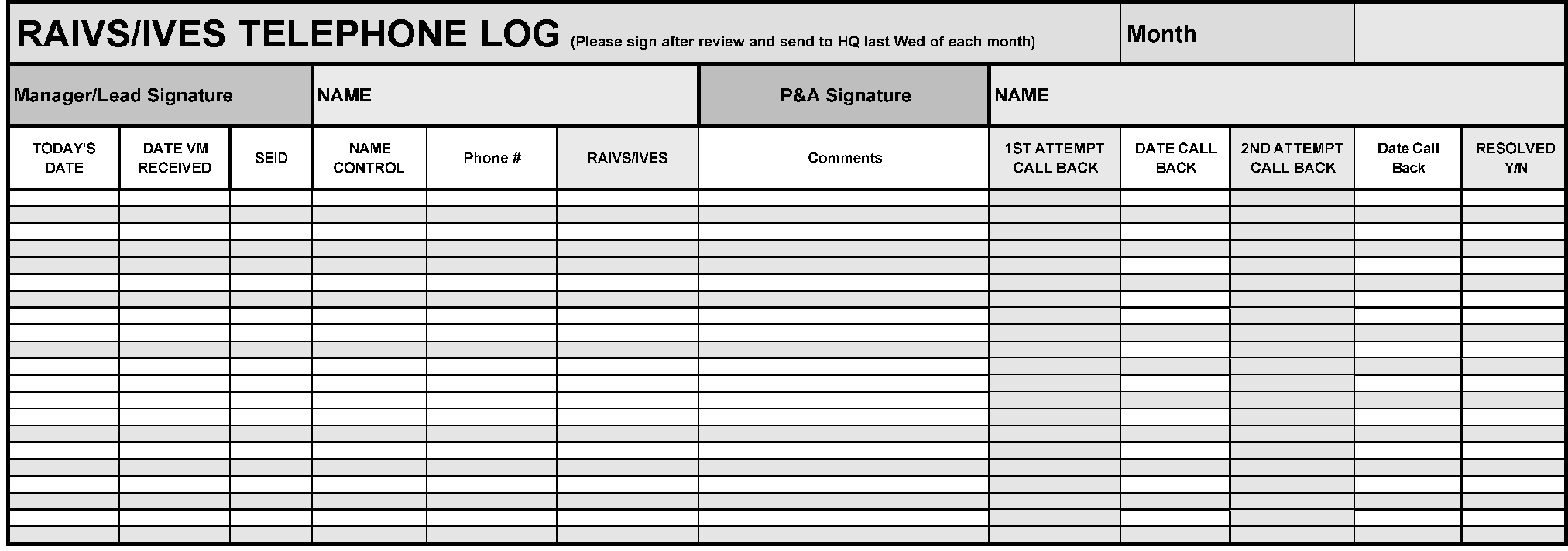
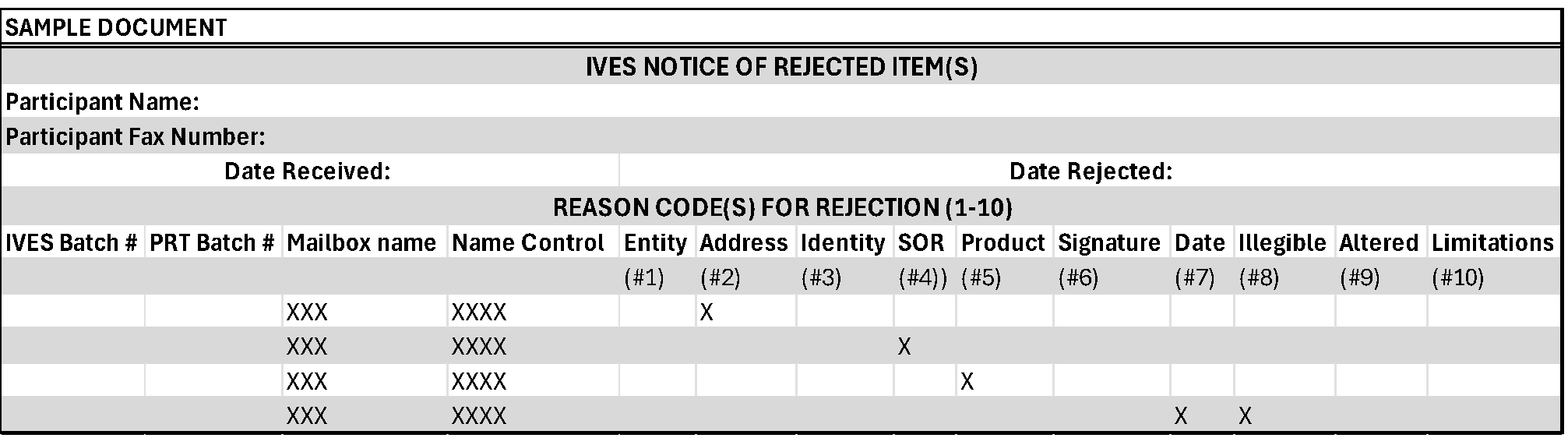
PII Breach Reporting to Headquarters
| Case Number | Reporting Site | Site Disclosure Originated | Discovered PII breach (SEID) | Completed PII Breach Report (SEID) | Date PII Breach was Reported | Date PII Breach Occurred | Number of Taxpayers Affected | Name Control of Impacted Taxpayer/Business | Last 4 SSN of Impacted | Explanation for PII Breach | Comments |
| IMF Transcript Type (Form 1040 Series) | Years Available |
|---|---|
| Return Transcript | Current year and three prior years. |
| Account Transcript | Current year and nine years prior. |
| Record of Account | Current year and three prior years. |
| Verification of Non-Filing (VNF) | Unavailable for IVES |
| Forms W-2, 1098, 1099, & 5498 | 10 Most current tax years. |
| BMF Transcript Type | Years Available |
|---|---|
| Return Transcript Forms: | Current year and three prior years |
Account Transcript Forms:
|
All from 1960-2024 |
Record of Account Forms:
|
Current year and three prior years |
| Verification of Non-filing (VNF) | Unavailable for IVES |
| Wage & Income Forms | Unavailable for IVES |
| ≡ ≡ ≡ ≡ ≡ ≡ ≡ ≡ | ≡ ≡ ≡ ≡ ≡ ≡ ≡ ≡ ≡ ≡ | ≡ ≡ ≡ ≡ ≡ ≡ ≡ ≡ ≡ ≡ ≡ | |||||||||||
|---|---|---|---|---|---|---|---|---|---|---|---|---|---|
| ≡ ≡ ≡ ≡ | ≡ ≡ ≡ ≡ ≡ | ||||||||||||
| ≡ ≡ ≡ ≡ | ≡ ≡ ≡ ≡ ≡ ≡ |
|
|||||||||||
| ≡ ≡ | ≡ ≡ ≡ ≡ ≡ ≡ ≡ |
|
|||||||||||
| ≡ | ≡ ≡ ≡ ≡ |
|
|||||||||||
| ≡ | ≡ ≡ ≡ ≡ ≡ |
|
|||||||||||
| ≡ ≡ | ≡ ≡ ≡ ≡ |
|
|||||||||||
| ≡ ≡ ≡ | ≡ ≡ ≡ |
|
|||||||||||
| ≡ ≡ ≡ | ≡ ≡ ≡ ≡ ≡ ≡ ≡ ≡ |
|
|||||||||||
| ≡ | ≡ ≡ ≡ ≡ ≡ |
|
|||||||||||
| ≡ ≡ | ≡ ≡ ≡ ≡ ≡ ≡ | ≡ ≡ ≡ ≡
|
|||||||||||