


 )
or https:// means you've safely connected to the .gov website. Share sensitive information only on official, secure websites.
)
or https:// means you've safely connected to the .gov website. Share sensitive information only on official, secure websites.


- 3.5.61 Files Management and Services
- 3.5.61.1 Program Scope and Objectives
- 3.5.61.1.1 Background
- 3.5.61.1.2 Authority
- 3.5.61.1.3 Roles and Responsibilities
- 3.5.61.1.4 Program Management and Review
- 3.5.61.1.5 Program Controls
- 3.5.61.1.6 Terms and Acronyms
- 3.5.61.1.7 Administrative Rules
- 3.5.61.1.7.1 Files Control
- 3.5.61.1.7.2 FRC Reference Accountability
- 3.5.61.1.7.3 Priority Pull Listing
- 3.5.61.1.7.4 Filing Guidelines
- 3.5.61.1.7.5 Form 3210, Document Transmittal
- 3.5.61.1.7.5.1 Form 3210, Document Transmittal - Quarterly Reviews
- 3.5.61.1.7.6 Guidelines for Mailing/Shipping of Requests
- 3.5.61.1.7.7 Security and Privacy Precautions
- 3.5.61.1.7.7.1 Security and Privacy Precautions - Cell Phone Camera Usage
- 3.5.61.1.7.7.2 Unauthorized Integrated Data Retrieval System (IDRS) Access
- 3.5.61.1.7.8 Ethics Awareness
- 3.5.61.1.7.9 IRM Deviations
- 3.5.61.1.7.10 Product Reviews
- 3.5.61.1.8 Definitions
- 3.5.61.1.9 Document Locator Number (DLN)
- 3.5.61.1.10 Command Code (CC) ESTABD
- 3.5.61.1.11 Command Code (CC) ESTABD Definer Request Codes
- 3.5.61.1.12 Command Code (CC) ESTABD - Processing Requests
- 3.5.61.1.13 Timeliness Requirements
- 3.5.61.1.14 Campus Consolidation - Processing of Documents
- 3.5.61.1.15 Timely Handling of Undeliverable Notices
- 3.5.61.2 Receiving Documents From Mainline Processing and Preparing Them For Filing
- 3.5.61.2.1 Document Retention Set-up
- 3.5.61.2.2 Assessment of Non-Master File (NMF) Documents
- 3.5.61.2.3 CTRL D Text File Conversion Tool - Automated Cycle Proof Listing (ACPL) Replacement
- 3.5.61.2.4 Form 990, Return of Organization Exempt From Income Tax, Processing/Imaging (OSPC Only)
- 3.5.61.2.5 Voided, Re-input, or Canceled Documents
- 3.5.61.2.6 Special Attachments - Correspondence Imaging Inventory (CII) - IMF File Functions
- 3.5.61.2.7 Discovered Remittances
- 3.5.61.2.7.1 Remittances Taken Immediately to Receipt and Control
- 3.5.61.2.7.2 Remittances Delayed to Receipt and Control Function Located in Same Building
- 3.5.61.2.7.3 Remittances Delayed to Receipt and Control Function NOT Located in Same Building
- 3.5.61.2.7.4 Cash/Other Items of Value/Function Located in Same Building
- 3.5.61.2.7.5 Cash/Other Items of Value/Function NOT Located in Same Building
- 3.5.61.3 Receiving And Preparing Other Documents For Filing
- 3.5.61.3.1 Form 56, Notice Concerning Fiduciary Relationship/Form 56-F, Notice Concerning Fiduciary Relationship of Financial Institution
- 3.5.61.3.2 Form 706, United States Estate Tax Return/Form 706-GS(D), Generation - Skipping Transfer Tax Return for Distribution/Form 706 GS(D-1), Notification of Distribution From a Generation - Skipping Trust
- 3.5.61.3.3 Form 709, United States Gift (and Generation-Skipping Transfer) Tax Return (KCSPC only)
- 3.5.61.3.4 Form 720-CS, Carrier Summary Report/Form 720–TO (Terminal Operator Report (OSPC Only))
- 3.5.61.3.5 Form 926, Return by a U.S. Transferor of Property to a Foreign Corporation
- 3.5.61.3.6 Form 966, Corporate Dissolution or Liquidation
- 3.5.61.3.7 Form 990-BL, Information and Initial Excise Tax Return for Black Lung Benefit Trusts and Certain Related Person and Form 6069, Return of Excise Tax on Excess Contributions of Black Lung Benefit Trust
- 3.5.61.3.8 Form 990–T, Exempt Organization Business Income Tax Return (OSPC only)
- 3.5.61.3.9 Form 1040-C, U.S. Departing Alien Income Tax Return (AUSPC only)
- 3.5.61.3.10 Form 1042, Annual Withholding Tax Return for U.S. Source Income of Foreign Persons and Form 1042-S, Foreign Person's U.S. Source Income Subject to Withholding
- 3.5.61.3.11 Form 1096, Annual Summary and Transmittal of U.S. Information Returns
- 3.5.61.3.12 Form 1094-C, Transmittal of Employer Provided Health Insurance Offer and Coverage Information Returns
- 3.5.61.3.13 Form 1095-C, Employer Provided Health Coverage
- 3.5.61.3.14 Form 1098-MA, Mortgage Assistance Payments (AUSPC Only)
- 3.5.61.3.15 Form 1099-QA, Distribution from ABLE Accounts/Form 5498-QA, ABLE Account Contribution Information - ABLE (Achieving a Better Life Experience)
- 3.5.61.3.16 Form 1120-FSC, U.S. Income Tax Return of a Foreign Sales Corporation/Form 1120-IC-DISC, Interest Charge Domestic International Sales Corporation Return
- 3.5.61.3.17 Annual Statements for Form 1120-L, U.S. Life Insurance Company Tax Return and Form 1120-PC, U.S. Property and Casualty Insurance Company Income Tax Return
- 3.5.61.3.18 Form 1127, Application for Extension of Time for Payment of Tax Due to Undue Hardship
- 3.5.61.3.19 Form 1128, Application to Adopt, Change or Retain a Tax Year
- 3.5.61.3.20 Form 2063, U.S. Departing Alien Income Tax Statement (AUSPC only)
- 3.5.61.3.21 Form 2438, Undistributed Capital Gains Tax Return (KCSPC only)
- 3.5.61.3.22 Form 2555, Foreign Earned Income
- 3.5.61.3.23 Form 2749, Request for Trust Fund Recovery Penalty Assessments
- 3.5.61.3.24 Form 2848, Power of Attorney (POA) and Declaration of Representative/Form 8821, Tax Information Authorization (TIA)
- 3.5.61.3.25 Form 3115, Application for Change in Accounting Method
- 3.5.61.3.26 Form 3491, Consumer Cooperative Exemption Application (OSPC only)
- 3.5.61.3.27 Form 3520, Annual Return to Report Transactions With Foreign Trusts and Receipt of Certain Foreign Gifts and Form 3520-A, Annual Information Return of Foreign Trust with a U.S. Owner
- 3.5.61.3.28 Form 4361, Application for Exemption From Self-Employment Tax for Use by Ministers, Members of Religious Orders and Christian Science Practitioners
- 3.5.61.3.29 Form 5558, Application for Extension of Time to File Certain Employee Plan Returns
- 3.5.61.3.30 Form 5596, TE/GE Non-Examined Closings and Form 5599, TE/GE Examined Closing Record
- 3.5.61.3.31 Form 5650, EP Examined Closing Record
- 3.5.61.3.32 Form 7004, Application for Automatic Extension of Time to File Certain Business Income Tax, Information, and Other Returns
- 3.5.61.3.33 Form 8023, Election Under Section 338(g) Corporate Qualified Stock Purchase (OSPC only)
- 3.5.61.3.34 Form 8027, Employer's Annual Information Return of Tip Income and Allocated Tips (OSPC only).
- 3.5.61.3.35 Form 8038, Information Return for Tax Exempt Private Activity Bond Issues (OSPC only)
- 3.5.61.3.36 Form 8038-CP, Return for Credit Payments to Issuers of Qualified Bonds (OSPC only)
- 3.5.61.3.37 Form 8210, Self Assessed Penalties Return
- 3.5.61.3.38 Form 8281, Information Return for Publicly Offered Original Issue Discount Instruments (OSPC only)
- 3.5.61.3.39 Form 8282, Donee Information Return (OSPC only)
- 3.5.61.3.40 Form 8329, Lender's Information Return for Mortgage Credit Certificates (MCCs) (OSPC only)
- 3.5.61.3.41 Form 8330, Issuer's Quarterly Information Return for Mortgage Credit Certificates (MCCs) (OSPC only)
- 3.5.61.3.42 Form 8332, Release/Revocation of Release of Claim to Exemption for Child by Custodial Parent.
- 3.5.61.3.43 Form 8404, Interest Charge on DISC-Related Deferred Tax Liability (OSPC only)
- 3.5.61.3.44 Form 8453-X, Political Organization Declaration for Electronic Filing of Notice 527 Status
- 3.5.61.3.45 Form 8508-I, Request for Waiver from Filing Information Returns Electronically (for Form 8966) (AUSPC Only)
- 3.5.61.3.46 Form 8606, Nondeductible IRAs
- 3.5.61.3.47 Form 8621, Return by a Shareholder of a Passive Foreign Investment Company or Qualified Electing Fund (OSPC only)
- 3.5.61.3.48 Form 8703, Annual Certification of a Residential Rental Project (OSPC only)
- 3.5.61.3.49 Form 8809-I, Application for Extension of Time to File FATCA Form 8966 (AUSPC Only)
- 3.5.61.3.50 Form 8811, Information Return for Real Estate Mortgage Investment Conduits (REMICs) and Issuers of Collateral (OSPC only)
- 3.5.61.3.51 Form 8819, Dollar Election Under Section 985 (OSPC only)
- 3.5.61.3.52 Form 8822, Change of Address/Form 8822-B, Change of Address or Responsible Party - Business
- 3.5.61.3.53 Form 8831, Excise Taxes on Excess Inclusion of REMIC Residual Interests (KCSPC only)
- 3.5.61.3.54 Form 8833, Treaty-Based Return Position Disclosure Under Section 6114 or 7701(b)
- 3.5.61.3.55 Form 8840, Closer Connection Exception Statement for Aliens (AUSPC Only)
- 3.5.61.3.56 Form 8843, Statement for Exempt Individuals and Individuals with a Medical Condition (For Use by Alien Individuals Only) (AUSPC Only)
- 3.5.61.3.57 Form 8857, Request for Innocent Spouse Relief
- 3.5.61.3.58 Form 8865, Return of U.S. Persons With Respect to Certain Foreign Partnerships
- 3.5.61.3.59 Form 8868, Application for Extension of Time to File an Exempt Organization Return (OSPC Only)
- 3.5.61.3.60 Form 8871, Political Organization Notice of Section 527 Status
- 3.5.61.3.61 Form 8872, Political Organization Report of Contributions and Expenditures
- 3.5.61.3.62 Form 8879, IRS e-file Signature Authorization
- 3.5.61.3.63 Form 8883, Asset Allocation Statement Under Section 338
- 3.5.61.3.64 Form 8918, Material Advisor Disclosure Statement (OSPC only)
- 3.5.61.3.65 Form 8924, Excise Tax on Certain Transfers of qualifying Geothermal or Mineral Interests (OSPC only)
- 3.5.61.3.66 Form 8925, Report of Employer-Owned Life Insurance Contracts
- 3.5.61.3.67 Form 8928, Return of Certain Excise Taxes Under Chapter 43 of the Internal Revenue Code (OSPC only)
- 3.5.61.3.68 Form 8938, Statement of Foreign Financial Assets
- 3.5.61.3.69 Form 8939, Allocation of Increase in Basis for Property Acquired from a Decedent (OSPC only)
- 3.5.61.3.70 Form 8948, Preparer Explanation for Not Filing Electronically (OSPC only)
- 3.5.61.3.71 Form 8957, Foreign Account Tax Compliance Act (FATCA) Registration
- 3.5.61.3.72 Form 8966, Foreign Account Tax Compliance Act (FATCA) Report (AUSPC Only)
- 3.5.61.3.73 Form 8973, Certified Professional Employer Organization/Customer Reporting Agreement (OSPC Only)
- 3.5.61.3.74 Form 13441-A, Health Coverage Tax Credit Monthly Registration and Update (AUSPC Only)
- 3.5.61.3.75 Form 14095, Health Coverage Tax Credit (HCTC) Reimbursement Request Form (AUSPC Only)
- 3.5.61.3.76 Form CT-2, Employee Representative's Quarterly Railroad Tax Return (OSPC only)
- 3.5.61.3.77 Form SS-4, Application for Employer Identification Number
- 3.5.61.3.78 Form W-7, Application for IRS Individual Taxpayer Identification Number
- 3.5.61.3.79 Schedule K-1
- 3.5.61.3.80 Oversize Administrative Files
- 3.5.61.3.81 Electronic Media
- 3.5.61.3.82 Citizenship Status Statements (OSPC only)
- 3.5.61.3.83 Foreign Investment in Real Property Tax Act (FIRPTA) Correspondence (OSPC only)
- 3.5.61.3.84 Nonresident Non-Filer (NRNF) Project - Streamlined Process (AUSPC only)
- 3.5.61.3.85 Exempt Organization/Employee Plans Applications (OSPC only)
- 3.5.61.3.86 United Mine Workers of America Benefit Claims
- 3.5.61.3.87 Unidentified Remittance and Excess Collection Paper Files
- 3.5.61.3.88 Service Center Recognition Image Processing System (SCRIPS) Processed Form 940 and Form 941
- 3.5.61.3.89 Lockbox Processed Documents
- 3.5.61.3.90 Integrated Submission and Remittance Processing System (ISRP)
- 3.5.61.3.91 Adjustment Documents
- 3.5.61.3.92 IDRS Source Documents - Sending to the Files Function
- 3.5.61.4 Elections/Election Statements
- 3.5.61.4.1 IRC 613A(c)(10) Election Statement
- 3.5.61.4.2 IRC 663(b) Election (KCSPC Only)
- 3.5.61.4.3 Form 2553, Election by a Small Business Corporation
- 3.5.61.4.4 Form 4876-A, Election to be Treated as an Interest Charge DISC (Domestic International Sales Corporation)
- 3.5.61.4.5 Form 8328, Carryforward Election of Unused Private Activity Bond Volume Cap (OSPC only)
- 3.5.61.4.6 Form 8832, Entity Classification Election
- 3.5.61.4.7 Form 8842, Election to Use Different Annualization Periods for Corporate Estimated Tax (KCSPC only)
- 3.5.61.4.8 Form 8855, Election to Treat a Qualified Revocable Trust as Part of an Estate
- 3.5.61.4.9 Form 8869, Qualified Subchapter S Subsidiary Election
- 3.5.61.4.10 IRC 243 Election
- 3.5.61.4.11 IRC 103 Election
- 3.5.61.4.12 Net Leases of Real Property Election
- 3.5.61.4.13 IRC 6222(b) Election
- 3.5.61.4.14 Form 8875, Taxable REIT Subsidiary Election (OSPC only)
- 3.5.61.5 Retirement Of Returns and Documents to the Federal Records Centers (FRCs)
- 3.5.61.5.1 Retirement of Files
- 3.5.61.5.2 Retired Document File (RETF)
- 3.5.61.5.3 Retirement of IRS Records to the FRCs
- 3.5.61.5.4 Requests to the Federal Record Centers (FRCs)
- 3.5.61.5.4.1 Expedite/Priority Requests
- 3.5.61.5.4.2 Special Search Requests (Form 2275)
- 3.5.61.5.4.3 Regular Requests
- 3.5.61.5.5 Re-files to the FRCs
- 3.5.61.5.6 Personally Identifiable Information (PII) - Shipping to FRCs
- 3.5.61.6 Document Requests - Forms Used to Request Returns/Documents
- 3.5.61.7 Receiving and Sorting Daily Requests
- 3.5.61.8 Servicing Requests
- 3.5.61.8.1 Serviceable Requests
- 3.5.61.8.2 Unserviceable Requests
- 3.5.61.8.3 Servicing Requests for Returns, Copies and Information
- 3.5.61.8.4 Types of Requests
- 3.5.61.8.4.1 CP Notices
- 3.5.61.8.4.2 CP 36 series notices, CP 170/CP 170A, CP 193/CP 193A , CP 223 and CP 293 (Duplicate Filing Conditions)
- 3.5.61.8.4.3 CP 36C and CP 36Z notices
- 3.5.61.8.4.4 CP 54, SSN Verification
- 3.5.61.8.4.5 CP 55 and CP 155 (Re-file DLN)
- 3.5.61.8.5 Other Requests
- 3.5.61.8.5.1 Government Accountability Office (GAO) Audit Requests
- 3.5.61.8.5.1.1 Files GAO POC - Special Search
- 3.5.61.8.5.1.2 GAO CC - Special Search
- 3.5.61.8.5.2 Freedom of Information Act (FOIA) Requests
- 3.5.61.8.5.3 Taxpayer Advocate Service (TAS) Requests
- 3.5.61.8.5.4 Statistics of Income (SOI) Requests
- 3.5.61.8.5.4.1 Servicing SOI Sample Requests
- 3.5.61.8.5.4.2 Searching for Missing Returns in the SOI Sample
- 3.5.61.8.5.1 Government Accountability Office (GAO) Audit Requests
- 3.5.61.8.6 Notice Review Processing System (NRPS) Requests
- 3.5.61.8.7 Correspondence Imaging Inventory (CII) Requests
- 3.5.61.8.8 In-House Taxpayer Photocopy Requests
- 3.5.61.8.9 Photocopying - Reimbursables
- 3.5.61.8.10 Microfilm Tape Requests
- 3.5.61.8.10.1 Microfilm Tapes - District Office Numbers and Files Functions Locations
- 3.5.61.8.10.2 Microfilm Tapes - Damaged/Unable to Locate
- 3.5.61.8.10.3 Microfilm Tapes - Microfilm Accountability and Disposition
- 3.5.61.8.10.4 Microfilm Inventory and Request Logs
- 3.5.61.8.10.5 Microfilm Tapes - Receiving from Vendor
- 3.5.61.8.10.6 Microfilm Tapes - Reviewing New Tapes from Vendor
- 3.5.61.8.10.7 Microfilm Tape Disposal/Destruction
- 3.5.61.8.11 Customer Service Inquiries Requests
- 3.5.61.8.12 IDRS Source Document Requests
- 3.5.61.9 Re-files
- 3.5.61.10 Recharges
- 3.5.61.11 Requests for Association of Attachments
- 3.5.61.12 Routing of Examination Requests
- 3.5.61.13 Examination/Collection Program Requests
- 3.5.61.13.1 Audit Information Management System (AIMS)
- 3.5.61.13.1.1 AIMS Messages
- 3.5.61.13.2 IMF and BMF Examination Selections
- 3.5.61.13.2.1 Payer Master File (PMF) Transcripts ( OSPC Only)
- 3.5.61.13.2.2 Information Return Master File (IRMF) Transcripts
- 3.5.61.13.2.3 Returns Charged Out to Statistics of Income (SOI)
- 3.5.61.13.2.4 Associating Related Documents
- 3.5.61.13.2.5 Form 5546 Received With Charge-Out Information
- 3.5.61.13.2.5.1 Form 5546 Charged-Out to SOI
- 3.5.61.13.2.6 Mailing Out Associated Returns
- 3.5.61.13.3 BMF Examination Programs for Form 706, U.S. Estate Tax Return/Form 706-GS(D), U.S. Estate (and Generation-Skipping Transfer) Tax Return, and Form 709, United States Gift (and Generation-Skipping Transfer) Tax Return
- 3.5.61.13.4 TC 424 Requests for Returns
- 3.5.61.13.4.1 Mailing Out Associated Returns
- 3.5.61.13.5 Examination Function Labels
- 3.5.61.13.6 TC 424 - No Return Requested
- 3.5.61.13.7 Follow-up Requests for Returns and Additional Examination Function Labels
- 3.5.61.13.8 Automated Underreporter, Multiple Filers and Married Filing Separately Programs
- 3.5.61.13.8.1 Automated Underreporter Program
- 3.5.61.13.8.2 Multiple Filers and Married Filing Separately Programs
- 3.5.61.13.9 Exempt Organization (EO)/BMF Examination Program (OSPC)
- 3.5.61.13.9.1 Sorting, Controlling, and Retrieval
- 3.5.61.13.9.2 Document Retention Unit (DRU)
- 3.5.61.13.9.3 Package Assembly and Routing
- 3.5.61.13.10 Handling Form 5546 for Partnership Returns
- 3.5.61.13.11 Examination Requests (Form 5546) Sorting and Routing
- 3.5.61.13.1 Audit Information Management System (AIMS)
- 3.5.61.14 Receiving And Handling Special Requests
- 3.5.61.14.1 Files Coordination Point - Special Search
- 3.5.61.14.2 Headquarters Access to Returns and Tax Information
- 3.5.61.14.3 Centralized Adjudication Unit/Labor Relations Requests
- 3.5.61.14.4 Recording Disclosures
- 3.5.61.14.5 Collection Statute Expiration Date (CSED)
- 3.5.61.14.5.1 CSED Procedures
- 3.5.61.14.5.2 CSED Listings/Charge-outs - Report/Print Job Names
- 3.5.61.14.5.3 CSED Charge-outs
- 3.5.61.14.5.4 CSED Storage
- 3.5.61.15 Transaction Code (TC) 930, Push Code
- 3.5.61.15.1 Background
- 3.5.61.15.1.1 Routing Code
- 3.5.61.15.2 Restrictions and Time Frames
- 3.5.61.15.3 CP 98/CP 98A and CP 198/CP 198A
- 3.5.61.15.4 TC 930, Push Code - Unsigned, Undeliverable Tax Returns
- 3.5.61.15.1 Background
- 3.5.61.16 Special Search Procedures
- 3.5.61.16.1 Background
- 3.5.61.16.2 Special Search Assignments
- 3.5.61.16.3 Special Search Steps
- 3.5.61.16.4 Use of Priorities
- 3.5.61.16.5 Unavailable (UA)/ Not In File (NIF) Requests
- 3.5.61.17 Unallowables - International Returns
- 3.5.61.18 Unpostables Requests
- 3.5.61.18.1 Unpostables Servicing
- 3.5.61.18.2 Unpostables Priority and Routing Instructions
- 3.5.61.18.3 Routing of Unpostable Document Requests
- 3.5.61.19 Electronic Filing (e-file)
- 3.5.61.19.1 e-file Process
- 3.5.61.19.2 Form 8453, U.S. Individual Income Tax Transmittal for an IRS e-file Return - Processing
- 3.5.61.19.3 Servicing Requests for e-file Returns and Form 8453
- 3.5.61.19.4 Re-filing Form 8453, U.S. Individual Income Tax Transmittal for an IRS e-file Return and Servicing Requests for Association of Attachments
- 3.5.61.20 Computer Paragraph (CP) Notices And Other Forms/Documents Used To Request Returns
- 3.5.61.20.1 Computer Paragraph Notices
- 3.5.61.20.2 Other Forms or Documents Used as Return Requests
- 3.5.61.21 Alphabetical Filing
- 3.5.61.21.1 Individual Names
- 3.5.61.21.1.1 Titles
- 3.5.61.21.1.2 Foreign Names
- 3.5.61.21.2 Business Names - Firms with Individual's Names
- 3.5.61.21.3 Firm Names with Apostrophes
- 3.5.61.21.4 Firm Names Containing Letters and Numbers
- 3.5.61.21.5 Firm Names with Conjunctions, Prepositions, Articles
- 3.5.61.21.6 Geographic Names and Compass Terms
- 3.5.61.21.7 Abbreviations in Business Names
- 3.5.61.21.8 Institutions and Organizations
- 3.5.61.21.9 Alpha Files Listing
- 3.5.61.21.10 Identity Theft Returns - Alpha Files
- 3.5.61.21.1 Individual Names
- 3.5.61.22 Forms Reference Index
- 3.5.61.22.1 Forms List
- 3.5.61.23 Special Handling for 5147, IDRS Transaction Record
- 3.5.61.23.1 IMF Blocking Series Chart (Document Code 54)
- 3.5.61.23.2 BMF Blocking Series Chart (Document Code 54)
- 3.5.61.23.3 IMF and BMF Blocking Series Chart (Doc Code 47)
- 3.5.61.24 Customer Feedback Process
- 3.5.61.25 Form 709, United States Gift Tax Return Purge Process (C-Site Only)
- 3.5.61.25.1 INOLE Desk
- 3.5.61.25.2 BMFOL Desk
- 3.5.61.26 Form 709, United States Gift Tax Return - Request/Retrieve the Returns
- 3.5.61.1 Program Scope and Objectives
Part 3. Submission Processing
Chapter 5. Accounts Services
Section 61. Files Management and Services
3.5.61 Files Management and Services
Manual Transmittal
October 28, 2025
Purpose
(1) This transmits revised IRM 3.5.61, Accounts Services, Files Management and Services.
Material Changes
(1) IRM 3.5.61.1.7.2(1) - Added form titles to the chart.
(2) IRM 3.5.61.1.7.10(3) - Added bullet to include requests serviced by the FRC. IPU 25U0331 issued 03-10-2025
(3) IRM 3.5.61.1.7.3(1) - Added form titles.
(4) IRM 3.5.61.1.7.5(8) - Updated 3210 retention information.
(5) IRM 3.5.61.1.8(1) - Added form titles.
(6) IRM 3.5.61.1.9(3) - Added information on identifying File Location Codes (FLCs) and their corresponding locations.
(7) IRM 3.5.61.1.14(3) - Updated IDRS Source Document request address and Request for Tax Returns/Re-Files to Austin for ramp down sites Brookhaven and Fresno.
(8) IRM 3.5.61.1.14(3) - Updated Andover and Atlanta routing address to Austin for Source Document Folders and Request for Tax Returns/Re-Files. IPU 25U3587 issued 09-4-2025.
(9) IRM 3.5.61.3(2) - Added form titles.
(10) IRM 3.5.61.3.1(5) - Updated retention information for Form 56/56F.
(11) IRM 3.5.61.3.10(5) & (6) - Updated retention information for Form 1042. Added paragraph with retention information for Form 1042-S.
(12) IRM 3.5.61.3.15(2) & (3) - Updated retention information for Forms 1099-QA and 5498-QA.
(13) IRM 3.5.61.3.38(1) & (3)- Updated retention information for Form 7004 submitted without remittance.
(14) IRM 3.5.61.3.38(7) - Updated fax number to (855) 312-0550. IPU 25U0331 issued 03-10-2025
(15) IRM 3.5.61.3.50(7) - Updated fax number to (855) 312-0550. IPU 25U0331 issued 03-10-2025
(16) IRM 3.5.61.3.80 (3) - Updated note to remove specification of "yellow" copy of Form 2275. IPU 25U3571 issued 08-20-2025.
(17) IRM 3.5.61.3.92.1 - Removed subsection as Covid backlog is no longer applicable.
(18) IRM 3.5.61.5.3(9) - Added emphasis on IDRS Association and added note to perform quality checks on FRC shipments. IPU 25U0331 issued 03-10-2025
(19) IRM 3.5.61.5.5(3) - Added note with instructions to work incorrectly routed FRC refiles at the receiving site if the original run has already been sent to FRC in an effort to reduce shipping costs.
(20) IRM 3.5.61.5.5(4) - Added instructions for FRC shipments.
(21) IRM 3.5.61.6(1) - Added electronic FLC identification information.
(22) IRM 3.5.61.8.4.2(9) - Updated routing instructions to local ICT, for CP 193/193A for MFT 01 and MFT 10. IPU 25U3571 issued 08-20-2025
(23) IRM 3.5.61.8.5.3(3)Note - Removed note regarding pandemic backlogs.
(24) IRM 3.5.61.8.10.1(1) - Updated District 55 for IMF tax years stored at KCSPC.
(25) IRM 3.5.61.18.3(1) - Removed routing instructions for CAT A1 & CAT A2 CI unpostable cases. IPU 25U0331 issued 03-10-2025
(26) IRM 3.5.61.18.3(1) - Updated RICS to RIVO
(27) Minor editorial changes have been made throughout this IRM (e.g. spelling, punctuation, links, formatting, dates, etc.).
Effect on Other Documents
IRM 3.5.61, Files Management and Services, dated November 26, 2024 (effective January 1, 2025) is superseded. The following IRM Procedural Update (IPU) has been incorporated into this IRM: IPU 25U0331 issued March 10, 2025, IPU 25U3571 issued on August 20, 2025 and IPU 25U3587 issued on September 4, 2025.Audience
These procedures are written for the Files Function employees at the Submission Processing Campus locations.Effective Date
(01-01-2026)Scott Wallace
Director, Submission Processing
Taxpayer Services
-
General Overview - This IRM provides functional guidance/procedures for the day-to-day operations of the Files Functions at the Submission Processing Campuses.
-
Submit IRM deviations in writing following instructions from IRM 1.11.2.2.3, when procedures deviate from the IRM , and elevate through proper channels for executive approval.
-
Purpose - The purpose of this IRM is to provide procedures for the receipt, retrieval, retention, retirement and destruction of tax returns and related documents at the Submission Processing Campuses (SPCs) and the Federal Records Centers (FRCs); and covers these activities:
-
Receiving, filing and re-filing documents
-
Servicing requests for documents, photocopies of documents, and other information maintained in the Files Function
-
Researching entity information for Computer Paragraph (CP) notices that are returned as undeliverable.
-
Retiring documents to the Federal Records Centers (FRCs)
-
-
Audience - The primary audience for this IRM is the Files Function employees working in the Submission Processing Campuses located in Austin, Texas; Kansas City, Missouri; and Ogden, Utah.
-
Policy Owner -The policy owner for this IRM is the Director, Submission Processing.
-
Program Owner - The program owner for this IRM is Submission Processing, Specialty Programs Branch, Post Processing Team.
-
Primary Stakeholders - The primary stakeholders for this IRM are IRS internal customers who request tax returns and related documents to perform their job duties.
-
IRM 3.5.61 provides guidance on the processes and procedures for the servicing and storage of IRS tax records and related documents stored at the Submission Processing Campuses (SPCs) and the Federal Records Centers (FRCs).
-
These references provide the authority for the management of records (receipt, retrieval, retention, retirement and destructions of records) stored in the Submission Processing Campuses and the Federal Records Centers (FRCs):
-
Federal Records Act of 1950
-
IRC 44 U.S.C., Chapter 31, Records Management by Federal Agencies
-
IRS 44 U.S.C., Chapter 33, Disposal of Records
-
36 CFR Chapter XII, Sub-Chapter B - Records Management
-
Office of Management and Budget (OMB) Circular A-123, Management Accountability and Control
-
OMB Circular A-130, Management of Federal Information Resources
-
IRM 1.15.1.1.7, Related Resources, Records and Information Management, The Records and Information Management Program, provides detailed approval authority for federal records management and related activities.
-
Document 12990, Records Control Schedules, provides mandatory records disposition instructions approved by the National Archives and Records Administration (NARA).
-
-
The following IRM’s provides guidance in all matters regarding records and information management:
-
IRM 1.15.1 - The Records and Information Management Program
-
IRM 1.15.2 - Types of Records and Their Life Cycles
-
IRM 1.15.3 - Disposing of Records
-
IRM 1.15.4 - Retiring and Requesting Records
-
IRM 1.15.5 - Relocating/Removing Records
-
IRM 1.15.6 - Managing Electronic Records
-
IRM 1.15.7 - Files Management
-
-
The Director, Submission Processing, is responsible for policy related to the IRM.
-
The Submission Processing, Specialty Programs Branch, Post Processing Section is responsible for information contained in the IRM.
-
The Headquarters (HQ) Analyst is the individual responsible for oversight of the Files Function program.
-
The local Files Department Manager is responsible for the day-to-day operations, management and oversight of the Files Function in the Submission Processing Campuses.
-
Program Report - On a weekly basis, the SP File Functions provide information that is included in the Miscellaneous Inventory Report (MIR). These reporting requirements are owned by TS, CAS, Submission Processing, Program Management/ Process Assurance (PMPA) Branch, Monitoring Section (C:DC:TS:CAS:SP:PMPA:M). See IRM 3.30.124.5 , Submission Processing Miscellaneous Inventory Report - Background.
-
Program Effectiveness - Weekly analysis of information contained in the Miscellaneous Inventory Report (MIR) includes a comparison with current timeliness requirements. Timeliness requirement for Files processes are contained throughout IRM 3.5.61.
-
Quality Review - Embedded Quality for Submission Processing (EQSP) system provides a method to monitor, measure and improve the quality of work in Submission Processing.
-
Program Review - Conducted at three (3) year intervals by HQ to identify areas for improvement and best practices used by the File Functions.
-
This table provides a list of commonly used acronyms and their definitions:
Acronym Definition 23C Assessment Date A Audit ACA Affordable Care Act ACC Accounting ACPL Automated Cycle Proof Listing ADJ Adjustment ADP Automatic Data Processing AIMS Audit Information Management System AMTAP Accounts Management Taxpayer Assurance Program ASFR Automated Substitute For Return ASTA Alternative Strategies to Tax Administration ASU Audit Support Unit ATIN Adoption Taxpayer Identification Number AUR Automated Underreporter BCS Block Control Sheet BNIF Block Not In File BNOS Block Not On Shelf BPL Block Proof List (i.e., CPL/ACPL) BMF Business Master File BMF-CTR Business Master File Currency Transaction Report CAF Centralized Authorization File CARES Coronavirus Aid, Relief and Economic Security Act CAS Correspondence Action Sheet CC Command Code (IDRS) CCU Cycle Control Unit CCT Cycle Control Team CI Criminal Investigation CII Correspondence Imaging Inventory CORR Correspondence CP Computer Paragraph CPL Cycle Proof Listing CSED Collection Statute Expiration Date CY Calendar Year CYC Cycle DATC Deferred Action Tax Consequence DC Document Code DCC Detroit Computing Center (See ECC-DET for new acronym.) DCN Declaration or Document Control Number DIF Discriminant Function DIS Distributed Input System DISC Domestic International Sales Corp. DLN Document Locator Number DNIF Document Not In File DO District Office DO No. District Office Number DOL Department of Labor DIN Document Identifier Number DP Data Processing DPR Daily Production Report DRU Document Retention Unit DUP FIL Duplicate Filing E/C Error Condition ECC Enterprise Computing Center (formerly Computing Center) ECC-DET Enterprise Computing Center (formerly Detroit Computing Center) ECC-MTB Enterprise Computing Center - Martinsburg (formerly MCC) ECC-MEM Enterprise Computing Center - Memphis (formerly TCC) EDC Error Delay Code EGC Employee Group Code ELF Electronic Filing e-Help Electronic Help EIC Earned Income Credit EIN or EI No. Employer's Identification Number EIP Economic Impact Payment EO Exempt Organization EOD End of Day EONS Electronic On-Line/Output Network System EP Employee Plan EPMF Employees Plan Master File EPU Examination Processing Unit EQSP Embedded Quality for Submission Processing ERF Employer Return File ERR REG Error Register ERS Error Resolution System ES Estimated Tax ESU Examination Suspense Unit FA/FE Field Audit/ Field Exam FATCA Foreign Account Tax Compliance FICA Federal Insurance Contributions Act FIFO First In, First Out FMU Files Management Unit FOD International (Foreign Operations District) FP Full Paid (Return) FR Filing Requirement FRB Federal Reserve Bank FRC Federal Records Center FTD Federal Tax Deposit FUTA Federal Unemployment Tax Act FY Fiscal Year FYE Fiscal Year Ending GAO Government Accountability Office IA Internal Audit ICT Image Control Team IDRS Integrated Data Retrieval System IRA Inflation Reduction Act IRC Internal Revenue Code IRM Internal Revenue Manual IRMF Information Return Master File IRP Information Return Processing IMF Individual Master File IRAF Individual Retirement Account File IRMF Information Returns Master File ISRP Integrated Submission Remittance Processing ITIN Individual Taxpayer Identification Number ITIN - RTS Individual Taxpayer Identification Number - Real Time System LIFO Last In, First Out LY List Year MCC Martinsburg Computing Center (See ECC-MTB for new acronym.) ME Math Error MF Master File MFTRA Master File Transcript Request Audit MFT Master File Tax (Class) Code MID Tape Mailing Index Delinquency Tape MIR Management Information Report MOU Memorandum of Understanding MR Microfilm MSC Marital Status Code NARA National Archives Records Administration NIF Not in File (and Not Charged Out) NMF Non-Master File NO National Office NR No Record/Notice Review NRP National Research Program NRPS Notice Review Processing System NSD Non-Source Document NU Nullified Unpostables (IDRS) OA/OE Office Audit/Office Exam OCR Optical Character Recognition OIO Office of International Operations OTFP Other Than Full Paid (return) PBC Primary Business Code PC Penalty Case PCF Plan Characteristics File PMF Payer Master File PP Preparer Penalty PSF Plan Sponsor File PSP Planning and Special Programs PRA/RRE Pre-Refund Audit/Exam PTIN Preparer Tax Identification Number PY Processing Year QRDT Questionable Refund Detection Team RA Revenue Agent RAA Reporting Agents Authorization RAF Reporting Agent File RAR Revenue Agent's Report RCS Records Control Schedules (Document 12990) RDD Return Due Date REF REV Refund Review REJ U Rejects Unit RETF Retired Document File RMF Residual Master File RPM Returns Program Manager RO Revenue Officer RPS Remittance Processing System RTR Remittance Transaction Research SCCF Service Center Control File SD Source Document SDF Source Document Folders (IDRS) SE Self Employed SEID Standard Employee Identifier SERFE Selection of Exempt Returns For Examination SF Standard Form SFR Substitute For Return S/L Selection List SOI Statistics of Income SPC Submission Processing Campus SSA Social Security Administration SSN Social Security Number SSS Sample Selection Sheet SSU Sort Sequence Unit SSSN Secondary (Spouse's) SSN TAS Taxpayer Advocate Service TC Transaction Code TCC Tax Class Code TDA Taxpayer Delinquency Account TDI Taxpayer Delinquency Investigation TEP Tape Edit Process TIN Taxpayer Identification Number TN Taxpayer Notice TP Taxpayer TPE Tax Period Ending TR Transaction Record (IDRS) TRDB Tax Return Data Base TY Tax Year UA Unavailable (charged-out) UD Undeliverable (mail-out) UP Unpostable UPC Unpostable Code URF Unidentified Remittance File US Unserviceable
-
The general administrative rules for the Files Function cover these topics:
-
Files Control
-
FRC Reference Accountability
-
Priority Pull Listing
-
Filing Guidelines
-
Form 3210, Document Transmittal
-
Guidelines for Mailing/Shipping of Requests
-
Security and Privacy Precautions
-
Resolving Procedural and Computer Systems Problems
-
Ethics Awareness
-
-
Charge-out every document removed from the Files Function.
-
Do not service any requests for documents until the SPC Processing and Document Perfection functions are completed. In case of emergency, an exception can be made, per local management approval.
-
After SPC Processing and Perfecting operations are complete, release original documents from the Files Function ONLY to those requesters who have been assigned a priority number.
-
Retain the original Block Control Sheet and send a copy with the block.
-
Review and approval of authorizations will be provided for individuals to request original returns if they are from a functional area not already assigned a priority number.
-
Process all requests and re-files on a first-in, first-out (FIFO) basis except as otherwise stated within this IRM.
-
Documents under the Files Functions' control are accessible to authorized personnel only.
-
Secure prior coordination for large volumes of requests or re-files to the Federal Record Centers (FRCs).
-
Route all requests for documents housed in a Federal Record Center (FRC) that normally services another SPC through that SPC. For exceptions, see IRM 3.5.61.8.5, Other Requests.
-
Review questionable situations with your local management.
-
On a monthly basis, submit (via the Files Area FRC Report (SharePoint Site)) the following information:
Volumes sent to the FRC: Form 4251, Return Charge-Out Requests Form 2275, Records Request, Charge and Recharge Requests Photocopy Requests AUR (Automated Underreporter) Requests CSED (Collection Statute Expiration Date) Requests Re-files Requests Cubic Feet of Returns Volumes from FRC: Form 4251, Return Charge-Out Requests Form 2275, Records Request, Charge and Recharge Requests Photocopy Requests AUR (Automated Underreporter) Requests -
Submit this information by the 10th day, following the end of each month.
-
Expedite Requests
-
Includes Government Accountability Office (GAO); Treasury Inspector General for Tax Administration (TIGTA); Freedom of Information Act (FOIA); Taxpayer Advocate Service (TAS); Court Cases; Identity Theft Requests (ESTABD N and ESTABD Q); Dishonored Check Processing; ESTABD V; Original 1042S Verify (Requests for Form 1040NR, U.S. Nonresident Alien Income Tax Return/ 1040NR-EZ, U.S. Income Tax Return for Certain Nonresident Aliens with No Dependents(AUSPC Only - Foreign Account Tax Compliance (FATCA)
-
Daily requests for returns and documents not yet processed to good tape (Examples: Rejects, Correspondence Imaging Inventory (CII) Requests).
-
Daily requests for Questionable Refund Detection Team (QRDT)
-
Daily requests for Statistics of Income (SOI)
-
Weekly (cycle) requests (see (2) below for processing order)
-
Program Analysis System (PAS)/Balanced Measures
-
Other requests
-
-
Process weekly (cycle) requests in this order:
-
Notice Review
-
Unpostables - See IRM 3.5.61.18.3, Routing of Unpostable Document Requests
-
Refund Review
-
Audit Information Management System (AIMS)
-
Internal Notices
-
-
Before packaging documents for mailing, complete Form 3210, Document Transmittal and include in package to the requester.
-
Write identifying information (Document Locator Number (DLN), Tax Period, Name, etc.) for at least the first four (4)) documents and the last document in the package. Write the total number of documents contained in the package on Form 3210, Document Transmittal.
-
If Form 3210, Document Transmittal, acknowledgement page has not been returned to the Files Function or otherwise acknowledged within ten (10) business days, contact the customer to request acknowledgement.
-
Process Re-files before Requests to the extent possible.
-
Label the ends of each row of shelves showing the beginning and ending DLNs.
-
Do not over-stuff folders or boxes. Allow sufficient space for ease of pulling and re-filing returns/documents. Reserve space on the shelves for blocks that are charged-out. For information on "oversized" files, see IRM 3.5.61.3.79, Oversized Administrative Files.
-
In case of misfiled, erroneously numbered or duplicate-numbered documents or blocks, pull the documents and/or blocks and route them to the Accounting or Data Control Function.
-
File documents on the shelves from right to left beginning with the top shelf. When shelving documents/files folders into boxes, stamp each folder with either a caper stamp or provide your identifying information (e.g., Standard Employee Identifier (SEID), IDRS Employee Number).
-
For documents to be filed alphabetically, the originator (or originating Function) must determine the name control. If the name control is not determined, return the document(s) to the originator (or originating Function) and request name control determination.
-
Complete Form 3210, Document Transmittal, when processing Priority Pull Listing requests and include in package with documents to the requester.
-
Maintain suspense copies of Form 3210 with instructions to the mail room, if needed, for the acknowledgement copy to be returned.
-
Place suspense copies of Form 3210 in a review file and check daily to verify documents have been received.
-
When including Form 3210, write identifying information (DLN, Tax Period, etc.) for at least the first four (4) documents and the last document in the package. Write the total number of documents contained in the package on Form 3210.
-
Upon receipt of documents with Form 3210, acknowledge (document with the date received) those requests where specific information (DLN, Tax Period, Name, etc.) is provided within ten business(10) days. Electronic copies (including E-fax) are acceptable.
-
If Form 3210, Document Transmittal, acknowledgement page has not been returned to Files or otherwise acknowledged within ten (10) business days, contact the customer to request acknowledgement. Document actions taken and ensure documentation is recorded on or attached to the originator’s copy of Form 3210.
-
There is no requirement to acknowledge Form 3210 when only general/generic information (i.e., "Re-files" , "ADJ 47/54" ) is provided on the Form 3210.
-
Refer to Document 12829, The General Records Schedules, 4.1, Item 10, tracking and control records, on retaining Form 3210 and destroying after one (1) year.
-
For more additional information on the processing of Form 3210, see IRM 3.13.62.8.2, Suspense Copies, Form 3210.
-
Managers are responsible for conducting quarterly managerial reviews to ensure procedures are being followed. At its discretion, management may conduct reviews at more frequent intervals.
-
Conduct reviews on a quarterly basis and complete all reviews by the last day of each quarter: March 31, June 30, September 30 and December 31.
-
Ensure review includes a sample size of no less than 30 transmittals.
-
Record results/findings from each reviewed transmittal using the HQ provided form/checklist.
-
Provide/submit review results/findings to HQ by the last day of each quarter.
-
Mail/ship documents using the most efficient, cost effective depending on the urgency of the request.
-
Consider Ground Services (delivery of shipment within one (1) or two (2) days) as the first choice for delivery.
-
Express Services (Overnight/Same Day/Second Day Air) are the most expensive delivery methods so use this mode ONLY when transit time requirements are very short, and the urgency of the shipment outweighs the additional costs involved. Provide justification and secure management approval.
-
Where possible, consolidate requests for mailing/shipping. However, in those instances where specific instructions are provided for mailing/shipping, follow the specific instructions and send under separate cover.
-
Consult IRM 1.4.6, Managers Security Handbook to determine security and privacy precautions.
-
Service officials and managers must communicate security standards contained in IRM 1.4.6, Managers Security Handbook, to employees and establish methods to enforce them.
-
Take the required precautions to provide security for documents, information and property handled in performing official duties.
-
The use of the camera function on a camera capable cell phone or iPad is prohibited without Facilities Management and Security Services (FMSS) approval.
-
All IRS employees must take personal responsibility to ensure no photographs of National Classified Information (NCI), Sensitive but Unclassified (SBU), Taxpayer Data, Personally Identifiable Information (PII) or other sensitive information are taken. Refer to IRM 10.5.1, Privacy and Information Protection, Privacy Policy for more guidance on protecting and safeguarding Sensitive But Unclassified (SBU) and Personally Identifiable Information (PII).
-
Ensure employees are familiar with the policies and procedures for protecting confidential information and the procedures for reporting violations of these policies.
-
While researching tax return/document related inquiries, Submission Processing (SP) employees may encounter some accounts that are blocked on IDRS and can be identified by the IDRS Security Violation Message: "Unauthorized Access to this Account" .
-
If this message is received, forward the tax return/document to your manager. Your manager will notify your Planning and Analysis staff who will scan the document and send it encrypted to "≡ ≡ ≡ ≡ ≡ ≡ ≡ ≡ ≡" account mailbox requesting access to the account.
-
Managers will retain the original case in a file awaiting access (can take up to five (5) business days) once notified access has been granted.
-
Upon notification that access has been granted, research the tax return/document related inquiry following applicable procedures.
-
Employees who have access to and work with taxpayer information and data MUST NOT:
-
Alter the data.
-
Disclose information to persons who do not have a need to know.
-
Use data for unauthorized purposes.
-
Make unauthorized access to the data.
-
-
IRM deviations must be submitted in writing following instructions from IRM 1.11.2.2, Internal Management Documents System - Internal Revenue Manual Process, IRM Standards, and elevated through appropriate channels for executive approval.
-
Product reviews provides a process to gauge, monitor and improve the quality of work performed in the Files Areas.
-
Perform product reviews on a quarterly basis, beginning 09/01/2021.
-
Product reviews covers three (3) areas:
-
Control and availability of records.
-
Ensure records are mailed to the correct address.
-
Ensure requests are serviced timely by the FRC.
-
-
Prepare a summary of findings and share with management for corrective action, where needed.
-
Maintain a record of findings for one (1) year.
-
The table below contains the definitions for the terms used in this manual.
ITEM DEFINITION ADMINISTRATIVE FILE A return and/or other documents such as work papers, schedules, audit reports, etc., that are related to a taxpayer's account regardless of whether the documents are physically with the return or maintained separately. ADOPTION TAXPAYER IDENTIFICATION NUMBER (ATIN) A number developed for issuance as a temporary tax identification number until a Social Security Number (SSN) can be obtained for a child in the process of being adopted. The taxpayer can use this number to claim the child as a dependent while adoption is pending. ALPHA/NUMERIC CONTROL A three-digit alpha-numeric combination which identifies each block of documents. AMENDED RETURN A tax return that changes information previously submitted on a filed return. ATTACHMENT Correspondence, documents or other data to be associated with a particular return. AUDIT INFORMATION MANAGEMENT SYSTEM (AIMS) An information system that provides inventory and activity control of active Examination cases and uses linkage to Integrated Data Retrieval System (IDRS) to input status changes, adjustments and case closing actions. AUTOMATED CYCLE PROOF LISTING (ACPL) An automated block tracking system created by a program which converts the daily Cycle Proof List file to a local file and adds fields for status and tracking information. See IRM 3.5.61.2.3, CTRL D Text File Conversion Tool - ACPL Replacement. BATCH CART A mobile cart used to transport documents within the Submission Processing Campus (SPC). BALANCE DUE NOTICE A Master-File or Integrated Data Retrieval System (IDRS) notice to a taxpayer indicating that an amount is due IRS. Excludes CP 70 and CP 71 notices which have a restricted definition as "Reminder Notices" . BLOCK A group of 100 or fewer documents identified with consecutive Document Locator Numbers. BLOCK CONTROL See definition for "Alpha/Numeric Control" . BLOCK CONTROL SHEET A form on which documents are charged-out when no charge-out form is available. The Block Control Sheet may be either a Form 813, Document Register, or Form 1332, Block and Selection Record. BLOCK NOT IN FILE (BNIF) This abbreviation is used by the Files Function to indicate that a block/folder is either missing or has not been shelved. BUSINESS MASTER FILE A magnetic tape or disk file containing information about taxpayers filing business returns and related documents. BUSINESS MASTER FILE CURRENCY TRANSACTION REPORT (BMF-CTR) MATCHING PROGRAM TRANSCRIPTS Examination transcripts to be associated with Business Master File (BMF) returns (Form 1041, U.S. Income Tax Return for Estates and Trusts, Form 1065, U.S. Return of Partnership Income, and Form 1120, U.S. Corporation Income Tax Return). CHARGE-OUT 1. A form replacing a document in a block or an entry on a Block Control Sheet indicating the document has been removed from the file and sent to a requester.
2. (To) Charge out - indicate to whom a document, which is being removed from the files, is being sent.COLLECTION STATUTE EXPIRATION DATE (CSED) The CSED is the date the statute expires for collection of tax, penalty or interest. The CSED is ten (10) years from the assessment date (23C date) of the posting of the original return (Transaction Code (TC) 150). COMPUTER PARAGRAPH (CP) A computer-generated notice or letter of inquiry mailed to the taxpayers. (The CP number is located in the upper right-hand corner.) CONSOLIDATED SITE (C-Site) The centralized filing and storage location for Form 709, United States Gift (and Generation-Skipping Transfer) Tax Return, Form 2848, Power of Attorney and Declaration of Representative and Form 8821, Tax Information Authorization. The C-Site is located near the Kansas City Submission Processing Campus in Independence, MO. CONTROLLING DLN The current DLN that indicates the location of the return. CORRESPONDENCE IMAGING Inventory (CII) This system captures images of correspondence from the taxpayer that is intended for the Accounts Management (AM) Function. Correspondence includes letters, returned notices and standard forms. CYCLE One week's processing of returns and documents at the Submission Processing Campus/ Enterprise Computing Center - Martinsburg (ECC-MTB). CYCLE (POSTED) Indicates the week a return posts to the Master File. CYCLE NUMBER Six-digit number indicating the cycle in which the return posts to the Master File. The first four digits are the year, the last two are the week number, e.g., 202312 is the 12th processing week in calendar year 2023. CYCLE PROOF LISTING (CPL) A weekly list of the blocks of processed documents in block DLN sequence automatically generated each cycle with a daily generation option. A Block-DLN will appear on the CPL when all documents in the block have gone to "good tape" or Tape Edit Processor (TEP). DELINQUENT RETURN A return filed after the due date without an approved extension. DOCUMENT Any tax return, form, schedule, or paper, that establishes or affects a taxpayer's account. DOCUMENT CODE Digits 4 and 5 of the DLN which identify the specific type of return or document that is filed or processed. DOCUMENT LOCATOR NUMBER (DLN) The thirteen-digit number assigned to every document, input through the Automatic Data Processing (ADP) System, that identifies a taxpayer account. The DLN is used to identify and locate the document. A fourteenth digit, the year of processing, is computer assigned. See Document 6209, IRS Processing Codes and Information. DOCUMENT NOT IN FILE (DNIF) This abbreviation is used by the Files Function to indicate that a document is neither in the files nor charged out. EDITING Examining returns, placing certain marks and codes on them, and properly entering misplaced items in preparation for the transcription process. E-File Mechanism by which tax returns are filed electronically; non paper filing. EMPLOYEE PLAN MASTER FILE (EPMF) A Master File consisting of various types of tax-sheltered Pension/Profit Sharing Plans. EMPLOYER IDENTIFICATION NUMBER (EIN) Nine-digit number used to identify business taxpayers on the Business Master File. The format of an EIN is XX-XXXXXX. EXEMPT ORGANIZATION MASTER FILE (EOMF) A Master File consisting of various types of Exempt Organization (EO) returns. (TO) FILE (To) place a document into its proper location in the files. See definitions for "Re-file" and "Renumbered Re-file" . FILES (Document Retention: SP Campus vs. FRC) Areas designed as holding areas for documents. FULL PAID RETURN Remittance returns with the tax liability paid in full. INTEGRATED DATA RETRIEVAL SYSTEM (IDRS) A real-time computer system (separate from mainline processing) used to obtain data from selected accounts to control taxpayer correspondence and internally identified account adjustments, and to input transactions to the master files. IDRS BLOCK LIST A daily list showing blocks of IDRS transactions numbered for that day. INDIVIDUAL MASTER FILE (IMF) A file containing information about taxpayers filing individual income tax returns and related documents. INDIVIDUAL RETIREMENT ACCOUNT FILE (IRAF) A separate file used to record tax data supplied by the participant of an approved individual retirement plan. INDIVIDUAL TAXPAYER IDENTIFICATION NUMBER (ITIN) A number assigned to a person with tax consequences who does not have and is not eligible for a Social Security Number (SSN). INPUT DOCUMENTS Documents which contain information for input to the computer, such as tax returns and posting vouchers. INTER-FILE A process of combining two or more sets of separately sorted documents or requests into one set by DLN order. INFORMATION RETURN MASTER FILE (IRMF) TRANSCRIPTS A listing of the information returns available for the current tax year that have been processed for the taxpayer. JULIAN DATE Digits 6, 7, and 8 of the DLN corresponds to the numeric day of the year. For example, January 1st is 001, April 7th is 097 (or 098 in a leap year), and December 31st is 365 (or 366 in a leap year). IDRS utilizes the Julian Date plus 400 to number transactions. LIST YEAR The year in which a tax return is processed. For example, Tax Year 2022 individual returns are processed in 2023 and will have “3” as the last digit of the DLN. MASTER FILE A magnetic tape record containing relatively permanent information used as a reference and usually updated periodically. The Business Master File (BMF) and the Individual Master File (IMF) record all information with respect to taxpayers' filing of business and individual returns and related documents. The BMF and IMF contain records divided into two sections: the Entity Section and Returns/Accounts Section. MASTER FILE DOCUMENT Any document in the files which has been input to the Master File. MASTER FILE TAX ACCOUNT CODE (MFT CODE) A two-digit number which identifies the type of tax. MICROFILM A media to provide reduced-scale photographic records of Master File data. NON-MASTER FILE (NMF) DOCUMENT Accounts processed manually in the Accounting Function. Non-REFILE DLN A DLN that indicates a transaction was completed for a taxpayer's account. This DLN will have a Document Code (DC) 47 or 54 with an accelerated Julian Date (+400) but will not change the physical location of the original return DLN. NON-SOURCE DOCUMENT (NSD) An adjustment input without source documentation. NO RECORD (NR) Notation used by the research area to indicate there is no record of a particular transaction, usually a tax return, for a given taxpayer. NOTICE Computer-generated message resulting from an analysis of the taxpayer's account on the Master File. There are three types of notices: Settlement Notices, Taxpayer Inquiry Letters and Submission Processing Notices. NOT IN FILE (NIF) 1. This abbreviation is used by the Files Function to indicate that a document is neither in the file nor charged-out (DNIF). 2. Also, used to indicate that a block/folder is either missing or has not been shelved (BNIF). PERMANENT RECHARGE A restricted type of recharge document used when a document is being refiled under another DLN, TIN, type of return, or tax period and a research trail is needed to find the document. PLAN CHARACTERISTICS FILE (PCF) A portion of the Employee Plan Master File (EPMF) used to record information about approved employer retirement plans for employees. PULL Remove a block or a document from its storage location. PUSH CODE A method of computer suspending requests (TC 930) for returns not yet posted. At return posting time, a notice is computer-generated to cause association of the two documents and routing for appropriate action. RECHARGE Transfer custody and responsibility for a charged-out document directly from one requester to another. RE-FILE Any tax return or document that has the original DLN, been pulled for tax account activity, and is now being returned to its original physical location under the original DLN. RE-FILE DLN A DLN that changes the physical location of the original return DLN. It will have a Document Code 47 or 54 (the 4th and 5th digit of the DLN); it will have a Computer Form (CF) 5147 as the first page and a specific blocking series. RE-INPUT Inputting the same information or data from a return or other document after its original input. Documents which are being reinput will be controlled or identified by a Form 3893, Re-Entry Document Control, attached to the front of the return(s). REJECT A document that does not post to Master File due to incomplete information. REMITTANCE RETURN A return received with a payment of the tax liability. RENUMBERED RE-FILE A document to be filed under a DLN different from the previous DLN. This is done by drawing a single line through the original DLN and affixing a separately numbered document, such as a Form 8485, Assessment Adjustment Case Record, to the face of a withdrawn return. Returns are renumbered with a different DLN after Examination Function action with a Doc Code 47, and after Adjustment action with a Doc Code 54. Returns and documents other than returns, can be renumbered prior to the completion of ADP processing. REQUEST (REQUISITION) A form initiated by the requester for the return, photocopy of a document or information from a document. For example: Form 4251, Return Charge-Out; Form 2275, Records Request, Charge and Recharge; Form 5546, Examination Return Charge-out. RETENTION PERIOD The designated period of time tax returns/documents are held/retained before destruction. RETIREMENT OF DOCUMENTS The designated period of time tax returns/documents are held/retained at the Federal Records Centers (FRCs) before destruction. RETURN A legal form or recorded evidence used by a taxpayer to record tax liability. RETURN FILES Same as definition for "File (Document Retention: SP Campus vs. FRC)" . SOCIAL SECURITY NUMBER (SSN) A nine-digit number identifying the account of a taxpayer on the Individual Master File (IMF). The format is xxx-xx-xxxx. SOURCE DOCUMENT (SD) An original document, such as a return, a record of a telephone call, or taxpayer correspondence used as a basis for an adjustment. SUB-BATCH One or more controlled blocks of returns. SUBSTITUTE FOR RETURN (SFR) A complete return prepared from information submitted by the taxpayer on other than a tax return with his signature. SUPERSEDING (CORRECTING RETURN) A second return submitted by a taxpayer before the due date which changes information on a return previously submitted. TAX CLASS CODE The third digit of the DLN. It identifies the class of tax applicable to each return or subsequent transaction document. TAX MODULE A record of tax data for a taxpayer covering only one type of tax for one tax period. The tax module is identified either by MFT, EIN or SSN, and the tax period. TAX PERIOD (TP) A period of time in which a return is filed or which a transaction covers. It consists of a six-digit code; the first four being the tax year and the last two digits reflecting the month. For example: (2022, stands for Tax Period ending December 31, 2022. TAXPAYER IDENTIFICATION NUMBER (TIN) Each taxpayer account on the Master File is permanently assigned a nine-digit number for identification of the tax account: EINs for business and SSNs for individual taxpayers. TRANSACTION CODE (TC) A three-digit numeric code used to identify a transaction being processed and to maintain a history of actions posted to a taxpayer's account on the Master File. UNAVAILABLE (UA) Abbreviation used to indicate that a document is charged-out. The charge-out information generally follows this notation. UNDELIVERABLE NOTICES Notices where delivery was attempted but unsuccessful. Specific Undeliverable notices are sent to the Files Function for processing. Upon receipt from the Receipt and Control Function, notices will be extracted from the envelope, or the envelope will be slit. UNPOSTABLE A transaction which fails to post to the Master File at Enterprise Computing Center - MTB and is returned to the Campus for corrective action.
-
A DLN is assigned to every document input through Automated Data Processing (ADP) and is used to identify and locate a tax return in the Files Function.
-
When a request is sent to the Files Function, it is imperative that the correct, controlling DLN be provided to ensure the correct document is retrieved and/or located.
-
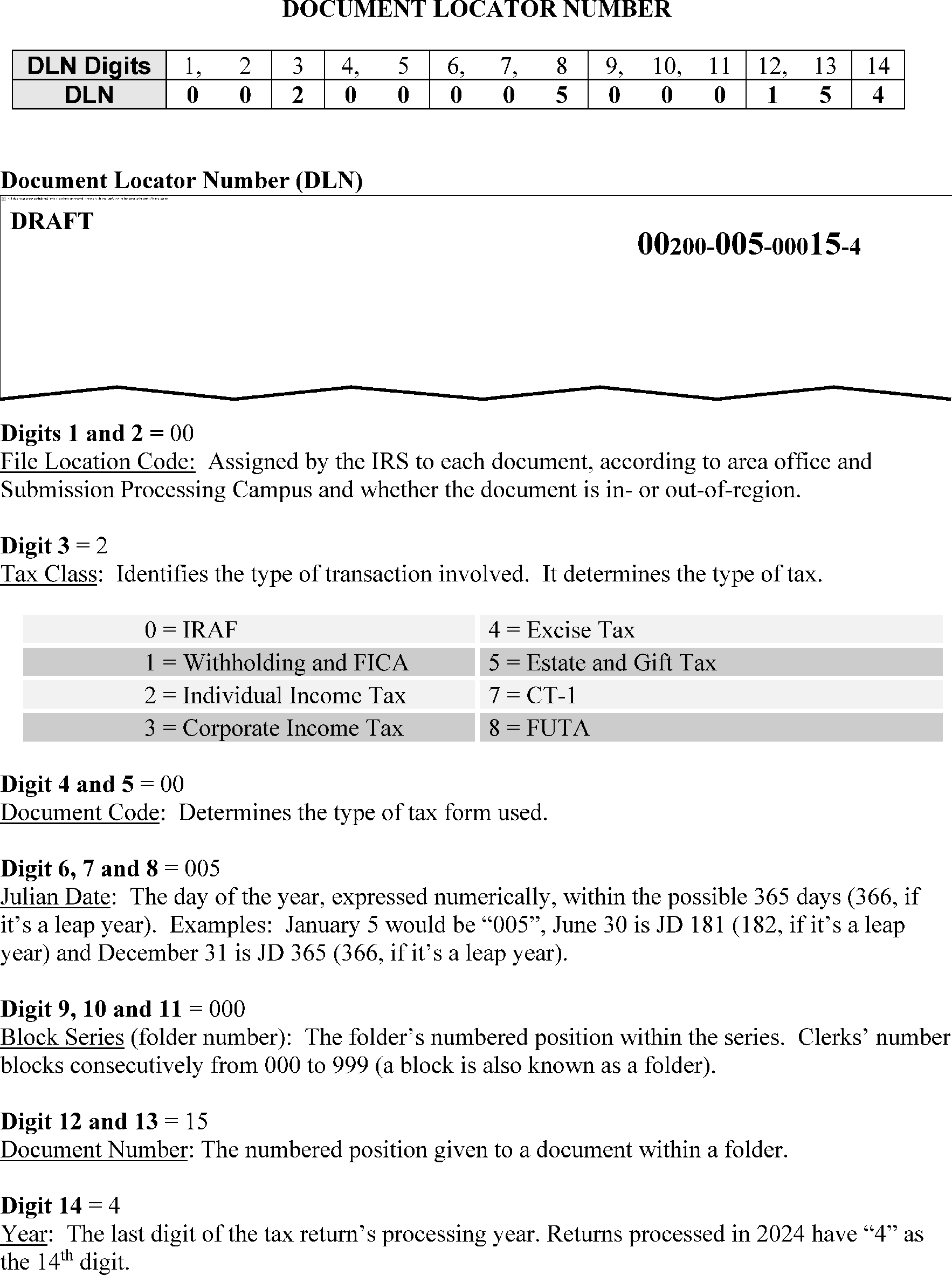
The File Location Code (FLC) makes up the first 2 digits of the DLN. The FLC identifies which campus houses the documents in their storage facilitates or if the return was electronically filed. Please see Section 4 of the Document 6209 for a full list of FLCs and their corresponding locations.
-
See Figure 3.5.61–1 below which provides detailed information on the DLN and its composition.
-
CC ESTABD (via IDRS) is the most efficient and preferred method for requesting tax returns and/or documents located in the Files Functions. Input of CC ESTABD generates Form 4251, Return Charge-out, which is printed and delivered to the Files Function the following day.
-
Form 4251, Return Charge-out, is printed in the Submission Processing Campus according to the File Location Code (FLC). The FLC is the first two (2) digits of the DLN.
-
The following are the CC ESTABD definer request codes:
REQUEST CODE DEFINITION ESTABDA A request code for use by Treasury Inspector General for Tax Administration (TIGTA). The literals TIGTA will print below the DLN on Form 4251. ESTABDB A request for a complete block of documents. The literals ENTIRE BLOCK will print below the DLN on Form 4251. ESTABDC A request for a copy of the entire return or other document. The literals COPY ALL will print below the DLN on Form 4251. ESTABDE Generates request for Criminal Investigation. The literals CRIMINVESTIGATION will print below the DLN on Form 4251. ESTABDF A second request for a document not obtained on the original request. The literals FOLLOW-UP will print below the DLN on Form 4251. ESTABDG Requests for Government Accountability Office (GAO) separate sort. ESTABDI A request for information from a document. The literal INFORMATION will print below the DLN on Form 4251. ESTABDK A request for copies of specified part(s) of a return. The literals COPY-SEE NOTE will print below the DLN on Form 4251. ESTABDM Reserved for Campus use only. ESTABDN A request (paper copy of return is sent to requester) for a return related to an identity theft case. The literals ID THEFT PAPER will print below the DLN on Form 4251. ESTABDO A request for an ORIGINAL return. ESTABDP A request for a copy of the first page of a return or document. The literals ORIGINAL - COPY PAGE 1 will print below the DLN on Form 4251. ESTABDQ A request for a return (to be scanned into CII) related to an identity theft case. The literals ID THEFT SCAN will print below the DLN on Form 4251. ESTABDR A request for a copy which is reimbursable. The literal REIMBURSABLE will print below the DLN on Form 4251. ESTABDS A request code used to indicate document requests for the Correspondence Imaging Inventory (CII only. This code is used only by those working on the Correspondence Imaging Inventory. The literals CIS SCAN REQUEST will print below the DLN on Form 4251. ESTABDT A request for the recharge of a document. RECHARGE will print below the DLN on Form 4251. ESTABDU Reserved for Campus use only. ESTABDV Reserved for authorized users (e.g., Identity Theft, Scrambled SSN cases, Taxpayer Advocate Service (TAS) Requests, etc). ESTABDW A request for a W-2 only. The literals FORM W-2 ONLY will print below the DLN on Form 4251. ESTABDX A request for a print/hardcopy of a CII scanned tax return. The literals CIS PRINT REQUEST will print below the DLN on Form 4251.
-
When processing requests, review the Form 4251, Return Charge-out, to ensure requests are processed as indicated by the customer.
-
Examples of processing requests where the customers' instructions are not followed are:
-
Sending the original return when the customer requests a copy, and the literal"COPY" is shown below the DLN on Form 4251.
-
Sending the original return when the literals "CIS PRINT REQUEST" is shown below the DLN on Form 4251.
-
-
Use these established timeliness requirements when processing tasks in the Files Function.
Task Requirement Peak (April 1 - Sept 30) Non-Peak (Oct 1 - Mar 31) Respond to Customer Service Inquiries Initiate action: 30 minutes of receipt; Complete action: 3 workdays. Initiate action: 30 minutes of receipt; Complete action: 3 workdays Process Incoming Mail 2 workdays, FIFO (First In, First Out) basis. 2 workdays, FIFO (First In, First Out) basis. Process Cycle Work (Tax returns/documents put on shelves and carts and returned to Submission Processing) 2 workdays 1 workday Perform CPL/Cycle Proof Functions 4 workdays 3 workdays Process Missing and Additional Blocks (Return blocks to processing) 8 work hours 8 work hours Pull Expedite Requests (GAO, TIGTA, FOIA Court Cases, Identity Theft (including requests ESTABDN and ESTABDQ), ESTABDV requests, etc). 1 workday 1 workday Process Loose Documents (IDRS/DLN Lookup) 7 workdays 7 workdays Batch and Pull Requests Batch Requests: 1 workday Pull Requests: 6 workdays Batch Requests: 1 workday Pull Requests: 6 workdays Batch and Refile Returns and Attachments (Expedite Refiles includes Unpostables, Rejects, QRDT, etc.) Batch Expedites Re-files: 1 workday; Re-file Expedites: 2 workdays; Batch Re-files: 4 workdays; Re-file returns and attachments: 9 workdays Batch Expedite Refiles: 1 workday; Re-file Expedites: 2 workdays; Batch Re-files: 4 workdays; Re-file returns and attachments: 9 workdays Conduct Remittance Search (Process requests, complete Form 4287, Record of Discovered Remittances, and submit to Receipt and Control Operation (RCO) 1 workday 1 workday Conduct Microfilm Research/Process Requests Regular Request: 3 workdays; Expedite Request: 24 hours. If the tapes are not in-house or must be requested from another location, process the expedite requests within 24 hours after receipt of the tapes. Regular Request: 3 workdays; Expedite Request: 24 hours. If the tapes are not in-house or must be requested from another location, process the expedite requests within 24 hours after receipt of the tapes. Process Correspondence Imaging Inventory (CII) Requests 8 workdays 6 workdays Process Undeliverable Notices 5 workdays 5 workdays Assemble/Associate Transaction Record Filing (IDRS Association) 5 workdays - Assemble documents in a searchable order. 13 workdays - Associate and file documents after receipt of source documents. 5 workdays - Assemble documents in a searchable order. 13 workdays - Associate and file documents after receipt of source documents. Batch FRC Requests (Batch and send requests to FRC.) 1 workday 1 workday Batch FRC Refiles (Batch and send Re-files to the FRC.) 8 workdays 8 workdays AIMS (Process returns, associate labels and complete transcript associations.) 21 workdays 21 workdays Process Form 706 Packages (KC only) 45 workdays 45 workdays Process Form 709 Requests (KC only) 9 workdays 9 workdays Process Form 2848, POA Requests (KC only) 13 workdays 13 workdays -
The peak and non-peak periods for the Files Function is:
-
Peak: April 1st – September 30th
-
Non-Peak: October 1st – March 31st
-
-
With HQ approval, deviation from this list may be authorized.
-
If no response is received from the Files Function after twenty-one (21) business (work) days for in-house requests, OR thirty (30) business (work) days for FRC requests, the customer may submit a second request. A subsequent request may be submitted using the initial request method (CC ESTAB or Form 2275).
-
Brookhaven, Memphis, Philadelphia, Andover, Atlanta, Cincinnati and Fresno Submission Processing Campuses have consolidated and no longer have a Files Function on site.
-
The Files Function to which the consolidated Campus is aligned operates in the same way as if it were located on site.
-
Based on the service needed, direct to the Campus address shown below.
-
Requests for Source Document association (Associating Form 5147, Transaction Record, with Source Documents)
-
Requests for Tax Returns
-
Re-filing of Tax Return (Returning tax return to Files Function for re-filing)
-
Requests for Employees on site at the ramped down Campus
Campus Source Document Folders Requests for Tax Returns/Re-Files Requests for Employees located at Campus Brookhaven Internal Revenue Service, Austin Submission Processing Campus, 2021 E Woodward, Stop 6722, Austin TX, 78741-7805 Internal Revenue Service, Austin Submission Processing Campus, 2021 E Woodward, Stop 6722, Austin TX, 78741-7805 Internal Revenue Service, Brookhaven Accounts Management Campus Files Support Unit, Stop 520, 1040 Waverly Avenue, Holtsville, NY 11742 Memphis Internal Revenue Service, Austin Submission Processing Campus, 2021 E Woodward, Stop 6722, Austin TX, 78741-7805 Internal Revenue Service, Austin Submission Processing Campus, 2021 E Woodward, Stop 6722, Austin TX, 78741-7805 Internal Revenue Service, Memphis Accounts Management Campus Files Support Unit, 5333 Getwell Road, Mail Stop 31, Memphis, TN 38118 Philadelphia Internal Revenue Service, Ogden Submission Processing Campus, 1973 N. Rulon White Blvd., Files M/S 6721, Ogden, UT 84404 Internal Revenue Service, Ogden Submission Processing Campus, 1973 N. Rulon White Blvd., Files M/S 6722, Ogden, UT 84404 Internal Revenue Service, Philadelphia Accounts Management Campus Files Support Unit, 2970 Market Street, BLN #1-F14.100, Philadelphia, PA 19104–5016 Andover Internal Revenue Service, Austin Submission Processing Campus, 2021 E Woodward, Stop 6722, Austin TX, 78741-7805 Internal Revenue Service, Austin Submission Processing Campus, 2021 E Woodward, Stop 6722, Austin TX, 78741-7805 Internal Revenue Service, Andover Accounts Management Campus Files Support Unit, 310 Lowell Street, Stop 505, Andover, MA 01810 Fresno Internal Revenue Service, Austin Submission Processing Campus, 2021 E Woodward, Stop 6722, Austin TX, 78741-7805 Internal Revenue Service, Austin Submission Processing Campus, 2021 E Woodward, Stop 6722, Austin TX, 78741-7805 Internal Revenue Service, Fresno Accounts Management Campus Files Support, 3211 S. Northpointe Drive, Stop AW100, Fresno, CA 93725 Atlanta Internal Revenue Service, Austin Submission Processing Campus, 2021 E Woodward, Stop 6722, Austin TX, 78741-7805 Internal Revenue Service, Austin Submission Processing Campus, 2021 E Woodward, Stop 6722, Austin TX, 78741-7805 Internal Revenue Service, Atlanta Campus Support, 4800 Buford Highway, Stop 8, Chamblee, GA 30341–0000 Cincinnati Internal Revenue Service, Kansas City Submission Processing Campus, 333 West Pershing Road, Stop 6700, Kansas City, MO 64108 Internal Revenue Service, Ogden Submission Processing Campus, 1973 N. Rulon White Blvd., Files M/S 6722, Ogden, UT 84404 Internal Revenue Service, Cincinnati Campus Support, 7940 Kentucky Drive, Florence, KY 41042 -
-
Per IRM 3.13.62, Campus Document Service - Media Transport and Control, these undeliverable CP notices/forms are routed to the Files Function for processing:
CP Notice/Form CP Notice Title CP 23 Estimated Tax Discrepancy CP 51A Non-Compute, Balance Due of $5 or More CP 51B Non-Compute, Overpayment of $1 or More CP 51C Non-Compute, Balance Due Less than $5, Overpayment Less than $1 CP 60 Credit Reversal, Adjustment Notice, Debit Balance of $5 or More Form 3552 Prompt Assessment Billing Assembly -
Upon receipt from the Receipt and Control Function, extract notices from the envelopes or the envelopes will be slit.
-
If the DLN is not readable or shown on the notice, use IDRS and/or a barcode scanner to determine the DLN.
-
Process and sequence undeliverable notices in DLN order within five (5) business days of receipt in the Files Function.
-
Compare the address on the notice with the address on the tax return.
-
If the return is one or more years old, or if the addresses are the same, staple the notice and envelope to the return.
-
If the addresses are different, even just the apartment number, write the complete address as shown on the return on a 3 × 5 card or slip of paper. Staple the address that is different to the notice and route to the Notice Review Function.
-
-
If the return is charged-out (even to a duplicate filing condition), put a flag in the block to staple the notice and envelope to the return when it is re-filed.
-
If the notice and envelope (including a notice received for an e-file return) is received in the Files Function with a yellow Post Office (P.O.) change of address sticker, route the notice and envelope to the Entity Control Unit (ECU) for resolution.
-
If the return has already been retired to the FRC/NARA, attach the notice to the return. Utilize local procedures for routing attachments for returns housed at the FRC.
-
If the envelope and the notice are returned to the Files Functions indicating that the taxpayer is deceased, associate the envelope and notice with the return.
-
If CP notices, other than those identified above, are received in the Files Function, route to the appropriate Function as shown in IRM 3.13.62, Campus Document Services - Media Transport and Control.
-
If the notice is for an electronically filed return, annotate the notice "Undeliverable Notice - No paper document, E-file return" and route to your local CSCO or Notice Review Function, depending on the CP type.
-
If a SC (Service Center) Address transcript/notice is received, associate it with the taxpayer’s return (DLN shown on transcript/notice).
-
This subsection describes the processes for receiving documents from mainline processing and preparing those documents for filing.
-
These processes include procedures for:
-
Document Retention Set-up
-
Assessment of Non-Master File (NMF) Documents
-
CTRL D Text File Conversion Tool - ACPL Replacement
-
Accepting Blocks from Mainline Processing
-
Form 990 Series - Re-image
-
Certified Transcript Requests
-
Voided, Re-input, or Canceled Documents
-
Discovered Remittances
-
-
Receive documents on batch carts after raw input and first error loop have been completed. Assemble documents in labeled folders or 1040 boxes.
-
After receipt, prepare documents for filing as follows:
-
Arrange documents in proper filing sequence by maintaining all documents in DLN order except as shown in IRM 3.5.61.21.9, Alpha Files Listing.
-
Arrange tax returns/documents in filing sequence.
Note:
Check folder against Form 813, Document Register, (Part 2) or Form 1332, Block and Selection Record, and the first and last document in each block to ensure that the documents are in sequence and are numbered correctly. When necessary, prepare additional block file folders to eliminate over-stuffing of folders. If over-stuffing becomes a persistent problem, coordinate with the Numbering Function.
-
Route documents with unreadable DLNs to the Numbering Function for a correct DLN determination.
-
If an original document such as a passport, drivers license or ID card is found attached to a return in a "holy joe" envelope, detach the original document and route to the originator or Planning and Analysis (P&A) Analyst.
-
Check the blocks using the CTRL D Text File Conversion Tool to ensure they are all received.
-
Review adjustment documents. See IRM 3.5.61.3, Receiving and Preparing Other Documents for Filing.
-
Identify documents for retention and maintenance in the Alpha Files.
-
Forward Form(s) 4338, Information or Certified Transcript Request, to the Accounting or Compliance (Criminal Investigation) Function depending upon local or national agreement.
-
Charge out and route returns received with a tax shelter control sheet or a frivolous filer control sheet to the requesting area.
-
Place documents in boxes using small sized folders. Add, repair or replace folders and labels on 1040 boxes, if necessary.
-
Use large Black (non-fading) ink markers.
-
-
After the weekly cycle, five (5) days' receipts constitutes a cycle, is accumulated (daily where space limitations or other local requirements dictate), inter-file the cycle on permanent shelving for retention. See IRM 3.5.61.1.13, Timeliness Requirements.
-
When received, stamped blocks of assessable NMF documents will appear with one of these legends:
-
"Assessment Journalized" to show that assessment action has been taken OR
-
"Form 2345, Batch Transmittal, forward to the Accounting Function" to show that no assessment action is needed.
-
-
If a block of assessable NMF documents is received without one of these two statements notated on the folder, pull and charge-out the block and route it to the NMF Accounting Function.
-
NMF documents can not be routed to the Federal Records Centers. NMF documents containing a tax class of 600 need to be routed to the NMF Accounting Function for resolution.
-
Due to lack of funding, Information Technology (IT) did not migrate the ACPL to a new technology platform. As a result, it was retired on November 15, 2019.
-
As a replacement, the CTRL D report and the newly created CTRL D Text File Conversion Tool is used to complete cycle proof functions in the Files Functions. The Service Center Control File (SCCF 0754) is produced and runs on a daily basis. Access/download this report via CTRL D to perform daily cycle proof duties.
-
For more information, see the CTRL D conversion Tool - User Guide and the CTRL Conversion Tool - Administrator Guide, as applicable.
-
Ensure all blocks of the documents are received in the Cycle Control Function and validate the blocks received using the CTRL D Text File Conversion Tool.
-
Do not shelve unprocessed work/blocks of documents received in the Files Area that is not shown on the Cycle Proof Listing (CPL). Return the unprocessed work to the pipeline for processing.
-
Maintain a staging area (Cycle Control) for the Input Correction Function and prepare "ABC List/Road Map" control for the work set-up, if applicable for your campus.
-
Using the tool, generate the missing block list. Locate the missing blocks and assemble them in the proper order. Where possible, locate and validate all missing blocks prior to releasing the cycle.
-
Utilize the following procedures (proven to be effective) to locate missing blocks:
-
Look in the boxes to the immediate right or left of the box in which the block is normally located.
-
Look in the proper numerical sequence, but in the cycle preceding or following the proper cycle.
-
Look in other areas with the same File Location Codes (FLCs).
-
Check the Alpha/Numeric Control Listing.
-
-
When two (2) blocks have identical DLNs, forward them to the Accounting Function for a determination as to the correct DLN for each block. If duplicate DLN blocks post to good tape, it will be necessary to distinguish the blocks.
-
Manually number each block folder, Form 1332, Block and Selection Record, and all returns with an alpha suffix next to the stamped DLN. For example, notate one folder as the "A" block along with Form 1332 (and all documents reflecting "A" ); notate the other folder as "B" .
-
Communicate these occurrences to the FRCs via monthly conference calls.
-
Hold overage blocks for two (2) cycles that do not appear on the current report before routing them to the Accounting Function for resolution.
-
Form 8027, Employer's Annual Return of Allocated Tips (OSPC only), will not appear on the report since it does not post to the Master File. Do not forward to the Accounting Function.
Note:
When a lockbox payment is split to pay both the User Fee and a portion of the tax owed, there will be no block with the User Fee DLNs. The ACPL will reflect DLNs for the Lockbox User Fee documents but no blocks with these DLNs will be received in the Files Function. The posting documents will be in the block showing the tax payment. The Lockbox User Fee will reflect this format: XXX19-XXX-XXXXX.
-
Research for missing and/or overage blocks on the SCCF using Command Code SCFTR.
-
Ensure Form 8453, U.S. Individual Income Tax Transmittal for an IRS e-file Return, blocks received in the Files Function are processed through the Integrated Submission and Remittance Processing (ISRP).
-
Form 8453 is not processed at Master File but instead is processed to the Tax Return Data Base (TRDB).
-
Form 8453 can be generated daily. Information for IMF Form 8453 is also available as an online listing using Command Code (CC) R8453.
-
Process Form 8453 in the same manner with the following exceptions:
-
Hold overage blocks two (2) cycles before returning to e-Help for review. Do not send to the Accounting Function as Form 8453 is not controlled on the SCCF.
-
Forward blocks with identical DLNs to the e-Help as soon as they are discovered as both blocks are needed by e-Help to resolve the problem.
-
-
If received, route to the Ogden Submission Processing Campus.
-
After verification of cycle completion and release from the Cycle Control Unit, pull any Form 990 Series that has a protruding blue tag and route to the appropriate unit for imaging.
-
Annotate the Block Control Sheet (BCS) and make a photocopy to use as the transmittal document.
-
When the document is reprocessed or re-input with the same DLN, check Item 1 on Form 3893, Re-Entry Document Control, for an Alpha Block Control (ABC). Next, take one of the following actions:
-
If the DLN is present, attach document to the front of the return and re-file as normal.
-
If the DLN is not present, route to the Batching and Numbering Function for initiation of re-input action.
-
If unsure whether the document has been reprocessed or re-input, contact the Accounting or Data Control Function.
-
-
When renumbered, shelve following normal procedures.
-
Return documents with voided or canceled DLNs to the taxpayer or preparer when they are re-input or reprocessed by the Function resolving the problem.
-
If the document cannot be returned to the taxpayer or preparer, the area resolving the problem must annotate and re-file in the original block.
-
Process/work Correspondence Imaging Inventory (CII) images of original numbered returns/documents from Accounts Management as Special Attachments.
-
Separate copies of CII reprocessed returns received in the Cycle Control Unit (CCU) from other re-input/reprocessed documents.
-
Forward CII reprocessed returns to the Sort and Sequence Function with a flag identifying them as CII documents and notate "Attach to front of the original return."
-
Sort and Sequence Function will batch CII documents as Special Attachments to returns rather than as re-files. If a document is discovered that is not a CII print, inter-file it with other documents for re-filing.
-
Perform two (2) sorts:
-
Documents going to Document Retention Unit (DRU) and
-
Documents requiring shipment to the FRCs/NARA.
-
-
To ensure that the CII reprocessed returns being sent to the DRU are processed correctly, do the following:
-
Batch CII reprocessed returns separately and clearly identify them as special attachments to be stapled to the front of the original return.
-
Verify that CII image is stamped on each document.
-
Verify that original DLN is shown on each imaged document.
-
-
Staple to the front of the original return batches received in DRU identified as Special Attachments.
-
To ensure that the CII reprocessed returns' shipment to the FRC/NARA are processed correctly, follow these instructions:
-
Batch the CII reprocessed returns separately, staple to the front of the original returns and clearly identify them as Special Attachments.
-
Verify that CII image is stamped on each document.
-
Verify that original DLN is shown on each imaged document.
-
-
Cash and non-cash remittances found outside of the Receipt and Control, Extracting and Deposit secured/restricted area are “Discovered Remittances”.
-
Cash found inside the Receipt and Control Extracting and Deposit secured/restricted area is also considered a “Discovered Remittance”.
-
Process remittances discovered in the Files Area as it relates to the location of the Receipt and Control Function at each Campus.
-
Process remittances as follows:
-
Immediately notify manager.
-
Manager must immediately record remittance on Form 4287, Record of Discovered Remittances, which serves as the daily log.
-
If the discovering unit is located within the same building, place the remittances, Form 3244, Payment Posting Voucher, and Form 4287 (Part 1 and Part 2) in a sealed envelope.
-
Retain (initiating manager) Form 4287 (Part 3) for your records.
-
Designate an employee to hand deliver the sealed envelope to the Receipt and Control Function.
-
Complete Form 4287B, Courier Log for Discovered Remittances, before the sealed Form 4287 package is released to the employee.
-
Notate the assigned number from Form 4287 on Form 4287B, Column 1.
-
Return Form 4287 (Part 1) to your manager.
-
Within seven (7) days after the date of the discovered remittance was sent to the Receipt and Control Function, the unit manager will reconcile Form 4287(Part 1) with Form 4287 (Part 3). Upon completion, the unit manager will initial and date the box at the bottom of Form 4287 (Part 1) and staple Form 4287 (Part 1 and Part 3) together. The purpose of the reconciliation is to ensure that all remittances sent to the designated Receipt and Control Function were received. If unable to obtain Form 4287 (Part 1) back from the Receipt and Control Function, ensure IDRS research is completed by verifying that the payment has posted to the taxpayer’s account. Attach the IDRS print to Form 4287 ( Part 3). If the payment has not posted to the taxpayer’s account or has not been identified in the Unpostables Function inventory, the unit manager will report any discrepancies to the Receipt and Control Function management and document the contact. Report losses following the procedures provided in IRM 3.0.167.5.2 , Receipt Loss Reporting Requirements.
-
Retain Form 4287 (Part 1 and Part 3) and Form 4287B for one year after the end of the processing year, as required in Document 12990 RCS 29, Item 137.
-
-
For additional information, see IRM 3.8.46, Discovered Remittance.
-
Process remittances as follows:
-
Immediately notify manager and record remittance on Form 4287, as it serves as the daily log.
-
A manager or designee must be available at all times during business hours to receive remittances.
-
After immediately recording the remittance on the daily log, Form 4287, place remittances in a locked container. A locked container is any metal container with riveted or welded seams which is locked and to which keys and the combination are controlled. Keys to the locked container must never be left out in the open or in an unlocked drawer or cabinet. They must be kept in a locked drawer or cabinet controlled by the manager or designee when not in use. For additional information, see IRM 3.8.46.1(15), Discovered Remittance, for guidance regarding security of Discovered Remittances that are placed in a safe or vault until they are routed to the Receipt and Control Deposit Function; and for ordering Standard Form (SF) 700, Security Container Information, for safes or vaults with a combination lock.
-
At least daily, the manager or designee must remittances from the locked container.
-
Place the remittance, Form 3244 and Form 4287 (Part 1 and Part 2) into an envelope and seal.
-
Retain (initiating manager) Form 4287 (Part 3) for your records.
-
Complete Form 4287B and deliver sealed envelope to Receipt and Control.
-
Notate the assigned number from Form 4287 on Form 4287B, Column 1.
-
Within seven (7) days after the date of the discovered remittance was sent to the Receipt and Control Function, the unit manager will reconcile Form 4287 (Part 1) with Form 4287 (Part 3). Upon completion, the unit manager will initial and date the box at the bottom of Form 4287 (Part 1) and staple Form 4287 (Part 1 and Part 3) together. The purpose of the reconciliation is to ensure that all remittances sent to the designated Receipt and Control Function were received. If unable to obtain Form 4287 (Part 1) back from the Receipt and Control Function, ensure IDRS research is completed by verifying that the payment has posted to the taxpayer’s account. Attach the IDRS print to Form 4287 ( Part 3). If the payment has not posted to the taxpayer’s account or has not been identified in the Unpostables Function inventory, the unit manager will report any discrepancies to the Receipt and Control Function management and document the contact. Report losses following the procedures provided in IRM 3.0.167.5.2, Receipt Loss Reporting Requirements.
-
Retain Form 4287 (Part 1 and Part 3) and Form 4287B for one year after the end of the processing year.
-
-
Process remittances as follows:
-
Immediately notify manager and record the remittance on Form 4287, as it serves as the daily log.
-
A manager or designee must be available at all times during business hours to receive remittances.
-
After immediately recording the remittance, place it in a locked container. A locked container is any metal container with riveted or welded seams which is locked and to which keys and the combination are controlled. Keys to the locked container must never be left out in the open or in an unlocked drawer or cabinet. They must be kept in a locked drawer or cabinet controlled by the manager or designee when not in use. For additional information, see IRM 3.8.46.1(15), Discovered Remittance, for guidance regarding security of Discovered Remittances that are placed in a safe or vault until they are routed to the Receipt and Control Deposit Function; and for ordering Standard Form (SF) 700, Security Container Information, for safes or vaults with a combination lock.
-
At least daily, the manager or designee will remove the remittances from the locked container at least daily.
-
Secure remittances by either sealing in an envelope and placing in a lockable canvas bag OR double wrapping and double sealing in opaque paper envelopes or boxes.
-
Notate the name of the person, or function/team, who is authorized to open the package, address (including mail stop number) of the receiving office and the return address of the office mailing the package inside the envelope or box.
-
Notate the office name and address (including mail stop number) of the receiving office and the return address of the office mailing the package on the outside of the envelope or box.
-
Hand deliver the remittance, Form 3244 and Form 4287 (Part 1 and Part 2) by IRS courier or send by overnight traceable mail to the designated Receipt and Control Function. The IRS courier can be the interoffice mail or other designated IRS employee.
-
Retain (initiating manager) Form 4287 (Part 3) for your records.
-
Store remittances in a locked container until picked up by the courier. Remittances must not be left unattended pending pickup by the courier. The courier must complete Form 4287B before the remittances and Form 4287 are released.
-
Notate the assigned number from Form 4287 on Form 4278B, Column 1.
-
Within seven (7) days after the date of the discovered remittance was sent to the Receipt and Control Function, the unit manager will reconcile Form 4287 (Part 1) with Form 4287 (Part 3). Upon completion, the unit manager will initial and date the box at the bottom of Form 4287 (Part 1) and staple Form 4287 (Part 1 and Part 3) together. The purpose of the reconciliation is to ensure that all remittances sent to the designated Receipt and Control Function were received. If unable to obtain Form 4287 (Part 1) back from the Receipt and Control Function, ensure IDRS research is completed by verifying that the payment has posted to the taxpayer’s account. Attach the IDRS print to Form 4287 ( Part 3). If the payment has not posted to the taxpayer’s account or has not been identified in the Unpostables Function inventory, the unit manager will report any discrepancies to the Receipt and Control Function management and document the contact. Report losses following the procedures provided in IRM 3.0.167.5.2, Receipt Loss Reporting Requirements.
-
Retain Form 4287 (Part 1 and Part 3) and Form 4287B for one year after the end of the processing year.
-
-
For additional information, see IRM 3.8.46, Discovered Remittance.
-
Process discovery of cash or other items of value (including credit, debit and gift cards) as follows:
-
Immediately notify manager.
-
Manager will immediately record cash and other items of value on Form 4287. This will be a separate log from the daily Form 4287 used for checks.
-
Place the cash and/or other items and Form 4287 (Part 1 and Part 3) in a sealed envelope.
-
Manager must retain Form 4287 (Part 3) for their records.
-
The employee designated to hand deliver the envelope, must complete Form 4287B before releasing the sealed envelope to the Receipt and Control Function.
-
Notate the assigned number from Form 4287 on Form 4287B, Column 1 and hand deliver the envelope to the Receipt and Control.
-
Return Form 4287 ( Part 1) to your manager.
-
Within seven (7) days after the date of the discovered remittance was sent to the Receipt and Control Function, the unit manager will reconcile Form 4287 (Part 1) with Form 4287 (Part 3). Upon completion, the unit manager will initial and date the box at the bottom of Form 4287 (Part 1) and staple Form 4287 (Part 1 and Part 3) together. The purpose of the reconciliation is to ensure that all cash or items of value are sent to the designated Receipt and Control Function .
-
Report losses following guidance in IRM 3.0.167.5.2, Receipt Loss Reporting Requirements.
-
Retain Form 4287 (Part 1 and Part 3) and Form 4287B for one year after the end of the processing year.
-
-
For additional information, see IRM 3.8.46, Discovered Remittance.
-
Process as follows:
-
Immediately notify manager.
-
Manager will immediately record cash and other items of value on Form 4287 which serves as a daily log. A separate Form 4287 will be used to record cash and other items (separate from Form 4287 used for checks).
-
On the same day that cash or other items of value are identified, the discovering unit manager or designee must contact the manager of the Receipt and Control Function.
-
The manager must determine the most expeditious, secure method of getting the items of value to the Receipt and Control Function.
Note:
In those instances where a designated Receipt and Control employee is not available, store the cash or other items in a locked security container (up to $1,000) or a locked safe or vault (over $1000). See IRM 3.8.46.2.2(3), Discovered Remittance, for guidance regarding security of Discovered Remittances that are placed in a safe or vault until they are routed to the Receipt and Control Function; and for ordering Standard Form (SF) - 700 for safes or vaults with a combination lock.
-
Secure the cash or other item(s) along with (Form 4287 (Part 1 and Part 2) in either a sealed envelope placed in a lockable canvas OR by double wrapping and double sealing in opaque paper envelopes or boxes.
-
The inside envelope or box must contain the name of the person who is authorized to open the package, address (including mail stop number) of the receiving office and the return address of the office that is forwarding the package.
-
The outside envelope or box must contain the office name and address (including mail stop number) of the receiving office and the return address of the office mailing the package.
-
Retain (initiating manager) Form 4287 (Part 3) for your records.
-
Designated person must complete Form 4287B before releasing sealed envelope to the Receipt and Control Function. Notate the assigned number from Form 4287 on Form 4287B, Column 1.
-
Return Form 4287 (Part 1) to your manager.
-
Within seven (7) days after the date of the discovered remittance was sent to the Receipt and Control Function, the unit manager will reconcile Form 4287 (Part 1) with Form 4287 (Part 3). Upon completion, the unit manager will initial and date the box at the bottom of Form 4287 (Part 1) and staple Form 4287 (Part 1 and Part 3) together. The purpose of the reconciliation is to ensure that all cash or items of value are sent to the designated Receipt and Control Function.
-
Report losses following the guidance in IRM 3.0.167.5.2, Reporting Requirements.
-
Retain Form 4287 (Part 1 and Part 3) for one year after the end of the processing year.
-
-
For additional information on discovered remittances, see IRM 3.8.46, Discovered Remittances.
-
This subsection describes the processes for receiving and preparing documents for filing.
-
These processes include procedures for:
-
Form 56, Notice Concerning Fiduciary Relationship/ Form 56-F, Notice Concerning Fiduciary Relationship of Financial Institution
-
Form 706, U.S. Estate Tax Return/706-GS(D), Generation-Skipping Transfer Tax Return for Distributions/706-GS(D-1), Notification of Distribution Form a generation Skipping Trust
-
Form 709, United States Gift Tax Return
-
Form 720-CS, Carrier Summary Report/ Form 720-TO, Terminal Operator Report
-
Form 926, Return by a U.S. Transferor of Property to a Foreign Corporation
-
Form 941, Employer’s Quarterly Federal Tax Return
-
Form 966, Corporate Dissolution or Liquidation
-
Form 990-BL, Information and Initial Excise Tax Return for Black Lung Benefit Trusts and Certain Related Person
-
Form 990-T, Exempt Organization Business Income Tax Return
-
Form 1040-C, U.S. Departing Alien Income Tax Return
-
Form 1042, Annual Withholding Tax Return for U.S. Source Income of Foreign Persons/ Form 1042-S, Foreign Person’s U.S. Source Income Subject to Withholding
-
Form 1094-C, Transmittal of Employer-Provided Health Insurance Offer and Coverage Information Returns
-
Form 1095-C, Employer-Provided Health Insurance Offer and Coverage
-
Form 1096, Annual Summary and Transmittal of U.S. Information Returns
-
Form 1098-MA, Mortgage Assistance Payments
-
Form 1120-FSC, U.S. Income Tax Return of a Foreign Sales Corporation/ Form 1120-IC-DISC, Interest Charge Domestic International Sales - Corporation Return
-
Form 1120-L, U.S. Life Insurance Company Income Tax Return/ Form 1120-PC, U.S. Property and Casualty Insurance Company Income Tax Return
-
Form 1127, Application for Extension of Time for Payment of Tax Due to Undue Hardship
-
Form 1128, Application to Adopt, Change, or Retain a Tax Year
-
Form 2063, U.S. Departing Alien Income Tax Statement
-
Form 2438, Undistributed Capital Gains Tax Return
-
Form 2555, Foreign Earned Income
-
Form 2749, Request for Trust Fund Recovery Penalty Assessment(s)
-
Form 2848, Power of Attorney and Declaration of Representative/ Form 8821, Tax Information Authorization
-
Form 3115, Application for Change in Accounting Method
-
Form 3491, Consumer Cooperative Exemption Application
-
Form 3520, Annual return to Report Transactions with Foreign Trusts and Receipt of Certain Foreign Gifts/Form 3520-A, Annual Return of Foreign Trust with a U.S. Owner
-
Form 4361, Application for exemption From Self-Employment Tax for Use by Ministers, Members of Religious Orders and Christian Science Practitioners
-
Form 4876-A
-
Form 5596
-
Form 5650
-
Form 7004
-
Form 8023
-
Form 8027
-
Form 8038
-
Form 8210
-
Form 8281
-
Form 8282
-
Form 8329
-
Form 8330
-
Form 8332
-
Form 8404
-
Form 8453-X
-
Form 8508-I
-
Form 8606
-
Form 8621
-
Form 8703
-
Form 8809-I
-
Form 8811
-
Form 8819
-
Form 8822/Form 8822-B
-
Form 8831
-
Form 8833
-
Form 8840
-
Form 8843
-
Form 8857
-
Form 8865
-
Form 8868
-
Form 8871
-
Form 8872
-
Form 8879
-
Form 8883
-
Form 8918
-
Form 8924
-
Form 8925
-
Form 8928
-
Form 8938
-
Form 8939
-
Form 8966
-
Form 8973
-
Form 13441-A
-
Form 14095
-
Form CT-2
-
Form SS-4
-
Form W-7
-
Schedule K-1
-
Oversize Administrative Files
-
Electronic Media
-
Citizenship Status Statements
-
Foreign investment in Real Property Tax Act (FIRPTA) Correspondence
-
Non-resident/Non-Filer (NRNF) Project - Streamlined Process
-
Exempt Organizations/Employee Plans Applications
-
United Mine Workers of America Benefits Claims
-
Unidentified Remittance and Excess Collection Paper Files
-
Service Center Recognition Image Processing (SCRIPS) Processed Form 940 and Form 941
-
Lockbox Processed Documents
-
Integrated Submission and Remittance Processing (ISRP) Processed Documents
-
Remittance Processing System (RPS) and Lockbox Bank Processed Documents
-
Adjustment Documents
-
IDRS Source Documents
-
-
Receive Form 56/56-F and file as follows:
-
In alphabetical order by year received (notate "Alpha File" on routing slip.).
-
As a source document to be associated with TC 098/099. See IRM 3.5.61.3.91, IDRS Source Documents - Sending to Files Function, for more information.
-
-
If there is no received date on Form 56/ Form 56-F (for alpha filing), use the Entity date stamp as the received date.
-
If there is no received date or Entity date stamped on the Form 56, return to the Entity Function and request a received date determination.
-
Retire to the Federal Records Center (FRC) beginning January 2 through March 31 following the year in which returns were numbered and processed.
-
Destroy on or after January 16, six (6) years after the end of the processing year unless needed for the Collection Statute Expiration Date (CSED) Extract, as required in Document 12990 RCS 29, Item 56 (1).
-
Form 706-GS(D) is assigned a Document Locator Number (DLN) and processed using Tax Class/Document Code 559.
-
Form 706-GS(D-1) is not assigned a DLN; therefore, it is classified as an unnumbered return.
-
Form 706 GS(D-1) is a two (2) part form consisting of Copy A and Copy B.
-
Copy A - Filed by trustee to the IRS
-
Copy B - To be attached to Form 706-GS(D)
-
-
Receive Form 706-GS(D-1) Copy A or Copy B with instructions from originator indicating whether to attach to Form 706-GS(D) or to retain in alpha files.
-
If instructions are not provided, return to the originator as all determinations regarding the filing (including impact of inclusion ratio) of Form 706-GS(D) must be made prior to receipt in the Files Area.
-
File Form 706-GS(D-1) Copy A or Copy B in alphabetical order.
-
Retire to the Federal Records Center (FRC) one year after the end of the processing year.
-
Destroy forty (40) years after the end of the processing year as required in Document 12990 , RCS 29, Item 61 (1) and (2).
-
Destroy File folder set-up after records are purged and retired as required in Document 12990, RCS 29, Item 61 (3).
-
Form(s) 709 is processed at the Kansas City Submission Campus (KCSPC).
-
After Form(s) 709 is processed, the KC Files Function, in coordination with the Small Business/Self-Employed (SB/SE), Estate and Gift (E and G), will identify, pull and route Form(s) 709 as needed for the classification process.
-
Arrange Form(s) 709 returns/documents in strict alphabetical order for storage at the C-Site.
-
The C-Site address is: 335 S. GeoSpace Drive, Independence, Missouri 64056. Mail is delivered via United Parcel Service (UPS). The United States Postal Service (USPS) does not deliver to the C-Site location.
-
For retirement and destruction information, see Document 12990, RCS 29, Item 62.
-
Form 720-CS and Form 720-TO are monthly returns.
-
File and retain in alphabetical order by processing year.
-
Retire to the FRC beginning January 2, one (1) year after the end of the year in which the latest returns were numbered and processed.
-
Destroy six (6) years after the end of the processing year as required in Document 12990, RCS 29, Item 67 (1).
-
File Form 926 (loose) in alphabetical order by year of receipt.
-
Retire to the Federal Records Center beginning July 1, eighteen (18) months after the end of the processing year.
-
Destroy five (5) years after end of the processing year as required in Document 12990, RCS 29, Item 168(4).
-
Receive Form 966 with the name control and tax year edited and shown at the top of the form.
-
If the name control and tax year is not edited, return to the Entity Control Function for a determination.
-
File Form 966 in alphabetical order (based on corporation or cooperative name) by received/processed date.
-
For returns numbered and processed January 1 through June 30, retire to the Federal Records Center beginning January 2 through March 31 following the year in which numbered and processed.
-
For returns numbered and processed July 1 through December 31, retire to the Federal Records Center beginning July 1 through September 30 following the year in which numbered and processed.
-
Destroy fifty (50) years after end of processing year as required in Document 12990, RCS 29, Item 58 (1) and (2).
-
General NMF procedures are used when processing Form 990-BL and Form 6069.
-
Retire to the Federal Records Center beginning January 2, one (1) year after the end of the year in which returns were numbered and processed.
-
Destroy six (6) years after the end of the processing year as required in Document 12990, RCS 29, Item 66.
-
If received, route to the Ogden Submission Processing Campus.
-
File and retain Form 990-T (if unnumbered/no DLN) in alphabetical order by year received.
-
Retire to the Federal Records Center beginning January 2, one (1) year after the end of the year in which the returns were numbered and processed.
-
Destroy six (6) years after the end of the processing year as required in Document 12990, RCS 29, Item 66.
-
If received, route to the Austin Submission Processing Campus.
-
File Form 1040-C in alphabetical order by year of receipt.
-
Retire to the Federal Records Center beginning January 2 through March 31 following the year in which returns were numbered and processed.
-
Destroy on or after January 16, six (6) years after the end of the processing year unless needed for the Collection Statute Expiration Date (CSED) Extract as required in Document 12990, RCS 29, Item 56.
-
File Form 1042 and Form 1042-S in DLN sequence.
-
File Form 1042 and Form 1042-S as a unit when they are received attached together, unless Form 1042-S are numbered differently from the Form 1042. If the Form 1042-S are numbered with their own distinct DLN, detach and file in DLN sequence.
-
If a copy of Page 1 of Form 1042 and Form 5344, Examination Closing Record, is annotated "Processed for Examination Results Only" maintain in DLN order of Form 5344.
-
Retire to Records Center beginning January 2, 1 year after the end of the year in which returns were numbered and processed.
-
Destruction for Form 1042 should be completed on or after January 16, 6 years after end of processing year unless needed for the Collection Statute Expiration Date (CSED) Extract as required in Document 12990 , RCS 29, Item 56.
-
Destruction for Form 1042-S should be completed when related tax returns are destroyed as required in Document 12990, RCS 29, Item 85.
-
Beginning 01/01/1995, Form 1096 began processing using the Service Center Recognition Image Processing System (SCRIPS).
-
If needed, complete research on-line. No paper Form 1096 are processed using SCRIPS.
-
For paper records (not microfilmed) and microfilm, destroy three (3) years after the end of the processing year as required in Document 12990, RCS 29, Item 98 (1) and (2).
-
For paper records (microfilmed), destroy immediately after microfilming and film verification as required in Document 12990, RCS 29, Item 98 (3).
-
If received in the Files Area, see IRM 3.10.72-1, Receiving, Extracting and Sorting (Routing Guide), for routing instructions.
-
If received in the Files Area, see IRM 3.10.72-1, Receiving, Extracting and Sorting (Routing Guide), for routing instructions.
-
If received, route to the Austin Submission Processing Campus.
-
File and retain Form 1098-MA or single statement listing(s) in alphabetical order by state/then by mortgage firm.
-
File and retain Form 1099-QA and Form 5498-QA in invalid DLN order by processing year.
-
Retention for Form 1099-QA can be found in Document 12990, RCS 29, Item 85, 87 or 88. Please refer to the RCS for details to determine the destruction criteria. .
-
Destruction for Form 5498-QA should be two (2) years after filing year or year of receipt, whichever is later. Additional information can be found in Document 12990, RCS 29, Item 190.
-
File and maintain in DLN order.
-
For retirement and destruction information, see Document 12990, RCS 29, Item 58.
-
Obtain the DLN of the related Form 1120-L or Form 1120-PC when the annual statements are received.
-
Staple the annual statements to the related returns.
-
When a loose annual statement is received, determine if a related Form 1120-L or Form 1120-PC has been charged out.
-
If the return is charged-out to the Examination or SOI Function, route to the appropriate function.
-
If charged-out to any other function, flag and attach to return when re-filing.
-
For retirement and destruction information, see Document 12990, RCS 29, Item 58.
-
File and maintain in alphabetical order by year of receipt.
-
For retirement and destruction information, see Document 12990, RCS 29, Item 68.
-
File and maintain Form 1128 in alphabetical order by year of receipt.
-
Retire to the Federal Records Center one (1) year after the end of the processing year.
-
Destroy four (4) years after the end of the processing year as required in Document 12990, RCS 29, Item 84.
-
If received, route to the Austin Submission Processing Campus.
-
File Form 2063 in alphabetical order by taxable year certified.
-
Retire to the Federal Records Center beginning January 2 through March 31 following the year in which returns were numbered and processed.
-
Destroy on or after January 16, six (6) years after the end of the processing year unless needed for the Collection Statute Expiration Date (CSED) Extract, as required in Document 12990, RCS 29, Item 56.
-
If received, route to the Kansas City Submission Processing Campus.
-
Retain Form 2438 (loose) in EIN order by year of receipt in the alpha files.
-
Retire to the Federal Records Center beginning January 2 through March 31 following the year in which returns were numbered and processed.
-
Destroy 50 years after the end of the processing year, per Document 12990, Item 58(1).
-
Form 2555 is required to be attached to the taxpayer's return.
-
Route Form 2555 (loose) to Accounts Management for adjustment input that will provide for association to Form 1040 for the applicable year.
-
If unable to locate any information for association, file and retain in alphabetical order by year of receipt.
-
Form 2749 is now automated and consolidated with the receipt of all documents at the Ogden Submission Processing Campus (OSPC). The new program generates a separate assessment and a Form 5147 for each module.
-
For all Files Function (other than OSPC), include multiple copies of Form 2749; one for each module listed on the form contained in the employee folder. Highlight the sequence number and the associated module on each copy.
-
Destroy at the end of June and at the end of December those forms over six (6) months old as required in Document 12990, RCS 29, Item 51.
-
File and maintain Form 2848 and Form 8821 by the Source Document Locator Number (SDLN) located in the upper right margin on each form.
-
The SDLN for a POA is different from a regular DLN. The first two digits denote the purge year (year of destruction) of the form.
-
For example, SDLN 13-0450-00-007-19, breaks down as follows:
-
13 - Year of Destruction
-
0450 - Input Cycle
-
00 - Area
-
007 - Block Number
-
19 - Serial Number
-
-
Retire to the IRS Kansas City Files Area one year after year of processing.
-
Destroy after January 2 of the year following the purge year which is identified by the first two (2) digits of the SDLN on the POA or TIA as required in Document 12990, RCS 29, Item 54.
-
Both Form 2848 and Form 8821 are processed by the Accounts Management Function at the Ogden and Memphis Campuses. Requests by international filers are processed at the Austin Campus.
-
Send unprocessed or forms where the SDLN is not provided and revoked Power of Attorney (POA) to the Campus that processed the original Form 2848/8821 for association.
-
Form 3115 is required to be attached to the taxpayer's timely filed Federal Income Tax Return.
-
Route to the Accounts Management for Document Location Number (DLN) determination so that form can be associated with the return.
-
If received, route to the IRS, 2970 Market Street, BLN 4-G08.151, Philadelphia, PA 19104.
-
File and retain in alphabetical order by year of receipt. See Document 12990, RCS 29, Item 71 for retention and disposition requirements.
-
Retain and file Form 3520 (Tax period ending 12/31/1997 and prior) and Form 3520-A (Tax period ending 12/31/1999 and prior) in alphabetical order by year of receipt.
-
File Form 3520 (Tax period ending 12/31/1998 and forward) and Form 3520-A (Tax period ending 12/31/2000 and forward) using the DLN as they are processed via pipeline processing.
-
Destroy seven (7) years after date of filing as required in Document 12990, RCS 29, Item 85 (3).
-
If received, route to Internal Revenue Service, M/S 4-G08 151, 2970 Market Street, Philadelphia, PA 19104.
-
File and retain in alphabetical order by year of receipt.
-
Retain for three (3) years in Files Area, then retire to the Federal Records Center.
-
Destroy seventy-five (75) years after date of waiver as required in Document 12990, RCS 29, Item 77.
-
If received, route to the Ogden Submission Processing Campus.
-
File and maintain in DLN order for Document Code 55.
-
File and maintain in TIN order by year of receipt for Document Code 77.
-
Receive documents from the originating office attached to the back of Form 1332, Block and Selection Record, with blocks of EO returns (e.g., Form 990, Form 990-PF).
-
File and maintain in DLN order.
-
Ensure that Form 1332 is attached to Form 5596 or Form 5599 when preparing the blocks of returns in the permanent retention area.
-
Receive documents from the originating office attached to the back of Form 1332 or Form 813, Document Register, with blocks or originals or photocopies of Employee Plan (EP) returns (e.g., Form 5500 series).
-
File, maintain and prepare for permanent retention in DLN order.
-
Retire to the Federal Records Center one (1) year after end of processing year.
-
Destroy six (6) years after end of processing year as required in Document 12990, RCS 29, Item 122.
-
For Form 7004 submitted without remittance, destroy one (1) year after the end of the processing year as required in Document 12990, RCS 29, 68.
-
For Form 7004 submitted with remittance, retire to the Federal Records Center beginning July 1, eighteen (18) months after the end of the processing year.
-
Destroy Form 7004 submitted with remittance five (5) years after the end of the processing year as required in Document 12990, RCS 29, Item 168 (4).
-
If received, route to the Ogden Submission Processing Campus.
-
File and retain in TIN order by year of receipt.
-
For retirement and destruction information, see Document 12990, RCS 29, Item 58.
-
If received, route to the Ogden Submission Processing Campus. Form 8027 is numbered as Tax Class 5, Document Code 57.
-
Form 8027 is numbered as Tax Class 5, Document Code 57 and a non-masterfile processed form.
-
Utilize the DLN listing (annual listing provided by the Compliance Function) to service requests for the form.
-
Retire to the Federal Records Center beginning January 2nd, one (1) year after the end of the year in which the returns were numbered and processed.
-
Destroy six (6) years after the end of the processing year as required in Document 12990, RCS 29, Item 48.
-
If received, route to the Ogden Submission Processing Campus.
-
File and retain Form 8038 in TIN (Issuer) order by year of receipt.
-
Retire to the Federal Records Center three (3) years after the processing year.
-
Destroy thirty (30) years after the end of the processing year as required in Document 12990, RCS 29, Item 92.
-
If received, route to the Ogden Submission Processing Campus.
-
File Form 8038-CP in TIN (Issuer) order by year of receipt.
-
Retire to the Federal Records Center three (3) years after the processing year.
-
Destroy thirty (30) years after the end of the processing year as required in Document 12990, RCS 29, Item 92.
-
Receive Form 8210 in two (2) different ways:
-
With remittance - Receipt of DLN from ISRP.
-
Without remittance - Processed in the Accounts Management Function.
-
-
Due to the different numbering methods, these forms are filed in different areas of the Files Function as this is important when these forms are ready for retirement.
-
For retirement and destruction information, see Document 12990, RCS 29, Item 53.
-
If received, route to the Ogden Submission Processing Campus.
-
Upon receipt in the Ogden Files Function, do the following:
-
Review Form 8281, Box 1a (Name Control).
-
Separate Form(s) 8281 that includes "Estate" or "Trust" in Box 1a and follow instructions for (5) below.
-
-
Make a photocopy and file the photocopy by Issuer’s Name. Send the two originals to the address shown below (Number 4).
-
Forms with TIN or "Applied For" - On the 2nd and 12th of each month, mail both originals along with a completed Form 3210 (notating Quantity and Issuer's Name (Box 1a) to: IRS, 1111 Constitution Avenue, NW, IR-6526, ATTN: COR, Washington, DC 20224.
-
Forms with SSN or Individual Name - On the 12th of each month, mail the first (1st) original along with a completed Form 3210 (notating Quantity and Issuer's Name (Box 1a) to: IRS, SR. Tech Advisor, FRP, 1973 N. Rulon White Blvd., MS 4390, Ogden, UT 84404. File second (2nd) original.
, route to FRP at the address listed in this paragraph. -
If the 2nd or the 12th falls on a Saturday, Sunday or Holiday, mail on the following business day.
-
The COR or FRP Function will send the acknowledgement copy of Form 3210 back to the Ogden Files Function via fax to (855)312-0550 or mail to: IRS, 1973 N. Rulon White Blvd., MS 6722, Ogden, UT 84404
-
If acknowledgement is not received within ten (10) business days, inform the HQ Files Analyst.
-
If received, route to the Ogden Submission Processing Campus.
-
File and retain alphabetical order by year of receipt.
-
If received, route to the Ogden Submission Processing Campus.
-
File and retain in TIN order (Reporting Authority) order by calendar year.
-
Cut off annually, retire to the Federal Records Center at the end of the calendar year in which the election was made.
-
Destroy twenty-five (25) years after the end of the calendar year in which the election was made as required in Document 12990, RCS 29, Item 412 (c).
-
If received, route to the Ogden Submission Processing Campus.
-
File and retain in TIN order by calendar year.
-
Form 8332 are required to be attached to the taxpayer's return.
-
Route loose Form(s) 8332 (paper and electronically filed) to the Accounts Management Function for adjustment input that will provide for association of the form.
-
If received, route to the Ogden Submission Processing Campus.
-
After electronically submitting Form 8871, an authorized official must sign, date and submit Form 8453-X to the Ogden Submission Processing Center.
-
Research IDRS for DLN beginning with "91977" .
-
Obtain IDRS print, stamp or write "In lieu of Form 5147" , highlight DLN, file and maintain.
-
Retire to the Federal Records Center beginning January 2 through March 31 following the year in which the returns were numbered and processed.
-
Destroy on or after January 16, six (6) years after the end of the processing year unless needed for the Collection Statute Expiration Date (CSED) Extract as required in Document 12990, RCS 29, Item 55(2).
-
Receive Form 8508-I in the Files Function for storage in the Alpha Files.
-
Form 8508-I will be routed to the Files Function using Form 3210, Document Transmittal, and the "Remarks" section will notate "Form 8508-I, store in the Alpha Files" .
-
File and retain Form 8508-I in numerical order by the Global Intermediary Identification Number (GIIN), by processing year. The GIIN is shown in box 4, Form 8508-I.
-
Destroy three (3) years after processing as required in Document 12990, RCS 19, Item 47.
-
File and retain Form 8606 (loose) in alphabetical order by year of receipt.
-
If received, route to the Ogden Submission Processing Campus.
-
File and retain in alphabetical order by year of receipt.
-
If received, route to the Ogden Submission Processing Campus.
-
File and retain Form 8703 in TIN (owner of project) order by calendar year.
-
Receive Form 8809-I in the Files Function for storage in the Alpha Files.
-
Form 8809-I will be routed to the Files Function using Form 3210, Document Transmittal, and the "Remarks" section will notate "Form 8809-I, store in the Alpha Files" .
-
File and retain Form 8809-I in numerical order by the Global Intermediary Identification Number (GIIN), by processing year. The GIIN is shown in box 4, Form 8809-I.
-
Destroy five (5) years after processing as required in Document 12990, RCS 29, Item 168 (4).
-
If received, route to the Ogden Submission Processing Campus.
-
Upon receipt in the Ogden Files Function, make a photocopy and file by Box 1 Name of REMIC or Issuer of CDO. Send original to address as shown below (Number 3).
-
On the last day of each month, mail originals (exclude all "Revised" , "Deleted" or "Amended" Form(s) 8811) along with a completed Form 3210 to DataSavers of Jacksonville, Inc., 888 Suemac Road, Jacksonville, Florida 32254.
-
The DataSavers vendors will notify COR of receipt of the Form 8811 originals.
-
On the last day of each month, mail only the "Revised" , "Deleted" or "Amended" Form(s) 8811 and Form 3210 to: IRS, 1111 Constitution Avenue, NW, IR-6526, ATTN: COR, Washington, D.C. 20224.
-
If the last day of the month falls on a Saturday, Sunday or Holiday, mail on the following business day.
-
The COR will send the acknowledgement copy of Form 3210 back to the Ogden Files Function via fax to (855)312-0550 or mail to: IRS, 1973 N. Rulon White Blvd., MS 6722, Ogden, UT 84404.
-
If acknowledgement is not received within ten (10) business days, inform the HQ Files Analyst.
-
If received, route to the Ogden Submission Processing Center.
-
Retain Form 8819 (loose) in EIN order by year received.
-
For retirement and destruction information, see Document 12990, RCS 29, Item 58 (5)(c).
-
Receive Form 8822 and Form 8822-B from the Entity Control Function with Form 3210, Document Transmittal.
-
Retain Form 8822 in alphabetical order by the taxpayer’s last name, as shown in Box 3a.
-
Retain Form 8822-B in alphabetical order by name of the business as shown in Box 4a.
-
Retire to the Federal Records Center beginning January 2 through March 31 following the year in which the returns were numbered and processed.
-
Destroy on or after January 16, six (6) years after the end of the processing year unless needed for the Collection Statute expiration Date (CSED) Extract, per Document 12990, RCS 29, Item 56(1).
-
If received, route to the Kansas City Submission Processing Campus.
-
Retain Form 8831 in alphabetical order by year of receipt.
-
Retain Form 8833 (loose) in alphabetical order by year of receipt.
-
Retire. Consult with the Records Specialist for the form’s retention.
-
Destroy on or after January 16, six (6) years after the end of the processing year unless needed for the Collection Statute Expiration Date (CSED) Extract.
-
File and maintain loose Form 8840 in alphabetical order by year of receipt.
-
Retire to the Federal Records Center when no longer needed for current business.
-
Destroy six (6) years after end of processing year as required in Document 12990 , RCS 29, Item 119(b).”
-
For Form 8840 (loose) that cannot be filed alphabetically due to insufficient information (e.g., information is illegible, missing, blank, etc.), designate a storage area/box with the notation "Form 8840 - Unidentified or Unable to Associate" and file by year of receipt.
-
Retain Form 8840 -Unidentified or Unable to Associate, for one (1) year (in the event a future association can be made) and then destroy.
-
Form 8840 (loose) is processed at the Austin Submission Processing Campus.
-
File and maintain Form 8843 (loose) in alphabetical order by year of receipt.
-
Retire to the Federal Records Center when no longer needed for current business.
-
Destroy six (6) years after end of processing year as required in Document 12990 , RCS 29, Item 121(b).
-
For loose Form 8843 that cannot be filed alphabetically due to insufficient information (e.g., information is illegible, missing, blank, etc.), designate a storage area/box with the notation "Form 8843 - Unidentified or Unable to Associate and file by year of receipt."
-
Retain Form 8843 - Unidentified or Unable to Associate, for one (1) year (in the event a future association can be made) and then destroy.
-
Form 8843 (loose) is processed at the Austin Submission Processing Campus.
-
If received, date stamp upon receipt and route as soon as possible (no later than ten (10) working days) to: Internal Revenue Service, P.O. Box 120053, Covington, KY 41012.
-
Route loose Form 8865 to the Accounts Management Function for association with the taxpayer's tax return.
-
If received, route to the Ogden Submission Processing Campus.
-
File and maintain in Employer Identification Number (EIN) order by year of receipt.
-
Retain. Consult with the Records Specialist for the form’s retention.
-
Destroy six (6) years after the end of the processing year.
-
Retain. Consult with the Records Specialist for the form’s retention.
-
Destroy six (6) years after the end of the processing year.
-
If received in the Files Area, return to the sender.
-
Form 8879 is no longer required to be retained by the IRS.
-
Volunteer Income Tax Assistance (VITA)/Tax Counseling for Elderly (TCE) volunteers must return Form 8879 to the taxpayer along with a copy of the tax return.
-
If Form 8883 is received loose, return to the originator and request attachment instructions and/or request input of TC 290 for appropriate retention in the Files Function.
-
If received, route to the Ogden Submission Processing Campus.
-
File in reportable transaction number order if the reportable transaction number is present.
-
File in alphabetical order by year of receipt if the reportable transaction number is not present (application denied).
-
Form 8918 replaces Form 8264, Application for Registration of Tax Shelter.
-
If received, route to the Ogden Submission Processing Campus.
-
Form 8925 is required to be attached to the policyholder's return for each year.
-
Route Form 8925 (loose) to the Account Management Function for adjustment input that will provide for association of the form.
-
If received, route to the Ogden Submission Processing Campus.
-
Receive Form 8938 listing (containing DLNs) to identify returns for pulling/retrieving.
-
Pull/retrieve returns based on the Form 8938 DLN listing.
-
If the return is retired to the Federal Records Center (FRC), input ESTABD to generate Form 4251 (Return Charge-out) and route to the FRC for servicing.
-
Complete the block control sheet (using information from the Form 8938 listing) or locally developed charge-out and insert into file to serve as a charge-out. Ensure that the block control sheet has enough information to identify who/what function the return is charged out to.
-
If the return is not in the block, insert a flag as an Form 8938 indicator. Upon return, route the document to the requester.
-
Assemble returns that are pulled into a batch and place a copy of the Form 8938 listing on top of the batch.
-
Highlight (with a marker) on copy of Form 8938 listing, any returns that were not located and notate the reason the return is not included. For example, Document Not In File (DNIF), Block Not In File (BNIF), etc.
-
Route assembled batch of returns on Friday of each week to the Code and Edit Function (Clerical Unit).
-
Receive loose Form 8938 along with IDRS print showing highlighted DLN that may be sent to the Files Area for association/attachment.
-
Associate the loose Form 8938 with the controlling DLN highlighted on the IDRS print and file using normal process.
-
If received, route to the Ogden Submission Processing Campus.
-
File and maintain in TIN (SSN) order by year of receipt.
-
If Form 8948 is received "loose" , route to Ogden Submission Processing Campus at : IRS, OSPC, 1973 N. Rulon White Blvd., Files M/S 6722, Ogden, Utah 84404.
-
File and maintain Form 8948 (loose) in alphabetical order by tax year and taxpayer name.
-
Retain. Consult with the Records Specialist for the form’s retention.
-
Destroy on or after January 16th, 6 years after the end of the processing year unless needed for Collection Statute Expiration Date (CSED) Extract due to a balance due.
-
If received, route to the Austin Submission Processing Campus
-
File and maintain in alpha order as received.
-
For retirement and destruction information, see Document 12990, RCS 26, Item 50 (b).
-
Receive Form 8966 in the Files Function for storage in the Alpha Files.
-
Form 8966 will be routed to the Files Function using Form 3210, Document Transmittal, and the "Remarks" section will notate "Form 8966, store in the Alpha Files" .
-
File and retain Form 8966 in numerical order by the Global Intermediary Identification Number (GIIN), by processing year. The GIIN is shown in box 4, Form 8966.
-
Retain. Consult with the Records Specialist for the form’s retention.
-
If received, route to the Ogden Submission Processing Campus.
-
File and retain in strict EIN order of the Certified Professional Employer Organization (CPEO) – Part 3, Line 6.
-
Forms 8973, page three (Renewals), need to be associated with the originally filed Form 8973.
-
Cut off at the end of the calendar year in which the service contract ended (as indicated in Part 1 of Form 8973), or CPEO status was revoked, whichever is earlier.
-
Destroy four (4) years after cutoff as required in Document 12990, RCS 29, Item 78.
-
If received, route to Internal Revenue Service, Stop 6098/AUSC, Austin, Texas 78741.
-
File and maintain in numerical order by Personal Identification Number (PIN).
-
For retirement and destruction information, see Document 12990, RCS 29, Item 416 (A).
-
If received, route to Internal Revenue Service, Stop 6098/AUSC, Austin, Texas 78741.
-
Associate with the HCTC PIN as shown on Form 13441-A, Part 1.
-
For retirement and destruction information, see Document 12990, RCS 29, Item 416 (A).
-
If received, route to the Ogden Submission Processing Campus.
-
Form SS-4 received from the Accounts Management (EIN Function) and Entity Function will have this information shown on the outside of the folder:
-
Julian Date or Calendar Date and Year
-
Employee Number
-
-
File Forms SS-4 received by calendar year and date .
-
When servicing request (Form 2275) for Form(s) SS-4, review the “Remarks” section for the input date. The input date is needed to conduct a thorough search for the documents.
-
Retire to the Federal Records Center at the end of June and at the end of December those forms and related documents over six (6) months old.
-
Destroy five (5) years after the end of the year in which processed as required in Document 12990, RCS 29, Item 70.
-
If an unprocessed Form W-7 is received, send to: Internal Revenue Service, ITIN Operation, Mail Stop 6090-AUSC, 3651 S. Interregional, Highway 35, Austin, Texas 78714-0000 for processing.
-
If a processed Form W-7 (and any related documents) is received indicating it is related to or must be attached to Form W-7, consult the NARA provided FRC crosswalk or the HQ Files Analyst for routing information.
-
The Individual Taxpayer Identification Number - Real Time System (ITIN-RTS) generates Document Locator Numbers (DLNs) for identifying new applications. There are occasions when a DLN may be duplicated and assigned to different taxpayers. If received, file and maintain the applications side by side. Do not return the applications to the ITIN Function.
-
Retire to the Federal Records Center beginning January 2 through March 31, following the year in which the form was numbered and processed.
-
Destroy on, or after January 16, six (6) years after the end of the processing year unless needed for Collection Statute Expiration Date (CSED) Extract due to a balance due as required in Document 12990 , RCS 29, Item 56(1).”
-
Schedule K-1 is no longer re-associated with the parent return (Form 1041, Form 1065, or Form 1120s) unless it is returned to Files as a re-batch or the parent return is already stored at the Federal Records Center (FRC).
-
Schedule K-1 will be received on batch carts or "stat" boxes in individual gusset/blue folders in parent DLN order.
-
The parent return DLN will be written/stamped on the individual gusset/blue folder for each set of Schedule K-1.
-
Arrange documents in proper filing sequence and maintain all documents in parent DLN order.
-
After the weekly cycle has been accumulated (daily where space limitations or other local requirements dictate), inter-file the cycle on permanent shelving for retention.
-
Pull/retrieve Schedule K-1 whenever a request for the parent return indicates they are needed.
-
Retain Schedule K-1 with the parent return once they have been pulled and associated.
-
Return to the originator those Schedule K-1s received for association with an electronically filed parent return as there is nothing in Files with which to associate the schedule(s).
-
In those instances where a taxpayer's file contains excessive documents (schedules, audit reports, etc.), which precludes filing in the normal block of documents, establish a consistent filing system for all oversize administrative files based on local space availability.
-
Identify/stamp the upper right hand portion of the return (or the box containing the return) "Administrative File" being careful to avoid stamping over any pertinent information.
-
Write this information on the Administrative File container (box/carton/folder) prepared for storage:
-
DLN
-
Taxpayer Name Control
-
Tax period
-
Form Number
-
Number of boxes associated with the return.
-
-
Update all administrative files to show the new controlling DLN for the taxpayer when a return is renumbered.
-
If part of an oversized Administrative File has been filed, put a green flag on the first part to alert DRU there are multiple parts to pull to satisfy the request.
-
Process/fill requests for returns having administrative files with the complete file.
-
Retain electronic media (CD/DVD, floppy disks, external hard drives, etc.) associated with a paper case file in the Files Area and include it when the document is retired to the Federal Records Centers (FRCs).
-
If the electronic media cannot be retained with the file among normal shelving, designate a specific area for the storage and maintenance of the electronic media.
-
If warranted, remove electronic media from the paper case file and place in protective sleeve, envelope or other appropriate storage medium.
-
If needed, prepare a label with the following information and attach to the electronic media container:
-
DLN
-
Taxpayer TIN
-
Taxpayer Name
-
Tax Period
-
-
To inform requester that electronic media is associated with the paper case file, attach an information sheet or other suitable form to the paper return.
-
Date stamp the sheet and notate the following: "Electronic media is associated with this return. If needed, submit a separate request and notate, electronic media needed."
-
Requesters needing the related electronic media must complete and submit Form 2275, Records Request, Charge and Recharge. Complete all applicable boxes on Form 2275. Use the same Document Locator Number (DLN) as used for the paper return and include “Provide all related Electronic Media” in the “Remarks” section of Form 2275 (Box 18).
-
If electronic media is received in the Files Area without any information to identify what is contained on the media, open a ticket (OS Get Services) and request assistance with accessing the media to determine if an association can be made.
-
Citizenship Status Statements from the Correspondence Function consists of these categories:
-
Citizen
-
Section 911
-
Other
-
-
File these statements within category, by year as received for retirement as outlined in Document 12990 , RCS 29, Item 56(1), Destroy on or after January 16, six (6) years after the end of the processing year.
-
File and maintain FIRPTA correspondence in alphabetical order by year of receipt.
-
If the taxpayer name/identifying information is not readily identifiable on the correspondence, route to the Accounts Management Function for a determination as to the taxpayer name, etc.
-
File these statements within category, by year as received for retirement as outlined in Document 12990, RCS 29, Item 75, Destroy six (6) years after case is closed.
-
On June 26, 2012, the IRS announced new streamlined filing compliance procedures for non-resident U.S. taxpayers.
-
Tax returns (previously identified as “Streamlined Returns”) no longer require special handling and are processed as any other return received in the Files Function.
-
Tax returns (previously identified as “Streamlined Returns”) are relocated to the Fort Worth Federal Record Center (FRC) for retention and storage.
-
Tax Exempt/Government Entities (TE/GE) will route applications/documents to the Ogden Files Area for storage until retirement to the Federal Records Center (FRC).
-
TE/GE applications/documents will consist of the following forms and be scanned into the Tax Exempt Determination System (TEDS):
-
Form 5300, Application for Determination for Employee Benefit Plan
-
Form 5310, Application for Determination Upon Termination
-
Form 5307, Application for Determination for Adopters of Masters or Prototype of Volume Submitted Plans
-
Form 1023, Application for Recognition of Exemption Under 501(c)(3) of the Internal Revenue Code
-
Form 1024, Application for Recognition of Exemption Under Section 501(a) or for Determination Under Section 120
-
Form 1024-A, Application for Recognition of Exemption Under Section 501(c)(4) of the Internal Revenue Code
-
Form 8940, Request for Miscellaneous Determination
-
-
CSPC Receipt and Control, TE/GE Deposit Team will place two (2) Forms 3210 inside the box containing the imaged EO/EP document. OSPC Files will sign one Form 3210 and return to CSPC Receipt and Control, TE/GE Deposit Team.
-
Retain each EO/EP document in a gusset folder with the DLN written on the folder; place folders on the shelves in 1040 boxes.
-
TE/GE will include an Application Identification Sheet (AIS) with the correct DLN highlighted. The AIS will be used to attach documents to the original documentation.
-
Form 2275, Records Request, Charge Recharge, will be used to retrieve documents from Files.
-
Retain form(s) in the Ogden Files Area for two (2) years, then retire to the Federal Records Center (FRC).
-
For retention information, see Document 12990, RCS 24, Item 52; Employee Plans (EP) Application Case Files - Administrative Case Files and Employee Organizations Administrative Case Files - Administrative Case Files, Item 39; Employee Organization (EO) Administrative Case Files - Disclosure, Item 62 - Employee Organization (EO) Case Files - Revocation or Termination of Exemptions.
-
File claims in alphabetical order by year of receipt.
-
Annotate folders with this information:
-
Date
-
Employee Number (full 10 digit number)
-
Type of Input
-
-
File folders by date, then employee number sequence by type of input.
-
Service requests for these documents by following instructions for IDRS source document requests.
-
Do not consider as IDRS source document folders as they have a separate and unique retention period.
-
For retention and destruction information, see Document 12990, RCS 29, Item 240.
-
Form 940 (2006 and later) and Form 941 (2005 and later) processed via SCRIPS will not be stapled together.
-
Form 940 (2006 and later) and Form 941 (2005 and later) processed via SCRIPS may have a folder within the gusset folder that contains the return attachments. Both the return and attachments will have a unique number stamped in the upper left margin of the return and on the top of the attachment(s).
-
When a request for a return is received, look for the folder within the gusset folder. If found, search the interior folder for all pages associated with the return. Staple the return together (with attachment when appropriate) and send to the requester.
-
When documents (returns and attachments) are received for re-filing, staple and re-file together. Do not separate the attachments(s) from the return and re-file separately.
-
Lockbox processed forms are sent to the Files Function after all transactions in the block have gone to good tape (i.e., cleared Error Resolution System).
-
Check received documents against the cycle proof information, as appropriate.
-
Perform a cursory review of audit trail legibility that is printed on the back of the form. This assists in identifying any checks that may have been left in the block.
-
Associate the Optical Character Recognition (OCR) Remittance Register or Form 813, Part 2, Document Register, with the documents prior to shelving.
-
When filing request for blocks of documents, include the document listing tape with the block.
-
Form 4868/ Form 4868V, Application for Automatic Extension of Time to File U.S. Individual Income Tax Return, is processed through Lockbox. Form 4868V is the tear-off bottom portion of the form and is numbered by Lockbox.
-
Form 4868V (top portion of the form) is placed in the back of the folder in the order of input.
-
Form 4868V is numbered using the FLC and shows a Tax Class/Document Code of "217" .
-
Service these requests by pulling the numbered Form 4868V only.
-
Report any unusual problems to the Submission Processing Campus Lockbox Coordinator.
-
ISRP replaces the Remittance Processing System (RPS) for entering data from tax returns and processing remittances.
-
ISRP documents along with Lockbox bank remittance transaction data are consolidated into the Remittance Transaction Research System (RTR) which images remittance transaction information and makes it available to authorized users who need to research remittance transactions.
-
ISRP assigns a DLN to each payment record. This DLN posts to the Master File and does not appear on the paper source posting document when the imaged archive does not fulfill research needs.
-
The RPSID number consists of a three-digit deposit date followed by a six digit numerical control number 000000 through 999999.
-
ISRP can be recognized by the SP center assigned FLC with a 17, 19, 20, 27, 70 and 76 document code.
-
ISRP documents are identified by the File Location Code in the DLN.
SPC FLC Overflow FLC Andover 08 01 Atlanta 07 58 Austin 18 74 Brookhaven 19 N/A Cincinnati 17 N/A Fresno 89 95 Kansas City 09 41, 45, 46, 47, 48 Memphis 49 57, 61 Ogden 29 81, 83, 84, 85, 86, 99 Philadelphia 28 54, 55, 66, 98
-
Route case files with erroneous data attached to the originating/responsible function.
-
After BMF output processing is completed, pull Form 709 and related documents and file them in alphabetical order.
-
See IRM 3.5.61.3.92 , IDRS Source Documents - Sending to the Files Function, for procedures on adjustments input via IDRS.
-
The following information must be shown on Form 6502 (Employee Source Document Folder Label) or Form 10274 (IDRS Adjustment Source Document) when sending source documents to the Files Function for storage:
-
Employee Number (full ten digit number)
-
Input Date
-
Sequence Number
-
Type of Input
-
-
Position Form 6502, Employee Source Document Folder Label, on the front of the folder in the upper right corner.
-
If the source document for a transaction is too bulky to fit into a folder, route to the Files Function in one or more boxes (1040 box) with Form 3210, Document Transmittal. Include the same information that is required on Form 6502 on Form 3210, Document Transmittal.
-
If the information required on Form 6502, Employee Source Document Folder Label, is not provided, return the folder to the functional area to obtain it.
-
To facilitate timely shelving of source documents, Campus Functions are to send source document folders to the Files Function within five (5) business days of input. Functions not located at the campus are to send source document folders within 10 (ten) business days of input.
-
Form 10023-B, Attachment (To Be Associated With Return), must be completed and attached to source document folders received ten (10) business days after input.
-
File source documents folders by Input Date and Employee Number Sequence.
-
For timeliness requirements when processing source document folders, see IRM 3.5.61.1.13, Timeliness Requirements.
-
Associate transaction record (CFs 5147) with corresponding source documents according to information on Form 6052 or Form 10274, IDRS Adjustment Source Document.
-
If a folder of source documents or documents within a folder has no generated transactions, hold and check the following day's output. If no transaction record is received, but transaction record was generated (based on adjustment/blocking series, etc.), return the folder to the originating function.
-
When needed, check/verify each block of documents (CFs 5147) using CTRL D to verify receipt.
-
Note the following dispositions when handling source documents:
Source Documents Dispositions Document Code (DC) 54 with Transaction Code (TC) 534 and Blocking Series (BS) 199 generates on both BMF and IMF accounts. Route Non-Master File (NMF) IDRS transaction records, Doc Codes 28, 45, 50 and 77 to the Accounting Function. Do not pursue missing blocks for NMF IDRS transaction records. Route Doc Code 63 (except TC 53, 54, 55 and 70) to the Accounting Function. If Doc Code 47 or 54 re-file DLN is received without a source document or the source document appears invalid, route a copy of the transaction record to the originator/originating function for clarification, when needed. Do not route copies of Doc Code 47 transaction records that indicate Examination Disposal Codes 28, 29, 33, 36-47 or 99 OR those with Blocking Series 100-199, 130-179, 190-199, 280-299 and 400-479. Do not route Doc Code 54 transaction records with a Reference Code 616 as these will not have source documents. Certain Tax Delinquency Investigations (TDIs) used as source documents for IDRS adjustments input by the TDI Function are held temporarily for subsequent action. When these documents are sent to the Files Function as re-files and label information is provided, re-file source documents in the appropriate source document folder. -
After stapling of appropriate source documents to the corresponding transaction record, sort Form 5147, Transaction Record, into DLN order except Form 709 adjustments. See IRM 3.5.61.3.91, Adjustment Document.
-
Prepare Form 1332, Block and Selection Record, and file folder (or block divider card) for each block of documents and file in DLN order.
-
Prepare additional block file folders when necessary to eliminate over-stuffing folders.
-
When an adjustment (Document Code 54) is made to a taxpayer's account, it can be based on any of the following:
-
Source Document Retained (SDR)
-
Non-Source Document (NSD)
-
Source Document (SD)
-
-
Certain Document Code 54 source documents may be deliberately held/retained by the Accounts Management Function for further action.
-
These source documents can be identified by the annotation of SDR (Source Document Retained) in the "Remarks" field.
-
Process the SDR documents as follows:
-
Photocopy SDR transaction records and file the copy (by DLN) as a charge-out.
-
Route original SDR transaction records to specific activity annotated in the Remarks field for association with retained source document.
-
Route original SDR transaction records without special notation to the originator.
-
-
Form(s) 5147, IDRS Transaction Record with “NSD” shown in the “Remarks” section is no longer printed, stored or maintained in the Files Areas . Requesters needing Form 5147 with “NSD” will need to utilize Control D (CTRL D) to access the EOD File 2021 to view/print a copy.
-
Due to this change, as stated above, the volumes for the labels (Form 5147, IDRS Transaction Record) from CTRL D report EOD 2021 and header (Form 1332, Block and Selection Record) will match, but when a physical count (reconciliation) is completed, it may not match these number because the NSD Documents are no longer printed.
-
Use the CTRL D/Label Report in the EOD 20SD folder for the batch assignment record volumes. This accounts for all printed Form(s) 5147. Using only the printed volumes will ensure reconciliation to the Attaching Assignment Record is accurate.
-
Regarding Form 1332, note the following:
-
When received, Form 1332 will show a “Count Code” volume higher than the number of documents received.
-
Write the total number of Source Documents associated with the block in the “Count Code” block of Form 1332 and circle this number.
-
DO NOT cross out the printed volume.
-
Also, circle the block number of each Source Document in the block.
-
-
If no Source Document is received for a Form 1332, mark "CW" (Classified Waste) on this document and dispose.
Note:
Classified waste is documentation containing taxpayer entity or account information that is not part of the case and is not needed for audit trail purposes. Refer to IRM 21.5.1, General Adjustments for guidance on handling classified waste to prevent inadvertent/unlawful destruction of records.
-
If a Source Document is received, but no Form 5147, do the following:
-
Research CTRL D, EOD 2021 folder for that day and print the individual Form 5147 for that document, attach and file.
-
-
Do not return transaction records indicating CII-NSD using Blocking Series 00 to the originator. Block and shelve the documents.
-
Assemble documents in a searchable order within five (5) workdays; associate and file documents within thirteen (13) workdays of receipt for Form 5147. If the transaction record requires a source document due to blocking series (See IRM 3.5.61.23.1, IRM 3.5.61.23.2 and IRM 3.5.61.23.3) and is received without a source document (SD), write or stamp "no source document received" , date and sign on the transaction record.
-
As each Files Function services IDRS Association for multiple campuses, complete work on each campus simultaneously. Work each campus at the same time.
-
Take the following actions when Form 5147, IDRS Transaction Record, does not match the source document received.
-
Perform IDRS research using CC TXMOD, BMFOL and IMFOL to find a TC 290 or TC 291 adjustment for Document Code 54.
-
For Document Code 54, if the SSN/TIN and the adjustment amount (Form 10022, Case History/Telephone Sheet) matches the TC 290 or TC 291, print the IDRS screen shot and highlight the DLN that corresponds to the TC 290 or TC 291. This is the valid DLN.
-
For Document Code 47, if the SSN/TIN and the adjustment amount (Form 5403, Appeals Closing Record) matches the TC 300, TC 301 or the SSN/TIN and the adjustment amount matches the TC 421, print the IDRS screen shot and highlight the DLN that corresponds to the TC 300, TC 301, or TC 421. This is the valid DLN.
-
-
If there are source documents and no generated Form 5147, hold the documents and check the following day's output. If no transaction record is received but transaction record was generated (based on the adjustment/blocking series, etc.), return the source documents to the originator/originating function.
-
This section describes the processes for receiving and processing elections and/or election statements received in the Files Function.
-
Receive and process all types of elections and consents (includes IRC 83(b), Form 8023, Election Under Section 338(g) Corporate Qualified Stock Purchases, and elections where there is no record of the return) alphabetically by type of document/return by year of receipt, unless otherwise specified in this section.
-
Return to the originator all Elections and Consents received without the following information shown on the documents:
-
Name Control
-
MFT
-
Tax Period
-
No Received Date
-
-
Retire elections as part of the administrative file of the related return, if known. Otherwise, retain in the SPC.
-
This election statement is filed by individual taxpayers electing the exception provided by Internal Revenue Code(IRC) 613A(c)(10).
-
Time stamp the statements and file in alphabetical order by year of receipt.
-
) For retirement and destruction information, see Document 12990, RCS 29, Item 56(1), Destroy on or after January 16, six (6) years after the end of the processing year.
-
If received, send to: Internal Revenue Service, 333 West Pershing Avenue, Stop 6700, Kansas City, Missouri 64108.
-
File and maintain in alphabetical order by year of receipt.
-
Retire to the Federal Records Center beginning January 2nd, one (1) year after the end of the year in which the returns were numbered and processed.
-
See Document 12990, RCS 29, Item 56(1), Destroy six (6) years after the end of the processing year.
-
Receive and maintain Form 2553 in DLN sequence.
-
Retire to the Federal Records Center one (1) year after the end of the processing year.
-
Destroy seventy-five (75) years after end of the processing year.
-
See Document 12990, RCS 29, Item 83, Destroy seventy-five (75) years after the end of the processing year.
-
File and retain in alphabetical order as received.
-
For retirement and destruction information, see Document 12990, RCS 29, Item 58 (5) (a), (b), or (c).
-
File and retain in alphabetical order as received.
-
If received, route to the Ogden Submission Processing Campus.
-
For retirement and destruction information, see Document 12990, RCS 29, Item 92.
-
Receive and maintain Form 8832 in DLN sequence.
-
Retire to the Federal Records Center one (1) year after the end of the processing year.
-
File and retain in alphabetical order as received.
-
If received, route to the Kansas City Submission Processing Campus.
-
For retirement and destruction information, see Document 12990, RCS 29, Item 58(1).
-
Form 8855 may be received in Files in the following ways:
-
As an attachment to Form 1041 (paper)
-
As a source document to be associated with TC 290, Additional Tax Assessment
-
As a source document to be associated with TC 930, Return Required Suspense, awaiting Form 1041
-
-
If return (Form 1041) does not post within the prescribed timeframes (TC 930), file and retain Form 8855 in alphabetical order.
-
Form 8855 is processed at the Kansas City Submission Processing Campus and the Ogden Submission Processing Campus.
-
Receive Form 8869 from the Entity Control Function via Form 9856, Attachment Alert.
-
Attach Form 8869 to the original TC 082 DLN. File and retain.
-
Obtain the latest Form 1120, U.S. Corporation Income Tax Return, DLN.
-
Attach the election document to the return and refile under the controlling DLN.
-
Process statements filed by municipalities electing the five (5) million-dollar exemption provided under this IRC section.
-
Receive and maintain elections as received.
-
This election can be made by taxpayers via letter, by filing Form 843, Claim for Refund and Request for Abatement, or by amended return (Form 1040X).
-
When received in the Files area, the election document must contain the DLN, taxpayers name, address, taxpayer identification number and the tax year.
-
Associate the election document with the individual income tax return for the taxable period indicated on the election.
-
If the DLN or "No Record" is not annotated on the election document, return it to the originator.
-
Attach the notice/election document to the return and re-file under the return DLN (Form 1065, U.S. Return of Partnership Income).
-
If the DLN information is not provided, return election document to the originator.
-
If the originator cannot be determined, route to the Accounts Management Function and request DLN determination.
-
Form 8875 is used by an eligible corporation and Real Estate Investment Trust (REIT) to jointly elect to treat the corporation as a taxable REIT subsidiary under IRC 856(1) .
-
If received, route to the Ogden Submission Processing Campus.
-
For retirement and destruction information, see Document 12990, RCS 29, Item 420.
-
This subsection describes the processes for retiring returns and documents to the Federal Records Centers (FRCs).
-
These instructions include procedures for:
-
Retirement of Files
-
Retired Document File (RETF)
-
Retirement of IRS Records to the Federal Records Centers (FRCs)
-
-
Retire eligible tax returns and related records according to the instructions in the IRS's control schedules. The schedules are contained in Document 12990, Records Control Schedule.
-
When preparing boxes for retirement shipment to the FRC, ensure that approximately 4.5 inches (a closed fist) is left in each box to guarantee enough space for refiles to be correctly filed at the FRC.
-
To ensure PII contents are protected, retirements to the FRC’s must be treated as transhipments and require a sealed truck. The sender will need to provide the seal number to the FRC for validation upon delivery. For additional information on how to retire records to the FRC, see IRM 1.15.4, Records Management - Retiring and Requesting Records.
-
Documents eligible for immediate destruction which would normally be retired or returned as a Re-files to a Records Center but are physically located in the Service Centers (Files Function) must be destroyed at the Service Center when no longer needed. DO NOT RETIRE TO THE RECORDS CENTER. Appropriate research should be completed using any means necessary including but limited to IDRS research, CSED reports and/or retention manuals.
-
) For document eligible for immediate destruction, complete Form 11671, Certificate of (In-House) Records Disposal for Paper or Electronic Records, and forward to and coordinate with your local Records Specialist for processing.
-
This computer file contains information indicating whether a return or other document is retained in the SPC or has been retired to the Federal Records Center. This enables the computer to sort IDRS terminal input requests (Forms 4251) into three groups, as follows:
-
FRC retained
-
SPC retained
-
Out-of-SPC
-
-
Update the Retired Document File using IDRS Command Code ESTAB, Modifier "R" by close of business on day of shipment. Instructions for inputting CC ESTADR are contained in IRM 2.3.56, IDRS Terminal Responses - Command Code ESTABR.
-
Transfer records to the FRCs according to these procedures.
-
Arrange to ship tax returns according to Document 12990, Records Control Schedules, or other schedules mutually agreed upon by the primary or alternate IRS Campus contact and the appropriate FRC primary or alternate contact. Tax returns/documents shall be shipped per local procedures to the loading dock of the appropriate FRC servicing the IRS Campuses as set forth below:
IRS Campus Federal Record Centers (FRCs) Austin Fort Worth Federal Records Center, Fort Worth, TX; Kansas City Federal Records Center, Kansas City, MO; Kingsridge Federal Records Center, Miamisburg, OH Kansas City Kansas City Federal Records Center, Kansas City, MO; Kingsridge Federal Center, Miamisburg, OH; Dayton Federal Records Center, Moraine, OH Ogden Dayton Federal Records Center, Moraine, OH; San Bruno Federal Records Center, San Bruno, CA -
Furnish the FRC with the projected volume of records to be retired by the File Location Code (s) and Tax Class/Document Code with annual estimates and exact volumes at least two (2) weeks before shipment.
-
Documents eligible for immediate destruction which would normally be retired or returned as Re-files to a Federal Records Center, but are physically located in the Service Centers (Files Function), must be destroyed at the Service Center when no longer needed in accordance with the Document 12990 RCS. DO NOT RETIRE TO THE FEDERAL RECORDS CENTER.
-
Coordinate the timeframe for retiring records to the FRC with your Records Specialist at least two (2) weeks before retirement shipment. The timeframe must be agreed upon by the receiving FRC. If an agreement cannot be made, contact the NARA COR immediately so that a compromise can be reached.
-
Coordinate the timeframe for retiring records to the FRC at least two (2) weeks before retirement shipment. The timeframe must be agreed upon by the receiving FRC. If an agreement cannot be made, contact the NARA COR immediately so that a compromise can be reached.
-
Provide Standard Form -135 (SF-135), Records Transmittal and Receipt, as prescribed by Document 12990, Records Control Schedules.
-
Supervise loading of the tax returns to ensure that the boxes are loaded securely, an in reverse numerical sequence so that when the shipments reach the FRC, the first box off loaded will be Box Number 1 enabling the boxes to be moved directly onto the shelves without being rearranged.
-
Per IRS/NARA IAA, all records (including all IDRS association) transferred to the FRC must be in strict DLN sequence and list year order within the boxes.
-
If available at the time of shipment, provide the DLN Generated Listing from the Batch Block Tracking System (BBTS) or an estimate to the FRC of the number of missing blocks or segments of tax returns that are being withheld from the shipment pending further processing. This will enable the FRC to reserve adequate shelf space for the missing blocks/returns.
-
E-mail the truck seal information to the receiving FRC for validation upon receipt.
-
This section provides information for the following requests:
-
Expedite/Priority Requests
-
Special Search Requests (Form 2275)
-
Regular Requests
-
-
Batch expedite/priority requests in strict DLN sequence by order of digits including the 14 digit.
-
Place these requests on top of the regular requests in red folders and clearly mark as Expedite/Priority.
-
For a complete list of priority pull requests, see IRM 3.5.61.1.7.3, Priority Pull Listing.
-
Fax requests daily to the FRC in strict DLN sequence by order of digits including the 14th digit.
-
Annotate the following information on the fax cover sheet:
-
Volume/Count
-
Request documents to be sent back using Next Day delivery
-
Provide your complete File Functions location return mailing address (including Stop Number)
-
-
If requests cannot be faxed, ensure requests are placed on top of the regular requests in red folders and clearly marked as Special Search.
-
Please refer to the Files Contact Listing on SERP for specific contact information.
-
Batch all requests in strict DLN sequence by order of digits including the 14th digit.
-
Multiple list years can be sent in the same shipment (oldest list year first).
-
Batch each list year separately using a transmittal/batch sheet.
-
The transmittal/batch sheet must contain the following information:
-
Volume/Count
-
List Year
-
-
Arrange/sort Re-files, associated documents (returns, attachments, CP notices, recharges, charge-outs, etc.), and undeliverable documents together (divided by list year) in strict DLN sequence by order of digits including the 14th digit before sending to the FRCs.
-
Ensure that a completed Form 3210 is provided with the shipment of refiles to the FRC.
-
Ensure that Re-files are returned to the servicing FRC as quickly as possible for refiling; do not hold onto Re-files for bulk shipment as this negatively impacts efficiency at the FRCs.
-
To ensure accurate shipments and decrease return shipments, consider completing runs broken down by FLC, Form and List Year (LY).
-
Provide the FRCs with two (2) days advance notice of large Re-files shipments (in excess of 5,000).
-
The transmittal/batch sheet (or Form 12344, Requests/Refiles Batch Control) must contain the following information:
-
Volume/Count
-
List Year
-
Beginning DLN and Ending DLN
-
-
To ensure PII contents are protected during shipment, packages must be double packaged and double labeled when shipping via private delivery carriers (UPS and FedEx).
-
Double packaging helps to ensure the contents are protected during shipping if the outer package is damaged or destroyed.
-
Double labeling helps to ensure the carrier can identify address information without viewing the contents of the package if the outer packaging is damaged.
-
Include Form 3210, Document Transmittal, in the inner packaging and notate the following on Form 3210:
-
FRC direct building address
-
Number of boxes of Re-files
-
Number of boxes of Requests
-
Number of envelopes
-
Number of boxes of CSEDs
-
Files Function location/direct building return address
-
-
Attach a completed address label to both the external and internal packaging.
-
Include the Send To address, return address, mail stop or drop point number, sender's telephone number and UPS tracking number on both labels.
-
Track the package using UPS's basic tracking number and confirm receipt.
-
Immediately upon discovery, report any loss, theft, or inadvertent, unauthorized disclosure of sensitive or Personally Identifiable Information (PII) to your manager and to the Office of Privacy, Governmental Liaison and Disclosure (PGLD) via the PII Breach Reporting Form.
-
If applicable, also report non-receipt of documents to the carrier (UPS, FedEx, etc.)
-
Also, report incidents involving a loss or theft of an IRS IT asset or non-IRS IT asset (BYOD device), e.g., computer, laptop, router, printer, removable media, CD/DVD, flash drive, floppy, etc. or a loss of hardcopy records/documents containing sensitive information/Personally Identifiable Information (PII) to the Treasury Inspector General for Tax Administration (TIGTA). TIGTA can be reached by calling 800.366.4484.
-
For additional information on losses, thefts, or inadvertent, unauthorized disclosures of sensitive or Personally Identifiable Information (PII), see IRM 10.5.4.3.3, Inadvertent Unauthorized Disclosures and Losses or Thefts of IT Assets, BYOD Assets and Hardcopy Records/Documents.
-
Only paper documents should be requested for servicing from the Files areas. Identification of an electronically filed return can be determined by the File Location Code (FLC), the first two digits of the DLN. A full list of electronic file location codes can be found in the Document 6209, Section 4, Document Locator Number.
-
The forms used for requesting tax returns and related documents from the Files Function are:
-
Form 2275, Records Request, Charge and Recharge - Manual paper request and used only when there is an extreme, expedited need for the return/document.
-
Form 4251, Return Charge-Out - Systemic request input using IDRS Command Code ESTABD. Form 4251 (charge-out) prints the next day in the Submission Processing Campus according to the Files Location Code (FLC) and is delivered to the Files Function.
-
Form 5546, Examination Return Charge-out Sheet - Systemic request input from the Audit Information Management System (AIMS). The Files Function pulls return, associates transcripts and labels and routes to the requester.
-
-
Please see the Files Contact Listing found on the SERP website for the Files Contact Listing.
-
See Figure 3.5.61–2 for a completed Form 2275.
-
See Figure 3.5.61–3 for a completed Form 4251.
-
See Figure 3.5.61-4 for a completed Form 5546.
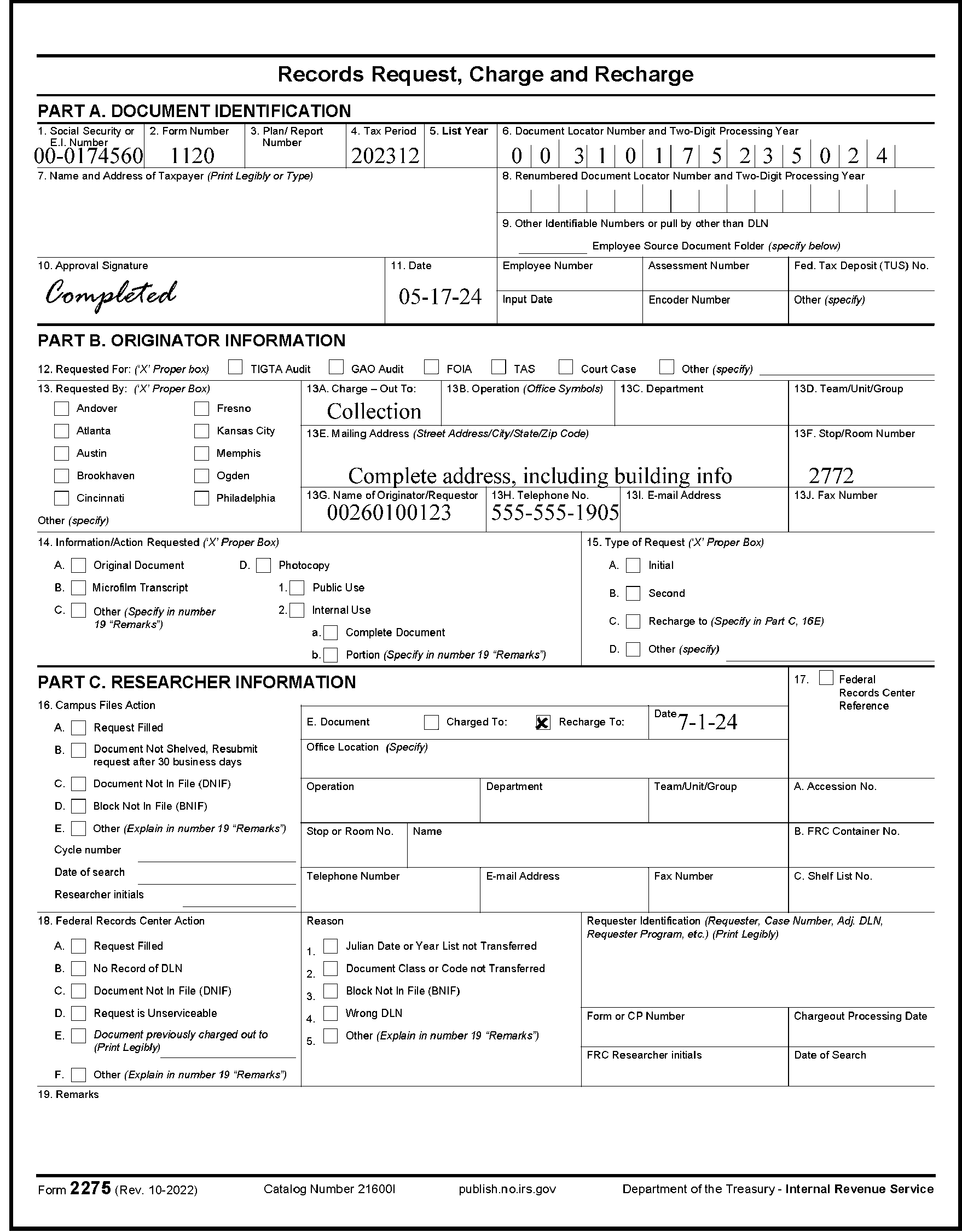
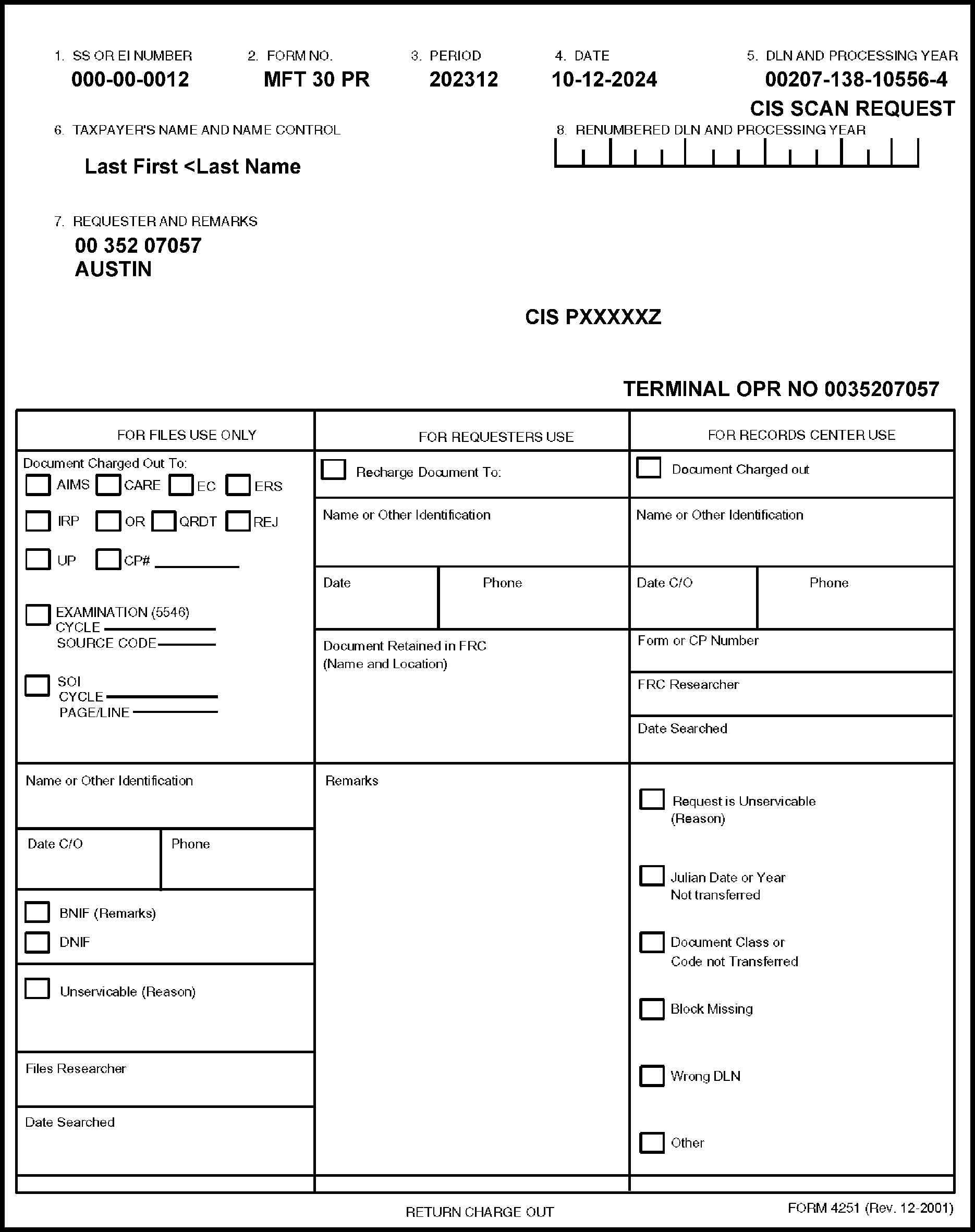
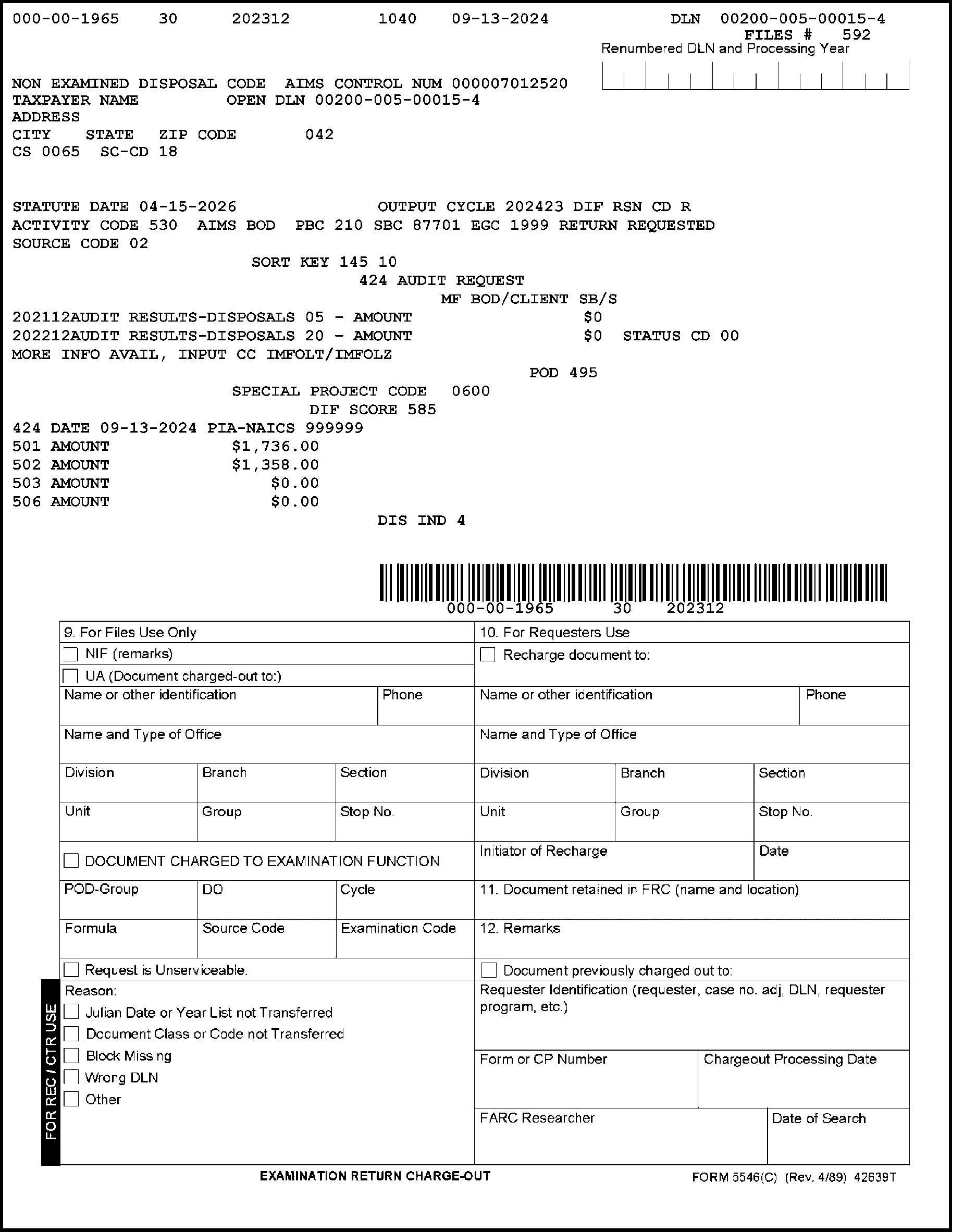
-
Requests should be separated as follows:
-
Expedites
-
GAO Requests
-
List year
-
In-house (General) requests
-
Reimbursables
-
CII Print
-
CII Scan
-
Recharges
-
Copy All
-
FRC
-
Microfilm requests
-
-
Follow the instructions below for individual handling instructions:
-
GAO Request - Sort requests by DRU/FRC. Batch in DLN order separate from all other request types. These requests require tracking and must not be interfiled with any other request type.
-
Reimbursables - Sort requests by DRU/FRC. These are batched together and separately from all other requests in strict DLN order. These requests require photocopies of the document and not the original in Files.
-
CII Print - Requests are batched together in strict DLN order. These requests are asking for prints and are not pulled from Files.
-
CII Scan - Sort requests by DRU/FRC. Requests are batched together in strict DLN order. CII Scan requests are pulled, scanned into the system, then refiled.
-
Recharges - Sort requests by DRU/FRC. These are received as Form 4251 requests but are treated as refiles, with the top copy going in secure trash and the second copy being batched as a refile document in DLN order.
-
Copy All / Photocopy - Requests are batched separately and require copies of the documents to be sent in lieu of the original returns/forms.
-
-
This subsection of the IRM describes the processes for servicing requests.
-
Requests are separated into one of two categories:
-
Serviceable Request - Contains all the necessary information to fill the request.
-
Unserviceable Request - Lacks all the necessary information to fill the request.
-
-
A serviceable request must have the following information:
-
Sort serviceable requests into two groups:
-
Requests for returns, copies and information
-
Requests for re-files, recharges and association of attachments
-
-
Sort both groups of serviceable requests into files sequence within the Files Function location as follows:
-
DLN - By processing year, type of return (IMF, BMF, etc., and the remainder of the DLN. IDRS requests are received pre-sorted into modified DLN sequence with the two (2) principle sorts: SPC retained documents and FRC retained documents.
-
Alpha - Sort Form 2275 and Form 4251 according to the taxpayer entity information shown and route to the Document Retention Unit.
-
-
Separate requests for internal use, photocopies, reimbursables photocopies and originals for the FRCs.
-
Merge requests from other Campuses.
-
Merge IDRS requests with other requests.
-
Batch requests into groups of not more than 100 requests or re-files. Batch volumes may vary depending on the campus, season (peak, non-peak), request type, etc.
-
Route requests to the Document Retention Unit.
-
Route requests to be serviced by a FRC that normally services another SPC through that SPC.
-
Upon determination that a request is unserviceable, process as follows:
-
Pull and charge-out the document and any attachments or note the requested information on the requisition.
-
If the document is already charged out or is missing (Block Not In File (BNIF)/Document Not In File (DNIF)), notate this information along with any other information required to be completed by the Files Function on Form 4251, Form 2275 or other requisition.
-
Ensure that information written on the requisition is readable and can be easily understood by the requester.
-
If the document/block is not in the files, take the necessary action to ensure that the document/block is not misfiled or improperly shelved (i.e., notify Files management for special search).
-
If an "A" is marked on the block control sheet, this indicates a duplicate DLN. Check the following block, marked "B" on the block control sheet to ensure pulling of the correct document.
-
Prepare copies where requested or if the requester is not entitled to the original return.
-
Sort all filled requests by location of the requester and route to the requester based on the address shown on Form 4251, Form 2275 or the Examination Primary Business Code/Employee Group Code (PBC/EGC) listing.
-
Before sending Form 4251 where the return is unavailable, destroy the second copy of the Form 4251. Send the requester only the copy having the charge-out information.
-
Perform special search on unfilled requests only if the special search criteria is met.
-
Send requests submitted by Criminal Investigation, Taxpayer Advocate Service (TAS) and Disclosure directly from the servicing Campus in separate envelopes to the requesters. Form 4251 or Form 2275 will have requester IDRS numbers beginning with 60, 63 and 79 respectively.
-
Form 8161, Error Resolution Charge-outs, are received in two ways:
-
Part 1 - File in its appropriate place in the block as the Error Resolution Function already has the return.
-
Parts 2 and 3 - Attach to the return and route to the Error Resolution Function.
-
-
This section covers the most common requests received in the Files Function:
-
Requests related to CP notice issuances
-
All other requests
-
-
CP notice issuances are sent to the Files Functions for these conditions:
-
CP 36, Duplicate Filing
-
CP 54, SSN Verification
-
CP 55/CP 155, Re-file DLN
-
CP 223, Penalty Assessment
-
-
The following CP notices are reviewed in the Files Functions:
-
CP Notice CP Notice Title CP 36A Requisition Form for 1st Return CP 36C Substitute for Return CP 36D Injured Spouse Claims Notice CP 36I Duplicate Filing Condition (Duplicate return coded in SP as SPC 8 with documentation attached (Form 14039 and/or police report) indicating ID Theft) CP 36N Duplicate Filing Condition (CP 05A issued and credit available) CP 36P (TRNS 36P) Duplicate Filing Condition (CP 05A issued and no credit available) CP 36Z Duplicate Filing Condition - Automated Substitute for Return (ASFR) CP 170/CP 170A Duplicate Document Code 51 Assessments - A freeze CP 193/CP 193 A Duplicate Filing Condition CP 223 (TRNS 223) Notice of Civil Penalty Assessment for Failure to File Form 3520/3520A CP 93/CP 293 Duplicate Filing Condition on Module Under Audit Investigation
-
-
Review CP 193 and CP 170 notices separately from the CP36A, CP 336A and CP 170A notices as each group is shown in DLN order according to the return being pulled.
-
Note the following when processing these CP notices:
-
CP 93, CP 170, CP 193 and CP 293 is the request for the return that caused the duplicate condition.
-
CP 170A and CP 193A is the request for the first return posted.
-
CP 193A is generated for MFT 03, 60 and 64 only.
-
CP 223 - Delay pulling the tax returns. Allow four (4) weeks after the CP 223 generates and is sent to the Files Area before pulling the return. After allowing four (4) weeks, service the request and send the results to the Image Control Team (ICT). Subsequently, the information is scanned into CII and available for use by the Accounts Management Function.
-
-
Pull the document for the DLN located in the heading on the upper right hand portion of the CP notice. If the Block Control Sheet for the DLN on the CP is marked with an "A or B" , check the following block by indicating either "A or B " to ensure the correct document is pulled/retrieved.
-
Use Part 1 to transmit the return to the Accounts Management Function. Use Part 2 as a charge-out.
-
If the return requested is housed in the FRC, forward the CP to the FRC for servicing. Upon receipt of return or information, route to the requester or the Accounts Management Function.
-
Identify the appropriate Campus based on the File Location Code (first two digits) of the DLN of the return causing the duplicate filing condition.
-
Send the returns with the CP notices to the Accounts Management Function.
-
Send CP 193/CP 193A for MFT 01 and MFT 10 to this address: Internal Revenue Service, Stop 318-A, 7940 Kentucky Drive, Florence, KY 41042. If the return/document is charged out or missing (BNIF or DNIF), notate this information on the CP and route to the requester.
-
Send CP 193/CP 193A for MFT 03, MFT 60, MFT 63, and MFT 64 to this address: Internal Revenue Service, Excise, Stop 5701-G, 7940 Kentucky Drive, Florence, KY 41042. If the return/document is charged-out or missing (BNIF or DNIF), notate this information on the CP 193 and route to the requester.
-
Send CP 193 for MFT 51, MFT 52, MFT 77 and MFT 78 to Compliance Function, ATTN: Estate & Gift (E&G), Stop 824G, 7940 Kentucky Drive, Florence, KY 41042. If the return/document is charged-out or missing (BNIF or DNIF), notate this information on the CP and route to the requester.
-
Send CP 193 for MFT 09 (Form CT-1, Employer’s Annual Railroad Retirement Tax Return) to IRS, Large Corp/Technical Unit (LCTU), Stop 537G, 7940 Kentucky Drive, Florence, KY 41042. If the return/document is charged out or missing (BNIF or DNIF), notate this information on the CP and route to the requester.
-
For CP 93 and CP 293, pull the duplicate returns only if the original return is already charged out to the Examination Function.
-
Pull/retrieve CP 36D having an Electronically Filed (ELF) FLC and 92X blocking series and route to the Accounts Management Function on Form 3210. Annotate "ELF Returns - Injured Spouse - CP 36D" .
-
When processing CP 36C/CP 36Z, note the following to ensure routing to the correct ASFR Function:
-
TC 150 DLN/Tax Class 2
-
Document Code 10
-
Julian Date 887
-
File Location Codes (FLC): Austin (18); Brookhaven (19); Fresno (89)
-
-
Send CP 36C/CP36Z to the appropriate ASFR Function as follows:
-
Austin (FLCs: 18,20,21,49,71,73,74,75,76) - ASFR Unit, Stop 5501/P.O. Box 149338, Austin, TX 78714-9338/FAX #: 855.279.2109
-
Brookhaven (FLCs: 07,08,11,13,19,22,28) - ASFR Unit, Stop 654/P.O. Box 9013, Holtsville, NY 11742-9013/ FAX #: 855.284.9596
-
Fresno (FLCs: 09,17,29,33,52,77,89,94,95) - ASFR Unit, Stop 81304/P.O. Box 24015, Fresno, CA 93779/FAX #: 855.279.3107
-
-
Destroy as classified waste any CP 36C or CP 36Z with Julian Date 888. Do not route.
-
After use as a posting document, originals of these notices are released from the File Functions. Copies of the originals may be returned to the File Functions for re-filing.
-
Pull return, attach notice and re-file under the adjustment document DLN.
-
Prepare additional block file folders when necessary for blocking series with attachments (those generating CP 55/155) to eliminate over-stuffing.
-
If the original return is charged out to the Examination Function (via Form 5546) or is a duplicate filing notice or cannot be located:
-
Destroy CP 55 or CP 155 if there are no related documents (related documents can be in-house in the Files Area or at the FRC). If documents have been retired, send the CP notice to the FRC for storage. Do not dispose of the notice.
-
Attach the notice and re-file under the adjustment DLN if there are related documents.
-
-
If the return is charged out to another function:
-
Attach CP (Part 1 and Part 2) to flag and place in return location to await re-filing of the return.
-
Associate when the return is re-file.
-
-
Sort all notices with Doc Code 52 in the first DLN (and no return DLN attached) into DLN order by Doc Code 52 DLN and route for DLN look-up on copy of retention tape transcript attached to back of the document.
-
If the original return was filed electronically for a tax year that resides on the Tax Return Data Base (TRDB), destroy the CP.
-
Attach CP 55 to the new re-file DLN without completing additional research when a second ASFR assessment (Blocking Code 18) is input that creates a new re-file DLN and generates CP 55.
-
Other requests serviced by the Files Function include:
-
Government Accountability Office (GAO)/ Treasury Inspector General for Tax Administration (TIGTA) Requests
-
Freedom of Information Act (FOIA)/Disclosure Requests
-
Taxpayer Advocate Service (TAS) Requests
-
Statistics of Income (SOI) Requests
-
Notice Review Processing System (NRPS) Requests
-
Correspondence Imaging Inventory (CII) Requests
-
In-House Taxpayer Photocopy Requests
-
Photocopying - Reimbursables
-
Microfilm Requests
-
Customer Service Inquiries Requests
-
IDRS Source Documents Requests
-
-
The GAO Campus Coordinator (CC) acts as liaison to the Files Function (Files) during the audit period. The audit timeframe mandates expedite procedures.
-
The GAO CC will notify the Files GAO Point of Contact (POC) when to expect the audit requests in Files.
-
The Files GAO POC will notify the appropriate Federal Records Center (FRC) when to expect the audit requests. Clearly label/identify requests sent to the FRC as GAO Requests.
-
Form 4251, Return Charge-out, will show the literals "GAO XXX AUDIT" under the DLN and must be sorted separately for each FRC and Document Retention Unit (DRU). (XXX represents the type of audit being conducted e.g., financial, excise, etc.)
-
Pull and route in-house documents daily to the GAO CC.
-
Assemble requests for documents held at the FRC in strict DLN order and ship using procedures for Next Day Delivery.
-
Assemble All GAO requests/documents returned from the FRC in one batch with Block Not In File (BNIF), Document Not In File (DNIF) and charge-outs to the GAO CC daily.
-
Initiate Special Search procedures for all requests returned indicating BNIF or DNIF.
-
Sort requests into files sequence (DLN or Alpha).
-
Re-check files to ensure the charge-out information is current.
-
Check to see if the document is misfiled in the block, in an adjacent block or in a block with transposed numbers.
-
For Blocks Not Received and/or Blocks Not In File, review the Automated Cycle Proof Listing and/or Cycle Proof Listing to verify that the original block/document was received in Files. After completing this action, forward BNIFs, DNIFs and charge-outs to the GAO CC.
-
Complete (including DLN and other pertinent information that will clearly identify what documents are enclosed) Form 3210, Document Transmittal, and include with the documents sent to GAO CC.
-
Upon receipt of the BNIFs, DNIFs and charge-outs, the GAO CC will verify that the requested DLN is correct.
-
Utilize IDRS to locate the document by checking for an open control base and contacting the assignee; checking pending transactions such as Pending (PN), Corrected Unpostable (CU), Nullified Unpostable (NU), etc; checking Command Code (CC) AMDIS; checking for a CII print; and checking for a re-file DLN.
-
Utilizing the information on the returned charge-out, determine the location of the document.
-
The GAO CC, along with the GAO Files POC, will compile a list of those requests sent to the FRCs for which returns were not located. This list will be sent by the GAO CC to the Headquarters (HQ) FRC Contracting Officer's Representative (COR) who will forward this list to the appropriate FRC Director.
-
Freedom of Information Act (FOIA) requests are submitted using Form 2275, Records Request, Charge, and Recharge, rather than via CC ESTAB and will be faxed to the File Functions.
-
Utilize Special Search procedures when servicing these requests.
-
Due to the pandemic, some Files Areas are delayed in processing IDRS association cases (associating source documents with Form 5147). When a Form 2275 is received with a DLN that has not been shelved due to this delay, see Form 2275, Box 16 and check Box B (Document Not Shelved, resubmit request after 30 business days) to close the request.
-
Upon determination that the requested tax return/document is located at the Federal Record Centers (FRCs), immediately notify the originator (Disclosure) and provide this information. Subsequently, Disclosure will contact the FRC.
-
When servicing Form 2275, check the appropriate box in Block 15 and write "Return pulled. Sent to GSS (GLDS Support Services) in Chamblee" in Box 18.
-
The address for mailing, if needed, is IRS-GLDS Support Services, 4800 Buford Highway, Stop 93-A, Chamblee, Georgia 30341.
-
Fax a copy of Form 2275 (after mailing to Chamblee) to the Disclosure case worker (as shown on Form 2275). In lieu of faxing, an electronic mail may be sent to inform the caseworker (as shown on Form 2275) that the tax return has been scanned/sent to GSS in Chamblee.
-
Process FOIA requests within three (3) business days.
-
The Taxpayer Advocate Service (TAS) was established to enhance responsiveness to taxpayers who fail to receive prompt resolution to problems. TAS has two primary purposes:
-
To assist taxpayers who have been unable to resolve a problem on the first contact and
-
To analyze and determine the cause of a problem or delay and to correct the problem.
-
-
Within the Files Functions, a coordination point is established to handle TAS cases to ensure these requests receive priority handling.
-
When servicing a request from TAS, process as follows:
-
Exercise priority handling.
-
Immediately forward request to Document Retention Unit or Federal Record Center for pulling/retrieving of the return.
-
Upon receipt of the return, forward it to the File Functions coordinator.
-
Route all TAS requests directly to the requester in a separate envelope.
-
Route out-of-area TAS requests directly to the requester (either a Campus or Area Office) if complete mailing information is provided on the document request. Requests by TAS employees begin with IDRS number "63."
-
-
For those requests serviced by the FRCs, the FRC may send the serviced request directly to the requesting office if the complete mailing information is provided on the document request.
-
If a TAS request comes back without the return, initiate Special Search procedures.
-
The purpose of the SOI program is to obtain statistical data through sampling from tax and information returns for its primary customers, Office of Tax Analysis (OTA) in the Department of Treasury and the Congressional Joint Committee on Taxation (JCT). These organizations utilize the information obtained to study the effect of current and proposed federal tax laws.
-
These instructions include procedures for the following SOI related tasks:
-
Servicing SOI Sample Requests
-
Searching for Missing Returns in the SOI Sample
-
-
Instructions for related SOI Functions are contained in IRM 1.13.3, Document Management. IRM 1.13.2, Processing Management contains project deadlines.
-
Assign Form 4251 or SOI charge-out to DRU or to the SOI Clerk immediately for the pulling of the returns.
-
Retain SOI selection sheets in numerical sequence.
-
Receive and control Form 4251 or SOI charge-out with returns during regular weekly pulls or after special searches. Retain separately the Form(s) 4251 that are not matched with returns.
-
Unmatched Form 4251 or SOI charge-out represents returns that are not located during either the initial pull or special searches.
-
Other SOI selected returns are declared missing during the sorting and grouping operations. For all returns missing during the initial search, do the following:
-
Write the full charge-out information on Form 4251 or SOI charge-out.
-
Attach a second copy of Form 4251 or SOI charge-out to Form 4189 (flag) or Form 12786, Request Alert.
-
Place the flag with "Copy 2" of the Form 4251 or SOI charge-out in the file to await return of the document.
-
Forward "Copy 1" of the Form 4251 or SOI charge-out to the SOI Function.
-
When the return is re-filed, nullify the previous charge-out information and place Form 4251 or SOI charge-out in the file.
-
Utilize "Copy 1" of the Form 4251 or SOI charge-out to follow-up until the return or a suitable photocopy is secured for SOI.
-
-
NRPS Requests are received in the Files Function for both IMF and BMF returns.
-
Notate the following for IMF NRPS requests:
-
Requests are sorted by selection key and batched in groups of no more than twenty (20).
-
Each batch is preceded by the literals "IMF NRPS BATCH RETURN REQUEST" .
-
Sort each group of no more than twenty (20) into DLN sequence, by year, and follow the previous batch unless the selection key changes.
-
Batch size is determined by the Notice Review Function and can be disregarded when pulling the returns but batch integrity must be restored when returning documents to Notice Review Function.
-
Annotate the charge-out information on the document request or on the IMF NRPS Batch Return Request List. Each SPC has the option of generating one or two copies of the IMF NRPS Charge-out.
-
-
Note the following for BMF NRPS requests:
-
BMF NRPS requests generate in the same way as the IMF NRPS.
-
Requests are sorted into selection key groups with each selection key group sorted into DLN sequence.
-
-
Follow the same procedures as shown above for processing BMF NRPS requests.
-
The Correspondence Imaging Inventory(CII) is a system for scanning all Accounts Management Function adjustments receipts into digital images.
-
The Files Function will pull, complete document preparation (refers to those set of tasks that are required to prepare documents for imaging into a production scanner) for scanning, scan and re-file returns and/or documents.
-
Note the following when processing CII requests:
-
Incoming Requests - Pull/retrieve documents for scanning.
-
Scanning Documents Requested on Form 4251 or Form 2275 - Scan requests (Form 4251 or Form 2275 received with or without a return). Document requests are input using CC ESTABD, Request Code "S" which indicates to Files the request will be filled by scanning, not sending a hard copy of the document. The literals "CIS SCAN REQUEST" will appear below the DLN.
-
Sorting/Preparing Documents for Scanning - Before scanning, sort documents (including Form 4251 or Form 2275 (received with or without a return), CP notices, etc.) by document type and category code.
-
-
Form 4251 or Form 2275 will be sorted by these work types:
Work Types Definition IMF Customer Service Representative (CSR) Specific - Internal Requests (IRRQ) BMF Internal Requests - IRRQ or Internal Requests 1120-IRRQ BMF International Internal Requests - IRRQ or Internal Requests 1120/706/709 - IRRQ EO Internal Requests - IRRQ or Internal Request 1120POL/1120C EP Internal Requests - IRRQ -
For additional information/guidance on document types and category codes, see IRM 3.13.6, Submission Processing Image Control Team (ICT) Correspondence Scanning.
-
Prepare documents for scanning by following these guidelines:
-
Assemble a batch size of no more that twenty (20) cases to avoid overfilling folders and to limit the number of documents in a batch during validation, in the event , there is a problem with the batch.
-
Remove all staples, paper clips, rubber bands or any mechanism holding the documents together. Fan the documents to ensure pages are separated and contains no hidden staples.
-
Keep all documents (papers, envelopes, routing slips, etc.) comprising a CII case together.
-
Feed the right edge of a portrait document or the bottom edge of a landscape document into the scanner first. Ensure that the edge leading into the scanner is undamaged.
-
Place smaller documents such as Form W-2 at the leading edge center of the stack of pages.
-
Position envelope in the center of the stack of papers. The leading edge into the scanner must be the uncut end.
-
Tape all self-stick notes (leading edge that will feed into the scanner first) securely to a full sheet of paper prior to scanning to ensure they do not stick to the scanning equipment.
-
Position all pages face up with separator sheets (face up) inserted at the beginning of each case.
-
Repair torn documents with tape. Ensure that no adhesive is exposed.
-
Photocopy badly damaged documents and use the copy for scanning. Re-file the original after photocopying.
-
Ensure the case contains the following in the order shown:
Case Assembly Order Separator Sheet Form 4251 or Form 2275 CP Notice or Transcript Tax Return Attachments to the Return Form W-2, if present Envelope -
Place the completed batch cases in the file folders (Document 6982) for transport to the scanning operation.
-
-
When preparing work for scanning, position the envelope to avoid scanner jams using the following guidelines:
-
Adjust the envelope to ensure the uncut/folded edge feeds into the scanner first.
-
For windowed envelopes, position the window facing down so that the scanner rollers do not come into contact with the slick surface of the window.
-
If both the top and bottom have been opened, cut down both sides and use only the part of the envelope that contains useful information (return address and postmark). If this leaves a windowed envelope exposed, place tape over both sides of the window portion of the envelope.
-
Bubble and manila (brown) envelopes must be photocopied prior to scanning. It is not necessary to photocopy manila (yellow buff) envelopes.
-
After copying the part of the envelope with relevant information, destroy the original envelope by placing it in the designated receptacle for destroying documents.
-
Place the photocopy of the envelope with the case for scanning.
-
Remove any metal clasps from the back of envelopes to prevent getting caught in the scanner.
-
After scanning, verify the document's image on the CII system re-assemble and hold the document for 24 hours (1 workday) for in-house documents and 72 hours (3 workdays) for FRC re-files. After waiting the allotted time, re-file the documents.
-
If the image is not clear, re-image, review and re-assemble. Hold documents for 24 hours (1 workday) for in-house documents and 72 hours (3 workdays) for FRC re-files. After waiting the allotted time, re-file the documents.
-
-
The File Functions will provide a print of hardcopy of CII cases for non-CII users.
-
Document requests (Form 4251) requiring a print of the return generally will indicate the literals "CIS PRINT REQUEST" immediately below the DLN.
Note:
Taxpayer Advocate Service (TAS) requests may be requested using CC ESTABD, using definer V with the Remarks sections containing the CII case file number and indicating "CII Print Request" . Scan requests can also be input using CC ESTABDQ. Use of CC ESTABDQ generates the literals ID Theft Scan below the DLN on Form 4251. ID Theft Scan or AM ID Theft may also be shown or written in the Remarks section of Form 4251.
-
Review the "Remarks" section to determine if the CII Case ID number is provided. If so, research and provide the information.
-
If the CII Case ID number is not provided, pull the Form 5147, IDRS Transaction Record, to determine the ID number.
-
In those instances where a partial DLN is shown on the charge-out (Form 4251), refer to the "Remarks" section where the CII number will provide the literals "CII Number not on TXMOD, pull using SSN or pull Form 5147" .
-
After locating the case on CII, print the CII case in its entirety.
-
Printing the CII case in its entirety includes the following:
-
Case Page
-
Case Notes
-
Images of the Document
-
Request Completed screen
-
Copies of any Linked cases
-
-
Route document(s) to requester.
-
Pull/retrieve all returns listed on Form 4251 at one time and charge-out for photocopying.
-
After photocopying, route the photocopy to the requester and forward the returns for re-filing.
-
Process requests for photocopies, other than those for "Public Use Photocopies" , with the original return unless otherwise authorized. This applies to in-house as well as field requests.
-
Process Public Use Photocopies requests as first priority. Service all other photocopy requests on a first-in, first-out basis.
-
If the copy is unclear, improve it to the greatest extent possible. If the requester is authorized to receive original returns and the copy is unreadable and cannot be improved, send the original document to the requester.
-
If the requested photocopy package exceeds ten (10) pages, do the following:
-
If the requester is authorized to receive original returns, send the original document to the requester.
-
If the requester is not authorized to receive original returns, photocopy the entire package and route to the requester.
-
-
Do not photocopy miscellaneous work papers or extraneous material unless specifically stated in the request.
-
Stamp "Photocopy - Do Not Process" on any return or document to prevent a return from reprocessing.
-
When servicing a request for a tax return/document for an Army Post Office (APO)/foreign address, provide official photocopies of the original return and/or documents.
-
Receive and timely process microfilm requests received from multiple IRS Business Operating Divisions (BODs). Often these requests represent a last-ditch effort to locate and reactivate an older taxpayer account.
-
Microfilm requests may be received as follows:
-
Form 3774, Request for Research
-
Computer Generated (IDRS)
-
Fax
-
Telephone
-
Mail
-
-
Upon receipt in the Files Function, sort requests as follows:
-
Expedites
-
IMF
-
BMF
-
Requests for other Campuses (District Office (DO) tape(s) for the request being serviced is not located in your Files Function, immediately re-direct the request to the correct location).
-
-
Date stamp all incoming requests and service them on a FIFO basis. Work Expedites within twenty-four (24) hours of receipt.
-
Before servicing requests, review to ensure this information is provided:
-
Send results of search via email, fax, mail, etc. to the requester.
-
Retain faxed or emailed requests for one (1) year and destroy as classified waste.
Note:
Classified waste is documentation containing taxpayer entity or account information that is not part of the case and is not needed for audit trail purposes. Refer to IRM 21.5.1, General Adjustments for guidance on handling classified waste to prevent inadvertent/unlawful destruction of records.
-
Use the microfilm request log on the SharePoint site to record information for all microfilm requests serviced.
-
Fill in/supply all of the requested information (including reason a request cannot be service), on the microfilm request log, where applicable.
-
The annual delivery of microfilm tapes are:
-
BMF - Expect receipt in late September/early October
-
IMF - Expect receipt in December
-
-
Suggest use of MFTRA Z, as an alternative for possibly obtaining the information if microfilm tapes are delayed/not currently available.
-
The table below provides a possible District Office (DO) numbers of microfilm tapes and the aligned Files Function.
Files Function District Office Numbers Austin 18, 20, 21, 71, 73, 74, 75, 76 Kansas City (includes Atlanta, Brookhaven, Cincinnati, Memphis, Andover and Fresno) 01, 02, 03, 04, 05, 06, 07, 08,,09, 11, 13, 14, 16, 17, 19, 22, 26, 27, 31, 33, 34, 35, 36, 37, 38, 39, 41, 42, 43, 45, 46, 47, 48, 49, 56, 57, 58, 59, 61, 62, 63, 64, 65, 68, 70, 72, 77, 79, 80, 89, 90, 94, 95 Ogden (includes Philadelphia) 23, 25, 28, 29, 30, 32, 51, 52, 54, 55, 60, 66, 78, 81, 82, 83, 84, 85, 86, 87, 88, 91, 92, 93, 99
-
If a microfilm tape cannot be located, conduct a thorough search within the microfilm area, including microfilm boxes/containers and shelves to locate it. If the tape is located, service the request.
-
If the tape cannot be located, complete Optional Form, OF-11, to initiate a request to the Federal Records Center (Lee’s Summit).
-
Provide the following information when completing OF-11:
-
Accession Number (Section 1) - Provide the accession number for the year/district office. Contact your Records Specialist for assistance in obtaining the accession number.
-
Check the box for Box under the description and to the right, specify the number of boxes needed from the accession number.
-
Check the box for Temporary Loan of Records and Review under Nature of Service.
-
Provide Name of Requester, Name and Address of Agency, Telephone Number and Date in Section 3 of the form.
-
Sign the form electronically and submit to the Records Specialist for review and submission to the FRC for servicing.
-
-
If a microfilm tape is damaged, follow the procedure above to initiate a request to the Federal Records Center.
-
Use the microfilm inventory log on the SharePoint site to record this information for microfilm tapes held in the Files Area:
-
Type of register, IMF or BMF
-
Cycle/Year
-
District Office (D.O.)
-
Number of Tapes/From/To (Range of Tapes)
-
-
The Department Manager will designate two (2) or more employees who will be trained and responsible for completing both the microfilm inventory and request log and ensuring information contained is current and reflects a complete record and status of microfilm held within the Files Areas.
-
As new microfilm tapes are received, the designated employee(s) will conduct a physical count of the tapes, record receipt, shelve tapes, acknowledge Form 3210, Document Transmittal and return to the vendor.
-
The Department Manager will ensure an annual inventory and reconciliation is completed, reconciling all microfilm tapes on hand with the microfilm log by the end of the fiscal year (September 30).
-
If a discrepancy is found that cannot be resolved, contact the Office of Privacy, Governmental Liaison and Disclosure (PGLD). Report any loss, theft, or inadvertent, unauthorized disclosure of sensitive or Personally Identifiable Information (PII) via the PII Breach Reporting Form. The Department Manager must provide a written report of any loss to the Operations Manager.
-
The SharePoint site will serve as the repository for the microfilm Inventory log and the microfilm request log.
-
Microfilm Inventory Log - Recordation of microfilm tapes on hand in the Files Functions
-
Microfilm Request Log - Recordation of microfilm requests serviced by the Files Function
-
-
When using the logs, fill in/supply all of the requested information, where applicable.
-
Submission Processing Headquarters (SPHQ) will conduct periodic reviews of the request logs to identify reasons for any unfulfilled requests. Immediate action will be taken to resolve the issue.
-
Upon receipt of a microfilm shipment, conduct a physical count of tapes to ensure tapes received agree with the information detailed on the enclosed Form 3210, Document Transmittal.
-
The physical count must be completed before Form 3210, Document Transmittal, is acknowledged and returned to the vendor.
-
If the counts results in any differences, document and contact vendor using information provided on Form 3210.
-
If tapes are missing, identify the number missing or the number of the tape based on the sequencing convention provided on Form 3210. For example, if Form 3210 says tapes 1-84, but tape 33 and 34 are missing, relay this information to the vendor.
-
If there is an extra tape, notify the vendor who will confirm if including the tape was in error or an oversight.
-
Maintain any documentation associated with the receipt of tapes, including Form 3210, until the yearly physical inventory count and reconciliation has been completed, or the retention standards from Document 12990 has expired. Form 3210 should not be destroyed before the 1 year retention time frame specified in the Document 12990 has passed.
-
If tapes need to be returned to the vendor, ensure proper packaging (double wrapping) and shipped to the vendor via tracking.
-
If tape is lost or does not reach the vendor after 10 business days, report any loss, theft, or inadvertent, unauthorized disclosure of sensitive or Personally Identifiable Information (PII) to your manager and to the Office of Privacy, Governmental Liaison and Disclosure (PGLD) via the PII Breach Reporting Form.
-
For more information on losses, thefts, or inadvertent, unauthorized disclosures of sensitive or Personally Identifiable Information (PII), see IRM 3.5.61.5.6, Personally Identifiable Information (PII) and IRM 10.5.4.3.3., Inadvertent Unauthorized Disclosures and Losses or Thefts of IT Assets, BYOD Assets and Hardcopy Records/Documents.
-
Review all microfilm tapes within six (6) months of receipt to identify any problems or defects with the quality of the tapes.
-
The vendor maintains the silver masters for one (1) year to correct any problems or defects identified by the Files Areas.
-
If a problem is found, capture the following information and report it to your Department Manager:
-
Tape Cycle/Year
-
IMF or BMF
-
Service Center/File Location Code
-
Roll/Tape Number
-
Description of problem/defect
-
-
The Department Manager/local management will elevate issue to the HQ Files Analyst for resolution. The HQ Files Analyst will and coordinate with Media & Publication (M&P) regarding the resolution of any tapes issues including the return of tapes to the vendor.
-
Maintain microfilm tapes/cartridges in the Files Function until eligible for disposal.
-
See Document 12990, Records Control Schedule (RCS), Item 210, for information on disposing of BMF tapes.
-
See Document 12990, Records Control Schedule (RCS), Item 203, for information on disposing of IMF tapes.
-
Review the microfilm inventory log information periodically to identify any tapes approaching eligibility for disposal to ensure they are disposed of timely.
-
Complete Form 11671, Certificate of (In-House) Records Disposal for Paper or Electronic Records, forward to and coordinate with your local Records Specialist for processing. Start the process at least thirty (30) days before the records are eligible for disposal.
-
Occasionally, the Accounts Management Function receives telephone calls from taxpayers stating that a check is attached to a tax return and has not cleared their bank. Rather than requesting the document through normal channels, a faxed request (or Form 4442, Inquiry Referral) for research is sent to the Files Function.
-
The following information is required:
-
Requester's name, telephone and fax number
-
Taxpayer's name, TIN, MFT, Tax period and DLN
-
Stated request criteria
-
-
Complete a thorough search of the tax return for the check/payment.
-
Reply by fax or telephone regardless of whether or not a payment is attached.
-
If the payment is found, submit payment using the received date of the return and process as a discovered remittance. See IRM 3.5.61.2.7, Discovered Remittances for additional information.
-
When servicing requests for source documents maintained separately from the Transaction Record (Computer Form (CF) 5147), do the following:
-
Screen the transaction record to obtain the employee number, sequence number and input date.
-
Locate the correct document folder.
-
Annotate the employee number and input date on the source document so that it can be properly filed.
-
-
Attach source documents for Doc Codes 54, 78 and 64 to the transaction record before filing. The source document becomes part of the document filed and is not requisitioned separately.
-
File source documents for payments (Doc Codes 18 and 28) input from an Area Office in Payment Sequence Number DLN order.
-
Sort the Payment Sequence Number DLN by List Year. Within each List Year, sequence the payment source documents by:
-
Julian Date
-
Input District or Area Office
-
Block Number
-
Serial Number (Document Number)
-
-
The transaction record contains the payment sequence number in lieu of the employee number. Process as follows:
-
Screen transaction record to locate and associate the document.
-
After association, transmit the package to the requester.
-
-
This subsection describes the procedures for servicing requests for Refiles.
-
Replace the document or block in the correct folder after verifying the DLN.
-
If the document is charged-out on the Block Control Sheet, verify that both DLNs match, and then void the charge-out by drawing one line through the entry on the Block Control Sheet.
-
If there is a charge-out in the block for the document being re-filed, verify the DLN and SSN on both the document and the charge-out and remove the charge-out.
-
When a flag (Form 4189, Form 12786, Request Alert, or other locally developed form) is received, file it in place of the requested document/block along with any existing charge-out.
-
If the document/block requested on the flag is from a missing block, or the flag is returned from the FRC because it is for a missing block:
-
Place the flag in a folder
-
Write the block DLN on the folder and
-
Shelve it in place of the missing block or return it to the FRC
-
-
If the DLN on the flag matches the refile, follow the instructions on the flag.
-
If Form 3893, Re-Entry Document Control, is attached to a return being refiled, it must show the following:
-
An alpha/numeric block control number in Box 1 with a red check mark.
-
A batch number in Box 3 as proof of processing prior to any refile action.
-
-
If returns and/or attached Form 3210 are received and the DLN has been crossed out/line drawn through, research IDRS to ensure the returns have posted. If they have not posted, route the returns to the Accounting Function.
-
If duplicate DLNs (two or more documents with the same DLN but different TINs) are discovered, return all documents with the matching DLN to the appropriate Accounting Function.
-
This subsection describes the procedures for servicing requests for recharges.
-
Request for recharges can be made via Command Code (CC) ESTABD, Request Code "T" which will result in "RECHARGE" appearing below the DLN on Form 4251.
-
Requests can also be received on Form 2275 where "Part C" will be completed.
-
File Recharges in the correct folder after verifying the DLN and SSN.
-
Nullify/void a previous charge-out by either:
-
Removing the charge-out document or
-
Lining out the entry on the Block Control Sheet
-
-
This subsection describes the procedures for associating attachments to requested returns and/or documents.
-
Staple the document (item to be attached) to the back of the return.
-
To service the request, the attachment (Form 9856, Attachment Alert) must contain the following information:
-
DLN (Correct, controlling DLN)
-
SSN or EIN
-
Tax Period
-
Originator name, function, IDRS number
-
Complete mailing address including mail stop number
Note:
An IDRS print with the correct, controlling DLN highlighted can be used in lieu of Form 9856 as long as all the information shown above is provided on or along with the highlighted print. Prior/Invalid DLNs should be marked through with red ink and the controlling DLN must be highlighted on the IDRS print. Notate (typed or written) the word "Attachment" and clearly highlight on the IDRS print.
-
-
If the information provided is not adequate for servicing the request, return the document to the requester.
-
If the return is charged out, place the attachment documents, along with a green flag, in the proper sequence behind the charge-out in the block. When the tax return is sent back for re-filing, associate the document.
-
If the attachment is an Annual Statement for Form 1120-, U.S. Life Insurance Company Income Tax Return or Form 1120-PC, U.S. Property and Casualty Insurance Company Income Tax Return, and the return is charged out to SOI, route the Annual Statement to the SOI Function. Flag the remaining attachments for attachment to the document when it is returned for re-filing.
-
If the original DLN is listed as destroyed, destroy the attachments.
-
Flag all attachments sent to the FRC and ensure the word "Attachment" is legible.
-
Pull the requested return, associate the AIMS labels/transcript, and send to the Examination Function requesting the return using the address on the AIMS label.
-
Two (2) labels are provided with the group address. Use one label for the mailing envelope and the other for Form 3210.
-
This subsection of the IRM provides procedures for servicing Examination and Collection Function requests and procedures for the following:
-
The Audit Information Management System (AIMS)
-
Individual Master File (IMF) and Business Master File (BMF) Examination Selections
-
Form 706, U.S. Estate Tax Return/Form 709, United States Gift (and Generation-Skipping Transfer) Tax Return, Examination
-
TC 424 Requests for Returns
-
Examination Follow-up Requests
-
Automated Issue Identification Systems (AIIS)
-
Automated Underreporter, Multiple Filers and Married Filing Separately
-
Exempt Organizations (EO)/BMF Examinations
-
Partnership (Form 1065, U.S. Return of Partnership Income) Returns - Form 5546, Examination Return Charge-out Sheet
-
-
For a complete and correct listing of Examination Function addresses, see the AIMS website for the Primary Business Code (PBC) and Employee Group Code (EGC) information, see IRM 3.5.61.13.11, Examination Requests (Form 5546) Sorting and Routing.
-
Computer-generated Examination requests are produced on Form 5546, Examination Return Charge-Out.
-
Form 5546 is the same as Form 4251 except that item numbers 1 through 7 are not preprinted. This allows for more space for computer printed information.
-
Process Form 5546 in the same way as Form 4251. Hand carry those returns that are coded "L" to the Audit Classification Function for prompt audit.
-
-
If a request (Form 5546) is generated for an e-file return, discard the request and inform the customer that the return information can be located on the Tax Return Database (TRDB).
-
Form 5546, Examination Return Charge-Out, generates with labels under certain conditions. In addition, these forms may contain a legend for Examination Function use and messages which serve as instructions for the Files Function.
-
Pulls (Return Requested) - AIMS messages and meanings are as follows:
-
"INFORMATION REPORT AVAILABLE" - Pull return, associate Form 5546 with labels and route to the Examination Function.
-
No message printed - Pull return, associate Form 5546 with labels and route to the Examination Function.
-
-
No Pulls (No Return Requested) - AIMS messages and meanings are as follows:
-
Associate Form 5546 with labels and route to the Examination Function.
-
"NO RTN REQSD FLOW THROUGH NOTIFICATION/NO RTN REQSTD/NO RTN REQSTED MANUALLY CONTROLLED 918A/NO RTN REQSTED/ INFO RPT AVAIL/NO RTN REQSTD RELATED INVESTOR NOTIFICATION/NO RTN REQSTD PARTNER EXAM VOIDED" - Associate Form 5546 with labels and ship to requester.
-
"OBTAIN RTN FROM OTHER SC/OBTAIN RTN FROM OTHER SC INFO RPT AVAIL" - The requested return is in another Campus but the Master File selection processing did not forward the Form 5546 to that Campus. Route Form 5546 to that Campus.
-
-
If the original return is filed electronically and the account is on TRDB, a TRDB transcript is received. Associate the transcript with the AIMS package.
-
If a document request is received for a DLN with a list year that has been destroyed, check the CSED extract listing. If the DLN is not on that listing, annotate that the document has been officially destroyed and return to the requester. If the DLN is on the listing, send the request to the FRC and forward the return to the requester upon receipt.
-
Schedule K-1 is no longer associated with the parent return (Ogden). If the request is for a Form 1120S, U.S. Income Tax Return for S Corporation, Form 1041, U.S. Income Tax Return for Estates and Trusts, or Form 1065, U.S. Return of Partnership Income, pull both the parent return and the Schedule K-1 from their respective files, associate and route to the requester.
-
For each cycle, the following is received:
-
Computer Printed Labels
-
Forms 5546
-
CP Notices
-
Command Code (CC) TRPRT Transcript, if appropriate
-
-
Payer Master File (PMF), IMF and BMF, transcripts are printed every cycle by list year and control DLN beginning in cycle 14.
-
Associate with IMF and BMF returns before releasing to the Examination or EP/EO Function except for CP 19 and CP 20, Unallowables.
-
Do not hold return requests for subsequent cycle output as the absence of a transcript indicates that the taxpayer is not on the PMF.
-
Destroy PMF transcripts that cannot be associated with the return after eight (8) cycles.
-
Forward PMF Patronage (PATR) and Civil Penalty transcripts to the requester immediately upon receipt. A return request does not generate.
-
-
Information Return Master File (IRMF) transcripts are generated for IMF returns only and are printed one cycle before the corresponding Form 5546. The transcripts are sorted by Master File cycle, list year, controlling DLN and are attached/included in the AIMS packet.
-
If a return is charged out to SOI when servicing the Form 5546 request, do the following:
-
Attach DIF Form 5546 with SOI/DIF flags (Form 4817, SOI/DIF Flag)
-
Attach Special DIF Form 5546 with DIF Special flags (Form 4817)
-
-
Associate related documents as follows:
-
CP 12, Math Error, Overpayment of $1 or More, and CP 32, New Refund Check, Old Check Not Cashed Associate with related Unallowable notices CP 19, Examination Unallowable Items Notice, Balance Due, and CP 20, Audit/Unallowable Items Notice, Overpayment. If no CP 19E, Examination Unallowable Items Notice, Balance Due or CP 20E, Audit/Unallowable Items Notice, Overpayment, is found, associate the CP 12 or CP 32 with the related return.
-
CP 19E and CP 20E - Associate with related computer-printed (CP) labels for Source Code 03.
-
CP 83, Math Error Referral to Exam and CP 233, Math Error Referral to Audit - Associate with CP labels for Source Code 15.
-
-
Associate requests and related IMF returns with CP labels, related notices and IRMF/ PMF transcripts.
-
Associate requests and related BMF returns with CP labels, PMF/ BMF - CTR Matching Program transcripts (if available) and IRMF transcripts.
-
Sort and route associated returns.
-
If Forms 5546 are received with charge-out information, route as follows:
-
If charged-out to Area Office Examination Function or Campus Compliance Function, annotate this information and route back to the requester.
-
If the requested document is missing/not in file (NIF), route to the Special Search Function.
-
-
IMF - If Form 5546 is received with SOI charge-out, take the following actions:
-
Associate the Forms 5546 with the corresponding labels and flag SOI/DIF or Special DIF.
-
Route these packages to the SOI Function to secure the return. The SOI Function will expedite Forms 5546 flagged DIF Special.
-
When the return is secured from the SOI Function, route it to requester.
-
Recharge document to the new requester.
-
-
BMF - If Form 5546 is received with SOI charge-out (SOI returns are classified by the Examination Function) do the following:
-
Associate Form 5546, computer-printed labels, BMF-CTR Matching Program transcripts (if available), IRMF transcripts, DIF/SOI or DIF Special Flag.
-
Route to the Examination Function where returns will be associated by SOI cycle with sort groups.
-
-
After sorting and association have been completed, assemble returns in DLN sequence within the sort groups.
-
Notate each container to show the Area or Campus Examination Function, Enterprise Computing Center - Martinsburg (ECC-MTB) print cycle, type of Examination program (such as 1040 DIF, Special Source Code 03, etc.), and the total volume.
-
Number the containers consecutively for each requesting area. For example: 1 of 3, 2 of 3 or 3 of 3.
-
-
At the end of each cycle, route all cases with returns to the requester. Separate labels that have not been associated with returns into two groups:
-
End-of-Cycle for Area Office ordered returns
-
End-of-Cycle for Campus ordered returns
-
-
Transmit labels in separate boxes to the Campus Examination Function by Area Office for each type of return as follows:
-
Examination Labels with Form 5546 and Charge-out Information
-
Labels Only
-
BMF-CTR (Currency Transaction Report) Matching Program Transcripts
-
-
As Form 5546 from previous cycles are received, route them to the requester/designation as shown on the PBC/EGC listing with the return or annotate with "Special Search" information showing that the return has not been located.
-
Route on a weekly basis, separate from the current cycle shipment.
-
Annotate the routing document to indicate that these are returns and that Form 5546 is for previous cycles.
-
-
The Examination Function needs all original Form 706 and Form 706-GS(D) that are processed under BMF procedures for classification.
-
When the TC 150 posts to the Master File, Form 5546 and computer printed labels are generated for association with Form 706 and Form 706-GS(D).
-
Process as follows:
-
Receive Form 5546 and related returns.
-
Route Form 5546 for pulling of returns.
-
Associate Form 5546 and returns with related labels.
-
Perform special search to locate missing and charged-out Form(s) 706.
-
Assemble Form 706 packages (pairing Form 706 with Form 709) forty-five (45) days after establishing batch folders.
-
If no AIMS assembly is received within two (2) cycles after the return is processed, route to the Data Control Unit in the Accounting Function for SCCF and Master File research.
-
-
Upon receipt of the package, do the following:
-
Verify that a MFTRA-C is included. When Form 706 posts, a MFTRA-C will automatically generate in the Kansas City Files operation. This alerts the Files Area to pull the Form 709, so it can be associated with the filed Form 706.
-
Review the MFTRA-C for a Form 709 DLN. Associate all Form(s) 709 with Form 706. Kansas City Files will also review as follows: If Part 2, Line 4=0 is shown on Form 706, associate it with Form 709 and store for SB/SE classification.
-
-
Associate all matching Form(s) 709, and related files, from the Files Area with the appropriate Form 706 examination package. Compare the decedent's name and SSN with the donor's name and SSN to ensure they are the same.
-
Sort the Examination Function package by requesting Area Office.
-
After sorting and association has been completed, package returns in alpha or DLN sequence as determined locally. Notate each container to show the following information:
-
At the end of each cycle, route all cases to the requester whether or not returns have been received. Transmit labels that have not been associated with returns in the last box of the shipment and sort separately as follows:
-
Examination Labels without Form 5546 and return.
-
Examination Labels with Form 5546 and charge-out information.
-
-
As Form 5546 from previous cycles are received, transmit to the requester, either with the return or annotate with the literals "Special Search" to inform that a special search has been conducted but the return was not located.
-
Form 5546, Form 709, United States Gift (and Generation-Skipping Transfer) Tax Return selections are received for use in charging-out Form 709. Note the following when servicing these requests:
-
Forward Form 5546 to DRU for pulling of the donor's file.
-
Initiate Special Search if the donor's file is missing or charged-out.
-
Sort Form 709 donor's files by Area Office and route the return packages to the Area Office or Campus Examination Function.
-
Additional Form 709 may be received in the Files Function after the Form 706 return packages have been routed to the Examination Function. Route Form 709 to the Examination Function for association with the Form 706 case file. Follow local procedures for identifying and routing Form 709.
-
-
For Form 706-NA, United States Estate (and Generation-Skipping Transfer) Tax Return, Estate of Nonresident Not a Citizen of the United States and Form 706-A, United States Additional Estate Tax Return, pull the return and forward to the Campus Examination Function.
-
When a case is complete, SB/SE will prepare closing documents and email to KC Files via designated mailbox at "*TS KCSPC 706 Closure"
-
The Files Function receives output as a result of an individual examination request for a specific return weekly. These requests can have any source code (other than 02) and can be for any type of return (e.g., IMF or BMF).
-
For each request input by the Examination Function, the Files Function receives Form 5546 and the computer printed labels.
-
Use Form 5546 for pulling the returns.
-
Associate requests, related returns, PMF, IMF or BMF transcripts with computer-printed labels and BMF-CTR Matching Program transcripts (if available).
-
Sort and route associated returns. Modifications of sorting and routing may be made as needed.
-
If Form 5546 is received with charge-out information, route as follows:
If charged-out to Then Area Office or Campus Examination Function, Treat as a filled request and indicate to requester (as shown on the PBC/EGC listing) that the requested return is charged out. Campus Function other than the Examination Function, Route to the Special Search Function. SOI, Record SOI cycle and page number on the Form 5546 and route to the SOI Function to secure the return.
-
After sorting and association are completed, assemble returns within the sort groups. Notate each container with the following information:
-
PBC/EGC Destination
-
ECC-MTB Print Cycle
-
"TC 424 Requests for Returns"
-
-
At the end of each cycle, route all cases to the requester whether or not returns are received. Send labels that have not been associated with returns in the last box of the shipment and sort separately as follows:
-
Examination Labels without Form 5546 and return
-
Examination Labels with Form 5546 and charge-out information
-
-
As Forms 5546 from previous cycles are received, route to the requester, either with the return or label and write the words "Special Search" to inform that a special search has been performed but the return was not located.
-
Route to the appropriate Examination Function on a weekly basis, separate from the current cycle shipment.
-
Annotate the routing document to indicate that these returns and Form(s) 5546 are for previous cycles.
-
If a problem is identified with the printing of labels, submit a ticket so that the problem can be corrected as quickly as possible.
-
When submitting the ticket, provide the following information:
-
Cycle Number
-
Job Name or Identification
-
Files Function location
-
-
The Files Function receives output weekly for specific Form 5546 and computer printed labels where the return has already been secured by the Examination Function or the return is not needed. These requests can be for any source code (other than 02) and any type of return (e.g., IMF, BMF or NMF).
-
Associate Form 5546, PMF, IMF or BMF transcripts, BMF-CTR Matching Program transcripts (if available) and TRDB transcripts (if available) with appropriate computer-printed labels.
-
Sort and route associated packages as shown on the PBC/EGC listing provided by the Examination Function.
-
Depending on agreements between the Examination Function and the Files Function, returns secured by the Campus Examination Function prior to the input of TC 424 may be sent to the Files Function for association with the Form 5546 and labels.
-
Mailing out Associated Cases - After sorting and association are completed, assemble cases within the sort groups. Notate each container with the following:
-
PBC/EGC Destination
-
ECC-MTB Print Cycle
-
"TC 424 No Return Requested"
-
-
When the association process is completed (e.g., those instances where the Files Function associates returns), return any items that cannot be associated to the Examination Function for resolution.
-
The Files Function receives the following daily:
-
Follow-up requests for Form 5546 not received from the original request.
-
Examination Function Labels when the Examination Function needs additional status labels for specific cases.
-
-
Process these requests as follows:
-
Route Form 5546 (Follow-up Requests) for pulling of the return.
-
If the return is charged out, route as follows:
If charged-out to Then Area Office or Campus Examination Function, Treat as a filled request and indicate to the requester (as shown on the PBC/EGC listing) that the requested return is charged out. Campus Function other than the Examination Function, Route to the Special Search Function. SOI Record the SOI cycle and page number on Form 5546 and route to the SOI Function to secure the return. -
-
When necessary action is completed on follow-up requests, route to the requester.
-
Since labels are not received for follow-up-requests, no association is needed. Route to the appropriate Examination Function in a separate container.
-
Label the container and the routing document to indicate that these returns and Form 5546 are due to a follow-up request.
-
When Examination Function labels are received, there are only nine (9) labels for each taxpayer. No corresponding Form 5546 is generated.
-
Sort and route to Examination Function using the PBC/EGC listing.
-
Package Examination Function labels in a separate container. Label the container and the routing document to indicate these are additional status labels.
-
This section includes information and instructions for processing requests for the following programs:
-
Automated Underreporter
-
Multiple Filers
-
Married Filing Separately
-
-
The Automated Underreporter (AUR) Program generates return charge-outs to obtain Form 1040, U.S. Individual Income Tax Return. Paper transcripts are no longer generated.
-
Receive Form 4251, Return Charge-Out, and forward to obtain the requested returns.
-
Forward returns received from the FRCs to the Underreporter Function.
-
Securely staple each return behind the corresponding Form 4251, Return Charge-Out.
-
To minimize delay in processing AUR Requests, sort requests as either Campus Retained Documents or FRC/NARA Retained Documents.
-
If requested document is located at the Campus, process the request and route to requester.
-
If requested document is located at another SPC, contact the SPC to determine if the document is retained locally or at the FRC/NARA. If retained locally, send request to SPC for processing. If retained at the FRC/NARA, route directly to the FRC/NARA.
-
Provide information on an on-going basis, when requested, as to what documents (DLNs) are retained locally and those located at the FRCs including information on when requests were transmitted.
-
For those AUR cases going to the Campus Examination Function (returns already secured per previous instructions), associate Form 5546, Examination Return Charge-Out Sheet, and the examination labels and forward to the Campus Examination Function.
-
The Multiple Filers and Married Filing Separately programs generate a computer listing of the entities (side-by-side) of the two returns to be associated.
-
The listing also indicates, for each entity, if the return is currently charged out to the Examination Function. Note the following messages and definitions:
-
The message "TC 420 YES" - (Multiple Filer, Source Code 04) or its absence (Married Filing Separately, Source Code 13), indicates that the Examination Function has the return. Annotate this fact on the related request (Form 5546).
-
The message "NO TC 420" - indicates that the Examination Function does not have the return.
-
-
Use the listing to assemble a complete case file including Form 5546, computer printed labels and the returns for the Campus Examination Function.
-
Forward Form 5546 for pulling of the returns.
-
Receive Form 5546 with returns and associate them with the Examination notice.
-
To associate, see the following instructions:
Note:
A Case Serial Number is shown on Form 5546. The Document Control Number is shown on the Examination notice.
-
Using the two corresponding numbers, associate Form 5546 and the attached returns to the Examination notice.
-
Route the complete case file to the Examination Classification Function. A completed case file consists of both Forms 1040, computer printed labels, both Forms 5546, and the Examination notice.
-
-
If one of the returns for a case file is not located upon initial search, do not route for special search. Forward the incomplete case file to the Examination Function.
-
EO AIMS generates return charge outs (Form 5546) and pre-addressed labels sorted into DLN sequence by sort key.
-
Whenever a requesting office orders a return (via TC 424) or places a bulk order for Selection of Exempt Returns for Examination (SERFE) scored returns (via CC AM427S), the system determines whether the SPC of jurisdiction has processed the return or not.
-
Whenever the returns requested are processed at the SPC of jurisdiction, Form 5546 generates with the pre-addressed labels. Service these requests as follows:
-
As these in-house Form(s) 5546 do not have any special legend in the area immediately above the pre-addressed box entitled, "Renumbered DLN and Processing Year" , sort into DLN order by PBC/EGC.
-
Route Form 5546 to the Document Retention Unit (DRU) for pulling.
-
Hold pre-addressed labels in suspense awaiting completion of the pulling.
-
After pulling the returns, associate them with their pre-addressed labels.
-
If any Form 5546 show a charge-out within the Campus, request Special Search and suspend the case for two weeks to allow the return to be sent back.
-
-
If the returns requested were not processed at the SPC of jurisdiction for the requesting office, an additional Form 5546 is printed by the SPC that processed the return. Service these requests as follows:
-
As Form 5546 printed by the SPC of jurisdiction bears the legend, "RETURN IN TRANSIT" above the preprinted field on the Form 5546 entitled "Renumbered DLN and Processing Year" , send these immediately to the office identified by the PBC/EGC.
-
-
When processing EO/BMF Examination requests, note the following:
-
Sort and ship all EO returns according to the office identified by the PBC/EGC shown in the legend.
-
Send Form 5546 to DRU for pulling.
-
As these requests are without labels, maintain a suspense log containing the following information:
-
Cycle Volume (PBC/EGC)
-
Number of requests routed to the FRC
-
Number of completed pulls (returns found)
-
Dates shipped to the offices identified by the PBC/EGC
-
-
Send pulled returns with Form 5546 to the office identified by the PBC/EGC, except those that are charged-out within the Campus.
-
Upon receipt of these requests in the Document Retention Unit, note the following:
-
Receive Form 5546.
-
Pull returns by DLN, maintaining their respective categories. Show only the campus function if the return is charged-out.
-
If Form 5546 is marked Unallowable (UA) or Not In File (NIF), forward to the Special Function.
-
Send the pulled returns to the office(s) identified by the PBC/EGC.
-
If the request is for Form 990, Form 990-PF, Form 990-T, or Form 4720 and the form is charged out to the SOI Function, route the request to SOI. Forward the rest of the examination package to the requester.
-
-
If ninety (90) days has elapsed since the creation date shown on Form 5546, and the return has not been found, do the following:
-
Annotate Form 5546, Item 12 with "Unable to locate return" .
-
Route Form 5546 to the Campus Examination Function for short closing on the AIMS database using disposal code 29.
-
-
Route requests with designated legends as follows:
-
RETURN IN TRANSIT - Route requests with labels to the office identified by the PBC/EGC under separate cover as SERFE related.
-
SHIP RETURN TO XXX - Route requests and returns without labels to the office identified by the PBC/EGC under separate cover (out of jurisdiction).
-
-
Route Form 5546 without any of the above 2 legends and returns with their labels to the appropriate office under separate cover as SERFE related.
-
Route those requests where the return was not located with only the pre-addressed labels under separate cover after allowing the two week suspense period.
-
Only Form 5546 with the words "Partnership Data" entered above Item 9 are subject to these procedures.
-
Two copies of Form 5546 are created for each case. One copy of the form generates at the SPC of the partnership return filing.
-
The words "Flow Through Acknowledgment" appear below and to the right of the partner's name and address on this copy. This copy is referred to as the partnership copy.
-
The second copy generates at the SPC of the Partner's filing. The words "Flow Through Acknowledgment" do not appear on this copy. This copy is referred to as the partner's copy.
-
-
Forward the partnership copy of Form 5546 to the Examination Function of the Area Office specified on the Form 5546. The Area Office Code is located slightly below the words "Flow Through Acknowledgment" . Do not include any tax returns or AIMS labels with the partnership copy.
-
Associate the "Partner's copy (Flow Through Copy)" of Form 5546 with its AIMS labels (if generated) and route both to the Examination Function of the Area Office specified on the form or to the Investor Examination Suspense Unit (ESU) Function. Forward the tax return of the partner listed at the top of the form along with the copy of the Form 5546 and its labels, unless:
-
The words "NO RETURN REQUESTED" appear below and to the right of the partner's name and address.
-
In this case, forward only the copy of the Form 5546 and its AIMS labels.
-
-
This section of the IRM provides procedures for receiving and handling special requests.
-
These instructions include the following:
-
Files Coordination Point- Special Search
-
Headquarters Access to Returns and Tax Information
-
Centralized Adjudication Unit/Labor Relations Requests
-
Recording Disclosures
-
-
Establish a centralized coordination point to perform the following activities:
-
Handling special requests
-
Coordinating requests with other SPCs and the FRCs
-
Providing advice to Files' customers
-
-
Maintain a list of current telephone numbers for Files Coordination Points in all other SPCs. Notify the other Campuses of any change in the local coordination point telephone number.
-
Authorize a maximum of six designated SPC personnel and six alternates to request returns or documents from the FRC. Send a list of persons authorized to call their locations and telephone numbers to the FRC. Notify them of any changes.
-
Maintain a list of names, locations and telephone numbers of coordinators and alternates at the FRC normally contacted for documents and information.
-
When any document or information is needed from a FRC not normally used, communicate the request to the designated personnel of the SPC customarily in contact with that FRC.
-
Receive Headquarters (HQ) requests for returns submitted via email, fax, memo, telephone, etc. after screening by the Special Search Unit.
-
Take the following actions when servicing written requests (fax, memo, etc.) for returns:
-
Verify the source of the request as originating from the HQ Branch Level or above by checking the requester's name against the global IRS directory.
-
Check the address to which a return(s) is to be sent.
-
Prepare and associate Form 2275, Records Request, Charge and Recharge, with the written request, and use the duplicate as the charge-out for the return.
-
Route the return to the requester.
-
-
Upon receipt of a request from the Centralized Adjudication Unit (CAU)/Labor Relations (LR), process the request as follows:
Note:
If all necessary information is not provided (including a faxed Form 2275), contact the requester by telephone to secure the missing information.
-
If the return is in the Files Function, pull and route the return/copy within 24 hours of receipt of the request.
-
If the return is in the Federal Records Center, contact the FRC by telephone to secure the return. Mail the return/copy to the requester within 24 hours of receipt from the FRC.
-
Forward all returns or copies of returns to the CAU/LR on Form 3210, Document Transmittal.
-
List only the DLN on the Form 3210.
-
If a signed receipt copy of Form 3210 is not received within ten (10) business days of mailing, call/contact the requester to confirm receipt.
-
-
A record of inspection must be kept for each return that is inspected by other than an IRS official. Instructions for recording disclosures may be found in IRM 11.3.37, Recordkeeping and Accounting for Disclosures.
-
If a photocopy of a return is furnished to other than an IRS official, the above also applies; however, record the type of disclosure (inspection or photocopy) in each case.
-
If a return is inspected and photocopied at the same time, record only that the return was photocopied as specified above. In all other cases, record each disclosure separately.
-
CSED procedures require retention of the CSED returns until the account is full paid or the Collection Statute Expiration Date is reached.
-
Compile and provide to the FRCs a listing of CSED volumes broken down by IRS Campus and list year by October 15th of each year.
-
Submit to the FRCs all CSED requests (current and prior year) by November 15th of each year for completion of the CSED pulls.
-
An extract is done yearly to generate listings and charge-out sheets that are routed to the Files Functions. These listings and charge-out sheets identify:
-
Returns to be pulled and saved for the current year CSED; and
-
Returns from prior year CSED pulls (1990 and forward) that are eligible for destruction (to be destroyed).
-
-
The CSED reports are available on CTRL D.
-
The CSED reports are identified as follows:
-
701-Q1-YX - BMF
-
713-5W-YX - IMF
-
X denotes the tax year
-
-
The print job names are:
-
G01Q911* - BMF CSED Listing
-
G135Z11* - IMF CSED Listing
-
G01Q912* - BMF Charge-outs
-
G135Z12* - IMF Charge-outs
-
* denotes the Campus location
-
-
The CSED Campus location indicators are:
-
A - Andover
-
B - Atlanta
-
C - Austin
-
D - Brookhaven
-
E - Cincinnati
-
F - Fresno
-
G - Kansas City
-
H - Memphis
-
I - Ogden
-
J - Philadelphia
-
-
The CSED Listings (BMF/IMF) run annually in cycle 34.
-
Files Area responsibility for processing the annual CSED project is:
-
Austin Files - Processes Austin CSED
-
Kansas City Files - Processes Kansas City, Atlanta, Fresno and Andover CSEDs
-
Ogden Files - Processes Ogden, Philadelphia, Cincinnati, Brookhaven and Memphis CSEDs
-
-
Batch charge-out requests and send to the appropriate FRC for servicing.
-
Batch charge-outs in strict DLN order for the entire run.
-
Pulled CSED returns are boxed and stored by the FRC. FRC notates the first and last DLN in each box of documents.
-
This notification is used to prepare the SF-135 and identify the location of the documents for future reference.
-
After the CSED has expired, the six plus four years, the NARA COR must notify NARA that the remaining CSED returns are eligible for destructions under Document 12990, RCS 29 Item 64 (A)(2).
-
This section provides procedures for the Push Code, Transaction Code (TC) 930.
-
The procedures include the following:
-
Background
-
Routing Codes
-
Restrictions and Time frames
-
CP 98 and CP 98A
-
CP 198 and CP 198A
-
-
Push Code, TC 930, is a computer suspense requisition for, or attachment to, a return that has not posted.
IF THEN A TC 930 posts A CP 98 or CP 98A (IMF) or CP 198 or CP 198A (BMF) generates when the TC 150 posts. The TC 150 posts before the TC 930 The notice generates when the TC 930 posts. The transcript of the account is included on the CP 98 or CP 198. A TC 150 is already present or a TC 150 posts and a TC 930 posts Two (2) copies of the CP 98A or CP 198A will generate. No TC 150 posts or does not post within specified timeframes One (1) copy of the CP 98 or CP 198 will generate with "NO RECORD" . CP 98A or CP 198A will not generate. -
CP 98A or CP 198A always generates off the current year TC 150.
-
IDRS source documents for push code requests (TC 930) are forwarded in source document folders and require association with CF 5147, Transaction Record, before suspending by the TC 930 DLN.
-
If no source document is received, write "No Source Document Received" on the transaction record. Date, sign and file the transaction record.
-
CP 98 or CP 98A - Routing code generates under the taxpayer name and address next to the literals "Routing Code" .
-
CP 198 or CP 198A - Routing code also generates under the taxpayer name and address, however, there are no literals.
-
Research routing codes for CP 98 or CP 198.
-
If the routing code is a unit number and all zeros the schedule must be returned to the unit associated with the unit number.
-
If the routing code is an employee number, the schedule and original return must be sent to the employee.
-
If the routing code is to be associated and retained in Files, the routing code will follow the chart below:
Campus Employee Number for Files Andover 50100000 Atlanta 65000000 Austin 13500000 Brookhaven 49300000 Cincinnati 13100000 Fresno 13600000 Kansas City 13100000 Memphis 13600000 Ogden 53000000 Philadelphia N/A
-
-
Routing code format is 000- 00000.
-
When documents are to be routed to the originator, as indicated below, and research determines that the originator is from Accounts Management, route to your local Image Control Team (ICT) MS 6552 for scanning into the Correspondence Imaging Inventory (CII) (CP 198 only).
-
If additional information such as shipping address or stop number are needed, please use the IORS Website to contact the unit manager and verify shipping information.
-
When CP 98 or CP 198 shows a TC 932 reversing the TC 930, check the push code file. Route the TC 930 document, if present, and the CP notice to the originating Function.
-
If the routing code is in the Files Function, associate the TC 930 suspense document with the return and re-file under the return DLN.
-
If the return is charged-out, note this information in the "REMARKS" section of the TC 930 input document.
-
If the originator noted the item must be associated with the return, provide complete charge-out information and route back to the originator.
-
If there are no notes on the input document, file the correspondence in the file with a flag attached. Attach the flag to the return upon re-filing, if re-filing is necessary.
-
If the routing code is for other than the Files Function and contains a complete IDRS employee number, pull the return, associate the TC 930 suspense document and route to the requester.
-
If the return is charged-out, initiate Special Search procedures if the criteria is met. See IRM 3.5.61.16, Special Search Procedures.
-
If a Special Search is not done or the return cannot be located, route the notice and push code item back to the originator.
-
If the routing code is for other than the Files Function and contains a unit number and all zeroes (e.g., 57500000), pull the TC 930 suspense document and route the notice back to the originator.
-
For those notices with "NO RECORD" and "TC 590 or TC 591 HAS POSTED" legend, a return DLN is not provided. Pull the TC 930 DLN document and route to the originator.
-
For those notices with "STRIKE FORCE" legend, pull the TC 930 document and forward to the originator.
-
If the TC 930 DLN indicates another SPC, do the following:
-
Sort notices by the TC 150 DLN.
-
Pull the return and route to the requesting SPC (as indicated by TC 930 DLN) .
-
If return is charged-out and criteria is met, perform a Special Search.
-
If a Special Search is not performed or cannot be located, annotate the notice and route to the requesting SPC (as indicated by TC 930 DLN).
-
-
If the push coded document is for an electronically filed return, associate the CP notice with the TC 930 suspense document and route to the originator.
-
Follow paragraphs (1) through (19) above to manage push coded documents. Do not retire push coded blocks to the FRC.
-
Do not input a TC 930 for a tax return after the return due date unless prior research indicates that the return has not posted but will post in the near future.
-
Time frames are:
If the TC 930 was input for Then IMF, Push code request will generate a CP 98 within 36 cycles after the return due date (if no return posts). IMF and BMF Tentative Carry Backs, Push code request will generate a CP 98 or CP 198 20 cycles from the TC 930 posting (if no return posts). BMF, Push code request will generate a CP 198 50 cycles after the end of the tax period (if no return posts). -
"NO RECORD" notices generate when push code requests are input after the cycles shown in (2) above and no return has posted, or when no return posts within the cycles specified in (2) above.
-
If CP notices are not received in the time frames listed in (2) above, add one cycle to the expiring cycle, then purge push code file and return push code document to originator.
-
Complete this action weekly.
-
Annotate "No CP received" .
-
-
CP 98 or CP 198
-
TC 930 DLN is in the header of CP 98 or CP 198
-
Control DLN prints next to the literals "CONTROL DLN"
-
Sorted by TC 930 DLN
-
Pull the TC 930 suspense document by using the information from CP 98/CP 198
-
-
CP 98A or CP 198A
-
TC 930 DLN prints next to the literals "PUSH CODE"
-
Control DLN is in the header of CP 98A or CP 198A
-
Computer sorted by TC 150 DLN
-
Pull the tax return using the information from CP 98A /CP 198A
-
-
Regular notices generate to the SPC indicated by the TC 150 DLN.
-
"NO RECORD " notices generate to the SPC indicated by the TC 930 DLN.
-
If the Document Code of the TC 150 and TC 930 is 51 or 52, destroy the notice as there is no push code document for these codes.
-
A TC 930 may be input for unsigned, undeliverable tax returns.
-
File and retain unsigned, undeliverable tax returns in alphabetical order (Alpha Files).
-
Unsigned, undeliverable tax returns will be sent to the Files Function from the Entity Control Function using Form 3210, Document Transmittal.
-
This section of the IRM provides procedures for initiating a Special Search for a return and/or document.
-
The instructions include the following:
-
Background
-
Special Search Assignments
-
Special Search Steps
-
Use of Priorities
-
Disposition of UA/NIF Requests
-
-
Special Search is initiated to exhaust all available means to locate the requested return/document when a normal files search is unsuccessful (return/document is not located).
-
The Files Function will maintain copies of Form(s) 2275 and/or a log of Special Search requests.
-
Perform Special Search only after the requester has reviewed the charge-out information and has done the following:
-
Verified that the requested DLN is correct.
-
Used IDRS to locate the document by checking for an open control base and contacting assignee; checking pending transactions such as PN, CU, NU, etc.; checking AMDIS; and checking for a re-file DLN.
-
Determined the location of the document using information provided on return charge-out.
-
Submitted second request with no response after fourteen (14) business (work) days.
-
-
Perform Special Search for the following types of requests before sending the charge-out back to the requester:
-
Freedom of Information Act (FOIA) Requests
-
Court Related Requests
-
Statute Related Requests
-
GAO/TIGTA Requests
-
Taxpayer Advocate Service (TAS) Requests
-
Statistics of Income (SOI) Requests
-
Criminal Investigation (CI) Requests
-
Out-of-Area Requests
-
Emergency Requests (as determined by requester)
-
Request Authorized by Submission Processing Management
-
Requests for returns where the file location is found but the return is missing and there is no charge-out information present
-
Area Office Requests where the return is charged-out to a Campus Organization
-
Examination
-
Missing Documents (BNIF/DNIF)
-
-
The scope and sequence (how far to go in searching and where to go in searching) varies with the circumstances of each search, but do not close the case until all likely sources of information have been checked.
-
In attempting to locate requested returns/documents, note the following:
-
Sort requests into Files sequence (DLN or Alpha).
-
Verify DLN or Alpha.
-
Recheck the files to ensure that the charge-out information is current.
-
Check to see if the document is misfiled in the block, in a adjacent block or in a block with transposed numbers (i.e., search ten (10) documents behind and ten (10) documents forward within the same block.)
-
Check Re-files.
-
Check the Files Sort Area
-
Complete DLN Lookup/research IDRS to ensure DLN is correct.
-
Research IDRS for refile DLN (DLN may have an "X" at the end of the DLN and will be a 54 or 47 document code.)
-
Check the Files Mail Team.
-
Contact the FRCs.
-
-
Each potential requester is given a priority number. The lower the number, the higher the priority. See IRM 3.5.61.1.7.3, Priority Pull Listing, for additional information.
-
If the request type is listed in IRM 3.5.61.16.2(2) above, secure the return, complete Form 3210, Document Transmittal and send to the requester.
-
If the document cannot be located or secured, return the requisition to the requester.
-
When returning a request unfilled and return is unavailable (UA), note this information on the charge-out.
-
If unable to locate the return, indicate that a Special Search has been performed but the return cannot be located.
-
Transship two (2) day ground all international returns meeting the Unallowable criteria to the Philadelphia Campus Examination Function.
-
The shipping address is: Internal Revenue Service, 4-E08.141, 2970 Market Street, Philadelphia, PA 19104.
-
This information and instructions include the following:
-
Unpostables Servicing
-
Unpostables priority and routing
-
Routing Unpostables document requests
-
-
See Figure 3.5.61–5 for a filled-in/completed Form 4251 (Unpostables Charge-out).
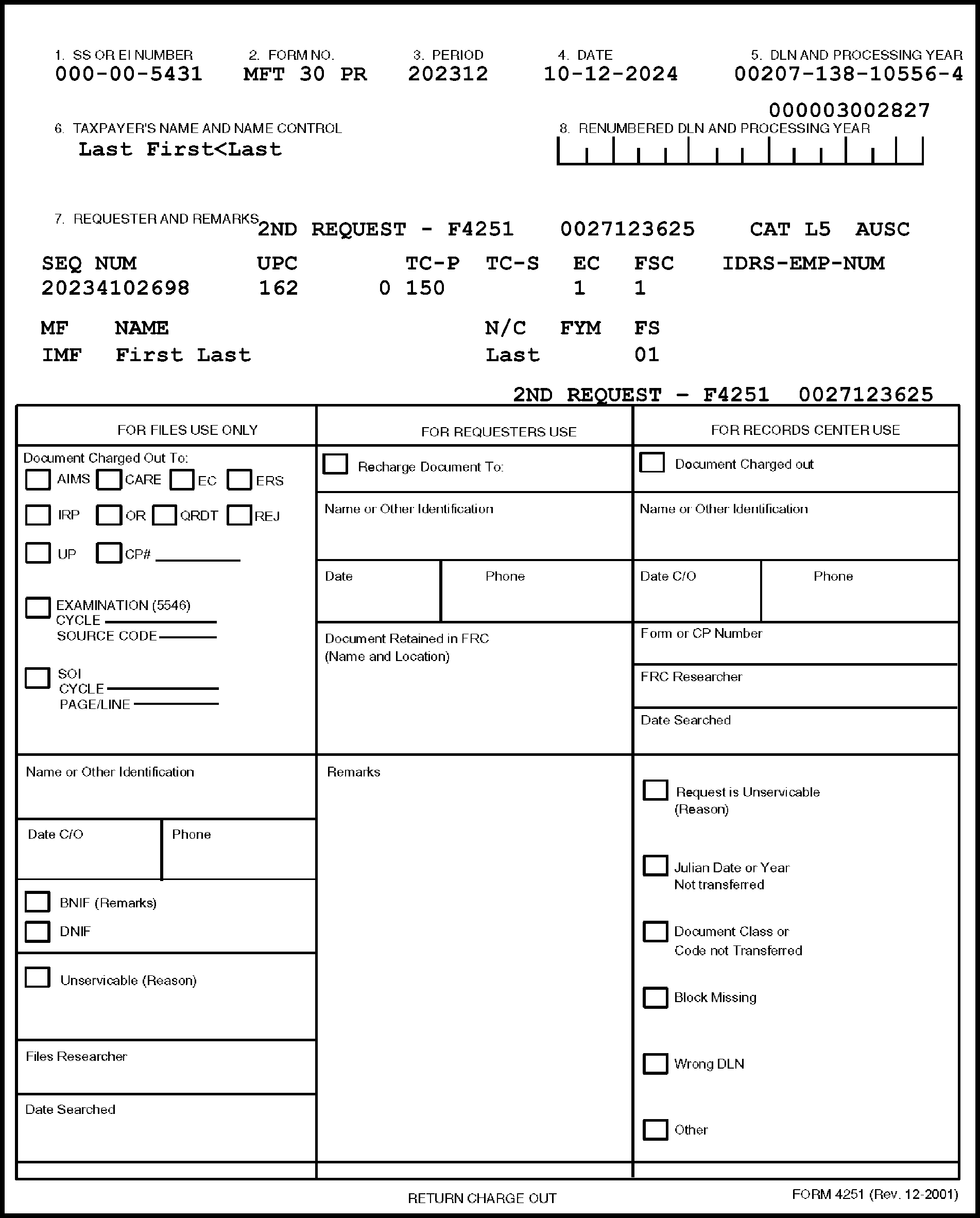
-
Service all Unpostables requests by pulling the requested document and routing to the requester.
-
Forward Unpostables requests to FRC if the return is stored in a FRC.
-
Maintain different groups of Unpostables in DLN sequence.
-
Maintain Unpostable bankruptcy files in the Unpostables Function.
-
Form 4251, Return Charge-Out, generates each week for each Master File. They are produced in Master File, recipient code and DLN sequence and sorted as follows:
-
FTD -Treasury United States (TUS) number order
-
Unpostables code within F-1 and F-3 category
-
Transaction code within A-1, Criminal Investigation
-
Other Form 4251 match the new Unpostables Report sort
-
Unpostables Code (UPC) 191, Frivolous Return Filer, sorted ahead of all other Unpostables in Category E-1
-
Document Code 18 sorted to the end of each Category Code
-
-
Requests initiated by Command Code UPCAS definer "D" with Definer-Modifiers 1, 2, 3, and 4 generates Form 4251 in strict DLN order. These requests display the employee or unit assignment number.
-
Take the following actions when Form 4251 "Remarks" area indicates "FOURTH REQUEST-SPECIAL SEARCH-ROUTE THE DOCUMENT TO REJECT FUNCTION" :
-
If the return is in the file, charge-out to the Reject Function.
-
If the return is charged-out or not in file, perform a Special Search. If not found after Special Search, use Form 4251 as flag in file. Charge-out when document is received in the Files Function.
-
-
In some SPCs, the Unpostables Function screens the Form 4251 to determine if the unpostables condition can be resolved without pulling the return. In this situation, the Unpostables Function determines whether the return is routed to CI/QRDT (Questionable Refund Detection Team). If so, this will be indicated on Form 4251. Route Form 4251 to the Files Function.
If the Unpostables Function indicates that the return needs to be routed to the CI/QRDT Function and Then The case is closed, Pull the return and:
a. If there is an indication on the return that the CI/QRDT Function has seen it, destroy the Form 4251 and re-file the return.
b. If there is no indication that the return has been to the CI/QRDT Function, recharge the return to CI and route the return and unpostables Form 4251 to the CI/QRDT Function.There is no indication the case is closed, Pull the return and route it to the Unpostables Function. -
Pull the document by the payment sequence number when Form 4251 shows a payment sequence number.
-
Route all unpostable electronic return charge-outs to the respective Electronic Filing Function.
-
Unpostable Codes 807 and 808 - Receive two charge-outs, one for the posted return and one for the Unpostables return. Both charge-outs have the same Unpostables sequence number and are cross-referenced to either the posted or Unpostables return.
If the posted return is in Then Another SPC, Send the charge-out to the Unpostables Function . Do not forward it to the other SPC. The same SPC as the Unpostables, Pull both returns. -
Preparer
-
If the Unpostable is for Form 5768, Election/Revocation of Election by an Eligible Section Sec 501(c)(3) Organization to Make Expenditures to Influence Legislation, (UPC 351), route to Entity Unpostables.
-
Route all "Files to Nullify Area" or "Unpostables to Preparer" Unpostables requests to the preparer.
-
Route all requests, sorted by function, to the Unpostables Function (i.e., CI, District Counsel, etc.).
-
-
Route all subsequent requests to the requester.
-
Use this table to determine the correct routing for Unpostable document requests.
Requestor Category Expedite Routing Route to Unpostables - 1 F-1 No Unpostables Unpostables - 2 F-3 No Unpostables Unpostables - 2 Y-1 No Unpostables Unpostables - 2 Y-2 No Unpostables Criminal Investigation A-1 No Destroy as classified waste Criminal Investigation A-2 No Destroy as classified waste Entity Control B-1 No Unpostables (Austin) Entity Control B-1 No Unpostables (Kansas City) Entity Control B-1 No BMF Entity Unpostables (Kansas City/Ogden) Entity Control B-3 No Entity Control Entity Control B-3 No EO Unpostables (Ogden) Employee Plan Master File (EPMF) B-4 No Employee Plan Master File (EPMF) Entity Unpostables B-5 No Entity Unpostables Examination E-1 No Examination Examination E-2 Yes Examination Examination E-3 No Examination General Unpostables I1 No General Unpostables AMTAP I2 No RIVO (Return Integrity and Verification Operation) Unit Return Integrity and Verification Operations (RIVO) Taxpayer Protection Program (TPP) Identity Theft T1 No Taxpayer Protection Program (TPP) in RIVO Unpostable to Preparer D-3 No General Unpostables - IRM 3.12.32 Preparer V-1 No Preparer- IRM 3.12.32, General Unpostables Statute Protection C-1 Yes Statutes Statute Protection C-2 Yes Statutes Unpostables - 8 C-3 Yes Unpostables Unpostables - 8 C-5 Yes Unpostables Unpostables - 8 G-1 Yes Unpostables Unpostables - 9 D-1 No Unpostables Unpostables - 9 D-3 No Unpostables Unpostables - 9 R-1 No Unpostables Unpostables - 9 L-1 No Unpostables Unpostables - 9 L-5 No Unpostables Unpostables - 9 L-7 Yes Unpostables Unpostables - 9 W-3 No Unpostables Unpostables - 9 W-5 No Unpostables Unpostables - 9 Y-1 No Unpostables Unpostables - 9 Y-2 No Unpostables Unpostables - 10 Z-1 Yes Unpostables Electronic Filing All No Unpostables Unpostables - 20 F-1 No Unpostables Unpostables - 21 F-3 No Unpostables Unpostables - 21 Y-1 No Unpostables Unpostables - 21 Y-2 No Unpostables -
All actions for Unpostables program require pulling a return.
-
No Form 4251 generates for L3, P1, V3, V5, V7, V8, W1, W5 and Y1 UPC 140/399 cases with matching Remittance Processing System (RPS) TC 150 and RPS (TC 610).
-
Route Form 4251 with "Files to Nullify Area" in the recipient field to the appropriate function.
-
Destroy document requests with "Files to Nullify Area" when the requester cannot be determined.
-
This section of the IRM provides the procedures for electronic filing (E-file).
-
This information and instructions include the following:
-
e-file Process
-
Form 8453, U.S. Individual Income Tax Transmittal for an IRS e-file Return Processing
-
Servicing Requests for e-file Returns and Form 8453
-
Re-filing Form 8453 and Servicing Requests for Association of Attachments
-
-
IRS e-file is a process by which tax returns are submitted to the IRS by way of data communications and processed electronically.
-
E-file processing reduces processing costs while improving quality via reduction in manual processing. Storage costs are reduced as electronic returns can be stored and maintained more efficiently than paper returns.
-
E-file processing occurs at these Submission Processing Campuses:
-
Austin
-
Kansas City
-
Ogden
-
-
A comprehensive listing of FLCs can be found in Document 6209, IRS Processing Codes and Information.
-
Form 8453 serves as a transmittal document and is used to transmit supporting paper documents that are required to be submitted to the IRS for electronically filed returns.
-
Form 8453 is processed with a unique DLN. This DLN is not the same as the return DLN.
-
Form 8453 (IMF) is processed using Tax Class 2 and Document Code 59. The FLC will be the same as for a paper document for that Submission Processing Campus.
-
Requests for Form 8453 are identified as follows:
Form Tax Class/Document Code/ Blocking Series 8453, U.S. Individual Income Tax Transmittal for an IRS e-file Return 2/59/000-949 8453-F, U.S. Estate or Trust Income Tax Declaration and Signature for Electronic Filing 9/59/000-999
-
The Tax Return Data Base (TRDB) is the legal repository for electronically filed (ELF) Individual Master File (IMF) and Business Master File (BMF) returns.
-
A request for an electronically filed return is identified by the FLC of the DLN. Route requests for electronically filed returns to the e-file Function at the appropriate SPC.
-
When an electronic return is printed, it is considered the original return unless it is stamped "PHOTOCOPY" . Electronic returns are identified by the words "Electronic Return/Do Not Process" in the bottom margin of the return, and by the specific FLCs.
-
The e-file Function will service return requests and route serviced request directly to the requester.
-
Route requests for Form 8453 on Form 2275 (or any other document requests without the Form 8453 DLN) to the Austin Submission Processing Campus (AUSPC) e-file Function for input of command code ELFRQ and subsequent generation of Form 4251.
-
For tax year 2003 and subsequent, the IMF DLN 8453 DLN can be obtained by using TRDBV or R 8453.
-
If Form 4251 indicates "ELFRQ" in the DLN area, sort these requests by IDRS employee number and route directly to the requester. NO PULL IS REQUIRED FOR THESE REQUESTS.
-
The following messages may generate on Form 4251 for Form 8453 requests:
-
"NO RECORD OF THIS FORM 8453 RECEIVED" - This message indicates that Form 8453 has not been received from the electronic filer. The DLN field contains all 0000 (zeroes).
-
"NO RECORD OF THIS RETURN" - This message indicates there is no record of an electronic return being filed.
-
-
Do not associate Form 8453 with returns when they are renumbered by the Accounts Management or Compliance Functions, even if an adjustment is made in a re-file blocking series. Continue to file Form 8453 by the original DLN unless there is a need to pull the document (unless the Form 8453 is already with the source document).
-
This section of the IRM provides procedures for servicing the following requests:
-
Re-filing Form 8453
-
Association of Attachments
-
-
Re-file Form 8453 based on the DLN. Where needed, route Form 8453 to the appropriate SPC for re-filing based on the FLC.
-
If a request is received for an electronic return, route it to the e-file Function for servicing.
-
Return requests for attachments to electronically filed returns (e-file DLNs) to the requester as unserviceable.
-
Inform the requester that the information must be filed using a TC 290 with the applicable blocking series for the type of return/situation. For additional information, see IRM 21.6.6.2.24(5), Electronic Filing System.
-
If unable to determine the originator, originating function (e.g., no name, telephone number, address, etc.) designate boxes or an area to store the documents and label "Unable to Associate" .
-
At the end of the calendar year, collect all documents for which no association can be made. Retain/hold the documents for one (1) year, in the event a future association can be made, then destroy as classified waste.
-
This section of the IRM provides procedures for Computer Paragraph (CP) notices and other forms or documents used to request returns.
-
The instructions for returns requested by the following:
-
Computer Paragraph (CP) Notices
-
Other forms or documents
-
-
The following table provides information on CP Notices used to request returns:
CP Notice Charge-Out Route to 19E, 20E Part 2 Compliance Function 29 Part 3 Correspondence Function 31 Second Copy TPD (formerly TPR) Function 32Y, Exam Coded 12E and 24E Part 2 Examination Function 35/35A Part 2 IMF Entity Control Function 36/36A/36S/36B Part 2 ICT/Charge-out eliminated 36D Part 2 ICT/Charge-out eliminated 36P ICT/Charge-out eliminated 36Z Part 2 Collection ASFR Activity Function 37 Part 2 IMF Entity Control Function 41* Part 4 Originator 43 Part 2 IMF Entity Control Function 46 Part 2 Accounting Function 83 Examination Function 93 Part 2 ICT 96 Accounting Function 98 Originator 135 Compliance - Internal Transcript. If received in Files Function, DO NOT pull any returns; destroy as classified waste. 174, 175, 177 Part B Correspondence Function 180-183 Part 2 Accounts Management Function 193/193A Part 2 ICT/ Route MFT's 03, 51, 52, 60, 63, 64, 77 and 78 directly to the Compliance Function. 194 Part 2 Correspondence Function 195 Part 4 Originator (See CP 41) 198/198A Route to the initiator. See also IRM 3.5.61.15.3, CP98/CP98A and CP198/CP198A 208 Part 2 ICT 231 Part 4 AM BMF Refund Inquiry Teams at Ogden and Kansas City/ Do not send to ICT. 233 Examination Function 234 Part 2 ICT 293 Part 2 ICT 875 Part 4 Correspondence Function *CP 41 Notices generate in DLN order based on the TC 840, refund prior to settlement, instead of the TC 150 DLN for tax class 45 documents. ROUTE TO ORIGINATOR OF TC 840. IF an AREA OFFICE ORIGINATOR, ROUTE TO THE ACCOUNTS MANAGEMENT FUNCTION. -
Notice listings may be used instead of CP notices or other return charge-out requests to pull returns. However, CP notices without a DLN in the upper right hand corner are not acceptable for Files Function or FRC use and will not be serviced.
-
Return requests to the requesting function and/or originator.
-
The following table provides information on other forms/documents used to request returns:
Form/ Document Action Charge-Out Route to 2275 Pull return, make a copy or furnish information Part 2 Requester 4251 Pull return, make a copy or furnish information Part 2 Requester 5546 Pull return Part 2 Examination Function 6752 (Green Flag attached to Form 2275) Pull return if present. If not present, leave request in file. If for a return filed in alpha sequence and requester cannot provide Filer's name, research to obtain name 2275 or Block Control Sheet Requester 8161 Pull return Part 2 Error Correction Function Error Register Pull returns indicated Block Control Sheet Error Correction Function ES - P Transcripts Pull return Part 2 Accounts Management Function Refund (NCC) Pull return Part 2 Notice Review Function Campus Address Transcripts Pull returns Part 2 Notice Review Function Rejects Register Pull returns and check corresponding DLNs on the list Rejects Function NRPS Pull returns Part 1 or Part 2 (if available) Notice Review Function Undelivered CP Pull return, make a copy or furnish information Block Control Sheet Notice Review Function -
Notice listings may be used instead of CP notices or other return charge-out requests to pull returns. However, CP notices without a DLN in the upper right-hand corner are not acceptable for the Files Function or FRC use and will not be serviced.
-
Return all such CP notices to the requesting Function as shown above.
-
When processing documents for the alphabetical (alpha) filing, follow the basic rules of alphabetizing. Names or words are always arranged by filing unit according to the sequence of letters in the alphabet.
-
Nothing before something is a fundamental filing rule. When first units are the same, consider second units. If the first and second units are identical, consider third units.
-
To establish year of receipt for documents, use the received date stamp or Entity date stamp. If there is no received date or Entity date, return the documents to the originator (originating function) and request a received date determination.
-
File names by surname (last name) in strict alphabetical order, letter by letter to the end of a complete name. When the surname is prefixed or hyphenated, it is still filed as one unit.
-
The first name or initial, then the middle name or initial follow the surname in alphabetical sequence.
-
Abbreviations of the first or middle names are filed in alphabetical sequence as though spelled out.
-
When a title is an integral part of a name, the name is filed as written; the title is the first unit of consideration for filing.
-
When a title is added to a full name, it is considered as a last unit.
-
Designations like Sr., Jr., 2nd, 3rd are shown in parentheses at the end of the name.
-
When a business does not contain the full name of an individual, it is filed as written.
-
When a business name contains an individual's full name, the name is filed by the surname, first name or initial, middle name or initial.
-
When the firm name of an individual is very well-known (regional/national recognizable name), and transposing it would cause confusion, it is filed as written.
-
Firm names with a title are filed as written.
-
When a business name is formed of two surnames, it is filed as written.
-
When it is not clear whether or not a firm contains a surname and given name of one individual or two surnames, file as though they were two surnames and cross reference under the second name.
-
A hyphenated word is filed as one name.
-
When the name show possession, the apostrophe and "s" that follows are disregarded in filing.
-
In plural forms, only the apostrophe is disregarded.
-
The apostrophe is an elision (standing for dropped letters) is not used in filing.
-
When letters are used as a name, each letter is considered a separate unit for filing. For radio and television stations, the call letters are the first unit of consideration.
-
Organizations or agencies containing two or more words but known by their letter abbreviations are filed as though spelled out.
-
Numeric names are filed as though spelled out.
-
Conjunctions, articles and prepositions that are part of a name are disregarded.
-
In most cases, articles that begin a commercial name are not considered in filing and are placed in parentheses at the end of the name.
-
When an article is an intrinsic part of a geographic name, it IS considered for filing; THE SITE, VIRGINIA.
-
Prepositions that begin a name are considered.
-
In geographic names of more than one word, each word is a separate unit of consideration.
-
Geographic names with prefixes are considered single units.
-
When compass terms are used in titles, they are filed as written.
-
Institutions and organizations are filed under the significant word or location.
-
When phrases like "association of" , "union of" , "organization of " , etc. are the beginnings of names or titles, they are considered in filing.
-
These forms/documents are maintained in the alpha files:
Form Number File Order IRM Reference Form 56/ Form 56F (No Return) Alpha, year received IRM 3.5.61.3.1 Form 706 GS(D-1)/ Copy A or Copy B Alpha, year received IRM 3.5.61.3.2 Form 709 Alpha (strict), C-Site IRM 3.5.61.3.3 Form 720-CS Alpha, year received IRM 3.5.61.3.4 Form 926 (Loose) Alpha, year received IRM 3.5.61.3.5 Form 720-TO Alpha, year received IRM 3.5.61.3.4 Form 966 Alpha, year received IRM 3.5.61.3.6 Form 990-T (Unnumbered) Alpha, year received IRM 3.5.61.3.8 Form 1040C Alpha, year received IRM 3.5.61.3.9 Form 1065 IRC Section 501(d) Alpha, year received N/A Form 1127 Alpha, year received IRM 3.5.61.3.17 Form 1128 Alpha, year received IRM 3.5.61.3.18 Form 2063 Alpha, year received IRM 3.5.61.3.19 Form 2555 (Loose) Alpha, year received IRM 3.5.61.3.21 Form 3491 Alpha, year received IRM 3.5.61.3.25 Form 3520 Alpha, year received IRM 3.5.61.3.26 Form 3520A Alpha, year received IRM 3.5.61.3.26 Form 4361 Alpha, year received IRM 3.5.61.3.27 Form 4876A Alpha, year received IRM 3.5.61.4.4 Form 5666 Alpha, as received N/A Form 8038 (OSPC) TIN, year received IRM 3.5.61.3.34 Form 8038-CP TIN, year received IRM 3.5.61.3.35 Form 8281 TIN, year received IRM 3.5.61.3.37 Form 8282 Alpha, year received IRM 3.5.61.3.38 Form 8328 (AUSPC) TIN, Calendar Year IRM 3.5.61.4.5 Form 8329 (OSPC) TIN, Calendar Year IRM 3.5.61.3.39 Form 8330 (OSPC) TIN, Calendar Year IRM 3.5.61.3.40 Form 8508-I GIIN, year received IRM 3.5.61.3.44 Form 8606 (Loose) Alpha, year received IRM 3.5.61.3.45 Form 8621 (Loose/OSPC) Alpha, year received IRM 3.5.61.3.46 Form 8703 (OSPC) TIN, Calendar Year IRM 3.5.61.3.47 Form 8809-I GIIN, year received IRM 3.5.61.3.48 Form 8811 TIN, as received IRM 3.5.61.3.49 Form 8822/8822-B Alpha, year received IRM 3.5.61.3.51 Form 8833 (Loose) Alpha, year received IRM 3.5.61.3.53 Form 8840 (Loose) Alpha, year received IRM 3.5.61.3.54 Form 8842 Alpha, year received IRM 3.5.61.4.6 Form 8843 Alpha, year received IRM 3.5.61.3.55 Form 8855 (Loose/ Form 1041 not attached) Alpha, as received IRM 3.5.61.4.7 Form 8868 TIN, year received IRM 3.5.61.3.58 Form 8918 File by reportable transaction number order, if present; Alpha order, year received, if reportable transaction number is not present IRM 3.5.61.3.63 Form 8937 TIN, year received N/A Form 8939 TIN, year received IRM 3.5.61.3.68 Form 8948 Tax Year/Taxpayer Name IRM 3.5.61.3.69 Form 8957 Alpha, as received IRM 3.5.61.3.70 Form 8966 GIIN, year received IRM 3.5.61.3.71 SF-1166 Alpha, as received N/A Form 13441-A PIN, as received IRM 3.5.61.3.73 Form 14095 PIN, as associated with Form 13441-A IRM 3.5.61.3.74 Elections/Governmental Obligations Alpha, as received IRM 3.5.61.4 Source Document Folder (Other than DP Adjustment(s) Employee Number and Julian date IRM 3.5.61.3.91 Statements Under Section 6033(a) Alpha, as received N/A Penalty Case Files "P" Number N/A United Mine Workers of America Benefits Claims Alpha, as received IRM 3.5.61.3.85 Illinois Land Trust Forms Alpha, as received N/A Unsigned/Undeliverable Returns (received from Entity Control) Alpha, as received IRM 3.5.61.15.1
-
When a return (or forms and/or correspondence) is determined to be related to Identity Theft (also referred to as 'archived' returns), they will be routed to the Files Function. For example, receipt of Form 14039, Identity Theft Affidavit.
-
Receive Identity theft returns (or forms and/or correspondence) into the Files Function with Form 3210, Document Transmittal. The 'Remarks' section will notate: "identity theft returns/form(s) or correspondence, store in the Alpha Files."
-
Receive and file identity theft returns (or forms and/or correspondence) in alphabetical order by year of receipt.
-
Designate a specific storage area for maintaining identity theft returns (or forms and/or correspondence) as they must be stored together in the same area.
-
Retain the identity theft returns (or forms and/or correspondence) in the Files Functions. Tax returns may be transferred to the FRC if volume exceeds local storage space.
-
Destroy/delete tax returns (or forms and/or correspondence) five (5) years after the end of the processing year as required in Document 12990, RCS 29, Item 439.
-
This section of the IRM provides a reference for documents stored in the Files Functions.
-
Documents that are specifically referenced in the Files procedures are cross-referenced here as an administrative aid.
Form Title (Purpose) IRM Section 56 Notice Concerning Fiduciary Relationship IRM 3.5.61.3.1 706 United States Estate Tax Return IRM 3.5.61.3.2 706-GS Generation-Skipping Transfer Tax Return for Distribution IRM 3.5.61.3.2 706-GS(D)1 Notification of Distribution From a Generation - Skipping Trust IRM 3.5.61.3.2 706-NA United States Estate (and Generation - Skipping Transfer) Tax Return - Estate of Nonresident/Not a Citizen of the United States IRM 3.5.61.13.3 709 United States Gift (and Generation - Skipping Transfer) Tax Return IRM 3.5.61.3.3 720-CS Carrier Summary Report IRM 3.5.61.3.4 720-TO Terminal Operator Report IRM 3.5.61.3.4 813 (Part 2) Document Register Various 926 Return by a U.S. Transferor of Property to a Foreign Corporation IRM 3.5.61.3.5 966 Corporate Dissolution or Liquidation IRM 3.5.61.3.6 990-BL Information and Excise Tax Return for Black Lung Benefit Trusts and Certain Related Persons IRM 3.5.61.3.7 990/990-PF Return of Organization Exempt from Income Tax (Except Private Foundation)/Return of Private Foundation IRM 3.5.61.13.9.2 990-T Exempt Organization Business Income Tax Return IRM 3.5.61.3.8 1040-C U.S. Departing Alien Income Tax Return IRM 3.5.61.3.9 1042 Annual Withholding Tax Return for U.S. Source Income of Foreign Persons IRM 3.5.61.3.10 1042-S Foreign Person's U.S. Source Income Subject to Withholding IRM 3.5.61.3.10 1096 Annual Summary and Transmittal of U.S. Information Returns IRM 3.5.61.3.11 1094-C Transmittal of Employer Provided Health Insurance Offer and Coverage Information Returns IRM 3.5.61.3.12 1095-C Employer Provided Health Coverage IRM 3.5.61.3.13 1120-FSC U.S. Income Tax Return of a Foreign Sales Corporation IRM 3.5.61.3.15 1120-IC-DISC Interest Charge Domestic International Sales Corporation Return IRM 3.5.61.3.15 1120-L and 1120-PC Corp. Tax Returns IRM 3.5.61.3.16 1127 Application for Extension of Time for Payment of Tax Due to Undue Hardship IRM 3.5.61.3.17 1128 Application to Adopt, Change or Retain a Tax Year IRM 3.5.61.3.18 1332 Block Selection Record Various 2063 U.S. Departing Alien Income Tax Statement IRM 3.5.61.3.19 2275 Records Request, Charge and Recharge (Charge-out Request) Various 2553 Election by a Small Business Corporation IRM 3.5.61.4.3 2749 Request for Trust Fund Recovery Penalty Assessment IRM 3.5.61.3.22 2848 Power of Attorney and Declaration of Representative IRM 3.5.61.3.23 3115 Application For Change in Accounting Method IRM 3.5.61.3.24 3520 Annual Return to Report Transactions with Foreign trusts and Receipt of Certain Foreign Gifts IRM 3.5.61.3.26 3520A Annual Information Return of Foreign Trust with a U.S. Owner IRM 3.5.61.3.26 3893 Re-Entry Document Control IRM 3.5.61.2.5 4189 Flag Sheet Various 4251 Return Charge-Out Various CF5147 Transaction Record (IDRS) Various 5546 Examination Return Charge-Out Various 5596 TE/GE Non-Examined Closings IRM 3.5.61.3.29 5599 TE/GE Examined Closing Record IRM 3.5.61.3.29 5650 EP Examined Closing Record IRM 3.5.61.3.30 6069 Return of Excise Tax on Excess Contributions to Black Lung Benefit Trust under Section 4953 and Computation of Section 192 Deduction IRM 3.5.61.3.7 6752 Green Flag attached to Form 2275 IRM 3.5.61.20.2 8027 Employer's Annual Information Return of Tip Income and Allocated Tips IRM 3.5.61.3.33 8038 Information Return for Tax Exempt Private Activity Bond Issues IRM 3.5.61.3.34 8161 ERS (Error Resolution System) Charge-out IRM 3.5.61.8.3 8210 Self-Assessed Penalties Return IRM 3.5.61.3.36 8329 Lender's Information for Mortgage Credit Certificates IRM 3.5.61.3.39 8332 Release/Revocation of claim to Exemption for Child by Custodial Parent IRM 3.5.61.3.41 8453 U.S. Individual Income Tax Transmittal for an IRS e-file Return IRM 3.5.61.19 8621 Return by a Shareholder of a Passive Foreign Investment Company or Qualified Electing Fund IRM 3.5.61.3.46 8703 Annual Certification of a Residential Rental Project IRM 3.5.61.3.47 8821 Tax Information Authorization IRM 3.5.61.3.23 8833 Treaty-Based Return Position Disclosure Under Section 6114 of 7701(b) IRM 3.5.61.3.53 8840 Closer Connection Exception Statement for Aliens IRM 3.5.61.3.54 8843 Statement for Exempt Individuals and Individuals With a Medical Condition IRM 3.5.61.3.55 8855 Election To Treat a Qualified Revocable Trust as Part of an Estate IRM 3.5.61.4.7 8857 Request for Innocent Spouse Relief IRM 3.5.61.3.56 8865 Return of U.S. Persons With Respect to Certain Foreign Partnerships IRM 3.5.61.3.57 8868 Application for Extension of Time To File an Exempt Organization Return IRM 3.5.61.3.58 8869 Qualified Subchapter S Subsidiary Election IRM 3.5.61.4.8 8871 Political Organization Notice of Section 527 Status IRM 3.5.61.3.59 8872 Political Organization Report of Contributions and Expenditures IRM 3.5.61.3.60 8875 Taxable REIT Subsidiary Election IRM 3.5.61.4.13 8918 Material Advisor Disclosure Statement IRM 3.5.61.3.63 8925 Report of Employer-Owned Life Insurance Contracts IRM 3.5.61.3.65 12786 Request Alert Various SS-4 Application for Employer Identification Number IRM 3.5.61.3.76
-
This subsection provides the guidelines for association of Form 5147 with source documentation.
-
The following chart reflects IMF Document Code 54 blocking series requirements for associating Form 5147, IDRS Transaction Record.
-
A Re-file DLN indicates that an original tax return must be present for association. The CP 55 blocking series is automatically associated with a tax return when the CP 55 is generated.
-
The Non Re-file DLN blocking series cannot contain an original tax return.
Blocking Series Re-file DLN Non Re-file DLN Comments 000-049 X 050-179 X 180-198 X CP 55 generated 199 X 200-289 X 290-299 X 300-309 X CP 55 generated 310-319 X CP 55 generated 400-499 X 500-529 X For BMF MFT 13/IMF MFT 55 (User Fee), no original return or any other source document is required 530-539 X CP 55 generated 540-549 X 550-589 X 590-599 X 600-698 X 700-779 X 780-789 X CP 55 generated 790-799 X 800-899 X 900-909 X CP 55 generated if TC 294 or TC 295 910-919 X 920-929 X 930-939 X 950-959 X 960-969 X CP 55 generated 970-979 X 980-989 X CP 55 generated 990-999 X -
Blocking Series 990-999 shows as a re-file DLN indicating that an original return will be present when the File Functions associates Form 5147. On Innocent Spouse cases that are 10 years or older, complete all action using Blocking Series 99X with an RC 97. These are received in the File Functions without the original return and can be filed as received even though the blocking series is a re-file DLN.
-
Transaction records (Form 5147) indicating CII-NSD (Non Source Document) input in Blocking Series 00 uses a scanned copy of the original. The original return is still filed under the original DLN. If the original return is needed, a request must be submitted using the original DLN. To determine if a CII return, see the CII indicator ("CII 1" ) located below the TC 290 adjustment on the taxpayer's account.
-
The following chart reflects BMF Document Code 54 blocking series requirements for associating Form 5147. See IRM 3.5.61.23.3, IMF and BMF Blocking Series Chart (Document Code 47) for re-file DLN and non-re-file DLN requirements for Document Code 47.
Blocking Series Re-file DLN Non Re-file DLN Comments 000-099 X 100-129 X 130-139 X 140-179 X 180-198 X CP 155 generated 199 X 200-299 X 300-309 X CP 155 generated 310-399 X 400-499 X 500-519 X 520-529 X 530-539 X CP 155 generated 540-599 X 600-619 X 620-629 X 630-639 X 650-659 X 660-699 X 700-779 X 780-789 X CP 155 generated 790-799 X 800-899 X 900-909 X 910-919 X 920-929 X 930-939 X 950-959 X 960-969 X CP 155 generated 970-979 X 980-989 X CP 155 generated 990-999 X
-
The following chart reflects both BMF and IMF Document Code 47 requirements for associating Form 5147. Disposal codes 28, 29 and 33 will not have a return to associate.
Note:
Blocking Series 130-179, 190-199, 280-299 and 400-479 will not generate a Form 5147 and no source documents will be sent to the File Functions. If source documents folders are received in the File Functions, return them to the originator.
Blocking Series Re-file DLN Non Re-file DLN Comments 000-099 X Source documents will be the original paper return or verification of an SFR. 100–199 X No source documents will be sent to the Files Function. If documents are sent, return to the originator. 130–179 X No source documents will be sent to the Files Function. If documents are sent, return, return to the originator. 190-199 X No source documents will be sent to the Files Function. If documents are sent, return to the originator. 200–279 X No source documents will be sent to the Files Function. If documents are sent, return to the originator. 280-299 X No source documents will be sent to the Files Function. If documents are sent, return to the originator. 300-399 X This blocking series is closed with Exam Electronic Prints. No CP notice is generated; the original return remains filed under the DLN that contains the “X” (usually shown at the end of the DLN). 400-479 X No source documents will be sent to the Files Function. If documents are sent, return to originator. 600-699 X Non-Examined Closure that is closed with the taxpayer’s original paper return. 700-759 X Closure from Appeals either with the taxpayer’s original paper return or TC 150 is an SFR/Dummy TC 150. 760-769 X CP 55 or / CP 155 generated. 780-789 X 790-799 X CP 55 or CP 155 generated. 900-999 X CP 55 or CP 155 generated.
-
Establishing a Customer Feedback Process provides a tool whereby our internal customers can provide feedback on problems or issues related to the servicing of requests for paper filed tax returns stored at the SP Campuses and/or the National Records Archives Administration - Federal Records Centers (FRCs).
-
DO NOT open a ticket (regarding a request submitted for a paper filed tax return) unless it has been more than thirty (30) business days since the request was submitted. This is needed to allow adequate time for the Files Area to service the request.
-
Include the Assignment Group Name associated with the Files Area location to ensure the request is routed correctly. See IRM 3.5.61.24(6) below for the appropriate Assignment Group Name.
-
Tax returns (paper filed) and related documents are stored at the following SP Campuses:
-
Austin
-
Kansas City
-
Ogden
-
-
To determine what Files Area is servicing your request, review the File Location Codes (first two numbers of the DLN).
-
The following is a list of the Files Location Codes (FLCs):
Campus/Assignment Group FLCs Austin -BU-WI-CAS-SBPROC-Files ACTAU 18,20,21,50,53,71,73,74,75 Kansas City -BU-WI-CAS-SBPROC-Files ACTKC 09, 36, 37, 39, 40, 41, 42, 43, 44, 45, 46, 47, 48 07, 58, 59, 65 (Atlanta DLNs) 10,15,24,33, 68, 77, 80,89,90,94, 95 (Fresno DLNs) 03,04,05,06,08,14,16 (Andover DLNs) 17,26,27,31,34,35,38,96 (Cincinnati DLNs) 11,19,13,22 (Brookhaven DLNs) 49,56,57,61,62,63,64 (Memphis DLNs) Ogden -BU-WI-CAS-SBPROC-Files ACTOG 29,60,78, 81, 82, 83, 84, 85, 86, 87, 88, 91, 92, 93, 99 23, 25, 28, 51, 52, 54, 55 (Philadelphia DLN) -
For a comprehensive listing of FLCs, see Document 6209, IRS Processing Codes and Information.
-
The process to purge gift tax returns meeting the criteria in Document 12990, RCS 29, Item 62 has two (2) distinct operations:
-
INOLE Desk
-
BMFOL Desk
-
-
In an effort to reduce the amount of inventory held at the C-Site, the campuses are required to complete an annual purge of eligible Form 709’s per guidelines outlined in IRM 3.5.61.25.1 and IRM 3.5.61.25.2. This purge should be completed by the end of each calendar year.
-
The purpose of a regular gift tax return purge at the C-Site is to:
-
Manage the space available at the C-Site
-
Retire gift tax returns no longer required to be stored at the C-Site pursuant to Document 12990, RCS 29, Item 62
-
Identify any misfiled tax returns
-
Maintain a high retrieval rate
-
-
The primary duty of the INOLE Desk is to determine whether a taxpayer is deceased or living at the time of the purge. Every taxpayer with a Form 709 folder at the C-Site must be researched on IDRS using Command Code (CC) INOLES.
-
Using INOLES results, the next step is determined based on one of the following criteria:
-
If the Date of Death (DOD) section displays all zeroes, assume the taxpayer is living today;
-
If the date displayed in the DOD section is within 6 years of the present date, research IDRS using Command Code (CC) AMDISA for open controls on the Form 706 estate. If there are open controls, send the gift returns for association with the estate. If there is no record, the folder must be forwarded to the BMFOL Desk for further research.
-
If a date is displayed in the DOD section and the date is at least 6 years from current date, the folder must be forwarded to the BMFOL Desk for further research.
-
-
The primary duty of the BMFOL Desk is to verify if the taxpayer is deceased and to properly retire related historical gift tax returns pursuant to Document 12990, RCS 29, Item 62.
-
Folders received from the INOLE Desk are separated into two (2) categories:
-
Date of Death (DOD) - Within 6 years from current date
-
Date of Death (DOD) - Greater than 6 years from current date
-
-
The goal of research is to determine whether the taxpayer filed Form 706, Estate Tax Return, which will be displayed as MFT 52. In all instances BMFOL I, BMFOLT, and BMFOLV must be pulled and analyzed to determine the next step.
-
Use this chart to determine next step(s).
IF THEN BMFOLI shows “NO RECORD” of MFT 52, Pull a BMFOLT and BMFOLV. Analyze prints based on this table. BMFOLIAND BMFOLTAND BMFOLV all show no signs of MFT 52 AND the date of death is greater than 6 years from current date, Assume the taxpayer did not file Form 706. Place the folder in the bin designated for destruction. BMFOLI shows a MFT 52 AND BMFOLT shows TC 150 and TC 421, -
Using data from BMFOLT, secure the controlling DLN. (The TC 421 DLN)
-
Complete Form 9856, Attachment Alert, to be forwarded for batching and sending to a FRC.
BMFOLI shows a MFT 52 AND BMFOLT shows data but neither TC 150 nor TC 421 is on the record, Proofread the data to verify the information shown is for MFT 52. If so, verify the SSN. Once the data has been confirmed, and there is no TC 150 and TC 421, the folder may be placed in the bin to be destroyed. BMFOLI and/or BMFOLV shows data indicating MFT 52 is REMOVED, Request BMFOLB. Refer to BMFOLB entries on this table for next step. BMFOLB entered and message on screen is “Processing has begun to re-establish recoverable retention register tax module”, Wait a few minutes and request a BMFOLT to secure the transcript. Refer to BMFOLT on this table for next step. BMFOLB entered and message on screen is ‘Module not on recoverable retention file; the module was removed prior to 2009 (or 2010)”, Request MFTRA C and MFTRA E. Set folder aside until MFTRA prints are received. Follow MFTRA procedures beginning on Page 11. MFTRA Type C and/or Type E indicate entity and tax module data found AND TC 150 and TC 421 are present, -
Secure the controlling DLN next to the TC 421.
-
Complete Form 9856, Attachment Alert, as shown on Page 20, staple it to the original tax returns. Place the bundle in the bin designated to be forwarded for batching and sending to an FRC.
MFTRA Type C and/or Type E indicate entity and tax module data found but no TC 150 is on the transcript, Verify all data to confirm input and analysis is correct. Place the folder in the bin designated for destruction. MFTRA Type C and/or Type E indicate entity and tax module data found but no TC 421 is on the transcript, -
Verify all data to confirm input and analysis is correct.
-
Pull AMDISA. If AMDISA reflects status 00-08, contact EG-EGC. If 10-21, 41 or 51, contact EG Group Manager based on the EGC. If 52-89, contact Tech Services or CCP.
-
Complete Form 9856, Attachment Alert, and staple it to the original tax return. Place the bundle in the bin designated to be forwarded for batching to be sent to an FRC.
MFTRA Type C indicates “Entity and Tax Module Data Found on MF, Dropped Entity Data is Available, Use MFTRA Request - Type E- Hardcopy” AND MFTRA, Type E indicates “Entity Found on Dropped Master File” AND MFTRA, Type E shows “Module Removed to Retention Reg”, Verify the module moved to retention is MFT 52. If so request microfilm retention register. Determine the controlling DLN and complete Form 9856, Attachment Alert. MFTRA Type C and Type E indicate no information for MFT 52, Place the folder in a bin to be destroyed. -
-
For destruction/disposal of Form(s) 709, complete Form 11671, Certificate of (In-House) Records Disposal for Paper or Electronic Records, forward to and coordinate with your local Records Specialist for processing.
-
Submit requests for Form 709 using Form 2275, Records Request, Charge and Recharge.
-
Complete all applicable boxes on Form 2275.
-
Send Form 2275 to the Files Area for servicing. Fax requests to (877)929-1753.