


 )
or https:// means you've safely connected to the .gov website. Share sensitive information only on official, secure websites.
)
or https:// means you've safely connected to the .gov website. Share sensitive information only on official, secure websites.


- 3.10.72 Receiving, Extracting, and Sorting
- 3.10.72.1 Program Scope and Objectives
- 3.10.72.1.1 Background
- 3.10.72.1.2 Authority
- 3.10.72.1.3 Roles and Responsibilities
- 3.10.72.1.4 Program Management and Review
- 3.10.72.1.5 Program Controls
- 3.10.72.1.6 Terms/Definitions/Acronyms
- 3.10.72.1.7 Related Resources
- 3.10.72.2 Receipt of Incoming Mail
- 3.10.72.2.1 Maintaining Integrity of the Received Date
- 3.10.72.2.2 Incoming Mail Sorting Operations
- 3.10.72.2.3 Unique Campus ZIP Codes
- 3.10.72.2.4 Types of Mail Received
- 3.10.72.2.4.1 Regular Mail
- 3.10.72.2.4.2 Code Format Number CFN Mail
- 3.10.72.2.4.3 Private Delivery Service (PDS)
- 3.10.72.2.4.3.1 State Income Tax Levy Program (SITLP) Packages – (KCSPC Only)
- 3.10.72.2.4.4 Bulk Mail Pouch
- 3.10.72.2.4.5 Social Security Administration (SSA) Transshipments - (KCSPC Only)
- 3.10.72.2.4.6 P.O. Box Mail
- 3.10.72.2.4.7 Lockbox Mail
- 3.10.72.2.4.8 Registered and Certified Mail
- 3.10.72.2.4.9 Sorting Undeliverable (UD) Mail
- 3.10.72.3 Mail Extraction and Processing General
- 3.10.72.3.1 Administrative (ADMIN) Mail Rooms
- 3.10.72.3.2 Taxpayer Bill of Rights (TBOR)
- 3.10.72.3.3 Limited Physical Items
- 3.10.72.3.3.1 Physical and Operational Security
- 3.10.72.3.3.2 Suspicious Packages and Reporting Physical Security Incidents
- 3.10.72.3.3.3 Mail Sorters System Security
- 3.10.72.3.4 Local Desk Procedures Guidelines
- 3.10.72.3.5 Classified National Security Information (CNSI)
- 3.10.72.4 Related Internal Revenue Manuals (IRMs)
- 3.10.72.5 Extraction of Envelope Contents
- 3.10.72.5.1 Routing Guide/Maildex
- 3.10.72.5.2 International and U.S. Possession Returns and Documents
- 3.10.72.5.3 International Sorting Instructions
- 3.10.72.5.4 Date Stamping Acknowledgements
- 3.10.72.5.5 Extraction of Envelope Contents for Returns and Documents with Remittance
- 3.10.72.5.5.1 Large Dollar Remits
- 3.10.72.5.5.2 Routing to Statutes
- 3.10.72.5.6 Candling Procedures (Initial and Final)
- 3.10.72.5.7 Attaching Envelopes to Returns and Documents
- 3.10.72.5.8 Mail Addressed to IRS with a State Return
- 3.10.72.5.8.1 Tax Returns/Extensions Forwarded to IRS from a State
- 3.10.72.5.9 Mail Intended for Other than IRS (Misdirected/Mis-Sent)
- 3.10.72.5.10 Processing Cash and Handling of Currency and Items of Value
- 3.10.72.5.11 Sorting Automated Collection System Mail
- 3.10.72.5.12 Extracting and Sorting – Form 1040ES and Form 1041ES
- 3.10.72.5.13 Extracting and Routing — Form 3115, Application for Change in Accounting Method
- 3.10.72.5.14 Extracting and Routing — Form 14039, Identity Theft Affidavit
- 3.10.72.6 IRS Received Date
- 3.10.72.6.1 Received Date Stamp
- 3.10.72.6.1.1 Document Upload Tool (DUT)
- 3.10.72.6.2 Received Date Stamping Requirements
- 3.10.72.6.2.1 Processing Cycle/Due Date
- 3.10.72.6.2.2 Postmark Date and Received Date
- 3.10.72.6.2.3 What is a Designated Private Delivery Service (PDS)?
- 3.10.72.6.2.4 Determining Postmark Date
- 3.10.72.6.2.5 Documents Received from Other IRS Sites via Form 3210
- 3.10.72.6.1 Received Date Stamp
- 3.10.72.7 Sorting With-Remittance Returns/Documents General
- 3.10.72.7.1 Perfect Remits for Remittance Processing System (RPS) or Transport
- 3.10.72.7.2 Imperfect Remits for Payment Perfection Unit (PPU)
- 3.10.72.7.3 Notices
- 3.10.72.8 Major (Primary) Form Sort – Individual Master File (IMF)
- 3.10.72.8.1 Special Procedure(s) - IMF Returns
- 3.10.72.9 Vouchers (IMF and BMF)
- 3.10.72.10 Major (Primary) Form Sort – Business Master File (BMF)
- 3.10.72.11 Transshipment Guidelines
- 3.10.72.12 IMF Minor (Secondary or Fine) Sort (Including Form 4868 Extension Routing)
- 3.10.72.13 BMF Minor Form Sort Categories
- 3.10.72.13.1 Form CT-1 – Employer's Annual Railroad Retirement Tax Return
- 3.10.72.13.2 Form CT-2 - Employee Representative's Quarterly Railroad Tax Return
- 3.10.72.13.3 Form 706 Series and Form 709 series and/or 709-NA– U.S. Estate Tax Return and United States Gift (and Generation - Skipping Transfer) Tax Return
- 3.10.72.13.4 Form 720 – Quarterly Federal Excise Tax Return (OSPC Only)
- 3.10.72.13.5 Form 940, Form 940(SP) and Form 940EZ – Employer's Annual Federal Unemployment (FUTA) Tax Return
- 3.10.72.13.6 Form 940(PR) – Employer's Annual Federal Employment (FUTA) Tax Return (Puerto Rican Version) (OSPC only)
- 3.10.72.13.7 Form 941 – Employer's Quarterly Federal Tax Return
- 3.10.72.13.8 Routing Form 941-C, Form 941M, Form 941-X, Form 941-X(PR), Form 943-X, Form 944-X, Form 944(PR) X, Form 944(SP) X, Form 945-X, and Form CT-1X (Loose, or Return Attached) – Amended Returns
- 3.10.72.13.9 Form 941(PR) and Form 941-SS – Employer's Quarterly Federal Tax Return (Puerto Rican Version) and American Samoa, Guam, the Commonwealth of the Northern Mariana Islands, and the U.S. Virgin Islands (OSPC Only)
- 3.10.72.13.10 Form 943 and Form 943(PR) – Employer's Annual Tax Return for Agricultural Employees
- 3.10.72.13.11 Form 944 and Form 944(SP) – Employer's ANNUAL Federal Tax Return. Form 944(PR) and Form 944-SS – Puerto Rican Version and U.S. Possessions
- 3.10.72.13.12 Form 945 –Annual Return of Withheld Federal Income Tax
- 3.10.72.13.13 Form 990 and Form 990EZ – Return of Organization Exempt from Income Tax (EO) (OSPC Only)
- 3.10.72.13.14 EP/EO Determination User Fee Application (CSC Only)
- 3.10.72.13.15 Form 990-PF – Return of Private Foundation or Section 4947(a)(1) Trust Treated as a Private Foundation (OSPC Only)
- 3.10.72.13.16 Form 990-T – Exempt Organization Business Income Tax Return (EO) (OSPC Only)
- 3.10.72.13.17 Form 1041, Form 1041-N, Form 1041QFT, and Form 1041A – U.S. Income Tax Return for Estates and Trusts
- 3.10.72.13.18 Form 1042 – Annual Withholding Tax Return for U.S. Source Income of Foreign Persons (OSPC Only)
- 3.10.72.13.19 Form 1042-T with Form 1042-S – Foreign Person's U.S. Source Income Subject to Withholding (OSPC Only)
- 3.10.72.13.20 Form 1065 and Form 1065B – U.S. Return of Partnership Income
- 3.10.72.13.21 Form 1120, Form 1120-A, Form 1120-C (OSPC), Form 1120-F (OSPC), Form 1120-FSC (OSPC), Form 1120-H, Form 1120-L, Form 1120-ND, Form 1120-PC (OSPC), Form 1120-REIT, Form 1120-RIC, and Form 1120-SF – U.S. Corporation Income Tax Returns
- 3.10.72.13.22 Form 1120-POL – U.S. Income Tax Return for Certain Political Organizations (OSPC Only)
- 3.10.72.13.23 Form 1120S – U.S. Income Tax Return for an S Corporation
- 3.10.72.13.24 Form 1120-X – Amended U.S. Corporation Income Tax Return
- 3.10.72.13.25 Form 2290/Form 2290SP – Heavy Highway Vehicle Use Tax Return (OSPC Only)
- 3.10.72.13.26 Form 3520-A – Annual Information Return of Foreign Trust with a U.S. Owner (OSPC Only)
- 3.10.72.13.27 Form 3520 – Annual Return to Report Transactions With Foreign Trusts and Receipts of Certain Foreign Gifts (OSPC Only)
- 3.10.72.13.28 Form 4720 – Return of Certain Excise Taxes on Charities and Other Persons Under Chapters 41 and 42 of the IRC (OSPC Only)
- 3.10.72.13.29 Form 5227 – Split-Interest Trust Information Return (OSPC Only)
- 3.10.72.13.30 Form 5330 - Return of Excise Taxes Related to Employee Benefit Plans (OSPC Only)
- 3.10.72.13.31 Form 5452 – Corporate Report of Non-Dividend Distributions
- 3.10.72.13.32 Form 5500-EZ – Annual Return of One-Participant (Owners and Their Spouses) Retirement Plan or Form 5500 Related Documents (OSPC Only)
- 3.10.72.13.33 Form 5578 – Annual Certificate of Racial Nondiscrimination for a Private School Exempt from Federal Income Tax (OSPC Only)
- 3.10.72.13.34 Form 7004 – Application for Automatic Extension of Time To File Certain Business Income Tax, Information, and Other Returns and Other BMF Extensions (Form 4768, Form 5558, Form 8868, and Form 8892)
- 3.10.72.13.34.1 Denial Letters – Extensions
- 3.10.72.13.35 Form 8038, Form 8038-B, Form 8038-G, Form 8038-GC, Form 8038-T, and Form 8038-TC – Information Returns for Tax-Exempt Private Activity Bond Issues (OSPC Only)
- 3.10.72.13.36 Form 8038-CP - Return for Credit Payments to Issuers of Qualified Bonds (OSPC Only)
- 3.10.72.13.37 Form 8288 - U.S. Withholding Tax Return for Certain Dispositions by Foreign Persons, and Form 8288-A, Statement of Withholding on Dispositions by Foreign Persons of U.S. Real Property Interests (FIRPTA) - (OSPC or AUSPC Only)
- 3.10.72.13.38 Form 8453-B, Form 8453-C, Form 8453-EO, Form 8453-F, Form 8453-EX, Form 8453-FE, Form 8453-I, Form 8453-PE, Form 8453-S, and Form 8453X – Declaration for an IRS e-file Return (OSPC Only)
- 3.10.72.13.39 Form 8609 and Form 8610 – Low-Income Housing Credit Allocation and Certification and Annual Low-Income Housing Credit Agencies Report
- 3.10.72.13.40 Form 8703 — Annual Certification of a Residential Rental Project (OSPC Only)
- 3.10.72.13.41 Forms 8804, Form 8805, and Form 8813 (Partnership Withholding Returns) – Annual Return for Partnership Withholding Tax (Section 1446)/Foreign Partner's Information Statement of Section 1446 Withholding Tax/Partnership Withholding Tax Payment Voucher (Section 1446) (OSPC Only)
- 3.10.72.13.42 Form 8813 (Partnership Withholding Tax Payment) (OSPC Only)
- 3.10.72.13.43 Form 8819 – Dollar Election Under Section 985 (OSPC Only)
- 3.10.72.13.44 CP 249A, CP 249B, CP 249C, CP 259A, CP 259B, CP 259C, CP 259D, CP 259E, CP 259F, CP 259G, CP 403, CP 406, and CP 425 through CP 430 (TE/GE) (OSPC Only)
- 3.10.72.13.45 Form 8955-SSA and Form 5500 Schedule SSA (OSPC Only)
- 3.10.72.13.46 Form 8947, Report of Branded Prescription Drug Information (BPD) and Form 8963, Report of Health Insurance Provider Information (IPF) – (OSPC Only)
- 3.10.72.14 NMF Minor Form Sort Categories (KCSPC Only)
- 3.10.72.15 Information Return Processing Sort (Austin, Kansas City and Ogden Only)
- 3.10.72.15.1 Form 8809 Sort (Ogden Only)
- 3.10.72.16 Miscellaneous Receipt and Control Procedures
- 3.10.72.16.1 Loose Documents Received from Files Function
- 3.10.72.16.2 Loose Schedules, Forms, and e-file Documents
- 3.10.72.16.3 Form 656 Offer In Compromise
- 3.10.72.16.4 Form 2848 and Form 8821 - Power of Attorney Routing (Memphis, Ogden, or Philadelphia)
- 3.10.72.16.5 Special Handling of Collection Forms – Form 9465, Form 433 Series, and Form 2159, Payroll Deduction Agreement
- 3.10.72.16.5.1 Collection Advisory Group - Form 1127 Routing
- 3.10.72.16.6 Form W-4 Procedures
- 3.10.72.16.7 Automated Substitute for Return (ASFR)
- 3.10.72.16.8 Form 8952, Application for Voluntary Classification Settlement Program (VCSP) – (OSPC Only)
- 3.10.72.16.9 Streamline Return Procedures (AUSPC Only)
- 3.10.72.16.10 Suicide Threats
- 3.10.72.16.11 Relief for Certain Former Citizens (Processed at AUSPC Only)
- 3.10.72.17 Referrals to Return Integrity & Verification Operation (RIVO) or Frivolous Filer Program (FRP) and Routing of Questionable Payments
- 3.10.72.17.1 Return Integrity & Verification Operation (RIVO) Criteria
- 3.10.72.17.2 Frivolous Filer Program (FRP) Criteria
- 3.10.72.17.3 ≡ ≡ ≡ ≡ ≡ ≡ ≡ ≡ ≡ ≡ ≡
- 3.10.72.18 IDRS, IRS Source, Intranet Browser, or Outlook Research
- Exhibit 3.10.72-1 Routing Guide/Local Maildex
- Exhibit 3.10.72-2 Correspondex C Letters – Routing Guide
- Exhibit 3.10.72-3 Computer Paragraph (CP) Notices – Routing Guide
- Exhibit 3.10.72-4 Miscellaneous Documents/Forms/Correspondence – Routing Guide
- Exhibit 3.10.72-5 Code Format Numbers (CFNs) - Mail Sorters
- Exhibit 3.10.72-6 Sorting Individual (IMF) Returns and Documents
- Exhibit 3.10.72-7 Sorting Business (BMF) Returns and Documents
- Exhibit 3.10.72-8 Sorting Non-Master File (NMF) Returns and Documents (KCSPC Only)
- Exhibit 3.10.72-9 Form 5213 Routing to Planning and Special Programs (PSP)
- Exhibit 3.10.72-10 Examination Technical Services
- Exhibit 3.10.72-11 Submission Processing Contacts (Batching Function)
- 3.10.72.1 Program Scope and Objectives
Part 3. Submission Processing
Chapter 10. Campus Mail and Work Control
Section 72. Receiving, Extracting, and Sorting
3.10.72 Receiving, Extracting, and Sorting
Manual Transmittal
November 14, 2025
Purpose
(1) This transmits revised IRM 3.10.72, Campus Mail and Work Control - Receiving, Extracting, and Sorting.
Material Changes
(1) IRM 3.10.72.2.3 Updated Explorer to Browser.
(2) IRM 3.10.72.2.4.7(7) Updated verbiage to faxed/emailed. IPU 25U0256 issued 02-24-2025.
(3) IRM 3.10.72.2.4.8 (1) Acknowledgement changed to Acknowledge.
(4) IRM 3.10.72.2.4.8 (3) Removed notes with PY years.
(5) IRM 3.10.72.3.3 Limited Physical Items defining “Hats”. IPU 25U3346 issued 05-29-2025.
(6) IRM 3.10.72.3.3.2 TIGTA Contact Information Updated. IPU 25U3346 issued 05-29-2025.
(7) IRM 3.10.72.5.3 Updated 709 to series and added Form 709-NA.
(8) IRM 3.10.72.5.5 Discontinue with Treasury checks routed to RIVO for processing.Treasury checks should be forwarded to the local campus Refund Inquiry Unit. IPU 25U3346 issued 05-29-2025.
(9) IRM 3.10.72.5.5.2 Updated Tax Year from 2020 to 2021 for imminent case. IRM 3.10.72.5.7 Updated CP 05 with a 1040-X attached address from KC to AUSC and added Form 709-NA.
(10) IRM 3.10.72.5.7(5) Added an exception to the instructions to not stamp the receive date or attach the envelopes to Information Returns Processing (IRP) documents. IPU 25U0347 issued 03-13-2025.
(11) IRM 3.10.72.5.13(4) Removed outdated shipping instructions for Form 3115. IPU 25U0347 issued 03-13-2025.
(12) IRM 3.10.72.6.1 Updated on stamping in acceptable “IRS Received Date” area.
(13) IRM 3.10.72.6.1.1 (b) Removed notes with PY years.
(14) IRM 3.10.72.6.2.5 Updated TAC date stamp information to must stamp all tax returns and forms with an official IRS "Received or Received with Remittance" date stamp. IPU 25U0303 issued 03-04-2025.
(15) IRM 3.10.72.7 Updated 709 to series and added 709-NA.
(16) IRM 3.10.72.7 (5) Updated Internet Explorer to Internet Browser.
(17) IRM 3.10.72.9(2) b) Note Updated voucher instruction to include manually written TIN or Tax Period on the submitted remittance. IPU 25U0347 issued 03-13-2025.
(18) IRM 3.10.72.13.1 Updated bullet list for tax years.
(19) IRM 3.10.72.13.3 Updated 709 to series and added 709-NA.
(20) IRM 3.10.72.13.5 Update bullet list for tax years.
(21) IRM 3.10.72.13.6 (3) Added 15a on line 15.
(22) IRM 3.10.72.13.7 (4) Added form revision sorted by 2025 and later, 2024 and prior.
(23) IRM 3.10.72.13.7(5) Updated Tax Form Years.
(24) IRM 3.10. 72.13.7 (11) Updated Tax Form Years.
(25) IRM 3.10.72.13.9 (4) Updated Tax Form Years.
(26) IRM 3.10.72.13.10 (4) Updated Tax Form Years.
(27) IRM 3.10.72.13.11 (4) Updated Tax Form Years.
(28) IRM 3.10.72.13.12 Added Form Revision sort for Tax Form Years.
(29) IRM 3.10.72.13.34 (3) Removed code 10 and added form code 37 to Tax Class 5.
(30) IRM 3.10.72.13.36 Removed FAST M/S to TEGE SSP&O, M/S 1110.
(31) IRM 3.10.72.13.37 Form 8288/Form 8288-A route changed from ICT to C&E. IPU 25U0413 issued 03-31-2025 Exhibit 3.10.72-1 Added new form 8874 A&B. IPU 25U3346 issued 05-29-2025.
(32) IRM 3.10.72.16.5 (4) Updated IMF CSCO Austin Stops 5501 to Stop 81103 FSC and International/Puerto Rico to Philadelphia Stop 4-N31.142 PSC.
(33) IRM 3.10.72.18 Updated Exploder to Browser.
(34) IRM 3.10.72.18 (3) Updated SERP link.
(35) Exhibit 3.10.72-1 Removed BBA on Forms 8978,8985, 8986. Deleted Form 8082 from routing guide, Form SS-8 address updated to Holtsville, NY. Form CP 231, CP 564, Form 150.1, Form 3911, and Form 8599 routing updated to ICT. Form 5495 verbiage "Loose" removed on routing guide. IPU 25U0303 issued 03-04-2025.
(36) Exhibit 3.10.72-1 Form 8867 updated routing address from Plantation, FL to Classified Waste and updated 709 to series and added 709-NA.
(37) Exhibit 3.10.72-2 Updated Letters 2644C, 2645C, and 4464C address from KCSC M/S 6574 S-2 to AUSC M/S 6579.
(38) Exhibit 3.10.72-2 Added new letter 474C to routing guide. IPU 24U1187 issued 12-05-2024.
(39) Exhibit 3.10.72-2 Updated IDRS # from 14879 to 14899. IPU 25U0303 issued 03-04-2025.
(40) Exhibit 3.10.72-2 Added new letter 6631 to destroy replies and undeliverable, letters 3219C & 4800 address updated, and added new letter 6255C. IPU 25U3346 issued 05-29-2025.
(41) Exhibit 3.10.72-3 Updated CP 547 routing information and removed CP 549 notice due to obsolete. IPU 24U1115 11-08-2024.
(42) Exhibit 3.10.72-3 Added new CP 199 undeliverable guidance on processing documents as classified waste. IPU 24U1187 issued 12-05-2024.
(43) Exhibit 3.10.72-3 Added Instructions for Undeliverable CP 99X series. IPU 25U0347 issued 03-13-2025.
(44) Exhibit 3.10.72-4 Added Routing Address and information for Correspondence with key words - Lien, Lien Payoff, NFTL, Federal Tax Lien, etc. IPU 25U0347 issued 03-13-2025.
(45) Exhibit 3.10.72-7 Updated 709 to series and added 709-NA.
(46) Editorial updates throughout IRM.
Effect on Other Documents
IRM 3.10.72, dated December 03, 2024 (effective January 1, 2025) is superseded. This IRM also incorporates the following IRM Procedural Updates (IPUs): IPU 24U1115 issued 11-08-2024, IPU 24U1187 issued 12-05-2024, IPU 25U0256 issued 02-24-2025, IPU 25U0303 issued 03-04-2025, IPU 25U0347 03-13-2025, IPU 25U0413 03-31-2025 and IPU 25U3346 issued 05-29-2025.Audience
Taxpayer Services Receiving, Extracting, and Sorting Employees in Submission Processing Campuses (Receipt and Control)Effective Date
(01-01-2026)Scott Wallace
Director, Submission Processing
Taxpayer Services
-
Purpose: This IRM provides instructions for employees receiving, extracting, sorting, and routing mail within the Submission Processing campuses.
-
Audience: Taxpayer Services, Submission Processing, Receipt and Control Operation.
-
Policy Owner: The Director of Submission Processing.
-
Program Owner: Return Processing Branch (an Organization within Submission Processing).
-
Primary Stakeholders: TS Submission Processing campuses that process Individual Master File (IMF), Business Master File (BMF), Non-Master File (NMF), and Information Return Processing (IRP) documents.
-
Automated sorting of mail on sorting equipment called Mail Sorters.
-
IRM 3.10.72 provides instructions for employees receiving, extracting, sorting, and routing mail within the Submission Processing campuses. It includes a Routing Guide/Maildex for Forms, Correspondex ("C") letters, and CP notices. It is used primarily by Extraction employees within TS Submission Processing campuses that process IMF, BMF, NMF, and IRP documents.
-
The following provide authority for the instructions in this IRM to be performed in support of completing compliance functions to make credits or refunds of any internal revenue tax, processing of non-revenue forms, and administrative support forms.
-
Title 26 of the United States Code (USC) or more commonly known as the Internal Revenue Code (IRC)
-
All Policy Statements for Submission Processing are contained in IRM 1.2.1.4, Servicewide Policies and Authorities, Policy Statements for Submission Processing Activities:
-
Code sections that provide the IRS with the authority to issue levies
-
Congressional Acts that outline additional authorities and responsibilities like the Travel and Transportation Reform Act of 1998 or the Tax Reform Act of 1986
-
Policy Statements that provide authority for the work being done
-
-
The Director is responsible for ensuring the successful processing of individual and business tax returns through both electronic and paper means.
-
The Operations Manager and the Department Manager are responsible for:
-
Defining business goals and developing work plans to be accomplished by employees.
-
Directing, coordinating and overseeing work plans of managers and supervisors.
-
Initiating ways to improve efficiency of the department and increasing the quality of work directed.
-
Finding and implement ways to eliminate or reduce significant barriers to production, and improve business practices.
-
-
The Team Manager is responsible for:
-
Expediting all remittances to Deposit Unit.
-
Reducing mail delivery time to pipeline processing.
-
Minimizing the time from the receipt of mail through the sorting function to routing.
-
Enabling documents to be examined as quickly as possible and sorted appropriately.
-
Providing envelope and date stamp needed for filing timeliness.
-
Extracting and separating the work as quickly as possible so it can be controlled.
-
-
Team Employees are responsible for:
-
Following instructions contained in this IRM.
-
Maintaining updated IRM material.
-
-
Throughout this manual, references are made to actions required by management. It is to be understood that if a Manager delegates to someone to act on behalf of management, that individual is considered management regarding the item(s) in question. Therefore, no additional reference will be made in this IRM to "management or their designee" or "analyst" .
-
The daily Candling Log, the monthly Limited Items Review, and the monthly Manager’s Lockbox Document Transmittal (LDT) Review will be maintained for 1 year in a log book (destroy the oldest month when you add a new month). Other reports will be maintained electronically. Local management will determine the most appropriate method.
-
Throughout this manual, references are made to other IRMs in relation to instructions necessary to properly perform tasks in IRM 3.10.72. Management must be responsible for having at least one of the referenced IRMs in the work area. However, at management's discretion, it may be worthwhile for each employee to keep a copy of the IRM 3.10.72 at their work station. In either case, management is required to update the IRMs distribution pattern and the volume required for each area. Additional reference IRMs are:
-
IRM 3.0.101, Schedule K-1 Processing
-
IRM 3.0.230, Lockbox Processing Procedures
-
IRM 3.5.61, Files Management and Services
-
IRM 3.8.44, Campus Deposit Activity
-
IRM 3.8.45, Manual Deposit Process
-
IRM 3.8.46, Discovered Remittance
-
IRM 3.8.47, Manual Deposit Process for Field Office Payments
-
IRM 3.10.5, Batch/Block Tracking System (BBTS)
-
IRM 3.10.73, Batching and Numbering
-
IRM 3.13.62, Media Transport and Control
-
IRM 3.30.123, Processing Timeliness: Cycles, Criteria, and Critical Dates
-
IRM 3.41.276, Form 941 and Schedule R SCRIPS Processing
-
IRM 3.41.277, Forms 940 SCRIPS Processing
-
IRM 25.6.1, Statute of Limitations Processes and Procedures
-
-
Physical Security, IRM 10.2.8, Incident Reporting, and IRM 1.4.6, Managers Security Handbook, are the prevailing manuals concerning security measures necessary for date stamps, Document Locator Number stamps, payee name stamps (for negotiating checks), other stamp devices, as well as any emergency that should be reported. Each manual must be consulted to determine the level and type of security required. Particular attention must be given to the requirements to limit (one specific individual) and protect against unauthorized use of all stamp devices. Serial numbers (where available) must be associated with the specified user(s).
-
IRM 11.3.1, Introduction to Disclosure, should be consulted when disclosure issues are in question.
Example:
Opening and routing mail is a disclosure of taxpayer data, but is permissible and necessary since that is a requirement to perform your job. However, discussing tax information about a specific taxpayer with others, who do not have a need to know, is a violation. If an employee becomes aware of any such disclosure, they should report that person to the Treasury Inspector General for Tax Administration (TIGTA).
Note:
If IRS initiated correspondence is mailed back to the IRS with a note or any indication that someone other than the taxpayer opened this mail piece or there was another taxpayer's notice included in that envelope (i.e., had access to another taxpayer's return data, TIN, etc.), report this as an inadvertent disclosure. Give this to your manager who will report it using the following link:
http://gatekeeper.web.irs.gov/snipmain.aspx. -
Throughout this manual, references are made to "Returns" and "Documents" . A "return" is a form required by law to be filed (e.g., Form 1040, Form 720, Form 990, etc.). A "document" is a form not required by law but is relevant to the particular account (e.g., a subsequent payment, a Computer Paragraph (CP) notice, a "C" letter, etc.).
-
Campus Security Review (Remittance, Physical Security, Overstamping)
-
Internal Control Review (Candling, Remittance Security, Overstamping, Courier, Discovered Cash Inside R&C, Discovered Remits Outside R&C, Physical Security)
-
Unannounced Security Review
-
A list of some of the terms (and definition) used in this IRM are found below. This list is not all inclusive. For details on other acronyms, use the Search feature on the IRS Home Page.
TERMS DEFINITION ACS Automated Collection System ACSS ACS Support APO/FPO/DPO Army Post Office (APO) / Fleet Post Office (FPO) / Diplomat Post Office (DPO) – Used in lieu of City for military posts. They also have unique State and ZIP codes. ASED Assessment Statute Expiration Date ASFR Automated Substitute For Return - If "ASFR" notated in top margin of the return, route to "ASFR" function. Do not sort for processing. Accounts are adjusted in the "ASFR function" . See IRM 3.10.72.16.7 Batching The area responsible for establishing control of the documents through processing using the Block Batch Tracking System (BBTS). BBTS Batch/Block Tracking System BMF Business Master File - BMF (business) returns which are processed in: -
Kansas City Submission Processing Campus (KCSPC)
-
Ogden Submission Processing Campus (OSPC)
BPD Bureau of Public Debt or Branded Prescription Drug - If a taxpayer wants donate to the debt of the United States, they may write a check made payable to the "Bureau of the Public Debt" (BPD). If a Taxpayer mails a Form 8947, Letter 4657, or Letter 4658 directed to OSPC, it is associated with the Branded Prescription Drug program in Large Business and International (LB&I). Calendar Year Accounting period covers 12 months and ends in December (or the 12th month, for example 201612) Campus Support or "Ramp-down" or "Back-end" sites Campuses that are no longer Submission Processing (SP) sites. They perform back-end work such as Accounts Management, Exam, Collection, etc. Sites are located in: -
Andover
-
Atlanta
-
Brookhaven
-
Cincinnati
-
Fresno
-
Memphis
-
Philadelphia
Candling Term used for passing the envelope over the light on an Extracting table or Final Candling table, or for slicing an envelope on 3 sides. Certified Mail Mail received from the United States Postal Service (USPS) (usually has a Green Card) requiring a received date stamp on the card to be returned to the USPS. Once the card is returned to the taxpayer, it is their proof of delivery to the IRS. CFN Code Format Number - the 4-digit extension to a ZIP code. This is used by the Mail Sorter machine to sort in specific pockets. It can be programmed or generated on letters based on the IDRS range. See Exhibit 3.10.72-5 for a listing. CP Computer Paragraph CSCO Compliance Services Collection Operations
(generally referred to as "Collections" )CSED Collection Statute Expiration Date DLN Document Locator Number DOL IRS owns the Form 5500 series returns filed electronically with the Department of Labors contractor EFAST2, then the information is transmitted to the IRS and posts to the Employee Plans Master File (EPMF) / BMF EBSA Employee Benefits Security Administration EFTPS Electronic Federal Tax Payment System EFTU Electronic Funds Transfer Utility EIN Employer Identification Number ELF Electronic Filing (legacy system, to be replaced by MeF (Modernized e-file) Entity Name, address, taxpayer identification number (TIN). Also, an area within the campus that resolves issues with the name, address and TIN. EO Exempt Organization (e.g., Form 990 series returns) - filed in OSPC only EP Employee Plans EPMF Employee Plans Master File - Form 5500 series return filed electronically or in OSPC FMSS Facilities Management and Security Services Fats Large thick envelopes that cannot be sorted and sliced by the Mail Sorters machine Field Office There are approximately 700 IRS Field Offices with Collection, Examination, LB&I functions. They continue to send remittances to campus "Teller Unit" for processing. Fiscal Year Accounting period covers 12 months and ends in a month other than December (for example, 201610) Flats Large envelopes (usually ones with only a few pages in an envelope), sometimes from a Private Delivery Service (PDS) such as FedEx. Future Year/Future Quarter Any tax year/quarter that is after the one currently being processed. Sort with Current Year, unless specific instructions prevail (e.g., Form 1041, Form 1065, and Form 1120-S). HQ IRS Headquarters I/B Individual/Business - used when referring to type of Forms, Correspondence, or sometimes refers to the IMF or BMF ICS Integrated Collection System ICT Image Control Team is where the scanner is located (Correspondence Imaging System) for the screening process, then scanning of all correspondence and forms worked by Accounts Management. IDRS Integrated Data Retrieval System - where taxpayer accounts are researched and updated using various Command Codes IDT Identity Theft are suspicious returns pulled from the pipeline for "Funny Box" review by RIVO. IMF Individual Master File - IMF (Individuals) returns are processed in: -
Austin Submission Processing Campus (AUSPC)
-
Kansas City Submission Processing Campus (KCSPC)
-
Ogden Submission Processing Campus (OSPC)
Imperfect Requiring additional steps for processing. Imperfect can apply to imperfect payments, imperfect returns or forms. Examples include payments needing IDRS research or Form 940 with attachments other than Page 1, Page 2, and Schedule A (or Form 941 Schedule B) such as Post-it notes, statements, notation on envelopes, or any form or correspondence. ISRP Integrated Submission and Remittance Processing IRP Information Returns Program - IRP documents received with a transmittal Form 1096 or Form 1094 series from filers or payers. Paper documents are processed in AUSPC, KCSPC and OSPC. Julian Date The numeric day of the year (001 through 365 or 366) and is contained in the DLN (document locator number) KIA/KITA Killed in Action/Killed in a Terrorist Action - returns filed in KCSPC LB&I Large Business and International Business Operating Division (BOD) Mail Sorters Mail Sorters- sorts mail by the CFN (4-digit extension to the ZIP code) - Exhibit 3.10.72-5 Missent/Misdirected Mail that was accidentally delivered to the IRS by the carrier, or could be a state tax return that was addressed to the IRS. If the mail was addressed correctly, give it back to the carrier. Do not put in an IRS envelope to mail to the Addressee. Enclose date stamped Notice 1256, if it has been sliced/opened. Modernized e-File Modernized e-File is a web-based system that allows electronic filing of Individual, Corporate, Partnership, Exempt Organizations, Excise, Estate and Trusts, and Employment Tax Returns through the Internet. MFT Master File Tax code. Refer to Document 6209 for specific forms and MFT. NMF Non-Master File - Forms that cannot be processed to the IMF or BMF. NMF documents are processed in KCSPC. No Remit Return or documents received without a payment attached. Non-Scannable For some reason, the machine will not be able to read the scan line, or there is no scan line on the form. OFP Organization, Function, and Program code (used to report your time on your Form 3081 and for other purposes) OIC/COIC/MOIC Offer in Compromise (Form 656)
Centralized Offer in Compromise (Units located in Memphis and Brookhaven - accept offers for processing)
Monitoring OIC Unit - (located in Fresno where payments are processed)OTSA Office of Tax Shelter Analysis PBC Primary Business Code PBGC Pension Board Guaranty Cooperation - insures and monitors Pension Plans PGLD/IM Office of Privacy, Governmental Liaison and Disclosure/Incident Management Office PII Personal Identifiable Information - Some examples of PII are: -
Names
-
Addresses
-
E-mail addresses
-
Telephone numbers
-
Social Security numbers (SSN)
-
Employee Identification number (EIN)
-
Other identifying numbers, such as ITIN and ATIN assigned by IRS
-
Bank account numbers
-
Date and place of birth
-
Mother's maiden name
-
Biometric data (height, weight, eye color, fingerprints, etc.)
P&A Planning and Analysis Staff - have a designated analyst assigned to specific function/area within a Campus Perfect Payments - has all information necessary to determine proper processing.
Returns - containing only Page 1, Page 2, and Schedule A (Form 940) or Schedule B (Form 941)Prior Year/Prior Quarter Any tax year/quarter that is prior to the one currently being processed PPU Payment Perfection Unit RIVO Return Integrity & Verification Operation (formerly known as AMTAP) RRPS/RPS Residual Remittance Processing System RS-PCC Remittance Strategy for Paper Check Conversion - Check processing system used by Campus Support and Field Office sites for all checks, with a few exceptions. Those checks are still mailed to the Teller Unit in the SP Campuses. R&C/RCO Receipt and Control/Receipt and Control Operations Received Date Date the item was received in the campus. IRS received date stamp should agree with the date actually received. Remittance Usually means a check, but can be cash, money order, or any item of value SAMC Situational Awareness Management Center SB/SE Small Business/Self-Employed Business Operating Division (BOD) Scannable Scan line on the form is legible and can easily be scanned by a machine SCRIPS Service Center Recognition/Image Processing System Secondary Sort Area where returns receive a "finer" sort using specialized criteria SEID Standard Employee Identifier (a five-character IRS employee/contractor number) SERP Servicewide Electronic Research Program Statutes A statute of limitation is a time period established by law to review, analyze and resolve taxpayer and/or IRS related issues. The Internal Revenue Code (IRC) states that the IRS will assess, refund, credit, and collect taxes within specific time limits. These limits are known as the Statute of Limitations. When they expire, we can no longer assess additional tax, allow a claim for refund by the taxpayer, or take collection action. Refer to the chart in IRM 25.6.1.6.5, Chart of Expedited Statute Processing, for specific return information. TAC (Taxpayer Assistance Center) Site There are approximately 400 IRS TAC Offices where taxpayers go for "walk-in" assistance with tax issues. TAC offices can process payments, but must transship returns to the appropriate Submission Processing campus for processing. TS Taxpayer Services Business Operating Division (BOD) TEB Tax Exempt Bonds (e.g., Form 8038 series, 8703 & 8328) - Filed in OSPC only. TIGTA Treasury Inspector General for Tax Administration TIN Taxpayer Identification Number is a number used to identify an individual or business entity. It can be a: -
Social security number (SSN)
-
IRS number (IRSN)
-
Individual taxpayer identification number (ITIN)
-
Adoption taxpayer identification number (ATIN)
-
Employee identification number (EIN)
Vouchers Usually "stubs" of a CP notice, or a payment voucher that includes a line with the name control, other pertinent information and payment amount on a line running across the bottom line of the form With Remit Payment is attached to the return or document or "W/R" return is received from the Lockbox Banks. These returns/documents must be sorted separately. -
-
There are various areas within Receipt and Control that perform multiple duties. It is suggested that you become familiar with the duties and related IRMs that contain procedures related to your job. This does not mean that you are held responsible for knowing specific content in each IRM, but only that you are aware of their intent and know how to find information to perform your duties, when necessary.
-
Batching and Numbering procedures are found in IRM 3.10.73. It may be helpful for you to also have a copy, or have access to a reference copy of this IRM. This provides information on Numbering documents with a specific DLN and the reason forms are sorted. Generally, when you have several sorts of the same form, the blocking series will be different, or a site wants to track them by adding a 5th digit to the Program Code. However, 5th digits are not listed in the IRM 3.10.73.
-
Instructions for routing Undeliverable Mail, as well as Form 3210 guidelines are found in IRM 3.13.62, Media, Transport and Control.
-
Refer to IRM 3.10.72.1.2 for a listing of other IRMs that may be helpful.
-
"Part 3" (the first number in the IRM string of numbers) means "Submission Processing" . If you want to locate another IRM for a function within Submission Processing, you can go to Intranet Browser, "Forms, Pubs and Docs" link (on the left side of the page), "IRM in PDF Format" link, then "Part 3" . This lists the IRM number and title for all Part 3 IRMs for your reference guide to find information about Entity, Deposit, Timeliness (Program Completion Dates), etc.
-
Refer to IRM 3.0.230, Lockbox Processing Procedures, for instructions on acknowledging the transmittal.
-
Refer to the chart in IRM 25.6.1.6.5, Chart of Expedited Statute Processing, as a reference guide for questions about the Statute ending dates for various returns.
-
IRM deviations must be submitted in writing following instructions from IRM 1.11.2.2, Internal Revenue Manual (IRM) Process, IRM Standards and elevated through proper channels for executive approval. Service Center Directors, Headquarter Branch Chiefs and Headquarter Analyst do not have the authority to approve deviations from IRM procedures. Any request for an exception or deviation to an IRM procedure must be elevated through the proper channels for executive approval, ensuring other functional areas are not adversely affected by the change and it does not result in disparate treatment of taxpayers.
-
This subsection details procedures for receiving and routing mail received at the IRS Submission Processing Campuses.
-
Procedures for the Campus Support sites (Andover, Atlanta, Brookhaven, Memphis, and Philadelphia) are found in IRM 21.1.7, Campus Support.
-
The volume for all incoming mail, Undeliverable mail from the USPS, and rejected mail from the Print Sites should be reported under OFP code 31-110-00000.
-
All mail received in the Mail Room and Sorting area requires the indication of the date received or accepted by the carrier.
-
Retain integrity of incoming mail by date. Process all mail on date received. Do not intermingle separate days' receipts. Use the first-in, first-out (FIFO) method for controlling the mail in consecutive days.
Note:
For some days during peak periods, it will be impossible to open all the mail received on that day, but you must label the receipts with the current date to ensure accurate Received Dates are captured. These dates enable you to set the Mail Sorter machines for the correct date received to be sprayed on envelope. Also, as you pull out the fats/flats/boxes (from USPS and PDS carriers), mark the container with the correct date received prior to routing to Extraction. Be sure to sample the cages of mail from the USPS (i.e., "clean the mail" ) to look for timely (or earlier) Postmarks and move them to the front. Generally, when you find one tray with dates out of order, there will be several other trays with older dates within the cage.
-
Mail forwarded to the sorting area must have an attached control slip indicating the received date on each postal container. The control slip may be a piece of paper, a Center form, or a Form 3210, Document Transmittal. The control slip must be retained with the batch of mail when forwarding to the Extracting Area.
-
Timely Filed Form 1040, Form 1040A, Form 1040EZ, Form 940, Form 941, and Form 943 (and possibly extensions) accepted at IRS Taxpayer Assistance Centers (TAC) or Field Offices will not be date stamped. For approximately 3 workdays after the grace period, look for the TAC Office Return Address on UPS Overnight packages or the Return Address on the enclosed Form 3210. If any of the form types mentioned above are enclosed with no IRS received date or the Form 3210 Release Date is the Due Date (or prior), mark the package as timely filed, by-pass Extraction, and route the No Remit forms directly to Second Sort to ensure they are not incorrectly date stamped. Ensure the remits are posted with the Return Due Date (RDD). See IRM 3.8.44, Exhibit 3.8.44-2 for RDDs.
-
A date mark is applied to each envelope by the Mail Sorter machine during mail sorting. This date can be used to determine the IRS received date in cases where the stamped official IRS received date stamp is missing on a document.
-
This subsection includes Culling, Sorting, Reporting, and Delivery of processed mail.
-
Inspect the mail and remove Misdirected (non-IRS) mail, Certified or Registered mail, and non-machinable mail that cannot be processed through the Mail Sorter machine using the guidelines in this section.
-
Process white mail, misdirected mail, and undelivered mail as detailed in this section.
-
Use the Mail Sorter machine to capture mail counts, and count the fats/flats/boxes by manual, estimates, or weighed estimates to prepare daily reports of total receipts.
-
-
Prepare incoming mail for automated sorting as follows:
-
Randomly sample each pouch or tray of mail received to ensure that the contents belong to the IRS and were not misdirected/missent by the USPS. Misdirected/Missent Mail is any mail item that was addressed to private citizens or business and not intended for the IRS. Return any missent/misdirected pouch, tray, or mail piece to the USPS. Follow the procedures outlined in IRM 3.10.72.5.9 if the mail was accidentally opened/sliced, date stamp Notice 1256 on the back and insert inside the envelope. Tape it back together neatly and give it back to the carrier. If the carrier is other than the USPS, line through Post Office on the Notice 1256 and edit the name of the carrier. Give the misdirected/missent mail back to the carrier. Do NOT put in an IRS envelope to forward, unless the envelope was destroyed or severely damaged. In that case, you will have to address an IRS envelope. Ask the USPS employee to provide you with some of the clear envelopes for re-packaging the mail piece, if the mailing address can be clearly read on the item we sliced.
-
Identify incoming mail from external agencies (such as SSA, Department of Education) that is addressed to a taxpayer with the IRS Campus unique campus ZIP code see IRM 3.10.72.2.3. This mail can be destroyed after management review. It should not be returned to the originating agency.
-
Identify and pull Undelivered Mail that may have been delivered with white mail for separate processing.
-
Remove fats (envelopes that are thicker than 3/3″) and flats (envelopes that are larger than 61/1″ X 113/3″). Slice open these envelopes and forward them to Extraction.
-
Separate any certified or registered mail mixed in with the regular mail and deliver to the on-site USPS employee. If no USPS employee on site, ensure the mail piece (with green card attached) is placed in the proper area for the USPS pick-up. Continue these culling (i.e., selecting, rejecting, etc.) operations while loading the conveyor belt on the Sorter.
-
Place the mail on edge, faced and oriented correctly, with the bar codes facing the sequence sorter.
-
Initialize the sorter for incoming mail operations as specified in the Operator’s Handbook.
-
Select the most efficient standard sort scheme for a given batch of mail to yield the highest volume of sorted mail on the initial pass, and identify the greatest volume of remittance bearing mail.
Note:
Designate unselected with remittance and unselected without remittance pockets in each standard sort scheme. The remittance detector is only active on the first pass of any mail run. Any mail not selected for final sort on the first pass must remain unopened and be sorted to the with or without remittance pockets as appropriate. Mail must remain unopened in subsequent passes until the Code Format Number (CFN) is selected for final sort.
-
Sort all mail pieces that enter the sorter as doubles or misreads to the reject pocket. Statistical sample mail pieces will also be directed to the reject pocket. Re-sort rejected mail pieces after separating pieces marked for a statistical sample.
-
Maintain identification of sorted mail by form type and remittance status. Place sorted mail in trays and mark each tray with: form type, remittance status, and count. The sorter places a mark on every 25th or 50th piece of mail in each pocket. Use this mark to manually count the mail in the trays, or use the pocket counter for that pocket.
-
Perform all second pass sorts (fine sort) as necessary and process Undelivered Mail, Misdirected Mail, and White Mail to achieve a finer sort.
-
Forward all mail to Extraction except when otherwise specified in this manual, or by local management.
-
Upload all incoming run statistics to the host computer upon completion of an incoming run. Include Undelivered mail 64 bit bar code information along with the daily run statistics.
-
-
Each Submission Processing Campus (SPC) and the Philadelphia Campus is assigned a unique 5-digit Zone Improvement Plan (ZIP) code that allows the United States Postal Service (USPS) to expedite mail delivery to the IRS. The unique U.S. Postal Sectional Center Facility (SCF) ZIP Codes (also known as unique ZIP Code) for the IRS centers are as follows:
BMF Submission Processing (SP) Campus Unique ZIP Code IMF Submission Processing (SP) Campus Unique ZIP Code Kansas City (KCSPC) 64999 Austin (AUSPC) 73301 Ogden (OSPC) 84201 Kansas City (KCSPC) 64999 Ogden (OSPC) 84201 -
Philadelphia (only Campus Support site with a Mail Sorter machine) Unique ZIP — 19255. In addition, the Mail Sorter machine has been programmed to identify the CFN whether used with ZIP Code 19255 or 19104.
-
IRS return envelopes carry ZIP+4 codes that are provided to taxpayers in correspondence and "Where to File" instructions for tax forms. This code is the combination of the above ZIP Codes plus the 4-digit Code Format Number (CFN) codes assigned. See Exhibit 3.10.72-5 for a list of valid Code Format Numbers (CFNs) that can be read by the Mail Sorter machine and sorted in the appropriate pocket.
-
The street address for the Submission Processing Campuses, required by Private Delivery Services, are as follows:
Submission Processing Campus Street Address
(When Using Private Delivery Service)Austin (AUSPC) Internal Revenue Service
3651 South I-H 35
Austin, TX 78741Kansas City (KCSPC) Internal Revenue Service
333 W. Pershing Road
Kansas City, MO 64108-4302Ogden (OSPC) Internal Revenue Service
1973 Rulon White Blvd.
Ogden, UT 84201Note:
Campus Support and TAC Sites will use the appropriate SP Campus Address shown above when mailing remits to the Teller Unit Stop Number. The "RS-PCC" , "No Remit" , and "CORR" documents can be in the package addressed to the Teller Unit Stop Number or in a separate package addressed to the Batching Stop Number. Sort package/box and give it to the appropriate function. Keep the Form 3210, Document Transmittal, with the documents, whether routed to the Teller Unit or Batching. Batching needs the Form 3210 to identify type of work, shown on the Form 3210.
-
The Campus Support Sites are also called Accounts Management Centers (AMC). Currently, the sites are Andover, Atlanta, Brookhaven, Cincinnati, Memphis, and Philadelphia. If necessary to transship items to these sites, use the following address.
Campus Support Site Mailing Address Andover Internal Revenue Service
310 Lowell Street
Andover, MA 01810Atlanta Internal Revenue Service
4800 Buford Highway
Chamblee, GA 39901Brookhaven Internal Revenue Service
5000 Corporate Ct.
Holtsville, NY 11742Cincinnati Internal Revenue Service
7940 Kentucky Drive
Florence, KY 41042Memphis Internal Revenue Service
5333 Getwell Road
Memphis, TN 38118Philadelphia Internal Revenue Service
2970 Market St.
Philadelphia, PA 19104Fresno Internal Revenue Service
3211 Northpointe Dr
Fresno, CA 93725Note:
Refer to the Exhibits for the correct mail stop number, or check their Mail Routing Guide on SERP. Shipping personnel should regularly check the Mail Routing Guide for the various sites on SERP for any changes. Go to the Intranet Browser, SERP, Local Sites/Other tab, Mail Routing Guide, then the particular campus. Philadelphia sometimes uses the acronym "BLN" (Building Locator Number) as a prefix to the numerical location, but you must only write the alpha and numeric characters. (e.g., BLN 4-F23.142, write 4-F23.142)
-
The main function of the Mail Room is to open, sort, count and route all incoming mail and packages to their appropriate destinations. Mail cages are delivered to mail function personnel for opening using Mail Sorters, if available, or Slicers as an alternative. Daily counts of the different types of mail are maintained and logged onto the Daily Activity Log/Report. Most of all incoming mail will be placed in trays and sent into the Mail Extraction unit to be processed.
-
Receipt and Control should either have a "Funny Box" , or access to one, where returns can be placed for review by Return Integrity & Verification Operation (RIVO) or Frivolous Filer Program (FRP) on a regular basis. If your site does not have "Funny Boxes" set up in Receipt and Control, they should still identify any Frivolous Filer Program (FRP) returns, and refer them to the local FRP Coordinator. These items can be tax returns, Correspondence, or Undeliverable mail pieces. If there is any type of "protest" statement handwritten or attached that appears to be an imminent threat, give to your manager to report to TIGTA. Refer to IRM 3.10.72.17 for additional information.
-
The following subsections describe the various types of mail received with a brief description.
-
This term refers to mail items that are being sent into the IRS from Taxpayers, vendors, government agencies, and various other entities. This mail is usually addressed generically to the IRS with the city and state. These mail items can contain checks and should be processed immediately so the work can be expedited into the Mail Extraction area.
-
Regular mail is usually opened and counted by the Mail Sorter machine. Otherwise, Slicing Machines will be used.
-
Direct all letter mail received from the USPS to the Mail Sorting area for processing. Mail received from the U.S. Postal Service (USPS) may be in various container types (e.g., pouches, trays, tubs, etc.).
-
All mail addressed to a specific IRS organization, individual, or Management Official should be sliced and extracted in the Limited Area.
Note:
Some functions prefer to extract their own mail and this is permissible, as long as it is performed in the ventilated area and it is date stamped (as needed) prior to leaving the area. In some instances, the envelope is not properly addressed for Mail Sorters to sort for these "Exception" functions. In that case, your site should supply each extractor with a list of organizations, including their applicable Mail Stop and/or a name that could be on the "Attention" line or enclosed Form 3210 to identify this "Exception mail" as not to be extracted. Route to the Admin Mail Room (or designated area). The designated individual(s) from these organizations will come to the Receipt and Control ventilated area to extract and date stamp their own mail, prior to exiting the area. Any remits included in these envelopes will be routed to Deposit. A Form 3244 should be prepared by the extractor, if the check or money order is not "perfect" and no source document will accompany the payment. Following is a list of some of the organizations that request to be on the "Exception" list, which is not all inclusive and will vary according to the campus: Accounting / Revenue Accounting and Control System (RACs), Criminal Investigation, Disclosure, TIGTA, Taxpayer Advocate, IRS Transactional Processing Branch (Payroll), Personnel, Labor Relations, Equal Employment Opportunity (EEO), National Treasury Employees Union (NTEU), etc.
-
Most of the Confidential envelopes should be directed to organizations that prefer to extract their own mail. However, Extractors should use the following guidelines when you slice outside envelopes with enclosed "Confidential" envelope (8 1/2″ x 11″ pink or white with grey border, or the letter size version):
-
If the outer envelope is sliced and a "Confidential" (e.g., "Confidential Mail - Open by Addressee Only" , "Sensitive Mail" , etc.) envelope is enclosed, refer the package to your manager or designated management official to extract.
Note:
Bargaining Unit employees from Receipt and Control should not extract contents that are "Confidential" . If the outer envelope is addressed to a function that chooses to extract their own mail (e.g., Labor Relations, TIGTA, Personnel, etc.), route entire package directly to the Admin Mail Room (or designated area).
-
If the "Confidential" envelope contains tax returns or general correspondence, the manager will give it back to an extractor to date stamp and sort contents.
-
If the "Confidential" envelope contains sensitive information, the manager will place it back in the envelope, staple the sliced portion of the envelope securely to ensure contents cannot fall out, then route to appropriate Admin Mail Room or mail stop.
Note:
Any personal mail, whether "Confidential" or not, should have the name and Mail Stop number of the person/organization on the outside envelope or mail piece before leaving the area. If the Mail Stop is not indicated on the incoming envelope/correspondence/Form 3210, refer to your manager to find them on Outlook or Discovery Directory and edit their mail stop number on the outside envelope. Do not route any "Confidential" mail without a clearly visible Mail Stop on the outer envelope.
-
-
If an employee receives flowers or gifts through the mail (e.g., roses for Valentine's Day), contact the employee and arrange for pick-up outside of the Limited Area. (e.g., Administrative Mail Room, etc.)
-
When the taxpayer uses one of our return envelopes with the Unique ZIP Code and CFN, Mail Sorters can quickly sort the mail to the correct pocket.
-
If this mail is directed to Extraction within these pockets, it can make it easier for Second Sort/Clerical unit to route to the area using the CFN. See Exhibit 3.10.72-5.
-
If an organization creates a new letter or notice and currently has an assigned CFN, they should inform the IT programmer to use this designated CFN. If the organization/function does not have an assigned CFN and has a considerable volume of notices, forms, correspondence they can contact the local Receipt and Control analyst at the site (if it is only received at one site), or the author of this IRM when the correspondence affects more than one Submission Processing site. Only sites with a Mail Sorter machine can benefit from a CFN. Philadelphia, PA, Covington, KY and Fresno, CA are currently the only Campus Support sites with Mail Sorter machine.
-
Private Delivery Services are those other than the USPS. These are FedEx, United Parcel Service (UPS) and DHL. Private Delivery Service (PDS) mail is delivered to the campus and routed to Extraction on the day it is received at the Campus.
-
Misdirected mail received from a PDS must be returned to the carrier as soon as possible. Review the "To" section for any misdirected mail. If not sliced, put in a designated area for the carrier to pick up on the next delivery to the campus. If the mail gets sliced, refer to IRM 3.10.72.5.9 for proper procedures.
-
Determination of IRS received date from a qualifying PDS is detailed in IRM 3.10.72.6.2.4 when no drop-off date is indicated on the shipping bill/label.
-
Most of the envelopes received from a PDS are referred to as "flats" . Flats are envelopes 8 1/2 x 11 inches or larger that cannot be sorted on the Mail Sorter machine.
-
"Fats" are envelopes more than 3/8 inch thick, which are too fat to go through the Mail Sorter machine. They are bundled together and processed as a group since they cannot go into the slicing machine due their thickness.
Note:
The bubble paper padded envelopes can be sorted with other fats/flats. Sort the padded envelopes with the "fuzzy padding" separately from the other fats and flats. Route them to Extraction following local procedure. The Extractor who opens these envelopes should try to open in a manner that causes the least distribution of the "fuzz" . Open them by either pulling the tab, or removing staples/tape on one end. Do not slice these on 3 sides; open wide enough to remove all contents. Keep them in a separate bag with your tag when routing to Final Candling from your other envelopes. Final Candlers should do a manual search of the inside of the envelopes and drop them back in the same bag for destruction to ensure the "fuzz" does not get on other mail to be candled or on the Final Candling tables. Extractors may use face masks and/or paper gowns to prevent any irritation to self, clothing, or table.
-
Packages are boxes that can be delivered by any carrier (e.g., the USPS, or by a PDS such as FedEx, UPS, or DHL).
-
All boxes must be sliced open before they leave the Mail Sorters/Shipping room.
-
Enter the incoming package Tracking Number and Name of the person to whom the package is addressed on the Package Tracking Sheet.
-
Packages containing tax related material should be routed to Extraction. If addressed to an Individual or Administrative Mail (not an item to be processed or related to a tax adjustment), route it to the Administrative Mail Room for pick-up by the Addressee. Follow procedures outlined in IRM 3.10.72.2.4.1.
Exception:
During peak filing season, TAC Offices may route unopened Private Delivery Service (PDS) packages to the campus in a box with a Form 3210, Document Transmittal, showing the Tracking Number of the mail piece. The packages are delivered to the nearest IRS office when addressed to a IRS location with a P.O. Box (such as a Lockbox Site), since the Private Delivery Services can only deliver to a Street Address. The envelopes are usually addressed to a Lockbox in Charlotte, Louisville, or Cincinnati, but can be addressed to any IRS P.O. Box address. The Charlotte TAC office will route to Kansas City. Hartford and San Francisco TAC sites will route to Fresno. The enclosed Form 3210 will either have the Tracking Numbers listed on it, or a listing of the Tracking Numbers will be attached. Leave the Form 3210 in the package and route the box to the Teller Unit/ Field Office payment section to extract the envelopes, post the payments, and acknowledge the Form 3210.
-
TAC offices and Campus Support sites will process most payments through the RS-PCC (Remittance Strategy for Paper Check Conversion) system and route the returns to the Campus for processing. If the remits are "splits" , "multiples" , checks that cannot be read by the scanner (indicated by a RS-PCC literal stamp that has been lined through), or require the expertise of Payment Perfection in the Campus, the Field Offices and Campus Support sites will route these to the Teller Function Mail Stop Number. The Field Office has the option of sending 2 separate overnight shipments, or one shipment with all receipts. If mailed separately from remits, the "RS-PCC" and "No Remit" returns, as well as "CORR" (correspondence to be routed) will have another designated "No Remit" Stop Number (Batching). If combined shipment, the envelope will ALWAYS be addressed to the Teller Function stop number. Upon receipt, Teller Function will extract their "Remits" and leave the rest for Second Sort to fine sort and route returns to Batching. The "RS-PCC" returns will be stamped "Received with Remit" (and no amount edited) or green rocker under Balance Due amount. If they are Part-Paid, an amount will be edited to the right of “Received with Remit” or amount edited to the side of the green rocker. "Non-Remits" can be identified by the Form 3210, Document Transmittal, attached and should already be stamped with an IRS Field Office or Campus Support received date stamp (and no indication of "With Remit" , green editing, or green rocker). Route the packages or envelopes with the Form 3210 to Second Sort or Batching so the "types" are easily identifiable to them. They can acknowledge the Form 3210 and route copy for mailing.
-
We will also request that Area Offices and Campus Support sites indicate the type of return by marking either a "$" sign or "W/R" for Remit/RS-PCC, or "N/P" for no payment to help Batching ensure the return is blocked correctly.
-
If you ever receive a bill for "Pay by Recipient" from a PDS because an IRS employee signed for the bulk receipt of packages, contact your HQ IRM Analyst for resolution. IRS is not responsible for the bill.
-
The package from the state will be addressed to the SITLP Coordinator and should be received overnight USPS or Private Delivery Service. Receipt and Control should date stamp the package and contact the SITLP Coordinator immediately upon receipt. The package will include a payment (check), and may also include an acknowledgement form to sign and return to the state. The SITLP payment should not leave the secured area, nor be routed to Deposit. Normal procedures for maintaining security of the payment should be followed. In most cases, the SITLP Coordinator will ensure that the check is held by Receipt and Control/Cashiers until the TDA56 Runs are requested by Accounting and processed at either MCC (Martinsburg Computing Center) or TCC (Tennessee Computing Center). Follow local procedures initiated by the Coordinator.
-
The SITLP Coordinator will be responsible for ensuring that all aspects of the program operate correctly at the campus level, and will be the liaison with campus functions, computing center functions and state counterparts. For additional information, refer to IRM 3.8.45.24, State Income Tax Levy Program (SITLP).
-
Route documents from bulk mail shipments (items received from another IRS Campus or Area Office) to a function within Receipt and Control for sorting or routing. The documents have been date stamped by the receiving office, if appropriate.
-
Route any document/correspondence using the Mail Stop or function indicated in the mailing address on Form 3210. If no Mail Stop indicated, route to Second Sort or Correspondence unit using the local Maildex/Routing Guide.
-
Route any returns that need to be processed to Batching or Second Sort.
Note:
Follow your local procedures for routing. If you’re trying to decide where to route, consider routing them to a pipeline function beyond Extraction to simply sort the form type or route correspondence. If it’s the same type of return (e.g., all Form 1040 series), then they can be routed directly to Batching or Second Sort. If they are a combination of BMF returns, then they should probably be routed to Second Sort to "fine" sort. Refer to Exhibit 3.10.72-11 for the contacts in the Batching unit, as well as the Mail Stop number to include on the Shipping label and Form 3210.
-
-
During peak filing season, be sure to recognize if the package was mailed on or before the Due Date of the return. Campus Support and Area Offices should mail daily using Overnight service. In some cases, the Area Office will get Private Delivery Service packages intended for a Lockbox and they don’t have resources to open them. In this case, they will mail the unopened envelopes in a bulk shipment. Be sure to date stamp these returns with the correct received date. Allow the date they were received by backing up the day (consider weekend and holidays) when they were actually received in the Area Office.
-
Area Offices/Campus Support will not date stamp timely filed Form 1040 series, Form 940, Form 941, and Form 943. If the package was mailed on or before the Due Date and received after the grace period, be sure to mark "Timely Filed" on the container. If there are other returns mixed in that do not have that due date, be sure to allow them the correct received date by rolling back your date stamp to the correct date.
-
Bulk mail shipments should be assigned to a specific group/unit to avoid any possible errors with determining the correct received date by Extraction. Be especially careful with bulk submissions of Extension forms to ensure the received date is properly reflected (including no received date, if timely). Be sure to "make" them timely if they were dropped off at an Area Office timely. For IMF Extensions, Form 4868, this means they must be batched under the correct "timely" DLN.
-
Shipping should acknowledge the receipt of the package by signing the Acknowledgement copy of Form 3210, Document Transmittal, returning the appropriate copy to the Sender, and keeping a copy in a retrievable file. If routing the "bulk" shipment to Batching, Extraction, or Second Sort, include one copy of the Form 3210 in the container to aid in matching received date on the documents to the subsequent shipping date.
-
Some taxpayers inadvertently mail remits, tax returns, and correspondence to the Social Security Administration (SSA), instead of the Internal Revenue Service. SSA will forward all mail to KCSPC and separate the "remits" from "non-remits" on separate transmittals. The title of the No Remit transmittal is "Social Security Administration Transmittal of Material Forwarded to the Internal Revenue Service" , Form SSA-L1111; the Remit transmittal title is "Automated Remittance Control Record from Wilkes-Barre, PA" .
-
Always date stamp the Social Security Administration's (SSA) transmittal form. The receiving function can date stamp the individual receipts.
-
Route the "Remit transmittal package" to Deposit upon receipt.
-
Do not sign or mail an Acknowledgement of the "No Remit" transmittal, Form SSA-L1111. Forward "No Remit" documents with transmittal to Second Sort/Batching to date stamp each document and sort/batch for proper disposition.
-
-
Contact SSA Remittance Control Management Program Analyst regarding any problems or questions at ≡ ≡ ≡ ≡ ≡ ≡ ≡ ≡ ≡ ≡ ≡ ≡ ≡ ≡ ≡ ≡ ≡ ≡ ≡ ≡ ≡ ≡.
-
"P.O. Box" Mail is normally delivered to the IRS in designated trays from the specific USPS Office.
-
Open this mail using the slicing machines. Ensure that the correct date is set on the machine, and that the count has been zeroed out before you begin.
-
Rubber band together in bundles and place a tag on the bundle with the P.O. Box number, current date, and the volume. Place the bundle on the mail rack, log in the finished count for the daily report, then send it to the Extracting area.
-
The Campus should have a procedure to put this mail in a designated area as soon as it is extracted. Do not mix it with other correspondence (i.e., CP notices, letters, etc.) to be routed to Second Sort. It does not need a fine sort and can be immediately identified for routing to the area. If it does not come sorted from the USPS, then it must be fine sorted.
-
Fresno Only - Some mail may be directed to the RIVO function and Form 3210 will indicate "RIVO External Leads, P.O. Box 24012, Checks" . Route the submission of checks, debit cards, etc. to RIVO.
-
The Lockbox Depository Bank(s) will forward daily all work processed, including unprocessables using the Lockbox Document Transmittal (LDT). The LDT should list the contents of the Lockbox mail out package(s). The LDT is generally provided in Box # 1. Acknowledge receipt of the package by verifying the contents listed on Page 1, Package Acknowledgement.
-
Packages - Verify receipt of the following:
-
Lockbox Field Coordinator (LFC) Package, if listed, verify the package is received and contact the LFC for pick-up.
-
Deposit Error Rate (DER) Review Package, if listed, verify that the DER package is received and route to Improvement Team.
-
Form 4868 Review Package, if listed, verify the package is received and route to Improvement Team.
-
"Incompletes" Envelope, if listed, verify the envelope is received and route to Error Resolution following local procedures for your SPC.
-
IDT (Identity Theft) Returns, If a "Quantity/Volume" is indicated, pull them out of the box and route to Batching (These returns will have Form 14039 or an IDT annotation). Do not shelve these returns. Ensure they are identified as "Remit/IDT" returns to the person inputting to BBTS. This item is unique to the IMF LDT.
-
With Remit Unprocessables - These items will be received in tamper proof bags. Forward to Pre-Batch (or Deposit area) for processing. Ensure that the bag is sealed and not opened, sliced, torn, or any other manipulation that would question the integrity of the bag(s). Alpha/numeric digits annotated in "Section 1 box" of the LDT.
-
-
Initial the Acknowledgement page in the appropriate field (inside the box SPC Initials Column in Section 1 of the LDT),whether all is correct, or you had to notify the LFC of any discrepancies.
-
Sign and date at the bottom of the page. If multiple areas are responsible for verifying the package contents, both signatures must be at the bottom of the LDT.
-
Fax/Email a copy of the signed Acknowledgement (Page 1) back to the bank daily, no later than (NTL) 2:00 p.m. campus time (time is negotiable between SPC and Lockbox site). Refer to IRM 10.8.1.4.16.6.3.2, Information Technology (IT) Security Policy and Guidance, Facsimile and Facsimile Devices, for additional information.
-
File a copy of the LDT in chronological order. Retain all pages (copy of Page 1 and all "detail pages" ). Retention period for the LDT forms (including Managerial Review Logs) is 1 year. Retain a printed copy of the fax confirmation page with the date and time stamp and staple to the corresponding LDT page.
-
A managerial review must be performed monthly to ensure all LDTs were acknowledged to the Lockbox site. Keep a log sheet of the managerial reviews along with the transmittal retention copies and indicate Name of Reviewer, Date, and Comments. Comments should include your finding of the managerial review. For example, 22 transmittals reviewed; 2 were not signed; 1 missing date and time of fax/email. See Sample copy in IRM 3.10.73, Batching and Numbering, Exhibit 3.10.73-1, Lockbox Document Transmittal Log. When conducting a managerial review of the LDTs you must review the following:
-
LDTs were faxed/emailed timely. If LDTs were not faxed/emailed timely and/or there were fax transmittal problems, documentation of issue must be recorded and retained with that day’s LDT (i.e., e-mails to LFC and/or bank; weather related shipment delays).
-
Employees initials were present in Section 1.
-
Section 5 (signature section of LDT).
-
Appropriate changes made to any discovered discrepancies on the LDT.
-
LFC was notified of the discrepancy.
-
-
Use OFP 31-140-37200 for acknowledging the LDT.
-
Contact your LFC if you have questions, or refer to the Lockbox Processing Guidelines (LPG) or IRM 3.0.230, Lockbox Processing Procedures.
-
Process Registered and Certified Mail by agreement with the local Post Office. Follow the procedures below whether a USPS (United States Postal Service) employee is located at IRS (Receipt and Control area) or the local USPS facility scans the envelopes and removes the cards:
-
The USPS or USPS employee should identify certified and registered mail by red stickers or green post cards affixed to each envelope.
-
All certified and registered mail will be scanned by the USPS (or USPS employee) before the green cards are stamped with the IRS received date.
-
The designated IRS mail clerk should stamp the IRS received date (or run through the date stamp machine) on the green cards to acknowledge receipt.
-
Once the USPS (or USPS employee) has finished scanning the certified mail, it is released to Extraction for processing. Date stamp the cards (or run them through the date stamp machine) and give them back to the USPS as soon as possible, generally within 24 hours.
-
Direct any certified mail inquiries to the USPS (or USPS employee). The USPS has the responsibility of researching computerized certified mail records maintained by them. The Sender can usually track the mail piece on-line.
-
If the Certified Mail receipts are not promptly received by the USPS, or they don't return ones sent back because the green card was still attached, report the problem to your local Management. They should contact the local USPS to resolve the problem.
-
Ensure the Certified Mail cards have been detached by the Post Office (or USPS employee) before you begin extracting. If not, give back to the USPS to pick up these cages (or mail pieces) before you extract the mail. If a certified mail piece accidentally gets to Extraction, send the entire piece back to the USPS with the green card still attached.
-
If you extract a piece of Certified mail and the envelope is either empty or contains blank sheets of paper, destroy as classified waste.
-
In each mail drop, there are usually several trays of certified Undeliverable mail items (green and white labels) which are being returned back to the IRS. These are usually sorted into trays by the USPS, but some certified mail items can also be mixed in the trays of Undeliverable "non-certified mail" items. Follow the Undeliverable instructions in IRM 3.13.62-53, CP Notice Distribution and Mailing Guide for the disposition of these notices.
-
Certified Undeliverable mail received from Lockbox marked as "Undeliverable Certified Cards, Un-Processable No Remit" can be destroyed as classified waste.
-
-
"Click2Mail" is a service provided by the USPS where the customer prepares their own electronic certified mail slip using www.usps.gov. The bar code is scanned by the USPS to provide an electronic notification that the package has been received by the IRS. There is no green postcard to detach from these envelopes. Ensure that the USPS has scanned them, if you have a question.
-
Some functions have noticed that the Postmark Date on some Certified Mail pieces is much later than the "Acceptance Date" , resulting in erroneous penalty assessment. For any original return where the Postmark is either Missing or Postmark is not Timely (late), enter the Tracking Number on the usps.com website. If the dates are different, print the page, and staple it to the back. Date stamp the return with today's date; mark through the day portion and change it to the last day of the Grace Period (the day before the "Check Postmark Beginning" date. Charge time to OFP code 31-550-59607. Drop UPC for volume. Refer to the table(s) below. If the Acceptance Date is on or before the "Timely Postmark Date" , then it is the timely; it's only necessary to "Check Postmark" in the period immediately following the grace period.
Note:
If the "Acceptance Date" is after the "Timely Postmark" date, place a large check mark (✓) on the front of the envelope to indicate you checked it and the IRS Received Date is correct. Do not print the page from the USPS website. Date stamp return and continue processing.
Form Timely Postmark ≡ ≡ ≡ ≡ ≡ ≡ ≡ ≡ ≡ ≡ Extended Due Date ≡ ≡ ≡ ≡ ≡ ≡ ≡ ≡ ≡ ≡ ≡ ≡ ≡ ≡ ≡ ≡ ≡ ≡ ≡ ≡ ≡ ≡ ≡ ≡ ≡ ≡ ≡ ≡ ≡ ≡ ≡ ≡ 1040 Series 15-Apr ≡ ≡ ≡ ≡ ≡ ≡ ≡ ≡ ≡ ≡ ≡ 15-Oct ≡ ≡ ≡ ≡ ≡ ≡ ≡ ≡ ≡ ≡ ≡ ≡ 4868 Extension for 1040 15-Apr ≡ ≡ ≡ ≡ ≡ ≡ ≡ ≡ ≡ ≡ ♦ ♦ ♦ -
Following are the IMF forms filed at AUSPC:
Form Timely Postmark ≡ ≡ ≡ ≡ ≡ ≡ ≡ ≡ ≡ Extended Due Date ≡ ≡ ≡ ≡ ≡ ≡ ≡ ≡ ≡ ≡ ≡ ≡ ≡ ≡ ≡ ≡ ≡ ≡ ≡ ≡ ≡ ≡ ≡ ≡ ≡ ≡ ≡ ≡ ≡ ≡ ≡ ≡ ≡ 1040, 1040A, 1040EZ, 1040NR, 1040NR-EZ, 1040-PR, or 1040-SS 15-Apr ≡ ≡ ≡ ≡ ≡ ≡ ≡ ≡ ≡ 15-Oct ≡ ≡ ≡ ≡ ≡ ≡ ≡ ≡ ≡ 1040, 1040A, 1040EZ, 1040NR, 1040NR-EZ, 1040-PR, or 1040-SS 15-Jun ≡ ≡ ≡ ≡ ≡ ≡ ≡ ≡ ≡ ≡ 17-Oct ≡ ≡ ≡ ≡ ≡ ≡ ≡ ≡ ≡ ≡ 2350 15-Apr ≡ ≡ ≡ ≡ ≡ ≡ ≡ ≡ ≡ ♦ ♦ ♦ 2350 if "out of country" 15-Jun ≡ ≡ ≡ ≡ ≡ ≡ ≡ ≡ ≡ ≡ ≡ ♦ ♦ ♦ 4868 15-Apr ≡ ≡ ≡ ≡ ≡ ≡ ≡ ≡ ≡ ≡ ≡ ♦ ♦ ♦ 4868 if "out of country" 15-Jun ♦ ♦ ♦ -
Following are BMF returns filed at KCSPC and OSPC:
Form Timely Postmark ≡ ≡ ≡ ≡ ≡ ≡ ≡ ≡ Extended Due Date ≡ ≡ ≡ ≡ ≡ ≡ ≡ ≡ Second Extended Due Date ≡ ≡ ≡ ≡ ≡ ≡ ≡ ≡ ≡ ≡ ≡ ≡ ≡ ≡ ≡ ≡ ≡ ≡ ≡ ≡ ≡ ≡ ≡ ≡ ≡ ≡ ≡ ≡ ≡ ≡ ≡ ≡ ≡ ≡ ≡ ≡ ≡ ≡ ≡ ≡ ≡ ≡ ≡ ≡ ≡ 11-C 2-Jul ≡ ≡ ≡ ≡ ≡ ≡ ≡ ≡ ≡ ≡ ≡ ≡ ≡ ♦ ♦ ♦ ♦ ♦ ♦ CT-1 28–Feb ≡ ≡ ≡ ≡ ≡ ≡ ≡ ≡ ≡ ♦ ♦ ♦ ♦ ♦ ♦ CT-2 Q1 31-May ≡ ≡ ≡ ≡ ≡ ≡ ≡ ≡ ≡ ♦ ♦ ♦ ♦ ♦ ♦ CT-2 Q2 31-Aug ≡ ≡ ≡ ≡ ≡ ≡ ≡ ≡ ≡ ≡ ♦ ♦ ♦ ♦ ♦ ♦ CT-2 Q2 30-Nov ≡ ≡ ≡ ≡ ≡ ≡ ≡ ≡ ≡ ≡ ♦ ♦ ♦ ♦ ♦ ♦ CT-2 Q4 28-Feb ≡ ≡ ≡ ≡ ≡ ≡ ≡ ≡ ≡ ≡ ♦ ♦ ♦ ♦ ♦ ♦ Form 706
Form 706-NA9 months after the date of death ≡ ≡ ≡ ≡ ≡ ≡ ≡ ≡ ≡ ≡ ≡ ≡ ≡ ≡ ≡ ≡ ≡ ≡ ≡ ≡ ≡ ≡ ≡ ≡ ≡ ≡ ≡ ≡ ≡ ≡ ≡ ≡ ≡ ≡ ≡ ≡ ≡ ≡ ≡ 6 months from Due Date ≡ ≡ ≡ ≡ ≡ ≡ ≡ ≡ ≡ ≡ ≡ ≡ ≡ ≡ ≡ ≡ ≡ ≡ ≡ ≡ ≡ ≡ ≡ ≡ ≡ ≡ ≡ ≡ ≡ ≡ ≡ ≡ ≡ ≡ ≡ ≡ ♦ ♦ ♦ 706-GS(D)
706-GS(T)15-Apr ≡ ≡ ≡ ≡ ≡ ≡ ≡ ≡ ≡ ≡ 15-Oct ≡ ≡ ≡ ≡ ≡ ≡ ≡ ≡ ♦ ♦ ♦ 709 15-Apr ≡ ≡ ≡ ≡ ≡ ≡ ≡ ≡ 15-Oct ≡ ≡ ≡ ≡ ≡ ≡ ≡ ≡ ≡ ≡ ♦ ♦ ♦ 720 Q4 31–Jan ≡ ≡ ≡ ≡ ≡ ≡ ≡ ≡ ≡ ♦ ♦ ♦ ♦ ♦ ♦ 720 Q1 30-Apr ≡ ≡ ≡ ≡ ≡ ≡ ≡ ≡ ≡ ≡ ≡ ♦ ♦ ♦ ♦ ♦ ♦ 720 Q2 31-July ≡ ≡ ≡ ≡ ≡ ≡ ≡ ≡ ≡ ♦ ♦ ♦ ♦ ♦ ♦ 720 Q3 31–Oct ≡ ≡ ≡ ≡ ≡ ≡ ≡ ≡ ♦ ♦ ♦ ♦ ♦ ♦ 730 last day of the month following the month that the wagers were reported (e.g., End of Tax Year is December 31, 2014, due date is January 31, 2015) ≡ ≡ ≡ ≡ ≡ ≡ ≡ ≡ ≡ ≡ ≡ ≡ ≡ ≡ ≡ ≡ ≡ ≡ ≡ ≡ ≡ ≡ ≡ ≡ ≡ ≡ ≡ ≡ ≡ ≡ ≡ ≡ ≡ ≡ ≡ ≡ ≡ ≡ ≡ ≡ ♦ ♦ ♦ ♦ ♦ ♦ 940 31–Jan ≡ ≡ ≡ ≡ ≡ ≡ ≡ ≡ ≡ ≡ ≡ ♦ ♦ ♦ ♦ ♦ ♦ 941 Q4 31–Jan ≡ ≡ ≡ ≡ ≡ ≡ ≡ ≡ ≡ ≡ ♦ ♦ ♦ ♦ ♦ ♦ 941 Q1 2–May ≡ ≡ ≡ ≡ ≡ ≡ ≡ ≡ ≡ ≡ ♦ ♦ ♦ ♦ ♦ ♦ 941 Q2 1–Aug ≡ ≡ ≡ ≡ ≡ ≡ ≡ ≡ ♦ ♦ ♦ ♦ ♦ ♦ 941 Q3 31–Oct ≡ ≡ ≡ ≡ ≡ ≡ ≡ ≡ ≡ ≡ ♦ ♦ ♦ ♦ ♦ ♦ 943 31–Jan ≡ ≡ ≡ ≡ ≡ ≡ ≡ ≡ ≡ ♦ ♦ ♦ ♦ ♦ ♦ 944 31–Jan ≡ ≡ ≡ ≡ ≡ ≡ ≡ ≡ ≡ ≡ ♦ ♦ ♦ ♦ ♦ ♦ 945 31–Jan ≡ ≡ ≡ ≡ ≡ ≡ ≡ ≡ ≡ ♦ ♦ ♦ ♦ ♦ ♦ 990 BL The 15th day of the 5th month after the tax period ending date. ≡ ≡ ≡ ≡ ≡ ≡ ≡ ≡ ≡ ≡ ≡ ≡ ≡ ≡ ≡ ≡ ≡ ≡ ≡ ≡ ≡ ≡ ≡ ≡ ≡ ≡ ≡ ≡ ≡ ≡ ≡ ≡ ≡ ≡ ♦ ♦ ♦ ♦ ♦ ♦ ♦ 1041 15–Apr ≡ ≡ ≡ ≡ ≡ ≡ ≡ ≡ ≡ ≡ 15-Sept ≡ ≡ ≡ ≡ ≡ ≡ ≡ ≡ ≡ ≡ ≡ ≡ ♦ ♦ ♦ 1041 15-Jun ≡ ≡ ≡ ≡ ≡ ≡ ≡ ≡ ≡ ≡ ≡ ≡ ≡ ≡ ≡ ≡ ≡ ≡ ≡ ≡ ♦ ♦ ♦ 1041A 15-Apr ≡ ≡ ≡ ≡ ≡ ≡ ≡ ≡ ≡ 15-Jul ≡ ≡ ≡ ≡ ≡ ≡ ≡ ≡ 15-Sept ≡ ≡ ≡ ≡ ≡ ≡ ≡ ≡ ≡ 1041-QFT (Domestic) 15-Apr ≡ ≡ ≡ ≡ ≡ ≡ ≡ ≡ ≡ ≡ 17-Oct ≡ ≡ ≡ ≡ ≡ ≡ ≡ ≡ ≡ ≡ ≡ ≡ ♦ ♦ ♦ 7004 Extension for 1041 15–Apr ≡ ≡ ≡ ≡ ≡ ≡ ≡ ≡ ≡ ≡ ♦ ♦ ♦ ♦ ♦ ♦ 1041-ES Q4 15-Jan ≡ ≡ ≡ ≡ ≡ ≡ ≡ ≡ ≡ ≡ ≡ ≡ ♦ ♦ ♦ ♦ ♦ ♦ 1041-ES Q1 15-Apr ≡ ≡ ≡ ≡ ≡ ≡ ≡ ≡ ♦ ♦ ♦ ♦ ♦ ♦ 1041-ES Q2 15-Jun ≡ ≡ ≡ ≡ ≡ ≡ ≡ ♦ ♦ ♦ ♦ ♦ ♦ 1041-ES Q3 15-Sept ≡ ≡ ≡ ≡ ≡ ≡ ≡ ≡ ≡ ≡ ≡ ♦ ♦ ♦ ♦ ♦ ♦ 1065 15–Mar ≡ ≡ ≡ ≡ ≡ ≡ ≡ ≡ ≡ ≡ ≡ 15-Sept ≡ ≡ ≡ ≡ ≡ ≡ ≡ ≡ ≡ ≡ ≡ ♦ ♦ ♦ 1065 15-Jun ≡ ≡ ≡ ≡ ≡ ≡ ≡ ≡ ≡ ≡ 15-Sept ≡ ≡ ≡ ≡ ≡ ≡ ≡ ≡ ≡ ≡ ≡ ♦ ♦ ♦ 7004 Extension for 1065 15–Mar ≡ ≡ ≡ ≡ ≡ ≡ ≡ ≡ ≡ ≡ ≡ ♦ ♦ ♦ ♦ ♦ ♦ 1120 Series 15–Apr ≡ ≡ ≡ ≡ ≡ ≡ ≡ ≡ ≡ 15-Sept ≡ ≡ ≡ ≡ ≡ ≡ ≡ ≡ ≡ ≡ ♦ ♦ ♦ 1120-C 15-Sept ≡ ≡ ≡ ≡ ≡ ≡ ≡ ≡ ≡ ≡ ≡ ≡ ≡ 15-Mar ≡ ≡ ≡ ≡ ≡ ≡ ≡ ≡ ≡ ≡ ≡ ≡ ♦ ♦ ♦ 1120-S 15–Mar ≡ ≡ ≡ ≡ ≡ ≡ ≡ ≡ 15-Sept ≡ ≡ ≡ ≡ ≡ ≡ ≡ ≡ ≡ ♦ ♦ ♦ 7004 Extension for 1120 15–Apr ≡ ≡ ≡ ≡ ≡ ≡ ≡ ≡ ≡ ≡ ♦ ♦ ♦ ♦ ♦ ♦ 7004 Extension for 1120-S 15–Mar ≡ ≡ ≡ ≡ ≡ ≡ ≡ ≡ ≡ ♦ ♦ ♦ ♦ ♦ ♦ 2290
2290(SP)last day of the month following the month of the first taxable use (vehicle first used in February - tax return due March 31) ≡ ≡ ≡ ≡ ≡ ≡ ≡ ≡ ≡ ≡ ≡ ≡ ≡ ≡ ≡ ≡ ≡ ≡ ≡ ≡ ≡ ≡ ≡ ≡ ≡ ≡ ≡ ≡ ≡ ≡ ≡ ≡ ≡ ≡ ≡ ≡ ≡ ≡ ≡ ♦ ♦ ♦ ♦ ♦ ♦ 8027 28-Feb ≡ ≡ ≡ ≡ ≡ ≡ ≡ ≡ ≡ ≡ ≡ ≡ 30 days ♦ ♦ ♦ ♦ ♦ 8752 15–May ≡ ≡ ≡ ≡ ≡ ≡ ≡ ≡ ≡ ≡ ≡ ≡ ♦ ♦ ♦ ♦ ♦ ♦ 8892 15–Apr ≡ ≡ ≡ ≡ ≡ ≡ ≡ ≡ ≡ ≡ ♦ ♦ ♦ ♦ ♦ ♦ -
Following are BMF returns are only filed at OSPC:
Form Timely Postmark ≡ ≡ ≡ ≡ ≡ ≡ ≡ ≡ ≡ ≡ Extended Due Date ≡ ≡ ≡ ≡ ≡ ≡ ≡ ≡ ≡ Second Extended Due Date ≡ ≡ ≡ ≡ ≡ ≡ ≡ ≡ ≡ 940(PR) 31-Jan ≡ ≡ ≡ ≡ ≡ ≡ ≡ ≡ ♦ ♦ ♦ ♦ ♦ ♦ 941(PR)/SS Q1 30-Apr ≡ ≡ ≡ ≡ ≡ ≡ ≡ ≡ ≡ ≡ ♦ ♦ ♦ ♦ ♦ ♦ 941(PR)/SS Q2 31-Jul ≡ ≡ ≡ ≡ ≡ ≡ ≡ ≡ ≡ ≡ ≡ ♦ ♦ ♦ ♦ ♦ ♦ 941(PR)/SS Q3 31-Oct ≡ ≡ ≡ ≡ ≡ ≡ ≡ ≡ ≡ ♦ ♦ ♦ ♦ ♦ ♦ 941(PR)/SS Q4 31-Jan ≡ ≡ ≡ ≡ ≡ ≡ ≡ ♦ ♦ ♦ ♦ ♦ ♦ 943(PR) 31-Jan ≡ ≡ ≡ ≡ ≡ ≡ ≡ ≡ ≡ ♦ ♦ ♦ ♦ ♦ ♦ 944(SP)
944(PR)
944-SS31–Jan ≡ ≡ ≡ ≡ ≡ ≡ ≡ ≡ ≡ ♦ ♦ ♦ ♦ ♦ ♦ 1041-QFT (Foreign Address) 15-Jul ≡ ≡ ≡ ≡ ≡ ≡ ≡ ≡ ≡ ≡ ≡ ≡ 17-Oct ≡ ≡ ≡ ≡ ≡ ≡ ≡ ≡ ≡ ≡ ♦ ♦ ♦ 1120-C 15-Sept ≡ ≡ ≡ ≡ ≡ ≡ ≡ ≡ ≡ ≡ 15-Mar ≡ ≡ ≡ ≡ ≡ ≡ ≡ ≡ ≡ ≡ ♦ ♦ ♦ 1120-F 15-Mar ≡ ≡ ≡ ≡ ≡ ≡ ≡ ≡ ≡ 15-Sept ≡ ≡ ≡ ≡ ≡ ≡ ≡ ≡ ≡ ≡ ♦ ♦ ♦ -
Following are BMF returns are only filed at KCSPC:
Form Timely Postmark ≡ ≡ ≡ ≡ ≡ ≡ ≡ ≡ Extended Due Date ≡ ≡ ≡ ≡ ≡ ≡ ≡ ≡ ≡ ≡ Second Extended Due Date ≡ ≡ ≡ ≡ ≡ ≡ ≡ ≡ ≡ 8813 15th day of the 4th, 6th, 9th, and 12th months of the partnership's tax year Can file Form 7004 8892 15–Apr ≡ ≡ ≡ ≡ ≡ ≡ ≡ ≡ ≡ ≡ ≡ ♦ ♦ ♦ ♦ ♦ ♦
-
These are mail items that have been mailed to the Taxpayer and are being returned to the IRS because they could not be delivered for some reason.
-
The instructions for disposition of this mail are found in IRM 3.13.62-53, CP Notice Distribution and Mailing Guide.
-
If you are interested in volumes captured on the Work Plan and Control (WP&C) report, the Submission Processing sites use Organization 31000, but the Function Program (OFP) code 140-00800 is consistent for Submission Processing and Campus Support sites. Refer to the Organization Function Program (OFP) Code website for the Campus Support specific Organization codes, if you need to research any management reports.
-
Extraction of mail will be performed in a controlled and Limited Area. All mail received in the Campus will be extracted only in the area of Receipt and Control that has a contained ventilation system.
-
Some functions want to open their own mail. In that case, representative(s) from that function/area will be given access to the Receipt and Control area to open such mail within the secure area. All remittances (including Cash) found in these envelopes that are payable to IRS will be taken to the Cash Clerk/Deposit Function. Follow procedures in IRM 3.10.72.5.5 for handling cash and items of value. All correspondence and tax forms attached should be stamped with the official IRS received date before it leaves the limited area.
-
When Area Office and TAC site mail is received with a Form 3210, Document Transmittal and includes Form 795 or /Form 795A, or Form 809 it will be routed to the Teller Unit (Field Office Payment Processing Program). Then, they will forward returns to Batching, once they process the Remit. The Campus Support and Area Office/ TAC sites may include their Remits, Full Paid and Part Paid RS-PCC receipts, as well as No Remit returns and Correspondence in the same package. These should have a received date stamp and can be routed directly to Batching. All should have a Form 3210 with the documents indicating the various "types" attached. Keep the Form 3210 with the "RS-PCC" and "No Remit" documents so that Batching will recognize whether they should batch as "With Remit" . Do not remove them when extracting contents of the package. If no Remit, the package, including the Form 3210 will be routed to Batching.
Note:
All envelopes, even ones marked "Sensitive Mail" , "Confidential Mail - Open by Addressee Only" , etc. are to be sliced and extracted in the Receipt and Control mail center in each Campus, since they can possibly contain remittance. If your site has local agreements with certain functions to deliver their unopened mail to a specific area within the ventilated area, then follow the "Exception List" procedures. See IRM 3.10.72.3.1 for additional details about an "Exception List" . The Extraction clerks in Receipt and Control are not to extract "Confidential" envelopes. If the outer envelope is not addressed to one of the Exception functions, give it to your manager to extract and determine disposition. See IRM 3.10.72.2.4.1.
Exception:
All boxes mailed to IRS must be sliced open in the Mail Sorter area, checked for any tax returns to be processed and/or remits, then routed to the Admin Mail Room. The addressee can pick up the package in the Admin Mail Room where they can open the box and verify all parts/items are received (e.g., computer equipment for IT, parts for machinery, etc.).
-
If payments are received from Private Collection Agencies with check posting information included on the" Form 3210" , make a photocopy of the Form 3210 with a photocopy watermark and send it with the check to PPU for accurate posting of the payment. Send the original Form 3210 to be acknowledged.
-
All areas of Extraction and Batching must maintain received date integrity since all forms and correspondence that are routed to another area or transshipped to another site should be date stamped. All returns that are to be processed should be date stamped as directed in the charts in the Exhibit 3.10.72-6 through Exhibit 3.10.72-8.
-
Mail received from Mail Sorters must remain in the sorts as received, or by the Mail Sorters date stamped on the envelope.
-
The Mail Sorter machine sorts the mail by the Unique Campus ZIP Code and Code Format Number (CFN). The CFN is the 4-digit code following the ZIP code. These codes are defined in Exhibit 3.10.72-5. It is also suggested that the campuses take advantage of the Mail Sorter machine sorts and keep the mail in those sorts within Extraction. The Mail Sorter operator can make several "passes" using the machine to fine sort, reducing the volume of "mixed" mail in Extraction. Also, use the CFN in the City, State, ZIP line in either the Mailing Address or Return Address on the correspondence to aid in correctly routing mail generated by IRS.
-
Mail must be extracted in the following order, based on management discretion:
-
ACS
-
"With Remit" code format numbers (CFNs) sorted by Mail Sorters (includes 0020 in OSPC) or Remit sorts identified by the check reader
-
Flats and Fats
-
Certified/Registered Mail
-
Balance Due notices (where the check reader does not identify a Remit enclosed)
-
Estimated Tax (ES) Payments
-
All others in received date order
-
-
Although certain sorts are mandatory per this IRM, it is the right of any center to add additional sorts either by enhancing a required sort, or by introducing a new sort. However, management must maintain accurate records for each added sort in order to locally support any increased funding/staffing request.
-
Refer to IRM 3.10.72.5.5 if a remittance is attached.
-
The "Admin" Mail Rooms are "mini" Post Offices for the entire campus for some Incoming and Outgoing Mail. Admin mail can be segregated from the mail that needs to go to Extraction by looking for various Mail Stops, Functions, and Names on the envelope/shipping label. Mail Sorters can route it directly to the Admin Mail Room for the functional area to pick-up. Then, the person from the function/area can extract their mail in the ventilated area before transporting to their own area. Never allow anyone to take mail out of the ventilated area that has not been extracted from the envelope to avoid risk of contamination. Do not allow anyone to take remits out of the secure area, even if they are taking them to a Deposit area.
-
Some common examples of Admin Incoming Mail include, but are not limited to the following:
-
IRS to IRS Mail – Addressed to a specific person or functional area, route to the Admin Mail Room if the function is on the "Exception" list, or if the package is not tax related information to be processed. Admin Mail Room personnel should phone the individual to arrange pick up.
Note:
If the Return Address on the envelope is from another IRS office and is not addressed to one of the "Exception" Mail Stops, it will be extracted to ensure it does not include Tax Returns or remits. If contents are not tax related or should not be sorted for processing, route to Admin Mail Room for disposition. For example, if an Exam function routes cases to CCP (Centralized Case Processing) in a campus, do not extract all case files from the package. Date stamp the enclosed Form 3210 and follow your local procedure by routing directly to Exam, or call the Exam contact for pick-up.
-
Office Supplies, Computer Software/Hardware - These boxes will be sliced in the Mail Sorters area and delivered to the Admin Mail room for the recipient to extract and verify the contents in the ventilated area. Some examples are computer equipment for IT, supplies delivered by Office Max (or another vendor), etc.
-
"Exception List" - All sites have agreements with some functions that choose to extract and date stamp their own mail in the Admin Mailroom, or designated area within the ventilated area. Follow your local procedures for any approved function on the "Exception List" and route their mail to the Admin Mail Room.
-
-
If the package addressed to a specific function or person contains a Form 3210, the individual or designee for the function should sign their own Form 3210 and keep the copies.
-
There is also an Outgoing Mail function necessary to IRS employees in the Campus. They accept:
-
Mail to be metered on the Paragon machine
-
Outgoing Certified Mail (prepared by the function/area)
-
Small packages, flat envelopes, and boxes that require UPS Ground, Next Day Air, or 2nd Day Air delivery service.
-
Acknowledgement letters to be mailed back to the filer in their own self-addressed, stamped envelope. IRS does not have to pay postage to acknowledge receipt of mail when requested and no stamped, self-addressed envelope is provided by the filer. Taxpayers can use Return Receipt mail service to ensure their package is delivered to a site.
-
Original Identification (ID) not needed for processing (i.e., Driver's license, picture ID, etc.)
-
-
All mail accepted as Outgoing should contain the complete Name, Street Address, City, State Code, and ZIP in the format acceptable for the USPS or UPS (Street Address). If it is going to another IRS office, be sure it includes a Stop #. If mail is submitted with a P.O. Box and the request is for Overnight or 2 Day Air, request a street address. United Parcel Service (UPS) is the contract carrier for IRS Private Delivery Service (PDS) packages. PDSs will not accept mail addressed to a P.O. box. Use all available resources such as Outlook, Discovery Directory, SERP (Who/Where tab), IRM 3.10.72.2.3, and the Routing Guide Exhibits in the back of the IRM to obtain a street address and mail stop number for all outgoing mail to other IRS sites.
-
The Taxpayer Bill of Rights (TBOR) adopted by IRS in June 2014 outlines the ten fundamental rights of taxpayers.
-
Publication 1, Your Rights as a Taxpayer was updated to include the modified language from the Taxpayer Bill of Rights.
-
Taxpayers have the right to receive prompt, courteous and professional assistance in their dealings with the IRS.
-
They are to be spoken to in a way that is easily understood and any correspondence from the IRS must be clear and understandable.
-
They have the right to speak to a supervisor whenever quality service is not received.
-
The following items are generally prohibited from the secure Limited Area within Receipt and Control. There are some exceptions if they are related to a medical condition or a religious practice:
-
Lunch Bags/Boxes
-
Non-Transparent Beverage Containers, unless inspected upon exit
-
Purses
-
Backpacks
-
Briefcases
-
Sports Bags
-
Hats includes beanies, skull caps, dew rags, and full head covering scarves.
-
Shopping Bags
-
Shoulder Totes
-
Fanny Packs
-
CD or Tape Cases
-
Books
-
Newspapers, Magazines
-
and Similar Type Items
-
-
The use of the camera function on a camera capable cell phone / íPad is prohibited without FMSS approval. In any case, all IRS employees must take personal responsibility to ensure that no photographs of NSI (National Security Information IRM 10.9.1), SBU (Sensitive But Unclassified), taxpayer data, PII (Personally Identifiable Information), or other sensitive information are taken. In addition, personally owned equipment must not be connected to IRS systems and networks directly or via VPN (Virtual Private Networks), as outlined in ≡ ≡ ≡ ≡ ≡ ≡ ≡ ≡ ≡ ≡ ≡ ≡ ≡.
-
First line Managers or a designated representative will conduct at a minimum one monthly random review of each employee in Receipt and Control to ensure compliance with all security policies as they relate to personal belongings described above in the secure area.
-
The review will be completed at start of shift and/or upon entrance to the secure area by the Manager. Management will maintain documentation that includes the:
-
Date
-
Unit Number
-
Employee's Name, Identifying Number, or SEID
-
Description of restricted item(s) found – (If no restricted item(s) found, indicate "None" on the check sheet.)
-
Reviewer's Initials
-
-
There is no official approved form for this review and form should be prepared locally. All forms from each Unit should be maintained in a binder located in a central area and available for review by the designated person performing the monthly review, or any Management Official. Retention period for the forms is one year, including the current month.
-
Visitors are only permitted to carry articles into the limited area which are absolutely necessary to conduct their business while working in the area (e.g., portfolio, notepads, repair kit or manual, binder, paper documentation). Managers are to discuss the policy of prohibited articles with the visitor and determine whether the item is necessary for conducting business within the limited area.
-
Inspection of the items are not necessary upon entering the area, however these items must be inspected prior to exiting the limited area.
-
If the door monitor observes a visitor upon exiting with an item that is prohibited, they must notify management. Management, or a designee, must physically inspect the visitors’ portfolio, notepad, repair kit or manual prior to the visitor existing the limited area.
-
-
During unprecedented times face masks are permitted when there are health risks involved.
-
A transparent laptop bag or backpack is permitted inside the limited area only when transporting an official government assigned laptop by authorized management personnel.
-
Before entering the limited area remove the transparent laptop bag from the non-transparent laptop bag and transport it into the limited area. Leave the non-transparent laptop bag in the locker.
-
Enter the limited area with the laptop inside the transparent bag. The transparent laptop bag and laptop is subject to inspection upon arriving and leaving the limited area.
-
When leaving the limited area, exit with the laptop in the transparent laptop bag, retrieve the non-transparent laptop bag from the locker and place the transparent laptop bag inside of the non-transparent laptop bag before exiting the facility.
-
-
This subsection provides guidelines to meet physical, operational and system security needs to prevent damage to the sorters, computers, software and to prevent disclosure of taxpayer data in the sorting area.
-
Physical and operational security must be maintained as follows:
-
Lock the Sorter room and the Server Computer room when unattended.
-
Deliver all processed incoming mail to the Extraction area properly identified as with remittance, "With Remit," or non-remittance, "No Remit."
-
If secure space is not available, store excess "No Remit" mail in an unsecured area adjacent to extraction or other secured storage area. Advise the appropriate Extraction employee of this location.
-
-
Particular attention must be given to safeguarding money and tax information.
-
For any IRS received date stamps or any other type of sensitive rubber stamps (e.g., signature stamps, etc.) that need to be destroyed, follow these instructions:
-
Include Form 3210, Document Transmittal, signed by the manager or their designee.
-
Pack the stamps (along with your Form 3210) in boxes that are suitable for the shipment, following PII guidelines in IRM 10.5.1.6.9.3, for shipping.
-
Ship UPS 2nd Day Air to:
Internal Revenue Service
Memphis Campus Facilities Management and Security Services (FMSS) Stop #9424
5333 Getwell Road
Memphis, TN 38118-0000
≡ ≡ ≡ ≡ ≡ ≡ ≡ ≡ ≡ ≡ ≡ ≡
-
-
IRS has established procedures to ensure that mail is handled safely. Mail room employees and all IRS employees who handle mail should follow these procedures to ensure mail is handled in the safest way possible. Employees should open mail in designated mail opening areas and follow the procedures listed below.
Note:
All Areas should post contact information (name and work phone as well as 24/7 phone numbers) for FMSS, TIGTA, SAMC and all other contacts in multiple areas and by phones in the RCO area. In most IRS campuses, you are unable to call 911 from an IRS phone. Follow the local procedure to call FMSS or the Security Console to call 911 for you. If night shift, weekend, or holidays (e.g., not the "normal hours" of operation), then a "after hours" phone number should be accessible on or near the phones in the work area.
-
Some features of suspicious packages are listed below, but is not all inclusive. If you have any suspicion about the safety of any package due to the physical appearance or the smell of a package, report it to your manager.
-
Packages with soft spots, bulges, or excessive weight
-
Lopsided or uneven
-
Wrapped in string
-
Badly written or misspelled labels
-
Distorted handwriting or cut-and-paste lettering
-
Suspicious or threatening messages written on the package
-
Excessive postage
-
No postage
-
Leaks, stains, powders, or protruding materials (any smell of oil or gasoline, etc.)
-
Ticking, vibration, or other sound
-
Protruding wires or aluminum foil
-
-
Procedures to be followed in the receipt and handling of suspect packages are:
-
Remain calm.
-
Do not open the package or letter.
-
Make a list of all persons who touched the letter or package and who were in the area if the letter or package was opened in case of contamination. This is also helpful when someone completes the Incident Report for the Situational Awareness Management Center (SAMC).
-
Do not shake or empty the contents of a suspicious package or envelope
-
Do not carry the package or envelope, show it to others or allow others to examine it.
-
Do not move the package. Leave the package or envelope on a stable surface. Do not sniff, touch, taste, or look closely at it or any contents that may have spilled.
-
Do not touch your eyes, nose, or other body parts.
-
Isolate the package.
-
If you wish to report a threat, bribe, or computer intrusion after regular business hours, call 800-589-3718. This number reaches an answering service which answers all calls from all locations in the United States 24 hours a day 7 days a week. The answering service will contact the on-call TIGTA agent. Harm or loss of life call 911 yourself; otherwise, call your FMSS contact or the Security Console to call 911.
-
Contact your FMSS. Have their name and work phone (as well as 24/7 phone number) posted in multiple areas and by phones in the RCO area.
-
Please use the TIGA complaint website to submit an allegation at Submit a Complaint | U.S. Treasury Inspector General for Tax Administration OIG Alternatively, you can call the TIGTA National Hotline at 800-366-4484 during normal working hours to report an allegation as well.
-
Thoroughly wash hands with soap and water. If powder or any material got on your body, use scissors to cut your clothes off before showering. Do not pull any shirt over your head. Use the showers available in the area and change into clean clothing provided to you.
-
Managers should advise employees to avoid the area and should direct employees on proper evacuation plan provided by the local FMSS. The area should be restricted to only authorized persons.
-
-
Take the following steps:
-
Immediately report the incident to a supervisor.
-
The supervisor will immediately secure the room. Anyone who is in the area where the package is discovered must remain in the area. Prevent additional employees from entering the area.
-
The Supervisor will immediately contact the local FMSS.
-
The Supervisor will contact Department and Operation officials.
-
The Supervisor will contact TIGTA at 800-366-4484 during normal working hours for immediate assistance.
Note:
After regular business hours, call 800-589-3718. This number reaches an answering service which answers all calls from all locations in the United States 24 hours a day 7 days a week. The answering service will contact the on-call TIGTA agent.
The Supervisor will contact SAMC (Situation Awareness Management Center), within 30 minutes of incident discovery.
Phone 202-283-4809 or (toll free hotline) 866-216-4809, or
E-mail samc@irs.govNote:
In order to complete the incident report to SAMC, it's critical that someone captures the data related to the incident. Included in this information will be a list of all persons who touched the letter or package and who were in the area if the letter or package was opened in case of contamination, employee statements, etc.
-
-
In addition to reporting the incident to the Supervisor, the Employee who discovers the incident should remember to do the following:
-
Do not touch your eyes, nose, or other body parts.
-
Thoroughly wash hands with soap and water.
-
Stay in the secured area until you are directed to another location by FMSS or Emergency Personnel.
-
Try to remember details about the incident so that you're able to help prepare your statement for SAMC.
-
-
Each site has an Occupant Emergency Plan (OEP). You should be familiar with your Captain for your area and know where you should exit, then stand during any evacuation. This includes any evacuation, whether it's weather related or a physical hazard, such as fire or hazardous material. If you have any questions or require additional information, please contact your local FMSS. Managers and/or their designated representatives, as well as all employees, should be familiar with the physical security incident and emergency reporting procedures. IRM 10.2.8-1, Types of Incidents, contain additional detailed Incident Reporting guidance.
-
In many instances, we receive mail that may be charred from a fire on the mail truck, appears to have been mutilated with some type of liquid intentionally, or has thick greasy material possibly picked up on the USPS or PDS truck or equipment. If this smell is going to be absorbed by other documents and possibly make other workers down the line sick, do not continue processing. Put the document in a zip lock bag and contact your FMSS analyst and/or your P&A analyst for advice. In the past, we were able to photocopy documents, put the original in a zip lock bag and attach it to the photocopy to retain integrity of the original document. Disposition of some of these documents will have to be determined on a case by case basis and will be referred to the Headquarters analyst for guidance.
-
System security must be maintained through the following steps:
-
Follow system shutdown procedures in the Operator’s Handbook when terminating mail-processing operations.
-
Do NOT provide systemic entry codes to non-operator personnel.
-
Maintain Server Computer Modems in an off status during normal conditions to prevent unauthorized access to the computers. These modems are for system diagnosis and repair only.
-
-
If you have any questions about the operation of the machine, ask the Contractor assigned to the Campus.
-
Some Submission Processing campuses have developed local use desk procedures to be used in conjunction with the IRM. All employees should receive an IRM during Training and have access to an updated one throughout the year. If a computer is available, they should know how to find the latest IRM on SERP.
-
Such procedures are only to be used to:
-
Supplement existing IRM procedures, and/or
-
Aid Local Routing procedures (e.g., Maildex)
-
-
All existing local procedures must be reviewed by the Operations Manager or designated employee upon receipt of Servicewide Electronic Research Program (SERP) Alerts or new IRM revision to ensure local procedures conform to the intent of the Headquarters’ procedures outlined in the IRM. Unit Managers must have a signed approval on file from the responsible Operations Manager for all Submission Processing local desk procedures.
-
Classified National Security Information (CNSI, e.g., "Classified" ) is defined as information that, if disclosed to unauthorized individuals, could damage the National Security. CNSI has three classification levels: Confidential (not to be confused with "Business Confidential" ), Secret, and Top Secret. Only Confidential or Secret information can be emailed per 32 CFR 2001, Classified National Security Information.
-
CNSI is mailed either by the United Stats Postal Service via Express or Registered Mail or by cleared commercial carriers such as FedEx or UPS.
-
CNSI mail can be recognized by the following:
-
CNSI is double wrapped with the outer envelope not being marked, but the inner envelope baring the classification level documents inside: Confidential or Secret.
-
The classification level is often noted in red ink but could also be in black ink.
-
Both envelopes, but absolutely the inner one, will be sealed with reinforced or tamper evident tape.
-
The documents have a standard form cover sheet, either a 704 which will feature a thick red border or a 705 which will feature a thick blue border.
-
-
If mail is opened that could potentially be classified, the steps to take are:
-
The classified information must not be reviewed further by anyone.
-
The individual discovering the Classified National Security mail must immediately turn the information over to a designated, trained mail room employee, who must immediately (same day) resecure the mail in its original packages using tamper evident (preferred) tape.
-
The package must stay in the possession of the designated, trained IRS mail room employee, who will contact the recipient to determine whether the package can be retrieved the same day. The IRS mail room employee must verify the individual collecting the package is the recipient.
-
If the package cannot be retrieved by the recipient the same day, the package must be sent back the same day to the shipper via USPS Registered or Express Mail (recipient signature must be required, but do not use "signature of indemnity" block), UPS or FedEx via urgent overnight.
-
Return recipient and address can be found on the inner envelope or the document receipt found on top of the Standard Form cover sheet.
-
The CNSI program managers, must be notified via email at *FMSS Classified Information Security Team.
-
-
The Taxpayer Bill of Rights (TBOR) lists rights that already existed in the tax code, putting them in simple language and grouping them into 10 fundamental rights. Employees are responsible for being familiar with and acting in accordance with taxpayer rights. See IRC 7803(a)(3), Execution of Duties in Accord with Taxpayer Rights. For additional information about the TBOR, see Taxpayer Bill of Rights
-
Batching and Numbering procedures are found in IRM 3.10.73. It may be helpful for you to have a copy, or have access to a reference copy of this IRM. This provides information on Numbering documents with a specific DLN and the reason forms are sorted. Generally, when you have several sorts of the same form, the blocking series will be different, or a site wants to track them by adding a 5th digit to the Program Code. However, 5th digits are not listed in the IRM 3.10.73.
-
Instructions for routing Undeliverable Mail, as well as Form 3210 guidelines are found in IRM 3.13.62, Media, Transport and Control.
-
Refer to IRM 3.10.72.1.2 for a listing of other IRMs that may be helpful.
-
Part 3 (the first number in the IRM string of numbers) means Submission Processing. If you want to locate another IRM for a function within Submission Processing, you can go to Internet Explorer, "Forms, Pubs and Docs" link (on the left side of the page), "IRM in PDF Format" link, then "Part 3" . This lists the IRM number and title for all Part 3 IRMs for your reference guide to find information about Entity, Deposit, Timeliness (Program Completion Dates), etc.
-
Refer to IRM 3.0.230, Lockbox Processing Procedures. It contains the procedures for acknowledging the transmittal.
-
Refer to the chart in IRM 25.6.1.6.5, Chart of Expedited Statute Processing as a reference guide for questions about the Statute ending dates for various returns.
-
Envelopes must be opened and contents removed/extracted. This includes envelopes attached to packages or wrapping paper. If contents are accidentally torn/sliced, repairs must be made immediately in a manner that will allow proper processing. Ensure document lies flat (e.g., "smooth out" or "back fold" ) in sort bin.
-
Emptied envelopes must be candled to ensure that all contents were removed before you attach it to the document, or put in your Candling bag.
-
Refer to Final Candling instructions in IRM 3.10.72.5.6 for details on how envelopes should be sliced or opened to ensure all contents are extracted.
-
Mail must always be sorted into at least two categories for each Domestic and Foreign form type:
-
Forms, returns and documents with remittance.
-
Forms, returns and documents without remittance.
-
-
Any form, return or document not falling into one of these categories will be routed according to the Routing Guide or local Maildex.
-
If return is disassembled when extracting contents, assemble correctly and staple in top left corner of return (e.g., return is paper clipped or "loose" pages). For Form 1040 series returns, ensure the Form W-2 is stapled to left middle of return. Refer to IRM 3.10.72.5.7 for procedures for attaching envelopes. Be aware of remittances being placed in unsuspected places.
-
Form 990T received in from CPA’s in bulk, do not need to be stapled in RCO prior to sending to SOI.
-
If a Fingerprint Card is received, ensure it is securely attached to the package. Do not staple the Fingerprint Card.
-
When an IRS letter/CP notice is received with a return, place the letter/notice on top and route accordingly.Note the Exceptions shown below:
If one of the following is received: And a: Then: CP 01A
CP 01FForm 1040 is attached Move notice to the back and route return for processing. CP 05
CP 05AForm 1040-X is attached Route to RIVO. -
CP 11
-
CP 12
-
CP 59/CP 759
-
CP 63
-
CP 2057
-
Form 8009-A
-
or any "C" Letter
Form 1040-X is attached Date stamp both and move the correspondence to the back. Route to Batching for ICT scanning to SP 1040-X. CP 211 Form 990 series return is attached Move the notice to the back and route the return for processing. CP 259 Amended Return is attached, instead of the original return requested Route to Batching for ICT scanning to SP 1040-X. If a BMF Amended return is attached, route to ICT to make the adjustment, not CSCO. Letter 4281A
Letter 4281B
Letter 4281C
Letter 4281E
Letter 4281F
Letter 4281GForm 1040 series return is attached Move the letter to the back if no correspondence and continue processing the return. on it and route to ICT. Route the return to Batching. -
-
When an IRS letter/CP notice stub is received with a form, route according to the form. This usually occurs when a taxpayer responds with a Collection form (Form 433 series, Form 9465, etc.). Route the package to CSCO or ACSS.
-
When a return is received with a Gift/Credit/Debit card (that is in lieu of a check for a balance due), the card is to be taken immediately to the unit manager. The manager will record the last four digits of the Credit/Debit card number, expiration date and the taxpayer's name and last four digits of the SSN on a Form 4287, just as done when cash or item of value is received with a return. Identifying information from a Gift Card will be recorded, in lieu of value when the card does not show a value. The card(s) will be hand-carried to the Deposit Function where it will be returned to the filer. Be sure to keep the envelope (or Return Address information) with the card. See IRM 3.8.45.5.9.
-
Returns with credit card numbers written on them should be forwarded to the Batching function unaltered.
-
When an original form of identification (ID), such as a driver's license, Social Security card, any picture ID, etc. is received that is not an item of value or something that could be construed as a form of payment, place original documents in an envelope to protect them and attach the envelope securely to the back of the tax return/application with a binder clip or staple the envelope only if you can ensure the documents are not damaged. If it could possibly be needed by another function or is related to the correspondence, then leave it attached. Ensure it is stapled securely to the back, or use a binder clip to attach. If unsure, refer to your manager.
-
The official Routing Guides for this IRM are found in:
-
Exhibit 3.10.72-1, Routing Guide/Local Maildex
-
Exhibit 3.10.72-2, Correspondex "C" Letters - Routing Guide
-
Exhibit 3.10.72-3, Computer Paragraph (CP) Notices - Routing Guide, and
-
Exhibit 3.10.72-4, Miscellaneous Documents/Forms/Correspondence - Routing Guide
-
-
Use the Routing Guides as an aid to help you properly route Documents and Forms, in addition to your local Job Aids and Maildex. If the Address is complete on the Exhibits, that means it is always transshipped to the site when received in a site other than the one listed. If the space is blank in this column, you may enter your local Mail Stop. In addition, all Campuses should develop their own local Maildex with local Stop Numbers and IDRS ranges for various functions to expedite routing to the proper area.
Note:
If the "Destination" in the Routing Guide Exhibits in the back of this IRM or text indicates "Accounts Management" ("AM" ), that means it should be routed to your local ICT. Do not physically transship that work to another site. Let the ICT function scan it and electronically route it to the correct site. There are a few exceptions. If the stop # is indicated, that means it must be physically mailed/routed to that Stop Number in Accounts Management.
-
Each site should ensure that their Service Center Maildex is correct and updated on SERP immediately when a Stop Number changes, a function is added or deleted, etc. A designated individual should be notified by Management of any changes or corrections. When the "master copy" of the local Maildex is updated, new paper copies (including the revision date) should be distributed to all personnel in Extraction and Second Sort, including all areas without SERP access.
-
If your Admin Mailroom or shipping area has a computer, they should access SERP to secure the correct Mail Stop number, if missing. Each package should be properly addressed, including Mail Stop number to aid the Receiving site in properly routing it. To find each site's Maildex:
-
Go to the Internet Browser,
-
Click on SERP (upper right corner under "Employee Tools/Services" ),
-
Click on "Local Sites/Other" tab (follow tabs across top of page),
-
Click on "Mail Routing Guides" ,
-
Click on the Site's Maildex where you are routing the package.
-
-
A manager, or someone with access to IDRS, should provide you with a list of IDRS numbers and stop numbers associated with that IDRS number to help you properly route incoming, as well as Undeliverable mail. This is especially helpful when routing "C" letters. Any IDRS user should make sure that their Mail Stop # is correct on CC MESSG. If an individual transfer to another area, it is the responsibility of the individual and/or Manager to contact User Support (IDRS Security Accounts Administration staff) to make the correction. If you have access to a computer and want to look up an IDRS number shown on a notice/letter to aid in routing or performing your job, you can access IUUD (IDRS Unit & USR Database) using the following link:
≡ ≡ ≡ ≡ ≡ ≡ ≡ ≡ ≡ ≡ ≡ ≡ ≡ ≡ ≡ ≡ ≡ ≡ ≡ ≡ ≡ ≡ ≡ ≡ -
Each site should have a designated individual who updates the local Routing Guide, Maildex, and SERP (Local /Sites/Other-Mail Routing Guide) and has a standard procedure for passing this information to all functions throughout the campus.
-
Austin and Fresno Only - If the taxpayer responds to the ASFR inquiry by mailing a "loose" prior year tax return (in some cases, it may appear to be "Statute Imminent" ) and does not include the pinkForm 3531 or Letter 2566 or Letter 2566R or Letter 3219-N, route the return to ASFR. Do not send to Statute or Batching if the envelope is addressed to the specific P.O. Box or ASFR Mail Stop number shown below:
Austin ASFR Fresno ASFR P.O. Box 149338
Austin, TX 78714–9338P.O. Box 24015
Fresno, CA 93779–4015Stop 5501 Stop 81304
-
International returns are processed in two sites. Austin processes IMF forms and Ogden processes most BMF, unless form filing (e.g., Fiduciary, or Estate and Gift) is unique to CSPC.
-
An International or U.S. Possession return is a return with a Foreign or U.S. Possession address. The names and State Codes of the U.S. Possessions are as follows:
State Code U.S. Possession AS American Samoa FM Federated States of Micronesia GU Guam MH Marshall Islands MP Commonwealth of the Northern Mariana Islands PR Puerto Rico PW Palau VI Virgin Islands -
Some characteristics of a foreign return are as follows:
-
A return with income from a foreign source (e.g., Form 2555, Form 8840, Form 8843 attached.
-
A return having Form W-2VI attached (Virgin Island Possession Sourced Income Only) should be transshipped to:
Virgin Islands Bureau of Internal Revenue Service
6115 Estate Smith Bay, Suite 225
St Thomas VI 00802
-
A return with a Domestic address and Foreign partners (Form 8804) for foreign transferrer (Form 8288)
-
A Trust created in a foreign country and owned by a U.S. person
-
2018 Return with a Schedule 6 attached.
-
-
Remittance received with international and possession returns will be deposited where received. In most cases, International and U.S. Possession returns will be sorted and processed separately from all other returns and documents. If Foreign Remit is received with any return, form, or correspondence, always date stamp the source document. If transshipped from a Lockbox and source document is not date stamped, stamp it with your campus date stamp using the Lockbox received date; edit "LB" beside the campus name.
Exception:
See IRM 3.10.72.12 for routing of a listing of foreign IMF taxpayers requesting an Extension to AUSPC. See IRM 3.10.72.13.34 for special procedures for Form 7004 with an International or U.S. Possession address. It can be processed by OSPC or KCSPC, unless it's for a Form 1120-F (code 15). Then, it must be processed by OSPC.
-
Use the following table to determine the correct site for processing the following International or U.S. Possession Forms and Extensions:
Form Process at the Following Site: All IMF International and U.S. Possession returns AUSPC All BMF International and U.S. Possession returns OSPC, Mail Stop 4091 International (and domestic) Estate tax returns (Form 706 and Form 709 series and/or 709-NA) KCSPC International Exempt Organization (EO) returns:
Form 990 series
Form 1041A
Form 1120-C
Form 4720, or
Form 5227OSPC Form 2350(by itself or attached to Form 1040) AUSPC
-
Taxpayers and tax preparer's sometimes request the IRS to acknowledge receipt of data. Extractors should sort the Acknowledgement request (i.e., letter/copy of return, etc.) and stamped, self-addressed envelope in your "CORR" (correspondence) sort for Second Sort/Correspondence to stuff the envelope and put in the mail.
-
Acknowledge the presence or IRS receipt (not validity) of any group of returns or documents on a listing shown on an attached letter. Also, acknowledge a "copy" of a return when attached, if the taxpayer specifically requests acknowledgement of receipt and provides a stamped, self-addressed envelope.
-
Stamp the acknowledgement letter "Received by Campus, (date), (city, state)" . If acknowledgement is discovered after Extraction and there is no date stamp or envelope with postmark date, simply leave the date blank. Do not stamp duplicate copies of acknowledgement letters, only the first one.
-
If a stamped, self-addressed envelope is not enclosed, ignore the request. Move the request to the back of the return or correspondence.
-
Continue processing the original Form(s) or correspondence.
-
Attach the acknowledgement "Copy" or letter to the stamped, self-addressed envelope and put it with your Correspondence sort. Second Sort (or another function) will place the acknowledgement copy inside the envelope, seal it, and put it in the USPS basket.
Note:
Form 8038 series returns are sometimes filed in large quantities in one envelope and an acknowledgement is requested. Do not acknowledge. A CP 152 is generated to the filer when the return posts. If a stamped, self-addressed envelope is attached, leave it. If more than $3.00 postage is on the envelope, "X" the stamps; you do not have to write it up as Discovered Remit.
-
-
Types of possible remittances the IRS campus may receive for processing can include any of the following.
-
Personal Check
-
Money Order
-
Cashier’s Check
-
Cash or Gold Coins (U.S. Currency Only)
-
Business Check
-
Certified Check
-
Voucher Check
-
Treasury Check
-
Draft/Postcard Type Check
-
Travelers Cheques
-
-
Immediately stamp all checks (non-government) with your "Treasury" stamp that are intended for payment of taxes, unless the Payee is shown as one of the following:
-
United States Treasury
-
U.S. Treasury
-
United States Treas.
-
Internal Revenue Service (not the abbreviation or acronym "IRS" )
-
Department of the Treasury
-
Dept. of Treasury
-
-
Immediately stamp all returned government Refund checks. These will be made payable to an Individual or a Business. Use the stamp with the literal, "Unless for Credit to the United States Treasury this Instrument is Non-Negotiable" . Do not over stamp the government check if:
-
the government check is made payable to the "United States Treasury" , or
-
the word "VOID" is written on either the front or back of the check.
If: Then Extraction will: Treasury IRS refund check is made out to an Individual and is returned as Undeliverable and no indication of ID theft or fraud. Route to PPU (Payment Perfection Unit) following normal procedure to route to Refund Inquiry. Treasury IRS refund checks are returned as Undeliverable and you self-identify that there is the Same Address (different names) on multiple checks indicating possible fraud. Route to local campus Refund Inquiry Unit. Personal check is written because a Refund Check was cashed and the taxpayer thinks they received the check due to "ID Theft" , or the taxpayer is unsure why they got the check, but does not mention ID theft. Route to local campus Refund Inquiry Unit. A check is received from one Financial Institution and made payable to another financial institution (e.g., Citibank to Green Dot). Route to local campus Refund Inquiry Unit. Treasury check is returned and ID theft is NOT indicated, but appears to be Fraud related (e.g., Multiple checks with different names have been mailed to the same address. Explanation is something like, "I do not know these people, but these checks were mailed to my house." ). Route to local campus Refund Inquiry Unit. Treasury check is returned and note is attached indicating ID theft (e.g., "I got this refund check made payable to me, but I have not even filed my tax return this year. I don’t know why I got this check." ). Route to local campus Refund Inquiry Unit. Check is attached to Letter 4115C, or Letter 4464C, or Letter 4883C. Route to local campus Refund Inquiry Unit. -
Set up a basket in Extraction area for the Extractor to place checks (including attached correspondence) that are to be routed to local campus Refund Inquiry Unit. This basket is in addition to the IMF "Funny Box" returns routed to the local campus Refund Inquiry Unit from Extraction. Do not mix the returns and checks in the same basket.
-
A designated person (Manager, Lead, designee) will create the Excel spreadsheet with the following elements.
Check Number Name Control TIN Amount of Check Treasury Check (check if "Yes" ) Personal Check (check if "Yes" ) RAL or RAC Check (check if "Yes" ) 12345678911XYZ12 WASH 000-00-XXXX 1284.67 X 5568 SMIT 000-00-XXXX 5200.17 X 5471866 Citibank to Green Dot n/a 7463.28 X 1479783 "University Bank" to a taxpayer Last 4 digits shown in upper right corner 598.00 X -
E-mail the spreadsheet to the following addresses daily and mail receipts to the following, if any receipts are in the basket.
≡ ≡ ≡ ≡ ≡ ≡ ≡ ≡ ≡ ≡ ≡ ≡ ≡ ≡ ≡ ≡ ≡ ≡ ≡ ≡ ≡ ≡ ≡ ≡ ≡ ≡ ≡ ≡ ≡ ≡ ≡ ≡ ≡ ≡ ≡ ≡ ≡ ≡ ≡ ≡≡ ≡ ≡ ≡ ≡ ≡ ≡≡ ≡ ≡ ≡ ≡ ≡ ≡ ≡ ≡ ≡ ≡ ≡ ≡ ≡ ≡ ≡ ≡ ≡ ≡ ≡ ≡ ≡ ≡ ≡ ≡ ≡ ≡ ≡ ≡ ≡ ≡ ≡ ≡ ≡ ≡ ≡ ≡ ≡ ≡ ≡ ≡ ≡ ≡ ≡ ≡ ≡
≡ ≡ ≡ ≡ ≡ ≡ ≡ ≡ ≡ ≡ ≡ ≡ ≡ ≡ ≡ ≡ ≡ ≡ ≡ ≡ ≡ ≡ ≡ ≡ ≡ ≡ ≡ ≡ ≡ ≡ ≡ ≡ ≡ ≡ ≡ ≡
-
Prepare a Form 3210. You may attach a copy of the spreadsheet to the Form 3210, in lieu of writing all of the elements on the Form 3210. Number the Spreadsheet with some type of unique system and indicate this on the Form 3210, so that you are able to reference the spreadsheet you attached. For instance, on January 15, 2018, put this date on the spreadsheet and number it #1. In the body of the Form 3210, write, "Spreadsheet #1 for January 15, 2018 attached" .
-
Enclose the Spreadsheet and the checks (including correspondence, if any) inside a "To be opened by addressee only" and write "≡ ≡ ≡ ≡ ≡ ≡ ≡ ≡ ≡ ≡ ≡ ≡ ≡ ≡ ≡ ≡ ≡ ≡ ≡ ≡ ≡ ≡" . Route the envelope to the Shipping area with a Form 9814 and check "UPS Ground" . These do not have to be mailed Overnight and Shipping can include the envelope with other receipts that are transshipped to those sites.
-
Maintain a separate file of these Forms 3210 and attach the Acknowledgement copy to your copy. Follow-up after 5 days, if no Acknowledgement copy is received. You may provide a fax number to the RIVO function to fax the Acknowledgement copy back to you, in lieu of mailing.
-
If a mixture of items is mailed to you by Homeland Security, the USPS, or some other arm of law enforcement, sort the items and mail to RIVO site in Kansas City, including any debit cards.
-
-
Place your stamp underneath the "Pay to the Order of" designation.
Note:
Both stamps (U.S. Treasury and "Non-Negotiable" ) should be available at each Extractor's desk. Do not obscure any printing on the face of the check. When the phrase "Non-Negotiable stamp" is used in this IRM, it means the stamp that contains the language, "Unless for Credit to the United States Treasury this Instrument is Non-Negotiable" . In Payment Perfection area, they have another stamp with simply the phrase "Non-Negotiable" , which means, if stamped, the document is no longer a negotiable instrument (i.e., void). They are two different stamps with two different meanings. If you receive a check from a taxpayer that includes the phrase "Non-Negotiable" on the check along with "United States Treasury" as the payee, it is a valid check for IRS to deposit. Continue processing.
-
All types of remittance are forwarded to the Pre-Batch Function, along with the tax return or source document. Keep remittance with source document; do not staple together. Leave the stubs attached to the check, unless the Remit is an "AP" (meaning it is a stub with a perfect scan line). Keep envelopes attached to "imperfects" .
-
Sort any Return with a Form 14039 or "IDT" or "TC 971/ 522" edited in the top margin of an IMF return separately. The Remit can be processed as a TC 610, but batch with other ID theft returns. Do not shelve these Full Paid returns.
-
Sort as "perfect" if the check contains a:
-
Name
-
One TIN
-
Form Type, and
-
One or more Tax Period(s)
-
-
Sort as "imperfect" if:
-
Name or TIN or Form Type or Tax Period is missing, or
-
more than one TIN is shown, or
-
it's a 3rd party check.
-
-
If "one remittance" is received with more than one return or document, assemble the multiple returns/documents to the back of the first in a staggered format. Route to Deposit as "imperfect" . See IRM 3.10.72.6.2 for date stamping of multiple returns and documents received in one envelope.
-
If "more than one remittance" is received with only one return or document, stagger the checks. Route to Deposit as "imperfect" .
-
All User Fee documents can be processed as "perfect" .
-
A product review of overstamping Government/U.S. Treasury checks is required daily of each employee. This can be achieved by the lead, or designee for each employee's sorting table once daily, prior to forwarding of remittances to other areas/functions.
-
Any return or document with an item of value other than a check or money order (e.g., gold, silver, jewelry, savings bonds, "loose" postage stamps, Treasury Notes/Bonds, Stocks, Gift Cards, Credit/Debit Cards) must be handled as instructed in "Handling of Currency and Items of Value" found in IRM 3.10.72.5.10, Processing Cash and Handling of Currency and Items of value. Refer to this reference for instructions for mailing retrieved fraudulent Debit Cards (or a mix of checks and Debit cards from one individual) to Kansas City.
-
Acceptable remittance is defined as any means of documentation of legal tender and payment. The documentation must contain all valid information shown below to process the payment through the bank, or it is "imperfect" :
-
Payee
-
Money Amount Written or Numerical
-
Bank Routing Number
-
Checking Account Number
-
-
Use the following chart to aid in proper stamping and routing of remittances received.
If Then A remittance received alone in an envelope addressed to the Internal Revenue Service, no matter the condition (whether a 3rd party check and endorsed by the taxpayer or made out to one of the appropriate payee names, or not), must be Date stamp the envelope or check stub and overstamp "U.S. TREASURY" . Do not stamp over pertinent Taxpayer information. If your local procedures require, determine whether to sort check as "perfect" or "imperfect" . Check or Money Order is made payable to: -
IRS
-
Cash
-
or Payee is blank
Overstamp with "U.S. TREASURY" . Check or Money Order is made payable to: "U.S. TREASURY" overstamp is not required. Check or Money Order is made payable to: -
Commissioner
-
Social Security Administration
-
or, variations of any agency or department of the United States Government
-
or any third-party
Do not overstamp. Route to Deposit as "imperfect" . If a remittance is unsigned and the amount of the check or money order can be determined. Overstamp "U.S. TREASURY" . Check or Money Order is made payable to: Overstamp "U.S. TREASURY" . If one check is payable to "BPD" and the other is to "Treasury" , overstamp "BPD" . Route check(s) and all attachments to Deposit as "imperfect" . Remittances drawn on foreign banks payable in U.S. Dollars through U.S. banks should have the U.S. bank’s routing symbol printed in MICR ink in the lower left corner of the check and have a nine-digit routing number. Overstamp "U.S. TREASURY" . Process with regular deposit. Remittances that are payable in U.S. dollars, drawn on foreign banks, and received with tax returns or documents Overstamp "U.S. TREASURY" . Route to Deposit as "imperfect" . A letter or note is enclosed indicating the remittance is to "ease the taxpayer’s conscience" . Overstamp "U.S. TREASURY" . Route to Deposit as "imperfect" . It will generally be anonymous, but they can deposit it. The memo portion of the check indicates for Trust Fund Only", or correspondence indicating this designation for payment Overstamp "U.S. Treasury" . Route to Deposit as "imperfect". The check is post-dated Do not overstamp. Date stamp envelope and route check and all attachments to Deposit as "imperfect" . Check or Money Order is mutilated Do not overstamp. Date stamp envelope and route to Deposit as "imperfect" . Government (non-IRS checks) check for payment of taxes made payable to "Department of Treasury" (IRS) Do not overstamp. Government (non-IRS checks) check for payment of taxes made payable to "ACS Support - IRS" Overstamp "UNLESS FOR CREDIT TO THE UNITED STATES TREASURY, THIS INSTRUMENT IS NON-NEGOTIABLE" . Government (non-IRS) checks made payable to other than"Department of Treasury" Overstamp "UNLESS FOR CREDIT TO THE UNITED STATES TREASURY, THIS INSTRUMENT IS NON-NEGOTIABLE" (unless "VOID" is written on front or back). Route check (along with return and any attachments) to Deposit. Returned Debit Card either returned to IRS by another individual or intercepted by the USPS as "possible fraud" (USPS intercepted will come back in a USPS envelope with enclosed note.) Refer to IRM 3.10.72.5.10. Consider this an "Item of Value" . Call out "Cash" when received in Extraction area. ACS payments or indication of "Levy" Payments Overstamp "U.S. TREASURY" . Payment for User Fee Examples are: -
Installment Agreements (Form 9465, Form 433 series, etc.)
-
Request for Photocopies of Tax Returns (Form 4506)
-
Request for Transcript of Tax Return (Form 4506-T/Form 4506-T-EZ)
Overstamp "U.S. TREASURY" . Site other than CSC - Remit received for Form 706 series return Overstamp "U.S. TREASURY" . Route return and Remit to Deposit. "Bill of Exchange" or "Registered Bill of Exchange" is received from a taxpayer authorizing the campus to settle their account through FedWire Do not overstamp. Route to Deposit as "imperfect" . MoneyGram receipts Do not overstamp. Forward receipt and any correspondence to ICT. Questionable remittances that resemble checks and money orders Do not overstamp. Route to Deposit as "imperfect" . There is a discrepancy in the numeric and written amounts on the remittance (e.g., check, money order, etc.) Do not overstamp. Route to Deposit as "imperfect" . -
-
Timely Filed 1040 Sort is determined by a review of Balance Due line on the return and the Remit:
If: Then: Remittance is the exact amount of the balance due on the return Sort as "Full Paid" and route to Deposit. Remittance is other than the exact amount of the balance due on the return (or, remittance is attached, but refund is shown and no entry for balance due) Sort as "Part Paid" and route to Deposit. There is a credit card confirmation number with a dollar amount written in the upper left corner of the return and the dollar amount matches the amount of balance due on the return Sort as "Full Paid" and route to Batching (Credit Card Confirmation Unit). There is a credit card confirmation number written in the upper left corner of the return and the dollar amount does not match the amount of balance due on the return or there is no dollar amount Sort as "Part Paid" and route to Batching (Credit Card Confirmation Unit). Field Office/Area Office date stamped a return with "Received with Remit" and NO Amount is edited beside it, or if Campus Support date stamped and "Green Rockered" the Balance Due line Sort as "Full Paid" and route to Batching. Field Office/Area Office date stamped a return with "Received with Remit" and an Amount is edited beside it (that does not match the Balance Due amount), or Campus Support stamped with a received date and edited a green amount beside the Balance Due line that is less than the amount on the Balance Due line Sort as "Part Paid" and route to Batching -
If returns do not meet "Full Paid" criteria (includes all delinquent filed), sort item as "PART PAID" .
-
Double check Balance Due returns or notices for the presence of a remittance, unless stamped with a Field Office/TAC site "Received with Remit" stamp indicating "RS-PCC" deposit, or Campus Support site edited a "green rocker" on the Balance Due line or edited an amount in green beside the Balance Due line or on a notice (less than amount of Balance Due).
-
When a remittance ≡ ≡ ≡ ≡ ≡ ≡ ≡ ≡ ≡ ≡ ≡ ≡ ≡ ≡ is received, the Extractor must immediately carry it to their Manager with the return or source document. The Manager must immediately carry the remittance (and return or source document) to the Deposit Manager.
-
When a remittance ≡ ≡ ≡ ≡ ≡ ≡ ≡ ≡ ≡ ≡ ≡ ≡ ≡ ≡ ≡ ≡ ≡ ≡ ≡ ≡ ≡ ≡ ≡ ≡ is received, it should be batched as "$100,000 or more" and routed to Deposit for same day processing.
-
When a remittance of at least ≡ ≡ ≡ ≡ ≡ ≡ ≡ ≡ ≡ ≡ ≡ ≡ ≡ ≡ ≡ ≡ ≡ ≡ ≡ ≡ is received, it should be batched, kept separate from other remittance of less than $50,000 and identified as "Large Dollar" .
-
The individual Campuses must determine the presence of statute control, entity, remittance perfection, etc., personnel within the Extraction area. All "Imminent Statute" returns (Tax Period 2022 and prior) should be sorted and expedited to the Statute Unit. This includes all Original or "Amended" returns with a Tax Period/Quarter of 2022 and prior. If the return is notated "Statute Cleared" , "No Statute Issue" , "Statute N/A" in the margin, or IDTVA, continue processing.
Exception:
Do not route any requested Original IMF return attached to a CP 59, CP 63, CP 259, CP 515, CP 516, CP 518, or CP 759 to Statute; instead, route to CSCO. If a CP 259, CP 518, CP 959, Letter 112C, Letter 282C, Letter 2255C or Letter 2284C is attached to a BMF return, move the correspondence to the back (if no indication that a response is required) and route the package to Batching. If correspondence requires action or a response, separate the correspondence from return. Route correspondence appropriately and route return to Batching.
-
Generally, any calendar year, fiscal year, or quarterly return with a period ending in 2022 and prior should be sorted and expedited to the Statute Unit. If not routed to Statute, sort all IMF Prior Years separately to batch on an expedite cycle. Refer to IRM 25.6.1, Statute of Limitations Processes and Procedures.
-
Be sure to stamp the received date and attach the envelope before routing to the Statute Unit.
-
The ASED on quarterly filed tax return expires 3 years from April 15 of the year following the year for which the return was due or 3 years after the date the return was actually filed, whichever is later. Refer to the chart in IRM 25.6.1.6.4 for a list of all tax returns and the applicable ASED (assessment statute expiration date). Campus areas must route tax returns to the Statute function beginning with the expedited processing dates, which are shown in the chart in IRM 25.6.1.6.5. It is suggested that you make a copy of this page to keep for a reference.
-
Do not route returns to Statute Control Unit if any of the following conditions are present:
-
Any return(s) with indication of "Carryback" or "Net Operating Loss" ("NOL" ), or the "NOL" box is checked on an Amended Return. Keep package together and expedite to ICT.
-
Marked IRC "6020 (b)" or "NFR" or "Secured by Exam/Collections" , "Secured by TE/GE" , "Secured by TE/GE EP Exam" , "Process as Original" , OIC, or
-
Original IMF Returns in response to a CP 59, CP 63, CP 259, CP 515, CP 516, CP 518, or CP 759. Route to CSCO for them to make the notations shown below, or
-
"TC 59X" or "ICS" notated on the face of the return or "Process as Original" with a TC 59X in the margin, or
-
Substitute returns prepared by Examination ("SFR" marked in top margin), or
-
Returns received with IDRS Letter 2566 or Letter 2566R or Letter 3219-N, or pink Form 3531 attached, or "ASFR" notated in top margin, or envelope including a "loose" tax return (no notice or letter attached) is addressed to the ASFR P.O. Box or Mail Stop in Austin or Fresno - route to ASFR.
-
Returns with indications of identity (ID) Theft which includes copies of police reports indicating ID Theft, Form 14039, Form 14039-B or Form 14039 (SP), Identity Theft Affidavit, copies of Social Security Cards, Passports, Driver’s Licenses, notation of "IDT" , or notation of Identity Theft on Form 8948 or other attachment, continue processing.
-
Do not route to Statute Control Unit if any of the following conditions are present to Form 1040-X marked "BBA Partner Modification Amended Return" . For all tax years beginning after January 1, 2018. Route to OSC BBA MS 4705.
-
-
Do not route any unsigned original IMF "Statute Imminent" returns to Statute function.
-
After extraction, all envelopes must be reviewed, or "candled" twice to ensure that no contents are left in the envelope. The candling requirement is met by either:
-
Passing the envelope over a light source to determine if contents remain inside, or
-
Slicing the envelope on three sides, unfolding it, and inspecting both sides to ensure documents or remittances have not stuck to the envelope (see exceptions)
-
-
Initial Candling
-
After the envelope contents are removed, perform initial candling at the extraction table by: Passing the envelopes across the light on the extraction table OR slicing envelopes on three sides (see exceptions). Placing empty envelopes in a designated collection bag/container
-
Tagging collection bag/container
-
Contact manager or lead if the light on the extracting table appears dim
-
If a site elects to slice all envelopes on 3 sides, the light on the extracting table is not required.
-
Use the following chart to determine the proper Initial Candling procedure for the envelope type:
If the envelope is: Then: Translucent; objects inside are visible when passed over a light Pass over the light on the extracting table, or Slice on 3 sides Opaque; objects inside are not visible when passed over a light source Slice on three sides Required to be attached to the return of document Slice on 3 sides AND attach to return or document. All others Slice on three sides -
Oversized translucent envelopes ("Flats" ) may require multiple passes over the light on the extracting table.
-
-
Exceptions to Slicing on 3 sides. The following envelope types are NOT required to be sliced on three sides, but must be inspected to ensure documents or remittances do not remain inside:
-
Opaque "fuzzy" padded envelopes which are insulated with loose materials should not be intentionally sliced. Use the pull tab or remove staples/tape from the envelope to avoid disturbing the material. A separate collection bag may be used to contain loose material.
-
Opaque "slick" (combination paper plastic) envelopes, made of material designed to be tear-resistant, are not required to be sliced on 3 sides. Open the end, extract contents, and manually search the inside. Be aware that static electricity on slick envelopes may cause items to cling to the envelope. Sites may elect to slice slick envelopes on 3-sides, but it is not a requirement.
-
-
Initial Candling Tag
-
Each initial candling collection bag/container must include Form 13870 or a similar locally developed tag. Tag must contain: SEID or other identifying employee number, and IRS received dated.
-
The tag should be easily visible when picked up. The tag may be the first item in the bottom of the bag, on top of the contents inside the bag/container, or secured to the outside of the bag/container.
-
If tag is not visible, the "runner" or "sweeper" should request one from the Extractor prior to transporting to the Final Candling area.
-
-
The runner or sweeper will transport the bags/containers of envelopes to the Final Candling area. They will be staged and worked in received date order.
-
Final Candling
-
Final Candling is the second review of envelopes after the extractors’ initial candling bags/containers are transferred to the final candling area.
-
Use the following chart to determine the proper Final Candling procedure for the envelope type:
If the envelope is: And: Then: Translucent Is sliced on one side Pass over a light source a second time Translucent Is sliced on three sides Pass over a light source a second time, or visually inspect to ensure contents are removed. One of the exceptions in IRM 3.10.72.5.6 (3) Sliced on one or three sides Visually inspect to ensure contents are removed. All others Sliced on one side or three sides Visually inspect to ensure contents are removed. -
Final candling may be performed on a final candling table or on an extracting table.
-
Visual inspection may be done with or without a light source.
-
Envelopes must be passed over the light in a single layer for optimal effectiveness. Do not overlay envelopes during final candling.
-
After Final Candling, place envelopes in secure containers prior to destruction, recycling, etc. Management designates a location for secure containers of empty envelopes, adhering to guidelines in IRM 10.5.1.6.10, Disposition and Destruction.
-
-
No Remit Items Found in Final Candling
-
No Remit items are not required to be recorded on the Form 13592, Final Candling Log.
-
No Remit items or envelopes not properly sliced found during Final Candling must be attached to the Extractor’s Identifying Tag and given to management for feedback to the Extractor. Manager will determine the disposition of any item found.
-
Certified green post card still attached to the envelope should be returned to the manager (does not include "Click and Ship" envelopes from the USPS).
-
-
Remittances Found in Final Candling
-
All remittances found during final candling must be recorded on Form 13592, Final Candling Log. Form 13592 may be completed by the employee who found the item during final candling or the manager may designate another employee to complete all or part of the entries.
-
Ensure remittances are properly overstamped and securely attached to the identifying tag containing the Extractor's SEID and IRS Received Date.
-
Complete final candling the entire bag before recording any remittances from that bag. Associate remittances to the identifying tag from the bag and set aside until that bag has been completely candled. Place remittances in a locked, secure container until they can be recorded on Form 13592.
-
-
Preparing Form 13592. Complete the following entries on Form 13592 in non-erasable ink:
-
Today's Date - Current date. An entry is required for each day, whether or not items have been found.
-
Time Discovered - Time of discovery. An entry is required for each day, whether or not items have been found.
-
Item Discovered Name/TIN - Description of item found. Required for remittances only. Name and TIN on remittance if available. Annotate: No Items Found if no items were discovered for any given day.
-
ID Number of Identifier - SEID or other employee number to identify the person who found the item.
-
Employee Number - SEID or other employee number on tag.
-
Tag Received Date - Date item was received in campus. Use Mail Sorters date, Date Stamp, or Julian Date from tag.
-
Amount Identified - Dollar amount of remittance.
-
R&C Manager Initials and Date - Initials of manager or designee who reconciled items found and the date reconciled.
-
Deposit Initials and Date - Initials of Deposit employee responsible for receiving all remittance found during final candling and the date received in the deposit function.
-
If a log entry is made, then changed or deleted, write an explanation for the correction and draw a corresponding arrow to the deleted line entry. Both the preparer and the manager (or a designee) must initial and date the change.
-
If more space is needed, sites may create a facsimile of Form 13592. The facsimile must capture the same information as Form 13592.
-
For days when there are no final candling finds, indicate “No Finds” and the date on Form 13592. Multiple days with no finds may be recorded on the same sheet for the month.
-
Continue filling up the entire page if it is the same workday. If the sheet is full, or another sheet started, or more than one sheet was needed for the same day, mark the sheets "Page # of #" at the end of the day, or before starting a new sheet the following workday.
-
The designated employee will open the locked container, remove the contents, and match the SEID from the tag and amount on the check, to the entry on Form 13592, if present, and complete remaining line items.
-
The manager (or designee) will sign in the "R&C Initials and Date" column on Form 13592 to reconcile entries against the contents.
-
After reconciling, the manager or designee will photocopy Form 13592 and take the original and photocopy of the log, along with the Remit(s), to the Deposit Function.
-
Transfer of remittance(s) to Deposit must be performed as many times in a day as necessary to ensure timely deposit rules are met. At a minimum, it must be done once daily, at a designated time set by Deposit that will allow them enough time to post the remits found that day. Make every attempt to deliver remittances multiple times on Friday, or ensure remittances found on Friday are taken to Deposit in time for processing. Avoid weekend carryover, especially a holiday weekend.
-
Remittances found in Final Candling after the last daily transfer must be stored in a secure box or designated area temporarily, or overnight. The previous day's remittances must be taken to Deposit the following day in the first transfer.
-
Remittances of $50,000 or more must be deposited on the same day discovered, if possible. Immediately notify the manager or lead that a large Remit was found.
-
-
A designated Deposit employee will initial and date the original Form 13592 indicating receipt of the remittances in the "Deposit Initials & Date" column and keep the photocopy. The original signed (initialed) Form 13592 must be retained in the Final Candling area.
-
Once Deposit has signed for the Remits, the candling tag should be given to the appropriate manager to provide feedback to the Extractor who left the Remit inside the envelope.
-
-
Form 13592 logs must be retained in one file or binder, separated by month, in consecutive date order. Retention period is 1 year, including the current month for the log sheets. The file must be available for the Campus Security Scorecard Review.
-
Candling Controls
-
The controls covered in IRM 3.10.72.5.6(12) through IRM 3.10.72.5.6(14) are the responsibility of Receipt and Control management or a designated management official.
-
Initial Candling and Final Candling must be performed inside the Restricted Area (Receipt and Control). Final Candling is generally performed at large Final Candling tables, but can be done at an Extraction table.
-
During Initial Candling, another employee must be nearby or in the same unit/group.
-
Boxes, carts, crates, etc. should not block the view of any employee performing Final Candling. Any employee performing Final Candling should be in clear view of another employee in the Restricted Area. These Final Candling rules apply whether performed at the large Final Candling Tables, or at Extraction Tables. Management should consider the layout of the restricted area when seating employees to ensure maximum visibility during Final Candling.
-
Managers must ensure blank Form 13592, or a facsimile, are available in the Final Candling area for recording remittances found during Final Candling. The log sheets should be kept alongside the locked container.
-
Final Candling should be performed no later than 5 work days after the IRS Received Date (10 work days during Peak Processing) to minimize impact to taxpayers.
-
Do not use empty envelopes for any purpose, such as storing items, displaying on the wall as a "Job Aid" , etc. Refer to IRM 10.5.1.4.1, IRS-Wide Privacy Roles and Responsibilities, Employees/Personnel.
-
-
Candling Equipment Internal Controls
-
Maximum envelope recognition is determined by the measurement of foot candles (FC) through use of a light meter. Minimum reading on light meter should be 174 FC. Extracting tables not meeting the minimum requirement should not be used.
-
Testing of all lights on Extracting Tables and Final Candling Tables in use must be completed twice yearly for IMF sites and four times a year for BMF sites to verify that candling equipment meets the minimum requirements.
-
Perform testing before peak mail receipt periods to allow time for bulb replacement.
-
If bulb is below 174 FC, tag the equipment to ensure it’s not used.
-
The light on the extracting table may be turned off if slicing all mail on three sides.
-
-
Completing Form 14001; Candling Equipment Review Log
-
Management or a designated Management Official must complete Form 14001 to document the candling equipment testing and actions taken.
-
Notate the timeframe at the top margin of Form 14001 (e.g., 1st Bi-Annual Review, 2nd Quarterly Review).
-
List ALL Initial and Final Candling tables on the log.
-
Notate in the "Actions Taken" column beside any table(s) that does not meet minimum requirements to describe what is being done to correct the deficiency or simply indicate "Broken - Not in Use" .
-
Annotate "Not in Use" for Extracting tables used only for slicing mail on three sides (with the light off) at the time of the review.
-
Reviewer must sign the bottom of Form 14001.
-
-
Attach envelopes to the back - left corner of returns or documents with the address and postmark/PDS label facing outward. See Figure 3.10.72-1 for an example of an envelope attached in a vertical position. See Figure 3.10.72-2 for an example of an envelope attached horizontally. For "short remits" , the direction the envelope faces is acceptable both ways (i.e., envelope can face outward or face the back, or not, as depicted in Figure 3.10.72-2).
-
If you attach the envelope to a tax return or correspondence, you must slice on 3 sides, no matter the size or color of the envelope.
-
For the larger USPS, FedEx, UPS, etc. envelopes/fats/flats/packages, you can either:
-
tear the shipping label off the envelope/box and attach to the back of the return in the upper left with the postmark/shipping label facing outward, or
-
tear off the back side of the envelope, fold in half if it exceeds the size of the form, and attach to the back of the return.
-
-
When multiple returns or documents are received in one envelope and each requires a "postmark date" to indicate whether timely mailed, attach envelope to the oldest tax period return and stamp the received date. On the remaining returns, use a Dual Date stamp or stamp the postmark date on the top left side margin using the earliest postmark date shown on the envelope and the received date in the normal area. For envelopes that do not specify the postmark date or "drop-off" date, refer to IRM 3.10.72.6.2.4 to determine the postmark date to stamp.
-
Always attach envelopes and stamp received date on the following IMF documents. Beginning March 4, 2024 always attach envelopes and stamp receive date on ALL IMF returns.
See additional comments to aid in routing or sorting IMF documents for processing:Exception:
Do not stamp the receive date or attach the envelopes to Information Returns Processing (IRP) documents. Send to the IRP Sort Unit per instructions in IRM 3.10.72.15, Information Return Processing Sort (Austin, Kansas City and Ogden Only). The IRP Sort Unit will date stamp per instructions in IRM 3.10.8, Information Returns Processing.
-
Always attach envelopes and stamp received date on the following BMF documents. Beginning March 4,2024 always attach envelopes and date stamp receive date on ALL BMF returns. See additional Comments to aid in routing or sorting BMF documents for processing.
If Document is: Then: Any BMF returns and Extensions Continue processing. Sort for Batching. Any return with a notation of IRC "6020(b)" or a "TC 59X" or "ICS" Continue processing. No special sort is required. All replies to IRS initiated mail, such as CP notices, "C" Letters, Forms, and Balance Due notices - place the IRS notice, letter, or Form on top. If a tax return is attached, date stamp it. Sort as correspondence.
Refer to Exhibit 3.10.72-1 and Exhibit 3.10.72-4 if it's a Form or Miscellaneous correspondence for proper routing.
Refer to Exhibit 3.10.72-2 for proper routing of "C" letters and Exhibit 3.10.72-3 for CP notices.All correspondence, including taxpayer initiated correspondence/Forms. This includes correspondence written on behalf of the taxpayer from a Tax Preparer, Accountant, etc. or Forms submitted by or for a taxpayer, such as Form 2848 ("POA" ) or Form 8822 or Form 8288-B (Address Change). Sort as correspondence and refer to the Mail Routing Guides. -
Always date stamp and attach the envelope to all "claims" - Form 843, Form 1045, Form 1139, and Form 8849. If attached to an Amended return or copy of an original return, stamp both returns and keep together. Move the "claim" form to the top, attach amended or original copy to the back.
-
When any "Claim for Refund" , or "Request for Abatement" is received, always do the following:
BMF Forms:-
Stamp the received date on all forms and staple envelope to the back of the Form.
-
If the "Claim" form (i.e., Form 843, Form 1045, Form 1139, or Form 8849) has forms or schedules attached, put the "claim" form on top.
-
Route/Expedite the "claims" to ICT.
Exception:
Route any Form 843 for "Branded Prescription Drugs" ("BPD" ) or "Health Insurance Provider Fee (IPF)" to OSPC, M/S 4921. Do not mix other Form 843 claims for other issues with the ones identified as "BPD" or "IPF" . If a Form 843 for "BPD" or "IPF" is received in a site other than Ogden, it must be transshipped to Ogden, M/S 4921. Refer to the table below for specific instructions for IMF and BMF Amended Returns, Claims, and Injured Spouse claims.
-
Follow the specific instructions for each BMF form listed in the table below to determine proper routing.
Note:
If any of these forms meet Statute criteria, route to Statute first. Refer to IRM 3.10.72.5.5.2 for additional information. Any forms showing "Carryback" or "Net Operating Loss" ("NOL" ) as the issue must be separated and "expedited" to the appropriate function shown below.
If Claim Form or, Amended Return is Received: Then Route to: Form CT-1X, or
Form CT-1 marked with one of the following specific literals:-
"Amended"
-
"Revised" , or
-
"Corrected"
CSC, Stop 537G Team 402
Attn: Large Corp/Technical UnitForm 706, or
Form 709 series and/or Form 709-NA marked with one of the following specific literals:-
"Copy"
-
"Amended"
-
"Revised" , or
-
"Supplemental"
CSC, Stop 824-G
Attn: E&G UnitForm 720-X, or
Form 720 marked with one of the following specific literals:-
"Amended"
-
"Revised" , or
-
"Corrected"
CSC, Stop 5701-G
Attn: Excise Tax UnitForm 843 ICT Form 941X, or
Form 941 marked with one of the following specific literals:-
"Amended"
-
"Revised" , or
-
"Corrected"
ICT Form 943X, or
Form 943 marked with one of the following specific literals:-
"Amended"
-
"Revised" , or
-
"Corrected"
ICT Form 944X, or
Form 944 marked with one of the following specific literals:-
"Amended"
-
"Revised" , or
-
"Corrected"
ICT Form 945X, or
Form 945 marked with one of the following specific literals:-
"Amended"
-
"Revised" , or
-
"Corrected"
ICT Form 1042 with the "Amended" box checked (directly underneath the Tax Year) or marked with one of the following specific literals: -
"Amended"
-
"Revised" , or
-
"Corrected"
ICT Form 1045 ICT Form 1065-X
(With attached Form 1065, Form 1065-B, or Form 1066 (or schedules marked "Copy Only-Do Not Process" ), keep package together.)ICT Form 1120X, or
Form 1120 marked with one of the following specific literals:-
"Amended"
-
"Revised" , or
-
"Corrected"
ICT Form 1139 ICT Form 5884-C, or Form 5884-D (and all attachments, including, original returns, amended returns and/or correspondence) ICT Form 8849 CSC, Stop 5701-G
Attn: Excise Tax UnitAny other BMF form with indication of Amended or Abatement or Claim for Refund ICT CP 259 with any BMF Amended return ICT -
-
Follow the specific instructions for each IMF form listed in the table below to determine proper routing:
Note:
If any of these forms meet Statute criteria, route to Statute first. Refer to IRM 3.10.72.5.5.2 for additional information.
If Claim Form, Amended Return, or Injured Spouse Form is Received: Then Route to: Form 1040-X Route to Batching for ICT scanning to SP 1040-X Form 1040-X"Disaster" return Expedite/Route to Batching for ICT scanning to SP 1040-X. Form 1040-X"Streamline" or "Non-Resident/Non-Filer" program or initiative as the Description or Reason for Filing Austin - Identify as "Streamline" on Form 3210.
Austin Only - Follow "Streamline" procedures in IRM 3.10.72.16.9.Form 1040-X with indication of "Tribal General Welfare Exclusion Act of 2014" , "H.R. 3043" , "Notice 2012-75" , "Rev Proc 2015-35" , or "General Welfare" OSPC, Stop 7700, Attn: GECS If a CP 05 or CP 05 is attached to a Form 1040-X Route to AUSC 6579. If a CP 11,
CP 12,
CP 59,
CP 63,
CP 759,
Letter 2057C, or
Form 8009-A
or any "C" Letter (other than a Letter 12C) is attached to a Form 1040-XMove the Form 1040-X to the top and route to Batching for ICT scanning for SP 1040-X. If indication of "Injured Spouse" on a Form 1040-X and Form 8379 is attached Route the package (Form 8379 and the Form 1040-X) to Batching for ICT scanning for SP 1040-X. Do not separate the package. If indication of Health Care Tax Credit (HCTC) on a Form 1040-X (for 2014) or if you notice Form 8885 is attached ICT If indication of "Premium Tax Credit" ("PTC" ) on a Form 1040-X and: -
Form 8962 is attached, or
-
Line 15 entry and the "8962" box is checked
Route the package to ICT. Do not separate the package. With notation of "NOL" , "Carryback" , or the box is checked on Line 1 (new revision) or Page 2, Part II Expedite/Route to ICT and identify as an "Expedite" . With notation of NOL Carryforward or Carryforward ICT Form 843 ICT Form 1045 ICT Form 8379, if "loose" Expedite/Route to ICT. -
-
-
When a filer or preparer inserts an "address sheet" inside of a window envelope and the envelope is not required to be attached, drop the "address sheet" in your candling bag. It does not matter if it stays inside the envelope, or you pull it out. It is not necessary to attach it to the back of the return.
Note:
When the envelope is required to remain attached to the form or document, ensure the "address sheet" is either stapled to the back of the return, followed by the entire envelope (or Return Address and Postmark portion of the envelope), or the "address sheet" remains intact inside of the window envelope.
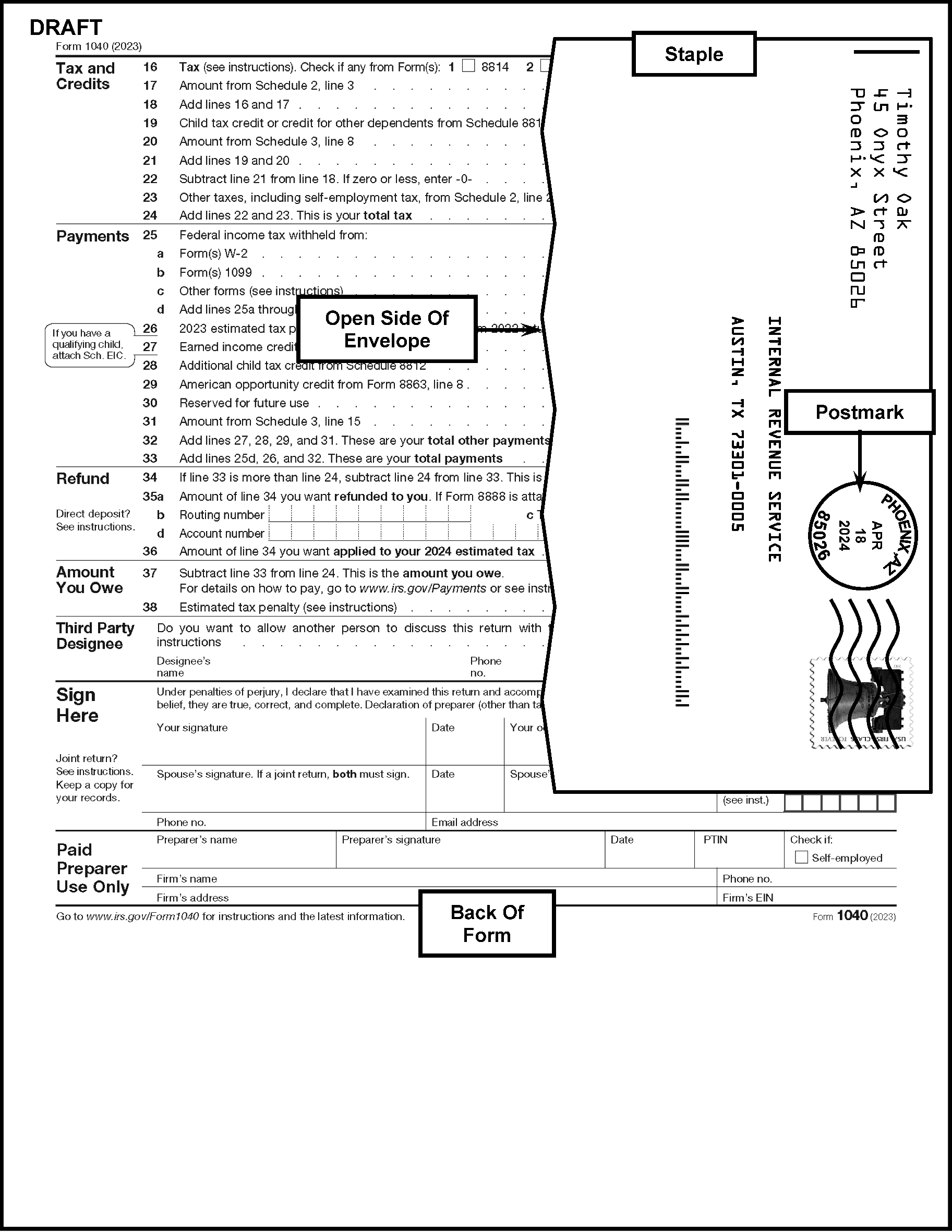
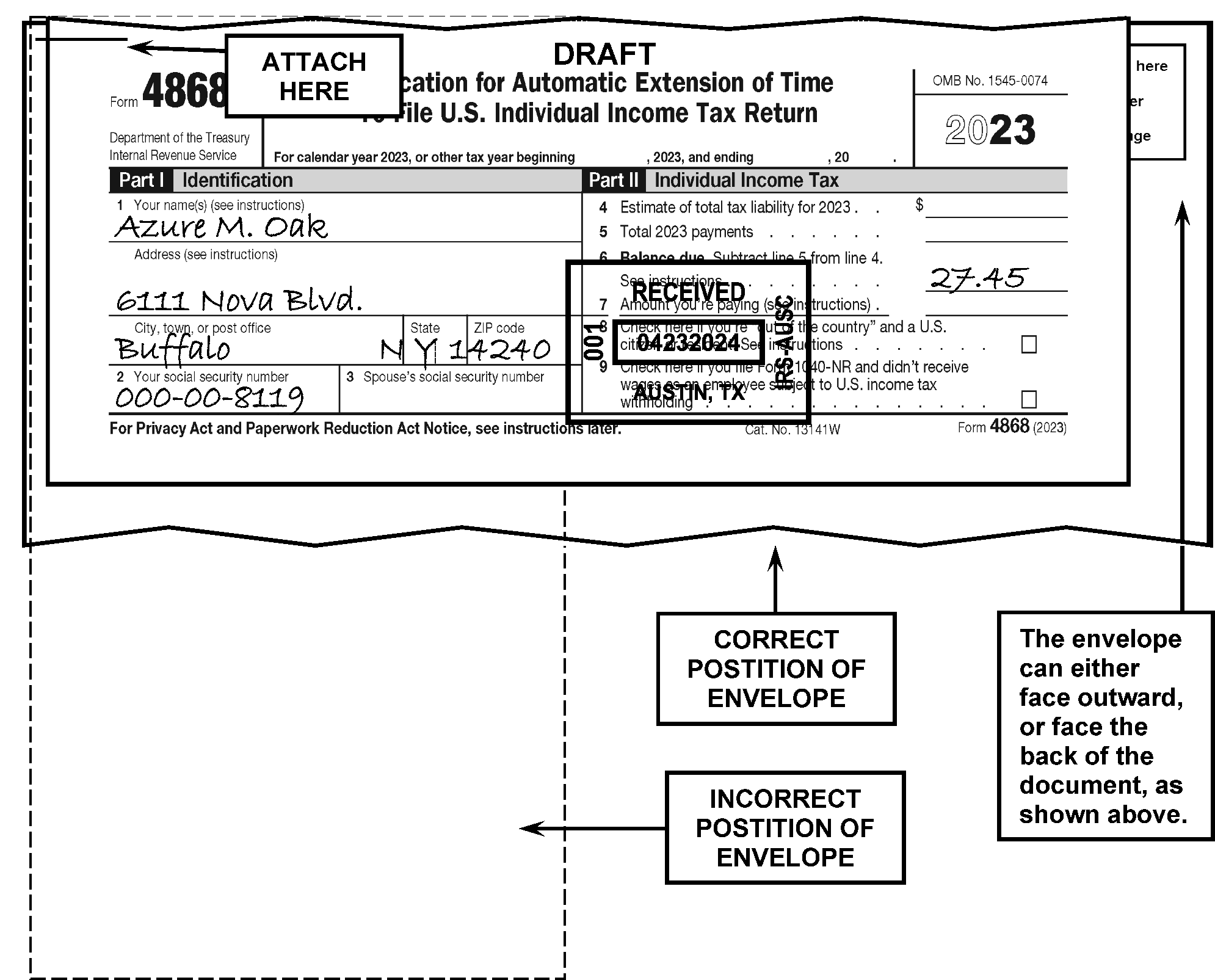
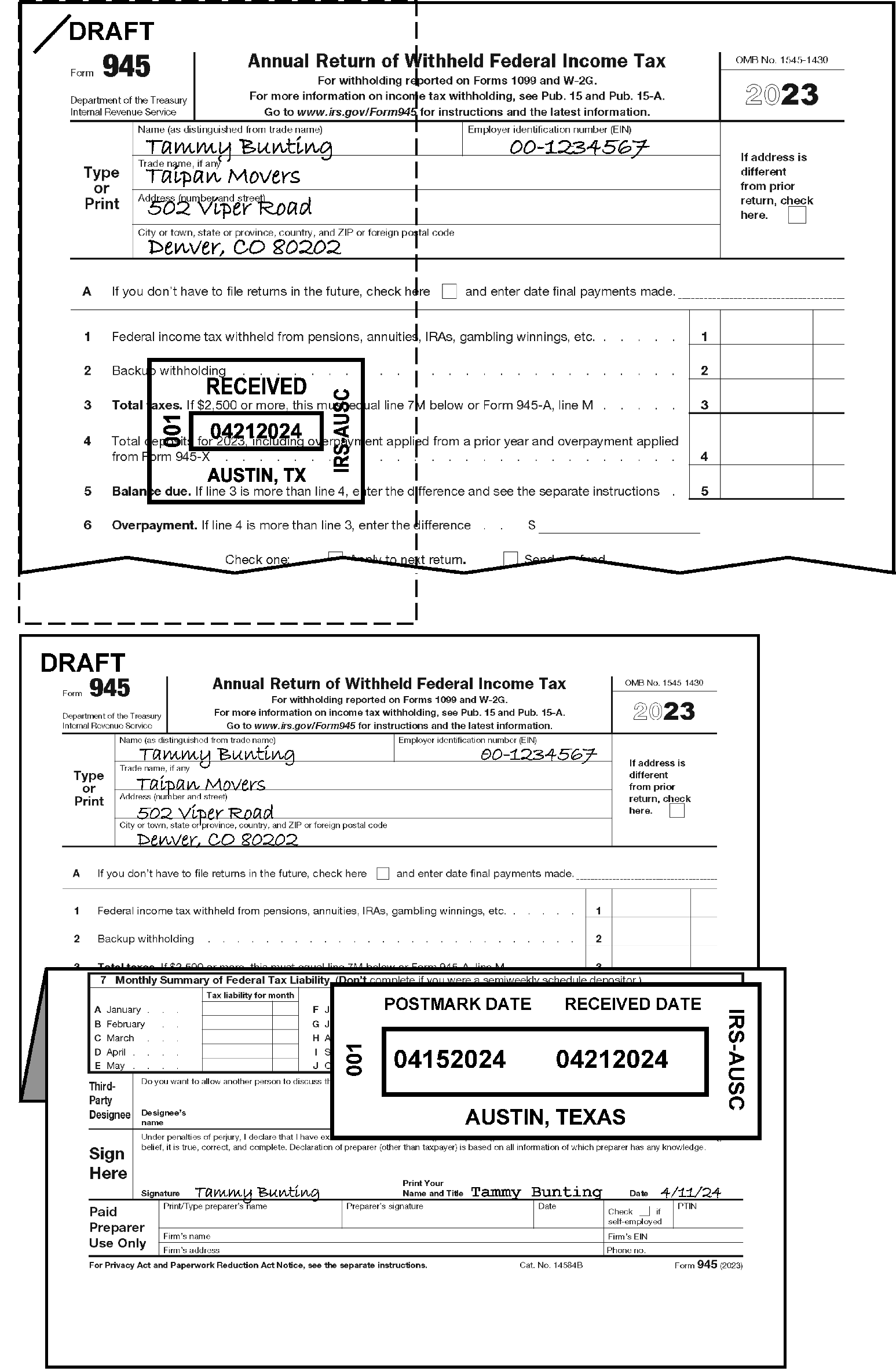
-
Take the following actions for any tax returns received in an envelope addressed to IRS which should have been filed with a State or local jurisdiction, the District of Columbia, the Commonwealth of Puerto Rico, Guam, Virgin Islands, Northern Mariana Islands, American Samoa, or any possession/territory of the United States.
-
With-Remit: When a Federal return is received with a State return (or correspondence for the State):
-
Money amount on check matches State Balance Due amount on the document, send check and document to appropriate State (including the date stamped envelope/return). Do not overstamp the check.
-
Money amount on check matches Balance Due amount on the Federal document, send to Deposit Activity, even if made payable to state. These checks should be overstamped with "United States Treasury" (or "Non-Negotiable" ) stamp.
-
Money amount on check does not match either state or federal documents, send to Payment Perfection.
-
Do not overstamp checks when made payable to other agencies or third parties.
-
-
No Remit: When a Federal return is received with a State return, use the attached Forms W-2 to try to determine the proper routing:
-
If all copies of the Form W-2 (Copy 1 or Copy 2) are for the State, route the package to the State.
-
If there are two copies of the Federal return and a state return attached, route one of the Federal returns to be processed. Attach the other copy of the Federal return to the State return and forward the package (State return and copy of Federal return) to the State. Some states require that you attach a copy of your Federal return when filing your State return.
-
-
Route all "loose" State tax returns, as well as a taxpayer's State e-file form(s) such as Form 8453, Form 8453-OL, or Form 8454 to the appropriate state. Follow local procedures for misdirected mail.
-
If a State return is attached to one of the following, keep together and route to the appropriate function.
-
CP 2000 (Route to AUR)
-
All collection letters (CSCO or ACS Support mail)
-
-
If the taxpayer incorrectly addressed the envelope to IRS when the contents were intended for the State, we will pay the postage to forward to the State. Do not give this type of "misdirected/missent" mail back to the carrier.
-
Use the State Department of Revenue (DOR) mailing address directory below to route misdirected State returns.
State Returns With Remittance - Address Returns Without Remittance - Address Remittance Without Return - Address Overnight Express Mail - Delivery Address (e.g., FedEx / UPS) AK N/A (no state Individual Tax Return) N/A (no state Individual Tax Return) N/A (no state Individual Tax Return) N/A (no state Individual Tax Return) AL Alabama Department of Revenue
P.O. Box 2401
Montgomery, AL 36140-0001Alabama Department of Revenue
P.O. Box 154
Montgomery, AL 36135-0001Alabama Department of Revenue
P.O. Box 2401
Montgomery, AL 36132-7467Alabama Department of Revenue
Gordon Persons Building Room 4203
50 North Ripley St.
Montgomery, AL 36104AR Arkansas Department of Finance & Administration
PO BOX 2144
Little Rock, AR 72203-2144Arkansas Department of Finance & Administration Tax Administrator
PO BOX 8026
Little Rock, AR 72203-8026Arkansas Department of Finance & Administration
PO BOX 2144
Little Rock, AR 72203-2144Arkansas Department of Finance & Administration
1816 W. 7th Street
Room 2220 Administration
Little Rock, AR 72201AZ Arizona Department of Revenue
PO Box 52016
Phoenix, AZ 85072Arizona Department of Revenue
PO Box 52138
Phoenix, AZ 85072Arizona Department of Revenue
PO Box 29085
Phoenix, AZ 85072Arizona Department of Revenue - Processing Division
1600 W. Monroe Street
Phoenix, AZ 85007CA (CDTFA) California Department of Tax and Fee Administration
PO Box 942879
Sacramento CA, 94279-7072California Department of Tax and Fee Administration
PO Box 942879
Sacramento CA, 94279-7072California Department of Tax and Fee Administration
PO Box 942879
Sacramento, CA 94279-3535With Remittance:
California Department of Tax and Fee Administration
450 N Street
Sacramento, CA 95814-0013
Without Remittance:
California Department of Tax and Fee Administration
450 N Street
Sacramento CA, 95814CA (FTB) Franchise Tax Board
9645 Butterfield Way
Sacramento, CA 95827Franchise Tax Board
9645 Butterfield Way
Sacramento, CA 95827Franchise Tax Board
9645 Butterfield Way
Sacramento, CA 95827Franchise Tax Board
9645 Butterfield Way
Sacramento, CA 95827CO Colorado Department of Revenue
Denver, CO 80261-0006Colorado Department of Revenue
Denver, CO 80261-0005Colorado Department of Revenue
Denver, CO 80261-0008CT Department of Revenue Services
State of Connecticut
PO BOX 2977
Hartford CT 06104-2976Department of Revenue Services
State of Connecticut
PO BOX 2976
Hartford CT 06104-2976Department of Revenue Services
State of Connecticut
PO BOX 2977
Hartford CT 06104-2976Department of Revenue Services
450 Columbus Blvd., Ste. 1
Hartford, CT 06103DC Office of Tax and Revenue
PO Box 96169
Washington DC 20090-6169Office of Tax and Revenue
PO Box 96145
Washington DC 20090-6145Office of Tax and Revenue
PO Box 96169
Washington DC 20090-6169Office of Tax and Revenue
1101 4th St. SW, 4th Fl.
Washington DC 20024DE DE Division of Revenue
P.O. Box 508
Wilmington DE 19899 – 508Office of Tax and Revenue
PO Box 96145
Washington DC 20090-6145Office of Tax and Revenue
PO Box 96169
Washington DC 20090-6169Office of Tax and Revenue
1101 4th St. SW, 4th Fl.
Washington DC 20024FL N/A N/A GA Georgia Department of Revenue
PO Box 105408
Atlanta, GA 30348Georgia Department of Revenue
PO Box 105408
Atlanta, GA 30348Georgia Department of Revenue
PO Box 105408
Atlanta, GA 30348HI Hawaii Department of Taxation
P.O. Box 1530
Honolulu, Hawaii 96806-1530Hawaii Department of Taxation
P.O. Box 3559
Honolulu, Hawaii 96811-3559Hawaii Department of Taxation
P.O. Box 3559
Honolulu, Hawaii 96811-3559State of Hawaii, Department of Taxation
Princess Ruth Ke'elikolani Building
830 Punchbowl Street
Honolulu, HI 96813IA Iowa Income Tax Document Processing
PO Box 9187
Des Moines IA 50306-9187Iowa Income Tax Document Processing
PO Box 9187
Des Moines IA 50306-9187Iowa Department of Revenue
PO Box 10471
Des Moines IA 50306-0471Iowa Department of Revenue
Hoover State Office Building
1305 E. Walnut
Des Moines, IA 50319ID Idaho State Tax Commission
PO Box 56
Boise, ID 83756-0056Idaho State Tax Commission
PO Box 56
Boise, ID 83756-0056Idaho State Tax Commission
PO Box 83784
Boise, ID 83707-3784Idaho State Tax Commission
11321 Chinden Blvd. Bldg. 2
Boise, ID 83714IL Illinois Department of Revenue
Springfield IL 62726-0001Illinois Department of Revenue
Springfield IL 62719-0001Illinois Department of Revenue
Springfield IL 62726-0001Illinois Department of Revenue
101 W. Jefferson St. Springfield, IL 62702IN Indiana Department of Revenue
PO Box 7224
Indianapolis, IN 46207-7224Indiana Department of Revenue
PO Box 40
Indianapolis, IN 46206-0040With Preprinted Vouchers:
Indiana Department of Revenue
PO Box 7223
Indianapolis, IN 46207-07223
PC Generated Voucher:
Indiana Department of Revenue
PO Box 7225
Indianapolis, IN 46207-7225DOR does receive FedEx / UPS at the PO boxes. DOR states that delivery to the PO boxes is quicker than mailing to a street address. So, even for overnight mail, they request IRS use PO boxes. KS Christina Ines-Fed State Discovery
Kansas Dept. of Revenue
PO Box 3506 Topeka, KS 66601-3506Christina Ines-Fed State Discovery
Kansas Dept. of Revenue
PO Box 3506 Topeka, KS 66601-3506Christina Ines-Fed State Discovery
Kansas Dept. of Revenue
PO Box 3506 Topeka, KS 66601-3506Christina Ines-Fed State Discovery
Kansas Dept. of Revenue
PO Box 3506 Topeka, KS 66601-3506KY Kentucky Department of Revenue
Frankfort, KY 40619-0008Kentucky Department of Revenue
Frankfort, KY 40618-0006Kentucky Department of Revenue
Frankfort, KY 40619-0008Kentucky Department of Revenue
Frankfort, KY 40619-0008LA Louisiana Department of Revenue
PO BOX 3550
Baton Rouge, LA 70821-3550Louisiana Department of Revenue
PO BOX 3440
Baton Rouge, LA 70821-3440Louisiana Department of Revenue
PO BOX 3440
Baton Rouge, LA 70821-3440Louisiana Department of Revenue
617 N. 3rd Street 7th Floor, Room 785
Baton Rouge, LA 70802-5428MA Massachusetts Department of Revenue
PO Box 7003
Boston, MA 02204Massachusetts Department of Revenue
PO Box 7000
Boston, MA 02204Massachusetts Department of Revenue
P.O. Box 419540
Boston, MA 02241-9540Massachusetts Department of Revenue
100 Cambridge Street
Boston, MA 02114MD Comptroller of Maryland Payment Processing
PO Box 8888
Annapolis MD 21401-8888Comptroller of Maryland Revenue
Administration Division 1110
Carroll St. Annapolis MD 21411-0001Comptroller of Maryland Revenue
Administration Division 1110
Carroll St. Annapolis MD 21411-0001Comptroller of Maryland Revenue
Administration Division 1110 Carroll St. Annapolis MD 21411-0001ME Maine Revenue Services
PO Box 1060
Augusta, ME 04332-1060Maine Revenue Services
PO Box 1060
Augusta, ME 04332-1060Maine Revenue Services
PO Box 1060
Augusta, ME 04332-1060Agency prefers that all returns/remittances go to the PO Box 1060 address. For overnight express mail: Maine Revenue Services; 51 Commerce Drive, Augusta, ME 04330 MI Michigan Department of Treasury
Lansing, MI 48929Michigan Department of Treasury
Lansing, MI 48956Michigan Department of Treasury
PO Box 30774
Lansing, MI 48909-8274They do not provide an overnight/express address for returns MN MN Department of Revenue
MS 1422 600 N Robert St.
St. Paul MN 55146MN Department of Revenue
MS 1422 600 N Robert St.
St. Paul MN 55146MN Department of Revenue
MS 1422 600 N Robert St.
St. Paul MN 55146MN Department of Revenue
MS 1422 600 N Robert St.
St. Paul MN 55146MO 143 Missouri Department of Revenue
Attn: Laura Wallendorf
PO Box 27 Jefferson City MO 65105-0027Missouri Department of Revenue
Attn: Laura Wallendorf
PO Box 27 Jefferson City MO 65105-0027Missouri Department of Revenue
Attn: Laura Wallendorf
PO Box 27 Jefferson City MO 65105-0027Missouri Department of Revenue
Attn: Laura Wallendorf
PO Box 27 Jefferson City MO 65105-0027MO 243 Kansas City, MO Revenue Division
414 E. 12th St. 2nd Floor, East Side
Kansas City, MO 64106Kansas City, MO Revenue Division
414 E. 12th St. 2nd Floor, East Side
Kansas City, MO 64106Kansas City, MO Revenue Division
414 E. 12th St. 2nd Floor, East Side
Kansas City, MO 64106Kansas City, MO Revenue Division
414 E. 12th St. 2nd Floor, East Side
Kansas City, MO 64106MO 343 Earnings Tax Division
1200 Market St. Room 410
St. Louis, MO 63103Earnings Tax Division
1200 Market St. Room 410
St. Louis, MO 63103Earnings Tax Division
1200 Market St. Room 410
St. Louis, MO 63103Earnings Tax Division
1200 Market St. Room 410
St. Louis, MO 63103MS Mississippi Department of Revenue
P.O. Box 23050
Jackson, MS 39225-3050Mississippi Department of Revenue
P.O. Box 23058
Jackson, MS 39225-3058Mississippi Department of Revenue
P.O. Box 23050
Jackson, MS 39225-3050Mississippi Department of Revenue
500 Clinton Center Drive
Clinton, MS 39056MT Montana Department of Revenue
Security Office – Mitchell Building 4th floor
PO Box 7701 Helena, MT 59604Montana Department of Revenue
Security Office – Mitchell Building 4th floor
PO Box 7701 Helena, MT 59604Montana Department of Revenue
Security Office – Mitchell Building 4th floor
PO Box 7701 Helena, MT 59604Montana Department of Revenue
Security Office – Mitchell Building 4th floor
PO Box 7701 Helena, MT 59604NC North Carolina Department of Revenue
PO Box 25000
Raleigh, NC 27640-0640North Carolina Department of Revenue
PO Box 25000
Raleigh, NC 27640-0640North Carolina Department of Revenue
PO Box 25000
Raleigh, NC 27640-0640North Carolina Department of Revenue
PO Box 25000
Raleigh, NC 27640-0640ND Returns (with and without payment):
NORTH DAKOTA OFFICE OF STATE TAX COMMISSIONER
PO BOX 5621
BISMARCK, ND 58506-5621
Payments only:
NORTH DAKOTA OFFICE OF STATE TAX COMMISSIONER
PO BOX 5622
BISMARCK, ND 58506-5622Returns (with and without payment):
NORTH DAKOTA OFFICE OF STATE TAX COMMISSIONER
PO BOX 5621
BISMARCK, ND 58506-5621
Payments only:
NORTH DAKOTA OFFICE OF STATE TAX COMMISSIONER
PO BOX 5622
BISMARCK, ND 58506-5622Returns (with and without payment):
NORTH DAKOTA OFFICE OF STATE TAX COMMISSIONER
PO BOX 5621
BISMARCK, ND 58506-5621
Payments only:
NORTH DAKOTA OFFICE OF STATE TAX COMMISSIONER
PO BOX 5622
BISMARCK, ND 58506-5622Returns (with and without payment):
NORTH DAKOTA OFFICE OF STATE TAX COMMISSIONER
PO BOX 5621
BISMARCK, ND 58506-5621
Payments only:
NORTH DAKOTA OFFICE OF STATE TAX COMMISSIONER
PO BOX 5622
BISMARCK, ND 58506-5622NE NEBRASKA DEPARTMENT OF REVENUE
PO BOX 94609
LINCOLN NE 68509-4609NEBRASKA DEPARTMENT OF REVENUE
PO BOX 94609
LINCOLN NE 68509-4609NEBRASKA DEPARTMENT OF REVENUE
PO BOX 94609
LINCOLN NE 68509-4609NH NH Dept. Of Revenue Taxpayer Services Division
PO Box 637
Concord, NH 03302-0637NH Dept. Of Revenue Taxpayer Services Division
PO Box 637
Concord, NH 03302-0637NH Dept. Of Revenue Taxpayer Services Division
PO Box 637
Concord, NH 03302-0637NH Dept. Of Revenue Taxpayer Services
Division 109 Pleasant St
Concord, NH 03301NJ Forms NJ-1040 and NJ-1040-V – Residents
State of New Jersey Division of Taxation Revenue Processing Center - Payments
PO Box 111 Trenton, NJ 08645-0111
Forms NJ-1040NR and NJ-1040NR-V – Nonresidents
State of New Jersey Division of Taxation Revenue Processing Center – Payments
PO Box 244 Trenton, NJ 08646-0244Forms NJ-1040 and NJ-1040-V – Residents
State of New Jersey Division of Taxation Revenue Processing Center - Refunds
PO Box 555Trenton, NJ 08647-0555
Forms NJ-1040NR and NJ-1040NR-V – Nonresidents
State of New Jersey Division of Taxation Revenue Processing Center
PO Box 244 Trenton, NJ 08646-0244State of New Jersey Division of Taxation Revenue Processing Center – Payments
PO Box 643
Trenton, NJ 08646-0643State of New Jersey Division of Taxation Revenue Processing Center
200 Woolverton Street Building 20
Trenton, NJ 08611NM New Mexico Taxation and Revenue Department
PO Box 630
Santa Fe, NM 87504New Mexico Taxation and Revenue Department
PO Box 630
Santa Fe, NM 87504New Mexico Taxation and Revenue Department
PO Box 630
Santa Fe, NM 87504New Mexico Taxation and Revenue Department
PO Box 630
Santa Fe, NM 87504NV Internal Audit State of Nevada - Department of Taxation
1550 College Parkway, Ste. 115
Carson City, NV 89706Internal Audit State of Nevada - Department of Taxation
1550 College Parkway, Ste. 115
Carson City, NV 89706Internal Audit State of Nevada - Department of Taxation
1550 College Parkway, Ste. 115
Carson City, NV 89706Internal Audit State of Nevada - Department of Taxation
1550 College Parkway, Ste. 115
Carson City, NV 89706NY STATE PROCESSING CENTER
PO BOX 15555
ALBANY NY 12212-5555STATE PROCESSING CENTER
PO BOX 61000
ALBANY NY 12261-0001STATE PROCESSING CENTER
PO BOX 15555
ALBANY NY 12212-5555NYS TAX DEPARTMENT
RPC - PIT
90 COHOES AVE
GREEN ISLAND NY 12183-1515OH Ohio Department of Taxation
PO Box 2057
Columbus, Ohio 43270-2057Ohio Department of Taxation
PO Box 2679
Columbus, Ohio 43270-2679Ohio Department of Taxation
4485 Northland Ridge Blvd.
Columbus, Oh 43229Ohio Department of Taxation
4485 Northland Ridge Blvd.
Columbus, Oh 43229OH RITA Regional Income Tax
PO Box 477900
Broadview Heights, OH 44147-7900Regional Income Tax
PO Box 477900
Broadview Heights, OH 44147-7900Regional Income Tax
PO Box 477900
Broadview Heights, OH 44147-7900Regional Income Tax
PO Box 477900
Broadview Heights, OH 44147-7900OH CCA CCA, Central Collection Agency
205 W St Clair Ave.
Cleveland, Oh 44113CCA, Central Collection Agency
205 W St Clair Ave.
Cleveland, Oh 44113CCA, Central Collection Agency
205 W St Clair Ave.
Cleveland, Oh 44113CCA, Central Collection Agency
205 W St Clair Ave.
Cleveland, Oh 44113OK Oklahoma Tax Commission - Income Tax
P.O. Box 26800
Oklahoma City, OK 73126-0800Oklahoma Tax Commission - Income Tax
P.O. Box 26800
Oklahoma City, OK 73126-0800Oklahoma Tax Commission - Income Tax
P.O. Box 26800
Oklahoma City, OK 73126-0800Oklahoma Tax Commission - Income Tax
P.O. Box 26800
Oklahoma City, OK 73126-0800OR Oregon Department of Revenue
PO BOX 14555
Salem, OR 97309-0940Oregon Department of Revenue
PO BOX 14700
Salem, OR 97309-0930Oregon Department of Revenue
PO BOX 14950
Salem, OR 97309-0950Oregon Department of Revenue
955 Center St NE
Salem, OR 97301-2555PA PA Dept Of Revenue
Payment Enclosed
1 Revenue Place
Harrisburg PA 17129-0001PA Dept Of Revenue
No Payment or No Refund
2 Revenue Place
Harrisburg PA 17129-0002PA Dept Of Revenue
Payment Enclosed
1 Revenue Place
Harrisburg PA 17129-0001PA Dept of Revenue
4th & Walnut Streets
Harrisburg PA 17128PR Puerto Rico Dept of Treasury
PO Box 9024140
San Juan, P.R. 00902-4140Puerto Rico Dept of Treasury
PO Box 9024140
San Juan, P.R. 00902-4140RI Rhode Island Division of Taxation
One Capitol Hill
Providence, RI 02908Rhode Island Division of Taxation
One Capitol Hill
Providence, RI 02908Rhode Island Division of Taxation
One Capitol Hill
Providence, RI 02908Rhode Island Division of Taxation
One Capitol Hill
Providence, RI 02908SC SC 1040 Processing Center
PO Box 101100
Columbia,SC 29211-0100SC 1040 Processing Center
PO Box 101100
Columbia,SC 29211-0100SC 1040 Processing Center
PO Box 101100
Columbia,SC 29211-0100SC 1040 Processing Center
PO Box 101100
Columbia,SC 29211-0100SD SD Department of Revenue
445 E Capitol Ave
Pierre, SD 57501SD Department of Revenue
445 E Capitol Ave
Pierre, SD 57501SD Department of Revenue
445 E Capitol Ave
Pierre, SD 57501SD Department of Revenue
445 E Capitol Ave
Pierre, SD 57501TN Tennessee Department of Revenue
Andrew Jackson State Office Building
500 Deaderick Street
Nashville, TN 37242Tennessee Department of Revenue
Andrew Jackson State Office Building
500 Deaderick Street
Nashville, TN 37242Tennessee Department of Revenue
Andrew Jackson State Office Building
500 Deaderick Street
Nashville, TN 37242Tennessee Department of Revenue
Andrew Jackson State Office Building
500 Deaderick Street
Nashville, TN 37242TX Comptroller of Public Accounts of Texas
P.O. Box 13528
Austin, TX 78711Comptroller of Public Accounts of Texas
P.O. Box 13528
Austin, TX 78711Comptroller of Public Accounts of Texas
P.O. Box 13528
Austin, TX 78711Comptroller of Public Accounts of Texas
P.O. Box 13528
Austin, TX 78711UT Utah State Tax Commission
210 North 1950 West
Salt Lake City, UT 84134Utah State Tax Commission
210 North 1950 West
Salt Lake City, UT 84134Utah State Tax Commission
210 North 1950 West
Salt Lake City, UT 84134Utah State Tax Commission
210 North 1950 West
Salt Lake City, UT 84134VA Virginia Department of Taxation
PO Box 760
Richmond VA 23218-0760Virginia Department of Taxation
PO Box 1498
Richmond VA 23218-1498Virginia Department of Taxation
PO Box 2369
Richmond VA 23218Virginia Tax
1957 Westmoreland St.
Richmond VA 23230VI Federal Disclosure Unit
Virgin Islands Bureau of Internal Revenue
6115 Estate Smith Bay- Suite 225
St. Thomas, VI 00802Federal Disclosure Unit
Virgin Islands Bureau of Internal Revenue
6115 Estate Smith Bay- Suite 225
St. Thomas, VI 00802Federal Disclosure Unit
Virgin Islands Bureau of Internal Revenue
6115 Estate Smith Bay- Suite 225
St. Thomas, VI 00802Federal Disclosure Unit
Virgin Islands Bureau of Internal Revenue
6115 Estate Smith Bay- Suite 225
St. Thomas, VI 00802VT Vermont Department of Taxes
PO Box 1779
Montpelier, VT 05601Vermont Department of Taxes
PO Box 1881
Montpelier, VT 05601Vermont Department of Taxes
PO Box 1779
Montpelier, VT 05601Vermont Department of Taxes
133 State Street
Montpelier, VT 05633WA N/A (no state Individual Tax Return) N/A (no state Individual Tax Return) N/A (no state Individual Tax Return) N/A (no state Individual Tax Return) WV Personal Income Tax Only:
WV State Tax Department
PO Box 3694
Charleston WV 25336-3694
Business partnership/S-Corp returns are mailed to:
WV State Tax Department, Tax Account Administration
PO Box 1202
Charleston, WV 23324-1202
Corporate Income Tax returns are sent to:
PO Box 11751
Charleston, WV 25324-1751Personal Income Tax Only:
WV State Tax Return
PO Box 1071
Charleston, WV 25324-1071
Business partnership/S-Corp returns are mailed to:
WV State Tax Department, Tax Account Administration
PO Box 1202
Charleston, WV 23324-1202
Corporate Income Tax returns are sent to:
PO Box 11751
Charleston, WV 25324-1751Personal Income Tax Only:
WV State Tax Department
PO Box 3694
Charleston, WV 25336-3694
Business partnership/S-Corp returns are mailed to:
WV State Tax Department, Tax Account Administration
PO Box 1202
Charleston, WV 23324-1202
Corporate Income Tax returns are sent to:
PO Box 11751
Charleston, WV 25324-1751Personal Income Tax Only:
West Virginia State Tax Department
1001 Lee Street East
Charleston, WV 25301
Business partnership/S-Corp returns are mailed to:
WV State Tax Department, Tax Account Administration
PO Box 1202
Charleston, WV 23324-1202
Corporate Income Tax returns are sent to:
PO Box 11751
Charleston, WV 25324-1751WI If tax is due:
Wisconsin Department of Revenue
PO Box 268
Madison WI 53790-0001If refund or no tax is due:
Wisconsin Department of Revenue
PO Box 59
Madison WI 53785-0001Wisconsin Department of Revenue
PO Box 930208
Madison WI 53293-0208Wisconsin Department of Revenue
Mail Review Unit
2135 Rimrock Road
Madison WI 53713-1443WY N/A (no state Individual Tax Return) N/A (no state Individual Tax Return) Wyoming Department of Revenue
Herschler Building 3rd Floor East
122 W. 25th Street
Cheyenne, WY 82002-0110Wyoming Department of Revenue
Herschler Building 3rd Floor East
122 W. 25th Street
Cheyenne, WY 82002-0110Lexington The Occupational Tax on wages is required to be withheld from the compensation of employees. The employee has no filing requirements unless an employer fails to withhold or under withholds. N/A N/A N/A NY City NYC Department of Finance
PO Box 5564
Binghamton, NY 13902-5564NYC Department of Finance
PO Box 5564
Binghamton, NY 13902-5564NYC Department of finance
PO box 3933
New York, NY 10008-3933NYC Department of Finance
59 Maiden Lane, 19th floor
New York, NY 10038Toledo City of Toledo, Division of Taxation
One Government Center Suite 2070
Toledo OH 43604
Attn: Joyce Hill, Tax AdministratorCity of Toledo, Division of Taxation
One Government Center Suite 2070
Toledo OH 43604
Attn: Joyce Hill, Tax AdministratorCity of Toledo, Division of Taxation
One Government Center Suite 2070
Toledo OH 43604
Attn: Joyce Hill, Tax AdministratorCity of Toledo, Division of Taxation
One Government Center Suite 2070
Toledo OH 43604
Attn: Joyce Hill, Tax AdministratorCincinnati Eric Ringshauser
DTC Cincinnati Income Tax Division
805 Central Avenue Suite 600
Cincinnati OH 45202Eric Ringshauser
DTC Cincinnati Income Tax Division
805 Central Avenue Suite 600
Cincinnati OH 45202Eric Ringshauser
DTC Cincinnati Income Tax Division
805 Central Avenue Suite 600
Cincinnati OH 45202Eric Ringshauser
DTC Cincinnati Income Tax Division
805 Central Avenue Suite 600
Cincinnati OH 45202Columbus Columbus Income Tax Division
PO Box 182158
Columbus, OH 43218-2158Columbus Income Tax Division
PO Box 182437
Columbus, OH 43218-2437Columbus Income Tax Division
PO Box 183190
Columbus, OH 43218-3190Columbus Income Tax Division
77 N. Front St. 2nd Floor
Columbus, OH 43215Portland Portland Revenue Division - Arts Tax
PO BOX 2820
Portland, OR 97208-2820Portland Revenue Division - Arts Tax
PO BOX 2820
Portland, OR 97208-2820Portland Revenue Division - Arts Tax
PO BOX 2820
Portland, OR 97208-2820Portland Revenue Division - Arts Tax
111 SW Columbia Street, Suite 600
Portland, OR 97201Philadelphia Philadelphia Department of Revenue
PO Box 1648
Philadelphia, PA 19105-1648Philadelphia Department of Revenue
PO Box 1648
Philadelphia, PA 19105-1648Philadelphia Department of Revenue
PO Box 1648
Philadelphia, PA 19105-1648Philadelphia Department of Revenue
1401 JFK Blvd
Philadelphia, PA 19105-1648Louisville Louisville Metro Revenue Commission
PO Box 35410
Louisville, KY 40232-5410Louisville Metro Revenue Commission
PO Box 35410
Louisville, KY 40232-5410Louisville Metro Revenue Commission
PO Box 35410
Louisville, KY 40232-5410Louisville Metro Revenue Commission
617 West Jefferson Street
Louisville, KY 40202Detroit Michigan Department of Treasury
Lansing, MI 48929Michigan Department of Treasury
Lansing, MI 48956Michigan Department of Treasury
PO Box 30738
Lansing, MI 48909-8274They do not provide an overnight/express address for returns
-
Envelopes addressed to IRS containing tax returns that are erroneously delivered by the USPS to the state taxing agency are timely filed if:
-
Envelope postmark is on or before the due date, or
-
Envelope is missing, but the State's received date stamp is within the grace period.
-
-
When IRS receives a return from a state agency after the grace period, it will not be considered timely filed if:
-
the taxpayer's envelope was addressed to a state agency, or
-
no envelope is attached to make a determination.
-
-
When returns are forwarded to IRS 6 months or more after the due dates of the returns, take the following action when the taxpayer's envelope was addressed to the state, or there is no envelope attached to the return to make a determination:
-
Stamp the IRS received date using the actual date received at an IRS campus. Circle any State's received date.
-
Route the return(s) to your Planning and Analysis analyst to research for a TC 150. Use CC RTVUE to determine if it's a true duplicate return.
-
If no TC 150 present, process through the pipeline using the IRS received date. If it is a Statute year or prior, "hand-carry" to Statute Unit and explain how it was received.
-
If a TC 150 has already posted and it's a duplicate return (i.e., same lines on RTVUE), edit "Forwarded from State of "X" , date" in the top margin, complete the "Attachment" form with the TC 150 DLN, and route to Files. Do not process, if a duplicate. If a TC 150 is present, but it's not a true duplicate (i.e., amounts on RTVUE do not match return), contact your Accounts Management P&A counterpart for assistance.
-
-
When IRS receives returns from a state agency after the grace period (but within 6 months), it will be considered timely filed if the taxpayer's envelope was addressed to the IRS, and:
-
Postmark is on or before the due date, or
-
The State's received date stamp was within the grace period.
Note:
Circle any State's received date. Then, stamp an IRS received date using the state's received date and stamp the postmark date so that Code and Edit will make it timely filed. If the state did not stamp the return, stamp the postmark date, then stamp the current IRS received date. Always attach the envelope.
-
-
When returns are forwarded to IRS from a state agency 6 months or more after the due dates of the returns, take the following action when the taxpayer's envelope was addressed to IRS and they were timely filed as indicated in parameters shown above:
-
Stamp the IRS received date using the State's received date (if present) or postmark date or Signature Date. Circle any State's received date.
-
Route the return(s) to your Planning and Analysis analyst to research for a TC 150. Use CC RTVUE to determine if it's a true duplicate return.
-
If no TC 150 present, process through the pipeline using the IRS received date. If it is a Statute year or prior, "hand-carry" to Statute and explain how it was received.
-
If a TC 150 has already posted for the duplicate return information, determine if there were any penalties assessed on the account. If penalties were assessed, contact your Accounts Management Planning and Analysis Analyst to have the penalties abated. If no penalties were assessed, edit "Forwarded from State of "X" , date" in the top margin, complete the "Attachment" form with the TC 150 DLN, and route to Files. Do not process, if a duplicate. If a TC 150 present, but it's not a true duplicate, contact your Accounts Management Planning and Analysis counterpart for assistance.
-
-
When IRS receives Extensions from a state agency 6 or more months after the affected return due date, it will be considered timely filed if the taxpayer's envelope was addressed to the IRS, and the envelope postmark is on or before the due date.
Note:
If the envelope was mailed USPS "Certified" and the postmark date is after the due date or missing, go to https://tools.usps.com/go/TrackConfirmAction verify "Acceptance" and "Date & Time" . Print the page and attach it to the front of the document. If it was mailed by a designated PDS and the label is missing, use the chart in IRM 3.10.72.6.2.4(3) to estimate the date mailed.
-
When IRS receives extensions from a state agency 6 or more months after the affected return due date and the taxpayer's envelope was addressed to the state, stamp the current IRS received date and consider it late filed.
-
If remits are included in the mail forwarded from the state, follow procedures in IRM 3.8.45.5.7.1, Discovered Remittance Over 30 Days Old.
-
If an envelope/package is received that is addressed to other than IRS, it must be returned to the carrier (e.g., USPS, FedEx, UPS, etc.) as soon as possible.
-
Date stamp the back of Notice 1256 and place it inside the envelope before you tape it back together.
-
Put it in a designated slot on your table, or basket for another person to neatly tape it back together and put it in the designated area to return it to the USPS (or other carrier).
-
If the envelope/package is so damaged that you cannot neatly tape it back together or the envelope was accidentally destroyed, then put it in an IRS envelope to prevent further damage. Ask the carrier for the clear envelopes or "re-package" material to use if the address can be clearly read.
-
-
This procedure is designed as an "audit trail" , in the event there is ever a discrepancy with any amount of money (cash, check, gift card, etc.) the sender/recipient claims was originally enclosed in the envelope. The individual who date stamps the "find" is the responsible party. Therefore, do not have another designated person date stamp the Notice 1256.
-
If envelope/package contains NYS returns and is being forwarded by IRS personnel to NY by PDS please forward to:
NYS Tax Department
RPC-PIT
90 Cohoes Ave.
Green Island, NY 12183
-
When U.S. currency is received in any amount in the Extracting function, it must immediately be taken to the Manager.
-
The currency must be counted by the discoverer and Manager.
-
The Manager must prepare Form 4287, Record of Discovered Remittances, to record the finding of the currency in accordance with IRM 3.8.46, Discovered Remittance (Form 4287 is used to record any discovered item intended for payment of tax, not just U.S. currency.) The form preparation is self-explanatory.
-
The discoverer and Manager must initial the recorded entry on the Form 4287. The Manager must place the currency/check in the gold envelope. Attach to the related return or document. Complete information on the envelope with a notation that corresponds with the entry on the Form 4287. The Manager must place the envelope in a lockable container kept in their custody in accordance with IRM 10.2.14, Methods of Providing Protection. The Manager and a teller from the Deposit Function have the only keys/combination to the lockable container. See IRM 1.4.6.3.6, Key and Combination Controls, for additional information.
-
-
If Debit Cards are returned by another taxpayer (delivered to an address where recipient does not reside) or intercepted by the USPS (will be returned in a USPS envelope and contain a note indicating "possible fraud" ), do not slice the envelope from the debit card company. If the envelope was sliced, staple or tape it back together.
Note:
If a taxpayer returns a combination of Treasury checks and debit cards, keep the entire submission together and send the complete "package" to RIVO External Leads in Kansas City, using the address shown below.
-
If intercepted by the USPS, date stamp the front of the debit card envelope (below the Return Address). If returned by another taxpayer, date stamp their correspondence, attach envelope, and date stamp the front of the debit card envelope.
-
Photocopy the front of the debit card envelope showing both addresses (Return Address and Recipient's address) and date.
-
Complete a Form 3210 indicating the total volume of envelopes/debit cards and mail the complete package (e.g., all photocopied pages and original debit card envelopes) to Kansas City.
-
If unable to meet the UPS deadline for pick-up on that day, hold the items in the safe until UPS pick-up.
-
Use the following address to mail Debit Cards to Kansas City:
Internal Revenue Service
Attn: RIVO External Lead Manager
P.O. Box 219981
Kansas City, MO 64121
-
-
When any item of value other than U.S. currency is discovered, handle in same manner as outlined in (1) above. An item of value can be gold, silver, jewelry, savings bonds, "loose" postage stamps with a total value of $3.00 or more, Treasury notes/bonds, stocks, gift cards, credit/debit cards, etc. Checks and money orders are not classified as items of value in this instance. They are discussed under separate instructions. If in doubt as to an "item of value" , treat it as if it is.
-
When total value of postage stamps received is less than "$3.00" , cross through and permanently affix stamps to related return or document and retain in regular work flow.
-
A teller from the Deposit Function is responsible for collecting the locked container contents. If the discovered item(s) is not retrieved at least once daily, per shift, the Extracting Manager will inform the Deposit Manager. The Manager will open the envelope(s) and verify the content with the teller. The teller must initial and date the Form 4287 that the items listed were received. The Manager retains the duplicate copy as proof of discovery and gives the item to the Deposit Function with the other 2 parts of the Form 4287.
-
Please refer to IRM 3.8.46, Discovered Remittance, for complete processing instructions.
-
ACS Mail is usually identified upon receipt because it contains a unique P.O. Box address for the ACS Support sites. It should remain intact for the extractor to sort the contents quickly. Initially, sort the mail as:
-
Remit with source document
-
Remit with no source document, but levy payment could be indicated on the check
-
No Remit ACS mail to be routed to ACS Support
-
"Other mail" addressed to an "ACS P.O. Box" or Mail Stop
-
-
All ACS mail With-Remit or payment with indication of "levy" should be routed to Payment Perfection (including the Source Document) for IDRS research to post to the earliest CSED. If a third-party check is made payable to the taxpayer and is an ACS payment, sort as "imperfect" . ACS mail or indication of "levy" is never sorted as "Perfect" .
-
The designated Post Office Boxes for ACS mail are:
ACS Support Sites ACS Support
P.O. Box 24017
Fresno, CA 93779-4017ACS Support
P.O. Box 145566
Cincinnati, OH 45250-5566ACS Support
P.O. Box 219236 or
P.O. Box 219420 or
P.O. Box 419236
Kansas City, MO 64121-xxxxACS Support (Philadelphia)
P.O. Box 8208
Philadelphia, PA 19101-8208
Mailing Address is:
Internal Revenue Service
Mail Stop 4-Q26.132
2970 Market St.
Philadelphia, PA 19104 -
Always date stamp ACS mail submission and any tax return, then attach the envelope. If multiple forms or correspondence with multiple remits come in the same envelope, try to match up the individual Remit with the source document, then route to Deposit in the correct order.
-
In addition to the unique P.O. Box for ACS mail printed on the notice, "ACS mail" is also any Form 668-A(c), Form 668-W(c), Form 668-W (ICS), Form 8519, or "LT" /"LP" letter.
-
Sort Estimated Tax payment (ES) vouchers into three sorts:
-
Scannable (for the Transport) – Scan line is legible, has no edit marks on it, and there is no fold on the voucher that will jam the machine.
-
Perfect (for RPS) – Voucher can have a Name/Address change, "Deceased" or "Estate" edited on the voucher, and can have the "fold line" near the scan line on the voucher.
-
Imperfect (for PPU) – Multiples/Splits (i.e., multiple checks for one voucher, multiple forms with one check, multiple checks with multiple vouchers, incomplete/edited scan line, handwritten, or prior year voucher
-
-
Place the "ES" voucher on top of the check when routing for processing.
-
ES payments are never sorted as delinquent.
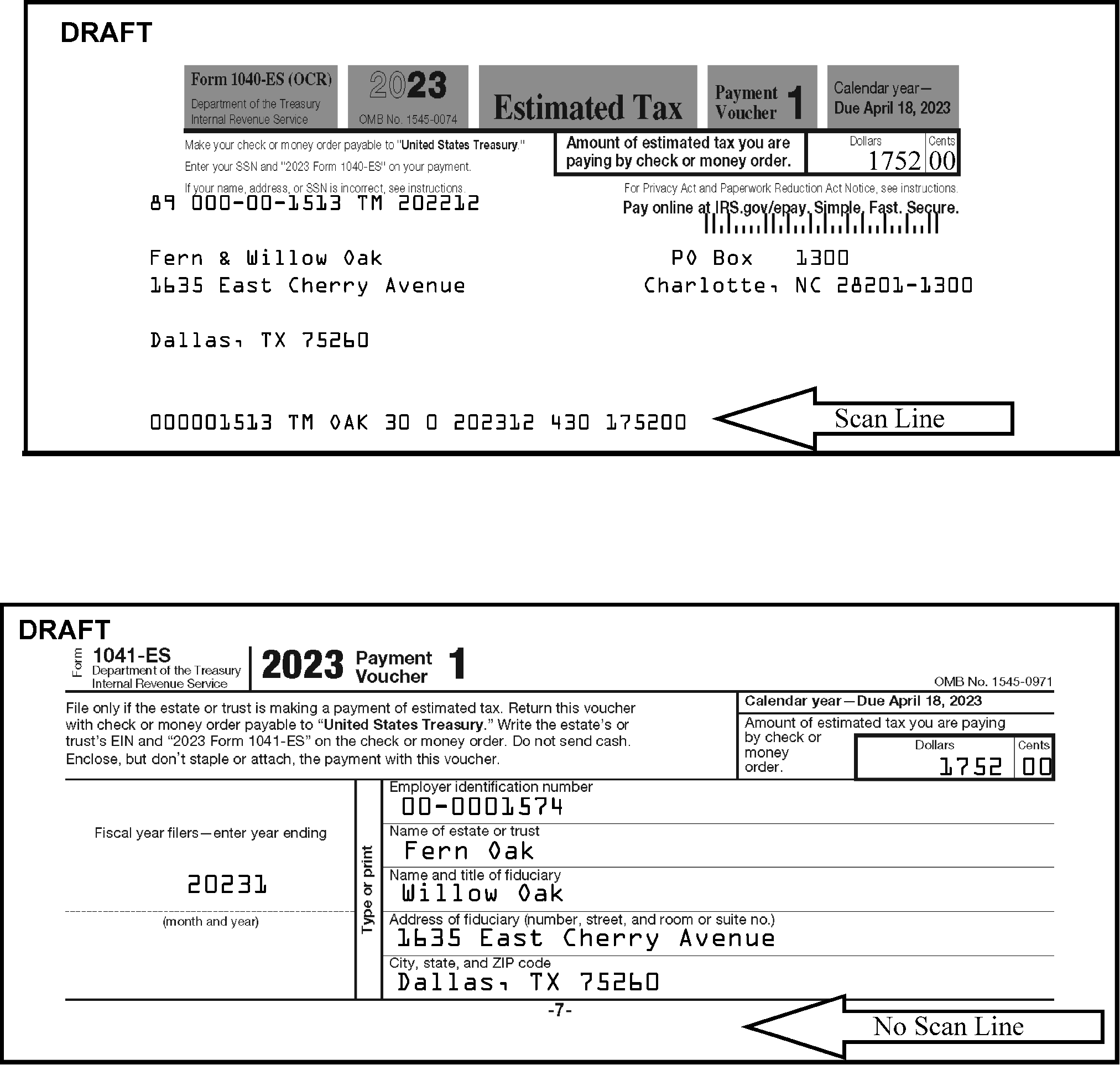
-
If the Form 3115 is attached to a return, do not detach. Route the return for processing.
-
When received "loose" , this form is not to be processed, nor payment deposited. Keep the envelope and staple to the back of the Form, prior to routing to the correct Mail Stop and address as identified below.
-
If a Remit check (user fee) is attached to the Form 3115, leave it attached to the form. It is not to be deposited by the Campus.
-
Use the following chart to determine where to mail the Form 3115 (and payment, if attached).
If the Envelope is Addressed to: And Remit Check (User Fee) is Attached: And No Remit Check (User Fee) is Attached: Internal Revenue Service
Mail Stop 6111
Ogden, Utah 84201Internal Revenue Service
Attn: CC:PA:LPD:TSS
Room 5336
1111 Constitution Ave NW
Washington, DC 20224Internal Revenue Service
Mail Stop 6111
1973 N Rulon White Blvd
Ogden, UT 84201
-
Use the following chart to help determine the proper routing of Form 14039, whether received "loose" , attached to another Form, IRS initiated correspondence, or attached to a Form 1040 series return.
Note:
Always check the envelope to see if the Form 14039 plus any related correspondence or attachments has been specifically addressed to a particular Mail Stop or function, then route to them.
If: And: Then: Form 14039 is attached to a Form 1040 series return It’s Full Paid Sort separately so it will not be shelved. Identify as "FP IDT" for Batching. Form 14039 is attached to a Form 1040 series return It’s Other Than Full Paid (Part Paid or Refund) Do not separate the package. Continue routing to Batching. Form 14039 is attached to a Form 1040 series return The envelope is addressed to a specific function or Mail Stop (other than Receipt and Control or Batching) Place the Form 14039 on top, date stamp both documents, and route the package to that function. Form 14039 is attached to a Form 1040 series return The return is a Statute Year Route the package to IDTVA function.
AUSPC - Stop 6539 AUSC
KCSPC - Stop 6800 N2Form 14039 is not attached to a Form 1040 series return, or is on the front of the return received in the same package/envelope You notice in the explanation portion of the Form 14039 that the reason for filing is that they found out (normally rejected by e-file) that someone else claimed a dependent child (i.e., the Name in Section B does not match the Primary/Secondary name) -
Date stamp and route the Form 14039 and related correspondence to ICT
-
Continue processing the return. Follow normal date stamping instructions.
-
Otherwise, staple the Form 14039 to the back of the return and continue processing.
Form 14039 is received "loose" (or with related correspondence) Is not specifically addressed to a Function/Mail Stop Date stamp and route to ICT. Form 14039 is received Includes IRS initiated correspondence (“C” letter, Form, or CP) Place the correspondence on top and route the package to the appropriate function based on the "C" letter or CP notice. Form 14039 is received Form 8822, Address Change, is attached Date stamp and route to ICT. Form 14039 is received Form 4506, Form 4506-T, or Form 4506-T-EZ is attached. Date stamp and route to ICT. Do not route to RAIVS. -
-
This subsection contains procedures on IRS received date stamping and postmark date stamping, when required.
-
The date a document is received in the Campus or an IRS office that can accept tax returns is the date stamped as the "IRS Received Date" . All mail received from 12:00 a.m. to 11:59 p.m., seven days a week, including Saturdays, Sundays, and legal holidays is date stamped with the actual date received. The only foreign office that can accept tax returns is Beijing. Most domestic Area Offices with a Taxpayer Assistance function (TAC) can accept tax returns.
-
Any mail accepted at campuses on Saturdays, Sundays and legal holidays, is tagged with the date it is accepted by the Campus. The mail does not necessarily need to be processed on the day received, but when processed, it must be stamped with the actual date received. When mail is received in the Campus after the daily processing "cut-off" , the mail must be tagged so it can be stamped with the actual date it was received.
-
Lockbox will date stamp their own documents with an official received date stamp. If a received date is required for the documents, but does not have one, you must use your IRS received date stamp and stamp them with the same date used on the other documents in the tray/box received from the Lockbox.
Note:
For Form 4868 only, immediately following the grace period, it is suggested that the sites "clean the mail" in the receiving area to identify timely Form 4868 by sampling the USPS mail for timely postmark dates April 15. If there are groups of mail with timely postmarks, pull this mail to the front and label as timely postmarked. Form 4868 in timely postmarked mail do require date stamps and envelopes and will be batched as timely to prevent re-batching downstream. Disregard and do not sort as timely after the grace period if postmarks are on self-prepared labels, such as Click and Ship, private metered, Pitney-Bowes metered mail, or if the delivery timeframe is inconsistent. Form 1040 must be date stamped and envelopes must be retained, regardless of postmark. Notify management if trends are identified with specific USPS locations; IRS management should contact the USPS to report incidents.
-
-
An "Official Received Date Stamp" must consist of no less than:
-
The word "Received"
-
"Month-alpha" or "numeric" characters
-
"Day" - (For example, can be "1" or "01" )
-
"Year" -Four digits
-
"Area Office (A.O.)" , Campus, "Field Office" , "Taxpayer Assistance (TAC)" Site plus the "City" location, or
-
A functional area within one of these sites (e.g., CSCO, Exam, ICT, CIS, AM, etc.)
Exception:
Not all IRS offices are designated places for filing, and not all IRS employees are authorized to accept a tax return for processing. If a return contains a received date stamp from an office that is not a proper place for filing, that date stamp is not the "IRS Received Date" , and you must stamp it with your official"IRS Received Date" rubber stamp, as if no date stamp is present. For example, returns received by Taxpayer Advocate Service (TAS) or the IRS Office of Chief Counsel are not properly filed and a received date (or fax date stamped on the return) by that office is not the official "IRS Received Date" .
Note:
Date stamps should be tested at the start of each shift to ensure they reflect the current date. You can "test" it on your Identifying Tag that you place in your "Initial Candling" bag, if you are extracting. See Figure 3.10.72-5 showing the elements required in a received date stamp. Element "g" shown below in Figure 3.10.72-5 is the serial number. This element is not required to be considered an official received date, but is generally used by Campuses to identify the Extractor assigned that date stamper.
-
-
An acceptable "IRS Received Date" stamp must only be stamped on the face of the document in an area that does not cover taxpayer entries. Do not stamp in the area of the scan line on payment stubs/vouchers, Including dollar amounts and the Entity area.
-
If you stamped the incorrect received date and you can edit legibly, you do not have to "X" the entire stamp. See a legible entry in Figure 3.10.72-6 to correct the stamped date.
-
If you stamp an incorrect or illegible received date on a return and you are unable to edit it legibly, "X" it and re-stamp with the correct received date. This is the only time that Extraction will "X" a received date stamp. See Figure 3.10.72-7.
-
Refer to IRM 3.10.72.5.7 for returns, forms, and documents that always require a received date and attached envelope. Beginning March 4, 2024 attach envelopes and stamp receive date on ALL returns.
-
If IRS received date stamps or any other type of sensitive rubber stamps need to be destroyed, refer to the instructions in IRM 3.10.72.3.3.
-
If you refer a Timely Filed return to the "Funny Box" and it is taken out of the pipeline attach envelopes and stamp receive dates on ALL returns. This enables Batching to input the correct Julian Date if the return comes back to be processed.
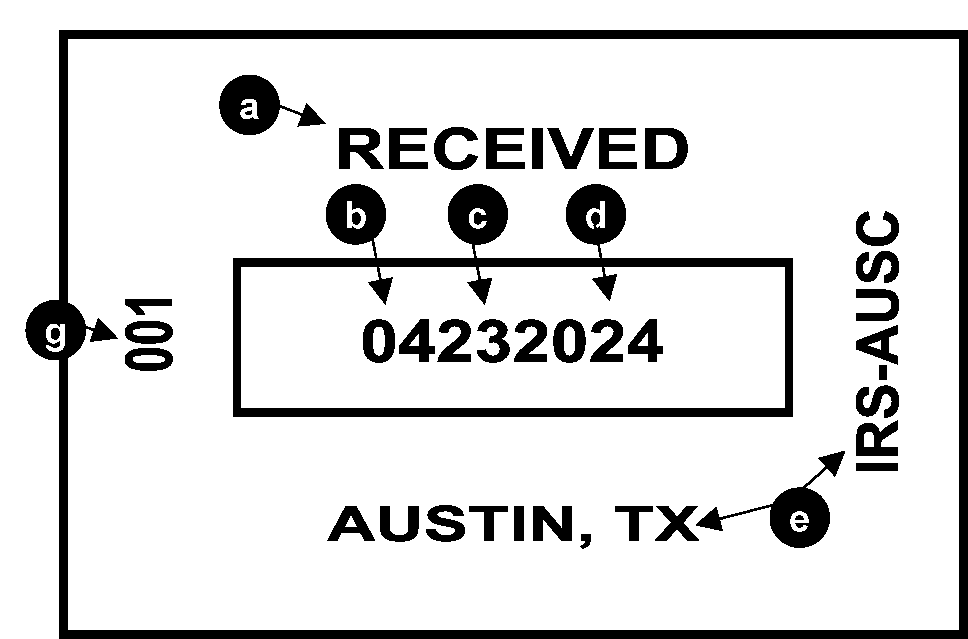
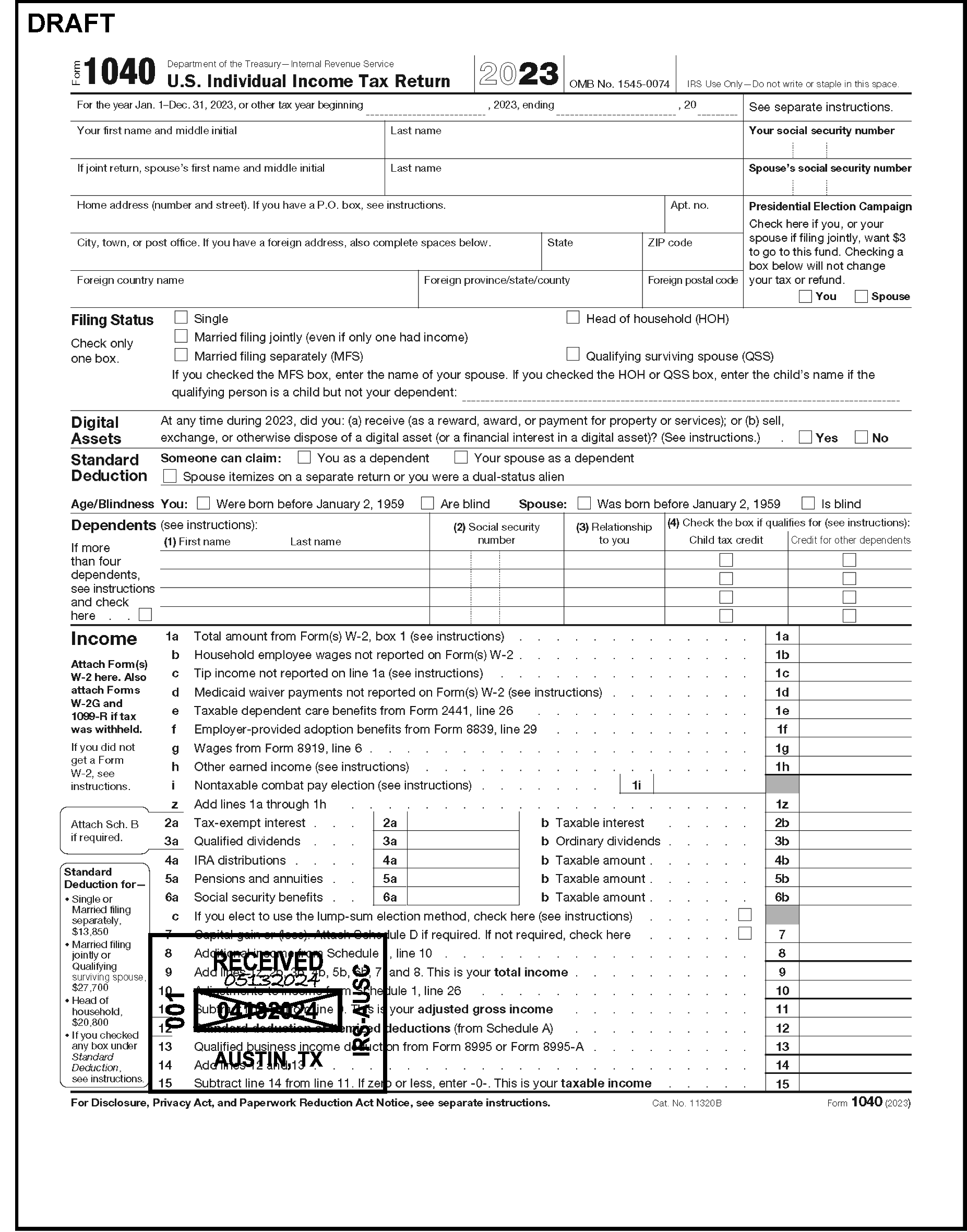
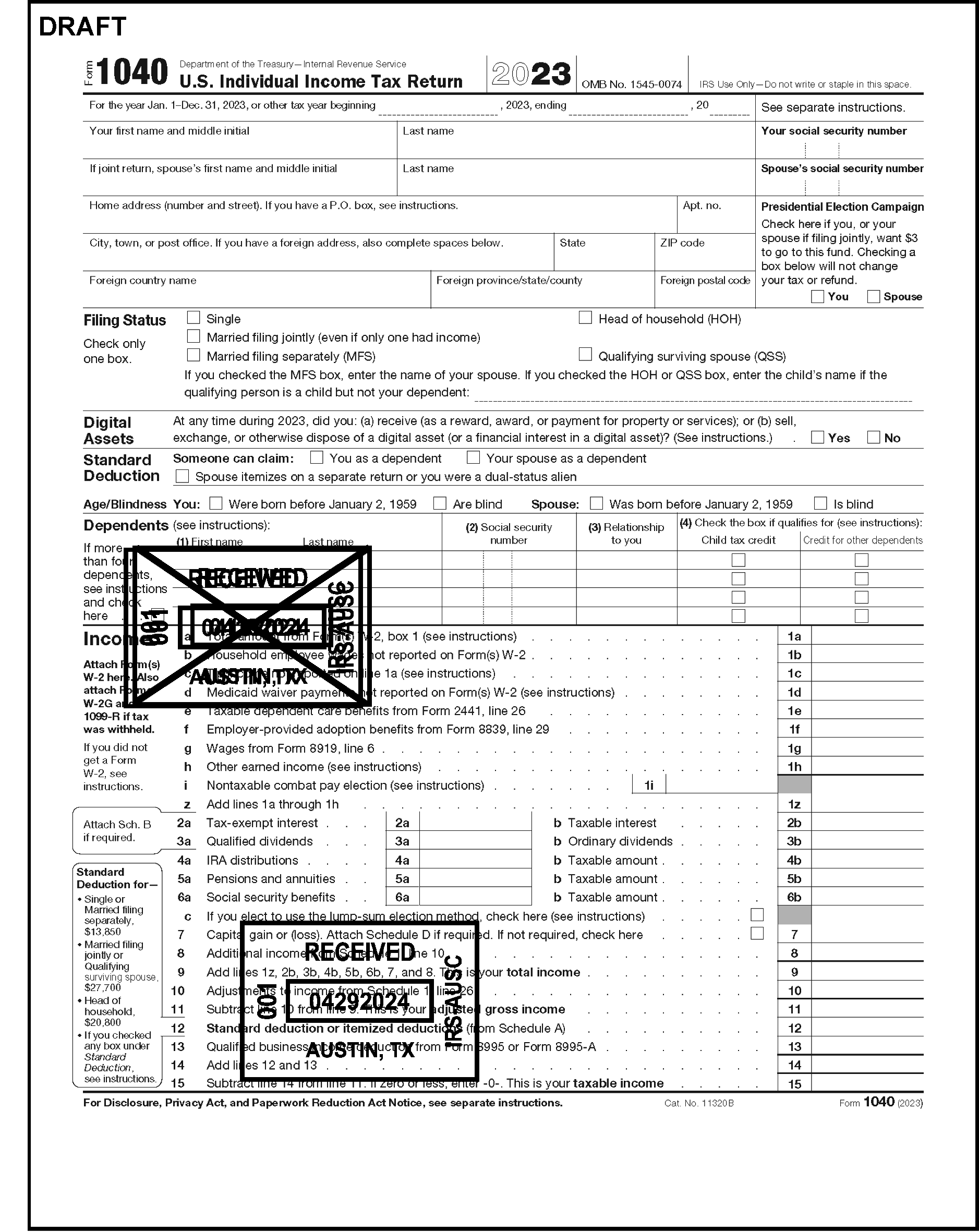
-
Occasionally, a return due date falls on a Saturday, Sunday or legal holiday. In this case, the return due date is considered to be the next business day. However, this does not extend the grace period. It is always calculated from the legal due date.
-
Honor the original IRS received date if a transshipped return has a received date present.
-
Refer to the following IRM Exhibits to determine date stamping requirements for the various document types:
-
Exhibit 3.10.72-6, Sorting Individual (IMF) Returns and Documents (AUSPC, KCSPC and OSPC)
-
Exhibit 3.10.72-7, Sorting Business (BMF) Returns and Documents (KCSPC and OSPC)
-
Exhibit 3.10.72-8, Sorting Non-Master File (NMF) Returns and Documents (KCSPC)
-
-
All Tax Returns and Extensions mailed from a foreign country are timely if the Foreign Postmark is on or before the prescribed due date (or within the grace period). Timely Mailing rule, IRC 7502 for the USPS only was expanded to include foreign postmarks when Rev. Rul. 2002-23 was issued. If mailed by a designated PDS (Private Delivery Service), the date accepted by the carrier is the postmark date. If foreign returns are received at a campus other than Austin (for IMF) or Ogden/Cincinnati (for BMF), date stamp them prior to transshipping.
-
Beginning in 2016, Beijing is the only foreign post where the IRS Received Date stamp is official. Accept the date as the official IRS received date.
-
≡ ≡ ≡ ≡ ≡ ≡ ≡ ≡ ≡ ≡ ≡ ≡ ≡ ≡ ≡ ≡ ≡ ≡ ≡ ≡ ≡ ≡ ≡ ≡ ≡ ≡ ≡ ≡ ≡ ≡ ≡ ≡ ≡ ≡ ≡ ≡ ≡ ≡ ≡ ≡ ≡ ≡ ≡ ≡ ≡ ≡ ≡ ≡ ≡ ≡ ≡ ≡ ≡ ≡ ≡ ≡ ≡ ≡ ≡ ≡ ≡ ≡ ≡ ≡ ≡ ≡ ≡ ≡ ≡ ≡"≡ ≡ ≡ ≡ ≡ ≡ ≡ ≡ ≡" ≡ ≡ ≡ ≡ ≡ ≡ ≡ ≡ ≡ ≡ ≡ ≡ ≡ ≡ ≡ ≡ ≡ ≡ ≡ ≡ ≡ ≡ ≡ ≡ ≡ ≡ ≡ ≡ ≡ ≡ ≡ ≡ ≡ ≡ ≡ ≡ ≡ ≡ ≡ ≡ ≡ ≡ ≡ ≡ ≡ ≡ ≡ ≡ ≡ ≡ ≡ ≡ ≡ ≡ ≡ ≡ ≡ ≡ ≡ ≡ ≡ ≡ ≡ ≡ ≡ ≡ ≡ ≡ ≡ ≡ ≡ ≡ ≡ ≡ ≡ ≡ ≡ ≡ ≡ ≡ ≡ ≡ ≡ ≡ ≡ ≡ ≡ ≡ ≡ ≡ ≡ ≡ ≡ ≡ ≡ ≡ ≡ ≡ ≡ ≡ ≡ ≡"≡ ≡ ≡ ≡ ≡ ≡ ≡ ≡" ≡ ≡ ≡ ≡ ≡ ≡ ≡ ≡ ≡ ≡ ≡ ≡ ≡ ≡ ≡ ≡ ≡ ≡ ≡ ≡ ≡ ≡
-
If an area has a designated "P.O. Box" (Compliance, TAS, etc.) and wants to extract their mail within the ventilated area, it should always be date stamped with the official IRS received date before it leaves Receipt and Control. Date stamp correspondence and any attached return(s). In addition, all returns, forms, and correspondence should be date stamped in Extraction before it gets to Second Sort or Batching.
-
The "general rule" is: If you date stamp, you attach the envelope. If in doubt, always date stamp. Refer to IRM 3.10.72.5.7.
-
Refer to IRM 3.30.123, Processing Timeliness: Cycles, Criteria and Critical Dates for due dates of returns.
-
When the due date of the return falls on a Saturday, Sunday or legal holiday, the return is considered timely if postmarked by the first business day after that date - IRC 7503. Refer to IRM 3.30.123 for information regarding state or District of Columbia holidays, in addition to Federal holidays "and Emancipation Day" . If you would like additional information, see IRM 3.30.123.2.2(5).
-
When a return is received after the grace period, the USPS postmark date or Foreign Postmark date, or the date the package was dropped off to a designated Private Delivery Service (PDS) determines timely filing. For First Class USPS mail, we will look for the Postmark Date to try to make it timely. If missing or illegible, continue processing. However, if the return was mailed USPS Certified and you cannot determine a timely Postmark Date, then go to the USPS Track and Confirm website and print the page to attach. The same instruction is applicable to designated Private Delivery Service mail. You only need to perform this extra step when there is an original return enclosed. For other documents, the function working the case can perform this research. The Extractor must either attach the envelope showing the postmark date, or the label from the PDS envelope/package.
-
When multiple returns are in one package, you must use a Dual Date stamp, or a single postmark date and received date on all subsequent documents following the first one. The first one is stamped with the received date and the envelope is attached.
-
If there is a single return in one envelope, stamp the received date and attach the envelope to the back with the postmark facing outward.
Note:
If the envelope was mailed USPS "Certified" and the postmark date is after the due date or missing, go to https://tools.usps.com/go/TrackConfirmAction verify "Acceptance" and "Date & Time" . Print and attach to the front of the document. See IRM 3.10.72.2.4.8(3) for further details. If it was mailed by a designated Private Delivery Service and the date and tracking number elements on the label are missing, use the chart in IRM 3.10.72.6.2.4(3) to estimate the date mailed based on the received date. If the Tracking Number is legible, then go to the carrier website and print the page to attach to the document.
-
-
This subsection contains procedures for determining the postmark date on mail received from a designated Private Delivery Service (PDS) or the United States Postal Service (USPS), including Private Metered mail delivered by the USPS.
-
The postmark date is used to determine timely mailing/timely filing. It is important that the extractor keep the envelope attached to a form or document when the postmark date is required.
-
IRC 7502(f) provides what is commonly called the "timely mailing-timely filing" rule.
Note:
Rev. Rul. 2002-23 added the "timely mailed/timely filed" rule under IRC 7502 to include Foreign Postmarks. Most foreign returns for people living outside of the United States or military personnel with an APO/FPO address have an additional 60 days to file their return. This ruling allows them the extra 60 days from the original due date to postmark their return or extension to be considered timely filed. The extension date is the same for foreign and domestic returns, based on the type of return (Form).
Exception:
Any "non-USPS" metered mail that has a date inconsistent with the normal delivery timeframe should not be used. Examples are "Click and Ship" , Pitney-Bowes stamps, and Private Metered, etc. An example of an inconsistent "Postmark" date would be April 15 and delivered on May 15. If the "normal" delivery time appears to be 7 days for USPS First Class mail, then do not consider the "self-made Postmark" as a valid date to determine timely mailing.
-
Use the following rules to determine the postmark date for mail delivered by the United States Postal Service (USPS), Private Metered (USPS), and designated Private Delivery Services (PDS).
-
If a container/envelope has both a USPS postmark and a private metered postmark, always use the USPS postmark.
-
If a container/envelope has only a private metered postmark, use it as the postmark date.
-
-
If the container/envelope is from a designated Private Delivery Services (PDSs) outlined in IRM 3.10.72.2.4.3, use the date on the "drop-off" date shown on the label (if provided) as the postmark, or use the rules for type of delivery service shown in IRM 3.10.72.6.2.4 (e.g., Next Day, Overnight, etc.)
-
If the tax return, payment, or extension is mailed USPS "Certified" and the postmark date is missing or later than the Due Date, you must find the postmark date via https://tools.usps.com/go/TrackConfirmAction using the digits underneath the bar code on the green label. The "Acceptance" and "Date & Time" is the postmark date. Give the envelope to a designated person with internet access to perform this action. If the Postmark is not the same as the "Acceptance Date" , print the page from the USPS website and attach it to the front of the document. Follow normal dual date stamping procedures, if multiple documents are enclosed in one envelope using the "Acceptance" date as the postmark date.
-
If there are multiple documents, Receipt and Control must stamp the received date on the first document and attach the envelope to the oldest tax period return, then stamp both the postmark date and received date on all subsequent documents contained in the envelope (or use a Dual Date stamp). If using single stamps, stamp the postmark date in the left margin and received date on the face (page one) of the document in an area that does not cover taxpayer information on all subsequent documents. This instruction is for USPS First Class mail (not Certified) and for non-designated Private Delivery Service mail. See IRM 3.10.72.6.2.4 below.
-
If the postmark is illegible, leave the postmark date portion blank, or "blank it out"
-
If the postmark is missing (i.e., only a bar code is sprayed by the USPS on the envelope, instead of a stamped postmark), edit "Missing" in place of the date portion of Postmark.
-
If the postmark is "incorrect/inconsistent" , edit "Incorrect" in place of the date portion of Postmark.
-
-
For U.S. Virgin Islands Cover Over Program, double stamp each return using the Postmark Date and Received Date provided by the P&A Staff.
-
A Private Delivery Service (PDS) is simply a business that delivers customers' documents and packages within an agreed upon delivery schedule, such as "Overnight" , "Same Day" Service, etc. The United States Postal Service, as well as DHL, Fed Ex, and UPS are recognized by IRS as Private Delivery Services (PDS's).
-
Rev. Proc. 97-19 provides the criteria used to determine whether a PDS qualifies as a designated PDS under IRC 7502(f).
-
Notice 2016-30provides the current list of designated PDSs and types of services that are recognized.
-
If the type of service is not specifically shown in this notice, it is a non-designated PDS (e.g., UPS Ground, a commonly used service, is a non-designated PDS). The postmark date is never an issue with a non-designated Private Delivery Service because their Postmark/Drop-off Date is not recognized under IRC 7502(f), which is the "timely mailed/timely filed" rule.
-
For USPS First Class mail, the postmark is generally easy to read and locate. However, if the postmark date is illegible, missing, or incorrect, the taxpayer must prove the postmark date; we will only stamp the received date. When the postmark date is illegible or missing or incorrect, do the following:
-
If the postmark date is illegible, and you need a postmark date for dual date stamping, leave the postmark date portion of the stamp "blank" , or "blank out" the date portion of the postmark date stamp (depending on the type of stamps your campus uses).
-
If the postmark date is missing (i.e., the USPS sprayed a bar code on the envelope in lieu of giving it a Postmark stamp), edit MISSING in the date portion of the postmark date portion of the stamp.
-
If the postmark date is incorrect/inconsistent, edit INCORRECT in the date portion of the postmark date portion of the stamp.
Exception:
If USPS "Certified" and the Postmark is missing, illegible, or after the Due date for the original return, use the digits below the bar code on the green label to find the "Acceptance" and "Date & Time" . Give the envelope to a designated person with internet access to determine the "postmark date" using https://tools.usps.com/go/TrackConfirmAction. Print the page and attach it to the front of the document, in front of the envelope.
-
-
For PDS mail, the postmark is sometimes visible on the shipping label because it gives the "drop-off" dates and expected delivery date. If illegible or missing, then use the chart below to determine the approximate postmark date since the type of service provides us an estimate of the "drop off" date. This calculation is based on the estimated delivery schedule of the carrier and IRS Receipt and Control Mail Room operations tour of duty for accepting deliveries.
-
Business days are Monday through Friday. Do not consider Saturday a pick-up or drop-off day. Be aware of any Holidays during the time you are subtracting business days to determine a postmark date.
If the Carrier is: And Type of Service is: Then Postmark Date is: USPS First Class (Correct Postage Stamp(s) or weighed and metered by the USPS) Stamped postmark date (or earliest one, if multiple Postmarks are present) USPS Private Metered Private Meter Date
(If consistent with normal delivery timeframe)USPS First Class If illegible, leave (or make) the date portion of the postmark date blank when following Dual Date stamp procedures. USPS First Class If blank or only a bar code is sprayed on the envelope by the USPS in lieu of stamping a Postmark – Edit "MISSING" for the date portion of the postmark date stamp when following Dual Date stamp procedures. USPS Certified/Registered Mail Stamped postmark date (or earliest one, if multiple postmarks are present) Note:
If missing or received after the Due Date of an original return, use internet (www.usps.com) to find "Acceptance" date.
USPS Express Mail Subtract 1 business day from the received date. USPS Priority Mail Subtract 3 business days from the received date. FedEx Note:
If the Postmark Date is illegible or missing, or by subtracting the estimated number of days is after the due date on any FedEx package, go to the website https://www.fedex.com/fedextrack, if it’s an original return enclosed. Print the page and attach to the front of the return.
First Overnight Subtract 1 business day from the received date. Subtract 3 business days from the received date. FedEx Priority Overnight Subtract 1 business day from the received date. FedEx Standard Overnight Subtract 2 business days from the received date. FedEx 2 Day FedEx International Next Flight Out Subtract 3 business days from the received date. FedEx International Priority Subtract 3 business days from the received date. FedEx International First Subtract 2 business days from the received date. FedEx International Economy Subtract 3 business days from the received date. UPS Note:
If the Postmark Date is illegible or missing, or by subtracting the estimated number of days is after the due date on any UPS package, go to the website http://www.ups.com/WebTracking/track?loc=en_US&WT.svl=PriNav(), if it’s an original return enclosed. Print the page and attach to the front of the return.
Next Day Air Early AM Subtract 1 business day from the received date. UPS Next Day Air Subtract 1 business day from the received date. UPS Next Day Air Saver Subtract 1 business day from the received date. UPS 2nd Day Air A.M. Subtract 2 business days from the received date. UPS 2nd Day Air Subtract 3 business days from the received date. UPS Worldwide Express Subtract 3 business days from the received date. UPS Worldwide Express Plus Subtract 3 business days from the received date. -
The number of business days to subtract is an estimate based on the carrier's predicted delivery time frames shown on their websites. For example, if the domestic package is guaranteed by 4:30 p.m., an additional day was added since this would actually be received after normal business hours at a Campus Receipt and Control operation. No delivery time is fully guaranteed, nor is consideration taken for time zone changes for International packages. If the suggested number of business days subtracted from the received date will make it late by only 1-2 days, or the package is mixed with other packages received earlier than the current date (i.e., peak time when we cannot open all receipts on the day received), then allow the extra day(s) to make it timely.
-
Documents received or secured by other official IRS facilities (i.e., Area Offices or other Campuses) and mailed with a Form 3210, Document Transmittal should have been date stamped appropriately. Taxpayer Assistance Center (TAC) employees must stamp all tax returns and forms including extension requests with an official IRS "Received" or "Received with Remittance" date stamp.
-
Calendar year Form 1040, Form 1040A, and Form 1040EZ
-
Form 940, Form 941, and Form 943
Note:
If you have the Form 3210 from the TAC site (not Taxpayer Advocate Service (TAS)) for one of the above forms and it is received in the Campus with No Remit after the grace period, do not stamp them. They will erroneously post as late filed. If the return was received in the TAC site With-Remit, they will always stamp it Received with Remittance. If you notice that a TAC site is not following the instructions for properly completing the Form 3210 or not following PII guidelines for shipping, you can write a note on their Form 3210 when you acknowledge it. The returns received from a TAC office or Campus Support site that are stamped either "Received with Remittance" or there is a "Green rocker" under the balance due line should be routed to Batching, unless remits are mixed in for the Teller Unit. If remits enclosed, route to the Teller Unit. Leave the Form(s) 3210 attached to the bundles of work. Follow local procedure to either have the entire box routed to the Teller unit to sort, or sort the ones With Remit and route the remaining with the Form 3210 to Batching. The Form 3210 should have the designation for Batching as either a "With-Remit" or "No Remit" . Batching will determine from the language on the Form 3210, or marks on the return whether to check the "RRPS" box on BBTS.
-
-
Some additional indicators of "Remittance received with Return" that should be sorted as "With Remit returns" for Batching are:
-
"RSPCC" stamped in blue, black, or green ink
-
"$" sign stamped in red, green, or blue
-
"P" (Partial Payment), "F" (Full Paid), or "R" (Remit) usually edited in the top side margin
-
"Green rocker" (a rocker is a curved line) under the "Balance Due" amount. Generally, if it’s a green "half-moon" line under the "Balance Due amount" , it means Full Paid; if an amount less than the Balance Due amount is edited to the side of the Balance Due line, it means Part Paid.
-
"Transaction Code (TC) 610" with an amount, or edited near the Balance Due line (indicates "Payment with Return" )
-
Form 3244, Payment Posting Voucher, is attached and an amount shown beside "610" box.
-
Green ink in the left corner of the return (KCSPC procedure for identifying Remit returns)
-
-
During peak times, some TAC Offices may route unopened Private Delivery Service (PDS) packages to the campus in a box with a Form 3210, since the Private Delivery Services cannot deliver to a "P.O. Box" . The envelopes are usually addressed to a Lockbox P.O. Box, but can be addressed to any IRS P.O. Box address. The enclosed Form 3210 will either have the Tracking Numbers listed on it, or a listing of the Tracking Numbers will be attached. Leave the Form 3210 in the package and route the box to the designated area (e.g., Teller Unit, Field Office, etc.) to extract the envelopes, post the payments, and acknowledge the Form 3210.
-
Campus Support sites and Field Offices (TAC sites) will process most payments through RS-PCC (Remittance Strategy for Payment Check Conversion). When the TAC site processes the check, they will stamp the return "Received with Remit" if Full Paid; if Part Paid, they will edit an amount beside the stamp. Campus Support will edit a "green rocker" under the Balance Due line for Full Paid and edit an amount in green if Part Paid. If the site cannot process a check through RS-PCC, they will continue to send these to the campus via Form 795 and Form 3210 addressed to the Teller Unit. All Forms 809 must be routed to the Teller Unit. The TAC sites and Campus Support will sort the shipment as "Remits" , "RS-PCC" , "No Remits" , and "CORR" (for Correspondence to be routed). All of these forms will be mailed daily overnight traceable mail. They can be mailed in two ways:
-
A single shipment addressed to the Teller Unit Stop # - Teller Unit will take out their designated envelope with the "Remits" (returns and checks to be processed along with Form 795 and Form 3210) and leave the remaining contents for Second Sort, then Batching. The "No Remit" Form 3210 should remain with the separate document types so that Batching will know which are "RS-PCC" and which are "Non-Remits" . "CORR" will be routed by Second Sort to the correct functional area. For "RS-PCC" documents, always check the "RPS Indicator" on BBTS.
-
Site will mail two separate envelopes, one to the Teller Unit Stop Number and another envelope addressed to the designated "No Remit" Stop Number with the "RS-PCC" , "No Remit" documents, and "CORR" sorted separately.
Note:
Do not put this mail into Extraction. It should be routed directly to Batching. Leave the Form 3210 attached. The Form 3210 for the "RS-PCC" and "No Remit" and "CORR" documents are to follow the time frame for "No Remit" acknowledgement and retention, but they can be signed and filed in another area. Refer to IRM 3.13.62.7.2, Media Transport and Control.
-
-
TAC sites date stamp all Extension Form 4868 and Form 7004 upon receipt, but if not stamped and the Release Date on the Form 3210 indicates the forms were received on or before the Due Date, consider them timely.
-
When documents are transshipped to a site for processing, verify the receipt of the document(s) in the package against the Form 3210, sign and date it, mail the copy back, and keep a copy for your files. This task can be performed in a centralized area. See IRM 3.13.62.7 for information regarding Form 3210. Notice the exception in (3) above.
Note:
If a package is received with a Form 3210, but it is addressed to a specific individual or function, route the package along with the Form 3210 to the recipient. They will acknowledge receipt of the package by signing the Form 3210 and returning the copy. Receipt and Control generally only signs Form 3210 for packages mailed "IRS to IRS" that include documents or returns that will be processed.
-
Any IMF return received from a Field Office, Campus Support, a BMF site (or a BMF site transfer a IMF return processed by their Lockbox) will have to be reviewed for a signature prior to batching. If the signature is missing and it was a Remit document, it must be dollar stamped or a "R" must be edited on the return prior to mailing it back to the filer.
-
If you receive a package of returns with Form 3185, Transfer of Return, attached, do not sign the Acknowledgement at the bottom of the Form. Route the entire contents to the area listed in the "To" box.
-
Be sure to report time on Form 3081 (time sheet) and volume of Form 3210 (drop a UPC card) using the designated OFP code 31-800-53020.
-
Field offices include Form 3210 transmittal listing items in the package. To acknowledge the field office documents on Form 3210 the technician verifies and marks Form 3210 with a distinctive check mark ✓ adjacent to each item received on the transmittal.
-
The technician will sign and date acknowledgement copy Form 3210 and must return it to the originator of Form 3210 within 10 business days.
-
The campus manager directs that the current day transmittals are separate from the previous days to ensure the earliest received dates are sent first.
-
Supervisors are responsible for conducting quarterly managerial review to ensure that procedures are being followed. Management may, at its discretion, conduct these managerial reviews at more frequent intervals.
-
Enterprise Electronic Fax (EEFax) will be the Servicewide standard for faxing by October 2017. Please refer to IRM 3.13.62.8.2.1.
-
Originators of packages are required to provide 2 copies of Form 3210 transmittals, one that will be used as an acknowledgement copy by the campus to return in the mail. If an acknowledgement copy is not provided, and you have to mail the transmittal, then photocopy the verified transmittal and mark "Acknowledgement Copy" , and return to the originator at the specific address listed on the transmittal. Refer to IRM 3.10.72.11, Transshipment Guidelines.
-
All returns received in the Campus with a remittance must be sorted, batched, blocked, and identified as "With Remittance" . All Lockbox Remittance and "RS-PCC" "Received with Remit" or "Green Rocker" or green edited amount returns received in the Campus must be sorted, batched, blocked and identified as "With Remittance (W/R)" if the transmittal indicates they had Remit. Refer to additional indicators shown in the subsection above to determine how to identify transshipped Remit returns. See IRM 3.10.72.6.2.5 (2).
-
Ensure that the With-Remit sort integrity is maintained with proper batching and blocking. "IMF Returns" received with a remittance and annotated with one of the following literals are to be processed as "Amended returns" and routed to Payment Perfection.
-
Amended
-
Copy
-
Corrected
-
Duplicate
-
Revised
-
Substitute
-
Supersedes
-
Tentative
-
-
Specific BMF Returns received with a remittance and annotated with one of the literals shown below are to be processed as Amended Returns and routed to Payment Perfection. In addition, all BMF amended returns ending with a "X" (e.g., Form 1120X, Form 941-X, etc.) are also routed to Payment Perfection, then ICT (or Compliance) for processing. Only the following forms with the specific "amended literals" are considered Amended: Form CT-1, Form 706, Form 709 series and/or 709-NA, Form 940 series, Form 941 series, Form 943 series, Form 944 series, Form 945 series, Form 1042, and Form 1120 series with one of the following notations.
-
Amended,
-
Revised, or
-
Corrected
-
-
Full-Paid category only pertains to current year timely-filed IMF returns.
-
Double check No Remit Form 706 and Form 709 for presence of a remittance, in addition to all Balance Due (original and Amended) returns/notices before forwarding to Batching or Estate and Gift Unit. It is important to extract all remits up-front to ensure we deposit all receipts daily into the Treasury.
-
Sort any Remit for $1 million or greater and route separately to Deposit. Follow local procedure to ensure any Refund of $1 million or greater is batched on same day as received.
-
"Perfect Remits" are defined as checks or documents that require no additional perfection or correction for processing. The perfect sort is intended to maximize the volume of data processed directly through the RPS function. Identify and sort perfect "with-remittance" items and route them directly to RPS.
-
"Perfect Remits" will have one remittance with a Return or Source Document attached (or a "loose" check) that contains all the items listed below:
-
Legible taxpayer name (either handwritten or typed) with no entity changes and numeric amount, and
-
No annotations on Check or Source Document (e.g., "Amended" , "Duplicate" , "Copy" , "Deceased" , "Estate" , "Substitute" , "Revised" , etc.), and
-
Primary TIN (9 digits with no hand-written changes) on Remit matches the source document, and
-
One or more Tax Period(s) indicated on Source Document or Check, with no taxpayer intent. Refer to (6) below for the exception.
-
-
If a "check with stub" is received with a Form/Return, place it behind the Form/Return and route to Pre-Batch.
-
If the payment is for a Form 5330 or Form 5558, it is only perfect if it includes all the items listed in (2) plus the Plan Number. Otherwise, route to PPU.
-
If the payment is for a Form 8038-T, it is only perfect if it includes all the items listed in (2) plus the Report Number. Otherwise, route to PPU.
-
If there are multiple checks and multiple source documents included in a package, try to match them up and make them "perfect" . For any that cannot be made "perfect" , route to PPU. If in doubt, route to PPU.
-
If there are multiple tax periods shown and the taxpayer has designated amounts to be posted to specific periods, route to PPU. (e.g., taxpayer writes a check for $100 and states, "apply $50 to 2013 and $50 to 2014" .) You must follow the taxpayer's intent when they specify how to post the Remit. However, multiple tax periods listed on a notice and one check attached does not indicate "intent" to post to a specific tax period.
-
Any Remit designated for a "Trust Fund Only" should be routed to PPU.
-
When signed returns have a "R" or "$" , etc. edited or stamped in the upper left corner, sort as a "Remit" document and identify as "Remit" returns when routing directly to Batching. Always date stamp.
-
An imperfect remittance return or document is one that does not meet one or more of the criteria in IRM 3.10.72.7.1, Perfect Remits for RPS or Transport.
-
Route all imperfect returns and documents to Payment Perfection Unit (PPU).
-
When sending remittance associated with documents to Payment Perfection, avoid attaching to the right side, near dollar information.
-
If the payment stub or voucher has an address change notated, it will be routed to Entity after the payment has been processed.
Note:
This includes all payment stubs that would normally be transshipped to a Campus Support site. This does not mean any payment with correspondence that someone would have to review. This means payment stubs from a Dual stub notice and there is nothing but a stub (with an address change) and a Remit. Campus Support sites do not have an Entity unit.
-
"No Remit" Balance Due Notices are routed according to the Routing Guide in Exhibit 3.10.72-3 (CP Notices) and Exhibit 3.10.72-2 (C Letters) and your local Maildex, or by the CFN in Exhibit 3.10.72-5. Leave returns attached to the back of the Notice or "C" letter, excluding the Exceptions shown below.
Note:
Some notices have a bar code located in either the upper right corner (above the Notice data) or directly above the title "Contact Information" on the stub portion. Do not date stamp over the bar code. This prevents other functions from scanning information embedded in the bar code.
Exception:
If a CP 11 or CP 12 or CP 59 or CP 63 or CP 759 or CP 2057, Form 8009-A or any "C" Letter (other than Letter 12C), is attached to a Form 1040-X, move the Form 1040-X to the top and route to Batching for ICT scanning to SP 1040-X. Exception, route to IMF ERS when a Letter 12C is attached to Form 1040-XIf a Form 944 is attached to a Letter 4148C, attach the letter to the back of the return and continue processing the return. If there is correspondence attached to the letter that requires a response by Accounts Management, route the letter to ICT. Make sure you date stamp the letter (e.g., Letter 4281A, Letter 4281B, Letter 4281C, Letter 4281E, Letter 4281F, Letter 4281G) and return if routing to another function outside of Submission Processing. Route the return to Batching. If a CP 05 or CP 05A is attached to a Form 1040-X, route to RIVO. Make sure you date stamp the notice and return if routing to another function outside of Submission Processing. If any of the BMF CSCO notices have correspondence requesting an Installment Agreement, etc., route the package (Correspondence with return) to CSCO, instead of separating them.
-
"With Remit" Balance Due notices should be processed using the following procedures:
-
All remittances must be associated with the proper notices.
-
Destroy the top part to perfect notices.
-
Scannable notices must be sorted by placing the notice on top of the check. See Figure 3.10.72-8 for examples of scannable notices.
-
Remove all staples from Notices and Checks to prevent any damage to the Transport equipment.
-
-
If a letter, notice, or Form is to be worked by "Accounts Management" , they should be scanned by the local ICT function in the site where received. The scanned document is electronically routed to the proper site for processing. Do not transship, unless specific instructions indicate a site and Mail Stop.
Note:
If any response to a CP 50X notice is received with a request for an adjustment or abatement of penalty, route to the local ICT for Accounts Management. Route to CSCO only when there is a clear indication of "can't pay" or "won't pay" and request for installments, or Form 9465, Form 433 series, or Form 2159 is attached.
-
When multiple IRS initiated notices/letters are sent back in the same submission, identify the one that was issued on the most recent date. Put that one on top and route the entire package to that function using the Routing Guide/IDRS number, etc.
-
If the taxpayer requests an "Extension of Time to File" via "white mail" , instead of the appropriate Form (i.e., Form 7004, Form 4868, etc.) route the Form With Remit with other Extensions to Deposit.
-
If a Form 8857, Innocent Spouse Relief, is attached to a notice/letter (front or back), detach it and write "Detached F 8857" on the correspondence. "Expedite" the Form 8857 to CSC, Stop 840F. Route correspondence to appropriate function.
-
If a Form 14039, Identity Theft Affidavit, is attached to a notice/letter (front or back), leave it attached. "Expedite" the package to the originating function (where you would normally route the notice).
Note:
If the Form 14039 is received "loose" or you receive correspondence referencing "ID Theft" , "stolen identity" , "victim of identity theft" , etc., date stamp and "expedite" to ICT, unless a Stop Number/Function/Employee Name is shown in the Address line on the envelope. In that case, determine proper routing to ensure form can be associated with controlling case file.
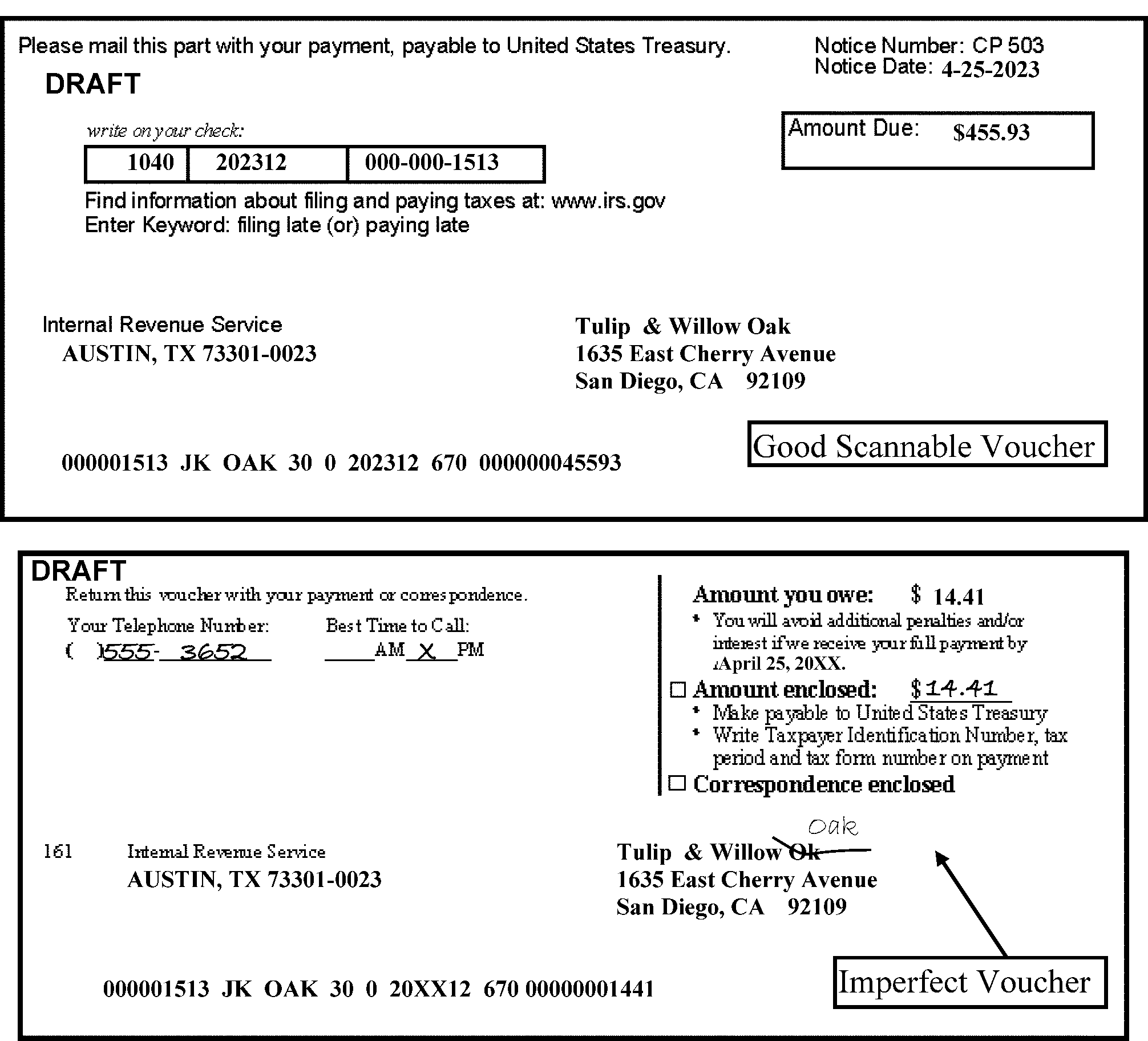
-
Refer to Exhibit 3.10.72-6 for IMF Sorting Instructions.
-
See IRM 3.10.72.12 for routing of Form 1040 series, Form 1040-X, and Extension forms. The charts contain specific notations that can be edited on a Form 1040 series return, as well as Forms or loose Schedule H (Form 1040) and proper routing instructions.
-
If you receive returns with an indication of "Streamlined" , date stamp (including Form 3520) and keep together as a package. If Remit attached, send the group of returns to Deposit, then transship to Stop 6063 AUSC. There may be some indication of "Non-Resident/Non-Filer" or "Streamline" program. Returns were due September 1, 2012, but there is no end date to the program.
-
If you receive a Form 1040 series return with an indication of "Relief for Certain Former Citizens" listed, date stamp and keep together as a package and route to mail Stop 4301 AUSC.
-
If any Form 1040 series return appears to be frivolous or possibly fraudulent, route to the "Funny Box" located within Receipt and Control. Representatives from RIVO and Frivolous Filer will review the returns in the box and decide if they should keep them for further investigation. Otherwise, they will "clear them" for processing and return them to Extraction. "RIVO" will stamp in the upper left corner of the return after they have reviewed it. The stamp does not verify the authenticity of the return and/or any attachments. Refer to IRM 3.10.72.17 for additional criteria for attempting to identify these returns.
-
If any Form 1040 series return is received with a Form 14039, Identity Theft Affidavit attached or "IDT" or "TC 971/522" edited in the top margin should be sorted separately and routed to Batching, instead of shelved. Refer to IRM 3.10.72.5.14 for specific instructions.
-
If a Form 14157, Form 14157-A and any Form 1040 series return are received in an entire package, route to ICT. Do not route the tax return for processing. Any "loose" Form 14157 will be routed to Atlanta, and a "loose" Form 14157-A will be routed to ICT. If any returned refund check, other than a Government check is attached, route to External Leads following procedures in IRM 3.10.72.5.5.
-
AUSPC Only - The President and Vice President of the United States tax returns should be addressed to the Campus Director. Alert your Planning & Analysis Staff Analyst when the returns are received. The Analyst will treat these returns as "walk-throughs" and follow procedures in IRM 3.28.3, Special Processing Procedures - Individual Income Tax Returns.
-
IMF tax forms received with No Remit, marked "965 Tax" or with the literal "SEC 965" or with an IRC 965 Transition Tax Statement attached, sort separately from other returns. Write "965" on the batch transmittal sheet.
-
If IRS initiated correspondence (or reference to correspondence) or a note is attached to the return inquiring about an issue with the attached return, treat return as part of the correspondence. Always move the correspondence notice/letter to the top and route to Second Sort. See "Exceptions" in (2) regarding Compliance notations and correspondence with a jurat. Do not route any returns with an indication of "ASFR" (or addressed to the ASFR mail stop or P.O. Box in Austin or Fresno) to Statute or for processing. Route to the ASFR unit following the instructions in IRM 3.10.72.16.7.
-
For the following IMF returns (including ones with special notations from Compliance functions), do the following:
If: Then: "ASFR" edited in the top margin, or a pink Form 3531, or Letter 2566 or Letter 2566R or Letter 3219-N attached or envelope addressed to the ASFR mail stop or P.O. Box in Austin or Fresno Do not route for processing. Refer to IRM 3.10.72.16.7 for the transshipping instructions or AUSPC or FSC will route to local ASFR unit. If a CP 59, CP 63, CP 759, Letter 143C, or Letter 4905 is attached to a IMF return and the Compliance function indicates on the "Sign here" line that the jurat on the notice/letter was signed and/or "TC 595" or "TC 599" or "Process as Original" is edited in the top margin of the return Move the correspondence to the back and continue processing. If a Form 1040-X is attached, route to Batching for ICT scanning to SP 1040-X; TC 59X does not have to be present when the taxpayer submits an "Amended" Return. If Letter 4281A, Letter 4281B, Letter 4281C, Letter 4281E, Letter 4281F, Letter 4281G is attached to an IMF return. Move the letter to the back and continue processing, if no correspondence is attached. If correspondence attached, write “Return Detached” and route letter to ICT and return to Batching. -
Any Form 14157, Return Preparer Complaint, Form 14157-A, Tax Return Preparer Fraud or Misconduct Affidavit with an attached Form 1040 series return(s) or Form 1040-X should be routed to ICT. If any "loose" Form 14157 is received, route to Atlanta; any "loose" Form 14157-A will be routed to ICT. If there is a returned refund Government Check attached, route it to Refund Inquiry. If there is a returned RAL check or debit card, route it to External Leads in Fresno following instructions in IRM 3.10.72.5.5
-
AUSPC Only - Continue to sort the ITIN (Form 1040 series with Form W-7) for delivery to ITIN for processing. If original documents such as Driver License, Passport, Birth Certificate are attached, place original documents in an envelope to protect them and attach the envelope securely to the back of the form with a binder clip or staple the envelope only if you can ensure the documents are not damaged. If a self-addressed envelope is attached for the return of original documents, leave with the ITIN Application.
-
AUSPC Only - Loose Original Identification Documents - If original identification such as passports, driver license or birth certificates appear to be NON-ITIN related and received without an associated form or correspondence (loose), place all original documents in a U.S. Government Messenger Envelope and expedite to ICT. If the documents belong to a specific area as indicated on any piece of attached correspondence, forward to the Mail Correspondence Team for correct routing.
-
Response Procedures - Move any "green" Form 3531 behind the return and continue processing. When a signed return comes back with the "R" box checked in the upper left corner of the "green sheet" or the return has an edited "R" or "$" in the top left margin, sort as a "Remit" document in a special sort to avoid an Unpostable condition. Date stamp the return anytime a payment is received with the response.
-
Some returns and documents with a remittance are received with a voucher. Ensure that the voucher belongs to the return or document.
-
Campuses have options on how they choose to process vouchers. Follow your local procedure.
-
Option #1 –
For current year return with a "perfect" voucher, separate the voucher and remittance from the return. Then, sort voucher as scannable (for Transport) and non-scannable (for RPS).
For current year return with an "imperfect" voucher, attach the voucher to the back of the return and route to Deposit. -
Option #2 –
Vouchers can be attached to the back of the return and routed appropriately.Note:
If there is a TIN or ITIN written above the scan line or anywhere else on the voucher or remittance that doesn’t match the scan line, treat as non-scannable and forward to RPS for manual processing. The Taxpayer may also submit a voucher without a TIN or ITIN written above the scan line but will manually write the correct TIN and tax period to which the payment is to be applied on a remittance such as personal check (PC) or money order based on form instruction guidance. For example, Form 1040 instructions advise the TP to, "Write “2023 Form 1040” or “2023 Form 1040-SR and your name, address, daytime phone number, and social security number (SSN) on your payment and attach Form 1040-V."
-
-
If a voucher is received alone (without remittance or without a return), destroy as classified waste.
-
If a voucher is received with a payment, but no return, sort as scannable, perfect, or imperfect. See Figure 3.10.72-9 for an example of a perfect payment voucher.
-
Destroy vouchers and instruction page attached to No Remit Form 940 and Form 941 to make them "perfect" .
-
OSPC will process Form 8813 vouchers. If there is an attachment to Form 8813 (e.g., Form 8804-C or Certificate), process the payment and route the attachment to Philadelphia Compliance Center (Philadelphia address, "Examination Branch 4-E08.142" ).
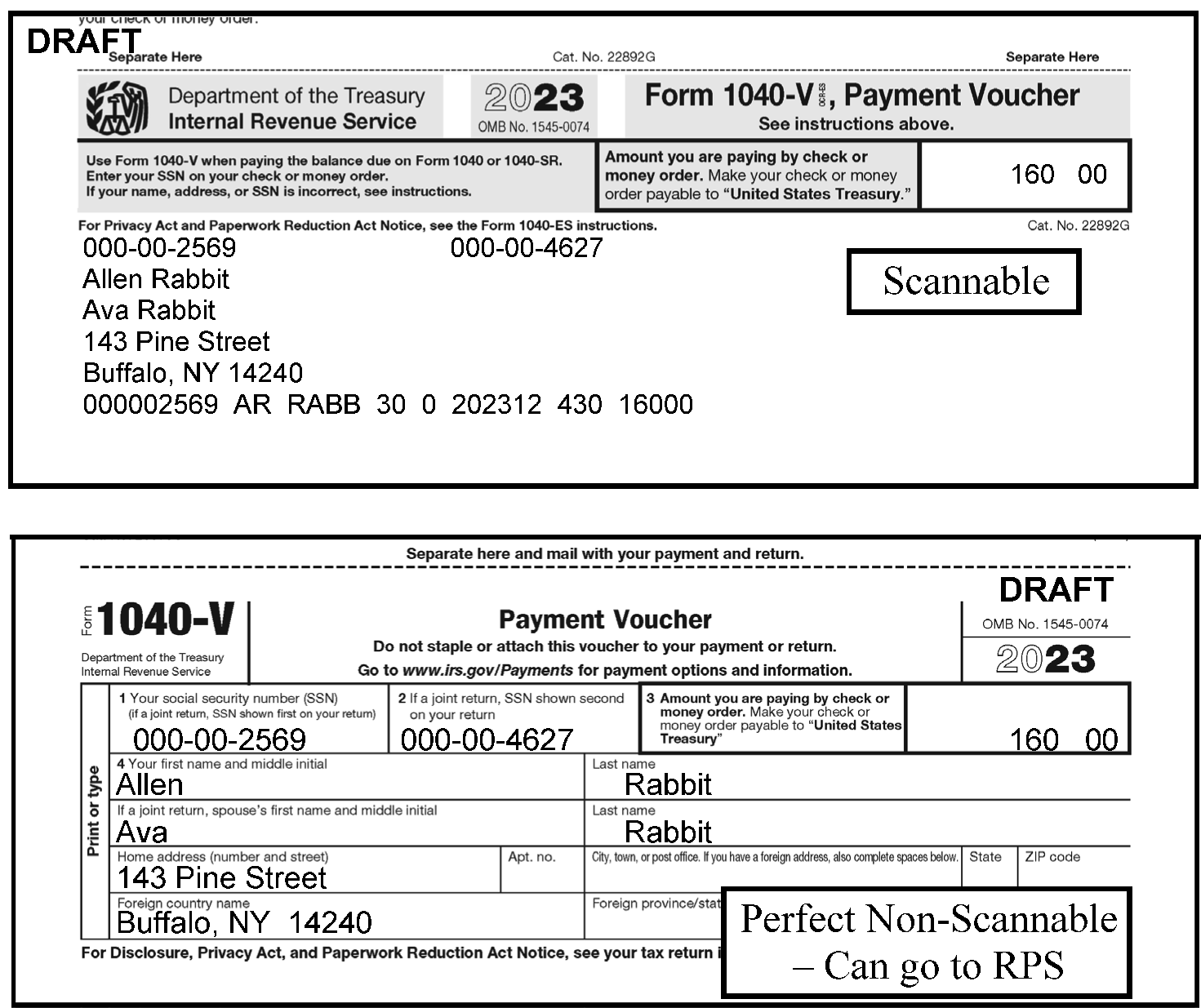
-
See Exhibit 3.10.72-7 for instructions for sorting BMF (including TE/GE) returns and documents.
-
BMF forms with any amount listed on the overpayment line must be sorted as "Refund Returns" . If no amount on the Balance Due or Overpayment line, use of the "Apply to next return" or the "Send a refund" box/entry ("Credit Elect" ) as a clue to sort as "Refund" .
-
This sort must not be discontinued at any time during the year. Neither special blocks nor special document codes must be set aside for refundable documents at the Headquarters level.
-
If a CP 211A is attached to an Exempt Organization return, leave it attached to the back and continue processing the return. Refer to IRM 3.10.72.5.7.
-
Certain sites have a "Funny Box" in Receipt and Control to place returns they identify as possibly fraudulent. Although some sites do not have a Funny Box in Receipt and Control, they should still identify any bulk receipts of possibly fraudulent returns or any type of threatening language attached that appears to be an imminent threat on correspondence or a return. Refer these to your manager. When a site receives empty envelopes or blank sheets of paper mailed to IRS, destroy as Classified Waste.
-
BMF tax forms (Form 1041, Form 1065, Form 1120, Form 1120-L, Form 1120-PC, Form 1120-REIT, Form 1120-RIC, Form 1120-S, Form 990-T) received with No Remit, marked "965 Tax" or with the literal "SEC 965" or with an IRC 965 Transition Tax Statement attached, sort separately from other returns. Write "965" on the batch transmittal sheet.
-
See Guidelines and Shipping Instructions for Packages Containing SBU and Sensitive PII Documents when items are sent through UPS by going to the following link: http://publish.no.irs.gov/mailtran/PTPhome.html. Follow any local procedures to ensure any shipments of packages containing Sensitive but Unclassified (SBU) and sensitive Personally Identifiable Information (PII) hardcopy is handled correctly. Be sure to use the specified heavy-duty boxes and make sure they are in good condition prior to shipping. Follow all of the PII procedures, including double-bag inside and a shipping label inside with the tracking number.
-
All misdirected work will go through the normal "With Remit" and "No Remit" sort in Extraction.
-
All misdirected work" With Remit" will be forwarded to Deposit.
Exception:
If a TAC/Area Office site stamped the return "Received with Remit" or Campus Support edited an amount in green or a "Green Rocker" on the Balance Due line, the check was already processed through RS-PCC. These returns should be identified with a Form 3210, Document Transmittal attached describing the type of returns received in the Campus Support or TAC office.
-
Any return with a tax period ending in 2020 or prior that needs to be transshipped should first be "Expedited" to your Statute Unit, prior to transshipping. Once the Statute Unit has stamped it "Statute Cleared" and returned it to Receipt and Control, then transship to the appropriate Campus. See IRM 3.10.72.5.5.2 for Exceptions for routing to Statute.
Exception:
Form 1040-X marked as "BBA Partner Modification Amended Return" . For all tax years beginning after January 1, 2018. BBA regulations allow the processing on these returns on accounts with imminent and/or expired statutes. These returns do not need Statute clearance for prior years. Transship to OSC BBA MS 4705.
-
Field Offices and Taxpayer Assistance Centers will forward all returns to the appropriate campus for processing. Even though all Campus Support sites and TAC offices can process payments using RS-PCC, the Teller unit will still receive some remits with returns in the Submission Processing Campus from the Field Offices.
-
The site receiving the misdirected work will process the remittance then transship the form or return to the designated campus for processing.
-
Any required date stamping will be done by the receiving site prior to transshipment. However, if Form 12153, Request for a Collection Due Process or Equivalent Hearing, has been date stamped by another site, and is transshipped to the proper ACS Support site (Philadelphia, Cincinnati, Kansas City, or Fresno), date stamp again upon receipt. In the following instances, the receiving site may not have access to an official IRS received date stamp. In this case, use the date on the Form 3210 as the official IRS received date on the documents.
-
Revenue Officers/Revenue Agents in the field
-
Unopened Private Delivery Service (PDS) envelopes (addressed to a P.O. Box) and forwarded to the campus from a TAC office. See IRM 3.10.72.6.2.5(2).
-
-
Misdirected tax returns do not have to be sorted by form type, nor counted. However, estimated volumes must be written in the "Description" section on the Form 3210.
-
The receiving site must ensure that each box has Part 1 (Recipient's Copy) and Part 3 Acknowledgement Copy) of the Form 3210 in the box clearly identifying the contents of each box. Every effort should be made to transship returns using Overnight service on the same day from the receiving site. Keep Part 4 (Originator's copy) and match up the Acknowledgement copy upon receipt and maintain both copies in your Files. Refer to IRM 3.13.62.7.2, Suspense Copies, Form 3210 for additional information.
-
After Deposit by a Submission Processing, Campus Support site, or a TAC office, the Form 3210 for "Remit" return(s) and "No Remit" returns(s) can be placed in the same box if space permits. Refer to IRM 3.10.72.6.2.5 for TAC office and Campus Support shipping procedures which have RS-PCC capability.
-
Forms should be placed in Box A-670C, Class domestic, style 2, class C (White boxes with black printing or "Records Retiring Boxes/Moving Boxes" ). Apply clear strong shipping tape to the box to ensure the contents are secure. Notate "TR" in big letters to make it clear to the receiving site that this box contains returns that need to be processed. Also write the abbreviation for your site next to the "TR" (e.g., TR-AUSPC). Route completed boxes to media transport to be shipped. However, do not write a notation if Remit inside box, but use a neon colored tape (or similar indicator) so the receiving site can easily recognize the box to immediately process. Also, be aware of the specific Mail Stop numbers assigned to the Teller Unit and transshipped returns mailed from other Submission Processing sites, Campus Support, and TAC offices. Call the Teller Unit as soon as a shipment is received with their Stop # in the address line or other marking indicating remits (e.g., neon colored tape on package).
-
Form 656, along with the Remit, should be shipped to the appropriate site. The Remit will be processed by Deposit in a Submission Processing site. Refer to IRM 3.10.72.16.3.
-
Use the following table to aid in sorting and routing timely filed Form 1040 series (and received after the grace period), as well as ones with notations or other Forms attached.
-
Use the following table to aid in sorting and routing Form 1040-X, Form 1040 series with notation of "Amended" , and CP 08, CP 09, CP 11, CP 12, CP 27, CP 59, CP 63, CP 759, or CP 2057 notices (either "loose" or attached to a Form 1040-X), any "C" Letter (other than Letter 12C) or Form 8009-A attached, as well as other notations on a Form 1040-X.
-
Form 1040NR, U.S. Nonresident Alien Income Tax Return(AUSPC only).
-
Sort into the following categories after major sort has been accomplished: Individual type entity (IMF or Fiduciary entity NMF): Effectively connected income (entry on line 8), due date April 15, or non-effectively connected income (no entry on line 8), due date June15 or all others.
-
Annotate Lloyd's of London Form 1040NR returns with cover memorandum denoting new accounts with "X" in the upper right corner of the return.
-
Form 1040NR (if Form 1040 present do not detach), Form 1040NR EZ, Schedule H-PR, Form 1040PR, Form 1040SS, Form 1040SS (NMI), Form 1040-GUAM, Form W-2AS, Form W-2GU, Form W-2VI, Form 1040A, and Form 1040EZ with a foreign address or IRC 911, IRC 931, or IRC 933 notated, Form 1042S, Form 4563, Form 5074 and those claiming Guam ES credits must be transshipped to AUSPC. When these forms are received at AUSPC, they will sort into separate categories.
-
Sort Form 1040NR-EZ into the following categories after major sort has been accomplished: Individual type entity (IMF or Fiduciary entity NMF): Effectively connected income (entry on line 3) due date April 15, or non-effectively connected income (no entry on line 3) due date June 15 or all others.
-
Sort Form 1040NR with Form W-7 attached (and no TIN on Form 1040NR) and route to ITIN unit. Place original documents in an envelope to protect them and attach the envelope securely to the back of the application with a binder clip or staple the envelope only if you can ensure the documents are not damaged.
-
If Form 1040NR has a Form 8288-A attached, do not separate.
-
Always stamp a received date, even when timely filed, if there is foreign Remit attached. If Lockbox did not date stamp the source document, stamp the appropriate date upon receipt at the campus. Edit "LB" beside the campus name.
-
-
Always Date Stamp Extensions forms and keep the envelope, unless you follow the alternate procedure shown in the paragraph below. If Remit attached, keep the envelope attached and route to RPS or PPU. Use the following chart to sort Extensions:
Type of Extension Request ≡ ≡ ≡ ≡ ≡ ≡ ≡ ≡ ≡ ≡ ≡ ≡ ≡ ≡ ≡ ≡ ≡ ≡ ≡ ≡ ≡ ≡ ≡ ≡ ≡ ≡ ≡ ≡ ≡ ≡ ≡ ≡ ≡ ≡ ≡ ≡ ≡ ≡ ≡ Correspondence request for Form 4868 extension with attached list(s) of foreign taxpayers Route to AUSPC Entity. Date Stamp Correspondence, attach envelope, route to AUSPC Entity. Form 2350 AUSPC - Sort for Batching to Code and Edit. AUSPC - Date Stamp, attach envelope, route to Batching. Form 2688 Sort with Form 4868 (with Attachments) to be batched for IMF Code and Edit. Date stamp, keep envelope, and sort with Form 4868. Form 4868 (Timely, No Remit and NO Attachments) with SSN Sort separately from ones with Attachments in a IMF Site.
N/AForm 4868 with Attachments with SSN Sort separately from ones with NO attachments in a IMF Site. Date Stamp, keep envelope, route to IMF Batching/Code and Edit. Form 4868 with SSN (Late Filed,≡ ≡ ≡ ≡ ≡ ≡ ≡ ≡ ≡ ≡ ≡ ≡ ≡ ≡ ≡)
N/ADate Stamp, keep envelope, route to IMF Batching/Code and Edit. Form 4868 has an EIN or "Applied For" is written in the "Your Social Security Number" box and has a Form 8892 With Remit attached Date stamp, keep envelope. Keep both forms together and route to KCSPC, Stop 6052-S1. Date stamp, keep envelope. Keep both forms together, date stamp both, and route to KCSPC, Stop 6052-S1. Form 4868 with an EIN rather than a SSN, and Name line includes Estate or Trust or Form 1040NR or Box 9 checked Date stamp, keep envelope. Route to CSC, Stop 312. Indicate "NMF" on the Form 3210. Date stamp, keep envelope. Route to CSC, Stop 312. Indicate "NMF" on the Form 3210. If there are groups of mail Form 4868 has an "ITIN" or "ITIN TO BE REQUESTED" is written in the "Your Social Security Number" box Date stamp, keep envelope. If Form W-7 is attached, date stamp both documents, sort 4868 then route Form W-7 and other attachments to ITIN, Stop 6090 in Austin. Date stamp, keep envelope. If Form W-7 is attached, date stamp both documents, sort 4868 then route Form W-7 and other attachments to ITIN, Stop 6090 in Austin. Note:
In subsequent days following the grace period, it is suggested that the sites "clean the mail" in the Receiving Area. This means that you should take a sample of the USPS trays to search for timely postmark dates. If there are specific USPS locations that did not deliver the mail timely to IRS, IRS Management should contact the USPS to report incidents. If you notice "timely postmarks" on "self-prepared labels" , such as "Click and Ship" , Private Metered, Pitney-Bowes metered mail and the delivery timeframe is inconsistent, do not sort these as "Timely" if received after the grace period.
-
Some sites elect the following alternative procedure for a few days immediately following the grace period which allows Extraction to look at the postmark date to determine whether forms are “Timely” or “Delinquent”, then sort for Batching. This procedure eliminates routing all No Remit Extensions received after the grace period to Code and Edit and re-batching into "Timely" /"Delinquent" blocks.
Note:
If the postmark date is missing or illegible on the envelope, consider it "timely filed" if signature date is on or before the due date and was received in a reasonable amount of time. If "self-prepared" postmark label shows timely mailed date and is received much later than the end of the grace period, sort as "Delinquent" . If mailed USPS "Certified" and the postmark date is after the due date, give to a designated person with internet access to find the "Acceptance" date on www.usps.com. See IRM 3.10.72.2.4.8(3). If a designated Private Delivery Service, see IRM 3.10.72.6.2.4(3).
-
If the Postmark is on the Due Date April 18 or prior, use the first chart; if postmark date is after the Due Date, use the second chart:
Sort # If Postmark Date is: And: Then, Date Stamp: Batching will route to: 1 April 18 or prior No Remit/No Attachment and Sort as Timely Numbering
(Function 190)2 April 18 or prior No Remit/With Attachment and Sort as Timely Code and Edit
(Function 210)3 April 18 or prior Remit and Sort as Timely Remit N/A Note:
If the "attachment" is a request for Acknowledgement, do not route to Code and Edit. Stamp the listing or letter, detach and route to designated area/person for mailing back to the taxpayer, and continue sorting the Extension. See IRM 3.10.72.5.4.
Sort # If Postmark Date is: And: Then Dual Date Stamp or Date Stamp and Attach Envelope: Batching will route to: 1 April 19 or later No Remit - With/Without Attachment sort as Delinquent Code and Edit
(Function 210)2 April 19 or later Remit route to Deposit Function N/A
-
-
AUSPC Only - Sort the Form 8453 package for Batching or routing to EPSS, Customer Support Services (CSS) as follows:
-
Route any prior year Form 8453 package to Numbering, then route to EPSS, Customer Support Services (CSS) on Form 3210.
-
Sort current year Form 8453 packages for Batching in priority order using the table below.
If And Then Form 8453 on top Form "8885 box is checked " (with or without a Form 1040 series attached) Sort as "8453-8885 " and route to Batching Form 8453 on top Form 1040 series is attached Route to EPSS, Customer Support Services (CSS) on Form 3210 Form 8453 on top No Form 1040 series attached Route to Batching -
-
General BMF Instructions
-
All Foreign and U.S. Possession address returns are filed in OSPC, except returns centralized in CSC.
-
All Estate and Gift tax returns are filed in KCSPC.
-
All Exemption Organization and Employee Plan (returns filed with IRS) are processed in OSPC.
-
All NMF processing is done in KCSPC.
-
Date stamp document and transship, when appropriate. When you receive a transshipped document that was date stamped by another IRS site, you do not have to date stamp again.
-
-
Keep all "Original" and "Amended" returns that come in together in a package and route to ICT. If either tax period/quarter is 2020 or prior, keep them together and route the package to the Statute Unit, unless there is an indication of "Net Operating Loss" ("NOL" ) or "Carryback" . Expedite the package to ICT. Refer to IRM 25.6.1, Statute of Limitations Processes and Procedures, if you have questions about a statute period on a particular form.
-
Most No Remit Returns require additional sorting to determine whether "Refund" or "No Refund" .
-
If there is an amount on the Balance Due lineor If there is an amount on the Balance Due line and one of the Credit Elect boxes is checked, sort as "No Refund" .
-
If there is an amount on the Overpayment lineor one of the "Credit Elect" boxes is checked/amount entered (e.g., "Apply to next return" , "Send a Refund" , etc.), sort as "Refund" .
-
If there is any inconsistency such as no amount on either the Balance Due or Overpayment line and no Credit Elect box is checked, or there is an amount on both the Balance Due and Overpayment lines, then sort as "Refund" for Code and Edit to make the determination. Refer to Figure 3.10.72-10 and Figure 3.10.72-11.
-
-
If Form 5604 is detached from a "Secured" /IRC "6020(b)" return for scanning or any other purpose, be sure to keep it with that document. For example, when performing pre-doc prep for documents to be scanned (e.g., Form 940 or Form 941), detach the Form 5604 and place in the back of the gusset folder with any other attachments. They are not processed even though they are signed. They are to remain with the controlling document and later attached to the back before filed.
-
Any CP 259, CP 259, CP 959, CP 518, Letter 112C, Letter 282C, Letter 2255C, or Letter 2284C with no correspondence requiring a response is attached to a BMF return, move it to the back and route the return package to Batching. If there is correspondence requiring a response, route to one of the CSCO sites shown below or ICT, then detach the return and route it to Batching.
-
Brookhaven - Stop 661
-
Memphis - Stop 81
-
Philadelphia - BLN 4-N31.142
-
-
Sort any remits for $1 million or greater and route separately to Deposit. Follow local procedures to ensure any refund of $1 million or greater is batched on same day as received.
-
Sort any "Future" Year/Future Quarter return with the "Current" Year/Quarter.
-
Refer to Exhibit 3.10.72-7 for BMF sorting instructions.
-
It is a Calendar Year return due on February 28th.
-
Sort No Remit forms into "Refund" versus "No Refund" . A refund return should have a money amount on the Overpayment line. If no amount on Balance Due line, sort as a "Refund" if money amount on the Overpayment line or"Apply to next return" box or"Send a refund" box is checked. See IRM 3.10.72.13(3). In addition to sorting "Refund" and "No Refund" , additional sorts are required for ISRP processing. The forms must also be sorted by the Form revision. The form revisions must be sorted as follows:
-
2025 and Later
-
2024 and 2019 and prior
-
2023
-
2022
-
2021
-
2020
-
-
Pre-screen all No Remit Form CT-1 marked with one of the following specific literals, or Form CT-1X to ICT.
-
Amended
-
Revised, or
-
Corrected
-
-
If a Form CT-1 is attached to a Form CT-1X, keep them together. Move the CT-1X to the front. Route the package to ICT.
-
It is a Quarterly return due the last day of May, August, November, and February.
-
If there is an entry on Line 4, or an explanation attached indicating a Correction, keep them together. Sort as a Form CT-2. Do not route any to ICT. All will be routed to Code and Edit.
-
Sort by form number: Form 706 (Domestic - Line 3a), Form 706 (International -block 3a), Form 706NA, Form 706GS(D), Form 706GS(T), and Form 709 series and/or 709-NA (International - block 5).
-
Sort all No Remit Form 706 series/Form 709 series and/or 709-NA returns marked with one of the following specific literal to Cincinnati FSO, Campus E&G, Stop 824G.
-
Copy,
-
Amended,
-
Revised, or
-
Supplemental
-
-
Sort No Remit forms into "Refund" versus "No Refund" . If the amount is bracketed (< >) on Line 20 on Form 706, consider it a "Refund" , since there are not separate lines for Balance Due and Overpayment. On Form 709 series and/or 709-NA , Line 19 is Balance Due and Line 18 is Overpayment.
-
Box 5, Date of Death, determines if the return needs to be routed to Statute.
-
Sort No Remit Form 720 into "Refund" versus "No Refund" . If no amount on Balance Due line, sort as "Refund" return if amount on the Overpayment line or"Applied to your next return" box or"Refunded to you" box is checked. See IRM 3.10.72.13(3).
-
Follow local procedure to ensure any Form 720with large dollar Remit ($1 million or more) is expedited to Deposit; sort any large dollar Refund to ensure it is batched on the same day as received.
-
Attach envelope to allForm 720 returns received upon receipt; Batching will date stamp, but if multiple documents received in same envelope, you will need to follow dual date stamp in Extraction. Use the following chart to sort them:
Sort Form 720 by: Comments: Current Quarter, and
Any Prior Quarter/Month EndingThere is no check box on the Form indicating the Quarter, but your manager should post the Current Quarter and Due Date. The "Quarter Ending" is entered by the filer on the top line, located to the right of the "Name" . $1 Million Dollar or more Remit attached "Walk it" to Deposit. Refund Sort all Refunds separately. Keep $1 million or greater Refund separately from others for Batching to work same day as received. $1 Million Dollars or more total tax Part 3, Line 3 PCOR (Patient Centered Outcome Research Fee) "#133" checked (first line in Part II checked – located on Page 2), or
Both" #133 and #136 " are checked with no other box(s) checkedTaxable Medical Devices "#136" checked (last line in Part I checked – located on Page 2) Other Taxes Any other box, except"#133 or #136" are checked, or
Both"#133 and #136" are checked with other box(es) checked -
Route all returns to Batching as "Expedites" . See IRM 3.10.73.8.2.1 for date stamping and additional sorting instructions.
-
If Form 720-X is attached for Form 720 has any indication, such as one of the following literals below, route to: Internal Revenue Service, Attn: Excise Tax Unit Stop 5701-G, 7940 Kentucky Drive, Florence, KY 41042
-
Amended
-
Revised, or
-
Corrected
-
-
Form 940 is an annual return due January 31.
-
If "Amended" (Box a.) is checked in the upper right corner, process through SCRIPS. However, if there is any handwritten indication, such as one of the following literals, route to ICT:
-
"Amended" ,
-
"Revised" , or
-
"Corrected"
-
-
No special sort is needed for IRC "6020(b)" returns.
-
Sort No Remit returns into "Refund" versus "No Refund" . A refund return should have a money amount on the Overpayment line. If no amount on Balance Due line, sort as a "Refund" return if money amount on Line 15/15a (Line 10 for older returns) or"Apply to next return" box is checked or"Send a Refund" box is checked. See IRM 3.10.72.13(3). See Figure 3.10.72-10 below for indication of "Refund" and "No Refund" returns.
Tax Year Form 940"Overpayment" Line # Form 940EZ"Overpayment" Line # 2025 and later 15a N/A 2006 -2024 15 N/A 2005 and prior 10 9 -
Returns received for Tax Year 2006 and later should be processed through SCRIPS.
-
Returns received with a Schedule R attached must be sorted and batched separately and processed through SCRIPS.
-
Sort Timely Filed (Current Year) returnswithout attachments and without extraneous writing in the Entity area (e.g., "Deceased" , "Final" , "Out of Business" , etc.) on Page 1 of the return as "Perfect" . These returns will be batched to by-pass Code and Edit.
-
Sort Delinquent Filed (Current Year and Prior Year) returns as "Imperfect" . These will be batched to be processed through Code and Edit. Future returns are to be included with Current Year returns and sorted as "Imperfect" .
-
Returns received for Tax Year 2005 and prior or the 2005 form revision regardless of Tax Year, foreign or U.S. Possession address (OSPC Only), or reprocessables must be processed via ISRP. The form revisions must be sorted as follows:
-
2025 and later
-
2024 and prior
Note:
Form 940-EZ has not been printed since the 2005 revision, therefore it will always be processed through ISRP.
-
-
Form 940(SP) will only be processed through ISRP. The form revision must be sorted as follows:
-
2023 and later
-
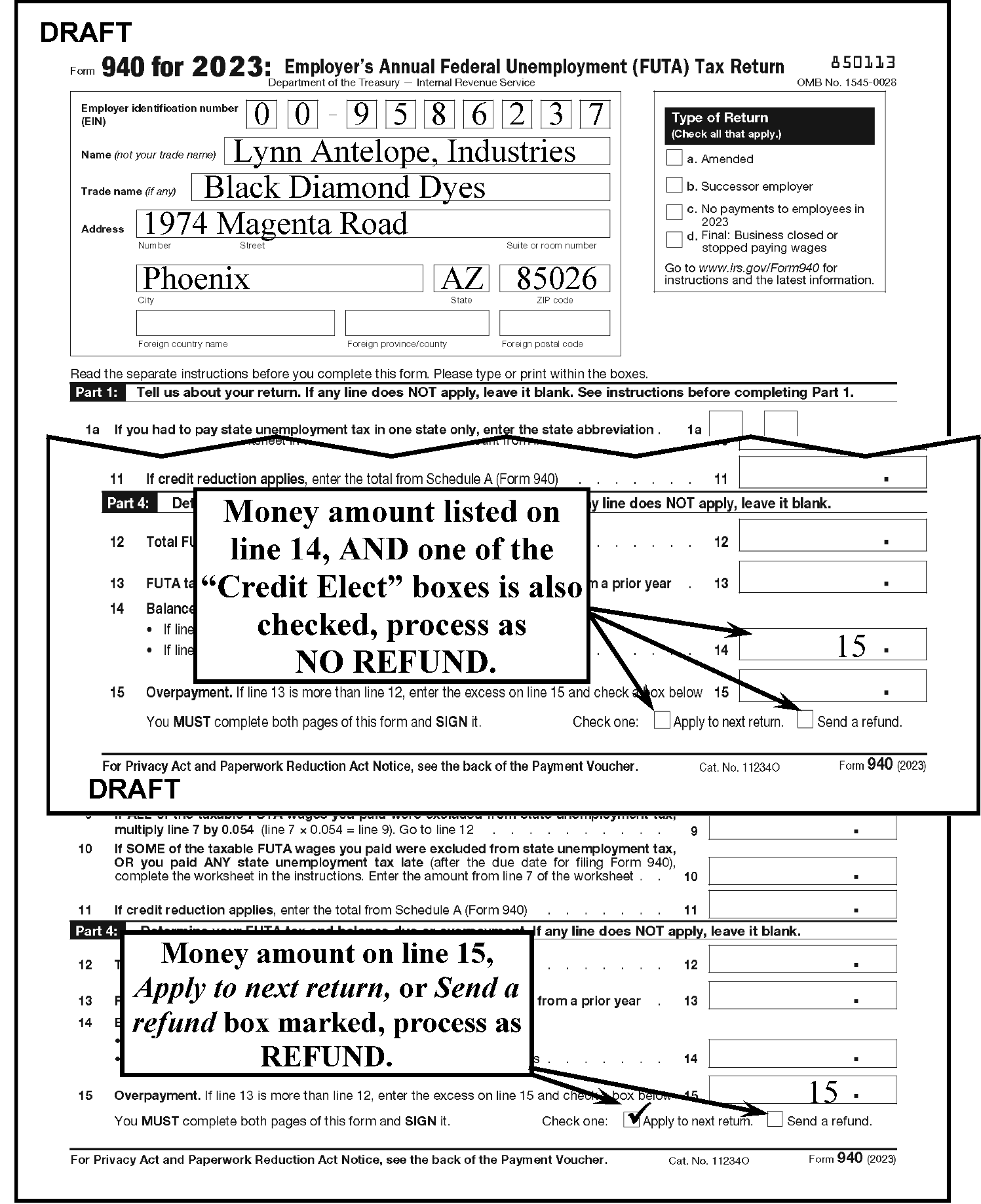
-
Form 940(PR) is an annual return and is due January 31.
-
If "Amended" box (Line E) is checked on the last line above Part I, process through ISRP. However, if there is any handwritten indication, such as one of the following literals, route to ICT.
-
Amended
-
Revised, or
-
Corrected
-
-
Sort No Remit forms into "Refund" versus "No Refund" . If no amount on Balance Due line, sort as a "Refund" return if money amount on Line 15/15a (Line 10 for older returns) or Spanish "Apply to next return" box is checked or"Send a Refund" box is checked. See IRM 3.10.72.13(3).
-
Process via ISRP. The form revisions must be sorted as follows:
-
2025 and later
-
2024 and prior
-
-
Form 941 is a quarterly return. The Tax Period ending months are 03 (due April 30), 06 (due July 31), 09 (due October 31) and 12 (due January 31).
-
Pre-screen all No Remit Form 941 marked with one of the following specific literals and route to ICT. There is no "Amended" check box.
-
Amended
-
Revised, or
-
Corrected
-
-
No special sort is needed for IRC "6020(b)" returns.
-
Form 941 received with a Form 941-C or a Form 941M should be kept together with Form 941 taking precedence. Do not detach the Form 941-C or Form 941 M.
Note:
The composite Form 941 must remain attached to Form 941M. A composite Form 941 will have Form 941M attached with the notation "Do Not Process" . These will be sorted as "Imperfect" for routing to Code and Edit on your initial sort. If a "loose" Form 941M is received, do not batch. Route directly to Code and Edit for them to forward to their P&A Analyst who will mail to another function, if appropriate.
-
Sort No Remit returns into "Refund" versus "No Refund" . If no amount shown on the Balance Due line, sort as a "Refund" return if money amount on the Overpayment line (see chart below) or"Apply to next return" box is checked or"Send a refund" box is checked. See IRM 3.10.72.13(3) and Figure 3.10.72-11.
Tax Year Form 941"Overpayment" Line # 2026 and later 15a 2017-2025 and 2013 through 2009 15 2016, 2015, 2014, 2008, 2007, 2006, 2005 13 2004 and prior 16 -
Tax Period 200503 and later quarters should be sorted and processed through SCRIPS.
-
Returns received with a Schedule R attached must be sorted and batched separately and processed through SCRIPS.
-
Sort Timely Filed (Current quarter) returns without attachments and without extraneous writing in the Entity area (e.g., "Deceased" , "Final" , "Out of Business" , etc.) on Page 1 of the return as "Perfect" . These returns will be batched to by-pass Code and Edit.
Remove (classify waste) filing instructions and/or interview sheets to make perfect if possible. -
Sort Delinquent filed (current and prior quarters) returns as "Imperfect" . These returns will be batched to be processed through Code and Edit All form revisions can be combined and do not require a separate sort. Future returns are to be included Current Year returns and sorted as "Imperfect" .
-
Returns received for 200412 and prior quarters, Reprocessables, "Walk-Throughs" , and foreign (OSPC Only) must be processed through ISRP.
-
Additional sorts are required for ISRP processing. In addition to sorting "Refund" and "No Refund" , the forms must be sorted by the Tax Form revision. Use the following table to sort for ISRP processing:
Tax Form Year Revision Quarter 2026 and Later All 2022 2nd quarter (Rev. June 2022) through 2023 4th quarter (Rev. March 2023) All 2022 1st quarter (Rev. June 2022) -2023 (Rev. March 2022) All 2021 2nd - 4th quarter (Rev. June 2021) All 2021 1st quarter (Rev. March 2021) All 2020 3rd - 4th quarter (Rev. July 2020) All 2020 2nd quarter (Rev. April 2020) All 2024-2025 2017 - 2020 1st quarter (Rev. January 2020) and 2013 and prior All 2014, 2015 and 2016 All
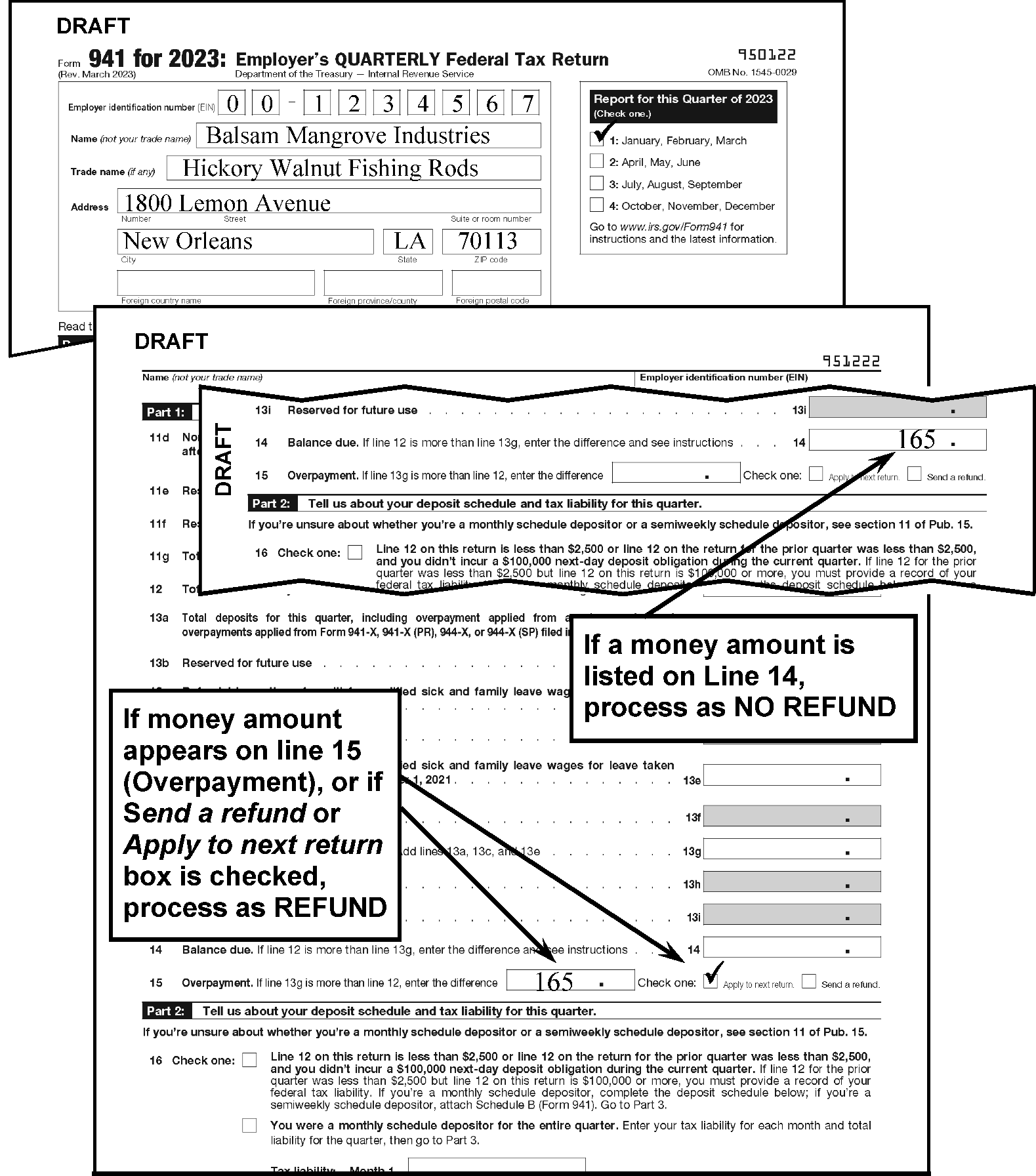
-
Route all "loose" Form 941-C, Form 94X-X, Form 941-X PR, Form 941-X SS, or Form CT-1X return to ICT for processing.
-
If Form 941-C is attached to a Form 941, Form 941M, Form 941-SS, Form 943, or Form 945, keep the package together and move the Form 941-C to the front. Route the package to ICT.
-
If the "X" return is attached to an "original" form, keep the package together. Move the "X" to the front. Route the package to ICT. If a Schedule R is attached, detach the Schedule R, send to SCRIPS and route the remaining forms to ICT.
-
Below is a list of original Form 94X and Form CT-1 returns and the Amended Return counterpart.
Original Return Form Number Will Use the Following Form 94X Return to Amend the Original: Form 941 & Form 941-SS Form 941-X Form 941(PR) Form 941-X(PR) Form 943 Form 943-X Form 943(PR) Form 943-X(PR) Form 944 & Form 944-SS Form 944-X Form 944(PR) Form 944-X(PR) Form 944(SP) Form 944-X(SP) Form 945 Form CT-1 Form CT-1X -
If a Form 5884-C, or Form 5884-D is received with an original return, amended return or correspondence, route to ICT.
-
When any Form 945-X, Form 1040-X, or Form 843 is received with "Tribal General Welfare Exclusion Act of 2014" , "H.R. 3043" , "Notice 2012-75" , "Revenue Procedure 2015-35" , or "General Welfare" written in the top margin (or identified as the issue), route to OSPC, M/S 7700, Attn: GECS. Do not route to ICT.
-
If Schedule R is received with amended 94X/ correspondence, detach the Schedule R, notate “R” in the bottom right of the amended 94X/ correspondence, send the Schedule R to SCRIPS, and route the 94X/ correspondence to ICT.
-
Form 941(PR) and Form 941-SS are quarterly returns. The periods ending are 03 (due April 30), 06 (due July 31), 09 (due October 31) and 12 (due January 31). If a Schedule R is attached, detach the Schedule R, send to SCRIPS and process the remaining forms through ISRP.
-
Pre-screen all No Remit Form 941(PR)/Form 941 SS marked with one of the following specific literals, or Form 941-X or Form 941-X(PR), and route to ICT.
-
Amended,
-
Revised, or
-
Corrected
-
-
If a Form 941(PR) is attached to a Form 941-X(PR), keep them together. Move the "X" to the front; if a Form 941 SS is attached to a Form 941-X, keep them together. Move the "X" return to the front. Route the package to ICT.
-
Sort the forms separately by form revision:
-
2026 and later
-
2022 2nd quarter (Rev. June 2022) - 2023 4th quarter (Rev. March 2023)
-
2022 1st quarter (Rev. March 2022)
-
2021 2nd - 4th quarter (Rev. June 2021)
-
2021 1st quarter (Rev. March 2021)
-
2020 3rd - 4th quarter (Rev. July 2020)
-
2020 2nd quarter (Rev. April 2020)
-
2024-2025, 2017 - 2020 1st quarter (Rev. January 2020) and 2013 and prior
-
2014, 2015 and 2016
-
-
Sort No Remit forms into "Refund" versus "No Refund" . If no amount shown on the Balance Due line, sort as a "Refund" return if money amount on the Overpayment line (see chart in IRM 3.10.72.13.7(5)) or Spanish "Apply to next return" box or"Send a refund" box is checked. See IRM 3.10.72.13(3).
-
Sort Timely Filed (Current quarter) returns separately from Delinquent filed (Current quarter) and Prior quarter returns.
-
Process Form 941(PR) and Form 941-SS via ISRP.
-
This is a calendar year return due January 31.
-
Pre-screen all No Remit Form 943 marked with one of the following literals, or Form 943-X and route to ICT.
-
Amended
-
Revised, or
-
Corrected
-
-
If a Form 943 is attached to a Form 943-X, move the "X" to the front; if a Form 943(PR) is attached to a Form 943-X(PR), move the "X" to the front. Route the package to ICT. If a Schedule R is attached, detach the Schedule R, send to SCRIPS and route the remaining forms to ICT.
-
Sort Form 943 and Form 943(PR) separately; then sort by form revision:
-
2026 and later
-
2023
-
2022
-
2021
-
2020
-
2024-2025, 2017, 2018, 2019, and 2013 and prior
-
2014, 2015 and 2016
-
-
Sort No Remit forms into "Refund" versus "No Refund" . If no amount shown on the Balance Due line, sort as a "Refund" return if money amount on the Overpayment line or English/Spanish "Apply to next return" box or"Send a refund" box is checked. See IRM 3.10.72.13(3).
-
In addition to sorting "Refund" and "No Refund" , the forms with a Schedule R attached must be sorted and batched separately.
-
No special sort is needed for IRC "6020(b)" returns.
-
This is a calendar year return due January 31.
-
Pre-screen all No Remit Form 944/Form 944(SP) marked with one of the following literals, or the Form 944-X or Form 944X (SP), and send to ICT.
-
Amended
-
Revised, or
-
Corrected
-
-
If a Form 944 is attached to a Form 944-X or a Form 944(SP) is attached to a Form 944X (SP), move the "X" to the front. Route the package to ICT.
-
Sort Form revisions separately:
-
2026 and later
-
2023
-
2022
-
2021
-
2020
-
2024-2025, 2017, 2018, 2019 and 2013 and prior
-
2014, 2015, and 2016
-
-
Not all taxpayers qualify to file the annual Form 944. Expedite process of the returns is necessary to ensure these taxpayers receive sufficient notification to timely file the quarterly Form 941. Therefore, the following expedite process needs to be followed:
Returns received between January 1st and February 7th Returns received after the grace period date and before the current year’s Program Completion Date (PCD) Returns received after the current year’s Program Completion Date (PCD) -
Sort timely filed No Remit forms into "Refund" versus "No Refund" .
-
Route both Refund and No Refund as "Expedites" .
-
Sort delinquent filed No Remit forms into "Refund " versus "No Refund" .
-
Route both Refund and No Refund as "Expedites" .
-
Sort timely filed No Remit forms into "Refund" versus "No Refund" .
-
Route Refund as "Expedites" .
-
-
No special sort is needed for IRC "6020(b)" returns.
-
Form 944(PR) and Form 944-SS Obsolete.
-
This is a calendar year return due January 31.
-
Pre-screen all No Remit Form 945 returns marked with one of the following literals, or the Form 945-X, and send to ICT.
-
Amended
-
Revised, or
-
Corrected
-
-
If a Form 945 is attached to a Form 945-X, keep them together. Move the "X" to the front. Route to ICT.
-
OSPC will sort foreign returns separately
-
Sort No Remit forms into "Refund" versus "No Refund" . If no amount shown on the Balance Due line, sort as a "Refund" return if money amount on the Overpayment line or"Apply to next return" box or"Send a refund" box is checked. See IRM 3.10.72.13(3).
-
The form revision must be sorted as follows:
-
2025 and later
-
2024 and prior
-
-
Calendar year returns are due May 15.
-
Fiscal year returns are due 4 1/2 months after the tax period ending date.
-
Sort Form 990 separate from Form 990-EZ.
-
There are eleven (11) separate sorts required for the Form 990 and eight (8) separate sorts required for the Form 990-EZ. These sorts are:
Form 990:-
IRC "501(c)(3)" returns – Form Revision 2016 and subsequent
-
IRC "501(c)(3)" returns – Form Revision 2014 and 2015
-
IRC "501(c)(3)" returns – Form Revision 2008 through 2013
-
IRC "501(c)(3)" returns – Form Revision 2007 and prior
-
IRC 527 returns - Form Revision 2016 and subsequent
-
IRC 527 returns – Form Revision 2014 and 2015
-
IRC 527 returns – Form Revision 2008 through 2013
-
IRC 527 returns – Form Revision 2007 and prior
-
All Other IRC returns - Form Revision 2016 and subsequent
-
All Other IRC returns – Form Revision 2014 and 2015
-
All Other IRC returns – Form Revision 2008 through 2013
-
All Other IRC returns – Form Revision 2007 and prior
Form 990-EZ:-
IRC "501(c)(3)" returns – Form Revision 2016 and subsequent
-
IRC "501(c)(3)" returns – Form Revision 2008 through 2015
-
IRC "501(c)(3)" returns – Form Revision 2007 and prior
-
IRC 527 returns – Form Revision 2016 and subsequent
-
IRC 527 returns – Form Revision 2008 through 2015
-
IRC 527 returns - Form Revision 2007 and prior
-
All Other IRC returns – Form Revision 2016 and subsequent
-
All Other IRC returns – Form Revision 2008 through 2015
-
All Other IRC returns - Form Revision 2007 and prior
-
-
If there is a pre-printed IRS label, sort according to the IRC (section number) on the label instead of what the filer indicated in the "Tax Exempt Status" or "Organization Type" check box.
-
Sort foreign addresses separately.
-
Any obsolete Form 990-C received will be sorted with Form 1120-C returns.
-
Applications will be sorted by Form 8717,Form 8718 and Form 1023.
-
Sort Remit and No Remit.
-
Use either a Dual Date stamp, or a Postmark and received date stamp on all Applications. Leave the following forms on top of the package, followed by any Form 2848 or Form 8821, then the cover letter, then remaining documents. Staple any check received with the package in the bottom left corner of the first page. Following are samples of document order- Form 1023, Form 1024, Form 5300, Form 5307, or Form 5310.
Order of Documents Sample #1 Sample #2 Sample #3 Sample #4 Sample #5 First Checklist Form 8718 Form 8717 Form 8717 Form 8717 Second Form 1023 Form 1024 Form 5300 Form 5307 Form 5310 Third Form 2848 Form 2848 Form 2848 Form 2848 Form 2848 Fourth Form 8821 Cover Letter Cover Letter Cover Letter Cover Letter Fifth Cover Letter Remaining Documents Remaining Documents Remaining Documents Remaining Documents Next Remaining Documents -
Remove all clips, dividers, blank sheets, notebooks, binders, metal prongs, tabs, etc. from applications. Put the dividers in the Candling buckets.
-
Do not destroy any material attached to the application, such as pamphlets, books, literature, etc.
-
If a Form SS-4 is attached and the EIN is missing, attach the Form SS-4 to the front of the application package. Edit "SS-4 enclosed" on the Application Identification Sheet.
-
The postmark date and return address should be kept with the package. Stamp the postmark date and received date at the bottom of the Application Identification Sheet, but do not stamp over the bar code.
-
Date stamp all Acknowledgements and return to the filer, if self-addressed envelope with postage is attached. Otherwise, date stamp and keep with the package.
-
Keep any Form 2848 or Form 8821 with the application.
-
Calendar year returns are due May 15. Fiscal year returns are due 4 1/2 months after the tax period ending date.
-
Sort Form 990-PF No Remit returns into "Refund " versus "No Refund" .
-
Sort prior year returns separately.
-
Sort foreign addresses separately.
-
Calendar year Form 990-T Corporation and IRC 501(c)(3) trust returns are due May 15. Fiscal year Form 990-T Corporation and IRC 501(c)(3) trust returns are due 4 1/2 months after the tax period ending date.
-
Calendar year Form 990-T IRC "401(a) Trust" returns are due July 15. Fiscal year Form 990-T IRC "401(a) Trust" returns are due 3 1/2 months after the tax period ending date.
-
If Form 8941 is attached to a Form 990-T, leave it attached. If stapled to the top, move it to the back and process as a Form 990-T.
-
If "Attachment to Form 4720" is annotated at the top of the Form 990-T, or there is a Form 4720 attached to a Form 990-T, do not separate them. Move the Form 4720 to the top and staple the Form 990-T to the back.
-
Sort No Remit into "Refund" versus "No Refund" . If no amount shown on the Balance Due line, sort as a "Refund" return if money amount on the Overpayment line or entry in either "Credited to 20XX estimated tax" or"Refunded" . See IRM 3.10.72.13(3).
-
Sort IRC "501(c)3 returns" separately.
-
Sort current year separately from Prior Year Forms 990-T.
-
Sort 2010 Forms 990-T filed for the "Credit for Small Employer Health Insurance Premiums" separately from the prior year Forms 990-T.
-
Form 990-T for "Credit for Small Employer Health Insurance Premiums" can be identified by no dollar amounts in Part I - Part II. The first line entry will be Part IV. If Form 8941 is attached, keep together.
-
Sort any 2020 and prior year Form 990-T and route to Statute.
-
This is calendar year return due July 15.
-
Sort No Remit forms into "Refund" versus "No Refund" and by form type. If no amount shown on the Balance Due line, sort as a "Refund" return if money amount on the Overpayment line or entry in either "Credited to 20XX estimated tax" or"Refunded" . See IRM 3.10.72.13(3).
-
Sort No Remit Form 1041 by:
-
Current timely filed calendar year (current processing year minus 1) - with Schedule K-1 attached or Without Schedule K-1 attached
-
1st Year Prior (Current processing year minus 2) - with Schedule K-1 attached and Without Schedule K-1 attached
-
2nd Year Prior (Current processing year minus 3) - with Schedule K-1 attached and Without Schedule K-1 attached
-
Prior Year (Current processing year minus 4 or more) - with Schedule K-1 attached and Without Schedule K-1 attached
-
Current fiscal and delinquent calendar year (current processing year minus 1) - with Schedule K-1 attached or Without Schedule K-1 attached
-
Future Year (current processing year) - with Schedule K-1 attached or Without Schedule K-1 attached
-
-
With remittance forms must be sorted as above following the deposit of remittance.
-
Route any "loose" Schedule K-1 to Code & Edit for association with parent return. Do not staple the envelope to the Schedule. Use dual date stamp and keep the envelope.
-
If an Exempt Organization (EO) return (e.g., Form 990 series, Form 4720 or Form 5227) is attached, stamp received date on all forms. Detach the EO return and transship to OSPC.
-
If a Form 1040 is attached to a Form 1041, always leave the Form 1040 attached. This includes returns that are marked Bankruptcy or have the bankruptcy box checked.
-
This is an annual tax return due March 15.
-
Pre-screen all No Remit Form 1042 returns marked with one of the following literals, or if the "Amended" box (located directly below the Tax Year) is checked, and send to ICT.
-
Amended
-
Revised, or
-
Corrected
-
-
Sort No Remit Form 1042 returns into "Refund" versus" No Refund" . If no amount shown on the Balance Due line, sort as a "Refund" return if money amount on the Overpayment line or entry in either "Credit on 20XX Form 1042" or"Refunded" . See IRM 3.10.72.13(3).
-
Sort separately Domestic, Foreign, and U.S. Possession.
-
If Form 1042-T /Form 1042-S, or Form 1042-S (without a Form 1042-T) are attached, keep the package together and process as a Form 1042. In this instance, sort as a Form 1042.
-
The parent Form 1042-T must not be separated from the Form 1042-S.
-
Form 1042-T and associated Forms 1042-S do not need Statute clearance.
-
If 1042-T is received with Form 1042, do not detach. Sort as a Form 1042.
-
Sort per year (future should be included with current year sort as there is no future sort). For example, 2018 will go as 2017 year for the TY 2017. Each year will have its own sort.
-
Stamp the received date on each Form 1042-T and each Form 1042-S.
-
If the Form 1042-S is received without a Form 1042-T, sort as a Form 1042-T.
-
The Form 1042-T is the transmittal for Form 1042-S. Send Form 1042-T with, or without Forms 1042-S to International Batching.
-
Sort Form 1065/Form 1065B as Current timely filed calendar year (current processing year minus 1).
-
1st Year Prior (Current processing year minus 2).
-
2nd Year Prior (Current processing year minus 3).
-
Prior Year (Current processing year minus 4 or more).
-
Current fiscal and delinquent current calendar year (Current processing year minus 1).
-
Future Year (Current processing year).
-
Sort No Remit forms into "Refund" versus "No Refund" and by form type. If no amount shown on the Balance Due line, sort as a "Refund" return if money amount on the Overpayment line.
-
OSPC Only -"Publicly Traded Partnership" , "Notice 98-3" , or "IRC 7704(g)(3)" notated on Form 1065 Only are sorted separately.
-
Form 1065 Only for 2010 - If "QTDP" or "Qualified Therapeutic Discover Credit" is indicated on the Form 1065 or written beside Line 22, indicated on a "loose" or attached Form 4255, or an indication on the check, route to Payment Perfection.
-
Route any "loose" Schedule K-1 to Code & Edit for association with parent return. Do not staple the envelope to the Schedule. Use dual date stamp and keep the envelope.
-
If a Form 1066, Form 1065, or Form 1065-B or any schedule(s) marked "Copy Only-Do Not Process" is attached to a Form 1065-X, leave the package together and route to ICT.
-
If the attached form(s) or schedule(s) is for a statute period, route to Statute Unit.
-
Examine boxes on the left of the entity portion of the Form 1120 and sort as follows by also looking at the Form Year revision.
Tax Year on Form Box Checked Title of Box Sort as: 2007 - 2017 1a Consolidated return (attach Form 851) Consolidated 2007 - 2017 1b Life/nonlife consolidated return Consolidated 2007 - 2017 2 Personal holding co. (attach Sch. PH) Special 2007 - 2017 3 Personal service corp. Special 2007 - 2017 4 Schedule M-3 attached Regular 2007 - 2017 None — Regular 2004 - 2006 1 Consolidated return (attach Form 851) Consolidated 2004 - 2006 2 Personal holding co. (attach Sch. PH) Special 2004 - 2006 3 Personal service corp. Special 2004 - 2006 4 Schedule M-3 required Regular 2004 - 2006 None — Regular 2003 1 Consolidated return (attach Form 851) Consolidated 2003 2 Personal holding co. (attach Sch. PH) Special 2003 3 Personal service corp. Special 2003 None — Regular -
Consolidated returns consist of a parent return with subsidiaries. Do not remove any returns or documents; treat as one return.
-
See Figure 3.10.72-12 for the various sorts.
-
Sort No Remit forms into "Refund" versus "No Refund " and by form type. If no amount shown on the Balance Due line, sort as a "Refund" return if money amount on the Overpayment line or entry in either "Credited to 20XX estimated tax" or"Refunded" . See IRM 3.10.72.13(3).
-
In the non-remittance category, sort Form 1120, Form 1120-A, Form 1120-C (OSPC), Form 1120-F (OSPC), Form 1120-FSC (OSPC), Form 1120-H, Form 1120-L, Form 1120-ND, Form 1120-PC (OSPC), Form 1120-REIT and Form 1120-SF refunds from other returns.
-
Sort timely filed, calendar year Form 1120 returns (this also includes Form 1120 and Form 1120S filed in September and Form 1120-C returns filed in March as a result of an extension) separately from prior year and fiscal year returns.
-
Sort Form 1120-A with Form 1120; if tax year ending (TYE) is 201711 and prior, sort as a Form 1120 prior year (PY); if TYE is 201712, sort as a current year Form 1120.
-
For Form 1120-F and Form 1120-FSC (OSPC only), perform the following additional sort:
If Then If Section II, page 3 indicates any money amount Sort as "Effectively Connected Income" (EC). All others Sort as "Non-Effectively Connected Income" (NEC). -
Any obsolete Form 990-C received will be sorted with Form 1120-C returns.
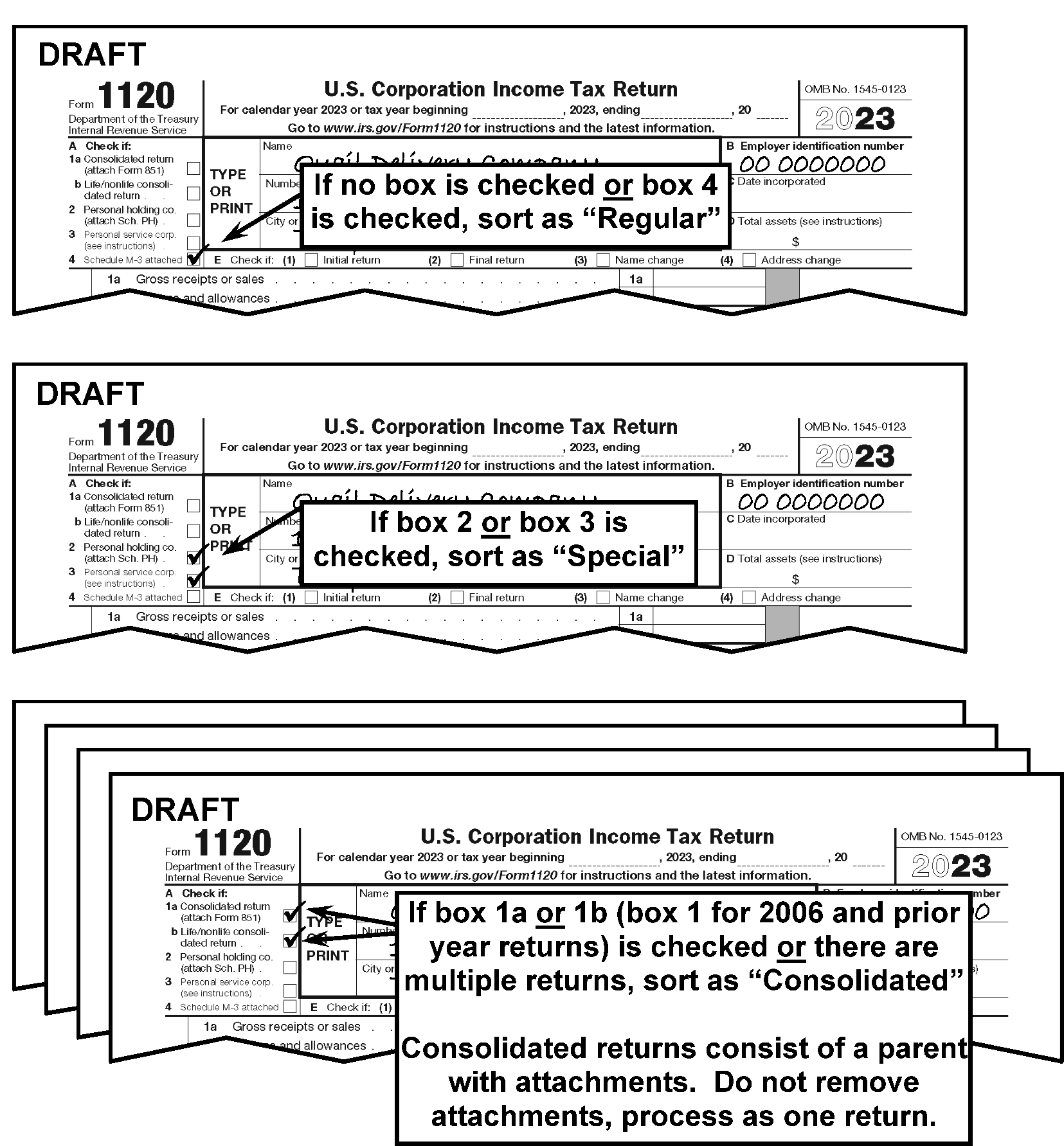
-
Calendar year returns are due March 15. Fiscal Year returns are due 2 1/2 months after the tax period ending date.
-
Sort No Remit Form 1120-POL returns into "Refund" versus "No Refund" . A "Refund " return should have a money amount on for Overpayment (Line 25).
-
Sort box for IRC "Section 501 (c)" checked.
-
Sort box for IRC "Section 501 (c)" not checked.
-
Sort Form 1120S returns as Current timely filed calendar year (current processing year minus 1).
-
1st Year Prior (Current processing year minus 2)
-
2nd Year Prior (Current processing year minus 3).
-
Prior Year (Current processing year minus 4 or more).
-
Sort Current fiscal and delinquent current calendar year (Current processing year minus 1).
-
Sort Future Years (Current processing year).
-
If Rev Proc 2013-30 or "Rev Proc 2007-62" is written in the top margin of the return and Current with Prior Year(s) return(s) is attached, with or without an attached Form 2553), keep all returns together and sort as Prior Year. If Current Year return only (no Prior Year return(s) attached), then sort it with other Current Year returns.
-
Route any "loose" Schedule K-1 to Code & Edit for association with parent return. Do not staple the envelope to the Schedule. Use dual date stamp and keep the envelope.
-
Keep Form 1120-X and multiple Form 1120 returns and attachments from the same taxpayer together.
-
If the attached Form(s) 1120 are for a statute period, route to Statute.
-
"Expedite" all Form 1120-X returns to ICT.
-
Form 2290 (other than Lockbox) will be treated as imperfect. Do not detach the voucher.
-
All Form 2290 returns received with a payment will be routed to Remittance Perfection.
-
Date stamp all Form 2290 returns. Code and Edit is required to date stamp Schedule 1.
-
Look at the Month and Year for the Period Beginning, instead of Month and Year Ending (found below the Title of the Form) to determine whether to route the return to Statute.
-
Form 3520-A is an annual information tax return due March 15.
-
Always sort as a No Remit return.
-
Always sort 2020 and later separate from 2019 and prior.
-
Stamp the received date on each Form 3520-A.
-
If a Form 3520 is attached to a Form 3520-A, leave it attached. Do not separate the forms. Continue processing as a Form 3520-A.
-
Multiple Form 3520-As received in the same envelope or box must be kept together. Date stamp each return and postmark. Secure returns together with elastic bands or paper clips, and release to the Batching Function.
-
Form 3520 is an annual information tax return due April 15.
-
Always sort as a No Remit return.
-
Always sort 2020 and later separate from 2019 and prior.
-
Stamp the received date on each Form 3520.
-
If a Form 3520-A is attached to Form 3520, leave it attached. Do not separate the forms. Continue processing as a Form 3520.
-
Multiple Form 3520s received in the same envelope or box must be kept together. Date stamp each return and postmark as needed, secure returns together with elastic bands or paper clips, and release to the Batching Function.
-
If the "Amended return" box on Line A is checked, route to ICT.
-
Form 4720 Calendar year returns are due July 15. Fiscal year returns are due 3 1/2 months after the tax period ending date.
-
Sort "Request for Abatement" or "Refund " returns separately.
-
If "Attachment to Form 4720" is annotated at the top of an attached Form 990-T, or there is a Form 990-T attached to a Form 4720, do not separate them. Move the Form 4720 to the top and staple the Form 990-T to the back.
-
All Form 5330 returns received with a payment will be routed to Remittance Perfection.
-
Sort International and U.S. Possession returns separately.
-
Form 5452 (Corporate Report of Non-Dividend Distributions) returns should be attached to a Form 1120 series return. Do not separate, if attached. If "loose" , route to Accounts Management.
-
Do not forward these to Headquarters.
-
Sort Tax Period 200912 and subsequent Form 5500-EZ returns separately from Tax Period 200812 and prior returns.
-
"Amended" , "Revised" , or "Corrected" returns should be processed with Current or Prior original returns. Do not route to Accounts Management.
-
Form 5500 and Form 5500-SF returns must be filed electronically. If any paper copies received, route to EP Entity, M/S 6273.
-
If any Form 5500-EZ has a Form 14704, Transmittal Schedule - Form 5500-EZ Delinquent Filer Penalty Relief Program (Revenue Procedure 2015-32) attached, sort separately and route payment with return(s) to Payment Perfection.
-
Form 5578 Calendar returns are due May 15. Fiscal year returns are due 4 1/2 months after the tax period ending date.
-
Route to Batching.
-
If an Extension form is attached to the front of a return, move it to the back.
-
Always date stamp extension forms and attach the envelope.
Note:
Use a Dual Date stamp (or postmark date and received date stamp) to stamp both the received date and the envelope postmark date on all Extension forms when multiple forms are received in one envelope received after the 23rd of the month. Extensions received on the 22nd of the month and prior, only stamp the extensions with the IRS received date. If "self-prepared" postmark label shows timely mailed date and is received more than 7 work days later, edit "Incorrect" for the postmark date. If a single form is in an envelope, always attach the envelope and stamp the received date.
-
Sort the Extension Form 7004 based on the code entered on Line 1, 1a, or 1b. Any Code "15" for Form 1120-F should be processed by OSPC. Sort these separately from the other Tax Class "3" forms, since they will be numbered with a FLC 60. See the table below for the sorts:
If the Code in Part I (Line 1a) or Part II (Line 1b) is: Then sort as follow by the DLN Tax Class: 08, 31 1 03 – 07, 09 or 27 2 11, 12, 16-26, 34, or No Code 3 15 3 (OSPC, sort as Foreign) 01, 02, 37 5 28, 29, 30, 32, 33, 35, or 36 KCSPC - NMF -
Form 2758, Form 8736, and Form 8800 are obsolete, but sort with Form 7004 with the same form type that is being extended. Or, you can sort the Form 2758, Form 8736, Form 8800, and the old revision of the Form 7004 separately and batch under the same 5th digit Program Code (as done by CSC).
-
Form 4768 filed for Form 706 series is worked in Cincinnati FSO, Campus E&G, Stop 824G. Then, it is sent back to Batching for pipeline processing.
-
Form 5558 is worked in OSPC. Sort into two sorts. When attached to a Form 5500-EZ or Form 5330, leave attached to the back.
-
Part II has an entry and Part III is blank, hyphen, or zero, or unable to determine, sort as Part II.
-
Part III has an entry and Part II is blank, sort as Part III.
-
If neither Part II or Part III is marked, sort as Part II.
-
If both Part II and Part III have entries, sort as Part III.
-
-
Form 8868 is worked by OSPC, unless the box for Form 6069 or Form 4720 (individual) is checked. These are worked by CSC.
-
If Remit is attached, route to Deposit.
-
If No Remit, route to ICT.
-
If correspondence received Requesting extension of Time to File and Time to Pay Form 6069, route to CSC, Stop 312.
-
-
Form 8892 is worked by KCSPC.
-
If an extension Form 5558, Form 7004, or Form 8868 is received with a Denial form/letter attached, refer to instructions below.
-
If an extension Form 5558, Form 7004, or Form 8868 is received with a Denial form/letter attached, do not batch. Route as Correspondence to Code and Edit for processing.
-
If there is a list of taxpayer's names who were denied an extension and the Denial form/letter is attached, route Correspondence to Code and Edit. Do not batch.
-
Most of these Denial Letters are the result of bulk mailings of Form 7004 (or other forms) and Extraction failed to use either the Dual Date stamp, or stamp all documents with the Postmark and received date stamps.
-
Sort forms with Amended Return box checked (in upper right corner) and route to Exempt Organization (EO) Accounts, M/S 6710 This includes Form 8038, Form 8038-G, Form 8038-GC, Form 8038-B, Form 8038-TC, Form 8328, and Form 8038-T.
-
Sort the Domestic, International, and U.S. Possession separately.
-
Sort Form 8038-CP returns identified with the following and route to TEGE SPP&O, M/S 1110:
-
Amended box checked or any indication the return is being amended
-
Return indicates it’s a "copy"
-
EIN is missing
-
-
Sort the Domestic, International, and U.S. Possession separately.
-
Date stamp and Expedite to appropriate area.
-
OSPC Only — Sort all originalForm 8288 for processing through pipeline in Ogden.
-
If any "Amended" Form 8288 is received with an original, attach it to the back of the original Form 8288 and continue processing.
-
If a Form W-7 is attached to Form 8288 and/or Form 8288-A, move Form W-7 to the back and process Form 8288.
-
-
AUSPC Only — If a Form W-7 is attached to Form 8288 and/or Form 8288-A, move Form W-7 to the top and route the package to the ITIN unit.
Note:
If original documents such as Driver License, Passport, Birth Certificate are attached, place original documents in an envelope to protect them and attach the envelope securely to the back of the Form 8288/Form 8288-A with a binder clip or staple the envelope only if you can ensure the documents are not damaged.
-
If an "Amended" Form 8288 (no original attached) or correspondence is received in reference to a Form 8288/Form 8288-A, route to C&E.
-
If the Transfer Date on Form 8288 is prior to December 13, 2005, route to KCSPC for NMF processing.
-
Form 8453-X should be routed to EO Entity, M/S 6273.
-
Form 8453-EX should be routed to OSPC e-Help Desk, Stop 1056.
-
If the EIN is missing, route to e-Help for perfection. Do not route to Entity.
-
All other Form 8453, including new Form 8453-FE and Form 8453-F (Obsolete), should be routed to the Ogden e-Help Desk, M/S 1056.
-
If one of these Forms is attached to a tax return, move to the back and sort appropriately.
-
When Form 8609 is received handle as follows:
If Form 8609 is Then Attached to a tax return Do not detach. Loose and both Part I and Part II are signed. ICT All others Forward to Philadelphia.
BLN 4-E08.141 -
When Form 8610 and Form 8609 (or only Form 8610) are received, handle as follows:
If Then Form 8610 with Form 8609 and other documents received Route to Code and Edit Form 8609 (no Form 8610) and other documents received Route to Low Income Housing Unit in Philadelphia, BLN 4-E08.141. Form 8610only Forward to Philadelphia, BLN 4-E08.141.
-
Sort forms with "Amended Return" box checked (in upper right corner) and route to Exempt Organization (EO) Accounts, M/S 6710.
-
Sort the Domestic, International, and U.S. Possession separately.
-
Form 8804, Partnership Tax return, is received annually (calendar or fiscal years) with Form 8805 information documents attached. DO NOT SEPARATE. Form 8805 does not require a separate received date stamp if attached to Form 8804.
-
Sort No Remit Form 8804 returns into "Refund" versus "No Refund" . If there is no amount on the Balance Due line, sort as a "Refund" if entry on the "Overpayment" , "Refunded to you" , or"Credited to next year's Form 8804" line.
-
If Form 8804 is received "loose" (i.e., no Form(s) 8805 attached), continue processing. If Form(s) 8805 are received "loose" (i.e., not attached to a Form 8804), you must look at the Copy (e.g., Copy A, Copy B, Copy C or Copy D) to determine the disposition.
-
Copy A and Copy D - staple together, date stamp the top copy, and route to Batching.
-
Copy B and Copy C - staple together, date stamp the top copy, and route to Accounts Management.
-
-
NMF Form 8804 – Transship Tax Period 200411 and prior Form 8804 to K so that it can be processed as a NMF document. The Statute Unit at KCSPC has Statute clearance jurisdiction.
-
BMF Form 8804 – Route all Form 8804 returns with a tax period of 201012 thru 202012 to the Statute Unit to be cleared.
-
Route all "Amended" Form 8804 or "Corrected" Form 8805 to Ogden, Exam, M/S 6552. The taxpayer is instructed to mail to "P.O. Box 409101" .
-
Form 8813 is a payment posting voucher. Route to Deposit Activity if remittance is attached.
-
Mail non-remittance Form 8813 with a Form 8804-C or a Certificate of Reduction Under Treasury Regulations 1.1446-6 or Treasury Regulations 1.1446-6T to Philadelphia, BLN 4-E08.142.
-
Form 8813 without remittance or attachments may be destroyed.
-
The form is used to elect the U.S. dollar as the functional currency of an eligible Qualified Business Unit (QBU), as defined in Treasury Regulations 1.985-2(b).
-
Loose Form 8819 will be received from the taxpayer in OSPC.
-
Upon receipt, take the following actions:
-
Date stamp loose Form 8819.
-
Route loose Form 8819 to Files, M/S 6722. Please include on the outside of the box/folder the received date for Files reference.
-
-
CP 249A, CP 249B, CP 249C, CP 259A, CP 259B, CP 259C, CP 259D, CP 259E, CP 259F, CP 259G, CP 403, CP 406, and CP 425, CP 426, CP 427, CP 428, CP 429, CP 430 should be transshipped to OSPC.
-
Notice or Correspondence attached to a Form 5500 series return.
-
A CP 403 or CP 406 attached to a Form 5500 series return will be left attached and routed to OSPC Employee Plan (EP) Entity.
-
Any other notice or correspondence attached to Form 5500 series return will be left attached and routed to OSPC Employee Plans (EP) Accounts.
-
-
Form 8955-SSA should be mailed to Ogden, M/S 6054. OSPC will date stamp and forward to Social Security Administration (SSA). OSPC will extract any item meant for IRS processing and route to the applicable function. OSPC will mail the Form 8955-SSA (no IRS documents or correspondence) to SSA at the following address:
Social Security Administration
Wilkes Barre Direct Operations Center
Attn: ERISA Process
1150 East Mountain Dr.
Wilkes-Barre, PA 18702-7797 -
If there is a Remit enclosed payable to Internal Revenue Service (Department of the Treasury, etc.), do not overstamp. "Hand-carry" package to PPU.
-
When the Form 8955-SSA is incomplete Route to Entity. Entity will contact the filer for the missing information with Letter 3064C. When the filer sends back their response to Letter 3064C the Form 8955-SSA needs to go back to SSA. The Form 8955-SSA is not to be imaged in CIS.
-
All correspondence for the Office of Tax Shelter Analysis (OTSA) should be identified by CFN 0051 or the package should be addressed to Ogden, M/S 4916.
-
Form 8023, Election Under Section 338(g) Corporate Qualified Stock Purchase, Form 8918, Material Advisor Disclosure Statement and CP 215 (PRN 634 or 636) are also routed to M/S 4916.
-
Mail Sorters area should identify the mail sorted to pocket "0051" , as well as the fats/flats addressed to ZIP code "84404-0051" or M/S 4916 and route to a designated employee (or back-up) daily. The designated employee will extract, date stamp, and prepare these documents to route via the truck on a daily basis. They will sort all form types separately, place them in a "holey-joe" envelope addressed to "M/S 4916, OCC" , and place in container for the URS truck.
-
Sort NMF forms "Refund " vs. "No Refund" . See IRM 3.10.72.13(3).
-
Refer to Exhibit 3.10.72-8 for NMF Sorting instructions.
-
Use the table below to have Form 1096, Annual Summary and Transmittal of U.S. Information Returns, Form 1094 B, Transmittal of Health Coverage Information Returns, and Form 1094 C, Transmittal of Employer-Provided Health Insurance Offer and Coverage Information Returns, sorted into a separate sort for the IRP Sort Unit to release to SCRIPS for priority processing.
If And Then Form 1096 (current processing year minus one) Transmitting Form 1099-NEC documents Place in Sort 1 Expedite (IRP Sort Unit) Form 1096 (Current processing year minus one) Transmitting documents other than Form1099-NEC Place in Sort 2 (IRP Sort Unit) Form 1096 (All prior years) Transmitting documents Place in Sort 3 (IRP Sort Unit) Form 1094 B Transmitting Form 1095 B Place in Sort 4 (IRP Sort Unit) Form 1094 C Transmitting Form 1095 C or Form 1094 C alone Place in Sort 5 (IRP Sort Unit)
-
Use the table below to have Form 8809, Application for Extension of Time to File Information Returns sorted separately for priority processing.
If And Then Form 8809 (All years) Transmitting documents with Line 6 box" W-2" or box "1099-NEC" checked Place in Sort 1 for Batch ID 15W2C Form 8809 (All Years) Transmitting documents without Line 6 box" W-2" or box "1099-MISC reporting NEC only" checked Place in Sort 2 for Batch ID ATC
-
This subsection contains procedures for Second Sort and routing of miscellaneous documents.
-
You should not receive any documents "From" Files. There are certain CP notices ("transcripts" ) that are generated in your local IT function that are routed to Files for processing. If they are accidentally delivered to Receipt and Control, instead of "IT to Files" , then route them to Files (e.g., CP 36 series).
-
When "loose" schedules or forms are discovered, attempt to find the related document.
-
If a Schedule K-1 (for Form 1041, Form 1065, or Form 1120-S is received "loose" or in response to a request via IRS correspondence, do not staple the envelope to the Schedule K-1. Always use the dual date stamp on the schedule. Route "loose" Schedule K-1 to Code & Edit to research for parent return using IRM 3.0.101.5.
-
If a Form 8879, "IRS e-file Signature Authorization" is received "loose" , destroy as Classified Waste.
-
If a Form 1099-SSA Social Security Benefit Statement is received "loose" , destroy as Classified Waste.
-
If any of the Form 8453 series, "Declaration for an e-file Return" (for BMF) is received, route it to the e-Help Desk in Ogden, M/S 1056.
-
If the Form 8453 for an Individual return, "U.S. Individual Income Tax Transmittal for an IRS e-file Return" is received in Austin, route it for processing as follows:
-
Route any prior year Form 8453 package to Numbering, then route to e-help on Form 3210.
-
Sort current year Form 8453 packages for Batching in priority order using the table below.
If And Then Form 8453 on top Form 8885 box is checked (with or without a Form 1040 series attached) Sort as "8453-8885" and route to Batching Form 8453 on top Form 1040 series is attached Route to e-help on Form 3210 Form 8453 on top No Form 1040 series attached Route to Batching -
-
Form 656, Form 656-A, Form 656-PPV received alone or with any attachments should be mailed to either Brookhaven (NY) or Memphis Campus, based on the State where the taxpayer resides using the chart shown below. Form 656-L and any attachment should be mailed to Brookhaven (Holtsville, NY). Prepare a Form 3210, Document Transmittal, and send daily by traceable overnight mail the Form plus any attachments. Route any remittance and forms to Manual Deposit.
-
If an Installment Agreement (Form 433-A, Form 433-A (OIC), Form 433-B, Form 433-D, Form 9465) or Form 2159 is attached, put the Form 656 on top and route the package using the table below.
-
IRS
5000 Corporate Ct. Stop 680
Holtsville, NY 11742
-
IRS
5333 Getwell Rd. Stop 880
Memphis, TN 38118
-
-
The Memphis Campus is "MSC" ; the Brookhaven Campus is "BSC" , located in Holtsville, NY. Once any remittance has been processed, route the accompanying correspondence to one of these sites, based on the taxpayer's state.
-
If Taxpayer Resides In: Mail to: If Taxpayer Resides In: Mail to: Alabama - AL MSC Montana - MT MSC Alaska - AK MSC Nebraska - NE BSC Arizona - AZ MSC Nevada - NV MSC Arkansas - AR MSC New Hampshire - NH BSC California - CA BSC New Jersey - NJ BSC Colorado - CO MSC New Mexico - NM MSC Connecticut - CT BSC New York - NY BSC Delaware - DE BSC North Carolina - NC MSC District of Columbia - DC BSC North Dakota - ND BSC Florida - FL MSC Ohio - OH BSC Georgia - GA MSC Oklahoma - OK MSC Hawaii - HI MSC Oregon - OR MSC Idaho- ID MSC Pennsylvania - PA BSC Illinois - IL BSC Puerto Rico - PR BSC Indiana - IN BSC Rhode Island -RI BSC Iowa - IA BSC South Carolina - SC MSC Kansas - KS BSC South Dakota - SD BSC Kentucky - KY MSC Tennessee -TN MSC Louisiana - LA MSC Texas - TX MSC Maine - ME BSC Utah -UT MSC Maryland - MD BSC Vermont - VT BSC Massachusetts - MA BSC Virginia - VA BSC Michigan - MI BSC Washington - WA MSC Minnesota - MN BSC West Virginia - WV BSC Missouri - MO BSC Wisconsin - WI MSC Mississippi - MS MSC Wyoming - WY MSC
-
-
The processing of all third-party authorization requests submitted on Form 2848 and/or Form 8821 are centralized and must be transshipped to one of the three sites, based on the filer's state:
-
Ogden, M/S 6737
-
Memphis, Stop 8423
-
Philadelphia (International), 4-H14.123
Note:
Receipt and Control Second Sort function will only sort and mail the Form 2848 if received "loose" in Extraction. If another area detaches them, they will sort and route them to the Shipping area to be mailed to one of these sites. They should sort these Forms and rubber band them together with a Form 3210 (completed with the Mail Stop #) so they can be routed or shipped directly to the proper CAF function. Do not detach a Form 2848 from any return or piece of correspondence.
-
-
Find the taxpayer's state in the entity section of the Form 2848 or Form 8821 and use the chart below to determine correct routing. International and U.S. Possession addresses, and ITIN (number begins with 9 and the two middle digits range between 50-65, 70-88, 90-92, 94-99) will be routed to Philadelphia.
Note:
If any of the following international forms are listed on Line 3, Form 2848 or Line 3(b), Form 8821, Form 2848 and Form 8821 will be routed to Philadelphia regardless of the taxpayers state found in the entity section: Form 1040-NR, Form 1040-PR, Form 1040-SS, Form 1042-S, Form W-7, Form 8288-A, Form 8804, Form 8805.
If taxpayer resides in: Mail to: If taxpayer resides in: Mail to: Alabama - AL Memphis Nebraska - NE Ogden Alaska - AK Ogden Nevada - NV Ogden Arizona - AZ Ogden New Hampshire - NH Memphis Arkansas - AR Memphis New Jersey - NJ Memphis California - CA Ogden New Mexico - NM Ogden Colorado - CO Ogden New York - NY Memphis Connecticut - CT Memphis North Carolina - NC Memphis Delaware - DE Memphis North Dakota - ND Ogden Florida - FL Memphis Ohio - OH Memphis Georgia - GA Memphis Oklahoma - OK Ogden Hawaii - HI Ogden Oregon - OR Ogden Idaho - ID Ogden Pennsylvania - PA Memphis Illinois - IL Memphis Rhode Island - RI Memphis Indiana - IN Memphis South Carolina - SC Memphis Iowa - IA Ogden South Dakota - SD Ogden Kansas - KS Ogden Tennessee - TN Memphis Kentucky - KY Memphis Texas - TX Ogden Louisiana - LA Memphis Utah - UT Ogden Maine - ME Memphis Vermont - VT Memphis Maryland - MD Memphis Virginia - VA Memphis Massachusetts - MA Memphis Washington - WA Ogden Michigan - MI Memphis Washington D.C. - DC Memphis Minnesota - MN Ogden West Virginia - WV Memphis Mississippi - MS Memphis Wisconsin - WI Ogden Missouri - MO Ogden Wyoming - WY Ogden Montana - MT Ogden -
Forms will be transshipped on a daily basis via overnight traceable mail (UPS Overnight with a Form 3210) to the appropriate campus using the following addresses, including the Mail Stop.
If the Site is: Mail to this address: Memphis IRS
Stop 8423
5333 Getwell Rd.
Memphis, TN 38118Ogden IRS
Stop 6737
1973 Rulon White Blvd.
Ogden, UT 84201Philadelphia (for International Only) IRS
Stop 4-H14.123
2970 Market St.
Philadelphia, PA 19104-5016
-
Taxpayers may obtain permission to pay a tax liability in installments by filing a Form 9465, one of the Form 433 series, or simply attaching a statement requesting it. Taxpayers can also request Payroll Deduction to satisfy their tax liability by filing Form 2159.
-
\If you notice an Installment Agreement form, date stamp the request, detach it and route to CSCO function using the chart below. Route the return for processing.
-
If an Installment Agreement form is attached to a CP 14 series, CP 210, CP 220, CP 501, CP 503, or CP 504, date stamp and route to CSCO using the chart shown below.
-
If there is an Agreement (Form 9465 or Form 433 Series (except Form 433-A(OIC) or Form 2159) received "loose" or attached to a notice, date stamp and route to the CSCO site shown in the chart below. Always check the envelope to see if it is specifically addressed to a function, Mail Stop, etc. and route accordingly.
Note:
If there is a check attached with "VOID" written across it, do not consider this a Remit. Keep the check with the form and route the package to the designated CSCO site using the chart shown below.
If a Form 9465, Form 433 series, or Form 2159 is received by itself or is attached to a CP 14 series, CP 210, CP 220, CP 501, CP 503, CP 504, or CP 504B and is received in: Route IMF Forms/Notices (ones with SSN) to Compliance Services Collection Operations (CSCO): Route all BMF Forms and CP 504B Notices to Compliance Services Collection Operations (CSCO): AUSPC Stop 81103 FSC OSPC, M/S 5500 CSC BSC, M/S 660 BSC, M/S 660 FSC Stop 81103 FSC OSPC, M/S 5500 KCSPC Stop P-4 5000 Memphis, Stop 811 OSPC M/S 5500 M/S 5500 Note:
Any received with an International address or from Puerto Rico should be routed to Philadelphia, Stop 4-N31.142 PSC.
Exception:
If a Form 656 or Form 433-A (OIC) is attached, route to COIC. Refer to IRM 3.10.72.16.3 for mailing addresses.
-
If there is Remit attached to an Agreement (Form 9465 or Form 433 Series, whether it is "loose" or attached to a tax return, date stamp and route to Deposit.
-
If there is stub (either Remit or correspondence one, with No Remit) attached to an Agreement (Form 9465 or Form 433 Series), route the "package" to CSCO using the chart shown above.
-
CSC does not have a CSCO site, but they have ACSS. If CSC receives any piece of mail that is addressed to ACSS (Stop 813G, Stop 814G, or P.O. Box 145566), it belongs to ACSS in CSC. Do not transship to CSCO in Memphis.
-
Any return with a Form 668 series attached should generally be routed to ACS or ACS Support. Check the envelope to see if it is specifically addressed to a function, ACS P.O. Box, Mail Stop, etc. Date stamp both and route the package when a return is attached.
-
Any Form 12153, Request for a Collection Due Process or Equivalent Hearing, that is transshipped from another site, must be date stamped again before routing to ACSS.
-
Use the taxpayer's address and route Form 1127, Form 12277, and any correspondence regarding tax liens to the corresponding office based on the filer's city and state shown in Pub 4235.
-
Do not forward to Collection any tax return or payment attached to Form 1127. Prior to transshipping Form 1127 to Collection Advisory Group, ensure the envelope (or photocopy of the envelope) is attached. If routed from Code & Edit for Receipt & Control to mail, and no envelope is attached, provide Feedback to the Code & Edit manager.
-
If the Form 1127 is for Gift Tax, indicated by a reference to Form 709 in Part I, then route it to CSC, Stop 824G.
-
Employers are no longer required to submit "questionable" Form W-4 unless the IRS requests them in writing.
-
If any Form W-4 is received, use the following table to determine disposition:
If And Then Form W-4 is attached to Form 3210, Document Transmittal Tax return is not present Destroy as classified waste. Form W-4 is attached to a tax return Move the Form W-4 to the back and route the tax return. Form W-4 (loose) No Form 3210 or tax return is present Destroy as classified waste. Form W-4 with correspondence Correspondence is addressing information on the Form W-4 Destroy as classified waste, ONLY if no question and taxpayer is not expecting a response (i.e., FYI only). Form W-4 with correspondence Correspondence is requesting an action Route to ICT.
-
Form 1040 series returns with the following characteristics should be sorted and routed to the "ASFR" Function. They are not to be sorted and batched for processing in Submission Processing. They are routed/transshipped to the correct site where the "ASFR" functions are located. The characteristics are:
-
Form 3531 (PINK, not green) attached, or
-
Letter 2566 or Letter 2566R or Letter 3219-N attached, or
-
"ASFR" is stamped or edited in the top margin.
-
Any "loose" tax return (i.e., no form or notice attached) addressed to either the ASFR Mail Stop or P.O. Box in Austin or Fresno
-
-
Use the following chart to route to the appropriate ASFR function. Prepare a Form 3210 when transshipping outside of your campus and address it to ASFR/CSCO and correct Mail Stop number.
If "ASFR" Return is received in: Route to "ASFR" in: Andover Fresno, Stop # 81304 Atlanta Brookhaven, Stop # 654 Austin Austin, Stop # 5501 Brookhaven Brookhaven, Stop # 654 Cincinnati Brookhaven, Stop # 654 Fresno Fresno, Stop # 81304 Kansas City Fresno, Stop # 81304 Memphis Brookhaven Stop # 654 Ogden Brookhaven Stop # 654 Philadelphia Brookhaven Stop # 654
-
Form 8952 should not be received with a payment.If payment attached, do not overstamp. The entire package should be sent to the Centralized Employment Tax Operation (CETO) at Detroit Federal Building, 985 Michigan Ave, 4th Floor CETO, Detroit, Michigan 48226.
-
Route Form 8952 (received with or without payment), attachments, and Closing Agreements to the Centralized Employment Tax Operation (CETO) at Detroit Federal Building, 985 Michigan Ave, 4th Floor CETO, Detroit, Michigan 48226.
-
A program for Non-Resident Non-Filer taxpayers has been established. The groups of returns can be identified by any or all the following characteristics:
-
Package of returns addressed to Mail Stop 6063 AUSC.
-
Streamline, "Streamlined Offshore Domestic" , or "Streamlined Offshore Foreign" is written on return.
-
"Streamline" Questionnaire or Certification is attached.
-
Form 14653, Streamlined Foreign Offshore, Form 14654. Streamlined Domestic Offshore, or other Streamlined certification
-
Taxpayer specifically mentions the "Streamline" , "Streamlined Offshore Domestic" , or "Streamlined Offshore Foreign" process in a letter.
-
-
Keep all the returns together (Current and Prior Year). Take the following actions:
-
Keep the tax years in consecutive order with the oldest year on top.
-
Attach the documents on the side with a staple, binder clip or rubber bands across the length and width of the submission.
-
If a Form W-7 is attached, place on front of the returns.
-
Attach envelope. Single and Double Date stamp returns and attachments appropriately.
-
Do not remove any attachments. Any return marked "Copy" should not be pulled for routing to 1040-X Unit.
-
If the SSN is missing, route to Entity for assignment of a IRSN.
-
-
Search through all pages for remittances. Overstamp checks as needed and send the group of returns and payment(s) to Deposit as "Imperfect" . Deposit will return the "Streamlined" package to Extraction after processing.
-
ITIN (Form W-7) - If a Form W-7 is attached, send to ITIN (Stop 6085 AUSC) for Expedited Processing.
-
Transfer cases to ITIN on Form 3210.
-
Indicate "Streamline Expedite Processing, Do Not Separate" on Form 3210 and monitor Acknowledgement.
-
ITIN will return the "Streamlined" package to Extraction after processing.
-
-
Imminent Statute - If there are Statute imminent returns (e.g., Form 1040, Form 1040A, Form 1040EZ, Form 1040NR, Form 1040PR, or Form 1040SS), expedite the package to the Statute function, Stop 6824 AUSC. Do not route any returns with a missing SSN to Statute. Obtain the IRSN prior to routing.
-
Transfer case to Statute on Form 3210, addressed to your specified contact person In the Statute Unit. Indicate "Streamline - Expedite Processing, Do Not Separate Package" on Form 3210 and monitor Acknowledgement.
-
After Statute Clearance, the returns will be routed to Extraction.
Exception:
Due to the continued impact of COVID-19 and processing delays, SP and AM have developed procedures for IMF and BMF 2020 and prior year original delinquent returns to bypass AM Statute clearance and be processed as original returns. In addition, any 2020 and prior year returns previously cleared by AM Statute will not be returned by SP to AM to cleared again if the 90-day statute stamp has expired. If a tax return is later found to be barred due to this process change, the barred case will not be charged to SP or AM. The barred case will be considered systemic and reported on the quarterly barred statute report under the responsible area as “N/A”.
Exception:
Form 1040-X "Streamline" Statute Imminent will be worked by LB&I, Stop 4305 AUSC. Transfer case to LB&I on Form 3210. Indicate "Streamline - Expedite Processing, Do Not Separate Package" on Form 3210 and monitor Acknowledgement. LB&I will return the "Streamlined" package to Extraction after processing.
-
-
The following Streamlined packages are eligible for Batching and Pipeline processing:
-
Sort cases by Streamlined Notation on top of return ("Domestic" or "International" ).
-
Sort with or without payments.
-
Bundle up to 15 cases in each batch.
-
Only count the Form 1040/Form 1040A /Form 1040EZ returns for BBTS when batching. You may have a "non-statute" Form 1040-X mixed in the group, but the Form 1040-X will be pulled out and routed to LB&I, Stop 4305 AUSC for review for processing. That volume should never be entered into BBTS, since those will not be processed through the pipeline.
Form Type Sort Program Code Form 1040 46117 Form 1040A 46117 Form 1040EZ 46117 -
-
If any of the returns in the package are Form 1040NR/Form 1040PR/Form 1040SS, then route the package for review by LB&I, Stop 4305 AUSC.
-
BMF returns do not receive streamline treatment; any non-individual returns or business returns should be routed to the appropriate campus for normal processing.
-
If all the returns in the package are Form 1040-X with no Statute issue, route the case on a Form 3210 to LB&I, Stop 4305 AUSC for review.
-
If an amended certification form is received with a Form 1040-X, and Forms 14653/14654 are amended, route to LB&I, Stop 4305 AUSC.
-
If taxpayer correspondence is received with an amended Form 14653/14654, route to LB&I, Stop 4305 AUSC.
-
Other than AUSPC - If the returns or correspondence are received at any campus other than Austin, process any Remit, then ship the cases daily to the following address. Identify as "Streamline" on a separate Form 3210. They can be shipped in the same box with any other receipts. Do not route to Statute. Use the following address:
Internal Revenue Service
Mail Stop 6063 AUSC
3651 S IH 35
Austin, TX 78741 -
Austin Only - If correspondence is received, determine routing based on the following criteria:
If: Route to: TP Correspondence Only With "Old Questionnaire" ERS, 6126 AUSC TP Correspondence Only With "New Certification" LB&I, 4305 AUSC TP Correspondence Only Switching from "OVDP" to "Streamlined" LB&I, 4301 AUSC TP Correspondence Only Switching from "Old" to "New Streamlined" LB&I, 4305 AUSC IRS Generated Correspondence Regarding "Streamlined" (Letter 4087C) ERS, 6126 AUSC
-
Any correspondence received loose or attached to a return should be given to your manager to handle under guidelines listed in IRM 21.1.3.12. Once the threat has been addressed, notate on the correspondence or routing instrument, if applicable, and continue processing.
-
A program for certain former citizens who have renounced (given up) their citizenship has been established. There should not be any remittances included with any submission. Many submissions will not contain TIN’s. The returns, packages of returns, or loose documents can be identified by any or all of the following characteristics:
-
Return or package of returns addressed to Mail Stop 4301 AUSC.
-
"Relief for Certain Former Citizens" , "Relief" , "Expat" "FAQ 24" , "FAQ 25" , or something similar is written on returns, attachments, or loose documents.
-
Form 8854 is attached or submitted alone.
-
Copy of Certificate of Loss of Nationality (CLN) is attached or submitted alone.
-
Taxpayer specifically mentions "Relief" , "Former Citizen" , "Expatriate process" , "FAQ 24" , "FAQ 25" , or something similar in an attached letter or in a letter submitted alone.
-
"Relief for Certain Former Citizens" , "Relief" , "Expat" , "FAQ 24" , "FAQ 25" , or something similar is written on a loose copy of an identification document such as a passport.
-
-
For all the returns, packages of returns, and loose documents meeting any of the criteria in paragraph (1), take the following actions:
-
Keep the packages of returns and documents together (Current and Prior Year).
-
It is not necessary to rearrange the submission
-
Attach the documents on the top with a binder clip or rubber bands across the length and width of the submission.
-
Attach envelope. Single and Double Date Stamp returns and attachments appropriately.
-
Do not remove any attachments. Any return marked "Copy" should not be pulled for routing to 1040-X Unit.
-
If the SSN is missing, DO NOT ROUTE TO ENTITY.
-
Route the returns, packages of returns, and loose documents to LB&I MS 4301 AUSC.
-
-
Search through all pages for remittances. If a remittance is discovered, route to Deposit with instructions to contact LB&I manager at 737-800-7543 prior to processing.
-
ITIN (Form W-7) - If a Form W-7 is attached, send to LB&I 4301 AUSC as usual.
-
Imminent Statute - Disregard any statute issues for these returns. Route to LB&I Stop 4301 AUSC.
-
Other than AUSPC - If the returns or correspondence are received at any campus other than Austin, process any Remit, then ship the cases daily to the following address. Identify as Relief on a separate Form 3210. They can be shipped in the same box with any other receipts. Do not route to Statute. Use the following address:
-
Internal Revenue Service
Mail Stop 4301 AUSC
3651 S IH 35
Austin, TX 78741
-
-
Two "Funny Boxes" will be set up within Receipt and Control in the IMF Submission Processing Campuses, including all phases (i.e., Extraction, Second Sort, Correspondence, etc.) to identify and pull specific types of documents that are found to be suspicious. There will be one box for Frivolous Filer (FRP) and one box for RIVO. Specific criteria are listed in IRM 3.10.72.17.1. Edit the Julian Date (for the received date) in the upper left margin of all returns you refer to any "Funny Box" , if you're not stamping the official IRS received date.
Note:
No employees from Quality Review or Improvement Team will review the contents of the funny boxes. Feedback can be provided to Management by RIVO or FRP employees who gather data for the weekly Tracking Sheet.
Note:
CI will route mail intercepted by the USPS in Philadelphia as "possible IDT" to "≡ ≡ ≡ ≡ ≡ ≡ ≡ ≡ ≡ ≡ ≡ ≡ ≡ ≡ ≡ ≡ ≡ ≡ ≡ ≡ ≡ ≡ ≡" . Identify this mail in the Mail Sorters area. Extract it and identify as "CI/USPS" and place in the RIVO Funny Box. If there are any Balance Due With Remit, process those returns normally; "walk to" Deposit if there are any issues with the Received Date/Posting Date. If there are any refund Form 1040-X returns in that group, band them together and place in the Funny Box. Identify as "RIVO-CI-X's" Mail/fax the Acknowledge copy of the Form 3210, per instructions.
-
Route returns that appear to be suspicious, if you notice a trend or a suspicious document, unless they are one of the exceptions listed in (11) below. You are not required to read correspondence for this criteria, but if there are times when you are drawn to look at specific criteria, follow the specific instructions to determine the appropriate box, or whether it has to be mailed to Frivolous Filer or referred to TIGTA.
-
You are not required, nor should you take additional time to review the attached schedules or line entries to try to find returns to refer to the Funny Boxes. If you notice these items or get a feeling that the return (or group of returns) does not "look right" , then take time to review for the specific criteria. Remember, Receipt and Control is the first stop for these returns. Other downstream functions have instructions to look for this criteria, plus additional items. Also, do not think that your efforts are not appreciated if the returns are sent back to be processed. If the RIVO stamp is in the upper left corner, that means they have already reviewed this. They perform certain actions to prevent the taxpayer’s refund, if appropriate, even if we continue to process the return through the pipeline.
-
Always keep the envelope when referring returns to a funny box or routing to Frivolous Filer or TIGTA. You can either put the contents back into the envelope if it will remain intact, or staple the envelope to the back of one of the documents and securely rubber band/paper clip the group of documents.
-
When "fake" forms/tax returns are received, they should be referred to an appropriate "funny box" , or possibly to TIGTA. If unsure, refer these to your Planning and Analysis analyst. This will have to be determined on a case by case basis. For example, there is a "fake" Form 1099-CC. These should be mailed to Frivolous Filer in OSPC, M/S 4450. However, if there was a "fake" IRP document attached to a tax return showing a "fake" withholding amount that would give the taxpayer an erroneous refund if processed, this would not automatically be referred to Frivolous Filer. It would possibly be accepted by another "Funny Box" function. Do not send all "fake" forms to Frivolous Filer, but be sure to report to your manager.
-
Both processes, Return Integrity & Verification Operation (RIVO) and Frivolous Filer Program (FRP) review documents with specific criteria.
-
The following are Exceptions to RIVO and FRP criteria, but should also be recognized for special routing:
-
If the correspondence is claiming that someone else cashed their Refund Check, route to Refund Inquiry in your site.
-
If the correspondence is from an informant claiming they know of an individual or business who is not claiming the proper amount of income on a tax return or filed a Form 3949-A, refer to IRM 3.28.1 for appropriate routing instructions.
-
-
The designated Receipt and Control employee should notify the appropriate function that returns are in their box if they do not have a scheduled pick-up on that day.
-
If you find returns that meet Frivolous Filer criteria, refer them to the Funny Box for a local representative to review. If they must be mailed to Ogden to the specific unit, be sure to include a Form 3210 properly addressed and follow-up on the Acknowledgement copy of the Form 3210. One current example of Frivolous Filer is the literal "Reparation" written across the top of the return. Refer to IRM 3.10.72.17.2 for the list of criteria.
-
If you receive correspondence with threatening language towards the IRS or a specific government official or a specific IRS employee, immediately give it to your manager to contact TIGTA. If there is Protest language on incoming or Undeliverable mail, refer it to TIGTA. Do not put this type of correspondence in a Funny Box.
-
The following are examples of returns that appear suspicious, but should not be pulled for any of the "Funny Boxes" . Instead, Code and Edit will issue correspondence on the following:
≡ ≡ ≡ ≡ ≡ ≡ ≡ ≡ ≡ ≡ ≡ ≡ ≡ ≡ ≡ ≡ ≡ ≡≡ ≡ ≡ ≡ ≡ ≡ ≡ ≡ ≡ ≡≡ ≡ ≡ ≡ ≡ ≡ ≡ ≡ ≡ ≡ ≡ ≡ ≡ ≡ ≡ ≡ ≡
≡ ≡ ≡ ≡ ≡ ≡ ≡ ≡≡ ≡ ≡ ≡ ≡ ≡ ≡ ≡ ≡
≡ ≡ ≡ ≡ ≡ ≡ ≡≡ ≡ ≡ ≡ ≡ ≡ ≡ ≡ ≡≡ ≡ ≡≡ ≡ ≡ ≡ ≡ ≡ ≡ ≡ ≡ ≡≡ ≡ ≡≡ ≡ ≡ ≡ ≡ ≡ ≡ ≡ ≡
≡ ≡ ≡ ≡ ≡ ≡ ≡≡ ≡ ≡ ≡ ≡ ≡≡ ≡ ≡ ≡ ≡ ≡ ≡ ≡ ≡ ≡ ≡ ≡≡ ≡ ≡ ≡ ≡ ≡ ≡ ≡ ≡ ≡≡ ≡ ≡ ≡ ≡ ≡ ≡ ≡ ≡
≡ ≡ ≡ ≡ ≡ ≡ ≡ ≡ ≡ ≡ ≡ ≡ ≡ ≡ ≡ ≡ ≡ ≡ ≡ ≡ ≡ ≡ ≡ ≡ ≡ ≡ ≡ ≡ ≡ ≡ ≡ ≡ ≡ ≡ ≡ ≡ ≡ ≡ ≡ ≡ ≡ ≡ ≡ ≡ ≡ ≡ ≡ ≡
≡ ≡ ≡ ≡ ≡ ≡ ≡ ≡ ≡ ≡ ≡ ≡ ≡ ≡ ≡ ≡ ≡ ≡ ≡ ≡ ≡ ≡ ≡ ≡ ≡ ≡ ≡ ≡ ≡ ≡ ≡ ≡≡ ≡ ≡ ≡ ≡ ≡ ≡ ≡ ≡ ≡ ≡ ≡ ≡ ≡ ≡ ≡ ≡ ≡ ≡ ≡ ≡ ≡ ≡ ≡ ≡ ≡ ≡ ≡ ≡ ≡ ≡ ≡ ≡ ≡ ≡ ≡ ≡ ≡ ≡ ≡ ≡ ≡ ≡ ≡ ≡ ≡ ≡ ≡≡ ≡ ≡ ≡ ≡ ≡ ≡ ≡ ≡ ≡≡ ≡ ≡ ≡ ≡ ≡ ≡ ≡ ≡ ≡ ≡ ≡ ≡ ≡ ≡ ≡ ≡ ≡ ≡ ≡ ≡ ≡ ≡ ≡ ≡ ≡ ≡ ≡ ≡ ≡ ≡ ≡ ≡ ≡ ≡ ≡ ≡ ≡ ≡ ≡ ≡ ≡ ≡
≡ ≡ ≡ ≡ ≡ ≡≡ ≡ ≡ ≡ ≡ ≡ ≡ ≡ ≡≡ ≡ ≡ ≡ ≡ ≡ ≡ ≡ ≡ ≡ ≡ ≡ ≡ ≡ ≡ ≡ ≡ ≡ ≡ ≡ ≡ ≡ ≡ ≡ ≡ ≡ ≡ ≡ ≡ ≡ ≡ ≡ ≡ ≡ ≡ ≡ ≡ ≡ ≡ ≡ ≡ ≡ ≡ ≡ ≡ ≡ ≡ ≡ ≡ ≡ ≡ ≡ ≡ ≡ ≡ ≡ ≡ ≡ ≡ ≡ ≡ ≡ ≡ ≡ ≡ ≡ ≡ ≡ ≡ ≡ ≡ ≡ ≡ ≡ ≡ ≡ ≡ ≡ ≡ ≡ ≡ ≡ ≡ ≡ ≡ ≡
-
The following is an example of an IMF return, to route to your local RIVO:
-
Refund Schemes - related to patterns (IMF)
-
-
The most common type of "Identity Theft refund scheme" return (never a Balance Due return) that is easily identifiable are the bulk IDT (Identity Theft) returns, which meet one or more conditions listed in the tables below. ≡ ≡ ≡ ≡ ≡ ≡ ≡ ≡ ≡ ≡ ≡ ≡ ≡ ≡ ≡ ≡ ≡ ≡ ≡ ≡ ≡ ≡ ≡ ≡ ≡ ≡ ≡ ≡ ≡ ≡ ≡ ≡ ≡ ≡ ≡ ≡ ≡ ≡ ≡ ≡ ≡ ≡ ≡ ≡ ≡ ≡ ≡ ≡ ≡ ≡ ≡ ≡ ≡ ≡ ≡ ≡ ≡ ≡ ≡ ≡ ≡ ≡ ≡ ≡ ≡ ≡ ≡ ≡ ≡ ≡ ≡ ≡ ≡ ≡ ≡ ≡ ≡ ≡ ≡ ≡ ≡ ≡ ≡ ≡ ≡ ≡ ≡ ≡ ≡ ≡ ≡ ≡ ≡ ≡ ≡ ≡ ≡ ≡ ≡ ≡ ≡ ≡ ≡ ≡ ≡ ≡ ≡ ≡ ≡ ≡ ≡ ≡ ≡ ≡ ≡ ≡ ≡ ≡ ≡ ≡ ≡ ≡ ≡ ≡ ≡ ≡ ≡ ≡ ≡ ≡ ≡ ≡ ≡ ≡ ≡ ≡ ≡ ≡ ≡ ≡ ≡ ≡ ≡ ≡ ≡ ≡ ≡ ≡ ≡ ≡ ≡ ≡ ≡ ≡ ≡ ≡ ≡ ≡ ≡ ≡ ≡ ≡ ≡ ≡ ≡ ≡ Use the following table to help determine if you should refer the documents to the "RIVO" boxes because they contain identity theft characteristics:
An "IDT" return will meet most of the conditions below: ≡ ≡ ≡ ≡ ≡ ≡ ≡ ≡ ≡ ≡ ≡ ≡ ≡ ≡≡ ≡ ≡ -
≡ ≡ ≡ ≡ ≡ ≡ ≡ ≡ ≡ ≡ ≡ ≡ ≡ ≡ ≡ ≡ ≡ ≡ ≡ ≡ ≡ ≡ ≡ ≡ ≡ ≡ ≡ ≡ ≡ ≡ ≡ ≡ ≡ ≡ ≡ ≡ ≡ ≡"≡ ≡ ≡ ≡ ≡" ≡ ≡ ≡ ≡ ≡ ≡ ≡ ≡ ≡ ≡ ≡ ≡ ≡ ≡ ≡ ≡ ≡ ≡ ≡ ≡ ≡ ≡ ≡ ≡ ≡ ≡
-
≡ ≡ ≡ ≡ ≡ ≡ ≡ ≡ ≡ ≡ ≡ ≡ ≡ ≡ ≡ ≡ ≡ ≡ ≡ ≡ ≡ ≡ ≡ ≡ ≡ ≡ ≡ ≡ ≡ ≡ ≡ ≡ ≡ ≡ ≡ ≡ ≡ ≡ ≡ ≡ ≡ ≡ ≡ ≡ ≡ ≡ ≡≡ ≡ ≡ ≡ ≡ ≡ ≡≡ ≡ ≡ ≡ ≡ ≡ ≡ ≡ ≡ ≡ ≡ ≡ ≡ ≡ ≡ ≡ ≡ ≡ ≡ ≡ ≡ ≡ ≡ ≡ ≡ ≡ ≡ ≡ ≡ ≡ ≡ ≡ ≡ ≡ ≡ ≡ ≡ ≡ ≡ ≡ ≡ ≡ ≡ ≡ ≡ ≡ ≡ ≡ ≡ ≡ ≡ ≡ ≡ ≡ ≡ ≡ ≡ ≡ ≡ ≡ ≡ ≡ ≡ ≡ ≡ ≡ ≡ ≡ ≡ ≡ ≡ ≡ ≡ ≡ ≡ ≡ ≡ ≡ ≡ ≡ ≡ ≡ ≡ ≡ ≡ ≡ ≡ ≡ ≡ ≡ ≡ ≡ ≡ ≡ ≡ ≡ ≡ ≡ ≡ ≡ ≡ ≡ ≡ ≡ ≡
-
≡ ≡ ≡ ≡ ≡ ≡ ≡ ≡ ≡ ≡ ≡ ≡
-
≡ ≡ ≡ ≡ ≡ ≡ ≡ ≡ ≡ ≡ ≡
-
≡ ≡ ≡ ≡ ≡ ≡ ≡ ≡
-
≡ ≡ ≡ ≡ ≡ ≡ ≡ ≡ ≡
-
≡ ≡ ≡ ≡ ≡ ≡ ≡ ≡ ≡ ≡
-
≡ ≡ ≡ ≡ ≡ ≡ ≡ ≡ ≡
-
≡ ≡ ≡ ≡ ≡ ≡ ≡ ≡ ≡ ≡ ≡
-
-
≡ ≡ ≡ ≡ ≡ ≡ ≡ ≡ ≡ ≡ ≡ ≡ ≡ ≡ ≡ ≡ ≡ ≡ ≡ ≡ ≡ ≡ ≡ ≡ ≡ ≡ ≡ ≡ ≡ ≡ ≡ ≡ ≡ ≡ ≡ ≡ ≡ ≡ ≡ ≡ ≡ ≡ ≡ ≡ ≡ ≡ ≡ ≡ ≡ ≡ ≡ ≡
-
≡ ≡ ≡ ≡ ≡ ≡ ≡ ≡ ≡ ≡ ≡ ≡ ≡ ≡ ≡ ≡
-
≡ ≡ ≡ ≡ ≡ ≡ ≡ ≡ ≡ ≡ ≡ ≡ ≡ ≡ ≡ ≡ ≡ ≡ ≡ ≡ ≡ ≡
Attached Information Return (IRP) Document Characteristics (e.g.,≡ ≡ ≡ ≡ ≡ ≡ ≡≡ ≡ ≡≡ ≡ ≡ ≡ ≡ ≡≡ ≡≡ ≡ ≡ ≡ ≡ ≡ ≡≡ ≡ ≡ ≡ Reported Income: -
≡ ≡ ≡ ≡ ≡ ≡ ≡ ≡ ≡ ≡ ≡ ≡ ≡ ≡≡ ≡≡ ≡ ≡ ≡ ≡ ≡ ≡ ≡ ≡ ≡ ≡ ≡ ≡ ≡ ≡ ≡ ≡ ≡ ≡ ≡ ≡ ≡ ≡ ≡ ≡ ≡ ≡ ≡ ≡ ≡ ≡ ≡ ≡ ≡ ≡ ≡
-
≡ ≡ ≡ ≡ ≡ ≡ ≡ ≡ ≡ ≡ ≡ ≡ ≡ ≡ ≡ ≡
≡ ≡ ≡ ≡ ≡ ≡ ≡≡ ≡ ≡ ≡ ≡ ≡ ≡ ≡ ≡ ≡ ≡ ≡ ≡ ≡ ≡ ≡≡ ≡ ≡ ≡ ≡ ≡ ≡ ≡ ≡ ≡ ≡ ≡ ≡ ≡ ≡ ≡ ≡ ≡ ≡≡ ≡≡ ≡ ≡ ≡ ≡ ≡ ≡≡ ≡ ≡ ≡ ≡ ≡ ≡ ≡ ≡≡ ≡ ≡ ≡ ≡≡ ≡ ≡ ≡ ≡ ≡ ≡ ≡ ≡ ≡ ≡ ≡ ≡≡ ≡ ≡ ≡ ≡ ≡≡ ≡ ≡ ≡ ≡ ≡ ≡ ≡ ≡ ≡ ≡ ≡ ≡-
≡ ≡ ≡ ≡ ≡ ≡ ≡ ≡ ≡ ≡ ≡ ≡ ≡ ≡ ≡ ≡
-
≡ ≡ ≡ ≡ ≡ ≡ ≡ ≡ ≡ ≡ ≡
-
≡ ≡ ≡ ≡ ≡ ≡ ≡ ≡ ≡ ≡ ≡
-
≡ ≡ ≡ ≡ ≡ ≡ ≡ ≡ ≡ ≡ ≡ ≡ ≡ ≡ ≡ ≡ ≡ ≡ ≡ ≡ ≡ ≡ ≡ ≡
-
≡ ≡ ≡ ≡ ≡ ≡ ≡ ≡ ≡ ≡ ≡ ≡ ≡ ≡ ≡ ≡ ≡ ≡ ≡ ≡ ≡ ≡ ≡ ≡ ≡ ≡
-
≡ ≡ ≡ ≡ ≡ ≡ ≡ ≡ ≡ ≡ ≡ ≡ ≡ ≡ ≡ ≡ ≡ ≡ ≡
-
≡ ≡ ≡ ≡ ≡ ≡ ≡ ≡ ≡ ≡ ≡ ≡ ≡ ≡ ≡ ≡ ≡ ≡ ≡ ≡ ≡ ≡ ≡ ≡ ≡
-
≡ ≡ ≡ ≡ ≡ ≡ ≡ ≡ ≡ ≡ ≡ ≡ ≡ ≡ ≡ ≡ ≡ ≡ ≡ ≡ ≡ ≡ ≡ ≡ ≡ ≡ ≡ ≡ ≡ ≡ ≡ ≡ ≡ ≡ ≡ ≡ ≡ ≡
-
≡ ≡ ≡ ≡ ≡ ≡ ≡ ≡ ≡ ≡ ≡ ≡ ≡ ≡ ≡ ≡ ≡ ≡ ≡ ≡ ≡ ≡ ≡ ≡ ≡ ≡ -
≡ ≡ ≡ ≡ ≡ ≡ ≡ ≡ ≡ ≡ ≡ ≡ ≡ ≡ ≡ ≡ ≡
-
≡ ≡ ≡ ≡ ≡ ≡ ≡ ≡ ≡ ≡ ≡ ≡ ≡ ≡ ≡ ≡≡ ≡ ≡ ≡ ≡ ≡ ≡ ≡ ≡≡ ≡ ≡ ≡ ≡ ≡ ≡ ≡ ≡
-
≡ ≡ ≡ ≡ ≡ ≡ ≡ ≡ ≡ ≡ ≡ ≡≡ ≡ ≡ ≡ ≡
-
≡ ≡ ≡ ≡ ≡ ≡ ≡ ≡≡ ≡ ≡ ≡
-
≡ ≡ ≡ ≡ ≡ ≡ ≡ ≡ ≡ ≡ ≡ ≡ ≡ ≡ ≡ ≡≡ ≡ ≡ ≡ ≡ ≡ ≡ ≡ ≡ ≡ ≡ ≡ ≡ ≡ ≡ ≡ ≡ ≡ ≡ ≡ ≡ ≡≡ ≡ ≡ ≡ ≡ ≡ ≡ ≡ ≡ ≡ ≡ ≡ ≡ ≡ ≡ ≡ ≡ ≡ ≡ ≡ ≡ ≡ ≡
-
≡ ≡ ≡ ≡ ≡ ≡ ≡ ≡ ≡ ≡ ≡≡ ≡ ≡ ≡ ≡ ≡ ≡ ≡ ≡ ≡ ≡ ≡ ≡ ≡ ≡ ≡ ≡ ≡ ≡ ≡ ≡ ≡ ≡ ≡ ≡ ≡ ≡ ≡ ≡ ≡≡ ≡ ≡ ≡ ≡ ≡ ≡ ≡
-
≡ ≡ ≡ ≡ ≡ ≡ ≡ ≡ ≡ ≡ ≡"≡ ≡ ≡ ≡ ≡ ≡ ≡ ≡ ≡ ≡" ≡ ≡ ≡ ≡ ≡ ≡ ≡≡ ≡ ≡ ≡ ≡ ≡ ≡ ≡ ≡ ≡ ≡ ≡ ≡ ≡ ≡ ≡ ≡ ≡ ≡ ≡
-
-
The following are examples of returns, correspondence (not all inclusive) to sort for the IMF"FRP Funny Box" for review by your local FRP Coordinator:
Note:
BMF Sites do not have "Funny Boxes" set up in Receipt and Control, but if you notice any of this criteria, route to your Lead or Manager, who can forward to the local FRP Coordinator, if appropriate.
-
Argues—for any reason—the filing of a tax return or the paying of a tax. See examples below in (2).
-
Makes use of a frivolous argument to reduce income or tax liability.
-
Marks out or alters—in any manner—the jurat (penalty of perjury statement) above the signature.
-
-
Examples of frivolous argument are:
-
Wages not income
-
Wages of Primary Taxpayer deducted on Schedules A or C
-
Zero return and refund claimed
-
Zero return with frivolous argument
-
Zero or little income on return and a substitute Form W-2, Form 4852 or Corrected Form 1099 attached
-
Altered Form / Altered Jurat / "UCC 1-207"
-
Entitlement Refund Requests - Filer claims exempt from taxation and requests a refund related to their birthright. These include Reparations for Slavery ("40 Acres and a Mule" , "Black Investment Tax" , "African American Tax" , etc.), "Native American Indian Treaty" , "Bosnian Refugee" , "Daughters of the American Revolution" , etc. and may have an attached Form 2439
-
IRC References to avoid tax - IRC 861, IRC 1001, IRC 1341, IRC 3121, etc.
-
Form 2555 Deduction - Eliminates income on line 21 even though individual and their employer are U.S. residents
-
Taxpayer makes claims such as: "Taxes are Voluntary" / "IRS has no authority to collect tax" / "Law does not require me to pay taxes"
-
Taxpayer makes claims such as: "Not a person" , "Not a citizen" , "Untaxed Protests government action or inaction"
-
Prisoner returns citing any frivolous argument
-
Prisoner returns attaching calculations of income derived from work assignments within the prison (may be based on minimum wage) and generally claiming a refund of withholding (may be a substitute Form W-2)
-
Confused Taxpayer Filings - Outlandish dollar amounts on any line and/or non-sensible or gibberish language
-
A thumbprint or fingerprint present in the signature area of a return
-
Taxpayer references sovereign citizen, the redemption theory, or that they are not a citizen of the United States
-
-
Campuses can receive questionable remittances that resemble checks and money orders. In most cases, these remittances show the taxpayer and the "United States Bureau of Internal Revenue" as payees. The bogus remittances may include other identifying characteristics. DO NOT PROCESS ANY REMITTANCES CONTAINING THE FOLLOWING CHARACTERISTICS:
-
Unusual or no financial organization name.
-
Monetary instruments printed on non-check quality paper or photocopying paper.
-
Monetary instruments that reference "Title 31 USC 371" .
-
No bank routing information.
-
A lien number.
-
The words "Certified Bankers Check," "Public Office Money Certificate," "Certified Documentary Draft," "Lien Draft," "Certified Money Certificate," and "Comptroller Warrant."
-
Bank or Financial Institution does not exist or has gone out of business.
-
No magnetic encoding.
-
A sight/site draft that requires a service charge to process.
-
Non-negotiable remittances such as a Lien draft, Certified Banker's Check, Public Office Money Certificate, Certified Documentary Draft, Comptroller Warrant and/or Certified Money Certificate.
-
"NOT FOR DEPOSIT" , "EFT ONLY" , "FOR DISCHARGE OF DEBT" , "NOT FOR DEPOSIT" , and/or "WITHOUT RECOURSE" on the back of a check should not be overstamped. Route to Frivolous Filer unit in Ogden, Stop 4450 or your local Frivolous Filer Coordinator.
-
-
A large majority of the bogus remittances are received by "Certified" or "Registered" mail. They may be accompanied by the following documents:
-
A letter requesting a refund for overpayment or the taxpayer renouncing his/her U.S. citizenship.
-
A document titled "WARRANT PROCESSING PROCEDURES" has been attached to several of the bogus remittances. THIS IS NOT A LEGAL OR VALID DOCUMENT. DO NOT PROCESS A REMITTANCE BECAUSE IT IS ATTACHED TO THE WARRANT PROCESSING PROCEDURES,
-
-
Upon receipt of a suspicious remittance, do the following:
-
Avoid removing evidence or lifting finger or palm prints. Avoid handling the remittance, envelope, and any correspondence attached. Place remittance in a check saver. Place other contents in a plastic bag.
-
If there is any doubt about the legitimacy of a particular payment, immediately contact your manager and the manager should then contact the Remittance Security Coordinator. The Remittance Security Coordinator should then determine if they should contact the Fraud Detection Center (CI) or the local Office of the Treasury Inspector General for Tax Administration (TIGTA) in your Campus.
-
-
Since Receipt and Control clerks do not have any IDRS terminals, nor specialized training, they do not perform IDRS research. For example, if a document needs to be routed to Files (requires a DLN), the originator who routed it to Receipt and Control in error will have to look up the DLN and prepare the Transmittal for the Files function. Receipt and Control clerks should attach a Form 4227 or a Buck Slip, write "Needs 9856/10054" (Transmittal to Files), and return it to the originator.
-
Procedures for IDRS Research for Payment Perfection are found in IRM 3.8.45.5.20, Manual Deposit Process.
-
If you need research on Outlook, Discovery Directory, SERP, or any other web sites, follow your local procedure for the function or person who has access and will research for you. You can look on SERP under the "Local Sites/Other" tab, then Mail Routing Guide link (https://serp.enterprise.irs.gov/content/local-sites-other/local-site-documents/campus-mail-routing-guides.html) to find routing guides for all ten campuses. This is very helpful when trying to locate a mail stop of a function when transshipping documents to another campus.
-
A manager or your Planning and Analysis analyst can provide you with the CC MESSG information to aid in routing letters or other internal documents.
Use this in addition to your Local Maildex to route the most common forms. Prior to transshipping documents, process the remittance.
Note:
Each site should have a coordinated procedure with ICT function to indicate that certain items routed to them are to be processed as "Expedites" (e.g., "Expedites" should not be mixed with regular work when routing to ICT). It should be clearly identified for them (e.g., all Carryback, Net Operating Loss, Form 1045, etc.)
Note:
Any "Statute Imminent" return should be routed to Statute function, rather than the function listed in the Mail Routing Guide. Also, do not transship any "Statute Imminent" return. See IRM 3.10.72.5.5.2.
Exception:
•Do not route any requested IMF Original return attached to a CP 59, CP 63, CP 259, CP 515, CP 516, CP 518, or CP 759 to Statute; instead, follow routing instructions per IRM 3.10.72-3.
• If CP 259, CP 581, CP 959, Letter 112C, Letter 282C, Letter 2255C, or Letter 2284C is attached to a BMF return, put the notice to the back and route to Batching; do not route to Statute. Do not separate correspondence, letter and/or notice from return. Put all to the back and route to Batching.
• If Letter 4883C, 5071C, 5447C, 5747C, 6167C and Letter 5216C is attached to an IMF original or copy of 1040 series return, move the notice to the front and follow routing instructions per IRM 3.10.72-2.
Each campus should attempt to route IRS "C" (Correspondex) letters based on letter number or specific IDRS number range designated by your Campus for specific functional areas. If the letter was initiated by someone in Accounts Management, the response should be routed to ICT to be scanned into the system. In most cases, the letter will be returned to the originator and the Return Address at the top of the letter should indicate the location/site of the originator. A "(SC)" letter simply means the Campus developed it and is usually unique to a specific area. A "LT" or "LP" letter should be routed to ACS Support (at address shown in Return Address). "CG" means Computer Generated by a stand-alone system.
Be sure to use your list of IDRS numbers (or ranges) from CC MESSG to ensure proper routing.
Note:
Any letter, other than Letter 12C, attached to a Form 1040-X should be moved to the back of the Form and route to Batching for ICT scanning to SP 1040-X. Any Letter 12C with a Form 1040-X should be routed to IMF ERS. All Letter 12C responses should be routed to the IMF ERS function at the site shown in the Return Address, except for those sent by RIVO, see below for further instructions. If the taxpayer mailed the response to the incorrect Campus, route it to the correct site shown as the Return Address.
Route Replies to CP (Computer Paragraph) notices to the area designated on the table below. The Mail Sorter machine should sort Replies by CFN (Code Format Number, the 4-digit extension to the ZIP Code). Refer to Exhibit 3.10.72-5 for a complete list of all valid CFNs. Let the Mail Sorter machine sort first, then perform a finer sort by Return Address, Title of the Notice, or identifying information regarding the originator to determine proper routing to the correct area. Any Installment Agreement (Form 9465, Form 433 series, or Form 2159) attached to the back of a CP 501, CP 503, or CP 504/CP 504B notice should be routed to CSCO (Collections). Use the chart in IRM 3.10.72.16.5 for routing to the appropriate site. Route to ICT when taxpayer requests an adjustment/abatement or attaches an amended return. Date stamp the notice and Amended return.
Note:
CSC should route notices with Excise forms and Estate and Gift forms noted in the header area of the notice to the appropriate Stop number in Compliance.
Receipt and Control will also receive numerous pieces of correspondence that require some research to determine the proper routing. Some Election Statements, "White Mail" , applications, etc. may not have a specific Form or Document Number identified on them, but will need to look for "key words" to help you route to the correct function. A list of some of these items are listed below. Refer to your Lead, or follow local procedure when unsure of disposition.
The IRS Custom Bar Codes known as Code Format Numbers (CFNs) are described and listed in the following tables. This 4-digit extension to the unique Campus ZIP Code can help you identify the functional area that generated the correspondence.
Use the code to help in routing incoming mail, as well as Undeliverable mail. For example, when the listing in IRM 3.13.62, Exhibit 3.13.62-53 instructs to route the Undeliverable notice to the "Originator" . This 4-digit number identifies the originator.
| Code Format Number | Form/Notice | Comments | ZIP+4=CFN |
|---|---|---|---|
| 1 | Reserved for USPS | Only a single code is assigned to each form type. (Non-remittance & remittance returns with the same form number are considered separate form types.) | 0001 |
| 2 | Form 1040 | Non-Remittance Returns | 0002 |
| 3 | 0003 | ||
| 4 | Reserved | 0004 | |
| 5 | Form 941 | Non-Remittance Returns | 0005 |
| 6 | Reserved | 0006 | |
| 7 | Form CT-1 (CSC) Form 1066 (OSC) |
0007 | |
| 8 | Form 943 | 0008 | |
| 9 | Form 720 | OSPC Only | |
| 10 | IMF TDB | IMF Bal Due Notice | 0010 |
| 11 | Form 1065 | 0011 | |
| 12 | Form 1120, Form 1120-C, Form 1120-H, Form 1120L, Form 1120-ND, Form 1120-PC, Form 1120-REIT, Form 1120-RIC, Form 1120-SF, | 0012 | |
| 13 | Form 1120S | 0013 | |
| 14 | Form 1040EZ | Non-Remittance Returns | 0014 |
| 15 | Form 1040A | Non-Remittance Returns | 0015 |
| 16 | CP 120 CP 120A CP 425 CP 426 CP 427 CP 428 CP 429 CP 430 CP 259A CP 259B CP 259C CP 259D CP 259E CP 259F CP 259G |
Exempt Organizations (EO) Entity OSPC |
0016 |
| 17 | CP 01A CP 01F |
PGLD |
0017 |
| 18 | CP 403/CP 406 | Employee Plans (EP) Entity OSPC |
0018 |
| 19 | Form 1040 series "RIVO" Returns | AUSPC Only | 0019 |
| 20 | Form 5500 EZ | TE/GE (OSPC) | 0020 |
| 21 | CP 2000 | 0021 | |
| 22 | CP 2011 | 0022 | |
| 23 | CP 59, CP 63, CP 259, CP 759 CP 212 |
CSCO EP Entity (OSPC) |
0023 |
| 24 | Form 8955-SSA | TE/GE (OSPC) | 0024 |
| 25 | IMF ADJ (non Bal Due) | IMF Adjustments | 0025 |
| 26 | Reserved | 0026 | |
| 27 | Form 990, Form 990-PF, Form 5227 | TE/GE (OSPC) | 0027 |
| 28 | BMF AUR | OSPC Only | 0028 |
| 29 | ACS | 0029 | |
| 30 | COLL | Collection | 0030 |
| 31 | Form 2290 (OSPC Only) | Non-Remittance Returns | 0031 |
| 32 | CAWR | 0032 | |
| 33 | FUTA | 0033 | |
| 34 | CORR | Input Correction | 0034 |
| 35 | REFUND | Refund Inquiry | 0035 |
| 36 | ACCTNG | Accounting Branch | 0036 |
| 37 | W-4 | W-4 Program | 0037 |
| 38 | BMF ADJ | BMF Adjustments | 0038 |
| 39 | BMF TDB | BMF Bal. Due Notices | 0039 |
| 40 | EXAM | Examination Branch | 0040 |
| 41 | ACCEL | Accelerated Payments (scan) | 0041 |
| 42 | Form 945 | 0042 | |
| 43 | Reserved | 0043 | |
| 44 | Form 944 | Employer’s Annual Federal Tax Return | |
| 45 | Extension Forms | BMF - Form 7004, Form 8892 IMF - Form 4868, Form 2350 EP - Form 5558 |
0045 |
| 46 | Form 940 | Non-Remittance Returns | 0046 |
| 47 | Reserved | 0047 | |
| 48 | Form 1041 and Form 1040NR Estate & Trust | Non-Remittance Returns | 0048 |
| 49 | EXAM | Examination Branch | 0049 |
| 50 | Form 8038-CP | OSPC (TE/GE) | 0050 |
| 51 | BPD - Branded Prescription Drug Fee (Form 8947) IPF - Insurance Provider Fee (Form 8963) |
OSPC (LB&I) | 0051 |
| 52 | Form 1040-XCP 08, CP 09, and CP 27 | Route to Batching for ICT scanning to SP 1040-X | 0052 |
| 53 | RIVO Letter 4115C, Letter 4464C, Letter 4883C, or Letter 5071C |
|
0053 |
| 54 | Form W-2 /Form 1099 | 0054 | |
| 57 | CP 565-A, CP 565-B, CP 566-A, CP 566-B, CP 567-A | ITIN Correspondence | 0057 |
| 58 | CP 108 and CP 267 | FTD Correspondence (BMF Notice Review) | 0058 |
| 59 | Letter 4868CS/Letter 4869CS | KCSPC - ID Theft Project | 0059 |
| 60 | Research & Analysis Injured Spouse | 0060 | |
| 61 | Unpostables | 0061 | |
| 62 | Cent OIC/Excise (CSPC) BMF AUR (OSPC) |
0062 | |
| 63 | CAF/RAF | 0063 | |
| 64 | ELF Letters | 0064 | |
| 65 | EIC Pre- Certification |
0065 | |
| 66 | ATIN (AUSPC) |
CP 560A, CP 560B, CP 561, CP 562A, CP 562B, CP 562C, CP 562D, CP 563 | 0066 |
| 67 | Automated Lien System Area 1 (CSC & PAMC) | 0067 | |
| 68 | Automated Lien System Area 2 (CSC & PAMC) | 0068 | |
| 69 | Automated Lien System Area 3 (CSC & PAMC) | 0069 | |
| 70 | Automated Lien System Area 4 (CSC & PAMC) | 0070 | |
| 71 | Reserved | 0071 | |
| 72 | Notice 972CG | 0072 | |
| 73 | CP 141C, CP 141I, CP 141L, CP 283, CP 295, CP 295A | EO/EP Adjustments (OSPC) |
0073 |
| 74 | EO Adjustments (OSPC) |
0074 | |
| 75 | Reserved | 0075 | |
| 76 | CP 72 (OSPC-FRP) | 0076 | |
| 89 | Form 8973 Certified Professional Employer Organization/Customer Reporting Agreement (on envelopes containing such forms) | 0089 | |
| 101 | Form 11C | 0101 | |
| 100 | Form 730 | 0100 | |
| 102 through 199 are for Remittance Returns only | ************************ | ************************ | 102 through 199 are for Remittance Returns only |
| 102 | Bal Due Notices | Cincinnati to Ogden | 0102 |
| 111 | 0111 | ||
| 114 | Bal Due Notices | Brookhaven to Ogden | 0114 |
| 115 | Bal Due Notices | Memphis to Ogden | 0115 |
| 148 | Form 1041 | Remittance Returns | 0148 |
| 149 | 0149 | ||
| 150 | 0150 | ||
| 201 | Letter 5821 for ITIN Correspondence | AUSPC Only | 0201 |
| 202 | Bal Due Notices | Philadelphia to Kansas City | 0202 |
| 203 | Reserved | 0203 | |
| 204 | Bal Due Notices | Atlanta to Kansas City | 0204 |
| 205 | Reserved | 0205 | |
| 206 | Reserved | 0206 | |
| 207 | Reserved | 0207 | |
| 208 | Reserved | 0208 | |
| 209 | Form 8809 | OSPC Only | 0209 |
| 210 | Reserved | 0210 | |
| 211 | Reserved | 0211 | |
| 212 | 0212 | ||
| 213 | 0213 | ||
| 214 | Reserved | 0214 | |
| 215 | Form 1040/ Form 1040-A/Form 1040-EZ (Foreign, U. S. Possession/APO/FPO) and Form 1040NR"Dual Status" , Form 1040-PR, Form 1040-SS Form 1040-X (Foreign Address, APO, FPO, or with Form 1040NR/Form 1040NR-EZ) |
No Remit (AUSPC) | 0215 |
| 216 | Reserved | 0216 | |
| 217 | Reserved | 0217 | |
| 218 | Reserved | 0218 | |
| 219 | Reserved | 0219 | |
| 220 | Reserved | 0220 | |
| 221 | Reserved | 0221 | |
| 222 | 0222 | ||
| 223 | 0223 | ||
| 250 | CSCO | 0250 | |
| 251 | TEGE & Employee Plan (EP) Form 941, Correspondence | Non-Remittance (Ogden Only) | 0251 |
| 252 | TEGE Closing Form 5500, Form 5500 - EZ, Correspondence | Non-Remittance (Ogden Only) | 0252 |
| 253 | 0253 | ||
| 254 | 8453 | Transmittal for IRS e-file Return (AUSPC Only) |
0254 |
| 255 | Form 1040-X (reimbursement for a hurricane related loss) | Route to Batching for ICT scanning to SP 1040-X | 0255 |
| 410 | CP 14 - No Remit | Accounts Management - FSC Test | 0410 |
| 411 | CP 14 - Remit | Accounts Management - FSC Test | 0411 |
| 415 | CP 2000 | Andover to Fresno | 0415 |
| 419 | Bal Due Notices | Andover to Fresno | 0419 |
| 422 | Form 1040-X | Route to Batching for ICT scanning to SP 1040-X | 0422 |
| 450 | EITC Worksheet | CA EITC Project | 0450 (FSC Only) |
| 1450 | 1450 | ||
| 1451 | Reserved | 1451 | |
| 1496 | Unread OID | ||
| 1497 | Unread CFN | ||
| 1498 | Undeliverable | ||
| 1499 | Unselected |
Use the table below for sorting Individual Returns and Documents:
| FORM | SEPARATE PRIOR YEAR |
SEPARATE FULL PAID |
DATE STAMP-KEEP ENVELOPE |
COMMENTS |
|---|---|---|---|---|
| Form 1040 | YES | IF TIMELY | ALWAYS | Sort Current CALENDAR YEAR (CY) from Prior Year |
| Form 1040A | YES | IF TIMELY | ALWAYS | CY vs. PY |
| Form 1040EZ | YES | IF TIMELY | ALWAYS | CY vs. PY |
| Form 1040NR Individual |
NO | NO | ALWAYS | SHIP TO AUSPC |
| Form 1040NR Estate or Trust |
NO | NO | ALWAYS | SHIP TO KCSPC |
| Form 1040NR EZ | NO | NO | ALWAYS | SHIP TO AUSPC |
| Form 1040PR | YES | YES | ALWAYS | SHIP TO AUSPC |
| Form 1040SS | YES | YES | ALWAYS | SHIP TO AUSPC |
| Form 1040SR | YES | IF TIMELY | ALWAYS | Sort Current CALENDAR YEAR (CY) from Prior Year |
| Form 1040-X | NO | NO | ALWAYS | AUSPC, KCSPC, OSPC |
| Form 2350 | NO | NO | ALWAYS | SHIP TO AUSPC |
| Form 2688 | NO | NO | ALWAYS | Sort as 4868 |
| Form 4868 | NO | NO | ALWAYS | CY |
| Form 5498 | NO | NO | ALWAYS | |
| Form 8379 with 1040 |
NO | NO | ALWAYS | |
| Form 8453/ Form 8453-OL |
YES | N/A | ALWAYS | CY |
| Form W-7 | N/A | N/A | ALWAYS | SHIP TO AUSPC |
| Form W-7 and associated Return(s) | NO | NO | STAMP FORM W-7 AND ALL RETURNS ATTACHED. ALWAYS ATTACH ENVELOPE. TO RETURN FOR EARLIEST TAX YEAR. | SHIP TO AUSPC |
| Form W-7A | NO | N/A | ALWAYS | SHIP TO AUSPC |
| Form W-7SP and associated Return(s) | NO | NO | STAMP FORM W-7 AND ALL RETURNS ATTACHED. ALWAYS ATTACH ENVELOPE. TO RETURN FOR EARLIEST TAX YEAR. | SHIP TO AUSPC |
Use the table below for sorting Business Returns and Documents:
| FORM | SEPARATE PRIOR YEAR/DELINQUENT |
SEPARATE REFUND vs. NO REFUND | DATE STAMP/ KEEP ENVELOPE |
COMMENTS |
|---|---|---|---|---|
| Form CT-1 | YES | YES | ALWAYS | SHIP TO KCSPC |
| Form 11-C | NO | NO | ALWAYS | SHIP TO OSPC |
| Form 706 | NO | YES | ALWAYS | SHIP TO KCSPC |
| Form 706GS(D) | NO | YES | ALWAYS | SHIP TO KCSPC |
| Form 706GS(T) | NO | YES | ALWAYS | SHIP TO KCSPC |
| Form 706NA | NO | YES | ALWAYS | SHIP TO KCSPC |
| Form 709 series and/or 709-NA | NO | YES | ALWAYS | SHIP TO KCSPC |
| Form 720 | YES | YES | ALWAYS | SHIP TO OSPC |
| Form 730 | YES | NO | ALWAYS | SHIP TO OSPC |
| Form 940 /Form 940(SP) | YES | YES | ALWAYS | |
| Form 940(PR) | YES | YES | ALWAYS | SHIP TO OSPC |
| Form 941 | YES | YES | ALWAYS | |
| Form 941(PR) | YES | YES | ALWAYS | SHIP TO OSPC |
| Form 941-SS | YES | YES | ALWAYS | SHIP TO OSPC |
| Form 943 | YES | YES | ALWAYS | |
| Form 943(PR) | YES | YES | ALWAYS | SHIP TO OSPC |
| Form 944/Form 944(SP) | YES | YES | ALWAYS | |
| Form 945 | YES | YES | ALWAYS | |
| Form 990 | NO | NO | ALWAYS | SHIP TO OSPC |
| Form 990EZ | NO | NO | ALWAYS | SHIP TO OSPC |
| Form 990PF | NO | YES | ALWAYS | SHIP TO OSPC |
| Form 990T | See IRM 3.10.72.13.17(7) | YES | ALWAYS | SHIP TO OSPC |
| Form 1041 | YES | YES | ALWAYS | |
| Form 1041A | NO | NO | ALWAYS | SHIP TO OSPC |
| Form 1041N | NO | YES | ALWAYS | SHIP TO OSPC |
| Form 1041QFT | NO | YES | ALWAYS | SHIP TO KCSPC |
| Form 1042 | YES | YES | ALWAYS | SHIP TO OSPC |
| Form 1042S | YES | NO | ALWAYS | SHIP TO OSPC |
| Form 1042T | YES | NO | ALWAYS | SHIP TO OSPC |
| Form 1065 | YES | YES | ALWAYS | |
| Form 1065B | YES | YES | ALWAYS | SHIP TO OSPC |
| Form 1066 | YES | YES | ALWAYS | SHIP TO OSPC |
| Form 1120 | YES | YES | ALWAYS | A, B, OR C BOX |
| Form 1120-C | YES | YES | ALWAYS | SHIP TO OSPC |
| Form 1120-F | NO | YES | ALWAYS | SHIP TO OSPC |
| Form 1120-FSC | NO | YES | ALWAYS | SHIP TO OSPC |
| Form 1120-H | NO | YES | ALWAYS | SHIP TO OSPC |
| Form 1120-L | NO | YES | ALWAYS | |
| Form 1120-ND | NO | YES | ALWAYS | SHIP TO OSPC |
| Form 1120-PC | NO | YES | ALWAYS | SHIP TO OSPC |
| Form 1120-POL | NO | YES | ALWAYS | SHIP TO OSPC |
| Form 1120-REIT | NO | YES | ALWAYS | |
| Form 1120-RIC | NO | YES | ALWAYS | |
| Form 1120S | YES | YES | ALWAYS | |
| Form 1120-SF | NO | YES | ALWAYS | SHIP TO OSPC |
| Form 2290 | YES | NO | ALWAYS | SHIP TO OSPC |
| Form 2290SP | YES | NO | ALWAYS | SHIP TO OSPC |
| Form 3520 | YES See IRM 3.10.72.13.27 |
NO | ALWAYS | SHIP TO OSPC |
| Form 3520-A | YES See IRM 3.10.72.13.26 |
NO | ALWAYS | SHIP TO OSPC |
| Form 4720 | YES | YES | ALWAYS | SHIP TO OSPC |
| Form 4720-A | YES | YES | ALWAYS | SHIP TO OSPC |
| Form 5227 | NO | NO | ALWAYS | SHIP TO OSPC |
| Form 5330 | NO | NO | ALWAYS | SHIP TO OSPC |
| Form 5500-EZ | NO | NO | ALWAYS | SHIP TO OSPC |
| Form 5558 | NO | NO | ALWAYS | SHIP TO OSPC |
| Form 5578 | NO | NO | ALWAYS | SHIP TO OSPC |
| Form 5768 | NO | NO | ALWAYS | SHIP TO OSPC |
| Form 7004 | NO | NO | ALWAYS | |
| Form 8038 | NO | NO | ALWAYS | SHIP TO OSPC |
| Form 8038-B | NO | NO | ALWAYS | SHIP TO OSPC |
| Form 8038-CP | NO | YES | ALWAYS | SHIP TO OSPC |
| Form 8038-G | NO | NO | ALWAYS | SHIP TO OSPC |
| Form 8038-GC | NO | NO | ALWAYS | SHIP TO OSPC |
| Form 8038-T | NO | NO | ALWAYS | SHIP TO OSPC |
| Form 8038-TC | NO | NO | ALWAYS | SHIP TO OSPC |
| Form 8288 | NO | NO | ALWAYS | SHIP TO OSPC |
| Form 8328 | NO | NO | ALWAYS | SHIP TO OSPC |
| Form 8703 | NO | NO | ALWAYS | SHIP TO OSPC |
| Form 8752 | NO | YES | ALWAYS | SHIP TO OSPC/KCSC |
| Form 8804 | YES | YES | ALWAYS | SHIP TO OSPC |
| Form 8805 | YES | YES | ALWAYS | SHIP TO OSPC |
| Form 8868 | NO | NO | ALWAYS | SHIP TO OSPC |
| Form 8870 | NO | NO | ALWAYS | SHIP TO OSPC |
| Form 8872 | NO | NO | ALWAYS | SHIP TO OSPC |
| Form 8892 | NO | NO | ALWAYS | SHIP TO KCSPC |
| Form 8899 | NO | NO | ALWAYS | SHIP TO OSPC |
| Form 8921 | NO | NO | ALWAYS | SHIP TO OSPC |
Use the table below for sorting Non-Master File Returns and Documents:
FORM |
SEPARATE PRIOR YEAR |
SEPARATE FULL PAY |
DATE STAMP-KEEP ENVELOPE |
|---|---|---|---|
| Form CT-2 | YES | NO | ALWAYS |
| Form 154 | NO | NO | ALWAYS |
| Form 706A | NO | NO | ALWAYS |
| Form 706QDT filed for Form 706NA-Check Box 4c/5c | NO | NO | ALWAYS |
| Form 706QDT filed for Form 706 - Check Box 4c/5c | NO | NO | ALWAYS |
| Form 926 | YES | NO | ALWAYS |
| Form 1040NR Estate and Trust |
NO | NO | ALWAYS |
| Form 1041 | YES | NO | ALWAYS |
| Form 1041N | YES | NO | ALWAYS |
| Form 1041QFT | YES | NO | ALWAYS |
| Form 1120 OIC | NO | NO | ALWAYS |
| Form 1296 | NO | NO | ALWAYS |
| Form 2438 | NO | NO | ALWAYS |
| Form 5734 | NO | NO | ALWAYS |
| Form 6069 | NO | NO | ALWAYS |
| Form 7004 | NO | NO | ALWAYS |
| Form 8027 | YES | NO | ALWAYS |
| Form 8404 | YES | YES | ALWAYS |
| Form 8612 | NO | NO | ALWAYS |
| Form 8613 | NO | NO | ALWAYS |
| Form 8621 | NO | NO | ALWAYS |
| Form 8633 | NO | NO | ALWAYS |
| Form 8697 | NO | NO | ALWAYS |
| Form 8725 | NO | NO | ALWAYS |
| Form 8804 | NO | NO | ALWAYS |
| Form 8805 | NO | NO | ALWAYS |
| Form 8813 | NO | NO | ALWAYS |
| Form 8831 | NO | NO | ALWAYS |
| Form 8866 | NO | NO | ALWAYS |
| Form 8868 for Form 6069 and Form 4720(individual) | YES | NO | ALWAYS |
| Form 8869 | YES | NO | ALWAYS |
| Form 8876 | NO | NO | ALWAYS |
| Form 8924 | NO | NO | ALWAYS |
| Form 8928 | NO | NO | ALWAYS |
Form 5213 will be routed to the Planning and Special (PSP) Office based on the State where the taxpayer resides. Be sure to include ATTN: Section 183 Coordinator and the stop number information in the second name line when you address the envelope.
| If the Taxpayer resides in: | Then use the following Mailing Address to route Form 5213: | If you have questions, you may call of fax the office using the following numbers: |
|---|---|---|
| CT, MA, ME, NH, NJ, NY, RI, VT (North Atlantic - Area 1) |
Internal Revenue Service 15 New Sudbury Street, Stop 41175 Boston, MA 02203-0208 Attn: Section 183 Coordinator |
617-316-2454 (Phone) 877-417-9163 (Fax) |
| DC, DE, IN, KY, MD, OH, PA, TN, VA, WV (Central - Area 2) |
Internal Revenue Service 600 Arch Street, Room 5226 Philadelphia, PA 19106 Attn: Section 183 Coordinator |
267-941-6349 (Phone) 267-941-6738 (Fax) |
| FL, GA, NC, SC (South Atlantic - Area 3)) |
Internal Revenue Service 4905 Koger Boulevard, Stop 11 Greensboro, NC 27407 Attn: Section 183 Coordinator |
336-574-6455 (Phone) 877-477-9164 (Fax) |
| IA, IL, KS, MI, MN, MO, ND, NE, SD, WI (Mid-West - Area 4) |
Internal Revenue Service Attn: Return Coordinator Stop 4040 STP 11th Floor 30 E 7th St., Suite 900A, M/S 4032 St. Paul, MN 55101 Attn: Section 183 Coordinator |
651-312-7749 (Phone) 877-477-9156 (Fax) |
| AR, AL, LA, MS, OK, TX (Gulf States - Area 5) |
IRS -PSP Program Manager Attn: Return Coordinator 4030 DAL 1100 Commerce Street Dallas, TX 75242 Attn: Section 183 Coordinator |
214-413-5295 (Phone) 214-413-5138 (Fax) |
| AK, CO, ID, MT, NV, OR, UT, WA, WY, Northern CA (All ZIP codes above 94000 = Northern CA)* (Western - Area 6) * Northern CA also includes the following specific ZIP codes: 93620, 93623, 93635, 93661 and 93665. |
Internal Revenue Service 1999 Broadway, MS 4030 DEN Denver, CO 80202-3025 Attn: Section 183 Coordinator |
303-603-4736 (Phone) 303-382-6313 (Fax) |
| Southern CA, AZ, NM, HI (All ZIP codes 94000 and below = Southern CA)* (Southwest - Area 7) * Southern CA also includes the following specific ZIP codes: 95004, 95012, 95023, 95024, 95039, 95043, 95045, 95075 and 96107. |
Internal Revenue Service 24000 Avila Road, MS-5800 Laguna Niguel, CA 92677 Attn: Section 183 Coordinator |
949-389-4496 (Phone) 949-389-5023 (Fax) |
If a Rev. Proc. 92-29 Request, Rev. Proc. 92-29 Annual Statement, Rev. Proc. Supplemental Request, Form 921, Form 921-A, Form 921-I, Form 921-P, or Form 921-M is received in a Campus, route it to the designated office using the chart below. Prepare a Form 3210 listing the documents being mailed.
The Rev. Proc. 92-29 Program was centralized in August 2019. It was later moved and is now in the SB/SE South Atlantic Area - Technical Services Legacy Group.
| State(s) | Contact Name and Address |
|---|---|
| Alabama, Connecticut, Georgia, Kentucky, Louisiana, Maine, Massachusetts, Ohio, Pennsylvania, Tennessee, Vermont | Internal Revenue Service Attn: Rev. Proc. 92-29 Coordinator 31 Hopkins Plaza, Room 1108 Baltimore, MD 21201-2825 |
| Alaska, Delaware, District of Columbia, Florida, Maryland, Mississippi, New Hampshire, New Jersey, New York, North Carolina, Rhode Island, South Carolina, Virginia, West Virginia | Internal Revenue Service Attn: Rev. Proc. 92-29 Coordinator 31 Hopkins Plaza, Room 1108 Baltimore, MD 21201-2825 |
| Arizona, Arkansas, California, Colorado, Hawaii, Idaho, Illinois, Indiana, Iowa, Kansas, Michigan, Minnesota, Missouri, Montana, Nebraska, Nevada, New Mexico, North Dakota, Oklahoma, Oregon, South Dakota, Texas, Utah, Washington, Wisconsin, Wyoming | Internal Revenue Service Attn: Rev. Proc. 92-29 Coordinator 31 Hopkins Plaza, Room 1108 Baltimore, MD 21201-2825 |
If you are routing IMF, BMF, or NMF Original returns or Form 1040-Xreturns to be processed through the pipeline, use the chart below to find the correct Mail Stop number for the Batching function. The contact person shown below should also be contacted if you do not receive your Acknowledgement copy of your Form 3210 that was addressed to the Batching function at this Mail Stop number. Be sure to include the Mail Stop number when you complete your Form 9814 for the preparation of the UPS Shipping label. Do not contact these people if your Form 3210 was not addressed to this area; they will not be able to follow-up on a Form 3210 with no Mail Stop number, or another Mail Stop number. Do not fax any tax returns to this number. The fax number should only be used to fax a copy of your Form 3210 that you are seeking an Acknowledgement copy. For further explanation, refer to IRM 3.10.72.2.4.4.
| Submission Processing Campus | Batching Mail Stop Number | Primary Contact | Back-up Contact | Fax Number |
|---|---|---|---|---|
| Austin (IMF) | 6054 AUSC | ≡ ≡ ≡ ≡ ≡ ≡ ≡ ≡ ≡ ≡ ≡ ≡ ≡ ≡ ≡ ≡ ≡ ≡ |
≡ ≡ ≡ ≡ ≡ ≡ ≡ ≡ ≡ ≡ ≡ ≡ ≡ ≡ |
≡ ≡ ≡ ≡ ≡ ≡ ≡ ≡ ≡ |
| Kansas City (IMF, BMF or NMF) | 6052 | ≡ ≡ ≡ ≡ ≡ ≡ ≡ ≡ ≡ ≡ ≡ ≡ ≡ ≡ ≡ ≡ ≡ ≡ ≡ |
≡ ≡ ≡ ≡ ≡ ≡ ≡ ≡ ≡ ≡ ≡ ≡ ≡ |
≡ ≡ ≡ ≡ ≡ ≡ ≡ ≡ |
| Ogden (IMF, BMF or EO) | 6054 | ≡ ≡ ≡ ≡ ≡ ≡ ≡ ≡ ≡ ≡ ≡ ≡ ≡ ≡ ≡ |
≡ ≡ ≡ ≡ ≡ ≡ ≡ ≡ ≡ ≡ ≡ ≡ ≡ ≡ ≡ |
≡ ≡ ≡ ≡ ≡ ≡ ≡ |