


 )
or https:// means you've safely connected to the .gov website. Share sensitive information only on official, secure websites.
)
or https:// means you've safely connected to the .gov website. Share sensitive information only on official, secure websites.


- 3.11.3 Individual Income Tax Returns
- 3.11.3.1 Program Scope and Objectives
- 3.11.3.1.1 Background
- 3.11.3.1.2 Authority
- 3.11.3.1.3 Roles and Responsibilities
- 3.11.3.1.4 Program Management and Review
- 3.11.3.1.5 Program Controls
- 3.11.3.1.6 Terms and Acronyms
- 3.11.3.1.7 Related Resources
- 3.11.3.2 General Guidelines
- 3.11.3.2.1 Programs Worked
- 3.11.3.2.2 Identifying "Numbered" and "Unnumbered" Returns
- 3.11.3.2.2.1 Document Locator Number (DLN)
- 3.11.3.2.3 Routing Completed Work
- 3.11.3.3 General Instructions
- 3.11.3.3.1 Stamping Tax Examiner (TE) Numbers
- 3.11.3.3.2 Transcription Lines (T-Lines) and Transcription Compute Lines (T-Compute Lines)
- 3.11.3.3.3 Transcribed Schedules and Forms
- 3.11.3.3.4 Internal-Use Forms 3471 and 4227
- 3.11.3.3.4.1 Form 3471 - Edit Sheet
- 3.11.3.3.4.2 Form 4227 - Intra-SC Reject or Routing Slip
- 3.11.3.3.5 Action Trail
- 3.11.3.3.6 Attachments to Return
- 3.11.3.3.6.1 Detached Documents
- 3.11.3.3.7 Processing Codes
- 3.11.3.3.7.1 Action Code
- 3.11.3.3.7.2 Audit Code
- 3.11.3.3.7.3 Computer Condition Code (CCC)
- 3.11.3.3.7.4 Form Processing Code (FPC)
- 3.11.3.3.7.5 Return Processing Code (RPC)
- 3.11.3.3.7.6 Special Processing Code (SPC)
- 3.11.3.3.7.7 Unallowable Code (UAC)
- 3.11.3.4 Editing
- 3.11.3.4.1 Edit Markings, General
- 3.11.3.4.2 Types of Edit Markings
- 3.11.3.4.2.1 Circling
- 3.11.3.4.2.2 Underlining
- 3.11.3.4.2.3 Arrowing
- 3.11.3.4.2.4 "X" -ing
- 3.11.3.4.2.5 Bracketing
- 3.11.3.4.2.6 Checking
- 3.11.3.4.2.7 Edit Marks Made by Other IRS Functions
- 3.11.3.4.3 Dollars and Cents Editing
- 3.11.3.5 Correspondence
- 3.11.3.5.1 General Correspondence Information
- 3.11.3.5.2 General Correspondence Procedures
- 3.11.3.5.3 General Response Procedures
- 3.11.3.5.3.1 Reply Instructions
- 3.11.3.5.3.2 No Reply/Incomplete Reply/Undeliverable Correspondence
- 3.11.3.6 Special Situations and Returns
- 3.11.3.6.1 Special Situations
- 3.11.3.6.1.1 Combat Zone and Other Military Operations
- 3.11.3.6.1.1.1 Military Operations
- 3.11.3.6.1.1.2 Correspondence on Military Operation/Combat Zone Returns
- 3.11.3.6.1.2 Killed in Terrorist Action (KITA)
- 3.11.3.6.1.3 Natural Disaster/Emergency Relief Program
- 3.11.3.6.1.4 Hardship (Taxpayer Advocate Service (TAS))
- 3.11.3.6.1.5 Examination Cases
- 3.11.3.6.1.6 Frivolous Filer/Non-Filer Returns
- 3.11.3.6.1.7 Identity Theft
- 3.11.3.6.1.8 Suicide Threats
- 3.11.3.6.1.1 Combat Zone and Other Military Operations
- 3.11.3.6.2 Special Returns
- 3.11.3.6.2.1 Amended Returns
- 3.11.3.6.2.1.1 Amended Joint MFA or MFS Return
- 3.11.3.6.2.2 Unprocessable Return
- 3.11.3.6.2.3 Blank Return
- 3.11.3.6.2.4 Incomplete Return
- 3.11.3.6.2.5 Uncomputed Return
- 3.11.3.6.2.6 Blocked or Deferrable Income Return
- 3.11.3.6.2.7 Correspondence Imaging Inventory (CII) Returns
- 3.11.3.6.2.8 Combined Tax Liability Return
- 3.11.3.6.2.9 Community Property or Registered Domestic Partnership Return
- 3.11.3.6.2.10 Form 8938, Statement of Specified Foreign Financial Assets
- 3.11.3.6.2.11 Form 8379, Injured Spouse Allocation Return
- 3.11.3.6.2.12 Form 8857, Innocent Spouse Relief Request
- 3.11.3.6.2.13 International Return
- 3.11.3.6.2.14 Misblocked Return
- 3.11.3.6.2.15 Misfiled Return
- 3.11.3.6.2.16 Reinput Return
- 3.11.3.6.2.17 Returns Secured by Collection
- 3.11.3.6.2.18 Short Period Return
- 3.11.3.6.2.19 Substitute for Return (SFR)
- 3.11.3.6.2.19.1 Automated Substitute for Return (ASFR)
- 3.11.3.6.2.20 52-53 Week Return
- 3.11.3.6.2.21 Blind Trust Returns
- 3.11.3.6.2.1 Amended Returns
- 3.11.3.6.1 Special Situations
- 3.11.3.7 Tax Period
- 3.11.3.7.1 Tax Period, General Instructions
- 3.11.3.7.2 Current Calendar Year Return
- 3.11.3.7.3 Fiscal Year Return
- 3.11.3.7.4 Prior Year Return
- 3.11.3.7.5 Early Filed Return
- 3.11.3.8 Received Dates
- 3.11.3.8.1 Received Dates, General Instructions
- 3.11.3.8.2 Determining the Received Dates
- 3.11.3.8.2.1 Types of Received Dates
- 3.11.3.8.2.2 Post Office Marks
- 3.11.3.8.2.3 Private Delivery Service (PDS) Marks
- 3.11.3.8.3 Timely Filed Returns
- 3.11.3.8.4 Grace Period
- 3.11.3.8.5 Late Filed Returns
- 3.11.3.8.6 Extensions
- 3.11.3.8.7 Reasonable Cause
- 3.11.3.9 Taxpayer Identification
- 3.11.3.9.1 Caption, General Information
- 3.11.3.9.2 Caption Editing
- 3.11.3.9.2.1 Taxpayer Identification Number (TIN)
- 3.11.3.9.2.1.1 Primary TIN (P-TIN)
- 3.11.3.9.2.1.2 Secondary TIN (S-TIN)
- 3.11.3.9.2.2 Name Line and Additional Information Line
- 3.11.3.9.2.2.1 Name Line
- 3.11.3.9.2.2.2 Additional Information Line (AIL)
- 3.11.3.9.2.3 Mailing Address
- 3.11.3.9.2.3.1 Change of Address (Form 8822)
- 3.11.3.9.2.3.2 Multiple Addresses
- 3.11.3.9.2.4 City
- 3.11.3.9.2.5 State
- 3.11.3.9.2.6 ZIP Code
- 3.11.3.9.2.6.1 APO/FPO/DPO Addresses
- 3.11.3.9.2.1 Taxpayer Identification Number (TIN)
- 3.11.3.10 Decedent Return
- 3.11.3.10.1 Decedent Return, General Instructions
- 3.11.3.10.2 Name Line on a Decedent Return
- 3.11.3.10.3 Documentary Evidence on a Decedent Return
- 3.11.3.10.4 Additional Information Line on a Decedent Return
- 3.11.3.10.5 Computer Condition Codes for Decedent Returns
- 3.11.3.10.6 Short Period Decedent Return
- 3.11.3.11 Fiduciary Relationships
- 3.11.3.11.1 Documentary Evidence Requirements
- 3.11.3.11.2 Minor Child
- 3.11.3.11.3 Power of Attorney (POA)
- 3.11.3.12 Filing Status (FS)
- 3.11.3.12.1 Filing Status, General Instructions
- 3.11.3.12.2 Determining the Filing Status
- 3.11.3.12.2.1 FS 1 (Single) Box Marked
- 3.11.3.12.2.2 FS 2 (Married Filing Jointly) Box Marked
- 3.11.3.12.2.3 FS 3 (Married Filing Separately) Box Marked
- 3.11.3.12.2.4 FS 4 (Head of Household) Box Marked
- 3.11.3.12.2.5 FS 5 (Qualifying Surviving Spouse) Box Marked
- 3.11.3.13 Dependents
- 3.11.3.13.1 Dependent Coding
- 3.11.3.13.1.1 Determining Dependent Relationship
- 3.11.3.13.2 Dependent's Name Control and TIN
- 3.11.3.13.2.1 Dependent's TIN
- 3.11.3.13.2.1.1 Adoption TIN
- 3.11.3.13.2.2 Dependent's Name Control
- 3.11.3.13.2.1 Dependent's TIN
- 3.11.3.13.3 Dependent Relationship Code
- 3.11.3.13.4 Prior Year Dependents
- 3.11.3.13.1 Dependent Coding
- 3.11.3.14 Form 1040
- 3.11.3.14.1 Form 1040, General Editing Instructions
- 3.11.3.14.2 Income, Adjustments, and Credits - Lines 1a through 32
- 3.11.3.14.2.1 Line 1a - W-2 Wages
- 3.11.3.14.2.2 Line 1b - Household Employee Wages (HSH)
- 3.11.3.14.2.3 Line 1e - Taxable Dependent Care Benefits (DCB) - Form 2441
- 3.11.3.14.2.4 Line 1f - Employer Provided Adoption Benefits - Form 8839
- 3.11.3.14.2.5 Line 1g - Wages - Form 8919
- 3.11.3.14.2.6 Line 1i - Nontaxable Combat Pay Election
- 3.11.3.14.2.7 Line 1z - Total Wages
- 3.11.3.14.2.8 Line 2a - Tax-Exempt Interest (TEI)
- 3.11.3.14.2.9 Line 2b - Taxable Interest Income
- 3.11.3.14.2.10 Line 3b - Ordinary Dividends
- 3.11.3.14.2.11 Lines 4a and 4b - IRAs
- 3.11.3.14.2.12 Lines 5a and 5b - Pensions and Annuities
- 3.11.3.14.2.13 Lines 6a, 6b and 6c - Social Security Benefits
- 3.11.3.14.2.14 Line 7a - Capital Gain or Loss
- 3.11.3.14.2.15 Line 8 - Other Income
- 3.11.3.14.2.16 Line 9 - Total Income
- 3.11.3.14.2.17 Line 10 - Adjustments to Income
- 3.11.3.14.2.18 Line 11a - Adjusted Gross Income
- 3.11.3.14.2.19 Line 12e - Standard Deduction or Itemized Deductions (Not Transcribed)
- 3.11.3.14.2.20 Line 13a - Qualified Business Income Deduction
- 3.11.3.14.2.21 Line 13b - Additional Deductions (Not Transcribed)
- 3.11.3.14.2.22 Line 15 - Taxable Income
- 3.11.3.14.2.23 Line 16 - Tax
- 3.11.3.14.2.24 Line 17 - Additional Taxes (Not Transcribed)
- 3.11.3.14.2.25 Line 20 - Non-Refundable Credits (Not Transcribed)
- 3.11.3.14.2.26 Line 21 - Total Statutory Credits
- 3.11.3.14.2.27 Line 23 - Other Taxes
- 3.11.3.14.2.28 Line 24 - Total Tax
- 3.11.3.14.2.29 Line 25a through 25d - Withholding
- 3.11.3.14.2.30 Line 26 - Estimated Tax Payments
- 3.11.3.14.2.31 Line 27a - Earned Income Credit (EIC)
- 3.11.3.14.2.32 Line 28 - Additional Child Tax Credit (Schedule 8812)
- 3.11.3.14.2.33 Line 29 - Refundable American Opportunity Credit or Education Credit (Form 8863)
- 3.11.3.14.2.34 Line 30 - Refundable Adoption Credit (Form 8839)
- 3.11.3.14.2.35 Line 31 - Other Payments and Credits
- 3.11.3.14.2.36 Line 32 - Total Other Payments and Refundable Credits
- 3.11.3.14.2.37 Line 33 - Total Payments
- 3.11.3.14.3 Refund or Amount Owed - Lines 34 through 38
- 3.11.3.14.3.1 Line 35a - Refund
- 3.11.3.14.3.2 Lines 35b, 35c, and 35d - Direct Deposit Information
- 3.11.3.14.3.3 Line 36 - ES Credit Elect
- 3.11.3.14.3.4 Line 37- Amount You Owe (Balance Due)
- 3.11.3.14.3.5 Line 38 - Estimated Tax Penalty (Form 2210 or Form 2210-F)
- 3.11.3.14.4 Signature
- 3.11.3.14.5 Identity Protection Personal Identification Number (IP PIN)
- 3.11.3.14.6 Paid Preparer Data
- 3.11.3.14.6.1 Preparer Code
- 3.11.3.14.6.2 Preparer TIN (PTIN)
- 3.11.3.14.6.3 Preparer Phone Number
- 3.11.3.15 Schedule 1 - Additional Income and Adjustments to Income
- 3.11.3.15.1 Schedule 1, Lines 2a and 2b - Alimony Received and Date of Divorce
- 3.11.3.15.2 Schedule 1, Line 3 - Business Income or Loss
- 3.11.3.15.3 Schedule 1, Line 4 - Other Gains or Losses
- 3.11.3.15.4 Schedule 1, Line 5 - Rents, Royalties, Partnerships, Estates, Trusts, or S Corporations
- 3.11.3.15.5 Schedule 1, Line 6 - Farm Income or Loss
- 3.11.3.15.6 Schedule 1, Line 7 - Unemployment Compensation (UEC)
- 3.11.3.15.7 Schedule 1, Lines 8a through 8z - Other Income
- 3.11.3.15.8 Schedule 1, Line 9 - Total Other Income
- 3.11.3.15.9 Schedule 1, Line 11, Dotted Portion - Form 982 Indicator
- 3.11.3.15.10 Schedule 1, Line 12 - Certain Business Expenses of Reservists, Performing Artists, and Fee Basis Government Officials (Form 2106)
- 3.11.3.15.11 Schedule 1, Line 13 - Health Savings Account Deduction (Form 8889)
- 3.11.3.15.12 Schedule 1, Line 14 - Moving Expenses for Members of the Armed Forces (Form 3903)
- 3.11.3.15.13 Schedule 1, Line 16 - Self-Employed SEP, SIMPLE, and Qualified Plans
- 3.11.3.15.14 Schedule 1, Line 17 - Self-Employed Health Insurance Deduction
- 3.11.3.15.15 Schedule 1, Line 19a, 19b and 19c - Alimony Paid, Alimony Recipient's TIN and Date of Divorce
- 3.11.3.15.16 Schedule 1, Line 20 - IRA Deduction
- 3.11.3.15.17 Schedule 1, Line 23 - Archer MSA Deduction
- 3.11.3.15.18 Schedule 1, Lines 24a through Line 24z - Other Adjustments (Not Transcribed)
- 3.11.3.15.19 Schedule 1, Line 25 - Total Other Adjustments
- 3.11.3.15.20 Schedule 1, Line 26 - Total Adjustment to Income
- 3.11.3.16 Schedule 1-A - Additional Deductions
- 3.11.3.17 Schedule 2 - Additional Taxes
- 3.11.3.17.1 Schedule 2, Line 1a - Excess Advance Premium Tax Credit Repayment (Form 8962)
- 3.11.3.17.2 Schedule 2, Line 1b - Repayment of Clean Vehicle Credits (Form 8936)
- 3.11.3.17.3 Schedule 2, Line 1c - Repayment of Previously Owned Clean Vehicle Credits (Form 8936)
- 3.11.3.17.4 Schedule 2, Line 1d - Net EPE Recapture (Form 4255)
- 3.11.3.17.5 Schedule 2, Line 1e - Excessive Payments Amount (Form 4255)
- 3.11.3.17.6 Schedule 2, Line 1f - Chapter 1 Tax Amount (Form 4255)
- 3.11.3.17.7 Schedule 2, Line 2 - Alternative Minimum Tax (Form 6251)
- 3.11.3.17.8 Schedule 2, Line 4 - Self-Employment Tax (Schedule SE)
- 3.11.3.17.9 Schedule 2, Line 7 - Total Additional Social Security and Medicare Tax (Form 4137 or Form 8919)
- 3.11.3.17.10 Schedule 2, Line 8 - Additional Tax on IRAs, Other Qualified Retirement Plans, and Other Tax Favored Accounts (Form 5329)
- 3.11.3.17.11 Schedule 2, Line 9 - Household Employment Taxes from Schedule H
- 3.11.3.17.12 Schedule 2, Line 11 - Additional Medicare Tax - (Form 8959)
- 3.11.3.17.13 Schedule 2, Line 12 - Net Investment Income Tax - (Form 8960)
- 3.11.3.17.14 Schedule 2, Line 13 - Uncollected Social Security and Medicare or RRTA Tax on Tips
- 3.11.3.17.15 Schedule 2, Line 16 - Recapture Low-Interest Housing Credit (Form 8611)
- 3.11.3.17.16 Schedule 2, Lines 17a through 17z - Other Additional Taxes (Not Transcribed)
- 3.11.3.17.16.1 Schedule 2, Line 17c - Additional Tax on HSA Distributions (Form 8889)
- 3.11.3.17.16.2 Schedule 2, Line 17d - Additional Tax on HSA Distributions, Not Eligible (Form 8889)
- 3.11.3.17.16.3 Schedule 2, Line 17e - Archer MSA Distributions (Form 8853)
- 3.11.3.17.16.4 Schedule 2, Line 17f - Medicare Advantage MSA Distributions (Form 8853)
- 3.11.3.17.16.5 Schedule 2, Line 17z - Other Taxes
- 3.11.3.17.17 Schedule 2, Line 18 - Total Additional Taxes
- 3.11.3.17.18 Schedule 2, Line 19 - Net EPE Recapture (Form 4255)
- 3.11.3.17.19 Schedule 2, Line 20 - Section 965 Net Tax Liability Installment (Form 965-A)
- 3.11.3.18 Schedule 3 - Additional Credits and Payments
- 3.11.3.18.1 Schedule 3, Line 1 - Foreign Tax Credit (Form 1116)
- 3.11.3.18.2 Schedule 3, Line 2 - Credit for Child and Dependent Care Expenses (Form 2441)
- 3.11.3.18.3 Schedule 3, Line 3 - Education Credits (Form 8863, line 19)
- 3.11.3.18.4 Schedule 3, Line 4 - Retirement Savings Contribution Credit (Form 8880)
- 3.11.3.18.5 Schedule 3, Line 5a - Residential Clean Energy Credit (Form 5695, Line 15)
- 3.11.3.18.6 Schedule 3, Line 5b - Energy Efficient Home Improvement Credit (Form 5695, Line 32)
- 3.11.3.18.7 Schedule 3, Line 6a through Line 6z- Nonrefundable Credits
- 3.11.3.18.7.1 Schedule 3, Line 6a - General Business Credit (Form 3800)
- 3.11.3.18.7.2 Schedule 3, Line 6b - Credit for Prior Year Minimum Tax (Form 8801)
- 3.11.3.18.7.3 Schedule 3, Line 6d - Credit for the Elderly or Disabled (Schedule R)
- 3.11.3.18.7.4 Schedule 3, Line 6e
- 3.11.3.18.7.5 Schedule 3, Line 6f - Clean Vehicle Credit (Form 8936, Line 13)
- 3.11.3.18.7.6 Schedule 3, Line 6g - Mortgage Interest Credit (Form 8396)
- 3.11.3.18.7.7 Schedule 3, Line 6m - Credit for Previously Owned Clean Vehicle (Form 8936, Line 18)
- 3.11.3.18.8 Schedule 3, Line 7 - Total Other Nonrefundable Credits
- 3.11.3.18.9 Schedule 3, Line 9 - Net Premium Tax Credit (Form 8962)
- 3.11.3.18.10 Schedule 3, Line 10 - Amount paid with request for extension (Form 4868)
- 3.11.3.18.11 Schedule 3, Line 11 - Excess Social Security and Tier 1 RRTA Tax Withheld
- 3.11.3.18.12 Schedule 3, Line 12 - Credit for Federal Tax on Fuels (Form 4136)
- 3.11.3.18.13 Schedule 3, Lines 13a - 13z - Other Payments and Refundable Credits
- 3.11.3.18.13.1 Schedule 3, Line 13a - Form 2439
- 3.11.3.18.13.2 Schedule 3, Line 13c - Elective Payment Election (EPE)
- 3.11.3.18.13.3 Schedule 3, Line 13z
- 3.11.3.18.14 Schedule 3, Line 14 - Total Other Payments and Refundable Credits
- 3.11.3.19 Schedule A - Itemized Deductions
- 3.11.3.19.1 Schedule A - General Editing Procedures
- 3.11.3.19.1.1 Lines 1 and 4 - Medical and Dental Expenses
- 3.11.3.19.1.2 Line 6 - Other Taxes
- 3.11.3.19.1.3 Line 7 - Total Taxes
- 3.11.3.19.1.4 Line 8a and 8b - Home Mortgage Interest and Points
- 3.11.3.19.1.5 Line 9 - Investment Interest
- 3.11.3.19.1.6 Line 10 - Total Interest
- 3.11.3.19.1.7 Lines 11, 12, 13, and 14 - Gifts to Charity
- 3.11.3.19.1.8 Line 15 - Casualty and Theft Loss
- 3.11.3.19.1.9 Line 16 - Other Itemized Deductions
- 3.11.3.19.1.10 Line 17 - Total Itemized Deductions
- 3.11.3.19.2 Prior Year Schedule A
- 3.11.3.19.2.1 Other Itemized Deductions
- 3.11.3.19.1 Schedule A - General Editing Procedures
- 3.11.3.20 Schedule B - Interest and Ordinary Dividends
- 3.11.3.20.1 Schedule B - General Editing Procedures
- 3.11.3.20.1.1 Lines 1 and 2 - Gross Interest
- 3.11.3.20.1.2 Line 3 - Excludable Savings Bond Interest
- 3.11.3.20.1.3 Lines 5 and 6 - Gross Dividends
- 3.11.3.20.1.4 Line 8 - Foreign Trust Question (Not Transcribed)
- 3.11.3.20.2 Prior Year Schedule B
- 3.11.3.20.1 Schedule B - General Editing Procedures
- 3.11.3.21 Schedule C - Profit or Loss from Business
- 3.11.3.21.1 Schedule C - General Editing Procedures
- 3.11.3.21.2 Combining Multiple Schedules C
- 3.11.3.21.3 Line A - Principal Business or Profession
- 3.11.3.21.4 Line B - North American Industry Classification System (NAICS) Code
- 3.11.3.21.5 Line D - Employer Identification Number (EIN)
- 3.11.3.21.6 Line F - Accounting Method
- 3.11.3.21.7 Statutory Employee
- 3.11.3.21.8 Income - Lines 1 through 7
- 3.11.3.21.8.1 Line 1 - Gross Receipts or Sales
- 3.11.3.21.8.2 Line 2 - Returns and Allowances
- 3.11.3.21.8.3 Line 3 - Net Gross Receipts
- 3.11.3.21.8.4 Line 4 - Cost of Goods Sold
- 3.11.3.21.9 Expenses - Lines 8 through 27b
- 3.11.3.21.9.1 Line 27b - Other Expenses
- 3.11.3.21.9.2 Line 28 - Total Expenses before Expenses for Home Use
- 3.11.3.21.9.3 Line 30 - Expenses for Business Use of Home
- 3.11.3.21.10 PAL Indicator
- 3.11.3.21.11 Line 32b - "At Risk" Question
- 3.11.3.21.12 Prior Year Schedule C/Schedule C-EZ
- 3.11.3.22 Schedule D - Capital Gains and Losses
- 3.11.3.22.1 Schedule D - General Editing Procedures
- 3.11.3.22.1.1 Line 7 - Column (h), Gain or Loss for Entire Year
- 3.11.3.22.1.2 Line 15 - Net Long-Term Gain or Loss for Entire Year
- 3.11.3.22.1.3 Line 18 - 28% Rate Gain
- 3.11.3.22.1.4 Line 19 - Unrecaptured Section 1250 Gain
- 3.11.3.22.1 Schedule D - General Editing Procedures
- 3.11.3.23 Form 8949 - Sales and Other Dispositions of Capital Assets
- 3.11.3.23.1 Prior Year Form 8949
- 3.11.3.24 Schedule E - Supplemental Income and Loss
- 3.11.3.24.1 Schedule E - General Editing Procedures
- 3.11.3.24.1.1 Part I - Income or Loss from Rental Real Estate and Royalties
- 3.11.3.24.1.1.1 Line 14 - Repairs
- 3.11.3.24.1.1.2 Lines 23a through 23e - Total Lines
- 3.11.3.24.1.1.3 Line 24 - Total Income
- 3.11.3.24.1.1.4 Line 25 - Total Loss(es)
- 3.11.3.24.1.1.5 Line 26 - Total Rental and Royalty Income or Loss (Not Transcribed)
- 3.11.3.24.1.2 Part II - Income or Loss from Partnerships and S Corporations
- 3.11.3.24.1.2.1 Lines 28A through 28D - Column (f), At Risk (Not Transcribed)
- 3.11.3.24.1.2.2 Lines 29a through 29b - Total Lines
- 3.11.3.24.1.2.3 Lines 30 and 31 - Total Partnership or S-Corporation Income or Loss Subtotal Lines
- 3.11.3.24.1.3 Part III - Income or Loss from Estates or Trusts
- 3.11.3.24.1.4 Part IV - Income or Loss from Real Estate Mortgage Investment Conduits (REMICs)
- 3.11.3.24.1.4.1 Line 39 - REMIC Income/Loss
- 3.11.3.24.1.5 Part V - Summary
- 3.11.3.24.1.5.1 Line 40 - Net Farm Rental Income or Loss from Form 4835
- 3.11.3.24.1.5.2 Line 42 - Gross Farming and Fishing Income from Form 4835
- 3.11.3.24.1.1 Part I - Income or Loss from Rental Real Estate and Royalties
- 3.11.3.24.1 Schedule E - General Editing Procedures
- 3.11.3.25 Schedule F - Profit or Loss from Farming
- 3.11.3.25.1 Schedule F - General Editing Procedures
- 3.11.3.25.2 Combining Multiple Schedules F
- 3.11.3.25.3 Line B - North American Industry Classification System (NAICS) Code
- 3.11.3.25.4 Line D - Employer Identification Number
- 3.11.3.25.5 Line 9 - Gross Income
- 3.11.3.25.6 Lines 32a through 32f - Other Expenses (Not Transcribed)
- 3.11.3.25.7 Line 33 - Total Expenses
- 3.11.3.25.8 PAL Indicator
- 3.11.3.25.9 Line 36b - "At Risk" Question
- 3.11.3.26 Schedule R - Credit for the Elderly or the Disabled
- 3.11.3.26.1 Schedule R - General Editing Procedures
- 3.11.3.26.2 Filing Status and Age Box
- 3.11.3.26.3 Line 11 - Taxable Disability Income
- 3.11.3.26.4 Line 13c - Nontaxable Pension, Annuity, or Disability Income
- 3.11.3.27 Schedule SE - Self-Employment Tax
- 3.11.3.27.1 Schedule SE - General Editing Procedures
- 3.11.3.27.2 Schedule SE
- 3.11.3.27.2.1 Social Security Number
- 3.11.3.27.2.2 Lines 1a and 2 - Income
- 3.11.3.27.2.3 Line 3 - Net Earnings or Loss
- 3.11.3.27.2.4 Line 4c - Margin SE Quarters Covered
- 3.11.3.27.2.5 Line 5a - Church Employee Self-Employment Wages
- 3.11.3.27.2.6 Line 8d - Total Social Security Wages and Tips
- 3.11.3.27.2.7 Bottom Center Margin - SE Method Code
- 3.11.3.27.3 Prior Year Schedule SE
- 3.11.3.28 Form 1116 - Foreign Tax Credit
- 3.11.3.28.1 Form 1116 - General Editing Procedures
- 3.11.3.28.1.1 Line 7 - Taxable Income from Foreign Sources
- 3.11.3.28.1.2 Line 8 - Total Foreign Taxes Paid or Accrued
- 3.11.3.28.1.3 Line 14 - Total Foreign Taxes Available for Credit
- 3.11.3.28.1.4 Line 17 - Net Foreign Source of Taxable Income
- 3.11.3.28.1.5 Line 21 - Maximum Allowable Credit
- 3.11.3.28.1.6 Line 23 - Total Limitations
- 3.11.3.28.1.7 Line 24 - Gross Foreign Tax Credit
- 3.11.3.28.1.8 Line 35 - Form 1116 (Foreign Tax Credit)
- 3.11.3.28.2 Prior Year Form 1116
- 3.11.3.28.1 Form 1116 - General Editing Procedures
- 3.11.3.29 Schedule J - Income Averaging for Individuals with Income from Farming or Fishing
- 3.11.3.29.1 Schedule J - General Editing Procedures
- 3.11.3.30 Form 2441 - Child and Dependent Care Expenses
- 3.11.3.30.1 Form 2441 - General Editing Procedures
- 3.11.3.30.1.1 Care Provider's Information
- 3.11.3.30.1.2 Line 2(a) - Qualifying Person's Name Control
- 3.11.3.30.1.3 Line 2(b) - Qualifying Person's SSN
- 3.11.3.30.1.4 Line 3 - Qualified Expenses
- 3.11.3.30.1.5 Lines 4 and 5 - Earned Income
- 3.11.3.30.1.6 Line 9b - Prior Year Expenses (PYE)
- 3.11.3.30.1.7 Line 26 - Dependent Care Taxable Benefits
- 3.11.3.30.2 Prior Year Form 2441
- 3.11.3.30.1 Form 2441 - General Editing Procedures
- 3.11.3.31 Form 3800 - General Business Credit
- 3.11.3.31.1 Form 3800 - General Editing Procedures
- 3.11.3.31.2 Prior Year Form 3800
- 3.11.3.32 Form 4137 - Social Security and Medicare Tax on Unreported Tip Income
- 3.11.3.32.1 Form 4137 - General Editing Procedures
- 3.11.3.32.1.1 Taxpayer Identification Number (TIN)
- 3.11.3.32.1.2 Line 8 - Total Social Security Wages and Tips
- 3.11.3.32.2 Prior Year Form 4137
- 3.11.3.32.1 Form 4137 - General Editing Procedures
- 3.11.3.33 Form 4684 - Casualties and Thefts
- 3.11.3.33.1 Form 4684 - General Editing Procedures
- 3.11.3.33.1.1 FEMA Disaster Declaration Number
- 3.11.3.33.1.2 Line 1 - Property A ZIP Code
- 3.11.3.33.1.3 Line 13
- 3.11.3.33.1.4 Line 14
- 3.11.3.33.1.5 Line 16
- 3.11.3.33.1 Form 4684 - General Editing Procedures
- 3.11.3.34 Form 4797 - Sales of Business Property
- 3.11.3.34.1 Form 4797 - General Editing Procedures
- 3.11.3.34.2 Prior Year Form 4797
- 3.11.3.35 Form 4972 - Tax on Lump-Sum Distributions
- 3.11.3.35.1 Form 4972 - General Editing Procedures
- 3.11.3.35.2 Prior Year Form 4972
- 3.11.3.36 Form 5329 - Additional Taxes on Qualified Plans (Including IRAs) and Other Tax-Favored Accounts
- 3.11.3.36.1 Form 5329 - General Editing Procedures
- 3.11.3.36.1.1 IRA Condition Codes
- 3.11.3.36.1.2 Spousal Indicator (to perfect Form 5329)
- 3.11.3.36.1.3 Lines 17, 25, 33, 41, 49, 51 and 55 - Tax Due (to perfect Form 5329)
- 3.11.3.36.2 Loose Form 5329
- 3.11.3.36.3 Prior Year Form 5329
- 3.11.3.36.1 Form 5329 - General Editing Procedures
- 3.11.3.37 Form 6198 - At-Risk Limitations
- 3.11.3.37.1 Form 6198 - General Editing Procedures
- 3.11.3.37.2 Prior Year Form 6198
- 3.11.3.38 Form 6251 - Alternative Minimum Tax-Individuals
- 3.11.3.38.1 Form 6251 - General Editing Procedures
- 3.11.3.38.2 Prior Year Form 6251
- 3.11.3.39 Form 8615 - Tax for Certain Children Who Have Unearned Income
- 3.11.3.39.1 Form 8615 - General Editing Procedures
- 3.11.3.39.1.1 Parent's Name Line and TIN
- 3.11.3.39.1.2 Line 1 - Unearned Income
- 3.11.3.39.2 Prior Year Form 8615
- 3.11.3.39.1 Form 8615 - General Editing Procedures
- 3.11.3.40 Form 8283 - Noncash Charitable Contributions
- 3.11.3.40.1 Form 8283 - General Editing Procedures
- 3.11.3.41 Form 4835 - Farm Rental Income and Expenses
- 3.11.3.41.1 Form 4835 - General Editing Procedures
- 3.11.3.41.2 Prior Year Form 4835
- 3.11.3.42 Form 8839 - Qualified Adoption Expenses
- 3.11.3.42.1 Form 8839 - General Editing Procedures
- 3.11.3.42.1.1 Line 23 – Total of Employer Provided Adoption Benefits
- 3.11.3.42.1.2 Line 31 – Taxable Benefits
- 3.11.3.42.2 Prior Year Form 8839
- 3.11.3.42.1 Form 8839 - General Editing Procedures
- 3.11.3.43 Form 8853 - Archer MSAs and Long-Term Care Insurance Contracts
- 3.11.3.43.1 Form 8853 - General Editing Procedures
- 3.11.3.43.1.1 Archer MSA Instructions (Section A)
- 3.11.3.43.1.2 Combining Multiple Sections A
- 3.11.3.43.2 Prior Year Form 8853
- 3.11.3.43.1 Form 8853 - General Editing Procedures
- 3.11.3.44 Form 8814 - Parent's Election to Report Child's Interest and Dividends
- 3.11.3.44.1 Form 8814 - General Editing Procedures
- 3.11.3.44.1.1 Line A - Child's Name Control
- 3.11.3.44.1.2 Line B - Child's Taxpayer Identification Number
- 3.11.3.44.1.3 Line 15 - Tax
- 3.11.3.44.2 Prior Year Form 8814
- 3.11.3.44.1 Form 8814 - General Editing Procedures
- 3.11.3.45 Schedule EIC - Earned Income Credit
- 3.11.3.45.1 Schedule EIC - General Editing Procedures
- 3.11.3.45.2 Line 1 - Qualifying Child
- 3.11.3.45.3 Child's Name Control
- 3.11.3.45.4 Line 2 - Child's SSN
- 3.11.3.45.5 Line 3 - Year of Birth
- 3.11.3.45.6 Line 4a - Student Under Age 24 Indicator
- 3.11.3.45.7 Line 4b - Disabled Indicator
- 3.11.3.45.8 Line 5 - Child's Relationship to You
- 3.11.3.45.9 Line 6 - Number of Months Child Lived with You
- 3.11.3.45.10 Prior Year Schedule EIC
- 3.11.3.46 Schedule H - Household Employment Taxes
- 3.11.3.46.1 Schedule H - General Editing Procedures
- 3.11.3.46.2 Schedule H - Employer Name Control
- 3.11.3.46.3 Schedule H - Social Security Number Box
- 3.11.3.46.4 Schedule H - Employer Identification Number (EIN) Box
- 3.11.3.46.5 Line 1 - Total Social Security Wages
- 3.11.3.46.6 Line 3 - Total Medicare Wages
- 3.11.3.46.7 Line 8 - Total Social Security, Medicare, and Income Taxes
- 3.11.3.46.8 Schedule H - FUTA Indicator (FIN Code)
- 3.11.3.46.9 Line 13 - FUTA State Code
- 3.11.3.46.10 Line 14 - FUTA Contributions Paid
- 3.11.3.46.11 Line 17 - Column (a), FUTA State Code
- 3.11.3.46.12 Line 18 - Column (h), FUTA Contributions Paid
- 3.11.3.46.13 Line 19 - FUTA Total Tentative Credit
- 3.11.3.46.14 Additional States Indicator
- 3.11.3.46.15 Loose Schedule H
- 3.11.3.46.16 Prior Year Schedule H
- 3.11.3.46.16.1 Loose Schedule H
- 3.11.3.47 Schedule 8812 - Credit for Qualifying Children and Other Dependents
- 3.11.3.48 Form 8606 - Nondeductible IRAs
- 3.11.3.48.1 Form 8606 - General Editing Procedures
- 3.11.3.48.1.1 Spousal Indicator
- 3.11.3.48.1.2 Line 15c - Taxable Amount
- 3.11.3.48.2 Prior Year Form 8606
- 3.11.3.48.1 Form 8606 - General Editing Procedures
- 3.11.3.49 Form 8863 - Education Credits (American Opportunity and Lifetime Learning Credits)
- 3.11.3.49.1 Form 8863 - General Editing Procedures
- 3.11.3.49.2 Prior Year Form 8863
- 3.11.3.50 Form 4952 - Investment Interest Expense Deduction
- 3.11.3.50.1 Form 4952 - General Editing Procedures
- 3.11.3.50.1.1 Line 4e - Gain from Disposition of Property
- 3.11.3.50.1 Form 4952 - General Editing Procedures
- 3.11.3.51 Form 8889 - Health Savings Accounts (HSAs)
- 3.11.3.51.1 Prior Year Form 8889
- 3.11.3.52 Form 8880 - Credit for Qualified Retirement Savings Contributions
- 3.11.3.52.1 Prior Year Form 8880
- 3.11.3.53 Form 8995 / 8995-A / 8995-A Schedule C - Qualified Business Income Deduction
- 3.11.3.54 Form 8888 - Allocation of Refund (Including Savings Bond Purchases)
- 3.11.3.54.1 Prior Year Form 8888
- 3.11.3.55 Form 8978 - Partner’s Additional Reporting Year Tax
- 3.11.3.55.1 Prior Year Form 8978
- 3.11.3.56 Form 5405 - Repayment of the First-Time Homebuyer Credit
- 3.11.3.56.1 Prior Year Form 5405
- 3.11.3.57 Form 8919 - Uncollected Social Security and Medicare Tax on Wages
- 3.11.3.58 Form 8958 - Allocation of Tax Amounts Between Certain Individuals in Community Property States
- 3.11.3.59 Form 461 - Limitation on Business Losses
- 3.11.3.59.1 Prior Year Form 461
- 3.11.3.60 Form 8941 - Credit for Small Employer Health Insurance Premiums
- 3.11.3.61 Form 6252 - Installment Sale Income
- 3.11.3.61.1 Line 7 - Sell Price Less Mortgage and Debts
- 3.11.3.61.2 Line 19 - Gross Profit Percentage
- 3.11.3.61.3 Prior Year Form 6252
- 3.11.3.62 Form 8910 - Alternative Motor Vehicle Credit
- 3.11.3.63 Form 8936 - Clean Vehicle Credits
- 3.11.3.64 Form 8936 Schedule A - Clean Vehicle Credit Amount
- 3.11.3.64.1 Line 2 - Vehicle Identification Number
- 3.11.3.64.2 Line 10 - Business/Investment Use Percentage
- 3.11.3.64.3 Prior Year Form 8936 Schedule A - Clean Vehicle Credit Amount
- 3.11.3.65 Form 8867 - Paid Preparer's Due Diligence Checklist
- 3.11.3.65.1 Prior Year Form 8867
- 3.11.3.66 Form 8959 - Additional Medicare Tax
- 3.11.3.66.1 Prior Year Form 8959
- 3.11.3.67 Form 8960 - Net Investment Income Tax - Individuals, Estates and Trusts
- 3.11.3.67.1 Prior Year Form 8960
- 3.11.3.68 Form 8962 - Premium Tax Credit (PTC)
- 3.11.3.68.1 Form 8962 Page 1
- 3.11.3.68.2 Form 8962 Page 2
- 3.11.3.68.3 Prior Year Form 8962
- 3.11.3.69 Form 5695 - Residential Energy Credits
- 3.11.3.69.1 Line 10 - Kilowatt Capacity
- 3.11.3.69.2 Prior Year Form 5695
- 3.11.3.70 Form 965-A - Individual Report of Net 965 Tax Liability
- 3.11.3.70.1 Prior Year Form 965-A
- 3.11.3.71 Form 9000 - Alternative Media Preference
- 3.11.3.72 Schedule LEP - Request for Change in Language Preference
- 3.11.3.73 Form 8997 - Initial and Annual Statement of Qualified Opportunity Fund (QOF) Investments
- 3.11.3.74 Form 4136 - Credit for Federal Tax Paid on Fuels
- 3.11.3.74.1 Form 4136 - General Editing Procedures
- 3.11.3.74.2 Prior Year Form 4136
- 3.11.3.75 Prior Year Returns
- 3.11.3.75.1 Prior Year Returns - General Information
- 3.11.3.75.1.1 Prior Year Returns-Form 6114 General Information
- 3.11.3.75.2 Statutory Protection Cases
- 3.11.3.75.3 Prior Year Return Editing Procedures
- 3.11.3.75.3.1 Form 1040 - Pages 1 and 2
- 3.11.3.75.3.1.1 Wages - Line 1 (TY21 and prior)
- 3.11.3.75.3.1.2 Line 12e - Standard Deduction
- 3.11.3.75.3.1.3 Non-Itemized Charitable Contributions Deduction
- 3.11.3.75.3.1.4 Line 13a - Qualified Business Income Deduction
- 3.11.3.75.3.1.5 Line 19 - Nonrefundable Child Tax Credit (Schedule 8812)
- 3.11.3.75.3.1.6 Line 27a - Earned Income Credit
- 3.11.3.75.3.1.7 Line 27c - Prior Year Earned Income (PYEI)
- 3.11.3.75.3.1.8 Line 28 - Additional Child Tax Credit (Schedule 8812)
- 3.11.3.75.3.1.9 Line 29 - Refundable American Opportunity Credit (Form 8863)
- 3.11.3.75.3.1.10 Line 30 - Reserved
- 3.11.3.75.3.1.11 Line 31 (not transcribed) - Amount from Schedule 3, Line 15
- 3.11.3.75.3.2 Schedule 1 - Additional Income and Adjustments to Income
- 3.11.3.75.3.2.1 Line 13 - Health Savings Account Deduction
- 3.11.3.75.3.2.2 Line 20 - IRA Deduction
- 3.11.3.75.3.3 Schedule 2 - Additional Taxes
- 3.11.3.75.3.3.1 Line 11 - Additional Medicare Tax - Form 8959
- 3.11.3.75.3.3.2 Line 12 - Net Investment Income Tax - Form 8960
- 3.11.3.75.3.3.3 Lines 17a through 17z - Other Additional Taxes
- 3.11.3.75.3.3.4 Line 19 - Additional Tax from Schedule 8812
- 3.11.3.75.3.4 Schedule 3 - Additional Credits and Payments
- 3.11.3.75.3.4.1 Line 5a - Residential Clean Energy Credit (Form 5695, Line 15)
- 3.11.3.75.3.4.2 Line 6a through 6z - Other Nonrefundable Credits
- 3.11.3.75.3.4.3 Line 11 - Excess Social Security Tax (SST)
- 3.11.3.75.3.4.4 Line 13a - Deemed Payment Elections (DPE)
- 3.11.3.75.3.4.5 Line 13b - Credit for Qualified Sick and Family Leave Wages (Schedule H)
- 3.11.3.75.3.4.6 Line 13g - Credit for Child and Dependent Care Expenses (Form 2441)
- 3.11.3.75.3.4.7 Line 13h - Qualified Sick and Family Leave Credits (Schedule H and Form 7202)
- 3.11.3.75.3.5 Form 1040A
- 3.11.3.75.3.5.1 Form 1040A - General Information
- 3.11.3.75.3.6 Form 1040EZ
- 3.11.3.75.3.6.1 Dependency Status Indicator (DSI)
- 3.11.3.75.3.6.2 Form 1040EZ, General Information
- 3.11.3.75.3.1 Form 1040 - Pages 1 and 2
- 3.11.3.75.1 Prior Year Returns - General Information
- Exhibit 3.11.3-1 Attachment Guide
- Exhibit 3.11.3-2 Action Codes
- Exhibit 3.11.3-3 Audit Codes
- Exhibit 3.11.3-4 Computer Condition Codes (CCC)
- Exhibit 3.11.3-5 Form Processing Code (FPC)
- Exhibit 3.11.3-6 Return Processing Codes (RPC)
- Exhibit 3.11.3-7 Special Processing Codes (SPC)
- Exhibit 3.11.3-8 Unallowable Codes
- Exhibit 3.11.3-9 Examples of Reasonable Cause
- Exhibit 3.11.3-10 State Codes and Zip Codes Perfection Chart (State Order)
- Exhibit 3.11.3-11 Self-Employment Income
- Exhibit 3.11.3-12 Not Self Employment
- Exhibit 3.11.3-13 Frivolous Filer/Non-Filer Review Box Criteria and Definitions
- Exhibit 3.11.3-14 Examination Review Box Criteria
- Exhibit 3.11.3-15 Glossary and Acronyms
- Exhibit 3.11.3-16 Form 6001: Instructions for Completing Form 6001 (Letter 12C) Correspondence Action Sheet
- Exhibit 3.11.3-17 Form 3531 Instructions
- Exhibit 3.11.3-18 Correspondence Fill-in Paragraphs
- Exhibit 3.11.3-19 Conversion of TY17-TY14 Forms 1040, 1040A, and 1040EZ, Using 2025 Form 6114, 6114-A and/or Schedules
- 3.11.3.1 Program Scope and Objectives
Part 3. Submission Processing
Chapter 11. Returns and Documents Analysis
Section 3. Individual Income Tax Returns
3.11.3 Individual Income Tax Returns
Manual Transmittal
October 24, 2025
Purpose
(1) This transmits revised IRM 3.11.3, Returns and Documents Analysis - Individual Income Tax Returns.
Material Changes
(1) IRM 3.11.3.1.3 Updated title to Roles and Responsibilities.
(2) IRM 3.11.3.1.4 Updated title to Program Management and Review.
(3) IRM 3.11.3.1.5 Added Program Controls section.
(4) IRM 3.11.3.1.6 Updated title to Terms and Acronyms.
(5) IRM 3.11.3.3 Added note that Form 1040-SR is 3 pages. Added para that editing marks is in a different font than taxpayer's entries on the figures. Renumbered remaining paragraphs.
(6) IRM 3.11.3.3.3 Added Form 8609-A and Form 8586 to list of shared sequence numbers. Added Form 8283 and Schedule 1-A and removed Form 8910 from transcribed forms list. Added TY24 to Form 5405. Removed reference to Sch C-EZ.
(7) IRM 3.11.3.3.4.1 Updated Form 3471 to sequence #88. Deleted instructions for editing line 7 and 11. No longer applicable.
(8) IRM 3.11.3.3.7.3 (4) Changed CCC editing location to right of Head of Household.
(9) IRM 3.11.3.4.2.1 Revised editing instructions to make clearer.
(10) IRM 3.11.3.4.2.4 (1)(a) Removed the word entry.
(11) IRM 3.11.3.5.2.1 (2) Added instruction to perfect the caption.
(12) IRM 3.11.3.5.2.1 (4) Added para to perfect the caption including the address. Renumbered remaining paragraphs. IPU 25U3318 issued 05-21-2025.
(13) IRM 3.11.3.5.3.2 Added exception to editing CCC U if only Form 1310 was corresponded for. Added Form 1040 line 13b and line 30 to no reply instructions.
(14) IRM 3.11.3.6.1.1 Removed paras 2 and 3.
(15) IRM 3.11.3.6.1.6 (5) Deleted para stating FRP will enter Audit Code R on frivolous returns.
(16) IRM 3.11.3.6.2.7 (2) Added instruction to not research.
(17) IRM 3.11.3.6.2.9 Split para 1 into 2 paragraphs.
(18) IRM 3.11.3.6.2.10 Updated title to match form.
(19) IRM 3.11.3.6.2.11 (1) Reworded for plain language.
(20) IRM 3.11.3.6.2.13 Added note to exclude Form 1040-NR Sch OI from list of international returns. Updated title of Form 8898. Added line 1h to para 2.
(21) IRM 3.11.3.6.2.14 Removed numbered in an numbered batch instruction.
(22) IRM 3.11.3.6.2.16 (2)(f) Reworded for plain language.
(23) IRM 3.11.3.7.3 Added para for editing FPC F.
(24) IRM 3.11.3.7.4 Added note to follow W-2 year if differs from the return. IPU 25U3318 issued 05-21-2025.
(25) IRM 3.11.3.8 (1) Reworded for plain language.
(26) IRM 3.11.3.8.1 Updated location of Receive Date editing. Removed Figure 11 from this section.
(27) IRM 3.11.3.8.2 Added Figure 11.
(28) IRM 3.11.3.8.6 (6) Reworded for plain language.
(29) IRM 3.11.3.8.7 (1) Removed Note - duplicate information.
(30) IRM 3.11.3.9.1 (1) Rearranged sentence for clearer instructions.
(31) IRM 3.11.3.10 Added Deceased checkbox to list.
(32) IRM 3.11.3.10.2 Added Deceased checkbox.
(33) IRM 3.11.3.12.2.1 Updated for current year editing.
(34) IRM 3.11.3.12.2.2 Updated for current year editing.
(35) IRM 3.11.3.12.2.3 Updated for current year editing.
(36) IRM 3.11.3.12.2.4 Updated for current year editing.
(37) IRM 3.11.3.13 Added information about dependent coding.
(38) IRM 3.11.3.13.1 Updated for current year editing.
(39) IRM 3.11.3.13.2.1 Updated for current year editing.
(40) IRM 3.11.3.13.2.2 Removed note to use ditto marks. Updated for current year editing.
(41) IRM 3.11.3.13.3 Added new section for Dependent Relationship Code.
(42) IRM 3.11.3.13.4 Added new section for Prior Year Dependents.
(43) IRM 3.11.3.14 Added para to include non-transcribed checkboxes.
(44) IRM 3.11.3.14.1 Added references to special checkboxes.
(45) IRM 3.11.3.14.2.5 Added correspondence location on Form 6001.
(46) IRM 3.11.3.14.2.6 Deleted Line 1h section.
(47) IRM 3.11.3.14.2.13 Added reference to checkbox on Line 6d. Changed Exclusion to Election.
(48) IRM 3.11.3.14.2.17 (2) Added Form 8853 to table.
(49) IRM 3.11.3.14.2.19 Removed Qualifying Surviving Spouse from 2 boxes in table.
(50) IRM 3.11.3.14.2.21 Added Line 13b section.
(51) IRM 3.11.3.14.2.22 Added note to edit positive amount from line 11a or 11b.
(52) IRM 3.11.3.14.2.25 Deleted Line 19 section.
(53) IRM 3.11.3.14.2.25 (2) Deleted Form 8910 from table.
(54) IRM 3.11.3.14.2.27 (2) Added Form 5405 is TY24 and prior.
(55) IRM 3.11.3.14.2.29 Reorganized paras and table to make clearer.
(56) IRM 3.11.3.14.2.31 Added Box 27c information. Added Schedule 1 line 8s to table. Moved prior year to separate note in table.
(57) IRM 3.11.3.14.2.34 Updated Line 30 section for new Refundable Adoption Credit.
(58) IRM 3.11.3.14.3.1 Changed 1 million to 100 million.
(59) IRM 3.11.3.14.3.5 Deleted exception and reminder to not edit CCC P for Federally Declared Disaster. No longer applicable. IPU 25U3318 issued 05-21-2025.
(60) IRM 3.11.3.14.4 Deleted Third Party Designee section.
(61) IRM 3.11.3.14.6 Deleted Occupation section.
(62) IRM 3.11.3.15.1 Deleted Schedule 1 Form 1099-K section.
(63) IRM 3.11.3.15.1 (1) Reworded to make clearer.
(64) IRM 3.11.3.15.2 Deleted Line 1 Taxable Refunds section.
(65) IRM 3.11.3.15.3 Added checkbox for Form 4684.
(66) IRM 3.11.3.15.6 Added line 7 checkbox.
(67) IRM 3.11.3.15.12 Deleted line 11, Educator Expenses section.
(68) IRM 3.11.3.15.12 Added note to not correspond if checkbox is checked.
(69) IRM 3.11.3.15.15 (3) Reworded to make clearer.
(70) IRM 3.11.3.15.16 Deleted Line 15, Deductible Part of Self-employment Tax section.
(71) IRM 3.11.3.15.19 Deleted Line 18, Penalty on Early Withdrawal of Savings section.
(72) IRM 3.11.3.15.22 Deleted Line 21, Student Loan Interest Deduction section.
(73) IRM 3.11.3.15.23 Deleted Line 22 section.
(74) IRM 3.11.3.16 Added new section for Schedule 1-A.
(75) IRM 3.11.3.16.6 Deleted Line 1e section.
(76) IRM 3.11.3.16.8 Deleted Line 1f checkboxes section.
(77) IRM 3.11.3.16.9 Deleted Line 1y, Other additions to tax section.
(78) IRM 3.11.3.16.11 Deleted Line 3, Total section.
(79) IRM 3.11.3.16.24 Deleted Line 21, Total other taxes section.
(80) IRM 3.11.3.17 Revised T-lines for Schedule 2.
(81) IRM 3.11.3.17.8 Added reference to checkboxes.
(82) IRM 3.11.3.17.13.2 Deleted Line 13b, Credit for Repayment section.
(83) IRM 3.11.3.17.15 Deleted Line 15 section.
(84) IRM 3.11.3.17.16.5 Added para for editing FPC F.
(85) IRM 3.11.3.18 Revised T-lines for Schedule 3.
(86) IRM 3.11.3.18.1.11 Deleted Line 18, Itemized deduction election section.
(87) IRM 3.11.3.18.7.5 Added instruction to use fill-in #43 for Form 8936 Schedule A correspondence. IPU 25U3425 issued 06-23-2025.
(88) IRM 3.11.3.18.7.5 Updated instructions for correspondence.
(89) IRM 3.11.3.18.7.7 Added instruction to use fill-in #43 for Form 8936 Schedule A correspondence. IPU 25U3425 issued 06-23-2025.
(90) IRM 3.11.3.18.7.7 Updated instructions for correspondence.
(91) IRM 3.11.3.18.13.3 Added para for editing FPC F.
(92) IRM 3.11.3.19 Added para 2 with T-lines. Moved remaining paragraphs to General Editing Procedures section.
(93) IRM 3.11.3.19.1 Reordered paras to make clearer. Moved T-line para to previous section. Added unallowable 56 to chart.
(94) IRM 3.11.3.19.1.9 Changed note from route to FRP to edit unallowable code 56.
(95) IRM 3.11.3.19.2 Removed General Editing Procedures from title.
(96) IRM 3.11.3.20 Removed General Procedures from title.
(97) IRM 3.11.3.20.1 Added General Editing Procedures to title.
(98) IRM 3.11.3.21 Removed General Procedures from title. Revised T-lines for Schedule C.
(99) IRM 3.11.3.21.1 Added General Editing Procedures to title.
(100) IRM 3.11.3.21.2 Deleted Prior Year Schedule D section.
(101) IRM 3.11.3.21.10 New editing instructions for PAL indicator on Sch C.
(102) IRM 3.11.3.21.12 Added instruction to convert Schedule C-EZ.
(103) IRM 3.11.3.22 Removed General Procedures from title. Moved para 2-7 to general editing procedures.
(104) IRM 3.11.3.22.1 Added General Editing Procedures to title. Added paras from previous section.
(105) IRM 3.11.3.23.2 Deleted Prior Year Schedule E section.
(106) IRM 3.11.3.24 Deleted General Procedures from title. Added para with T-lines.
(107) IRM 3.11.3.24.1 Added General Editing Procedures to title. Removed para with T-lines.
(108) IRM 3.11.3.24.1.1 (1) Reworded for plain language.
(109) IRM 3.11.3.24.1.2 Reworded for plain language.
(110) IRM 3.11.3.24.1.3 Reworded for plain language.
(111) IRM 3.11.3.24.1.4 Reworded for plain language.
(112) IRM 3.11.3.24.1.5 Reworded for plain language.
(113) IRM 3.11.3.25 Revised T-lines for Schedule F.
(114) IRM 3.11.3.25.8 New editing instructions for PAL indicator on Sch F.
(115) IRM 3.11.3.27.3 Updated table.
(116) IRM 3.11.3.28.1 Added exception to X informational Forms 1116. IPU 25U3459 issued 07-03-2025.
(117) IRM 3.11.3.28 Adjusted title. Added para with T-lines.
(118) IRM 3.11.3.28.1 Added General Editing Procedures to title. Removed para with T-lines.
(119) IRM 3.11.3.30 Updated title to match form.
(120) IRM 3.11.3.31 Revised T-lines for Form 3800.
(121) IRM 3.11.3.31.1 Moved para 7 to prior year section.
(122) IRM 3.11.3.31.2 Added Form 3468 instruction to prior year.
(123) IRM 3.11.3.32.2 Updated table.
(124) IRM 3.11.3.33 Added para with T-lines.
(125) IRM 3.11.3.33.1 Added General Editing Procedures to title. Removed para with T-lines.
(126) IRM 3.11.3.36 Revised T-lines for Form 5329.
(127) IRM 3.11.3.36.1 Removed para 2. Duplicate information.
(128) IRM 3.11.3.38 Updated title to match form. Added para with T-lines.
(129) IRM 3.11.3.38.1 Removed para with T-lines.
(130) IRM 3.11.3.39 Added para with T-lines. Moved editing paras to General Editing Procedures.
(131) IRM 3.11.3.39.1 Added General Editing Procedures to title. Added editing paras from previous section.
(132) IRM 3.11.3.39.2 Added TY24 to prior year.
(133) IRM 3.11.3.40 Added section for Form 8283.
(134) IRM 3.11.3.41 Removed sequence editing instructions.
(135) IRM 3.11.3.41.1 Added sequence editing instructions.
(136) IRM 3.11.3.42 Revised T-lines for Form 8839. Moved sequence para to General Editing Procedures
(137) IRM 3.11.3.42.1 Added sequence para.
(138) IRM 3.11.3.43 Updated title to match form.
(139) IRM 3.11.3.44.2 Added TY24 instructions.
(140) IRM 3.11.3.45 Revised T-lines for Schedule EIC.
(141) IRM 3.11.3.46.16 Added TY24 instructions.
(142) IRM 3.11.3.47.1 Revised T-lines for Schedule 8812. Removed Figure 120.
(143) IRM 3.11.3.47.2 Added figure 120 after para 2.
(144) IRM 3.11.3.47.3 Added exception to TY22 instructions. Removed previously in error. IPU 25U3425 issued 06-23-2025.
(145) IRM 3.11.3.51 Updated title to match form.
(146) IRM 3.11.3.54 Revised T-lines for Form 8888. Added para to delete entry on line 4.
(147) IRM 3.11.3.56 Removed current year instructions. Form 5405 is now historical.
(148) IRM 3.11.3.56.1 Added previous current year instructions to prior year section.
(149) IRM 3.11.3.62 Deleted sequence code and T-lines. Form 8910 is now obsolete. Deleted instruction to edit Sch 3 line 6e.
(150) IRM 3.11.3.66 Added instruction for multiple Forms 8959.
(151) IRM 3.11.3.67 Added instruction for multiple Forms 8960.
(152) IRM 3.11.3.69 Revised T-lines for Form 5695.
(153) IRM 3.11.3.69.1 Added examples to table.
(154) IRM 3.11.3.74 Revised T-lines for Form 4136.
(155) IRM 3.11.3.75.3.1 Added paragraph that ditto marks are acceptable.
(156) IRM 3.11.3.75.3.1.6 Updated table.
(157) IRM 3.11.3.75.3.1.7 Deleted instruction to edit line 27c. IPU 25U3318 issued 05-21-2025.
(158) IRM 3.11.3.75.3.2.2 Added TY24 instructions.
(159) IRM 3.11.3.75.3.4.3 Updated table.
(160) Exhibit 3.11.3-1 Updated routing instructions for Form 5564. Added instructions for Form 5564-A. Removed obsolete Form 5601. IPU 25U3590 issued 09-08-2025.
(161) Exhibit 3.11.3-1 Updated routing directions for Form 13844. IPU 25U3318 issued 05-21-2025.
(162) Exhibit 3.11.3-1 Updated with clearer instructions. Deleted 9282 & 8176. Added 8582 and 1062.
(163) Exhibit 3.11.3-1 Updated routing instructions for Form 3911. IPU 25U3586 issued 09-03-2025.
(164) Exhibit 3.11.3-5 Added FPC E and F.
(165) Exhibit 3.11.3-6 Added RPC W.
(166) Exhibit 3.11.3-7 Added SPC C and 6.
(167) Exhibit 3.11.3-8 Added Unallowable Code 56.
(168) Exhibit 3.11.3-9 Deleted the exception for federally declared disaster as no longer applicable. IPU 25U3396 issued 06-10-2025.
(169) Exhibit 3.11.3-15 Added CC, Current Year, White Mail, Disclosure, Command Code and Dummy Return.
(170) Exhibit 3.11.3-16 Updated table for current Form 6001.
(171) Exhibit 3.11.3-18 Deleted fill-in 43.
(172) Exhibit 3.11.3-18 Added fill-in paragraph number 44 for Schedule A, line 11. IPU 25U3318 issued 05-21-2025
(173) Exhibit 3.11.3-19 Updated Conversion chart.
(174) IRM 3.11.3 Updated the following items as required annually:
-
Dates.
-
Form line number changes.
-
All referenced dollar amounts were updated.
-
Editorial changes as needed.
Effect on Other Documents
IRM 3.11.3, Individual Income Tax Returns, dated May 14, 2025, is superseded. This IRM also incorporates IRM Procedural Updates (IPUs) issued 25U3318 issued May 21, 2025, IPU 25U3396 issued June 10, 2025, IPU 25U3425 issued June 23, 2025, IPU 25U3459 issued July 03, 2025, IPU 25U3586 issued September 03, 2025 and IPU 25U3590 issued September 08, 2025.Audience
Taxpayer Services, Code and Edit Tax ExaminersEffective Date
(01-01-2026)Scott Wallace
Director, Submission Processing
Taxpayer Services
-
Purpose: The Document Perfection Operation, Code & Edit Unit, prepares paper returns for processing by reviewing and editing the documents with specialized processing codes for use downstream.
-
Audience: Tax examiners in Taxpayer Services (TS), Submission Processing Service Centers, Code & Edit Units are the primary users of this IRM.
-
Policy Owner: The Director of Submission Processing oversees the policies in this IRM.
-
Program Owner: The Code & Edit/ERS IMF Section of the Return Processing Branch of Submission Processing oversees the procedures, and all updates related to this IRM.
-
Primary Stakeholders: Submission Processing (SP).
-
This section of the Internal Revenue Manual (IRM) provides instructions for coding and editing individual income tax returns for computer processing. Special codes are entered into the computer to perform specific functions. Editing is necessary because many returns are incomplete, have invalid or misplaced entries or are computed incorrectly.
-
Instructions in this manual are for Form 1040 / 1040-SR, Form 1040A, Form 1040EZ and attachments to the return.
-
Authority for these procedures is found in the following sections of the Internal Revenue Code and their corresponding Treasury regulations:
-
IRC 6201(a)
-
IRC 6213(b)
-
IRC 6402(a)
-
IRC 6511
-
-
Policy Statements for Submission Processing are found in IRM 1.2.1, Servicewide Policy Statements.
-
The Director, SP Office monitors operational performance for the Submission Processing campus.
-
The Operations Manager monitors operational performance for their operation.
-
The team manager/lead handles performance monitoring and ensuring employees have the tools to perform their duties.
-
The team employees follow the instructions found in this IRM and maintaining updated IRM procedures.
-
Program Goals: To timely review and edit all returns received in Code & Edit (C&E).
-
Program Reports: The Monitoring Section under Submission Processing Program Management/Process Assurance monitors the Code & Edit reports.
-
Program Effectiveness: The program goals are measured by the following reviews:
-
Embedded Quality Submission Processing (EQSP)
-
Balanced Measures
-
Managerial Reviews
-
-
Annual Review: The processes included in this manual are reviewed annually to ensure accuracy and promote consistent tax administration.
-
Quality Review conducts a statistically valid sample size review of completed work to ensure IRM guidelines are followed.
-
See Exhibit 3.11.3-15 for a glossary of frequently used terms and acronym listing.
-
Job Aid 2431-009, Coding & Editing Individual Income Tax Returns - Current Year Job Aid and Job Aid 2431-010, Coding & Editing Individual Income Tax Returns - Prior Year Job Aid, were developed as reference guides for this manual. This manual refers the tax examiner to clarifying information or exhibits in the Job Aid, where needed. When a conflict between any referenced material and the IRM instructions occur, the IRM instructions take precedence.
-
Instructions in this manual are for a typical return. Apply the instructions as far as possible when a situation is not explained.
-
Occasionally, multiple Form 1040, Form 1040-A, Form 1040-EZ and/or Form 1040-X are attached. For example:
-
Two or more returns from the same taxpayer are mailed in the same envelope.
-
Two or more family members' returns are mailed by the tax preparer in the same envelope.
-
Two or more unrelated returns are mailed by the tax preparer in the same envelope.
-
-
Take no action when there is not a specific instruction for a situation.
-
Refer conflicts between general and specific instructions, unusual situations, and complex cases to your work leader.
-
Any line in this manual which is marked with a "#" is for official use only and must not be disclosed.
-
IRM deviations must be submitted in writing following the instructions in IRM 1.11.2.2 Internal Management Documents System - Internal Revenue Manual (IRM) Process - IRM Standards and elevated through proper channels for executive approval.
-
The general guidelines described in more detail in this subsection of the manual are:
-
Programs worked in Code & Edit
-
Identifying "numbered" and "unnumbered" returns
-
Routing completed work.
-
-
Code & Edit works the Form 1040 programs listed below:
Program Code Description 4311X Other-than-full-paid Forms 1040 4312X Other-than-full-paid Forms 1040-SR 4381X Other-than-full-paid Forms 1040(SP) 4391X Other-than-full-paid Forms 1040-SR(SP) 43210 Full-paid Forms 1040 43220 Full-paid Forms 1040-SR 43820 Full-paid Forms 1040(SP) 43920 Full-paid Forms 1040-SR(SP) -
Austin also works ITIN program 4317X (Forms 1040).
-
A "numbered" return has a fourteen-digit Document Locator Number (DLN) imprinted in the top right margin. Do not remove a numbered return from a numbered block.
-
An "unnumbered" return has no DLN. These documents are numbered after coding and editing. Unnumbered returns must be removed from the block, as instructed.
-
A numbered return found in an unnumbered batch will be pulled for Work Leader. The Work Leader will research for TC 150:
-
No TC 150 found, delete DLN, continue processing.
-
TC 150 posted, no Form 3893 attached, route to 1040-X.
-
-
DLNs are unique numbers assigned to every return processed by the Automatic Data Processing (ADP) Systems. The DLN is used to control, identify, and locate the document.
-
The sixth, seventh, and eighth digits in the DLN make up the Julian date.
-
The Julian date is the numeric day of the year. For example, April 15, 2026, is Julian date 105, which is the 105th day of 2026.
-
-
The twelfth and thirteenth digits of the DLN are the serial number. See Figure 3.11.3-9 for an example of a DLN.
-
Returns in a block are numbered from "00" to "99" . The maximum number of returns in a numbered block is 100.
-
Numbered returns in a block must be kept in serial number order.
-
-
The instructions in this manual are for Form 1040, Form 1040-SR, Form 1040(SP), 1040-SR(SP), Form 1040A and Form 1040EZ.
-
The line numbers are identical on Form 1040, Form 1040-SR, Form 1040(SP), and Form 1040-SR(SP). All instructions for Form 1040 apply equally to each form.
-
Form 1040A and Form 1040EZ will be converted to Form 1040.
-
Many figures in this manual show both editing marks and taxpayer’s entries. The editing marks are in a different font than the taxpayer’s entries.
-
The general instructions in this section include:
-
Perfecting transcription lines
-
Identifying the transcribed forms and schedules by sequence code
-
Preparing Form 3471 - Edit Sheet and Form 4227 - Intra-SC Reject or Routing Slip
-
Editing "Action Trails"
-
Handling attachments to returns
-
Editing special processing and unallowable codes
-
-
Every Code & Edit Tax Examiner (TE) is assigned a unique TE Number.
-
Stamp your TE number in the upper left-hand corner of the document. All returns must be stamped with your TE number.
-
Stamp your TE number in the upper left-hand corner of all detached documents.
-
Line through the TE number when corresponding and the return is going to be sent back to the taxpayer.
-
Line through the old TE number and stamp the document with your TE number when working returns which were TE stamped before (e.g., mis-blocked, converted or correspondence returns).
-
Not all entries on forms and schedules are entered into the computer during processing. Only the information from transcription lines (T-Lines) or computed transcription lines (T-Compute Lines) is entered into the computer after coding and editing.
-
T-Lines and T-Compute Lines are listed in this manual in the overview information for each form or schedule. The edited locations of all T-Lines and T-Compute Lines are illustrated in Job Aid 2431-009 and Job Aid 2431-010.
-
Compute and edit a T-Compute Line when it is blank and there are entries leading to a significant total. Compute and edit a T-Compute Line that is not blank only when required to do so in the line-by-line instructions.
-
Use the tax form instructions when computing T-Compute Line totals unless other directions are provided in the line-by-line instructions.
-
Edit T-Line and T-Compute line amounts when they are illegible, obviously misplaced, or when instructed to do so in the line-by-line instructions.
-
Correct the entry by referring to other schedules, attachments, or entries on the return only when directed.
-
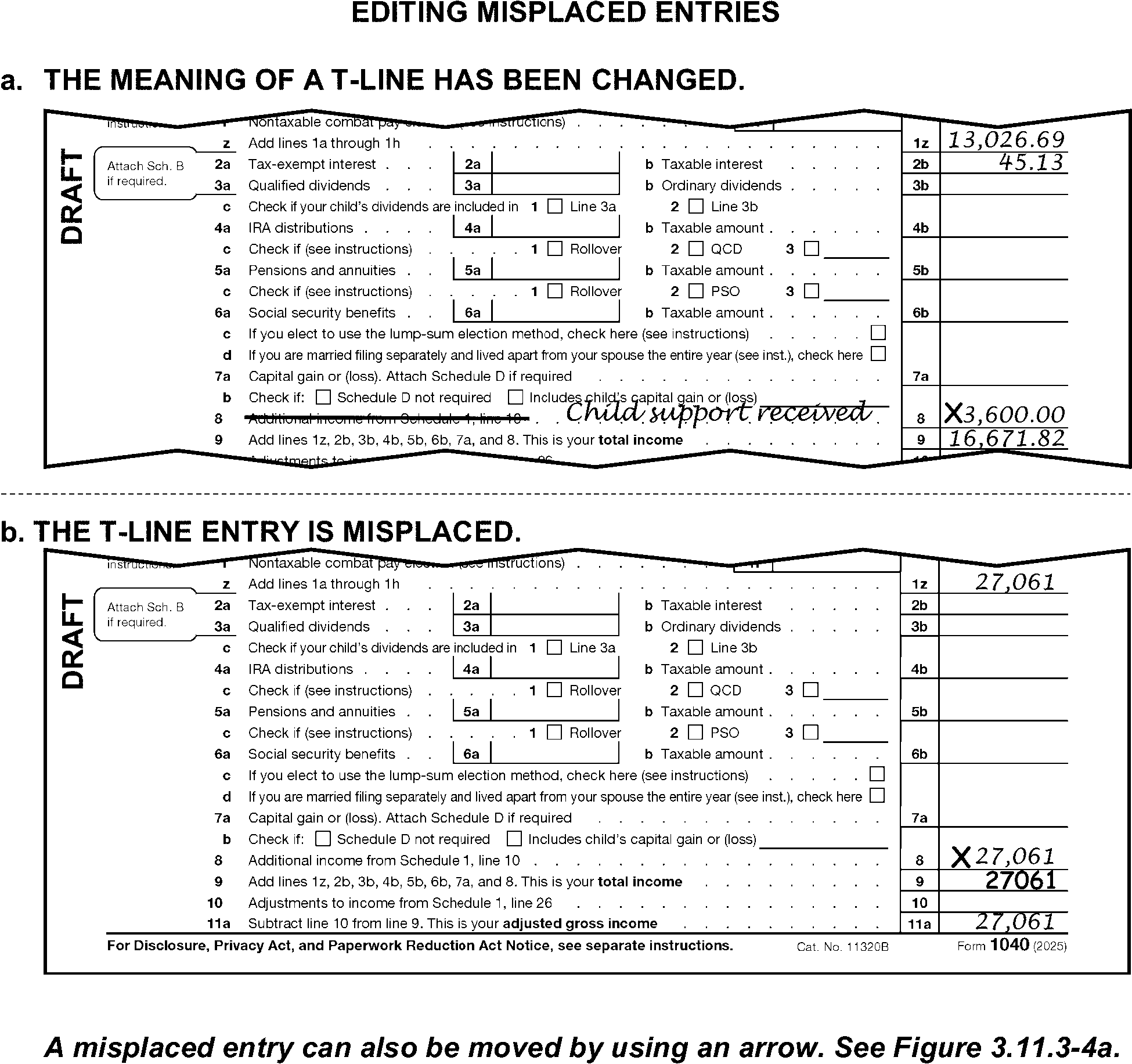
Delete an entry on a transcribed line when the meaning of the line has been changed, unless otherwise instructed. (See Figure 3.11.3-1.)
-
Delete an obviously misplaced amount and edit to the correct T-Line or T-Compute Line. (See Figure 3.11.3-1b.) Dummying of schedules may be required.
-
Use attachments to prepare "dummy" forms or schedules when they are required to support entries on transcribed lines.
-
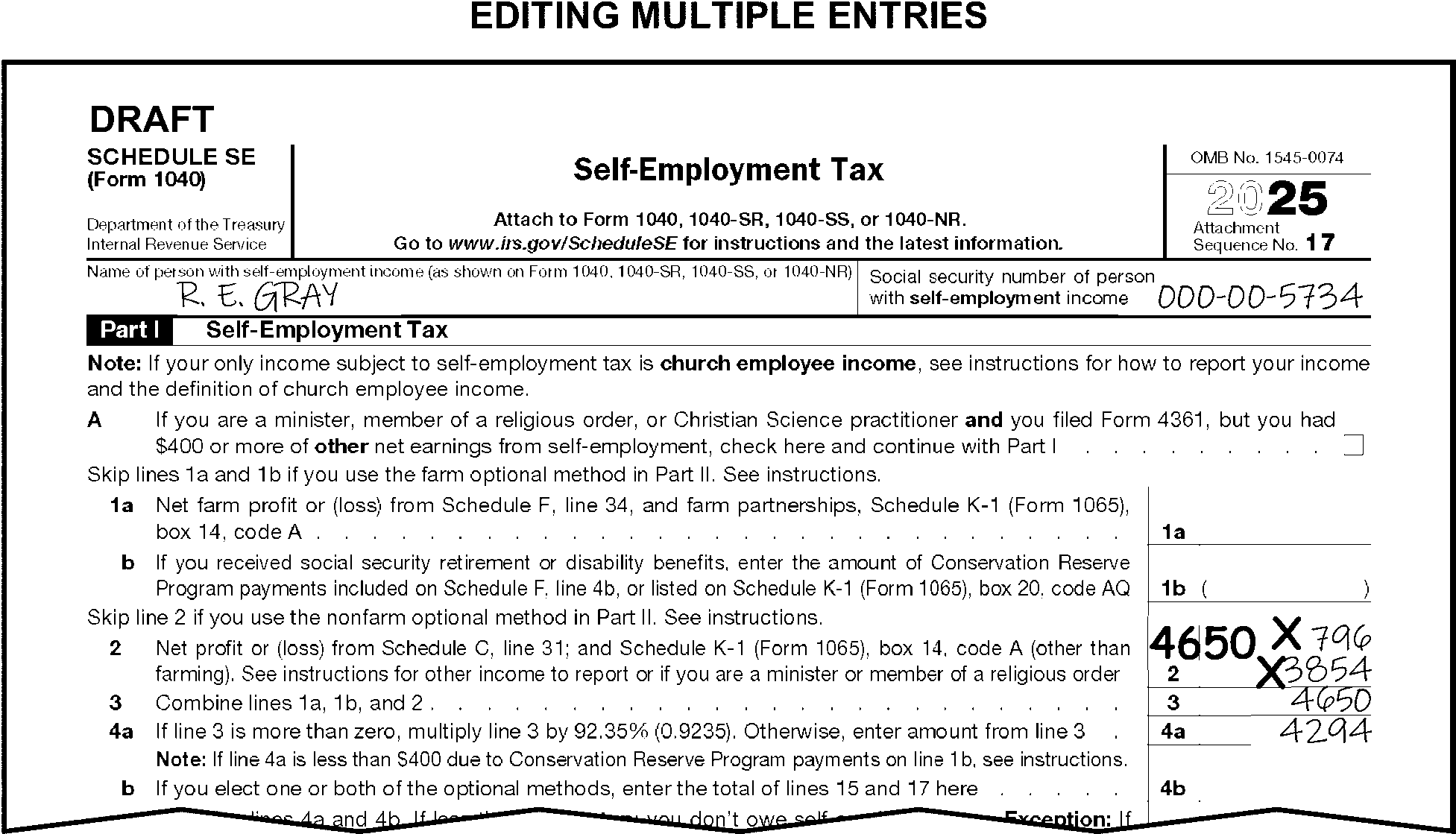
Edit the combined total of the amounts when a T-Line or T-Compute Line has multiple entries. (See Figure 3.11.3-2.)
-
Do not math verify the transcribed lines on forms or schedules, unless specifically directed to do so in the line-by-line instructions.
-
Do not math verify when dummying Forms or Schedules.
-
Edit line numbers for T-lines that have significant entries when line numbers are missing or incomplete.
-
In the upper-right margin of each form or schedule is a preprinted number called a sequence code. The Integrated Submission and Remittance Processing (ISRP) operators transcribe forms and schedules by their sequence code. The transcribed sequence codes range from 01 through 79. See the tables at the end of this subsection for a list of the sequence codes for all transcribed schedules and forms. Any document not on the list is not a transcribed form or schedule. Any form or schedule within this sequence code range that is not transcribed must be deleted.
-
Delete any form, schedule or document that will not be transcribed when there is a transcribed form or schedule afterward. Leave all non-transcribable forms/schedules intact after the last transcribed page.
-
When a return has many non-transcribable forms, "X" the top page and combine the remaining pages together with a rubber band, staple, or clip.
-
Delete any form that shares a sequence code with a transcribed form.
Note:
Examples include, but are not limited to the following:
- Form 8609-A (Seq 36)
- Form 8586 (Seq 36a)
- Form 2106 (Seq. 54) (TY07 and prior)
- Form 3468 (Seq. 52) (TY09 and prior)
- Form 3903 (Seq. 62) (TY10 and prior)
- Form 5884-B (Seq. 65)
- Form 8621 (Seq. 69)
- Form 8801 (Seq. 74) (TY19 and prior)
- Form 8829 (Seq. 66) (TY09 and prior)
- Form 8862 (Seq. 43A) (TY23 and prior)
- Form 8949 (Seq. 12A) (TY18 and prior)
- Schedule D-1 (Seq. 12A) (TY10 and prior)
- Form 8995-A Schedule A (Seq. 55B)
- Form 8995-A Schedule B (Seq. 55C)
- Form 8995-A Schedule D (Seq. 55E) -
"X" a transcribed schedule or form if it is blank or has no significant T-line entries as specified in line by line instructions, unless specifically instructed otherwise.
-
If a non-transcribable form or schedule is found between pages 1 and 2 of 2025 - 2018 Form 1040 (pages 1, 2 or 3 of 1040-SR) or 2017 and prior Form 1040 or 1040A, fold or delete them. If a form or schedule is found with significant T-line entries, move it from between pages 1 and 2 (and 3 for Form 1040-SR).
-
For transcribed forms or schedules with multiple pages, ensure the pages are together and in the proper order (page 1, page 2, etc.).
-
Delete duplicate forms or schedules with the exact same amounts that are filed for the same taxpayer.
-
Arrange Schedules 1 through 3 in sequential order behind Form 1040. If a non-transcribable form or schedule is found between Schedules 1 through 3, fold or delete them. If a form or schedule is found with significant T-line entries, move it from between Schedules 1 through 3.
-
Leave Forms W-2 and 1099, Form 1040-V, taxpayer statements, deposit slips, and other small items where found when they do not obstruct T-lines or any part of the caption area. If forms W-2/1099 etc. are a full page form, move or delete them.
-
The following forms and schedules are valid transcribed attachments for Form 1040:
Transcribed Form or Schedule Sequence Code Schedule 1 01 Schedule 1-A (TY25 and later) 1A Schedule 2 02 Schedule 3 03 Schedule A 07 Schedule B 08 Schedule C 09, 10, 11 Schedule D 12 Form 8949 (TY19 and later) 12A Schedule E 13 Schedule F 14, 15 Schedule R 16 Schedule SE 17, 18 Form 1116 19 Schedule J 20 Form 2441 21 Form 3800 22 Form 4137 24, 25 Form 4684 26 Form 4797 27 Form 4972 28 Form 5329 29, 30 Form 6198 31 Form 6251 32 Form 8615 33 Form 8283 36 Form 4835 37 Form 8839 38 Form 8853 39 Form 8814 40, 41, 42 Schedule EIC 43 Schedule H 44, 45 Schedule 8812
Form 8812 (TY2011 and prior)47 Form 8606 48, 49 Form 8863 50 Form 4952 51 Form 8889 52, 53 Form 8880 54 Form 8995 (TY19 and later) 55 Form 8995-A (TY19 and later) 55A Form 8995-A, Schedule C (TY20 and later) 55D Form 8888 56 Form 8978 (TY19 and later) 57 Form 5405 (TY24 and prior) 58, 59 Form 8919 61, 62 Form 8958 63 Form 461 (TY21 and later) 64 Form 8941 65, 66 Form 6252 (TY19 and later) 67 Form 8936 69 Form 8936, Schedule A 69A Form 8867 70 Form 8959 71 Form 8960 72 Form 8962 73, 74 Form 5695 75 Form 965-A (TY19 and later) 76 Form 9000 (TY21 and later) 77 Schedule LEP (TY19 and later) 77A Form 8997 (TY21 and later) 78 Form 4136 79 Form 8938 938
-
Code and Edit uses the following two general internal-use forms:
-
Form 3471, Edit Sheet
-
Form 4227, Intra-SC Reject or Routing Slip
-
-
The conditions requiring use of these forms are found in the line-by-line instructions.
-
For TY25, Form 3471, Edit Sheet, is transcribed as sequence code number "88" .
-
Edit money amounts on Form 3471 in dollars only for all form types (1040/A/EZ).
-
Staple Form 3471 to the left side margin of page 1 below the caption area or if using Form 3471-E, staple it to the back of the return facing out.
-
Edit Form 3471 as follows:
Form 3471 Action Lines 1, 2 and 3 - Unallowable Codes and amounts -
Edit all Unallowable Codes in the order found.
-
When there are more than three unallowables, edit the first two on lines 1 and 2, and Unallowable Code "98" on line 3 with no money amount. Edit the remaining Unallowable Codes and amounts in the Processing Memo space.
Line 6, Late filing code
Returns will be received from Examination or Collection with penalty and interest amounts entered. These amounts will be edited on the return, or the Form 3471 will have been edited and attached by Exam or Collections.-
Edit "1" when Failure to File (FTF) or Failure to Pay (FTP) penalties or interest have been entered on a full or part-paid return and≡ ≡ ≡ ≡ ≡ ≡ ≡ ≡ ≡ ≡ ≡ ≡ ≡ ≡ ≡ ≡ ≡ ≡ ≡ ≡ ≡ ≡"≡ ≡ ≡ ≡ ≡ ≡ ≡ ≡ ≡" ≡
-
Also edit a received date ≡ ≡"≡ ≡ ≡ ≡ ≡" in this case.
-
-
Some returns need research, referral, or action before they can be processed. Form 4227, Intra-SC Reject or Routing Slip, is often used to identify these special conditions and initiate actions.
-
Take the following actions when a numbered return needs research, referral, or action before further processing:
-
Edit the correct Action Code.
-
Prepare Form 4227 and note the reason for rejection.
-
Staple below the caption area of return.
-
Leave the return in the block.
-
-
Prepare Form 4227 when an unnumbered return/document is withdrawn from processing, and:
If the return/document is Then Leaving the campus, Pull the document for routing to Receipt and Control for shipment to correct campus. Not leaving the campus, Pull the document for routing to the correct function.
-
An "Action Trail" is written on a return/document as a record of the actions taken.
-
Always leave an Action Trail when Computer Condition Code "Y" is edited. Give the reason for the "Y" code in the Action Trail.
-
Edit an Action Trail when a return/document is detached. For example, notations such as "detached 1040-X" or "detached taxpayer correspondence" must be made on the return.
-
The Action Trail is written on return or document in the lower-left margin of page 1. Refer to Job Aid 2431-009 for an illustration of the editing location.
-
Examine all attachments to the return. Leave the attachments with the return unless specifically instructed otherwise. Refer to the Attachment Guide in Exhibit 3.11.3-1 for specific attachment-by-attachment instructions. Research either an attachment or a notation on the return, as needed.
-
Immediately hand carry any discovered remittance to the manager or work leader. (Manager/work leader shall refer to IRM 3.8.46 , Discovered Remittance).
-
Take either of the following actions when there is a notation on the return that indicates it needs to be routed elsewhere:
-
Edit the information on a blank piece of paper.
-
Photocopy the notation.
-
-
Generally, all taxpayer-initiated correspondence must be responded to within 30 days.
-
Detach and route all correspondence addressing an issue not directly related to the processing of the return.
-
Do not detach correspondence attached to an original return which asks a question or raises an issue about the processing of the return or if the correspondence has only a general comment submitted with a payment.
-
-
When a taxpayer submits a credit card and/or credit card number, fully code and edit the return and immediately take the return and all attachments to your work leader. The work leader will:
-
Edit Action Code "460" , sanitize any credit card information on the return and continue processing.
-
If a credit card is attached, prepare Form 4287, Record of Discovered Remittances, a photocopy of page one of the return, and route to Receipt & Control with the credit card to be returned to the taxpayer via Express Mail.
-
Prepare Letter 3956C, Processing Form 1040 Received with Credit Card/Credit Card Information and send to the taxpayer via 1st Class Mail.
-
-
Credit card payment returns must be batched as remittance returns so they will receive the remittance indicator. If the return is received with a credit card confirmation number and no amount is indicated, or the amount does not match the balance due line on the return, batch as Part Paid.
-
Always edit an Action Trail on the return when an attachment is removed. For example, when a form or letter is detached from a return, edit notations such as "detached 9465" or "detached TP correspondence" .
-
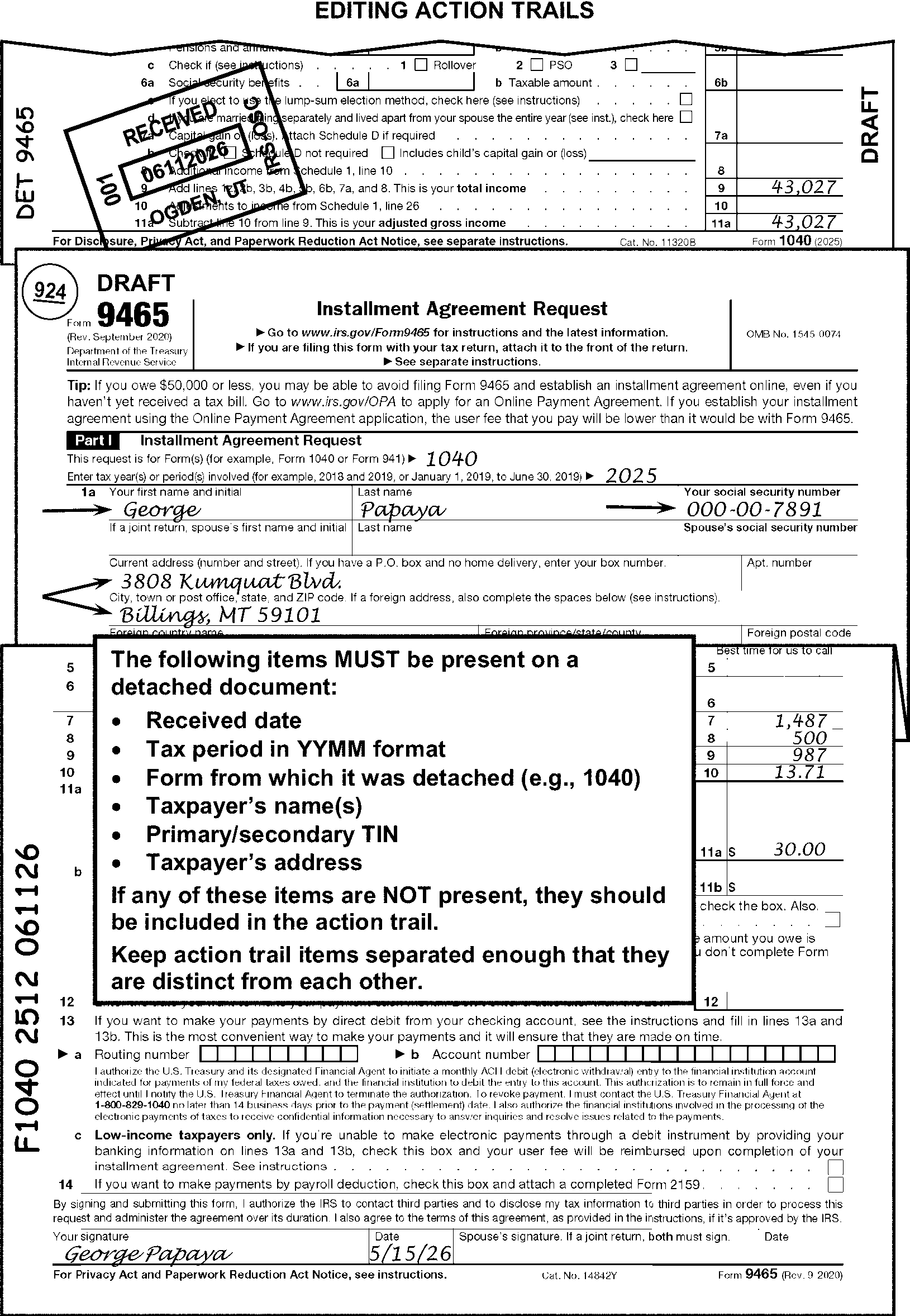
Edit an Action Trail on the detached document unless it's an original personal document. If present on the return, all the following must be present or edited on all detached items:
See Figure 3.11.3-3.-
Received date.
-
Tax period in "YYMM" format.
-
Form from which detached.
-
Taxpayer's name(s).
-
Primary/secondary taxpayer's identification number(s).
-
Taxpayer's address.
-
-
Internally route detached items using Form 4227.
-
When returning original documents back to the taxpayer, the work leader will complete and attach Form 14219, Return of Documentation to the Taxpayer. Check the correct box on Form 14219 to identify the returned item.
-
Certain conditions require the editing of processing codes. There are seven types of processing codes. They are:
-
Action Code
-
Audit Code
-
Computer Condition Code (CCC)
-
Form Processing Code (FPC)
-
Return Processing Code (RPC)
-
Special Processing Code (SPC)
-
Unallowable Code (UAC)
-
-
Processing codes will be either alpha or numeric. Use CAPITAL BLOCK LETTERS when editing codes that are alphas.
-
It is critical that processing codes are edited legibly.
-
Refer to Job Aid 2431-009 and Job Aid 2431-010 for an illustration of the editing locations of processing codes. The edited location of these codes will vary by return type.
-
When other functions have edited CCCs, FPCs, RPCs, SPCs, etc., in the wrong location, delete the coding and edit it to the correct location.
-
Re-edit any valid black edit marks in red on photocopied returns, unless editing is underlined in red.
-
The conditions for editing processing codes are in the line-by-line instructions.
-
An Action Code is a three-digit numeric character used to reject a document and identify the reason for rejection.
-
Assign only one Action Code to a document. Edit Action Codes in the following priority:
-
"300"
-
"310"
-
"4XX"
-
"6XX"
-
"2XX"
-
"3XX"
-
-
Continue perfecting returns assigned any Action Code except "480" or "6XX" . Edit only the caption area when Action Code "6XX" is edited. When editing Action Code 480 edit the caption area and see IRM 3.11.3.7.5.
-
Edit the Action Code as follows:
-
Form 1040: edit in the center bottom margin directly below Form 1040, page 1.
-
TY17 and prior: edit in the center bottom margin on page 1 of Form 1040A, and 1040EZ.
-
-
Refer to the table in Exhibit 3.11.3-2 for an explanation of each Action Code.
-
An Audit Code is an alpha or numeric character used to identify questionable conditions for Examination.
-
Edit Audit Codes as follows:
-
Form 1040: edit horizontally in the right bottom margin directly below Form 1040, page 1.
-
TY17 and prior: horizontally in the right-bottom margin on page 1 of Form 1040A or Form 1040EZ.
-
-
Refer to the table in Exhibit 3.11.3-3 for the explanation of each Audit Code.
-
A Computer Condition Code (CCC) is an alpha or numeric character used to alert the computer and Master File of a special condition. Computer Condition Codes will post to the Master File.
-
When CCC "3" is edited, it must be first.
-
Always edit an Action Trail when CCC "Y" is edited.
-
Edit the CCC horizontally in the blank space to the right of "Head of Household (HOH)" in the filing status area.
-
Refer to the table in Exhibit 3.11.3-4 for an explanation of each CCC.
-
A Form Processing Code (FPC) is an alpha or numeric character used to alert the downstream users that a specific non-transcribed form is attached to the return.
-
Edit FPCs vertically in the margin to the right of Form 1040, line 5b or Form 1040-SR, line 1g (For prior year editing location, see Job Aid 2431-010).
-
Refer to the table in Exhibit 3.11.3-5 for an explanation of each FPC.
-
A Return Processing Code (RPC) is an alpha or numeric character used to alert the computer to a special condition or computation. These codes are used for center processing and do not post to the Master File.
-
Edit RPCs horizontally in the left bottom margin directly below Form 1040.
-
Refer to the table in Exhibit 3.11.3-6 for an explanation of each RPC.
-
A Special Processing Code (SPC) is an alpha or numeric character used to flag a condition or trigger a computation. These codes are used for center processing and do not post to the Master File. These codes supplement the Return Processing Codes.
-
Edit SPCs vertically in the right margin next to the spouse’s social security number.
-
Refer to the table in Exhibit 3.11.3-7 for an explanation of each SPC.
-
An Unallowable Code (UAC) is a two-digit numeric character used to identify certain conditions on a tax return that are unallowable by law.
-
Search all attachments to find unallowable items.
-
≡ ≡ ≡ ≡ ≡≡ ≡ ≡ ≡ ≡ ≡ ≡ ≡ ≡ ≡ ≡ ≡ ≡ ≡ ≡ ≡ ≡ ≡ ≡ ≡ ≡ ≡ ≡ ≡ ≡ ≡ ≡ ≡ ≡ ≡ ≡ ≡ ≡ ≡ ≡ ≡ ≡ ≡ ≡ ≡ ≡ ≡ ≡ ≡ ≡ ≡ ≡ ≡ ≡ ≡ ≡ ≡ ≡ ≡ ≡ ≡ ≡ ≡ ≡ ≡ ≡
-
Do not edit UACs when the only dollar amount is a total of allowable and unallowable items. There must be separate dollar figures for unallowable coding, unless otherwise instructed.
-
Prepare Form 3471 using the instructions at IRM 3.11.3.3.4.1 when coding unallowables.
-
Refer to the table in Exhibit 3.11.3-8 for an explanation of each UAC.
-
Editing is done to prepare returns and attachments for transcription and computer processing.
-
The editing instructions described in more detail in this subsection are about:
-
Types and uses of specific edit markings
-
Dollars and cents editing
-
-
Always use a red erasable pen for edit markings. Perfect any taxpayer entered red marks that might interfere with transcription.
-
Never alter, erase, or obliterate a taxpayer's entry.
-
Edit all markings legibly.
-
Any reference to "significant entry" or "significant amount" is defined as a positive or negative number/dollar amount other than zero.
-
Different edit conditions require different types of edit markings. Edit markings consist of:
-
Circling
-
Underlining
-
Arrowing
-
"X" -ing
-
Bracketing
-
Checking
-
-
Circle information that is not to be transcribed when editing, examples include:
-
Underline when editing:
-
The additional information line and other caption data
-
Tax period on Prior Year returns
-
Other cases specified in this manual
-
-
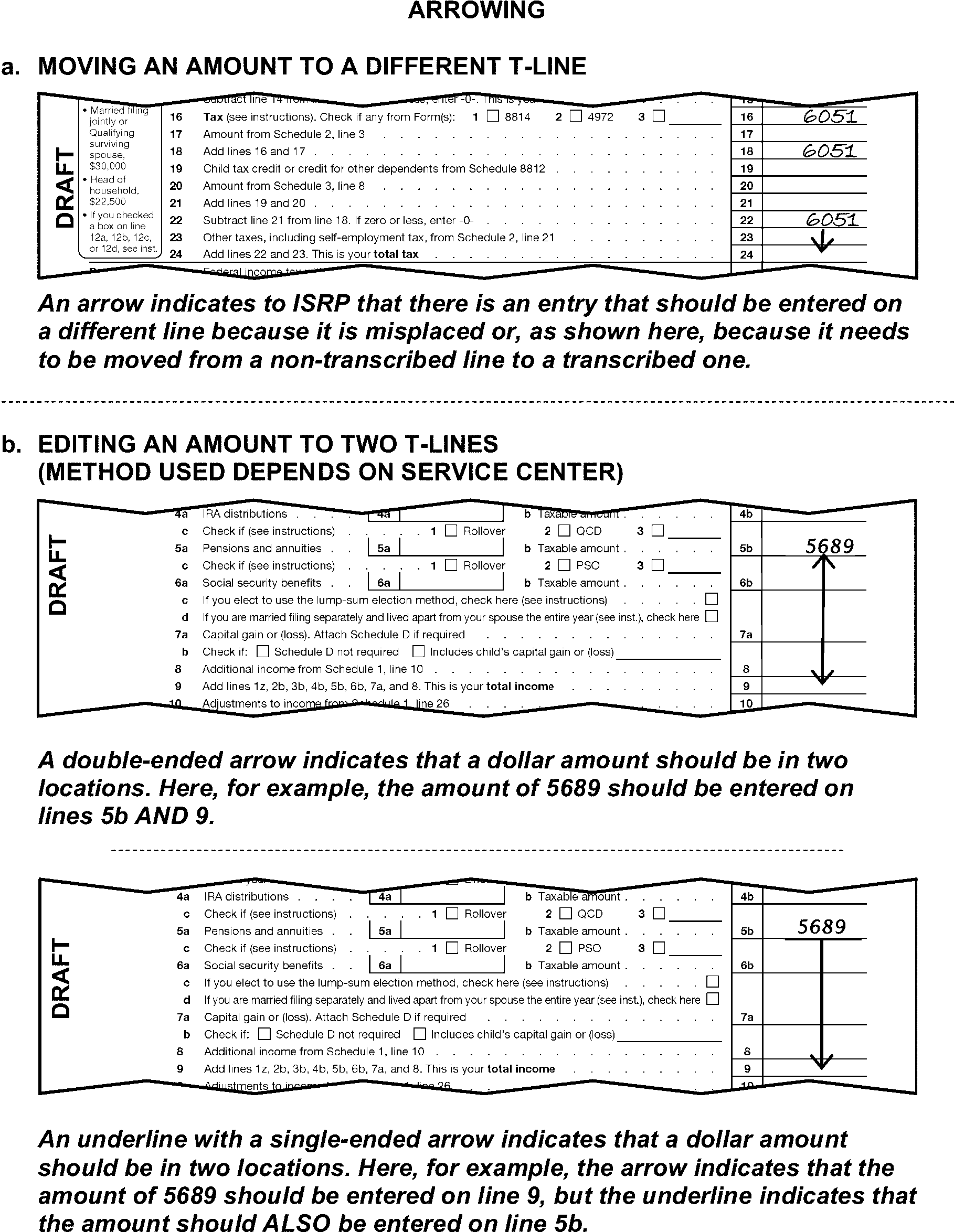
Use arrowing when indicating:
-
The correct T-line for a misplaced entry. (See Figure 3.11.3-4.)
-
Transcription is to continue (where indicated in line-by-line instructions)
-
-
An "X" will be used to delete an entry or an entire form or schedule.
-
Place an "X" to the left of an amount on a T-line when it is not to be transcribed.
-
When adjusting an amount, edit an "X" to the left of the amount on the T-line and edit the adjusted amount above or to the left of the "X" -ed entry.
-
"X" an illegible amount and re-edit the information above or to the left of the "X" -ed entry. Be careful to edit the amount where it will not be mistaken for an entry on another T-line.
-
Edit an "X" across the entire form or schedule if it must be deleted.
-
"X" a transcribed schedule or form when it is blank or has no significant T-line entry, unless specifically instructed otherwise.
-
"X" any transcribed schedule or form with "Alt Min Tax" , "AMT" , or "AMT-CR" or similar notation across the top and do not include entries when combining.
-
-
Use brackets to indicate a negative dollar amount when editing.
-
Do not bracket the following:
-
Existing negative amounts on a return.
-
Amounts with preprinted brackets on the form/schedule.
-
-
Use the check mark as directed in line-by-line instructions to indicate the information needs to be transcribed by ISRP.
-
Edit marks entered by another area (such as Collections, Entity or RIVO) are not to be re-edited except to place the edit marks in the correct area or to perfect for legibility.
-
Allow taxpayers to round or truncate (i.e., "drop the cents" ) amounts. Use only dollar amounts when computing amounts on forms or schedules.
-
For TY18 and prior only, draw a vertical line between the dollars and cents figures when dollars or cents are in the wrong column:
-
On each line that is to be transcribed, or
-
Down the entire front of the form or schedule.
-
-
Dollars and cents editing is required on certain T-lines for any of the following conditions:
-
A substitute form is used with dollars and cents not clearly separated by a decimal point or slash.
-
An entry is illegible.
-
When computing and editing an entry as directed in line-by-line instructions.
-
-
Edit all forms and schedules in dollars only, with the following exceptions:
-
Form 1040 - lines 24 through 38
-
Schedule 3, lines 9 through 14
-
Form 6001
-
Form 3531
-
-
Correspondence is necessary when a return is incomplete or illegible and it cannot be processed.
-
The correspondence instructions in this subsection of the manual are:
-
General correspondence procedures
-
Correspondence when sending return back to the taxpayer
-
Correspondence when not sending return back to the taxpayer
-
-
When the first correspondence condition is identified, request all missing required information. Include forms and/or schedules, Forms W-2, regardless of correspondence tolerances identified in the line-by-line IRM instructions.
-
Do not correspond with a taxpayer more than one time, unless specifically directed to in the line-by-line instructions.
-
Correspond a second time if the taxpayer sends back a return and the signature is not located in the correct "Sign Here" area, under the jurat statement. For a taxpayer's signature to be valid, it must be in the "Sign Here" space provided under the jurat. The only exception to this rule is when the taxpayer has signed in the wrong area and arrowed their own signature to the right place.
-
-
Do not correspond when information is missing and any of the following conditions apply:
-
The tax return is for TY15 and prior. (See IRM 3.11.3.75.3.)
-
The return has a notation indicating the return is a "dummy" return. Notations may include "Substitute for Return Prepared by IRS" , "Section 6020b" , or "prompt assessment" .
-
The return has a notation, statement or letter attached indicating the return is a copy or amended. Notations may include "corrected" , "revised" , "tentative" , "amended" , "superseding" , "copy" or similar. Also see the amended return instructions in IRM 3.11.3.6.2.1 for more instructions.
-
An Examination case is indicated. See the instructions in IRM 3.11.3.6.1.5 for more instructions and a list of the attachments and notations by which an Examination case will be identified.
-
The taxpayer has written "For payment only" or included a similar statement on the return.
-
International returns (except AUSPC)
-
A "Hardship" case is indicated. (See IRM 3.11.3.6.1.4.)
-
There is an indication the return has been prepared (dummied) by Accounts Management. (See IRM 3.11.3.6.2.1(3).)
-
-
Do not correspond for missing forms or schedules to support a credit or exemption claimed for a dependent when both of the following conditions apply:
-
The return was received with Form W-7 attached.
-
The ITIN application was rejected for the person who would have entitled the taxpayer to the credit and/or exemption.
-
-
Except for returns coming from Collection and Correspondence Imaging Inventory (CII), send an unnumbered return to the originating area indicating what information is required.
-
Request a missing secondary TIN only when other correspondence is required and the Filing Status is Filing Status 2 (Married Filing Jointly), Filing Status 3 (Married Filing Separately), or Filing Status 6, or a spouse is claimed as a Dependent/Exemption.
-
Special additional information line editing is required any time correspondence is required on a:
-
Decedent return - see IRM 3.11.3.10
-
Fiduciary return - see IRM 3.11.3.11
-
Minor's return - see IRM 3.11.3.11.2
-
-
If Form 1040 is missing page 1 or page 2 (Form 1040-SR, page 1, 2, or 3) pull for research.
-
Send a return back to the taxpayer in the following specific circumstances:
-
A misfiled return. (See IRM 3.11.3.6.2.15.)
-
Early filed loose Schedule H for tax year 2026. Use Notice 1208, You Filed Schedule H (Household Employment Taxes) Too Early
-
Current year Loose Schedule H (received April 15, 2026, or earlier) - Use Notice 1207, File Schedule H (Household Employment Taxes) With Your Individual Income Tax Return
-
Missing or invalid signature(s) (See IRM 3.11.3.14.4.)
Exception:
Do not mail back when:
Numbered
Secured
CP 01H, 11, 12, 14/14H, 22 series, 23, 54, or 2000 is attached. See Exhibit 3.11.3-1 for processing procedures.
LTR 4883C, 5071C, 5216, 5447C, 5747C, or 6167C is attached. See Exhibit 3.11.3-1 for processing procedures.
LTR 2566 or 3219C unless Process as Original is present.
Form W-7 or Form W-7(SP) is attached, route to ITIN.
Signed returns missing documentary evidence, including fiduciary and Power of Attorney (POA) returns.
Natural Disaster is noted on return or attachment. -
-
If the required valid legal signature is missing or not below the jurat statement, send the return back to the taxpayer using Form 3531.
Note:
A valid legal signature is an original signature written below the jurat statement in the "Sign here" box on the return. If the return is not signed and a signature is present on an attached CP 59 or Form 15103, accept that as a valid signature on the return if signed under the jurat on the "sign here" line. Notate on the return signature line "See attached CP 59 or Form 15103" . Do not detach CP 59 or Form 15103, leave attached as support for original signature.
-
Stop editing the return after identifying a missing or invalid signature.
-
Examine the return for other missing items.
-
Complete Form 3531, request all missing required information. (See Exhibit 3.11.3-17):
-
Perfect the caption area.
-
-
Prepare Form 3531 using the following steps:
-
Prepare the return to be sent back to the taxpayer using the following steps:
-
Line through your TE number.
-
Remove all internal documents (such as Form 3471 or Form 4227) if attached.
-
Do not detach attachments.
-
Delete any IRS Received Date.
-
Perfect the caption including the address.
-
Perfect a missing or incomplete address from an attached envelope. If unable to perfect from an attached envelope, research.
-
Edit an Action Trail to notate "Returned for Signature" (stamped or edited), Form 3531 and any issued correspondence, with the current date unless it is being returned as a misfiled return. (e.g., Return for Signature MMDDYY or Return for Signature F3531, 1, 8, 11 MMDDYY). See Figure 3.11.3-5.
-
Attach the correspondence sheet face up to the return immediately below the caption area.
-
Remove the return from the batch and place it in the designated area.
-
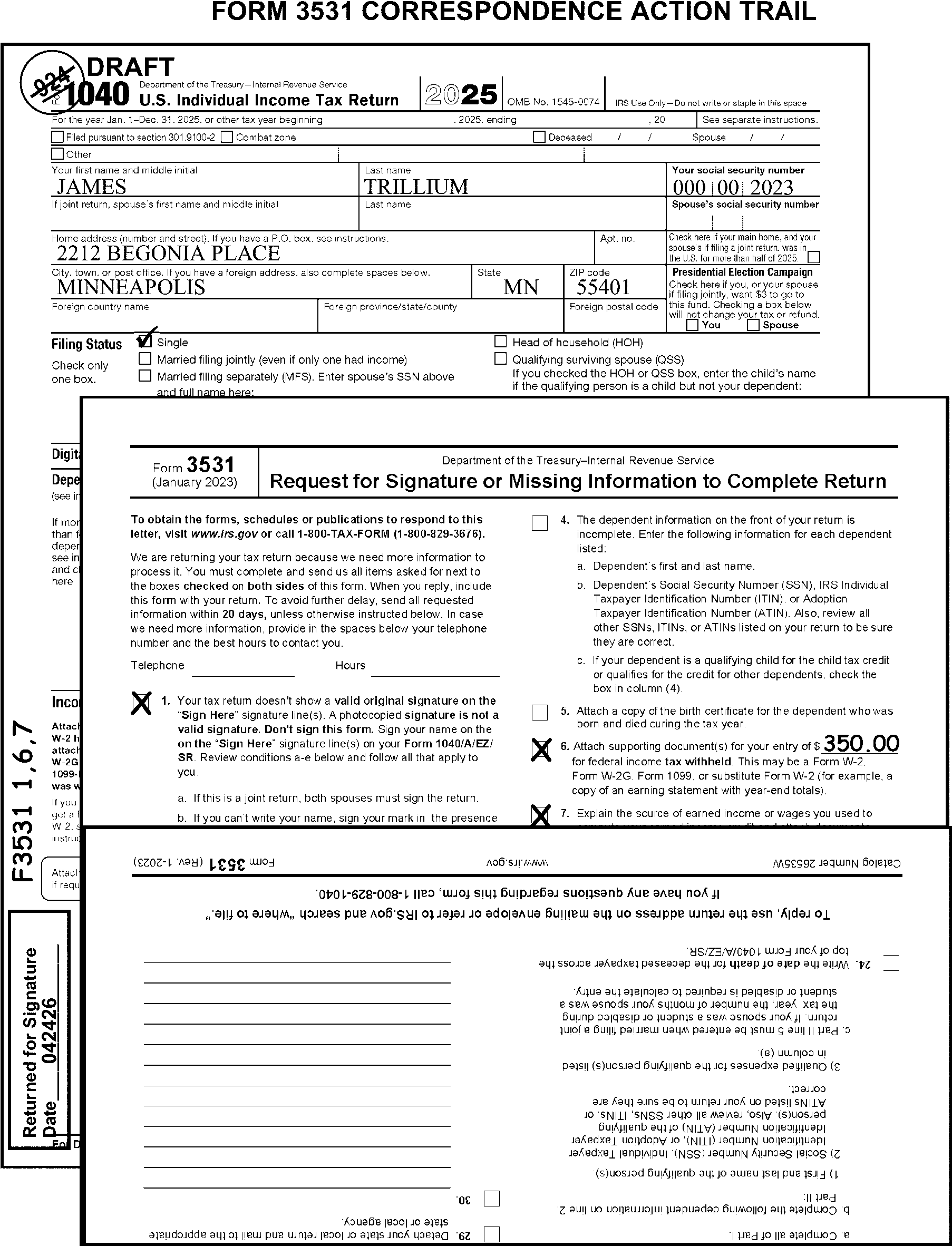
-
Complete all possible editing and identify all correspondence issues, when you are not sending the return back to the taxpayer.
-
Perfect a missing or incomplete address from an attached envelope. If unable to perfect from an attached envelope, research.
-
Request all missing required forms/schedules in the taxpayer correspondence. Do not try to dummy missing forms/schedules when other correspondence is required.
-
A correspondence action sheet (CAS) is a form used to initiate a letter requesting information from a taxpayer. A CAS is used with returns that are not sent back to the taxpayer. The following CAS forms are used:
-
Form 6001 is used to generate Letter 12C, Individual Return Incomplete for Processing: Form 1040. (See Exhibit 3.11.3-16.)
-
Form 3696-A, IDRS Correspondence Action Sheet, is used to generate miscellaneous Correspondex (C) letters (e.g., Letter 369C used to deny reasonable cause).
-
-
Prepare Form 6001 to initiate Letter 12C using the following steps:
-
Write legibly.
-
Check all the applicable boxes.
-
Complete all information required for each paragraph selected (e.g., forms, lines, amounts, etc.).
-
Enter money amounts in dollars and cents. Bracket negative amounts.
-
Use Exhibit 3.11.3-18, Correspondence Fill-in Paragraphs, when paragraph g is selected.
-
When paragraphs I - N are not enough to request all missing forms and schedules, use paragraph g with fill-in paragraph "36" instead.
-
Always select the applicable fax number paragraph (k-m) specific to your campus.
-
Always select paragraph j for reference to irs.gov/connect.
-
-
Attach the CAS to Form 1040 face up immediately below the caption area.
-
Edit Action Code "211" on all returns requiring correspondence when the return is not being mailed back to the taxpayer. (See Figure 3.11.3-6.)
Exception:
Edit Action Code "224" when corresponding for missing Form 8962 unless Action Code "300" can be edited. For TY17, edit Action Code "300" on all returns when any correspondence is required and 965 or Sec. 965 is noted on return or when line 73 box d is marked or when Form 965 is attached to return.
-
If a received date is not present on the return, edit the received date before corresponding. Refer to the received date editing instructions at IRM 3.11.3.8.
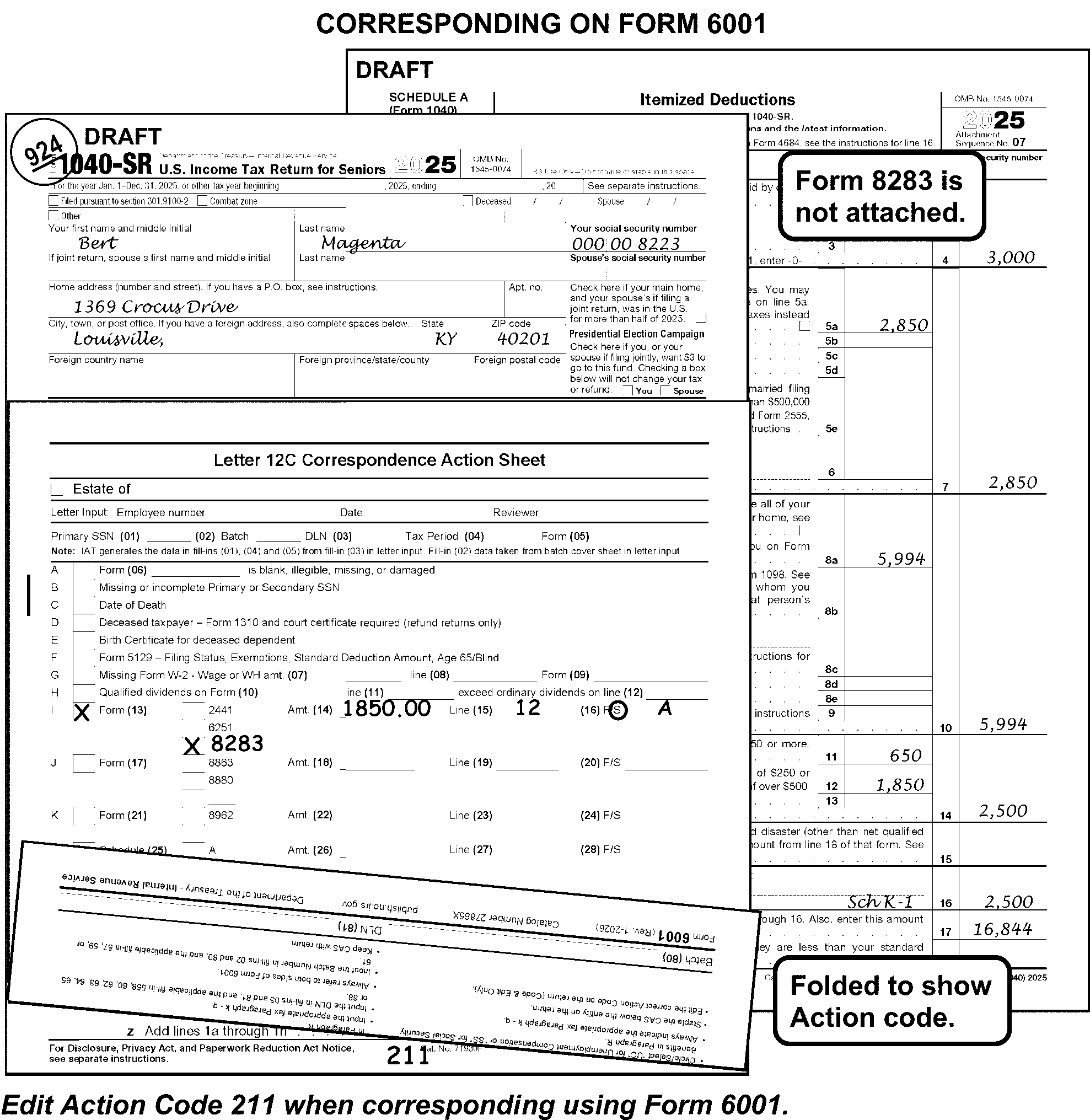
-
Move all correspondence sheets to the back of the return. If second correspondence is required, remove original Form 3531.
-
See the instructions in Correspondence Action Chart at IRM 3.11.3.5.3.2 for processing "no reply" or "incomplete reply" , and undeliverable correspondence.
-
When there is an indication of a possible disclosure issue, take return to work leader.
-
Perfect the return.
-
Edit the received date on returns identified as "Returned for Signature" , following the instructions at IRM 3.11.3.8.2.
-
Use the Correspondence Action Chart and continue processing the return when any of the following no reply conditions are present:
-
Taxpayer does not provide all requested information.
-
Correspondence is returned by the USPS as undeliverable.
-
One or more correspondence conditions were not included when the first correspondence was sent.
-
-
Edit CCC "U" on all no reply returns, except when any of the following apply:
-
Withholding support was the only item not provided.
-
Correspondence was issued for Form 1310 only.
-
The correspondence was not required.
-
One or more correspondence conditions were not included when the first correspondence was sent.
-
-
If a no reply correspondence condition is not identified in the chart below, edit CCC"U" unless a condition in (2) above applies and take no further action.
-
If CCC "3" is edited, edit it first.
-
Refer to the following Correspondence Action Chart. All line numbers are for current year unless specified otherwise.
Form 1040 Series Returns
CORRESPONDENCE REQUIRED FOR THE FOLLOWING CONDITION ON FORM 1040 SERIES RETURNS ACTION REQUIRED FOR INCOMPLETE REPLY OR NO REPLY Dependent TIN - Dependents claimed with no TIN "X" dependent’s name. Signature -
Missing or incomplete Jurat
-
Missing signature or only one signature on a joint return
-
Photocopied signature
-
Refund on a joint return and spouse refuses to sign
-
Condition requiring two witnesses
-
Minor child's return signed by other than a parent or relationship is not indicated
-
Route undeliverable returns to the Entity Function and do not edit CCC "U" .
-
If the taxpayer responds and sends back a return that shows the signature present in an area other than the Sign Here area under the jurat on the return, or has signed on Form 3531, send the return back to the taxpayer a second time.
-
If the return is not signed after correspondence (or second correspondence if applicable) for signature, edit Action Code "640" and edit only the caption area.
Blank return with missing signature. If the taxpayer returns an unsigned blank return, edit RPC "L" and continue processing. Also edit CCC "B" . Power of Attorney missing. If the return is not signed by the taxpayer, edit CCC "3" . Fiduciary Returns - required documentary evidence not present. Edit CCC "3" . Decedent Return a. Date of Death missing a. Edit CCC "3" . b. Required documentary evidence not present. b. Edit CCC "3" . Do not edit the AIL or CCC "L" or "W" . c. Proper additional information line (AIL) cannot be determined. c. Edit CCC "3" . Do not edit the AIL or CCC "L" or "W" . d. Form 1310 not signed or is incomplete. d. Edit CCC "3" . Do not edit the AIL or CCC "L" or "W" . e. Signature missing on return but a completed Form 1310 with correct answers and signature is attached. e. See Signature instruction above. f. Signature missing on return and Form 1310 is attached but not signed. f. See Signature instruction above. Form 1040, Pages 1 and 2
MISSING ITEM ACTION REQUIRED FOR INCOMPLETE REPLY OR NO REPLY Line 7a - Schedule D or statement not attached. a. Gain of ≡ ≡ ≡ ≡ ≡ ≡ ≡ ≡ ≡ ≡ and Schedule D not attached. a. Prepare dummy Schedule D and edit the amount on line 7. Line 13b - Amount claimed and Schedule 1-A not attached. "X" the amount. b. Loss of ≡ ≡ ≡ ≡ ≡ ≡ ≡ ≡ ≡ ≡ and Schedule D not attached. b. Prepare dummy Schedule D and edit the amount on line 7. Edit Audit Code "B" when the amount on line 7a is a loss of ≡ ≡ ≡ ≡ ≡ ≡ ≡ ≡ ≡ ≡. Line 25d - Amount is ≡ ≡ ≡ ≡ ≡ ≡ ≡ ≡ ≡ ≡ and withholding document is not present. "X" the amount. Line 27a - Amount claimed and no source of earned income is present. Edit RPC "B" then "X" the amount. Line 28 - Amount claimed and Schedule 8812 not attached. "X" the amount. Line 29 - Amount claimed and Form 8863 not attached. "X" the amount. Line 30 - Amount claimed and Form 8839 not attached. "X" the amount. Schedules 1 through 3
MISSING ITEM ACTION REQUIRED FOR INCOMPLETE REPLY OR NO REPLY Schedule 1 - not attached, Prepare dummy Schedule 1 from attachments if present. See IRM 3.11.3.14.2.15 and IRM 3.11.3.14.2.17. Schedule 1, Line 3 - Schedule C Prepare dummy Schedule C. Edit a positive amount on line 1 and 3. Edit a negative amount on line 28. Edit Audit Code "B" when the amount on Schedule 1, line 3 is a loss of ≡ ≡ ≡ ≡ ≡ ≡ ≡ ≡. Schedule 1, Line 4 - Form 4797, Form 4684, or statement not attached. Edit Audit Code "B" if a loss of ≡ ≡ ≡ ≡ ≡ ≡ ≡ ≡ is claimed. Schedule 1, Line 5 - Schedule E, statement, or clear indication of type of income missing. Prepare dummy Schedule E. Edit a positive amount on line 24, a negative amount on line 25. Edit Audit Code "B" when the amount on line 5 is a loss of ≡ ≡ ≡ ≡ ≡ ≡ ≡ ≡ ≡. Schedule 1, Line 6 - Schedule F or statement not attached. Prepare dummy Schedule F. Edit a positive or negative amount on line 9. Edit Audit Code "B" when the amount on line 6 is a loss of ≡ ≡ ≡ ≡ ≡ ≡ ≡ ≡ ≡. Schedule 1, Line 8b - Gambling net loss indicated, and Schedule C not attached. "X" the amount on line 9. Schedule 1, Line 8z - Sec. 965 noted and Form 965-A not attached. Edit RPC "F" . For TY17, also edit Action Code "300" . Schedule 1, Line 12 - ≡ ≡ ≡ ≡ ≡ ≡ ≡ ≡ and Form 2106 not attached. "X" the amount. Schedule 1, Line 13 - Amount claimed and Form 8889 not attached. "X" the amount. Schedule 1, Line 14 - ≡ ≡ ≡ ≡ ≡ ≡ ≡ ≡ and Form 3903 not attached. "X" the amount. Schedule 1, Line 26 - ≡ ≡ ≡ ≡ ≡ ≡ ≡ ≡, and not supported by entry on lines 11 through 25, or a statement. "X" the amount on Form 1040, Line 10. Schedule 2 not attached. Prepare dummy Schedule 2 from attachments if present. See IRM 3.11.3.14.2.24 and IRM 3.11.3.14.2.27. Schedule 2, Line 1a - Amount claimed and Form 8962 not attached. "X" the amount on line 1a. Schedule 2, Lines 1b and 1c - Amount claimed and Form 8936 not attached. "X" the amount on lines 1b and/or 1c. Schedule 2, Lines 1d, 1e, and 1f - Amount claimed and Form 4255 not attached. "X" the amount on lines 1d, 1e and/or 1f. Schedule 2, Line 4 - Schedule SE not attached. Divide SE Tax amount by .153 to determine SE income subtotal amount. Then divide the subtotal amount by .9235 to determine the SE income total amount. Edit the total amount on Schedule SE, line 3. Prepare a dummy Schedule SE for the primary taxpayer if Social Security wages are $176,100 or less; otherwise, prepare a dummy Schedule SE for the secondary taxpayer. See Prior Year instructions for correct prior year amounts. Schedule 2, Line 5 - Amount claimed and Form 4137 not attached. "X" the amount on line 7. Schedule 2, Line 6 - Amount claimed and Form 8919 not attached. "X" the amount on line 7. Schedule 2, Line 8 - Form 5329 not attached, the box to the left of line 8 has not been checked, no indication of No on line 8, and the amount claimed is not 10% of any combination of line 4b, 5b or attached Form(s) 1099-R. Prepare a dummy Form 5329. Edit the amount from line 8 to line 17 of Form 5329. Process for the primary taxpayer if a determination cannot be made. Schedule 2, Line 9 - Amount claimed and Schedule H not attached. "X" the amount. Schedule 2, Line 11 - Amount claimed and Forms 8959 not attached, "X" the amount. Schedule 2, Line 12 - Amount claimed and Form 8960 not attached, "X" the amount. Schedule 3 not attached. Prepare dummy Schedule 3 from attachments if present. See IRM 3.11.3.14.2.25 and IRM 3.11.3.14.2.35. Schedule 3, Line 1 - More than $300 (more than $600 for FS 2) and Form 1116 not attached. "X" the amount. Schedule 3, Line 2 - Amount claimed and Form 2441 with entry on line 11, not attached. "X" the amount. Schedule 3, Line 3 - Amount claimed and Form 8863 not attached. "X" the amount. Schedule 3, Line 4 - Amount claimed and Form 8880 not attached. "X" the amount. Schedule 3, Line 5a - amount claimed and Form 5695 is not attached. For TY23 and later, "X" the amount. For TY22 and prior, "X" the amount if it is ≡ ≡ ≡ ≡ ≡ ≡ ≡, or any amount if only page 2 is attached. Schedule 3, Line 5b - amount claimed and Form 5695 is not attached. "X" the amount. Schedule 3, Line 7 - amount claimed and not supported by form/schedule for lines 6a-6z. "X" the amount. Schedule 3, Line 11 - ≡ ≡ ≡ ≡ ≡ ≡ ≡ ≡ and either no Form W-2 is attached, or not all Forms W-2 are attached. "X" the amount. Schedule 3, Line 12 - Any amount claimed, and Form 4136 not attached. "X" the amount. Schedule 3, Line 13a - ≡ ≡ ≡ ≡ ≡ ≡ ≡ and Form 2439 or other refundable credits are not attached. "X" the amount. Schedule 3, Line 13c - and Form 3800 not attached. "X" the amount. Supporting Forms and Schedules
SUPPORTING FORMS AND SCHEDULES ACTION REQUIRED FOR INCOMPLETE REPLY OR NO REPLY Schedule A a. Line 7 -- Amount present, no entries on lines 5a through 6. a. "X" the amount. b. Line 10 - Amount present, no entries on lines 8a through 9, and line 5b is blank. b. "X" the amount. c. Line 12 - Amount present
-≡ ≡ ≡ ≡ ≡ ≡ ≡ ≡ ≡ and Form 8283 not attached or
-≡ ≡ ≡ ≡ ≡ ≡ ≡ ≡ ≡, Art is indicated on Form 8283 and separate appraisal not attached or
-≡ ≡ ≡ ≡ ≡ ≡ ≡ ≡ ≡ ≡ and separate appraisal not attached or
- Form 8283, page 2, has significant entries but not signed.c. "X" the amount. d. Line 14 -- Amount present, no entries on lines 11 through 13. d. "X" the amount. e. Line 15 - Amount present and Form 4684 not attached. e. "X" the amount. Schedule B - Amount on line 3 and Form 8815 not attached. Adjust line 2b Form 1040 by adding the amount claimed on line 3, Schedule B. "X" line 3 on Schedule B. Schedule C - Line 31 - Loss of ≡ ≡ ≡ ≡ ≡ ≡ ≡ ≡, line 32b box is checked, and Form 6198 not attached. Adjust line 28, Schedule C, to equal line 7, Schedule C. Schedule E - Lines 28A through 28D - Loss of ≡ ≡ ≡ ≡ ≡ ≡ ≡ ≡ ≡ ≡ indicated in column (g) or (i), corresponding column (f) box (Check if any amount is not at risk) is marked, and Form 6198 not attached. "X" line 31, Schedule E. Schedule F - Box on line 36b checked, line 34 is a loss of ≡ ≡ ≡ ≡ ≡ ≡ ≡ ≡ ≡ ≡, and Form 6198 not attached. Adjust line 33, Schedule F, to equal line 9 if the cash method is used or to equal line 50 if the accrual method is used. Schedule R -
Boxes 1 through 9 are blank.
-
No entry on line 11 and box 2, 4, 5, 6 or 9 is checked.
-
No entry on line 13c.
"X" Schedule R. Schedule SE - Cannot determine the proper allocation of SE amounts. Process Schedule SE for the primary taxpayer if primary wages are $176,100 or less. Otherwise, process Schedule SE for the secondary taxpayer. Form 2441 a. Line 1, Column (c) is blank. a. "X" line 3, Form 2441. b. Line 2, Column (b) is blank. b. "X" qualifying person’s name. Form 3800 (Part III and Part IV) - Any entries present in Part III and Part IV, must be supported by the source form or show an EIN in Part III or Part IV. "X" any credits claimed in Part III or IV not supported by the correct source form or without an EIN in Part III or IV. Form 4137 - Cannot determine correct allocation. Process Form 4137 for the primary taxpayer if primary wages are $176,100 or less. Otherwise, process Form 4137 for the secondary taxpayer. Form 8606 - More than one name is present in the caption and proper allocation cannot be determined. Process Form 8606 for the primary taxpayer. Form 8615 - Parent's name control cannot be determined. Edit the primary taxpayer's name control. Schedule EIC -
Number of months is not indicated.
-
Child's TIN is missing and no support for a child who was born in the tax period and died in the same or next consecutive tax period.
"X" the child's name. Schedule H - Cannot determine proper allocation of Schedule H amounts. Process Schedule H for the primary taxpayer. Loose Schedule H - Cannot determine if Schedule H should be filed loose or attached to a Form 1040. Process Schedule H with a dummied Form 1040. (See IRM 3.11.3.46.15.) Form 8919 - Unable to determine which taxpayer is filing Form 8919. Process Form 8919 for the primary taxpayer if primary wages are $176,100 or less. Otherwise, process Form 8919 for the secondary taxpayer. -
-
While the instructions in this manual are generally based on the typical return, there are some special situations and return types that occur frequently enough to be included.
-
The instructions included in this subsection of the manual include the following special situations:
-
Combat Zone and Other Military Operations
-
Killed in Terrorist Action (KITA)
-
Natural Disaster/Emergency Relief Program
-
Hardship (TAS)
-
Examination Cases
-
Frivolous Filer/Non-Filer returns
-
Identity Theft
-
Suicide Threats
-
-
The special return instructions included in this subsection are for the following:
-
Amended Returns
-
Unprocessable Return
-
Blank Returns
-
Incomplete Return
-
Uncomputed Return
-
Blocked or Deferrable Income Returns
-
Correspondence Imaging Inventory (CII) Returns
-
Combined Tax Liabilities
-
Community Property Returns
-
Form 8938, Statement of Specified Foreign Financial Assets
-
Injured Spouse Returns
-
Innocent Spouse Returns
-
International Returns
-
Misblocked Returns
-
Misfiled Returns
-
Reinput Returns
-
Returns Secured by Collection
-
Short-period Returns
-
Substitute for Return
-
52-53 week return
-
Blind Trust Returns
-
-
Follow the instructions in this subsection of the manual in addition to the regular editing instructions, unless otherwise specified.
-
The deadlines for filing an income tax return and paying the income tax may be postponed for certain persons involved in the following types of military operations:
-
Members of the armed forces and certain persons supporting them in a Combat Zone designated in an Executive Order by the President.
-
Members of the armed forces serving in a contingency operation designated by the Department of Defense or arising by operation of law.
-
Members of the armed forces serving in an area certified by the Department of Defense for which the member receives hostile fire/imminent danger pay.
-
Members of the armed forces and certain persons supporting them in a Qualified Hazardous Duty Area (designated by an act of Congress).
-
-
Follow normal correspondence procedures when required information is missing from the return. (See IRM 3.11.3.6.1.1.2.)
-
Take the following actions when a military operation is noted on the return:
If the taxpayer notes And the Tax Year is Then "Military Spouses Residency Relief Act" , "MSRRA" or similar statement at the top of their return, 09 or later, -
Edit CCC "M" .
-
Edit CCC "P" .
-
If the MSRRA filing is FS 3, the following signed and dated declaration must be present:
"I am claiming ___________ as my residence or domicile under the Military Spouses Residency Relief Act (MSRRA). Under penalties of perjury, I declare that I am qualified for relief under MSRRA because I am present in __________ solely to accompany my spouse, who is a service member serving in compliance with military orders and my claimed residence or domicile is the same as my spouse's residence or domicile." Take no action if not attached.
"Haiti" or "Operation Unified Response" , 09 - 10, Edit CCC "Z" if Form W-2 is not issued by Department of Defense (DOD) or Defense Finance and Accounting Services (DFAS). -
"Operation New Dawn" ,
-
"New Dawn" ,
-
"Enduring Freedom" ,
-
"Operation Enduring Freedom" ,
-
"Operation Iraqi Freedom" ,
-
"Iraq" ,
-
"Operation Noble Eagle" ,
-
Sinai Peninsula-Egypt,
-
"Combat Zone" OR similar statement,
01 or later, -
Check to see if Form W-2 is from the Department of Defense (DOD) or Defense Finance and Accounting Services (DFAS).
-
If Form W-2 is issued by DOD or DFAS, take no action.
-
If Form W-2 is NOT issued by DOD or DFAS, edit CCC "K" .
-
.-
"Desert Storm" ,
-
"Joint Guard" ,
-
"Joint Forge" ,
-
"Northern Forge" ,
-
"Northern Watch" ,
90 or later, Edit CCC "Z" . "Former Yugoslavia" , 00 - 94, -
Edit CCC "D" .
-
Edit CCC "M" if balance due.
-
"Haiti" ,
-
"Operation Uphold Democracy" ,
-
"Operation GTMO" ,
94 or later, -
Edit CCC "D" .
-
Edit CCC "M" if balance due.
-
"Somalia" ,
-
"Somalia Restore Hope" ,
92 or 93, -
Edit CCC "D" .
-
Edit CCC "M" if balance due.
"UN Operation" , 92 or later, -
Edit CCC "D" .
-
Edit CCC "M" if balance due.
-
-
Edit CCC "Y" and an Action Trail when a military operation or tax period other than one listed in the table in (1) above is named.
-
Edit CCC "Y" and an Action Trail when the taxpayer excluded income due to combat or military pay.
-
One signature is acceptable on a joint return in the following situations:
-
Spouse overseas and signing spouse authorized by a power of attorney (e.g., Form 2848) or similar signed document which clearly defines the scope of authorization granted to the POA.
-
Spouse in combat zone/qualified hazardous duty area and signing spouse attaches statement.
-
Spouse is member of the Armed Forces who is in a missing status in a combat zone.
-
-
Follow normal correspondence procedures when other required information is missing from the return.
-
Address the correspondence to the authorized person when a Power of Attorney (POA), or similar signed document, clearly defining the scope of authorization granted to the POA, is attached.
-
Route all returns identified as "KITA/KIA" , "KITA-Oklahoma City" , "KITA-9/11" or "KITA-Anthrax" to CII/AM and notate KITA in the Action Trail.
-
Route Form 1040 returns when the taxpayer has written "Sec 692(d)(2)" on the "Other Payments" line with a money amount to the right, to CII/AM and notate KITA in the Action Trail.
-
Prior year Form 1040A or 1040EZ with "Sec 692(d)(2)" written anywhere on the return must be converted to a Form 1040 before sending the return to CII/AM.
-
The taxpayer may identify the name of a disaster or emergency on the front of their return, on an attachment, or may notate "Federally Declared Disaster" .
-
If taxpayer notates “East Palestine Train Derailment Relief” or similar statement on the front of the return or on an attachment, edit SPC "5" .
-
If the taxpayer requests the refund be mailed to a temporary mailing address, edit Action Code "341" .
-
Correspond for any missing required signatures, forms and schedules using Form 6001. Do not send the return back to the taxpayer.
-
The Taxpayer Bill of Rights (TBOR) lists rights that already existed in the tax code, putting them in simple language and grouping them into 10 fundamental rights. Employees are responsible for being familiar with and acting in accord with taxpayer rights. See IRC 7803(a)(3), Execution of Duties in Accord with Taxpayer Rights. For additional information about the TBOR, see https://www.irs.gov/taxpayer-bill-of-rights.
-
Taxpayers, their representatives, or IRS employees may complete Form 911, Request for Taxpayer Advocate Service Assistance (and Application for Taxpayer Assistance Order), when a taxpayer is experiencing a hardship. Hardship alone, however, is not a basis for referring cases to the Taxpayer Advocate Service (TAS). The IRS must take steps whenever possible to resolve the matter before referring the taxpayer to TAS.
-
Refer a return with a notation of an actual or potential hardship to your work leader. The term hardship is used broadly and covers more than just hardship in a financial sense. TAS has developed nine criteria to determine which taxpayers qualify for TAS assistance.
-
The work leader will determine if hardship criteria has been met and if so, complete the Form 911 (using Form instructions), if not already attached. Route Form 911 to TAS and continue processing the return.
-
The local Taxpayer Advocate will make the final decision on whether a taxpayer meets TAS criteria. See IRM IRM 13.1.7 for a complete list of TAS case criteria. Refer to the Attachment Guide in Exhibit 3.11.3-1 for procedures for routing Form 911 to the TAS Office and Taxpayer Advocate Service Case Criteria, for further instructions.
-
When local Taxpayer Advocate walks a return through Code and Edit, in addition to normal editing, perform all actions below:
-
Ensure review boxes are established in Code and Edit for Examination (Exam). (See Exhibit 3.11.3-14.)
-
Returns with the following notations or attachments have been Examination cases. Edit these returns using regular editing procedures except for the special instructions in this subsection of the manual.
-
"Exam has original delinquent return – Process this copy as an original"
-
"Original delinquent return secured by Examination"
-
Form 3198, Special Handling Notice for Examination Case Processing
-
Examination work papers
-
Copy of Form 5546, Examination Return Charge-Out Sheet
-
Form 13133, Expedite Processing Cycle
-
-
Follow the instructions about penalties in the blocks in the special handling area of Form 3198. Also, follow the instructions noted in the blocks at the bottom of the Form 3198.
-
Edit the Received Date, if noted. Otherwise, follow the regular Received Date procedures in IRM 3.11.3.8.
-
Do not correspond. Do not send the return back to the taxpayer.
-
If the return cannot be processed, route the return to Examination for additional action using Form 4227. Note on Form 4227, "return to originator" .
-
Pull an unnumbered return from the batch and route it to Examination.
-
Edit Action Code "640" when the return is numbered.
-
-
Ensure review boxes are established in Code and Edit for Frivolous Return Program (FRP). (See Exhibit 3.11.3-13.)
-
Route to Frivolous Return Program (FRP) any return on which the taxpayer:
-
Argues -for any reason- the filing of a tax return or the paying of a tax is not required.
-
Makes use of a frivolous argument to reduce income or tax liability. (See (6) below for examples.)
-
Marks out or alters -in any manner - the penalty of perjury statement (i.e., jurat) above the signature.
-
-
Pull unnumbered returns and prepare Form 4227. Notate "Frivolous" .
-
Leave numbered returns in the block and edit Action Code "331" , unless otherwise noted.
-
When a return meets criteria for a frivolous filing determination as shown in paragraph (6) below, route the return to FRP.
-
Some common examples of frivolous returns are listed below. This list is not all-inclusive but represents the current most common types of frivolous filings. See Exhibit 3.11.3-13 for more examples and complete descriptions.
-
All withholding from Form 1099-OID and/or Form 1099-A.
-
Form 2439 of $10,000 or more.
Example:
Mutual funds and real estate investment trusts (REITs) are the most common sources of Form 2439. Some fraudulent uses are obvious. Filers may create a Form 2439 in the name of their employer and file it along with the Form W-2 from that employer. Filers may create a Form 2439 in the name of well-known businesses, such as restaurants and department stores. These Forms 2439 and others from unlikely sources are suspect.
-
Wages not income.
-
Wages of primary taxpayer deducted on Schedule A or C.
-
Zero return with frivolous argument.
-
Zero or little income return, and substitute Form W-2, Form 4852 or corrected Form 1099 attached.
-
Altered Form or Jurat, or a reference to "UCC 1-308" .
-
Entitlement refund request - The filer asserts an exemption from taxation and requests a refund related to their birthright. These include Reparations for Slavery (40 Acres and a Mule, Black Investment Tax, African American Tax, etc.), Native American Indian Treaty, Bosnian Refugee, Daughters of the American Revolution, etc. Filers often use Form 2439 in aid of these frivolous arguments and the suspect Form 2439 provides the source of the refund.
-
Constitutional amendment - 1st, 5th, 13th, 16th, etc. - cited in defense of an assertion that the tax code is unconstitutional.
-
IRC cited in defense of exemption from taxation - IRC 861, 1001, 1341, 3121, etc.
-
Taxes are voluntary; the IRS has no authority; the law does not require.
-
Not a person, not a citizen, untaxed.
-
Protest against government action or inaction.
-
Prisoner return citing any frivolous argument.
-
Prisoner return attaching calculations of income derived from work assignments within the prison and generally claiming a refund of withholding, perhaps supported by substitute Form W-2.
-
Confused taxpayer filings - outlandish dollar amounts on any line or nonsensical gibberish.
-
A thumbprint or fingerprint present in the signature area of a return.
-
Form 2555 - Deduction used on line 8d, Schedule 1, to eliminate income even though taxpayer and employer are U.S. residents.
-
-
See Exhibit 3.11.3-1 when the taxpayer submits Form 14039, Form 14039 (SP), or police report(s) claiming Identity Theft.
-
If the taxpayer makes a suicide threat in written correspondence, give the correspondence to the manager/lead who will take the following actions:
Step Action a) Prepare a Form 13090, Caution Indicator Referral Report, ensuring the form has: -
The facts necessary to explain the incident, describing the exact words used by the taxpayer.
-
The taxpayer’s Social Security number.
b) Provide a completed Form 13090 to their immediate manager. c) Submit the Form 13090 to the OEP via fax, mail or a secure E-mail message: -
Secure e-mail to: ChiefOEP@irs.gov.
-
e-Fax @ (855)786-9490.
-
Regular mail:
Internal Revenue Service
Office of Employee Protection
P.O. Box 330500 Stop 30
Detroit, MI 48226
-
-
See IRM 25.4, Employee Protection, for more information.
-
Follow the instructions in this section in addition to the regular editing requirements, unless otherwise instructed.
-
Take a fully coded/edited return to the work leader when any of the following notations or conditions are present:
-
Amended
-
Corrected
-
Revised
-
Superseding
-
Tentative
-
Duplicate
-
Copy
-
Substitute
-
Filed
-
Attached IRS Notice indicating a previous return posted for the same tax period.
-
Taxpayer statement is present indicating the return is a copy of an accepted electronically filed return.
-
Taxpayer statement is present indicating the return is an amendment to an electronically filed return.
-
ITIN return indicating the return has been submitted for W-7 renewal only.
-
Form 15103 attached with box "I already filed my tax return for" marked with the same year as the return.
-
Any indication the taxpayer has previously filed the return.
Exception:
- Process the return as an original if "No TC150" has been annotated or if "Secured by Collections" or "TC-599-XX" appears anywhere on the return.
- Process a photocopied return as an original when "Process as Original" has been edited on the return, indicating Exam has the original, delinquent return. If correspondence is required, see IRM 3.11.3.5.1(3).
- Process the return as an original if SPC "B" is present. -
-
The work leader or other trained employee will take the following actions:
-
Research for the status of the return using the primary TIN and the tax period of the return. Refer to Job Aid 2431-009 for command code instructions.
• Research CC IMFOLT for a TC150 to determine if a return has already posted.
• Research CC ERINV to determine if there is a return in ERS. -
Research results:
• If a TC150 has posted for the tax period of the return, route to 1040-X unit.
• If there is already a return in ERS for the same tax period, route to Rejects.
• If no TC150 has posted and no return is in ERS, continue processing as an original return.
-
-
Process a return prepared (dummied) by Accounts Management as an original return and do not correspond for missing information or a signature.
-
If a return with or without a notation of "TC150" is received and "PAO" is edited in the upper left margin, continue processing as an original return. Correspond, if necessary.
-
If a return has "Amended Joint MFA" (married filing alien) or "Amended Joint MFS" (multiple filing status) stamped on top:
-
Edit Action Code "460" .
-
Prepare Form 4227 with instructions to route to Examination and leave the return in the batch.
-
-
A return is unprocessable when all the caption data is missing or illegible and the caption cannot be perfected from attachments or through research.
-
Handle unprocessable returns as follows:
If the return is Then Numbered, -
Edit Action Code "640" .
-
Prepare Form 4227 instructing the Reject Unit to void the DLN and dispose of the return.
Unnumbered, Give the return to your work leader. The work leader will destroy the return per classified waste procedures. -
-
Edit RPC "L" and CCC "B" on returns with all zeros or no significant T-line entries present, or edited from attachments, on any of lines 1a through 38.
-
Refer the return to your work leader when caption information is missing and cannot be perfected using instructions in IRM 3.11.3.9.2.
-
Treat the blank return as amended when a statement is present indicating that a return will be filed later. Route the return to 1040-X.
-
Edit CCC "E" when a statement indicates the taxpayer will have no future filing requirements (such as "final return" noted).
-
Refer to the instructions in IRM 3.11.3.6.1.6 when the return has been filed as a frivolous filer return.
-
Refer to IRM 3.11.3.6.2.19 for processing instructions when there is an indication the return is a Substitute for Return (SFR) or an Automated Substitute for Return (ASFR).
-
If a return is blank and missing signature, correspond using Form 3531, box 9.
-
If a Form 1040 or TY17 and prior Form 1040A is missing page 1 or page 2, or Form 1040-SR, missing pages 1, 2, or 3, research as necessary.
-
Follow instructions below for research:
-
Research for the status of the return, including CC ERINV for a possible ERS status.
• If TC150 has posted, route to Form 1040-X unit.
• If there is already a return in ERS, route to Rejects. -
If no TC150 has posted and not in ERS, dummy page 1 caption area, if necessary, prepare return for correspondence and request all missing information. Research for an address, if necessary.
-
If unable to correspond, destroy the page per classified waste procedures.
-
-
An uncomputed return is one filed by a taxpayer expecting the IRS to figure their tax. Do not confuse an uncomputed return with a return that has no tax due.
-
An uncomputed return can be identified when Form 1040 has no entries on lines 16, 17, 18, 22, 24, 34, 35a, 36 and 37. (See Figure 3.11.3-7.)
-
An unnumbered, uncomputed return can be sent back to the taxpayer when corresponding.
-
Edit CCC "Y" and an Action Trail on an uncomputed return when both of the following conditions are present:
-
Separate income amounts are shown for each spouse on a joint return, and
-
No dependents are claimed in positions 1 through 6, or an allocation of dependents is indicated.
-
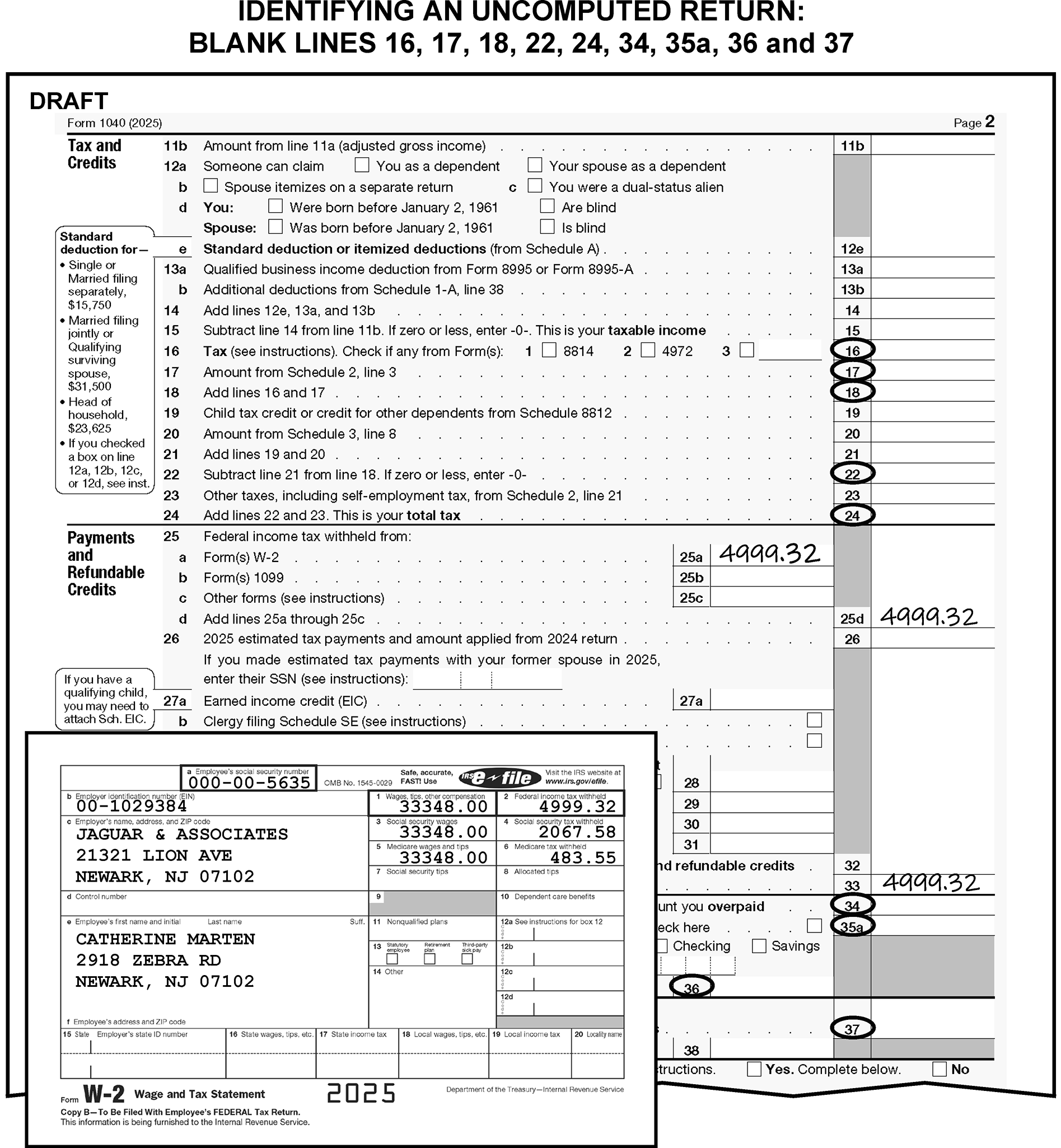
-
If a return with a notation of blocked or deferrable income is attached to another return:
-
"X" the blocked income return, place behind the processable return and continue editing.
-
-
If a return with notation of blocked, deferrable income or Rev. Rul. 74-351 is not attached to another return, take to work leader.
-
The work leader or other trained employee will take the following actions:
Research for the status of the original return using the primary TIN and the tax period of the return. Refer to Job Aid 2431-009 for command code instructions.
Research CC IMFOLT for a TC150 to determine if a return has already posted.
Research CC ERINV to determine if there is a return in ERS. -
Research results:
If a TC150 has posted for the tax period of the return, route to Files unit to be associated with return.
If there is already a return in ERS for the same tax period, route to rejects.
If no TC150 has posted and no return is in ERS, send the informational return marked "Blocked or Deferrable Income" back to the taxpayer using Form 3531 and the following literal paragraph: "We received your informational return regarding deferrable income, pursuant to Rev. Rul. 74-351 however, we have not received an original tax return. You must attach this document to your original tax return when you file your return for the same tax period."
-
-
CII returns are identified by a unique 10-character alpha numeric identifier that begins with the letters CII (e.g., CII1A2BCD1).
-
Process CII returns as original filings and circle any notations of duplicate, amended or similar statements. Do not research for a TC150.
-
Re-edit any valid black edit marks in red on photocopied returns.
-
Do not correspond for a missing signature. Do not correspond or research for any missing required information.
-
Returns with any of the following conditions are considered combined tax liability returns:
-
More than one tax period.
-
More than one type of tax.
-
More than one person filing a joint return other than those taxpayers considered to be spouses.
-
More than one person filing a single return.
-
-
If any of the conditions in (1) apply, edit CCC "Y" and an Action Trail on the return.
-
Take no action when the return shows an ITIN and supporting documents reflect an SSN for the same taxpayer.
-
If there is an indication of Registered Domestic Partnership, "RDP" , "CCA 201021050" , or "CCA" on the return, edit Action Code "430" .
-
If Form 8958 Allocation of Tax Amounts Between Certain Individuals in Community Property States is attached, see IRM 3.11.3.58.
-
"X" any fractional exemption claimed.
-
"X" the amount claimed for Excess Social Security taxes when wages are less than $88,050.
-
Edit RPC "C" when there is an indication of a pro-rata share, and both of the following conditions apply:
-
A S-TIN is present.
-
Lines 1a-7a Form 1040 and lines 1-10 and 11-26 Schedule 1 have no entries.
-
-
Use the following information for processing ALL Form 8938, Statement of Specified Foreign Financial Assets, regardless of tax years.
January through September - (Recovery Processing) October through December - (Simultaneous Processing) -
Process Form 1040 using current coding instructions, including the editing of FPC "G" .
-
Pull the Form 8938 from the return and sequence it to the back of the Form 1040 package, attaching the Form 8938 so that it is back-to-back with the parent return.
-
Fully code Form 1040, including the editing of FPC "G" .
-
Only one Form 8938, pages 1 and 2, can be processed. If multiple Forms 8938 are attached, select the form that has the highest account, line 23 in Part V; or highest value, line 32 in Part VI, and delete the others.
-
Pull the Form 8938 from the return and sequence it to the back of the Form 1040 package, attaching the Form 8938 so that it is back-to-back with the parent return.
-
Place the Form 1040 with the Form 8938 attached in a designated bin for collection by Code & Edit Clerical function.
-
-
Management may implement simultaneous processing early. Coordinate with local Planning and Analysis Staff prior to implementing simultaneous processing to ensure pipeline resources are adequate and PCDs are not impacted.
-
One spouse my file an "Injured Spouse" claim to protect their share of a joint overpayment. These returns either have "Injured Spouse" written on them or Form 8379, Injured Spouse Allocation, is attached.
-
Form 8379 may be filed with an original return or by itself. Claims filed without an original return will be routed to ICT.
-
Remove an unnumbered Injured Spouse return from a block that is not an Injured Spouse block only if the return is a refund/credit elect.
-
If an Injured Spouse claim is attached to a numbered return that is not in an Injured Spouse block:
-
Attach Form 4227 and note "Injured Spouse" .
-
Edit Action Code "611" .
-
-
If a current year Form 1040-X is attached to a return with an Injured Spouse indication, take the following actions:
-
"X" the Form 1040-X and do not detach the Form 1040-X from the return.
-
Rebatch the return to an Injured Spouse block following the instructions in (3) or (4) above.
-
-
If correspondence is required on an Injured Spouse return, research for TC150 prior to corresponding:
-
If TC150 is present, move the Form 8379 to the front, delete (X) the return and route to ICT.
-
If no TC150 is present, correspond.
-
-
A taxpayer may make a claim for relief from joint and separate tax liability or "relief from liability for community income" in the following four ways:
-
Innocent Spouse Election - An election made by a person who filed a joint return and later showed that:
• The understatement of tax on the return was attributable to an erroneous item of the other spouse, of which the electing spouse had no knowledge or reason to know,
• AND considering all the facts and circumstances, it would be unfair to hold the electing spouse liable for the underpayment of tax. -
Relief from Community Property Liability - An election made by a person who did not file a return as married filing jointly in a community property state and later showed that:
• They did not include an item of community income in gross income that was attributable to the other spouse and did not know or have reason to know of that item of community income.
• AND considering all the facts and circumstances, it would be unfair to hold the taxpayer liable for the understatement of tax. -
Separate Liability Election - An election made by a person who filed a joint return and later claimed separate liability from their spouse. The electing spouse must be legally separated, living apart for 12 months or more, or no longer married to the spouse with whom they filed the joint return at the time the claim was filed and must not have actual knowledge of the item(s) giving rise to the deficiency.
-
Equitable Relief - Request made by a person who filed either a joint return, or a return that was not filed as "married filing jointly" in a community property state and later showed that considering all the facts and circumstances, it would be inequitable to hold that person liable.
-
-
Taxpayers are instructed to file Form 8857, Request for Innocent Spouse Relief, to request relief if they are making the above claims.
-
Edit CCC "3" when the taxpayer either attaches correspondence to the return and indicates "Innocent Spouse" , "Separate Liability Election" , "Equitable Relief" or "Joint and Several Liability" or when a Form 8857 is attached to the return.
-
Innocent spouse relief requests are processed at Campus Support Operation (CSO) only. When the taxpayer either attaches correspondence to the return that identifies them as a claimant or when Form 8857 is attached to the return:
-
Detach and date stamp the correspondence/Form 8857 and all supporting documentation.
-
Edit Action Trails on both the return and the correspondence/Form 8857.
-
Prepare Form 4227, notating "Innocent Spouse Request" and attach it to the detached item.
-
Give the detached item to the work leader.
-
Leave the return in the block and continue processing.
-
-
Send all claims to CSPCdaily, using the following address:
Internal Revenue Service
CSO (Campus Support Operation)
Stop #840F
7940 Kentucky Drive
Florence, KY 41042
-
International tax returns are identified by the presence of one of the following:
-
An address outside the 50 United States and Washington D.C. (This does not include APO/DPO/FPO addresses).
-
Form 390 (American Samoa), American Samoa Individual Income Tax Return
-
Form 482.0, Individual Income Tax Return/Formulario 482 (Puerto Rico), Planilla de Contribucion Sobre Ingresos de Individuous
-
Form 1040CM (CNMI), CNMI Territorial Individual Income Tax
-
Form 1040 GUAM, Guam Individual Income Tax Return
-
Form W-2 from American Samoa (W-2AS)
-
Form W-2 from CNMI (W-2CM)
-
Form W-2 from Guam (W-2GU)
-
Form W-2 from Virgin Islands (W-2VI)
-
Form 499R-2/W-2PR (Puerto Rican Withholding)
-
Form 1040-NR, U.S. Nonresident Alien Income Tax Return
-
Form 1040-NR-EZ, U.S. Income Tax Returns for Certain Nonresident Aliens With No Dependents (TY19 and prior)
-
Form 1040-PR, Declaración de Impuestos Federal sobre el Trabajo por Cuenta Propia (Incluyendo el Crédito Tributario Adicional por Hijos para Residentes Bona Fide de Puerto Rico)
-
Form 1040-SS (sp), Declaración de Impuestos Federal sobre el Trabajo por Cuenta Propia (Incluyendo el Crédito Tributario Adicional por Hijos para Residentes Bona Fide de Puerto Rico)
-
Form 1040-SS, U.S. Self-Employment Tax Return
-
Form 1042-S or letter signed by "Competent Authority" , Form SSA-1042S, or Form RRB-1042S or notation of Form 1042-S anywhere on the return
-
Form 2555, Foreign Earned Income or notation of Form 2555 or Housing Deduction anywhere on the return
-
Form 2555-EZ, Foreign Earned Income Exclusion (obsolete 2019 and later).
-
Form 4563, Exclusion of Income for Bona Fide Residents of American Samoa
-
Form 5074, Allocation of Individual Income Tax to Guam or the Commonwealth of the Northern Mariana Islands (CNMI)
-
Form 8288-A, Statement of withholding under Section 1445 or notation of Form 8288-A anywhere on the return
-
Form 8689, Allocation of Individual Income Tax to the U.S. Virgin Islands or notation of Form 8689 anywhere on the return
-
Form 8804, Annual Return for Partnership Withholding Tax Under Section 1446
-
Form 8805, Statement of Withholding under Section 1446 or notation of Form 8805 anywhere on the return
-
Form 8813, Partnership Withholding Tax Payment
-
Form 8833, Treaty-Based Return Position Disclosure
-
Form 8854, Initial and Annual Expatriation Information Statement
-
Form 8898, Statement for Individuals Who Begin or End Bona Fide Residence in a U.S. Territory
-
Dual Status -- Form 1040 and Form 1040-NR filed together for the same tax year, "Dual Status" or "D/S" indicated on the return (taxpayer claims part year residence and part year non - residence). Always leave Form 1040 and Form 1040-NR or Form 1040-NR-EZ for the same taxpayer together.
-
Nonresident Alien (NRA) -- Primary or both taxpayers are nonresident NRA(s)
-
International Tax Treaty -- taxpayer indicating exemption or exclusion of tax and/or income due to an International Tax Treaty.
-
Treaty Trader
-
Fulbright Grantee
-
Notation of "Streamlined" on the return
-
Form 14653 (Streamlined Foreign Offshore)
-
Form 14654 (Streamlined Domestic Offshore)
-
Other Streamlined certification
-
IRC 871, 893, 911, 913, 931, 932, 933, 934 or 935 of the Internal Revenue Code (IRC) or Section 6114, is notated anywhere on the return.
-
Notation of "Relief for Certain Former Citizens" , Relief, Expat, FAQ 24, FAQ 25, or something similar is written on the return and/or any attachments.
-
Copy of Certificate of Loss of Nationality (CLN) is attached.
-
Taxpayer specifically mentions "Relief" , "Former Citizen" , "Expatriate process" , "FAQ 24" , "FAQ 25" , or something similar in an attached letter.
-
-
Do not route returns to AUSPC unless one of the forms or conditions at IRM 3.11.3.6.2.13 is present or the taxpayer excludes income.
-
Immediately forward international returns -- in their entirety -- to AUSPC at the following address:
Internal Revenue Service
Mail Stop 6054 AUSC
P.O. Box 934
Austin, TX 78767
For Private Delivery Service (PDS) Mailing:
Internal Revenue Service
Mail Stop 6054 AUSC
3651 S IH 35
Austin, TX 78741Exception:
Immediately forward returns that have any of the following characteristics and do not have an LB&I stamp indicating that LB&I has already reviewed it to AUSPC LB&I at the address below:
"Relief for Certain Former Citizens" , "Relief" , "Expat" , "FAQ 24" , "FAQ 25" , or something similar is written on the return and/or any attachments.
Form 8854 is attached.
Copy of Certificate of Loss of Nationality (CLN) is attached.
Taxpayer specifically mentions "Relief" , "Former Citizen" , "Expatriate process" , "FAQ 24" , "FAQ 25" , or something similar in an attached letter.
Form 8898 is attached.
Internal Revenue Service
Mail Stop 4301 AUSC
3651 S IH 35
Austin, TX 78741
For Private Delivery Service (PDS) Mailing:
Internal Revenue Service
Mail Stop 4301 AUSC
3651 S IH 35
Austin, TX 78741
Austin route to MS 4301 AUSC. -
If the return is unnumbered, take the following actions:
-
If the return is numbered, take the following actions:
-
Leave the return in the batch and edit Action Code "651" . (See Figure 3.11.3-8.)
-
Stop editing.
-
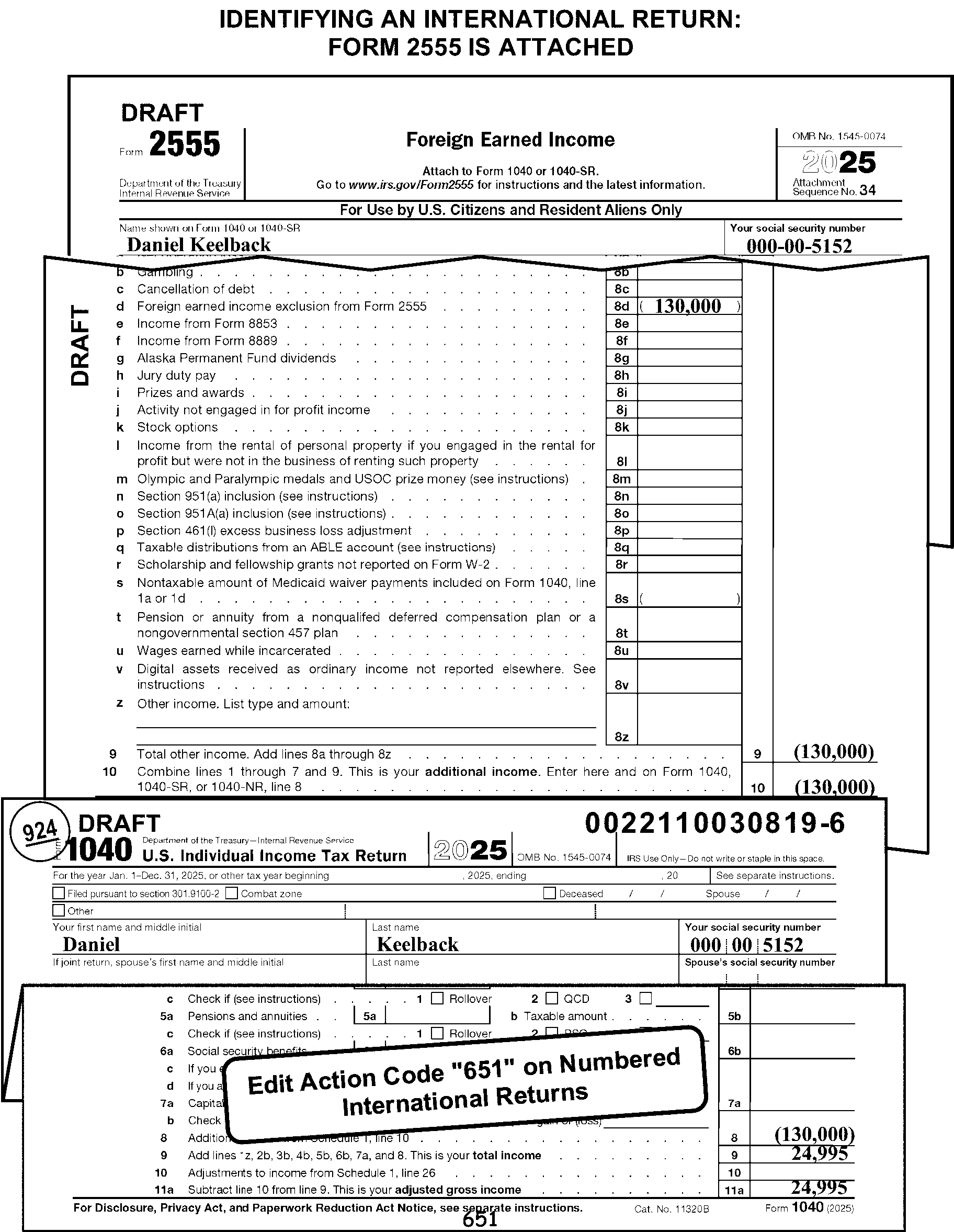
-
A misblocked return is one found in a block of work other than the one in which it belongs.
-
Remove an unnumbered misblocked return for rebatching. (This includes when an unnumbered return is found in a numbered batch.)
Caution:
To ensure accuracy in the rebatching of returns the remittance indicator must be true to that batch. For example, all full-paid returns must be batched together, all part-paid returns, etc. Also, credit card payments returns must be identified as remittance returns and batched as full or part paid returns.
-
Numbered returns must not be removed from the block. Instead, take the following actions for all numbered returns:
If Then Form 1040A or Form 1040EZ is found in a Form 1040 block, Convert entries to Form 1040 format and continue editing. If a prior year return is found in a current year block, Process the return using the prior year instructions in IRM 3.11.3.75. Form not in the 1040 series is found in a Form 1040 block, Refer the return to your work leader.
-
A misfiled return is a Form 1040 series return that meets any of the following criteria:
-
Business entity with an EIN
-
Business entity missing a TIN
-
Individual Master File (IMF) caption with an EIN
-
Individual and business names in the caption area with an EIN.
-
-
Route a return with any indication of Limited Liability Corporation (LLC) in the caption or signature areas to Entity for research.
-
Send a misfiled return back to the taxpayer with box 10 checked on Form 3531.
-
Return the block to Receipt and Control when Form 3893, Re-Entry Document Control, is not attached to a block of reinput returns.
-
Take the following actions when processing reinput returns:
-
Delete any unnecessary Action Codes.
-
Delete any incorrect codes and edit marks.
-
"X" any purple or blue corrections and re-edit them in red when the marks were made to correct erroneous Code & Edit marks.
-
Do not delete the original TE number or re-stamp the document with your TE number.
-
Follow the special editing instructions under "Remarks" on the Form 3893 (See Figure 3.11.3-9.)
-
Except for the first return, move Form 3893 to the back of the document on all blocks with duplicate DLNs.
Note:
Some re-entry returns will be rejected e-file returns coming from Accounts Management. These returns are identified by the presence of Mod e-File printouts (TRPRT- valid for prior year only) in lieu of the actual return. The printout will have "TRPRT PRINT DO NOT PROCESS" or "Efile Graphic Print" present. Do not correspond for missing signatures on these types of returns.
-
-
Use the following instructions when editing a received date from the DLN on either a current or prior year reinput return.
If the reinput return was originally numbered as a Then ≡ ≡ ≡ ≡ ≡ ≡ ≡ ≡ ≡ ≡ ≡ ≡ ≡ ≡ ≡ ≡ ≡ ≡ ≡ ≡ ≡ ≡ ≡ ≡ ≡ ≡ ≡ ≡ ≡ ≡ ≡ ≡ ≡ ≡ ≡ ≡ ≡ ≡ ≡ ≡ ≡ ≡ ≡ ≡ ≡ ≡ ≡ ≡ ≡ ≡ ≡ ≡ ≡ ≡ ≡ Non-remittance return, Edit the received date by using the calendar date indicated by the original DLN, minus 10 days. -
Edit Action Code "640" when required information is missing. Also attach Form 4227 indicating "Void to Originator" and the reason (e.g., "Missing Schedule A" ). Do not correspond.
-
If Box 15 on Form 3893 directs you to process the return as a non-remit:
-
Delete all green or blue marks underlining money amounts.
-
Delete all green or blue written money amounts.
-
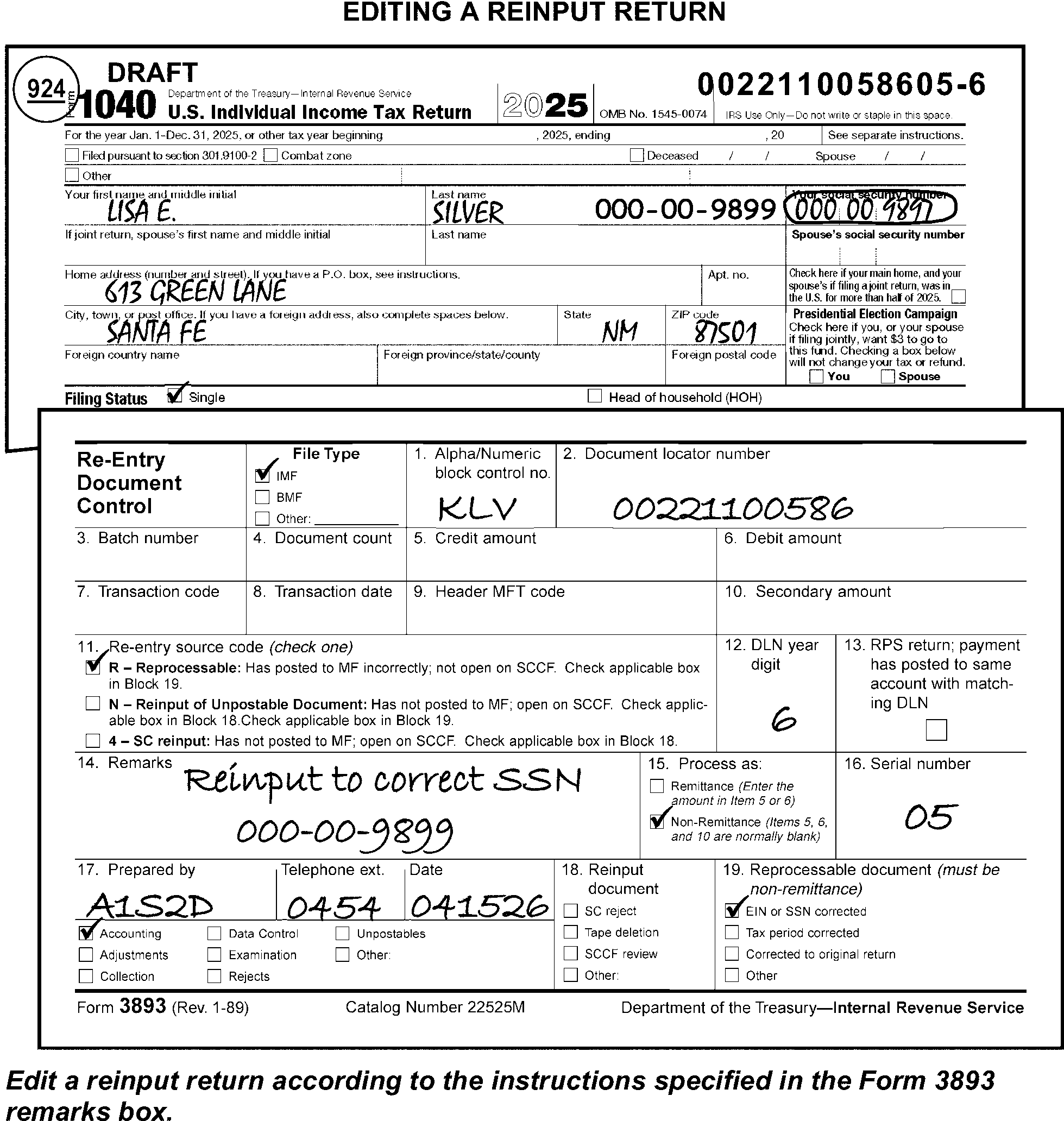
-
A TC59X–XX or notation of Integrated Collection System ("ICS" ) is entered by Collection in the upper-left margin of Form 1040, on secured returns.
-
Do not research for TC150 on Secured Returns
-
Do not correspond or research for Forms W-2 on secured returns.
-
Do not correspond for missing signature if Process as Original is present on the return.
-
Do not refer unprocessable returns secured by Collection to the Collection unit, including those returns with CP 515 or CP 518 attached with notation of "For Signature Purposes" present.
-
Refer to the Examination case information in IRM 3.11.3.6.1.5 for instructions on returns secured by Examination.
-
Route a secured return with missing or invalid signature back to the originating Collection function unless "Process as Original" or "PAO" is present on the return.
-
Taxpayers can file a return for fewer than 12 months only under one of the following conditions:
-
An application or authority to file a short period return has been approved by the IRS (Form 1128).
-
The return is filed under Treas. Reg. Section 1.443-1.
-
The return is filed under Section 1398 (Bankruptcy) Election or Second Short Year after Section 1398 Election.
-
The taxpayer died during the current processing year and is filing to date of death. (See the decedent return editing instructions in IRM 3.11.3.10.)
-
The return is the final return for the taxpayer.
-
-
Correspond for an explanation of the taxpayer's authority to file a short period return when none of the conditions in (1) above apply.
-
Complete Form 3531/6001, using fill-in 4, per Exhibit 3.11.3-18.
-
Edit Action Code "211" when using Form 6001.
-
-
Short Period returns require the following additional editing:
-
Edit CCC "Y" and an Action Trail.
-
Edit the ending date of the tax period, using "YYMM" format.
-
Edit the received date when one is not already present.
-
-
Determine the number of quarters covered by the short period return when Schedule SE is attached. The self-employment (SE) Quarters Covered Code is edited on Schedule SE based on the number of quarters reported on the short period return. Use the following information to determine the number of quarters covered:
-
A fraction of a quarter counts as a full quarter.
-
The quarters begin in January, April, July, and October.
-
-
Edit the SE Quarters Covered Code in the margin to the right of line 4c of Schedule SE. Code the SE quarters covered as follows:
-
Code "1" for one quarter.
-
Code "2" for two quarters.
-
Code "3" for three quarters.
-
-
An SFR return is prepared by Examination, Collection, or the Automated SFR (ASFR) function.
-
Do not correspond with the taxpayer for missing information - including signature - on an SFR return. Instead, prepare Form 4227 to route the SFR return to the originating function when any of the following information is missing:
-
Filing status
-
Name(s)
-
TIN(s)
-
-
Edit RPC "L" and CCC "B" when there are no significant T-line entries on lines 1a through 38.
-
Take the following actions when an SFR return has the words "Possessor of Certain Cash" written on it:
-
Edit the tax period if other than 2512.
-
Process the return with a temporary TIN and route the return to Entity using Form 4227 for the assignment of the TIN.
-
Edit "Possessor of Certain Cash" as the AIL.
-
-
Edit an SFR return that has either "IRP" or "RTF" written on it as follows:
-
Edit the tax period if other than 2512.
-
Edit today's date as the received date.
-
Edit CCC "3" and CCC "B" .
-
-
Do not refer SFR returns without significant entries for statute clearing. Instead, edit RPC "L" , CCC "B" and RPC "K" .
-
Route ASFR returns to the Collections unit referenced in the attached Notice or Letter 2566, 3219, or pink Form 3531, if present. If ASFR is notated at the top of the return or an ASFR date stamp is present as the only indication, route the return to Austin or Fresno at the addresses shown below.
-
AUSPC, 3651 South IH 35, Stop 5501, Austin, TX 78741
-
Fresno Campus Support, Stop 81105, 3211 S. Northpointe Dr., Fresno, CA 93725
-
-
Do not correspond. Do not send the return back to the taxpayer.
-
This is the only type of return that may have a tax period ending prior to the last day of a month.
-
Tax periods reported under the 52-53 week rule may end no more than 6 days before, and no more than three days after, the end of a month. In the edit format, use the numeric designation of the month, the last day of which is closest to the actual ending date.
-
If the tax period is missing, illegible, invalid, or is longer than one year, assume the tax period to be the current calendar year if it makes the form timely.
-
Taxpayers who are presidential appointees are permitted to file their individual tax returns through a trustee of a blind trust.
-
If there is any indication on the return or an attachment, a General Power of Attorney, or Form 2848 attached that indicates "Blind Trust" , see IRM 3.28.3.6.
-
The POA, Form 2848 must be processed to the CAF to reflect the Blind Trust Indicator on Master File to ensure that no correspondence is generated to the taxpayer.
-
These instructions for tax period editing include:
-
General instructions
-
Current calendar year returns
-
Fiscal year returns
-
Prior year returns
-
Early filed returns
-
-
The tax period is indicated at the top of the form above the name area and/or the TIN blocks.
-
Consider all returns to be current calendar year (i.e., 2512) returns, unless otherwise indicated.
-
Edit tax periods other than the current calendar year to the right of the preprinted tax year in "YYMM" format (e.g., "2603" ). (See Figure 3.11.3-10.)
-
Current year returns are defined as a Form 1040 and the tax period can’t end earlier than 2512 (December 2025) or later than current year and month.
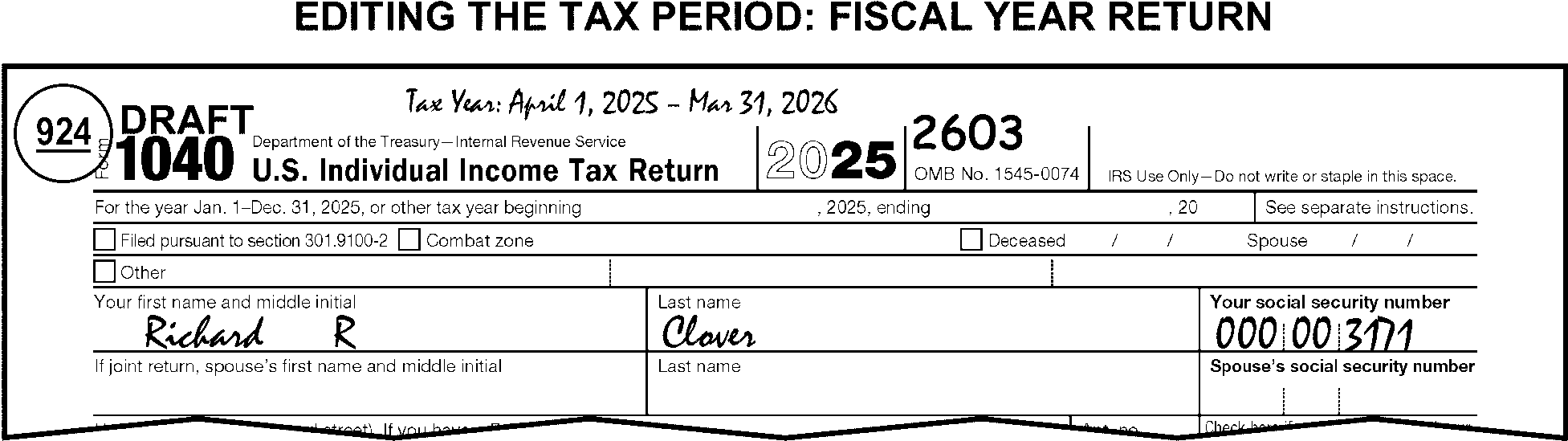
-
Process the return as a current calendar year return when the tax form is for a prior year, but the Form(s) W-2 is for the current calendar year. Pull for work leader or follow local procedures.
-
The work leader will:
-
Convert to a current year by dummying a current year Form 1040
-
Include any Schedules 1 - 3 as necessary.
-
-
When the taxpayer attaches prior year forms or schedules to a current year return, re-number T-lines to match the current year form or schedule.
-
Number T-lines with entries when line numbers are missing or illegible.
-
A fiscal year is twelve full months ending on the last day of any month other than December.
-
Edit the tax period in YYMM format. See Figure 3.11.3-10.
-
Edit the received date when one is not already present.
-
-
Edit Action Code "355" when the ending date of the tax period is after the current date except for decedent returns.
-
For TY202607 and later, edit FPC "F" if the return is a fiscal year filer and any of the following applies:
-
Form 1062 is attached.
-
An amount is present on Schedule 2, line 17z and the taxpayer notated "Deferral 1062I" .
-
An amount is present on Schedule 3, line 13z and the taxpayer notated "Deferral 1062NL" .
-
-
A prior year tax return is a Form 1040 series return filed for a tax year prior to the current processing year.
-
Refer to IRM 3.11.3.75 for prior year editing instructions.
-
Refer to IRM 3.11.3.75.2 for the statute of limitations instructions on prior year returns.
-
Process the return as a prior year return when the tax form is for the current year, but the Form(s) W-2 is for a prior year. Pull for work leader unless trained.
-
The work leader will:
-
Convert to a prior year Form 1040.
-
Refer to the line-by-line instructions for prior year editing in IRM 3.11.3.75 for more information.
-
-
The received date is the date the IRS received a return.
-
Information and instructions about received dates included in this subsection of the manual include:
-
General instructions
-
Timely received dates
-
Determining the received date
-
≡ ≡ ≡ ≡ ≡ ≡ ≡ ≡ ≡ ≡ ≡ ≡ ≡ ≡
-
Late-filed returns
-
Extensions
-
Reasonable cause criteria
-
-
A received date is required on all returns.
-
If missing, edit the received date on the front of the return in the filing status area to the right of the Single filing status check box.
-
Edit the received date in "MMDDYY" format when not already present. MMDDYY format is Month Month Day Day Year Year. For example, April 23, 2026, when edited in MMDDYY format is "042326" .
-
Perfect the received date when it is not legible or is incomplete. When perfecting, edit in the MMDDYY format.
-
If a received date is present in or above the caption area, delete and edit the same received date as instructed in (2) above. If page 1 of the return does not have a received date, search the return and attachments for a received date and edit that date as instructed above.
-
Circle a received date that has been X-ed or deleted in another manner. If a valid received date is not present, edit the correct received date in MMDDYY format.
-
Circle all but the earliest valid received dates (including Statute or other valid IRS organization's received dates) when there are multiple received dates present; Taxpayer Advocate Service (TAS) received dates are not valid received dates. If multiple received dates are identical and in the correct location on the return, circle all but one received date.
-
If a return has been faxed to another area of the IRS and then sent to Code & Edit for processing, do not edit the Enterprise Electronic Fax (EEFax) date as the IRS Received Date. Edit the received date following normal procedures when one is not present.
-
When there is no valid received date stamp or handwritten received date, determine the received date in the following priority:
-
Latest postmark on the envelope, the postmark date stamped or handwritten on the return or latest date from a private delivery service mark. (See Figure 3.11.3-12)
-
Service Center Automated Mail Processing System (SCAMPS) digital dates.
-
Latest date by the taxpayer's signature(s). (See Figure 3.11.3-12)
-
Julian date minus 10 days in the DLN.
-
Today's date minus 10 days.
-
-
If the stamped received date is three months or more prior to the current date, search the return for an indication the received date is incorrect (e.g., a postmark date or signature date after the received date). If the received date is determined to be incorrect, circle it and edit a new received date following the instructions at IRM 3.11.3.8.2(1).
-
Always review each return for the words, "Returned for Signature" or similar statement and a date present in the lower left corner of the return. These are returns that were originally received missing a signature and were mailed back to the taxpayer. If a date and the notation "Returned for Signature" or similar statement is present, refer to the following instructions for editing the received date:
-
If the return is Balance Due and a received date is present showing a date within 30 days after the date present in the lower left corner, use the date sent back for signature as the received date. Use the most recent mail-back date when multiple dates are present. Circle out any other received date(s) that may be present. (See Figure 3.11.3-13.)
-
If the return is Balance Due and a received date is present showing a date more than 30 days after the date present in the lower left corner, honor the latest received date. Circle out any other received date(s) that may be present.
-
If the return is a Refund, Credit Elect or Zero balance return, honor the latest received date. Circle out any other received date(s) that may be present.
-
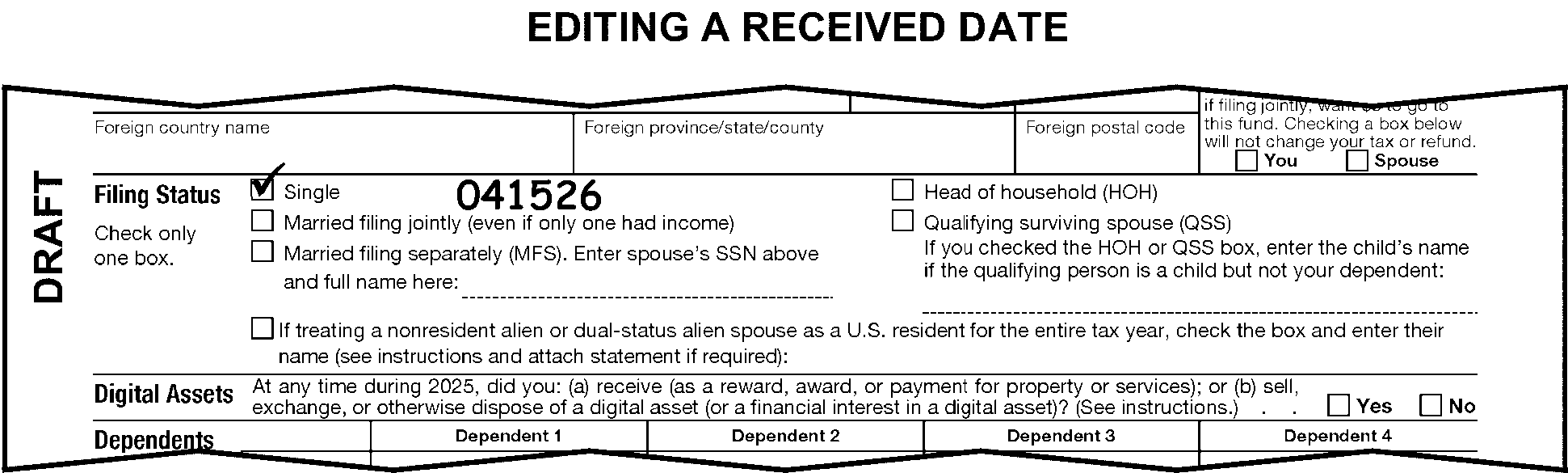
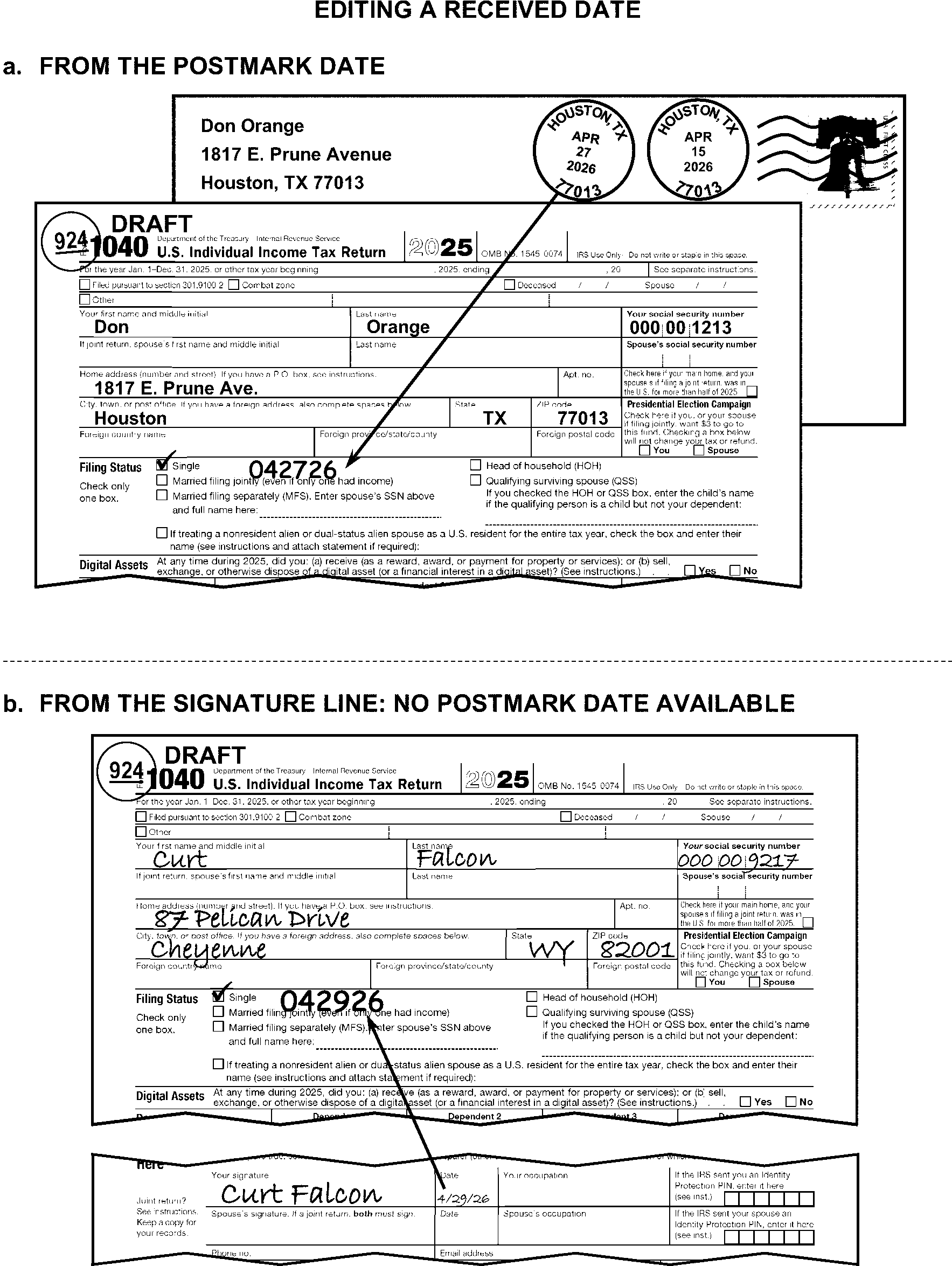
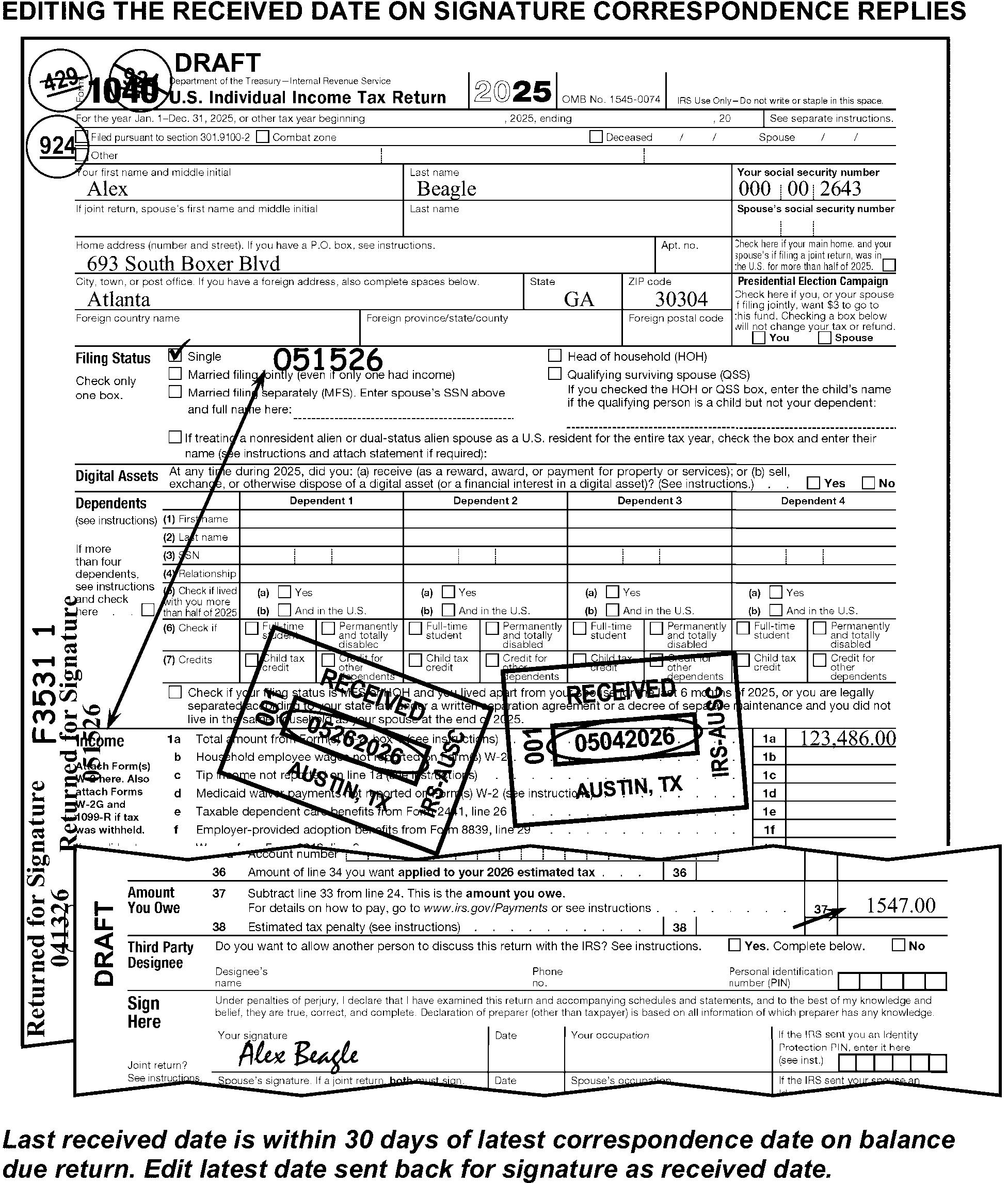
-
Accept these three types of received dates:
-
IRS campus date stamp or handwritten date with the word "received" - to include Accounts Management, ACSS, Collections, or other valid IRS organizations.
-
IRS area/territory office date stamp with the word received.
-
Valid handwritten or typed received date.
Note:
A handwritten or typed received date edited in the empty space to the right of Dependents (see instructions) on TY18 and later returns or on TY17 and prior returns in the line 6d area of Form 1040 or Form 1040A (line 6 of Form 1040EZ) by an IRS employee in Submission Processing or RIVO is valid. A clear indication that a handwritten or typed received date has been edited by RIVO will be the presence of SPC "B" , "M" and/or "RIVO" noted or stamped in the upper left margin. Generally, the RIVO-edited received date will be earlier than the original, stamped received date.
-
-
Accept a received date on an IRS Received Date Label (Form 14471) above the caption.
-
When there is no valid date stamp and the handwritten or typed received date is not valid, determine the received date using the instructions in IRM 3.11.3.8.2.
-
Accept all valid post office marks whether United States Postal Service (USPS), foreign country postmarks, or USPS private meter marks.
-
Valid Post Office marks are:
-
Postage Validation Imprinter (PVI) labels displaying the USPS eagle
-
Killer bar strips or other cancellation marks with a date, city, and state
-
USPS Metered postmarks
-
Private Metered Marks (identified by the absence of "USPS" in the postmark)
-
-
Use the following chart to determine the correct editing when only a private meter postmark is present.
If the document is Then ≡ ≡ ≡ ≡ ≡ ≡ ≡≡ ≡ ≡ ≡≡ ≡ ≡ ≡ ≡ ≡ ≡ ≡ ≡ ≡ ≡ ≡ ≡ ≡ ≡ ≡ ≡ ≡ ≡ ≡ ≡ ≡ ≡ ≡ ≡ ≡ ≡ ≡ ≡ ≡ ≡ ≡ ≡ ≡ ≡ ≡ ≡ ≡ ≡ ≡ ≡ ≡ ≡ ≡ ≡ ≡ ≡ ≡ ≡ ≡ ≡ ≡ ≡ ≡ ≡ ≡ ≡ ≡ ≡ ≡ ≡ ≡ ≡ ≡ ≡ ≡≡ ≡ ≡ ≡ ≡≡ ≡ ≡ ≡ ≡ ≡ ≡ ≡ ≡ ≡ ≡ ≡ ≡ ≡ ≡ ≡ ≡ ≡ ≡ ≡ ≡ ≡ ≡ ≡ ≡ ≡ ≡ ≡ ≡ ≡ ≡ ≡ ≡ ≡ ≡ ≡ ≡ ≡ ≡ ≡ ≡ ≡ ≡
-
A private delivery service (PDS) is a business which delivers mail or packages within an agreed upon schedule (e.g., overnight or same day delivery). The "timely mailing treated as timely filing" rule now applies to some PDSs. When the rule applies to a PDS, it is referred to as a "designated" PDS.
-
Do not use marks from a non-designated PDS to determine whether a return is timely filed. The "timely mailing treated as timely filing" rule applies only to the USPS and to designated PDSs.
-
Accept all designated PDS marks. The only designated delivery services are listed below:
-
United Parcel Service (UPS)
• UPS Next Day Air Early A.M.
• UPS Next Day Air
• UPS Next Day Air Saver
• UPS Second Day Air
• UPS Second Day Air A.M.
• UPS Worldwide Express
• UPS Worldwide Express Plus -
Federal Express (FedEx)
• Fed Ex First Overnight
• Fed Ex Priority Overnight
• Fed Ex Standard Overnight
• Fed Ex Two Day
• Fed Ex International Next Flight Out
• Fed Ex International Priority
• Fed Ex International First
• Fed Ex International Economy -
DHL Express
DHL Express
DHL Express Worldwide
DHL Express Envelope
DHL Import Express
DHL Import Express Worldwide
-
-
Use the instructions in IRM 3.11.3.8.2 for determining the date a return was received whether the mail marks are from a designated or non-designated PDS.
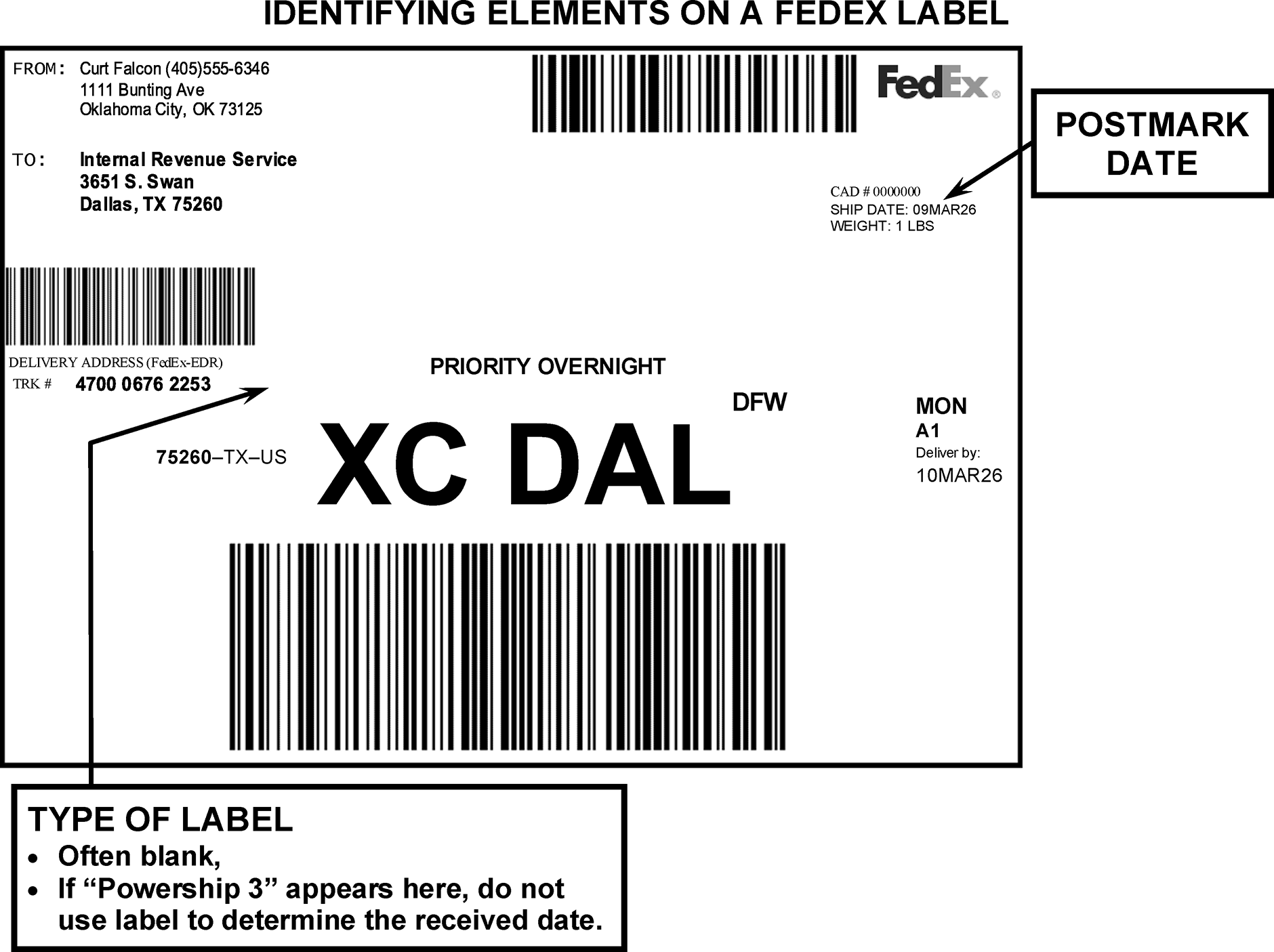
-
For 2026, a current-year return is a return filed for tax year 2025. A current calendar-year return (2512) is timely filed when it is mailed on or before the due date of April 15, 2026.
-
All returns - always requires a received date.
-
By law, a timely-mailed return is a timely-filed return. This applies to both USPS and designated PDS mail.
-
≡ ≡ ≡ ≡ ≡ ≡ ≡ ≡ ≡ ≡ ≡ ≡ ≡ ≡ ≡ ≡ ≡ ≡ ≡ ≡ ≡ ≡ ≡ ≡ ≡ ≡ ≡ ≡ ≡ ≡ ≡ ≡ ≡ ≡ ≡ ≡ ≡ ≡ ≡ ≡ ≡ ≡ ≡ ≡ ≡ ≡ ≡ ≡ ≡ ≡ ≡ ≡ ≡ ≡ ≡ ≡ ≡ ≡ ≡ ≡ ≡ ≡ ≡ ≡ ≡ ≡ ≡ ≡ ≡ ≡ ≡ ≡ ≡ ≡ ≡ ≡ ≡ ≡ ≡ ≡ ≡"≡ ≡ ≡ ≡ ≡ ≡ ≡ ≡" ≡ ≡ ≡ ≡ ≡ ≡ ≡ ≡ ≡ ≡ ≡ ≡ ≡ ≡ ≡ ≡ ≡ ≡ ≡ ≡ ≡ ≡ ≡ ≡ ≡ ≡ ≡ ≡ ≡ ≡ ≡ ≡ ≡ ≡ ≡ ≡ ≡ ≡ ≡ ≡ ≡ ≡ ≡ ≡ ≡ ≡ ≡ ≡ ≡ ≡ ≡ ≡ ≡ ≡ ≡ ≡ ≡ ≡ ≡"≡ ≡ ≡ ≡ ≡ ≡ ≡ ≡ ≡ ≡ ≡ ≡ ≡ ≡ ≡ ≡ ≡ ≡ ≡ ≡" ≡ ≡ ≡ ≡ ≡
-
≡ ≡ ≡ ≡ ≡ ≡ ≡ ≡ ≡ ≡ ≡ ≡ ≡ ≡ ≡ ≡ ≡ ≡ ≡ ≡ ≡ ≡ ≡ ≡ ≡ ≡ ≡ ≡ ≡ ≡ ≡ ≡ ≡ ≡ ≡ ≡ ≡≡ ≡ ≡ ≡ ≡ ≡ ≡ ≡ ≡ ≡ ≡ ≡ ≡ ≡ ≡ ≡ ≡ ≡ ≡ ≡ ≡ ≡ ≡ ≡ ≡ ≡ ≡ ≡ ≡≡ ≡ ≡≡ ≡ ≡ ≡ ≡ ≡ ≡ ≡ ≡
-
≡ ≡ ≡ ≡ ≡ ≡ ≡ ≡ ≡ ≡ ≡ ≡ ≡ ≡ ≡ ≡ ≡ ≡ ≡ ≡ ≡ ≡ ≡ ≡ ≡ ≡ ≡ ≡ ≡ ≡ ≡ ≡ ≡ ≡ ≡ ≡ ≡ ≡≡ ≡ ≡ ≡ ≡ ≡ ≡ ≡ ≡ ≡ ≡ ≡ ≡ ≡≡ ≡ ≡≡ ≡ ≡ ≡ ≡ ≡ ≡ ≡ ≡ ≡ ≡ ≡ ≡ ≡ ≡ ≡ ≡ ≡ ≡ ≡ ≡ ≡ ≡ ≡ ≡ ≡ ≡ ≡ ≡ ≡
-
If penalties or interest are indicated by Examination or Collection and the return is part- or full-paid, ensure received date is present and prepare Form 3471. See IRM 3.11.3.3.4.1 for more information and instructions. Use the instructions in IRM 3.11.3.14.3.5 when the taxpayer enters the penalty and interest amounts.
-
A return is delinquent when it is filed after the due date without an approved extension.
-
≡ ≡ ≡ ≡ ≡"≡ ≡ ≡ ≡ ≡" ≡ ≡ ≡ ≡ ≡ ≡ ≡ ≡ ≡ ≡ ≡ ≡ ≡ ≡ ≡ ≡ ≡ ≡ ≡ ≡ ≡ ≡ ≡ ≡ ≡ ≡ ≡ ≡ ≡ ≡ ≡ ≡ ≡ ≡ ≡ ≡ ≡ ≡ ≡ ≡ ≡ ≡ ≡ ≡ ≡ ≡ ≡ ≡≡ ≡ ≡ ≡≡ ≡ ≡ ≡ ≡ ≡ ≡ ≡ ≡ ≡
-
≡ ≡ ≡ ≡ ≡ ≡ ≡ ≡ ≡ ≡ ≡ ≡ ≡ ≡ ≡ ≡ ≡ ≡ ≡ ≡ ≡ ≡ ≡ ≡ ≡ ≡ ≡ ≡ ≡ ≡ ≡ ≡ ≡≡ ≡ ≡≡ ≡ ≡ ≡ ≡
-
≡ ≡ ≡ ≡ ≡ ≡ ≡ ≡ ≡ ≡ ≡ ≡ ≡ ≡ ≡ ≡ ≡ ≡ ≡≡ ≡ ≡ ≡≡ ≡ ≡ ≡ ≡ ≡ ≡ ≡ ≡ ≡ ≡
-
-
When the received date on a current calendar-year (2512) return ≡ ≡ ≡ ≡ ≡ ≡ ≡ ≡ ≡ ≡ ≡ ≡ ≡ ≡ ≡ ≡ ≡ ≡ ≡ ≡ ≡ ≡ ≡ ≡ ≡ ≡"≡ ≡ ≡ ≡" or later), examine the envelope or the postmark date stamped or handwritten on the return and:
≡ ≡ ≡ ≡ ≡ ≡ ≡ ≡ ≡ ≡ ≡≡ ≡ ≡ ≡ ≡ ≡ ≡ ≡ ≡ ≡ ≡ ≡ ≡ ≡ ≡ ≡ ≡ ≡ ≡ ≡ ≡≡ ≡ ≡ ≡ ≡ ≡ ≡ ≡ ≡ ≡ ≡ ≡ ≡ ≡ "≡ ≡ ≡ ≡" ≡ ≡ ≡ ≡ ≡ ≡ ≡ -
≡ ≡ ≡ ≡ ≡ ≡ ≡ ≡ ≡ ≡ ≡ ≡ ≡ ≡ ≡ ≡ ≡ ≡ ≡ ≡ ≡ ≡ ≡ ≡ ≡ ≡ ≡ ≡ ≡
-
≡ ≡ ≡ ≡ ≡ ≡ ≡ ≡ ≡ ≡ ≡ ≡ ≡ ≡ ≡ ≡ ≡ ≡ ≡ ≡ ≡ ≡ ≡ ≡ ≡ ≡ ≡ ≡ ≡ ≡ ≡ ≡ ≡ ≡ ≡ ≡ ≡ ≡ ≡ ≡ ≡ ≡
≡ ≡ ≡ ≡ ≡ ≡ ≡ ≡ ≡ ≡ ≡ ≡ ≡ ≡ ≡ ≡ ≡ "≡ ≡ ≡ ≡" ≡ ≡ ≡ ≡ ≡ ≡ ≡ ≡ ≡ ≡ ≡ ≡ ≡ ≡ ≡ ≡ ≡ ≡ ≡ ≡ ≡ ≡ ≡ ≡ ≡ ≡ ≡ ≡ ≡ ≡ ≡ ≡ ≡ ≡ ≡ ≡ ≡ ≡ ≡ ≡ ≡ ≡-
≡ ≡ ≡ ≡ ≡ ≡ ≡ ≡ ≡ ≡ ≡ ≡ ≡ ≡ ≡ ≡ ≡ ≡ ≡ ≡ ≡ ≡ ≡ ≡ ≡ ≡ ≡
-
≡ ≡ ≡ ≡ ≡ ≡ ≡ ≡ ≡ ≡ ≡ ≡ ≡ ≡
-
≡ ≡ ≡ ≡ ≡ ≡ ≡ ≡ ≡ ≡ ≡ ≡ ≡ ≡ ≡ ≡ ≡ ≡ ≡ ≡ ≡ ≡ ≡ ≡ ≡ ≡ ≡ ≡ ≡ ≡ ≡ ≡ ≡ ≡ ≡ ≡ ≡ ≡ ≡ ≡ ≡ ≡ ≡ ≡ ≡ ≡ ≡ ≡ ≡ ≡ ≡ ≡ ≡"≡ ≡ ≡ ≡ ≡ ≡ ≡" ≡ ≡ ≡ ≡ ≡ ≡ ≡ ≡ ≡ ≡ ≡ ≡
"≡ ≡ ≡ ≡ ≡ ≡" ≡ ≡ ≡ ≡ ≡ ≡ ≡ ≡ ≡ ≡ ≡ ≡ ≡ ≡ ≡ ≡ ≡ ≡ ≡ ≡ ≡ ≡ ≡ ≡ ≡ ≡ ≡ ≡ ≡ ≡ ≡ ≡ ≡ ≡≡ ≡ ≡ ≡ ≡ ≡ ≡ ≡ ≡ ≡ ≡ ≡ ≡ ≡ ≡ ≡ ≡ ≡ ≡ ≡ ≡ ≡ ≡ ≡≡ ≡ ≡ ≡ ≡ ≡ ≡ ≡ ≡ ≡ ≡ ≡ ≡ ≡ ≡ ≡ ≡ ≡ ≡ ≡ ≡ ≡ ≡ ≡ ≡"≡ ≡ ≡ ≡" ≡ ≡ ≡ ≡ "≡ ≡ ≡ ≡ ≡ ≡" ≡ ≡ ≡ ≡ ≡ ≡ ≡ ≡ ≡ ≡ ≡ ≡ ≡ ≡ ≡ ≡ ≡ ≡ ≡ ≡ ≡ ≡ ≡ ≡ ≡ ≡ ≡ ≡ ≡ ≡ ≡ ≡ ≡ ≡ ≡ ≡ ≡ ≡ ≡ ≡ ≡ ≡"≡ ≡ ≡ ≡ ≡ ≡" ≡ ≡ ≡ ≡ ≡ ≡ ≡ ≡ ≡ ≡ ≡ ≡ ≡ ≡ ≡ ≡ ≡ ≡ ≡ ≡ ≡ ≡ ≡ ≡ ≡ ≡ ≡ -
-
≡ ≡ ≡ ≡ ≡≡ ≡ ≡ ≡ ≡≡ ≡ ≡ ≡ ≡ ≡ ≡ ≡ ≡ ≡ ≡ ≡ ≡ ≡ ≡ ≡"≡ ≡ ≡ ≡" ≡ ≡ ≡ ≡ ≡ ≡ ≡ ≡ ≡ ≡ ≡ ≡ ≡ ≡ ≡ ≡ ≡ ≡ ≡ ≡ ≡ ≡ ≡ ≡ ≡ ≡ ≡ ≡ ≡ ≡ ≡ ≡ ≡ ≡ ≡ ≡ ≡ ≡ ≡ ≡≡ ≡ ≡ ≡ ≡ ≡ ≡ ≡ ≡ ≡ ≡ ≡ ≡ ≡ ≡≡ ≡ ≡ ≡ ≡ ≡ ≡ ≡ ≡ ≡ ≡ ≡ ≡ ≡ ≡ ≡ ≡ ≡ ≡ ≡ ≡ ≡ ≡ ≡ ≡ ≡ ≡
-
Form 4868, Application for Automatic Extension of Time to File U.S. Individual Income Tax Return, may be filed to extend the due date for filing an individual tax return until October 15, 2026.
-
Extension forms are not required to be attached to the return when filed.
-
Take one of the following actions when an original Form 4868 is attached to a return:
If the Form 4868 is Then Not for the Form 1040 to which it is attached (e.g., another tax period, another taxpayer), Detach the form and route it to Receipt and Control. For the Form 1040 to which it is attached, Leave the form attached to the return. -
Edit CCC "R" on returns received after April 15th when Form 4868 or Form 6401 is attached and an ITIN or IRSN is present in the primary Social Security Number (SSN) field. Both Individual Tax Identification Numbers (ITINs) and Internal Revenue Service Numbers (IRSNs) begin with the digit "9" .
-
Examine the envelope postmark date. If the received date is "≡ ≡ ≡ ≡" or later, and the postmark date or designated PDS mark date is on or before October 15, 2026, edit the postmark date as the received date.
Exception:
Edit a timely received date on the return when the taxpayer explains the return is late due to the rejection of a timely-filed electronic return. Postmark date must be within 10 calendar days of notification from the IRS that the electronic portion of the return has been rejected or cannot be accepted for processing. (Publication 1345).
-
≡ ≡ ≡ ≡ ≡ ≡ ≡ ≡ ≡ ≡ ≡ ≡ ≡ ≡ ≡ ≡ ≡ ≡ ≡ ≡ ≡ ≡ ≡ ≡ ≡ ≡ ≡ ≡ ≡ ≡ ≡ ≡ ≡ ≡ ≡ ≡ ≡ ≡ ≡ ≡ ≡ ≡ ≡ ≡ ≡ ≡ ≡ ≡ ≡ ≡ ≡ ≡ ≡ ≡ ≡ ≡ ≡ ≡ ≡ ≡ ≡ ≡ ≡ ≡ ≡ ≡ ≡ ≡ ≡ ≡ ≡ ≡ ≡ ≡ ≡ ≡ ≡ ≡ ≡ ≡ ≡ ≡ ≡ ≡ ≡ ≡ ≡ ≡ ≡ ≡ ≡ ≡ ≡ ≡ ≡ ≡ ≡ ≡"≡ ≡ ≡ ≡" ≡ ≡ ≡ ≡ ≡ ≡"≡ ≡ ≡ ≡ ≡ ≡" ≡ ≡ ≡ ≡ ≡ ≡ ≡ ≡ ≡ ≡ ≡ ≡ ≡ ≡ ≡"≡ ≡ ≡ ≡" ≡ ≡ ≡ ≡ ≡ ≡ ≡ ≡ ≡ ≡ ≡ ≡
Note:
Use the instructions in IRM 3.11.3.3.4.1 to prepare Form 3471 when returns are received from Examination or Collection with penalty and interest amounts entered. These amounts will usually be present on Form 4364, Delinquency Computations. Use the instructions in IRM 3.11.3.14.3.5 when the taxpayer enters penalty and interest amounts.
-
Taxpayers are liable for delinquency penalties and interest on the unpaid taxes on returns received after the due date. However, penalties for late filing, or late payment, may be excused when the taxpayer has a reasonable cause for the delay. See Exhibit 3.11.3-9 for examples of reasonable cause.
-
Failure to make estimated (ES) tax payments generally cannot be waived due to reasonable cause. See IRM 3.11.3.14.3.5 for waivers of the estimated tax penalty. See Exhibit 3.11.3-9.
-
Edit CCC "N" on a return that qualifies the taxpayer for a special extension when the received date is later than the ≡ ≡ ≡ ≡ ≡ ≡ ≡ ≡ ≡ and there is an indication (on the return or an attachment) of any of the following:
-
The taxpayer lives outside the U.S. and Puerto Rico and main place of work is outside the U.S. and Puerto Rico
-
The taxpayer is on military or naval duty outside of the U.S. and Puerto Rico
-
An APO/FPO/DPO address
-
-
When the taxpayer's reasonable cause statement is not acceptable:
-
Edit CCC "7" .
-
Route for correspondence. Letter 854C (Penalty Waiver or Abatement Disallowed/Appeals Procedure Explained), must be issued.
-
-
≡ ≡ ≡ ≡ ≡ ≡ ≡ ≡ ≡ ≡ ≡ ≡ ≡ ≡ ≡ ≡ ≡ ≡ ≡ ≡ ≡ ≡ ≡ ≡ ≡ ≡ ≡ ≡ ≡ ≡ ≡ ≡ ≡ ≡ ≡ ≡ ≡ ≡ ≡ ≡ ≡ ≡ ≡ ≡ ≡ ≡ ≡ ≡ ≡ ≡ ≡ ≡ ≡ ≡ ≡ ≡ ≡ ≡ ≡ ≡ ≡ ≡ ≡ ≡ ≡ ≡ ≡ ≡
If the reasonable cause is for Then Late filing, Edit CCC "R" , unless CCC "N" has been edited. Late payment or a "Section 6020(b)" notation is present, Edit CCC "M" .
-
Instructions and information in this subsection of the manual include:
-
General caption information
-
Caption editing
-
Taxpayer identification number
-
Name and additional information lines
-
Mailing address
-
-
Some instructions for caption editing refer to "name control" . The name control consists of the first four characters of the primary taxpayer's last name. Refer to Document 7071 if name control editing is required.
-
Caption information can be printed, typed, or handwritten directly on the return. (See Figure 3.11.3-15.)
-
References to the Taxpayer Identification Number (TIN) include Social Security Numbers (SSN), Individual Taxpayer Identification Numbers (ITIN), Internal Revenue Service Numbers (IRSN), and Adoption Taxpayer Identification Numbers (ATIN).
-
Required caption information includes:
-
Primary taxpayer identification number (P-TIN)
-
Secondary taxpayer identification number (S-TIN)
-
Name
-
Additional information line, when required
-
Mailing address
-
City and State
-
ZIP Code
-
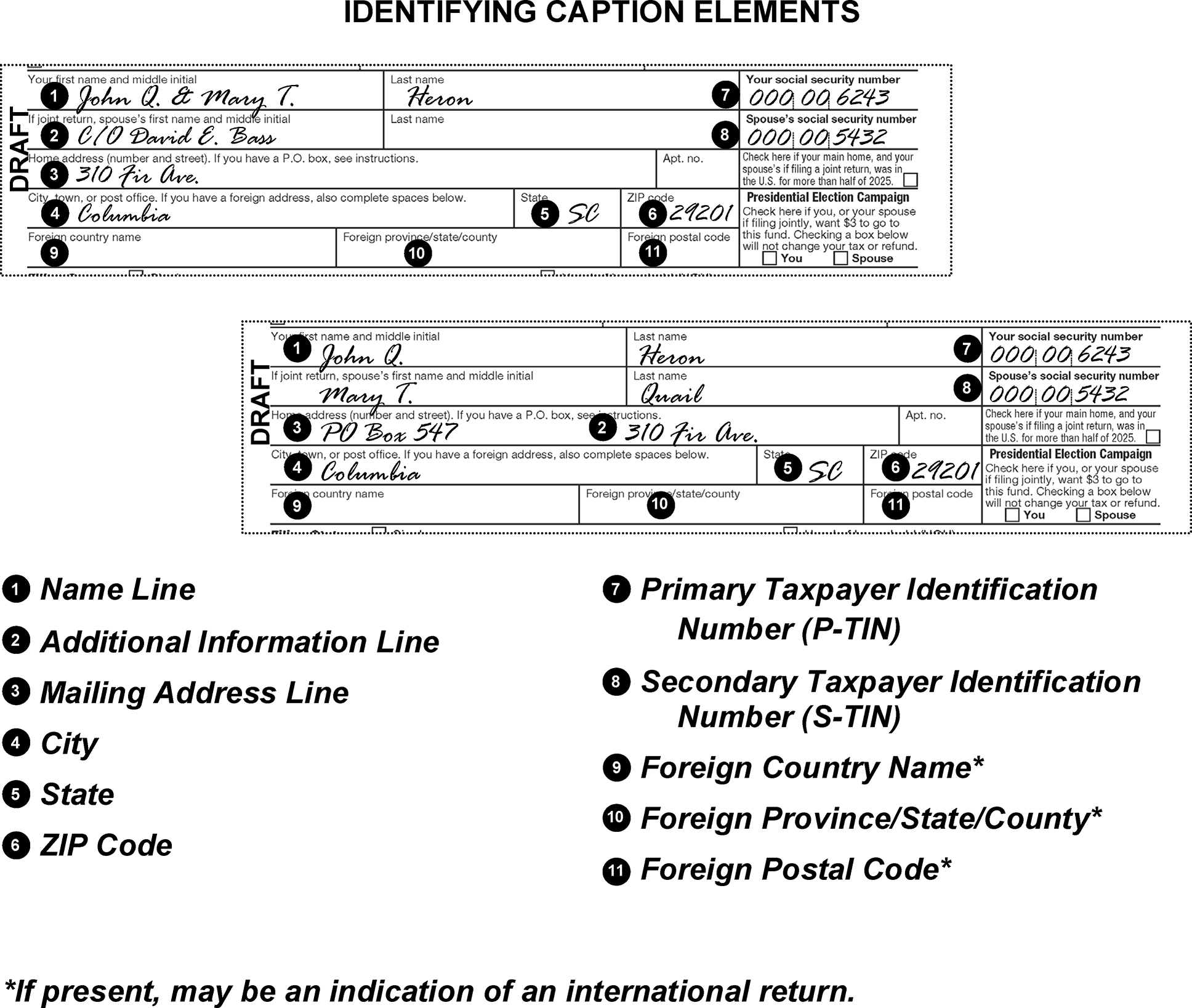
-
Ensure the S-TIN and name is present in the caption on Married Filing Jointly (MFJ) FS 2 returns. Also ensure that Married Filing Separately (MFS) FS 3 and FS 6 returns have the S-TIN included in the caption. For definition of Filing Status Codes (FS 2, FS 3, etc.) see IRM 3.11.3.12.1(2).
-
Edit to the caption area any change or addition to caption information made by the taxpayer on an attachment or on the return outside of the caption area. (See Figure 3.11.3-16.)
-
Search the return and attachments for any missing caption information and perfect the caption if all missing information is found. See IRM 3.11.3.9.2.3 for instructions on perfecting a mailing address.
-
Take the following actions if any required caption information is missing and cannot be perfected (see Figure 3.11.3-17):
-
Edit (or underline, if present) the name control in the caption area.
-
Edit the P-TIN (if not present) in the caption area.
-
-
Do not re-edit green edit markings in the caption area unless the editing is incorrect.
-
Do not change the name control when it has been edited in red by, Entity Unit, ITIN Operation, or RPS employees. Use the Entity/ITIN/RPS editing to perfect the:
-
Underline the Additional Information Line (AIL) (see IRM 3.11.3.9.2.2.2) when:
-
Present on a return.
-
The taxpayer indicates information which may be added to the additional information line. Edit and underline the correct information.
-
-
Delete "also known as" and "AKA" notations, as well as the name associated with the "AKA" when the taxpayer notates "also known as" or "AKA" and included an additional name in the caption area of the return.
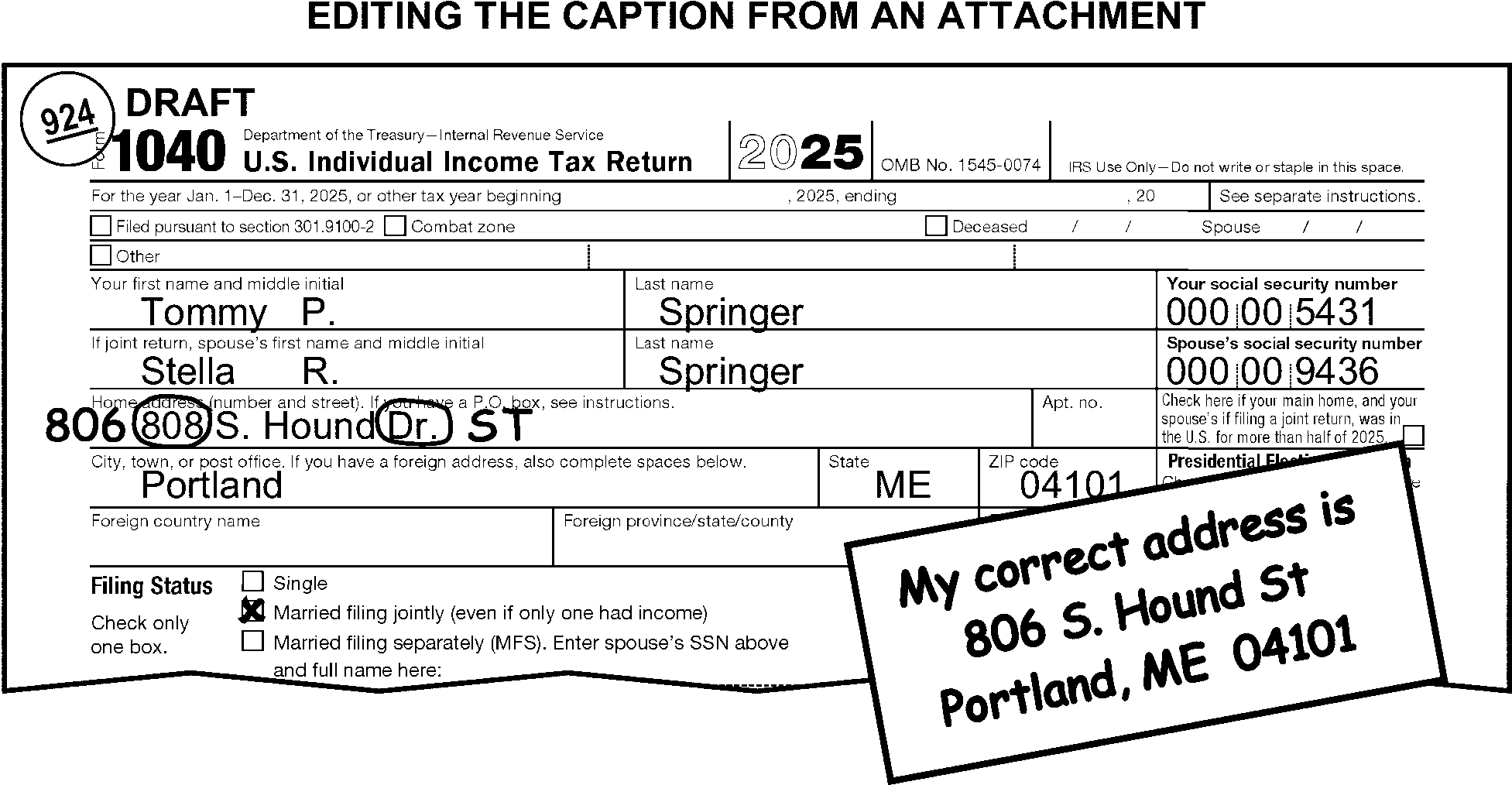
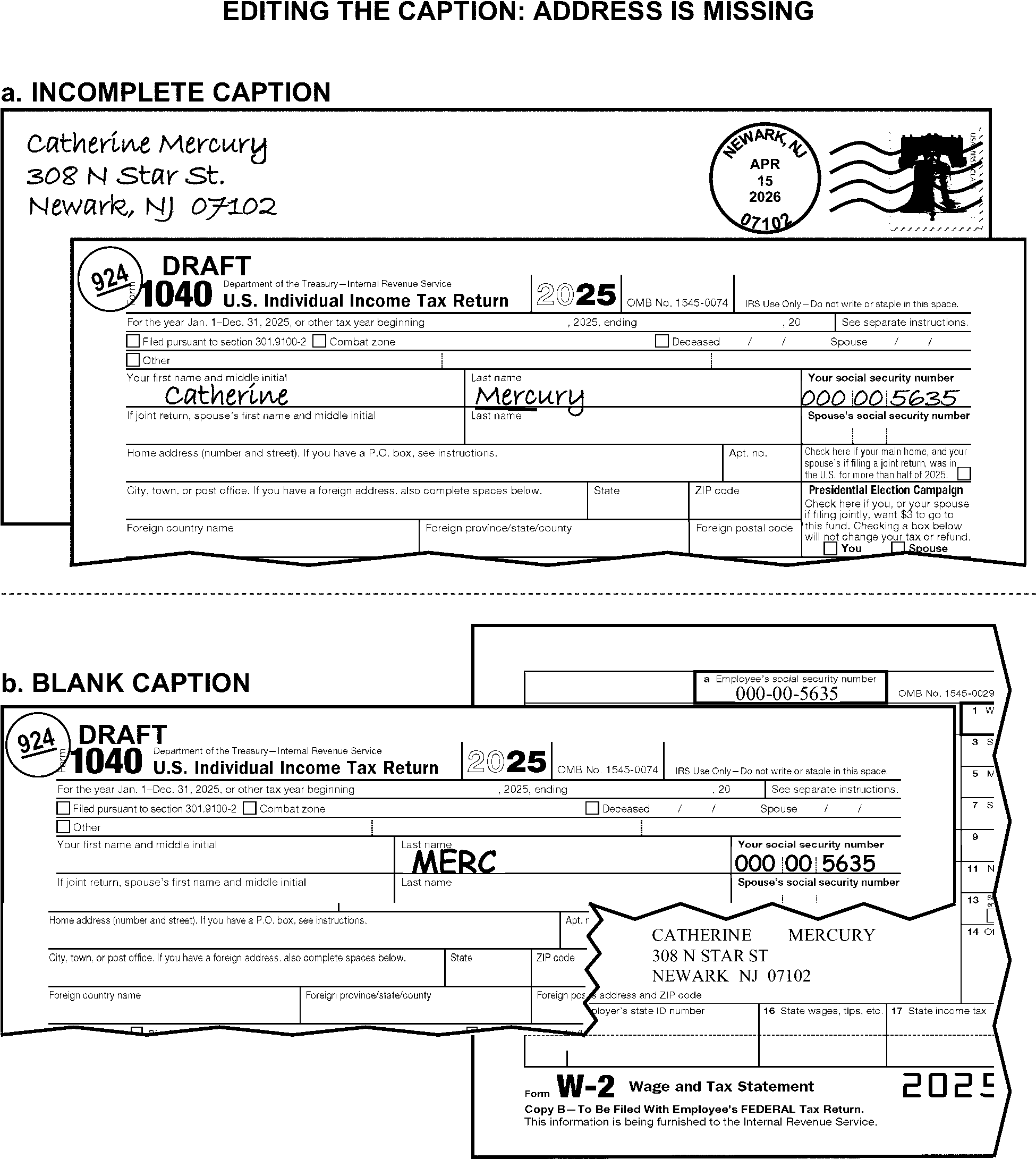
-
The primary TIN (P-TIN) belongs to the taxpayer whose name appears first on the return. The secondary TIN (S-TIN) belongs to the spouse. The P-TIN must be in the "Your Social Security Number" block.
-
Search the return for separate numbers when the P-TIN and S-TIN are the same. Delete the S-TIN if separate numbers are not found.
-
There are different types of valid TINs:
-
Individual Taxpayer Identification Number (ITIN): Format always begins with the digit "9" and follows the same format as a typical SSN. The valid ranges for the fourth and fifth digits are:
- 50 through 65
- 70 through 88
- 90 through 92
- 94 through 99
- Example of an ITIN: 9XX-71-XXXX. -
Adoption Taxpayer Identification Number (ATIN): Format always begins with the digit "9" and follows the same format as a typical SSN. The fourth and fifth digits will be 93. Example of an ATIN: 9XX-93-XXXX.
-
Internal Revenue Service Number (IRSN): Format always begin with the digit "9" and follows the same format as a typical SSN. The fourth and fifth digits signify the Internal Revenue Service Campus (IRSC) Code where the IRSN was originally assigned, or the new expansion range assigned to that campus. Shown below are the numbers allocated to IMF campuses:
IRSC 4th and 5th Digit Ranges for IRSNs Expansion Ranges Austin 18 06 Kansas City 09 39 Ogden 29 04 -
-
Circle any invalid (e.g., "999-99-9999" , "111-11-1111" ) or incomplete TIN that cannot be perfected, including all notations, (e.g., "NRA" , "SSA 205(c)" , "applied for" , "ITIN Rejected" , "No W-7" ).
-
Perfect the TIN, if necessary, on any attached Schedule C, Schedule C-EZ, Schedule H, Schedule SE, Form 4137, Form 5405, Form 8853, Form 8919, and/or Form 8941.
-
Stop editing the return and take the following actions when Form W-7 or Form W-7(SP) is attached to the return:
-
Unnumbered:
• Pull the return from the batch. Attach Form W-7 to the front of the return.Exception:
Do not pull if the Form W-7 has a large red "X" editing across the form. Instead, continue processing the return.
• Edit the received date on Form W-7/W-7(SP) in "MMDDYY" format and route the entire return to Receipt and Control for transshipment to AUSPC. -
Complete Form 3696-A to generate Letter 86C. If the ITIN application (Form W-7 or Form W-7(SP)) is for the primary taxpayer, enter an asterisk (*) for the SSN on Form 3696-A. If the ITIN application is for a spouse or dependent, enter the primary TIN on Form 3696–A.
-
-
The P-TIN must be in the "Your Social Security Number" block.
-
Arrow or edit the P-TIN in the proper block if it appears in the "Spouse's Social Security Number" block or elsewhere.
-
If "ITIN Rejected" is present in the P-TIN field, route the return to Receipt and Control for rebatching.
-
If the P-TIN is missing, illegible or incomplete, examine the return and its attachments and edit the P-TIN, if found. Circle an incomplete P-TIN.
-
Correspond for a missing P-TIN when corresponding for other missing return items. If using Form 3531, check box 3, or Form 6001, check box B.
-
Circle an S-TIN if it is present and the FS is "1" , "4" , or "5" .
-
Arrow or edit the S-TIN in the proper block if it appears in the caption area or elsewhere.
-
Edit the S-TIN from the return or attachments if it is missing, illegible, or incomplete, and the FS is "2" or "3" . For TY17 and prior returns, edit the S-TIN in the correct block if it is blank and the taxpayer entered a TIN on the line to the right of FS box 3.
-
Correspond for a missing S-TIN when corresponding for other missing return items, unless there is an indication of Amish or Mennonite, ITIN Rejected or Non-resident Alien (NRA). If using Form 3531, check box 3, or Form 6001, check box B.
-
Edit CCC "J" when the S-TIN is missing, the filing status is 2 or 3 and there is an indication of Amish or Mennonite, or "Form 4029" is notated.
-
Each return processed must have a legible last name. Research following local procedures when the name is illegible and cannot be perfected.
-
There are two lines available for taxpayer identification.
-
The name line is for the first name, middle initial, and last name(s) of the primary and secondary (if present) taxpayer(s). This includes any suffix.
-
The additional information line (AIL) is used to further identify the taxpayer. For example, additional name, address, or representative information may be shown.
-
-
Refer to Document 7071, Name Control Job Aid for Individual Master File (IMF) Taxpayers.
-
Circle the spouse's name when there are two names in the name line, the FS is "1" , "3" , or "4" , and there is only one signature. Perfect the name line to agree with the signature (e.g., If John signs the return, delete Mary's name from the caption).
-
Edit the spouse's name from the signature line when all the following conditions apply:
-
Only one name appears in the first name line.
-
The FS is "2" .
-
Both taxpayers have signed the return.
-
-
Do not delete "DECD" or "MINOR" from the name line:
If the return indicates that Then At least one of the taxpayers is deceased, Refer to IRM 3.11.3.10 for complete editing instructions for decedent returns. The taxpayer is a minor child, Refer to IRM 3.11.3.11.2. -
Circle the brackets and prior last name when a taxpayer places it in brackets and shows a new last name. (See Figure 3.11.3-18.)
-
The primary taxpayer's name will appear on the first line. The secondary taxpayer's name may appear on the first or second line.
-
Do not separate the primary and secondary taxpayers' names onto different lines if they are both on the same line.
-
Edit the name line as follows:
If the taxpayer Then Uses a first initial but signs the return with a name,* Edit the name from the signature line to the name line. (See Figure 3.11.3-19.) Uses a middle initial and no first name,* Edit the name for the middle initial, if present. (See Figure 3.11.3-19.) Writes their last name first, Edit it to appear last. (See Figure 3.11.3-20.) Enters their last name twice and the FS is other than "2" , Circle either name and edit the last name to appear last, if necessary.
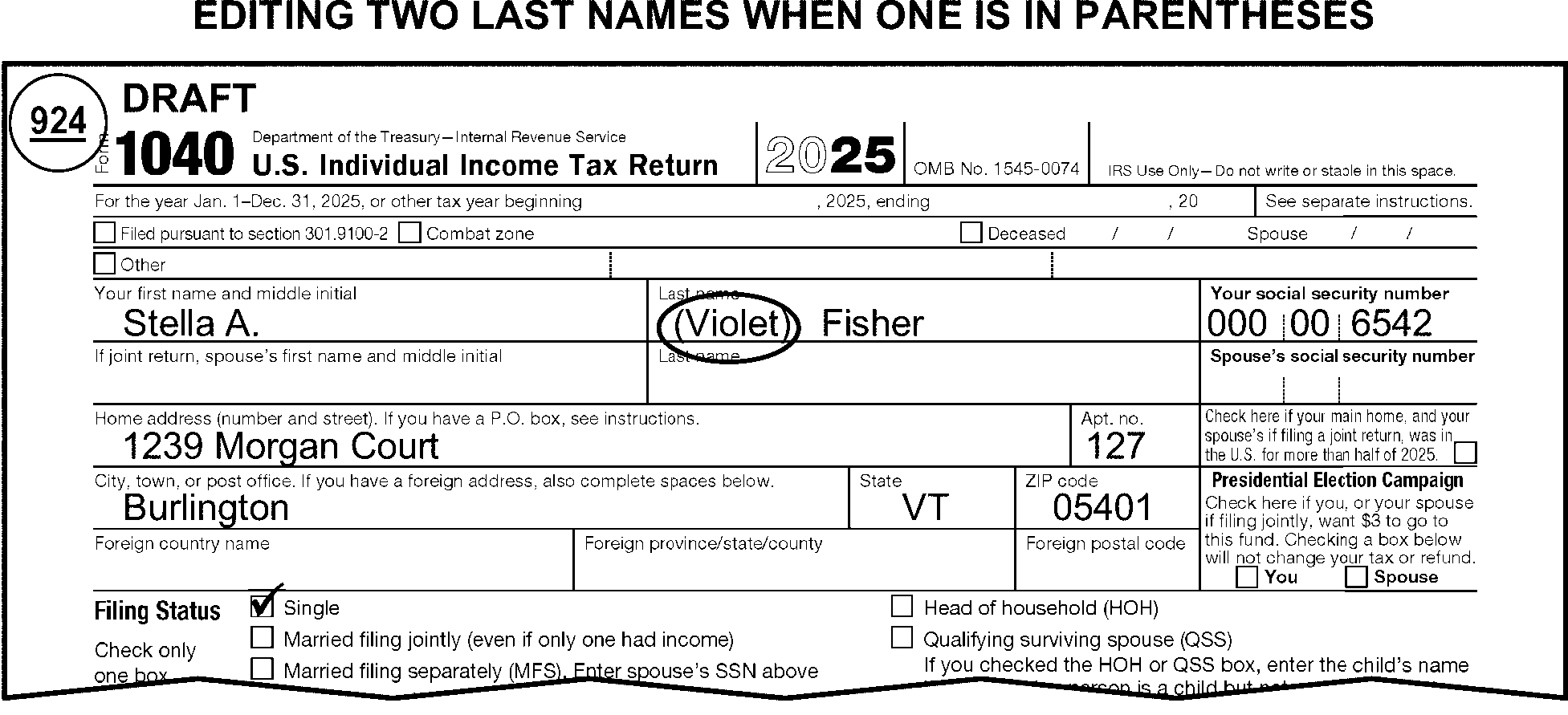
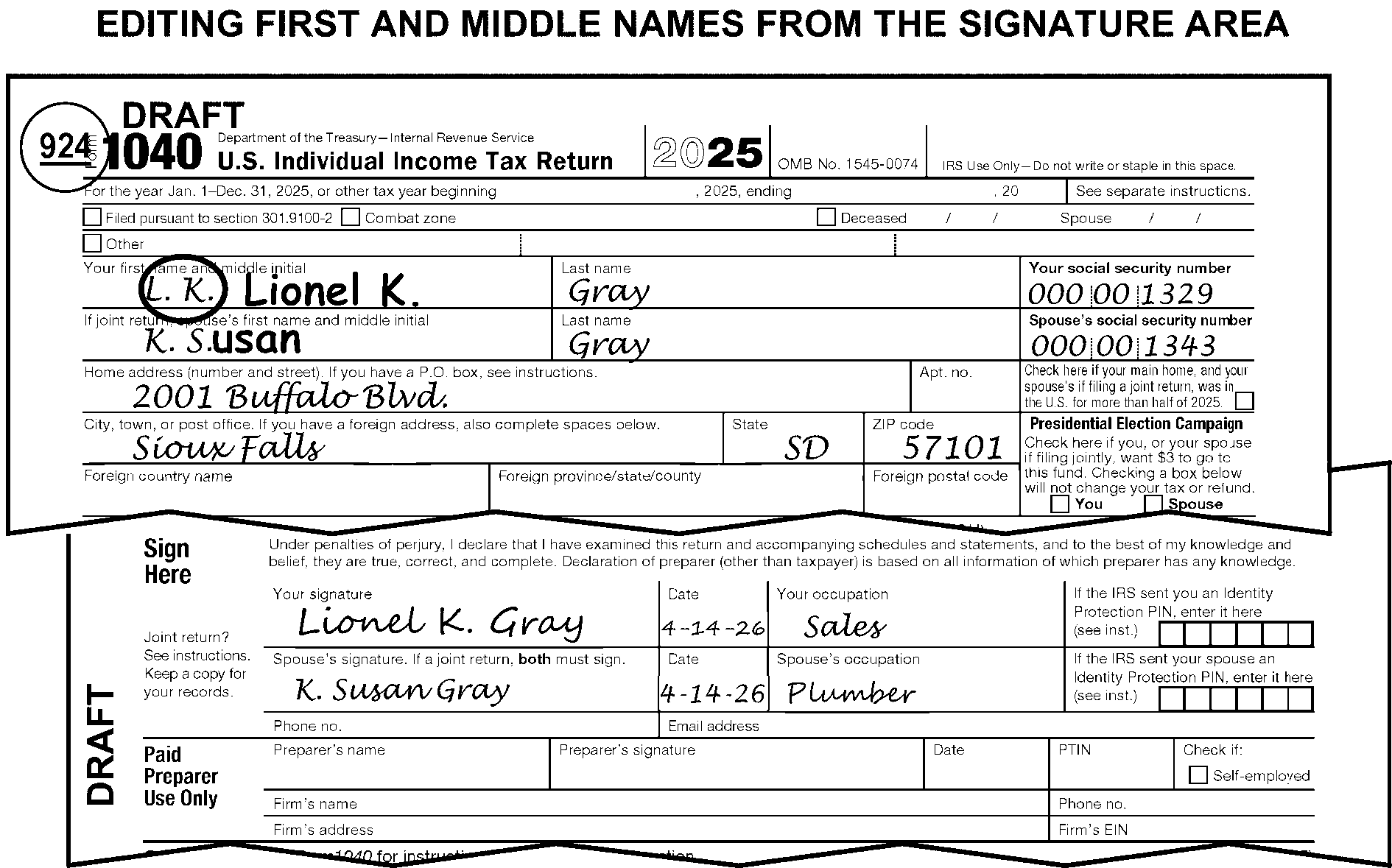
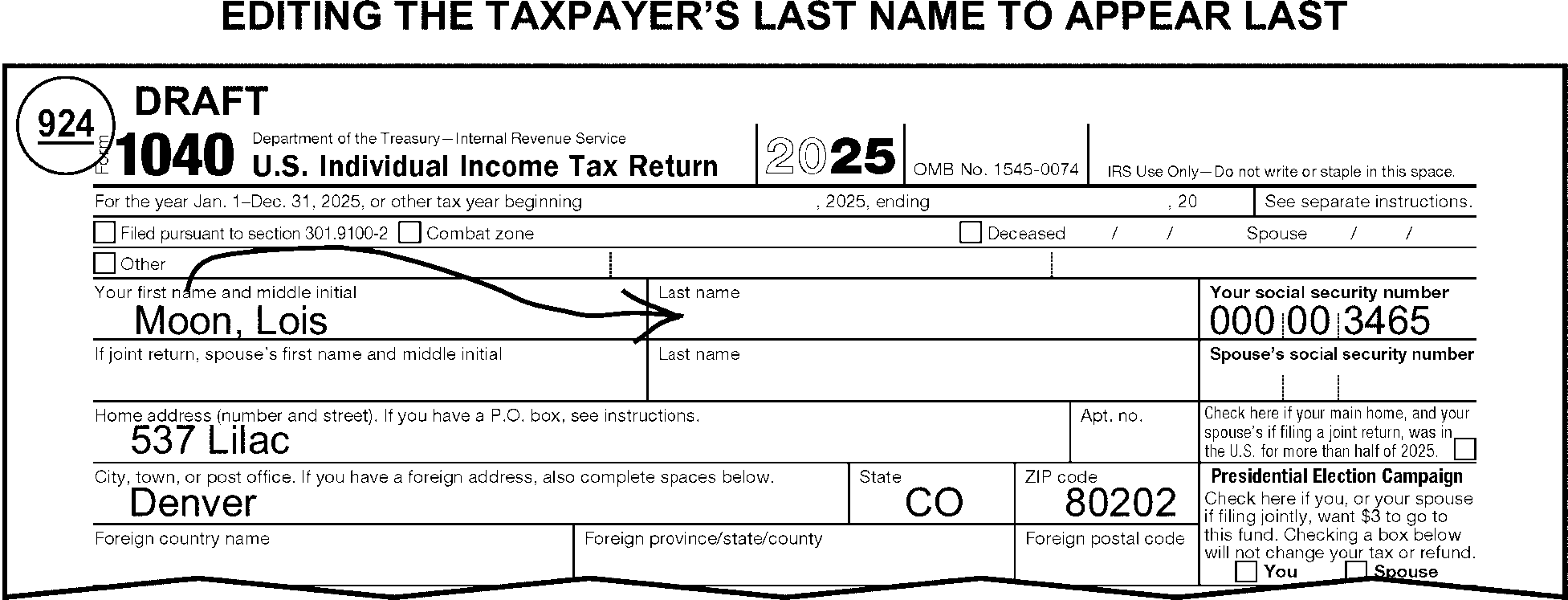
-
The additional information line may be found anywhere in the caption area.
-
Edit and underline the AIL in the following priority:
-
A fiduciary or taxpayer's representative's name with a title (See IRM 3.11.3.11.) Taxpayer's representatives include:
• Administrator (ADM)
• Commissioner (COMM)
• Conservator (CONS)
• Custodian (CUST)
• Executor/Executrix (EXEC)
• Guardian (GDN)
• Personal Representative (PER REP)
• Trustee (TR) -
Name of a parent signing for their minor child.
-
-
Underline the AIL (see Figure 3.11.3-21), when present in the caption area, in the following priority:
-
A fiduciary or taxpayer representative name with a title (See IRM 3.11.3.11.) Taxpayer representatives include:
• Administrator (ADM)
• Commissioner (COMM)
• Conservator (CONS)
• Custodian (CUST)
• Executor/Executrix (EXEC)
• Guardian (GDN)
• Personal Representative (PER REP)
• Trustee (TR) -
Name of a parent signing for their minor child.
-
Name of a Power of Attorney (POA) (See Figure 3.11.3-22.)
-
Name of a person not meeting the criteria listed in a, b, or c above (e.g., "in-care-of" information.) Also underline in care of (c/o or %) with a name as part of the AIL.
-
Street address, if not used as the mailing address.
-
Location other than a street address (e.g., bank, company name, university, or building name) not used as the mailing address. (See Figure 3.11.3-23.)
Note:
When editing Prisoner returns with a Prisoner ID number present on return or attachments, edit the Prisoner ID number as the AIL. When both the Prisoner ID number and another AIL are present, underline the Prisoner ID number and delete any other AIL information. Do not underline the pound sign or other symbols preceding the number.
-
-
Delete any condition or notation not found in (3) above.
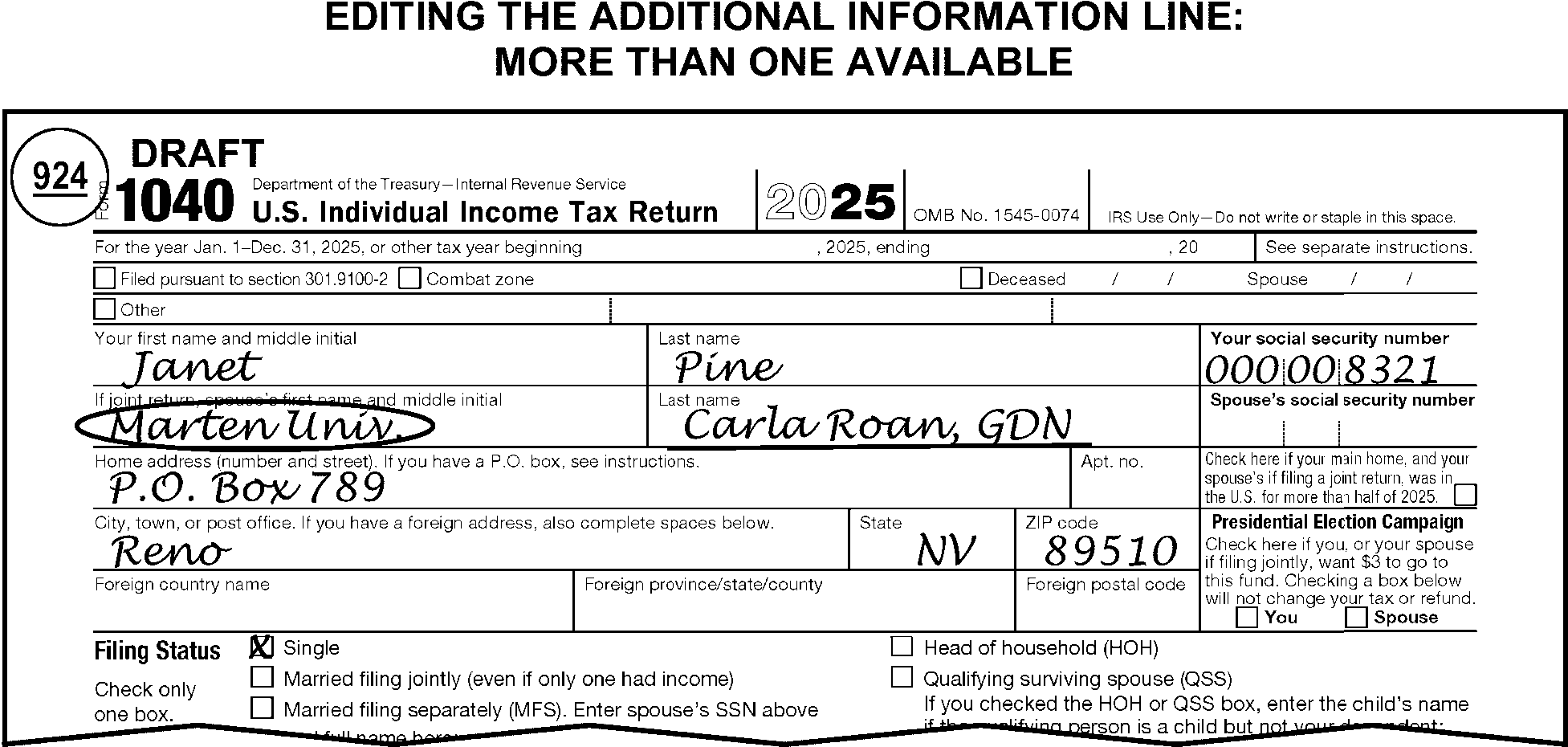
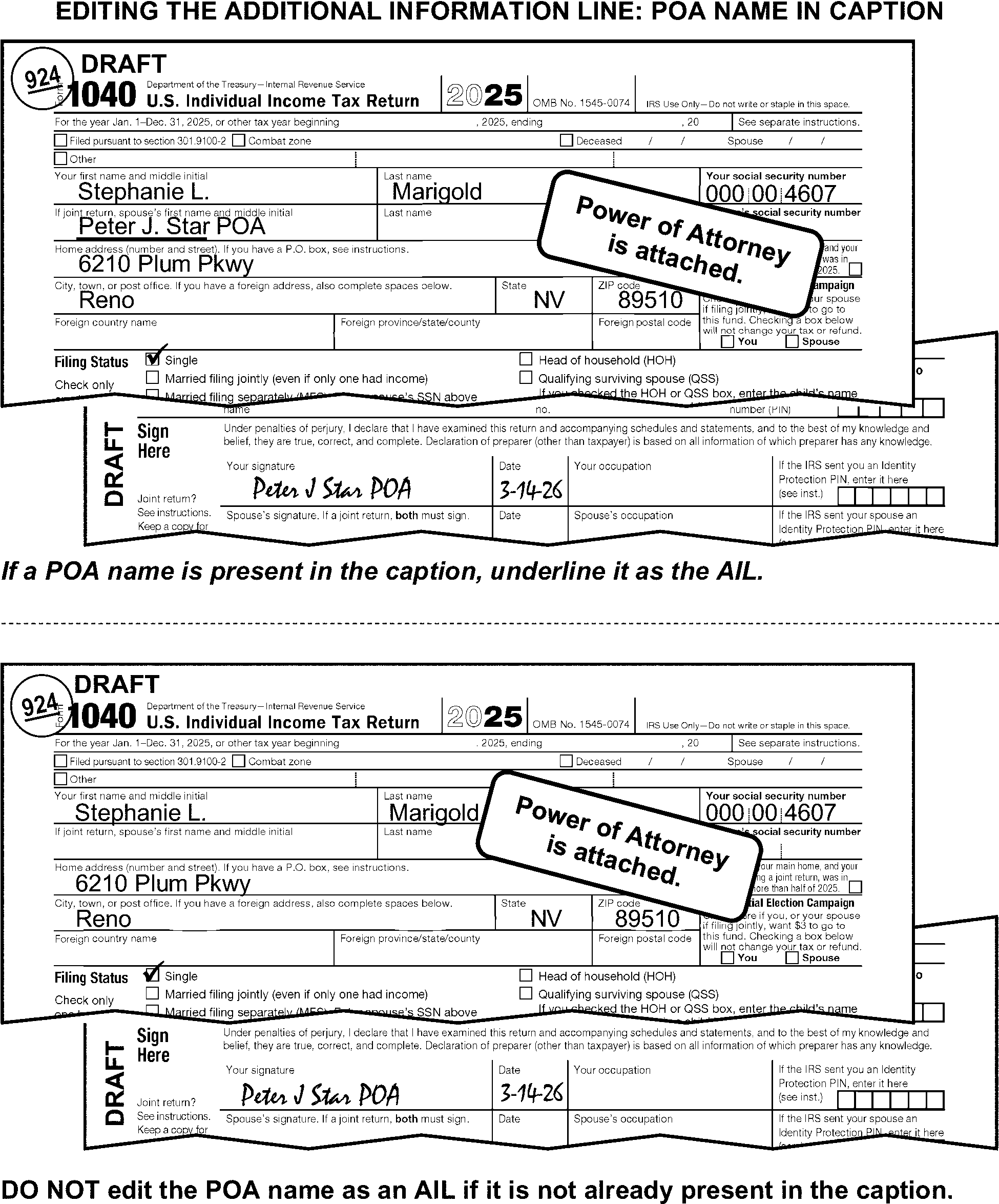
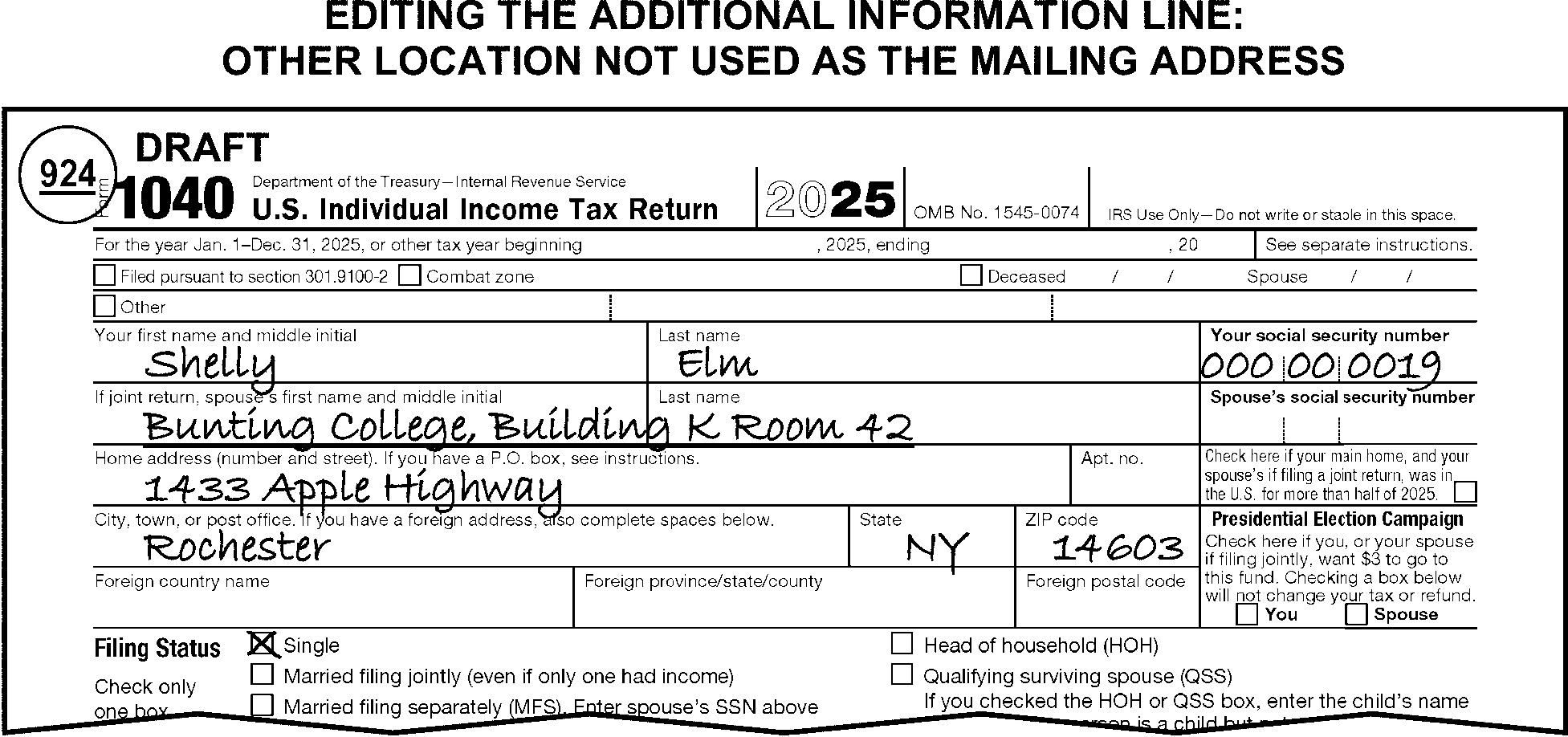
-
Edit military addresses to include organization, Postal Service Center, mobile unit designation, or name of ship.
-
Underline or edit the name control when there is no street address (for example, 4116 Apple Ave) or P.O. Box present in the caption. (See Figure 3.11.3-17 and Figure 3.11.3-24.)
-
When a street address in the caption is incomplete (such as a number without a street name or a street name without a number), and a complete address that matches the caption is found on an attachment, perfect the street address. If the street address cannot be perfected, underline or edit the name control. (See Figure 3.11.3-24.)
-
Search the attachments when a complete street address is present in the caption, but the city/state/ZIP is missing or incomplete. If the street address in the caption matches one found on an attachment, use the attachment to perfect the city/state/ZIP. (See Figure 3.11.3-25.)
-
If you are unable to perfect a missing or partial city/state/ZIP Code, underline the name control.
-
Refer to the international return instructions in IRM 3.11.3.6.2.13 when the return has a foreign address in the caption area or on TY18 Schedule 6.
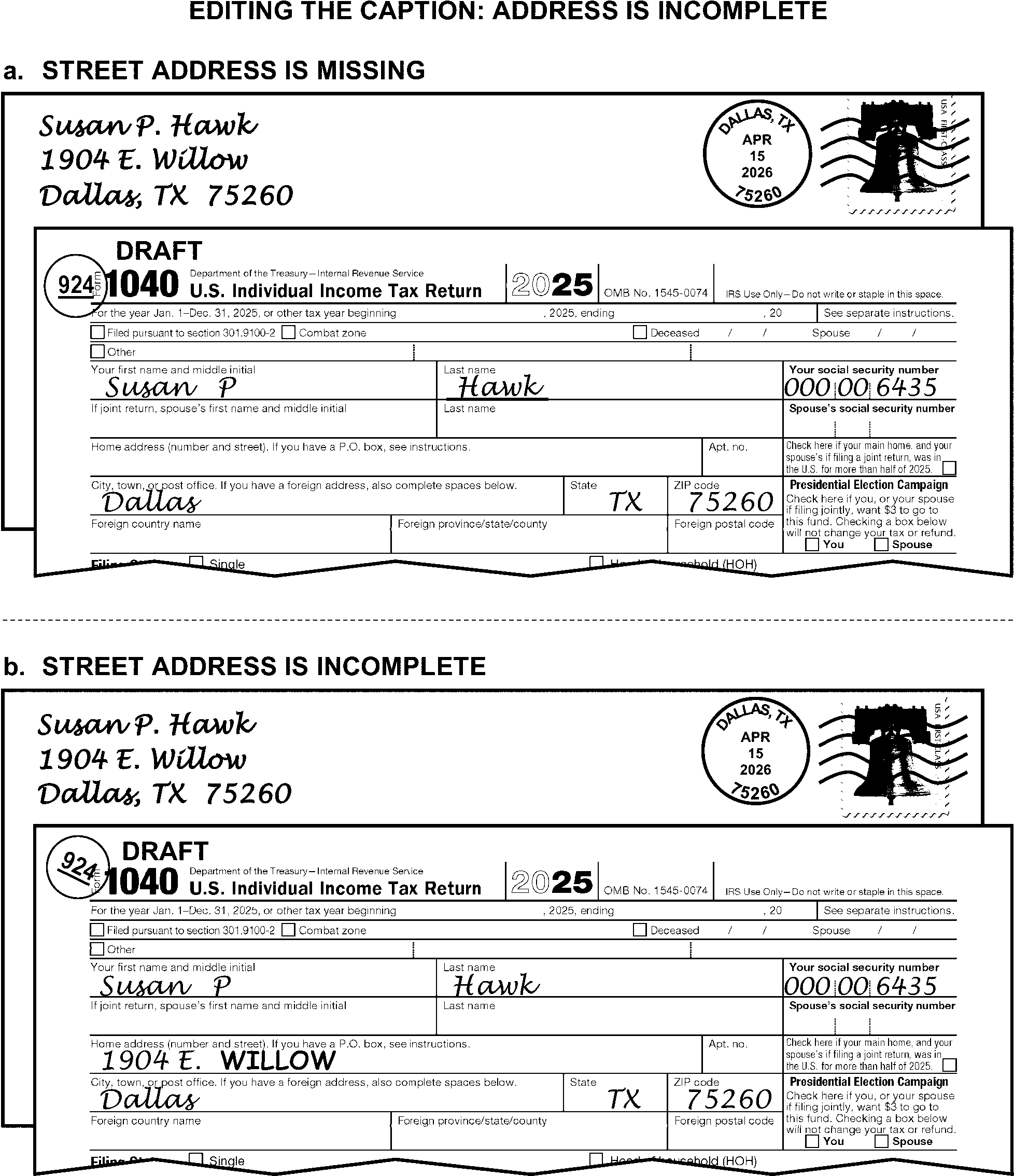
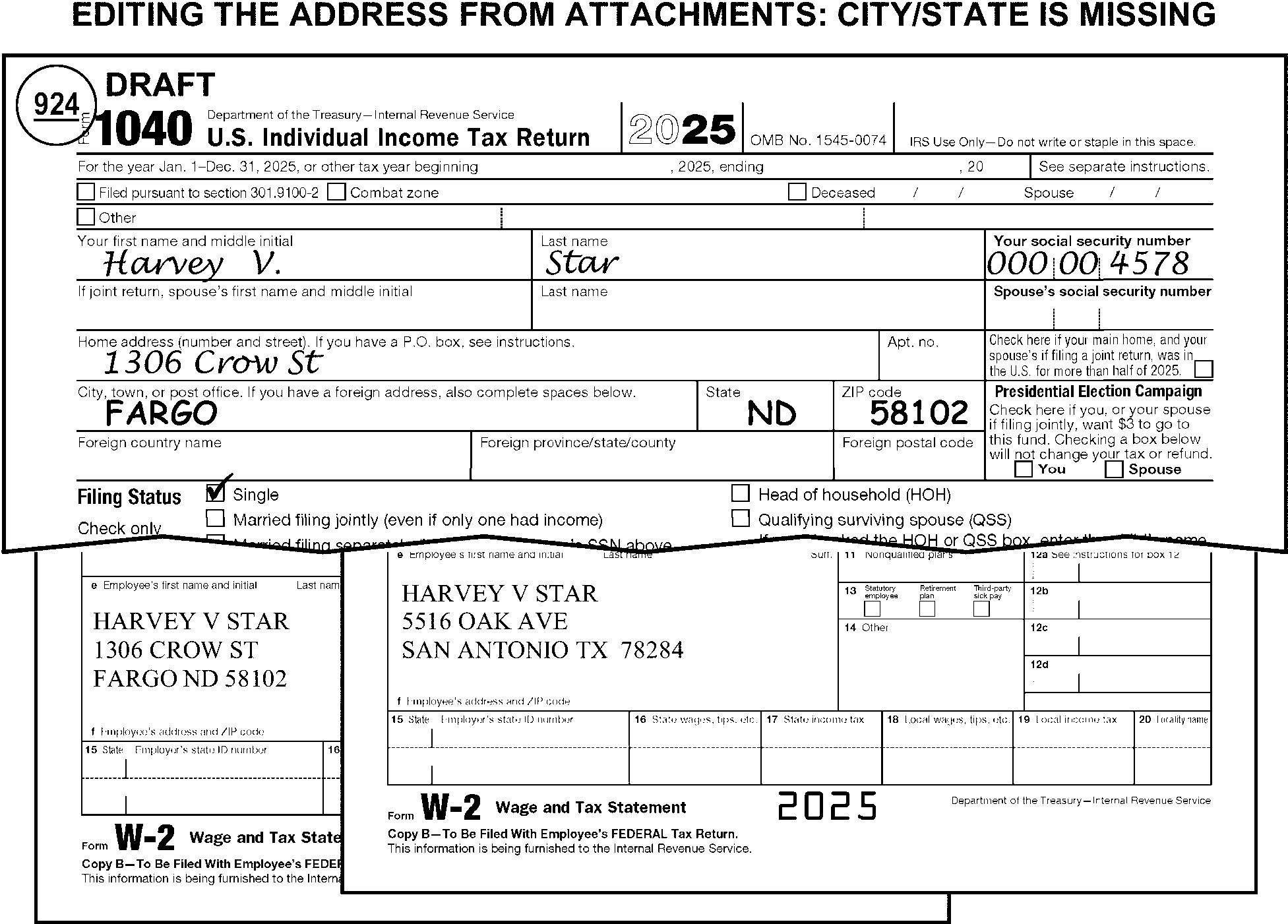
-
Edit the taxpayer's new address from Form 8822, Change of Address, if it is attached to the return. (See Figure 3.11.3-26.)
-
If Form 8822 is attached to the return:
-
Route loose Forms 8822 to Entity Control. Refer to the Attachment Guide in Exhibit 3.11.3-1 for more information.
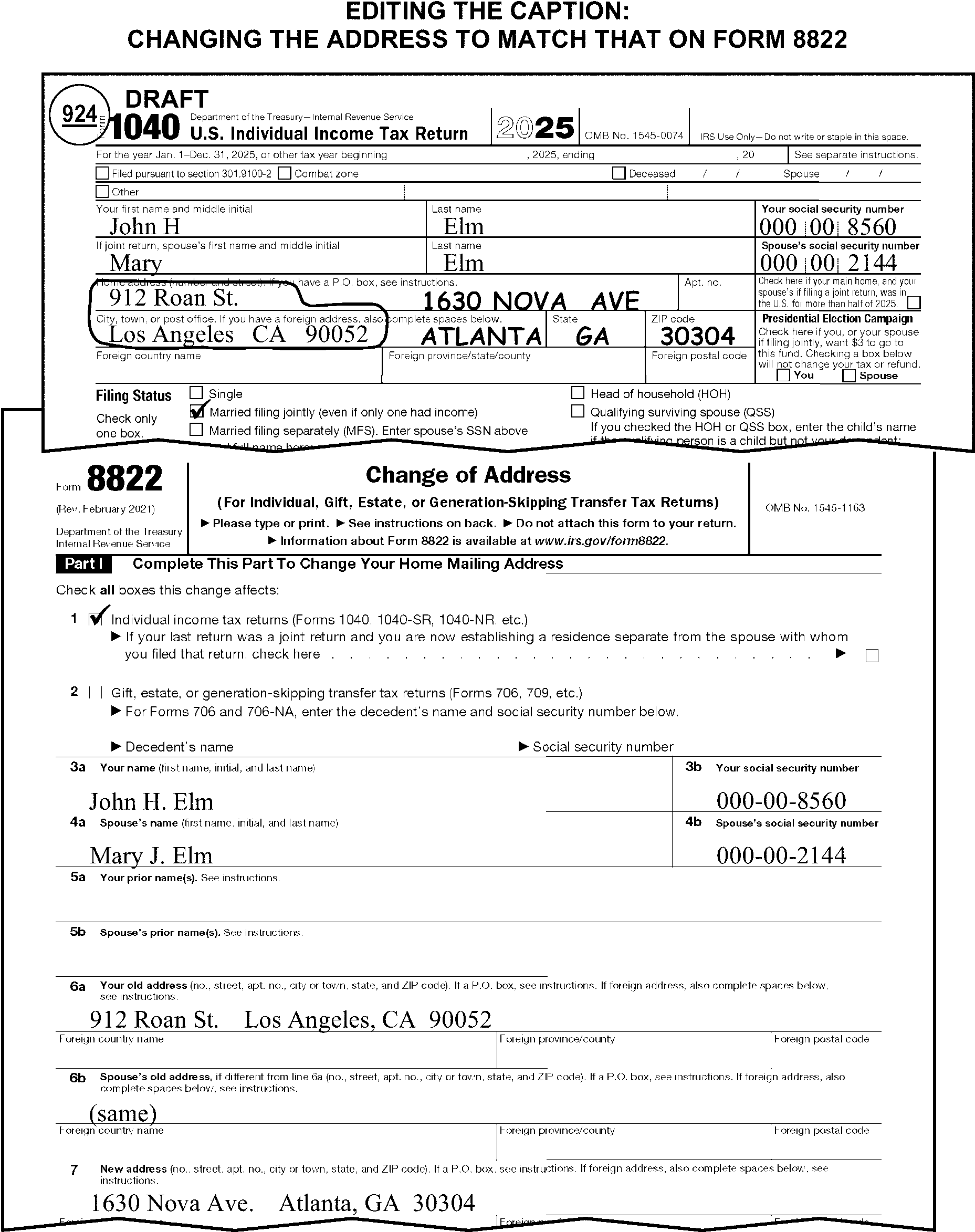
-
Use the permanent address when more than one address is indicated, and one is permanent, and one is temporary. (See Figure 3.11.3-27.)
-
Use the following chart to decide what action to take when multiple addresses are present and there is no indication of which address is permanent.
If there are And Then Both a PO box and a street address present, An AIL is present, Circle the street address. (See Figure 3.11.3-28.) Both a PO box and a street address present and the city/state/ZIP codes are the same, An AIL is not present, Underline the street address. (See Figure 3.11.3-29.) Both a PO box and a street address present and the city/state/ZIP code are different, An AIL is not present, Circle the street address, including the city/state/ZIP code. Two street addresses and the city/state/ZIP Code are the same, An AIL is not present, Underline the first street address. Two street addresses and the city/state/ZIP Code are different, An AIL may or may not be present, Circle the first street address, including the city/state/ZIP Code. -
For addresses having a rural route or route number with a box number, and a street address: (See Figure 3.11.3-30.)
If a street number is Then Present, Underline the rural route or route number with a box number. Not present, Underline the street address. -
Underline any other address as the AIL if the street address is present with a notation of Private MailBox or "PMB" . Do not separate the address from the PMB number. (See Figure 3.11.3-31.)
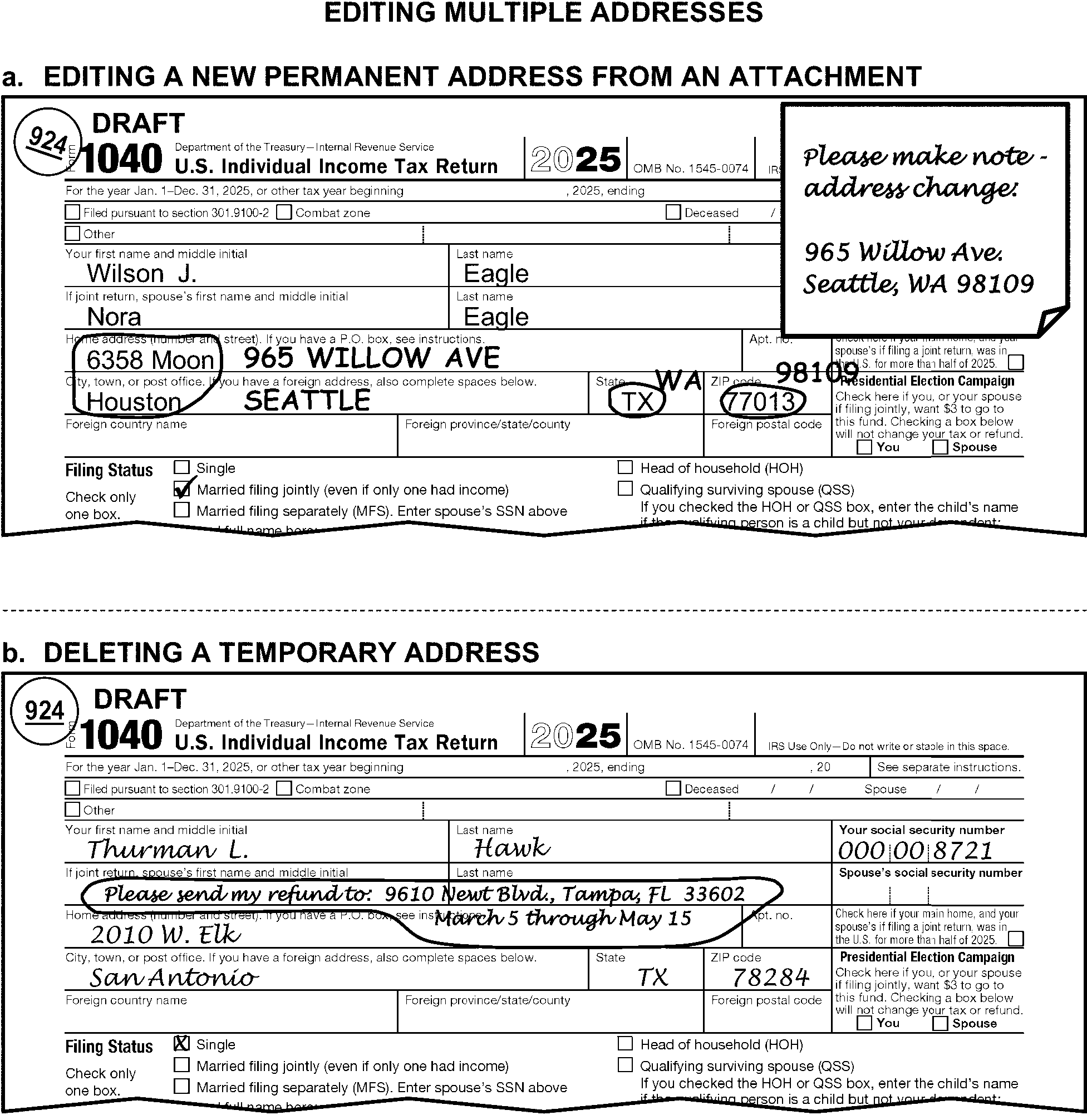
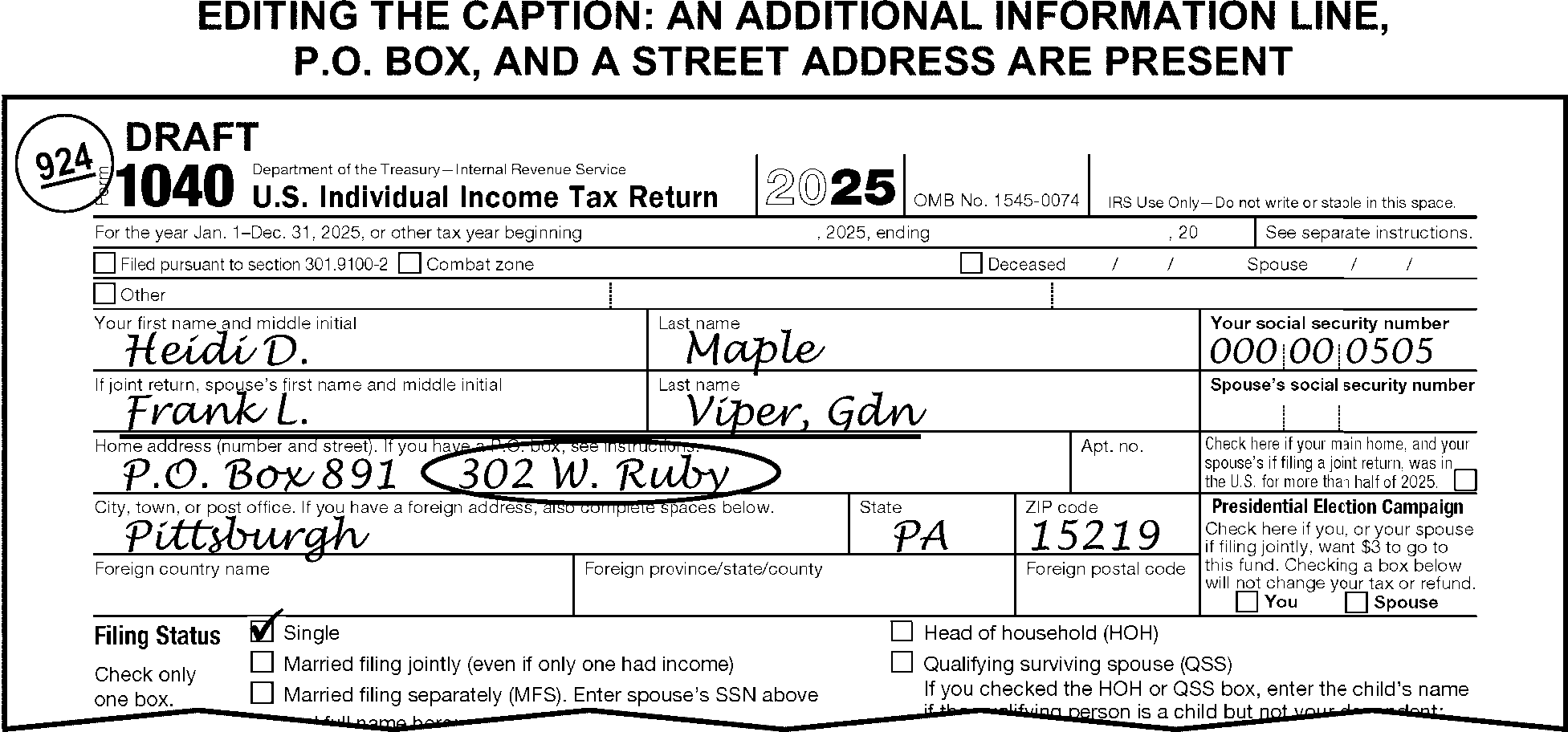
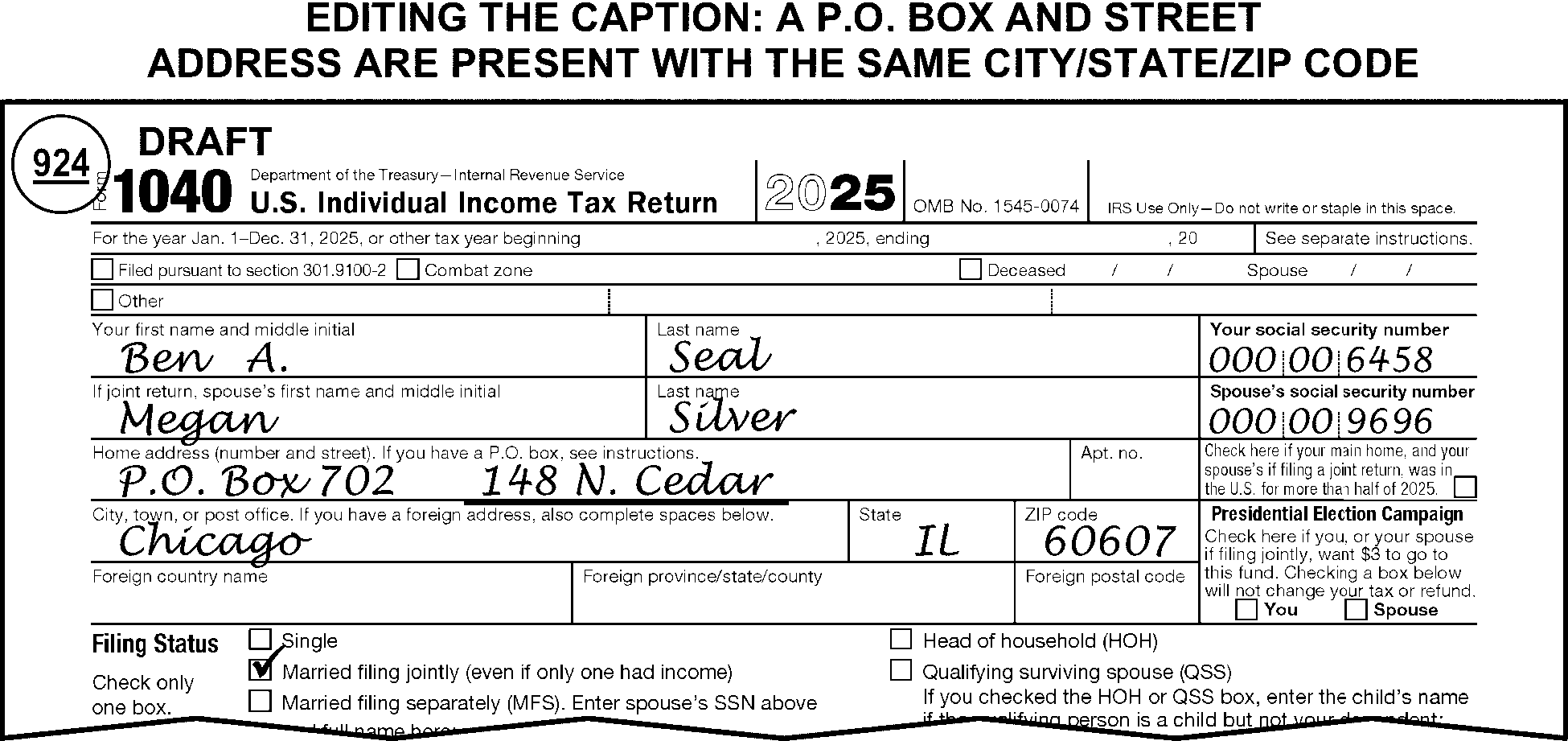
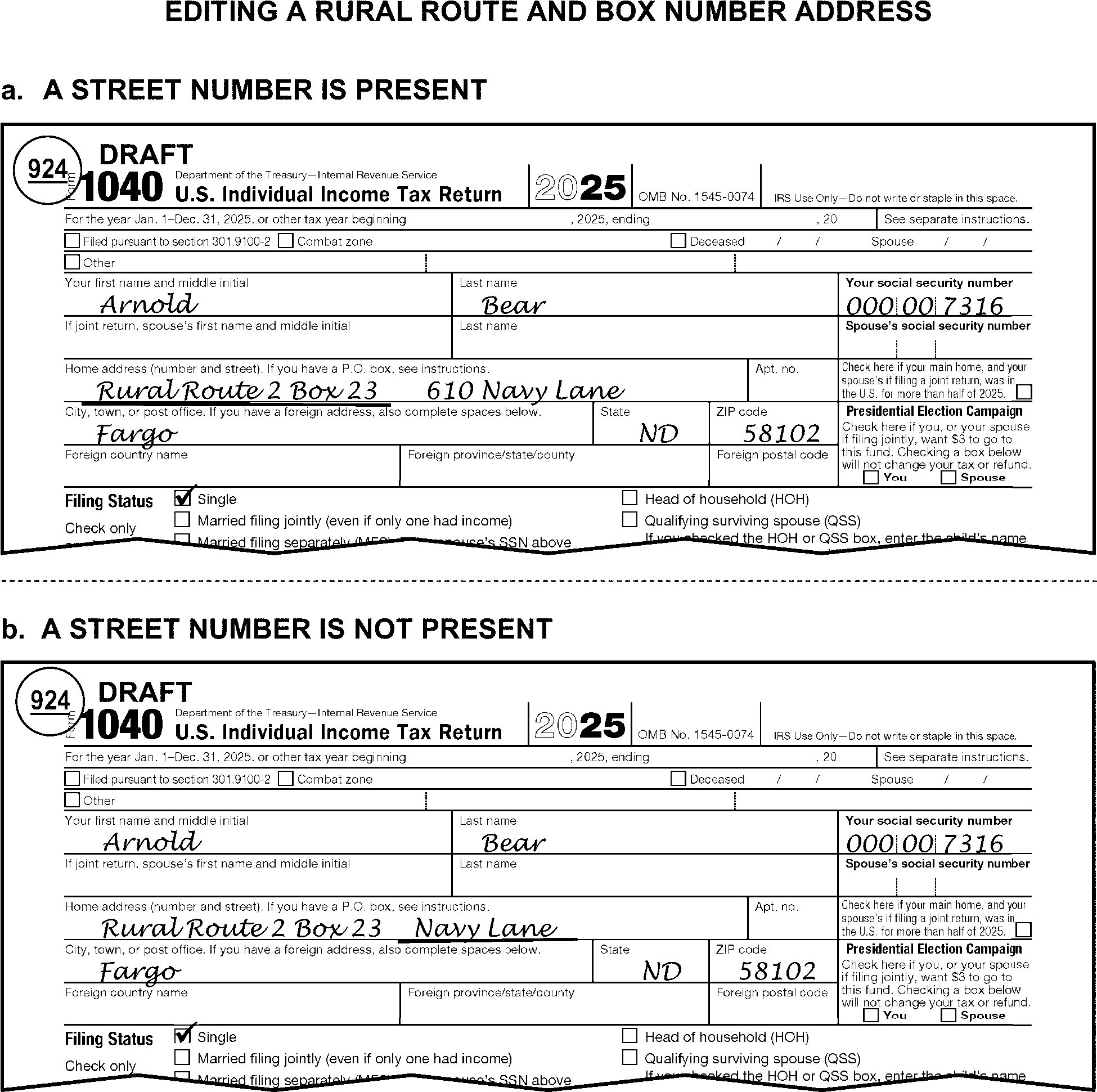
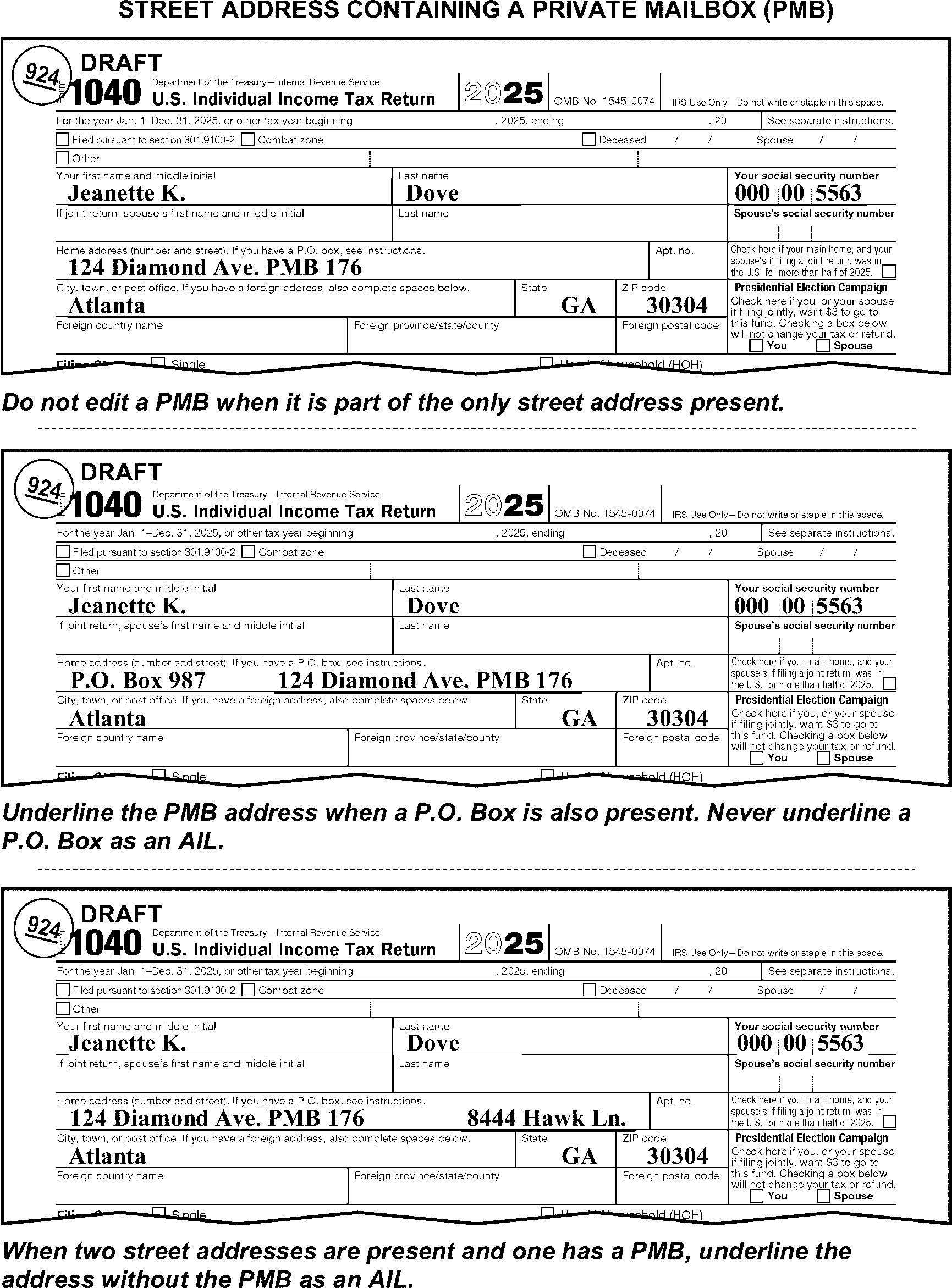
-
The city must be present. If missing, search the return and other attachments.
-
Do not abbreviate city names except those which have standard abbreviations. Examples include No. Hollywood or St. Louis. A list of the standard city abbreviations will be made available at local management's option.
-
Route to Receipt & Control for transshipment to AUSPC when international return conditions are present. (See IRM 3.11.3.6.2.13.)
-
The state must be present. If missing, search the return and other attachments.
-
Use the standard abbreviations when editing the state. Refer to Exhibit 3.11.3-10 for a list of the standard state abbreviations.
-
Route to Receipt & Control for transshipment to AUSPC when international return conditions are present. (See IRM 3.11.3.6.2.13.)
-
The ZIP code will be five or more digits. Take no action when there are more than five digits.
-
Search return or attachments if the ZIP code is missing or incomplete, take one of the following actions:
-
Perfect the ZIP code if a complete ZIP code is found for exactly the same address (including apartment number, if present). (See Figure 3.11.3-32.)
-
Perfect the ZIP code using the chart in Exhibit 3.11.3-10 when a complete ZIP code is not found.
-
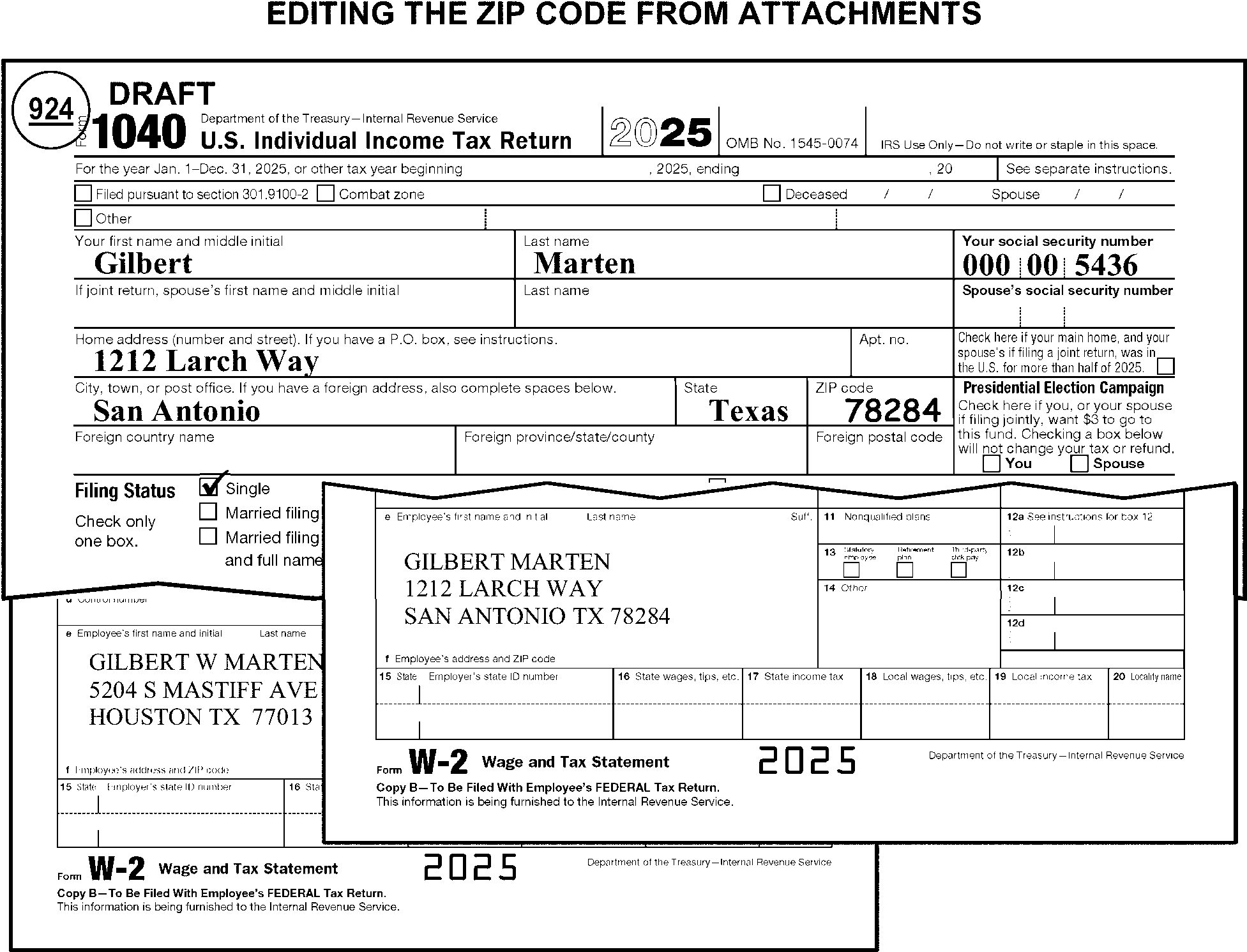
-
Edit an APO, FPO, or DPO address so that "APO" , "FPO" , or "DPO" appears with the following (see Figure 3.11.3-33):
-
The correct two-letter state code, and
-
The corresponding unique five-digit ZIP code
-
-
Circle a city name or a foreign city or country if present and edit the correct state/ZIP code based on the table in paragraph (4) below.
-
When missing or incomplete, edit the ZIP code from the table in paragraph (4) below that applies to the state code.
-
Refer to the following APO/FPO address conversion tables:
Old Address New Address APO or FPO Miami, FL APO or FPO AA 34001 APO or FPO New York, NY APO or FPO AE 09001 APO or FPO San Francisco, CA APO or FPO AP 96201 APO or FPO Seattle, WA APO or FPO AP 96201 If the Foreign City or Country is in: State Code and ZIP Central America, South America, or Caribbean AA 34001 Europe, Middle East, Africa, or Canada AE 09001 Asia or the Pacific AP 96201
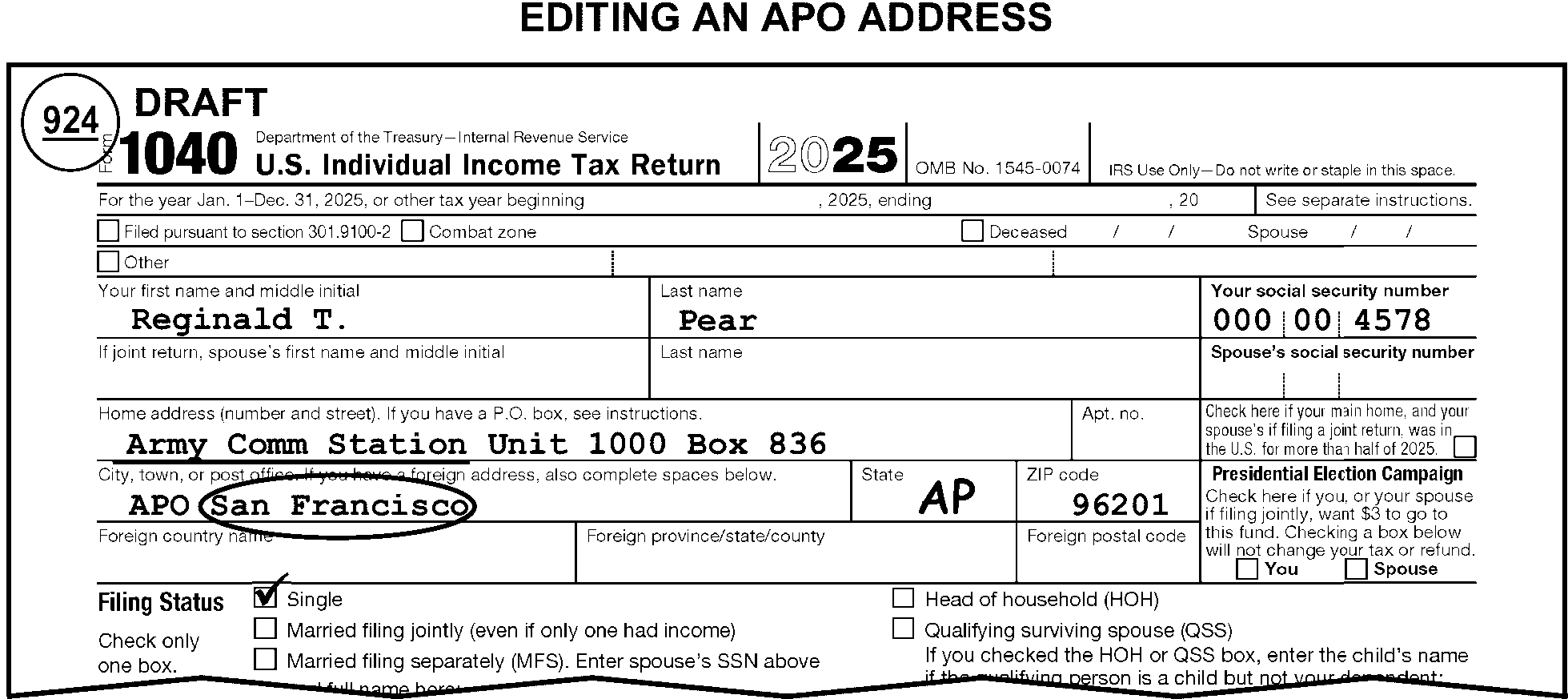
-
Indications of a deceased taxpayer may include any of the following:
-
Deceased check box at top of the return is checked.
-
Date of death is present
-
"Deceased" written on the top of the return
-
"Deceased" , "Filing as surviving spouse" , or similar notation in the signature area
-
Death certificate, Form 1310, or other documentation is attached
-
"Estate of" is present
-
"DEC"
-
Signed by Fiduciary, Personal Representative or, Executor
-
-
Instructions in this subsection of the IRM include the following:
-
General Decedent Return instructions
-
Decedent name line editing
-
Documentation requirements
-
Additional information line editing
-
Applicable Computer Condition Codes
-
Allowable short-period decedent return editing
-
-
Edit the caption information from a Form 1310 if documentary evidence is satisfied or not required. If Form 1310 is not present, edit the information from the court certificate.
-
When corresponding for signature and/or documentary evidence when no living taxpayers are present on the return:
-
When using Form 3531, edit "Estate of" to the left of the name in the caption area.
-
When using Form 6001, check the "Estate of" box.
-
-
Do not edit the AIL when corresponding for documentary evidence. If an AIL is present, circle out the AIL before corresponding for the documentary evidence.
-
If corresponding for information other than documentary evidence, edit the AIL. If an AIL cannot be determined, check the "Estate of" box on Form 6001.
-
If the signature is missing on a decedent return, correspond using Form 3531, check box 1 and 27. Missing documentary evidence is not treated as an unsigned return. Do not use Form 3531 to mail back a signed decedent return missing documentary evidence.
-
Decedent returns require a date of death. Correspond when the date of death cannot be determined through research. For Form 3531, check box 24, or Form 6001, check box C.
-
If a single taxpayer, or both taxpayers on a joint return, died before the tax period on the return, refer the return to your work leader.
-
Work Leaders - follow the instructions below:
-
Verify conversion to Form 1041 is necessary.
-
Verify taxpayer is deceased. If a surviving spouse's signature is present on the return or if the taxpayer signed the return, do not transship to BMF Rejects.
-
Verify Total Income is more than $600.00. If $600.00 or less do not transship to BMF Rejects. Continue processing return.
-
For a numbered return, insert a replacement page and edit the following information:
• DLN in the upper-right margin.
• Action Code "640" .
• Action Trail, "Return transshipped to BMF Rejects unit" . -
Pull the return from the batch and route to Receipt and Control, Media Transport Unit for transshipment to a BMF SPC.
-
-
Take the following actions when a request for a prompt assessment or audit (e.g., "Section 6501(d)" noted) is present:
-
Detach the request.
-
Route the request to Examination using Form 4227.
-
-
If the FS is "1" , "4" , or "5" , the taxpayer is filing as a surviving spouse, and the decedent’s date of death is within the tax period or the subsequent tax period, take the following actions:
If there is And Then One name in the name line, FS box 1 (Single) or 4 (Head of household) is marked, -
Edit the FS as 2 (Married filing jointly) and the spouse's name to the caption.
-
Correspond, if the spouse's name cannot be found.
- If using Form 3531, check box 26.
- If using Form 6001, use fill-in 25, per Exhibit 3.11.3-18.
One name in the name line, FS box 5 (Qualifying Surviving Spouse) is marked, Correspond, if the spouse's name cannot be found.
- If using Form 3531, check box 26.
- If using Form 6001, use fill-in 25, per Exhibit 3.11.3-18.Two names in the name line, Edit the FS as "2" (Married filing jointly). (See Figure 3.11.3-35.) -
-
If the signature of the deceased taxpayer is present on the signature line of the return, the signature date must precede the date of death of the taxpayer. If it does not, correspond for a valid signature using Form 3531. Correspond for documentary evidence, if necessary.
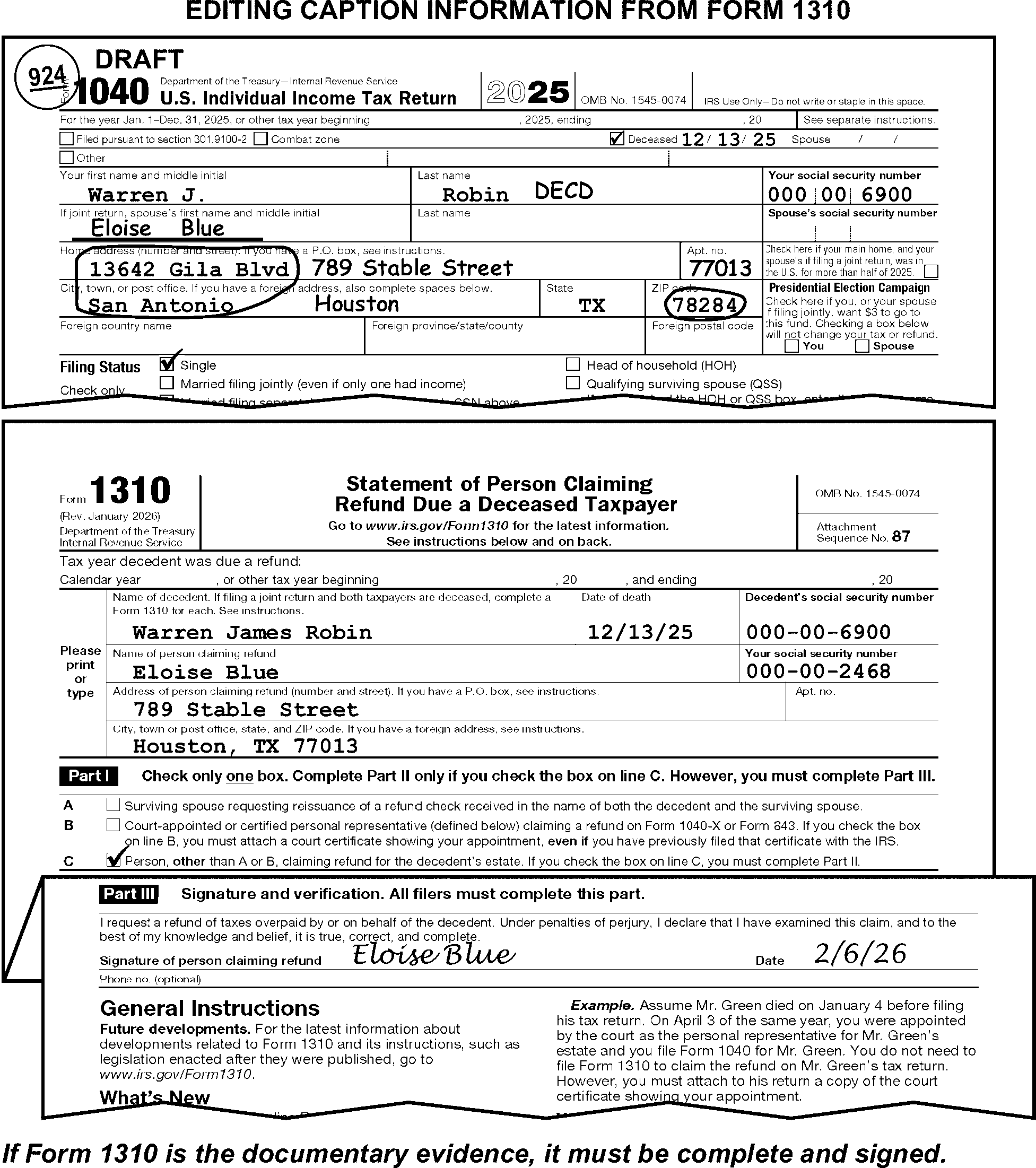
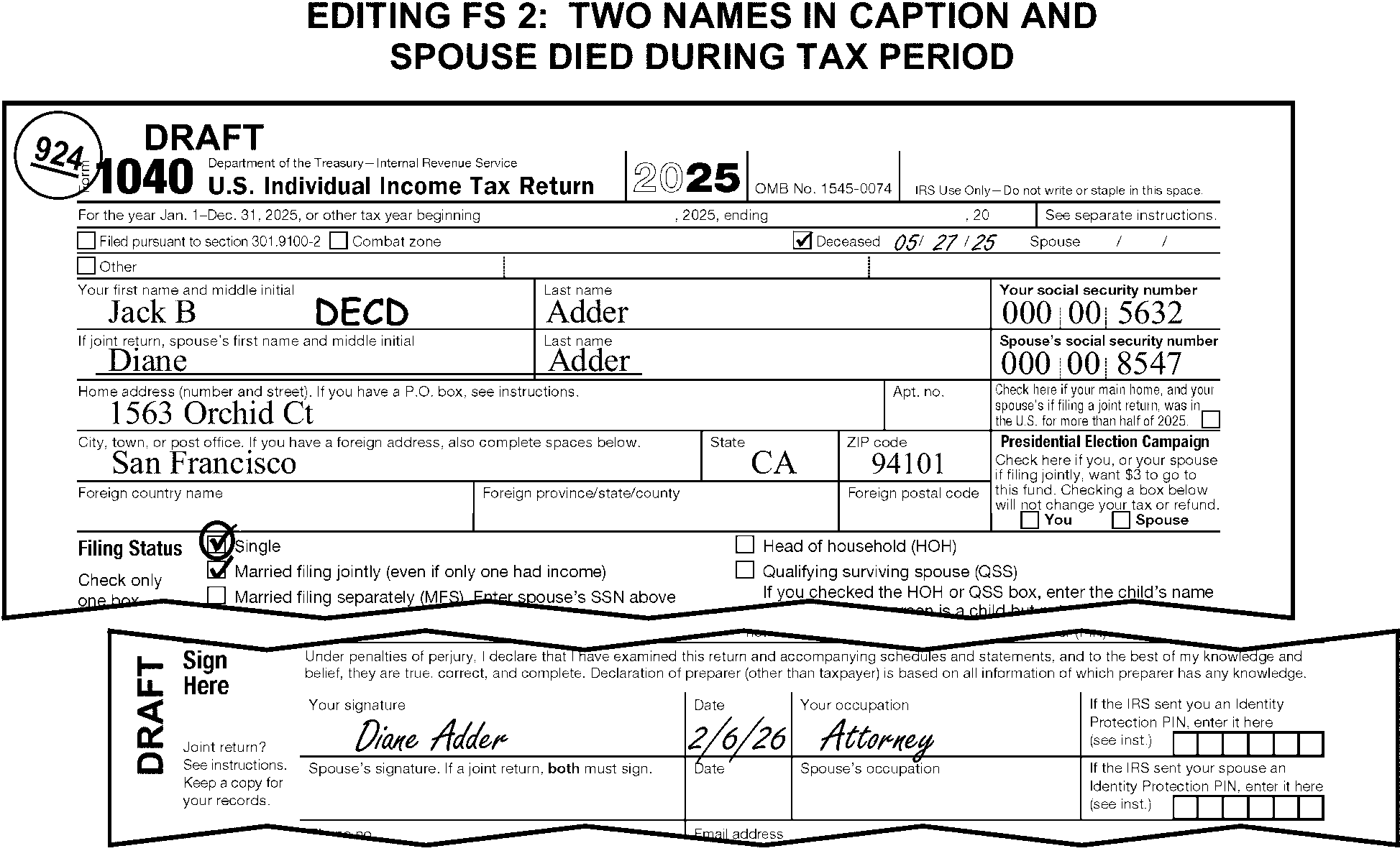
-
Use these name line instructions in addition to the regular caption editing procedures in IRM 3.11.3.9.2.
-
If the Deceased check box is checked or if there is a notation of "deceased" , "decedent" , "Decd" , "Dec" , or "Dec'd" in or above the caption area, arrow or edit the notation to indicate the deceased taxpayer. (See Figure 3.11.3-36.)
If And Then Other than joint return, Arrow or edit the notation to after the taxpayer's last name (behind any suffix)* Joint Return, Both taxpayers have same last name, Arrow or edit the notation to after the deceased taxpayer's first name (and middle initial, if present). (See Figure 3.11.3-36.) Joint Return, Taxpayers have different last names, Arrow or edit the notation to after the deceased taxpayer's last name (behind any suffix.)* -
If there is not a notation of "deceased" , "decedent" , "dec" , "Decd" , or "Dec'd" in or above the caption area, edit "DECD" as follows:
If And Then Other than joint return, Edit "DECD" after the taxpayer's last name (behind any suffix) ≡ ≡ ≡≡ ≡ ≡ ≡ ≡ ≡ ≡ ≡ ≡ ≡ ≡≡ ≡ Joint Return, Both taxpayers have same last name, Edit "DECD" after the deceased taxpayer's first name (and middle initial, if present). Joint Return, Taxpayers have different last names, Edit "DECD" after the deceased taxpayer's last name (behind any suffix.) (See Figure 3.11.3-38.)* -
On a joint return, when one taxpayer died prior to the tax period of the return, delete the following from the caption:
-
The deceased taxpayer's name and TIN
-
"DECD" if it is included in the caption
-
-
If deleting the primary taxpayer from the caption, edit the secondary taxpayer as the new primary. (See Figure 3.11.3-39.) See IRM 3.11.3.12.2.2 (1) for possible filing status editing.
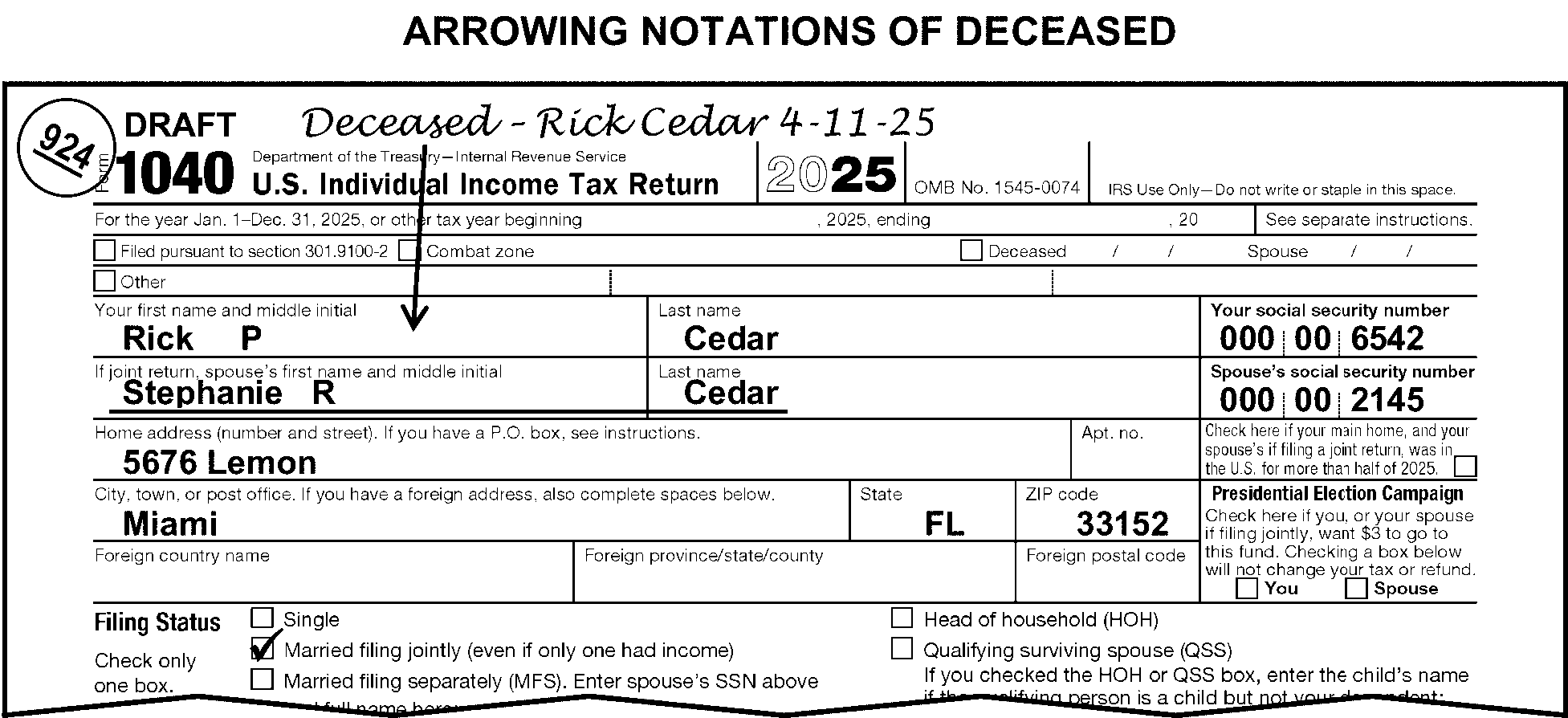

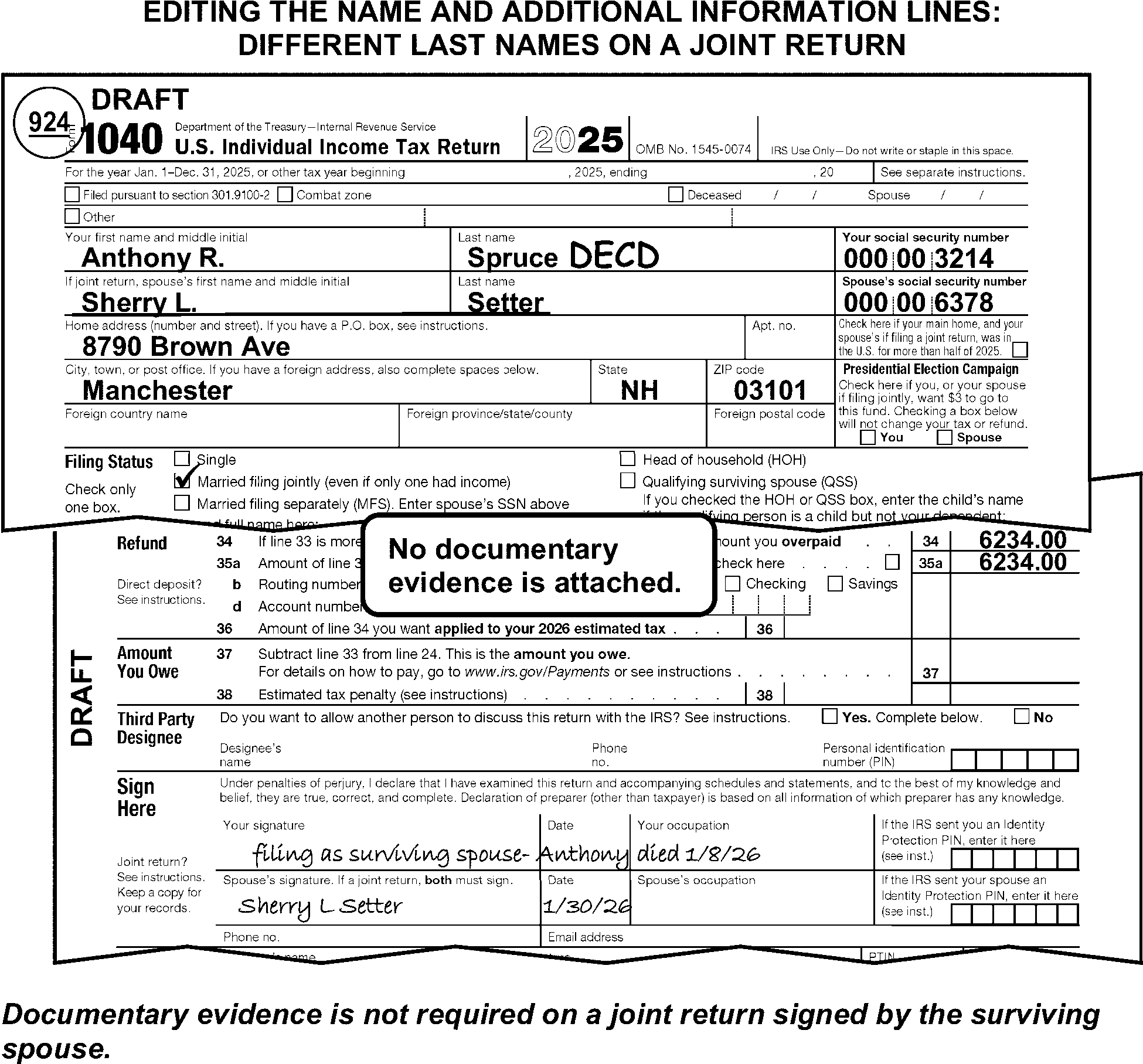
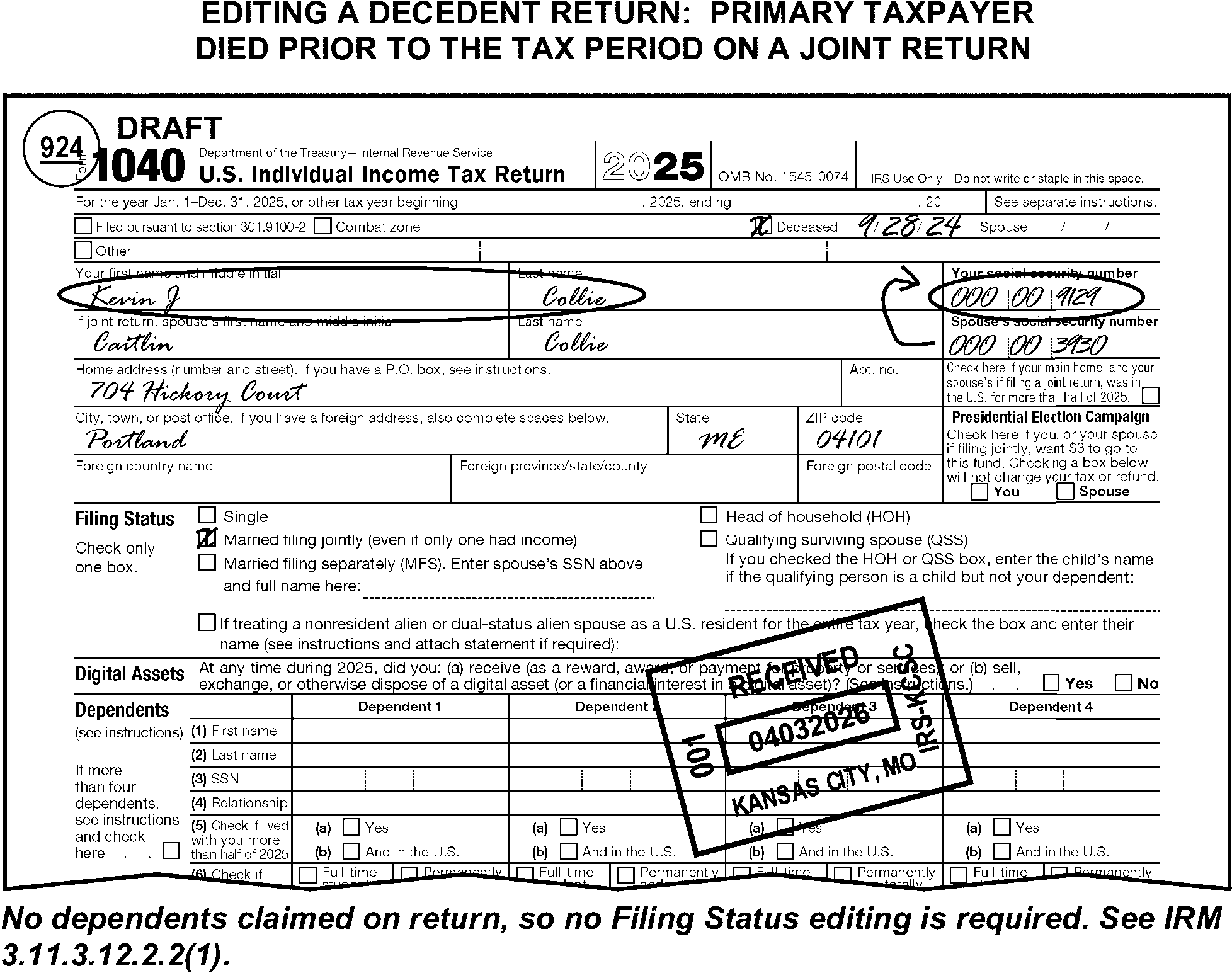
-
Accept any court papers naming the claimant as a court-appointed or court-certified personal representative for the estate of the deceased taxpayer. A will validated through the court is acceptable documentary evidence. Acceptable documentary evidence also includes a properly completed Form 1310, Statement of Person Claiming Refund Due a Deceased Taxpayer. (See IRM 3.11.3.10.3(7).)
-
Do not require documentary evidence for the authority to sign the return on a:
-
Balance due return
-
Zero/even balance return
-
Joint (FS "2" ) return signed by the surviving spouse
-
≡ ≡ ≡ ≡ ≡ ≡ ≡ ≡ ≡ ≡ ≡ ≡ ≡ ≡ ≡ ≡ ≡ ≡ ≡ ≡ ≡ ≡ ≡ ≡ ≡
-
Credit elect return when the taxpayer's date of death is after the tax year (on a joint return this applies to either taxpayer).
-
Return signed by a representative of a bank or fiduciary institution.
-
-
Unless one of the exceptions in (2) above applies, require documentary evidence for all decedent returns that meet any of the following conditions:
-
Uncomputed return
-
Refund of ≡ ≡ ≡ ≡ ≡ ≡ ≡ ≡
-
Credit elect of ≡ ≡ ≡ ≡ ≡ ≡ ≡ ≡ ≡ ≡≡ ≡ ≡ ≡ ≡≡ ≡ ≡ ≡ ≡ ≡ ≡ ≡ ≡ ≡ ≡ ≡ ≡ ≡ ≡ ≡ ≡ ≡ ≡ ≡ ≡ ≡ ≡ ≡ ≡ ≡ ≡ ≡ ≡ ≡ ≡ ≡ ≡ ≡ ≡ ≡ ≡≡ ≡ ≡≡ ≡ ≡ ≡ ≡ ≡ ≡ ≡ ≡ ≡ ≡ ≡ ≡ ≡≡ ≡ ≡ ≡
-
-
Require documentary evidence on a joint return only in the following two situations, unless one of the conditions in (2) above applies:
If Then Both taxpayers are deceased, Require documentary evidence for the person signing the return for both deceased taxpayers, (i.e., a separate Form 1310 for each spouse).
See IRM 3.11.3.10.3(2) for exceptions.Only one taxpayer died, and the return has a single signature of someone other than the surviving spouse, Documentary evidence is required to support the authority to sign for both the decedent and the surviving spouse, (i.e., fiduciary relationship or POA per IRM 3.11.3.11 and IRM 3.11.3.11.3). When corresponding with Form 6001 use paragraph i/t. -
≡ ≡ ≡ ≡ ≡ ≡ ≡ ≡ ≡ ≡ ≡ ≡ ≡ ≡ ≡ ≡ ≡ ≡ ≡ ≡ ≡ ≡ ≡ ≡ ≡ ≡ ≡ ≡ ≡ ≡ ≡ ≡ ≡ ≡ ≡ ≡ ≡ ≡ ≡ ≡ ≡ ≡ ≡ ≡ ≡ ≡ ≡ ≡ ≡ ≡ ≡ ≡ ≡ ≡ ≡ ≡≡ ≡ ≡ ≡ ≡ ≡ ≡ ≡ ≡ ≡ ≡ ≡ ≡≡ ≡ ≡
-
Correspond when the refund payee is a claimant other than a legal representative, and a completed Form 1310 is not present. Correspond using Form 6001, paragraph D, or Form 3531, box 28.
-
Accept Form 1310 as documentary evidence when all the following are present:
-
An original signature. Correspond if missing or invalid. See IRM 3.11.3.14.4 for signature requirements.
-
Part II, questions 2a and 2b must be answered "No" . Correspond for a court certificate if either is answered "Yes" or is blank. (See Figure 3.11.3-42.)
-
Part II, question 3 must be answered "Yes" unless a court certificate is attached. (See Figure 3.11.3-43.) Correspond when the question is answered "No" or is blank and a court certificate is not attached.
-
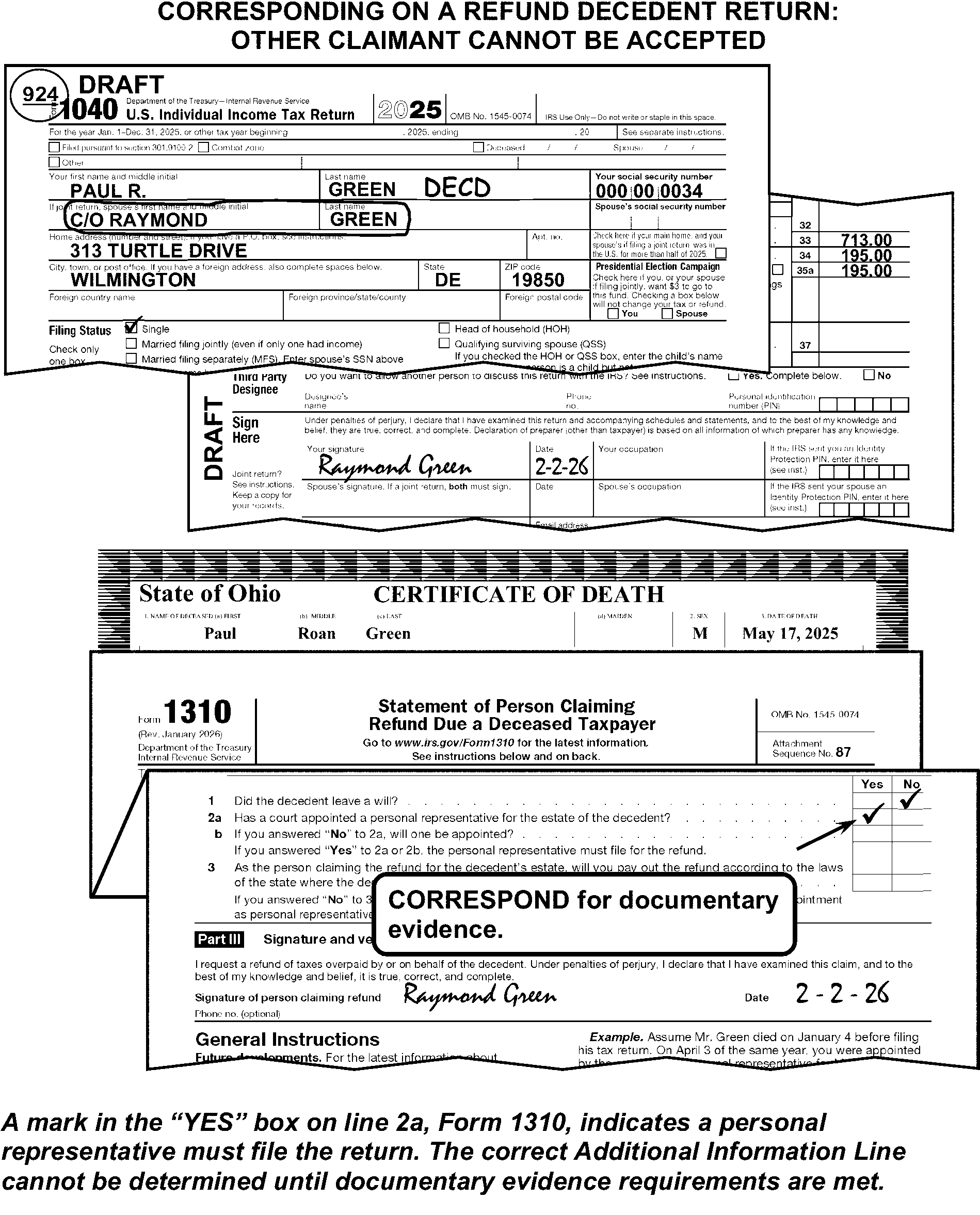
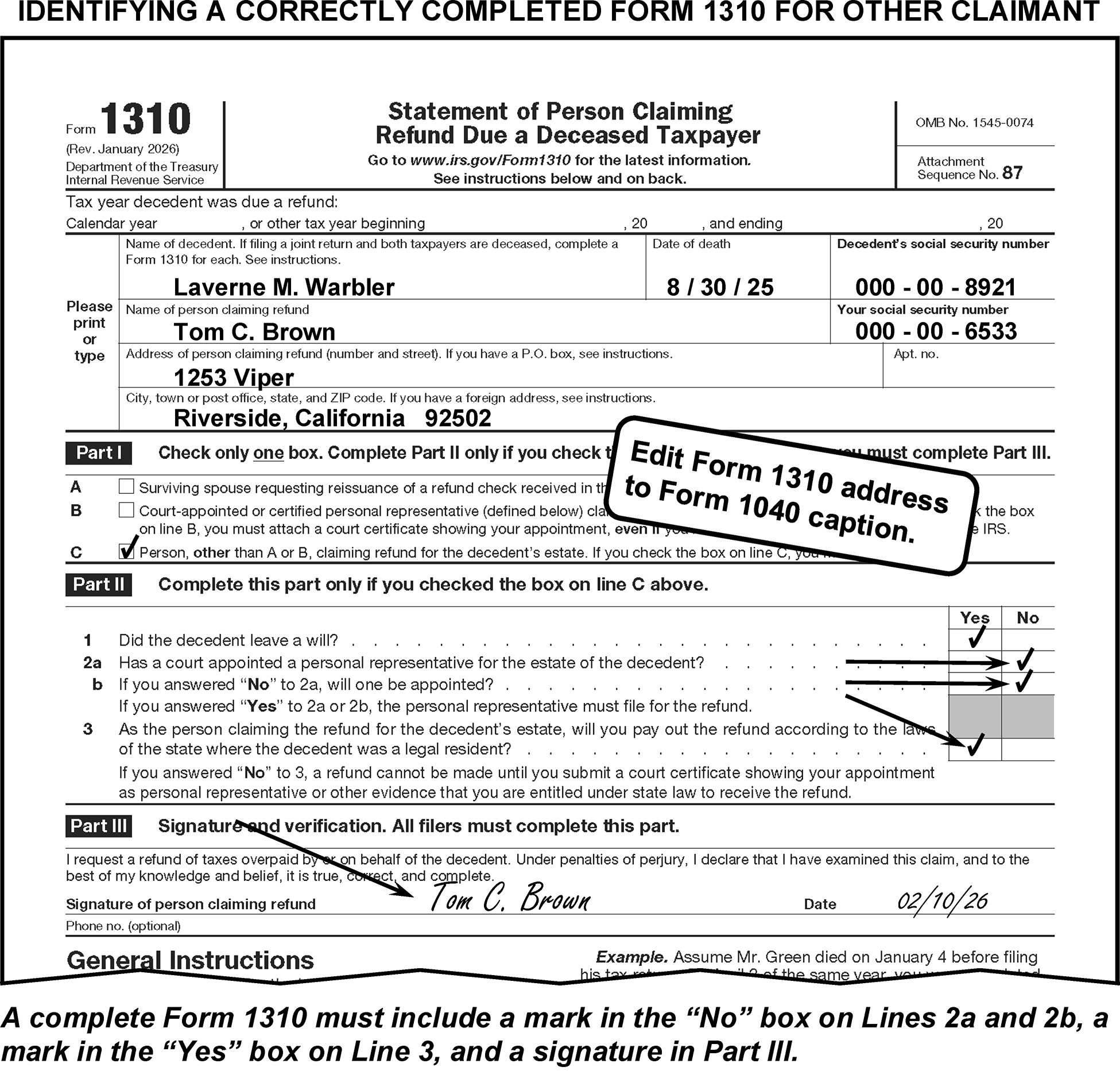
-
An AIL is required on all refund and uncomputed returns. On all other returns, edit the AIL if available. (See Figure 3.11.3-44.) Correspond when an AIL is required and you are not able to determine the AIL from the signature line or attachments. For Form 3531, use box 25 and for Form 6001, fill in 3, per IRM Exhibit 3.11.3-18.
-
Edit the name of the surviving spouse as the AIL on a FS 2 return. Include the representative's name and title on the AIL when a court-appointed or personal representative's signature is on the return.
-
Edit the title of the representative from these sources in the following priority:
-
Court certificate
-
Form 1310
-
Signature area of the return
-
-
Use the following abbreviations for these titles (See Figure 3.11.3-44):
-
Administrator - ADM
-
Commissioner - COMM
-
Conservator - CONS
-
Custodian - CUST
-
Executor (Executrix) - EXEC
-
Guardian - GDN
-
Personal Representative - PER REP
-
Trustee - TR
-
-
Delete personal relationship suffixes (e.g., "surviving spouse" , "mother" , "father" , "daughter" , "son" , etc.) from the AIL.
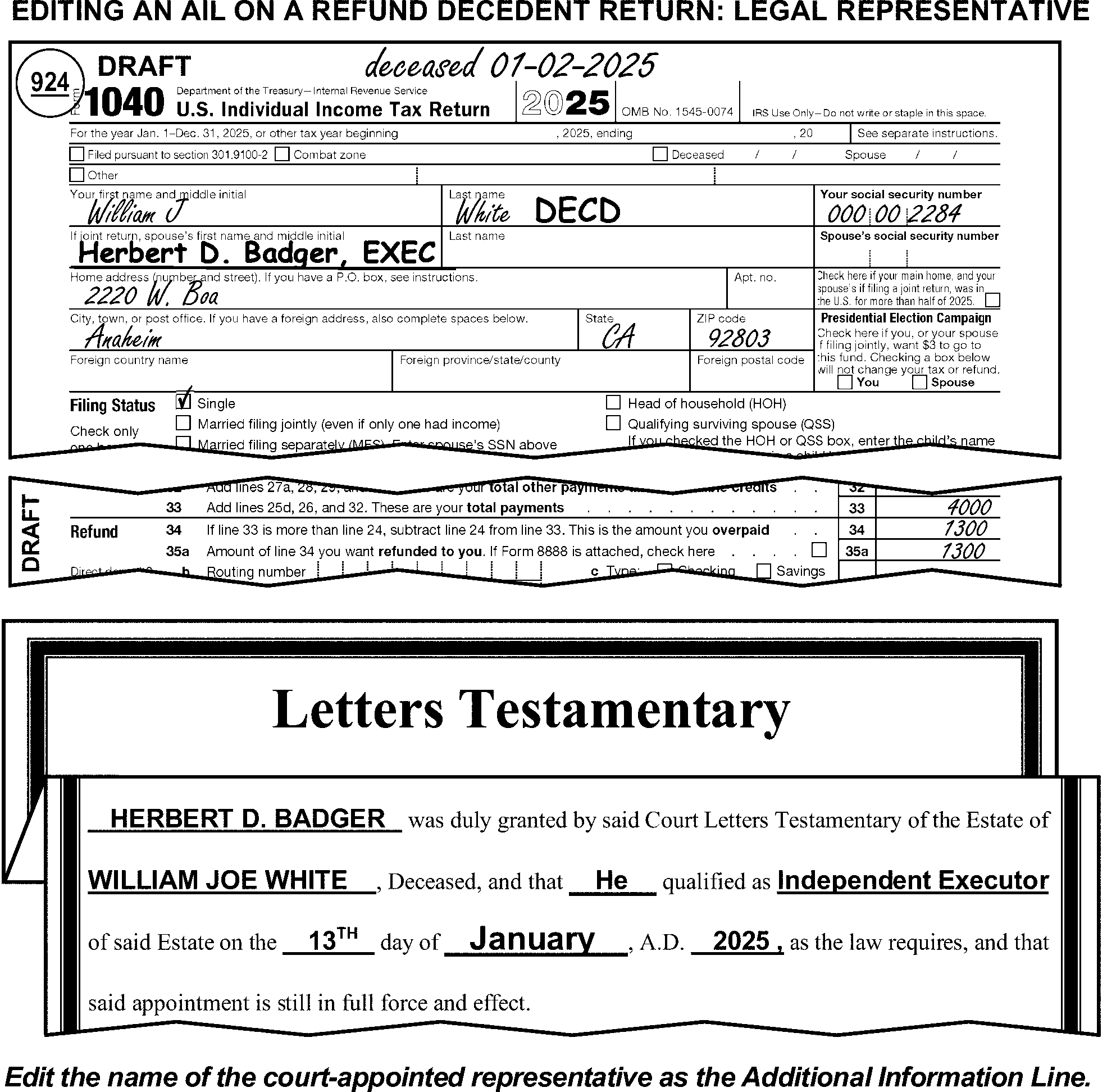
-
Edit one of the following CCCs on a refund or uncomputed return:
-
Edit CCC "W" if the payee is the surviving spouse alone, or a payee other than a legal representative or place of business. (See Figure 3.11.3-45.)
-
Edit CCC "L" if the payee is a legal representative (i.e., court-appointed), place of business, or a surviving spouse and a legal representative or place of business. (See Figure 3.11.3-45.)
-
-
Edit one of the following CCCs on all returns where the taxpayer(s) died during the tax period of the return:
-
Edit CCC "F" if a single taxpayer, or only the primary taxpayer on a joint return, is deceased. (See Figure 3.11.3-46.)
-
Edit CCC "9" if only the secondary taxpayer died during the tax period. (See Figure 3.11.3-46.)
-
Edit CCC "A" if both taxpayers died during the tax period. (See Figure 3.11.3-46.)
-
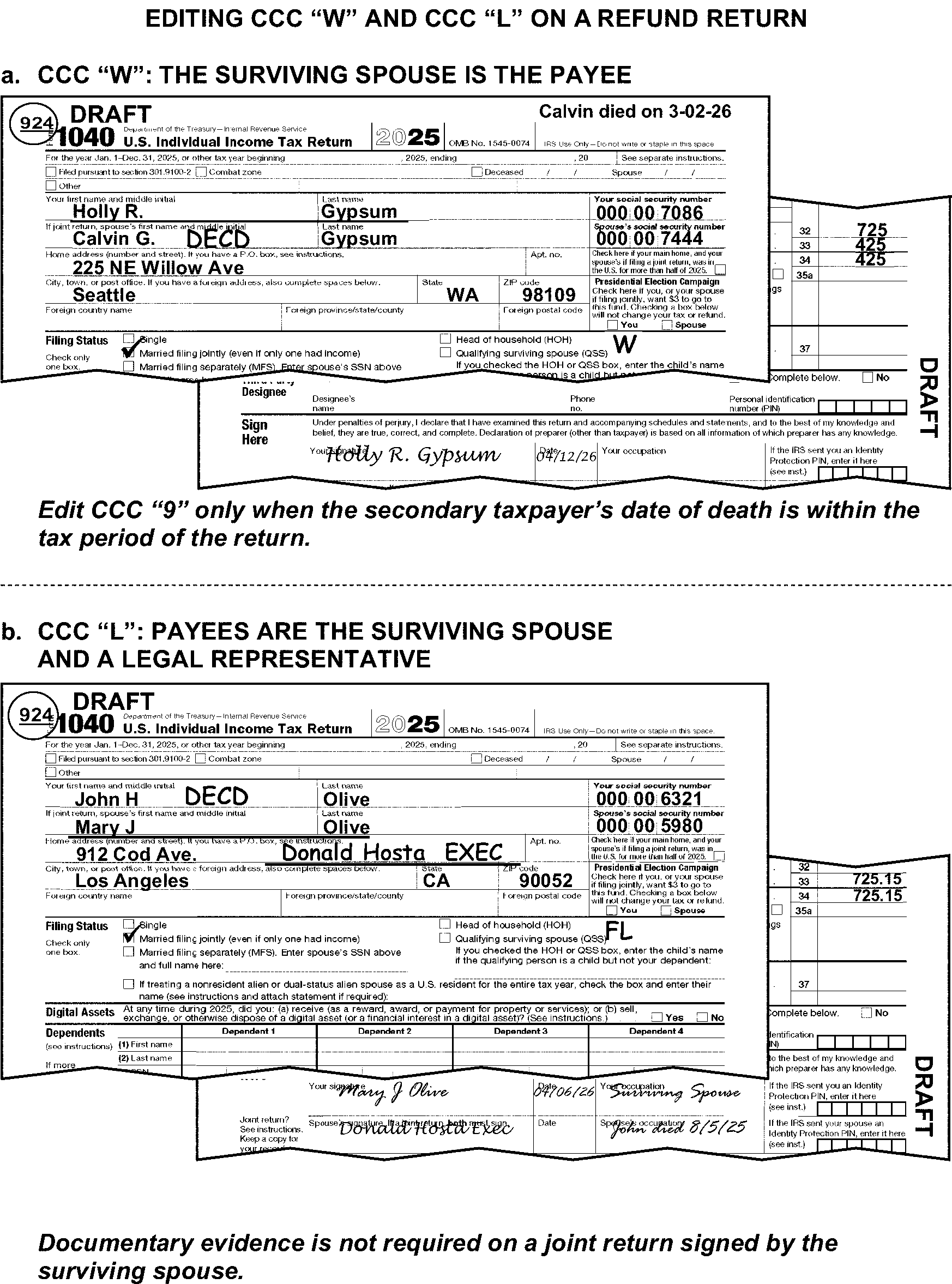
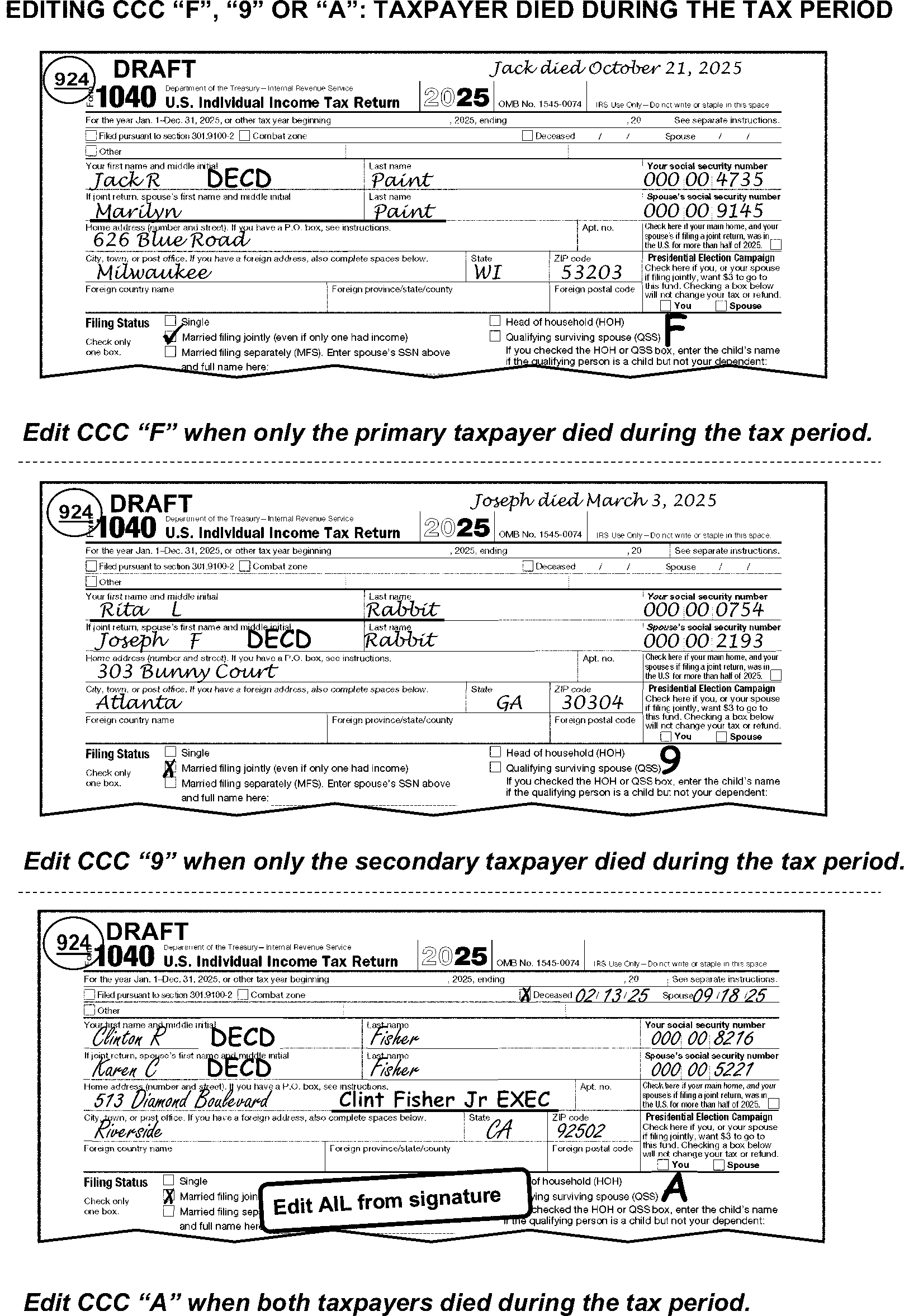
-
If a single taxpayer or two taxpayers on a joint return died after the currently processed calendar year (2025), a short period return may be filed. In addition to regular editing, edit the following (see Figure 3.11.3-47):
-
The date of death in YYMM format as the tax period.
-
CCC "Y" and an Action Trail
-
CCC "A" for a joint return or CCC "F" for a single taxpayer
-
Received date
-
CCC "R" if the return is received more than 3 months and 15 days from the end of the short period.
-
-
If on a joint return only one taxpayer died after the currently processed calendar year, a return for the surviving spouse must be filed for the entire year. If a short period return was filed instead, take one of the following actions:
-
If the return is unnumbered, correspond, informing the taxpayer that a return for the entire year must be filed.
-
If the return is numbered, edit Action Code "480" and do not correspond.
-
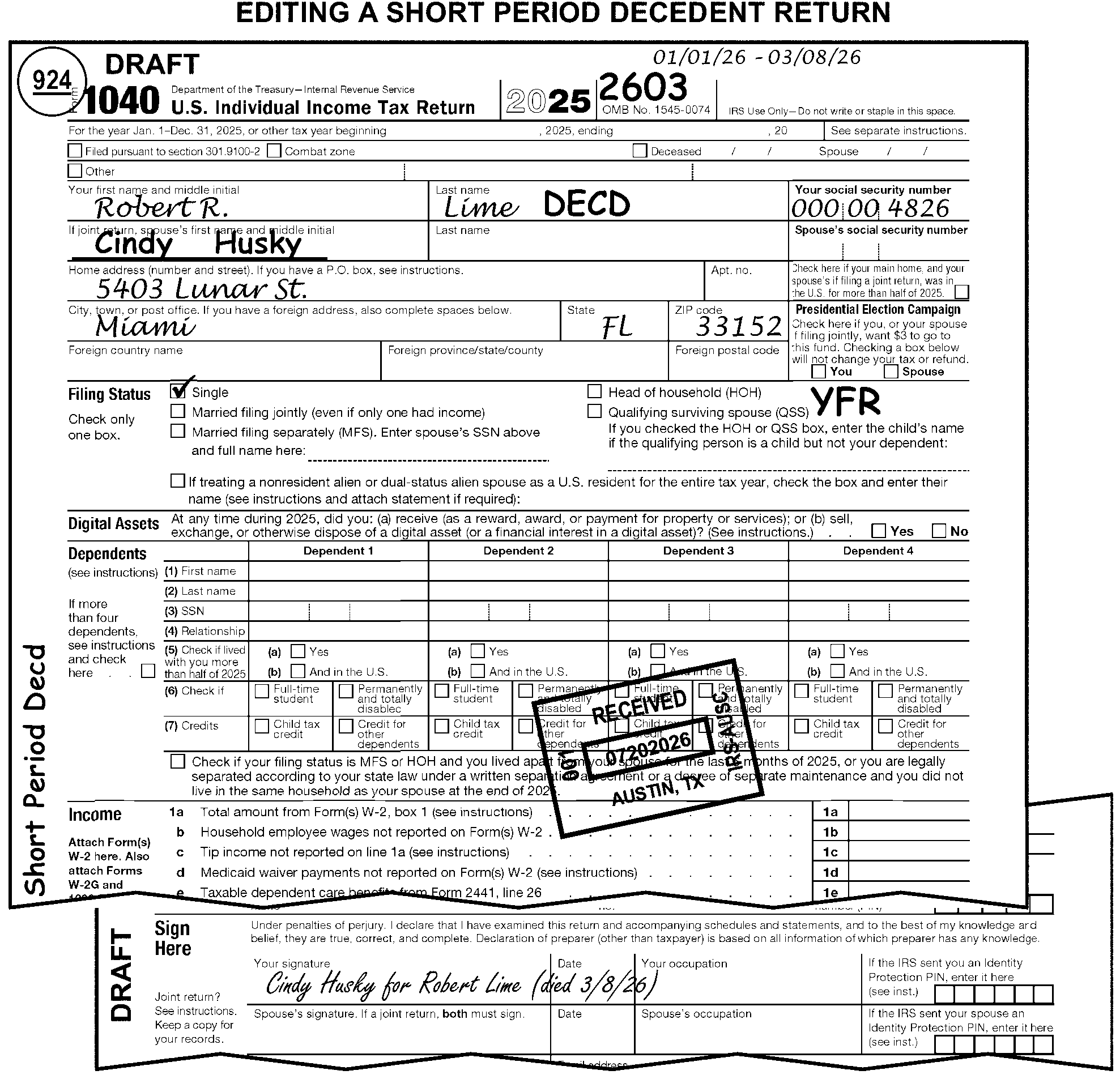
-
Fiduciary returns are those which are signed for the taxpayer by a representative, who is often court-appointed.
-
Edit the fiduciary institution's name or the taxpayer's representative's name, when no institution name is present, as the Additional Information Line (AIL) in the caption. (See IRM 3.11.3.9.2.2.2.)
-
Use the abbreviations in the following chart as suffixes to the representative's name or fiduciary’s relationship.
Fiduciary Relationships/Taxpayer Representatives Abbreviation Administrator ADM Commissioner COMM Conservator CONS Custodian CUST Executor/Executrix EXEC Guardian GDN Personal Representative PER REP Trustee TR -
Delete the word "Incompetent" from the caption when it is present.
-
Documentary evidence is never required for any of the following relationships:
-
The parent or spouse of an incompetent taxpayer
-
A parent signing for their minor child
-
An attorney or Certified Public Accountant (CPA)
-
A representative of a bank or other fiduciary institution, to include credit unions, pension funds, etc.
-
A Military spouse out of the country on combat duty or located in a qualified hazardous duty area. See IRM 3.11.3.6.1.1 for more information on Combat Zone returns.
-
-
Documentary evidence is required only if the taxpayer ≡ ≡ ≡ ≡ ≡ ≡ ≡ ≡ ≡ ≡ ≡ ≡ ≡ ≡ ≡ ≡ ≡ ≡ ≡ ≡ ≡ ≡ ≡ ≡ ≡ ≡ ≡ ≡ ≡ ≡ ≡ ≡ ≡ ≡ ≡ ≡ ≡ ≡ ≡ ≡ ≡ ≡ ≡ ≡ ≡ ≡ ≡ ≡ ≡ ≡ ≡ ≡ ≡ ≡ ≡ ≡ ≡ ≡ ≡ ≡ ≡ ≡ ≡ ≡ ≡ ≡
-
The parent for a child that is not a minor.
-
Any of the representatives listed in the table at IRM 3.11.3.11.
-
-
Documentary evidence is always required, regardless of the dollar amount, for all other relationships. This includes, but is not limited to, the following:
-
Son
-
Daughter
-
Uncle
-
Aunt
-
Cousin
-
Nephew
-
Niece
-
POA
-
Attorney-In-Fact
-
-
Correspond when documentary evidence is required but not attached. If using Form 3531, check box 1, or Form 6001, paragraph h/t.
-
A minor child is defined by any of the following
-
"Minor" is notated anywhere on the return
-
Any indication the child is under age 18
-
-
Edit "MINOR" as a suffix to the child's name in the caption if the return is for a minor child. (See Figure 3.11.3-48.)
-
Edit the parent, other fiduciary representative, or guardian's name as an additional information line in the caption if that person signs for the child (See Figure 3.11.3-48 and IRM 3.11.3.9.2.2.2.) Use the following priority to determine the name or relationship of the person(s) signing the return:
-
Use information from the signature area.
-
Use information from Form 8615.
-
Correspond for documentary evidence if a relationship cannot be determined.
-
-
Correspond for missing required documentary evidence. Documentary evidence requirements are:
-
A minor child's return signed by their parent never requires documentary evidence.
-
A minor child's return signed by their guardian or other fiduciary representative (as shown in IRM 3.11.3.11) requires documentary evidence ≡ ≡ ≡ ≡ ≡ ≡ ≡ ≡ ≡ ≡ ≡ ≡ ≡ ≡ ≡ ≡ ≡ ≡ ≡ ≡ ≡ ≡ ≡ ≡ ≡ ≡ ≡ ≡ ≡ ≡
-
All other relationships always require documentary evidence.
-
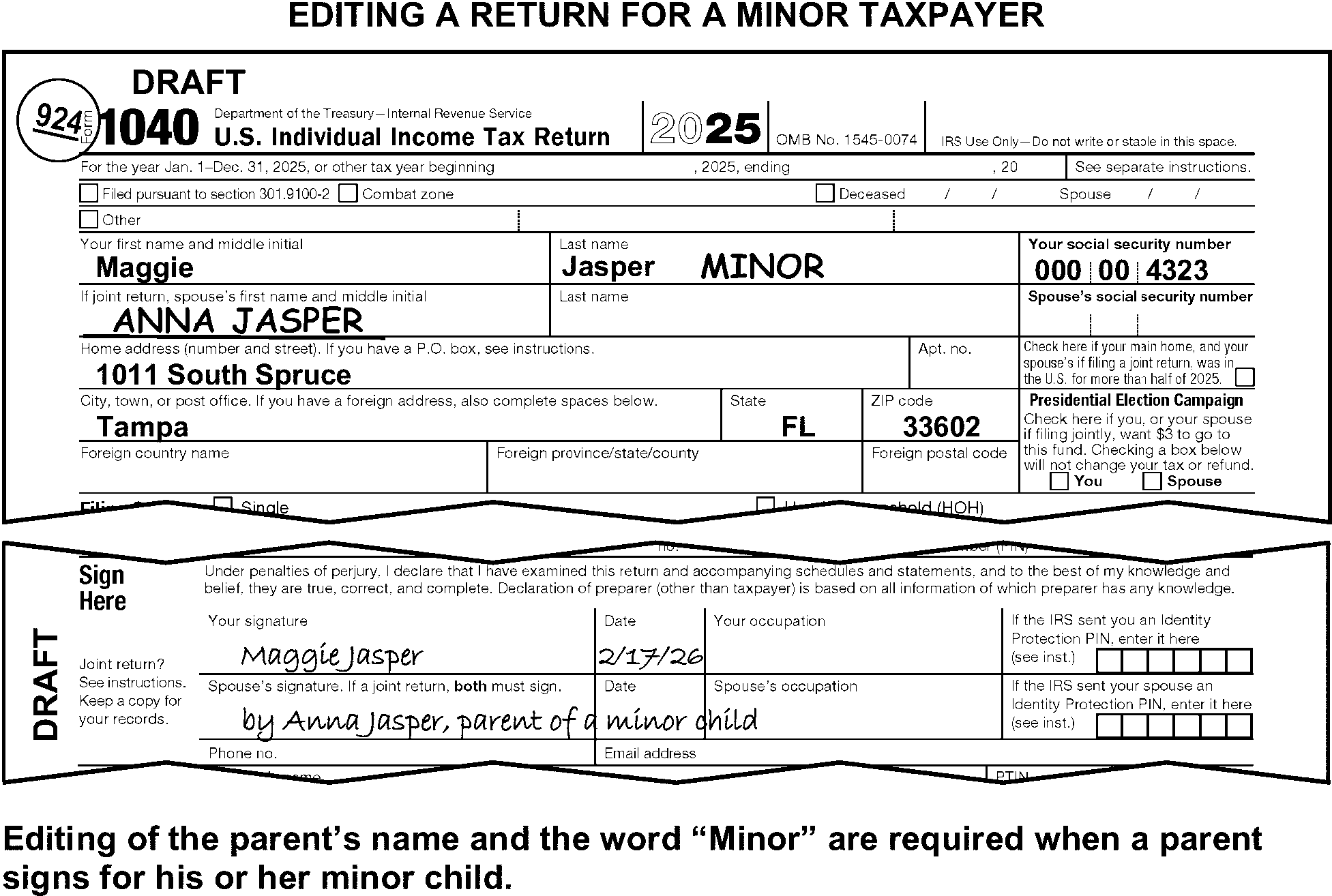
-
If a POA relationship is indicated, Form 2848, Power of Attorney and Declaration of Representative, or a general or durable Power of Attorney must be attached. Correspond when missing, unless there is a notation of either of the following:
-
"POA on file" .
-
A Centralized Authorization File (CAF) number is provided on the return or an attachment. See paragraph (2) below.
Note:
A Form 2848 authorizes the holder to represent the taxpayer before the IRS. The power to sign a tax return is not a power generally authorized by the form; the power must be specified. A Form 8821, Tax Information Authorization, only allows the holder to receive the taxpayer's tax information.
-
-
Research the POA when either of the notations in (1) above are present. Correspond, when research does not provide a valid (current) POA. If using Form 3531, check box 1, or Form 6001, paragraph h/t.
-
Never edit a POA name as an additional information line in the caption, unless otherwise instructed.
-
See IRM 3.11.3.9.2.2.2 for further information on editing additional information lines.
-
The filing status (FS) is used to determine the taxpayer's standard deduction amount, eligibility for the earned income tax credit, and to compute their tax.
-
The instructions in this manual subsection are for determining and editing the correct FS.
-
Edit the FS by either checking the correct box or by editing the FS Code in the white space under the Filing status heading.
-
TY17 and prior, Form 1040 and Form 1040A, edit the FS by either checking the correct box or by editing the FS Code to the left of the Filing Status 3 box.
-
The meaning of the Filing Status Codes are:
-
FS "1" - single taxpayer
-
FS "2" - married taxpayers filing joint return
-
FS "3" - married taxpayer filing a separate return (spouse dependent / exemption is not claimed)
-
FS "4" - head of household
-
FS "5" - qualifying Surviving Spouse
-
FS "6" - married taxpayer filing a separate return (spouse exemption is claimed)
-
-
Edit CCC "Q" when the filing status is 4 or 5, there are no dependents listed on the return and a qualifying non-dependent is listed:
-
In the filing status area
-
On Schedule EIC with SSN of a Qualifying Non-Dependent
-
On Form 2441 with SSN of a Qualifying Non-Dependent, or
-
On Form 8814 with SSN of a Qualifying Non-Dependent
-
-
On an uncomputed return, when all FS boxes are blank or multiple boxes are marked:
-
Edit FS "2" (Married filing jointly), when there are two names in the caption and two signatures are present. Circle all boxes except FS "2" (Married filing jointly), when multiple boxes are marked.
-
Take no action for all other cases.
-
-
On a computed return, when the taxpayer does not mark a box:
If there And Then Is one name in the caption and one signature, A spouse is listed as a dependent, Edit FS "6" and
do not code as a dependent.Is one name in the caption and one signature A spouse’s name is entered in the Filing Status area, or an S-TIN is present in the caption area, Check FS 3 box (Married filing separate) unless FS 6 criteria (above) applies. Is one name in the caption and one signature Neither of the above apply, Check FS 1 box (Single). Are two names in the caption and two signatures, Check FS 2 box (Married filing jointly). Is any other condition, Take no action. -
On a computed return when more than one FS box is marked, circle all boxes but the largest number unless both FS 1 and 4 boxes are marked. (See Figure 3.11.3-49.)
If FS boxes 1 and 4 are both marked and Then A dependent with a TIN or an indication of a dependent who was born during the tax period and died during the same or next consecutive tax period is claimed on the Dependent Line or edited in positions 1, 3, 4, or 5. Circle FS 1 box. (See Figure 3.11.3-49.) -
A name or "see attached" is noted on line next to Qualifying Surviving Spouse or Schedule EIC, Form 2441, or Form 8814 with a qualifying child is attached,
-
AND no dependents are edited in positions 1, 3, 4, or 5.
Circle FS 1 and edit CCC "Q" . None of the conditions listed above are present, Circle FS 4 box. -
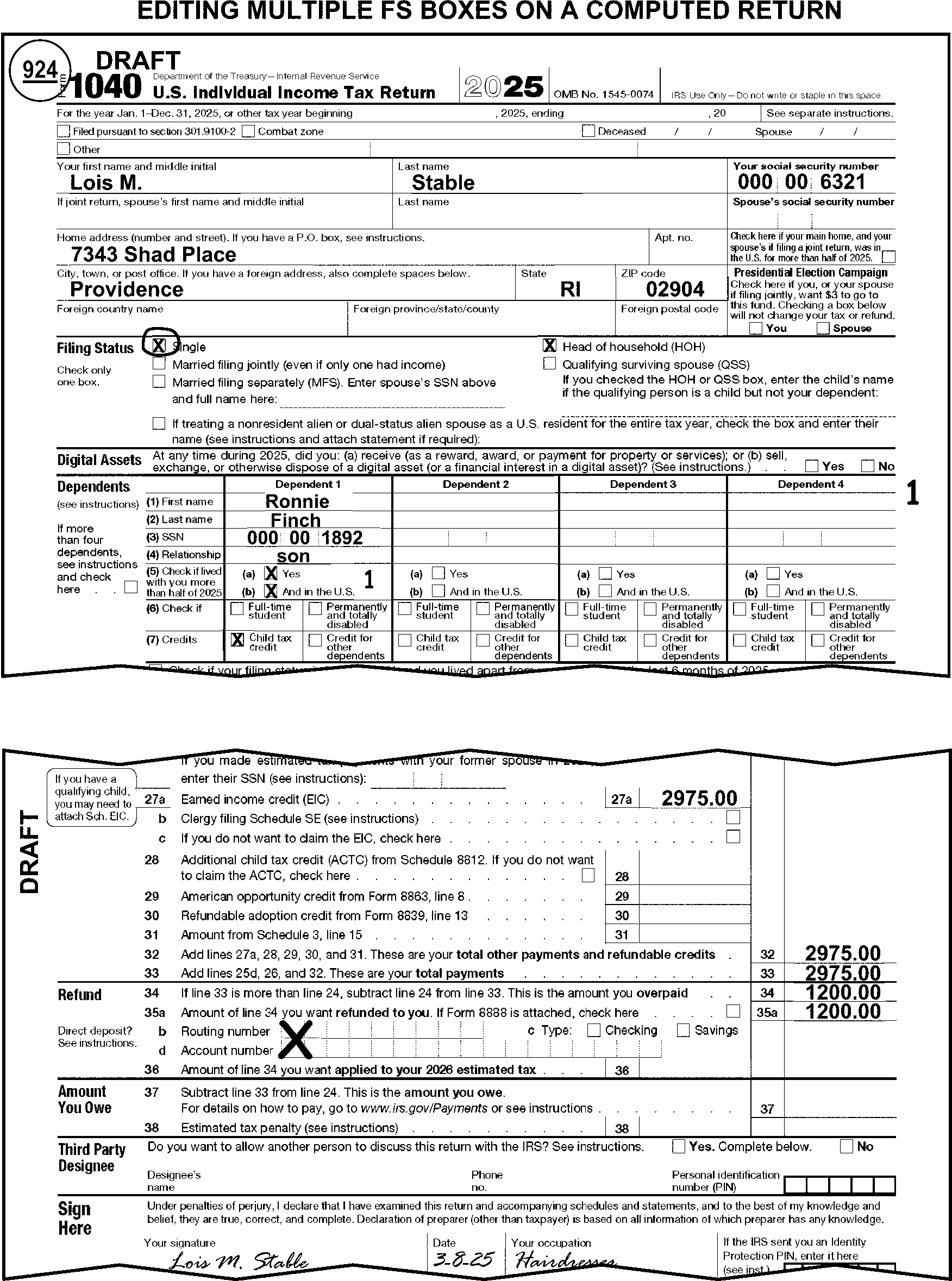
-
When the taxpayer marks FS 1 box only:
If there is one name in the caption and one signature and Then A spouse is claimed as a Dependent, Circle FS 1 box and edit FS 6. Do not code the spouse as a Dependent. Circle out the dependent header. For TY24 and prior year edit an X to the left of the spouse's name on the Dependent line. A spouse's date of death is within the tax period of the return or subsequent tax period, Note: Also see the decedent return editing information in IRM 3.11.3.10.-
Circle FS 1 box and check FS 2 box.
-
Edit the spouse's name to the caption or correspond if missing.
- If using Form 3531, check box 26.
- If using Form 6001, use fill-in 25, per Exhibit 3.11.3-18.
None of the conditions above apply, Take no action. -
-
When the taxpayer marks FS 2 box only:
If there And Then Is only one signature and a spouse’s name is listed as a Dependent, There is no S-TIN present, Correspond for the spouse's missing signature and TIN. Use Form 3531 and check boxes 1 and 3. Are two signatures and a spouse is claimed on the Dependent line, There is no S-TIN present, -
Edit spouse's name to the caption.
-
For TY25 and later, circle the dependent header. For TY24 and prior, edit an "X" to the left of spouse's name on the Dependent line. Do not code the spouse as a Dependent.
Are two names in the caption and the spouse's date of death is 2023 or 2024, A Dependent is present -
Circle FS 2 box and check FS 5 box.
-
Circle the deceased spouse's name and TIN in the caption. (See Figure 3.11.3-50.)
Are no conditions above that apply, Take no action. -
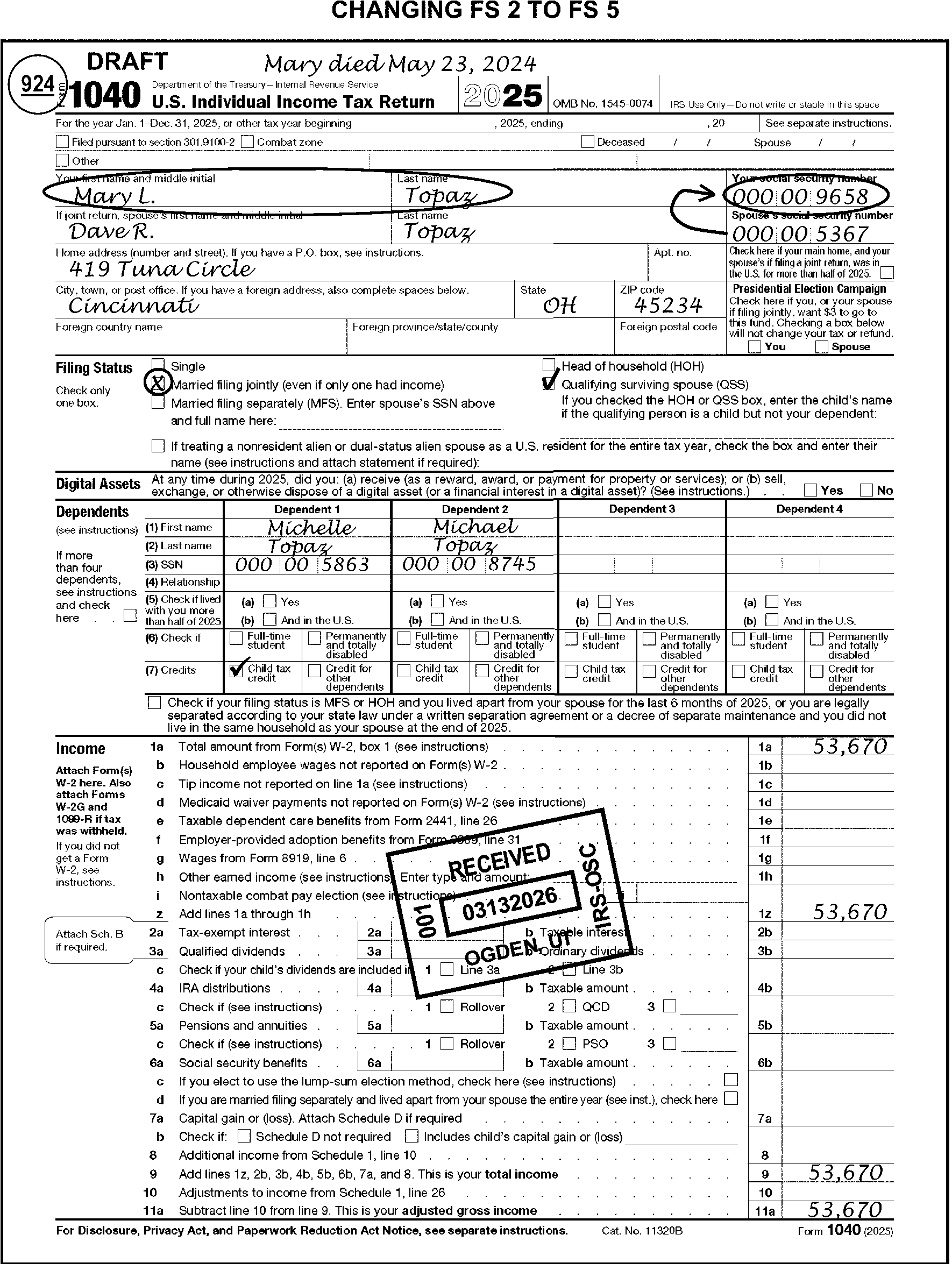
-
When the taxpayer marks FS 3 box only and spouse's exemption is claimed on the Dependent line:
If there And Then Is only one name in the caption, The spouse has no income, Circle FS 3 box and edit FS "6" (See Figure 3.11.3-51.)-
For TY25 and later, circle the dependent header if spouse’s name if entered in the dependent column. For TY24 and prior edit an X to the left of the spouse's name if entered on Dependent line.
-
Edit the S-TIN from attachments if missing.
-
Do not code the spouse as a dependent when listed on the Dependent line.
Is only one name in the caption, The spouse has income, Correspond for the correct FS. If using Form 3531, use fill-in 40, per Exhibit 3.11.3-18. If using Form 6001, check box F. Are two names in the caption, two signatures, Circle FS 3 box and check FS "2" box. -
For TY25 and later, circle the dependent header if spouse’s name is entered in dependent column. For TY24 and prior, edit an X to the left of the spouse's name if entered on Dependent line.
-
Do not code the spouse as a dependent when listed on the Dependent line.
-
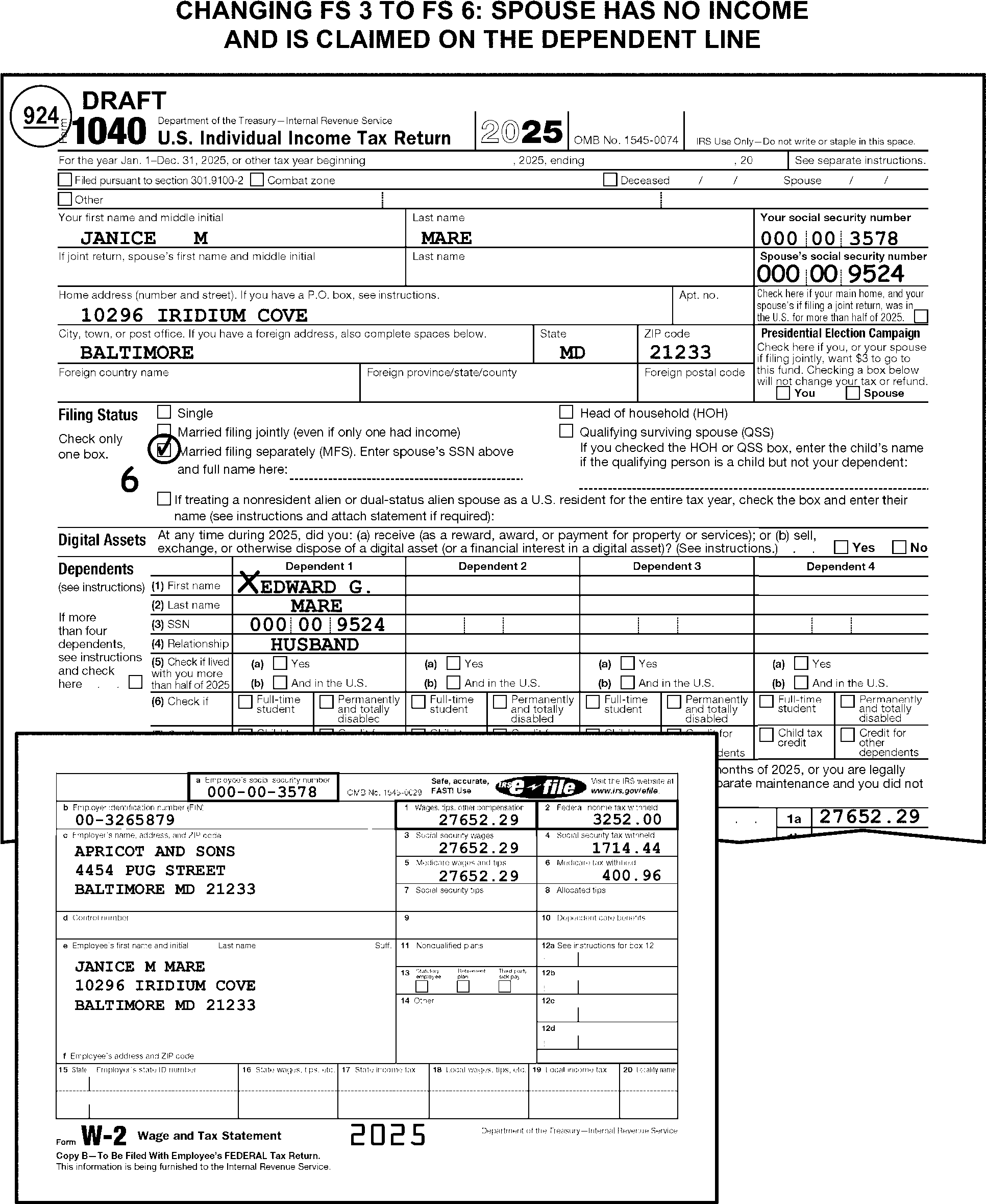
-
When the taxpayer marks FS 4 box only:
If Then A spouse is claimed on Dependent line and no other dependents are listed or claimed, -
Circle FS 4 box and edit FS 6
-
For TY25 and later, circle the dependent header if spouse’s name is entered in dependent column. For TY24 and prior, edit an X to the left of the spouse's name if entered on Dependent. Delete the spouse's name if in the caption.
-
Do not code spouse as a dependent.
A spouse is claimed on Dependent line andother dependents are listed or claimed, -
For TY25 and later, circle the dependent header if spouse’s name is entered in dependent column. For TY24 and prior, edit an X to the left of the spouse's name if entered on the Dependent line.
-
Do not code the spouse as a dependent.
-
Position 1, 3, 4 or 5 does not have a dependent with a TIN or a dependent who was born during the tax period and died during the same or next consecutive tax period, and
-
No name or "see attached" noted below filing status checkboxes and
-
No Schedule EIC, Form 2441, or Form 8814 with a qualifying child attached,
Circle FS 4 box and check FS 1 box. (See Figure 3.11.3-52.) -
A name or "see attached" is notated below filing status checkboxes or Schedule EIC, Form 2441, or Form 8814 with qualifying child is attached and
-
No dependents are entered/edited in positions 1, 3, 4, or 5
Edit CCC "Q" . (See Figure 3.11.3-53). A spouse's date of death is within the tax period of the return or the subsequent tax period, -
Circle FS 4 box and check FS 2 box.
-
Edit the spouse's name to the caption or correspond if missing.
- If using Form 3531, check box 26.
- If using Form 6001, use fill-in 25, per Exhibit 3.11.3-18.
-
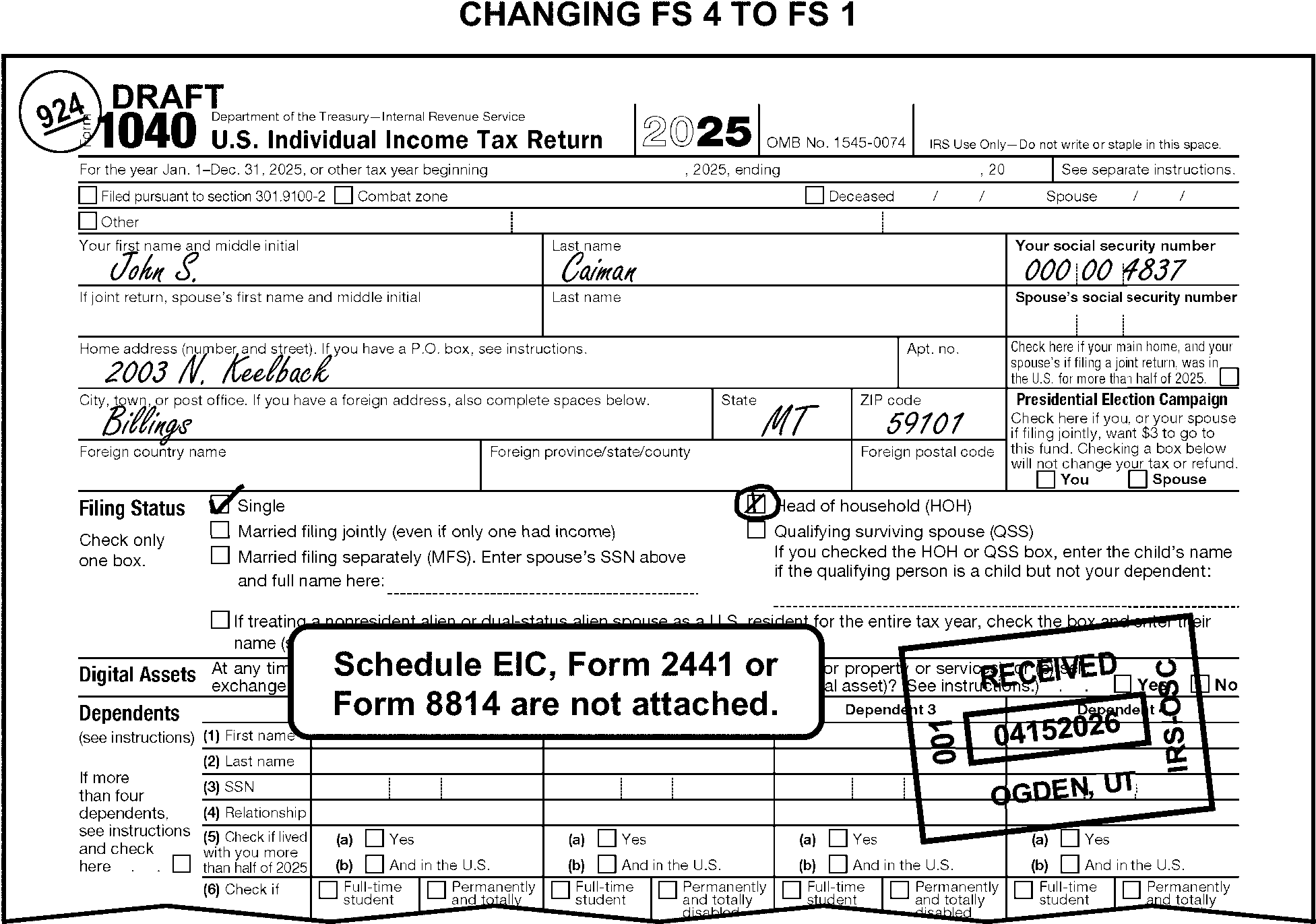
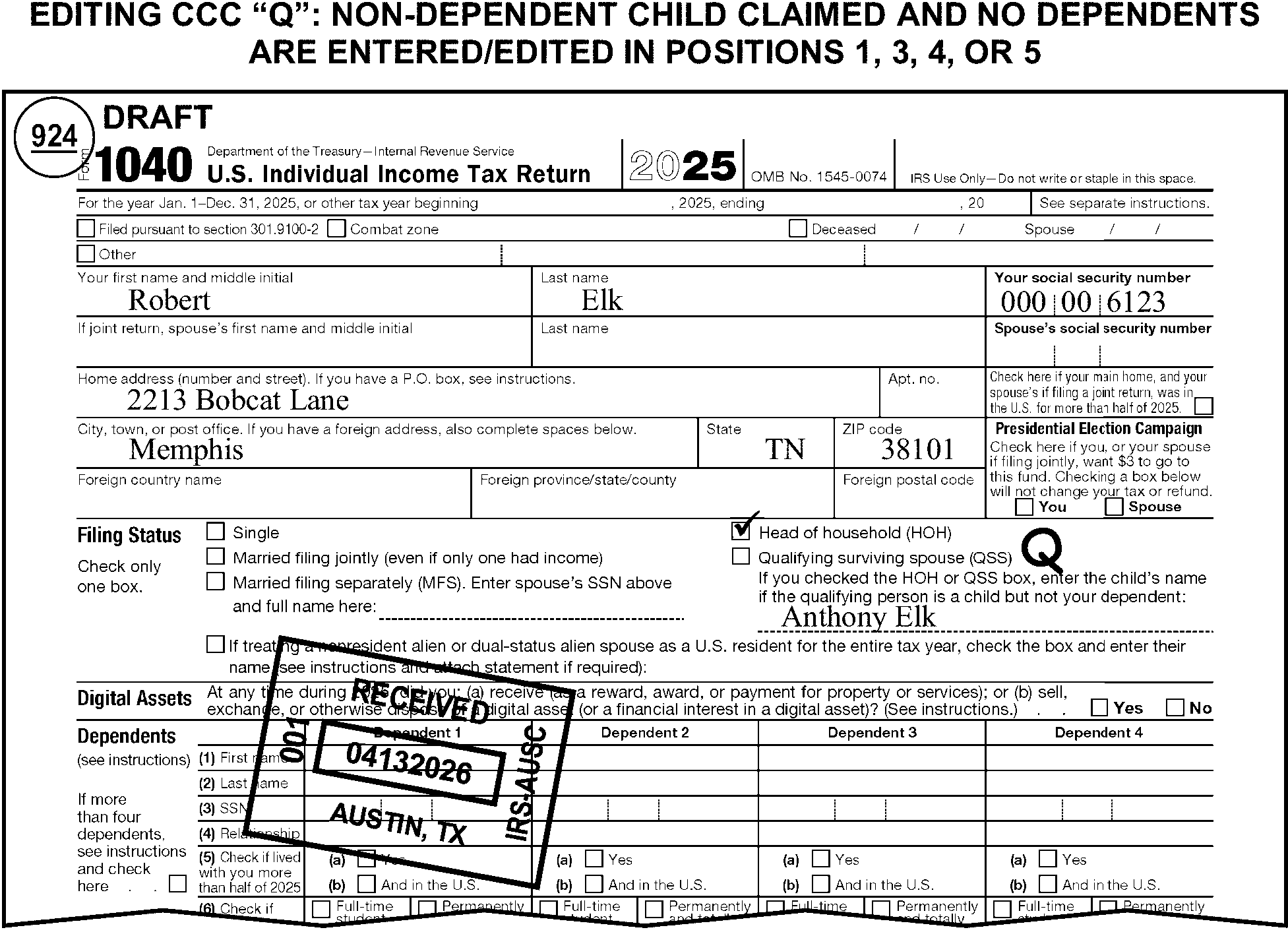
-
Refer to the decedent editing instructions in IRM 3.11.3.10 if the spouse died during the tax period of the return.
-
When the taxpayer marks FS 5 box only:
If the And Then Spouse's date of death is not 2023 or 2024, -
There is at least one dependent coded in position 1, 3, 4, or 5 with a TIN
-
or a dependent who was born during the tax period and died during the same or next consecutive tax period
-
or a qualifying child on Schedule EIC, or a name or see attached noted in the filing status area.
Circle FS 5 and check FS 4 box. (See Figure 3.11.3-54.) Spouse's date of death is not 2023 or 2024, -
A name or "see attached" is noted on line next to Qualifying Surviving Spouse or Schedule EIC, Form 2441, or Form 8814 with a qualifying child is attached,
-
AND no dependents are edited in positions 1, 3, 4, or 5.
Circle FS 5 and check FS 4 box. Edit CCC "Q" . Spouse's date of death is not 2023 or 2024, -
There are no dependents coded in positions 1, 3, 4, or 5, with a TIN
-
nor a dependent who was born during the tax period and died during the same or next consecutive tax period,
-
nor a qualifying child on Schedule EIC, Form 2441, or Form 8814 or a name or see attached noted in the filing status area.
Circle FS 5 and check FS 1 box. A spouse's date of death is within the tax period of the return or the subsequent tax period, One name in the name line, -
Correspond, if the spouse’s name can’t be found.
- If using Form 3531, check box 26.
- If using Form 6001, use fill-in 25, per Exhibit 3.11.3-18.
Spouse's date of death is not present, Take no action. -
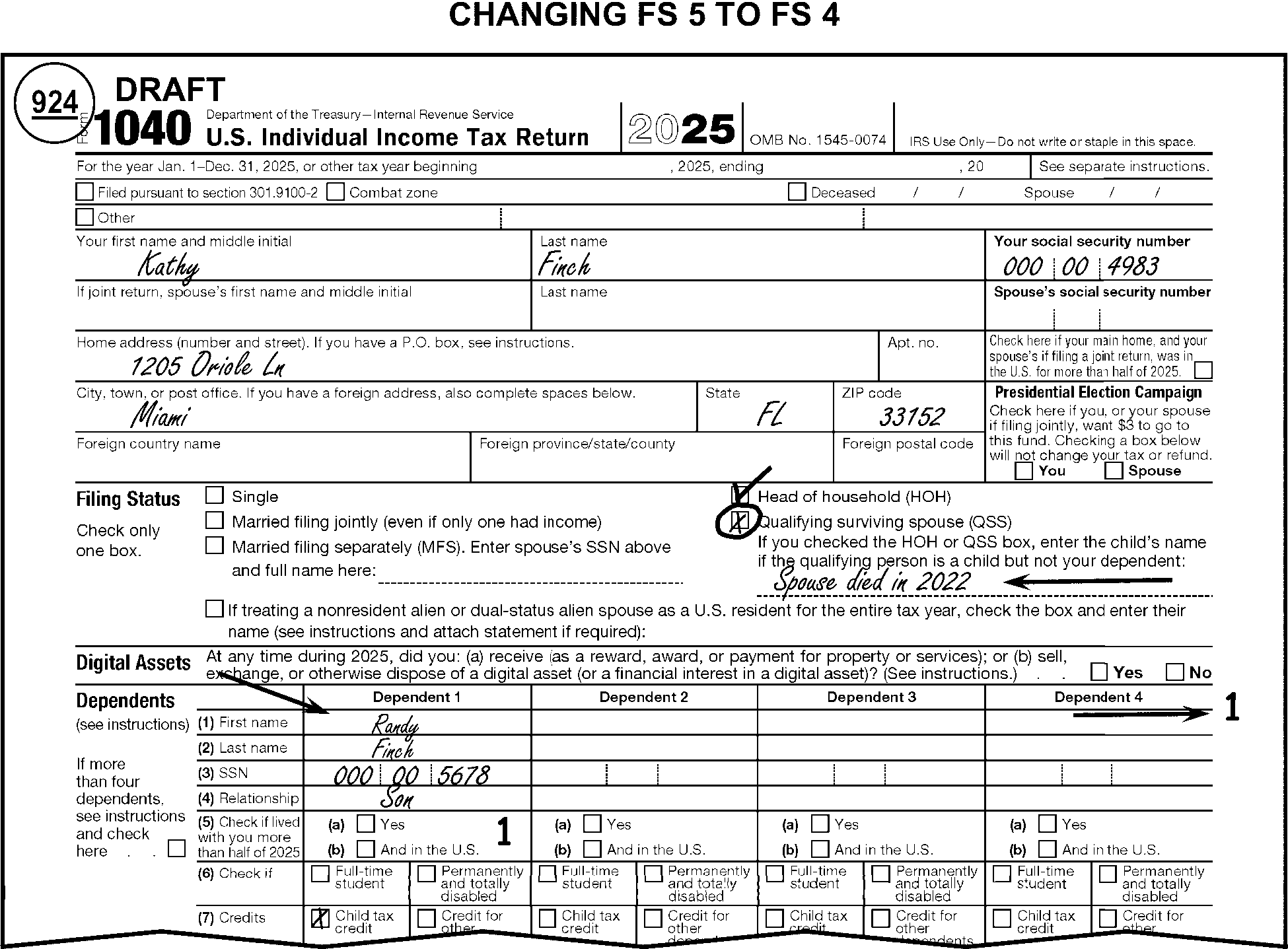
-
There are no exemptions on TY18 and later returns, only dependents. Dependent coding is kept for determining family size in certain calculations.
-
For TY25 and later, if the dependent is a child, then the relationship listed in the dependent section will determine both the dependent coding and child dependent relationship coding.
-
Dependents are edited on Form 1040 in the margin directly to the right of the dependents area of the return.
-
There are six dependent positions. The six positions are used to identify different relationships between the dependent and the taxpayer.
(See Figure 3.11.3-55.)-
Dependent position 1 - Child relationships
-
Dependent position 2 - Will always be zero (TY18 and later)
-
Dependent position 3 - Parent relationships
-
Dependent position 4 - Qualifying child relationships
-
Dependent position 5 - Other relationships
-
Dependent position 6 - Overflow
-
-
Dependents will be coded based on the relationship listed in row (4).
-
Edit leading zeros. Edit a 0 (zero) in any prior position for which a dependent has not been coded when editing dependent positions 3 through 6. Do not edit trailing zeros. (See Figure 3.11.3-56.)
-
Edit dependents to position 5 when the relationship of the dependent is not listed.
-
The number of dependents edited should equal the number of dependents listed by the taxpayer on the Form 1040 or attachments. (See Figure 3.11.3-57.)
-
If the taxpayer indicates a relationship of "Self" , "Me" , "Spouse" , "Husband" , "Wife" , or "Common law spouse" , circle out the dependent header and do not code them in any position. For TY24 and prior edit an "X" to the left of the dependent name.
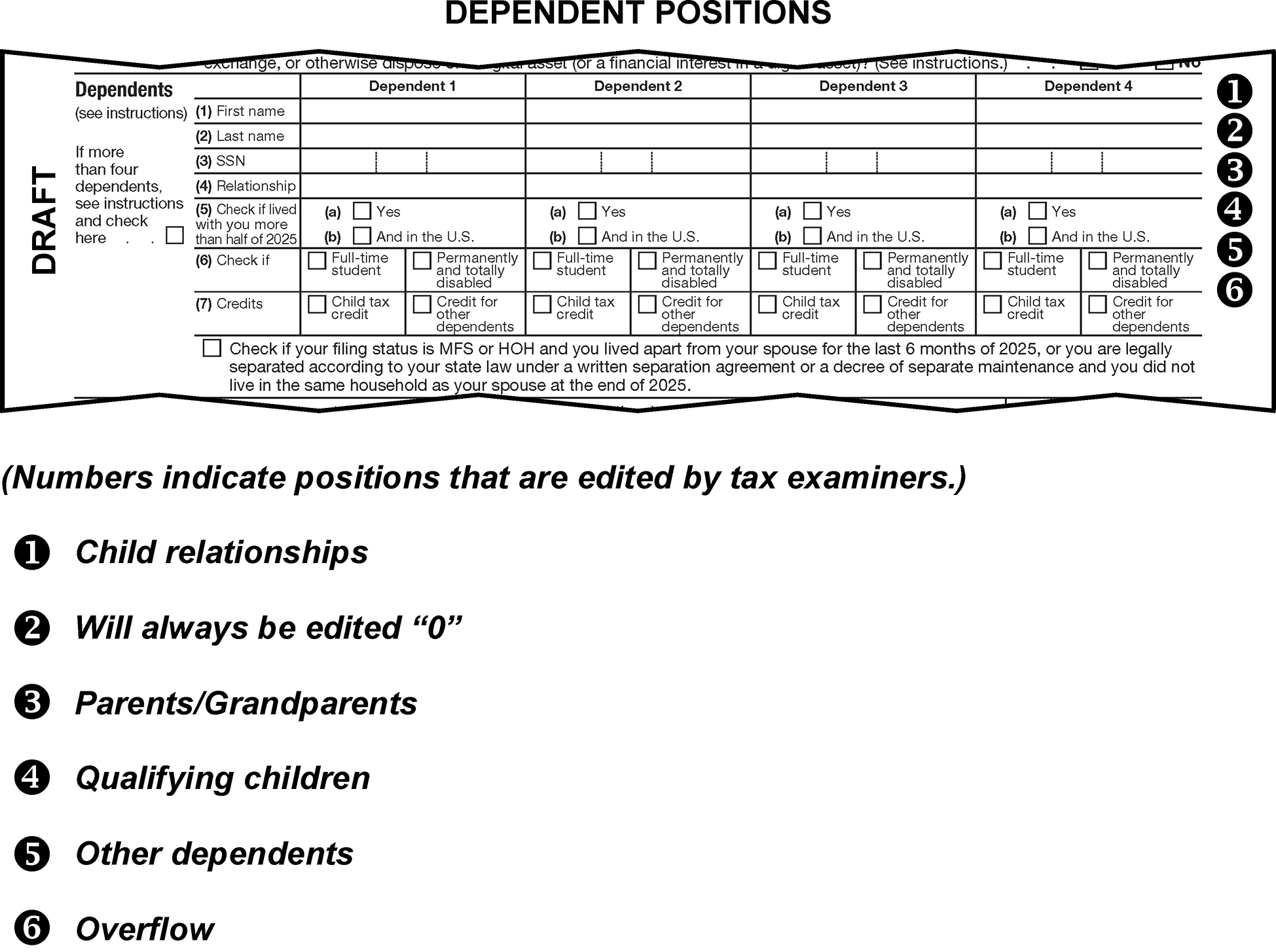
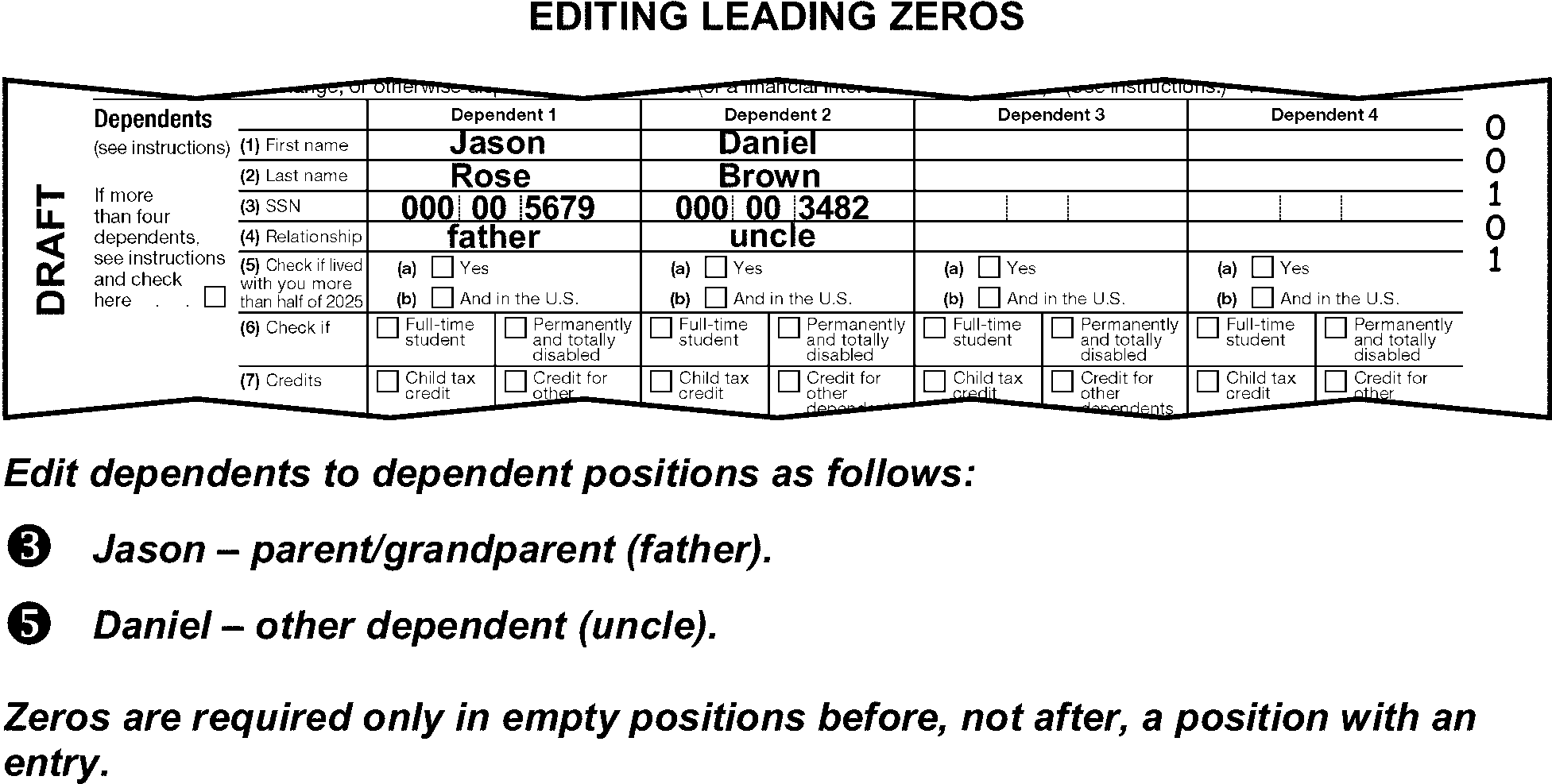
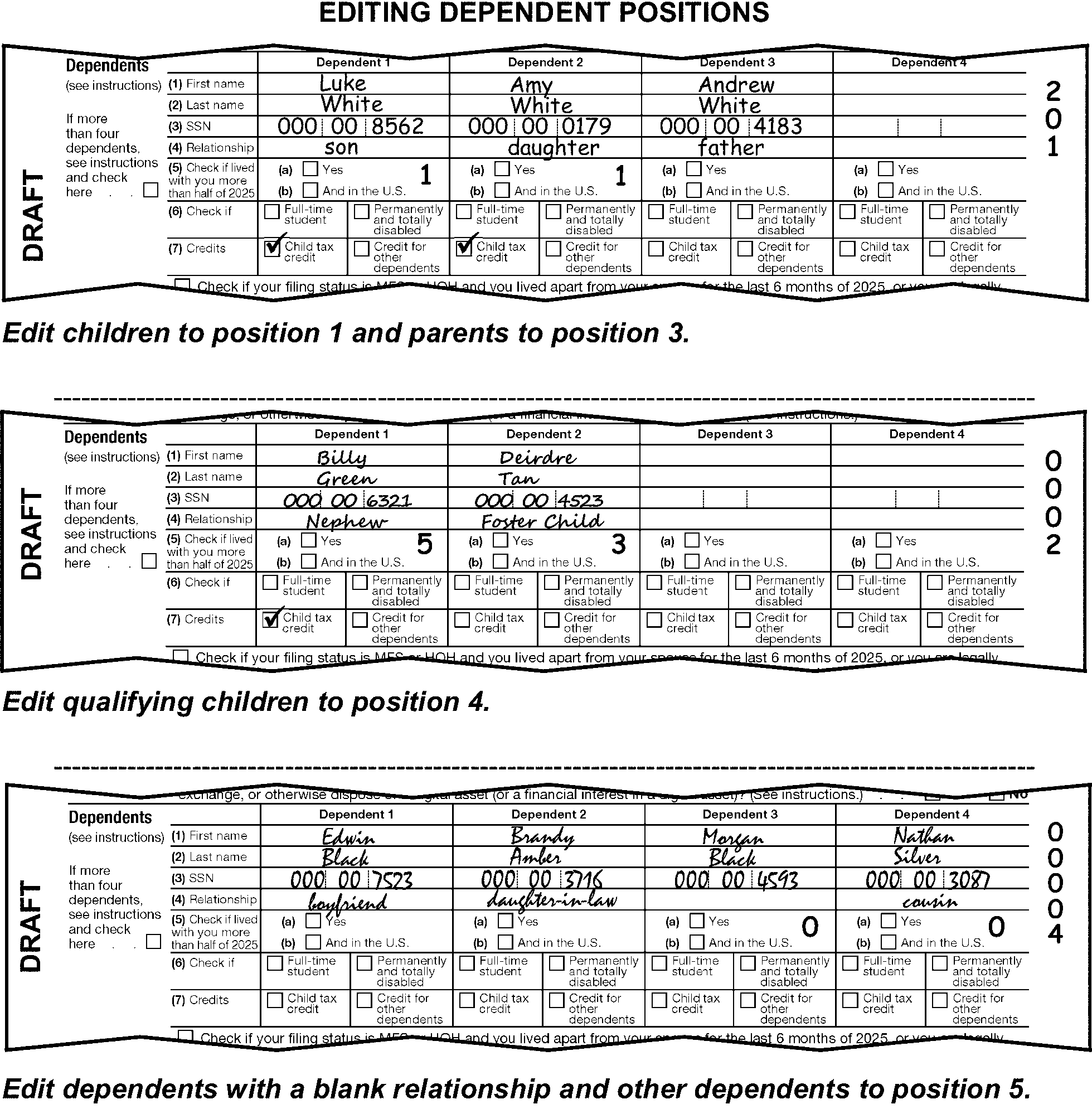
-
The child relationship (position 1) includes notations of the following:
-
"Child" , "son" , or "daughter"
-
"Adopted child" , "adopted son" , or "adopted daughter"
-
"Grandchild" , "grandson" , or "granddaughter"
-
"Great-grandchild" , "great-great-grandchild" , "great-grandson" , "great-great-grandson" , "great-granddaughter" , "great-great-granddaughter"
-
"Stepchild" , "stepson" , or "stepdaughter"
-
-
Child who did not live with you due to divorce or separation, position 2 is not applicable for TY18 and later and will always be edited as 0 when it is necessary to edit subsequent dependent positions. For TY17 and prior, when an entry is present in position 2, Form 8332, Form 2120, or copy of divorce decree is attached, edit FPC "A" .
-
The parent relationship (position 3) includes notations of the following:
-
"Parent" , "father" , or "mother"
-
"Stepparent" , "stepfather" , or "stepmother"
-
"Parent-in-law" , "father-in-law" , or "mother-in-law"
-
"Grandparent" , "grandfather" , or "grandmother"
-
"Great-grandparent" , "great-great-grandparent" , "great-grandfather" , "great-great-grandfather" , "great-grandmother" , "great-great-grandmother"
-
-
The "qualifying child" relationship (position 4) includes notations of the following:
-
"Foster child" , "foster son" , or "foster daughter"
-
"Ward"
-
Any child placed by an authorized agency
-
"Brother" , "sister" , "brother-in-law" , "sister-in-law" , "stepbrother" , "stepsister" , "half-brother" or "half-sister"
-
"Nephew" or "niece"
-
-
Include in "other" relationships (position 5) any dependent not identified in (1), (3) or (4) above. "Other" relationships include the following:
-
"Uncle" or "aunt"
-
"Son-in-law" or "daughter-in-law"
-
"Friend" , "boyfriend" , or "girlfriend"
-
All dependents who did not live in the US except for parent relationships
-
"Cousin"
-
"Godchild" , "godson" , "goddaughter"
-
"Boyfriend's/girlfriend's child" , "boyfriend's/girlfriend's son" , "boyfriend's/girlfriend's daughter" , "mother of child" , "father of child"
-
-
If more than nine dependents are identified for any position, edit the excess in position 6.
-
Up to four dependents' name controls and TINs can be transcribed.
-
Every dependent claimed must have a valid TIN. Search attachments, including Schedule EIC, and Form 2441, for any dependent TIN not listed or invalid on the Dependent lines.
-
If the TIN is found, and:
Four TINs are Then Already listed, Circle out the dependent header of the dependent(s) without a listed TIN. For TY24 and prior, X the name. Not already listed, Edit up to four TINs to Dependent lines. (See Figure 3.11.3-58.) -
If the TIN is invalid or not found on the return or attachments, take the following actions:
If the taxpayer And Then Provides no TIN, less than four TINs are present for other dependents, Circle the dependent’s header. (See Figure 3.11.3-59.) Provides no TIN, at least four TINs are present for other dependents, "X" dependent- positions 1-6. (See Figure 3.11.3-60.) Notes "Died" , (child born during the tax period and died during the same or next consecutive tax period), birth or death certificate, or copies of hospital medical record(s) are not attached, Correspond for the missing birth certificate. For Form 3531, use box 5 and for Form 6001, use box E. -
Correspond for missing TINs of all dependents when corresponding for other missing return items. For Form 3531, use box 4 and for Form 6001, use box F for Form 5129.
Exception:
Do not correspond for a missing dependent TIN when any of the following apply:
• there is an indication the dependent was born during the tax period and died during the same or next consecutive tax period.
• the taxpayer notates "Amish" , "Mennonite" , "Form 4029" , or if Form 4029 is attached.
• there is an indication of "ITIN Rejected" .
• Notation of NRA is present.
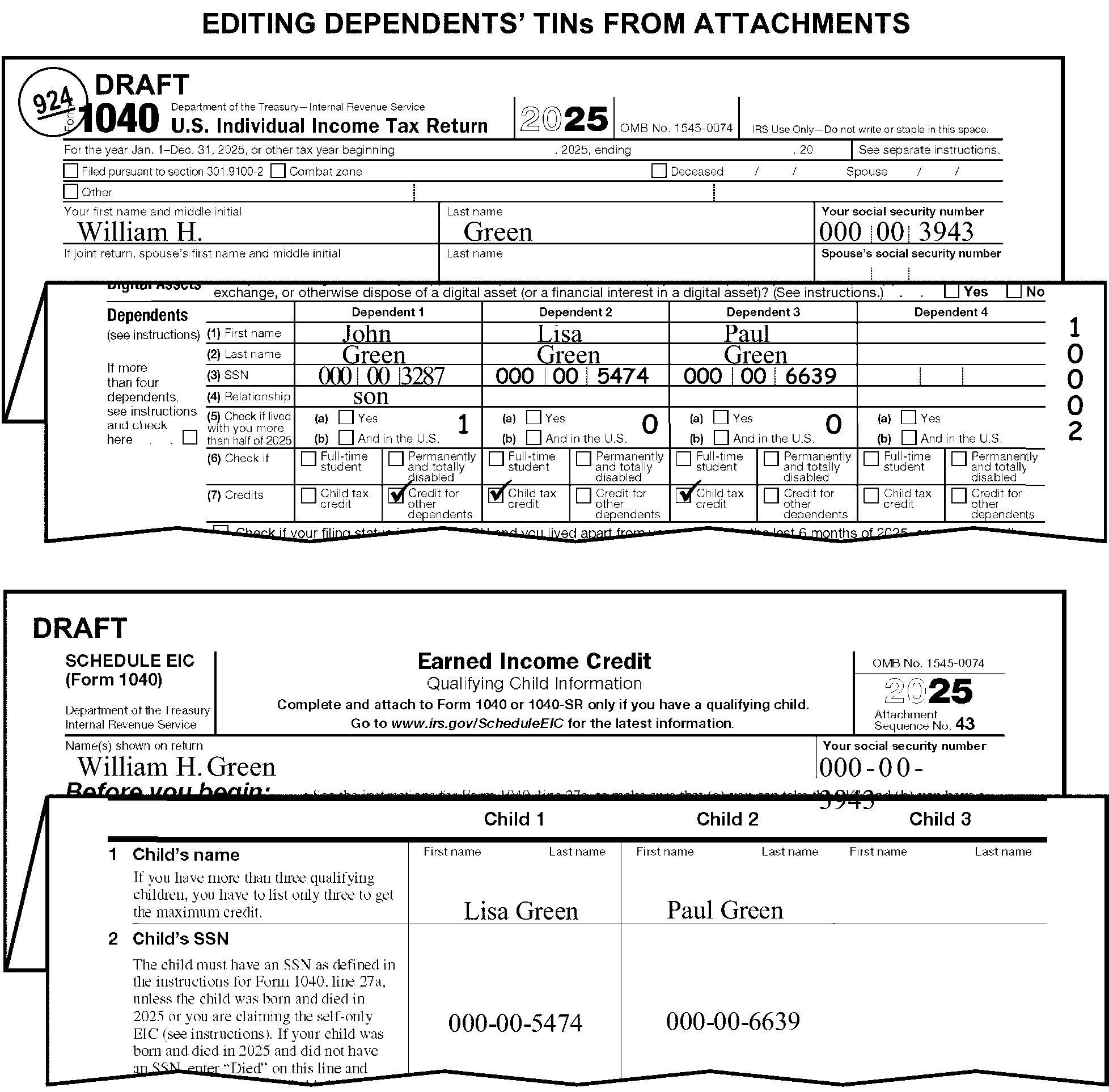
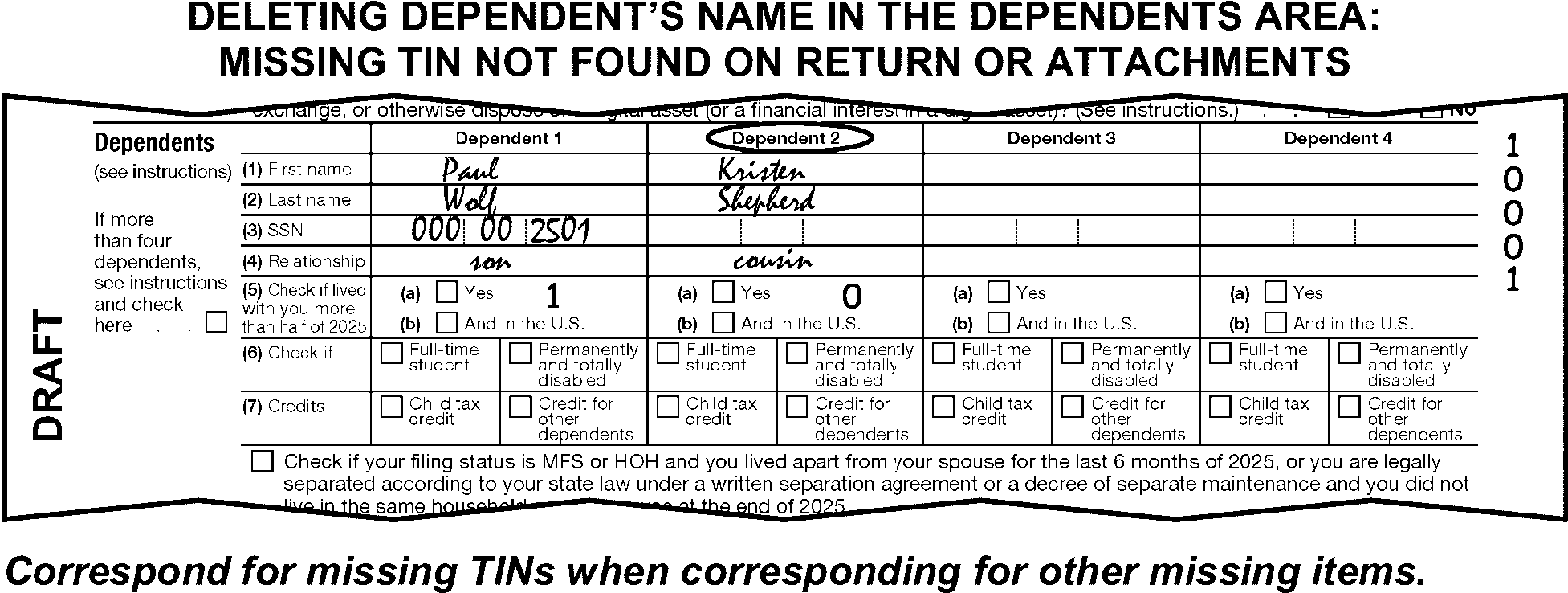
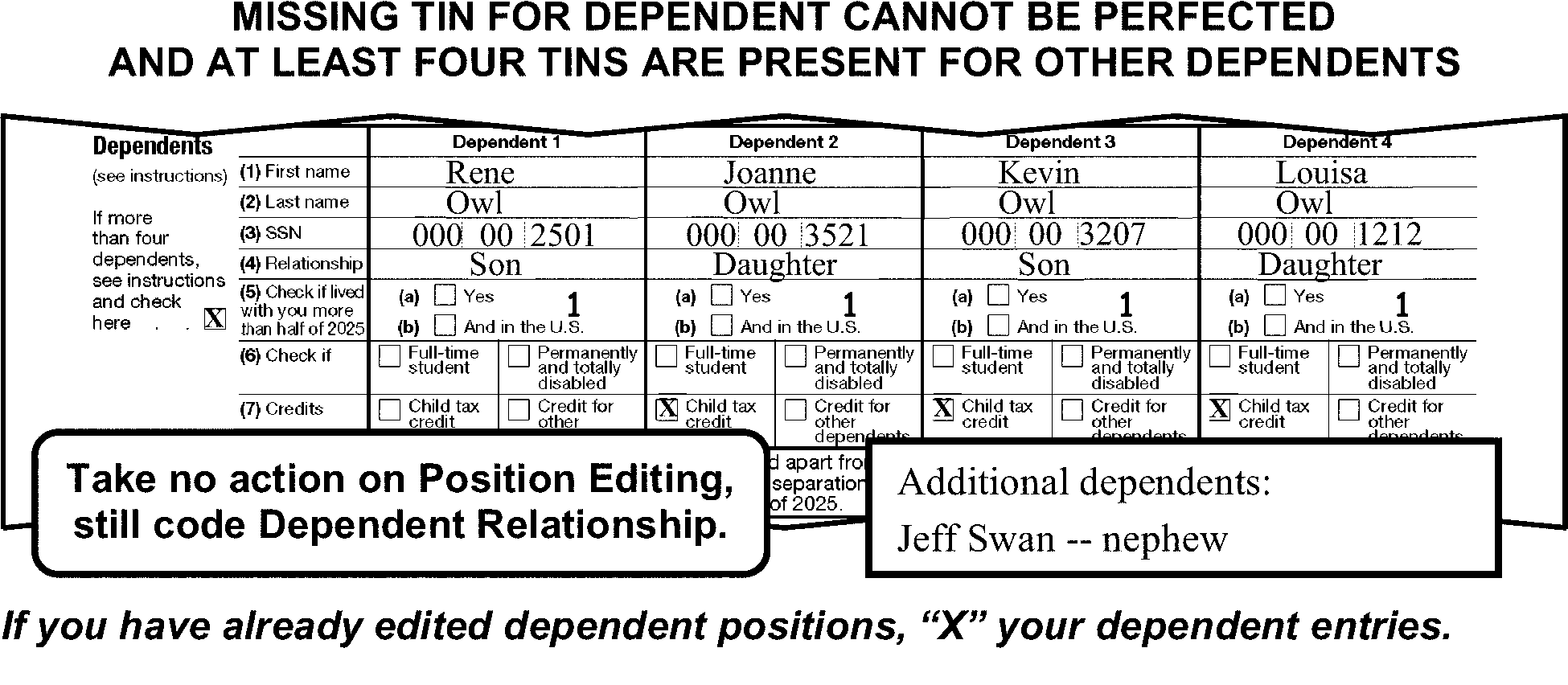
-
A taxpayer who does not know the TIN of the child they are adopting may still claim an exemption for the dependent by obtaining a temporary adoption taxpayer identification number (ATIN). ATINs are used for tax purposes only and are obtained by filing Form W-7A. ATINs are processed at the AUSPC only. ATINs appear in the following format: 9XX-93-XXXX.
-
When Form W-7A is attached to the return, verify the child listed on the Form W-7A is being claimed as a dependent on the return.
-
If the child is listed as a dependent in Position 1 and already has an ATIN, "X" the photocopy of the Form W-7A and continue processing the return.
-
If the child is not claimed as a dependent, detach the Form W-7A and related documentation, and route to AUSPC. Edit an action trail on the return and continue processing. (Austin - follow local routing instructions.)
-
If the child is listed as a dependent on the return and the TIN is missing, edit the received date on Form W-7A in MMDDYY format and detach it from the return. Route the Form W-7A and all related documentation to AUSPC. Edit an action trail on the return and continue processing.
Note:
Documentation attached to the Form W-7A must be at least one of the following:
• Placement agreement between the parent(s) and the agency.
• Document signed by the hospital authorizing the release of a newborn.
• Court Order ordering or approving the placement of a child for legal adoption.
• Affidavit signed by the adoption attorney or government official who placed the child with the parent(s) for legal adoption. -
Complete Form 3210 and mail Forms W-7A and documentation to AUSPC at:
Internal Revenue Service
3651 S. IH 35
Stop: 6182
Austin, TX 78741-7855
Exception:
AUSPC only: Do not detach Form W-7A from the return. Follow local routing procedures. When the ATIN unit sends the return back through processing after assigning the ATIN, they will edit the ATIN assignment date on the left side margin of refund returns only. For example, 02 RPD 05-14-2026. Edit this date on line 4 of Form 3471, Edit Sheet, if current date is after April 15, 2026.
-
-
The name control(s) must be present for the first four dependents with TINs listed on the Dependent lines of Form 1040. If missing, edit the name control(s) to the dependents name area.
-
Determine the missing name control(s) in the following priority:
-
From Schedule EIC or other supporting attachments. (See Figure 3.11.3-61.)
-
From the primary taxpayer's name control. (See Figure 3.11.3-62.)
-
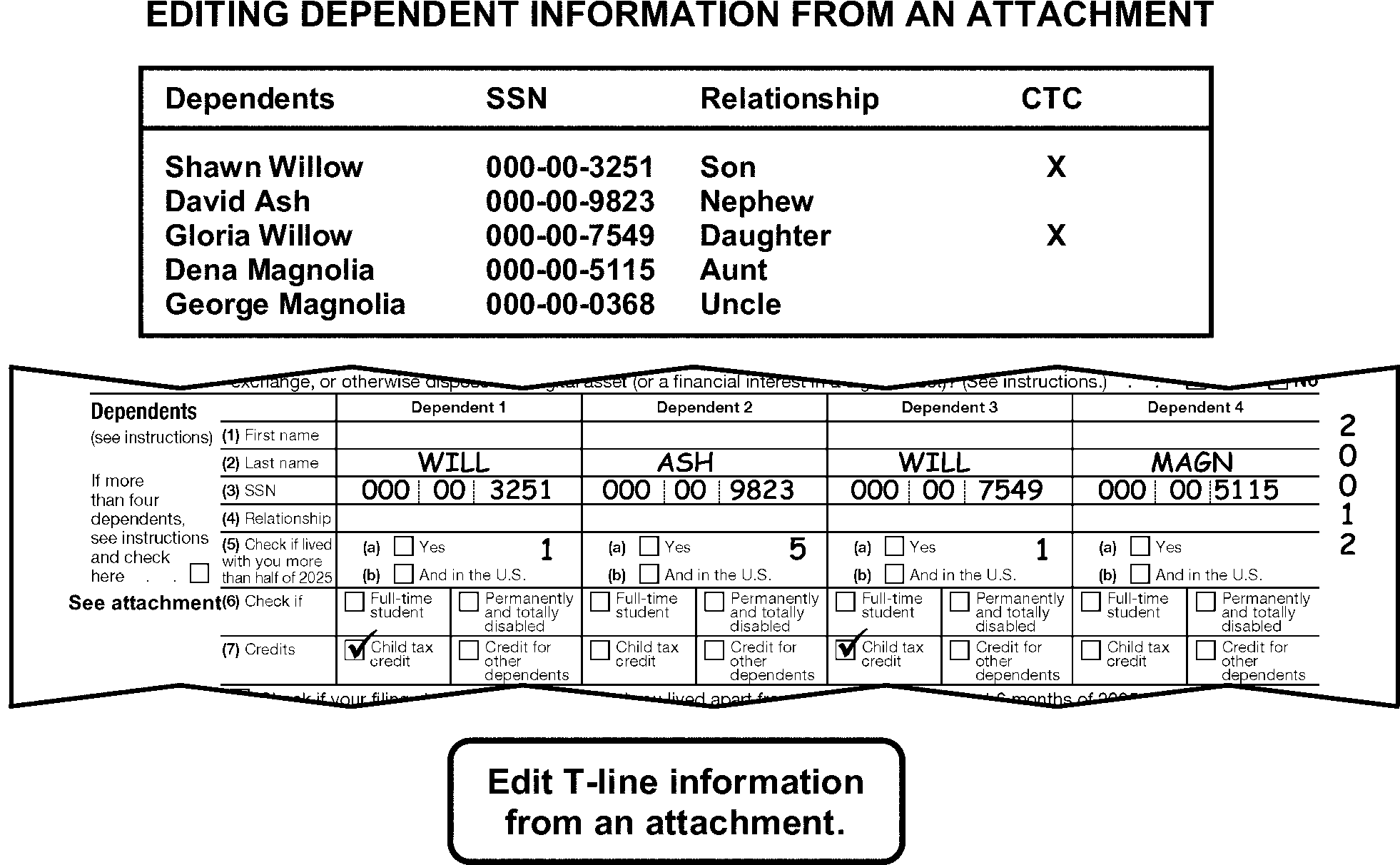
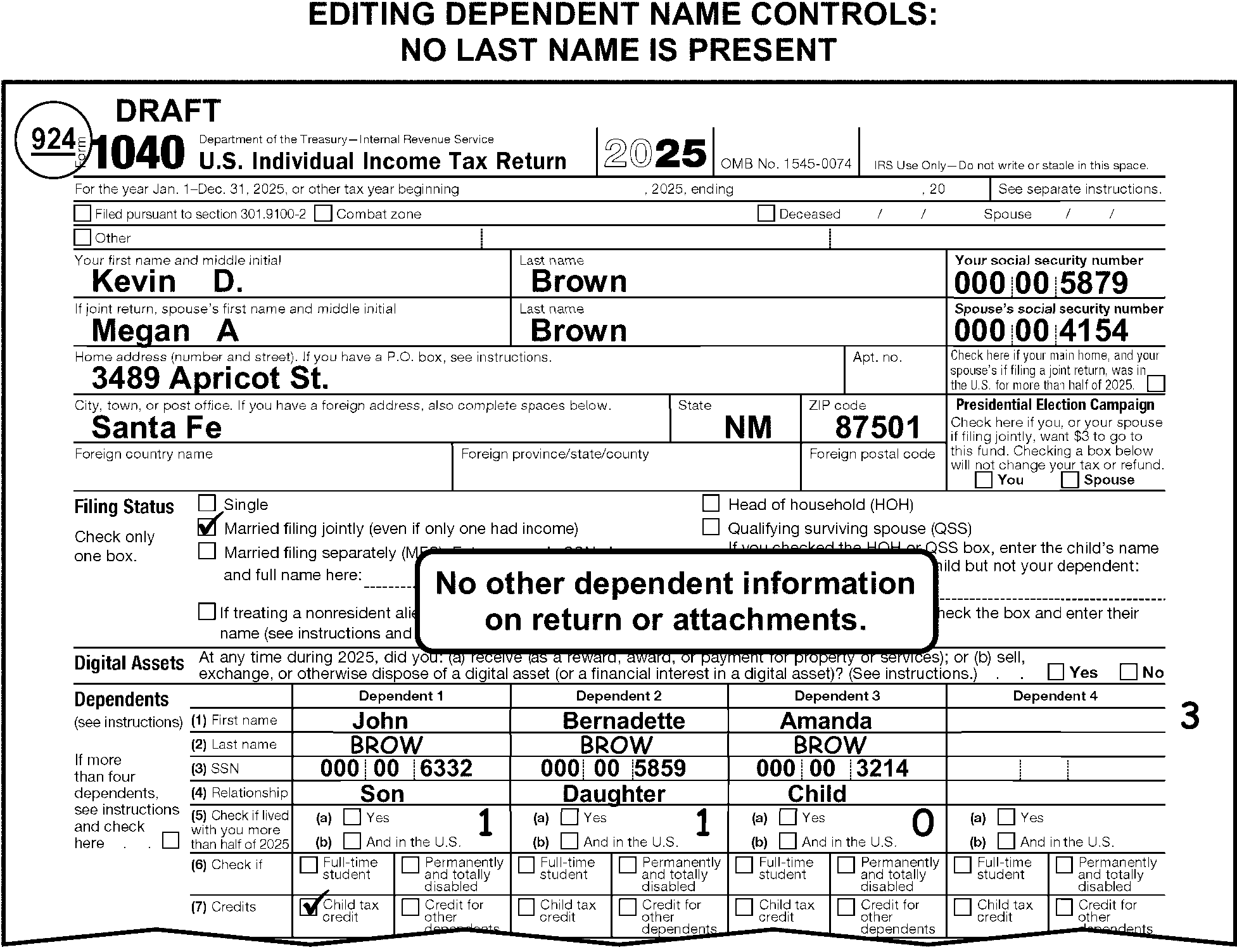
-
The Dependent Relationship Code is a one position, numeric code.
-
For TY25 and later, edit the Dependent Relationship Code in row 5 to the right of check box (a) for each qualifying child dependent.
-
Use the definitions below to determine the correct Dependent Relationship Code editing.
-
"1" - Son or daughter
-
"2" - Stepchild
-
"3" - Foster child
-
"4" - Grandchild
-
"5" - Nephew, niece, or sibling’s child
-
"6" - Brother, sister, or sibling
-
"7" - Half-brother, half-sister, or half-sibling
-
"8" - Stepbrother, stepsister, or stepsibling
-
"0" - Child, no relationship indicated, or determination cannot be made
-
-
There are two types of exemptions on prior year returns:
-
Personal exemptions
-
Dependency exemptions
-
-
A taxpayer is allowed one personal exemption (two on a joint return), as long as they cannot be claimed as a dependent by another taxpayer.
-
Taxpayers are also allowed one dependency exemption for each person they can claim as a dependent.
-
The instructions provided in this subsection of the manual are for editing pages 1 and 2 of the Form 1040.
These instructions include:-
General editing procedures
-
Income (lines 1a through 8)
-
Adjusted gross income (line 11a)
-
Total tax (line 24)
-
Federal Income Tax Withheld (lines 25a through 25c)
-
Refund or amount owed (lines 35a through 37)
-
Estimated Tax Penalty (line 38)
-
Third Party Designee
-
Signature
-
Preparer information
-
-
Page 1 of Form 1040 includes checkboxes that are not transcribed but are referred to in various line-by-line instructions. These include:
-
Filed pursuant to section 301.9100-2 check box at top of form
-
Combat zone and Other check box on top of form
-
Deceased checkbox and date
-
Nonresident alien or dual-status alien checkbox in filing status area
-
-
All lines on Form 1040 are T-lines, except for the following:
-
Lines 1b - 1h
-
Line 11b
-
Line 12e
-
Line 13b
-
Line 14
-
Line 17
-
Line 18
-
Line 20
-
Line 22
-
Line 25a
-
Line 25b
-
Line 25c
-
Line 31
-
Line 34
-
-
There are also T-Compute lines on Form 1040. These are:
-
Line 1z
-
Line 9 - Total Income
-
Line 11a - Adjusted Gross Income
-
Line 15 - Taxable Income
-
Line 21 - Total Non-Refundable Credits (NA for TY18-TY19)
-
Line 24 - Total Tax
-
Line 25d - Federal Income Tax Withheld
-
Line 32 - Total Other Payments and Refundable Credits
-
Line 33 - Total Payments
-
Line 35a - Refund Amount
-
Line 37 - Balance Due Amount
-
-
Refer multiple Form 1040 for the same taxpayer and same tax period to the Work Leader for combining.
-
Edit RPC "L" if there are no significant T-line entries present or edited from attachments on lines 1a through 38. Also edit CCC "B" .
-
Edit RPC "V" when the tax form is computer generated. Computer-generated forms are identified by a three-alpha character software code in the bottom margin of page 1 or 2 (for 1040-SR page 1, 2, 3 or 4). (See Figure 3.11.3-63.) Also edit SPC "Y" if FFF is present in the bottom margin.
-
Some special conditions on returns will require special editing procedures. Taxpayers are instructed to note certain conditions or check the applicable checkbox on the return which you must identify. Edit these returns using instructions in the "Special Situations and Returns" subsection. These special situations are:
Special Situations IRM Reference Combat Zone and other Military Operations IRM 3.11.3.6.1.1 Killed in Terrorist Action (KITA) IRM 3.11.3.6.1.2 Natural Disaster/Emergency Relief Program IRM 3.11.3.6.1.3 Hardship/Taxpayer Advocate Services (TAS) IRM 3.11.3.6.1.4 Examination case IRM 3.11.3.6.1.5 Frivolous Filer/Non-Filer Returns IRM 3.11.3.6.1.6 Identity Theft IRM 3.11.3.6.1.7 Suicide Threat IRM 3.11.3.6.1.8 -
Some types of returns will require special editing procedures. Edit the returns using the instructions in the "Special Situations and Returns" subsection. These special returns are:
Special Returns IRM Reference Amended IRM 3.11.3.6.2.1 Unprocessable IRM 3.11.3.6.2.2 Blank IRM 3.11.3.6.2.3 Incomplete IRM 3.11.3.6.2.4 Uncomputed IRM 3.11.3.6.2.5 Blocked or Deferrable Income IRM 3.11.3.6.2.6 Correspondence Imaging Inventory (CII) IRM 3.11.3.6.2.7 Combined Tax Liabilities IRM 3.11.3.6.2.8 Community Property IRM 3.11.3.6.2.9 Form 8938, Statement of Specified Foreign Financial Assets IRM 3.11.3.6.2.10 Injured Spouse IRM 3.11.3.6.2.11 Innocent Spouse IRM 3.11.3.6.2.12 International IRM 3.11.3.6.2.13 Misblocked IRM 3.11.3.6.2.14 Misfiled IRM 3.11.3.6.2.15 Reinput IRM 3.11.3.6.2.16 Returns Secured by Collections IRM 3.11.3.6.2.17 Short Period IRM 3.11.3.6.2.18 Substitute for Return IRM 3.11.3.6.2.19 52-53 Week IRM 3.11.3.6.2.20 Blind Trust IRM 3.11.3.6.2.21 -
Refer to the decedent return instructions in IRM 3.11.3.10 when any of the following are present:
-
Deceased checkbox on top of the return is checked
-
"Deceased" is written on the return
-
A date of death is present on the return
-
"Surviving spouse" is written in the caption or the signature area
-
There is any other indication the taxpayer is deceased
-
"Estate of" is present in the caption.
-
-
Other notations and conditions may also require special editing. These are included in the line-by-line instructions.
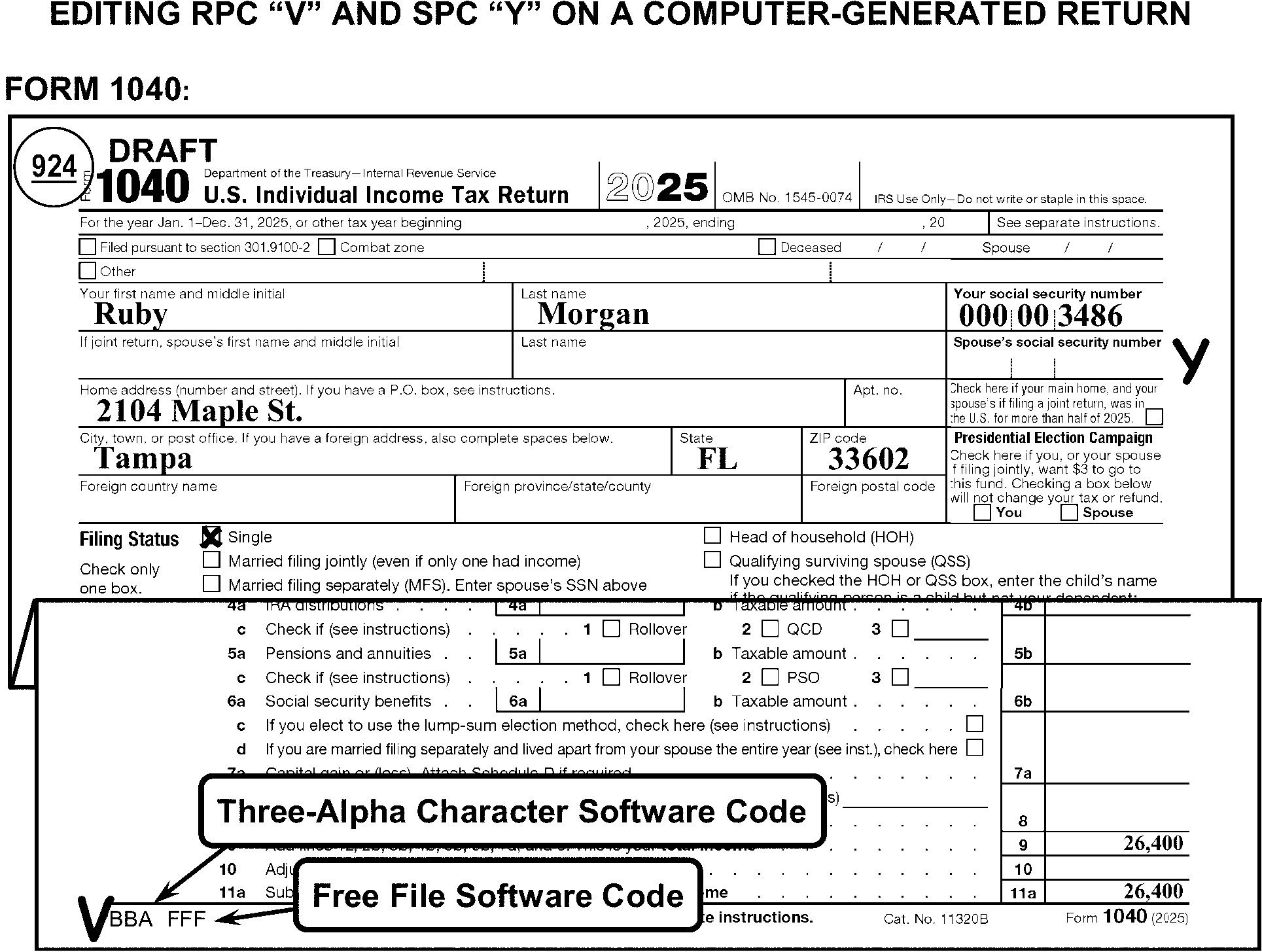
-
All lines on Form 1040 are edited in dollars only except lines 24 through 38.
-
Use the table below for editing conditions on line 1a Form 1040:
Condition on Line 1a Action Entry on line 1a, no Form W-2 attached. Take no action. Form W-2 is not required for line 1a. (May be required as support for earned income when EIC is claimed.)
(See IRM 3.11.3.14.2.31.)Line 1a is blank. Edit amounts from Wages, tips and other compensation box on Forms W-2. W-2 Income Edit to line 1a if found elsewhere. -
Use the following table for editing other income:
Income Identified As: Action: Dependent Care Benefits (DCB) on other than Form 1040, line 1e, Delete where found and edit to line 1z. Deferred Compensation (DFC) on other than Schedule 1, line 8t, Delete the amount where found and edit to Schedule 1, line 9. Disability Pension, (on other than lines 1h, 4a, or 4b), Disability Pension (not on lines 1h, 4a, or 4b) identified from: -
Form 1099-R with Code 3 in Box 7.
-
Disability indicated on Form 1099-R.
-
Other indication that Disability Pension is included on the return.
Delete where found and add to line 1z. Gambling other than on Schedule 1, line 8b, Gambling (Net: winnings minus losses), -
No indication of a professional gambler:
-
Delete amount where found and edit to Schedule 1, line 9.
-
If net amount is zero, and no gross amount is indicated and:
• Form W-2G is attached, edit CCC "Y" and an Action Trail.
• Form W-2G is not attached, correspond for gross winnings
with Form 3531/6001, using fill-in 7, per Exhibit 3.11.3-18.
-
-
Indication of professional gambler:
-
Delete gambling amount from where found and add to Schedule 1, line 3.
-
Correspond for Schedule C, if not attached.
-
If Schedule SE is not attached or reported, also correspond for SE tax liability when the amount is $434 or more. For Form 6001, use box W. For Form 3531, check box 16.
-
Medicaid Waiver Payment (MWP), Notice 2014-7, IRC 131, In-Home Health Services (IHHS), In-Home Support Services (IHSS), Difficulty of Care payment, Take No Action Non-Disability Pension, Delete where found. Move the amount to line 5b. (See Figure 3.11.3-64.) Non-Employee Compensation other than on line 1a, 1h, or Schedule 1, line 8z, -
Delete where found and add to Schedule 1, line 9.
-
If amount is $434 or more (with or without Form 1099-NEC), and Schedule SE is not attached or reported, also edit RPC "N" .
Non-Taxable Income: -
Accident and health insurance proceeds
-
"Black lung" benefits
-
Casualty insurance and other reimbursements
-
Child support
-
Damages awarded for physical injury or sickness
-
Federal Employees' Compensation Act (FECA) payments
-
Interest on state or local government obligations
-
Public Aid
-
Supplemental Security Income (SSI)/SSI Disability
-
Tax-Sheltered Annuities
-
Temporary Assistance for Needy Families (TANF)
-
VA Benefits
-
Welfare Benefits/Payments
-
Workforce Payments
-
Worker's Compensation
Subtract all income identified as nontaxable from Form 1040, line 1a, or, if reported on lines 1b through 1h, subtract from line 1z. Pension, See Disability or Non-Disability Pension. Prisoner Income (PRI), wages earned while incarcerated other than on Schedule 1, line 8u, Delete where found and edit to Schedule 1, line 9. For TY22 and later, also edit SPC "J" . Railroad Retirement Benefits, -
If gross and taxable amounts with a difference of $1 or more can be determined, move to lines 5a and 5b.
See IRM 3.11.3.14.2.11. -
Otherwise, edit the amount to line 5b.
Scholarship (SCH), Fellowship, Grant, or Stipend other than on Schedule 1, line 8r, Delete the amount where found and edit to Schedule 1, line 8r. Self-Employment Income other than on Schedule 1, line 8z (See Exhibit 3.11.3-11 for an extensive listing of types of self-employment), -
Delete where found and add to Schedule 1, line 9.
-
If amount is $434 or more and Schedule SE is not attached or reported, also edit RPC "N" .
-
If Form 1099-NEC is attached with or without a notation and an amount is present in box 1, Form 1099-NEC, edit RPC "N" unless the amount is less than $434 or Schedule SE is present. On prior year returns, amount may be found on Form 1099-MISC, box 7.
Sick Pay, Delete where found and edit to Form 1040, line 1a. Social Security Benefits, -
If gross and taxable amounts can be determined, move to lines 6a and 6b.
-
Otherwise, move the amount to line 6b.
Strike Pay/Benefits, Delete where found and edit to Form 1040, line 1a. Sub-Pay TRA (Repayment of Supplemental Unemployment Benefits (SUB)), If repayment is indicated on Schedule 1, line 24z and it is for SUB amounts received in: Unemployment Compensation other than on Schedule 1, line 7, Delete where found and add to Schedule 1, line 7. -
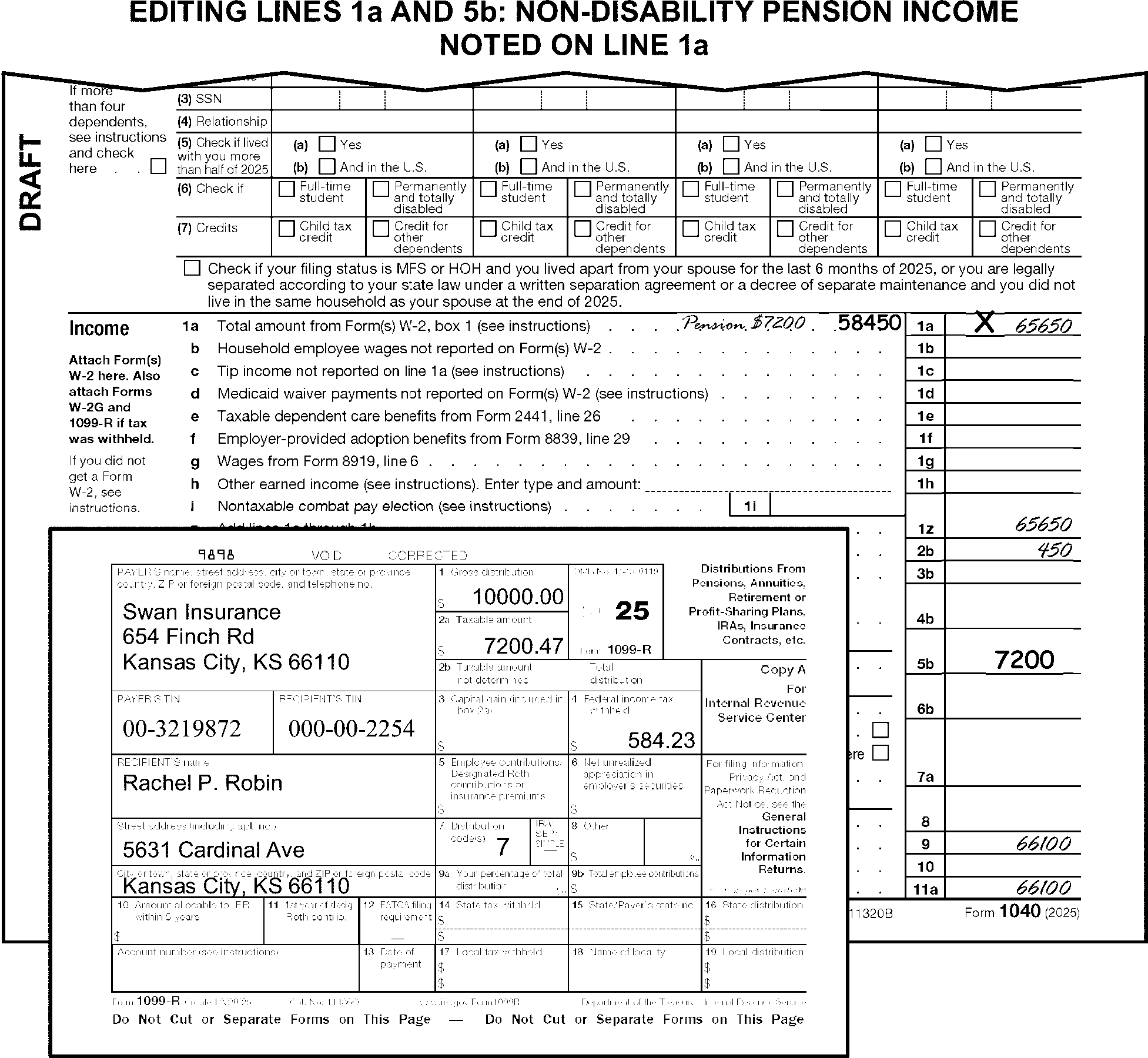
-
Edit SPC "E" if an amount is present on line 1b.
-
If an amount is present on line 1e, Form 2441 must be attached. If not attached, correspond for Form 2441.
-
If an amount is present on line 1f, Form 8839 must be attached. If not attached, correspond for Form 8839.
-
If an amount is present on line 1g, Form 8919 must be attached. If not attached, correspond for Form 8919. For Form 6001, use paragraph W.
-
Nontaxable Combat Pay is entered on line 1i. If found elsewhere on the return, delete where found and edit to line 1i.
-
Compute and edit line 1z when it is blank, dash, zero or illegible and there are any entries on lines 1a - 1h.
-
If Schedule B is attached, perfect line 2a when it is blank or amount differs from tax-exempt interest amount on Schedule B, Part I by more than $1.
-
Tax-exempt interest indications include:
-
"Tax-Exempt Interest" ("TEI" ) or "Tax Exempt" ("TE" )
-
"Tax-Exempt Municipal Bonds"
-
"Exempt" , "Exempt Interest" , "EI" , "E" or "I"
-
"Tax Free" or "Tax-Free Interest"
-
"Nontaxable" or "Nontaxable Interest"
-
-
If Schedule B is attached, perfect line 2b when it is blank or amount differs from interest amount on Schedule B, line 4 by more than $1.
-
If Schedule B is attached, perfect line 3b when it is blank, or amount differs from ordinary dividends amount on Schedule B, line 6 by more than $1.
-
If the amount on line 3b matches the entry on line 1z, Form 1040, "X" the amount on line 3b.
-
If line 3b is blank, dash or zero, and line 3a has an entry:
-
arrow the entry on line 3a to line 3b, or
-
edit the entry on line 3a to line 3b and "X" line 3a.
-
-
If line 3b is less than 3a, "X" line 3b.
-
If an amount identified as "Alaska Permanent Fund" is present on line 3b:
-
Delete the amount on line 4a when lines 4a and 4b are the same or there is a difference of less than $1. (See Figure 3.11.3-65.)
-
Do not edit the amount from 4a on line 4b when line 4b is blank.
-
If "SIE" Split Interest Entity or similar is written next to line 4b, edit SPC "3" .
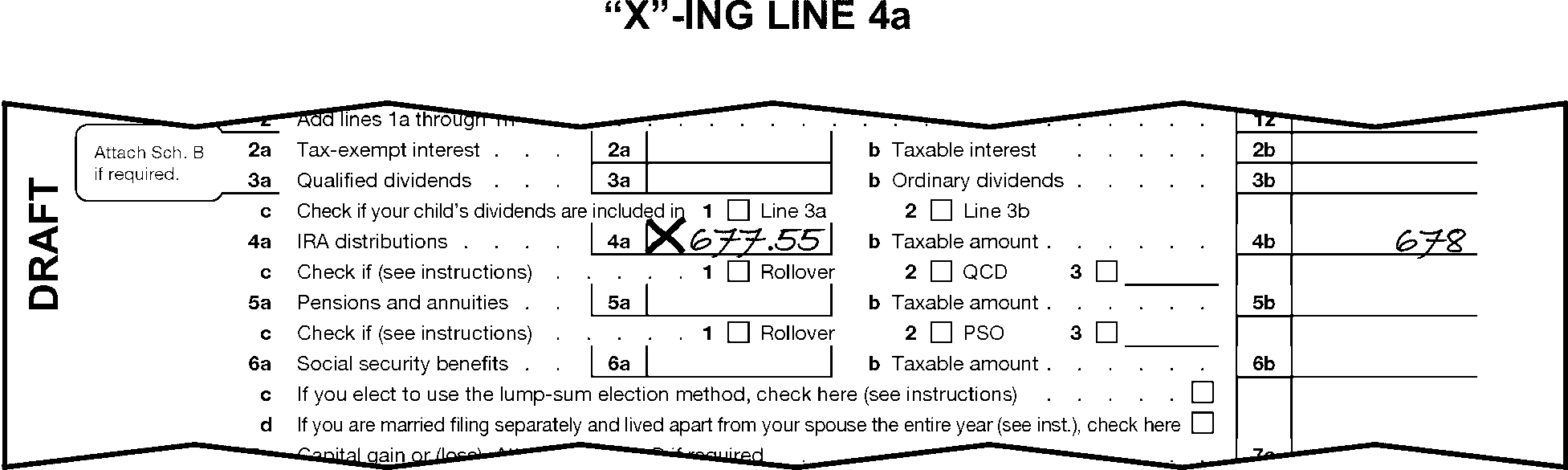
-
Delete the amount on line 5a when lines 5a and 5b are the same or there is a difference of less than $1.
-
Do not edit the amount from 5a to line 5b when line 5b is blank.
-
Do not move pension income from line 5b to line 1.
-
Move the gross and taxable amounts of Railroad Retirement Benefits (RRB) to lines 5a and 5b when claimed elsewhere on the return.
-
If an amount is present on line 6b and the amount on line 6a is the same or line 6a is blank:
-
If Form SSA-1099 is attached, edit the gross Social Security amount in box 5 to line 6a.
-
Take no action when the gross amount of Social Security payments cannot be determined.
-
-
"X" a negative amount on line 6a or 6b.
-
Take no action when the taxpayer writes "D" on line 6a or 6b or has checked the box on line 6d.
-
Edit CCC "H" when the taxpayer marks the box on line 6c, indicating Lump-Sum Election method is being used.
-
Edit RPC "T" when all the following apply (see Figure 3.11.3-66):
-
There is a positive amount of $1 or more on Form 1040, line 7a.
-
Schedule D is not attached.
-
Line 7b 1st checkbox is checked.
-
-
When an amount is present on line 7a, Schedule D is not attached, and the line 7b 1st checkbox is not marked, or the line 7b 1st checkbox is marked, and a negative entry is present on line 7a:
If And Then A document (other than a BMF Schedule D) from which a Schedule D (Form 1040) can be dummied is attached, Column (h) can be determined, Dummy a Schedule D. Edit total short-term gains/losses to line 7 and total long term gains/losses to line 15, Schedule D. (See Figure 3.11.3-67.) There are no documents attached from which a Schedule D can be dummied, The amount on line 7a is ≡ ≡ ≡ ≡ ≡ ≡ ≡ ≡ ≡ ≡ ≡ ≡ ≡ ≡ ≡ ≡ ≡ ≡ ≡ ≡ ≡ ≡ ≡ ≡ ≡ ≡ ≡ ≡ ≡ ≡ ≡ Dummy the amount to line 7, Schedule D. (See Figure 3.11.3-68.) There are no documents attached from which a Schedule D can be dummied, The amount on line 7a is ≡ ≡ ≡ ≡ ≡ ≡ ≡ ≡ ≡ ≡ ≡ ≡ ≡ ≡ ≡ ≡ ≡ ≡ ≡ ≡ ≡ ≡ ≡ Correspond for the missing Schedule D. A BMF (e.g., Form 1120, Form 1041) Schedule D is attached, Column (h) can be determined, Either renumber the lines as necessary on the BMF Schedule D to match the Schedule D (Form 1040) T-lines, or dummy a Schedule D (Form 1040) by editing all T-lines from the BMF Schedule D. -
If income reported from Insurance Companies Demutualization is present (reported by the taxpayer on Form 1099-B or Form 1099-DA), but entered on a line other than Form 1040, line 7a, edit that amount to line 7a and dummy a Schedule D.
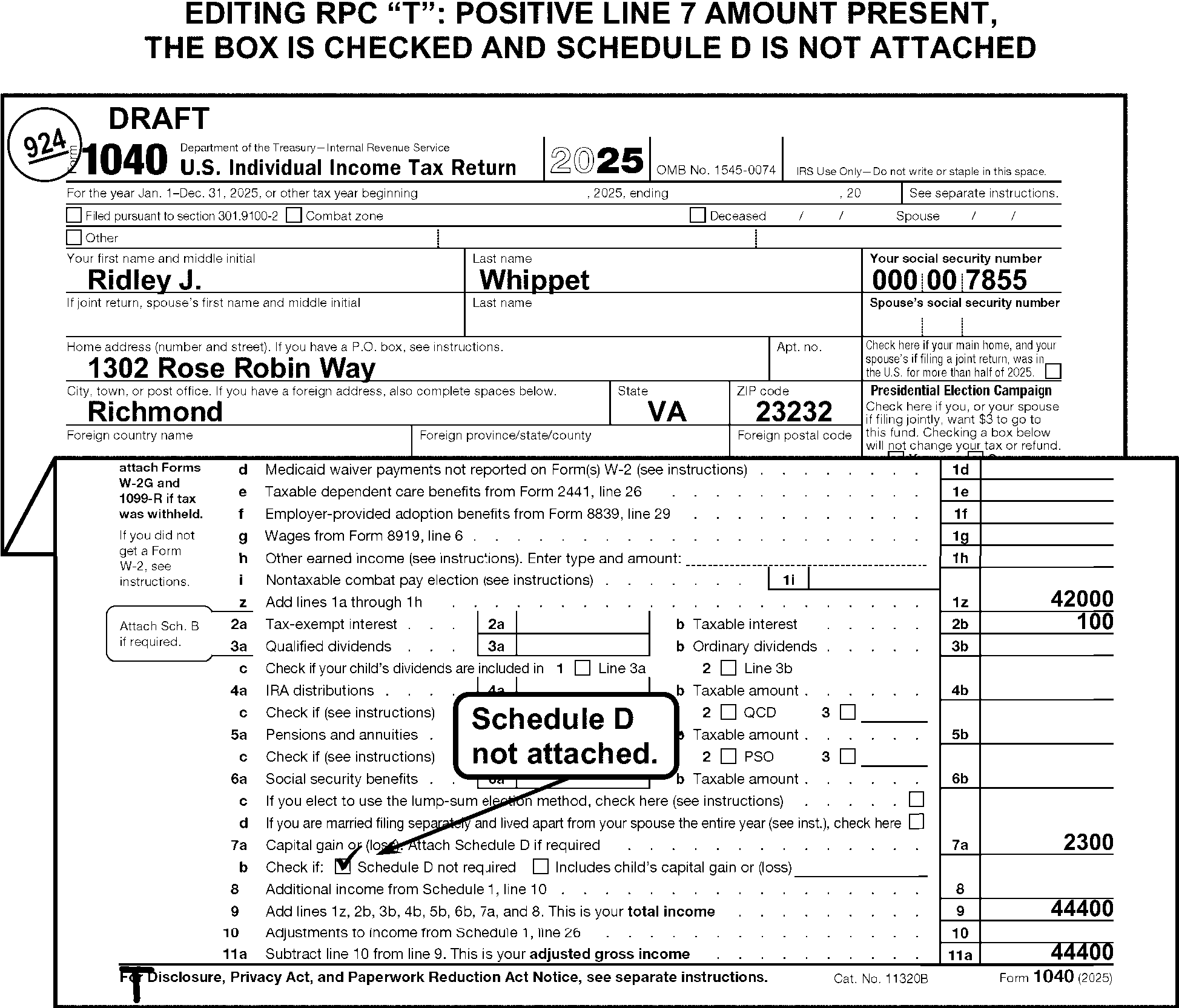
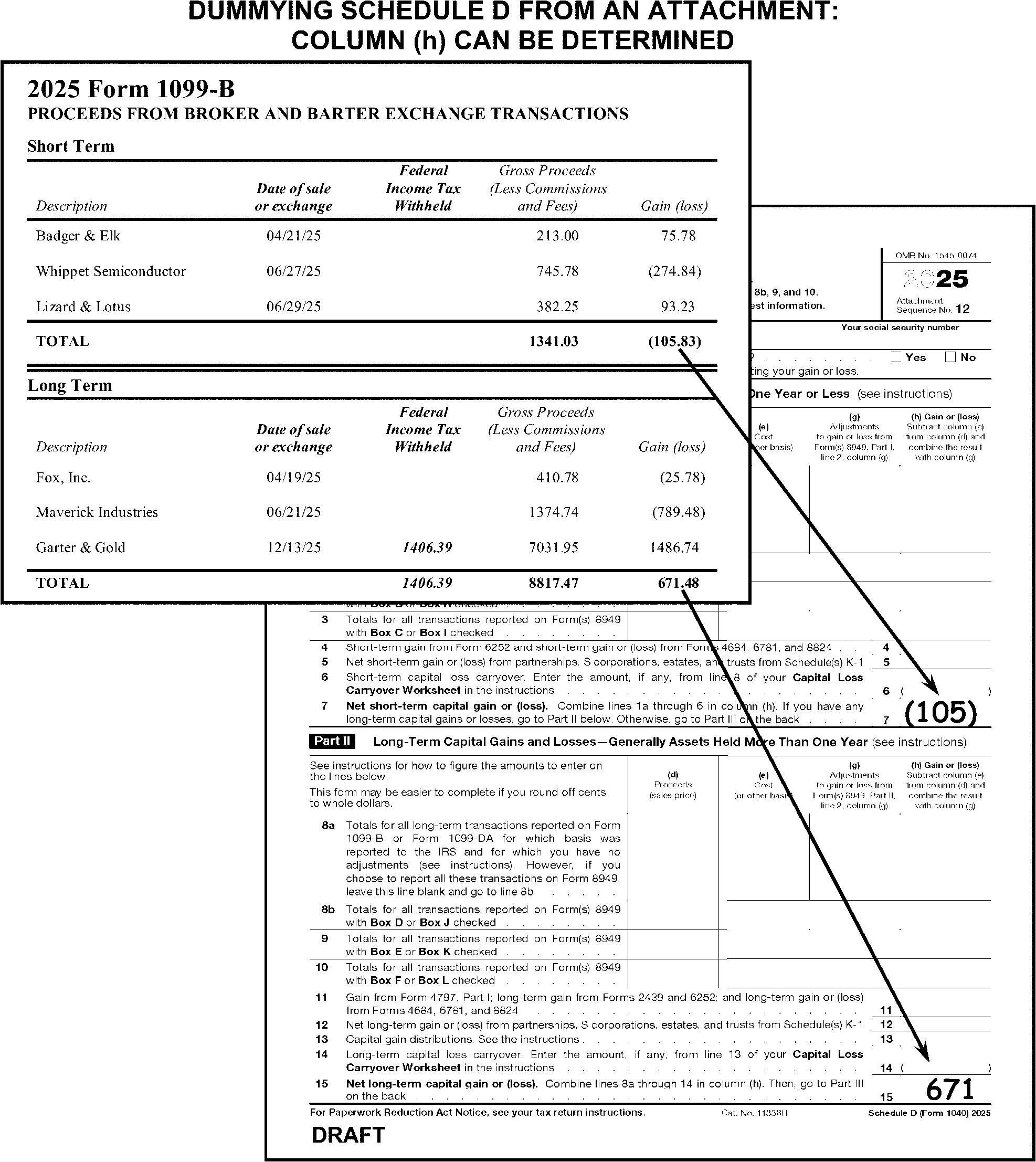
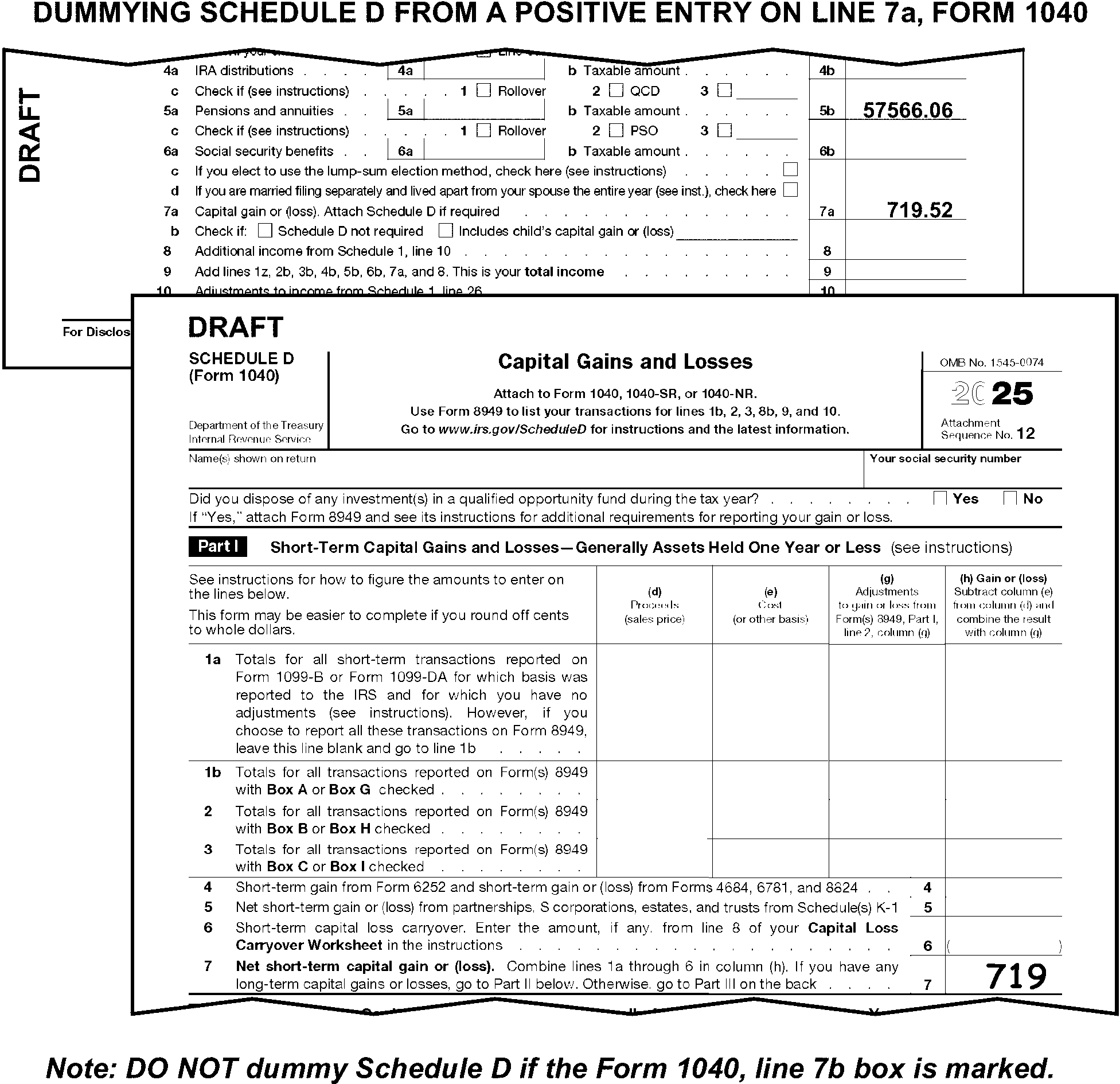
-
If there is an amount entered on Form 1040, line 8, Schedule 1 must be attached. If not attached, correspond for Schedule 1. If corresponding for Schedule 1 for entry on line 8 and line 10, correspond for only one missing Schedule 1. Use the first entry amount and line number on the return.
-
Use the following table as a guide to dummying Schedule 1 Part I:
If Then Schedule C is attached with an entry on line 31, Dummy the line 31 amount to line 3, Schedule 1. Form 4797 is attached with an entry on line 18b, Dummy the line 18b amount to line 4, Schedule 1. Schedule E is attached with an entry on line 26 or 41, Dummy the line 41 amount or line 26 if line 41 is blank, to line 5, Schedule 1. Schedule F is attached with an entry on line 34, Dummy the line 34 amount to line 6, Schedule 1. Form 8889 is attached with an entry on line 16 or line 20, Dummy the line 16 or line 20 amount to line 9, Schedule 1. Form 1099-G is attached with an amount for Unemployment Compensation, Dummy amount to line 7, Schedule 1.
-
Compute and edit line 9 when it is blank, dash, zero or illegible and there are any entries on lines 1z, 2b, 3b, 4b, 5b, 6b, 7a, and 8.
-
If there is an amount entered on Form 1040, line 10, Schedule 1 must be attached. If not attached, correspond for Schedule 1. If corresponding for Schedule 1 for entry on line 8 and line 10, correspond for only one missing Schedule 1. Use the first entry amount and line number on the return.
-
Use the following table as a guide to dummying Schedule 1 Part II:
If Then Form 2106 is attached with an amount on line 10, Dummy the line 10 amount to line 12, Schedule 1. See IRM 3.11.3.15.10. Form 8889 is attached with an amount on line 13, Dummy the line 13 amount to line 13, Schedule 1. Form 3903 is attached with an amount on line 5, Dummy the line 5 amount to line 14, Schedule 1. Schedule SE is attached with an amount on line 13, Dummy the line 13 amount to line 15, Schedule 1. Form 8853 is attached with an amount on line 5, Dummy the line 5 amount to line 23, Schedule 1.
-
Perfect line 11a when it is blank, dash, zero, or illegible by subtracting line 10 from line 9.
-
Schedule A with entries present must be attached if any of the following conditions exist. Correspond if missing.
Exception:
Do not correspond for Schedule A if the taxpayer computed line 11a to zero or a negative dollar amount.
-
"IE" is noted to the left of line 12e, and the amount claimed is ≡ ≡ ≡ ≡ ≡ ≡
-
The amount on line 12e is not any of the standard deduction amounts listed below and the "Someone can claim you as a dependent" or "Someone can claim your spouse as a dependent" (FS 2 or FS 6), checkbox on line 12a is not marked. (See Figure 3.11.3-69.)
Filing Status ABI Boxes marked Appropriate Amount 1 - Single 0 $15,750 1 - Single 1 $17,750 1 - Single 2 $19,750 2 - Married Filing Jointly or 5 - Qualifying Surviving Spouse 0 $31,500 2 - Married Filing Jointly or 5 - Qualifying Surviving Spouse 1 $33,100 2 - Married Filing Jointly or 5 - Qualifying Surviving Spouse 2 $34,700 2 - Married Filing Jointly 3 $36,300 2 - Married Filing Jointly 4 $37,900 3 - Married Filing Separately 0 $15,750 3 - Married Filing Separately 1 $17,350 3 - Married Filing Separately 2 $18,950 3 - Married Filing Separately 3 $20,550 3 - Married Filing Separately 4 $22,150 4 - Head of Household 0 $23,625 4 - Head of Household 1 $25,625 4 - Head of Household 2 $27,625 -
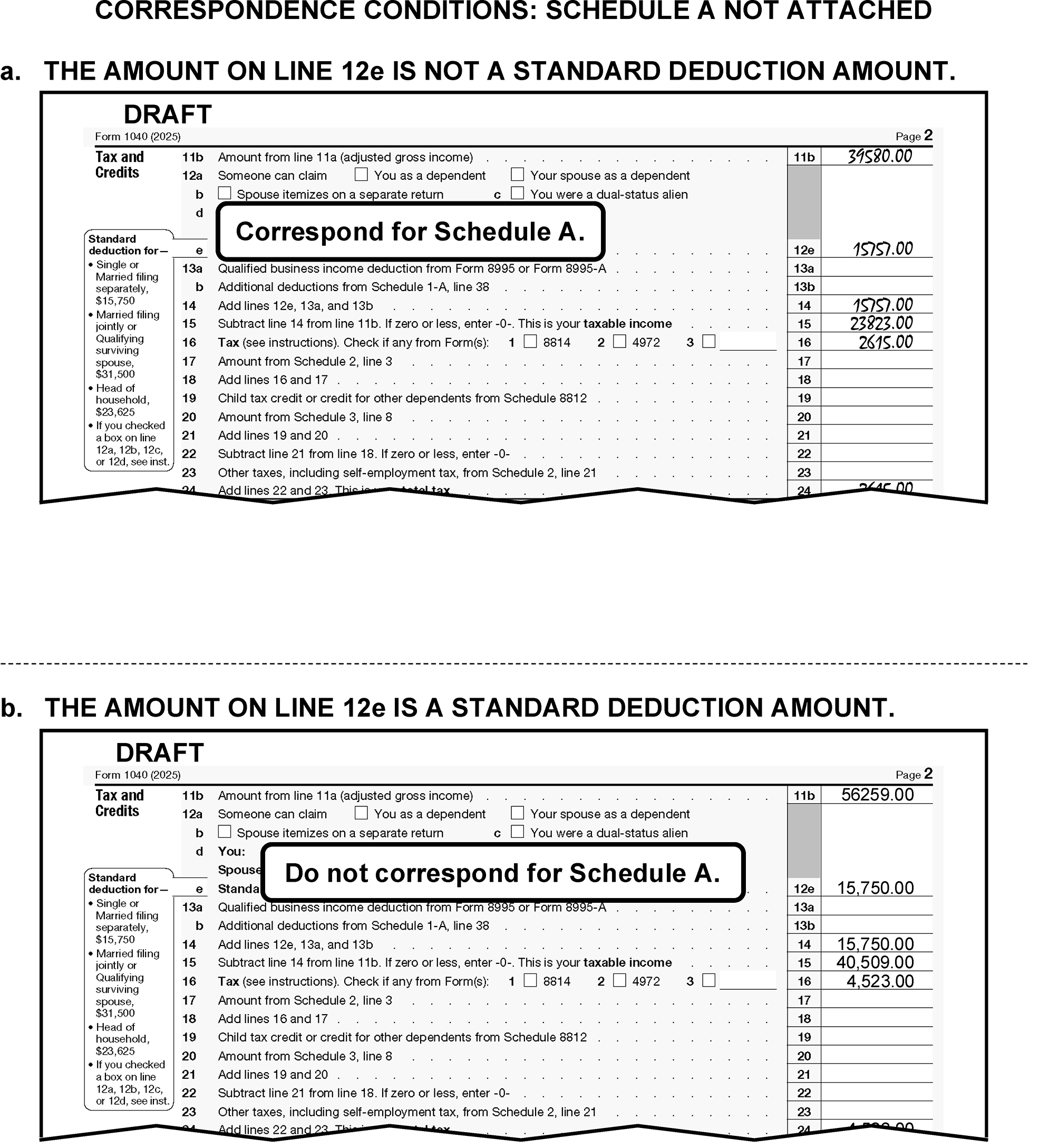
-
If an amount is present on line 13b, Schedule 1-A must be attached. If not attached, correspond for Schedule 1-A.
-
If box "1" and/or "2" on line 16 is/are marked, the indicated form (i.e., Form 8814 or Form 4972) must be attached. If missing, correspond for the applicable missing form.
-
If box "3" on line 16 is marked and "965" is noted, edit RPC "F" . Form 965-A must be attached. However, if not attached, correspond only if corresponding for other missing information.
-
If an amount is present on line 17, Schedule 2 must be attached. If not attached, correspond for Schedule 2.
-
Follow instructions below for dummying Schedule 2 Part I:
If Then Form 6251 is attached Dummy the line 11 amount to line 2, Schedule 2 Form 8962 is attached Dummy the line 29 amount to line 1a, Schedule 2
-
If an amount is present on line 20, Schedule 3 must be attached.
-
If Schedule 3 is not attached, correspond for Schedule 3. If corresponding for Schedule 3 for entry on line 20 and line 31, correspond for only one missing Schedule 3. Use the first entry amount and line number on the return.
-
If Schedule 3 is attached, line 20 of Form 1040 is≡ ≡ ≡ ≡ ≡ ≡ ≡ ≡ ≡ ≡ and lines 1-7 of Schedule 3 are blank, correspond for an explanation unless the taxpayer indicated FNS. For Form 6001, check box "O" . For Form 3531, check box 19-20.
-
-
Follow instruction below for dummying Schedule 3 Part I:
If Then Form 1116 is attached, Dummy the line 35 amount to line 1, Schedule 3. Form 2441 is attached, Dummy the line 11 amount to line 2, Schedule 3. Form 8863 is attached, Dummy the line 19 amount to line 3, Schedule 3. Form 8880 is attached, Dummy the line 12 amount to line 4, Schedule 3. Form 5695 is attached, Dummy the line 15 amount to line 5a, Schedule 3. Dummy the line 32 amount to line 5b, Schedule 3 Form 3800 is attached, Dummy the line 38 amount to line 6a, Schedule 3. Form 8801 is attached, Dummy the line 25 amount to line 6b, Schedule 3. Form 8839 is attached, Dummy the line 18 amount to line 6c, Schedule 3. Schedule R is attached, Dummy the line 22 amount to line 6d, Schedule 3. Form 8936 is attached, Dummy the line 13 amount to line 6f, Schedule 3. Dummy the line 18 amount to line 6m, Schedule 3. Form 8396 is attached, Dummy the line 9 amount to line 6g, Schedule 3. Form 8859 is attached, Dummy the line 3 amount to line 6h, Schedule 3. Form 8834 is attached, Dummy the line 7 amount to line 6i, Schedule 3. Form 8911 is attached, Dummy the line 19 amount to line 6j, Schedule 3. Form 8912 is attached, Dummy the line 12 amount to line 6k, Schedule 3. Form 8978 is attached, Dummy the line 14 amount to line 6l, Schedule 3. -
Only the first line with an amount will be transcribed from lines 6h - 6l. When dummying from the following forms, edit from the first form with an amount and disregard the other forms.
-
Form 8859
-
Form 8834
-
Form 8911
-
Form 8912
-
Form 8978
-
-
Perfect line 21 when it is blank, dash, zero, or illegible by adding lines 19 and 20.
-
If an amount is present on line 23 and Schedule 2 is not attached or Schedule 2 is attached and lines 4 through 20 are blank, correspond for missing Schedule 2.
-
Follow instructions below for dummying Schedule 2 Part II:
If Then Schedule SE is attached, Dummy the line 12 amount to line 4, Schedule 2. Form 4137 is attached, Dummy the line 13 amount to line 7, Schedule 2. Form 8919 is attached, Dummy the line 13 amount to line 7, Schedule 2. Form 5329 is attached, Dummy the line 4 amount to line 8, Schedule 2. Form 1040 Schedule H is attached, Dummy the line 26 amount to line 9, Schedule 2. Form 5405 is attached, Dummy the line 8 amount to line 10, Schedule 2 (TY24 and prior only). Form 8611 is attached, Dummy the line 17 amount to line 16, Schedule 2. Form 8889 is attached, Dummy the line 17b amount to line 18, Schedule 2. Form 8853 is attached, Dummy the line 9b amount to line 18, Schedule 2. Form 8959 is attached, Dummy the line 18 amount to line 11, Schedule 2. Form 8960 is attached, Dummy the line 17 amount to line 12, Schedule 2.
-
Edit line 24 as dollars and cents when adjusting or computing and editing amounts.
-
Compute and edit line 24 when it is blank, dash, zero (0), or illegible and there are entries leading to a total.
-
Add lines 22 & 23.
-
If line 18 has a significant entry and there are no entries on lines 19 through 23, edit the line 18 amount on line 24.
-
If line 16 has a significant entry and there are no entries on lines 17 through 23, edit the line 16 amount on line 24.
-
-
Use the table below for editing CCC "B" :
If And Then Line 15 is negative, zero (0), dash or "None" is noted, or it can be computed to be negative or zero (0), Lines 16 through 38 (excluding 35b, c, and d) are blank, dash, zero (0), "None" or "N/A" . Edit CCC "B" . (See Figure 3.11.3-70.) A significant entry on line 16 is less than or equal to line 21, Lines 22 through 38 (excluding lines 35b, c, and d) are blank, dash, zero (0), "None" or "N/A" , Edit CCC "B" . (See Figure 3.11.3-71.) -
Delete any amount included in line 24 when there is an indication that it is from Form 5330 (Return of Excise Taxes Related to Employee Benefit Plans). Detach Form 5330 and route it to Receipt and Control.
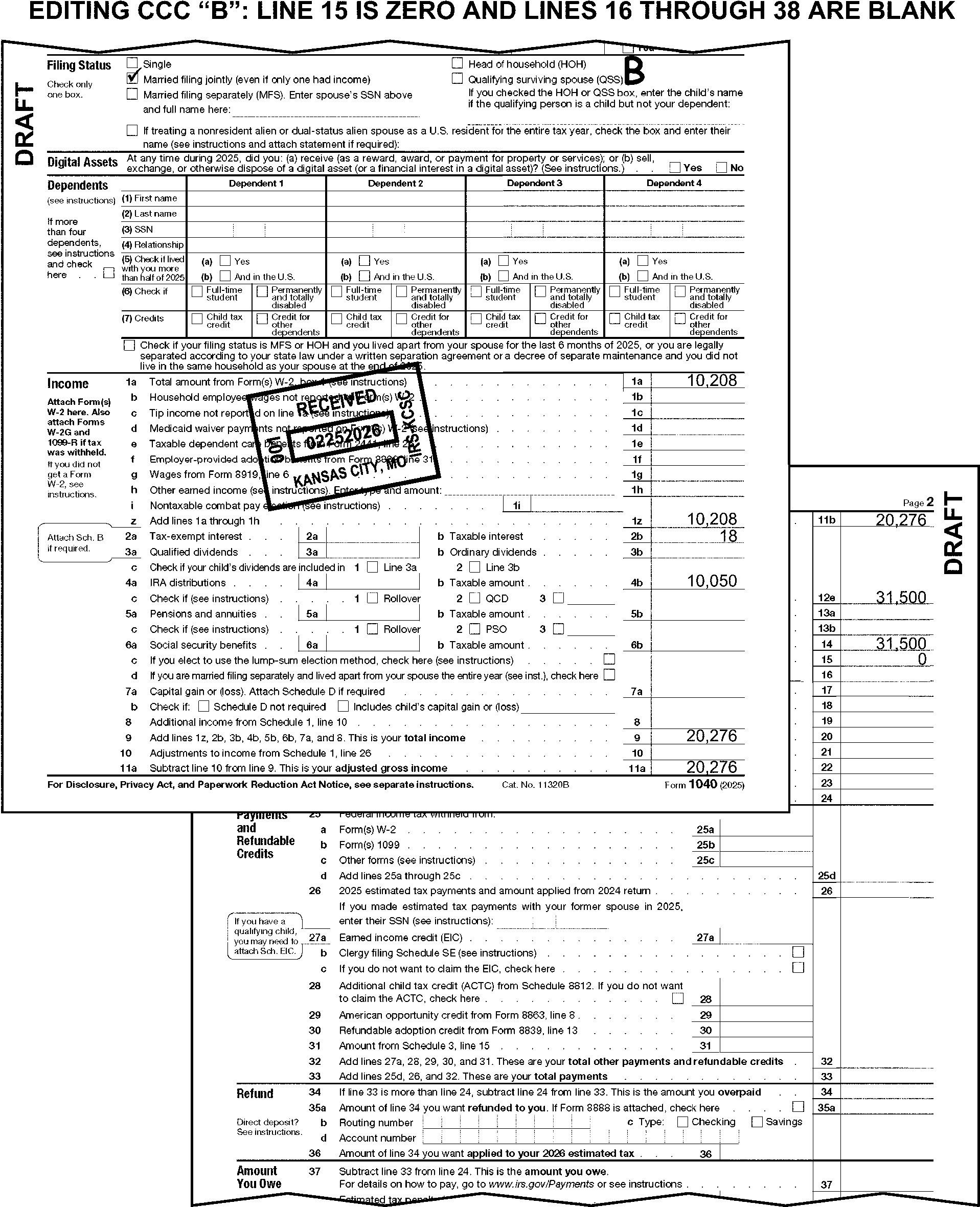
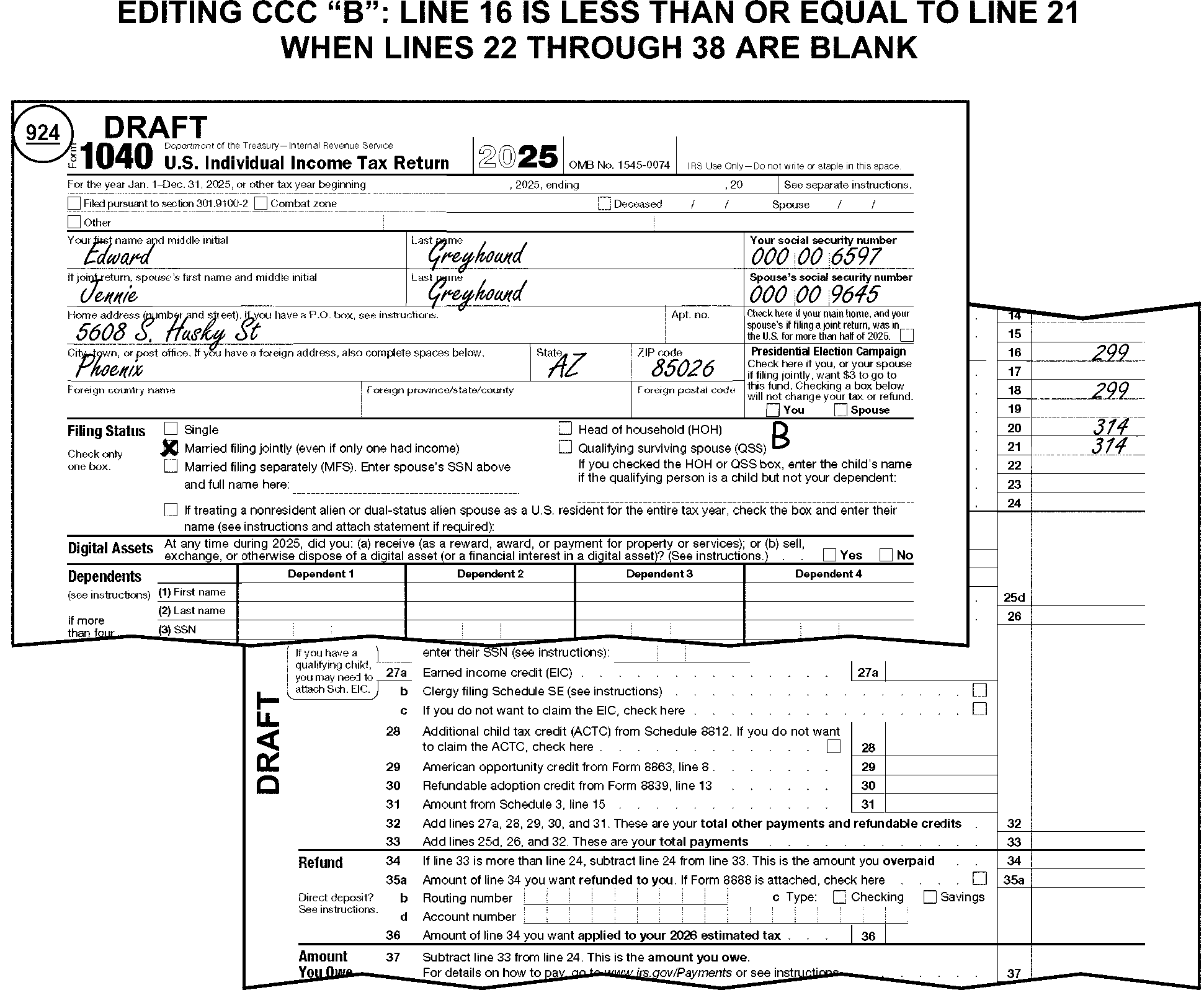
-
Valid sources of U.S. Withholding include Form W-2, Form 1099 series, and Form 8959.
-
Acceptable alternative sources for withholding support include:
-
Worksheet or attachment if it has similar information as provided on a Form 4852, Substitute for Form W-2, Wage and Tax Statement, or Form 1099-R, Distributions from Retirement Plans, Insurance Contracts, etc. Minimum requirements include the name of the employer, income and withholding.
-
IRS Transcript
-
-
If corresponding for other missing items, ≡ ≡ ≡ ≡ ≡ ≡ ≡ ≡ ≡ ≡ ≡ ≡ ≡ ≡ ≡ ≡ ≡ ≡ ≡ ≡ ≡ ≡ ≡ ≡ ≡ ≡ ≡ ≡ ≡ ≡ ≡ ≡ ≡ ≡ ≡ ≡ ≡ ≡ ≡ ≡ ≡ ≡ ≡ ≡ ≡ ≡ ≡ ≡ ≡ ≡ ≡ ≡ ≡ ≡ ≡ ≡ For Form 6001 use box G and ask for total amount on line 25d; for Form 3531 use box 6. If line 25d is blank, ask for the amount present on line 25a, 25b or 25c.
-
Take one of the following actions for line 25:
≡ ≡ ≡ ≡ ≡ ≡ ≡ ≡≡ ≡ ≡ ≡ ≡ ≡ ≡ ≡ ≡ ≡ ≡ ≡ ≡ ≡ ≡ ≡ ≡ ≡ ≡ ≡ ≡ ≡ ≡ ≡ ≡ ≡ ≡ ≡ ≡ ≡ ≡ ≡ ≡ ≡ ≡ ≡ ≡ ≡ ≡ ≡ ≡ ≡ ≡ ≡ ≡ ≡ ≡ ≡ ≡ ≡ ≡ ≡ ≡ ≡ ≡ ≡ ≡ ≡ ≡ ≡ ≡ ≡ ≡ ≡ ≡ ≡ ≡ ≡ ≡ ≡ ≡ ≡ ≡ ≡ ≡ ≡ ≡ ≡ ≡ ≡ ≡ ≡ ≡ ≡ ≡ ≡ ≡ ≡ ≡ ≡ ≡ ≡ ≡ ≡ ≡ ≡ ≡ ≡ ≡ ≡ ≡ ≡ ≡ ≡ ≡ ≡ ≡ ≡ ≡ ≡ ≡ ≡ ≡ ≡ ≡ ≡ ≡ ≡ ≡ ≡ ≡ ≡ ≡ ≡ ≡ ≡ ≡ ≡ ≡ ≡ ≡ ≡ ≡ ≡ ≡ ≡ ≡ ≡ ≡ ≡ ≡ ≡ ≡ ≡ ≡ ≡ ≡ ≡ ≡ ≡ ≡ ≡ ≡ ≡ ≡ ≡ ≡ ≡ ≡ ≡ ≡ ≡ ≡ ≡ ≡ ≡ ≡ ≡ ≡ ≡ ≡ ≡ ≡ ≡ ≡ ≡ ≡ ≡ ≡ ≡ ≡ ≡ ≡ ≡ ≡ ≡ ≡ ≡ ≡ ≡ ≡ ≡ ≡ ≡ ≡ ≡ ≡ ≡ ≡ ≡ ≡ ≡ ≡ ≡ ≡ ≡ ≡ ≡ ≡ ≡ ≡ ≡ ≡ ≡ ≡ ≡ ≡ ≡ ≡ ≡ ≡ ≡ "≡ ≡ ≡ ≡" ≡ ≡ ≡ ≡ ≡ ≡ ≡
≡ ≡ ≡ ≡ ≡ ≡ ≡≡ ≡ ≡ ≡ ≡ ≡ ≡ ≡ ≡ ≡ ≡ ≡ ≡ ≡ ≡ ≡ ≡ ≡ ≡ ≡ ≡ ≡ ≡ ≡ ≡ ≡ ≡ ≡ ≡ ≡ ≡ ≡≡ ≡ ≡ ≡ ≡ ≡ ≡ ≡ ≡ ≡ ≡ ≡ ≡ ≡ ≡ ≡ ≡ ≡ ≡ ≡ ≡ ≡ ≡ ≡ ≡ ≡ ≡ ≡"≡ ≡ ≡" ≡ ≡ ≡ ≡ ≡ ≡ ≡ ≡ ≡ ≡ ≡ ≡ ≡ ≡ ≡ ≡ ≡ ≡ ≡ ≡ ≡ ≡ ≡ ≡ ≡ ≡ ≡ ≡ ≡ ≡ ≡ ≡ ≡ ≡ ≡ ≡ ≡ ≡ ≡ ≡ ≡ ≡ ≡ ≡ ≡ ≡ ≡ ≡ ≡ ≡ ≡ ≡ ≡ ≡ ≡ ≡ ≡ ≡ ≡ ≡ -
≡ ≡ ≡ ≡ ≡ ≡ ≡ ≡
-
≡ ≡ ≡ ≡ ≡ ≡ ≡ ≡ ≡ ≡ ≡
-
≡ ≡ ≡ ≡ ≡ ≡ ≡ ≡ ≡ ≡ ≡ ≡ ≡ ≡ ≡ ≡ ≡ ≡ ≡ ≡ ≡
-
≡ ≡ ≡ ≡ ≡ ≡ ≡ ≡ ≡ ≡ ≡
-
≡ ≡ ≡ ≡ ≡ ≡ ≡ ≡ ≡ ≡ ≡ ≡ ≡ ≡ ≡ ≡ ≡ ≡ ≡ ≡ ≡ ≡ ≡ ≡ ≡ ≡ ≡ ≡ ≡ ≡ ≡
"≡ ≡ ≡ ≡" ≡ ≡ ≡ ≡ ≡ ≡ ≡ ≡ ≡ ≡ ≡ ≡ ≡ ≡ ≡ ≡ ≡ ≡ ≡ ≡ ≡ ≡ ≡ ≡ ≡ ≡ ≡ ≡ ≡ ≡ ≡ ≡ ≡ ≡ ≡ ≡ ≡ ≡ ≡ ≡ ≡ ≡ ≡ ≡ ≡ ≡ ≡ ≡ ≡ ≡ ≡ ≡ ≡ ≡ ≡ ≡ ≡ ≡ ≡ ≡ ≡ ≡ ≡ ≡ ≡ ≡ ≡ ≡ ≡ ≡ ≡ ≡ ≡ ≡ ≡ ≡ ≡ ≡ ≡ ≡ ≡ ≡ ≡ ≡ ≡ ≡ ≡ ≡ ≡ ≡ ≡ ≡ ≡ ≡ ≡ ≡ ≡ ≡ ≡ ≡ ≡ ≡ ≡ ≡ ≡ ≡ ≡ ≡ ≡ ≡ ≡ ≡ ≡ ≡ ≡ ≡ ≡ ≡ ≡ ≡ ≡ ≡ ≡ ≡ ≡ ≡ ≡ ≡ ≡ ≡ ≡ ≡ ≡ ≡ ≡ ≡ ≡ ≡ ≡ ≡ ≡ ≡ ≡ ≡ ≡ ≡ ≡ ≡ ≡ ≡ ≡ ≡ ≡ ≡ ≡ ≡ ≡ ≡ ≡ ≡ ≡ ≡ ≡ ≡ ≡ ≡ ≡ ≡ ≡ ≡ ≡ ≡ ≡ ≡ ≡ ≡ ≡ ≡ ≡ ≡ ≡ ≡ ≡ ≡ ≡ ≡ ≡ ≡ ≡ ≡ ≡ ≡ ≡ ≡ ≡ ≡ ≡ ≡ ≡ ≡ ≡ ≡ ≡ ≡ ≡ ≡ ≡ ≡ ≡ ≡ -
-
Refer to the table below to determine CCC "8" editing.
If the return is a Refund return and withholding is significant and Then There is only a single supporting document attached that is one of the following: -
A substitute statement (e.g., substitute Form W-2, tax software statement, or employer-provided earnings statement with year-to-date totals)
-
Attachment or worksheet as explained in IRM 3.11.3.14.2.29 (3)
-
Handwritten, see Figure 3.11.3-72
-
Other than a computer-printed Form W-2
-
Altered name, SSN, wages, or federal income tax withheld.
Edit CCC 8 One or more Forms 4852 is present to support withholding, and no other withholding documentation is present Edit CCC 8 Form 4852 and an Employer-provided earnings statement with the same employer and identical amounts. Edit CCC 8 One of the following is attached: -
Form 1099-R
-
Form W-2G
-
IRS Transcript
Do not edit CCC 8 The return is identified as a military or combat zone return. Do not edit CCC 8. See the special military return instructions in IRM 3.11.3.6.1.1. -
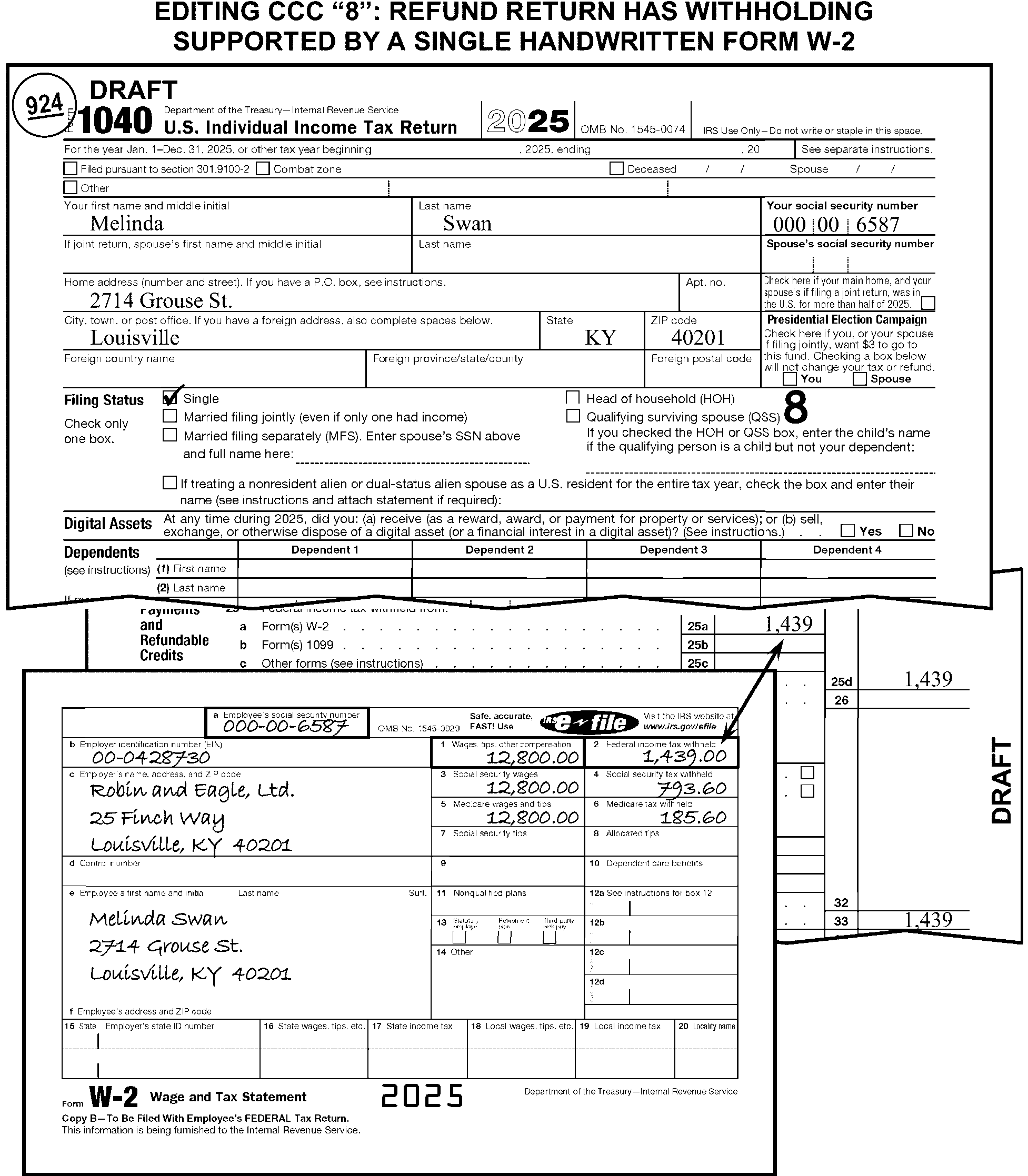
-
Delete and edit to the correct line any amounts determined to be other than:
-
ES tax payments
-
An overpayment applied from the 2024 return
-
-
Edit Action Code "430" to send the return to Rejects in the following circumstances:
-
A statement is present on or near line 26 indicating the taxpayer wants the credit applied to their spouse's account.
-
The return is FS 3 or 6 and there is a statement or schedule present showing how estimated payments are to be allocated.
-
-
The taxpayer will claim EIC by any of the following:
-
Entering an amount on line 27a.
-
Writing "EIC" in the line 27a area.
-
Attaching Schedule EIC with entries.
-
-
Take one of the following actions when no money amount is present on line 27a, and Schedule EIC is not attached:
Note:
For TY20 and prior, take one of the following actions when no money amount is present on line 27a, Schedule EIC is not attached, and the FS is other than 3 or 6.
If the taxpayer writes "EIC" in the line 27a area and Then The amount on line 11a is less than $19,104 ($26,214 for FS 2). Edit "888" on line 27a. The amount on line 11a is more than or equal to $19,104 ($26,214 for FS 2) but less than $61,555 ($68,675 for FS 2). Correspond for Schedule EIC with Form 3531/6001 using fill-in 29, per Exhibit 3.11.3-18. -
If an amount is claimed on line 27a, and Schedule EIC is missing, correspond when either of the following conditions apply:
-
Line 11a is equal to or greater than $19,104 ($26,214 for FS 2) and less than $61,555 ($68,675 for FS 2)
-
Line 27a is greater than $649
-
-
Do not correspond for Schedule EIC or source of earned income if one of the following conditions apply:
-
Primary TIN (or Secondary TIN for FS 2) is invalid
-
Either spouse has an ATIN, ITIN or IRSN
-
DSI checkbox has been checked:
"Someone can claim you as a dependent" checkbox
"Someone can claim your spouse as a dependent" checkbox -
Line 11a of Form 1040 is $61,555 ($68,675 for FS 2) or more
-
You can determine the entire income amount to be non-earned income
-
Box 27c is checked.
-
-
Correspond when EIC is being claimed, and the source of earned income is not indicated or attached and cannot be determined through research. (See Figure 3.11.3-73.) For Form 6001, check box X. For Form 3531, check box 7.
Note:
Do not research source of earned income if there are other correspondence issues on the return. Instead, correspond for source of earned income when corresponding for other missing information. See the table below for examples of what is (and is not) earned income.
Earned Income NOT Earned Income -
Form W-2 or similar statement
-
Form 1099-MISC (Box 7 on TY19 and prior)
-
Form 1099-NEC (TY20 and later)
-
Form 1099-R with Distribution Code 3 and/or Disability
-
Form 4137
-
Form 8919
-
Schedule C with a positive entry on line 31
-
Schedule E, Part II with a positive entry on line 32
-
Schedule F with a positive entry on line 34
-
Schedule SE
-
Amount on line 1b, Form 1040 or notation of "HSH"
-
Notation on Schedule 1, line 8z indicating self-employment
-
Medicaid Waiver Payment (MWP), Notice 2014-7, IRC 131, In-Home Health Services (IHHS), In-Home Support Services (IHSS), Difficulty of Care payment
-
Amount on Schedule 1 line 8s
-
PYEI Prior Year Earned Income (TY17-TY21 only)
-
Alimony and child support
-
Interest and dividends
-
Non-disability pensions and annuities (e.g., Form 1099-R showing income other than Distribution Code 3)
-
Nontaxable foster care payments
-
Social Security and railroad retirement benefits (including disability benefits)
-
Unemployment compensation (insurance)
-
Veterans' benefits (including VA rehabilitation benefits)
-
Welfare benefits
-
Workers' compensation benefits
-
Schedule E, Part I
-
Wages earned while incarcerated
-
-
Edit RPC "B" when there is no significant entry on line 27a and the box on line 27c is checked.
-
Edit RPC "B" when there is no significant entry on line 27a, and the taxpayer has written:
-
"No" or "None" in the line 27a area. (See Figure 3.11.3-74.)
-
"Amish" or "Mennonite" anywhere on the return.
-
"Exempt Notary" , "Exempt Form 4029" , or "Exempt Form 4361" anywhere on the return.
-
A clear indication that they do not want or do not qualify for EIC.
-
-
"X" the amount on line 27a and edit RPC "B" when any of the following are present:
-
a clear indication that an exemption from SE tax was given on Form 4029 or Form 4361
-
Form 4029 or Form 4361 is attached
-
notation of "Exempt/Notary" or "Exempt"
-
notation of "Amish"
-
notation of "Mennonite"
-
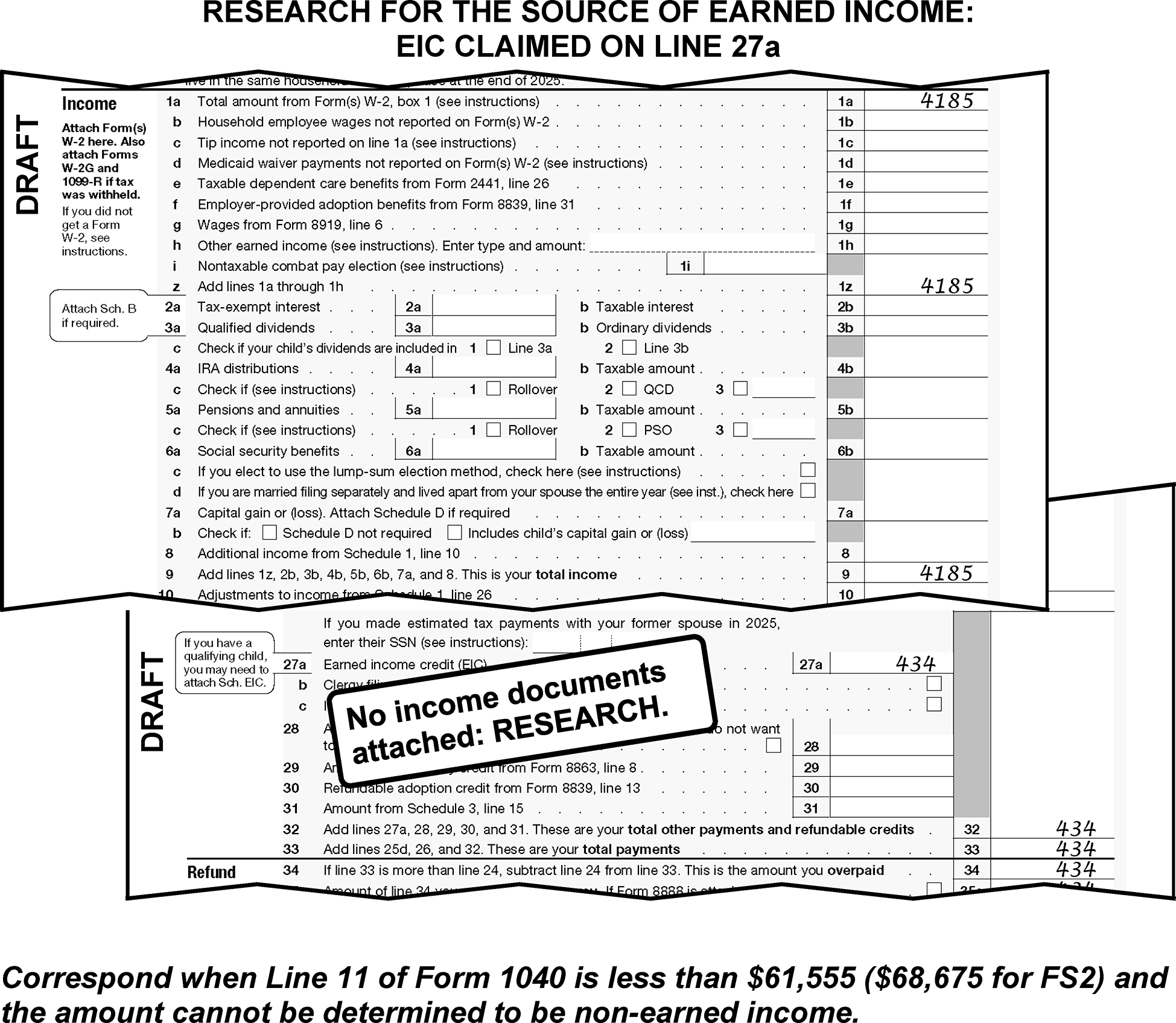
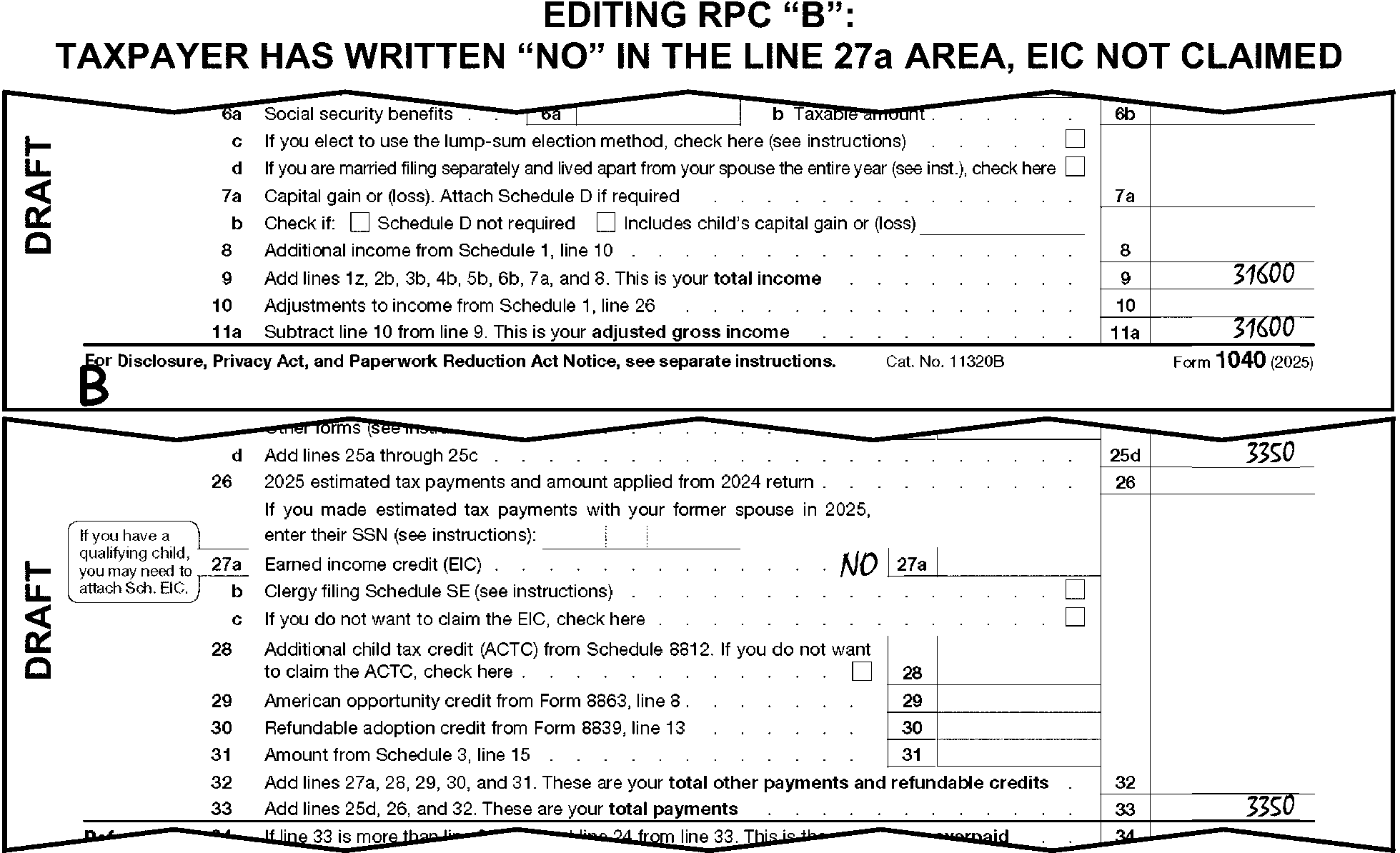
-
If an amount is claimed on line 28 and there are 3 or more qualifying children with the CTC checkbox marked in row (7) of the dependent area of the return, Schedule 8812 must be attached.
-
If Schedule 8812 is missing and the condition in (1) above applies, correspond.
-
If an amount is claimed on line 29, Form 8863 must be attached. If missing, correspond for Form 8863.
-
For TY25 and later, if an amount is claimed on line 30, Form 8839 must be attached. If missing, correspond for Form 8839.
-
If an amount is claimed on line 31, Schedule 3 must be attached. Correspond for Schedule 3 if missing.
-
Follow instructions below for dummying Schedule 3 Part II:
If Then Form 8962 is attached Dummy the line 26 amount to line 9, Schedule 3. Form 4136 is attached Dummy the line 17 amount to line 12, Schedule 3. Form 8885 is attached Dummy the line 5 amount to line 14, Schedule 3.
-
When there is an amount on line 33 and lines 25d, 26, and 32 are blank, and no withholding documents (Forms W-2, W-2G or 1099 Series) are attached, take one of the following actions.
If And Then The amount on line 33 is ≡ ≡ ≡ ≡ ≡ ≡ ≡ ≡ ≡ there is a significant entry on line 1a, 4b or 5b Form 1040 or line 7, Schedule 1, Correspond for an explanation of the amount on line 33. For Form 6001 use box O, for Form 3531 use box 19-20. The amount on line 33 is ≡ ≡ ≡ ≡ ≡ ≡ ≡ there are no significant entries on lines 1a, 4b or 5b Form 1040 or line 7, Schedule 1, Edit the amount to line 26. The amount on line 33 is ≡ ≡ ≡ ≡ ≡ ≡ ≡ ≡ ≡ ≡ there is a significant entry on line 1a, 4b or 5b Form 1040 or line 7, Schedule 1, Edit the amount to line 25d and edit RPC "G" . The amount on line 33 is ≡ ≡ ≡ ≡ ≡ ≡ ≡ ≡ ≡ ≡ there are no significant entries on lines 1a, 4b or 5b Form 1040 or line 7, Schedule 1, Edit the amount to line 26. -
Delete any credits identified by the taxpayer on lines 25d through 33 (dotted portion) that do not belong on the current year Form 1040. For example, a credit for a prior year refund not received.
-
Compute and edit line 33 when it is blank, dash, zero, or illegible and there are entries present leading to a total.
-
Line 34 is not a T-line. Lines 35a and 37 are T-Compute lines. Edit lines 35a, 36 and 37 in dollars and cents when adjusting or computing and editing amounts.
-
Compute and edit line 35a when lines 34, 36, and 37 are all blank, line 33 is greater than line 24, and any one of the following conditions are present:
-
Line 24 has an entry.
-
The taxpayer computed or indicated no tax due on lines 16, or 24.
-
It can be determined that line 24 would be zero if it were computed.
-
-
Do not edit CCC "B" when line 35a has been computed to be a significant amount.
-
Edit Action Code "341" when the amount on line 35a is:
-
Less than $1 and the taxpayer submits a written request for a refund.
-
One hundred million dollars ($100,000,000) or more and within 21 days of the expiration of the 45-day interest free period.
-
-
Hand carry fully edited refund returns of $100,000,000 or more to your work leader. The work leader will ensure all correspondence and/or research is addressed and carry the return as a walk through to Numbering, ISRP and ERS to help in providing subject matter expert support for timeliness. See (3) above for possible editing of Action Code "341" .
-
Edit a checkmark to the left of the direct deposit area when numeric entries are present and neither of lines 35b or 35d are deleted as instructed in (2) below.
-
Take the following actions to perfect lines 35b, 35c, and 35d:
If Then Routing number present
Account number present
Neither checking nor savings box markedEdit a checkmark in the "checking" box (or to the left of the word "checking" if no box is present). (See Figure 3.11.3-75a.) Routing number present
Account number present
Both checking and savings box markedCircle the box that represents "savings" . (See Figure 3.11.3-75b.) Routing number present and
Account number NOT present or
Routing number NOT present
Account number presentEdit an "X" in the first position of the blank line, or if the field is not boxed-in, to the left of the blank line. (See Figure 3.11.3-76a.) Routing number blank
Account number blank
Both checking and savings boxes blankEdit a single "X" over Routing and Account number lines. (See Figure 3.11.3-76b.) Routing number blank
Account number blank
Checking or savings is presentEdit an "X" in the first available blank position for both Routing number and Account number lines. (See Figure 3.11.3-76c.) Routing number altered and/or
Account number altered
or, if either or both have been lined through by another area (e.g., CII, 1040-X)Edit an "X" in the first position for both Routing and Account number lines. If either checking or savings box is not already indicated, edit a checkmark in the checking box. (See Figure 3.11.3-76d.) Pre-printed X’s are Present in
Routing number
Account number
Routing and Account number are also presentEdit an "X" in the first position for both Routing and Account number lines. (See Figure 3.11.3-76e.) Pre-printed X’s are Present in
Routing number
Account number
Checking and/or savingsEdit a single "X" over Routing and Account number lines. (See Figure 3.11.3-76f.) Pre-printed X’s are Present in
Routing number
Account number
Checking and savings is blankEdit a single "X" over Routing and Account number lines. (See Figure 3.11.3-76g.)
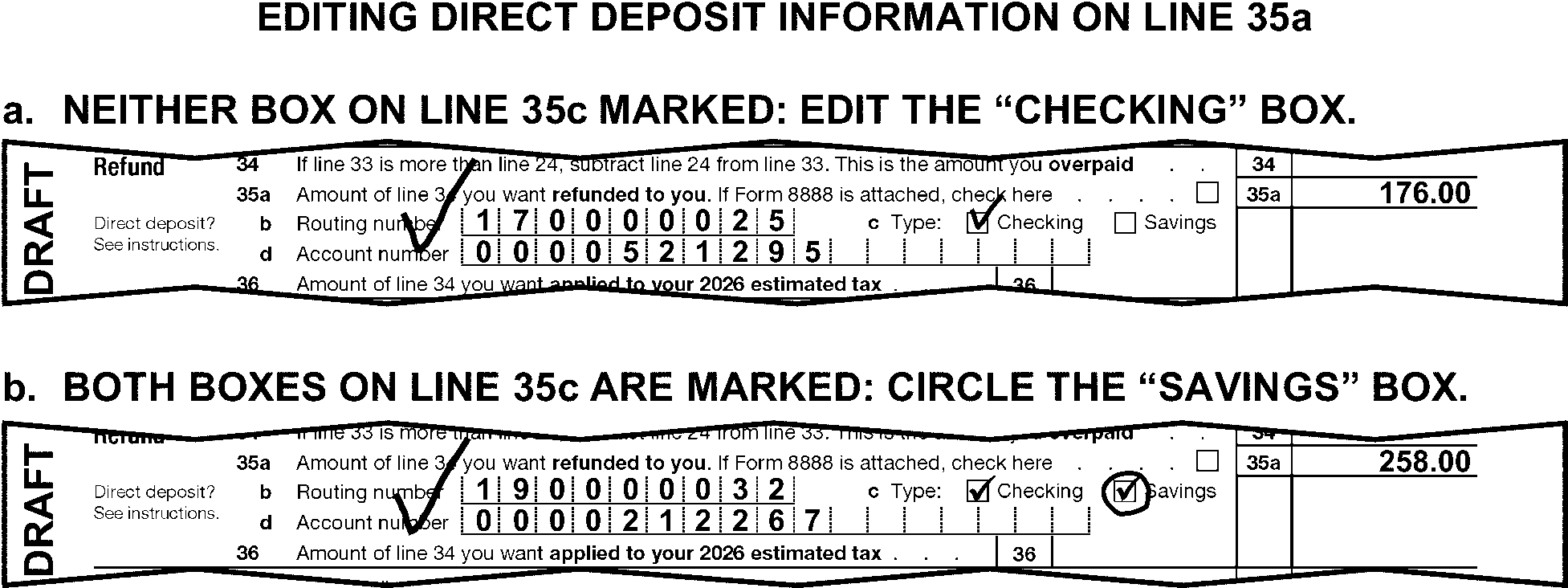
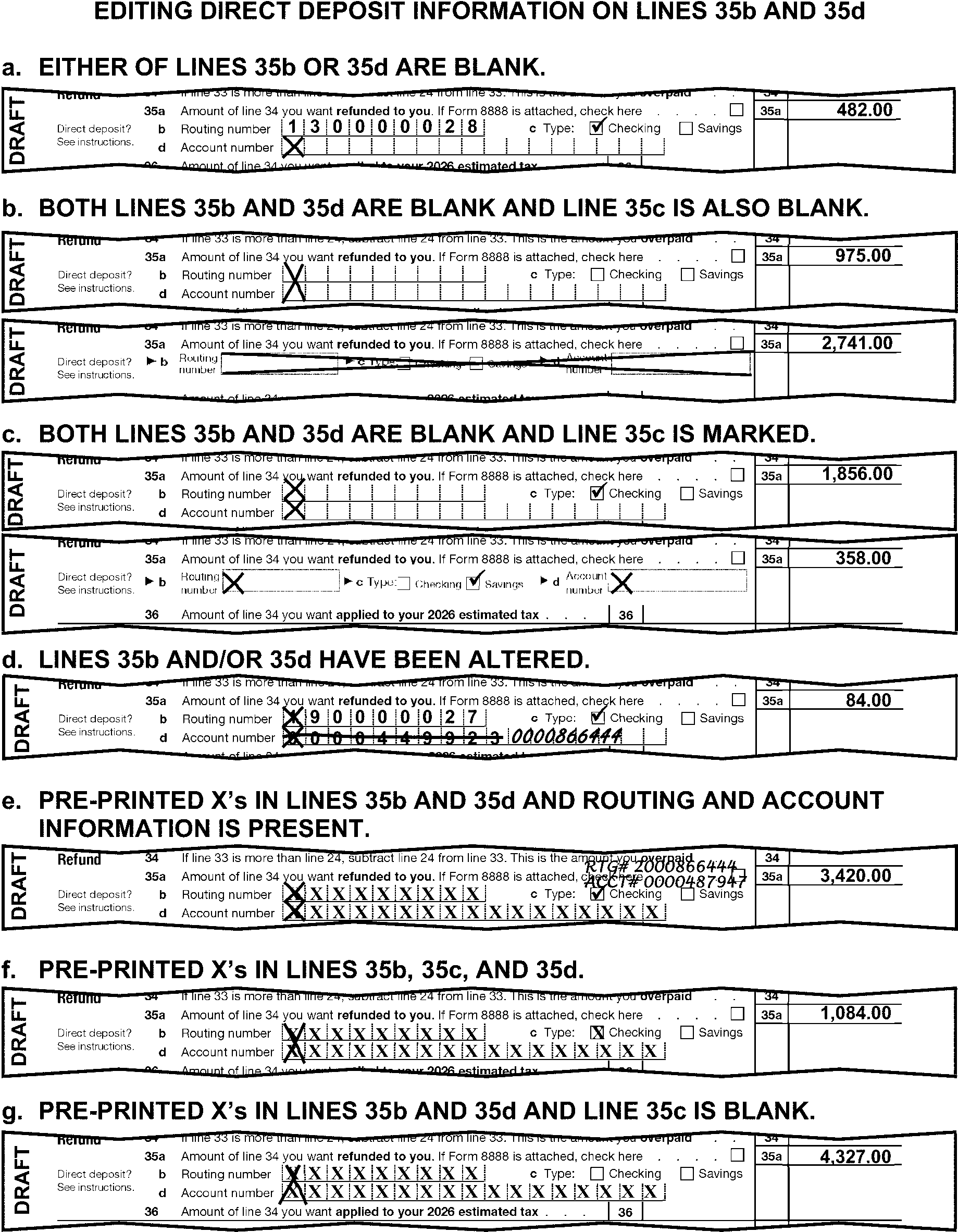
-
When lines 34, 35a, and 36 are the same, see Figure 3.11.3-77 and perfect them as follows:
-
Edit Action Code "430" to send the return to Rejects in the following circumstances:
-
A statement is present on or near Form 1040, line 26 or line 36, indicating the taxpayer wants the credit applied to their spouse's account.
-
The return is FS 3 or 6 and there is a statement or schedule present showing how estimated payments are to be allocated.
-
-
Exclude the additional amount when line 36 includes an amount for any of the following:
-
Late filing penalty
-
Late payment penalty
-
Interest
-
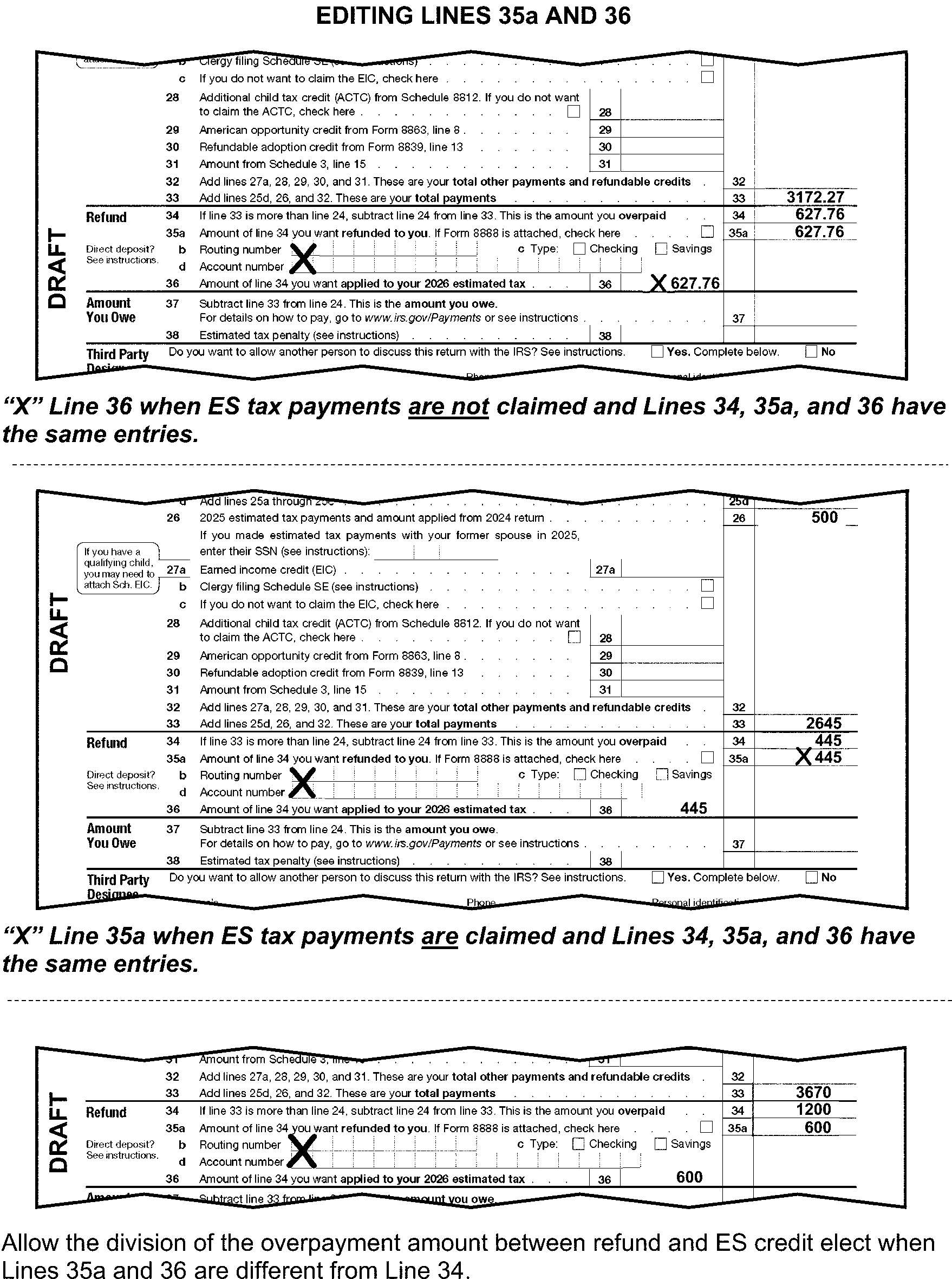
-
Compute and edit line 37 when it is blank, if lines 34, 35a and 36 are blank and line 24 is greater than line 33.
-
Do not edit CCC "B" when line 37 has been computed to a significant amount.
-
Form 2210, Underpayment of Estimated Tax by Individuals, Estates and Trusts (Sequence Code 06), and Form 2210-F, Underpayment of Estimated Tax by Farmers and Fishers, (Sequence Code 06A) are not transcribed forms. Delete these forms after editing line 38.
-
Edit CCC "P" when Form 2210 is attached and any of the following conditions apply:
-
Tax year is 2018 and Box A in Part II is marked and "80% or 85% Waiver" is noted next to Box A or in the Box A area.
-
Box A or B in Part II is marked, and a statement is attached indicating the reason the taxpayer was unable to meet the estimated tax requirements. Statement must indicate:
The taxpayer has retired after reaching age 62 or,
Has become disabled during the tax year or the prior tax year.Note:
If statement is not present, edit CCC “7” and correspond using Letter 369C, open paragraph U using the following verbiage: "We cannot consider your request for a waiver of the estimated tax penalty because the required documentation was not attached to your return. If you receive notice of penalty assessment, you may request a consideration of the assessment by mailing the required documentation along with a copy of your Form 2210, to the address that will be indicated on the notice of assessment."
-
Any of C-E in Part II, are marked.
-
There is any indication on Form 2210, or in the line 38 area of Form 1040 of Annualized Income (AI).
-
Disaster/loss is indicated. See Exhibit 3.11.3-9.
-
-
Edit CCC "P" when Form 2210-F is attached, and all the following conditions are met:
-
Tax Period is 2025/12 and,
-
Box A (relating to a waiver) Part I, is checked and,
-
The return was received no later than April 15, 2026 ≡ ≡ ≡ ≡ ≡ ≡ ≡ ≡ ≡ ≡ ≡ ≡ ≡ ≡ ≡ ≡ ≡ ≡ ≡ ≡ ≡.
-
-
Edit CCC "P" when Form 2210-F is attached, and all the following conditions are met:
-
Tax period ended 2025 or 2026 with a month ending other than 12 (i.e., fiscal year return).
-
Box A in Part I is marked and a statement is attached indicating reason for the waiver. Statement must indicate:
The taxpayer has retired after reaching age 62 or older or,
Has become disabled during the tax year or the prior tax year.
Note:
If statement is not present, edit CCC “7” and correspond using Letter 369C, open paragraph U using the following verbiage: "We cannot consider your request for a waiver of the estimated tax penalty because the required documentation was not attached to your return. If you receive notice of penalty assessment, you may request a consideration of the assessment by mailing the required documentation along with a copy of your Form 2210, to the address that will be indicated on the notice of assessment."
-
-
If line 38 is blank, edit to line 38 any significant amount from:
-
Form 2210, Part III, line 19 (TY20 and prior, Part III, line 17 or Part IV, line 27)
-
Form 2210-F, line 16
-
-
When CCC "P" is edited, compare the line 38 entry with the amount on Form 2210, line 19 (Form 2210-F, line 16). Take the following actions when the entry on line 38 is different from the amount on Form 2210 or Form 2210-F after allowing for rounding:
-
"X" the line 38 entry.
-
Edit the amount from Form 2210 or Form 2210-F to line 38.
-
-
An original signature, made by the taxpayer, is required below the jurat (perjury statement) and within the box "Sign Here" area of the return.
-
Correspond using Form 3531 to mail back a tax return with a missing or invalid signature to the taxpayer. Mark boxes as required. Be sure to identify and include all other correspondence conditions on Form 3531 when mailing a return back to a taxpayer for a missing, photocopied, or incorrectly placed signature.
-
Correspond for an original signature only when you cannot clearly determine whether the present signature is an original signature.
-
A signature that does not appear under a jurat statement can warrant up to two correspondences to obtain a signature in the proper area. See IRM 3.11.3.5.3.2.
-
For returns with signatures or an exception listed in paragraphs (7) and (8), continue processing. If correspondence is needed, follow normal correspondence instructions.
-
Faxed or scanned signatures are acceptable only when they are received from another IRS area.
-
Accept faxed or scanned signatures from the following areas:
- Another IRS area (e.g., Substitute for Return (SFR), EEFAX)
- Returns marked "59X-XX" (excluding "599-18" ) from Collection Operation
- Correspondence Imaging Inventory (CII) from Accounts Management
- Returns stamped by RIVO and/or edited with SPC "B" or "M"
- Taxpayer Advocate Service (TAS)Note:
TAS will refer to IRM IRM 13.1.18.8.3 for specific instructions on accepting faxed signatures and the limited circumstances when it is necessary to fax a return to the IRS.
- Centralized Offer in Compromise (OIC/COIC) -
These returns may have "Process as Original" , "PAO" , "Process as Original - Faxed Return" , or similar statement present at the top of the return and Form 3210 may be present.
-
-
Joint returns require the signature of both taxpayers except when a notation indicates the spouse is:
-
Deceased and taxpayer is filing as the surviving spouse
-
A "POW-MIA"
-
Unable to sign the return due to health reasons
-
In a combat zone/qualified hazardous duty area
-
Any of the following and a POA is attached: overseas (including military), incapacitated by disease or injury, or received advance permission from IRS.
-
-
Do not correspond for a missing signature when any of the following conditions are present:
-
"Substitute for Return Prepared by IRS" is noted, a signed Form 1040-X is attached for the same period with an original signature, "See 1040-X" is noted, or "dummy" return.
-
"Section 6020(b)" or "prompt assessment" is noted or Form 4810 is attached.
-
Return is "amended" , "corrected" , "revised" , "tentative" , or "superseding" (See the amended return instructions in IRM 3.11.3.6.2.1.)
-
Form 8879 is attached with a valid original signature or E-Signature, and there is an indication of rejected electronic filing or prior year.
-
The return is coming from Exam, Collection or Accounts Management and "PAO" or "Process as Original" is present on the return.
-
An employee's IDRS number is present on the signature line.
-
Taxpayer signed an attached CP 59 or Letter 143C on the Sign Here line. CSCO will notate in the "sign here" area of the return when the taxpayer signed under the jurat on the CP 59 or Letter 143C.
-
Form 15103 with a valid signature is attached. If FS2, each taxpayer missing a signature on the return must have a valid signature on Form 15103.
-
Automated Substitute for Return "ASFR" is notated in the top margin, a pink Form 3531 is attached, or Letter 2566 (SC/CG) or Letter 3219 (SC/CG) is attached. Returns meeting these criteria will be pulled from the batch and routed to ASFR. See IRM 3.11.3.6.2.19.1.
-
There is an indication of TRPRT (transcript of a return).
-
Computer Condition Code (CCC) "3" is already present on the return.
-
Correspondence Imaging Inventory (CII) return.
-
Paper-printed MeF returns that are sent from TAS.
-
Efile Graphic Print (Includes when the notation is circled out or lined through.)
-
Centralized Office in Compromise, "OIC" or "COIC" is present on the return.
-
-
Correspond for the signatures of two witnesses, if not present, when the taxpayer signs the return with a mark such as an "X" . Use Form 3531 to correspond for this condition, mark Box 1.
-
Treat the return as unsigned and correspond for the missing, legal signature(s) if the return has no jurat or the jurat is incomplete. Use Form 3531, Box 2.
-
When the jurat on a return has been altered or deleted treat it as a Frivolous Filing.
-
For unnumbered returns, prepare Form 4227 and route the return to Examination.
-
For numbered returns, edit Action Code "331" .
-
-
If the taxpayer used a thumbprint instead of a signature, route to the Frivolous Filing Program (FRP), unless already seen by Frivolous and then process the return as an original and do not correspond for signature.
-
If the taxpayer is a minor child and the return is signed by an individual other than the taxpayer:
-
A minor child's return signed by their parent never requires documentary evidence.
-
A minor child's return signed by their guardian or other fiduciary representative requires documentary evidence ≡ ≡ ≡ ≡ ≡ ≡ ≡ ≡ ≡ ≡ ≡ ≡ ≡ ≡ ≡ ≡ ≡ ≡ ≡ ≡ ≡ ≡ ≡ ≡ ≡ ≡ ≡ (See IRM 3.11.3.11 for a list of fiduciary designees.)
-
All other relationships always require documentary evidence.
-
-
If the return is signed by any of the following:
-
An incompetent taxpayer's return signed by a parent or spouse never requires documentary evidence.
-
A taxpayer's return signed by an attorney, CPA, or a representative of a bank or other fiduciary institution, to include credit unions, pension funds, etc., never requires documentary evidence.
-
All other relationships always require documentary evidence. Correspond if missing (Court papers are acceptable as documentary evidence).
-
-
Refer to the decedent return instructions in IRM 3.11.3.10 when the taxpayer is deceased. Additional editing is always required on a decedent return. If a signature is missing on a decedent return, mark box 27 on a Form 3531.
-
If a joint return is missing the spouse's signature and there is an indication the spouse refused to sign, correspond for the missing signature or correct filing status. Correspond using Form 3531 and fill-in 24, per Exhibit 3.11.3-18.
-
Identity Protection Personal Identification Number (IP PIN) is in the "Sign Here" area of the return.
-
If it is more or less than 6 numeric digits, circle the IP PIN.
-
Preparer data is located below the taxpayer signature area.
-
If information is present in the Paid Preparer Data area Form 8948 should be present with the return. Edit the E-File Waiver Indicator in the bottom right margin to the right of the Identity Protection PIN on Form 1040 returns or TY17 and prior Form 1040A (TY17 and prior Form 1040EZ), to the right of the daytime phone number. Edit the E-File Waiver indicator as follows:
If the box marked on Form 8948 is: Then Box 1 Edit E-File Waiver Indicator "1" . (See Figure 3.11.3-78.) Box 2 Edit E-File Waiver Indicator "2" . Box 3 Edit E-File Waiver Indicator "3" . Box 4 Edit E-File Waiver Indicator "4" . Box 5 Edit E-File Waiver Indicator "5" . Boxes 6a - 6c Edit E-File Waiver Indicator "6" . More than one box is marked, Edit the E-File Waiver Indicator according to the following priority:
Boxes 6a - 6c
Box 3
Box 2
Box 1
Box 4
Box 5No box is marked but there is a notation near a box, Follow taxpayer’s intent.
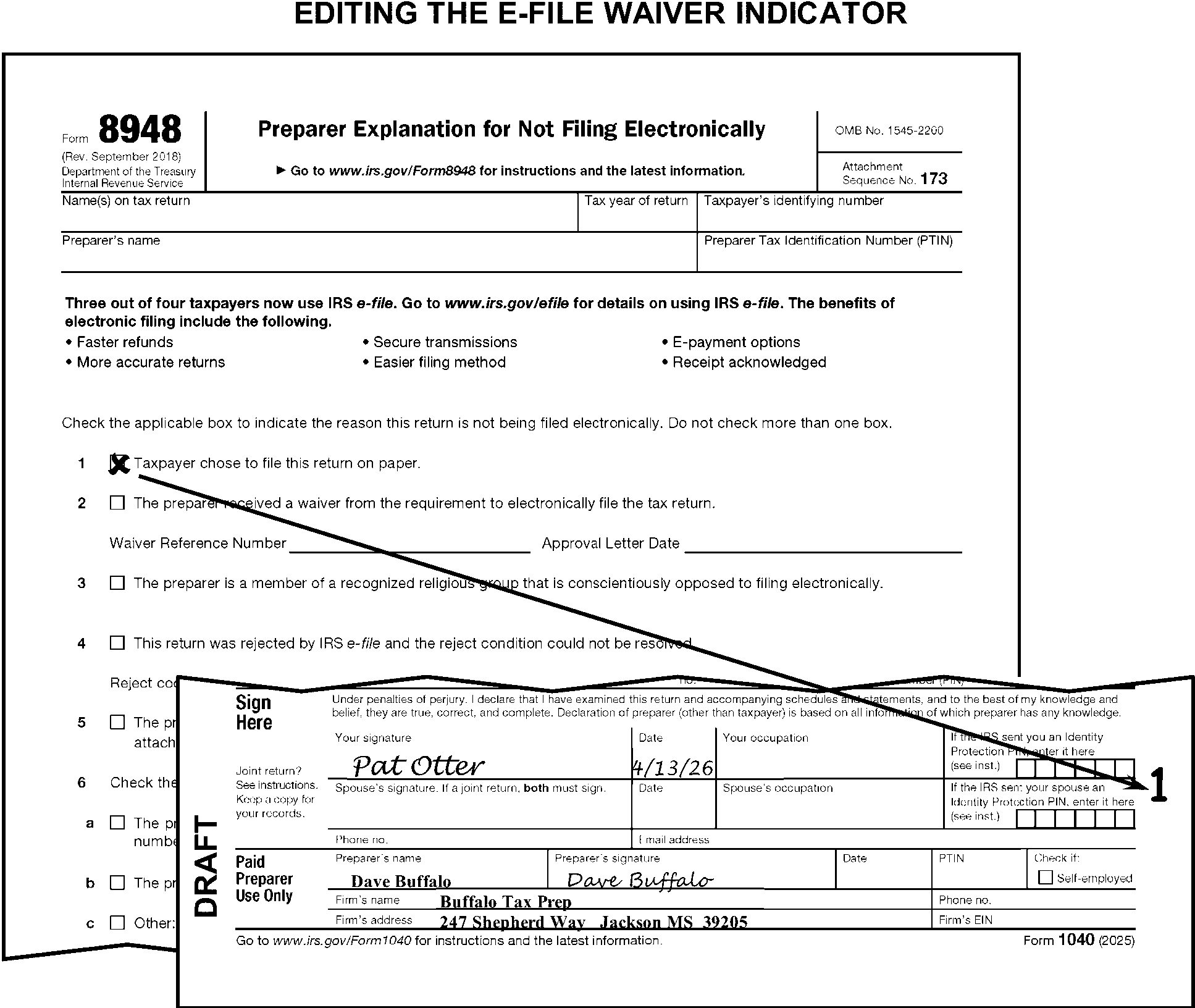
-
The Preparer Code is edited in the margin to the right of the Paid Preparer Use Only area.
-
Edit the Preparer Code as follows:
-
Edit "P" if there is an indication the return was prepared by the IRS. (e.g., "IRS Prepared" , "Prepared but not audited" , Dummy return, prepared by IRS, and "IRS Prepared but not audited" .)
-
Edit "R" if there is an indication the return was reviewed by the IRS.
-
-
Edit the Preparer's PTIN by taking the following actions:
If Then Blank with a single PTIN in the Paid Preparer area, Take no action. Blank with no PTIN in the Paid Preparer area, Perfect from attachments if possible. Illegible or incomplete, Perfect from attachments if possible. If unable to perfect, delete. Both an SSN and a PTIN are present in the Paid Preparer area, Delete the SSN. Multiple PTINs are present in the Paid Preparer area, Delete all but the first PTIN. Only an SSN or multiple SSNs are present in the Paid Preparer area, Take no action. -
Edit the EIN by taking the following actions:
If Then Blank with an EIN in the Paid Preparer area, Take no action. Blank with no EIN in the Paid Preparer area, Perfect from attachments if possible. Illegible or incomplete, Perfect from attachments if possible. If unable to perfect, delete the EIN. Multiple EINs are present, Delete all but the first entry.
-
The instructions in this subsection of the manual are for editing Schedule 1.
-
Edit Sequence Number "01" in the upper-right margin of Schedule 1 if not preprinted.
-
If only Schedule 1, page 2 is attached, with T-lines present or edited, edit Sequence Number "01" in the upper-right margin of Schedule 1, page 2.
-
The following are the T-lines and T-Compute lines on Schedule 1:
T-Lines T-Compute Lines -
1099-K Amount (below names found on form)
-
Line 1
-
Line 2a
-
Lines 3 through 7
-
Line 8r
-
Line 9
-
Lines 11 through 18
-
Lines 19a and 19b
-
Lines 20 and 21
-
Line 23
-
Line 25
-
982 Indicator (dotted area left of Line 11)
-
Line 9
-
Line 25
-
-
Lines 1 through 10 are for additional income and lines 11 through 26 are for adjustments to income.
-
"X" Schedule 1 if there are no significant T-line entries present or edited on Schedule 1.
-
Only one Schedule 1 can be processed. If more than one is attached, combine related T-line amounts onto one schedule and "X" those schedules not used.
-
Edit SPC "4" when there is an amount entered on Schedule 1, line 2a and the date entered on line 2b is after December 31, 2018.
-
When an amount is present on line 2a and the date is missing on line 2b, correspond for the missing date. When using Form 3531, mark Box 18 and when using Form 6001, use paragraph P.
-
Take no action when the word "received" is crossed out and the word "recaptured" has been added in its place.
-
If an amount is present on Schedule 1, line 3 and Schedule C is not attached:
If And Then A document from which a Schedule C can be dummied is attached, Dummy a Schedule C. -
Edit the income to lines 1 and 3.
-
Edit the expenses to line 28.
-
Edit other T-lines as necessary.
There are no documents attached from which a Schedule C can be dummied. the amount on line 3 is ≡ ≡ ≡ ≡ ≡ ≡ ≡ ≡ ≡ ≡ ≡ ≡ ≡ ≡ ≡ ≡ ≡ ≡ ≡ ≡ ≡ ≡ Dummy a Schedule C. -
Edit a positive amount to lines 1 and 3.
-
Edit a negative amount to line 28.
There are no documents attached from which a Schedule C can be dummied. the amount on line 3 is ≡ ≡ ≡ ≡ ≡ ≡ ≡ ≡ ≡ ≡ ≡ ≡ ≡ ≡ ≡ ≡ ≡ ≡ ≡ ≡ ≡ ≡ Correspond for the missing Schedule C. Note: If Schedule SE is not attached or reported, also correspond for SE tax liability when the amount on line 3 is $434 or more. For Form 6001, use box V. For Form 3531, check box 16. -
-
If an amount is present on Schedule 1, line 4 ≡ ≡ ≡ ≡ ≡ ≡ ≡ ≡ ≡ ≡ ≡ ≡ ≡ ≡ ≡ ≡ ≡ ≡ ≡ ≡, Form 4797, Form 4684, or a statement must be attached. If missing, correspond for Form 4797.
-
If an amount is present on Schedule 1, line 5 and Schedule E is not attached, but Form 4835 is attached, "dummy" a Schedule E as follows:
If Form 4835, Then Line 32, is a positive amount, Edit that amount to line 40 on Schedule E. Line 34c, is a negative amount, Edit that amount to line 40 on Schedule E. (See note below) Line 34c, is blank, Edit the loss from line 32 on Form 4835 to line 40 on Schedule E.(See note below) Line 7, is a positive amount, Edit that amount to line 42 on Schedule E. -
If an amount is present on Schedule 1, line 5, but neither Schedule E nor Form 4835 is attached, dummy a Schedule E (if possible) using supporting statements and the table below:
If there is a clear indication the income is from: Edit a positive amount to: OR Edit a negative amount to: Rents or royalties, Line 24, Schedule E. Line 25, Schedule E. A partnership or S-Corporation, Line 30, Schedule E. Line 31, Schedule E. An Estate or Trust, Line 35, Schedule E. Line 36, Schedule E. -
If no supporting documents are attached to a Schedule E and the amount on Schedule 1, line 5 is ≡ ≡ ≡ ≡ ≡ ≡ ≡ ≡ ≡ ≡ ≡ ≡ ≡ ≡ ≡ ≡ ≡ ≡ ≡, dummy a required Schedule E by editing a positive amount to line 24 or a negative amount on line 25 Schedule E.
-
Correspond for the missing Schedule E when the amount on Schedule 1, line 5 is ≡ ≡ ≡ ≡ ≡ ≡ ≡ ≡ ≡ ≡ ≡ ≡ ≡ ≡ ≡ ≡ ≡ ≡ and a dummy Schedule E cannot be prepared from attachments.
-
If an amount is present on Schedule 1, line 6 and Schedule F is not attached:
If And Then A document from which a Schedule F can be dummied is attached, Dummy a Schedule F. -
Edit the income to line 9 (bracket if negative).
-
Edit the expenses to line 33.
-
Edit other T-lines as necessary.
There are no documents attached from which a Schedule F can be dummied. the amount on Schedule 1, line 6 is ≡ ≡ ≡ ≡ ≡ ≡ ≡ ≡ ≡ ≡ ≡ ≡ ≡ ≡ ≡ ≡ ≡ ≡ ≡ ≡ ≡ ≡ Dummy a Schedule F. -
Edit a positive amount to line 9 Schedule F.
-
Edit a negative amount to line 33 Schedule F.
There are no documents attached from which a Schedule F can be dummied. the amount on Schedule 1, line 6 is ≡ ≡ ≡ ≡ ≡ ≡ ≡ ≡ ≡ ≡ ≡ ≡ ≡ ≡ ≡ ≡ ≡ ≡ Correspond for the missing Schedule F. Note: If Schedule SE is not attached or reported, also correspond for SE tax liability when the amount on Schedule 1, line 6 is $434 or more. For Form 6001, use box V. For Form 3531, check box 16. -
-
If Form 1099-G is attached, perfect Schedule 1, line 7 when it is blank, or amount differs from the gross amount of Unemployment Compensation (UEC) on Form 1099-G.
-
Delete any amount identified as supplemental benefits received from a company-financed supplemental unemployment benefits (SUB) fund. Include the amount of SUB pay on line 1a Form 1040.
-
Take no action when a statement is present indicating an adjustment to unemployment compensation was made such as "repaid" , "pay back" or "repayment" or the checkbox on line 7 is checked.
-
The taxpayer may include a variety of income types on Schedule 1, lines 8a - 8z. Instructions for the following types of income are included in this subsection of the manual:
-
Self-Employment Income
-
Gambling
-
Nontaxable Income
-
Scholarships, Grants, Stipends and Fellowships not reported on Form W-2
-
-
Take no action for entries on lines 8a - 8z unless specifically instructed in (3) below.
-
Use the table below for editing based on taxpayer entries on Schedule 1, lines 8a - 8z:
Entered by Taxpayer on Schedule 1, Lines 8a through 8z Action Dependent Care Benefits (DCB) Move to line 1z Form 1040. Disability Pension Move Disability Pension to line 1z Form 1040 if Form 1099-R, box 7, has Distribution Code 3. Form 2555 (Indication of Foreign Income Exclusion) or Form 2555-EZ (TY18 and prior) - Line 8d Treat as an international return. (See IRM 3.11.3.6.2.13 and paragraph (8) below.) Gambling, Gross (losses not subtracted) If Schedule A is attached, see IRM 3.11.3.19.1. Gambling, Net (winnings minus losses) See IRM 3.11.3.15.7(6). Indian Gaming Proceeds (IGP), Indian Tribal Distribution, Indian Tribal Earnings, Native American, or similar statement Edit RPC "G" if withholding is present on line 25a-25d form 1040 Non-Employee Compensation If amount is $434 or more (with or without Form 1099-NEC), and Schedule SE is not attached or reported, edit RPC "N" . Nontaxable Income
See IRM 3.11.3.15.7(7) for a complete list.Adjust Schedule 1, line 9 to exclude nontaxable amount. Restitution of The Holocaust, Nazi Regime, or a similar statement "X" Schedule 1, line 9. Section 965/965(a) If an amount is present, edit RPC "F" ; Form 965-A must be attached. However, if missing, correspond only if corresponding for other missing information. Self-employment types of income See IRM 3.11.3.15.7(4). Unemployment Compensation Exclusion (UCE) Take no action. (TY20 only) U.S. Treasury Rebate, Federal Tax Refund, Rate Reduction Rebate, or a similar statement "X" Schedule 1, line 9. -
If self-employment income is present on Schedule 1, line 8z, take the following actions:
-
If the amount is $434 or more and Schedule SE is not attached or reported and cannot be dummied, edit RPC "N" . (See Figure 3.11.3-79.)
-
If Form 1099-NEC is present with or without a notation on Schedule 1, line 8z and an amount is present in box 1, Form 1099-NEC, edit RPC "N" unless the amount is less than $434 or Schedule SE is present. On prior year returns, amount may be found on Form 1099-MISC, box 7.
Note:
Do not edit RPC "N" if any of the following conditions exist:
- DSI return and taxpayer notes: wages from parent or newspaper route.
- Self-Employment and non-self-employment cannot be broken down. (See Figure 3.11.3-80.)
- Taxpayer reported self-employment income on Schedule 1, line 8z and included the amount on Form 8919.
-
-
Edit an amount from Form 1099-NEC (PY Form 1099-MISC) to Schedule 1, line 9 only when there is a clear indication the amount was not included on the return. Do not include the Form 1099-NEC (PY Form 1099-MISC), amount on Schedule 1, line 9 when any of the following are attached by the taxpayer:
-
Schedule C
-
Schedule E (Part II)
-
Schedule F
-
Form 2106
-
-
Use the following table to determine the correct action when the taxpayer includes gambling amounts on Schedule 1, line 8b:
If the taxpayer includes And Then Gross winnings (does not subtract losses), Schedule A is attached, Refer to the Schedule A editing instructions in IRM 3.11.3.19.1. Net winnings (subtracts losses from winnings), There is an indication the taxpayer is a professional gambler, -
Delete amount from Schedule 1, line 9.
-
Include amount on Schedule 1, line 3.
-
Correspond for Schedule C.
Net winnings, The netted amount is not zero, "X" Schedule 1, line 9. Net winnings to zero, The gross amount is on the dotted portion of Schedule 1, line 8b, Edit the gross amount to Schedule 1, line 9. Net winnings to zero and the gross amount is not on the dotted portion of Schedule 1, line 8b, Form W-2G is not attached, Correspond for the gross winnings amount
with Form 3531/6001, using fill-in 7, per Exhibit 3.11.3-18.Net winnings to zero and the gross amount is not on the dotted portion of Schedule 1, line 8b, Form W-2G is attached, Edit CCC "Y" and an Action Trail. (See Figure 3.11.3-81.) -
-
Adjust Schedule 1, line 9 to exclude nontaxable income. Nontaxable income includes:
-
Accident and health insurance proceeds
-
"Black lung" benefits
-
Casualty insurance and other reimbursements
-
Child support
-
Damages awarded for physical injury or sickness
-
Federal Employees' Compensation Act (FECA) payments
-
Interest on state or local government obligations
-
Public aid
-
Supplemental Security Income (SSI)/SSI Disability
-
Tax-Sheltered Annuities
-
Temporary Assistance for Needy Families (TANF)
-
VA Benefits/Payments
-
Worker's compensation
-
-
Refer to the international return instructions in IRM 3.11.3.6.2.13 if foreign income has been excluded on Schedule 1, line 8d or if "Form 2555" , "Form 2555-EZ" (TY18 and prior), or an indication of "treaty" or "treaty article" is present on Schedule 1, line 8z.
-
Foreign income (usually reported on line 1a or 1b Form 1040 or line 8z Schedule 1) does not automatically indicate an international return. Do not route returns to Austin, unless one of the forms/conditions at IRM 3.11.3.6.2.13 (1) is present or if the taxpayer excludes income. (See Figure 3.11.3-82.)
-
When wages earned while incarcerated are present or edited on line 8u, edit SPC "J" .
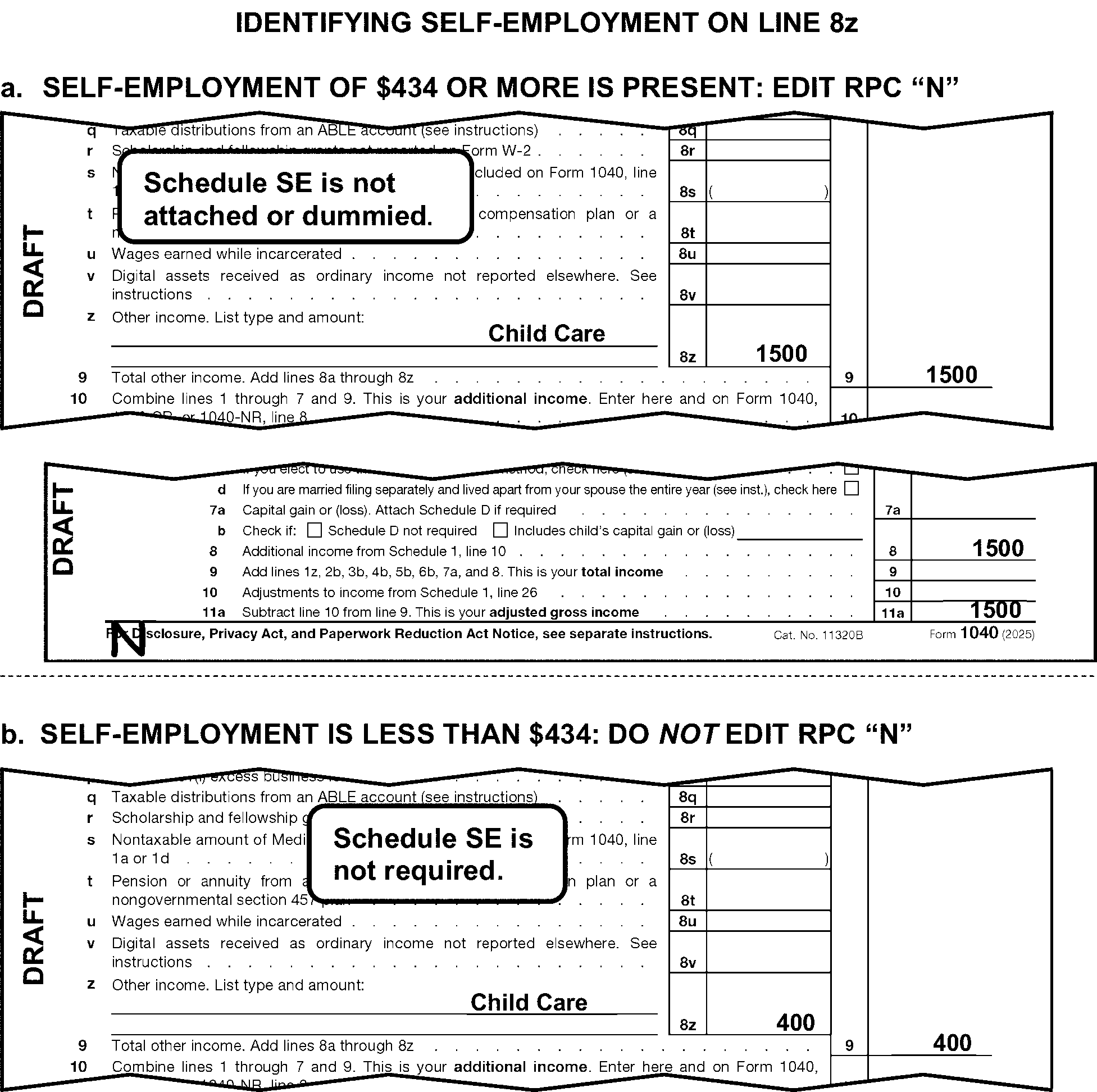
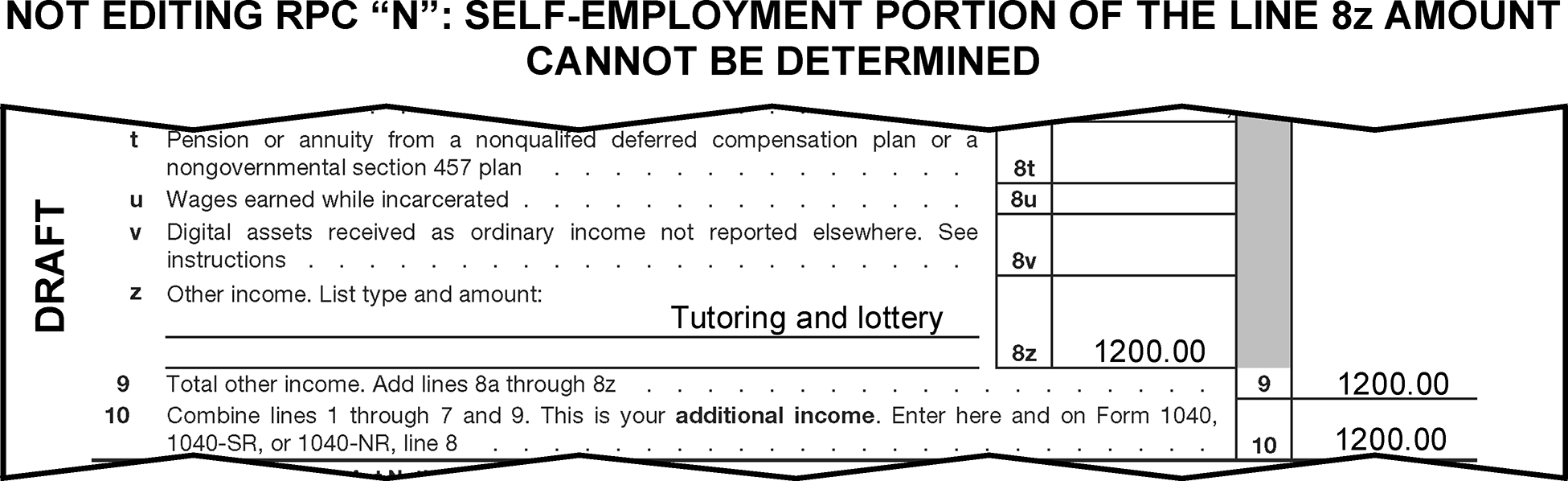
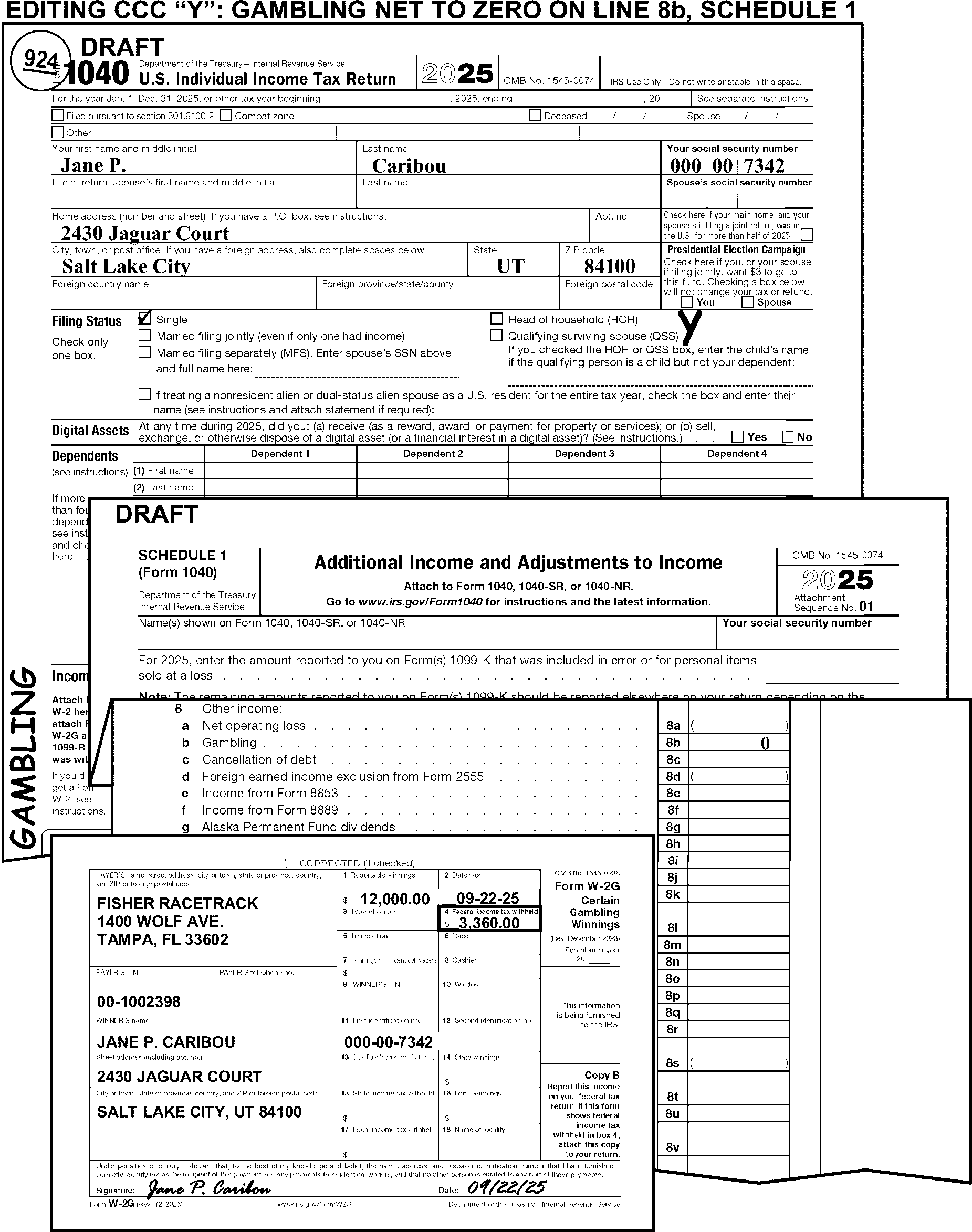
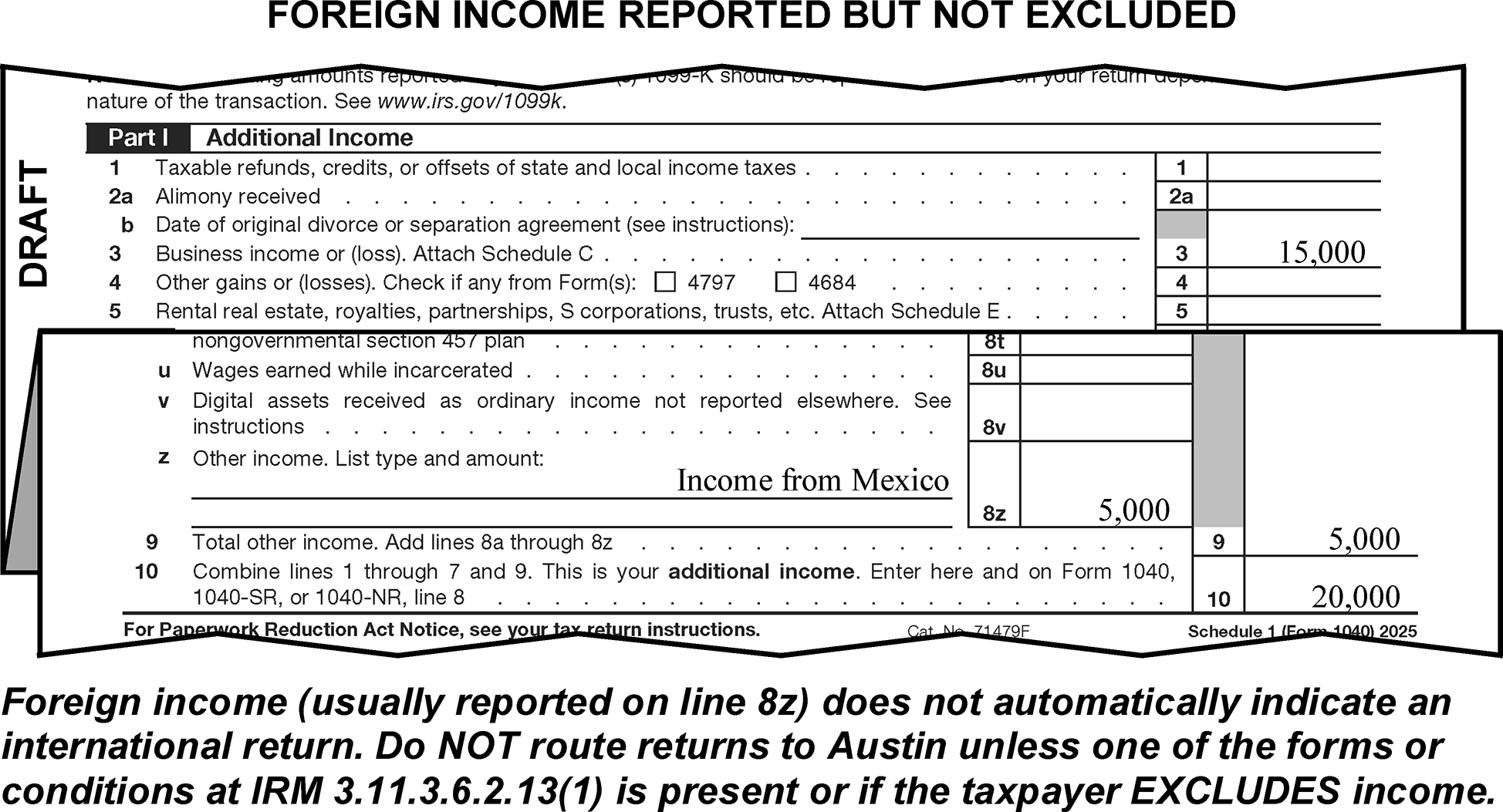
-
If line 9 is blank, dash, or zero, and there are entries on any of lines 8a - 8z, compute by adding lines 8a - 8z and edit the amount to line 9.
-
Delete an amount on line 9 if it appears the taxpayer used it as a subtotal line for Schedule 1, lines 1-7.
-
When Form 982 is attached edit the Form 982 Indicator "1" on the dotted portion of line 11.
-
If an amount is present on Schedule 1, line 12 ≡ ≡ ≡ ≡ ≡ ≡ ≡ ≡ ≡, Form 2106 must be attached. If missing, correspond for Form 2106.
-
Edit FPC "P" when Form 2106 is attached.
-
If attached, verify the occupation on Form 2106 is one of the following:
-
Qualified Performing Artist
-
Fee-Basis Official
-
Armed Forces Reservist
-
-
If occupation is not one of the above or is blank "X" Schedule 1, line 12.
-
If an amount is present on Schedule 1, line 13, Form 8889 must be attached. If missing, correspond for Form 8889.
-
"X" the amount on Schedule 1, line 16 if none of the following are attached to the return:
-
Schedule C
-
Schedule E (Part II present)
-
Schedule F
-
-
Edit a misplaced amount from Schedule 1, line 17 to line 15 when both of the following conditions are present:
-
Schedule SE is attached to the return.
-
Line 15 is blank.
-
-
Take the following actions when any amount is present on Schedule 1, line 19a:
If And Then A valid recipient TIN is present Is not the primary or secondary TIN Take no action. The taxpayer indicates: -
"Unable to obtain"
-
"NRA"
-
"SSA-205(c)"
-
"Unknown"
-
"Applied for" or
-
"None"
Circle the notation The recipient TIN is any of the following: -
illegible
-
same as the P-TIN or S-TIN or
-
Has fewer or more than 9 digits
Circle the TIN Multiple TINs are present, at least one TIN is valid Circle all but the first valid TIN -
-
If Schedule 1, line 19a is zero or blank and the recipient TIN is present on Schedule 1, line 19b, and the sum of deductions from Schedule 1, line 11 through line 25 is equal to the amount on Schedule 1, line 26, circle the recipient TIN.
-
Edit SPC "4" when there is an amount entered on Schedule 1, line 19a and the date entered on line 19c is after December 31, 2018.
-
When an amount is present on line 19a and the date is missing on line 19c, correspond for the missing date. When using Form 3531, mark Box 18 and when using Form 6001, use paragraph P.
-
"X" the Schedule 1, line 20 amount when the taxpayer writes "rollover" to the left of line 20. Delete the rollover amount if included as income on line 4a Form 1040.
-
"X" the amount on Schedule 1, line 20 when it is other than $7,000 or $8,000 ($14,000, $15,000, or $16,000 for FS 2), and one of the following indicators and an equal deferred compensation amount appear on Form W-2. (See Figure 3.11.3-83.)
-
"D" or Section 401(k)
-
"E" or Section 403(b)
-
"F" or Section 408(k)(6)
-
"G" or Section 457(b)
-
"Q" or "Housing/Subsistence" or "Combat Pay"
-
"S" or "SIMPLE" plan
-
"T" or employer-paid "qualified adoption expenses"
-
Section 125, Cafeteria Plan (CAF)
-
Section 414(h), Mandatory Salary Deferral ("PERS" Public Employees Retirement System)
-
Thrift Savings Plan or "TSP"
-
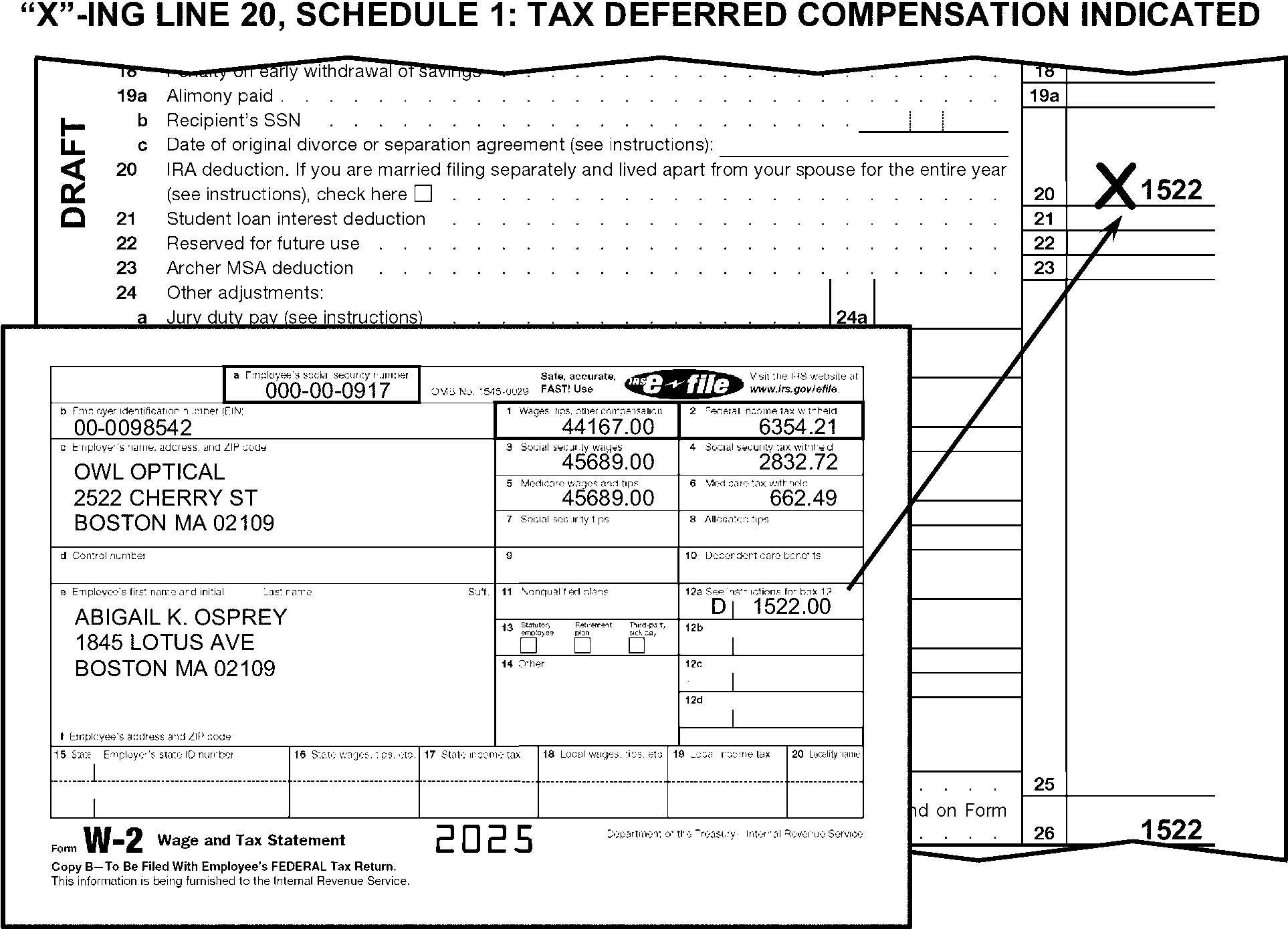
-
When found elsewhere on the return, delete any amount identified as "MSA" or "Archer MSA Deduction" . Edit the amount in dollars only to Schedule 1, line 23.
-
Delete the following adjustments from Schedule 1, lines 11 through 23 and edit the amount to Schedule 1, line 25.
-
"403(b)" - Contributions by certain chaplains to section 403(b) plans
-
"501(c)(18)(D)"
-
"ED67(e)" (TY18 and later)
-
"UDC" - Legal fees for Unlawful Discrimination Claims
-
"WBF" - Whistle Blower Fees
-
"Jury Pay" - Jury Duty Pay
-
"USOC" - deduction for Olympic and Paralympic medals and prize money
-
"PPR" - Personal Property Rental
-
"Reforestation," "RFST" - Forestation/reforestation amortization
-
"Sub-Pay TRA" - Repayment of Supplemental Unemployment Benefit (SUB) payments received in a prior year under the Trade Act of 1974 (TRA)
-
"DPAD" - Domestic Production Activity Deduction
-
-
Delete these adjustments where found and edit the amount to Schedule 1, line 25 when any of the adjustments in (1) are claimed elsewhere on the return.
-
If there is an entry on line 24j, follow instruction in IRM 3.11.3.6.2.13 to route as an international return.
-
"X" the amount on line 25 if a taxpayer claims an adjustment to income on Schedule 1, line 24z for anything other than the items listed in (1) above.
-
"X" the amount on line 25 when there is no explanation present for an adjustment amount on line 24z.
-
If line 25 is blank and there are entries on any of lines 24a - 24z, compute by adding lines 24a - 24z and edit the amount to line 25.
-
When an amount is present on line 26 and lines 11 through line 25 are blank, perfect in the following priority:
-
If Schedule 1, line 26 is one-half of the amount on Schedule 2, line 4, edit the line 26 amount on Schedule 1, line 15 as an SE tax deduction.
-
Perfect Schedule 1, lines 11 through 25 from attachments, if available.
-
If the amount on Schedule 1, line 26 is ≡ ≡ ≡ ≡ ≡ ≡ ≡ ≡ ≡ ≡ and you are unable to perfect lines 11 through line 25 using the steps above and no explanation is present, correspond for an explanation of line 26 amount. For Form 6001, check box O. For Form 3531, check box 19-20.
-
-
For TY 25 and later, edit Sequence Number "1A" in the upper right margin of Schedule 1-A if not preprinted.
-
If only Schedule 1-A, page 2 is attached, with T-lines present or edited, edit Sequence Number "1A" in the upper-right margin of Schedule 1-A, page 2.
-
Schedule 1-A, Seq #1A, when not deleted, must be located directly following Schedule 1, Seq #01 when attached to the return.
-
The following are the T-Lines and T-Compute Lines on Schedule 1-A:
T-Lines T-Compute Lines -
Line 6
-
Line 13
-
Line 14c
-
Line 21
-
Line 23
-
Line 30
-
Line 37
-
Line 6
-
Line 13
-
Line 14c
-
Line 21
-
Line 23
-
Line 30
-
Line 37
-
-
Only one Schedule 1-A can be processed. If more than one is attached, combine related T-line amounts onto one schedule and delete those schedules not used.
-
For TY24 and prior, "X" the schedule.
-
The instructions in this subsection of the manual are for editing Schedule 2.
-
Edit Sequence Number "02" in the upper-right margin of Schedule 2 if not preprinted.
-
If only Schedule 2, page 2 is attached, with T-lines present or edited, edit Sequence Number "02" in the upper-right margin of Schedule 2, page 2.
-
The following are the T-Lines and T-Compute Lines on Schedule 2:
T-Lines T-Compute Lines -
Lines 1a-1y
-
Line 1e Checkboxes
-
Line 1f Checkboxes
-
Line 2
-
Line 4
-
Lines 7-9
-
Line 10 (TY24 and prior)
-
Lines 11-16
-
Line 18
-
Line 19
-
Line 20
-
Line 7
-
Line 18
-
-
Lines 1a through 3 are for tax and lines 4 through 21 are for other taxes.
-
Only one Schedule 2 can be processed. If more than one is attached, combine related T-line amounts onto one schedule and delete those schedules not used.
-
"X" Schedule 2 if there are no significant T-line entries present or edited on Schedule 2.
-
If an amount is present on Schedule 2, line 1a, Form 8962 must be attached. If missing, correspond for Form 8962.
-
If using Form 6001 to correspond for missing Form 8962, also:
-
Request Form 1095–A, if not attached, using paragraph (d).
-
Edit Action Code "224" .
-
-
If using Form 3531 to correspond for missing Form 8962, include fill-in 31 if Form 1095-A is not attached, per Exhibit 3.11.3-18.
-
If an amount is present on Schedule 2, line 1b, Form 8936 must be attached. If missing, correspond for Form 8936.
-
If an amount is present on Schedule 2, line 1c, Form 8936 must be attached. If missing, correspond for Form 8936.
-
If an amount is present on Schedule 2, line 1d, Form 4255 must be attached. If missing, correspond for Form 4255.
-
If an amount is present on Schedule 2, line 1e, Form 4255 must be attached. If missing, correspond for Form 4255.
-
If an amount is present on Schedule 2, line 1f, Form 4255 must be attached. If missing, correspond for Form 4255.
-
If an amount is present on line 4, Schedule SE is required. If not attached, dummy Schedule SE from Schedule C, Schedule E (Part II present), or Schedule F, or attachments, if possible. Otherwise, correspond. When corresponding use paragraph W, Form 6001.
-
Edit RPC "S" and RPC "B" when there is no significant entry present or edited on line 4 and there is an indication of any of the following:
-
The taxpayer is not liable for SE tax.
-
Form 4361 or Form 4029 is noted or checkboxes on line 4 is checked.
-
"Exempt" , "Exempt-Notary," "Amish," or "Mennonite" is noted in the line 4 area.
-
-
If an amount is present on line 7, Form 4137 or Form 8919 must be attached. If Form 4137 or Form 8919 is missing, take the following actions:
If Then Attachments are present, Dummy Form 4137 or Form 8919. "Uncollected SST/Medicare" is noted, or the line 6 amount matches one or any combination of amounts with indicators "A" , "B" , "M" and/or "N" on attached Forms W-2, -
"X" the line 7 amount.
-
Edit the amount to line 13.
Amount is present on line 5, Correspond for Form 4137. For Form 6001, use paragraph W. Amount is present on line 6 Correspond for Form 8919. For Form 6001, use paragraph W. Amount is present on line 7 and lines 5-6 are blank. Correspond for explanation of entry. For Form 6001, check box O. For Form 3531, check box 19-20. -
-
If line 7 is blank, dash, or zero and there are any entries on lines 5 or 6, compute and edit line 7 by adding line 5 and line 6.
-
If an amount is present on line 8, Form 5329 must be attached. If missing, correspond for Form 5329, if corresponding with Form 6001, use paragraph W.
-
Edit RPC "3" and do not correspond if Form 5329 is not present and any of the following conditions apply:
-
The taxpayer has checked the box to the left of line 8.
-
The taxpayer noted "No" to the left of line 8.
-
Line 8 has an entry that is 10% of any combination of the following:
-
Line 4b, Form 1040
-
Line 5b, Form 1040
-
Form 1099-R
-
-
Edit the totals of Parts I through IX of Form(s) 5329 when line 8 is blank and Form 5329 is attached with entries present.
-
If an amount is present on line 9, Schedule H must be attached. If missing, correspond for Schedule H.
-
When an amount is present on line 11, Form 8959 must be attached. If missing, correspond for Form 8959.
-
When an amount is present on line 12, Form 8960 must be attached. If missing, correspond for Form 8960.
-
UT/UTOT or COBRA is reported on Schedule 2, line 13. If found elsewhere on the return, delete where found and edit to line 13 or renumber to be line 13 as appropriate.
-
If an amount is present on line 16, Form 8611 must be attached. If Form 8611 is missing and the amount on line 16 is ≡ ≡ ≡ ≡ ≡ ≡ ≡ ≡, correspond for Form 8611.
-
Use the following information for editing other additional taxes.
-
If an amount is present on line 17c, Form 8889 must be attached. If Form 8889 is missing and the amount on line 17c is ≡ ≡ ≡ ≡ ≡ ≡ ≡, correspond for Form 8889.
-
If an amount is present on line 17d, Form 8889 must be attached. If Form 8889 is missing and the amount on line 17d is ≡ ≡ ≡ ≡ ≡ ≡ ≡ ≡, correspond for Form 8889.
-
If an amount is present on line 17e, Form 8853 must be attached. If Form 8853 is missing, correspond for Form 8853.
-
If an amount is present on line 17f, Form 8853 must be attached. If Form 8853 is missing, correspond for Form 8853.
-
If the taxpayer has written "Section 1291 Interest" , "1291INT" , "Section 1294 Interest" , or "1294INT" , with an amount:
-
In the line 17z area and included the amount in the total on line 18, take no action.
-
Anywhere else on the return and you can determine the amount is not included on line 17z, add the amount to line 18.
-
-
If the taxpayer has written "PWA8933" or "PWA7210" and an amount is present on line 17z, edit RPC "9" .
-
For TY202607 and later, if the taxpayer has written "1062I" and an amount is present on line 17z, edit FPC "F" .
-
If line 18 is blank, dash or zero and there are entries on any lines 17a through 17z, compute by adding lines 17a through 17z and edit the total amount to line 18.
-
If an amount is present on Schedule 2, line 19, Form 4255 must be attached. If missing, correspond for Form 4255.
-
If an amount is present on line 20, edit RPC "F" .
-
If an amount is present on line 20, Form 965-A must be attached. However, if missing, correspond for Form 965-A only if corresponding for other missing information.
-
The instructions in this subsection of the manual are for editing Schedule 3.
-
Edit Sequence Number "03" in the upper-right margin of Schedule 3 if not preprinted.
-
The following lines are T-Lines and T-Compute Lines on the Schedule 3:
T-Lines T-Compute Lines -
Lines 1 through 4
-
Lines 5a - 5b
-
Lines 6a through 6d
-
Lines 6f - 6g
-
Lines 6h through 6l (first line with an amount present)
-
Line 6m
-
Line 7
-
Lines 9 through 12
-
Line 13a
-
Line 13b
-
Line 13c
-
Line 14
-
Line 7
-
Line 14
-
-
Lines 1 through 8 are for non-refundable credits and lines 9 through 15 are for other payments and refundable credits.
-
"X" Schedule 3 if there are no significant T-line entries present or edited on Schedule 3.
-
Only one Schedule 3 can be processed. If more than one is attached, combine related T-lines and delete those schedules not being used.
-
If an amount is claimed on line 1 of more than $300 (more than $600 for FS2), Form 1116 or similar statement must be attached. If missing or if Form 1116 has no significant entries present or edited on line 7, 8, 24 or 35, correspond for Form 1116.
-
If an amount is claimed on line 2, Form 2441 or a statement must be attached.
-
Prepare a dummy Form 2441 when it is missing, and a statement is present.
-
Correspond when Form 2441 cannot be dummied.
-
-
If an amount is claimed on line 3, Form 8863 must be attached. If missing correspond for Form 8863.
-
"X" line 3 if either of the following apply:
-
FS is 3 or 6
-
Taxpayer claimed both American Opportunity Credit and Lifetime Learning Credit for the same person on Form 8863.
-
-
If an amount is claimed on line 4, Form 8880 must be attached. If missing, correspond for Form 8880.
-
If the amount on line 4 is ≡ ≡ ≡ ≡ ≡ ≡ ≡ ≡ ≡ ≡ and the return has been hand-written/hand-prepared, "X" the amount.
-
Use the instructions in the following subsections for editing lines 6a - 6z.
-
If an amount is present on line 6a, Form 3800 must be attached. If missing, correspond for Form 3800.
-
If an amount is present on line 6b, Form 8801 must be attached. If missing, correspond for Form 8801.
-
If an amount is present on line 6d, Schedule R must be attached. If missing, correspond for Schedule R.
-
If "CFE" is notated and Schedule R is not attached, correspond with Form 3531/6001 using fill-in 28, per Exhibit 3.11.3-18.
-
Take no additional action when the taxpayer has written DFAS-705 in the line 6 area.
-
Reserved. See prior year instructions at IRM 3.11.3.75.3.4.2(4).
-
If an amount is present on line 6f, Form 8936 and Form 8936 Schedule A, must be attached. If missing, correspond for Form 8936 and/or Form 8936 Schedule A. For Form 8936 Schedule A, correspond with Form 6001 using box f.
-
If an amount is present on line 6g, Form 8396 must be attached. If missing, correspond for Form 8396.
-
If an amount is present on line 6m, Form 8936 and Form 8936 Schedule A, must be attached. If missing, correspond for Form 8936 and/or Form 8936 Schedule A. For Form 8936 Schedule A, correspond with Form 6001 using box f.
-
If line 7 is blank, dash or zero and there are entries on any lines 6a - 6m, compute by adding lines 6a - 6m and edit the amount on line 7.
-
If an amount is claimed on line 9, Form 8962 must be attached. If missing, correspond for Form 8962.
-
If using Form 6001 to correspond for missing Form 8962, also:
-
Request Form 1095–A, if not present, using paragraph (d).
-
Edit Action Code "224" .
-
-
If using Form 3531 to correspond for missing Form 8962, include fill-in 31 if Form 1095-A is not attached, per Exhibit 3.11.3-18.
-
Do not perfect line 10 from an attached Form 4868. Include on line 10 an amount the taxpayer indicates as a payment from Form 2350, Application for Extension of Time to File U.S. Income Tax Return.
-
Edit CCC "Y" and an Action Trail when 1040-C is written by line 10 or when Form 1040-C is attached.
-
Take no action when an amount of $5 or less is claimed.
-
"X" an amount of greater than $5 on line 11 when the amount claimed on Form 1040, line 1a is less than:
-
$176,100 and excess SST is claimed.
-
$176,100 and excess Tier 1 RRTA is claimed.
-
-
When an amount is present on line 11 and "RRTA" /"Tier 1 RRTA" is noted or there is an indication the taxpayer is a railroad employee:
-
Accept the taxpayer's figure for excess Tier 1 RRTA, if Forms W-2 or similar statements from more than one employer are attached and such Forms W-2 or similar statements show the excess.
-
When only one Form W-2 or similar statement is attached and the wage amount on Form W-2 or similar statement is greater than or equal to the amount on line 1a Form 1040, "X" line 11 Schedule 3.
-
When no Form W-2 or similar statement is attached, correspond if using Form 6001 use fill-in 9, per Exhibit 3.11.3-18, if using Form 3531 check box 8.
-
-
When an excess SST amount is present on line 11:
-
If no Form W-2 or similar statement is attached, correspond if using Form 6001 use fill-in 9, per Exhibit 3.11.3-18, if using Form 3531 check box 8.
-
If any single Form W-2 or similar attached statement shows an amount for Social Security tax withheld of more than $10,918.20, "X" the amount.
-
Otherwise, use the following table to compute the excess SST amount.
VERIFY EXCESS SOCIAL SECURITY TAX Primary Taxpayer Secondary Taxpayer 1. Add all social security tax withheld for each employer. This tax is shown in box 4, Form W-2. Enter the total here. __________ __________ 2. Enter any uncollected social security tax on tips from W-2, Box 12, Codes A & M. __________ __________ 3. Add lines 1 and 2. __________ __________ 4. Social security limit $10,918.20 $10,918.20 5. Subtract line 4 from line 3. Enter the result here (if the result is negative, enter zero here.) __________ __________ 6. Excess amount. Combine Primary and Secondary taxpayers’ line 5 amount. ______________ -
-
Add the amounts for wages, tips, and other compensation on all Forms W-2 when the total excess SST computed amount differs from line 11 entry by more than $5. (See Figure 3.11.3-84.)
-
"X" line 11 and edit the computed amount when all Forms W-2 are attached.
-
When FS 2 and all Forms W-2 are attached, "X" Schedule 3, line 11 if neither taxpayer is eligible for excess SST.
-
When Forms W-2 are not all attached and you are unable to verify the amount through research, correspond for additional Forms W-2 to support line 11. If using Form 6001 use fill-in 9, per Exhibit 3.11.3-18, if using Form 3531 check box 8
-
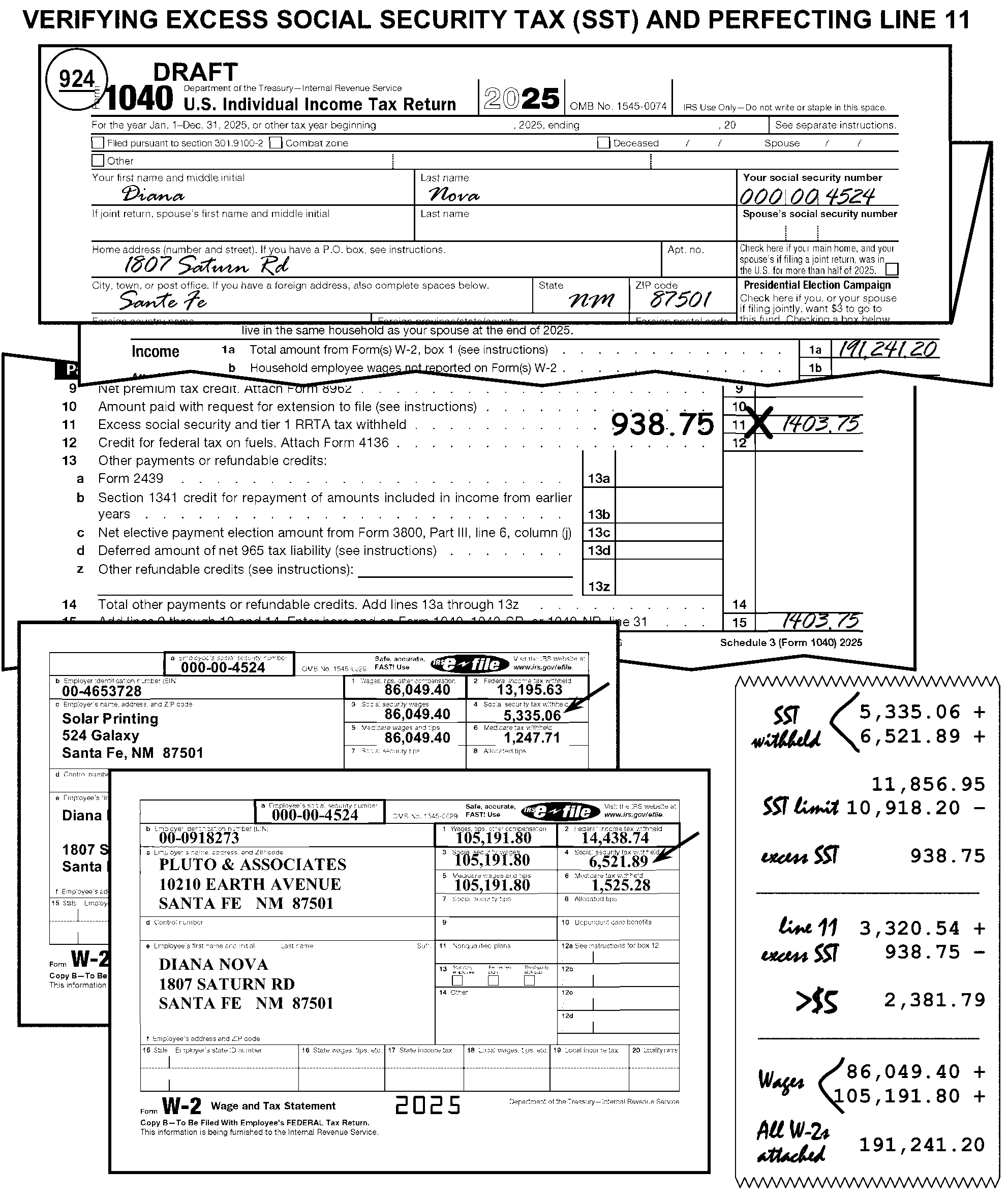
-
Use the instructions in the following subsections for editing lines 13a -13z.
-
If an amount of ≡ ≡ ≡ ≡ ≡ ≡ ≡ ≡ ≡ from Form 2439 is present on line 13a, Form 2439 must be attached. If not attached correspond using fill-in "10" , per Exhibit 3.11.3-18.
-
If an amount is present, Form 3800 must be attached. If missing, correspond for Form 3800.
-
The instructions provided in this subsection of the manual are for editing Schedule A. These instructions include:
-
General editing procedures
-
Medical and dental expenses
-
Total taxes
-
Interest
-
Gifts to Charity
-
Casualty/theft loss
-
Other miscellaneous deductions
-
Total itemized deductions
-
Unallowable Codes
-
-
The following lines on Schedule A are T-Lines and T-Compute Lines:
T-Lines T-Compute Lines -
Line 1
-
Line 3
-
Line 4
-
General Sales Tax Checkbox
-
Lines 5a through 5c
-
Lines 6 through 7
-
Lines 8a through 8c
-
Lines 9 through 17
-
Line 18 Checkbox
-
Line 4
-
Line 7
-
Line 10
-
Line 14
-
Line 17
-
-
Edit Sequence Code "07" in the upper-right margin of Schedule A if not preprinted.
-
Only one Schedule A is processable. If more than one is attached, combine related T-line amounts onto one Schedule A and delete those not used.
-
Do notX Schedule A when both of the following conditions are present:
-
FS is 3 (Married Filing Separately) and the taxpayer claimed zero itemized deductions, and
-
Schedule A is blank.
-
-
"X" Schedule A when line 17 on Schedule A is less than line 12e of Form 1040 and line 12e is equal to the taxpayer's standard deduction amount unless any of the following apply:
-
"IE" is indicated to the left of line 12e on Form 1040.
-
FS 3 is claimed, and there are significant T-line entries on the Schedule A. The box on Form 1040 "Spouse itemizes on a separate return" , may or may not be marked.
-
The box located on line 18, Schedule A is checked.
-
-
Do not dummy a Schedule A from attachments when the taxpayer used one of the standard deduction amounts. Use the Standard Deduction Chart in IRM 3.11.3.14.2.19(1) for the standard deduction amounts.
-
Search Schedule A for unallowables. Code unallowables regardless of where they are found, so long as they meet the tolerance. Specific unallowable conditions are identified in the line-by-line instructions, as well as the table in the following paragraph.
-
Dollar tolerances apply to all Schedule A Unallowable Codes. Code unallowables only when the total deducted amount (i.e., amount after any limitation) of the unallowable item is at least the dollar tolerance reflected in the table below. Code itemized deductions as unallowables only when the Schedule A is used and the amount for the unallowable item is at least ≡ ≡ ≡ ≡ ≡ ≡.
≡ ≡ ≡ ≡ ≡ ≡ ≡ ≡ ≡ ≡ ≡ ≡ ≡ ≡ ≡ ≡ ≡ ≡ ≡
≡ ≡ ≡ ≡ ≡ ≡ ≡ ≡ ≡ ≡ ≡ ≡ ≡ ≡ ≡ ≡ ≡ ≡ ≡ ≡ ≡ ≡ ≡ ≡ ≡ ≡ ≡ ≡ ≡ ≡ ≡ ≡ ≡ ≡ ≡ ≡ ≡ ≡ ≡ ≡ ≡ ≡ ≡ ≡ ≡ ≡ ≡ ≡ ≡ ≡ ≡ ≡ ≡ ≡ ≡ ≡ ≡ ≡ ≡ ≡ ≡ ≡ ≡ ≡ ≡ ≡ ≡ ≡ ≡ ≡ ≡ ≡ ≡ ≡ ≡ ≡ ≡ ≡ ≡ ≡ ≡ ≡ ≡ ≡ ≡ ≡ ≡ ≡ ≡ ≡ ≡ ≡ ≡ ≡ ≡ ≡ ≡ ≡ ≡ ≡ ≡ ≡ ≡ ≡ ≡ ≡ ≡ ≡ ≡ ≡ ≡ ≡ ≡ ≡ ≡ ≡ ≡ ≡ ≡ ≡ ≡ ≡ ≡ ≡ ≡ ≡ ≡ ≡ ≡ ≡ ≡ ≡ ≡ ≡ ≡ ≡ ≡ ≡ ≡ ≡ ≡ ≡ ≡ ≡ ≡ ≡ ≡ ≡ ≡ ≡ ≡ ≡ ≡ ≡ ≡ ≡ ≡ ≡ ≡ ≡ ≡ ≡ ≡ ≡ ≡ ≡ ≡ ≡ ≡ ≡ ≡ ≡ ≡ ≡ ≡ ≡ ≡ ≡ ≡ ≡ ≡ ≡ ≡ ≡ ≡ ≡ ≡ ≡ ≡ ≡ ≡ ≡ ≡ ≡ ≡ ≡ ≡ ≡ ≡ ≡ ≡ ≡ ≡ ≡ ≡ ≡ ≡ ≡ ≡ ≡ ≡ ≡ ≡ ≡ ≡ ≡ ≡ ≡ ≡ ≡ ≡ ≡ ≡ ≡ ≡ ≡ ≡ ≡ ≡ ≡ ≡ ≡ ≡ ≡ ≡ ≡ ≡ ≡ ≡ ≡ ≡ ≡ ≡ ≡ ≡ ≡ ≡ ≡ ≡ ≡ ≡ ≡ ≡ ≡ ≡ ≡ ≡ ≡ ≡ ≡ ≡ ≡ ≡ ≡ ≡ ≡ ≡ ≡ ≡ ≡ ≡ ≡ ≡ ≡ ≡ ≡ ≡ ≡ ≡ ≡ ≡ ≡ ≡ ≡ ≡ ≡ ≡ ≡ ≡ ≡ ≡ ≡ ≡ ≡ ≡ ≡ ≡ ≡ ≡ ≡ ≡ ≡ ≡ ≡ ≡ ≡ ≡ ≡ ≡ ≡ ≡ ≡ ≡ ≡ ≡ ≡ ≡ ≡ ≡ -
Review all returns with edited unallowables. Check for additional unallowables or frivolous conditions. Correct any unallowables which have been improperly coded.
-
If line 1 is blank and line 4 has a significant entry, edit line 1 from attachments.
-
If lines 1 and 4 are both blank and there is an attachment with an amount for medical deductions present, edit the attachment amount to:
-
Line 1 if line 3 has been computed by the taxpayer or
-
Line 4 if line 3 has not been computed by the taxpayer.
-
-
Compute and edit the total when line 4 is blank, and lines 1 and 3 have entries.
-
Edit Unallowable Code "33" and the lesser of the unallowable amount or the line 4 amount when the taxpayer claims personal living expenses incidental to medical treatment more than ≡ ≡ ≡ ≡ ≡ ≡. Unallowable items include:
-
Meals
-
Lodging more than $50 per day per person
-
Health club dues
-
Diet foods
-
Funeral expenses
-
Maternity clothes
-
-
Delete the amount if the taxpayer used line 6 as a subtotal line.
-
Compute and edit if blank.
-
Correspond for an explanation if line 7 has a dollar amount and lines 5a through 6 are blank. If using Form 6001, use box "O" , if using Form 3531, use box 19-20.
-
Edit Unallowable Code"34" and the amount claimed if the taxpayer claims a deduction for Federal taxes of ≡ ≡ ≡ ≡ ≡ ≡ ≡ ≡. Unallowable items include Federal taxes for:
-
Income
-
Social Security
-
Medicare
-
Excise tax on autos, tires, and air transportation
-
Duties imposed on imports or by Customs
-
-
Edit Unallowable Code"35" and the amount claimed when there is an amount for utility taxes of ≡ ≡ ≡ ≡ ≡ ≡ ≡ ≡ ≡ ≡. Examples include sewer, water, phone, etc.
-
Edit Unallowable Code"36" and the amount claimed if there is an amount for state and local taxes of ≡ ≡ ≡ ≡ ≡ ≡ ≡ ≡ ≡ ≡. Examples include hotel, meal, airfare, inheritance, stamp, etc.
-
Edit Unallowable Code"37" and the amount claimed if the taxpayer is claiming a deduction of ≡ ≡ ≡ ≡ ≡ ≡ ≡ ≡ ≡ for personal auto registration, tag and license taxes or fees except for residents of any of the following states:
State List Alabama Kentucky Nevada Arizona Maine New Hampshire California Massachusetts Oklahoma Colorado Michigan South Carolina Connecticut Minnesota Virginia Georgia Mississippi Washington Indiana Montana Wyoming Iowa Nebraska
-
When the taxpayer enters amounts in the line 8 area, take the following actions:
If And Then Line 8a is blank, The taxpayer clearly identified an amount(s) to be home mortgage, Edit the amount to line 8a. Line 8b is blank, The taxpayer clearly identified an amount(s) has been paid to an individual or individuals, Edit the amount to line 8b.
-
Delete the amount if the taxpayer used line 9 as a subtotal line.
-
Compute and edit line 10 when it is blank.
-
If an amount is entered and no entries are present on lines 8a through 9, take one of the following actions:
-
Edit the line 10 amount to line 8a if there is an amount on line 5b of Schedule A.
-
Correspond for an explanation of the line 10 amount if line 5b on Schedule A is blank. If using Form 6001, use box O, if using Form 3531 use box 19-20.
-
-
Edit Unallowable Code "41" and the amount claimed if there is an amount for personal interest paid of ≡ ≡ ≡ ≡ ≡ ≡ or more.
-
Take the following actions for a claim on line 12, Schedule A:
If And Then A] Schedule A, line 12, is more than $500, Form 8283 is attached with significant entries or a statement supporting attached Form 8283, Edit RPC "H" . A] Schedule A, line 12, is more than $500, Form 8283 is missing, or attached with no significant entries or supporting statement, Correspond for Form 8283. If using Form 6001, use box "I" , if using Form 3531, use box 11-14. A] Schedule A, line 12, is more than $500, Form 8283 indicates donation of an automobile, airplane or boat, Form 1098-C must also be present. If Form 1098-C is not attached, "X" line 12. B] Schedule A, line 12, is more than $500,000, A separate qualified appraisal is attached and Form 8283 (Section B, Parts IV and V) (for TY19 and prior, Section B, Parts III and IV), is complete, Edit RPC "4" . B] Schedule A, line 12, is more than $500,000, A separate qualified appraisal is not attached, Correspond with Form 3531/6001 using fill-in 34, per Exhibit 3.11.3-18. C] Form 8283 attached and any of the following are true: Part I, Checkbox 2b or Checkbox 2b1 are marked, or Line 3 column h, contains a value other than zero. Edit Audit Code "C" . C] The taxpayer checked box "a" (Art contribution of $20,000 or more) on line 2, (for TY19 and prior line 4), Section B of Form 8283 and Schedule A, line 12, is more than $20,000, A separate qualified appraisal is not attached, Correspond with Form 3531/6001 using fill-in 27, per Exhibit 3.11.3-18. D] Section B of Form 8283 has significant entries in Part I, Parts IV and V, (for TY19 and prior, Parts III and IV), are incomplete, Correspond with Form 3531/6001 using fill-in 26, per Exhibit 3.11.3-18. E] Section B of Form 8283 has significant entries in Part I line 3 (for TY19 and prior, line 5), column (c) has an entry of ≡ ≡ ≡ ≡ ≡ ≡ ≡ ≡ ≡ ≡ ≡, Edit Audit Code "C" . -
"X" line 13, Schedule A, if:
-
Line 13 is a negative amount.
-
The taxpayer used line 13 as a subtotal line.
-
-
If line 14, Schedule A:
-
Is blank and there are entries leading to a total, compute and edit line 14.
-
Has an amount and lines 11-13 are blank and cannot be perfected from attachments, correspond for an explanation of the amount. If using Form 6001, use box "O" , if using Form 3531, use box 19-20.
-
-
When unallowable expenses for contributions are claimed ≡ ≡ ≡ ≡ ≡ ≡ ≡ ≡ ≡ ≡ ≡, on lines 11 or 12, edit Unallowable Code "42" and the amount claimed.
-
If an amount is claimed on line 15 and Form 4684 is not attached, correspond.
-
For TY16 and later, if a Federally declared disaster loss is claimed on Schedule A and Form 4684, edit FPC "D" .
-
Only the expenses listed below can be deducted on line 16:
-
Gambling losses, but only to the extent of gambling winnings reported on Schedule 1, line 8b
-
Casualty and theft losses of income-producing property (Form 4684, line 32 or 38b, or Form 4797, line 18a)
-
Loss from Schedule K-1
-
Federal estate tax on income in respect of a decedent
-
Amortizable bond premiums
-
Losses attributable to qualified disasters (Form 4684, line 15)
-
Standard Deduction when associated with qualified disaster loss
-
Impairment-related work expenses of a disabled person
-
Repayments under a claim of right ≡ ≡ ≡ ≡ ≡ ≡ ≡
Note:
≡ ≡ ≡ ≡ ≡ ≡ ≡ ≡ ≡ ≡ ≡ ≡ ≡ ≡ ≡ ≡ ≡ ≡ ≡ ≡ ≡ ≡ ≡ ≡ ≡ ≡ ≡ ≡ ≡ ≡ ≡ ≡ ≡ ≡ ≡ ≡ ≡ ≡ ≡ ≡ ≡ ≡ ≡ ≡ ≡ ≡ ≡ ≡ ≡ ≡ ≡ ≡ ≡ ≡ ≡ ≡ ≡ ≡ ≡ ≡ ≡ ≡ ≡ ≡ ≡ ≡ ≡ ≡ ≡ ≡ ≡ ≡ ≡ ≡ ≡ ≡ ≡ ≡ ≡ ≡ ≡ ≡ ≡ ≡ ≡ ≡ ≡ ≡ ≡ ≡ ≡ ≡ ≡ ≡ ≡ ≡ ≡ ≡ ≡ ≡≡ ≡ ≡ ≡ ≡ ≡ ≡ ≡ ≡ ≡ ≡ ≡ ≡ ≡ ≡≡ ≡ ≡≡ ≡ ≡ ≡ ≡ ≡ ≡ ≡ ≡ ≡ ≡ ≡ ≡ ≡ ≡ ≡ ≡ ≡ ≡≡ ≡ ≡ ≡≡ ≡ ≡ ≡ ≡ ≡ ≡ ≡ ≡ ≡ ≡≡
-
Unrecovered investments in a pension
-
An ordinary loss attributable to a contingent payment debt instrument or an inflation-indexed debt instrument
-
-
Subtract the total of any miscellaneous deductions not listed in (1) above from the amount on line 16.
-
Allow the taxpayer's gambling losses up to the amount of winnings claimed on line 8b of Schedule 1. Adjust line 16 to equal gambling winnings when the taxpayer is claiming more gambling losses on Schedule A than they report as winnings on line 8b, Schedule 1. (See Figure 3.11.3-85.)
-
Taxpayers claiming a Disaster Loss will note on line 16:
"Net Disaster Loss" , "Standard Deduction Claimed with Disaster Loss" or similar statement,
An amount for the disaster loss and
The amount for their Standard Deduction (if not itemizing)-
If the taxpayer reports a net disaster loss, the amount entered on Form 1040, line 12e should be their Standard Deduction plus the amount claimed as net disaster loss as entered on Schedule A, line 16 (from Form 4684, line 15), if not itemizing.
-
If the taxpayer uses line 16 and reports a net disaster loss, use the following table:
If on Line 16 And Then An amount for a disaster loss is claimed Form 4684 is missing Correspond for Form 4684 An amount for a disaster loss is claimed -
Line 15, Form 4684 is blank or zero and
-
The entry on line 16, Form 4684 is the same as the entry for net disaster loss on line 16, Schedule A
-
Consider the entry on line 16, Form 4684 a misplaced entry and
-
Delete line 16, Form 4684.
-
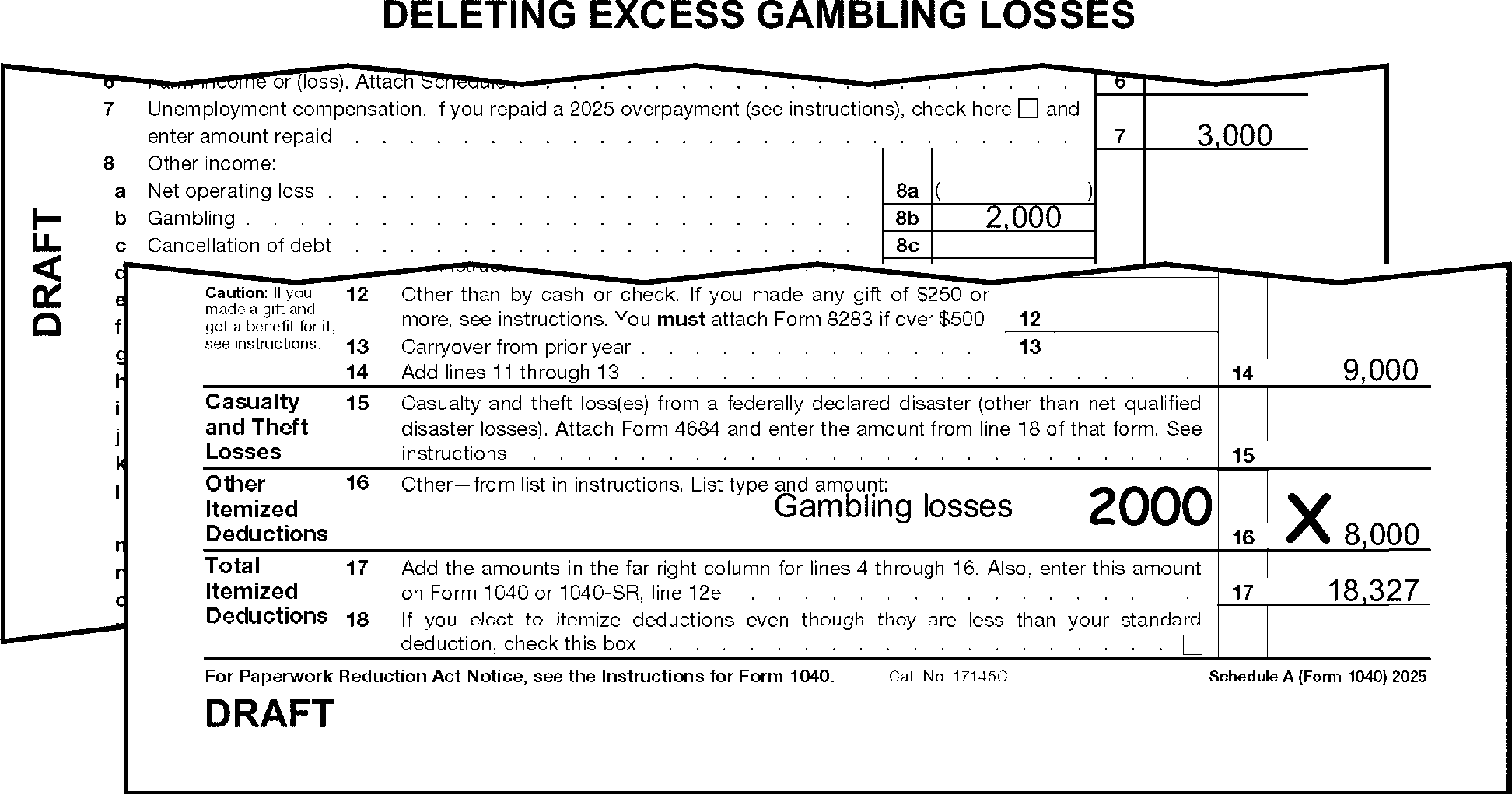
-
For TY10 - TY09, "X" Schedule A if Schedule L is present showing a larger itemized deduction.
-
For TY17-TY13, "X" line 16 when the amount on line 16 includes non-gambling deductions and the AGI amount on line 11a, Form 1040 is over:
Tax Year FS 1 FS 2 or 5 FS 3 or 6 FS 4 2017 $261,500 $313,800 $156,900 $287,650 2016 $259,400 $311,300 $155,650 $285,350 2015 $258,250 $309,900 $154,950 $284,050 2014 $254,200 $305,050 $152,525 $279,650 2013 $250,000 $300,000 $150,000 $275,000
-
The instructions provided in this subsection of the manual are for editing Schedule B. These instructions include:
-
General editing procedures
-
Gross interest (lines 1 and 2)
-
Excludable savings bond interest (line 3)
-
Gross dividends (lines 5 and 6)
-
Foreign account indicator (line 7a)
-
Foreign trust question (line 8)
-
-
The following lines on Schedule B are T-lines:
T-Lines T-Compute Lines -
Line 2 - edited to the left of line 2
-
Line 3
-
Line 6 - edited above the instructions for line 6.
-
Foreign Account Indicator
-
FinCEN Form 114 Indicator
-
There are no T-Compute lines for this schedule.
-
-
Edit Sequence Code "08" in the upper-right margin of Schedule B if not preprinted, and any of the following are present:
-
Gross interest is edited
-
Gross dividends are edited
-
Line 3 has an entry
-
Any box on line 7a is marked.
-
-
Only one Schedule B can be processed. Combine related T-line amounts and "X" the Schedule(s) B not used when more than one is attached to the return.
-
Edit T-lines from attachments when "see attached" is written on Schedule B. (See Figure 3.11.3-86.)
-
Do not "X" Schedule B when any of the boxes on line 7a is marked.
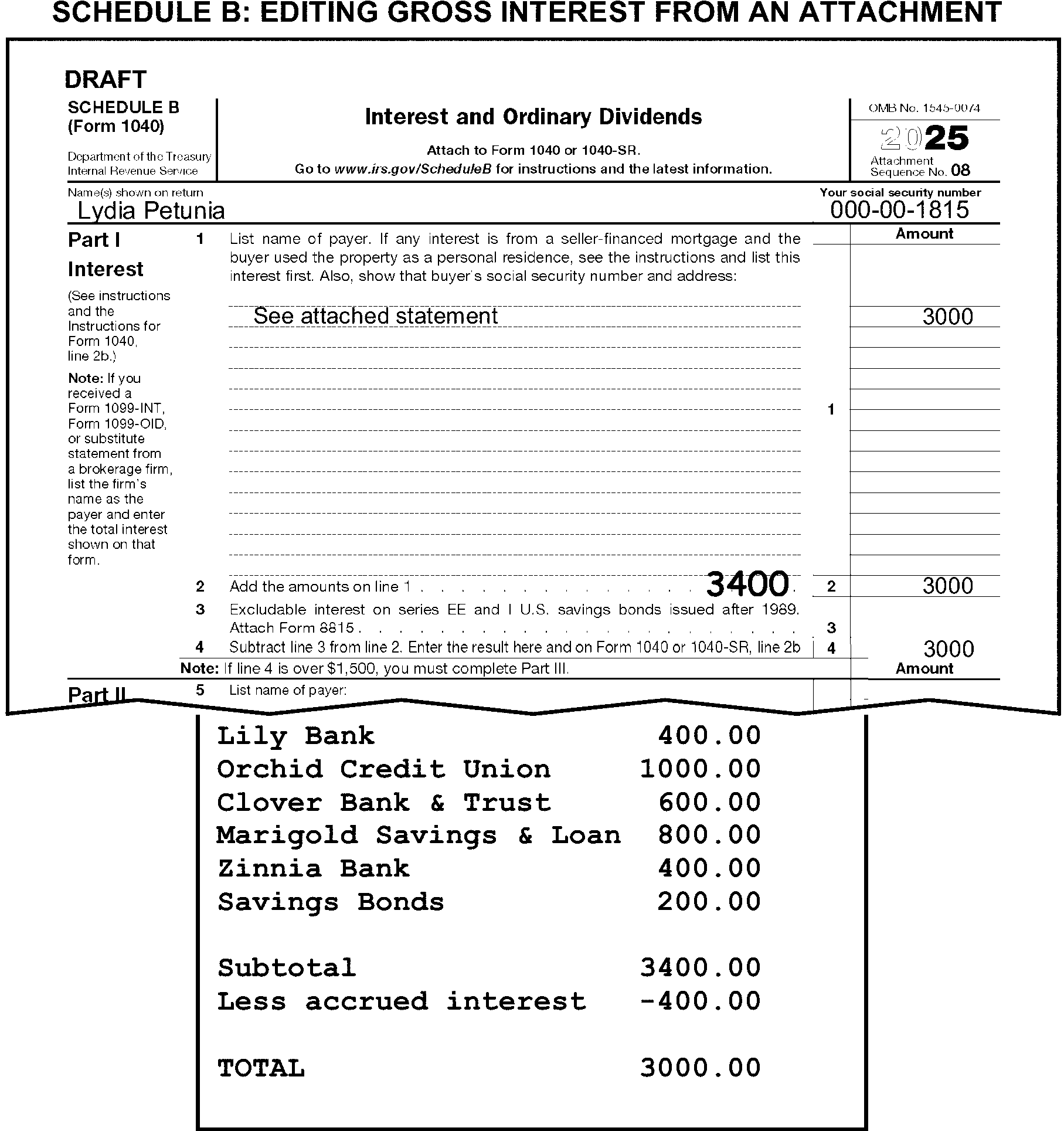
-
The taxpayer may subtract the following adjustments from interest income. Edit the gross interest amount to the left of line 2 by adding the adjustment amount to the line 2 amount when the taxpayer subtracts amounts identified as any of the following (See Figure 3.11.3-87.):
-
Nominee distribution
-
Accrued interest
-
Original issue discount (OID)
-
Purchased interest
-
Amortizable Bond Premium/ABP Adjustment
-
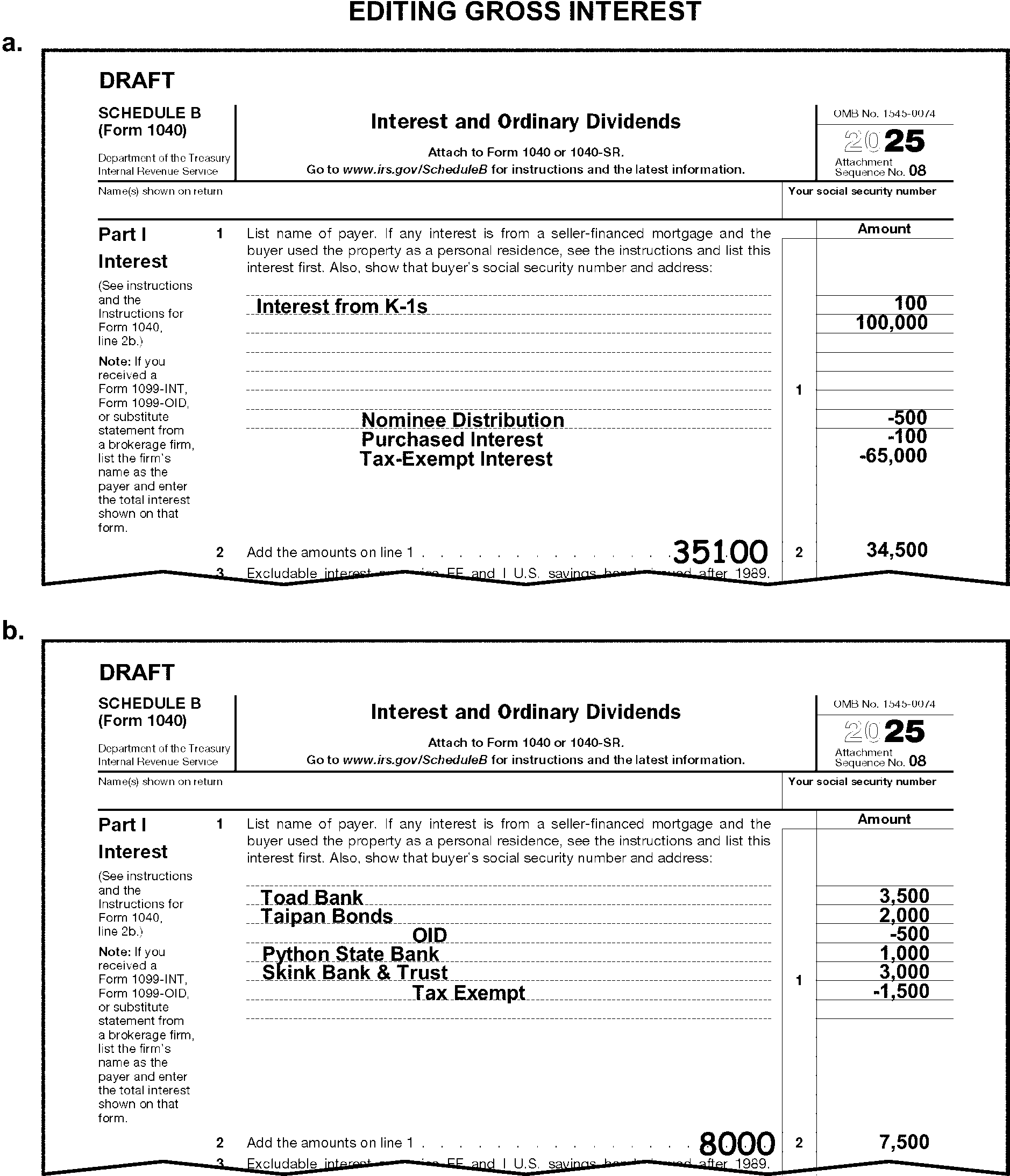
-
When line 3 has a significant entry and Form 8815 is not attached, correspond for Form 8815 unless it can be determined the entry is misplaced.
-
Compute and edit the amount of gross dividends above the instructions for line 6 when line 5 adjustments are present for nominee distributions. Compute the gross dividend amount by adding the nominee distribution to the line 6 amount. (See Figure 3.11.3-88.)
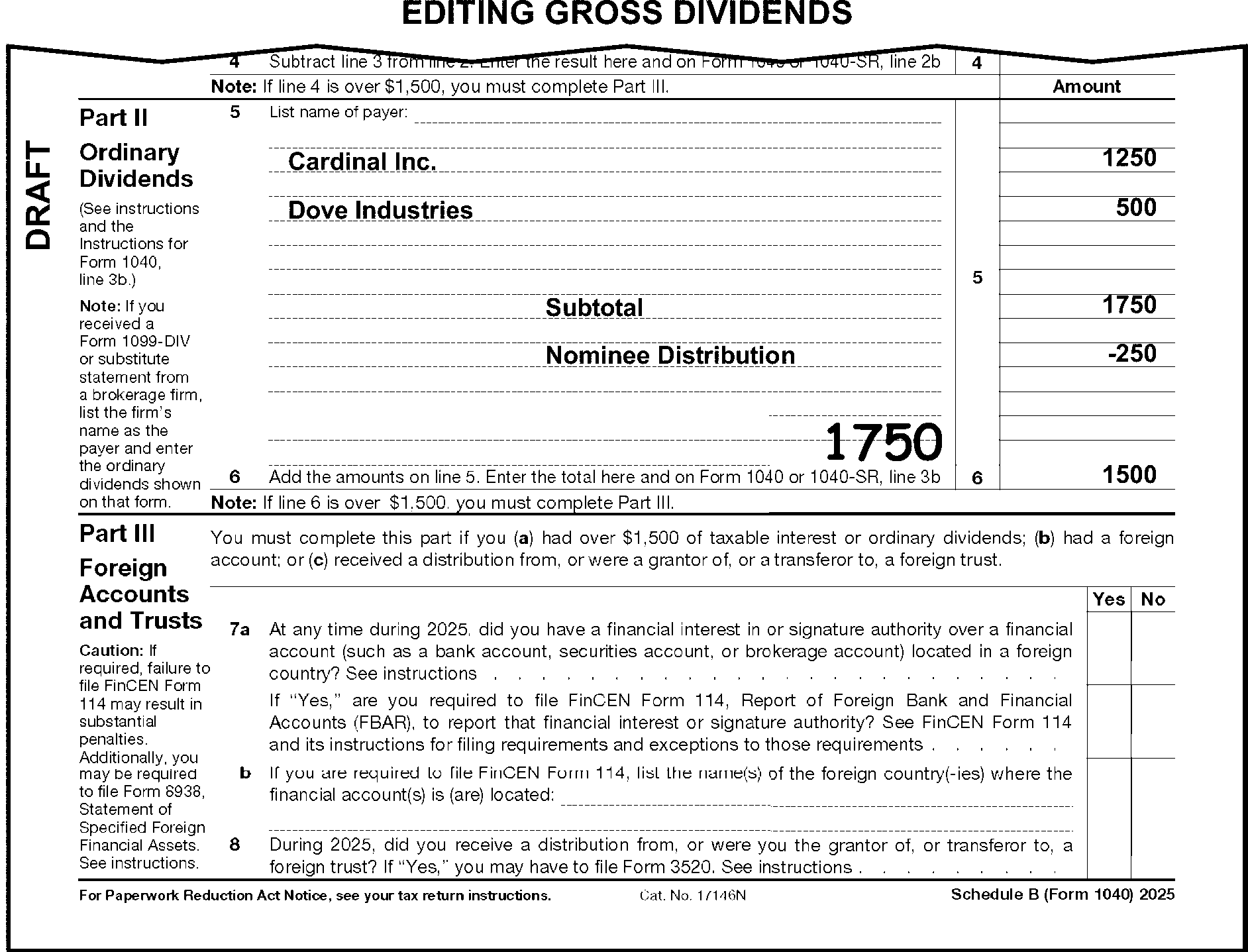
-
The instructions provided in this subsection of the manual are for editing Schedule C. These instructions include:
-
General editing procedures
-
Combining multiple Schedules C
-
North American Industry Classification System (NAICS)
-
Employer Identification Number (EIN)
-
Accounting method
-
Statutory employees
-
Income (lines 1 through 7)
-
Expenses (lines 8 through 27b)
-
"At risk" question
-
-
The following lines on Schedule C are T-Lines and T-Compute Lines:
T-Lines T-Compute Lines Schedule C: -
SSN
-
Lines A, B, C, D, F, H, I and J
-
Statutory Employee Indicator Box
-
Lines 1 through 4
-
Line 6
-
Line 9
-
Line 13
-
Line 15
-
Line 16a
-
Line 17
-
Line 18
-
Line 21
-
Lines 24a and 24b
-
Line 25
-
Lines 26 through 27b
-
Line 28
-
Line 30
-
PAL Indicator to the left of line 31
-
Line 32 At Risk Indicator
-
Line 35
-
Line 41
Schedule C: -
Line 1
-
Line 2
-
Line 3
-
Line 28
-
-
Up to three Schedules C can be processed. Follow the instructions for combining Schedules C in IRM 3.11.3.21.2 when more than three are present.
-
Edit Sequence Code "09" in the upper-right margin of the first Schedule C if "09" is not preprinted. Edit Sequence Code "10" on the second Schedule C and Sequence Code "11" on the third.
-
Edit the TIN from the caption on Form 1040 when the TIN is missing, illegible or other than 9 digits. If the TIN is not present in the caption, search Forms W-2 and other attachments for the missing TIN.
-
"X" Schedule C when the taxpayer specifically states the loss is from a hobby or nonprofit activity.
-
"X" Schedule C when no money amounts are present.
-
If a Form W-2 wage amount is reported on Schedule C, delete the amount from Schedule C and edit it to line 1a of Form 1040.
-
If the taxpayer indicates Schedule C income is from a partnership or joint venture by noting a fractional share or percentage of the income:
-
Include the net fractional amount on Schedule E, line 30 (gain) or line 31 (loss).
-
Delete the amount from line 3 of Schedule 1.
-
Edit or add the amount to line 5 of Schedule 1.
-
"X" Schedule C.
-
-
When the taxpayer submits more than three Schedules C combine them to a total of three, following the instructions in this subsection of the manual.
-
Combine only the items to be transcribed and "X" those schedules not used.
-
Do not combine statutory employee schedules with non-statutory employee schedules.
-
Whenever possible, combine Schedule Cs with like TINs.
-
Whenever possible, combine gains with gains and losses with losses.
-
Combine schedules with lesser receipts (line 1) if possible.
-
Use the NAICS Code from the Schedule C being combined with the largest gross income. Gross income is found on line 7 of Schedule C.
-
Use the EIN from the Schedule C being combined showing the largest gross profit. Gross profit is found on line 5 of Schedule C.
-
Circle out entries on line A that do not pertain to a principal business or profession. Examples include, but are not limited to: "1099 MISC" , "No Name" , "same" , etc.
-
Refer to the following chart for editing the NAICS code:
If Then Missing, incomplete, or illegible, Take no action. More than one, Circle all but the first. Combining multiple Schedules C, Use the code from the Schedule C with the largest gross income. Dummying, Edit if taxpayer furnished a code. More than 6 digits long, Delete NAICS
-
Circle the EIN when it is more or less than nine digits or contains letters.
-
If a computer-generated schedule has been submitted and the accounting boxes are not present:
-
If "cash" is present, edit a "1" to the left of "cash" .
-
If "accrual" is present, edit a "2" to the left of "accrual" .
-
-
Edit RPC "S" and RPC "B" when line 31 on Schedule C is, or can be determined to be, a gain of $434 or more, Schedule SE is not attached, and any of the following conditions are present:
-
The taxpayer indicates that they are "not liable" for self-employment tax.
-
The Statutory Employee Box is checked.
-
Form 4361 or Form 4029 is attached.
-
There is an indication of "Amish" or "Mennonite" .
-
-
Do not edit RPC "S" when any of the following are present:
-
There is another Schedule C present that is for a non-statutory employee.
-
The taxpayer shows a gain on a Schedule E, Part II, or on a Schedule F.
-
The taxpayer reports self-employment income on line 8z of Schedule 1 that is subject to self-employment tax.
-
The FS is "2" and the spouse has income that is subject to SE tax.
-
-
Income is reported on the Schedule C on lines 1 through 7.
-
If line 1 is blank, dash, or zero, take one of the following actions:
-
Compute and edit by adding line 2 to line 3.
-
Edit line 5 to line 1 when no significant amounts are present on lines 1 through 4.
-
Edit line 7, if positive, to line 1 when no amounts are present on lines 1 through 6. (See Figure 3.11.3-89.)
-
Edit line 7, if negative, to line 6 when no amounts are present on lines 1 through 6. Bracket the amount.
-
Otherwise, take no action.
-
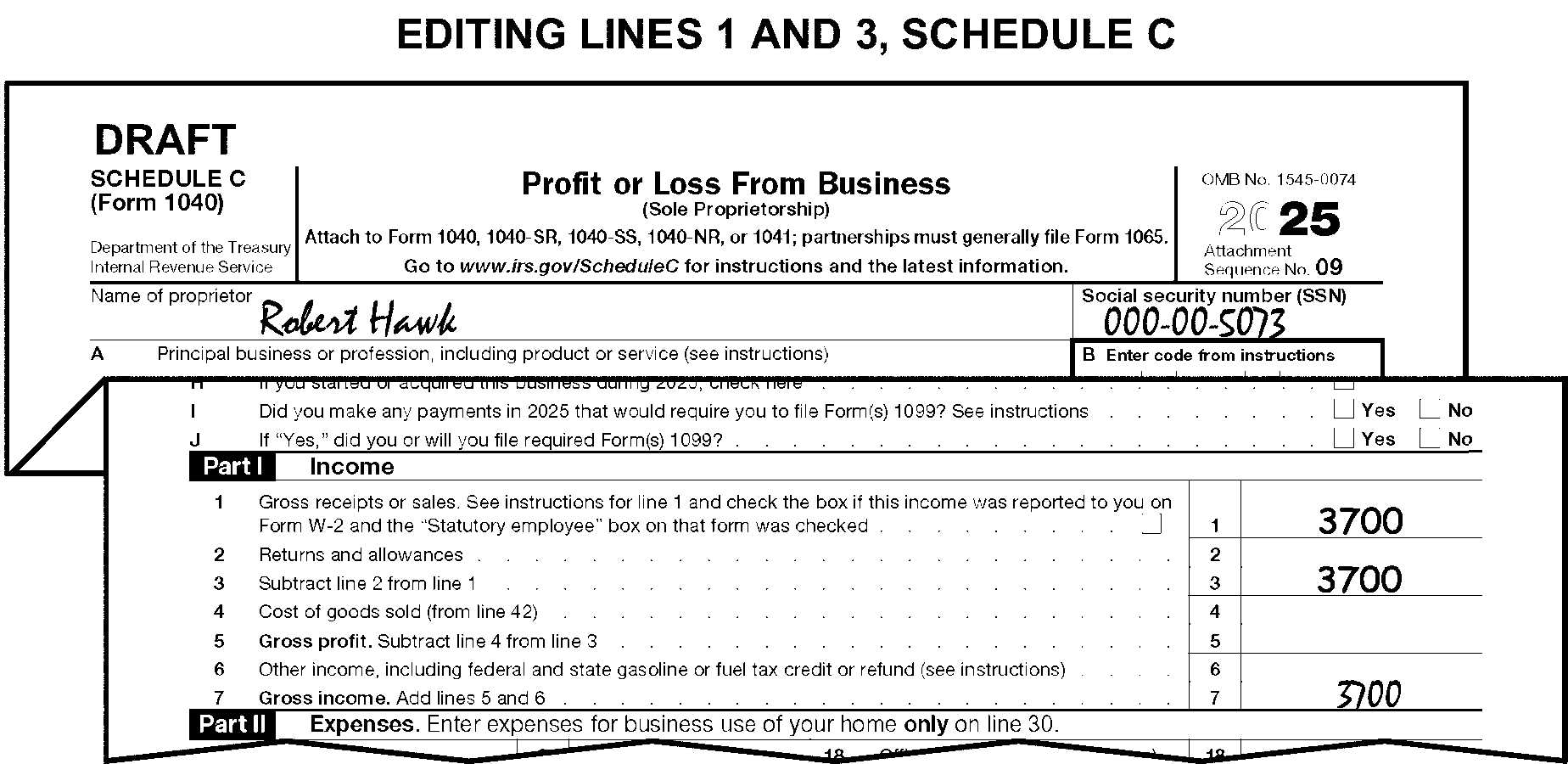
-
Compute and edit line 2 when there is no entry on line 2, but line 1 and line 3 have entries of different amounts. Compute and edit by subtracting line 3 from line 1.
-
Compute and edit line 3 amount when it is blank, dash or zero and there are entries leading to a total. (See Figure 3.11.3-89.)
-
Expenses are reported on the Schedule C on lines 8 through 27b.
-
Line 27a is valid for TY23 and later.
-
"X" line 27b when negative. Do not adjust the line 28 amount.
-
Edit the misplaced item(s) to the correct T-line when any transcribed items are included in "Other Expenses" on page 2 of Schedule C.
-
If T-line amounts have been included in line 27b, adjust line 27b.
-
If line 27b is blank, take one of the following actions:
-
Edit the line 48 entry to line 27b or
-
If line 48 is blank, and entries are present in Part V, compute the line 48 amount and edit it to line 27b.
-
-
Compute and edit line 28 when it is blank and there are significant entries on lines 8 through 27b.
-
"X" line 30 if either of the following conditions exist:
-
Line 30 is equal to line 31, or
-
Line 30 is equal to line 3 of Schedule 1 and no Form 8829 is attached to the return.
-
-
Edit Audit Code "B" when line 30 is ≡ ≡ ≡ ≡ ≡ ≡ ≡ ≡ and Form 8829 is not attached.
-
Edit the amount from line 36 of Form 8829 to line 30 when line 30 is blank and Form 8829 is attached.
-
Edit a "1" to the left of line 31 if any of the following apply:
-
PAL is noted
-
Form 8582 is attached
-
Entire Disposition of Passive Activity is noted.
-
-
Form 6198 must be present if any Schedule C has a loss ≡ ≡ ≡ ≡ ≡ ≡ ≡ ≡ ≡ ≡ ≡ ≡ and the 32b box is marked. Correspond, if missing. If using Form 6001 use box S, if using Form 3531 use box 11-14.
-
Schedule C-EZ was obsoleted in 2018. All Schedule C-EZ must be converted to Schedule C.
-
The following chart shows the T-Lines for Schedule C-EZ. Unless otherwise noted instruction for Schedule C apply to corresponding lines on Schedule C-EZ.
-
For TY17-TY15, edit the amount from line 35 of Form 8829 to line 30 when line 30 is blank and Form 8829 is attached.
-
For TY11, edit RPC "S" and RPC "B" when line 31 on Schedule C (or line 3, Schedule C-EZ) is, or can be determined to be, a gain of $434 or more, Schedule SE is not attached, any of the following conditions are present:
-
Line 1c shows a significant entry.
-
The taxpayer indicates they are "not liable" for self-employment tax.
-
Form 4361 or 4029 is attached.
-
-
For TY11, do not edit RPC "S" when any of the following are present:
-
Another Schedule C for a non-statutory employee (No entry is present on line 1c)
-
A gain reported on Schedule E, Part II, or on Schedule F
-
Self-employment income reported on line 8z, Schedule 1, that is subject to self-employment tax.
-
The FS is "2" and the spouse has income subject to SE tax.
-
-
For TY1990 and prior:
-
Do not edit Audit Code "B" .
-
Do not edit Office in Home expenses to line 30.
-
-
The instructions provided in this subsection of the manual are for editing Schedule D. These instructions include general editing procedures.
-
The following lines on Schedule D are T-Lines and T-Compute Lines:
T-Lines T-Compute Lines -
Yes/No Checkbox (TY19 and later)
-
Line 1a, columns (d) and (e)
-
Lines 1b - 3, columns (d), (e) and (g)
-
Line 5
-
Line 7
-
Line 8a, columns (d) and (e)
-
Lines 8b - 10, columns (d), (e) and (g)
-
Line 12
-
Line 13
-
Line 15
-
Line 18
-
Line 19
-
Line 7
-
Line 15
-
-
Edit Sequence Code "12" in the upper-right margin of Schedule D if not preprinted.
-
Only one Schedule D can be processed. If more than one is attached, take the following actions:
-
Combine related T-Line amounts onto one schedule.
-
"X" those schedules not used.
-
-
Do not delete Schedule D when the "YES" checkbox is marked and there are no significant T-line entries present.
-
Edit Unallowable Code "92" and the amount of the loss when a loss ≡ ≡ ≡ ≡ ≡ ≡ ≡ ≡ ≡ ≡ ≡ is reported on Schedule D from the sale of a personal asset (e.g., furniture, jewelry, automobiles, personal residence, etc.). Do not code for assets identified as "rental" or "inheritance" .
-
Take no action when "Related party like-kind exchange" is written on Schedule D.
-
Do not include amounts with "Ethics in Government Act" or "EGA" noted next to the amount when computing T-Lines.
-
The following line-by-line instructions are for editing Schedule D.
-
Compute and edit line 7 when it is blank and there are entries leading to a total. (See Figure 3.11.3-90.)
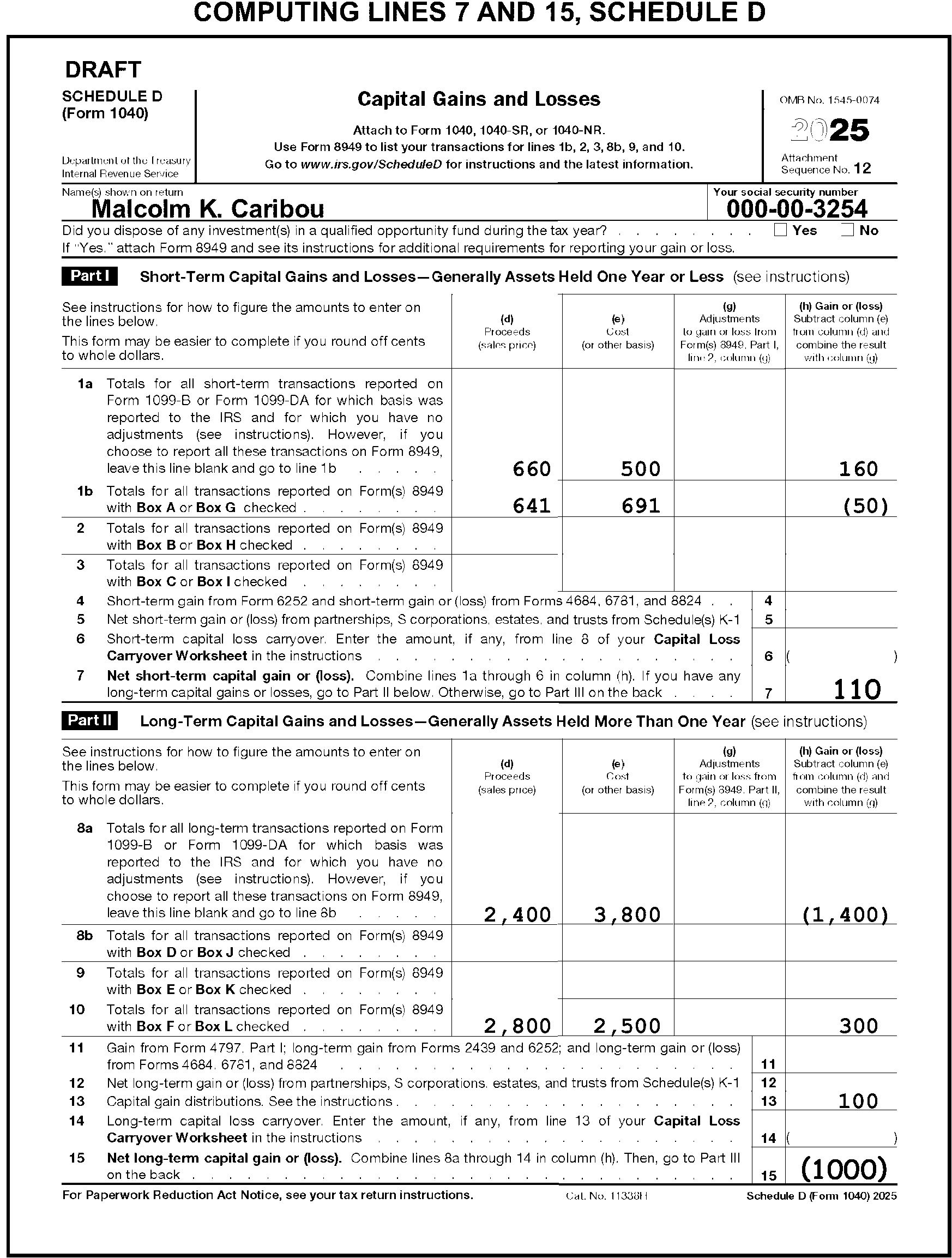
-
Compute and edit line 15 when it is blank and there are entries leading to a total. (See Figure 3.11.3-90.)
-
When line 18 is blank, edit a positive amount from line 7 of the 28% Rate Gain Worksheet, if attached.
-
The instructions provided in this subsection of the manual are for editing Form 8949.
-
Delete Form 8949 without a "Z" or "Y" coded entry. Only a Form 8949 with a "Z" or "Y" coded entry in Part I or Part II, column “f” is transcribed.
-
Edit Sequence Code "12A" in the upper-right margin of Page 1 if not preprinted.
-
Form 8949, Seq #12A, when not deleted, must be located directly following Schedule D, Seq #12 when attached to the return.
-
Only one Form 8949 can be processed. When more than one is present, process the first form with entries present and a code of "Z" or "Y" in column "f" . Delete those forms not used and delete all forms when no "Z" or "Y" code is present.
-
The following lines on Form 8949 are T-Lines and T-Compute Lines:
T-Lines T-Compute Lines Entries with "Z" Code: Entries with "Y" Code (TY20 and later):-
Part I, col a
-
Part I, col b
-
Part I, col g
-
Part I indicator, edited to the right of Part I, col h
-
Part II, col a
-
Part II, col b
-
Part II, col g
-
Part II indicator, edited to the right of Part II, col h
-
Part I, col a
-
Part I, col c
-
Part I, col g
-
Part I indicator, edited to the right of Part I, col h
-
Part II, col a
-
Part II, col c
-
Part II, col g
-
Part II indicator, edited to the right of Part II, col h
There are no T-Compute Lines -
-
Edit RPC "U" if there is a "Z" Code or "Y" Code present in column "f" .
-
Edit a "Z" or "Y" to the left of the first line 1 entry with a "Z" or "Y" code in column “f” for both Part I and Part II.
-
Edit Part I indicator code of "1" to the right of Part I column "h" when:
-
more than one entry is present on line 1 of Part I and,
-
more than one entry has "Z" or "Y" code in column "f" .
-
-
Edit Part II indicator code of "1" to the right of Part II column "h" when:
-
more than one entry is present on line 1 of Part II and,
-
more than one entry has "Z" or "Y" code in column "f" .
-
-
The instructions provided in this subsection of the manual are for editing Schedule E. These instructions include:
-
General editing procedures
-
Combining multiple Schedules E
-
Editing fractional shares to Part II
-
-
The following are the T-Lines and T-Compute Lines on Schedule E:
T-Lines T-Compute Lines -
Checkboxes A and B
-
Line 14, columns (a) - (c)
-
Lines 23a through e
-
Lines 24 and 25
-
Line 27, checkboxes
-
Lines 29a, column (h) and, column (k)
-
Line 29b column (g) and column (i)
-
Line 30
-
Line 31
-
Line 34a, column (d)
-
Line 34b, column (c)
-
Line 35
-
Line 36
-
Line 37 - edited to the left of line 37
-
Line 39
-
Line 40
-
Line 42
-
Line 43
-
Lines 23a through e
-
Lines 24 and 25
-
Lines 29a, column (h) and, column (k)
-
Line 29b, column (g) and column (i)
-
Line 30
-
Line 31
-
Line 35
-
Line 36
-
Line 39
-
-
Edit Sequence Code "13" in the upper-right margin of Schedule E if not preprinted.
-
Do not "X" page 1 of Schedule E when there are significant T-line entries on page 2.
-
Only one Schedule E can be processed. If more than one Schedule E or Schedule E worksheet is attached, take one of the following actions:
If Then The taxpayer provided one summary Schedule E with combined totals, -
Process the Schedule E with the combined totals.
-
Delete those schedules not used.
The taxpayer did not provide one summary Schedule E with combined totals, -
Combine related T-Line amounts onto one Schedule E.
-
Delete those schedules not used.
-
-
The taxpayer uses Part I of Schedule E to report income or loss from rental property.
-
If more than one Schedule E or Schedule E worksheet is present, combine dollar amounts on lines 14a, 14b and 14c to the total page. (See Figure 3.11.3-91.)
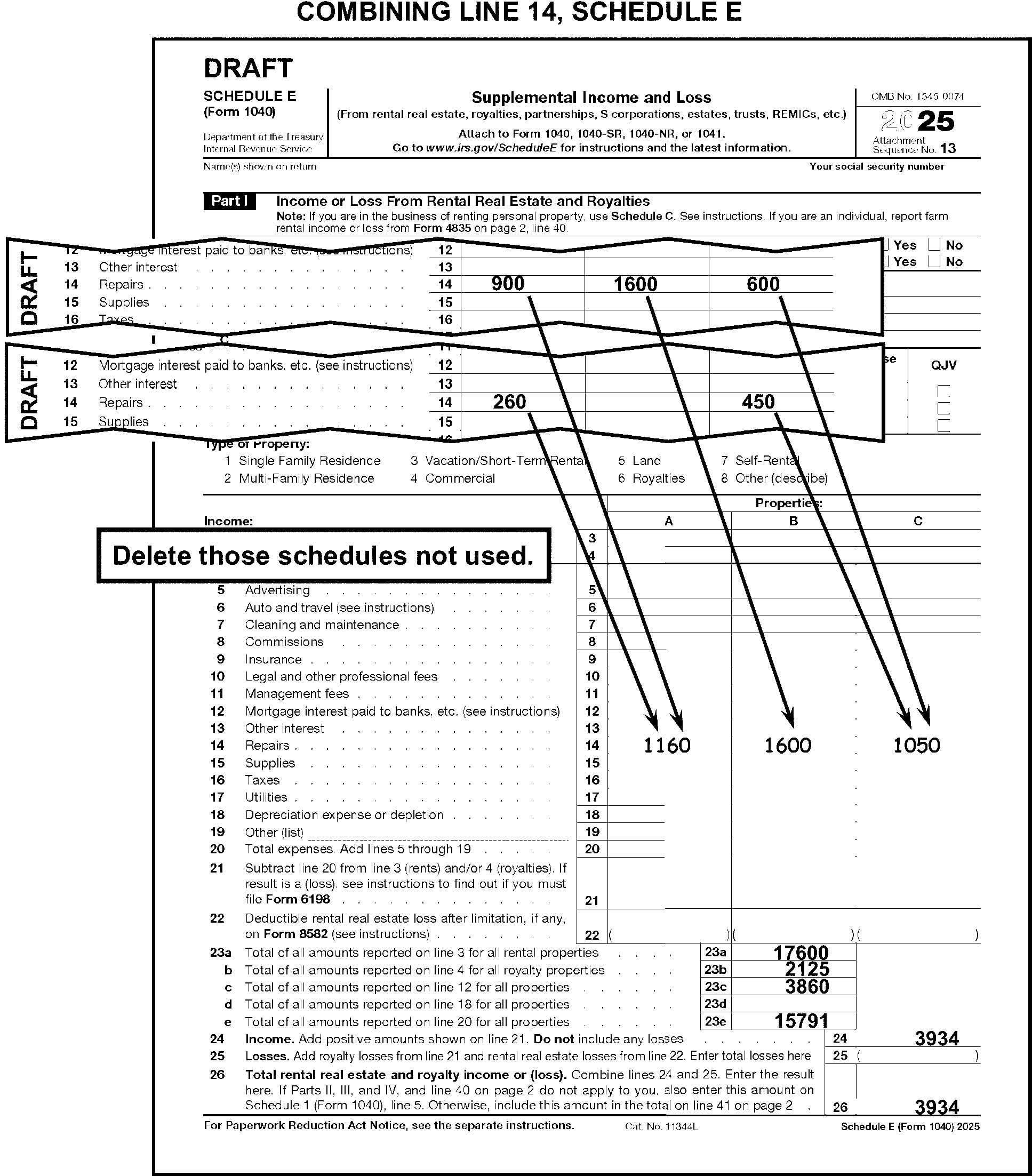
-
Follow the line instructions on the form to T-Compute totals on lines 23a through 23e.
-
Adjust line 23e, if necessary, to reflect the correct percentage of the taxpayer's share when there is an indication in the line 26 area the taxpayer has taken a fractional portion of line 26.
-
Follow the line instructions on the Schedule to compute and edit line 24 when both of the following conditions are present (See Figure 3.11.3-92):
-
Line 24 is blank, and
-
There is a positive entry on line 21.
-
-
Compute and edit line 24 by adding lines 23a and 23b when both of the following conditions are present:
-
Line 24 is blank
-
There are no entries on lines 5 through 22
-
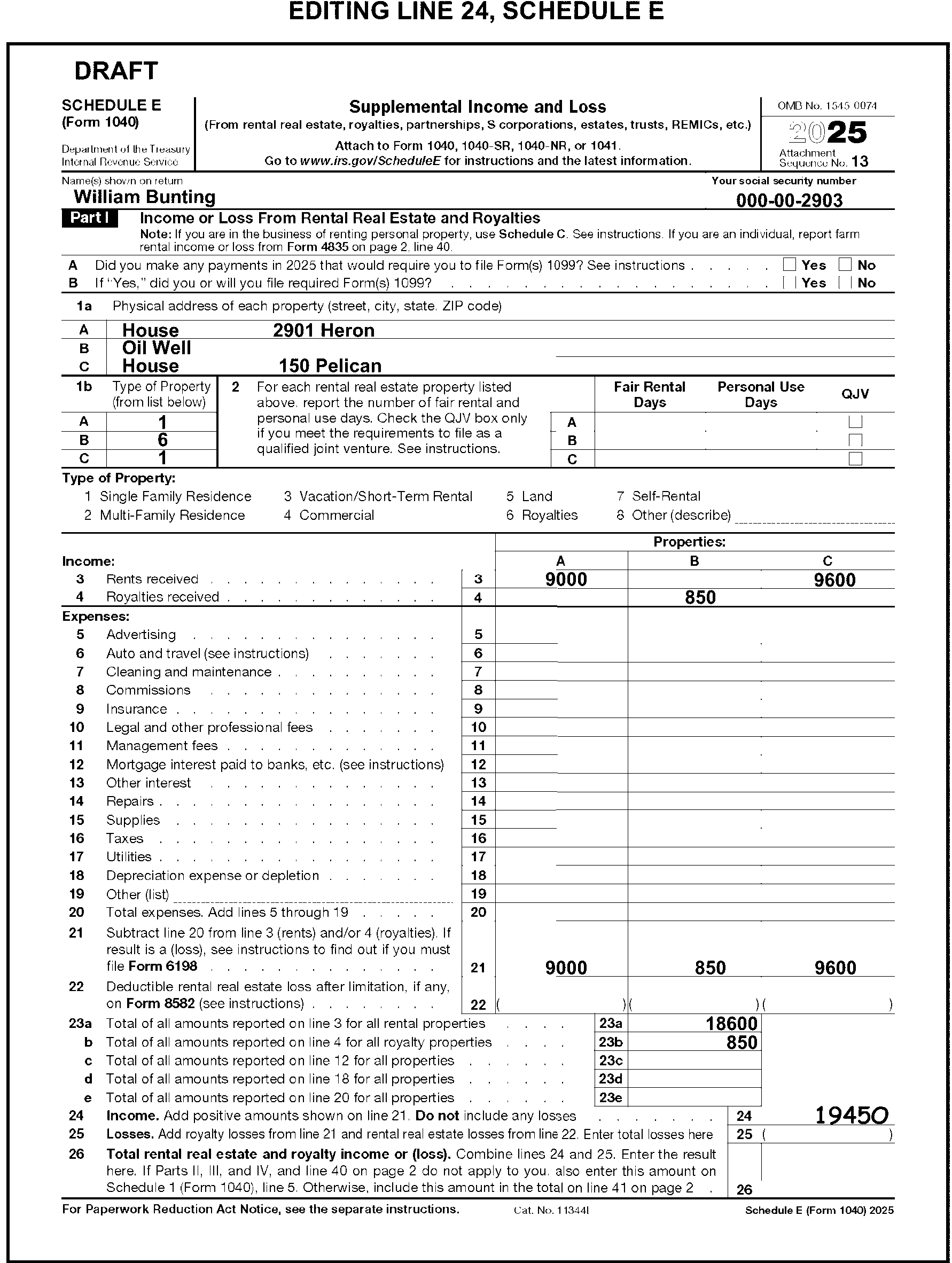
-
Compute and edit line 25 when line 25 is blankand either or both of the following conditions are present (See Figure 3.11.3-93):
-
A royalty loss on line 21
-
A rental loss on line 22
-
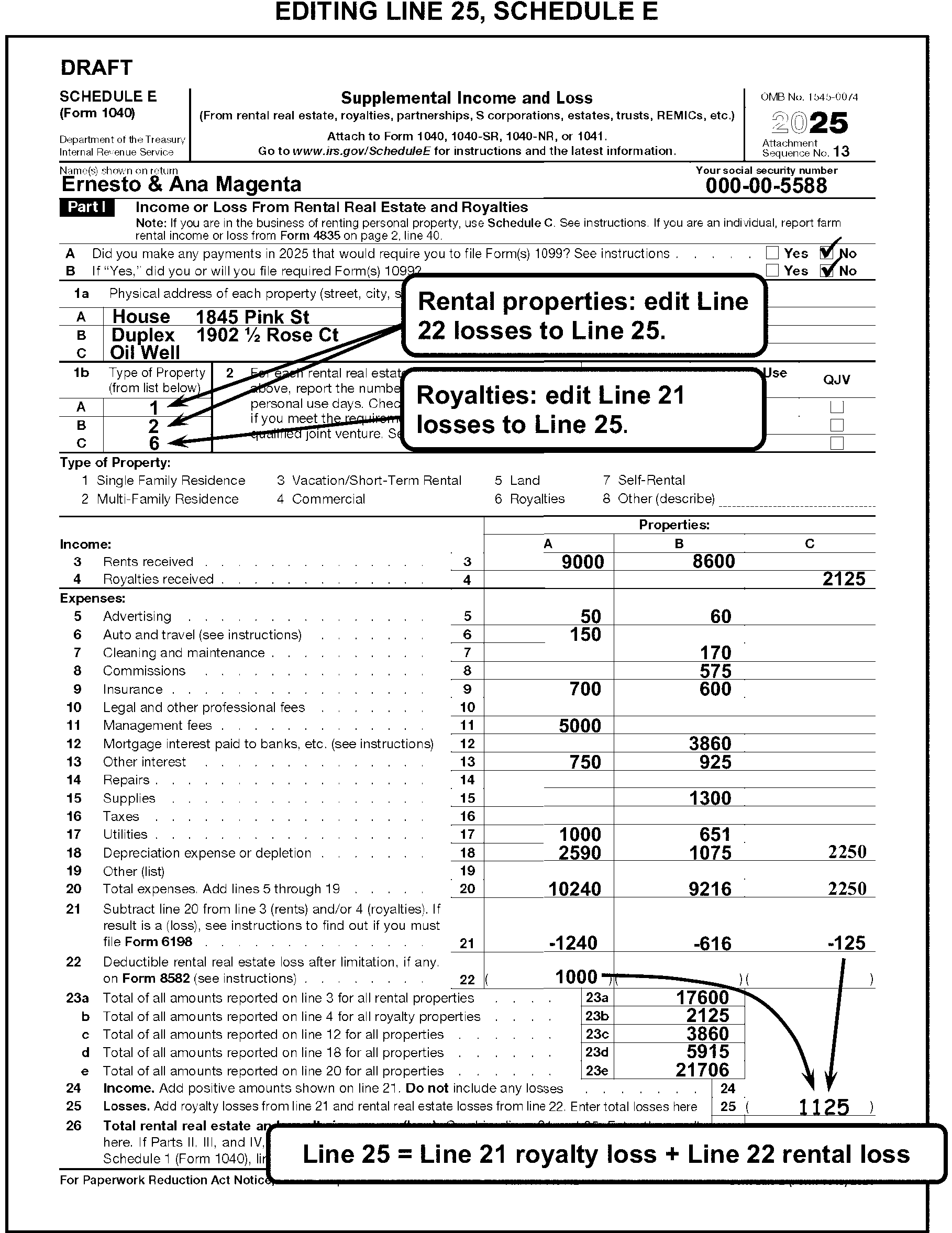
-
Adjust line 23e, if necessary, to reflect the correct percentage of the taxpayer's share when there is an indication in the line 26 area the taxpayer has taken a fractional portion of line 26.
-
Edit SPC "A" when NPA or Non-Passive Activity is noted by the taxpayer in the line 26 area. (See Figure 3.11.3-94).
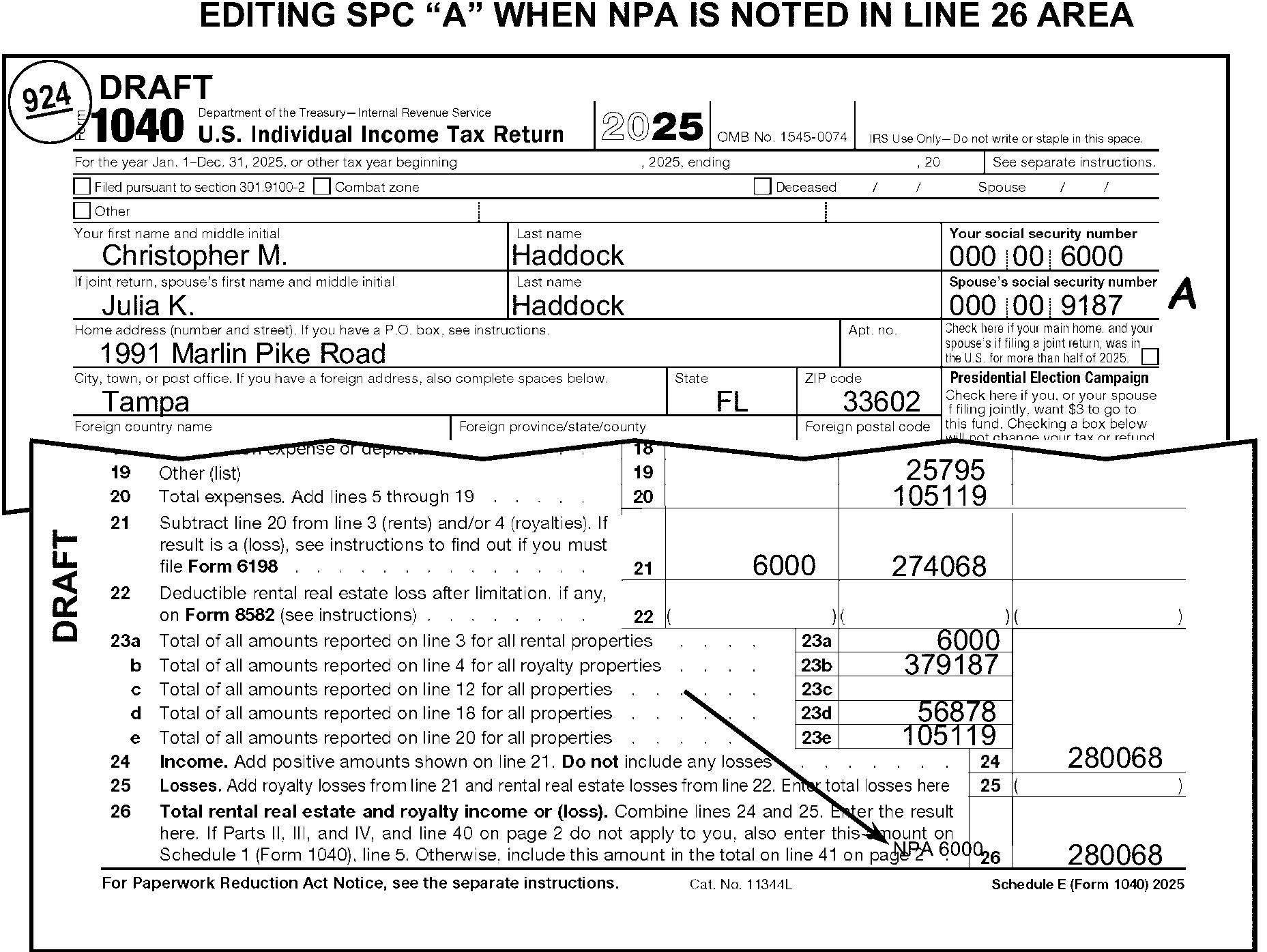
-
The taxpayer uses Part II of Schedule E to report income or loss from partnerships and S corporations.
-
If only page 2 of Schedule E is present with no dollar amounts, "X" the page.
-
Correspond for Form 6198 (Form 6001 box S or Form 3531 box 11-14) if it is not attached when both of the following are present: (See Figure 3.11.3-95.)
-
An amount ≡ ≡ ≡ ≡ ≡ ≡ ≡ ≡ ≡ ≡ ≡ ≡ is reported in column (g) or column (i), and
-
The taxpayer checks the corresponding column (f) line, "Check if any amount is not at risk" .
-
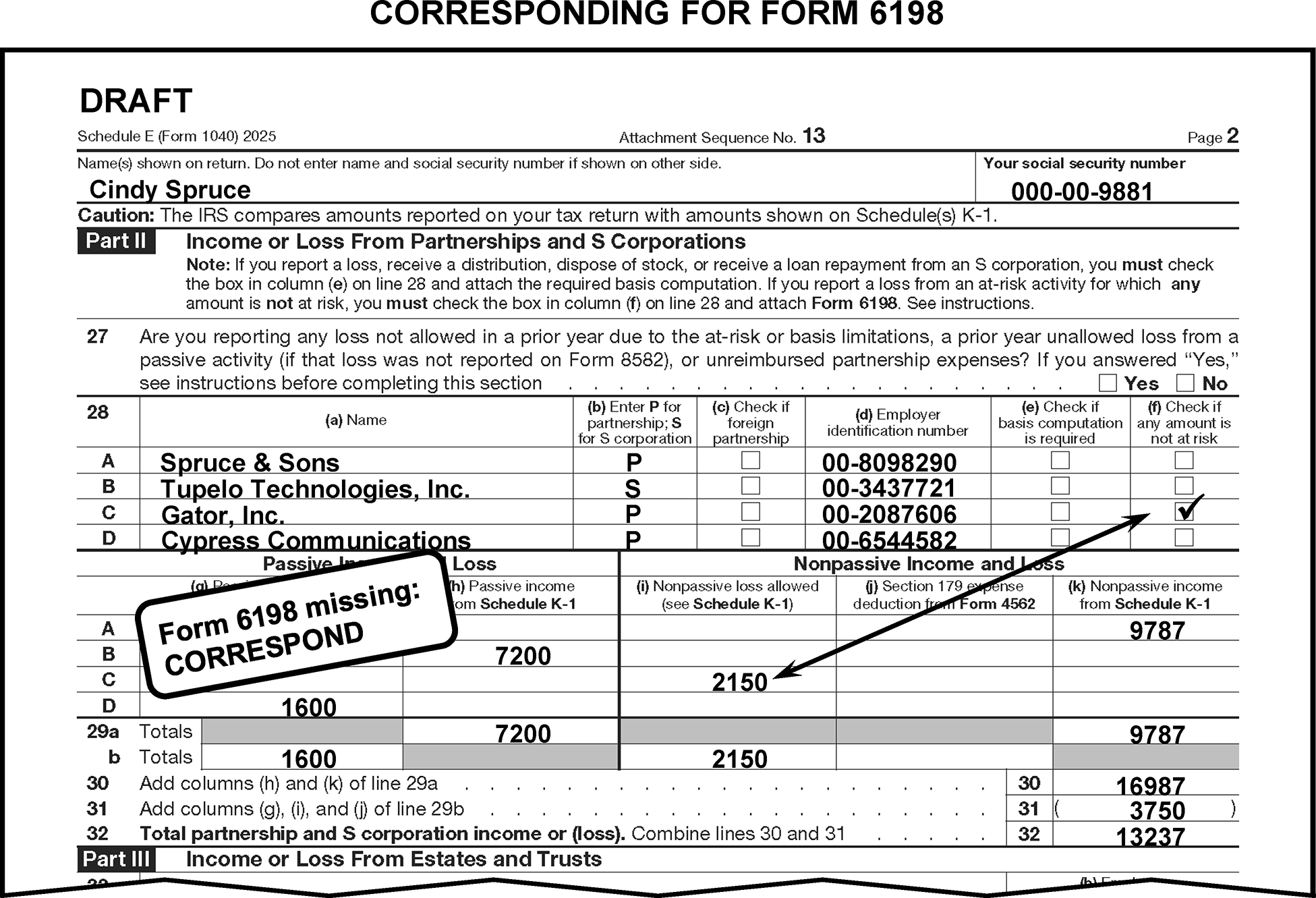
-
Compute lines 29a and 29b if there are entries leading to a total and lines 29a and 29b are blank. T-Compute columns g, h, i, and k.
-
Compute and edit lines 30 and/or 31 when they are blank and there are entries leading to a total.
-
Edit or arrow the amount from line 32 to either line 30 or line 31 (see Figure 3.11.3-96), when both lines are blank and there are no entries leading to a total. Edit the line 32 amount to:
-
Line 30 if the amount on line 32 is positive or,
-
Line 31 if the amount on line 32 is negative.
-
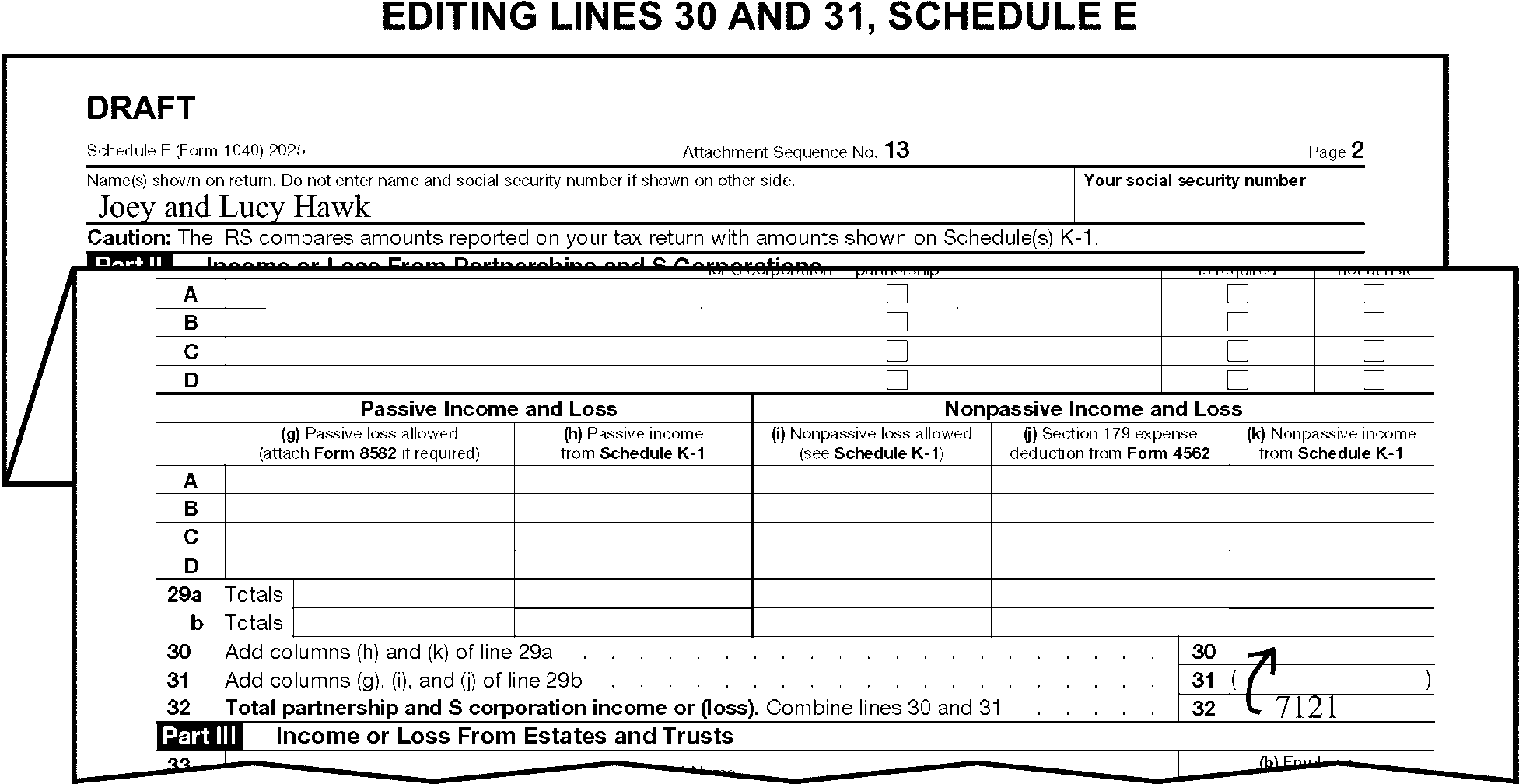
-
The taxpayer uses Part III of Schedule E to report income or loss from estates and trusts.
-
Compute and edit lines 35 and/or 36 when they are blank and there are entries leading to a total.
-
Edit or arrow the amount from line 37 to either line 35 or line 36 when both lines are blank. Edit the line 37 amount to:
-
Line 35 if the amount on line 37 is positive or,
-
Line 36 if the amount on line 37 is negative
-
-
The taxpayer uses Part IV of Schedule E to report income or loss from REMICs.
-
The taxpayer uses Part V of Schedule E to summarize income and losses reported on Schedule E and Form 4835.
-
Take one of the following actions when line 40 is blank and Form 4835 is attached:
If on Form 4835 Then A fractional interest is indicated, -
Edit gains on line 30 of Schedule E.
-
Edit losses on line 31 of Schedule E.
-
Do not"X" Form 4835.
Line 32 is a gain, Edit the line 32 amount on line 40 of Schedule E. Line 34c is a loss, Edit the line 34c amount on line 40 of Schedule E. Line 34c blank, Edit the loss from line 32 of Form 4835, to line 40 Schedule E. -
-
Compute the Form 4835 totals when perfecting Schedule E and multiple Forms 4835 are attached.
-
The instructions provided in this subsection of the manual are for editing Schedule F. These instructions include:
-
General editing procedures
-
Combining multiple Schedules F
-
Perfecting the North American Industry Classification System (NAICS) Code
-
Perfecting the Employer Identification Number (EIN)
-
-
The following lines on Schedule F are T-Lines and T-Compute Lines:
T-Lines T-Compute Lines -
Lines B, D, F and G
-
Line 1b
-
Line 2
-
Lines 3a and 3b
-
Lines 4a and 4b
-
Line 5b
-
Lines 6a and 6b
-
Line 7
-
Line 8
-
Line 9
-
Line 13
-
Lines 19, 21a, 25, 28 and 33
-
PAL Indicator to the left of line 34
-
Line 36 "At Risk" Indicator
-
Lines 38a, 38b and 39a
-
Line 40b
-
Line 43
-
Line 44
-
Line 50
-
Line 9
-
Line 33
-
Line 44
-
Line 50
-
-
Up to two Schedules F can be processed. Follow the instructions for combining Schedules F in IRM 3.11.3.25.2 when more than two are present.
-
Edit Sequence Code "14" in the upper-right margin of the first Schedule F if not preprinted. Edit Sequence Code "15" on the second Schedule F.
-
"X" Schedule F when no money amounts are present.
-
Take the following actions when the taxpayer indicates that Schedule F income is from a partnership or joint venture by noting a fractional share or percentage of the income:
-
Include the net fractional amounts on the Schedule E as follows: gains on line 30 and losses on line 31.
-
Delete the amount from line 6 of Schedule 1.
-
Edit or add the amount to line 5 of Schedule 1.
-
Edit the taxpayer's share of the gross amount from line 9 of the Schedule F to line 42 of Schedule E.
-
"X" the Schedule F.
-
-
If Schedule F is blank, transfer income amounts from an attachment to one of the following sections:
-
If a beginning or ending inventory is shown, edit the amounts in Part III, Accrual Method Section.
-
Otherwise, edit the amounts in Part I, Cash Method Section.
-
-
Refer to the table below to determine RPC "S" editing.
If line 34 of Schedule F is a gain of $434 or more and Schedule SE is not attached, and Then -
Taxpayer indicates not liable for self-employment tax or
-
Schedule F income is from farm rental only or
-
Form 4029 or 4361 is attached, or
-
There is an indication of "Amish" or "Mennonite,"
Edit RPC "S" and RPC "B" . -
A gain is reported on Schedule E, Part II or Schedule C, or
-
Self-employment income is reported on line 8z of Schedule 1 that is subject to self-employment tax, or
-
FS is 2 and the spouse has income that is subject to SE tax,
Do not edit RPC "S" . -
-
When the taxpayer submits more than two Schedules F, combine them to a total of two following the instructions in this subsection of the manual.
-
Combine only the items to be transcribed and "X" those schedules not used.
-
Use the EIN of the schedule showing the largest gross income. Gross income is found on line 9 of Schedule F.
-
Use the NAICS Code provided by the taxpayer from the Schedule F being combined with the largest gross income. Gross income is found on line 9 of Schedule F.
-
Combine only cash method schedules with cash method schedules and combine all accrual method schedules only with other accrual method schedules.
-
When all schedules use the same method of accounting:
-
Combine all schedules with gains.
-
Combine all schedules with losses.
-
Combine all schedules with the smallest gross income (line 9) when all schedules are either gains or losses.
-
-
Refer to the following chart for editing the NAICS code.
If Then Missing, incomplete or illegible, Take no action. More than one, Circle all but the first. Combining multiple Schedules F, Edit code from the combined Schedule F with the largest gross income. Dummying, Edit if taxpayer furnished a code. More than 6 digits long, Delete NAICS.
-
Circle the EIN when it is not nine digits or if it includes letters.
-
Compute and edit line 9 from the amounts in the right column, lines 1c through 8 when line 9 is blank.
-
"X" line 9 when an amount is present, andboth of the following apply. (See Figure 3.11.3-97):
-
Lines 1a through 8 are blank, and
-
Line 50 has a significant amount.
-
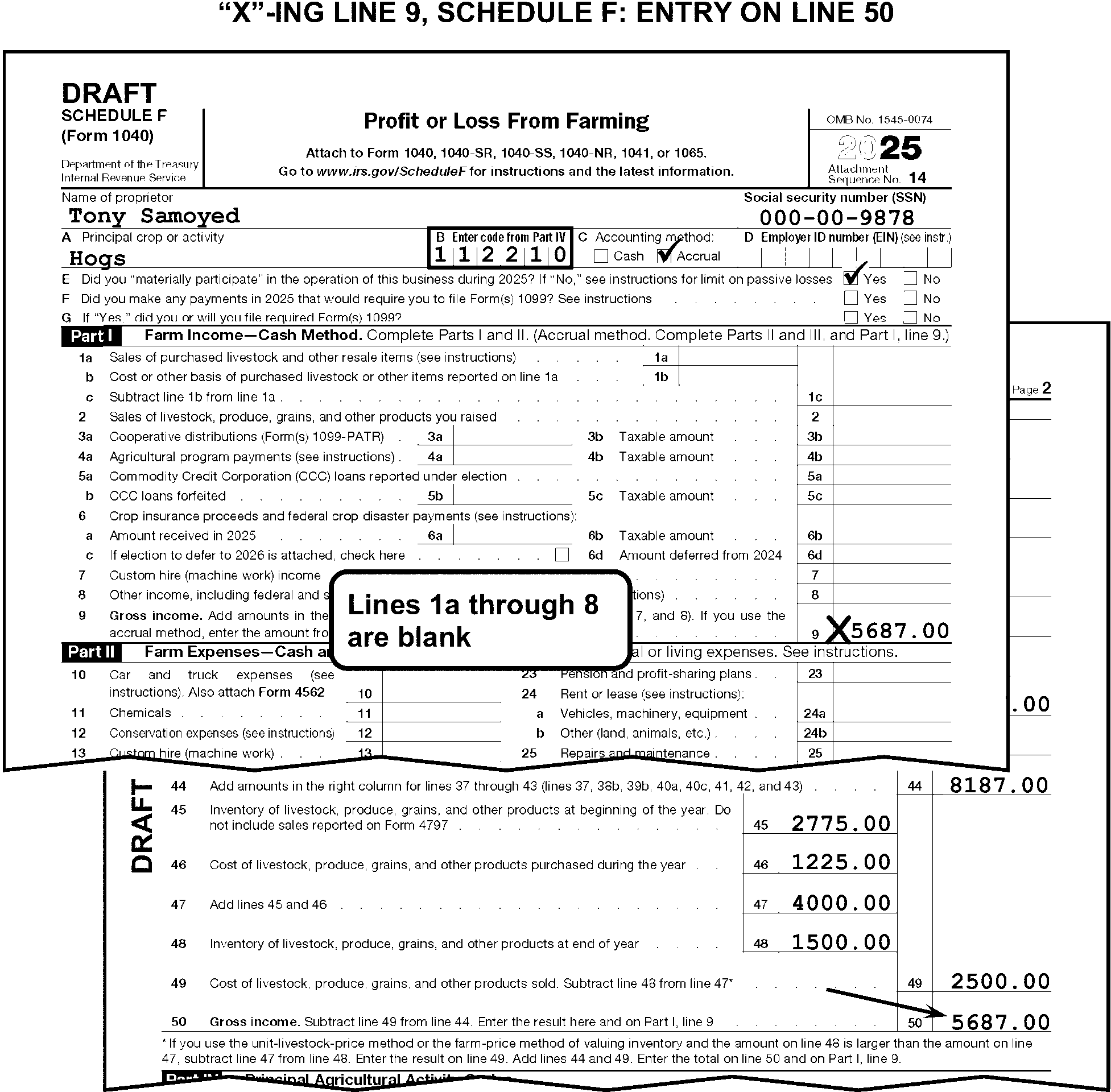
-
Compute and edit line 33 when it is blank. Compute line 33 from lines 10 through 32f.
-
Edit a "1" to the left of line 34 if any of the following apply:
-
PAL is noted
-
Form 8582 is attached.
-
Entire Disposition of Passive Activity is noted.
-
-
The instructions provided in this subsection of the manual are for editing Schedule R. These instructions include:
-
General editing procedures
-
Perfecting the filing status and age boxes
-
Perfecting taxable disability income amounts
-
Computing nontaxable pension, annuity, or disability income
-
-
The following lines on Schedule R are T-Lines and T-Compute lines:
T-Lines T-Compute Lines -
Lines 1 through 9
-
Line 11, Part III
-
Line 13c, Part III
-
Line 13c, Part III
-
-
Edit Sequence Code "16" in the upper-right margin of Schedule R if not preprinted.
-
Only one Schedule R may be processed. If more than one Schedule R is attached, process the first Schedule R and "X" the remaining Schedule(s) R.
-
Do not correspond for missing information when line 15 Form 1040 is (or can be determined to be) zero or a negative amount. Instead, X the schedule.
-
Do not "X" Schedule R when the only entries present are in Part I.
-
No action is necessary when the taxpayer marked more than one box.
-
Correspond when all the boxes are blank. For Form 6001 use box P, for Form 3531 use box 18.
-
Line 11 must have an entry if the taxpayer marked box 2, 4, 5, 6, or 9 in Part I. When line 11 is blank, take the following actions:
-
If box 2, 4, 5, or 9 in Part I has been marked, edit the taxable amount of disability income from Form 1040 or an attachment (e.g., Form 1099-R, Code 3 in box 7).
-
If box 6 in Part I has been marked, edit the taxable amount of disability income from Form 1040 plus $5,000.
-
If the amount cannot be determined, correspond. For Form 6001 use box P, for Form 3531 use box 18.
-
-
Compute and edit line 13c when it is blank.
-
Compute line 13c from lines 13a and 13b, or from an attachment.
-
Correspond for the amount of nontaxable pension, annuity, or disability income when you are unable to compute line 13c by subtracting the taxable income from the gross income. For Form 6001 use box P, for Form 3531 use box 18.
-
The instructions provided in this subsection of the manual are for editing Schedule SE. These instructions include:
-
Sequencing and combining multiple Schedules SE
-
Perfecting the Taxpayer Identification Number (TIN)
-
Editing the SE Method Code
-
-
The following lines on the Schedule SE are T-Lines and T-Compute Lines:
T-Lines T-Compute Lines -
TIN
-
Lines 1a through 3
-
SE Quarters Covered - edited to the right of line 4c
-
Line 5a
-
Line 8d
-
SE Farm Code (Method Code) - edited in the center-bottom margin of page 1
-
Lines 3
-
Line 8d
-
-
Only two Schedules SE can be processed. One Schedule SE for each of:
-
The primary taxpayer
-
The secondary taxpayer
-
-
If only one processable Schedule SE is present, edit Sequence Code "17" if not preprinted.
-
If two processable Schedules SE are present - one for the primary taxpayer and one for the secondary taxpayer - edit the Sequence Code as follows:
-
Edit "17" if not preprinted, for the primary taxpayer.
-
Edit "18" for the secondary taxpayer.
-
-
Combine multiple Schedules SE when there is more than one Schedule SE for any one taxpayer. Delete those schedules not used.
-
When one Schedule SE is submitted for two taxpayers:
-
Allocate each taxpayer's Schedule SE amounts to two separate dummy Schedules SE. "X" the Schedule SE with the combined taxpayer liability.
-
Correspond for the correct allocation, if it cannot be determined. For Form 6001 use box U, for Form 3531 use box 17.
-
-
Edit RPC "S" and RPC "B" and delete Schedule SE when the only income on Schedule SE is from ministerial duties and any of the following conditions are present:
-
The taxpayer indicates that they are not liable for self-employment tax.
-
The taxpayer indicates that Form 4029 or Form 4361 has been filed.
-
-
"X" the EIC amount on line 27a Form 1040 and edit RPC "B" when EIC is claimed and there is a clear indication that an exemption from SE tax was given on an approved Form 4029 or Form 4361. Delete the amount when Form 4029 or Form 4361 is attached or a notation of "Exempt/Notary," "Amish," or "Mennonite" is present.
-
Use the instructions in this subsection for editing Schedule SE.
-
Edit the TIN from the caption on Form 1040 when the TIN is missing, illegible, or other than nine digits. If the TIN is not present in the caption, search Form(s) W-2 and other attachments for the missing TIN. (See Figure 3.11.3-99.)
-
Use the caption to determine the correct TIN when there are two TINs but only one name. Circle the TIN which does not match the taxpayer's name.
-
Correspond for a missing TIN if it cannot be perfected or obtained through research, with the exception of rejected ITIN/Form W-7. For Form 6001 use box U, for Form 3531 use box 17.
-
Perfect lines 1a and 2 when they are both blank. Perfect them as follows:
-
Edit net profit or loss from Schedule(s) F on line 1a.
-
Edit net profit or loss for farm partnership from Schedule E on line 1a.
-
Edit net profit or loss from Schedule C on line 2.
-
Edit net profit or loss for non-farm partnership from Schedule E on line 2.
-
If line 3, Schedule SE includes income from line 8z Schedule 1, include the amount on line 2.
-
-
Compute and edit line 3 when it is blank and there are amounts present which lead to a total.
-
Divide the amount on line 4a by .9235 and edit the result on line 3 (see Figure 3.11.3-98) when all the following conditions are present:
-
Line 4a has an entry, and
-
Lines 1a, 1b, 2, and 3 are blank, and
-
Line 3 cannot be determined from attachments.
-
-
Edit the amount on line 4b to line 3 when both of the following conditions are present (See Figure 3.11.3-100):
-
Line 4b has a significant entry, and
-
Lines 1a, 2, 3, and 4a are blank, negative, zero, or a dash.
-
-
"X" Schedule SE when the amount on line 3 is a negative amount or it is less than $434.
-
Adjust the line 2 amount to exclude any income identified as "Exempt/Notary" income when the taxpayer has:
-
Written "Exempt/Notary" and an amount to the left of line 3 and,
-
Subtracted that amount from the total of lines 1a, 1b, and 2.
-
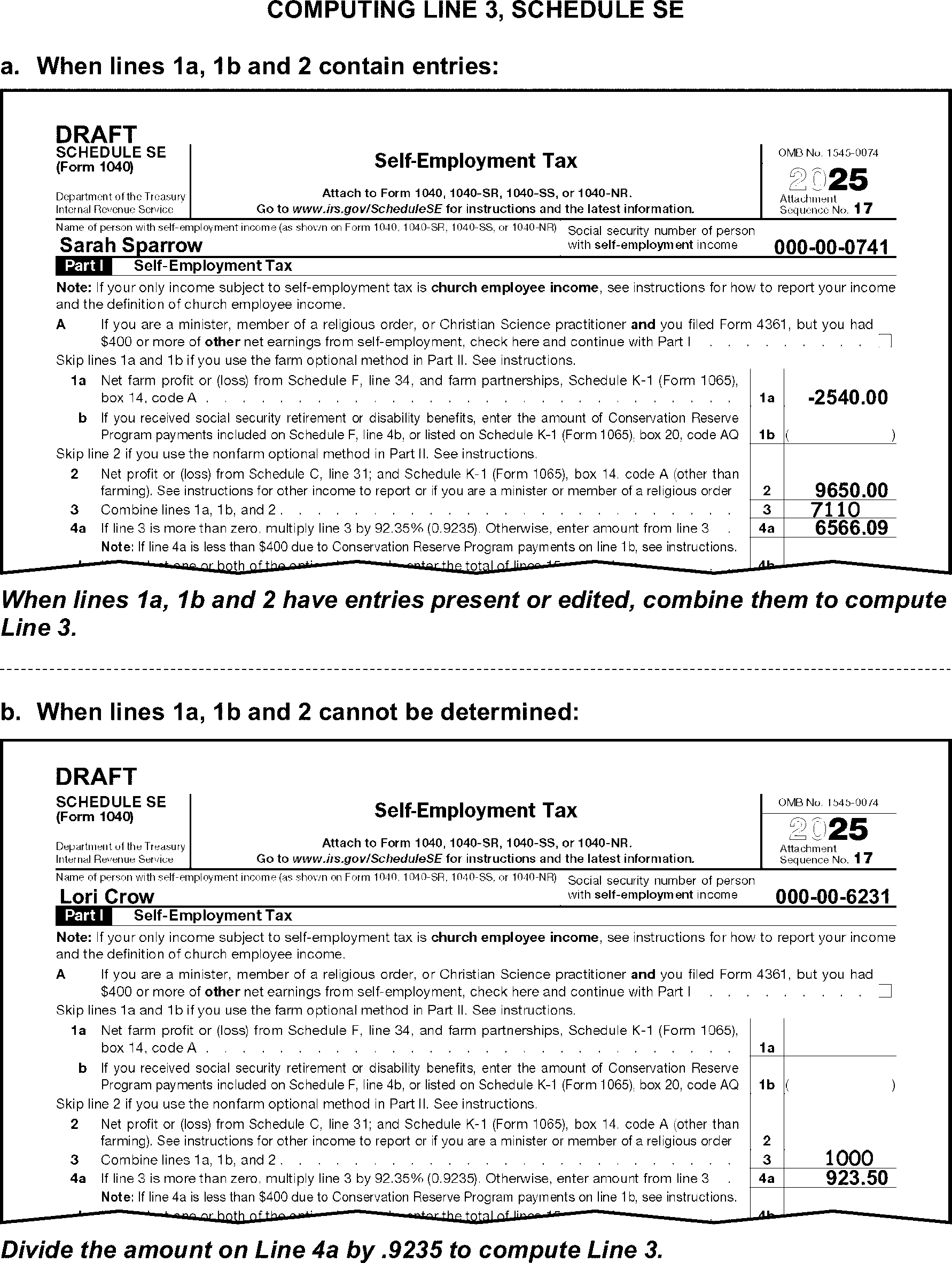
-
Refer to the short period return instructions in IRM 3.11.3.6.2.18 when Schedule SE is attached to a short period return. A code representing the number of quarters covered by a short period return is edited in the margin to the right of line 4c.
-
Process Schedule SE regardless of the line 3 amount when line 5a has an entry of $109 or more.
-
Divide the amount on line 5b by .9235 and edit the result on line 5a when both of the following conditions are present:
-
Line 5a is blank, and
-
Line 5b has an entry.
-
-
When the amount on line 8d is more than $176,100 and lines 8b and 8c are blank, add the SE taxpayer's Form(s) W-2 Social Security wages and tips subject to Social Security tax withholding.
If lines 8b and 8c are blank and Then The total of all Social Security wages and tips on Forms W-2 is $176,100 or less, Edit the total income on line 8d. There is no Form W-2 income, and line 8a is also blank. "X" line 8d. -
Take no action when the amount on line 8d is more than $176,100 and lines 8b and 8c have significant entries.
-
Compute and edit line 8d when it is blank, dash or zero, and one of the following conditions is present:
-
There are entries leading to a total, or
-
The taxpayer has Form W-2 wages and/or tips (boxes 3 and 7) subject to Social Security Tax withholding.
-
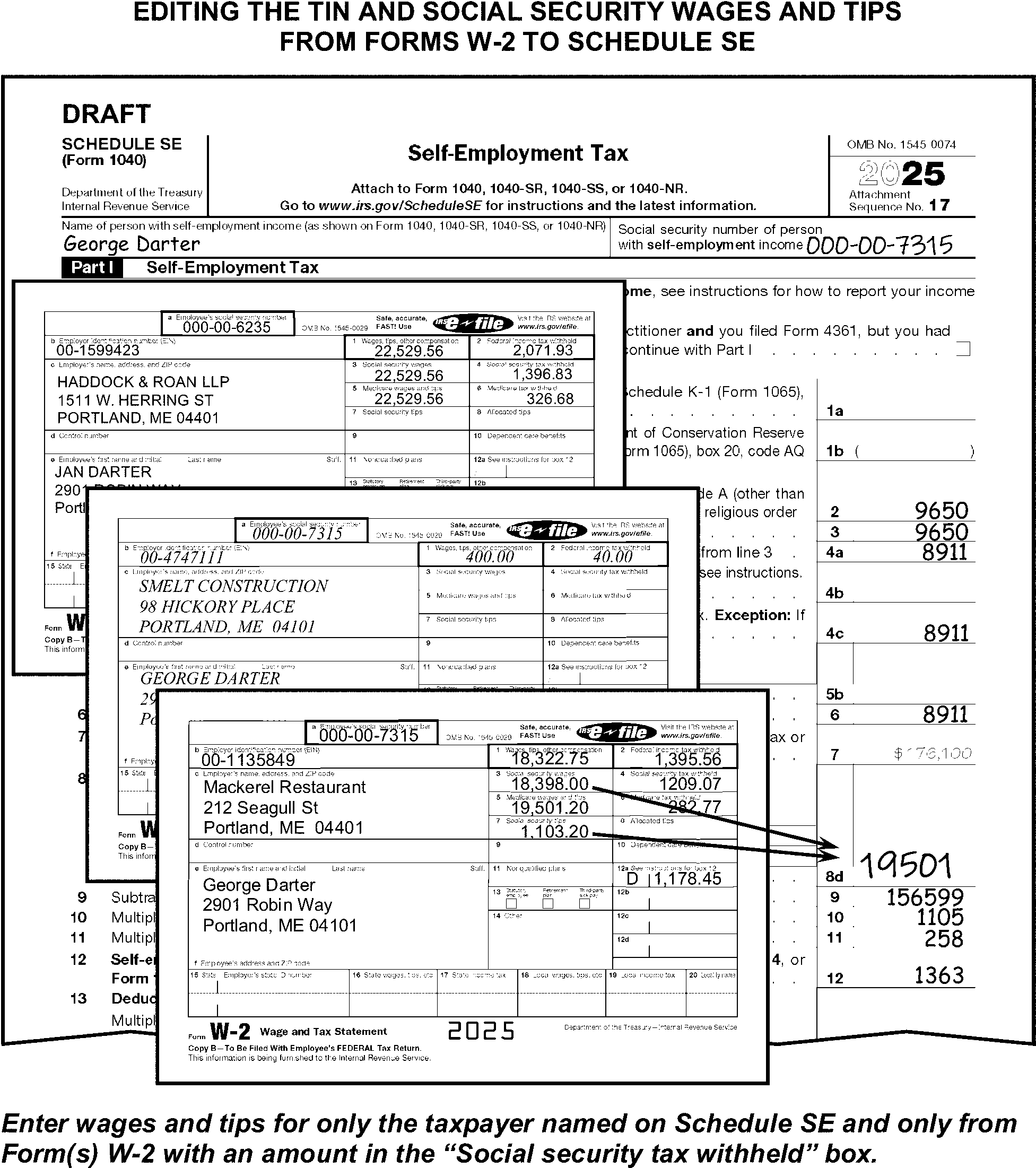
-
The SE Method Code is edited in the bottom-center margin of Schedule SE, page 1.
-
Edit SE Method Code "1" when both of the following conditions are present:
-
Line 15 is blank or zero, and
-
The significant entries on lines 4b and 17 are the same.
-
-
Edit SE Method Code "2" . See Figure 3.11.3-100, when both of the following conditions are present:
-
There are any significant entries on lines 15 or 17 and
-
SE Method Code "1" has not been assigned.
-
-
Do not code the SE Method Code when it can be determined the entries on lines 15 or 17 are misplaced.
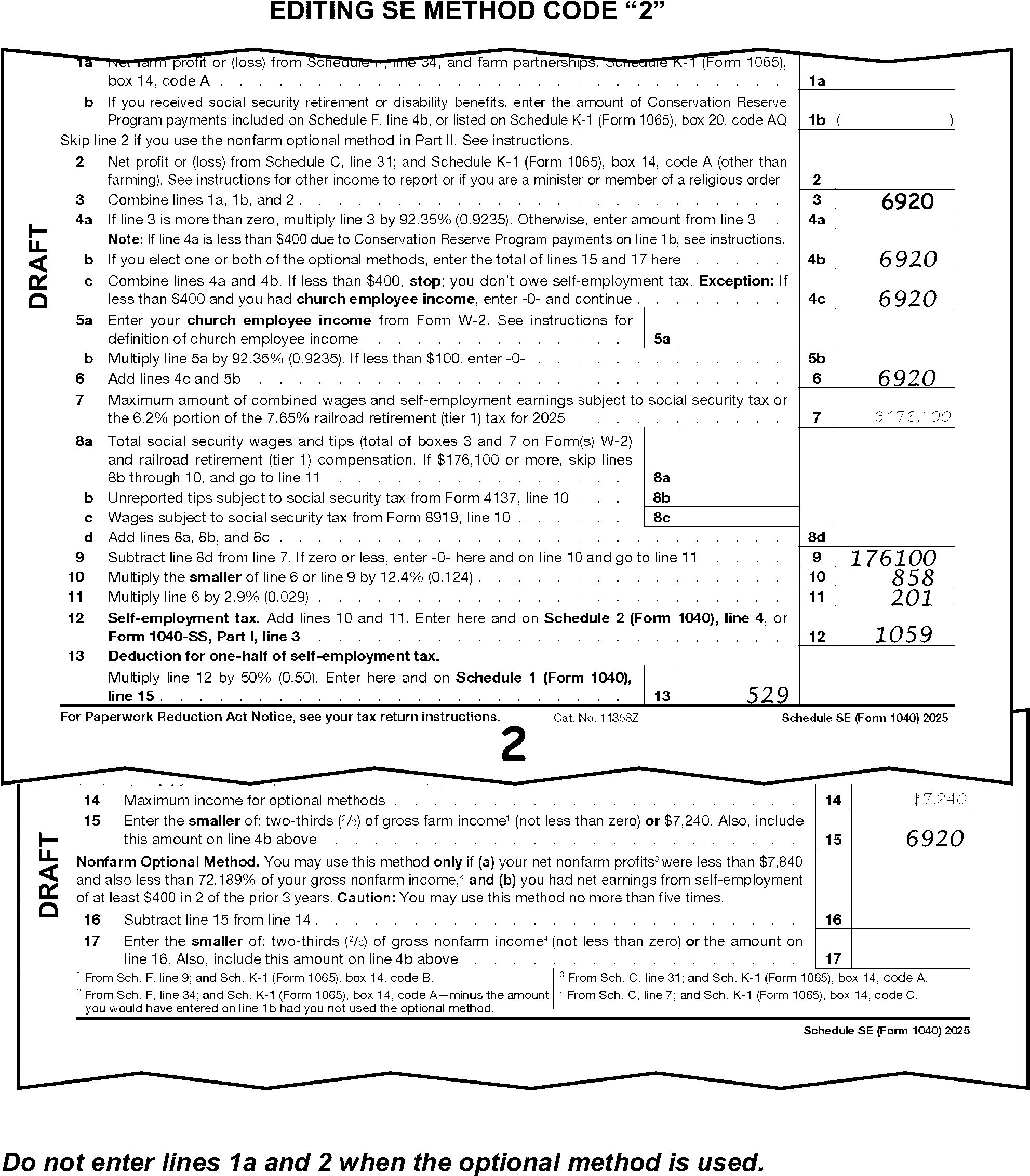
-
For TY19 and prior, taxpayers will complete either Section A or Section B of Schedule SE. When the taxpayer completes both Sections A and B of the Schedule SE, reporting the same self-employment income for the same taxpayer, delete Section A of Schedule SE.
-
When computing or verifying a line 8d entry - for tax years 2024 through 2016 - use the chart below to determine the maximum Social Security wage amount.
Tax Year Maximum Social Security Wage 2024 $168,600 2023 $160,200 2022 $147,000 2021 $142,800 2020 $137,700 2019 $132,900 2018 $128,400 2017 $127,200 2016 $118,500
-
The instructions provided in this subsection of the manual are for editing Form 1116. These instructions include:
-
General editing and perfecting procedures
-
Coding for additional unprocessed Forms 1116
-
-
The following lines on the Form 1116 are T-Lines and T-Compute Lines:
T-Lines T-Compute Lines -
To the right of Part I
-
Line 1a
-
Lines 6, 7 and 8
-
Line 14
-
Lines 16 and 17
-
Lines 21 through 24
-
Lines 34 and 35
-
Line 1a
-
Lines 6, 7 and 8
-
Line 14
-
Line 17
-
Line 21
-
Line 23
-
Line 35
-
-
Edit Sequence Code "19" in the upper-right margin of Form 1116 if not preprinted.
-
Taxpayers may attach Form(s) 1116 to support their Alternative Minimum Tax amount or for other informational purposes.
-
"X" Form(s) 1116 marked "Alternative Minimum Tax" , "AMT" , "ALT MIN Tax" , "AMT-CR" , "8801" , "State Copy" , or "Information Only" .
-
-
Correspond for Form 1116 when Schedule 3, line 1, has an amount more than $300 (more than $600 for married filing joint) and Form 1116 has no significant T-line entries present or edited on line 7, 8, 24 or 35.
-
Only one Form 1116 can be processed. If more than one Form 1116 is present, determine which form to process in the following priority:
-
Process the first form that has entries in Part IV.
-
Process the first form attached, when Part IV is blank on all forms.
-
-
Edit the total number of additional Forms 1116 attached in the margin to the right of Part I. This number represents the number of forms attached, but not being processed. For example, if three Forms 1116 are attached to the return, edit "2" in the margin. One of the three Forms 1116 will be processed, and the other two forms are additional.
Note:
To determine the total number of additional Forms 1116 attached, count the number of additional pages one only.
-
Edit "9" when more than nine additional forms are attached.
-
Do not count Forms 1116 deleted according to IRM 3.11.3.28.1(3)a, above.
-
-
The presence of Form 1116 alone does not qualify the return for treatment as an international return. DO NOT FORWARD RETURNS TO AUSPC SOLELY BECAUSE A FORM 1116 IS ATTACHED.
-
Compute and edit line 7 by subtracting line 6 from line 1a when line 7 is blank and there are entries leading to a total.
-
Compute and edit line 8 when it is blank and there are entries leading to a total. Compute the line 8 entry by adding lines A through C in column (u).
-
Compute and edit line 14 when it is blank and there are entries leading to a total. Compute line 14 by adding lines 11, 12, and 13.
-
Compute and edit line 17 when it is blank and there are entries leading to a total. Compute line 17 by adding amounts on lines 15 and 16.
-
Compute and edit line 21 when it is blank and there are entries leading to a total. Compute line 21 by multiplying line 20 by line 19.
-
Compute and edit line 23 when it is blank and there are entries leading to a total. Compute line 23 by adding lines 21 and 22.
-
Edit the amount from line 14 or line 23, whichever is smaller when line 24 is blank.
-
Take no action if line 14 or line 23 is blank, dash, or zero.
-
Use the chart below to determine the correct editing of Form 1116.
-
The instructions provided in this subsection of the manual are for editing Schedule J.
-
The following lines on the Schedule J are T-Lines and T-Compute Lines:
T-Lines T-Compute Lines -
Line 2a
-
Line 2b
-
Line 8
-
Line 12
-
Line 16
-
Line 19
-
Line 20
-
Line 21
-
There are no T-Compute lines for this form.
-
-
Edit Sequence Code "20" in the upper-right margin of Schedule J if not preprinted.
-
Only one Schedule J can be processed. When multiple forms are present take the following actions:
-
Combine all related T-Line amounts.
-
"X" those forms not being used.
-
-
The instructions provided in this subsection of the manual are for editing Form 2441. These instructions include:
-
General editing and perfecting procedures
-
Perfecting the care provider's information
-
-
The following lines on Form 2441 are T-Lines and T-Compute Lines:
T-Lines T-Compute Lines -
Checkbox A
-
Checkbox B (TY22 and later)
-
Line 1, column (a) Care Provider's Name Control
-
Line 1, column (c) Care Provider's TIN
-
Line 1, column (d), Household Employee Code (TY22 and later)
-
Line 2, Qualifying Persons (not edited)
-
Line 2, column (a) - Qualifying Person's Name Control
-
Line 2, column (b) - Qualifying Person's SSN
-
Line 2, column (c) - Disabled Indicator
-
Line 2, column (d) - Qualified Expenses
-
Lines 3 through 5
-
Line 9b
-
Line 12
-
Line 16
-
Line 25
-
Line 26
-
Line 3
-
Line 26
-
-
Edit Sequence Code "21" in the upper-right margin of Form 2441 if not preprinted.
-
Only one Form 2441 can be processed.
-
Combine multiple forms when present
-
Delete those forms not used
-
-
Do not follow the instructions for perfecting Part II (lines 2 through 5) and do not "X" Form 2441 when both of the following are present:
-
There are any entries in Part I and/or Part III
-
The child care credit has not been claimed on line 2, Schedule 3.
-
-
Do not correspond for missing information when line 15 Form 1040, is (or can be determined to be) zero or a negative amount. Instead, "X" Form 2441.
-
When "see attached" or similar statement is present, edit any required T-Lines from the attachment.
-
The taxpayer enters information about the care provider on line 1. Required care provider information consists of:
-
Edit SPC "D" when none of the Care Providers listed have a valid TIN and any of the following applies:
-
The taxpayer has exercised due diligence, or
-
The provider is a tax-exempt organization, or
-
The provider is a foreign citizen with no US address identified by "LAFCP" (Living Abroad Foreign Care Provider) or similar statement identifying provider as a foreign citizen.
-
-
Correspond for any missing required provider information when you are corresponding for other missing return items, unless only the TIN is missing and SPC "D" was edited per IRM 3.11.3.30.1.1 (2). When corresponding with Form 6001 use box P, with Form 3531 use box 23.
-
The provider's TIN is not required when the taxpayer has exercised "due diligence" in their attempt to comply with the requirement. Due diligence applies only to notations that indicate either of the following:
-
The provider has moved, and the taxpayer is unable to find the provider to get the TIN.
-
The provider has refused to give the TIN to the taxpayer.
-
-
The provider's TIN is not required when the provider is a "tax-exempt" organization. Tax-exempt organizations include, but are not limited to, the following:
-
Religious: i.e., churches, synagogues, mosques, or temples
-
Educational: i.e., schools - both public and private -- including Montessori schools
-
Civic League
-
Charitable: i.e., PTA, Alumni Associations, Chapters of the Red Cross, Boys and Girls Clubs
-
Pleasure, Recreational or Social Clubs: i.e., YMCA/YWCA or YMHA/YWHA or "The Y"
-
Federal/state/local government agency
-
Other nonprofit organizations
-
-
"X" the amount on line 3 (see Figure 3.11.3-102) when all the following apply:
-
The provider is not a tax-exempt organization, and
-
The provider is not a foreign citizen, and
-
The provider's TIN is missing, and
-
Other correspondence is not required, and
-
Due diligence does not apply. See paragraph (4) above.
-
-
"X" the amount on line 3 when the Child Care Provider TIN is invalid, (all nine numbers are the same or sequential, (i.e., "111111111" or "123456789" )), due diligence does not apply and there are no other providers listed with a valid TIN.
-
"X" the amount on line 3 when the Child Care Provider TIN matches the primary taxpayer, spouse or a dependent of the taxpayer’s TIN.
-
Only one Care Provider and TIN is to be edited. If more than one is present, edit the first one with both Name and TIN information that is not tax exempt or invalid. (See Figure 3.11.3-103.) Underline the Care Provider's name control unless no TIN is present.
-
The taxpayer has exercised due diligence, or
-
The provider was a tax-exempt organization, or
-
The provider was a foreign citizen with no US address and the child care was provided in a foreign country.
-
-
Refer to the information in the following tables to edit BMF name controls when Document 7071-A is not available:
Note:
When a name listed in Part I has an EIN instead of an SSN, follow BMF editing procedures and edit the last name as the name control.
BMF Name Control Valid Characters: -
Alpha (A-Z)
-
Numeric (0-9)
-
Hyphen ( - )
-
Ampersand (&)
Overlapping BMF Name Control Rules - When the organization name contains both the words "TRUST" and "FUND" , and: -
The name of a corporation is present, use the first four characters of the corporation name.
-
An individual's name is present, use the first four characters of the individual's surname.
Business Name(s) Name Control General BMF Name Control Rule Cedar Cleaning CEDA The Name Control consists of up to four alpha or numeric characters. Can4U CAN4 J&B Sanding J&BS The ampersand (&) and the hyphen (-) are the only special characters allowed in the Name Control. Elm-2-go ELM- IU.com IUCO 833.com 833C IC2 IC2 The Name Control can have less, but no more than, four characters. Blanks may be present only at the end of the Name Control. The Hemlock Cafe HEML Omit the word "The" when it is followed by more than one word or abbreviation. Include the word "The" when it is followed by only one word. The Hawthorn THEH The Hawthorn P.A. HAWT IC2 dba Fir Fermenting IC2 Do not include the letters "dba" (doing business as) or "fbo" (for benefit of) as part of the Name Control. -
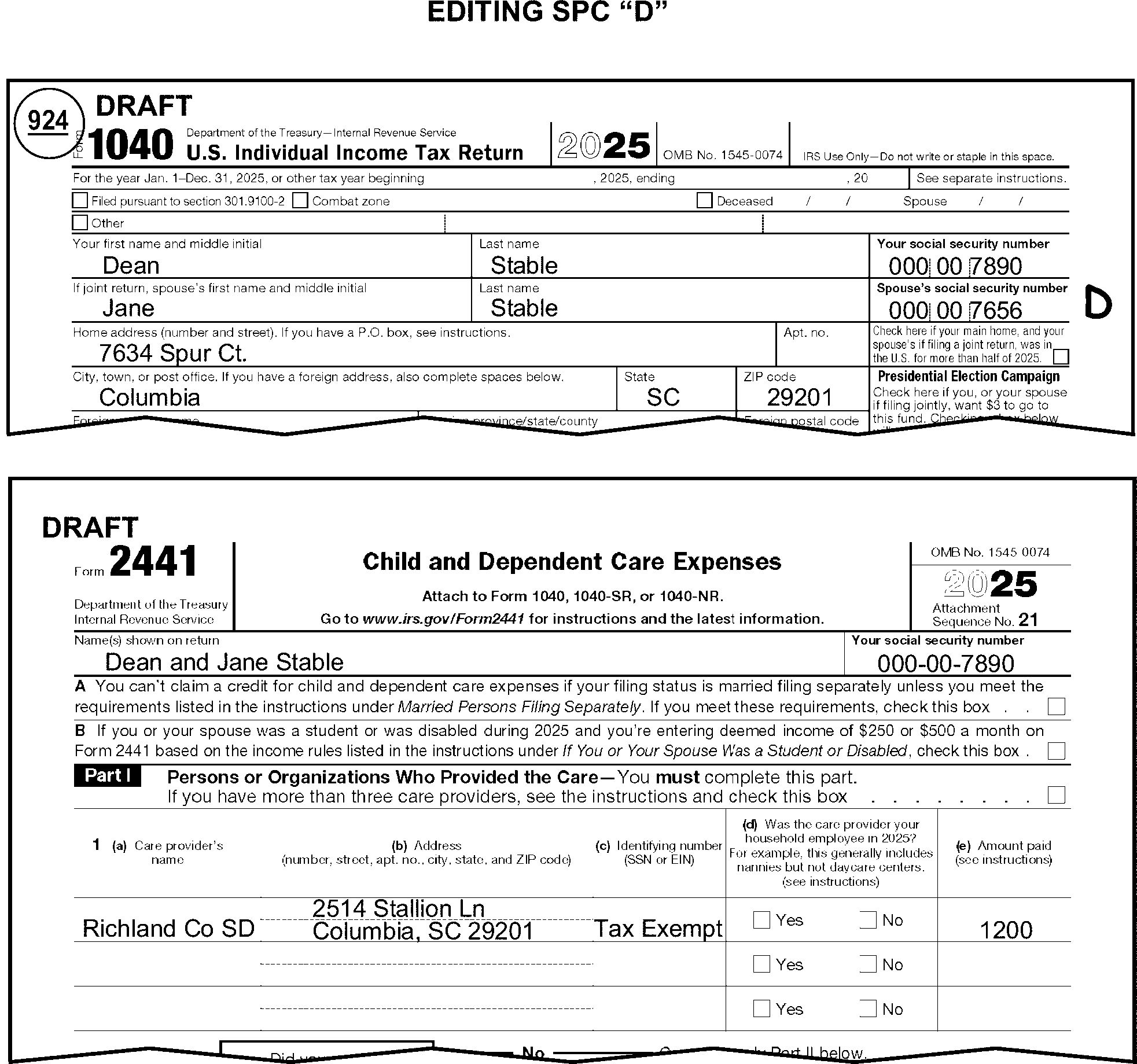
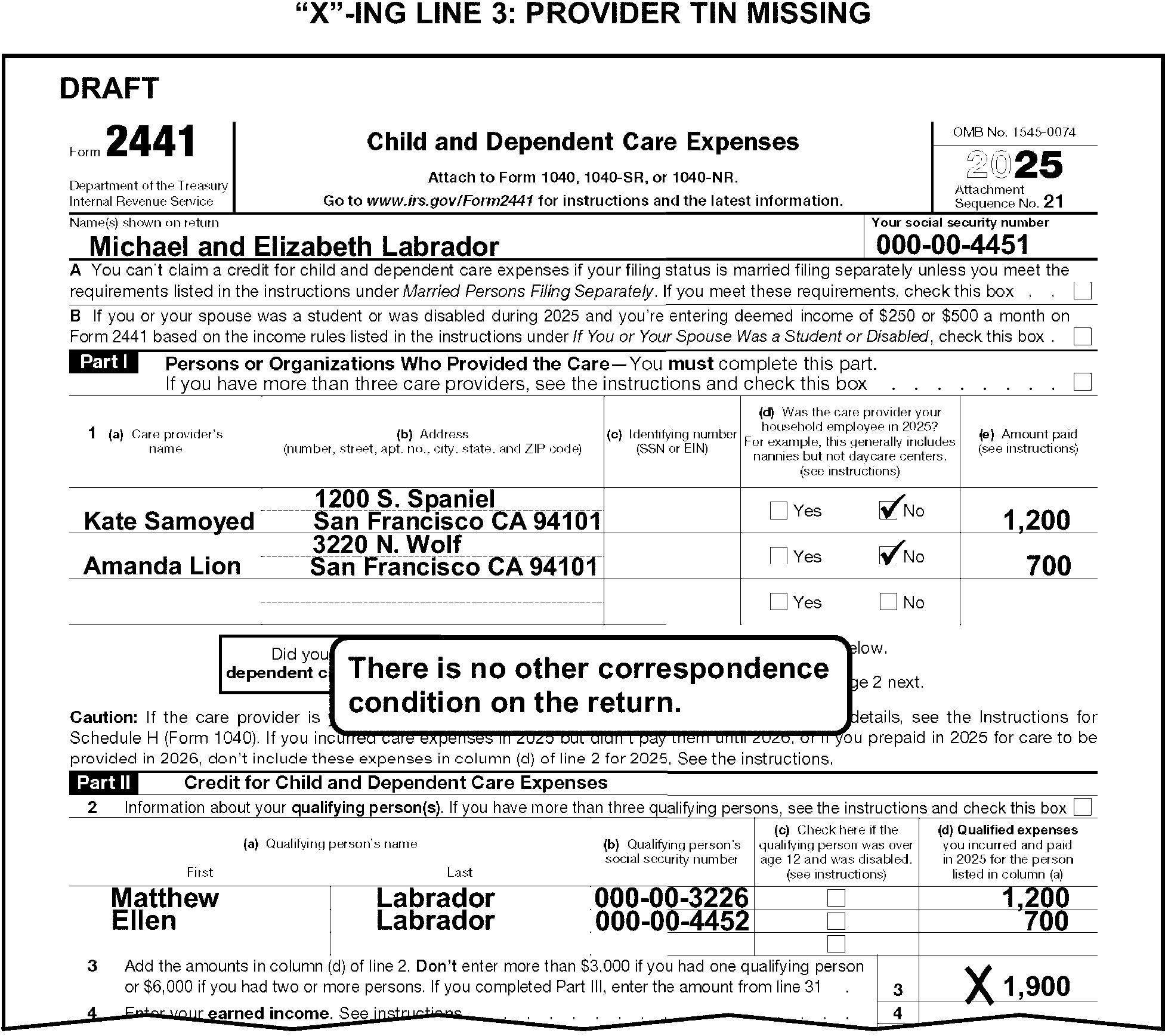
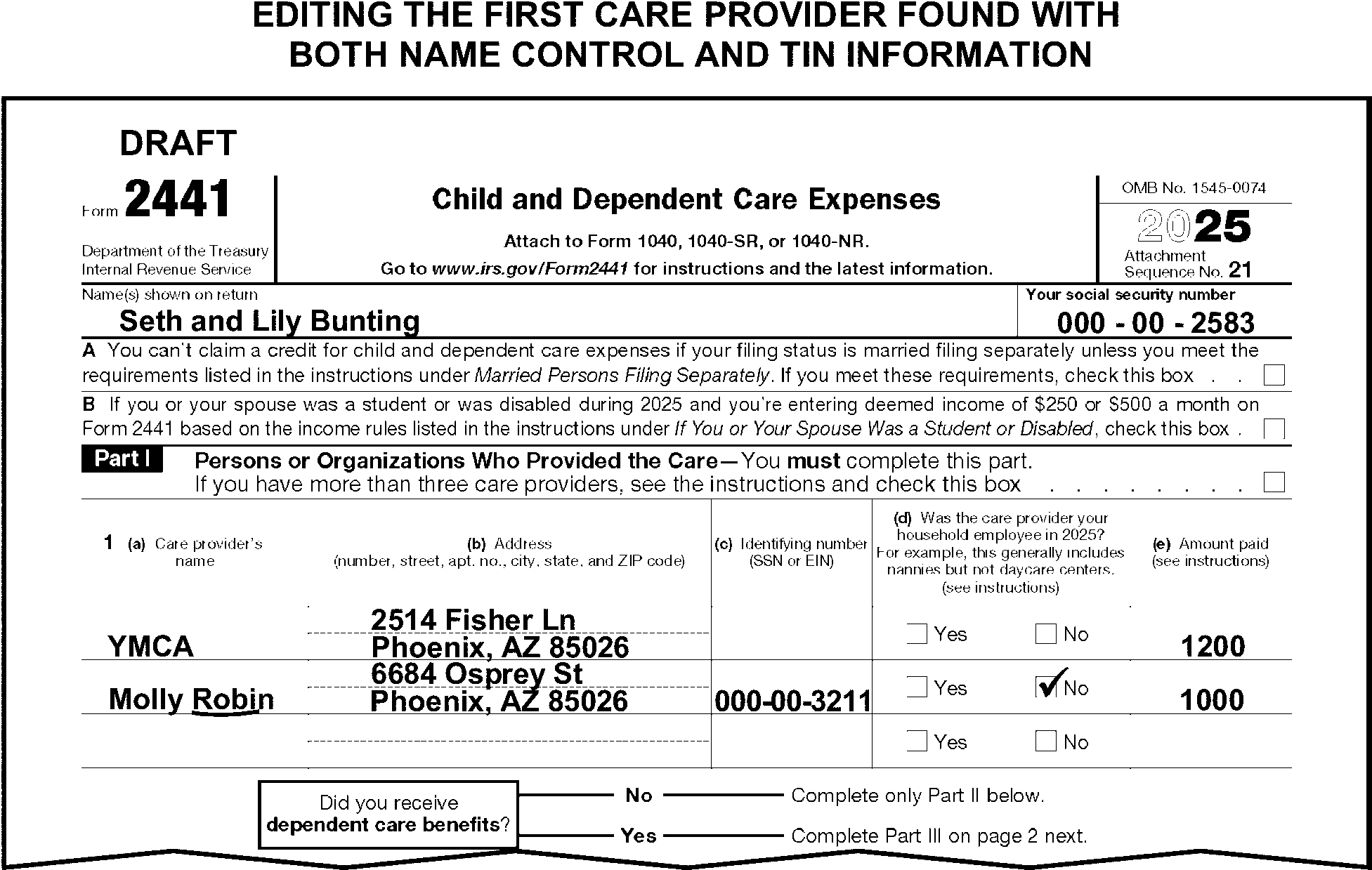
-
Up to 2 Qualifying Person’s name control (and TIN) will be transcribed. When less than 2 Qualifying Persons are present on line 2 and "See Attached" is noted by the taxpayer, edit additional Qualifying Persons (up to 2) from the attachment.
-
Edit SPC "L" when more than two dependents are claimed on Form 2441 and/or attachments.
-
When the qualifying person's last name is not present on line 2, column (a), edit the name controls for the first 2 TINs in the following priority:
-
Form 1040, Dependents area, Column (1)
-
From Schedule EIC
-
From any attachments
-
From the primary taxpayer's name control
-
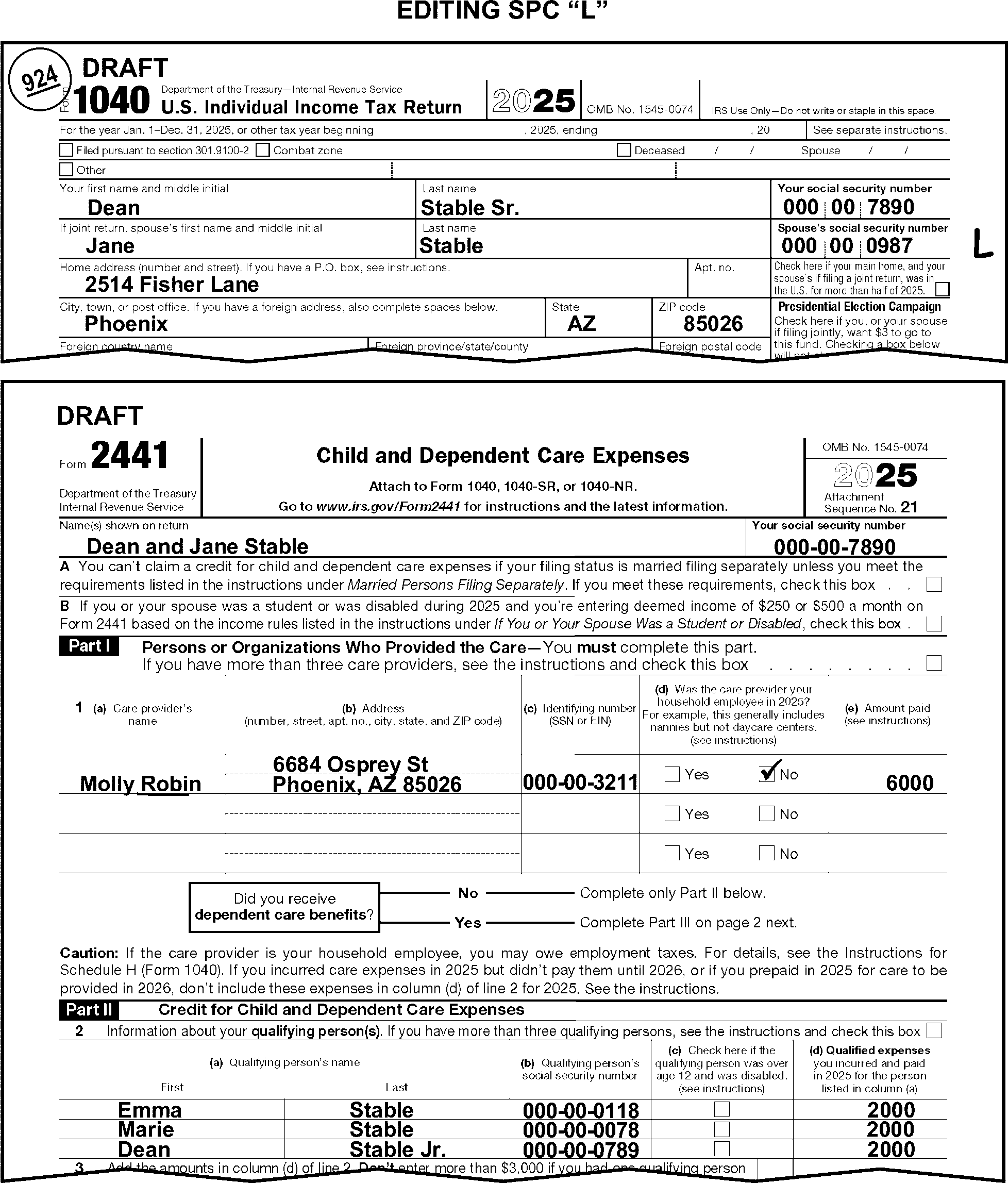
-
Perfect the qualifying person's SSN on line 2, column (b), when missing, incomplete, or illegible.
-
Edit the qualifying persons missing SSN in the following priority:
-
Form 1040, Dependents area, Column (2)
-
From Schedule EIC
-
From attachments.
-
-
"X" the qualifying person's name when the TIN provided is invalid or cannot be perfected from the return or attachments.
-
When corresponding for other missing return items, correspond for any missing qualifying person's information. When corresponding with Form 6001 use box P, with Form 3531 use box 23.
-
If line 3 is blank, take one of the following actions in the priority listed below:
-
Compute and edit the total of line 2 column (d) amounts.
-
Edit the line 1e amount to line 3, when only one child is present on line 2.
-
Edit the amount from line 31 of Form 2441, if present.
-
Correspond for the line 3 amount when line 2, column (d) is blank, and the amount cannot be determined from the Form 2441 or attachments. When corresponding with Form 6001 use box P, with Form 3531 use box 18.
-
-
Line 4 must always have an entry. Line 5 must also have an entry when FS "2" .
-
Line 4 is for the primary taxpayer's earned income.
-
Line 5 is for the secondary taxpayer's earned income.
-
-
If lines 4 and 5 have entries, line 5 is equal to line 4, and:
-
The filing status is 2, correct both lines to reflect only the primary taxpayer's income on line 4 and the spouse's income on line 5
-
The filing status is other than 2, take no action
-
-
Edit a positive amount when required and line 4 or line 5 is blank, dash, or zero.
-
Perfect line 4 when required by editing the amount from line 18 of Form 2441.
-
Perfect line 5 when required by editing the amount from line 19 of Form 2441.
-
-
When lines 4 and/or 5 cannot be edited from lines 18 and 19, edit all earned income from the following, see Figure 3.11.3-105
-
Line 1a-1h, Form 1040 (use Form(s) W-2 when FS 2 and both taxpayers have income on line 1).
-
HSH present anywhere on the return.
-
Self-employment income listed on line 9, Schedule 1.
-
Schedule C
-
Schedule E, Part II
-
Schedule F
-
Form 1099-MISC (Box 7 on TY19 and prior)
-
Form 1099-NEC (TY20 and later)
Note:
If it is obvious the combined total of both taxpayers' income has been entered on line 4 and/or line 5, correct the entry to reflect only the primary taxpayer's (line 4) or spouse's (line 5) income.
-
-
"X" the entry when either line 4 or 5 is a negative amount.
-
Use the instructions in (3) above to perfect lines 4 and 5 when the amount entered on either line 4 or line 5 equals the amount of EIC on line 27a Form 1040.
-
If the FS is "2" and there is an indication that either taxpayer was a student or disabled, and either line 4 or 5 must be perfected, take the following actions:
If the number of months the taxpayer was a student or disabled is Then Present and there is 1 qualified person, Multiply the number of months by $250 and edit the result on line 4 or line 5, whichever is blank. Present and there are 2 or more qualified persons, Multiply the number of months by $500 and edit the result on line 4 or line 5, whichever is blank. Not present, Correspond for the number of months. If using Form 6001, use fill-in "8" , per Exhibit 3.11.3-18. If using Form 3531, mark box 23. -
Correspond when lines 4 and/or 5 (FS "2" ) cannot be perfected with a positive entry. When corresponding with Form 6001 use box P, with Form 3531 use box 18.
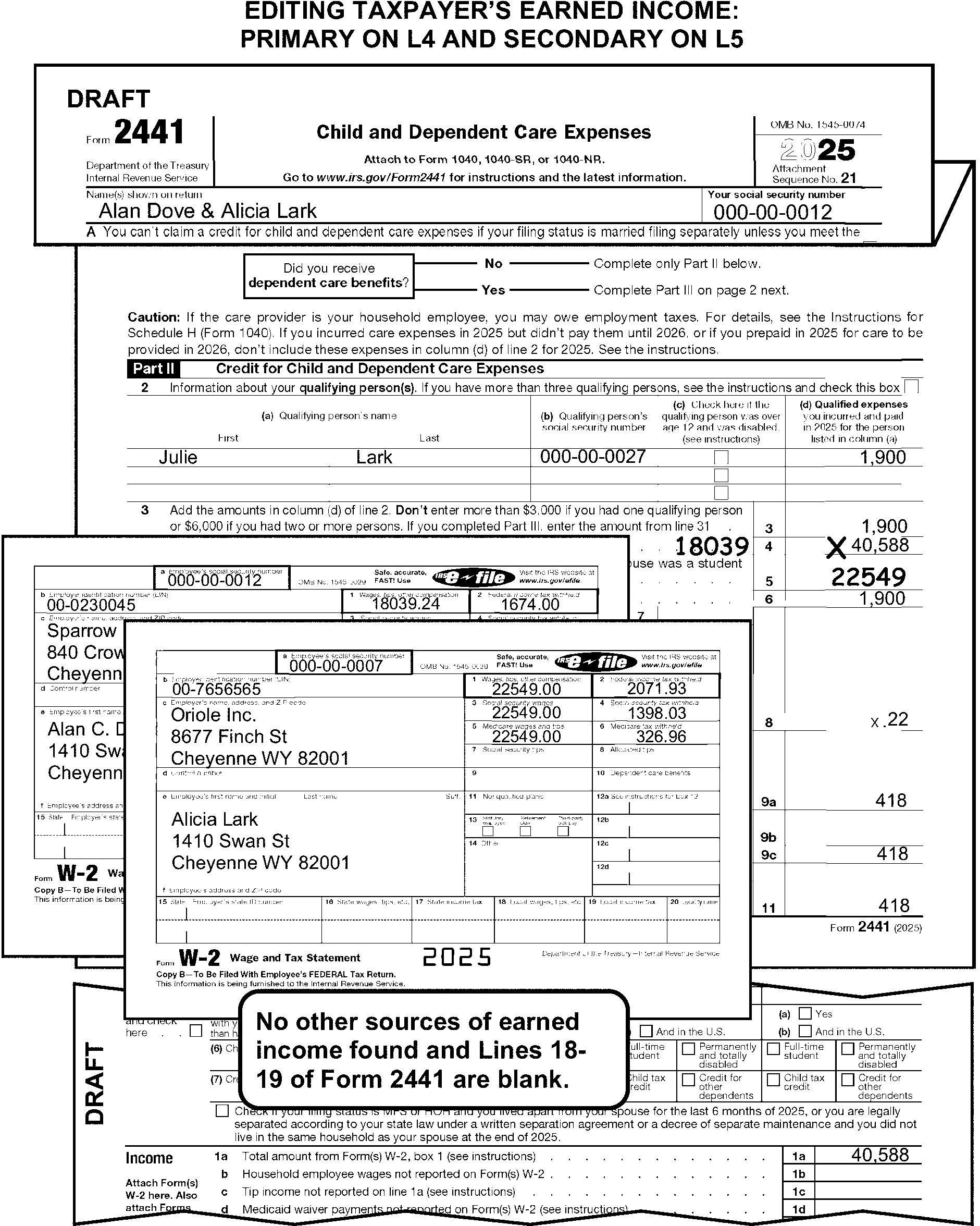
-
If an amount is claimed on line 9b, Form 2441 Worksheet A or statement must be attached. If not attached, "X" the amount.
-
Use the following chart when coding Forms 2441.
If the tax year is Then 1999 and prior, Do not edit the Provider care information. 1996 and prior, Do not do any of the following: -
"X" line 3 on Form 2441 when the provider TIN is missing.
-
Edit for the Name Control and TIN.
1975 and prior, "X" Form 2441. (Expenses for dependent and child care must be claimed on Schedule A). -
-
The instructions provided in this subsection of the manual are for editing Form 3800. These instructions include the general editing and perfecting procedures for Form 3800.
-
The following lines on the Form 3800 are T-Lines and T-Compute Lines:
T-Lines T-Compute Lines -
Part I, Lines 1 through 5
-
Part II, Lines 24 - 26
-
Part II, Line 36
-
Part III, Line 1a, column g
-
Part III, Line 1b column b
-
Part III, Line 1b, columns f - h
-
Part III, Line 1b, column j
-
Part III, Line 1c, column g
-
Part III, Line 1d, column b
-
Part III, Line 1d, column f
-
Part III, Line 1d, column g
-
Part III, Line 1e, column g
-
Part III, Line 1f, column b
-
Part III, Line 1f, column f
-
Part III, Line 1f, column g
-
Part III, Line 1g, column b
-
Part III, Line 1g, columns f - h
-
Part III, Line 1g, column j
-
Part III, Line 1h, column g
-
Part III, Line 1i, column g
-
Part III, Line 1j, column g
-
Part III, Line 1k, column g
-
Part III, Line 1l, column b
-
Part III, Line 1l, columns f-g
-
Part III, Line 1m, column g
-
Part III, Line 1n, column g
-
Part III, Line 1o, column b
-
Part III, Line 1o, column g-h
-
Part III, Line 1o, column j
-
Part III, Line 1p, column g
-
Part III, Line 1q, column b
-
Part III, Line 1q, columns f-g
-
Part III, Line 1s, column b
-
Part III, Line 1s, column f
-
Part III, Line 1s, column g
-
Part III, Line 1t, column g
-
Part III, Line 1u, column b
-
Part III, Line 1u, column f
-
Part III, Line 1u, column g
-
Part III, Line 1v, column b
-
Part III, Line 1v, columns f-g
-
Part III, Line 1w, column g
-
Part III, Line 1x, column b
-
Part III, Line 1x, column f - h
-
Part III, Line 1x, column j
-
Part III, Line 1y, column g
-
Part III, Line 1aa, column g
-
Part III, Line 1bb, column g
-
Part III, Line 1cc, column g
-
Part III, Line 1dd, column g
-
Part III, Line 1ee, column g
-
Part III, Line 1ff, column g
-
Part III, Line 1gg, column b
-
Part III, Line 1gg, columns f-g
-
Part III, Line 1zz, column g
-
Part III, Line 3, column g
-
Part III, Line 4a, columns b, f, g
-
Part III, Line 4e, columns b, f, g
-
Part III, Line 4h, column g
-
Part III, Line 4j, column g
-
Part III, Line 4k, column g
-
Part III, Line 5, column g
-
Center Bottom Margin, page 3
-
From F 3468, Part VII, Line 1i Bottom right margin, page 3 (TY24 and prior)
-
Line 25
-
Line 36
-
-
Taxpayers file Form 3800 when they have any of the following:
-
More than one of the general business credits (other than the empowerment zone employments credit).
-
A carryback or a carryforward of any of the credits.
-
Any of the general business credits (other than the low-income housing credit or the empowered zone employment credit) from a passive activity.
-
-
Edit Sequence Code "22" in the upper-right margin of Form 3800 if not preprinted.
-
Only one Form 3800 can be transcribed. If multiples are present, process the one that shows the largest dollar amount on line 7, Part IV, page 7. "X" any other forms not used.
-
Correspond for all identified missing source forms to support entries in Part III and Part IV of Form 3800.
Exception:
Do not correspond for missing forms when any of the following conditions apply:
• Part III or IV, line 1y or line 1aa, Form 3800 has an entry and Form 8936 is attached with no amount present on line 6 or line 19, do not correspond for Form 8936 Schedule A.
• The taxpayer provided the EIN of the pass-through entity in Part III and Part IV, Form 3800.
• The taxpayer indicates that they are not claiming the credit. -
For TY24 and later, edit Audit Code "W" when any of the following conditions are present:
-
Part III, line 1p has an entry and no Form 8908 is attached.
-
Part III, line 1p has an entry and Form 8908 is attached but Part II is missing.
-
Part III, line 1p has an entry and Form 8908 is attached but Part II Column A is incomplete or missing.
-
-
When an entry is present on Form 3800, Part V, Column B, edit a Data Indicator of "1" in the center bottom margin of page 3.
-
When Form 8826, Disabled Access Credit, is attached, no Schedule C, Schedule E or Schedule F is attached, and Schedule 1, line 9, is blank, edit Unallowable Code"77" .
-
For TY22 and prior, do not correspond for missing forms when Part III, box C is marked indicating a credit carryforward.
-
For TY24 and prior, if Form 3468, Investment Credit, is attached to support an entry on Part III, line 4k, column g, Form 3800:
-
Edit the amount from Form 3468, Part VII, line 1i, to the bottom-right margin of page 3, Form 3800.
-
An entry on Part VII, line 1i requires an entry on line 1k, or the first page of NPS Form 10-168a, Historic Preservation Application, must be attached. If missing, correspond with Form 3531/6001 using fill-in 33, per Exhibit 3.11.3-18.
-
-
The instructions provided in this subsection of the manual are for editing Form 4137. These instructions include:
-
General editing and perfecting procedures
-
Sequencing and combining multiple Forms 4137
-
Perfecting the Taxpayer Identification Number (TIN)
-
-
The following lines on Form 4137 are T-Lines and T-Compute Lines:
T-Lines T-Compute Lines -
Taxpayer TIN
-
Lines 1A through 1E, Columns (a) through (d)
-
Lines 2 and 3
-
Line 5
-
Line 6
-
Line 8
-
Line 2
-
-
Only two Forms 4137 can be processed per return. One Form 4137 for each of:
-
The primary taxpayer
-
The secondary taxpayer
-
-
Edit Sequence Code "24" in the upper-right margin of Form 4137 if not preprinted when there is only one processable Form 4137 attached.
-
When there are two processable Forms 4137 attached, and one is for the primary taxpayer, and one is for the secondary taxpayer:
-
Edit Sequence Code "24" if not preprinted, for the primary taxpayer.
-
Edit Sequence Code "25" for the secondary taxpayer.
-
-
Combine multiple Forms 4137 when the taxpayer submits more than one Form 4137 for any one taxpayer. Delete those forms not used.
-
If one Form 4137 was submitted for two taxpayers take one of the following actions:
-
Allocate the proper amounts to two dummy Forms 4137. "X" the Form 4137 with the combined taxpayer amounts. Delete those forms not used.
-
Correspond when the proper allocation cannot be determined. When corresponding with Form 6001 use box U, with Form 3531 use box 17.
-
-
If the taxpayer provided names of employers on line 1, column (a), but does not provide the associated EINs on line 1, column (b), edit the missing EIN from attachments, if possible. Otherwise, Correspond. When corresponding with Form 6001 use box P, with Form 3531 use box 18.
-
Edit the TIN of the taxpayer filing Form 4137 from the caption area of Form 1040 when the TIN is missing, illegible, or other than nine digits. If the TIN is not present in the caption, search Form(s) W-2 and other attachments for the missing TIN.
-
Use the caption to determine the correct TIN when there are two TINs but only one name on Form 4137. Circle the TIN which does not match the taxpayer’s name.
-
Compute and edit line 8 when it is blank, and the taxpayer has Form W-2 wages and tips subject to Social Security Tax withholding.
-
If the amount on line 8 is more than $176,100, add the Form 4137 taxpayer's Form W-2 wages and tips subject to Social Security Tax withholding.
If the Then Total of all wages and tips on Form(s) W-2 is $176,100 or less, Edit the total income amount from Form(s) W-2 to line 8. Taxpayer has no Form W-2 income, "X" line 8.
-
When computing or verifying a line 8 entry-for tax years 24 through 16 - use the chart below to determine the maximum Social Security amount.
Tax Year Maximum Social Security Wage 2024 $168,600 2023 $160,200 2022 $147,000 2021 $142,800 2020 $137,700 2019 $132,900 2018 $128,400 2017 $127,200 2016 $118,500 -
For TY 2024 through 2016, "X" Form 4137 when the amount on line 1a, Form 1040, is greater than or equal to the maximum Social Security wage amount.
-
For TY06 and prior, if the taxpayer has changed the word "tips" to "wages" , dummy a Form 8919 and "X" Form 4137.
-
The instructions provided in this subsection of the manual are for editing Form 4684. These instructions include the general editing and perfecting procedures for Forms 4684.
-
The following lines on Form 4684 are T-Lines and T-Compute Lines:
T-Lines T-Compute Line -
FEMA Disaster Declaration Number
-
Line 1, Property A Zip Code
-
Line 13
-
Line 14
-
Line 16
-
Line 13
-
Line 14
-
Line 16
-
-
Edit Sequence Code "26" in the upper-right margin of Form 4684 if not preprinted.
-
Only one Form 4684 is processable:
-
Process the first Form 4684 with an entry present or edited on line 16.
-
Process the first Form 4684 with a T-line entry when there are no Form 4684 with an entry on line 16.
-
Delete all forms not to be transcribed.
-
-
"X" Form 4684 when either of the following conditions is present:
-
No significant entry is present or edited on T-lines.
-
Only page 2, 3 and/or 4 of Form 4684 is attached.
-
-
Delete the FEMA Disaster Declaration Number if:
(See IRM 3.11.3.19.1.8.)-
Invalid, (e.g., begins or ends with letters other than "DR " or "EM" ),
-
Is made up of consecutive or repeating numbers,
-
Number is greater than 5900 for FEMA numbers beginning/ending with "DR" ,
-
Number is greater than 4700 for FEMA numbers beginning/ending with "EM" .
-
-
If present and other than 5 digits (or 5 plus 4), delete the Zip Code.
-
If blank, dash, or zero and there are entries leading to a total, compute and edit line 13 by adding all amounts on line 4.
-
If blank, dash, or zero and there are entries leading to a total, compute and edit line 14 by entering amount on line 12.
-
Compute and edit line 16 only when both of the following conditions are present:
-
Line 16 is blank and,
-
A significant entry is present on line 14.
-
-
The instructions provided in this subsection of the manual are for editing Form 4797. These instructions include the editing and perfecting procedures for Forms 4797.
-
The following lines on Form 4797 are T-Lines and T-Compute Lines:
T-Lines T-Compute Lines -
Lines 1a through 1c
-
Line 7 col g
-
Line 8 col g
-
Line 9 col g
-
Bottom Center Margin
-
Line 9 col g
-
-
Edit Sequence Code "27" in the upper-right margin of Form 4797 if not preprinted.
-
Only one Form 4797 is processable.
-
Examine Part I and Part II columns (g), and Part III line 24, for gains from sales of animals. If any amounts are present:
-
Compute and edit the total in the bottom center margin below Part II. (See Figure 3.11.3-106.)
-
Use only positive amounts when computing the gain on the sale of animals.
-
-
If line 9 is blank, take one of the following actions:
-
If line 8 has an entry, subtract the line 8 amount from line 7. If the result is a positive amount edit the amount.
-
If line 8 is not present, edit the positive amount from line 7. (See Figure 3.11.3-106.)
-
-
"X" the Form 4797 when there is no significant amount on or edited to any of the T-Lines.
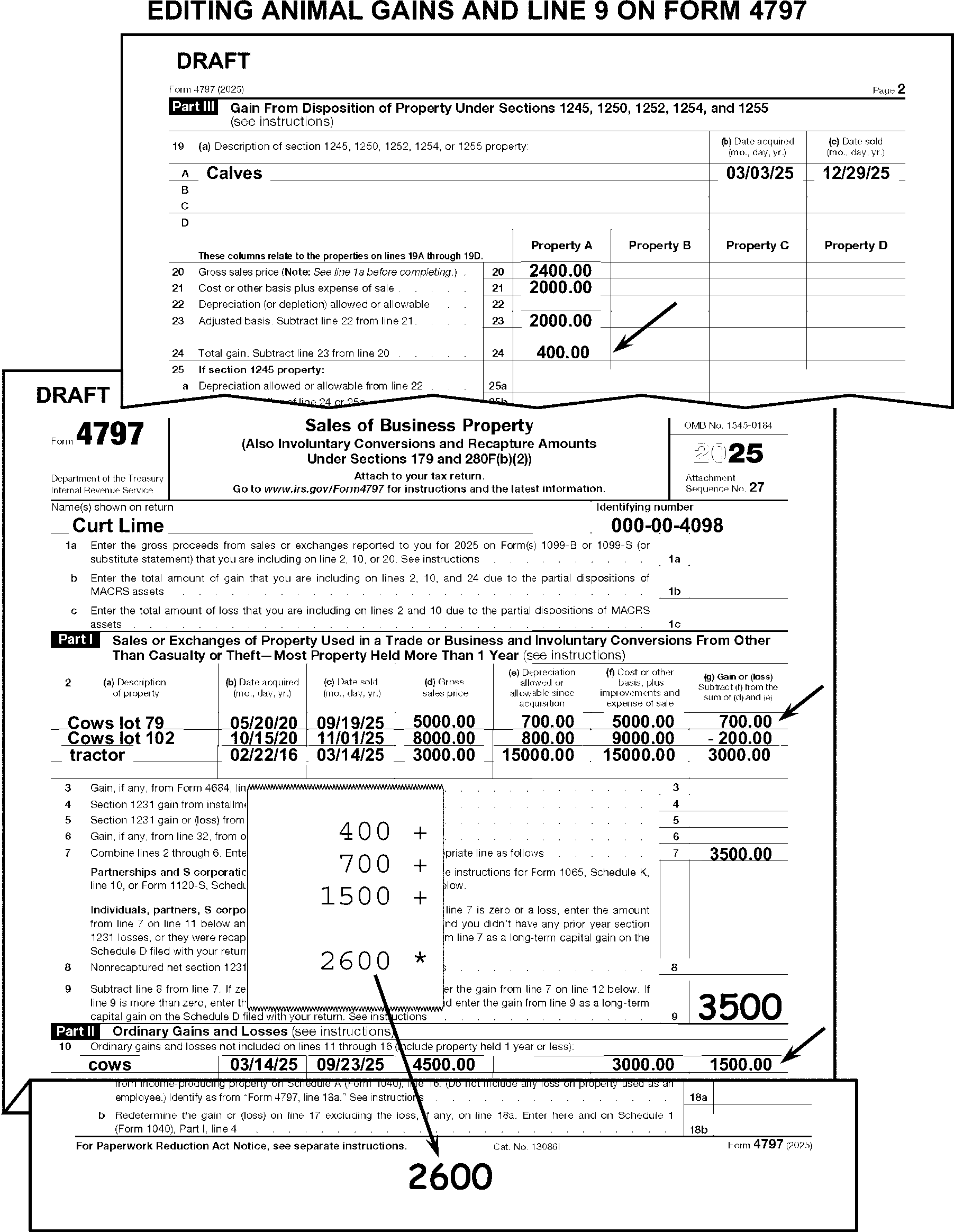
-
The instructions provided in this subsection of the manual are for editing Form 4972.
-
The following lines on Form 4972 are T-Lines and T-Compute Lines:
T-Lines T-Compute Line -
Lines 1 through 5b
-
Line 6
-
Lines 11 and 12
-
Line 18
-
Line 30
-
Line 12
-
-
Edit Sequence Code "28" in the upper-right margin of Form 4972 if not preprinted.
-
Only one Form 4972 can be processed. Combine multiple Forms 4972 onto the first Form 4972 having "Yes" entries in Part I. "X" any Forms 4972 not used.
-
"X" Form 4972 when blank or the only entries present are in Part I.
-
Edit RPC "G" when both of the following conditions are present:
-
There is a significant amount on lines 6 or 8 of Form 4972 and
-
Withholding is present on lines 25a-25d of Form 1040.
-
-
Mark the "No" box on line 5b when the taxpayer has not answered the question on line 5b.
-
The instructions provided in this subsection of the manual are for editing Form 5329. These instructions include:
-
General editing and perfecting procedures
-
Coding the spousal indicator
-
Perfecting lines 17, 25, 33, 41, 49, 51 and 55 - Tax Due (to perfect Form 5329)
-
Editing the IRA Condition Code
-
-
The following lines on the Form 5329 are T-Lines and T-Compute Lines:
T-Lines T-Compute Lines -
Spousal Indicator - edited to the left of the form title
-
Line 2 Exception number and amount
-
Line 4
-
Line 8
-
Line 17
-
Line 25
-
Line 33
-
Line 41
-
Lines 42-44
-
Line 49
-
Line 51
-
Line 55
-
Bottom-right margin, IRA Condition Code
-
Line 4
-
Line 8
-
Line 55
-
-
If there are no significant entries on any T-lines, but amounts are present in any of Parts I through IX, do not "X" Form 5329. (See Figure 3.11.3-107.)
-
Only two Forms 5329 can be processed per return. One Form 5329 for each of:
-
The primary taxpayer
-
The secondary taxpayer
-
-
Edit Sequence Code "29" in the upper-right margin of Form 5329 if not preprinted when there is only one processable Form 5329 attached to the return.
-
When there are two processable Forms 5329 attached to the return, and one is for the primary taxpayer, and one is for the secondary taxpayer:
-
Edit Sequence Code "29" , if not preprinted, for the primary taxpayer.
-
Edit Sequence Code "30" for the secondary taxpayer.
-
-
Combine multiple Forms 5329 when the taxpayer submits more than one Form 5329 for any one taxpayer. Delete those forms not used.
-
If line 8, Schedule 2, is blank and Form 5329 is present with only entity information present, "X" the Form 5329.
-
Perfect Form(s) 5329 when amounts are present in Parts I through IX.
-
Use the chart below to determine the correct IRA Condition Code editing. Edit the code in the lower-right margin of page 2 of Form 5329. If page 2 is not present, edit code on page 1 in the lower-right margin of page 1, Form 5329.
If Then Reasonable cause for failure to pay the penalty is established (see the examples of reasonable cause criteria in Exhibit 3.11.3-9), Edit IRA Condition Code "30" . Amended Form 5329 with dummied Form 1040. Edit IRA Condition Code "32" . Reasonable cause for failure to file Form 5329 is established, Dummy Form 5329 and edit IRA Condition Code "33" . A waiver, "RC" is noted on line dotted portion of line 54a or 54b, or a request for waiver, of tax on excess accumulation on a qualified retirement plan is present, Edit IRA Condition Code "35" . The Form 5329 is for a deceased taxpayer, Edit IRA Condition Code "37" .
-
Edit the spousal indicator on joint returns only.
-
Code the indicator to the left of the form title.
-
The code indicates the taxpayer for whom the Form 5329 is filed. Code as follows:
-
Edit a "1" for the primary taxpayer.
-
Edit a "2" for the secondary taxpayer. (See Figure 3.11.3-107.)
-
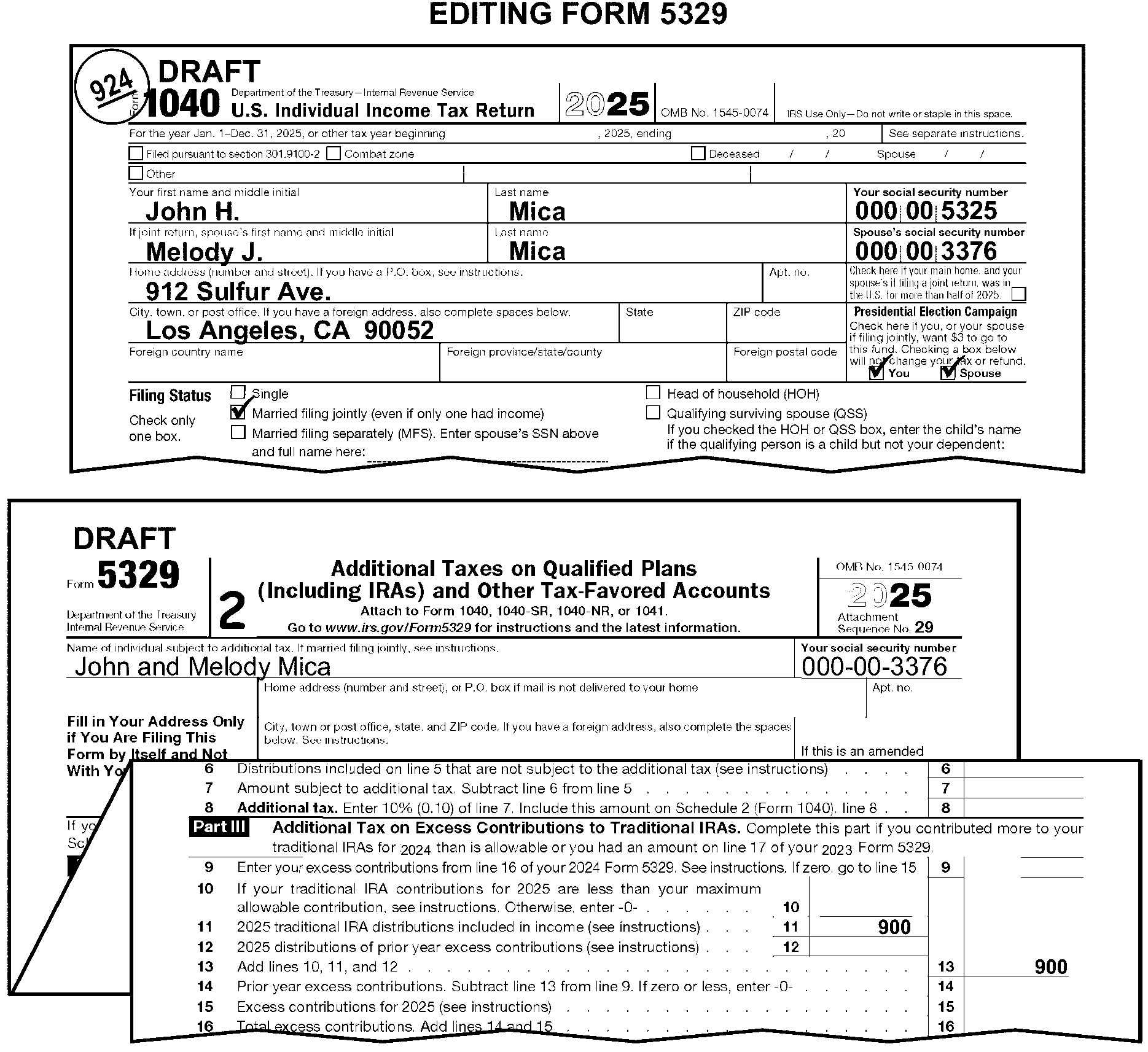
-
Use the chart below to perfect entries on Form 5329 when lines 17, 25, 33, 41, 49, 51 and 55 are all blank and there is an entry on Schedule 2, line 8 of:
If on Schedule 2, line 8, the taxpayer has indicated Then Tax on Excess Contributions to Traditional IRAs, Edit the Schedule 2, line 8 amount to line 17 of Form 5329. Tax on Excess Contributions to ROTH IRAs, Edit the Schedule 2, line 8 amount to line 25 of Form 5329. Tax on Excess Contributions to Education (Ed) IRAs (Coverdell ESA's), Edit the Schedule 2, line 8 amount to line 33 of Form 5329. Tax on Excess Contributions to Medical Savings Accounts (Archer MSA), Edit the Schedule 2, line 8 amount to line 41 of Form 5329. Tax on Excess Contributions to Health Savings Accounts (HSA), Edit the Schedule 2, line 8 amount to line 49 of Form 5329. Tax on Excess Contributions to an ABLE Account, Edit the Schedule 2, line 8 amount to line 51 of Form 5329. Tax on Excess Accumulation in Individual Retirement Plans, Edit the Schedule 2, line 8 amount to line 55 of Form 5329.
-
The instructions provided in this subsection of the manual are for editing Form 6198.
-
The following lines on the Form 6198 are T-Lines and T-Compute Lines:
T-Lines T-Compute Line -
Line 5
-
Lines 20 and 21
-
Line 5
-
-
Edit Sequence Code "31" in the upper-right margin of Form 6198 if not preprinted.
-
"X" Form 6198 when the entry on line 5 is positive or zero.
-
Only one Form 6198 can be processed. When more than one Form 6198 is present:
-
Combine all related T-Lines from forms that result in a loss on line 5.
-
Delete those forms not used.
-
-
Edit on line 20 the larger of line 10b or 19b when line 20 is blank. Do not edit a negative amount.
-
Edit the negative amount from line 5 to line 21 when line 21 is blank.
-
The instructions provided in this subsection of the manual are for editing Form 6251.
-
The following lines on the Form 6251 are T-Lines and T-Compute Lines:
T-Lines T-Compute Lines -
Lines 2c through 3
-
Line 8
-
There are no T-Compute lines for this form.
-
-
Edit Sequence Code "32" in the upper-right margin of Form 6251 if not preprinted.
-
Edit FPC "5" when Form 6251 is attached.
-
Do not"X" Form 6251 when there are no significant entries on T-Lines or if For Information Only or does not apply, etc. is written on the form.
-
Only one Form 6251 can be processed. When multiple forms are present take the following actions:
-
Combine all related T-Line amounts.
-
"X" those forms not being used.
-
-
The instructions provided in this subsection of the manual are for editing Form 8615. These instructions include:
-
General editing and perfecting procedures
-
Perfecting the parent's name line and TIN
-
-
The following lines on the Form 8615 are T-Lines and T-Compute Lines:
T-Lines T-Compute Lines -
Lines A and B
-
Lines 1 and 2
-
Line 18
-
There are no T-Compute lines for this form.
-
-
Edit Sequence Code "33" in the upper-right margin of Form 8615 if not preprinted.
-
Only one Form 8615 can be processed. When multiple Forms 8615 are present:
-
Process Form 8615 for the taxpayer identified on Form 1040.
-
Delete those forms not used.
-
-
Form 8615 can only be processed with a dependent child's return. "X" Form 8615 when attached to a parent's return. Also "X" line 24 Form 1040.
-
"X" Form 8615 when the amount on line 1 is $2,700 or less.
-
"X" Form 8615 when line 3 is computed to be negative or zero.
-
Edit the parent's Name Control to line A, if not already present.
-
Edit the parent's name control from the signature line when both of the following are present:
-
The parent's name line is blank on Form 8615, and
-
The parent's name is present and legible on Form 1040.
-
-
Correspond when both of the following conditions are present:
When corresponding with Form 6001 use box P, with Form 3531 use box 18.-
The parent's name control cannot be determined, and
-
The parent's TIN is other than nine numbers, illegible, or missing.
-
-
Perfect the parent's TIN as follows when the parent's name control is present:
-
Circle the parent's TIN when it is illegible or other than nine digits.
-
Circle all but the first TIN when multiple TINs are present.
-
Take no action when the TIN is missing.
-
-
For TY24"X" Form 8615 when the amount on line 1 is $2,600 or less.
-
For TY 23"X" Form 8615 when the amount on line 1 is $2,500 or less.
-
For TY22, "X" Form 8615 when the amount on line 1 is $2,300 or less.
-
For TY21 - 19, "X" Form 8615 when the amount on line 1 is $2,200 or less.
-
For TY18 - 15, "X" Form 8615 when the amount on line 1 is $2,100 or less.
-
For TY14 - 13, "X" Form 8615 when the amount on line 1 is $2,000 or less.
-
For TY12 - 09, "X" Form 8615 when the amount on line 1 is $1,900 or less.
-
For TY08, "X" Form 8615 when the amount on line 1 is $1,800 or less.
-
For TY07 - 06, "X" Form 8615 when the amount on line 1 is $1,700 or less.
-
For TY05 - 04, "X" Form 8615 when the amount on line 1 is $1,600 or less.
-
For TY03 - 01, "X" Form 8615 when the amount on line 1 is $1,500 or less.
-
For TY00 - 98, "X" Form 8615 when the amount on line 1 is $1,400 or less.
-
For TY97 - 95, "X" Form 8615 when the amount on line 1 is $1,300 or less.
-
For TY94 - 92, "X" Form 8615 when the amount on line 1 is $1,200 or less.
-
For TY91, "X" Form 8615 when the amount on line 1 is $1,100 or less.
-
"X" the form when it is for tax year 1986 and prior.
-
The instructions provided in this subsection of the manual are for editing Form 8283.
-
The following lines on the Form 8283 are T-Lines and T-Compute Lines:
T-Lines T-Compute Lines -
Part I, Line 2 checkboxes
-
Part I, Line 3A, columns c-d
-
Part I, Line 3A, column f
-
Part IV, Appraiser Signature Indicator
-
Part IV, Identifying Number
-
Part V, Date
-
Part V, EIN
-
Part V, Authorized Signature Indicator
-
Additional Form 8283 Indicator - edited in the lower right margin
-
There are no T-Compute lines for this form.
-
-
Edit Sequence Code "36" in the upper-right margin of Form 8283 if not preprinted.
-
Only one Form 8283 can be processed. If more than one Form 8283 is present, determine which form to process in the following priority:
Edit a "1" in the lower right margin of page 2 of the form that will be transcribed and delete the others.-
Process the first Form 8283 with an entry present in Part I line 3 columns c, d or f.
-
Process the first Form 8283 with a T-line entry in Part IV.
-
Process the first Form 8283 with a T-line entry in Part V.
-
-
Take the following actions for Form 8283:
If And Then Form 8283 attached and any of the following are true: Part I, Checkbox 2b or Checkbox 2b1 are marked, or Line 3 column h, contains a value other than zero. Edit Audit Code "C" The taxpayer checked box "a" (Art contribution of $20,000 or more) on line 2, (for TY19 and prior line 4), Section B of Form 8283 and Schedule A, line 12, is more than $20,000, A separate qualified appraisal is not attached, Correspond with Form 3531/6001 using fill-in 27, per Exhibit 3.11.3-18 Section B of Form 8283 has significant entries in Part I, Parts IV and V, (for TY19 and prior, Parts III and IV), are incomplete, Correspond with Form 3531/6001 using fill-in 26, per Exhibit 3.11.3-18 Section B of Form 8283 has significant entries in Part I Line 3 (for TY19 and prior, line 5), column (c) has an entry of ≡ ≡ ≡ ≡ ≡ ≡ ≡ ≡ ≡ ≡ ≡, Edit Audit Code "C" .
-
The instructions provided in this subsection of the manual are for editing Form 4835.
-
The following lines on the Form 4835 are T-Lines and T-Compute Lines:
T-Lines T-Compute Lines -
Line 1
-
Line 2a
-
Line 3a
-
Lines 4a and 4b
-
Line 5a
-
Line 6
-
There are no T-Compute lines for this form.
-
-
Edit Sequence Code "37" in the upper-right margin of Form 4835 if not preprinted.
-
Only one Form 4835 can be processed. When multiple Forms 4835 are present:
-
Combine all related T-Line amounts.
-
"X" those forms not being transcribed.
-
-
Take one of the following actions when line 40 of Schedule E is blank:
-
Edit the amount from Form 4835, line 32 (if a gain), to line 40, Schedule E.
-
Edit the amount from Form 4835, line 34c (if a loss), to line 40, Schedule E unless the taxpayer notates "PAL" . (See Figure 3.11.3-108.)
-
If line 34c on Form 4835 is blank, edit the loss from line 32, Form 4835, to line 40, Schedule E, unless the taxpayer notates "PAL."
-
-
Edit a positive amount from line 7 of Form 4835 to line 42 of Schedule E when line 42 of Schedule E is blank. (See Figure 3.11.3-108.)
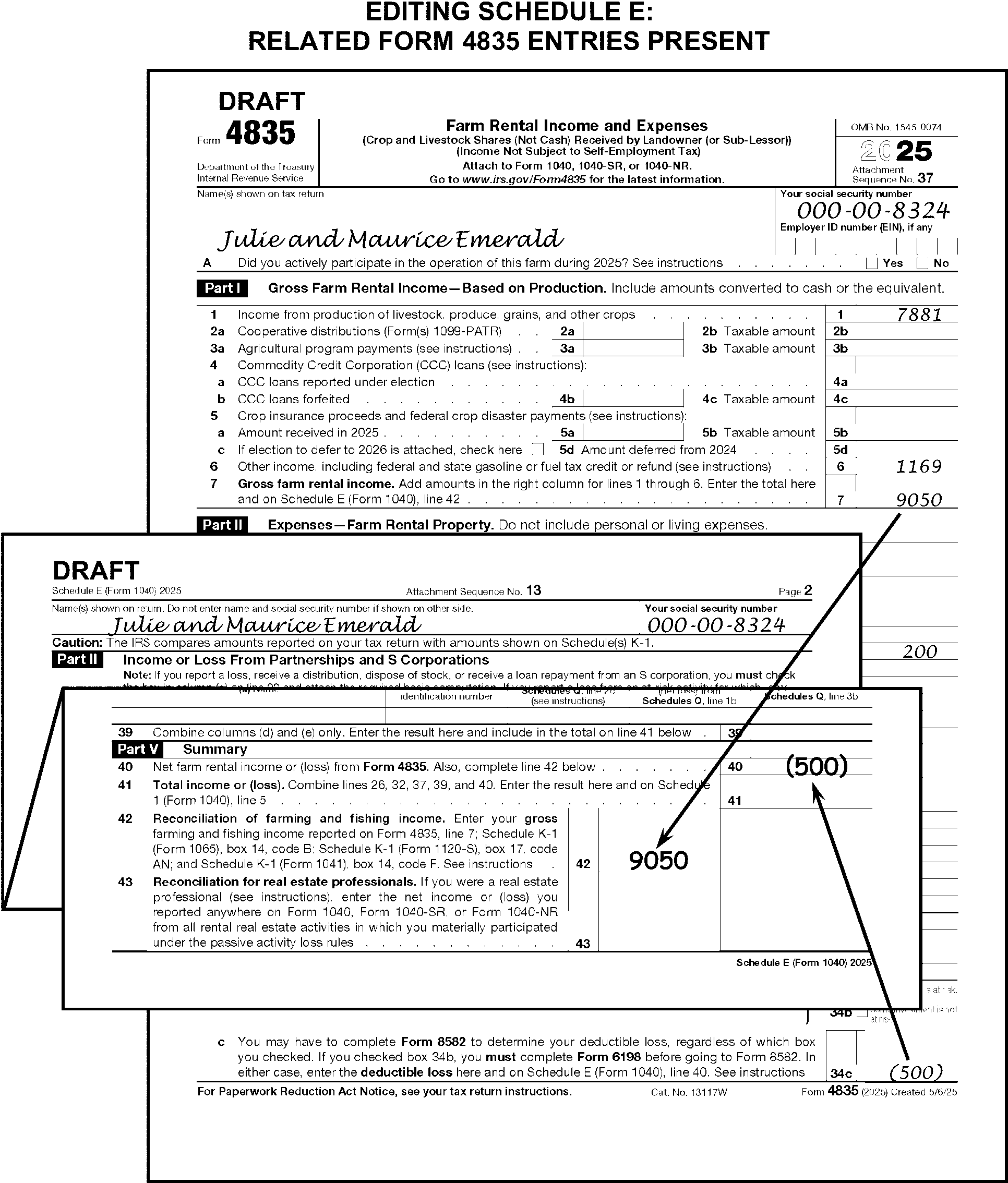
-
The instructions provided in this subsection of the manual are for editing Form 8839.
-
The following lines on the Form 8839 are T-Lines and T-Compute Lines:
T-Lines T-Compute Lines -
Line 1, columns (a) through (g)
-
Line 3 - edited for Child 1, Child 2 and Child 3
-
Line 5 – edited for Child 1, Child 2, and Child 3
-
Line 11a - edited for Child 1, Child 2, and Child 3
-
Line 15
-
Line 23
-
Line 29 - edited for Child 1, Child 2, and Child 3
-
Line 30
-
Line 31
-
Documentation Indicator edited below line 1, column g
-
Line 23
-
Line 31
-
-
Edit Sequence Code "38" in the upper-right margin of Form 8839 if not preprinted.
-
The taxpayer is instructed to file as many Forms 8839 as needed to report the number of children that they adopted or unsuccessfully tried to adopt. However, only one Form 8839 can be processed. Select the Form 8839 for processing in the following priority:
-
Process the first Form 8839 with an entry on line 13 or 18, or
-
Process the first Form 8839 when there are no Forms 8839 with an entry on line 13 or 18.
-
-
Perfect the child's name control if the last name is not present on Form 8839. Take no action if unable to perfect from Form 1040 or attachments. (See Figure 3.11.3-109.)
-
Edit the child's TIN from the return or attachments when missing, incomplete or illegible. Circle the child's TIN when it cannot be perfected. Circle all but the first TIN when more than one is present for any one child. (See Figure 3.11.3-109.)
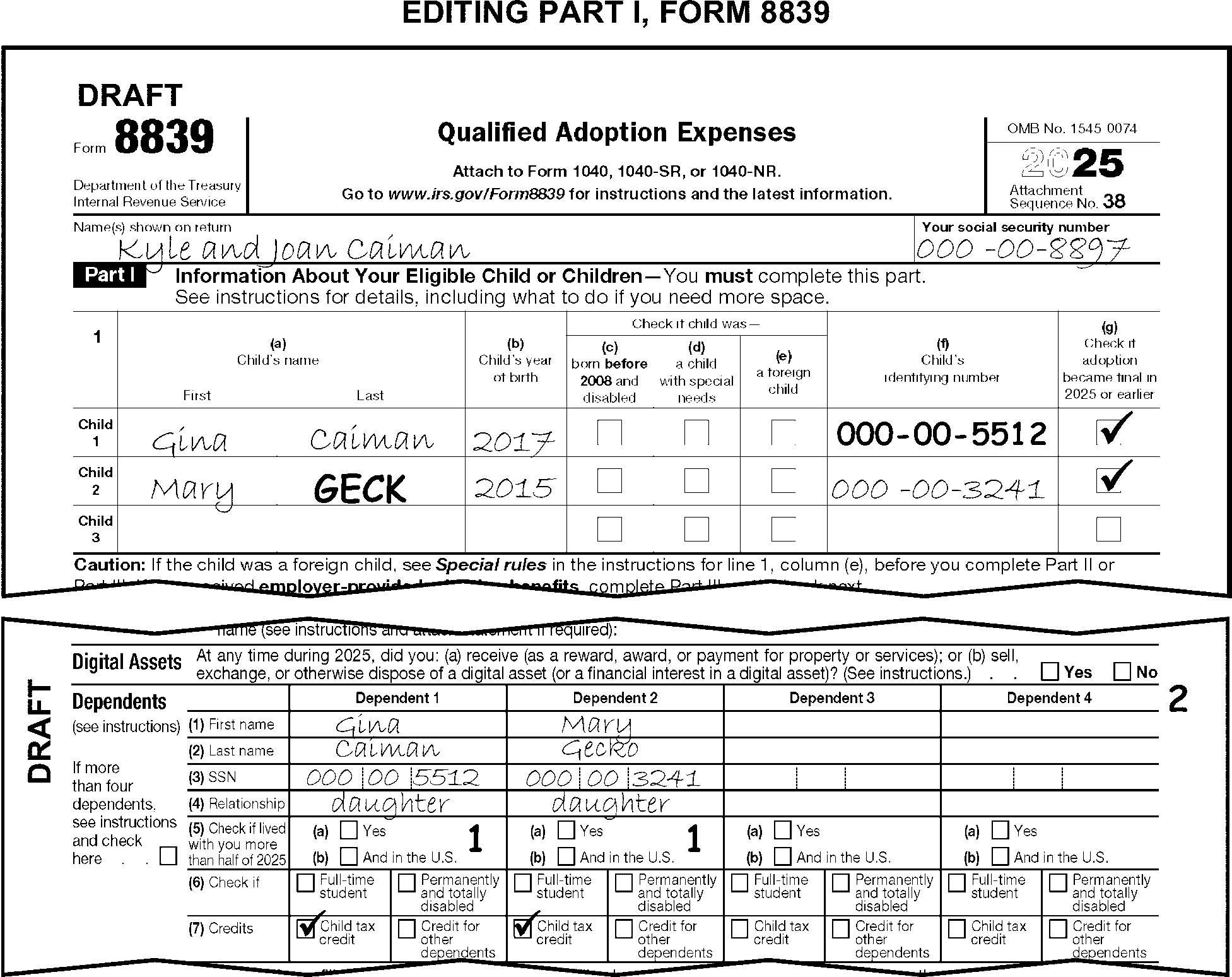
-
Search Form W-2 for employer-provided adoption benefits when line 23 is blank. Perfect line 23 in the following priority:
-
Compute and edit the line 31 amount when both of the following conditions are present. (See Figure 3.11.3-110.)
-
Line 31 is blank, and
-
There are significant entries present on or edited to either or both lines 23 and 30.
-
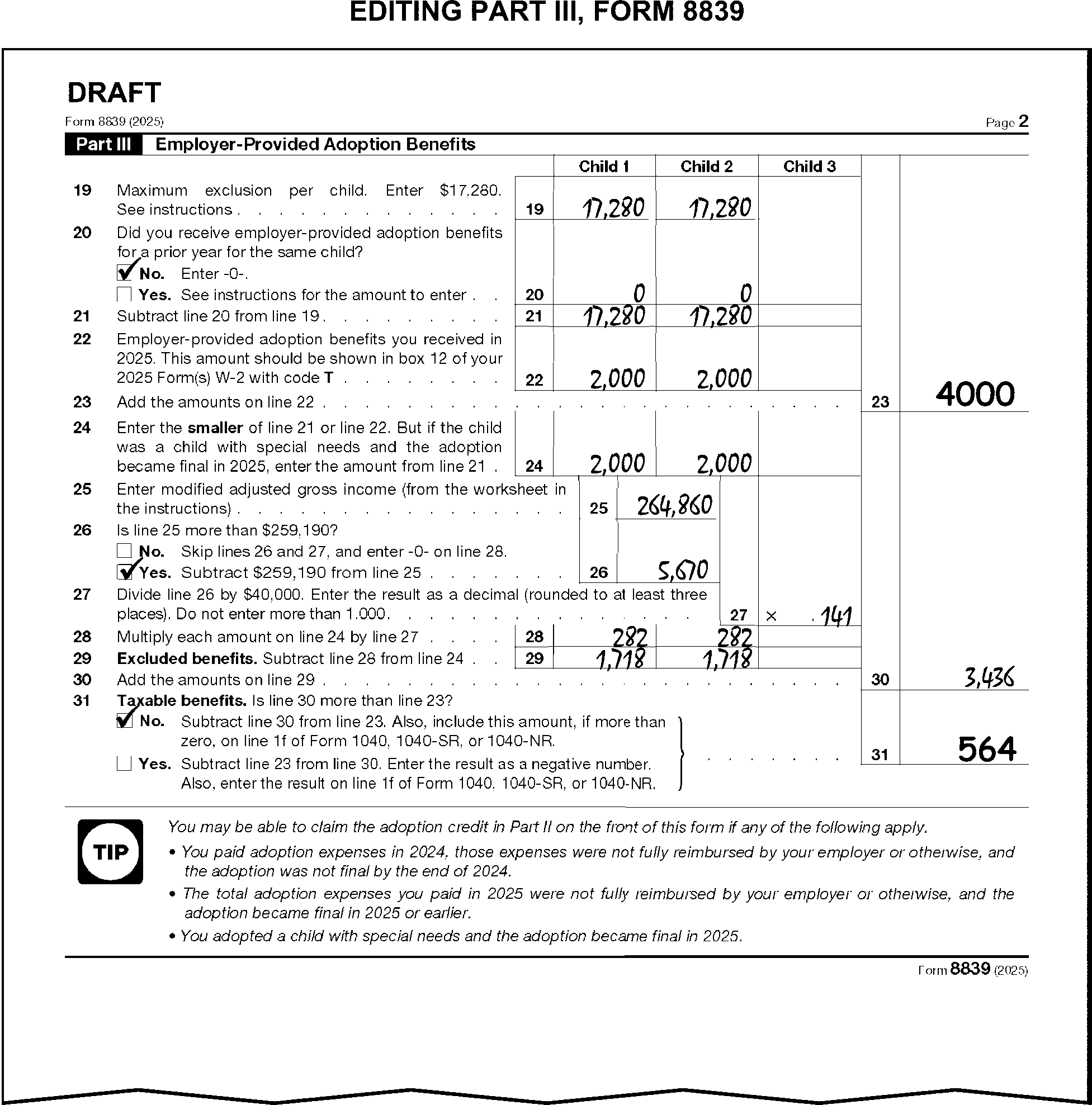
-
For TY11 and TY10, Form 8839 was a refundable credit. Follow the instructions in (2) and (3) below.
-
Taxpayers must provide supporting documentation to claim the Qualified Adoption Expenses Credit. Several types of documentation can be submitted to support a claim for this credit, for Code and Edit purposes, tax examiners will only compare the names of the taxpayer(s) and the adopted child(ren) on the Form 8839 against the names of the adoptive parent(s) and the adoptive child(ren) on the documentation provided by the taxpayer when the adoption is in-process. Handwritten statements are not acceptable documentation.
-
For domestic or foreign final adoptions -- including special needs adoptions -- tax examiners will see the following types of documentation:
• Adoption Order or Decree
• Hague Adoption Certificate or a IH 3 Visa (immigrating child) (for an adoption governed by the Hague Convention and another country)
• IR 2 or IR 3 Visa
• State determination of special needs child -
For in-process adoptions, tax examiners will see the following types of documentation:
• Home study completed by an authorized placement agency
• Placement agreement with an authorized placement agency.
• Document signed by a hospital official authorizing the release of a newborn child from the hospital to the taxpayer for legal adoption.
• Court documents ordering or approving the placement of a child with the taxpayer for legal adoption.
• Original affidavit or notarized statement signed under penalties of perjury from an adoption attorney, government official, or other authorized person, stating the signor placed or is placing a child with the taxpayer for legal adoption or is facilitating the adoption process for the taxpayer in an official capacity, with a description of the actions taken to facilitate the process.
-
-
Follow the instructions below when editing line 1, columns (a) through (g).
If And Then There is one or more child(ren) listed in column (a) and any box in Part I of the form is checked, No adoption documentation is present, Edit Documentation Indicator "0" (zero). There is one or more child(ren) listed in column (a) and the adoption is in-process (checkbox under column (g) is not marked), Adoption documentation is present that includes the name of each child listed in column (a) AND the documentation also includes the name of at least one of the taxpayers as the adoptive parent, Edit Documentation Indicator "1" . There is one or more child(ren) listed in column (a) and the adoption is in-process (checkbox under column (g) is not marked), Adoption documentation for any child is missing, Edit Documentation Indicator "0" (zero). There is one or more child(ren) listed in column (a) and the adoption is in-process (checkbox under column (g) is not marked), The name(s) of any adopted child(ren) or of the taxpayers do not match the name on the adoption documentation, Edit Documentation Indicator "0" (zero). -
For TY96 and prior, "X" Form 8839.
-
Use the instructions provided in this subsection of the manual for editing Form 8853.
-
The following lines in Section A of the Form 8853 are T-Lines and T-Compute Lines:
T-Lines T-Compute Lines -
TIN
-
Lines 1 - 4
-
There are no T-Compute lines for this form
-
-
Edit Sequence Code "39" in the upper-right margin of Form 8853, page 1, if not preprinted.
-
Only one Form 8853 can be processed. Refer to the instructions in IRM 3.11.3.43.1.2 for directions on combining multiple Sections A.
-
When only the TIN and the name, or if only page 2 is attached, delete the form.
-
Edit the TIN from the caption of Form 1040 when the SSN is missing, illegible, or other than nine digits.
-
Perfect the TIN on a joint return as follows:
-
Edit the TIN of the MSA account holder.
-
Edit the primary taxpayer's TIN when the MSA account holder cannot be determined, when both the primary and secondary taxpayer are MSA account holders, or when the secondary taxpayer's TIN is not available.
-
Circle the TIN which does not match the taxpayer’s name in the caption of Section A when there are two TINs but only one name.
-
-
"X" all negative T-Line amounts.
-
Only one Section A of Form 8853 can be processed.
-
Follow the instructions below for combining multiple Forms 8853 when more than one is present (see Figure 3.11.3-111).
If more than one Form 8853 is attached and Then The taxpayer has followed instructions to provide one summary Form 8853 with combined totals, -
Process the Form 8853 with the combined totals.
-
Delete those forms not used.
The taxpayer has not followed instructions to provide a summary Form 8853 with combined totals, -
Combine related T-Line amounts onto one Form 8853.
-
Delete those forms not used.
-
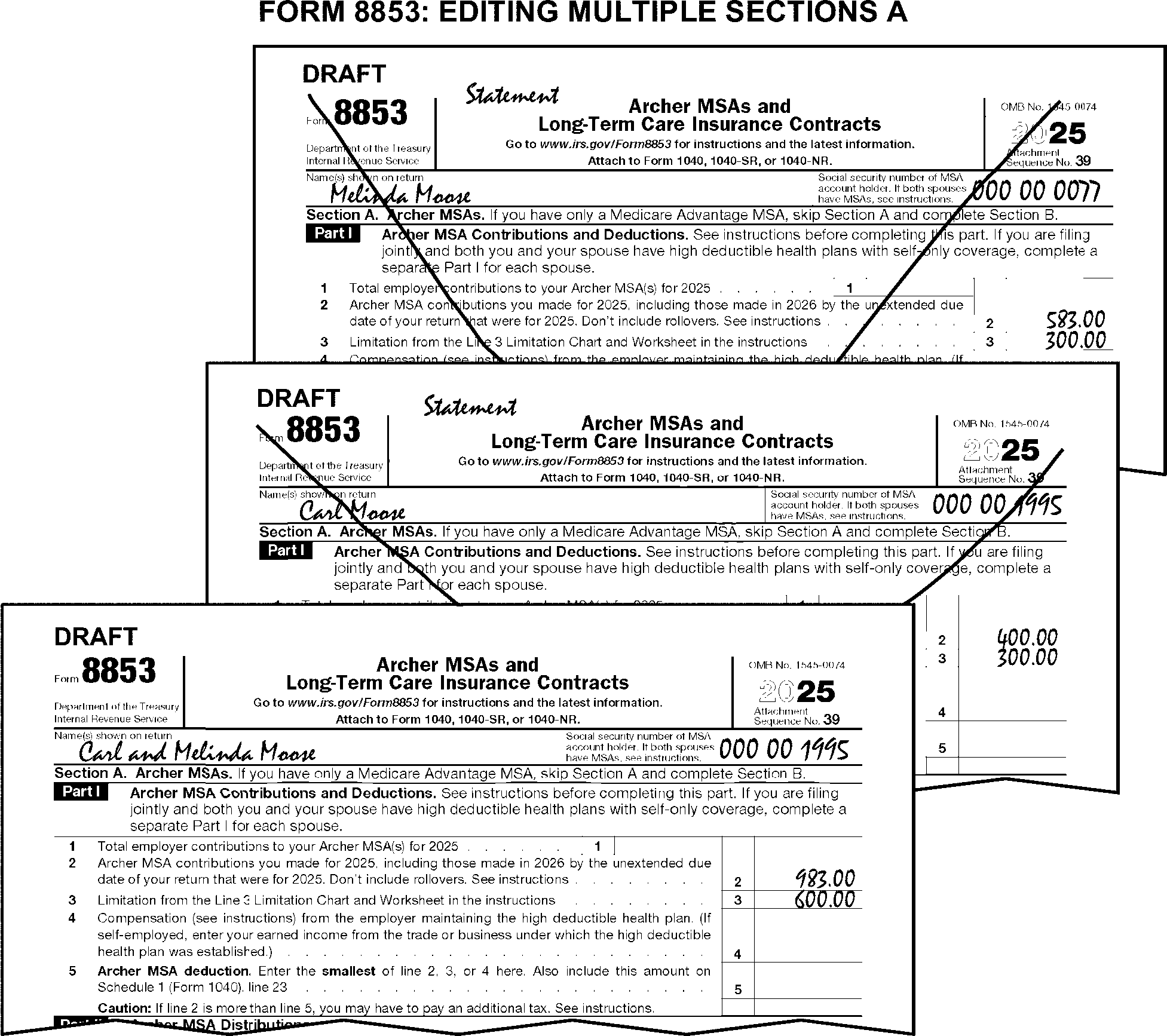
-
The instructions provided in this subsection of the manual are for editing Form 8814. These instructions include:
-
General editing and perfecting procedures
-
Perfecting the child's name control and TIN
-
-
Up to three Forms 8814 can be processed.
-
Edit Sequence Code "40" in the upper-right margin of the first Form 8814 if not preprinted.
-
Edit Sequence Code "41" on the second Form 8814.
-
Edit Sequence Code "42" on the third Form 8814.
-
-
The following lines on Form 8814 are T-Lines and T-Compute Lines:
T-Lines T-Compute Lines -
Child's Name Control
-
Child's TIN
-
Lines 1a and 1b
-
Line 2a
-
Line 3
-
Line 15
-
Line 15
-
-
Process the first three processable Form 8814 and "X" the remaining forms when the taxpayer submits more than three.
-
"X" Form 8814 when the amount on line 4 is $1,350 or less.
-
When the amount on line 4 is $13,500 or more take the following actions:
-
"X" Form 8814.
-
"X" or adjust Schedule 1, line 9 to exclude the amount from Form 8814.
-
Continue processing the return.
-
-
Edit the name control when the child's last name is not present.
-
Edit the name control of the parent when the child's last name cannot be determined.
-
Perfect the child's TIN when it is missing, illegible, or other than nine digits.
-
Use the return and attachments to perfect the TIN. Edit the TIN when a child's name is present on Form 8814 and the same child has a TIN listed on any of the following:
-
Dependent section of Form 1040
-
Line 2 of Schedule EIC
-
Line 2 of Form 2441
-
-
Correspond for the missing TIN only when corresponding for other missing information. When corresponding with Form 6001 use box P, with Form 3531 use box 18.
-
Circle all but the first TIN when more than one TIN is present.
-
Compute and edit line 15 when it is blank and there are entries leading to an amount. Use the following chart to compute line 15:
If the line 14 entry is Then $1,350 or more, Edit "135" on line 15. Less than $1,350, Multiply the amount on line 14 by 10% (.10) and edit the result on line 15. Blank, dash or zero, Do not edit an amount on line 15.
-
For TY24, use the chart below to determine the correct editing of Form 8814:
If the amount on Then Line 4 is $1,300 or less "X" Form 8814 Line 4 is $13,000 or more, -
"X" Form 8814.
-
"X" or adjust Schedule 1, line 9, to exclude the amount from Form 8814.
-
Continue processing the return.
Line 14 is $1,300 or more and line 15 is blank, Edit "130" on line 15. Line 14 is less than $1,300 and line 15 is blank, Multiply the amount on line 14 by 10% (.10) and edit the result on line 15. Line 14 is blank, dash, or zero, Do not edit an amount on line 15. -
-
For TY23, use the chart below to determine the correct editing of Form 8814:
If the amount on Then Line 4 is $1,250 or less "X" Form 8814 Line 4 is $12,500 or more, -
"X" Form 8814.
-
"X" or adjust Schedule 1, line 9, to exclude the amount from Form 8814.
-
Continue processing the return.
Line 14 is $1,250 or more and line 15 is blank, Edit "125" on line 15. Line 14 is less than $1,250 and line 15 is blank, Multiply the amount on line 14 by 10% (.10) and edit the result on line 15. Line 14 is blank, dash, or zero, Do not edit an amount on line 15. -
-
For TY22, use the chart below to determine the correct editing of Form 8814:
If the amount on Then Line 4 is $1,150 or less "X" Form 8814 Line 4 is $11,500 or more, -
"X" Form 8814.
-
"X" or adjust Schedule 1, line 9, to exclude the amount from Form 8814.
-
Continue processing the return.
Line 14 is $1,150 or more and line 15 is blank, Edit "115" on line 15. Line 14 is less than $1,150 and line 15 is blank, Multiply the amount on line 14 by 10% (.10) and edit the result on line 15. Line 14 is blank, dash, or zero, Do not edit an amount on line 15. -
-
For TY21-19, use the chart below to determine the correct editing of Form 8814:
If the amount on Then Line 4 is $1,100 or less "X" Form 8814 Line 4 is $11,000 or more, -
"X" Form 8814.
-
"X" or adjust Schedule 1, line 9, to exclude the amount from Form 8814.
-
Continue processing the return.
Line 14 is $1,100 or more and line 15 is blank, Edit "110" on line 15. Line 14 is less than $1,100 and line 15 is blank, Multiply the amount on line 14 by 10% (.10) and edit the result on line 15. Line 14 is blank, dash, or zero, Do not edit an amount on line 15. -
-
For TY18 - 15, use the chart below to determine the correct editing of Form 8814:
If the amount on Then Line 4 is $1,050 or less, "X" Form 8814 Line 4 is $10,500 or more, -
"X" Form 8814.
-
"X" or adjust Schedule 1, line 9, to exclude the amount from Form 8814.
-
Continue processing the return.
Line 14 is $1,050 or more and line 15 is blank, Edit "105" on line 15. Line 14 is less than $1,050 and line 15 is blank, Multiply the amount on line 14 by 10% (.10) and edit the result on line 15. Line 14 is blank, dash, or zero, Do not edit an amount on line 15. -
-
For TY14 or TY13, use the chart below to determine the correct editing of Form 8814:
If the amount on Then Line 4 is $1,000 or less "X" Form 8814 Line 4 is $10,000 or more, -
"X" Form 8814.
-
"X" or adjust Schedule 1, line 9, to exclude the amount from Form 8814.
-
Continue processing the return.
Line 14 is $1,000 or more and line 15 is blank, Edit "100" on line 15. Line 14 is less than $1,000 and line 15 is blank, Multiply the amount on line 14 by 10% (.10) and edit the result on line 15. Line 14 is blank, dash, or zero Do not edit an amount on line 15. -
-
For TY12 - TY09, use the chart below to determine the correct editing of Form 8814:
If the amount on Then Line 4 is $950 or less "X" Form 8814 Line 4 is $9,500 or more, -
"X" Form 8814.
-
"X" or adjust Schedule 1, line 9, to exclude the amount from Form 8814.
-
Continue processing the return.
Line 14 is $950 or more and line 15 is blank, Edit "95" on line 15. Line 14 is less than $950 and line 15 is blank, Multiply the amount on line 14 by 10% (.10) and edit the result on line 15. Line 14 is blank, dash, or zero Do not edit an amount on line 15. -
-
For TY08, use the chart below to determine the correct editing of Form 8814:
If the amount on Then Line 4 is $900 or less "X" Form 8814 Line 4 is $9,000 or more, -
"X" Form 8814.
-
Continue processing the return.
Line 14 is $900 or more and line 15 is blank, Edit "90" on line 15. Line 14 is less than $900 and line 15 is blank, Multiply the amount on line 14 by 10% (.10) and edit the result on line 15. Line 14 is blank, dash, or zero Do not edit an amount on line 15. -
-
For TY07 - TY06, use the chart below to determine the correct editing of Form 8814:
If the amount on Then Line 4 is $850 or less, "X" Form 8814. Line 4 is $8,500 or more, -
"X" Form 8814.
-
Continue processing the return.
Line 14 is $850 or more and line 15 is blank, Edit "85" on line 15. Line 14 is less than $850 and line 15 is blank, Multiply the amount on line 14 by 10% (.10) and edit the result on line 15. Line 14 is blank, dash, or zero, Do not edit an amount on line 15. -
-
For TY05, use the chart below to determine the correct editing of Form 8814:
If the amount on Then Line 4 is $800 or less, "X" Form 8814. Line 4 is $8,000 or more, -
"X" Form 8814.
-
Continue processing the return.
Line 14 is $800 or more and line 15 is blank, Edit "80" on line 15. Line 14 is less than $800 and line 15 is blank, Multiply the amount on line 14 by 10% (.10) and edit the result on line 15. Line 14 is blank, dash, or zero, Do not edit an amount on line 15. -
-
For TY04 - ABP Adjustment, "X" Form 8814 based on the tax year and dollar amount in the chart below:
Tax Year Line 4 is TY04 $800 or less TY03 - TY01, $750 or less TY00 - TY98 $700 or less TY97 - TY96 $650 or less TY95 - TY89 $500 or less -
For TY88 and prior, "X" Form 8814.
-
The instructions provided in this subsection of the manual are for editing Schedule EIC. These instructions include:
-
General editing and perfecting procedures
-
Perfecting the qualifying child's name control, year of birth, and TIN
-
Editing the student under age 24 and disabled indicators
-
-
Edit Sequence Code "43" in the upper-right margin of Schedule EIC if not preprinted.
-
Edit Audit Code "U" for returns with Form 8862 attached with Part II, Earned Income Credit portion of the form completed. For TY16 and prior, edit Audit Code "U" with Form 8862 attached.
-
The following lines on the Schedule EIC are T-Lines and T-Compute Lines:
Note:
Do not "X" Schedule EIC when T-line entries are present except as noted in IRM 3.11.3.45.1(1) and IRM 3.11.3.45.10.
T-Lines T-Compute Lines -
Line 1 - Child's name control
-
Line 2 - Child's TIN
-
Line 3 - Year of Birth
-
Line 4a - Under age 24 check box
-
Line 4b - Disabled check box
-
Relationship Code
-
Line 6
-
There are no T-Compute lines for this schedule.
-
-
Only one Schedule EIC can be processed. Combine multiple Schedules EIC when more than one is present. Edit the first three qualifying children to one Schedule EIC. "X" those Schedules not used.
-
Correspond for required missing Schedule EIC information when either of the following conditions are present:
-
The number of months the child lived in the home is missing and cannot be determined. (See Figure 3.11.3-112.)
-
Correspondence is required for other missing return items.
-
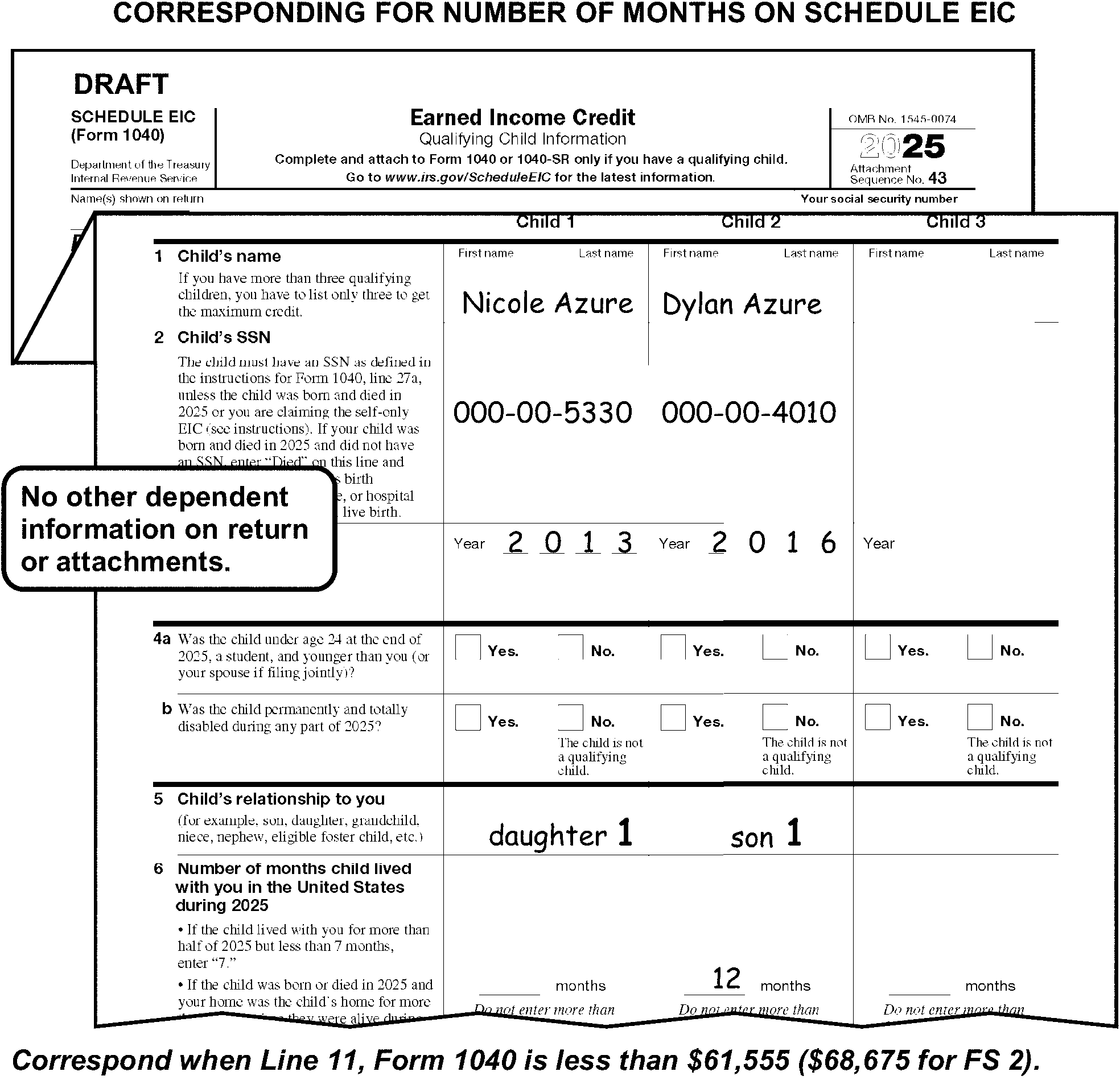
-
A qualifying child is any one of the following:
-
A child of the taxpayer - including a son, daughter, adopted child, stepchild, or grandchild - who lived in the home for more than 6 months. See IRM 3.11.3.13.1.1(1).
-
A foster child, foster son, or foster daughter who lived in the home for more than 6 months.
-
Any brother, sister, stepbrother, stepsister, niece or nephew whom the taxpayer cared for as their own and lived in the home for more than 6 months.
-
A child that was born or died during the tax year.
-
Taxpayer indicated "KC" (Kidnapped Child) in line 6 area.
-
-
Do not consider a child to be an EIC qualifying child when there is an indication the child did not live in the U.S. for more than half of the year unless the child lived on a U.S. military base.
-
Edit an "X" to the left of each non-qualifying child's name. (See Figure 3.11.3-113.)
-
If the name control is not present for a qualifying child, edit it in the following priority:
-
From the Dependents area on Form 1040 or attachments. (See Figure 3.11.3-113.)
-
From the primary taxpayer's name control.
-
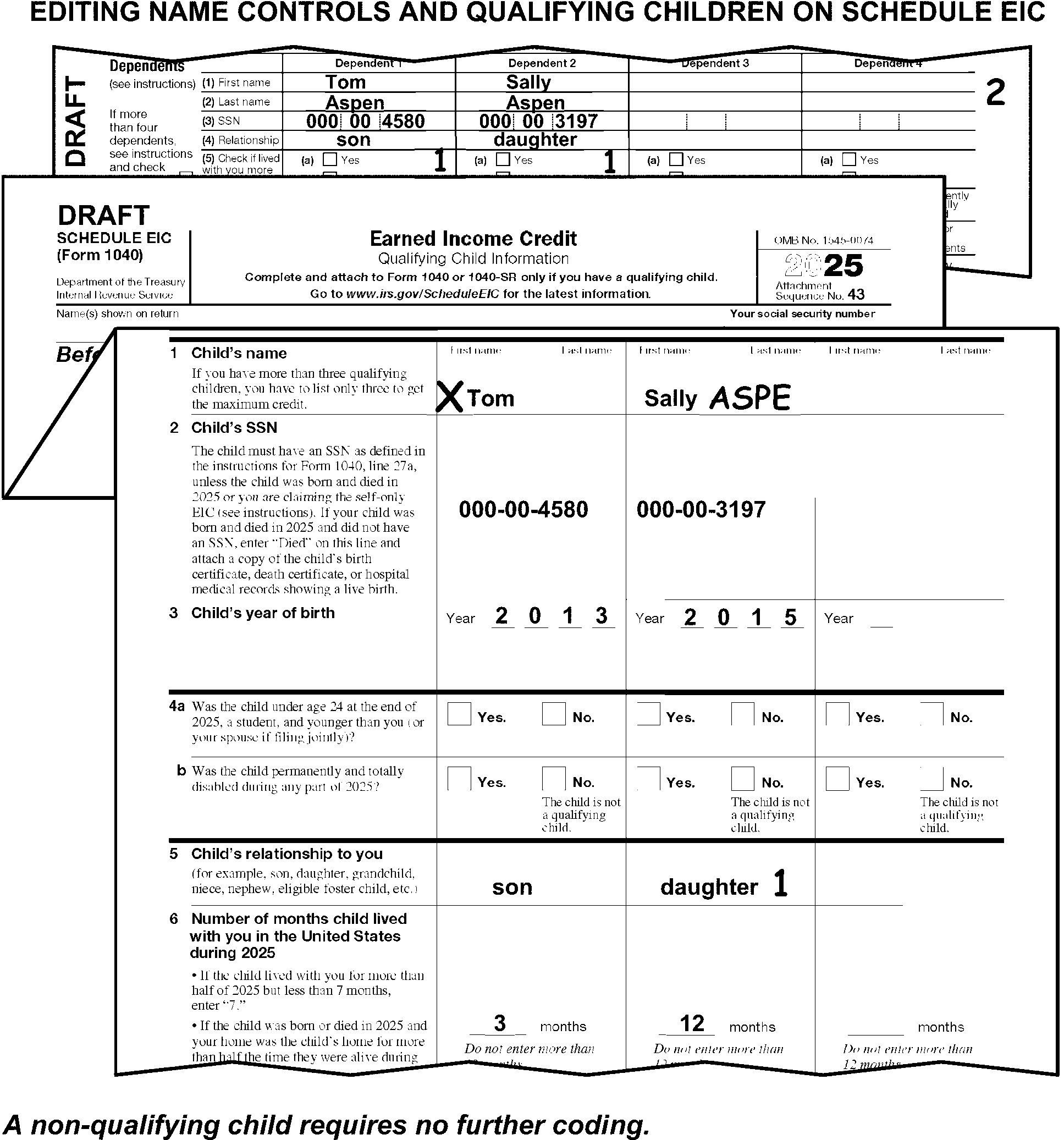
-
Perfect the child's TIN when both of the following conditions are present:
-
The child is a "qualifying child,"
-
The TIN is missing or incomplete.
-
-
Edit the child's missing TIN from attachments in the following priority:
-
Dependents area of Form 1040. (See Figure 3.11.3-114.)
-
Line 2 of Form 2441.
-
Other attachments.
-
-
Correspond when the child's TIN is missing, and the child was born and died during the same or consecutive tax period if none of the following documents are present:
When corresponding with Form 6001 use box E, with Form 3531 use box 5.-
Birth Certificate
-
Death Certificate
-
Hospital medical records
-
-
"X" the child's name when the TIN cannot be perfected. (See Figure 3.11.3-114.)
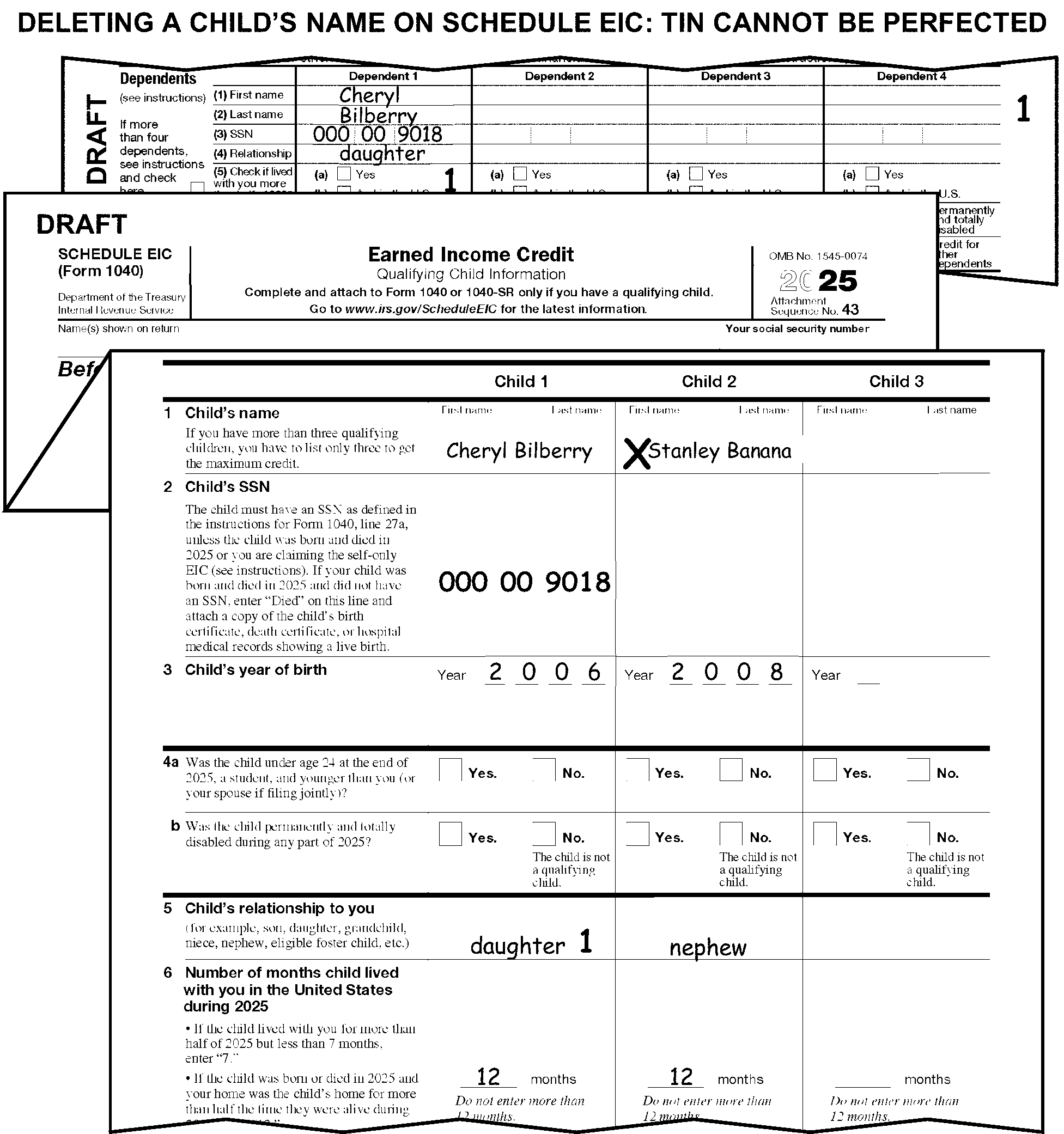
-
If the taxpayer has provided only two digits to show a year-of-birth, take the following actions:
-
Edit "20" to the left of the two digits provided by the taxpayer if the year of birth is shown to be 00-25.
-
Edit "19" to the left of the two digits provided by the taxpayer if the year of birth is shown to be 26-99.
-
-
If the taxpayer has provided a year of birth in MMDDYY format, perfect to YYYY format.
-
Edit an "X" in the line 4a "Yes" box for each qualifying child when both of the following conditions are present:
-
The taxpayer has not marked the box
-
The taxpayer has indicated the child is a student
-
-
Edit an "X" in the line 4b "Yes" box for each qualifying child when both of the following conditions are present:
-
The taxpayer has not marked the box
-
The taxpayer has indicated the child is disabled
-
-
Edit the Relationship Code for each qualifying child in the area immediately to the right of the taxpayer's designation in the box(es) on line 5.
Relationship Code Son or Daughter 1 Stepchild (son or daughter) 2 Foster Child (son or daughter) 3 Grandchild (son or daughter) 4 Niece or Nephew 5 Brother or Sister 6 Half-Brother or Half-Sister 7 Stepbrother or Stepsister 8 No relationship indicated to include notations of "Child" Take no action
-
Correspond if the number of months is missing and there is no indication of "Kidnapped Child" . When corresponding with Form 6001 use box P, with Form 3531 use box 21.
-
If there is an indication the child has been kidnapped, edit "KC" on the months line on line 6.
-
If the number of months for a qualifying child is a single-digit entry, edit a zero first to make a two-digit entry. For example, the taxpayer shows an entry of "9" months; edit "09" .
-
For TY1999 and prior, code cousin, godchild, or boy/girlfriend’s child as a foster child.
-
For TY1995 and prior, do not delete the name of a qualifying child when there is no TIN present, and you are unable to locate from attachments.
-
For TY1990 or prior, "X" the Schedule EIC.
-
The instructions provided in this subsection of the manual are for editing Schedule H. These instructions include:
-
General editing and perfecting procedures
-
Processing "loose" Schedules H
-
Editing the employers name control and Employer Identification Number (EIN) and TIN
-
Editing the FUTA Indicator Code and State Code
-
Editing the Additional States Indicator
-
-
The following lines on the Schedule H are T-Lines and T-Compute Lines:
T-Lines T-Compute Lines -
Employer's name control
-
Employer's TIN
-
Employer's EIN
-
Line 1
-
Line 3
-
Lines 5 through 7
-
Line 8
-
FUTA Indicator Code edited under the "Yes/No" boxes, page 2, Part II
-
Lines 13 through 16
-
Line 17, column(a)
-
Line 18, column(h)
-
Lines 19 and 20
-
Line 23
-
Line 24
-
Additional States Indicator - edited in bottom left margin
-
Line 8
-
Line 18
-
Line 19
-
Line 24
-
-
Only two Schedules H can be processed. One Schedule H for each of:
-
The primary taxpayer
-
The secondary taxpayer
-
-
Edit Sequence Code "44" when only one processable Schedule H is present, and the Sequence Code is not preprinted. The Sequence Code is edited in the upper-right corner of page 1.
-
When two processable Schedules H are present-one for the primary taxpayer and one for the secondary taxpayer, edit the Sequence Code as follows:
-
Edit Sequence Code "44" when it is not preprinted, for the primary taxpayer.
-
Edit Sequence Code "45" for the secondary taxpayer.
-
-
Combine multiple Schedules H when there is more than one Schedule H for any one taxpayer. When the taxpayer has entries in Part II on page 2 of more than one Schedule H:
-
Combine all data and edit it to Section B.
-
"X" those schedules not to be transcribed.
-
-
When one Schedule H is submitted for two taxpayers take one of the following actions:
-
Allocate each taxpayer's amounts to separate dummy Schedules H. "X" the Schedule H with the combined taxpayer liability.
-
Correspond for the correct allocation when it cannot be determined. When corresponding with Form 6001 use box U, with Form 3531 use box 17.
-
-
Correspond for Schedule H when the taxpayer submits only page 2.
-
No page 2 editing is required when lines 25 and 26 are the only entries on page 2.
-
"X" Section A, page 2 if both Section A and Section B, page 2, have entries. (See Figure 3.11.3-115.)
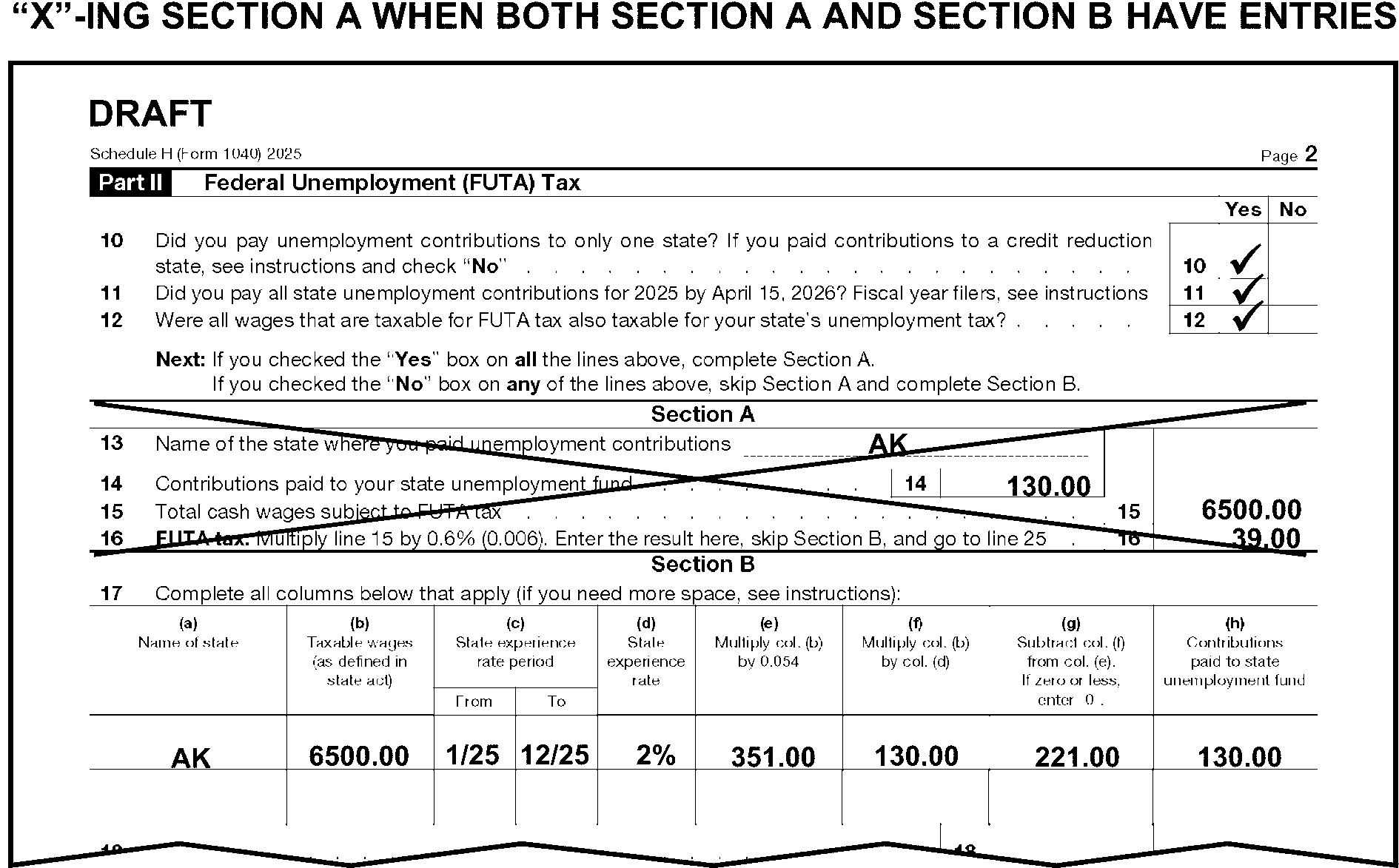
-
Edit the name control of the employer if it is not present. (See Figure 3.11.3-116.)
-
Edit the primary taxpayer's name control from the front of the return when the name control is missing or illegible.
-
Use the caption to determine the Name Control when there are two names but only one TIN is present.
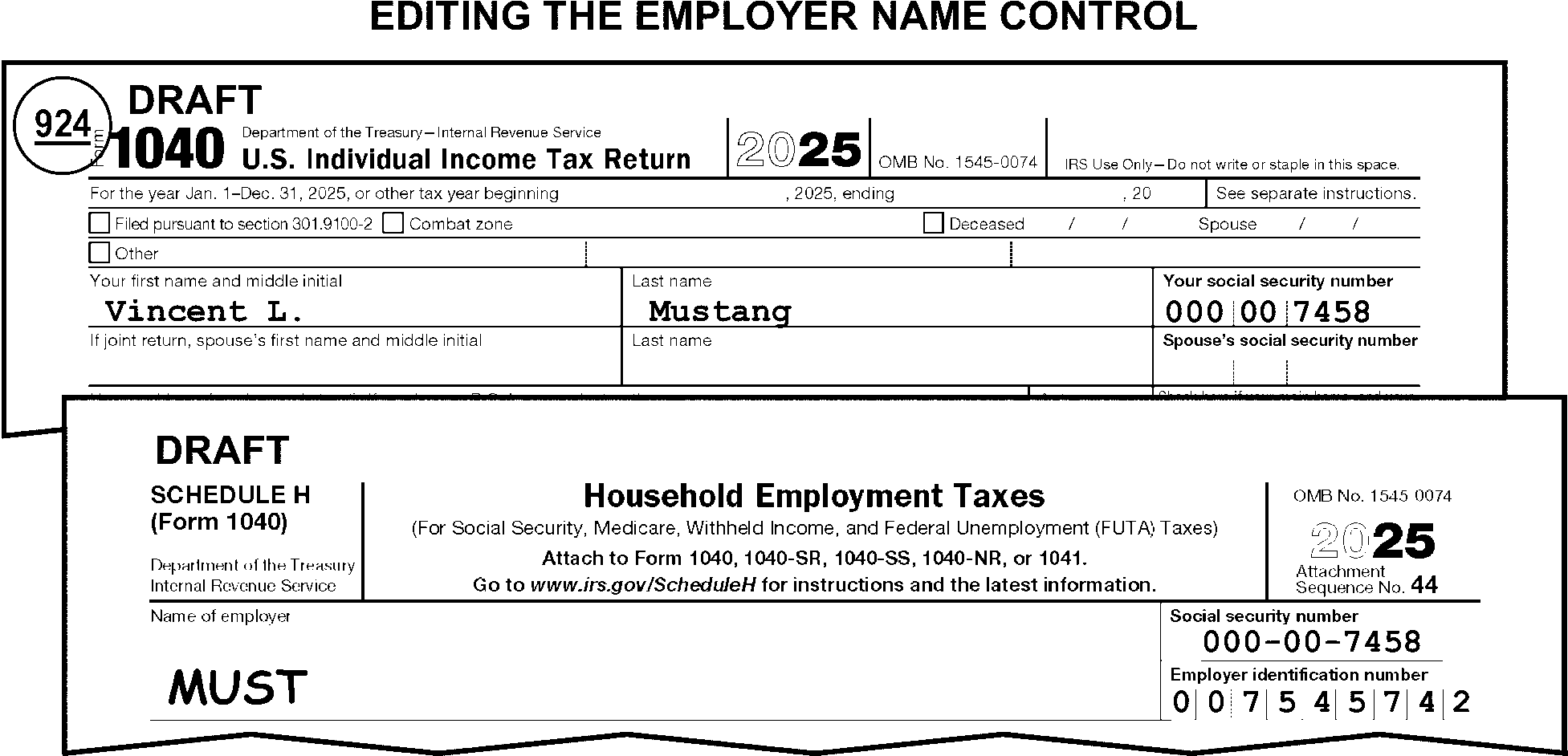
-
Perfect the TIN when it is missing, illegible, or other than nine digits. Perfect the TIN in the following priority:
-
From the caption area on page 1 of Form 1040.
-
From Form(s) W-2, schedules, or attachments.
-
-
Correspond with the taxpayer for the missing TIN only when corresponding for other missing information. When corresponding with Form 6001 use box U, with Form 3531 use box 17.
-
Use the caption to determine the correct TIN when there are two TINs but only one name on the Schedule H. Circle the TIN which does not match the taxpayer's name.
-
Search the return for the Employer Identification Number (EIN) when it is missing, illegible, or other than nine digits. Research for a missing EIN if possible. If still unable to find an EIN, take the following actions when the EIN cannot be found on an unnumbered return:
-
Finish editing the return.
-
Route the return to Entity.
-
-
Delete the EIN when it matches the taxpayer's TIN in the Schedule H Social Security Number box. Also, follow the instructions in (1) above.
-
"X" line 1 when it is less than $2,800.
-
Compute and edit line 8 when it is blank by adding lines 2, 4, 6, and 7.
-
Edit the FUTA Indicator (FIN) Code under the "Yes/No" boxes in Part II on page 2 of Schedule H.
-
Do not edit a FIN Code when Part II has no significant money entries.
-
Edit the FIN Code based on the taxpayer's answers to questions 10, 11, and 12 in Part II of Schedule H.
-
Take no action when all the questions are answered "Yes" . (See Figure 3.11.3-117.)
-
Code the FIN as "1" when any of the questions are answered "No" . (See Figure 3.11.3-117.)
-
Refer to Sections A and B in Part II of the Schedule H when the conditions in (4) or (5) are not met (i.e., all blank or a combination of "yes" entries and blank entries by the taxpayer).
-
Take no action when only Section A has entries.
-
Code the FIN as "1" when only Section B has entries or when both sections have entries. (See Figure 3.11.3-117.)
-
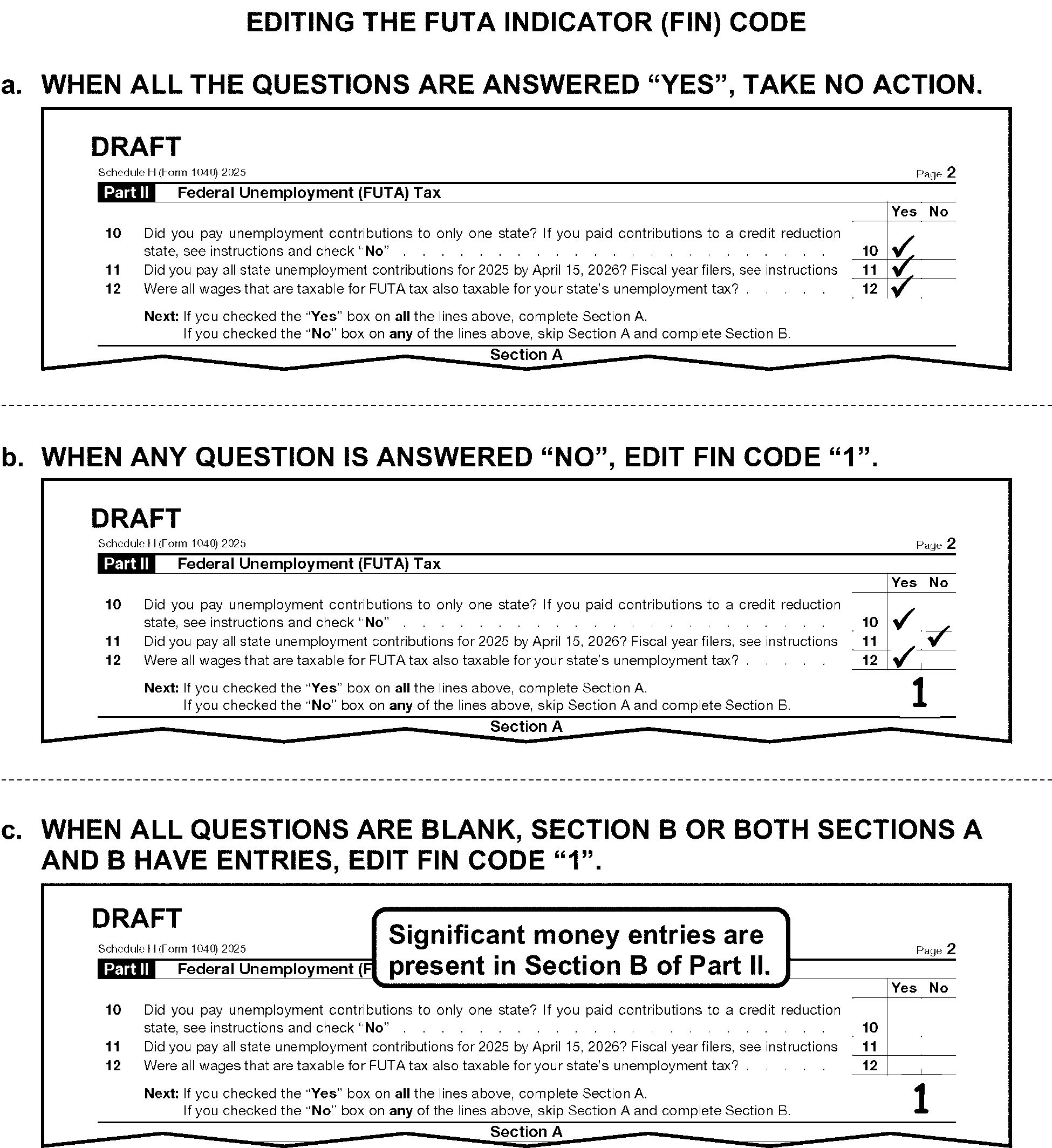
-
Circle all states when more than one State Code or state name is present on line 13. (See Figure 3.11.3-118.)
-
Edit the State Code from the taxpayer's address listed in the caption area of the return when there are no State Codes or State Names present, and entries are present in Section A. (See Figure 3.11.3-118.)
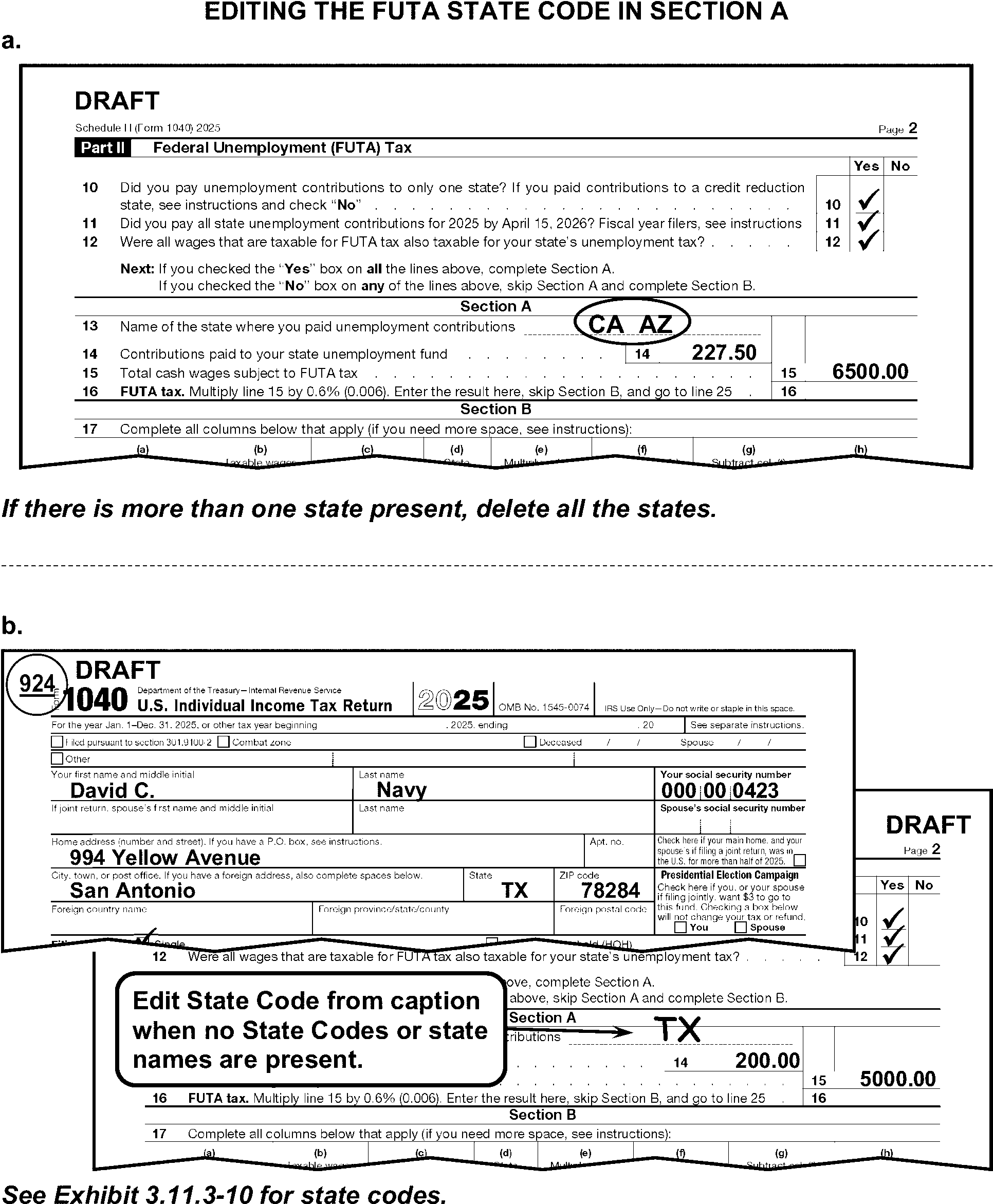
-
"X" line 14 when the taxpayer has written "0% rate" or "zero percent rate" as the only entry.
-
A valid State Code must be present or edited when there are significant money amounts entered on lines 20 or 24. (See Exhibit 3.11.3-10 for a list of all State Codes.)
-
Edit the State Codes to line 17, column (a) when the taxpayer writes "see attached" and there are one or two State Codes present on the attachment.
-
Circle the State Code(s) or state name(s) on line 17, column (a) when more than two are present on the return or attachments.
-
Edit the State Code for the taxpayer's address listed in the caption portion of the return when there are no State Codes or state names present.
-
"X" line 18 when the taxpayer has written "0% rate" or "zero percent rate" as the only entry.
-
Compute and edit line 19 when it is blank by adding lines 18(g) and 18(h).
-
If line 18(g) and 18(h) are also blank, compute line 19 by adding lines 17(g) and 17(h).
-
If line 17(g) and 17(h) are blank, take no action.
-
-
When more than five state codes are present, edit the Additional States Indicator of "1" in the lower left margin of page 2.
-
Taxpayers who are not required to file Form 1040, may still be required to file Schedule H. These taxpayers will file Schedule H alone.
If a "loose" Schedule H is received Then With a payment, The Deposit function will indicate "Loose Schedule H" on the form and forward it to Code and Edit. Without a payment, Receipt and Control will route the Schedule H directly to Code and Edit. -
Route loose Schedules H to Receipt and Control, Media Transport Unit when:
-
"TRUST" or "ESTATE" is noted in the caption, or
-
If an EIN and a BMF name line are present.
-
-
If a current year loose Schedule H has no money amount entries, refer it to your work leader. The work leader will dispose of the loose Schedule H per classified waste procedures.
-
For a current year loose Schedule H, follow the instructions below:
-
Research the tax period for a TC150. If TC150 has posted, edit "TC150" in the upper-left corner and route to Accounts Management.
-
If research determines no TC150 has posted, continue processing.
-
-
Some processing procedures for loose Schedules H depend on whether the Schedule H is received before or after April 15, 2026.
-
When a "loose" Schedule H is received on or before April 15, Work Leader will use the following criteria to determine whether to correspond or process the schedule:
If Line 27 is And Then Answered "Yes" , Correspond. Answered "No" , Part IV is missing the signature or signature is other than the taxpayer's and no documentary evidence is attached, Correspond. Answered "No" , Part IV has the taxpayer's signature present, or the signature is other than the taxpayer’s and documentary evidence is attached, Dummy a Form 1040, following the procedures in (9) below. Blank, Part II contains entries, Correspond. Blank, Part I contains entries, Part II is blank, and Part IV has the taxpayer's signature present, or the signature is other than the taxpayer’s and documentary evidence is attached, Dummy a Form 1040, following the procedures in (9) below. Blank, Part II is blank, and the signature is missing in Part IV, or signature is other than the taxpayer's and no documentary evidence is attached Correspond. -
When correspondence is required in (6) above, use the following procedures for corresponding with the taxpayer using Notice 1207.
-
Edit the taxpayer's complete mailing address in the caption of Schedule H from the part IV address area of Schedule H.
-
Attach Notice 1207 to Schedule H immediately below the caption area.
-
Date stamp the Notice 1207 with the current date. Use any IRS date stamp other than a received date stamp.
-
Remove the Schedule H from the batch and place it in the designated area.
-
-
When a "loose" Schedule H is received after April 15th, process the Schedule H with a "dummy" Form 1040. Dummy a Form 1040 following the instructions in (9) below.
-
Prepare a "dummy" Form 1040 and Schedule 2 for a loose Schedule H when required to do so. Follow these procedures when dummying:
-
Dummy Schedule 2 by entering the Schedule H, line 8 amount (or line 26 if Part II is completed), to Schedule 2, line 9.
-
Dummy Form 1040 by completing the caption information using the information from the Schedule H name line and from the Part IV address area of Schedule H.
-
Edit FS "1" or "2" , based on the Schedule H name line.
-
Edit line 9 Schedule 2, amount to lines 23, 24, and 37 for Form 1040, from the Schedule H tax total. (If Part II is not completed, use the amount from line 8, Schedule H. If Part II is completed, use the amount from line 26, Schedule H.)
-
Edit CCC "3" .
-
Edit RPC "Y" .
-
If Schedule H is missing a valid signature or documentary evidence, correspond with Form 6001, using fill-in "32" , per Exhibit 3.11.3-18.
-
-
When a loose Schedule H is received for a future tax period (e.g., TY26) send the Schedule H back to the taxpayer with Notice 1208.
-
Edit the taxpayer's complete mailing address in the caption of Schedule H from the part IV address area of Schedule H.
-
Attach Notice 1208 to Schedule H immediately below the caption area.
-
Date stamp the Notice 1208 with the current date. Use any IRS date stamp other than a received date stamp.
-
Remove the Schedule H from the batch and place it in the designated area.
-
-
Refer to the loose Schedule H editing instructions in IRM 3.11.3.46.16.1 when the loose Schedule H is for a prior tax year.
-
For TY24, "X" lines 1 and 3 when the amount is less than $2,700.
-
For TY23, "X" lines 1 and 3 when the amount is less than $2,600.
-
For TY22, " X" lines 1 and 3 when the amount is less than $2,400.
-
For TY21, " X" lines 1 and 3 when the amount is less than $2,300.
-
For TY20 - 19, "X" lines 1 and 3 when the amount is less than $2,200.
-
For TY18, "X" lines 1 and 3 when the amount is less than $2,100.
-
For TY17 - 16, "X" lines 1 and 3 when the amount is less than $2,000.
-
For TY15 - 14, "X" lines 1 and 3 when the amount is less than $1,900.
-
For TY13 - 12, "X" lines 1 and 3 when the amount is less than $1,800.
-
For TY11 - 09, "X" lines 1 and 3 when the amount is less than $1,700.
-
For TY08, "X" lines 1 and 3 when the amount is less than $1,600.
-
For TY07 - 06, "X" lines 1 and 3 when the amount is less than $1,500.
-
For TY05, "X" lines 1 and 3 when the amount is less than $1,400.
-
For TY09 and prior, edit the State Code from line 17, column (a), row 1 to line 17, column (a), row 2 when there is a state code in row 1 and both of the following conditions apply:
-
A State Code and state reporting number are present in row 1, line 17, and
-
A state reporting number is present in row 2, without a corresponding State Code.
-
-
For TY94 and prior, "X" the Schedule H when it has been filed.
-
Research prior year for a TC150. If TC150 has posted for the tax period, edit "TC150" in the upper left corner and route to Accounts Management.
-
If no TC150 has posted for the tax period, dummy a Form 1040. (See IRM 3.11.3.46.15.)
-
The instructions provided in this subsection of the manual are for editing Schedule 8812.
-
Edit Sequence Code "47" in the upper-right margin of Schedule 8812 if not preprinted.
-
The following lines on Schedule 8812 are T-Lines and T-Compute Lines:
T-Line T-Compute Line -
Line 18a
-
Line 18b
-
Line 21
-
There are no T-Compute lines for this form.
-
-
If line 16b is less than $5,100, "X" the Schedule.
-
Only one Schedule 8812 can be processed. If more than one is attached, combine related T-Line amounts onto one Schedule 8812 and delete those not used.
-
Edit Audit Code "2" when Form 8862 is attached with Part III, CTC/ACTC portion of the form filled out.
-
Edit the total SS and Medicare Tax amounts from W-2 (boxes 4 & 6) or attachments on Line 21 when both of the following conditions are present:
(See Figure 3.11.3-119.)-
Line 16b, Schedule 8812 is $5,100 or more
-
Line 21, Schedule 8812, is blank, dash, or zero and there is an amount on line 28 Form 1040
-
-
If unable to edit the amount on line 21 using instructions above, "X" line 28 Form 1040.
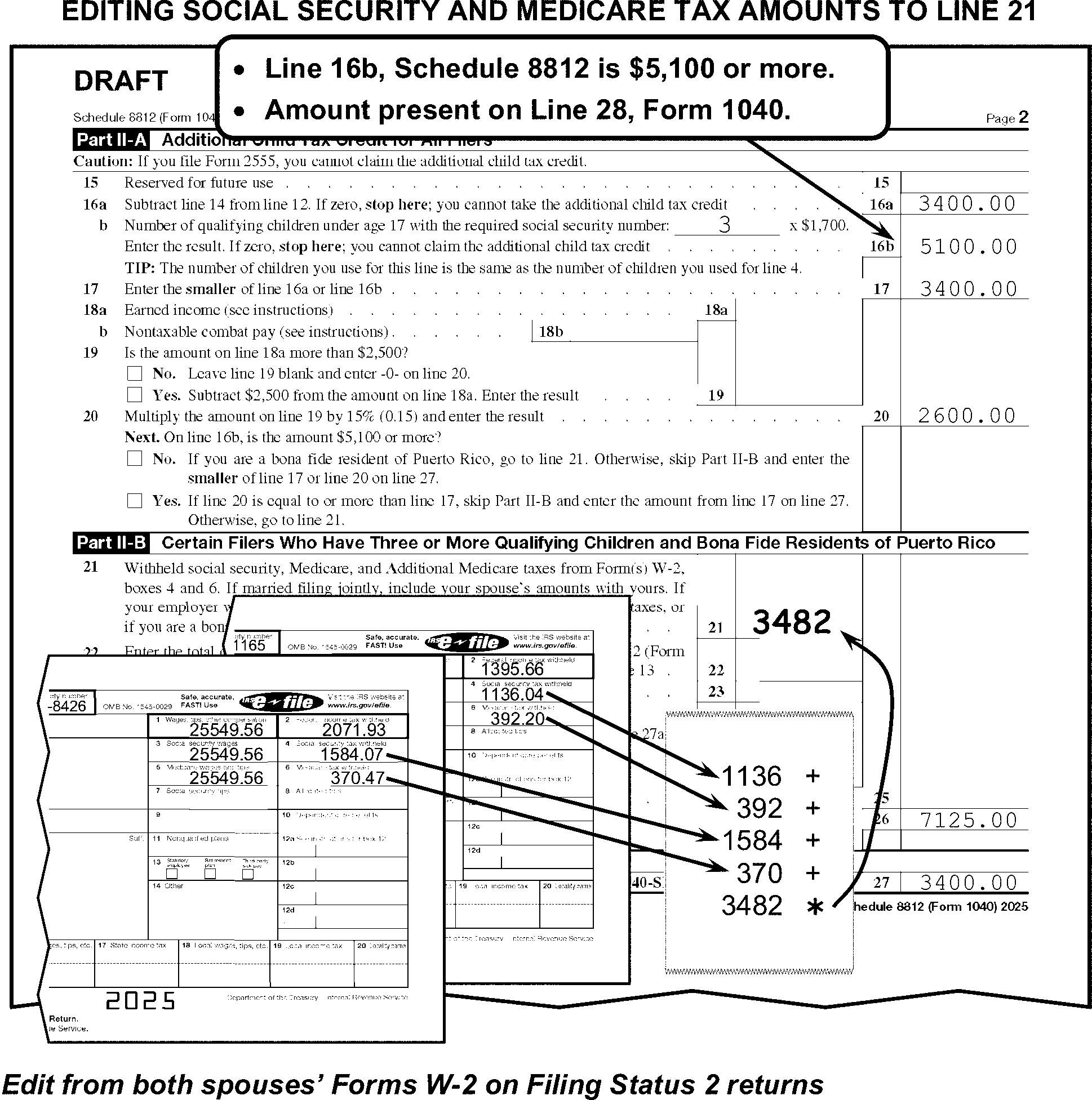
-
For TY23 if line 16b is less than $4,800, "X" the Schedule.
-
For TY23 edit the total SS and Medicare Tax amounts from W-2 (boxes 4 & 6) or attachments on Line 21 when both of the following conditions are present:
-
Line 16b, Schedule 8812 is $4,800 or more
-
Line 21, Schedule 8812, is blank, dash, or zero and there is an amount on line 28 Form 1040
-
-
For TY22 if line 16b is less than $4,500, "X" the Schedule.
-
For TY22 edit the total SS and Medicare Tax amounts from W-2 (boxes 4 &6) or attachments on Line 21 when both of the following conditions are present:
-
Line 16b, Schedule 8812 is $4,500 or more
-
Line 21, Schedule 8812, is blank, dash, or zero and there is an amount on line 28 Form 1040
-
-
For TY21, do not X Schedule 8812.
-
For TY21 edit the total SS and Medicare Tax amounts from W-2 (boxes 4 & 6) or attachments on Line 21 when both of the following conditions are present:
-
Line 16b, Schedule 8812 is $4,200 or more
-
Line 21, Schedule 8812, is blank, dash, or zero and there is an amount on line 28 Form 1040
-
-
For TY20 through TY18"X" the form when line 4 is less than $4,200.
-
For TY20 through TY18 edit the total SS and Medicare Tax amounts from W-2 (boxes 4 & 6) or attachments on Line 9 when both of the following conditions are present:
-
Line 4, Schedule 8812 is $4,200 or more
-
Line 9, Schedule 8812, is blank, dash, or zero and there is an amount on line 28 Form 1040
-
-
If unable to edit the amount on line 9 (TY21 line 21) using instructions above, "X" line 28 Form 1040.
-
For TY17 and later, edit Audit Code "2" when Form 8862 is attached with Part III, Child Tax Credit/Additional Child Tax Credit portion of the form completed.
-
For TY17 through TY12 - Schedule 8812, Part I, must have entries if Form 1040 or Form 1040A, line 6c, shows children with ITINs (or a continuation-type attachment), and the correlating checkbox for Child Tax Credit is marked. If no entries are present, correspond for a completed Schedule 8812 with Form 3531/6001, using fill-in 30, per Exhibit 3.11.3-18.
-
For TY17 - 03, "X" the schedule/form when line 1 is less than $3,000.
-
For TY17 - 14, edit the total Social Security and Medicare tax amounts in dollars only from all Forms W-2 (boxes 4 and 6) or attachments on line 21 when both of the following conditions are present:
-
Line 1, Schedule 8812 is $3000 or more, and
-
Line 21, Schedule 8812 is blank, dash, or zero and there is an amount on line 28, Form 1040.
-
-
If unable to edit the amount on line 7 using the instructions above, "X" line 28, Form 1040
-
For TY02 - 01, "X" the form when line 1 is less than $1,800.
-
For TY00 - 98, "X" the form when line 6 is less than $1,500.
-
For TY97 or prior, "X" the form.
-
The instructions provided in this subsection of the manual are for editing Form 8606.
-
The following lines on Form 8606 are T-Lines and T-Compute Lines:
T-Lines T-Compute Lines -
Spousal Indicator - edited to the left of the form title
-
Line 7
-
Line 15c
-
Line 16
-
Line 17
-
Line 18
-
Line 22
-
Line 15c
-
-
Only two Forms 8606 can be processed. One Form 8606 for each of:
-
Primary Taxpayer
-
Secondary Taxpayer
-
-
Edit Sequence Code "48" when only one processable Form 8606 is present, and the Sequence Code is not preprinted.
-
When two processable Forms 8606 are present -- one for the primary taxpayer and one for the secondary taxpayer - edit the Sequence Code as follows (see Figure 3.11.3-120):
-
Edit Sequence Code "48" for the primary taxpayer if not preprinted.
-
Edit Sequence Code "49" for the secondary taxpayer.
-
-
"X" Form 8606 when there are no significant T-Line entries present.
-
Combine multiple Forms 8606 when there is more than one Form 8606 for any one taxpayer.
-
When one Form 8606 is submitted for two taxpayers take one of the following actions:
-
Allocate each taxpayer's amounts to separate dummy Forms 8606. "X" the Form 8606 with the combined taxpayer liability.
-
Correspond for the correct allocation when it cannot be determined. When corresponding with Form 6001 use box U, with Form 3531 use box 17.
-
-
The Spousal Indicator is edited to the left of the form title.
-
If the return is FS "2" edit the form as follows:
-
If Form 8606 is for the primary taxpayer, edit Spousal Indicator "1" .
-
If Form 8606 is for the secondary taxpayer, edit Spousal Indicator "2" . (See Figure 3.11.3-120.)
-
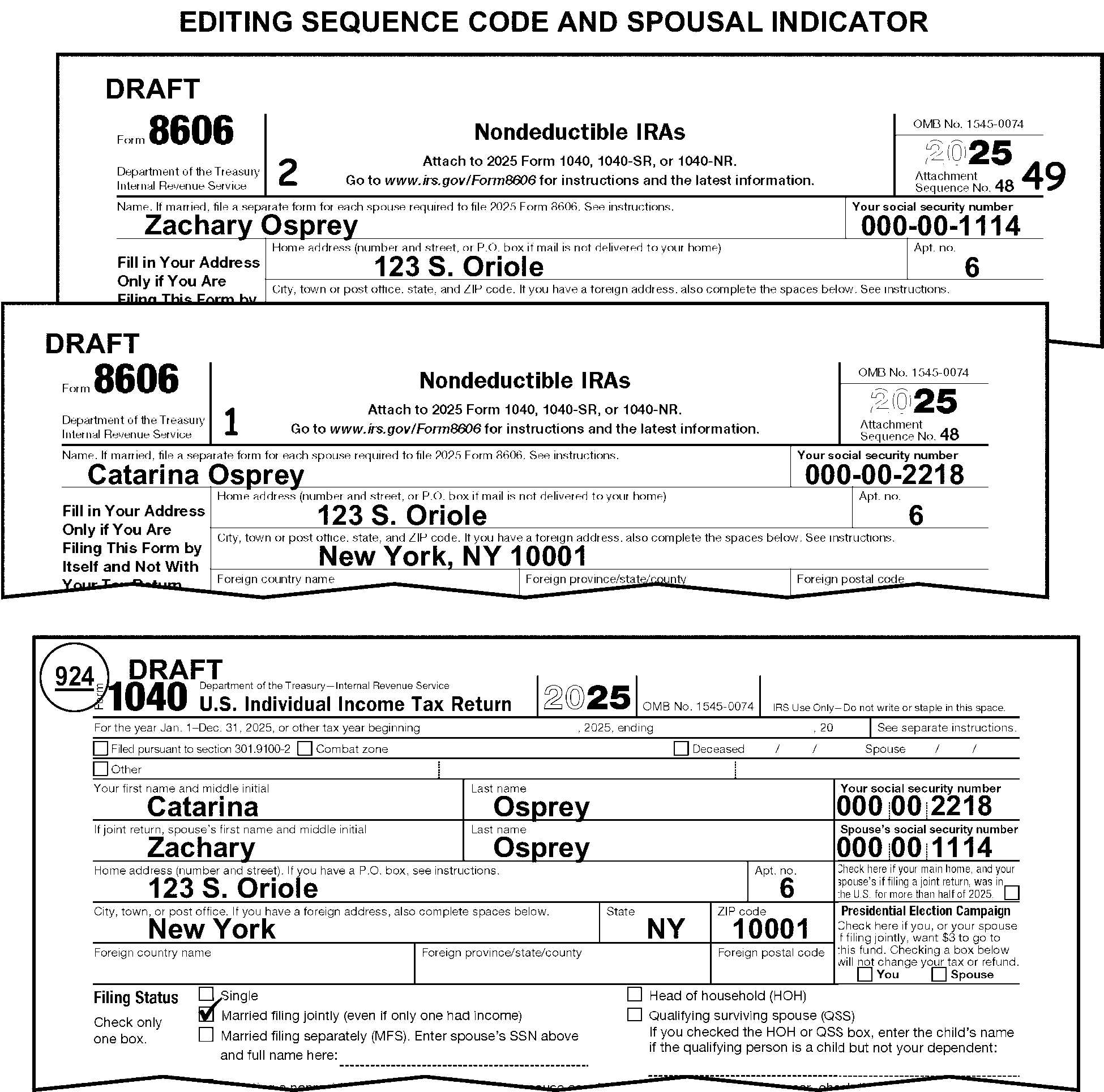
-
The instructions provided in this subsection of the manual are for editing Form 8863.
-
The following lines on Form 8863 are T-Lines and T-Compute Lines:
T-Lines T-Compute Lines Part I – Refundable American Opportunity Credit -
Line 1
Part II - Nonrefundable Education Credits-
Line 10
Part III - Student and Education Institution Information-
Line 20
-
Line 21
-
Line 22, Column A, line 4
-
Line 22, Column B, line 4
-
Line 23
-
Line 24
-
Line 25
-
Line 26
-
Line 1
-
Line 10
-
-
Edit Sequence Code "50" in the upper-right margin of Form 8863 if not preprinted.
-
Only one Form 8863 can be processed.
-
Edit SPC "K" when the checkbox on line 7 is marked.
-
Edit Audit Code "3" when Form 8862 is attached with Part IV, American Opportunity Tax Credit portion of the form completed.
-
If line 1 is blank, edit the sum of all Parts III, line 30.
-
If line 30 in any Part III is $2,501 or more, for a single student "X" line 1.
-
If page 1 is missing, dummy page 1, if possible, unless corresponding for other missing information.
-
If line 10 is blank, edit the sum of all Parts III, line 31.
-
If page 1 is missing or incomplete, dummy or complete page 1, if possible, unless corresponding for other missing information.
-
Edit the Name Control and/or TIN if missing or incomplete, from Dependents section or from the caption area of Form 1040 or from Form 1098-T, if present, when it can be determined for whom, the credit is being claimed.
-
If page 2 is present and both the Name Control and TIN cannot be perfected or if it cannot be determined for whom the credit is being claimed, correspond for entries on lines 20 and 21.
-
If page 2 is missing, correspond for Form 8863.
-
If page 1 is missing or incomplete, dummy or complete page 1, if possible, unless corresponding for other missing information.
-
The instructions provided in this subsection of the manual are for editing Form 4952.
-
The following lines on Form 4952 are T-Lines and T-Compute Lines:
T-Lines T-Compute Lines -
Line 4e
-
Line 4g
-
There are no T-Compute lines on this form.
-
-
Edit Sequence Code "51" in the upper-right margin of Form 4952 if not preprinted.
-
Only one Form 4952 can be processed.
-
Process the first one only.
-
"X" those forms not used.
-
-
Up to two Form 8889 may be processed. Always edit Sequence Code "52" for the primary taxpayer and/or always edit "53" for the secondary taxpayer in the upper-right margin if not preprinted.
-
Combine multiple Forms 8889 when the taxpayer submits more than one Form 8889 for any one taxpayer. Delete those forms not used.
-
The following lines on Form 8889 are T-lines and T-Compute Lines:
T-Lines T-Compute Lines -
Lines 1 through 21
-
Line 16
-
-
Edit Sequence Code "54" in the upper-right margin of Form 8880 if not preprinted.
-
The following lines on Form 8880 are T-Lines and T-Compute Lines:
T-Lines T-Compute Lines -
Lines 6a and 6b
-
There are no T-Compute lines on this form.
-
-
Combine related T-line amounts when multiple Forms 8880 are attached. Delete those forms not used.
-
Edit Sequence Code "55" on Form 8995, Sequence Code "55A" on Form 8995-A and "55D" on Form 8995-A, Schedule C in the upper right-hand corner if not preprinted.
-
The following lines on Form 8995/8995-A/8995-A Schedule C are T-Lines and T-Compute Lines:
Form 8995
T-Lines T-Compute Lines -
Line 2
-
Line 3
-
Line 5
-
Line 6
-
Line 7
-
Line 9
-
Line 12
-
Line 16
-
Line 17
-
Line 5
-
Line 9
-
Line 16
-
Line 17
-
-
Only one Form 8995 or 8995-A can be processed.
-
Form 8995-A takes precedence over Form 8995.
-
If both forms are attached with T-line entries present, process Form 8995-A and delete Form 8995.
-
If multiple Form 8995-A or Form 8995 are attached, process the first one with T-line entries and delete the remaining.
-
-
Only one Form 8995-A Schedule C can be processed. If multiple Form 8995-A Schedule C are attached, process the first one with T-line entries and delete the remaining.
-
Delete Form 8995-A Schedule C when it is attached with a Form 8995.
-
When an amount is present on Form 1040, line 13a and Form 8995-A Schedule C is attached and no Form 8995 or 8995-A is attached, correspond for Form 8995-A.
-
Edit FPC "H" when any of the following are attached to the return:
-
Form 8995-A Schedule A
-
Form 8995-A Schedule B
-
Form 8995-A Schedule C
-
Form 8995-A Schedule D
-
-
Edit Sequence Code "56" in the upper-right margin of Form 8888 if not preprinted.
-
The following lines on Form 8888 are T-Lines and T-Compute Lines:
T-Lines T-Compute Lines -
Lines 1a through 1d
-
Lines 2a through 2d
-
Lines 3a through 3d
-
Line 4
-
There are no T-Compute lines on this form.
-
-
If an amount is present on line 4 of Form 8888, X the entry.
-
Edit Sequence Code "57" on Form 8978 in the upper right-hand corner if not preprinted.
-
The following lines on Form 8978 are T-Lines and T-Compute Lines:
T-Lines T-Compute Lines -
Review Year Adj Code Checkbox (below entity)
-
Line 14
-
Line 16
-
Line 18
-
Line 14
-
Line 16
-
Line 18
-
-
Only one Form 8978 can be processed. If multiple forms are attached, combine related T-Lines and delete those forms not used.
-
Form 5405 is historical.
-
Form 5405 is used to claim the First-Time Homebuyer Credit (TY08 through TY11) and to repay it (TY10 and later). In TY11 the credit expired and for TY12 through TY24, Form 5405 is for the repayment of the First-Time Homebuyer Credit only.
-
Up to two Forms 5405 may be processed. Always edit Sequence Code "58" for the primary taxpayer and/or always edit "59" for the secondary taxpayer of Form 5405 if not preprinted.
-
The following lines on Form 5405 are T-Lines and T-Compute Lines:
T-Lines T-Compute Lines -
TIN
-
Line 1
-
Line 3 Checkboxes
-
Line 4
-
Line 5
-
Line 7
-
Line 8
-
There are no T-Compute lines on this form.
-
-
If the TIN is missing on Form 5405, edit the TIN for the primary and/or secondary taxpayer from attachments, if possible.
-
If two TINs are present on Form 5405, delete the TIN of the secondary taxpayer unless the secondary taxpayer is the purchaser of the property.
-
If the box on line 2 or any box under line 3 is marked, a date must be present on line 1. Correspond if missing. When corresponding with Form 6001 use box P, with Form 3531 use box 18.
-
If a date is present on line 1, box 2 or any box under line 3 must be marked. Correspond if missing. When corresponding with Form 6001 use box P, with Form 3531 use box 18.
-
If the box on line 2 is marked and no box under line 3 is marked, edit SPC "Z" if the claim is being made for the primary taxpayer. Edit SPC "7" if the claim is being made for the secondary taxpayer.
-
If the box on line 2 is marked and entries are present in Part II, correspond using fill-in "20" , per Exhibit 3.11.3-18.
-
If no box is marked under line 3, and line 7 shows a dollar amount, correspond for an explanation of the dollar amount on line 7. When corresponding with Form 6001 use box O, with Form 3531 use box 19-20.
-
If the line 3 checkbox "e" is marked, a name must be present on the line. Correspond if missing. When corresponding with Form 6001 use box P, with Form 3531 use box 18.
-
If the line 3 checkbox "h" is marked and any other box under line 3 is marked, circle the box "h" entry.
-
For TY2008 and prior, "X" Form 5405.
-
For TY11 - TY10, follow the instructions below.
-
If the TIN is missing on Form 5405, edit the TIN for the primary and/or secondary taxpayer from attachments, if possible.
-
If two TINs are present on Form 5405, delete the TIN of the secondary taxpayer unless the secondary taxpayer is the purchaser of the property.
-
For line A -- Address of Qualifying Home, if the address present is a foreign address, "X" Form 5405.
-
If the taxpayer marked the line C checkbox "Yes" , and the purchase date of the property is after 4/30/2010 and before 10/1/2010 (or after 4/30/2011 and before 7/1/2011 with line D checkbox marked "Yes" ), a copy of the binding contract and a properly executed settlement statement (Form HUD-1 or similar) must be attached.
If And Then A complete settlement statement (Form HUD-1 or similar) is present indicating the following: -
All parties' names
-
Property address (U.S.)
-
Contract sales price
-
Date of purchase (after 4/30/2010 and before 10/1/2010) or (after 4/30/2011 and before 7/1/2011 with line D checkbox marked "Yes" )
The binding contract is not attached, -
Edit Audit Code "I" (eye).
-
-
For TY2011 - 2009, if only page 2 of Form 5405 is attached and entries are present on lines 14 through 18, do not correspond for page 1 of Form 5405. Edit Sequence Code "58" for the primary taxpayer and "59" for the secondary taxpayer in the upper right corner of page 2.
-
If the box on line 12 is marked and no boxes under line 13 are marked, edit SPC "Z" if the claim is being made for the primary taxpayer. Edit SPC "7" if the claim is being made for the secondary taxpayer.
-
If line 13 checkbox "h" is marked and any other box under line 13 is marked, circle the box "h" entry.
-
Up to two Form 8919 may be filed with a return. Always edit Sequence Code "61" for the primary taxpayer and/or always edit "62" for the secondary taxpayer if not preprinted.
-
When more than one Form 8919 is present for the same taxpayer, combine to a single Form 8919. "X" the form not being used.
-
The following lines on Form 8919 are T-Lines and T-Compute Lines:
T-Lines T-Compute Lines -
Taxpayer TIN
-
Lines 1 through 3, Columns (a) through (f)
-
Line 6
-
Line 8
-
Line 13
-
Line 6
-
Line 13
-
-
Edit the TIN from the caption on Form 1040 when the TIN is missing, illegible or other than 9 digits. If the TIN is not present in the caption, search Forms W-2 and other attachments for the missing TIN.
-
Ensure Form 8919 is complete. This includes the TIN and entries present on lines 1 through 3, columns (a) through (f), 6 and 8. If Form 8919 is incomplete and you are unable to edit this information from attachments, edit Audit Code "Z" .
-
Edit Sequence Code "63" in the upper-right corner of Form 8958 if not preprinted.
-
The following lines on Form 8958 are T-Lines and T-Compute Lines:
T-Lines T-Compute Lines -
Spouse's or Partner's First Name
-
Spouse's or Partner's Last Name
-
Spouse's or Partner's Social Security Number
-
There are no T-Compute lines on this form.
-
-
If an amount is present on line 1, column B or column C:
-
Review the SSN for that column
-
If the SSN belongs to the Spouse or RDP
-
Edit Action Code "430"
-
Otherwise, take no action.
-
-
If the taxpayer included the spouse's or partner's first and last names in either box, separate the names into the first and last name boxes.
-
Edit Sequence Code "64" on Form 461 in the upper right-hand corner if not preprinted.
-
The following lines on Form 461 are the T-Lines and T-Compute Lines:
T-Lines T-Compute Lines -
Lines 8 through 12
-
Line 16
-
Line 9
-
Line 12
-
Line 16
-
-
Only one Form 461 can be processed. If multiple forms are attached, combine related T-Lines and delete those forms not used.
-
Up to two Forms 8941 may be filed with a return. Always edit Sequence Code "65" for primary taxpayer and/or always edit Sequence Code "66" for the secondary taxpayer on Form 8941 if not preprinted.
-
The following lines on Form 8941 are T-Lines and T-Compute Lines:
T-Lines T-Compute Lines -
Identifying Number (Top Right)
-
A - SHOP (Small Business Health Options Program) Checkbox
-
B - Employment Taxes Employer Identification Number
-
C - Two-Year Declaration Checkbox
-
Line 1
-
Line 2
-
Line 3
-
Line 4
-
Line 5
-
Line 10
-
Line 13
-
Line 14
-
Line 15
-
Line 16
-
There are no T-Compute lines on this form.
-
-
Edit the TIN from the caption on Form 1040 when the TIN is missing, illegible or other than 9 digits. If the TIN is not present in the caption, search Forms W-2 and other attachments for the missing TIN.
-
If multiple Forms 8941 are present with a return, combine primary taxpayer's Forms 8941 together. Combine secondary taxpayer's Forms 8941 together for a total of two Forms 8941.
-
If the taxpayer answered question "A" and/or C, edit a code from the table below to the left of each question in the left margin:
Edit Code Description 1 Only Box "Yes" is checked 2 Only Box "No" is checked 3 Both Yes and No boxes are checked
-
Edit Sequence Code "67" in the upper-right corner of Form 6252 if not preprinted.
-
The following lines on Form 6252 are T-Lines and T-Compute Lines:
T-Lines T-Compute Lines -
Line 1
-
Line 2a - 2b
-
Line 7
-
Line 19
-
Line 21
-
Line 23
-
Line 7
-
Line 19
-
-
Only one Form 6252 can be processed. If multiple forms are attached, process the first one with significant T-line entries and delete those forms not used.
-
When line 7 is blank, dash, or zero, compute and edit by subtracting line 6 from line 5.
-
When line 19 is blank, dash, or zero and an entry is present on line 16, compute and edit by dividing line 16 by line 18.
-
When an entry is present or edited on line 19, edit that entry as a 5-digit decimal in the margin to the right of line 19, (do not edit the decimal point). See chart for examples.
Line 19 Entry Edit in Right Margin 1.0 10000 0.91 (or .91) 09100 0.0258 (or .0258) 00258 0.54321 (or .54321) 05432 85% 08500 54% 05400
-
Form 8910 is historical and cannot be used for TY23 and later.
-
For TY22 - TY15:
-
If line 1 of Form 8910 shows a claim for a bicycle, Moped, or motorcycle, circle the entry on Form 8910.
-
Edit Unallowable Code "79" when multiple instances of the same Vehicle Identification Number (VIN) appears on attached Form 8910 and/or Form 8936.
-
-
For TY10 and prior, "X" Form 8910.
-
Edit Sequence Code "69" in the upper-right corner of Form 8936 if not preprinted.
-
The following lines on Form 8936 are T-lines and T-Compute Lines:
T-Lines T-Compute Lines -
Line 4
-
Line 5
-
Line 7
-
Line 20
-
Line 4
-
-
For TY22-TY11, edit Sequence Code "69A" and follow Form 8936 Schedule A instructions. See IRM 3.11.3.64.
-
For TY22 and prior, do not "X" Form 8936 when T-line entries are present.
-
Edit Unallowable Code "79" when multiple instances of the same Vehicle Identification Number (VIN) appears on attached Form 8910 and/or Form 8936.
-
For TY10 and prior, "X" Form 8936.
-
Edit Sequence Code "69A" in the upper-right corner of Form 8936 Schedule A if not preprinted.
-
Up to 2 Form 8936 Schedule A can be transcribed.
-
Edit the first 2 Form 8936 Schedule A and delete those not used.
-
The following lines on Form 8936 Schedule A are T-lines and T-Compute Lines:
T-Lines T-Compute Lines -
Line 2
-
Additional Form 8936 Schedule A Indicator (margin to the right of line 2)
-
Line 3
-
Lines 4a-4b
-
Lines 9 - 10
-
Line 17
-
Line 26
-
Line 17
-
Line 26
-
-
Edit the additional Form 8936 Schedule A Indicator "1" to the first schedule attached, when more than two Form 8936 Schedule A are attached.
-
Edit Unallowable Code "79" when multiple instances of the same Vehicle Identification Number (VIN) appears on attached Form 8936 Schedule A.
-
"X" the amount on Part II, line 9, Part IV, line 17, and/or Part V, line 26, if the VIN is incomplete (other than 17 characters) or has other than alphanumeric characters.
-
When an entry is present on line 10, edit as a 3 digit whole number. See chart below:
Entered As Edit As 0.00001 000 0.001 000 0.01 001 0.99999 099 1.00000 100 .7 070 .12345 012 20% 020 75% 075
-
Edit Sequence Code "70" in the upper-right corner of Form 8867 if not preprinted.
-
The following lines on Form 8867 are T-Lines and T-Compute Lines:
T-Lines T-Compute Lines -
EIC Column Checkbox
-
CTC Column Checkbox
-
AOTC Column Checkbox
-
HOH Column Checkbox
-
Line 15
-
There are no T-Compute lines on this form.
-
-
Only one Form 8867 can be processed. Process the first Form 8867 and "X" forms not used.
-
Edit Sequence Code "71" in the upper-right corner of Form 8959 if not preprinted.
-
The following lines on Form 8959 are T-Lines and T-Compute Lines:
T-Lines T-Compute Lines -
Lines 1 through 3
-
Lines 7 and 8
-
Lines 13 and 14
-
Line 17
-
Line 18
-
Line 19
-
Lines 23 and 24
-
There are no T-Compute lines on this form.
-
-
Only one Form 8959 can be processed. If multiple forms are attached, combine related T-lines and delete those forms not used.
-
Edit Sequence Code "72" in the upper-right corner of Form 8960 if not preprinted.
-
The following lines on Form 8960 are T-Lines and T-Compute Lines:
T-Lines T-Compute Lines -
Investment Income checkboxes
-
Lines 1 through 3
-
Lines 4a and 4b
-
Lines 5a through 5c
-
Lines 6 through 8
-
Lines 9a through 9c
-
Line 10
-
Line 11
-
Line 13
-
Line 16
-
Line 17
-
Line 8
-
Line 11
-
-
If the taxpayer has checked any of the boxes in Part I (Investment Income), edit a code from the table below to the right of the checkboxes in the right margin:
Edit Code Description 1 Section 6013(g) election and no other box checked 2 Reg. Section 1.1411-10g and no other box checked 3 Both Section 6013(g) and Reg. Section 1.411-10g boxes checked 4 Section 6013(h) election and no other box checked 5 Both Section 6013(h) and Reg. Section 1.1411-10g boxes checked -
Only one Form 8960 can be processed. If multiple forms are attached, combine related T-lines and delete those forms not used.
-
Edit Sequence Code "73" in the upper-right corner of Form 8962, page 1, if not preprinted.
-
Edit Sequence Code "74" in the upper-right corner of Form 8962, page 2, only when T-line entries are present on page 2.
-
Edit RPC "D" if "QSEHRA" is noted on top of Form 8962.
-
Only one Form 8962 is processable. If more than one is attached, combine related T-line amounts onto one Form 8962 and delete those not used.
-
If Form 8962 is blank or entries are present in only Part I (lines 1-8b) of Form 8962 (No T-line entries in Part II, lines 11 through 23, columns A, B, and F), "X" Form 8962.
-
The following lines on Form 8962 Page 1 are T-Lines and T-Compute Lines:
T-Lines T-Compute Lines -
Married filing separately PTC exception checkbox
-
Line 2b
-
Line 4 checkbox
-
Line 8b
-
Line 11 a, b, f
-
Line 12 a, b, f
-
Line 13 a, b, f
-
Line 14 a, b, f
-
Line 15 a, b, f
-
Line 16 a, b, f
-
Line 17 a, b, f
-
Line 18 a, b, f
-
Line 19 a, b, f
-
Line 20 a, b, f
-
Line 21 a, b, f
-
Line 22 a, b, f
-
Line 23 a, b, f
-
Line 24
-
Line 25
-
There are no T-Compute lines on this form.
-
-
If the taxpayer has marked the box above Part I for the married filing separately exception, edit "1" to the right of the checkbox in the right margin.
-
If the taxpayer has marked any box or no box on line 4, edit a code from the table below to the right of the checkboxes in the right margin:
Edit Code Description A Alaska only checked B Hawaii only checked C Other 48 states and DC is checked, no box is checked, or multiple boxes are checked
-
The following lines on Form 8962 Page 2 are T-Lines and T-Compute Lines:
T-Lines T-Compute Lines -
Line 30 a - g
-
Line 31 a - g
-
Line 32 a - g
-
Line 33 a - g
-
Line 35 a - d
-
Line 36 a - d
-
There are no T-Compute lines on this form.
-
-
In Part IV, the field length for the policy number on lines 30a, 31a, 32a and 33a is 15 characters. For policy numbers that exceed 15 characters, take the following action:
-
From right to left, count 15 characters. The characters to be counted include alpha, numeric, hyphen, colon, and underscore.
-
Edit a red slash (/) so there are 15 characters after the slash.
-
-
If the taxpayer has written out the name of the month in column "c" (start month) or "d" (stop month) for lines 30, 31, 32, 33, and/or 35 or 36, convert the months listed based on the chart below. Edit the number to the right of the alpha word:
Month Conversion Chart 01 January 02 February 03 March 04 April 05 May 06 June 07 July 08 August 09 September 10 October 11 November 12 December -
If a percentage is present in columns (e), (f), and/or (g) for lines 30, 31, 32 or 33, convert the percentage to a 3 digit format. Edit the 3 digits to the right of the percentage in that column. For example:
If the taxpayer enters: Edit: 9% 009 67% 067 80% 080 .5 050 0.35 035 .90 090 1.00 100
-
The instructions provided in this subsection of the manual are for editing Form 5695. These instructions include the general editing and perfecting procedures for Form 5695.
-
Edit Sequence Code "75" in the upper-right hand corner if not preprinted.
-
If more than one Form 5695, use the first with an entry on line 15 and/or 32. Delete the rest.
-
The following lines on the Form 5695 are T-Lines and T-Compute Lines:
T-Lines T-Compute Lines -
Lines 1 - 4
-
Check box Line 5a
-
Line 5b
-
Check box Line 7a
-
Check box Line 7c
-
Line 8
-
Left of Line 10
-
Line 12
-
Line 16
-
Check box Lines 17a - 17c
-
Line 18a
-
Line 19a
-
Line 19b
-
Lines 19d(i) and 19d(ii)
-
Line 19f
-
Lines 20a(i) - 20a(iv)
-
Line 20c
-
Check box Lines 21a - 21b
-
Line 22a
-
Line 22c
-
Lines 23a(i) and 23a(ii)
-
Line 23c
-
Line 24a
-
Line 24c
-
Check box Line 25a
-
Lines 25b and 25c
-
Lines 25d(i) and 25d(ii)
-
Check box Line 26a
-
Line 26b
-
Lines 29a - 29f including QMID boxes
-
Check box Lines 32a and 32b
-
Line 16
-
Line 19f
-
Line 20c
-
Line 22c
-
Line 23c
-
Line 24c
-
-
Using the taxpayer entry in the decimal field to the left of line 10, edit to the left of line 10 an 8-digit whole number comprised of the last 6 digits to the left of the decimal point followed by the first 2 digits to the right of the decimal point.
Note:
If there are less than 6 digits to the left of the decimal point or less than 2 digits to the right of the decimal point, add enough leading and/or trailing zeros to meet the requirement.
Kilowatt Capacity Entered as Decimal Kilowatt Capacity Edited as a Whole Number 123 00012300 3.00 00000300 12.96 00001296 222.33 00022233 333.98765 00033398 .7 00000070 .98765 00000098 1234567890 56789000
First 6 digits closest to the left of the decimal and first 2 digits to the right of the decimal.1234567890.987654321987 56789098
First 6 digits closest to the left of the decimal and first 2 digits to the right of the decimal.
-
Edit Sequence Code "76" in the upper-right hand corner if not preprinted.
-
The following lines on Form 965-A are T-Lines and T-Compute Lines:
T-Lines T-Compute Lines -
Part I, column a, (first 5 lines)
-
Part I Additional Data Indicator, Edited in margin to the right of Part I, column e, line 1
-
Part I, column j, (first 5 lines)
-
Part I, column k, (first 5 lines)
-
Part IV, column f, (first 5 lines)
-
Part IV Additional Data Indicator, Edited in margin to the right of Part IV, column i, line 1
-
Total Line, page 3
-
There are no T-Compute lines on this form.
-
-
Edit Part 1 Additional Data Indicator of "1" when more than 5 lines of data are present in Part I.
-
Edit Part IV Additional Data Indicator of "1" when more than 5 lines of data are present in Part IV.
-
Only one Form 965-A can be processed. If multiple forms are attached, delete all but the first one with T-line entries.
-
Edit Sequence Code "77" in the upper-right hand corner if not preprinted.
-
The following lines on Form 9000 are T-Lines and T-Compute Lines:
T-Lines T-Compute Lines -
Line 1
-
Taxpayer Indicator, edited in right margin by SSN
There are no T-compute Lines -
-
Up to two Form 9000 can be processed.
-
Edit an indicator in the right margin beside the SSN as follows:
-
Edit "1" for Primary taxpayer.
-
Edit "2" for Secondary taxpayer.
-
If more than one SSN is present, edit the indicator based on the first SSN listed.
-
-
Do not "X" Form 9000 when T-line entries are present.
-
Edit Sequence Code "77A" in the upper-right hand corner if not preprinted.
-
The following lines on Schedule LEP are T-Lines and T-Compute Lines:
T-Lines T-Compute Lines -
Line 1
-
Taxpayer Indicator, edited in right margin by SSN
There are no T-compute Lines -
-
Up to two Schedules LEP can be processed.
-
Edit an indicator in the right margin beside the SSN as follows:
-
Edit "1" for Primary taxpayer.
-
Edit "2" for Secondary taxpayer.
-
If more than one SSN is present, edit the indicator based on the first SSN listed.
-
-
Do not "X" Schedule LEP when T-line entries are present.
-
Edit Sequence Code "78" in the upper-right hand corner if not preprinted.
-
The following lines on Form 8997 are T-Lines and T-Compute Lines:
T-Lines T-Compute Lines -
Part I, 1st line Column a, b, d, e, and f
-
Part I, Right Margin, Column f (Part I Additional Info Indicator)
-
Part I, Line 2, Column e-f
-
Part II, 1st line Column a, b, d, e, and f
-
Part II, Right Margin, Column f (Part II Additional Info Indicator)
-
Part II, Line 2, Column e-f
-
Part III, 1st line Column a, b, d, e, and f
-
Part III, Right Margin, Column f (Part III Additional Info Indicator)
-
Part III, Line 2, Column e-f
-
Part IV, 1st line Column a, b, d, e, and f
-
Part IV, Right Margin, Column f (Part I Additional Info Indicator)
-
Part IV, Line 2, Column e-f
-
Part I, Line 2, Column e-f
-
Part II, Line 2, Column e-f
-
Part III, Line 2, Column e-f
-
Part IV, Line 2, Column e-f
-
-
For each of Part I, II, III, and IV, compute and edit line 2, columns "e" and "f" when they are blank and there are entries leading to a total.
-
The instructions provided in this subsection of the manual are for editing Form 4136. These instructions include the general editing and perfecting procedures for Form 4136.
-
The following lines on the Form 4136 are T-Lines and T-Compute Lines:
T-Lines T-Compute Lines -
Lines 1 through 8, 11, 13-16 column (e)
-
There are no T-Compute lines for this form.
-
-
Edit Sequence Code "79" in the upper-right margin of Form 4136 if not preprinted.
-
Only one Form 4136 can be processed. If more than one Form 4136 is attached to the return:
-
Combine all related T-Line amounts.
-
"X" those forms not transcribed.
-
-
Edit the amount from line 17, Form 4136 to Schedule 3, line 12 when Form 4136 shows an entry and Schedule 3, line 12 is blank.
-
Correspond for the type of fuel the taxpayer is claiming on Form 4136 when both of the following conditions are present:
When corresponding with Form 6001 use box O, with Form 3531 use box 19-20.-
Lines 1 through 16 are blank, and
-
There is a significant amount on line 17.
-
-
The instructions provided in this subsection of the manual are for editing TY24 and prior tax returns.
-
When editing prior year Forms 1040, 1040A, 1040EZ, for transcription it is sometimes more practical to use Form 6114, Prior Year and Conversion Form 1040 Edit Sheet, than it is to renumber the return and dummy the Schedules 1-3 by using the Form 6114-A. Use one of the following methods for editing:
-
Re-number original return and use Form 6114-A as necessary or,
-
Use Form 6114 and Form 6114-A as necessary.
-
-
When renumbering Form 1040, 1040A or 1040EZ, lines must reflect current year Form 1040 line numbers, including transferring information from T-lines on the original return to the correct lines on Form 6114-A.
-
Prior year returns are:
-
Calendar year returns filed for tax periods ending on or before 2412.
-
Fiscal year returns filed for tax periods 2511 and earlier.
-
-
All prior year editing procedures are based on the tax year of the return. Unlike the tax period, which is based on the end of the return's tax period, the tax year (TY) is determined by the beginning of the return's tax period.
-
For calendar-year returns the tax period year is the same as the tax year. For example, a return filed for January 1, through December 31, 2024, has a tax year of "TY24" and a tax period of "2412" .
-
For a fiscal year return, the tax year is always earlier than the tax period. For example, a return filed for June 1, 2023, through May 31, 2024, has a tax year of "TY23" and a tax period of "2405" .
-
-
When a return is received for a tax year earlier than TY62:
-
Attach Form 4227 and note "Non-ADP tax year" .
-
Edit Action Code "620" .
-
-
Do not edit RPC "V" or SPC "Y" on computer-generated prior year returns.
-
Do not correspond or research on TY15 and prior tax returns. Take no action.
-
When corresponding on prior year returns:
-
Refer to original form type and line numbers in prior year correspondence.
-
Use Form 6001, Letter 12C Correspondence Action Sheet, to generate Letter 12C. Convert or renumber prior to corresponding. See IRM 3.11.3.5.2.2.
-
Use Form 3531 when corresponding for missing signature(s). Do not convert or renumber prior to corresponding. See IRM 3.11.3.5.2.1.
-
-
When using Form 6114 and Form 6114-A, all T-Line information must be transferred.
-
When using Form 6114, edit information that is not transferred following line-by-line instructions. See Exhibit 3.11.3-19 for further information. The following will be edited on the original Form 1040:
-
SPC, FPC and CCC Codes
-
DSI
-
e-File Waiver Indicator
-
Dependent Positions
-
Paid Preparer Code
-
-
The following will be edited on page 1 of Form 6114:
-
RPC Code
-
Action Code
-
Audit Code
-
-
When using Form 6114, staple beneath the PECF area. When present, staple any Schedules 1 - 3 or Form 6114-A, directly behind the original Form 1040, 1040A, or 1040EZ.
-
The refund statute on Form 1040, Form 1040A or Form 1040EZ returns generally expire three years after the return due date. The refund statute generally expires three years after either the return was filed, or two years from the date the tax is paid, whichever is later. For purposes of Code & Edit, consider a prior year return to be a potential statute protection case when both of the following conditions apply:
-
The return due date was two years and nine months (33 months) or more prior to the current date.
-
The return has not been cleared by the Statute Function.
-
-
For refund returns (including those with extensions) received after the three-year statute period has expired, edit the postmark date as the received date only if the postmark date would have made the return "timely" . Otherwise, leave the received date.
-
Route the return to the Statute Function when the return received date is 33 months or more prior to today’s date, even if a Statute Function stamp is already present.
-
If (3) doesn’t apply, edit RPC "K" and continue processing the return in EITHER of these situations:
-
Return has a Statute Function stamp
Note:
Look for indications the return has been cleared by Statute such as "Cleared for Assessment" , "Cleared by Statute" , "No Statute Issue" , "Delinquent Return Cleared by Statute" , or similar statement. A Statute Received Date stamp alone, without one of the above indicators, does not indicate it was cleared by Statute.
-
Return is received from RIVO/ITVA with or without a Statute Function stamp
-
-
When processing, if the return has been cleared by the Statute Function or the Letter 105C is attached, do not correspond for missing information.
-
When no specific instructions are given, follow the current year procedures.
-
Line references in these prior year instructions are to the current year line numbers, unless otherwise specified.
-
Underline the pre-printed tax period when the taxpayer used the correct form for the tax period being reported. Edit the tax period to the right of the preprinted year in "YYMM" format when either of the following conditions apply:
-
The taxpayer used a form for a tax period other than the one being reported.
-
The tax period is missing or illegible.
-
-
For all tax years, renumber or convert all T-Lines to agree with current year forms and schedules.
-
Renumbering - Mark out the line number(s) on the prior year form/schedule and edit the current year T-Line number(s). Follow the format in Job Aid 2431-010.
-
Converting - Convert to a current year form or use Form 6114, Prior Year and Conversion Form 1040 Edit Sheet, if marking out the line numbers would make transcription more difficult.
-
-
For TY18, Schedules 4, 5, and 6 are obsolete. When renumbering, Schedule 4 will be renumbered as lines 4-21 of Schedule 2. Schedule 5 will be renumbered as lines 9-15 of Schedule 3. Schedule 6 will be deleted unless it contains 3rd Party Designee information.
-
Take one of the following actions when a T-Line with no current year equivalent contains a significant entry:
-
"X" the amount when present on a current year T-Line.
-
Do not renumber the line as a T-Line when renumbering a prior year form/schedule.
-
Do not edit the amount to Form 6114 or a blank current year form when converting.
-
-
For TY16 and later, compute and edit amounts following the line-by-line instructions.
-
For TY15 and prior, do not correspond or manually compute T-Lines.
-
For returns with notations indicating military operations or combat zones, see IRM 3.11.3.6.1.1.
-
When editing from prior year Forms W-2, ensure correct amounts are transferred by referring to box titles in addition to box numbers.
-
For returns meeting the criteria for DSI editing, edit the DSI on 2017 and prior Form 1040 (1040A), in the blank area, directly above line 6c, column (4).
-
Edit a DSI Code of "1" when the taxpayer indicates on the return or attachment that they are claimed on another person's return.
-
For TY17 and prior, take one of the following actions for editing the DSI (See Figure 3.11.3-121):
If And Then The "Yourself" box on line 6a is not marked, FS is 1, 3, 4, or 5, The personal exemption is not claimed, and the box on line 6d is "0" , dash or blank, Edit DSI "1" . The "Yourself" box on line 6a is not marked, FS is 2 or 6, "1" personal exemption is claimed Edit DSI "1" . The "Yourself" box on line 6a is marked, FS is 2 or 6, "1" personal exemption is claimed and the Spouse box on line 6b is not marked, Edit DSI "1" . -
For TY24 and prior, when the dependent name control is the same for each dependent, ditto marks are acceptable after editing the first dependent name control.
-
For TY18 and later, dependent position 2 (child who did not live with you), is not applicable and will always be edited as "0" when it is necessary to edit subsequent dependent positions.
-
For TY17 and prior, always delete all entries on exemption position lines to the right of the line 6 area. See Figure 3.11.3-122.
-
For TY17 and prior, edit the number of children who "did not live with you due to divorce or separation" to dependent position 2. If Form 8332, Form 2120, or copy of divorce decree is attached, edit FPC "A" . See Figure 3.11.3-123.
-
On decedent returns for TY21 and prior, or TY22 received after April 15, 2026, do not correspond for documentary evidence, since the statute of limitations has expired.
-
Use the standard deduction or exemption amounts for the correct prior year when using current year instructions that refer to these amounts. See IRM 3.11.3.75.3.1.2.
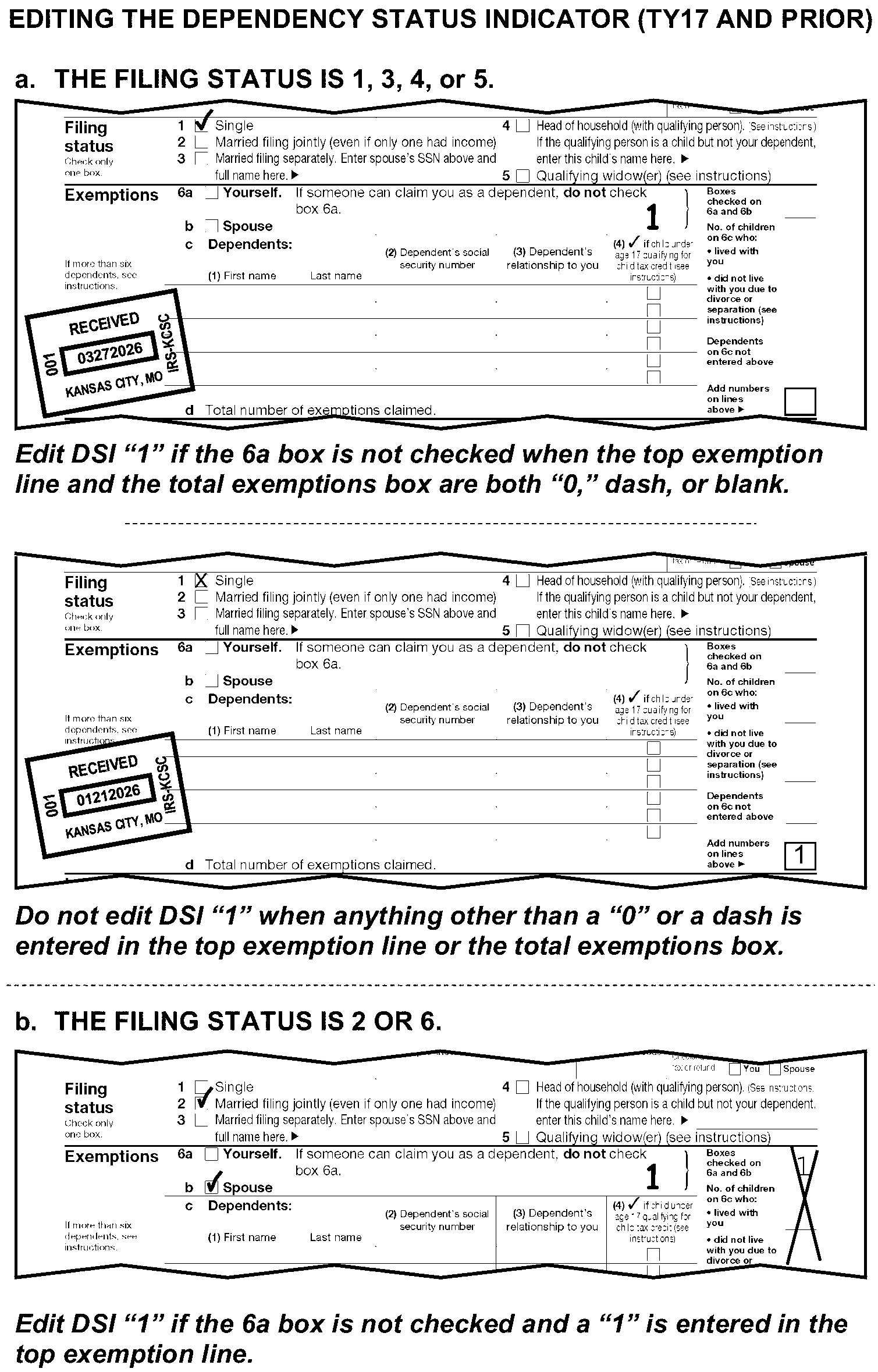
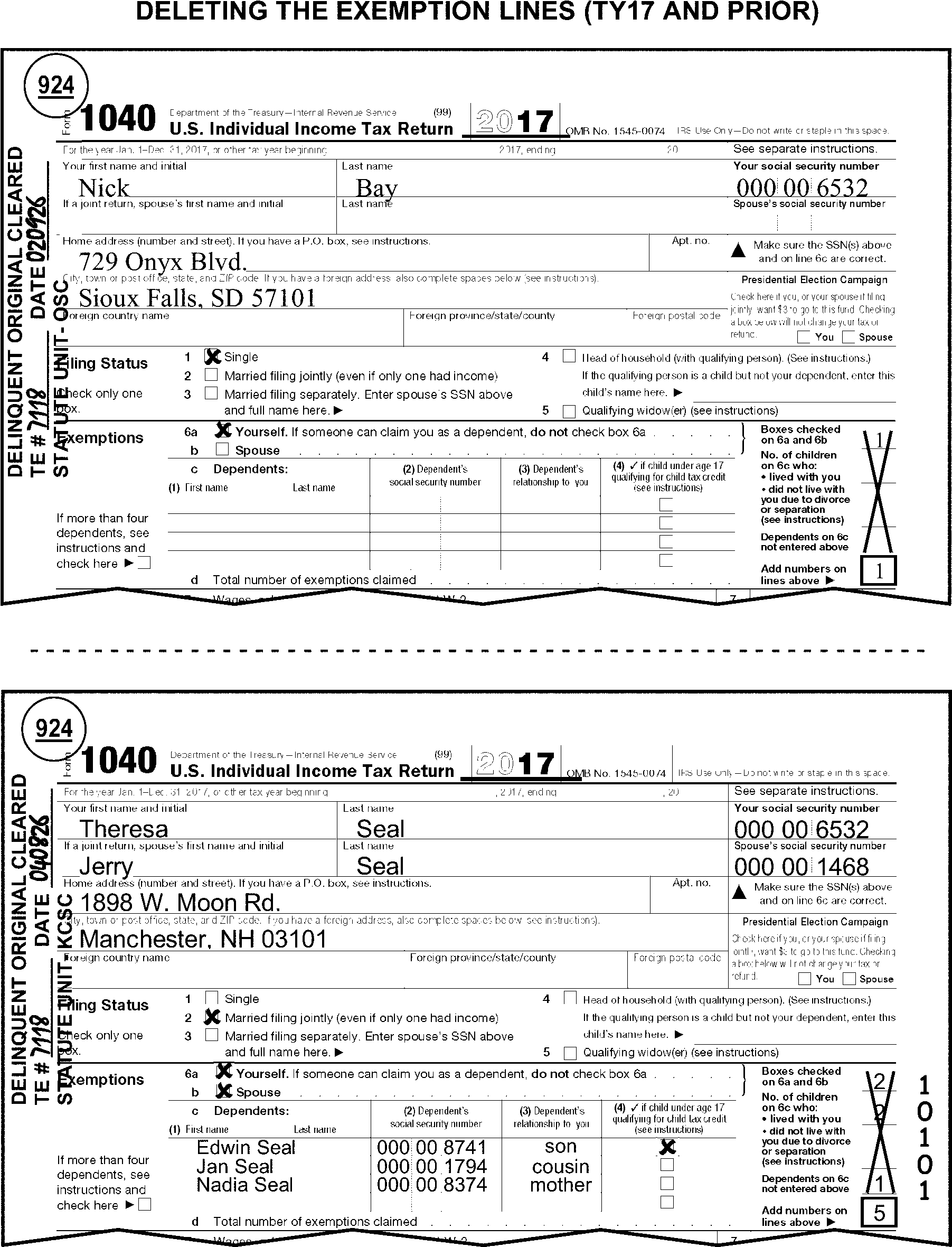
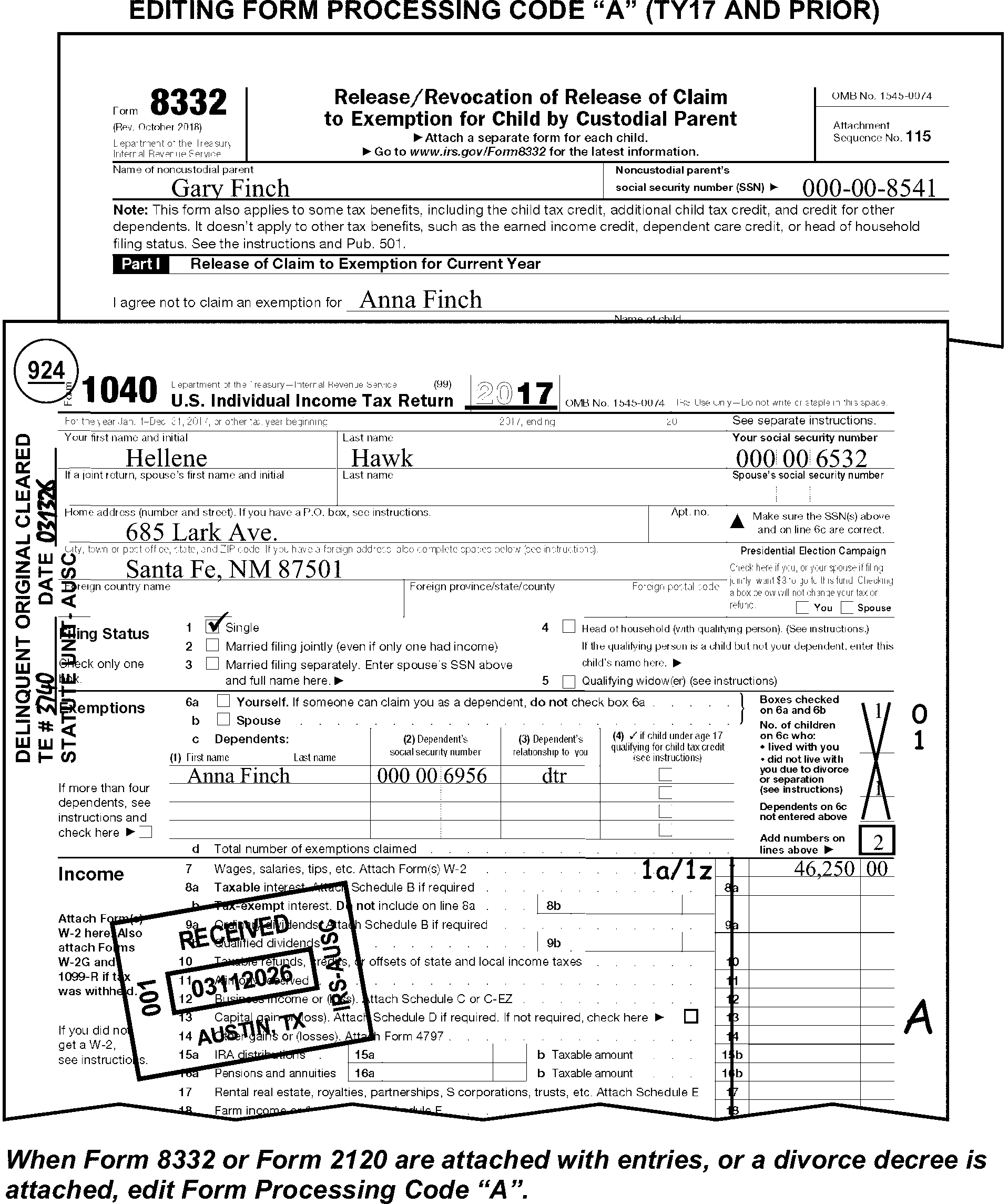
-
Use the table below for editing conditions on line 1, Form 1040:
Condition on Line 1 Action Entry on line 1, no Form W-2 attached. Take no action. Form W-2 is not required for line 1. (May be required as support for earned income when EIC is claimed.)
(See IRM 3.11.3.14.2.31.)Line 1 is blank. Edit amounts from Wages, tips and other compensation box on Forms W-2. Amount deducted from line 1. If the same adjustment amount is also deducted on Schedule 1, Part II, adjust line 1 to include the amount. Self-Employment Income (See Exhibit 3.11.3-11 for an extensive listing of types of self-employment.) -
Subtract from line 1 and add to Schedule 1, line 9.
-
If amount is $434 or more and Schedule SE is not attached or reported, also edit RPC "N" .
-
If Form 1099-NEC is attached with or without a notation and an amount is present in box 1, Form 1099-NEC, edit RPC "N" unless the amount is less than $434 or Schedule SE is present. On prior year returns, amount may be found on Form 1099-MISC, box 7.
-
-
Use the table below for editing taxpayer notations on line 1, Form 1040:
Noted by Taxpayer on Line 1 Action Adoption Benefit (AB) Take no action. Combat Pay Excluded Edit CCC "Y" and an Action Trail. Dependent Care Benefits (DCB) Take no action. Deferred Compensation (DFC) Edit RPC "B" . Disability Pension Foreign Employer Compensation (FEC) Take no action. Fringe Benefits (FB) Take no action. Gambling (Gross: losses not subtracted) Gambling (Net: winnings minus losses) -
No indication of a professional gambler:
-
If a gain or a loss, "X" line 1.
-
≡ ≡ ≡ ≡ ≡ ≡ ≡ ≡ ≡ ≡ ≡ ≡ ≡ ≡ ≡ ≡ ≡ ≡ ≡ ≡ ≡ ≡ ≡ ≡ ≡ ≡ ≡ ≡ ≡ ≡ ≡ ≡ ≡ ≡ ≡ ≡ ≡ ≡ ≡ ≡ ≡ ≡ ≡ ≡ ≡ ≡ ≡ ≡ ≡ ≡ ≡ ≡ ≡ ≡ ≡ ≡ ≡ ≡ ≡ ≡ ≡
-
If net amount is zero, and no gross amount is indicated on the dotted portion of line 1, and:
• Form W-2G is attached, edit CCC "Y" and an Action Trail.
• Form W-2G is not attached, correspond for gross winnings
with Form 3531/6001, using fill-in 7, per Exhibit 3.11.3-18.
-
-
Indication of professional gambler:
-
Subtract gambling amount from line 1 and add to Schedule 1, line 3.
-
Correspond for Schedule C, if not attached.
-
If Schedule SE is not attached or reported, also correspond for SE tax liability when the amount is $434 or more. For Form 6001, use box W. For Form 3531, check box 16.
-
Household Employee Income (HSH) Edit SPC "E" . Medicaid Waiver Payment (MWP), Notice 2014-7, IRC 131, In-Home Health Services (IHHS), In-Home Support Services (IHSS), Difficulty of Care payment Take No Action Non-Disability Pension Move the amount to line 5b. (See Figure 3.11.3-64.) Non-Employee Compensation -
Subtract from line 1 and add to Schedule 1, line 9.
-
If amount is $434 or more (with or without Form 1099-NEC), and Schedule SE is not attached or reported, also edit RPC "N" .
Non-Taxable Income: -
Accident and health insurance proceeds
-
"Black lung" benefits
-
Casualty insurance and other reimbursements
-
Child support
-
Damages awarded for physical injury or sickness
-
Federal Employees' Compensation Act (FECA) payments
-
Interest on state or local government obligations
-
Public Aid
-
Supplemental Security Income (SSI)/SSI Disability
-
Tax-Sheltered Annuities
-
Temporary Assistance for Needy Families (TANF)
-
VA Benefits
-
Welfare Benefits/Payments
-
Workforce Payments
-
Worker's Compensation
Subtract all income identified as nontaxable from line 1, add to Schedule 1, line 9. Pension See Disability or Non-Disability Pension. Prisoner Income (PRI) Edit RPC "B" .
See IRM 3.11.3.6.1.6.Railroad Retirement Benefits -
If gross and taxable amounts with a difference of $1 or more can be determined, move to lines 5a and 5b.
See IRM 3.11.3.14.2.11. -
Otherwise, edit the amount to line 5b.
Scholarship (SCH), Fellowship, Grant, or Stipend -
Edit RPC "B" .
-
If indicated to be nontaxable, subtract from line 1 and correct any other taxpayer adjustments and edit RPC "G" .
Sick Pay Take no action. Social Security Benefits -
If gross and taxable amounts can be determined, move to lines 6a and 6b.
-
Otherwise, move the amount to line 6b.
Strike Pay/Benefits Take no action. Sub-Pay TRA (Repayment of Supplemental Unemployment Benefits (SUB)) If repayment is indicated on Schedule 1, line 24z and it is for SUB amounts received in: Unemployment Compensation Subtract from line 1 and add to Schedule 1, line 7. -
-
Refer to Job Aid 2431-010 for Standard Deduction amounts for the tax year of the return. Do not refer to current year Standard Deduction chart.
-
For TY17 and prior, do not correspond for a missing Schedule A if DSI "1" has been edited.
-
Line 12b for TY21, if an amount is present, take no action.
-
Line 10b for TY20, if an amount is present and ≡ ≡ ≡ ≡ ≡ ≡ ≡ ≡ ≡ ≡ ≡ ≡ ≡ ≡ ≡ ≡ ≡ ≡, "X" the amount.
-
For TY18 and prior, Forms 8995/8995-A are not required.
-
For TY17 through TY15 - If ITINs are shown for children claiming eligibility for Child Tax Credit on Dependent Lines, Form 1040, correspond for missing Schedule 8812.
-
For TY16 and later - Schedule EIC must be attached when an amount is present on line 27a, and the correspondence tolerance is met. Use the following chart to determine when correspondence is required for the missing Schedule EIC.
If the tax year is Then correspond when 2024 The AGI is equal to or greater than $18,591 ($25,511 for FS 2) and less than $59,899 ($66,819 for FS 2) or the EIC amount claimed is more than $632. 2023 The AGI is equal to or greater than $17,640 ($24,210 for FS 2) and less than $56,838 ($63,398 for FS 2) or the EIC amount claimed is more than $600. 2022 The AGI is equal to or greater than $16,480 ($22,610 for FS 2) and less than $53,057 ($59,187 for FS 2) or the EIC amount claimed is more than $560. 2021 The AGI is equal to or greater than $21,430 ($27,380 for FS 2) and less than $51,464 ($57,414 for FS 2) or the EIC amount claimed is more than $1502. 2020 The AGI is equal to or greater than $15,820 ($21,710 for FS 2) and less than $50,954 ($56,844 for FS 2) or the EIC amount claimed is more than $538. 2019 The AGI is equal to or greater than $15,570 ($21,370 for FS 2) and less than $50,162 ($55,952 for FS 2) or the EIC amount claimed is more than $529. 2018 The AGI is equal to or greater than $15,270 ($20,950 for FS 2) and less than $49,194 ($54,884 for FS 2) or the EIC amount claimed is more than $519. 2017 The AGI is equal to or greater than $15,010 ($20,600 for FS 2) and less than $48,340 ($53,930 for FS 2) or the EIC amount claimed is more than $510. 2016 The AGI is equal to or greater than $14,880 ($20,430 for FS 2) and less than $47,995 ($53,505 for FS 2) or the EIC amount claimed is more than $506. -
TY16 and later -Correspond for source of earned income documentation if the amount claimed on line 27a is based solely on wages that are not supported by at least one document.
-
For TY21, when an amount is present, Schedule 8812 must be attached. Correspond if missing.
-
For TY20 and prior, correspond for a missing Schedule 8812 when there is an amount present on line 28 and three or more children with SSNs are claimed on Dependent lines, Form 1040.
-
For TY17 - TY16, correspond for a missing Schedule 8812 when there is an amount present on line 28, and either condition below applies:
-
ITINs are shown for children claiming eligibility for Child Tax Credit on Dependent lines, Form 1040.
-
Three or more children with SSNs are claimed on Dependent lines, Form 1040.
-
-
For TY22, when there is an indication line 31 includes an amount for Deemed Payment Election (DPE) follow instructions below:
-
If "IRA22DPE" or "CHIPS22DPE" (or something similar) are noted on line 31 (or elsewhere on the return), edit CCC "3" and RPC "5" .
-
If "IRA22TRE" (or something similar) is noted on line 31 (or elsewhere on the return), edit RPC "5" .
-
After fully editing the return, pull for rebatch under the original program code and "DPE" as the Batch ID.
-
-
Follow the instructions below for editing the taxpayer's adjustments to income.
-
For TY03 and prior, "X" the Health Savings Account deduction.
-
For TY24,"X" the amount on line 20 when it is other than $7,000 or $8,000 ($14,000, $15,000 or $16,000 for FS 2), and one of the indicators in (6) below with an equal deferred compensation amount - appears on Form W-2.
-
For TY23,"X" the amount on line 20 when it is other than $6,500 or $7,500 ($13,000, $14,000 or $15,000 for FS 2), and one of the indicators in (6) below with an equal deferred compensation amount - appears on Form W-2.
-
For TY22 - TY19, "X" the amount on line 20 when it is other than $6,000 or $7,000 ($12,000, $13,000 or $14,000 for FS 2) and one of the indicators in (6) below with an equal deferred compensation amount - appears on Form W-2.
-
For TY18 - TY13, "X" the amount on line 20 when it is other than $5,500 or $6,500 ($11,000, $12,000 or $13,000 for FS 2) and one of the indicators in (6) below with an equal deferred compensation amount - appears on Form W-2.
-
For TY12 - TY08, "X" the amount on line 20, when it is other than $5,000 or $6,000 ($10,000, $11,000 or $12,000 for FS 2) and one of the indicators in (6) below with an equal deferred compensation amount - appears on Form W-2.
-
Refer to the following Form W-2 indicators:
-
"D" or Section 401(k)
-
"E" or Section 403(b)
-
"F" or Section 408(k)(6)
-
"G" or Section 457(b)
-
"Q" or "Housing/Subsistence" or "Combat Pay"
-
"S" or "SIMPLE" plan
-
"T" or employer-paid "qualified adoption expenses"
-
Section 125, Cafeteria Plan (CAF)
-
Section 414(h), Mandatory Salary Deferral ("PERS" Public Employees Retirement System)
-
Thrift Savings Plan or "TSP"
-
-
Follow the instructions below for editing additional taxes.
-
For TY20 returns, do not correspond for missing Form 8962 when an amount is present on Schedule 2, line 1a.
-
For TY18, Schedule 4 will be renumbered as Schedule 2, Part II, lines 4-21; Sequence Number "04" will always be deleted.
-
If Schedule 2 is attached with no significant entries, it may be deleted and Schedule 4, if present with significant entries, will be edited with Sequence Number "02" .
-
For TY20-TY19, when an amount is present on Schedule 2, line 8 (TY18, Schedule 4, line 62; TY17 and prior, line 62), and box "a" is marked, Form 8959 must be attached. Correspond for Form 8959 if missing.
-
When renumbering line 11, if both boxes "a" and "b" are marked, use the amount from Form 8959, line 18.
-
For TY20-TY19, when an amount is present on Schedule 2, line 8 (TY18, Schedule 4, line 62; TY17 and prior, line 62), and box "b" is marked, Form 8960 must be attached. Correspond for Form 8960 if missing.
-
When renumbering line 12, if both boxes "a" and "b" are marked, use the amount from Form 8960, line 17.
-
Delete an amount for "Recapture Taxes" where found and edit it to line 18.
-
Edit amounts from Form 4970 to line 18.
-
Follow the instructions below for editing additional credits and payments.
-
For TY23 and prior, if only page 2 of Schedule 3 is attached with T-lines present or edited, edit sequence number "03" in the upper-right margin of Schedule 3, page 2.
-
For TY18, Schedule 5 will be renumbered as Schedule 3, Part II, lines 9-15; Sequence Number "05" will always be deleted.
-
If Schedule 3 is attached with no significant entries, it may be deleted and Schedule 5, if present with significant entries, will be edited with Sequence Number "03" .
-
TY11 - TY10 - If the taxpayer claims an amount on line 6 for DC Homebuyer Credit (Form 8859) and also claims an amount from 5405, line 10 on Form 1040, "X" line 6 if Form 5405, Part 1, line B, shows a date after the received date or if it shows a date prior to May 1, 2010, unless Box D, Part I, Form 5405 is checked.
-
When credits on Form 8834, Form 8910, or Form 8936 are claimed on line 6e, 6f, or 6i, follow the instructions below.
-
Edit Unallowable Code "79" when multiple instances of the same Vehicle Identification Number (VIN) appear on Form 8834, Form 8910, Form 8936 (TY22 and prior) or Form 8936 Schedule A (TY23).
-
If line 1 of Form 8834, Form 8910, or Form 8936 shows a claim for a bicycle, Moped or motorcycle, circle the entry on Form 8834, Form 8910, and/or Form 8936.
-
If line 2 of Form 8834, Form 8910, or Form 8936 shows a placed into service date that does not fall within the tax year of the return, "X" the entry on Form 8834, Form 8910, and/or Form 8936.
-
-
If Form 8834 is claimed on line 6i the form must be attached, if missing correspond.
-
Entry on line 6e is valid only for TY22 and prior. If Form 8910 is claimed on line 6e:
If And Then Form 8910 is not attached, For TY15-TY22, correspond. Form 8910 is attached, Amounts are present on lines 12 through 15 and no date is present on lines 3a/3b, For TY16-TY22, correspond Form 8910 is attached, The date on line 3a/3b is before 2/17/2009, or other than the tax period of the return, "X" the amount on line 6e. -
If Form 8936 is claimed on line 6f:
If And Then Form 8936 is not attached, For TY 16 and later, correspond. Form 8936 is attached, Amounts are present on lines 5 through 23 and no date is present on line 3a/3b, For TY 16 and later, correspond. Form 8936 is attached, The date on line 3a/3b is before 12/31/2008 or other than the tax period of the return, "X" the amount on line 6f.
-
For TY16 and later, verify the SST amount, if claimed. Use the table in (3) and the worksheet in (4) to determine the excess SST amount.
-
"X" an amount claimed for excess SST if there is no supporting documentation, and the information cannot be found through internal research.
-
For TY24 - TY16, "X" the amount on line 11 when the amount claimed on line 1a, Form 1040, is less than the Maximum SST Wages in the following table.
Year Maximum SST Wages Maximum SS Tax Withheld 2024 168,600 10,453.20 2023 160,200 9,932.40 2022 147,000 9,114.00 2021 142,800 8,853.60 2020 137,700 8,537.40 2019 132,900 8,239.80 2018 128,400 7,960.80 2017 127,200 7,886.40 2016 118,500 7,347.00 -
For TY24 - TY16, use the worksheet below and the table in (3) above to verify the excess SST amount claimed on Schedule 3, line 11.
Verifying Excess Social Security Tax Primary Taxpayer Secondary Taxpayer 1. Add all social security tax withheld for each employer. This tax is shown in box 4, Form W-2. Enter the total here. __________ __________ 2. Enter any uncollected social security tax on tips from W-2, Box 12, Codes A and M. __________ __________ 3. Add lines 1 and 2. __________ __________ 4. Social security limit (Maximum SS Tax Withheld) __________ __________ 5. Subtract line 4 from line 3. Enter the result here (if the result is negative, enter zero here.) __________ __________ 6. Excess amount. Combine Primary and Secondary taxpayers’ line 5 amount. __________
-
For TY22, for fiscal year filers filing a short period return, can use line 13a for Deemed Payment Elections (DPE). If "IRA22DPE" , "CHIPS22DPE" , or "IRA22TRE" are noted on line 13a, Form 1040, line 31, or elsewhere on the return, see IRM 3.11.3.75.3.1.11 for editing instructions.
-
For TY22, when an amount is claimed on line 13b (TY22), Schedule H must be attached. If not attached, correspond for missing Schedule H.
-
For TY20-TY21, when an amount is claimed on line 12b (TY20) or line 13b (TY21), Schedule H and Form 7202 must be attached. If not attached, correspond for missing form(s). If corresponding for Schedule H and Form 7202, correspond for only one missing Schedule H and one Form 7202. Use the first entry amount and line number on the schedule.
-
For TY21 only, when an amount is present, Form 2441 must be attached with an entry on line 10. If not attached, correspond for Form 2441.
-
For TY21 - TY22, when an amount is claimed on original line 13h:
-
Schedule H and Form 7202 must be attached. If not attached, correspond for missing form(s). If corresponding for Schedule H and Form 7202, correspond for only one missing Schedule H and one Form 7202. Use the first entry amount and line number on the schedule.
-
-
Form 1040A was obsoleted in 2018. All Form 1040A must be converted to Form 1040.
-
The instructions provided in this subsection of the manual are for converting Form 1040A to Form 1040.
-
All numbered lines on Form 1040A are transcribed, except for the following lines:
-
Line 22
-
Lines 24 through 26
-
Line 30
-
Line 37
-
Line 47
-
-
There are also nine T-Compute lines on Form 1040A. These are:
-
Line 15 - Total income
-
Line 20 - Total Adjustments
-
Line 21 - Adjusted Gross Income
-
Line 27 - Taxable income
-
Line 36 - Total Credits
-
Line 39 - Total tax
-
Line 46 - Total payments
-
Line 48a - Refund amount
-
Line 50 - "Amount You Owe"
-
-
When converting, follow current year Form 1040 and Schedule 1 - 3 instructions, unless there are instructions to the contrary.
-
Circle the "A" on the Form 1040A when converting to Form 1040.
-
Follow the guidelines in IRM 3.11.3.8.1 for information on editing Received Dates.
-
Use the following tables to convert Form 1040A to a Form 1040.
Income: Edit income (less amounts for items listed below) on line 1a. (Do not recompute line 1a from attachments, such as Forms W-2.) • Disability Pension Edit on line 1a. Entry, line 10, Form 1040A of $1 or more Edit on line 7a and follow line 7a, Form 1040 instructions. See IRM 3.11.3.14.2.14. • Capital Gains Distribution (Form 1099-DIV attached or a statement present) Edit the amount to line 7a. Edit RPC "T" . • IRA Distributions (Form 1099-R attached or a statement present) Edit the gross amount on line 4a and the net amount on line 4b. • Non-Disability Pension Edit the gross amount on line 5a and the net amount on line 5b. • Rents and Royalties (Form 1099-MISC attached or a statement present) Edit the amount on Schedule 1, line 5 and prepare a dummy Schedule E if missing. See IRM 3.11.3.15.4. • Unemployment Edit the amount on Schedule 1, line 7. • Social Security Benefits Edit the gross amount on line 6a and the net amount on line 6b. • Gambling (Form W-2G attached or "Gambling" noted) Edit the gross amount on Schedule 1, line 9. • Self-Employment income, Non-Employee Compensation, or Fishing Boat Proceeds Edit the amount on Schedule 1, line 9. Edit RPC "N" if $434 or more and Schedule SE is not attached or reported. • Prizes or awards (Form 1099-MISC attached or a statement present) Edit the amount on Schedule 1, line 9. • Alaska Permanent Fund Edit the amount on Schedule 1, line 9. Payment of one of the following claimed: Edit the amount on: • Estimated tax Line 26 • Earned Income Credit Line 27a • Additional Child Tax Credit Line 28 • Extension Payment Schedule 3, line 10 • Excess SST or RRTA Schedule 3, line 11 • An amount entered for Penalty for Underpayment of Estimated Tax Line 38 -
Refer to Job Aid 2431-010 for an illustration of renumbering and converting Form 1040A T-lines and T-Compute lines and all related transcribed schedules, dollars and cents editing requirements.
-
For specific line by line instructions see IRM 3.11.3.75.3.1.
-
Refer to the following instructions when the taxpayer attaches any of the following:
Form/Schedule IRM Reference Schedule B IRM 3.11.3.20 Schedule R IRM 3.11.3.26 Form 2441 IRM 3.11.3.30 Form 8615 IRM 3.11.3.39 Schedule EIC IRM 3.11.3.45 Schedule 8812 IRM 3.11.3.47 Form 8606 IRM 3.11.3.48 Form 8863 IRM 3.11.3.49 Form 8880 IRM 3.11.3.52 Form 8888 IRM 3.11.3.54 Form 8867 IRM 3.11.3.65 Form 8962 IRM 3.11.3.68 -
Some special conditions on returns will require special editing procedures. Taxpayers are instructed to note certain conditions on the return which you must identify. Edit these returns using instructions in IRM 3.11.3.6.1 and IRM 3.11.3.6.2.
-
Refer to the decedent return instructions in IRM 3.11.3.10 when any of the following are present:
-
The word "Deceased" is written on the return
-
A date of death is found on the return
-
"Surviving spouse" is written in the caption or the signature area
-
There is any other indication the taxpayer has died
-
-
Form 1040EZ was obsoleted in 2018. All Form 1040EZ must be converted to Form 1040.
-
The instructions provided in this subsection of the manual are for converting Form 1040EZ to Form 1040.
-
All lines on Form 1040EZ are transcribed except for line 5.
-
There are also six T-Compute lines on Form 1040EZ. These are:
-
Line 4 - Adjusted gross income
-
Line 6 - Taxable income
-
Line 9 - Total payments
-
Line 12 - Total Tax
-
Line 13a - Refund amount
-
Line 14 - Balance due amount
-
-
Follow the guidelines in IRM 3.11.3.75.1 for editing the following return information:
-
Tax period
-
Received date
-
-
Follow guidelines in IRM 3.11.3.75.3 for line by line editing information.
-
Circle out "EZ" on the form when converting to Form 1040.
-
Use the following table to convert Form 1040EZ to a Form 1040.
Income: Edit the income (less amounts for items listed below) on line 1. (Do not recompute line 1 from attachments, such as Forms W-2.) Unemployment Compensation Edit the amount on Schedule 1, line 7. Self-Employment/Non-Employee Compensation Edit the amount on Schedule 1, line 9. Alaska Permanent Fund Edit the amount on Schedule 1, line 9. Earned Income Credit (EIC) Edit on Line 27a. -
Refer to Job Aid 2431-010 for an illustration of converting Form 1040EZ T-lines and T-Compute lines and all related transcribed schedules, dollars and cents editing requirements.
-
For TY17 - TY1989, place an "X" in the applicable "You" and/or "Spouse" boxes on line 5 when neither of the boxes is marked and either of the following conditions is present:
-
There is a statement the taxpayer is claimed on another person’s return.
-
The amount on line 5 is a significant amount of less than the amount listed in Job Aid 2431-010 for the applicable tax year, or the amount shown on the form. (See Figure 3.11.3-124.)
-
-
For TY1988 - TY1987 if line 5 is blank and line 6 is zero, check the "Yes" box on line 5
-
For TY1986 and prior, take no action.
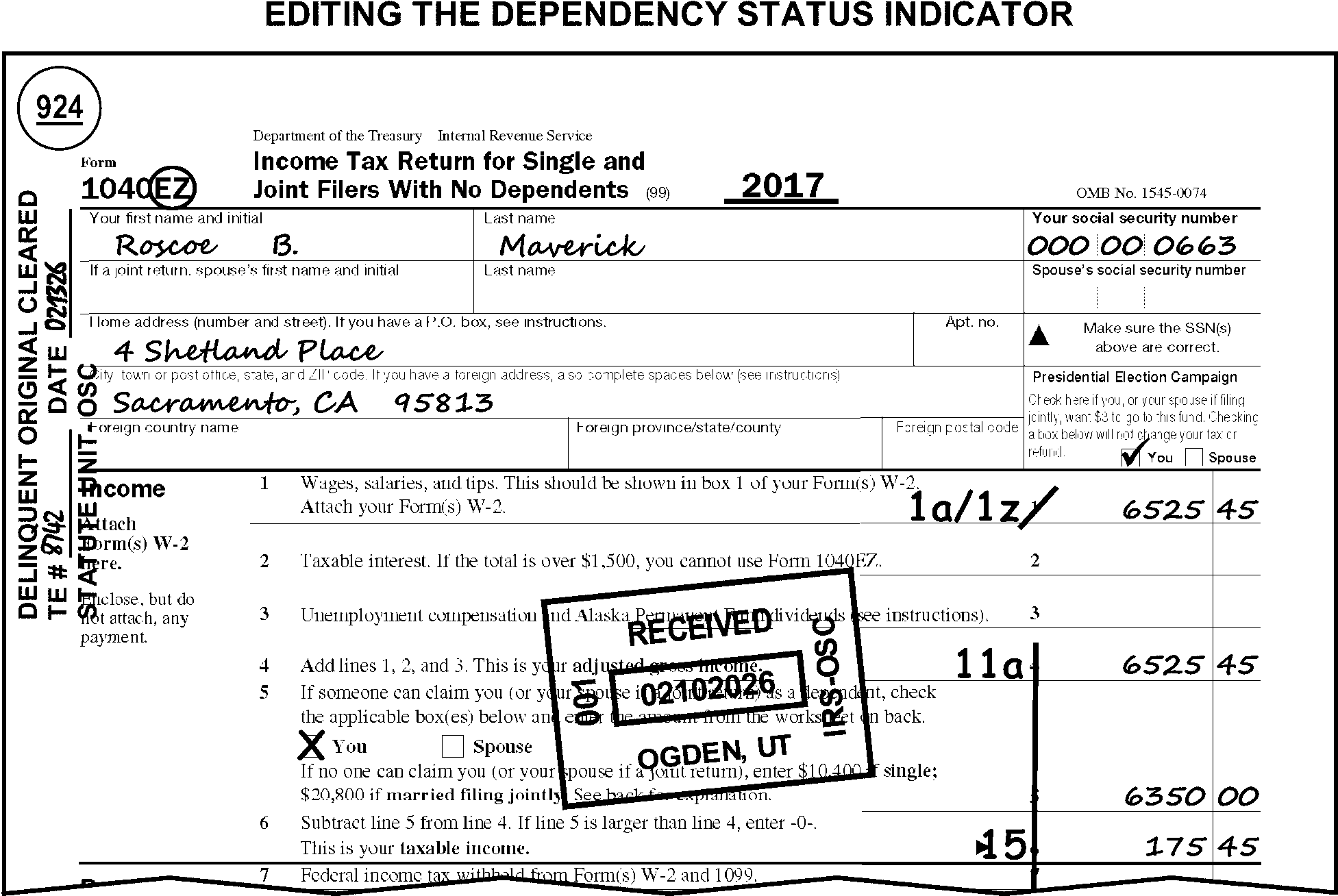
-
Some special conditions on returns will require special editing procedures. Taxpayers are instructed to note certain conditions on the return which you must identify. Edit these returns using instructions in IRM 3.11.3.6.1 and IRM 3.11.3.6.2.
-
Refer to the decedent return instructions in IRM 3.11.3.10 when any of the following are present:
-
The word "Deceased" is written on the return.
-
A date of death is found on the return.
-
"Surviving spouse" is written in the caption or the signature area.
-
There is any other indication the taxpayer has died.
-
The attachment guide
-
Identifies non transcribed forms that may be attached to a return
-
Identifies whether the form should be detached from the return (Yes) or stay attached to the return (No).
-
Provides any additional information
Do not detach attachments when sending the return back to the taxpayer unless specifically told to do so in line by line instructions.
Exception:
Follow remittance instructions in IRM 3.11.3.3.6(2) or (6) when remittance is discovered.
The Form/Documents information applies to the series, unless otherwise indicated.
Only one Action Code can be assigned to a document and must be edited in the following priority: 300, 310, 4XX, 6XX, 2XX, 3XX.
Continue perfecting returns assigned an action code unless otherwise specified.
Correspondence
| Code | Explanation |
|---|---|
| 211 | First correspondence |
| 212 | Second correspondence |
| 215 | International correspondence |
| 224 | ACA correspondence |
EXAM/CI/RIVO Review
| Code | Explanation |
|---|---|
| 331 | Frivolous filer review |
| 332 | Criminal Investigation |
| 333 | Prompt audit |
| 334 | Joint committee return |
| 335 | Frivolous case |
| 336 | Reserved |
| 337 | Other CI |
| 370 | Examination |
Entity Research
| Code | Explanation |
|---|---|
| 351 | TIN research |
| 352 | Name research |
| 353 | Address research |
| 354 | Filing requirement research |
| 355 | Other MFTRA research |
| 360 | Other in-house research |
| Code | Explanation |
|---|---|
| B |
|
| C | Form 8283, Part I and any of the following are true:
|
| D | High income non-filer return identified by Collection. |
| H |
|
| I | Binding contract not attached to claim for First Time Homebuyer Credit |
| K | Disclosure statement, Refund scheme, preparer Identified. |
| L | Joint committee case: Section 6501 (d), request for prompt audit assessment identified by Exam. |
| Q | Form 8082, Notice of Inconsistent Treatment or Administrative Adjustment Request (AAR), is attached |
| R | Return meets criteria for Frivolous Filing. Edited or stamped by Compliance. |
| U | Taxpayer has attached Form 8862, Information to Claim Certain Credits After Disallowance, with the Earned Income Credit portion of the form completed for TY17 and later or Form 8862 is attached for TY16 and prior. |
| W | Form 3800, line 1p has an entry and no Form 8908 is attached; Form 3800, line 1p has an entry and Form 8908 is attached but Part II is missing; Form 3800, line 1p has an entry and Form 8908 is attached but Part II Column A is incomplete or missing. (TY24 and later) |
| Z | Form 8919, Uncollected Social Security and Medicare Tax on Wages, is filed with return and is incomplete. |
| 2 | Form 8862, Information to Claim Certain Credits After Disallowance, is filed with the return and the Child Tax Credit/Additional Child Tax Credit/Credit for Other Dependents portion of the form is completed. Valid TY17 and later. |
| 3 | Form 8862, Information to Claim Certain Credits After Disallowance, is filed with the return and the American Opportunity Credit portion of the form is completed. Valid TY17 and later. |
When CCC "3" is edited, it must be edited first.
Edit all other codes in sequence found.
Any time CCC "Y" is edited on the return leave an Action Trail indicating the reason for the "Y" code.
| Code | Explanation |
|---|---|
| A | Both Primary and Secondary taxpayers are deceased during the tax period of the return. |
| B | Return appears to be Non-Compute return, but taxpayer computed tax liability to zero. Suppresses the generation of CP51, which informs taxpayer IRS computed their tax. |
| D | UN Operation, Haiti, Former Yugoslavia (TY94/93 only), or Somalia (TY93/92 only) return. |
| E | Deletes filing requirements for taxpayers who are not deceased. |
| F | Primary taxpayer is deceased during the tax period of the return. |
| G | Form 1040-X which amends Presidential Election Campaign Fund (PECF) selection. |
| H | The box on Form 1040, line 6c is checked indicating a Lump-Sum Election is present. |
| J | Filing Status Code 2 or 3 with Secondary SSN missing and Amish/Mennonite or Form 4029 is notated. |
| K | Taxpayer in combat zone (Operation Enduring Freedom (Afghanistan) Combat Zone/Operation Iraqi Freedom Combat Zone). |
| L | Refund on an overpaid decedent return is to be issued with the First Name and Second Name lines (e.g., executor) reversed on refund check. |
| M | Reasonable cause established by taxpayer for not paying the tax balance due. |
| N | Generates a 60-day extension of time to file for taxpayers who are out of the country on the due date of the return. |
| O | Indicates a manual refund was issued before the return was processed; also freezes amount from refunding when return posts. |
| P | Reasonable cause established by taxpayer to suppress computer generated Estimated Tax Underpayment Penalty. |
| Q | Qualifying Non-Dependent’s name is listed in filing status section of return or found on attached Schedule EIC, Form 2441, or Form 8814. |
| R | Reasonable cause for delinquent filing; suppresses the delinquency penalty. |
| U | Suppresses credit interest on a No Reply return. |
| W | Refund on overpaid return is to be issued to the Second Name Line (e.g., surviving spouse) of a deceased person or to the stateside spouse of a person serving overseas. Suppresses the first name line on the refund check. |
| Y | Forces the return to ERS for manual review. |
| Z | Restricts the computation of interest and failure to pay penalty. |
| 1 | Generates transaction and action code combinations to generate systemic freeze conditions on selected IMF returns (edited by RICS for Revenue Protection). |
| 3 | Freezes the release of a refund on the account at Master File |
| 4 | Edited by Exam on original return secured after a Substitute for Return (SFR) has been filed in place of return |
| 7 | Identifies the account as having had reasonable cause denied. |
| 8 | Refund return and only one Form W-2, that is a substitute, altered, handwritten or typed Form W-2 is attached. |
| 9 | Secondary taxpayer is deceased during the tax period of the return. |
| Code | Explanation |
|---|---|
| A | TY2017 and prior, Form 8332, Release of Claim to Exemption for Child of Divorced or Separated Parents, Form 2120, Multiple Support Declaration, or a copy of a divorce decree stating exemption entitlement is attached. |
| D | TY2016 and later, a Federally declared disaster loss is claimed on Schedule A and Form 4684. |
| E | Form 8582 or Form 8582-CR is attached (MeF Only). |
| F | Form 1062 is attached or 1062I on line 17z, Schedule 2 or 1062NL on line 13z, Schedule 3. TY202607 and later. Fiscal Year Filer only. |
| G | Form 8938, Statement of Specified Foreign Financial Assets is attached. |
| H | Form 8995-A Schedule A, Schedule B, Schedule C, or Schedule D is attached. |
| J | Form 8886, Reportable Transaction Disclosure Statement is attached to the return. |
| L | Form 8824, Like-Kind Exchanges, is filed with the return. |
| P | Form 2106, Employee Business Expenses, is attached. |
| Q | Form 8939, Allocation of Increase in Basis for Property Acquired from a Decedent, is attached. |
| R | One or more of the Forms 8990, 8992, 8993, or 8994 is attached. |
| W | Form 5471 or Form 5471 Schedule G-1, or another schedule supporting Form 5471 is attached. |
| X | Form 8865 or a schedule supporting Form 8865 is attached to the tax return (Form 1040 or 1040-NR). |
| 2 | Form 7204 is attached (TY22-TY26). |
| 3 | Form 7205 is attached (TY22-TY26). |
| 5 | Form 6251 is attached. |
| 8 | Taxpayer identified themselves as being an identity theft victim and attached Form 14039, Identity Theft Affidavit, or a police report. |
| 9 | Taxpayer attached a Spanish language version of the Identify Theft Affidavit (Form 14039SP) to any type of form within the 1040 family, and therefore a Spanish version of the CP01S notice will be issued. |
Edit all codes in sequence found.
| Code | Explanation |
|---|---|
| B | Taxpayer indicates does not want or qualify for EIC. Forces the computer to compute EIC to zero. |
| C | "Community Property" taxpayer who does not enter any income items but claims the benefit of Community Property and reports a prorated share of community income as AGI. The Community Property states are: Arizona, California, Idaho, Louisiana, Nevada, New Mexico, Texas, Washington and Wisconsin |
| D | Form 8962 Premium Tax Credit is attached with QSEHRA noted on the top of the form. |
| F | Taxpayer has included IRC Section 965 claims and/or payments on the return. (TY17 and later.) |
| G | Forces the computer to bypass the check for a withholding amount error. |
| H | Other Contributions amount equal to or greater than $500 is present on Schedule A and Form 8283. |
| K | Indicates the return has been cleared by Statute Control. Valid on prior year returns only. |
| L | Tax return is blank other than Entity or contains all zeros or insignificant entries. |
| M | Unemployment Compensation box checked on Form 8962 for TY2021. |
| N | Identifies non-employee compensation for Examination to assess SE tax liability. |
| S | Taxpayer is not liable for self-employment tax (includes ministers who have filed a waiver and Statutory Employees). |
| T | Forces the computer to accept Capital Gains distribution without an attached Schedule D. |
| U | Form 8949 is attached with Z or Y code present in Column (f) of form. (Taxpayer indicates deferral on the gain from the sale of an asset by investing in a Qualified Opportunity Zone Fund on Form 8949, Sales and Other Dispositions of Capital Assets.) |
| V | Serves as an indicator for statistical purposes to identify computer-generated, paper filed returns. |
| W | TY25 and later, Clergy Filing Schedule SE. |
| X | Indicates LB&I screening of international returns for Revenue Protection. |
| Y | Identifies returns dummied to process a "loose" Schedule H. |
| 3 | Indicates Form 5329 is not required. |
| 4 | Other Contribution amount equal to or greater than $500,000 is present on Schedule A, and appraisal for donated property is present on Form 8283. |
| 5 | TY22 return with Deemed Payment Election (DPE) under IRA. |
| 9 | An amount is present on Schedule 2, line 17z with the notation PWA8933 or PWA7210. |
| Code | Explanation |
|---|---|
| A | Non-Passive Activity Loss (NPA) noted by taxpayer on Schedule E, line 26. |
| B | Edited by the RIVO, ITVA, CSCO ASFR, or AM Function. If a SPC "B" is present, continue processing. |
| C | TY23 and later, Married Filing Joint Taxpayer lived apart is claiming the Energy Efficient Home Credit for two primary residences. |
| D | Form 2441 indicated Tax Exempt Child Care Provider or LAFCP or Due Diligence Statement is attached, or indication is present in lieu of the Provider’s TIN. |
| E | There is an entry present on Form 1040, line 1b or taxpayer noted "HSH" indicating wages reported includes household employee wages received. |
| H | Form 1095-A attached. (MeF Only) |
| J | Taxpayer indicates wages earned in a penal institution. |
| K | Form 8863, Education Credits, is present with the box checked on line 7 for ineligibility of the refundable American Opportunity Credit. |
| L | More than two dependents are claimed on Form 2441 and/or attachments. |
| M | RICS ONLY. Do not remove. |
| N | Reserved. |
| Q | Schedule SE is not attached, Schedule C and/or F are attached, and taxpayer(s) are not liable for additional SE Tax. (MeF Only) |
| V | Validation required for Excess Social Security Tax Withholding (Revenue Protection) |
| Y | Computer generated return prepared using Free File Software, "FFF" is present in the bottom margin of the return. |
| Z | Form 5405, First-Time Homebuyer Credit, line 2 box checked. The Primary taxpayer does not have to repay the credit. |
| 3 | Split Interest Entity (SIE) written next to line 4b of Form 1040. |
| 4 | Alimony Received and/or Alimony Paid date is after 12-31-2018. |
| 5 | East Palestine Train Derailment Relief notated on top of Form 1040. (TY23 only) |
| 6 | PDF statement attached to MeF returns for missing and invalid QMID (MeF Only) |
| 7 | Form 5405, First-Time Homebuyer Credit, line 2 box checked. The secondary taxpayer does not have to repay the credit. |
The Unallowable Codes in this exhibit are for informational purposes only. Do not edit an unallowable code unless specifically told to do so in line by line instructions.
Edit all codes in sequence found.
Only three (3) codes may be used. If more than 3 unallowables are identified, edit Unallowable Code "98" for the third code with no amount and explain the additional codes and amounts in the memo portion of Form 3471.
Do not code Unallowables under ≡ ≡ ≡ ≡ ≡ ≡ in income, unless specifically instructed to do so.
| Code | Explanation |
|---|---|
| 33 | Personal expenses for medical care. Personal or living expenses (except for transportation to obtain medical care) incidental to medical treatment, such as meals, lodging more than $50 per day (per individual), health club dues, diet foods, funeral expenses and maternity clothes. |
| 34 | Federal taxes. Income, Social Security (FICA) and Excise taxes on automobiles, telephone, air transportation, custom and import duties. |
| 35 | Utility taxes. Sewer, water, phone, garbage, gas, electric, etc. |
| 36 | State and local taxes. Hotel, meal, air fare, inheritance, stamp, poll, mortgage transfer tax, etc. |
| 37 | Automobile licenses and tags. Personal automobile registration, tag and license taxes or fees |
| 38 | Child Support. Expense for support of a child or individual (not to be confused with child care). |
| 40 | Educational expenses. Educational and related expenses for someone other than the taxpayer or spouse (This includes tuition, books, transportation, lodging, etc. for individuals other than taxpayer). |
| 41 | Personal interest paid. |
| 42 | Contributions. The monetary value of the taxpayer's time or labor, contributions to individuals, or non-qualifying organization such as foreign charities (except for Canadian charities) or lobbying groups. |
| 43 | Auto expenses for trade or business. Any amount claimed for trade or business transportation more than 70 cents per mile. |
| 45 | Sale of personal residence. Expenses for sale or purchase of personal residence (closing expenses, settlement fees, legal fees, Realtor commissions, etc.) unless those items are specifically claimed as part of moving expenses. |
| 46 | Personal insurance. Premiums paid for life, automobile, home, liability, etc., not claimed as an employee business expense. |
| 56 | Impairment Related Work Expenses. The deduction for Impairment related work expenses has been disallowed. |
| 61 | Form 8859, Carryforward of the District of Columbia First-Time Homebuyer Credit, claim for $1000 or more. |
| 77 | Disabled Access Credit. Taxpayer filed Form 1040 with Form 8826 attached. No Schedule C, Schedule E, or Schedule F present and no entry on line 24z, Schedule 1 (line 21, Form 1040, TY17 and prior). |
| 79 | Alternative Motor Vehicle Credit/Electric Motor Vehicle Credit. Taxpayer claimed the same vehicle on more than one of Form 8834, Form 8936 and/or Form 8910. |
| 84 | First-Time Homebuyer Credit Recapture - Our records show the taxpayer could not have transferred the home as part of a divorce settlement. |
| 89 | Health Coverage Tax Credit (HCTC) - 1) The taxpayer is eligible for the Health Coverage Tax Credit and claimed the HCTC and Premium Tax Credit (PTC) for the same month, or 2) The taxpayer-recipient is 67 years of age or older and ineligible for HCTC. |
| 92 | Loss of personal residence or property - Schedule D or Schedule A reporting a loss ≡ ≡ ≡ ≡ ≡ ≡ ≡ ≡ ≡ ≡ ≡ ≡ ≡ from the sale of personal asset (e.g., furniture, jewelry, automobiles, personal residence, etc.), not including assets designated as "rental" or "inheritance" . |
| 98 | More than three unallowables. Edit unallowable code "98" for the third unallowable with no dollar amount. |
≡ ≡ ≡ ≡ ≡ ≡ ≡ ≡ ≡ ≡ ≡ ≡ ≡ ≡ ≡ ≡ ≡
| ≡ ≡ ≡ ≡ ≡ ≡ ≡ ≡ ≡ ≡ ≡ ≡ ≡ ≡ ≡ | |
|---|---|
| ≡ ≡ | ≡ ≡ ≡ ≡ ≡ ≡ ≡ ≡ ≡ ≡ ≡ ≡ ≡ ≡ ≡ ≡ ≡ ≡ ≡ ≡ ≡ ≡ ≡ ≡ ≡ ≡ ≡ ≡ ≡ ≡ ≡ ≡ ≡ ≡ ≡ ≡ ≡ ≡ ≡ ≡ ≡ |
| ≡ ≡ ≡ | ≡ ≡ ≡ ≡ ≡ ≡ ≡ ≡ ≡ ≡ ≡ ≡ ≡ ≡ ≡ ≡ ≡ ≡ ≡ ≡ ≡ ≡ |
| ≡ ≡ ≡ ≡ | ≡ ≡ ≡ ≡ ≡ ≡ ≡ ≡ ≡ ≡ ≡ ≡ ≡ ≡ ≡ ≡ ≡ ≡ ≡ ≡ ≡ ≡ ≡ ≡ ≡ ≡ ≡ ≡ ≡ ≡ ≡ ≡ ≡ ≡ ≡ ≡ ≡ ≡ ≡ ≡ ≡ ≡ ≡ ≡ ≡ |
| ≡ ≡ ≡ | ≡ ≡ ≡ ≡ ≡ ≡ ≡ ≡ ≡ ≡ ≡ ≡ ≡ ≡ ≡ ≡ ≡ ≡ ≡ ≡ ≡ ≡ ≡ ≡ ≡ ≡ ≡ ≡ ≡ ≡ ≡ ≡ ≡ ≡ ≡ ≡ ≡ ≡ ≡ |
| ≡ ≡ ≡ | ≡ ≡ ≡ ≡ ≡ ≡ ≡ ≡ ≡ ≡ ≡ ≡ ≡ ≡ ≡ ≡ ≡ ≡ ≡ ≡ ≡ ≡ ≡ ≡ ≡ ≡ ≡ ≡ ≡ ≡ ≡ ≡ ≡ ≡ ≡ ≡ ≡ ≡ ≡ ≡ ≡ ≡ ≡ ≡ ≡ ≡ |
| ≡ ≡ ≡ | ≡ ≡ ≡ ≡ ≡ ≡ ≡ ≡ ≡ ≡ ≡ ≡ ≡ ≡ ≡ ≡ ≡ ≡ ≡ ≡ ≡ ≡ ≡ ≡ |
| ≡ ≡ | ≡ ≡ ≡ ≡ ≡ ≡ ≡ ≡ ≡ ≡ ≡ ≡ ≡ ≡ ≡ ≡ ≡ ≡ ≡ ≡ ≡ ≡ ≡ ≡ ≡ ≡ ≡ ≡ ≡ ≡ ≡ ≡ ≡ ≡ ≡ ≡ ≡ ≡ ≡ ≡ ≡ ≡ ≡ ≡ ≡ ≡ ≡ ≡ ≡ ≡ ≡ ≡ ≡ ≡ ≡ ≡ ≡ ≡ ≡ ≡ ≡ ≡ ≡ ≡ ≡ ≡ ≡ ≡ ≡ ≡ ≡ ≡ ≡ ≡ ≡ ≡ ≡ ≡ ≡ ≡ ≡ ≡ ≡ ≡ ≡ ≡ ≡ ≡ ≡ ≡ ≡ ≡ ≡ ≡ ≡ ≡ ≡ ≡ ≡ |
| ≡ ≡ ≡ | ≡ ≡ ≡ ≡ ≡ ≡ ≡ ≡ ≡ ≡ ≡ ≡ ≡ ≡ ≡ ≡ ≡ ≡ ≡ ≡ ≡ ≡ ≡ ≡ ≡ ≡ ≡ ≡ ≡ ≡ ≡ ≡ ≡ ≡ ≡ ≡ ≡ ≡ ≡ ≡ ≡ ≡ ≡ ≡ ≡ ≡ ≡ ≡ ≡ ≡ ≡ ≡ ≡ ≡ ≡ ≡ ≡ ≡ |
| ≡ ≡ ≡ | ≡ ≡ ≡ ≡ ≡ ≡ ≡ ≡ ≡ ≡ ≡ ≡ ≡ ≡ ≡ ≡ ≡ ≡ ≡ ≡ ≡ ≡ ≡ ≡ ≡ |
| ≡ ≡ ≡ ≡ | ≡ ≡ ≡ ≡ ≡ ≡ ≡ ≡ ≡ ≡ ≡ ≡ ≡ ≡ ≡ ≡ ≡ ≡ ≡ ≡ ≡ ≡ ≡ ≡ ≡ ≡ ≡ ≡ ≡ ≡ ≡ ≡ ≡ ≡ ≡ ≡ ≡ ≡ ≡ ≡ ≡ ≡ ≡ ≡ ≡ ≡ ≡ ≡ ≡ ≡ ≡ ≡ ≡ ≡ ≡ ≡ ≡ ≡ ≡ ≡ ≡ ≡ ≡ ≡ ≡ ≡ ≡ ≡ ≡ ≡ ≡ ≡ ≡ ≡ ≡ ≡ ≡ ≡ ≡ ≡ ≡ ≡ ≡ ≡ ≡ ≡ ≡ ≡ ≡ ≡ ≡ ≡ ≡ |
| ≡ ≡ ≡ ≡ ≡ | ≡ ≡ ≡ ≡ ≡ ≡ ≡ ≡ ≡ ≡ ≡ ≡ ≡ ≡ ≡ ≡ ≡ ≡ ≡ ≡ ≡ ≡ ≡ ≡ ≡ ≡ ≡ ≡ ≡ ≡ ≡ ≡ ≡ ≡ ≡ ≡ ≡ ≡ ≡ ≡ ≡ ≡ ≡ ≡ ≡ ≡ ≡ ≡ ≡ ≡ ≡ ≡ ≡ ≡ ≡ ≡ ≡ |
| ≡ ≡ ≡ ≡ | ≡ ≡ ≡ ≡ ≡ ≡ ≡ ≡ ≡ ≡ ≡ ≡ ≡ ≡ ≡ ≡ ≡ ≡ ≡ ≡ ≡ ≡ ≡ ≡ ≡ ≡ ≡ ≡ ≡ ≡ ≡ ≡ ≡ ≡ ≡ ≡ ≡ ≡ ≡ ≡ |
| ≡ ≡ ≡ | ≡ ≡ ≡ ≡ ≡ ≡ ≡ ≡ ≡ ≡ ≡ ≡ ≡ ≡ ≡ ≡ ≡ ≡ ≡ ≡ ≡ ≡ ≡ ≡ ≡ ≡ ≡≡ ≡ ≡ ≡ ≡ ≡ ≡ ≡ ≡≡ ≡ ≡ ≡ ≡ ≡ ≡ ≡ ≡ ≡ ≡ ≡ ≡ ≡ ≡ ≡ ≡ ≡ ≡ ≡ ≡ ≡ ≡≡ ≡ ≡ ≡ ≡ ≡ ≡ ≡ ≡ ≡ ≡≡ ≡ ≡ ≡ ≡ ≡ ≡ ≡ ≡ ≡ ≡ ≡ ≡ ≡ ≡ ≡ ≡ ≡ ≡ ≡ ≡ ≡ ≡ ≡ ≡ ≡ ≡ ≡ ≡ ≡ ≡ ≡ ≡ ≡ ≡ ≡ ≡ ≡ ≡ ≡ ≡ ≡ ≡ ≡ ≡ ≡ ≡ ≡ ≡ ≡ ≡ ≡ ≡ ≡ ≡ ≡ ≡ ≡≡ ≡ ≡ ≡ ≡ ≡ ≡ ≡ ≡ ≡ ≡ ≡ ≡ ≡ ≡ ≡ ≡ ≡ ≡ ≡ ≡ ≡ ≡ ≡ ≡ ≡ ≡ ≡ ≡ ≡ ≡ ≡ ≡ ≡ ≡ ≡ ≡ ≡ ≡ ≡ ≡ ≡ ≡ ≡ ≡ ≡ ≡ |
| ≡ ≡ ≡ ≡ ≡ ≡ ≡ ≡ ≡ ≡ ≡ ≡ ≡ ≡ ≡ ≡ ≡ ≡ ≡ ≡ ≡ ≡ ≡ ≡ ≡ ≡ ≡ ≡ ≡ ≡ ≡ ≡ ≡ ≡ ≡ ≡ ≡ ≡ | |
|---|---|
| 1. | ≡ ≡ ≡ ≡ ≡ ≡ ≡ ≡ ≡ ≡ ≡ ≡ ≡ ≡ ≡ ≡ ≡ ≡ ≡ ≡ ≡ ≡ ≡ ≡ ≡ ≡ ≡ ≡ ≡ ≡ ≡ ≡ ≡ ≡ ≡ ≡ ≡ ≡ ≡ ≡ ≡ ≡ ≡ ≡ ≡ ≡ ≡ ≡ ≡ ≡ ≡ ≡ ≡ ≡ ≡ ≡ ≡ ≡ ≡ ≡ ≡ ≡ ≡ ≡ ≡ ≡ ≡ ≡ ≡ ≡ ≡ ≡ ≡ ≡ ≡ ≡ ≡ ≡ ≡ ≡ ≡ ≡ ≡ ≡ ≡ ≡ ≡ ≡ ≡ ≡ ≡ ≡ ≡ ≡ ≡ ≡ ≡ |
| 2. | ≡ ≡ ≡ ≡ ≡ ≡ ≡ ≡ ≡ ≡ ≡ ≡ ≡ ≡ ≡ ≡ ≡ ≡ ≡ ≡ ≡ ≡ ≡ ≡ ≡ ≡ ≡ ≡ ≡ ≡ ≡ ≡ ≡ ≡ ≡ ≡ ≡ ≡ ≡ ≡ ≡ ≡ ≡ ≡ ≡ ≡ ≡ ≡ ≡ ≡ ≡ ≡ ≡ ≡ ≡ ≡ ≡ ≡ ≡ ≡ ≡ ≡ ≡ ≡ ≡ ≡ ≡ ≡ ≡ ≡ ≡ ≡ ≡ ≡ ≡ ≡ ≡ |
| 3. | ≡ ≡ ≡ ≡ ≡ ≡ ≡ ≡ ≡ ≡ ≡ ≡ ≡ ≡ ≡ ≡ ≡ ≡ ≡ ≡ ≡ ≡ ≡ ≡ ≡ ≡ ≡ ≡ ≡ ≡ ≡ ≡ ≡ ≡ ≡ ≡ ≡ ≡ ≡ ≡ |
| 4. | For TY18, Form 2210 attached and, Box A in Part II is marked and 80% or 85% Waiver is noted next to Box A or in the Box A area. |
| State Code | State Name | ZIP Code | State Code | State Name | ZIP Code | |
|---|---|---|---|---|---|---|
| AA | America-Atlantic | 34001 | MS | Mississippi | 38601 | |
| AE | America-Europe | 09001 | MO | Missouri | 63001 | |
| AP | America-Pacific | 96201 | MT | Montana | 59001 | |
| AL | Alabama | 35001 | NE | Nebraska | 68001 | |
| AK | Alaska | 99501 | NV | Nevada | 88901 | |
| AZ | Arizona | 85001 | NH | New Hampshire | 03001 | |
| AR | Arkansas | 71601 | NJ | New Jersey | 07001 | |
| CA | California | 90001 | NM | New Mexico | 87001 | |
| CO | Colorado | 80001 | NY | New York | 00401 | |
| CT | Connecticut | 06001 | NC | North Carolina | 27001 | |
| DC | District of Columbia | 20001 | ND | North Dakota | 58001 | |
| DE | Delaware | 19701 | OH | Ohio | 43001 | |
| FL | Florida | 32001 | OK | Oklahoma | 73001 | |
| GA | Georgia | 30001 | OR | Oregon | 97001 | |
| HI | Hawaii | 96701 | PA | Pennsylvania | 15001 | |
| ID | Idaho | 83201 | RI | Rhode Island | 02801 | |
| IL | Illinois | 60001 | SC | South Carolina | 29001 | |
| IN | Indiana | 46001 | SD | South Dakota | 57001 | |
| IA | Iowa | 50001 | TN | Tennessee | 37001 | |
| KS | Kansas | 66001 | TX | Texas | 75001 | |
| KY | Kentucky | 40001 | UT | Utah | 84001 | |
| LA | Louisiana | 70001 | VT | Vermont | 05001 | |
| ME | Maine | 03901 | VA | Virginia | 20101 | |
| MD | Maryland | 20601 | WA | Washington | 98001 | |
| MA | Massachusetts | 01001 | WV | West Virginia | 24701 | |
| MI | Michigan | 48001 | WI | Wisconsin | 53001 | |
| MN | Minnesota | 55001 | WY | Wyoming | 82001 |
Self-Employment Income (List is not all inclusive)
| A - D | D - M | M - S | S - Z |
|---|---|---|---|
| Accountant | Disc Jockey | Model | Stenographer |
| Actor/Actress | Draftsman | Motion Picture Worker | Steward |
| Administrator | Dressmaker | Mover | Stock Clerk |
| Agent | Driver | Musician | Surgeon |
| Airplane Pilot | Economist | Music Teacher | Surgical Worker |
| Analyst | Electrician | Navigator | Surveyor |
| Appraiser | Elevator Operator | Newspaper Carrier (No Indication of Minor Child) | Tailor |
| Architect | Engineer (any kind) | Nurse | Taxicab Driver |
| Artist/Art Worker | Engraver | Nursemaid | Teacher |
| Athlete | Entertainer | Nursery Worker | Teamster |
| Automatic Data Processing Equipment Operator | Farmer/Farm Worker | Official (sports) | Telegraph Operator |
| Baby-sitter | Fireperson | Optical Worker | Telephone Operator |
| Baggage Porter | Football Player | Optician/Optometrist | Telephone Repairman/Worker |
| Bailiff | Fortune Teller | Painter | Teller |
| Baker | Freelance Writer | Palmist | Textile Worker |
| Bank Teller | Funeral Director | Parking Lot Attendant | Therapist |
| Barber | Garbage Collector | Pharmacist | Timekeeper |
| Bartender | Gardener | Photographer | Trainer |
| Baseball Player | Gas Station Worker | Pilot | Transcriber |
| Bell Person | Geologist | Plumber | Translator |
| Billing Clerk | Golfer | Policeman | Truck Driver |
| Bookbinder/Publisher | Guard | Policewoman | Tutor |
| Bowler | Guide | Pollster | Typist |
| Broker | Hairdresser | Porter | Upholsterer |
| Brick Mason/Setter | Host/Hostess | Printer | Usher |
| Building Contractor | Hotel Worker | Proofreader | Veterinarian |
| Bus Driver | Housekeeper | Protective Agency | Waiter |
| Cabinet Maker | Inspector | Publisher | Waitress |
| Caddie | Instructor | Radio DJ | Washer |
| Cafeteria Worker | Interpreter | Railroad Conductor | Watchman |
| Civil Engineer | Investigator | Railroad Worker | Welder |
| Cleaner | Janitor | Real Estate Worker | Wholesale Trader |
| Clerk (any kind) | Jockey | Receptionist | Window Washer |
| Commercial Artist | Judge | Recreation Worker | Writer |
| Commissions | Keypunch Operator | Registered Nurse | Yardman |
| Computer Operator | Laborer | Repair Person | |
| Computer Specialist | Launderer | Reporter | |
| Conductor | Lawn Care | Retail Trader | |
| Construction Worker | Lawyer | Roofer | |
| Consultant | Lay Midwife | Sales Clerk | |
| Cook/Chef | Librarian | Scientist (any kind) | |
| Cutter | Library Assistant | Sculptor Secretary | |
| Dancer | Longshore Worker | Seamstress | |
| Decorator/Designer | Mail Carrier/Clerk | Sheriff | |
| Dental Assistant | Mechanic | Singer | |
| Dentist | Messenger | Social Worker | |
| Detective | Metal Worker | Statistical Clerk | |
| Director’s Fee | Miner | Statistician |
Not Self-Employment Income (List is not all inclusive)
| A - I | J- W |
|---|---|
| Alimony | Jury Duty |
| Award | Newspaper Route (Minor Child Indicated) |
| Bingo | Pension |
| Bonus | Prize |
| Child Support | Rebate |
| ESOP | Reimbursement |
| Estate | Scholarship |
| Executive | Settlement |
| Fellowship | Tribe/Tribal |
| Foster Care | Trust |
| Gambling | Wages from Parent |
| Grant | Wages from Spouse |
| Incentive |
The Frivolous Return Program (FRP), through administration of the Internal Revenue Code Section 6702, addresses non-compliance based on unfounded legal or constitutional arguments. The law provided penalties intended to address those situations where a taxpayer is furthering a frivolous argument or demonstrates a prima facie intent to delay or impede the administration of the tax law.
Note:
Penalties, other than those calculated automatically, must have managerial approval as per IRC 6751(b). See IRM 20.1.1.2.3, Approval Prerequisite to Penalty Assessments.
See the table’s bullet list below for information associated with Frivolous Review Box criteria and definitions:
| Frivolous Review Condition | IRM Reference |
|---|---|
| Frivolous Filer/Non-Filer Returns | IRM 3.11.3.6.1.6 |
| Forms 2439 for an indication of "Reparation for African Americans" , "Black Investment Taxes" or similar statements | IRM 3.11.3.6.1.6(6) |
| Altered or deleted jurat statement | IRM 3.11.3.14.4 |
| Frivolous Review Criteria | Definition |
|---|---|
| Alleged Churches/First Amendment | Receives income from non-religious sources and may claim a vow of poverty. Submits a return where all, or substantially all, of the gross income is claimed as a contribution deduction on Schedule A of the return. |
| Altered Form | Return with any or all line items altered with intent of facilitating non-compliance with the tax laws. |
| Altered Jurat/UCC 1308 | Submits a return that contains income and deductions but the jurat has been altered or stricken. May include reference to UCC 1-308 or a statement that the return is not signed under penalties of perjury. |
| Amended Returns/Form 843 | Files an amended return or a Form 843 to obtain a total refund on all taxes paid on prior years, based on a tax avoidance argument not supported by law. |
| Bosnian Refugee Claims | Involves claims citing that they are entitled as "Bosnian Refugees" to eliminate any formerly claimed tax. |
| Challenges to Authority/Due Process | Various administrative authorities such as delegation orders, summons authority, privacy act, etc. questioned or challenged. |
| Challenges to Authority/Title 26 or Law in Other Documents | Argument that Title 26 of the U.S. Code is not law because it was never enacted as named. |
| Claim of Right Return | Taxpayer cites a reduction to income as a "Claim of Right" and backs out some or all the wages on Schedule A. This may also result in a zero tax liability. May reference IRC 1341. |
| Disclaimer | Submits documentation which contains a disclaimer. It says "disclaims the liability for the tax due" making the liability on the return zero. |
| Eisner vs. Macomber | The individual reports wages but deducts them as non-taxable compensation/remuneration referencing Eisner vs. Macomber. The individual may alter line items showing non-taxable compensation or non-taxable receipts to back out some or all their income, generally resulting in a zero tax liability. |
| EIC with Disability Income | The individual reports disability income as the sole source of income to claim earned income credit but does not attach a Form W-2 or Form 1099. |
| Exempt Employees of World Bank Organization | The individual files a return with a statement attached which asserts "World Bank Employee - Wages are not subject to income and/or non-taxable income - World Bank" . The individual lists an adjustment equal to the amount of wages and claims adjusted gross income is zero. May also cite IRC 893 which provides a tax exemption to some employees of international organizations. |
| Federal Reserve Notes are Not Legal Tender | Argument that wages are not taxable because they were paid in federal reserve notes. Argument that the notes are not valid currency or legal tender and thus those who possess them cannot be subject to a tax on them. |
| Fifth Amendment | Makes an improper blanket assertion of the Fifth Amendment right against self-incrimination as a basis for not providing any financial information. |
| Form 2555 Deduction | The individual submits a return showing income, then deducts that same amount (or a large portion of that amount) by adding "Form 2555" to- Schedule 1, line 8d or 8z. Form 2555, Foreign Earned Income, is usually attached showing the individual's foreign address in the United States, the individual also shows their income on Form 2555 as "foreign earned income" even though the employer's address is also in the United States. Correspondence may be attached arguing the term "income" and stating that each of the several states are foreign countries. |
| In Lieu of Wages/Receipts Not Income | The individual submits a document captioned "In Lieu of U.S. Income Tax Form 1040" . The individual argues that salaries and wages are not income within the meaning of the Sixteenth Amendment. The individual also argues that the labor worth a certain amount is exchanged for money worth the same amount and therefore there is no income to be taxed. |
| IRC 1.861 For Individual Employees | The individual files a return or claim stating that wages are not taxable based on CFR 1.861 and requests a refund of all Federal withholding. |
| IRC 1001/Even Exchange | The statement, "IRC 1001 and following; even exchange of property-Labor (property) NO GAIN REALIZED Butcher's Union Co. v. Crescent City Co., 111 US 746 S. Ct. Rpt.pp.660-661" is generally found on an attachment to the return for Miscellaneous Deductions. All or part of all income is excluded by listing it as an itemized deduction and therefore, eliminating it as taxable income. Schedule A Miscellaneous Deduction line may say "See Statement" referring to the Miscellaneous Itemized Deduction statement. |
| IRC 3121 | The individual contends that IRC 3121 exempts the Federal Insurance Contribution Act (FICA) portion of earnings from the definition of "wages" and therefore from "gross income" for federal income tax purposes. The individual attempts to reduce taxable income by their portion of withheld social security tax. |
| IRS is a private organization/collects, tributes, not taxes | Argument that the IRS is an entity named the Internal Revenue and Tax Service, Inc., which was incorporated in Delaware in 1933. Also, that since the IRS deposits revenues in the Federal Reserve Bank, it is a collection agency for the bank, thereby removing the cloak of governmental immunity. Additionally, they argue that the Department of Treasury is part of the United Nations and is clandestinely leading the tax-paying public into a "new world order" . |
| Non-negotiable Charge Back | The individual attempts to sell their "birthright" back to the government for a large dollar amount and requests that a "Treasury Direct Account" be set up to hold the money. |
| Not a person or individual | Argues that they are not a person or individual within the meaning of Internal Revenue Code and are therefore not subject to income taxes. |
| Not a citizen/Free Citizen/Not a resident of the Federal Zone | Argues that they are not a citizen of the U.S. and receive no income or benefits from sources within the U.S. may also claim that they do not live in a federal district or zone. |
| Not Liable | The individual submits returns or claims with "Not Liable" printed on the return. The returns also reflect zero money amounts. |
| Obscene/Vulgar/Harassment | Submits documents or other materials indicating that non-filing stems from dissatisfaction with tax policies or taxation in general, which is often expressed with obscene, vulgar, or crude language and characters in an extremely demeaning manner. This includes individuals who, through receptive correspondence, indicate a refusal to comply with their tax obligations. (Note: This only applies to non-processable returns.) |
| Protest Against Government Action/Inaction | Argument that refusal to file or pay is justified because they disagree with government policies or spending plans. May claim deductions or credits because of an objection to having taxes used to support various government activities. |
| Reparation Tax | Return or correspondence referring to a reparation settlement based on the impact of slavery, or may refer to black taxes, reparations for African-Americans, or 40 acres and a mule. The Reparation Tax scheme may also include a Form 2439 with a fictitious IRC section, such as Overpayment of Taxes, Department of the Treasury, or Investment Taxes. |
| Services not taxable/Thirteenth Amendment/Form of servitude | Argument that income results only from sale of goods, and therefore value of services is not taxable. This includes indentured servitude arguments and barter offsets. May also claim that the Thirteenth Amendment outlawed slavery. May claim to be "natural enfranchised individuals and freemen" who are residents of states, and therefore nonresident aliens for the purpose of the Internal Revenue Code. |
| Sixteenth Amendment | Argues that the Sixteenth Amendment was not properly ratified and therefore the federal government does not have legal authority to collect an income tax without apportionment. |
| Taxes are Voluntary/Law Does Not Require | Return or correspondence submitted that argues that income taxes are voluntary. |
| Unsigned Returns | A statement why the return is not signed is attached or added to the return itself indicating disagreement with the tax system. |
| Untaxed | Argument that they should not be taxed and attempts to drop out of the Social Security System. Also, will withdraw or rescind their SSN, claiming sovereign citizenship. |
| Valuation | Argument that income is not taxable because of the declining fair market value of the dollar, because the dollar is not backed by gold/silver, because the value of services is offset by the value or labor (barter income), etc. |
| Wages deducted in Costs of Goods Sold | A return is submitted with a Schedule C attached claiming a deduction, which is equal or nearly equal to the amount reported as wage income. |
| Wages/Receipts Not Income | The individual argues that salaries and wages are not "income" within the meaning of the Sixteenth Amendment, which grants Congress the power to "Lay and collect taxes on income, from whatever source derived" . The individual could also argue that labor worth a certain amount is exchanged for money worth the same amount; therefore, there is no income to be taxed. |
| Zero Return/Nunc Pro Tunc | Cites the phrase "Nunc Pro Tunc" which is Latin for "now for then" on the return, Form 1096, and/or Form 1099. Examples include taxpayer lists all zeros and claims a refund of all federal withholding; taxpayer claims an amount for wages, AGI, and Standard Deduction, but enters no tax and claims a refund for all federal withholding; or taxpayer claims wages and AGI and carries AGI to refund line. |
| Zero Returns/U.S. vs Long | A return with zero money amounts. Reference may be made to "U.S. vs Long" . |
| Zero Wages on a Substitute Form | Taxpayer generally attaches either a substitute Form W-2, Form 1099, or Form 4852 that shows "$0" wages or no wage information. A statement may be included indicating the taxpayer is rebutting information submitted to the IRS by the Payer. Entries are usually for Federal Income Tax withheld, Social Security Tax withheld, and/or Medicare tax withheld. An explanation on the Form 4852 may cite "statutory language behind IRC 3401 and 3121" or may include some reference to the company refusing to issue a corrected Form W-2 for fear of IRS retaliation. |
The primary objective in identifying tax returns for Examination is to promote the highest degree of voluntary compliance. Exam will provide support and help Submission Processing (SP) with any questionable return identified during processing. Exam has a multitude of programs and tolerance criteria already identified in various IRM sections.
See the table below for information associated with Examination Review Box criteria:
| Exam Review Criteria | IRM 3.11.3.6.1.5 |
|---|---|
| Frivolous Filer/Non-Filer Returns | ≡ ≡ ≡ ≡ ≡ ≡ ≡ ≡ ≡ |
| GLOSSARY | DEFINITION |
|---|---|
| ACTION CODES | Numeric codes edited in the bottom center margin of a return to reject documents and identify the reason the document has been rejected. |
| ACTION TRAIL | A notation in the lower left side margin on page 1 of a return which indicates or explains an action taken. |
| ADOPTION TAXPAYER IDENTIFICATION NUMBER (ATIN) | A unique nine-digit temporary taxpayer identification number assigned by the IRS for a child in a domestic adoption where the adopting taxpayers are in the process of legally adopting the child but cannot get a Social Security Number for the child. Taxpayers obtain an ATIN by filing a Form W-7A with the Austin Service Campus, ATIN unit. |
| ALPHA CHARACTER | A letter of the alphabet. |
| ALTERNATIVE MINIMUM TAX | An additional tax owed by some taxpayers who claim certain deductions and credits which limit their regular tax liabilities. |
| AMENDED RETURN | A return that changes information submitted on a previously filed return. |
| APPLICATION FOR TAXPAYER ASSISTANCE ORDER | An application for relief from significant hardship usually requested by the taxpayer on Form 911. |
| ATTORNEY-IN-FACT | A private attorney or other individual designated by another person pursuant to a written instrument to act on behalf of that person in the performance of any act or acts described in the written instrument (e.g., a power of attorney on Form 2848). |
| AUDIT CODE | An alpha character edited in the right bottom margin of a return to identify a specific condition for the Examination Operation. |
| AUDIT CRITERIA | Monetary and other information used by the computer to determine if the return should be selected for audit. |
| AUTOMATIC DATA PROCESSING (ADP) | The handling and processing of data by mechanical and/or electronic equipment. |
| BATCH | A group of blocks of documents. |
| BLOCK | A group of up to 100 documents with consecutive DLNs containing the same block number (digits 9 through 11 of the DLN). (A block cannot contain more than 100 documents since the documents are numbered from 00 to 99.) |
| BUSINESS MASTER FILE (BMF) | A magnetic tape file containing information about taxpayers filing business returns and related documents. |
| CALENDAR YEAR | A tax year that begins January 1 and ends on December 31. |
| CAPTION AREA | The area on a return which includes the taxpayer's TIN, name, and address. |
| CENTRALIZED AUTHORIZATION FILE (CAF) | Computerized system of records which houses authorization information from Powers of Attorney (POAs), Tax Information Authorizations (TIAs) and state tax returns. The CAF system contains two types of records:
|
| CHECK DIGITS | Two alpha characters used to identify the tax account. |
| CHILD | The taxpayer's son, daughter, stepchild, adopted child, or grandchild. |
| CLASSIFIED WASTE | Documentation containing taxpayer entity or account information that is not part of the case and is not needed for audit trail purposes. Refer to IRM 21.5.1, General Adjustments for guidance on handling classified waste. |
| CODING | Placing symbols that have specific meanings on returns. These codes direct the computer to perform certain programmed functions. |
| COMMAND CODE | Five-character code used to input or view data on the Integrated Data Retrieval System (IDRS). |
| COMPUTER CONDITION CODE (CCC) | A single alpha or numeric character edited on a return which either identifies a special condition or directs the computer to take a specific programmed action. CCCs are posted to the Master File. |
| CORRESPONDENCE ACTION SHEETS (CAS) | Forms used to request information from the taxpayer. Some are mailed to the taxpayer with the return; others generate a letter. |
| CREDIT ELECT RETURN | A tax return on which the taxpayer applies all of a tax overpayment to the next year's estimated tax payments instead of asking for a refund. |
| CURRENT YEAR RETURN | For processing in 2026, a Current Year Return is a return filed for tax year 2025. |
| DATA | All information reported or coded on forms, schedules, and attachments. |
| DECEDENT RETURN | A return filed for a deceased taxpayer. |
| DELINQUENT RETURN | A return filed after the due date without an approved extension. |
| DEPENDENCY STATUS INDICATOR (DSI) | A code on the tax return which indicates the taxpayer can be claimed as a dependent on another person’s tax return. |
| DISCLOSURE | Making known to any person, in any manner, a return or return information. |
| DOCUMENT | Written information, (e.g., forms, schedules and attachments). |
| DOCUMENT LOCATOR NUMBER (DLN) | A fourteen-digit number assigned to every return and document input through the Automatic Data Processing (ADP) system. |
| DUMMY RETURN | An input return not prepared by the taxpayer/taxpayer representative or an input document treated as a return. |
| DUMMYING | The act of transferring information provided by the taxpayer onto a required transcribed form/schedule. |
| EARNED INCOME CREDIT (EIC) | Earned Income Credit is a special credit for certain qualified taxpayers who work and have limited income. The credit reduces the amount of income tax owed (if any) and is intended to offset some of the increases in living expenses and Social Security taxes. |
| ECONOMIC IMPACT PAYMENT (EIP) | Payments authorized by the Coronavirus Aid, Relief, and Economic Security Act (CARES Act) |
| EDITING | Preparing returns and attachments for data entry or other transcription processes by correcting entries and entering edit marks. |
| EMPLOYER IDENTIFICATION NUMBER (EIN) | A nine-digit number that identifies the account of a business taxpayer on the Business Master File. |
| ENTRY | Any type of mark entered by, or edited for, the taxpayer. |
| EQUITABLE RELIEF ELECTION | A request made by a person claiming they filed a joint return and does not qualify for innocent spouse relief or separate liability election. Reference IRC 6015(f). |
| ERROR RESOLUTION SYSTEM (ERS) | A system for the examination and correction of returns rejected due to taxpayer and processing errors. |
| FIDUCIARY RETURN | A return signed by someone other than the taxpayer which is accepted by the IRS due to the legal relationship between the taxpayer and the person signing the return. |
| FILING STATUS (FS) | A category determining the standard deduction and tax rate based on the taxpayer's marital status and living situation. |
| FISCAL YEAR | A tax year which ends on a date other than December 31. |
| FORM | An IRS document identified by a number, e.g., Form 1040. |
| FORM PROCESSING CODE (FPC) | A single alpha or numeric character edited on a return which identifies when specific forms are attached to the return. |
| FOSTER CHILD | Any child who has been placed by an authorized agency. |
| FRIVOLOUS FILER/NON-FILER | Filers and non-filers who use certain types of tax avoidance arguments which are not supported by law. |
| HARDSHIP | An indication of severe consequences for a taxpayer caused by the normal application of IRS regulations and procedures. Although a determination of hardship is highly subjective, the work leader must be consulted if a particular situation may be considered for referral to the Taxpayer Advocate Service (TAS). |
| INDIVIDUAL MASTER FILE (IMF) | A magnetic tape file containing information about taxpayers filing individual income tax returns and related documents. |
| INDIVIDUAL TAXPAYER IDENTIFICATION NUMBER (ITIN) | A unique nine-digit number assigned by the IRS to individuals who must file a U.S. tax return or are listed as a spouse or a dependent and who do not have and cannot obtain a valid Social Security Number. Taxpayers obtain an ITIN by filing a Form W-7. |
| INJURED SPOUSE | A person filing a joint return with an overpayment of taxes which is offset by their spouse's non-tax debt such as a student loan or back child-support, as well as by a tax debt that existed prior to the marriage. (A claim may be filed to protect the injured spouse's share of the joint overpayment.) |
| INNOCENT SPOUSE ELECTION | An election made by a person who filed a joint return or didn't file a return jointly in a community property state and later claims the understatement of tax is attributable to an erroneous item of the other spouse of which the claimant had no knowledge or reason to know. The claimant must establish that it would be inequitable to hold the claimant liable. To make this election, a person must file Form 8857, Request for Innocent Spouse Relief, or a similar statement signed under penalties of perjury. Reference IRC 6015(b). |
| INTEGRATED DATA RETRIEVAL SYSTEM (IDRS) | A system that enables employees in the area/territory offices and the campuses to have visual access to certain computer-based information in taxpayer accounts. |
| INTEGRATED SUBMISSION AND REMITTANCE PROCESSING SYSTEM (ISRP) | A computerized system which will convert paper tax and information documents and remittances received by IRS into perfected electronic records of taxpayer data. |
| INTERNATIONAL RETURN | A return on which income is excluded or not reported because of revenues from, payments to, or residence in a foreign country. |
| IRA CONDITION CODE | A two-digit numeric code edited in the lower right margin of Page 2, Form 5329 to identify Reasonable Cause, requests for waiver, amended Forms 5329, or deceased IRA distribution recipients. |
| JULIAN DATE | A calendar date expressed as the number of days since the beginning of the year. For example, February 1 is Julian Date 032. |
| JURAT | The perjury statement required in the signature area of a tax return, form, or schedule. |
| LOCKBOX | The process whereby remittances and documents are mailed to a designated P.O. Box at a commercial bank. |
| MASTER FILE | A magnetic tape record which contains taxpayer accounts. |
| MEDICAL SAVINGS ACCOUNT (MSA) | An MSA is a tax-exempt trust or custodial account set up in the USA exclusively for paying the qualified medical expenses of the account holder, spouse or dependent(s) in conjunction with a high deductible health plan. |
| MISBLOCKED RETURN | A Form 1040 or Form 1040-SR, found in the wrong type of block or batch. For example, a Form 1040-SR found in a batch of Forms 1040. |
| MISFILED RETURN | A Form 1040 or Form 1040-SR, filed when a BMF form should have been filed instead. |
| NAME CONTROL | The first four characters of the taxpayer's surname. Also used for dependents, qualifying children, childcare providers, etc. |
| NON-REMIT RETURN | A tax return filed without a payment attached. |
| NON-RESIDENT ALIEN (NRA) | An alien individual (not a U.S. citizen), who does not meet either the green card test or the substantial presence test for the calendar year. |
| NORTH AMERICAN INDUSTRY CLASSIFICATION SYSTEM (NAICS) | A six-digit numeric code that identifies a particular business activity. |
| NUMERIC CHARACTER | A number or numeral between 0 and 9, inclusive. |
| PERFECTING | Making returns acceptable for data entry through editing procedures. |
| PIPELINE | The areas in the IRS Submission Processing Campus that process a return from the time it is received until the data from the return is entered to an account in the IRS' main computer. These areas include Receipt and Control, Code and Edit, Data Conversion, Error Resolution, Rejects, and Unpostables. |
| POWER OF ATTORNEY (POA) | A form authorizing a representative to perform certain acts on the taxpayer's behalf. |
| PREPARER CODE | A code edited to the right of a Paid Preparer's EIN, TIN or SSN on the Form 1040, Form 1040A or Form 1040EZ. |
| PRESIDENTIAL ELECTION CAMPAIGN FUND (PECF) | The taxpayer may designate $3 to support the Presidential Election Campaign. |
| PAID PREPARER TAX IDENTIFICATION NUMBER (PTIN) | Paid preparer tax identification number. |
| PRIMARY TAXPAYER | The taxpayer who is listed first on the name line caption of a joint return, regardless of whether that taxpayer is male or female. |
| PRIMARY TAXPAYER IDENTIFICATION NUMBER (P-TIN) | The TIN associated with the taxpayer who is listed first on the name line of the caption. |
| PRIOR YEAR RETURN | A return for a tax period prior to the current tax year. |
| PROCESSABLE RETURN | A return which meets all the requirements for ISRP input. |
| RECEIVED DATE | Date a return is received by the IRS. If the date is unknown there is a prescribed formula for determining the date to edit as the Received Date. |
| RE-INPUT DOCUMENT | A document that did not post to the Master File when originally entered and is now being entered again with a Form 3893, Re-Entry Document Control. |
| REMIT RETURN | A tax return filed with a payment attached. |
| REMITTANCE | A check, money order, or cash sent in with a return. |
| REMITTANCE PROCESSING SYSTEM (RPS) | A computer controlled system through which payments and documents may be processed at a single multi-functional workstation. |
| RETURN | A legal document used by the taxpayer to report income, deductions, and tax liability. |
| RETURN DUE DATE | The date in which the return is due to the Internal Revenue Service. |
| RETURN PROCESSING CODE (RPC) | A single character edited on a return to direct the computer to take specific actions in processing the return. This code does not post to the Master File. |
| SCHEDULE | An IRS document identified by alpha characters or numbers (e.g., Schedule B, Schedule 8812). |
| SECONDARY TAXPAYER | The taxpayer who is listed second on the name line caption of a joint return, regardless of whether that taxpayer is male or female. |
| SECONDARY TAXPAYER IDENTIFICATION NUMBER (S-TIN) | The TIN associated with the taxpayer whose name appears second on a joint return. |
| SELF-EMPLOYMENT TAX | Social Security tax levied on self-employment income. This tax is computed on Schedule SE. |
| SE METHOD CODE | A single-digit numeric code edited in the bottom center margin of Schedule SE when the optional method is used to calculate self-employment tax. |
| SEPARATE LIABILITY ELECTION | An election made by a person who files a joint return claiming separate liability from their spouse. The claimant must be legally separated, living apart twelve months or more, or no longer married to the spouse with whom they filed the joint return at the time the claim is filed. Form 8857, Request for Innocent Spouse Relief or similar statement must be filed. |
| SIGNIFICANT ENTRY | Any positive or negative number or dollar amount other than zero. |
| SOCIAL SECURITY NUMBER (SSN) | A nine-digit number identifying the account of an individual on the Individual Master File. |
| SPECIAL PROCESSING CODE (SPC) | A single alpha or numeric character edited on a return which either identifies a special condition or directs the computer to take a specific programmed action. SPCs are posted to the Master File. |
| SPOUSAL INDICATOR | A single-digit numeric code edited to a joint return that indicates which taxpayer is filing the Form 5329 and/or Form 8606. |
| SSA 205(c) | The section of the Social Security Administration (SSA) regulations which denies the issuance of a Social Security Number to a Non-resident Alien (NRA) who has no source of income in the United States. |
| STATUTE RETURN | A return filed for a Tax Period more than three years prior to the current Tax Period. |
| STATUTORY EMPLOYEE | A self-employed independent contractor who can report income and expenses on Schedule C, but Social Security and Medicare taxes withheld are reported on Form W-2. |
| SUFFIX | Information added at the end of a word, phrase, or series of numbers. For instance, a title may be edited as a suffix to a name as in James Canary, Exec. |
| TAX EXAMINER (TE) STAMP | A rubber stamp containing a unique identifying number of the Code & Edit tax examiner working the return. |
| TAX PERIOD | The time covered by a particular return represented by the year and month in which the period ends. For example, "2512" stands for the tax year ending December 31, 2025. |
| TAXPAYER ADVOCATE SERVICE (TAS) | An independent organization within the IRS whose employees assist taxpayers who are experiencing economic harm, who are seeking help in resolving tax problems that have not been resolved through normal channels, or who believe than an IRS system or procedure is not working as it should. |
| TAXPAYER IDENTIFICATION NUMBER (TIN) | A nine-digit number which identifies the account of an individual or business taxpayer. The TIN may be a Social Security Number (SSN), an Individual Taxpayer Identification Number (ITIN), Adoption Taxpayer Identification Number (ATIN) or an Employer Identification (EIN). |
| THIRD PARTY DESIGNEE | Person given permission by the taxpayer to discuss their current year return processing issues with the IRS. |
| TRANSACTION CODE (TC) | A three-digit numeric code defining the precise nature of an action posted to the Master File. |
| TRANSCRIPTION | The process of transferring information from documents to a computer-readable form. Also called data conversion, input, and entry. |
| UNALLOWABLE CODE (UAC) | A two-digit numeric code edited on Form 3471 to identify conditions on a return which are unallowable by law. |
| UNCOMPUTED RETURN | A tax return filed by a taxpayer who chooses to have the IRS compute the tax or refund due. |
| UNPOSTABLES | Data which cannot be entered successfully to an account at the Martinsburg Computing Center (MCC) and is returned to the Campus for corrective action. |
| UNPROCESSABLE DOCUMENT | A document which cannot be perfected for the ADP system, usually because of incomplete information. |
| WHITE MAIL | Unsolicited mail. Examples include letter indicating name change, taxpayer inquiries or requests, Form 8822, Form 4442, misc. CP notices from other IRS areas etc. |
| ACRONYM | DEFINITION |
|---|---|
| AAC | Agricultural Activity Code |
| ABI | Age Blind Indicator |
| ACA | Affordable Care Act |
| ADM | Administrator |
| ADP | Automatic Data Processing |
| AEIC | Advance Earned Income Credit |
| AGI | Adjusted Gross Income |
| AIL | Additional Information Line |
| AI | Annualized Income |
| AKA | Also Known As |
| AMT | Alternative Minimum Tax |
| AMTAP | Accounts Management Taxpayer Assurance Program |
| AMT-CR | Alternative Minimum Tax Credit |
| AP | Approved Paragraph |
| APFD | Alaska Permanent Fund Dividend |
| APO | Army Post Office |
| ASED | Assessment Statute Expiration Date |
| ATIN | Adoption Taxpayer Identification Number |
| AUSPC | Austin Submission Processing Campus |
| AWS | Alternative Work Schedule |
| BMF | Business Master File |
| BOB | Block Out of Balance |
| CAF | Centralized Authorization File |
| CAS | Correspondence Action Sheet |
| CC | Command Code |
| CCC | Computer Condition Code |
| CFE | Credit for the Elderly |
| CGD | Capital Gains Distribution |
| CLS | Common Law Spouse |
| COMM | Commissioner |
| CONS | Conservator |
| CP | Computer Paragraph |
| CPA | Certified Public Accountant |
| CSPC | Cincinnati Submission Processing Campus |
| CY | Calendar Year also Current Year |
| DAN | Deposit Account Number |
| DCB | Dependent Care Benefits |
| DD | Direct Deposit |
| DECD | Deceased |
| DFAS | Defense Finance and Accounting Service |
| DFC | Deferred Compensation |
| DLN | Document Locator Number |
| DOD |
|
| DPE | Deemed Payment Election |
| DPO | Diplomatic Post Office |
| DSI | Dependency Status Indicator |
| EGA | Ethics in Government Act |
| EIC | Earned Income Credit |
| EIN | Employer Identification Number |
| EIP | Economic Impact Payment |
| ELF | Electronic Filing |
| EPE | Elective Payment Election |
| EPP | Excess Parachute Payment |
| ERS | Error Resolution System |
| ES | Estimated Tax |
| ESOP | Employee Stock Option Plan |
| ESP | Economic Stimulus Payment |
| ESPI | Estimated Tax Penalty Indicator |
| EXEC | Executor |
| FB | Fringe Benefit |
| FEC | Foreign Employer Compensation |
| FICA | Federal Insurance Contribution Act |
| FMV | Fair Market Value |
| FNS | Fuel from Non-conventional Source |
| FPC | Form Processing Code |
| FPO | Fleet Post Office |
| FS | Filing Status |
| FSPC | Fresno Submission Processing Campus |
| FRP | Frivolous Return Program |
| FTD | Federal Tax Deposit |
| FTF | Failure to File |
| FTP | Failure to Pay |
| FY | Fiscal Year |
| GDN | Guardian |
| HHM | Household Member |
| HSH | Household Employee |
| ICS | Integrated Collection System |
| IDRS | Integrated Data Retrieval System |
| IDT | Identity Theft |
| IE | Itemized Election |
| IMF | Individual Master File |
| IRA | Individual Retirement Account |
| IRC | Internal Revenue Code |
| IRM | Internal Revenue Manual |
| IRP | Information Returns Processing |
| IRS | Internal Revenue Service |
| IRSN | Internal Revenue Service Number |
| ISRP | Integrated Submission and Remittance Processing System |
| ITIN | Individual Taxpayer Identification Number |
| KC | Kidnapped Child |
| KCSPC | Kansas City Submission Processing Campus |
| KITA | Killed in Terrorist Action |
| LAFCP | Living Abroad Foreign Care Provider |
| LEM | Law Enforcement Manual |
| LSE | Lump Sum Exclusion |
| LTC | Long Term Care |
| MCC | Martinsburg Computing Center |
| MeF | Modernized e-File |
| MFA | Married Filing Alien |
| MFJ | Married Filing Jointly |
| MFS |
|
| MFT | Master File Tax |
| MIC | Mortgage Interest Credit |
| MSA | Medical Savings Account |
| MSRRA | Military Spouses Residency Relief Act |
| NAICS | North American Industry Classification System. |
| NCOA | National Change of Address |
| NEI | Non-Taxable Earned Income |
| NMI | No Middle Initial |
| NO | National Office |
| NOL | Net Operating Loss |
| NPS | National Park Service |
| NQ | Non-Qualifying |
| NR | No Record |
| NRA | Non-Resident Alien |
| ODC | Orphan Drug Credit |
| OID | Original Issue Discount |
| OSPC | Ogden Submission Processing Campus |
| OWPT | Overpaid Windfall Profit Tax |
| PAO | Process As Original |
| PAL | Passive Activity Loss |
| PCD | Program Completion Date |
| PDS | Private Delivery Service |
| PECF | Presidential Election Campaign Fund |
| PER REP | Personal Representative |
| POA | Power of Attorney |
| POD | Post of Duty |
| POW/MIA | Prisoner of War/Missing in Action |
| PRI | Wages Earned as Prisoner |
| PPR |
|
| P-TIN | Primary Taxpayer Identification Number |
| Prep. TIN(PTIN) | Paid Preparer Tax Identification Number |
| PTC | Premium Tax Credit |
| PY | Prior Year |
| PYEI | Prior Year Earned Income |
| QFE | Qualified Farmers Election |
| QPA | Qualified Performing Artist |
| RE | Reimbursed Expenses |
| REC | Residential Energy Credit |
| RICS | Return Integrity and Compliance Services |
| RIVO | Return Integrity and Verification Operation |
| REMIC | Real Estate Mortgage Investment Conduits |
| RPC | Returns Processing Code |
| RPS | Remittance Processing System |
| RRB | Railroad Retirement Benefits |
| RRC | Recovery Rebate Credit |
| RRTA | Railroad Retirement Tax Act |
| RTN | Routing Transit Number (for Direct Deposit) |
| SERP | Servicewide Electronic Research Program |
| SPC |
|
| SCH | Scholarship |
| SE | Self-Employment |
| SIE | Split Interest Entity |
| SFR | Substitute for Return |
| SSA | Social Security Administration |
| SSI | Supplemental Security Income |
| SSN | Social Security Number |
| S-TIN | Secondary Taxpayer Identification Number |
| SST | Social Security Tax |
| SUB | Supplemental Unemployment Benefit |
| TANF | Temporary Assistance for Needy Families |
| TAS | Taxpayer Advocate Service |
| TC | Transaction Code |
| TCE | Tax Counseling for the Elderly |
| TDI | Taxpayer Delinquency Investigation |
| TE | Tax Examiner |
| TEI | Tax Exempt Interest |
| TIA | Tax Information Authorization |
| TIN | Taxpayer Identification Number |
| TP | Taxpayer |
| TR | Trustee |
| TRA | Trade Readjustment Act |
| TS | Taxpayer Services |
| TY | Tax Year |
| USPS | United States Postal Service |
| UT | Uncollected Tax |
| UTOT | Uncollected Tax on Tips |
| VA | Veterans Administration |
| VITA | Volunteer Income Tax Assistance |
| W&I | Wage and Investment (renamed Taxpayer Services) |
| W/H | Withholding |
-
Each box on the left side of the page represents a paragraph. Check only one form or schedule per paragraph. Select as many paragraphs as needed.
-
The numbers in parentheses throughout Form 6001 represent input field numbers. When a field number is followed by a blank, fill in the missing information (usually a dollar amount, a line number, or a form/schedule number). When a field number is followed by items separated by slashes, circle the correct option. Do not delete or change the field numbers.
-
When filling in blanks, write the line number or form as it appears on the form. For example, line 18a will be written as "18a" with a lower case a.
-
Write legibly. Edit amounts in dollars and cents. Bracket negative amounts.
-
Always edit Action Code "211" on the return.
Form 6001: Instructions for Completing Form 6001 (Letter 12C) Correspondence Action Sheet, Page 1
| Form 6001 | |
|---|---|
| A | To correspond for a missing SSN for a dependent (e.g., Form 1040, Dependent area), use paragraph (F). |
| B | For paragraphs (I) through (N), check letter box I, J, or K for missing forms and letter box L, M, or N for missing schedules. Also, check one sub-box using the preprinted form or schedule number or write the form/schedule number on the blank line. The sub-box information must be filled in all the way across. If there is a choice of line numbers or forms, circle the correct option. For example, Schedule A has an entry of "600" on line 12, and Form 8283 is not attached. Check box "I" and fill in the blank lines for the form number, the amount and line number. Write the form "8283" , the amount "600.00" , and line "12" . |
| C | Check only one form or schedule per paragraph. If additional forms or schedules are needed, select another paragraph. See the example in paragraphs (J) and (K). For example, Forms 8863 and 8880 are missing. Check paragraph (J) for the preprinted Form 8863, line 3 Schedule 3. Also, check paragraph (K) and write the form "8880" , the amount "200.00" , and the line number "4" . Circle S for Schedule and write "3" . |
| D | Check paragraph (O) to explain an entry when required. When a field number is followed by items separated by slashes, circle the correct option. For example, (38) is followed by F/S. Since the missing information is from Schedule A, circle S for Schedule. |
| E | In paragraph (W), circle the applicable form or schedule for field (54). |
| F | If selecting paragraph (g), only fill-ins approved by National Headquarters Analyst can be used. Refer to Exhibit 3.11.3-18 for the approved fill-in paragraphs. |
| G | Always select paragraph (j) for reference to irs.gov/connect. |
| H | Always select applicable campus fax number, paragraph (k-m). |
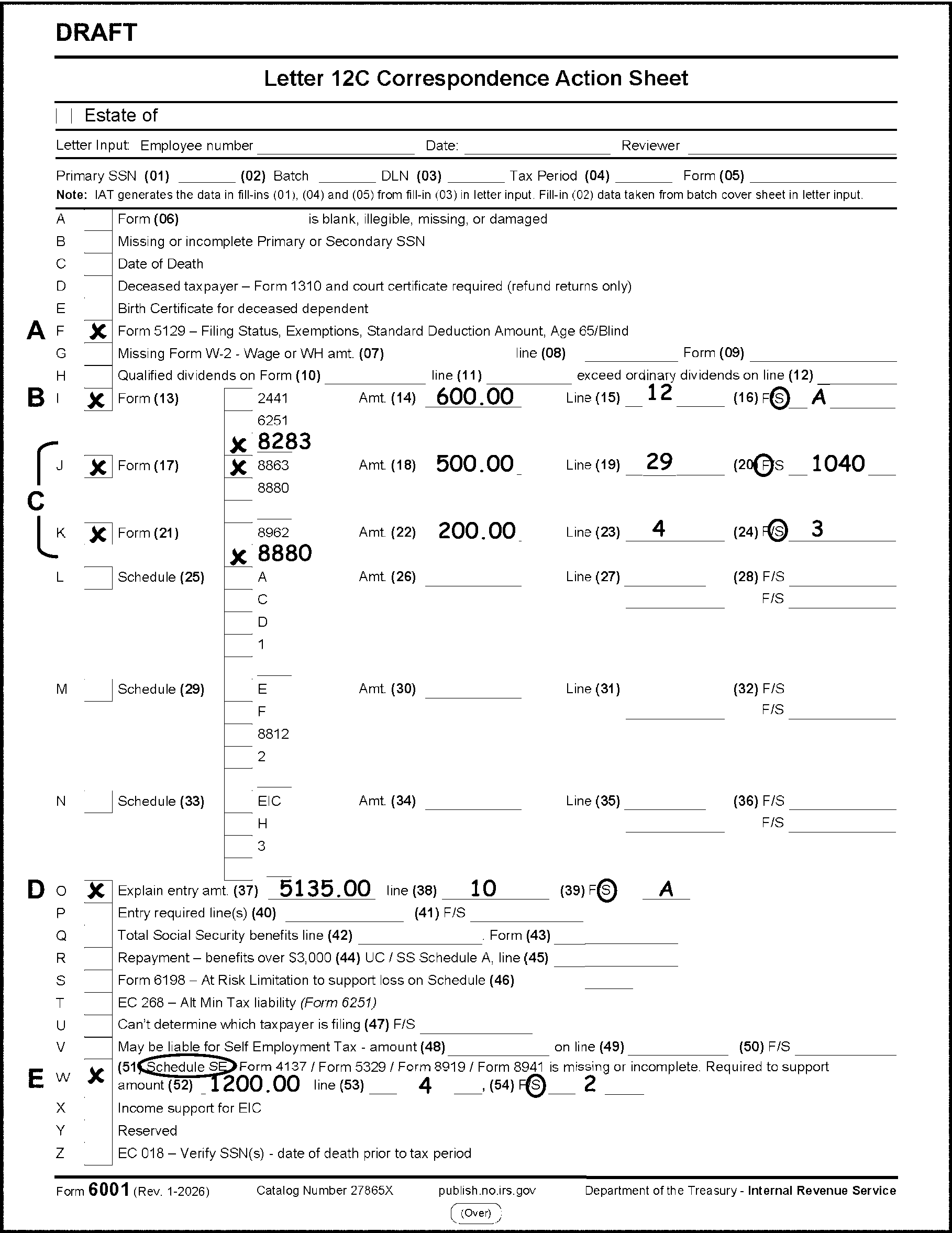
Please click here for the text description of the image.
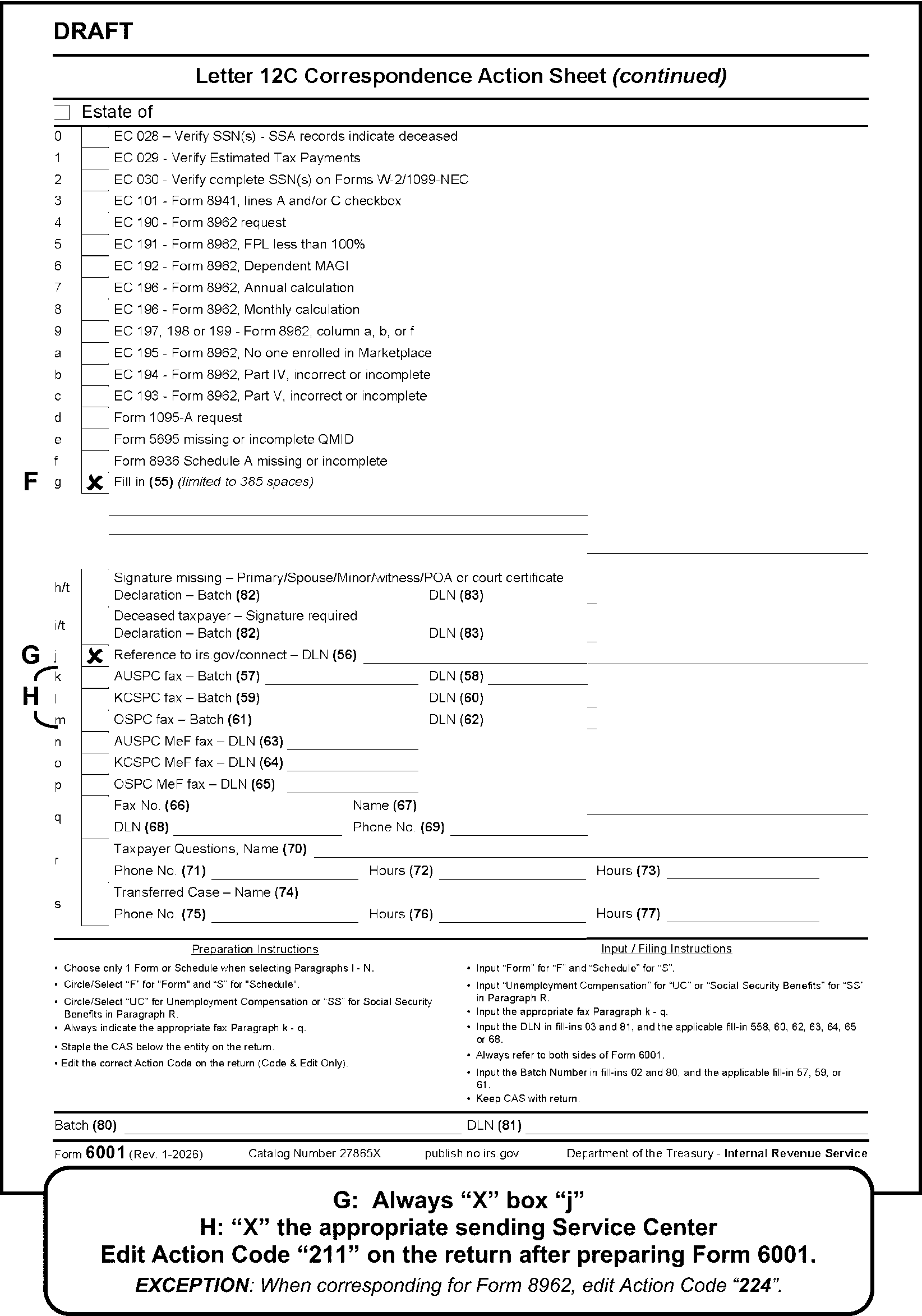
Instructions for Form 3531, Page 1
| Form 3531, Page 1 | |
|---|---|
| A | Always check box 1 to request a valid original signature. |
| B | Check box 2 for a missing jurat. Altered or deleted jurat - route to Frivolous Filer Program. |
| C | Correspond for a missing SSN for the primary/secondary taxpayer only when corresponding for other missing information. |
| D | Correspond for a missing SSN for dependents (i.e., Form 1040, Dependent area) only when corresponding for other missing information. |
| E | Check box 6 when corresponding for withholding support. |
| F | Check box 7 when source of earned income is missing to support line 27. |
| G | When page 1 or 2 of Form 1040/A is missing, research as necessary for TC150 and ERS status. If not found, check box 9. Dummy page 1 caption area if missing. |
| H | Check box 10 for a misfiled return. |
| I | Check box 11-14 to request forms or schedules to support entries on forms or schedules. |
| J | Check box 15 to request multiple forms or schedules to support entries on Forms 1040. |
-
Line through TE stamp and stop coding.
-
Circle out the received date.
-
All amounts on Form 3531 must be edited in dollars and cents. Bracket negative amounts.
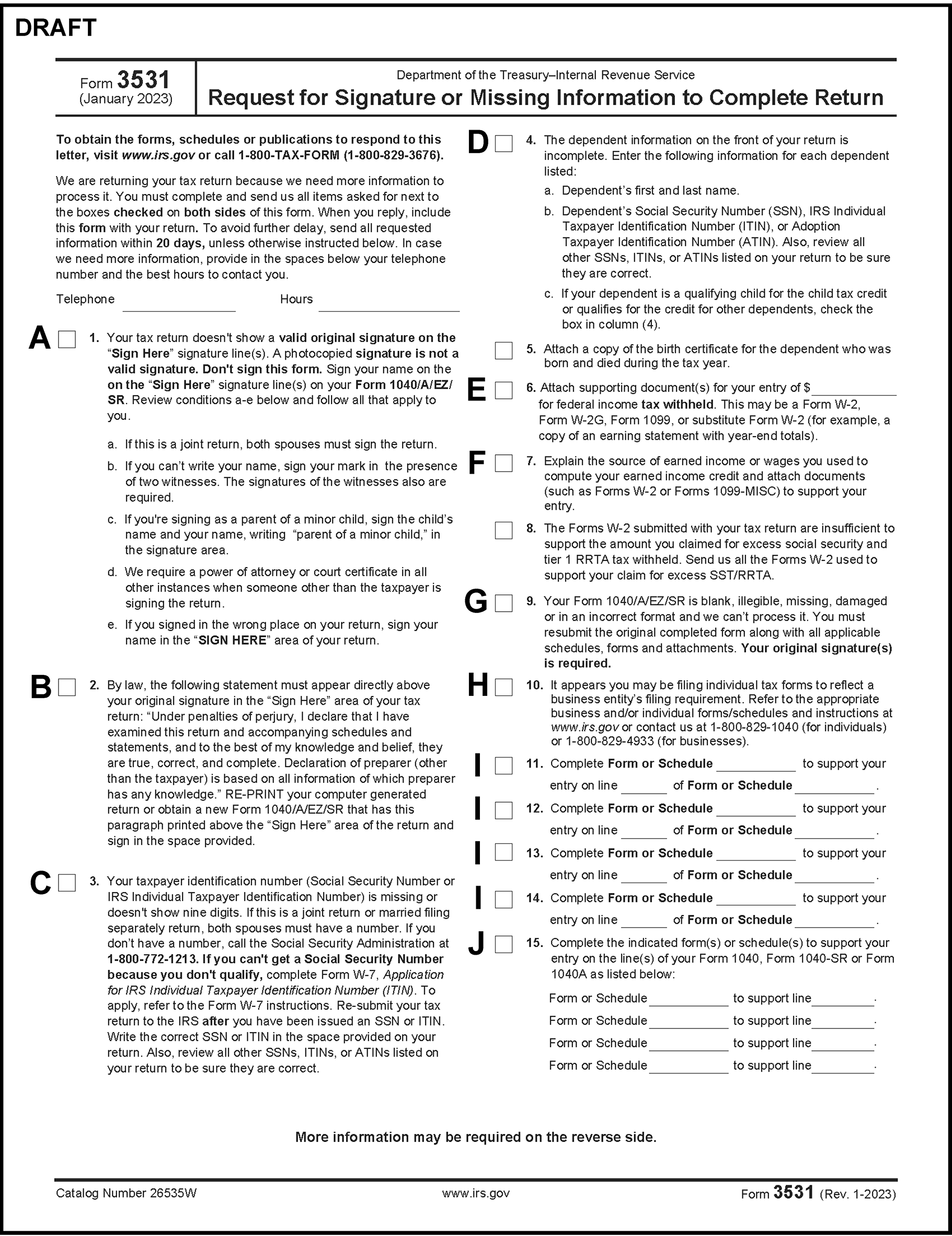
Please click here for the text description of the image.
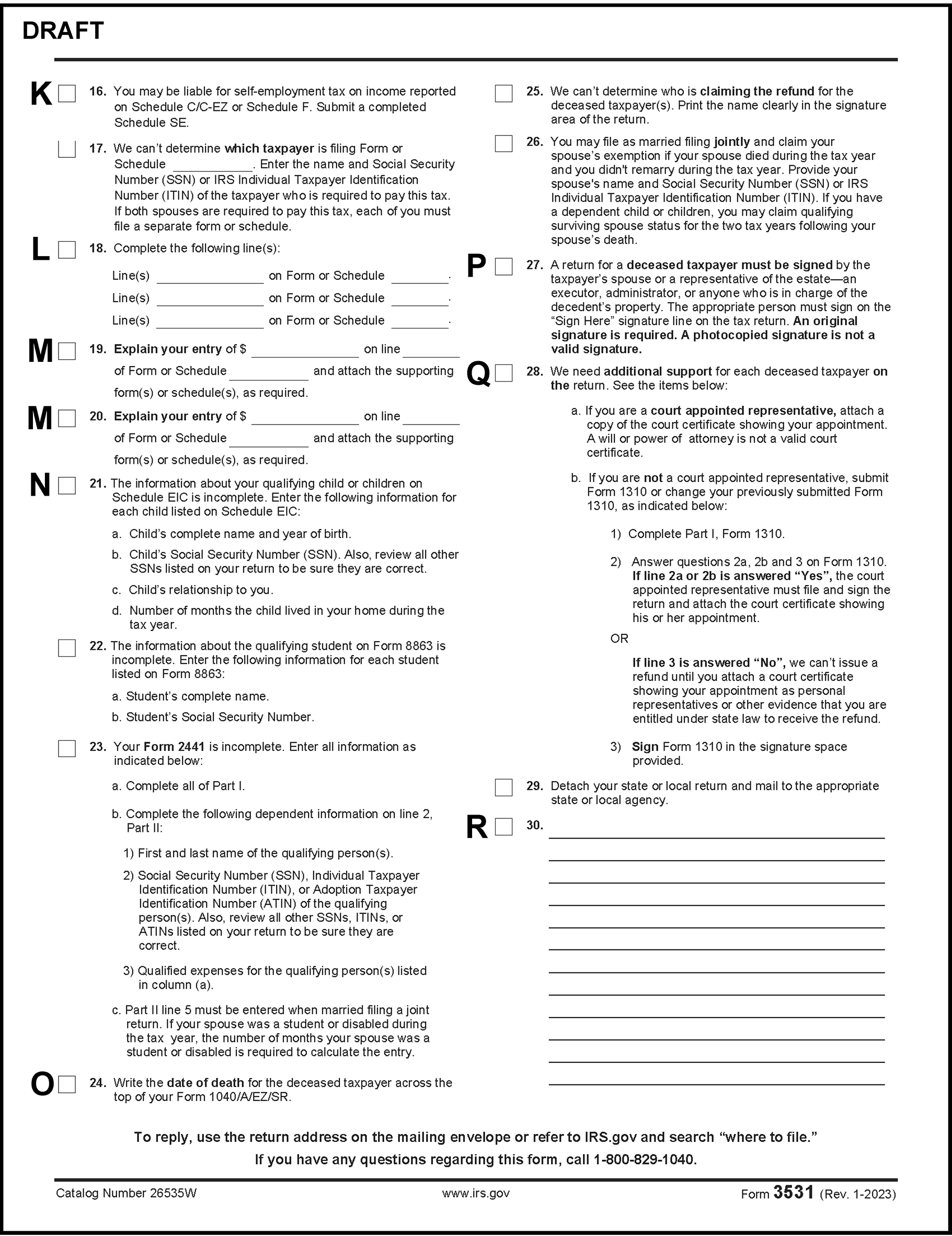
Please click here for the text description of the image.
Instructions for Form 3531, Page 2
| Form 3531, Page 2 | |
|---|---|
| K | Check box 16 when corresponding for missing Schedule C or F, Schedule SE is not attached or claimed and Schedule 1, lines 3 or 6 are $434 or more. |
| L | Check box 18 when a line entry is required on a form or schedule. |
| M | Check box 19-20 for an explanation of entry on a form or schedule. Example: Schedule A, line 10 is missing a supporting document. |
| N | Check box 21 when the number of months is missing on Schedule EIC. |
| O | Check box 24 for a missing date of death. |
| P | Check box 27 on a decedent return when a signature is missing or photocopied. Edit "Estate of" in the caption area when no living taxpayer is present. |
| Q | Check box 28 when supporting documentary evidence is missing or incomplete on a decedent return and a valid signature is also missing. If the only correspondence is for missing or incomplete documentary evidence on a decedent return use Form 6001. |
| R | If selecting box 30, only approved fill-ins can be used. An open paragraph (fill-in) must always be approved by the National Headquarters Analyst. See Exhibit 3.11.3-18. |
| Para # | Title | Text |
|---|---|---|
| 1 | Multiple tax years, need one year | You sent us a tax return that includes page 1 for tax year XXXX and page 2 for tax year XXXX. To process your tax return for tax year XXXX, send us a completed return with your original signature (and your spouse’s if filing jointly). Enclose your Forms W-2 and all forms or schedules used to complete your tax return. NOTE: XXXX = tax year. NOTE: Tax Period in second sentence should be the tax period on page 1. |
| 2 | Multiple tax years, need both years | You sent us a tax return that includes page 1 for tax year XXXX and page 2 for tax year XXXX. To process your tax return, send us a completed return for each tax year with your original signature (and your spouse’s if filing jointly). Enclose your Forms W-2 and all forms or schedules used to complete each tax return. NOTE: XXXX = tax year. |
| 3 | Illegible name claiming deceased refund | The name of the person claiming the deceased taxpayer‘s refund is illegible. Send us the printed name of the person claiming the refund. |
| 4 | Form 1128 required for accounting period change | The tax return you submitted indicates you are changing your accounting period. Send us Form 1128, Application to Adopt, Change, or Retain a Tax Year, a copy of your application, or a statement relating to an application to change your accounting period. We are unable to process your return as submitted without this documentation or IRS authority. |
| 5 | Excess gross Social Security | We have delayed processing your return because we have questions about the withholding or credit you claimed. Send us your official supporting documents such as Form SSA-1099, Form RRB-1099, or other Form 1099 to support the withholding or credit. If we do not receive proper official documents, we may deny your claim. |
| 6 | Qualified Joint Venture | If you are electing to exempt rental real estate business from Schedule C or C-EZ as a Qualified Joint Venture Election, enter "Exempt-QJV" and the exempt amount on the dotted line to the left of Schedule SE, line 3. Subtract that amount from the total of lines 1a, 1b, and 2 and enter the result on line 3, Schedule SE. Send us your corrected Schedule SE. |
| 7 | Gambling: gross amount missing | The gross amount of your gambling winnings received is not reported on Form 1040. Send us the amount of your gross winnings shown on Form(s) W-2G, box 1. |
| 8 | Student/Disabled Form 2441/ Schedule 2 | Special instructions apply for students or disabled persons when completing Child and Dependent Care Expenses, lines 4 and 5. Send us the number of months, during the tax year, that you (or your spouse if filing jointly) were either a full-time student or disabled. Also send us the correct amount for line 4 (and line 5, if filing jointly). |
| 9 | Excess SST | The Forms W-2, submitted with your tax return, are insufficient to support the amount you claimed for excess social security and tier 1 RRTA tax withheld on your Form 1040. Send us all the Forms W-2 used to support your claim for excess SST/RRTA. |
| 10 | Form 2439 copy needed | Send us a copy of Form 2439, Notice to Shareholder of Undistributed Long-Term Capital Gains, to support your entry on Form 1040. |
| 11 | Form 8958 required | It appears you have allocated community property on your tax return. Send us a completed Form 8958, Allocation of Tax Amounts Between Certain Individuals in Community Property States, to support your return. |
| 12 | Form 8958 incomplete | Your Form 8958, Allocation of Tax Amounts Between Certain Individuals in Community Property States, is incomplete. Entries are required for your spouse's or partner's first name, last name, and social security number. Send us a completed Form 8958. |
| 13 | Schedule SE allocated | It appears the self-employment tax from Schedule SE has been allocated. Self-employment tax can’t be allocated. Please explain your figures and let us know if all the self-employment income reported on Schedule SE belongs to you alone. |
| 14 | Form W-2 required | Send us the Forms W-2 used to support the income you reported on Schedule C, line 1. If you received a Form 1099-NEC or Form 1099-MISC for payment in cash for services or for non-employee compensation and the payer did not withhold Social Security and Medicare taxes, send us a completed Schedule SE. If you are not liable for self-employment tax, provide an explanation. |
| 15 | Schedule C/F missing | We are missing information needed to support your entry on Form 1040, ______. It appears more than one schedule was used to compute the amount. Send us all the schedules used to support the amount. |
| 16 | Schedule C, line 1, inconsistent | Explain the amount you entered on Schedule C, line 1, for statutory income. Your entry is inconsistent with the statutory wages reported on your Form W-2. |
| 17 | Schedule C, line 1 - SE and W-2 income - Form W-2 present | Send us two completed Schedules C; one for statutory income and one for the other income reported on line 1 of Schedule C. Also, send a completed Schedule SE if you received payment in cash or as a non-employee, and the payer didn’t withhold Social Security and Medicare taxes. If you are not liable for self-employment tax, provide an explanation. |
| 18 | Schedule C, line 1 - SE and W-2 income – No Form W-2 | Send us two completed Schedules C; one for statutory income and one for the other income reported on line 1, along with Form W-2 to support the wage income. Also, send a completed Schedule SE if you received payment in cash or as a non-employee, and the payer didn’t withhold Social Security and Medicare taxes. If you are not liable for self-employment tax, provide an explanation. |
| 19 | Form 8839 and supporting adoption documents | Send us a completed Form 8839 and provide adoption-related documents to support your claim. Documentation must be provided for each child claimed, including any credit carryforwards from a previous year. The required documentation varies depending on whether the adoption is final or whether the child has special needs. See the Form 8839 instructions for requirements. |
| 20 | Form 5405, line 2 | You have conflicting entries on your Form 5405 regarding whether you are required to repay the credit. You checked the box on line 2, Form 5405, and made entries in Part II for a repayment. Send us a corrected Form 5405. |
| 21 | Form 5405 (FTHBC) multiple disposition boxes checked line 3 (line 13 PY) | You checked more than one box (boxes a – h) on Form 5405 to define the disposition of your home. Please tell us which one best describes the disposition of your main home. |
| 22 | Form 5405 (FTHBC) - name/SSN doesn’t match Primary | The social security number or name listed on your Form 5405 doesn’t match the social security number or name of the primary taxpayer shown on page 1 of your tax return. Send us the correct name and social security number of the person filing Form 5405. |
| 23 | Second correspondence | Thank you for sending us the information we requested on your tax return for the period shown on page 1 of this letter. We still need more information to process your return. |
| 24 | Missing signature - spouse refuses to sign - FS2 (Married Filing Jointly) only | We can’t process your return as filed. If this is a joint return, both spouses must sign. If you and your spouse do not agree to file a joint return, you must use a different filing status on your return. See Publication 501 for more information concerning your filing status options. |
| 25 | Claiming exemption for deceased spouse | You may file a joint return, if your spouse died during the tax year and you didn’t remarry during the tax year. If you have dependent children, you may claim qualifying Surviving Spouse status for the following two years. Send us your spouse's name and social security number. |
| 26 | Form 8283, Schedule A | Send us a completed Form 8283, Noncash Charitable Contribution. The appraiser must complete and sign Part IV, Declaration of Appraiser, on Form 8283. If you use appraisals by more than one appraiser, or if two or more appraisers contribute to a single appraisal, all the appraisers must sign Part IV of Form 8283. |
| 27 | Schedule A, Art | You checked box "a" (Art contribution of $20,000 or more) on line 2 of Form 8283, Noncash Charitable Contributions. An art deduction of $20,000 or more requires a separate qualified appraisal. Also, entries in Section B of Form 8283 require Parts IV and V to be completed. Send us a complete copy of the signed appraisal and a completed Form 8283, if applicable. |
| 28 | Credit for Elderly (CFE) – IRS computes | To have the IRS figure your credit for the elderly, you must send us a completed Schedule R. Check the correct box in Part I, and fill in Part II, and lines 11 and 13 of Part III, if they apply to you. |
| 29 | EIC – IRS computes | To have the IRS figure your earned income credit, you must send us a completed Schedule EIC. |
| 30 | TY17 through TY12 Schedule 8812, Part 1 | Schedule 8812, Part I, must be completed for each dependent that has an Individual Taxpayer Identification Number (ITIN) and is a qualifying child for the child tax credit. Send us a completed Schedule 8812. |
| 31 | Form 1095–A | Send us a copy of your Form 1095-A, Health Insurance Marketplace Statement, to support your entries on Form 8962, Premium Tax Credit. If you didn't receive one or your Form 1095-A is incorrect, visit www.healthcare.gov or your state marketplace website. |
| 32 | Loose Schedule H missing signature (Code & Edit Only) | If you are not required to file a tax return, send us a completed Part IV, Schedule H, with your original signature. If someone other than the taxpayer is signing Schedule H, include a power of attorney, court certificate or Form 2848. |
| 33 | Form 3468, NPS | Send us a copy of the first page of NPS Form 10-168a, Historic Preservation Certification Application (Part 2- Description of Rehabilitation), to support your rehabilitation credit on Form 3468, Investment Credit. |
| 34 | Schedule A, Noncash contributions > $500,000 | You claimed a charitable deduction of more than $500,000 on Schedule A, line __. A deduction of more than $500,000 requires a separate qualified appraisal. Also, entries in Section B of Form 8283 require Parts IV and V to be completed. Send us a complete copy of the signed appraisal and a completed Form 8283, if applicable. |
| 35 | Form 1040, line 40 (disaster notated) | Schedule A is incomplete or missing from your return. Complete the schedule with information that supports your entry for itemized deductions on Form 1040. If applicable, you must also submit any supporting forms for Schedule A, such as Form 4684. |
| 36 | Missing multiple attachments | Your return is incomplete. Your supporting forms and attachments are missing and required to process your return. You must resubmit all applicable forms and schedules to support your entries on pages 1 and 2 of your return. |
| 37 | SE Tax liability | The income you reported on line(s) ______, Form _______, indicates you may be liable for self-employment tax. This tax applies when Social Security and Medicare taxes are not withheld from your earnings. For example, if you received cash for services performed, Form 1099-MISC or Form 1099-NEC for nonemployee compensation, your earnings may be subject to self-employment tax. |
| 38 | Thank You, Second Correspondence (PY) | Thank you for sending us the information we requested. We still need more information. The adjusted gross income transferred from page 1 to page 2 of your return doesn’t match your originally filed return. Send us a newly completed tax return with your original signature(s). Include all forms and schedules required to support your tax return entries. |
| 39 | Form 5405 disposition | Your Form 5405 shows a disposition or change in the use of your main home. It also shows conflicting entries regarding whether you are required to repay the credit. If you checked the box on line 12 of Form 5405, no repayment of the credit is required. Provide an explanation for your entries in Part IV. |
| 40 | FS 3 with spousal income | Your return includes income for a spouse whom you claimed as a dependent. You must refile as either married filing jointly to include spousal income, or each spouse must file as married filing separately and report their individual income. Resubmit a corrected return with your original signature(s). Enclose all forms, schedules, and Forms W-2 used to complete your tax return. |
| 41 | Form 8959, line 19, withholding support | The Forms W-2, submitted with your tax return, are insufficient to support the amount you claimed for withholding on Form 8959, line 19. Submit all applicable Forms W-2 used to support this amount. |
| 42 | Section 965 claims support | Internal Revenue Code (IRC) 965 Transition Tax Statement was either not attached or was incomplete. Send us a completed, signed IRC Section 965 Transition Tax Statement to support the Section 965 claims on your tax return. |
| 43 | Schedule A, line 11 | If you included qualified disaster relief contributions in the total amount on Schedule A, line 11, identify the qualified contribution amount in your response. |
| TY17-TY14 Form 1040 | Prior Year Form 1040A | Prior Year Form 1040EZ | Edit to Form 6114 or Form 6114-A |
|---|---|---|---|
| Line 7 | Line 7 | Line 1 | Line 1a |
| Line 8a | Line 8a | Line 2 | Line 2b |
| Line 8b | Line 8b | Line 2a | |
| Line 9a | Line 9a | Line 3b | |
| Line 9b | Line 9b | Line 3a | |
| Line 10 | Schedule 1, Line 1 | ||
| Line 11 | Schedule 1, Line 2a | ||
| Line 12 | Schedule 1, Line 3 | ||
| Line 13 | Line 10 | Line 7a | |
| Line 14 | Schedule 1, Line 4 | ||
| Line 15a | Line 11a | Line 4a | |
| Line 15b | Line 11b | Line 4b | |
| Line 16a | Line 12a | Line 5a | |
| Line 16b | Line 12b | Line 5b | |
| Line 17 | Schedule 1, Line 5 | ||
| Line 18 | Schedule 1, Line 6 | ||
| Line 19 | Line 13 | Line 3 | Schedule 1, Line 7 |
| Line 20a | Line 14a | Line 6a | |
| Line 20b | Line 14b | Line 6b | |
| Line 21 | Schedule 1, Line 9 | ||
| Line 22 | Line 15 | Line 9 | |
| Line 23 | Line 16 | Schedule 1, Line 11 | |
| Line 24 | Schedule 1, Line 12 | ||
| Line 25 | Schedule 1, Line 13 | ||
| Line 26 | Schedule 1, Line 14 | ||
| Line 27 | Schedule 1, Line 15 | ||
| Line 28 | Schedule 1, Line 16 | ||
| Line 29 | Schedule 1, Line 17 | ||
| Line 30 | Schedule 1, Line 18 | ||
| Line 31a | Schedule 1, Line 19a | ||
| Line 31b | Schedule 1, Line 19b | ||
| Line 32 | Line 17 | Schedule 1, Line 20 | |
| Line 33 | Line 18 | Schedule 1, Line 21 | |
| Line 34 | Line 19 | Schedule 1, Line 22 | |
| Line 35 | Schedule 1, Line 25 | ||
| Line 36 Dotted Portion | Schedule 1, Line 25 | ||
| MSA | MSA | Schedule 1, Line 23 | |
| Line 36 | Line 20 | Line 10 | |
| Line 37 | Line 21 | Line 4 | Line 11a |
| Line 43 | Line 27 | Line 6 | Line 15 |
| Line 44 | Line 28 | Line 10 | Line 16 |
| Line 45 | Schedule 2, Line 2 | ||
| Line 46 | Line 29 | Schedule 2, Line 1a | |
| Line 48 | Schedule 3, Line 1 | ||
| Line 49 | Line 31 | Schedule 3, Line 2 | |
| Line 50 | Line 33 | Schedule 3, Line 3 | |
| Line 51 | Line 34 | Schedule 3, Line 4 | |
| Line 52 | Line 35 | Line 19 | |
| Line 53 | Schedule 3, Line 5a | ||
| Line 54 | Schedule 3, Line 7 | ||
| Line 54A | Schedule 3, Line 7 | ||
| Line 54B | Schedule 3, Line 7 | ||
| Line 54C | Schedule 3, Line 7 | ||
| Line 55 | Line 36 | Line 21 | |
| Line 57 | Schedule 2, Line 4 | ||
| Line 58 | Schedule 2, Line 7 | ||
| Line 59 | Schedule 2, Line 8 | ||
| Line 60a | Schedule 2, Line 9 | ||
| Line 62a | Schedule 2, Line 11 | ||
| Line 62b | Schedule 2, Line 12 | ||
| Line 63 | Line 39 | Line 24 | |
| Line 64 | Line 40 | Line 25d | |
| Line 65 | Line 41 | Line 26 | |
| Line 66a | Line 42a | Line 27a | |
| Line 66b | Line 42b | Line 1i | |
| Line 67 | Line 43 | Line 28 | |
| Line 68 | Line 44 | Line 29 | |
| Line 69 | Line 45 | Schedule 3, Line 9 | |
| Line 70 | Schedule 3, Line 10 | ||
| Line 71 | Schedule 3, Line 11 | ||
| Line 72 | Schedule 3, Line 12 | ||
| Line 73 | Schedule 3, Line 14 | ||
| Line 73A | Schedule 3, Line 13a | ||
| Line 74 | Line 46 | Line 33 | |
| Line 76a | Line 48a | Line 13a | Line 35a |
| Line 77 | Line 49 | Line 36 | |
| Line 78 | Line 50 | Line 14 | Line 37 |
| Line 79 | Line 51 | Line 38 |