


 )
or https:// means you've safely connected to the .gov website. Share sensitive information only on official, secure websites.
)
or https:// means you've safely connected to the .gov website. Share sensitive information only on official, secure websites.


- 3.11.15 Return of Partnership Income
- 3.11.15.1 Program Scope and Objectives
- 3.11.15.1.1 Background
- 3.11.15.1.2 Authority
- 3.11.15.1.3 Responsibilities
- 3.11.15.1.4 Program Management and Reviews
- 3.11.15.1.5 Program Controls
- 3.11.15.1.6 Terms/Definitions/Acronyms
- 3.11.15.1.7 Related Resources
- 3.11.15.2 Form 1065, U.S. Return of Partnership Income (Program #12200)
- 3.11.15.2.1 General Editing Guidelines
- 3.11.15.2.2 Sequence of Return - Form 1065
- 3.11.15.2.3 ♦Business Master File (BMF) Consistency♦
- 3.11.15.2.4 ♦Edit Marks♦
- 3.11.15.2.5 ♦Action Codes♦
- 3.11.15.2.6 ♦IRS Employee Contacts♦
- 3.11.15.2.7 ♦IRM Deviation Procedures♦
- 3.11.15.2.8 ♦Taxpayer Advocate Service (TAS)♦
- 3.11.15.2.8.1 ♦TAS Service Level Agreements (SLAs)♦
- 3.11.15.2.9 ♦Foreign Currency♦
- 3.11.15.3 Perfecting Unprocessable Documents
- 3.11.15.3.1 ♦Definition of Correspondence from Taxpayers♦
- 3.11.15.3.1.1 ♦Issuing Correspondence♦
- 3.11.15.3.1.2 ♦Correspondence Imaging Inventory (CII) Returns♦
- 3.11.15.3.1.3 ♦Use of Fax for Taxpayer Submissions♦
- 3.11.15.3.2 Foreign Address Returns (International)
- 3.11.15.3.3 ♦Frivolous Arguments♦
- 3.11.15.3.4 ♦Criminal Investigation (CI) Referral♦
- 3.11.15.3.5 ♦Examination (Exam) "Funny Box" ♦
- 3.11.15.3.6 ♦Protective Claims♦
- 3.11.15.3.7 ♦BMF Identity(ID) Theft♦
- 3.11.15.3.1 ♦Definition of Correspondence from Taxpayers♦
- 3.11.15.4 Examination of Attachments
- 3.11.15.5 Special Conditions
- 3.11.15.5.1 ♦Statute Returns♦
- 3.11.15.5.2 Section 965 Returns
- 3.11.15.5.3 Elective or Deemed Payment Election (DPE) and Credit Transfers
- 3.11.15.5.4 ♦Compliance Secured/Prepared Returns♦
- 3.11.15.5.4.1 ♦IRC 6020(b) - Prepared by Collection♦
- 3.11.15.5.4.2 ♦Collection Secured♦
- 3.11.15.5.4.3 ♦Examination Prepared♦
- 3.11.15.5.4.4 ♦Examination Secured♦
- 3.11.15.5.5 ♦Re-Entry Document Procedures♦
- 3.11.15.5.5.1 ♦Form 3893 - Re-Entry Document Control♦
- 3.11.15.5.5.2 ♦Form 13596 - Reprocessing Returns♦
- 3.11.15.5.6 ♦Refund Returns (45-Day Jeopardy and High Dollar Refunds)♦
- 3.11.15.5.7 ♦Amended Returns♦
- 3.11.15.5.8 Short Record Returns - General Instructions (for All Short Records)
- 3.11.15.5.8.1 IRC 761(a) Returns
- 3.11.15.5.8.2 Common Trusts
- 3.11.15.5.8.3 Nominee Returns
- 3.11.15.5.8.4 Inactive Returns
- 3.11.15.5.9 ≡ ≡ ≡ ≡ ≡ ≡ ≡ ≡ ≡ ≡ ≡ ≡ ≡ ≡
- 3.11.15.6 ♦Religious Exemption♦
- 3.11.15.7 ♦Received Date♦
- 3.11.15.8 ♦Signature♦
- 3.11.15.8.1 ♦Paid Preparer Checkbox Indicator♦
- 3.11.15.8.2 ♦Paid Preparer Section♦
- 3.11.15.8.2.1 ♦Paid Preparer Tax Identification Number (PTIN)♦
- 3.11.15.8.2.2 ♦Employer Identification Number (EIN)♦
- 3.11.15.8.2.3 ♦Paid Preparer Phone Number♦
- 3.11.15.9 Tax Period
- 3.11.15.9.1 Tax Period Ending
- 3.11.15.9.2 Tax Period Beginning - Initial, Final, or Short Period Form 1065 Return
- 3.11.15.9.3 "Initial" Short Period Return
- 3.11.15.9.4 "Final" Short Period Return
- 3.11.15.9.5 Change in Accounting Period
- 3.11.15.9.6 Early Filed Return
- 3.11.15.10 ♦Entity Perfection - General♦
- 3.11.15.10.1 ♦Bankruptcy♦
- 3.11.15.10.2 ♦Entity Perfection - Employer Identification Number (EIN)♦
- 3.11.15.10.2.1 Disregarded Entity
- 3.11.15.10.3 ♦Entity Perfection - Name Control♦
- 3.11.15.10.4 ♦Entity Perfection - "In-Care-of" Name♦
- 3.11.15.10.5 ♦Entity Perfection - Domestic Addresses♦
- 3.11.15.10.6 ♦Entity Perfection - Foreign Address♦
- 3.11.15.10.6.1 ♦Country Code - Canada♦
- 3.11.15.11 North American Industry Classification System (NAICS) Code
- 3.11.15.12 Date Business Started
- 3.11.15.13 Total Assets
- 3.11.15.14 Initial Return Code
- 3.11.15.15 Technical Termination Code
- 3.11.15.16 Computer Condition Codes
- 3.11.15.16.1 CCC "A" - Date Business Started
- 3.11.15.16.2 CCC "B" - Schedule M-3
- 3.11.15.16.3 ♦CCC D - Reasonable Cause for Failing to Pay Timely♦
- 3.11.15.16.4 CCC "F" - Final Return
- 3.11.15.16.5 ♦CCC "G" - Amended Return♦
- 3.11.15.16.6 CCC "I" (i) - Tax Straddles and Future Contracts (Form 6781)
- 3.11.15.16.7 CCC "J" - Section 965 Tax
- 3.11.15.16.8 CCC "L" - Treaty Based Positions
- 3.11.15.16.9 CCC "M" - Form 8949 (Sales and Other Dispositions of Capital Assets), Opportunity Zone
- 3.11.15.16.10 CCC "P" - BMF Mail Indicator
- 3.11.15.16.11 ♦CCC "R" - Reasonable Cause for Failing to File a Timely Return♦
- 3.11.15.16.12 CCC "S" - Asset Allocation Statement under Section 338
- 3.11.15.16.13 CCC "T" - Investor Reporting of Tax Shelter Registration
- 3.11.15.16.14 ♦CCC "W" - Return Cleared by Statute Control♦
- 3.11.15.16.15 CCC "X" - Refund/Settlement Freeze
- 3.11.15.16.16 Reserved
- 3.11.15.16.17 CCC "1" - Like-Kind Exchange
- 3.11.15.16.18 CCC "2" - Statement of Foreign Financial Assets
- 3.11.15.16.19 ♦CCC "3" - No Reply to Correspondence♦
- 3.11.15.16.20 CCC "4" - IRC 6020(b) Return
- 3.11.15.16.21 CCC "5" - Common Trust Return
- 3.11.15.16.22 CCC "6" - Suppress the Failure to File on Correct Media Penalty
- 3.11.15.16.23 CCC "8" - Section 761(a) Returns
- 3.11.15.16.24 CCC "9" - Foreign Partnership (Ogden Only)
- 3.11.15.17 Line I - Number of Schedules K-1 (or Number of Partners)
- 3.11.15.18 Salary and Wage Code
- 3.11.15.19 EPMF Code
- 3.11.15.20 Additional Partnership Perfection
- 3.11.15.20.1 Audit Codes
- 3.11.15.20.2 Special Income Code
- 3.11.15.20.3 ♦Installment Sale Indicator♦
- 3.11.15.20.4 Nonrecourse Loan Code
- 3.11.15.20.5 Historic Structure Code
- 3.11.15.20.6 Penalty and Interest Code
- 3.11.15.20.7 Return Processing Code (RPC)
- 3.11.15.21 Tax Data Perfection
- 3.11.15.22 Form 1065, Income Section (Lines 1- 8)
- 3.11.15.22.1 Line 1a - Gross Receipts or Sales
- 3.11.15.22.2 Line 2 - Cost of Goods Sold (Form 1125-A)
- 3.11.15.22.3 Line 3 - Gross Profit
- 3.11.15.22.4 Line 4 - Ordinary Income (Loss) from Other Partnerships and Fiduciaries
- 3.11.15.22.5 Line 5 - Net Farm Profit (Loss)
- 3.11.15.22.6 Line 6 - Net Gain (Loss)
- 3.11.15.22.7 Line 7 - Other Income (Loss)
- 3.11.15.22.8 Line 8 - Total Income (Loss)
- 3.11.15.23 Form 1065, Deductions Section (Lines 9-23)
- 3.11.15.23.1 Line 9 - Salaries and Wages
- 3.11.15.23.2 Line 10 - Guaranteed Payments to Partners
- 3.11.15.23.3 Line 11 - Repairs and Maintenance
- 3.11.15.23.4 Line 12 - Bad Debts
- 3.11.15.23.5 Line 13 - Rent
- 3.11.15.23.6 Line 14 - Taxes and Licenses
- 3.11.15.23.7 Line 15 - Interest
- 3.11.15.23.8 Line 16c - Depreciation
- 3.11.15.23.9 Line 17 - Depletion
- 3.11.15.23.10 Line 18 - Retirement Plans, etc.
- 3.11.15.23.11 Line 19 - Employee Benefit Programs
- 3.11.15.23.12 Line 20 - Energy Efficient Commercial Buildings Deduction (Form 7205) (202301 and later)
- 3.11.15.23.13 Line 21 - Other Deductions
- 3.11.15.23.14 Line 22 - Total Deductions
- 3.11.15.23.15 Line 23 - Ordinary Business Income (Loss)
- 3.11.15.23.16 Publicly Traded Partnership
- 3.11.15.24 Form 1065, Total Payments Section (Lines 24-32)
- 3.11.15.24.1 Line 24 - Interest due under the look-back method (attach Form 8697)
- 3.11.15.24.2 Line 25 - Interest due under the look-back method (attach Form 8866)
- 3.11.15.24.3 Line 26 - BBA AAR imputed underpayment
- 3.11.15.24.4 Line 27 - Other taxes
- 3.11.15.24.5 Line 28 - Total balance due
- 3.11.15.24.6 Line 29 - Elective Payment Election
- 3.11.15.24.7 Line 30 - Payment
- 3.11.15.24.8 Lines 31 and 32a - Amount Owed/Overpayment
- 3.11.15.25 Form 1065, Schedule B, Other Information
- 3.11.15.25.1 Type of Partnership Entity - (Question 1)
- 3.11.15.25.2 Foreign or Domestic Corporate Ownership - (Question 2a)
- 3.11.15.25.3 Foreign Individual or Estate Ownership - (Question 2b)
- 3.11.15.25.4 Ownership of Foreign or Domestic Corporation Code - (Question 3a)
- 3.11.15.25.5 Ownership of Foreign Partnership or Trust Code - (Question 3b)
- 3.11.15.25.6 Balance and Reconciliation - (Question 4)
- 3.11.15.25.7 Distribution From Foreign Trust - (Question 9)
- 3.11.15.25.8 Partnership making a section 754 election - (Question 10a)
- 3.11.15.25.9 Did partnership make an optional basis adjustment under section 743(b)? - (Question 10b)
- 3.11.15.25.10 Did partnership make an optional basis adjustment under 734(b)? - (Question 10c)
- 3.11.15.25.11 Is partnership required to adjust basis of partnership property? - (Question 10d)
- 3.11.15.25.12 Number of Forms 8858 Attached - (Question 13)
- 3.11.15.25.13 Number of Forms 8805 Attached - (Question 14)
- 3.11.15.25.14 Number of Forms 8865 Attached - (Question 15)
- 3.11.15.25.15 Number of Form 5471, Information Return of U. S. Persons With Respect to Certain Foreign Corporations, attached to this return (Question 17)
- 3.11.15.25.16 Form 8938 - Statement of Specified Foreign Financial Assets (Question 20)
- 3.11.15.25.17 Form 8996 - Qualified Opportunity Fund Checkbox (Question 25)
- 3.11.15.25.18 Number of Foreign Partners that Disposed of an Interest or Received Distributions (Question 26)
- 3.11.15.25.19 Checkbox for transfers between the partnership and its partners subject to disclosure requirements of Regulations section 1.707-8 (Question 27)
- 3.11.15.25.20 Is the partnership required to file Form 7208 relating to excise tax - (Line 29a, Schedule B)
- 3.11.15.25.21 Form 1065, Schedule B, Form 7208 under surrogate foreign corporation - (Line 29b)
- 3.11.15.25.22 Form 1065, Schedule B, Did the partnership receive a digital asset - (Line 30)
- 3.11.15.25.23 Centralized Partnership Audit Regime Election (Line 33)
- 3.11.15.26 Form 1065, Schedule K
- 3.11.15.26.1 Schedule K, Line 2
- 3.11.15.26.2 Schedule K, Line 3a
- 3.11.15.26.3 Schedule K, Line 3c
- 3.11.15.26.4 Schedule K, Line 5
- 3.11.15.26.5 Schedule K, Line 6a, Ordinary Dividends
- 3.11.15.26.6 Schedule K, Line 6b, Qualified Dividends
- 3.11.15.26.7 Schedule K, Line 7
- 3.11.15.26.8 Schedule K, Line 9a
- 3.11.15.26.9 Schedule K, Line 10
- 3.11.15.26.10 Schedule K, Line 11
- 3.11.15.26.11 Schedule K, Line 13e
- 3.11.15.26.12 Schedule K, Line 15a
- 3.11.15.26.13 Schedule K, Line 15b
- 3.11.15.26.14 Schedule K, Line 15c
- 3.11.15.26.15 Schedule K, Line 15f
- 3.11.15.26.16 Schedule K, Line 15f - Form 8936, Schedule A, Clean Vehicle Credit Amount
- 3.11.15.26.17 Schedule K, Line 16a - International Tax Reporting Checkbox
- 3.11.15.26.18 Schedule K, Lines 16d to 16q
- 3.11.15.26.19 Schedule K, Lines 19a and 19b
- 3.11.15.26.20 Schedule K, Line 21 (2021 and later)
- 3.11.15.27 Form 1065, Schedule L
- 3.11.15.28 Form 1065, Schedule M-2
- 3.11.15.29 Schedule F - Profit or Loss From Farming
- 3.11.15.30 Form 8825 - Rental Real Estate Income and Expenses of a Partnership or an S Corporation
- 3.11.15.31 Schedule D (Form 1065) - Capital Gains and Losses
- 3.11.15.32 Form 4797 - Sales of Business Property
- 3.11.15.33 Form 8949 - Sales and Other Dispositions of Capital Assets
- 3.11.15.34 Form 8996 - Qualified Opportunity Fund
- 3.11.15.35 Form 1125-A, Cost of Goods Sold (previously Form 1065, Schedule A)
- 3.11.15.36 Form 5884-B - New Hire Retention Credit
- 3.11.15.37 Form 8941 - Credit for Small Employer Health Insurance Premiums
- 3.11.15.38 Form 3800 - General Business Credit
- 3.11.15.39 Form 6252 - Installment Sale Income
- 3.11.15.40 Form 8997 - Initial and Annual Statement of Qualified Opportunity Fund (QOF) Investments
- 3.11.15.41 Form 8283, Noncash Charitable Contributions
- 3.11.15.42 Form 8936, Schedule A, Clean Vehicle Credit Amount
- 3.11.15.43 Form 4255, Certain Credit Recapture, Excessive Payments, and Penalties
- 3.11.15.44 Electronic Filed Partnership Returns
- 3.11.15.45 Form 1065-B, U.S. Return of Income for Electing Large Partnership - Ogden IRS Campus
- 3.11.15.46 ♦Business Master File (BMF) Consistency♦
- 3.11.15.47 General Editing Guidelines for Form 1065-B
- 3.11.15.47.1 ♦Edit Marks♦
- 3.11.15.47.2 ♦Action Codes♦
- 3.11.15.48 Perfecting Unprocessable Documents
- 3.11.15.48.1 ♦Correspondence♦
- 3.11.15.48.1.1 ♦Use of Fax for Taxpayer Submissions♦
- 3.11.15.48.2 Foreign Address Returns (International)
- 3.11.15.48.3 ♦Frivolous Returns and Claims♦
- 3.11.15.48.1 ♦Correspondence♦
- 3.11.15.49 Examination of Attachments
- 3.11.15.49.1 ♦Routing Guide for Attachments♦
- 3.11.15.50 Special Conditions
- 3.11.15.50.1 ♦Statute Returns♦
- 3.11.15.50.2 ♦Compliance Secured/Prepared Returns♦
- 3.11.15.50.2.1 ♦IRC 6020(b) – Prepared by Collection♦
- 3.11.15.50.2.2 ♦Collection Secured♦
- 3.11.15.50.2.3 ♦Examination Prepared Returns♦
- 3.11.15.50.2.4 ♦Examination Secured♦
- 3.11.15.50.3 ♦Re-Entry Document Procedures♦
- 3.11.15.50.4 Amended Returns
- 3.11.15.50.5 Short Record Returns
- 3.11.15.50.5.1 Nominee Returns
- 3.11.15.50.5.2 Inactive Returns
- 3.11.15.51 ♦Received Date♦
- 3.11.15.52 ♦Signature♦
- 3.11.15.52.1 Paid Preparer Checkbox Indicator
- 3.11.15.52.2 ♦Paid Preparer Section♦
- 3.11.15.52.2.1 ♦Preparer PTIN♦
- 3.11.15.52.2.2 ♦Preparer EIN♦
- 3.11.15.52.3 ♦Preparer Phone Number♦
- 3.11.15.53 Tax Period Ending
- 3.11.15.53.1 Tax Period Beginning - Initial, Final, or Short Period Form 1065-B Return
- 3.11.15.53.2 Converting Form 1065-B to Form 1065
- 3.11.15.53.3 "Final" Return
- 3.11.15.53.4 Change in Accounting Period
- 3.11.15.53.5 Early Filed Return
- 3.11.15.54 ♦Entity Perfection - General♦
- 3.11.15.54.1 ♦Entity Perfection - Employer Identification Number (EIN)♦
- 3.11.15.54.2 ♦Entity Perfection - Name Control♦
- 3.11.15.54.3 ♦Entity Perfection - Domestic Addresses♦
- 3.11.15.54.4 ♦Entity Perfection - Foreign Address♦
- 3.11.15.55 ♦North American Industry Classification System (NAICS)♦
- 3.11.15.56 Date Business Started
- 3.11.15.57 Total Assets
- 3.11.15.58 ♦Computer Condition Codes♦
- 3.11.15.58.1 CCC "A" - Date Business Started
- 3.11.15.58.2 CCC "B" - Schedule M-3
- 3.11.15.58.3 ♦CCC "F" - Final Return♦
- 3.11.15.58.4 ♦CCC "G" - Amended Return♦
- 3.11.15.58.5 ♦CCC "I" - Tax Straddles and Future Contracts (Form 6781)♦
- 3.11.15.58.6 CCC "L" - Treaty Based Positions
- 3.11.15.58.7 CCC "M" - Form 8949 (Sales and Other Dispositions of Capital Assets), Opportunity Zone
- 3.11.15.58.8 CCC "P" - BMF Mail Indicator
- 3.11.15.58.9 CCC "Q" - Return Filed Claiming TETR Only (Federal Telephone Excise Tax Credit Refund)
- 3.11.15.58.10 ♦CCC "R" - Reasonable Cause for Failing to File a Timely Return♦
- 3.11.15.58.11 CCC "T" - Investor Reporting of Tax Shelter Registration
- 3.11.15.58.12 ♦CCC "W" - Return Cleared By Statute Control♦
- 3.11.15.58.13 CCC "X" - Refund/Settlement Freeze
- 3.11.15.58.14 CCC "1" - Like-Kind Exchange
- 3.11.15.58.15 Reserved
- 3.11.15.58.16 ♦CCC "3" - No Reply to Correspondence♦
- 3.11.15.58.17 ♦CCC "4" - IRC 6020(b) Return♦
- 3.11.15.58.18 CCC "6" - Suppress the Failure to File on Correct Media Penalty
- 3.11.15.58.19 CCC "9" - Foreign Partnership (Ogden Only)
- 3.11.15.59 Number of Schedules K-1
- 3.11.15.60 Salary and Wage Code
- 3.11.15.61 EPMF Code
- 3.11.15.62 Additional Partnership Perfection
- 3.11.15.62.1 Audit Codes
- 3.11.15.62.2 Special Income Code
- 3.11.15.62.3 Installment Sales Indicator
- 3.11.15.62.4 Nonrecourse Loan Code
- 3.11.15.62.5 Historic Structure Code
- 3.11.15.63 Tax Data Perfection
- 3.11.15.64 Form 1065-B, Income Section (Lines 1a through 11)
- 3.11.15.64.1 Line 1a - Gross Receipts
- 3.11.15.64.2 Line 1b - Returns and Allowances
- 3.11.15.64.3 Line 2 - Cost of Goods Sold
- 3.11.15.64.4 Line 3 - Gross Profit
- 3.11.15.64.5 Line 4 - Net Income (Loss) From Rental Real Estate Activities
- 3.11.15.64.6 Line 5 - Net Income (Loss) From Other Rental Activities
- 3.11.15.64.7 Line 6 - Ordinary Income (Loss) From Other Partnerships, Estates and Trusts
- 3.11.15.64.8 Line 7 - Net Farm Profit (Loss)
- 3.11.15.64.9 Line 8 - Excess of Net Short-Term Capital Gain Over Net Long-Term Capital Loss
- 3.11.15.64.10 Line 9 - Net Gain (Loss) From Form 4797
- 3.11.15.64.11 Line 10 - Other Income (Loss)
- 3.11.15.64.12 Line 11 - Total Income (Loss)
- 3.11.15.65 Form 1065-B, Deductions Section (Lines 12 through 25)
- 3.11.15.65.1 Line 12 - Salaries and Wages
- 3.11.15.65.2 Line 13 - Guaranteed Payments to Partners
- 3.11.15.65.3 Line 14 - Repairs and Maintenance
- 3.11.15.65.4 Line 15 - Bad Debts
- 3.11.15.65.5 Line 16 - Rent
- 3.11.15.65.6 Line 17 - Taxes and Licenses
- 3.11.15.65.7 Line 18 - Interest
- 3.11.15.65.8 Line 19c - Depreciation
- 3.11.15.65.9 Line 20 - Depletion
- 3.11.15.65.10 Line 21 - Retirement Plans, etc.
- 3.11.15.65.11 Line 22 - Employee Benefit Programs
- 3.11.15.65.12 Line 23 - Other Deductions
- 3.11.15.65.13 Line 24 - Total Deductions
- 3.11.15.65.14 Line 25 - Taxable Income (Loss) From Passive Loss Limitation Activities
- 3.11.15.66 Form 1065-B, Tax and Payments (Lines 26 through 29)
- 3.11.15.66.1 Line 26 - Tax
- 3.11.15.66.2 Credit for Federal Telephone Excise Tax Paid (TETR)
- 3.11.15.66.3 Line 27 - Other Payments
- 3.11.15.66.4 Line 28 - Amount Owed
- 3.11.15.66.4.1 Green Rockered Money Amount on Line 28
- 3.11.15.66.5 Line 29 - Overpayment
- 3.11.15.67 Form 1065-B, Part II - Taxable Income or Loss From Other Activities
- 3.11.15.67.1 Line 1 - Interest
- 3.11.15.67.2 Line 2a - Total Ordinary Dividends
- 3.11.15.67.3 Line 3 - Gross Royalties
- 3.11.15.67.4 Line 4 - Excess of Net Short-Term Capital Gain Over Net Long-Term Capital Loss
- 3.11.15.67.5 Line 5 - Other Income (Loss)
- 3.11.15.67.6 Line 6 - Total Income (Loss)
- 3.11.15.67.7 Line 7 - Interest Expense on Investment Debts
- 3.11.15.67.8 Line 8 - State and Local Income Taxes
- 3.11.15.67.9 Line 9 - Charitable Contributions
- 3.11.15.67.10 Line 10a - Total Miscellaneous Itemized Deductions
- 3.11.15.67.11 Line 10b - Deductible Amount
- 3.11.15.67.12 Line 11 - Other Deductions
- 3.11.15.67.13 Line 12 - Total Deductions
- 3.11.15.67.14 Line 13 - Taxable Income (Loss) From Other Activities
- 3.11.15.68 Form 1065-B, Schedule B, Other Information
- 3.11.15.68.1 Type of Partner Code
- 3.11.15.68.1.1 Dual Partner Code (Question 2)
- 3.11.15.68.1.2 Multi Partner Code (Question 3)
- 3.11.15.68.2 Foreign Partner Code (Question 4)
- 3.11.15.68.3 Foreign Trust Indicator (Question 8)
- 3.11.15.68.4 Foreign Disregarded Entities (Question 9)
- 3.11.15.68.1 Type of Partner Code
- 3.11.15.69 Form 1065-B, Schedule K
- 3.11.15.69.1 Line 1b(1), Schedule K
- 3.11.15.69.1.1 Line 1b(2), Schedule K
- 3.11.15.69.1.2 Line 1b(3), Schedule K
- 3.11.15.69.2 Line 1d, Schedule K
- 3.11.15.69.3 Line 2, Schedule K
- 3.11.15.69.4 Line 3, Schedule K
- 3.11.15.69.5 Line 4a and 4b, Schedule K
- 3.11.15.69.6 Line 5, Schedule K
- 3.11.15.69.7 Line 6, Schedule K
- 3.11.15.69.8 Line 7, Schedule K
- 3.11.15.69.9 Line 8, Schedule K
- 3.11.15.69.10 Line 9, Schedule K
- 3.11.15.69.11 Line 10, Schedule K
- 3.11.15.69.12 Line 11, Schedule K
- 3.11.15.69.13 Line 12, Schedule K
- 3.11.15.69.14 Lines 14d(1) through 14h, Schedule K
- 3.11.15.69.1 Line 1b(1), Schedule K
- 3.11.15.70 Form 1065-B, Schedule L
- 3.11.15.71 Form 1065-B, Schedule M-2
- 3.11.15.72 Schedule F - Profit or Loss From Farming
- 3.11.15.73 Form 8825 Rental Real Estate Income and Expenses of a Partner or an S Corporation
- 3.11.15.74 Form 1125-A, Cost of Goods Sold (previously Form 1065-B, Schedule A)
- 3.11.15.75 Form 5884-B, New Hire Retention Credit
- 3.11.15.76 Form 8941, Credit for Small Employer Health Insurance Premiums
- 3.11.15.77 Publicly Traded Partnerships
- 3.11.15.78 Form 1065 Prior Year Conversion Charts
- 3.11.15.79 Form 8996 Prior Year Conversion Chart
- 3.11.15.80 Form 3800 Prior Year Conversion Chart
- Exhibit 3.11.15-1 Terms/Definitions/Acronyms
- Exhibit 3.11.15-2 Routing Guide for Attachments
- Exhibit 3.11.15-3 Due Date Chart
- Exhibit 3.11.15-4 ♦Potential Frivolous Arguments for Examination Review♦
- Exhibit 3.11.15-5 ♦Province, Foreign State, and Territory Abbreviations♦
- Exhibit 3.11.15-6 ♦U.S. Possessions/Territories ZIP Codes♦
- Exhibit 3.11.15-7 USPS.com Track & Confirm
- Exhibit 3.11.15-8 Form 3800 - Prior Year Revisions Comparison Chart
- 3.11.15.1 Program Scope and Objectives
Part 3. Submission Processing
Chapter 11. Returns and Documents Analysis
Section 15. Return of Partnership Income
3.11.15 Return of Partnership Income
Manual Transmittal
November 05, 2025
Purpose
(1) This transmits revised IRM 3.11.15, Returns and Documents Analysis - Return of Partnership Income.
Material Changes
(1) IRM 3.11.15.1.7(1) - Updated the Related Resources information. (IPU 25U0069 issued 01-17-2025)
(2) IRM 3.11.15.2.2 - Added Form 8283 into sequencing IRM.
(3) IRM 3.11.15.2.5(8) - Updated the description for Action Codes 343, 420, 450, and 460. (IPU 25U0069 issued 01-17-2025)
(4) IRM 3.11.15.2.5(8) - Updated the description for Action Codes 343, 420, 450, and 460. (IPU 25U0060 issued 01-16-2025)
(5) IRM 3.11.15.2.8.1(2) - Updated the Taxpayer Advocate Service (TAS) Service Level Agreements link. (IPU 25U0060 issued 01-16-2025)
(6) IRM 3.11.15.3.1.1(3) - Updated Action Codes to clarify information. (IPU 25U0322 issued 03-07-2025)
(7) IRM 3.11.15.5.5.2(5) - Emphasis bold on "is not edited" to reiterate the importance.
(8) IRM 3.11.15.5.6(1) - If/Then Table - Added "(whichever is later)" after "return due date" and added a Note defining refund, consistent with the rest of the table. (IPU 25U0168 issued 02-05-2025)
(9) IRM 3.11.15.5.7(4) - Changed wording to include "Only edit the following data on amended returns" .
(10) ≡ ≡ ≡ ≡ ≡ ≡ ≡ ≡ ≡ ≡≡ ≡ ≡ ≡ ≡ ≡ ≡ ≡ ≡ ≡ ≡ ≡ ≡ ≡ ≡ ≡ ≡ ≡ ≡ ≡ ≡ ≡ ≡ ≡ ≡ ≡ ≡ ≡ ≡ ≡ ≡ ≡ ≡ ≡ ≡ ≡ ≡ ≡ ≡ ≡ ≡ ≡ ≡ ≡ ≡ ≡ ≡ ≡ ≡ ≡ ≡ ≡ ≡ ≡
(11) ≡ ≡ ≡ ≡ ≡ ≡ ≡ ≡ ≡ ≡≡ ≡ ≡ ≡ ≡ ≡ ≡ ≡ ≡ ≡ ≡ ≡ ≡ ≡ ≡ ≡ ≡ ≡ ≡ ≡ ≡ ≡ ≡ ≡ ≡ ≡ ≡ ≡ ≡ ≡ ≡ ≡ ≡ ≡ ≡ ≡ ≡ ≡ ≡ ≡ ≡ ≡ ≡ ≡ ≡ ≡ ≡ ≡ ≡ ≡ ≡ ≡ ≡ ≡ ≡ ≡
(12) ≡ ≡ ≡ ≡ ≡ ≡ ≡ ≡ ≡≡ ≡ ≡ ≡ ≡ ≡ ≡ ≡ ≡ ≡ ≡ ≡ ≡ ≡ ≡ ≡ ≡ ≡ ≡ ≡ ≡ ≡ ≡ ≡ ≡ ≡ ≡ ≡ ≡ ≡ ≡ ≡ ≡ ≡ ≡ ≡ ≡ ≡ ≡ ≡ ≡ ≡
(13) ≡ ≡ ≡ ≡ ≡ ≡ ≡ ≡ ≡ ≡ ≡≡ ≡ ≡ ≡ ≡ ≡ ≡ ≡ ≡ ≡ ≡ ≡ ≡ ≡ ≡ ≡ ≡ ≡ ≡ ≡ ≡ ≡ ≡ ≡ ≡ ≡ ≡ ≡ ≡ ≡ ≡ ≡ ≡ ≡ ≡ ≡ ≡ ≡ ≡ ≡ ≡ ≡
(14) ≡ ≡ ≡ ≡ ≡ ≡ ≡ ≡ ≡≡ ≡ ≡ ≡ ≡ ≡ ≡ ≡ ≡ ≡ ≡ ≡ ≡ ≡ ≡ ≡ ≡ ≡ ≡ ≡ ≡ ≡ ≡ ≡ ≡ ≡ ≡ ≡ ≡ ≡ ≡ ≡ ≡ ≡ ≡ ≡ ≡ ≡ ≡ ≡ ≡ ≡ ≡ ≡ ≡ ≡ ≡ ≡ ≡ ≡ ≡ ≡ ≡ ≡ ≡ ≡
(15) ≡ ≡ ≡ ≡ ≡ ≡ ≡ ≡ ≡≡ ≡ ≡ ≡ ≡ ≡ ≡ ≡ ≡ ≡ ≡ ≡ ≡ ≡ ≡ ≡ ≡ ≡ ≡ ≡ ≡ ≡ ≡ ≡ ≡ ≡ ≡ ≡ ≡ ≡ ≡ ≡ ≡ ≡ ≡ ≡ ≡ ≡ ≡ ≡ ≡ ≡ ≡ ≡ ≡ ≡ ≡ ≡ ≡ ≡ ≡ ≡ ≡ ≡ ≡ ≡
(16) ≡ ≡ ≡ ≡ ≡ ≡ ≡ ≡ ≡≡ ≡ ≡ ≡ ≡ ≡ ≡ ≡ ≡ ≡ ≡ ≡ ≡ ≡ ≡ ≡ ≡ ≡ ≡ ≡ ≡ ≡ ≡ ≡ ≡ ≡ ≡ ≡ ≡ ≡ ≡ ≡ ≡ ≡ ≡ ≡ ≡
(17) ≡ ≡ ≡ ≡ ≡ ≡ ≡ ≡ ≡≡ ≡ ≡ ≡ ≡ ≡ ≡ ≡ ≡ ≡ ≡ ≡ ≡ ≡ ≡ ≡ ≡ ≡ ≡ ≡ ≡ ≡ ≡ ≡ ≡ ≡ ≡ ≡ ≡ ≡ ≡ ≡ ≡ ≡ ≡ ≡ ≡ ≡ ≡ ≡ ≡ ≡ ≡ ≡ ≡ ≡ ≡ ≡ ≡ ≡ ≡ ≡ ≡ ≡ ≡ ≡ ≡ ≡ ≡ ≡ ≡ ≡ ≡ ≡
(18) IRM 3.11.15.6 - Added procedures for working Religious Exemption returns per feedback from the Office of Servicewide Penalties. (IPU 25U3414 issued 06-18-2025)
(19) IRM 3.11.15.7(2) - If/Then Table - Clarified the Private Delivery Service information.(IPU 25U0168 issued 02-05-2025)
(20) IRM 3.11.15.7(9) - Updated examples to current processing year.
(21) IRM 3.11.15.8(3) - Updated Action Codes to clarify information.(IPU 25U0322 issued 03-07-2025)
(22) IRM 3.11.15.9.2(1) - Added "Only" edit the Tax Period Beginning date on certain returns, added a note to not use the Date Business Started date.
(23) IRM 3.11.15.10.4(2) - If/Then Table - Clarified the "In-Care-of" Name street address information. (IPU 25U0168 issued 02-05-2025)
(24) IRM 3.11.15.16.4 - Added a reminder to delete the balance sheet when editing CCC "F" .
(25) ≡ ≡ ≡ ≡ ≡ ≡ ≡ ≡ ≡ ≡≡ ≡ ≡ ≡ ≡ ≡ ≡ ≡ ≡ ≡ ≡ ≡ ≡ ≡ ≡ ≡ ≡ ≡ ≡ ≡ ≡ ≡ ≡ ≡ ≡ ≡ ≡ ≡ ≡ ≡ ≡ ≡ ≡ ≡ ≡ ≡ ≡ ≡ ≡ ≡ ≡ ≡ ≡ ≡ ≡ ≡ ≡ ≡ ≡ ≡ ≡ ≡ ≡
(26) ≡ ≡ ≡ ≡ ≡ ≡ ≡ ≡ ≡ ≡≡ ≡ ≡ ≡ ≡ ≡ ≡ ≡ ≡ ≡ ≡ ≡ ≡ ≡ ≡ ≡ ≡ ≡ ≡ ≡ ≡ ≡ ≡ ≡ ≡ ≡ ≡ ≡ ≡ ≡ ≡ ≡
(27) IRM 3.11.15.17(3) - Updated tax years for current processing for Line I - Number of Schedules K-1.
(28) IRM 3.11.15.17(4) - Corrected the Exception paragraph information and paragraph references below. (IPU 25U0168 issued 02-05-2025)
(29) IRM 3.11.15.17(4) & (5) - Corrected Line 21 for Form 8825 to Line 23.
(30) IRM 3.11.15.17(7) - Added new instruction for 501(d) to the If/Then table to include directions for only one partner with 100% interest. (IPU 25U3414 issued 06-18-2025)
(31) IRM 3.11.15.17(6) & (7) - Added procedure to edit Action Code 211 when corresponding.
(32) IRM 3.11.15.22.6 - If/And/Then table, updated Form 8825 Line 19 to 21.
(33) IRM 3.11.15.24.5(1) - Added a procedure that if line 28 has an amount and lines 24-27 are blank.
(34) ≡ ≡ ≡ ≡ ≡ ≡ ≡ ≡ ≡≡ ≡ ≡ ≡ ≡ ≡ ≡ ≡ ≡ ≡ ≡ ≡ ≡ ≡ ≡ ≡ ≡ ≡ ≡ ≡ ≡ ≡ ≡ ≡ ≡ ≡ ≡ ≡ ≡ ≡ ≡ ≡ ≡ ≡ ≡ ≡ ≡ ≡ ≡ ≡ ≡ ≡ ≡ ≡ ≡ ≡
(35) ≡ ≡ ≡ ≡ ≡ ≡ ≡ ≡ ≡≡ ≡ ≡ ≡ ≡ ≡ ≡ ≡ ≡ ≡ ≡ ≡ ≡ ≡ ≡ ≡ ≡ ≡ ≡ ≡ ≡ ≡ ≡ ≡ ≡ ≡ ≡ ≡ ≡ ≡ ≡ ≡ ≡ ≡ ≡
(36) IRM 3.11.15.25.6(1) - Reworded paragraph to make the procedure clear.
(37) IRM 3.11.15.25.16(1) - Changed the Tax Year to 2022 for Form 8938, Statement of Specified Foreign Financial Assets. (IPU 25U0200 issued 02-10-2025)
(38) IRM 3.11.15.25.16(2)(a) - Corrected Form 8825, line 18a to 20a and line 21 to 23.
(39) IRM 3.11.15.25.16(2)(b) - Corrected the Form 8938 form revision to November 2021. (IPU 25U0200 issued 02-10-2025)
(40) IRM 3.11.15.26.1(4) - Added procedure to edit Action Code 211 when corresponding and corrected Form 8825, line 18a to 20a and line 21 to 23.
(41) IRM 3.11.15.26.7 - Corrected Form 8825, line 18a to 20a and line 21 to 23.
(42) IRM 3.11.15.26.12(2) - Added procedure to edit Action Code 211 when corresponding.
(43) IRM 3.11.15.26.13(2) - Added procedure to edit Action Code 211 when corresponding.
(44) IRM 3.11.15.27(3) - Added procedure to edit Action Code 211 when corresponding.
(45) IRM 3.11.15.30 - Corrected Form 8825, line 18a to 20a and line 21 to 23.
(46) IRM 3.11.15.32(3) - Form 4797 added table with line numbers and table with required revision years.
(47) IRM 3.11.15.35(5) - Added "Requires" of a Salary and Wage Code condition.
(48) ≡ ≡ ≡ ≡ ≡ ≡ ≡ ≡≡ ≡ ≡ ≡ ≡ ≡ ≡ ≡ ≡ ≡ ≡ ≡ ≡ ≡ ≡ ≡ ≡ ≡ ≡ ≡ ≡ ≡ ≡ ≡ ≡ ≡ ≡ ≡ ≡ ≡ ≡ ≡ ≡ ≡ ≡ ≡
(49) ≡ ≡ ≡ ≡ ≡ ≡ ≡ ≡≡ ≡ ≡ ≡ ≡ ≡ ≡ ≡ ≡ ≡ ≡ ≡ ≡ ≡ ≡ ≡ ≡ ≡ ≡ ≡ ≡ ≡ ≡ ≡ ≡ ≡ ≡ ≡ ≡ ≡ ≡ ≡ ≡ ≡ ≡ ≡ ≡ ≡ ≡ ≡ ≡ ≡ ≡ ≡ ≡ ≡ ≡ ≡ ≡ ≡ ≡
(50) ≡ ≡ ≡ ≡ ≡ ≡ ≡ ≡ ≡≡ ≡ ≡ ≡ ≡ ≡ ≡ ≡ ≡ ≡ ≡ ≡ ≡ ≡ ≡ ≡ ≡ ≡ ≡ ≡ ≡ ≡ ≡ ≡ ≡ ≡ ≡ ≡ ≡ ≡ ≡ ≡ ≡ ≡ ≡ ≡ ≡ ≡ ≡ ≡ ≡ ≡ ≡ ≡ ≡ ≡ ≡ ≡ ≡ ≡ ≡ ≡ ≡ ≡ ≡ ≡ ≡ ≡ ≡ ≡ ≡ ≡ ≡
(51) ≡ ≡ ≡ ≡ ≡ ≡ ≡ ≡ ≡≡ ≡ ≡ ≡ ≡ ≡ ≡ ≡ ≡ ≡ ≡ ≡ ≡ ≡ ≡ ≡ ≡ ≡ ≡ ≡ ≡ ≡ ≡ ≡ ≡ ≡ ≡ ≡ ≡ ≡ ≡ ≡ ≡ ≡ ≡ ≡ ≡ ≡ ≡ ≡ ≡ ≡ ≡ ≡ ≡ ≡ ≡ ≡ ≡ ≡ ≡ ≡ ≡ ≡ ≡ ≡ ≡ ≡ ≡ ≡ ≡ ≡ ≡ ≡ ≡ ≡ ≡ ≡ ≡ ≡ ≡ ≡ ≡ ≡ ≡ ≡ ≡ ≡ ≡ ≡ ≡ ≡ ≡ ≡ ≡ ≡ ≡ ≡ ≡ ≡ ≡ ≡ ≡ ≡ ≡ ≡ ≡ ≡ ≡ ≡ ≡ ≡ ≡ ≡ ≡
(52) IRM 3.11.15.41 - Form 8283, Noncash Charitable Contributions, Added new subsection. Renumbered remaining subsections.
(53) IRM 3.11.15.64.5(5) - Corrected Form 8825, line 20a through 22a, and line 21 to 23.
(54) IRM 3.11.15.73(2) - Corrected Form 8825, line 18a to 20a.
(55) IRM 3.11.15.77 - Removed Reserved for Future Use and renumbered remaining subsections.
(56) IRM 3.11.15.77 - Removed the Prior Year Conversion Chart information and renamed the subsection to Reserved so the IRM is not renumbered. (IPU 25U0200 issued 02-10-2025)
(57) IRM 3.11.15.78 - Added Prior Year Conversion Chart to update new lines for TY2025.
(58) Exhibit 3.11.15-2 - Form 14157 - Corrected the title for Form 14157, Return Preparer Complaint. (IPU 25U0060 issued 01-16-2025)
(59) Exhibit 3.11.15-2 - Updated to include sequencing procedures and added Form 4255 to the Routing Guide.
(60) Exhibit 3.11.15-3 - Updated dates to current year processing.
(61) Revised the Internal Revenue Manual (IRM), where necessary, for the following types of plain language changes and editorial changes.
-
Used simpler words
-
Changed consistency sections per BMF Consistency template
-
Corrected spelling and grammatical errors
-
Corrected references, citations, and links
-
Updated graphics and alternative text
-
Updated line numbers do to form changes
-
Updated tax years and received dates
Effect on Other Documents
IRM 3.11.15, Returns and Documents Analysis - Return of Partnership Income, dated November 14, 2024 (effective January 1, 2025), is superseded. This IRM has the following IRM Procedural Updates (IPUs): 25U0024 issued January 6, 2025, 25U0060 issued January 16, 2025, 25U0069 issued January 17, 2025, 25U0168 issued February 5, 2025, 25U0200 issued February 10, 2025, 25U0248 issued February 20, 2025, 25U0322 issued March 7, 2025, 25U3414 issued June 18, 2025, 25U3458 issued July 02, 2025, 25U3517 issued July 23, 2025, 25U3547 issued August 7, 2025.Audience
Taxpayer Services (TS) Code and Edit Tax ExaminersEffective Date
(01-01-2026)Scott Wallace
Director, Submission Processing
Taxpayer Services
-
This IRM section gives instructions for Taxpayer Services (TS) Tax Examiners to process Form 1065, U.S. Return of Partnership Income and Form 1065-B, U.S. Return of Income for Electing Large Partnership returns.
-
Purpose: The purpose of Document Perfection is to Code and Perfect (Edit) documents.
-
Audience: These procedures apply to employees responsible for coding and editing returns found in this IRM including:
-
Clerks, Lead Clerks and Supervisory Clerks
-
Tax Examining Technicians, Lead Tax Examining Technicians and Supervisory Tax Technicians
-
-
Policy Owner: Director, Submission Processing.
-
Program Owner: Return Processing Branch, Business Master File (BMF) Section.
-
Primary Stakeholders: Other areas that may be affected by these procedures include (but not limited to):
-
Accounts Management (AM)
-
Chief Counsel (CC)
-
Compliance
-
Information Technology (IT) Programmers
-
Large Business and International (LB&I)
-
Modernized E-File (MeF)
-
Small Business Self-Employed (SBSE)
-
Statistics of Income (SOI)
-
Submission Processing (SP)
-
Taxpayer Advocate Service (TAS)
-
Tax Exempt and Government Entities (TEGE)
-
-
Program Goals: Ensure all necessary action is taken on the return and attachments to ensure correct posting of the return data.
-
The purpose of Document Perfection is to code and edit (perfect) returns and other documents for input to the Master File (MF) through the Integrated Submission and Remittance Processing System (ISRP) or the Service Center Recognition Image Processing System (SCRIPS). In addition, Document Perfection forwards any other documents or attachments not related to the processing of the returns to the function responsible for handling them.
-
It is not the purpose of Code and Edit to mathematically verify or to check the validity of the returns and other documents being processed unless otherwise specified in the applicable section. The computer and/or Error Correction Resolution (ERS) will perform these functions if the returns and other documents are coded and edited as prescribed in the applicable subsections of this section.
-
Authority for these procedures is found in the following sections of the Internal Revenue Code and their corresponding Treasury regulations:
-
IRC 6031(a)
-
-
All Policy Statements for Submission Processing are found in IRM 1.2.1, Servicewide Policies and Authorities, Servicewide Policy Statements.
-
The Campus Director is responsible for monitoring operational performance for their campus.
-
The Operations Manager is responsible for monitoring operational performance for their operation.
-
The Team Manager/Lead is responsible for performance monitoring and ensuring employees have the tools to perform their duties.
-
The Team Employees are responsible to follow the instructions found in this IRM and maintain updated IRM procedures.
-
Program Reports: The Batch/Block Tracking System (BBTS) stores a vast amount of data which can be used in performance monitoring and production projections.
-
Program Effectiveness: The program goals are measured using the following methods:
-
Embedded Quality Submission Processing (EQSP)
-
Balanced Measures
-
Managerial reviews
-
-
Quality Review conducts a statistical valid sample size review of completed work to ensure IRM guidelines are followed.
-
For Terms, Definitions and Acronyms, See Exhibit 3.11.15-1, Terms/Definitions/Acronyms
-
The following table lists related resources:
Related Resources
Resource Link/Title Instructor’s Corner for Submission Processing Instructor’s Corner for Submission Processing Servicewide Electronic Research Program (SERP) Servicewide Electronic Research Program (SERP) Integrated Automation Technologies (IAT) Integrated Automation Technologies (IAT) IRM 3.12.15 Error Resolution - Return of Partnership Income IRM 3.24.15 ISRP System - Partnership Return of Income IRM 3.12.38 BMF General Instructions
-
Form 1065, U.S. Return of Partnership Income, is an information return used to report the income, deductions, gains, losses, etc., from the operation of a partnership. A partnership does not pay tax on its income but "passes through" any profits or losses to its partners. Partners must include partnership items on their tax returns.
Exception:
Partnership returns identified as a "PUBLICLY TRADED PARTNERSHIP" will pay a tax on income derived from the active conduct of all trades and businesses of the partnership (per IRC 7704(g)(3)(A)). These returns will have the annotation "3.5% GROSS INCOME TAX" on the return or attachment or between Lines 22 and 23 of the Form 1065 (below the Ordinary Business Income (Loss) amount). See IRM 3.11.15.23.16, Publicly Traded Partnership.
-
The due date for a partnership return is the 15th day of the 3rd month following the close of the taxable year. March 15th is the due date for a calendar year return.
-
Beginning with tax years ending on or after December 31, 2000, partnerships with more than 100 partners were mandated to file Form 1065, U.S. Return of Partnership Income, electronically.
-
This IRM can’t address every possibility that occurs while perfecting returns or documents. Take taxpayer intent into consideration. Refer issues not addressed in this IRM to the subject matter expert (SME), lead or manager to determine the corrective action.
-
The following general information can be used when editing Form 1065 returns.
-
General instructions eliminate repetition of the same instructions for each return. If the general instructions and the specific instructions conflict, follow the specific instructions.
-
All money amounts must be edited in dollars only.
-
Do not edit brackets or parentheses around amounts clearly shown to be negative by the presence of a minus sign (−).
-
Reference is made throughout this IRM to "significant entries" . A significant entry is defined as any amount other than zero.
-
Instructions for editing Schedules K-1 are in IRM 3.0.101, General - Schedule K-1 Processing.
-
Received Date is edited in MMDDYY format.
-
If a current year (2024) return or a prior year return is filed on a tax form for other than the current tax year revision, convert the tax return to the current year format using the prior year conversion charts found in job aid (Number 2505-002).
-
Document Perfection is responsible for arranging the return in the following sequence order when transcription line entries are present:
-
Form 1065, page 1
-
Form 1065, page 2
-
Form 1065, page 3
-
Form 1065, page 4
-
Form 1065, page 5
-
Form 1065, page 6
-
Schedule F (Form 1040), Profit or Loss From Farming
-
Form 8825, Rental Real Estate Income and Expenses of a Partnership or an S Corporation
-
Schedule D (Form 1065), Capital Gains and Losses
-
Form 4797, Sales of Business Property
-
Form 8949, Sales and Other Dispositions of Capital Assets
-
Form 8996, Qualified Opportunity Fund
-
Form 1125-A, Cost of Goods Sold
-
Form 8913, Credit For Federal Telephone Excise Tax Paid
-
Form 8941, Credit For Small Employer Health Insurance Premiums
-
Form 3800, General Business Credit
-
Form 5884-B, New Hire Retention Credit
-
Form 6252, Installment Sale Income
-
Form 8997, Initial and Annual Statement of Qualified Opportunity Fund (QOF) Investments
-
Form 8283, Noncash Charitable Contributions
-
Form 8936 Schedule A, Clean Vehicle Credit Amount
-
Form 4255, Certain Credit Recapture, Excessive Payments, and Penalties
-
Place all Schedules K-1(Form 1065), filed as attachments to Form 1065, as the last attachment in the package or follow local agreement. Detach current year (TY2025), two preceding years (TY2023 and TY2024) and future Schedules K-1. See IRM 3.0.101, for Schedule K-1 editing procedures.
-
Form 8938, Statement of Specified Foreign Financial Assets - Sequence Form 8938 to the back of the last page of Form 1065 (after schedules and attachment pages), attaching the Form 8938 so that it is back- to- back with the parent return.
-
-
If a current year (2025) return or a prior year return is filed on a tax form for other than the current tax year revision, convert the tax return to the current year format using the prior year conversion charts found in job aid (Number 2505-002).
-
The purpose of this initiative is to achieve consistency in the Business Master File (BMF) Code and Edit (C&E) processing IRMs.
-
Ogden, Kansas City, and Return Processing Branch, BMF Code and Edit and Error Resolution System (ERS) identified and developed topics for BMF Consistency.
-
A ♦ (diamond) before and after the subsection title shows BMF consistency subsections.
-
Text in normal print is the common processes for BMF returns. Text in BOLD print is form specific and applies to this IRM only.
-
Edit marks are edited on the return for transcription to the Automated Data Processing (ADP) System through the Integrated Submission and Remittance Processing (ISRP) system. Enter edit marks in brown, red, orange, purple, or green pencil or pen.
-
Only edit items on the return that are for transcription except where specific instructions require editing of a non-transcribed item. Leave lines blank if the entry would be a zero amount unless otherwise instructed.
-
Do not obliterate, alter, or erase the original entry on a return when deleting or correcting an entry. Always exercise care to ensure that the original entry remains legible. Perfected entries give a legible "edit trail" for anyone who may work with the return later.
-
Do not re-edit marks entered by other areas, such as Collections, Entity or Accounts Management, except to place the marks in the correct area or perfect for legibility.
-
Photocopied Returns - Re-edit or underline any valid, black edit marks. See IRM 3.11.15.3.1.2, Correspondence Imaging Inventory (CII) Returns, and IRM 3.11.15.5.5, Re-Entry Document Procedures.
-
For a description of specific edit marks, See the table below:
-
Action Codes are used to show whether correspondence, research or some other action is needed. The Action Code sets the suspense period for the return and places the return in the workable or unworkable suspense inventory.
-
When necessary, assign a three-digit Action Code.
-
Edit the Action Code in the bottom left margin of the return.
-
Assign Action Codes in the following priority:
-
Action Code 310 (Statute Control)
-
Action Code 320 (Entity Control)
-
Action Code 4XX
-
Action Code 6XX
-
Action Code 3XX
-
Action Code 2XX (Correspondence)
-
-
Use the following table if more than one Action Code is needed:
If Then Action Codes include 211, 215, 225 or 226 and Action Code 341, -
Edit the Action Code 211, 215, 225 or 226 on the Form 1065 or Form 1065-B.
-
Edit Action Code 341 on the Form 4227, Intra-SC Reject or Routing Slip.
Action Codes have the same priority, -
Edit the Action Code with the shorter suspense period on the Form 1065 or Form 1065-B.
-
Edit the second Action Code on the Form 4227, Intra-SC Reject or Routing Slip.
-
See IRM 3.11.15.2.5(9), Action Codes for suspense periods.
Action Codes have different priorities, -
-
Edit the following Action Codes when a return can’t be perfected:
Action Code Description 211 (First Correspondence) or 215 (International Correspondence) -
Return is illegible, incomplete or contradictory and therefore unprocessable.
-
The taxpayer notates on the return or attachment that they are reporting tax for more than one Tax Period or for more than one type of tax.
225 (Missing Signature Correspondence) -
Unsigned return (only issue for correspondence).
226 (Missing Signature International Correspondence) -
Unsigned foreign return (only issue for correspondence).
480 (Early Filed Suspense) -
Early filed return.
610 (Renumbered non-remittance) or
611 (Renumbered with remittance)-
Mis-batched return (e.g., Form 1065 is found in a Form 1120 batch of work).
640 (Void) -
To delete the assigned DLN on the return (e.g., Re-entry Returns).
650 (International) -
An international return; processed in Ogden Submission Processing Center (OSPC).
-
-
Continue perfecting the return after editing the Action Codes.
-
Valid Action Codes are listed below:
Action Code Description Workday Suspense Period 211 First Taxpayer Correspondence 40 212 Second Taxpayer Correspondence 25 215 International Correspondence 45 225 Taxpayer Correspondence (signature only) 40 226 International Correspondence (signature only) 40 310 Statute Control 10 320 Entity Control 10 331 Frivolous Review 3 341 Manual Refund 10 342 Credit Verification 10 343 Other Accounting 10 352 Name Research 3 360 Other-in-House Research 10 420 Management Suspense - A (Tax return with TETR credit) 5 450 Management Suspense - D 20 460 Management Suspense - E 25 480 Early Filed Suspense 150 610 Renumber Non-remit 0 611 Renumber Remit 0 640 Void 0 650 International 0 -
IMPORTANT (regarding "Black Liquor" Claims on Form 1065 returns): This special processing only applies to Tax Years 200901 through 201011. Do not edit Action Code 343 (Other Accounting) on Form 1065 for Tax Periods 201012 or later.
-
For more information and applicable Action Codes, See IRM 3.12.38.3.4, Error Resolution System (ERS) Action Codes, and the exhibit in IRM 3.12.38-1, Action Codes.
-
The Internal Revenue Service (IRS) Restructuring and Reform Act of 1998 (RRA 98), Section 3705(a), gives identification requirements for all IRS employees working tax related matters.
-
All IRS employees who communicate by telephone, face-to-face, or any other method of correspondence with taxpayers or their personal representatives on tax-related matters must give (at a minimum) the following information:
-
Telephone Contact - Their title (e.g., Mr., Mrs., Ms., Miss), last name, and badge identification (ID Card) number. Toll-free employees may also give their location for identification purposes. Treat faxes to taxpayers on tax-related matters as correspondence and include the required information.
-
Face-to-Face Contact - Their title (e.g., Mr., Mrs., Ms., Miss), give as appropriate during the conversation, their last name, and badge identification (ID Card) number.
-
Correspondence (sent to the taxpayer and authorized representatives) - A telephone number that taxpayers can call for answers to questions. In addition, manually generated correspondence must have the employee’s title (e.g., Mr., Mrs., Ms., Miss), last name, and Integrated Data Retrieval System (IDRS) number, and letter system number, which are systemically generated by IDRS. Treat faxes to taxpayers on tax-related matters as correspondence and include the required information.
-
Correspondex letters - Specific employee name and telephone number if the employee initiating the correspondence is in the best position to respond to any questions the taxpayer may have or if the taxpayer is being asked to give more case-related information. If the taxpayer does not need to contact a specific employee, the correspondence needs only an IRS telephone number and standard signature.
-
-
When a taxpayer requests to speak with a specific employee who previously worked their inquiry or request, or complains about the level of service previously given, make every attempt to resolve the taxpayer’s inquiry. If unable to resolve the issue, refer the inquiry using established procedures to the manager,
-
Secretaries, receptionists, or other people who answer the telephone in functional offices need to identify themselves. They must provide their badge identification (ID Card) number only if they are answering telephones which are routinely used to give tax or account information.
-
It is not necessary to repeat the badge identification (ID Card) number on a subsequent contact, when the nature of an employee’s work involves multiple contacts with the same taxpayer and the employee has given the taxpayer (either by telephone or in-person) their badge identification (ID Card) number on the first contact.
-
Submit IRM deviations in writing following instructions from IRM 1.11.2.2.3, When Procedures Deviate from the IRM, and elevate through proper channels for executive approval.
-
The Taxpayer Advocate Service is an independent organization within the Internal Revenue Service (IRS), led by the National Taxpayer Advocate, that helps taxpayers and protects taxpayer rights. TAS offers free help to taxpayers when a tax problem is causing a financial difficulty, when they’ve tried and been unable to resolve their issue with the IRS, or when they believe an IRS system, process, or procedure just isn't working as it should. TAS strives to ensure that every taxpayer is treated fairly and knows and understands their rights under the Taxpayer Bill of Rights. TAS has at least one taxpayer advocate office located in every state, the District of Columbia, and Puerto Rico.
-
TAS uses Form 12412, Operations Assistance Request (OAR), to start the OAR process of referring a case to the Taxpayer Services (TS) Division, to affect the resolution of the taxpayer’s problem. For more information, refer to IRM 13.1.19, Taxpayer Advocate Service, Taxpayer Advocate Case Procedures, Advocating With Operations Assistance Requests (OARs).
-
Refer taxpayers to TAS when the contact meets TAS criteria or when Form 911, Request for Taxpayer Advocate Service Assistance (and Application for Taxpayer Assistance Order), is attached and steps can’t be taken to resolve the taxpayer's issue the same day.
-
The definition of "same day resolution" is within 24 hours. The following two situations meet the definition of "same day resolution" :
-
The issue can be resolved within 24 hours;
-
The IRS takes steps within 24 hours to resolve the taxpayer’s issue.
-
-
When making a TAS referral, use Form 911, and forward to TAS following your local procedures.
-
See IRM 13.1.7, Taxpayer Advocate Service (TAS) Case Criteria, for more information.
-
The National Taxpayer Advocate reached agreements with the Commissioners of the Taxpayer Services (TS) Division, Small Business/Self Employed (SB/SE) Division, Tax Exempt Government Entities (TEGE), Criminal Investigation (CI), Appeals, and Large Business and International (LB&I) that outline the procedures and responsibilities for processing Taxpayer Advocate Service (TAS) casework when either the statutory or delegated authority to complete case transactions rests outside of TAS. These agreements are known as Service Level Agreements (SLAs).
-
The SLAs are found at asking both TAS Service Level Agreements.
-
Perfect all documents if possible. Examine schedules and other attachments for the information necessary to make the document processable and edit the information on Form 1065.
-
Form 4227, Intra-SC Reject or Routing Slip, must be attached on unprocessable documents when instructed in the IRM.
-
When perfection is not possible on a numbered document:
-
Edit to extent possible.
-
Leave the document in the batch.
-
Edit the correct action code on the bottom left hand corner of the return.
-
-
When perfection is not possible on an unnumbered document:
-
Discontinue editing.
-
Withdraw the document from the batch.
-
Use local procedures for review.
-
-
If liability for two or more Form 1065 returns for the same tax class have been reported on one return and the information necessary for the preparation of the individual returns are present:
-
Adjust line entries on the multiple period return to reflect liability for the earliest period and prepare additional period returns.
-
Retain all the unnumbered returns in the batch.
-
If the original return is a numbered document, edit Action Code 360 on the bottom left hand corner of the front of the return and leave it in the block.
-
-
If the Name Control cannot be determined on:
-
Unnumbered - Follow local research procedures to obtain a Name Control. See IRM 3.13.2, BMF Account Numbers.
-
Numbered - Edit Action Code 320 for later routing to Entity Control.
-
-
Employer Identification Number (EIN) other than nine digits, EIN missing, or multiple EINs:
-
Unnumbered - Follow local research procedures to obtain EIN.
-
Numbered - Edit Action Code 320 for later routing to Entity Control. See Figure 3.11.15-1 below.
-
-
Return is misbatched -
-
Unnumbered - Follow local procedures.
-
Numbered - Edit Action Code 610 and leave in block.
-
-
For all other conditions, initiate correspondence action when the document cannot be perfected from attachments or schedules.
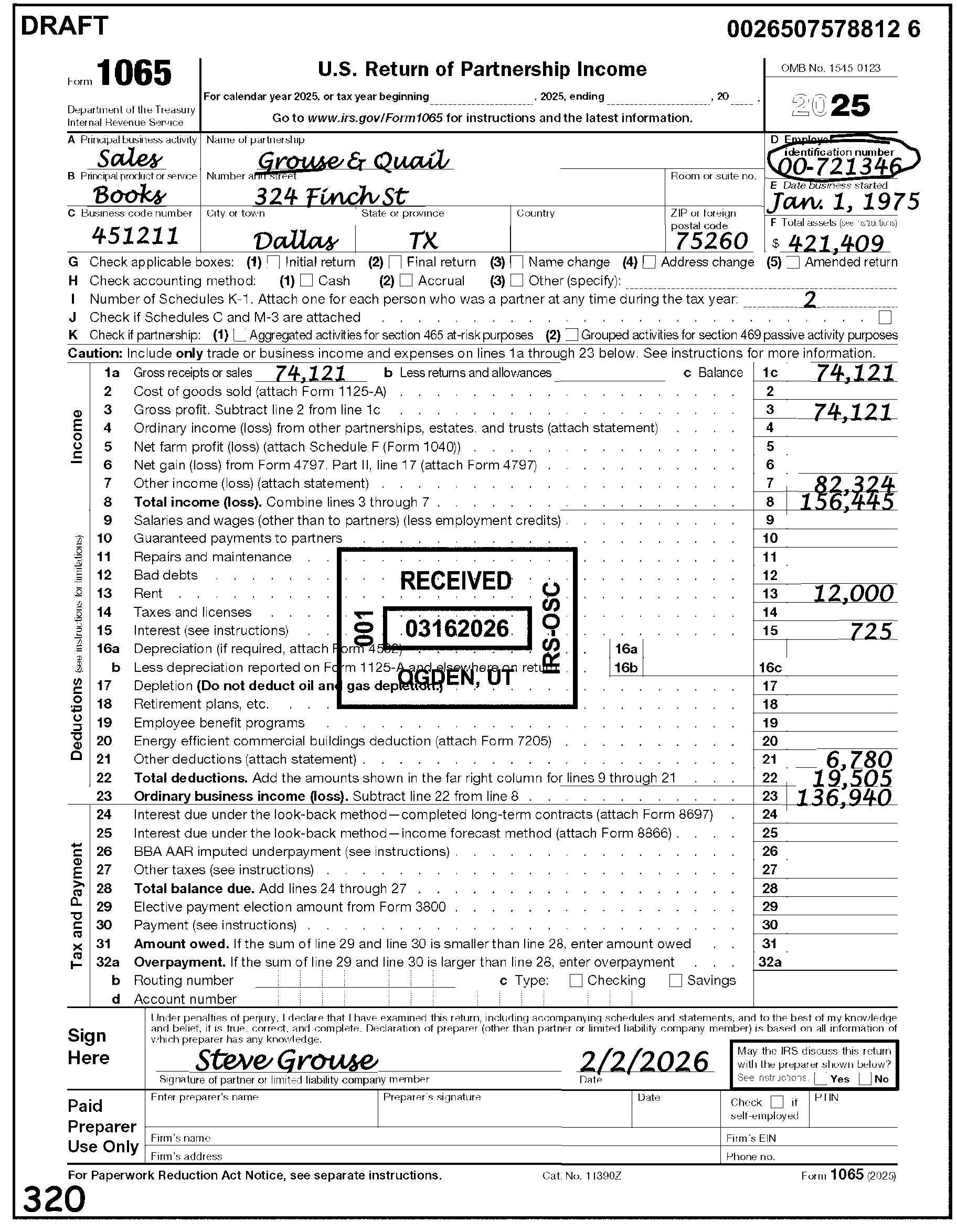
-
Correspondence is all written communications from a taxpayer or their representative, excluding tax returns, whether solicited or unsolicited. This includes:
-
Written communications in response to IRS requests for information or data.
-
Written communications, including annotated notice responses, which give more information or dispute a notice.
-
A telephone call that results in a written referral or research (Form 4442, Inquiry Referral).
-
-
The key to identifying taxpayer correspondence is to ask the following questions:
-
Is taxpayer waiting for a response from IRS?
-
Is taxpayer waiting for IRS to take action?
-
Is taxpayer asking a question?
-
-
Issue correspondence to resolve any conditions causing the return to be unworkable or unprocessable.
Exception:
Section 965 Returns - do not correspond. ERS will take care of any correspondence needed. Notate "K-1 missing" or similar in the lower left margin (action trail) of the return, if correspondence is needed for missing Schedules K-1. See IRM 3.11.15.5.2, Section 965 Returns.
-
If the return is incomplete and doesn’t appear to be a return meant for filing or is a conduit for providing information (e.g., indicates "payment only" , give the return to the lead. The lead must determine the correct course of action. The lead researches for a Transaction Code (TC) 150 and any other information necessary to determine if the return should continue processing, is an amended return, or must be routed to another function. See IRM 3.11.15.5.7, Amended Returns. An incomplete return could include any of the following:
-
A one-page return, with or without a signature.
-
Incomplete returns indicating "Payment Only" .
-
Incomplete returns showing they have previously E-filed.
-
-
Examine the return for all unprocessable conditions before initiating correspondence.
If And Then The return needs correspondence, Requires a response, -
Complete an approved Correspondence Action Sheet showing the letter number (86-C, 854-C, 1355-C, 3875-C, etc.), Master File Tax (MFT) code, and the correct paragraphs.
-
Attach the Correspondence Action Sheet to the front of the return below the entity area.
-
Edit applicable Action Code on the return: 211 - First Correspondence (Missing Information and/or Signature (Refund Returns)) or
215 - First International Correspondence Missing Information and/or Signature (Refund Returns)) or
225 - Correspondence (Signature Only - Balance Due/Zero Balance/Credit Elect Returns) or
226 - International Correspondence (Signature Only - Balance Due/Zero Balance/Credit Elect Returns). -
Finish editing the return and leave in the batch.
The return needs correspondence, Does not require a response, -
Complete an approved Correspondence Action Sheet showing the letter number (86-C, 854-C, 1355-C, 1382-C, 3733-C, 3875-C, etc.), (MFT) code, and the correct paragraphs.
-
Photocopy first page of return and attach the Correspondence Action Sheet below the entity area on front of the return copy. Be sure the name and address clearly show above the Correspondence Action Sheet.
-
Forward the copy to the Correspondence area.
-
Edit an Action Trail (e.g., "3875C SENT" ) in lower left corner going vertically up the side of the return.
-
Finish editing the return and leave in batch.
-
-
Correspondence Imaging Inventory (CII) is an inventory system for scanning all Accounts Management (AM) receipts into digital images and working the cases from those images.
-
"CII" returns show a "CII Image-Do not correspond for Signature" stamped below the signature line or a "CII" annotation on the front of the return.
-
Verify all edit marks and ensure placement is correct on a "CII" return.
If Then The edit marks are black, Underline the edit mark if correct, or circle if incorrect. The edit marks are red or green, Circle if incorrect. The edit marks are missing or incorrect, Perfect as necessary. -
Follow the instructions below for "CII" returns:
If And Then The "CII" return has Form 13596, Reprocessing Returns, attached, The return is incomplete (e.g., missing signature, schedules or forms), -
Do not correspond.
-
Remove the return from the batch and route to AM.
-
If the return comes back from AM with the information still incomplete, send the return to AM again to secure all the missing information. Write "More information needed to process incomplete CII return," or similar language on Form 4227, Intra-SC Reject or Routing Slip (or other proper routing slip).
The "CII" return has a Form 13596, Reprocessing Returns, attached and the return is incomplete (e.g., missing signature, schedules, or forms), The return shows correspondence was sent (e.g., CCC "3" is edited on the return), Do not route the return to AM. Continue processing the return. The "CII" return does not have Form 13596, Reprocessing Returns attached, The return is incomplete (e.g., missing signature, schedules or forms), Follow normal correspondence procedures. -
-
Taxpayers may send tax return information via fax as part of return perfection even when submitting a signature. In circumstances where contact with the taxpayer was made and documented, faxed signatures are acceptable.
-
Contact the taxpayer by telephone or correspondence. Follow local procedures to decide which method of contact to use.
-
Show the fax paragraph on the approved Correspondence Action Sheet to inform the taxpayer of the fax options.
-
Use the following resources to make sure you are speaking with the taxpayer or authorized representative before disclosing any tax information:
-
IRM 21.1.3.2.3, Required Taxpayer Authentication
-
IRM 21.1.3.2.4, Additional Taxpayer Authentication
-
-
Before leaving any messages on a taxpayer's answering machine, review:
-
IRM 10.5.1.6.7.2, Answering Machine or Voicemail
-
IRM 10.8.1, Information Technology (IT) Security, Policy and Guidance
-
-
Ogden Submission Processing Center (OSPC) will process all Foreign Address returns.
-
A Foreign Address is any address other than the 50 states and the District of Columbia.
-
An Army Post Office (APO), Diplomatic Post Office (DPO) or Fleet Post Office (FPO) is not considered a foreign address. The Postal Service established new address requirements for the APO/DPO/FPO addresses.
-
If an address appears in the old APO/DPO/FPO format, convert to the new State Code abbreviation based on the ZIP Code: For example, if the old address appears as "APO New York, NY 091XX" , convert to read as "APO AE 091XX" .
ZIP Code State Code 340 AA 090-098 AE 962-966 AP -
Route returns with a foreign address to OSPC for processing. Prepare Letter 86C to inform the partnership that the return has been sent. See Figure 3.11.15-2 below.
-
U.S. Possessions/Territories - The following U.S. Possessions/Territories are considered Foreign Addresses and must be sent to OSPC for processing:
U.S. Possession/Territory Abbreviation American Samoa AS Federated States of Micronesia FM Guam GU Marshall Islands MH North Mariana Islands MP Palau PW Puerto Rico PR Virgin Islands (U.S.) VI -
A ZIP Code must be present for U.S. Possessions/Territories. Edit the correct ZIP Code if one is not given. See Exhibit 3.11.15-6, U.S. Possessions/Territories ZIP Codes.
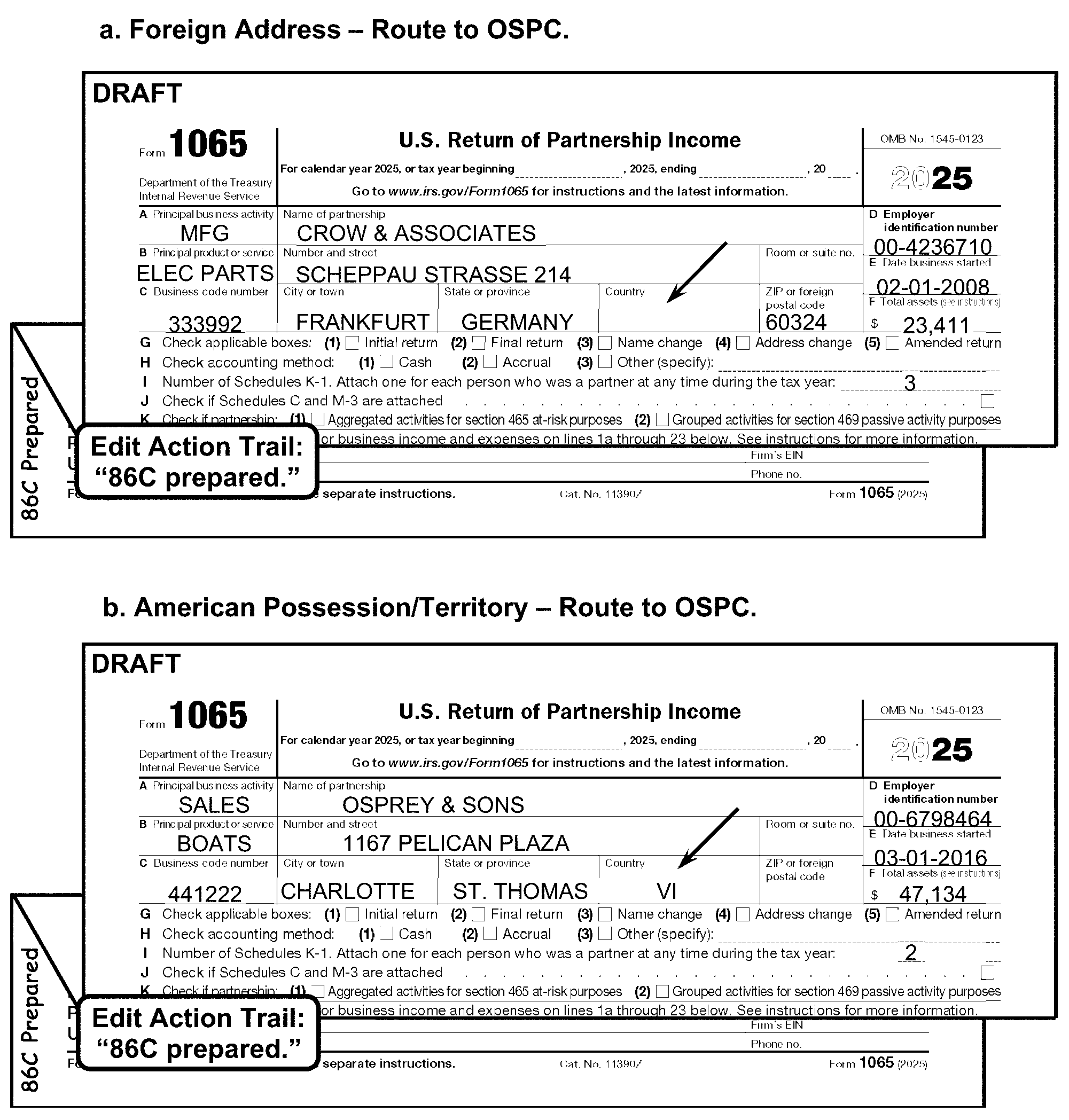
-
Businesses use frivolous arguments for expressing dissatisfaction with the substance, form or administration of the tax laws by trying to illegally avoid or reduce tax liabilities. See IRM 25.25.10, Frivolous Return Program, and Exhibit 3.11.15-4, Potential Frivolous Arguments for Examination Review, for a list of recognized frivolous arguments made by businesses.
-
Review the return to decide whether it appears to be a frivolous return.
If Then The return meets any of the conditions shown as a frivolous return. See Exhibit 3.11.15-4 Potential Frivolous Arguments for Examination Review. Remove return from the batch and place the return in the locally designated basket for Examination, Frivolous Return Program (FRP) for review. Examination has selected the return as frivolous, shown by an Action Code 331 and a Form 4227, Intra-SC Reject or Routing Slip, with the remarks "Refer to Exam FRP for audit after processing" but sends the return for processing, Continue processing the return using procedures in IRM 3.11.15. However, do not circle or void the Action Code showing a frivolous return. -
Do not consider the following returns as frivolous, unless there is other evidence of a frivolous argument:
-
Returns that have only zeros, blanks, or not entries.
-
Returns showing "None" , "Not Liable" , etc.
-
-
Criminal Investigation (CI) investigates potential criminal violations of the Internal Revenue Code (IRC) and related financial crimes. Criminal violations of the IRC include willful attempts to evade or defeat the income tax. Criminal tax violations also include the willful failure to collect or pay over tax and false claims for refunds based on bogus return information.
-
If CI has stamped the return, do not send for further CI action.
-
For returns with refund claims of ≡ ≡ ≡ ≡ ≡ ≡ ≡ ≡ ≡ ≡ ≡, do the following:
Refund Claim Ogden and Kansas City ≡ ≡ ≡ ≡ ≡ ≡ ≡ ≡ ≡ ≡ ≡ ≡ ≡ -
Make a copy of the first two pages of the tax return along with any page on the return that appears suspicious.
-
Attach Form 4227, Intra-SC Reject or Routing Slip, to the copy.
-
Route the copy to Ogden, Mail Stop 9001, Criminal Investigation (CI).
-
Edit an action trail "Copy to CI" , or "CI Referral" , or similar language in the lower left corner going vertically up the side of the return.
-
Edit Action Code 341 or CCC "U" (whichever is applicable) on the return.
-
Continue processing the return.
-
-
Because of the repetitive nature of the C&E function, C&E Tax Examining Technicians often recognize income tax return data which is outside of the norm for data found on similar returns for each income tax return type. If C&E finds return characteristics not meeting Audit Code or Exam referral criteria it deems suspicious, CI is available to review the referral.
-
If a suspicious return is found, do the following:
-
Make a copy of the first two pages of the tax return along with any page on the return that appears suspicious.
-
Attach Form 4227, Intra-SC Reject or Routing Slip, to the copy.
-
Route the copy as shown in the table below.
Ogden Kansas City Mail Stop 9001, Criminal Investigation (CI) Mail Stop S2 9000, Criminal Investigation (CI) -
Edit an action trail "Copy to CI" , or "CI Referral" , or similar language in the lower left corner going vertically up the side of the return.
-
Continue processing the return.
-
-
If the return fits other criteria (e.g., Frivolous Argument), take proper action.
-
The primary goal in identifying tax returns for examination is to promote the highest degree of voluntary compliance. Examination gives support and helps Submission Processing (SP) with any questionable return found during processing. Exam has a vast multitude of programs and tolerance criteria already found in several IRM sections. SP can refer any questionable return to Exam, unless prohibited by instructions currently found in several IRMs.
-
Remove returns marked as "Protective Claims" , "Protective Claim for Refund" , or similar statement from the batch and route to Accounts Management (AM). Notate "Protective Claim" in the remarks box of Form 4227, Intra-SC Reject or Routing Slip.
-
BMF (ID) Theft is increasing. If a case is found with attachments or correspondence showing the taxpayer is a victim of "ID Theft" , give the entire case to the manager/lead.
-
The manager/lead will expedite the case to the Planning and Analysis (P&A) staff for referral to one of the Submission Processing (SP) BMF ID Theft liaisons. The taxpayer must show that they are a victim of "ID Theft" ; do not send cases that are subject to Criminal Investigation (CI), Examination (Exam), or Fraud review.
-
All attachments to the document being processed will be examined and action taken as required by the attachment.
-
When an attachment has an effect on the document being processed, it will remain attached unless a specific instruction requires that it be detached.
-
Notate any action taken on Form 1065 regarding attachments, photocopying, etc., (to leave an action/working trail).
-
Refer to the Campus Mail Routing Guide for proper disposition of attachments not found in these instructions.
-
-
If the document to be detached has any information that is pertinent to the return being processed, photocopy or transfer the data to a blank piece of paper and attach it to the return.
-
Forward any attachment requesting an adjustment or correspondence to Accounts Management Branch via Form 4227, Intra-SC Reject or Routing Slip.
-
Ensure the attachment has the partnership name, address, EIN and Received Date.
-
See Exhibit 3.11.15-2, Routing Guide for Attachments, for more information.
-
The following instructions reference special procedures.
-
Any return with a Received Date that is two years and nine months or more after the Return Due Date is a potential statute control return.
-
Route Statute returns to the Statute Control Unit daily or more often if needed.
-
If any of the conditions listed below are present, don’t route to Statute Control Unit for clearance. Instead, edit CCC "W" , and continue processing.
-
Compliance IRC 6020(b) returns.
-
Secured by Examination/Collections, secured by Tax Exempt Government Entities (TEGE), Secured by TEGE Employee Plan (EP) Exam.
-
Returns with Transaction Code (TC) 59X or "ICS" (Integrated Collections System) notated on the face of the return.
-
Returns showing "substitute returns prepared by Examination (SFR)" in top margin of the return.
-
Returns with a stamp indicating a previous clearance by Statute Control within the last 90 days.
-
Return is a 2021 or prior year original. Due to the COVID-19 pandemic and subsequent Submission Processing (SP) and Accounts Management (AM) site closures, SP and AM developed procedures to bypass AM statute clearance and be processed. In addition, any 2021 and prior year returns previously cleared by AM statute will not be returned by SP to AM to be cleared again if the 90-calendar day statute stamp has expired.
-
-
If a return has any of the following computer paragraphs (CPs) or letters are attached, do not route to Statute Control Unit for clearance. Edit CCC "W" if the return needs processing. See Exhibit 3.11.15-2, Routing Guide for Attachments, for more information.
-
CP 259, Master File Generated 1st TDI Notice
-
CP 959, Master File Generated 1st TDI Notice (Spanish version)
-
CP 518, Final Notice - Return Delinquency
-
Letter 112C, Payment/Overpayment/Credit Applied; No Record of Return Filed
-
Letter 282C, Return Not Received; Copy Requested/Received
-
Letter 2255C, Delinquent Return (Forms 720, 1041, 1065, 1120)
-
Letter 2284C, Delinquent Return (Forms 940, 941, 942, 943)
-
-
If a return has a Form 12412, Operations Assistance Request (OAR), from TAS and is a potential statute control return but is not stamped "Cleared by Statute" , give the return to the lead. The lead contacts the TAS employee listed on the OAR for rejection of the return and sends it back to TAS for clearance by the Statute Control Unit.
-
Statute returns are unprocessable until cleared by Statute Control.
If Then The return is numbered, -
Edit CCC "U" and attach Form 4227. Check the "Statute Control" box on Form 4227, Intra-SC Reject or Routing Slip.
-
Leave the return in the batch and continue processing.
The return is unnumbered, -
Do not continue processing.
-
Pull the return from the batch.
-
Attach Form 4227, Intra-SC Reject or Routing Slip, and check the box for Statute Control. See Figure 3.11.15-3.
-
-
Edit CCC "W" if the Statute Control Unit stamps or shows clearance on the front of the return. (Figure 3.11.15-4).
-
Statute may stamp a return as "No Statute Issue" , "Statute N/A" , or similar statement indicating there is no statute issue. Follow the chart below to determine if CCC "W" is needed:
If And Then The return Received Date is two years and nine months or more after the Return Due Date, The return is stamped, "No Statute issue" , "Statute N/A" , or similar statement indicating there is no statute issue, Edit CCC "W" . The return Received Date is less than two years and nine months from the Return Due Date, The return is stamped, "No Statute issue" , "Statute N/A" , or similar statement indicating there is no statute issue, Do not edit CCC "W" . -
For partnership years beginning on or after January 1, 2018, IRC 6235 provides a general limitation period on making adjustments to partnership-related items that ends three years after the latest of (1) the date on which the partnership return was filed, (2) the return due date, or (3) the date on which the partnership filed an administrative adjustment request under section 6227. For partnership years beginning before January 1, 2018, IRC 6229 provides a minimum three year period of limitations to assess tax attributable to partnership items from partnerships covered under the Tax Equity Fiscal Responsibility Act (TEFRA).
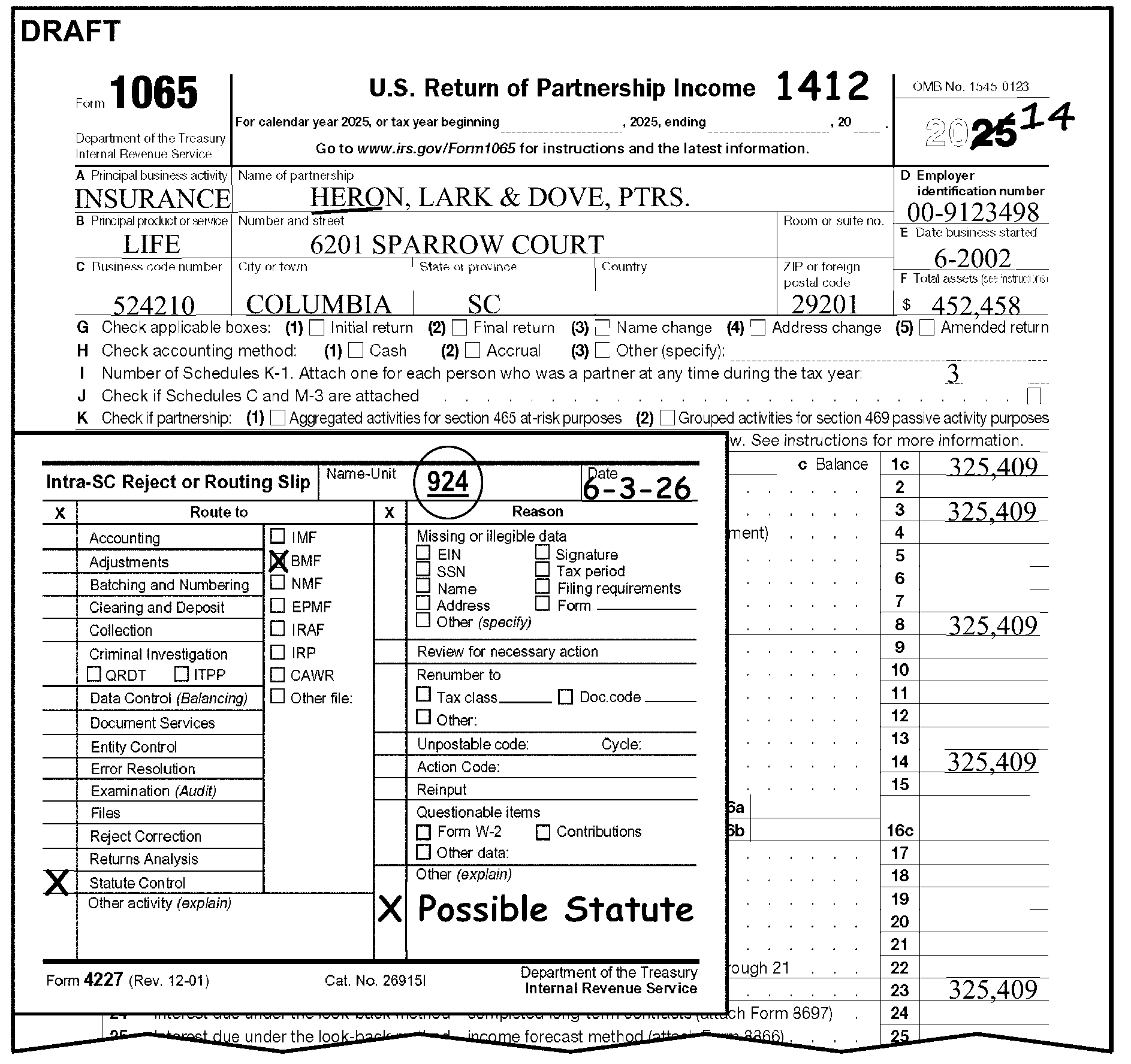
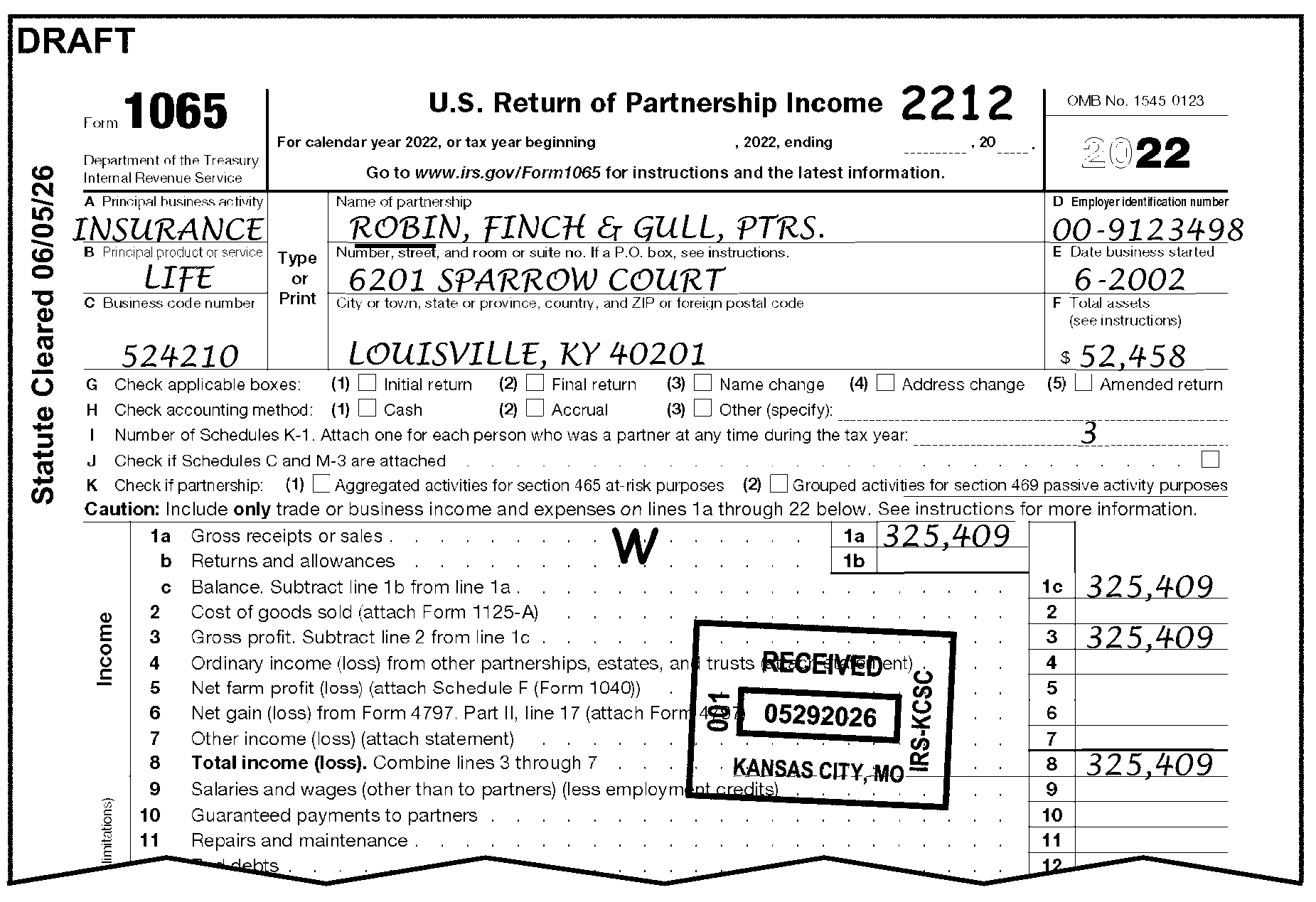
-
Section 965 (Repatriation Provision), Treatment of deferred foreign income upon transition to participation exemption systems of taxation for U.S. Shareholders of Specified Foreign Corporations per Tax Cuts & Jobs Act (Tax Reform), Public Law 115-97 (H.R. 1), Provision Section 14103, 131 STAT. 2195 (2017).
-
Identify a Section 965 return when any of the following are present and the partnerships Tax Period is 201712 through 202012:
-
"Section 965" or "965 Tax" (or similar language) notated on the return, attachments, or statements.
-
IRC 965 Transition Tax Statement (or similar 965 statement) is attached.
-
A significant entry is present on Line 11 or Line 13d of Schedule K, with the notation "Section 965" (or similar) statement.
-
Code "G" in Box 11 on Schedule K-1, or Code "X" in Box 13 on Schedule K-1.
-
-
When a return has been identified as a Section 965 return, edit as follows:
-
Completely edit the return.
-
Edit CCC "J" . See IRM 3.11.15.16.7, CCC "J" - Section 965 Tax.
-
Edit Action Code 460. See IRM 3.11.15.2.5, Action Codes.
-
Do not issue correspondence on the return. ERS will take care of any correspondence needed.
-
-
This subsection pertains to tax periods 202201 through 202212.
-
Under the Inflation Reduction Act (IRA) of 2022 and CHIPS and Science Act of 2022, a taxpayer, or in the case of a partnership that directly holds a facility or property the partnership, can elect to:
-
Take certain credits as an "Elective or Deemed Payment" .
-
Transfer certain credits to another taxpayer.
-
Claim the credit as a General Business Credit.
-
-
Identify an "Elective or Deemed Payment Election" when the taxpayer writes "IRA22DPE" on an attachment or on Form 1065, Line 28.
-
When a return is identified with an "Elective or Deemed Payment Election" do the following:
-
Completely edit the return.
-
Edit RPC "J" .
-
Place a flag at the top of the return and attach the "IRA22DPE/TRE" reminder sheet to the return.
-
Give the return to the lead.
-
The lead will have the returns rebatched with "DPE" in the batch ID.
-
-
Identify a "Credit Transfer" when the taxpayer writes "IRA22TRE" on an attachment or at the top of the return. When found, do the following:
-
Completely edit the return.
-
Edit RPC "K" .
-
Place a flag at the top of the return and attach the "IRA22 DPE/TRE" reminder sheet to the return.
-
Give the return to the lead.
-
The lead will have the return rebatched with "TRE" in the batch ID.
-
-
If the tax period is 202301 or later see IRM 3.11.15.38, Form 3800, General Business Credit.
-
Compliance functions (Collections and Examination) secure returns from the taxpayer and also prepare returns if the taxpayer does not provide them.
-
Compliance notates:
-
Prepared tax returns with "6020(b)" or "SFR" (Substitute for Return).
-
Secured tax returns with "TC 59X" or "ICS" or "Process as Original" with a Form 13133, Expedite Processing Cycle, attached with the "Delinquent Return" box checked.
-
-
When the taxpayer doesn’t file a required return, IRC 6020(b) is the authority for the IRS to prepare the return.
-
These returns are identified by the notation: "PREPARED AND SIGNED UNDER THE AUTHORITY OF SECTION 6020(b) OF THE INTERNAL REVENUE CODE" , which is found in the center bottom of page 1 of the return.
-
Returns must have an IRS Received Date. If missing, follow the normal procedures for editing the Received Date. See IRM 3.11.15.7, Received Date.
-
Compliance Function representatives must sign returns. If not signed, route to Compliance using Form 4227, Intra-SC Reject or Routing Slip.
-
Edit CCC "4" . See IRM 3.11.15.16.20, CCC "4" - IRC 6020(b) Return and Figure 3.11.15-5.
-
Edit CCC "D" if the Compliance Function representative notates "DO NOT ASSESS FAILURE TO PAY PENALTY" and the return due date (without regard to extensions) is July 30, 1996 or before.
-
Do Not correspond with the taxpayer for unprocessable conditions. If the return is unprocessable, edit CCC "3" and continue processing.
-
Edit CCC "W" if the IRS Received Date is more than two years and nine months after the Return Due Date. Do Not send the return to Statute Control. See IRM 3.11.15.16.14, CCC "W" - Return Cleared by Statute Control.
-
Number of partners, Line I, must be 2 through 999,999.
If Then Number of partners is blank, See IRM 3.11.15.17, Line I - Number of Schedules K-1 (or Number of Partners). Number of partners is greater than 100, Edit CCC "6" .
-
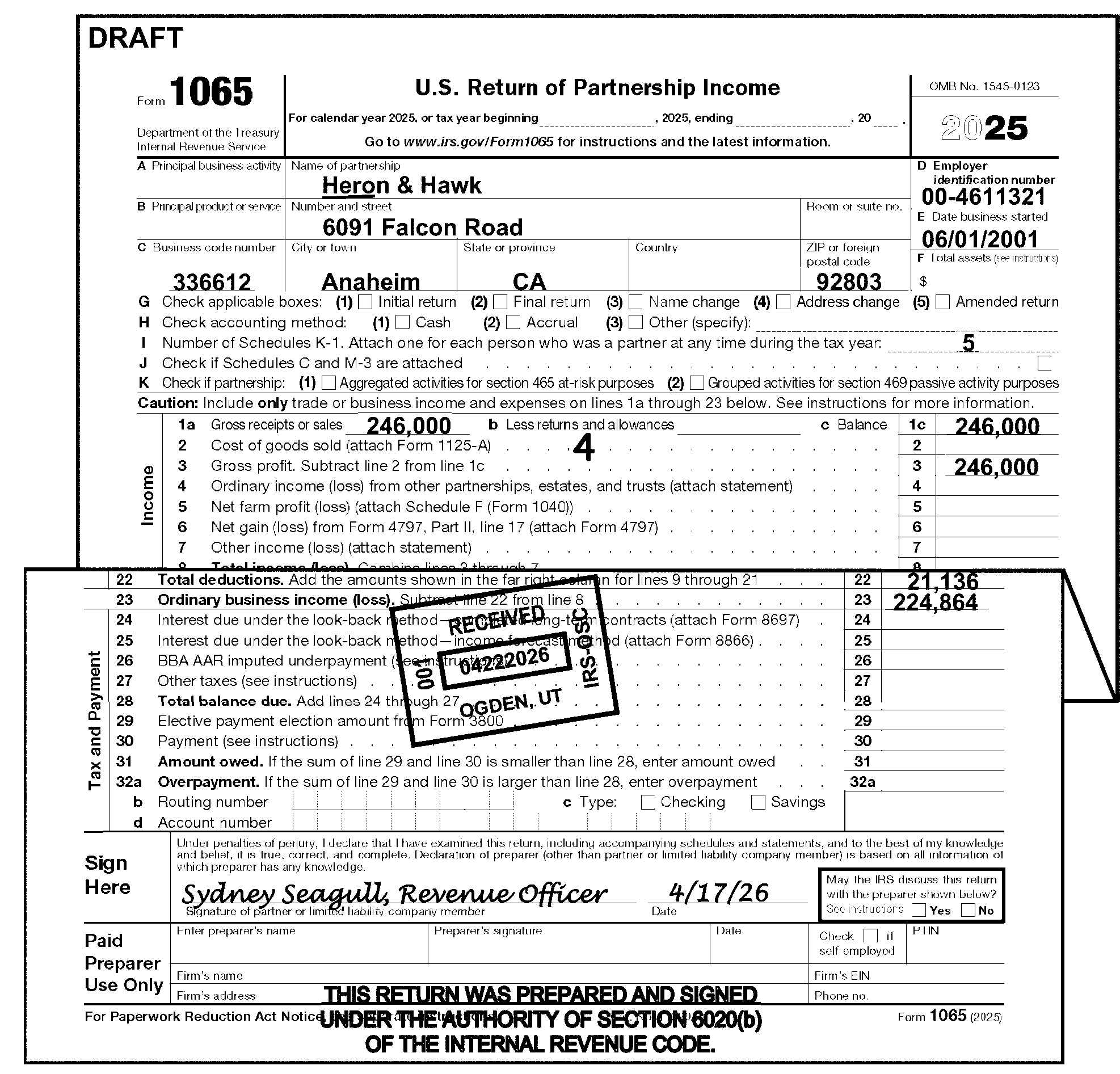
-
These returns are identified by the notations: "TC 59X" or "ICS" . See Figure 3.11.15-6
-
Do Not edit CCC "G" on these returns.
-
Use approved Correspondence Action Sheet to correspond for conditions that are unprocessable (e.g., missing signatures, missing schedules, etc.).
-
Edit CCC "W" if the IRS Received Date is more than two years and nine months after the Return Due Date. Do Not send the return to Statute Control. See IRM 3.11.15.5.1, Statute Returns.
-
Number of partners, Line I, must be 2 through 999,999.
If Then Number of partners is blank, See IRM 3.11.15.17, Line I - Number of Schedules K-1 (or Number of Partners). Number of partners is greater than 100, Edit CCC "6" .
-
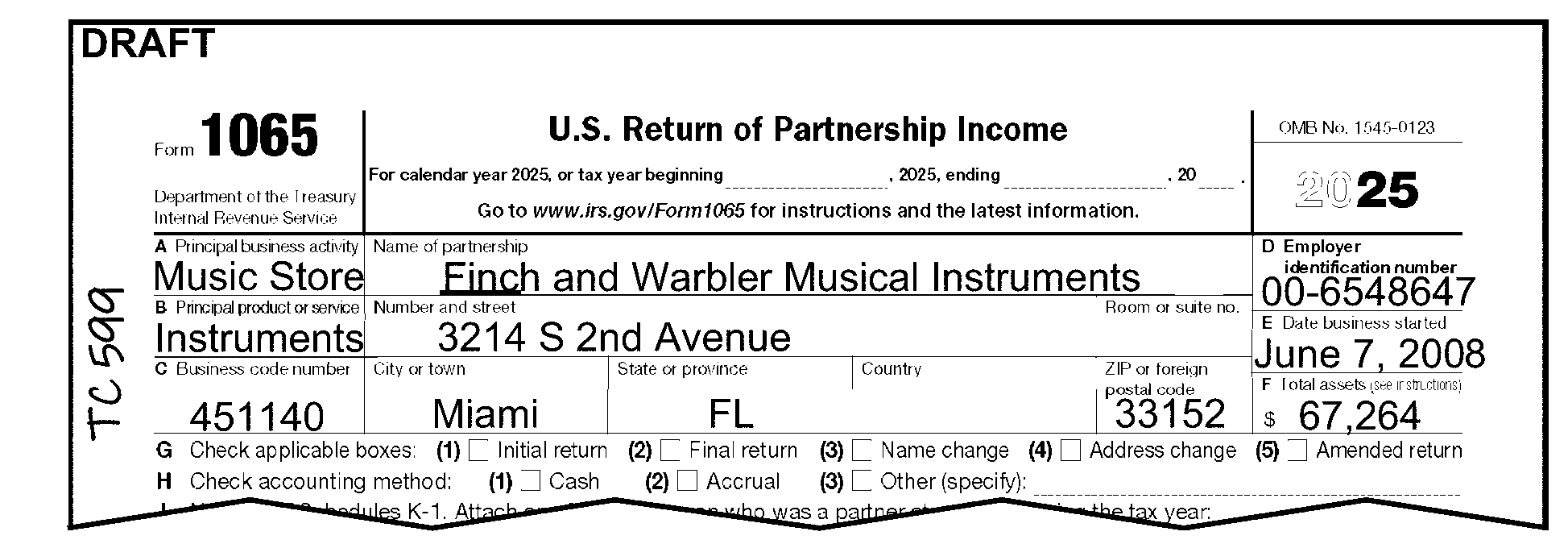
-
These returns are identified by the notation: "SFR" or "SUBSTITUTE RETURN" on page 1.
-
Return must have an IRS Received Date. If no IRS Received Date is present, follow the normal procedures for editing the IRS Received Date.
-
Do Not correspond with the taxpayer for unprocessable conditions. If the return is unprocessable, edit CCC "3" and continue processing.
-
If Form 13133, Expedite Processing Cycle, is attached, edit the Computer Condition Code(s) that are checked on the form.
-
Edit CCC "W" if the IRS Received Date is more than two years and nine months after the Return Due Date. Do Not send the return to Statute Control. See IRM 3.11.15.5.1, Statute Returns.
-
Number of partners, Line I, must be 2 through 999,999.
If Then Number of partners is blank, Edit "2" as the number of partners. Number of partners is greater than 100, Edit CCC "6" . See IRM 3.11.15.16.22, CCC "6" - Suppress the Failure to File on Correct Media Penalty.
-
-
These returns are identified by the notation "Process as Original" on page 1 of the return with a Form 13133, Expedite Processing Cycle, attached with the "Delinquent Return" box checked.
-
Do Not edit CCC "G" on these returns.
-
Use approved Correspondence Action Sheet to correspond for conditions that cannot be processed (e.g., missing signatures, missing schedules, etc.).
-
Edit the Computer Condition Code(s) that are checked on Form 13133.
-
Edit CCC "W" if the IRS Received Date is more than two years and nine months after the Return Due Date. Do Not send the return to Statute Control. See IRM 3.11.15.5.1, Statute Control.
-
Number of partners, Line I, must be 2 through 999,999.
If Then Number of partners is blank, See IRM 3.11.15.17, Line I - Number of Schedule K-1 (or Number of Partners). Number of partners is greater than 100, Edit CCC "6" . See IRM 3.11.15.16.22, CCC "6" - Suppress the Failure to File on Correct Media Penalty. -
-
Reprocess a return posted to the wrong account or module and post it to the correct account module.
-
Some re-entry returns may have originally been filed electronically (E-File) or via Modernized E-file (MeF). These returns may be identified by the presence of Mod E-file printouts in lieu of an actual return.
-
Do not correspond for missing signatures on these documents.
-
Edit a CCC "6" if more than 100 partners.
-
-
Each re-entry return must have a Form 3893, Re-Entry Document Control, or Form 13596, Reprocessing Returns attached.
-
Form 3893 is used to re-input documents that have not posted to an account or module
-
Form 13596 is used to reprocess documents to the correct account or module, that had previously posted to an incorrect account or module
-
-
Always leave the Form 3893 or Form 13596 on the front of the return. It must remain as a permanent part of the document.
-
Examine Form 3893 or Form 13596 to determine the action needed to make the return processable.
-
If Schedule K-1’s are attached to a Reprocessable/Re-Entry return, process the K-1’s like any other return using the instructions in IRM 3.0.101, Schedule K-1 Processing.
-
Form 3893, Re-Entry Document Control, is used to re-input a return that has not posted to an account or module.
-
If more than one return is in the batch and only the top Form 3893 has an entry in Box 1 (Alpha/Numeric block control no.), edit all returns using current processing instructions and keep all returns clipped together.
-
Circle the CCC "G" if present.
-
Do not edit CCC "G" on amended returns.
-
Do not send Letter 1382C, Penalty Removal Request Incomplete, if a request for reasonable cause is attached.
-
If the return is not edited according to current processing instructions, circle any Action Codes, Computer Condition Codes and any other edit marks that are no longer applicable. Re-edit according to current processing instructions.
-
If the return is edited according to current processing instructions, ensure the information from Form 3893 is edited on the return.
Form 3893 Action Taken Box 14 (Remarks) Ensure that the information is edited to the return. Box 15 (Process as) -
Circle any green rocker and edit marks that show a receipt of remittance.
-
Do not change any tax due amounts.
-
-
Examine returns that have any color other than red editing in the tax data section to determine if the corrections are the result of improper perfection or taxpayer error.
If Then Improper perfection, Edit the same correction in red/green (per local procedure) to the correct area. Taxpayer error, Leave the entries as shown on the document. -
An IRS Received Date must be present on all re-input returns:
If Then IRS Received Date is not present, Edit an IRS Received Date to the middle of the return. Multiple IRS Received Dates are present, Circle all but the earliest date. -
When more information is still needed to make the return processable, prepare approved Correspondence Action Sheet or Form 4227, Intra-SC Reject or Routing Slip, for the proper action (e.g., correspondence, research, etc.).
-
When perfection is not possible edit Action Code 640 on the return and attach Form 4227, Intra-SC Reject or Routing Slip, noting "PERFECTION NOT POSSIBLE" and leave in the batch.
-
Form 13596, Reprocessing Returns, is used to reprocess a return to the correct account or module that had previously posted to the wrong account or module.
-
Circle CCC "G" if present.
-
Do not edit CCC "G" on amended returns.
-
Do not send Letter 1382C, Penalty Removal Request Incomplete, if a request for reasonable cause is attached.
-
If the return is not edited according to current processing instruction, circle any Action Codes, Computer Condition Codes and any other edit marks that are no longer applicable. Re-edit according to current processing instructions.
-
If the return is edited according to current processing instructions ensure that the information from Form 13596 is edited on the return.
Form 13596 Action Taken TIN correction, Edit correct TIN on return. Tax Period correction, Edit correct Tax Period ending on return. Reasonable cause, Edit correct Computer Condition Code: -
Edit CCC "R" if the "FTF" (Failure to File) box is checked.
-
Edit CCC "D" if the "FTP" (Failure to Pay) box is checked.
-
-
Examine returns that have any color other than red editing in the tax data section to determine if the corrections are the result of improper perfection or taxpayer error.
If Then Improper perfection, Edit the same correction in red/green (per local procedure) to the proper area. Taxpayer error, Leave the entries as shown on the document. -
An IRS Received Date must be present on all reprocessed returns:
If Then IRS Received Date is not present, Edit an IRS Received Date to the middle of the return. Multiple Received Dates are present, Circle all but the earliest date received by the IRS. -
Circle any green rocker and edit marks that may show a receipt of remittance.
-
When more information is still needed to make the return processable, prepare an approved Correspondence Action Sheet or Form 4227, Intra-SC Reject or Routing Slip, for the proper action (e.g., correspondence, research, etc.).
-
Document Perfection identifies refunds in jeopardy and requests manual refunds.
If Then A refund return is batched in a non-refund batch, -
Pull the return from the non-refund batch and merge into a refund batch using local procedures.
-
Code and edit the return as completely as possible.
The processing date is more than 20 days after the Received Date or the Return Due Date (whichever is later) and the refund amount is ≡ ≡ ≡ ≡ ≡ ≡ ≡ ≡ ≡ ≡ ≡
Unnumbered Returns: -
Pull the return from the batch.
-
Code and edit the return as completely as possible.
-
Edit Action Code 341.
-
Give the return to the manager for expedite processing.
Numbered Returns:-
Code and edit the return as completely as possible.
-
Edit Action Code 341 and leave in batch.
The refund ≡ ≡ ≡ ≡ ≡ ≡ ≡ ≡ ≡ ≡ ≡ ≡ ≡ ≡ ≡
Unnumbered Returns: -
Pull the return from the batch.
-
Code and edit the return as completely as possible.
-
Edit Action Code 341.
-
Make a copy of the first two pages of the tax return along with any page of the return that appears suspicious. See IRM 3.11.15.3.4, Criminal Investigation (CI) Referral.
-
Edit an action trail "Copy to CI" , or "CI Referral" , or similar language in the lower left corner going vertically up the side of the return.
-
Expedite processing.
Numbered Returns:-
Code and edit the return as completely as possible.
-
Make a copy of the first two pages of the tax return along with any page of the return that appears suspicious. See IRM 3.11.15.3.4, Criminal Investigation (CI) Referral.
-
Edit an action trail "Copy to CI" , or "CI Referral" , or similar language in the lower left corner going vertically up the side of the return.
-
-
A return is considered Amended based on the following:
-
The Amended Box is checked.
-
On MeF returns the "Superseded Return" or the" Amended Return" box is checked. The "Superseded Return" and the "Amended Return" boxes will only be on MeF returns that have been printed. They will be found on Line G.
-
Words such as "Supplemental" , "Corrected" , or "Additional" are present.
-
Any indication from the taxpayer that a previous return was filed.
-
Form 1065X is attached for the Tax Period of the Form 1065 filed.
-
-
Examine the return for attachments:
-
Do not separate any related attachments submitted to explain the reason for the Amended return. Accounts Management may use the information.
-
Detach any unrelated documents, route them to the correct function using Form 4227, Intra-SC Reject or Routing Slip, and edit the Action Trail on the return
-
-
Follow the instructions in the chart below when there is an indication of an amended return:
If Then Compliance Services entered "TC 59X" or "ICS" on the return, Do not edit CCC "G" .
Process the return as an original.Statute stamped the return "Delinquent Original Cleared for Processing" , Do not edit CCC "G" .
Process the return as an original.Form 3893, Re-Entry Document Control, or Form 13596, Reprocessing Returns, is attached, Do not edit CCC "G" . See IRM 3.11.15.5.5.1, Form 3893 - Re-Entry Document Control, or IRM 3.11.15.5.5.2, Form 13596 - Reprocessing Returns. None of the above is present, Edit CCC "G" . Do not use any other codes with CCC "G" . -
Only edit the following data on all amended returns:
-
Name Control - See IRM 3.11.15.10.3, Entity Perfection - Name Control
-
EIN - See IRM 3.11.15.10.2, Entity Perfection - Employer Identification Number (EIN)
-
Tax Period - See IRM 3.11.15.9.1, Tax Period Ending
-
CCC "G"
-
IRS Received Date - See IRM 3.11.15.7, Received Date
-
Signature - See IRM 3.11.15.8, Signature
-
-
Detach Schedules K-1 for current year (TY2025), two preceding years (TY2023 and TY2024) and future Schedules K-1. Process according to IRM 3.0.101, General - Schedule K-1 Processing.
-
This subsection gives instructions for editing Short Record returns. Short Record returns include:
-
IRC 761(a) Returns
-
Common Trust Returns
-
Nominee Returns
-
Inactive Returns
-
-
Short record returns must be edited correctly to prevent erroneous assessment of any penalties.
-
Process as a Short Record unless any of the following conditions apply:
-
An audit code (other than "1" for 761(a) returns) is present, See IRM 3.11.15.20.1, Audit Codes.
-
A nonrecourse loan code is edited, See IRM 3.11.15.20.4, Nonrecourse Loan Code.
-
-
IRC 761(a) permits certain arrangements treated as partnership to elect to be excluded from the partnership rules. Form 1065 must be filed only for the year of the election and a statement of the election must be attached to the return. If the return shows any tax data relating to an entity level computation of income, it cannot be treated as a Section 761(a) election.
-
Form 1065 can be identified as a potential Section 761(a) election if the return has all of the following:
-
Name or other identification, address, EIN, but no tax data for the organization
-
Names, addresses, and identification numbers of all the organization's members
-
Statement that the organization qualifies, and the members elect, to be excluded from Subchapter K
-
-
Or, the partnership references any of the following:
-
IRC 761(a) or Treas. Reg. 1.761-2 annotated
-
Rev. Proc. 2002-68 (for tax years beginning before 01/01/2004)
-
Rev. Proc. 2003-84 (for tax years beginning after 01/01/2004)
-
Publication 541 (Partnerships)
-
Publication 550 (Investment Income and Expenses)
-
The joint purchase, retention, sale, or exchange of investment property
-
The joint production, extraction, or use of property
-
Exclusion filed under Subchapter K
-
Lottery Club
-
-
When a return is identified as a potential IRC 761(a) election, suspend the editing of the return and hold for periodic review by Examination Classification. The frequency of the review will be determined by campus management.
-
Examination will determine if the election is accepted, rejected, or selected for examination. After Examination has made its determination, process each group of returns as follows:
If Then Election is "ACCEPTED" by Examination, -
Edit CCC "F" .
-
Edit as Short Record (SR).
See IRM 3.11.15.5.8, Short Record Returns - General Instructions (for All Short Records).Return is "SELECTED FOR EXAMINATION" , -
Edit Audit Code "1" .
-
Continue editing the return. See IRM 3.11.15.5.8 and IRM 3.11.15.20.1 for information regarding Short Record returns and Audit Codes, respectively.
Election is "REJECTED" by Examination, Edit as Form 1065 long record. Correspondence is required, Issue Letter 1355C, Partnership Return Incomplete for Processing Form 1065, requesting information as directed by the Examination representative. -
-
Process "Accepted" and "Selected" Section 761(a) elections as a Short Record return:
-
Edit when required:
-
Always edit "SR" in the top margin above the form number "1065"
-
Always edit "761(a)" in the upper left hand corner of Form 1065
-
Always edit Computer Condition Code "8" . (IRM 3.11.15.16.23)
-
Name Control (IRM 3.11.15.10.3)
-
EIN (IRM 3.11.15.10.2)
-
Tax Period Ending (IRM 3.11.15.9.1)
-
Tax Period Beginning if CCC "F" is edited - See IRM 3.11.15.9.2
-
Number of partners (IRM 3.11.15.17)
-
Received Date See IRM 3.11.15.7, Received Date
-
Address change, if present IRM 3.11.15.10.5
-
-
For elections "accepted" by Examination, edit Computer Condition Code "F" on the return. See Figure 3.11.15-7 below.
-
For elections "selected" by Examination, edit Audit Code "1" on the return.
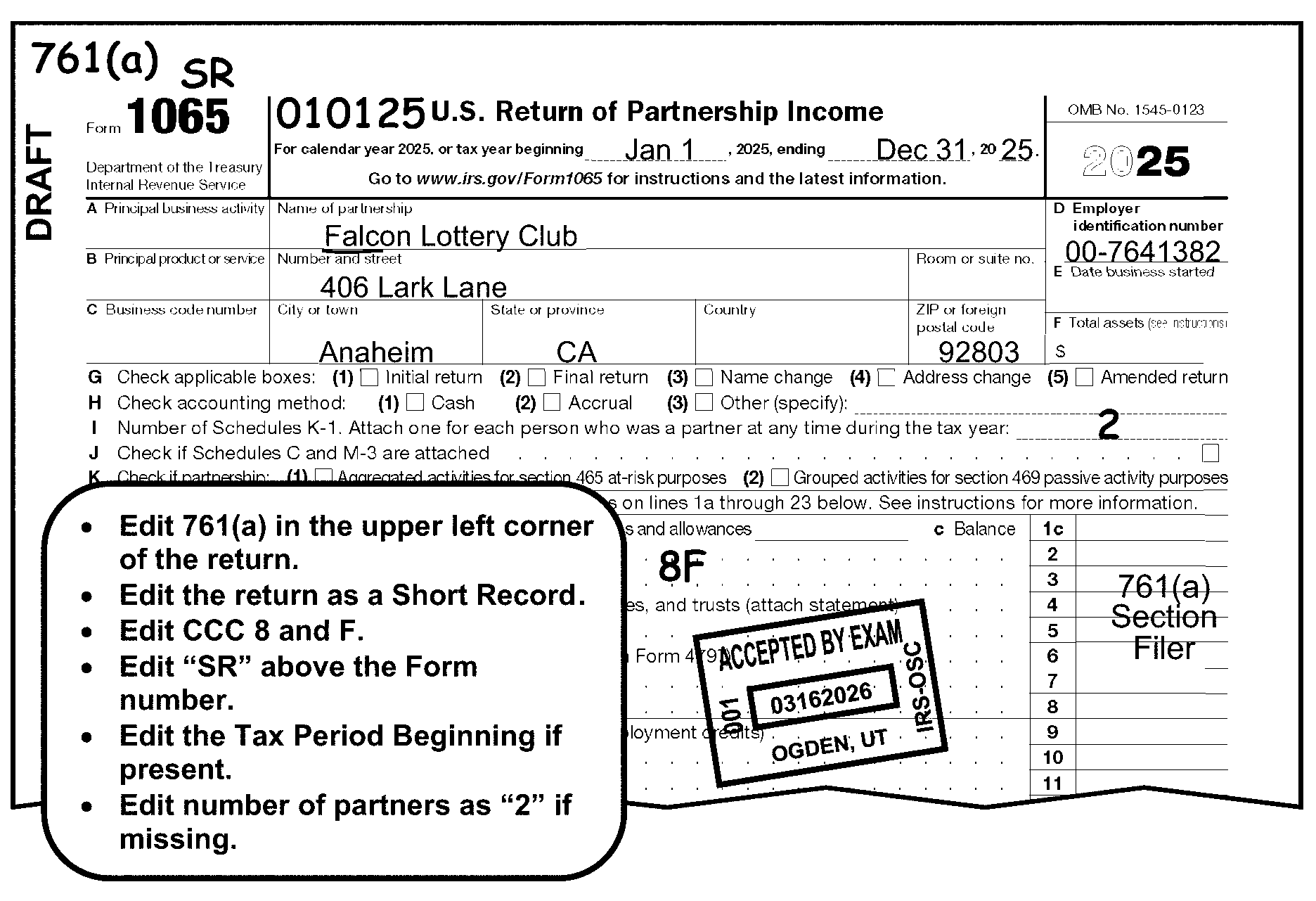
-
Identify IRC 6032, Common Trust Fund Filers, by any of the following entries:
-
Box A, Principal Business Activity - Partnership entered: "COMMON TRUST FUND" or "Common Trust"
-
Box C, Business Code Number - Partnership entered "525920" (North American Industry Classification System (NAICS) Code
-
Partnership notates on Form 1065"IRC 6032 COMMON TRUST FUND" or similar notation
-
-
Process as a Short Record return.
-
Edit when required:
-
Always edit "SR" in the top margin above the form number "1065" See Figure 3.11.15-8
-
Name Control - IRM 3.11.15.10.3
-
EIN - IRM 3.11.15.10.2
-
Tax Period Ending - IRM 3.11.15.9.1
-
Tax Period Beginning - IRM 3.11.15.9.2
-
Received Date - IRM 3.11.15.7
-
Number of Partners - If blank or "1" , edit a "2"
-
Computer Condition Codes (CCC)
-
Address change if present
-
-
If the partnership submits a Common Trust return on a non-standard form (Common Trust Fund Return of Income, letter with Investment Trust Company letterhead, etc.), prepare a dummy Form 1065 with the following information:
-
Name and address - IRM 3.11.15.10
-
EIN - IRM 3.11.15.10.2
-
Tax Period - IRM 3.11.15.9
-
Received Date - IRM 3.11.15.7
-
Computer Condition Codes (CCC)
-
Number of partners - IRM 3.11.15.17
-
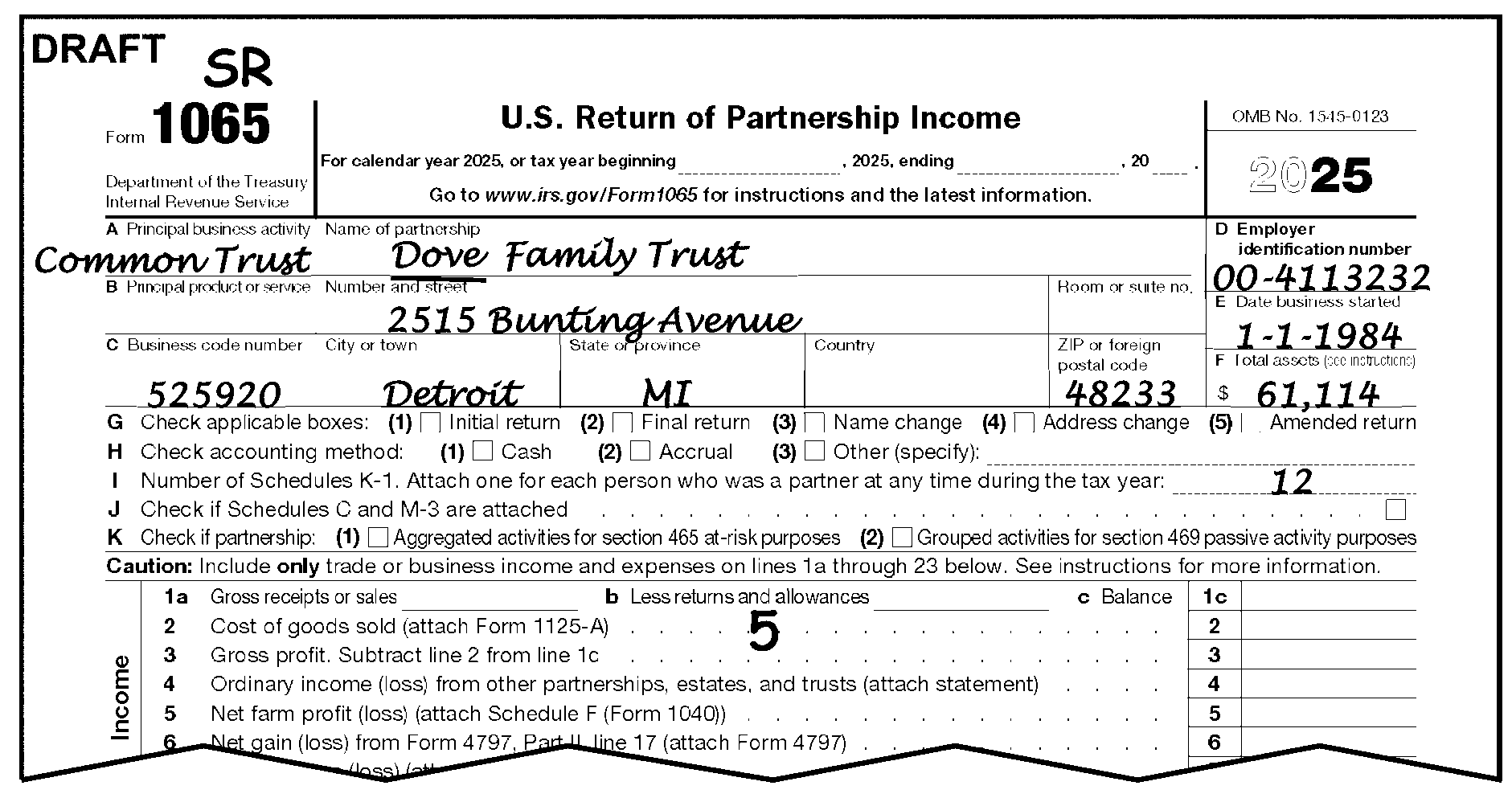
-
Partnerships formed solely for the purpose of acting as a nominee or agent are not required to file a partnership return, but may file Form 1065 to establish that they are not required to file. (They are required to file Form 1099 showing the actual owner of the income.)
-
Nominee returns usually have only partnership entity information with a statement notating the partnership is a nominee and is not required to file.
-
Process as a Final, Short Record return;
-
Edit the following when required:
-
Always edit "SR" in the top margin above the form number "1065"
-
Received Date - Always edit a timely Received Date (the original return due date) regardless of when the return was received
-
Name Control - See IRM 3.11.15.10.3
-
EIN - See IRM 3.11.15.10.2
-
Tax Period Ending - See IRM 3.11.15.9.1
-
Always edit Tax Period Beginning if present - See IRM 3.11.15.9.2
-
Number of Partners - If blank or "1" , edit a "2"
-
Computer Condition Codes
-
-
Identify an Inactive Return if there are no dollar amounts on any transcription lines on Form 1065, pages 1–6 (except Box "F" , "Total Assets" ) and the following forms have no money amounts present to be transcribed:
Exception:
If any of the following forms contain money amounts on a transcribed line, do not consider the return as inactive.
-
Schedule F Form 1040, Profit or Loss From Farming.
-
Form 8825, Rental Real Estate Income and Expenses of a Partnership or an S Corporation.
-
Schedule D, Capital Gains and Losses.
-
Form 4797, Sales of Business Property.
-
Form 8949, Sales and Other Dispositions of Capital Assets.
-
Form 8996, Qualified Opportunity Fund.
-
Form 1125-A, Cost of Goods Sold.
-
Form 8913, Credit for Federal Telephone Excise Tax Paid.
-
Form 8941, Credit for Small Employer Health Insurance Premiums.
-
Form 5884-B, New Hire Retention Credit.
-
Form 6252, Installment Sale Income.
-
Form 8997, Initial and Annual Statement of Qualified Opportunity Fund (QOF) Investments.
-
-
Process as an Inactive Short Record Return.
-
Edit the following when required:
-
Always edit "SR" in the top margin above the form number "1065"
-
Name Control - (IRM 3.11.15.10.3)
-
EIN - (IRM 3.11.15.10.2)
-
Tax Period Ending - (IRM 3.11.15.9.1)
-
Tax Period Beginning - on Initial, Final, or Short Period Return (IRM 3.11.15.9.2)
-
Received Date - (IRM 3.11.15.7)
-
Number of Partners (Edit number of Schedules K-1 attached or "2" if none or "1" ) (IRM 3.11.15.17)
-
Computer Condition Codes
-
Address change, if present
-
-
≡ ≡ ≡ ≡ ≡ ≡ ≡ ≡ ≡ ≡ ≡ ≡ ≡ ≡ ≡ ≡ ≡ ≡ ≡ ≡ ≡ ≡ ≡ ≡ ≡ ≡ ≡ ≡ ≡ ≡ ≡ ≡ ≡ ≡ ≡ ≡ ≡ ≡ ≡ ≡ ≡ ≡ ≡ ≡ ≡ ≡ ≡ ≡ ≡ ≡ ≡ ≡ ≡ ≡ ≡ ≡ ≡ ≡ ≡ ≡ ≡ ≡ ≡ ≡ ≡ ≡ ≡ ≡ ≡ ≡ ≡ ≡ ≡ ≡ ≡ ≡ ≡ ≡ ≡ ≡ ≡ ≡ ≡ ≡ ≡ ≡ ≡ ≡ ≡ ≡ ≡ ≡ ≡ ≡ ≡ ≡ ≡ ≡ ≡ ≡ ≡ ≡ ≡ ≡ ≡ ≡ ≡ ≡ ≡ ≡ ≡ ≡ ≡ ≡ ≡ ≡ ≡ ≡ ≡ ≡ ≡ ≡ ≡ ≡ ≡ ≡ ≡ ≡ ≡ ≡ ≡ ≡ ≡ ≡ ≡ ≡ ≡ ≡ ≡ ≡ ≡ ≡ ≡ ≡ ≡ ≡ ≡ ≡ ≡ ≡"≡ ≡" ≡ ≡ ≡ ≡ ≡ ≡ ≡ ≡ ≡ ≡ ≡ ≡ ≡ ≡
-
≡ ≡ ≡ ≡ ≡ ≡ ≡ ≡ ≡ ≡ ≡ ≡ ≡ ≡ ≡ ≡ ≡ ≡ ≡ ≡ ≡ ≡ ≡ ≡ ≡ ≡ ≡
-
≡ ≡ ≡ ≡ ≡ ≡ ≡ ≡ ≡ ≡
-
≡ ≡ ≡ ≡ ≡ ≡ ≡ ≡ ≡ ≡ ≡ ≡ ≡ ≡ ≡ ≡ ≡ ≡ ≡ ≡ ≡ ≡
-
≡ ≡ ≡ ≡ ≡ ≡ ≡ ≡ ≡ ≡ ≡ ≡ ≡ ≡ ≡ ≡
-
≡ ≡ ≡ ≡ ≡ ≡ ≡ ≡
-
-
≡ ≡ ≡ ≡ ≡ ≡ ≡ ≡ ≡ ≡ ≡ ≡ ≡ ≡ ≡ ≡ ≡ ≡ ≡ ≡ ≡ ≡ ≡ ≡ ≡ ≡ ≡ ≡ ≡ ≡ ≡ ≡ ≡ ≡ ≡ ≡ ≡≡ ≡ ≡ ≡≡ ≡ ≡ ≡ ≡ ≡ ≡ ≡ ≡ ≡ ≡ ≡ ≡ ≡ ≡ ≡ ≡ ≡ ≡ ≡ ≡ ≡≡ ≡ ≡ ≡ ≡ ≡ ≡ ≡ ≡ ≡ ≡ ≡ ≡≡ ≡ ≡ ≡ ≡ ≡ ≡ ≡ ≡ ≡ ≡ ≡ ≡ ≡ ≡ ≡ ≡ ≡ ≡ ≡ ≡ ≡ ≡ ≡ ≡ ≡ ≡ ≡ ≡ ≡ ≡ ≡ ≡ ≡ ≡ ≡ ≡ ≡ ≡ ≡ ≡ ≡ ≡ ≡ ≡ ≡ ≡ ≡ ≡ ≡ ≡ ≡ ≡ ≡ ≡ ≡
-
≡ ≡ ≡ ≡ ≡ ≡ ≡ ≡ ≡ ≡ ≡ ≡ ≡ ≡ ≡ ≡ ≡ ≡ ≡ ≡ ≡ ≡ ≡
-
≡ ≡ ≡ ≡"≡ ≡ ≡" ≡ ≡ ≡ ≡ ≡ ≡ ≡ ≡
-
≡ ≡ ≡ ≡ ≡ ≡ ≡ ≡ ≡ ≡ ≡ ≡ ≡ ≡ ≡ ≡ ≡ ≡ ≡ ≡ ≡ ≡ ≡ ≡ ≡ ≡ ≡ ≡ ≡ ≡ ≡ ≡ ≡ ≡ ≡ ≡ ≡ ≡ ≡ ≡ ≡ ≡ ≡ ≡ ≡ ≡ ≡ ≡ ≡ ≡ ≡ ≡ ≡ ≡ ≡ ≡ ≡ ≡ ≡ ≡ ≡ ≡ ≡ ≡ ≡
"≡ ≡ ≡ ≡ ≡ ≡ ≡ ≡ ≡ ≡ ≡ ≡ ≡ ≡ ≡ ≡ ≡ ≡ ≡ ≡ ≡ ≡ ≡ ≡ ≡ ≡ ≡ ≡ ≡ ≡ ≡ ≡ ≡ ≡ ≡ ≡ ≡ ≡ ≡ ≡ ≡ ≡ ≡ ≡ ≡ ≡ ≡ ≡ ≡ ≡ ≡ ≡ ≡ ≡ ≡ ≡ ≡ ≡ ≡ ≡ ≡ ≡ ≡ ≡ ≡"≡ ≡" ≡ ≡ ≡ ≡ ≡ ≡ ≡ ≡ ≡ ≡ ≡ ≡ ≡ ≡ ≡ ≡ ≡ ≡ ≡ ≡ ≡ ≡ ≡ ≡ ≡ ≡ ≡ ≡ ≡ ≡ ≡ ≡ ≡ ≡ ≡ ≡ ≡"
-
-
≡ ≡ ≡ ≡ ≡ ≡ ≡ ≡ ≡ ≡ ≡ ≡ ≡ ≡ ≡ ≡ ≡ ≡ ≡ ≡ ≡ ≡ ≡ ≡ ≡ ≡ ≡ ≡ ≡ ≡"≡ ≡" ≡ ≡ ≡ ≡ ≡ ≡ ≡ ≡ ≡ ≡≡ ≡≡ ≡ ≡ ≡ ≡ ≡ ≡ ≡ ≡ ≡ ≡ ≡ ≡ ≡ ≡ ≡ ≡ ≡ ≡ ≡ ≡ ≡ ≡ ≡ ≡ ≡ ≡ ≡ ≡ ≡ ≡ ≡ ≡ ≡ ≡ ≡ ≡ ≡ ≡ ≡ ≡ ≡ ≡ ≡ ≡ ≡ ≡ ≡ ≡ ≡ ≡ ≡ ≡ ≡ ≡ ≡ ≡ ≡ ≡ ≡ ≡ ≡
-
≡ ≡ ≡ ≡ ≡ ≡ ≡ ≡ ≡ ≡ ≡ ≡ ≡ ≡ ≡ ≡ ≡ ≡ ≡ ≡ ≡ ≡ ≡ ≡ ≡ ≡ ≡ ≡ ≡ ≡ ≡ ≡ ≡ ≡ ≡ ≡ ≡ ≡ ≡ ≡ ≡ ≡ ≡ ≡ ≡ ≡ ≡ ≡ ≡ ≡ ≡ ≡ ≡ ≡"≡ ≡ ≡ ≡" ≡ ≡ ≡ ≡
-
≡ ≡ ≡ ≡ ≡ ≡ ≡ ≡ ≡ ≡ ≡ ≡ ≡ ≡ ≡ ≡ ≡ ≡ ≡ ≡ ≡ ≡ ≡ ≡ ≡ ≡ ≡ ≡ ≡ ≡ ≡ ≡ ≡
-
-
Counsel issued Notice 2024-18 which established the procedures for taxpayers to notify the IRS of their religious exemption from electronic filing of information returns by filing a Form 8508, Application for Waiver from Electronic Filing of Information Returns. Filers of business tax returns must notate Religious Exemption at the top of the paper filed returns. Follow procedures below if Religious Exemption is notated at the top of page 1 of the tax return.
If Then Religious Exemption is notated, -
Notate "RE-TC016" in the upper left margin.
-
Pull the return for research/input of TC 016 by the Code and Edit Research Clerk.
-
-
Follow procedures below for religious exemption research/input of TC 016 on IDRS
If Then CC ENMOD/BMFOLE/IMFOLE displays the religious exemption indicator "RLG-EX IND" as a value of "1" , Continue processing the return. No action is required. CC ENMOD/BMFOLE/IMFOLE displays the religious exemption indicator "RLG-EX IND" as a value of blank, Input a TC 016 to record a religious exemption on IDRS:
CC ENMOD, followed by CC: ENREQ, which becomes CC: BNCHG/INCHG
Input a "1" in the "RLG-EX>" field.
Continue processing the return.
-
The date a document is received in the Campus or the IRS Office is the date stamped as the "IRS Received Date" .
-
An IRS Received Date is required on all Form 1065.
-
The IRS Received Date may or may not be stamped on the face of the return.
-
A valid IRS Received Date Stamp may consist of the following:
-
The word "Received"
-
Month (alpha or numeric)
-
Day (for example "1" or "01" )
-
Year - four digits
-
"Area Office" , "Campus" , "Field Office" , "Taxpayer Assistance Center" (TAC) plus the city, location, or a functional area within one of these sites (e.g., Compliance Services Collection Operations (CSCO), Examination, Image Control Team (ICT), Correspondence Imaging Inventory (CII), Accounts Management (AM), etc.).
Exception:
Not all IRS offices are designated places for filing, and not all IRS employees are authorized to accept a tax return for processing. If a return has a Received Date stamp from other than a Taxpayer Assistance Center (TAC), Lockbox, or IRS Campus (Compliance, Accounts Management, or Submission Processing (SP)) circle out the invalid Received Date and edit the correct Received Date according to instructions below. For example, returns received by the Taxpayer Advocate Service (TAS) or the IRS Office of Chief Counsel are not properly filed and a Received Date by that office is not the "IRS Received Date" .
-
-
If the IRS Received Date stamp is not present or the date is illegible or invalid, edit the Received Date in MMDDYY format in the middle of page 1 of the return. Edit the IRS Received Date according to the following priority:
-
The earliest legible postmark date (U.S. Postal Service, Foreign Postmark, or Private Delivery Service) on the envelope. Rules for using the U.S. Postal Service (USPS) Postmark, or Foreign Postmark date, or Private Delivery Service are as follows:
If Then An envelope is not attached to the return, Use the postmark date stamped on the face of the return. A document was returned for insufficient postage, Use the postmark date that coincides with the correct delivery of the return. The postmark is missing and the envelope is certified, Look for the "USPS.com Track & Confirm" record that was attached to the return (should be in front of the envelope). Use the "acceptance" date on the record to determine timeliness and follow normal editing procedures. See Exhibit 3.11.15-7.
If the "USPS.com Track & Confirm" record is not attached, take no action.An envelope has a USPS and private metered postmark, Always use the USPS postmark. An envelope has a foreign and private metered postmark, Always use the foreign postmark. An envelope has two private metered postmarks, Always use the latest private metered postmark. An envelope has only one private metered postmark, Use the private metered postmark. -
Service Center Automated Mail Processing System (SCAMPS) digital date.
-
Revenue officer's signature date.
-
Signature Date. (Only if within current year)
-
Julian Control Date minus 10 days.
-
Current date minus 10 days.
-
-
Edit the IRS Received Date as follows:
If Then A timely IRS Received Date is the only received date stamped on the return, Do not edit. Two or more dates stamped on the return, -
Use the earliest IRS stamped Received Date.
See Figure 3.11.15-9. -
Circle all other dates (handwritten or stamped) not needed for transcription.
A Federal return is addressed to the IRS but delivered to a State agency, Use the postmark date as the IRS Received Date. A Federal return is addressed to a State agency, Use the IRS Received Date stamp as the IRS Received Date. The only Received Date on the return is a Taxpayer Advocate Service (TAS) or Chief Counsel Received Date, Circle out the TAS or Chief Counsel Received Date and edit the IRS Received Date according to instructions. -
-
If a return was faxed to another area of the IRS and then sent to Submission Processing for processing, do not edit the Enterprise Electronic Fax (EEFax) Date as the IRS Received Date. Edit a Received Date according to normal procedures.
-
When a Form 1065 is delinquent and the taxpayer explains the return is late due to the rejection of a timely filed electronic return, check the return for a MeF rejection notification.
Note:
Taxpayers are instructed to notate in red in the top margin of the return REJECTED ELECTRONIC RETURN to show the timely filed return can’t be filed electronically. The notation could be anywhere on the return and is not required, but they are required to attach a copy of the MeF rejection notification in order to show they qualify for an edited Received Date.
-
If a MeF rejection notification is not attached, perfection of the Received Date is not necessary. If a notification is attached, edit the IRS Received Date in MMDDYY format as follows:
Note:
The taxpayer has 10 days to resubmit an electronically filed return after being rejected and 10 days to submit a paper return after the last rejection. The first transmission of any rejected return must have been filed before the due date of the relevant form for this rule to apply.
If And Then The postmark date is within 10 days of the date of the rejection, Edit the IRS Received Date to be the date of the rejection. The postmark date is more than 10 days after the date of the rejection, Leave the IRS Received Date as is. There are two rejections, Within 10 days of one another and one is within 10 days of the postmark date, Edit the IRS Received Date to be the date of the first rejection. There are two rejections with the time between the first rejection and the second rejection greater than 10 days, The second rejection is within 10 days of the postmark date, Edit the IRS Received Date to be the date of the second rejection. There are two rejections, Not within 10 days of one another and second rejection not within 10 days of the postmark date, Leave the IRS Received Date as is.
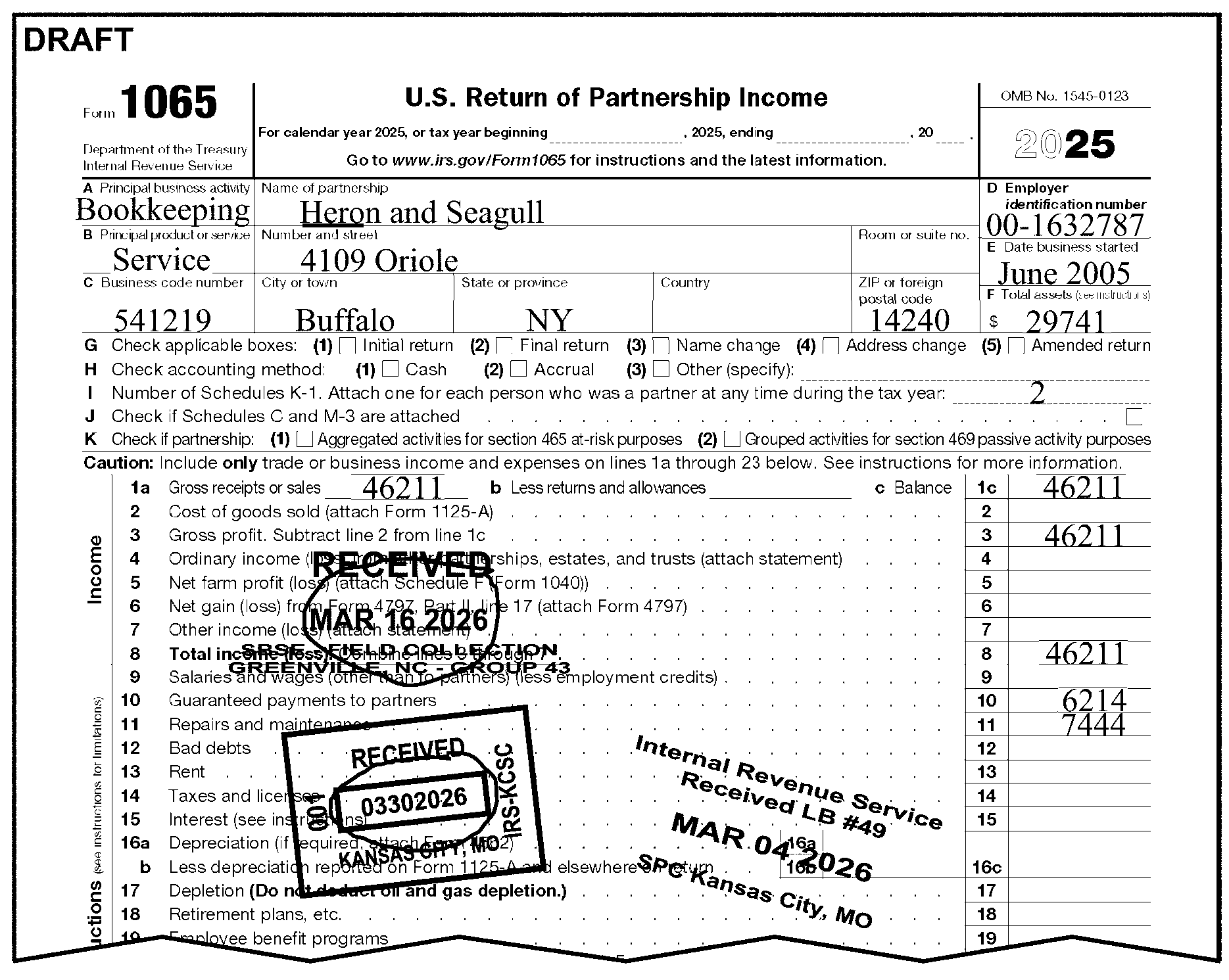
-
A signature (general partner's or Limited Liability Company Member's signature) and jurat is required for all returns except the following:
-
Returns prepared under IRC 6020(b). These returns must be signed by a Compliance Function representative - See IRM 3.11.15.5.4.1, IRC 6020(b) - Prepared by Collection.
-
Returns prepared by Examination, for example Substitute for Return, "SFR" or "SUBSTITUTE RETURN" - See IRM 3.11.15.5.4.3, Examination Prepared
-
Dummy returns prepared by IRS
-
Returns filed under IRC 501(d) (Religious or Apostolic Organization)
-
Returns attached to a taxpayer response to IRS correspondence have a jurat and the taxpayer’s signature - See paragraph (5) below.
-
Re-entry returns originally filed electronically (E-File). These returns may be identified by the presence of Mod E-File printouts or efile GRAPHIC print - Do Not Process or "Tax Return Print (TRPRT) Print Do Not Process" in lieu of an actual return.
-
Returns filed as Common Trust - See IRM 3.11.15.5.8.2
-
Returns filed under 761(a) - See IRM 3.11.15.5.8.1
-
Returns filed as Nominee Returns - See IRM 3.11.15.5.8.3
-
Inactive Short Record Return - See IRM 3.11.15.5.8.4
-
Form 8879-PE is attached with a valid signature and there is an indication of rejected electronic filing
-
Returns filed by an LP, LLC, LLP, LLLT or UBO claiming only one partner - See IRM 3.11.15.17
-
Returns filed with a signed Form 1065X that is for the same Tax Period as the return.
-
-
Do not correspond for a signature on "CII" returns with a Form 13596, Reprocessing Returns, attached. See IRM 3.11.15.3.1.2, Correspondence Imaging Inventory (CII) Returns, for processing instructions.
-
If a signature is missing, correspond:
Exception:
Do not correspond on Section 965 Returns. See IRM 3.11.15.5.2, Section 965 Returns, for more information.
Note:
See IRM 3.11.15.3.1.1 Issuing, Correspondence for returns that are incomplete and appear to be duplicate filings.
If Then -
The return is not signed on the line designated for the partner's signature, or
-
The jurat is not present on the line designated for the partner's signature (non-standard return), or
-
Only the entity information is present and there are no attachments that have tax data,
-
Edit applicable Action Code: 211 - First Correspondence (Missing Information and/or Signature (Refund Returns)) or
215 - First International Correspondence Missing Information and/or Signature (Refund Returns)) or
225 - Correspondence (Signature Only - Balance Due/Zero Balance/Credit Elect Returns) or
226 - International Correspondence (Signature Only - Balance Due/Zero Balance/Credit Elect Returns). -
Leave in batch and continue editing.
-
-
If the jurat is altered or stricken (crossed out), See IRM 3.11.15.3.3, Frivolous Arguments, for frivolous return instructions.
-
Accept a "signature declaration" (a signature with jurat obtained through IRS correspondence) if attached to the return.
-
If the "signature declaration" is altered or stricken (crossed out), See IRM 3.11.15.3.3, Frivolous Arguments, for frivolous return instructions.
-
If the partnership responds with a self-prepared "signature declaration" it must have the same language as the jurat on the tax return: "UNDER PENALTIES OF PERJURY, I DECLARE THAT I HAVE EXAMINED THIS RETURN, INCLUDING ACCOMPANYING SCHEDULES AND STATEMENTS, AND TO THE BEST OF MY KNOWLEDGE AND BELIEF, IT IS TRUE, CORRECT AND COMPLETE."
-
-
Tax examiners are not handwriting experts. Regulations Section 301.6064-1 allows the IRS to presume that the signature on a return, statement or other document is the true signature of the person who actually signed the document.
-
The following types of signatures are not valid for Form 1065 or Form 1065-B:
-
Faxed signatures
-
Electronic signatures
-
Docusign digital signatures
-
Typed font
-
Photocopied signatures
-
-
If the general partner's or Limited Liability Company Member's signature is on the preparer's line, verify the partner's name with the Schedules K-1 and arrow the signature up to the general partner's or Limited Liability Company Member's signature line.
-
Correspond one time for the signature.
-
The Paid Preparer Checkbox is found next to the taxpayer signature area. It shows whether the partnership has elected to allow the Paid Preparer to answer questions about the return as it is processed.
-
No action is required on amended or Short Record returns.
-
Take the following actions when an entry is present in the Paid Preparer Checkbox:
If Then Only the "Yes" box is checked, Take no action. -
The "No" box is checked,
-
Neither box is checked, or,
-
Both boxes are checked,
Circle the Paid Preparer's Telephone Number, if present. See Figure 3.11.15-10 -
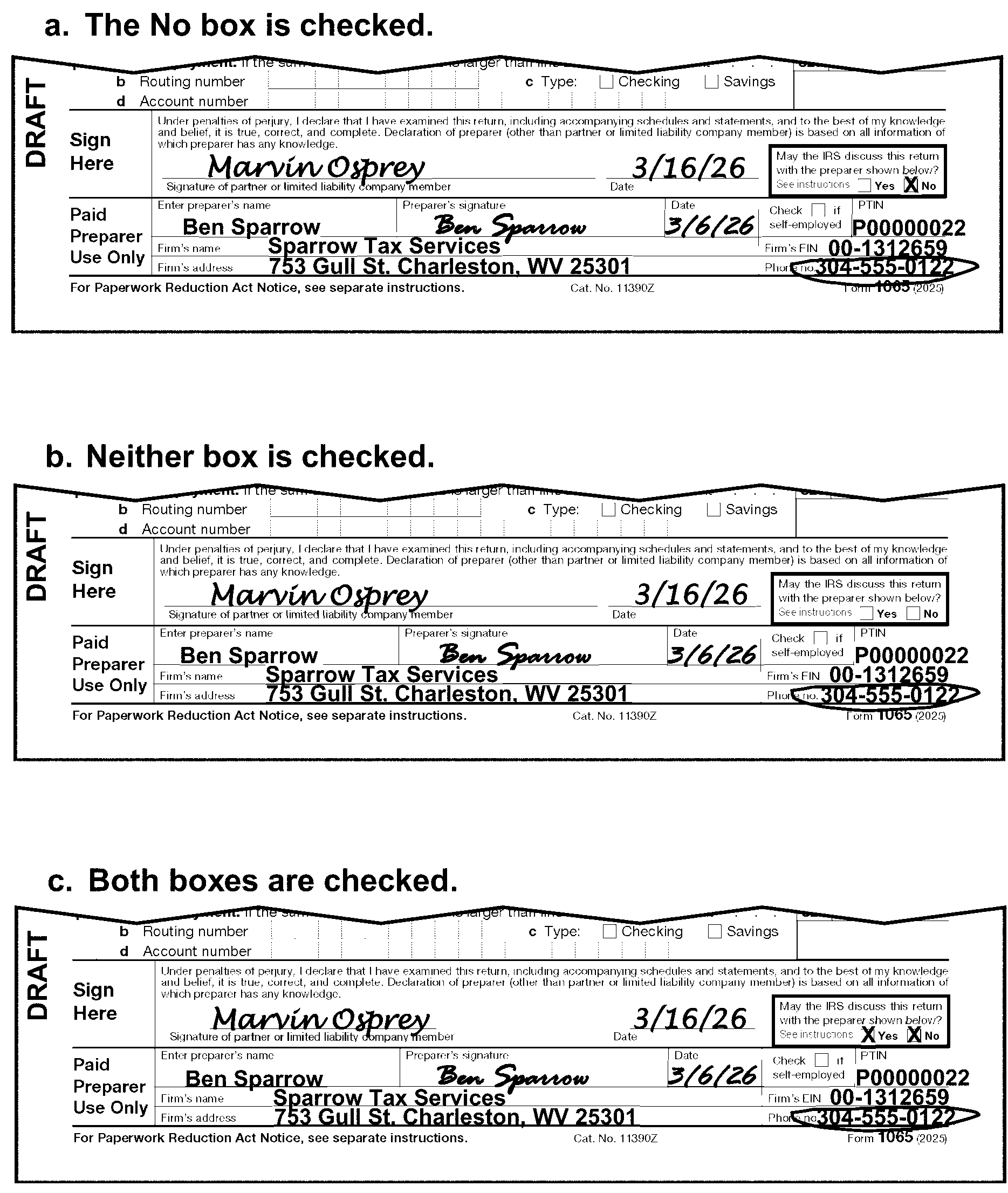
-
The Paid Preparer section is found below the taxpayer signature area at the bottom of Form 1065.
-
The Preparer's Social Security Number (SSN) or Paid Preparer's Tax Identification Number (PTIN) is found to the right of the Preparer's Signature in the PTIN box at the bottom-right corner of Form 1065 (page 1).
-
No action is required on amended returns.
-
A valid PTIN begins with the alpha "P" followed by an eight digit number (e.g., PXXXXXXXX). Circle the SSN/PTIN if it is invalid, all zeros or all nines.
-
The Firm's EIN is found below the Preparer's PTIN box at the bottom right corner of Form 1065 (page 1).
-
No action is required on amended returns.
-
The Firm's EIN is a nine digit number. Circle the EIN if it is invalid, all zeros, or all nines.
-
The Paid Preparer's Phone Number is found below the Firm's EIN at the bottom right corner of Form 1065 (page 1).
If Then The return is amended, No action is required. The Preparer's Phone Number is more than 10 digits, No action is required. The Preparer's Phone Number is illegible or less than 10 digits, Circle the phone number. See Figure 3.11.15-11 below.
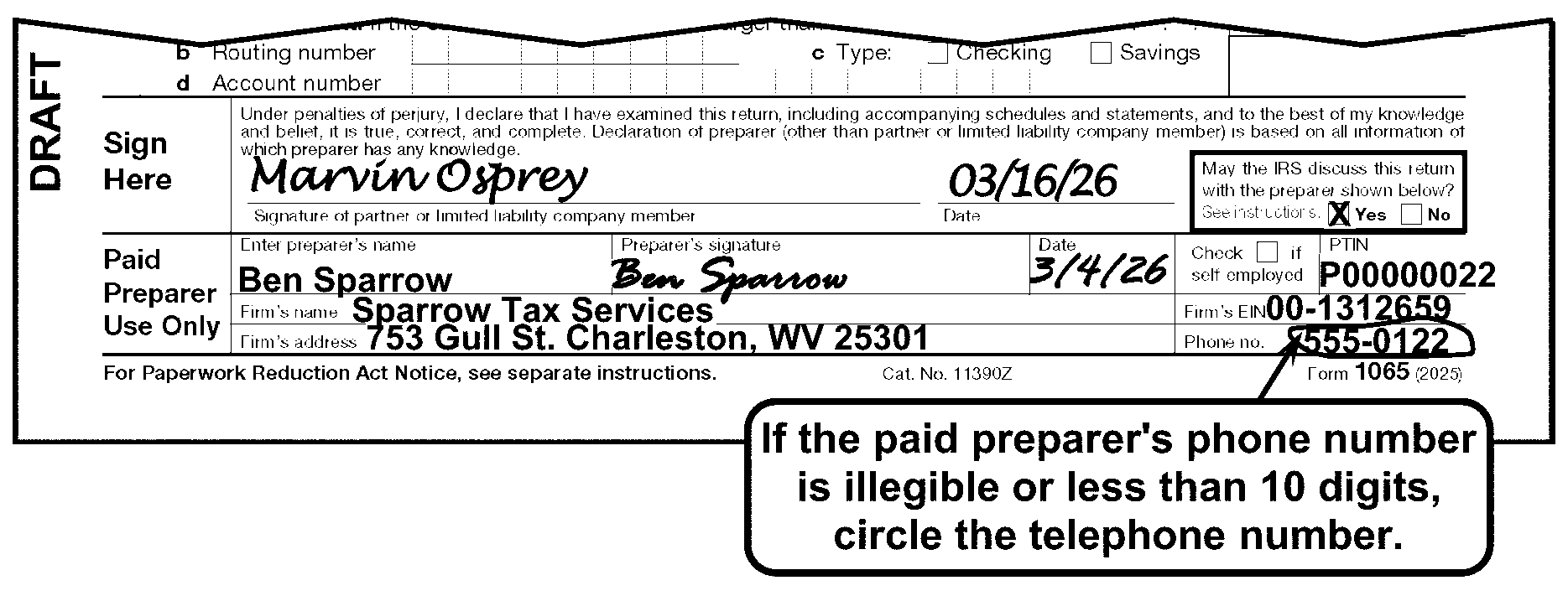
-
This subsection has instructions for:
-
Tax Period Ending
-
Tax Period Beginning
-
Initial Short Period Return
-
Final Short Period Return
-
Change in Accounting Period
-
Early Filed Return
-
-
All returns must have a Tax Period Ending.
-
Edit the Tax Period Ending to the right of the form title in YYMM format.
Exception:
Do not edit the Tax Period Ending unless the Tax Period Ending is other than the current processing year (i.e., 202512).
If Then The return is for the current processing year, No editing is necessary. The return is for a prior year, Edit the Tax Period Ending in YYMM format. The partnership has notated a Tax Period Ending other than the preprinted year on the return, Edit the Tax Period Ending in YYMM format based on the partnership indication. See Figure 3.11.15-12 The Tax Period Ending is missing, incomplete or illegible, -
Review the return or attachments for the correct period.
-
If found, edit the Tax Period Ending to the right of the form title in YYMM format.
-
If unable to determine the Tax Period Ending after researching, process the return for the current processing year.
-
-
Tax Periods reported under the 52/53-week are treated as:
-
Beginning on the first day of the calendar month beginning nearest to the first day of the 52/53-week tax year, and
-
Ending on the last day of the calendar month ending nearest to the last day of the 52/53-week tax year.
If Then The Tax Period Ending is not more than 3 days after the beginning of the month, Edit the previous month. The Tax Period Ending is not more than 6 days before the end of the month, Edit the month shown on the return. The Tax Period Ending is more than 3 days after the beginning of the month or more than 6 days before the end of the month, Correspond to determine the correct Tax Period. -
-
If the resulting tax year is more than 12 months, correspond to obtain the correct Tax Period.
-
On a Final return, if the Tax Period's month and/or year is later than the Received Date's month and year (future return), edit the Tax Period to be one month before the Received Date. See Figure 3.11.15-13
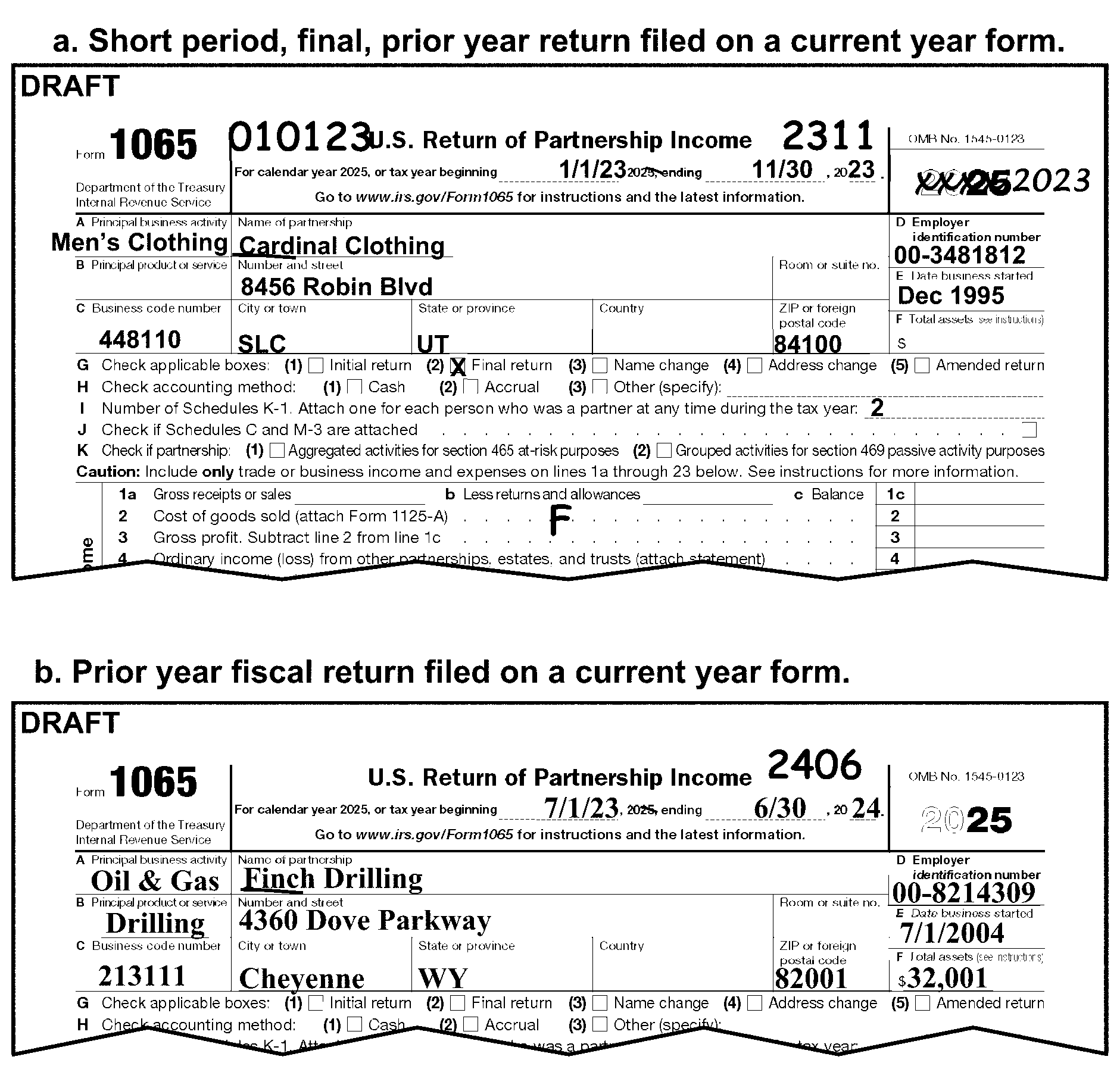
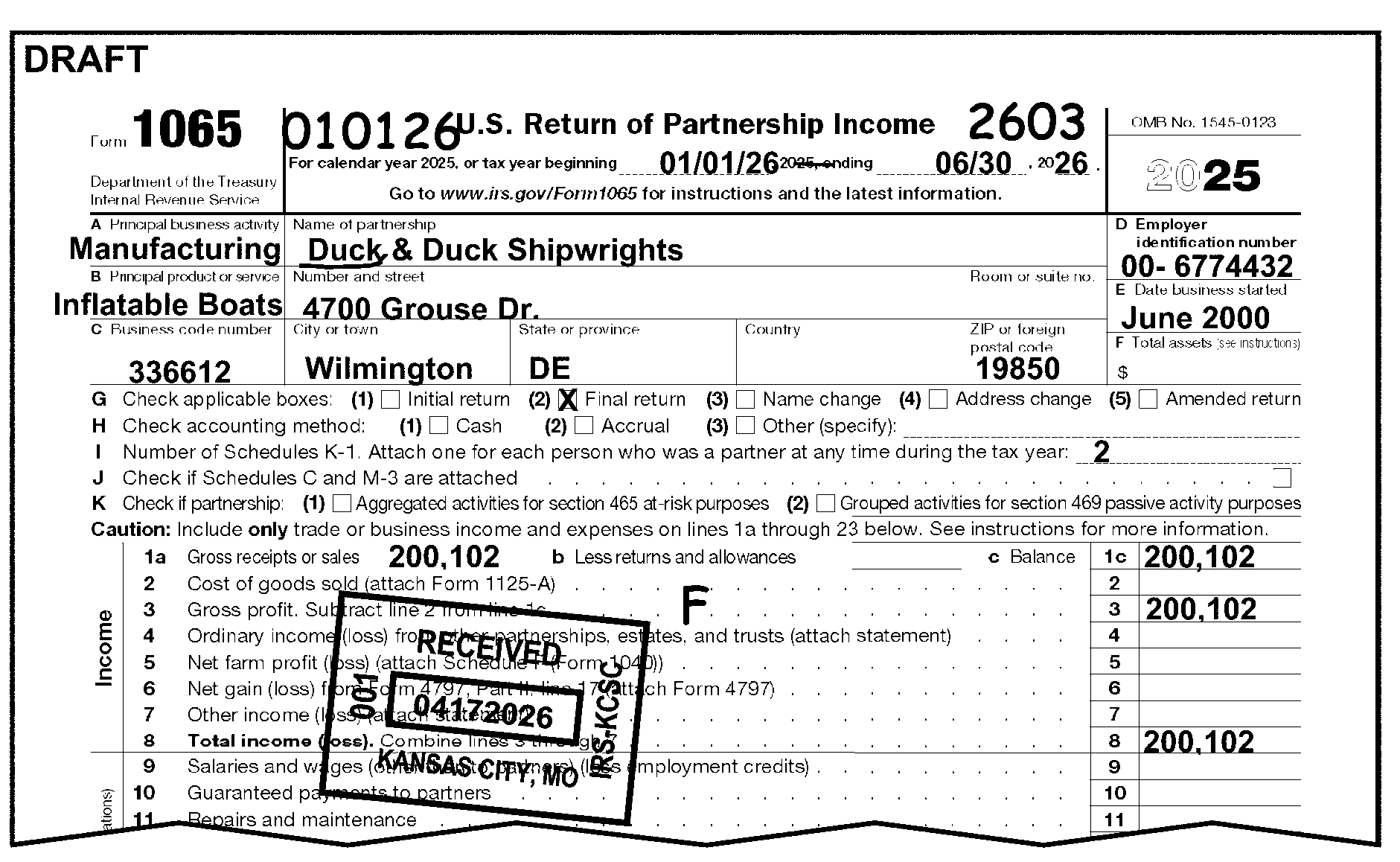
-
Edit the Tax Period Beginning (when present) to the left of the Form 1065 title area in MMDDYY format ONLY on an Initial, Final, or Short Period return as follows: See Figure 3.11.15-14 below.
If Then The Tax Period Beginning is present, Edit the Tax Period Beginning (MMDDYY). The Day is not present in the Tax Period Beginning, Edit "01" as the day (MM01YY). The Tax Period Beginning is not present, Editing is not required.
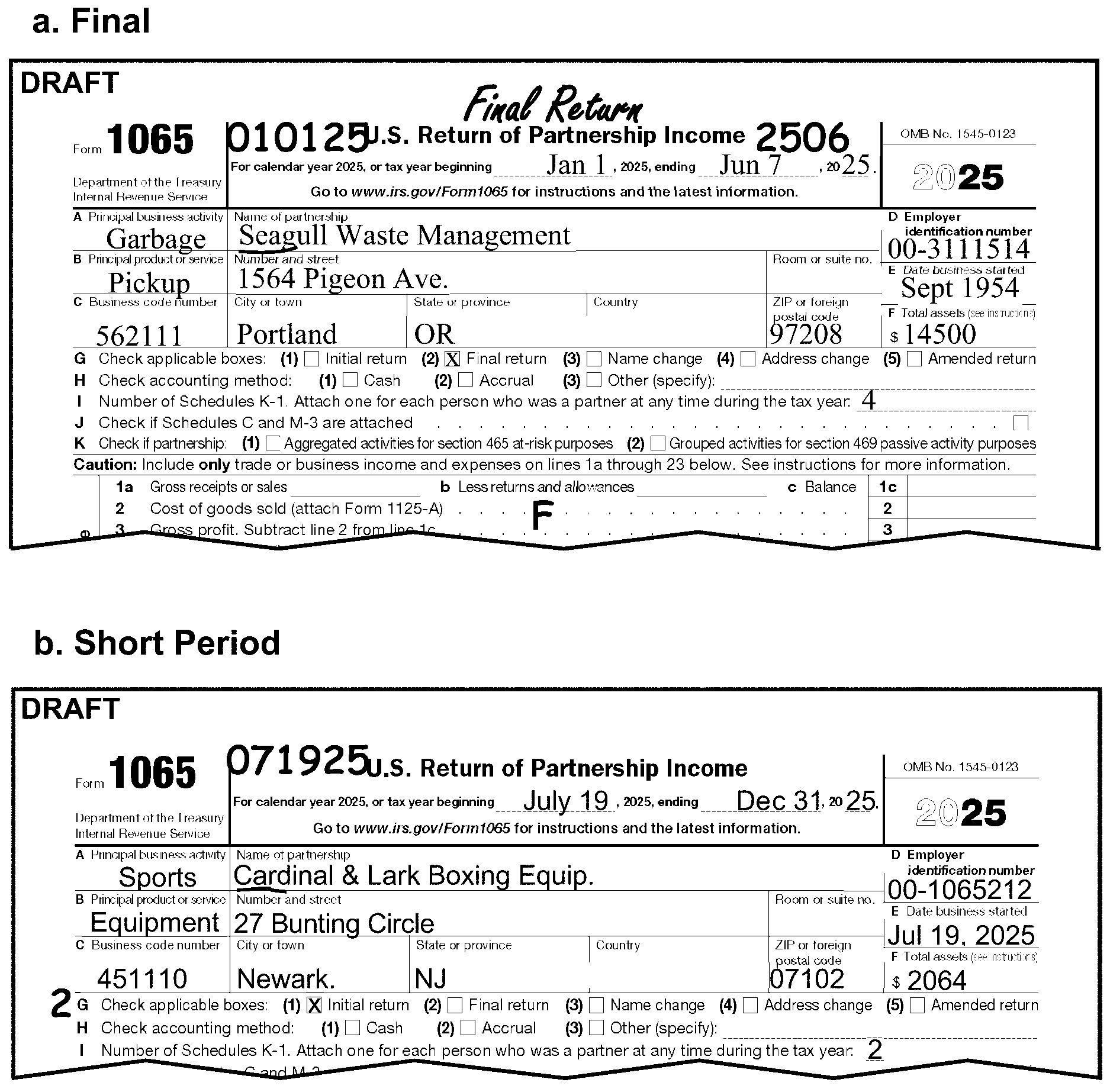
-
Identify an "Initial" Short Period Return by any of the following:
-
The "Initial return" box is checked.
-
The return or attachments shows "INITIAL" , "FIRST RETURN" , "FIRST TIME FILER" , etc.
-
An entry in Box E, "Date Business Started" , is within 12 months of the Tax Period Ending Date.
-
-
Edit the Tax Period Beginning in MMDDYY format per IRM 3.11.15.9.2.
-
Edit initial Return Code 2 to the left of Line G. See IRM 3.11.15.14. See Figure 3.11.15-14.
-
Identify a "Final" Short Period return by any of the following:
-
The "Final return" box is checked.
-
The return or attachments shows "FINAL" , "OUT OF BUSINESS" , "NO LONGER LIABLE" , etc.
-
Partnership cites IRC 708(b)(1)(B)(for taxable years ending on or before 12/31/2017).
-
-
Edit the Tax Period Beginning in MMDDYY format on a "Final" Form 1065 Return per IRM 3.11.15.9.2.
-
A "Final" Short Period return ends on the date the partnership went out of business. Use the numeric designation of the calendar month in which it ended. If the partnership does not show the month the business ended, edit the Tax Period ending as one month before the return Received Date.
-
Edit CCC "F" to the center of the dotted portion on Line 2. Cost of goods sold (Form 1065).
-
If the partnership files both a Final and Initial Short Period return using one EIN, which together cover no more than one 12 month or 52-53 week period and both returns are received together for editing, do the following:
-
Combine both returns into one return.
-
Combine money amounts from transcription lines.
-
If conflicting information is present (i.e., Number of Partners, Business Code etc.), use the information from the Final or latest return.
-
Process the combined return.
-
-
If the Tax Period on the return is for a Short Period other than an "Initial" return (Form 1065, page 1, Line G, Box (1)) or a "Final" return (Form 1065, page 1, Line G, Box (2)), review Form 1065 for an indication that the partnership is changing their accounting period.
If And Then A statement the Partnership is changing its tax year: -
National Office "Grant Letter" or,
-
Revenue Procedure 2006-46 or,
-
a copy of Form 1128 is attached.
Research using Command Code BMFOLE shows a Transaction Code (TC) 053 or (TC) 054, (This is an indication that the Form 1128 or National Office "grant Letter" has been approved.) Continue Processing. A statement the Partnership is changing its tax year: -
National Office "Grant Letter" or,
-
Revenue Procedure 2006-46 or,
-
a copy of Form 1128 is attached.
Research using Command Code BMFOLE shows a Transaction Code (TC) 059, (This is an indication that the Form 1128 or National Office "grant Letter" has been denied.) The return is unprocessable. -
Edit Action Code 211 or 215 and correspond.
-
In the correspondence instruct the taxpayer to file a return for the next full period due.
A statement the Partnership is changing its tax year: -
National Office "Grant Letter" or,
-
Revenue Procedure 2006-46 or,
-
a copy of Form 1128 is attached.
Research using Command Code BMFOLE does not show a TC 053, TC 054, or TC 059 Edit Action Code 211 or 215 and correspond with the taxpayer using Letter 319C. Original Form 1128 is attached Research using Command Code BMFOLE shows a Transaction Code (TC) 053 or (TC) 054, (This is an indication that the Form 1128 has been approved.) Continue Processing. Original Form 1128 is attached Research using Command Code BMFOLE shows a Transaction Code (TC) 059, (This is an indication that the Form 1128 has been denied). The return is unprocessable. -
Edit Action Code 211 or 215 and correspond.
-
In the correspondence instruct the taxpayer to file a return for the next full period due.
-
Original Form 1128 is attached Research using Command Code BMFOLE does not show Transaction Codes (TC) 053, (TC) 054, or (TC) 059. Route the Form 1065 and Form 1128 to Entity. -
Initial return with letter ruling or,
-
Termination of Section 444 is notated or,
-
A copy of Form 8716 is attached.
Research using Command Code BMFOLE shows a Transaction Code (TC) 054 or (TC) 055, (This is an indication that the Form 8716 or National Office "grant Letter" has been approved). Continue Processing. -
Initial return with letter ruling or,
-
Termination of Section 444 is notated or,
-
A copy of Form 8716 is attached.
Research using Command Code BMFOLE shows a Transaction Code (TC) 058, (This is an indication that the Form 8716 or National Office "grant Letter" has been denied). The return is unprocessable. -
Edit Action Code 211 or 215 and correspond.
-
In the correspondence instruct the taxpayer to file a return for the next full period due.
-
Initial return with letter ruling or,
-
Termination of Section 444 is notated or,
-
A copy of Form 8716 is attached.
Research using Command Code BMFOLE does not show a (TC) 054, (TC) 055, or (TC) 058. Edit Action Code 211 or 215 and correspond with the taxpayer using Letter 319C. Original Form 8716 is attached. Research using Command Code BMFOLE shows a Transaction Code (TC) 054 or (TC) 055, (This is an indication that the Form 8716 has been approved). Continue Processing. Original Form 8716 is attached. Research using Command Code BMFOLE shows a Transaction Code (TC) 058, (This is an indication that the Form 8716 has been denied). The return is unprocessable. -
Edit Action Code 211 or 215 and correspond.
-
In the correspondence instruct the taxpayer to file a return for the next full period due.
Original Form 8716 is attached. Research using Command Code BMFOLE does not show Transaction Codes (TC) 054, (TC) 055, or (TC) 058. Route the Form 1065 and Form 8716 to Entity. No explanation for the Short Period can be found The return is unprocessable. -
Edit Action Code 211 or 215 and correspond.
-
In the correspondence instruct the taxpayer to file a return for the next full period due.
-
-
An Early Filed Return is defined as a return whose Received Date is before its Tax Period Ending Date.
-
Never send back an Early-Filed return to the partnership. Correspond for any missing information before suspending the return:
If And Then The return is early-filed, Is not a "Final" return, Edit Action Code 480. The return is early-filed, A "Final" return,
-
The entity area of a tax return identifies the taxpayer on the Business Master File. The entity area of the return has the following:
-
Employer Identification Number (EIN)
-
Name
-
"In-care-of" name
-
Address
-
-
If the Form 1065 shows bankruptcy (e.g., shows "RECEIVER" , "TRUSTEE" , or "DEBTOR IN POSSESSION" ) in the entity area or on an attachment, route to Entity Control. Follow local procedures using Form 13934, Entity Document/C&E Merge Transmittal.
-
Completely edit the return except the name control prior to routing to Entity Control.
-
The EIN is a nine digit number (XX-XXXXXXX) assigned to identify the partnership.
-
The EIN is found in the upper right of Form 1065 (Employer Identification Number, Box D).
-
Determine the EIN as follows:
-
If And Then EIN is missing, You can determine the correct EIN from the attachments and/or schedules, Edit the EIN to the proper location. The EIN is either a Preparer/ Practitioner Tax Identification Number (PTIN), Social Security Number (SSN) or Individual Tax Identification Number (ITIN), Unnumbered, -
Remove return from batch.
-
Forward to Entity Control following local procedures using Form 13934, Entity Document/C&E Merge Transmittal for EIN assignment.
The EIN is either a PTIN or ITIN, Numbered, -
Edit Action Code 320.
-
Leave return in batch.
Multiple EINs are present, Unnumbered, -
Remove return from batch.
-
Forward to Entity Control following local procedures using Form 13934, Entity Document/C&E Merge Transmittal for EIN assignment.
Multiple EINs are present, Numbered, -
Edit Action Code 320.
-
Leave return in batch.
The EIN has any of the following conditions and can’t be determined from attachments and/or schedules: -
Illegible;
-
Missing;
-
Other than 9 digits;
-
All zeroes; or,
-
All nines,
Unnumbered, -
Circle all illegible EINs, zeroes or nines.
-
Research IDRS.
-
If found, edit to the proper location.
-
If not found, route to Entity Control following local procedures using Form 13934, Entity Document/C&E Merge Transmittal.
The EIN has any of the following conditions and can’t be determined from attachments and/or schedules: -
Illegible;
-
Missing;
-
Other than 9 digits;
-
All zeroes; or,
-
All nines,
Numbered, -
Circle all illegible EINs, zeroes or nines.
-
Edit Action code 320.
-
Leave return in batch.
"PENDING" , "APPLIED FOR" , etc., is shown in the EIN area, Unnumbered, -
Research IDRS.
-
If found, edit to the proper location.
-
If not found, route to Entity Control following local procedures using Form 13934, Entity Document/C&E Merge Transmittal.
"PENDING" , "APPLIED FOR" , etc., is shown in the EIN area, Numbered, -
Edit Action Code 320.
-
Leave return in batch.
-
-
-
An entity classified as a partnership, will become a "disregarded entity" when the entity’s membership is reduced to one member.
-
If a Form 1065 has the notation, "disregarded entity" , in the header or entity portion of the return (on page 1, Form 1065), process as follows:
-
Edit Audit Code "1" in the left margin of Form 1065 next to Line 9 in "1-1" format.
-
Check the attachments for a name, EIN, address and other information identifying the partnership.
-
If found, edit the entity information on page 1 of the return and continue processing.
-
If NOT found, correspond with the taxpayer for the legal name and the "doing business as" (dba) name(s) of the partnership, if the address information is present. See IRM 3.11.15.3.1.1, Issuing Correspondence.
-
If the number of Schedule K-1 is 1, See IRM 3.11.15.17, Line I - Number of Schedules K-1 (or Number of Partners).
-
-
The Name Control consists of four characters or less:
-
Valid characters are alpha, numeric, ampersand (&), hyphen (-) and blank. However, blanks are only valid in the last three positions.
-
Disregard the word "THE" in the Name Control only when followed by more than one word.
Note:
If an individual and a trade name are present and it can be determined that the trade name is for a corporation or partnership, follow the Name Control procedures for corporations or partnerships. If other than a corporation or partnership, follow the Name Control procedures for individuals, regardless of which line the individual owner's name is listed.
-
-
See job aid Document 7071-A, Name Control Job Aid - For Use Outside the Entity Area, to determine the Name Control.
-
Name Controls for EINs assigned by the Mod IEIN program are different. If the EIN prefix begins with 20, 26, 27, 45, 46, 47, 81, 82, 83, 84, 85, 86, 87, 88, 92, or 93, then the Name Control will be the first four characters of the first name in the Primary Name Line.
-
If Line G, box (3), "Name Change" , is checked, route the return to Entity Control following local procedures using Form 13934, Entity Document/C&E Merge Transmittal.
-
Edit the Name Control as follows:
-
If And Then Able to determine the Name Control, Underline the Name Control Unable to determine the Name Control, Unnumbered, -
Research IDRS.
-
If found, edit to the proper location.
-
If not found, route to Entity Control following local procedures using Form 13934, Entity Document/C&E Merge Transmittal.
Unable to determine the Name Control, Numbered, -
Edit Action Code 352 (Name Research).
-
Leave return in batch.
-
-
-
An "in-care-of" name can be identified by the words "in care of" or the symbols "c/o" or "%" (percent).
-
Ensure the "in-care-of" name is found in the proper location.
Note:
Always circle the "in-care-of" symbol ("%" or "c/o" ) if it is present with only an address. Do not use the ampersand (&) or the percent sign (%) when editing address information.
If Then The "in-care-of" name is found on the street address line preceding the street address, Do not edit. The "in-care-of" name is found above the first name line or below the street address, Arrow the "in-care-of" name so it appears below the first name line and above the street address. The "in-care-of" name is shown on an attachment, Edit the "in-care-of" name above the street address beginning with the "%" or "c/o" in the first position. The street address for the "in-care-of" name is different from the street address of the partnership, -
Arrow the "in-care-of" street address below the "in-care-of" name or edit the "in-care-of" street address below the "in-care-of" name if found on an attachment.
-
Underline the second street address.
-
Notate "TC 014" in the upper left margin.
-
Pull the return for research/input of TC 014 by the Code and Edit Research Clerk.
-
-
Determine a change in the in-care-of name by any of the following:
-
A check mark in the "Name Change" box Line G, Box (3)
-
A check mark in the "Address Change" box Line G, Box (4)
-
Taxpayer edits or added to the "in-care-of" name (e.g., original "in-care-of" crossed out, new name added, etc.)
If Then An "in-care-of" name is changed but there is no sign of an address change, -
Edit the "in-care-of" name as shown above.
-
Continue editing the return.
An "in-care-of" name is present and the "Address Change" box (Line G, Box (4) is checked or there is a sign of an address change, -
Edit the "in-care-of" name as shown above.
-
Correct the address. See IRM 3.11.15.10.5, Entity Perfection - Domestic Addresses.
-
Continue editing the return.
-
-
Perfect the address when the mailing address (Street or P.O. Box) is not easily identified.
-
A business may have two addresses. One is the mailing address and the other is the location address or physical location of the business.
-
Perfect the address as follows:
If And Then An attachment shows the address was changed, Edit the new address in the entity section of the return. See Figure 3.11.15-15 Form 8822, Change of Address, or Form 8822-B, Change of Address or Responsible Party- Business, is attached, All apply: -
Mailing address information is the same as the parent return,
-
Form 8822 or Form 8822-B, Line 7, does not list a location address,
-
No entry on Form 8822-B, Lines 8 or 9,
Take no action. Form 8822, Change of Address, or Form 8822-B, Change of Address or Responsible Party- Business, is attached, Any of the following applies: -
Mailing address information is different than the parent return,
-
Form 8822 or Form 8822-B, Line 7, lists a location address,
-
An entry is listed on Form 8822-B, Lines 8 or 9, have an entry,
Detach Form 8822 or Form 8822-B and route to Entity Control following local procedures using Form 13934, Entity Document/C&E Merge Transmittal. Both a P.O. Box and a street address are shown, -
Notate "TC 014" in the upper left margin.
-
Pull the return for research/input of TC 014 by the Code and Edit Research Clerk.
Two street addresses are shown, -
Underline the second street address.
-
Notate "TC 014" in the upper left margin.
-
Pull the return for research/input of TC 014 by the Code and Edit Research Clerk.
One street address is shown, The partnership changed the address to a P.O. Box, -
Notate "TC 014" in the upper left margin.
-
Pull the return for research/input of TC 014 by the Code and Edit Research Clerk.
The city and state are not shown on the return but are shown on an attachment, Edit the city and state in the entity section of the return. The ZIP Code is missing or illegible, Is not available from the return or attachments, See Document 7475, State and Address Abbreviations, Major City Codes (MCCs), ZIP Codes and Countries, to determine the ZIP Code. Only the first three digits of the ZIP Code can be determined, Edit "01" for the fourth and fifth digits. The Address changeBox G(4) is checked, An "in-care-of " name is present, -
Edit the "%" (percent sign) or "c/o" to the left of the "in-care-of" name (in the first position) followed by the correct name.
The National Change of Address (NCOA) label is present, Underline the Name Control. It is necessary to edit the street address, See Document 7475, State and Address Abbreviations, Major City Codes (MCCs), ZIP Codes and Countries for current Address/Street Abbreviations. The address has information other than a street address or P.O. Box, Do not perfect. ISRP will enter the complete address. -
-
The U.S. Postal Service established new address requirements for Army Post Office (APO)/Diplomatic Post Office (DPO)/Fleet Post Office (FPO) addresses. If the old address appears, convert to the new State Code abbreviation based on the ZIP Code (e.g., APO New York, NY 091XX would be converted to APO AE 091XX). Consider APO/DPO/FPO addresses as domestic addresses. Refer to APO/DPO/FPO conversion chart below:
ZIP Code State Code 340 AA 090-098 AE 962-966 AP
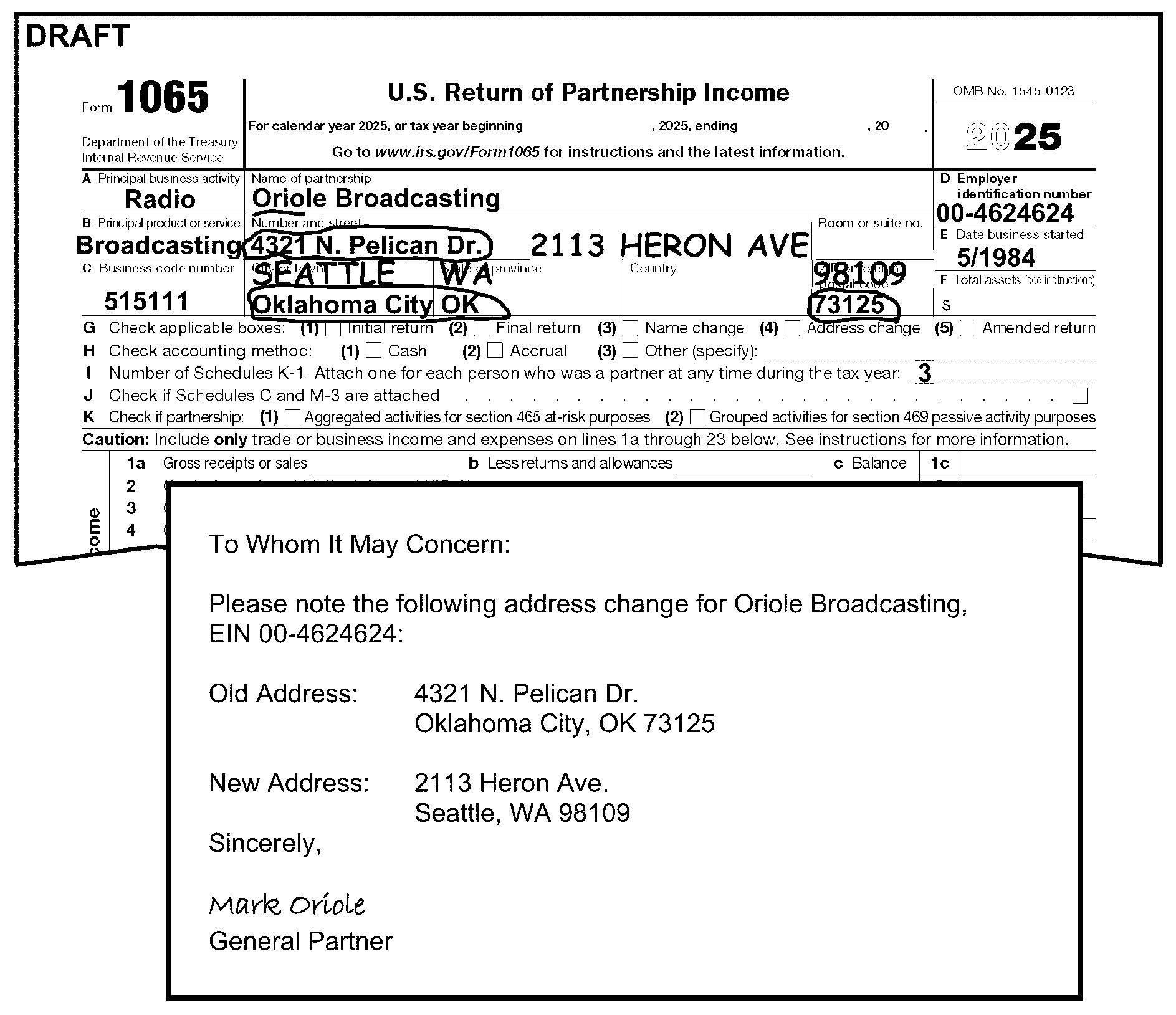
-
A foreign (international) address is any address that is not in the 50 states or the District of Columbia.
-
Consider returns with Army Post Office (APO)/Diplomatic Post Office (DPO)/Fleet Post Office (FPO) addresses as domestic addresses. See IRM 3.11.15.10.5, Entity Perfection - Domestic Addresses.
-
Route returns with a foreign address to Ogden Submission Processing (OSPC) for processing. Prepare Letter 86C, Referring Taxpayer Inquiry/Forms to Another Office, to inform the partnership IRS sent the return to Ogden.
-
Consider returns with addresses in the following U.S. Possessions/Territories as foreign for processing purposes. Edit the same way as domestic addresses.
-
Edit a two-character alpha code for the Possession/Territory name:
U.S. Possession/Territory Abbreviation American Samoa AS Federated States of Micronesia FM Guam GU Marshall Islands MH Northern Mariana Islands MP Palau PW Puerto Rico PR Virgin Islands (U.S.) VI -
A ZIP Code must be present on U.S. Possessions/Territories. Edit the correct ZIP Code if one is not given. See Exhibit 3.11.15-6, U.S. Possessions/Territories ZIP Codes.
-
-
All other foreign addresses are edited the same as a domestic address with the following exceptions:
-
Ensure the foreign country is the last entry in the address.
-
Circle the foreign country and edit the country code preceded by a "/" and followed by "/$" (e.g., edit Germany as "/GM/$" ) See Document 7475, State and Address Abbreviations, Major City Codes (MCCs), ZIP Codes and Countries, for official foreign country codes.
-
Edit a unique country code for returns filed with an address in Canada. See IRM 3.11.15.10.6.1, Country Code - Canada.
-
If the foreign address is from Australia, Brazil, Cuba, Italy, Mexico, or The Netherlands, check if the address has a province, state, or territory.
Note:
There may be other countries with provinces, states, and territories not listed above, see Coding and Editing BMF Tax Returns, Foreign Addresses Job Aid (Number 2324-002) for more information.
If Then A province, state or territory name is present, -
Circle province, state or territory name.
-
Edit correct abbreviation. See Exhibit 3.11.15-5, Province, Foreign State, and Territory Abbreviations.
A province, state or territory is shown in abbreviated format, Continue editing the return. A province, state, or territory name is not present, Continue editing the return. -
-
A ZIP Code or state is not required on a foreign address. Foreign addresses use a postal code that is entered before the city or foreign country and is part of the address.
-
Edit CCC "9" when the address on the partnership return is foreign.
-
-
To assist Compliance with workload assignment, returns filed with an address in Canada will be edited using a unique Country Code based on the province.
If Then The foreign address has a Canadian Province/Territory name or abbreviation listed in the table below, -
See table below to ensure the correct Canadian Province/Territory is present or edited to the return.
-
Edit the correct Country Code based on the province/territory preceded by a "/" and followed by a "/$" as the last entry in the address.
The foreign address does not have a Canadian Province/Territory name or abbreviation listed in the table below, -
Circle the country name.
-
Edit the country code "/CA/$" as the last entry in the address.
♦Canadian Province/Territory Abbreviations, Postal Codes and Foreign Country Code Tables♦
Canadian Province/Territory Province/Territory Abbreviation Postal Code beginning Country Code Alberta AB T XA British Columbia BC V XB Manitoba MB R XM New Brunswick NB E XN Newfoundland and Labrador NL A XL Northwest Territories NT X XT Nova Scotia NS B XS Nunavut NU X XV Ontario ON K, L, M, N, or P XO Prince Edward Island PE C XP Quebec QC G, H, or J XQ Saskatchewan SK S XW Yukon YT Y XY -
-
The rest of the foreign address is edited using procedures in IRM 3.11.15.10.6, Entity Perfection - Foreign Address.
-
The Principal Business Activity (PBA) Code is based on the North American Industry Classification System (NAICS). These Codes give critical data for Statistics of Income, Examination, Research and other IRS organizations.
-
The NAICS Code is a four (prior year) or six-digit number found on page 1, Box C of Form 1065.
-
Only one NAICS Code can be used on the return. Edit the NAICS Code as follows:
If Then A legible four (prior year) or six-digit NAICS Code is shown in Box "C" , No editing is necessary. The return is an Amended return (CCC "G" ), Do not edit a NAICS Code. A NAICS Code is -
Not present,
-
Illegible,
-
Invalid (other than 4 or 6 digits and not with range of 000001-999999.
Edit NAICS Code 999999 in Box C. See Figure 3.11.15-16. There is more than one NAICS Code, Circle all but the first NAICS Code listed. -
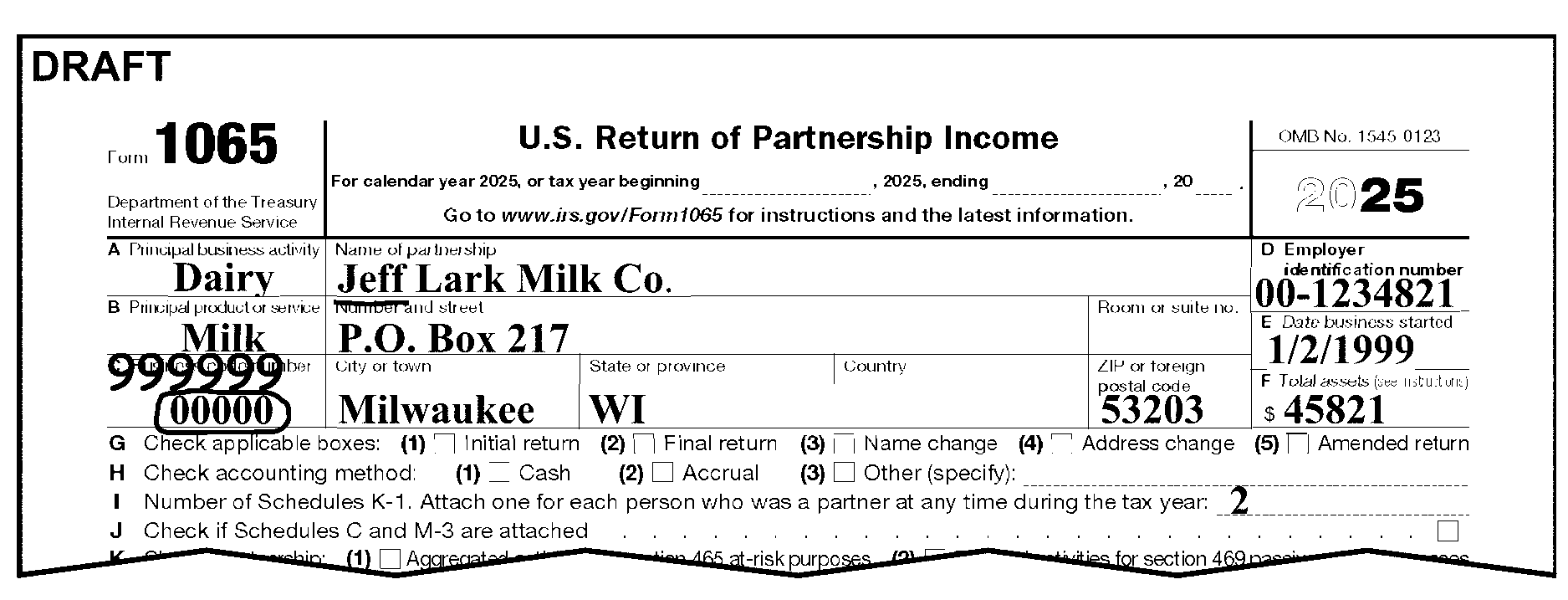
-
The Date Business Started is shown in Box E on page 1 of Form 1065.
-
Edit the date business started in YYYYMM format to the right of the partnership entry when any of the following conditions are present:
-
If Then A partnership enters a future date (after the Tax Period ending shown on the return) as the date business started, DO NOT EDIT. Only year is shown, Edit "01" for month. See Figure 3.11.15-17 below. Only month is shown, Edit "1950" for year. See Figure 3.11.15-17 below. The date business started is illegible or indeterminable, -
Circle the entry.
-
Edit date as "195001" .
Box "E" is blank, -
Leave blank.
-
Edit CCC "A" .
The date only shows two digit year, not century,
Example: 01/01/21Edit century above year. -
-
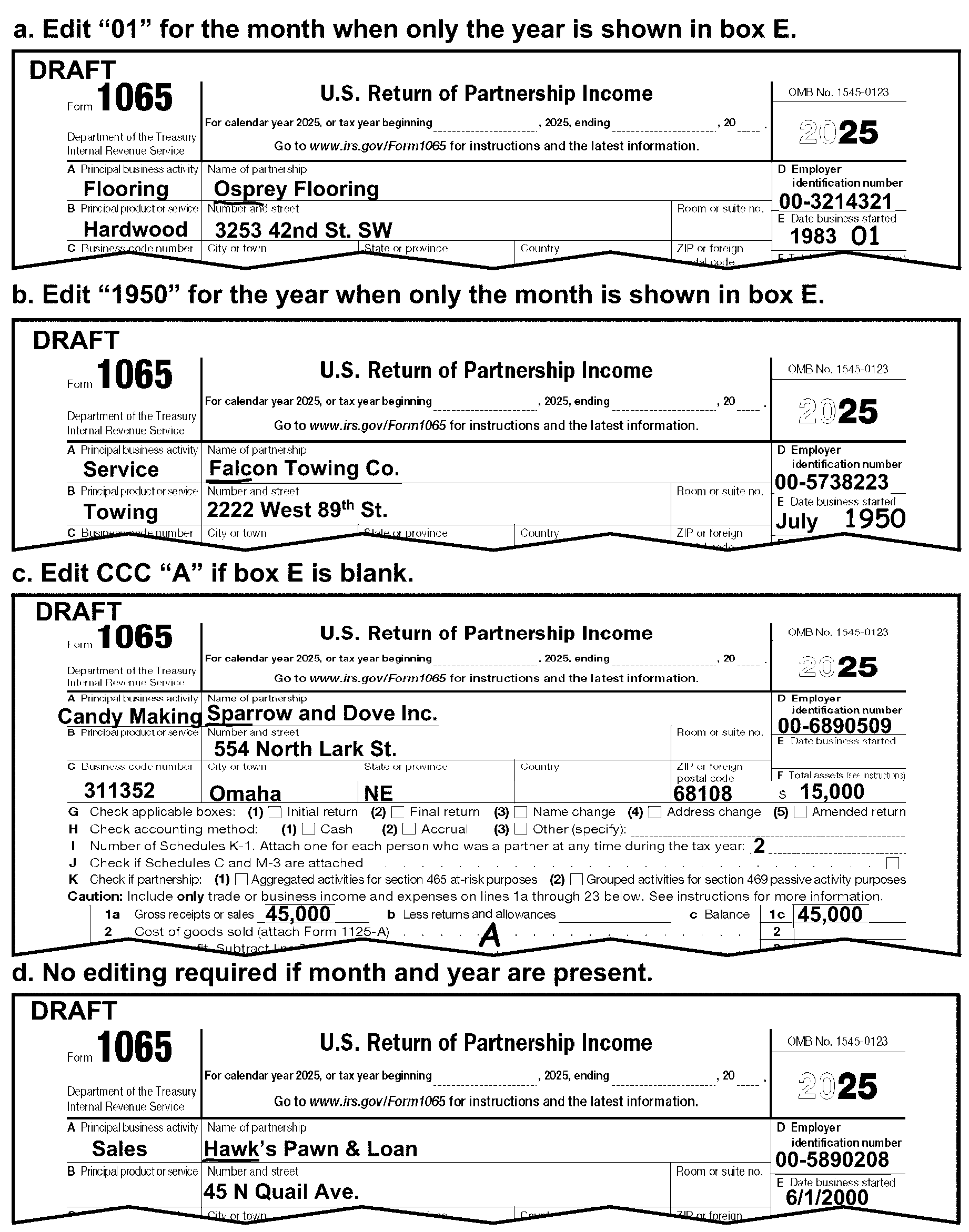
-
This subsection gives instructions for editing Total Assets At End of Year, Box "F" , on Form 1065.
-
Box "F" must have an entry unless one of the following conditions is present:
If Then Schedule B, Question 4* is answered "Yes" ,
*(Prior year revision, Question 6),The partnership is not required to complete Box "F" , Schedules L, M-1 and M-2. See Figure 3.11.15-18 below. Schedule L is crossed out or annotated zero (0), "none" or not applicable (n/a), Leave Box F blank. There is an indication of single entry bookkeeping -
Box "F" is blank, and
-
The "Cash" box on Line H is checked, and
-
there are no entries on Lines 1-22 on Form 1065, page 1,
Leave Box F blank. The return is a "Final" return, Edit the return as a Final return. See IRM 3.11.15.9.4, "Final" Short Period Return and IRM 3.11.15.16.4, CCC "F" - Final Return. There is no transcription line (T-line) with an entry, Edit the return as a Short Record. See IRM 3.11.15.5.8.4, Inactive Returns. -
-
If Box "F" information is required and the amount is missing, edit the amount shown on Line 14, Column (d), Schedule L, Form 1065. See Figure 3.11.15-19 below. If Schedule L, Line 14, Column (d) is blank and cannot be computed, use the amount on Schedule L, Line 22, Column (d)
-
If Box "F" information is required and Schedule L, Balance Sheet is missing or blank, correspond for Schedule L See IRM 3.11.15.27.
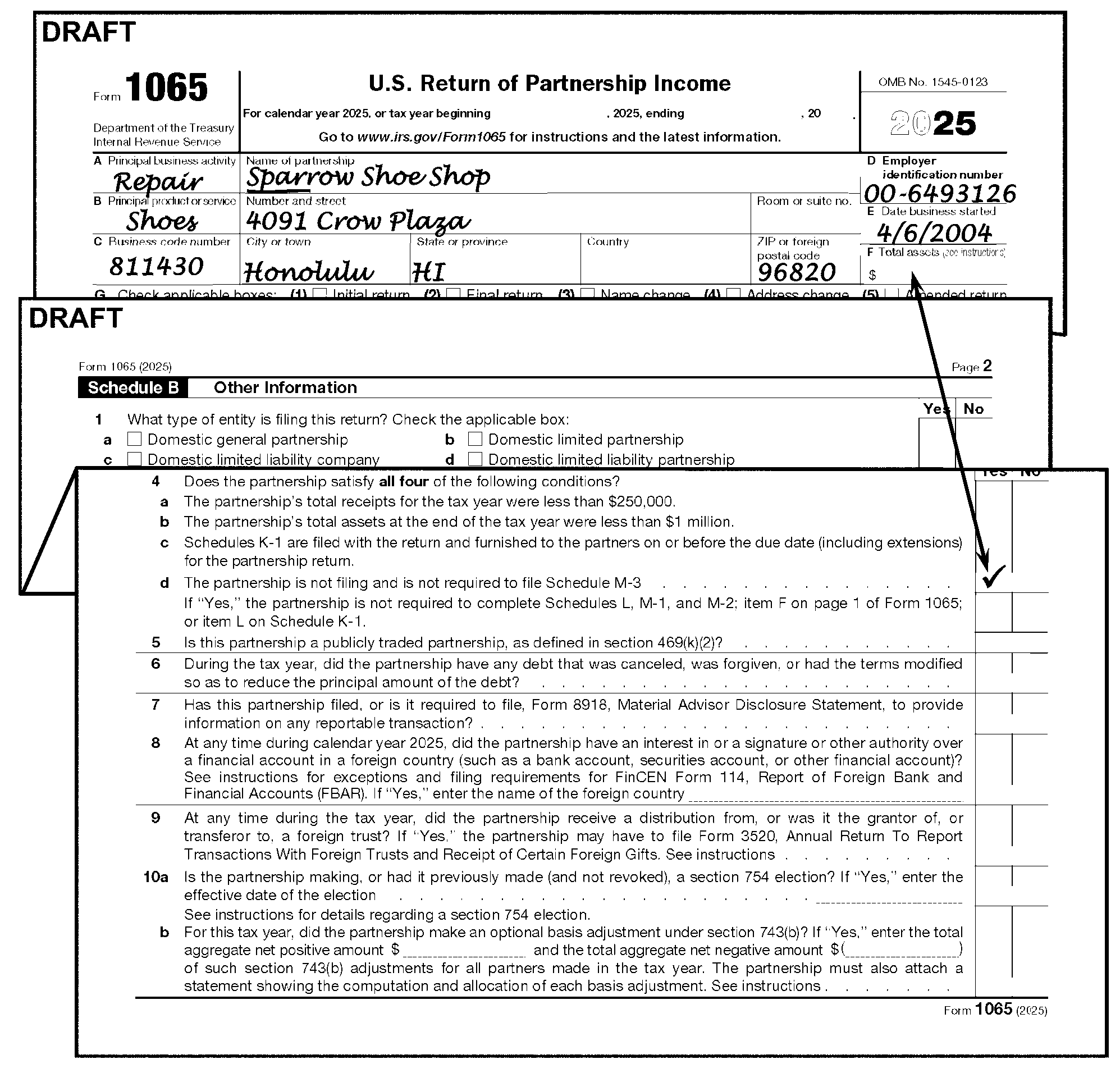
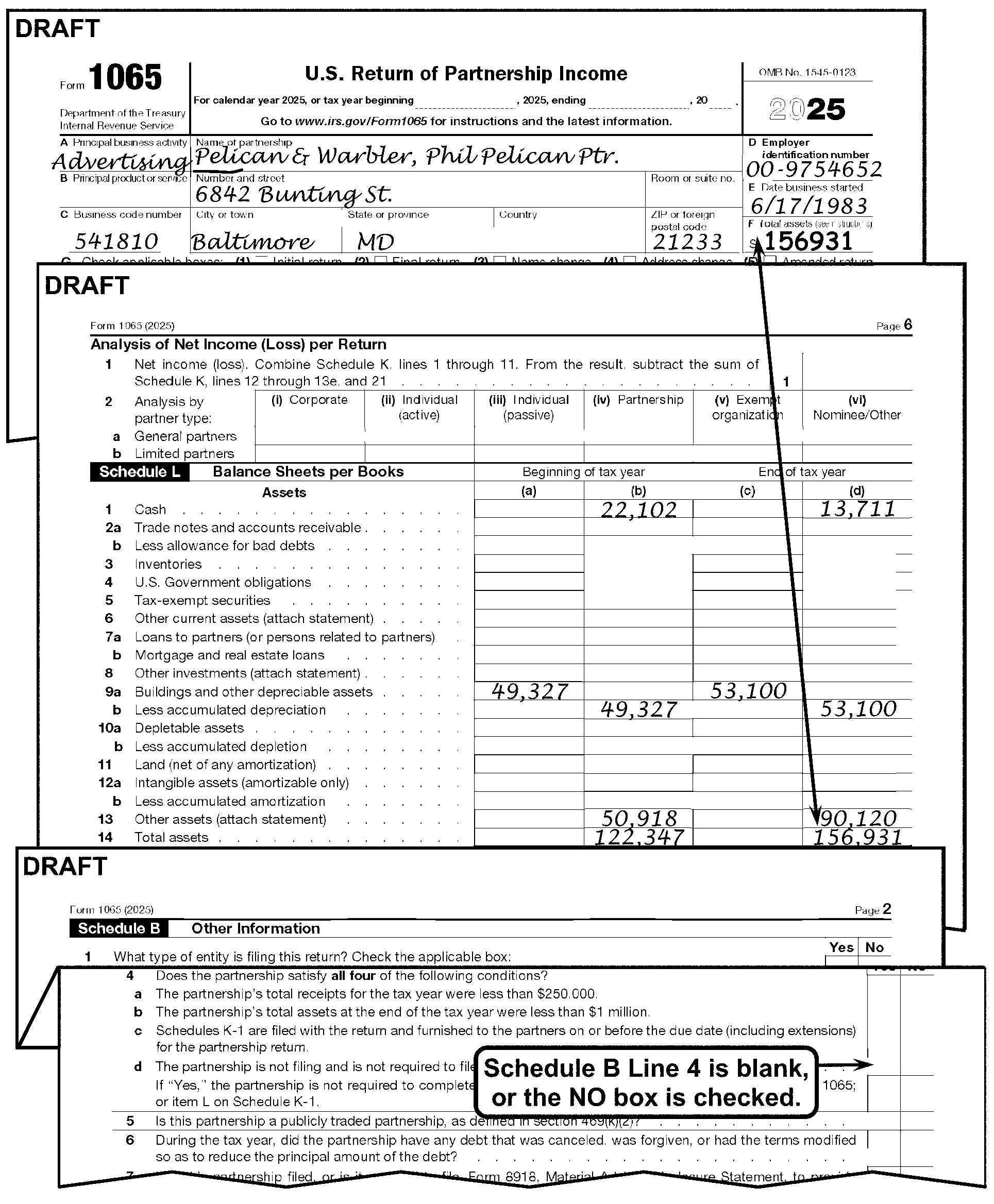
-
Edit an Initial Return Code "2" in the margin to the left of Line G if any of the following conditions are met:
-
"Initial Return" box, under the entity area, is checked.
-
Entry in Box "E" , "Date Business Started" , has a date which is within 12 months from the Tax Period ending date.
-
Partnership notation such as, "FIRST RETURN" , "NEW CORPORATION" "NEW PARTNERSHIP" , etc., See Figure 3.11.15-20 below.
-
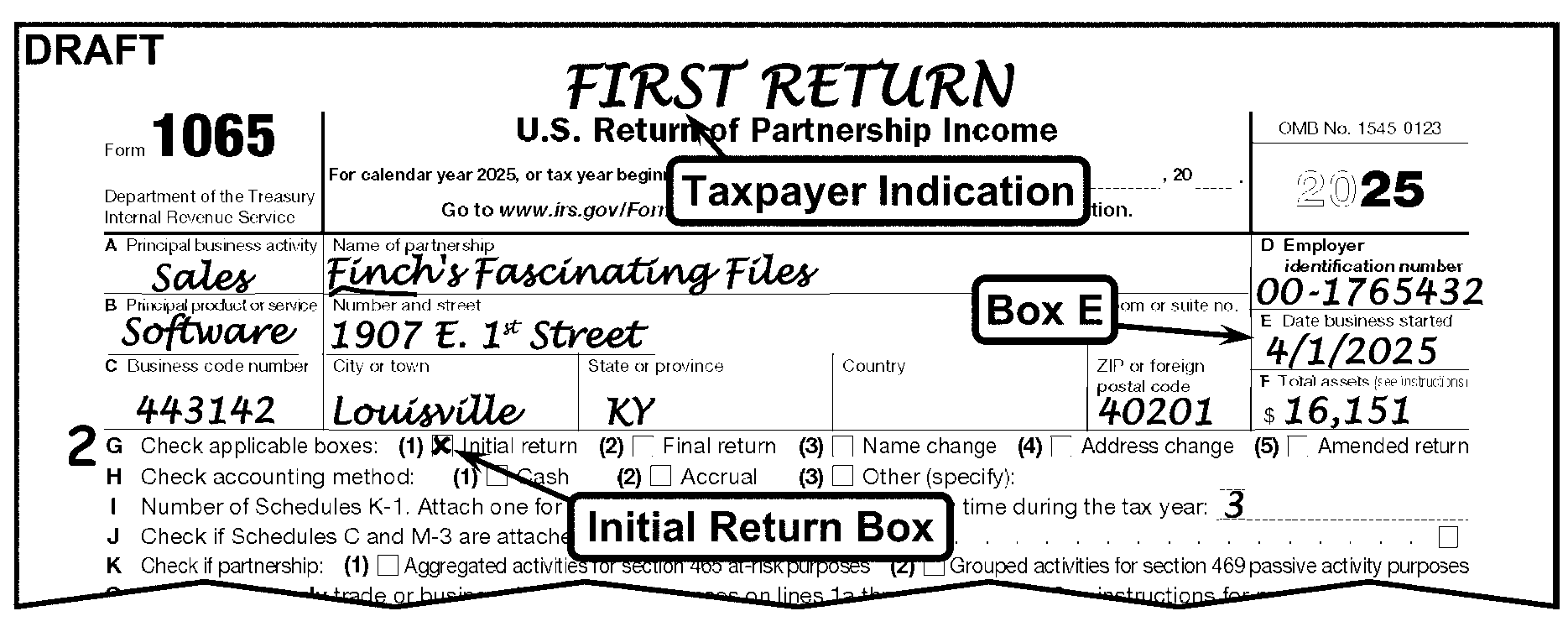
-
Do not edit the Technical Termination Code on returns with a Tax Period Beginning date of 01-01-2018 or later.
-
For Tax Periods 201712 and before, if Line G box (6) is checked and box (3), (4), and (5) are not checked, then edit the Technical Termination Code "1" just left of box (6).
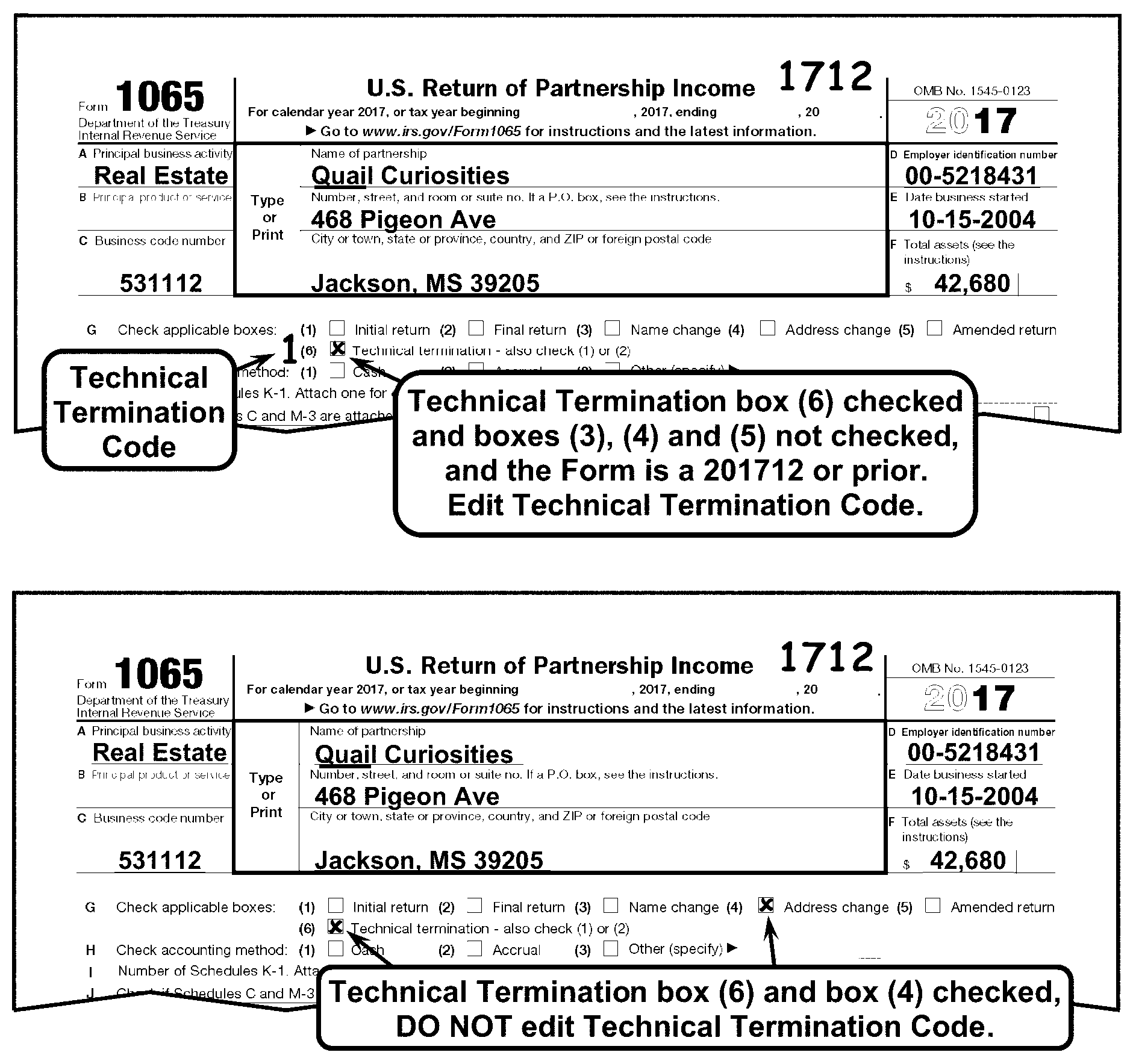
-
Computer Condition Codes (CCC) identify special conditions or computations for the computer. CCCs post to the Master File.
-
CCCs are edited to the center of the dotted portion on Line 2. "Cost of goods sold" Form 1065. See Figure 3.11.15-22 below.
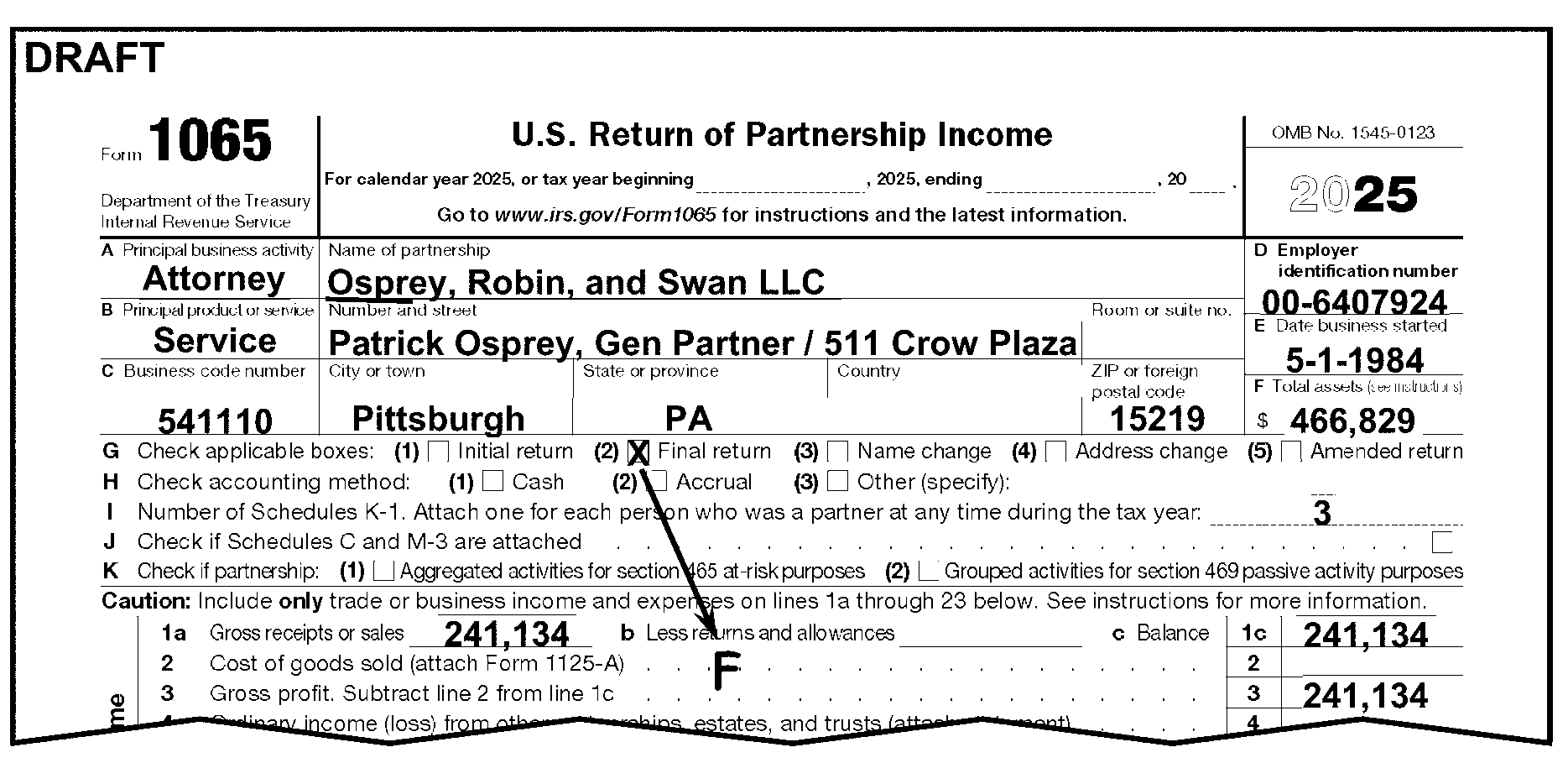
-
Edit CCC "B" when any of the following conditions are met:
-
Schedule M-3 box (Line J on Form 1065 or Form 1065-B) is checked or
-
A Schedule M-3 is attached.
-
-
Edit Audit Code "8" if Schedule M-3 is attached to Form 1065 or Form 1065-B. See IRM 3.11.15.20.1, Audit Codes.
-
Do not edit CCC "D" if the taxpayer requests abatement for "Failing to Pay Timely" when the return is submitted. Send Letter 1382C, Penalty Removal Request Incomplete, to inform the taxpayer of the proper procedure to follow to request penalty abatement when a penalty is assessed.
-
IMPORTANT: Edit CCC "D" if an internal use form (i.e., Form 13133, Expedite Processing Cycle) or routing slip is attached and shows "DO NOT ASSESS FAILURE TO PAY PENALTY" .
-
Edit CCC "F" when the "Final Return Box" is checked or there is another indication the partnership is not liable for future returns. Notations may include (but are not limited to):
-
Final
-
Deceased
-
Out of Business
-
Liquidation
-
Exempt under IRC 501(c)(3)
-
Dissolved
-
Cites IRC 708(b)(1)(B)(for taxable years ending on or before 12/31/2017).
-
Notates "Filed in accordance with Rev. Proc. 2003-84" .
-
Return is a "Nominee" return.
-
"761(a) election" notated and is accepted by Examination.
-
-
Edit CCC "I" (i) when Form 6781 (Gains and Losses From Section 1256 Contracts and Straddles) is attached. See Figure 3.11.15-23 below.
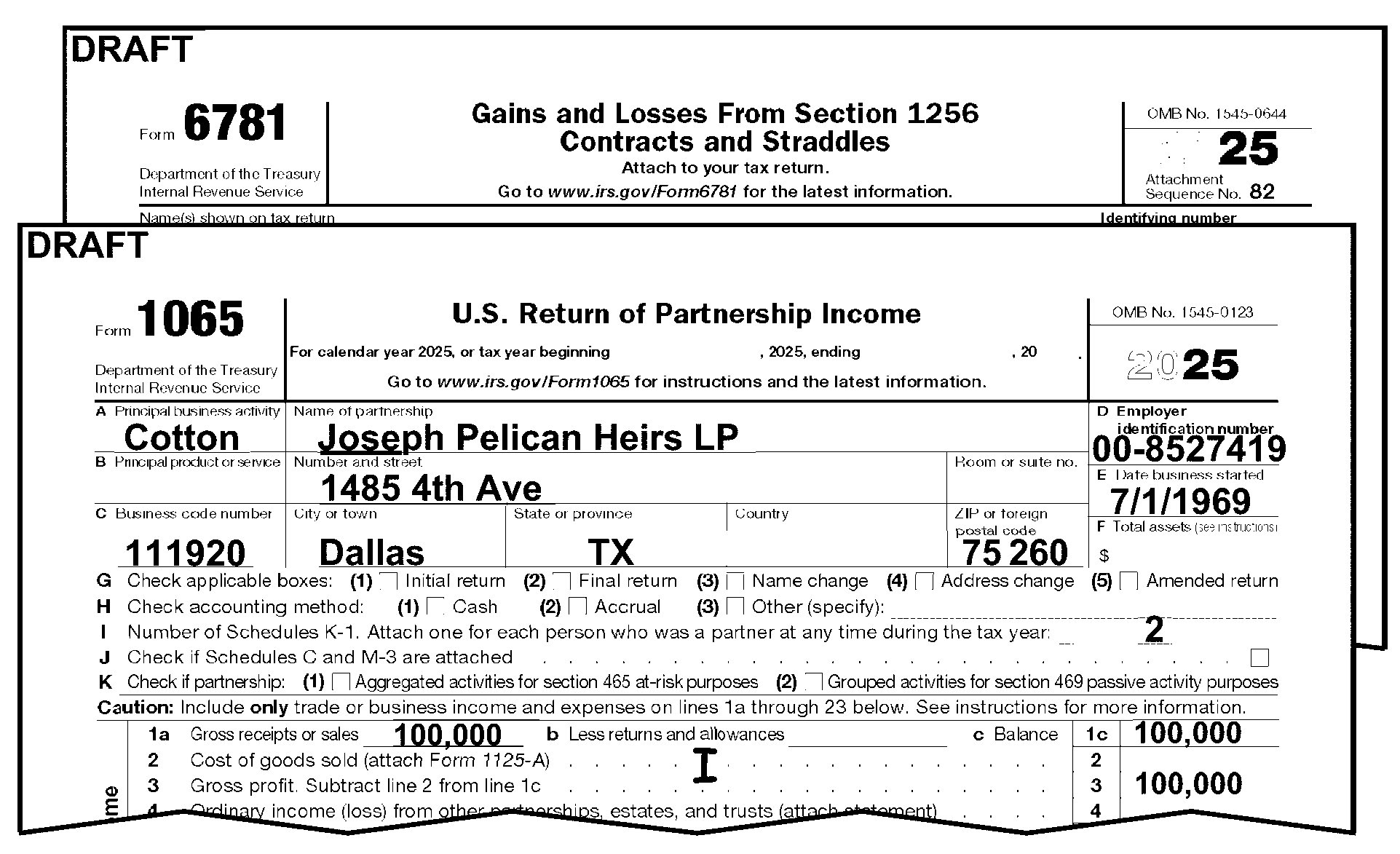
-
CCC "J" is used to show a Section 965 return. See IRM 3.11.15.5.2, Section 965 Returns, for more information.
-
Edit CCC "J" when any of the following are present:
-
"Section 965" or "965 Tax" (or similar language) notated on the return, attachments, or statements.
-
IRC 965 Transition Tax Statement (or similar statement) attached. Section 965 is applicable for tax years 201712 through 202012.
-
A significant entry is present on Line 11 or Line 13d of Schedule K, with the notation "Section 965" (or similar) statement.
-
-
Also edit Action Code 460 when any of the above criteria is met. See IRM 3.11.15.2.5, Action Codes.
-
Edit CCC "L" when taxpayer attaches Form 8833, Treaty-Based Return Position Disclosure Under Section 6114 or 7701(b), to the return.
-
Edit CCC "M" when both of the following conditions are present:
-
Tax Period is 201712 or later, and
-
Form 8949, Sales and Other Dispositions of Capital Assets, has a code Z or Y in column (f).
-
-
Do not edit CCC "R" when a reason is given by the partnership for a delay in filing a return. Issue Letter 1382C, Penalty Removal Request Incomplete and continue editing the return.
-
Edit CCC "R" on the partnership return when any of the following conditions are present:
-
≡ ≡ ≡ ≡ ≡ ≡ ≡ ≡ ≡ ≡ ≡ ≡ ≡ ≡ ≡ ≡ ≡ ≡"≡ ≡ ≡ ≡ ≡ ≡ ≡ ≡ ≡ ≡ ≡ ≡ ≡ ≡ ≡ ≡ ≡ ≡ ≡ ≡ ≡ ≡ ≡" ≡ ≡ ≡ ≡ ≡ ≡ ≡ ≡ ≡ ≡ ≡ ≡ ≡ ≡ ≡ ≡ ≡ ≡ ≡ ≡"≡ ≡ ≡"
-
"≡ ≡ ≡ ≡ ≡ ≡ ≡" ≡ ≡ ≡"≡ ≡ ≡ ≡ ≡ ≡ ≡ ≡ ≡" ≡ ≡ ≡ ≡ ≡ ≡ ≡ ≡ ≡ ≡ ≡ ≡ ≡ ≡ ≡ ≡
-
≡ ≡ ≡ ≡ ≡ ≡ ≡ ≡ ≡ ≡ ≡ ≡ ≡ ≡ ≡ ≡ ≡ ≡ ≡ ≡ ≡ ≡ ≡ ≡ ≡ ≡ ≡ ≡ ≡ ≡ ≡ ≡ ≡ ≡ ≡ ≡ ≡ ≡ ≡ ≡ ≡ ≡ ≡ ≡ ≡ ≡ ≡ ≡ ≡ ≡ ≡ ≡ ≡ ≡ ≡ ≡ ≡ ≡ ≡ ≡ ≡ ≡ ≡ ≡ ≡ ≡ ≡ ≡ ≡ ≡ ≡ ≡ ≡ ≡ ≡ ≡ ≡ ≡ ≡ ≡ ≡ ≡ ≡ ≡ ≡ ≡ ≡ ≡ ≡ ≡ ≡ ≡ ≡ ≡ ≡ ≡ ≡≡ ≡ ≡ ≡ ≡ ≡ ≡≡ ≡ ≡ ≡ ≡ ≡ ≡ ≡ ≡ ≡ ≡ ≡ ≡ ≡ ≡ ≡ ≡ ≡ ≡ ≡ ≡ ≡ ≡ ≡ ≡ ≡ ≡ ≡ ≡ ≡ ≡ ≡ ≡ ≡ ≡ ≡ ≡ ≡ ≡ ≡ ≡ ≡ ≡ ≡ ≡ ≡ ≡ ≡ ≡ ≡ ≡ ≡ ≡ ≡ ≡ ≡ ≡ ≡ ≡ ≡
-
≡ ≡ ≡ ≡ ≡ ≡ ≡ ≡≡ ≡ ≡ ≡ ≡ ≡ ≡ ≡ ≡ ≡ ≡ ≡ ≡ ≡ ≡ ≡ ≡ ≡ ≡ ≡ ≡ ≡ ≡ ≡ ≡ ≡ ≡ ≡ ≡ ≡ ≡ ≡ ≡ ≡ ≡ ≡ ≡ ≡ ≡ ≡ ≡ ≡ ≡ ≡ ≡ ≡ ≡ ≡ ≡ ≡≡ ≡ ≡≡ ≡ ≡ ≡ ≡ ≡ ≡ ≡ ≡≡ ≡ ≡ ≡ ≡ ≡ ≡ ≡ ≡ ≡ ≡ ≡ ≡ ≡ ≡ ≡≡ ≡ ≡ ≡ ≡ ≡ ≡ ≡ ≡≡ ≡ ≡≡ ≡ ≡ ≡ ≡ ≡ ≡ ≡ ≡ ≡ ≡≡ ≡ ≡
Note:
≡ ≡ ≡ ≡ ≡"≡ ≡ ≡ ≡ ≡ ≡ ≡ ≡ ≡ ≡" ≡ ≡ ≡ ≡ ≡ ≡ ≡ ≡ ≡ ≡ ≡ ≡ ≡ ≡ ≡ ≡ ≡ ≡ ≡ ≡ ≡ ≡ ≡ ≡ ≡ ≡ ≡ ≡ ≡ ≡ ≡ ≡ ≡ ≡ ≡ ≡ ≡ ≡ ≡ ≡ ≡ ≡ ≡ ≡ ≡ ≡ ≡ ≡ ≡ ≡ ≡ ≡ ≡ ≡ ≡ ≡ ≡ ≡ ≡ ≡ ≡ ≡ ≡ ≡ ≡ ≡ ≡ ≡ ≡ ≡ ≡ ≡ ≡ ≡ ≡ ≡ ≡ ≡ ≡ ≡ ≡ ≡ ≡ ≡ ≡ ≡≡ ≡ ≡ ≡ ≡ ≡ ≡ ≡≡ ≡ ≡ ≡ ≡ ≡ ≡ ≡ ≡ ≡ ≡ ≡ ≡ ≡ ≡ ≡ ≡ ≡ ≡ ≡ ≡
-
-
Edit CCC "S" when Form 8883, Asset Allocation Statement under Section 338, is attached.
-
Edit CCC "W" when Statute Control cleared the return. See IRM 3.11.15.5.1, Statute Returns
-
Edit CCC "X" on partnership returns filed by Publicly Traded Partnerships that include a tax computation of 3.5% in the margin to the right of Line 23 (Form 1065) or an attachment. See IRM 3.11.15.23.16, and IRM 3.11.15.77, Publicly Traded Partnerships.
-
Edit CCC "X" on partnership returns if Form 8697, Interest Computation Under the Look-Back Method for Completing Long-Term Contracts or Form 8866, Interest Computation Under the Look-Back Method for Property Depreciated Under the Income Forecast Method is attached and a $ amount (interest due) is written by the taxpayer in the bottom margin of Form 1065. See Exhibit 3.11.15-2, Routing Guide for Attachments, for instructions regarding Form 8697 and Form 8866.
-
Edit CCC "1" if Form 8824, Like-Kind Exchange, is attached.
-
Edit CCC "2" if Form 8938, Statement of Specified Foreign Financial Assets, is attached. See IRM 3.11.15.25.16, Form 8938 - Statement of Specified Foreign Financial Assets (Question 20).
-
Edit CCC "3" when the partnership return is unprocessable, and there is a sign that correspondence was sent and no reply received.
-
Edit CCC "5" when the partnership return is identified as a "Common Trust" . See IRM 3.11.15.5.8.2, Common Trusts.
-
Edit CCC "6" when the return has more than 100 partners and any of the following conditions are present:
-
Inactive return
-
Nominee return
-
IRC 501(d) religious organization
-
Substitute for Return (SFR)
-
Re-entry/Re-input returns that have previously been e-filed.
-
-
CCC "6" cannot be used with any other Computer Condition Code except"F" , "R" , "W" , "4" , "5" , "8" , and "9" .
-
Edit CCC "8" when a partnership return is identified as a Section 761(a), Return and/or Election and has been selected or accepted by Exam. See IRM 3.11.15.5.8.1, IRC 761(a) Returns.)
-
The number of Schedules K-1 (Form 1065) or number of partners is found on Form 1065, page 1, Line I ("I" as in "Igloo" ). See Figure 3.11.15-24 below.
-
A Schedule K-1 with the notation of "Book/Tax" , "Book/Tax Partner" or similar should be treated as a statement to the return, and should not be processed as a regular Form 1065, K-1.
-
Only a Schedule K-1 (Form 1065) or an attachment to Form 1065 that has the information required on Schedule K-1 is acceptable. Refer to IRM 3.0.101 for complete instructions to edit and process Schedules K-1.
Note:
≡ ≡ ≡ ≡ ≡ ≡ ≡ ≡ ≡ ≡ ≡ ≡ ≡ ≡ ≡ ≡ ≡ ≡ ≡ ≡ ≡ ≡ ≡ ≡≡ ≡ ≡ ≡ ≡ ≡ ≡ ≡≡ ≡ ≡ ≡ ≡ ≡ ≡ ≡ ≡ ≡ ≡ ≡ ≡ ≡ ≡ ≡ ≡ ≡ ≡ ≡ ≡ ≡ ≡ ≡ ≡ ≡ ≡ ≡ ≡ ≡ ≡ ≡
-
Correspond for missing Schedules K-1 (Form 1065) using Letter 1355C only if there are No Schedules K-1 (Form 1065) attached and:
-
Form 1065, Line 23 ≡ ≡ ≡ ≡ ≡ ≡ ≡ ≡ ≡ ≡ ≡ ≡ ≡ ≡ ≡, or
-
Form 8825 is attached, Line 23 on Form 8825≡ ≡ ≡ ≡ ≡ ≡ ≡ ≡ ≡ ≡ ≡ ≡ ≡ ≡ ≡, or
-
The exceptions in paragraph (5) below are not met.
-
-
Do not correspond for missing, incomplete, or incorrect (See paragraph (4) above) Schedules K-1 (Form 1065) or number of partners (Line I) on the following types of return. Instead, edit Line I (i) as follows:
If Then Amended Return ("G" coded) - See IRM 3.11.15.5.7, Amended Returns, Do not edit Line I. Final Return - See IRM 3.11.15.16.4, Edit "2" on Line I. Reinput/Re-entry document - See IRM 3.11.15.5.5, Edit "2" on Line I. Returns filed for TY2022 and before. , Edit "2" on Line I. Short Record Return: -
761(a) return - See IRM 3.11.15.5.8.1
-
Common trust - See IRM 3.11.15.5.8.2
-
Nominee return - See IRM 3.11.15.5.8.3
-
Inactive return - See IRM 3.11.15.5.8.4
Edit "2" on Line I. Section 501(d) return (Religious and Apostolic Organizations), Edit "2" on Line I. Substitute for Return (SFR) - See IRM 3.11.15.5.4 and IRM 3.11.15.5.4.3, Edit "2" on Line I. IRC 6020(b) return - See IRM 3.11.15.5.4.1, Edit "6" on Line I. Treas. Regs. 1.736-1 (Payment to Retiring Partner), Edit "2" on Line I. Form 1065, Line 23 ≡ ≡ ≡ ≡ ≡ ≡ ≡ ≡ ≡ ≡ ≡ ≡ ≡ ≡ ≡, and, if attached, Form 8825, Line 23 ≡ ≡ ≡ ≡ ≡ ≡ ≡ ≡ ≡ ≡ ≡ ≡ ≡ ≡ ≡ ≡, Edit "2" on Line I. Payee is a foreign entity, Edit "2" on Line I. -
-
A valid entry on Line I must be all numeric "2" through "999,999" .
If Then The partnership has entered a valid numeric on Line I, -
No action required.
-
Continue editing the return.
The partnership has written the number of Schedules K-1 (Form 1065) in a non-numeric fashion ("two" instead of "2" ), -
Edit the numeric equivalent on Line I.
-
Circle the non-numeric characters.
-
Continue editing the return.
Line I is blank or zero and no Schedules K-1 (Form 1065) are attached and does not meet the correspondence exception in paragraph (5), above, -
Correspond for Schedules K-1, Form 1065, using Letter 1355C.
-
Notate the letter sent in the bottom left margin of Form 1065.
-
Continue editing the return.
The partnership has entered "1" on Line I, for the number of partners or as the number of Schedule K-1 attached, See paragraph (7), below. The partnership has entered more than 100 on Line I, See paragraph (8), below. The partnership has entered more than 999,999 on Line I, Edit "999,999" on Line I. Line I is blank and the attached Schedules K-1 (Form 1065) do not appear to exceed 20, -
Count the attached Schedules K-1 (Form 1065) and edit the total to Line I. See Figure 3.11.15-25
-
Continue editing the return.
Line I is blank and the attached Schedules K-1 (Form 1065) exceed 20, -
Correspond for the total number of Schedules K-1 (Form 1065) using Letter 1355C or other approved local correspondence procedures.
-
Notate the letter sent in the bottom left margin of Form 1065.
-
Continue editing the return.
-
-
If the partnership shows the number of Schedules K-1 as "1" , or Line I is blank or zero, and only one K-1 is attached, follow the procedures below:
If Then The partnership shows any of the conditions shown in paragraph (5) above, -
Edit the return following the procedures in paragraph (5) above.
-
Continue editing the return.
There is one Schedule K-1 attached showing 100% interest and the Partnership shows any of the following: or-
Limited Partnership (LP),
-
Limited Liability Partnership (LLP),
-
Limited Liability Company (LLC),
-
Limited Liability Land Trust (LLLT), or
-
Unincorporated Business Organization (UBO)
-
Disregarded Entity
Box b, c or d is checked on Schedule B, Question 1, or
Either box is checked on Schedule K-1, Part II, Line G.-
Edit CCC "F" .
-
Circle out the number "1" .
-
Edit "2" on Line I.
-
Advise the partnership that we are deleting the partnership filing requirement with a non-suspense letter. Use Letter 3733C.
-
Notate the letter sent in the lower left margin of Form 1065.
-
Continue editing the return.
There is one Schedule K-1 attached showing 100% interest and the Partnership does not show any of the following: -
Limited Partnership (LP),
-
Limited Liability Partnership (LLP),
-
Limited Liability Company (LLC),
-
Limited Liability Land Trust (LLLT), or
-
Unincorporated Business Organization (UBO)
-
Disregarded Entity
-
Correspond using Letter 1355C or other approved local correspondence procedures, informing the partnership that they cannot have a 100% partner. Ask for an explanation.
-
Notate the letter sent in the bottom left margin of Form 1065.
-
Continue editing the return.
Schedule K-1 (Form 1065) shows two names in the Partner's Name and Address Section, -
Correspond requesting separate Schedules K-1 (Form 1065) using Letter 1355C or other approved local correspondence procedures.
-
Notate the letter sent in the bottom left margin of Form 1065.
-
Continue editing the return.
There is only one Schedule K-1 (Form 1065) attached that does not show 100% interest or no Schedules K-1 attached, There is one Schedule K-1 attached showing 100% interest and the return is for an IRC 501(d), Religious or Apostolic Organization -
Edit "2" on Line I.
-
Continue editing the return.
-
-
For partnership with more than 100 Schedules K-1 (Form 1065), check the return and attachments for any indication from the partnership requesting a waiver from filing electronically or a request for abatement of the failure to file on correct media penalty.
If Then A letter is attached requesting a waiver or exemption from filing electronically, "WAIVER REQUEST; IRC 6011(E)(2)" , -
Detach the letter.
-
Fax the request to:
Ogden IRS Campus
E-File Team 203
(801) 620-7622
(ensure the name, address, EIN, Tax Period and mailing address of the partnership is on the request) -
Show on the fax that the "WAIVER REQUEST WAS RECEIVED WITH THE ORIGINAL RETURN" .
-
Edit the number of Schedules K-1.
-
Continue editing the return.
A letter is attached requesting abatement of the failure to file on correct media (electronic) penalty, -
Detach the letter.
-
Fax the request to:
Ogden IRS Campus
E-File Team 203
(801) 620-7622
(ensure the name, address, EIN, Tax Period and mailing address of the partnership is on the request) -
Show on the fax that the "WAIVER REQUEST WAS RECEIVED WITH THE ORIGINAL RETURN" .
-
Edit the number of Schedules K-1 (Form 1065) on Line I.
-
Continue editing the return.
No indication on return or letter is attached, -
Edit the number of Schedules K-1 (Form 1065) to Line I.
-
Continue editing the return.
-
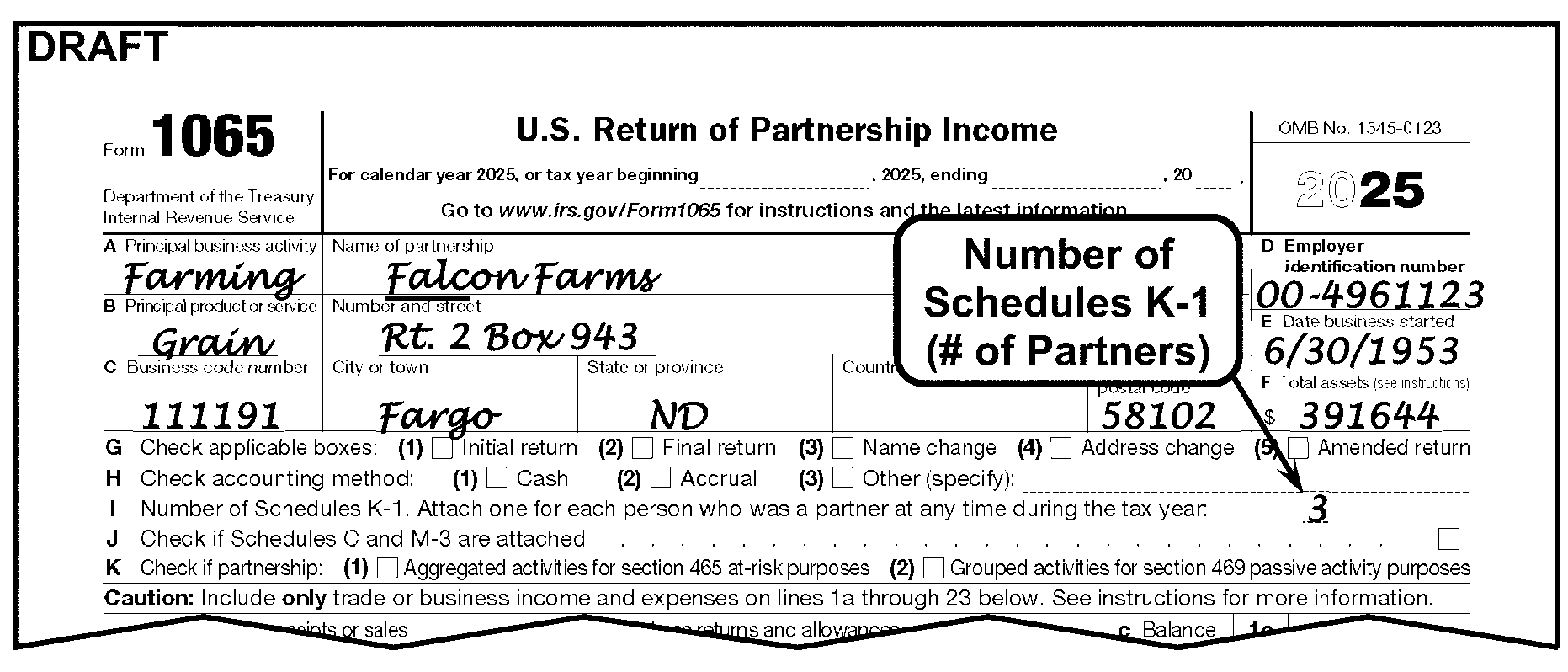
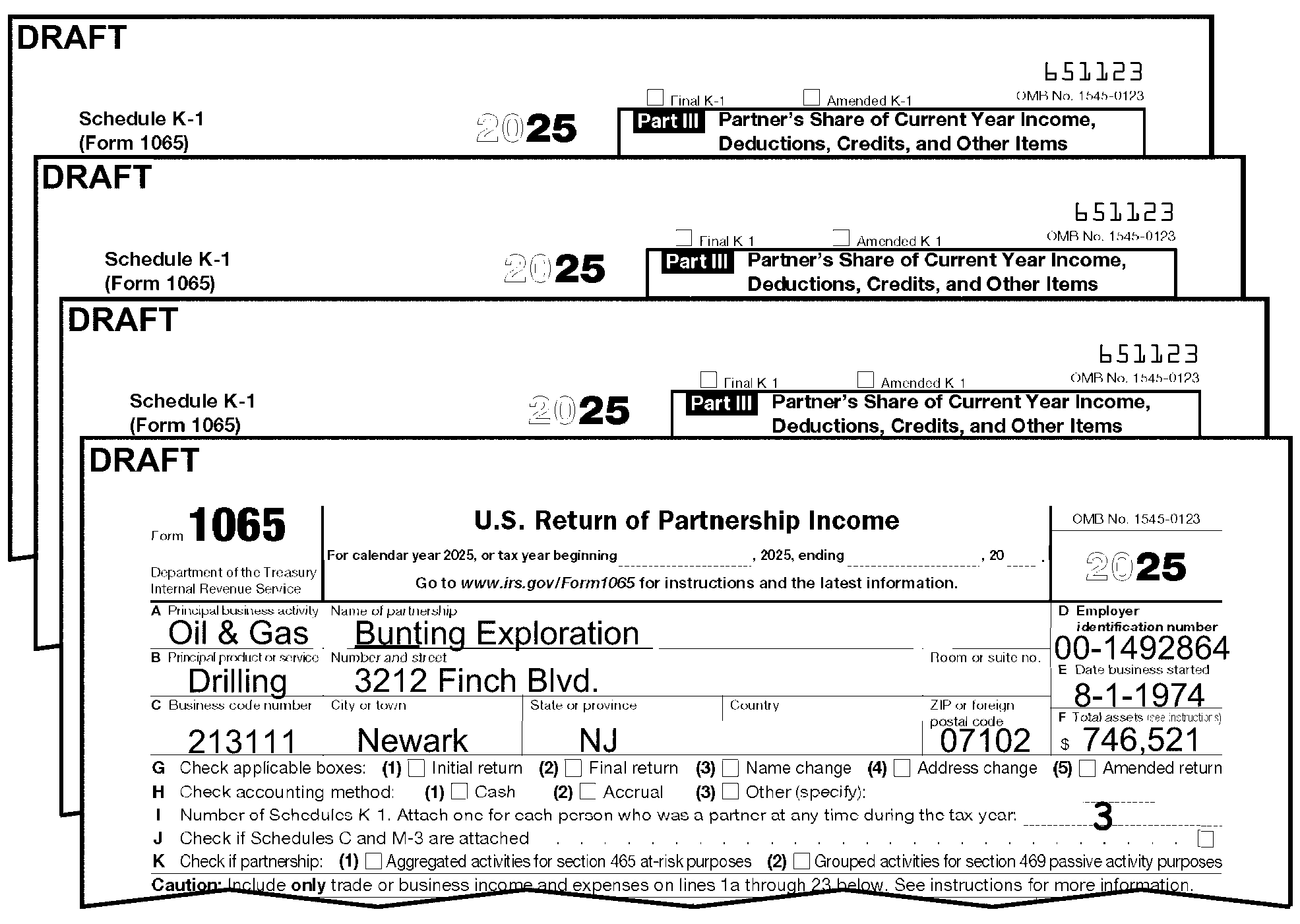
-
Edit a "1" to the right of page 1, in the right margin next to Line 9 (on Form 1065) if an entry greater than zero is present on any of the following:
-
Form 1065, page 1, Line 9,
-
Schedule C (Form 1040), Line 26,
-
Schedule F (Form 1040), Line 22, (2010 and before revisions, Schedule F, Line 24) See Figure 3.11.15-26 below.
-
Form 8825, Line 13, Column A through H
-
Form 1125-A, Line 3,
-
Form 4835, Line 20, or
-
An attachment showing an amount for salaries, wages or labor.
-
-
DO NOT edit for the following:
-
Contract, outside, custom or miscellaneous labor,
-
Temporary help,
-
Management fees,
-
Janitorial service (or any other type of service),
-
Maintenance fees, or
-
Commissions.
-
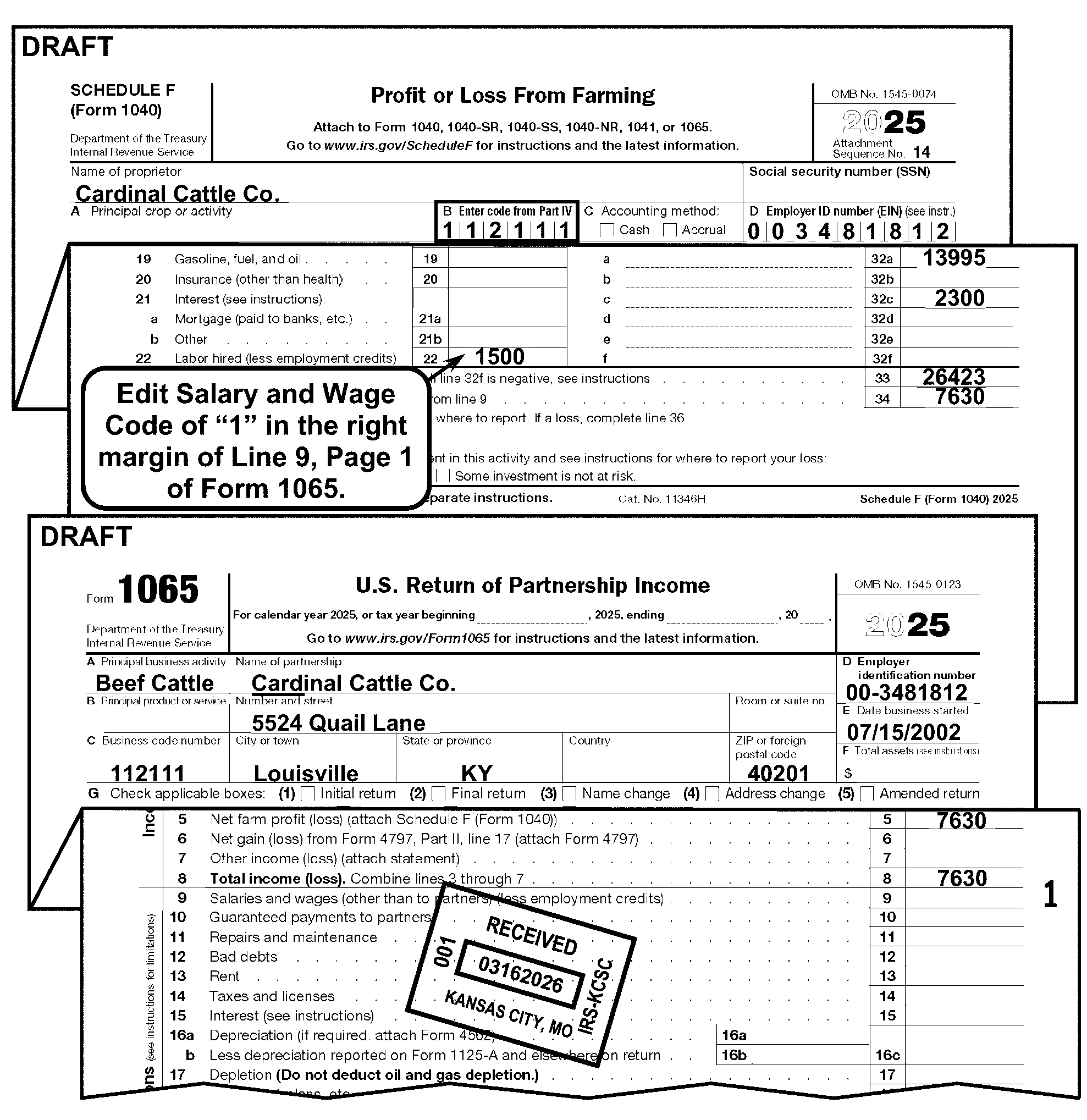
-
The Employee Plan Master File (EPMF) is a master file maintained at Enterprise Computing Center at Martinsburg (ECC-MTB). This file consists of various types of tax sheltered Pension/Profit Sharing Plans.
-
Edit a “1” to the right of page 1, in the right margin next to Line 18 on Form 1065 if an entry greater than zero (±) is present on any of the following:
-
Form 1065, page 1, Line 18,
-
Schedule C (Form 1040), Line 19,
-
Schedule F (Form 1040), Line 23,
-
Form 4835 (Form 1040), Line 21, or
-
An attachment showing an amount for retirement plan, pension and/or profit sharing.
-
-
This subsection gives instructions for editing additional Partnership perfection codes.
-
Entries are edited in the left margin next to Line 9 of Form 1065.
-
Edit entries in numeric order, such as, "1- 4" , "4-1" .
If Then Audit Code, Edit "1" followed by proper Audit Code (i.e., "1- 4" ). See IRM 3.11.15.20.1 Special Income Code, Edit "2" followed by the Special Income Code "1" (i.e., "2 - 1" ). See IRM 3.11.15.20.2 Installment Sale Indicator, Edit "3" followed by the proper Installment Sale Indicator. (i.e., "3 - 1" ). See IRM 3.11.15.20.3 Nonrecourse Loan Code, Edit "4" followed by the Nonrecourse Loan Code "1" (i.e., "4 - 1" ). See IRM 3.11.15.20.4 Historic Structure Code, Edit "6" followed by the Historic Structure Code "3" (i.e., "6 - 3" ). See IRM 3.11.15.20.5 Penalty and Interest Code Edit 7 followed by the Penalty and Interest Code 1 (i.e., 7-1), See IRM 3.11.15.20.6.
-
-
RPCs are edited in the right margin next to Line 1c of Form 1065. See IRM 3.11.15.20.7.
-
No more than 15 audit codes may be used at one time.
-
Edit Audit Codes in the left margin next to Line 9 of Form 1065.
-
Edit as "1 -" followed by the correct code(s).
-
Edit Audit Code "1" if any of the following forms or conditions are present:
-
Form 8082, Notice of Inconsistent Treatment or Administrative Adjustment Request (AAR), is attached.
-
Form 8275, Disclosure Statement, is attached or a statement referring specifically to IRC 6662 (Disclosure) or IRC 707 (Disguised Sale).
-
Form 8275-R, Regulation Disclosure Statement, is attached.
-
Form 8886, Reportable Transaction Disclosure Statement, is attached.
-
Section 761(a) election that is selected for examination.
-
Form 1065 has the notation Disregarded Entity in the header or entity portion of the return (on page 1, Form 1065)
-
-
Edit Audit Code "2" if any of the following forms and/or conditions are present:
-
Form 1065, page 2, Schedule B, Box 1(e), Foreign Partnership is checked.
-
Form 1065, page 2, Schedule B, Question 9* (Foreign Trust) is answered "Yes" . *(Prior year revision, Question 11).
-
Form 1065, page 3, Schedule B, Question 13* (Form 8858) has an entry ≡ ≡ ≡ ≡ ≡ ≡ ≡ ≡ ≡ ≡ ≡ ≡. *(Prior year revision, Question 15).
-
Form 1065, page 3, Schedule B, Question 14* (Form 8805) has an entry ≡ ≡ ≡ ≡ ≡ ≡ ≡ ≡ ≡ ≡ ≡ ≡ ≡ ≡. *(Prior year revision, Question 16).
-
Form 1065, page 3, Schedule B, Line 15* has an entry ≡ ≡ ≡ ≡ ≡ ≡ ≡ ≡ ≡ ≡ ≡. *(Prior year revision, Question 17).
-
Form 1065, page 5, Schedule K, Line 21* (Total Foreign Taxes) has an entry ≡ ≡ ≡ ≡ ≡ ≡ ≡ ≡ ≡ ≡ ≡ ≡ ≡ ≡. *(Prior year 2018 - 2021 revision, Line 16p), other *(2017 and prior year revisions, Line 16l).
-
Form 1065-B, page 2, Schedule B, Question 1, Box (e) (Foreign Partnership) is checked.
-
Form 1065-B, page 2, Schedule B, Question 3 (Multiple Partners) is answered "Yes" .
-
Form 1065-B, page 2, Schedule B, Question 4 (Foreign Partners) is answered "Yes" .
-
Form 1065-B, page 2, Schedule B, Question 8 (Foreign Trust) is answered "Yes" .
-
Form 1065-B, page 2, Schedule B, Question 9 (Foreign Disregarded Entity) has an entry greater than 0 (zero).
-
Form 5471, Information Return with Respect to Certain Foreign Corporations, is attached.
-
Form 5472, Information Return of a Foreign Owned Corporation, is attached.
-
Form 5713, International Boycott Report, is attached and both questions in 7(f) are answered "Yes" .
-
Form 8621, Return by a Shareholder of a Passive Foreign Investment Co. or Qualified Electing Fund, is present and Part V Line 15a-16f has an entry ≡ ≡ ≡ ≡ ≡ ≡ ≡ ≡ ≡ ≡ ≡ ≡ ≡ ≡. For prior year revision (2011 and prior) check Part IV, Line 10a - 11f.
-
Form 8804, Annual Return for Partnership Withholding Tax (Section 1446), is attached.
-
Form 8805, Foreign Partners Information Statement of Section 1446 Withholding, is attached.
-
Form 8813, Partnership Withholding Tax Payment, is attached.
-
Form 8832, Entity Classification Election, is attached and box 6(d), 6(e) or 6(f) is checked.
-
Form 8833, Treaty-Based Return Position Disclosure Under Section 6114 or 7701(b), is attached.
-
Form 8858, Information Return of U.S. Persons With Respect to Foreign Disregarded Entities (FDEs) and Foreign Branches (FBs), is attached.
-
Form 8865, Information Return of U.S. Persons With Respect to Certain Foreign Partnerships, is attached.
-
-
Edit Audit Code"3" if the following condition is present:
-
Form 1065, page 5, Schedule K, Lines 19a or 19b has an entry ≡ ≡ ≡ ≡ ≡ ≡ ≡ ≡ ≡ ≡ ≡ ≡ ≡ ≡ ≡.
-
-
Edit Audit Code "4" if the following condition is present:
-
Form 1065, page 5, Schedule K, Line 9c ≡ ≡ ≡ ≡ ≡ ≡ ≡ ≡ ≡ ≡ ≡ ≡ ≡andForm 1065, page 5, Schedule K, Line 10 ≡ ≡ ≡ ≡ ≡ ≡ ≡ ≡ ≡ ≡ ≡.
-
Form 1065-B, Schedule B, Question 2 (Dual Partner Code) is present and the Yes box is checked (valid for Tax Period ending 201811 and before only).
-
-
Edit Audit Code "5" if any of the following forms and/or conditions are present:
-
Form 8594, Asset Acquisition Statement, is attached ≡ ≡ ≡ ≡ ≡ ≡ ≡ ≡ ≡ ≡ ≡ ≡ ≡ ≡ ≡ ≡.
-
Form 8883, Asset Allocation Statement Under Section 338, is attached ≡ ≡ ≡ ≡ ≡ ≡ ≡ ≡ ≡ ≡ ≡ ≡ ≡ ≡ ≡ ≡ ≡ ≡ ≡ ≡ ≡ ≡ ≡ ≡ ≡ ≡ ≡ ≡.
-
-
Edit Audit Code "6" if Form 3115, Application for Change in Accounting Method, is attached.
-
Edit Audit Code "7" if any of the following forms and/or conditions are present:
-
Form 1065, page 2, Schedule B, Question 10a* is answered "Yes" . (Question 7 on Form 1065-B). *(Prior year revision, Question 12a).
-
Form 1065, page 5, Schedule K, Line 21* (Total foreign taxes) is ≡ ≡ ≡ ≡ ≡ ≡ ≡ ≡ ≡ ≡ ≡ ≡ ≡ ≡ ≡. *(Prior year 2021 revision, Line 16p), other *(Prior year revisions, Line 16l).
-
Form 5713, International Boycott Report, is attached and either one or both questions in 7(f) are not answered "Yes."
-
Form 8621, Return by a Shareholder of a Passive Foreign Investment Company or Qualifying Electing Fund, is attached and Part V Line 15a-16f has an entry of ≡ ≡ ≡ ≡ ≡ ≡ ≡ ≡ ≡ ≡ ≡ ≡ ≡. For prior year revision (2011 and before) check Part IV, Line 10a - 11f.
-
-
Edit Audit Code "8" if Schedule M-3, Net Income (Loss) Reconciliation for Certain Partnerships, is attached.
-
Edit Audit Code "9" if Form 1065, page 6, or Form 1065-B, page 5, Schedule M-2, Line 6b (Property Distribution) has an entry ≡ ≡ ≡ ≡ ≡ ≡ ≡ ≡ ≡ ≡ ≡ ≡ ≡ ≡ ≡.
-
Edit Audit Code "C" if Form 8283, Noncash Charitable Contributions, is attached and any of the following conditions are present:
-
Box 2b is checked.
-
Box 2b(1) is checked.
-
Line 3, column h has an entry.
-
-
≡ ≡ ≡ ≡ ≡ ≡ ≡ ≡ ≡ ≡ ≡ ≡ ≡ ≡ ≡ ≡ ≡ ≡ ≡ ≡ ≡ ≡ ≡ ≡ ≡ ≡ ≡ ≡ ≡ ≡ ≡ ≡ ≡ ≡ ≡ ≡ ≡ ≡ ≡ ≡ ≡ ≡ ≡ ≡ ≡ ≡ ≡ ≡ ≡ ≡ ≡ ≡ ≡ ≡ ≡
-
If present, edit Code "2 - 1" in the left margin next to Line 9 of Form 1065.
-
Form 6252, Installment Sale Income, is used to report the sale of property on the installment plan.
-
Codes are based solely on the partnership response to Question 3 on Form 6252. See Figure 3.11.15-27 below.
-
Edit the Installment Sale Indicator in the left margin next to Line 9 of Form 1065.
-
Edit as "3 -" followed by the correct Installment Sale Indicator Code.
-
Valid codes for Installment Sale Indicator are as follows:
Code One Form 6252 Multiple Forms 6252 1 "Yes" response to Question 3, At least one form has a "Yes" response. 2 "No" response to Question 3, All "No" responses, or a combination of "No" and/or blank responses. 3 "Yes" and "No" are checked or Question 3 is blank, Question 3 is blank on all forms.
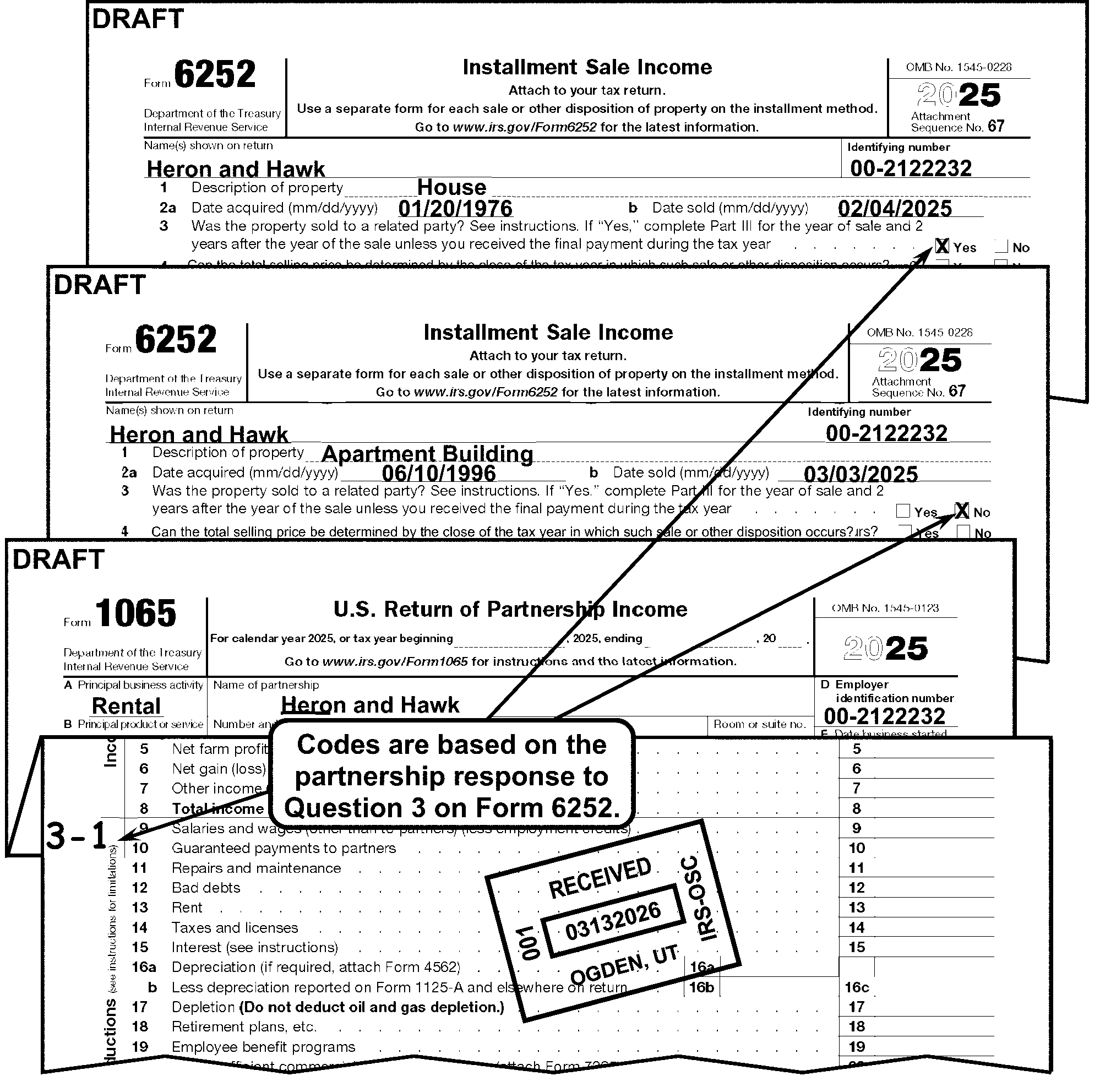
-
Edit a "4 - 1" in the left margin next to Line 9 of Form 1065 for the Nonrecourse Loan Code in the following instances:
-
If there is an entry other than zero on Schedule L, Line 18, Columns (b) or (d) on Form 1065.
-
If Schedule K-1 (Form 1065), Question K, Nonrecourse, Beginning and/or Ending, has an entry other than zero or shows a percent figure or gives indication of any activity (all, half, prorated) rather than a dollar amount, treat the entry as if it is a dollar amount and code accordingly. (If the volume is greater than 20, sample at least 20 Schedules K-1). See Figure 3.11.15-28 below.
-
If Schedule K-1 is for a tax year before 2004, edit a "1" if there is an entry other than zero on the first line under Question f (Nonrecourse).
-
If an attachment shows a nonrecourse loan.
-
-
In all other instances, leave blank.
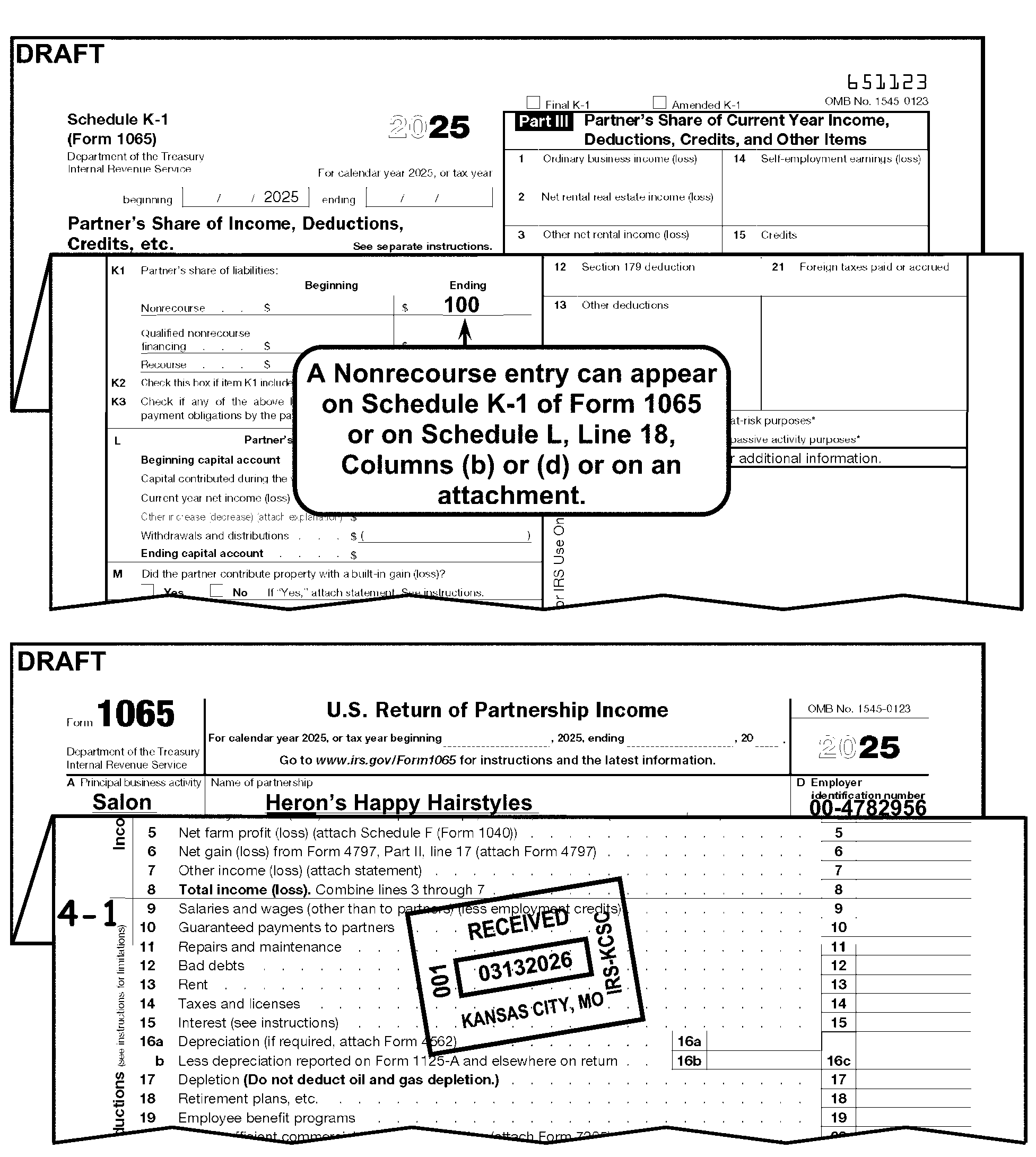
-
Edit a Code "6 - 3" in the left margin next to Line 9 of Form 1065 if the Tax Period is 8312 and later, Form 3468, Investment Credit, is attached, and there is an entry present ≡ ≡ ≡ ≡ ≡ ≡ ≡ ≡ ≡ ≡ ≡ ≡ ≡ on the credit side of any of the following lines:
-
Tax Year 2023 and later - Code "3" if an amount is present on Form 3468, Part VII, Line 1 (Rehabilitation Credit); specifically Lines h and i.
-
Tax Year 2016 to 2022 - Code "3" if an amount is present on Form 3468, Part lll, Line 11 (Rehabilitation Credit); specifically Lines e and f.
-
-
A Return Processing Code (RPC) is an alpha or numeric character used to identify a specific condition for the computer.
-
RPCs are edited on page 1, in the right margin next to Line 1c of Form 1065.
-
Refer to the table below for an explanation of when to edit each RPC.
RPC Explanation A Form 5471, Schedule E, Income, War Profits, and Excess Profits Taxes Paid or Accrued, is attached. B Form 5471, Schedule H, Current Earnings and Profits, is attached. C Form 5471, Schedule I-1, Information for Global Intangible Low-Taxed Income, is attached. D Form 5471, Schedule P, Transfer of Property to a Foreign Corporation, is attached. E Form 8865, Schedule G, Statement of Application of the Gain Deferred Method Under Section 721(c), is attached. F Form 8865, Schedule H, Acceleration Events and Exceptions Reporting Relating to Gain Deferral Method Under Section 721(c), is attached. G Form 5471, Schedule G-1, Cost Sharing Arrangement, is attached. J For tax periods 202201 - 202212, Taxpayer writes IRA22DPE on Form 1065, Line 29, or on an attachment. See IRM 3.11.15.5.3, Elective or Deemed Payment Elections and Credit Transfers. K For tax periods 202201 - 202212, Taxpayer writes IRA22TRE on Form 1065, or on an attachment. See IRM 3.11.15.5.3, Elective or Deemed Payment Elections and Credit Transfers. L Form 7204, Consent to Extend the Time to Assess Tax Related to Contested Foreign Income Taxes - Provisional Foreign Tax Credit Agreement, is attached. M Form 7205, Energy Efficient Commercial Buildings Deduction, is attached. 2 Form 8992, U.S. Shareholder Calculation of Global Intangible Low-Taxed Income (GLTI), is attached. 4 Form 8994, Employer Credit for Paid Family and Medical Leave, is attached. 6 Form 8996, Qualified Opportunity Fund, is attached. 7 Form 8990, Limitation on Business Interest Expense IRC 163(j), is attached. 9 Form 8997, Initial and Annual Statement of Qualified Opportunity Fund (QOF) Investments, is attached.
-
The following information will enable you to perfect tax data.
-
Edit the following line items per these guidelines:
-
Edit all monetary amounts as dollars only.
-
Do not edit a vertical line, 00, dash or decimal point in a dollars and cents field when the partnership has entered dollars only.
-
On monetary amounts with a decimal point present, do not edit unless otherwise specified.
-
If any of the transcribed tax data lines are missing, compute the correct entry from available figures on the return or attachments. If entry cannot be determined, leave blank.
-
Any misplaced entries must be moved to the correct line. The entry on the incorrect line must be deleted.
-
If the correct line for the misplaced entry cannot be determined, move to the "Other" line.
-
-
This subsection gives instructions for editing Lines 1a through 8 of Form 1065.
-
Do not bracket any entry, unless editing or computing a negative amount.
-
Perfect all illegible or misplaced entries (when possible).
-
Delete misplaced entries and edit to the correct lines.
If Then The partnership shows missing entries are supported by schedules or there are missing entries on Lines 1a through 8, -
Check the schedules and edit TOTAL figures to Lines 7 and 8 of Form 1065.
-
If no schedule(s) attached, leave corresponding entries blank.
Lines 1a through 8 are missing and can’t be determined from an attachment, Combine Lines 21 and 22 (if present) and edit the amount to Lines 7 and 8 of Form 1065. -
-
Edit Lines 1a and 1b as follows:
If And Then Line 1a is blank, Amount is present on Line 1b, Edit the amount on Line 1a from the sum of Lines 1b and Line 1c. Line 1a is blank, Amount is not present on Line 1b, Edit the amount from Line 1c on Line 1a. Line 1b is blank, Amount is present on Line 1a and the amount on Line 1c is less than Line 1a, Edit the difference between Line 1a and Line 1c on Line 1b. Line 1b is blank Amount is present on Line 1a and no amount is present on Line 1c, If Line 3 is present, then compute and edit the amount on Line 1b (Line 3 plus Line 2 minus Line 1a).
-
Cost of goods sold is reported on Line 2 of Form 1065.
-
If Line 2 is blank, edit from Form 1125-A, Line 8 (IMPORTANT: 2010 and before revisions - this information was entered from Schedule A (Form 1065), Line 8). Bracket if necessary
If And Then Line 2 is blank, There is an entry on Line 8, Form 1125-A, Edit amount from Line 8, Form 1125-A to Line 2 of Form 1065. Line 2 is blank, Line 8 (Form 1125-A) is also blank, Subtract Line 7 from Line 6 on Form 1125-A and edit to Line 2 of Form 1065. Line 2 is blank, Lines 7 and 8 (Form 1125-A) are blank, Edit the amount from Line 6 (Form 1125-A) to Line 2 of Form 1065. If Line 2 is present Form 1125-A is not attached, Dummy Form 1125-A.
-
Line 3, Gross Profit, will be the amount calculated by subtracting Line 2 from Line 1c.
-
Though Line 3 is not a T-line, it may be necessary to compute this line in the following instances:
If Then Line 3 is blank, Compute only if needed to compute Line 8 (Total income) amount. Line 3 has an entry, Accept the partnership entry. Use the partnership entry, if needed, to compute Line 8 (Total income) amount.
-
Ordinary income or loss from other partnerships and fiduciaries is reported on Line 4 of Form 1065.
-
≡ ≡ ≡ ≡ ≡ ≡ ≡ ≡ ≡ ≡ ≡ ≡ ≡ ≡ ≡
-
The net profit or loss from farming is reported on Line 5 of Form 1065.
-
This entry is supported by Schedule F (Form 1040), Profit or Loss From Farming, or an attached schedule.
-
If Line 5 is blank, edit the Net Farm Income or Loss from Schedule F (Form 1040), Line 34 or attached schedule.
-
-
≡ ≡ ≡ ≡ ≡ ≡ ≡ ≡ ≡ ≡ ≡ ≡ ≡ ≡ ≡ ≡ ≡
-
See IRM 3.11.15.29, Schedule F - Profit or Loss From Farming for Schedule F editing procedures.
-
The net gain or loss on the sale of property used in a trade or business shown on Line 17 of Form 4797, Sale of Business Property is reported on Line 6 of Form 1065.
Reminder:
If Form 4797, Line 1b and/or Line 1c is present and attached to Form 1065, place in sequence order to be transcribed. See IRM 3.11.15.2.2, Sequence of Return - Form 1065.
If Then Line 17 of Form 4797 includes the amount from Line 7 of Form 4797 (amount shown on Line 11 or 12 of Form 4797), -
Adjust Line 17 to delete the Line 7 amount.
-
Edit the corrected amount from Line 17 to Line 6 of Form 1065.
-
Edit Line 7 of Form 4797 to Line 10 of Schedule K.
-
Continue editing the return.
There is an entry on Line 17 of Form 4797 and the amount is not reported on either: -
Line 3c of Schedule K, or
-
Line 21 of Form 8825 or on an attachment to Form 8825,
-
Edit Line 17 amount to blank Line 6 of Form 1065.
-
Continue editing the return.
There is an entry on Line 17 of Form 4797 and the amount is reported on either: -
Do not edit the amount to Line 6 of Form 1065.
-
Continue editing the return.
-
-
See IRM 3.11.15.26.1, Line 2, Schedule K for more editing procedures.
-
Other income or loss not shown on lines 1a through 6 is reported on Line 7 of Form 1065.
-
An amount on Line 7 may be supported by an attached statement.
If Then A statement is not attached, ≡ ≡ ≡ ≡ ≡ ≡ ≡ ≡ ≡ ≡ ≡ ≡ ≡ ≡ ≡ ≡ ≡. The attachment shows the type of income to be the same as that reported on any Line 1a through 6, Decrease the Line 7 amount by that amount and increase the appropriate income line (Lines 1a through 6). Line 7 is blank or illegible and "Other Income" is reported on an attachment to Form 1065, Determine if the amount has been reported elsewhere on the return, if unable to determine, edit the amount to Line 7 of Form 1065. -
Line 7 may include an amount from Form 6478 (Alcohol and Cellulosic Biofuel Fuels Credit). If Form 6478 is attached with a significant amount on *Line 5(c) or Line 8, edit Action Code 343.
-
The total income or loss (sum of Lines 3 through 7) is reported on Line 8 of Form 1065.
If Then There is an amount present for Total Income on Line 8 but the amount is not identified on Lines 1a through 7 and/or attachments, Edit the Line 8 amount to Line 7 of Form 1065. Line 8 is blank but there are significant entries on Lines 1a through 7, Compute and edit Line 8 of Form 1065.
-
This subsection gives instructions for editing Line 9 through 23 on Form 1065.
-
Do not bracket any entry, unless editing or computing a negative amount.
-
Perfect all illegible or misplaced entries (when possible).
-
Delete misplaced entries and edit to the correct lines.
-
"X" any negative amount on Line 9, 10, 13, 14, or 15, and include in the calculation for Line 21, "Other Deductions" .
-
Payments made to partners for services or for the use of capital is reported on Line 10 of Form 1065.
-
Entry must be positive.
-
Accept the partnership entry.
-
The cost of incidental repairs and maintenance that do not add to the value of the property or prolong its life is reported on Line 11 of Form 1065.
-
Accept the partnership entry.
-
Total debts that became worthless during the year is reported as bad debts on Line 12 of Form 1065.
-
Accept the partnership entry.
-
The rent paid on business property used by the partnership is reported on Line 13 of Form 1065.
-
Entry must be positive.
-
Accept the partnership entry.
-
Taxes and licenses paid by the partnership are reported on Line 14 of Form 1065.
-
Entry must be positive.
-
Accept the partnership entry.
-
Interest paid by the partnership is reported on Line 15 of Form 1065.
-
Entry must be positive.
-
Accept the partnership entry.
-
The depreciation claimed on the partnership assets is reported on Lines 16a through 16c.
If And Then Lines 16a and 16c are blank, There is an entry on Line 16b, Arrow Line 16b to Line 16c. Lines 16b and 16c are blank, There is an entry on Line 16a, Arrow Line 16a to Line 16c on Form 1065. Line 16c is blank, There are entries on Lines 16a and 16b, Subtract Line 16b from Line 16a and edit the result to Line 16c of Form 1065.
-
The partnership reports a deduction for depletion on Line 17 of Form 1065.
-
Accept the partnership entry.
-
Partnership contributions to employee benefit programs (e.g., insurance, health and welfare programs) is reported on Line 19 of Form 1065.
-
Accept the partnership entry.
-
Energy Efficient Commercial Buildings Deduction from Form 7205.
-
For tax periods 202301 and later, Accept the partnership entry.
-
Edit RPC "M" if Form 7205 is attached.
-
The total allowable deductions not deducted elsewhere on page 1 is reported on Line 21 of Form 1065.
-
An entry on Line 21 may be supported by an attached statement.
If And Then A statement is not attached, There is an entry on Line 21, Accept the partnership entry. A statement is attached, Lines 9 through 20 are blank, Enter the deductions to the correct lines. A statement is attached, There are entries on Line 9 through 20, Accept the partnership entry on Line 21. Line 21 is blank or illegible, Other Deductions are reported on an attachment to Form 1065, Determine and edit the Line 21 amount.
-
The total deductions (sum of Line 9 through 21) is reported on Line 22 of Form 1065.
If Then There is an entry present for Total Deductions on Line 22 but the amount is not identified on Lines 9 through 21, Edit the Line 22 amount to Line 21 of Form 1065. Line 22 is blank but there are significant entries on Lines 9 through 21, Compute and edit Line 22 of Form 1065.
-
Ordinary business income or loss is derived by subtracting Line 22 (Total Deductions) from Line 8 (Total Income (loss)) and reported on Line 23 of Form 1065.
If And Then Line 23 is present, Lines 1 through 22 are blank and cannot be determined from attachments, Edit the Line 23 amount to Line 7 (Other Income (loss)) and 8 (Total Income (loss)). Line 23 is blank, There are significant entries on Lines 8 and 22, Subtract Line 22 from Line 8 and edit to Line 23 of Form 1065. Lines 23 and 22 are blank, There is a significant entry on Line 8, Edit the Line 8 amount to Line 23 of Form 1065. Lines 23 and 8 are blank, There is a significant entry on Line 22 (Total Deductions), Edit the Line 22 amount to Line 23 of Form 1065.
-
This subsection gives instructions for editing Lines 24-32 Form 1065.
-
Do not bracket an entry unless editing or computing a negative amount.
-
Perfect all illegible or misplaced entries (when possible).
-
Delete misplaced entries and edit to the correct lines.
-
Interest due under the look-back method - completed long-term contracts (attach Form 8697), Interest Computation Under the Look-Back Method for Completed Long-Term Contracts. If Form 8697 is attached, See Exhibit 3.11.15-2 for routing information.
-
Interest due under the look-back method - income forecast method (attach Form 8866), Interest Computation Under the Look-Back Method for Property Depreciated Under the Income Forecast Method. If Form 8866 is attached, See Exhibit 3.11.15-2 for routing information.
-
This line is used for imputed underpayment.
-
Accept the partnership entry.
-
Payments other than those listed above may be listed in Other taxes.
-
Accept the partnership entry.
-
Total balance due (total of lines 24 through 27) is reported on Line 28 of Form 1065.
If And Then Line 28 is blank There are significant entries on lines 24 through 27 Compute lines 24 through 27 and edit amount on Line 28. Line 28 has an amount Lines 24 through 27 are blank Edit the amount on Line 28
-
For tax periods (202201 - 202212) - If a significant amount is present for an Elective or Deemed Payment Election edit RPC J or RPC K, for the Credit Transfer Election. See IRM 3.11.15.20.7, Return Processing Codes (RPC) for further information.
-
If Form 1065 , Line 29, has an entry ≡ ≡ ≡ ≡ ≡ ≡ ≡ ≡ for Elective Payment Election Amount, then Form 3800 , General Business Credit, is required. If Form 3800 is not attached, correspond using Letter 1355C , Partnership Return Incomplete for Processing Form 1065, for tax periods 202301 and later.
-
If the tax period is 202301 or later see IRM 3.11.15.38, Form 3800 General Business Credit.
-
≡ ≡ ≡ ≡ ≡ ≡ ≡ ≡ ≡ ≡ ≡ ≡ ≡ ≡ ≡ ≡ ≡ ≡ ≡ ≡ ≡ ≡ ≡ ≡ ≡ ≡ ≡ ≡ ≡ ≡ ≡ ≡ ≡ ≡ ≡ ≡ ≡ ≡ ≡ ≡ ≡ ≡ ≡ ≡ ≡ ≡ ≡ ≡ ≡ ≡ ≡ ≡ ≡ ≡ ≡ ≡ ≡ ≡ ≡ ≡ ≡ ≡ ≡ ≡ ≡ ≡ ≡ ≡ ≡ ≡ ≡ ≡ ≡ ≡ ≡ ≡ ≡ ≡ ≡ ≡ ≡ ≡ ≡ ≡ ≡ ≡ ≡ ≡ ≡ ≡ ≡ ≡ ≡ ≡ ≡ ≡ ≡ ≡ ≡ ≡ ≡ ≡ ≡ ≡ ≡ ≡ ≡ ≡ ≡ ≡ ≡ ≡ ≡ ≡ ≡ ≡ ≡ ≡ ≡ ≡ ≡ ≡ ≡ ≡ ≡ ≡ ≡ ≡ ≡ ≡ ≡ ≡ ≡ ≡ ≡ ≡ ≡ ≡ ≡ ≡ ≡ ≡ ≡ ≡ ≡ ≡ ≡ ≡ ≡ ≡ ≡ ≡ ≡ ≡ ≡ ≡"≡ ≡ ≡" ≡ ≡ ≡ ≡ ≡ ≡ ≡ ≡ ≡ ≡ ≡ ≡ ≡ ≡
≡ ≡ ≡≡ ≡ ≡ ≡ ≡ ≡ ≡ ≡ ≡ ≡≡ ≡ ≡ ≡ ≡ ≡ ≡ ≡ ≡ ≡ ≡ ≡ ≡ ≡ ≡ ≡ ≡ ≡ ≡ ≡ ≡ ≡ ≡ ≡ ≡-
≡ ≡ ≡ ≡ ≡ ≡ ≡ ≡ ≡ ≡ ≡
-
≡ ≡ ≡ ≡ ≡ ≡ ≡ ≡ ≡ ≡ ≡ ≡ ≡ ≡ ≡ ≡ ≡ ≡ ≡ ≡ ≡
-
≡ ≡ ≡ ≡ ≡ ≡ ≡ ≡ ≡ ≡ ≡ ≡ ≡ ≡ ≡ ≡ ≡
-
≡ ≡ ≡ ≡ ≡ ≡ ≡ ≡
-
-
Edit the proper entry to Line 31 or Line 32a (Line 32 for Form Revision 2025 and prior) if both lines are blank.
-
If the sum of Line 29 and Line 30 is smaller than Line 28, edit the amount owed on Line 31.
-
If the sum of Line 29 and Line 30 is larger than Line 28, edit the amount of overpayment on Line 32a.
-
-
This subsection gives instructions for editing Other Information on Form 1065, Schedule B, pages 2, 3, and 4.
-
The Type of Partnership Entity is based on the partnership response to Question 1, "What type of entity is filing this return?"
-
Edit Audit Code "2" , in the left margin next to Line 9 of Form 1065, if Box 1(e) is checked.
-
The Foreign or Domestic Corporate Ownership is based on the partnership answer to the question on Line 2a*, Schedule B, Form 1065. *(Prior year revision, Question 3a).
-
The Foreign/Domestic Corporate Code is edited as follows:
If Then Schedule B is present and the "Yes" or "No" box is checked, -
No editing required.
-
Continue editing the return.
Schedule B is present and both boxes are checked, -
Edit "3" next to the checkbox.
-
Continue editing the return.
Schedule B is present and neither box is checked, -
No editing is required.
-
Continue editing the return.
-
-
If Schedule B is not attached and the tax year is 1991 and later, examine the return and attachments for Form 8865, Information Return of U.S. Persons With Respect to Certain Foreign Partnerships:
-
The Foreign Individual or Estate Ownership is based on the partnership answer to the question on Line 2b*, Schedule B, Form 1065. *(Prior year revision, Question 3b).
-
Edit the Foreign Individual or Estate Ownership Code as follows:
If Then Schedule B is present and the "Yes" or "No" box is checked, -
No editing required.
-
Continue editing the return.
Schedule B is present and both boxes are checked, -
Edit "3" next to the checkbox.
-
Continue editing the return.
Schedule B is present and neither box is checked, -
No editing is required.
-
Continue editing the return.
-
-
The Ownership of Foreign or Domestic Corporation is based on the partnership answer to the question on Line 3a*, Schedule B, Form 1065. *(Prior year revision, Question 4a).
-
Edit the Stock Ownership Code as follows:
If Then Schedule B is present and the "Yes" or "No" box is checked, -
No editing required.
-
Continue editing the return.
Schedule B is present and both boxes are checked, -
Edit "3" next to the checkbox.
-
Continue editing the return.
Schedule B is present and neither box is checked, -
No editing is required.
-
Continue editing the return.
-
-
The Ownership of Foreign Partnership or Trust is based on the partnership answer to Line 3b*, Schedule B, Form 1065. *(Prior year revision, Question 4b).
-
Edit the Ownership of Foreign Partnership or Trust Code as follows:
If Then Schedule B is present and the "Yes" or "No" box is checked, -
No editing required.
-
Continue editing the return.
Schedule B is present and both boxes are checked, -
Edit "3" next to the checkbox.
-
Continue editing the return.
Schedule B is present and neither box is checked, -
No editing is required.
-
Continue editing the return.
-
-
If box 4d* on Schedule B is marked yes, the balance sheet should be deleted. *(Prior year revision, Question 6).
-
See IRM 3.11.15.27, Schedule L, page 5 for editing procedures.
-
The distribution from foreign trust is based on the partnership response to Question 9*, Schedule B, Form 1065.*(Prior year revision, Question 11).
-
Edit Audit Code "2" in the left margin next to Line 9 of Form 1065 if the "Yes" box is checked.
-
Is the partnership making a section 754 election? Based on response to Question 10a*, Schedule B, Form 1065. *(Prior year revision, Question 12a).
If Then Schedule B is present and the "Yes" box is checked, -
Edit Audit Code "7" in the left margin on page 1 next to Line 9. See IRM 3.11.15.20.1, Audit Codes.
-
Continue editing the return.
Schedule B is present and the No box or neither box is checked, -
No editing is required.
-
Continue editing the return.
Schedule B is present and both boxes are checked, -
Edit 3 next to the checkbox.
-
Edit Audit Code "7" in the left margin on page 1 next to Line 9. See IRM 3.11.15.20.1, Audit Codes.
-
Continue editing the return.
-
-
Did the partnership make an optional basis adjustment under section 743(b)? Based on response to Question 10b, Schedule B, Form 1065.
-
No editing is required.
-
Continue editing the return.
-
Did the partnership make an optional basis adjustment under section 734(b)? Based on response to Question 10c, Schedule B, Form 1065.
-
No editing is required.
-
Continue editing the return.
-
Is the partnership required to adjust basis of partnership property under section 743(b) or 734(b)? Based on response to Question 10d, Schedule B, Form 1065.
-
No editing is required.
-
Continue editing the return.
-
The Number of Forms 8858 is based on the partnership entry on Question 13*, Schedule B, Form 1065. *(Prior year revision, Question 15).
-
Edit Audit Code "2" in the left margin next to Line 9 of Form 1065 if there is an entry on Line 13 ≡ ≡ ≡ ≡ ≡ ≡ ≡ ≡ ≡ ≡ ≡ ≡ ≡ ≡ ≡.
-
Accept partnership entry.
-
The Number of Forms 8805 attached is based on the partnership entry on Question 14*, Schedule B, Form 1065. *(Prior year revision, Question 16).
-
Edit Audit Code "2" in the left margin next to Line 9 of Form 1065 if the entry on Line 14 is ≡ ≡ ≡ ≡ ≡ ≡ ≡ ≡ ≡ ≡ ≡ ≡ ≡.
-
Accept the partnership entry.
-
The Number of Forms 8865 attached is based on the partnership entry on Question 15*, Schedule B, Form 1065. *(Prior year revision, Question 17).
-
Edit Audit Code "2" in the left margin next to Line 9 of Form 1065 if the entry on Line 15 is ≡ ≡ ≡ ≡ ≡ ≡ ≡ ≡ ≡ ≡ ≡ ≡ ≡ ≡ ≡. See IRM 3.11.15.20.1, Audit Codes.
-
Accept the partnership entry.
-
This entry is based on the number of Form 5471 attached shown on Question 17*, Schedule B, Form 1065. *(Prior year revision, Question 19).
-
Edit the number of Form 5471, Information Return of U. S. Persons With Respect to Certain Foreign Corporations, attached to this return as follows:
If And Then The number of Forms 5471 is incorrect, Circle out the incorrect entry and edit the correct number of Forms 5471 attached on Line 17. An entry greater than zero is present, There are no Forms 5471 attached, Circle out the entry. Schedule B, Question 17 is blank, Forms 5471 are attached, Edit the number of Forms 5471 on Line 17. Schedule B, page 3 is not present, Forms 5471 are attached, Dummy Form 1065, Schedule B (page 3) and edit the number of Forms 5471 on Line 17.
-
For Tax Year (TY) 2022 and later, Form 8938, Statement of Specified Foreign Financial Assets, will be transcribed into the General Purpose Program (GPP) database.
-
Process Form 8938 with the following criteria:
-
The Tax Period Beginning on Form 1065 is 202301 or later and,
-
Form 8938 is a November 2021 revision and,
-
Form 8938 has significant entries. A significant entry is defined as any amount other than zero.
-
-
If Form 8938 is attached, but does not meet the above criteria, edit CCC "2" and continue normal processing of the Form 1065. Do not sequence the form to the back of the return, or place the form in a designated basket.
-
If Form 8938 is attached and meets the criteria in paragraph (2), process Form 8938 per the instructions below:
-
Completely edit Form 1065.
-
Edit CCC "2" .
-
Detach Schedules K-1.
-
Pull the Form 8938 from the return and sequence to the back of the last page of Form 1065 (after schedules and attachment pages), attaching the Form 8938 so that it is back- to- back with the parent return. See IRM 3.11.15.2.2, Sequence of Return - Form 1065.
-
Place the Form 1065 in a designated basket.
-
Only one Form 8938, pages 1 and 2, can be processed. If multiple Forms 8938 are attached, select the form that has the highest account value in Part V, Line 23; or highest asset value in Part VI, Line 32 and delete the others.
-
-
Form 1065 with Form 8938 attached must be batched separately. The transcription of Form 8938 will occur under Program Code 43300 after the parent Form 1065 has been transcribed using normal procedures.
-
If Form 1065, Schedule B, Line 25 "Is the partnership attaching Form 8996 to certify as a Qualified Opportunity Fund" is answered "Yes" and the amount line is blank, search attachments for Form 8996. If Form 8996 is attached with an amount on Line 15, then edit the amount to Schedule B, Line 25.
-
If Form 8996, Qualified Opportunity Fund, is attached, edit Return Processing Code (RPC) "6" . See IRM 3.11.15.20.7, Return Processing Code (RPC).
-
See IRM 3.11.15.34, Form 8996, Qualified Opportunity Fund, for more information.
-
The number of Foreign Partners subject to section 864(c)(8) as a result of transferring all or a portion of an interest in the partnership or of receiving a distribution from the partnership entry on Line 26, Schedule B, Form 1065.
-
If a valid number 00000 through 99999, accept the entry.
-
If other than 00000 through 99999, circle out entry.
-
Were there any transfers during the tax year between the partnership and its partners subject to the disclosure requirement of Regulations section 1.707-8 from entry on Question 27, Schedule B, Form 1065.
-
Use the following instructions to edit to the right of Question 27.
If Then "Yes" is marked, Edit a "1" to the right of Question 27. "No" is marked, Edit a "2" to the right of Question 27. Both boxes are checked, Edit a "3" to the right of Question 27. Neither box is checked, No editing is required.
-
Is the partnership required to file Form 7208 relating to the excise tax on repurchase of corporate stock under the foreign corporation rules?
-
No editing is required.
-
Continue editing the return.
-
Is the partnership required to file Form 7208 under the surrogate foreign corporation rules?
-
No editing is required.
-
Continue editing the return.
-
Did the partnership receive or dispose of a digital asset?
-
No editing is required.
-
Continue editing the return.
-
If Form 1065 Schedule B, Line 33 Is the partnership electing out of the centralized partnership audit regime under section 6221(b) is answered Yes, edit Schedule B, Line 33 as follows:
Note:
The amount on Schedule B, Line 33 is carried over from Schedule B-2, Election out of the Centralized Partnership Audit Regime Part III, Line 3.
Note:
For tax years 202012 and before, use Line 25, Schedule B, Form 1065. For tax years 202101 through 202112, use Line 29, Schedule B, Form 1065. For tax years 202201 through 202212, use Line 30.
If Then The amount on Line 33 is 100 or less, No editing is required. The amount on Line 33 is more than 100, Delete the amount and edit 001. No amount is present on Line 33, Edit the amount from Schedule B-2, Part III, Line 3, if present. -
If not present, no editing is required.
-
If more than 100, edit 001 to Line 31.
-
-
Schedule K, Form 1065 reports the Partners' Distributive Share Items.
-
Use the following instructions for missing Schedule K for tax periods ending 198712 and later:
If And Then Schedule K is missing or blank, Schedule D, Form 4797, and/or Form 8825 are attached, Perfect or dummy Schedule K by editing information from the attachment(s) to the correct Schedule K lines. Schedule K is missing or incomplete, The Schedule K-1 attached reports only Ordinary Income or no income, Do not correspond. Schedule K is missing or blank and cannot be perfected or dummied from attachments, The return is not a Final or Short Record return, See IRM 3.11.15.5.8, Short Record Returns - General Instructions (for All Short Records). Correspond using Letter 1355C when the partnership is required to complete and file Schedule K. Edit Action Code 211 when corresponding.
-
The partnership reports Net Rental Real Estate income or loss on Line 2 of Schedule K.
-
Form 8825 is used to report Rental Real Estate income on Line 2 of Schedule K.
-
If there is an entry ≡ ≡ ≡ ≡ ≡ ≡ ≡ ≡ ≡ ≡ ≡ ≡ ≡ ≡ ≡ on Schedule K, Line 2 then Form 8825, Rental Real Estate Income and Expenses of a Partnership or an S Corporation, must be attached.
-
Edit Schedule K, Line 2 and Form 8825 as follows:
If And Then Schedule K, Line 2 has an amount present ≡ ≡ ≡ ≡ ≡ ≡ ≡ ≡ ≡ ≡ ≡ ≡, Multiple Forms 8825 are attached, -
Combine Line 20a (Line 17 on 2006 or before) from all Forms 8825 and edit the resulting amount on Line 20a (Line 17 on 2006 or before) of the first Form 8825.
-
Combine Line 23 from all Forms 8825 and edit the resulting amount on Line 23 of the first Form 8825.
-
"X" remaining Forms 8825.
-
Continue editing per instructions below.
Schedule K, Line 2 has an amount present ≡ ≡ ≡ ≡ ≡ ≡ ≡ ≡ ≡ ≡ ≡ ≡ ≡, Form 8825, Line 23 agrees with Schedule K, Line 2, -
No action required.
-
Continue editing the return.
Schedule K, Line 2 has an amount present ≡ ≡ ≡ ≡ ≡ ≡ ≡ ≡ ≡ ≡ ≡ ≡ ≡ ≡, Form 8825, Line 23 is smaller than the amount on Schedule K, Line 2, -
No action required.
-
Continue editing the return.
Schedule K, Line 2 has an amount present ≡ ≡ ≡ ≡ ≡ ≡ ≡ ≡ ≡ ≡ ≡ ≡, Form 8825, Line 23 is greater than the amount on Schedule K, Line 2, -
Edit the amount from Form 8825, Line 23 to Schedule K, Line 2.
-
Continue editing the return.
Schedule K, Line 2 has an amount present ≡ ≡ ≡ ≡ ≡ ≡ ≡ ≡ ≡ ≡ ≡ ≡, Form 8825 is not attached, -
Correspond with the partnership to request Form 8825 using Letter 1355C or other approved local correspondence procedure.
-
Also correspond for missing or incomplete Schedules K-1 and number of partners, if relevant.
Schedule K, Line 2 has an amount present ≡ ≡ ≡ ≡ ≡ ≡ ≡ ≡ ≡ ≡ ≡ ≡, Schedule E is attached, -
Correspond with the partnership to request Form 8825 using Letter 1355C. Edit Action Code 211 when corresponding.
The amount on Line 23 of Form 8825 is ≡ ≡ ≡ ≡ ≡ ≡ ≡ ≡ ≡ ≡ ≡ ≡ ≡, Line 2, Schedule K is blank, -
Edit the amount from Form 8825, Line 23, to Schedule K, Line 2, See Figure 3.11.15-29 below.
-
Continue editing the return.
The amount on Line 23 Form 8825 is ≡ ≡ ≡ ≡ ≡ ≡ ≡ ≡ ≡ ≡ ≡more, The same income is shown in the Income Section on page 1, Form 1065. -
"X" amounts shown on page 1, Form 1065.
-
Edit Form 8825, Line 23, to Schedule K, Line 2.
Form 8825, Line 20a (Line 17 on 2006 or before) is negative, -
"X" the negative amount.
-
Continue editing the return.
Form 8825, Line 20a (Line 17 on 2006 or before) is blank, -
Compute Line 20a (Line 17 on 2006 or before) by adding gross rents, Line 2, Columns A through H.
-
Edit the combined total to Form 8825, Line 20a (Line 17 on 2006 or before).
Form 8825, Line 23 is blank, -
Compute Line 23 by combining Lines 20a (Line 17 on 2006 or before) through Line 22a.
-
Edit the computed Line 23 amount to Schedule K, Line 2.
-
Continue editing the return.
-
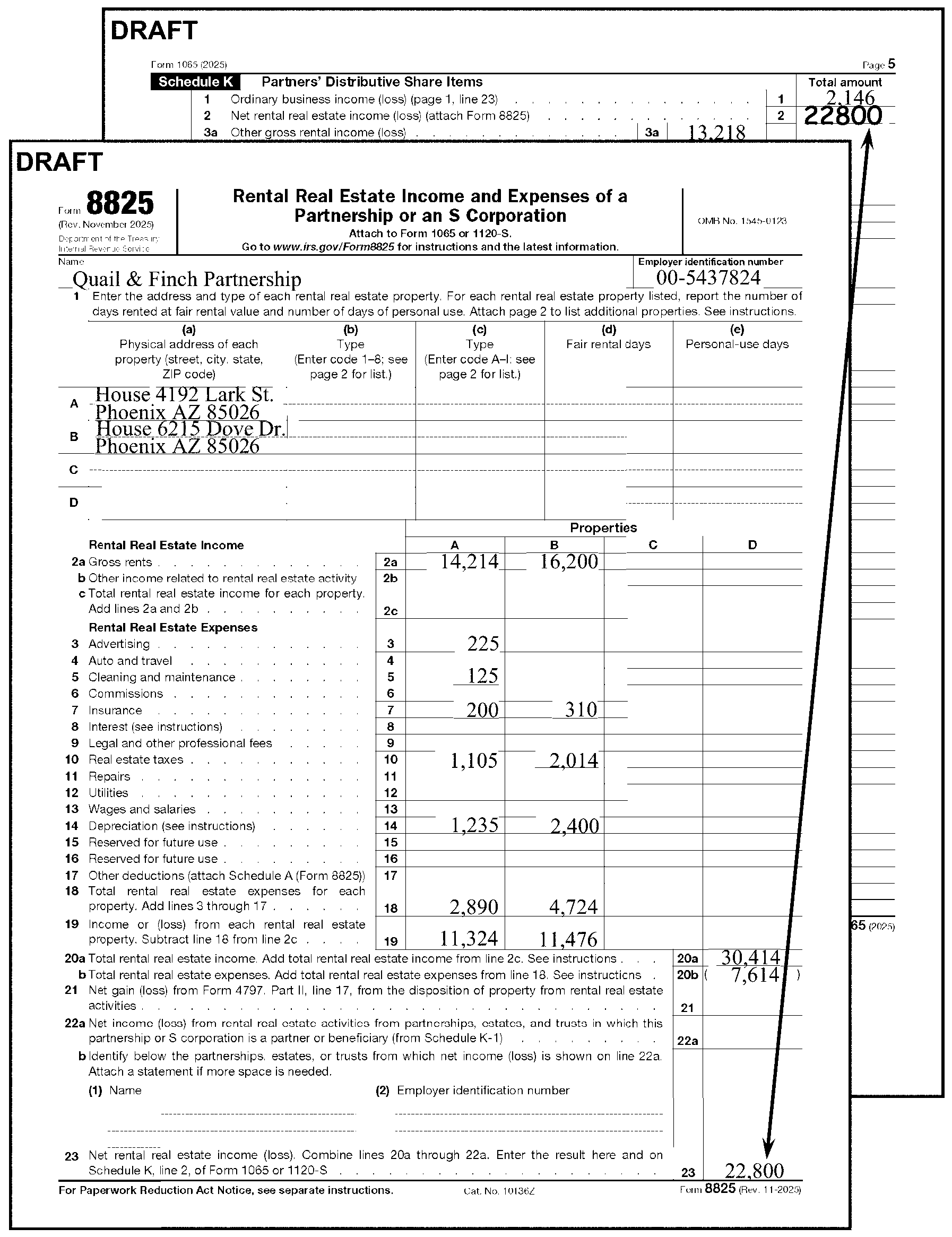
-
The partnership reports other Gross Rental income or loss on Line 3a of Schedule K.
Caution:
The partnership may report a gain or loss from the sale/exchange or involuntary conversion of an asset used in rental activity other than a Rental Real Estate activity from Line 17 of Form 4797 on Line 3c of Schedule K. If the amount from Line 17 of Form 4797 is included in Line 3c of Schedule K or Line 19 of Form 8825, do not edit the amount to Line 6 of Form 1065.
-
Accept the partnership entry.
-
The partnership reports other Net Rental income on Line 3c of Schedule K.
-
Accept the partnership entry.
-
The partnership reports Interest Income on Line 5 of Schedule K.
-
Accept the partnership entry.
-
The partnership reports Ordinary Dividends on Line 6a of Schedule K.
-
Accept the partnership entry.
-
The partnership reports Qualified Dividends on Line 6b of Schedule K.
-
Accept the partnership entry.
-
The partnership reports Royalties on Line 7 of Schedule K.
-
Oil or gas royalties are edited to Line 7, Schedule K.
-
If Form 8825 includes oil or gas Royalty Income, edit Form 8825 to exclude the income.
-
Edit Royalty Income from Line 2, Form 8825 to Line 7, Schedule K.
-
Subtract Royalty Income (Line 2, Form 8825) from Line 20a (Line 17 on 2006 or before), Form 8825 and edit to the left of the entry.
-
Subtract Royalty Expenses (Line 16, Form 8825) from Line 18b (Line 18 on 2006 or before), Form 8825.
-
Recompute total on Line 23, Form 8825 and edit to Line 2, Schedule K. See Figure 3.11.15-30 below.
-
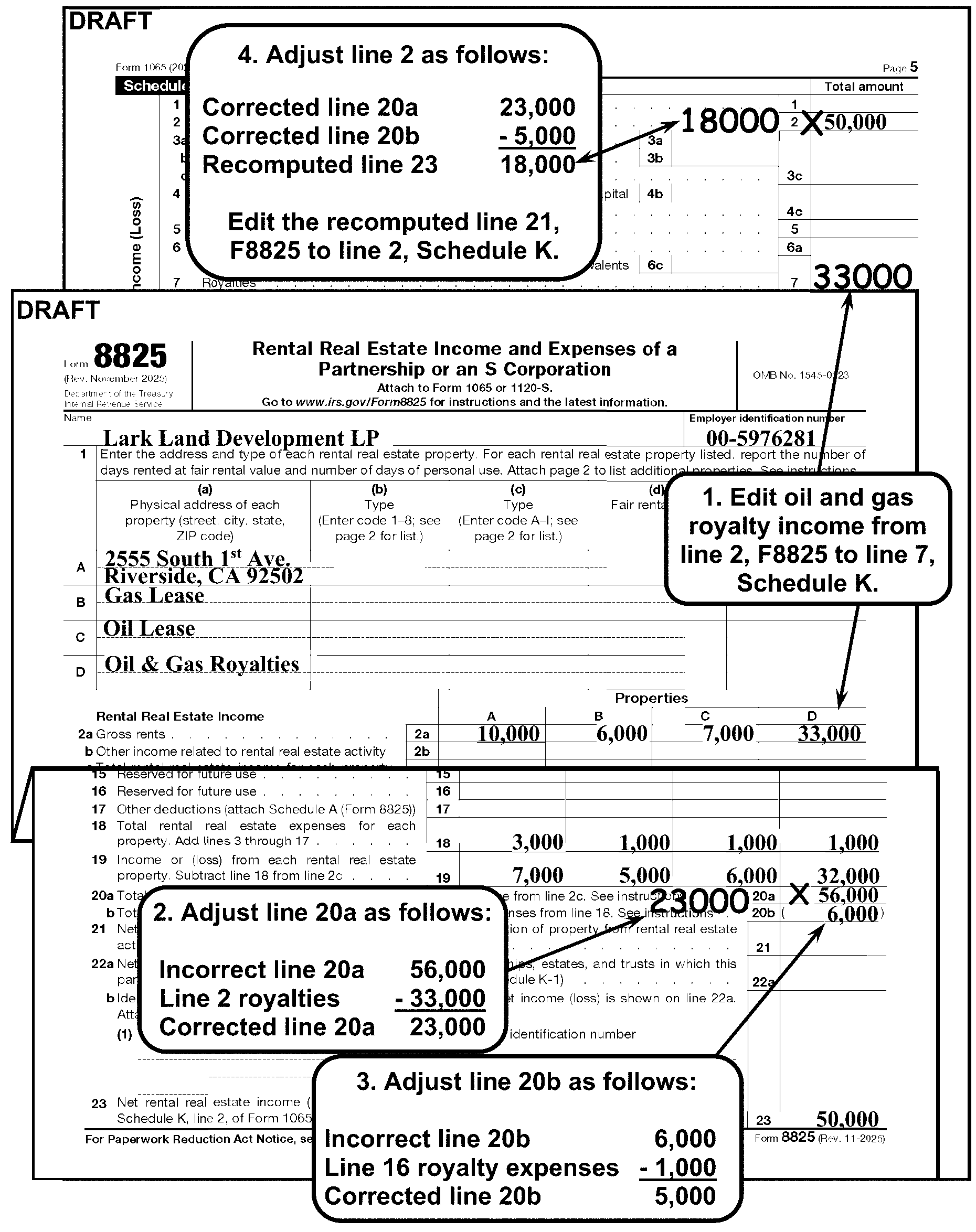
-
The partnership reports Net Long-Term Capital Gain or Loss on Line 9a of Schedule K.
-
If Schedule D is attached and Line 9a of Schedule K is blank, edit the amount from Line 15, (Line 13 on Tax Year 2011; Line 11 on tax years 2008 and before) Schedule D to Line 9a of Schedule K.
-
Check the top margin for statements such as; "LIKE-KIND EXCHANGE" , "RELATED PARTY EXCHANGE" or "RELATED PARTY LIKE-KIND EXCHANGE" .
If Then A statement is present on Schedule D, Check the return for Form 8824. Form 8824 is attached, Edit CCC "1" . See Figure 3.11.15-31 Form 8824 is not attached, Correspond for Form 8824 using Form 3696 or other approved Correspondence Action Sheet. Edit Action Code 211 See IRM 3.11.15.2.5, Action Codes. -
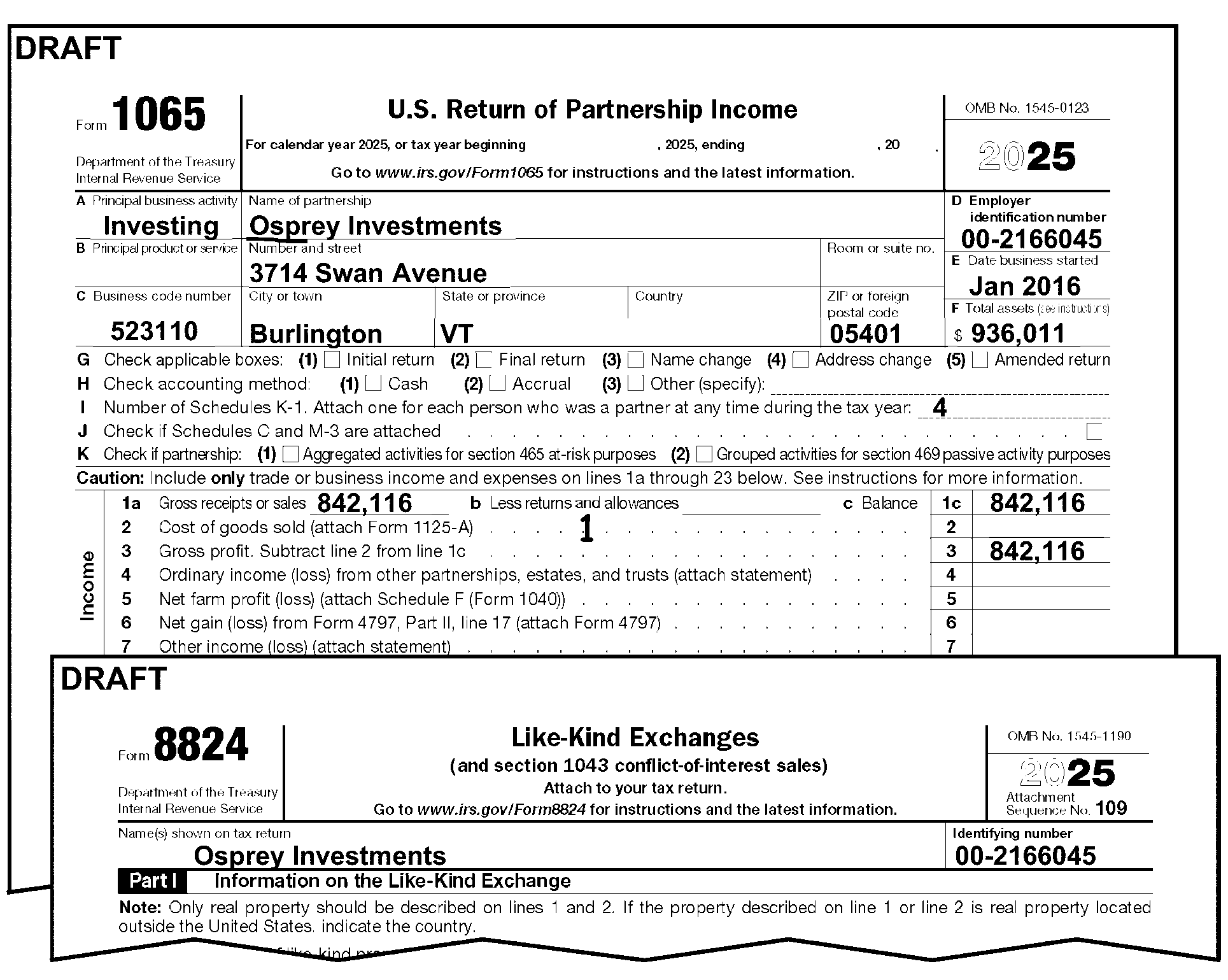
-
The partnership reports the net Section 1231 gain or loss on Line 10 of Schedule K from Line 7 of Form 4797.
-
Edit Line 10 of Schedule K as follows:
If Then There is an entry on Line 7 of Form 4797 and Line 10 of Schedule K is blank, -
Edit the Line 7 amount to Line 10 of Schedule K. See Figure 3.11.15-32.
-
Continue editing the return.
The entry on Line 7 of Form 4797 is reported on either: -
Line 6 of Form 1065, or
-
Line 3c of Schedule K,
-
Edit the Line 7 amount to Line 10 of Schedule K.
-
"X" the amount on Line 6 of Form 1065 or Line 3c of Schedule K.
-
Continue editing the return.
Multiple Forms 4797 are attached, Multiple Forms 4797 are attached and the partnership reported Line 7 on either: -
Line 6 of Form 1065, or
-
Line 3c of Schedule K,
The top margin of Form 4797 has a statement, such as, "LIKE-KIND EXCHANGE" , "RELATED PARTY EXCHANGE" , or "RELATED PARTY LIKE-KIND EXCHANGE" , See IRM 3.11.15.26.8, Line 9a, Schedule K, for more information on Like-Kind Exchanges (including Form 8824, Like-Kind Exchanges). -
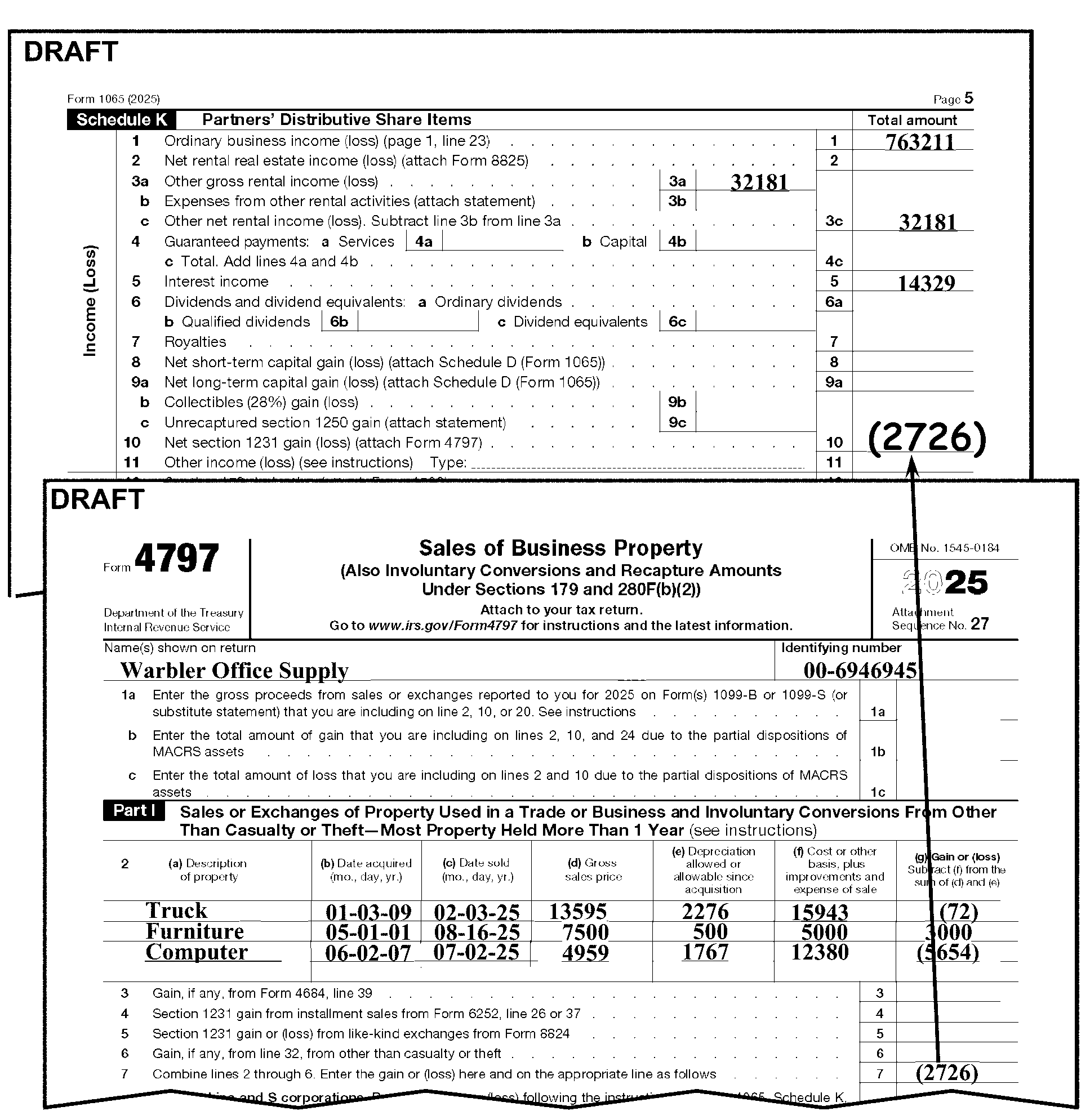
-
The partnership reports Ordinary Income or Loss on Line 11 of Schedule K.
-
Accept the partnership entry.
-
If a significant entry is present on Line 11 of Schedule K, with the notation "Section 965" (or similar), edit CCC "J" and Action Code 460 on the return and continue processing. See IRM 3.11.15.5.2, Section 965 Returns.
-
If a significant entry is present on Line 13e of Schedule K, with the notation "Section 965" (or similar), edit CCC "J" and Action Code 460 on the return and continue processing. See IRM 3.11.15.5.2, Section 965 Returns.
-
The partnership reports Low-Income Housing Credit (Section 42(j)(5)) on Line 15a of Schedule K. For tax years 200512 and later, partnerships are instructed to complete and attach:
-
Form 8586, Low-Income Housing Credit
-
Form 8609-A, Annual Statement for Low Income Housing Credit
For tax years 200412 and before, partnerships are instructed to complete and attach:
-
Form 8586, Low-Income Housing Credit
-
Form 8609, Low-Income Housing Credit Allocation Certification
-
Schedule A (Form 8609), Annual Statement
-
-
-
Follow the procedures below for Line 15a, Schedule K, and Form 8586:
If And Then Line 15a, Schedule K, entry is ≡ ≡ ≡ ≡ ≡ ≡ ≡ ≡ ≡ ≡ ≡ ≡ ≡ ≡ ≡ ≡ ≡ ≡ ≡ ≡ ≡ ≡, "X" to the left of the entry. Line 15a, Schedule K, entry is ≡ ≡ ≡ ≡ ≡ ≡ ≡ ≡ ≡ ≡, Form 8586 is not attached, Correspond for Form 8586 and Form 8609-A. (For tax years 200412 or before: Form 8586, Form 8609, and Schedule A (Form 8609). Edit Action Code 211 when corresponding. Line 15a, Schedule K, entry is ≡ ≡ ≡ ≡ ≡ ≡ ≡ ≡ ≡ ≡ ≡ ≡ ≡, Line 3, Form 8586, ≡ ≡ ≡ ≡ ≡ ≡ ≡ ≡ ≡ ≡ ≡ ≡ ≡, (Line 10 for 2007 through 2021. Line 3 for 2005 or 2006. Lines 2, 3a, or 4 for 200412 or before) Correspond for Form 8609-A if not attached. (For tax years 200412 or before: Form 8609 and Schedule A (Form 8609) if not attached). Edit Action Code 211 when corresponding.
-
The partnership reports other Low-Income Housing Credit on Line 15b of Schedule K. For tax years 200512 and later, partnerships are instructed to complete and attach:
-
Form 8586, Low-Income Housing Credit
-
Form 8609-A, Annual Statement for Low Income Housing Credit
For tax years 200412 and before, partnerships are instructed to complete and attach:
-
Form 8586, Low-Income Housing Credit
-
Form 8609, Low-Income Housing Credit Allocation Certification
-
Schedule A (Form 8609), Annual Statement
-
-
Follow the procedures below for Line 15b, Schedule K, and Form 8586:
If And Then Line 15b, Schedule K, entry is ≡ ≡ ≡ ≡ ≡ ≡ ≡ ≡ ≡ ≡ ≡ ≡ ≡ ≡ ≡ ≡ ≡ ≡ ≡ ≡ ≡, "X" to the left of the entry. Line 15b, Schedule K, entry is ≡ ≡ ≡ ≡ ≡ ≡ ≡ ≡ ≡ ≡, Form 8586 is not attached, Correspond for Form 8586 and Form 8609-A, (For tax years 200412 or before: Form 8586, Form 8609, and Schedule A (Form 8609). Edit Action Code 211 when corresponding. Line 15b, Schedule K, entry is ≡ ≡ ≡ ≡ ≡ ≡ ≡ ≡ ≡ ≡ ≡ ≡ ≡, Line 3 or Line 10, Form 8586, ≡ ≡ ≡ ≡ ≡ ≡ ≡ ≡ ≡ ≡ ≡ ≡ ≡ ≡ ≡, (Line 3 for 2005 or 2006. Lines 2, 3a, or 4 for 200412 or before). Correspond for Form 8609-A if not attached (For tax years 200412 or before: Form 8609 and Schedule A (Form 8609) if not attached). Edit Action Code 211 when corresponding.
-
The partnership reports qualified rehabilitation expenditures for rental real estate on Line 15c of Schedule K.
-
Accept the partnership entry.
-
"X" to the left of the entry ≡ ≡ ≡ ≡ ≡ ≡ ≡ ≡ ≡ ≡ ≡ ≡ ≡ ≡ ≡ ≡ ≡ ≡ ≡ ≡ ≡ ≡.
-
No editing is required for Line 15f.
-
Form 6478 - Line 15f may have an amount from Form 6478 (Alcohol and Cellulosic Biofuel Fuels Credit). If Form 6478 is attached with a significant amount on *Line 5(c) or Line 8, edit Action Code 343.
-
IMPORTANT: Form 6478 has restrictions: these instructions apply to 2009 tax year only, including fiscal year filers (200901 through 201011). Do not edit AC 343 for Tax Period 201012 and later.
-
No editing is required for Line 15f.
-
Form 8936, Schedule A, Clean Vehicle Credit Amount , is valid for tax periods 202301 and later.
-
If Form 1065, Schedule K, Line 15f has an entry ≡ ≡ ≡ ≡ ≡ ≡ ≡ ≡ for Form 8936 Schedule A, Clean Vehicle Credit Amount, then Form 8936, Schedule A is required. If Form 8936 Schedule A, Clean Vehicle Credit is not attached, correspond using Letter 1355-C, Partnership Return Incomplete for Processing Form 1065.
-
Line 16a - No editing necessary,
-
Schedule K-2 (Form 1065) Partners’ Distributive Share Items International extends Schedule K, Line 16a Foreign Transactions: Effective, January 1, 2021, the Form 1065 Schedule K-2 is now required in replace of Form 1065, Schedule K, lines 16(a) through 16(r). Accordingly, beginning in 2021, IRS modified the Form 1065, Schedule K, Line 16a (Foreign Transaction)and replaced lines 16a – 16r with the following statement: “Attach Schedule K-2 (Form 1065), Partners’ Distributive Share Items—International, and check this box to indicate that you are reporting items of international tax relevance”. In addition, the category for Line 16a changed from Foreign Transactions to International. Schedule K-2 has 18 pages and X Parts.
-
The partnership reports Foreign Income, deductions and taxes on Lines 16d through 16q of Schedule K.
-
Accept the partnership entry.
-
Edit Audit Code 2 or 7 if there is an entry on Line 16p edit as follows:
If Then The amount on Line 16p* ≡ ≡ ≡ ≡ ≡ ≡ ≡ ≡ ≡ ≡ ≡ ≡ ≡ ≡ ≡ ≡,
*(Prior year revision, Line 16l).Edit Audit Code "2" . The amount on Line 16p* ≡ ≡ ≡ ≡ ≡ ≡ ≡ ≡ ≡ ≡ ≡ ≡ ≡ ≡ ≡ ≡ ≡ ≡ ≡ ≡ ≡,
*(Prior year revision, Line 16l).Edit Audit Code "7" .
-
Edit Audit Code "3" if either Line 19a or 19b has an entry ≡ ≡ ≡ ≡ ≡ ≡ ≡ ≡ ≡ ≡ ≡ ≡ ≡.
-
If there is an entry other than zero on Line 18(b) and/or 18(d), edit the Nonrecourse Loan Code of "4 - 1" in the left margin next to Line 9 of Form 1065.
-
If Line 19b, Column (d), Mortgages, Notes and Bonds payable in one year or more, is blank, edit amount from Line 19b, Column (b) or from supporting documentation, if present.
-
Edit Action Code 211 and correspond for Schedule L (if missing or blank) and the return does not meet any of the following conditions:
-
Form 1065, page 2, Schedule B, Question 4d* is checked "Yes" . *(Prior year revision, Question 6).
-
page 1, Box "F" is "0" (zero), "-" (dash), "NONE" , "N/A" or some similar entry.
-
Schedule L is crossed out or annotated "0" (zero), "NONE" , "N/A" or some similar entry.
-
There is an indication of single entry bookkeeping (Box "F" is blank, the cash box on Line H is checked and there are no entries on Lines 1-23 on Form 1065, page 1).
-
Final Return.
-
-
If any of the conditions in (3) above are met, Schedule L is not required. Delete by "X" ing or slashing through the schedule. If Schedules M-1 and M-2 are present, also delete by "X" ing or slashing through the schedules.
Caution:
≡ ≡ ≡ ≡ ≡ ≡ ≡ ≡ ≡ ≡ ≡ ≡ ≡ ≡ ≡ ≡ ≡ ≡ ≡ ≡ ≡ ≡ ≡ ≡ ≡ ≡ ≡ ≡ ≡ ≡ ≡ ≡ ≡ ≡≡ ≡ ≡ ≡ ≡ ≡ ≡ ≡ ≡≡ ≡ ≡ ≡ ≡ ≡ ≡ ≡ ≡ ≡ ≡ ≡ ≡
-
Do not edit Total Assets in Box "F" .
-
Do not edit non-recourse loan from Schedule L.
-
If Box "F" is the only transcription line (T-line) with an entry, Short Record the return.
-
-
If the conditions in (3) above are not met, correspond for Schedule L using Letter 1355-C.
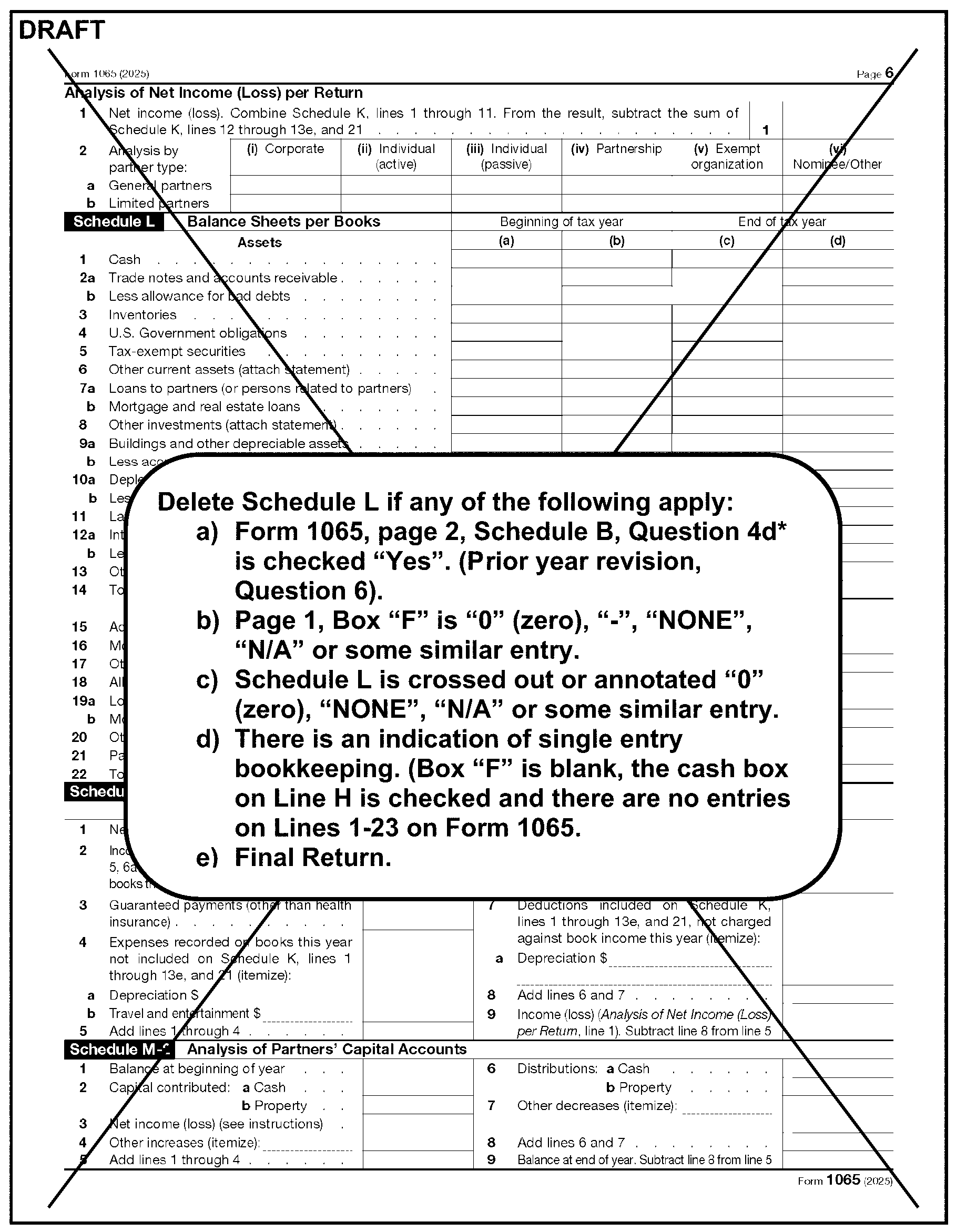
-
If Line 6b is ≡ ≡ ≡ ≡ ≡ ≡ ≡ ≡ ≡ ≡ ≡ ≡ ≡ ≡ ≡ ≡ ≡ ≡ ≡ ≡ ≡"≡ ≡" in the margin to the left of Line 9 on page 1 of Form 1065.
-
Line 9 on Schedule M-2, if blank, edit from Schedule L, Line 21, Column (d).
-
If Schedule F or a substitute Schedule F is attached, edit (dollars only): Part I, Line 1c, "Sales of livestock and other resale items" .
-
On the dotted portion to the left of Part I, Line 9, edit the amount you get by subtracting Line 1c from Line 9, Part I and bracket any negative amount. See Figure 3.11.15-34. Schedule F: For prior-year returns, convert, using the Job Aid and edit with current year instructions.
If Then Line 1c is blank, Subtract Line 1b from Line 1a, and subtract the result from Line 9. Line 9 is blank, -
Compute Line 9 by adding Lines 1c through 8 (that is, 1c, 2, 3b, 4b, 5a, 5c, 6b, 6d, 7, and 8)
-
Subtract Line 1c from Line 9, and
-
Edit the amount to the left of Part 1, Line 9 (on the dotted portion).
Lines 1a through 1c are blank and Lines 2 through 9 have entries, Arrow the amount on Line 9 to the dotted portion of Line 9. -
-
If multiple Schedules F are attached, combine transcription lines and edit on the first Schedule F. "X" the remaining Schedules F and move to the back of the return.
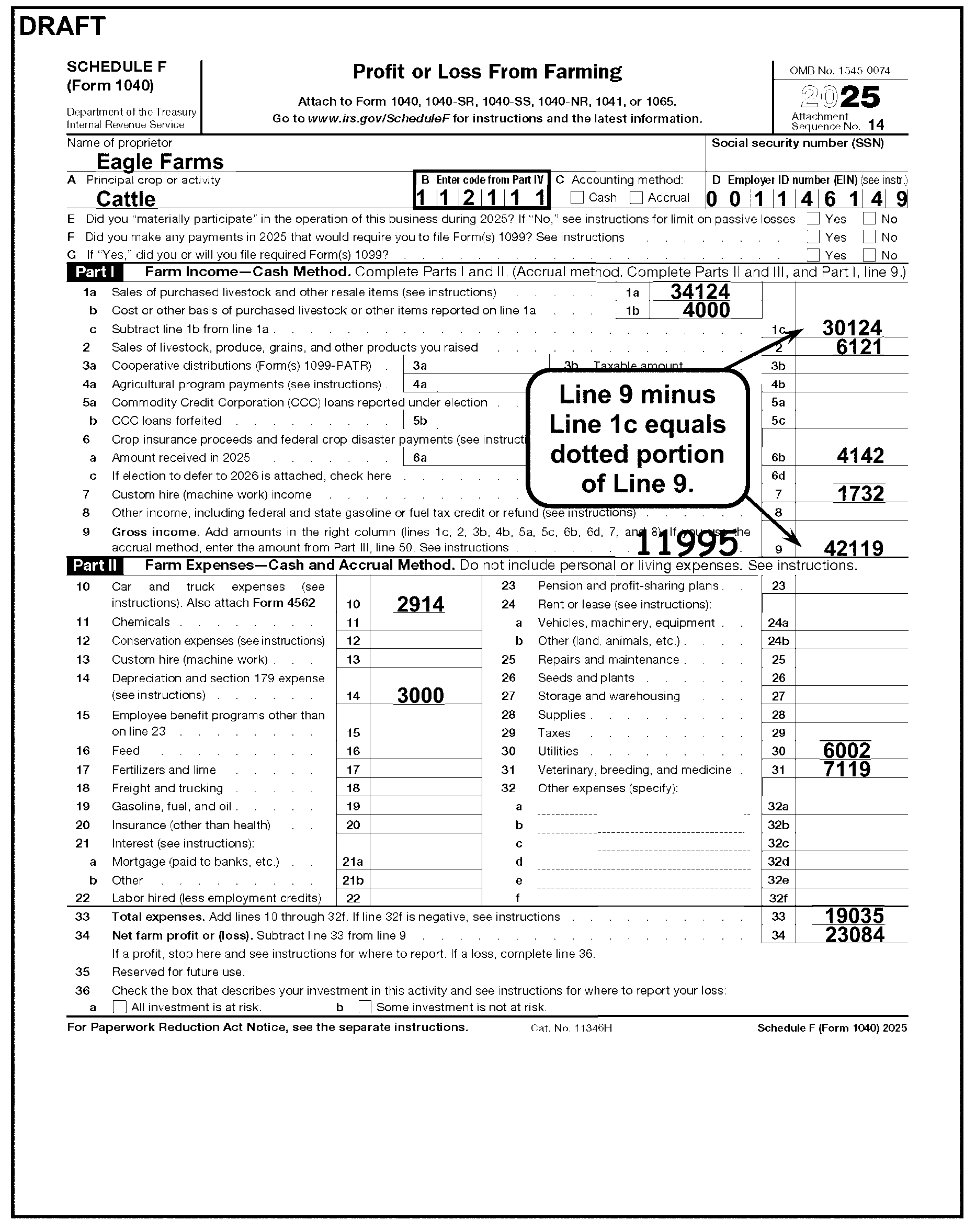
-
Place Form 8825 immediately following Schedule F.
-
Only Line 20a, Total Gross Rents (Line 17 on 2006 and before), is edited and transcribed from Form 8825. Line 23 is reported on Schedule K, Line 2.
-
See IRM 3.11.15.26.1, Line 2, Schedule K for Schedule K, Line 2 and Form 8825 editing procedures.
-
Edit Schedule D as follows:
If Then All of the following conditions apply: -
Form 1065 is for 201212 Tax Period or later and
-
The Schedule D is a 2012 or later revision and
-
Significant entries are present on one or more of the transcription lines and/or any checkbox above Part I is marked.
-
Transcription lines for 2019 and later are:
-
Checkbox above Part I.
-
Part I, Line 1a, Columns d and e, Lines 1b - 3, Columns d, e, and g.
-
Part II, Lines 8a, Columns d and e, Lines 8b - 10, Columns d, e, and g.
-
Line 14.
-
-
Transcription lines for 2013 through 2018 are:
-
Part I, Line 1a, Columns d and e, Lines 8b - 10, Columns d, e, and g.
-
Line 14.
-
-
Transcription lines for 2012 are:
-
Part I, Lines 1-3, Column(s) d and e
-
Part II, Lines 8-10, Column(s) d and e
-
Line 14
-
-
-
Place Schedule D in sequence order. See IRM 3.11.15.2.2, Sequence of Return - Form 1065.
-
Edit Schedule D in dollars only.
-
For 2013 revisions and later: "X" any negative transcription entries, except Lines 1b(g), 2(g), 3(g), 8b(g), 9(g) and 10(g). These lines can be positive or negative.
-
For 2012 revisions:
-
"X" any negative transcription entries
-
Change Line 1 to Line 1b
-
Change Line 8 to Line 8b
-
Criteria above is not met, Cross out or slash the Schedule D and move out of sequence if necessary. -
-
Line 1b has an entry.- No editing necessary.
-
Line 1c has an entry.- No editing necessary.
-
Form 4797 is valid for sequencing for tax periods 202101 and later. See IRM 3.11.15.26.9 and IRM 3.11.15.22.6.
Line Line Description Year Revision 1a Gross Proceeds from Sales or Exchanges from Form(s) 1099-B or 1099-S 2025 and later. 1b Total Amount of Gain from Partial Dispositions of MACRS Assets 2021 and later. 1c Total Amount of Loss from Partial Dispositions of MACRS Assets 2021 and later. 7 Total Gain or Loss Amount 2025 and later 8 Non-recaptured net Section 1231 Losses from Prior Years Amount 2025 and later 9 Total Gain Less Non-recapture Sect 1231 Losses Amount 2025 and later 17 Total Ordinary Gain or Loss Amount 2025 and later 18a Form 4684 Part 3 Property Held Total Loss Amount 2025 and later 18b Form 4797 Gain or Loss Minus F4684 Part 3 Property Held Total Loss Amount 2025 and later
-
Form 8949 is valid for tax periods ending 201712 and later. See Figure 3.11.15-35.
-
If the taxpayer entered a "Z" or "Y" in any of the rows in either Part I, Line 1, Column (f), or Part II, Line 1, Column (f) of Form 8949 do the following:
-
Place the form in sequence order. See IRM 3.11.15.2.2, Sequence of Return - Form 1065. If there are more than one Form 8949 attached, sequence the Form 8949 with the edited data.
-
Edit a CCC "M" .
-
If the taxpayer entered a "Z" in any of the rows in either Part I, Line 1, Column (f), or Part II, Line 1, Column (f), of Form 8949, edit as follows:
If Then EIN is present in Column (a), Underline the EIN. No EIN is present in Column (a) or is illegible, No action is needed. A Date Acquired is present in Column (b) and the day, month, and year are present, Underline the Date Acquired. A Date Acquired is present in Column (b) and the day, month, or year are not present, or no date is present, No action is needed. A dollar amount is present in Column (g), Underline the dollar amount. No dollar amount is present in Column (g), No action is needed. If more than one row has a "Z" in Column (f), Edit "Z-1" to the right margin of Part I, Line 1, Row 1. -
If the taxpayer entered a "Y" in any of the rows in either Part 1, Line 1, Column (f), or Part II, Line 1, Column (f), of Form 8949, edit as follows:
If Then EIN is present in Column (a), Underline the EIN. No EIN is present in Column (a) or is illegible, No action is needed. Date Sold or Disposed of is present in Column (c) and the day, month, and year are present, Underline the Date Sold or Disposed of. Date Sold or Disposed of is present in Column (c) and the day, month, or year are not present, or no date is present, No action is needed. A dollar amount is present in Column (g), Underline the dollar amount. No dollar amount is present in Column (g), No action is needed. If more than one row has a "Y" in Column (f), Edit "Y-1" to the right margin of Part I, Line 1, Row 1. If "Z-1" is already edited, Edit "Y-1" under "Z-1" .
-
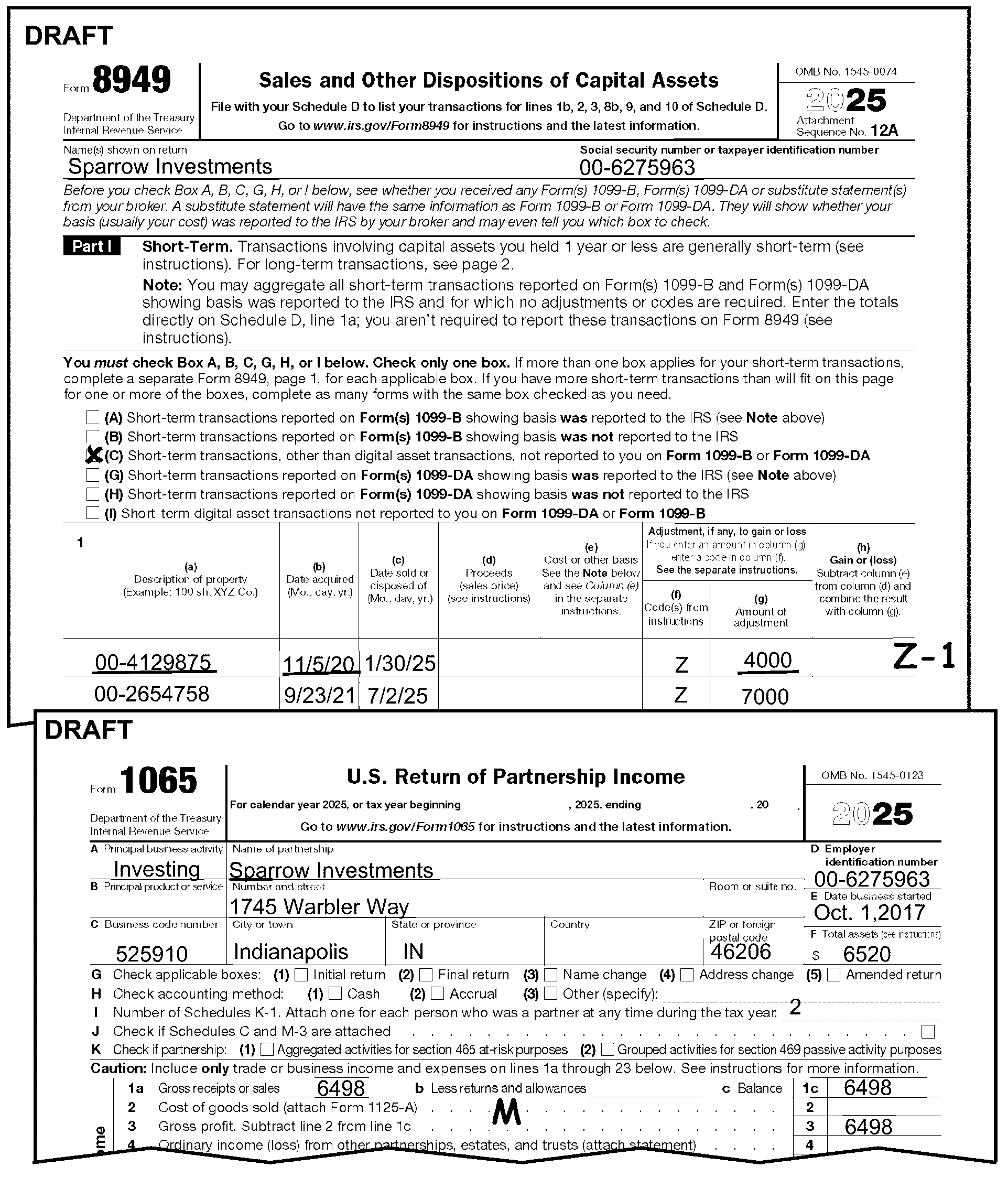
-
Form 8996 is valid for tax periods ending 201712 and later. See the table below for Form 8996 line numbers based on the tax year of the return:
-
Place Form 8996 in sequence order. See IRM 3.11.15.2.2, Sequence of Return - Form 1065, if entries are present on any of the lines in paragraphs (3) through (9) below:
-
Part I, Line 5 - checkbox is checked - no editing required.
-
Part I, Line 6 - Reserved for future use.
-
Part II, Line 7 - Total qualified opportunity zone property held by the taxpayer on the last day of the first 6-month period of the taxpayer’s tax year.
-
Part II, Line 8 - Total assets held by the taxpayer on the last day of the first 6-month period of the taxpayer’s tax year.
-
Part II, Line 10 - Total qualified opportunity zone property held by the taxpayer on the last day of the taxpayer’s tax year.
-
Part II, Line 11 - Total assets held by the taxpayer on the last day of the taxpayer’s tax year.
-
Part III, Line 14 - Perfect Line 14 as follows:
-
Edit the percent on Line 14 in 0.00 format. For example, edit 50 percent as 0.50.
-
If the percent is greater than 1.00, "X" the percentage amount on Line 14. For example, the percentage is 1.23 or 1.23 percent.
-
-
Part III, Line 15 - Perfect Line 15 as follows:
-
If Form 8996, Part III, Line 15 is blank and Part IV, Line 8 has an amount, edit Part IV, Line 8 to Part III, Line 15 in dollars and cents.
-
-
If Form 8996, Qualified Opportunity Fund, is attached, edit Return Processing Code (RPC) "6" . See IRM 3.11.15.20.7, Return Processing Code (RPC), for more information.
-
See the following IRM reference: IRM 3.11.15.25.17 , Schedule B, Line 25 (Form 8996 - Qualified Opportunity Fund).
-
See IRM 3.11.15.79 for Form 8996 prior year conversion chart.
-
Place Form 1125-A in sequence order if entries are present on Lines 1, 2, 6, or 7. See IRM 3.11.15.2.2, Sequence of Return - Form 1065 for sequence order.
-
Edit Form 1125-A in dollars only. "X" any negative transcription entries.
-
Line 1 is "Inventory at Beginning of Year" . Accept partnership entry.
-
Line 2 is "Purchases" . Accept partnership entry.
-
Line 3 is "Cost of labor" . No specific editing is necessary, but an entry on this line requires a "Salary and Wage Code" condition. See IRM 3.11.15.18, Salary and Wage Code for editing instructions.
-
Line 6 is "Total Cost of Goods" . If Line 6 is blank, do one of the following:
-
Add Lines 1 through 5 and edit the total to Line 6, or
-
Perfect from attachments if possible for a Line 6 total.
-
Edit Line 6 from page 1, Line 2 of Form 1065, if a positive amount.
-
-
Line 7 is "Inventory at End of Year" . Accept partnership entry.
-
Form 1125-A must be dummied if:
-
An amount is present on Form 1065, page 1, Line 2 and Form 1125-A is missing.
-
Form 1125-A is missing and Lines 1, 2, 6, and/or 7 can be edited from attachments.
-
-
Use instructions in (2) - (7) above to edit lines.
-
For 2010 and before revisions with entries on Schedule A, Lines 1, 2, 6, and/or 7, edit amounts to correct Form 1125-A, Lines 1, 2, 6, and/or 7.
-
For tax years 201212 and later, line through or "X" Form 5884-B, New Hire Retention Credit. For tax years 2010 and 2011, place Form 5884-B in sequence order if a significant entry is present on line 10 and/or line 11.
-
See IRM 3.11.15.2.2, Sequence of Return - Form 1065 for sequence order instructions.
-
Place Form 8941 in sequence order if significant entries are present. See IRM 3.11.15.2.2, Sequence of Return - Form 1065 for sequence order instructions.
-
Make sure the taxpayer entries on Lines 1, 2, 13, and/or 14 are whole numbers (i.e., 1, 2, 3, 4, etc.). If Lines 1, 2, 13, and/or 14 all have whole numbers, do nothing.
-
If Lines 1, 2, 13, and/or 14 have decimals or were entered as other than whole numbers, do as follows:
-
Mark an "X" to the left of the taxpayer's entry.
-
Round the taxpayer's entry to the next lowest whole number.
-
Edit the rounded result to the left of the "X" .
-
If the result is less than one (1), round up to "1" .
-
-
For 2012 and 2013 - If a significant entry is present:
-
Change Line 1a to Line 1
-
Change Line 1b to Line B
-
-
For 2011 - No change is necessary.
-
For 2010 - If significant entries are present on Lines 16, 18, 21, or 23, do the following:
-
Delete line numbers 16 and 18.
-
Change Line 21 to 16.
-
Change Line 23 to 18.
-
-
Form 3800, General Business Credit, is valid for tax periods 202301 and later.
-
≡ ≡ ≡ ≡ ≡≡ ≡ ≡ ≡ ≡ ≡ ≡ ≡ ≡ ≡ ≡≡ ≡ ≡ ≡ ≡ ≡ ≡ ≡ ≡ ≡ ≡ ≡ ≡ ≡ ≡ ≡ ≡ ≡ ≡ ≡ ≡ ≡ ≡ ≡ ≡ ≡ ≡ ≡ ≡ ≡ ≡ ≡ ≡ ≡ ≡ ≡ ≡ ≡ ≡ ≡ ≡ ≡ ≡ ≡ ≡ ≡ ≡ ≡ ≡ ≡ ≡ ≡ ≡ ≡ ≡ ≡ ≡
-
≡ ≡ ≡ ≡ ≡ ≡ ≡ ≡ ≡ ≡ ≡ ≡ ≡ ≡ ≡ ≡ ≡ ≡ ≡ ≡ ≡ ≡ ≡ ≡ ≡ ≡ ≡ ≡ ≡ ≡"≡ ≡ ≡ ≡" ≡ ≡ ≡ ≡ ≡ ≡ ≡ ≡ ≡
-
≡ ≡ ≡ ≡ ≡ ≡ ≡ ≡ ≡ ≡ ≡ ≡ ≡ ≡ ≡ ≡ ≡ ≡ ≡ ≡ ≡"≡ ≡" ≡ ≡ ≡ ≡ ≡ ≡ ≡ ≡ ≡ ≡ ≡ ≡ ≡ ≡ ≡ ≡ ≡ ≡ ≡ ≡ ≡ ≡ ≡ ≡ ≡ ≡ ≡ ≡ ≡ ≡ ≡ ≡ ≡ ≡ ≡ ≡ ≡ ≡ ≡ ≡ ≡ ≡ ≡ ≡ ≡ ≡ ≡ ≡ ≡ ≡ ≡ ≡ ≡ ≡ ≡ ≡ ≡ ≡ ≡ ≡ ≡ ≡ ≡ ≡ ≡ ≡ ≡ ≡ ≡ ≡ ≡ ≡ ≡ ≡ ≡ ≡
-
-
Place Form 3800 in sequence order if significant entries are present. See IRM 3.11.15.2.2, Sequence of Return - Form 1065 for sequence order instructions.
-
The following lines are transcribed from Form 3800 for tax periods 202401 & later.
Form 3800, Part III, Line Credit From Form Title Column(s) transcribed 1b Form 7207 Advanced Manufacturing Production Credit b, f, g, h, j 1d Form 3468, Part III Investment Credit b, f, g 1f Form 8835, Part II Renewable Electricity Production Credit b, f, g 1g Form 7210 Clean Hydrogen Production Credit b, f, g, h, j 1o Form 3468, Part IV Investment Credit b, g, h, j 1q Form 7218, Part II Clean Fuel Production Credit b, f, g 1s Form 8911, Part I Alternative Fuel Vehicle Refueling Property Credit b, f, g 1u Form 7213, Part II Nuclear Power Production Credit b, f, g, 1v Form 3468, Part V Investment Credit b, f, g 1x Form 8933 Carbon Oxide Sequestration Credit b, f, g, h, j 1aa Form 8936, Part V Clean Vehicle Credits b, g 1gg Form 7211, Part II Clean Electricity Production Credit b, f, g 4a Form 3468, Part VI Investment Credit b, f, g 4e Form 8835, Part II Renewable Electricity Production Credit b, f, g -
Edit a "1" in the bottom right-hand margin of Form 3800, Page 4, when Part V, Column b (Elective Payment or Transfer Registration Number) has significant data. See Figure 3.11.15-36, Example of Editing Form 3800, General Business Credit, Part V, Indicator below.
-
For prior year conversion instructions, see IRM 3.11.15.80, Form 3800, Prior Year Conversion Chart. Also, See Exhibit 3.11.15-8, Form 3800 - Prior Year Revisions Comparison Chart.
-
If Form 1065, Line 29, has an entry ≡ ≡ ≡ ≡ ≡ ≡ ≡ ≡ for Elective Payment Election Amount, then Form 3800, General Business Credit, is required. If Form 3800 is not attached, correspond using Letter 1355C, Partnership Return Incomplete for Processing Form 1065, for tax periods 202301 and later.
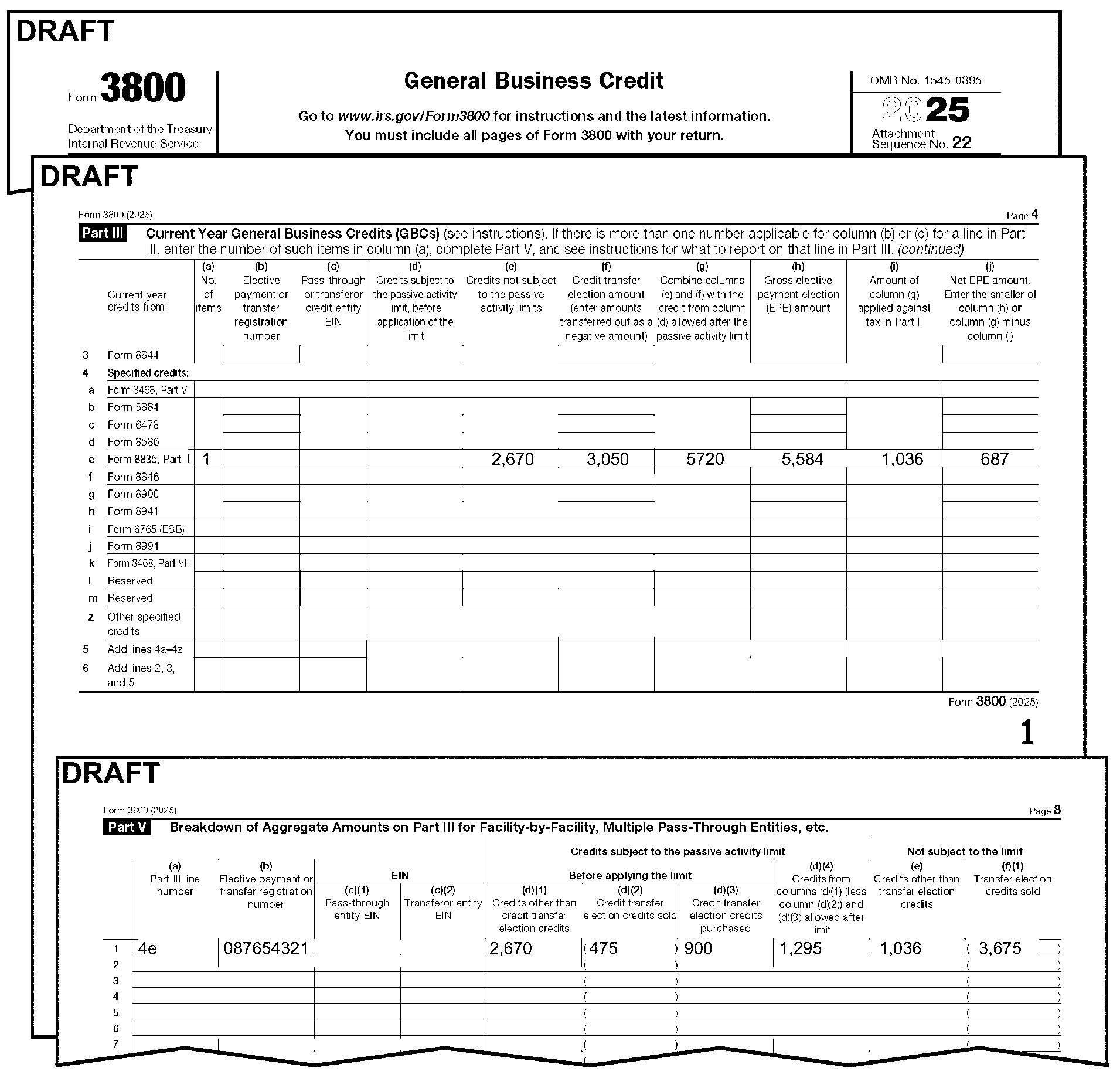
-
Form 6252 is valid for tax periods ending in 201712 and later.
-
Place Form 6252 in sequence order if significant entries are present on any of Lines 1, 2a, 2b, 7, 19, 21 or 23. See IRM 3.11.15.2.2, Sequence of Return - Form 1065 for sequence order instructions.
-
Only one Form 6252 can be processed. If multiple forms are attached, process the first one with significant transcription entries and delete the others.
-
Line 1 - Description of Property - Taxpayer may enter a code and a description of installment sale property as described below. (No editing necessary).
Code Description of property 1 Sale property is timeshares or residential lot 2 Sale by an individual of personal use property (within the meaning of section 1275(b)(3)) 3 Sale of any property used or produced in the trade or business of farming (within the meaning of section 2032A(e)(4) or (5)) 4 All other installment sales not listed -
Line 2a - Date acquired.
-
Line 2b - Date sold.
-
Line 3 - Information is used to determine the Installment Sale Indicator - Edit "3-" followed by the proper Installment Sale Indicator code in the left margin of Form 1065, Page 1, next to Line 9 when Form 6252 is present (e.g., "3-1" ).
-
Valid Installment Sale Indicator codes are as follows:
Code One Form 6252 More Than One Form 6252 1 "Yes" response to Question 3 At least one form has a "Yes" response. 2 "No" response to Question 3 All "No" responses, or a combination of "No" and/or blank responses. 3 "Yes" and "No" are checked or Question 3 is blank Question 3 is blank on all forms.
-
-
Part I, Line 7 - Subtract Line 6 from Line 5.
-
Part II, Line 19 - Edit gross profit percentage as follows:
-
Edit the percentage on Line 19 in 0.0000 format. For example, edit 50 percent as 0.5000.
-
If the percent is greater than 1.00, "X" the percentage amount on Line 19. For example, the percentage is 1.2300 or 1.23 percent.
-
-
Part II, Line 21 - Payments received during year.
-
Part II, Line 23 - Payments received in prior years.
-
See IRM 3.11.15.20.3 - Installment Sale Indicator for instructions to edit the Installment Sale Indicator.
-
Form 8997 is valid for tax periods ending 201901 and later.
-
Place Form 8997 in sequence order if the form is attached and significant entries are present in any of Parts I, II, III, or IV. See IRM 3.11.15.2.2, Sequence of Return - Form 1065 for sequence order instructions.
-
No editing is required except for the indicator in Parts I, II, III, or IV. Transcription is from Row 1 of each part.
-
Part I - Total QOF Investment Holdings Due to Deferrals Prior to Beginning of Tax Year (Row 1)
-
Column a - EIN
-
Column b - Date
-
Column d - Special Gain Code
-
Column e - Amount of short-term deferred gain remaining in QOF
-
Column f - Amount of long-term deferred gain remaining in QOF
-
Part I Indicator - If more than 1 row of tax data is present in Part I, edit a "1" in the right margin of Part I, Row 1.
-
Line 2, Column e - total amount
-
Line 2, Column f - total amount
-
-
Part II - Current Tax Year Capital Gains Deferred by Investing in QOF (Row 1)
-
Column a - EIN
-
Column b - Date
-
Column d - Special Gain Code
-
Column e - Amount of short-term deferred gain remaining in QOF
-
Column f - Amount of long-term deferred gain remaining in QOF
-
Part II Indicator - If more than 1 row of tax data is present in Part II, edit a "1" in the right margin of Part II, Row 1.
-
Line 2, Column e total amount
-
Line 2, Column f total amount
-
-
Part III - Inclusion Events and Certain Other Transfers During the Current Tax Year (Row 1)
-
Column a - EIN
-
Column b - Date
-
Column d - Special Gain Code
-
Column e - Amount of previously deferred short-term gain now included in taxable income
-
Column f - Amount of previously deferred long-term gain now included in taxable income
-
Part III Indicator - If more than 1 row of tax data is present in Part III, edit a "1" in the right margin of Part III, Row 1.
-
Line 2, Column e total amount
-
Line 2, Column f total amount
-
-
Part IV - Total QOF Investments Due to Deferrals at Year End (Row 1)
-
Column a - EIN
-
Column b - Date
-
Column d - Special Gain Code
-
Column e - Amount of short-term deferred gain invested in QOF
-
Column f - Amount of long-term deferred gain invested in QOF
-
Part IV Indicator - If more than 1 row of tax data is present in Part IV, edit a "1" in the right margin of Part IV, Row 1.
-
Line 2, Column e total amount
-
Line 2, Column f total amount
-
-
If Form 8997, Initial and Annual Statement of Qualified Opportunity Fund (QOF) Investments, is attached, edit Return Processing Code (RPC) "9" , See IRM 3.11.15.20.7, Return Processing Code (RPC), for more information.
-
Form 8283, Noncash Charitable Contributions is valid for transcription for Tax Periods ending 202501 and later when data is present on any of the following lines.
Line Line Description 2 Information on Donated Property Type Check boxes 3A(c) Donated Property Appraised Fair Market Value 3A(d) Donated Property Date Acquired by Donor 3A(f) Donated Property Donor’s Cost or Adjusted Basis Part IV Appraiser Signature Indicator Part IV Appraiser Identifying Number Part V Qualified Organization Property Received Date Part V Charitable Organization Employer Identification Number Part V Charitable Organization Authorized Signature Indictor Part V, Lower right corner pg. 2 Multiple Form 8283 Attached -
Form 8283, Noncash Charitable Contributions is required to be attached to the return if a deduction over ≡ ≡ ≡ ≡ ≡ is claimed on Line 13b, Schedule K. Correspond if Form 8283 is not attached. Edit Action Code 211 when corresponding.
-
If more than one Form 8283 is attached, edit a 1 on page 2, of Form 8283, Part V, lower right corner.
-
Edit Audit Code "C" if Form 8283 is attached and any of the following conditions are present:
-
Box 2b is checked
-
Box 2b(1) is checked
-
Line 3, Column H has an entry
-
-
Form 8936 Schedule A, Clean Vehicle Credit is valid for tax periods 202301 and later.
-
Sequence up to two Form 8936 Schedule A, Clean Vehicle Credit. See IRM 3.11.15.2.2, Sequence of Return - Form 1065 for sequence order instructions.
-
The following lines will be transcribed for the first two Form 8936 Schedule A, Clean Vehicle Credit attached.
-
Part I, Line 2, Vehicle identification number (VIN)
-
Part I, Line 3, Placed in service date
-
Part II, Line 9, Tentative credit amount
-
Part II, Line 11, Credit amount for business use of new clean vehicle
-
Part IV, Line 17, Smaller of line 15 or line 16
-
Part V, Line 26, Smaller of line 24 or line 25
-
-
If more than two Form 8936 Schedule A, Clean Vehicle Credit are attached, edit an indicator of "1" on page 3 of the second Form 8936, Schedule A, to the bottom right-hand margin. See Figure 3.11.15-37, Example of Form 8936 Schedule A Indicator.
-
If Form 1065, Schedule K, Line 15f has an entry ≡ ≡ ≡ ≡ ≡ ≡ ≡ ≡ for Form 8936 Schedule A, Clean Vehicle Credit Amount, then Form 8936 Schedule A, Clean Vehicle Credit is required. If Form 8936 Schedule A, Clean Vehicle Credit is not attached, correspond using Letter 1355C, Partnership Return Incomplete for Processing Form 1065, for tax periods 202301 and later.
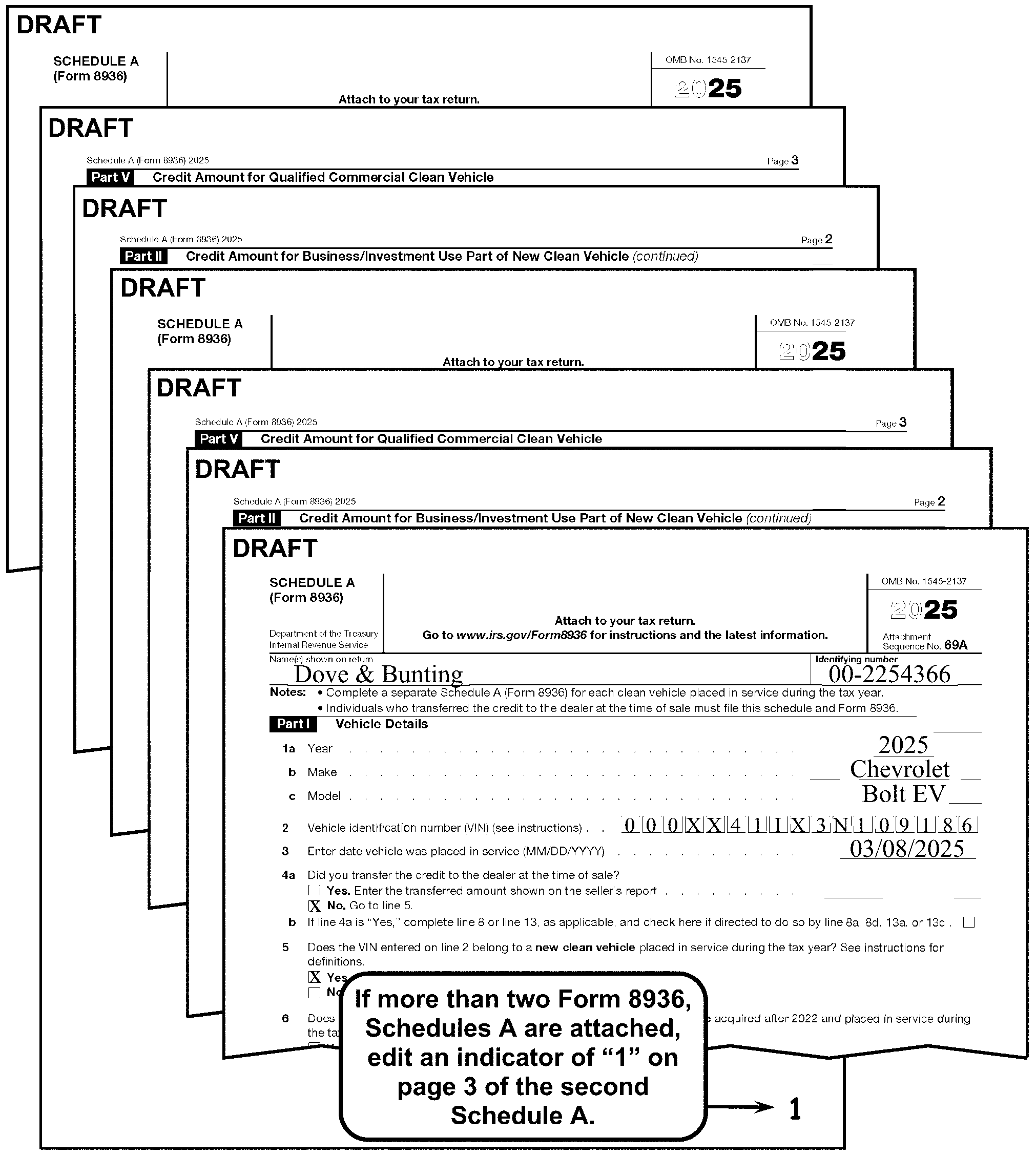
-
Form 4255, is valid for tax periods 202401 and later.
-
Place Form 4255 in sequence order if the form is attached and significant entries are present in Part I, columns (s) or (t), row 1a, 1c, 1d or 2a. See IRM 3.11.15.2.2, Sequence of Return - Form 1065 for sequence order instructions.
-
No editing is required. The following lines will be transcribed from Form 4255:
Form 4255, Part I Credit From Column(s) transcribed Line 1a Form 7207 s, t Line 1c Form 7210 s, t Line 1d Form 3468, Part IV s, t Line 2a Form 8933 s, t
-
The option to file electronic returns was made available on March 15, 2000. However, effective with tax periods ending on or after 12-31-2000, partnerships with more than 100 partners must file their partnership return electronically at Ogden IRS Campus.
-
Forward Form 8453-B and/or Form 8453-PE to:
Ogden IRS Campus
ELF Processing Support Section
OSC M/S 6052
ARKA Monterey Park Bldg.
1973 N. Rulon White Blvd.
Ogden, UT 84404-5402
-
Form 1065-B, U.S. Return of Income for Electing Large Partnerships, was created as a result of the Tax Reform Act (TRA) of 1997 to reduce the burden for the partners and increase the IRS' ability to match income and deduction amounts reported to individual partners on their individual income tax returns. The Bipartisan Budget Act of 2015, P.L. 114-74, section 1101(b), repealed the electing large partnership rules for tax years beginning after 2017.
-
For Tax Periods 201811 and before, a partnership may elect to file Form 1065-B if the partnership has 100 or more partners during the preceding tax year.
-
For Tax Periods 201812 and later, if a partnership files Form 1065-B, the return must be converted to Form 1065. See IRM 3.11.15.53.2 , Converting Form 1065-B to Form 1065.
-
A partnership cannot make the election to file Form 1065-B for its first tax year, even if it is for a full period, based on IRC 775(a)(1)(A). If a partnership files Form 1065-B, the return must be converted to Form 1065. See IRM 3.11.15.53.2 , Converting Form 1065-B to Form 1065.
-
Due date for Form 1065-B is the 15th day of the 3rd month following the close of the taxable year. March 15 is the due date for calendar year returns.
-
Processing Cycles:
-
16-day (normal)
-
6-day, 11-day during peak (prior year, delinquent current year, reinput, reprocessable)
-
6-day (reclassification)
-
Maximum 25 work days
-
-
The purpose of this initiative is to achieve consistency in the Business Master File (BMF) Code and Edit (C&E) processing IRMs.
-
Topics for the BMF Consistency have been identified and developed as a coordinated effort between Kansas City, Ogden, and Return Processing Branch BMF C&E/Error Resolution System (ERS).
-
BMF Consistency subsections are identified by a ♦ (diamond) before and after the title.
-
Text in normal print is the common processes for BMF returns. The text in BOLD print is form specific and applies to this IRM only.
-
See IRM 3.11.15.2, Form 1065, U.S. Return of Partnership Income (Program #12200) for general information that can be used when editing Form 1065-B returns.
-
The proper presentation of income and deduction items for input into the Integrated Submission and Remittance Processing (ISRP) System is essential. Document Perfection is responsible for arranging the return in the following order:
-
Form 1065-B, page 1
-
Form 1065-B, page 2
-
Form 1065-B, page 3 (Schedule D)
-
Form 1065-B, page 4
-
Form 1065-B, page 5
-
Schedule F
-
Form 8825
-
Form 1125-A
-
Form 8913
-
Form 8941
-
Form 5884-B
-
-
See IRM 3.11.15.3, Perfecting Unprocessable Documents.
-
See IRM 3.11.15.3.1, Correspondence.
-
See IRM 3.11.15.3.2, Foreign Address Returns (International).
-
See IRM 3.11.15.4, Examination of Attachments.
-
The following instructions reference special procedures.
-
See IRM 3.11.15.5.4, Compliance Secured/Prepared Returns.
-
See IRM 3.11.15.5.4.1, IRC 6020(b) – Prepared by Collection.
-
See IRM 3.11.15.5.4.3, Examination Prepared.
-
See IRM 3.11.15.5.5, Re-Entry Document Procedures.
-
This subsection gives instruction for editing Short Record returns.
-
Short Record returns must be edited correctly to prevent erroneous assessment of any penalties.
-
See IRM 3.11.15.5.8, Short Record Returns - General Instructions (for All Short Records) for more information regarding Short Record returns.
-
For Form 1065-B, edit "SR" in the top margin above the form number "1065-B" .
-
See IRM 3.11.15.5.8.3, Nominee Returns.
-
See IRM 3.11.15.7, Received Date and Exhibit 3.11.15-3, Due Date Charts when editing the Received Date on Form 1065-B.
-
See IRM 3.11.15.8, Signature.
-
See IRM 3.11.15.8.1, Paid Preparer Checkbox Indicator.
-
See IRM 3.11.15.8.2, Paid Preparer Section.
-
See IRM 3.11.15.8.2.1, Paid Preparer Tax Identification Number (PTIN).
-
See IRM 3.11.15.9, Tax Period and IRM 3.11.15.9.1, Tax Period Ending.
-
See IRM 3.11.15.9.2.
-
A partnership can’t use Form 1065-B to file an initial return or to file for 201812 and later Tax Periods. Complete all editing, and follow the instructions below to convert returns filed on Form 1065-B to Form 1065.
-
If the return is an initial return, edit Initial Return Code "2" to the left of Line G, page 1. See IRM 3.11.15.14, Initial Return Code.
-
Edit the Tax Period Beginning on "Initial" return in MMDDYY format per IRM 3.11.15.9.2, Tax Period Beginning - Initial, final, or Short Period Form 1065 Return.
-
Circle "B" in the form number.
-
Income and Deductions - Edit the income and deduction sections of Form 1065-B to the applicable lines on Form 1065.
-
Dummy Form 1065 Schedule K and edit as follows:
Edit From
Form 1065-BEdit Amount To
Form 1065Line through line number 4 (Net income (loss) from rental real estate). Schedule K, Line 2. Line through line number 5 (Net income (loss) from other rental activities). Schedule K, Line 3c. -
Line through Form 1065-B line numbers 6 - 29 and renumber as follows. See Figure 3.11.15-40, Conversion of Form 1065-B (page 4) to Form 1065.
Form 1065-B Convert to Form 1065 Line 6 Line 4 Line 7 Line 5 Line 9 Line 6 Line 10 Line 7 Line 11 Line 8 Line 12 Line 9 Line 13 Line 10 Line 14 Line 11 Line 15 Line 12 Line 16 Line 13 Line 17 Line 14 Line 18 Line 15 Line 19c Line 16c Line 20 Line 17 Line 21 Line 18 Line 22 Line 19 Line 23 Line 21 Line 24 Line 22 Line 25 Line 23 Line 26 Line 27 Line 27 Line 30 Line 28 Line 31 Line 29 Line 32 -
-
Part ll, Taxable Income or Loss From Other Activities -"X" out Part II on page 2 and edit the income amounts from Part II of Form 1065-B to the following lines on the dummy Form 1065, Schedule K, See Figure 3.11.15-39, Converting Form 1065-B (page 2) to Form 1065:
Edit from
Form 1065-B, Part IIEdit to
Form 1065, Schedule KLine 1 (Interest) Line 5 Line 2a (Ordinary dividends) Line 6a Line 3 (Gross royalties) Line 7 Line 4 (Excess of net short-term capital gain over net long-term capital loss) Line 8 Line 5 (Other income loss) Line 11 -
Schedule B, Other Information - Line through Form 1065-B, Schedule B line numbers 2, 3 and 4, and 6 through 9, and renumber as follows, See Figure 3.11.15-39, Converting Form 1065-B (page 2) to Form 1065:
Form 1065-B, Schedule B Convert to Form 1065, Schedule B Line 4 Line 14 Line 6 Line 7 Line 7 Line 8 Line 8 Line 9 Line 9 Line 15 -
Schedule K, Partners' Shares of Income, Credits, Deductions, etc., - Edit amounts on Form 1065-B, Schedule K to the following lines on the dummy Form 1065, Schedule K, See Figure 3.11.15-40, Conversion of Form 1065-B (page 4) to Form 1065:
Edit from Form 1065-B, Schedule K Edit to Form 1065, Schedule K Line 4b Line 9a Line 11 Line 15a Line 12 Line 15c -
Sequence the dummy Form 1065 Schedule K after page 3 and before page 5.
-
"X" and sequence Form 1065-B page 4 to the back of the return.
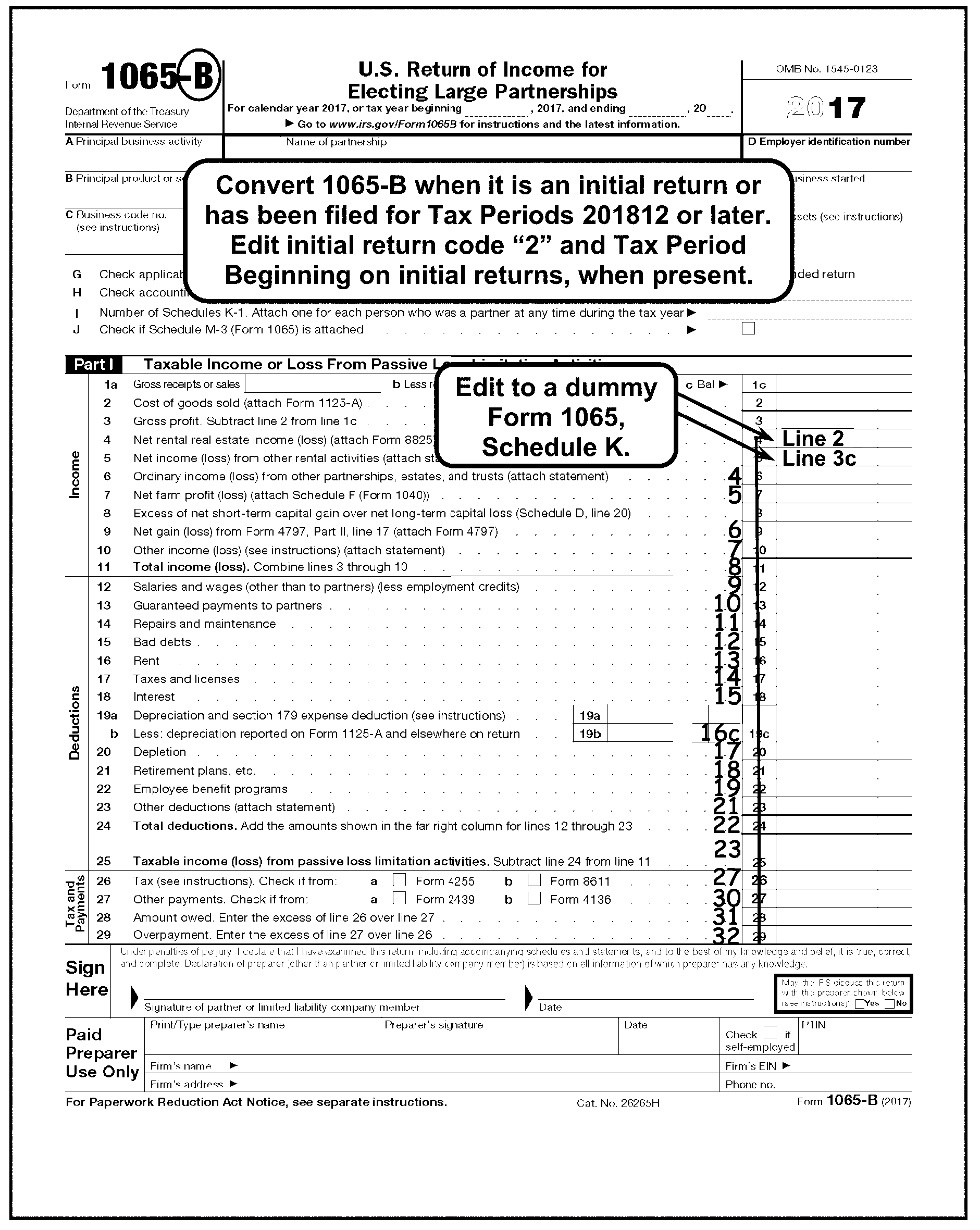
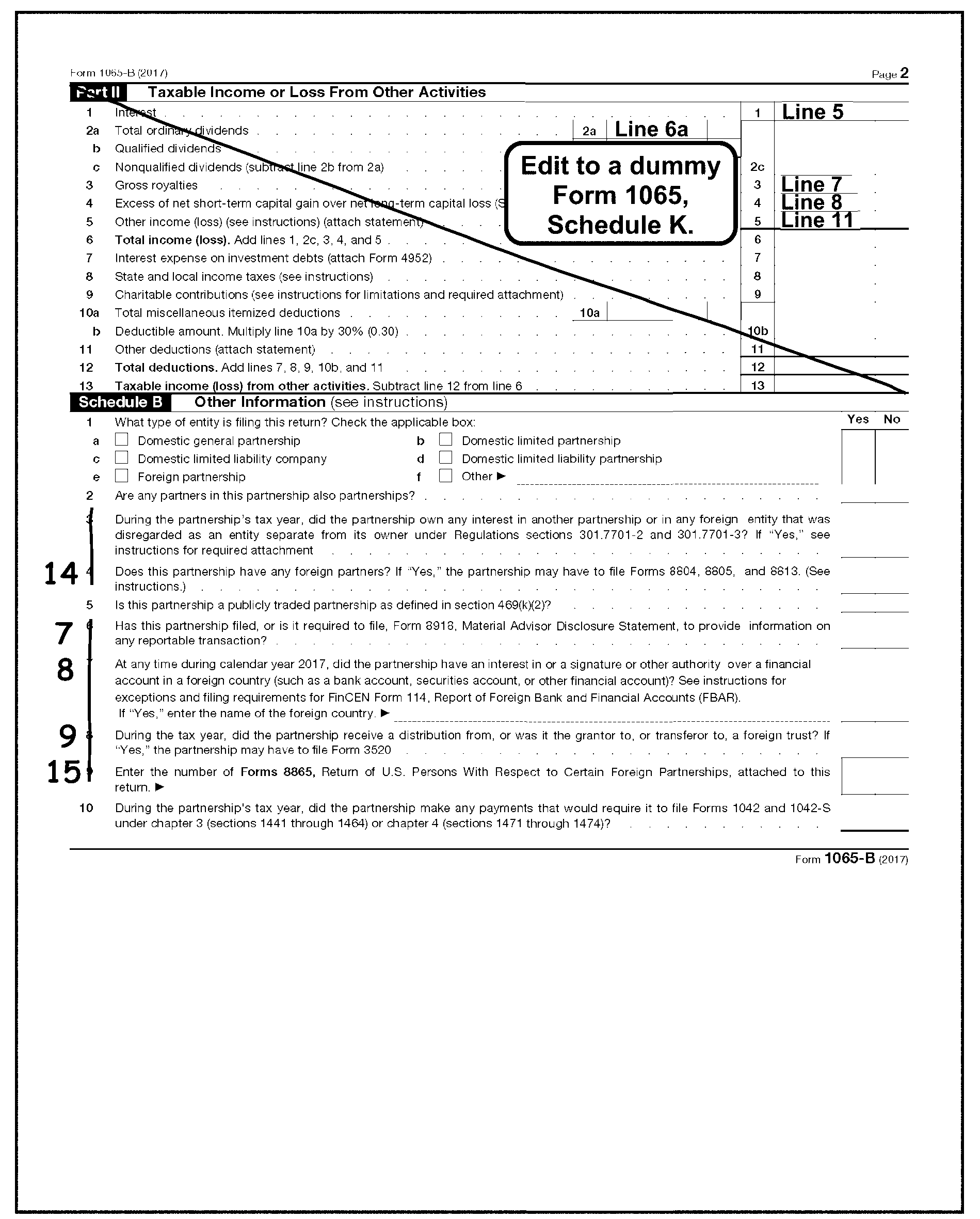
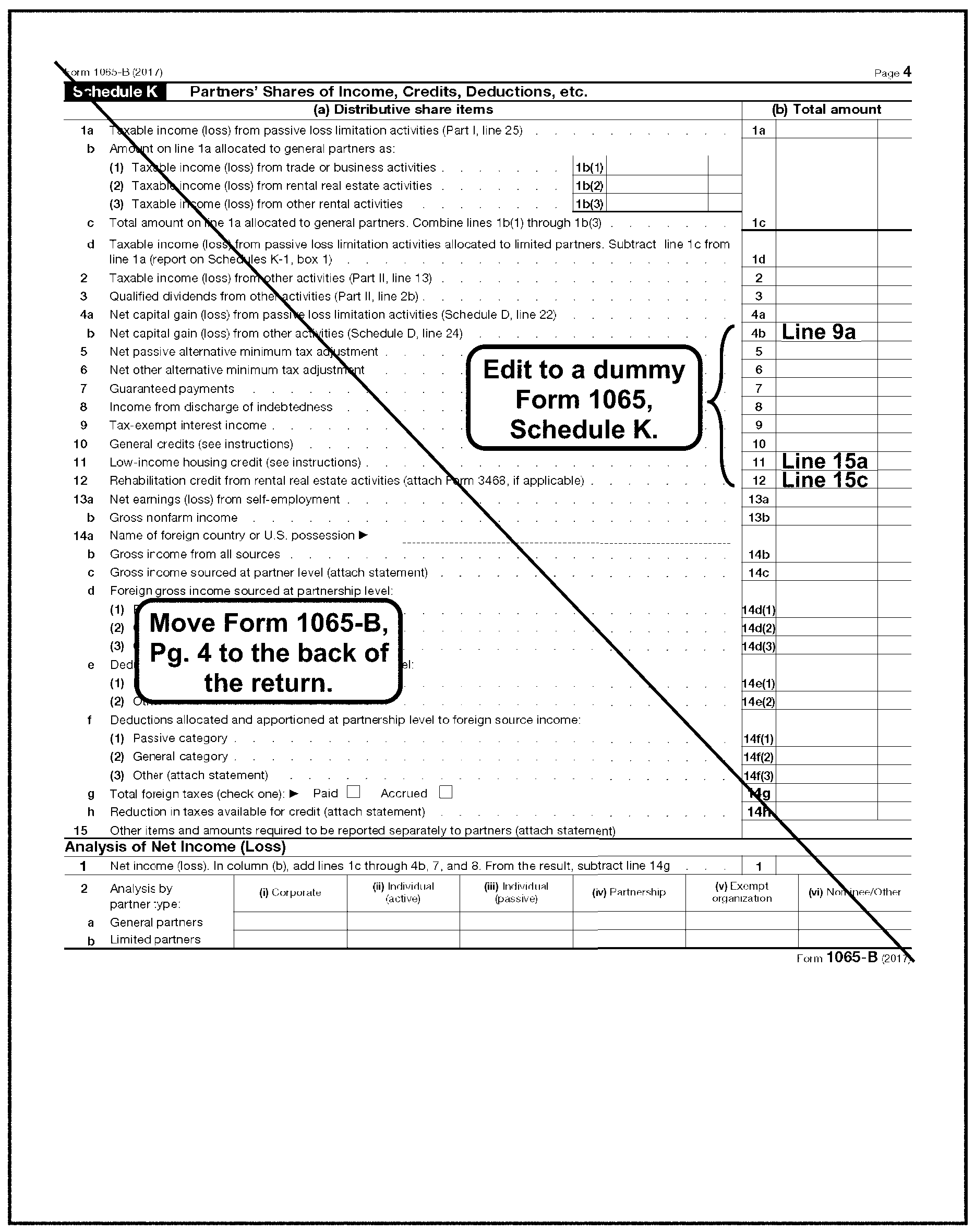
-
Identify a "Final" return by any of the following:
-
The "Final return box " is checked.
-
The return or attachments show "FINAL" , "OUT OF BUSINESS" , "NO LONGER LIABLE" , etc.
-
Partnership cites IRC 708(b)(1)(B)(for taxable years ending on or before 12/31/2017).
-
-
A "Final" Short Period return ends on the date the partnership went out of business. This may be any day of the month. Use the numeric designation of the calendar month in which it ended. If the partnership does not show the month the business ended, edit the Tax Period ending as one month before the return Received Date.
-
Edit CCC "F" to the center of Lines 1 and 2 of the return.
-
Edit the Tax Period Beginning in MMDDYY format per IRM 3.11.15.9.2.
-
If partnership files both an "Initial" and "Final" Short Period return using one EIN and together covers no more than one 12 month or 52-53 week period and both returns are received together for editing, do the following:
-
Combine both returns into one return.
-
Combine money amounts from transcription lines.
-
If conflicting information is present (i.e., Number of Partners, Business Code etc.), use the information from the Final or latest return.
-
Process the combined return.
-
-
See IRM 3.11.15.10.
-
See IRM 3.11.15.10.2.
-
This subsection gives instructions for editing Total Assets at End of Year, Box "F" , on Form 1065-B.
-
If Box "F" is the only transcription line (T-line) with an entry, Short Record the return. See IRM 3.11.15.5.8.4 for Inactive Return instructions.
-
If Box "F" information is required and the amount is missing, edit the amount shown on Form 1065-B, page 5, Line 14, Column (d), Schedule L. See Figure 3.11.15-19
-
If Line 14, Column (d) is blank and cannot be computed, use the amount on Line 22, Column (d).
-
If Box "F" is required and Schedule L, Balance Sheet, is missing or blank, correspond for Schedule L.
-
See IRM 3.11.15.16.
-
See IRM 3.11.15.16.6.
-
See IRM 3.11.15.16.9.
-
See IRM 3.11.15.16.11.
-
See IRM 3.11.15.16.13.
-
See IRM 3.11.15.16.22.
-
Edit a 1 to the right of page 1, Line 12 on Form 1065-B if an entry greater than zero is present on any of the following:
-
Form 1065-B, page 1, Line 12,
-
Schedule F, Line 22,
-
Schedule C, Line 26,
-
Form 8825, Line 13, Column A through H
-
Form 1125-A, Line 3,
-
Form 4835, Line 20, or
-
An attachment showing an amount for salaries, wages or labor.
-
-
DO NOT edit for the following:
-
Contract, outside, custom or miscellaneous labor,
-
Temporary help,
-
Management fees,
-
Janitorial service (or any other type of service),
-
Maintenance fees, or
-
Commissions.
-
-
The Employee Plan Master File (EPMF) is a master file maintained at Enterprise Computing Center at Martinsburg (ECC-MTB). This file consists of various types of tax sheltered Pension/Profit Sharing Plans.
-
Edit a "1" to the right of page 1, Line 21 on Form 1065-B if an entry greater than zero (±) is present on any of the following:
-
Form 1065-B, page 1, Line 21
-
Schedule C, Line 19,
-
Schedule F, Line 23,
-
Form 4835, Line 21,
-
An attachment showing an amount for retirement plan, pension and/or profit sharing.
-
-
This subsection gives instructions for editing additional Partnership perfection codes.
-
See IRM 3.11.15.20.1. If present, edit "1 -" followed by the proper audit code in the left margin next to Line 12 of Form 1065-B, page 1 (in the "Deductions" Section).
-
≡ ≡ ≡ ≡ ≡ ≡≡ ≡ ≡ ≡ ≡ ≡ ≡≡ ≡ ≡ ≡ ≡ ≡ ≡ ≡ ≡ ≡ ≡ ≡ ≡ ≡ ≡ ≡ ≡ ≡ ≡ ≡ ≡ ≡ ≡ ≡ ≡ ≡ ≡ ≡ ≡ ≡ ≡ ≡ ≡ ≡ ≡ ≡ ≡ ≡ ≡ ≡ ≡ ≡ ≡ ≡ ≡ ≡
-
If present, edit Code "2 - 1" in the left margin next to Line 12 of Form 1065-B. See IRM 3.11.15.20.2.
-
Form 6252, Installment Sale Income, is used to report the sale of property on the installment plan.
-
Codes are based solely on the partnership response to Question 3 on Form 6252.
-
See IRM 3.11.15.20.3. If present, edit "3 -" followed by the proper installment sale indicator in the left margin next to Line 12 of Form 1065-B.
-
Valid codes for Installment Sales Indicator are as follows:
Code One Form 6252 Multiple Form 6252 1 "Yes" response to Question 3, At least one form has a "Yes" response. 2 "No" response to Question 3, All "No" responses or a combination of "No" and/or blank responses. 3 "Yes" and "No" are checked or Question 3 is blank, Question 3 is blank on all forms.
-
Edit "4 - 1" as the Nonrecourse Loan Code in the left margin next to Line 12 of Form 1065-B in the following instances:
-
If there is an entry other than zero on Schedule L, Line 18, Columns (b) or (d) on Form 1065-B.
-
If Schedule K-1 (Form 1065-B) has an entry other than zero on Line a in the Partner's Share of Liabilities section in the lower left side of Schedule K-1. See Figure 3.11.15-28.
-
If an attachment shows a nonrecourse loan.
-
-
In all other instances, leave blank.
-
The following information will enable you to perfect tax data.
-
Edit the following line items per these guidelines:
-
Edit all monetary amounts as dollars only.
-
If the partnership has entered dollars and cents, and has not entered a decimal point, edit a decimal point or ruled line immediately after the units position of the dollar amount when no solid line is found on the return.
-
On monetary amounts with a decimal point present, do not edit unless otherwise specified.
-
If any of the transcribed tax data lines are missing, compute the correct entry from available figures on the return or attachments. If entry cannot be determined, leave blank.
-
Any misplaced entries must be moved to the correct line. The entry on the incorrect line must be "X" ed out.
-
If the correct line for the misplaced entry cannot be determined, move to the "Other" line.
-
-
This subsection gives instructions for editing Lines 1 through 11 on Form 1065-B.
-
Do not bracket any entry, unless editing or computing a negative amount.
-
Perfect all illegible or misplaced entries (when possible).
-
Delete misplaced entries and edit to correct lines.
If Then The partnership shows missing entries are supported by schedules or there are missing entries on Lines 1a through 11, -
Check attached schedules and edit TOTAL figures to Lines 10 and 11 of Form 1065-B.
-
If no schedule(s) present, leave corresponding entries blank.
Lines 1a through 11 are missing and cannot be determined from an attachment, Combine Lines 24 and 25 (if present) and edit to Lines 10 and 11 of Form 1065-B. -
-
Total gross receipts are reported on Line 1a of Form 1065-B.
If And Then Line 1a is blank, There are entries in Lines 1b and 1c, Add Lines 1b and 1c together and edit result to Line 1a of Form 1065-B. Lines 1a and 1b are blank, There is an entry on Line 1c, Edit the entry from Line 1c to Line 1a of Form 1065-B. Lines 1a, 1b and 1c are blank, There is an entry on Line 3, Add Line 2 to Line 3 and edit the total to Line 1a of Form 1065-B.
-
Returns and allowances is reported on Line 1b of Form 1065-B.
If And Then Line 1b is blank, Lines 1a and 1c have different amounts, Subtract Line 1c from Line 1a and edit result in Line 1b of Form 1065-B. Line 1b is blank, Lines 1a and 1c have the same amounts, Leave Line 1b blank.
-
Cost of Goods Sold is reported on Line 2 of Form 1065-B.
-
The entry is from Form 1125-A, Line 8.
If And Then Line 2 is blank There is an entry on Line 8, Form 1125-A, Edit amount from, Line 8, Form 1125-A. Line 2 is blank Line 8, Form 1125-A is blank, Subtract Lines 7 from Line 6 on Form 1125-A, and edit result to Line 2 of Form 1065-B. Line 2 is blank Lines 7 and 8 on Form 1125-A are blank, Edit amount from Line 6 on Form 1125-A to Line 2 of Form 1065-B. If Line 2 is present Form 1125-A is not attached, Dummy Form 1125-A. -
See IRM 3.11.15.74 , Form 1125-A, Cost of Goods Sold (previously Form 1065-B, Schedule A), for "dummy return" preparation procedures.
-
Gross profit is computed by subtracting Line 2 from Line 1c on Form 1065-B.
-
Line 3 is not a T-line. If Line 3 is blank, compute only if needed to compute Line 11 of Form 1065-B.
-
The partnership reports Net Rental Real Estate Income or Loss on Line 4 of Form 1065-B.
-
Form 8825 is used to report Rental Real Estate Income on Line 4 of Form 1065-B.
-
If there is an entry ≡ ≡ ≡ ≡ ≡ ≡ ≡ ≡ ≡ ≡ ≡ ≡ ≡ ≡ ≡ on Form 1065-B, Line 4 then Form 8825, Rental Real Estate Income and Expenses of a Partnership or an S Corporation must be attached.
-
Edit Form 1065-B, Line 4 and Form 8825 as follows:
If And Then Form 1065-B, Line 4 has an amount present ≡ ≡ ≡ ≡ ≡ ≡ ≡ ≡ ≡ ≡ ≡ ≡ ≡ ≡, Form 8825, Line 23 agrees with Form 1065-B, Line 4, -
No action required.
-
Continue editing the return.
Form 1065-B, Line 4 has an amount present ≡ ≡ ≡ ≡ ≡ ≡ ≡ ≡ ≡ ≡ ≡ ≡, Form 8825, Line 23 is smaller than the amount on Form 1065-B, Line 4, -
No action required.
-
Continue editing the return.
Form 1065-B, Line 4 has an amount present ≡ ≡ ≡ ≡ ≡ ≡ ≡ ≡ ≡ ≡ ≡ ≡ ≡ ≡, Form 8825, Line 23 is greater than the amount on Form 1065-B, Line 4, -
Edit the amount from Form 8825, Line 23 to Form 1065-B, Line 4.
-
Continue editing the return.
Form 1065-B, Line 4 has an amount present ≡ ≡ ≡ ≡ ≡ ≡ ≡ ≡ ≡ ≡ ≡ ≡ ≡ ≡ ≡, Multiple Forms 8825 are attached, -
Combine all Lines 20a (Line 17 on 2006 or before) and edit to the first Form 8825.
-
Combine all Lines 23 and edit to the first Form 8825.
-
Edit the combined Line 23 amount to Form 1065-B, Line 4.
-
"X" remaining Forms 8825.
Form 1065-B, Line 4 has an amount present ≡ ≡ ≡ ≡ ≡ ≡ ≡ ≡ ≡ ≡ ≡ ≡ ≡ ≡ ≡, Form 8825 is not attached, -
Correspond with the partnership to request Form 8825 using Letter 1355C or other approved local correspondence procedure.
Form 1065-B, Line 4 has an amount present ≡ ≡ ≡ ≡ ≡ ≡ ≡ ≡ ≡ ≡ ≡ ≡ ≡, Schedule E is attached, The amount on Line 21 of Form 8825≡ ≡ ≡ ≡ ≡ ≡ ≡ ≡ ≡ ≡ ≡ ≡ ≡ ≡, Line 4 of Form 1065-B is blank, -
Edit the amount from Form 8825, Line 23 to Form 1065-B, Line 4.
Form 8825, Line 20a (Line 17 on 2006 or before) is negative, -
"X" the negative amount.
-
Continue editing the return.
Form 8825, Line 20a (Line 17 on 2006 or before) is blank, -
Compute Line 20a (Line 17 on 2006 or before) by adding gross rents, Line 2, Columns A through H.
-
Edit the combined total to Form 8825, Line 20a (Line 17 on 2006 or before).
Form 8825, Line 23 is blank, -
Compute Line 23 by combining Lines 20a through Lines 22a.
-
Edit the computed Line 23 amount to Line 23 and Form 1065-B, Line 4.
-
Continue editing the return.
-
-
The Net Income or Loss from Rental Activities Other than Rental Real Estate is reported on Line 5 of Form 1065-B.
-
Accept the partnership entry.
-
The ordinary income or loss from Other Partnerships, Estates and Trusts is reported on Line 6 of Form 1065-B.
-
Accept the partnership entry.
-
The net profit or loss from farming is reported on Line 7 of Form 1065-B.
-
This entry is supported by Schedule F, Profit or Loss From Farming, or an attached schedule.
-
If Line 7 is blank, edit the Net Farm Income or Loss from Schedule F or attached schedule.
-
-
See IRM 3.11.15.72 for Schedule F editing procedures.
-
The excess of the Net Short-Term Capital Gain over the Net Long-Term Capital Loss is reported on Line 8 of Form 1065-B.
-
This entry is supported by Schedule D, Capital Gains and Losses, on page 3 of Form 1065-B.
-
Accept the partnership entry.
-
The ordinary gains or losses from the sale, exchange or involuntary conversion of assets used by the partnership is reported on Line 9 of Form 1065-B.
-
This entry is supported by Form 4797, Sales of Business Property.
If Then Form 4797 is attached and there is an entry on Line 17, Edit the amount to Line 9 of Form 1065-B. Line 17 of Form 4797 includes amounts from Line 7 of Form 4797, -
Adjust Line 17 to reflect the correct amount.
-
Edit corrected amount from Line 17 of Form 4797 to Line 9 of Form 1065-B.
-
-
Accept the partnership entry.
-
Other income or loss not shown on Lines 1a through 9 is reported on Line 10 of Form 1065-B.
-
An entry on Line 10 should be supported by an attached schedule.
If Then A statement is not attached, ≡ ≡ ≡ ≡ ≡ ≡ ≡ ≡ ≡ ≡ ≡ ≡ ≡ ≡ ≡ The attachment shows the type of income to be the same as that reported on any Lines 1a through 9, Decrease the Line 10 amount by that amount and increase the correct income Line (Lines 1a through 9) on Form 1065-B. Line 10 is blank or illegible and "Other Income" is reported on an attachment to Form 1065-B, Determine and edit the other income amount to Line 10 of Form 1065-B. -
Line 10 may include an amount from Form 6478 (Alcohol and Cellulosic Biofuel Fuels Credit). If Form 6478 is attached with a significant amount on *Line 5(c) or Line 8, edit Action Code 343.
-
The total income or loss (sum of Lines 1c through 10) is reported on Line 11 of Form 1065-B.
If Then There is an entry present for total income on Line 11 but the amount is not identified on Lines 1a through 10 and/or attachments, Edit the Line 11 amount to Line 10 of Form 1065-B. Line 11 is blank but there are entries on Lines 1a through 10, Compute and edit Line 11 of Form 1065-B.
-
This subsection gives instructions for editing Lines 12 through 25 on Form 1065-B.
-
Do not bracket any entry, unless editing or computing a negative amount.
-
Perfect all illegible or misplaced entries (when possible).
-
Delete misplaced entries and edit to the correct lines.
If Then The partnership shows missing entries are supported by schedules or there are missing entries on Lines 12 through 25, -
Check the schedules/attachment and edit TOTAL figure to Lines 24 and 25 of Form 1065-B.
-
If no schedule(s) present, leave corresponding entries blank.
Lines 12, 13, 16, 17, or 18 have negative amounts, "X" the negative amounts and include in the calculation for Line 23, "Other Deductions" . Lines 12 to 24 are missing and cannot be determined from an attachment, Edit Line 25 amount (if present) to Lines 10 and 11 of Form 1065-B. -
-
Payments made to partners for services or for the use of capital is reported on Line 13 of Form 1065-B.
-
Entry must be positive.
-
Accept the partnership entry.
-
The costs of incidental repairs and maintenance that do not add to the value of the property or prolong its life is reported on Line 14 of Form 1065-B.
-
Accept the partnership entry.
-
Total debts that became worthless during the year is reported as bad debts on Line 15 of Form 1065-B.
-
Accept the partnership entry.
-
The rent paid on business property used by the partnership is reported on Line 16 of Form 1065-B.
-
Entry must be positive.
-
Accept the partnership entry.
-
Taxes and Licenses paid by the partnership is reported on Line 17 of Form 1065-B.
-
Entry must be positive.
-
Accept the partnership entry.
-
Interest paid by the partnership is reported on Line 18 of Form 1065-B.
-
Entry must be positive.
-
Accept the partnership entry.
-
The depreciation (including the Section 179 expense deduction) claimed on partnership assets is reported on Line 19a through 19c of Form 1065-B.
If And Then Lines 19a and 19c are blank, There is an entry on Line 19b, Arrow Line 19b to Line 19c. Lines 19b and 19c are blank, There is an entry on Line 19a, Arrow Line 19a to Line 19c of Form 1065-B. Line 19c is blank, There are entries on Lines 19a and 19b, Subtract Line 19b from Line 19a and edit the amount to Line 19c on Form 1065-B.
-
The partnership reports a deduction for depletion on Line 20 of Form 1065-B.
-
Accept the partnership entry.
-
Partnership contributions to Employee Benefit Programs (e.g., insurance, health and welfare programs) is reported on Line 22 of Form 1065-B.
-
Accept the partnership entry.
-
The total allowable deductions not deducted elsewhere on page 1 is reported on Line 23 of Form 1065-B.
-
An entry on Line 23 may be supported by an attached schedule.
-
The total deductions (sum of Lines 12 through 23) is reported on Line 24 of Form 1065-B.
If Then There is an entry present for Total Deductions on Line 24 but the amount is not identified on Lines 12 through 23, Edit Line 24 amount to Line 23 of Form 1065-B. Line 24 is blank but there are entries in Lines 12 through 23, Compute and edit Line 24 of Form 1065-B.
-
Taxable income or loss is derived by subtracting Line 24 from Line 11 on Form 1065-B.
if And Then Line 25 is blank, There are entries on Lines 11 and 24, Subtract Line 24 from Line 11 and edit to Line 25 of Form 1065-B. Lines 25 and 24 are blank, There is an entry on Line 11, Edit the Line 11 amount to Line 25 of Form 1065-B. Lines 25 and 11 are blank, There is an entry on Line 24, Edit the Line 24 amount to Line 25 of Form 1065-B.
-
This subsection gives instructions for editing Lines 26 through 29 on Form 1065-B.
-
All entries must be positive.
-
All entries are edited as dollars and cents.
-
The tax computed from the recapture of the Investment Credit and Low-Income Housing Credit is reported on Line 26 of Form 1065-B.
-
Entry may be supported by Form 4255 (Certain credit Recapture, Excessive Payments, and Penalties), Form 8611 (Recapture of Low-Income Housing Credit) or other attachment.
-
Accept the partnership entry.
-
This credit was used for tax periods 200612 to 200711 when claiming credit on Form 8913, Credit for Federal Telephone Excise Tax Paid.
-
Sequence Form 8913 after Form 1125-A.
-
Other payments made by the partnership are reported on Line 27 of Form 1065-B.
-
Entry may be supported by Form 2439 Notice to Shareholders of Undistributed Long-Term Capital Gains, Form 4136 (Credit for Federal Tax Paid on Fuels, Form 7004 Application for Automatic Extension of Time To File Certain Business Income Tax, Information, and Other Returns, or other attachment.
-
Accept the partnership entry.
-
The balance of tax due (Line 27 subtracted from Line 26) is reported on Line 28 of Form 1065-B.
-
Entry must be present if Line 27 is smaller than Line 26.
If And Then Line 28 is present, Lines 26 and 27 are blank, Edit amount in Line 28 to Line 26 of Form 1065-B. Line 28 is blank, There are entries in Lines 26 and 27, Subtract Line 27 from Line 26 and edit to Line 28 of Form 1065-B. Lines 28 and 27 are blank, There is an entry on Line 26, Edit amount in Line 26 to Line 28 of Form 1065-B. -
If pre-computed interest or delinquency penalty or additional charge is evident, ensure that it has not been included in Line 26 or 27, nor reduced Line 28.
-
Excess payment (Line 27) exceeding the tax shown on Line 26 is a refund and reported on Line 29 of Form 1065-B.
-
Entry must be present if Line 27 is larger than Line 26.
If And Then Line 29 is blank, There is an entry on Line 28, Take no action. Line 29 is blank, There is no entry on Line 28, Subtract Line 26 from Line 27 and edit to Line 29 of Form 1065-B. Lines 29, 28 and 26 are blank, There is an entry on Line 27 (or 26 and/or 27), Edit Line 27 amount to Line 29 of Form 1065-B.
-
This subsection gives instructions for editing Taxable Income or Loss From Other Activities (Lines 1 through 13) on page 2, Part II of Form 1065-B.
-
Do not bracket any entry.
-
Taxable interest from activities other than passive loss limitation activities is reported on Line 1 in Part II.
-
Accept the partnership entry.
-
Taxable Ordinary Dividends are reported on Line 2a in Part II of Form 1065-B.
-
Accept the partnership entry.
-
Gross Royalties are reported on Line 3 in Part II of Form 1065-B.
-
Accept the partnership entry.
-
The Excess of Net Short-Term Capital Gain over the Net Long-Term Capital Loss is reported on Line 4 in Part II of Form 1065-B.
-
Entry may be supported by Schedule D.
-
Accept the partnership entry.
-
Other income or loss not reported elsewhere on the return is reported on Line 5 in Part II of Form 1065-B.
-
Entry may be supported by an attached schedule.
-
Accept the partnership entry.
-
Total income or loss (sum of Lines 1, 2c, 3, 4 and 5) is reported on Line 6 in Part II of Form 1065-B.
-
Accept the partnership entry.
-
Interest paid on a debt allowable to property held for investment is reported on Line 7 in Part II of Form 1065-B.
-
Entry is supported by Form 4952, Investment Interest Expense Deduction.
-
Entry must be positive.
-
Accept the partnership entry.
-
State and local income taxes paid by the partnership that would be allowed as itemized deductions on any partners' income tax return if they were paid directly by the partner are reported on Line 8 in Part II of Form 1065-B.
-
Entry must be positive.
-
Accept the partnership entry.
-
Contributions or gifts to a charitable organization are reported on Line 9 in Part II of Form 1065-B.
-
Entry may be supported by Form 8283, Noncash Charitable Contributions or an attached statement.
-
Entry must be positive.
-
Accept the partnership entry.
-
Miscellaneous Itemized Deductions such as, investment advisory fees, subscriptions to investment advisory publications and the cost of safe deposit boxes are reported on Line 10a in Part II of Form 1065-B.
-
Entry must be positive.
-
Accept the partnership entry.
-
The deductible amount of the miscellaneous itemized deductions (30% of Line 10a) is reported on Line 10b in Part II of Form 1065-B.
-
Entry must be positive.
-
Accept the partnership entry.
-
Other allowable deductions, such as, real estate taxes and personal property taxes on investment property, casualty and theft losses on income-producing property, penalty on early withdrawal of savings, etc., are reported on Line 11 in Part II of Form 1065-B.
-
Entry must be positive.
-
Accept the partnership entry.
-
The Total Deductions (sum of Lines 7 through 11) are reported on Line 12 in Part II of Form 1065-B.
-
Entry must be positive.
If Then There is an entry present in Total Deductions on Line 12 but the amount is not identified in Lines 7 through 11, Edit the Line 12 amount to Line 11 in Part II of Form 1065-B. Line 12 is blank but there are entries on Lines 7 through 11, Compute and edit Line 12 in Part II of Form 1065-B.
-
Taxable income or loss from other activities is derived by subtracting Line 12 from Line 6 and is reported on Line 13 in Part II of Form 1065-B.
If And Then Line 13 is blank, There are entries in Lines 6 and 12, Subtract Line 12 from Line 6 and edit to Line 13 in Part II of Form 1065-B. Line 13 and 12 are blank, There is an entry on Line 6, Edit the Line 6 amount to Line 13 in Part II of Form 1065-B. Lines 13 and 6 are blank, There is an entry on Line 12, -
Edit the Line 12 amount to Line 13 in Part II of Form 1065-B.
-
-
This subsection gives instructions for editing Form 1065-B, Schedule B, page 2.
-
There are two types of Partner Codes, the Dual Partner Code and the Multi Partner Code. Both are based on the partnership answers to questions 2 and 3 found on Schedule B.
-
The Dual Partner Code is based on the partnership response to the question on Form 1065-B, Schedule B, Line 2.
-
The Dual Partner Code is edited as follows:
If Then Schedule B is present and the "Yes" box is checked, -
Edit Audit Code "4" in the left margin of page 1 next to line 12 in 1-4 format.
-
Continue editing the return.
Schedule B is present and the "No" box is checked, -
No editing required.
-
Continue editing the return.
Schedule B is present and "both" boxes are checked, -
Edit "3" next to the checkbox.
-
Continue editing the return.
Schedule B is present and "neither" box is checked, -
No editing required.
-
Continue editing the return.
-
-
The Multi Partner Code is based on the partnership answer to the question on Line 3, Schedule B of Form 1065-B.
-
The Multi Partner Code is edited as follows:
If Then Schedule B is present and the "Yes" box is checked, -
Edit Audit Code "2" in the left margin on page 1 next to Line 12 in "1-2" format.
-
Continue editing the return.
Schedule B is present and the "No" box is checked, -
No editing required.
-
Continue editing the return.
Schedule B is present and "both" boxes are checked, -
Edit "3" next to the checkbox.
-
Continue editing the return.
Schedule B is present and "neither" box is checked, -
No editing required.
-
Continue editing the return.
-
-
The Foreign Partner Code is based on the partnership response to Question 4, Schedule B of Form 1065-B.
-
Edit Audit Code "2" in format 1 - 2 in the left margin on page 1 next to Line 12 if "Yes" is checked. See IRM 3.11.15.20.1, Audit Codes.
-
The Foreign Trust Indicator is based on the partnership response to Question 8, Schedule B of Form 1065-B.
-
Edit Audit Code "2" in format 1 - 2 in the left margin on page 1 next to Line 12 if "Yes" is checked. See IRM 3.11.15.20.1, Audit Codes.
-
Use the following instructions for missing Schedule K:
-
Correspond with the partnership when Schedule K is not attached to the return, or a blank Schedule K is attached to the return, and it is not a Short Record return.
-
If Schedule D is attached, prepare a "dummy" Schedule K by editing information from the correct line(s) to the corresponding line(s) of Schedule K.
If And Then Schedule K is missing (or blank), Schedule D, and/or Form 8825 are attached, Perfect or dummy Schedule K by editing information from the attachment(s) to the correct line(s) on Schedule K. Schedule K is missing or blank and cannot be perfected or dummied from attachments, The return is not a Short Record return, See IRM 3.11.15.5.8, Short Record Returns - General Instructions. -
Correspond when the partnership is required to complete and file a Schedule K.
-
-
The partnership reports the taxable income or loss from trade or business activities on Line 1b(1) of Schedule K.
-
≡ ≡ ≡ ≡ ≡ ≡ ≡ ≡ ≡ ≡ ≡ ≡ ≡ ≡ ≡
-
The partnership reports the Taxable Income or Loss from Rental Real Estate activities allocated to general partners.
-
≡ ≡ ≡ ≡ ≡ ≡ ≡ ≡ ≡ ≡ ≡ ≡ ≡ ≡ ≡
-
The partnership reports the Taxable Income or Loss from Passive Loss limitation activities allocated to limited partners on Line 1d of Schedule K.
-
≡ ≡ ≡ ≡ ≡ ≡ ≡ ≡ ≡ ≡ ≡ ≡ ≡ ≡ ≡ ≡ ≡ ≡
-
The partnership reports the Taxable Income or Loss from Other Activities (shown on Line 13, Part II of Form 1065-B) on Line 2 of Schedule K.
-
≡ ≡ ≡ ≡ ≡ ≡ ≡ ≡ ≡ ≡ ≡ ≡ ≡ ≡ ≡
-
The partnership reports Qualified Dividends (shown on Line 3, Part II of Form 1065-B) and reported on Part II Line 2b.
-
≡ ≡ ≡ ≡ ≡ ≡ ≡ ≡ ≡ ≡ ≡ ≡ ≡ ≡ ≡ ≡ ≡ ≡ ≡
-
The partnership reports Net Capital Gain or Loss from Passive Loss Limitation Activities on Line 4a of Schedule K. Net Capital Gain or Loss from Other Activities is reported on Line 4b of Schedule K.
-
If Schedule D is attached and Line 4a and/or 4b is blank, edit the amounts as follows:
-
Edit the amount from Line 22, Schedule D to Line 4a, Schedule K.
-
Edit the amount from Line 24, Schedule D to Line 4b, Schedule K.
-
-
Check the top margin for a statement, such as, "LIKE-KIND EXCHANGE" , "RELATED PARTY EXCHANGE" or "RELATED PARTY LIKE-KIND EXCHANGE" .
-
If statement is present, search the return for Form 8824, Like-Kind Exchange.
-
If Form 8824 is attached, edit CCC "1" .
-
-
If Form 8824 is not attached, correspond using Form 3696 or other approved Correspondence Action Sheet.
-
The partnership reports Net Passive Alternative Minimum Tax Adjustment amount on Line 5, Schedule K.
-
≡ ≡ ≡ ≡ ≡ ≡ ≡ ≡ ≡ ≡ ≡ ≡ ≡ ≡ ≡ ≡ ≡ ≡ ≡
-
The partnership reports Net Other Alternative Minimum Tax Adjustment amount on Line 6, Schedule K.
-
≡ ≡ ≡ ≡ ≡ ≡ ≡ ≡ ≡ ≡ ≡ ≡ ≡ ≡ ≡
-
The partnership reports Guaranteed Payments amount on Line 7, Schedule K.
-
≡ ≡ ≡ ≡ ≡ ≡ ≡ ≡ ≡ ≡ ≡ ≡ ≡ ≡ ≡ ≡
-
The partnership reports Income From Discharge of Indebtedness on Line 8, Schedule K.
-
≡ ≡ ≡ ≡ ≡ ≡ ≡ ≡ ≡ ≡ ≡ ≡ ≡ ≡ ≡ ≡ ≡
-
The partnership reports Tax-Exempt Interest Income on Line 9, Schedule K.
-
≡ ≡ ≡ ≡ ≡ ≡ ≡ ≡ ≡ ≡ ≡ ≡ ≡ ≡ ≡ ≡ ≡
-
The partnership reports General Credits on Line 10 of Schedule K.
-
"X" to the left of the entry if there is an amount ≡ ≡ ≡ ≡ ≡ ≡ ≡ ≡ ≡ ≡ ≡ on Line 10.
-
≡ ≡ ≡ ≡ ≡ ≡ ≡ ≡ ≡ ≡ ≡ ≡ ≡ ≡ ≡
-
If Form 6478, Alcohol and Cellulosic Biofuel Fuels Credit, is attached with a significant amount on Line *5(c) or Line 8, edit Action Code 343.
-
The partnership reports the Low-Income Housing Credit on Line 11 of Schedule K.
-
If there is an entry on Line 11, take the following actions:
-
"X" to the left of the entry ≡ ≡ ≡ ≡ ≡ ≡ ≡ ≡ ≡ ≡ ≡ ≡ ≡ ≡ ≡ ≡ ≡ ≡ ≡ ≡ ≡ ≡ ≡.
-
Correspond for Form 8586, Low-Income Housing Credit, and Form 8609-A, Annual Statement for Low-Income Housing Credit, if a credit ≡ ≡ ≡ ≡ ≡ ≡ ≡ ≡ ≡ ≡ ≡ ≡ is claimed on Line 11 of Schedule K, and Form 8586 is not attached.
-
For tax years 200512 and later, correspond for Form 8609-A, Annual Statement for Low-Income Housing Credit, if Form 8586, Line 3 (Line 3 or Line 10 for 2008 and later) has an entry ≡ ≡ ≡ ≡ ≡ ≡ ≡ ≡ ≡ ≡.
-
For tax years 200412 and before, correspond for Form 8609, Low-Income Housing Credit Allocation and Certification, and Schedule A (Form 8609), Annual Statement, if Form 8586, Line 2, 3a, or 4 has an entry ≡ ≡ ≡ ≡ ≡ ≡ ≡ ≡ ≡ ≡ ≡ ≡.
-
-
The partnership reports the Rehabilitation Credit on Line 12 of Schedule K.
-
"X" to the left of the entry if there is an amount ≡ ≡ ≡ ≡ ≡ ≡ ≡ ≡ ≡ on Line 12.
-
≡ ≡ ≡ ≡ ≡ ≡ ≡ ≡ ≡ ≡ ≡ ≡ ≡ ≡ ≡ ≡
-
If Line 19b, Column (d), Mortgages, Notes and Bonds payable in one year or more, is blank, edit amount from Line 19b, Column (b) or from supporting documentation, if present.
-
Edit a Nonrecourse Loan Code in the left margin of page 1 next to Line 12 in 4-1 format, if there is an entry on Line 18(b) and/or 18(d) on Schedule L. See IRM 3.11.15.62.4, Nonrecourse Loan Code.
-
≡ ≡ ≡ ≡ ≡ ≡ ≡ ≡ ≡ ≡ ≡ ≡ ≡ ≡ ≡ ≡ ≡ ≡
-
Correspond for Schedule L unless the return meets any of the following conditions:
-
Page 1, Box "F" is blank, "0" (zero), "-" (dash), "NONE" , "N/A" or some similar entry.
-
Schedule L is crossed out or annotated "ZERO" , "NONE" , "N/A" or some similar entry.
-
There is an indication of single entry bookkeeping (Box "F" is blank, the cash box on Line H is checked and there are no entries on Lines 1 through 29 on Form 1065-B, page 1.
-
Final Return.
-
-
If any of the conditions in (4) above are met, Schedule L is not required: Delete by "X" ing or slashing through the schedule. If Schedules M-1 and M-2 are present, also delete by "X" ing or slashing through the schedules.
Caution:
Do not delete Schedule M-2 ≡ ≡ ≡ ≡ ≡ ≡ ≡ ≡ ≡ ≡ ≡ ≡ ≡ ≡ ≡ ≡ ≡ ≡ ≡ ≡ ≡. See IRM 3.11.15.71 , Schedule M-2, page 5.
-
Do not edit Total Assets in Box "F" .
-
Do not edit Nonrecourse Loan Code from Schedule L.
-
If Box "F" is the only transcription line (T-line) with an entry, Short Record the return.
-
-
If Line 6b is ≡ ≡ ≡ ≡ ≡ ≡ ≡ ≡ ≡ ≡ ≡ ≡ ≡, edit Audit Code 9 in the left margin of page 1 next to Line 12 in 1-9 format.
-
The partnership reports the balance of the Partners' Capital Accounts on Line 9 of Schedule M-2.
-
If Line 9 on Schedule M-2, is blank, edit from Schedule L, Line 21, Column (d) (Total Liabilities and Capital).
-
≡ ≡ ≡ ≡ ≡ ≡ ≡ ≡ ≡ ≡ ≡ ≡ ≡ ≡ ≡ ≡ ≡ ≡
-
See IRM 3.11.15.29, Schedule F - Profit or Loss From Farming.
-
Place Form 8825 immediately following Schedule F.
-
Line 20a is edited and transcribed. Convert Line 17 to Line 20a on Form 8825 2006 and before revisions (renumber Line 17 as 20a). Convert line 18a to 20a on revisions 2007-2018.
-
The amount shown on Line 23 of Form 8825 is reported on Line 4 of Form 1065-B (page 1). See IRM 3.11.15.64.5 , Line 4 - Net Income (Loss) From Rental Real Estate Activities, for more editing instructions.
-
See IRM 3.11.15.35, Form 1125-A, Cost of Goods Sold (previously Form 1065, Schedule A).
-
Place Form 5884-B in sequence order if a significant entry is present on Line 10 or 11. See IRM 3.11.15.47 , General Editing Guidelines for Editing Form 1065-B, for sequence order instructions.
-
Place Form 8941 in sequence order if significant entries are present. See IRM 3.11.15.47 for sequence order instructions for Form 1065-B and attachments.
-
For further instructions, See IRM 3.11.15.37, Form 8941 , Credit for Small Employer Health Insurance Premiums.
-
Partnership returns identified as a "PUBLICLY TRADED PARTNERSHIP" will pay a tax on income derived from the active conduct of all trades and businesses of the partnership (per IRC 7704(g)(3)(A)).
-
These returns will have the annotation "3.5% GROSS INCOME TAX" on the return or attachment.
-
Publicly traded partnerships will be processed as a Form 1065. See IRM 3.11.15.2 through IRM 3.11.15.23.16.
-
The tax computed by the partnership is edited in the margin to the right of Line 23.
-
The following charts give information for converting Form 1065 (and other applicable forms and schedules) to the current processing format.
Prior Year Conversion 2024
Form/Schedule Action Form 1065 -
Change Line 32 to 32a
Form 1065, Schedule K -
Change Line 16 to 16a
Prior Year Conversion 2022
Form/Schedule Action Form 1065, Page 1 -
Change Line 20 to Line 21
-
Change Line 21 to Line 22
-
Change Line 22 to Line 23
-
Change Line 23 to Line 24
-
Change Line 24 to Line 25
-
Change Line 25 to Line 26
-
Change Line 26 to Line 27
-
Change Line 27 to Line 28
-
Change Line 28 to Line 30
-
Change Line 29 to Line 31
-
Change Line 30 to Line 32
Form 1065, Schedule B -
Line out Question 10b and 10c
-
Change Question 30 to Question 33
Prior Year Conversion 2021
Form/Schedule Action Form 1065, Page 1 -
Change Line 20 to Line 21
-
Change Line 21 to Line 22
-
Change Line 22 to Line 23
-
Change Line 23 to Line 24
-
Change Line 24 to Line 25
-
Change Line 25 to Line 26
-
Change Line 26 to Line 27
-
Change Line 27 to Line 28
-
Change Line 28 to Line 30
-
Change Line 29 to Line 31
-
Change Line 30 to Line 32
Form 1065, Schedule B -
Line out Question 10b and 10c
-
Change Question 29 to Question 33
Prior Year Conversion 2020 - 2018
Form/Schedule Action Form 1065 , Page 1 -
Change Line 20 to Line 21
-
Change Line 21 to Line 22
-
Change Line 22 to Line 23
-
Change Line 23 to Line 24
-
Change Line 24 to Line 25
-
Change Line 25 to Line 26
-
Change Line 26 to Line 27
-
Change Line 27 to Line 28
-
Change Line 28 to Line 30
-
Change Line 29 to Line 31
-
Change Line 30 to Line 32
Form 1065, Schedule B -
Line out Question 10b and 10c
-
Change Question 25 to Question 33
-
Change Question 26 to Question 25
-
Change Question 27 to Question 26
-
Change Question 28 to Question 27
-
Change Question 29 to Question 28
Form 1065, Schedule K Prior Year Conversion 2017 - 2014
Form/Schedule Action Form 1065, Page 1 -
Change Line 20 to Line 21
-
Change Line 21 to Line 22
-
Change Line 22 to Line 23
Form 1065, Schedule B -
Line out Question number 2
-
Change Question 3 to Question 2
-
Change Question 4 to Question 3
-
Line out Question numbers 9 through 19
-
Change Question 11 to Question 9
-
Change Question 12a to Question 10a
-
Change Question 15 to Question 13
-
Change Question 16 to Question 14
-
Change Question 17 to Question 15
-
Change Question 19 to Question 17
Form 1065, Schedule K Prior Year Conversion 2013
Form/Schedule Action Form 1065, Page 1 -
Change Line 20 to Line 21
-
Change Line 21 to Line 22
-
Change Line 22 to Line 23
Form 1065, Schedule B -
Line out Question number 2
-
Change Question 3 to Question 2
-
Change Question 4 to Question 3
-
Line out Question numbers 9 through 19
-
Change Question 11 to Question 9
-
Change Question 12a to Question 10a
-
Change Question 15 to Question 13
-
Change Question 16 to Question 14
-
Change Question 17 to Question 15
-
Change Question 19 to Question 17
Form 1065, Schedule K Form 8941 -
Change Line 1a to Line 1
-
Change Line 1b to Line B
Prior Year Conversion 2012
Form/Schedule Action Form 1065, Page 1 -
Change Line 20 to Line 21
-
Change Line 21 to Line 22
-
Change Line 22 to Line 23
Form 1065, Schedule B -
Line out Question number 2
-
Change Question 3 to Question 2
-
Change Question 4 to Question 3
-
Line out Question numbers 9 through 19
-
Change Question 11 to Question 9
-
Change Question 12a to Question 10a
-
Change Question 15 to Question 13
-
Change Question 16 to Question 14
-
Change Question 17 to Question 15
-
Change Question 19 to Question 17
Form 1065, Schedule K Schedule D (Form 1065) -
Change Line 1 to Line 1b
-
Change Line 8 to Line 8b
Form 8941 -
Change Line 1a to Line 1
-
Change Line 1b to Line B
Prior Year Conversion 2011
Form/Schedule Action Form 1065, page 1 Form 1065, Schedule B -
Line out Question number 2
-
Change Question 3 to Question 2
-
Change Question 4 to Question 3
-
Line out Question numbers 9 through 19
-
Change Question 11 to Question 9
-
Change Question 12a to Question 10a
-
Change Question 15 to Question 13
-
Change Question 16 to Question 14
-
Change Question 17 to Question 15
-
Change Question 19 to Question 17
Form 1065, Schedule K Schedule F, Form 1040 -
Line out Line number 1c
-
Change Line 1e to Line 1c
Prior Year Conversion 2010
Form/Schedule Action Form 1065 for TY 2010 and before -
"Gross Receipts or Sales" is claimed on Line 1a.
-
"Returns and Allowances" is claimed on Line 1b as "Less Returns and Allowances" .
-
Take no action and continue editing the return.
Form 1065, page 2, Schedule A -
If significant entries are present on Lines 1, 2, 6, and/or 7, prepare a dummy Form 1125-A by entering amounts onto applicable lines
-
Place Form 1125-A in sequence order
Form 1065, Schedule B -
Line out Question number 2
-
Change Question 3 to Question 2
-
Change Question 4 to Question 3
-
Line out Question numbers 9 through 17
-
Change Question 11 to Question 9
-
Change Question 12a to Question 10a
-
Change Question 15 to Question 13
-
Change Question 16 to Question 14
-
Change Question 17 to Question 15
Form 1065, Schedule K Form 1065, Schedule L -
Change Line 19 to Line 19b
Schedule F, Form 1040 -
Change Line 3 to Line 1c
-
Change Line 11 to Line 9 and line through the original Line 9
Form 8941 -
Line out Line numbers 16 and 18
-
Change Line 21 to Line 16
-
Change Line 23 to Line 18
-
-
The following charts give information for converting Form 8996 to the current processing format.
-
2020 and 2019 tax periods
Part II Change Line 6 to Line 7 Change Line 7 to Line 8 Change Line 9 to Line 10 Change Line 10 to Line 11 Part III Change Line 13 to Line 14 Change Line 14 to Line 15 -
2018 and 2017 tax periods
Part II Change Line 5 to Line 7 Change Line 6 to Line 8 Change Line 8 to Line 10 Change Line 9 to Line 11 Part III Change Line 12 to Line 14 Change Line 13 to Line 15 -
-
The following chart gives information for converting Form 3800, General Business Credit to the current processing format.
-
2023 tax period
Form 3800, Part III Action Line 1b -
change col (g) to (f)
-
change col (j) to (g)
-
change col (i) to (j)
Line 1d -
change col (g) to (f)
-
change col (j) to (g)
Line 1f -
change col (g) to (f)
-
change col (j) to (g)
Line 1g -
change col (g) to (f)
-
change col (j) to (g)
-
change col (i) to (j)
Line 1o -
change col (j) to (g)
-
change col (i) to (j)
Line 1s -
change col (g) to (f)
-
change col (j) to (g)
Line 1u -
change col (g) to (f)
-
change col (j) to (g)
Line 1x -
change col (g) to (f)
-
change col (j) to (g)
-
change col (i) to (j)
Line 1aa -
change col (j) to (g)
Line 4a -
change col (g) to (f)
-
change col (j) to (g)
Line 4e -
change col (g) to (f)
-
change col (j) to (g)
-
For Terms, Definitions and acronyms see the following tables:
Interpretation Words
| Word | Definition | Example |
|---|---|---|
| Fair | Accurate and professional service to all persons without regard to personal bias. | Taxpayers have the right to expect a fair and just tax system |
| Significant entry | Any entry other than zero or blank. | For example: If line 1 has a significant entry. Edit CCC A. |
| Usually | The exceptions when something is not required or what would create the unusual circumstance. | Nominee returns usually have only partnership entity information with a statement notating the partnership is a nominee and is not required to file. |
| Timely | The time frame to consider what is or is not timely. | Taxpayers have the right to receive assistance from the Taxpayer Advocate Service (TAS) if they are experiencing financial difficulty or if the IRS has not resolved their tax issues properly and timely through normal channels. |
Acronyms and Abbreviations
| Acronyms and Abbreviations | Definition |
|---|---|
| AMRH | Accounts Maintenance Research |
| ADP | Automated Data Processing |
| AM | Accounts Management |
| APO | Army Post Office |
| AUR | Automated Underreporter |
| BMF | Business Master File |
| C&E | Code and Edit |
| CCC | Computer Condition Code |
| CDP | Collection Due Process |
| CI | Criminal Investigation |
| CII | Correspondence Imaging Inventory |
| C/O | Care of |
| CP | Computer Paragraph |
| DBA | Doing Business As |
| DPE | Deemed Payment Election |
| DLN | Document Locator Number |
| DPO | Diplomatic Post Office |
| DPO | Document Perfection Operation |
| EEFax | Enterprise Electronic Fax |
| E-File | Electronically File |
| e.g. | For Example |
| EIN | Employer Identification Number |
| EPE | Elective Payment Election |
| EPMF | Employee Plan Master File |
| ERS | Error Resolution System |
| etc. | Et Cetera |
| Exam | Examination |
| FAX | Facsimile |
| FPO | Fleet Post Office |
| FRP | Frivolous Return Program |
| FTF | Failure To File |
| GPP | General Purpose Program |
| ICS | Integrated Collection System |
| ID | Identification or Identity |
| IDRS | Integrated Data Retrieval System |
| ISRP | Integrated Submission and Remittance Processing |
| ITIN | IRS Individual Taxpayer Identification Number |
| IMF | Individual Master File |
| IRC | Internal Revenue Code |
| IRS | Internal Revenue Service |
| KCSPC | Kansas City Submission Processing Center |
| LB&I | Large Business and International |
| LLC | Limited liability Company |
| LLLT | Limited liability Land Trust |
| LLP | Limited Liability Partner |
| MCC | Martinsburg Computing Center |
| MeF | Modernized Electronic Filing |
| MFT | Master File Tax |
| MMDDYY | Month Month Day Day Year Year |
| NAICS | North American Industry Classification System |
| NDC | National Distribution Center |
| NMF | Non-Master File |
| N/A | Not Applicable |
| NDC | National Distribution Center |
| OC | Other Country |
| OID | Original Issue Discount |
| OSPC | Ogden Submission Processing Center |
| PBA | Principal Business Activity |
| PDS | Private Delivery Service |
| POA | Power of Attorney |
| PTIN | Preparer Tax Identification Number |
| P.O. | Post Office |
| QSSS | Qualified Subchapter S Subsidiary |
| PTP | Publicly Traded Partnership |
| R&C | Receipt and Control |
| Rec’d | Received |
| Rev. Proc. | Revenue Procedure |
| RO | Revenue Officer |
| RPC | Return Processing Code |
| RRA98 | Restructuring and Reform Act of 1998 |
| SB/SE | Small Business and Self-Employed |
| SCAMPS | Service Center Automated Mail Processing System |
| SERP | Servicewide Electronic Research Program (SERP) |
| SFR | Substitute for Return |
| SLA | Service Level Agreement |
| SOI | Statistics of Income |
| SP | Submission Processing |
| SR | Short Record |
| SSN | Social Security Number |
| TAS | Taxpayer Advocate Service |
| TBOR | Taxpayer Bill of Rights |
| TC | Transaction Code |
| TCC | Tennessee Computing Center |
| TE | Tax Examiner |
| TEFRA | Tax Equity and Fiscal Responsibility Act |
| TE/GE | Tax Exempt and Government Entities |
| TETR | Telephone Excise Tax Refund |
| TIA | Tax Information Authorization |
| TPE | Tax Period Ending |
| TS | Taxpayer Services |
| TY | Tax Year |
| UCC | Uniform Commercial Code |
| U.S. | United States |
| USPS | United States Postal Service |
| ZIP | Zone Improvement Plan |
Review all attachments to the return before the return can be considered processable.
Only detach attachments when specifically instructed.
Note:
Consider a return or document an "Original" if it has an original signature or was stamped "Process as Original" .
Edit Action Trail(s) (e.g., "2848 detached" or similar language) in the lower left margin going vertically up the side of the return.
Note:
When documents, forms, attachments, and photocopies are detached and routed to the correct area/function, edit the name and EIN, if not present. Also, edit the return received date (e.g., "Rec'd MM/DD/YY" ) in the lower left margin of the detached document before forwarding.
Follow the general guidelines written below for each attachment:
| Form/Document | Detach | Description/Action |
|---|---|---|
| CP 259/959 (Spanish version) | No | Correspondence is attached or taxpayer’s response shows:
If none of the above apply, correspondence or written response to the notice is not attached and/or, "599" is notated:
|
| CP 259 A through H | No | OSPC BMF Entity Mail Stop 6273 |
| CP 504/504B | No |
|
| CP 518 | No | Correspondence is attached or taxpayer’s response shows:
If none of the above apply, correspondence or written response to the notice is not attached and/or, "599" is notated:
|
| IRA22DPE or IRA22TRE written on the return or attachments. | No | See IRM 3.11.15.5.3, Elective or Deemed Payment Election (DPE) and Credit Transfers. |
| Letters 112C, 282C, 2255C or 2284C | No |
|
| Letter 2030 | No | Attach letter in front of return and route both to BMF Automated Underreporter (AUR) in compliance. |
| Letter 2531 | No | Attach letter in front of return and route both to BMF Automated Underreporter (AUR) in compliance. |
| Request for Account Adjustment | Yes | Route to correct function. Attachment must have Name, Address, EIN, and IRS Received Date. Edit if missing. |
| Includes tax liability for Multiple Tax Periods or Types of Tax | No |
|
| Other Tax Returns (original signature) | Yes | |
| Petitions in opposition of tax law provisions | Yes | Route to: IRS ≡ ≡ ≡ ≡ ≡ ≡ ≡ ≡ 1111 Constitution Avenue, NW Washington, DC 20224 |
| State Tax Returns | Yes/No |
|
| Statement establishing Reasonable Cause for delinquent filing | No | |
| Remittance found | No | Immediately hand-carry return and remittance to supervisor. |
| Request for Acknowledgement | No | No action required. |
| Request for information or inquiries | Yes |
|
| Requests for Installment Agreements | Yes |
|
| Request for Adjustment to another document | Yes | Route to correct function. Attachment must have Name, Address, EIN and Received Date. Edit if missing. |
| Request for money transfer | Yes/No | No - Partnership notates transfer of money TO the return you are processing:
Yes - Partnership notates transfer of money FROM the return you are processing:
|
| Request for Form 8109, Deposit Slips or Coupon Books | No | No action required. |
| Request for Forms or Schedules | No | If requesting current year forms:
If requesting prior year forms: |
The table below has routing instructions for specific forms and documents to Form 1065 and Form 1065-B.
| Form/Document | Detach | Action |
|---|---|---|
| IRC 965 Transition Tax Statement (or similar language) | No |
|
| Form SS-4, Application for Employer Identification Number | Yes/No | Yes (Original) Route to Entity Control. No (Copy) No action required. |
| Form T-Timber, Forest Activities Schedules | No | No Action. |
| Form W-2, Wage and Tax Statement | Yes | Route to Receipt and Control. |
| Form W-2G, Certain Gambling Winnings | No | No Action. |
| Form W-7, Application-IRS Individual Taxpayer Identification number for Non-U.S. individual | Yes | Complete Form 13538 Route to IRS-AUSPC 3651 South Interregional Hwy. 35 Austin, Texas 78741-7855 ITIN Extraction Stop 6052. |
| Form 433-B, Collection Information Statement for Businesses | Yes |
|
| Form 433-D, Installment Agreement | Yes |
|
| Form 1042, Annual Withholding Tax Return for U.S. Sourced Income of Foreign Persons | Yes | Edit Received Date on the detached form and route for processing: KCSPC - Route to OSPC. OSPC - Route to Receipt and Control. |
| Form 1065X Amended Return or Administrative Adjustment Request (AAR) | No | See IRM 3.11.15.5.7, Amended Returns and IRM 3.11.15.8, Signature. |
| Form 1096, Annual Summary of U.S. Information Returns. | Yes | Route to Receipt and Control. |
| Form 1099, (All series)Information Return of Income and Payments (Copy A only) | Yes | Route to Receipt and Control. |
| Form 1125-A, Cost of Goods Sold | No |
|
| Form 1128, Application to Adopt, Change or Retain a Tax Year | No | See IRM 3.11.15.9.5, Change in Accounting Period. |
| Form 2848, Power of Attorney and Declaration of Representative (POA) | Yes | Ogden - Route to Mail Stop 6737 Kansas City - Route to; Internal Revenue Service 5333 Getwell Road Mail Stop 8423 Memphis, TN 38118 Edit as follows:
|
| Form 3115, Application for Change in Accounting Method | No | Edit Audit Code "6" in the left margin next to Line 9 in "1-6" format. See IRM 3.11.15.20.1, Audit Codes. |
| Form 3468, Computation of Investment Credit | No | Edit Historic Structure Code "3" in the left margin next to Line 9 of Form 1065 if tax period ending is 8312 or later in "6-3" format and the conditions in IRM 3.11.15.20.5, Historic Structure Code, are met. |
| Form 3520, Annual Return to Report Transactions With Foreign Trusts and Receipt of Certain Foreign Gifts | Yes/No | Yes - If Form 3520 has an original signature.
|
| Form 3520-A, Annual Return of Foreign Trust With U.S. Beneficiaries | Yes/No | Yes - If Form 3520-A has an original signature.
|
| Form 3800, General Business Credit | No | Place in sequence order. See IRM 3.11.15.38, General Business Credit. |
| Form 3949, Information Report Referral | Yes |
|
| Form 3949-A, Information Referral | Yes | Ogden -
Kansas City -
|
| Form 4255, Certain Credit Recapture, Excessive Payments, and Penalties | No |
|
| Form 4797, Sales of Business Property | No |
|
| Form 4835, Farm Rental Income and Expenses | No | Edit the Salary and Wage Code, (entry on Line 20) to the right of Line 9 on Form 1065, and/or the EPMF Code, (entry on Line 21) to the right of Line 18 on Form 1065. |
| Form 5471, Information Return of U.S. Persons with Respect to Certain Foreign Corporations | No | Edit Audit Code "2" in the left margin next to Line 9 in "1-2" format. See IRM 3.11.15.25.15, Number of Form 5471, Information Return of US. Persons With Respect to Certain Foreign Corporations, attached to this return (Question 17). for Schedule B, Question 17 editing procedures. |
| Form 5471, Schedule E, Income, War Profits, and Excess Profits Taxes Paid or Accrued | No | Edit RPC "A" . See IRM 3.11.15.20.7, Return Processing Code (RPC). |
| Form 5471, Schedule G-1, Cost Sharing Arrangement | No | Edit RPC "G" . See IRM 3.11.15.20.7, Return Processing Code (RPC). |
| Form 5471, Schedule H, Current Earnings and Profits | No | Edit RPC "B" . See IRM 3.11.15.20.7, Return Processing Code (RPC). |
| Form 5471, Schedule I-1, Information for Global Intangible Low-Taxed Income | No | Edit RPC "C" . See IRM 3.11.15.20.7, Return Processing Code (RPC). |
| Form 5471, Schedule P, Previously Taxed Earnings and Profits of U.S. Shareholder of Certain Foreign Corporations | No | Edit RPC "D" . See IRM 3.11.15.20.7, Return Processing Code (RPC). |
| Form 5472, Information Return of a Foreign Owned Corporation | No | Edit Audit Code "2" in the left margin next to Line 9 in "1-2" format. See IRM 3.11.15.20.1, Audit Codes. |
| Form 5713, International Boycott Report | No | If Original or Copy
|
| Form 5884-A, Credits for Affected Disaster Area Employers (for Employers Affected by Hurricane Harvey, Irma, or Maria or Certain California Wildfires) | No | No Action. |
| Form 5884-B, New Hire Retention Credit | No | Place in sequence order. See IRM 3.11.15.36, Form 5884-B , New Hire Retention Credit. |
| Form 6252, Computation of Installment sale Income | No | Edit Installment Sale Indicator Code in the left margin next to Line 9 in "3-1, 3-2, or 3-3" format based on the response to Form 6252, Question 3. See IRM 3.11.15.20.3, Installment Sale Indicator. IRM 3.11.15.39 - Form 6252 - Installment Sale Income. |
| Form 6478, Alcohol and Cellulosic Biofuel Credit | No | These instructions apply to 2009 tax year only, including fiscal year filers (200901 through 201011). Edit Action Code 343 if Form 6478 has a significant amount on *Line 5(c) or Line 8. *Line 5(c) or Line 7 on 2009 Form 6478. Line 7(c) or Line 9 on 2008 Form 6478. Not applicable for other prior year revisions. |
| Form 6765, Credit for Increasing Research Activities | No | No Action. |
| Form 6781, Gains and Losses From Section 1256 Contracts and Straddles | No | Edit Computer Condition Code "I" (as in Igloo). |
| Form 7004, Application for Automatic Extension of Time To File Certain Business Income Tax, Information, and Other Returns | Yes/No | Yes - If Form 7004 is for a tax return other than the one being edited, edit Received Date and route to Receipt and Control. No - If Form 7004 is for the tax return being edited no action. |
| Form 7205, Energy Efficient Commercial Buildings Deduction | No | Edit RPC "M" . See IRM 3.11.15.20.7, Return Processing Code (RPC). |
| Form 8082, Notice of Inconsistent Treatment or Administrative Adjustment Request (AAR) | No | Edit Audit Code "1" in the left margin next to Line 9 in "1-1" format. See IRM 3.11.15.20.1, Audit Codes. |
| Form 8271, Investor Reporting of Tax Shelter Registration Number | No | Edit Computer Condition Code "T" . |
| Form 8275, Disclosure Statement | No | Edit Audit Code "1" in the left margin next to Line 9 in "1-1" format. See IRM 3.11.15.20.1, Audit Codes. |
| Form 8275-R, Regulation Disclosure Statement | No | Edit Audit Code "1" in the left margin next to Line 9 in "1-1" format. See IRM 3.11.15.20.1, Audit Codes. |
| Form 8283, Non-Cash Charitable Contributions | No |
|
| Form 8308, Report on the Sale or Exchange of Certain Partnership Interest | No | No Action. |
| Form 8453-B, U.S. Electing Large Partnership Declaration for an IRS e-file Return | Yes (If signature present) | Transship form to OSPC Electronic Filing Unit: ARKA Monterey Park Bldg. OSPC ELF Processing Support Section OSC M/S 6052 1973 North Rulon White Blvd. Ogden, UT 84404-5402 |
| Form 8453-PE, U.S. Partnership Declaration for an IRS e-file Return | Yes (If signature present) | Transship form to OSPC Electronic Filing Unit. ARKA Monterey Park Bldg. OSPC ELF Processing Support Section OSC M/S 6052 1973 North Rulon White Blvd. Ogden, UT 84404-5402 |
| Form 8586, Low-Income Housing Credit | No | See IRM 3.11.15.26.12, Line 15a, Schedule K and IRM 3.11.15.26.13, Line 15b, Schedule K. |
| Form 8594, Asset Acquisition Statement | No | Edit Audit Code "5" in the left margin next to Line 9 in "1-5" format if Box 3≡ ≡ ≡ ≡ ≡ ≡ ≡ ≡ ≡ ≡ ≡ ≡ ≡ ≡. See IRM 3.11.15.20.1, Audit Codes. |
| Form 8609, Low-Income Housing Credit Allocation Certification | No | See IRM 3.11.15.26.12, Line 15a, Schedule K and IRM 3.11.15.26.13, Line 15b, Schedule K. |
| Form 8609-A, Annual Statement for Low-Income Housing Credit | No | See IRM 3.11.15.26.12, Line 15a, Schedule K and IRM 3.11.15.26.13, Line 15b, Schedule K. |
| Form 8611, Recapture of Low-Income Housing Credit | No | No Action. |
| Form 8621, Return by a Shareholder of a Passive Foreign Investment Company or Qualified Electing Fund | No |
|
| Form 8693, Low-Income Housing Credit Disposition Bond | No | No Action. |
| Form 8697, Interest Computation Under the Look-Back Method for Completing Long-Term Contracts | Yes/No | Yes:
No:
|
| Form 8716, Election to Have a Tax Year Other than a Required Tax Year (original Form 8716) |
No | See IRM 3.11.15.9.5 Change in Accounting Period. |
| Form 8752, Required Payment of Refund Under Section 7519 | Yes |
|
| Form 8804, Annual Return for Partnership Withholding Tax (Section 1446) | Yes |
|
| Form 8805, Foreign Partners Information Statement of Section 1446 Withholding Tax | Yes, (if Form 8804 attached). Otherwise, No |
|
| Form 8813, Partnership Withholding Tax Payment Voucher (Section 1446) | No | Edit Audit Code "2" in the left margin next to Line 9 in "1-2" format. See IRM 3.11.15.20.1, Audit Codes. |
| Form 8821, Tax Information Authority (TIA) | Yes | Ogden - Route to Mail Stop 6737 Kansas City - Route to; Internal Revenue Service 5333 Getwell Road Mail Stop 8423 Memphis, TN 38118 Edit as follows:
|
| Form 8822, Change of Address, or Form 8822-B, Change of Address or Responsible Party - Business: | Yes/No | Yes -Route Form 8822 or Form 8822-B to Entity if any of the following applies:
No - No action is needed if all of the following applies:
|
| Form 8824, Like Kind Exchanges | No | Edit Computer Condition Code "1" . See IRM 3.11.15.16.17, CCC "1" - Like Kind Exchange and IRM 3.11.15.26.8, Line 9a, Schedule K. |
| Form 8825, Rental Real Estate Income and Expenses of a Partnership or an S Corporation | No | See IRM 3.11.15.26.1, Line 2, Schedule K and IRM 3.11.15.64.5 , Line 4, Form 1065-B - Net Income (Loss) From Rental Real Estate Activities. |
| Form 8832, Entity Classification Election | No | Edit Audit Code "2" in the left margin next to Line 9 in "1-2" format if box 6(d), (e) or (f) is checked. See IRM 3.11.15.20.1, Audit Codes. |
| Form 8833, Treaty-Based Return Position Disclosure Under Section 6114 or 7701(b) | No |
|
| Form 8858, Information Return of U.S. Persons With Respect to Foreign Disregarded Entities (FDEs) and Foreign Branches (FBs) | No | Edit Audit Code "2" in the left margin next to Line 9 in "1-2" format. See IRM 3.11.15.20.1, Audit Codes. |
| Form 8865, Information Return of U.S. Persons With Respect to Certain Foreign Partnerships | No | Edit Audit Code "2" in the left margin next to Line 9 in "1-2" format. See IRM 3.11.15.20.1, Audit Codes. For other editing instructions, See IRM 3.11.15.25.2, Foreign or Domestic Corporate Ownership - (Question 2a) and IRM 3.11.15.25.14, Number of Forms 8865 Attached - (Question 15). |
| Form 8865, Schedule G, Statement of Application of the Gain Deferred Method Under Section 721(c) | No | Edit RPC "E" . See IRM 3.11.15.20.7, Return Processing Code (RPC). |
| Form 8865, Schedule H, Acceleration Events and Exceptions Reporting Relating to Gain Deferral Method Under Section 721(c) | No | Edit RPC "F" . See IRM 3.11.15.20.7, Return Processing Code (RPC). |
| Form 8866, Interest Computation Under the Look-Back Method for Property Depreciated Under the Income Forecast Method | Yes/No | Yes - IF:
No - If Line 9 of the Form 8866DOES NOT show a "Refund" , no action. |
| Form 8873, Extraterritorial Income Exclusion | No | No Action. |
| Form 8879-B, IRS e-file Signature Authorization for Form 1065-B | No | No Action. |
| Form 8879-PE, IRS e-file Signature Authorization for Form 1065 | No | No Action. |
| Form 8883, Asset Allocation Statement Under Section 338 | No | Edit Audit Code "5" in the left margin next to Line 9 in "1-5" format if Box 5a, Stock Price≡ ≡ ≡ ≡ ≡ ≡ ≡ ≡ ≡ ≡ ≡ ≡ ≡ ≡ ≡ See IRM 3.11.15.20.1, Audit Codes. Edit a CCC "S" when Form 8883 is attached to Form 1065 See IRM 3.11.15.16.12, CCC "S" - Asset Allocation Statement under Section 338. |
| Form 8886, Reportable Transaction Disclosure Statement | No | Edit Audit Code "1" in the left margin next to Line 9 in "1-1" format. See IRM 3.11.15.20.1, Audit Codes. Edit a CCC "T" for Tax Period 201301 and later. See IRM 3.11.15.16.13, CCC "T" - Investor Reporting of Tax shelter Registration. |
| Form 8893, Election of Partnership Level Tax Treatment | No | No Action. |
| Form 8894, Request to Revoke Partnership Level Tax Treatment Election | Yes | Forward to: OIRSC TEFRA M/S 4510 |
| Form 8902, Alternative Tax on Qualifying Shipping Activities | No | No Action. |
| Form 8913, Credit for Federal Telephone Excise Tax Paid | No |
See IRM 3.11.15.66.2 Credit for Federal Telephone Excise Tax Paid (TETR). |
| Form 8936 Schedule A, Clean Vehicle Credit, Schedule A, Clean Vehicle Credit Amount | No |
|
| Form 8938, Statement of Specified Foreign Financial Assets | No |
|
| Form 8941, Credit for Small Employer Health Insurance Premiums | No |
|
| Form 8949, Sales and Other Dispositions of Capital Assets | No | Edit CCC "M" when both of the following conditions are present:
|
| Form 8990, Limitation on Business Interest Expense IRC 163(j) | No | Edit RPC "7" . See IRM 3.11.15.20.7, Return Processing Code (RPC). |
| Form 8992, U.S. Shareholder Calculation of Global Intangible Low-Taxed Income (GLTI) | No | Edit RPC "2" . See IRM 3.11.15.20.7, Return Processing Code (RPC). |
| Form 8994, Employer Credit for Paid Family and Medical Leave | No | Edit RPC "4" . See IRM 3.11.15.20.7, Return Processing Code (RPC). |
| Form 8996, Qualified Opportunity Fund | No | Edit RPC "6" . See IRM 3.11.15.20.7, Return Processing Code (RPC). Also See IRM 3.11.15.25.17, Form 8996 - Qualified Opportunity Fund (Question 25) Place in sequence order if significant entries are present. See IRM 3.11.15.34 for further instruction. |
| Form 8997, Initial and Annual Statement of Qualified Opportunity Fund (QOF) Investments, is attached. | No |
|
| Form 9465, Installment Agreement Request | Yes |
|
| Form 14039-B, Business Identity Theft Affidavit | No | If a specific function is indicated by the envelope address or an IRS CP notice or IRS letter, place the Form 14039-B on top and route Form 14039-B and the return to the specific function. If Kansas City or Ogden receives a Form SS-4, Application for Employer Identification Number and Form 14039-B route the returns to: Ogden BMF Entity, Mail Stop 6273. For the following returns:
Place the Form 14039-B on top of the return and route to the local Image Control Team (ICT). Ogden - Mail Stop 6552. Kansas City - Mail Stop C1 6525 |
| Form 14157, Return Preparer Complaint | Yes | Route to: Attn: Return Preparer Office 401 W. Peachtree Street NW Mail Stop 421-D Atlanta, Georgia 30308 |
| Schedule D, Capital Gains and Losses | No |
|
| Schedule E, Supplemental Income and Loss | No | Schedule E should not be filed with Form 1065. If attached, See IRM 3.11.15.26.1, Line 2, Schedule K. |
| Schedule F (Form 1040), Profit or Loss From Farming | No |
|
| Schedule M-3, Net Income (Loss) Reconciliation for Certain Partnerships | No | All returns with a Schedule M-3 attached must be transshipped to Ogden for processing.
|
Due Dates - Form 1065
| Tax Period Ending | Return Due Date (Weekends and holidays considered) |
≡ ≡ ≡ ≡ ≡ ≡ ≡ ≡ ≡ ≡ | Extended Due Date - 6 months (Weekends and holidays considered) |
|---|---|---|---|
| Oct. 2025 | 01-15-2026 | ≡ ≡ ≡ ≡ ≡ ≡ | 07-15-2026 |
| Nov. 2025 | 02-17-2026 | ≡ ≡ ≡ ≡ ≡ ≡ | 08-17-2026 |
| Dec. 2025 | 03-16-2026 | ≡ ≡ ≡ ≡ ≡ ≡ | 09-15-2026 |
| Jan. 2026 | 04-15-2026 | ≡ ≡ ≡ ≡ ≡ ≡ | 10-15-2026 |
| Feb. 2026 | 05-15-2026 | ≡ ≡ ≡ ≡ ≡ ≡ ≡ | 11-16-2026 |
| Mar. 2026 | 06-15-2026 | ≡ ≡ ≡ ≡ ≡ ≡ | 12-15-2026 |
| Apr. 2026 | 07-15-2026 | ≡ ≡ ≡ ≡ ≡ ≡ ≡ | 01-15-2027 |
| May 2026 | 08-17-2026 | ≡ ≡ ≡ ≡ ≡ ≡ ≡ ≡ | 02-16-2027 |
| Jun. 2026 | 09-15-2026 | ≡ ≡ ≡ ≡ ≡ ≡ ≡ | 03-15-2027 |
| Jul. 2026 | 10-15-2026 | ≡ ≡ ≡ ≡ ≡ ≡ ≡ ≡ | 04-15-2027 |
| Aug. 2026 | 11-16-2026 | ≡ ≡ ≡ ≡ ≡ ≡ ≡ ≡ | 05-17-2027 |
| Sep. 2026 | 12-15-2026 | ≡ ≡ ≡ ≡ ≡ ≡ ≡ | 06-15-2027 |
| Oct. 2026 | 01-15-2027 | ≡ ≡ ≡ ≡ ≡ ≡ ≡ ≡ | 07-15-2027 |
| Nov. 2026 | 02-05-2027 | ≡ ≡ ≡ ≡ ≡ ≡ ≡ | 08-16-2027 |
| Dec. 2026 | 03-15-2027 | ≡ ≡ ≡ ≡ ≡ ≡ | 09-15-2027 |
| Potential Frivolous Arguments | Description |
|---|---|
| Alleged Churches/First Amendment | Income from non-religious sources and may claim a vow of poverty. |
| Altered Form | Altering any or all line items with the intent of facilitating non-compliance with the tax laws. |
| Altered Jurat/UCC (Uniform Commercial Code) 1-207 or UCC 1-308 | Return has income and deductions but the jurat was altered or stricken. May include reference to UCC 1-207/UCC 1-308 or a statement that the return was not signed under penalties of perjury. |
| Amended Returns/Form 843, Claim for Refund and Request for Abatement | Amended return or a Form 843 filed to obtain a total refund of all taxes paid in prior years, based on a tax avoidance argument. |
| C-Filings | This frivolous position includes the following four categories:
|
| Challenges to Authority/Due Process | Questions several administrative authorities such as delegation orders, summons authority, Privacy Act, etc. Argues that they must be afforded a hearing or a trial before taxes can be assessed or before property can be seized. |
| Challenges to Authority/Title 26 or "law" in Other Documents | Argues that Title 26 of the United States Code is not law because it was never enacted as named. |
| Collection Issues | Files frivolous documents contending that several collections issues are invalid (e.g., Offers in Compromise, Collection Due Process Requests, Installment Agreements, Appeals Requests, etc.), because they are not filed and signed by someone with delegated authority. They may have no certificate of assessment attached, do not comply in form or content with a State or Local law, are not in a certain format or lack a valid Office of Management and Budget (OMB) number or other frivolous positions. |
| Disclaimer | Submits a disclaimer stating," disclaims the liability for the tax due" , making the liability on the return zero. |
| Fifth Amendment | Assertion of the Fifth Amendment right against self-incrimination as a basis for not providing any financial information. |
| Foreign Income | Argues that United States citizens and residents are not subject to tax on their wages or other income derived from sources within the United States, as only foreign-based income or income received by nonresident aliens and foreign S Corporations from sources within the United States is taxable. |
| Form 1099-OID (Original Issue Discount) | An individual or business files a return reporting false amounts of income (generally "Other" or "Miscellaneous" income) and claims a false amount of income tax withholding approximately equal to the amount of falsely reported income. Although the returns report income, they do not calculate any tax due. Some of the returns have Form 1099-OID attached and some have Form 1096. Other false financial instruments may be filed in the place of or in addition to the Form 1099-OID such as Form 2439, promissory notes, bonds, sight drafts, etc. |
| IRC 861 Business Employment Tax (BMF 861) | Argument targets employers and advises them that wages are exempt from withholding. These taxpayers rely on Sections 861 through 865 of the Code and the regulations (in particular, Treasury Regulation Section 1.861-8), promoters of this scheme advise employers to stop withholding and paying payroll taxes on their employee’s wages. In addition, some employers file amended payroll tax returns and request refunds of previously paid payroll taxes. |
| IRS is a Private Organization /Collects Tribute, Not Taxes | Argues that the IRS is an entity named the Internal Revenue and Tax Service, Inc., which was incorporated in Delaware in 1933, is a collection agency for the Federal Reserve Bank, or is part of the United Nations and is clandestinely leading the tax-paying public into a "new world order" . |
| Not a Person | Argues that a taxpayer is not a "person" within the meaning of IRC 7701(a)(14). |
| Obscene, Vulgar, Harassing | Submits documents or other materials indicating that non-filing is due to dissatisfaction with tax policies or taxation in general. Often, this argument is expressed with obscene, vulgar, or crude language and characters in an extremely demeaning manner. |
| Protest Against Government Action/Inaction | Argues that refusal to file or pay is justified because they disagree with government policies or spending plans. |
| Sixteenth Amendment | Argues the Sixteenth Amendment was not properly ratified and therefore the federal government does not have the legal authority to collect an income tax without apportionment. |
| Straw Man | Argues the government has created an entity separate and distinct for the taxpayer - a "straw man" and any tax obligations are exclusively those of the "straw man" . |
| Taxes are Voluntary/Law Does Not Require | Submits a return, amended return, or correspondence that argues income taxes are voluntary. |
| U.S. vs. Long | Submits a return with zero money amounts. To explain the zeroes inserted on the form the individual references "U.S. vs. Long" . |
| Unsigned Returns | The individual completes a return but does not sign. A statement indicating disagreement with the tax system is attached or added to the return. |
| Valuation | Income is not taxable because of the declining fair market value of the dollar, because the dollar is not backed by gold/silver, because the value of services is offset by the value of the labor (barter income), etc. |
| Zero Returns | Submits a return with zero money amounts on all or most line items on the form (e.g., IRC 861, Form 2439, OID, and other BMF filings that claim no income and request refunds). See Rev. Rul. 2004-34. A statement is attached claiming there is no section of the Internal Revenue Code that established an income tax liability. The statement may also have arguments regarding the definition of income. There are several variations on this type of filing such as those bearing the words "nunc pro tunc" and "not liable" . |
| Other | All others including those in Notice 2010-33 or any subsequent superseding notice. See also http://www.irs.gov/Tax-Professionals/The-Truth-About-Frivolous-Tax-Arguments-Introduction on IRS.gov. This category includes non-filer accounts resulting from initial compliance check such as cross-reference Taxpayer Identification Numbers (TIN)s. |
Australia State
| Australia State | Abbreviation |
|---|---|
| Australian Capital Territory | ACT |
| New South Wales | NSW |
| Northern Territory | NT |
| Queensland | QLD |
| South Australia | SA |
| Tasmania | TAS |
| Victoria | VIC |
| Western Australia | WA |
Brazil State
| Brazil State | Abbreviation |
|---|---|
| Acre | AC |
| Alagoas | AL |
| Amapa | AP |
| Amazonas | AM |
| Bahia | BA |
| Ceara | CE |
| Distrito Federal | DF |
| Espirito Santo | ES |
| Goias | GO |
| Maranhao | MA |
| Mato Grosso | MT |
| Mato Grosso do Sul | MS |
| Minas Gerais | MG |
| Para | PA |
| Paraiba | PB |
| Parana | PR |
| Pernambuco | PE |
| Piaui | PI |
| Rio de Janeiro | RJ |
| Rio Grande do Norte | RN |
| Rio Grande do Sul | RS |
| Rondonia | RO |
| Roraima | RR |
| Santa Catarina | SC |
| Sao Paulo | SP |
| Sergipe | SE |
| Tocantins | TO |
Canada Province/Territory
| Canada Province/Territory | Abbreviation |
|---|---|
| Alberta | AB |
| British Columbia | BC |
| Manitoba | MB |
| New Brunswick | NB |
| Newfoundland and Labrador | NL |
| Northwest Territories | NT |
| Nova Scotia | NS |
| Nunavut | NU |
| Ontario | ON |
| Prince Edward Island | PE |
| Quebec | QC |
| Saskatchewan | SK |
| Yukon | YT |
Cuba Province
| Cuba Province | Abbreviation |
|---|---|
| Camaguey | CG |
| Ciego de Avila | CA |
| Cienfuegos | CF |
| Ciudad di La Habana | CH |
| Granma (Bayamo) | GR |
| Guantanamo | GT |
| Holguin | HO |
| La Habana | HA |
| Matanzas | MT |
| Municipio Especial Isla de la Juventud | IJ |
| Pinar del Rio | PR |
| Sancti Spiritus | SS |
| Santiago de Cuba | SC |
| (Victoria de) Las Tunas | LT |
| Villa Clara | VC |
Italy Province
| Italy Province | Abbreviation |
|---|---|
| Agrigento | AG |
| Alessandria | AL |
| Ancona | AN |
| Aosta/Aoste | AO |
| Arezzo | AR |
| Ascoli Piceno | AP |
| Asti | AT |
| Bari | BA |
| Belluno | BL |
| Benevento | BN |
| Bergamo | BG |
| Biella | BI |
| Bologna | BO |
| Bolozano Bozen | BZ |
| Brescia | BS |
| Brindisi | BR |
| Cagliari | CA |
| Caltanissetta | CL |
| Campobasso | CB |
| Caserta | CE |
| Catania | CT |
| Catanzaro | CZ |
| Chieti | CH |
| Como | CO |
| Cosenza | CS |
| Cremona | CZ |
| Crotone | KR |
| Cuneo | CN |
| Enna | EN |
| Ferrara | FE |
| Firenze | FI |
| Foggia | FG |
| Forli | FO |
| Frosinone | FR |
| Genoa | GE |
| Gorizia | GO |
| Grosseto | GR |
| Imperia | IM |
| Isernia | IS |
| L'Aquila | AQ |
| La Spezia | SP |
| Latina | LT |
| Lecce | LE |
| Livorno | LI |
| Lodi | LO |
| Lucca | LU |
| Macerata | MC |
| Mantova | MN |
| Massa-Carrara | MS |
| Matera | MT |
| Messina | ME |
| Milan | MI |
| Modena | MO |
| Napoli | NA |
| Novara | NO |
| Nuoro | NU |
| Oristano | OR |
| Padova | PD |
| Palermo | PA |
| Parma | PR |
| Pavia | PV |
| Perugia | PG |
| Pesaro-Urbino | PS |
| Pescara | PE |
| Piacenza | PC |
| Pisa | PI |
| Pistoia | PT |
| Pordenone | PN |
| Potenza | PZ |
| Prato | PO |
| Ragusa | RG |
| Pavenna | RA |
| Peggio de Calabria | RC |
| Reggio nell'Emilia | RE |
| Rieti | RI |
| Rimini | RN |
| Roma | RM |
| Rovigo | RO |
| Salerno | SA |
| Sassari | SS |
| Savona | SV |
| Siena | SI |
| Siracusa | SR |
| Sondrio | SO |
| Taranto | TA |
| Teramo | TE |
| Terni | TR |
| Torino | TO |
| Trapani | TP |
| Trento | TN |
| Treviso | TV |
| Trieste | TS |
| Udine | UD |
| Varese | VA |
| Venezia | VE |
| Verbania | VB |
| Vercelli | VC |
| Verona | VR |
| Vibo Valentia | VV |
| Vicenza | VI |
| Viterbo | VT |
Mexico State
| Mexico State | Abbreviation |
|---|---|
| Aguascalientes | AGS |
| Baja California Norte | BCN |
| Baja California Sur | BCS |
| Campeche | CAM |
| Chiapas | CHIS |
| Chihuahua | CHIH |
| Coahuila | COAH |
| Colima | COL |
| Distrito Federal | DF |
| Durango | DGO |
| Guanajuato | GTO |
| Guerrero | GRO |
| Hidalgo | HGO |
| Jalisco | JAL |
| Mexico | MEX |
| Michoacan | MICH |
| Morelos | MOR |
| Nayarit | NAY |
| Nuevo Leon | NL |
| Oaxaca | OAX |
| Puebla | PUE |
| Queretaro | QRO |
| Quintana ROO | QROO |
| San Luis Potosi | SLP |
| Sinaloa | SIN |
| Sonora | SON |
| Tabasco | TAB |
| Tamaulipas | TAMPS |
| Tlaxcala | TLAX |
| Veracruz | VER |
| Yucatan | YUC |
| Zacatecas | ZAC |
American Samoa (AS)
| American Samoa (AS) City | American Samoa (AS) ZIP Code |
|---|---|
| Faga'itua | 96799 |
| Leone | 96799 |
| Olosega Manua' | 96799 |
| Pago Pago | 96799 |
Federated States of Micronesia (FM)
| Federated States of Micronesia (FM) City | Federated States of Micronesia (FM) ZIP Code |
|---|---|
| Chuuk | 96942 |
| Kosrae | 96944 |
| Pohnpei | 96941 |
| Yap | 96943 |
Guam (GU)
| Guam (GU) City | Guam (GU) ZIP Code |
|---|---|
| Agana | 96910 |
| Inarajan | 96917 |
| Merizo | 96916 |
| Tamuning | 96931 |
| Umatac | 96915 |
| Yona | 96915 |
Marshall Islands (MH)
| Marshall Islands (MH) City | Marshall Islands (MH) ZIP Code |
|---|---|
| Ebeye | 96970 |
| Majuro | 96960 |
Northern Marianna Islands (MP)
| Northern Marianna Islands (MP) City | Northern Marianna Islands (MP) ZIP Code |
|---|---|
| Capitol Hill | 96950 |
| Rota | 96951 |
| Saipan | 96950 |
| Tinian | 96952 |
Puerto Rico (PR)
| Puerto Rico (PR) City | Puerto Rico (PR) ZIP Code |
|---|---|
| Adjuntas | 00601 |
| Aguada | 00602 |
| Aguadilla | 00603 |
| Aguas Buenas | 00703 |
| Aguirre | 00704 |
| Aibonito | 00705 |
| Anasco | 00610 |
| Angeles | 00611 |
| Arecibo | 00612 |
| Arroyo | 00714 |
| Bajadero | 00616 |
| Barceloneta | 00617 |
| Barranquitas | 00794 |
| Barrio Obrero Station | 00935 |
| Bayamon | 00956 |
| Boqueron | 00622 |
| Cabo Rojo | 00623 |
| Caguas | 00725 |
| Camuy | 00627 |
| Canovanas | 00729 |
| Caparra Heights | 00920 |
| Carolina | 00982 |
| Catano | 00962 |
| Cayey | 00736 |
| Ceiba | 00735 |
| Cerro Gordo | 00754 |
| Ciales | 00638 |
| Cidra | 00739 |
| Coamo | 00769 |
| Comerio | 00782 |
| Condado | 00907 |
| Corozal | 00783 |
| Coto Laurel | 00780 |
| Culebra | 00775 |
| Dorado | 00646 |
| Ensenada | 00647 |
| Esperanza | 00765 |
| Fajardo | 00738 |
| Fernandez Juncos | 00936 |
| Florida | 00650 |
| Fort Buchanan | 00934 |
| Garrachales | 00652 |
| Guanica | 00653 |
| Guayama | 00784 |
| Guayanilla | 00656 |
| Guaynabo | 00965 |
| Gurabo | 00778 |
| Hatillo | 00659 |
| Hato Rey | 00936 |
| Hormigueros | 00660 |
| Humacao | 00791 |
| Isabela | 00662 |
| Jayuya | 00664 |
| Juana Diaz | 00795 |
| Juncos | 00777 |
| La Cumbre | 00926 |
| Lajas | 00667 |
| La Plata | 00786 |
| Lares | 00669 |
| Las Marias | 00670 |
| Las Piedras | 00771 |
| Levittown | 00949 |
| Loiza | 00772 |
| Loiza Street Station | 00936 |
| Luquillo | 00773 |
| Manati | 00674 |
| Maricao | 00606 |
| Maunabo | 00707 |
| Mayaguez | 00680 |
| Mercedita | 00715 |
| Minillas Center | 00936 |
| Moca | 00676 |
| Morovis | 00687 |
| Naguabo | 00718 |
| Naranjito | 00719 |
| Orocovis | 00720 |
| Palmer | 00721 |
| Patillas | 00723 |
| Penuelas | 00624 |
| Ponce | 00731 |
| Puerta de Tierra | 00936 |
| Puerta Real | 00740 |
| Punta Santiago | 00741 |
| Quebradillas | 00678 |
| Ramey | 00603 |
| Rincon | 00677 |
| Rio Blanco | 00744 |
| Rio Grande | 00721 |
| Rio Piedras | 00927 |
| Rosario | 00636 |
| Sabana Grande | 00637 |
| Sabana Hoyos | 00688 |
| Sabana Seca | 00952 |
| Saint Just | 00978 |
| Salinas | 00751 |
| San Antonio | 00690 |
| San Francisco | 00927 |
| San German | 00683 |
| San Juan | 00936 |
| San Lorenzo | 00754 |
| San Sebastian | 00685 |
| Santa Isabel | 00757 |
| Santurce | 00936 |
| Toa Alta | 00953 |
| Toa Baja | 00949 |
| Trujillo Alto | 00976 |
| University | 00936 |
| Utuado | 00641 |
| Vega Alta | 00692 |
| Vega Baja (Box 1 - 9049) | 00694 |
| Vieques | 00765 |
| Villalba | 00766 |
| Yabucoa | 00767 |
| Yauco | 00698 |
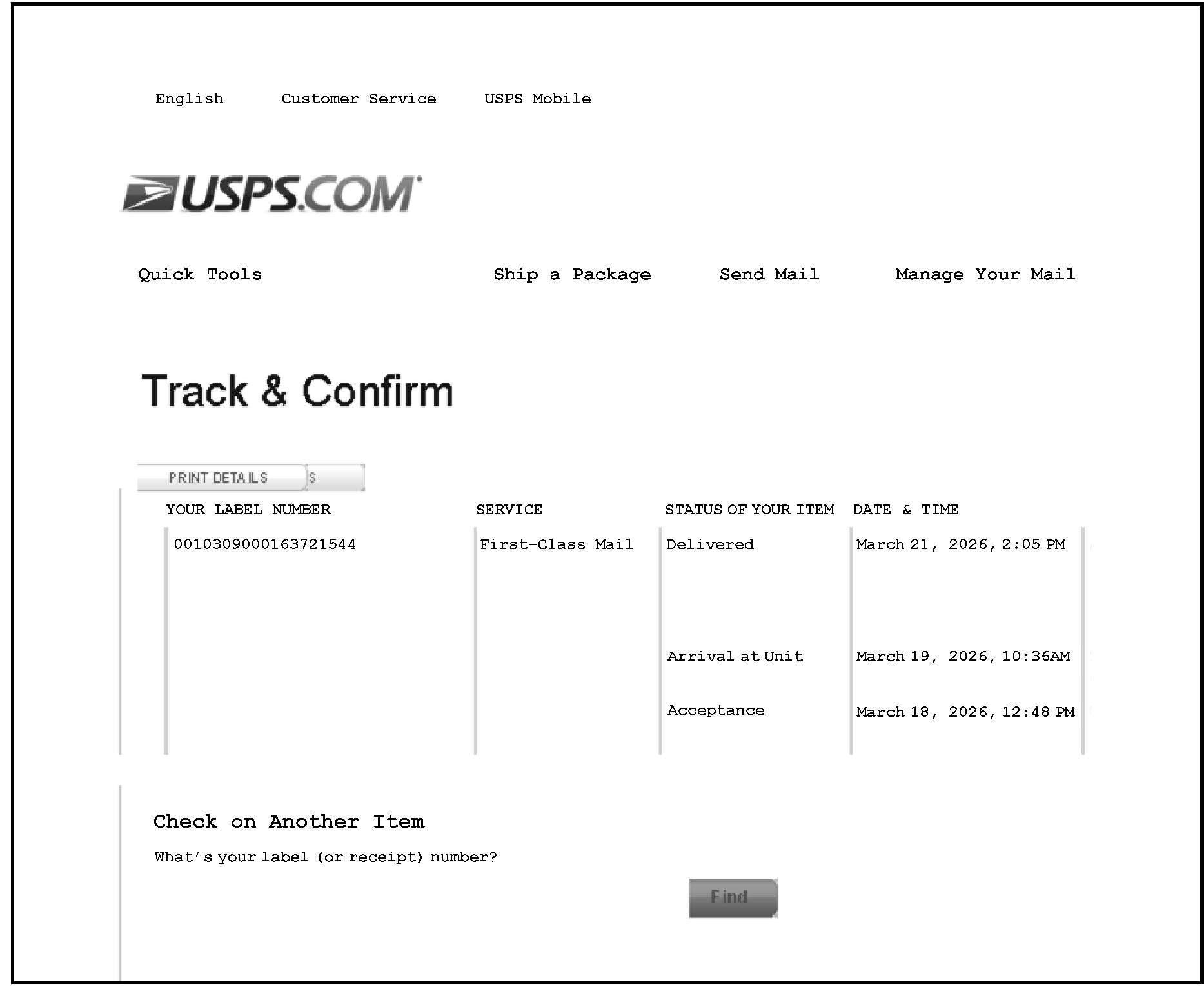
See Form 3800, Part III, revision(s) below.
Form 3800, Part III Column Comparison for Tax Year 2023 to 2024
| Form, Line Number | 2023 | 2024 |
|---|---|---|
| Form 7207, Line 1b |
|
|
| Form 3468, Part III, Line 1d |
|
|
| Form 8835, Part II, Line 1f |
|
|
| Form 7210, Line 1g |
|
|
| Form 3468, Part IV, Line 1o |
|
|
| Form 7218, Part II, Line 1q | NEW in 2024 |
|
| Form 8911, Part I, Line 1s |
|
|
| Form 7213, Part II, Line 1u |
|
|
| Form 3468, Part V, Line 1v | New in 2024 |
|
| Form 8933, Line 1x |
|
|
| Form 8936, Part V, Line 1aa |
|
|
| Form 7211, Part II, Line 1gg | New in 2024 |
|
| Form 3468, Part VI, Line 4a |
|
|
| Form 8835, Part II, Line 4e |
|
|