


 )
or https:// means you've safely connected to the .gov website. Share sensitive information only on official, secure websites.
)
or https:// means you've safely connected to the .gov website. Share sensitive information only on official, secure websites.


- 3.11.212 Applications for Extension of Time to File
- 3.11.212.1 Program Scope and Objectives
- 3.11.212.1.1 Background
- 3.11.212.1.2 Authority
- 3.11.212.1.3 Roles and Responsibilities
- 3.11.212.1.4 Program Management and Review
- 3.11.212.1.5 Program Controls
- 3.11.212.1.6 Terms and Acronyms
- 3.11.212.1.7 Related Resources
- 3.11.212.1.8 IRM Deviation Procedures
- 3.11.212.1.9 Taxpayer Advocate Service (TAS)
- 3.11.212.1.9.1 TAS Service Level Agreements (SLAs)
- 3.11.212.2 General Information
- 3.11.212.2.1 Extension Time Limit
- 3.11.212.2.2 Transshipping Extensions
- 3.11.212.2.3 Erroneously Detached Copies of Extension Forms
- 3.11.212.2.4 Letter Requests
- 3.11.212.2.5 Reconsiderations/Amendments of Extension Requests
- 3.11.212.2.6 Installment Agreement
- 3.11.212.2.7 Form W-7 Attached to Extension Form
- 3.11.212.2.8 Erroneous and Unidentified Documents
- 3.11.212.2.9 Access to IDRS (Integrated Data Retrieval System)
- 3.11.212.2.10 Research Command Codes
- 3.11.212.3 Correspondence
- 3.11.212.3.1 Correspondence to the Taxpayer
- 3.11.212.3.2 Notification to Taxpayer
- 3.11.212.3.3 Correspondence from the Taxpayer
- 3.11.212.3.4 Acknowledgments
- 3.11.212.3.5 Undeliverables
- 3.11.212.4 Action Codes
- 3.11.212.5 Determining Timely Filing, General Instructions
- 3.11.212.6 Business Master File (BMF) Identity (ID) Theft
- 3.11.212.7 Editing
- 3.11.212.7.1 Do Not Math Verify
- 3.11.212.7.2 Tax Period
- 3.11.212.7.3 Received Date
- 3.11.212.8 Form 7004, Application for Automatic Extension of Time To File Certain Business Income Tax, Information, and Other Returns
- 3.11.212.8.1 General Instructions
- 3.11.212.8.2 Form 7004 Determination of Timely Filing
- 3.11.212.8.2.1 Form 7004 Due Dates
- 3.11.212.8.2.1.1 706-GS (D), 706-GS (T), 1042
- 3.11.212.8.2.1.2 1041, 1041-N, 1041-QFT
- 3.11.212.8.2.1.3 1065, 1066, 1120-S, 3520-A, 8804
- 3.11.212.8.2.1.4 1120-F if box 2 or 4 is checked, Treas. Reg. 1.6081-5
- 3.11.212.8.2.1.5 1120-POL
- 3.11.212.8.2.1.6 1120 Series (Except Forms 1120-C, 1120-POL, 1120-S, and 1120-F with box 2 or 4 checked)
- 3.11.212.8.2.1 Form 7004 Due Dates
- 3.11.212.8.3 Special Instructions
- 3.11.212.8.3.1 Form 7004 for Form 1120-C - Ogden Submission Processing Campus (OSPC)
- 3.11.212.8.3.2 Non-Master File Form 7004
- 3.11.212.8.3.3 Form 7004 Foreign Corporation Form 1120-F - Ogden Submission Processing Campus (OSPC)
- 3.11.212.8.3.4 Form 7004 Consolidated Applications
- 3.11.212.8.4 Editing Instructions - Form 7004
- 3.11.212.8.4.1 Form 7004 Name Control Editing
- 3.11.212.8.4.2 Form 7004 MFT Editing
- 3.11.212.8.4.3 Short Tax Year Form 7004
- 3.11.212.8.5 Form 7004 Approval Actions
- 3.11.212.8.6 Form 7004 Disapproval Actions
- 3.11.212.9 Form 4868, Application for Automatic Extension of Time to File U.S. Individual Income Tax Return
- 3.11.212.9.1 General Instructions for Form 4868
- 3.11.212.9.2 Lockbox Processing of Form 4868
- 3.11.212.9.3 Determination of Timely Filing
- 3.11.212.9.4 Form 4868 Processing Instructions
- 3.11.212.9.4.1 Form 4868 With an Employer Identification Number (EIN)
- 3.11.212.9.4.2 Taxpayer Identification Number (TIN)
- 3.11.212.9.4.3 Fiscal Year Tax Period
- 3.11.212.9.4.4 Received Date
- 3.11.212.9.5 Approval and Denial Procedures for Form 4868
- 3.11.212.9.5.1 Approval of Form 4868
- 3.11.212.9.5.2 Disapproval of Form 4868
- 3.11.212.9.6 Form 4868, Application for Automatic Extension of Time to File U.S. Individual Income Tax Return - Taxpayer Abroad
- 3.11.212.9.6.1 General Information
- 3.11.212.9.6.2 Extension Longer Than Six Months
- 3.11.212.9.7 Instructions for Form 4868 Filed for Form 1040-NR Estate or Trust - Kansas City Submission Processing Campus (KCSPC)
- 3.11.212.9.8 Extension Request Listings Processing
- 3.11.212.10 Form 2350, Application for Extension to File U.S. Income Tax Return - Austin Submission Processing Campus (AUSPC)
- 3.11.212.10.1 General Information
- 3.11.212.10.2 Processing Instructions for Form 2350
- 3.11.212.10.3 Line 1 Determining the Extension Date
- 3.11.212.11 Form 8892, Application for Automatic Extension of Time to File Form 709 or Form 709-NA and/or Payment of Gift/Generation-Skipping Transfer Tax - KCSPC
- 3.11.212.11.1 Due Dates for Form 8892
- 3.11.212.11.2 Processing Form 8892
- 3.11.212.11.3 Form 8892 Editing Instructions
- 3.11.212.12 Miscellaneous Documents
- 3.11.212.12.1 General Information
- 3.11.212.12.2 Specific Editing Instructions
- 3.11.212.13 Form 940 Extension Requests
- 3.11.212.14 Form 941 Extension Requests
- 3.11.212.15 Form 8752, Required Payment or Refund Under Section 7519
- Exhibit 3.11.212-1 Extensions Listing
- Exhibit 3.11.212-2 Form 7004
- Exhibit 3.11.212-3 Form 3177 – Notice of Action for Entity on Master File
- Exhibit 3.11.212-4 Form 5466–B — Multiple Record of Disclosure
- Exhibit 3.11.212-5 Disaster Extension Due Dates - by State then FEMA (Federal Emergency Management Agency) Number
- 3.11.212.1 Program Scope and Objectives
Part 3. Submission Processing
Chapter 11. Returns and Documents Analysis
Section 212. Applications for Extension of Time to File
3.11.212 Applications for Extension of Time to File
Manual Transmittal
September 04, 2025
Purpose
(1) This transmits revised IRM 3.11.212, Returns and Documents Analysis - Applications for Extension of Time to File.
Material Changes
(1) IRM 3.11.212.1.1 Updated title of IRM 4.25.2.
(2) IRM 3.11.212.1.5 Added Program Controls subsection.
(3) IRM 3.11.212.1.6 Changed title to Terms and Acronyms and added classified waste definition.
(4) IRM 3.11.212.1.7 Deleted reference to SERP Basic Training. No longer available.
(5) IRM 3.11.212.2.1 (1) Added extension time frame for Forms 1041-N and 1041-QFT to the exception. IPU 25U0006 issued 01-03-2025.
(6) IRM 3.11.212.2.4 (7) Re-worded for clearer instructions.
(7) IRM 3.11.212.2.8 Added Form 14157 routing instructions.
(8) IRM 3.11.212.7 Changed title to Editing.
(9) IRM 3.11.212.7.3 (2) Re-worded for clearer instructions.
(10) IRM 3.11.212.8.1(4) Added extension time frame for Forms 1041-N and 1041-QFT. IPU 25U0006 issued 01-03-2025.
(11) IRM 3.11.212.8.1 Removed outdated information, added more detailed instructions for 1120-F, and changed to table format.
(12) IRM 3.11.212.8.1 Added Forms 1041-N and Form 1041-QFT under Return Code 5. IPU 25U0111 issued 01-27-2025.
(13) IRM 3.11.212.8.2.1 Added tax periods for early filed current processing. IPU 25U0464 issued 04-23-2025.
(14) IRM 3.11.212.8.2.1 Moved due date charts to their own subsection.
(15) IRM 3.11.212.8.3 Added Forms 1041-N and Form 1041-QFT. IPU 25U0111 issued 01-27-2025.
(16) IRM 3.11.212.8.3.1 Replaced center with the word campus.
(17) IRM 3.11.212.8.3.1 Added tax periods for early filed current processing. IPU 25U0464 issued 04-23-2025.
(18) IRM 3.11.212.8.3.3 Replaced center with the word campus.
(19) IRM 3.11.212.8.4 Added new instructions for editing Return Code 5 for Forms 1041-N and Form 1041-QFT. IPU 25U0111 issued 01-27-2025.
(20) IRM 3.11.212.8.4 Added Form 708 to the SSN instructions.
(21) IRM 3.11.212.8.4.2 Added Form 708 to the MFT table.
(22) IRM 3.11.212.8.5 Added Forms 1041-N and Form 1041-QFT. IPU 25U0111 issued 01-27-2025
(23) IRM 3.11.212.8.6 Corrected wording to make instructions clearer. IPU 25U0111 issued 01-27-2025
(24) IRM 3.11.212.9 Removed processing from title for plain language.
(25) IRM 3.11.212.9.7 Replaced center with the word campus.
(26) IRM 3.11.212.10 Replaced center with the word campus.
(27) IRM 3.11.212.11 Removed processing from title for plain language.
(28) IRM 3.11.212.13 Re-worded title for consistency and plain language.
(29) IRM 3.11.212.14 Re-worded title for consistency and plain language.
(30) IRM 3.11.212.15 Re-worded title for consistency and plain language.
(31) Exhibit 3.11.212-5 Added Mississippi FEMA 4874-DR, Missouri FEMA 4867-DR, Oklahoma FEMA 4866-DR, Texas FEMA 4871-DR. IPU 25U3398 issued 06-11-2025.
(32) Exhibit 3.11.212-5 Removed disaster extension due dates that expired in 2025.
(33) Exhibit 3.11.212-5 Added Virginia FEMA 4863-DR. IPU 25U3286 issued 05-16-2025. IPU 25U0464 issued 04-23-2025.
(34) Exhibit 3.11.212-5 Added Arkansas FEMA 3627-EM, Tennessee FEMA 3625-EM, and updated North Carolina FEMA 4827-DR. IPU 25U0464 issued 04-23-2025.
(35) Exhibit 3.11.212-5 Added West Virginia FEMA 4861-DR. IPU 25U0326 issued 03-10-2025.
(36) Exhibit 3.11.212-5 Added Kentucky FEMA 3624-EM. IPU 25U0271 issued 02-26-2025.
(37) Exhibit 3.11.212-5 Added California FEMA 4856-DR. IPU 25U0111 issued 01-27-2025.
(38) Exhibit 3.11.212-5 Added current states to FEMA disaster due date chart. IPU 25U0006 issued 01-03-2025.
(39) IRM 3.11.212 Editorial changes and corrections have been made throughout this IRM. Including typographical errors, tax periods, received dates, tax years, examples and Figures and Exhibits.
Effect on Other Documents
IRM 3.11.212, dated November 15, 2024 (effective January 1, 2025), is superseded. This IRM incorporates IRM Procedural Updates: IPU 25U0006 issued 01-03-2025, IPU 25U0111 issued 01-27-2025, IPU 25U0271 issued 02-26-2025, IPU 25U0326 issued 03-10-2025, IPU 25U0464 issued 04-23-2025, and IPU 25U3286 issued 05-16-2025, IPU 25U3398 issued 06-11-2025, IPU 25U3501 issued 7-17-2025. Not all of the IPUs are incorporated into this IRM due to the expiration of various FEMA disaster declaration periods during the calendar year 2025.Audience
Taxpayer Services, Code and Edit Tax ExaminersEffective Date
(01-01-2026)Scott Wallace
Director, Submission Processing
Taxpayer Services Division
-
Purpose: The Document Perfection Operation, Code and Edit Unit, prepares paper returns and tax forms for processing by reviewing and editing the documents with specialized processing codes for use downstream. The purpose of this document is to provide Code and Edit procedures for extension requests and miscellaneous forms with Document Locator Number (DLN) Document Code 77.
-
Audience: Tax examiners in Taxpayer Services (TS) Division, Submission Processing Service Centers, Code and Edit Units are the primary users of this IRM.
-
Policy Owner: The Director of Submission Processing is responsible for the policies in this IRM.
-
Program Owner: The Code and Edit/ERS IMF Section of the Return Processing Branch of Submission Processing is responsible for the procedures and all updates related to this IRM.
-
Primary Stakeholders: Submission Processing (SP).
-
This section of the Internal Revenue Manual (IRM) provides instructions for editing taxpayer requests for extension of time to file their required income tax forms.
-
The Individual Master File (IMF) extension request forms are:
-
The Business Master File (BMF) extension request forms covered by this IRM are:
-
Form 7004, Application for Automatic Extension of Time to File Certain Business Income Tax, Information, and Other Returns
-
Form 8892, Application for Automatic Extension of Time to File Form 709 or Form 709-NA and/or Payment of Gift/Generation-Skipping Transfer Tax
-
-
This IRM also includes miscellaneous forms to be perfected for input to Master File:
-
Form 3177, Notice of Action for Entry on Master File
-
Form 5466-B, Multiple Records of Disclosure
-
-
Code and Edit procedures for Form 4768, Application for Extension of Time to File a Return and/or Pay U.S. Estate (and Generation-Skipping Transfer) Taxes, are included in IRM 4.25.2, Campus Estate and Gift.
-
Code and Edit procedures for Form 5558, Application for Extension of Time to File Certain Employee Plan Returns, and Form 8868, Application for Automatic Extension of Time to File an Exempt Organization Return, are included in IRM 3.11.20, Exempt Organization and Employee Plan Applications for Extension of Time to File.
-
A list of forms covered in this manual is in Exhibit 3.11.212-1.
-
Authority for these procedures is found in the following sections of the Internal Revenue Code and their corresponding Treasury regulations:
-
IRC 6201(a)
-
IRC 6213(b)
-
IRC 6402(a)
-
IRC 6511
-
IRC 6081
-
-
Policy Statements for Submission Processing are contained in IRM 1.2.1, Servicewide Policy Statements.
-
The Director of the Submission Processing (SP) office is responsible for monitoring operational performance for the SP campus.
-
The Operations Manager is responsible for monitoring operational performance for their operation.
-
The team manager/lead is responsible for performance monitoring and ensuring employees have the tools to perform their duties.
-
The team employees are responsible for following the instructions contained in this IRM and maintaining updated IRM procedures.
-
Program Goals: To timely review and edit all extension requests received in Code and Edit (C&E).
-
Program Reports: The Monitoring Section under Submission Processing Program Management/Process Assurance monitors the Code and Edit reports.
-
Program Effectiveness: Completed inventory is selected for quality review during real-time processing. This review is conducted according to the procedures in IRM 3.30.30, Embedded Quality for Submission Processing (EQSP) System.
-
Annual Review: This IRM is updated and published annually after review and concurrence by affected offices according to the clearance process established in IRM 1.11.9, Clearing and Approving Internal Management Documents (IMDs).
-
Quality Review conducts a statistically valid sample size review of completed work to ensure IRM guidelines are followed.
-
Terms and Acronym tables.
GLOSSARY DEFINITION ACTION CODES Numeric codes edited in the bottom center margin of a return to reject documents and identify the reason the document has been rejected. ACTION TRAIL A notation in the lower left side margin on page 1 of a return which indicates or explains an action taken ALPHA CHARACTER A letter of the alphabet APPLICATION FOR TAXPAYER ASSISTANCE ORDER An application for relief from significant hardship usually requested by the taxpayer on Form 911. ATTORNEY-IN-FACT A private attorney or other individual designated by another person pursuant to a written instrument to act on behalf of that person in the performance of any act or acts described in the written instrument (e.g., a power of attorney on Form 2848). AUTOMATIC DATA PROCESSING (ADP) The handling and processing of data by mechanical and/or electronic equipment. BATCH A group of blocks of documents. A batch can’t contain more than 20 blocks. BLOCK A group of up to 100 documents with consecutive DLNs containing the same block number (digits 9 through 11 of the DLN). (A block can’t contain more than 100 documents since the documents are numbered from 00 to 99.) CALENDAR YEAR A tax year that begins January 1 and ends on December 31. CLASSIFIED WASTE Classified waste is documentation containing taxpayer entity or account information that is not part of the case and is not needed for audit trail purposes. Refer to IRM 21.5.1, General Adjustments for guidance on handling classified waste to prevent inadvertent/unauthorized destruction of records. COMPUTER CONDITION CODE (CCC) A single alpha or numeric character edited on a return which either identifies a special condition or directs the computer to take a specific programmed action. CCCs are posted to the Master File. CORRESPONDENCE ACTION SHEETS (CAS) Forms used to request information from the taxpayer. Some are mailed to the taxpayer with the return; others generate a letter. CURRENT YEAR RETURN A Current Year Return is a return filed for the previous year. For a calendar year return it will end on December 31. DATA All information reported or coded on forms, schedules, and attachments. DELINQUENT RETURN A return filed after the due date without an approved extension. DOCUMENT LOCATOR NUMBER (DLN) A fourteen-digit number assigned to every return and document input through the Automatic Data Processing (ADP) system. DUMMYING The act of transferring information provided by the taxpayer onto a required transcribed form/schedule. EDITING Preparing returns and attachments for data entry or other transcription processes by correcting entries and entering edit marks. EMPLOYER IDENTIFICATION NUMBER (EIN) A nine-digit number that identifies the account of a business taxpayer on the Business Master File. FIDUCIARY RETURN A return signed by someone other than the taxpayer which is accepted by the IRS due to the legal relationship between the taxpayer and the person signing the return. FISCAL YEAR A tax year which ends on a date other than December 31. FORM An IRS document identified by a number, e.g., Form 1040. INDIVIDUAL MASTER FILE (IMF) A magnetic tape file containing information about taxpayers filing individual income tax returns and related documents. INDIVIDUAL TAXPAYER IDENTIFICATION NUMBER (ITIN) A unique nine-digit number assigned by the IRS to individuals who must file a U.S. tax return or are listed as a spouse or a dependent and who do not have and can’t obtain a valid Social Security Number. Taxpayers obtain an ITIN by filing a Form W-7. INJURED SPOUSE A person filing a joint return with an overpayment of taxes which is offset by the spouse's non-tax debt such as a student loan or back child-support, as well as by a tax debt that existed prior to the marriage. (A claim may be filed to protect the injured spouse's share of the joint overpayment.) INNOCENT SPOUSE ELECTION An election made by a spouse who filed a joint return, or didn't file a return jointly in a community property state, for relief from joint and several liability. To make this election, a person must file Form 8857, Request for Innocent Spouse Relief, or a similar statement signed under penalties of perjury. Reference IRC 6015. INTEGRATED DATA RETRIEVAL SYSTEM (IDRS) A system that enables employees in the area/territory offices and the campuses to have visual access to certain computer-based information in taxpayer accounts. INTEGRATED SUBMISSION AND REMITTANCE PROCESSING SYSTEM (ISRP) A computerized system which will convert paper tax and information documents and remittances received by IRS into perfected electronic records of taxpayer data. JULIAN DATE A calendar date expressed as the number of days since the beginning of the year. For example, February 1 is Julian Date 032. JURAT The perjury statement required in the signature area of a tax return, form, or schedule. LOCKBOX The process whereby remittances and documents are mailed to a designated P.O. Box at a commercial bank. MASTER FILE A magnetic tape record which contains taxpayer accounts. MISBLOCKED RETURN A Form 1040 found in the wrong type of block or batch. For example, a Form 1040 found in a batch of Forms 1040-NR. NAME CONTROL The first four characters of the taxpayer's surname. Also used for dependents, qualifying children, childcare providers, etc. NON-RESIDENT ALIEN (NRA) An alien individual (not a U.S. citizen), who does not meet either the green card test or the substantial presence test for the calendar year. NUMERIC CHARACTER A number or numeral 0 through 9. PERFECTING Making returns acceptable for data entry through editing procedures. PIPELINE The areas in the IRS Submission Processing Campus that process a return from the time it is received until the data from the return is entered to an account in the IRS' main computer. These areas include Receipt and Control, Code and Edit, Data Conversion, Error Resolution, Rejects, and Unpostables. POWER OF ATTORNEY (POA) Form 2848, Power of Attorney and Declaration of Representative, authorizes a representative to perform certain acts on the taxpayer's behalf. PRIMARY TAXPAYER The taxpayer who is listed first on the name line caption of a joint return, regardless of whether that taxpayer is male or female. PROCESSABLE RETURN A return which meets all the requirements for ISRP input. RECEIVED DATE Date a return was received by the IRS. If the date is unknown and a Received Date is required, there is a prescribed formula for determining the date to edit as the Received Date. (Required on Amended, Fiscal Year, Short Year, Prior Year, and Delinquent Returns.) REMITTANCE A check, money order, or cash sent in with a return. RETURN DUE DATE The date in which the return is due to the Internal Revenue Service. SECONDARY TAXPAYER The taxpayer who is listed second on the name line caption of a joint return, regardless of whether that taxpayer is male or female. SIGNIFICANT ENTRY Any positive or negative number or dollar amount other than zero. SOCIAL SECURITY NUMBER (SSN) A nine-digit number identifying the account of an individual on the Individual Master File. TAX EXAMINER (TE) STAMP A rubber stamp containing a unique identifying number of the Code and Edit tax examiner working the return. TAX PERIOD The time covered by a particular return represented by the year and month in which the period ends. For example, 2512 stands for the tax year ending December 31, 2025. TAXPAYER ADVOCATE SERVICE (TAS) An independent organization within the IRS whose employees assist taxpayers who are experiencing economic harm, who are seeking help in resolving tax problems that have not been resolved through normal channels, or who believe that an IRS system or procedure is not working as it should. TAXPAYER IDENTIFICATION NUMBER (TIN) A nine-digit number which identifies the account of an individual or business taxpayer. The TIN may be a Social Security Number (SSN), an Individual Taxpayer Identification Number (ITIN), Adoption Taxpayer Identification Number (ATIN), or an Employer Identification Number (EIN). TRANSCRIPTION The process of transferring information from documents to a computer-readable form. Also called data conversion, input, and entry. UNCOMPUTED RETURN A tax return filed by a taxpayer who chooses to have the IRS compute the tax or refund due. UNPOSTABLES Data which can’t be entered successfully to an account at the Martinsburg Computing Center (MCC) and is returned to the Campus for corrective action. UNPROCESSABLE DOCUMENT A document which can’t be perfected for the Automatic Data Processing (ADP) system, usually because of incomplete information. ACRONYM/ABBREVIATION DEFINITION ACA Affordable Care Act ADP Automatic Data Processing AGI Adjusted Gross Income AKA Also Known As APO Army Post Office AUSPC Austin Submission Processing Campus AWS Alternative Work Schedule BMF Business Master File CAS Correspondence Action Sheet CCC Computer Condition Code CONS Conservator CP Computer Paragraph CPA Certified Public Accountant CY Calendar Year DECD Deceased DLN Document Locator Number DOD -
Date of Death
-
Department of Defense
DPO Diplomatic Post Office EIN Employer Identification Number ELF Electronic Filing ERS Error Resolution System EXEC Executor FICA Federal Insurance Contribution Act FPO Fleet Post Office FS Filing Status FRP Frivolous Return Program FTD Federal Tax Deposit FTF Failure to File FTP Failure to Pay FY Fiscal Year GDN Guardian IDRS Integrated Data Retrieval System IDT Identity Theft IMF Individual Master File IRC Internal Revenue Code IRM Internal Revenue Manual IRP Information Returns Processing IRS Internal Revenue Service IRSN Internal Revenue Service Number ISRP Integrated Submission and Remittance Processing System ITIN Individual Taxpayer Identification Number KCSPC Kansas City Submission Processing Campus KITA Killed in Terrorist Action MCC Martinsburg Computing Center MeF Modernized e-File MFS -
Married Filing Separately
-
Multiple Filing Status
MFT Master File Tax NAICS North American Industry Classification System NMF Non-Master File NMI No Middle Initial NR No Record NRA Non-Resident Alien OSPC Ogden Submission Processing Campus PAO Process As Original PCD Program Completion Date PDS Private Delivery Service PER REP Personal Representative POA Power of Attorney POD Post of Duty PY Prior Year RICS Return Integrity and Compliance Services RIVO Return Integrity Verification Operations RPC Returns Processing Code RPS Remittance Processing System SERP Servicewide Electronic Research Program SPC -
Special Processing Code
-
Submission Processing Center
SSA Social Security Administration SSI Supplemental Security Income SSN Social Security Number S-TIN Secondary Taxpayer Identification Number TAS Taxpayer Advocate Service TC Transaction Code TE Tax Examiner TIN Taxpayer Identification Number TP Taxpayer TR Trustee TY Tax Year USPS United States Postal Service VA Veterans Administration VITA Volunteer Income Tax Assistance W/H Withholding -
-
SERP contains a lot of helpful links. Under SERP you will find the left side has links to many helpful items. Under Portals you can find your area, Submission Processing (SP) and then select what area you work in, IMF or BMF Code and Edit Research Portal. This will show you the newest Alerts and IPUs. To the right, you can click on the Advanced Search and do a search for specific IRM. On the Menu to the right side are links to Job Aids, IRMs, and Training Material.
-
There are a lot of training options available in SERP under Learning. Under N is the Intranet Navigation - Keyboard Shortcuts, Under R is Researching IRMs and IPUs, under S is SERP Navigation Training.
-
Submit IRM deviations in writing following instructions from IRM 1.11.2.2.3, When Procedures Deviate from the IRM, and elevate through proper channels for executive approval.
-
The Taxpayer Advocate Service is an independent organization within the Internal Revenue Service (IRS), led by the National Taxpayer Advocate, that helps taxpayers and protects taxpayer rights. TAS offers free help to taxpayers when a tax problem is causing a financial difficulty, when they’ve tried and been unable to resolve their issue with the IRS, or when they believe an IRS system, process, or procedure just isn’t working as it should. TAS strives to ensure that every taxpayer is treated fairly and knows and understands their rights under the Taxpayer Bill of Rights. TAS has at least one taxpayer advocate office located in every state, the District of Columbia, and Puerto Rico.
-
TAS uses Form 12412, Operations Assistance Request (OAR), to start the OAR process of referring a case to the Taxpayer Services (TS) Division, to affect the resolution of the taxpayer’s problem. For more information, refer to IRM 13.1.19, Taxpayer Advocate Service, Taxpayer Advocate Case Procedures, Advocating With Operations Assistance Requests (OARs).
-
Refer taxpayers to TAS when the contact meets TAS criteria or when Form 911 Request for Taxpayer Advocate Service Assistance (and Application for Taxpayer Assistance Order), is attached and steps can’t be taken to resolve the taxpayer's issue the same day. See IRM 21.1.3.18, Taxpayer Advocate Service (TAS) Guidelines.
-
The definition of "same day resolution" is within 24 hours. The following two situations meet the definition of "same day resolution" :
-
The issue can be resolved within 24 hours.
-
The IRS takes steps within 24 hours to resolve the taxpayer’s issue.
-
-
When making a TAS referral, use Form 911, and forward to TAS following your local procedures.
-
For more information, see IRM 13.1.7, Taxpayer Advocate Service (TAS) Case Criteria, and IRM 13.1.7.4, Exceptions to Taxpayer Advocate Service Criteria, for information on cases that TAS will no longer accept.
-
The National Taxpayer Advocate reached agreements with the Commissioners or Chiefs of the Taxpayer Services (TS) Division, Small Business/Self Employed (SB/SE) Division, Tax Exempt Government Entities (TEGE), Criminal Investigation (CI), Independent Office of Appeals and Large Business and International (LB&I), that outline the procedures and responsibilities for processing Taxpayer Advocate Service (TAS) casework when either the statutory or delegated authority to complete a case transaction rests outside of TAS. These agreements are known as Service Level Agreements (SLAs).
-
The SLAs are found at TAS Service Level Agreements.
-
The general information included in this subsection of the manual is:
-
Extension Time Limit
-
Transshipping Extensions
-
Erroneously Detached Copies of Extension Forms
-
Letter Requests
-
Reconsiderations/Amendments of Extension Requests
-
Installment Agreements
-
Form W-7 Attached to Extension Form
-
Erroneous and Unidentified Documents
-
Access to IDRS
-
Research Command Codes
-
-
Under normal circumstances, an extension of time to file can legally be granted for no longer than a total of 6 months from the due date of the return. IRC 6081(a) and Treas. Reg. Section 1.6081-1(a) states an extension of time to file generally shall not be granted for more than 6 months from the due date of the return required to be filed.
Exception:
The maximum extension time for Form 1120 C Corporations (other than Form 1120-POL and Form 1120-S) with fiscal years ending June 30 is 7 months from the due date of the return. The maximum extension time for Form 1041, U.S. Income Tax Return for Estates and Trusts, (other than bankruptcy estate, 1041-N and 1041-QFT which are 6 months), is 51/1 months from the due date of the return.
-
In some cases, individual taxpayers who are abroad may receive an extension of more than 6 months. Only AUSPC can grant extensions beyond 6 months for individual taxpayers. See IRM 3.11.212.9.6.2.
-
OSPC can grant an extension longer than 6 months for business taxpayers. If received at another center, transship to OSPC.
-
In most cases, extension requests are processed in the submission processing center where they are received, but some requests must be transshipped to the appropriate campus for processing. Unless specified in the following paragraphs, process the extension request in the receiving center.
-
Transship Form 2350 to AUSPC. These extension requests are used to grant an extension beyond 6 months.
-
Do not transship Form 4868 with a foreign address unless there is a notation or attachment indicating the taxpayer is requesting an extension longer than 6 months. Transship these requests to AUSPC.
-
Follow instructions in IRM 3.11.212.9.4.1 for Form 4868 filed with an Employer Identification Number (EIN).
-
Transship all Form 7004 NMF extension requests to Kansas City Submission Processing Campus (KCSPC).
-
Form 8612, Return of Excise Tax on Undistributed Income of Real Estate Investment Trusts
-
Form 8613, Return of Excise Tax on Undistributed Income of Regulated Investment Companies
-
Form 8725, Excise Tax on Greenmail
-
Form 8831, Excise Taxes on Excess Inclusions of REMIC Residual Interests
-
Form 8876, Excise Tax on Structured Settlement Factoring Transactions
-
Form 8924, Excise Tax on Certain Transfers of Qualifying Geothermal or Mineral Interests
-
Form 8928, Return of Certain Excise Taxes Under Chapter 43 of the Internal Revenue Code
-
-
Transship Form 8892, to KCSPC.
-
Transship Form 7004 for Form 1120-C, and Form 1120-F, to OSPC.
-
There is no extension form for taxpayers to use to request an extension for Form 2290, Heavy Highway Vehicle Use Tax Return, but taxpayers can make the request in a letter or by making a notation on an extension form to indicate they want an extension for Form 2290. Forward requests for extension for Form 2290 to OSPC.
-
These instructions are condensed in the following table:
Form Number Route to Form 2350, AUSPC Form 4868 with an extension request longer than 6 months, AUSPC Form 4868 for Form 1040-NR, U.S. Nonresident Alien Income Tax Return, estate or trust identified as a 1040-NR, KCSPC Form 7004 for Form 8612, Form 8613, Form 8725, Form 8831, Form 8876, Form 8924 and Form 8928, KCSPC Form 8892, KCSPC Business form with an extension request longer than 6 months, OSPC -
Do not send Letter 86C, Referring Taxpayer Inquiry/Forms to Another Office, when transshipping extensions to another campus. Extensions are exempted from Action 61 which requires the letter.
-
If the extension form is a copy that has been detached from the taxpayer's return in error, and the request has a late received date/postmark date, examine the extension form for any of the following:
-
The word copy or photocopy, or
-
No received date, or
-
Signature is not original.
-
-
If any of these indications are present, research for Transaction Code (TC) 460 posted to the account for the same Master File Tax (MFT) and Tax Period as the extension. If research indicates a TC 460, pull from batch and give to your supervisor for proper preparation of documents to be destroyed.
-
If no TC 460 is indicated, process as an original request.
-
An individual taxpayer wanting an extension of time for filing a return might submit a letter to the submission processing center where the return is to be filed.
-
If the letter includes a request for gift tax only (Form 709 or Form 709-NA), transship to KCSPC.
-
If the letter request is for a Non Master File (NMF) form, forward to KCSPC NMF Accounting. See IRM 3.11.212.2.2(5).
-
If the taxpayer requests an extension for Form 940, Employer's Annual Federal Unemployment (FUTA) Tax Return, or Form 941, Employer's Quarterly Federal Tax Return, see IRM 3.11.212.13 and IRM 3.11.212.14.
-
Extension requests for Form 2290 must be forwarded to OSPC.
-
Individual taxpayers out of the country who need an extension longer than the 6 months provided with Form 4868 are instructed to send their request in a letter to AUSPC. If received at another center, transship to AUSPC. Only AUSPC can grant an extension longer than 6 months for individual taxpayers.
-
The request must be received on or before the expiration date of the extension provided on Form 4868 ≡ ≡ ≡ ≡ ≡ ≡ ≡ ≡ ≡ ≡ ≡ ≡ ≡ ≡ ≡ ≡ ≡ or postmarked on or before the expiration date of the automatic extension. The original extension expires on October 15 for calendar year filers.
-
If the request is not received timely, deny the request and notify the taxpayer.
-
No notification will be sent to the taxpayer unless the request is denied.
-
See IRM 3.11.212.9.6.2.
-
-
Research IDRS for a posted or pending TC 460 for the TIN, MFT, and Tax Period requested. If present, destroy the request per classified waste procedures unless further action is needed. If no TC 460 is present or pending, Code and Edit can dummy a Form 4868 extension form.
-
Input the extension information as a Transaction Code (TC) 460 into IDRS (Integrated Data Retrieval System). Hold and destroy Form 4868 five (5) business days after inputting TC 460; or
-
Prepare a dummy IRS extension from the information in the letter and leave in the batch for processing through ISRP. Input it as a paper extension to the system.
-
Follow normal approval/denial criteria. All information required by a form is also required if the request is made via letter.
-
Correspond with the taxpayer indicating the status of the application and the correct form to use in the future, unless instructed otherwise in the specific application form instructions.
-
-
Letter requests for IMF extensions of time to file are reported under function 210, using the appropriate program for the type of extension being requested (e.g., request for extension for Form 1040, U.S. Individual Income Tax Return, are reported as Form 4868).
-
Tax preparation firms might submit a list of taxpayers with a cover letter instead of filing separate Form 4868. See IRM 3.11.212.9.8.
-
If a taxpayer sends an extension request back to IRS for reconsideration of a denied request, or a request for abatement of failure to file penalties due to a denied extension, route it to the area for processing specified by your campus.
-
If a taxpayer files an amended application for processing, route it to the area specified by your campus to be researched and associated with the original request.
-
If the original request was denied as late filed and the taxpayer supplies proof the original request was postmarked timely, approve the request and follow approval processing procedures.
-
If the original extension was timely filed, and the taxpayer has supplied all the information necessary for approving an extension in the reconsideration request, approve the application. For example, if the signature, or TIN, or reasonable cause was missing from the original application and is present in the reconsideration, approve the extension.
-
If the reconsideration request is not approved, return it to the taxpayer notifying them to file the return as soon as possible.
-
If the reconsideration is approved, input the extension through normal processing. These are batched and processed using the appropriate program code. When the approved extension posts to master file, the failure to file penalties will be automatically reversed.
-
If a Form 9465, Installment Agreement Request, or letter requesting an installment agreement is attached to an extension, route Form 9465 or letter to Compliance Services. Notate on the transmittal which extension form the attached Form 9465 was received with. Before routing Form 9465 to Compliance Services, verify the taxpayer(s) name, SSN, form number, and tax period are on both the installment agreement and the extension. Continue processing the extension request according to established procedures.
-
If Form W-7, Application for IRS Individual Taxpayer Identification Number, is attached to Form 4868 or Form 2350, follow instructions below:
If the extension Then Is unnumbered without an SSN, Transship the entire submission to AUSPC ITIN Unit at the address in the box below. Is numbered or unnumbered with an SSN, Detach Form W-7 and its supporting documentation and transship to the AUSPC ITIN Unit, Austin, TX 73301-0057. Continue processing the extension request at the receiving center. Notate on the routing documentation that an extension was attached and was processed under SSN ___-__-____(enter the SSN used on the extension). Is numbered without an SSN, Leave Form W-7 and its supporting documentation attached and continue processing without an SSN. -
The AUSPC ITIN Unit will input Form W-7, and will notate "ITIN to be requested" on the extension and forward for processing.
-
If Form W-7 is attached to Form 7004, detach and transship to the AUSPC ITIN Unit with all attachments. Continue normal processing of Form 7004.
-
If an original tax return is attached to an extension request with no explanation, and both documents are for the same taxpayer, MFT, and tax period, ensure the extension is attached to the back of the tax return and batch the tax return for processing. If both documents are not for the same taxpayer, MFT, and tax period, detach the tax return and process both documents.
-
If a schedule or form that is normally attached to a tax return is received with the extension request, attach it to the back of the extension and continue processing.
Exception:
If one of the following forms is attached to the extension document, take the specified action. Before detaching, verify the received date, taxpayer name(s), TIN, form number and tax period are on both the detached form and the extension. Continue processing the extension request according to established procedures.
Form Action Acknowledgment letter See IRM 3.11.212.3.4. Amended extension See IRM 3.11.212.2.5(2). E-file rejection letter See IRM 3.11.212.8.2(11) for Form 7004, and IRM 3.11.212.9.3(7) (c) for Form 4868. Form SS-4, Application for Employer Identification Number See IRM 3.11.212.8.4(2). Form W-7, Application for IRS Individual Taxpayer Identification Number -
Attached to IMF extension: See IRM 3.11.212.2.7.
-
Attached to Form 7004: Detach Form W-7 and all attachments and forward to the AUSPC ITIN Unit, Austin, TX 73301-0057.
Form 1138, Extension of Time for Payment of Taxes by a Corporation Expecting a Net Operating Loss Carryback Detach and route Form 1138 to Accounts Management BMF Carryback Team. Form 2553, Election by a Small Business Corporation Original only: Detach and route to Entity function. Form 2848, Power of Attorney and Declaration of Representative Detach and route to the Centralized Authorization File (CAF) function. Form 8822, Change of Address Detach and route to Entity function. Form 8822-B, Change of Address or Responsible Party - Business Detach and route to Entity function. Form 8832, Entity Classification Election Detach and route to Entity function. Form 9465, Installment Agreement Request Detach and route to Compliance Services. See IRM 3.11.212.2.6. Letter requesting an installment agreement Detach and route to Compliance Services. See IRM 3.11.212.2.6. Reconsideration/abatement of penalties See IRM 3.11.212.2.5. Form 14157, Return Preparer Complaint Detach and route to:
Attn: Return Preparer Office
401 W. Peachtree Street NW
Mail Stop 421-D
Atlanta, Georgia 30308 -
-
When using IDRS, only access those accounts required to accomplish your official duties. Any unauthorized access or browsing of tax accounts by employees to satisfy personal curiosity or for fraudulent reasons is prohibited by IRS and is subject to disciplinary actions.
-
CC INOLE definer S (INOLES) with the taxpayer's EIN, SSN, IRSN, or ITIN is used to find the following information:
-
Taxpayer's name and address
-
Taxpayer's name control
-
Filing requirements (for BMF and Employee Plan Master File (EPMF) taxpayers)
-
Fiscal Year Month (FYM)is the month the taxpayer's tax year ends
-
See IRM 2.3.47, Command Codes INOLE, EOGEN and SPARQ.
-
-
Command code BMFOL definer I (BMFOLI) with the taxpayer's EIN or SSN (the SSN must be followed by a V or W) is used to find the following information for a BMF taxpayer:
-
Taxpayer's name control
-
Taxpayer's filing history. BMFOLI will list the tax periods on the master file and whether a return has posted to the tax period. A Y under RET PST column indicates a return (TC 150) has posted to that module.
-
See IRM 2.3.59, Command Codes BMFOL and BMFOR.
-
-
CC IMFOL definer I (IMFOLI) with the taxpayer’s SSN, IRSN, or ITIN is used to find the following information:
-
Taxpayer’s name control.
-
Taxpayer’s filing history. IMFOLI will list the tax periods on the master file and whether a return has posted to the tax period. The POSTED RETURN column indicates if a return (TC 150) has posted to that module with entries of POSTED, MEF, SUBST4, etc.
-
See IRM 2.3.51, Command Code IMFOL.
-
-
CC ENMOD with the taxpayer's EIN or SSN is used to find the following information:
-
Taxpayer's name control
-
Pending entity transactions, such as TC 000, which establishes the taxpayer's account, name changes, TC 013, which will change the name control, or transactions such as TC 053, that will change the tax year’s ending month.
-
See IRM 2.3.15, Command Code ENMOD.
-
-
CCs NAMEE and NAMES, NAMEB and NAMEI, FINDE and FINDS, and TPIIP.
-
Research for a taxpayer's EIN or SSN on the BMF or EPMF using the taxpayer's name, and address information if known.
-
Research for a taxpayer's SSN on the IMF by entering the taxpayer's name, and address information if known.
-
The most efficient search uses the taxpayer's name and ZIP Code.
-
CC NAMEI and NAMES are used to research for the taxpayer's SSN.
-
CC NAMEB and NAMEE are used to research for the taxpayer's EIN or SSN for a BMF entity.
-
CC FINDS (SSN) and FINDE (EIN) are used to find a name and address for a TIN.
-
CC TPIIP (Taxpayer Personally Identifiable Information Protection) is used to research using the last four digits of the taxpayer's SSN.
-
See IRM 2.3.60, Command Codes NAMES, NAMEE, NAMEI, NAMEB, FINDS, FINDE, and TPIIP.
-
-
Correspondence letters are used to request information and notify taxpayers. The IRM for Taxpayer Correspondence Services is IRM 25.13.1 if it is ever needed.
-
When correspondence with the taxpayer is necessary, the following letters are available with their suggested uses. It is up to the employee to determine the letter best suited to the particular situation and to choose the appropriate paragraphs:
-
Letter 3699C, Extension of Time to File (BMF): This letter is used for correspondence on BMF extensions of time to file. It can be used to request more information or to notify the taxpayer of the correct extended due date, the correct extension form to use, or the disapproval of an extension application.
-
Letter 0296C, Extension of Time to File (IMF/BMF) Incomplete for Processing: This letter is used to request more information for both IMF and BMF extensions.
-
Letter 0297C, Extension of Time to File and/or Pay (IMF/BMF); Denial Explained: This letter is used to notify the taxpayer the extension request was disapproved.
-
Letter 0333C, Extension of Time to File (IMF/BMF) Approved: This letter is used to request information and to notify the taxpayer of the extended due date for both IMF and BMF extensions.
-
-
When using one of these letters, prepare Form 3696, Correspondence Action Sheet, or other local use correspondence action sheet.
-
Enter the taxpayer's name, address, and TIN.
-
Enter the number of the letter to be used and list the appropriate paragraphs and fill-ins for the letter.
-
Notate on the extension form the specific letter that was sent.
-
-
Form 6513, Extension of Time to File, can be used when appropriate in place of a correspondex letter. It is not necessary to reject the document when this form is used.
-
When notifying the taxpayer that the extension request is approved, always check the first box on Form 6513.
-
When notifying the taxpayer that the extension request is not approved, always check the second box on Form 6513. Also, check the appropriate box to indicate the reason for disapproval.
-
If using Form 6513, and the original request is not being sent back to the taxpayer, make a photocopy of the extension request to include with Form 6513.
-
-
Form 6401, Request for Missing Information, can also be used in place of a correspondex letter when appropriate. It is not necessary to reject the document when this form is used. Enter the current date in the Date block at the top of the form.
-
When the extension request is denied, Code and Edit must initiate manual correspondence to inform the taxpayer the extension was denied. There is no automatic notice generated to the taxpayer. See IRM 3.11.212.10.2 and IRM 3.11.212.3.1.
-
Notification of disapproved extension requests must be returned to the taxpayer within 10 days of the day the extension is disapproved.
-
If the taxpayer correspondence is requesting an extension of time to file, see IRM 3.11.212.2.4.
-
If the taxpayer is requesting a reconsideration of a previously denied extension request, route to the area specified in your campus for working extension reconsiderations. See IRM 3.11.212.2.5.
-
Other taxpayer correspondence is normally handled by Accounts Management.
If Then The taxpayer indicates the extension attached to correspondence is a copy, or the attached extension is for a prior year's tax return, Route the entire submission to Accounts Management. The taxpayer does not indicate this, and the extension is for the current year's return, Detach the correspondence, route it to Accounts Management, and process the extension request.
-
If the taxpayer requests acknowledgment of receipt of an extension form and there is a stamped, self-addressed envelope attached (indicating Receipt and Control has not sent an acknowledgment), send an acknowledgment to the taxpayer. If the taxpayer has included a photocopy of the form, stamp or edit the campus name and received date on the copy before returning it to the taxpayer.
-
If the taxpayer requests notification of approval or denial of the extension and normal procedures for the particular extension form do not require notification, send a copy of the approval or denial to the taxpayer.
-
When approval/denial notification or correspondence is returned to the IRS due to a wrong or erroneous address, and there is another address included on the returned documents, re-send the correspondence to that address.
-
If a better address is not included in the correspondence returned to the IRS, research IDRS for a better address. See IRM 3.11.212.2.10.
If research Then Indicates a better address, Re-send the letter to that address. Does not indicate a better address or if the re-sent letter comes back again, Give to your manager for proper preparation of documents to be destroyed. -
Do not input address changes based on address changes on the extension. The taxpayer is instructed to file Form 8822. If the taxpayer has attached a Form 8822, detach and forward to the Entity function.
-
Form 7004, Form 4868, Form 2350, Form 8892, Form 5466-B, and Form 3177 are processed in the Error Resolution System (ERS).
-
Action Codes can be assigned by Code and Edit for ERS returns. Descriptions for each Action Code are generally sufficient with no further explanation except for "Other Research" when a note of explanation concerning the missing information must be attached to the return.
-
Only one Action Code can be assigned at one time to a record. The priority of the Action Codes will be 310, 4XX, 6XX, 3XX, 2XX.
-
The Action Codes in the chart below are used in extension request processing. The suspense period is used for controlling Suspense documents, not for determining which code to assign.
Action Codes Description Suspense Period Function Used In 001 Input Document 0 EC 211 First Correspondence 40 CE, EC, S 215 International Correspondence 45 CE, EC, S 320 Entity Control 10 CE, EC, S 351 Taxpayer Identification Number (TIN) Research 0 EC, S 352 Name Research 3 CE, EC, S 353 Address Research 3 CE, EC, S 354 Filing Requirement Research 3 CE, EC, S 360 Other In-House Research 10 CE, EC, S 410 Technical Assistance 0 EC 420 Management Suspense—A 5 CE, EC, S 430 Management Suspense—B 10 CE, EC, S 440 Management Suspense—C 15 CE, EC, S 450 Management Suspense—D 20 CE, S 460 Management Suspense—E 25 CE, EC, S 480 Early Filed Suspense 150 CE, EC, S 490 System Problem 5 EC, S 610 Remittance Renumber 0 CE, EC 611 Renumber with-remit 0 CE, EC, S 620 NMF/Non-ADP 0 EC, S 630 Reentry 0 EC, S 640 Void 0 CE, EC, S 650 International - ACI 0 CE, EC, S 651 International - AUSPC 0 CE, EC 700 Duplicate Block DLN 0 GEN
-
Extreme care is needed when determining if the extension is late or timely. Be especially careful with extensions from Hawaii, Alaska, and the U.S. Territories as they take longer to get to the centers and will be mixed in with the late returns but could be timely filed.
-
All extensions will be stamped with an IRS received date and have the envelope attached. The received date generally is the date the extension request was delivered to the IRS.
-
Review all extension requests with a late received date for indications the extension could be timely or have a later due date. Use the chart below to help determine if the extension is timely or late.
Timely Filing Determination Chart
Look for: Consider: Received date Date delivered to IRS. ≡ ≡ ≡ ≡ ≡ ≡ ≡ ≡ ≡ ≡ ≡ ≡ ≡ ≡ ≡ ≡ ≡ ≡ ≡ ≡ ≡ ≡ ≡ ≡ ≡ ≡ ≡ ≡ ≡ ≡ ≡ ≡ ≡ ≡ ≡ ≡ ≡ ≡ ≡ ≡ ≡ ≡ ≡ ≡ ≡ ≡ ≡ ≡ ≡ ≡ ≡ ≡ ≡ ≡ ≡ ≡ ≡ ≡ ≡ ≡ ≡ ≡ ≡ ≡ ≡ ≡ ≡ ≡ ≡ ≡ ≡ ≡ ≡ ≡ ≡ ≡ ≡ ≡ ≡ ≡ ≡ ≡ ≡ ≡ ≡ ≡ ≡ ≡ ≡ ≡ ≡ ≡ ≡ ≡ ≡ ≡ ≡ ≡ ≡ ≡ ≡ ≡ ≡ ≡ ≡ Postmark date Consider the extension timely if it has a timely United States Postal Service (USPS) postmark date, For registered and certified mail, see IRM 3.10.72.2.4.8. ≡ ≡ ≡ ≡ ≡ ≡ ≡ ≡ ≡ ≡ ≡ ≡ ≡ ≡ ≡ ≡ ≡ ≡ ≡ ≡ ≡ ≡ ≡ ≡ ≡ ≡ ≡ ≡ ≡ ≡ ≡ ≡ ≡ Rejected electronically filed form IMF (4868 or 2350) The paper request must be filed by the later of the regular due date or 10 calendar days after the date of the notification the electronic submission was rejected to be timely.
BMF (7004) The paper request must be filed by the later of the due date or 5 calendar days after the date of the notification of the rejection to be timely.Form 4868 If either box 8 or box 9 is checked, or a foreign address is indicated, the extension is due 6/15 instead of 04/15. See IRM 3.11.212.9.3. Form 7004 If either box 2 or 4 is checked, the extension is due the 15th day of the 6th month after the end of the tax year (06/15 for calendar year extensions). For timeliness determination instructions, see IRM 3.11.212.8.2. Disaster Declaration If there is an indication the taxpayer is affected by an officially declared disaster, there is a postponement of the due date. If the extension request is postmarked on or before the date the disaster period ends, treat it as a timely filed extension. See Exhibit 3.11.212-5 for states and extended due dates. Commissioner extended due date The Commissioner can extend the due date for filing due to a situation covered in Policy Statement 3-12 in IRM 1.2.1. This states, "The Commissioner can extend the due date for filing returns for broad classes or groups of taxpayers, but only in cases of natural disaster, catastrophe or other extraordinary situations." If an extension states this, take to management as it needs special handling. -
IRC 7502 includes the timely mailing treated as timely filing/paying rule. This rule states any document or payment is considered timely filed if the postmark date is on or before the due date, even if it is received after the due date. Consider any postmark when making this determination.
Exception:
≡ ≡ ≡ ≡ ≡ ≡ ≡ ≡ ≡ ≡ ≡ ≡ ≡ ≡ ≡ ≡ ≡ ≡ ≡ ≡ ≡ ≡ ≡ ≡ ≡ ≡ ≡ ≡ ≡ ≡ ≡ ≡ ≡ ≡ ≡ ≡ ≡ ≡ ≡ ≡ ≡ ≡ ≡ ≡ ≡ ≡ ≡ ≡ ≡ ≡ ≡ ≡ ≡ ≡ ≡ ≡ ≡ ≡ ≡ ≡ ≡ ≡ ≡ ≡ ≡ ≡ ≡ ≡ ≡ ≡ ≡ ≡ ≡ ≡ ≡ ≡ ≡ ≡ ≡ ≡ ≡ ≡ ≡ ≡ ≡ ≡ ≡ ≡ ≡ ≡ ≡ ≡ ≡ ≡ ≡ ≡ ≡ ≡ ≡ ≡ ≡ ≡ ≡ ≡ ≡ ≡ ≡ ≡ ≡ ≡ ≡ ≡ ≡ ≡ ≡ ≡ ≡ ≡ ≡ ≡ ≡ ≡ ≡ ≡ ≡ ≡ ≡ ≡ ≡ ≡ ≡ ≡ ≡ ≡ ≡ ≡ ≡ ≡ ≡ ≡ ≡ ≡ ≡ ≡ ≡ ≡ ≡ ≡ ≡ ≡ ≡ ≡ ≡ ≡ ≡ ≡ ≡ ≡ ≡ ≡ ≡ ≡ ≡ ≡ ≡ ≡ ≡ ≡ ≡ ≡ ≡ ≡ ≡
-
If the due date falls on a weekend or legal holiday, treat the extension request as timely filed if it is postmarked by the next day that is not a weekend or legal holiday.
-
The due date of the extension request is the Return Due Date (RDD) of the type of return the request covers for the taxpayer's tax year ending. The tax year ending is the tax period of the extension.
-
Form 2350: See IRM 3.11.212.10.2.
-
Form 4868: See IRM 3.11.212.9.3.
-
Form 7004: See IRM 3.11.212.8.2.1.
-
Form 8892: See IRM 3.11.212.11.1.
-
-
BMF ID Theft is increasing. If a case is found with attachments or correspondence showing the taxpayer is a victim of ID Theft, give the entire case to the manager/lead.
-
The manager/lead will expedite the case to the Planning and Analysis (P&A) staff for referral to one of the Submission Processing (SP) BMF ID Theft liaisons. The taxpayer must show that they are a victim of ID Theft; do not send cases that are subject to Criminal Investigation (CI), Examination (Exam), or Fraud review.
-
This subsection includes general processing information for extension requests.
-
Follow these general instructions for processing of all extension requests unless the procedures for a specific form includes differing instructions. In that case, the specific instructions take precedence.
-
It is generally not the purpose of Document Perfection to mathematically verify or check the validity of the documents being processed. The computer will perform this function if the documents are coded and edited as prescribed in the applicable parts of this subsection.
-
The tax period is 4 digits, edited in YYMM format, which define the year and month the taxpayer's tax year ends (e.g., if the tax year ending is April 30, 2026, edit Tax Period 2604).
-
Edit the tax period in YYMM format in the upper right portion of the form (on Form 7004, edit to the left of the OMB number) unless otherwise indicated in specific instructions for the form.
-
Determine the tax period from:
-
The taxpayer's entry on Line 5a of Form 7004.
-
The tax period line immediately below the title of Form 4868.
-
The taxpayer's entry on Line 1 of Form 2350.
-
Form 8892 must always be calendar year (no editing necessary).
Note:
If the taxpayer has erroneously entered a prior year or future year as the year on a calendar year extension, and all other items present (received date, postmark date, DLN Julian date, signature date) on the extension indicate the extension is for the current calendar year, and the request is timely filed for the current calendar year, assume the extension is for the current calendar year, so no tax period editing is necessary.
-
-
The tax period will end on the last day of a month and must be for 12 months or less, except as otherwise specified below. Ignore a minor discrepancy such as October 30 instead of October 31. If the ending date is other than as specified, follow procedures in paragraphs (11) and (12) below.
-
A fiscal year is 12 months that ends in any month other than December (edited Tax Period YY01 through YY11).
-
Tax periods reported under the 52-53 week rule can end no more than 6 days before, and no more than 3 days after, the end of a month. When editing, use the last day of the month that is closest to the ending date.
-
If the tax year ends within the first 3 days of the month, use the previous month in the tax period. If the tax year ends within 6 days of the end of the month, use that month in the tax period.
-
If the tax period is for more than 12 months or 53 weeks, follow procedures in (11) and (12) below.
-
-
A short year is a tax year less than 12 months.
-
If the taxpayer indicates that a final, short period tax return will be filed (final return box is checked and a short year is indicated), the tax year ends on the date the taxpayer went out of business.
-
If the taxpayer indicates an initial short period return will be filed, edit the short period as indicated by the taxpayer.
-
The following examples are of the tax period format:
Tax Period Ends Numeric Designation December 31, 2025 2512 (do not edit) November 30, 2025 2511 March 31, 2026 2603 October 3, 2025 (52–53 week document) 2509 October 3, 2025 (Final Short period) 2510 October 26, 2025 (52–53 week document) 2510 October 26, 2025 (Final Short period) 2510 -
If the tax period is missing, illegible, invalid, or is longer than one year, assume the tax period to be the current calendar year if it makes the form timely.
-
If the tax period is missing, illegible, invalid, or is longer than one year, and the extension is not timely filed for the current calendar year:
-
Request research to determine correct FYM.
-
If FYM is determined, edit the correct tax period on the extension form. If this causes the form to be untimely, follow normal denial procedures.
-
If the tax period can’t be determined through IDRS research, correspond with the taxpayer. See IRM 3.11.212.3.1.
-
-
Replies to tax period correspondence: Edit the tax period indicated by the taxpayer and continue processing.
-
No replies to tax period correspondence: Follow local procedures to destroy the document.
-
Every extension form received by the IRS will be stamped with a date indicating when it was received. The envelope will be attached to all extensions. If more than one extension request was included in an envelope, the postmark date will be stamped on each additional extension. The timely received dates will no longer be circled out.
-
Use the received date along with the postmark date to determine if the extension request was timely filed. For postmark types and definitions, see IRM 3.10.72.2.4 Types of Mail Received. Reference the different types of mail for more information on their received dates.
-
If more than one received date is stamped on the form, circle all but the earliest received date.
-
If the received date makes the extension delinquent and the postmark date is timely, circle out the received date and edit the timely postmark date as the received date in MMDDYY format on all extensions. See IRM 3.11.212.5.
Exception:
≡ ≡ ≡ ≡ ≡ ≡ ≡ ≡ ≡ ≡ ≡ ≡ ≡ ≡ ≡ ≡ ≡ ≡ ≡ ≡ ≡ ≡ ≡ ≡ ≡ ≡ ≡ ≡ ≡ ≡ ≡ ≡ ≡ ≡ ≡ ≡ ≡ ≡ ≡ ≡ ≡ ≡ ≡ ≡ ≡ ≡ ≡ ≡ ≡ ≡ ≡ ≡ ≡ ≡ ≡ ≡ ≡ ≡ ≡ ≡ ≡ ≡ ≡ ≡ ≡ ≡ ≡ ≡ ≡ ≡ ≡ ≡ ≡ ≡ ≡ ≡ ≡ ≡ ≡ ≡ ≡ ≡ ≡ ≡ ≡ ≡ ≡ ≡ ≡ ≡ ≡ ≡ ≡ ≡ ≡ ≡ ≡ ≡ ≡ ≡ ≡ ≡ ≡ ≡ ≡ ≡ ≡ ≡ ≡ ≡ ≡ ≡ ≡ ≡ ≡ ≡ ≡ ≡ ≡ ≡ ≡ ≡ ≡ ≡ ≡ ≡ ≡ ≡ ≡ ≡ ≡ ≡ ≡ ≡ ≡ ≡ ≡ ≡ ≡ ≡ ≡ ≡ ≡ ≡ ≡ ≡ ≡ ≡ ≡ ≡ ≡ ≡ ≡ ≡ ≡ ≡ ≡ ≡ ≡ ≡ ≡ ≡ ≡ ≡ ≡ ≡ ≡ ≡ ≡ ≡ ≡ ≡ ≡ ≡
-
If the extension request was addressed and mailed to a state agency by the taxpayer, accept only the IRS received date on the return. If the extension request was addressed to the IRS by the taxpayer, but was incorrectly delivered to a state agency, use the postmark on the envelope as the received date.
-
When the date stamping area has failed to date stamp the form or the date is illegible, and an Area Office date stamp is not present, determine and edit the received date in MMDDYY format in the center of the form. Determine the received date using the following priority:
-
Earliest legible USPS postmark date, private meter postmark, or date from a designated private delivery service on the envelope or stamped on the face of the document.
-
Service Center Automated Mail Processing System (SCAMPS) date.
-
Revenue Officer's signature date.
-
Signature date.
-
DLN control (Julian) date minus 10 days.
-
Current date minus 10 days.
-
-
This subsection includes instructions for processing Form 7004.
-
Refer to the following table for Form 7004 general instructions.
Form 7004 general instructions
If Then Form Code is blank or illegible Form 7004 will be batched as a Form 1120 series. See IRM 3.11.212.8.4.2 if help with the form code is needed, to edit the MFT. Form 7004 No signature or reason for the extension is required. Form 7004 Do not convert a Form 7004 to a Form 4868. Form 7004 can never be used to request an extension for an individual income tax return. Form 7004 with an SSN with no indication of what type of tax return the taxpayer wants the extension for Research for BMF filing requirements. -
If no BMF account is found and there is no indication the taxpayer is requesting an extension for a BMF tax return, return Form 7004 to the taxpayer using Form 6401. Check the box “Please complete items” and enter the text “Your Employer Identification number, and the Form Code of the return the extension is for. If you need an extension for your individual income tax return, please use Form 4868.”
Multiple Form 7004 sent in together, with different names and EIN’s Separate each Form 7004 for processing. Single Form 7004 with list of businesses attached -
If the extension is for any combination of these types of returns - Form 1120, Form 1120-C, Form 1120-L, and Form 1120-PC, see IRM 3.11.212.8.3.4.
-
For any other type of return covered by Form 7004, but not listed above, return to the taxpayer with Form 6513.
-
Timely filed, check the seventh box that talks about a blanket request.
-
Not timely filed, check the third box.
-
Duplicate Forms 7004 (Same EIN, name, form type, and tax period) Destroy the duplicate as classified waste, or if attached to the original form, delete by "X" ing or slashing the duplicate and leave attached to the back of Form 7004. See IRM 21.5.1, General adjustments. Form 7004 with Form 1138 attached -
Ensure the taxpayer’s name and EIN are present on Form 1138. If missing or incomplete, edit from Form 7004.
-
Edit the received date from Form 7004 on Form 1138.
-
Detach and route Form 1138 to Accounts Management BMF Carryback Team.
-
Notate the Form 1138 was detached in the bottom left side margin of Form 7004, with the date, then continue normal processing of Form 7004.
-
-
Refer to the following table for additional instructions:
Additional instructions
If Then
Form 1041 bankruptcy estate only,
Form 1041-N,
Form 1041-QFT:-
Edit Return Code 5.
Form 1120-F, Form Code 15 If line 2 box is: -
Checked, add Return Code 6.
-
Not checked, add Return Code 7.
Form 1120-F, Form Code 15 Must be processed at OSPC, if a center other than Ogden, take the following action: -
Unnumbered - withdraw from the batch and send to OSPC.
-
Numbered - edit action code 650 on the bottom left margin of the form, prepare Form 4227, and leave in the batch.
Form 1120-C, Form Code 34,
Form 1120-F, Form Code 15These two forms have different dates and different processing instructions from other extensions for 1120 series returns. If one of these extensions is batched with other types of extensions, separate and re-batch. See IRM 3.11.212.8.3.1 and IRM 3.11.212.8.3.3.
Form 1120
Form 1120-C
Form 1120-L
Form 1120-PCSpecial procedures apply to corporations see IRM 3.11.212.8.3.4. Obsolete:
Form 2758
Form 8736
Form 8800Convert to current year Form 7004. -
Edit taxpayer’s name, address, and EIN.
-
Edit the received date.
-
Enter two-digit form code for the return listed on the extension in Part II.
-
Attach Form 7004 to the front.
-
-
Review the entire extension and attachments to correctly determine whether or not the extension was filed timely. See IRM 3.11.212.5.
-
Extensions can be erroneously denied when an incorrect received date is used or when the postmark date is not considered. This may result in erroneous failure to file penalties, notices to the taxpayer, and possible increases in reconsideration requests.
-
To be timely filed, Form 7004 received date must be on or before the due date ≡ ≡ ≡ ≡ ≡ ≡ ≡ ≡ ≡ ≡ ≡ ≡ ≡ ≡ or the postmark date must be on or before the due date≡ ≡ ≡ ≡ ≡ ≡ ≡ ≡ ≡ ≡ ≡ ≡ ≡ ≡ ≡ ≡ ≡ ≡ ≡ ≡ ≡ ≡ ≡ ≡ ≡ ≡. See IRM 3.11.212.8.2.1.
-
If the due date falls on a weekend or holiday, consider the extension timely filed if received/postmarked on the following business day.
-
This table includes examples of timeliness determination:
Extension is due Received Date is Postmark Date is Is the Extension Timely? 03/16/2026 ≡ ≡ ≡ ≡ ≡ ≡ ≡ ≡ ≡ ≡ ≡ ≡ ≡ ≡ ≡ ≡ Not necessary to check Yes 03/16/2026 ≡ ≡ ≡ ≡ ≡ ≡ ≡ ≡ ≡ ≡ ≡ ≡ On or before 03/16/2026 Yes - circle out received date and edit postmark date 03/16/2026 ≡ ≡ ≡ ≡ ≡ ≡ ≡ ≡ ≡ ≡ ≡ ≡ After 03/16/2026 No - unless other exceptions apply 06/15/2026 ≡ ≡ ≡ ≡ ≡ ≡ ≡ ≡ ≡ ≡ ≡ ≡ ≡ ≡ ≡ ≡ Not necessary to check Yes 06/15/2026 ≡ ≡ ≡ ≡ ≡ ≡ ≡ ≡ ≡ ≡ ≡ ≡ ≡ On or before 06/15/2026 Yes - circle out received date and edit postmark date 06/15/2026 ≡ ≡ ≡ ≡ ≡ ≡ ≡ ≡ ≡ ≡ ≡ ≡ ≡ After 06/15/2026 No - unless other exceptions apply -
The following Figure 3.11.212-1 shows Form 7004 received date editing when the postmark date is timely:
-
If the taxpayer files a short period extension for a final Form 1120-S, consider the extension timely filed if it is received ≡ ≡ ≡ ≡ ≡ ≡ ≡ ≡ ≡ ≡ ≡ ≡ ≡ ≡ ≡ ≡ ≡ ≡ ≡ or postmarked on or before the due date of the full year return.
-
Form Code 25 is entered on line 1.
-
A short tax year must be indicated on line 5a.
-
Final return box must be checked on line 5b.
Example:
Form 7004 is filed for Form 1120-S showing tax year beginning March 1, 2025 and ending August 31, 2025. The Final return box on line 5b is checked. Extension request received date is 05/04/2026. Although this would be late for tax period 202508, in this case the extension request is considered timely filed because the due date of the full year return would be 05/15/2026.
-
Short period Form 1120 series Treasury Regulation 1.1502-76: If a corporation is filing a short period extension because it has become part of a consolidated group, consider the extension request timely filed if it is received ≡ ≡ ≡ ≡ ≡ ≡ ≡ ≡ ≡ ≡ ≡ ≡ ≡ ≡ or postmarked on or before the due date of the full year return and all of the following are present:
-
A short tax year is indicated on line 5a.
-
"Consolidated Return to Be Filed" box is checked on line 5b.
-
Taxpayer notates on the form or an attachment "Reg. 1.1502-76" , "changing tax year to get in step with parent" , "will file consolidated return" or a similar statement.
-
-
Consider extensions with a timely foreign postmark timely filed.
-
If the taxpayer checks the box on line 2 of Form 7004 (indicating a foreign corporation does not have an office or place of business in the United States), treat the extension request as timely filed if received/postmarked by the 15th day of the 6th month after the end of the tax period. It is not necessary for the extension to show a foreign address.
-
A taxpayer who checks the line 4 box or indicates qualification under Treas. Reg. section 1.6081-5 is allowed an automatic extension of time to file a return and pay taxes. An extension form isn’t required for the automatic extension. A taxpayer may file Form 7004 to request more time to file the return if unable to file within this extended period.
-
Form 7004 must be received/postmarked by the 15th day of the 6th month after the end of the tax year, adjusted for weekends and holidays.
-
Leave the original received date on the extension.
-
-
If the taxpayer attempted to file the extension electronically and it was rejected, the paper request must be filed by the later of the due date or 5 calendar days after the date the IRS gave notification the extension was rejected. If the taxpayer provides the date the electronic filing was rejected, and that date is no more than 5 calendar days prior to the postmark date on the paper extension, process as timely filed; otherwise process as late filed if received after the due date.
-
If the address on the extension is in a state covered by an officially declared disaster and the extension is postmarked no later than the postponed due date granted by FEMA, the extension is timely filed. See Exhibit 3.11.212-5.
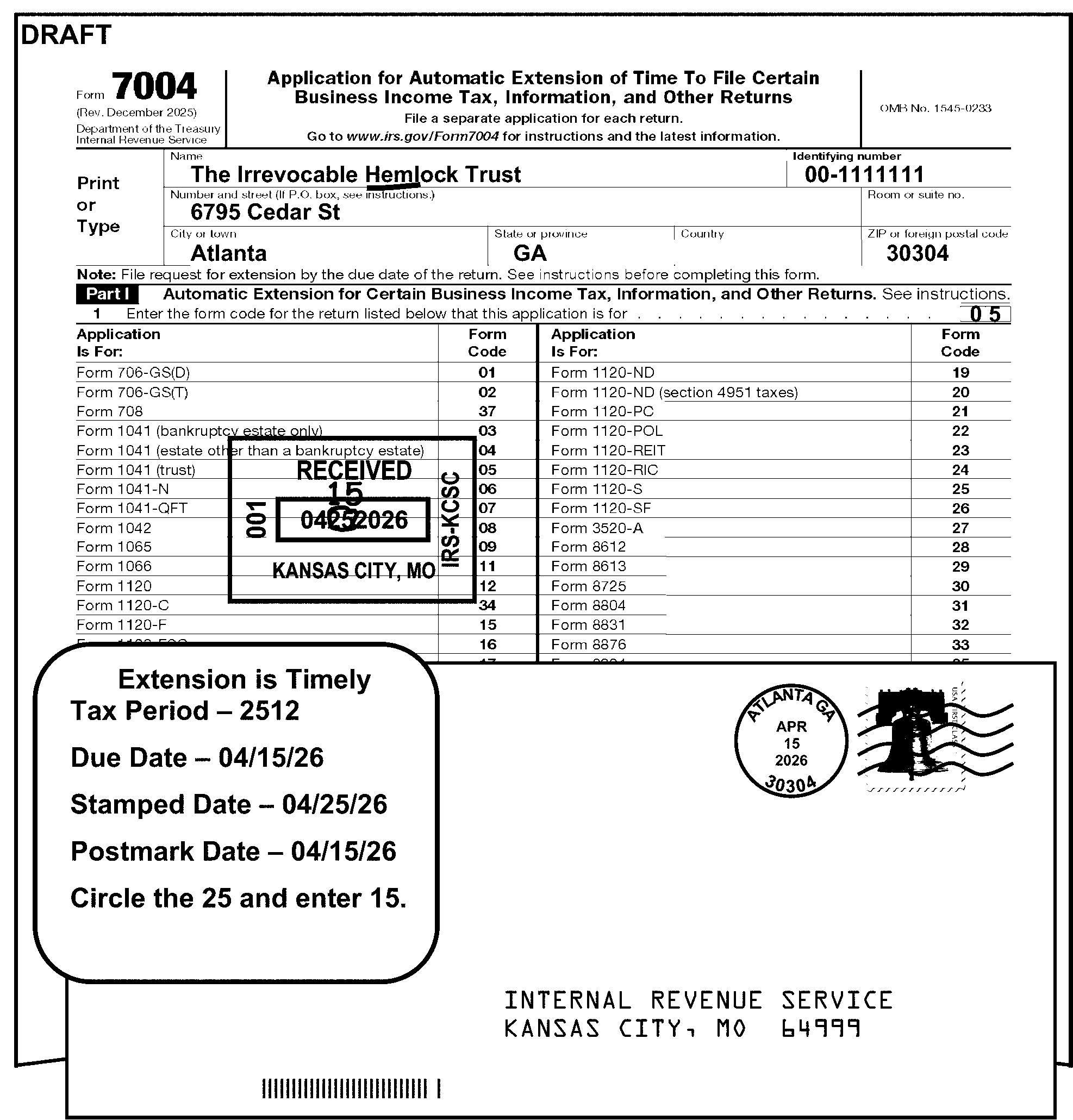
-
The following subsections have due date charts.
-
Refer to the following chart for extension requests for Form 706-GS (D), Form 706-GS (T), and Form 1042 are always filed for a calendar year (202512):
Form Timely Postmark Date ≡ ≡ ≡ ≡ ≡ ≡ ≡ ≡ ≡ ≡ ≡ ≡ ≡ ≡ ≡ ≡ Master File Generated Extended Date Form 706-GS (D)/ 706-GS (T) 04/15/2026 ≡ ≡ ≡ ≡ ≡ ≡ ≡ 10/15/2026 Form 1042 03/16/2026 ≡ ≡ ≡ ≡ ≡ ≡ ≡ 09/15/2026
-
Extension requests for Form 1041 (estate other than a bankruptcy estate) and Form 1041 (trust) are granted a 51/1-month extension. Extension requests for Form 1041 (bankruptcy estate only), Form 1041-N, and Form 1041-QFT are granted a 6-month extension.
Use the following chart for processing extension requests for:-
Form 1041
-
Form 1041-N
-
Form 1041-QFT
Form 7004 Due Dates for Form 1041, Form 1041-N, and Form 1041-QFT
Tax Period Timely Postmark Date ≡ ≡ ≡ ≡ ≡ ≡ ≡ ≡ ≡ ≡ ≡ ≡ ≡ ≡ ≡ Master File Generated Extended Date (51/1 months) Master File Generated Extended Date (6 months) 202509 01/15/2026 ≡ ≡ ≡ ≡ ≡ ≡ 06/30/2026 07/15/2026 202510 02/17/2026 ≡ ≡ ≡ ≡ ≡ ≡ ≡ 07/31/2026 08/15/2026 202511 03/16/2026 ≡ ≡ ≡ ≡ ≡ ≡ 08/31/2026 09/15/2026 202512 04/15/2026 ≡ ≡ ≡ ≡ ≡ ≡ ≡ ≡ 09/30/2026 10/15/2026 202601 05/15/2026 ≡ ≡ ≡ ≡ ≡ ≡ 10/31/2026 11/15/2026 202602 06/15/2026 ≡ ≡ ≡ ≡ ≡ ≡ ≡ ≡ 11/30/2026 12/15/2026 202603 07/15/2026 ≡ ≡ ≡ ≡ ≡ ≡ ≡ 12/31/2026 01/15/2027 202604 08/17/2026 ≡ ≡ ≡ ≡ ≡ ≡ ≡ 01/31/2027 02/15/2027 202605 09/15/2026 ≡ ≡ ≡ ≡ ≡ ≡ 02/28/2027 03/15/2027 202606 10/15/2026 ≡ ≡ ≡ ≡ ≡ ≡ ≡ 03/31/2027 04/15/2027 202607 11/16/2026 ≡ ≡ ≡ ≡ ≡ ≡ ≡ ≡ 04/30/2027 05/15/2027 202608 12/15/2026 ≡ ≡ ≡ ≡ ≡ ≡ ≡ 05/31/2027 06/15/2027 202609 01/15/2027 ≡ ≡ ≡ ≡ ≡ ≡ ≡ ≡ 06/30/2027 07/15/2027 202610 02/16/2027 ≡ ≡ ≡ ≡ ≡ ≡ ≡ ≡ 07/31/2027 08/15/2027 202611 03/15/2027 ≡ ≡ ≡ ≡ ≡ ≡ ≡ ≡ 08/31/2027 09/15/2027 -
-
Use the following chart to process extension requests for:
-
Form 1065
-
Form 1066
-
Form 1120-S
-
Form 3520-A
-
Form 8804
Exception:
For Form 8804, a timely extension request is due 51/1 months after the tax period ends if the partnership keeps records outside the United States and Puerto Rico.
Form 7004 Due Dates for Form 1065, Form 1066, Form 1120-S, Form 3520-A, and Form 8804
Tax Period Timely Postmark Date ≡ ≡ ≡ ≡ ≡ ≡ ≡ ≡ ≡ ≡ ≡ ≡ ≡ ≡ ≡ ≡ Master File Generated Extended Date 202509 12/15/2025 ≡ ≡ ≡ ≡ ≡ ≡ ≡ 06/15/2026 202510 01/15/2026 ≡ ≡ ≡ ≡ ≡ ≡ 07/15/2026 202511 02/17/2026 ≡ ≡ ≡ ≡ ≡ ≡ 08/15/2026 202512 03/16/2026 ≡ ≡ ≡ ≡ ≡ ≡ 09/15/2026 202601 04/15/2026 ≡ ≡ ≡ ≡ ≡ ≡ ≡ 10/15/2026 202602 05/15/2026 ≡ ≡ ≡ ≡ ≡ ≡ ≡ ≡ 11/15/2026 202603 06/15/2026 ≡ ≡ ≡ ≡ ≡ ≡ 12/15/2026 202604 07/15/2026 ≡ ≡ ≡ ≡ ≡ ≡ ≡ 01/15/2027 202605 08/17/2026 ≡ ≡ ≡ ≡ ≡ ≡ ≡ 02/15/2027 202606 09/15/2026 ≡ ≡ ≡ ≡ ≡ ≡ 03/15/2027 202607 10/15/2026 ≡ ≡ ≡ ≡ ≡ ≡ 04/15/2027 202608 11/16/2026 ≡ ≡ ≡ ≡ ≡ ≡ 05/15/2027 202609 12/15/2026 ≡ ≡ ≡ ≡ ≡ ≡ ≡ 06/15/2027 202610 01/15/2027 ≡ ≡ ≡ ≡ ≡ ≡ ≡ ≡ 07/15/2027 202611 02/16/2027 ≡ ≡ ≡ ≡ ≡ ≡ 08/15/2027 -
-
Refer to the following chart for extension requests for Form 1120-F if box 2 or 4 is checked, or if Treas. Reg. 1.6081-5 is notated:
Tax Period Timely Postmark Date ≡ ≡ ≡ ≡ ≡ ≡ ≡ ≡ ≡ ≡ ≡ ≡ ≡ ≡ ≡ 202507 01/15/2026 ≡ ≡ ≡ ≡ ≡ ≡ ≡ 202508 02/17/2026 ≡ ≡ ≡ ≡ ≡ ≡ ≡ 202509 03/16/2026 ≡ ≡ ≡ ≡ ≡ ≡ ≡ 202510 04/15/2026 ≡ ≡ ≡ ≡ ≡ ≡ ≡ 202511 05/15/2026 ≡ ≡ ≡ ≡ ≡ ≡ ≡ ≡ 202512 06/15/2026 ≡ ≡ ≡ ≡ ≡ ≡ ≡ ≡ 202601 07/15/2026 ≡ ≡ ≡ ≡ ≡ ≡ ≡ 202602 08/17/2026 ≡ ≡ ≡ ≡ ≡ ≡ 202603 09/15/2026 ≡ ≡ ≡ ≡ ≡ ≡ ≡ 202604 10/15/2026 ≡ ≡ ≡ ≡ ≡ ≡ ≡ ≡ 202605 11/16/2026 ≡ ≡ ≡ ≡ ≡ ≡ 202606 12/15/2026 ≡ ≡ ≡ ≡ ≡ ≡ ≡ ≡ 202607 01/15/2027 ≡ ≡ ≡ ≡ ≡ ≡ 202608 02/16/2027 ≡ ≡ ≡ ≡ ≡ ≡ ≡ 202609 03/15/2027 ≡ ≡ ≡ ≡ ≡ ≡
-
Form 1120-POL filers may or may not be incorporated. The due date is the 15th day of the 4th month (31/1-months) after the tax period ends. Form 1120-POL filers will receive a 6-month extension, regardless of tax period ending month if the extension request is timely. Use the following chart to process extension requests for Form 1120-POL:
Form 7004 Due Dates for Form 1120-POL
Tax Period Timely Postmark Date ≡ ≡ ≡ ≡ ≡ ≡ ≡ ≡ ≡ ≡ ≡ ≡ ≡ ≡ ≡ ≡ Master File Generated Extended Due Date 202509 01/15/2026 ≡ ≡ ≡ ≡ ≡ ≡ ≡ 07/15/2026 202510 02/17/2026 ≡ ≡ ≡ ≡ ≡ ≡ ≡ 08/15/2026 202511 03/16/2026 ≡ ≡ ≡ ≡ ≡ ≡ ≡ ≡ 09/15/2026 202512 04/15/2026 ≡ ≡ ≡ ≡ ≡ ≡ ≡ ≡ 10/15/2026 202601 05/15/2026 ≡ ≡ ≡ ≡ ≡ ≡ ≡ ≡ 11/15/2026 202602 06/15/2026 ≡ ≡ ≡ ≡ ≡ ≡ 12/15/2026 202603 07/15/2026 ≡ ≡ ≡ ≡ ≡ ≡ ≡ 01/15/2027 202604 08/17/2026 ≡ ≡ ≡ ≡ ≡ ≡ ≡ ≡ 02/15/2027 202605 09/15/2026 ≡ ≡ ≡ ≡ ≡ ≡ ≡ ≡ 03/15/2027 202606 10/15/2026 ≡ ≡ ≡ ≡ ≡ ≡ ≡ ≡ 04/15/2027 202607 11/16/2026 ≡ ≡ ≡ ≡ ≡ ≡ ≡ 05/15/2027 202608 12/15/2026 ≡ ≡ ≡ ≡ ≡ ≡ 06/15/2027 202609 01/15/2027 ≡ ≡ ≡ ≡ ≡ ≡ ≡ ≡ 07/15/2027 202610 02/16/2027 ≡ ≡ ≡ ≡ ≡ ≡ ≡ ≡ 08/15/2027 202611 03/15/2027 ≡ ≡ ≡ ≡ ≡ ≡ 09/15/2027
-
Use the following chart to process extension requests for:
-
Form 1120
-
Form 1120-F (without box 2 or 4 checked).
-
Form 1120-FSC
-
Form 1120-H
-
Form 1120-L
-
Form 1120-ND
-
Form 1120-PC
-
Form 1120-REIT
-
Form 1120-RIC
-
Form 1120-SF
Note:
For forms not listed above:
•Form 1120-S, see IRM 3.11.212.8.2.1.3.
•Form 1120-C, see IRM 3.11.212.8.3.1.
•Form 1120-POL, see IRM 3.11.212.8.2.1.5.
•Form 1120-F, box 2 or 4 checked or Treas. Reg 1.6081-5 is quoted, see IRM 3.11.212.8.2.1.4.Form 7004 Due Dates for Form 1120 Series Returns (Except Forms 1120-C, 1120-POL, 1120-S, and 1120-F with box 2 or 4 checked)
Tax Period Timely Postmark Date ≡ ≡ ≡ ≡ ≡ ≡ ≡ ≡ ≡ ≡ ≡ ≡ ≡ ≡ Master File Generated Extended Due Date 202508 12/15/2025 ≡ ≡ ≡ ≡ ≡ ≡ ≡ 06/15/2026 202509 01/15/2026 ≡ ≡ ≡ ≡ ≡ ≡ ≡ ≡ 07/15/2026 202510 02/17/2026 ≡ ≡ ≡ ≡ ≡ ≡ 08/15/2026 202511 03/16/2026 ≡ ≡ ≡ ≡ ≡ ≡ ≡ 09/15/2026 202512 04/15/2026 ≡ ≡ ≡ ≡ ≡ ≡ ≡ ≡ 10/15/2026 202601 05/15/2026 ≡ ≡ ≡ ≡ ≡ ≡ 11/15/2026 202602 06/15/2026 ≡ ≡ ≡ ≡ ≡ ≡ ≡ 12/15/2026 202603 07/15/2026 ≡ ≡ ≡ ≡ ≡ ≡ ≡ 01/15/2027 202604 08/17/2026 ≡ ≡ ≡ ≡ ≡ ≡ 02/15/2027 202605 09/15/2026 ≡ ≡ ≡ ≡ ≡ ≡ ≡ ≡ 03/15/2027 202606 09/15/2026 ≡ ≡ ≡ ≡ ≡ ≡ ≡ 04/15/2027 202607 11/16/2026 ≡ ≡ ≡ ≡ ≡ ≡ ≡ ≡ 05/15/2027 202608 12/15/2026 ≡ ≡ ≡ ≡ ≡ ≡ 06/15/2027 202609 01/15/2027 ≡ ≡ ≡ ≡ ≡ ≡ 07/15/2027 202610 02/16/2027 ≡ ≡ ≡ ≡ ≡ ≡ 08/15/2027 202611 03/15/2027 ≡ ≡ ≡ ≡ ≡ ≡ ≡ ≡ 09/15/2027 -
-
Certain extension requests require specific processing instructions:
-
Extensions for Form 1120-C (Form Code 34) have later due dates than other Form 1120 series extensions. See IRM 3.11.212.8.3.1.
-
Extensions for NMF Form 8612, Form 8613, Form 8725, Form 8831, Form 8876, Form 8924, and Form 8928. See IRM 3.11.212.8.3.2.
-
Extensions for Form 1120-F (Form Code 15), Form 1041 (bankruptcy estate only) (Form Code 03), Form 1041-N (Form Code 06), and Form 1041-QFT (form Code 07) must always have an edited return code. See IRM 3.11.212.8.3.3 and IRM 3.11.212.8.4.
-
Extensions for consolidated returns. See IRM 3.11.212.8.3.4.
-
-
The following subsections include the specific instructions for processing extensions for these forms.
-
Extension requests for Form 1120-C (as described in IRC 6072(d)) are due the 15th day of the 9th month (81/1 months) after the tax period ends. The following table shows the due dates for Form 7004 filed for Form 1120-C:
Tax Period Timely Postmark Date ≡ ≡ ≡ ≡ ≡ ≡ ≡ ≡ ≡ ≡ ≡ ≡ ≡ ≡ ≡ ≡ Master File Generated Extended Date 202503 12/15/2025 ≡ ≡ ≡ ≡ ≡ ≡ 06/15/2026 202504 01/15/2026 ≡ ≡ ≡ ≡ ≡ ≡ ≡ ≡ 07/15/2026 202505 02/17/2026 ≡ ≡ ≡ ≡ ≡ ≡ ≡ ≡ 08/15/2026 202506 03/16/2026 ≡ ≡ ≡ ≡ ≡ ≡ 09/15/2026 202507 04/15/2026 ≡ ≡ ≡ ≡ ≡ ≡ ≡ ≡ 10/15/2026 202508 05/15/2026 ≡ ≡ ≡ ≡ ≡ ≡ ≡ ≡ 11/15/2026 202509 06/15/2026 ≡ ≡ ≡ ≡ ≡ ≡ ≡ 12/15/2026 202510 07/15/2026 ≡ ≡ ≡ ≡ ≡ ≡ ≡ 01/15/2027 202511 08/17/2026 ≡ ≡ ≡ ≡ ≡ ≡ ≡ ≡ 02/15/2027 202512 09/15/2026 ≡ ≡ ≡ ≡ ≡ ≡ ≡ 03/15/2027 202601 10/15/2026 ≡ ≡ ≡ ≡ ≡ ≡ 04/15/2027 202602 11/16/2026 ≡ ≡ ≡ ≡ ≡ ≡ 05/15/2027 202603 12/15/2026 ≡ ≡ ≡ ≡ ≡ ≡ 06/15/2027 202604 01/15/2027 ≡ ≡ ≡ ≡ ≡ ≡ ≡ ≡ 07/15/2027 202605 02/16/2027 ≡ ≡ ≡ ≡ ≡ ≡ ≡ 08/15/2027 202606 03/15/2027 ≡ ≡ ≡ ≡ ≡ ≡ ≡ ≡ 09/15/2027 -
A cooperative not described in IRC 6072(d) generally must file its income tax return by the 15th day of the 4th month (31/1 months) after the end of its tax year.
-
A cooperative with a fiscal tax year ending June 30 must file by the 15th day of the 3rd month (21/1 months) after the end of its tax year.
-
A cooperative with a short tax year ending anytime in June will be treated as if the short year ended on June 30, and must file by the 15th day of the 3rd month (21/1 months) after the end of its tax year.
-
Form 7004 extension requests for the following NMF forms are processed at KCSPC, under program 75800:
-
Form 8612
-
Form 8613
-
Form 8725
-
Form 8831
-
Form 8876
-
Form 8924
-
Form 8928
-
-
KCSPC only: If any Form 7004 filed for a NMF return is erroneously batched with master file Form 7004 or vice versa, take the following action:
-
Pull unnumbered forms from the batch and follow local procedures to have the document re-batched.
-
Edit numbered forms with Action Code 610 and prepare Form 4227 to have the document be renumbered.
-
-
Determine the timeliness of extension requests for NMF forms:
-
≡ ≡ ≡ ≡ ≡ ≡ ≡ ≡ ≡ ≡ ≡ ≡ ≡ ≡ ≡ ≡ ≡≡ ≡ ≡ ≡ ≡ ≡≡ ≡≡ ≡ ≡ ≡ ≡≡ ≡≡ ≡ ≡ ≡ ≡ ≡≡ ≡ ≡ ≡ ≡ ≡≡ ≡ ≡ ≡ ≡ ≡ ≡≡ ≡ ≡ ≡ ≡ ≡ ≡ ≡ ≡ ≡ ≡ ≡ ≡ ≡ ≡ ≡ ≡ ≡ ≡ ≡ ≡ ≡ ≡ ≡ ≡ ≡ ≡
-
Extension requests for Form 8612 and Form 8613 are always filed for a calendar year (202512) and are due March 15th.
-
Extension requests for Form 8831 are due the 15th day of the 4th month (31/1-months) after the tax year end. For a calendar year, the due date is April 15.
-
If the extension request for Form 8612, Form 8613, or Form 8831 is denied, notify the taxpayer. See IRM 3.11.212.3.1.
-
-
See the following table for the due dates for extension requests for NMF forms:
Form Due Date Form 8612/Form 8613 March 15th Form 8831 15th day of the 4th month after the tax period ending Form 8725 ≡ ≡ ≡ ≡ ≡ ≡ ≡ ≡ ≡ ≡ ≡ ≡ ≡ ≡ ≡ ≡ ≡ ≡ ≡ ≡ ≡ ≡ ≡ ≡ ≡ ≡ Form 8876 ≡ ≡ ≡ ≡ ≡ ≡ ≡ ≡ ≡ ≡ ≡ ≡ ≡ ≡ ≡ ≡ ≡ ≡ ≡ ≡ ≡ ≡ ≡ ≡ ≡ Form 8924 ≡ ≡ ≡ ≡ ≡ ≡ ≡ ≡ ≡ ≡ ≡ ≡ ≡ ≡ ≡ ≡ ≡ ≡ ≡ ≡ ≡ ≡ ≡ ≡ ≡ ≡ Form 8928 ≡ ≡ ≡ ≡ ≡ ≡ ≡ ≡ ≡ ≡ ≡ ≡ ≡ ≡ ≡ ≡ ≡ ≡ ≡ ≡ ≡ ≡ ≡ ≡ ≡
-
Extensions for Form 1120-F (Form Code 15) must be processed at OSPC. Transship if filed at another campus.
-
If Form 7004 Part II line 2 box is not checked, consider the request timely filed if received/postmarked by the 15th day of the 4th month (31/1-months) after the end of the tax period.
-
If Form 7004 Part II line 2 box is checked, consider the request timely filed if received/postmarked by the 15th day of the 6th month after the end of the tax period. See IRM 3.11.212.8.2.1.
-
Edit a Return Code in the margin to the right of Line 1 boxes on all extensions for Form 1120-F. See Figure 3.11.212-2.
-
If the line 2 box is checked, edit Return Code 6. Figure 3.11.212-2 shows editing of Return Code 6.
-
If the line 2 box is not checked, edit Return Code 7.
-
-
If the extension is numbered, the file location code (first two numbers in the DLN) for Form 1120-F extensions must be 60. If it is not, have Form 7004 renumbered for the correct file location code.
-
Follow all other normal editing procedures for Form 7004. See IRM 3.11.212.8.4.
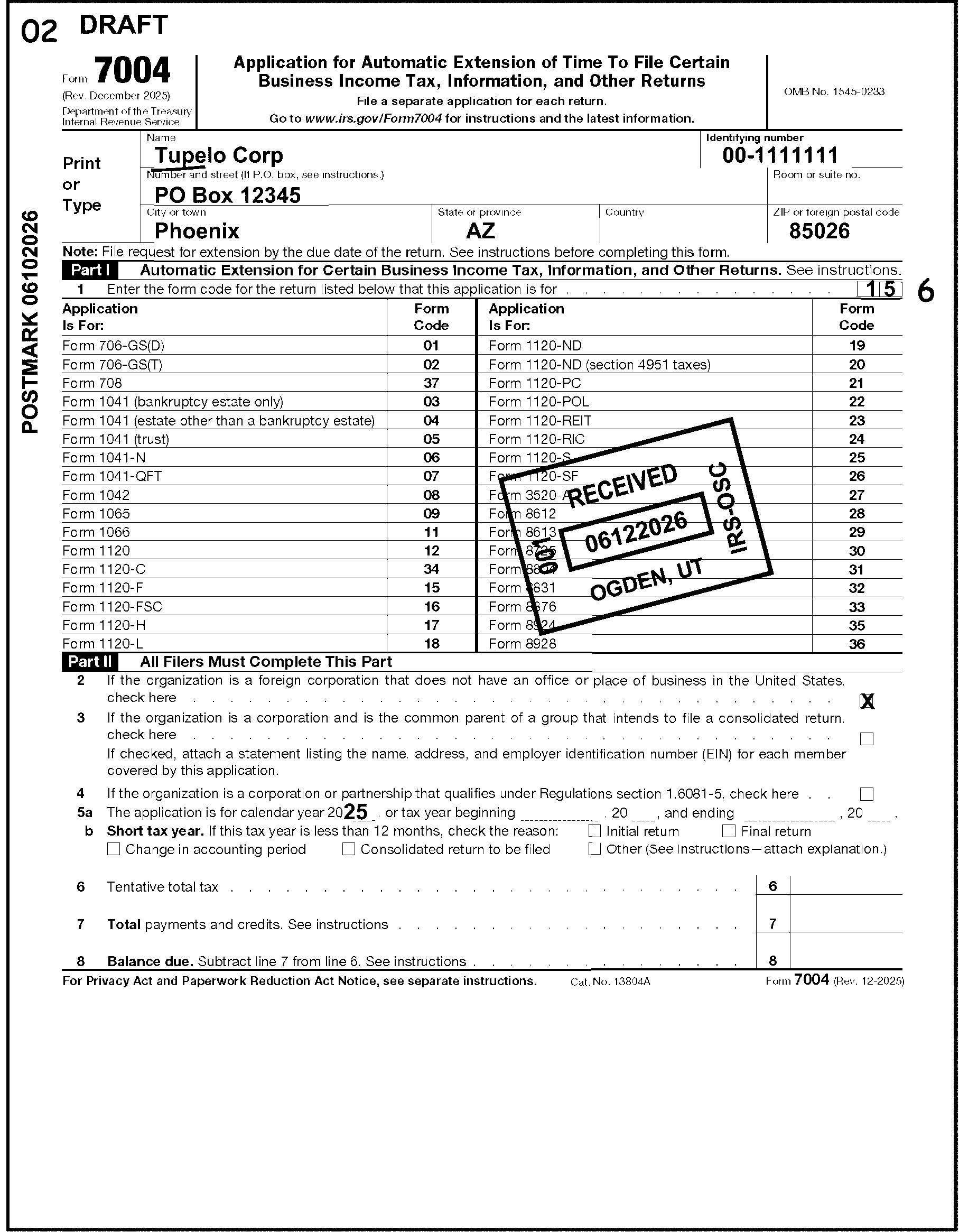
-
These procedures apply to timely filed extensions for Form 1120, Form 1120-C, Form 1120-L, and Form 1120-PC. If the taxpayer has indicated the extension request is for another type of return, process normally; this is not a consolidated application.
-
Examine all applications to determine whether they are from parent corporations requesting extensions of time for subsidiary corporations in addition to the parent. This requires examining all attachments as well as the applicable lines on the extension for evidence of consolidation.
-
If the consolidated application was filed in a site other than where the parent corporation would file (based on the parent corporation's address), examine the entire extension request to determine whether it is a pseudo application as explained below.
-
A pseudo application is merely an information copy of a bona fide application previously filed by a parent corporation on behalf of a subsidiary (or subsidiaries) located in a different area.
Example:
A Form 7004 bearing a parent address in Michigan was stamped received in Columbia, SC. On the reverse side, it listed two subsidiaries with South Carolina addresses and had the following notation: "Form 7004 is being filed in Detroit, Michigan. The consolidated return will be filed in Detroit, Michigan."
-
If there is a notation which gives a clear indication of a pseudo condition, do not process the application. Give to your supervisor. If there is not a clear indication of a pseudo condition, consider this a valid extension request.
-
-
If the extension request is for Form 1120, Form 1120-C, Form 1120-L, or Form 1120-PC, use the following items to identify a consolidated Form 7004:
-
Box on line 3 is checked, indicating the parent intends to file a consolidated return, and/or
-
There is an attached list of subsidiaries.
-
-
If the box on line 3 is checked, the parent corporation is required to attach a list with the names, addresses, and EINs of all members of the group that will be covered by the consolidated return. This is required for the subsidiaries to be included in the extension to file.
-
If no list of subsidiaries is attached, correspond for the listing. Use Letter 3699C and mail to the address of the parent corporation. When the reply is received, attach the listing to Form 7004.
-
If a list of subsidiaries is attached and 5 or fewer subsidiary EINs are missing or invalid (e.g., repeating digits, such as 11-1111111), sequential digits, or other than 9 digits, research for the EINs for the subsidiaries. If not found, route to Entity Control for assignment of EINs.
-
If a list of subsidiaries is attached and the list shows None, Applied For, or Pending for any subsidiary EINs, research for the EINs. If not found, route to Entity Control for assignment of EINs.
-
If a list of subsidiaries is attached and more than 5 EINs are missing or invalid (e.g., repeating digits, such as 11-1111111), sequential digits, or other than 9 digits, correspond for the missing EINs. Use Letter 3699C, and mail to the address of the parent corporation. Continue processing the extension request. When the reply is received, associate it with Form 7004.
-
-
Process Form 7004 normally for the parent corporation.
-
Underline the Name Control. See IRM 3.11.212.8.4.1.
-
Review for a valid EIN.
-
If the EIN is illegible, other than 9 digits, or missing, check attachments.
-
If a valid EIN is not found or there is more than one EIN and the extension is unnumbered, research for a valid EIN. If not found, suspend to Entity Control for assignment of an EIN.
-
If a valid EIN is not found or there are multiple EINs and the extension is numbered, take no action.
-
If there is an SSN and there is no indication on Form 7004 what type of form the extension is for, do not convert to Form 4868. Follow instructions in IRM 3.11.212.8.1.
-
-
If the extension is for Form 706-GS (D) or Form 708 and the taxpayer is using an SSN, edit a 0 (zero) after the SSN.
-
Edit the tax period in YYMM format to the left of the OMB number based on the tax year the taxpayer has entered on line 5a. See IRM 3.11.212.7.2.
-
It's not necessary to edit the tax period if it is for the current calendar year (202512).
-
If the extension is for Form Code 01, 02, or 08, (Form 706-GS (D), Form 706-GS (T), or Form 1042) no tax period editing is necessary as they are always calendar year.
-
If the extension is for a short tax year (Part II, line 5a shows a period of less than 12 months), see the change in accounting period instructions. See IRM 3.11.212.8.4.3.
-
-
Edit the received date if one is not present. See IRM 3.11.212.7.3.
-
Edit the MFT code. See IRM 3.11.212.8.4.2.
-
Edit the Return Code on extensions for Form 1041 (bankruptcy estate only), 1041-N, 1041-QFT and Form 1120-F. Edit the Return Code to the right of the boxes on line 1:
If Form Code is And Then edit Return Code 03 5 06 5 07 5 15 Box on line 2 is checked (foreign corporation which does not maintain an office in U.S.) 6 15 Box on line 2 is not checked (foreign corporation which maintains an office in U.S.) 7 -
When required, edit the CCC in the middle of the top margin of Form 7004.
-
Edit CCC L when the extension is denied. See IRM 3.11.212.8.6.
-
Edit CCC W for a short tax year when the taxpayer has checked one of the boxes on Part II line 5b. See IRM 3.11.212.8.4.3.
-
Only one CCC may be edited. If both CCC L and CCC W apply, edit CCC L.
-
-
It is not necessary to edit line 6, line 7, or line 8.
-
If the extension request is filed late, follow disapproval actions. See IRM 3.11.212.8.6.
-
See Exhibit 3.11.212-2.
-
Underline the name control of the taxpayer. The ampersand (&) and hyphen (-) are the only special characters allowed in the name control.
-
The name control consists of four alpha and/or numeric characters.
-
The name control can have less than, but no more than, four characters.
-
Blanks may be present only at the end of a name control.
-
No character may follow a blank.
-
Use the BMF Name Control Job Aid, Document 7071-A, appropriate to the type of tax form the taxpayer has indicated on the extension. Figure 3.11.212-3 shows examples of editing for corporation, estate and trust name controls.
-
-
If the name is not present on the name line but can be determined from elsewhere on the extension or on attachments, edit the name control to the name line. If it can’t be determined:
-
On a numbered extension, take no action.
-
On an unnumbered extension, research for the taxpayer's name using the TIN.
-
-
If the name, address, and TIN are all missing, consider the document unprocessable. Give to your manager for preparation for destruction.
-
Form 7004 has different types of name controls based on the type of return for which the extension is requested. Review line 1 to determine the type of return.
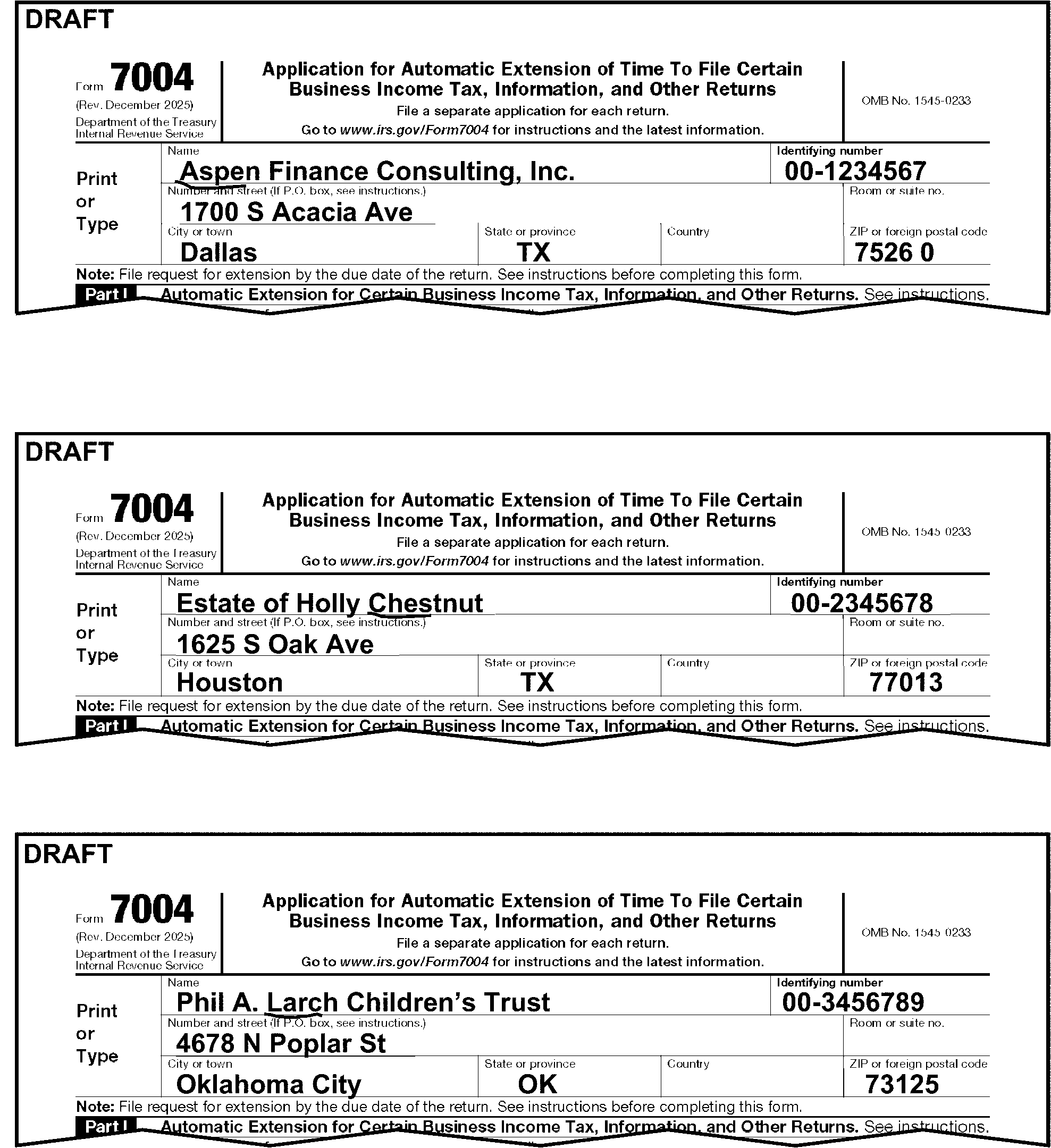
-
Edit the two-digit MFT code in the upper left corner of Form 7004 for the type of return the taxpayer wants for the extension. Figure 3.11.212-4 shows MFT editing when the taxpayer has requested an extension for Form 1065.
-
If the extension is for Form Code 28, 29, 30, 32, 33, 35, or 36, the extension must be processed in KCSPC.
-
Determine the correct MFT based on the form code the taxpayer has entered on line 1. See the following table.
If line 1 Form Code is The extension is for Then edit MFT 01 Form 706-GS (D) 78 02 Form 706-GS (T) 77 03-07 Form 1041 05 08 Form 1042 12 09 Form 1065 06 11 Form 1066 07 12, 15-26 Form 1120 series 02 27 Form 3520-A 42 31 Form 8804 08 34 Form 1120-C 02 37 Form 708 51 -
-
Optionally during peak processing (March through April), if forms are sorted and batched according to MFT it is not necessary to edit the MFT.
-
Follow these procedures for Form 7004 if multiple Form Codes or no Form Code is entered on line 1:
-
Search the extension and attachments for a clear indication of which type of return is being extended. Taxpayers may circle the form in the list at the bottom of Form 7004 instead of entering a code on line 1.
-
If there is no indication, give to your Work Leader to research for filing requirements and edit the MFT based on filing requirements. Edit the appropriate form code in the boxes on line 1 as an aid to Batching. If not found, leave blank.
-
If the taxpayer doesn't have filing requirements for any of the forms listed on Form 7004, leave the MFT blank and continue processing. No further editing is necessary.
-
If the taxpayer marks multiple form codes on Form 7004 and has open filing requirements for forms entered, leave the MFT blank and continue processing.
-
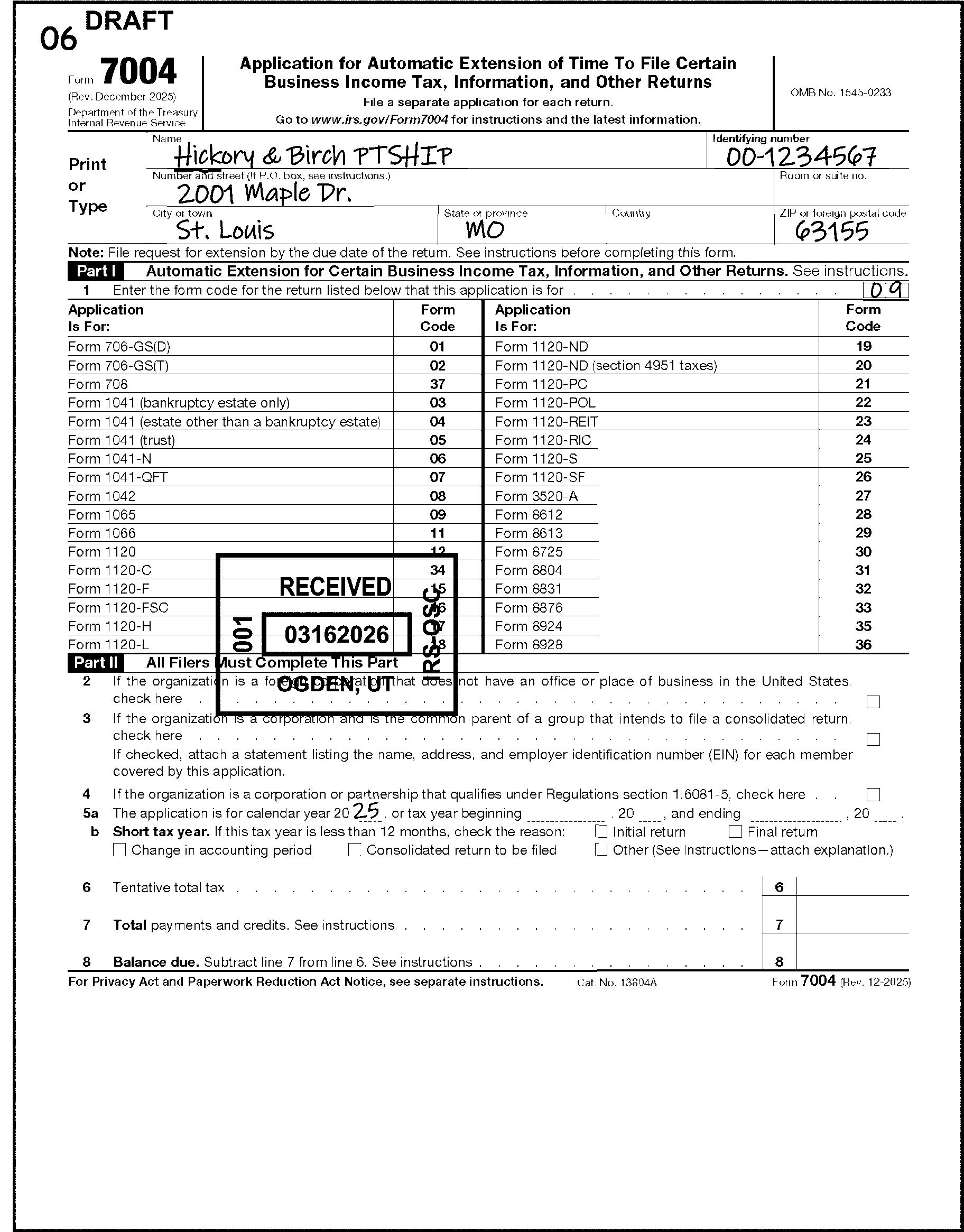
-
Follow these instructions if the taxpayer has indicated a short tax year in Part II, line 5a.
-
The taxpayer may indicate a tax period of less than 12 months because an initial return will be filed, a final return will be filed, the accounting period is changing, the corporation is becoming or ceasing to be a member of a consolidated group, or the Other box is checked.
-
If a short year is indicated in Part II, line 5a, and one of the boxes on line 5b is checked, edit CCC W and the tax period the taxpayer indicated. See Figure 3.11.212-5.
-
If the extension is for a Form 1120 series return, and is being filed due to becoming part of a consolidated group ("Treas. Reg. section 1.1502.-76" , "changing tax year to get in step with parent" , "will file a consolidated return" , checks "Consolidated return to be filed" box on line 5b, or something similar), edit CCC W and edit the tax period in YYMM format to the right of the words "File a separate application for each return."
-
Only one CCC may be used on a document. If the extension is late, edit CCC L.
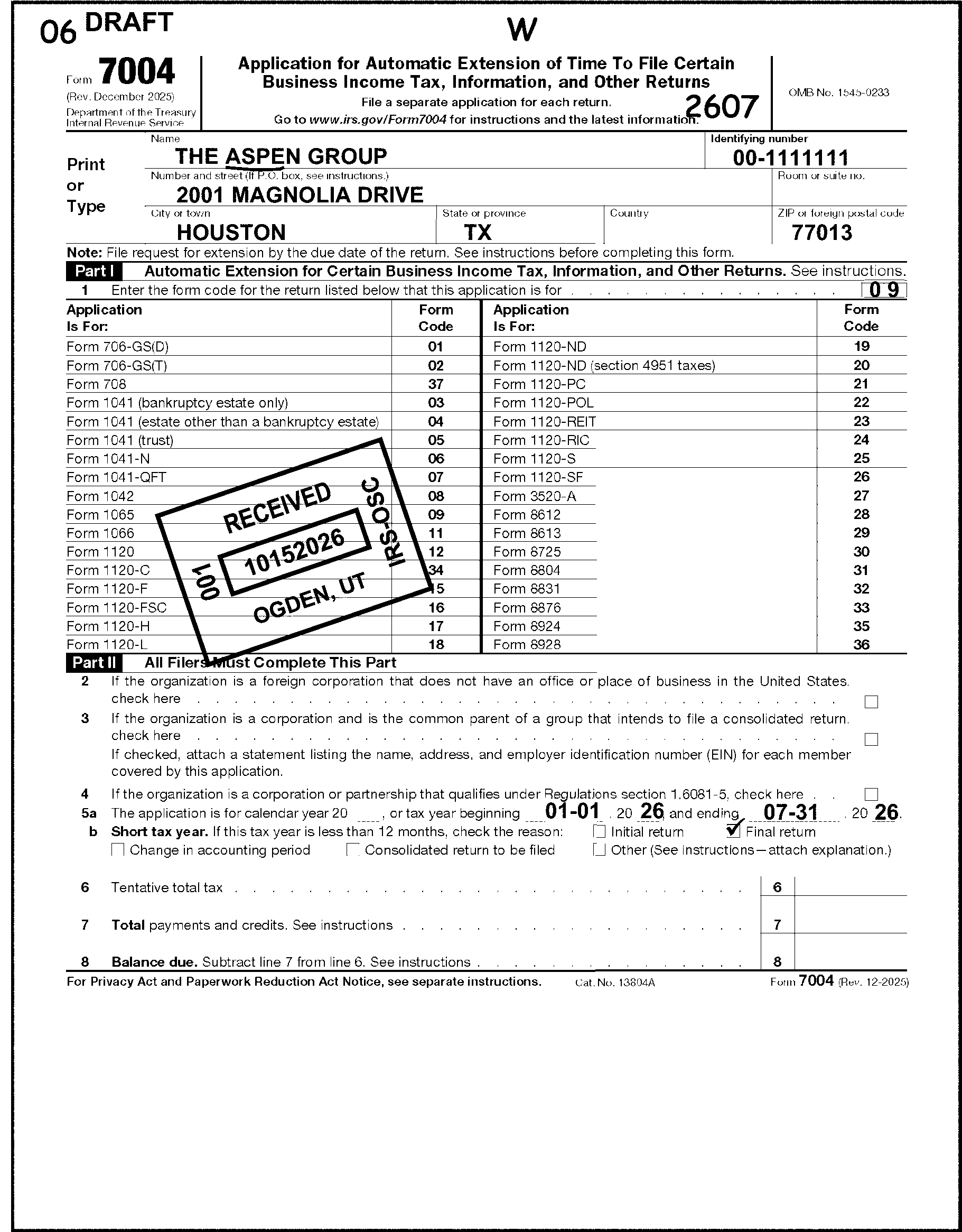
-
Form 7004 will be approved if filed timely based on the return due date of the form being extended. See IRM 3.11.212.8.2.1.
-
Edit the form as instructed in IRM 3.11.212.8.4.
-
If the taxpayer requests an extended due date of more than the 5 1/2 or 6 months (depending on form and type of form) from the original return due date, continue processing Form 7004 as approved, but correspond to notify the taxpayer the extended due date can not be granted for more than 51/1 or 6 months. See IRM 3.11.212.3.1.
-
If the extension request is for Form Code 03, Form 1041 (bankruptcy estate only), Form Code 06, Form 1041-N, or Form Code 07, Form 1041-QFT, edit Return Code 5 in the margin to the right of line 1.
-
If the Form 7004 extension request is not approved, edit CCC L in the middle of the top margin of the form.
-
Correspond to notify the taxpayer the extension was denied and the reason for denial. See IRM 3.11.212.3.1. The application will remain in the process flow.
-
If the taxpayer is requesting an additional extension beyond the original 51/1 or 6 -month period (submitting a second extension request), research using BMFOL for a posted TC 460:
If Then TC 460 is posted and the extension is unnumbered, -
Return the extension request to the taxpayer using Form 6513.
-
Notate Denied and select the appropriate paragraphs on Form 6513 to show the maximum extension allowed by law has already been granted.
TC 460 is posted and the extension is numbered, -
Edit Action Code 640 on the bottom left margin of the form.
-
Correspond with the taxpayer to explain the maximum extension allowed by law for most taxpayers within the United States is 6 months or 51/1 months (depending on form and type of form). Use Letter 0297C or Form 6513. See IRM 3.11.212.3.1.
-
Prepare Form 4227 and notate, "Return Form 7004 to the taxpayer" .
-
Leave the application in the batch.
No TC 460 is posted, Follow normal denial procedures. -
-
This subsection includes instructions to process Form 4868.
-
Taxpayers needing an extension of time to file their individual income tax returns will submit a Form 4868. An approved Form 4868 generates an automatic 6-month extension of time to file.
-
Forms 4868 that are late-filed are to be forwarded to Code and Edit for processing.
-
It is Code and Edit's responsibility to review the document and attachments to make the determination whether the extension is late-filed. It is extremely important Code and Edit review the entire extension and attachments to correctly determine whether the extension was filed timely or not. See IRM 3.11.212.9.3.
-
Extensions are often denied in error when the wrong received date is used or when the postmark date is not considered. This results in erroneous failure to file penalties, notices to the taxpayer and an increase in reconsideration requests.
-
If it is determined the extension request is timely filed after review of the postmark date and all information on the extension and attachments, re-batch as an approved extension.
-
-
Forms covered by this extension are Form 1040, Form 1040-NR, and Form 1040-SS. There are no longer any gift tax extension items on Form 4868. A separate gift tax extension, Form 8892, is processed in KCSPC. See IRM 3.11.212.11.
-
Form 4868 is used to request an extension for an individual income tax return or a 1040-NR tax return. If the request has an EIN, see IRM 3.11.212.9.4.1.
-
If an extension is received requesting time to pay or to file and pay, process as time to file only. Written requests from the taxpayer stating they can’t pay, refuse to pay, will pay later, or want to pay in installments are to be forwarded to Compliance Services.
-
If a short period tax return is received for a bankruptcy Form 4868 or Form 4868 with "Section 1398" notated, circle out the calendar year and edit the new tax period.
-
If duplicate Forms 4868 are received (forms with the same SSN, name, and tax period), do not process separately. Staple the duplicate copy to the original extension and process as one document.
-
Taxpayers are instructed to send extensions with payments to a Lockbox bank. Extensions without payments are sent to the Submission Processing Center.
-
The extension and payment are processed by the bank with a Document Code 19.
-
If the Lockbox bank determines the extension was late filed, they will process the payment and send the extension form to the campus for processing. Code and Edit will make the determination of whether the extension was timely filed. See IRM 3.11.212.9.3.
-
Use care when determining whether the extension request was timely filed.
-
If it is determined the extension request is timely filed after review of the postmark date and all information on the extension and attachments, have the document re-batched and processed as approved (including editing a timely received date if needed). See IRM 3.11.212.5.
-
Form 4868 is timely if the received date is on or before the first day that is not a weekend or legal holiday on or after the due date. The due date is the 15th day of the 4th month after the tax period ends. For calendar year 202512, Form 4868 is timely if received by 04/15/2026. ≡ ≡ ≡ ≡ ≡ ≡ ≡ ≡ ≡ ≡ ≡ ≡ ≡ ≡ ≡ ≡ ≡ ≡ ≡ ≡ ≡ ≡ ≡ ≡ ≡ ≡. If Box 8 or 9 is checked or if the taxpayer’s address is outside the United States and Puerto Rico, Form 4868 is timely if received by the 15th day of the 6th month after the tax period ends. For calendar year 202512, Form 4868 is timely if received by 06/15/2026. ≡ ≡ ≡ ≡ ≡ ≡ ≡ ≡ ≡ ≡ ≡ ≡ ≡ ≡ ≡ ≡ ≡ ≡ ≡ ≡ ≡ ≡ ≡ ≡ ≡ ≡.
-
All extension requests with a late received date must be reviewed for a timely postmark date.
-
If there is no envelope attached, use the postmark date stamped on the face of the document.
-
If the postmark date is on or before the due date, the extension is timely filed.
-
Extensions with a timely foreign postmark date will be considered timely filed.
-
-
This table includes examples of timeliness determination for tax period 202512:
Extension is due Received Date is Postmark Date is Is the Extension Timely? 04/15/2026 ≡ ≡ ≡ ≡ ≡ ≡ ≡ ≡ ≡ ≡ ≡ ≡ ≡ ≡ ≡ Not necessary to check Yes, batch as timely 04/15/2026 ≡ ≡ ≡ ≡ ≡ ≡ ≡ ≡ ≡ ≡ On or before 04/15/2026 Yes, re-batch as timely 04/15/2026 ≡ ≡ ≡ ≡ ≡ ≡ ≡ ≡ ≡ ≡ After 04/15/2026 No, unless other exceptions apply. See IRM 3.11.212.9.3 (7). 06/15/2026 ≡ ≡ ≡ ≡ ≡ ≡ ≡ ≡ ≡ ≡ ≡ ≡ ≡ ≡ ≡ Not necessary to check Yes, re-batch as timely 06/15/2026 ≡ ≡ ≡ ≡ ≡ ≡ ≡ ≡ ≡ ≡ ≡ On or before 06/15/2026 Yes, re-batch as timely 06/15/2026 ≡ ≡ ≡ ≡ ≡ ≡ ≡ ≡ ≡ ≡ ≡ ≡ After 06/15/2026 No, unless other exceptions apply. See IRM 3.11.212.9.3 (7) -
≡ ≡ ≡ ≡ ≡ ≡ ≡ ≡ ≡ ≡ ≡ ≡ ≡ ≡ ≡ ≡ ≡ ≡ ≡ ≡ ≡ ≡ ≡ ≡ ≡ ≡ ≡ ≡ ≡ ≡ ≡ ≡ ≡ ≡ ≡ ≡ ≡ ≡ ≡ ≡ ≡ ≡ ≡ ≡ ≡ ≡ ≡ ≡ ≡ ≡ ≡ ≡ ≡ ≡ ≡ ≡ ≡ ≡ ≡ ≡ ≡ ≡ ≡ ≡ ≡ ≡ ≡ ≡ ≡ ≡ ≡ ≡ ≡ ≡ ≡ ≡ ≡ ≡ ≡ ≡ ≡ ≡ ≡ ≡ ≡ ≡
-
If Form 4868 is received after the due date ≡ ≡ ≡ ≡ ≡ ≡ ≡ ≡ ≡ ≡ ≡ ≡ ≡ ≡ ≡ ≡ ≡ ≡ ≡ ≡ ≡ ≡ ≡ ≡ ≡ ≡ ≡ ≡, review the extension for indications the extension has a later due date.
-
Box 8 or 9 is checked: Extensions for 202512 are timely if received by 06/15/2026. ≡ ≡ ≡ ≡ ≡ ≡ ≡ ≡ ≡ ≡ ≡ ≡ ≡ ≡ ≡ ≡ ≡ ≡ ≡ ≡ ≡. If the address is outside of the United States and Puerto Rico and the postmark date is on or before 06/15/2026, process as timely filed.
-
Disaster: If the taxpayer's address is covered by an officially declared disaster or notates the disaster or a FEMA number, and the postmark date is on or before the postponed due date, process as timely filed. See Exhibit 3.11.212-5.
-
Rejected electronically filed extension request: If the taxpayer attempted to timely file an extension electronically and it was rejected, the extension request is timely if postmarked by the regular due date or 10 calendar days after the date the taxpayer was notified the electronic submission was rejected, whichever is later.
-
-
If the taxpayer is requesting an extension date beyond the automatic 6-months allowed on Form 4868, the request must be transshipped to AUSPC. See IRM 3.11.212.9.6.2.
-
Extension requests for Form 1040-NR estates and trusts have special due date instructions. See IRM 3.11.212.9.7.
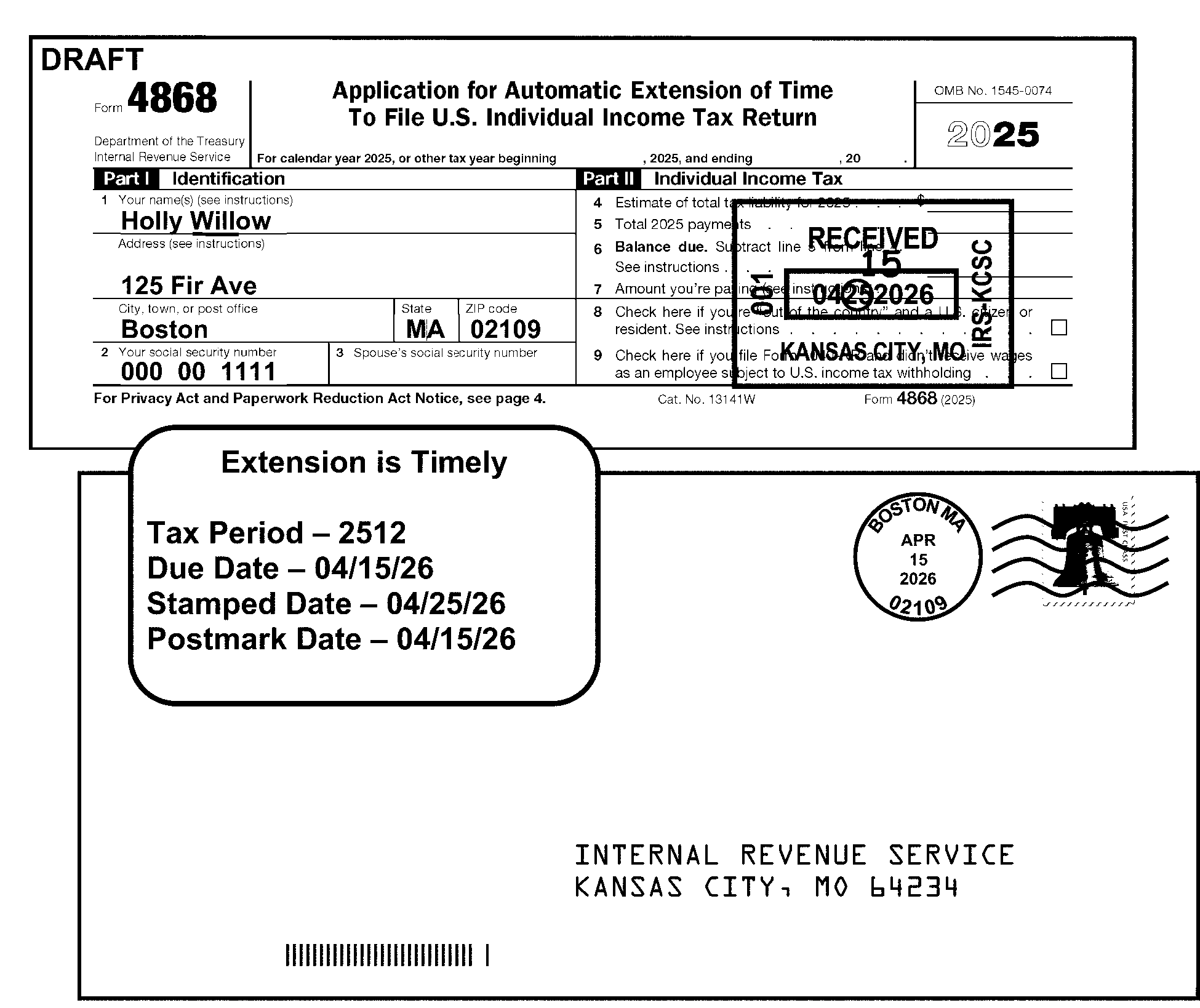
-
Determine if the request is timely filed. See IRM 3.11.212.9.3.
-
Taxpayer name: Underline the first four characters of the last name.
-
The name control can have less than four characters.
-
Alphas and hyphens are the only valid characters.
-
See Document 7071 for further information.
-
-
TIN: There must be a valid 9 digit SSN or ITIN unless this is an extension request is for a Form 1040-NR estate or trust. See IRM 3.11.212.9.7.
-
If Form 4868 has an EIN and no SSN, see IRM 3.11.212.9.4.1.
-
If the SSN is missing, illegible or other than 9 numbers, see IRM 3.11.212.9.4.2.
-
If Form 4868 has no SSN, but has a notation an ITIN will be requested, see IRM 3.11.212.9.4.2.
-
-
All extensions will have a received date stamp and the envelope attached. If more than one extension request was included in an envelope the postmark date will be stamped on each additional extension. We will not circle out timely received dates. See IRM 3.11.212.9.4.3.
-
Tax period: Edit only on fiscal year extensions in YYMM format. See IRM 3.11.212.9.4.3.
-
Extended due date: If the extension is late filed, edit the extended due date in MMDDYY format on the City/State/ZIP line.
-
Use the original return due date as the extended due date.
-
If box 8 or box 9 is checked, or the address is outside the United States and Puerto Rico, edit 061526.
-
All others, edit 041526 for calendar year 202512, or the due date for the fiscal or prior year.
-
-
See Figure 3.11.212-7 showing Form 4868 edit lines:
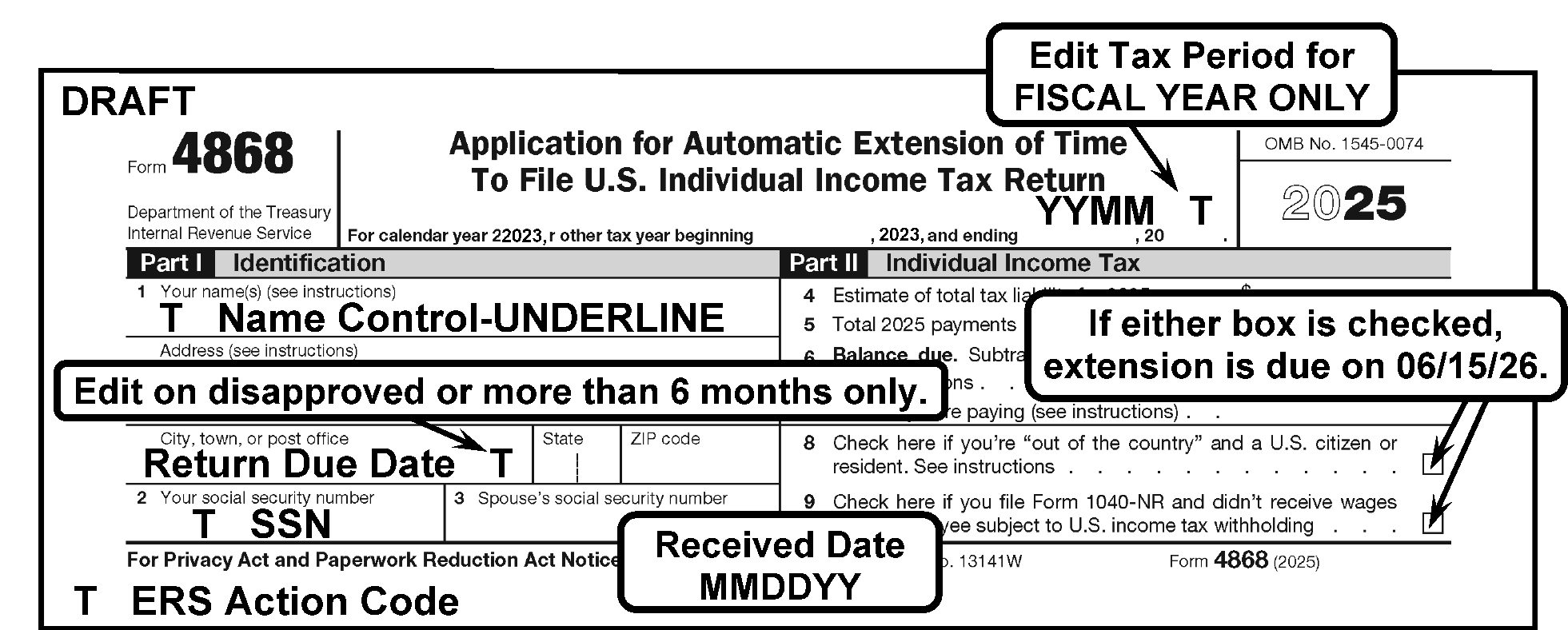
-
Form 4868 may only be used to request an extension of time to file an individual income tax return, or a 1040-NR estate or trust return.
-
Never convert to an extension for a BMF return.
-
Never transship to a BMF campus unless the request meets all the criteria for an extension for a Form 1040-NR estate or trust listed in IRM 3.11.212.9.7.
-
-
If the extension is for an estate or trust (an EIN is present), and there is no individual's name listed, do not process. Take the following action:
Exception:
Extensions filed at AUSPC or KCSPC: If the name line includes "trust" or "estate" , see IRM 3.11.212.9.7.
-
If the request is timely filed, return it to the taxpayer with Form 6401. Check the box for "Please complete items" and include the text "If extension is filed for individual return, print your name, and SSN or ITIN. If for Form 1040-NR estate or trust, write “estate” next to EIN and print taxpayer name. To file extension for another return type, see instructions for Form 7004 or 4768."
-
If the request is not timely filed, return it to the taxpayer with Form 6513. Check the second box and the fourth box.
-
-
If the name line includes an individual's name, such as "Mary Jones Card Shop" , or "Mary Jones Trust" , check attachments for the SSN of the individual listed.
-
If not found, research IDRS for the SSN using the taxpayer's individual name.
-
If no SSN is found through research, return Form 4868 to the taxpayer, following the instructions in (2)a) and b) above.
-
-
The TIN for Form 4868 is an SSN or ITIN.
-
If the SSN is missing, illegible or other than 9 numbers, check attachments for the SSN.
-
If not found, research IDRS for the SSN.
-
If no SSN is found through research, correspond to request the SSN, and return the Form 4868 to the taxpayer.
-
If the address is missing give the extension to your manager so it can be destroyed as classified waste.
Note:
If the taxpayer's address can’t be found, but the representative's or agent's address is present, correspond with the representative for the taxpayer's address. If no reply after 30 days, give the extension to your manager so it can be destroyed as classified waste. See IRM 21.5.1.4.10 Classified Waste, for proper procedures.
-
-
If Form W-7 is attached, see IRM 3.11.212.2.7. If "ITIN to be requested" or similar statement is notated, or there is an indication an ITIN will be applied for, take the following action:
If Then The extension request is NOT approved, Follow normal procedures to notify the taxpayer the extension request was not approved. Give the original extension request to your manager for preparation for destruction as classified waste. The extension request IS approved, Return the original request to the taxpayer with Form 6401. Check the box on Form 6401 that states, "You indicated on your extension request you have requested or will request an Individual Taxpayer Identification Number." Enter the extended due date on the blank line.
-
A fiscal year is a tax year which ends on a date other than December 31.
-
Both the Received Date and the Tax Period must be edited if the extension is for a fiscal year.
-
A fiscal year extension will have a tax year entered on the line under the title on Form 4868 where it states, "For calendar year 2025, or other tax year beginning ____, 2025, ending _____, 20____" .
-
If a fiscal year extension was originally batched as disapproved but is timely filed based on the fiscal year, have the extension re-batched as an approved extension.
-
Due dates for fiscal years:
Tax Period Timely Postmark Date ≡ ≡ ≡ ≡ ≡ ≡ ≡ ≡ ≡ ≡ ≡ ≡ ≡ ≡ 202509 01/15/2026 ≡ ≡ ≡ ≡ ≡ ≡ 202510 02/17/2026 ≡ ≡ ≡ ≡ ≡ ≡ ≡ 202511 03/16/2026 ≡ ≡ ≡ ≡ ≡ ≡ 202512 04/15/2026 ≡ ≡ ≡ ≡ ≡ ≡ 202601 05/15/2026 ≡ ≡ ≡ ≡ ≡ ≡ ≡ ≡ 202602 06/15/2026 ≡ ≡ ≡ ≡ ≡ ≡ ≡ 202603 07/15/2026 ≡ ≡ ≡ ≡ ≡ ≡ 202604 08/17/2026 ≡ ≡ ≡ ≡ ≡ ≡ ≡ ≡ 202605 09/15/2026 ≡ ≡ ≡ ≡ ≡ ≡ ≡ ≡ 202606 10/15/2026 ≡ ≡ ≡ ≡ ≡ ≡ ≡ ≡ 202607 11/16/2026 ≡ ≡ ≡ ≡ ≡ ≡ ≡ 202608 12/15/2026 ≡ ≡ ≡ ≡ ≡ ≡ ≡ 202609 01/15/2027 ≡ ≡ ≡ ≡ ≡ ≡ ≡ ≡ -
If a Master File Extended Due Date is needed, see IRM 3.12.212-14.
-
The received date must be stamped or edited on all Form 4868.
-
If Form 4868 is received after ≡ ≡ ≡ ≡ ≡ ≡ ≡ ≡ ≡ ≡ ≡ ≡ ≡ ≡ ≡ ≡ ≡ ≡ ≡ ≡ ≡ ≡ ≡ ≡, examine the postmark date (including foreign postmarks) on the envelope or stamped on the face of the document.
If the earliest postmark date is Then On or before the first day that is not a weekend or legal holiday on or after the return due date, Leave the received date and batch as timely. After the return due date, Circle all but the earliest date stamp present. If no date stamp is present, edit the envelope postmark date as the received date. Note:
If an Area Office (AO) or Taxpayer Assistance Center (TAC) received date is present, accept it as a valid received date. If extensions are received from the AO or TAC, and there is an indication (other than the AO date stamp) the document was late, refer to your supervisor/team leader for approval/denial determination.
-
This includes approval and denial procedures for Form 4868.
-
Form 4868 will be approved if submitted timely.
-
When Form 4868 is not timely filed, follow these instructions.
-
Ensure all disapproved Form 4868 are batched together.
If misbatched and Then Unnumbered, Remove document and route (using Form 4227) to be rebatched under Class Code 2/Doc Code 77. Numbered, Follow local procedures to identify documents needing to be re-blocked. -
Edit the original return due date (e.g., 041526 for calendar year 202512) on all denied Form 4868 in MMDDYY format on the City/State/Zip line.
-
Edit a valid received date.
-
Code and Edit must send a letter to notify the taxpayer as soon as possible that the extension request was not approved.
-
Notification must be sent to the address on Form 4868. Form 4868 instructions allow the taxpayer to enter the address of the person to whom they wish correspondence to be sent.
-
Code and Edit may either send notification or reject the document (edit Action Code 211) and initiate a Correspondex letter. See IRM 3.11.212.3.1.
-
-
This subsection contains instructions to process Form 4868 for taxpayers with foreign addresses, living abroad, and those claiming a foreign income exclusion.
-
Form 4868 with a foreign address, with box 8 checked, or other indication of taxpayer abroad receive normal processing other than having a different due date and may be processed in the campus where received. Requests for longer than 6 months will be forwarded to AUSPC. See IRM 3.11.212.9.6.2.
-
United Sates Citizens or Resident Aliens Abroad (box 8 checked):
-
The Regulations provide an extension to the 15th day of the 6th month following the end of the tax year for filing of income tax returns and paying taxes for U.S. citizens and resident aliens who have a tax home outside the United States and Puerto Rico. This provision also applies to U.S. civilian and military personnel stationed outside the United States and Puerto Rico.
-
These taxpayers get an automatic extension to 06/15/2026 for 202512; they will only file a Form 4868 if they need more time to file and will receive a 4-month extension to 10/15/2026 for 202512.
-
-
When box 9 is checked, indicating Form 1040-NR will be filed with no wages subject to U.S. withholding (no effectively connected income) and has a due date of 06/15/2026, (will be timely if postmarked on or before 06/15/2026) the automatic 6-month extension due date is 12/15/2026.
-
When Form 4868 or a letter request is received, which states the taxpayer needs time to meet either the bona fide residence test or the physical presence test in order to qualify for the foreign earned income exclusion, or the foreign housing exclusion or deduction (refers to Code Section 911, IRC Section 911, or IRC 911), the taxpayer is eligible to file Form 2350. See IRM 3.11.212.10.
-
For instructions on Form 1040-NR estate and trust returns, see IRM 3.11.212.9.7.
-
A taxpayer who previously filed a timely Form 4868 to receive the full 6-month extension may qualify for an additional 2-month extension. Only AUSPC can grant an extension longer than 6 months from return due date.
-
Instructions to the taxpayer are to make the request in writing; however, taxpayers may notate the request on a Form 4868 or Form 2350.
-
The taxpayer must specifically ask for an additional extension that would result in a total extension longer than 6 months.
-
The request must indicate the reason is due to the taxpayer living and working abroad, or in the military, stationed out of the country.
-
-
If all required information is present from paragraph 2 above, approve the extension if the received date is on or before the expiration of the 6-month automatic extension ≡ ≡ ≡ ≡ ≡ ≡ ≡ ≡ ≡ ≡ ≡ ≡ ≡ ≡ ≡ ≡ ≡ ≡ ≡.
-
If the request is not timely, return it to the taxpayer with Form 6513, and check the 2nd and 3rd boxes on the form.
-
If there is no indication on the request or an attachment the taxpayer lives, works, or serves in the military abroad, research to determine if an approved extension has already been processed (look for a posted TC 460 showing an extension date of 10/15/2026 or later).
-
If an approved extension is posted, return the request to the taxpayer with Form 6513, checking the 2nd and 8th boxes on the form.
-
If no approved extension transaction has posted and this request has a timely postmark, process as a letter request for a 6-month extension. See IRM 3.11.212.2.4.
-
If no approved extension transaction has posted and the request is NOT timely, return the request to the taxpayer with Form 6513, checking the 2nd and 3rd boxes on the form.
-
-
These extension requests may be processed through ISRP.
-
Must be batched under Program 45502.
-
DLN File Location Code (FLC) must be 20.
-
DLN Doc Code must be 77.
-
Extended due date (no later than 12/15/2025) must be edited on the request for ISRP input.
-
-
Alternatively, these requests may be input through IDRS using CC REQ77.
-
The maximum extended due date allowed is 1215YYYY.
-
20 must be entered in the ULC (Universal Location Code) field on line 9 of FRM77.
-
See IRM 2.4.19, Command Codes REQ77, FRM77 and FRM7A.
-
Hold and destroy Form 4868 after 5 business days.
-
-
If the taxpayer indicates the extension is necessary because they expect to meet the bona fide residence or physical presence requirements based on IRC 911, IRC 931, or IRC 933, the taxpayer is eligible to file Form 2350. Follow instructions in IRM 3.11.212.10.
-
1040-NR Estate/Trust Filers may request an extension of time to file on Form 4868.
-
These Forms 4868 are processed to the NMF at KCSPC.
-
Only those requests with all of the following conditions are considered to be for Form 1040-NR estate or trust:
-
Request was mailed to AUSPC or KCSPC by the taxpayer,
-
The TIN is an EIN or states an EIN has been applied for, and
-
The taxpayer’s name includes the words "estate" or "trust" , or notates "estate" or "trust" on Form 4868 or an attachment.
-
-
If the nonresident alien trust or estate has an office in the U.S., the return is due the 15th day of the 4th month after the tax year ends. Calendar year 202512 extension must be postmarked by 04/15/2026.
-
If the nonresident alien trust or estate does not have an office in the U.S., the return is due the 15th day of the 6th month after the tax year ends. Calendar year 202512 extension must be postmarked by 06/15/2026.
-
Process under program number 75700 using NMF MFT 20.
-
≡ ≡ ≡ ≡ ≡ ≡ ≡ ≡ ≡ ≡ ≡ ≡ ≡ ≡ ≡ ≡ ≡ ≡ ≡ ≡ ≡ ≡ ≡ ≡ ≡ ≡ ≡ ≡ ≡ ≡ ≡ ≡ ≡ ≡ ≡ ≡ ≡ ≡ ≡ ≡ ≡ ≡ ≡ ≡ ≡ ≡ ≡ ≡ ≡ ≡ ≡≡ ≡ ≡ ≡ ≡ ≡ ≡≡ ≡ ≡ ≡ ≡ ≡ ≡ ≡ ≡ ≡ ≡ ≡ ≡ ≡ ≡ ≡ ≡ ≡ ≡ ≡
-
≡ ≡ ≡ ≡ ≡ ≡ ≡ ≡ ≡ ≡ ≡ ≡ ≡ ≡ ≡ ≡ ≡ ≡ ≡ ≡ ≡ ≡ ≡ ≡ ≡ ≡ ≡ ≡ ≡ ≡ ≡ ≡ ≡ ≡ ≡ ≡ ≡ ≡ ≡ ≡ ≡ ≡ ≡ ≡ ≡ ≡ ≡ ≡
-
≡ ≡ ≡ ≡ ≡ ≡ ≡ ≡ ≡ ≡ ≡ ≡ ≡ ≡ ≡ ≡ ≡ ≡ ≡ ≡ ≡ ≡ ≡ ≡ ≡ ≡ ≡ ≡ ≡ ≡ ≡ ≡ ≡ ≡ ≡ ≡ ≡ ≡ ≡ ≡ ≡ ≡ ≡ ≡ ≡ ≡ ≡ ≡ ≡ ≡ ≡ ≡ ≡ ≡ ≡ ≡ ≡ ≡ ≡ ≡ ≡ ≡ ≡ ≡ ≡ ≡ ≡ ≡ ≡ ≡ ≡ ≡ ≡ ≡ ≡ ≡ ≡ ≡ ≡ ≡ ≡ ≡ ≡ ≡ ≡ ≡ ≡ ≡ ≡ ≡ ≡ ≡ ≡ ≡ ≡ ≡ ≡ ≡ ≡ ≡ ≡ ≡ ≡ ≡ ≡ ≡ ≡ ≡ ≡ ≡ ≡ ≡ ≡ ≡ ≡ ≡ ≡ ≡ ≡ ≡ ≡ ≡ ≡ ≡ ≡ ≡ ≡ ≡ ≡ ≡ ≡ ≡ ≡ ≡ ≡ ≡ ≡ ≡
-
≡ ≡ ≡ ≡ ≡ ≡ ≡ ≡ ≡ ≡ ≡ ≡ ≡ ≡ ≡ ≡ ≡ ≡ ≡ ≡ ≡ ≡ ≡ ≡ ≡ ≡ ≡ ≡ ≡ ≡ ≡ ≡ ≡ ≡ ≡ ≡ ≡ ≡ ≡ ≡ ≡ ≡ ≡ ≡ ≡ ≡ ≡ ≡ ≡ ≡ ≡ ≡ ≡ ≡ ≡ ≡ ≡≡ ≡ ≡ ≡ ≡≡ ≡ ≡ ≡ ≡ ≡ ≡ ≡ ≡ ≡ ≡ ≡ ≡ ≡ ≡ ≡ ≡ ≡ ≡ ≡ ≡ ≡ ≡ ≡ ≡ ≡ ≡ ≡ ≡ ≡ ≡ ≡ ≡ ≡ ≡ ≡ ≡ ≡ ≡ ≡ ≡ ≡ ≡ ≡ ≡ ≡ ≡ ≡ ≡ ≡ ≡ ≡ ≡ ≡ ≡ ≡ ≡ ≡ ≡ ≡ ≡ ≡ ≡ ≡ ≡ ≡ ≡ ≡ ≡ ≡ ≡ ≡ ≡ ≡ ≡ ≡ ≡ ≡ ≡ ≡ ≡ ≡ ≡ ≡ ≡ ≡ ≡ ≡ ≡ ≡ ≡ ≡ ≡ ≡ ≡ ≡ ≡ ≡ ≡ ≡ ≡ ≡ ≡ ≡ ≡ ≡ ≡ ≡ ≡ ≡ ≡ ≡ ≡ ≡ ≡ ≡ ≡ ≡ ≡ ≡ ≡ ≡ ≡ ≡ ≡ ≡ ≡ ≡ ≡ ≡ ≡ ≡ ≡ ≡ ≡ ≡ ≡ ≡ ≡ ≡ ≡ ≡ ≡ ≡ ≡ ≡ ≡ ≡ ≡
-
≡ ≡ ≡ ≡ ≡≡ ≡ ≡ ≡ ≡ ≡≡ ≡ ≡ ≡ ≡ ≡ ≡ ≡ ≡ ≡ ≡ ≡ ≡ ≡ ≡ ≡ ≡ ≡ ≡ ≡ ≡ ≡ ≡ ≡ ≡ ≡ ≡ ≡ ≡ ≡ ≡ ≡ ≡ ≡ ≡ ≡ ≡ ≡ ≡ ≡ ≡ ≡ ≡ ≡ ≡ ≡ ≡ ≡ ≡ ≡ ≡ ≡ ≡ ≡ ≡ ≡ ≡ ≡ ≡ ≡ ≡ ≡ ≡ ≡ ≡ ≡ ≡ ≡ ≡ ≡ ≡ ≡ ≡ ≡ ≡ ≡ ≡ ≡ ≡ ≡ ≡ ≡ ≡ ≡ ≡ ≡ ≡≡ ≡ ≡ ≡ ≡ ≡ ≡ ≡ ≡≡ ≡
-
≡ ≡ ≡ ≡ ≡ ≡ ≡ ≡ ≡ ≡ ≡ ≡ ≡ ≡ ≡ ≡ ≡ ≡ ≡ ≡ ≡ ≡≡ ≡ ≡ ≡ ≡ ≡≡ ≡ ≡ ≡ ≡ ≡ ≡ ≡ ≡ ≡ ≡ ≡ ≡ ≡ ≡ ≡ ≡ ≡ ≡ ≡ ≡ ≡ ≡ ≡ ≡ ≡ ≡ ≡ ≡ ≡
-
≡ ≡ ≡ ≡ ≡ ≡ ≡ ≡ ≡ ≡ ≡ ≡ ≡ ≡ ≡ ≡ ≡ ≡ ≡ ≡ ≡ ≡ ≡ ≡ ≡ ≡ ≡ ≡ ≡ ≡ ≡ ≡ ≡ ≡
-
≡ ≡ ≡ ≡ ≡ ≡ ≡ ≡ ≡ ≡ ≡ ≡ ≡ ≡ ≡ ≡ ≡ ≡ ≡ ≡ ≡ ≡ ≡ ≡ ≡ ≡ ≡ ≡ ≡ ≡ ≡ ≡ ≡ ≡ ≡ ≡ ≡ ≡ ≡ ≡ ≡ ≡ ≡ ≡ ≡ ≡ ≡
-
≡ ≡ ≡ ≡ ≡ ≡ ≡ ≡ ≡ ≡ ≡ ≡ ≡ ≡ ≡ ≡ ≡ ≡ ≡ ≡ ≡ ≡ ≡ ≡ ≡ ≡ ≡ ≡ ≡ ≡ ≡ ≡ ≡ ≡ ≡ ≡ ≡ ≡ ≡ ≡ ≡ ≡ ≡ ≡ ≡ ≡ ≡ ≡ ≡ ≡ ≡ ≡ ≡ ≡ ≡ ≡ ≡ ≡ ≡ ≡ ≡ ≡ ≡ ≡ ≡ ≡ ≡ ≡ ≡
-
-
≡ ≡ ≡ ≡ ≡ ≡ ≡ ≡ ≡ ≡ ≡ ≡ ≡ ≡ ≡ ≡ ≡ ≡ ≡ ≡ ≡ ≡ ≡ ≡ ≡ ≡ ≡ ≡ ≡ ≡ ≡ ≡ ≡ ≡ ≡ ≡ ≡ ≡ ≡ ≡ ≡ ≡ ≡ ≡ ≡ ≡ ≡ ≡ ≡ ≡ ≡
-
Extension request listings with EINs for estates and trusts are processed at KCSPC. When transshipping from another campus to KCSPC, attach the cover letter and envelope. If the listings with the cover letter include both SSNs/ITINs for individuals and EINs for estates and trusts, make copies of the cover letter and envelope, and attach the copies to the listings when routing to KCSPC.
-
This subsection includes instructions to process Form 2350.
-
Form 2350 must be processed at AUSPC.
-
Extension requests based on IRC 911 must show the taxpayer is a U.S. citizen or U.S. resident alien living and working abroad who expects to meet the requirements based on bona fide residence or physical presence in the foreign country. The following addresses are not considered a foreign country for this purpose and will not qualify the taxpayer for the Form 2350 extension:
-
American Samoa
-
Antarctica
-
Baker Island
-
Commonwealth of the Northern Mariana Islands (CNMI)
-
Guam
-
Howland Island
-
Johnston Island Atoll
-
Kingsman Reef
-
Midway Islands
-
Palmyra
-
Puerto Rico
-
U.S. Virgin Islands
-
Wake Island
-
-
To qualify for bona fide residence under IRC 911, the taxpayer must be:
-
A U.S. citizen or a U.S. resident alien who is a citizen or national of a country with which the U.S. has an income tax treaty with a nondiscrimination clause, and
-
A bona fide resident of a foreign country or countries for an uninterrupted period that includes an entire tax year.
-
-
To qualify for physical presence in a foreign country under IRC 911, the taxpayer must be:
-
A U.S. citizen or a U.S. resident alien, and
-
Physically present in a foreign country or countries for at least 330 full days within a 12 consecutive month period, which does not have to include an entire tax year, but must include at least 1 day in the tax period filing.
-
-
If Form 4868, Form 2688, or a letter request is received stating the taxpayer expects to qualify for the foreign earned income exclusion (IRC 911), check to see if all information needed to complete Form 2350 is available. See IRM 3.11.212.10.2(9).
If all information is Then Present, Prepare a dummy Form 2350, and route to be renumbered (if necessary) as a Form 2350. Not present, Edit Action Code 215 and have a Form 2350 sent to the taxpayer. Instruct the taxpayer to send Form 2350 to AUSPC. Allow 45 days for the taxpayer's response. -
If Form 2555, Foreign Earned Income, is attached to Form 2350, attach a photocopy of the approved or denied Form 2350 to Form 2555, and forward Form 2555 to be processed according to instructions in IRM 3.21.3, International Returns and Documents Analysis - Individual Income Tax Returns.
-
Use the following instructions to process Form 2350 extension requests.
-
Taxpayer name: Underline the first four characters of the last name.
-
The name control can have less than four characters.
-
Alphas and hyphens are the only valid characters.
-
See Document 7071.
-
-
SSN: If the SSN is missing, illegible, or other than 9 numbers, check attachments.
-
If not found, research IDRS for the SSN.
-
If no SSN is found through research, correspond to request the SSN.
-
If the address is missing or no reply is received after 45 days, give the extension to your manager for preparation for destruction as classified waste.
-
-
An EIN is not valid for Form 2350.
-
Research for an SSN using the taxpayer's individual name.
-
If an SSN can’t be found, return the form to the originator with Form 6401. Check the box on Form 6401, "Please enter your Social Security Number" .
-
-
If the primary taxpayer's name is missing from the entity area and is present on the stub, edit the missing information in the entity area.
-
Use normal perfection procedures for the tax period and received date as outlined in IRM 3.11.212.7.
-
Review the received date and postmark date for timeliness. If the request is not timely filed, no further review of the document is required. Follow disapproval actions in (13) below.
-
If Line 2 is blank or the "No" box is checked, the extension must be received or postmarked on or before 06/15/2026 ≡ ≡ ≡ ≡ ≡ ≡ ≡ ≡ ≡ ≡ ≡ ≡ ≡ ≡ ≡ ≡ ≡ ≡ ≡ ≡ ≡ ≡ ≡ ≡ ≡ ≡ ≡.
-
If the Line 2 "Yes" box is checked, consider the extension to be timely filed if postmarked by 10/15/2026 or received on or before the end of the previous extension period ≡ ≡ ≡ ≡ ≡ ≡ ≡ ≡ ≡ ≡ ≡ ≡ ≡ ≡ ≡ ≡ ≡ ≡ ≡ ≡ ≡ ≡ ≡ ≡ ≡.
-
If no foreign country is shown on the document, envelope, or attachment, and there are no dates entered on lines 4a, 4b, or 4d (the taxpayer is using Form 2350 in place of Form 4868), consider the extension to be timely filed if received by 04/15/2026 ≡ ≡ ≡ ≡ ≡ ≡ ≡ ≡ ≡ ≡ ≡ ≡ ≡ ≡ ≡ ≡ ≡ ≡ ≡ ≡ ≡ ≡ ≡ ≡ ≡ ≡ ≡ or postmarked by 04/15/2026.
-
-
Review Line 1:
-
If the requested extension date is complete, legible, and is not later than October 15, 2026 for a calendar year return (or RDD plus 6 months if a fiscal year return), it is not necessary to review further to determine if the taxpayer meets the criteria for a Form 2350 extension. If the request is timely filed, approve the extension to October 15, 2026.
-
If the requested extension date on Line 1 is later than October 15, 2026 (or RDD plus 6 months for a fiscal year return) or the date is incomplete, missing, or illegible, see IRM 3.11.212.10.3.
-
-
An original signature is required on Form 2350 if all other approval criteria are met and the taxpayer requests an extension longer than 10/15/2026.
Note:
Tax preparers may sign extension requests on the return preparer signature line using a rubber stamp, mechanical device, or computer software program. Only Form 2350 has a separate return preparer signature line, "Signature of preparer other than taxpayer." If the preparer is signing for the taxpayer, it must be an original signature.
-
Form 2350 is not an automatic extension; a signature is required to qualify for the special extension.
-
If there is no original signature, send Form 2350 back to the taxpayer using Form 6401. Check the box that states, "Please sign your request."
-
If there is no original signature and a preparer signed as the taxpayer using a rubber stamp, mechanical device, or computer software program, also check the box that states, "Please complete items" , and write on the blank line, "Form 2350 requires an original signature when you are signing for the taxpayer."
-
If the reply doesn't provide a signature, follow disapproval actions in (13) below.
-
-
Approval Criteria: Form 2350 extension request will be approved only if all of the following conditions are met:
-
The request is timely.
-
If the requested extension date is later than 10/15/2026, the qualifying period indicates the taxpayer will meet bona fide residence or physical presence requirements in a foreign country. See IRM 3.11.212.10.3(3).
-
If the requested extension date is later than 10/15/2026, the request is signed with an original signature.
-
-
Approval Actions:
-
Check the approval box on Form 2350.
-
Underline the extension date on Line 1 or edit the correct date on the City/State/ZIP Code line in MMDDYYYY format.
-
An address is required on the Notice to Applicant stub. If present in the entity area but not on the stub, copy the name and address where it is missing. If missing and present on the envelope, enter the information onto the stub from the envelope. See Figure 3.11.212-8.
-
Stamp the director's signature on the stub.
-
Detach the top part of the form, and route for processing. The bottom part of the form, Letter 0333C, or Form 6513 must be used to notify the taxpayer.
-
-
Disapproval Criteria: Request for an extension of time to file will be denied if the requirements for approval above are not met.
-
Disapproval Actions:
-
Perform the necessary actions on Form 2350 and the stub that will be returned to the taxpayer using the chart below.
If denied because Then Not timely filed, -
Edit the return due date or previously extended due date on the City/State/ZIP line.
-
Check the 4th box.
Not timely filed and no indication the taxpayer lives and works in a foreign country (taxpayer is using Form 2350 in place of Form 4868), -
Edit the return due date on the City/State/ZIP line.
-
Check the 4th box.
-
Check the 5th box, and on the line enter, "No foreign country is indicated; therefore, the extension was due 04/15/2026."
Timely filed with no signature, -
Convert to Form 4868.
-
Process as approved.
-
Check the 5th box, and on the line enter, "Form 2350 requires an original signature - converted to Form 4868 - due date extended to MM/DD/YYYY."
Timely filed, but required period for bona fide residence or physical presence not met, -
Convert to Form 4868.
-
Process as approved.
-
Check the 5th box, and on the line enter, "Converted to Form 4868 - due date extended to MM/DD/YYYY."
-
-
An address is required on the Notice to Applicant stub. If present in the entity area but not on the stub, copy the name and address where it is missing. If missing and present on the envelope, enter the information onto the stub from the envelope. See Figure 3.11.212-8.
-
Stamp the director's signature on the stub.
-
Detach the bottom part, and send it to the taxpayer address shown.
-

-
If there is no extension date on Line 1, or only part of the date is present or legible, or the date is later than October 15, 2026, review the qualifying period to determine the appropriate extension date.
-
Qualifying Period: The qualifying period beginning and ending dates are entered by the taxpayer on Line 4b. Review the qualifying period dates to determine if the taxpayer meets the time criterion for either Bona Fide Residence or Physical Presence in a foreign country.
Note:
The foreign country must be indicated in the entity portion, on Line 4c, on the envelope, or in the Notice to Applicant area. If no foreign country is indicated, follow Disapproval Actions in IRM 3.11.212.10.2 (13).
-
If the dates on Line 4b include an entire tax year (January 1 to December 31 for a calendar year), the taxpayer meets the time criterion for Bona Fide Residence in a foreign country.
-
If the dates on Line 4b cover a period of at least 330 consecutive days, the taxpayer meets the criterion for Physical Presence in a foreign country.
-
If the begins date on Line 4b is missing or illegible, use the date that is one day after the date on Line 4a.
-
If the ends date on Line 4b is blank or illegible, but there is a date on Line 4d, assume the qualifying period ends date is the date on Line 4d.
-
If the ends date on Line 4b is blank or illegible, and there is no date present on Line 4d, assume the qualifying period ends date is December 31, 2026.
-
If all the date lines are blank or illegible, or the dates don't cover a period of at least 330 days, the taxpayer doesn't qualify for the extension. See IRM 3.11.212.10.2 (13).
-
-
Extension Date: Use the following instructions to determine the extension date:
-
The date the qualifying period ends is used to calculate the appropriate extension date for taxpayers who qualify for the extension. If the date the qualifying period ends on Line 4b is blank, determine the date using the instructions in (2) above.
-
If the Line 3 "No" box is checked, or neither box is checked, calculate the maximum extension date by adding 30 days to the qualifying period ends date on Line 4b (Line 4d, if Line 4b ends date is blank). If both 4b ends date and 4d are blank, add 30 days to December 31, 2026.
-
If the Line 3 "Yes" box is checked, calculate the maximum extension date by adding 90 days to the qualifying period ends date on Line 4b (Line 4d, if Line 4b ends date is blank). If both 4b ends date and 4d are blank, add 90 days to December 31, 2026.
-
-
Gift tax extensions are submitted on Form 8892. The form may also be used to make payments relating to Gift and Generation-Skipping Transfer (GST) tax. See Figure 3.11.212-9.
-
Form 8892 may be used to request an automatic 6-month extension of time to file a gift tax return.
Note:
Process Form 8892 as an extension of time to file only if the taxpayer has checked one of the boxes on the form that indicates they are applying for an automatic 6-month extension of time to file Form 709 or Form 709-NA. If either box has not been checked, forward to Estate and Gift for determination.
-
The following figure shows Form 8892.
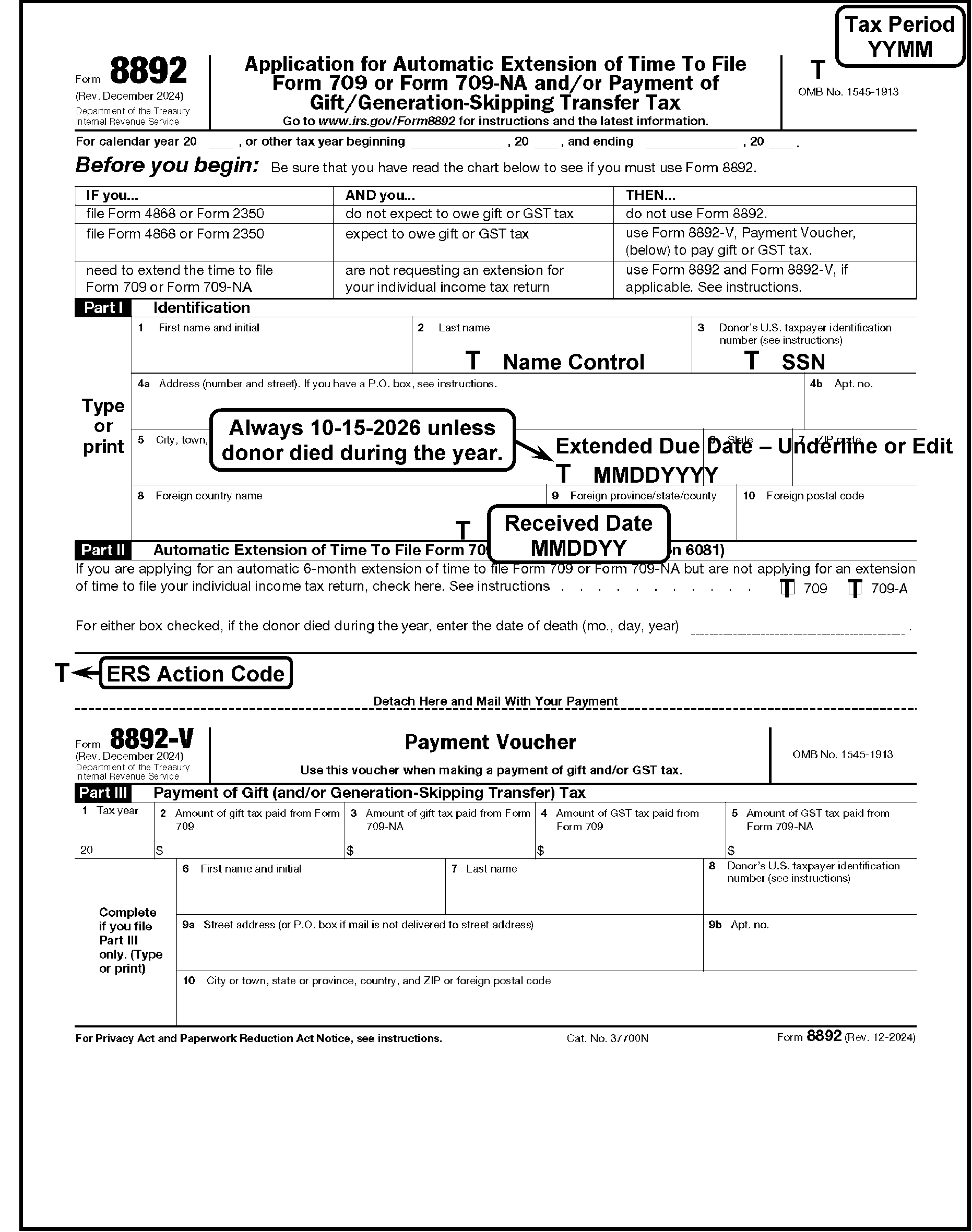
-
Form 8892 is due the same day as the taxpayer's individual income tax return unless the donor died during the year the gift was made.
-
If the donor dies during the year the gift was made, the gift tax return extension is due April 15th of the next succeeding year, or the due date of Form 706, U.S. Estate Tax Return, whichever is earlier. Form 706 is due 9 months after the date of death.
-
Part II of Form 8892 includes a place for the donor's date of death. No extension of time for gift tax is allowed unless the time for filing the estate tax return has also been extended. Use the following chart:
Date of Gift Date of Death Form 706 Due Date Form 709 Form 709-NA Due Date Form 8892 Due Date 04/01/2025 11/30/2025 08/30/2026 04/15/2026 04/15/2026 04/01/2025 05/01/2025 02/01/2026 02/01/2026 Not allowed unless Form 706 is extended
-
Process Form 8892 to the BMF under MFT 51 using the taxpayer's SSN with a V (123-45-6789V).
-
If there is a notation or an attachment indicating the taxpayer is not liable for gift tax, forward to Estate and Gift for review.
-
If the SSN is missing or invalid (e.g., repeating digits, such as 111-11-1111, sequential digits, such as 123-45-6789, or other than 9 digits), research for the taxpayer's SSN.
-
If found, continue processing.
-
If no SSN is found and the document is numbered, take no action.
-
If no SSN is found and the document is unnumbered, correspond for the SSN.
-
-
Research using the SSN with a V to determine if the account has been established on the BMF.
-
If no account has been established, route to the Entity Control function to establish the account.
-
Underline the first four characters of the last name.
-
The Name Control can have fewer than four characters.
-
Alphas and hyphens are the only valid characters.
-
See Document 7071.
-
-
Use normal processing procedures for the received date. See IRM 3.11.212.7.3.
-
Form 8892 Tax Period is 2512 for Tax Year 2025. No editing is necessary.
-
Approval Criteria: The request for extension of time to file will be approved if the request is timely filed. See IRM 3.11.212.11.1.
-
Review for a timely postmark date if the received date is after the due date ≡ ≡ ≡ ≡ ≡ ≡ ≡ ≡ ≡ ≡ ≡ ≡ ≡ ≡ ≡ ≡ ≡. Extension requests with a timely postmark date are timely filed. See IRM 3.11.212.5.
-
If the received date is after the due date of the extension ≡ ≡ ≡ ≡ ≡ ≡ ≡ ≡ ≡ ≡ ≡ ≡ ≡ ≡ ≡ ≡, and there is a timely postmark, circle out the received date and edit the timely postmark date.
-
-
Approval actions: Underline or edit the correct extended due date on the City/State/ZIP line. The extended due date is 10/15/26 unless the donor dies during the year the gift was made. In this case, the gift tax return extended due date is October 15 of the next succeeding year, or the due date of Form 706 (including extensions), whichever is earlier. Form 706 is due 9 months after the date of death:
Date of Gift Date of Death Form 706 Due Date Form 709, Form 709-NA Due Date Form 8892 Due Date Extended due date 04/01/2025 11/30/2025 08/30/2026 04/15/2026 04/15/2026 10/15/2026 04/01/2025 05/01/2025 02/01/2026 02/01/2026 Not allowed unless Form 706 is extended N/A -
Disapproval criteria: Form 8892 extension request will be disapproved if not timely filed.
-
Disapproval actions: Send all disapproved extensions to Estate and Gift for review.
-
This subsection includes instructions to process Form 3177 and Form 5466-B.
-
Miscellaneous forms that are related to, or the result of, extension processing are covered in this section.
-
These forms are:
-
Form 3177
-
Form 5466-B
-
-
Return the form to the originator if any information is missing, except items that can be obtained through normal research (e.g., SSN/EIN research).
-
Specific editing instructions for Form 3177 follow:
Note:
Any instruction stating, "return to originator" , means to return to the disclosure office for clarification.
-
Date: Date of IRS action or the received date. Enter in MMDDYYYY format.
-
Name Control: Underline the first four characters of the last name.
-
EIN/SSN: Ensure a 9-digit EIN/SSN is present. If not, research. If not found, return document to originator.
-
Extended Due Date: Enter in MMDDYY format when applicable.
-
MFT Code: Enter the appropriate MFT.
-
Tax Period: Edit in YYMM format.
-
Plan Number: If applicable, enter the Plan Number in the space to the right of "Other" .
-
Transaction Code: Underline the preprinted transaction code or enter the applicable code to the right of "Other" .
-
See Exhibit 3.11.212-3.
-
-
Specific editing instructions for Form 5466-B follow:
-
Area Office/Campus Code (block 6): Must be present. If missing, return to originator.
-
Name Control: If illegible, edit XXXX.
-
SSN/EIN: If TIN is other than 9 digits or is illegible, return to originator.
-
TIN Prefix: If Form 5466-B is for BMF and there is an SSN present with a V, edit a 0 (zero) in the shaded area following the SSN.
-
Tax Period: Must be present in YYYYMM format. If missing, return to originator.
-
Disclosure Date: Must be present. If missing, check document serial number 00. Edit the current date in MMDDYY format for serial number 00 only.
-
Nature of Disclosure Code: Must be present. If missing, return to originator.
-
Agency Code: Must be present. If missing, return to originator.
-
Purpose Code: Must be present. If missing, return to originator.
-
ADP Source Code: Must be present. If missing, return to originator.
-
See Exhibit 3.11.212-4.
-
-
A taxpayer requesting an extension of time to file his Form 940 must submit a formal letter to the IRS. The extension may not exceed 90 days. Form 940 is a calendar year return due January 31st of the following year and may be granted a 3-month extension. Each application must be reviewed and the taxpayer or their agent must be informed whether the application is granted or denied.
-
Approval criteria: A request for extension of time to file will be approved only if all of the following conditions are met:
-
Request must be timely received by January 31st ≡ ≡ ≡ ≡ ≡ ≡ ≡ ≡ ≡ ≡ ≡ ≡ ≡ ≡ ≡ ≡ ≡ ≡ ≡ ≡, or have a timely postmark.
-
Application must be complete (e.g., address, entity, reason for requesting the extension, paid in full on or before the due date, and signature).
-
-
Approval actions: If requirements are met, process the extension as approved.
-
Correspond using Letter 0333C to notify the taxpayer the extension has been granted. See IRM 3.11.212.3.1.
-
The extension must be input through IDRS as a TC 460 using FRM77. Code the extended due date 0501YYYY.
-
-
Disapproval actions: Request for an extension of time to file will be denied if the requirements above are not met. Correspond using Letter 3699C or Letter 0297C, to notify the taxpayer the extension was disapproved and the reason for disapproval. See IRM 3.11.212.3.1.
-
Regulations prohibit an extension for Form 941. Although a Form 941 is due on or before the last day of the calendar month following the end of a tax quarter, a form filed within the first 10 days following the due date is treated as timely if 100 percent of the tax amount has been timely deposited. Otherwise, penalties will be assessed for late filing. No extension transaction is input for Form 941.
-
If a request for extension for Form 941 is received, notify the taxpayer there is no extension for Form 941, and penalties will be assessed based on the guidelines set forth in Pub 15, (Circular E), Employer’s Tax Guide.
Note:
The taxpayer must specifically ask for an extension for Form 941 in a letter or notation on an extension form.
-
Use the Letter 0297C with paragraphs D, I, and S.
-
For paragraph S, enter "Regulations prohibit an extension for Form 941. Penalties will be assessed based on the guidelines set forth in Publication 15, (Circular E), Employer's Tax Guide."
-
-
If the taxpayer sends in a letter or form requesting an extension based on hardship/reasonable cause, explain the requirements as stated in Publication 15, and penalties may be abated based on the reasons involved.
-
Form 8752 is used to calculate the amount to be paid or refunded and to transmit a balance due amount. There is no extension of time to file under IRC 6081. There is no late filing or failure to file penalty. A 10 percent late payment penalty will be assessed if payment is not received by the due date of May 15.
-
If a taxpayer requests an extension of time to file Form 8752 using Form 7004 or other extension form, correspond to explain to the taxpayer there is no extension to file Form 8752 under IRC 6081. Inform the taxpayer an extension request, including an explanation of the reason for the delay, are to be sent to the area director or campus director.
| Extension Form | Type | Period of Extension | Forms Affected | |
|---|---|---|---|---|
| Form 2350 | IMF | 30 or 90 days from the end of the qualifying period | Form 1040 (U.S. citizens abroad and resident aliens) | |
| Form 4768 | BMF | 6 months from Return Due Date | Form 706 Form 706-A Form 706-D Form 706-NA Form 706-QDT See IRM 4.25.2 |
|
| Form 4868 | IMF | Automatic 6 months from Return Due Date | Form 1040 Form 1040-NR Form 1040-SS |
|
| Form 5558 | EPMF | 21/1 months from Return Due Date | Form 5500 Form 5500-SF Form 5500-EZ Form 8955-SSA See IRM 3.11.20 |
|
| Form 7004 | BMF | Automatic 6 months from Return Due Date | Form 706-GS (D) Form 706-GS (T) Form 1041 (bankruptcy estate only) Form 1041-N Form 1041-QFT Form 1042 Form 1065 Form 1066 Form 1120-POL Form 1120-S Form 3520-A Form 8612 Form 8613 Form 8725 Form 8804 Form 8831 Form 8876 Form 8924 Form 8928 |
|
| Form 7004 | BMF |
|
Form 1120 Form 1120-C Form 1120-F Form 1120-FSC Form 1120-H Form 1120-L Form 1120-ND Form 1120-ND (section 4951 taxes) Form 1120-PC Form 1120-REIT Form 1120-RIC Form 1120-SF |
|
| Form 7004 | BMF | Automatic 51/1 months from Return Due Date | Form 1041 (estate other than a bankruptcy estate) Form 1041 (trust) |
|
| Form 8868 | BMF | Automatic 6 months from Return Due Date | Form 990 Form 990-EZ Form 990-PF Form 990-T(corporation) Form 990-T (Sec. 401(a) or 408(a) trust) Form 990-T (trust other than above) Form 1041-A Form 4720 Form 5227 Form 6069 Form 8870 See IRM 3.11.20 |
|
| Form 8892 | BMF | Automatic to October 15, 2026, unless the donor died during the year the gift was made | Form 709, Form 709-NA |
|
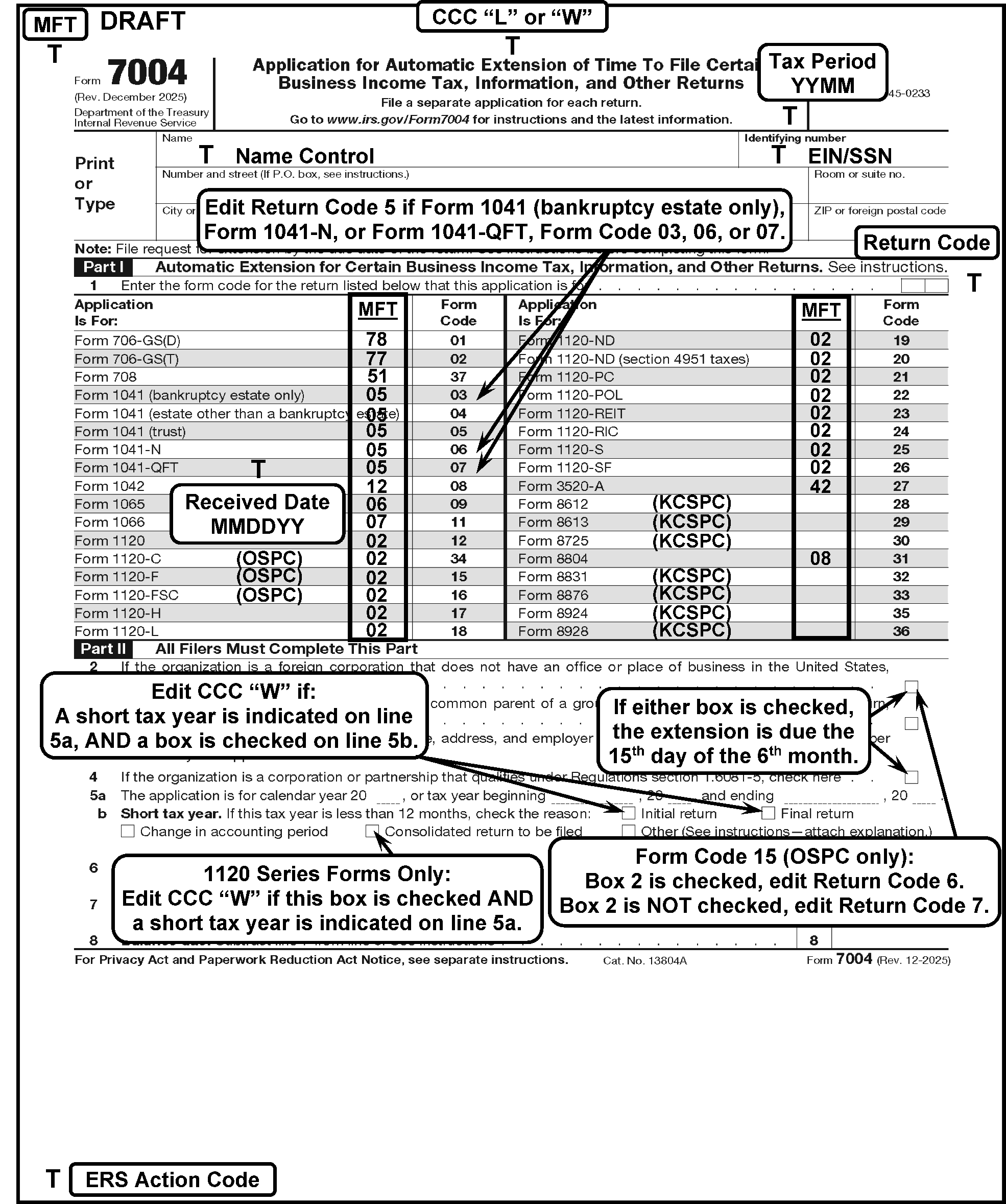
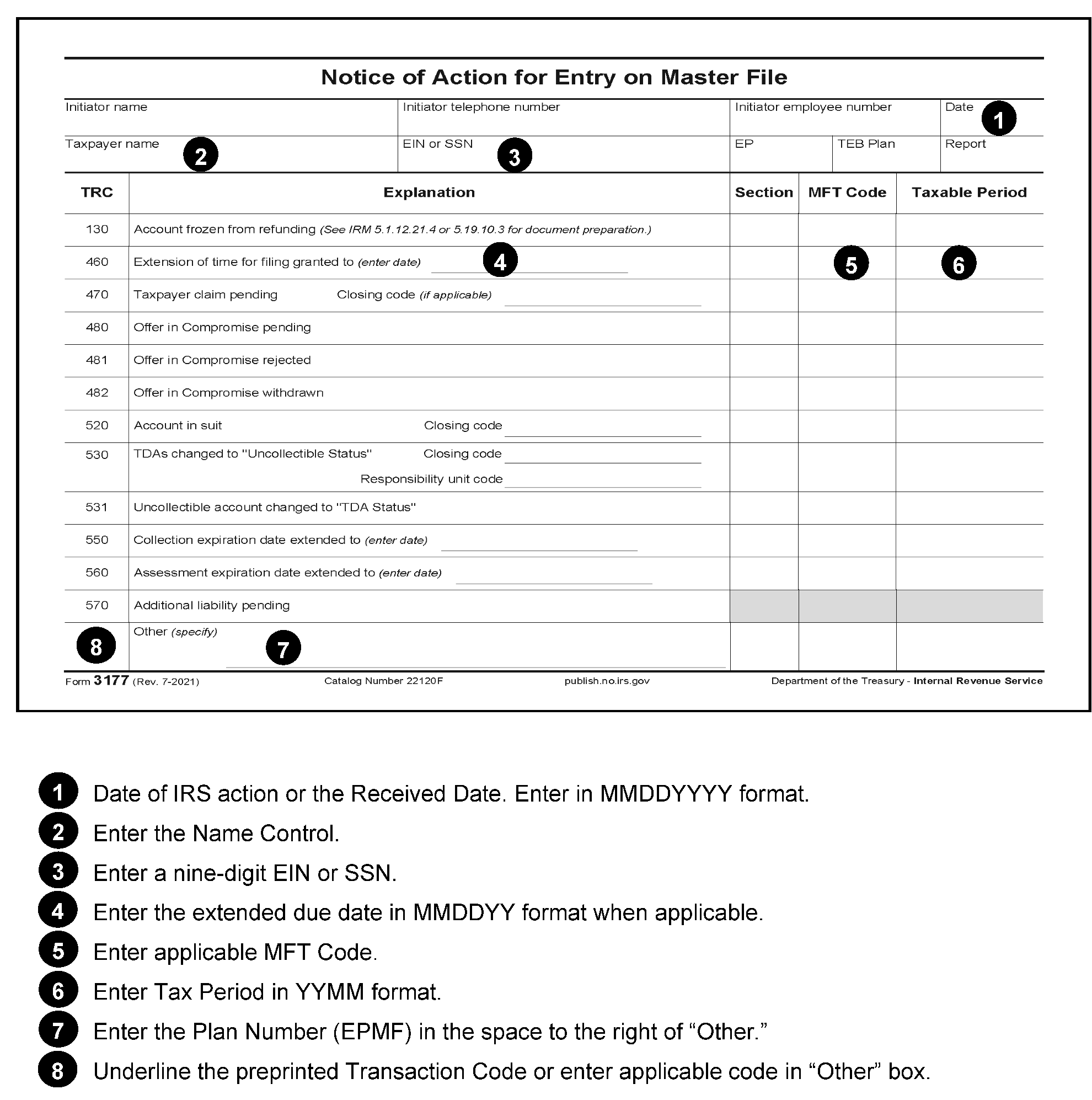
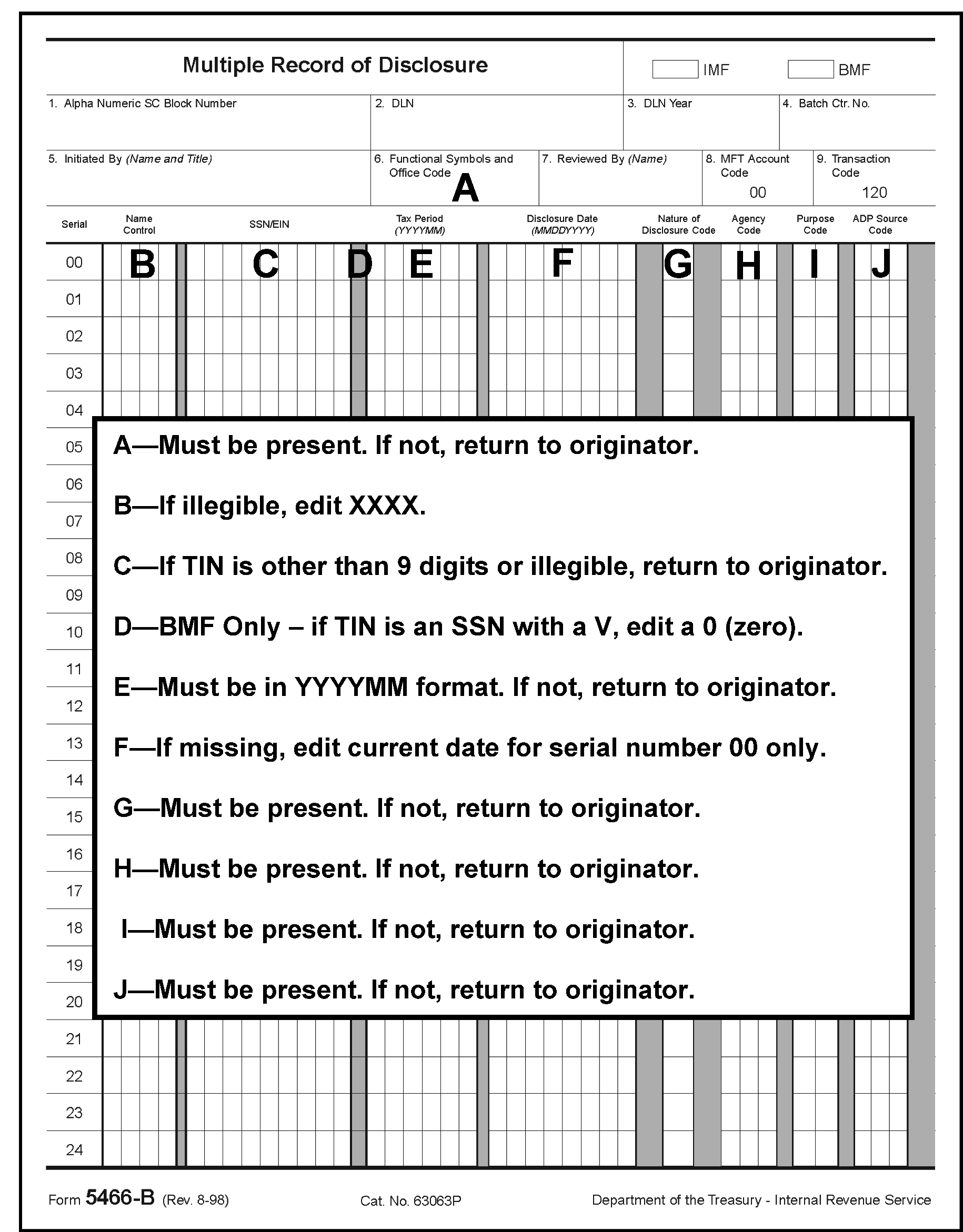
If the extension request is due on or after the disaster period begin date, and by the disaster end date, consider the request timely filed if postmarked on or before the end date if the address on the extension is from the state listed, or the applicable FEMA number or disaster designation is notated on the extension or an attachment. Follow normal timely extension procedures for processing.
| State | Begin Date | End Date | FEMA # | Designation |
|---|---|---|---|---|
| New Mexico | 06/23/2025 | 02/02/2026 | 3628-EM | Severe Storms, Flooding, and Landslides |
| Texas | 07/02/2025 | 02/02/2026 | 4879-DR | Severe Storms, Straight-line Winds, and Flooding |
Disaster periods may sometimes overlap if there are multiple disasters that occur in a state. The extension request would be considered timely if postmarked on or before the last end date for that state. Overlapping dates will be indicated with an asterisk (*) by the state's name. For more information see IRS Disaster Memos & Declarations.