


 )
or https:// means you've safely connected to the .gov website. Share sensitive information only on official, secure websites.
)
or https:// means you've safely connected to the .gov website. Share sensitive information only on official, secure websites.


- 3.12.10 Revenue Receipts
- 3.12.10.1 Program Scope and Objectives
- 3.12.10.1.1 Background
- 3.12.10.1.2 Authority
- 3.12.10.1.3 Roles and Responsibilities
- 3.12.10.1.4 Program Management and Review
- 3.12.10.1.5 Program Controls
- 3.12.10.1.6 Terms and Acronyms
- 3.12.10.1.7 Related Resources
- 3.12.10.1.8 ♦IRM Deviation Procedures♦
- 3.12.10.2 Overview
- 3.12.10.2.1 Documents Processed As Revenue Receipts
- 3.12.10.2.1.1 Format Codes
- 3.12.10.2.2 Error Resolution System (ERS)
- 3.12.10.2.3 ERS Inventories
- 3.12.10.2.4 Types of Errors
- 3.12.10.2.5 Status Codes
- 3.12.10.2.6 Command Codes (CCs) Overview
- 3.12.10.2.7 Action Codes (AC)
- 3.12.10.2.8 Clear Code "C" and "000"
- 3.12.10.2.9 Unprocessable ADP Documents
- 3.12.10.2.9.1 Suspending Unprocessable Records
- 3.12.10.2.9.2 Workable Suspense Inventory
- 3.12.10.2.9.3 Unworkable Suspense Inventory
- 3.12.10.2.10 Non-ADP Document
- 3.12.10.2.1 Documents Processed As Revenue Receipts
- 3.12.10.3 General Correction Procedures
- 3.12.10.3.1 Name Control/TIN Mismatch
- 3.12.10.3.2 Extensions with Foreign Address, Out of Country, Living Abroad, or with Foreign Income Exclusion
- 3.12.10.3.3 Installment Agreement User Fee (IAUF)
- 3.12.10.3.4 Lockbox Processing: Form 1041ES Only
- 3.12.10.3.5 The Remittance Transaction Research (RTR) System
- 3.12.10.3.5.1 Renumber and Reinput of RTR Images
- 3.12.10.3.5.2 Integrated Automation Technologies (IAT)
- 3.12.10.3.6 ♦Taxpayer Advocate Service (TAS)♦
- 3.12.10.3.6.1 ♦Referring Cases to TAS♦
- 3.12.10.3.6.2 ♦Taxpayer Advocate Case Procedures, National Service Level Agreement (SLA)♦
- 3.12.10.3.7 Lockbox Unprocessables Reduction: Basic Manual IDRS Research for Payment Perfection (Special Payment Perfection Procedures)
- 3.12.10.3.7.1 Lockbox Unprocessables: Control of Source Documents
- 3.12.10.3.7.2 Lockbox Unprocessables: Reject Procedures
- 3.12.10.3.7.3 Lockbox Unprocessables: File Location Code Table
- 3.12.10.3.7.4 IRC Section 965 (Repatriation or Transfer) Payment Transactions: Background
- 3.12.10.3.7.5 Processing/Posting Instructions for IRC Section 965 (Repatriation or Transfer) Payments (Lockbox Unprocessable Payments)
- 3.12.10.3.7.6 Economic Impact Payment (EIP) Returned
- 3.12.10.3.8 Suspense/Rejects Conditions
- 3.12.10.4 Section 01: General Information
- 3.12.10.4.1 Section 01 ERS Record Format
- 3.12.10.4.2 Field 01NC: Name Control/Check Digit
- 3.12.10.4.3 Field 01TIN: Taxpayer Identification Number
- 3.12.10.4.4 Field 01TTI: TIN Type Indicator
- 3.12.10.4.5 Field 01TXP: Tax Period
- 3.12.10.4.5.1 Reject/Suspense Correction
- 3.12.10.4.6 Field 01MFT: Master File Tax Account (MFT) Code
- 3.12.10.4.7 Field 01PN: Plan Number/Report Number
- 3.12.10.4.8 Field 01TDT: Transaction Date
- 3.12.10.4.9 Field 01TC: Primary Transaction Code
- 3.12.10.4.10 Field 01TA>: Primary Transaction Amount
- 3.12.10.4.11 Field 01STC: Secondary Transaction Code
- 3.12.10.4.12 Field 01SA>: Secondary Transaction Amount
- 3.12.10.4.13 Field 01TTC: Tertiary (Third) Transaction Code
- 3.12.10.4.14 Field 01TT>: Tertiary (Third) Transaction Amount
- 3.12.10.4.15 Field 01SI: Spouse Indicator
- 3.12.10.4.16 Field 01BPI: Bypass Indicator
- 3.12.10.4.17 Field 01MSC: Multiple Split Remittance Indicator
- 3.12.10.4.18 Field 01XTN: Cross-Reference Taxpayer Identification Number
- 3.12.10.4.19 Field 01TTX: Cross-Reference (X-ref) TIN Type Indicator
- 3.12.10.4.20 Field 01XMT: Cross-Reference MFT
- 3.12.10.4.21 Field 01XPN: Cross-Reference Plan Number/Report Number
- 3.12.10.4.22 Field 01XTP: Cross-Reference Tax Period
- 3.12.10.4.23 Field 01DPC: Designated Payment Code (DPC)
- 3.12.10.4.24 Field 01IDO: Originator (Requestor or Employee) SEID
- 3.12.10.4.25 Field 01IDA: Approving Official (Approver) SEID
- 3.12.10.4.26 Field 01BOD: Business Operating Division
- 3.12.10.4.27 Field 01RBI: Refund Bypass Indicator
- 3.12.10.4.28 Field 01RSN: Refund Schedule Number (RSN)
- 3.12.10.4.29 Field 01RCI: Refund Correction Indicator (RCI)
- 3.12.10.4.30 Field 01SRI: Split Refund Indicator
- 3.12.10.4.30.1 Field 01SRI: Split Refund Indicator---Correction Procedures
- 3.12.10.4.31 Trace ID Numbers: General
- 3.12.10.4.31.1 Field 01TID: Trace ID Number
- 3.12.10.4.31.2 Field 01TSN: Transaction Sequence Number
- 3.12.10.4.32 Field 01BH>: Block Header Indicator (C/Gen)
- 3.12.10.4.33 Field 01DC>: Document Code (C/Gen)
- 3.12.10.4.34 Field 01NAI>: Primary NAP Access Indicator (C/Gen)
- 3.12.10.4.35 Field 01NRI>: Primary TIN NAP EIF Response Indicator (C/Gen)
- 3.12.10.5 Math/Consistency Errors: Priority IV
- 3.12.10.5.1 EIF/NAP Mismatch: Error Codes 002, 003, 004, 005, and 006
- 3.12.10.5.1.1 General IMF Revenue Receipts Instructions
- 3.12.10.5.1.2 General BMF Revenue Receipts Instructions
- 3.12.10.5.2 Error Code 002: BMF Name Control Mismatch
- 3.12.10.5.2.1 Correction Procedures (BMF Only)
- 3.12.10.5.3 Error Code 003: Check Digits/EIN Mismatch
- 3.12.10.5.3.1 Invalid Conditions
- 3.12.10.5.3.2 Correction Procedures
- 3.12.10.5.4 Error Code 004: EIF/NAP Mismatch
- 3.12.10.5.4.1 Invalid Conditions for IMF
- 3.12.10.5.4.2 IMF Correction Procedures for Documents on an Invalid Segment
- 3.12.10.5.4.3 IMF Correction Procedures for Documents on a Valid Segment
- 3.12.10.5.4.4 BMF Invalid Conditions
- 3.12.10.5.4.5 BMF Correction Procedures
- 3.12.10.5.5 Error Code 005: Name Control Mismatch NAP/EIF
- 3.12.10.5.6 Error Code 011: NAP Linkage Down
- 3.12.10.5.7 Error Code 103: Master File Tax Account (MFT) Code
- 3.12.10.5.7.1 Reject/Suspense Correction Procedures
- 3.12.10.5.8 Error Code 105: Tax Period (BMF only)
- 3.12.10.5.8.1 Error Code 105 Correction Procedures
- 3.12.10.5.9 Error Code 107: Tax Period
- 3.12.10.5.9.1 Error Code 107 Correction Procedures
- 3.12.10.5.9.2 Researching for the Originator’s Name
- 3.12.10.5.9.3 Reject/Suspense Correction Procedures
- 3.12.10.5.10 Error Code 109: Tax Period
- 3.12.10.5.10.1 Reject/Suspense Correction Procedures
- 3.12.10.5.11 Error Code 111: Tax Period/Transaction Date
- 3.12.10.5.11.1 Reject/Suspense Correction Procedures
- 3.12.10.5.12 Error Code 113: Transaction Date
- 3.12.10.5.13 Error Code 115: Transaction Date
- 3.12.10.5.13.1 Invalid Conditions
- 3.12.10.5.13.2 Correction Procedures
- 3.12.10.5.14 Error Code 117: Transaction Date
- 3.12.10.5.14.1 Invalid Conditions
- 3.12.10.5.14.2 Correction Procedures
- 3.12.10.5.15 Error Code 119: Transaction Code
- 3.12.10.5.16 Error Code 121: Transaction Date
- 3.12.10.5.17 Error Code 123: Primary Transaction Code/Transaction Amount
- 3.12.10.5.18 Error Code 125: Transaction Code (840)/Block Header
- 3.12.10.5.19 Error Code 127: Primary/Secondary Transaction Code
- 3.12.10.5.19.1 Reject/Suspense Correction Procedures
- 3.12.10.5.20 Error Code 129: Primary Transaction Code 670/Secondary Transaction Code 460 (International)
- 3.12.10.5.21 Error Code 131: Tertiary Transaction Code
- 3.12.10.5.21.1 Reject/Suspense Correction Procedures
- 3.12.10.5.22 Error Code 133: Primary Transaction Amount
- 3.12.10.5.23 Error Code 135: Secondary/Tertiary Transaction Code
- 3.12.10.5.23.1 Correction Procedures
- 3.12.10.5.23.2 Reject/Suspense Correction Procedures
- 3.12.10.5.24 Error Code 137: Spouse Indicator
- 3.12.10.5.25 Error Code 139: Refund Bypass Indicator
- 3.12.10.5.26 Error Code 141: Cross-Reference Fields
- 3.12.10.5.27 Error Code 143: Multi-Split Remit Code
- 3.12.10.5.28 Error Code 145: Primary Transaction Code 670 (for Federal Payment Levy Program (FPLP))
- 3.12.10.5.29 Error Code 147: Designated Payment Code (DPC) 44, 45, 46, 47, 48, 49, 50, 51, or 52
- 3.12.10.5.29.1 Reject/Suspense Correction Procedures
- 3.12.10.5.30 - Error Code 149: Refund Schedule Number (RSN)
- 3.12.10.5.31 Error Code 151: TIN Type Indicator (TTI)
- 3.12.10.5.32 Error Code 153: Trace ID Correction
- 3.12.10.5.32.1 Error Code 153: Trace ID Correction---Invalid Conditions
- 3.12.10.5.32.2 Error Code 153: Trace ID Correction---Correction Procedures
- 3.12.10.5.33 Error Code 999: End of Period Reformat
- 3.12.10.5.1 EIF/NAP Mismatch: Error Codes 002, 003, 004, 005, and 006
- 3.12.10.6 Form 1040-ES and Form 1040-C Section Overview
- 3.12.10.6.1 Section 01
- 3.12.10.6.2 Field 01NC: Name Control/Check Digit
- 3.12.10.6.3 Field 01TIN: Primary SSN
- 3.12.10.6.4 Field 01SS: Spouse SSN
- 3.12.10.6.5 Field 01TXP: Tax Period Ending (including special Lockbox Incomplete Processing procedures)
- 3.12.10.6.6 Field 01NL1: Name Line 1
- 3.12.10.6.6.1 Correction Procedures for Field 01NL1
- 3.12.10.6.7 Field 01NL2: Name Line 2
- 3.12.10.6.8 Field 01TDT: Transaction Date
- 3.12.10.6.9 Field 01ADD: Street Address
- 3.12.10.6.10 Field 01C/S: City/State or Major City Code
- 3.12.10.6.10.1 Foreign/International Address (AUSPC)
- 3.12.10.6.11 Field 01ZIP: ZIP Code
- 3.12.10.6.12 Field 01MSC: Multiple Split Remittance Code
- 3.12.10.6.13 Field 01CCC: Computer Condition Code
- 3.12.10.6.14 Field 01TID: Trace ID Number
- 3.12.10.6.15 Field 01TSN: Transaction Sequence Number
- 3.12.10.6.16 Field 01TA>: Remittance Amount (C/Gen)
- 3.12.10.6.17 Field 01FSC>: Filing Status Code (C/Gen)
- 3.12.10.6.18 Field 01EC>: Entity Code (C/Gen)
- 3.12.10.6.19 Field 01DC>: Document Code (C/Gen)
- 3.12.10.6.20 Field 01NAI>: Primary NAP Access Indicator (C/Gen)
- 3.12.10.6.21 Field 01NRI>: Primary TIN NAP EIF Response Indicator (C/Gen)
- 3.12.10.7 Math/Consistency Errors: Priority IV Errors (Form 1040ES/Form 1040C)
- 3.12.10.7.1 Error Code 001: End of Period Reformat (Form 1040ES/Form 1040C)
- 3.12.10.7.2 Error Code 003: Name Control/Check Digits Mismatch (Form 1040ES/Form 1040C)
- 3.12.10.7.3 Error Code 004: Name Control Mismatch (Form 1040ES/Form 1040C)
- 3.12.10.7.3.1 Name Changes
- 3.12.10.7.4 Error Code 005: EIF/NAP Name Control Mismatch (Form 1040ES/Form 1040C)
- 3.12.10.7.5 Error Code 006: Name Control Mismatch (Form 1040ES/Form 1040C)
- 3.12.10.7.6 Error Code 007: EIF/NAP Entity Mismatch (Form 1040ES/Form 1040C)
- 3.12.10.7.7 Error Code 008: EIF/NAP Entity Mismatch (Form 1040ES/Form 1040C)
- 3.12.10.7.8 Error Code 011: NAP Linkage Down (Form 1040ES/Form 1040C)
- 3.12.10.7.9 Error Code 150: ZIP Code/Major City Code (Form 1040ES/Form 1040C)
- 3.12.10.7.10 Error Code 152: Primary/Secondary TIN (Form 1040ES/Form 1040C)
- 3.12.10.7.11 Error Code 153: Name Line 1 (for Form 1040-C and Form 1040-ES Only)
- 3.12.10.7.12 Error Code 154: Multi-Split Remit Code (Form 1040ES/Form 1040C)
- 3.12.10.7.13 Error Code 156: Entity Code/Document Code (Form 1040ES/Form 1040C)
- 3.12.10.7.14 Error Code 158: Entity Code/Name Control (Form 1040ES/Form 1040C)
- 3.12.10.7.15 Error Code 160: Transaction Date (Form 1040ES/Form 1040C)
- 3.12.10.7.16 Error Code 162: Street Address/Major City Code (Form 1040ES/Form 1040C)
- 3.12.10.7.17 Error Code 164: Tax Period (Form 1040ES/Form 1040C)
- 3.12.10.7.18 Error Code 166: Trace ID (Form 1040C/Form 1040ES)
- 3.12.10.7.18.1 Invalid Conditions
- 3.12.10.7.18.2 Correction Procedures
- Exhibit 3.12.10-1 Valid Tax Class-BMF/IMF MFT Code-Tax Period Tables
- Exhibit 3.12.10-2 Valid Transaction Code---Document Code Table
- Exhibit 3.12.10-3 Valid Transaction Codes By MFT
- Exhibit 3.12.10-4 ERS Action Codes
- Exhibit 3.12.10-5 Form 514-B, Credit Transfer Voucher
- Exhibit 3.12.10-6 Form 809, Part 1 Posting Voucher
- Exhibit 3.12.10-7 Form 940-V, Form 940 Payment Voucher
- Exhibit 3.12.10-8 Form 941-V, Form 941 Payment Voucher
- Exhibit 3.12.10-9 Form 943-V, Form 943 Payment Voucher
- Exhibit 3.12.10-10 Form 944-V, Form 944-V Payment Voucher
- Exhibit 3.12.10-11 Form 945-V, Form 945 Payment Voucher
- Exhibit 3.12.10-12 Form 1040-V, Form 1040-V Payment Voucher
- Exhibit 3.12.10-13 Form 1040-ES, Payment Voucher 1
- Exhibit 3.12.10-14 Form 1041-ES, Payment Voucher 1
- Exhibit 3.12.10-15 Form 2287, Check/Payment Not Accepted by Bank
- Exhibit 3.12.10-16 Form 2290-V, Form 2290-V Payment Voucher 1
- Exhibit 3.12.10-17 Form 2424, Account Adjustment Voucher
- Exhibit 3.12.10-18 Form 3244, Payment Posting Voucher (Not a Taxpayer Receipt)
- Exhibit 3.12.10-19 Form 3244, Payment Posting Voucher (Not a Taxpayer Receipt)
- Exhibit 3.12.10-20 Form 3245, Posting Voucher-Refund Cancellation or Repayment
- Exhibit 3.12.10-21 Form 3753, Manual Refund Posting Voucher
- Exhibit 3.12.10-22 Form 3809, Miscellaneous Adjustment Voucher
- Exhibit 3.12.10-23 Form 4466, Corporation Application for Quick Refund of Overpayment of Estimated Tax
- Exhibit 3.12.10-24 Form 4868, Application for Automatic Extension of Time To File U.S. Individual Income Tax Return
- Exhibit 3.12.10-25 Form 8758, Excess Collections File Addition
- Exhibit 3.12.10-26 Form 8813, Partnership Withholding Tax Payment Voucher (Section 1446)
- Exhibit 3.12.10-27 ISRP/RTR Audit Trail Endorsement
- Exhibit 3.12.10-28 Form 12857, Refund Transfer Posting Voucher
- Exhibit 3.12.10-29 Julian Date Calendar, Perpetual, 365 Days (Chart)
- Exhibit 3.12.10-30 Julian Date Chart, Leap Year (Chart)
- 3.12.10.1 Program Scope and Objectives
Part 3. Submission Processing
Chapter 12. Error Resolution
Section 10. Revenue Receipts
3.12.10 Revenue Receipts
Manual Transmittal
October 23, 2025
Purpose
(1) This transmits revised IRM 3.12.10, Error Resolution, Revenue Receipts.
Material Changes
(1) IRM 3.12.10.1, Modified subsection entitled, Program Scope and Objectives, for clarification of positions described in this subsection.
(2) IRM 3.12.10.1.3, Responsibilities: Changed subsection name to Roles and Responsibilities, in accordance with IRM 1.11.2, Internal Management Documents System, Internal Revenue Manual (IRM) Process.
(3) IRM 3.12.10.1.6, Terms/Definitions/Acronyms: Changed subsection name to Terms and Acronyms, in accordance with IRM 1.11.2, Internal Management Documents System, Internal Revenue Manual (IRM) Process.
(4) IRM 3.12.10.1.7, Revised subsection name to Related Resources, to delete the "naked link" (i.e., a link that exposes a URL/web address of a page or website) and replaced it with the access information to the IRM Part 2 Numerical Index.
(5) IRM 3.12.10.2.1, Made text modification to subsection entitled, Documents Processed As Revenue Receipts. Form 514-B, previously Tax Transfer Schedule, is renamed Credit Transfer Voucher.
(6) IRM 3.12.10.2.2, Made text modifications to subsection entitled, Error Resolution System (ERS), to promote text format consistency and clarification.
(7) IRM 3.12.10.3.3, Made text modifications to subsection entitled, Installment Agreement User Fee (IAUF), regarding cross references to Collection’s IRM 5.14.1, Installment Agreements, Securing Installment Agreements, and IRM 5.19.1, Liability Collection, Balance Due.
(8) IRM 3.12.10.4.3: Revised subsection, entitled, Field 01TIN: Taxpayer Identification Number, to update the following text references:
-
IRM 3.12.10.4.3(2)(second bullet): Changed text to read as follows: "MFT 13, 17, 50, 58, 63, 76, or 78 with a TIN-Type Indicator 0 will have an SSN. The TIN-Type Indicator 0 must be edited following the TIN/SSN."
-
IRM 3.12.10.4.3(3)(b): Changed the text to read as follows: "If the MFT is 13, 17, 50, 58, 76, or 78 and the TIN is an SSN, the TIN-Type Indicator can be either 0 (zero) or 2." (See also instructions for correcting Field 01TTI (TIN Type Indicator) and Field 01TTX (Cross-Reference (X-ref) TIN Type Indicator) in IRM 3.12.10.4.4 and IRM 3.12.10.4.19, respectively.)
-
IRM 3.12.10.4.3 (under "Notes" regarding Form 4868 table references): Updated the dates (as appropriate) from 10/15/2025 to 10/15/2026 AND from 12/15/2025 to 12/15/2026 in table reference texts as follows: "If multiple forms are being sent to the same address (the same preparer is listed for several different taxpayers), they may be mailed in the same envelope. In the note, indicate the extension is approved to 10/15/2026 (list the current processing year) unless box 9 is checked, extension is approved to 12/15/2026 (list the current processing year)."
-
Added the following "Note" to procedures: "See also IRM 3.12.10.4.4, Field 01TTI, TIN-Type Indicator, for procedures for correcting the TIN-Type Indicator when a BMF MFT contains an SSN or an IMF contains an EIN."
-
Source: Unified Work Request (UWR) #1000687, entitled, "Revenue Receipts (CY 2026) for MFT 50: Changing Error Code 151 and TIN-Type Indicator to Allow Zero (“0”) as a TIN-Type Indicator (TTI) Option" .
(9) IRM 3.12.10.4.4: Revised subsection, entitled, Field 01TTI: TIN-Type Indicator, to update the following text references:
-
IRM 3.12.10.4.4(3)(second bullet): Changed text to read as follows: The TIN Type Indicator for MFT 13, 17, 50, 58, 63, 76, or 78 can be either 0or2.
-
Source: Unified Work Request (UWR) #1000687, entitled, Revenue Receipts (CY 2026) for MFT 50: Changing Error Code 151 and TIN-Type Indicator to Allow Zero (“0”) as a TIN-Type Indicator (TTI) Option
(10) IRM 3.12.10.4.11: Revised subsection, entitled, Field 01STC: Secondary Transaction Code, to incorporate reviewers comments, which resulted in the reformatting of this subsection.
(11) IRM 3.12.10.4.19: Revised subsection, entitled, Field 01TTX: Cross-reference (x-ref) TIN-Type Indicator, to update the following text references:
-
IRM 3.12.10.4.19(3)(second bullet): Changed text to read as follows: The x-ref TIN Type Indicator for MFT 13, 17, 50, 58, 63, 76 or 78, the X-ref TIN-Type Indicator must be either 0 or 2.
-
Source: Unified Work Request (UWR) #1000687, entitled, Revenue Receipts (CY 2026) for MFT 50: Changing Error Code 151 and TIN-Type Indicator to Allow Zero (“0”) as a TIN-Type Indicator (TTI) Option.
(12) IRM 3.12.10.4.24: Revised subsection, entitled, Field 01IDO: Originator (Requestor or Employee) SEID, to change forms’ title formats (i.e., remove parentheses from forms’ titles and replace the form name following the citation (form number)).
(13) IRM 3.12.10.4.24.1, Correction Instructions: Changed subsection title to Field 01IDO: Originator (Requestor or Employee) SEID---Correction Instructions.
-
Includes revisions to procedures for correcting Field 01IDO: Originator (Requestor or Employee) SEID.
-
Includes references to revised Form 3753 (Rev. 5-2025) and Form 12857 (Rev. 7-2025).
(14) IRM 3.12.10.4.25: Revised subsection, entitled, Field 01IDA: Approving Official (Approver) SEID, to change forms’ formats.
(15) IRM 3.12.10.4.25.1, Correction Instructions: Changed subsection title to Field 01IDA: Approving Official (Approver) SEID---Correction Instructions.
-
Includes revisions to procedures for correcting Field 01IDA: Approving Official (Approver) SEID.
-
Includes references to revised Form 3753 (Rev. 5-2025) and Form 12857 (Rev. 7-2025).
(16) IRM 3.12.10.4.26: Revised subsection, entitled, Field 01BOD: Business Operating Division, to change forms’ formats (deleted parentheses with titles and listed titles following the IRM citations).
(17) IRM 3.12.10.4.26.1, Correction Instructions: Changed subsection title to Field 01BOD: Business Operating Division---Correction Instructions.
-
Includes revisions to procedures for correcting Field 01BOD: Business Operating Division.
-
Includes references to revised Form 3753 (Rev. 5-2025) and Form 12857 (Rev. 7-2025).
(18) IRM 3.12.10.4.28: Revised subsection, entitled, Field 01RSN: Refund Schedule Number (RSN).
-
Added “Reminder” that the Refund Schedule Number can no longer be ten (10) digits.
-
The RSN may contain ONLY alpha OR numeric characters.
-
Removed all references to spaces as valid entries for the Refund Schedule Number (RSN) in Positions 11 through 14.
(19) IRM 3.12.10.4.30.1, Correction Instructions: Changed subsection title to Field 01SRI: Split Refund Indicator---Correction Procedures.
-
Includes revisions to procedures for correcting Field 01SRI: Split Refund Indicator.
-
Includes references to Form 3753, Form 3809, and Form 12857.
(20) IRM 3.12.10.4.31.1 Revised subsection, entitled, Field 01TID: Trace ID Number to include the following:
-
For more instructions regarding the use of the RTR and/or research for Trace ID information, consult IRM 3.5.10.7.1, Log On/Off the Remittance Transaction Research System, and
-
IRM 3.5.10.8, Research Screen
-
Both procedures are found in IRM 3.5.10, Accounts Services - Remittance Transaction Research (RTR) System.
(21) IRM 3.12.10.5.4.2 Revised subsection, entitled, IMF Correction Procedures for Documents in the Invalid Segment, to update the following text references:
-
IRM 3.12.10.5.4.2(7)e)(under "Note" :): Changed text to read as follows: The x-ref TIN Type Indicator for MFT 13, 17, 50, 58, 63, 76 or 78, the X-ref TIN-Type Indicator must be either 0 or 2.
-
Source: Unified Work Request (UWR) #1000687, entitled, Revenue Receipts (CY 2026) for MFT 50: Changing Error Code 151 and TIN-Type Indicator to Allow Zero (“0”) as a TIN-Type Indicator (TTI) Option.
(22) IRM 3.12.10.5.4.3 - Revised subsection, entitled, IMF Correction Procedures for Documents in a Valid Segment, to update the following text references:
-
IRM 3.12.10.5.4.3.(8)e)(under "Note" ): Changed text to read as follows: If the MFT is either 13, 17, 50, 58, 63, 76 or 78, Field 01TTI (TIN Type Indicator) can be either "0" or "2" . Consider taxpayer intent and change Field 01TTI accordingly.
-
Source: Unified Work Request (UWR) #1000687, entitled, Revenue Receipts (CY 2026) for MFT 50: Changing Error Code 151 and TIN-Type Indicator to Allow Zero (“0”) as a TIN-Type Indicator (TTI) Option.
(23) IRM 3.12.10.5.6: Revised subsection, entitled, Error Code 011: NAP Linkage Down, to update the following text references:
-
IRM 3.12.10.5.6(3)a - Added instruction not to use clear field unless instructed. (IPU 25U3341 issued 05-28-2025).
-
IRM 3.12.10.5.6(3)c - Added procedures for if NAP Linkage Down with Form 8288 series return. (IPU 25U3341 issued 05-29-2025).
-
IRM 3.12.10.5.6(3)d - Added exception for Form 8288 series return and there is a NAP linkage problem. (IPU 25U3345 issued 05-29-2025).
(24) IRM 3.12.10.5.9.1: Revised subsection, entitled, Error Code 107 Correction Procedures.
-
SERP Feedback Control 25416 reported that, under IRM 3.12.10.5.9.1(3), the "THEN" column is missing from the table labeled, Tax Period Month is "12" or Other than "12".
-
This Interim Procedural Update (IPU) was issued to revise the subsection to restore the missing THEN column to this table labeled, "Tax Period Month is 12 or Other Than 12" (IPU 25U0054, dated 01-14-2025).
(25) IRM 3.12.10.5.29: Revised subsection, entitled, Error Code 147: Designated Payment Code (DPC) 44, 45, 46, 47, 48, 49, 50, 51, or 52.
-
Added text modifications to this subsection by cross referencing to Collection’s IRM 5.14.1, Installment Agreements, Securing Installment Agreements, and IRM 5.19.1, Liability Collection, Balance Due.
-
For Calendar Year (CY) 2026:
-
Collection recently informed our (Revenue Receipts) Information Technology (IT) contacts of their proposed new Installment Agreement User Fee updates.
-
As of this writing, Collection has NOT provided programming specifications to IT, although we were informed recently the new Installment Agreement User Fee updates are slated for July 2026 implementation.
-
For a number of years now, Error Code 147 programming (including screen displays) have NOT been updated.
-
We cannot say when, or whether we will receive, programming updates for Error Code 147.
-
Information Technology (IT) programmers report receiving no Unified Work Request (UWR) with programming specifications.
-
We will inform you of any new developments regarding this matter.
(26) IRM 3.12.10.5.30.1: Correction Instructions Changed subsection title to Error Code 149: Refund Schedule Number (RSN)---Correction Procedures.
-
Added “Reminder” that the Refund Schedule Number can no longer be ten (10) digits.
-
The RSN may contain ONLY alpha OR numeric characters.
-
Removed all references in this subsection to spaces as valid entries for the Refund Schedule Number (RSN) in Positions 11 through 14.
(27) IRM 3.12.10.5.31.1, Invalid Conditions - MF Records. Changed subsection title to Error Code 151: TIN Type Indicator (TTI) Invalid Conditions: MF Records.
(28) IRM 3.12.10.5.31.2, Invalid Conditions: BMF Records. Changed subsection title to Error Code 151: TIN Type Indicator (TTI) Invalid Conditions: BMF Records. Also revised the following Invalid Conditions to include MFT 50 as follows:
-
The MFT Code is either 13, 17, 50, 58, 63, 76, or 78, and the Primary TIN Type Indicator is not 0 (zero) or 2.
-
The x-ref MFT is either 13, 17, 50, 58, 63, 76, or 78, and the Primary TIN Type Indicator is not 0 (zero) or 2.
-
The Document Code is NOT24 or 48 or 58, the X-ref TIN Type is BMF, and Case 2 is reprogrammed and change to read as follows: Case 2: The x-ref MFT Code is either 13, 17, 50, 58, 63, 76, or 78, and the x-ref TIN Type is not 0 OR 2.
-
Source: Unified Work Request (UWR) #1000687, entitled, Revenue Receipts (CY 2026) for MFT 50: Changing Error Code 151 and TIN-Type Indicator to Allow Zero (“0”) as a TIN-Type Indicator (TTI).
-
Source: FSP 1.35.04.02; Process 3.1.2.8.1.1.1.5.1.3.24.
(29) IRM 3.12.10.5.31.3, Correction Procedures. Changed subsection title to Error Code 151: TIN Type Indicator (TTI) - Correction Procedures.
(30) IRM 3.12.10.5.32.1, Invalid Conditions. Changed subsection title to Error Code 153: Trace ID Correction - Invalid Conditions.
(31) IRM 3.12.10.5.32.2, Correction Procedures. Changed subsection title to Error Code 153: Trace ID Correction - Correction Procedures.
(32) IRM 3.12.10.5.33: Revised subsection, entitled, Error Code 999: End of Period Reformat, to make changes for the new processing year.
-
The invalid condition for Error Code 999 is: all returns that are in Error/Reject Status at the end of the 2025 processing year will contain the End of Period Reformat Indicator.
-
The correction procedure for Error Code 999 is: Go to the bottom of the screen and transmit. The system will revalidate the record and set validity and error codes based on the 2026 processing year programs.
.
(33) IRM 3.12.10.7.1: Revised subsection, entitled, Error Code 001: End of Period Reformat (Form 1040ES/Form 1040C), to make changes for the new processing year.
-
The invalid condition for Error Code 001 is: All returns that are in Error/Rejects Status at the end of the 2025 processing year will contain the End of Period Reformat Indicator.
-
The correction procedure for Error Code 001 is: Go to the bottom of the screen and transmit. The system will validate the record and set validity and error codes based on the 2026 processing year (list new processing year) programs.
(34) Exhibit 3.12.10-5, Tax Transfer Schedule, is now renamed Credit Transfer Voucher.
(35) Revise the Internal Revenue Manual (IRM), where necessary, for the following type of changes:
-
Plain language, simpler words
-
Spelling, grammar, and formatting
-
IRM references, citations, and links
-
IRM graphics and alternative text
-
Updated Verbal Descriptive Narrative (VDN) texts throughout the IRM
Effect on Other Documents
IRM 3.12.10, Error Resolution, Revenue Receipts, dated November 14, 2024, (effective January 01, 2025) is superseded. The following IRM Procedural Updates (IPUs) were incorporated into this IRM: IPU 25U0054 (dated January 14, 2025); IPU 25U3341 (dated May 28, 2025); and IPU 25U3345 (dated May 29, 2025).Audience
These instructions will be used by Input Correction Operations, Error Resolution System (ERS) Department, when resolving processing errors on revenue receipt forms and documents. Taxpayer Services (TS) and Small Business/Self-Employed (SB/SE).Effective Date
(01-01-2026)Scott Wallace
Director, Submission Processing
Taxpayer Services
-
Purpose: Documents processed as “Revenue Receipts” transactions are forms prepared by campus Accounting (and/or Accounts Management) employees and handled later by Document Perfection (Code and Edit) examiners. The documents are transcribed through the Integrated Submissions and Remittance Processing (ISRP) system and undergo a series of systemic validation runs known as the Generalized Mainline Framework (GMF).
-
Transaction documents passing the validation process are posted on the Master File to the correct taxpayer module or account. Transaction documents failing the validation process are sent to Error Correction (Function 340).
-
Using Error Resolution System (ERS) terminals, tax examiners in ERS and Rejects compare the transcribed records on their screen displays against the original documents to correct the errors/error records found by GMF. The following may not be an all-inclusive list, but provides more responsibilities and duties for these examiners to perform:
-
Receive documents failing GMF validation for correction/resolution.
-
Compare the transcribed records or electronically-filed documents (on the Remittance Transaction Research System (RTRS)) against the ERS Screen displays to figure out the errors and corrections.
-
Make decisions (based on IRM instructions) on the right options needed to clear the error(s).
-
Perform research on the transaction records, if needed, using recommended research tools (including, but not necessarily limited to, Remittance Transaction Research System (RTRS), Integrated Data Retrieval System (IDRS), Integrated Automation Technologies (IAT), etc.).
-
Decide on the options for making corrections and/or clearing the transaction records.
-
Perform research and options necessary to clear the error(s).
-
Suspend unprocessable documents to other in-house areas for more research.
-
Enter the correct data necessary to clear the transaction from ERS and send it back to GMF for validation.
-
Corrected documents passing GMF validity checks will post to the Master File (IMF or BMF) (and to the correct taxpayer’s module or account).
-
-
When perfection of a record is not possible and it is necessary to correspond:
-
Perform in-house research, or refer the document to another area of the campus.
-
The record will be suspended and the required action taken.
Reminder:
Documents processed as Revenue Receipts (including deposit tickets (DTs) and debit vouchers (DVs)) are prepared by campus Accounting Function personnel, and are not sent to the Service by payment vouchers. Documents requiring more information needed for processing are returned to the originators for completion and/or more information.
-
-
Audience: Taxpayer Services (TS) Submission Processing Employees
-
This IRM subsection provides Revenue Receipts correction procedures for use by Error Resolution System (ERS) and Rejects Function personnel:
-
Error Resolution System (ERS):
-
Supervisory Tax Examining Technicians oversee ERS function/operations performed by examiners making corrections on payment transaction on records failing Generalized Mainline Framework (GMF) validation. They monitor activity on corrected payment transaction records prior to later GMF validation runs. Records passing GMF validation post to the correct BMF (Business Master File) or IMF (Individual Master File) taxpayers’ accounts or modules. Supervisory Tax Examining Technicians report to the campus Chief, Input Corrections Branch.
-
Lead Tax Examining Technicians oversee the work of ERS Tax Examining Technicians performing payment record corrections in their units, check ERS operations, receive/review (pipeline) processing anomalies, and address/respond to employee needs (i.e., provide guidance, supplies, tools, etc.) within their work unit. The Leads report to the Supervisory Tax Examining Technician.
-
Tax Examining Technicians review, correct and research payment record corrections, and correct field and consistency errors displayed on the ERS terminal screens. They keep current IRM transmittal procedures used in their operations, provide status reports, and report processing problems to the Lead Tax Examining Technicians.
-
Rejects:
-
Supervisory Tax Examining Technicians oversee Correction operations requiring special attention and/or research on payment transaction records suspended by Error Resolution (ERS) to Rejects. Supervisory TE’s monitor Rejects activity on the above-described payment transaction records to promote GMF validation of transaction records. Supervisory TE’s report to the campus Chief, Input Corrections Branch.
-
Lead Tax Examining Technicians oversee Rejects Tax Examining Technicians in their unit who work the ERS-suspended payment transaction records. They monitor and watch their operations and employees who give special attention to, and/or perform research on, those (suspended) transaction records. Leads receive/review processing anomalies, and address/respond to Rejects employees’ needs (i.e., providing guidance, supplies, tools, etc.) within their work unit. Leads report to the Supervisory Tax Examining Technician.
-
Tax Examining Technicians are Reject Unit employees who give special attention to, and research required on, ERS-suspended payment transaction records. They keep current IRM transmittal procedures used in their operations, provide status reports and report processing problems to their Lead Tax Examining Technicians.
-
-
Policy Owner: Director, Submission Processing, Taxpayer Services (TS).
-
Program Owner: The following include the names of the internal organizations responsible for the administration, procedures, and updates related to the Revenue Receipts program.
-
Accounting and Tax Payments Branch (a Branch in the Submission Processing Division)
-
Accounting Control Section (in the Accounting and Tax Payments Branch)
-
Lockbox Policy and Oversight Section (in the Accounting and Tax Payments Branch)
-
Accounting and Deposit Section (in the Accounting and Tax Payments Branch)
-
Returns Processing Branch (a Branch in the Submission Processing Division)
-
Business Master File (BMF) Code and Edit/ERS Section (in the Returns Processing Branch)
-
Mail Management/Data Conversion Section (in the Returns Processing Branch)
-
-
Primary Stakeholders: These are (but are not necessarily limited to) other areas affected by these procedures or have input to these procedures. Their input may result in change(s) in the work flow, other duties, change(s) in established time frames, and similar issues. Among these stakeholders, users or customers are the following: Small Business/Self-Employed (SBSE), Large Business and International (LB&I); Chief Financial Officer (CFO); Custodial Detail Database (CDDB); Taxpayer Advocate Service (TAS); Chief Counsel; Tax Exempt/Governmental Entities (TE/GE); Modernized E-File (MeF).
-
The purpose of Error Resolution is to resolve validity errors, field errors, consistency errors, and math errors in deposit tickets (DTs), debit vouchers (DVs) and other documents for posting to the Master File. Records fall out in ERS due to the Generalized Mainline Framework (GMF). The entries from transcription are transferred to ERS fields, and electronic submissions are contained in the Remittance Transaction Research System (RTRS).
-
The GMF programming causes records to fall out to the Error Resolution System (ERS) if they do not meet certain criteria, including (but NOT limited to):
-
Invalid characters in a field (e.g., numeric instead of alpha characters).
-
Invalid length of field (e.g., EIN (or SSN) with 8 digits instead of 9).
-
Invalid codes in field (e.g., AC 009).
-
Consistency errors - Any valid field used in any computation where the result is inconsistent with (or contradictory to) any other valid field.
-
Math errors - computer does math computation and it differs from the taxpayer’s amount.
-
Invalid tax periods and eligibility for certain credits.
-
-
Processing of Documents Processed as Revenue Receipts:
-
Receive payment transaction documents from Accounting (i.e., Deposit Activity, Manual Deposit) and Document Perfection.
-
The ISRP system operators transcribe this information.
-
The transcribed records are validated through the GMF programming.
-
Validated payment transaction records/data posts to the correct taxpayer Master File.
-
Payment transaction records failing GMF validation are sent systemically to campus Error Correction (Function 340) for review and corrections.
-
Tax Examining employees (TEs) use the Error Resolution System (ERS) to compare the transcribed records and documents (i.e., Debit vouchers (DVs) and Deposit Tickets (DTs) against the input documents to correct these errors.
-
When necessary, TEs, using the correct research tools (i.e., RTR (Remittance Transaction Research System), IDRS (Integrated Data Retrieval System), etc.) to perform the needed research against taxpayer accounts/modules and correct the payment transaction records.
-
Corrected payment transaction documents are sent to GMF for validation.
-
If payment transaction records pass GMF validation, those records post to the correct Master File (i.e., Individual Master File (IMF) or Business Master File (BMF)) and the taxpayer’s account and/or module.
-
-
The following Submission Processing (SP) campuses process Revenue Receipts:
-
Austin Submission Processing Campus (AUSPC) - Processes domestic and international Individual Master File (IMF) documents.
-
Kansas City Submission Processing Campus (KCSPC) - Processes domestic Individual Master File (IMF) documents.
-
Ogden Submission Processing Campus (OSPC) - Processes domestic and international) Business Master File (BMF) documents.
-
-
Program Goals: The program goals are to process cases correctly in a timely manner.
-
Authority for these procedures is found in the following sections of the Internal Revenue Code (IRC) and their corresponding Treasury regulations:
-
IRC 6081 (Extension of time for filing returns)
-
IRC 6151 (Time and place for paying tax shown on returns)
-
IRC 6302 (Mode or time of collection)
-
IRC 6311 (Payment of tax by commercially acceptable means)
-
-
These instructions will be used by Input Correction Operations, Error Resolution System (ERS) Department, when resolving processing errors on revenue receipt forms and documents.
-
Taxpayer Services (TS) and Small Business/Self-Employed (SB/SE): The following employees are responsible for the activity(s) provided in this IRM, including the employee responsibilities and management responsibilities.
-
The Director of Submission Processing Campus checks operational performance for the Submission Processing campus.
-
The Operations Manager checks their operation’s performance.
-
The team manager/lead checks unit performance and ensures employees have the most current, updated procedures, tools and training to perform their duties.
-
The team employees follow IRM instructions, perform ERS terminal corrections and research on payment transactions, and maintain updated IRM procedures.
-
Program Goals: Correct any errors that are found, using the Error Resolution System (ERS).
-
Program Reports: See IRM 3.12.37, Error Resolution - IMF General Instructions, and/or IRM 3.12.38, BMF General Instructions.
-
Program Effectiveness: is measured by the following:
-
Embedded Quality Submission Processing (EQSP)
-
Balanced Measures
-
Managerial Reviews
-
-
Annual Review: Federal Manager Financial Integrity Act (FMFIA).
-
The reports for the Control Data Analysis are on the Control-D/Web Access services, which has a login program control. Program criteria regarding and documents processed as Revenue Receipts and related information are decided by our Accounting and Tax Payments Branch, Accounts Management, and Compliance counterparts.
-
The following table has a list of terms, acronyms, and/or abbreviations used throughout this IRM Section.
Acronyms and Abbreviations
Acronyms and Abbreviations Definition AC Action Code ADP Automated Data Processing AFD Alpha/Numeric Field Designator AM Accounts Management APO Army Post Office AUSPC Austin Submission Processing Campus BFS Bureau of the Fiscal Service BMF Business Master File C&E Code and Edit CC Command Code CCC Computer Condition Code CFOL Corporate Files On Line C/GEN Computer Generated CI Criminal Investigation CP Computer Paragraph DLN Document Locator Number DM-1 Data Master One IRS Name Control File DO District Office (also known as "Area Office " (AO)) DPC Designated Payment Code Doc Code Document Code EC Error Code ECC Enterprise Computing Centers E-File Electronically File EFTPS Electronic Federal Tax Payment System EIF Entity Index File e.g. For Example EIP Economic Impact Payment EIN Employer Identification Number EPMF Employee Plans Master File ERS Error Resolution System ES Estimated Tax Exam Examination FAX Facsimile FLC File Location Code FMS FMS = Financial Management Service FPLP Federal Payment Levy Program. FPLP is an automated levy program the IRS has implemented with the Department of the Treasury, Financial Management Service (FMS). FPO Fleet Post Office IAT Integrated Automation Technologies IAUF Installment Agreement User Fee ID Identification or Identity IDRS Integrated Data Retrieval System IMF Individual Master File IMF IRAF Individual Master File Individual Retirement Account File. Refers to MFT 29 only. IRACS Interim Revenue Accounting Control System IRC Internal Revenue Code IRM Internal Revenue Manual IRS Internal Revenue Service ISRP Integrated Submission and Remittance Processing ITIN Individual Taxpayer Identification Number KCSPC Kansas City Submission Processing Campus LB&I Large Business and International MCC Major City Codes MeF Modernized Electronic Filing MFT Master File Tax (Tax Account Code) MMDDYY Month Month Day Day Year Year NAP National Account Profile NMF Non Master File NSF Name Search Facility (NSF) at ECC-MTB OSPC Ogden Submission Processing Center P.O. Post Office RACS Revenue Accounting Control System RCI Refund Correction Indicator RPS Remittance Processing System RSN Refund Schedule Number RTR Remittance Transaction Research SB/SE Small Business & Self-Employed SCCF Service Center Control File SLA Service Level Agreement SP Submission Processing SSA Social Security Administration SSN Social Security Number TAS Taxpayer Advocate Service TBOR Taxpayer Bill of Rights TC Tax Class OR Transaction Code TE Tax Examiner TE/GE Tax Exempt & Government Entities TIN Taxpayer Identification Number TS Taxpayer Services TY Tax Year U.S. United States x-Ref Cross-Reference ZIP Zone Improvement Plan
-
This manual is your main source of information in correcting the record on the screen and the related document. Also, research within the following IRM manuals to find procedures to correct errors:
-
IRM 3.12.37, IMF General Instructions, which has general instructions for correcting Individual Master File (IMF) records on the Error Resolution System (ERS) screen, document control inventories and management reports;
-
IRM 3.12.38, BMF General Instructions, which has general instructions for correcting Business Master File (BMF) records on the Error Resolution System (ERS) screen, document control inventories, and management reports;
-
IRM 3.11.10, Revenue Receipts, which is supplemented with instructions on ERS processing.
-
-
The following other manuals, or documents, may be used as resources:
-
IRM 3.24.10, Revenue Receipts
-
IRM 3.8.44, Campus Deposit Activity.
-
IRM 3.8.45, Manual Deposit Process.
-
IRM 3.5.10, Remittance Transaction Research (RTR) System.
-
IRM 3.11.212, Applications for Extension of Time to File.
-
IRM 3.12.212, Applications for Extension of Time to File.
-
IRM 2.3, IDRS Terminal Responses.
-
IRM 2.4, IDRS Terminal Input.
-
IRM 21.3.3, Incoming and Outgoing Correspondence/Letters
-
Document 6209, IRS Processing Codes and Information.
-
Document 7071, IMF Name Control Job Aid.
-
Document 7071-A, BMF Name Control Job Aid.
-
Document 7475, State and Address Abbreviations, Major City Codes (MCCs), Zip Codes and Countries.
Note:
IRM 2.3 and IRM 2.4 contain several IRM Sections of IDRS input and response command codes. Refer to the list of Part 2 IRMs at IRM Part 2 Numerical Index.
-
-
Revenue receipts are documents showing a payment received by IRS from a taxpayer. Most of the "Documents Processed As Revenue Receipts" (displayed in the table in IRM 3.12.10.2.1, below) are prepared by campus tax examiners (usually in Accounting and/or Accounts Management) and processed in the Submission Processing (SP) campuses. The Tax Class and Master File Tax Account Code (MFT) are the same as for the original return. The Tax Class, MFT Code, and Document Code (DC) will be derived according to the specific document being processed.
-
In addition to the forms created by the campuses, the Service receives various payment vouchers from taxpayers (including the Forms 1040-C (U. S. Departing Alien Income Tax Return) and Form 1040-ES (Estimated Tax for Individuals)) to offset future tax liability.
-
The voucher forms received from taxpayers (found with a "V" in the table (see IRM 3.12.10.2.1) are processed under Document Codes 70 and 76.
-
Forms processed under Document Codes 17, 18, 19, 20, 24, 45, 48, 51*, 58, 61, and 87 are "Documents Processed As Revenue Receipts" .
-
Form 1040-C is used by departing aliens who intend to depart from the U.S., for purposes of reporting income received or expected to be received for the entire taxable year, decided on as nearly as may be, up to and including the date of intended departure.
-
Form 1040-ES is used by persons with income not subject to tax to figure and pay estimated tax.
-
-
The instructions in this IRM are for correcting errors made by taxpayers as well as those made by campus operations.
-
The individual Revenue Receipt document processed as part of the Error Resolution System (ERS) can be found by its specific document code. The following table lists those forms (by document code) which are transcribed directly through the ISRP (Integrated Submissions and Remittance Processing) system (see also IRM 3.24.10, ISRP System - Revenue Receipts, for more information). Refer to Exhibit 3.12.10-1, Valid Tax Class-BMF/IMF MFT Code - Tax Period Tables, for a list of those Master File Tax (MFT) codes for other tax and related forms for which the proper transactions are posted to the Master File.
-
The specific documents codes and related forms are:
Document Code Form Description 17 1041-ES Estimated Tax for Estates and Trusts-Payment Voucher 17 2287 Check/Payment Not Accepted by Bank 17 2758 Application for Extension of Time to File Certain Excise, Income, Information, and Other Returns 17 3244 Payment Posting Voucher 17 3552 Prompt Assessment Billing Assembly 17 4482 General Purpose CP Notice Form 17 4840 Balance Due-NMF Fourth Notice (CP 504) 17 4868 Application for Automatic Extension of Time to File U.S. Individual Income Tax Return 17 8804, 8813 Annual Return for Partnership Withholding Tax (Section 1446)/Partnership Withholding Tax Payment Voucher (Section 1446) 18 809 Receipt for Payment of Taxes 18 1040-C U. S. Departing Alien Income Tax Return 18 3244 Payment Posting Voucher 18 4907 TDA/Taxpayer Delinquent Account Assembly 19 1041-ES Estimated Income Tax for Estates and Trusts (Fiduciaries Payment Voucher) 19 8804, 8813 Annual Return for Partnership Withholding Tax (Section 1446)/Partnership Withholding Tax Payment Voucher (Section 1446) 19 4868 Application for Automatic Extension of Time to File U.S. Individual Income Tax Return (Lockbox) 20 1040-ES Estimated Tax for Individuals 24 2424 Account Adjustment Voucher 45 3245 Posting Voucher-Refund Cancellation or Repayment 45 3753 Manual Refund Posting Voucher 45 4466 Corporation Application for Quick Refund of Overpayment of Estimated Tax 45 4694 Notice of Refund Repayment Check Not Accepted by Bank 45 12857 Refund Transfer Posting Voucher 45 Disbursing Center Refund Cancellation Lists 48 3809 Miscellaneous Adjustment Voucher (used for non-revenue receipt credits) 51 514-B Credit Transfer Voucher 51 3552 Prompt Assessment Billing Assembly 58 3809 Miscellaneous Adjustment Voucher (used for non-revenue receipt credits) 58 8758 Excess Collections File Addition 61 1040-C U.S. Departing Alien Income Tax Return 70 & 76 940-V Federal Unemployment Tax Payment Voucher 70 & 76 940V-EZ Short Form Federal Unemployment Tax Payment Voucher (Historical Only) 70 & 76 941-V Employers Quarterly Tax Payment Voucher 70 & 76 943-V Employers Annual Payment Voucher for Agricultural Employees 70 & 76 945-V Withheld Federal Income Tax Payment Voucher 70 & 76 1040-V U. S. Individual Tax Payment Voucher 70 & 76 2290-V Heavy Highway Vehicle Use Tax Payment Voucher 87 2287 Check/Payment Not Accepted by Bank
-
The Error Resolution System will identify errors according to type and priority. The record heading will show the type of error, and this IRM will furnish the solution for the displays of the errors.
-
Records will be placed into the Error Inventory or the Workable Suspense Inventory for correction. Once the Error Resolution Tax Examiner accesses the record and it is displayed on the screen, you must resolve the error by either:
-
Fully correcting the error codes and invalid conditions; or
-
Placing the record in suspense until more information is received; or
-
Rejecting the record from pipeline processing.
-
-
Corrections will include correcting errors resulting from editing or transcription.
-
This manual is your main source of information in correcting the record on the screen and the related document. Also, research within the following IRM manuals to find procedures to correct errors:
-
IRM 3.12.37, IMF General Instructions, which has general instructions for correcting Individual Master File (IMF) records on the Error Resolution System (ERS) screen, document control inventories and management reports;
-
IRM 3.12.38, BMF General Instructions, which has general instructions for correcting Business Master File (BMF) records on the Error Resolution System (ERS) screen, document control inventories, and management reports;
-
IRM 3.11.10, Revenue Receipts, which is supplemented with instructions on ERS processing.
-
-
See also IRM 3.12.10.1.7, Related Resources, for other manuals or documents which may be used as references.
-
Throughout this IRM, forms may be referred to by numbers only. The titles of such forms may not be used. The chart below shows the form number, title, and use.
Form Title Use Form 3465 Adjustment Request To request transfer of credits to identify the reason for using Action Code. Form 3696 Correspondence Action Sheet To issue correspondence. Form 4028 Service Center Control File Adjustment Record (SCCF Format Code 216) To make manual adjustments to SCCF. Form 4028-A Service Center Control File (SCCF) Renumber Adjustment Record (Format Code 310) To make manual adjustments to SCCF. Form 4227 Intra-SC Reject or Routing Slip To route documents to other areas. Form 4227 is used by all functions to route returns and other controlled documents between service center (i.e., campus) activities. Form 8161 ERS Return Charge-Out To charge out returns on the new suspense list, rejected records list and duplicate document register. Document Perfection Branch will also use a routing slip and history item.
-
ERS records are divided into three inventories.
-
The ERS Error Inventory holds records that do not pass all required checks from initial input. Records are accessed by block DLN, and the documents are still in complete block while being worked. Each correction is validated and displays immediately.
-
The ERS Workable Suspense Inventory holds records that have been suspended during processing and can now be corrected. Each record is accessed by inputting the complete 14-digit DLN, as the document has been pulled from the original block and is no longer found with block processing.
-
The ERS Unworkable Suspense Inventory holds records that are being held in suspense, pending a reply to correspondence or the document has been routed elsewhere in the campus. These records are not included in the on-line file and cannot be corrected until they have been activated in overnight batch processing.
-
-
ERS will identify errors according to the type and priority. The record heading will show the type of error.
-
The types of errors are:
-
Action Code Error (Priority I)-an action code has been assigned to a document.
-
Section Error (Priority II)-these errors can include several types, such as: edit; missing section; terminus error; and Distributed Input System (DIS) problem code.
-
Field Validity Error (Priority III) -a field fails to meet the specific requirements for validity.
-
Math/Consistency Error (Error Codes) (Priority IV)-a record is assigned an error code because of a math error or inconsistency between fields.
-
-
Records for the documents in the Error Resolution System are controlled by status codes. The status is updated when the record is placed in a specific inventory. The following is a list and brief explanation of these status codes:
Code Explanation Status 100 Error awaiting correction. Records are in the error inventory. Status 2XX Suspense record awaiting information. Records are in the unworkable suspense inventory. Status 3XX Suspense period expired-no response. Records are automatically placed in the workable suspense inventory by the computer. Status 4XX Record with information awaiting correction. Records are placed in the workable suspense inventory either automatically by the computer or manually by using Command Code ACTVT. Status 900 Record is in the non-selected inventory. -
The final two positions of the status code will consist of the first two positions of the action code. This will put similar work together on the workable suspense inventory.
-
If a record has been selected to be held for Quality Review, the second and third positions will be "QA" . For example, "1QA" , "3QA" , "4QA" .
-
Records for which the suspense period has expired before being activated are automatically moved from status 2XX to status 3XX.
-
A five-character command code (CC) must be entered with every screen transmission. The CC will indicate what function is to be performed. Except for CRECT, the data accompanying the CC will be validity checked for format and content.
-
The CCs needed for correcting ERS records in the Error and Workable Suspense Inventory are explained in the following IRMs:
-
IRM 2.4, IDRS Terminal Input.
-
IRM 2.3, IDRS Terminal Responses.
-
IRM 3.12.37, Error Resolution---IMF General Instructions.
-
IRM 3.12.38, Error Resolution---BMF General Instructions.
-
-
There are five types of CCs used for correcting the error inventory and the workable suspense inventory. These codes are:
-
Security Command Codes.
-
ERS Command Codes.
-
Research Command Codes.
-
Reject/Suspense Command Codes.
-
Inventory Control Command Codes.
-
-
The IDRS and ERS command codes needed are briefly described in the tables provided below:
SECURITY COMMAND CODES
Security Command Codes Definition SINON Use to sign on to the computer. SINON will be used by all computer users. The password must be entered but it does not appear on the screen. SINOF Use to sign off the computer. SINOF will be used by all computer users. SINOF must be keyed onto the screen when signing off. The response will be "Request Completed" . ERS COMMAND CODES
ERS Command Codes Definition GTREC Use to access the first error record in an ERS error block, or to access a specific record in the Workable Suspense Inventory. CRECT Use to enter a correction. CRECT will be valid only after an error has been displayed in response to the GTREC command. The remittance field in a record is not correctable with CC CRECT. GTSEC is used to obtain the display of any data section within the record in progress. The response will be the display of all correctable fields of the requested section, including blank fields. No computer-generated fields or error indicators will be shown. If no data is present in the specified section, the empty format of the requested section will be displayed. GTRECQ Use to recover and correct an ERS record that has been selected for next day correction review by Quality Review. GTRECW Use to recover an ERS data record that has already been worked. This command code can be used at any time on the same processing day. If an error is discovered on a subsequent (i.e., later) day, the record must be corrected using Notice Review and Adjustment procedures. SSPND Use with an ERS action code to place a record into suspense status. SSPND is valid for error correction and suspense correction. RESEARCH COMMAND CODES
Research Command Codes Definition ENMOD Use to research entity information. ENREQ Use to request either an INCHG (IMF) or BNCHG (BMF/EPMF) format for input of an entity change transaction. ENREQ is a generated screen display, and it must be preceded by ENMOD. INOLE Use to access the most current entity data from the National Account Profile (NAP), which holds selected entity information for all Master File entity data (including SSA and cross-reference Data) for any specific TIN. BMFOL Use to research posted and pending BMF information. BMFOL provides on-line research capability of nationwide entity and tax data information posted to the BMF. BMFOL can display entity, posted return, status history, vestigial (Retention Register), and adjustment data for a specific EIN. A definer code must be used. EMFOL Use to research posted and pending EPMF information. This file is updated weekly. The sponsor EIN must be input with a definer to use this command code. Use this CC to research information for MFT 76 (Form 5330) prior to being added to the BMF in January 2001. A definer code must be used. IMFOL Use to research posted and pending IMF information. IMFOL provides nationwide IMF entity and tax data information on-line for tax accounts that are in credit or debit status, contain freeze conditions or open IDRS control bases. It will also display a list of accounts moved to the Retention Register. Other accounts that are not on the Retention Register will be available on-line within 24 hours upon request. A definer code must be used. ACTON Use to establish control bases; to update or close control bases that are open; to correct name controls on dummy accounts; to append history items to modules on IDRS; and to generate TC 902s to secure tax modules and their related entity data from the Master File. -
NAMES
-
NAMEI (IMF)
-
TPIIP (IMF)
Use to research the national Name Search Facility database to query a national file of name and addresses at ECC-MTB, using a taxpayer name and address to locate an SSN. A search can be made on both the primary and secondary filer names. -
NAMEE
-
NAMEB (BMF)
Use to research the national Name Search Facility database to query a national file of name and addresses at ECC-MTB, using a taxpayer name and address to locate an EIN. FINDE Use to research the national Name Search Facility (NSF) at ECC-MTB for the business' name and address information, using the EIN. FINDS Use to research the national Name Search Facility (NSF) at ECC-MTB for the taxpayer's name and address information, using the SSN. TXMOD Use to access specific tax modules which contain pending and posted transactions; and to find out the status of an account. SUMRY Use to review pending transactions and currently active tax modules under a specific TIN. -
BRTVU
-
ERTVU
-
RTVUE
These CFOL CCs provide access to line items transcribed from BMF, EPMF, and IMF returns and related schedules. These CCs have a summary screen for each return, and they require a definer code to access a particular screen. REJECT/SUSPENSE COMMAND CODES
Reject/Suspense Command Codes Definition ACTVT Use to transfer an unworkable suspense record to the workable inventory. ERINV Use to research a DLN or TIN on ERS. FRM49 Use to input "fact of filing" when a return is withdrawn from normal processing, i.e., correspondence or management suspense. Also use to suppress an account (TC 59X and Closing Code XX). NWDLN Use to assign a renumbered DLN on an ERS record. RJECT Use to delete a record from ERS. INVENTORY CONTROL COMMAND CODES
Inventory Control Command Codes Definition ERVOL Use to obtain the actual count of records in the current Workable Inventory or the status of an error record. EREMP Use to add, delete, or change employee records on the ERS Employee Name and Organization File; or to designate a specific employee for Quality Review Analysis the following day. This CC is used more by management. ERUTL Use as a utility command to display several different areas within the ERS record for research purposes. Use to display: section problem indicators; error code and clear codes; section presence indicators; and selected header data. This CC is used more by management. Reminder:
For proper input and responses to the above command codes, refer to IRM 2.3, IDRS Terminal Responses, and IRM 2.4, IDRS Terminal Input. IRM 2.3 and IRM 2.4 contain several IRM Sections of IDRS input and response command codes. Refer to the list of Part 2 IRMs at http://publish.no.irs.gov/pubsys/irm/indp02.htm. These IRMs are also available via SERP.
-
-
The ERS Action Code (AC) indicates that specific information is missing or that the record is to be suspended or rejected from processing.
-
An AC is displayed as a Priority I Error.
-
See Exhibit 3.12.10-4, ERS Action Codes, for a list of ACs, including workday suspense and the function in which they are used.
-
-
Document Perfection tax examiners will assign a three-digit code to numbered returns when they decide that the document, in its present form, is unprocessable. The AC assigned by Document Perfection will be transcribed into the record of the document.
-
The AC will have sufficient detail to indicate if correspondence is to be sent to the taxpayer, if research is required, or if other action is required.
-
Form 3696, Correspondence Action Sheet, will be attached when initiating correspondence by Document Perfection or whenever letters are not issued through IDRS.
-
Form 4227, Intra-SC Reject or Routing Slip, will be attached for routing within the campus (in-house research). An explanation concerning the missing information must be attached to the document.
-
-
The presence of a valid AC other than 001 or 999, will place the record in the suspense inventory, either workable or unworkable.
-
If the AC assigned by Document Perfection is invalid or incomplete, the record will be assigned to the error inventory for correction or deletion of the code.
-
Only one AC may be assigned at a time to record. The priority of the ACs will be 310, 6XX, 4XX, 3XX, 2XX.
-
An ERS Tax Examiner may enter an AC on a record, delete or correct an invalid code, or may overlay the present AC with another to resuspend or reject from ERS. This is done by entering a valid AC with CC SSPND, RJECT, or NWDLN.
-
An ERS tax examiner entering a valid AC with CC SSPND will be clearing the record from the screen and placing the record in either workable or unworkable suspense.
-
An ERS tax examiner entering a valid AC with CC RJECT will be rejecting the record from ERS. Generally, SCCF will be automatically updated for the rejected records.
-
The letter "C" is used as a Clear Code on an error code where the error condition is such that the resolution does not require a change or correction to the record as displayed. The display will include a Clear Field labeled "CL" to indicate the possible need of a Clear Code. CC CRECT is used to enter the "C" .
-
Error codes indicating the possible need of a Clear Code are cleared by either correcting the condition or entering a "C" to indicate no correction is needed.
-
Clear Code "C" is also used for clearing the action code (AC) from the screen after corrections have been completed. With AC 410 and AC 700, the AC must be cleared initially so that other errors in the record can be resolved.
-
CC SSPND will cause all "C" Clear Codes for error codes to be cleared.
-
The program will erase all "C" Clear Codes for error codes and ACs for the new days error inventory and workable suspense inventory. Unfinished records from the previous day will contain none of the "C" Clear Codes that were assigned to a record that was not completely worked.
-
Clear Code "C" will prevent any other corrections to the record to accompany Clear Code "C" . If a correction must be entered and transmitted, it must be done prior to entering and transmitting Clear Code "C" .
-
The "000" is also used as a Clear Code when deleting action codes. It will only be used when the ACs are invalid or erroneous, and you have decided that there is no valid reason to suspend the record.
-
When perfection of a record is not possible and it is necessary to correspond, perform in-house research, or refer the document to another area of the campus, the record will be suspended, and the required action taken.
-
Suspend the unprocessable record by entering CC SSPND followed by the proper action code (AC). In cases where the AC cannot describe the required action, attach a note of explanation to the document.
-
If the tax examiner will not be issuing a letter through IDRS, it will be necessary to attach a Form 3696, Correspondence Action Sheet, to issue the correspondence.
-
A Form 8161, ERS Return Charge-Out, will be computer generated for all new suspense items. The charge-out will be used for pulling documents as well as routing and controlling documents while the record is being held in suspense, and for use in associating the document with the Workable Suspense Inventory when the record becomes workable.
-
When a record appears on the workable suspense inventory with the action code (AC) as its priority, use the following steps:
-
Tax examiners will add the information received to the record or follow IRM instructions for the "no reply" and clear the AC by entering the "C" in the Clear Code Field and transmitting.
-
Once the AC is cleared, any validity, section or math/consistency errors will be displayed for correction.
-
Records may have been unprocessable and again require suspension for more information. A charge-out will not be generated for resuspended items. The charge-out must be notated in the proper block by entering the AC and date.
-
-
ERS will automatically control most of the adjustments to the Service Center Control File (SCCF). When a manual adjustment is required, use one of the following:
-
Form 4028, Service Center Control File Adjustment Record; or,
-
Form 4028-A, Service Center Control File (SCCF) Renumber Adjustment Record.
-
-
When perfection is not possible through IDRS research or contact with the preparer (per local campus procedures), the record may be rejected from ERS, and action initiated to have the DLN voided. If remittance is involved, remittance may be transferred to the "Unidentified Remittance File" .
-
Perfection may be possible, but the record may require renumbering or need to be reinput because of non-correctable fields (DLN or remittance amount may need correcting). The record will require rejection. Reject the record by entering CC RJECT or CC NWDLN followed by the proper AC.
-
To renumber, use CC NWDLN with AC 611.
-
To reinput, use CC RJECT with AC 630.
-
To void the DLN, use CC RJECT with AC 640.
-
-
Form 8161, ERS Return Charge-Out, will be generated for all rejected records. The Form 8161 will remain in the SC file for future reference. If the DLN was transcribed wrong and is wrong on the screen, the DLN on the charge-out will be erroneous. The correct DLN must be notated on the charge-out for use in pulling the document. Inform your manager of the block involved and the physical location of the document.
-
A non-ADP document is a document being processed for a tax period that ended before the ADP (Automated Data Processing) system was in place for the document.
-
For IMF documents the non-ADP tax period is prior to 196212.
-
For BMF documents the non-ADP tax period is prior to 196112. See the following exceptions below:
-
If the MFT is 08, the non-ADP tax period is prior to 200412.
-
If the MFT is 13, the non-ADP tax period is prior to 198012.
-
If the MFT is 14, the non-ADP tax period is prior to 200612.
-
If the MFT is 16, the non-ADP period is prior to 199412.
-
If the MFT is 17, the non-ADP tax period is prior to 200512.
-
If the MFT is 40, the non-ADP tax period is prior to 200401.
-
If the MFT is 46 or 76, the non-ADP period is prior to 198412.
-
If the MFT is 49, the non-ADP tax period is prior to 200602.
-
If the MFT is 74, the non-ADP tax period is prior to 199101.
-
-
When a document is for a non-ADP period, the record will be rejected from ERS and processed as Non Master File (NMF).
-
For non-remittance NMF items, SSPND/RJECT 620.
-
For the NMF item with payment, follow the instructions in IRM 3.12.37 , Error Resolution - IMF General Instructions, and IRM 3.12.38 , Error Resolution - BMF General Instructions.
-
-
Throughout the text of this IRM, procedures have been written to verify specific fields.
-
When it is found that these fields have been edited or transcribed incorrectly, it is always necessary to correct the specific field(s) which are in error and to leave a working trail on the document when proper.
-
For specific instructions of correction procedures, see the applicable IRM or Error Code.
-
-
For subsequent (i.e., later) payments, if tax liability cannot be verified via IDRS research, SSPND 342 (Verification of Credits) or 360 (Other In-House Research).
-
For details on specific IDRS research procedures, see the applicable IRM and BMF/IMF Job Aids.
-
Tax examiners (TEs) in ERS will research, using the following order of priority: pre-printed IRS vouchers, checks, any other attachments and/or other documentation.
-
If the IMF/BMF Name Control underprint is XXXX, research using NAMES, NAMEI and/or TPIIP for IMF and NAMEE and NAMEB for BMF.
Exception:
If Form 4868 contains an EIN or there is an indication a business is filing the extension, see IRM 3.12.10.4.3(4), under IRM 3.12.10.4.3, Field 01TIN - Taxpayer Identification Number.
-
If a different TIN is not found on INOLE for an SSN/EIN, SSPND 320 for Entity.
-
If "No Record Found" on INOLE for an SSN/EIN, SSPND 320 for Entity.
-
If a different TIN is not found through research and one is not found on INOLE for an SSN/EIN, SSPND 320 for Entity.
Note:
A TC 000 is input by Entity for IMF to establish an account on the valid side. A TC 000 is also input by Entity on trusts that haven’t been activated (which haven’t been funded yet).
-
If INOLE defaults to INOLEX, and Name Control matches, input TC 000 to establish account on the valid side. Leave a note on the RTR system when establishing a TC 000 on the valid side.
-
If INOLE defaults to INOLEX, and Name Control does not match, input TC 000 to establish account on the invalid side.
-
-
If through research a different SSN is found, edit the TIN in the entity area. Circle out any incorrect information. If not found on BMF, SSPND 320.
-
Occasionally, taxpayers may designate a specific TIN for a payment being made. This specific TIN may be different from the name on the check. Payment vouchers are sometimes prepared using the designated TIN and the check entity, which may cause a mismatch between the Name Control and TIN.
-
To prevent erroneous refunds and to confirm proper application of payments, a review of the tax module MUST be made before correcting invalid Name Control/TIN mismatches.
-
If another TIN is found, research IDRS to review the tax module. Research BMFOLT/IMFOLT for record of payments (if similar amounts posted accept).
Example:
Payments of the same dollar amounts posting (made more than once by the same taxpayer) could qualify as examples of "similar payments" .
-
If none of the above apply, search for a new TIN, using NAMEE/NAMEB (for BMF) or NAMES/NAMEI/TPIIP (for IMF).
-
If a new TIN is located, research INOLE for account and then research, using BMFOLT/IMFOLT for payment history.
-
If correct TIN cannot be figured out, SSPND 320 to Entity.
Note:
The ISRP check copy or attachments that may be with the payment voucher can also be used in making a determination.
-
-
If an extension is filed with a foreign address or an indication that the taxpayer is out of the country, living abroad or qualifies for the foreign income exclusion, the extension MUST be forwarded to the Austin Campus.
-
Suspend with AC 650 (International (ACI)).
-
Transship the extension, per local campus procedures.
-
-
The following addresses are not considered as foreign and MUST be processed as domestic addresses:
-
American Samoa
-
Federated States of Micronesia
-
Guam
-
Republic of Marshall Islands
-
Commonwealth of the Northern Mariana Islands
-
Republic of Palau
-
Puerto Rico
-
Virgin Islands
-
-
When transshipping extensions to another campus, do not send Letter 86C, Letter (Referring Taxpayer Inquiry/Forms to Another Office). Extensions are exempted from AC 61, which requires the 86C Letter.
-
For further instructions regarding transshipping extensions, see IRM 3.11.212, Returns and Documents Analysis, Applications for Extension of Time to File.
-
Installment Agreement User Fees (IAUFs) are processed through the pipeline as revenue receipt data. The tax and fee payments will be separate transaction records.
-
The Primary Transaction Code (Field 01TC) will be 694 (Designated Payment of Fees and Collection Costs).
-
The Secondary Transaction Code (01STC) will be 360 (Fees and Collection Costs).
-
-
IMPORTANT (Effective July 1, 2024 (CY 2024)): The Office of Chief Counsel informed us in August 2024 that Collection changed Installment Agreement User Fees (IAUF) again. The new Installment agreement user fees changed again, effective July 1, 2024. As directed by Chief Counsel, we copied the following information from Collection’s subsection IRM 5.14.1.2(10), Installment Agreement and Taxpayer Rights, from IRM 5.14.1, Installment Agreements, Securing Installment Agreements.
-
The purpose of an IA user fee is for the IRS to recover the costs of administering the IA user program.
-
31 United States Code (USC) 9701, as interpreted by the Office of Management and Budget (OMB) Circular No. A-25, provides the authority for the imposition of user fees.
-
User fees are imposed for services pertaining to the entering into, and the restructuring or reinstating of, an installment agreement.
-
See 26 CFR 300.1, Installment agreement fee, and 26 CFR 300.2, Restructuring or reinstatement of installment agreement fee.
-
-
The current new rates (effective July 1, 2024), as described under Paragraph (10) under IRM 5.14.1.2, entitled, Installment Agreements and Taxpayer Rights (from Collection’s IRM 5.14.1, Installment Agreements, Securing Installment Agreements), are shown in the following table:
.User Fee Rates (April 10, 2018 through June 30, 2024) User Fee Rates (Effective on July 1, 2024) a. Origination Fee:
Manual:-
Low-income non-DDIA (regular IA) origination fee of $43 entered into on or before 6/30/2024 may be reimbursed if certain conditions apply.
-
Low-income DDIA origination fee entered into on or before 6/30/2024-$0
-
DDIA origination $107
-
Regular IA origination - $225
a. Origination Fee:
Manual:-
Low-income non-DDIA (regular IA) origination fee of $43 entered into on or after 7/1/2024 may be reimbursed if certain conditions apply.
-
Low-income DDIA origination fee entered into on or after 7/1/2024-$0
-
DDIA origination $107
-
Regular IA origination - $178
b. On-Line Payment Agreement (OPA): -
OPA Low-Income Non-DDIA (regular IA) origination fee of $43 entered into on or before 6/30/2024 may be reimbursed if certain conditions apply.
-
OPA Low-Income DDIA origination for DDIAs entered into on or before 6/30/2024 - $0
-
OPA Regular origination - $130
-
OPA DDIA origination - $31
b. On-Line Payment Agreement (OPA): -
OPA Low-Income Non-DDIA (regular IA) origination fee of $43 entered into on or after 7/1/2024 may be reimbursed if certain conditions apply.
-
OPA Low-Income DDIA origination for DDIAs entered into on or after 7/1/2024 - $0
-
OPA Regular origination - $69
-
OPA DDIA origination - $22
c. Reinstatement/Restructuring user fee: -
Low-income Non-DDIA (regular IA) reinstatement/restructuring fee of $43 entered into on or before 6/30/2024 may be reimbursed if certain conditions apply.
-
Low-income DDIA reinstatement/ restructuring for DDIAs entered into on or before 6/30/2024- $0
-
OPA Low-Income reinstatement/ restructuring fee applies to regular IA and DDIA types entered into on or before 6/30/2024 - $10
-
All other reinstatement/restructuring -$89
c. Reinstatement/Restructuring user fee: -
Low-income Non-DDIA (regular IA) reinstatement/restructuring fee of $43 entered into on or after 7/1/2024 may be reimbursed if certain conditions apply.
-
Low-income DDIA reinstatement/ restructuring for DDIAs entered into on or after 7/1/2024- $0
-
OPA Low-Income reinstatement/ restructuring applies to regular IA and DDIA types entered into on or after 7/1/2024 - $10
-
All other reinstatement/restructuring -$89
-
-
IMPORTANT (beginning with Calendar Year 2024 (CY 2024)): The Office of Chief Counsel informed us (during Calendar Year 2023) that some of the dollar amounts in this subsection are outdated. We added their chosen text IRM 5.19.1.6.4.6 (5), IA Payment Method and User Fees (UF) Overview, in IRM 5.19.1 , Liability Collection, Balance Due, to this subsection that, for Installment Agreements (IAs) entered into on or after April 10, 2018, IA user fees will be reimbursed to low-income taxpayers who are unable to make electronic payments through a debit instrument upon completion of the IA.
Note:
Taxpayers must establish their Installment Agreement (IA) through OPA to be eligible for the OPA user fees shown below. See IRM 5.19.1.6.4.6(5) for more information.
Reminder:
For Installment Agreements (IAs) entered into on or after April 10, 2018, IA user fees will be reimbursed to low-income taxpayers who are unable to make electronic payments through a debit instrument upon completion of the IA.
Note:
The Office of Collection, not Submission Processing (SP) examiners, will make these (IA) determinations. For information regarding User Fee Installment Agreement (UFIA), consult Part 5 (Collecting Process); IRM 5.19.1.6.4.6, IA Payment Methods and User Fees (UF) Overview, under IRM 5.19.1, Liability Collection, Balance Due.
-
The Current User Fee Rates listed below provide the money amounts for Installment Agreements from April 10, 2018, to the present (see Paragraphs (6) through (11), below):
-
Origination User Fee (Manual):
-
Low-Income regular IA origination - $43, which may be reimbursed if certain conditions apply.
-
Low-Income DDIA origination for DDIAs entered into on or after 4/10/2018 - $0.
-
DDIA origination - $107.
-
Regular IA origination - $225.
-
-
Online Payment Agreement (OPA):
-
OPA Low-Income Regular origination - $43.
-
OPA Low-Income DDIA origination for DDIAs entered into on or after 4/10/2018 - $0.
-
-
OPA Regular origination:
-
Reinstatement/Restructuring User Fee (Manual):
-
Low-Income regular IA reinstatement/restructuring - $43, which may be reimbursed if certain conditions apply.
-
Low-Income DDIA reinstatement/restructuring for DDIAs entered into on or after 4/10/2018 - $0.
-
All other reinstatement/restructuring - $89.
-
-
Online Payment Agreement (OPA):
-
Low-Income regular IA reinstatement/restructuring (may be reimbursed if certain conditions apply.
-
$43 for IAs reinstated or restructured on December 31, 2018, or earlier.
-
$10 for IAs reinstated or restructured on January 1, 2019, or after.
-
-
All other reinstatement/restructuring:
-
$89 for IAs reinstated or restructured on December 31, 2018, or earlier.
-
$10 for IAs reinstated or restructured on January 1, 2019, or after.
-
-
IMPORTANT: The Prior User Fee Rates listed in Paragraphs (13) through (16) below provide the (former) money amounts for Installment Agreements User Fees (IAUFs) prior to April 10, 2018. Unless we are informed otherwise, the IAUF fees in the following paragraphs are Prior User Fee Rates only, and will NOT be used.
-
Installment Agreement User Fees (IAUFs) are processed through the pipeline as revenue receipt data. The tax and fee payments will be separate transaction records.
-
The Primary Transaction Code (Field 01TC) will be 694 (Designated Payment of Fees and Collection Costs).
-
The Secondary Transaction Code (01STC) will be 360 (Fees and Collection Costs).
-
Designated Payment Code 44 is for the OPA (On-Line Payment Agreement) Direct Debit Installment Agreement (DDIA) Origination Fee. The fee is $31.00.
-
Designated Payment Code 45 is for the OPA Non-Direct Debit Installment Agreement Origination Fee (Regular Fee). The fee is $149.00.
-
Designated Payment Code 46 is displayed currently in the Document 6209 (IRS Processing Codes and Information) as "RESERVED FOR COLLECTION" ).
-
Designated Payment Code 47 is the DPC for Installment Agreement Reduced Origination User Fee (Reduced for Low-Income Taxpayer). The fee is $43.00.
-
Designated Payment Code 48 is the DPC for Direct Debit Reduced Origination User Fee (Low-Income). The fee is $43.00.
-
Designated Payment Code 49 is the DPC for Direct Debit Origination User Fee. This fee is now $107.00.
-
Designated Payment Code 50 is the DPC for Non-Direct Debit Installment Agreement Origination User Fee (IAUF)--Initial Origination Fee. The IAUF fee is $225.00.
-
Designated Payment Code 51 is the DPC for Installment Agreement User Fee (Reinstatement or Restructure Fee). The fee is $89.00.
-
Designated Payment Code 52 is the DPC for the Installment Agreement (IA) Reinstatement or Restructure Reduced User Fee- (Low-Income). The fee is $43.00.
MF Tax Class Doc Code Tax Period (01TXP) MFT (01MFT) Designated Payment Code (DPC) IMF 2 17
19YYYY01 55 -
DPC 44 (OPA-DDIA fee) -the Primary/Secondary amounts will be $31.00.
-
DPC 45 (OPA-Regular fee) -the Primary/Secondary amounts will be $149.00.
-
DPC 46 ("RESERVED FOR COLLECTION" )
-
DPC 47 (Low-Income IA Fee) -the Primary/Secondary amounts will be $43.00.
-
DPC 48 (Direct Debit Reduced Origination User Fee) -the Primary/Secondary amounts will be $43.00.
-
DPC 49 (Direct Debit Origination User Fee) -the Primary/Secondary amounts will be $107.00.
-
DPC 50 (Regular IA Fee)-the Primary/Secondary amounts will be $225.00.
-
DPC 51 (Restructured/Reinstatement IA Fee)-the Primary/Secondary amounts will be $89.00.
-
DPC 52 --Restructured/Reinstatement IA Fee (Reduced User Fee)--the Primary/Secondary amounts will be $43.00.
BMF 3 17
19YYYY12 13 -
-
The Installment Agreement User Fees (IAUFs) data will be input from the source document (tax payment). The taxpayer’s payment will usually be split between the tax and fee transactions (split/multi blocks). A duplicate document may or may not be created to record the IAUF data. If the source document is used for both transactions, the volume on the ERS-1340 will be twice the volume of the documents present. Do not SSPND for missing unless the source document is not present.
-
The Primary and Secondary Transaction Amounts (Fields 01TA> and 01SA>) will contain the same amount: $31 or $43 or $89 or $107 or $149 or $225.
-
If an entity correction is made on the source document record, make the same correction on the user fee record.
-
Form 1041ES remittances often involve split payments. A single check with a listing attached may contain numerous taxpayer identification numbers, names, and applicable payment amount.
-
If entity problems exist for at least one of the TINs on the list, the Lockbox Bank will figure out if further research by IRS is warranted.
-
Lockbox Banks contact Deposit Payment Perfection Unit (PPU) to research missing entity information. Research requests are faxed to PPU to figure out if payment can be processed to the correct tax account, or as an Incomplete transaction.
-
If the research by PPU does not provide sufficient information to process, the Lockbox Bank will send the payment and listing to the SPC as Unprocessable. See IRM 3.12.10.3.7, Lockbox Unprocessables Reduction: Basic Manual IDRS Research for Payment Perfection (special Payment Perfection procedures).
-
If the above action does not result in the ability to correctly process the payment, they will continue processing.
-
These records will require more research by the ERS examiner and must be referred to Entity if no record is found. (Error Code 004 will generate for "no account present" .)
-
If Entity is unable to figure out the correct name control and taxpayer identification number, the record MUST be sent to Unidentified.
-
The Remittance Transaction Research (RTR) system is a researchable database that holds remittance processing data and images from the Integrated Submissions and Remittance Processing (ISRP) system and Lockbox Bank processing sites. Refer to IRM 3.5.10, Accounts Services---Remittance Transaction Research (RTR) System, for specific instructions on using the system.
-
RTR provides three years of images online for immediate retrieval. Images more than 3 years old are stored offline. These can be retrieved through an online request, which is retrieved and made available by the next business day.
-
Historical data and images in both the old RTR and InfoImage systems will be converted and made available. Historical data and images from the Lockbox Banks will not be made available. Requests for historical images from banks may still be necessary.
-
RTR users can query the RTR database to access remittance transaction data and images, print reports, and add notes to transactions.
-
A note must be added to the RTR System when a correction is made to the Name, TIN, Tax Period, Transaction Codes, Plan Number and/or anytime a correction is made to a payment, or a suspense initiated.
-
Notes are used to record changes, deletions, or suspense initiated with either an individual record or a block of records prior to posting to Master File.
-
Notes MUST contain enough information to allow users to track a payment record to the point at which it posts to a taxpayer's account.
-
Do not include information for fields that are unchanged or not deleted.
-
Also leave a note on the RTR system when sending the record to Unidentified Remittance File (URF).
-
If a Note is applied in error, create a new Note. Include the verbiage "Disregard Previous Note" at the beginning of the new note.
-
Do not apply a Note if nothing is changed, deleted, or suspended (e.g., when the error is cleared).
Reminder:
Notes to the RTR System, when changes are made, are helpful when a working trail is left. The working trail can establish a correlation of taxpayers and eliminate unnecessary research already conducted or performed by previous tax examiners (whether those changes involved the Name Control, TIN, Tax Period. Transaction Code, Plan Number, and/or anytime a correction is made to a payment).
-
-
The RTR system does not provide the electronic voucher. When a record needs to be renumbered or reinput, the RTR image may be printed to be used as the source document instead of preparing Form 3244, Payment Posting Voucher. Form 8161, ERS Return Charge-Out, may also be used as the source document.
-
The RTR image may not contain all the necessary information, such as secondary and tertiary transaction codes, to correctly process the renumbered or reinput payment.
-
To properly code the RTR document or charge-out for reprocessing, you must review the GTSEC 01 screen display of the record. Edit the proper data onto the posting document. Circle out any incorrect data. Code and edit the document in brown or red.
-
IAT provides tools to IRS employees that simplify research, reduce keystrokes and increase the accuracy of regular work processes. When used with IRS systems, it eliminates repetitive typing and assists in making precise decisions. IAT tools improve efficiency, productivity and quality by performing some functions automatically. Through more complex programming, they are designed to reduce fallout to other areas.
-
Managers will ensure employees understand that the use of IAT is mandatory and will verify that employees have access to all the tools needed for their duties. They will make sure that all employees receive training on the use of IAT.
-
See the IAT website at Integrated Automation Technologies - Home (sharepoint.com) and selecting the Job Aids drop down option. From there, the user can select "Job Aids" or "Accessible Job Aids". For a complete list of available tools and User Guides. A few of the tools available are:
-
Address Change
-
Auto MFREQ
-
CC Prints
-
Credit Transfer
-
Manual Refund
-
Route It Out
-
-
The Taxpayer Advocate Service (TAS) is an independent organization within the IRS whose employees assist taxpayers who are experiencing economic harm, who are seeking help in resolving tax problems that have not been resolved through normal channels, or who believe that an IRS system or procedure is not working as it must. TAS criteria include economic burden, systemic burden, best interest of the taxpayer, and public policy (as determined solely by the National Taxpayer Advocate (NTA)). TAS is responsible for assisting taxpayers who have unresolved problems with the IRS. See IRM 13.1.7, Taxpayer Advocate Service (TAS) Case Criteria, if more information is required.
-
While the IRS is continually working to serve customers in a quality manner, some taxpayers still have difficulty getting solutions to their problems or getting timely and right responses to their inquiries. Per IRC 7803(c), Congress established the office of the National Taxpayer Advocate (NTA) and its functions within the IRS to assist these taxpayers. TAS has identified criteria that qualify taxpayers for TAS help. The Case Advocate will conduct an independent review of actions that have been taken or need to be taken to resolve the problems taxpayers are experiencing.
-
Employees must not view TAS Case Criteria as a means of excluding taxpayers from TAS, but rather, as a guide to TAS case acceptance. The criteria under which TAS accepts a case must not govern whether a taxpayer is entitled to relief.
-
The Taxpayer Bill of Rights (TBOR) lists rights that already existed in the tax code, putting them in simple language and grouping them into 10 fundamental rights. Employees are responsible for being familiar with and acting in accord with taxpayer rights. See IRC 7803(a)(3), Execution of Duties in Accord with Taxpayer Rights. For additional information about the TBOR, see https://www.irs.gov/taxpayer-bill-of-rights.
-
For more information about the Taxpayer Bill of Rights, see https://www.irs.gov/taxpayer-bill-of-rights.
-
Refer taxpayers to the Taxpayer Advocate Service (TAS) (see IRM Part 13, Taxpayer Advocate Service) when the contact meets TAS criteria (see IRM 13.1.7, TAS Case Criteria) and you can’t resolve the taxpayer’s issue the same day. The definition of "same day" is within 24 hours. "Same day" cases include cases you can completely resolve in 24 hours, as well as cases in which you have taken steps within 24 hours to begin resolving the taxpayer's issue. Do not refer these cases to TAS unless they meet TAS criteria and the taxpayer asks to be transferred to TAS. Refer to IRM 13.1.7.6.7, Same Day Resolution by Operations. When referring cases to TAS, use Form 911, Request for Taxpayer Advocate Service Assistance (and Application for Taxpayer Assistance Order), and forward it to TAS in accordance with your local procedures. Check the TAS box on AMS, if applicable.
Note:
It is important that all IRS employees handle potential TAS cases with the taxpayer's best interest in mind. Refer also to IRM 21.1.3.18, Taxpayer Advocate Service (TAS) Guidelines, for more information. Provide the taxpayer with the number for the NTA toll-free case intake line, 1-877-777-4778 or TTY/TDD 1-800-829-4059. Taxpayers must be advised that TAS is available if they are not satisfied with the service they received.
-
An IRS employee must make a referral to a TAS office if the employee receives a taxpayer contact and cannot initiate action to resolve the inquiry, or provide the relief requested. A taxpayer does not have to specifically request TAS help to be referred to TAS. IRS employees will advise taxpayers of the option to seek TAS help when appropriate. TAS will request documentation from the taxpayer if it is needed to support the requested relief or required by the IRM.
-
The following types of cases must NOT be referred to TAS:
-
Cases where the taxpayer’s complaint or inquiry only questions the constitutionality of the tax system; or
-
Cases where the focus of the taxpayer's inquiry is solely to employ frivolous tax strategies to avoid or delay filing returns or paying federal taxes.
-
-
The National Taxpayer Advocate has reached agreements with the Commissioners of the Taxpayer Services (TS) Division, Small Business and Self-Employed (SB/SE) Division, Tax Exempt and Government Entities (TE/GE), Criminal Investigation (CI), Appeals and Large Business and International (LB&I), that outline the procedures and responsibilities for processing Taxpayer Advocate Service (TAS) casework when either the statutory or delegated authority to complete case transactions rests outside of TAS. These agreements are known as Service Level Agreements (SLAs).
-
Per IRC 7803(c), Congress established the Office of the Taxpayer Advocate (commonly referred to as the Taxpayer Advocate Service or TAS) and its functions within the IRS to assist these taxpayers. The SLAs are located at Home - Taxpayer Advocate Service (TAS) - Taxpayer Advocate Service.
-
Throughout the text of this IRM, procedures have been written to verify specific fields.
-
When it is found that these fields have been edited or transcribed incorrectly, it is always necessary to correct the specific fields which are in error and to leave a working trail on the document when appropriate.
-
Use taxpayer intent when applying payments.
-
For specific instructions of correction procedures, see the applicable IRM or Error Code.
-
-
Criteria Used for Forcing Lockbox Records to Campuses for Research/Correction: Records processed through this program contain invalid data to force records containing, missing, invalid, or illegible records to Error Resolution for correction. The following three (3) fields are used by Lockbox to force records to Campus Error Resolution for research and correction:
-
Field 01TXP, Tax Period---this field may contain the number "13" as the MM (month).
-
Field 01TIN, Primary Social Security Number---this field may contain all zeroes (i.e., 000000000) when the SSN is “illegible” or cannot be found.
-
Field 01NC, Name Control---this field may contain up to four periods (.) when the Name Control is found to be “illegible” or cannot be found.
-
-
Lockbox informed us that two types of payments may be received from the taxpayer:
-
Payments for Tax Assessments: Lockbox will process the payment for tax assessment as TC610 (Remittance with Return) which will be NO CHANGE to the current procedures. These are the ONLY transactions which may be referred to as "Lockbox Unprocessables" .
-
IRM 3.12.10.3.7 through IRM 3.12.10.3.7.3 for procedures for handling Lockbox Unprocessables.
-
The Service has instructed taxpayers to make separate payment for their Section 965 tax liability. Therefore, if a taxpayer designates a payment as a "Section 965 payment" , respect that designation and do not apply the payment to the taxpayer’s other liabilities or debts.
-
Follow instructions for processing of Section 965 payments in IRM 3.12.10.3.7.5 through IRM 3.12.10.3.7.6 below, for processing IRC Section 965 payments.
-
-
See also IRM 3.12.10.3.5.2 Integrated Automation Technologies (IAT), for procedures for using the Integrated Automation Technologies (IAT) tool for payment perfection and IDRS research. You may find information at IAT_13.docx for a complete list of available tools and User Guides.
-
The Integrated Automation Technologies (IAT) Tool for Payment Perfection (formerly known as the IDRS Decision Assisting Program (IDAP) Tool for Payment Perfection) will be utilized to perform IDRS research. This section provides general guidance for only a few basic scenarios relative to Payment Perfection IDRS research. Refer to these instructions in the absence of the IAT macro for payment research. Also, in this section are a few IDRS command codes that are required to be researched to apply a payment accurately. This is not an all-inclusive list. It is intended only to provide a basic point to begin payment research.
-
There will be situations when more extensive research may be required, for example, the procedures outlined in IRM 3.8.45.11.2, Analysis of PPU Presearch, in IRM 3.8.45, Deposit Activity - Manual Deposit Processing. Refer to ADP/IDRS handbooks, referenced IRMs and Job Aids for complete information. There is also much information on SERP:. The job aids on this site are viewable and easily printed.
Caution:
If IAT produces a different MFT, use SUMRY to identify the earliest unexpired CSED for the MFT on RTR. See also instructions (provided in the table below) regarding applying the payment to the module with the earliest unexpired CSED balance due status.
Basic Manual IDRS Research for Payment Perfection (Special Payment Perfection Procedures)
Scenario IF THEN Both IMF and BMF IF IMF THEN IF BMF THEN a. Payment Received with check only and the only identifying information is the name and address on the check. Research to whom the payment must be applied. Use: CC NAMEB and CC NAMEE for a BMF EIN. CC NAMEI and CC NAMES for an IMF SSN. See other research methods in paragraph (7) below. If a TIN cannot be found, SSPND 351 (TIN Research) to Rejects to route to the Unidentified Remittance File (URF). Determine where (tax-period and MFT) and how (transaction code) the payment must be applied. Use: CC SUMRY to display an index of all tax modules available for a SSN. If no modules exist on CC SUMRY, check CC IMFOLI. CC IMFOLT displays specific tax module amounts, dates including Collection Statute Expiration Date (CSED) and a listing of posted transactions. Apply to the earliest unexpired CSED date that is in a balance due STATUS that does not have a status code 10 or 12. If multiple tax periods have the same CSED date, apply to the earliest tax period. Determine where (tax-period and MFT) and how (transaction code) the payment must be applied. Use: CC SUMRY to display an index of all tax modules for an EIN. If no modules exist on CC SUMRY, check CC BMFOLI. CC BMFOLT displays specific tax module amounts, dates including CSED and a listing of posted transactions. Apply to the earliest unexpired CSED date that is in a balance due STATUS for the MFT on RTR. If multiple tax periods have the same CSED date, apply to the earliest tax period that is in a balance due STATUS. Refer to IRM 3.8.45.11.2, Analysis of PPU Presearch, in IRM 3.8.45, Deposit Activity - Manual Deposit Processing, for more detailed information. b. Payment received and the only information available is the TIN. Use CC ENMOD to determine necessary entity information. CC INOLE displays name line information available for any TIN. CC INOLEX displays (SSA) name controls, cross-reference, and merge transaction information. Follow the THEN procedures in scenario a. above. Follow the THEN procedures in scenario a. above. c. Payment received with TIN, tax period and name of taxpayer. If SSN, go to IF IMF column. If EIN, go to IF BMF column. Apply payment to the SSN, tax period and tax form as indicated. Refer to Document 6209 or IRM 3.8.45.3.1 for appropriate transaction code. Apply the payment to the EIN and tax period and form type designated. Research CC BMFOLI/CC BMFOLT for appropriate MFT, if necessary. Refer to Document 6209 or IRM 3.8.45.3.1 for appropriate transaction code. d. Receive a payment without tax period or name and research described in scenario b. indicates the account is in installment agreement status. Research CC SUMRY for the module in Status 60, 61, 63, 64 (Status 14 for Estate Installment Agreements) and apply the payment to the module with the earliest unexpired CSED. (Refer to IRM 3.8.45.11.2 for more detail.) If CC SUMRY indicates that the module with the earliest unexpired CSED has an assessed module balance of zero, post the payment to this module and the system will calculate accruals and roll any remaining balance to the subsequent (i.e., later) modules in CSED order. If CC SUMRY indicates that the module with the earliest unexpired CSED has an assessed module balance of zero, post the payment to this module and the system will calculate accruals and roll any remaining balances to the subsequent (i.e., later) modules in CSED order. e. Receive a payment for an EPMF return that requires a Plan Number. Then research CC EMFOLI for the Plan Number. If Entity or payment information is required, follow steps outlined in scenario a. and b. above. f. Receive a payment and research indicates there is no balance due on IDRS or CFOL. Post payment to the current year due. Post the payment to the current year due. Post the payment to the current year due (Form 1120 or current quarter Form 941, as appropriate). Refer to IRM 3.8.45.11.2, Analysis of PPU Presearch, in IRM 3.8.45, Deposit Activity - Manual Deposit Processing, for more detailed information. g. A payment is accompanied by the second page of the tax return. Research IDRS to determine if the original return has posted (TC 150 for the tax period). The tax period is contained at the top or at the bottom of the tax return. -
If the return has posted, input a TC 670 (Subsequent Payment) to post the payment.
-
If the return has not posted, input a TC 610 (Remittance with Return) to post the payment.
CC TXMOD and/or CC IMFOLT CC TXMOD and/or CC BMFOLT -
-
Always check cross-referenced TIN to ensure proper posting.
-
See also IRM 3.12.10.3.7.2 entitled, Lockbox Unprocessables: Reject Procedures, for more information.
-
The IRMs for the above-mentioned IDRS Command Codes are as follows:
Command Code IRM Reference (Screen Display) BMFOL IRM 2.3.59 EMFOL IRM 2.3.64 ENMOD IRM 2.3.15 IMFOL IRM 2.3.51 INOLE IRM 2.3.47 NAMEE and NAMEB IRM 2.3.60 SUMRY and TXMOD IRM 2.3.11 -
See also IRM 3.12.10.3.7.2 entitled, Lockbox Unprocessables: Reject Procedures, for more information.
-
For instructions regarding the disposition and retention of Lockbox Unprocessable source documents, refer to IRM 3.8.44.5.1, Remittance Processing System (RPS) Control of Source Document, in IRM 3.8.44, Campus Deposit Activity.
-
Envelopes from unprocessable lockbox payments have been delivered to ERS clerical daily for use in payment research and may be used to locate an address for the taxpayer. If envelopes have been associated with payments sent to URF, send those envelopes to URF.
-
When researching unprocessable payments where only a partial or mis typed information is included on a voucher or check, Internet research may be used to locate taxpayers. Several sites (Google, SEC, ZABASearch, EDGAR, VIVISIMO and SWITCHBOARD) can be used to locate a phone number or address if one cannot be obtained through IDRS or Directory Assistance. Internet access may be provided to all employees or to specific delegated employees. Follow local procedures.
-
Telephone contact with the taxpayer may also be used. Follow local procedures.
-
The following table provides File Location Code information used to specify the Submission Processing Campus or Lockbox sites that process the Lockbox remittance documents.
LOCATION CAMPUS CODE Lockbox Site CODE Austin SPC - JP Morgan Chase - Charlotte 18
MMIA73 = Scan 75 = Non-Scan Kansas City SPC - JP Morgan Chase-Louisville 09 36 = Scan 39 = Non-Scan Kansas City SPC - US Bank - Cincinnati 09 40 = Scan 42 = Non-Scan Ogden SPC - JP Morgan Chase - Louisville 29 91 = Scan 92 = Non-Scan Ogden SPC - US Bank - Cincinnati 29 85 = Scan 86 = Non-Scan -
For more information regarding Lockbox processing, refer to IRM 3.0.230, General - Lockbox Processing Procedures.
-
The Tax Cuts and Jobs Act of 2017 (P. L. 115-97, enacted on December 22, 2017) revised Internal Revenue Code Section 965. Section 965 imposes tax on certain U.S. shareholders for previously untaxed foreign earnings of their specified foreign corporations. Tax returns impacted by this provision began coming to the Service March 15, 2018.
-
Revised Section 965 requires shareholders of certain specified foreign corporations to pay a one-time tax on the untaxed income accumulated overseas by these corporations since 1986. These payments are also referred to as IRC Section 965 (Repatriation or Transfer) payments. The law deems this overseas income to have been repatriated at the end of the last tax year of the specified foreign corporation beginning before January 1, 2018. Very generally, foreign earnings held in the form of cash and cash equivalents are subject to an effective tax rate of approximately 15.5%, and the remaining earnings are taxed at approximately 8%, subject to certain adjustments. Accumulated deferred foreign income is measured as of either November 2, 2017, or December 31, 2017, whichever date yields the higher amount.
-
For more information regarding processing of Section 965 transactions, see IRM 3.12.10.3.7.5, below.
-
Implementation for posting IRC Section 965 (Repatriation or Transfer) payments to Master File for the following two new Master File Tax Account Codes (MFTs) began January 1, 2020:
-
MFT 82 IRC Section 965 - IMF
-
MFT 83 IRC Section 965 - BMF
-
-
Beginning in Processing Year 2024, Lockbox banks will no longer process payments designated for IRC 965 payments, but will send these remittances to the IRS campuses as unprocessables.
-
For additional procedures regarding processing Section 965 (Repatriation or Transfer) Payment Transactions, consult the following references:
-
IRM 3.12.37, Error Resolution - IMF General Instructions.
-
IRM 3.12.38, Error Resolution - BMF General Instructions.
-
-
The procedures in this section are to be followed when a revenue receipt payment is received for a returned Economic Impact Payment (EIP).
-
Take the appropriate action below if any of the following indications is the reason for the EIP being returned:
-
Deceased (Primary or Secondary)
-
2020EIP
-
2021EIP
-
Stimulus
-
Return of EIP
-
COVID19/Coronavirus
-
Or any similar reason notated for return of the EIP payment
-
-
Research IDRS Command Code INOLE to decide if the returned EIP payment is for:
-
Single, joint or injured spouse taxpayer, and
-
The TIN for the surviving spouse and/or injured spouse on a joint account.
-
-
Research IDRS Command Code IMFOLT for the tax year 2020 tax module (or tax year 2021) to find out if EIP ("TC 846" ) was issued on an injured spouse return.
-
Single filer deceased or not deceased:
-
GTSEC 01 and enter or correct the data on the following ERS screen display fields:
Field Designator... Enter or Correct to.... 01TIN Single primary taxpayer TIN. 01TXP 202012 (or 202112) as the Tax Period. 01TC 670 as the primary transaction code. 01STC 570 as the secondary transaction code.
-
-
Joint filer and one taxpayer injured spouse:
-
GTSEC 01 and enter or correct the data on the following ERS screen display fields:
Field Designator... Enter or Correct to.... 01TIN The TIN for the taxpayer who returned the EIP. 01TXP 202012 (or 202112) as the Tax Period. 01TC 670 as the primary transaction code. 01STC 570 as the secondary transaction code.
-
-
Joint filer and neither deceased:
-
GTSEC 01 and enter or correct the data on the following ERS screen display fields:
Field Designator... Enter or Correct to.... 01TIN The primary taxpayer TIN. 01TXP 202012 (or 202112) as the Tax Period. 01TC 670 as the primary transaction code. 01STC 570 as the secondary transaction code.
-
-
Joint filer and one taxpayer deceased:
-
GTSEC 01 and enter or correct the data on the following ERS screen display fields:
Field Designator... Enter or Correct to.... 01TIN -
If primary taxpayer is deceased, enter the secondary taxpayer TIN.
-
If secondary taxpayer is deceased, enter the primary taxpayer TIN.
01TXP 202012 (or 202112) as the Tax Period. 01TC 670 as the primary transaction code. 01STC 570 as the secondary transaction code. -
-
-
Joint filer and both taxpayers deceased:
-
GTSEC 01 and enter or correct the data on the following ERS screen display fields:
Field Designator... Enter or Correct to.... 01TIN The primary taxpayer TIN. 01TXP 202012 (or 202112) as the Tax Period. 01TC 670 as the primary transaction code. 01STC 570 as the secondary transaction code.
-
-
Returns and documents suspended from normal processing are Rejects. Work may be included in the suspense/rejects inventory for any of the following reasons:
-
Correspondence to obtain missing information or attachments
-
Numbered incorrectly
-
Needs review by another function
-
Needs more research
-
Needs re-entry due to an incorrect Block Header or a program cut - off
-
Unprocessable
-
Missing return
-
Early filed returns
-
Nullified Unpostables
-
-
Remittance information scanned or transcribed from the transaction documents (i.e., deposit tickets, debit vouchers, Lockbox records, MeF documents, etc.) failing to clear the Generalized Mainline Framework (GMF) validation runs, they fall out to the Error Resolution System (ERS) function for correction. At some point, these documents may require suspension (using Command Code SSPND, with the proper AC) from processing either for more research, review, handling or processing by another function. Sometimes correspondence with the originator or preparer of the original document/transaction is required. The purpose of these suspense operations is to retrieve information to perfect these documents for GMF validation, posting later to Master File.
-
Following taxpayer intent and Masterfile requirements, extensions that would require renumbering may be input directly by ERS to avoid transshipment of documents.
-
The Revenue Receipts will be displayed with Section 01 only.
-
Amount fields and computer generated (C/Gen) in Section 01 are not correctable. These fields will not be displayed in Section 01 on the GTSEC 01 screen display. These non-correctable fields will be displayed in specific error code screen displays.
-
Instructions for Form 1040-ES and Form 1040-C are found in IRM 3.12.10.6.
-
To correct Section 01 errors, GTSEC 01 before following individual field instructions.
-
Priority III Errors will display as Field Errors or validity checks.
-
The AFD, field length (maximum length for variable fields) and the field title are shown below:
Field Field Length Field Title 01NC 4 Name Control/Check Digits >>>> 4 Name Control Underprint C/Gen (Non-Correctable) 01TIN 9 Taxpayer Identification Number 01TTI 1 TIN Type Indicator 01TXP 6 Tax Period 01MFT 2 MFT Code 01PN 3 Plan Number/Report Number 01TDT 8 Transaction Date 01TC 3 Primary Transaction Code 01TA> 13 Primary Transaction Amount C/Gen (Non-Correctable) 01STC 3 Secondary Transaction Code 01SA> 13 Secondary Transaction Amount C/Gen (Non-Correctable) 01TTC 3 Tertiary Transaction Code 01TT> 13 Tertiary Transaction Amount C/Gen (Non-Correctable) 01SI 1 Spouse Indicator 01BPI 1 Bypass Indicator 01MSC 1 Multi-Split Remit Code 01XTN 9 Cross-Reference (X-ref) Taxpayer Identification Number 01TTX 1 Cross-Reference (X-ref) TIN Type Indicator 01XMT 2 Cross-Reference MFT Code 01XPN 3 Cross-Reference Plan Number/Report Number 01XTP 6 Cross-Reference Tax Period 01DPC 2 Designated Payment Code 01IDO 5 Originator (Requestor or Employee) SEID 01IDA 5 Approving Official (Approver) SEID 01BOD 1 Business Operating Division 01RBI 1 Refund Bypass Indicator 01RSN 14 Refund Schedule Number 01RCI 1 Refund Correction Indicator 01SRI 1 Split Refund Indicator 01TID 14 Trace ID Number 01TSN 6 Transaction Sequence Number 01BH> 3 Block Header Indicator C/Gen (Non-Correctable) 01DC> 2 Document Code C/Gen (Non-Correctable) 01NAI> 1 Primary NAP Access Indicator C/Gen (Non-Correctable) 01NRI> 1 Primary TIN NAP EIF Response Indicator C/Gen (Non-Correctable)
-
This is a four-position field that must be present.
-
For BMF documents with an EIN, the Name Control is invalid if:
-
the first position is not an alpha or numeric character.
-
the second, third, or fourth position is not alpha, numeric, hyphen, ampersand or blank.
-
there are intervening blanks between the characters.
-
-
For IMF and BMF documents with SSN, the Name Control is invalid if:
-
The first position is not alpha.
-
The second, third, or fourth position is not alpha, hyphen, or blank.
-
There are intervening blanks between the characters.
-
-
The Check Digit is invalid if:
-
The first two positions are not blank.
-
The third and fourth positions are not alpha; or has E, G, or M.
-
The computer does not validate the mathematical test of the EIN.
-
-
Correct Field 01NC using the following procedures:
-
Verify and correct coding and transcription errors.
-
If the Check Digits are incorrect, enter the Name Control. Refer to Document 7071, Name Control Job Aid for Individual Master File (IMF) Taxpayers, for IMF, OR Document 7071-A, Name Control Job Aid - For Use Outside of the Entity Area, for Business Master File (BMF) taxpayers.
-
If the error is not obvious, research via IDRS for a valid Name Control. If research indicates a cross-reference (x-ref) TIN, research the x-reference TIN.
-
If IDRS Research Command Codes are not available, SSPND 351 (TIN Research) or SSPND 352 (Name Research), or follow local procedures.
-
If the Name Control found agrees with the Name Control on the document, change the TIN in Field 01TIN. Refer to IRM 3.12.10.3.1 (Name Control/TIN Mismatch) for specific instructions.
-
If data is not available or you are not able to make a determination, refer the document to Entity. SSPND 320.
-
When the document is returned from Entity, and the EIN has been changed, correct Field 01TIN. If Check Digits are in Field 01NC, enter the Name Control. Leave a note on the RTR system or the (paper) document, whichever is applicable.
-
-
This is a nine-position field that must be present.
-
BMF documents may contain either an SSN or EIN.
-
MFTs 51 and 52 must always have an SSN (SSN V Account).
-
MFT 13, 17, 50, 58, 63, 76, or 78 with a TIN-Type Indicator "0" will have an SSN. The TIN-Type Indicator "0" must be edited following the TIN/SSN.
-
All other BMF MFTs will contain an EIN.
-
-
If the entry in Field 01TIN has an EIN, but the TIN Type is found to be an SSN, correct Field 01TTI by changing the "2" to "0" (zero).
-
If the entry in Field 01TIN has an SSN, but the TIN Type is found to be an EIN, correct Field 01TTI by changing the "0" (zero) to "2" .
-
This field is invalid if:
-
It is not all numeric.
-
It has all zeros (0) or all nines (9).
-
It is not in the valid range for an EIN, SSN, ITIN, or IRS temporary assigned SSN.
-
-
Correct Field 01TIN using the following procedures:
-
Compare Field 01TIN with the document or archive record. Correct coding and transcription errors.
If ... Then ... Field 01TIN has an EIN, the first two digits must be other than: 00, 07-09, 17-19, 28-29, 49, or 89. Field 01TIN has an SSN, the valid ranges for the first three digits are 001-899. Field 01TIN has an ITIN, the valid ranges for the first 3 digits are 900-999; and the 4th and 5th digits must be 50 through 65, 70 through 88; 90 through 92; or, 94 through 99. Field 01TIN has an IRS temporary assigned SSN (900-999), the 4th and 5th digits must contain a valid campus file location code. The valid file location codes are 07, 08, 09, 17, 18, 19, 28, 29, 49, 66, and 89. -
If the MFT is 13, 17, 50, 58, 76, or 78 and the TIN is an SSN, the TIN-Type Indicator can be either "0" (zero) or "2" . (See also instructions for correcting Field 01TTI (TIN Type Indicator) and Field 01TTX (Cross-Reference (X-ref) TIN Type Indicator) in IRM 3.12.10.4.4, Field 01TTI: TIN Type Indicator, and IRM 3.12.10.4.19, Field 01TTX: Cross-Reference (X-ref) TIN Type Indicator, respectively.)
If Then Form 4868 is filed with an EIN -
Send Letter 296-C, using blank paragraph "R" , and include the following text:
-
Form 4868 is only used to request an extension of time to file an individual income tax return. If this is for a 1040NR tax return, please check Box 9 on Form 4868. If you need an extension for another type of return, please see instructions for Form 7004.
Form 4868 is filed with an EIN and there is an indication the extension request is for a trust or estate income tax return (which could be for a Form 1041, U. S. Income Tax Return for Trusts and Estates) -
Send Letter 296-C, using blank paragraph "R" , and include the following text:
-
Form 4868 is only used to request an extension of time to file an individual income tax return or a Form 1040NR Trust and Estate income tax return. If this is for a 1040NR tax return, please check Box 9 on Form 4868. If you need an extension for another type of return, please see instructions for Form 7004 and Form 4768.
Form 4868 is filed with an EIN and there is an indication the extension request is either for a Corporate (Forms 1120 series), Partnership (Forms 1065 series), or REMIC (Form 1066) tax return -
Send Letter 296-C, using blank paragraph "R" , and include the following text:
-
Form 4868 is only used to request an extension of time to file an individual income tax return. If you need an extension for another type of return, please see instructions for Form 7004 (Application for Automatic Extension of Time To File Certain Business Income Tax, Information and Other Returns).
-
-
If it is a Lockbox Unprocessable payment (Field 01TIN contains all zeros), see IRM 3.12.10.3.7.
-
If you receive an IMF extension indicating a Form W-7 was sent (ITIN applied for) or Form W-7 is attached, search for a valid TIN.
If ... Then ... found, enter the TIN in Field 01TIN. the TIN is not found and the Form 4868 has a payment, SSPND 320 to Entity to request an Internal Revenue Service Number (IRSN) to process the payment. Note: See (5)b. below for disposition of the Form W-7. -
Sometimes taxpayers will file a Form 1041-ES with an SSN, or a Form 1040-ES with an EIN. These are usually for deceased taxpayers. If either of the conditions exist, research for the correct TIN. If found, enter in Field 01TIN and leave a working trail. If not found, SSPND 320.
-
If Field 01TIN is correct as transcribed, and none of the above conditions exists, search the document for another (presumed valid) TIN. If another TIN is found, follow instructions in IRM 3.12.10.3.1. If another TIN is not found, research.
-
If no TIN, multiple TINs, or a determination cannot be made, refer the document to Entity SSPND 320.
-
-
If IDRS Research Command Codes are not available SSPND 351 (TIN Research), or SSPND 352 (Name Research), or SSPND 320 (Entity Control), or follow local procedures.
-
For Rejects/Suspense Correction:
-
If an extension, after the suspense period has expired, search for a valid TIN.
If ... Then ... found, enter the TIN in Field 01TIN. no reply, undeliverable, or the address is missing, give the extension to your manager for preparation for destruction. -
When the document is returned from Entity, and the TIN has been changed, correct Field 01TIN. If Check Digits are in Field 01NC, enter the Name Control.
-
-
Verify and correct coding and transcription errors.
-
The TIN Type Indicator is a one-digit position field. Valid entries are "0" (a zero (IMF)) or "2" (BMF).
-
BMF documents may contain either an SSN or EIN.
-
The TIN Type Indicator for MFTs 51 and 52 must always be "0" (zero).
-
The TIN Type Indicator for MFT 13, 17, 50, 58, 63, 76, or 78 can be either 0or2.
-
The TIN Type Indicator for all other BMF MFTs will contain "2" .
-
-
Also refer to procedures in IRM 3.12.10.4.3, Field 01TIN: Taxpayer Identification Number, for correcting Field 01TIN (Taxpayer Identification Number), above.
-
Compare Field 01TIN with the document or archive record to find out whether the TIN is an EIN or an SSN.
If ... Then ... Field 01TIN has an EIN, the first two digits must be other than: 00, 07-09, 17-19, 28-29, 49, or 89. Field 01TIN has an SSN, the valid ranges for the first three digits are 001-899. Field 01TIN has an ITIN, the valid ranges for the first 3 digits are 900-999; and the 4th and 5th digits must be 50 through 65; 70 through 88; 90 through 92; or, 94 through 99. Field 01TIN has an IRS temporary assigned SSN (900-999), the 4th and 5th digits must contain a valid campus file location code. The valid file location codes are 07, 08, 09, 17, 18, 19, 28, 29, 49, 66, and 89. -
If the entry in Field 01TIN has an EIN, but the TIN Type is found to be an SSN, correct Field 01TTI by changing the "2" to "0" (zero).
-
If the entry in Field 01TIN has an SSN, but the TIN Type is found to be an EIN, correct Field 01TTI by changing the "0" (zero) to "2" .
-
This is a six-position field that must be present.
-
Field 01TXP must be all numeric.
-
The Tax Period must be in a YYYYMM format. The first four positions represent the year (YYYY). The last two positions represent the month (MM) in which the taxable year ended.
-
The month in the Tax Period cannot be less than 01 or greater than 12.
-
For BMF documents, the Tax Period cannot be earlier than 196112, or later than the current year and month plus one year. See the exceptions in the chart below.
For MFT the Tax Period cannot be 04 later than 199412. 08 earlier than 200412. 13 earlier than 198012. 16 earlier than 199412. 40 earlier than 200401. 43 earlier than 201512. 46 earlier than 198412. 49 earlier than 200602. 75 earlier than 201201. 82 earlier than 201712. 83 earlier than 201712. 84 earlier than 200712. 85 earlier than 200902. 86 earlier than 200812. -
For IMF documents (MFT 30), the Tax Period cannot be earlier than 196212 or later than the current year and month plus one year.
Exception:
For MFT 29, the Tax Period cannot be earlier than 197512, or later than the current year and month plus one year.
Exception:
For MFT 35, the Tax Period cannot be earlier than 201412 or later than the current month plus one year.
Exception:
For MFT 55, the Tax Period cannot be earlier than 197512 or later than the current month plus one year.
Exception:
For MFT 65, the Tax Period cannot be earlier than 201412 or later than the current month plus one year.
-
-
Correct Field 01TXP using the following procedures:
-
Compare the Tax Period on the document or archive record with Field 01TXP. Verify and correct coding and transcription errors.
-
If the Tax Period is more than one year in the future (for an annual return) OR one quarter in the future (for a quarterly return), research BMFOL/IMFOL looking for a valid Tax period. If none is found, post to the current tax period for the MFT you are working. If there is no tax liability, then you post to the current tax period you are working. Accept future tax periods; no early files.
-
Suspend the document as non-ADP using AC 620 if the Tax Period is prior to the earliest date acceptable for the MFT being processed. For further information on non-ADP tax returns, see IRM 3.12.10.2.9, Unprocessable ADP Documents.
-
If a different Tax Period is found from the documents or IDRS, research to be sure it is for the same taxpayer as on the document. If it is found to be the same taxpayer, overlay the Field 01TXP with the correct information.
-
If you cannot resolve the tax period, EITHER:
-
SSPND 343 (Other Accounting), or
-
SSPND 360 (Other In-House Research)
-
Prepare Form 4227, Intra-SC Reject or Routing Slip (or local form) and note the research to be performed on the document if the Action Code does not fully explain.
-
-
See also IRM 3.12.10.3.7 for procedures for using the Integrated Automation Technologies (IAT) Tool for Payment Perfection and IDRS research, including Command Code SUMRY.
-
See also IRM 3.12.10.5.9.1, Integrated Automation Technologies (IAT), for procedures for using the Integrated Automation Technologies (IAT) tool for payment perfection and IDRS research.
-
If you cannot find the correct Tax Period, and the document was prepared by IRS, SSPND 343 (Other Accounting) or 360 (Other In-House Research) for further research or for contact with originator for information needed to correct the transaction/document(s). Correct all errors.
-
If you cannot find the correct information through research, and the document was NOT prepared by IRS, SSPND with AC 211 for correspondence with the taxpayer (or document originator) for information needed to correct the transaction/document(s). Correct all errors.
-
This is a two-position field that must be present.
-
Field 01MFT must be numeric.
-
Field 01MFT is preprinted or manually entered during the preparation of the document.
-
-
Correct Field 01MFT using the following procedures:
-
Compare Field 01MFT with the document. Correct any coding or transcription errors.
-
If the MFT Code is not present, find the correct MFT code using Exhibit 3.12.10-1, Valid Tax Class---BMF/IMF MFT Code---Tax Period Tables, for more information.
-
-
If the type of form cannot be found, research via IDRS as follows:
-
SSPND 354 (Filing Requirements Research), or SSPND 343 (Other Accounting), or SSPND 360 (Other In-House Research) or follow local procedures.
-
Attach a Form 4227, Intra-SC Reject or Routing Slip (or local form) and note the research to be performed on the document if the Action Code doesn’t fully explain the reason for the research to be performed.
-
If the document is for IMF, the MFT Code must be 29, 30, 31, 35, 55, 65, OR 82.
-
If the document is for BMF, the MFT Code must be 01, 02, 03, 04, 05, 06, 07, 08, 09, 10, 11, 12, 13, 14, 15, 16, 17, 33*, 34, 36, 37, 40, 43, 44, 46, 49, 50, 51, 52, 58, 60, 61, 62, 63, 64, 67, 74, 75, 76, 77, 78, 83, 84, 85, 86, OR 99.
-
If IDRS Research Command Codes are not available, SSPND 354 (Filing Requirements Research), or SSPND 343 (Other Accounting), or SSPND 360 (Other In-House Research) or follow local procedures.
-
When the correct MFT Code is found, enter the MFT Code in Field 01MFT.
-
-
The Plan Number is a three-digit number assigned by the employer/sponsor for each plan. The Plan Number is only valid with MFTs 74, 75, and 76.
-
The Plan Number must be present if the MFT code is 74, 75, or 76.
-
The Plan Number must be numeric.
-
-
The Report Number is a three-digit number used to identify each Form 8038 (Tax Exempt/Private Activity Bonds) Series and Form 8328 Bond Issuances. The Report Number is only valid with MFT 46, 84, 85, and 86.
-
The Report Number must be present if the MFT is 46, 84, 85, or 86.
-
The Report Number must be numeric.
-
-
If the MFT in Field 01MFT is not 46, 74, 75, 76, 84, 85, or 86, delete the entry in Field 01PN.
-
For MFT 74 or For MFT 75, CP 213 (I) or (N) notice or Pre-Paid Payments and CP 283 Notice Payment Voucher, when a payment is received and the Plan Number is not in the valid range of 001-999 or is not found on the payment voucher, correct Field 01PN, using the following procedures:
-
If a valid Plan Number is not present, research via IDRS using CCs IMFOLI or IMFOLT for a TC 971 AC 291/292 or an indicator showing a CP 213 notice was generated; or CC BMFOLI for the Plan Number. Use INOLEP also.
-
If a valid Plan Number is found, correct Field 01PN, Plan Number.
-
If the Plan Number is not found or cannot be found, SSPND 320 to Entity.
-
-
For MFT 76, correct Field 01PN, using the following procedures:
-
Compare Field 01PN with the document. Correct any coding and transcription errors.
-
The valid range for a Plan Number is 001-999.
-
If a valid number is not present, research via IDRS, using CCs INOLEP, IMFOLI or IMFOLE for the Plan Number.
-
If a different Plan Number is found, research the number to be sure it is for the same taxpayer as on the document. If it is found to be the same taxpayer, overlay the Field 01PN with the correct information.
-
If the Plan Number is not found, SSPND 320 to Entity.
-
If there are multiple Plan Numbers, circle all but one. Use the Plan Number that matches the name line.
-
If the Plan Number cannot be determined by Entity, enter "000" .
-
-
For MFT 46, MFT 84, MFT 85, or MFT 86, correct Field 01PN using the following procedures:
-
Compare Field 01PN with the document. Correct any coding and transcription errors.
-
The valid range is:
Form Range Reserved 000 8038 100-199 8038-G 300-399 8038-GC 500-599 8038-T 700-799 8328 900-999 8038-B 100-499 (MFT 85) 8038-TC 100-499 (MFT 86) 8038-CP 800-899; 200-299; 400-499 8703 100-999 (MFT 84) 8955-SSA 001-999 (MFT 75) -
If a valid number is not present, research for the Report Number. The Report Number can be found by the form number the filer is required to file.
-
Research BMFOLI using tax period in Box 6 ("Date of Issue" )Form 8038-T, and, if no prior return posted with the same tax period in the valid range, edit a report number of 700. If BMFOLI indicates a return has been filed for the same period with a report number of 700, edit a report number of 701. (For any other returns received for the same tax period, edit the return with the next available valid number.)
-
-
This is an eight-position field that must be present.
-
Field 01TDT must be numeric.
-
The Transaction Date (received date) is entered in YYYYMMDD format. The first two digits must be 19 or 20 (century). The second two digits must be 00-99 (year). The fifth and six digits must be 01-12 (month). The seventh and eight digits must be 01-31 (day).
-
For IMF documents, if the MFT is 30, 31, or 55, the Transaction Date must be 19620101 or later. If the MFT is 29, the Transaction Date must be 19760101 or later.
-
For BMF documents, the Transaction Date must be 19610101 or later. See the exceptions in the chart below.
For MFT the Transaction Date must be 07, 19880101 or later 15, 19910101 or later 16, 19940101 or later 77 and 78, 19870101 or later 83 20180101 or later
-
-
Correct Field 01TDT using the following procedures:
-
Compare the Transaction Date on the document with Field 01TDT. Correct any coding and transcription errors.
-
If transcribed as shown on the document and the MFT is 15 and the Transaction Date is 19901231 or earlier, enter the Transaction Date as 19910101.
-
If the MFT is other than 15, and the document has an invalid Transaction Date, or no Transaction Date, find the original DLN Julian date and enter the date in Field 01TDT.
-
-
IMPORTANT: If a Form 4868 (Application for Extension of Time to File) has no transaction date, see IRM 3.11.212.6 and IRM 3.12.212.6 to find the correct date. (Also see Error Code 107 instructions under IRM 3.12.10.5.9.)
-
This field is a three-position field that must be present.
-
The valid Transaction Codes for Field 01TC are:
400 640 661 680 695 721 760 820 841 610 641 662 681 700 722 762 821 843 611 642 670 682 701 730 766 822 850 612 650 671 690 702 731 790 824 851 620 651 672 691 710 732 792 830 852 621 652 678 692 712 740 800 832 890 622 660 679 694 720 742 802 840 892 -
The following codes are invalid:
for IMF, MFTs 30, 31, and 55: 620, 621, 622, 650, 651, 652, 678, 679, 790 and 792 for IMF IRAF, MFT 29: 610, 611, 612, 620, 621, 622, 650, 651, 652, 660, 661, 662, 678, 679, 690, 691, 692, 701, 710, 712, 800, 802, 821, 824, 830, 832, 851, 890 and 892. for BMF: 890 and 892.
-
-
Correction Field 01TC using the following procedures:
-
Compare the Transaction Code on the document with Field 01TC. Correct any coding and transcription errors.
-
If 01TC was transcribed correctly, find the correct Transaction Code. See Exhibit 3.12.10-3, Valid Transaction Codes by MFT. Enter the code in Field 01TC.
-
If the correct code cannot be found, SSPND 343 (Other Accounting) or SSPND 360 (Other In-House Research) for research or for contact with the originator for information needed to correct the transaction/document. Correct all errors.
-
-
This is a 13-position field that must be present.
-
This field is non-correctable.
-
This field must be numeric.
-
-
Correct Field 01TA> using the following procedures:
-
Compare the data on the document to Field 01TA>.
-
If the Primary Transaction Amount was transcribed incorrectly, SSPND 630 to reinput the document.
-
-
This is a three-position field that may be present.
-
Field 01STC must be numeric.
-
For IMF, the valid debit codes are 170, 200, 270, 280, 360, and 772. The valid credit code is 770.
-
For BMF, the valid debit codes are 170, 180, 270, 280, 360, and 772. The valid credit code is TC 770.
-
For IMF and BMF, TCs 460, 472 and 570 are valid as a debit or credit.
-
For IMF with MFT 29, the valid debit codes are 200, 270, 280, 360, and 772. The valid credit code is TC 770.
-
-
Correct Field 01STC using the following procedures:
-
Compare the data on the document with Field 01STC. Correct any transcription errors.
-
If 01STC is correct as transcribed, find the correct Secondary Transaction Code. See also Exhibit 3.12.10-3, Valid Transaction Codes by MFT. Enter the code in Field 01STC.
-
If it can be decided that a Secondary Transaction Code must not be entered, delete the information in Field 01STC.
-
If the correct code cannot be found, SSPND 343 (Other Accounting) or 360 (Other In-House Research) for contact with the originator for information needed to correct the transaction/document. Correct all errors.
-
A note must be added to the RTR system when a correction is made. Refer to IRM 3.12.10.3.5, The Remittance Transaction Research (RTR) System.
-
-
This is a 13-position field that must be present, if the Secondary Transaction Code is present.
-
This field is non-correctable.
-
This field must be numeric.
-
-
Correct Field 01SA> using the following procedures:
-
Compare the data on the document to Field 01SA>.
-
If the Secondary Transaction Amount was transcribed incorrectly, or if it must be blank, SSPND 630 to reinput the document.
-
-
This is a three-position field that may be blank.
-
Field 01TTC must be numeric.
-
The valid Transaction Codes for Field 01TTC are:
610 641 662 681 700 731 800 832 611 642 670 682 701 732 802 850 612 650 671 690 702 742 820 851 620 651 672 691 710 760 821 852 621 652 678 692 720 762 822 890 622 660 679 694 722 790 824 892 640 661 680 695 730 792 830 -
Tertiary Transaction Codes are not valid for IMF MFT 29 records.
-
The following codes are invalid:
Master file Invalid Transaction Codes IMF 620, 621, 622, 650, 651, 652, 678, 679, 790 and 792. BMF 890 and 892.
-
-
Correct Field 01TTC using the following procedures:
-
Compare Field 01TTC with the input document. Correct any transcription errors.
-
If 01TTC was transcribed correctly, find the correct Tertiary Transaction Code. See Exhibit 3.12.10-3, Valid Transaction Codes by MFT. Enter the code in Field 01TTC.
-
If it can be decided that a Tertiary Transaction Code must not be entered, blank field 01TTC.
-
If the correct code cannot be found, SSPND 343 (Other Accounting) or 360 (Other In-House Research) either for further research or for contact with the originator for information needed to correct the transaction/document. Correct all errors.
-
For Reject/Suspense Correction:
-
If the correct Tertiary Transaction code cannot be found, SSPND 343 (Other Accounting) for further research or for contact with the originator for the information needed to correct the document. Correct all errors.
-
-
This is a 13-position field that must be present, if the Tertiary Transaction Code is present.
-
This field is non-correctable.
-
This field must be numeric.
-
-
Correct Field 01TT> using the following procedures:
-
Compare the data on the document to Field 01TT>.
-
If the Tertiary Transaction Amount was transcribed incorrectly, or if it must be blank, SSPND 630 to reinput the document.
-
-
For Rejects/Suspense Correction: Tertiary Transaction Amounts are not valid for IMF MFT 29 records. If a Tertiary Transaction Amount is present, SSPND 343 (Other Accounting) or 360 (Other In-House Research) for further research or for contact with the originator for information needed to correct the document. Correct all errors.
-
This is a one-position field that may be present.
-
The valid entries are blank, zero (0), one (1), and two (2).
-
This field indicates Individual Retirement Account (IRA) possession on a jointly filed Form 1040, (IMF Doc Code 24).
-
This field is valid for IMF documents only.
-
-
Correct Field 01SI using the following procedures:
-
Compare the document with Field 01SI on the screen. Correct any coding and transcription errors.
-
The valid ranges are:
Spouse Indicator Indicator Description 0 Default; non-joint IRA (systemically generated when blank). 1 Primary taxpayer (i.e., primary spouse in a joint return) has an IRA. 2 Secondary taxpayer (i.e., secondary spouse in a joint return) has an IRA. Blank None of the above conditions exist.
-
-
This is a one-position field that may be present.
-
The valid entries are blank, zero (0), and one (1).
-
The use of this indicator is limited to:
For IMF, Primary and Tertiary Transaction Codes 660, 670, and 760.
For BMF, Primary and Tertiary Transaction Codes 650, 660, 670 and 760.
-
-
Correct Field 01BPI using the following procedures:
-
Compare the document with Field 01BPI. Correct any coding and transcription errors.
-
The valid ranges are 0, 1, or blank:
Indicator Ranges Indicator Descriptions 0 Do not bypass UPC 305/198 check. 1 Bypass UPC 305/198 check. Blank Not Present -
If Field 01BPI must not be present, delete the information in that field.
-
-
This is a one-position field that may be present.
-
Field 01MSC is a one-position field.
-
The valid entries are blank, "M" , and "S" .
-
-
Correct Field 01MSC using the following procedures:
-
Compare the document with Field 01MSC. Correct any coding and transcription errors.
-
The valid ranges are S, M, or blank:
Valid Entries Valid Entry Descriptions S Split Payments M Multiple Payments Blank Not Present -
If you cannot find the correct code, delete the information in this field.
-
-
This is a nine-position field that may be present.
-
Field 01XTN must be numeric.
-
BMF documents may contain either an EIN or SSN.
-
MFTs 51 and 52 must always have an SSN "V" Account.
-
MFT 13, 17, 58, 63, 76, or 78 may have an EIN or SSN
-
All other BMF MFTs will contain an EIN.
-
-
Correct Field 01XTN using the following procedures:
-
Verify and correct coding and transcription errors.
-
The Cross-Reference (x-ref) TIN Type Indicator is a one-digit position field. Valid entries are "0" (zero (IMF)) or "2" (BMF).
-
BMF documents may contain either an SSN or EIN.
-
The x-ref TIN Type Indicator for MFTs 51 and 52 must always be "0" (zero).
-
The x-ref TIN Type Indicator for MFT 13, 17, 50, 58, 63, 76 or 78, the X-ref TIN-Type Indicator must be either "0" or "2" .
-
The x-ref TIN Type Indicator for all other BMF MFTs must be "2" .
-
-
Compare Field 01XTN with the document or archive record to decide whether the x-ref TIN is an EIN or an SSN.
If ... Then ... Field 01XTN has an EIN, the first two digits must be other than: 00, 07-09, 17-19, 28-29, 49, or 89. Field 01XTN has an SSN, the valid ranges for the first three digits are 001-899. Field 01XTN has an ITIN, the valid ranges for the first 3 digits are 900-999; and the 4th and 5th digits must be 50 through 65; 70 through 88; 90 through 92; or, 94 through 99. Field 01XTN has an IRS temporary assigned SSN (900-999), the 4th and 5th digits must contain a valid campus file location code. The valid file location codes are 07, 08, 09, 17, 18, 19, 28, 29, 49, 66, and 89. -
If entry in Field 01XTN has an EIN, but the X-ref TIN Type has a "0" (zero), correct Field 01TTX by changing the "0" to "2" .
-
If entry in Field 01XTN has an SSN, but the x-ref TIN Type has a "2" , correct Field 01TTX by changing the "2" to "0" (zero).
-
This is a two-digit field which may be present. Field 01XMT must be numeric.
-
Correct Field 01XMT using the following procedures:
-
Compare Field 01XMT with the document. Correct any coding and transcription errors.
If the document is for ... Then the X-reference MFT must be ... IMF 29, 30, 31, 35, 55, 65, or 82. BMF 01, 02, 03, 04, 05, 06, 07, 08, 09, 10, 11, 12, 13, 14, 15, 16, 17, 33, 34, 36, 37, 40, 43, 44, 46, 49, 50, 51, 52, 55, 58, 60, 61, 62, 63, 64, 67, 74, 75, 76, 77, 78, 83, 84, 85, 86, or 99. -
If Field 01XMT is correct as transcribed and still invalid, delete the data in Field 01XMT.
-
-
This is a three-position field that may be present.
-
Field 01XPN must be numeric.
-
Field 01XPN must contain 000 unless Field 01XMT is 46, 74, 75, 76, 84, 85, or 86.
-
-
Correct Field 01XPN using the following procedures:
-
Compare Field 01XPN with the document. Correct any transcription errors.
-
If Field 01XPN is correct as transcribed and is still invalid, delete the data in Field 01XPN. Enter "000" in Field 01XPN unless Field 01XMT is 46, 74, 75, 76, 84, 85, or 86.
-
-
This is a six-position field that may be present.
-
Field 01XTP must be numeric.
-
Field 01XTP is entered in a YYYYMM format. The first four positions represent the year, and the last two positions represent the month in which the taxable period ended.
-
Field 01XTP must not be prior to 196112 or greater than the current year and month plus one year.
-
The Month in Field 01XTP must not be less than "01" or greater than "12" .
-
-
Correct Field 01XTP using the following procedures:
-
This is a two-position numeric field that may be present.
-
Field 01DPC must be numeric. No blanks or spaces are accepted when this field goes to error.
-
The valid DPCs are 00 through 24, 26, 29, 31, 33 through 36, 43 through 45, 47 through 53, 55 through 59, 63, 64, 65, 70, 71, 72, 73, 74, 75, 76, and 99.
-
If Field 01DPC is 12, Transaction Code must be 640.
-
If Field 01DPC is 13, Field 01MFT must be 30 and Field 01TXP must not be earlier than 199312 or later than 199411.
-
If Field 01DPC is 26, Field 01MFT must be 31, Transaction Date must be greater than August 16, 2010, and Transaction Code must be 670, 680 or 690.
-
If Field 01DPC is 29, Field 01MFT must be 13 or 55, and Transaction Code must be 640 or 670.
-
If Field 01DPC is 31, Field 01MFT must be 31.
-
If Field 01DPC is 36, Field 01MFT must be either IMF MFT 35 or IMF MFT 65, the Transaction Code must be either 640 or 670 or 680 or 690 or 694, and the Tax Period cannot be earlier than 201412. See the table below for processing exceptions for MFT 35 and MFT 65 transactions.
Note:
If Field 01MFT is 35 or 65, the transaction code is 640, 670, 680, 690, or 694 and the tax period is 201412 or later, then change Field 01DPC to 36.
-
If Field 01DPC is 43, Field 01MFT must be BMF MFT 43, the Transaction Code must be 640, and the Tax Period cannot be earlier than 201512.
Caution:
Designated Payment Code (DPC) 43 must be used ONLY with BMF MFT 43 (ACA Provision 4980H ESRP Voluntary Payment (also known as "Employers Shared Responsibility Payment" )). Transaction codes other than TC-640 and Designated Payment Codes other than DPC 43 may be used with the MFT 43. Please refer to the table under (3), below.
-
Designated Payment Code 44 is for the OPA (On-Line Payment Agreement) Direct Debit Installment Agreement (DDIA) Origination Fee. If Field 01DPC is 44, Field 01MFT must be 55, the Primary Transaction Code must be 640, and the Tax Period cannot be earlier than 201612.
-
Designated Payment Code 45 is for the OPA Non-Direct Debit Installment Agreement Origination Fee (Regular Fee). If Field 01DPC is 45, Field 01MFT must be 55, the Primary Transaction Code must be 640, and the Tax Period cannot be earlier than 201612.
-
Designated Payment Code 46 is “RESERVED FOR COLLECTION”.
-
Designated Payment Code 52 is the DPC for the Installment Agreement (IA) Reinstatement or Restructure Reduced User Fee- (Low-Income). If Field 01DPC is 52, Field 01MFT must be 55, the Primary Transaction Code must be 640, and the Tax Period cannot be earlier than 201612.
-
-
DPC 64 is valid for tax periods 201712 and later and may be input when MFT is either 02, 05, 06, 30, 34, or MFT 82 or MFT 83.
-
DPC 70 is valid for tax periods 201712 and later and may be input when MFT is 02, 05, 06, 30, and 34.
-
DPC 71 is valid for tax periods 201712 and later and may be input when MFT is 02, 05, 06, 30, and 34.
-
DPC 72 is valid for tax periods 201712 and later and may be input when MFT is 02, 05, 06, 30, and 34.
-
DPC 73 is valid for tax periods 201712 and later and may be input when MFT is 02, 05, 06, 30, and 34.
-
DPC 74 is valid for tax periods 201712 and later and may be input when MFT is 02, 05, 06, 30, and 34.
-
DPC 75 is valid for tax periods 201712 and later and may be input when MFT is 02, 05, 06, 30, and 34.
-
DPC 76 is valid for tax periods 201712 and later and may be input when MFT is 02, 05, 06, 30, and 34.
-
Correct Field 01DPC using the following procedures:
-
Compare the data on the document to 01DPC on the screen. Correct any transcription errors.
-
For Form 3244 and Form 4907, the DPC is edited in the box to the right of or circled below the preprinted "670" .
-
If the document is Form 3244 (Payment Posting Voucher) or Form 4907 (TDA/Taxpayer Delinquent Account) and Field 01DPC was transcribed correctly but is invalid, overlay Field 01DPC with "00" . Otherwise, overlay with "05" .
-
-
The following table describes unique DPC relationships requiring special handling. These Master File Tax Account (MFT) codes may require unique conditions to pass validation.
-
The following DPCs are valid for revenue receipt processing:
DPC MEANING 00 Designated payment indicator is not present on posting voucher. 01 Payment is to be applied first to the non-trust fund portion of the tax. 02 Payment is to be applied first to the trust fund portion of the tax. 03 Bankruptcy, undesignated payment. 04 Levied on state income tax refund (State Income Tax Levy Program (SITLP)) (prior to 07/22/1998). 05 Notice of levy. (Other Levy Proceeds) used only for levy proceeds received from a third party in response to a Notice of Levy and does not include payments from the taxpayer as a result of a levy. 06 Seizure and sale. 07 Payment received expressly for full or partial payoff of the Notice of Federal tax lien. 08 Suits (Non-Bankruptcy). 09 Offer in compromise. 10 Installment agreement (Manually Monitored Installment Agreements). 11 Bankruptcy, designated to trust fund. 12 Cash bond credit (allowed with TC 640 only) 13 Payment in response to reminder notice, OBRA 1993 (Revenue Reconciliation Act of 1993 (OBRA)) 14 Authorization given by taxpayer to apply payment ("CSED expired, taxpayer authorized payment" ). 15 Payments caused by Form 8519. 16 Federal EFT (Electronic Funds Transfer) levy payment. 17 Federal EFT payroll deduction installment agreement payment. 18 Federal Payment Levy Program (FPLP) payment for the Primary TIN. Payments are received electronically from the Bureau of Fiscal Service (BFS). 19 Federal Payment Levy Program (FPLP) payment for the Secondary TIN. Payments are received electronically from the Bureau of Fiscal Service. 20 State Income Tax Levy Program (SITLP) receipt - systemically applied 21 State Income Tax Levy Program (SITLP) receipt (used exclusively for manually applied payments). 22 Alaska Permanent Fund Dividend Levy Program (AKPFD) receipt - systemically applied 23 Alaska Permanent Fund Dividend Levy Program (AKPFD) receipt (used exclusively for manually applied payments). 24 Payment received with an amended return. 26 Court Ordered Criminal Restitution Payments - Used to access and track restitution ordered payable to the IRS in a criminal case. 29 Return Preparer Penalties - Used as a mechanism for measuring the volume of payments received by the Return Preparer Office as opposed to subsequent collection and communication actions. 31 Exclude payment from systemic cross-reference processing to allow treatment of each spouse differently on a joint return. 33 Offer in Compromise $205.00 application fee 34 Offer in Compromise 20% lump sum/initial periodic payment. 35 Offer in Compromise subsequent payments made during the offer investigation. 36 ACA Provision 5000A SRP voluntary payment (IMF MFT 35 and IMF MFT 65 only) (also referred to as "Individual Shared Responsibility Payment" (Affordable Care Act (ACA)) 43 ACA Provision 4980H ESRP Voluntary Payment (BMF MFT 43 only) (also known as "Employers Shared Responsibility Payment" (Affordable Care Act (ACA)) 44 OPA (On-Line Payment Agreement) Direct Debit Installment Agreement (DDIA) Origination Fee (IMF MFT 55) 45 OPA Non-Direct Debit Installment Agreement Origination Fee (Regular Fee) (IMF MFT 55) 46 OPA Installment Agreement (IA) Reinstatement or Restructure Fee (fee intended for future use; amount to be determined) (IMF MFT 55) - RESERVED. 47 Installment Agreement Reduced Origination User Fee (Reduced for Low Income Taxpayer). 48 Direct Debit Reduced Origination User Fee (Reduced for Low Income Taxpayer). 49 Direct Debit Installment Agreement (DDIA) Origination User Fee. 50 Installment Agreement Origination User Fee (IAUF). 51 Installment Agreement Restructured User Fee (IAUF), reinstated. 52 Installment Agreement (IA) Reinstatement or Restructure Reduced User Fee- (Low-Income) (IMF MFT 55). 53 Discharges 55 Subordinations 56 Withdrawals 57 Judicial (JUD) Foreclosures and Non-Judicial (NONJUD) Foreclosures 58 Redemptions; Release of Right of Redemptions 59 706 Liens; Decedent Estate Proof of Claim (POC) 63 Advanced Child Tax Credit (ACTC) 64 Section 965 (P.L.115-97, entitled, Tax Cuts and Jobs Act of 2017 (TCJA)), signed by the President December 22, 2017) 65 Economic Impact Payment (EIP) 70 BBA Imputed Underpayment Amount (IRC Sections 6225 and 6226 (as defined by Chief Counsel review)(originally designated by Large Business and International (LB&I) as "payment submitted with BBA Administrative Adjustment Requests (BBA AAR) filed by a partnership not related to an examination, modification or a push out elected after issuance of a notice of Final Partnership Adjustments (FPA))" . 71 Payment of BBA Imputed Underpayment Amount submitted by pass through partner in Push Out elected as a result of a BBA AAR (Form 8985 will be filed by the pass-through partner with "AAR" box checked). 72 Payment of BBA Imputed Underpayment Amount by Audited Partnership 73 Payment of Tax submitted with partner amended returns to reduce the BBA Imputed Underpayment amount via Modification. 74 Payment of BBA Imputed Underpayment Amount submitted by a pass-through partner in tiered Exam Push Out (Form 8985 will be filed by the pass-through partner with "BBA Audit" box checked) 75 BBA Administrative Adjustment Requests (BBA AAR)(IRC 6227) as defined by Chief Counsel reviewers)((originally designated by Large Business and International (LB&I) as "Prepayments (estimated payments) by (terminal) partners before they report their portion of the BBA partnership adjustment on their next filed return" ). 76 Partner Payment Proportionate Share of Bi-Partisan Budget Act Imputed Underpayment (IRC 6232(f)). , Miscellaneous payment other than above
-
This is a five-position alpha-numeric field.
-
This field cannot be all blank nor contain blanks, if the Transaction Code is TC 840 (Manual Refund).
-
This field cannot contain all zeroes.
-
IMPORTANT: This field cannot be blank if there is a TC 840 transaction on either of the following forms: Form 3753, Manual Refund Posting Voucher; Form 12857, Refund Transfer Posting Voucher; or Form 5792, Request for IDRS Generated Refund.
-
Correct all transcription errors.
-
Correcting Form 3753, Manual Refund Posting Voucher: Compare Field 01IDO against the information on the form and correct Field 01IDO, if different. The SEID of the Employee is located on Line 3 ("Print SEID and Name of Originator" ) under Section V ("Manual Refund Approval" ) of the Form 3753.
-
Correcting Form 12857, Refund Transfer Posting Voucher:
-
Compare Field 01IDO against the information on the form and correct Field 01IDO, if different. The Originator (Requestor or Employee) SEID is located in Part A (Debit Copy) and Part B (Credit Copy) of the form.
-
For Part A (Debit Copy), the Originator's SEID is located on Line 12 ("Initiator's SEID" ) under the "Account Information" section.
-
For Part B (Credit Copy), the Originator's SEID is located on Line 11 ("SEID" ).
-
-
If research is required for the Originator's Name, using the SEID, see IRM 3.12.10.5.9.2, Researching for the Originator’s Name.
-
IMPORTANT: If a TC 840 (Manual Refund) is present, but this (SEID/BOD) information is not contained on the form, SSPND 343 (Other Accounting) or 360 (Other In-House Research) for contact with the originator to obtain the missing information. Correct all errors.
-
IMPORTANT: It is possible that prior versions of some forms, such as the Form 12857, Refund Transfer Posting Voucher, might contain NO entries on the form for this field. To correct:
-
Enter five (5) O’s (i.e., "O" (alpha character) as in the word "owl" ) in Field 01IDO.
-
See also instructions in IRM 3.12.10.4.25.1 (for correcting Field 01IDA: Approving Official (Approver) SEID)) and IRM 3.12.10.4.26.1 for correcting Field 01BOD (Business Operating Division).
-
-
This is a five-position alpha-numeric field.
-
This field cannot be all blank nor contain blanks (if the Transaction Code is TC 840 (Manual Refund).
-
This field cannot contain all zeroes.
-
IMPORTANT: This field cannot be blank if there is a TC 840 (Manual Refund) transaction on the following forms: Form 5792, Request for IDRS Generated Refund; Form 3753, Manual Refund Posting Voucher; and Form 12857, Refund Transfer Posting Voucher:
-
Correct all transcription errors.
-
Compare Field 01IDA against the information on the form and correct Field 01IDA, if different.
-
Correcting Form 3753, Manual Refund Posting Voucher:
-
The "SEID of the Approving Official" is located in Section V ("Manual Refund Approval" ) on Line 1 ("Signature of Approving Official" ).
-
Compare Field 01IDO against the information on the form and correct Field 01IDO, if different.
-
-
Correcting Form 12857, Refund Transfer Posting Voucher:
-
The "SEID of the Approving Official" is located in Part A (Debit Copy) on Line 16 (SEID of Approving Officer) under the "Account Information" section.
-
Compare Field 01IDO against the information on the form and correct Field 01IDO, if different.
-
-
If research is required for the Approver's Name, using the SEID, see IRM 3.12.10.5.9.2, Researching for the Originator’s Name.
-
IMPORTANT: If a TC 840 (Manual Refund) is present, but this (SEID/BOD) information is not contained on the form, SSPND 343 (Other Accounting) or 360 (Other In-House Research) for contact with the originator to obtain the missing information. Correct all errors.
-
IMPORTANT: It is possible that prior versions of some forms, such as the Form 12857 (Refund Transfer Posting Voucher), might contain NO entries on the form for this field. To correct:
-
Enter five (5) O’s ("O" (alpha character) as in the word "owl" ) in Field 01IDA.
-
See also instructions in IRM 3.12.10.4.24.1 (for correcting Field 01IDO: Originator (Requestor or Employee) SEID) and IRM 3.12.10.4.26.1 for correcting Field 01BOD (Business Operating Division).
-
-
This is a one-position numeric field.
-
This field cannot be blank (if the Transaction Code is TC 840 (Manual Refund).
-
These are the values of the BOD Code listed on the Form 3753, Manual Refund Posting Voucher, and the Form 12857, Refund Transfer Posting Voucher:
-
"1" represents LB&I (Large Business and International).
-
"2" represents SBSE (Small Business/Self Employed).
-
"3" represents TAS (Taxpayer Advocate Service).
-
"4" represents TEGE (Tax Exempt/Governmental).
-
"5" represents TS-AM (Accounts Management).
-
"6" represents TS-Compliance.
-
"7" represents TS-SP (Submission Processing).
-
"8" represents RICS (Proposed).
-
"9" represents Appeals (Proposed).
-
"0" represents ICE (Proposed).
-
-
IMPORTANT: Although Accounting revised the Form 3753, Manual Refund Posting Voucher, to accept these values, the program could not be updated to accept BOD Codes 8, 9, and 0. Refer to instructions in IRM 3.12.10.4.26.1, Field 01BOD: Business Operating Division - Correction Instructions, for workaround procedures if any of these codes are received on any transactions received in error.
-
Correct all transcription errors.
-
Correcting Form 3753, Manual Refund Posting Voucher:
-
Compare Field 01BOD on the screen against the information contained on the form and correct the screen, if different. The "Initiating BOD" check boxes are located in the Section IV ("Other Remarks" ) part of Form 3753.
-
IMPORTANT: Since the Form 3753 was revised (initially in July 2012) to include three codes representing the following Business Operating Divisions (BODs): 8 (W&I-RICS), 9 (W&I-Appeals) and 0 (W&I-ICE), we have been unable to change the program to accept these values. Therefore, correct Field 01BOD on the screen to accept the following (alternative) values:
-
If Field 01BOD has an 8, enter a 5 (AM) in Field 01BOD.
-
If Field 01BOD has a 9, enter a 6 (Compliance).
-
If Field 01BOD has a 0, enter a 7 (SP).
Reminder:
The latest revision of the Form 3753 was issued May 2025. BOD Codes 8, 9, and 0 are now designated as "RICS" , "Appeals" , and "ICE" , respectively, and "W&I" changed to "TS" (Taxpayer Services). See also IRM 3.12.10.4.26(3), above, for more information regarding Field 01BOD, Business Operating Division.
-
-
Correcting Form 12857, Refund Transfer Posting Voucher: Compare Field 01BOD against the information on the form and correct Field 01BOD, if different. The "Initiating BOD" check boxes are located on Line 11a ("Initiating BOD" ), Part A (Debit Copy), under Section I("Account Information" ).
-
IMPORTANT: If a TC 840 (Manual Refund) is present, but this (SEID/BOD) information is not contained on the form, SSPND 343 (Other Accounting) or 360 (Other In-House Research) for contact with the originator to obtain the missing information. Correct all errors.
-
IMPORTANT: It is possible that prior versions of some forms, such as the Form 12857, might contain NO entries on the form for this field. To correct:
-
Enter a "1" in Field 01BOD.
-
See also instructions in IRM 3.12.10.4.24.1 (for correcting Field 01IDO: Originator (Requestor or Employee) SEID) and IRM 3.12.10.4.25.1 (for correcting Field 01IDA (Approving Official (Approver) SEID).
-
-
This is a one-position field that may be present.
-
Field 01RBI must be numeric.
-
Bypass indicators will be required on all refund Records where IRS needs to restrict FMS from Offsetting a refund. These indicators will identify for BFS the offset potential of a refund.
-
The seven BPIs required are:
RBI Meaning 0 TIN(s) eligible for refund offset, no restrictions. This code is used as a default when no other RBI is input. (This is also showed in the program as "Not significant" .) 1 Bypass primary SSN debt (used only on IMF); (used when injured spouse is secondary filer). 2 Bypass secondary SSN debt (used only on IMF); (used when injured spouse is primary filer). 3 Bypass refund completely (valid on all accounts). 4 Bypass all debts except Child Support (Combat Zone). 5 Bypass all primary SSN debt and secondary SSN debt for all debts except Child Support (Combat Zone); (used when injured spouse is secondary filer and combat zone). 6 Bypass all secondary SSN debt and primary SSN debt for all debts except Child Support (Combat Zone); (used when injured spouse is primary filer and combat zone). -
An RBI other than zero (0) will be posted/displayed along with the TC 840/846 on all output screens such as TXMOD, IMFOL, BMFOL, and MFTRA transcripts. The RBI correction procedures must also be posted on the Taxpayer Information File (TIF).
-
-
Correct Field 01RBI using the following procedures:
-
Compare 01RBI with the data on the document. Correct any transcription errors.
-
If 01RBI is correct as transcribed and is still invalid, change 01RBI to zero (0).
-
-
This is a 14-position alphanumeric field that must be present if the Block Header Transaction Code is equal to 840 (Manual Refund).
-
The Refund Schedule Number (RSN) is input on IDRS or ISRP manual refunds. The RSN is sent to the Bureau of the Fiscal Service (BFS) on the refund record.
-
The 14-digit format for RSN will be displayed as "YYYYJJJSCXAAAA" and consist of the following elements:
Position Element Description 1-4 YYYY Program changed (effective July 1, 2022) as follows: -
For Calendar Year 2023: The program accepts Manual Refunds with Refund Schedule Numbers assigned (and refunds paid by the Bureau of the Fiscal Service (BFS) to taxpayers) in Calendar Years 2019, 2020, 2021, 2022, and 2023.
-
Authorized Transmittal of Task #22GMF-03887-U for Processing Year 2022 (Production date effective 07/01/2022).
-
Programming changes were made as a result of request made by Business Requirement Error (BRE) IM01928221
-
NON-PROD C00126859/PROD C00126860
5-7 JJJ Julian date, 001-365 (366 for leap year) 8-9 SC Submission Campus (per UWR 242710): -
18 - Austin
-
09 - Kansas City
-
29 - Ogden
10 X File Type: -
0-BMF;
-
1-IMF;
-
3-CADE;
-
4-IRAF;
-
5-Other;
-
6-NMF.
11 A May be alpha OR numeric. -
IF ALPHA:
-
Must be an alpha character
-
Position 11 cannot be E or H
IF NUMERIC:-
Position 11 must be equal to zero (0)
12 A May be alpha OR numeric. -
IF ALPHA:
-
Must be an alpha character
-
Position 12 cannot be E or H
IF NUMERIC:-
Position 12 must be equal to zero (0)
13 A May be alpha OR numeric -
IF ALPHA:
-
Must be an alpha character
-
Position 13 cannot be E or H
IF NUMERIC:-
Position 13 must be equal to zero (0)
14 A May be alpha, OR numeric. -
IF ALPHA:
-
Must be an alpha character
-
Neither can be E or H
IF NUMERIC:
If numeric-
Position 14 must be equal to zero (0)
11 - 14 AAAA -
Position 11 must always contain an entry.
-
If the position has an alpha character, that character can be any character other than an "E" or "H" .
-
Positions 12 through 14 will be checked individually by Validation, but the program is checking ONLY whether each position conforms to programming specifications constraints (i.e., whether alpha or numeric).
-
-
-
Correct Field 01RSN using the following procedures:
-
The Refund Schedule Number (RSN) must be entered from Line 5 (Schedule Number) of Form 3753, Manual Refund Posting Voucher.
-
Compare the document with Field 01RSN. Correct any transcription errors.
-
This field may be zero (0) when the Transaction Code is 840 and the Blocking Series is 550-554, 90X or 92X.
-
If the RSN is NOT present on the document, OR if the RSN is less than 14 digits, SSPND 343 (Other Accounting) or 360 (Other In-House Research) to Accounting Operations.
-
-
This is a one-position field that may be present. The Refund Correction Indicator (RCI) will be coded if a refund is adjusted (the original refund amount was incorrectly keyed with amount that was too low).
-
Correct Field 01RCI using the following procedures:
-
Compare the document with Field 01RCI. Correct any coding or transcription errors.
-
The valid ranges are:
Indicator Description 0 No correction made to the original refund amount. 1 Correction made to the original refund amount.
-
-
This is a one-position field that may be present.
-
Taxpayers have the option to split their refunds in up to six separate accounts. The Split Refund Indicator (SRI) appears on revenue receipt transactions originating at the Regional Finance Centers. The information is based on information sent by taxpayers on Form 8888, Allocation of Refund, which must be sent with the taxpayer's Form 1040 series return.
-
The Split Refund Indicator must be present on either the Form 3245, Posting Voucher - Refund Cancellation or Repayment, the Form 3809, Miscellaneous Adjustment Voucher, or the Form 12857, Refund Transfer Posting Voucher, when a TC 841 (Cancelled Refund Check Deposited) is present.
-
Correct any transcription errors.
-
Compare the document with Field 01SRI. The Split Refund Indicator must be edited from the right margin of the Primary Credit Amount of the Form 3245, Posting Voucher, Refund Cancellation or Repayment, or Form 3809, Miscellaneous Adjustment Voucher, or, Line 9, Part B (Credit Copy) of the Form 12857, Refund Transfer Posting Voucher, when the Primary Transaction Code is 841 (Cancelled Refund Check Deposited).
-
The valid codes for this field are 0, 1, 2, 3, 4, 5, and 6:
Indicator Description 0 One refund, no split. 1 First refund of multiple split. 2 Second refund of multiple split. 3 Third refund of multiple split. 4 Fourth refund of multiple split. 5 Fifth refund of multiple split. 6 Sixth refund of multiple split. -
If the Split Refund Indicator is not present, enter "0" (zero) in Field 01SRI.
-
Since January 2008, all Deposit Tickets (DT) and Debit Vouchers (DV) must be assigned a 20-digit Trace ID Number, which is used as a tracking mechanism to identify each DT with its corresponding payments and each DV with its corresponding debits. These numbers are a tool developed by the Custodial Detail Data Base (CDDB) as a means of addressing a material weakness discovered in the Service’s custodial accounting systems by the Government Accountability Office (GAO). Trace ID numbers will permit systemic reconciliation of pre-posted to posted payments and pre-posted and posted payments to deposit records.
-
The CDDB, an enhancement arm to the Financial Management Information System (FMIS), was created to track all individual payments that comprise a deposit ticket. The CDDB also balances the individual transactions against the deposit ticket totals which were entered into the Interim Revenue Accounting Control System (IRACS) general ledger. The unique Trace ID Number allows all payments to be found and added to the CDDB.
-
All input payment systems (i.e., Electronic Federal Tax Payment System (EFTPS), Lockbox) automatically assign a 20-digit Trace ID number to each deposit ticket.
-
For Manual Deposit Tickets, The Trace ID Number is assigned by the Batch, Blocking, and Transmittal System (BBTS). The first 14 digits are the Trace ID Number (for the Deposit Ticket or Debit Voucher) and the last six digits are the Transaction Sequence Number(s) for the individual payment(s) comprising the Deposit Ticket. The Transaction Sequence Number begins with "000001" , and is sequentially assigned to payments within a Deposit Ticket.
-
Although most Trace ID numbers are assigned through BBTS, it is possible that some remittance documents will contain handwritten numbers assigned on various remittance documents sent for processing by some functions handling smaller volumes of manually processed forms.
-
The format for a Trace ID Number that is to be included in all Deposit Tickets (14 digits) and on all payment transaction records (20 digits) is provided in the following table.
Parts Characters Position Definition Site ID NN (Numeric) 1 - 2 Campus file location code (FLC) or other Site ID System ID NN 3 - 4 The values are showed as follows: -
01 - EFTPS
-
02 - ISRP Payment Transactions
-
05 - Lockbox Bank Transactions
-
10 - SITLP Levy Payments
-
12 - Bank Leads DT DV
-
15 - Receipt & Control Manual Deposits
-
20 - IRACS DCF Debit Voucher (DV)
-
25 - Accounting Deposit Ticket and DV
-
30 - FTD Deposit Ticket/Debit Voucher
-
35 - IDRS IA User Fee Sweep
-
40 - Automated Insolvency Manual DT
-
45 - Automated Offer in Compromise Manual DT
-
50 - ITIN
-
55 - Field Assistance (Share) Function, Taxpayer Assistance Center
Deposit Date YYYYDDD 5 - 11 Julian Date Sequence Number NNN 12 - 14 For each Deposit Date, begin with 001 and increases each other Deposit by 1. Transaction Sequence Number NNNNNN or zero 15 - 20 For each payment summarized in a Debit Voucher, beginning with "000001" , sequentially increases the Transaction Sequence Number. -
-
For correction purposes, two (2) Trace ID fields each are provided for the Revenue Receipts program and the Form 1040-C/Form 1040-ES program:
-
Field 01TID (Trace ID)--- The first 14 digits represent the Trace ID number for the Deposit Ticket (DT) or Debit Voucher (DV); and,
-
Field 01TSN (Transaction Sequence Number) The last six positions of the 20-digit Trace ID represent a unique 6-digit transaction sequence number for each individual payment contained within its DT/DV.
-
-
Procedures for Error Code 153 (for Revenue Receipts) and Error Code 166 (Form 1040-C/Form 1040-ES) are also provided in this text for researching and correcting Trace ID information.
-
This is a 14-position numeric field that may be present. The first fourteen (14) digits (of the 20-digit number) are the Trace ID number for the Deposit Ticket (DT) or Debit Voucher (DV).
-
Field 01TID must contain no alpha characters, periods, or special characters.
-
Correction Instructions:
-
Compare the document with Field 01TID.
-
Correct any transcription errors.
-
If this field is blank, perform research through RTR, using the Document Locator Number (DLN) of the Deposit Ticket (DT) or Debit Voucher (DV).
-
If research provides multiple options, enter more information from the DT/DV to narrow the selection (i.e., deposit date, transaction date, transaction code, money amount, tax period, MFT, Block DLN, TIN, DLN etc.).
-
Enter the Trace ID number shown on the screen for that DT or DV in Field 01TID.
-
-
If a Trace ID cannot be obtained through research, zero fill Field 01TID.
-
For more instructions regarding the use of the RTR and/or research for Trace ID information, consult IRM 3.5.10.7.1, Log On/Off the Remittance Transaction Research System, and IRM 3.5.10.8, Research Screen, in IRM 3.5.10, Accounts Services - Remittance Transaction Research (RTR) System.
-
Field 01TSN must contain no alpha characters, periods, or special characters.
-
Correction Instructions:
-
Compare the document with Field 01TSN.
-
Correct any transcription errors.
-
If Field 01TSN is blank, perform research through RTR.
-
Enter the Document Locator Number (DLN) of the Deposit Ticket (DT) or Debit Voucher (DV). Add more information as required to perform the research (i.e., deposit date, transaction date, transaction code, money amount, tax period, MFT, Block DLN, TIN, Routing Number, name control, etc.).
-
Enter the sequence number (which corresponds to the sequence number on the DT/DV for that payment) on the RTR screen.
-
Enter the payment Transaction Sequence Number shown on the RTR screen into Field 01TSN.
-
-
If a Transaction Sequence Number cannot be obtained through research for the Deposit Ticket/Debit Voucher (and related payment(s)), it is possible that a Trace ID number was not assigned. Zero fill both fields (Field 01TID and Field 01TSN).
-
This is a one-position field that is computer generated.
-
This field is non-correctable.
-
This field must be "1" when TC 840 is present. TC 840 must be in the block header.
-
-
This is a two-position field that is computer generated. This field is non-correctable.
-
The document code is the 4th and 5th digit of the DLN and it denotes the specific document being processed.
-
The valid document codes for IMF and BMF non-returns are: 17, 18, 19, 24, 45, 48, 51, 58, 70, 76, or 87.
-
This is a one-position field that is computer generated. This field is non-correctable.
-
This field will indicate the status and nature of the EIF access.
-
These errors will be displayed with the Error Code assigned to them for the specific error in ascending numerical order. The screen display will show the error code assigned and the fields needed to make the necessary correction.
-
The blank Field "CL" will be displayed for the entry of a Clear Code on records where the possibility exists that a change or correction may not be needed.
-
All errors must be resolved by either eliminating the error or entering a Clear Code.
-
When corrections are made to the Name Control (Field 01NC) and TIN (Field 01TIN), the computer will validate the entries with the NAP and reset the On-Line Entity (OLE) indicators, as appropriate, upon transmission of the ERS screen.
-
If Error Code 002, 003, 004, 005, or 006 reappears after corrections have been made, an unpostable condition may still exist. Reverify entries and refer to the correction procedures.
-
Refer to IRM 3.12.10.3.1, Name Control/TIN Mismatch; IRM 3.12.10.5.1.1, General IMF Revenue Receipts Instructions; and IRM 3.12.10.5.1.2, General BMF Revenue Receipts Instructions, for more instructions when there is a Name Control/TIN mismatch.
-
When there is a mismatch in the Name Control and/or TIN and there are no coding or transcription errors, research.
-
If the primary and secondary taxpayers are transposed on a joint return, change the entity on the screen to match the account established on the Master File.
-
On documents when only one taxpayer name is shown in the entity portion and the SSN belongs to the taxpayer's spouse, check SUMRY/IMFOL to find which spouse has the liability. If a decision can be made regarding which spouse has the liability, post it to that spouse's account for the current period.
-
-
If a decision cannot be made, either SSPND 352 (Name Research), or 351 (TIN Research) or 343 (Other Accounting) for contact with the originator to obtain the missing information. Correct all errors.
-
Check ENMOD for a pending (EP, PN, or CU) TC 000 (“Establish an Account” OR “Establish a Plan”) or TC 013 (“Name Change” OR “Name Plan Change”). If found and it matches the entity on the document, enter a "C” in the Clear Field.
-
If research shows the account is present at Master File with no name change, enter a "C" in the Clear Field.
-
If the account is on the invalid segment (TIN with an *) with the same name, enter "C" in the Clear Field.
-
If the transcribed TIN and the Name Control match SSA records and there is no account present at Master File, input TC 000 to establish the account on the valid segment. Then enter "C" in the Clear Field.
-
If the transcribed TIN and Name Control do not match SSA records and there is no account on the valid or invalid segment, input TC 000 to establish the account on the invalid segment. Then enter "C" in the Clear Field.
-
If the transcribed TIN and Name Control do not match SSA records and there is an account on the invalid segment for a different taxpayer, SSPND 320 for a temporary TIN.
-
If a different TIN, including a x-reference TIN, research the different TIN to be sure it is the same taxpayer as on the document. If it is found to be the same taxpayer, overlay Field 01TIN with the correct information.
-
If a change is made to the TIN which caused the document to be numbered incorrectly (e.g., taxpayer used an EIN and must have used an SSN), SSPND 611 for renumbering.
-
On internally prepared documents:
-
When a TIN entered on an internally prepared document belongs to another taxpayer, the Transaction Code is 670, and there is no obvious transposition or transferring error, compare the addresses.
If ... Then ... The addresses are the same: -
Research using CC NAMES/NAMEE/TPIIP for a different TIN.
-
For both TINs, research CCs TXMOD/IMFOL/BMFOL/EMFOL for a Master File module balance.
-
See also IRM 3.12.10.3.1.
A module balance is found for the same, or larger, amount: post the payment to that account. Correcting the TIN or bringing up the Name Control Underprint, whichever is appropriate. A module balance is not found, SSPND 343 (Other Accounting) or 360 (Other In-House Research) for contact with the originator to obtain the missing information. Correct all errors. Both accounts have a module balance, SSPND 343 (Other Accounting) or 360 (Other In-House Research) for contact with the originator to obtain the missing information. Correct all errors. The address is different, SSPND 353 (Address Research). -
-
When a TIN entered on an internally prepared document belongs to another taxpayer, the Transaction Code is other than 670, and there is no obvious transposition or transferring error, SSPND 630.
-
Do not input a TC 000 on INTERNALLY prepared documents, SSPND 320.
-
Do not input a TC 013 on INTERNALLY prepared documents. If the taxpayer’s TIN is on the Master File, bring up the underprint. If the taxpayer’s TIN is not on the Master File, SSPND 343 (Other Accounting) or 360 (Other In-House Research) for contact with the originator to obtain the missing information. Correct all errors.
-
-
For all BMF MFTs where a TC 000 or TC 013 is needed, SSPND 320.
-
When the Name Control underprint is caused by an abbreviation of the name, do not suspend for a name change, bring up the underprint. (e.g., INOLE shows "John P. Jones Inc." and the taxpayer shows "J P Jones Inc." )
-
Revenue Receipts for Form 706 (United States Estate (and Generation-Skipping Transfer) Tax Return) and Form 709 (United States Gift (and Generation-Skipping Transfer) Tax Return) (MFTs 51 and 52) are on the BMF with SSN "V" Accounts. The IMF procedures MUST be followed for Error Codes 002, 004, and 005.
Note:
MFTs 13, 17, 50, 58, 76 or 78 may have an SSN. If so, follow procedures for Form 706 and Form 709.
-
A TC 000 or 013 may be needed. SSPND 320
-
When entering CCs ENMOD, ACTON or ENREQ, always enter "V" after the SSN to access the BMF. A "W" can be used with ENMOD if you believe the SSN is posted to the invalid segment.
-
-
The fields displayed for Error Code 002 are as follows:
AFD Field Name CL Clear Code 01NC Name Control/Check Digits >>>> Name Control Underprint 01TIN Taxpayer Identification Number -
The invalid condition for Error Code 002 is: The Name Control mismatched against the NAP or the EIF.
-
Drop to the bottom of the screen and "Transmit" .
-
Verify and correct coding and transcription errors.
-
If the Name Control in Field 01NC and the Name Control on the document are the same, but differs from the Name Control Underprint, research, using either of the following command codes:
-
INOLE for direct access to the National Accounts Profile (NAP) for On-Line Entity (OLE) information.
-
ENMOD was designed to provide name, address, and other entity information through input of the Taxpayer Identification Number (TIN). It allows the user to view pending Entity transactions and other indicators specific to the Entity module of a tax account.
-
BMFOLT/IMFOLT to access Master File for a record of payments (if similar amounts posted, accept).
-
NAMES/NAMEE/TPIIP and/or
-
NAMEI/NAMEB to access the National Search Facility (NSF) to query a national file of name and address data at the Martinsburg Computing Center (MCC). Use the name and address to locate the primary and/or secondary taxpayer's SSN or EIN and other entity information.
-
-
If research shows the account is present at Master File with no significant name change, enter "C" in the Clear Field.
-
If the taxpayer has used an abbreviation of their name, enter the Master File Name Control in Field 01NC.
-
If there is a different TIN, including a X-Ref TIN, verify the TIN to ensure that the entity information on the document is the same as on Master File. If the information is the same, overlay Field 01TIN with the correct information. Leave a note of the corrected TIN on the RTR system.
-
The taxpayer has changed their name (e.g., the name on the document is different from the Master File but it is found to be the same taxpayer), check ENMOD for a pending TC 013 (EP, PN, or CU 013).
If a TC 013 ... Then ... is pending, enter a "C" in the Clear Field. is not pending, and correct information cannot be located, SSPND 320. -
If a change is made to the TIN which will cause the document to be numbered incorrectly, (e.g., taxpayer used an EIN when an SSN is required), SSPND 611 for renumbering.
-
If a different EIN cannot be found, SSPND 320.
-
If a new TIN is located, research INOLE for account and research, using BMFOLT/IMFOLT for payment history.
-
If correct TIN cannot be found, SSPND 320 to Entity.
-
If IDRS Research Command Codes are not available, SSPND 351 (TIN Research) or follow local procedures.
-
The fields displayed for Error Code 003 is as follows:
AFD Field Name CL Clear Code 01NC Name Control/Check Digits >>>> Name Control Underprint 01TIN Taxpayer Identification Number
-
The transcribed Check Digits are not valid with the transcribed TIN.
-
Compare the entries in Field 01NC and Field 01TIN with the document or archive record. If the TIN on the document and the TIN in Field 01TIN do not agree, overlay Field 01TIN with the correct information.
-
If the Check Digits on the document and Field 01NC do not agree, overlay Field 01NC with the Name Control. The Name Control must start in the first position with blanks permissible at the end of the field if it is less than four characters. See IRM 3.12.10.4.3, Field 01TIN: Taxpayer Identification Number, for more correction procedures.
-
If the TIN on the document agrees with Field 01TIN, overlay the transcribed Check Digits with the Name Control.
-
The fields displayed for Error Code 004 is as follows:
AFD Field Name CL Clear Code 01NC Name Control/Check Digits >>>> Name Control Underprint 01TIN Taxpayer's Identification Number
-
There is no account present; or the Name Control mismatched against the EIF/NAP; or the EIF/NAP was not accessed or was not operational.
-
Drop to the bottom of the screen and "Transmit" .
-
Verify and correct coding and transcription errors.
-
If the Name Control are the same in Field 01NC and on the document, research via IDRS to find the correct Name Control.
-
If IDRS Research Command Codes are not available, SSPND 352 (Name Research), or SSPND 351 (TIN Research), or follow local procedures.
-
If research shows the account is present at Master File with no name change, enter a "C" in the Clear Field.
-
If the account is on the invalid segment (TIN with an *) with the same name, enter "C" in the Clear Field.
-
For Form 706 and Form 709 (MFTs 51 and 52), or Form 5330 (MFT 76) the SSN will be on BMF, TIN with a "V" .
-
For an SSN posted to the invalid segment, TIN with a "W" .
-
For IMF with MFT 29 accounts posted prior to January 2005, TIN with an "X" .
-
-
If the Name Control in Field 01NC and the Name Control on the document are the same, but differs from the Name Control Underprint, research, using either of the following command codes:
-
INOLE for direct access to the National Accounts Profile (NAP) for On-Line Entity (OLE) information.
-
ENMOD was designed to provide name, address, and other entity information through input of the Taxpayer Identification Number (TIN). It allows the user to view pending Entity transactions and other indicators specific to the Entity module of a tax account.
-
BMFOLT/IMFOLT to access Master File for a record of payments (if similar amounts posted, accept).
-
NAMES/NAMEE/TPIIP and/or
-
NAMEI/NAMEB to access the National Search Facility (NSF) to query a national file of name and address data at the Martinsburg Computing Center (MCC). Use the name and address to locate the primary and/or secondary taxpayer SSN or EIN and other entity information.
-
-
If research shows the account is present at Master File with no significant name change, enter "C" in the Clear Field.
-
If the taxpayer has used an abbreviation of their name, enter the Master File Name Control in Field 01NC.
-
If there is a different TIN, including a X-Ref TIN, verify the TIN to ensure that the entity information on the document is the same as on Master File.
-
If the information is the same, overlay Field 01TIN with the correct information. Leave a note of the corrected TIN on the RTR system.
-
If a new TIN is located, research INOLE for account and then research, using BMFOLT/IMFOLT for payment history.
-
If correct TIN cannot be found, SSPND 320 to Entity.
-
If a change is made to the TIN which caused the document to be numbered incorrectly (e.g., taxpayer used an EIN when an SSN is required), SSPND 611 for renumbering.
-
The taxpayer on the invalid segment has changed their name (e.g., the names on the document and the invalid segment are different, but it is found to be the same taxpayer), check ENMOD (using an SSN with an *) for a pending TC 013 (EP, PN, or CU 013).
-
If there is a TC 013 pending, enter a "C" in the Clear Field.
-
Check IDRS CC INOLE to see if a new name is pending under "New SSA N/C" or if the name is now "IRS Valid N/C."
-
If no new Name Control information is found, check if there is a TC 013 pending. If there is no TC 013 pending, input one to the invalid segment (using SSN with an *).
-
After the TC 013 is input, enter a "C" in the Clear Field.
-
-
If none of the above apply, search for a new TIN using NAMEE/NAMEB (BMF) or NAMES/NAMEI/TPIIP (IMF).
-
Drop to the bottom of the screen and "Transmit" .
-
Verify and correct coding and transcription errors.
-
If the Name Control in Field 01NC and on the document are the same, research via IDRS to find the correct Name Control.
-
If IDRS Research Command Codes are not available, SSPND 352 (Name Research) or SSPND 351 (TIN Research) or follow local procedures.
-
If research shows the account is present at Master File with no name change, enter a "C" in the Clear Field.
-
The taxpayer on the valid segment has changed their name (e.g., the name on the document and the valid segment are different but it is found to be the same taxpayer), and the SSA Name Control matches the Name Control on the document.
-
Check ENMOD for a pending TC 013 (EP, PN, or CU 013). If there is a TC 013 pending, enter a "C" in the Clear Field.
-
Check IDRS CC INOLE to see if a new name is pending under "New SSA N/C" or if the name is now "IRS Valid N/C."
-
If no new Name Control information is found, check if there is a TC 013 pending. If there is no TC 013 pending, input one. After the TC 013 is input, enter a "C" in the Clear Field.
Note:
When inputting a TC 013, follow local procedures to prevent unpostables. Leave a working trail by notating "TC 013." A TC 013 must not be held up for Quality Review at the end of a cycle.
Exception:
In cases involving prior-year payments, if it is found that the taxpayer is using one of their previous SSA name controls (because it was the name used at the time the original payment was owed), and you are sure it is the correct taxpayer (i.e., address, supporting documentation, etc.), bring up the underprint.
-
-
The taxpayer on the valid segment has changed their name, the SSA Name Control does not match the Name Control on the document, and there is no account on the invalid segment. Input TC 000 to the invalid segment. After TC 000 is input, enter "C" in the Clear Field.
-
If the Name Control in Field 01NC and the Name Control on the document are the same, but differs from the Name Control Underprint, research, using either of the following command codes:
-
INOLE for direct access to the National Accounts Profile (NAP) for On-Line Entity (OLE) information.
-
ENMOD was designed to provide name, address, and other entity information through input of the Taxpayer Identification Number (TIN). It allows the user to view pending Entity transactions and other indicators specific to the Entity module of a tax account.
-
BMFOLT/IMFOLT to access Master File for a record of payments (if similar amounts posted, accept).
-
NAMES/NAMEE/TPIIP and/or
-
NAMEI/NAMEB to access the National Search Facility (NSF) to query a national file of name and address data at the Martinsburg Computing Center (MCC). Use the name and address to locate the primary and/or secondary taxpayer's SSN or EIN and other entity information.
-
-
If research shows the account is present at Master File with no significant name change, enter "C" in the Clear Field.
-
If the taxpayer has used an abbreviation of their name, enter the Master File Name Control in Field 01NC.
-
If there is a different TIN, including a X-Ref TIN, verify the TIN to ensure that the entity information on the document is the same as on Master File. If the information is the same, overlay Field 01TIN with the correct information. Leave a note of the corrected TIN on the Remittance Transaction Research (RTR) system.
-
If none of the above apply, search for a new TIN using NAMEE/NAMEB (BMF) or NAMES/NAMEI/TPIIP (IMF).
-
If a new TIN is located, research INOLE for account and then research, using BMFOLT/IMFOLT for payment history. Overlay Field 01TIN with the correct information. Leave a note of the correct TIN on the RTR system.
-
If correct TIN cannot be found, SSPND 320 to Entity.
-
If IDRS Research Command Codes are not available, SSPND 352 (Name Research) or SSPND 351 (TIN Research) or follow local procedures.
-
The taxpayer on the valid segment changed their name, the SSA Name Control does not match the Name Control on the document, and there is an account for a different taxpayer with the same TIN on the invalid segment, SSPND 320 for a temporary TIN. This is done because the Master File cannot contain more than one account with the same TIN.
-
The taxpayer on the valid segment is not the taxpayer on the document, and there is no account on the invalid segment.
-
Input a TC 000 to the invalid segment and enter "C" in the Clear Field.
-
If the taxpayer on the valid and invalid segment of the TIN is not the taxpayer on the document, SSPND 320.
-
-
If the Name Control on the document matches the SSA Name Control on the valid segment, and there is no account on the valid segment, input TC 000 to the valid segment. Enter "C" in the Clear Field.
-
There is no account present; or the Name Control mismatched against the EIF/NAP; or the EIF/NAP was not accessed or was not operational.
-
An "XXXX" underprint means that there is no account on the Master File.
-
A blank underprint means that the NAP has not been accessed or was not operational.
-
-
Verify and correct coding and transcription errors.
-
If Error Code 004 is displaying with blank underprint, move the cursor to the bottom of the screen and transmit. The computer will revalidate the TIN and Name Control against the NAP.
-
If the document is a TC 610, any correction to the document must be made in RED INK.
-
-
If the Name Control in Field 01NC and the EIN in Field 01TIN match the information on the document, check any attachments for a different EIN.
-
If the Name Control in Field 01NC and the Name Control on the document are the same, but differs from the Name Control Underprint, research, using either of the following command codes:
-
INOLE for direct access to the National Accounts Profile (NAP) for On-Line Entity (OLE) information.
-
ENMOD was designed to provide name, address, and other entity information through input of the Taxpayer Identification Number (TIN). It allows the user to view pending Entity transactions and other indicators specific to the Entity module of a tax account.
-
BMFOLT/IMFOLT to access Master File for a record of payments (if similar amounts posted, accept).
-
NAMES/NAMEE/TPIIP and/or
-
NAMEI/NAMEB to access the National Search Facility (NSF) to query a national file of name and address data at the Martinsburg Computing Center (MCC). Use the name and address to locate the primary and/or secondary taxpayer's SSN or EIN and other entity information.
-
-
If research shows the account is present at Master File with no significant name change, enter "C" in the Clear Field.
-
If the taxpayer has used an abbreviation of their name, enter the Master File Name Control in Field 01NC.
-
If there is a different TIN, including a X-Ref TIN, verify the TIN to ensure that the entity information on the document is the same as on Master File. If the information is the same, overlay Field 01TIN with the correct information. Leave a note of the corrected TIN on the Remittance Transaction Research (RTR) system.
-
If RTR shows an EIN that is newly established on ENMOD by Entity (EP, PN, CU, or 000), enter C in the Clear field.
-
If none of the above apply, search for a new TIN using NAMEE/NAMEB.
-
If a new TIN is located, research INOLE for account and then research, using BMFOLT/IMFOLT for payment history.
-
If correct TIN cannot be determined, SSPND 320 to Entity.
-
If research shows a different EIN, enter the new EIN in Field 01TIN. If a different EIN cannot be found, SSPND 320. Accept the TIN received from Entity.
-
Reject/Suspense: If the correct entity cannot be found through research, send the payment to Unidentified.
-
The fields displayed for Error Code 005 is as follows.
AFD Field Name CL Clear Code Field 01NC Name Control >>>> Name Control Underprint 01TIN Taxpayer's Identification Number -
Invalid Conditions for Error Code 005 are as follows:
-
There is no account on the NAP; or there is no account present at Master File, but the TIN and the Name Control match on the DM-1 file.
-
There is no account at Master File or the Name Control mismatches the Name Control at Master File and there is no match on the DM-1 file.
Note:
The underprint may be blank, ####, or the same/different Name Control, depending on the response from the NAP and EIF. An "XXXX" underprint means that there is no account on the Master File. An "####" underprint means that there is no account on the Master File and the transcribed TIN and Name Control match SSA records.
-
-
The correction procedures for Error Code 005 are:
-
Drop to the bottom of the screen and "Transmit" .
-
Verify and correct coding and transcription errors.
-
If the Name Control in Field 01NC and the Name Control on the document are the same, research via IDRS to find the correct Name Control.
If ... Then ... a different TIN is found, enter in Field 01TIN. no TIN is found, research via IDRS for a different TIN. If IDRS Research Command Codes are not available SSPND 351 (TIN Research) or follow local procedures. -
Refer to Error Code 004 instructions at IRM 3.12.10.5.4.5, BMF Correction Procedures, and general instructions at IRM 3.12.10.3.1, Name Control/TIN Mismatch; IRM 3.12.10.5.1.1, General IMF Revenue Receipts Instructions; and IRM 3.12.10.5.1.2, General BMF Revenue Receipts Instructions, for more instructions when there is a Name Control/TIN mismatch.
-
-
The fields displayed for Error Code 011 are as follows:
AFD Field Name 01NC Name Control/Check Digit 01TIN Taxpayer Identification Number 01TXP Tax Period 01NAI> Primary NAP Access Indicator 01NRI> Primary TIN NAP EIF Response Indicator -
The invalid conditions for Error Code 011 are:
-
The NAP Request Record did not reach the NAP and/or the NAP Response Record is not received. SSN validation was not completed.
-
A blank in the NAP Access/Response Indicator means there is a time-out situation, and a "X" means there is a real-time problem.
-
-
The correction procedures for Error Code 011 are:
-
Do not enter “C” in Clear Field unless instructed. This will cause the record to leave ERS without Name Control/TIN validation, and may cause a unpostable condition.
-
If the NAP Access Indicator and the NAP Response Indicator are both blank, or the NAP Access Indicator has "X" , transmit from the bottom of the ERS screen display to revalidate the information against the NAP.
-
If Error Code 011 reappears, and the NAP Access Indicator and the NAP Response Indicator are both blank, or the NAP Access Indicator has "X" , and the payment is for Form 8288, U.S. Withholding Tax Return for Dispositions by Foreign Persons of U.S. Real Property Interests, series, then enter a C in the Clear Field.
-
If Error Code 011 reappears, and the NAP Access Indicator and the NAP Response Indicator are both blank, or the NAP Access Indicator has X, there is a NAP-ERS linkage problem. SSPND with Action Code 800 to temporarily delay the processing of the return.
-
-
The fields displayed for Error Code 103 are as follows.
AFD Field Name 01MFT MFT Code 01TC Primary Transaction Code 01STC Secondary Transaction Code 01TTC Tertiary Transaction Code -
The invalid conditions for Error Code 103 are:
-
The transcribed MFT is not valid with the tax class; or,
-
The MFT is incompatible with the Primary Transaction Code, the Secondary Transaction Code or the Tertiary Transaction Code.
-
-
The correction procedures for Error Code 103 are as follows:
-
Verify and correct coding and transcription errors.
-
Compare the MFT Code and the tax class, using Exhibit 3.12.10-1 (Valid Tax Class-BMF/IMF MFT Code-Tax Period Tables).
-
Compare the transcribed MFT to the transaction codes, using Exhibit 3.12.10-3 (Valid Transaction Codes By MFT).
-
If the MFT Code and tax class are not compatible, SSPND 611 (Remittance Renumber) for renumbering.
-
-
If the MFT Code and tax class are NOT compatible, CC NWDLN for renumbering.
-
If you cannot find the correct information through research, send the document to Excess Collections or Unidentified Remittance.
-
Use CC NWDLN and follow the instructions under IRM 3.12.37.35.12 (Command Code NWDLN), in IRM 3.12.37, Error Resolution, IMF General Instructions, OR, IRM 3.12.38.5.12.3 (CC NWDLN), in IRM 3.12.38, Error Resolution, BMF General Instructions.
-
The fields displayed for Error Code 105 are as follows.
AFD Field Name CL Clear Code 01TXP Tax Period 01MFT MFT Code -
The invalid condition for Error Code 105 is: the transcribed Tax Period is invalid with the transcribed MFT Code.
-
Verify and correct coding and transcription errors. See Exhibit 3.12.10-1, Valid Tax Class-BMF/IMF MFT Code-Tax Period Tables, to compare the MFT Code with the Tax Period.
-
For MFT 05:
-
If the Transaction Code is 660, the Tax Period must be 198712 or later.
-
If the Transaction Code is other than 660, the Tax Period must be 196112 or later.
-
-
For MFT 46, if the tax period is prior to 198501, enter 198501.
-
For MFT 51:
-
The Tax Period for 1970 and prior, and for 1982 and later, must be a calendar year. Enter as YYYY12.
-
The Tax Period for 1971 through 1981 must be quarterly. Enter as YYYY03, YYYY06, YYYY09, or YYYY12.
-
-
For MFT 52, zeros (000000) are a valid tax period.
-
For MFT Codes 58, 60, 61, 63, and 64:
-
This Error Code will occur if the tax period is six years earlier than the current processing date. If the date is transcribed correctly, enter a "C" in the Clear Field.
-
The Tax Period is based on the beginning date. If the tax period is edited as 0630YYYY, enter the beginning date.
-
-
If the Tax Period is for annual return (MFTs 07, 10, 11, 12, 13, 14, 15, 16, 77 or 78) change the month of the Tax Period to 12 if it is not 12.
-
If the Tax Period is for a quarterly return (MFT 01 or 03) and the Tax Period is other than 03, 06, 09, or 12, change the month of the Tax Period to the correct quarter in which the month falls.
-
The tax period cannot be later than the current processing date, plus one year. If the tax period was transcribed correctly, research via IDRS for a valid tax period.
-
If a tax period is other than a FYM of 03, 06, 09 or 12:
-
Research BMFOL/IMFOL, using Exhibit 3.12.10-1, Valid Tax Class-BMF/IMF MFT Code-Tax Period Tables, for a valid tax period with MFT and use that valid tax period.
-
If after researching BMFOL/IMFOL and Exhibit 3.12.10-1, you are still not able to find tax period, post the payment to the current tax year/quarter, whichever is acceptable.
-
-
If the tax period is prior to the earliest date valid for the MFT, SSPND 620 for Non-ADP. See IRM 3.12.10.2.9, Unprocessable ADP Documents, and Exhibit 3.12.10-1, Valid Tax Class-BMF/IMF MFT Code-Tax Period Tables, for a valid tax period with MFT and use that valid tax period.
-
Important for Lockbox Documents:
-
See also IRM 3.12.10.3.7 for payment perfection research and posting procedures.
Note:
The Integrated Automation Technologies (IAT) Tool for Payment Perfection (formerly known as the IDRS Decision Assisting Program (IDAP) Tool for Payment Perfection) will be utilized to perform IDRS research. This section provides general guidance for only a few basic scenarios relative to Payment Perfection IDRS research. Refer to these instructions in the absence of the IAT macro for payment research. Also, in this section are a few IDRS command codes that are required to be researched to apply a payment accurately. This is not an all-inclusive list. It is intended only to provide a basic point to begin payment research. There will be situations when more extensive research may be required, for example, the procedures outlined in IRM 3.8.45.11.2, Analysis of PPU Presearch.
-
Research SUMRY and the IAT payment perfection tool to find where the payment must be applied (following the instructions in IRM 3.12.10.2.7, above).
-
For information used to research Lockbox records, refer to IRM 3.0.230, Lockbox Processing Procedures.
-
For information used to identify Lockbox records by file location codes, refer to Exhibit 3.0.230-3, entitled, "File Location Code Table" , in IRM 3.0.230, Lockbox Processing Procedures.
-
-
The fields displayed for Error Code 107 are as follows:
AFD Field Name 01TXP Tax Period 01TDT Transaction Date 01TC Primary Transaction Code 01STC Secondary Transaction Code 01DC> Document Code (C/Gen) -
The invalid conditions for Error Code 107 are:
-
The Master File is IMF, the Primary transaction code is 610, and the tax period is later than the current month and year; or,
-
The Master File is IMF, the secondary transaction code is 460, the File Location Code (the first two digits of the DLN) is other than 20, 21, 66 or 98, and the transaction date is ≡ ≡ ≡ ≡ ≡ ≡ ≡ ≡ ≡ ≡ ≡ ≡ ≡ ≡ ≡ ≡ ≡ ≡ ≡ ≡ ≡ ≡ ≡ ≡ ≡ ≡ ≡ ≡ ≡ ≡ ≡ ≡ ≡ ≡ ≡ ≡ ≡ ≡ ≡ ≡ ≡ ≡ ≡ ≡ ≡ ≡ ≡ ≡ ≡ ≡ ≡ ≡ ≡ or,
-
The month of the tax period is 12 and the year in the tax period is equal to or greater than the current year; or,
-
The month in the tax period is other than 12 and the tax period is greater than the current year and month.
-
-
Verify and correct coding and transcription errors.
-
If the Transaction Date in Field 01TDT is correct, but more information is necessary to decide timely-filing, check for the postmark date on the envelope or stamped on the face of the document.
-
Consult the table below for procedures for Form 4868 handling.
Special to Transaction Action Date
IF AND THEN If the document is IMF, the secondary transaction code (STC) is 460 ("Extension of Time for Filing" ) The transaction date is more than ≡ ≡ ≡ ≡ ≡ ≡ ≡ ≡ ≡ ≡ ≡ ≡ ≡ ≡ ≡ ≡ ≡ ≡ ≡ ≡ ≡ ≡ ≡ ≡ ≡ ≡ ≡ The extension must have been disapproved (denied). See also IRM 3.11.212.5 (Determination of Timely Filing - General Instructions), in IRM 3.11.212, (Returns and Document Analysis, Applications for Extension of Time to File), for specific instructions for determination of timely-filed extensions. If the Transaction Date in Field 01TDT is correct If more than one Form 4868 was mailed in a single envelope -
The envelope will be attached to one of the documents, AND
-
The postmark date will be stamped on the face of the other documents.
-
See also IRM 3.12.212.4 (""Determination of Timely Filing/Received Date - General" " ) in IRM 3.12.212, Error Resolution, Applications for Extension of Time to File Tax Returns.
If the Transaction Date in Field 01TDT is correct If the postmark date makes the extension timely Change the date in Field 01TDT to a date ≡ ≡ ≡ ≡ ≡ ≡ ≡ ≡ ≡ ≡ ≡ ≡ ≡ ≡ ≡ ≡ ≡ ≡ ≡ ≡ ≡ ≡ ≡ ≡ ≡ ≡ ≡ ≡ ≡. If the Transaction Date in Field 01TDT is correct -
Box 8 (Out of the Country) on the Form 4868 is checked (as a foreign postmark) OR on an attachment that the taxpayer is "out of the country"
-
Then the extension is timely filed.
-
To Process:
-
Change the date in Field 01TDT to a date ≡ ≡ ≡ ≡ ≡ ≡ ≡ ≡ ≡ ≡ ≡ ≡ ≡ ≡ ≡ ≡ ≡ ≡ ≡ ≡ ≡ ≡ ≡ ≡ ≡ ≡ ≡ ≡.
-
See also IRM 3.11.212.5 (Determination of Timely Filing - General Instructions).
-
If the Transaction Date in Field 01TDT is correct -
Box 8 (Out of the Country) on the Form 4868 is checked (as a foreign postmark) OR on an attachment that "taxpayer abroad"
-
Then the extension is timely filed.
-
To Process:
-
Change the date in Field 01TDT to a date ≡ ≡ ≡ ≡ ≡ ≡ ≡ ≡ ≡ ≡ ≡ ≡ ≡ ≡ ≡ ≡ ≡ ≡ ≡ ≡ ≡ ≡ ≡ ≡ ≡ ≡ ≡.
-
See also IRM 3.11.212.5 ("Determination of Timely Filing - General Instructions" ).
-
If the Transaction Date in Field 01TDT is correct -
Box 8 (Out of the Country) on the Form 4868 is checked (as a foreign postmark) OR on an attachment that the taxpayer is in military service stationed abroad,
-
Then the extension is timely filed.
-
To Process:
-
Change the date in Field 01TDT to a date ≡ ≡ ≡ ≡ ≡ ≡ ≡ ≡ ≡ ≡ ≡ ≡ ≡ ≡ ≡ ≡ ≡ ≡ ≡ ≡ ≡ ≡ ≡ ≡ ≡ ≡ ≡.
-
See also IRM 3.11.212.5 (Determination of Timely Filing - General Instructions).
-
If the Transaction Date in Field 01TDT is correct -
Box 8 (Out of the Country) on the Form 4868 is checked, OR
-
A foreign postmark is on or before 6/15/YYYY
-
Then the extension is timely filed.
-
To Process:
-
Change the date in Field 01TDT to a date ≡ ≡ ≡ ≡ ≡ ≡ ≡ ≡ ≡ ≡ ≡ ≡ ≡ ≡ ≡ ≡ ≡ ≡ ≡ ≡ ≡ ≡ ≡ ≡ ≡ ≡ ≡ ≡ ≡ ≡.
-
See also IRM 3.11.212.5 ("Determination of Timely Filing - General Instructions" ).
-
If an extension with a timely foreign postmark An extension with a timely foreign postmark would be considered timely filed, based on Rev. Rul. 2002-23, 2002-1 (Cumulative Bulletin) C.B. 811. See IRM 3.10.72.6.2.2(3). If None of the above SSPND 611 for renumbering for processing as a denied extension. Tax Period Month is "12" or Other Than "12"
IF AND THEN If the month of the Tax Period is "12" and the year in the tax Period is equal to or greater than the current year. Post it to the current year if it is an electronically-filed document. If the month of the Tax Period is "12" -
The year in the Tax Period is equal to or greater than the current year
-
and this is a paper document
1. SSPND 343 (Other Accounting) or 360 (Other in-House Research) for contact with the Originator for information needed to correct the document(s).
2. Correct the errors.If the month of the Tax Period is otherthan"12" The Tax Period is greater than the current year 1. SSPND 343 (Other Accounting) or 360 (Other in-House Research) for contact with the Originator for information needed to correct the document(s), and,
2. Correct the errors.Remittance Transaction Research (RTR): Other Concerns
IF AND THEN If, while working RTR payments, your Field 01STC generates a TC 460 (Extension of Time for Filing) -
Overlay the TC 460 with a TC 000 (Establish an Account).
-
Add a note to RTR. A note must be added to the RTR system when a correct is made.
-
Refer to IRM 3.12.10.3.5, The Remittance Transaction Research (RTR) System.
If research for the originator’s name is attempted through RTR research. Follow instructions in IRM 3.12.10.5.9.2, Researching for the Originator’s Name, below. -
-
To find the payment/remittance originator’s name, do as follows:
-
Access Remittance Transaction Research (RTR) and enter the block DLN of the payment in the correct field. The RTR screen displays “Document Remittance Register Details”, “Endpoint Master Listing Information”, and “Notes”.
-
Under “Notes” section of the screen, you will find the originator’s SEID (the five-character alphanumeric item) located in the “Created by” field. This is the SEID of the person you will research through Microsoft Outlook.
-
Next, access Microsoft Outlook.
-
Click on “New Email”
-
Click on “Address Book”.
-
Click on “Advance Find”.
-
After the “Find” template appears, enter the Originator’s SEID in the “Alias” block and click “OK”.
-
When the “(Originator’s Name)” template appears, click on the highlighted name for "Properties" for the required contact information.
-
Contact the originator for information and/or help required to complete receipts processing.
-
-
For more instructions regarding the use of the RTR research, consult IRM 3.5.10.7.1, Log On/Off the Remittance Transaction Research System, and IRM 3.5.10.8, Research Screen, in IRM 3.5.10, Accounts Services - Remittance Transaction Research (RTR) System.
-
If you cannot find the correct information through research, and the document was prepared by IRS, SSPND 343 (Other Accounting) or 360 (Other In-House Research) for contact with originator for information needed to correct the transaction/document(s). Correct all errors.
-
If you cannot find the correct information through research, and the document was NOT prepared by IRS, SSPND with Action Code 211 for correspondence with the taxpayer (or document originator) for information needed to correct the transaction/document(s). Correct all errors.
-
The fields displayed for Error Code 109 are as follows.
AFD Field Name 01TXP Tax Period 01MFT MFT Code 01TC Primary Transaction Code 01TTC Tertiary Transaction Code -
The invalid conditions for Error Code 109 are:
-
The MFT Code is 01 or 16, the Primary Transaction Code is 662 (Correction of 660 (Federal Tax Deposit) Processed in Error), and the Tax Period is not 000000; or,
-
The MFT Code is 01 or 16, the Primary Transaction Code is 662, the Tax Period is 000000, and the Tertiary Transaction Code is not 652 (Correction of FTD (Federal Tax Deposit) Processed in Error); or,
-
The MFT Code is 01 or 16 and the Tertiary Transaction Code is 662 and the Tax Period is not 000000 and the Primary Transaction Code is not 652; or,
-
The MFT Code is 01 or 16 and the Tax Period is 000000 and neither the Primary Transaction Code or the Tertiary Transaction Code is 662, and the Primary Transaction Code is not 652 or a Tertiary Transaction Code is present.
-
-
The correction procedures for Error Code 109 are:
-
Verify and correct coding and transcription errors.
-
If the entries are transcribed correctly, research for valid transaction codes, using Exhibit 3.12.10-1 (Valid Tax Class--BMF/IMF MFT Code--Tax Period Tables) and Exhibit 3.12.10-3 (Valid Transaction Codes by MFT). Correct all errors.
-
If, after research, you are unable to determine a valid transaction code, SSPND 343 (Other Accounting) or 360 (Other In-House Research) for contact with originator for further research or information needed to correct the transaction/document(s). Correct all errors.
-
-
If you cannot find the correct information through research, and the document was prepared by IRS, SSPND 343 (Other Accounting) or 360 (Other In-House Research) for contact with originator for information needed to correct the transaction/document(s). Correct all errors.
-
If you cannot find the correct information through research, and the document was NOT prepared by IRS, SSPND with Action Code 211 for correspondence with the taxpayer (or document originator) for information needed to correct the transaction/document(s). Correct all errors.
-
The fields displayed for Error Code 111 are as follows.
AFD Field Name CL Clear Code 01TXP Tax Period 01TDT Transaction Date 01TC Primary Transaction Code 01MFT MFT Code 01DC> Document Code (C/Gen) -
The invalid conditions for Error Code 111 are:
-
The Tax Period is later than the current year and month plus one year; or,
-
The Master File is IMF and the MFT EITHER is 30, 31, 35, 55, 65, OR 82; the doc code is 17, 18. 19, 70 or 76; and the Transaction Date is earlier than one year; or,
-
The Master File is IMF and the MFT EITHER is 30, 31, 35. 55, 65, OR 82; the doc code is 17, 18. 19, 70 or 76; the Transaction Date is earlier than the first day of the eleventh month of the Tax Period; the doc code is other than 24, OR the Transaction Code is other than 712; OR,
-
The Master File is BMF and the MFT is 02, 05, 06, 07, 08, 10, 11, 12, 14, 15, 17, 33, 34, 36, 37, 43, 44, 46, 49, 50, 64, 67, 74, 76, 77, 78, 85, 86; OR MFT is 09 (and Year in Tax Period greater than or equal to 197612), OR MFT is 51 (and Year in Tax Period is less than 1971 or greater than 1981); OR the Transaction Date is earlier than the first day of the eleventh preceding month of the Tax Period and the doc code is other than 24, and the Transaction Code is other than 650, 651, 652, or 712.
-
-
The correction procedures for Error Code 111 are:
-
Verify and correct coding and transcription errors.
-
If the MFT code is 51, 58, 60, 62, 63 or 64, this is a verification check only. Input a "C" in the Clear Field. If the MFT code is other than those listed above, SSPND 351 or follow local procedures for research.
-
If the Master File is IMF, MFTs 30, 31, or 55, and the doc code is 05, 06, 07, 08, 09, 10, 11, 12, 17, 18, 19, 21, 22, 26, 27, 72 or 73, and the entries are correct as transcribed, input a "C" in the Clear Field.
-
If the invalid condition is 2d) above, search the document for another valid Transaction Date. If another valid transaction date cannot be found, enter a "C" in the Clear Field.
-
-
If you are unable to correct this error, and you cannot find the correct information through research (and the document was prepared by IRS), SSPND 343 (Other Accounting) or 360 (Other In-House Research) for contact with the originator for information needed to correct the transaction/document(s). Correct all errors.
-
If you are unable to correct this error, and you cannot find the correct information through research, and the document was NOT prepared by IRS, SSPND with Action Code 211 for correspondence with the taxpayer (or document originator) for information needed to correct the transaction/document(s). Correct all errors.
-
IMPORTANT: If the Master File is IMF, the Transaction Code is 610, the Doc. Code is 70, and the Transaction Date is more than one year old, the system doesn’t accept Doc. Code 70. ERS will SSPND 611 for renumbering.
-
IMPORTANT: Use CC NWDLN to renumber the document and change the Doc. Code to "17" .
. -
If you cannot find the correct information through research, send the document to Excess Collections or Unidentified Remittance. Use CC NWDLN and follow instructions under IRM 3.12.37.35.1.2 (Command Code NWDLN), in IRM 3.12.37, Error Resolution, IMF General Instructions, OR IRM 3.12.38.5.12.3 (CC NWDLN) in IRM 3.12.38, Error Resolution, BMF General Instructions.
-
The fields displayed for Error Code 113 are as follows:
AFD Field Name 01TDT Transaction Date 01TC Primary Transaction Code 01TTC Tertiary Transaction Code 01DC> Document Code (C/Gen) -
The invalid conditions for Error Code 113 are:
-
For IMF and BMF: The Doc Code is other than 87, and neither the Primary Transaction Code or the Tertiary Transaction Code is 730, 731, 732, 850, 851, 852 and the Transaction Date is later than the current date; or,
-
For IMF and BMF: The Doc Code is other than 87 and the Primary Transaction Code is 730, 731, 732, 850, 851, or 852 and the Tertiary Transaction Code, if present, is 730, 731, 732, 850, 851, or 852 and the Transaction Date is greater than the current date plus fourteen days.
-
-
The correction procedures for Error Code 113 are:
-
Verify and correct coding and any transcription errors.
-
If the date was transcribed correctly, find the original DLN Julian date and enter the date in Field 01TDT.
-
If the document has been renumbered, subtract 10 days from the original Julian date and enter the result in 01TDT.
-
-
The fields displayed for Error Code 115 are as follows.
AFD Field Name CL Clear Code 01TXP Tax Period 01MFT MFT Code 01TDT Transaction Date 01TC Primary Transaction Code 01DC> Document Code (C/Gen)
-
For BMF: The Doc Code is other than 24, the Transaction Code is other than 650, 651, 652, or 712, and the MFT is 01, 03, 04, or 09 (tax period is 197512 or earlier), 16, 51 (tax period is earlier than 198212 and later than 197012), 58, 60, 61, 62, or 63 and the Transaction Date is earlier than the first day of the second preceding month of the tax period; or,
-
The transaction code is 650, 651, 652, or 712 and the transaction date is more than one year old.
-
Verify and correct coding and transcription errors.
-
If all entries except Field 01TXP (Tax Period) were transcribed correctly, research BMFOL for a valid Tax Period and correct Field 01TXP.
-
If the document was transcribed correctly, enter a "C" in the Clear Field.
-
Post the payment for the current year or quarter if:
-
There was no indication on the voucher regarding the period or quarter for which the payment is intended
-
The taxpayer sending the voucher did not mark on the voucher the period or quarter for which the payment is intended
-
The taxpayer made no notation on the check the period or quarter for which the payment is intended
-
-
The fields displayed for Error Code 117 are as follows.
AFD Field Name 01TXP Tax Period 01MFT MFT Code 01TDT Transaction Date 01DC> Document Code (C/Gen)
-
The Master File is IMF, MFT 29, the Transaction Date is earlier than the first day of the Tax Period, and the Doc Code is other than 24.
-
The fields displayed for Error Code 119 are as follows.
AFD Field Name 01MFT MFT Code 01TC Primary Transaction Code 01DC> Document Code (C/Gen) -
The invalid conditions for Error Code 119 are:
-
For IMF, MFTs 30, 31, or 55, and BMF: The Transaction Code is 610 and the Doc Code is not consistent.
-
For IMF, MFTs 30, 31, or 55, and BMF: The Transaction Code is not consistent with the Doc Code.
-
-
The correction procedures for Error Code 119 are:
-
Verify and correct coding and transcription errors. Compare the doc code in the DLN on the document with the entry in 01DC>.
-
The valid document codes for IMF and BMF non-returns are: 17, 18, 19, 24, 45, 48, 51, 58, 70, 76, or 87.
-
If the transaction code is 610 and the return Doc Code is other than a valid Doc Code, SSPND 611, for renumbering.
-
If the Transaction Code is not 610, refer to Exhibit 3.12.10-3, Valid Transaction Codes by MFT, to find a valid transaction code/doc code combination.
-
If unable to find a valid transaction code/doc code combination, SSPND 343 (Other Accounting) or 360 (Other In-House Research) for further research.
-
If you cannot find the correct information through research, and the document was prepared by IRS, SSPND 343 (Other Accounting) or 360 (Other In-House Research) for contact with the originator for information needed to correct the transaction/document(s). Correct all errors.
-
If you cannot find the correct information through research, and the document was NOT prepared by IRS, SSPND with Action Code 211 for correspondence with the taxpayer (or document originator) for information needed to correct the transaction/document(s). Correct all errors.
-
-
The fields displayed for Error Code 121 are as follows.
AFD Field Name 01MFT MFT Code 01TDT Transaction Date 01TC Transaction Code -
The invalid conditions for Error Code 121 are: For IMF, MFT 29, the Doc Code is other than 87 and the Transaction Date is greater than the current date plus 14 days and the Transaction Code is 730, 732, 850, or 852.
-
The correction procedures for Error Code 121 are:
-
Verify and correct coding and transcription errors.
-
If the document was transcribed correctly, search the document for a valid Transaction Date. If one cannot be found, find the original DLN Julian date and enter the date in Field 01TDT.
-
-
The fields displayed for Error Code 123 are as follows:
AFD Field Name 01TC Primary Transaction Code 01TA> Primary Transaction Amount (C/Gen) -
The invalid conditions for Error Code 123 are:
-
The Primary Transaction Amount is positive, and the Transaction Code is a credit.
-
The Primary Transaction Amount is negative, and the Transaction Code is a debit.
-
-
The correction procedures for Error Code 123 are:
-
Verify and correct coding and transcription errors.
-
If there is a credit Transaction Code on a debit document, change the credit Transaction Code to the corresponding debit Transaction Code. See also Exhibit 3.12.10-3, Valid Transaction Codes by MFT.
-
If there is a debit Transaction Code on a credit document, change the debit Transaction Code to the corresponding credit Transaction Code. See also Exhibit 3.12.10-3, Valid Transaction Codes by MFT.
-
If the Primary Transaction Amount was transcribed incorrectly, SSPND 630 for reinput.
-
If the entries are correct (and the document was prepared by IRS), SSPND 343 (Other Accounting) or 360 (Other In-House Research) for contact with originator for information needed to correct the transaction. Correct all errors.
-
If the entries are correct (and the documents was NOT prepared by IRS), SSPND with Action Code 211 for correspondence with the taxpayer (or document originator) for information needed to correct the transaction document(s). Correct all errors.
-
-
The fields displayed for Error Code 125 are as follows.
AFD Field Name 01TC Primary Transaction Code 01BH> Block Header Indicator (C/Gen) -
The invalid conditions for Error Code 125 are:
-
If the Transaction Code is 840 and the computer-generated Block Header Indicator is not a "1" ; or,
-
The computer-generated Block Header Indicator is a "1" and the Transaction Code is not 840.
-
-
The correction procedures for Error Code 125 are:
-
Verify and correct coding and transcription errors.
-
If the Transaction Code is 840, there must be a TC 840 in the block header and Field 01BH> must be 1. If the Transaction Code is correct, SSPND 630 for reinput.
-
If the computer-generated Block Header Indicator is present and the Transaction Code is not 840, SSPND 630 for reinput.
-
-
The fields displayed for Error Code 127 are as follows.
AFD Field Name 01TC Primary Transaction Code 01STC Secondary Transaction Code 01SA> Secondary Transaction Amount (C/Gen) 01DC> Document Code (C/Gen) -
The Invalid Conditions for Error Code 127 are:
-
The Secondary Transaction Code is 770 and the Primary Transaction Code is other than 721, 722, 832 or 840; or,
-
The Secondary Transaction Code is 772 and the Primary Transaction Code is other than 720; or,
-
The Secondary Transaction Code is 280 and the Primary Transaction Code is other than 611, 621, 641, 661, 671, 681, 691, or 721; or,
-
The Secondary Transaction Code is 460 and the Primary Transaction Code is other than 670; or,
-
The Secondary Transaction Code is 340 and the Primary Transaction Code is other than 670; or,
-
The Secondary Transaction Code is other than 460, 472 or 570 and the Secondary Transaction Amount is positive, and the Secondary Transaction Code is a credit; or the Secondary Transaction Code is a debit, and the Secondary Transaction Amount is a negative; or
-
The Secondary Transaction Code is not compatible with the computer-generated Doc Code.
-
-
The correction procedures for Error Code 127 are:
-
Verify and correct coding and transcription errors.
-
Find out if the Secondary Transaction Code and the Doc Code are compatible, using Exhibit 3.12.10-2, Valid Transaction Code --- Document Code Table.
-
If not, SSPND 611 (Remittance Renumber), for renumbering.
-
If the Secondary Transaction Code is not compatible with the Primary Transaction Code and the correct codes cannot be found, SSPND 343 (Other Accounting) or 360 (Other In-House Research) for contact with the originator.
-
If the Secondary Transaction Code is 770 and TC 770 was not present on the input record (TC 770 entered in ERS), the Secondary Transaction Amount will appear as a positive amount. SSPND 630 for reinput.
-
If the Transaction Amount was transcribed incorrectly, SSPND 630 for reinput.
-
-
If you cannot find the correct information through research, and the document was prepared by IRS, SSPND 343 (Other Accounting) or 360 (Other In-House Research) for further research or for contact with the originator for information needed to correct the transaction/document(s). Correct all errors.
-
If you cannot find the correct information through research, and the document was NOT prepared by IRS, SSPND with Action Code 211 for correspondence with the taxpayer (or document originator) for information needed to correct the transaction/document(s). Correct all errors.
-
The field displayed for Error Code 129 are as follows.
AFD Field Name 01TDT Transaction Date 01TC Primary Transaction Code 01STC Secondary Transaction Code -
The invalid conditions for Error Code 129 are: For IMF, the Primary Transaction Code is 670, the Secondary Transaction Code is 460, the File Location Code (the first two digits of the DLN) is 20, 21, 66 or 98, and the Transaction Date is more than 5 months and 22 days after the Tax Period.
-
The correction procedures for Error Code 129 are:
-
Verify and correct coding and transcription errors.
-
If the Transaction Date is more than 5 months and 22 days after the tax period ending, the extension must have been disapproved (denied).
-
If the Transaction Date in Field 01TDT is correct, SSPND 610/611 for renumbering.
-
If the Transaction Date is incorrect and the extension would have been approved, change Field 01TDT to a date ≡ ≡ ≡ ≡ ≡ ≡ ≡ ≡ ≡ ≡ ≡ ≡ ≡ ≡ after the tax period ending.
-
-
The fields displayed for Error Code 131 are as follows.
AFD Field Name 01MFT MFT Code 01TTC Tertiary Transaction Code 01TT> Tertiary Transaction Amount (C/Gen) 01DC> Doc Code (C/Gen) -
The invalid conditions for Error Code 131 are:
-
The Tertiary Transaction Code is not consistent with the Doc Code.
-
The Tertiary Transaction Code is not 610 and the return Doc Code is not a valid Doc Code.
-
The Tertiary Transaction Amount is positive, and the Tertiary Transaction Code is a credit code.
-
The Tertiary Transaction Amount is negative, and the Tertiary Transaction Code is a debit code.
-
-
The correction procedures for Error Code 131 are:
-
Verify and correct coding and transcription errors.
-
Compare the Doc Code with the entry in Field 01DC>. The valid document codes for IMF and BMF non-returns are: 17, 18, 19, 24, 45, 48, 51, 58, 70, 76, or 87.
-
If the Doc Code is invalid, SSPND 611 for renumbering.
-
If the Tertiary Transaction Amount is incorrect, SSPND 630 for contact with the originator.
-
-
If you cannot find the correct information through research, and the document was prepared by IRS, SSPND 343 (Other Accounting) or 360 (Other In-House Research) for further research or for contact with the originator for information needed to correct the transaction/document(s). Correct all errors.
-
If you cannot find the correct information through research, and the document was NOT prepared by IRS, SSPND with Action Code 211 for correspondence with the taxpayer (or document originator) for information needed to correct the transaction/document(s). Correct all errors.
-
The fields displayed for Error Code 133 are as follows.
AFD Field Name 01TC Primary Transaction Code 01TA> Primary Transaction Amount (C/Gen) -
The invalid conditions for Error Code 133 are:
-
The Primary Transaction Amount is present, and the Transaction Code is 400 (Account Transfer-Out).
-
The Primary Transaction Amount is not present, and the Transaction Code is 740 (Undelivered Refund Check Redeposited).
-
-
The correction procedures for Error Code 133 are:
-
Verify and correct coding and transcription errors.
-
If the document is correct as transcribed, SSPND 351 (TIN Research) or 352 (Name Research) for research.
-
If you cannot find the correct information through research, and the document was prepared by IRS, SSPND 343 (Other Accounting) or 360 (Other In-House Research) for contact with the originator for information needed to correct the transaction/document(s). Correct all errors.
-
If you cannot find the correct information through research, and the document was NOT prepared by IRS, SSPND with Action Code 211 for correspondence with the taxpayer (or document originator) for information needed to correct the transaction/document(s). Correct all errors.
-
-
The fields displayed for Error Code 135 are as follows.
AFD Field Name 01STC Secondary Transaction Code 01SA> Secondary Transaction Amount (C/Gen) 01TTC Tertiary Transaction Code 01TT> Tertiary Transaction Amount (C/Gen) -
The invalid conditions for Error Code 135 are:
-
The Secondary Transaction Amount is present, and the Secondary Transaction Code is not present; or,
-
The Secondary Transaction Amount is not present, and the Secondary Transaction Code is 200, 340, 360, or 772; or,
-
The Secondary Transaction Code is 460, 472, or 570 and the Secondary Transaction Amount is present; or,
-
The Tertiary Transaction Code is present, and the Tertiary Transaction Amount is not present, or the Tertiary Transaction Amount is present, and the Tertiary Transaction Code is not present.
-
-
The correction procedures for Error Code 135 are as follows:
-
Verify and correct coding and transcription errors.
-
If the Secondary Transaction Code is other than 170, 180, 280, 460, 570 or 770 there must be a Secondary Transaction Amount present. Search the document for a Secondary Transaction Amount. If a Secondary Transaction Amount is found, the document must be reinput. SSPND 630 for reinput. If a Secondary Transaction Amount is not found, delete the data in Field 01STC.
-
If the Secondary Transaction Code is not present when the Secondary Transaction Amount is present, or the Tertiary Transaction Code is not present when the Tertiary Transaction Amount is present, search the document for a valid Secondary and/or Tertiary Transaction Code. If one is found, enter in Field 01STC. If one cannot be found, SSPND 343 (Other Accounting) or 360 (Other In-House Research) for contact with the originator for information needed.
-
Secondary Transaction Codes 460, 472 and 570 are not valid with a Secondary Transaction Amount. Search the document for another valid Secondary Transaction Code. If one is found, enter in Field 01STC. If another Secondary Transaction Code cannot be found, SSPND 343 (Other Accounting) or 360 (Other In-House Research) for contact with the originator for information needed.
-
If a Tertiary Transaction Code is present and a Tertiary Transaction Amount is not present, search the document for a Tertiary Transaction Amount. If an amount is found, SSPND 630, for reinput. If an amount is not found, delete the Tertiary Transaction Code.
-
If the Tertiary Transaction Code is not present when the Tertiary Transaction Amount is present, search the document for a valid Tertiary Transaction Code. If one is found, enter in Field 01TTC. If one cannot be found, SSPND 343 (Other Accounting) or 360 (Other In-House Research) for contact with the originator.
-
-
If you cannot find the correct information through research, and the document was prepared by IRS, SSPND 343 (Other Accounting) or 360 (Other In-House Research) for further research or for contact with originator for information needed to correct the transaction/document(s). Correct all errors.
-
If you cannot find the correct information through research, and the document was NOT prepared by IRS, SSPND with Action Code 211 for correspondence with the taxpayer (or document originator) for information needed to correct the transaction/document(s). Correct all errors.
-
If the Secondary Transaction Code and/or Secondary Transaction Amount need(s) to be removed, renumber the document to remove the Secondary Transaction Code and/or Secondary Transaction Amount.
-
The fields displayed for Error Code 137 are as follows.
AFD Field Name 01MFT MFT Code 01SI Spouse Indicator 01DC> Document Code (C/Gen) -
The invalid conditions for Error Code 137 are:
-
For IMF, MFTs 30, 31, or 55, the Spouse Indicator is present, and the Doc Code is other than 24; or
-
For BMF, or IMF MFT 29, the Spouse Indicator is present.
-
-
The correction procedures for Error Code 137 are:
-
Verify and correct coding and transcription errors.
-
If IMF and the Doc Code is correct and is other than 24, delete the Spouse Indicator in Field 01SI. If the Doc Code is incorrect, SSPND 611 to renumber.
-
If BMF or IMF, MFT 29, delete the Spouse Indicator in Field 01S1.
-
-
The fields displayed for Error Code 139 are as follows.
AFD Field Name 01MFT MFT Code 01TC Primary Transaction Code 01TTC Tertiary Transaction Code 01BPI Bypass Indicator 01DC> Document Code (C/Gen) -
The invalid conditions for Error Code 139 are:
-
For IMF, MFTs 30, 31, or 55, or BMF, the Bypass Indicator is present and the doc code is not 24, 48, or 58; or,
-
For IMF, MFTs 30, 31, or 55, the Bypass Indicator is present, the doc code is 24, 48, or 58 and the Primary Transaction Code is other than 660, 670, or 760, or the Tertiary Transaction Code, if present, is other than 660, 670, or 760; or,
-
For BMF, the Bypass Indicator is present, the doc code is other than 24, 48, or 58 and the Primary Transaction Code is other than 650, 660, 670, or 760 or the Tertiary Transaction Code, if present, is other than 650, 660, 670, or 760.
-
-
The correction procedures for Error Code 139 are:
-
Verify and correct coding and transcription errors.
-
If the Doc Code is not 24, 48, or 58, delete the entry in Field 01BPI.
-
If the Primary/Tertiary Transaction Codes present are other than what is listed above, delete the entry in Field 01BPI.
-
-
The fields displayed for Error Code 141 are as follows.
AFD Field Name 01XTN X-Reference TIN 01XMT X-Reference MFT 01XTP X-Reference Tax Period 01DC> Document Code (C/Gen) -
The invalid conditions for Error Code 141 are as follows:
-
One of the X-reference fields is present, and the other X-reference fields are not present; or,
-
All the X-reference fields are present, and the Doc Code is other than 24, 48, or 58.
-
-
The correction procedures for Error Code 141 are:
-
Verify and correct coding and transcription errors.
-
If there are no errors, search for the other X-reference Field(s).
-
If found, enter the information in the correct field(s).
-
If not found, delete all X-reference information.
-
-
The fields displayed for Error Code 143 are as follows.
AFD Field Name 01TC Primary Transaction Code 01MSC Multi-split Remittance Code 01DC> Document Code (C/Gen) -
The invalid conditions for Error Code 143 are as follows:
-
Multi-split Remittance Code is present, the Doc Code is 17, 18, 19, 70, or 76, the Primary Transaction Code is 610, 640, 650, 660, 670, 680, 690, or 694, AND the Tertiary Transaction Code, if present, is other than 610, 640, 650, 660, 670, 680, 690, or 694.
-
Multi-split Remittance Code is present, the Doc Code is 17, 18, 19, 70, or 76, AND the Primary Transaction Code is other than 610, 640, 650, 660, 670, 680, 690 or 694.
-
Multi-split Remittance Code is present AND the Doc Code is other than 17, 18, 19, 70, or 76.
-
-
The correction procedures for Error Code 143 are as follows:
-
Verify and correct coding and transcription errors.
-
If the Doc Code is other than 17, 18, 19, 70, or 76, or the Primary Transaction Code is other than 610, 640, 650, 660, 670, 680, 690 or 694, delete the entry in Field 01MSC.
-
-
The fields displayed for Error Code 145 are as follows.
AFD Field Name 01TC Primary Transaction Code 01TA> Primary Transaction Amount (C/Gen) 01DPC Designated Payment Code -
The invalid conditions for Error Code 145 are as follows:
-
Primary Transaction Code 670 is present, and the Designated Payment Code is equal to 18 or 19.
-
The Designated Payment Code is equal to 33, 34, or 35 and the Primary Transaction Code is other than 670, 671, or 672.
-
The Designated Payment Code is 26 and the Primary Transaction Code is other than 670, 680, or 690.
-
-
The correction procedures for Error Code 145 are:
-
Verify and correct coding and transcription errors.
-
FPLP payments must be made electronically through EFTPS. If there are no errors delete DPC 18 or 19 from Field 01DPC.
-
DPCs 33, 34, and 35 all represent Offers in Compromise. The program requires that either a TC 670, 671, or 672 must be present if the DPCs are either 33, 34, or 35. If there are no other errors, delete the DPC 33, 34, or 35 from Field 01DPC.
-
DPC 26 represents Criminal Restitution Payments. The program requires that either a TC 670, 680, or 690 must be present if the DPC is 26. If there are no other errors, delete DPC 26 from Field 01DPC.
-
-
The fields displayed for Error Code 147 are as follows.
AFD Field Name 01TXP Tax Period 01MFT MFT Code 01TC Primary Transaction Code 01TA> Primary Transaction Amount (C/Gen) 01STC Secondary Transaction Code 01SA> Secondary Transaction Amount (C/Gen) 01DPC Designated Payment Code -
IMPORTANT (Effective Calendar Year (CY) 2024 and later): The Office of Chief Counsel informed us (in August 2024) that Collection changed the Installment Agreement User Fees (IAUF), effective July 1, 2024. As directed by Chief Counsel, we copied the following information from Collection’s subsection IRM 5.14.1.2(10), Installment Agreement and Taxpayer Rights, from IRM 5.14.1, Installment Agreements, Securing Installment Agreements.
-
The purpose of an IA user fee is for the IRS to recover the costs of administering the IA user program.
-
IRC 31 United States Code (USC) 9701, as interpreted by the Office of Management and Budget (OMB) Circular No. A-25, provides the authority for the imposition of user fees.
-
User fees are imposed for services pertaining to the entering into, and the restructuring or reinstating of, an installment agreement.
-
See 26 CFR 300.1, Installment agreement fee, and 26 CFR 300.2, Restructuring or reinstatement of installment agreement fee.
-
-
IMPORTANT: Beginning with Calendar Year (CY) 2024: The Office of Chief Counsel informed us (during August 2023) that some of the dollar amounts in this subsection are outdated. We added their chosen text under IRM 5.19.1.6.4.6(5), IA Payment Methods and User Fees (UF) Overview, from IRM 5.19.1, Liability Collection, Balance Due, to this IRM that, for Installment Agreements (IAs) entered into on or after April 10, 2018, IA user fees will be reimbursed to low-income taxpayers who are unable to make electronic payments through a debit instrument upon completion of the IA.
Note:
Taxpayers must establish their Installment Agreement (IA) through "OPA" to be eligible for the OPA user fees shown above. See IRM 5.19.1.6.4.6(5) for more information.
-
See IRM 3.12.10.3.3, Installment Agreement User Fee (IAUF), for the list of Current User Fee Rates.
-
IMPORTANT:Since April 10, 2018, the money amounts listed in Paragraphs (6) through (10) below are now referred to as the Prior User Fee Rates. Unless we are informed otherwise, the IAUF fees in the following paragraphs are Prior User Fee Rates only, and some money amounts in Paragraphs (6) through (10) below will NOT be used if they are not listed in IRM 3.12.10.3.3.
Caution:
Unless we are informed otherwise, some of the IAUF fees in the following paragraphs are Prior User Fee Rates only, and some money amounts displayed below in Paragraphs (6) through (10) below will NOT be used. See IRM 3.12.10.3.3, Installment Agreement User Fee (IAUF), for the list of Current User Fee Rates.
Reminder:
TO DATE, our Collection counterparts have NOT given the UWR/specifications to Information Technology (IT), although we were informed recently of new Installment Agreement User Fee updates for July 2026 implementation (CY 2026). For a number of years now, our current Error Code 147 programming has NOT been updated. At this time, we cannot say when, or whether we will receive, programming updates for Error Code 147.
-
The invalid conditions for Error Code 147 are:
-
EITHER DPC 44, 45, 46 47, 48, 49, 50, 51, or 52 is present and MFT is other than "55" if IMF or "13" if BMF; OR
-
Tax Period is other than "YYYY01" if IMF or "YYYY12" if BMF; OR
-
Primary TC is other than 694 and Secondary TC is other than 360.
-
DPC 44 is present, and the Primary Transaction Amount and the Secondary Transaction Amount are not equal to $31.00.
-
DPC 45 is present, and the Primary Transaction Amount and the Secondary Transaction Amount are not equal to $149.00.
-
DPC 46 is present, and the Primary Transaction Amount and the Secondary Transaction Amount are to be found.
Exception:
Pending programming completion regarding this DPC and fee amount, DPC 46 is NOT currently displayed as a "valid" option in the (Revenue Receipts) program. If it is displayed on the ERS screen (in Field 01DPC), compare the screen entry against the transcribed document and correct the screen entry. Refer to (10), below, if you are unable to make this correction.
-
DPC 47 is present, and the Primary Transaction Amount and the Secondary Transaction Amount are not equal to $43.00.
-
DPC 48 is present, and the Primary Transaction Amount and the Secondary Transaction Amount are not equal to $43.00.
-
DPC 49 is present, and the Primary Transaction Amount and the Secondary Transaction Amount are not equal to $107.00.
-
DPC 50 is present, and the Primary Transaction Amount and the Secondary Transaction Amount are not equal to $225.00.
-
DPC 51 is present, and the Primary Transaction Amount and the Secondary Transaction equal to $89.00.
-
DPC 52 is present, and the Primary Transaction Amount and the Secondary Transaction Amount are not equal to $43.00.
-
-
The correction procedures for Error Code 147 are:
-
Verify and correct coding and transcription errors.
-
For installment agreement user fee records, Designated Payment Code (DPC) 44, 45, 47, 48, 49, 50, 51 or 52 must be present.
-
DPC 44 is the OPA (On-Line Payment Agreement) Direct Debit Installment Agreement (DDIA) Origination Fee, and the fee is $31.00.
-
DPC 45 is the OPA Non-Direct Debit Installment Agreement Origination Fee (Regular (new) Fee) and the fee is $149.00
-
DPC 46 is the OPA Installment Agreement (IA) Reinstatement or Restructure Fee (fee intended for future use; fee amount to be determined).
-
DPC 47 is the Installment Agreement Reduced Origination User Fee (Reduced for Low-Income Taxpayer)) and the fee is $43.00
-
DPC 48 is the Direct Debit Reduced Origination User Fee (Low-Income) and the fee is $43.00
-
DPC 49 is the Direct Debit Origination User Fee, and the fee is now $107.00
-
DPC 50 is the Non-Direct Debit Installment Agreement Origination User Fee (IAUF)--Initial Origination Fee and the fee is $225.00.
-
DPC 51 is the Installment Agreement User Fee (Reinstatement or Restructure Fee) and the fee is $89.00.
-
DPC 52 is the Installment Agreement (IA) Reinstatement or Restructure Reduced User Fee- (Low-Income) and the fee is $43.00.
-
-
If either DPC 44, 45, 47, 48, 49, 50, 51 or 52 is present:
-
The Tax Period must be "YYYY01" if IMF OR"YYYY12" if BMF.
-
The MFT must be "55" if IMF or "13" if BMF.
-
-
If either DPC 44, 45, 47, 48, 49, 50, 51 or 52 is present:
-
The Primary Transaction Code must be 694 (Designated Payment of Fees and Collection Costs), and
-
The Secondary Transaction Code must be 360 (Fees and Collection Costs), and
-
The primary and secondary money amounts must be the same.
-
-
IMPORTANT: If the amount is not the same as one of the User Fee amounts, SSPND 630 to Rejects for re-input.
-
Research Remittance Transaction Research (RTR) for an indication for where to apply the payment. If no indication on RTR, then check BMFOLI/IMFOLI for any outstanding balances. See IRM 3.12.10.3.5, The Remittance Transaction Research (RTR) System.
-
If outstanding balance is found, then remove the DPC code and apply that payment as a TC 670 (Subsequent Payment) to that account.
-
If not found, apply the payment to Unidentified.
-
-
The fields displayed for Error Code 149 are as follows.
AFD Field Name 01TC Primary Transaction Code 01RSN Refund Schedule Number 01BH> Block Header Indicator (C/Gen) -
The invalid conditions for Error Code 149 are:
-
Refund Schedule Number is present when the Transaction Code is 840 and the Blocking Series is 93X.
-
Refund Schedule Number is present and not zero (0) when the Transaction Code is 840 and the Blocking Series is 550-554, 90X or 92X.
-
Refund Schedule Number is present and not valid when the Transaction Code is 840 and the Blocking Series is other than those listed in a. or b. above.
-
-
Verify and correct coding and transcription errors. The Refund Schedule Number (RSN) can be either zero (0) or a 14-digit number. The RSN is alphanumeric.
-
If the Blocking Series is 93X, SSPND 611 for renumbering. Blocking Series 93X is invalid when the Transaction Code is 840 (Manual Refund).
-
If the Blocking Series is 550-554, 90X or 92X, a zero (0) must be present in Field 01RSN. Delete the invalid data in Field 01RSN and enter a zero (0).
-
The 14-digit format for RSN will be displayed as "YYYYJJJSCXAAAA" and consist of the following elements:
Correct using the following procedures:Position Element Description 1-4 YYYY Program changed (effective July 1, 2022) -
The program now accepts Manual Refunds with Refund Schedule Numbers assigned (and refunds paid to taxpayers by the Bureau of the Fiscal Service (BFS)) in Calendar Years 2018, 2019, 2020, 2021, and 2022.
-
Authorized Transmittal of Task #22GMF-03887-U for Processing Year 2022 (Production date effective 07/01/2022).
-
Programming changes were made as a result of request made by Business Requirement Error (BRE) IM01928221.
-
NON-PROD C00126859/PROD C00126860.
5-7 JJJ Julian date, 001-365 (366 for leap year) 8-9 SC Submission Campus (per UWR 242710): -
18 - Austin
-
09 - Kansas City
-
29 - Ogden
10 X File Type: -
0-BMF
-
1-IMF
-
3-CADE
-
4-IRAF
-
5-Other
-
6-NMF
11 A May be alpha OR numeric. -
IF ALPHA:
-
Must be an alpha character.
-
Position 11 cannot be E or H.
IF NUMERIC:-
Position 11 must be equal to zero (0).
12 A May be alpha OR numeric. -
IF ALPHA:
-
Must be an alpha character.
-
Position 12 cannot be E or H.
IF NUMERIC:-
Position 12 must be equal to zero (0).
13 A May be alpha, OR numeric. -
IF ALPHA:
-
Must be an alpha character.
-
Position 13 cannot be E or H.
IF NUMERIC:-
Position 13 must be equal to zero (0).
14 A May be alpha, OR numeric OR equal to spaces. -
IF ALPHA:
-
Must be an alpha character.
-
Position 14 cannot be E or H.
IF NUMERIC:-
Position 14 must be equal to zero (0).
11 -14 AAAA -
Position 11 must always contain an entry.
-
If the position has an alpha character, that character can be any character other than an "E" or "H" .
-
Positions 12 through 14 will be checked individually by Validation, but the program is checking ONLY whether each position conforms to programming specifications constraints (i.e., whether alpha or numeric).
-
Changes to Positions 8 and 9 and 11, 12, 13, and 14 are the result of Unified Work Request (UWR) 242710.
-
The Refund Schedule Number (RSN) must be entered from Line 5 (Schedule Number) of Form 3753, Manual Refund Posting Voucher.
-
Compare the document with Field 01RSN. Correct any transcription errors.
-
This field may be zero (0) when the Transaction Code is 840 and the Blocking Series is 550-554, 90X or 92X.
-
If the RSN is NOT present on the document, OR if the RSN is less than 14 digits, SSPND 343 (Other Accounting) or 360 (Other In-House Research) to Accounting Operations.
-
-
The fields displayed for Error Code 151 are as follows:
AFD Field Name 01NC Name Control 01TIN Taxpayer Identification Number 01TXP Tax Period 01MFT MFT Code 01XMT Cross-Referenced (X-ref) MFT Code 01PN Plan Number 01TTI TIN Type Indicator 01TTX Cross-Referenced (X-ref) TIN Type Indicator
-
The Error Code 151 is set to "error" if any of the following conditions exist for IMF records:
-
The Primary TIN Type of the Primary TIN is not "0" (zero).
-
The X-ref (Cross-reference) TIN Type Indicator is not "0" (zero).
-
The Document Code is "24" or "48" or "58" , and the X-ref TIN Type is not "0" (zero).
-
-
The MFT Code is either "51" or "52" , and the Primary TIN Type Indicator is not "0" (zero).
-
The MFT Code is either 13, 17, 50, 58, 63, 76, or 78, and the Primary TIN Type Indicator is not 0 (zero) or 2.
-
The x-ref MFT is either 13, 17, 50, 58, 63, 76, or 78, and the Primary TIN Type Indicator is not 0 (zero) or 2.
-
The Document Code is NOT"24" or "48" or "58" , the X-ref TIN Type is BMF, and either of the following cases exists:
-
Case 1: The X-ref MFT Code is "51" or "52" , and the X-ref TIN Type is not "0" (zero); OR,
-
Case 2: The x-ref MFT Code is either 13, 17, 50, 58, 63, 76, or 78, and the x-ref TIN Type is not "0" OR "2" , OR;
-
Case 3: The X-ref MFT Code is either 01 through 12, or 14 through 16, 33, 34, 36, 37, 40, 44, 46, 49, 50, 60, 61, 62, 64, 67, 74, 75, 76, 77, 84, 85, or 86 and the X-ref TIN Type is not "2" ; or,
-
Case 4: The X-ref MFT Code is any other and the Primary TIN Type Indicator is not "2" .
-
-
Verify and correct coding and transcription errors.
-
The Indicator is a one-digit position field. Valid entries are "0" (zero) or "2" .
-
BMF documents may contain either an SSN or EIN.
-
The TIN Type Indicator for MFTs 51 and 52 must always be "0" (zero).
-
MFT 13, 17, 50, 58, 63, 76, or 78 with a TIN-Type Indicator is not 0 or 2.
-
All other BMF MFTs will contain a "2" .
-
-
Compare Field 01TIN with the document or archive record to find whether the TIN is an EIN or an SSN.
If ... Then ... Field 01TIN has an EIN, the first two digits must be other than: 00, 07-09, 17-19, 28-29, 49, or 89. Field 01TIN has an SSN, the valid ranges for the first three digits are 001-899. Field 01TIN has an ITIN, the valid ranges for the first 3 digits are 900-999; and the 4th and 5th digits must be 50 through 65; 70 through 88; 90 through 92; or, 94 through 99. Field 01TIN has an IRS temporary assigned SSN (900-999), the 4th and 5th digits must contain a valid campus file location code. The valid file location codes are 07, 08, 09, 17, 18, 19, 28, 29, 49, 66, and 89. -
If entry in Field 01TIN has an EIN, but the TIN Type (and/or TIN format) is found to be an SSN, correct Field 01TTI by changing the "2" to "0" (zero).
-
If entry in Field 01TIN has an SSN, but the TIN Type (and/or TIN format) is found to be an EIN, correct Field 01TTI by changing the "0" (zero) to "2" .
-
The fields displayed for Error Code 153 are as follows.
AFD Field Title CL Clear Code 01TID Trace ID Number 01TSN Transaction Sequence Number 01TXP Tax Period 01MFT MFT Code 01DC> Document Code C/Gen (non-correctable) 01TDT Transaction Date 01TC Primary Transaction Code 01TA> Primary Transaction Amount C/Gen (non-correctable)
-
The Transaction Date is not greater than 20080101.
-
The Primary (Trans-Pre-Journalized (PJ)) Amount is equal to zero.
-
The Trace ID field has all zeroes or is blank.
-
The Trace ID field segments are not numeric or are out of the established range of values.
-
The Site ID (Positions 1 and 2) is not numeric and cannot be all zeros.
-
The System ID (Positions 3 and 4) isotherthan 01, 02, 05, 10, 12, 15, 20, 25, 30, 35, 40, 45, 50, or 55.
-
The Julian Date (Positions 5 through 11) is either of the following:
-
Not greater than 2008001.
-
A future date.
-
Out of range of 001 through 365 (non-leap year).
-
Out of range of 001 through 366 (Leap Year Check).
-
-
The Deposit Ticket Sequence Number (Positions 12 through 14) must be numeric and not zeros.
-
The Transaction Sequence Number (Positions 15 through 20) must be numeric and not zeros.
-
CAUTION: These are the Error Code 153 for correcting Revenue Receipts Trace ID Numbers.
-
See IRM 3.12.10.7.11 for Error Code 153 correction procedures for Name Line 1 (Forms 1040-C (MFT 30; Tax Class 2; Doc Code 18 or Doc Code 61) or Form 1040-ES (MFT 30; Tax Class 2; Doc Code 20). That Error Code 153 occurs for Form 1040-C or Form 1040-ES when the Name Line 1 does not contain an ampersand (&) when Spouse SSN is present; or there is an ampersand in Name Line 1 when Spouse SSN is not present.
-
See IRM 3.12.10.7.18, Trace ID (Form 1040C/Form 1040ES), for Trace ID Number correction procedures for these forms.
-
-
Correct any transcription errors.
-
If Field TDT (Transaction Date) is earlier than 20080101, enter a "C" in the Clear field.
-
If the Primary Transaction Amount (Field 01TA>) equals zero, enter a "C" in the Clear field.
-
If Field 01TID (Trace ID) is blank or has all zeroes, follow the steps below:
-
Compare Field TID against the Trace ID field ("Remarks" box, lower left -hand corner) on the Form 813 (Document Register) and correct Field 01TID on the Error Resolution System (ERS) display screen, if it is different.
-
If the "Remarks" section (Form 813) is blank, research the Trace ID number through Research Transaction Research (RTR), if it cannot be found on the form or attachments.
-
Enter the Document Locator Number (DLN) from the Form 813 (or deposit ticket) into the DLN box on the RTR screen. (The Trace ID number must appear on the (RTR) screen.)
Exception:
For electronic payments, the document shown on the screen may be the debit voucher for a single payment. If so, use the DLN for that voucher to research the Trace ID. This may be the DLN used for researching electronic records, as opposed to the DLN located on the Deposit Ticket (Form 813), which is used for paper forms research.
-
Enter the Trace ID number (shown on the RTR screen) into Field 01TID.
-
-
If more information is required to narrow your research options through RTR, enter any of the following items (if needed):
-
Enter the Trace ID number shown on the RTR screen into Field 01TID.
-
If the Field 01TID is present, but the Field 01TSN (Transaction Sequence Number) is blank, or has all zeroes:
-
Research RTR as described in IRM 3.12.10.5.32.2(4) through IRM 3.12.10.5.32.2(6), above.
-
Enter the sequence number (from the Form 813) for the correct payment (or debit voucher) on the RTR screen.
-
If more information is needed, follow instructions as shown in IRM 3.12.10.5.32.2(5) above to narrow your search (if multiple payments or options are shown).
-
Enter the last 6 digits (of the 20-digit Trace ID number) into Field 01TSN.
-
If multiple Transaction Sequence Numbers are missing for other payments within the same Form 813 (deposit ticket), repeat above steps, using the correct sequence numbers corresponding to those payments requiring ID research.
-
-
IMPORTANT: Form 12857, Refund Transfer Posting Vouchers, are often used to process manual refunds (TC 840), which are NOT assigned Trace ID numbers. If this is the case, enter a "C" ) in the Clear field.
-
If there are any payment transactions for Document Codes 24, 48, and/or 58, these may be manual deposit payments which were processed either on Form 2424, Account Adjustment Voucher; Form 3809, Miscellaneous Adjustment Voucher; ORForm 8758, Excess Collections File Addition. If so, do as follows:
-
Correct any transcription errors.
-
If the Trace ID number cannot be found, and there are no entries in either Field 01TID or Field 01TSN, follow instructions for RTR research in IRM 3.12.10.5.32.2(4) through IRM 3.12.10.5.32.2(6), above.
-
If the Trace ID is found through RTR, enter the Trace ID and TSN numbers in Field 01TID and Field 01TSN, respectively.
-
If a Trace ID cannot be found through RTR, research IDRS, using either CC BMFOL or CC IMFOL, to find whether a Trace ID was assigned.
-
If the Trace ID is found through CC BMFOL or CC IMFOL, enter the number(s) in Field 01TID and Field 01TSN, respectively.
-
If no new information is found, enter a "C" in the Clear Field.
-
-
Process Form 3245, Posting Voucher---Refund Cancellation or Repayment as follows:
-
Correct transcription errors.
-
The "Trace ID Number" box is located in the lower left-hand corner of the Form 3245. If that box is blank, and there are no entries in either Field 01TID or Field 01TSN, follow instructions for RTR research in IRM 3.12.10.5.32.2 (4) through IRM 3.12.10.5.32.2 (6), above.
-
If Trace ID is found, enter the Trace ID and TSN numbers in Field 01TID and/or Field 01TSN, respectively.
-
If Trace ID cannot be found through RTR, research IDRS, using either CC BMFOL or CC IMFOL, to find whether a Trace ID was assigned.
-
If the Trace ID is found through CC BMFOL or CC IMFOL, enter the number(s) in Field 01TID and/or Field 01TSN, respectively.
-
If no new information is found, enter a "C" in the Clear Field.
-
-
If there are any Deposit Tickets (DTs) or Debit Vouchers (DVs) with any of the following transaction codes (TCs) displayingallzeroes within the Trace ID: 610, 611, 612, 620, 621, 622, 640, 641, 642, 650, 651, 652, 660, 661, 662, 670, 671, 672, 680, 681, 682, 690, 691, 692, 694, 695, 720, 721, 722, and 740, correct as follows:
-
Compare the information displayed on the (ERS) screen against the DT/DV and correct any transcription errors.
-
If, after checking this information, there are still all zeroes, perform research (RTR) to obtain the transaction amount(s) and the payment (Trace ID) number(s).
-
If more information is required for research, enter as proper (i.e., deposit date, transaction date, transaction code, money amount, tax period, MFT, block DLN, TIN, Routing Number, Name Control, Batch Number, Site Code, etc.).
-
Accept whatever information is found through research.
-
If no new information is found, enter a C in the Clear Field.
-
-
If the Trace ID has failed validation (GMF) for any of the following transaction codes, research, following steps provided in (14) below.
Item Transaction Codes Transaction Types a. 678, 679 Treasury Bond Credits b. 700, 701, 702 Doc. Code 24 or 58 Manual Credit/Debits c. 710, 712 Doc. Code 48/58 Overpayment Transfers d. 730, 731, 732 Interest Transfers e. 760, 762 Substantiated Credit Allowances f. 800, 802 Withholding Credit g. 820, 821, 822 Doc. Code 24/58 Manual Transfers h. 824 Doc. Code 24/58 Overpayment Credit Transfers i 830, 832 Doc. Code 48 Overpayment Credit Elect Transfer j. 850, 851, 852 Overpayment Interest Transfer k. 890, 892 Doc. Code 24 Manual Transfer of Overpayment Credits l. 790, 792 IMF Overpayment Transfers -
Perform research through RTR.
-
If found through research, enter the Trace numbers in Field 01TID and/or Field 01TSN.
-
If more information is required, enter as proper (i.e., deposit date, transaction date, transaction code, money amount, tax period, MFT, block DLN, TIN, Routing Number, Name Control, Batch Number, Site Code, etc.).
-
Accept whatever information is found through research.
-
If no new information is found through research, enter a "C" in the Clear Field.
-
If needed, refer also to instructions contained in IRM 3.5.10, Remittance Transaction Research (RTR) System, in IRM 3.5, Accounts Services.
-
-
IMPORTANT: Entering a "C" in the Clear Field enables the system to clear the record from ERS and allow the GMF (Generalized Mainline Framework) programs to accept the record in the event either of the following scenarios occurred:
-
ERS has been unable to obtain a Trace ID after performing research.
-
Research has provided no evidence that a Trace ID was assigned.
-
The Trace ID is numeric, but has failed (GMF) validation, ERS is unable to correct this field, and was unable through research to perfect or locate a valid Trace ID number.
-
-
The field displayed for Error Code 999 is as follows:
AFD Field Name 01TXP Tax Period -
The invalid condition for Error Code 999 is: all returns that are in Error/Reject Status at the end of the 2025 processing year will contain the End of Period Reformat Indicator.
-
The correction procedure for Error Code 999 is: Go to the bottom of the screen and transmit. The system will revalidate the record and set validity and error codes based on the 2026 processing year (list new processing year) programs.
-
This subsection provides the procedures for correcting the following:
-
Form 1040-ES, Estimated Tax for Individuals; and,
-
Form 1040-C, U.S. Departing Alien Income Tax Returns.
-
-
Document Perfection tax examiners applying these instructions must ensure correct procedures were followed per the following IRMs:
-
IRM 3.11.10, Returns and Documents Analysis - Revenue Receipts;
-
IRM 3.24.10, ISRP System - Revenue Receipts;
-
IRM 3.12.37, Error Resolution---IMF General Instructions; and,
-
IRM 3.12.38, Error Resolution---BMF General Instructions.
-
-
The records for Form 1040-ES and Form 1040-C consist of one section.
-
Listed below are the fields contained in Section 01. The AFD, field length (maximum length for variable fields) and the field title are shown below:
Field Field Length Field Title 01NC 4 Name Control/Check Digit >>>> 4 Name Control Underprint 01TIN 9 Taxpayer Identification Number 01SS 9 Spouse SSN 01TXP 6 Tax Period 01NL1 35 Name Line 1 01NL2 35 Name Line 2 01TDT 8 Transaction Date 01ADD 35 Street Address 01C/S 25 City/State 01ZIP 12 ZIP Code 01MSC 1 Multi Split Remittance Code 01CCC 10 Computer Condition Code 01TA> 10 Remittance Amount C/Gen (Non-Correctable) 01FSC> 1 Filing Status Code C/Gen (Non-Correctable) 01EC> 1 Entity Code C/Gen (Non-Correctable) 01DC> 2 Document Code C/Gen (Non-Correctable) 01NAI> 1 Primary NAP Access Indicator C/Gen (Non-Correctable) 01NRI> 1 Primary TIN NAP EIF Response Indicator C/Gen (Non-Correctable)
-
This is a four-position field that must be present.
-
If a Check Digit: the first two positions of the field must be blank; the second two positions must be alphabetic; and "E" , "G" , and "M" are invalid as check digit characters.
-
If a Name Control: the first position must be alphabetic; the remaining positions can be alphabetic, hyphen and blank; and no valid character may follow a blank.
-
-
Correct Field 01NC using the following procedures:
-
Verify and correct coding and transcription errors. Refer to Document 7071, Name Control Job Aid for Individual Master File (IMF) Taxpayers. If a Check Digit was transcribed incorrectly, overlay the information in the field with the correct Name Control.
-
Research for a valid Name Control. If research indicates a X-reference TIN, research the X-reference TIN.
-
If the Name Control found agrees with the Name Control on the document, change the TIN to agree with the Master File SSN.
-
If research indicates the same taxpayer, but with a name change, follow instructions in IRM 3.12.10.7.3.1, Name Changes.
-
If a valid Name Control cannot be found, refer the document to Entity. SSPND 320.
-
-
This is a nine-position field that must be present.
-
This field is invalid if it is not all numeric or is not validated by the NAP.
-
-
Correct Field 01TIN using the following procedures:
-
Compare Field 01TIN with the SSN on the document or archive record. Correct any coding and transcription errors. If there are no errors, transmit the screen.
-
If 01TIN is correct as transcribed or missing search the document for another (presumed valid) SSN.
-
If an SSN cannot be located on the document, research using CCs NAMEI, NAMES and/or TPIIP.
-
If the document is a Form 1041-ES with an SSN or a Form 1040-ES with an EIN, research for the correct TIN. If found, enter in Field 01TIN and leave a working trail. If not found, SSPND 320.
-
After research, if a valid SSN cannot be found, SSPND 320.
-
If the payment is a Lockbox Unprocessable (i.e., Field 01TIN contains all zeros), see IRM 3.12.10.6.5.2(3) Special Procedures for Lockbox Incomplete Processing Records. If the lockbox unprocessable payment’s TIN cannot be found after research, SSPND 351 to Rejects to route to the Unidentified Remittance File (URF).
-
If the SSN is for a Decedent (DECD) or divorced taxpayers, do the following:
If ... Then ... the primary taxpayer died prior to the year of the Form 1040-ES or the name is crossed off the voucher due to divorce, delete the name, the primary SSN and the Check Digits; enter the document as long entity using the spouse's data If the spouse died prior to the year of Form 1040-ES, or the name is crossed off the voucher due to divorce, delete the spouse name and secondary SSN; enter as partial entity. If the spouse died in the year of the Form 1040-ES, IRM 3.12.10.6.6.1, Correction Procedures for Field 01NL1.
-
-
This is a nine-position field that may be present.
-
This field must be numeric or blank.
-
It cannot contain all zeros (0) or all nines (9).
-
It cannot contain either "666" or "000" in the Positions 1 through 3 (first three positions of the Secondary (or Spouse) Social Security Number.
-
It cannot contain "00" in Positions 4 through 5.
-
It cannot contain "0000" in Positions 6 through 9.
-
-
Correct Field 01SS using the following procedures:
-
Verify and correct transcription errors.
-
The valid range of the first three digits is 001-899.
-
If an ITIN or IRSN, the first digit must be 9 and the 4th and 5th position must be 07, 08, 09, 17, 18, 19, 28, 29, 49, 50 through 65; 66, 70 through 88; 90 through 92; or, 94 through 99.
-
If a valid spouse's SSN is not available on the document, delete the data in 01SS.
-
-
This is a six-position field that must be present.
-
Field 01TXP must be numeric.
-
The Tax Period must be in YYYYMM format. The first four positions represent the year and the last two positions represent the month in which the taxable year ended.
-
If the tax period is not present during transcription, the programmed calendar tax period (current year minus one) is computer generated into Field 01TXP up to and including the first Saturday in March. Beginning the next day, Sunday, the generated tax period will be changed to the current year.
-
This field is invalid if the Tax Period is more than three months prior to the current processing month or greater than one year on initial input.
-
-
For instructions for processing Forms 1040-ES, Estimated Tax for Individuals (Programs 45500 and Program 45520, below.
-
Correct Field 01TXP using the following procedures:
-
Verify and correct coding and transcription errors.
-
If the tax period is for an invalid past or future period, SSPND 611 for renumbering.
-
-
For past period Form 1040-ES, renumber the invalid items as Doc Code 17 with Transaction Code 670.
-
For past period Form 1040-C:
-
If a remit document, prepare Form 3244, Payment Posting Voucher. After the remittance is removed and posted via Form 3244, cancel the DLN on the return. Attach Form 1040-C to the back of Form 3244. Process the Form 3244 as Doc Code 17, Transaction Code 670.
-
If the document is non-remit, cancel the DLN and route Form 1040-C to files.
-
-
For a future period, research via IDRS for a valid tax period. If a valid tax period cannot be found, correspond with the taxpayer for clarification.
-
Records processed through this program contain invalid data to force records containing, missing, invalid, or illegible records to Error Resolution for correction. The following three (3) fields were chosen to force records to Error Resolution for research and correction. They will display as Field Errors:
-
Field 01TXP, Tax Period---this field may contain the number "13" as the MM (month).
-
Field 01TIN, Primary Social Security Number---this field may contain all zeroes (i.e., 000000000) when the SSN is “illegible” or cannot be found.
-
Field 01NC, Name Control---this field may contain up to four periods (.) when the Name Control is found to be “illegible” or cannot be found.
-
See IRM 3.12.10.3.7, Lockbox Unprocessables Reduction: Basic Manual IDRS Research for Payment Perfection (Special Payment Perfection Procedures), for more information.
-
-
EXCEPTION: The presence of "13" in MM part of the tax period is an indication that this is a Lockbox Incomplete Processing record requiring correction(s). It may also indicate there are other fields that may have passed validity checks and did not display as Field Errors. It has been found that Field 01TIN may contain an error (e.g., all zeroes) on certain forms (e.g., Form 1040-ES) and did not set as an error. To avoid the records from falling out as Unpostables, follow the procedures below:
-
GTSEC 01 and verify Field 01TIN and Field 01NC for a possible “Field Error” condition found in IRM 3.12.10.6.5.2(1) above.
-
Research the name and TIN through RTR and/or IDRS. Refer to IRM 3.12.10.5 for instructions regarding RTR, or IRM 3.5.10, Remittance Transaction Research System.
-
Correct Fields 01TIN, 01NC and/or 01TXP as needed.
-
-
IMPORTANT:
-
Envelopes from unprocessable lockbox payments have been delivered to ERS clerical daily for use in payment research and may be used to locate an address for the taxpayer. If envelopes have been associated with payments sent to Unidentified Remittance File (URF), send those envelopes to URF.
-
When researching unprocessable payments where only partial or mis-typed information is included on a voucher or check, Internet research may be used in an attempt to locate taxpayers. Several sites (Google, SEC, ZABASearch, EDGAR, VIVISIMO and SWITCHBOARD) can be used to locate a phone number or address if one cannot be obtained through IDRS or Directory Assistance. Internet access may be provided to all employees or to specific delegated employees.
-
Telephone contact with the taxpayer may also be used.
-
Follow local procedures
-
-
If, after following all instructions and performing research (refer to IRM 3.12.10.3.7, Lockbox Unprocessables Reduction: Basic Manual IDRS Research for Payment Perfection (Special Payment Perfection Procedures)), you are unable to find the correct tax period, post the record to the current tax period.
-
Background: Campus examiners reported receiving (and seeing a lot of) forms with TC-610 (Remittance with Return) or TC-670 (Subsequent Payment) which they believe must be a TC-430 (Estimated Tax Declaration). and believe a number of them must be “Estimated Tax Payments”. When the taxpayer sends their payment to the wrong Post Office Box OR use the wrong voucher either of the following may occur:
-
The taxpayer provides an incorrect payment posting document (a Form 1040V (Payment Voucher), for example), when payment must be sent on a Form 1040-ES)
-
Payments processed under Program Code 45500 (IMF Subsequent Accounting Transactions--IRM TRNS) must be processed as a TC-670
-
Payments processed under Program Code 45520 (IMF Vouchers---IMF VOUC) must be processed as a TC-610
-
-
Taxpayers are penalized if they do not make their ES Payments on time.
-
If the computer shows a TC-610 or TC-670 when it goes to Master File, taxpayers will be assessed penalties if they are required to make quarterly payments.
-
Decide whether this must be a 1040-ES payment (the document is processed under Program 45500 or Program 45520).
-
Process as follows:
-
Decide whether this is an ES payment OR the payment may have been erroneously processed.
-
If the payment was erroneously processed, research to decide whether the taxpayer is making ES payments.
-
If it is decided the taxpayer is making ES payments, SSPND 611 for renumbering.
-
Attach Form 4227, Intra-SC Reject or Routing Slip.
-
Notate on Form 4227: "Payment is ES payment. Change TC to TC-660 (Estimated Tax Penalty) (if a TC-610 or TC-670) to prevent erroneous (late ES payments) penalty assessments" ).
-
-
This is a thirty-five-position-field that may be present.
-
When the record has been entered as a partial or long entity, Name Line 1 must contain data.
-
The valid characters are alpha, ampersand (&), hyphen (-), lozenge (<) or blanks.
-
-
If Name Line 1 is invalid or missing, correct by adding or deleting data as necessary, so that the data remaining in the field has all valid characters and the number of characters (including spaces) does not exceed 35.
-
If the information exceeds 35 characters, including spaces, change the information in the following order:
-
Use initials only for second given names.
-
Delete second initial of secondary taxpayer if necessary.
-
Delete second initial of primary taxpayer if necessary.
-
Use initial only for secondary taxpayer's first name.
-
Use initial only for primary taxpayer's first name.
-
Use initials only for primary and secondary taxpayers' first names if the total number of characters, including spaces, exceeds 35. For example, if the names on the return are Chester Burnett Morganfieldman and Wilma Thorntonharp-Morganfieldman, enter Name Line 1 as "C < Morganfieldman < & W Thorntonharp" .
-
Place an open lozenge (<) immediately before the first letter of the taxpayer's last name. If a taxpayer's last name is followed by suffix(s), place a closed lozenge (>) immediately after the last letter of the taxpayer's last name.
-
-
If the Name Line 1 information on the document is illegible and you cannot use short entity coding, research for a valid name.
-
If IDRS Research Command Codes are not available, either SSPND 351 (TIN Research), SSPND 352 (Name Research) or follow local procedures.
-
For deceased (DECD) taxpayers:
-
If the taxpayer died during the current year, enter DECD as a suffix after the taxpayer's given name on a joint caption voucher. Enter DECD after the surname if a taxpayer filing a single caption voucher. Enter the name of the legal representative, if present, on second name line and into Field 01NL2.
-
If the taxpayer died in a previous year on a joint voucher, delete the deceased taxpayer's name and SSN. Enter spouse's name as long entity.
-
If the taxpayer died in a previous year on a single voucher, SSPND 611 for renumbering to a Form 1041-ES.
-
-
This is a thirty-five position field that may be present.
-
When a record is partial or long entity, name line 2 may be present.
-
The valid characters are alpha, numeric, ampersand (&), hyphen (-), percent (%), slash (/), or blank.
-
-
Correct Field 01NL2 using the following procedures:
-
If Name Line 2 is invalid, or missing and must be present, correct by adding or deleting as necessary so the field has only valid characters and the number of characters is 35 or less, including spaces.
-
If necessary, reduce the number of characters by abbreviation.
-
-
For Automated Collection Investigation (ACI (Area Office 98)), this field will show the street address.
-
This is an eight-position field that must be present.
-
Field 01TDT must be numeric.
-
The transaction date is entered in YYYYMMDD format. The first four digits (YYYY equals year) must be 1954-2053. The next two digits (MM equals month) must be 01-12. The last two digits (DD equals day) must be 01-31.
-
-
Correct Field 01TDT using the following procedures:
-
Verify and correct coding and transcription errors.
-
If the date was transcribed correctly as shown on the document and the document has an invalid transaction date, or no transaction date, find the original DLN Julian Date and enter the date in Field 01TDT.
-
If a document has multiple stamped dates, enter the earliest stamped date in Field 01TDT.
-
-
This is a thirty-five-position field that may be present.
-
When a record is intermediate or long entity, street address may be present.
-
If present, the valid characters are alpha, numeric, hyphen (-), slash (/), or blank.
-
-
Correct Field 01ADD using the following procedures:
-
Verify and correct transcription errors.
-
If a Street Address is invalid or missing and must be present, correct by adding or deleting as necessary so the field has only valid characters and the number of characters is 35 or less, including spaces. Abbreviate fractions such as one-half to 1/2. Omit the (#) sign, the abbreviation No., or the word NUMBER, if it appears as a prefix to a house, street, route, or P.O. Box.
-
When the Street Address includes both a Street Address and a P.O. Box, enter the Street Address in Field 01NL2 and the P.O. Box in Field 01ADD.
-
When the Street Address exceeds 35 characters and all the Street Address is necessary, correct as long entity and continue Street Address in Field 01NL2.
-
If the return is Military Personnel and a 5-digit APO/FPO number appears on the Street Address line, delete it and enter the 5 digits as a ZIP code in Field 01ZIP. Major City Codes are not to be used with APO/FPO addresses. If present, enter APO/FPO preceding the city in Field 01C/S.
-
If the Street Address is not available on the return or through IDRS research, process the return with "IRS" in Field 01ADD and your campus' City, State and unique ZIP Code in the right fields. See the table below.
Campus 01C/S 01ZIP Andover Andover/MA 01810 Atlanta Atlanta/GA 39901 Austin Austin/TX 73301 Cincinnati Cincinnati/OH 45999 Fresno Fresno/CA 93888 Kansas City Kansas City/MO 64999 Ogden Ogden/UT 84201 Philadelphia Philadelphia/PA 19255 -
Form 1040-ES with a foreign address may be entered as short entity when it is not being processed at AUSPC. It is not necessary to route the document to AUSPC. Any required entity change may be input with TC 013.
-
-
This is a thirty-five position field that may be present.
-
When a record has been entered intermediate or long entity, Field 01C/S must contain data.
-
If a foreign address, and the document is not being processed at AUSPC, see IRM 3.12.10.7.9.
-
-
Correct Field 01C/S using the following procedures:
-
Verify and correct transcription errors.
-
If Field 01C/S is invalid or missing, take the necessary corrective action so that the data remaining in the field are all valid characters, and the number of characters is 25 or less including spaces.
-
This field may contain the actual city and state or a Major City Code (MCC).
-
If a Major City Code is present but invalid, enter the City/State data in Field 01C/S.
-
If a Major City Code is present and the Street Address, Field 01ADD, is blank, enter the Street Address data from the document.
-
-
If a foreign address, and the document is not being processed at AUSPC, see IRM 3.12.10.6.9 if the Form 1040-ES can be processed as short entity.
-
A foreign address can appear on Form 1040-ES only if the document is in File Location Codes 20, 21, 98 or 66. Refer to IRM 3.12.37, Error Resolution - IMF General Instructions, or IRM 3.12.38, Error Resolution - BMF General Instructions, for more instructions on foreign addresses. The File Location Codes (FLCs) used for foreign addresses are showed as follows:
-
20 - IMF International
-
21 - IMF U. S. Possessions
-
66 - Puerto Rico
-
98 - Foreign Operations/International
-
-
File Location Codes 21 and 66 are for all U.S. possessions. The following are U.S. possessions which we are advised to refer to as Permanent Major Territories:
-
American Samoa (includes Tutuila Is)
-
Commonwealth of the Northern Mariana Islands
-
Guam
-
U.S. Virgin Islands
-
Puerto Rico
-
-
File Location Codes 21 and 66 are for all U.S. possessions. The following are U.S. possessions which we are advised to refer to as Miscellaneous Insular or Outlying Areas:
-
Baker Island
-
Howland Island
-
Jarvis Island
-
Johnston Island
-
Kingman Reef
-
Midway Islands
-
Palmyra
-
Wake Island
-
Navassa Island
Note:
Navassa Island is an outlying island claimed by the US. However, Haiti claimed the island in 1874 and, as such, ownership of the island is currently disputed.
Note:
We were advised to separate these multiple miscellaneous insular or outlying areas from the five Permanent Major Territories. These miscellaneous insular and outlying areas have no permanent population, but they are periodically inhabited by military personnel or scientists. These miscellaneous insular and outlying areas could be referred to as either possessions or territories.
-
-
File Location Codes 21 and 66 are for all U.S. possessions. The following are U.S. possessions which we are advised to refer to as Compact of Free Association Countries:
-
Federated States of Micronesia
-
Republic of Marshall Islands
-
Republic of Palau
Note:
We were advised not to include the Federated States of Micronesia, the Republic of Marshall Islands, and the Republic of Palau as possessions/territories of the United States. They are technically independent countries that have entered into a compact of free association with the United States. These three jurisdictions must be listed under a new paragraph under the heading of Compact of Free Association Countries.
-
-
The following are valid state abbreviations for U.S. possessions in File Location Codes 21 and 66.
-
AS-American Samoa
-
FM-Federated States of Micronesia
-
GU-Guam
-
MH-Republic of the Marshall Islands
-
MP-Commonwealth of the Northern Mariana Islands
-
PR-Puerto Rico
-
PW-Palau Islands
-
VI-U.S. Virgin Islands
-
-
The entity fields for File Location Codes 21 and 66 Form 1040-ES are the same as domestic entity for those possessions with a state abbreviation. For possessions without a state abbreviation, the format is as follows:
-
01NL2-enter the street address.
-
01ADD-enter the city, province (if present), foreign postal code (if present). If not enough room, DO NOT delete foreign postal code. See Document: IMF Foreign Address Job Aid 2513-006, for instructions on shortening foreign addresses.
-
01C/S-Enter the possession name (for example ONLY - "Midway Islands" ).
-
01ZIP-enter U.S. ZIP Codes only. Foreign postal codes are entered in Field 01ADD.
-
-
All other foreign countries must be in File Location Codes 20 and 98 (Canada, Mexico, Italy, etc.).
-
Never suspend to renumber a Form 1040-ES to File Location 20, 21, 66, or 98 if the change in district is the only reason. Delete the fields after 01NL1 (keep partial entity). If there is another reason to suspend (such as a change in tax class or doc code), then have renumbering also change the district (e.g., renumber from 28117 to 98217).
-
To establish an account with a foreign address, refer to IRM 2.4, IDRS Terminal Input.
-
This is a twelve-position field that may be present. This field must be numeric characters of 0-9.
-
Correct Field 01ZIP using the following procedures:
-
Verify and correct transcription errors.
-
If a valid ZIP Code is not available from the return or attachments, refer to IDRS research, or Document 7475, State and Address Abbreviations, Major City Codes (MCCs), Zip Codes and Countries, for a valid ZIP Code.
-
If only the first three digits of the ZIP Code can be found, enter "01" for the fourth and fifth digits.
-
-
This is a one-position field that may be present. The valid entries are M, S, or blank.
-
Correct Field 01MSC using the following procedures:
-
Verify and correct coding and transcription errors.
-
If Field 01MSC was coded incorrectly and you can find the correct code, enter the code on the register and in the upper left-hand corner of the document as follows:
Valid Entries Valid Entry Descriptions M Multiple Payments S Split Payments Blank If a code must not be present -
When multiple codes ("M" and "S" ) are present, enter "S" in Field 01MSC.
-
If you cannot find the correct code, delete the information in that field.
-
-
This is a ten-position field that may be present.
-
The field must contain "X" or blank.
-
X: Indicates that an account is not present at Master File; or there is a mismatch of the Name Control at Master File; or there is no match on the DM-1 file.
-
-
Correct Field 01CCC using the following procedures: If this field has an invalid entry, delete the data in Field 01CCC.
-
This is a 14-position numeric field that may be present. The first fourteen (14) digits (of the 20-digit number) are the Trace ID number for the Deposit Ticket (DT) or Debit Voucher (DV).
-
Field 01TID must contain no alpha characters, periods, or special characters.
-
Correction Instructions:
-
Compare the document with Field 01TID.
-
Correct any transcription errors.
-
If this field is blank, perform research through RTR, using the Document Locator Number (DLN) of the Deposit Ticket (DT) or Debit Voucher (DV).
-
If research provides multiple options, enter more information from the DT/DV to narrow the selection (i.e., deposit date, transaction date, transaction code, money amount, tax period, MFT, Block DLN, TIN, DLN etc.).
-
Enter the Trace ID number shown on the screen for that DT or DV in Field 01TID.
-
-
If a Trace ID cannot be obtained through research, zero fill Field 01TID.
-
For more instructions regarding the use of the RTR and/or research for Trace ID information, consult IRM 3.5.10.7.1, Log On/Off the Remittance Transaction Research System, and IRM 3.5.10.8, Research Screen, in IRM 3.5.10, Accounts Services - Remittance Transaction Research (RTR) System.
-
This is a 6-position field. The last six (6) digits (of the 20-digit Trace ID number) are a unique sequence number for each individual payment transaction within the Deposit Ticket (DT) or Debit Voucher (DV).
-
Field 01TSN must contain no alpha characters, periods, or special characters.
-
Correction Instructions:
-
Compare the document with Field 01TSN.
-
Correct any transcription errors.
-
If Field 01TSN is blank, perform research through RTR.
-
Enter the Document Locator Number (DLN) of the Deposit Ticket (DT) or Debit Voucher (DV). Add more information as required to perform the research (i.e., deposit date, transaction date, transaction code, money amount, tax period, MFT, Block DLN, TIN, Routing Number, name control, etc.).
-
Enter the sequence number (which corresponds to the sequence number on the DT/DV for that payment) on the RTR screen.
-
Enter the payment Transaction Sequence Number shown on the RTR screen into Field 01TSN.
-
-
If a Transaction Sequence Number cannot be obtained through research for the Deposit Ticket/Debit Voucher (and related payment(s)), it is possible that a Trace ID number was not assigned. Zero fill both fields (Field 01TID and Field 01TSN).
-
This is a one-position field that is computer generated. This field is non-correctable.
-
This field has the amount of money received with the document. This field is used to balance the document to the block header.
-
This is a one-position field that is computer generated. This field is non-correctable.
-
The Filing Status Code identifies the filing status associated with the document.
-
0 - Single.
-
7 - Joint.
-
-
This is a one-position field that is computer generated. This field is non-correctable.
-
The Entity Code indicates the type of entity data input to be forwarded to Master File.
-
The valid codes and meaning are:
Entity Code Type Entity Description 1 Long Entity Field 01NL1 (Name Line 1) and Field 01C/S (City/State) must contain data; other entity data may or may not be present; or there is an invalid combination of entity data. 2 Short Entity Field 01NC (Name Control) must be the only entity data present. 3 Intermediate Entity Field 01C/S (City/State) must be present; Fields 01ADD (Street Address) or Field 01ZIP (ZIP Code) may be present; and all other entity data must not be present. 5 Partial Entity Field 01NL1 (Name Line 1) must be present; Field 01NL2 (Name Line 2) may be present; and all entity data must not be present.
-
This is a two-position field that is computer generated. This field is non-correctable.
-
The Document Code is the 4th and 5th digit of the DLN and it denotes the specific document being processed.
-
For Form 1040-ES, the valid Document Code is 20.
-
For Form 1040-C, the valid Document Code is 18.
-
This is a one-position field that is computer generated. This field is non-correctable.
-
This field will indicate the status and nature of the EIF access.
-
See IRM 3.12.10.5 concerning specific information about math/consistency errors-Priority IV Errors.
-
The field displayed for Error Code 001 is as follows:
AFD Field Name 01TXP Tax period -
The invalid condition for Error Code 001 is: All returns that are in Error/Rejects Status at the end of the 2025 processing year will contain the End of Period Reformat Indicator.
-
The correction procedure for Error Code 001 is: Go to the bottom of the screen and transmit. The system will revalidate the record and set validity and error codes based on the 2026 processing year (list new processing year) programs.
-
The fields displayed in Error Code 003 are as follows.
AFD Field Name 01NC Name Control/Check Digits 01TIN Taxpayer's Identification Number -
The invalid condition for Error Code 003 is: The transcribed Check Digits are not valid with the transcribed TIN.
-
The correction procedures for Error Code 003 are:
-
Verify and correct coding and transcription errors.
-
If the TIN on the document and the TIN in Field 01TIN do not agree, overlay 01TIN with the correct information.
-
If the Check Digits on the document and Field 01NC do not agree, overlay 01NC with the Name Control. The Name Control must start in the first position with blanks permissible at the end of the field if it is less than four characters. See also IRM 3.12.10.4.3, Field 01TIN: Taxpayer Identification Number, for more correction procedures.
-
If the TIN on the document agrees with 01TIN, overlay the transcribed Check Digits with the Name Control.
-
-
The fields displayed for Error Code 004 are as follows:
AFD Field Name CL Clear Code 01NC Name Control/Check Digits >>>> Name Control Underprint 01TIN Taxpayer's Identification Number 01SS Spouse SSN 01NL1 Name Line 1 01NL2 Name Line 2 01ADD Street Address 01C/S City/State 01ZIP ZIP Code 01CCC Computer Condition Code -
The invalid conditions for Error Code 004 are:
-
CCC "X" is not present and the Name Control mismatches the Name Control on the invalid segment; or,
-
CCC "X" is not present the Name Control mismatches the Name Control on the valid segment and the Name Line is not present.
-
-
The correction procedures for Error Code 004 are:
-
Drop to the bottom of the screen and "Transmit" .
-
Verify and correct coding and transcription errors.
-
If the Name Control are the same in Field 01NC and on the document, research to find the correct Name Control.
-
If IDRS Research Command Codes are not available, SSPND 351 (TIN Research) or SSPND 352 (Name Research) or follow local procedures.
-
If research shows the account is present at Master File with no name change, enter a "C" in the Clear Field.
-
If the account is on the invalid segment (TIN with an *) with the same name, enter "C" in the Clear Field.
-
If the primary and secondary taxpayers are transposed on a joint return, change the entity on the screen to match the account established on the Master File.
If the taxpayer died in a previous year ... Then ... and is listed on a joint voucher, delete the deceased taxpayer's name and SSN. Enter spouse's name as long entity. and is listed on a single voucher, SSPND 611 for renumbering to a Form 1041-ES. -
If a different TIN is found, including a x-reference TIN, research the different TIN to be sure that the entity information (e.g., street address, etc.) on the document is the same as on the Master File. If the information is the same, overlay Field 01TIN with the correct information.
-
If a change is made to the TIN which caused the document to be numbered incorrectly, (e.g., taxpayer used an EIN when an SSN is required), SSPND 611 for renumbering.
-
-
A name change occurs when the taxpayer on the valid segment has changed their name (e.g., the name on the document and the valid segment are different but it is found to be the same taxpayer) and the SSA Name Control matches the Name Control on the document, check ENMOD for a pending TC 013 (EP, PN, or CU 013).
-
If there is a TC 013 pending, enter a "C" in the Clear Field.
-
If there is no TC 013 pending, input long entity and CCC "X" to change the name on the valid segment.
Note:
To input long entity, enter name (i.e., either Field 01NL1, Field 01NL2 or Field 01NC) and address data from the document, as appropriate. Long entity must contain the name, city, and state (Field 01C/S), and may or may not contain other entity data. See also IRM 3.12.10.6.18(3), Field 01EC>: Entity Code (C/Gen), for details regarding the various types of entity input.
-
-
The taxpayer on the valid segment has changed their name, the SSA Name Control does not match the Name Control on the document, and there is no account on the invalid segment. Input long entity and CCC "X" to establish the account on the invalid segment.
-
The taxpayer on the valid segment changed their name, the SSA Name Control does not match the Name Control on the document, and there is an account for a different taxpayer with the same TIN on the invalid segment, SSPND 320 for a temporary TIN. When Entity assigns a temporary TIN, they will leave a note on the Remittance Transaction Research (RTR) system.
-
The taxpayer on the invalid segment has changed their name (e.g., the names on the document and the invalid segment are different, but it is found to be the same taxpayer), check ENMOD (using an SSN with an *) for a pending TC 013 (EP, PN, or CU 013.)
-
If there is a TC 013 pending, enter "C" in the Clear Field.
-
If there is no TC 013 pending, input one to the invalid segment (using an SSN with an *.)
-
After the TC 013 is input, enter "C" in the Clear Field.
-
-
No account is described as follows.
-
The taxpayer on the valid segment is not the taxpayer on the document, a different TIN is not found, and there is no account on the invalid segment. Input long entity and CCC "X" to establish the account on the invalid segment.
-
The taxpayer on the valid segment is not the taxpayer on the document, but there is an account for the same TIN for a different taxpayer on the invalid segment, SSPND 320 for a temporary TIN. When Entity assigns a temporary TIN, they will leave a note on the Remittance Transaction Research (RTR) system.
-
-
The fields displayed for Error Code 005 are as follows:
AFD Field Name CL Clear Code 01NC Name Control/Check Digits >>>> Name Control Underprint 01TIN Taxpayer's Identification Number 01SS Spouse SSN 01NL1 Name Line 1 01NL2 Name Line 2 01ADD Street Address 01C/S City/State 01ZIP ZIP Code 01CCC Computer Condition Code -
The invalid condition for Error Code 005 are:
-
There is no account on the NAP; or there is no account present at Master File, but the TIN and the Name Control match on the DM-1 file.
-
There is no account at Master File or the Name Control mismatches the Name Control at Master File and there is no match on the DM-1 file.
Note:
The underprint may be blank, ####, or the same/different Name Control, depending on the response from the NAP and EIF. An "XXXX" underprint shows that there is no account on the Master File. An "####" underprint shows that there is no account on the Master File AND the transcribed TIN and Name Control match SSA records.
-
-
Drop to the bottom of the screen and "Transmit" .
-
Verify and correct coding and transcription errors.
-
If the Name Control are the same in Field 01NC and on the document, research to find the correct Name Control.
-
If IDRS Research Command Codes are not available, SSPND 352 (Name Research) or SSPND 351 (TIN Research) or follow local procedures.
-
If research shows the account is present at Master File with no name change, enter "C" in the Clear Field.
-
If the account is on the invalid segment (TIN with an *) with the same name, enter "C" in the Clear Field.
-
If the primary and secondary taxpayers are transposed on a joint return, change the entity on the screen to match the account established on the Master File.
-
If the taxpayer died in a previous year, and is listed on a joint voucher, delete the deceased (DECD) taxpayer's name and SSN. Enter spouse's name as long entity.
Note:
To input long entity, enter name (i.e., either Field 01NL1, Field 01NL2 or Field 01NC) and address data from the document, as appropriate. Long entity must contain the name, city, and state (Field 01C/S), and may or may not contain other entity data. See also IRM 3.12.10.6.18(3), Field 01EC>: Entity Code (C/Gen), for details regarding the various types of entity input.
-
If the taxpayer died in a previous year, and is listed on a single voucher, SSPND 611 for renumbering to a Form 1041-ES.
-
-
If a different TIN, including a x-reference TIN, research the different TIN to be sure it is the same taxpayer as on the document. If it is found to be the same taxpayer, overlay Field 01TIN with the correct information.
-
If the Name Control in Field 01NC and the Name Control on the document are the same, but differs from the Name Control Underprint, research, using either of the following command codes:
-
INOLE for direct access to the National Accounts Profile (NAP) for On-Line Entity (OLE) information.
-
ENMOD was designed to provide name, address, and other entity information through input of the Taxpayer Identification Number (TIN). It allows the user to view pending Entity transactions and other indicators specific to the Entity module of a tax account.
-
BMFOLT/IMFOLT to access Master File for a record of payments (if similar amounts posted, accept).
-
NAMES/NAMEE/TPIIP and/or
-
NAMEI/NAMEB to access the National Search Facility (NSF) to query a national file of name and address data at the Martinsburg Computing Center (MCC). Use the name and address to locate the primary and/or secondary taxpayer's SSN or EIN and other entity information.
-
-
If the taxpayer has used an abbreviation of their name, enter the Master File Name Control in Field 01NC.
-
If none of the above apply, search for a new TIN using NAMEE/NAMEB (BMF) or NAMES/NAMEI/TPIIP (IMF).
-
If a new TIN is located, research INOLE for account and then research, using BMFOLT/IMFOLT for payment history.
-
If correct TIN cannot be found, SSPND 320 to Entity.
-
If a change is made to the TIN which caused the document to be numbered incorrectly, (e.g., taxpayer used an EIN when an SSN is required), SSPND 611 for renumbering.
-
If the transcribed TIN and Name Control do not match SSA records, a different TIN is not found, and there is no account on the invalid segment, input long entity and CCC "X" to establish the account on the invalid segment.
-
If the transcribed TIN and Name Control do not match SSA records and there is an account on the invalid segment for a different taxpayer, SSPND 320 for a temporary TIN.
-
If the taxpayer on the invalid segment has changed their name (e.g., the names on the document and the invalid segment are different, but it is found to be the same taxpayer), check ENMOD (using an SSN with an asterisk ( * )) for a pending TC 013 (EP, PN, or CU 013.)
-
If there is a TC 013 pending, enter "C" in the Clear Field.
-
If there is no TC 013 pending, input one to the invalid segment (using an SSN with an asterisk ( * )). After the TC 013 is input, enter "C" in the Clear Field.
-
-
The fields displayed for Error Code 006 are as follows:
AFD Field Name CL Clear Code 01NC Name Control/Check Digits >>>> Name Control Underprint 01TIN Taxpayer's Identification Number 01SS Spouse SSN 01NL1 Name Line 1 01NL2 Name Line 2 01ADD Street Address 01C/S City/State 01ZIP ZIP Code -
The invalid conditions for Error Code 006 are: No account is present at Master File, but the TIN and Name Control match on the DM-1, and entity is other than long.
-
The correction procedures for Error Code 006 are:
-
Drop to the bottom of the screen and "Transmit" .
-
Verify and correct coding and transcription errors.
-
If the Name Control are the same in Field 01NC and on the document, research via IDRS to find the correct Name Control.
-
If IDRS Research Command Codes are not available, SSPND 351 (TIN Research) or SSPND 352 (Name Research) or follow local procedures.
-
The account is on the invalid segment (TIN with an *) with the same name, enter "C" in the Clear Field.
-
The primary and secondary taxpayers are transposed on a joint return, change the entity on the screen to match the account established on the Master File.
If the taxpayer died in a previous year ... Then ... and is listed on a joint voucher, delete the deceased taxpayer's name and SSN. Enter spouse's name as long entity. and is listed on a single voucher, SSPND 611 for renumbering to a Form 1041-ES. -
If the transcribed TIN and Name Control match SSA records, input long entity.
-
If more than one address is present on the document, or you are unable to find the correct address, initiate research using CC INOLET and input the address found.
-
If IDRS Research Command Codes are not available, SSPND 351 (TIN Research) or SSPND 352 (Name Research) or follow local procedures.
-
If no address is found on the document, initiate research using CC INOLET and input the address found.
-
If no address can be found, enter "IRS" in Field 01ADD and your campus' city, state and unique ZIP Code in the correct fields. See the table below.
Campus Field 01C/S Field 01ZIP Andover Andover/MA 01810 Atlanta Atlanta/GA 39901 Austin Austin/TX 73301 Cincinnati Cincinnati/OH 45999 Fresno Fresno/CA 93888 Kansas City Kansas City/MO 64999 Ogden Ogden/UT 84201 Philadelphia Philadelphia/PA 19255 -
-
The fields displayed are as follows:
AFD Field Name CL Clear Code 01NC Name Control/Check Digits >>>> Name Control Underprint 01TIN Taxpayer's Identification Number 01NL1 Name Line 1 01NL2 Name Line 2 01ADD Street Address 01C/S City/State 01ZIP ZIP Code -
The invalid conditions for Error Code 007 are: The address does not match the EIF or NAP files and the entity is other than long or intermediate.
-
The correction procedures for Error Code 007 are:
-
Verify and correct coding and transcription errors.
-
Research the document for a valid address. If one is found, enter as long or intermediate entity.
-
If more than one address is present on the document, or you are unable to find the correct address, initiate research using CC INOLET and input the address found.
-
If IDRS Research Command Codes are not available SSPND 353 (Address Research), or SSPND 352 (Name Research), or SSPND 351 (TIN Research) or follow local procedures
-
If no address is found on the document, initiate research using CC INOLET and input the address found.
-
If no address can be found, enter "IRS" in Field 01ADD and your campus' city, state and unique ZIP Code in the correct fields. See table below.
Campus Field 01C/S Field 01ZIP Andover Andover/MA 01810 Atlanta Atlanta/GA 39901 Austin Austin/TX 73301 Cincinnati Cincinnati/OH 45999 Fresno Fresno/CA 93888 Kansas City Kansas City/MO 64999 Ogden Ogden/UT 84201 Philadelphia Philadelphia/PA 19255 -
-
The fields displayed for Error Code 008 are as follows:
AFD Field Name CL Clear Code 01NC Name Control/Check Digits >>>> Name Control Underprint 01TIN Taxpayer's Identification Number 01NL1 Name Line 1 01NL2 Name Line 2 01FSC> Filing Status Code Computer -
The invalid conditions for Error Code 008 are as follows:
-
The entity is other than long, the previous filing status on the EIF/NAP was "1" , "3" , "4" , or "5" , and the current filing status is input as "2" ; or,
-
The previous filing status on the EIF/NAP was "2" and the current filing status is input as "1" , "3" , "4" , or "5" .
-
-
The correction procedures for Error Code 008 are:
-
Verify from the document that the TIN was transcribed correctly.
-
If the TIN was transcribed correctly, enter a "C" in the Clear Field.
-
If the TIN was transcribed incorrectly, enter the correct information. If Check Digits are present, overlay Field 01NC with the Name Control. NEVER ENTER CHECK DIGITS.
-
-
The fields displayed for Error Code 011 are as follows:
AFD Field Name 01NC Name Control/Check Digit 01TIN Taxpayer Identification Number 01SS Spouse SSN 01TXP Tax Period 01NAI> Primary NAP Access Indicator 01NRI> Primary TIN NAP EIF Response Indicator -
The invalid conditions for Error Code 011 are as follows:
-
The NAP Request Record did not reach the NAP and/or the NAP Response Record is not received. SSN validation was not completed.
-
A blank in the NAP Access/Response Indicator means there is a time-out situation and a "X" means there is a real-time problem.
-
-
The correction procedures for Error Code 011 are as follows:
-
If the NAP Access Indicator and the NAP Response Indicator are both blank or the NAP Access Indicator has "X" , transmit from the bottom of the ERS screen display to revalidate the information against the NAP.
-
If Error Code 011 reappears and the NAP Access Indicator and the NAP Response Indicator are both blank or the NAP Access Indicator has "X" , there is a NAP-ERS linkage problem. SSPND with Action Code 800 (NAP Outage) to temporarily delay the processing of the return. The return may be reworked the same day (if the NAP-ERS linkage is restored) using GTRECW or as a suspense record using CC GTREC. Follow local campus procedures.
-
-
The fields displayed for Error Code 150 are as follows:
AFD Field Name 01C/S City/State 01ZIP ZIP Code -
The invalid conditions for Error Code 150 are as follows:
-
The Major City Code is present and it does not match the ZIP Code; or,
-
The State is present and does not match the ZIP Code.
-
-
The correction procedures for Error Code 150 are as follows:
-
Verify and correct coding and transcription errors.
-
If a valid ZIP Code is not available from the return or attachments, refer to IDRS Research, or Document 7475, State and Address Abbreviations, Major City Codes (MCCs), Zip Codes and Countries, for a valid ZIP code. If only the first three digits of the ZIP Code can be found, enter 01 for the fourth and fifth digits.
-
-
The fields displayed for Error Code 152 are as follows:
AFD Field Name 01TIN Taxpayer Identification Number 01SS Spouse SSN -
The invalid conditions for Error Code 152 are: The SSN in Field 01SS is present and is the same as the SSN in Field 01TIN.
-
The correction procedures for Error Code 152 are:
-
Verify and correct any coding and transcription errors.
-
If the data is correct as transcribed, research via IDRS, for a valid SSN for the secondary taxpayer. If one cannot be found, research the primary taxpayer's SSN, via IDRS, and look for a x-reference SSN for the secondary taxpayer.
-
If you cannot locate a spouse SSN through research, delete the data in Field 01SS.
-
-
The fields displayed for Error Code 153 are as follows:
AFD Field Name CL Clear Code 01NC Name Control/Check Digits >>>> Name Control Underprint 01TIN Taxpayer's Identification Number 01SS Spouse SSN 01NL1 Name Line 1 01NL2 Name Line 2 01EC> Entity Code (C/Gen) -
The invalid conditions for Error Code 153 are: Name Line 1 does not contain an ampersand (&) when Spouse SSN is present; or there is an ampersand in Name Line 1 when Spouse SSN is not present.
Caution:
This Error Code 153 is NOT the Error Code for correcting Revenue Receipts Trace ID Number. If you are NOT correcting Name Line information for Form 1040-ES or Form 1040-C, but, you ARE researching and/or correcting payment Trace ID information, refer to IRM 3.12.10.5.32.2 for the correct Error Code 153 and related correction procedures for Revenue Receipts Trace ID correction. See IRM 3.12.10.7.18, Trace ID (Form 1040C/Form 1040ES), for Trace ID correction procedures for these forms.
-
The correction procedures for Error Code 153 are as follows:
-
Verify and correct coding and transcription errors.
-
Decide from the name(s), signature(s) and/or filing status if this is a joint filing.
-
If the entity must be joint, correct Field 01NL1, Name Line 1, from the signatures or attachments, if present, to reflect two names separated by an ampersand (&).
-
If the Spouse's SSN is available on the document, enter the SSN in Field 01SS.
-
If the second name or the Spouse's SSN is not available from the signature line or attachments, enter a "C" in the Clear Field.
-
-
The fields displayed for Error Code 154 are as follows:
AFD Field Name 01MSC Multi-Split Remit Code 01DC> Document Code (C/Gen) -
The invalid conditions for Error Code 154 are: The Multi-split Remit Code is present and the Doc Code is other than 20.
-
The correction procedures for Error Code 154 are:
-
Verify and correct coding and transcription errors.
-
If the data transcribed correctly and the Multi-Split Remit Code is valid, SSPND 611 for renumbering.
-
-
The fields displayed for Error Code 156 are as follows:
AFD Field Name 01NL1 Name Line 1 01NL2 Name Line 2 01ADD Street Address 01C/S City/State 01ZIP ZIP Code 01EC> Entity Code (C/Gen) 01DC> Document Code (C/Gen) -
The invalid conditions for Error Code 156 are as follows:
-
The computer-generated entity code does not match the transcribed address data; or
-
The doc code is for Form 1040-C and the computer-generated entity code is "5" .
-
-
The correction procedures for Error Code 156 are as follows:
-
Compare the computer-generated Entity Code with the information contained in the table below.
-
Input the necessary data into the required fields.
Code Type of Entity Description 1 Long Entity Field 01NL1 (Name Line 1) and Field 01C/S (City/State) must contain data; other entity data may or may not be present; or there is an invalid combination of entity data. 2 Short Entity Field 01NC (Name Control) must be the only entity data present. 3 Intermediate Entity Field 01C/S (City/State) must be present; Fields 01ADD (Street Address) or Field 01ZIP (ZIP Code) may be present; and all other entity data must not be present. 5 Partial Entity Field 01NL1 (Name Line 1) must be present; Field 01NL2 (Name Line 2) may be present; and all entity data must not be present.
-
-
The fields displayed for Error Code 158 are as follows:
AFD Field Name 01NC Name Control 01EC> Entity Code (C/Gen) -
The invalid conditions for Error Code 158 are: The computer-generated Entity Code is "2" or "3" and Field 01NC is blank.
-
The correction procedures for Error Code 158 are: GTSEC 01. Compare the computer generated Entity Code with the Entity Codes contained in IRM 3.12.10.7.13(3) above. Input the necessary data into the required fields.
-
The fields displayed for Error Code 160 are as follows:
AFD Field Name CL Clear Code 01TXP Tax Period 01TDT Transaction Date -
The invalid conditions for Error Code 160 are:
-
The transaction date is more than 12 months before the tax period; or
-
The transaction date is later than the processing date.
-
-
The correction procedures for Error Code 160 are:
-
Verify coding and transcription errors.
-
If all the data is correct as transcribed, input a "C" in the Clear Field.
-
-
The fields displayed for Error Code 162 are as follows:
AFD Field Name 01NL2 Name Line 2 01ADD Street Address 01C/S City/State 01ZIP ZIP Code -
The invalid conditions for Error Code 162 are: A valid Major City Code is present and the street address is not present.
-
The correction procedures for Error Code 162 are:
-
Verify and correct coding and transcription errors.
-
When the Street Address includes both a Street Address and a P.O. Box, enter the Street Address in Field 01NL2 and the P.O. Box in Field 01ADD.
-
When the Street Address exceeds 35 characters and all the Street Address is necessary, correct as long entity and continue the Street Address in Field 01NL2.
-
If the return is Military Personnel and a 5-digit APO/FPO number appears on the street address line, delete it and enter the 5 digits as a ZIP code in Field 01ZIP. Major City Codes are not to be used with APO/FPO addresses. If present, enter APO/FPO preceding the city in Field 01C/S.
-
If the Street Address is not available on the return or through IDRS research, process the return with "IRS" in Field 01ADD and your campus' City, State and unique ZIP Code in the correct fields. See table below:
Campus Field 01C/S Field 01ZIP Andover Andover/MA 01810 Atlanta Atlanta/GA 39901 Austin Austin/TX 73301 Cincinnati Cincinnati/OH 45999 Fresno Fresno/CA 93888 Kansas City Kansas City/MO 64999 Ogden Ogden/UT 84201 Philadelphia Philadelphia/PA 19255 -
-
The fields displayed for Error Code 164 are as follows:
AFD Field Name CL Clear Code 01TXP Tax Period 01TDT Transaction Date -
The invalid conditions for Error Code 164 are: The tax period is more than three months prior to the current processing month or more than one year later than the current date.
-
The correction procedures for Error Code 164 are:
-
Verify and correct coding and transcription errors.
-
If the Tax Period was transcribed correctly for current year processing, and the Transaction Date is 08-31-2026 or earlier, enter a C in the Clear Field.
-
IMPORTANT: If the Tax Period transcribed is correct for a prior year, SSPND 611 for renumbering, as Doc Code 17 and transaction code 670.
-
If the Tax Period cannot be found from the document, research via IDRS for a valid Tax Period.
-
If a valid Tax Period cannot be found via IDRS research, SSPND 354 (Filing Requirements Research). Attach Form 4227, Intra-SC Reject or Routing Slip, with a note explaining the missing information which must be attached to the document.
-
After research, if you cannot make a decision, and the document was prepared by IRS, SSPND with Action Code 343 (Other Accounting) or 360 (Other In-House Research), for contact with the originator for information needed to correct the transaction/document(s). Correct all errors.
-
After research, if you cannot make a decision, and the document was NOT prepared by IRS, SSPND with Action Code 211 for correspondence with the taxpayer (or document originator) for information needed to correct the transaction/document(s). Correct all errors.
-
-
The fields displayed for Error Code 166 are as follows:
AFD Field Title CL Clear Code 01TID Trace ID Number 01TSN Transaction Sequence Number 01NL1 Name Line 1 01TXP Tax Period 01DC> Document Code C/Gen (non-correctable) 01TDT Transaction Date
-
The Transaction Date is not greater than 20080101.
-
The Primary (Trans-Pre-Journalized (PJ) Amount is equal to zero.
-
The Trace ID field has all zeroes or the field is blank.
-
The Trace ID field segments are not numeric or are out of the established range of values.
-
The Site ID (Positions 1 and 2) is not numeric and cannot be all zeros.
-
The System ID (Positions 3 and 4) is other than 01, 02, 05, 10, 12,15, 20, 25, 30, 35, 40, 45, 50, or 55.
-
-
The Julian Date (Positions 5 through 11) is either of the following:
-
Not greater than 2008001; or
-
A future date; or
-
Out of range of 001 through 365 (non-leap year); or,
-
Out of range of 001 through 366 (Leap Year Check).
-
-
The Deposit Ticket Sequence Number (Positions 12 through 14) must be numeric and not zeros.
-
The Transaction Sequence Number (Positions 15 through 20) must be numeric and not zeros.
-
Correct any transcription errors.
-
If Field 01TDT (Transaction Date) is earlier than 20080101, enter a "C" in the Clear field.
-
If Field 01TID (Trace ID) is blank, or has all zeroes, do as follows:
-
Compare Field 01TID against the Trace ID field ("Remarks" box, lower left-hand corner) on the Form 813 (Document Register) and correct Field 01TID on the (ERS) screen, if different.
Exception:
For electronic payments, the document shown on the screen may be the debit voucher for a single payment. If so, use the DLN for that voucher to perform research through Remittance Transaction Research (RTR) for the Trace ID number. This may be the DLN used for researching electronic records, as opposed to the Deposit Ticket (Form 813) DLN used with paper forms research.
-
If the "Remarks" section is blank, research Trace ID through RTR.
-
Enter the DLN from the Form 813 in the DLN box on the RTR screen. The Trace ID number must appear on the RTR screen.
-
Enter the number shown on the RTR screen into Field 01TID.
-
-
If more information is required to narrow your research options through RTR, enter any of the following items (if needed):
-
Enter the Trace ID number shown on the RTR screen into Field 01TID.
-
If the Field 01TID is present, but the Field 01TSN (Transaction Sequence Number) is blank, or has all zeroes, do as follows:
-
Enter the sequence number from the Form 813 for the correct payment (or from the debit voucher) on the RTR screen.
-
If more information is needed, follow instructions as shown in IRM 3.12.10.7.18.2(4)(5) above to narrow your search.
-
Enter the last 6 digits of the 20-digit Trace ID number into Field 01TSN for that payment.
-
If multiple Transaction Sequence Numbers are missing for other payments on the same Form 813 (deposit ticket), repeat above steps.
-
-
If you are unable to obtain Trace ID information through research, enter a "C" in the Clear Field. IMPORTANT: Entering a "C" in the Clear field enables the system to clear the record from ERS and allow the GMF (Generalized Mainline Framework) programs to accept the record if either of the following scenarios occurred:
-
ERS has been unable to obtain a Trace ID after performing research.
-
Research has provided no evidence that a Trace ID was assigned.
-
The Trace ID is numeric, but has failed (GMF) validation, ERS is unable to correct this field, and was unable through research to perfect or locate a valid Trace ID number.
-
-
See IRM 3.12.10.4.31(6),Trace ID Numbers: General, for the valid ranges for each segment of the Trace ID number.
The following table shows the valid tax class, MFT code and tax period of the BMF Master File Tax (BMF) forms information processed through Revenue Receipts. The table lists the following items: the BMF Master File Form Number; the MFT Code; the Tax Class; the Document Code; the Tax Period Ending Month (MM); the Tax Year Format, such as YYYYMM; and the earliest Ending Tax Period.
VALID TAX CLASS--BMF MFT CODE--TAX PERIOD TABLE
| BMF FORM NUMBER | MFT CODE | TAX CLASS | DOC CODE | TAX PERIOD ENDING (MM) | TAX YEAR FORMAT CODE | EARLIEST ENDING TAX PERIOD |
|---|---|---|---|---|---|---|
| CT-1 | 09 | 7 | 11 | 03, 06, 09, 12 (Prior to 197601) |
YYYYMM | 196203 |
| CT-1 | 09 | 7 | 11 | 12 (197612 and after) |
YYYY12 | 197612 |
| 11 | 61 | 4 | 11 | 01 - 12 | YYYYMM | N/A |
| 11-B | 62** | 4 | N/A | 01 - 12 | YYYYMM | N/A |
| 11-C | 63*** | 4 | 03 | 01 - 12 | YYYYMM | 196101 |
| 706 | 52 | 5 | 06 | 00 | 000000 | 198212 |
| 706GS(D) | 78 | 5 | 59 | 12 | YYYY12 | 198612 |
| 706GS(T) | 77 | 5 | 29 | 12 | YYYY12 | 198612 |
| 706NA | 52 | 5 | 05 | 00 | 000000 | N/A |
| 709 | 51 | 5 | 09 | 12 (Prior to 197101) |
YYYY12 | 196112 |
| 709 | 51 | 5 | 09 | 03, 06, 09, 12 (After 197012 and Prior to 198201) |
YYYYMM | 197103 |
| 709 | 51 | 5 | 09 | 12 (After 198112) |
YYYY12 | 198212 |
| 720 | 03 | 4 | 20 | 03, 06, 09, 12 | YYYYMM | 196203 |
| 730 | 64*** | 4 | 13 | 01 - 12 | YYYYMM | 196101 |
| 940 | 10 | 8 | 39, 40 | 12 | YYYY12 | 196112 |
| 940-EZ | 10 | 8 | 38 | 12 | YYYY12 | 198912 |
| 940-EZ(V) | 10 | 8 | 70, 76 | 12 | YYYY12 | 199112 |
| 940PR | 10 | 8 | 40 | 12 | YYYY12 | 196112 |
| 940-V | 10 | 8 | 70, 76 | 12 | YYYY12 | 199112 |
| 941 | 01 | 1 | 41 | 03, 06, 09, 12 | YYYYMM | 196203 |
| 941 | 01 | 1 | 41 | 03, 06, 09, 12 | YYYYMM | 0000*** |
| 941 FEDTAX | 01*** | 1 | 19 | 03, 06, 09, 12 | YYYYMM | 199203 |
| 941PR | 01 | 1 | 41 | 03, 06, 09, 12 | YYYYMM | 196203 |
| 941SS | 01 | 1 | 41 | 03, 06, 09, 12 | YYYYMM | 196203 |
| 941V | 01 | 1 | 70 | 03, 06, 09, 12 | YYYYMM | 199103 |
| 943 | 11 | 1 | 43 | 12 | YYYY12 | 196112 |
| 943PR | 11 | 1 | 43 | 12 | YYYY12 | 196112 |
| 943-SS | 11 | 1 | 43 | 12 | YYYY12 | 196112 |
| 943-V | 11 | 1 | 70, 76 | 12 | YYYY12 | 199112 |
| 944 | 14 | 1 | 17, 19 | 12 | YYYY12 | 200612 |
| 945 | 16 | 1 | 44 | 12 | YYYY12 | 199412 |
| 945-V | 16 | 1 | 70, 76 | 12 | YYYY12 | 199412 |
The following table is a continuation showing the valid tax class, MFT code and tax period of the forms information processed through Revenue Receipts. The table lists the following items: the BMF Master File Form Number; the MFT Code; the Tax Class; the Document Code; the Tax Period Ending Month (MM); the Tax Year Format, such as YYYYMM; and the earliest Ending Tax Period.
VALID TAX CLASS--BMF MFT CODE--TAX PERIOD TABLE
| BMF FORM NUMBER | MFT CODE | TAX CLASS | DOC CODE | TAX PERIOD ENDING (MM) | TAX YEAR FORMAT CODE | EARLIEST ENDING TAX PERIOD |
|---|---|---|---|---|---|---|
| 990 | 67 | 4 | 90, 09 | 01 - 12 | YYYYMM | 197012 |
| 990-C | 02 | 3 | 92 | 01 - 12 | YYYYMM | 196112 |
| 990-EZ | 67 | 4 | 09 | 01 - 12 | YYYYMM | 197012 |
| 990-PF | 44 | 4 | 91 | 01 - 12 | YYYYMM | 197001 |
| 990-T | 34 | 3 | 93 | 01 - 12 | YYYYMM | 196112 |
| 1041 | 05 | 2 | 44 | 01 - 12 | YYYYMM | 196112 |
| 1041-ES | 05 | 2 | 17, 19 | 01 - 12 | YYYYMM | 198712 |
| 1041-A | 36 | 4 | 81 | 01 - 12 | YYYYMM | 197012 |
| 1042 | 12 | 1 | 25 | 12 | YYYY12 | 198512 |
| 1065 | 06 | 2 | 65 | 01 - 12 | YYYYMM | 196112 |
| 1066 | 07 | 3 | 60 | 12 | YYYY12 | 198712 |
| 1120 | 02 | 3 | 10, 11 | 01 - 12 | YYYYMM | 196112 |
| 1120-A | 02 | 3 | 09 | 01 - 12 | YYYYMM | 196112 |
| 1120-C | 02 | 3 | 92 | 01 - 12 | YYYYMM | 196112 |
| 1120-F | 02 | 3 | 66, 67 | 01 - 12 | YYYYMM | 196112 |
| 1120FSC | 02 | 3 | 07 | 01 - 12 | YYYYMM | 196112 |
| 1120-ND | 02 | 3 | 08 | 01 - 12 | YYYYMM | 196112 |
| 1120PC | 02 | 3 | 13 | 01 - 12 | YYYYMM | 198701 |
| 1120REIT | 02 | 3 | 12 | 01 - 12 | YYYYMM | 198701 |
| 1120RIC | 02 | 3 | 05 | 01 - 12 | YYYYMM | 198701 |
| 1120-S | 02 | 3 | 16 | 01 - 12 | YYYYMM | 196112 |
| 1120SF | 02 | 3 | 06 | 01 - 12 | YYYYMM | 198408 |
| 2290 | 60*** | 4 | 95 | 01 - 12 | YYYYMM | 196101 |
| 4638 | 58* | 4 | N/A | 01 - 12 | YYYYMM | 197007 |
| 4720 | 50 | 4 | 71 | 01 - 12 | YYYYMM | 197001 |
| 5227 | 37 | 4 | 83 | 01 - 12 | YYYYMM | 197001 |
| 5330 | 76 | 4 | 35 | 01 - 12 | YYYYMM | 198412 |
| 5500 | 74 | 4 | 17, 19, 51 | 01 - 12 | YYYYMM | 199101 |
| 8038 | 46 | 3 | 61 | 01 - 12 | YYYYMM | 198412 |
| 8038-G | 46 | 3 | 62 | 01 - 12 | YYYYMM | 198412 |
| 8038-GC | 46 | 3 | 72 | 01 - 12 | YYYYMM | 198412 |
| 8038-T | 46 | 3 | 74 | 01 - 12 | YYYYMM | 198412 |
| 8038-CP | 46 | 3 | 88 | 01 - 12 | YYYYMM | 200902 |
| 8038-B | 85 | 3 | 85 | 01 - 12 | YYYYMM | 200902 |
| 8038-TC | 86 | 3 | 86 | 01 - 12 | YYYYMM | 200812 |
The following table is another continuation showing the valid tax class, MFT code and tax period of the forms information processed through Revenue Receipts. The table lists the following items: the BMF Master File Form Number; the MFT Code; the Tax Class; the Document Code; the Tax Period Ending Month (MM); the Tax Year Format, such as YYYYMM; and the earliest Ending Tax Period.
VALID TAX CLASS--BMF MFT CODE--TAX PERIOD TABLE
| BMF FORM NUMBER | MFT CODE | TAX CLASS | DOC CODE | TAX PERIOD ENDING (MM) | TAX YEAR FORMAT CODE | EARLIEST ENDING TAX PERIOD |
|---|---|---|---|---|---|---|
| 8278 | 13, 55 | 2, 3 | 13, 17, 19, 55 | 12 | YYYY12 | 198012 |
| 8288 | 17 | 1 | 17, 19, 70, 76 | 01 - 12 | YYYYMM | 200512 |
| 8328 | 46 | 3 | 75 | 01 - 12 | YYYYMM | 198701 |
| 8609 | 48 | 3 | 02 | 01 - 12 | YYYYMM | 198701 |
| 8610 | 48 | 3 | 02 | 01 - 12 | YYYYMM | 198701 |
| 8693 | 48 | 3 | 27 | 01 - 12 | YYYYMM | 198701 |
| 8752 | 15 | 2 | 23 | 12 | YYYY12 | 199012 |
| 8813 | 08 | 1 | 17, 19 | 01 - 12 | YYYYMM | 200412 |
| 8823 | 48 | 3 | 28 | 01 - 12 | YYYYMM | 198701 |
| 8849 | 40 | 4 | 17, 19 | 01 - 12 | YYYYMM | 200401 |
| 8872 | 49 | 4 | XX | 01 - 12 | YYYYMM | 200602 |
| 8955-SSA | 75 | 4 | 33 | 01 - 12 | YYYYMM | 201201 |
| 12857 | 43 | 4 | 45 | 12 | YYYYMM | 201512 |
The following table provides explanations of the items with asterisks (*) in the above tables.
TABLE EXPLAINING ASTERISKED (*) NOTES IN ABOVE TABLES:
| * ITEM | FORM | LEGEND/EXPLANATION |
|---|---|---|
| 58* | 4638 | Zero prefix if the Taxpayer Identification Number (TIN) is a Social Security Number (SSN). Not valid after 198009. |
| 62** | 11-B | Not valid after 198006 |
| 63*** | 11C | Transaction Code 652 (Correction of FTD (Federal Tax Deposit) Posted in Error) and Transaction Code 662 (Correction of 660 (Federal Tax Deposit) Processed in Error) |
| 64*** | 730 | Transaction Code 652 (Correction of FTD (Federal Tax Deposit) Posted in Error) and Transaction Code 662 (Correction of 660 (Federal Tax Deposit) Processed in Error) |
| 0000*** | 941 | Earliest Tax Period 0000 Transaction Code 652 (Correction of FTD (Federal Tax Deposit) Posted in Error) and Transaction Code 662 (Correction of 660 (Federal Tax Deposit) Processed in Error) |
| 01*** | 941FEDTAX | Transaction Code 652 (Correction of FTD (Federal Tax Deposit) Posted in Error) and Transaction Code 662 (Correction of 660 (Federal Tax Deposit) Processed in Error) |
| 60*** | 2290 | Transaction Code 652 (Correction of FTD (Federal Tax Deposit) Posted in Error) and Transaction Code 662 (Correction of 660 (Federal Tax Deposit) Processed in Error) |
| N/A | 8278 | Please note Form 8278, Assessment and Abatement of Miscellaneous Civil Penalties, may be processed EITHER under IMF (MFT 55, Tax Class 2) or BMF (MFT 13, Tax Class 3). |
The following is an Individual Master File (IMF) table showing the valid tax class, MFT code and tax period of the IMF forms information processed through Revenue Receipts. The table lists the following items: the IMF Master File Form Number; the MFT Code; the Tax Class; the Document Code; the Tax Period Ending Month (MM); the tax Year Format, such as YYYYMM; and the earliest Ending Tax Period.
VALID TAX CLASS--IMF MFT CODE--TAX PERIOD TABLE
| IMF FORM NUMBER | MFT CODE | TAX CLASS | DOC CODE | TAX PERIOD ENDING (MM) | TAX YEAR FORMAT CODE |
|---|---|---|---|---|---|
| W-7 | 88 | 2 | 96 | 12 | YYYY12 |
| 1040 | 30 | 2 | 11, 12, 21, 22 | 01 - 12 | YYYYMM |
| 1040A | 30 | 2 | 09, 10 | 12 | YYYYMM |
| 1040C | 30 | 2 | 18, 61 | 01 - 12 | YYYYMM |
| 1040-ES | 30 | 2 | 20 | 01 - 12 | YYYYMM |
| 1040EZ | 30 | 2 | 07, 08 | 12 | YYYYMM |
| 1040EZ-T | 30 | 2 | 08 | 12 | YYYYMM |
| 1040NR | 30 | 2 | 72, 73 | 01 - 12 | YYYYMM |
| 1040PC | 30 | 2 | 05, 06 | 01 - 12 | YYYYMM |
| 1040PR | 30 | 2 | 27 | 01 - 12 | YYYYMM |
| 1040SS | 30 | 2 | 26 | 01 - 12 | YYYYMM |
| 1040T | 30 | 2 | 05, 06 | 01 - 12 | YYYYMM |
| 1040-V | 30 | 2 | 70 | 00 - 12 | YYYYMM |
| 4868 | 30 | 2 | 17, 19 | 00 - 12 | YYYYMM |
| 5329 | 29 | 0 | 11. 12, 21, 22, 73 | 01 - 12 | YYYYMM |
| 8278 | 55 | 2 | 17, 19 | 01 - 12 | YYYYMM |
| 12857 | 35 | 2 | 51, 52 | 12 | YYYYMM |
| 12857 | 65 | 2 | 51, 52 | 12 | YYYYMM |
Displayed below is a table showing the valid transaction codes and document codes used in revenue receipt processing. The table also lists the following columns/items): the Transaction Code (TC); the Debit (DR) or Credit (CR) status; the description of the transaction code (as Title Abbreviation); the Document Codes (Doc Codes 17 through 87); the Master Files, IMF or BMF; and the Primary (PRI), Secondary (SEC), or Tertiary (TE) Transaction Code statuses. The X indicates the valid items under each category for each transaction code. All blank cells indicate this cell’s TC EITHER is not valid for use with this Doc. Code OR for use in this manner as a Primary (PRI), Secondary (SEC), or Tertiary Transaction (TE) Code.
Valid Transaction Codes TC-170 through TC-622 - Doc. Codes 17 through 87
| Trans Code | DR/CR | Title Abbreviation | 17 | 18 | 19 | 24 | 45 | 48 | 58 | 70 | 76 | 87 | IMF | BMF | PRI | SEC | TE |
|---|---|---|---|---|---|---|---|---|---|---|---|---|---|---|---|---|---|
| 170 | DR | ES PEN | X | X | X | X | X | X | X | ||||||||
| 180 | DR | DEP PEN | X | X | X | X | X | X | X | X | |||||||
| 200 | DR | TIN PEN | X | X | X | X | X | X | X | ||||||||
| 270 | DR | FTP TX PEN | X | X | X | X | N/A | X | X | X | X | X | |||||
| 280 (a) | DR | BAD CHK PEN | X | X | X | X | X | X | X | X | |||||||
| 340 (b) | DR | RES INT AS | X | X | X | X | X | X | X | X | X | ||||||
| 360 | DR | FEES, COSTS | X | X | X | X | X | X | X | X | X | X | |||||
| 400 | CR | ACCT TRANS OUT | X | X | X | ||||||||||||
| 460 (c) | N/A | EXT FILNG | X | X | X | X | X | ||||||||||
| 472 | N/A | REV CL PEND | X | X | X | X | X | X | |||||||||
| 570 | N/A | A LIAB PEND | X | X | X | X | X | X | X | X | X | X | |||||
| 610 | CR | PAYT W RET | X | X | X | X | X | X | X | X | X | X | X | ||||
| 611 | DR | BD CK RET | X | X | X | X | X | X | X | X | |||||||
| 612 | DR | ER PAYT RET | X | X | X | X | X | X | |||||||||
| 620 | CR | PAYMT 7004 | X | X | X | X | X | X | X | X | |||||||
| 621 | DR | BD CK 7004 | X | X | X | X | X | X | X | ||||||||
| 622 | DR | ER PA 7004 | X | X | X | X | X | X |
Displayed below is a continuation of the table showing the valid transaction codes and document codes used in revenue receipt processing. The table also lists the following columns/items: the Transaction Code (TC); the Debit (DR) or Credit (CR) status; the description of the transaction code (as Title Abbreviation); the Document Codes (Doc Codes 17 through 87); the Master Files, IMF or BMF; and the Primary (PRI), Secondary (SEC), or Tertiary (TE) Transaction Code statuses. The X indicates the valid items under each category for each transaction code. All blank cells indicate this cell’s TC EITHER is not valid for use with this Doc. Code OR for use in this manner as a Primary, Secondary, or Tertiary Transaction Code.
Valid Transaction Codes TC-640 through TC-702 - Doc. Codes 17 through 87
| Trans Code | DR/CR | Title Abbreviation | 17 | 18 | 19 | 24 | 45 | 48 | 58 | 70 | 76 | 87 | IMF | BMF | PRI | SEC | TE |
|---|---|---|---|---|---|---|---|---|---|---|---|---|---|---|---|---|---|
| 640 | CR | ADV PMT DEF | X | X | X | X | X | X | X | X | X | X | X | ||||
| 641 | DR | BD CK ADVPMT | X | X | X | X | X | X | X | X | |||||||
| 642 | DR | ERR ADV PMT | X | X | X | X | X | X | |||||||||
| 650 (d) | CR | FTD CR | X | X | X | X | X | X | |||||||||
| 651 | DR | INVALID FTD | X | X | X | X | X | X | |||||||||
| 652 | DR | ERR FTD CK/POST | X | X | X | X | X | ||||||||||
| 660 (e) | CR | ES TAX PYMT OR FTD* | X | X | X | X | X | X | X | X | X | X | |||||
| 661 | DR | FTD BAD CK/ES PYMT | X | X | X | X | X | X | X | X | |||||||
| 662 | DR | ERR ES OR FTD | X | X | X | X | X | X | X | X | |||||||
| 670 | CR | SBSQNT PYMT | X | X | X | X | X | X | X | X | X | X | X | X | |||
| 671 | DR | DSH SUB PYMT | X | X | X | X | X | X | X | X | |||||||
| 672 | DR | ERRS SBSQNT PYMT | X | X | X | X | X | X | |||||||||
| 678 | CR | CR TRS BNDS | X | X | X | X | X | X | X | ||||||||
| 679 | DR | RV CR TR BNDS | X | X | X | X | X | ||||||||||
| 680 | CR | DSGNTD PYMT/INT | X | X | X | X | X | X | X | X | |||||||
| 681 | DR | DSH DSGNTD INT PYMT | X | X | X | X | X | X | X | X | |||||||
| 682 | DR | 680 PRC IN ERR | X | X | X | X | X | X | X | X | |||||||
| 690 | CR | DSG PEN PYMT | X | X | X | X | X | X | X | X | X | ||||||
| 691 | DR | BD CK DSG PYMT | X | X | X | X | X | X | X | X | |||||||
| 692 | DR | 690 PRC IN ERR | X | X | X | X | X | X | |||||||||
| 694 | CR | DSGNTD FEES, COLL COSTS | X | X | X | X | X | X | X | X | X | ||||||
| 695 | DR | REV FEES, COLL COSTS | X | X | X | X | X | X | X | ||||||||
| 700 | CR | OP CR APPLIED | X | X | X | X | X | X | |||||||||
| 701 | DR | RV GOP CR APPL | X | X | X | X | X | ||||||||||
| 702 | DR | ERR OP CR APPL | X | X | X | X | X | X |
Displayed below is a continuation of the table showing the valid transaction codes and document codes used in revenue receipt processing. The table also lists the following columns/items: the Transaction Code (TC); the Debit (DR) or Credit (CR) status; the description of the transaction code (as Title Abbreviation); the Document Codes (Doc Codes 17 through 87); the Master Files, IMF or BMF; and the Primary (PRI), Secondary (SEC), or Tertiary (TE) Transaction Code statuses. The X indicates the valid items under each category for each transaction code. All blank cells indicate this cell’s TC EITHER is not valid for use with this Doc. Code OR for use in this manner as a Primary, Secondary, or Tertiary Transaction Code.
Valid Transaction Codes TC-710 through TC-843 - Doc. Codes 17 through 87
| Trans Code | DR/CR | Title Abbreviation | 17 | 18 | 19 | 24 | 45 | 48 | 58 | 70 | 76 | 87 | IMF | BMF | PRI | SEC | TE |
|---|---|---|---|---|---|---|---|---|---|---|---|---|---|---|---|---|---|
| 710 | CR | OVPMT CR ELEC | X | X | X | X | X | X | |||||||||
| 712 | DR | 710 PRC IN ERR | X | X | X | X | X | ||||||||||
| 720 | CR | RFND RPYMT | X | X | X | X | X | X | |||||||||
| 721 | DR | DSH RFND RPYMT | X | X | X | X | |||||||||||
| 722 | DR | 720 PRC IN ERR | X | X | X | X | X | ||||||||||
| 730 | CR | OVPMT INT APPL | X | X | X | X | X | X | |||||||||
| 732 | DR | 730 PRC IN ERR | X | X | X | X | X | X | |||||||||
| 740 | CR | UNDLVRD RFN CK RDEP | X | X | X | X | |||||||||||
| 742 | DR | 740 PRC IN ERR | X | X | X | X | X | X | |||||||||
| 760 | CR | SBSQNT CR PYMT ALLWNC | X | X | X | X | X | ||||||||||
| 762 | DR | 760 PRC IN ERR | X | X | X | X | X | ||||||||||
| 770 (f) | CR | CR INT DUE TP | X | X | X | X | X | X | |||||||||
| 772 (g) | DR | 770 PRC IN ERR | X | X | X | X | X | X | |||||||||
| 790 (h) | CR | MNL OP APPL FM IMF | X | X | X | X | X | ||||||||||
| 792 (i) | DR | 790 PRC IN ERR | X | X | X | X | X | ||||||||||
| 800 | CR | CR 4 W/H TAXES | X | X | X | X | X | ||||||||||
| 802 | DR | 800 PRC IN ERR | X | X | X | X | X | ||||||||||
| 820 | DR | CREDIT TRNSFD | X | X | X | X | X | X | |||||||||
| 821 | CR | RV OVP CR TRNS | X | X | X | X | X | ||||||||||
| 822 | CR | 820 PRC IN ERR | X | X | X | X | X | X | |||||||||
| 830 | DR | OPMT CR ELEC | X | X | X | X | X | ||||||||||
| 832 | CR | 830 PRC IN ERR | A | X | X | X | X | X | X | ||||||||
| 840 | DR | MANUAL REFUND | X | X | X | X | |||||||||||
| 841 | CR | CANCEL/REF CH DPSTD | X | X | X | X | X | ||||||||||
| 843 | CR | CK CNCL RVRSL | X | X | X | X |
Displayed below is a continuation of the table showing the valid transaction codes and document codes used in revenue receipt processing. The table also lists the following columns/items: the Transaction Code (TC); the Debit (DR) or Credit (CR) status; the description of the transaction code (as Title Abbreviation); the Document Codes (Doc Codes 17 through 87); the Master Files, IMF or BMF; and the Primary (PRI), Secondary (SEC), or Tertiary (TE) Transaction Code statuses. The X indicates the valid items under each category for each transaction code. All blank cells indicate this cell’s TC EITHER is not valid for use with this Doc. Code OR for use in this manner as a Primary, Secondary, or Tertiary Transaction Code.
Valid Transaction Codes TC-850 through TC-892 - Doc. Codes 17 through 87
| Trans Code | DR/CR | Title Abbreviation | 17 | 18 | 19 | 24 | 45 | 48 | 58 | 70 | 76 | 87 | IMF | BMF | PRI | SEC | TE |
|---|---|---|---|---|---|---|---|---|---|---|---|---|---|---|---|---|---|
| 850 | DR | OVPMT CR ELEC | X | X | X | X | X | X | |||||||||
| 851 | CR | OP CR ELEC RV | X | X | X | X | X | ||||||||||
| 852 | CR | ERR ADV PA | X | X | X | X | X | X | |||||||||
| 890 | DB | MANUAL TRNSFR CR TO BMF | X | X | X | X | |||||||||||
| 892 | CR | 890 PRC IN ERR | X | X | X | X |
Listed below is a footnote table explaining the items earmarked throughout Exhibit 3.12.10-2:
FOOTNOTE TABLE TO ITEMS LISTED IN EXHIBIT 3.12.10-2
| FOOTNOTE ITEM | DESCRIPTION |
|---|---|
| 280(a) | Secondary TC 280 is valid only with Primary Transaction Codes 611, 621, 641, 661, 671, 691, and 721. |
| 340(b) | Secondary TC 340 and TC 460 are valid only with Primary TC 670. |
| 460(c) | Secondary TC 340 and TC 460 are valid only with Primary TC 670. |
| 650(d) | Doc Code 19 is valid with Transaction Code 650 for Federal Tax only. |
| 660 (e) | Not valid with Doc Code 17 on IMF. |
| 770 (f) | Secondary Transaction Code (TC) 770 is valid only with Primary TCs 721, 722, 832, and 840. |
| 772 (g) | Secondary Transaction Code 772 is valid only with Primary TC 720. |
| 790 (h) | TC 790 is valid only for MFT 29 on IMF. |
| 792 (i) | TC 790 is valid only for MFT 29 on IMF. |
The following are valid MFT/transaction code tables used in Revenue Receipts processing. The tables list the following columns: Transaction Codes (TCs); their Debit (DR) or Credit (CR) status and Title Abbreviations, and columns listing each MFT code. An X in the column indicates the TC is valid for that MFT. Blank cells indicate that Transaction Code (TC) is NOT valid for that MFT. This is the first page of a ten-page set of tables.
MFTs 01 through MFT 11 - Transaction Codes (TCs) 170 through 682
| TRANS CODE | DR CR | Title Abbreviation | 01 | 02 | 03 | 04 | 05 | 06 | 07 | 08 | 09 | 10 | 11 |
|---|---|---|---|---|---|---|---|---|---|---|---|---|---|
| 170 | DR | ES PENALTY | X | X | X | X | |||||||
| 180 | DR | DEPOSIT PENALTY | X | X | X | X | X | ||||||
| 200 | DR | TIN PENALTY | |||||||||||
| 270 | DR | FTP TAX PENALTY | X | X | X | X | X | X | X | X | X | X | X |
| 280 | DR | BAD CHECK PENALTY | X | X | X | X | X | X | X | X | X | X | X |
| 340 | DR | RES INT AS | X | X | X | X | |||||||
| 360 | DR | FEES, COSTS | X | X | X | X | X | X | X | X | X | X | X |
| 400 | CR | ACCT TRNS OUT | X | X | X | X | X | X | X | X | X | X | X |
| 430 | CR | EST TX DCL | |||||||||||
| 460 | N/A | EST FILING | |||||||||||
| 472 | N/A | REV TP CL PEND | X | X | X | X | X | X | X | X | X | X | X |
| 570 | N/A | A LIAB PEND | X | X | X | X | X | X | X | X | X | X | X |
| 610 | CR | PAYT W RTN | X | X | X | X | X | X | X | X | X | X | X |
| 611 | DR | BAD CK RTN | X | X | X | X | X | X | X | X | X | X | X |
| 612 | DR | ERR PAYT RTN | X | X | X | X | X | X | X | X | X | X | X |
| 620 | CR | PAYMT 7004 | X | X | X | ||||||||
| 621 | DR | BD CK 7004 | X | X | X | ||||||||
| 622 | DR | ER PA 7004 | X | X | X | ||||||||
| 640 | CR | ADV PA DEF | X | X | X | X | X | X | X | X | X | X | X |
| 641 | DR | BD CK ADVPAYT | X | X | X | X | X | X | X | X | X | X | X |
| 642 | DR | ERR ADV PAY | X | X | X | X | X | X | X | X | X | X | X |
| 650 | CR | FTD | X | X | X | X | X | ||||||
| 651 | DR | INVALID FTD | X | X | X | X | X | ||||||
| 652 | DR | ERR FTD CH | X | X | X | X | X | ||||||
| 660 | CR | ES TAX/FTD | X | X | X | ||||||||
| 661 | DR | FTD BD CK/ES PAY | X | X | X | ||||||||
| 662 | DR | ERR ES/FTD | X | X | X | X | |||||||
| 670 | CR | SUBS PAYT | X | X | X | X | X | X | X | X | X | X | X |
| 671 | DR | BD CK PAYT | X | X | X | X | X | X | X | X | X | X | X |
| 672 | DR | ERRS S PAYT | X | X | X | X | X | X | X | X | X | X | X |
| 678 | CR | CR TR BDS | |||||||||||
| 679 | DR | RV CR TR BDS | |||||||||||
| 680 | CR | DSG INT PD | X | X | X | X | X | X | X | X | X | X | X |
| 681 | DR | BD CK I PD | X | X | X | X | X | X | X | X | X | X | X |
| 682 | DR | ERR INT PD | X | X | X | X | X | X | X | X | X | X | X |
The following table is a continuation of valid MFT/transaction codes used in Revenue Receipts processing. The table lists the following columns: Transaction Codes (TCs); their Debit (DR) or Credit (CR) status and Title Abbreviations, and columns listing each MFT code. An X in the column indicates the TC is valid for that MFT. A blank cell indicates the TC is NOT valid for that MFT. This is the second page of a ten-page set of tables.
MFTs 12 through MFT 34 - Transaction Codes (TCs) 170 through 682
| TRANS CODE | DR CR | Title Abbreviation | 12 | 13 | 14 | 15 | 16 | 17 | 29 | 30 | 31 | 33 | 34 |
|---|---|---|---|---|---|---|---|---|---|---|---|---|---|
| 170 | DR | ES PENALTY | X | X | X | X | X | ||||||
| 180 | DR | DEPOSIT PENALTY | X | X | X | ||||||||
| 200 | DR | TIN PENALTY | X | X | X | ||||||||
| 270 | DR | FTP TAX PENALTY | X | X | X | X | X | X | X | X | X | X | |
| 280 | DR | BAD CHECK PENALTY | X | X | X | X | X | X | X | X | X | X | X |
| 340 | DR | RES INT AS | X | X | X | X | X | ||||||
| 360 | DR | FEES, COSTS | X | X | X | X | X | X | X | X | X | X | X |
| 400 | CR | ACCT TRNS OUT | X | X | X | X | X | X | X | X | X | X | X |
| 430 | CR | EST TX DCL | |||||||||||
| 460 | N/A | EST FILING | X | X | X | X | |||||||
| 472 | N/A | REV CL PEND | X | X | X | X | X | X | X | X | X | X | |
| 570 | N/A | A LIAB PEND | X | X | X | X | X | X | X | X | X | X | X |
| 610 | CR | PAYT W RTN | X | X | X | X | X | X | X | X | X | ||
| 611 | DR | BAD CK RTN | X | X | X | X | X | X | X | X | X | ||
| 612 | DR | ER PAYT RTN | X | X | X | X | X | X | X | X | X | ||
| 620 | CR | PAYMT 7004 | X | X | |||||||||
| 621 | DR | BD CK 7004 | X | X | |||||||||
| 622 | DR | ER PA 7004 | X | X | |||||||||
| 640 | CR | ADV PA DEF | X | X | X | X | X | X | X | X | X | X | X |
| 641 | DR | BD CK ADVPAYT | X | X | X | X | X | X | X | X | X | X | X |
| 642 | DR | ERR ADV PAY | X | X | X | X | X | X | X | X | X | X | X |
| 650 | CR | FTD | X | X | X | X | |||||||
| 651 | DR | INVALID FTD | X | X | X | X | |||||||
| 652 | DR | ERR FTD CH | X | X | X | X | |||||||
| 660 | CR | ES TAX/FTD | X | X | X | X | |||||||
| 661 | DR | FTD BD CK/ES PAY | X | X | X | X | |||||||
| 662 | DR | ERR ES/FTD | X | X | X | X | X | ||||||
| 670 | CR | SUBS PAYT | X | X | X | X | X | X | X | X | X | X | X |
| 671 | DR | BD CK PAYT | X | X | X | X | X | X | X | X | X | X | X |
| 672 | DR | ERRS S PAYT | X | X | X | X | X | X | X | X | X | X | X |
| 678 | CR | CR TR BDS | |||||||||||
| 679 | DR | RV CR TR BDS | |||||||||||
| 680 | CR | DSG INT PD | X | X | X | X | X | X | X | X | X | X | X |
| 681 | DR | BD CK I PD | X | X | X | X | X | X | X | X | X | X | X |
| 682 | DR | ERR INT PD | X | X | X | X | X | X | X | X | X | X | X |
The following table is a continuation of valid MFT/transaction codes used in Revenue Receipts processing. The table lists the following columns: Transaction Codes (TCs); their Debit (DR) or Credit (CR) status and Title Abbreviations, and columns listing each MFT code. An X in the column indicates the TC is valid for that MFT. A blank cell indicates the TC is NOT valid for that MFT. This is the third page of a ten-page set of tables.
MFTs 35 through MFT 52 - Transaction Codes (TCs) 170 through 682
| TRANS CODE | DR CR | Title Abbreviation | 35 | 36 | 37 | 40 | 43 | 44 | 46 | 49 | 50 | 51 | 52 |
|---|---|---|---|---|---|---|---|---|---|---|---|---|---|
| 170 | DR | ES PENALTY | X | X | |||||||||
| 180 | DR | DEPOSIT PENALTY | X | ||||||||||
| 200 | DR | TIN PENALTY | |||||||||||
| 270 | DR | FTP TAX PENALTY | X | X | X | X | X | X | X | ||||
| 280 | DR | BAD CHECK PENALTY | X | X | X | X | X | X | X | X | X | X | |
| 340 | DR | RES INT AS | X | X | X | X | X | ||||||
| 360 | DR | FEES, COSTS | X | X | X | X | X | X | X | X | X | X | |
| 400 | CR | ACCT TRNS OUT | X | X | X | X | X | X | X | X | X | X | |
| 430 | CR | EST TX DCL | |||||||||||
| 460 | N/A | EST FILING | X | X | |||||||||
| 472 | N/A | REV CL PEND | X | X | X | X | X | X | X | X | X | ||
| 570 | N/A | A LIAB PEND | X | X | X | X | X | X | X | X | X | X | |
| 610 | CR | PAYT W RTN | X | X | X | X | X | X | X | ||||
| 611 | DR | BAD CK RTN | X | X | X | X | X | X | X | ||||
| 612 | DR | ER PAYT RTN | X | X | X | X | X | X | X | ||||
| 620 | CR | PAYMT 7004 | X | X | X | X | X | X | |||||
| 621 | DR | BD CK 7004 | X | X | X | X | X | X | |||||
| 622 | DR | ER PA 7004 | X | X | X | X | X | X | |||||
| 640 | CR | ADV PA DEF | X | X | X | X | X | X | X | X | X | X | |
| 641 | DR | BD CK ADVPAYT | X | X | X | X | X | X | X | X | X | X | |
| 642 | DR | ERR ADV PAY | X | X | X | X | X | X | X | X | X | X | |
| 650 | CR | FTD | X | ||||||||||
| 651 | DR | INVALID FTD | X | ||||||||||
| 652 | DR | ERR FTD CH | X | ||||||||||
| 660 | CR | ES TAX/FTD | X | X | X | ||||||||
| 661 | DR | FTD BD CK/ES PAY | X | X | X | ||||||||
| 662 | DR | ERR ES/FTD | X | X | X | X | |||||||
| 670 | CR | SUBS PAYT | X | X | X | X | X | X | X | X | X | X | X |
| 671 | DR | BD CK PAYT | X | X | X | X | X | X | X | X | X | X | X |
| 672 | DR | ERRS S PAYT | X | X | X | X | X | X | X | X | X | X | X |
| 678 | CR | CR TR BDS | X | X | |||||||||
| 679 | DR | RV CR TR BDS | X | X | |||||||||
| 680 | CR | DSG INT PD | X | X | X | X | X | X | X | X | X | X | X |
| 681 | DR | BD CK I PD | X | X | X | X | X | X | X | X | X | X | X |
| 682 | DR | ERR INT PD | X | X | X | X | X | X | X | X | X | X | X |
The following table is a continuation of valid MFT/transaction codes used in Revenue Receipts processing. The table lists the following columns: Transaction Codes (TCs); their Debit (DR) or Credit (CR) status and Title Abbreviations, and columns listing each MFT code. An X in the column indicates the TC is valid for that MFT. A blank cell indicates the TC is NOT valid for that MFT. This is the fourth page of a ten-page set of tables.
MFTs 55 through MFT 75 - Transaction Codes (TCs) 170 through 682
| TRANS CODE | DR CR | Title Abbreviation | 55 | 58 | 60 | 61 | 62 | 63 | 64 | 65 | 67 | 74 | 75 |
|---|---|---|---|---|---|---|---|---|---|---|---|---|---|
| 170 | DR | ES PENALTY | |||||||||||
| 180 | DR | DEPOSIT PENALTY | |||||||||||
| 200 | DR | TIN PENALTY | |||||||||||
| 270 | DR | FTP TAX PENALTY | X | X | X | X | X | X | X | X | |||
| 280 | DR | BAD CHECK PENALTY | X | X | X | X | X | X | X | X | X | X | X |
| 340 | DR | RES INT AS | X | X | X | X | X | ||||||
| 360 | DR | FEES, COSTS | X | X | X | X | X | X | X | X | X | X | X |
| 400 | CR | ACCT TRNS OUT | X | X | X | X | X | X | X | X | X | X | X |
| 430 | CR | EST TX DCL | |||||||||||
| 460 | N/A | EST FILING | |||||||||||
| 472 | N/A | REV CL PEND | X | X | X | X | X | X | X | X | X | X | |
| 570 | N/A | A LIAB PEND | X | X | X | X | X | X | X | X | X | X | X |
| 610 | CR | PAYT W RTN | X | X | X | X | X | X | X | X | X | ||
| 611 | DR | BAD CK RTN | X | X | X | X | X | X | X | X | X | ||
| 612 | DR | ER PAYT RTN | X | X | X | X | X | X | X | X | X | ||
| 620 | CR | PAYMT 7004 | X | X | X | X | |||||||
| 621 | DR | BD CK 7004 | X | X | X | X | |||||||
| 622 | DR | ER PA 7004 | X | X | X | X | |||||||
| 640 | CR | ADV PA DEF | X | X | X | X | X | X | X | X | X | X | |
| 641 | DR | BD CK ADVPAYT | X | X | X | X | X | X | X | X | X | X | |
| 642 | DR | ERR ADV PAY | X | X | X | X | X | X | X | X | X | X | |
| 650 | CR | FTD | |||||||||||
| 651 | DR | INVALID FTD | |||||||||||
| 652 | DR | ERR FTD CH | |||||||||||
| 660 | CR | ES TAX/FTD | X | ||||||||||
| 661 | DR | FTD BD CK/ES PAY | X | ||||||||||
| 662 | DR | ERR ES/FTD | X | ||||||||||
| 670 | CR | SUBS PAYT | X | X | X | X | X | X | X | X | X | X | X |
| 671 | DR | BD CK PAYT | X | X | X | X | X | X | X | X | X | X | X |
| 672 | DR | ERRS S PAYT | X | X | X | X | X | X | X | X | X | X | X |
| 678 | CR | CR TR BDS | |||||||||||
| 679 | DR | RV CR TR BDS | |||||||||||
| 680 | CR | DSG INT PD | X | X | X | X | X | X | X | X | X | X | X |
| 681 | DR | BD CK I PD | X | X | X | X | X | X | X | X | X | X | X |
| 682 | DR | ERR INT PD | X | X | X | X | X | X | X | X | X | X | X |
The following table is a continuation of the valid MFT/transaction code tables used in Revenue Receipts processing. The table lists the following columns: Transaction Codes (TCs); their Debit (DR) or Credit (CR) status and Title Abbreviations, and columns listing each MFT code. An X in the column indicates the TC is valid for that MFT. A blank cell indicates the TC is NOT valid for that MFT. This is the fifth page of a ten-page set of tables.
MFTs 76 through MFT 86 - Transaction Codes (TCs) 170 through 682
| TRANS CODE | DR CR | Title Abbreviation | 76 | s77 | 78 | 82 | 83 | 85 | 86 |
|---|---|---|---|---|---|---|---|---|---|
| 170 | DR | ES PENALTY | |||||||
| 180 | DR | DEPOSIT PENALTY | |||||||
| 200 | DR | TIN PENALTY | |||||||
| 270 | DR | FTP TAX PENALTY | X | X | X | X | X | X | X |
| 280 | DR | BAD CHECK PENALTY | X | X | X | X | X | X | X |
| 340 | DR | RES INT AS | X | X | X | X | X | ||
| 360 | DR | FEES, COSTS | X | X | X | X | X | X | X |
| 400 | CR | ACCT TRNS OUT | X | X | X | X | X | X | X |
| 430 | CR | EST TX DCL | |||||||
| 460 | N/A | EST FILING | X | X | X | ||||
| 472 | N/A | REV CL PEND | X | X | X | X | X | X | |
| 570 | N/A | A LIAB PEND | X | X | X | X | X | ||
| 610 | CR | PAYT W RTN | X | X | X | X | X | ||
| 611 | DR | BAD CK RTN | X | X | X | X | X | ||
| 612 | DR | ER PAYT RTN | X | X | X | X | X | ||
| 620 | CR | PAYMT 7004 | X | X | X | ||||
| 621 | DR | BD CK 7004 | X | X | X | ||||
| 622 | DR | ER PA 7004 | X | X | X | ||||
| 640 | CR | ADV PA DEF | X | X | X | X | X | X | X |
| 641 | DR | BD CK ADVPAYT | X | X | X | X | X | X | X |
| 642 | DR | ERR ADV PAY | X | X | X | X | X | X | X |
| 650 | CR | FTD | |||||||
| 651 | DR | INVALID FTD | |||||||
| 652 | DR | ERR FTD CH | |||||||
| 660 | CR | ES TAX/FTD | |||||||
| 661 | DR | FTD BD CK/ES PAY | |||||||
| 662 | DR | ERR ES/FTD | |||||||
| 670 | CR | SUBS PAYT | X | X | X | X | X | X | X |
| 671 | DR | BD CK PAYT | X | X | X | X | X | X | X |
| 672 | DR | ERRS S PAYT | X | X | X | X | X | X | X |
| 678 | CR | CR TR BDS | X | X | |||||
| 679 | DR | RV CR TR BDS | X | X | |||||
| 680 | CR | DSG INT PD | X | X | X | X | X | X | X |
| 681 | DR | BD CK I PD | X | X | X | X | X | X | X |
| 682 | DR | ERR INT PD | X | X | X | X | X | X | X |
The following table is a continuation of the valid MFT/transaction code tables used in Revenue Receipts processing. The table lists the following columns: Transaction Codes (TCs); their Debit (DR) or Credit (CR) status and Title Abbreviations, and columns listing each MFT code. An X in the column indicates the TC is valid for that MFT. A blank cell indicates the TC is NOT valid for that MFT. This is the sixth page of a ten-page set of tables.
MFTs 01 through MFT 11 - Transaction Codes (TCs) 690 through 892
| TRANS CODE | DR CR | Title Abbreviation | 01 | 02 | 03 | 04 | 05 | 06 | 07 | 08 | 09 | 10 | 11 |
|---|---|---|---|---|---|---|---|---|---|---|---|---|---|
| 690 | CR | DSN PEN PD | X | X | X | X | X | X | X | X | X | X | X |
| 691 | DR | BD CHK P PD | X | X | X | X | X | X | X | X | X | X | X |
| 692 | DR | ERR PEN PD | X | X | X | X | X | X | X | X | X | X | X |
| 694 | CR | COL FEE PD | X | X | X | X | X | X | X | X | X | X | X |
| 695 | DR | REV FEE PD | X | X | X | X | X | X | X | X | X | X | X |
| 700 | CR | OP CR APPL | X | X | X | X | X | X | X | X | X | X | X |
| 701 | DR | RV OP CR A | X | X | X | X | X | X | X | X | X | X | X |
| 702 | DR | ER OP CR A | X | X | X | X | X | X | X | X | X | X | X |
| 710 | CR | OP CR ELEC | X | X | X | X | X | X | X | X | X | X | |
| 712 | DR | ERR OP CR ELEC | X | X | X | X | X | X | X | X | X | X | |
| 720 | CR | RFND REPAY | X | X | X | X | X | X | X | X | X | X | X |
| 721 | DR | BD CK REF REPAY | X | X | X | X | X | X | X | X | X | X | |
| 722 | DR | ERR REF R | X | X | X | X | X | X | X | X | X | X | X |
| 730 | CR | OP INT APL | X | X | X | X | X | X | X | X | X | X | X |
| 731 | DR | RV GOP IN A | X | X | X | X | X | X | X | X | X | X | X |
| 732 | DR | ERR OP IN A | X | X | X | X | X | X | X | X | X | X | X |
| 740 | CR | UNDL RFCK | X | X | X | X | X | X | X | X | X | X | X |
| 742 | DR | ERR UNDL R | X | X | X | X | X | X | X | X | X | X | |
| 760 | CR | SUB CR ALL | X | X | X | X | X | X | X | X | X | X | X |
| 762 | DR | ERR SCR AL | X | X | X | X | X | X | X | X | X | X | X |
| 770 | CR | INT DUE TP | X | X | X | X | X | X | X | X | X | X | X |
| 772 | DR | ERR INT DUE | X | X | X | X | X | X | X | X | X | X | X |
| 790 | CR | MOP FR IMF | X | X | X | X | X | X | X | X | X | ||
| 792 | DR | ER MOP MBF | X | X | X | X | X | X | X | X | X | ||
| 800 | CR | CR WT&FICA | X | ||||||||||
| 802 | DR | ER WT&FICA | X | ||||||||||
| 820 | CR | CR TR FR | X | X | X | X | X | X | X | X | X | X | X |
| 821 | DR | RV GEN CRT | X | X | X | X | X | X | X | X | X | X | X |
| 822 | CR | ERR OP TRF | X | X | X | X | X | X | X | X | X | X | X |
| 824 | DR | NON-MF TRF | X | X | X | X | X | X | X | X | X | X | X |
| 830 | DR | CR ELEC TR | X | X | X | X | X | X | X | X | |||
| 832 | CR | ERR CRE TR | X | X | X | X | X | X | X | X | |||
| 840 | DR | MANL REF | X | X | X | X | X | X | X | X | X | X | X |
| 841 | CR | CREF CK DP | X | X | X | X | X | X | X | X | X | X | X |
| 843 | DR | CK CANC REV | X | X | X | X | X | X | X | X | X | X | X |
| 850 | DR | OP INT TRF | X | X | X | X | X | X | X | X | X | X | X |
| 851 | CR | REV GOP IT | X | X | X | X | X | X | X | X | X | X | X |
| 852 | CR | C 850 ERR | X | X | X | X | X | X | X | X | X | X | X |
| 890 | DR | MT OC BMF | |||||||||||
| 892 | CR | CORR 890 ER |
The following table is a continuation of the valid MFT/transaction code tables used in Revenue Receipts processing. The table lists the following columns: Transaction Codes (TCs); their Debit (DR) or Credit (CR) status and Title Abbreviations, and columns listing each MFT code. An X in the column indicates the TC is valid for that MFT. A blank cell indicates the TC is NOT valid for that MFT. This is the seventh page of a ten-page set of tables.
MFTs 12 through MFT 34 - Transaction Codes (TCs) 690 through 892
| TRANS CODE | DR CR | Title Abbreviation | 12 | 13 | 14 | 15 | 16 | 17 | 29 | 30 | 31 | 33 | 34 |
|---|---|---|---|---|---|---|---|---|---|---|---|---|---|
| 690 | CR | DSN PEN PD | X | X | X | X | X | X | X | X | X | X | |
| 691 | DR | BD CHK P PD | X | X | X | X | X | X | X | X | X | X | |
| 692 | DR | ERR PEN PD | X | X | X | X | X | X | X | X | X | X | |
| 694 | CR | COL FEE PD | X | X | X | X | X | X | X | X | X | X | X |
| 695 | DR | REV FEE PD | X | X | X | X | X | X | X | X | X | X | X |
| 700 | CR | OP CR APPL | X | X | X | X | X | X | X | X | X | X | X |
| 701 | DR | RV OP CR A | X | X | X | X | X | X | X | X | X | ||
| 702 | DR | ER OP CR A | X | X | X | X | X | X | X | X | X | X | X |
| 710 | CR | OP CR ELEC | X | X | X | X | X | X | X | X | |||
| 712 | DR | ERR OP CR ELEC | X | X | X | X | X | X | X | X | |||
| 720 | CR | RFND REPAY | X | X | X | X | X | X | X | X | X | X | X |
| 721 | DR | BD CK REF REPAY | X | X | X | X | X | X | X | X | X | X | X |
| 722 | DR | ERR REF R | X | X | X | X | X | X | X | X | X | X | X |
| 730 | CR | OP INT APL | X | X | X | X | X | X | X | X | X | X | |
| 731 | DR | RV GOP IN A | X | X | X | X | X | X | X | X | X | ||
| 732 | DR | ERR OP IN A | X | X | X | X | X | X | X | X | X | X | |
| 740 | CR | UNDL RFCK | X | X | X | X | X | X | X | X | X | X | X |
| 742 | DR | ERR UNDL R | X | X | X | X | X | X | X | X | X | X | X |
| 760 | CR | SUB CR ALL | X | X | X | X | X | X | X | X | X | X | X |
| 762 | DR | ERR SCR AL | X | X | X | X | X | X | X | X | X | X | X |
| 770 | CR | INT DUE TP | X | X | X | X | X | X | X | X | X | X | X |
| 772 | DR | ERR INT DUE | X | X | X | X | X | X | X | X | X | X | X |
| 790 | CR | MOP FR IMF | X | X | X | X | X | ||||||
| 792 | DR | ER MOP MBF | X | X | X | X | X | ||||||
| 800 | CR | CR WT&FICA | X | X | |||||||||
| 802 | DR | ER WT&FICA | X | X | |||||||||
| 820 | CR | CR TR FR | X | X | X | X | X | X | X | X | X | X | X |
| 821 | DR | RV GEN CRT | X | X | X | X | X | X | X | X | X | ||
| 822 | CR | ERR OP TRF | X | X | X | X | X | X | X | X | X | X | X |
| 824 | DR | NON-MF TRF | X | X | X | X | X | X | X | X | X | X | |
| 830 | DR | CR ELEC TR | X | X | X | X | X | X | X | X | |||
| 832 | CR | ERR CRE TR | X | X | X | X | X | X | X | X | |||
| 840 | DR | MANL REF | X | X | X | X | X | X | X | X | X | X | X |
| 841 | CR | CREF CK DP | X | X | X | X | X | X | X | X | X | X | X |
| 843 | DR | CK CANC REV | X | X | X | X | X | X | X | X | X | X | X |
| 850 | DR | OP INT TRF | X | X | X | X | X | X | X | X | X | X | |
| 851 | CR | REV GOP IT | X | X | X | X | X | X | X | X | X | ||
| 852 | CR | C 850 ERR | X | X | X | X | X | X | X | X | X | X | |
| 890 | DR | MT OC BMF | X | X | |||||||||
| 892 | CR | CORR 890 ER | X | X |
The following table is a continuation of the valid MFT/transaction code tables used in Revenue Receipts processing. The table lists the following columns: Transaction Codes (TCs); their Debit (DR) or Credit (CR) status and Title Abbreviations, and columns listing each MFT code. An X in the column indicates the TC is valid for that MFT. A blank cell indicates the TC is NOT valid for that MFT. This is the eighth page of a ten-page set of tables.
MFTs 35 through MFT 52 - Transaction Codes (TCs) 690 through 892
| TRANS CODE | DR CR | Title Abbreviation | 35 | 36 | 37 | 40 | 43 | 44 | 46 | 49 | 50 | 51 | 52 |
|---|---|---|---|---|---|---|---|---|---|---|---|---|---|
| 690 | CR | DSN PEN PD | X | X | X | X | X | X | X | X | X | X | X |
| 691 | DR | BD CHK P PD | X | X | X | X | X | X | X | X | X | X | X |
| 692 | DR | ERR PEN PD | X | X | X | X | X | X | X | X | X | X | X |
| 694 | CR | COL FEE PD | X | X | X | X | X | X | X | X | X | X | X |
| 695 | DR | REV FEE PD | X | X | X | X | X | X | X | X | X | X | X |
| 700 | CR | OP CR APPL | X | X | X | X | X | X | X | X | X | X | X |
| 701 | DR | RV OP CR A | X | X | X | X | X | X | X | X | X | X | X |
| 702 | DR | ER OP CR A | X | X | X | X | X | X | X | X | X | X | X |
| 710 | CR | OP CR ELEC | X | X | X | ||||||||
| 712 | DR | ERR OP CR ELEC | X | X | X | ||||||||
| 720 | CR | RFND REPAY | X | X | X | X | X | X | X | X | X | X | X |
| 721 | DR | BD CK REF REPAY | X | X | X | X | X | X | X | X | X | X | X |
| 722 | DR | ERR REF R | X | X | X | X | X | X | X | X | X | X | X |
| 730 | CR | OP INT APL | X | X | X | X | X | X | X | X | X | X | X |
| 731 | DR | RV GOP IN A | X | X | X | X | X | X | X | X | X | X | X |
| 732 | DR | ERR OP IN A | X | X | X | X | X | X | X | X | X | X | X |
| 740 | CR | UNDL RFCK | X | X | X | X | X | X | X | X | X | X | X |
| 742 | DR | ERR UNDL R | X | X | X | X | X | X | X | X | X | X | X |
| 760 | CR | SUB CR ALL | X | X | X | X | X | X | X | X | X | X | |
| 762 | DR | ERR SCR AL | X | X | X | X | X | X | X | X | X | X | |
| 770 | CR | INT DUE TP | X | X | X | X | X | X | X | X | X | X | X |
| 772 | DR | ERR INT DUE | X | X | X | X | X | X | X | X | X | X | X |
| 790 | CR | MOP FR IMF | X | X | X | ||||||||
| 792 | DR | ER MOP MBF | X | X | X | ||||||||
| 800 | CR | CR WT&FICA | X | ||||||||||
| 802 | DR | ER WT&FICA | X | ||||||||||
| 820 | CR | CR TR FR | X | X | X | X | X | X | X | X | X | X | X |
| 821 | DR | RV GEN CRT | X | X | X | X | X | X | X | X | X | X | X |
| 822 | CR | ERR OP TRF | X | X | X | X | X | X | X | X | X | X | X |
| 824 | DR | NON-MF TRF | X | X | X | X | X | X | X | X | X | X | X |
| 830 | DR | CR ELEC TR | X | X | X | ||||||||
| 832 | CR | ERR CRE TR | X | X | X | ||||||||
| 840 | DR | MANL REF | X | X | X | X | X | X | X | X | X | X | X |
| 841 | CR | CREF CK DP | X | X | X | X | X | X | X | X | X | X | X |
| 843 | DR | CK CANC REV | X | X | X | X | X | X | X | X | X | X | X |
| 850 | DR | OP INT TRF | X | X | X | X | X | X | X | X | X | X | |
| 851 | CR | REV GOP IT | X | X | X | X | X | X | X | X | X | X | |
| 852 | CR | C 850 ERR | X | X | X | X | X | X | X | X | X | X | |
| 890 | DR | MT OC BMF | X | ||||||||||
| 892 | CR | CORR 890 ER | X |
The following table is a continuation of the valid MFT/transaction code tables used in Revenue Receipts processing. The table lists the following columns: Transaction Codes (TCs); their Debit (DR) or Credit (CR) status and Title Abbreviations, and columns listing each MFT code. An X in the column indicates the TC is valid for that MFT.A blank cell indicates the TC is NOT valid for that MFT. This is the ninth page of a ten-page set of tables.
MFTs 55 through MFT 75 - Transaction Codes (TCs) 690 through 892
| TRANS CODE | DR CR | Title Abbreviation | 55 | 58 | 60 | 61 | 62 | 63 | 64 | 65 | 67 | 74 | 75 |
|---|---|---|---|---|---|---|---|---|---|---|---|---|---|
| 690 | CR | DSN PEN PD | X | X | X | X | X | X | X | X | X | X | X |
| 691 | DR | BD CK P PD | X | X | X | X | X | X | X | X | X | X | X |
| 692 | DR | ERR PEN PD | X | X | X | X | X | X | X | X | X | X | X |
| 694 | CR | COL FEE PD | X | X | X | X | X | X | X | X | X | X | X |
| 695 | DR | REV FEE PD | X | X | X | X | X | X | X | X | X | X | X |
| 700 | CR | OP CR APPL | X | X | X | X | X | X | X | X | X | X | X |
| 701 | DR | RV OP CR A | X | X | X | X | X | X | X | X | X | X | X |
| 702 | DR | ER OP CR A | X | X | X | X | X | X | X | X | X | X | X |
| 710 | CR | OP CR ELEC | X | X | |||||||||
| 712 | DR | ERR OP CR ELEC | X | X | |||||||||
| 720 | CR | RFND REPAY | X | X | X | X | X | X | X | X | X | X | X |
| 721 | DR | BD CK REF REPAY | X | X | X | X | X | X | X | X | X | X | X |
| 722 | DR | CORR 720 PR IN ERR | X | X | X | X | X | X | X | X | X | X | X |
| 730 | CR | OP INT APPL | X | X | X | X | X | X | X | X | X | X | X |
| 731 | DR | RV GOP IN A | X | X | X | X | X | X | X | X | X | X | X |
| 732 | DR | CORR 730 PR IN ERR | X | X | X | X | X | X | X | X | X | X | X |
| 740 | CR | UNDL RFCK RDPOSITED | X | X | X | X | X | X | X | X | X | X | |
| 742 | DR | CORR 740 PR N ERR | X | X | X | X | X | X | X | X | X | X | |
| 760 | CR | SUB CR PMT ALL | X | X | X | X | X | X | X | X | X | X | X |
| 762 | DR | ERR SCR AL | X | X | X | X | X | X | X | X | X | X | X |
| 770 | CR | INT DUE TP | X | X | X | X | X | X | X | X | X | X | X |
| 772 | DR | ERR INT DUE | X | X | X | X | X | X | X | X | X | X | X |
| 790 | CR | MOP FR IMF | X | X | X | X | X | X | X | X | X | ||
| 792 | DR | ER MOP IMF | X | X | X | X | X | X | X | X | X | ||
| 800 | CR | CR WT&FICA | X | ||||||||||
| 802 | DR | ER WT&FICA | X | X | X | ||||||||
| 820 | CR | CR TR FR | X | X | X | X | X | X | X | X | X | X | X |
| 821 | DR | RV GEN CRT | X | X | X | X | X | X | X | X | X | X | X |
| 822 | CR | ERR OP TRF | X | X | X | X | X | X | X | X | X | X | X |
| 824 | DR | NON-MF TRF | X | X | X | X | X | X | X | X | X | X | X |
| 830 | DR | CR ELEC TR | X | X | |||||||||
| 832 | CR | ERR CRE TR | X | X | |||||||||
| 840 | DR | MANL REF | X | X | X | X | X | X | X | X | X | X | X |
| 841 | CR | CREF CK DP | X | X | X | X | X | X | X | X | X | X | X |
| 843 | DR | CK CANC REV | X | X | X | X | X | X | X | X | X | X | X |
| 850 | DR | OP INT TRF | X | X | X | X | X | X | X | X | X | X | X |
| 851 | CR | REV GOP IT | X | X | X | X | X | X | X | X | X | X | X |
| 852 | CR | C 850 ERR | X | X | X | X | X | X | X | X | X | X | X |
| 890 | DR | MT OC BMF | X | ||||||||||
| 892 | CR | CORR 890 ER | X |
The following table is a continuation of the valid MFT/transaction code tables used in Revenue Receipts processing. The table lists the following columns: Transaction Codes (TCs); their Debit (DR) or Credit (CR) status and Title Abbreviations, and columns listing each MFT code. An X in the column indicates the TC is valid for that MFT. A blank cell indicates the TC is NOT valid for that MFT. This is the tenth page of a ten-page set of tables.
MFTs 76 through MFT 86 - Transaction Codes (TCs) 690 through 892
| TRANS CODE | DR CR | Title Abbreviation | 76 | 77 | 78 | 82 | 83 | 85 | 86 |
|---|---|---|---|---|---|---|---|---|---|
| 690 | CR | DSN PEN PD | X | X | X | X | X | X | X |
| 691 | DR | BD CHK P PD | X | X | X | X | X | X | X |
| 692 | DR | ERR PEN PD | X | X | X | X | X | X | X |
| 694 | CR | COL FEE PD | X | X | X | X | X | X | X |
| 695 | DR | REV FEE PD | X | X | X | X | X | X | X |
| 700 | CR | OP CR APPL | X | X | X | X | X | X | X |
| 701 | DR | RV OP CR A | X | X | X | X | X | X | X |
| 702 | DR | ER OP CR A | X | X | X | X | X | X | X |
| 710 | CR | OP CR ELEC | X | X | X | ||||
| 712 | DR | ERR OP CR ELEC | X | X | X | ||||
| 720 | CR | RFND REPAY | X | X | X | X | X | X | X |
| 721 | DR | BD CK REF REPAY | X | X | X | X | X | X | X |
| 722 | DR | ERR REF R | X | X | X | X | X | X | X |
| 730 | CR | OP INT APL | X | X | X | X | X | X | X |
| 731 | DR | RV GOP IN A | X | X | X | X | X | X | X |
| 732 | DR | ERR OP IN A | X | X | X | X | X | X | X |
| 740 | CR | UNDL RFCK | X | X | X | X | X | X | X |
| 742 | DR | ERR UNDL R | X | X | X | X | X | X | X |
| 760 | CR | SUB CR ALL | X | X | X | X | X | X | X |
| 762 | DR | ERR SCR AL | X | X | X | X | X | X | X |
| 770 | CR | INT DUE TP | X | X | X | X | X | X | X |
| 772 | DR | ERR INT DUE | X | X | X | X | X | X | X |
| 790 | CR | MOP FR IMF | X | X | X | X | X | ||
| 792 | DR | ER MOP MBF | X | X | X | X | X | ||
| 800 | CR | CR WT&FICA | |||||||
| 802 | DR | ER WT&FICA | |||||||
| 820 | CR | CR TR FR | X | X | X | X | X | X | X |
| 821 | DR | RV GEN CRT | X | X | X | X | X | X | X |
| 822 | CR | ERR OP TRF | X | X | X | X | X | X | X |
| 824 | DR | NON-MF TRF | X | X | X | X | X | X | X |
| 830 | DR | CR ELEC TR | X | X | |||||
| 832 | CR | ERR CRE TR | X | X | |||||
| 840 | DR | MANL REF | X | X | X | X | X | X | |
| 841 | CR | CREF CK DP | X | X | X | X | X | X | X |
| 843 | DR | CK CANC REV | X | X | X | X | X | X | X |
| 850 | DR | OP INT TRF | X | X | X | X | X | X | X |
| 851 | CR | REV GOP IT | X | X | X | X | X | X | X |
| 852 | CR | C 850 ERR | X | X | X | X | X | X | X |
| 890 | DR | MT OC BMF | X | ||||||
| 892 | CR | CORR 890 ER | X |
The following table shows the valid ERS Action Codes with a description. There are six columns Code (first column), Description (i.e., Code Description) (second column); Suspense Period (providing the maximum number of workdays in suspense (third column); Valid for Code and Edit (fourth column), to indicate whether this action code is valid for use in Code and Edit; Valid with SSPND from Error Correction (fifth column), to indicate whether this action code is valid for use in Error Correction; and Valid with SSPND from Suspense Correction (sixth column), to indicate whether this action code is valid for use in Rejects Suspense Correction.
ERS Action Codes
| Code | Description | Suspense Period | Valid for C&E | Valid with SSPND from Error Corr. | Valid with SSPND from Susp. Corr. |
|---|---|---|---|---|---|
| 001 | Input Document | 00 | no | yes | no |
ERS Action Codes - Taxpayer Correspondence
| Code | Description | Suspense Period | Valid for C&E | Valid with SSPND from Error Corr. | Valid with SSPND from Susp. Corr. |
|---|---|---|---|---|---|
| 211 | First Correspondence | 40 | yes | yes | yes |
| 212 | Second Correspondence | 25 | yes | yes | yes |
| 213 | To Other Than Taxpayer | 40 | yes | yes | yes |
| 215 | International Correspondence | 45 | yes | yes | yes |
| 225 | Signature Only Correspondence | 40 | yes | yes | yes |
| 226 | Signatures International | 45 | yes | yes | yes |
ERS Action Codes - In-House Research
| Code | Description | Suspense Period | Valid for C&E | Valid with SSPND from Error Corr. | Valid with SSPND from Susp. Corr. |
|---|---|---|---|---|---|
| 300 | Exam (Fuel Tax Credit) | 10 | yes | yes | yes |
| 310 | Statute Control | 10 | yes | yes | yes |
| 320 | Entity Control | 10 | yes | yes | yes |
| 331 | Protest Review | 03 | yes | yes | no |
| 332 | Questionable Refund Detection Team (QRDT) Review | 03 | yes | yes | no |
| 333 | Prompt Audit | 10 | yes | yes | yes |
| 334 | Joint Committee | 10 | yes | yes | yes |
| 335 | Protest Case | 10 | yes | yes | yes |
| 336 | QRDT Case | 10 | yes | yes | yes |
| 337 | Other Criminal Investigation Division (CID) | 10 | yes | yes | yes |
ERS Action Codes - Accounting
| Code | Description | Suspense Period | Valid for C&E | Valid with SSPND from Error Corr. | Valid with SSPND from Susp. Corr. |
|---|---|---|---|---|---|
| 341 | Manual Refund | 10 | yes | yes | yes |
| 342 | Verification of Credits | 10 | yes | yes | yes |
| 343 | Other Accounting | 10 | yes | yes | yes |
| 344 | Manual Refund | 00 | no | yes | no |
ERS Action Codes - Key Index File (KIF) / Master File Transcript Request (MFTRA)
| Code | Description | Suspense Period | Valid for C&E | Valid with SSPND from Error Corr. | Valid with SSPND from Susp. Corr. |
|---|---|---|---|---|---|
| 351 | TIN Research | 00 | no | yes | yes |
| 352 | Name Research | 03 | yes | yes | yes |
| 353 | Address Research | 03 | yes | yes | yes |
| 354 | Filing Requirements Research | 03 | yes | yes | yes |
| 355 | Other MFTRA Research | 05 | yes | yes | yes |
| 360 | Other In-House Research | 10 | yes | yes | yes |
| 370 | Examination | 10 | yes | yes | yes |
| 383 | 1040EZ Audit Code | 00 | yes | no | no |
ERS Action Codes - Management Suspense
| Code | Description | Suspense Period | Valid for C&E | Valid with SSPND from Error Corr. | Valid with SSPND from Susp. Corr. |
|---|---|---|---|---|---|
| 410 | Technical Assistance | 00 | no | yes | no |
| 420 | Management Suspense - A | 05 | yes | yes | yes |
| 430 | Management Suspense - B | 10 | yes | yes | yes |
| 440 | Management Suspense - C | 15 | yes | yes | yes |
| 450 | Management Suspense - D | 20 | yes | no | yes |
| 460 | Management Suspense - E | 25 | yes | yes | yes |
| 470 | Complex Error Codes | 00 | no | yes | yes |
| 480 | Early Filed Suspense | 150 | yes | yes | yes |
| 490 | System Problem | 05 | no | yes | yes |
ERS Action Codes - Missing Document
| Code | Description | Suspense Period | Valid for C&E | Valid with SSPND from Error Corr. | Valid with SSPND from Susp. Corr. |
|---|---|---|---|---|---|
| 510 | Missing Document | 00 | yes | no | no |
| 511 | Missing Document - 1st Suspense | 25 | no | yes | yes |
| 512 | Missing Document - 2nd Suspense | 20 | no | no | yes |
| 513 | Missing Document - 3rd Suspense | 20 | no | no | yes |
| 515 | Missing Document - Short Term | 05 | no | yes | yes |
ERS Action Codes - Rejects
| Code | Description | Suspense Period | Valid for C&E | Valid with SSPND from Error Corr. | Valid with SSPND from Susp. Corr. |
|---|---|---|---|---|---|
| 550 | Mag Tape Attachments | 00 | yes | no | no |
| 551 | Mag Tape Inconsistent Data | 00 | yes | no | no |
| 610 | Renumber | 00 | yes | yes | no |
| 611 | Remittance Renumber | 00 | yes | yes | no |
| 620 | NMF/Non-ADP | 00 | yes | yes | no |
| 630 | Reinput | 00 | no | yes | no |
| 640 | Void | 00 | yes | yes | no |
| 650 | International (ACI) | 00 | yes | yes | no |
| 651 | International (AUSPC) | 00 | yes | yes | no |
| 660 | Date Control Delete Tape Edit Processing (TEP Delete) | 00 | no | no | no |
| 670 | Rejected Missing Document | 00 | no | no | no |
ERS Action Codes - Duplicate DLN (Computer-Generated Codes)
| Code | Description | Suspense Period | Valid for C&E | Valid with SSPND from Error Corr. | Valid with SSPND from Susp. Corr. |
|---|---|---|---|---|---|
| 700 | Dup Block DLN | 00 | no | no | no |
| 711 | Dup Doc DLN from Code and Edit | 00 | no | no | no |
| 712 | Dup Doc DLN from Error Correction | 00 | no | no | no |
| 713 | Dup Doc DLN from Unpostable Resolution | 00 | no | no | no |
| 714 | Dup Doc DLN from Unworkable Suspense | 00 | no | no | no |
| 715 | Dup Doc DLN from Workable Suspense | 00 | no | no | no |
| 800 | NAP Outage | 02 | no | yes | no |
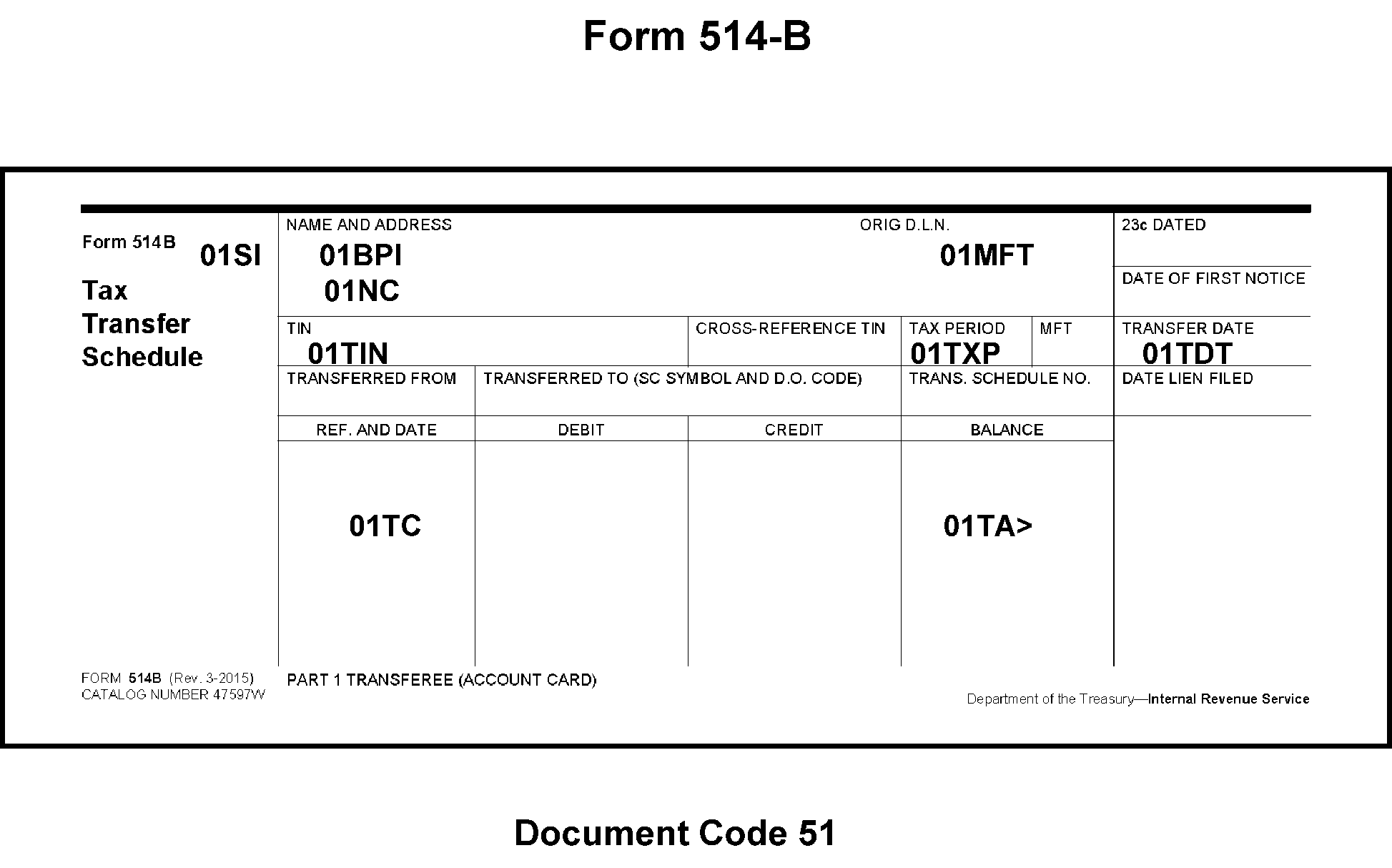
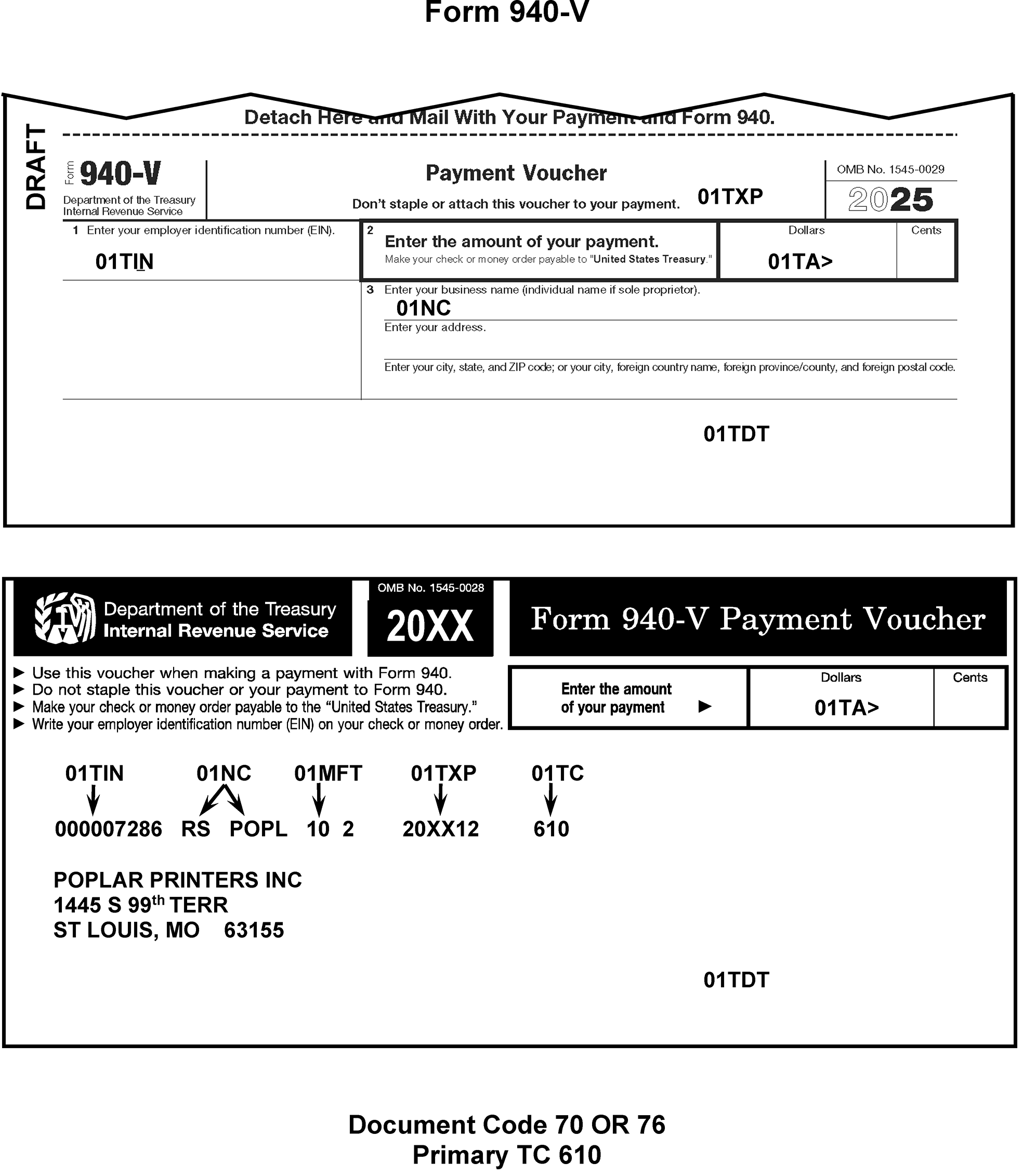
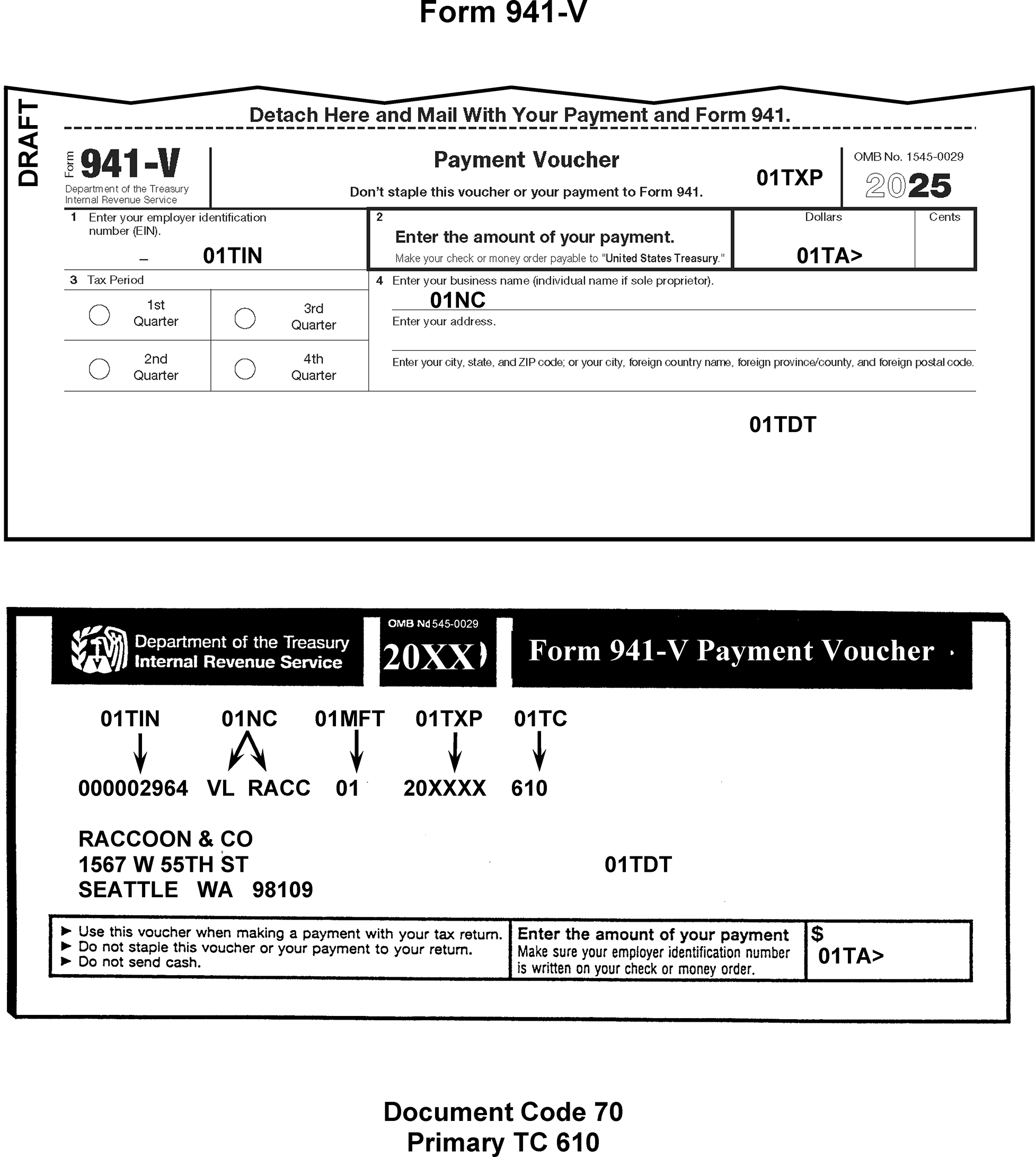
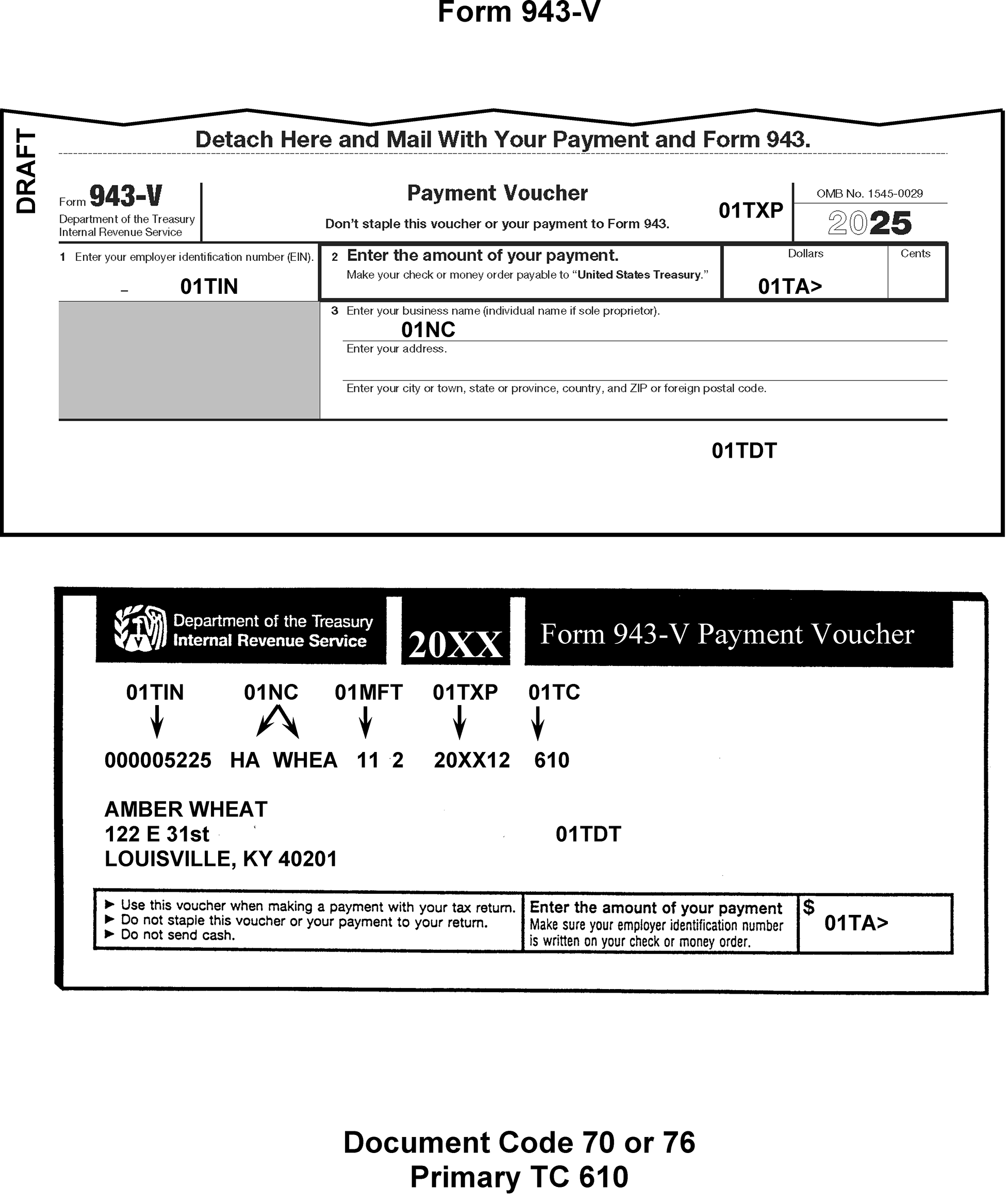
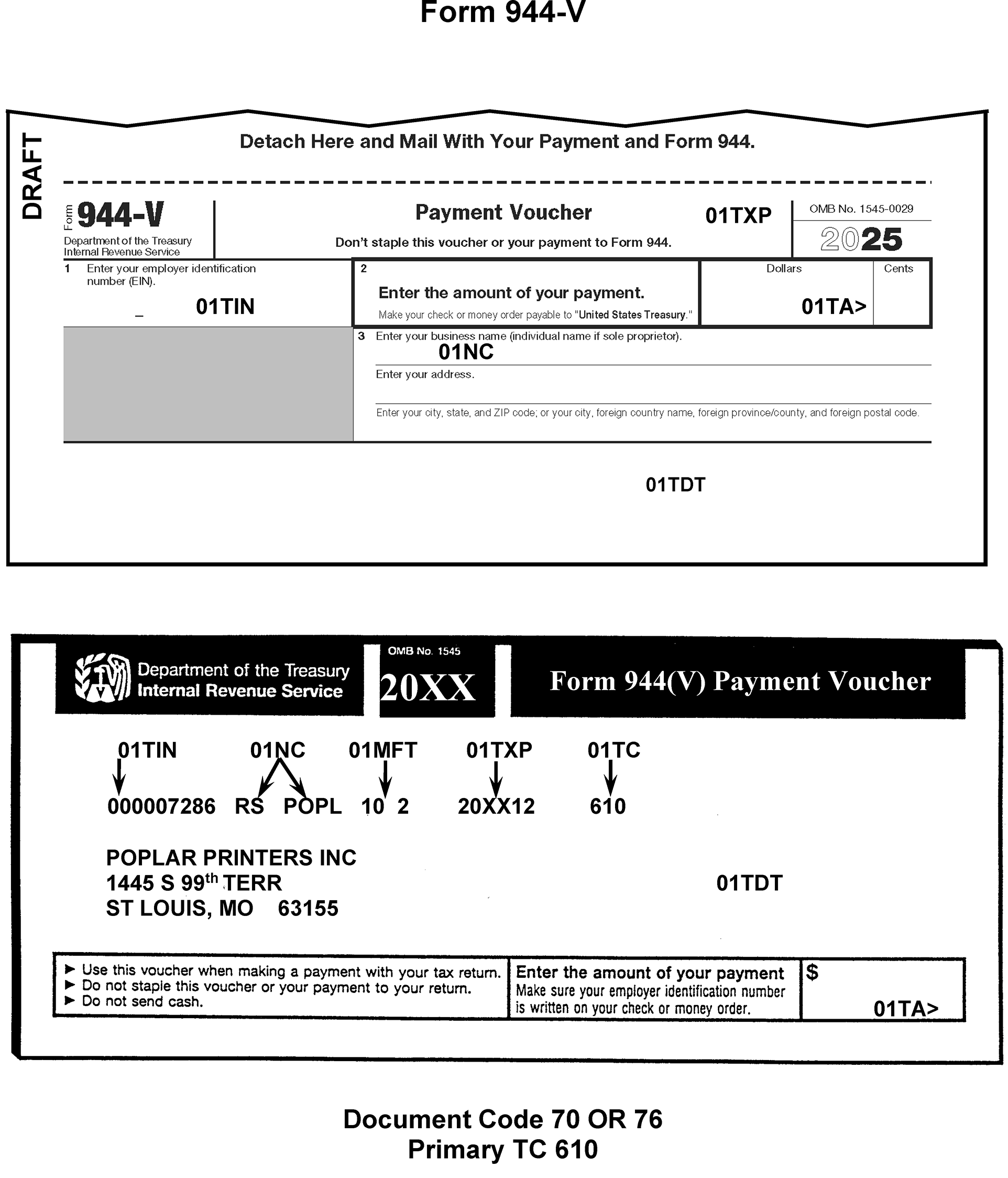
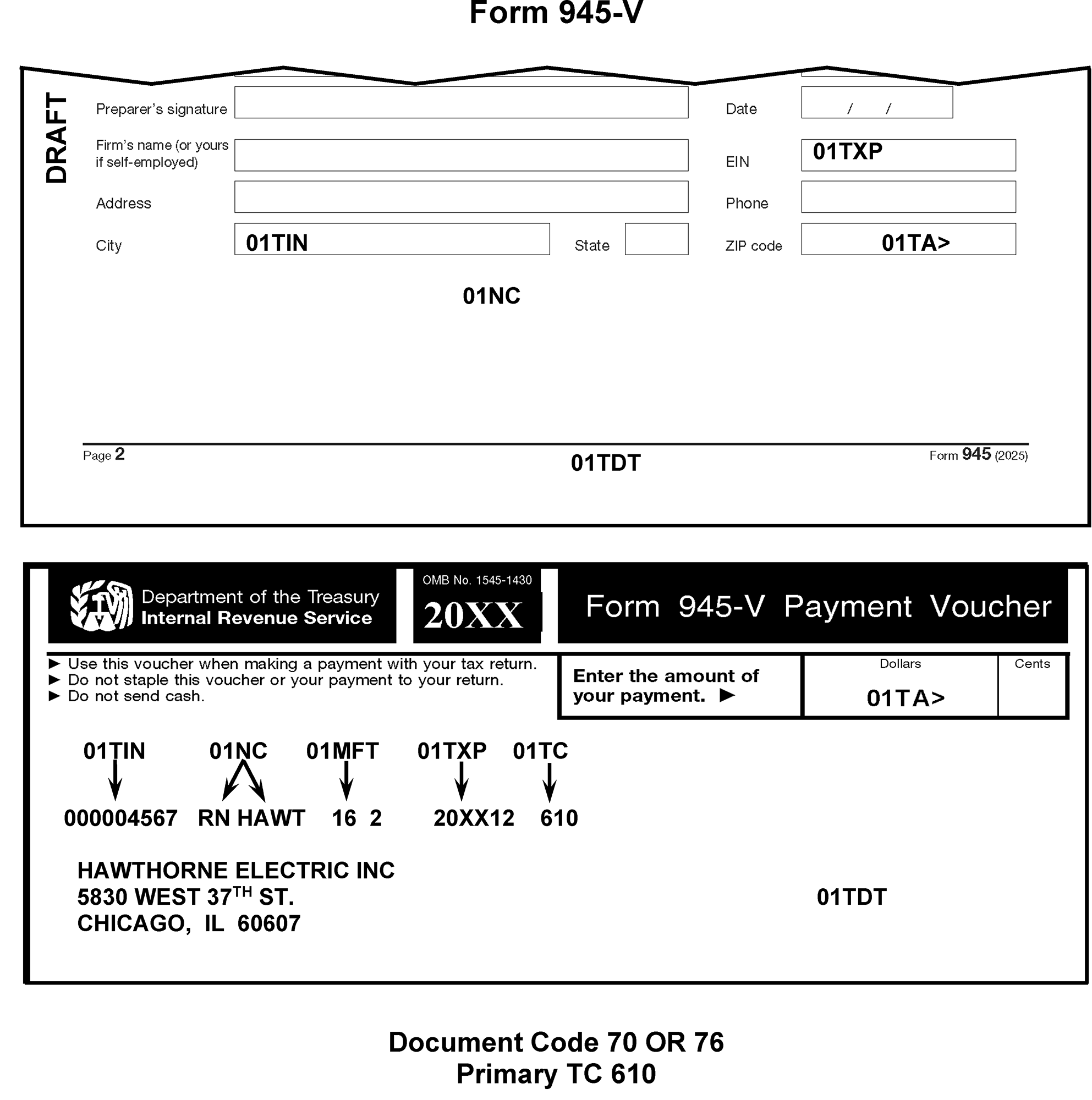
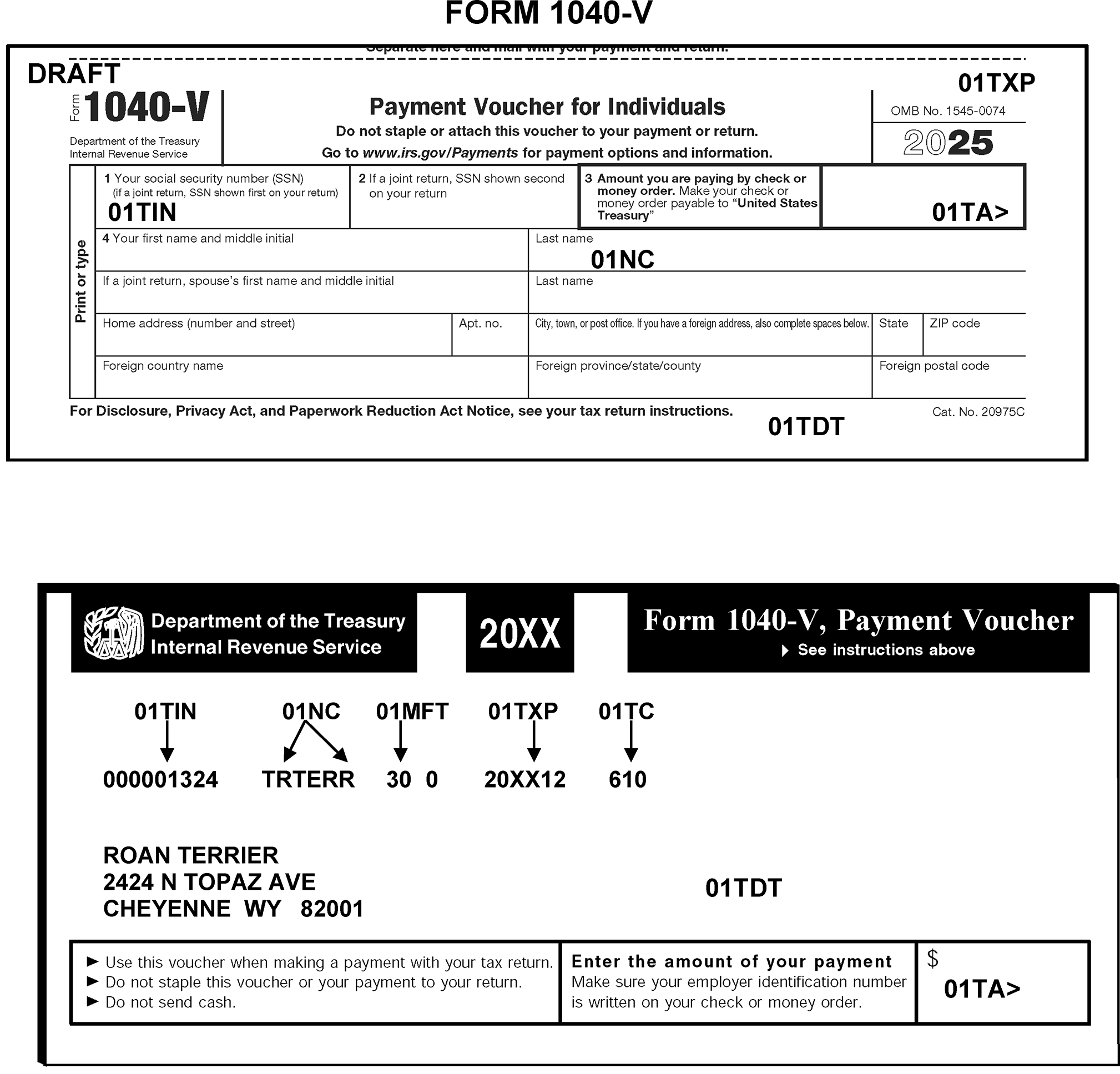
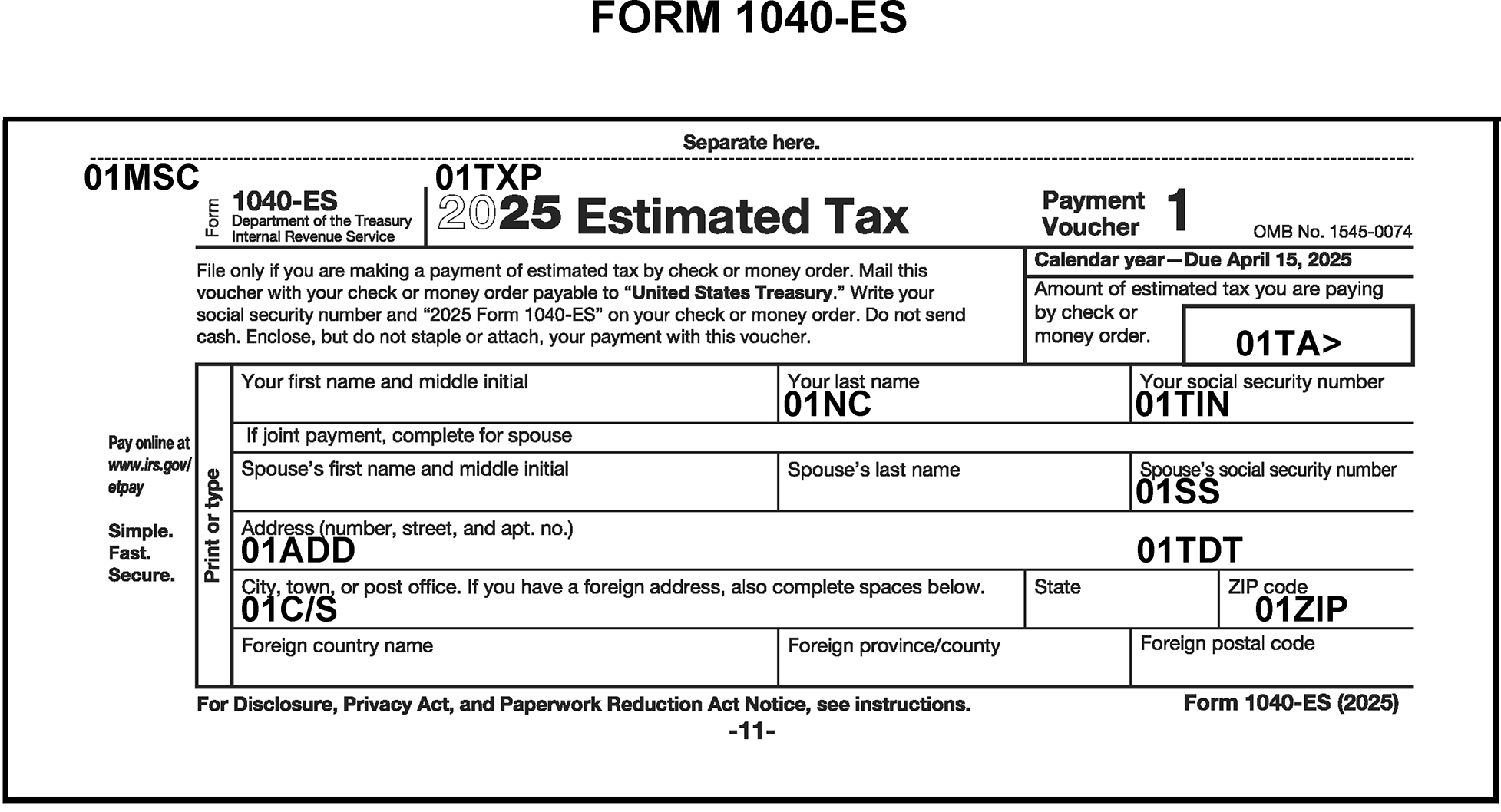
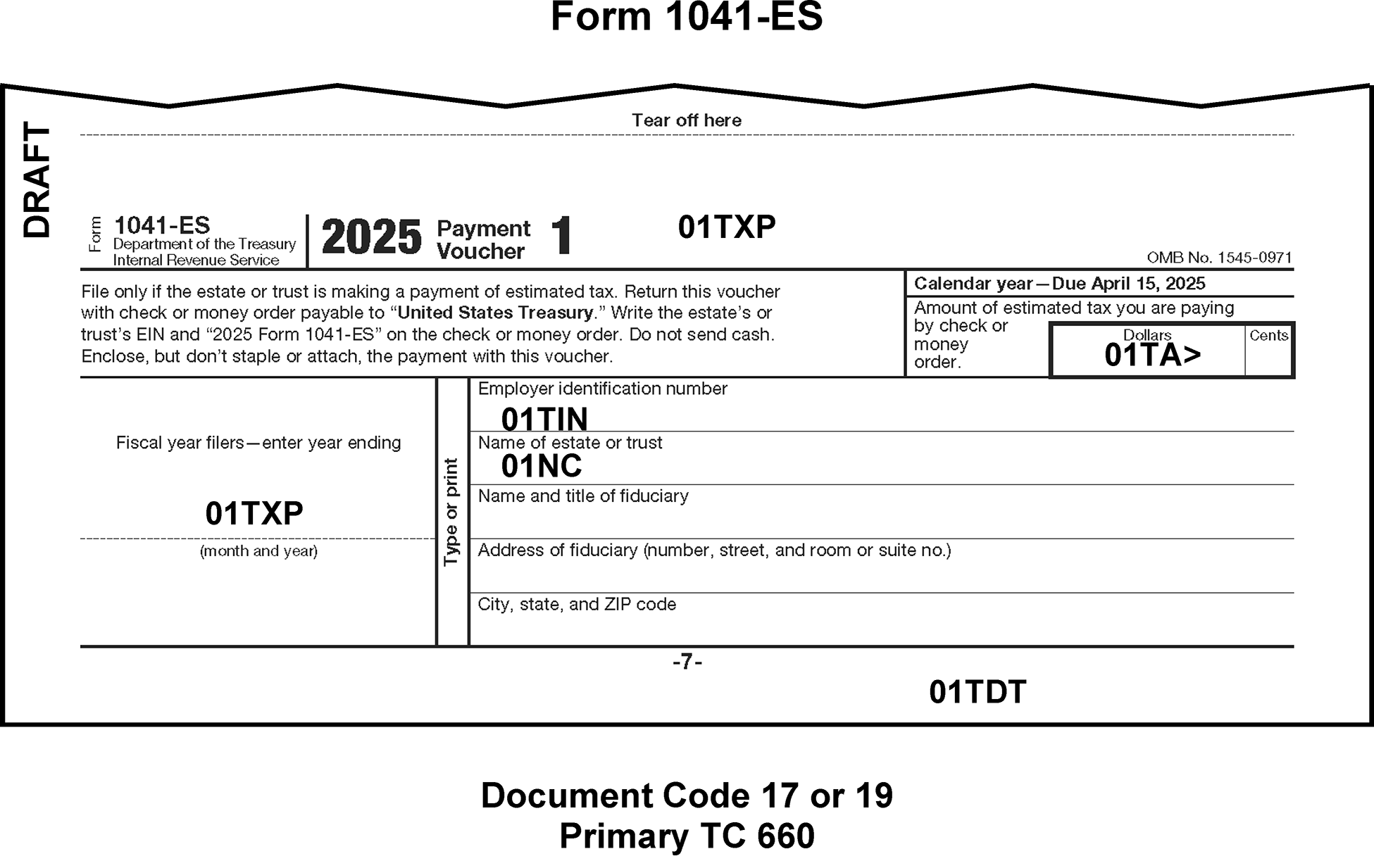
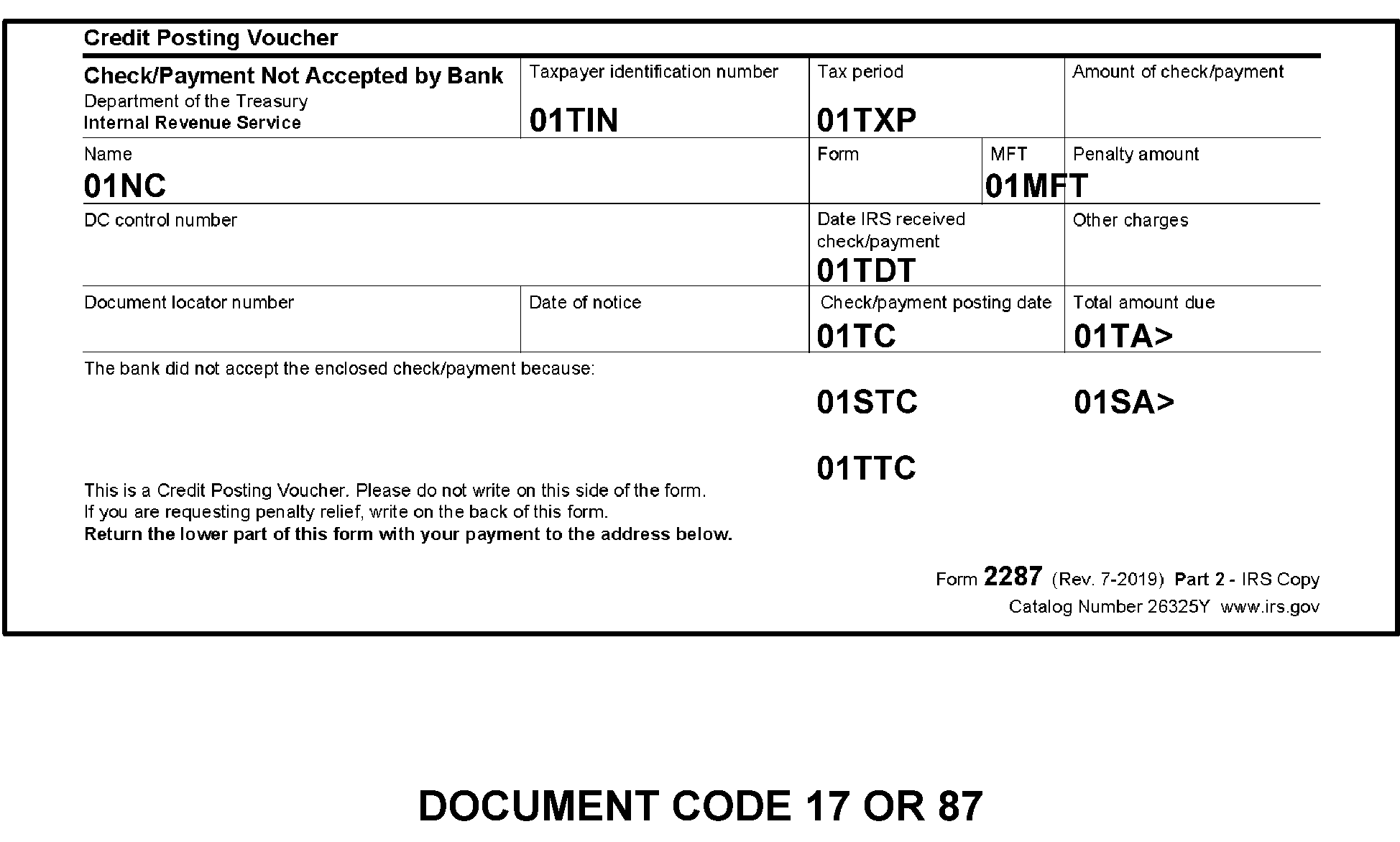
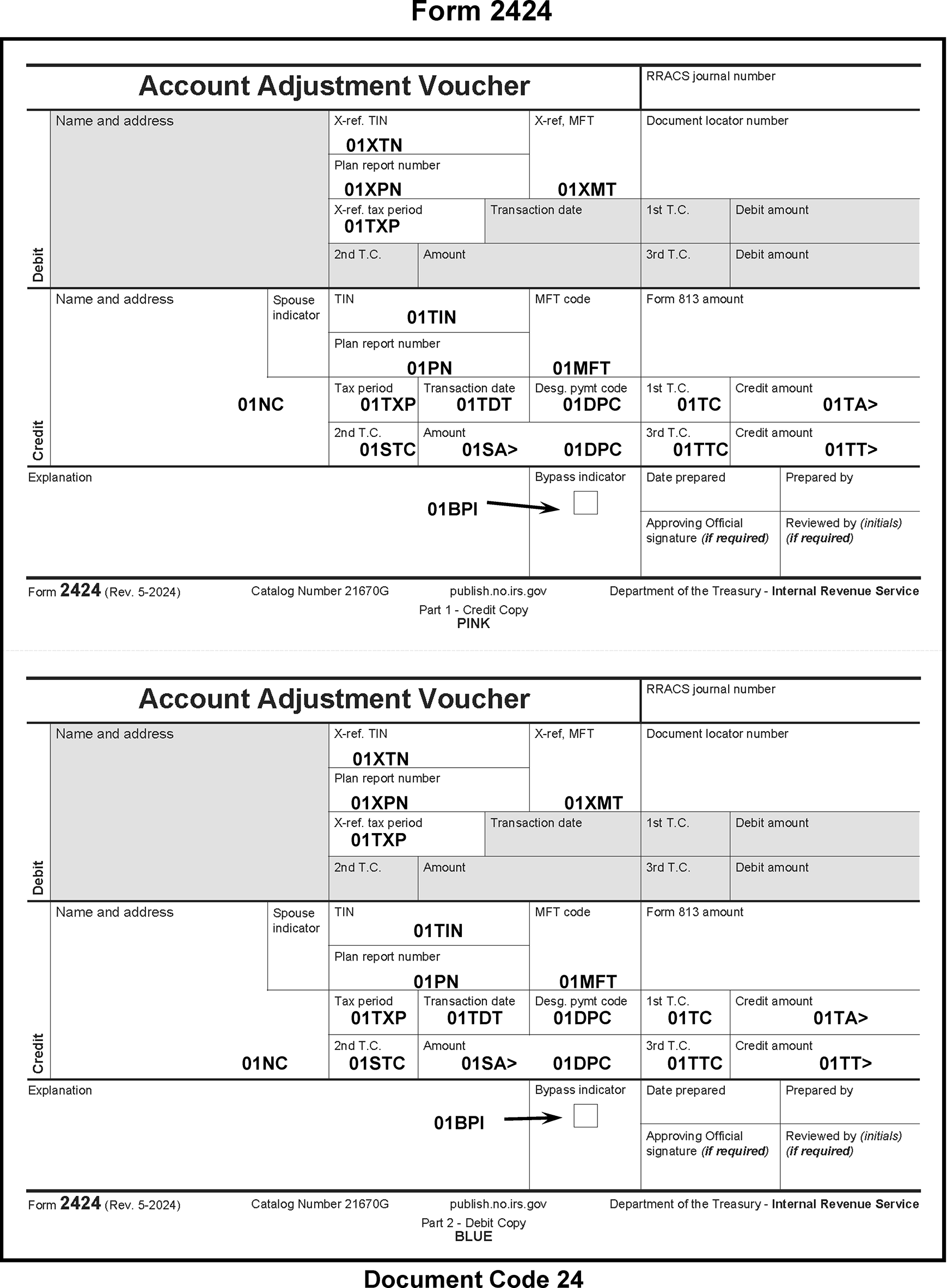
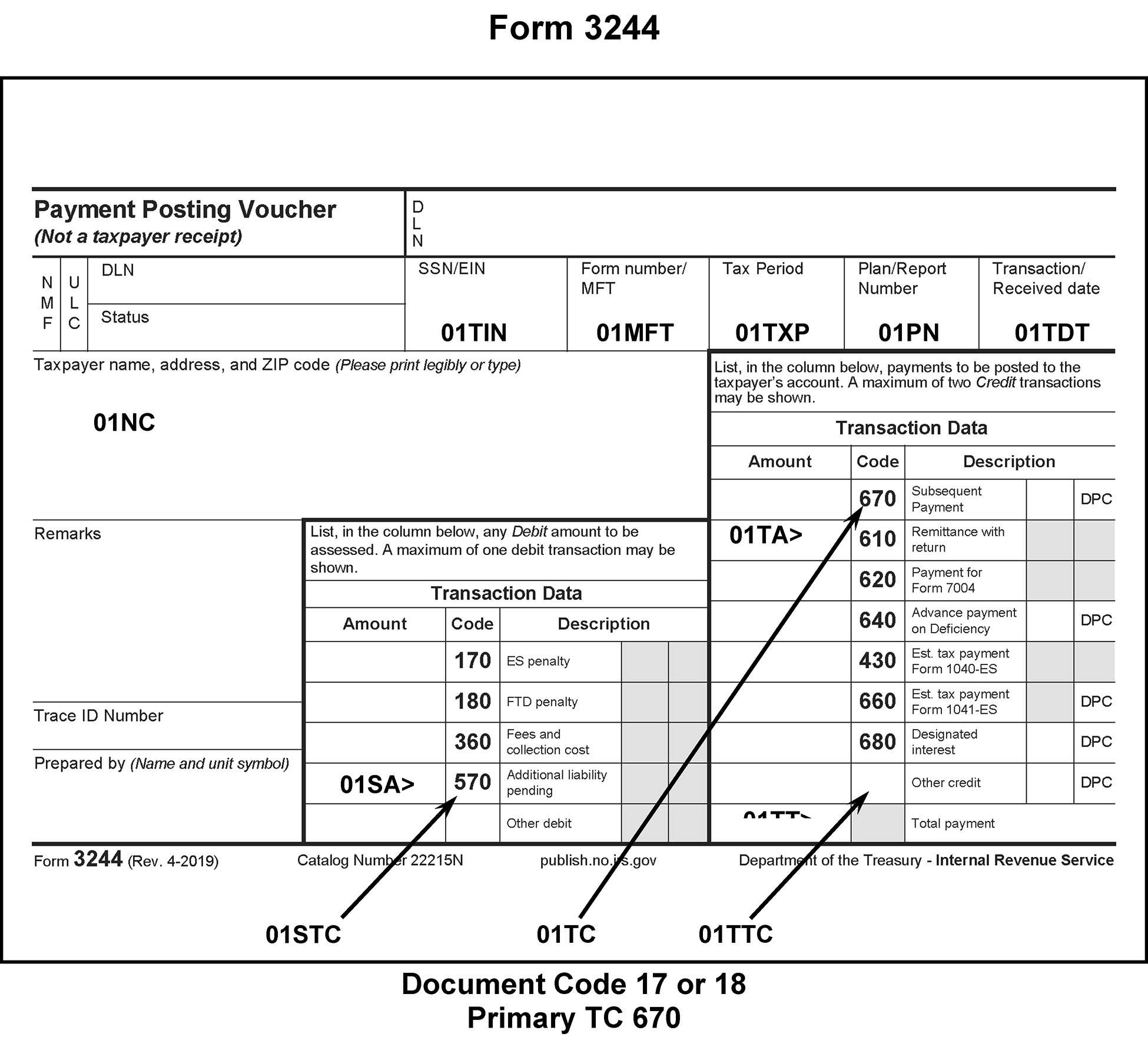
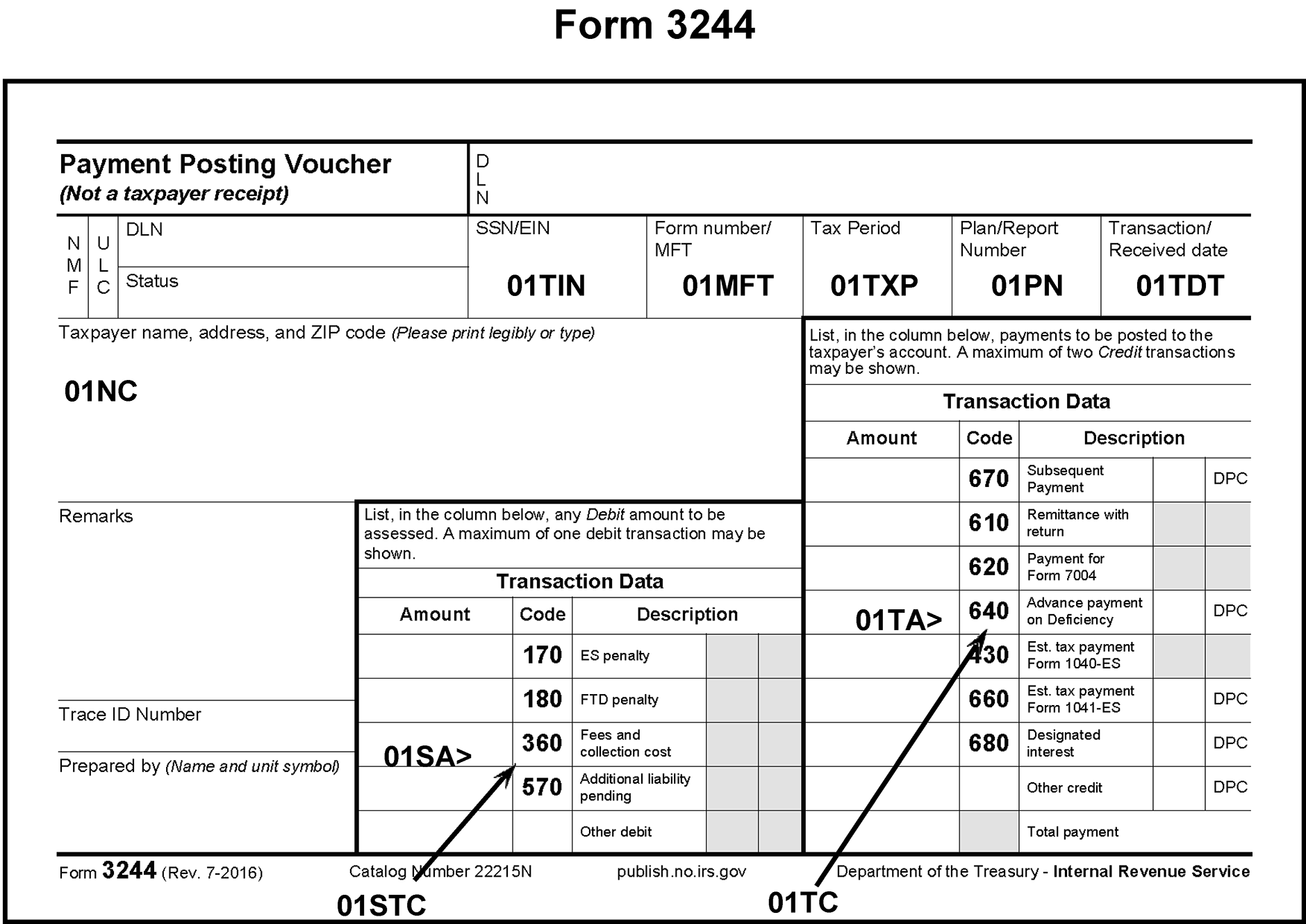
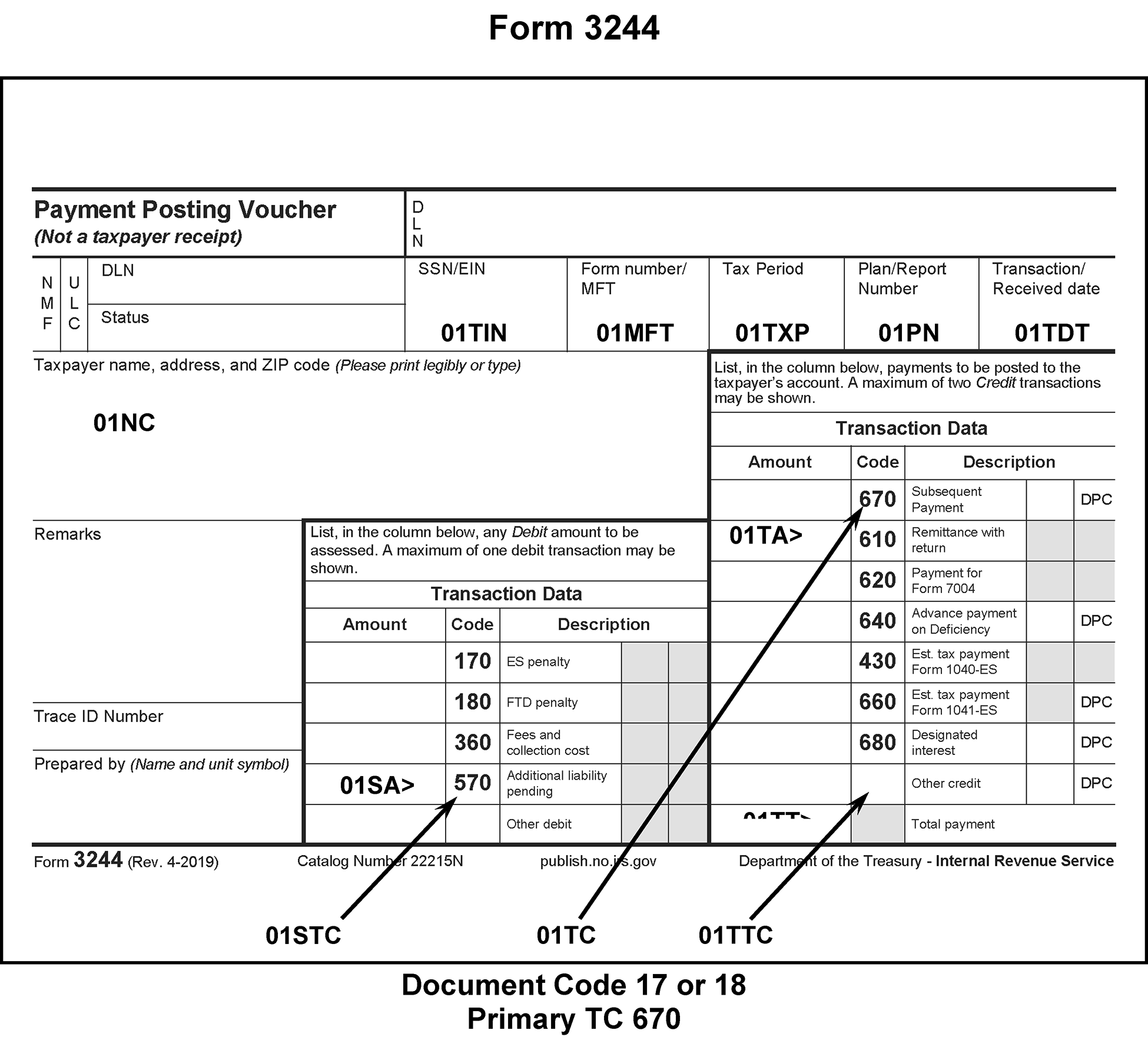
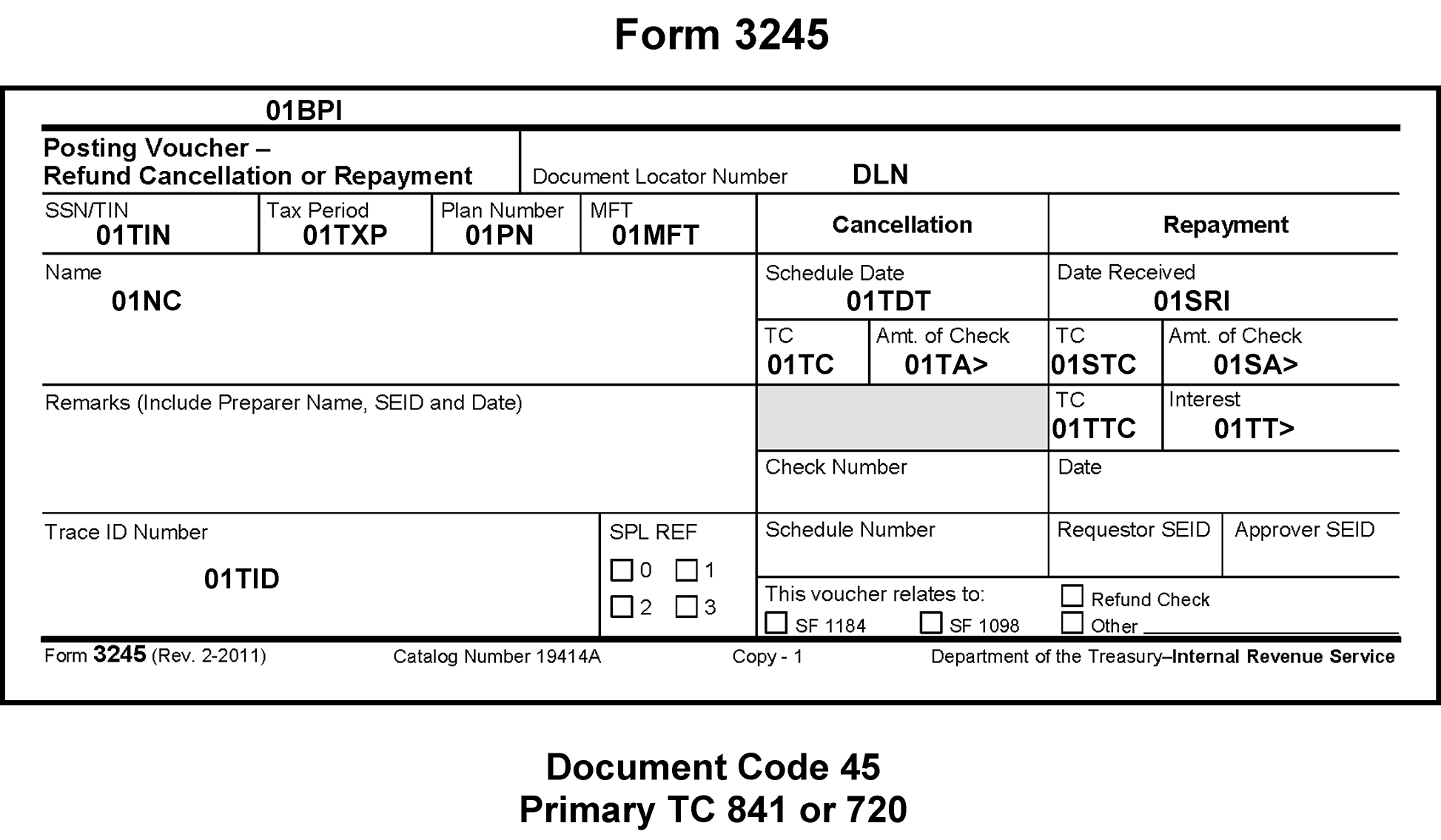
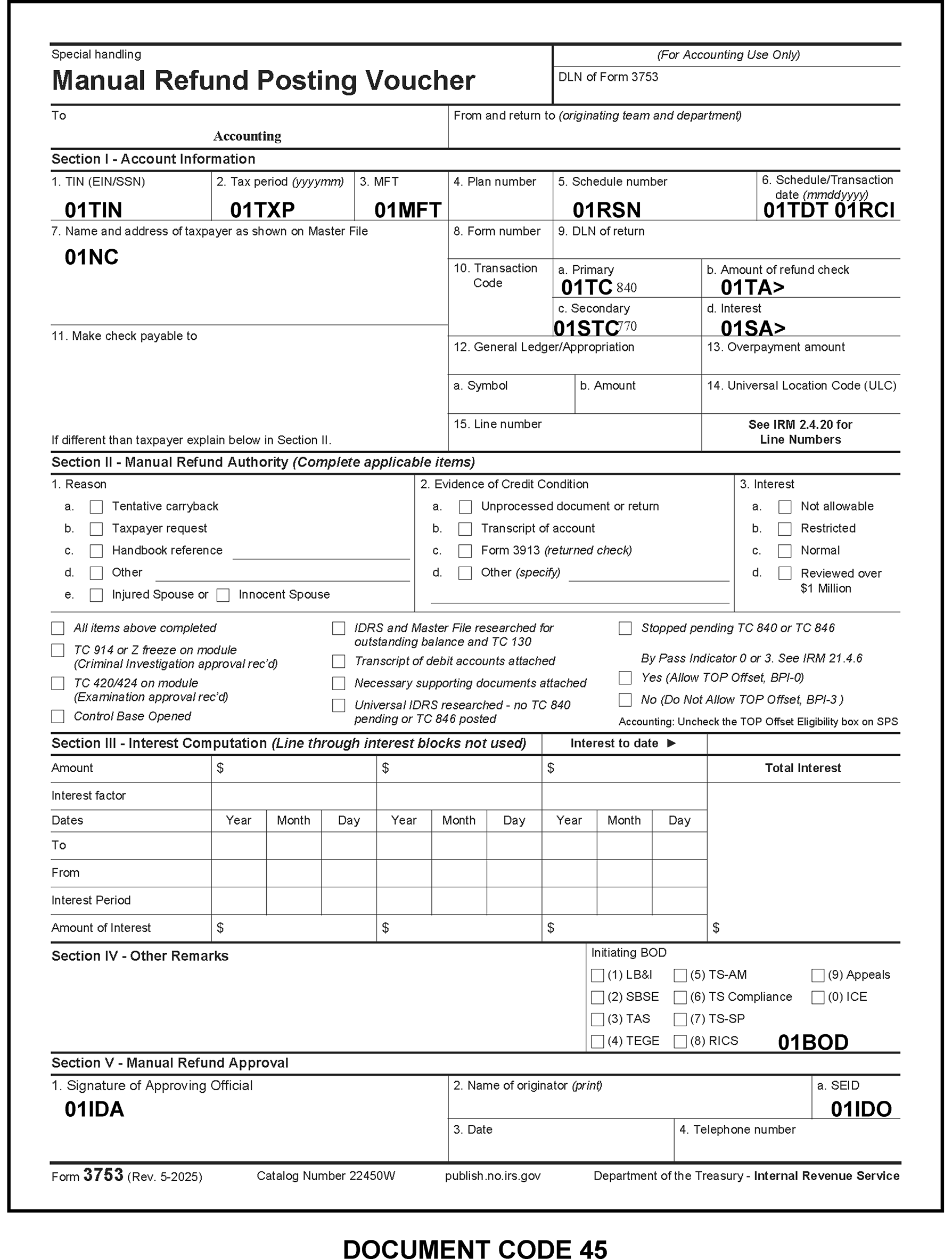
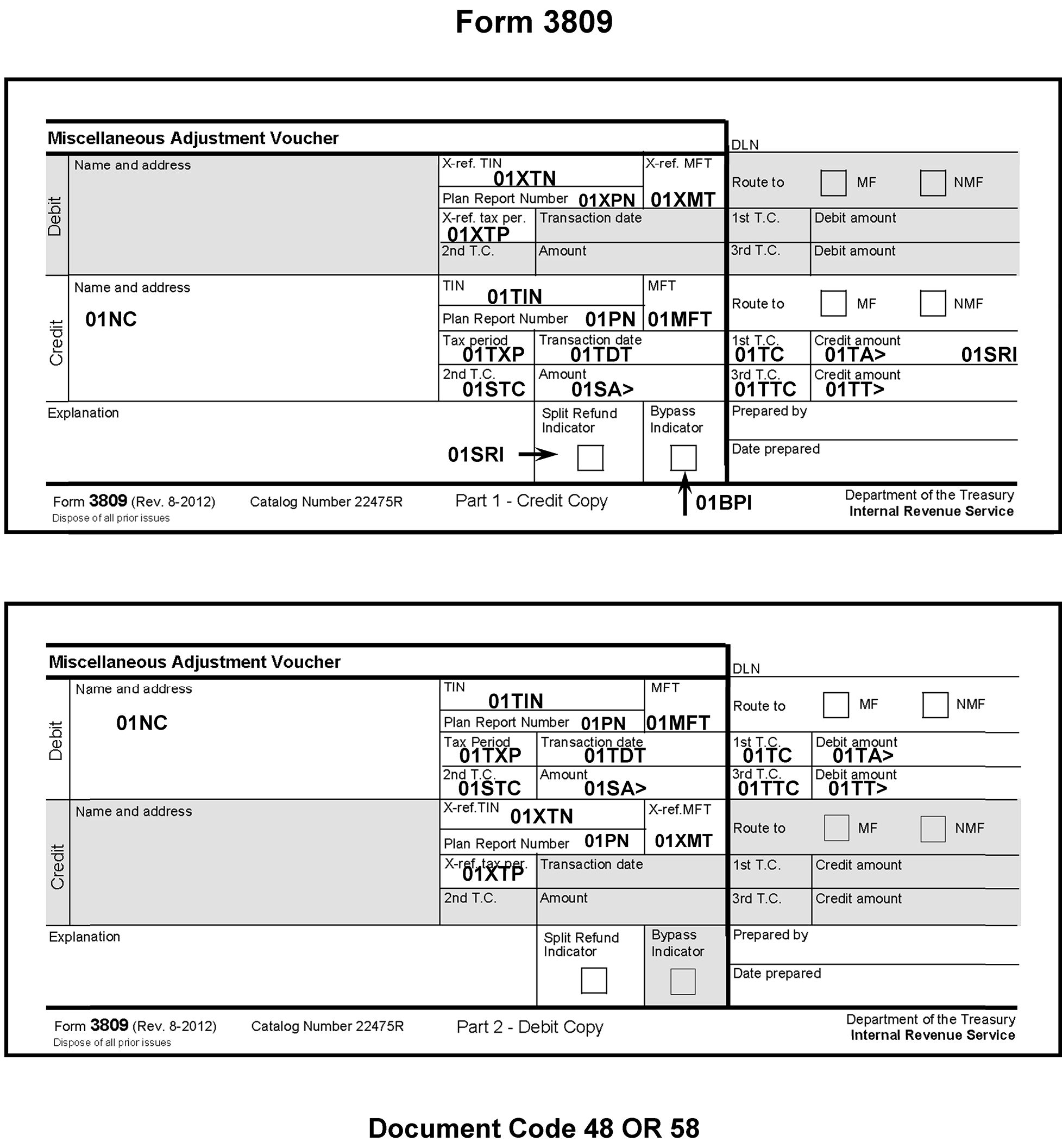
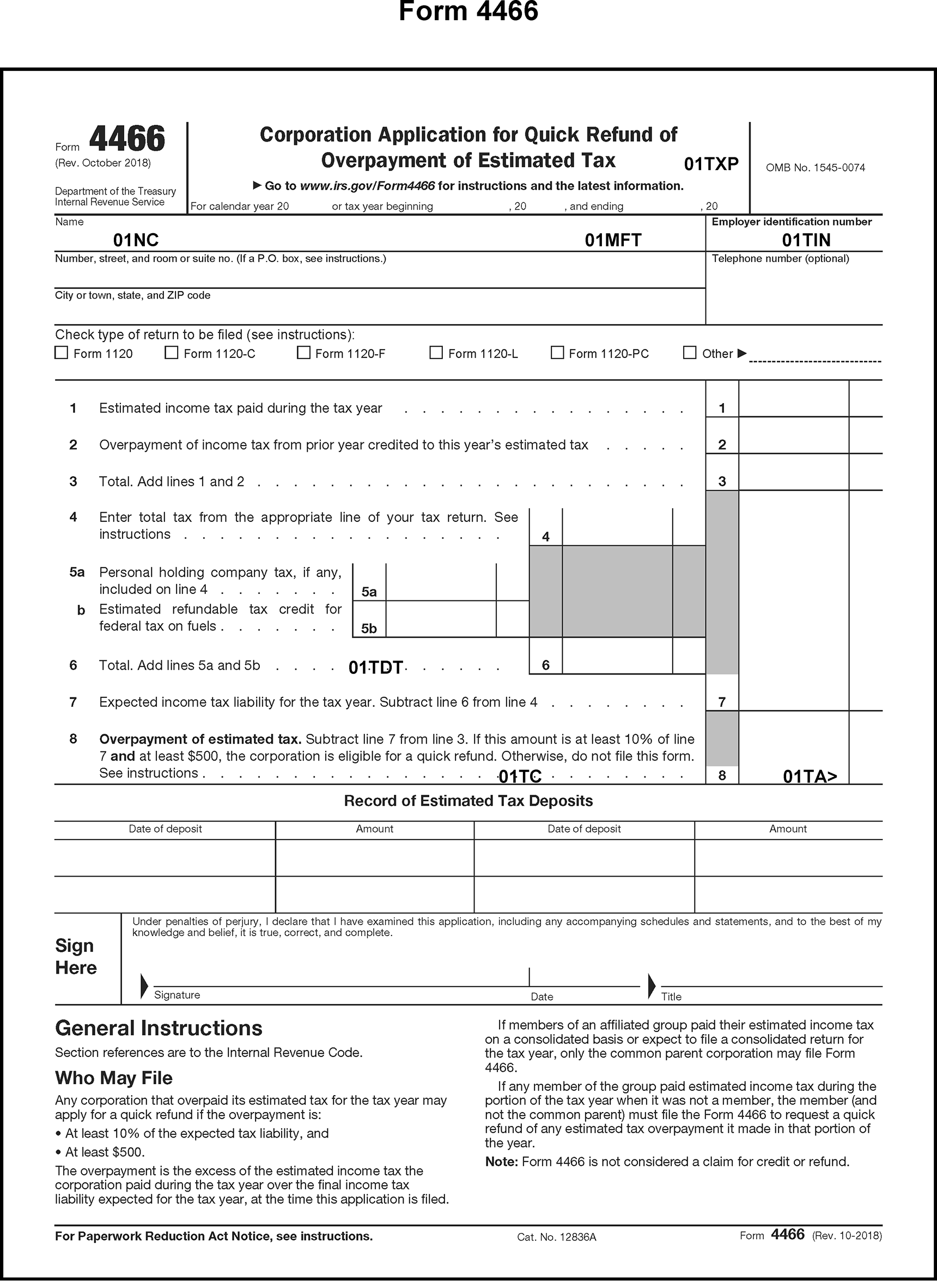
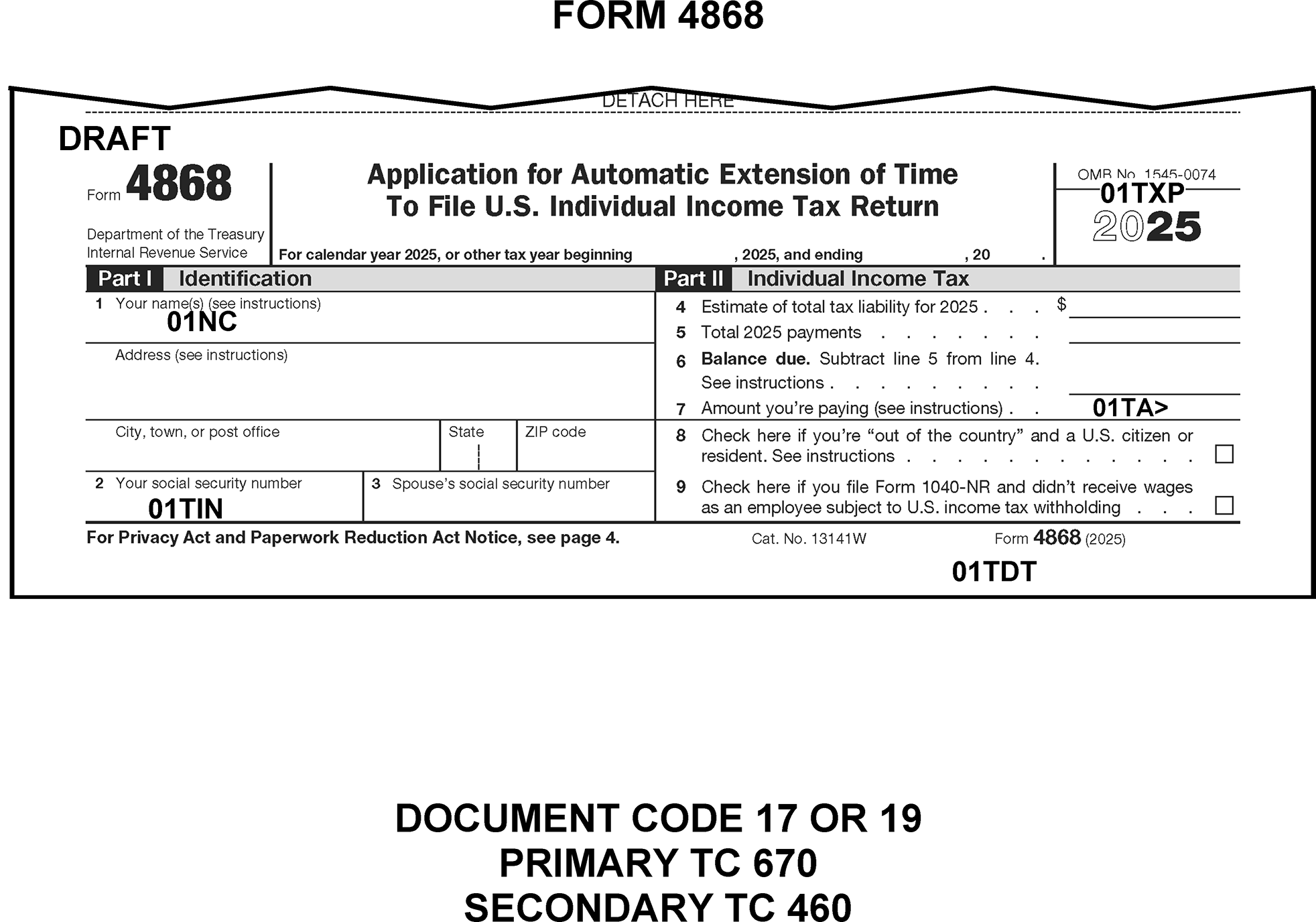
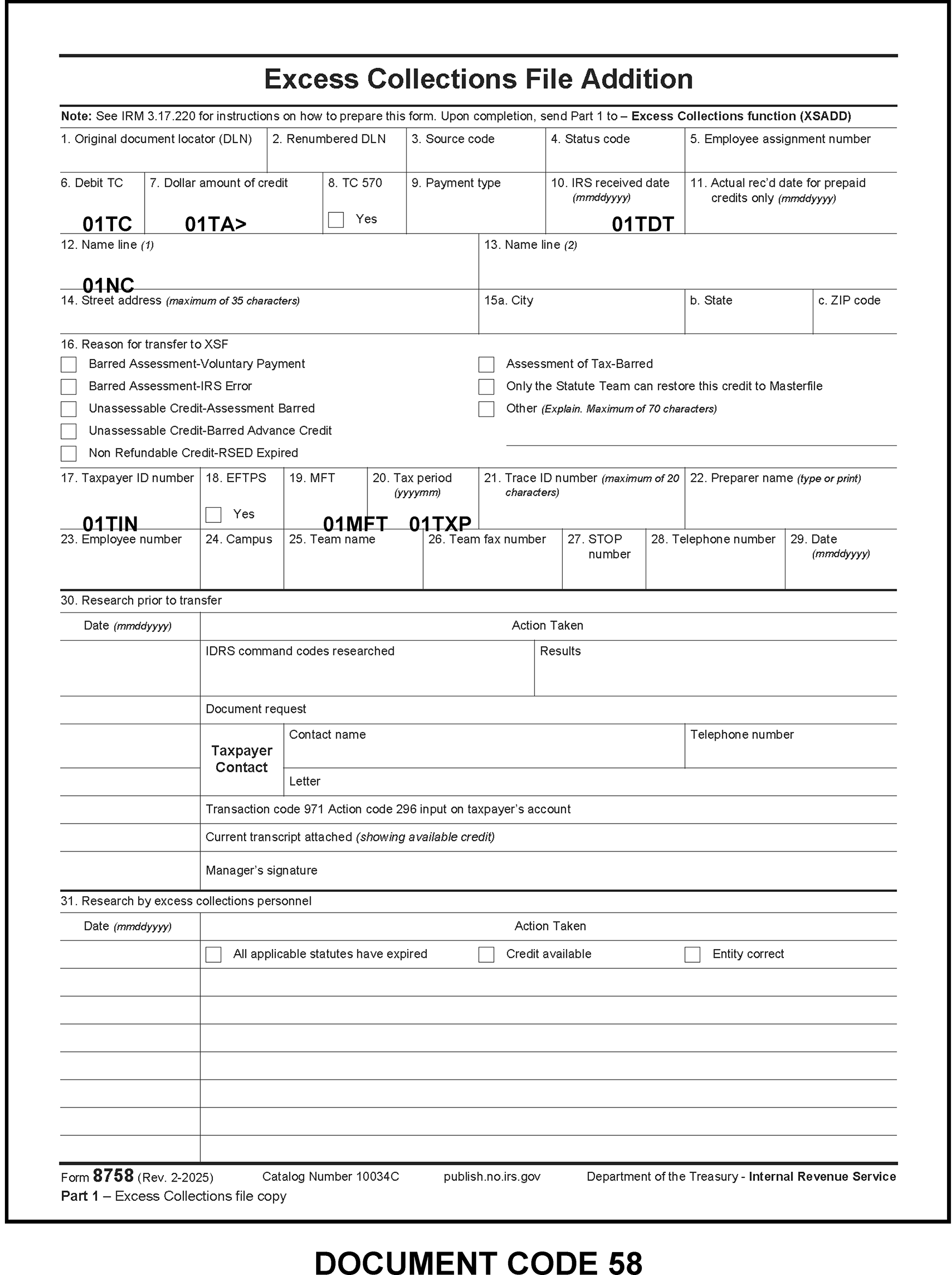
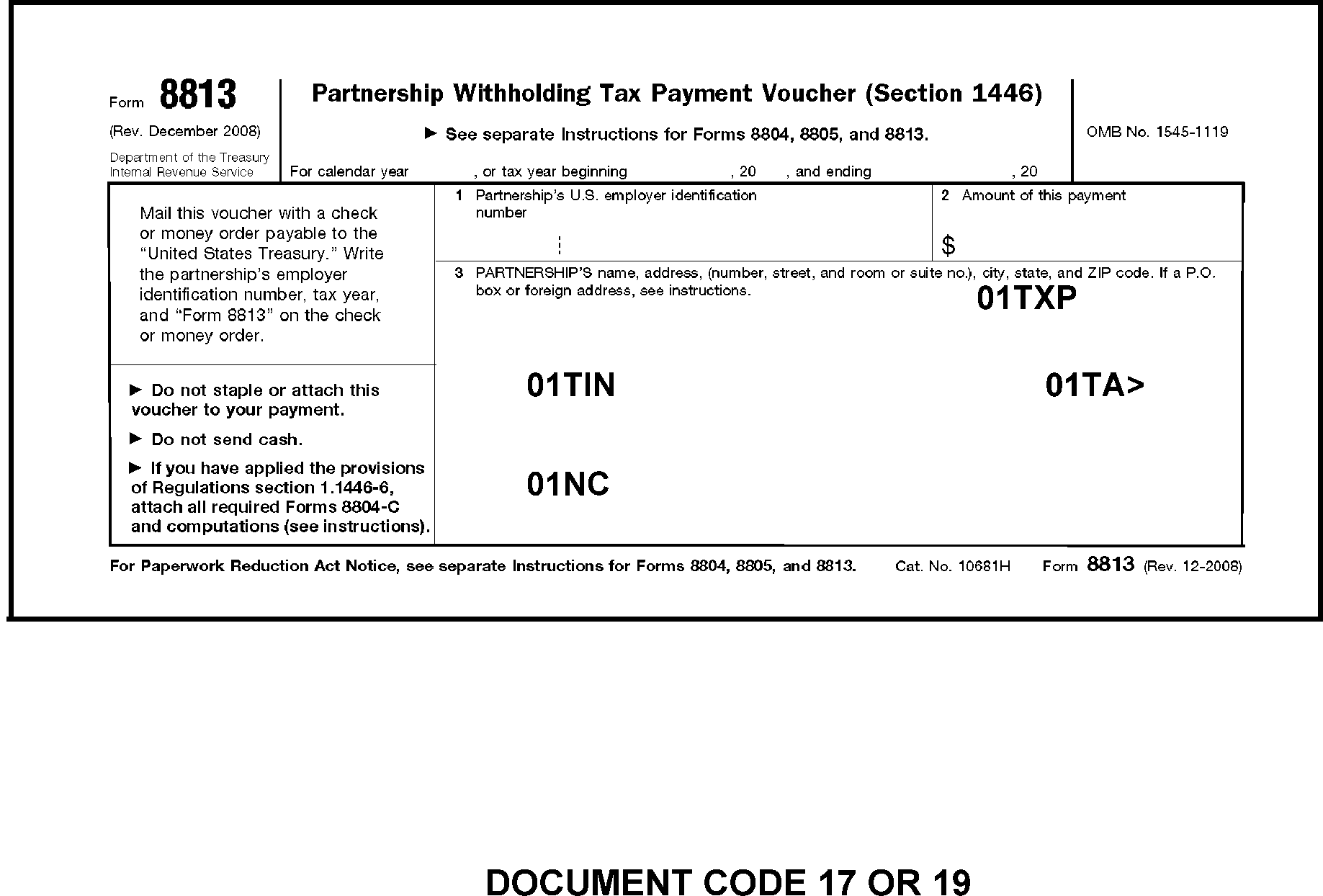
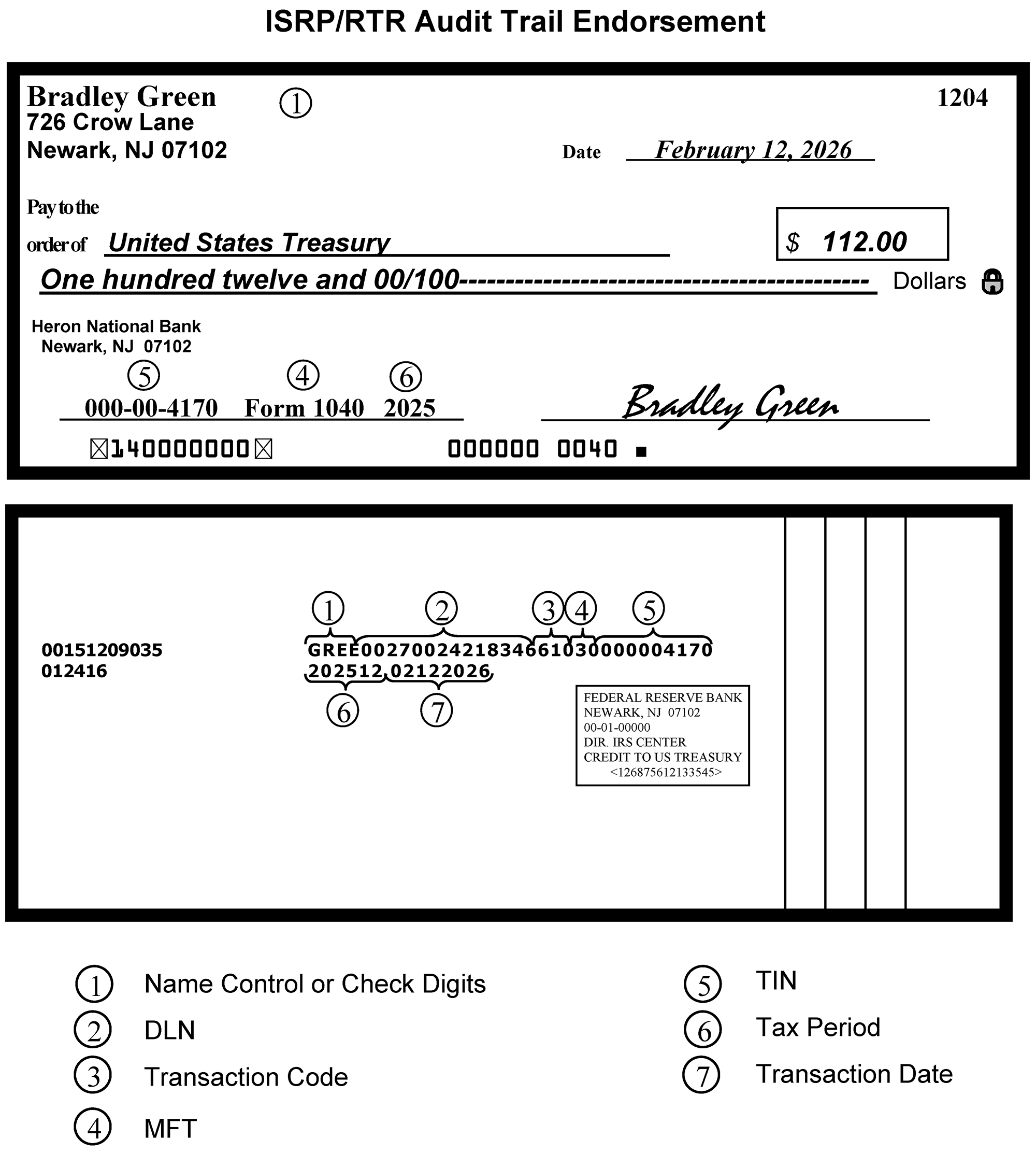
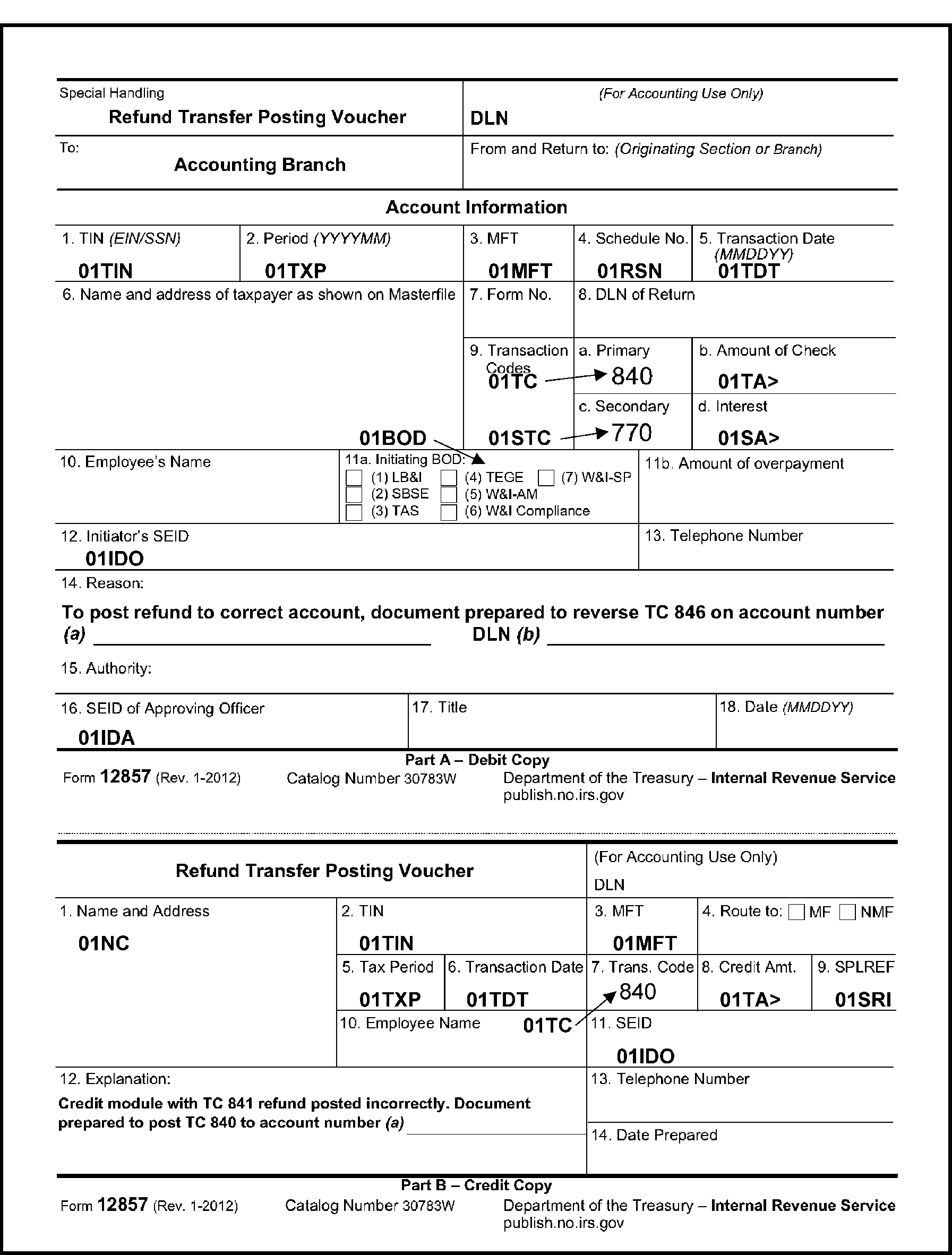
The chart below is used to find the Julian Date in a normal (perpetual) year. The Julian Date is a three-digit numeric field which corresponds to the correct day out of the total days in the year.
Example:
On the Leap Year calendar, the Julian Date for January 1 is 001, while the Julian Date for April 15 is 106
Example:
To find the month and day given a DLN Julian Date of 043, follow the column up for the month (February), then follow the row with the number (043) for the day (12). Julian Date 043 equals February 12.
Example:
To find the Julian Date given for the month (February) and day (12), follow the month column down and the day across to where they intersect, February 12 equals Julian Date 043.
JULIAN DATE CALENDAR - (PERPETUAL) - FOR LEAP YEAR USE TABLE ON NEXT PAGE
| Day | Jan | Feb | Mar | Apr | May | June | July | Aug | Sept | Oct | Nov | Dec | Day |
|---|---|---|---|---|---|---|---|---|---|---|---|---|---|
| 1 | 001 | 032 | 060 | 091 | 121 | 152 | 182 | 213 | 244 | 274 | 305 | 335 | 1 |
| 2 | 002 | 033 | 061 | 092 | 122 | 153 | 183 | 214 | 245 | 275 | 306 | 336 | 2 |
| 3 | 003 | 034 | 062 | 093 | 123 | 154 | 184 | 215 | 246 | 276 | 307 | 337 | 3 |
| 4 | 004 | 035 | 063 | 094 | 124 | 155 | 185 | 216 | 247 | 277 | 308 | 338 | 4 |
| 5 | 005 | 036 | 064 | 095 | 125 | 156 | 186 | 217 | 248 | 278 | 309 | 339 | 5 |
| 6 | 006 | 037 | 065 | 096 | 126 | 157 | 187 | 218 | 249 | 279 | 310 | 340 | 6 |
| 7 | 007 | 038 | 066 | 097 | 127 | 158 | 188 | 219 | 250 | 280 | 311 | 341 | 7 |
| 8 | 008 | 039 | 067 | 098 | 128 | 159 | 189 | 220 | 251 | 281 | 312 | 342 | 8 |
| 9 | 009 | 040 | 068 | 099 | 129 | 160 | 190 | 221 | 252 | 282 | 313 | 343 | 9 |
| 10 | 010 | 041 | 069 | 100 | 130 | 161 | 191 | 222 | 253 | 283 | 314 | 344 | 10 |
| 11 | 011 | 042 | 070 | 101 | 131 | 162 | 192 | 223 | 254 | 284 | 315 | 345 | 11 |
| 12 | 012 | 043 | 071 | 102 | 132 | 163 | 193 | 224 | 255 | 285 | 316 | 346 | 12 |
| 13 | 013 | 044 | 072 | 103 | 133 | 164 | 194 | 225 | 256 | 286 | 317 | 347 | 13 |
| 14 | 014 | 045 | 073 | 104 | 134 | 165 | 195 | 226 | 257 | 287 | 318 | 348 | 14 |
| 15 | 015 | 046 | 074 | 105 | 135 | 166 | 196 | 227 | 258 | 288 | 319 | 349 | 15 |
| 16 | 016 | 047 | 075 | 106 | 136 | 167 | 197 | 228 | 259 | 289 | 320 | 350 | 16 |
| 17 | 017 | 048 | 076 | 107 | 137 | 168 | 198 | 229 | 260 | 290 | 321 | 351 | 17 |
| 18 | 018 | 049 | 077 | 108 | 138 | 169 | 199 | 230 | 261 | 291 | 322 | 352 | 18 |
| 19 | 019 | 050 | 078 | 109 | 139 | 170 | 200 | 231 | 262 | 292 | 323 | 353 | 19 |
| 20 | 020 | 051 | 079 | 110 | 140 | 171 | 201 | 232 | 263 | 293 | 324 | 354 | 20 |
| 21 | 021 | 052 | 080 | 111 | 141 | 172 | 202 | 233 | 264 | 294 | 325 | 355 | 21 |
| 22 | 022 | 053 | 081 | 112 | 142 | 173 | 203 | 234 | 265 | 295 | 326 | 356 | 22 |
| 23 | 023 | 054 | 082 | 113 | 143 | 174 | 204 | 235 | 266 | 296 | 327 | 357 | 23 |
| 24 | 024 | 055 | 083 | 114 | 144 | 175 | 205 | 236 | 267 | 297 | 328 | 358 | 24 |
| 25 | 025 | 056 | 084 | 115 | 145 | 176 | 206 | 237 | 268 | 298 | 329 | 359 | 25 |
| 26 | 026 | 057 | 085 | 116 | 146 | 177 | 207 | 238 | 269 | 299 | 330 | 360 | 26 |
| 27 | 027 | 058 | 086 | 117 | 147 | 178 | 208 | 239 | 270 | 300 | 331 | 361 | 27 |
| 28 | 028 | 059 | 087 | 118 | 148 | 179 | 209 | 240 | 271 | 301 | 332 | 362 | 28 |
| 29 | 029 | 088 | 119 | 149 | 180 | 210 | 241 | 272 | 302 | 333 | 363 | 29 | |
| 30 | 030 | 089 | 120 | 150 | 181 | 211 | 242 | 273 | 303 | 334 | 364 | 30 | |
| 31 | 031 | 090 | 151 | 212 | 243 | 304 | 365 | 31 |
The chart below is used to find the Julian Date in a leap year. The Julian Date is a three-digit numeric field which corresponds to the correct day out of the total days in the year.
Example:
On the Leap Year calendar, the Julian Date for January 1 is 001, while the Julian Date for April 15 is 106
Each column containing the month lists the correct Julian Date number which corresponds chronologically to the order of that day in the 366-day calendar year.
Example:
To find the month and day given a DLN Julian Date of 043, follow the column up for the month (February), then follow the row with the number (043) for the day (12). Julian Date 043 equals February 12.
Example:
To find the Julian Date given for the month (February) and day (12), follow the month column down and the day across to where they intersect, February 12 equals Julian Date 043.
JULIAN DATE CALENDAR - FOR LEAP YEARS ONLY - (USE IN 2020, 2024, 2028, 2032, 2036, etc.)
| Day | Jan | Feb | Mar | Apr | May | June | July | Aug | Sept | Oct | Nov | Dec | Day |
|---|---|---|---|---|---|---|---|---|---|---|---|---|---|
| 1 | 001 | 032 | 061 | 092 | 122 | 153 | 183 | 214 | 245 | 275 | 306 | 336 | 1 |
| 2 | 002 | 033 | 062 | 093 | 123 | 154 | 184 | 215 | 246 | 276 | 307 | 337 | 2 |
| 3 | 003 | 034 | 063 | 094 | 124 | 155 | 185 | 216 | 247 | 277 | 308 | 338 | 3 |
| 4 | 004 | 035 | 064 | 095 | 125 | 156 | 186 | 217 | 248 | 278 | 309 | 339 | 4 |
| 5 | 005 | 036 | 065 | 096 | 126 | 157 | 187 | 218 | 249 | 279 | 310 | 340 | 5 |
| 6 | 006 | 037 | 066 | 097 | 127 | 158 | 188 | 219 | 250 | 280 | 311 | 341 | 6 |
| 7 | 007 | 038 | 067 | 098 | 128 | 159 | 189 | 220 | 251 | 281 | 312 | 342 | 7 |
| 8 | 008 | 039 | 068 | 099 | 129 | 160 | 190 | 221 | 252 | 282 | 313 | 343 | 8 |
| 9 | 009 | 040 | 069 | 100 | 130 | 161 | 191 | 222 | 253 | 283 | 314 | 344 | 9 |
| 10 | 010 | 041 | 070 | 101 | 131 | 162 | 192 | 223 | 254 | 284 | 315 | 345 | 10 |
| 11 | 011 | 042 | 071 | 102 | 132 | 163 | 193 | 224 | 255 | 285 | 316 | 346 | 11 |
| 12 | 012 | 043 | 072 | 103 | 133 | 164 | 194 | 225 | 256 | 286 | 317 | 347 | 12 |
| 13 | 013 | 044 | 073 | 104 | 134 | 165 | 195 | 226 | 257 | 287 | 318 | 348 | 13 |
| 14 | 014 | 045 | 074 | 105 | 135 | 166 | 196 | 227 | 258 | 288 | 319 | 349 | 14 |
| 15 | 015 | 046 | 075 | 106 | 136 | 167 | 197 | 228 | 259 | 289 | 320 | 350 | 15 |
| 16 | 016 | 047 | 076 | 107 | 137 | 168 | 198 | 229 | 260 | 290 | 321 | 351 | 16 |
| 17 | 017 | 048 | 077 | 108 | 138 | 169 | 199 | 230 | 261 | 291 | 322 | 352 | 17 |
| 18 | 018 | 049 | 078 | 109 | 139 | 170 | 200 | 231 | 262 | 292 | 323 | 353 | 18 |
| 19 | 019 | 050 | 079 | 110 | 140 | 171 | 201 | 232 | 263 | 293 | 324 | 354 | 19 |
| 20 | 020 | 051 | 080 | 111 | 141 | 172 | 202 | 233 | 264 | 294 | 325 | 355 | 20 |
| 21 | 021 | 052 | 081 | 112 | 142 | 173 | 203 | 234 | 265 | 295 | 326 | 356 | 21 |
| 22 | 022 | 053 | 082 | 113 | 143 | 174 | 204 | 235 | 266 | 296 | 327 | 357 | 22 |
| 23 | 023 | 054 | 083 | 114 | 144 | 175 | 205 | 236 | 267 | 297 | 328 | 358 | 23 |
| 24 | 024 | 055 | 084 | 115 | 145 | 176 | 206 | 237 | 268 | 298 | 329 | 359 | 24 |
| 25 | 025 | 056 | 085 | 116 | 146 | 177 | 207 | 238 | 269 | 299 | 330 | 360 | 25 |
| 26 | 026 | 057 | 086 | 117 | 147 | 178 | 208 | 239 | 270 | 300 | 331 | 361 | 26 |
| 27 | 027 | 058 | 087 | 118 | 148 | 179 | 209 | 240 | 271 | 301 | 332 | 362 | 27 |
| 28 | 028 | 059 | 088 | 119 | 149 | 180 | 210 | 241 | 272 | 302 | 333 | 363 | 28 |
| 29 | 029 | 060 | 089 | 120 | 150 | 181 | 211 | 242 | 273 | 303 | 334 | 364 | 29 |
| 30 | 030 | 090 | 121 | 151 | 182 | 212 | 243 | 274 | 304 | 335 | 365 | 30 | |
| 31 | 031 | 091 | 152 | 213 | 244 | 305 | 366 | 31 |