


 )
or https:// means you've safely connected to the .gov website. Share sensitive information only on official, secure websites.
)
or https:// means you've safely connected to the .gov website. Share sensitive information only on official, secure websites.


- 3.12.179 Individual Master File (IMF), Payer Master File (PMF) Unpostable Resolution
- 3.12.179.1 Program Scope and Objectives
- 3.12.179.1.1 Background
- 3.12.179.1.2 Authority
- 3.12.179.1.3 Responsibilities
- 3.12.179.1.4 Program Management and Review
- 3.12.179.1.5 Program Controls
- 3.12.179.1.6 Terms and Acronyms
- 3.12.179.1.7 Related Resources
- 3.12.179.2 General Information and Introduction
- 3.12.179.2.1 Guidelines and Objectives of the Unpostable Function
- 3.12.179.2.2 General Unpostable Framework (GUF)
- 3.12.179.2.3 Customer Account Data Engine (CADE) 2
- 3.12.179.2.4 General Unpostable Concepts
- 3.12.179.2.5 Discovered Remittances
- 3.12.179.2.6 Unpostable Reassignment and Closure Types
- 3.12.179.2.7 IRM Deviation and Local Procedures
- 3.12.179.3 Inventory Management and Organization Function Program Codes
- 3.12.179.3.1 Generalized IDRS Interface (GII) Unpostables Tools
- 3.12.179.3.2 GUF Reports on Ctrl-D
- 3.12.179.3.3 Weekly Inventory Management Review for Managers and Work Leaders
- 3.12.179.3.4 Interest Reduction Initiative Report (GUF 07-42)
- 3.12.179.3.5 Weekly Inventory Management for Tax Examiners
- 3.12.179.3.6 IMF Unpostables CATs and Aging Criteria
- 3.12.179.3.7 IMF Unpostables Organization Function Program Codes (OFP)
- 3.12.179.4 Category Code L1 International (INTL) Returns (AUSPC only)
- 3.12.179.4.1 International Returns (Filing Location Codes 20 and 21)
- 3.12.179.4.2 International Returns Transshipping to AUSPC
- 3.12.179.4.3 Status of an International Filer
- 3.12.179.4.4 Guam Address or Income From Guam
- 3.12.179.4.5 Virgin Islands Address or Income From Virgin Islands
- 3.12.179.4.6 Dual Status Tax Returns
- 3.12.179.4.7 Form 1040-PR and Form 1040-SS
- 3.12.179.4.8 Form 1040-NR and Form 1040-NR-EZ (AUSPC Only)
- 3.12.179.5 Category Code L7, Credit Transfers, Bad Checks, Offsets, Refunds, and User Fee (IA)
- 3.12.179.5.1 CAT L7, Credit Transfers and Bad Checks
- 3.12.179.5.2 Credit Transfers, Offsets and Refunds (Erroneous, Canceled or Undeliverable)
- 3.12.179.5.2.1 General Information
- 3.12.179.5.2.2 Offsets and Transfers
- 3.12.179.5.2.3 Offsets and Transfers MFT 35
- 3.12.179.5.2.4 Credit Transfers; Transfer Vouchers Doc Codes 24, 34, 48, and 58; Form 8758; and Form 8765
- 3.12.179.5.2.5 Erroneous Refunds
- 3.12.179.5.2.6 Undeliverable (TC 740) or Cancelled (TC 841) Refund
- 3.12.179.5.2.7 Excess Collections, Dishonored Checks, and Unidentified Remittances
- 3.12.179.5.3 Installment Agreement (IA) User Fees
- 3.12.179.6 Category Codes Y1 and Y2 (ISRP and Payments Other Than Doc Codes 24, 34, 45, 48, 58, and 87)
- 3.12.179.6.1 Category Y1 Criteria:
- 3.12.179.6.1.1 If TC 150 and TC 610 are Unpostable
- 3.12.179.6.1.2 If TC 150 is Unpostable With a Posted TC 610
- 3.12.179.6.1.3 If TC 610 is Neither Posted nor Unpostable
- 3.12.179.6.1.4 If TC 610 is Unpostable
- 3.12.179.6.2 Unpostable Category Code Y2
- 3.12.179.6.1 Category Y1 Criteria:
- 3.12.179.7 Research Information, Methods, and Tools
- 3.12.179.7.1 Integrated Data Retrieval System (IDRS)
- 3.12.179.7.2 IDRS Command Codes
- 3.12.179.7.3 Remittance Transaction Research (RTR) System
- 3.12.179.7.4 System Messages Application to all Command Codes
- 3.12.179.7.5 Generalized Unpostable Framework (GUF) Access and Case Assignment
- 3.12.179.7.6 Electronic Federal Tax Payment System (EFTPS) and Credit Card and Electronic Funds Withdrawal Payments
- 3.12.179.7.7 Trace Identification (ID) Number
- 3.12.179.7.8 GUF Command Codes
- 3.12.179.7.9 Pending Transaction Identification Codes
- 3.12.179.7.10 Modernized e-File (MeF)
- 3.12.179.7.11 Integrated Automation Technology (IAT) Tools
- 3.12.179.8 Cases Requiring Special Handling
- 3.12.179.8.1 Taxpayer Advocate Service (TAS)
- 3.12.179.8.1.1 Taxpayer Advocate Service (TAS) Background Information
- 3.12.179.8.1.2 Taxpayer Bill of Rights (TBOR)
- 3.12.179.8.1.3 Referring Cases to Taxpayer Advocate Service (TAS)
- 3.12.179.8.2 Form 4442, Inquiry Referral
- 3.12.179.8.3 Offset Bypass Refunds (OBRs)
- 3.12.179.8.3.1 Issues and Considerations for Offset Bypass Refund (OBRs)
- 3.12.179.8.4 Lien Release Considerations
- 3.12.179.8.5 Taxpayer Delinquency Investigation (TDI) and Notice Delay Information
- 3.12.179.8.5.1 Erroneous TDIs - IMF and MFT 29 (TC 599)
- 3.12.179.8.5.2 Command Code STAUP
- 3.12.179.8.5.3 Command Code STAUP and TC 470 Notice Delay
- 3.12.179.8.5.4 Inputting Command Code STAUP or TC 470
- 3.12.179.8.6 Individual Retirement Account (IRA) MFT 29
- 3.12.179.8.7 Affordable Care Act (ACA) Shared Responsibility Payments (SRP) MFT 35
- 3.12.179.8.8 IRC Section 965 Transaction Tax
- 3.12.179.8.9 Prompt, Quick, and Jeopardy Assessments (Doc Code 51)
- 3.12.179.8.10 Statute of Limitations
- 3.12.179.8.10.1 Statutory Periods of Limitation Chart
- 3.12.179.8.11 Form 1040-A and Form 1040-EZ Doc Code 207-210
- 3.12.179.8.12 Criminal Investigation, Statute, and Insolvency Issues
- 3.12.179.8.13 Criminal Investigation (CI) Criteria
- 3.12.179.8.14 Frivolous Returns and Claims
- 3.12.179.8.1 Taxpayer Advocate Service (TAS)
- 3.12.179.9 IMF Data Master File (DM–1) Valid and Invalid Segments
- 3.12.179.9.1 DM–1 Validation Processing
- 3.12.179.9.1.1 Match on Accretion File
- 3.12.179.9.1.2 No Match on Accretion File
- 3.12.179.9.1.3 ECC-MTB Quarterly Merge, Validity Processing, and Validity Segments
- 3.12.179.9.2 Valid and Invalid Segment of the IMF for SSNs
- 3.12.179.9.3 Social Security Numbers (SSNs) out of Valid Range
- 3.12.179.9.3.1 Secondary SSNs
- 3.12.179.9.3.2 Form W-7 Attached, ITIN Procedures (AUSPC Only)
- 3.12.179.9.4 Entity Changes (Name and Address)
- 3.12.179.9.5 Entity Codes (ECs) and Filing Status Codes
- 3.12.179.9.6 IMF Entity Resolution Procedures
- 3.12.179.9.6.1 Correcting TINs When Schedule SE or Form 5329 is Present or Missing
- 3.12.179.9.6.2 First Name Lines
- 3.12.179.9.6.3 Editing IMF Name Lines
- 3.12.179.9.7 Research for Better SSN(s) or Name Control(s)
- 3.12.179.9.8 Establishing an Account TC 000
- 3.12.179.9.9 IMF Name Changes TC 013
- 3.12.179.9.10 IMF Name Changes TC 040 and TC 041 Resolution When SSN(s) Address Invalid Segment of Master File
- 3.12.179.9.11 IMF Automated Establishment of Taxpayers
- 3.12.179.9.12 Instructions for Creating Name lines and Assessing Non-Return Civil Penalties
- 3.12.179.9.13 Decedent (DECD) Returns
- 3.12.179.9.13.1 General Information on DECD Returns
- 3.12.179.9.13.2 Joint Returns
- 3.12.179.9.13.3 Other Than Joint Returns
- 3.12.179.9.14 Internal Revenue Service Numbers (IRSNs)
- 3.12.179.9.1 DM–1 Validation Processing
- 3.12.179.10 Document Requests Procedures and Form 4251 - Return Charge Out
- 3.12.179.10.1 Form 4251 Generation Criteria ad General Information
- 3.12.179.10.2 Do not Submit Document Request for the Following Items
- 3.12.179.10.3 Primary Document Request
- 3.12.179.10.4 Secondary Document Request
- 3.12.179.10.5 Third Document Request
- 3.12.179.10.6 ESTABDO Special Search Request
- 3.12.179.10.7 Fourth Document Request
- 3.12.179.10.8 Procedures for Documents not Received or Unavailable
- 3.12.179.11 Individual Master File (IMF) Unpostable Resolution
- 3.12.179.11.1 Unpostable Resolution Codes URCs
- 3.12.179.11.2 Form 8749 Unpostable Action and Routing Slip
- 3.12.179.11.3 Nullification Codes and Automatic Closures
- 3.12.179.11.4 Duplicate Documents or Multiple Canceled DLNs
- 3.12.179.11.5 Correspondence Guidelines, Information and Procedures for Processing Returns
- 3.12.179.11.5.1 Section 3705(a), IRS Employee Contacts
- 3.12.179.11.5.2 Taxpayer Contact to Resolve Unpostable
- 3.12.179.11.5.3 C-Letters and Correspondence
- 3.12.179.11.5.4 Do Not Correspond in These Instances
- 3.12.179.11.5.5 Missing Signatures on Individual Master File Unpostable Returns
- 3.12.179.11.6 Undeliverable Mail
- 3.12.179.11.6.1 Private Mailboxes (PMBs)
- 3.12.179.11.6.2 Campus Addresses
- 3.12.179.11.7 Processable and Unprocessable Returns
- 3.12.179.11.7.1 Unpostable Correspondence Returns Requirements
- 3.12.179.11.8 Posting Transactions Input Timing
- 3.12.179.11.8.1 General Information and Background
- 3.12.179.11.8.2 Master File Resequencing
- 3.12.179.11.8.3 Transaction Posting Time
- 3.12.179.11.8.4 Customer Account Data Engine 2 (CADE2) Daily Transaction Posting
- 3.12.179.11.8.5 Rules for Cycling
- 3.12.179.11.9 IDRS Programs with Posting Delay Codes
- 3.12.179.12 Unpostable Code (UPC) 126 Reason Code 0 and RC 1 Return Integrity and Compliance Services (RICS) Identity Theft Filter
- 3.12.179.13 UPC 127 RC 0 Invalid Universal Location Code
- 3.12.179.14 UPC 128 RC 0 IDRS Notice Status Mismatch
- 3.12.179.15 UPC 129 RC 0 Political Check-Off
- 3.12.179.16 UPC 130 RC 0 Unprocessable Transactions
- 3.12.179.17 UPC 130 RC 1 Multiple Merge Initiating Transactions
- 3.12.179.18 UPC 131 RC 0 Criminal Investigation Reversal
- 3.12.179.19 UPC 132 RC 0 Invalid IMF Merge
- 3.12.179.20 UPC 133 RC 0 and RC 1 Examination Request Indicator and Military Deferment
- 3.12.179.20.1 UPC 133 RC 0
- 3.12.179.20.2 UPC 133 RC 1
- 3.12.179.21 UPC 134 RC 2, RC 3, and RC 5 Debtor Master File (DMF)
- 3.12.179.22 UPC 135 RC 0 Disaster Claims
- 3.12.179.23 UPC 136 RC 0 and RC 1 Decedent Returns, Computer Condition Codes, and Temporary SSN With Unallowable Claims
- 3.12.179.24 UPC 137 RC 1 - RC 6 Bureau of the Fiscal Service (BFS) (Formerly Financial Management Service [FMS])
- 3.12.179.24.1 UPC 137 RC 1
- 3.12.179.24.2 UPC 137 RC 2
- 3.12.179.24.3 UPC 137 RC 3
- 3.12.179.24.4 UPC 137 RC 4
- 3.12.179.24.5 UPC 137 RC 5
- 3.12.179.24.6 UPC 137 RC 6
- 3.12.179.25 UPC 138 RC 0 - RC 4 Refund Repayment and Cancellation
- 3.12.179.25.1 UPC 138 RC 0
- 3.12.179.25.2 Resolution Procedures for UPC 138 RC 0 for TC 720
- 3.12.179.25.3 Resolution Procedures for UPC 138 RC 0 for TC 720 Refund Anticipation Loan (RAL) Repayment
- 3.12.179.25.4 UPC 138 RC 2
- 3.12.179.25.5 UPC 138 RC 3
- 3.12.179.25.6 UPC 138 RC 4
- 3.12.179.26 UPC 139 RC 0 and RC 1 Offer-in-Compromise
- 3.12.179.27 UPC 140 RC 0 - RC 6 GUF Remittance Processing System (RPS) and Payment Match
- 3.12.179.27.1 UPC 140 General Information
- 3.12.179.27.1.1 UPC 140 GUF Comparisons
- 3.12.179.27.2 Looping Cases Definition and Resolution
- 3.12.179.27.3 Research Tools for UPC 140
- 3.12.179.27.4 UPC 140 RC 0 and RC 1
- 3.12.179.27.5 Research for Missing Payments for UPC 140
- 3.12.179.27.6 Resolution Procedures for UPC 140 with Posted TC 610, TC 660, and TC 670 Payment
- 3.12.179.27.7 Resolution Procedures UPC 140 for Multiple TC 610 Payments
- 3.12.179.27.8 UPC 140 RC 2
- 3.12.179.27.9 UPC 140 RC 3
- 3.12.179.27.10 UPC 140 RC 5
- 3.12.179.27.11 UPC 140 RC 6
- 3.12.179.27.1 UPC 140 General Information
- 3.12.179.28 UPC 141 RC 0 IRC 965 Section Condition
- 3.12.179.29 UPC 142 RC 0 (Obsolete)
- 3.12.179.30 UPC 143 RC 0 Settlement Amount
- 3.12.179.31 UPC 145 RC 0 W-4 Penalties and Substitute for Returns (SFR)
- 3.12.179.32 UPC 146 RC 0 Revenue Receipt and Substantiated Credit
- 3.12.179.33 UPC 147 RC 0 Identity Protection PIN (IP PIN) and RC 4 No Filing Requirement
- 3.12.179.33.1 UPC 147 RC 4 No Filing Requirement
- 3.12.179.34 UPC 148 RC 0 - RC 9 Non-Matching Spouse's SSN, F 5404, and F 8941
- 3.12.179.35 UPC 150 RC 0 - RC 9 Statute Expiration
- 3.12.179.35.1 UPC 150 RC 0 - RC 2
- 3.12.179.35.2 UPC 150 RC 3 - RC 7 and RC 9
- 3.12.179.36 UPC 151 RC 0 - RC 2 No Account Present on Master File
- 3.12.179.36.1 UPC 151 RC 0
- 3.12.179.36.2 Resolution Procedures UPC 151 RC 0 When SSN(s) Address Valid Segment of Master File
- 3.12.179.36.3 Procedure UPC 151 RC 0 when SSN(s) Address Invalid Segment of Master File
- 3.12.179.36.4 UPC 151 RC 0 Correcting Unpostables
- 3.12.179.36.5 Resolution Procedure UPC 151 RC 0 for Prior Year Payments
- 3.12.179.36.6 Resolution Procedure UPC 151 RC 0 for Other Situations
- 3.12.179.36.7 Resolution Procedure UPC 151 RC 0 for L7s
- 3.12.179.36.8 Resolution Procedure UPC 151 RC 0 Doc Code 51
- 3.12.179.36.9 Resolution Procedure UPC 151 RC 0 for 1040-X (Blocking Series 290-299 Doc Code 54)
- 3.12.179.36.10 Resolution Procedure UPC 151 RC 0 for Injured Spouse
- 3.12.179.36.11 Resolution Procedure UPC 151 RC 0 for MFT 29
- 3.12.179.36.12 Resolution Procedure UP 151 RC 0 for MFT 55
- 3.12.179.36.13 Resolution Procedure UPC 151 RC 0 for MFT 35 With TC 796
- 3.12.179.36.14 UPC 151 RC 1
- 3.12.179.36.15 UPC 151 RC 2
- 3.12.179.37 UPC 152 RC 0 - RC 2 Name Control Mismatch Other Than Long Entity
- 3.12.179.37.1 UPC 152 RC 0 Name Control Mismatch Other Than Long Entity
- 3.12.179.37.1.1 Resolution Procedure UPC 152 RC 0 using Form 4251
- 3.12.179.37.1.2 Resolution Procedure UPC 152 RC 0 Document Pulled from Files
- 3.12.179.37.2 UPC 152 RC 1
- 3.12.179.37.3 Resolution Procedure UPC 152 RC 1 for MFT 35 With TC 796
- 3.12.179.37.4 UPC 152 RC 2 MFT 55 TC 013 Mismatch
- 3.12.179.37.1 UPC 152 RC 0 Name Control Mismatch Other Than Long Entity
- 3.12.179.38 UPC 153 RC 0 Long Entity Addressing Invalid Segment of Master File
- 3.12.179.38.1 UPC 153 RC 0
- 3.12.179.38.2 Resolution Procedures UPC 153 RC 0 Correcting International Unpostables
- 3.12.179.39 UPC 154 RC 0 - RC 6 Math Error Processing
- 3.12.179.40 UPC 155 RC 0 and RC 1
- 3.12.179.41 UPC 156 RC 0 Valid Segment of Master File Name Control Mismatch
- 3.12.179.42 UPC 157 RC 0 - RC 4 (FSC 5), Generated Name Control, Invalid Spousal SSN and SSN
- 3.12.179.42.1 UPC 157 RC 0 (FSC 5) and RC 1 (Generated Name Control)
- 3.12.179.42.2 UPC 157 RC 2 Joint Name Line
- 3.12.179.42.3 UPC 157 RC 3 Invalid Spousal SSN
- 3.12.179.42.4 UPC 157 RC 4 Invalid SSN
- 3.12.179.43 UPC 158 RC 0 and RC 1 Estimated Penalty, Duplicate Assessments, and Abatements
- 3.12.179.44 UPC 159 RC 0 No Existing Tax Module
- 3.12.179.44.1 UPC 159 RC 0
- 3.12.179.44.1.1 Resolution Procedure UPC 159 RC 0 When Correct Account is Located
- 3.12.179.44.1.2 UPC 159 RC 0 No Module for Installment Agreements (IA) User Fees Payments
- 3.12.179.44.1.3 Resolution Procedure UPC 159 RC 0 All Other Transactions
- 3.12.179.44.2 Resolution Procedure UPC 159 RC 0 for MFT 35 With TC 796
- 3.12.179.44.3 Resolution Procedure UPC 159 RC 0 for MFT 35 Transactions That are Other Than TC 796 or Payment Transactions
- 3.12.179.44.1 UPC 159 RC 0
- 3.12.179.45 UPC 160 RC 0 - RC 6 Audit Criteria on Master File
- 3.12.179.45.1 UPC 160 RC 0 – RC 2
- 3.12.179.45.2 UPC 160 RC 3 – RC 5
- 3.12.179.45.3 UPC 160 RC 6 – RC 8
- 3.12.179.46 UPC 161 RC 0 Check Digit and SSN Mismatch
- 3.12.179.47 UPC 162 RC 0 Tax Period Ending Mismatch
- 3.12.179.47.1 Resolution Procedure UPC 162 RC 0 for TC 29X or TC 30X
- 3.12.179.47.2 Resolution Procedures UPC 162 RC 0 for Payment Transactions (TC 610, TC 640, TC 660, or TC 670)
- 3.12.179.47.3 Resolution Procedure UPC 162 RC 0 for Payment Transfer Resolutions
- 3.12.179.47.4 Resolution Procedure UPC 162 RC 0 TC 370 (Jeopardy Assessments)
- 3.12.179.47.5 Resolution Procedure UPC 162 RC 0 Extensions of Time to File (Form 4868)
- 3.12.179.47.6 Resolution Procedure UPC 162 RC 0 Short Period TC 150 with Deceased Taxpayer
- 3.12.179.47.7 Resolution Procedure UPC 162 RC 0 for All Other Conditions
- 3.12.179.47.8 UPC 162 Correspondence Guidelines (TC 150)
- 3.12.179.47.9 Resolution Procedure UPC 162 RC 0 International Unpostables
- 3.12.179.48 UPC 163 RC 0 TC 000 Finds an Existing Tax Module
- 3.12.179.49 UPC 164 RC 0 – RC 9 Various Tax Credits
- 3.12.179.49.1 UPC 164 RC 0 ES Credit
- 3.12.179.49.2 UPC 164 RC 1 EIC, AOTC, and ACTC Credit
- 3.12.179.49.3 UPC 164 RC 2 KITA and HOSTAGE Credit
- 3.12.179.49.4 UPC 164 RC 5 HCTC Credit
- 3.12.179.49.5 UPC 164 RC 6 FTHB Credit
- 3.12.179.49.6 UPC 164 RC 8 FTHB Duplicate Claim
- 3.12.179.49.7 UPC 164 RC 9 COR Credit, IRC 1341
- 3.12.179.50 UPC 165 RC 0 - RC 3 Civil Penalty Overflow
- 3.12.179.51 UPC 166 RC 0 Filing Status Code (FSC) Mismatch
- 3.12.179.52 UPC 167 RC 0 - RC 4 Incorrect Penalty Adjustment
- 3.12.179.52.1 UPC 167 RC 0 and RC 1
- 3.12.179.52.2 UPC 167 RC 2 - RC 4
- 3.12.179.53 UPC 168 RC 0 - RC 9 Reversal Transaction Fails to Find Original Related TC
- 3.12.179.53.1 UPC 168 RC 0
- 3.12.179.53.1.1 Resolution Procedure UPC 168 RC 0 for Doc Code 77
- 3.12.179.53.1.2 Resolution Procedure UPC 168 RC 0 for Doc Codes 24, 34, 45, 48, and 58 (Category L7)
- 3.12.179.53.1.3 Resolution Procedure UPC 168 RC 0 Doc Code 51
- 3.12.179.53.1.4 Resolution Procedure UPC 168 RC 0 for MISC TC and All Other Conditions
- 3.12.179.53.2 UPC 168 RC 1 – RC 3
- 3.12.179.53.3 UPC 168 RC 6
- 3.12.179.53.4 UPC 168 RC 7 – RC 9
- 3.12.179.53.1 UPC 168 RC 0
- 3.12.179.54 UPC 169 RC 0 - RC 9 Invalid Entity Field
- 3.12.179.54.1 UPC 169 RC 0 – RC 3
- 3.12.179.54.2 UPC 169 RC 4 – RC 8
- 3.12.179.54.3 UPC 169 RC 9
- 3.12.179.55 UPC 170 RC 0 Incorrect Adjustment
- 3.12.179.56 UPC 171 RC 0 - RC 4 Bankruptcy
- 3.12.179.56.1 UPC 171 RC 0
- 3.12.179.56.2 Petition Date of October 22, 1994, or Later
- 3.12.179.56.3 Civil Penalties
- 3.12.179.56.4 Abatements and Assessments With Petition Date Earlier Than October 22, 1994
- 3.12.179.56.5 TC 150 With Petition Date Earlier Than October 22, 1994
- 3.12.179.56.6 Procedures for Bankruptcy Cases Earlier Than October 22, 1994
- 3.12.179.56.7 Area Office Insolvency
- 3.12.179.56.8 Assessment Statute Expiration Date (ASED) for Bankruptcy Cases
- 3.12.179.56.9 Notification of Wrong Area Office and Insolvency Processing Cases
- 3.12.179.56.10 Bankruptcy Unpostables Repeating (Other Than UPC 171)
- 3.12.179.56.11 Unpostables Release Transcripts
- 3.12.179.56.12 Annual Purge of Bankruptcy Unpostables
- 3.12.179.56.13 UPC 171 RC 1 – RC 4
- 3.12.179.57 UPC 173 RC 0 - RC 7 Unsettled Return
- 3.12.179.57.1 UPC 173 RC 0 and RC 1
- 3.12.179.57.2 UPC 173 RC 2 and RC 3
- 3.12.179.57.3 UPC 173 RC 4 and RC 5
- 3.12.179.57.4 UPC 173 RC 6 and RC 7
- 3.12.179.58 UPC 174 RC 0 Undelivered Refund Check
- 3.12.179.59 UPC 175 RC 0 Module Balance Unavailable
- 3.12.179.60 UPC 176 RC 0 No Account Present on Invalid Segment of Master File
- 3.12.179.60.1 Resolution Procedure UPC 176 RC 0 First Time Filers
- 3.12.179.60.2 Resolution Procedure UPC 176 RC 0 Form 8379 (Injured Spouse)
- 3.12.179.60.3 Resolution Procedure UPC 176 RC 0 Procedures if Taxpayer is Claiming EIC with Erroneous TIN, IRSN, or ITIN
- 3.12.179.60.4 Resolution Procedure UPC 176 RC 0 Correcting International Unpostables
- 3.12.179.61 UPC 177 RC 0 Scrambled SSN Account
- 3.12.179.62 UPC 178 RC 0 - RC 2 Extensions
- 3.12.179.62.1 UPC 178 RC 0 Extended Date Earlier Than Posted Date
- 3.12.179.62.2 UPC 178 RC 1 Collection Statute Expiration Date (CSED)
- 3.12.179.62.3 UPC 178 RC 2 Assessment Statute Expiration Date (ASED)
- 3.12.179.62.4 Resolution Procedures UPC 178 RC 0 Correcting International Unpostables
- 3.12.179.63 UPC 179 RC 0 and RC 1 Delinquency Penalty Discrepancy
- 3.12.179.64 UPC 180 RC 2 Potential Excess EIC
- 3.12.179.65 UPC 181 RC 0 Possible Erroneous Account Closing
- 3.12.179.66 UPC 182 RC 0 Account Deactivated
- 3.12.179.67 UPC 183 RC 0 and RC 1 Criminal Investigation Case
- 3.12.179.67.1 UPC 183 RC 0 and RC 1
- 3.12.179.68 UPC 184 RC 0
- 3.12.179.69 UPC 185 RC 0 and RC 1 Duplicate TC
- 3.12.179.70 UPC 186 RC 0 - RC 2 Erroneous Account Transfer Out—Non Master File (NMF)
- 3.12.179.70.1 UPC 186 RC 0
- 3.12.179.70.2 UPC 186 RC 1
- 3.12.179.70.3 UPC 186 RC 2
- 3.12.179.71 UPC 187 RC 0 Erroneous Adjustment to Offer-in-Compromise Module
- 3.12.179.72 UPC 188 RC 0 Tax Period Ending Prior to Existing Tax Module
- 3.12.179.72.1 UPC 188 RC 1
- 3.12.179.73 UPC 189 RC 0 - RC 9 Reversal TC Amount Discrepancy
- 3.12.179.73.1 UPC 189 RC 0 Reversal TC Amount Discrepancy
- 3.12.179.73.2 Resolution Procedure UPC 189 RC 0 Doc Code 51
- 3.12.179.73.3 Resolution Procedures UPC 189 RC 0 if TC 892
- 3.12.179.73.4 Resolution Procedure UPC 189 RC 0 for Doc Code 34
- 3.12.179.73.5 Resolution Procedure UPC 189 RC 0 for Doc Codes 24, 48, or 58
- 3.12.179.73.6 Resolution Procedure UPC 189 RC 0 Miscellaneous Conditions
- 3.12.179.73.7 UPC 189 RC 1
- 3.12.179.73.8 UPC 189 RC 2 – RC 6
- 3.12.179.73.9 UPC 189 RC 7
- 3.12.179.73.10 UPC 189 RC 8 Self Employed (SE) Income Amount
- 3.12.179.73.11 UPC 189 RC 9 First Time Home Buyer Credit Recapture
- 3.12.179.74 UPC 191 RC 0
- 3.12.179.75 UPC 192 RC 0 - RC 3 Mismatch of Closing Code or Module Status
- 3.12.179.75.1 UPC 192 RC 0 and RC 1
- 3.12.179.75.2 UPC 192 RC 2 and RC 3
- 3.12.179.76 UPC 193 RC 0 - RC 3 Incorrect Expired Balance
- 3.12.179.77 UPC 194 RC 0 - RC 3
- 3.12.179.77.1 UPC 194 RC 0
- 3.12.179.77.1.1 Resolution Procedure UPC 194 RC 0 Doc Code 51
- 3.12.179.77.1.2 Resolution Procedures UPC 194 RC 0 TC 843, TC 844, TC 971, and TC 972
- 3.12.179.77.2 UPC 194 RC 1
- 3.12.179.77.2.1 Resolution Procedure UPC 194 RC 1 Doc Code 51
- 3.12.179.77.3 UPC 194 RC 2
- 3.12.179.77.4 UPC 194 RC 3
- 3.12.179.77.1 UPC 194 RC 0
- 3.12.179.78 UPC 195 RC 1 and RC 2 First Time Home Buyer's Credit Repayment Filing Status Code and Amount
- 3.12.179.79 UPC 196 RC 0 and RC 1 Reversal TC Amount is More Than Input TC Amount
- 3.12.179.80 UPC 197 RC 0 - RC 8 Module on Retention Register and TC 370 Criteria
- 3.12.179.80.1 UPC 197 RC 0
- 3.12.179.80.1.1 Restoring RRR Tax Modules to Master File
- 3.12.179.80.1.2 Resolution Procedure UPC 197 RC 0 for Payments
- 3.12.179.80.1.3 Resolution Procedure UPC 197 RC 0 for TC 150
- 3.12.179.80.1.4 Resolution Procedure UPC 197 RC 0 All Other Transactions
- 3.12.179.80.1.5 Resolution Procedure UPC 197 RC 0 Unable to Obtain Module from Retention Register
- 3.12.179.80.1.6 UPC 197 Retention Register Requests
- 3.12.179.80.2 UPC 197 RC 1 – RC 3
- 3.12.179.80.3 UPC 197 RC 4
- 3.12.179.80.4 UPC 197 RC 5 – RC 8
- 3.12.179.80.1 UPC 197 RC 0
- 3.12.179.81 UPC 198 RC 0, RC 2, and RC 3 Incorrect Extension or Possible Incorrect Payment
- 3.12.179.81.1 UPC 198 RC 0
- 3.12.179.81.2 UPC 198 RC 2
- 3.12.179.81.2.1 Resolution Procedures UPC 198 RC 2 When TC 922 or 924 on Module
- 3.12.179.81.2.2 Resolution Procedure UPC 198 RC 2 for All Other TCs
- 3.12.179.81.2.3 Resolution Procedures UPC 198 RC 2 for Payment Encoding Errors
- 3.12.179.81.3 Resolution Procedure UPC 198 RC 2 for MFT 35 Transactions That are Balance Due TC 670 Payment Transactions with DPC 36
- 3.12.179.81.4 UPC 198 RC 3
- 3.12.179.82 UPC 290 RC 1 - RC 9
- 3.12.179.82.1 UPC 290 RC 1 Bad Transaction Date
- 3.12.179.82.2 UPC 290 RC 2 Bad Transaction Code
- 3.12.179.82.3 UPC 290 RC 3 Invalid MFT or Incompatible TC and MFT Combination
- 3.12.179.82.4 UPC 290 RC 4 Invalid Tax Period
- 3.12.179.82.5 UPC 290 RC 5 Undelivered or Refund Cancellation Reasons
- 3.12.179.82.6 UPC 290 RC 6 RPS
- 3.12.179.82.7 UPC 290 RC 7 Tax Class
- 3.12.179.82.8 UPC 290 RC 8 Invalid FLC Code
- 3.12.179.82.9 UPC 290 RC 9 User Fees
- 3.12.179.82.10 Resolution UPC 290 RC 9 User Fee Sweep Program
- 3.12.179.82.11 Resolution Procedure UPC 290 RC 9 for Other invalid User Fee Data
- 3.12.179.83 UPC 291 RC 1 - RC 9 Transaction Inconsistencies
- 3.12.179.83.1 UPC 291 RC 1 Transaction Amount Inconsistencies
- 3.12.179.83.2 UPC 291 RC 2 Invalid Secondary Transactions
- 3.12.179.83.3 UPC 291 RC 3 TC 29X or TC 30X Reference Numbers
- 3.12.179.83.4 UPC 291 RC 4 Invalid Closing Codes
- 3.12.179.83.5 UPC 291 RC 5
- 3.12.179.83.6 UPC 291 RC 6 Blank or Invalid Name Control
- 3.12.179.83.7 UPC 291 RC 7 Adjustment Transaction and Interest Incompatible
- 3.12.179.83.8 UPC 291 RC 8 Invalid Extension Date
- 3.12.179.83.9 UPC 291 RC 9 Transaction With Invalid Information
- 3.12.179.84 UPC 292 RC 0 - RC 7
- 3.12.179.84.1 UPC 292 RC 0 EIC Exceeding Allowable Maximums
- 3.12.179.84.2 UPC 292 RC 1 and RC 2
- 3.12.179.84.3 UPC 292 RC 3 TC 150 Math and Non Math Error
- 3.12.179.84.4 UPC 292 RC 4 Invalid Entity Code and Address Information
- 3.12.179.84.5 UPC 292 RC 5 Invalid TC 150 Schedule Information
- 3.12.179.84.6 UPC 292 RC 6
- 3.12.179.84.7 UPC 292 RC 7 Invalid Doc Code 34 Conditions
- 3.12.179.85 UPC 293 RC 0 –9 Invalid Transactions, Amounts, SSN, and Character Count
- 3.12.179.85.1 UPC 293 RC 0 - RC 2 Invalid Transactions
- 3.12.179.85.2 UPC 293 RC 3 Invalid Transaction Amount
- 3.12.179.85.3 UPC 293 RC 6 and RC 7 Invalid SSN
- 3.12.179.85.4 UPC 293 RC 8 Invalid Character Count
- 3.12.179.85.5 UPC 293 RC 9 TC 29X Credit Interest Date
- 3.12.179.86 UPC 294 RC 1 Invalid Transactions
- 3.12.179.87 UPC 295 RC 2 and RC 3 Invalid Transactions
- 3.12.179.88 UPC 296 RC 0 Beginning of Year Processing
- 3.12.179.89 UPC 297 RC 0 End of Year Processing
- 3.12.179.90 UPC 298 RC 0 Area Office Realignment
- 3.12.179.91 UPC 299 RC 0 – RC 9 TC 150 with Invalid Fields, FTHBC, and MFT 32 or TC 150 with Remittance
- 3.12.179.91.1 UPC 299 RC 0 – RC 5 TC 150 with Invalid Fields
- 3.12.179.91.2 UPC 299 RC 6 and RC 8 TC 150 With Invalid First Time Home Buyer Credit Fields (FTHBC)
- 3.12.179.91.3 UPC 299 RC 9 MFT 32 or TC 150 with Remittance
- 3.12.179.92 UPC 501 and UPC 503 Payer Master File (PMF) Unpostables
- 3.12.179.1 Program Scope and Objectives
Part 3. Submission Processing
Chapter 12. Error Resolution
Section 179. Individual Master File (IMF), Payer Master File (PMF) Unpostable Resolution
3.12.179 Individual Master File (IMF), Payer Master File (PMF) Unpostable Resolution
Manual Transmittal
November 05, 2025
Purpose
(1) This transmits revised IRM 3.12.179, Error Resolution, Individual Master File (IMF), Payer Master File (PMF) Unpostable Resolution.
Material Changes
(1) IRM 3.12.179.1.1(1) - Background - Revised paragraph 1 to align with IMF Unpostables background. IPU 25U3358 issued 06-05-2025.
(2) IRM 3.12.179.1.5 - Program Controls - Created new subsection and added definition of the program controls for Unpostables to comply with IRM 1.11.2.2.4(4). The rest of the IRM has been renumbered accordingly.
(3) IRM 3.12.179.1.6 - Terms and Acronyms:
-
Updated the title from "Acronyms" to "Terms and Acronyms" to comply with IRM 1.11.2.2.4(4).
-
Paragraph (2) - Added relevant acronyms to the Acronyms table. Previously numbered as IRM 3.12.179.1.5. IPU 25U3358 issued 06-05-2025 and IPU 25U3530 issued 08-04-2025.
-
Paragraph (2) - Created a table for terms and added the explanation of looping conditions and the term for wash out.
(4) IRM 3.12.179.2.1 - Guidelines and Objectives of the Unpostable Function:
-
Paragraph (2)(d) - Removed duplicate information. Information can be found under IRM 3.12.179.7(3), Lien Release Considerations. Lien Release Considerations was renumbered to IRM 3.12.179.8.4. IPU 25U3530 issued 08-04-2025 .
-
Paragraph (3) - Removed duplicate information about IAT and linked the new subsection to IRM 3.12.179.7.11, Integrated Automation Technology (IAT) Tools.
(5) IRM 3.12.179.2.4 - General Unpostable Concepts - Combined paragraph 4 and 5. No content change. IPU 25U3530 issued 08-04-2025.
(6) IRM 3.12.179.3 - Inventory Management and Organization Function Program Codes:
-
Renamed title from "Inventory Management" to "Inventory Management and Organization Function Program Codes" .
-
Added new subsection about the procedures of Inventory Management, which includes the GII tool, GUF reports on Control D that are used to manage inventory, Control D identifier and host information, Weekly inventory management for managers, leads, and Tax Examiners, and GUF 07-42. IPU 25U3358 issued 06-05-2025.
(7) IRM 3.12.179.3.1 - Generalized IDRS Interface (GII) Unpostables Tools:
-
Paragraph (1) - Added new subsection about the GII tools definition and procedures and listed all available current GII tools for IMF Unpostables.
-
Paragraph (1) - Added a note section concerning the TEs’ responsibility to research all unposted accounts that were not closed by the tool.
-
Paragraph (1) - Added a note section to hold the inventory until all the GII tool ran completed.
-
Paragraph (1) (a)-(k) - Listed all available GII tools and described the purpose.
(8) IRM 3.12.179.3.2 - GUF Reports on Ctrl-D:
-
Added new subsection about GUF reports that are used by managers and work leaders to manage IMF Unpostable inventory.
-
Paragraph (1) and (2) - Added new subsection about 21 GUF CTRL- D reports for inventory management purposes.
-
Paragraph (3) - Added information on Control D Identifier and Host Information.
(9) IRM 3.12.179.3.3 - Weekly Inventory Management Review for Managers and Work Leaders:
-
Removed subsection IRM 3.12.179.2.4, "Weekly Management Review" and created a new subsection under IRM 3.12.179.3.3 named "Weekly Inventory Management Review for Managers and Leads" . The removal of this subsection renumbered all subsections thereafter. IPU 25U3358 issued 06-05-2025.
-
Added new subsection about managers and work leaders weekly inventory management review. Previously numbered as IRM 3.12.179.2.4, named "Weekly Management Review" IPU 25U3358 issued 06-05-2025.
-
Paragraph (1)(a) - Added Manual Assessments (DC 51) to the priority list. IPU 25U3358 issued 06-05-2025.
-
Paragraph (1)(b) - Added GUF reports name and IRM titles for clarity.
-
Paragraph (2)(a) - Added clarification on using GUF 55-40 and GUF 55-42 to review current inventory. IPU 25U3358 issued 06-05-2025. Added GUF reports name and IRM titles for clarity.
-
Paragraph (2)(b) - Added clarification and instructions on miss assigned cases. Listed and explained all category codes that are not worked by IMF Unpostables employees and which area the cases must be reassigned to. IPU 25U3358 issued 06-05-2025.
-
Paragraph (2)(c) - Added clarification on repeat reports GUF 15-40 and GUF 15-41 and that they must be review weekly by management and work leaders. . Added GUF reports name and IRM titles for clarity.
(10) IRM 3.12.179.3.4 - Interest Reduction Initiative Report (GUF 07-42):
-
Removed subsection IRM 3.12.179.2.8 and added under subsection IRM 3.12.179.3.4 named Interest Reduction Initiative Report (GUF 07-42). The removal of this subsection did not renumbered the subsections thereafter. Previously numbered as IRM 3.12.179.2.8 IPU 25U3358 issued 06-05-2025.
-
Added subsection about GUF 07-42. Previously numbered as IRM 3.12.179.2.8. IPU 25U3358 issued 06-05-2025.
-
Paragraph (4) - Added OUO content.
(11) IRM 3.12.179.3.5 - Weekly Inventory Management for Tax Examiners:
-
Added new subsection and explanation of Tax Examiners inventory management responsibilities. IPU 25U3358 issued 06-05-2025.
-
Paragraph (2) - Added Form and IRM title for clarity.
(12) IRM 3.12.179.3.6 - Unpostables CATs and Aging Criteria:
-
Added new subsection about Category Codes (CATs), their names and aging criteria. IPU 25U3358 issued 06-05-2025.
-
Paragraph (1) - Added table that includes all applicable IMF Unpostables category codes, their name, and in how many cycles they become aged. Previously numbered as IRM 3.12.179.4. IPU 25U3358 issued 06-05-2025.
-
Moved this subsection from IRM 3.12.179.4. No content change.
(13) IRM 3.12.179.3.7 - IMF Unpostables Organization Function Program Codes (OFP):
-
Added new subsection about function and program codes and program names. IPU 25U3358 issued 06-05-2025.
-
Paragraph (1) - Added tables about IMF Unpostables function codes, program codes, and program names. IPU 25U3358 issued 06-05-2025.
-
This subsection previously numbered as IRM 3.12.179.5. No content change.
(14) IRM 3.12.179.4 - Category Code L1 International (INTL) Returns (AUSPC only):
-
Renamed from "International (INTL) Returns (AUSPC only)" to "Category Code L1 International (INTL) Returns (AUSPC only)" . Previously numbered as IRM 3.12.179.26.
-
Moved the whole subsection from IRM 3.12.179.26 - IRM 3.12.179.26.8. to IRM 3.12.179.4- IRM 3.12.179.4.8. The IRM is renumbered thereafter, content change is listed below.
(15) IRM 3.12.179.4.1(3) - International Returns (Filing Location Codes 20 and 21) - Updated verbiage per counsel suggestions in paragraph 3(a) and removed paragraph (3)(b). Previously numbered as IRM 3.12.179.26.1(3).
(16) IRM 3.12.179.4.3(1)(b) - Status of an International Filer - Updated verbiage per counsel suggestion in paragraph 1(b).Previously numbered as IRM 3.12.179.26.3(1)(b).
(17) IRM 3.12.179.4.5(1) - Virgin Islands Address or Income From Virgin Islands - Updated the paragraph per counsel suggestion. Previously numbered as IRM 3.12.179.26.5(1).
(18) IRM 3.12.179.4.7 - Form 1040-PR and Form 1040-SS - Added information on tax year usage of Form 1040-PR. Previously numbered as IRM 3.12.179.26.7.
(19) IRM 3.12.179.5 - Category Code L7, Credit Transfers, Bad Checks, Offsets, Refunds, and User Fee (IA) - Created new subsection named "Category Code L7 (Credit Transfers and Bad Checks)" and grouped related information and procedures about CAT L7s. The IRM is renumbered thereafter, content change is listed below. Previously numbered as IRM 3.12.179.15.
(20) IRM 3.12.179.5.1 - CAT L7, Credit Transfers and Bad Checks - renamed from "Category Code L7 (Credit Transfers and Bad Checks)" to "CAT L7, Credit Transfers and Bad Checks." Previously numbered as IRM 3.12.179.15.
(21) IRM 3.12.179.5.2 - Credit Transfers, Offsets and Refunds (Erroneous, Canceled or Undeliverable) - Previously numbered as IRM 3.12.179.14. No content change.
(22) IRM 3.12.179.5.2.2 - Offsets and Transfers - Previously numbered as IRM 3.12.179.14.1. No content change.
(23) IRM 3.12.179.5.2.3(2) - Offsets and Transfers MFT 35 - Created an If-And-Then table for clarity. No content change. Previously numbered as IRM 3.12.179.14.2(2). IPU 25U3530 issued 08-04-2025.
(24) IRM 3.12.179.5.2.4.(2) - Credit Transfers; Transfer Vouchers Doc Codes 24, 34, 48, and 58; Form 8758; and Form 8765 - Added instruction about entity changes related to credit transfers. Previously numbered as IRM 3.12.179.14.3(2). IPU 25U3530 issued 08-04-2025.
(25) 3.12.179.5.2.5 - Erroneous Refunds - No content change. Previously numbered as IRM 3.12.179.14.4.
(26) IRM 3.12.179.5.2.6(b) - Undeliverable (TC 740) or Cancelled (TC 841) Refund - Updated closure resolution from URC 8 to URC 1 for Doc Code 48 for TC 740 and TC 841. Previously numbered as IRM 3.12.179.14.5(6)(b). IPU 25U3358 issued 06-05-2025.
(27) IRM 3.12.179.5.2.7 - Excess Collections, Dishonored Checks, and Unidentified Remittances - No content change. Previously numbered as IRM 3.12.179.14.6.
(28) IRM 3.12.179.5.3 - Installment Agreement (IA) User Fees - Moved subsection IRM 3.12.179.15.1 and created a new subsection under IRM 3.12.179.16 and reorganize it without changing the content. The removal of this subsection renumbered all subsections thereafter. IPU 25U3358 issued 06-05-2025.
(29) IRM 3.12.179.6 - Category Codes Y1 and Y2 (ISRP and Payments Other Than Doc Codes 24, 34, 45, 48, 58, and 87) - Moved the whole subsection from IRM 3.12.179.17 - IRM 3.12.179.17.2 to IRM 3.12.179.6 - IRM 3.12.179.6.2. The IRM is renumbered thereafter. No content change.
(30) IRM 3.12.179.6.2.1 - "Looping" Conditions - Removed incomplete subsection. Previously numbered as IRM 3.12.179.17.2.1 after "Unpostable Category Code Y2" . Definition and resolution of looping cases were added under IRM 3.12.179.27.2 IPU 25U3358 issued 06-05-2025.
(31) IRM 3.12.179.7 - Research Information, Methods, and Tools:
-
Moved content from IRM 3.12.179.8 - IRM 3.12.179.8.5. to IRM 3.12.179.7 - IRM 3.12.179.7.5. No content change.
-
Paragraph (3) - Removed duplicate information from paragraph 3. The information is under IRM 3.12.179.7.7(3), Statute of Limitations. Previously numbered as IRM 3.12.179.8(3). No content change. IPU 25U3530 issued 08-04-2025.
(32) IRM 3.12.179.7.2(2) - IDRS Command Codes - Removed the word "Business" and updated to "Individual" Master File. Previously numbered as IRM 3.12.179.8.2(2). IPU 25U3358 issued 06-05-2025.
(33) IRM 3.12.179.7.6 - Electronic Federal Tax Payment System (EFTPS) and Credit Card and Electronic Funds Withdrawal Payments - No content change. Previously numbered as IRM 3.12.179.25.
(34) IRM 3.12.179.7.7(2) - Trace Identification (ID) Number:
-
Paragraph (2) - Added clarification on the Trace ID format.
-
Paragraph (2) - Added a column named “Position” which list the position of each part of the Trace ID.
-
Paragraph (2) - Added five additional Trace ID definition numbers and their titles. Previously numbered as IRM 3.12.179.8.6(2) IPU 25U3358 issued 06-05-2025.
(35) IRM 3.12.179.7.8 - GUF Command Codes - No content change. Previously numbered as IRM 3.12.179.8.7.
(36) IRM 3.12.179.7.9 - Pending Transaction Identification Codes - Added information on DC and added DJ to the table with explanation. Previously numbered as IRM 3.12.179.8.8. IPU 25U3530 issued 08-04-2025.
(37) IRM 3.12.179.7.10(2) - Modernized e-File (MeF) - Updated the IRM reference to IRM 3.42.5 and added the correct title. Removed the word "Business" and updated to "Individual" . Previously numbered as IRM 3.12.179.8.9(2). IPU 25U3358 issued 06-05-2025.
(38) IRM 3.12.179.7.11 - Integrated Automation Technology (IAT) Tools - Created new subsection about the IAT tools. Created a table with a list of useful IAT tools to resolve Unpostables cases.
(39) IRM 3.12.179.8 - Cases Requiring Special Handling - Grouped related information and procedures together. Moved subsection from IRM 3.12.179.7. The IRM is renumbered thereafter, content change is listed below.
(40) IRM 3.12.179.8.1 - Taxpayer Advocate Service (TAS) - No content change. Moved content from IRM 3.12.179.6 - IRM 3.12.179.6.1.2. to IRM 3.12.179.8.1 - IRM 3.12.179.8.1.3.
(41) IRM 3.12.179.8.1.3(5) - Referring Cases to Taxpayer Advocate Service (TAS) - Removed the DEI related word "equity" to comply with 2025 Executive Order about DEI verbiage. Previously numbered as IRM 3.12.179.6.1.2(5). IPU 25U3530 issued 08-04-2025.
(42) IRM 3.12.179.8.2 - Form 4442, Inquiry Referral:
-
Removed information on slipped and mixed blocks of payments as Unpostables employees no longer block request documents. Previously numbered as IRM 3.12.179.7.2. The removal of this subsection renumbered all subsections thereafter.
-
This subsection for Form 4442, Inquiry Referral was previously numbered as IRM 3.12.179.28.
(43) IRM 3.12.179.8.3 - Offset Bypass Refunds (OBRs) - Moved content from IRM 3.12.179.7.1 - IRM 3.12.179.7.1.1 to IRM 3.12.179.8.3 - IRM 3.12.179.8.3.1. No content change.
(44) IRM 3.12.179.8.4 - Lien Release Considerations - No content change. Previously numbered as IRM 3.12.179.7.3.
(45) IRM 3.12.179.8.5 - Taxpayer Delinquency Investigation (TDI) and Notice Delay Information - Moved content from IRM 3.12.179.18 - IRM 3.12.179.18.2.2 to IRM 3.12.179.8.5 - IRM 3.12.179.8.5.4. No content change.
(46) IRM 3.12.179.8.6 - Individual Retirement Account (IRA) MFT 29:
-
Moved content from IRM 3.12.179.24 - IRM 3.12.179.24.2 to IRM 3.12.179.8.6 and combined the information. Created a table about the IRA Filing History Codes. No content change
-
Paragraph (1)(c) - Created a table for the IRA filing history codes. No content change.
(47) IRM 3.12.179.8.7 - Affordable Care Act (ACA) Shared Responsibility Payments (SRP) MFT 35 - Moved subsection from IRM 3.12.179.7.4 No content change.
(48) IRM 3.12.179.8.8 - IRC Section 965 Transaction Tax:
-
Paragraph (1) - Updated the title from "IRC Section 965 Tax" to "IRC Section 965 Transaction Tax" .
-
Paragraph (1) - Listed all inclusion year for clarity.
-
Paragraph (1) - Updated the title for clarity from "Research" to "Research the IRC 965 Module" .
(49) IRM 3.12.179.8.9 - Prompt, Quick, and Jeopardy Assessments (Doc Code 51):
-
Paragraph (2) - Added a table about Manual Assessments that include the blocking series for each type of Manual Assessments type and their title. IPU 25U3358 issued 06-05-2025.
-
Paragraph (2) - Removed blk series 850-939. IPU 25U3530 issued 08-04-2025.
-
Paragraph (3) - Added instructions on how to request F 3552 from RACS. Clarified to not Doc Req these from Files and explained which blocking series cases are fall under this condition. Included the link that the request must be made from. IPU 25U3358 issued 06-05-2025.
-
Paragraph (4) - Added clarification that the F3552 is prepared by RACS. IPU 25U3530 issued 08-04-2025.
-
Paragraph (5) - Added clarification and example on the use of F1331-B and added OUO content about F1331-B. IPU 25U3530 issued 08-04-2025.
-
Paragraph (5)(c) - Added clarification on section II of F 1331-B and the location of the total amount line. IPU 25U3358 issued 06-05-2025.
-
Paragraph (5)(d) - Added clarification on section II of F 1331-B that each page must be signed by the approving official. IPU 25U3358 issued 06-05-2025.
-
Paragraph (5)(d) - Added a note section with explanation what partial or full abatements are. Explained that TC 150 for zero don't require F 1331-B. IPU 25U3358 issued 06-05-2025.
-
Paragraph (6)(b) - Added instruction to request F 3413 from the ERRF unit. IPU 25U3358 issued 06-05-2025.
-
Paragraph (7)(a) - Added instruction on F 1331-B for partial and full abatement and that is a required form for audit purposes. IPU 25U3358 issued 06-05-2025.
-
Paragraph (7)(d) - Added instruction to research TXMOD and IMFOL for the originators IDRS number. IPU 25U3358 issued 06-05-2025.
-
Paragraph (7)(d) - Added specific guidance for using URC 2 and URC D when resolving Manual Assessments. IPU 25U3530 issued 08-04-2025.
(50) IRM 3.12.179.8.10 - Statute of Limitations:
-
Paragraph (3) - Added duplicate information from IRM 3.12.179.2.1(2) (d) and from IRM 3.12.179.8(3) to paragraph 3. Previously numbered as IRM 3.12.179.7.7.(3) No content change. IPU 25U3530 issued 08-04-2025
-
Paragraph (6) and (7) - Updated the example dates to the current tax year under paragraph 6 and 7. Previously numbered as IRM 3.12.179.7.7. IPU 25U3358 issued 06-05-2025. Updated the dates for the filling season.
(51) IRM 3.12.179.8.10.1 - Statutory Periods of Limitation Chart:
-
Moved the deleted Exhibit 3.12.179-1 to this subsection and updated the table and note section based on IRM 25.6.1.6.4. Previously numbered as IRM 3.12.179.7.7.1. IPU 25U3530 issued 08-04-2025.
-
Paragraph (2) - Updated verbiage per counsel suggestion. Previously numbered as IRM 3.12.179.7.7.1
(52) IRM 3.12.179.8.11 - Form 1040-A and Form 1040-EZ Doc Code 207-210 - Removed information on URC 8 closure in paragraph (1) and added IRM titles in paragraph (2) for clarity. Previously numbered as IRM 3.12.179.7.8.
(53) IRM 3.12.179.8.12 - Criminal Investigation, Statute, and Insolvency Issues:
-
Moved content from IRM 3.12.179.7.9 No content change. Removed duplicated information from previously numbered IRM 3.12.179.20.1.
-
Paragraph (1) - Added category code Z2 to bankruptcy. Previously numbered as IRM 3.12.179.20.1(1) (c). IPU 25U3358 issued 06-05-2025.
(54) IRM 3.12.179.8.13 - Criminal Investigation (CI) Criteria - Moved the subsection from IRM 3.12.179.7.10 No content change. Moved paragraph 1 from IRM 3.12.179.20 and included under IRM 3.12.179.8.13 paragraph 1.
(55) IRM 3.12.179.8.14 - Frivolous Returns and Claims - Moved the subsection from IRM 3.12.179.7.11 No content change.
(56) IRM 3.12.179.9 - IMF Data Master File (DM–1) Valid and Invalid Segments - Grouped related information and procedures together. Moved content from IRM 3.12.179.7.22 - IRM 3.12.179.22.6 to IRM 3.12.179.9 - IRM 3.12.179.9.6. The IRM is renumbered thereafter. No content change.
(57) IRM 3.12.179.9.1.3 - ECC-MTB Quarterly Merge, Validity Processing, and Validity Segments - Updated title from "ECC-MTB Quarterly Merge" to "ECC-MTB Quarterly Merge, Validity Processing, and Validity Segments" . Previously numbered as 3.12.179.22.1.3. IPU 25U3358 issued 06-05-2025.
(58) IRM 3.12.179.9.6.1 - Correcting TINs When Schedule SE or Form 5329 is Present or Missing:
-
Updated the title from "Correcting TINs When Schedule SE or Form 5329 is Present" to "Correcting TINs When Schedule SE or Form 5329 is Present or Missing" . Previously numbered as IRM 3.12.179.22.6.1.
-
Previously located subsection IRM 3.12.179.9.6.2 - "SE Schedule(s) or Form(s) 5329 are not present" was removed and added the information in a table format under IRM 3.12.179.9.6.1. The removal of this subsection renumbered all subsections thereafter. Previously numbered as IRM 3.12.179.22.6.2.
-
Paragraph (1) - Created a table and combined the information of previously numbered IRM 3.12.179.22.6.1 and IRM 3.12.179.6.2. No content change.
(59) IRM 3.12.179.9.6.2 - First Name Lines - Moved the subsection from IRM 3.12.179.22.6.3 No content change.
(60) IRM 3.12.179.9.6.3 - Editing IMF Name Lines:
-
Paragraph (1) - Added information and example on editing name lines.
-
Paragraph (2) - Removed irrelevant information to “improvise” the abbreviation and added Document 7071 Name Control job aid. Previously numbered as IRM 3.12.179.22.6.4. IPU 25U3530 issued 08-04-2025.
(61) IRM 3.12.179.9.7 - Research for Better SSN(s) or Name Control(s) - Moved the subsection from IRM 3.12.179.22.9.1. No content change.
(62) IRM 3.12.179.9.8 - Establishing an Account TC 000 - Moved the subsection from IRM 3.12.179.22.7. No content change.
(63) IRM 3.12.179.9.9 - IMF Name Changes TC 013:
-
Moved the subsection from IRM 3.12.179.22.8 No content change.
-
Paragraph (5) - Added examples to the table and a note to always enter suffixes when shown on document.
-
Paragraph (7) - Added IRM reference IRM 3.13.5.120.10. Previously numbered as IRM 3.12.179.22.8(5). IPU 25U3530 issued 08-04-2025.
(64) IRM 3.12.179.9.10 - IMF Name Changes TC 040 and TC 041 Resolution When SSN(s) Address Invalid Segment of Master File - Moved the subsection from IRM 3.12.179.22.9. No content change.
(65) IRM 3.12.179.9.11 - IMF Automated Establishment of Taxpayers - Moved the subsection from IRM 3.12.179.22.10. No content change.
(66) IRM 3.12.179.9.12 - Instructions for Creating Name lines and Assessing Non-Return Civil Penalties - Moved the subsection from IRM 3.12.179.21. No content change.
(67) IRM 3.12.179.9.13 - Decedent (DECD) Returns - Created new subsection and moved content from IRM 3.12.179.23 - IRM 3.12.17923.2 to IRM 3.12.179.13 - IRM 3.12.179.13.3. Content change is listed below.
(68) IRM 3.12.179.9.13.1 - General Information on DECD Returns:
-
Paragraph (6) - Added an example to the table when secondary TP DECD. Previously numbered as IRM 3.12.179.23(6), Decedent Returns. IPU 25U3530 issued 08-04-2025.
-
Paragraph (7) - Added and updated the IRM references to their new title (IRM 25.23.2.8.4, IRM 25.23.2.8.4.2, and IRM 21.6.6.2.21.3. Previously numbered as IRM 3.12.179.23(7), Decedent Returns.
(69) IRM 3.12.179.9.14 - Internal Revenue Service Numbers (IRSNs):
-
Paragraph (1) - Created new subsection and clarification on IRSN procedures and that the IRSN number must be assigned by the Entity Control Unit (ECU).
-
Paragraph (2) - Added explanation on what is and what not an IRSN.
-
Paragraph (3) - Added instructions on F 9956.
-
Paragraph (4) - Added instruction to suspend the document when sending F 9956 to ECU in paragraph and added a table with routing instructions and the time line of processing the F 9956.
-
Paragraph (5) - Added instruction on correspondence and that the ECU will send the letter to the taxpayer.
-
Paragraph (6) - Added information and instruction on Letter 0685C.
-
Paragraph (7) - Added instruction and explanation on URC 6 closure.
-
Paragraph (8) - Added instruction and explanation on URC 8 closure.
(70) IRM 3.12.179.10 - Document Request Procedures and Form 4251 - Return Charge Out:
-
Updated the title from "Form 4251 Return Charge Out" to "Document Request Procedures and Form 4251 - Return Charge Out" Previously numbered as IRM 3.12.179.11. IPU 25U3530 issued 08-04-2025.
-
Moved the subsection from IRM 3.12.179.11 - IRM 3.12.179.11.8. to IRM 3.12.179.10 - IRM 3.12.179.10.8 No content change.
(71) IRM 3.12.179.10.1 - Form 4251 Generation Criteria and General Information:
-
Updated the title from "Third Requests of a Document" to "Form 4251 Generation Criteria and General Information" . Previously numbered as IRM 3.12.179.11.1. IPU 25U3530 issued 08-04-2025.
-
Created new subsection and reorganized it based on previously numbered IRM 3.12.179.11 paragraph 1- 5. No content change. Previously numbered as IRM 3.12.179.11.1. IPU 25U3530 issued 08-04-2025.
-
Fourth Request- Removed subsection IRM 3.12.179.11.1.2 and added information to IRM 3.12.179.11.7. Previously numbered as IRM 3.12.179.11.1. IPU 25U3530 issued 08-04-2025.
(72) IRM 3.12.179.10.1.1 - Block Request Before Requesting a Document for the Fourth (4th) Time - Added instructions to not block request any documents. Previously numbered as IRM 3.12.179.11.1.1. IPU 25U3358 issued 06-05-2025.
(73) IRM 3.12.179.10.1.1 - Block Request Before Requesting a Document for the Fourth (4th) Time - Removed information on block request and removed subsection IRM 3.12.179.11.1.1. Unpostable employees no longer block request the document. Previously numbered as IRM 3.12.179.11.1.1. The removal of this subsection renumbered all subsections thereafter. IPU 25U3530 issued 08-04-2025.
(74) IRM 3.12.179.10.1.3 - Procedures for Missing Documents - Removed subsection IRM 3.12.179.11.1.3 and added information to IRM 3.12.179.11.8, Procedures for Documents not Received or Unavailable. IPU 25U3530 issued 08-04-2025.
(75) IRM 3.12.179.10.2 - Do not Submit Document Request for the Following Items- Created new subsection with instruction on when not to submit document request from Files. Additionally created an If-and-then table. Previously numbered as IRM 3.12.179.11.2. IPU 25U3530 issued 08-04-2025.
(76) IRM 3.12.179.10.3 - Primary Document Request- Created new subsection and reorganized it based on previously numbered IRM 3.12.179.11 para 4 - para 10. Added additional information on RTR and ESTABO para 4(d). Previously numbered as IRM 3.12.179.11.3. IPU 25U3530 issued 08-04-2025.
(77) IRM 3.12.179.10.4 - Secondary Document Request - Created new subsection and reorganized it based on previously numbered IRM 3.12.179.11 para 9 - para 14. Added additional information on Command Code and RTR. Previously numbered as IRM 3.12.179.11.4. IPU 25U3530 issued 08-04-2025.
(78) IRM 3.12.179.10.5 - Third Document Request - Created new subsection and reorganized it based on previously numbered IRM 3.12.179.11.1 and added a table and added information on CC. Previously numbered as IRM 3.12.179.11.5. IPU 25U3530 issued 08-04-2025.
(79) IRM 3.12.179.10.6 - ESTABDO Special Search Request - Created new subsection and reorganized it based on previously numbered IRM 3.12.179.11.1.1 para 2 and added a table. Previously numbered as IRM 3.12.179.11.6. IPU 25U3530 issued 08-04-2025.
(80) IRM 3.12.179.10.7 - Fourth Documents Request - Created new subsection and reorganized it based on previously numbered IRM 3.12.179.11.1.2 para 1 - para 4 and added a table with instructions on fourth document request. Previously numbered as IRM 3.12.179.11.7. IPU 25U3530 issued 08-04-2025.
(81) IRM 3.12.179.10.8 - Procedures for Documents not Received or Unavailable:
-
Updated the title from "Procedures for Missing Documents" previously numbered IRM 3.12.179.11.1.3 to "Procedures for Documents not Received or Unavailable" Previously numbered as IRM 3.12.179.11.8. IPU 25U3530 issued 08-04-2025.
-
Added instruction on remittance with extension, added instruction on Doc Code 17, added URC 6 and URC 1 instructions on Doc Code 87 cases, and added URC 6 and URC 1 instructions on Doc Code 97 cases in the table. Previously numbered as IRM 3.12.179.11.8. IPU 25U3530 issued 08-04-2025.
(82) IRM 3.12.179.11 - Individual Master File (IMF) Unpostable Resolution - Moved the subsection from IRM 3.12.179.27 - IRM 3.12.179.11. and grouped related information and procedures about IMF Unpostables resolution together. The IRM is renumbered thereafter, content changes are listed below.
(83) IRM 3.12.179.11.2 - Form 8749 Unpostable Action and Routing Slip - Added routing option URC 1 in paragraph (1) and instructions on brown pencil usage in paragraph (3). Previously numbered as IRM 3.12.179.9.1.
(84) IRM 3.12.179.11.3 - Nullification Codes and Automatic Closures:
-
Updated the title from "Nullification Codes" to "Nullification Codes and Automatic Closures" .
-
Updated the IRM reference to IRM 3.12.32.20.25 and listed GUF 55-46 and GUF 55-74 reports for clarity. Previously numbered as IRM 3.12.179.10(5). IPU 25U3358 issued 06-05-2025.
-
Combined the information about the Nullification Codes and Automatic Closures by the GUF System. No content change.
(85) IRM 3.12.179.11.4.(1) - Duplicate Documents or Multiple Canceled DLNs - Changed supervisory approval to work leader approval. Previously numbered as IRM 3.12.179.12(1).
(86) IRM 3.12.179.11.5 - Correspondence Guidelines, Information and Procedures for Processing Returns - Previously numbered as IRM 3.12.179.13.1.
(87) IRM 3.12.179.11.5.1 - Section 3705(a), IRS Employee Contacts - Removed obsolete information about telephone, face to face contact, and manually generated correspondence. Previously numbered as IRM 3.12.179.13.1. IPU 25U3530 issued 08-04-2025.
(88) IRM 3.12.179.11.5.2(1) - Taxpayer Contact to Resolve Unpostable - Removed obsolete method to call the taxpayer. IRM 3.12.179.13.2(1). IPU 25U3530 issued 08-04-2025.
(89) IRM 3.12.179.11.5.2.2 - Telephone Contact - Removed obsolete subsection about telephone contact. IRM 3.12.179.13.2.2. IPU 25U3530 issued 08-04-2025.
(90) IRM 3.12.179.11.5.3 - C-Letters and Correspondence - Updated the suspend length from 30 to 45 days for consistency under Paragraph (1)(a). Previously numbered as IRM 3.12.179.13.2.1. IPU 25U3358 issued 06-05-2025.
(91) IRM 3.12.179.11.5.5 - Missing Signatures on Individual Master File Unpostable Returns:
-
Paragraph (1) - Updated instruction about correspondence for clarity.
-
Paragraph (3) - Removed obsolete procedures to add CCC U as Rejects would void these type of cases
-
Paragraph (7) - Updated the suspend length from 30 to 45 days for consistency in para 4 and added 45 days for clarity. Previously numbered as IRM 3.12.179.13.2.3. IPU 25U3358 issued 06-05-2025.
-
Paragraph (7)(a) - Removed obsolete procedures to add CCC U as Rejects would void these type of cases.
(92) IRM 3.12.179.11.6 - Undeliverable Mail - Previously numbered as IRM 3.12.179.13.3. No content change.
(93) IRM 3.12.179.11.7 - Processable and Unprocessable Returns - Previously numbered as IRM 3.12.179.13.5. No content change.
(94) IRM 3.12.179.11.8 - Posting Transactions Input Timing - Previously numbered as IRM 3.12.179.19. No content change.
(95) IRM 3.12.179.11.9 - IDRS Programs with Posting Delay Codes - Previously numbered as IRM 3.12.179.19.2. No content change.
(96) IRM 3.12.179.11.9.1 - Trace ID Number - Removed the subsection as it is a duplicate information which can be found under IRM 3.12.179.7.7(3).
(97) IRM 3.12.179.12(2) - Unpostable Code (UPC) 126 Reason Code 0 and RC 1 Return Integrity and Compliance Services (RICS) Identity Theft Filter - Added information about programing. Previously numbered as IRM 3.12.179.29(2) . IPU 25U3530 issued 08-04-2025.
(98) IRM 3.12.179.16.- UPC 130 RC 0 Unprocessable Transactions:
-
Paragraph (2)(a) - Added specific guidance for using URC 0 and URC 6 when resolving UPC 130 RC 0. Previously numbered as IRM 3.12.179.33(2) (a). IPU 25U3358 issued 06-05-2025.
-
Paragraph (2)(b) - Added specific guidance to not URC D any UPC 130 RC 0. Previously numbered as IRM 3.12.179.33(2) (b).
(99) IRM 3.12.179.20 - UPC 133 RC 0 and RC 1 Examination Request Indicator and Military Deferment - Reorganized subsection for clarity. Previously numbered as IRM 3.12.179.37. IPU 25U3358 issued 06-05-2025.
(100) IRM 3.12.179.23 - UPC 136 RC 0 and RC 1 Decedent Returns, Computer Condition Codes, and Temporary SSN With Unallowable Claims - Updated title from "UPC 136 RC 0 and RC 1" to "UPC 136 RC 0 and RC 1 Decedent Returns, Computer Condition Codes, and Temporary SSN With Unallowable Claims" . Previously numbered as IRM 3.12.179.40. IPU 25U3358 issued 06-05-2025.
(101) IRM 3.12.179.23.1 - UPC 136 RC 0 Decedent Returns and Computer Condition Codes (CCCs) - Reorganized subsection and added instruction on CCC A. Previously numbered as IRM 3.12.179.40.1. IPU 25U3530 issued 08-04-2025.
(102) IRM 3.12.179.23.3(1) - UPC 136 RC 1 Temporary SSN With Unallowable Claims - Added clarification on EIC exemption time line for URC 8 procedures. Previously numbered as IRM 3.12.179.40.3(1).
(103) IRM 3.12.179.24 - UPC 137 RC 1 - RC 6 Bureau of the Fiscal Service (BFS) (Formerly Financial Management Service [FMS]):
-
Updated the title from "UPC 137 Bureau of the Fiscal Service (BFS) (Formerly Financial Management Service [FMS])" to "UPC 137 RC 1 - RC 6 Bureau of the Fiscal Service (BFS) (Formerly Financial Management Service [FMS])" . Previously numbered as IRM 3.12.179.41. IPU 25U3358 issued 06-05-2025.
-
Paragraph (2) - Updated TOP/DMF Liaison contact information (OUO content) and added instructions on the procedures. Previously numbered as IRM 3.12.179.41(2). IPU 25U3358 issued 06-05-2025.
(104) IRM 3.12.179.24.4(2) (E) - UPC 137 RC 4 - Added resolution on the split refund indicator on the UPRES screen. Previously numbered as IRM 3.12.179.41.4(2) (E). IPU 25U3358 issued 06-05-2025.
(105) IRM 3.12.179.25 - UPC 138 RC 0 - RC 4 Refund Repayment and Cancellation:
-
Updated the title from "UPC 138 Refund Repayment and Cancellation" to "UPC 138 RC 0 - RC 4 Refund Repayment and Cancellation" . Previously numbered as IRM 3.12.179.42. IPU 25U3358 issued 06-05-2025.
-
Paragraph (1) - Added instruction and resolution on programing issue on unposted TC 841 due to TC 848 or TC 849. Previously numbered as IRM 3.12.179.42. IPU 25U3358 issued 06-05-2025.
(106) IRM 3.12.179.25.1 - UPC 138 RC 0:
-
Paragraph (2) and (3) - Added IRM titles for clarity.
-
Paragraph (3) - Updated the SERP link to Document 6209 Section 4. Previously numbered as IRM 3.12.179.42.1(3). IPU 25U3358 issued 06-05-2025.
(107) IRM 3.12.179.25.6(2) - UPC 138 RC 4 - Updated closure resolution from URC 8 to URC 1 for Doc Code 48. Previously numbered as IRM 3.12.179.42.6(2). IPU 25U3358 issued 06-05-2025.
(108) IRM 3.12.179.27 - UPC 140 RC 0 - RC 6 GUF Remittance Processing System (RPS) and Payment Match - Updated the title from "UPC 140 GUF RPS and Payment Match" to "UPC 140 RC 0 - RC 6 GUF Remittance Processing System (RPS) and Payment Match" . Previously numbered as IRM 3.12.179.44. IPU 25U3358 issued 06-05-2025.
(109) IRM 3.12.179.27.1(6) - UPC 140 General Information - Added programing information on MFT 29 and on not corrected UPC 126 RC 1. Previously numbered as IRM 3.12.179.44.1(6). IPU 25U3358 issued 06-05-2025.
(110) IRM 3.12.179.27.2 - Looping Cases Definition and Resolution:
-
Added new subsection on definition and resolution on looping cases.
-
Paragraph (1) - Added explanation, definition, and an example on looping condition.
-
Paragraph (2) - Added resolution on how to resolve looping cases and added information on GUF 15-40 report.
(111) IRM 3.12.179.27.3 - Research Tools for UPC 140:
-
Paragraph (1) - Added research Command Codes for researching UPC 140 and explained their purpose. Previously numbered as IRM 3.12.179.44.3(1). IPU 25U3358 issued 06-05-2025.
-
Paragraph (1) - Added CC IMFOLT and CC MFREQC to the table. Previously numbered as IRM 3.12.179.44.3(1). IPU 25U3530 issued 08-04-2025.
(112) IRM 3.12.179.27.4 - UPC 140 RC 0 and RC 1 - Added CC XSINQ and to suspend and hold payments shows as R0520 under para 3. Previously numbered as IRM 3.12.179.44.4. IPU 25U3530 issued 08-04-2025.
(113) IRM 3.12.179.27.8 - UPC 140 RC 2:
-
Paragraph (2) - Removed the statement about the GII tool. Previously numbered as IRM 3.12.179.44.8(2). IPU 25U3358 issued 06-05-2025.
-
Paragraph (4) - Removed obsolete method to call the taxpayer. Previously numbered as IRM 3.12.179.44.8(4). IPU 25U3530 issued 08-04-2025.
(114) IRM 3.12.179.27.10 - UPC 140 RC 5:
-
Paragraph (1) - Removed part of the OUO content for clarity, updated the OUO note section for clarity, and added new tax year information to the OUO content. IPU 25U3530 issued 08-04-2025.
-
Paragraph (2) and (3) - Removed paragraph 2 about obsolete TXPD 2019 GII tool and removed paragraph 3 about obsolete TXPD 2020 GII tool. Previously numbered as IRM 3.12.179.44.10. IPU 25U3358 issued 06-05-2025.
-
Paragraph (7)(b) - Removed obsolete information to enter secondary TC 570 on the debit side and cycle delay the credit side in paragraph (7)(b). Previously numbered as IRM 3.12.179.44.10. IPU 25U3530 issued 08-04-2025.
(115) IRM 3.12.179.27.11 - UPC 140 RC 6:
-
Paragraph (2) - Removed the statement about the GII tool.
-
Paragraph (2)(N) - Added an example and clarification on encoding errors and instructions to open a control base to Accounting.
-
Paragraph (2)(O) - Added example on encoding errors.
(116) IRM 3.12.179.28 - UPC 141 RC 0 IRC 965 Section Condition - Updated the title from "UPC 141 RC 0" to "UPC 141 RC 0 IRC 965 Section Condition" . Previously numbered as IRM 3.12.179.45. IPU 25U3358 issued 06-05-2025.
(117) IRM 3.12.179.33 - UPC 147 RC 0 Identity Protection PIN (IP PIN) and RC 4 No Filling Requirement:
-
Updated the title from "UPC 147 RC 0 Identity Protection PIN (IP PIN)" to "UPC 147 RC 0 Identity Protection PIN (IP PIN) and RC 4 No Filling Requirement" . Previously numbered as IRM 3.12.179.50. IPU 25U3530 issued 08-04-2025.
-
Paragraph (1) - Updated paragraph 1 with clear verbiage for clarity. Previously numbered as IRM 3.12.179.50.
-
Paragraph (1) and (2) - Removed the obsolete information and all OUO content from paragraph 1(a), paragraph 1(b), and paragraph 2 as it is no longer applicable for the IMF Unpostable employees under IRM 3.12.179 and referred to IRM 3.28.4 for resolution. Previously numbered as IRM 3.12.179.50.
(118) IRM 3.12.179.33.1 - Preliminary Research to Determine Resolution for UPC 147 RC 0 - Removed the obsolete information and all OUO content from paragraph 1 to paragraph 5, as it is no longer applicable for the IMF Unpostable employees under IRM 3.12.179. The removal of this subsection renumbered all subsections thereafter. Previously numbered as IRM 179.50.1.
(119) IRM 3.12.179.34 - UPC 148 RC 0 - RC 9 Non-Matching Spouses SSN, F 5404, and F 8941 - Updated the title from "UPC 148 Non-Matching Spouses SSN" to "UPC 148 RC 0 - RC 9 Non-Matching Spouse's SSN, F 5404, and F 8941" . Previously numbered as IRM 3.12.179.51. IPU 25U3358 issued 06-05-2025.
(120) IRM 3.12.179.34.1 - UPC 148 RC 0 - RC 5 Non-Matching Spouses SSN - Updated the title from "UPC 148 RC 0 - 5" to "UPC 148 RC 0 - RC 5 Non-Matching Spouse's SSN" . Previously numbered as IRM 3.12.179.51.1. IPU 25U3358 issued 06-05-2025.
(121) IRM 3.12.179.34.3 - UPC 148 RC 9 Form 8941 Credit for Small Employer Health Insurance Premiums - Updated the title from "UPC 148 RC 9 Form 8941" to "UPC 148 RC 9 Form 8941 Credit for Small Employer Health Insurance Premiums" . Previously numbered as IRM 3.12.179.51.3. IPU 25U3358 issued 06-05-2025.
(122) IRM 3.12.179.35 - UPC 150 RC 0 - RC 9 Statute Expiration - Updated the title from "UPC 150 Statute Expiration" to "UPC 150 RC 0 - RC 9 Statute Expiration" . Previously numbered as IRM 3.12.179.52. IPU 25U3358 issued 06-05-2025.
(123) IRM 3.12.179.36 - UPC 151 RC 0 - RC 2 No Account Present on Master File - Updated the title from "UPC 151 No Account Present on Master File" to "UPC 151 RC 0 - RC 2 No Account Present on Master File" and added para 1. Previously numbered as IRM 3.12.179.53. IPU 25U3358 issued 06-05-2025.
(124) IRM 3.12.179.36.1(2) (d) - UPC 151 RC 0 - Updated TOP/DMF Liaison contact information (OUO content) and added instructions on the process. Previously numbered as IRM 3.12.179.53.1(2) (d). IPU 25U3358 issued 06-05-2025.
(125) IRM 3.12.179.36.4 - UPC 151 RC 0 Correcting Unpostables:
-
Updated the title from "UPC 151 Correcting Unpostables" to "UPC 151 RC 0 Correcting Unpostables" . Previously numbered as IRM 3.12.179.53.4. IPU 25U3358 issued 06-05-2025.
-
Paragraph (1) - Added instruction on Schedule SE and F 5359 closure. Previously numbered as IRM 3.12.179.53.4(1). IPU 25U3530 issued 08-04-2025.
(126) IRM 3.12.179.36.6 - Resolution Procedure UPC 151 RC 0 for Other Situations:
-
Paragraph (6) - Added TC 970 to the resolution.
-
Paragraph (7) - Added resolution on TC 972.
(127) IRM 3.12.179.36.8 - Resolution Procedure UPC 151 RC 0 Doc Code 51:
-
Added new sub section on how to resolve Manual Assessment (Doc Code 51).
-
Paragraph (1) and (2) - Added resolution working Manual Assessment (Doc code 51) and a link to IRM 3.12.179.6.5 general procedures for these type of cases.
(128) IRM 3.12.179.37 - UPC 152 RC 0 - RC 2 Name Control Mismatch Other Than Long Entity - Updated the title from "UPC 152 Name Control Mismatch Other Than Long Entity" to "UPC 152 RC 0 - RC 2 Name Control Mismatch Other Than Long Entity" . Previously numbered as IRM 3.12.179.54. IPU 25U3358 issued 06-05-2025.
(129) IRM 3.12.179.37.1.2 - Resolution Procedure UPC 152 RC 0 Document Pulled from Files:
-
Paragraph (3)(b) - Removed information in the note section about the red edited Name Control as UNP employees must conduct the entity research. Previously numbered as IRM 3.12.179.54.1.2. IPU 25U3530 issued 08-04-2025.
-
Paragraph (5)(a) - Added clarification on EIC exemption time line for URC 8 procedures. Previously numbered as IRM 3.12.179.54.1.2(5)(a).
(130) IRM 3.12.179.37.2(1) - UPC 152 RC 1 - Added programing condition. Previously numbered as IRM 3.12.179.54.2(1). IPU 25U3530 issued 08-04-2025.
(131) IRM 3.12.179.38 - UPC 153 RC 0 Long Entity Addressing Invalid Segment of Master File - Updated the title from "UPC 153 Long Entity Addressing Invalid Segment of Master File" to "UPC 153 RC 0 Long Entity Addressing Invalid Segment of Master File" . Previously numbered as IRM 3.12.179.55. IPU 25U3358 issued 06-05-2025.
(132) IRM 3.12.179.38.1(2) - UPC 153 RC 0 - Added clarification on EIC exemption time line for URC 8 procedures. Previously numbered as IRM 3.12.179.55.1(2).
(133) IRM 3.12.179.40 - UPC 155 RC 0 and RC 1 - Updated the title from "UPC 155 RC 0" to "UPC 155 RC 0 and RC 1" . Previously numbered as IRM 3.12.179.57. IPU 25U3358 issued 06-05-2025.
(134) IRM 3.12.179.42 - UPC 157 RC 0 - RC 4 (FSC 5), Generated Name Control, Invalid SSN, and Spousal SSN - Updated the title from "UPC 157 RC 0 (FSC 5) and RC 1 (Generated Name Control" ) to "UPC 157 RC 0 - RC 4 (FSC 5), Generated Name Control, Invalid SSN, and Spousal SSN" and added para 1. Previously numbered as IRM 3.12.179.59. IPU 25U3358 issued 06-05-2025.
(135) IRM 3.12.179.42.1 - UPC 157 RC 0 (FSC 5) and RC 1 (Generated Name Control) - Created new subsection without changing the content. Previously numbered 3.12.179.55.1 as of 06-05-2025. Previously numbered as IRM 3.12.179.59.1. as of 08-04-2025. IPU 25U3358 issued 06-05-2025.
(136) IRM 3.12.179.42.4(2) - UPC 157 RC 4 Invalid SSN - Table renumbered and added instructions on TC 902 closure. Previously numbered as 3.12.179.59.4(2). IPU 25U3530 issued 08-04-2025.
(137) IRM 3.12.179.44 - UPC 159 RC 0 No Existing Tax Module - Renamed the title from "UPC 159 No Existing Tax Module" to "UPC 159 RC 0 No Existing Tax Module" . Previously numbered as IRM 3.12.179.61. IPU 25U3358 issued 06-05-2025.
(138) IRM 3.12.179.44.1(1) - UPC 159 RC 0 - Added programing condition. Previously numbered as IRM 3.12.179.61.1(1). IPU 25U3530 issued 08-04-2025.
(139) IRM 3.12.179.44.1.1(2) (a) - Resolution Procedure UPC 159 RC 0 When Correct Account is Located - Added MFT to the URC 6 resolution. Previously numbered as IRM 3.12.179.61.1.1(2) (a). IPU 25U3530 issued 08-04-2025.
(140) IRM 3.12.179.45 - UPC 160 RC 0 - RC 6 Audit Criteria on Master File - Updated the title from "UPC 160 Audit Criteria on Master File" to "UPC 160 RC 0 - RC 6 Audit Criteria on Master File" . Previously numbered as IRM 3.12.179.62. IPU 25U3358 issued 06-05-2025.
(141) IRM 3.12.179.47 - UPC 162 RC 0 Tax Period Ending Mismatch - Updated the example to current tax period. Previously numbered as IRM 3.12.179.64. IPU 25U3358 issued 06-05-2025.
(142) IRM 3.12.179.47.4(3) - Resolution Procedure UPC 162 RC 0 TC 370 (Jeopardy Assessments) - Removed Doc Code 77 resolution as it is irrelevant information for Manual Assessments (Doc code 51). Moved para 3 to IRM 3.12.179.64.7(6). Previously numbered as IRM 3.12.179.64.4(3).IPU 25U3358 issued 06-05-2025.
(143) IRM 3.12.179.47.7 - Resolution Procedure UPC 162 RC 0 for All Other Conditions:
-
Paragraph (3) - Updated the example to current tax period.
-
Paragraph (6) - Added resolution for Doc Code 77. Previously numbered under IRM 3.12.179.64.4(3).
(144) IRM 3.12.179.47.9 - Resolution Procedure UPC 162 RC 0 International Unpostables- Updated the example to current tax period. Previously numbered as IRM 3.12.179.64.9. IPU 25U3358 issued 06-05-2025.
(145) IRM 3.12.179.48 - UPC 163 RC 0 TC 000 Finds an Existing Tax Module - Updated the title from "UPC 163 TC 000 Finds an Existing Tax Module" to "UPC 163 RC 0 TC 000 Finds an Existing Tax Module" . Previously numbered as IRM 3.12.179.65. IPU 25U3358 issued 06-05-2025.
(146) IRM 3.12.179.49 - UPC 164 RC 0 – RC 9 Various Tax Credits:
-
Updated the title from "UPC 164 RC 0" to "UPC 164 RC 0 – RC 9 Various Tax Credits" and added para 1.
-
Reorganized the subsection and added RC 9 as a new reason code. RC 0, RC 1, RC 5, RC 6, and RC 8 content remained the same. RC 2 content was updated.
(147) IRM 3.12.179.49.1 - UPC 164 RC 0 ES Credit - Updated the title. Added new subsection. Previously numbered IRM 3.12.179.62. No content change. Previously numbered as IRM 3.12.179.66.1. IPU 25U3358 issued 06-05-2025.
(148) IRM 3.12.179.49.2 - UPC 164 RC 1 EIC, AOTC, and ACTC Credit - Updated the title. Added new subsection. Previously numbered IRM 3.12.179.62. No content change. Previously numbered as IRM 3.12.179.66.2. IPU 25U3358 issued 06-05-2025.
(149) IRM 3.12.179.49.3 - UPC 164 RC 2 KITA and HOSTAGE Credit:
-
Updated the title. Added subsection. Previously numbered IRM 3.12.179.62. IPU 25U3358 issued 06-05-2025.
-
Paragraph (2) - Added specific guidance to contact the KITA and HSTG coordinators when resolving UPC 164 RC 2 and do not close the case without the coordinator approval. IPU 25U3358 issued 06-05-2025.
-
Paragraph (3) - Added closure resolution for the KITA cases. IPU 25U3358 issued 06-05-2025.
-
Paragraph (3) - Replaced the KITA Point of Contact information. OUO content. IPU 25U3530 issued 08-04-2025.
-
Paragraph (3)(d) - Replaced the KITA Point of Contact information. OUO content. IPU 25U3530 issued 08-04-2025.
-
Paragraph (4) - Added closure resolution for the HSTG cases. IPU 25U3358 issued 06-05-2025.
-
Paragraph (4) - Replaced the HSTG Point of Contact information. OUO content. IPU 25U3530 issued 08-04-2025.
(150) IRM 3.12.179.49.4 - UPC 164 RC 5 HCTC Credit - Updated the title. Added new subsection. Previously numbered IRM 3.12.179.62. No content change. Previously numbered as IRM 3.12.179.66.4. IPU 25U3358 issued 06-05-2025.
(151) IRM 3.12.179.49.5 - UPC 164 RC 6 FTHB Credit - Updated the title. Added new subsection. Previously numbered IRM 3.12.179.62. No content change. Previously numbered as IRM 3.12.179.66.5 . IPU 25U3358 issued 06-05-2025.
(152) IRM 3.12.179.49.6 - UPC 164 RC 8 FTHB Duplicate Claim - Updated the title. Added new subsection. Previously numbered IRM 3.12.179.62. No content change. Previously numbered as IRM 3.12.179.66.6. IPU 25U3358 issued 06-05-2025.
(153) IRM 3.12.179.49.7 - UPC 164 RC 9 COR Credit, IRC 1341:
-
Updated the title. Added subsection. Previously numbered IRM 3.12.179.62.1. IPU 25U3358 issued 06-05-2025.
-
Paragraph (1) - Added programing condition. IPU 25U3358 issued 06-05-2025.
-
Paragraph (1) - Added resolution with the GII tool. IPU 25U3358 issued 06-05-2025.
-
Paragraph (2) - Removed obsolete information about the GII tool and added GUF Auto-Close URC 8 resolution. IPU 25U3530 issued 08-04-2025.
(154) IRM 3.12.179.49.8 - UPC 164 RC 9 - Removed subsection and added to 3.12.179.65.7. Previously numbered as IRM 3.12.179.66.8. IPU 25U3358 issued 06-05-2025.
(155) IRM 3.12.179.50(4) - UPC 165 RC 0 - RC 3 Civil Penalty Overflow - Added new Tax Period information to the table. OUO content. Previously numbered as IRM 3.12.179.67(4). IPU 25U3530 issued 08-04-2025.
(156) IRM 3.12.179.52 - UPC 167 RC 0 - RC 4 Incorrect Penalty Adjustment - Updated the title from "UPC 167 Incorrect Penalty Adjustment" to "UPC 167 RC 0 - RC 4 Incorrect Penalty Adjustment" and updated para 1. Previously numbered as IRM 3.12.179.69. IPU 25U3358 issued 06-05-2025.
(157) IRM 3.12.179.52.1(3)(a) - UPC 167 RC 0 and RC 1 - Added reference for Manual Assessment procedures. Previously numbered as IRM 3.12.179.69.1(3)(a).
(158) IRM 3.12.179.53 - UPC 168 Reversal Transaction Fails to Find Original Related TC - Updated the title from "UPC Reversal Transaction Fails to Find Original Related TC" to "UPC 168 RC 0 - RC 9 Reversal Transaction Fails to Find Original Related TC" and updated para 1. Previously numbered as IRM 3.12.179.70.
(159) IRM 3.12.179.53.1 - UPC 168 RC 0 - Added programing condition and removed irrelevant information. Previously numbered as IRM 3.12.179.70.1. IPU 25U3530 issued 08-04-2025.
(160) IRM 3.12.179.53.1.1 - Resolution Procedure UPC 168 RC 0 for Doc Code 77:
-
Paragraph (1) - Created a table and added instructions on Doc Code 77 closure for UPC 168 RC 0 cases. Previously numbered as IRM 3.12.179.70.1.1(1). IPU 25U3530 issued 08-04-2025.
-
Paragraph (2) - Removed the statement about the GII tool. Previously numbered as IRM 3.12.179.70.1.1(2). IPU 25U3358 issued 06-05-2025.
(161) IRM 3.12.179.53.1.3 - Resolution Procedure UPC 168 RC 0 Doc Code 51 - Created new subsection for processing manual assessments, added reference link and procedures about URC 8 closure, CC REQ 54 procedures, and a statement about F 1331-B. Previously numbered as IRM 3.12.179.70.1.3.
(162) IRM 3.12.179.54 - UPC 169 RC 0 - RC 9 Invalid Entity Field - Updated the title from "UPC Invalid Entity Field" to "UPC 169 RC 0 - RC 9 Invalid Entity Field" and updated para 1. Previously numbered as IRM 3.12.179.71. IPU 25U3358 issued 06-05-2025.
(163) IRM 3.12.179.54.3(2) - UPC 169 RC 9 - Moved subsection from IRM 3.12.179.71.4 to keep the condition and resolution under the same subsection. No content change. Previously numbered as IRM 3.12.179.71.3(2). IPU 25U3358 issued 06-05-2025.
(164) IRM 3.12.179.54.4 - Resolution UPC 169 RC 9 - Removed subsection and added to IRM 3.12.179.71.3(2). No content change. Previously numbered as RM 3.12.179.71.4. IPU 25U3358 issued 06-05-2025.
(165) IRM 3.12.179.56 - UPC 171 RC 0 - RC 4 Bankruptcy - Updated the title from "UPC 171 RC 0 Bankruptcy" to "UPC 171 RC 0 - RC 4 Bankruptcy" and added para 1. Previously numbered as IRM 3.12.179.73. IPU 25U3358 issued 06-05-2025.
(166) IRM 3.12.179.56.1 - UPC 171 RC 0 - Created new subsection and title. Previously numbered IRM 3.12.179.69. No content change. Previously numbered as IRM 3.12.179.73.1. IPU 25U3358 issued 06-05-2025.
(167) IRM 3.12.179.56.13(4) (e) - UPC 171 RC 1 - RC 4 - Removed the statement about the GII tool. Previously numbered as IRM 3.12.179.72.13(4) (e).
(168) IRM 3.12.179.57 - UPC 173 RC 0 - RC 7 Unsettled Tax Returns - Updated title from "UPC 173 RC 0 - 7 Unsettled Return" to "UPC 173 RC 0 - RC 7 Unsettled Tax Returns" and updated para 1. Previously numbered as IRM 3.12.179.74. IPU 25U3358 issued 06-05-2025.
(169) IRM 3.12.179.60(4) - UPC 176 RC 0 No Account Present on Invalid Segment of Master File - Added CC XSINQ to research missing payments. Previously numbered as IRM 3.12.179.77(4). IPU 25U3530 issued 08-04-2025.
(170) IRM 3.12.179.60.3(6) - Resolution Procedure UPC 176 RC 0 Procedures if Taxpayer is Claiming EIC with Erroneous TIN, IRSN, or ITIN - Added clarification on EIC exemption time line for URC 8 procedures. Previously numbered as IRM 3.12.179.77.3(6).
(171) IRM 3.12.179.62.2(2)(a) - UPC 178 RC 1 Collection Statute Expiration Date (CSED) - Added reference for Manual Assessment procedures. Previously numbered as 3.12.179.79.2(2)(a).
(172) IRM 3.12.179.67.1 - UPC 183 RC 0 and RC 1 - Added programing condition. Previously numbered as IRM 3.12.179.84.1. IPU 25U3530 issued 08-04-2025.
(173) IRM 3.12.179.70.1(2) (e) - UPC 186 RC 0:
-
Paragraph (2)(e) - Updated TOP/DMF Liaison contact information (OUO content) and added instructions. Previously numbered as IRM 3.12.179.87.1(2) (e). IPU 25U3358 issued 06-05-2025.
-
Paragraph (6) - Updated Figure 3.12.179-30 and removed outdated NOTES part. IPU 25U3530 issued 08-04-2025.
-
Paragraph (6)(a) - Removed para 6(a) information on URC 1 closure. IPU 25U3530 issued 08-04-2025.
-
Paragraph (7) - Added paragraph 7 with instructions and examples on how to send cases with URC 1 to NMF. IPU 25U3530 issued 08-04-2025.
(174) IRM 3.12.179.70.2 - UPC 186 RC 1:
-
Paragraph (2) - Added resolution on how to close unposted TC 150 cases, further closure instruction when TC 400 is not present on the module, added instruction and resolution for TAS/OAR cases. Previously numbered as IRM 3.12.179.87.2(2).
-
Paragraph (2)(D) - Added resolution on how to close the case if there is no balance due on another module. Previously numbered as IRM 3.12.179.87.2(2) (D). IPU 25U3358 issued 06-05-2025.
-
Paragraph (3) - Added new subsection and explanation on how to prepare F 3809 for UPC 186 RC 1 cases. Previously numbered as IRM 3.12.179.87.2(3).
-
Paragraph (4) - Added a new figure for F 3809 that shows all required input when sending UPC 186 RC 1 cases to Accounting. Previously numbered as IRM 3.12.179.87.2(4).
-
Paragraph (5) - Added instructions on how to monitor accounts with missing TC 820/ TC 400 and added resolution procedures to closing these types of cases. Previously numbered as IRM 3.12.179.87.2(5).
(175) IRM 3.12.179.73(1) - UPC 189 RC 0 - RC 9 Reversal TC Amount Discrepancy - Updated para 1. Previously numbered as IRM 3.12.179.90(1). IPU 25U3358 issued 06-05-2025.
(176) IRM 3.12.179.73.1 - UPC 189 RC 0 Reversal TC Amount Discrepancy - Added programing condition. Previously numbered as IRM 3.12.179.90.1. IPU 25U3530 issued 08-04-2025.
(177) IRM 3.12.179.73.2 - Resolution Procedure UPC 189 RC 0 Doc Code 51:
-
Updated the title from "Resolution Procedure UPC 189 RC 0 for Form 3552" to "Resolution Procedure UPC 189 RC 0 Doc Code 51" . Previously numbered as IRM 3.12.179.90.2.
-
Paragraph (1) - Added reference for Manual Assessment procedures.
-
Paragraph (3) - added statement about F 1331-B.
(178) IRM 3.12.179.73.9 - UPC 189 RC 7- Added new subsection. Previously numbered IRM 3.12.179.87. No content change. Previously numbered as IRM 3.12.179.90.9. IPU 25U3358 issued 06-05-2025.
(179) IRM 3.12.179.73.10 - UPC 189 RC 8 Self Employed (SE) Income Amount:
-
Added new subsection. Previously numbered IRM 3.12.179.88. No content change. Previously numbered as IRM 3.12.179.90.10. IPU 25U3358 issued 06-05-2025.
-
Added programing condition. Previously numbered as IRM 3.12.179.90.10 . IPU 25U3530 issued 08-04-2025.
(180) IRM 3.12.179.73.11 - UPC 189 RC 9 First Time Home Buyer Credit Recapture - Added new subsection. Previously numbered IRM 3.12.179.89. No content change. Previously numbered as IRM 3.12.179.90.11. IPU 25U3358 issued 06-05-2025.
(181) IRM 3.12.179.77 - UPC 194 RC 0 - RC 3 - Updated the title and para 1. Previously numbered as IRM 3.12.179.94. IPU 25U3358 issued 06-05-2025.
(182) IRM 3.12.179.77.1.1 - Resolution Procedure UPC 194 RC 0 Doc Code 51:
-
Updated the title from "Resolution Procedure UPC 194 RC 0 Doc Code 51, Form 3552" to "Resolution Procedure UPC 194 RC 0 Doc Code 51" Previously numbered as IRM 3.12.179.94.1.1.
-
Paragraph (1) - Linked to the general instruction of DC 51. IPU 25U3358 issued 06-05-2025.
-
Paragraph (2) - Added clarification on URC 8 closure. IPU 25U3358 issued 06-05-2025.
-
Paragraph (3) - Added CC REQ 54 resolution. IPU 25U3530 issued 08-04-2025.
-
Paragraph (4) - Added instruction and clarification on F 1331-B. IPU 25U3358 issued 06-05-2025.
(183) IRM 3.12.179.77.1.2 - Resolution Procedures UPC 194 RC 0 TC 843, TC 844, TC 971, and TC 972:
-
Updated the title from "Resolution Procedures UPC 194 RC 0 TC 971, TC 972, and TC 844" to "Resolution Procedures UPC 194 RC 0 TC 843, TC 844, TC 971, and TC 972" .
-
Created an If-and-then table with instructions for unposted TC 843, TC 844, TC 971, and TC 972 for UPC 194 RC 0. Previously numbered as IRM 3.12.179.94.1.2.
(184) IRM 3.12.179.77.1.3 - Resolution Procedure UPC 194 RC 0 All Others:
-
Removed subsection and combined the information with previously named "Resolution Procedures UPC 194 RC 0 TC 971, TC 972, and TC 844" . Previously numbered as IRM 3.12.179.94.1.3. IPU 25U3530 issued 08-04-2025.
-
Paragraph (7) - Removed the statement about the GII tool and added resolution to manual close the cases. Previously numbered as IRM 3.12.179.94.1.3(7). IPU 25U3358 issued 06-05-2025.
(185) IRM 3.12.179.77.2(1) - UPC 194 RC 1 - Added verbiage to the condition section. Previously numbered as IRM 3.12.179.94.2(1).
(186) IRM 3.12.179.77.2.1 - Resolution Procedure UPC 194 RC 1 Doc Code 51:
-
Updated the title from "Resolution Procedure UPC 194 RC 1 Doc Code 51, Form 3552" to "Resolution Procedure UPC 194 RC 1 Doc Code 51" Previously numbered as IRM 3.12.179.94.2.1.
-
Paragraph (1) - Linked to the general instruction of Doc Code 51. IPU 25U3358 issued 06-05-2025.
-
Paragraph (2) - Added clarification on URC 8 closure. IPU 25U3358 issued 06-05-2025.
-
Paragraph (2) - Added instruction on F 1331-B. IPU 25U3358 issued 06-05-2025.
-
Paragraph (3) - Added clarification on CC REQ 54 closure. IPU 25U3358 issued 06-05-2025.
(187) IRM 3.12.179.78 - UPC 195 RC 1 and RC 2 First Time Home Buyer's Credit Repayment Filing Status Code and Amount:
-
Updated the title from "UPC 195 RC 1 First Time Home Buyer's Credit Repayment Filing Status Code" to "UPC 195 RC 1 and RC 2 First Time Home Buyer's Credit Repayment Filing Status Code and Amount" . IPU 25U3358 issued 06-05-2025.
-
Paragraph (3) and (4) - Added paragraph 3 and 4 RC 2 condition and resolution. No content change. Previously numbered as IRM 3.12.179.95(3) (4). IPU 25U3358 issued 06-05-2025.
(188) IRM 3.12.179.80 - UPC 197 RC 0 - RC 8 Module on Retention Register and TC 370 Criteria - Corrected the title and para 1. Previously numbered as IRM 3.12.179.97. IPU 25U3358 issued 06-05-2025.
(189) IRM 3.12.179.80.1 (2)(e) - UPC 197 RC 0 - Updated TOP/DMF Liaison contact information (OUO content) and added instructions. Previously numbered as IRM 3.12.179.97.1 (2)(e). IPU 25U3358 issued 06-05-2025.
(190) IRM 3.12.179.80.1.2(1) (F) - Resolution Procedure UPC 197 RC 0 for Payments - Added note section on processing year due date procedures. Previously numbered as IRM 3.12.179.97.1.2(1) (F). IPU 25U3358 issued 06-05-2025.
(191) IRM 3.12.179.80.1.6 - UPC 197 Retention Register Requests - Created a new subsection with Figure 3.12.179.34-37 and moved the information from Exhibit 3.12.179.2. The following updates were made to the figures: Updated the tax period date, changed reason code 1 to 0(zero), and updated the cycle sequence number and various dates. Previously numbered as IRM 3.12.179.97.1.6. IPU 25U3530 issued 08-04-2025.
(192) IRM 3.12.179.81(1) - UPC 198 RC 0, RC 2, and RC 3 Incorrect Extension or Possible Incorrect Payment - Corrected para 1. Previously numbered as IRM 3.12.98(1). IPU 25U3358 issued 06-05-2025.
(193) IRM 3.12.179.81.2 - UPC 198 RC 2:
-
Paragraph (5) - Removed the statement about the GII tool.
-
Paragraph (5)(F) - Added instruction on DPC 64 removal procedures and to escalate those cases to HQ for review.
-
Paragraph (5)(G) - Added instruction on DPC 64 removal procedures and to escalate those cases to HQ for review.
-
Paragraph (5)(I) - Added instruction on DPC 64 removal procedures and to escalate those cases to HQ for review.
-
Paragraph (5)(J) - Added instruction on MFT 82 and DPC 64 and to escalate those cases to HQ for review.
-
Paragraph (5)(Y) - Removed cycle delay for P- Freeze code.
(194) IRM 3.12.179.82(1) - UPC 290 RC 1 - RC 9 - Updated para 1. Previously numbered as IRM 3.12.179.99(1). IPU 25U3358 issued 06-05-2025.
(195) IRM 3.12.179.82.3 - UPC 290 RC 3 Invalid MFT or Incompatible TC and MFT Combination - Added programing condition. Previously numbered as IRM 3.12.179.99.3. IPU 25U3530 issued 08-04-2025.
(196) IRM 3.12.179.82.4 - UPC 290 RC 4 Invalid Tax Period - Added programing condition. Previously numbered as IRM 3.12.179.99.4. IPU 25U3530 issued 08-04-2025.
(197) IRM 3.12.179.83(1) - UPC 291 RC 1 - RC 9 Transaction Inconsistencies - Updated para 1. Previously numbered as IRM 3.12.179.100(1). IPU 25U3358 issued 06-05-2025.
(198) IRM 3.12.179.84 - UPC 292 RC 0 - RC 7 - Updated the title form "UPC 292 RC 0 EIC Exceeding Allowable Maximums" to "UPC 292 RC 0 - RC 7" and added para 1 general subsection information. Previously numbered IRM 3.12.100. No content change. Previously numbered as IRM 3.12.179.101. IPU 25U3358 issued 06-05-2025.
(199) IRM 3.12.179.84.1 - UPC 292 RC 0 EIC Exceeding Allowable Maximums:
-
Reorganized subsection without changing the content. Previously numbered as IRM 3.12.179.100. Previously numbered as IRM 3.12.179.101.1. IPU 25U3358 issued 06-05-2025.
-
Paragraph (1) - Added tax period 202312-202411 and 202412-202511 with the maximum money amount to the table. Previously numbered as IRM 3.12.179.101.1(1). IPU 25U3358 issued 06-05-2025.
(200) IRM 3.12.179.84.2 - UPC 292 RC 1 and RC 2 - Updated the title from "UPC 292 RC 0 and RC 2" to "UPC 292 RC 1 and RC 2" and reorganized subsection without changing the content. Previously numbered as IRM 3.12.179.100.1. Previously numbered as IRM 3.12.179.101.2. IPU 25U3358 issued 06-05-2025.
(201) IRM 3.12.179.84.3 - UPC 292 RC 3 TC 150 Math and Non Math Error - Reorganized subsection without changing the content. Previously numbered as IRM 3.12.179.100.2. Previously numbered as IRM 3.12.179.101.3. IPU 25U3358 issued 06-05-2025.
(202) IRM 3.12.179.84.4 - UPC 292 RC 4 Invalid Entity Code and Address Information - Reorganized subsection without changing the content. Previously numbered as IRM 3.12.179.100.3. Previously numbered as IRM 3.12.179.101.4. IPU 25U3358 issued 06-05-2025.
(203) IRM 3.12.179.84.5 - UPC 292 RC 5 Invalid TC 150 Schedule Information - Reorganized subsection without changing the content. Previously numbered as IRM 3.12.179.100.4. Previously numbered as IRM 3.12.179.101.5. IPU 25U3358 issued 06-05-2025.
(204) IRM 3.12.179.84.6 - UPC 292 RC 6 - Reorganized subsection without changing the content. Previously numbered as IRM 3.12.179.100.5. Previously numbered as IRM 3.12.179.101.6. IPU 25U3358 issued 06-05-2025.
(205) IRM 3.12.179.84.7 - UPC 292 RC 7 Invalid Doc Code 34 Conditions - Reorganized subsection without changing the content. Previously numbered as IRM 3.12.179.100.6. Previously numbered as IRM 3.12.179.101.7. IPU 25U3358 issued 06-05-2025.
(206) IRM 3.12.179.85 - UPC 293 RC 0 – RC 9 Invalid Transactions, Amounts, SSN, and Character Count - Updated the title from "UPC 293 RC 0 –2 Invalid Transactions" to "UPC 293 RC 0 – RC 9 Invalid Transactions, Amounts" , SSN, and Character Count and updated para 1. Previously numbered as IRM 3.12.179.102. IPU 25U3358 issued 06-05-2025.
(207) IRM 3.12.179.85.1 - UPC 293 RC 0 - RC 2 Invalid Transactions - Reorganized subsection without changing the content. Previously numbered as IRM 3.12.179.101. Previously numbered as IRM 3.12.179.102.1. IPU 25U3358 issued 06-05-2025.
(208) IRM 3.12.179.85.2 - UPC 293 RC 3 Invalid Transaction Amount - Updated the title from "UPC 293 RC 3" to "UPC 293 RC 3 Invalid Transaction Amount" . Previously numbered as IRM 3.12.179.102.2. IPU 25U3358 issued 06-05-2025.
(209) IRM 3.12.179.85.3 - UPC 293 RC 6 and RC 7 Invalid SSN - Updated the title from "UPC 293 RC 6 and RC 7" to "UPC 293 RC 6 and RC 7 Invalid SSN" . Previously numbered as IRM 3.12.179.102.3. IPU 25U3358 issued 06-05-2025.
(210) IRM 3.12.179.91 - UPC 299 RC 0 – RC 9 TC 150 with Invalid Fields, FTHBC, and MFT 32 or TC 150 with Remittance - Updated the title from "UPC 299 RC 0 – 5 TC 150 with Invalid Fields" to "UPC 299 RC 0 – RC 9 TC 150 with Invalid Fields, FTHBC, and MFT 32 or TC 150 with Remittance" and updated para 1. Previously numbered as IRM 3.12.179.108. IPU 25U3358 issued 06-05-2025.
(211) IRM 3.12.179.91.1 - UPC 299 RC 0 – RC 5 TC 150 with Invalid Fields - Moved subsection from IRM 3.12.107 for consistency. No content change. Previously numbered as IRM 3.12.179.108.1. IPU 25U3358 issued 06-05-2025.
(212) IRM 3.12.179.91.3. - UPC 299 RC 9 MFT 32 or TC 150 with Remittance:
-
Updated the title from "UPC 299 RC 9" to "UPC 299 RC 9 MFT 32 or TC 150 with Remittance" . Previously numbered as IRM 3.12.179.108.3. IPU 25U3358 issued 06-05-2025.
-
Paragraph (1) - Updated the condition section.
-
Paragraph (7) - Added instruction on how to send the cases to SPIDT and created a table with the campuses unit numbers.
-
Paragraph (8) - Added closure instruction for SPIDT good accounts.
-
Paragraph (9) - Added closure instruction for SPIDT bad accounts.
-
Paragraph (10) - Added instruction if previous resolved UPC cannot be determined.
(213) IRM 3.12.179.92 - UPC 501 and UPC 503 Payer Master File (PMF) Unpostables:
-
Updated the title from "Payer Master File (PMF) Unpostables" to "UPC 501 and UPC 503 Payer Master File (PMF) Unpostables" IPU 25U3530 issued 08-04-2025.
-
Removed general and research information, resolution, and linked it to IRM 3.12.279.112 for further information. IPU 25U3530 issued 08-04-2025.
-
Added missing forms to the list ( F 1097 and F 3922) per counsel suggestion. Previously numbered as IRM 3.12.179.109(1).
(214) IRM 3.12.179.110 - PMF General Research - Removed subsection IRM 3.12.179.110 and linked to IRM 3.12.279.112 for further information on PMF under IRM 3.12.179.109. IPU 25U3530 issued 08-04-2025.
(215) IRM 3.12.179.111 - UPC 501 RC 1 No Account Present - Removed subsection IRM 3.12.179.111 and linked to IRM 3.12.279.112 for further information on PMF under IRM 3.12.179.109. IPU 25U3530 issued 08-04-2025.
(216) IRM 3.12.179.112 - UPC 503 RC 1 - RC 3 Name Control Mismatch - Removed subsection IRM 3.12.179.112 and linked to IRM 3.12.279.112 for further information on PMF under IRM 3.12.179.109. IPU 25U3530 issued 08-04-2025.
(217) Exhibit 3.12.179-1 - Statutory Periods of Limitation Chart - Deleted subsection and moved the information to IRM 3.12.179.7.7.1. IPU 25U3530 issued 08-04-2025.
(218) Exhibit 3.12.179-2(2) - UPC 197 Retention Register Requests:
-
Added District Office number 98 to the table under Ogden. IPU 25U3358 issued 06-05-2025.
-
Deleted subsection and moved the information to IRM 3.12.179.96.1.1 IPU 25U3530 issued 08-04-2025.
(219) Exhibit 3.12.179-3 - UPC 147 RC 0 Comparison Checklist 1040, 1040 SR, and 1040 A - Deleted the Exhibit as the information is obsolete for UNP employees. IPU 25U3530 issued 08-04-2025.
(220) Exhibit 3.12.179-4 - UPC 147 RC 0 Comparison Checklist 1040-EZ - Deleted the Exhibit as the information is obsolete for UNP employees. IPU 25U3530 issued 08-04-2025.
(221) Exhibit 3.12.179-5 - UPC 147 RC 0 Comparison Checklist 1040-PR and 1040-SS - Deleted the Exhibit as the information is obsolete for UNP employees. IPU 25U3530 issued 08-04-2025.
(222) Editorial changes have been made throughout the IRM and included updates to the Filling Season year, spelling, formatting, punctuations and restructuring sub sections to be consistent with Plain Language and correcting spelling. IRM section titles are adjusted for consistency and see also links have been updated. This IRM has been reorganized and related information and procedures were grouped together, as well as duplicate informations removed.
Effect on Other Documents
IRM 3.12.179, Error Resolution - IMF/PMF Unpostables Resolution dated November 1, 2024 (effective January 1, 2025), is superseded. This IRM incorporates IRM Procedural Updates (IPU) 25U3358 issued June 06, 2025 and (IPU) 25U3530 issued August 04, 2025.Audience
Individual Master File Unpostable Units, Taxpayer Services, Submission Processing Campuses.Effective Date
(01-01-2026)
Scott Wallace
Director, Submission Processing
Taxpayer Services
-
This section contains procedures for maintaining the integrity of the Individual Master File (IMF) and Payer Master File (PMF) Unpostables by providing instructions to correct unpostable transactions/conditions not compatible with existing Master File data.
-
Purpose : This section provides Individual Master File (IMF) and Payer Master File (PMF) guidelines for resolving INDIVIDUAL or FILES type unpostables using the Generalized Unpostable Framework (GUF).
-
Audience: These procedures apply to Taxpayer Services (TS) Submission Processing (SP) Input Corrections Operations (ICO) personnel:
-
Supervisory Tax Examining Assistant
-
Lead Tax Examining Technician
-
Tax Examining Technician
-
-
Policy Owner, Director, Submission Processing.
-
Program Owner, Specialty Programs Branch, Post Processing Section.
-
Primary Stakeholders, other areas affected by these procedures include (but not limited to):
-
Information Technology (IT) Programmers
-
Taxpayer Advocate Service (TAS)
-
Chief Counsel
-
Compliance
-
Submissions Processing
-
Large Business and International (LB&I)
-
Small Business Self-Employed (SBSE)
-
-
Some transactions, payments and returns are unable to post to the Master File due to the programming of specific conditions. Research, perfection, and correction of unpostable conditions are necessary to allow the transactions to post appropriately. IRM 3.12.179, IMF/PMF Unpostable Resolution, provides procedures for maintaining the integrity of the Individual Master File (IMF), Payer Master File (PMF) Unpostables by resolving unpostable transactions and conditions that are not compatible with existing Master File data or normal Submission Processing Campus operating procedures.
-
Authority of this IRM also comes from the following sources:
-
Title 26 of the United States Code (USC), more commonly known as the Internal Revenue Code (IRC)
-
IRS Restructuring and Reform Act (RRA 98) Section 3705(a)
-
Affordable Care Act (ACA)
-
Patient Protection and Affordable Care Act (PPACA) as amended by the Health Care and Education Reconciliation Act of 2010 (HCERA)
-
Federal Tax Liens - Lien Release and Related Topics IRC 7432
-
Tax Cuts and Jobs Act (TCJA)
-
-
IRS Employee Contact - Restructuring and Reform Act (RRA) Section 3705(a).
-
Congressional Acts which outline additional authorities and responsibilities like the Travel and Transportation Reform Act of 1998 or the Tax Reform Act of 1986.
-
All Policy Statements for Submission Processing are contained in IRM 1.2.1, Servicewide Policies and Authorities, Servicewide Policy Statements. Additionally, Policy Statements provide authority on the tax work being completed.
-
The Campus Director monitors operational performance for the Submission Processing campus.
-
The Operations Manager monitors operational performance for their operation.
-
The Team Manager/Lead monitors and ensures they have the tools to perform their duties.
-
The Team Employees follow the instructions contained in this IRM and maintain updated IRM procedures.
-
Program Reports: System control reports on the Control-D WebAccess (CTDWA) and a general listing of the reports located in IRM 3.12.32 ,Error Resolution - General Unpostables.
-
Program Effectiveness
-
Embedded Quality Submission Processing (EQSP)
-
Balanced Measures
-
Managerial Reviews
-
-
Annual Review: The processes outlined in this IRM is reviewed annually to ensure accuracy and promote consistent tax administration.
-
Program controls utilized to oversee the program include the system control reports derived from GUF on the Control-D system, the Embedded Quality Submission Processing (EQSP) program and quality reviews.
-
An acronym is a word formed from the initial letter or letters of each of the successive parts or major parts of a compound term, such as IDRS for Integrated Data Retrieval System.
-
A list of acronyms, terms and the definitions used in this IRM. This list is not all inclusive. For a complete listing of acronyms, please refer to the Acronyms Database (irs.gov)
ACRONYM DEFINITION AC Action Code ALS Automated Lien System ANMF Automated Non-Master File ASED Assessment Statute Expiration Date ATAO Application for Taxpayer Assistance Order Blk Series Blocking Series BMF Business Master File CADE Customer Account Data Engine CAF Centralized Authorization File cc closing code CC Command Code CCC Computer Condition Code CFOL Corporate Files On-Line CLU Centralized Lien Unit CP Computer Paragraph CRN Credit Reference Number CSED Collection Statute Expiration Date DDIA Direct Debit Installment Agreement DC / Doc Code Document Code DLN Document Locator Number DPC Designated Payment Code ECC-MTB Enterprise Computing Center at Martinsburg ECC-MEM Enterprise Computing Center at Memphis EFT Electronic Fund Transfer EFTPS Electronic Federal Tax Payment System EIN Employer Identification Number ELF Electronic Filing System EPMF Employee Plans Master File ERS Error Resolution System EUP Employee User Portal FLC File Location Code FPLP Federal Payment Levy Program FRP Frivolous Return Processing FTF Failure to File FYM Fiscal Year Month GII Tool Generalized IDRS Interface Tool GMF Generalized Mainline Framework GUF Generalized Unpostable Framework IAT Integrated Automation Technologies IDRS Integrated Data Retrieval System IMF Individual Master File IRAF Individual Retirement Account File IRC Internal Revenue Code IRN Item Reference Number IRM Internal Revenue Manual IRS Internal Revenue Service IRSN Internal Revenue Service Number ISRP Integrated Submission and Remittance Processing IT Information Technology ITIN Individual Taxpayer Identification Number MCC Major City Codes MF Master File MFT Master File Tax Code MRS Microfilm Replacement System NAP National Account Profile NC Name Control NMF Non-Master File OAR Operation Assistance Request P&A Planning and Analysis PCD Program Completion Date PDC Posting Delay Code PMF Payer Master File PRN Penalty Reference Number PRP Programming Requirements Package PSSN Primary Social Security Number QRDT Questionable Refund Detection Team RACS Revenue Accounting Control System RC Reason Code RIVO Return Integrity and Verification Operation RSED Refund Statue Expiration Date RDD Return Due Date RPC Return Processing Code RPS Remittance processing System SCI Specialty Collection Insolvency SCCF Service Center Control File SCRIPS Service Center Recognition Image Processing System SCUPMF Service Center Unpostable Master File SSA Social Security Administration SSN Social Security Number SSSN Secondary Social Security Number SPIDT Submission Processing Specialized Identity Theft function in Notice Review TAS Taxpayer Advocate Service TBOR The Taxpayer Bill of Rights TC Transaction Code TCS Taxpayer Correspondence Services TE Tax Examiner TFRP Trust Fund Recovery Penalty TIF Taxpayer Information File TIN Taxpayer Identification Number TP Taxpayer TPNC Taxpayer Notice Code TS Taxpayer Services UPC Unpostable Code URC Unpostable Resolution Code URF Unidentified Remittance File XSF Excess Collections File TERM DEFINITION Looping cases A looping condition is when a corrected UPC unpost as a different UPC again after the first UPC was resolved correctly. Wash out The term "wash out" refers to an action when the unposted TC needs to be balanced so debit and credit become equal and the incorrect credit transfer reversed.
-
The following IRM’s and resources will assist in performing the work as outlined in this IRM:
-
IRM 1.11.2, Internal Management Document System, Internal Revenue Manual (IRM) Process
-
IRM 2.3.11, IDRS Terminal Responses - Command Codes TXMOD and SUMRY
-
IRM 2.3.13, IDRS Terminal Responses - Command Codes FFINQ, REINF, and REMFE
-
IRM 2.3.15, IDRS Terminal Responses - Command Code ENMOD
-
IRM 2.3.17, IDRS Terminal Responses - Command Code ESTABD
-
IRM 2.3.31, IDRS Terminal Responses - Command Code CFINK and RPINK for CAF Inquiry
-
IRM 2.3.35, IDRS Terminal Responses - Command Code IRPTR
-
IRM 2.3.37, IDRS Terminal Responses - Command Code UPTIN for the GUF System
-
IRM 2.3.48, IDRS Terminal Responses - Command Code UPDIS For The GUF System
-
IRM 2.3.51, IDRS Terminal Responses - Command Code IMFOL
-
IRM 2.3.60, IDRS Terminal Responses - Command Codes NAMEE
-
IRM 2.3.62, IDRS Terminal Responses - Command Code ESTAB
-
IRM 2.3.73, IDRS Terminal Responses - Command Codes TRDBV, TRERS ,TRPRT, and R8453.
-
IRM 2.3.80, IDRS Terminal Responses - Command Code DDBKD
-
IRM 2.4.9, IDRS Terminal Input - Command Codes ENREQ, INCHG, IRCHG, BNCHG and BRCHG
-
IRM 2.4.17, IDRS Terminal Input - Command codes ADD24, 34, 48, ADD24, 34, 48 and FRM24, 34, 48
-
IRM 2.4.19, IDRS Terminal Input - Command codes REQ77, FRM77 and FRM7A
-
IRM 2.4.28, IDRS Terminal Input - Command Code STAUP
-
IRM 3.5.10, Remittance Transaction Research (RTR) System
-
IRM 3.11.212, Returns and Documents Analysis - Applications for Extension of Time to File
-
IRM 3.12.32, General Unpostables
-
IRM 3.12.37, IMF General Instructions
-
IRM 3.13.5, Individual Master File (IMF) Account Numbers
-
IRM 3.13.122, Individual Master File (IMF) Entity Control Unpostables
-
IRM 3.17.21, Credit and Account Transfers
-
IRM 3.17.46, Automated Non-Master File Accounting
-
IRM 3.17.79, Accounting Refund Transactions
-
IRM 3.30.123, Processing Timeliness: Cycles, Criteria and Critical Dates
-
IRM 13.1.7, Taxpayer Advocate Case Procedures - Taxpayer Advocate Service (TAS) Case Criteria
-
IRM 21.4.6, Refund Offset
-
IRM 21.5.5, Unpostables
-
IRM 21.5.7, Accounts Resolution - Payment Tracers
-
IRM 25.6, Statute of Limitations
-
IRM 5.12.3, Lien Release and Related Topics
-
Integrated Data Retrieval System (IDRS)
-
IRS Source Home Page
-
Employee User Portal (EUP)
-
Servicewide Electronic Research Program (SERP)
-
Submission Processing Design Center (SPDC)
-
Integrated Document Solution Enterprise: Control D/ WebAccess
-
Remittance Transaction Research (RTR) System
-
Integrated Automation Technologies (IAT)
-
Online Retrieval System (ORS) for the Social Security Administration (SSA) site
-
IDRS Command Code Job Aid
-
Name Control Job Aid
-
Student Guide 2526-001
-
IMF Unpostables Job Aid IMF Unpostables Job Aid 2526-701
-
-
This subsection contains general information for IMF and PMF Unpostable resolution.
-
The objective of the Unpostable function is to maintain the integrity of the Master File by identifying and resolving transactions that are not compatible with existing Master File programming or normal Submission Processing campus operating procedures. When transactions cannot post to the Master File, SP employees will use IRM procedures to resolve the unpostable condition. Unpostables are accessed using the GUF system. The GUF system sorts unposted transactions in category codes (CATs) for all Master Files.
-
The Unpostable function must review and resolve unpostable records following IRM 3.12.32.7, Unpostable Inventory Management Guidelines, and the instructions in this IRM to ensure proper processing and posting, and to minimize adverse taxpayer contact.
-
For accounts in balance due status, where the Unpostable correction involves decreasing or eliminating a balance due, a hold must be input with Command Code (CC) STAUP. The hold will be based on the module status. If the case is being referred to Adjustments, Collections or Taxpayer Advocate Services (TAS), input hold for 15 weeks. All others, input for four weeks.
-
During conditions of backlogs, high priority must be given to processing unpostables related to refunds and payments on accounts where returns have previously posted and are in a balance due condition.
-
Review all unpostable systemic problems to minimize taxpayer impact. Mass receipts of unpostables due to systemic issues involving accounts in balance due status will result in mass input to defer any later notices. Mass receipts result in immediate contact by management to the Notice Review function to ensure erroneous notices are not mailed. Contact management immediately upon identifying a possible systemic problem. Keep copies of examples and sanitize when appropriate.
-
IRM 25.6, Statute of Limitations, provides guidelines for clearing and processing cases of imminent statute expiration.
-
IRM 21.4.4, Manual Refunds, and IRM 3.17.79, Accounting Refund Transactions, provide guidelines for the issuance of manual refunds.
-
IRM 3.12.32, General Unpostables, provides guidelines for the General Unpostable Framework (GUF) system.
-
Processing of unpostable returns subject to return delinquency notices where the issuance of the first notice is imminent or issued must include the processing of a TC 590 / TC 599 closing code (cc) 017/018 to both minimize unnecessary collection activity and adverse taxpayer impact.
Use Closing Code 017 if the return is being processed BEFORE the Program Completion Date (PCD).
Use Closing Code 018 if the return is being processed AFTER the PCD.
-
-
Integrated Automation Technologies (IAT) tools are designed to increase efficiency and accuracy of regular processing. The use of an IAT tool is mandatory. For further information refer to IRM 3.12.179.7.11 , Integrated Automation Technology (IAT) Tools..
-
IRM 3.12.32, General Unpostables, provides:
-
Instructions for input of terminal requests to display, suspend, research and resolve unpostable cases.
-
General guidelines regarding processing of Unpostable cases.
-
Case reassignment guidelines and procedures.
-
MASS closure guidelines, batch and Integrated Submission and Remittance Processing (ISRP) guidelines, and certain FILES closure guidelines. However, if a case designated for "MASS" closure is reassigned (from the SC or "unit" number) to an INDIVIDUAL, the case will be closed per instructions in this manual.
-
Unpostable category information, details for Form 4251, Return Charge-Out, specific details and explanations of Unpostable Listings and Reports, Command Code descriptions, Terminal Screen formats, and general Unpostable Resolution Code (URC) corrective action descriptions.
-
-
In general, tax examiners will not reassign cases to or from themselves to another employee number or area unless directed by specific instructions in this manual.
-
The CADE 2 Program Office in Headquarters is charged with the primary goal of implementing a single, modernized programming solution which provides daily processing of taxpayer accounts.
-
The CADE 2 solution is comprised of several components to modernize the IRS to a daily processing environment with several Transition States.
-
With CADE 2, the IMF campus cycles are:
-
Campus Cycle: Thursday - Wednesday
-
Master File Processing: Friday - Thursday
-
Notice Review: Saturday - Monday (8+ days)
-
Unpostables: New available Tuesday; Closing Tuesday
-
-
IMF transaction posting time frames are outlined as follows:
-
Transactions will be viewable using Corporate Files Online (CFOL) command codes on Saturday following the weekly Master File processing run each Thursday.
-
Transactions will be viewable as posted transactions using Integrated Data Retrieval System (IDRS) command codes on Monday following the weekly Master File processing run on Thursday.
-
-
Individual Master File (IMF) processes and posts specific transactions daily. IMF identifies unpostable transactions each day of the cycle. However, GUF continues to run weekly. Unpostables for all 5 days of the IMF cycle are marked for GUF to locate for opening runs beginning on Mondays.
-
IMF does not re-analyze the account at the end of the cycle to determine if the unpostable condition is resolved. There is a potential that the transaction needed to resolve the unpostable condition may post on a different day in the same cycle. In this situation, close the unpostable with URC 0.
-
GUF 07 reports (which also generate Form 4251, Return Charge-Out contains multiple IMF data rows for each day of the production cycle (data for Day 1 of the cycle, data for Day 2 of the cycle, etc.)
-
Not all transactions or accounts post in IMF daily. Transactions or accounts marked as weekly resequence until Master File processes the end of the cycle on Thursday.
-
Corporate Files On-Line (CFOL) CC IMFOL and Integrated Data Retrieval System (IDRS) CC TXMOD will contain indicators on the screen to identify whether the account is a Daily account or a Weekly account.
-
When resolving Unpostable records, follow the intent of the initiator as much as possible within the provisions of the Internal Revenue Code and the appropriate Master File computer programming. If there is a conflict between the general and specific instructions, notify the Headquarters Analyst for a determination.
-
Include priority for processing payment transactions and the use of a hold via Command Code (CC) STAUP. For CC STAUP guidelines see IRM 3.12.179.8.5 , Taxpayer Delinquent Investigation (TDI) and Notice Delay Information.
-
Use the guidelines in IRM 3.12.179.11.5 , Taxpayer Contact to Resolve Unpostables, for additional information, to ensure consistency in communication with taxpayers through correspondence.
-
The Unpostable function must exercise precautions when correcting unpostable records. Do thorough research when correcting unpostable records to apply payments to the correct module. When a payment is identified for a particular tax module and has posted or unposted within another module, correct by closing related unpostables together, proper research and credit transfers must be input to the correct TIN, and/or tax period. Accurate posting of these transactions will expedite processing and minimize adverse taxpayer contact.
Caution:
If an unpostable or misapplied credit/payment appears on the same tax period as a posted extension, the tax examiner will request the extension to verify that it posted correctly. If not posted correctly, the extension is reprocessed to the correct tax period. This allows the correct assessment of the penalty/interest when the original return (TC 150) posts.
-
Ways to minimize delay and cost to other campus functions:
-
Prior to transferring payments to the Unidentified Remittance File (URF), an attempt to contact taxpayers must be made if contact information is available. If the results of the contact are not conclusive, the payment must be transferred to the URF.
-
When modules are in credit status, contact the taxpayer to determine if payment is intended for another account.
-
Use caution when inputting transactions that will freeze accounts, such as TC 570 or TC 640.
-
Leaving remarks on a case is always recommended. If the case is resolved correctly, but the TE fails to leave remarks, this should not be subject to an error nor should the case be tore up by Quality Review team.
-
Attempt to resolve payment cases before requesting the document a second or third time. If the document is not available in RTR and is needed to resolve the case, request the document. Use CC UPCASD1 or CC UPCASD2 if the payment in question is the unpostable you are trying to resolve. Otherwise, use CC ESTABDO. Please refer to the IMF Unpostables Job Aid 2526-701 for an example of CC ESTABDO.
-
No reply actions is based on a 45-day period for Domestic and International cases, beginning with the day the letter is mailed to the taxpayer.
-
-
Cash and non-cash remittances found during processing after the mail opening operation are referred to as "discovered remittances."
-
It is the responsibility of the Unpostable Tax Examiner to review the envelope for the possibility of a remittance when working unpostables involving missing payments.
-
Unpostable cases should not be reassigned between the Unpostable unit and Entity/Entity Unpostables unless specific criteria are met. Coordination with Entity Unpostables involves dedicating a specific basket or bin to place unpostable cases requiring special assistance (expedite process). These unpostables must be reviewed by Entity Unpostables within an established timeframe. No more than three business days can elapse, before the unpostable case is returned to the Unpostable Function to prevent aged unpostables. Expeditious processing of unpostables is imperative to avoid aged inventory.
Caution:
If coordinating an unpostable with another area for taxpayer information number (TIN) clarification, provide specific remarks to explain why the unpostable is being sent. Suspend the case. Do not reassign the document. The receiving area may return the unpostable for insufficient information. The receiving area must respond within three business days.
-
Unpostables will reassign cases to the appropriate function if certain criteria are met.
-
There are four types of unpostable case closures:
-
AUTO (AUTO-VOID/AUTO REJECT) - Cases closed automatically by the GUF system. Applies to all unpostable functions. There are unpostable category codes which do auto-void/auto reject because of certain conditions that apply.
-
MASS - Multiple cases closed with one GUF input action, batch closures.
-
FILES - After repeated attempts to secure the document, the Unpostable function will close the case to Rejects as a Special Search with "CC UPCASD4."
-
INDIVIDUAL - Single cases closed manually.
-
-
Submit IRM deviations in writing following instructions from IRM 1.11.2.2.3 , Internal Revenue Manual (IRM) Process, when Procedures Deviate from the IRM, and elevate through proper channels for executive approval.
-
Local procedures are created or developed to provide specific instructions to local offices on specific programs. They supplement and support the IRM. Local procedures cannot deviate, contradict, or duplicate material in the IRM, nor can they set policy or change National program guidance. It is the responsibility of each manager to ensure all employees are aware of and have access to local procedures.
-
Provide a copy of all memorandums of understanding to the Headquarters Analyst.
-
This subsection contains information on Unpostables Inventory Management procedures and OFP Codes.
-
GII tools are an automated process tools that research the account for a specific condition and closes the cases with an appropriate URC. The GII tool will be run weekly for all cycles that meet the GII tool criteria. Any cases not meeting the tool criteria would be reassigned and worked manually by the Unpostables Tax Examiners.
Note:
Regardless if the GII tool was used or not, it is the Tax Examiners responsibility to research all unposted cases.
-
UPC 140 RC 0
-
UPC 140 RC 1
-
UPC 140 RC 2
-
UPC 140 RC 5
-
UPC 140 RC 6
-
UPC 164 RC 9 URC 8
-
UPC 198 RC 2
-
URC D for all TC 971 and TC 972 for UPC 168 RC 0, UPC 171 RC 2, UPC 194 RC 0
-
URC 0 (Used by HQ. If the tool is used, the campus will be notified ahead of time)
-
URC 2 (Used by HQ. If the tool is used, the campus will be notified ahead of time)
-
URC D HQ (Used by HQ for any UPC. If the tool is used, the campus will be notified ahead of time)
-
-
This subsection contains information on GUF reports that are imperative for inventory management.
-
Managers and Work Leaders must have access to Control-D to successfully manage inventory. See below the Ctrl-D reports that are used to manage IMF Unpostables inventory.
Report Number Job Name Report Name Name of Report 1. GUF 07-40 GUF0740* GUF CHARGEOUTS or GUF CHARGEOUTS-FTD GUF CHARGEOUTS 2. GUF 07-42 GUF07PP* EXPIRING INT. FREE NEW UNPOSTABLES WITH INTEREST FREE PERIOD DUE TO EXPIRE 3. GUF 07-43 GUF07PP* UNPOST CREDIT INT UNPOSTABLE CREDIT INTEREST SUMMARY 4. GUF 15-40 GUF15PP* REPEAT HISTORY RPT NEW UNPOSTABLE REPEATS HISTORY REPORT 5. GUF 15-41 GUF15PP* REPEAT HISTORY SUMM NEW UNPOSTABLE REPEATS HISTORY SUMMARY 6. GUF 21-40 PRTGUF* GUF2140 UNPOSTABLE CASE ASSIGNMENT LIST 7. GUF 21-41 PRTGUF* GUF2141 UNPOSTABLE REJECTED ACTIVITY LIST 8. GUF 21-42 PRTGUF* GUF2142 UNPOSTABLE REJECTED ACTIVITY SUMMARY 9. GUF 21-43 GUF21PP* CLOSED CASE LIST UP CLOSED CASE LIST 10. GUF 21-44 GUF21PP* CLOSED CASE SUMMARY UP CLOSED CASE SUMMARY 11. GUF 51-43 GUF51PP* INT REDUCTION LIST CUMULATIVE UNPOSTABLES WITH EXPIRED INTEREST FREE PERIOD 12. GUF 51-44 GUF51PP* UNPOST CRED INT SUMM UNPOSTABLE CREDIT INTEREST SUMMARY 13. GUF 51-45 GUF51PP* ACCT RECVBLE LIST ACCOUNTS RECEIVABLE LISTING FOR UNPOSTABLES 14. GUF 53-41 GUF53PP* WKLY RES & INV RPT UNPOSTABLE WORKLOAD REPORT 15. GUF 55-40 GUF55PP* EMP ASSG AGED LIST UP EMPLOYEE ASSIGNMENT/AGED LIST 16. GUF 55-41 GUF55PP* BANKRUPTCY CASE OPEN BANKRUPTCY UNPOSTABLE CASES 17. GUF 55-42 GUF55PP* EMP ASSG AGED SUMM UP EMPLOYEE ASSIGNMENT/AGED SUMMARY 18. GUF 55-43 GUF55PP* UPC INVENTORY UPC INVENTORY REPORT 19. GUF 55-46 GUF55PP* NULL DIST SUMMARY NULLIFIED DISTRIBUTION SUMMARY 20. GUF 55-47 GUF55PP* NULL DIST LST-37 NULLIFIED DISTRIBUTION LISTING ACCOUNTING 21. GUF 57-40 GUF5740* CLOSED UNPOST REG CLOSED UNPOSTABLE REGISTER - WEEKLY -
Control D Identifier and Host Information.
Campus Ctrl-D Definer Office Identifier Number Ctrl-D Host Andover A 08 SYSL Atlanta B 07 SYSL Austin C 06 SYSM Brookhaven D 01 SYSL Cincinnati E 02 SYSL Fresno F 10 SYSL Kansas City G 09 SYSL Memphis H 03 SYSL Ogden I 04 SYSM Philadelphia J 05 SYSM
-
Weekly management review of unpostables includes identification of unpostables to be assigned and worked in the following priority:
-
Protection of government interest (Insolvency, Manual Assessments (Doc Code 51), Criminal Investigation, Statute, program bugs)
-
Cash flow (interest impact) IRM 3.12.32.20.1, for more information about GUF 07-42, New Unpostable with Interest Free Period Due to Expire Report and GUF 07-43, Unpostable Credit Interest Summary Report.
-
Taxpayer relations (payment, refunds, adjustment transactions)
-
All other conditions
-
-
Weekly management review includes:
-
Review of actual work more than two cycles old to ensure minimum delays in processing exists, or to determine if work is being delayed because of a lack of employee training. Use GUF 55-40 Unpostable Employee Assignment/Aged List and GUF 55-42 Unpostable Employee Assignment/Aged Summary to review current inventory.
-
Review GUF 55-40 report for any mis assigned cases. Reassign all unauthorized IDRS numbers to the general department number. Assign Category (CAT) A1 to Criminal Investigation (any UPC), CAT A6 to Appeals (any UPC), CAT C1 and CAT C2 to Statue (UPC 150 RC 0 - RC 6,) CAT E1, CAT E2, and CAT E3 to Exam (any UPC), CAT I1 to UPC 147 RC 0 (local SPIDT IDRS number), CAT T1 to AMTAP (UPC 126 RC 0).
-
Review to ensure initial case handling was proper. The repeat reports GUF 15-40 and GUF 15-41 must be reviewed weekly by management and work leaders and repeat inventory must be addressed weekly. 100 percent review of repeat unpostables is required any time the repeat unpostables for a given cycle exceeds 20 percent of the receipts per Master File.
-
Review of suspense cases to ensure a suspense is timely and appropriate; that replies are worked as soon as received, and no-replies are worked expeditiously.
-
-
To minimize delays and costs to other Submission Processing campus functions ensure the following:
-
Prior to transferring cases to Unidentified, an attempt to contact taxpayers must be made. The results of the contact, if not conclusive, must be sent to Unidentified.
-
When overpayments of accounts are present, the taxpayer will be contacted to determine if payment was intended for another account.
-
Transactions that will freeze an account such as TC 570 / TC 640 will not be used unless there is a reason to believe the liability is imminent.
-
Work referred to other organizations can be avoided if the related organization can provide guidelines for unpostable processing and management feels they have the skills to execute the instructions with less than five percent error rate.
-
Impacts of an unavailable document must be minimized by having specialized employees assigned to work these cases. Every attempt must be made to resolve those cases prior to requesting the document a second and third time. For other than sensitive cases (Criminal Investigation and Insolvency), request a copy of the return when an address is available.
-
No Reply actions will be based on a 45-day period for Domestic and International cases, beginning with the day the letter is mailed to the taxpayer.
-
-
The report must be reviewed weekly by management and work leaders.
-
To reduce the amount of interest paid by the IRS due to untimely processing, Interest Reduction Initiative Reports (GUF 07-42 and GUF 51-43) and Summaries (GUF 07-43 and GUF 51-44) generate for all IMF Transaction Codes (TCs) 150, 295 and 299 unpostable records where the credit interest date is in jeopardy or expired.
-
If the IRS does not meet the 45-day interest free period for return processing, interest must be paid to the taxpayer.
-
All unpostable returns identified on the GUF 07-42, New Unpostables with Interest Free Period Due to Expire report, and other unpostable returns which would result in a refund greater than the amount identified in the Campus as the Unpostable Interest Reduction Initiative tolerance amount, are processed as high priority work. Tax Examiners receive a GUF 51-43, Interest Reduction List report, listing "Interest Free Due to Expire" cases assigned to them. Cases must be worked, or documents ordered as soon as possible. Expedite manual refunds to Rejects if the interest free period is in jeopardy and the refund is ≡ ≡ ≡ ≡ ≡ or more.
-
If a return is identified as "Amended" or "Superseded," and a TC 150 has posted, do not treat as a credit interest return. If the return is identified as a "Duplicate" or "Replacement," but no TC 150 is posted or pending, treat as a credit interest return if all other criteria is met.
-
Do not treat a return filed on the wrong form as a credit interest return, or any return to be reassigned to the Criminal Investigation (CI) function.
-
If the return is an Unpostable Code (UPC) 29X or UPC 49X (incorrect or invalid return conditions only), or the return has a math error condition(s), do not issue a manual refund. Use unpostable resolution code (URC) 8 to close the case to the Reject function for verification of the tax data and overpayment amount. Notate on the Form 8749, Unpostable Action and Routing Slip or 8-code slip, the interest computation date and any corrective action(s) needed. Coordinate directly with the Reject Function on any cases for which a manual refund may be needed.
-
If the unpostable resolution requires the input of a correspondence received date, use URC 8 to close the case to the Reject Function, noting on the Form 8749 or 8-code slip any corrective action(s) needed and the correspondence received date. Coordinate directly with the Reject Function on any cases for which a manual refund may be needed, if the correspondence received date plus 45 days indicates the interest-free period is in jeopardy.
-
After following the established procedures for ordering missing documents and the return cannot be obtained (Not in Files, Charged-out, or Missing), use CC UPCASD4 to close the case to Rejects (Special Search). Notate on the Form 8749 or 8-code slip, "Return unavailable."
-
When closing cases using URC 8 to Rejects, notate on the Form 8749 or 8-code slip, "Manual Refund."
-
Review your new aged list report weekly.
-
Work your priority cases first, such as:
-
TAS/ OAR cases.
-
Form 4442, Inquiry Referral.
-
Any case that protect the government interest such as Insolvency, Manual Assessments, Statue cases.
-
Review all the repeat cases and close them as they unpost. Ask your lead for assistance if the case repeated more than twice.
-
Prioritize high dollar payments and close them before they become aged.
-
Review History status cases.
-
Review Letter status cases.
-
Refer to , IRM 3.12.179.3.6 IMF Unpostables CATs and Aging Criteria Chart to reduce aged cases.
-
Instead of TC 570 prepare NOREFP (Austin only).
-
Ensure close all related cases together.
-
-
Category Codes (CAT) aging criteria
Category Code Category Name Aged if the Current Cycle minus the Original Cycle is greater than: C3 Potential Statutes 5 C5 Credit Interest Returns 5 D1 Accounts Management No Change 5 D3 Accounts Management - Close Batch 3 D5 Accounts Management Void Batch 3 G1 Electronic Federal Tax Payment Transactions 5 L1 Foreign Operations (International) 15 L3 All Other/No Documents 10 L5 All Other with Documents 10 L7 Credit Transfers and Bad Checks 10 P1 PMF Generated Transactions 3 R1 Reject Batch Transactions 3 V1 Batch Void with Document 3 V3 Batch Void No Document 3 V5 Generated Transactions 5 V6 IRDM Generated Transactions 3 W5 Retention Register Micro 10 Y1 With-Remittance (ISRP/RPS) Batch TC 150 = 5
TC 610 = 10Y2 With-Remittance ISRP/LB Prior Year and Repeats 5 Z1 Bankruptcy 3 Z2 Bankruptcy Freeze 3
-
Organization, Function and Program (OFP) codes are recorded on Form 3081, "Employee Time Report" to identify work that Unpostables employees perform daily.
Function Code Program Code Program Name 290 45100 IMF Regular Unpostables 290 45110 IMF Unpostables 290 45120 IMF Mass Unpostables 290 45140 International IMF Unpostables 290 44620 IRP Payer Master File (PMF) 290 36720 TAS / ATAO Cases 290 64160 F 4442 990 59110 Work Leader 990 59210 On the Job Instructor (OJI) 990 59250 Technical Training
-
The basic requirements and procedures in IRM 3.12.179, for processing unpostables also apply to the processing of INTL returns. Procedures for resolving International (INTL) unpostables specific to a particular Unpostable Code and Reason Code can be found in the IRM section corresponding to that UPC and RC.
-
If an unpostable Form 1065 or Form 1041 shows a foreign address for a partnership, estate or trust, route the case to OSC as an INTL return.
-
GUF Category L1 is specifically used for INTL. However, INTL cases may unpost under other categories.
-
International returns are assigned either Filing Location Code (FLC) 20 or FLC 21 for AUSPC.
-
FLC 20 returns include:
-
Form 1040 and Form 1040-SR with a foreign address in the entity.
-
Form 1040 with a valid Form 2555-EZ regardless of entity information (Domestic Address)
-
Form 1040-NR and 1040-NR-EZ
-
Dual Status (a taxpayer who is a U.S. resident for part of the year and a Non-resident Alien (NRA) for part of the year)
-
-
File Location Code 21 returns include:
-
Form 1040 or Form 1040-SR with addresses in U.S. territories
-
Form 1040-PR
-
Form 1040-SS
-
Form 5074, Allocation of Individual Income Tax to Guam or the Commonwealth of the Northern Mariana Islands (CNMI), or Form 4563, Exclusion of Income for Bona Fide Residents of American Samoa. attached
-
Form 1040 or Form 1040-SR with Form 8689, Allocation of Individual Income Tax to the U.S. Virgin Islands, attached
-
-
INTL IMF cases are worked in AUSPC only.
-
All international returns received at IRS offices other than AUSPC will be transshipped to AUSPC on Form 3210, Document Transmittal. Related payments are to be deposited at point of receipt. Refer to IRM 10.5.1.6.7.2 and IRM 10.5.1.6.7.3, Privacy and Information Protection, Privacy Policy on mail and shipping information. All transshipped returns received by AUSPC must have a received date stamp.
-
The following is a list of international returns requiring transshipment to AUSPC for processing:
-
Any Form 1040, Form 1040-SR, Form 1040A or Form 1040EZ with an address outside the 50 United States and the District of Columbia (This does not include APO/ FPO addresses.)
-
Form 1042S, Form SSA-1042S, Form RRB-1042S, Foreign Person's U.S. Source Income Subject to Withholding
-
Form 2555, Form 2555-EZ, Foreign Earned Income
-
Form 8288-A, Statement of Withholding on Dispositions by Foreign Persons of U.S. Real Property Interests
-
Form 8288-B, Application for Withholding Certificate
-
Form 8804, Form 8805 or Form 8813 Statement of Withholding under Section 1446
-
Form 8833, Treaty-Based Return Position Disclosure
-
Form 8843, Statement for Exempt Individuals and Individuals With a Medical Condition
-
Taxpayer indicates an exemption of income or exclusion from tax due to an international tax treaty. Do not forward "American Indian Treaty" returns
-
"Treaty Trader" or Fulbright Grantee
-
Section 911, 913, or 931 of the Internal Revenue Code (IRC) is notated
-
Form 1040, Form 1040-SR is from Guam
-
Form W-2 from Guam
-
Form 1040-NR or Form 1040-NR-EZ (If Form 1040-NR or Form 1040-NR-EZ is attached to Form 1040, Form 1040-SR leave the Form 1040, Form 1040-SR attached)
-
Form 1040-PR
-
Form 1040-SS or Form 1040-SS (NMI)
-
Form 4563, Exclusion of Income for Bona Fide Residents of American Samoa
-
Form 5074, Allocation of Individual Income Tax to Guam or the Commonwealth of the Northern Mariana Islands
-
Dual Status (for example, a taxpayer who is a U.S. resident for part of the year and a Non-resident Alien (NRA) for part of the year)
-
Primary or both taxpayers are Nonresident Aliens
-
Income paid in foreign currency, when it has not been converted to U.S. currency
-
Any return with both Virgin Island Form W-2 and U.S. income regardless of the address
-
Section 933 of the Internal Revenue Code (IRC) is notated
-
-
Examine Form 1040, Form 1040-SR,Form 1040-NR, Form 1040-NR-EZ, Form 2555, Form 2555-EZ, Form W-2 or other documents to determine the taxpayer's status. A taxpayer's status may be U.S. Citizen, U.S. Resident Alien or Nonresident Alien.
-
U.S. citizens living or traveling outside of the United States are required to file a Form 1040 or Form 1040-SR U.S. Income Tax Return, on which they must report their worldwide income.
-
U.S. Resident Aliens are generally Non U.S. citizen taxpayers who, subject to certain exceptions, are treated as U.S. citizens for tax purposes and are required to file a Form 1040 or Form 1040-SR U.S. Income Tax Return, because they meet either the Green Card or Substantial Presence tests for the tax year in question. Like U.S. citizens, U.S. Resident Aliens are also required to report their worldwide income on a Form 1040 or Form 1040-SR.
-
Nonresident Aliens are generally Non U.S. citizens who do not meet either the Green Card or the Substantial Presence tests for the tax year in question. Nonresident Aliens are taxed on their U.S. source income and on certain foreign source income that is effectively connected with a U.S. trade or business.
-
-
For more information on determining the status of an international filer, refer to Pub. 54, Tax Guide for U.S. Citizens and Resident Aliens Abroad, and Pub. 519, U.S. Tax Guide for Aliens.
-
Amended returns must be filed with the jurisdiction which processed the original return.
-
Estimated Tax Payments must be made to the jurisdiction which will process the tax return.
-
U.S. citizens and resident aliens who have income from the Virgin Islands but are not bona fide residents of the Virgin Islands file their income tax returns in the U.S. and file an identical signed copy of their U.S. income tax returns (including all attachments, forms, and schedules) with the Virgin Islands Bureau of Internal Revenue).
-
A dual-status tax return is filed by a taxpayer who is a resident alien and a nonresident alien within the same tax year. This usually occurs in the year the alien arrives in or departs from the United States. However, a resident alien who leaves the U.S. temporarily and does not abandon lawful permanent residence (Green Card), retains resident alien status while abroad. The taxpayer is not considered dual status and must report worldwide income.
-
The taxpayer is permitted to use Form 1040-NR as a work sheet to compute tax for the period of non-residence or Form 1040, Form 1040-SR as a work sheet to compute tax for the period of residence. If necessary, enter the data from worksheet to perfect the return.
-
Self-employed persons residing in Puerto Rico compute and report their Social Security Self Employment tax on Form 1040-PR Tax Year 2022 and prior.
-
Self-employed persons residing in the Virgin Islands, American Samoa, Northern Mariana Islands and Guam compute and report their Social Security Self-Employment Tax on Form 1040-SS.
-
A signature is required on all Form 1040-PR and Form 1040-SS.
-
Form 1040-NR and Form 1040-NR-EZ are filed by:
-
Nonresident aliens who have U.S. source income;
-
Nonresident aliens who are engaged or considered to be engaged in a trade or business in the U.S. whether or not they have income from U.S. sources;
Note:
If the taxpayer states present in the U.S. 183 days or more, review the complete return and attachments for additional information explaining the taxpayer's claim continuing Nonresident Alien status. If attachments do not verify continuing non-residency, correspond. If No Reply, process Form 1040-NR and Form 1040-NR-EZ. DO NOT allow the standard deduction or treaty benefits.
-
Dual status taxpayers in the year of entry into or departure from the U.S.
-
-
All Forms 1040-NR and Forms 1040-NR-EZ are processed only in AUSPC under FLC 20.
-
Income to be reported on Form 1040-NR is classified as either effectively connected with a U.S. trade or business or not effectively connected with a U.S. trade or business.
-
Income Effectively Connected with a U.S. Trade or Business is reported on Form 1040-NR, Page 1, Lines 1a -15.
-
Returns with an entry on Line 8 ('wage income'), for batching purposes are assigned Doc Code 73. Doc Code 73 returns (wage income) are due the fifteenth day of the fourth month (0415XXXX) following the close of the tax period. ≡ ≡ ≡ ≡ ≡ ≡ ≡ ≡ ≡ ≡ ≡ ≡ ≡ ≡ ≡ ≡ ≡ ≡ ≡ ≡ ≡ ≡ ≡ ≡ ≡ ≡ ≡ ≡ ≡ ≡ ≡ ≡ ≡ ≡ ≡ ≡ ≡ ≡ ≡ ≡ ≡ ≡ ≡ ≡ ≡ ≡ ≡ ≡ ≡ ≡ ≡ ≡ ≡ ≡ ≡ ≡ ≡ ≡ ≡ ≡ ≡ ≡ ≡ ≡ ≡ ≡ ≡ ≡ ≡ ≡ ≡ ≡ ≡ ≡ ≡ ≡ ≡ ≡ ≡ ≡ ≡ ≡ ≡ ≡ ≡ ≡ ≡ ≡ ≡ ≡ ≡ ≡ ≡ ≡
-
Returns on which other types of "Effectively-Connected Income" is reported Form 1040-NR (page 1, Lines 1b - 15), but which do not include WAGE (line 8) income are assigned Doc Code 72.
-
-
Income Not Effectively Connected With a U.S. Trade or Business is reported on Form 1040-NR, Page 4.
-
Returns with only non-wage, effectively- connected income (Form 1040-NR, Page 1, Lines 1b-15), and/or Income Not Effectively Connected With a U.S. Trade or Business (page 4) are assigned Doc Code "72" .
-
Doc Code 72 (Non-Wage, Effectively-Connected Income and/or Not Effectively Connected Income) returns are due the fifteenth day of the sixth month (0615XXXX) following the close of the tax period. ≡ ≡ ≡ ≡ ≡ ≡ ≡ ≡ ≡ ≡ ≡ ≡ ≡ ≡ ≡ ≡ ≡ ≡ ≡ ≡ ≡ ≡ ≡ ≡ ≡ ≡ ≡ ≡ ≡ ≡ ≡ ≡ ≡ ≡ ≡ ≡ ≡ ≡ ≡ ≡ ≡ ≡ ≡ ≡ ≡ ≡ ≡ ≡ ≡ ≡ ≡ ≡ ≡ ≡ ≡ ≡ ≡ ≡ ≡ ≡ ≡ ≡ ≡ ≡ ≡ ≡ ≡ ≡ ≡ ≡ ≡ ≡ ≡ ≡ ≡ ≡ ≡ ≡ ≡ ≡ ≡ ≡ ≡ ≡ ≡ ≡ ≡ ≡ ≡ ≡ ≡ ≡ ≡ ≡ ≡ ≡
-
-
Income reported on Form 1040-NR-EZ is classified as effectively connected income ONLY:
-
All Forms 1040-NR-EZ are assigned Doc Code 73.
-
Form 1040-NR-EZ is due the fifteenth day of the fourth month following the end of the tax period (04/15/2016 for TY 2015 calendar year returns).≡ ≡ ≡ ≡ ≡ ≡ ≡ ≡ ≡ ≡ ≡ ≡ ≡ ≡ ≡ ≡ ≡ ≡ ≡ ≡ ≡ ≡ ≡ ≡ ≡ ≡ ≡ ≡ ≡ ≡ ≡ ≡ ≡ ≡ ≡ ≡ ≡ ≡ ≡ ≡ ≡ ≡ ≡ ≡ ≡ ≡ ≡ ≡ ≡ ≡ ≡ ≡ ≡ ≡ ≡ ≡ ≡ ≡ ≡ ≡ ≡ ≡ ≡ ≡ ≡ ≡ ≡ ≡ ≡ ≡ ≡ ≡ ≡ ≡ ≡ ≡ ≡ ≡ ≡ ≡ ≡ ≡ ≡ ≡ ≡ ≡ ≡ ≡ ≡ ≡ ≡ ≡ ≡ ≡ ≡ ≡
-
-
This subsection contains information for CAT L7 cases, Credit Transfers, Bas Checks, Offsets and Refunds, and Information about User Fee Installment Agreement.
-
Unpostables receives unposted credit transfers as workable inventory and must input credit transfers to correct an unpostable transaction.
-
Taxpayer credits (transactions) can post:
-
Credit transfers are input to move credits to the correct tax account module. When they are incorrectly transferred, they will unpost in Category Code L7.
-
Unpostables in the L7 category are considered high priority work because they can cause erroneous credits and refunds.
-
Whether correcting an unpostable credit transfer (Category L7) or inputting a transfer in the course of correcting an unpostable transaction, follow the accounting equation; debits must equal credits.
-
Erroneous credits, which sometimes result in erroneous refunds, occur when the debit side of a transfer is unpostable and the credit side posts.
-
If the debit cannot post to the module it is addressing, the credit side cannot remain posted. To avoid this situation, the unpostable debit is posted to the same module that the credit posted to. This action reverses or washes out the credit transfer. One transaction (the debit) is cancelling out or reversing the other (the credit). Notify the originator when washing out a credit transfer, except in cases where the transfer is a duplicate action, or when closing with URC 1.
-
When reversing or correcting a credit transfer make sure the posted side matches, the following: TIN/SSN, TXPD, MFT, TC, DATE, Name Control, and MONEY AMT or additional Unpostables will generate. When reversing a credit transfer, the TC and date of the unpostable transaction must match the posted side or additional unpostables will be created.
-
Doc Code 24, Doc Code 34, Doc Code 45, Doc Code 48, Doc Code 58, and Doc Code 87 unpost in the GUF L7 category.
-
The debit and credit sides of Doc Code 24, Doc Code 48, and Doc Code 58 carry a separate Document Locator Number (DLN) and a document is generated for both. In addition, the debit and the credit post separately.
-
It is possible for the debit to unpost and the credit to post creating an erroneous credit and possible erroneous refund.
-
The debit and credit are separate transactions except on Doc Code 34. Always check both sides.
-
If both the debit and the credit are unpostable, determine if both sides can be corrected. If both sides can be corrected, release using the appropriate URCs. If both sides cannot be corrected, release both sides using URC 6 or URC 8 both sides to “wash” credit transfer and notify originator.
-
If unpostable due to reversal transaction not posted when the unpostable attempted to post and is now posted close with URC 0. This unposted due to a timing issue.
-
Ensure that the credit will not release an erroneous refund.
-
-
Document Code 24 - When a secondary TC (other than 570) is needed or when transferring credits between Master Files, use Doc Code 24.
-
Document Code 34 - Transfers credits between modules within a Master File.
-
The Doc Code 34 input format allows Tax Examiners to move up to four credits having no secondary TC other than TC 570, which can be input with credit freeze code 1 on the CC FRM34 screen.
-
Any TC 6XX (TC 610, TC 640, TC 670, TC 660) compatible with Doc Code 24 must be transferred with Doc Code 34 when possible.
-
Input Doc Code 34 via IDRS using CC ADD34/ADC34/FRM34.
-
Both the debit and the credit side of the transfer carry the same DLN and only one document generates.
-
The debit must post in order for the credit to post.
-
-
Advantages to using the Doc Code 34 format include the following:
-
It enables Tax Examiners to input up to four transactions
-
An Electronic Deposit Indicator (EDI) will generate when needed.
-
Erroneous refunds are seldom associated with Doc Code 34 since the credit does not post until one week after the debit has posted.
-
If the debit unposted because the transaction date or tax period is incorrect, the unpostable can be resolved using URC 6.
-
If the unpostable debit cannot post, or is a duplicate of a prior transfer, the unpostable can be resolved using URC 2 to originator.
-
-
Document Code 48 - transfers the following actions:
-
an overpayment credit elect,
-
a refund repayment,
-
a substantiated credit allowance, or
-
withholding credit.
A secondary TC may be used. Doc Code 48 may be input via IDRS using CC ADD48/ ADC48/ FRM48 or on paper using Form 3809, Miscellaneous Adjustment Voucher, via ISRP. The Doc Code 48 format is similar to the Doc Code 24 format.
-
-
Document Code 58 - Transfers special accounts. The compatible TCs are listed below:
-
TC 280
-
TC 360
-
TC 570
-
TC 660, TC 681, TC 690
-
TC 700, TC 710, TC 720, TC 730
-
TC 820, TC 824, TC 850
-
-
The following Credit TC codes and Debit reversals indicate a payment that is being reversed because the bank did not honor the payment. Document codes will typically be Doc Code 24 or Doc Code 87.
In these situations if there exists a mismatch between the reversing TC amount and the original credit, the transaction must be routed to Accounting Data Control using URC 1, with comments “Reverse to Accounting DCF team”.-
Credit TC 610, when reversed with a TC 611
-
Credit TC 660, when reversed with a TC 661
-
Credit TC 670, when reversed with a TC 671
-
-
A TC 612, TC 662, or TC 672 may also be an accounting transaction; if Doc Code is 24 or Doc Code 87, the same URC 1 instructions must be used to send to accounting DCF team. If other than Doc Code 24 or Doc Code 87, and there is an amount mismatch, the transaction still needs to be URC 1 to accounting Data Control, but the comment would be “reverse to accounting for research”.
-
This subsection contains information for Credit Transfers, Offsets and Refunds.
-
This subsection contains information for Credit Transfers, Offsets and Refunds.
-
Before inputting a credit transfer on an unpostable with an OPEN control base in A status ALWAYS refer the case to the lead to have them contact the employee with an open control base prior to taking any action on a case and request approval to place their control in B status to input credit transfer, except in the following instances:
Note:
The Lead will use command code FIEMP, then one space, then input 10 digit IDRS number of employee, then XMIT. The open control base is on CC TXMOD, last screen and on the right hand side. See IRM 3.13.2.7.1.2 for CC FIEMP.
-
DO NOT initiate contact if there is a HISTORY item but NO OPEN control.
-
DO NOT initiate contact if the control is in “B” or “M” monitoring status.
-
After two attempts at contact (phone or e-mail) regardless of the response, or if no response is received within two days after contact is initiated, note contact information in remarks on credit transfer screen.
• No contact made, include employees name and method of contact (include phone number if contacted via phone.
• Contact made, include name and method of contact ( include phone number if contacted via telephone).
-
-
Generally, payments will not offset to or from another tax module if both modules are settled, except the ESTIMATED TAX (ES) Credit offset.
-
When a payment is identified for a particular tax module and it has unposted from another module, post the payment to the proper module, rather than letting the computer offset the payment.
-
When it is identified that a payment is intended for multiple tax periods split the payment per taxpayer intent. If payment was posted to incorrect module post to the correct module.
-
When attempting to post a payment to a tax module which contains a TC 760, Substantiated Credit, for the same amount and approximately the same date.
-
Determine if the unposted payment was the missing payment which caused TC 760 to be input. If it was, post the payment and input TC 570 or CC NOREFP (Tuesdays only) to hold the money. Notify Accounts Management for a possible TC 760 reversal.
-
Computer offsets cannot be made to or from tax modules which contain TC 760, but refunds and balance due notices can be generated. Both the payment and TC 762 must be posted in the same cycle if the tax module is not frozen.
-
CC STAUP must be input to a module if it is in a balance due condition.
-
-
When applying an offset or credit to any MFT 35 File Source 1, check the Designated Payment Code (DPC) of the original credit generating the transferred credit. If it has a lien or levy enforcement DPC, do not apply to this module.
-
Lien or Levy payments cannot be applied to MFT 35, these payments can be identified by the DPC. There are several types of lien and levy payments:
DPC Payment Type 05 Notice of Levy 06 Seizure and Sale 07 Notice of Federal Tax Lien 15 Payments received with Form 8519 taxpayer copy of Notice of Levy 16 Federal Electronic Funds Transfer (EFT) levy payment 18 Federal Payment Levy Program (FPLP) anyone with a federal contract usually for example, social security 19 Secondary TIN Federal Payment Levy Program [FPLP] anyone with a federal contract usually for example, social security 20 State income tax levy program – primary TIN 21 State income tax levy program – secondary TIN 22 Alaska permanent fund dividend [oil pipe line] – primary TIN 23 Alaska permanent fund dividend – secondary TIN 30 Payment for municipal income tax levy 32 Bulk electronic levy – from employer
-
A credit transfer is used to transfer money from one tax module to another or between Master Files. Each has unique Doc Codes and only certain transaction codes (TCs) are valid for a specific Doc Code. The IAT Credit Transfer tool must be used for credit transfers. The tool provides a list of transferable payments, auto-fills reversal TCs, performs unpostables checks, and ensures use of appropriate codes, amounts and dates to prevent unpostables. For additional IAT information refer to the IAT Website
-
All entity changes must be posted first before credit transfer can be completed
-
When transferring a payment to a settled module, use unpostable bypass indicator 0 or 1 to prevent an unpostable UPC 198 or UPC 305.
-
Transfer vouchers are identifiable by their Doc Codes; Doc Code 24, Doc Code 34, Doc Code 48, and Doc Code 58.
-
Doc Code 24 transfer credits between Master Files when a secondary TC (other than 570) is needed, or when changing the TC or date on a posted transaction. The debit and credit portions post separately. These TCs are compatible: TC 170, TC 180, TC 200, TC 270, TC 280, TC 360, TC 472, TC 570, TC 610, TC 620, TC 640, TC 650, TC 660, TC 670, TC 680, TC 690, TC 700, TC 730, TC 790, TC 820, TC 824, TC 850, TC 890, and their respective reversal codes. Do Not Use a Doc Code 24 for transfers which can be input with Doc Code 34. When closing the case to another function (for example, Rejects, Accounting) and the original document cannot be obtained, reconstruct the document using Form 2424, as a dummy document when routing.
-
Doc Code 34 transfers credits between modules within a Master File, when no secondary TC is required other than TC 570. TC 570 is normally not needed on Doc Code 34 credit transfers but can be input by entering credit freeze code 1.
-
Doc Code 48 transfers an overpayment credit elect, a refund repayment, a substantiated credit allowance or a withholding credit. A secondary TC may also be used. The compatible TCs are TC 270, TC 360, TC 410, TC 472, TC 510, TC 710, TC 720, TC 742, TC 760, TC 770, TC 800, TC 830, TC 841, and their respective reversal codes.
-
Doc Code 58 transfers accounts. The compatible TCs are TC 280, TC 360, TC 570, TC 660, TC 681, TC 690, TC 694, TC 700, TC 710, TC 730, TC 820, TC 824, TC 850, and their respective reversal codes. Use Form 3809 as a dummy document when routing unpostable Doc Code 48 and Doc Code 58 credit transfers to Rejects.
-
-
Form 8758, Excess Collections File Addition used to transfer non-revenue receipts to Excess Collections. For more information on the preparation and use of Form 8758 see IRM 3.17.220.2.2.1, Preparation of Form 8758.
-
Form 8765, IDRS Control File Credit Application requests a transfer from Excess Collections or Unidentified to a taxpayer's account. For information on the preparation and use of Form 8765, see IRM 3.17.220.2.12, Applying Amounts From the XSF.
-
See IRM 3.17.220, Excess Collections File, for additional information on the preparation and use of these forms.
-
During their normal work, Unpostable examiners may detect erroneous refunds. Erroneous refunds are most likely to occur with the following IMF UPCs:
-
UPC 168
-
UPC 175
-
UPC 189
-
UPC 194
-
UPC 196
-
-
Most of these unpostable documents will be the debit side of the Doc Code 24, Doc Code 48, or Doc Code 58 that did not post because the credit refunded or offset to another module.
-
With accelerated refund processing for IMF, under certain conditions, accounts will not reflect the refund transaction (TC 846) upon settlement of the account. IMF will systemically apply a refund hold for a specified period before systemically generating the refund transaction (TC 846).
-
A refund hold will be applied when the account meets Priority Refund Transcript criteria (Refund, Refund-E, Refund-S, $1M and $10M). The accounts will reflect a TC 971 AC 805 and a TC 570 with blocking series 55555 indicating the refund hold has been applied. The hold will systemically expire 4 business days after the TC 971 AC 805 date.
-
A refund hold will be applied when the account meets criteria to issue Computer Paragraphs (CPs) CP 12 , CP 16 , CP 21A , or CP 24 . These accounts will be processed during the weekly processing on Thursday. The accounts will reflect a TC 971 AC 804 and a C- freeze. The hold will systemically expire 7 calendar days after the TC 971 AC 804 date.
-
-
If the credit side of the transfer has posted, and an erroneous refund is in the process of being issued, but a TC 846 is not posted:
If ... And ... Then ... 1. The account has a TC 570 with blocking series 55555, TC 971 AC 805 is also posted on the module indicating a refund transcript has generated, Input another TC 570 up to 3 business days after the systemically generated TC 570 transaction date (up to 6 PM local time) to prevent the refund transaction from generating. 2. The account has a C-freeze TC 971 AC 804 is also posted on the module indicating a CP 12, CP 16, CP 21A, CP or 24 has been issued, Input TC 570 input up through 6 PM the following Wednesday (6 calendar days after the systemically generated TC 570) transaction date to prevent the refund transaction from generating. -
Correct the unpostable to debit the module where the credit posted.
-
Notify the originator that the transfer was reversed and explain why.
-
-
Ensure the transaction is being directed to the correct Master File, MFT, and Taxpayer.
-
If the transaction belongs on a different Master File, release using URC 8 attach all research and route to Rejects.
-
-
If the credit part of the transfer has posted and refunded:
-
Reverse the credit using URC 6 or URC 8.
-
Notify the originator noting "Erroneous Refund."
-
-
The Unpostable function will attempt to correct all unposted TC 740 / TC 841 prior to sending to Refund Inquiry Function.
-
If unable to resolve, route to the Refund Inquiry Function for assistance. See IRM 21.4.6
-
For a list of Refund Inquiry Unit Fax numbers, refer to Refund Inquiry Unit.
-
Forward a print of CC UPRES to Refund Inquiry.
-
Place the case in "suspense" status and enter remarks explaining why the case is in suspense.
-
Add "History" item on IDRS.
-
If the Refund Inquiry function is unable to identify where the refund will be posted, the credit must be transferred to Account 4970, Unapplied Refund Reversal, using Form 3809 for Doc Code 48 and Doc Code 58 or Form 3245 for Doc Code 45.
-
-
The Refund Inquiry function will research and enter the correct information on CC UPCAS Z.
-
The Unpostable function will close the case within five work days after receiving the correct information.
-
If the Unpostable TC 740 / TC 841 is a money discrepancy, take the following action. For more information, see IRM 3.17.79 Accounting Refund Transactions.
-
Forward a print of CC UPRES and a transcript of the module to the Accounting function.
-
If Doc Code 45 or Doc Code 48, close with URC 1 to Accounting.
-
Add a "History" item to IDRS.
-
-
This subsection contains instructions on how to correct unpostable conditions involving Excess Collections, Dishonored Checks or Unidentified Remittance if the corrective action can be identified.
-
This involves various UPCs such as UPC 168, UPC 189, and UPC 194 involving the correction of credit modules.
-
Complete all research on the case.
-
If you can determine the corrective action (for example, correct transaction code, correct date, etc.), correct the item(s) and close with URC 6.
-
If the credit amount is INCORRECT (money amount discrepancy) or UNAVAILABLE for transfer, URC 8 to Rejects as usual. Transfer the completed information onto the correct form and forward to Accounting for corrective action to the XSF, DCF, or URF. Use Form 8758 for payments with transaction dates over a year old going to Excess Collections (XSF). Use Form 2424 for payments under 1 year old to be transferred to Unidentified (URF). These forms must be forwarded on a weekly basis.
-
-
Installment Agreement (IA) User Fees are systemically transferred by the IA User Fee transfer program. The transfer consists of a debit TC 672 from the tax module (MFT 30) to post as a credit TC 694 with a secondary TC 360 to the User Fee Module, MFT 55 (IMF) or MFT 13 (BMF). For more information on IA User Fees see IRM 5.19.1.6.4, Installment Agreement (IA). See IRM 3.12.10.3.3, Revenue Receipts, Installment User Fee for additional information on valid Designated Payment Codes and User Fee amounts.
-
Use the table below to determine the valid DPCs and money amounts.
Designated Payment Code User Fee Type User Fee Rates before June 30, 2024 User Fee Rates effective July 1, 2024 DPC 44 On-Line Payment Agreement (OPA) Direct Debit Installment Agreement (DDIA) Origination Fee $31.00 $22.00 DPC 45 OPA Non-Direct Debit Installment Agreement Origination Fee $130.00 $69.00 DPC 46 OPA Installment Agreement Reinstatement or Restructure Fee (Reserved) Reserved - for future use Reserved - for future use DPC 47 Installment Agreement Reduced Origination User Fee $43.00 $43.00 DPC 48 DDIA Reduced Origination User Fee $43.00 $43.00 DPC 49 DDIA Origination User Fee $107.00 $107.00 DPC 50 Installment Agreement Initial Origination Fee $225.00 $178.00 DPC 51 Installment Agreement Restructured User Fee reinstated $89.00 $89.00 DPC 52 Installment Agreement Reinstatement or Restructure Reduced User Fee (Low-Income) $43.00 $43.00 -
If the User Fee unposts on the MFT 55 account, correct as follows:
If... Then... 1. TC 694 on MFT 55 URC 6, and change to TC 670, MFT 30, the tax period of oldest balance due, DPC 99. 2. TC 360 on MFT 55 Delete with URC D. -
User Fee reversals TC 662 or TC 672 may unpost due to a dishonored check (TC 661 or TC 671) or an automated attempt to transfer a duplicate User Fee.
-
If TC 672 is unpostable on MFT 30 and there is no unreversed TC 670 with matching date, then check the module for available payment and XREF MFT 55 for TC 694 that is equal to or more than the unposted amount, then URC 6 to the appropriate date, TXPD, and TC.
-
If match found, URC 8 to Rejects, post with TC 570 and appropriate tax period (20XX01) and add the DPC if applicable.
-
Any matching TC 360 on MFT 55 must also be reversed URC 2 to originator, with remarks “Input TC 361 for TC 695 to post”.
-
-
If TC 695 is unpostable without the secondary TC 361, URC 2 to originator with remarks “Input TC 361 for TC 695 to post”.
-
This subsection contains information for Category Y1 and Y2.
-
Research IRM 3.12.179.97.2(3) to determine if evidence of ID Theft.
-
IMF TC 150 transactions have an RPS indicator of "S" The most common unpostable code is UPC 140, but Category Y1 includes other codes where the unpostable condition is unrelated to the remittance. Refer to IRM 3.12.32.5.17.1 for additional information on Category Y1 criteria.
-
When working these cases, research thoroughly to locate the TC 610 payment.
-
If the TC 610 is found, ensure that it posts correctly with the return.
-
-
IMF TC 150 transactions without an RPS indicator of "S" , where the module contains an unreversed RPS TC 610 with Doc Code 19, Doc Code 70, or Doc Code 76. Unpostable Code is UPC 140, RC 2.
-
IMF current-year TC 610 transactions (payment with return) that are not Doc Code 24, Doc Code 34, Doc Code 45, Doc Code 48, Doc Code 58, or Doc Code 87. Unpostable Code is UPC 151.
-
Associate both cases and research for a different entity.
-
When the correct entity is determined: If the entity is established, post the transaction.
-
When the correct entity is determined: If the entity is not established, take the necessary action to establish or update the entity.
-
If the unpostable is a TC 610 and a TC 610 is already posted and the taxpayer states the credits and tax period are correct, URC 6 to change the TC 610 to TC 670.
-
-
If partial payments are being made, resulting in multiple TC 610s posted to the module, leave earliest TC 610 as is, and change subsequent payments to reflect TC 670.
-
If the TC 610 is not posted to the correct entity and the correct entity is not established,
-
Establish the entity.
-
After the entity has been established, transfer the posted TC 610 to the correct entity using a posting delay code, if necessary.
-
Release the TC 150 to post after the TC 610. Cycle delay as needed.
-
-
If the TC 610 is not posted to the correct entity and the correct entity is established,
-
Transfer the TC 610 to the correct entity.
-
Release the TC 150 to post after the TC 610. Cycle delay as needed.
-
-
When the TC 610 is unpostable, use all appropriate research to find the TC 150.
-
If the unpostable is a TC 610 and a TC 610 is already posted and the taxpayer states the credits and tax period are correct, URC 6 to change the TC 610 to TC 670.
-
If not found, resolve the TC 610 per the specific unpostable code instructions.
-
If the TC 150 has been shelved (IMF ONLY), ensure proper posting of both the TC 610 and the TC 150.
-
-
Category Y2 consists of prior list year RPS TC 610 and/or TC 150 transactions, or
-
RPS TC 610 and/or TC 150 transactions with an unpostable classification code of "Corrected" or "Reclassified" (Repeats).
-
Refer to IRM 3.12.32.5.17 for additional information on Category Y2.
-
The subsections in this section provide research information, methods, tools, systems, and applications.
-
General - Research is required unless there is an obvious transcription error, or the resolution procedures are specifically noted with the unpostable. Proper research is essential to ensure correct closure of unpostable cases.
-
The Integrated Data Retrieval System (IDRS) is a computer system with the capability to retrieve and update stored information about taxpayer accounts on a Master File.
-
The Taxpayer Information File (TIF) is the major database for use within IDRS. The TIF includes the following types of accounts:
-
The Business Taxpayer Information File (BTIF)
-
The Individual Taxpayer Information File (ITIF)
-
The Miscellaneous Taxpayer Information File (ZTIF) for Employee Plans Master File Processing (EPMF) and
-
The Automated Non-Master File (ANMF)
-
-
The Name Search Facility (NSF) supports Command Codes; CC NAMES, CC NAMEE, CC NAMEI, CC NAMEB, CC FINDS, CC FINDE, and CC TPIIP to allow IDRS users to query a national relational database at MCC. Unpostable employees, who know the name and address of a taxpayer and need to locate a taxpayer's account number, or vice-versa, can use these command codes for research purposes. For additional information on these command codes see IRM 2.3.60, Command Codes: CC NAMES, CC NAMEE, CC NAMEI, CC NAMEB, CC FINDS, CC FINDE, and CC TPIIP.
-
System Messages
-
If the communication lines to the NAP are not available, the message will be CRS/NAP ACCESS NOT AVAILABLE
-
If the NAP is not available, the message will be NATIONAL ENTITY FILE NOT AVAILABLE
-
-
Some transactions, payments and returns cannot post to the Master File on IDRS due to programming checks for specific conditions. These conditions generate unpostables that may require review and resolution determination on the Generalized Unpostable Framework (GUF) system which is accessed through IDRS.
-
IDRS Command Codes - The IDRS command codes that create a transaction for posting to the Master File will have the TIN and Name Control validated using the TIF and the National Accounts Profile (NAP). Many IDRS command codes are available and each display different taxpayer data and serve different purposes.
-
The command codes will not return the "Request Completed" response until the TIN and Name Control have been validated by the NAP on the Master File to which the transaction will attempt to post. Some of the IDRS command codes affected by the Online Entity System (OLE) validation require the entering of a TIN and Name Control matching an existing Master File. Examples of such IDRS Command Codes are:
-
CC FRM49 - Taxpayer Delinquent Return Notices and Investigations
-
CC FRM77, CC FRM77A - Miscellaneous Transactions Entry
-
CC ENREQ - Entity Changes
-
CC REQ54 - IDRS DP Adjustment
-
CC IMFOL - Provides research of nationwide entity and tax data posted to the Individual Master File
-
CC ADD24 / CC ADD48 - Credit Transfers
-
CC UPRES - Unpostable Correction
-
CC IRPOL - Inquiry of the Information Returns File
-
-
Some of the most common Command Codes used for research are:
-
CC IMFOL - research the Individual Master File for entity and tax data information posted to the Master File.
-
CC DUPOL (Duplicate TIN Online) - search for all files for a specific TIN.
-
CC ENMOD - display entity data for a specific TIN.
-
CC INOLE - research the NAP for verification of TIN and Name Control and primary name combinations.
-
CC INTST - computes the correct outstanding balance, including interest and failure to pay accruals, to the date specified in the input of the command code.
-
CC NAMEI - (IMF) searches the NSF using the first 10 characters of the last name if available. The first initial is recommended if the last name is less than 10 characters.
-
CC NAMES (SSN/IRSN/ITIN)- Searches the NSF for national files of name and address data as it was filed on a tax return. The results display taxpayer names in the sequence of their probability of matching the requested name, with the exact match(es) being displayed first.
-
CC RTVUE - access data, transcribed and computer generated, from Form 1040 tax returns and accompanying schedules and forms.
-
CC SCFTR - used for real time research of the Service Center Control File (SCCF) and overnight research of records that have been removed to the Historic SCCF.
-
CC SUMRY - used to request for display a summary of a taxpayer’s account which includes all tax modules meeting IDRS selection criteria.
-
CC TRDBV - used to gain read-only access to tax return data submitted by the taxpayer.
-
CC TXMOD - displays tax module data for a specific tax period on the TIF.
-
CC UPTIN - displays all open and up to three months of closed unpostables for a specific TIN.
-
CC URINQ - to identify unidentified remittances, Unidentified Remittance File (URF).
-
CC XSINQ - used to address the Excess Collection file (XSF). It displays one or more records on the XSF, based on the data elements input. The XSF can be researched in three different ways: by amount of remittance, Name Control, or Document Locator Number (DLN).
-
-
The following command codes are used to input an action to the taxpayer's account:
-
CC ADC, CC ADD 24, 34, 48, and 58 - credit transfers
-
CC FRM49 - used to input 59X transactions
-
CC FRM77 - used to input various transactions (for example, TC 460, TC 470, or TC 570)
-
CC LETER - generates the maximum formatting information on the LPAGE input screen, used to create and to generate an IDRS letter
-
CC REQ54 - used to generate screen format ADJ54 used to adjust the taxpayer’s account
-
CC REQ77 - used to generate screen format for FRM77
-
-
RTR provides universal access to a consolidated database of remittance data and images generated at ISRP, RS-PCC, and Lockbox Bank processing sites. This system permits data and image storage for up to 7 years. It also provides immediate retrieval for images. Refer to IRM 3.5.10, Remittance Transaction Research (RTR) System.
-
Requests for access to RTR are made through Business Entitlement Access Request System (BEARS) and must be approved by management.
-
When payments are available on RTR, tax examiners should research to verify the payment was correctly applied. If the TIN is not notated on the image and/or the payment does not match the payment history of the account, research CC NAMEE for other entity’s and correct the payment accordingly, if necessary.
-
If the communication lines to the NAP are not available, the message will be "Collection Reports System (CRS)/National Account Profile (NAP) ACCESS NOT AVAILABLE" .
-
If the NAP is not available, the message will be "NATIONAL ENTITY FILE NOT AVAILABLE" .
-
Generalized Unpostable Framework (GUF) users are authorized to access only those accounts required to accomplish their official duties. GUF users must not access their own or their spouse's account, the account of a friend, relative or coworker, or any account in which they have a personal financial interest. Management should only assign GUF CCs to employees authorized to process unpostable records.
Note:
IRC 7213A makes unauthorized access to returns or return information subject to disciplinary actions, including dismissal from employment. Moreover, federal officers and employees are subject to criminal prosecution for the willful unauthorized inspection of any return or return information. Conviction is punishable by a fine in any amount not exceeding $1,000, or imprisonment of not more than one year, or both, together with the cost of prosecution. Conviction will also result in the employee's dismissal from employment.
-
GUF is accessed by the Command Codes (CC) UPDIS, (CC) UPASG, (CC) UPCAS, (CC) UPBAT, (CC) UPTIN, (CC) UPRES, and (CC) UPREV through IDRS.
-
Case Assignment - All unpostable cases will be assigned on GUF in the following manner:
-
Submission Processing Campus assigned - XX00000000
-
Unit assigned - XXXXX00000
-
Individual employee assigned - XXXXXXXXXX
-
Submission Processing Campus assigned cases can be closed by any Tax Examiner (TE) with access to the Submission Processing Campus jurisdiction in their profile.
-
Unit assigned cases can be closed by any TE carrying the same digits in the 3rd, 4th, and 5th positions of their employee number, and the 1st and 2nd position digits are within the Submission Processing Campus jurisdiction in their profile.
-
Only the specific employee to whom the case is assigned may close individual assigned cases and MASS (batch) closures are not allowed.
-
-
For IDRS purposes the campus sites will have Office Identifiers. These numbers are NOT replacing the two-digit File Location Codes (FLCs) in the DLN.
Campus Office Identifiers File Location Codes (FLCs) BSPC 01 19 CSPC 02 17 MSPC 03 49 OSPC 04 29 PSPC 05 28 AUSPC 06 18 ATSPC 07 07 ANSPC 08 08 KCSPC 09 09 FSPC 10 89 -
SP employees may encounter some accounts that are blocked on IDRS and can be identified by an IDRS security violation message: "Unauthorized Access to this Account."
-
If this message is received, forward the tax return and document to management.
-
Managers will notify the local Planning and Analysis staff who will scan the document and send it encrypted to the ≡ ≡ ≡ ≡ ≡ ≡ ≡ ≡ account mailbox requesting access to the account.
-
Managers will retain the original case in a file until access is granted or additional direction is provided. Requests may take up to five (5) business days.
-
Upon notification that access has been granted, resolution of the unpostable should continue following normal procedures.
-
-
This subsection contains procedures for resolving EFTPS Credit Card and Electronic Funds Withdrawal Payments.
-
Identify the EFTPS payment(s) by researching IDRS CC IMFOLT.
-
Credit card payments will contain "6" in the 4th position of the EFT-Trace Number field.
-
Electronic Funds Withdrawal (EFW) payments will contain "0" in the 4th position of the EFT-Trace Number field.
-
-
If credit card payments, Electronic Funds Withdrawal payments, or ISRP/Lockbox payments attempting to post will result in an overpayment (refund), and they do not "match" the TC 150 information, research thoroughly before allowing the TC 150 to post.
Example:
Form 1040 shows taxpayer receives a $700 refund, but taxpayer's TIN has an $1,000 credit card payment.
-
If necessary, contact the EFTPS Accounting Technicians by E-faxing the necessary information to 855-295-0850. Please provide a return Fax number to send back response.
-
Provide the EFTPS Accounting Technician with the Electronic Funds Transfer (EFT) Trace number(s) of the payments in question and any additional background information (copy of CC TXMOD showing payment), as requested. Indicate or underline which payment needs verification.
-
Request the EFTPS Accounting Technician contact the credit card processor (identified by the 10th and 11th positions of the EFT Trace number) for resolution of possible duplicate or misapplied payment(s).
-
Credit card processor numbers 31, 59 or 70 are worked by different technicians. Fax these separately.
-
EFT-TRACE-NUM>xxxxxxxxx31xxxxxx
-
EFT-TRACE-NUM>xxxxxxxxx59xxxxxx
-
EFT-TRACE-NUM>xxxxxxxxx70xxxxxx
-
-
If faxing the information, the EFTPS Technician will confirm receipt of the cases.
-
After two weeks from confirmation of Fax delivery, if you have not received the information necessary to complete the case, re-fax as a second request.
-
If the unreversed excess credit(s) in the current tax module has a prior year in the TRANS-DATE field:
-
Research IDRS using CC TRDBV or MeF for the Form Payment Record of the prior year electronic tax return.
-
Verify that the payments received belong to the taxpayer. If the prior year tax payment amount is equal to the amount of the current tax year overpayment, correct the module. Any legitimate overpayments will be refunded after verifying with the taxpayer.
-
-
If research indicates the payment is intended for another module or account, input a credit transfer. If the taxpayer indicates the credit does not belong to them and you are unable to determine where to post, if the payment is less than 1 year old, transfer it to Unidentified Remittance by sending Form 2424, Account Adjustment Voucher, to Accounting. If the payment is one year old or more, use Form 8758, Excess Collections File Addition, to transfer to Excess Collections. Close these cases with URC 6 to add CCC 3.
-
EFTPS and RS-PCC processes unidentified remittances. If EFTPS cannot locate the correct taxpayer, the payment will unpost with SSN 000-00-0002 as UPC 151 RC 1. Refer to UPC 151 RC 1 instructions for resolution.
-
As of January 1, 2008, all credits and payments will be assigned a Trace Identification (ID) Number for tracking purposes. The Custodial Detail Database (CDDB) was established with the Electronic Federal Tax Payment System (EFTPS) payments January 1, 2006. The CDDB tracks all payments that comprise a Deposit Ticket, balances the transactions against the Deposit Ticket totals, and is entered in the Interim Revenue Accounting Control System (IRACS) General Ledger. The Trace ID Number will allow all credits and payments to be identified and added to the CDDB.
-
The format for a Trace ID Number that is to be included in all Deposit Tickets (14 digits) and stamped on all Payment Transaction records (20 digits) is:
Part Character(s) Position Definition Site ID NN (Numeric) 1 - 2 SP Campus FLC or other Site ID System ID NN 3 - 4 The values are identified as follows: -
01 - EFTPS
-
02 - ISRP Payment Transactions
-
05 - Lockbox Bank Transactions
-
10 - SITLP Levy Payments
-
12 - Receipt and Control Manual Deposits for External Leads and Accounting CIR deposits for External Leads
-
15 - Receipt Control Manual Deposits
-
20 - IRACS DCF Debit Voucher (DV)
-
25 - Accounting Deposit Ticket and DV
-
30 - FTD Deposit Ticket/Debit Voucher
-
35 - IDRS IA User Fee Sweep
-
40 - Automated Insolvency Manual DT
-
45 - Automated Offer in Compromise Manual DT
-
50 - ITIN
-
55 - Field Assistance (Share) Function, Taxpayer Assistance Center
Deposit Date YYYYDDD 5 - 11 Julian Date Sequence Number NNN 12 - 14 For each Deposit Date, begin with 001 and increment each additional Deposit by 1. Transaction Sequence Number (last field for detail payment transaction record- 6 characters) NNNNNN or zero 15 - 20 For each payment summarized in a Debit Voucher, beginning with 000001, sequentially increment the Transaction Sequence Number. -
-
All payment deposits are assigned a 20-digit Trace ID number. When Tax Examiners process unpostable payment transactions, the Trace ID number may not be transcribed on the payment document. Unpostables are required to ensure that the Trace ID number is on all payments that are nullified using URC 1 or sent to Rejects using URC 8. This includes any payments that must be renumbered or reprocessed. Tax Examiners must identify the Trace ID number and enter it on the document, even if a dummy document is created. The Trace ID will not be viewable or correctable in GUF. The Trace ID number for a payment can be identified on IDRS using CC TXMOD. If the payment is from ISRP Remittance Processing System (RPS) or Lockbox, use RTR to find the Trace ID. Once the Trace ID is identified, it must be transcribed onto the payment document.
-
Campus and Area Office (AO) personnel use Generalized Unpostable Framework (GUF) Command Code (CC) UPASG, CC UPBAT, CC UPDIS, CC UPCAS, CC UPRES, CC UPREV, and CC UPTIN to assign, research, review and correct individual and batch closures for unpostable cases. See IRM 3.12.32.18, General Information for GUF Command Code Screen Formats for more details.
-
The following table provides the Unpostable Resolution Code (URC) validity checks for CC UPRES and the valid Master Files:
IMF IMF MFT 29 PMF A A A B - - D D D 0 0 0 1 1 - 2 2 2 6 6 6 8 8 (except TC 150) - -
Master File and URC combinations are subject to additional validity checks for each URC depending on the type of record and the unpostable category criteria.
-
CC UPRES must meet all validity checks for input of the URC actions with CC definers and CC definer modifiers.
-
-
CC UPBAT - In addition to CC UPRES for individual closings, CC UPBAT is used for multiple cases resolved with the same URC. However, the CC UPBAT URC actions are not directly updated. They are generated into each resolved record during the end-of-day (EOD) processing. Each closed batch record has the generated URC applied to the appropriate record via a definer code if all the command code validity checks are met, and the command code request does not meet the unpostable reject criteria.
-
URC D, URC 0, URC 1, URC 2, or URC 8 are valid for CC UPBAT batch closures.
-
CC UPBAT URC batch resolution actions will only validate for cases with a Submission Processing Campus or "unit" type employee number during EOD processing. Cases assigned to an INDIVIDUAL employee number will be rejected and appear on the Rejected Activity Listing.
-
If URC D, URC 1, URC 2, or URC 8 are used and remarks are not entered, the GUF system will not accept the correction and an error message will display.
-
A Nullify Area Code is necessary when closing unpostables with URC 1, URC 2, or URC 8 to identify the receiving area.
Note:
The system will not accept previously input remarks on URC D, URC 1, or URC 8 closures. Enter a "/" (slash) at the end of the remarks field if previous remarks are still valid with unpostable closing. The IDRS employee number is not needed in the remarks section. The employee number will automatically print on the Nullified Listing from the URC D or URC 2 closure.
-
-
Unpostables are identified on IDRS by pending transaction identification codes. They indicate the status of the posting of the transaction on IDRS. The table below provides a description of the pending transaction codes.
Pending Transaction Code Description AP Pending tax module transaction prior to PN status. Reflected through the day of input until tapes are updated each evening or until input is released by Quality Review (if reviewed). The transaction does not yet have a true DLN. It reflects only the sequence number of input to a specific module (for example, first transaction to an account on a given date would be 000001). While a transaction is AP, it can be voided by input of CC TERUP. CU Corrected Unpostable transaction - Unpostable has been corrected with URC 0, URC 5, or URC 6. Specific correction is not indicated (neither change nor code), but both can be determined by researching the closed unpostable register or CC UPTIN. DC Corrected Nullified Unpostable - The cycle reflected indicates the week in which the case was resolved by the Reject function. The action taken is not shown nor is the record of these closures maintained by the Unpostable Unit. The transaction is deleted by ERS or Campus Reject Processing. DI A delinquent or entity transaction which appears on IDRS transaction only. Does not post to the Master File. DJ Transaction deleted through normal weekly updates. DN A transaction deleted by IDRS daily TIF batch processing. Unpostable records should be checked only in instances when the TC has not posted. DP Deleted payment or a TC that has been deleted by CC DELET. DQ Deleted by Quality Review or CC TERUP. DR Retained for research. DU A transaction deleted from the Unpostable file. DW A transaction deleted via optional age routine in the weekend IDRS computer batch processing (weekly updates). EP Pending entity module transactions prior to PN status. The DLN will be incomplete and may be reviewed by Quality Review. ERS An ERS transaction appended to the entity is identified as "ERS" when displayed with a tax module. Limited to TC 903 and TC 904. NU A nullified unpostable transaction to be resolved by service center reject processing. PN A pending transaction that passed all IDRS validity checks and has a complete DLN. All NMF transactions posted after establishment of the module remain as PN. RJ A reject transaction. All reject transactions are appended to the entity. They are displayed on the tax module if the MFT, plan number and tax period are for the displayed tax module. RS A resequenced transaction extracted from the resequencing file at MCC. Includes all TC 904 when first appended. Account resequences take 2 cycles to post; however, resequencing can delay posting from 1 to 11 weeks, depending on the Master File. If the resequencing fails, the account will return to its original condition in the 3 cycles. TP A payment received in the service center input to IDRS from the RPS with the cycle of input. It will not be included on a Master File transaction tape until passing all validity and consistency checks and updated to PN status with the expected MCC posting cycle. Unnn An open unpostable transaction (U= Unpostable, nnn = the numeric unpostable code).
-
The Modernized e-File (MeF) system receives and processes electronically filed returns through the internet. Business tax return data is transmitted for MeF electronically using the Application to Application method or the Internet Filing Application method.
-
IRM 3.42.5, IRS e-file for Individual Income Tax Returns , provides a consolidated source for researching information regarding the Individual e-file Programs and E-Payment Product Options. See IRM 3.42.5, for a complete list of IMF forms and documents.
-
MeF provides for real time processing of acknowledgements, streamlined error detection, standardization of business rules and requirements across form types, the capability to attach PDF files, and the capability for IRS employees to view MeF return data through the Return Request and Display (RRD) Subsystem in the Employee User Portal (EUP). It also generates reports for management through the Business Objects Enterprise (BOE) reports system.
-
Tax Examiners (TEs) should use the EUP system to review forms as needed when resolving an unpostable with an electronically filed return.
-
Integrated Automation Technologies (IAT) tools are designed to increase efficiency and accuracy of regular processing. The tools allow users to be more productive and help employees ensure accurate processing. The use of an IAT tool is mandatory. See the IAT website Integrated Automation Technologies - Home (sharepoint.com) for a list of available tools and User Guides. Managers will ensure that all employees receive training on the utilization and application of IAT tools.
-
The following IAT tool are helpful resolve Unpostable cases:
Tool Name Description 1. Code Search Index (CSI) CSI is designed to provide access to more than 30 code databases. CSI will allow for single or multiple code type searches. 2. Credit Transfer CT assist with transferring payments and credits. Automates the processing of single and multiple payment transfers and refund transfers 3. eClerical The tool perform IDRS research on an account and have the ability to input an order request action on IDRS using ESTAB. 4. Letters The tool allows the user send over 750 C and SP letters. 5. Name Search Allows users to search NAP for IMF and BMF accounts. 6. Payment Research Perfection (PRP) The tool makes recommendations on how to apply remittance submitted without full account information, considering balance due, the CSED, statute, freeze codes, and installment payments. 7. Quick Command Code (QCC) Command Code navigator tool on IDRS. 8. Stop Refund (NOREF) Assist user with the determination and input a Stop Refund (NOREF). The tool researches the module and verify if action is needed, then initiates CC NOREF and input TC 570. 9. TC Search The tool researches IDRS and filter results to assist with locating transaction codes. 10. Universal Unpostable (UUT) The Universal tool is designed to assists TEs in research, decisions, and repetitive tasks. 11. UP Histories The tool allow users to add, update, or delete unpostable history items.
-
This subsection contains information on cases requiring special handling.
-
This subsection contains information on referring cases to Taxpayer Advocate Service (TAS).
-
The Taxpayer Advocate Service is an independent organization within the Internal Revenue Service (IRS), led by the National Taxpayer Advocate, that helps taxpayers and protects taxpayer rights. TAS offers free help to taxpayers when a tax problem is causing a financial difficulty, when they’ve tried and been unable to resolve their issue with the IRS, or when they believe an IRS system, process, or procedure just isn't working as it should. TAS strives to ensure that every taxpayer is treated fairly and knows and understands their rights under the Taxpayer Bill of Rights. TAS has at least one taxpayer advocate office located in every state, the District of Columbia, and Puerto Rico.
-
TAS criteria include economic burden, systemic burden, best interest of the taxpayer, and public policy. See IRM 13.1.7, Taxpayer Advocate Service (TAS) Case Criteria, if additional information is required.
-
Employees should not view TAS Case Criteria as a means of excluding taxpayers from TAS, but rather, as a guide to TAS case acceptance. The criteria under which TAS accepts a case should not govern whether a taxpayer is entitled to relief.
-
The Taxpayer Bill of Rights (TBOR) lists rights that already existed in the tax code, putting them in simple language and grouping them into 10 fundamental rights. Employees are responsible for being familiar with and acting in accord with taxpayer rights. See IRC 7803(1)(3), Execution of Duties in Accord with Taxpayer Rights. For additional information about the TBOR, see TBOR.
-
Refer taxpayers to TAS when the contact meets TAS criteria and you can’t resolve the taxpayer’s issue the same day. The definition of "same day" is within 24 hours. "Same day" cases include cases you can completely resolve in 24 hours, as well as cases in which you have taken steps within 24 hours to begin resolving the taxpayer's issue. Do not refer these cases to TAS unless they meet TAS criteria and the taxpayer asks to be transferred to TAS. Refer to IRM 13.1.7. When referring cases to TAS, use Form 911, Request for Taxpayer Advocate Service Assistance (and Application for Taxpayer Assistance Order), and forward it to TAS in accordance with your local procedures. Check the TAS box on AMS, if applicable.
-
Refer to IRM 21.1.3.18, Taxpayer Advocate Service (TAS) Guidelines, for more information. Provide the taxpayer with the number for the NTA toll-free case intake line, 877-777-4778 or TTY/TDD 800-829-4059. The taxpayer should be advised that TAS is available if the taxpayer is not satisfied with the service received.
-
An IRS employee should make a referral to a TAS office if the employee receives a taxpayer contact, and cannot initiate action to resolve the inquiry or provide the relief requested. A taxpayer does not have to specifically request TAS assistance to be referred to TAS. IRS employees will advise taxpayers of the option to seek TAS assistance when appropriate. TAS will request documentation from the taxpayer if it is needed to support the requested relief, or required by the IRM.
-
The following types of cases should NOT be referred to TAS:
-
Cases where the taxpayer’s complaint or inquiry only questions the constitutionality of the tax system; or
-
Cases where the focus of the taxpayer's inquiry is solely to employ frivolous tax strategies to avoid or delay filing or paying federal taxes.
-
-
TAS Case Criteria - Any taxpayer contact that meets any of the criteria listed below should be forwarded to the local Taxpayer Advocate for special handling using a Form 911, Request for Taxpayer Advocate Service Assistance (And Application for Taxpayer Assistance Order). The following is a list of situations to be referred if any of the criteria apply:
-
The taxpayer is experiencing economic harm or is about to suffer economic harm.
-
The taxpayer is facing an immediate threat of adverse action.
-
The taxpayer will incur significant costs if relief is not granted (including fees for professional representation).
-
The taxpayer will suffer irreparable injury or long-term adverse impact if relief is not granted.
-
The taxpayer has experienced a delay of more than 30 days to resolve a tax account problem.
-
The taxpayer has not received a response or resolution to their problem or inquiry by the date promised.
-
A system or procedure has either failed to operate as intended, or failed to resolve the taxpayer’s problem or dispute within the IRS.
-
The manner in which the tax laws are administered has impaired or may impair the taxpayer’s rights.
-
The NTA determines compelling public policy warrants assistance to an individual or group of taxpayers. The NTA has the sole authority for determining which issues are included in this criterion and will so designate by memo.
-
-
Submission Processing (SP) may receive Form 4442, Inquiry Referral for open Unpostables. All Business Operating Divisions (BODs) requesting closure of an unpostable case must follow the instructions on the Form 4442 Submission Processing Unpostable Referral Listing found on the http://serp.enterprise.irs.gov/databases/who-where.dr/form-4442-sp-unpostable-referral-listing.html.
-
A Form 4442 will only be submitted if the unpostable case has not been resolved within 8 weeks of unposting. If the Form 4442 is received before the 8 weeks has lapsed, the referral may be returned to the originator to be re-submitted once the timeframe is met.
Caution:
: Before rejecting a referral back to a BOD, verify the unpostable transaction is not a repeat unpostable. Some transactions will unpost under different UPCs. The literal “CYC” on Line 1 of CC UPTIN and on line 2 of CC UPRES identifies the original cycle the original transaction record went unpostable. If 8 cycles have lapsed since the transaction originally unposted, continue processing the referral as requested.
-
If the Form 4442 is received and there is not an open unpostable, the referral may be returned to the originator.
-
If a Form 4442 is received that needs to be worked by Unpostables it must be completed within 20 days of the received date.
-
The campuses ensure the Form 4442 Submission Processing Unpostable Referral Listing found on the http://serp.enterprise.irs.gov/databases/who-where.dr/form-4442-sp-unpostable-referral-listing.htmlcontains accurate information and submit updates as necessary.
-
For more information on Form 4442, see IRM 21.3.5, Taxpayer Inquiry Referrals Form 4442.
-
Under certain limited circumstances where "hardship" exists, the Service Center may issue a manual refund of excess credits without first satisfying outstanding tax liabilities. These refunds are known as "Offset Bypass Refunds" (OBRs). OBRs may not be issued to bypass a Treasury Offset Program (TOP) obligation. Credits holding on an account are not eligible for refund to the extent that they will satisfy a TOP obligation.
-
Generally, for original returns, an OBR must be issued before the posting date (23C date) of the original return (TC 150) on which the overpayment was reported.
-
OBR paper requests are no longer referred to the Taxpayer Advocate Service. A request for an OBR must be worked immediately upon receipt.
-
When the Unpostable function has problems determining whether "hardship" exists, they should suspend the case and include in remarks ”Possible Hardship” and contact local unpostable TAS liaison or lead for assistance. Action should be taken to prevent the posting of the assessment until such determination can be made.
-
-
OBRs can be requested by any functional office and must be signed by the authorized approving official as determined by your function.
-
See IRM 21.4.6, Refund Offset, and IRM 3.17.79, Accounting Refund Transactions, for instructions as to what situations qualify for manual refunds, and how to complete the manual refund forms (Form 5792, Request for IDRS Generated Refund, and Form 3753, Manual Refund Posting Voucher).
Note:
See IRM 21.4.6, Refund Offset, for an explanation of how OBRs will be identified for Accounting. See IRM 3.17.79, Accounting Refund Transactions, which includes instructions for Accounting to accept these manual refunds for processing, any special instructions for processing, and instructions to maintain a log of all OBRs issued.
-
The following indicators may be present on CC TXMOD:
-
Application for Taxpayer Assistance Order (ATAO)
-
Taxpayer Advocate Service (TAS)
-
Unreversed TC 971 AC 154 (Identifies open TAS cases)
-
Employee ID Number starting with "63....."
-
Taxpayer Assistance Center (TAC)
-
-
OBR requests cannot be honored if the current date is equal to or after the Friday before the Assessment Document date (23C date is always a Monday) of the original return.
-
Overpayments are excess credits claimed on original returns (TC 150) that have not posted to Master File.
-
Evidence of the credit condition and documentation must be provided when an OBR manual refund posting voucher is submitted to the Accounts Management Branch. Evidence may be either a copy of the return or an IDRS print showing the amount of the overpayment on the account.
-
Processing of an OBR requires prompt treatment to avoid the occurrence of an offset during Master File processing, depending upon the way in which the return is filed, for example., paper or electronic.
-
A pending offset (TC 896, TC 826, etc.) must be reversed.
-
If there is a Pending Refund (PN) TC 840, TC 846, and the refund cannot be stopped, issue a manual refund for only the offset amount.
-
Update IDRS with activity code "TC840OBR"
-
If an overpayment and/or account are frozen, or if other special conditions are evident, an OBR request may require contact with the affected function. Some examples are:
-
"-Z" or "Z-" Freeze: contact CI.
-
"-V" Freeze (bankruptcy): contact Specialty Collection Insolvency (SCI).
-
The statute for refund has expired: no refund may be issued
-
Invalid Social Security Number (SSN) conditions
-
"-U" Freeze: Erroneous Refund TC 844
-
"-Q" Freeze: Unallowable Hold TC 576 - do not issue the refund for the TC 576 amount
-
Questionable Refund Detection Team (QRDT)
-
CI Control TC 910 / TC 912, TC 916, TC 918
-
Employee ID number 06850xxxxx - 06853xxxxx.
-
P- Freeze (PFRZ)
-
U- Freeze: Installment status 60. Module freeze
-
-
Initiators are responsible for monitoring the account and taking all necessary subsequent actions. Evaluation and monitoring are critical to prevent erroneous refunds.
-
IRC 6325(a) requires the IRS to release liens within 30 days when a bond is accepted, accounts are fully paid, satisfied, or are no longer legally enforceable. The 30-day time frame begins when credits are received, regardless of correct posting. IRC 6325(a) requires the issuance of a release of federal tax lien within thirty (30) calendar days of the date on which:
-
The liability for the amount assessed, together with all interest in respect thereof is satisfied
-
The liability for the amount assessed, together with all interest in respect thereof becomes legally unenforceable
-
A bond is accepted
-
-
Timely release and accuracy of the lien is essential. IRC 7432 gives taxpayers the right to sue the federal government for damages if the Service knowingly or negligently fails to release a lien.
-
Conditions that satisfy liens and may require manual release of liens are comprised of the following:
-
Form 3870, Request for Adjustment
-
Premature assessment in Tax Court cases
-
Pending abatements
-
Corrected unpostables
-
Delayed payment posting
-
-
See IRM 5.12.3, Federal Tax Liens - Lien Release and Related Topics IRC 7432. Employees of functions with access to the Automated Lien System (ALS) will input lien release requests in these situations. For those functions that do not have access to ALS, determine the Centralized Lien Unit (CLU) lien release contact on SERP by going to:
-
IRS Source Homepage
-
SERP
-
Who/Where
-
Advisory
-
Lien Filing/Payoff/Release
-
Internal Requests
-
-
If a TC 582 indicator is present on any unpostable tax module and there is no TC 583, expedite to CLU once the unpostable is resolved.
-
This subsection contains information for Taxpayer Delinquency Investigation (TDI) and Notice Delay.
-
Erroneous TDIs, Form TDI 14 can be generated when
-
A TDI satisfying transaction (TC 150, TC 474, TC 590, TC 591, TC 593, TC 594, TC 595, TC 596, TC 597, TC 598, or RPS 610) is unpostable and the transition is nullified or not posted to Master File within 45 days; or
-
A TDI - satisfying transaction attempted to post to the wrong module (MFT and/or tax period incorrect) or to the wrong account (TIN is incorrect).
-
-
When closing a TC 150 with URC 8, and the TC 150 will not be reinput to the same tax module within six weeks after the Return Due Date (RDD), input a TC 599 with closing code 017 (current processing year returns through mid-May) or closing code 018 (for all others).
-
When a TDI satisfying transaction other than a TC 150 or TC 610 attempts to post to the wrong tax module or account and the unpostable will not be corrected within six weeks after the RDD, expedite the resolution by the end of the next week.
-
To prevent erroneous TDIs, input a TC 599 with the appropriate closing code if the TC 150 cannot be posted timely to stop the TDI.
-
Use Closing Code "017" if the return is being processed BEFORE the Program Completion Date (PCD) "approximately mid-May" of the current processing year.
-
Use Closing Code "018" if the return is being processed AFTER the PCD.
-
-
All Unpostables - initiated TC 59Xs must be input through IDRS.
-
Use CC FRM49
-
Use CC TDINQ to research any unpostable TC 59X.
-
-
Do not change posted entity data based solely on the information found on the unpostable TC 59X.
-
CC STAUP can update certain Integrated Data Retrieval System (IDRS) statuses real-time or request that a specific status and notice be issued during a weekly update. See IRM 3.14.1, IMF Notice Review, for notice requests.
-
Input of CC STAUP causes a history item to be generated in the Action History Section of the tax module. The history item contains the current date, the terminal operator employee number, the Action History Source Code and the activity code "STAUP nnnn" . (nnnn = the status requested plus the number of cycles delay, if present, requested by the terminal operator).
-
Input of CC STAUP also causes the tax module’s IDRS status to update real-time. The module updates to either status 48, status 50, or the status requested as appropriate.
-
CC TXMOD is the prerequisite for CC STAUP with the definer "S" for single line input. The TIN must be present on line 1 for proper processing of the account.
-
Cases being transferred out of unpostable's inventory must have at least four weeks remaining on the notice delay transaction. If not, input a new CC STAUP or TC 470. Indicate on routing slip a new STAUP or TC 470 was input and the number of cycles the notice was delayed.
-
See IRM 2.4.28, Command Codes STAUP, STATI, and STATB, for additional information.
-
Generally, it is not necessary to input CC STAUP and TC 470 with no closing code to delay IDRS notice issuance on unpostable modules because:
-
Notice issuance does not start until the return (TC 150) posts; therefore, it is not necessary to input CC STAUP or TC 470; and
-
An unpostable record addressing a module suspends (or suppresses) collections (or IDRS) notices being issued for that module until the unpostable is corrected (other than TC 150).
-
-
If it is necessary to input CC STAUP or TC 470 to delay IDRS notice output, take the following action:
-
Input CC STAUP (not to exceed 8 cycles) the same cycle the unpostable record is corrected, if the unpostable record was input to the wrong Master File (except for status 60) and TC 470 or CC STAUP is not already on the correct module. Notify Notice/Output Review to pull first notice after inputting CC STAUP. For other than first notice, notify Compliance Services Collection Operations (CSCO).
-
Input CC STAUP (not to exceed 3 cycles) the same cycle the unpostable record is corrected if the unpostable was input to the wrong TIN Name Control and/or tax period and TC 470 or CC STAUP is not already on the correct module, or a CC STAUP notice freeze is about to expire.
-
-
Payments Only, if the unpostable case has not been resolved seven cycles after receipt, review CC TXMOD, check for a prior CC STAUP or TC 470, a posted TC 150 and a balance due.
-
If a TC 150 is posted and is in balance due status but no CC STAUP or TC 470 is present, input CC STAUP (not to exceed 8 cycles) to delay notice issuance until the unpostable payment can be corrected and posted.
-
If unpostable module is not on IDRS ≡ ≡ ≡ ≡ ≡ ≡ ≡ ≡ ≡ ≡ ≡ ≡ ≡ ≡ ≡ ≡ ≡ ≡ ≡ ≡ ≡ ≡ ≡ ≡ ≡ ≡ ≡ ≡ ≡ ≡ ≡ ≡ or in status 22, 24, 26, 53, 60, or 72 CC STAUP cannot be input. For more information on Master File Status Codes refer to SERP - MF and IDRS Collection Status Codes - Section 8A - 6209 (irs.gov).If applicable input TC 470 to delay notice issuance; or use CC ACTON to establish the module on IDRS and then input CC STAUP (not to exceed 8 cycles). Notify Notice/Output Review to pull first notice after the input of CC STAUP or TC 470. For other than first notice, notify CSCO.
-
-
When inputting CC STAUP or TC 470, the number of cycles the IDRS notice is delayed must be input at the minimum necessary. Excessive cycle delays can result in unnecessary penalty and interest accruals when the unpostable credit does not reduce the balance to zero.
-
CC STAUP generates suspense status 48 and freezes notice activity for up to 15 cycles and specifies the next notice to be issued. Status 48 will be released at the end of this specified suspense period. STAUP cannot be used to delay Master File first notices.
-
TC 470 with no closing code suspends IDRS notices and/or TDAs on a module for up to 15 cycles. TC 470 may be input to tax modules in IDRS status 19 (if RDD is reached), 20, 21, 56, and 58.
-
Review TC 470 Closing Code Chart to determine the IDRS status after input of the TC 470. The next notice will be issued after the TC 470 is either released or the number of cycles have expired. TC 470 is not used to delay Master File first notices because when the return posts this notice is issued. SERP - Status Indicators - TDI/DEL RET - Section 11 - 6209 (irs.gov)
-
-
If a TC 470 or CC STAUP is already on the module and will not expire before completion of the unpostable action, DO NOT re-input or update CC STAUP or TC 470.
-
Cases being transferred out of Unpostables inventory must have at least four weeks remaining on the notice delay transaction. If not, input a new CC STAUP or TC 470. Indicate on the routing slip that a new CC STAUP or TC 470 was input and the number of cycles the notice was delayed.
-
Source and Sequence of IRA Accounts:
-
IRA MFT 29 accounts will be established when Form 5329 is received with Form 1040, Form 1040-SR.
-
In addition, IRA transactions may be input to post to established MFT 29 accounts. These transactions include entity changes, adjustments, audit transactions, etc. IRA transactions will carry a Tax Class (3rd digit of the DLN) of zero. See below the IRA Filing History Codes.
-
IRA Filing History Codes
IRA Filing History Codes Explanation 0 No IRA. 1 Primary spouse has IRA. 2 Secondary spouse has IRA. 3 Both have IRA. 4 IRA notice issued. 5 IRA notice issued to primary. 6 IRA notice issued to secondary. 7 IRA notice issued to both. -
-
Processing Form 5329 to Create a MFT 29 account.
-
Effective January 2006, the input of a TC 971 AC 144 on an MFT 30 module generates a corresponding MFT 29 module for Form 5329.
-
See IRM 21.6.5, Individual Retirement Arrangements (IRA), Coverdell Education Savings Accounts (ESA), Archer Medical Savings Accounts (MSA) and Health Savings Accounts (HSA), within IRM 21.6.5.4.11.4, Processing Form 5329 With TC 971 AC 144, for further instructions.
-
-
For tax years 2014 through 2018, certain individuals must have Minimum Essential Health Coverage (MEC), have a coverage exemption, or make a Shared Responsibility Payment (SRP). For tax years beginning after December 31, 2018, the SRP is reduced to $0. This is indicated on the return by:
Generally, a taxpayer is liable for the SRP if the taxpayer or another individual in the same tax household does not have either MEC or a coverage exemption. The taxpayer figures the SRP using a worksheet found in the taxpayer instructions for Form 8965. However, the worksheet DOES NOT have to be submitted. SRP is reported on Form 1040, Schedule 4 and Form 1040-SR, Schedule 4, Other taxes (for tax years 2017 and prior, Form 1040-EZ line 11, Form 1040-A line 38, or Form 1040 line 61.≡ ≡ ≡ ≡ ≡ ≡ ≡ ≡ ≡ ≡ ≡ ≡ ≡ ≡ ≡ ≡ ≡ ≡-
Checking the full year coverage box
-
Attaching Form 8965, Health Coverage Exemptions
-
Making a Shared Responsibility Payment
-
-
The SRP is assessed and collected under the new MFT 35.
-
When the tax return posts, IMF generates the transactions to post the MFT 35 module one cycle later. The resequencing transactions can be viewed using CC IMFOLQ.
-
IRC Section 965 (Repatriation Tax or Transition Tax) requires certain taxpayers to pay a transition tax on the untaxed foreign earnings of certain specified foreign corporations as if those earnings had been repatriated to the United States. Taxpayers will generally include amounts in income under section 965 in tax years 2017 through 2019. Taxpayers can elect to pay the net tax liability under section 965 in installments over eight years under section 965(h). A taxpayer may not receive a refund or credit of any portion of tax payments properly applied to the inclusion year (generally 2017 or 2018) unless and until the amount of the payments exceeds the entire unpaid income tax liability for the inclusion year, including all amounts to be paid in installments under section 965(h) in subsequent years. This provision impacts both IMF and BMF taxpayers. No new IRC 965 inclusion can be made after November 30, 2019. For IMF the inclusion year is 201712, 201812, or 201911. It is especially important not to remove Designated Payment Code (DPC) 64 for IRC 965 designated payments. It will harm the taxpayer and they receive a letter for non-compliance and the outstanding balance due.
-
IRC 965 payment process:
-
A taxpayer should make two separate payments, one for the transition tax (identified as a TC 670 with DPC 64) and one for the remaining regular tax due. This may be an installment of the IRC 965 transition tax owed or the remaining full net tax liability under IRC 965.
-
The IRC 965 initial transition tax payments can be made electronically using Direct Pay, credit/debit card payment options and EFTPS. This is either the first year’s installment of the IRC 965 transition tax owed or the remaining full net tax liability under IRC 965. For the IRC 965 transition tax payment, there is no penalty for the taxpayers electing to use wire transfers as an alternative to otherwise mandated EFTPS payments. The taxpayers normally required to pay through EFTPS must submit the net tax liability under IRC 965 via wire transfer or they may be subject to penalties. On a wire payment of net tax liability under IRC 965, the taxpayer must use the 5 digit tax type code of 09650.
-
On a check or money order payment of tax owed resulting from section 965 of the Code, the taxpayer should include a payment voucher (such as Form 1040-V or 1041-V) along with all other required information written on the front of their payment (2017 965 Tax) for example.
-
For the payment owed without regard to section 965, normal payment procedures apply. This payment may be made at the same or different time from the 965 Payment but must be made by the due date of the return or penalties and interest may apply.
-
If the taxpayers did not follow the instructions on how to make a designated IRC 965 payment, the payment will post as a TC 610, EFTPS, or estimated tax payment (TC 660). These payments can be corrected to the TC 670 DPC 64 if they are IRC 965 payments that posted without the DPC 64 in error.
-
-
How to Identify IRC Section 965 returns and payments:
-
DPC 64 indicates the payment is an IRC 965 designated payment. Payments that have been designated as IRC 965 payments should post to the module with TC 670 DPC 64.
-
TC 670 payment on the module with DPC 64.
-
Payment or source document if IRC Section 965, Section 965, 965, Transition Tax, DPC 64, or similar indication the payment is intended as an IRC Section 965 payment. This indication should be in the top margin of the tax return/payment posting voucher or anywhere on the paper check. These payments can be received with the IMF or BMF Forms/MFTs.
-
Utilizing Remittance Transaction Research (RTR) and in memo section referencing IRC 965 tax liability
-
Module referencing CP 56, which is the Annual Section 965 (h) Installment Notice, is generally issued to taxpayers every year in late February or early March. The taxpayers are instructed to make IRC 965 payments separate from their regular tax payment. The CP 56, Annual Section 965(h) Installment Notice has an IRC 965 payment voucher attached for this purpose.
-
A Return Processing Code (RPC) F on the Tax Return, on CC RTVUE, or TRDBV. All IMF modules where the taxpayer made an IRC 965 inclusion or election during the inclusion year or year of a triggering event should have a RPC F.
-
A Return Processing Code (RPC) 7 on the Tax Return, on CC RTVUE, or TRDBV is specific to IMF modules where a 965(i) election was made during the inclusion period.
-
A Return Processing Code (RPC) P on the Tax Return, on CC RTVUE, or TRDBV used to find 2017 modules that were granted the 2017 Penalty Waiver. These modules should include a TC 971 AC 116 and a TC 971 AC 117.
-
TC 971 AC 165 indicates an intact IRC 965(i) election with the amount of the outstanding IRC 965(i) Deferred Tax Liability reported in the MISC field.
-
TC 971 AC 116 represents an underpayment of the first 965(h) installment for TY 2017 ONLY. The amount of the underpayment is put in the MISC field (dollars only-no cents, no special characters).TC 971 AC 114 or may contain TC 766 CRN 263.
-
TC 971 AC 114 indicates the IRC 965 Total Tax Liability. This amount should be included in the TC 150 amount. Posted on inclusion year module and/or triggering event module only.
-
TC 971 AC 117 represents the interest charged on the underpayment of the first 965(h) installment for TY 2017 ONLY. The amount of the interest charged on the underpayment is put in the MISC field (dollars only-no cents, no special characters).
-
TC 766 CRN 263 a faux credit that masks the IRC 965 liability on Inclusion Year Module and/or Triggering Event Year Module only.
-
TC 767 CRN 263 reverses the TC 766 CRN 263 by the amount of a payment(s) made against or credits applied to the IRC 965(h) liability on Inclusion Year Module and/or Triggering Event Year Module only. Beginning 2019, IMF programming systemically generates a TC 767 CRN 263 when a TC 670 DPC 64 posts to the Inclusion Year and/or Triggering Event Year module.
-
-
Research the IRC 965 Module:
-
IRC 965 tax payments have posted to the incorrect tax module and these payments should be moved to the correct module. Refunding these payments causes harm to the taxpayers. Taxpayers sending IRC 965 payments often write the year of the installment payment on the check instead of the IRC 965 inclusion year. Always research, XREF, and verify to ensure application to the correct tax period.
-
Research of CC IMFOLM for the year indicates if there is an IRC 965 Liability starting with 201712. If there is NO IRC 965 INFORMATION AVAILABLE FOR THIS MODULE, move forward to the next tax year (201812 and 201911).
-
If information is found, transfer the IRC 965 tax liability payment as a TC 670 / TC 570 DPC 64 on the tax period with IRC 965 liability. (201712 through 201911).
-
The taxpayer may not understand that the total IRC 965 payment must be reported on the inclusion year. For example, the taxpayer makes a payment, RTR memo section shows IRC 965 2023. If the IRC 965 module (IMFOLM) shows that the taxpayer elected in 2018 to pay the IRC 965 taxes, we need to apply the payments to 2018 tax year as there is when the taxpayer started the installment payment. We will apply all eight installment payments to 201812.
-
-
Command Code IMFOL IRC 965 Module:
IRM 2.3.51-31, Command Code IMFOL Output Display - IRC 965 Liability-
CC IMFOL with Definer M was created to aid in identifying the IRC 965(h) deferral payments on the account.
-
The amount listed under the title, Tax Liabilities and Installments reflects the latest TC 971 AC 114 (Total Net Tax Liability under Section 965) reported by the taxpayer.
-
The amount listed under the title, Deferred amount, reflects the latest TC 766 CRN 263 remaining deferred amount.
-
The rest of the screen display reflects the yearly percentage of the eight installments based on the latest TC 971 AC 114 and the remaining installment amounts due to the latest TC 766 CRN 263, along with the yearly due dates of the installments.
-
This display screen will help in determining the amount of the IRC 965 deferral amount paid and the remaining deferral amount still owed. It will allow you to determine if an installment amount was paid, overpaid, with the overpayment being credited to the next installment or if the installment was underpaid. Caution: The CC IMFOLM display screen will recalculate with the input of a new TC 971 AC 114 and/or a new TC 766 / TC 767 CRN 263 amount. If there is an incorrect TC 971 AC 114 and/or an incorrect TC 766 / TC 767 CRN 263, the installment information shown on CC IMFOLM will also be incorrect.
-
-
Definition of Prompt, Quick, and Jeopardy Assessments:
-
Quick assessments are assessments made expeditiously to protect the period of limitation. The quick assessment of additional taxes and agreed deficiencies is made when the statutory period for the assessment will expire before assessment actions can be completed under regular procedures.
-
Prompt assessments are assessments made without delay when collection appears to be at risk. The intention is to proceed with the collection action as soon as possible after the assessment.
-
Jeopardy assessments allow for the collection of taxes in circumstances in which it is determined that collection of taxes would be endangered if normal procedures are followed. Jeopardy assessments are usually requested by the Examination Function, but are also requested by Collection. They protect the government's interests under IRC 6861 (Jeopardy Assessment of Income, Estate, Gift and Certain Excise Taxes) and IRC 6862 (Jeopardy Assessment of Taxes other than Income, Estate, Gift and Certain Excise Taxes).
-
-
Manual Assessment Title and Blocking Series
Blocking Series Form Assessment Title 1. 100-109 3552 Jeopardy Assessments 2. 110-119 3552 TFRP (quick Assessments Only) 3. 120-123 3552 Quick Assessments - Other "Agreed" Statutes 4. 124-127 3552 Quick Assessments - Other "Unagreed" Statutes 5. 128-129 3552 Quick Assessments - CAWR/FUTA 6. 130-132 3552 Quick Assessments - Exam "Agreed" 7. 133-134 3552 Quick Assessments - Exam "Unagreed" 8. 135-138 3552 Quick Assessments - Appeals 9. 140-144 3552 Prompt Assessments - Collection "Agreed" 10. 145-149 3552 Prompt Assessments - Collection "Unagreed" 11. 150-154 3552 Prompt Assessments - All other "Agreed" 12. 226-249 3552 Statute PMA 13. 200-249 3552 Protective Assessments (PMA) 14. 250-699 3413 Account Transfer-In, (except re-transfer) 15. 700-799 3413 Account Transfer-In, Form 514B 16. 800-849 3413 Re-transfers, TC 400, Form 514B 17. 850-899 3413 Re-transfers, TC 370, Form 514B 18. 900-939 3413 Re-transfer, TC 370 (TC 765 and TC 802 only) -
Procedures to request Form 2859 and Form 3552. Since 2022 the Automated Manual Assessment (AMA) program keeps copies of the Form 3552 for five years from the 23C date. DO NOT doc request from Files any (F 2859/ F 3552) that is less than five years from the assessment date. Reach out to ACO POC under Manual Assessment Contacts for the applicable campus for a copy of Form 2859 and Form 3552 Financial Management, Revenue Accounting Financial Management, Revenue Accounting. For example, if the IMF Manual Assessment 23C date is on 04/10/2025, it will remain in the AMA system until 04/10/2030. If RACS not able to provide the Form 2859 and Form 3552 please doc request the Forms through Files.
-
Form 3552(Prompt Assessment Billing Assembly) is prepared from Form 2859 (Request for Quick or Prompt Assessment) and they must be prepared by the originator. Form 3552 is prepared by RACS and must contain the following information at a minimum:
-
The upper left portion of the form should be completed with the Director’s address, MFT, Tax Period, Assessment Date, Transaction Code, and Name and address fields.
-
The upper right portion of the form should be completed with the Document Locator Number, IDRS Number, Notice Date, Name Control, TIN, Form Number, and Tax Period Ended as (MM/DD/YYYY).
-
The rest of the first page should include input under numbers 31, 32, 33, and 35.
-
-
For partial and full abatement Form 1331-B (Notice of Adjustment) must be prepared by the originator
-
The entity portion of the form should be completed with the EIN/SSN, Form, MFT, Tax period, and Name and address fields.
-
Section I should contain the following: A statement instructing the abatement or reversal of the previously submitted assessment, the 23C date, the DLN, the reversal transaction codes with the applicable monetary amount and the date and name of employee completing the request.
-
Section II should be completed with the applicable totals on the last line named "Total amount eliminated and credited".
-
The Form 1331-B must be signed by the approving official (not the originator) in the originating operation under section II for each page.
Note:
If any of the information above is missing for Form 1331-B, reach out to the originator for the correction action.
Note:
Partial or full abatements are when the originator wants to adjust partially or remove fully a TC with money amount. This action requires a SCCF adjustment. For example: If the originator wants to reduce the money amount of their original assessment, they have to fill out the F 1331-B with an explanation in Section I, so Accounting can make those changes to the Manual Assessment.
-
-
Form 3413 Transcription List (Account Transfer- in). Form 3413 must contain the following information:
-
The upper portion must be completed with the DLN and Section 01 from A through F.
-
The bottom section must include the preparer’s name, date prepared, and phone number.
-
-
Follow the steps below when reaching out to the originator. Contact the originator via secured email for audit trail and cc your and the originator’s manager. The following must be included in the email:
-
Ask for instructions on how to edit the document with corrections and explain the Unpostables condition so they understand why it unposted. Include TIN, tax year, and sequence number in your email so they can create UPCASZ. Request Form 3552 or Form 3413 (unpostable inventory for blocking series 850-899 only) and advise the originator that they must state if it is a partial or full abatement or not. If yes, they must include Form 1331-B. The Form 1331-B is used for Form 3552 only. DO NOT close the case until you received a F 1331-B for the partial or full abatement. The Form 1331-B is required for Unpostables and Accounting for audit purposes.
-
Originator will send an email to unpostables with CC UPCASZ with remarks of their request, including Form 3552, and the Form 1331-B if the case is a partial or full abatement or Form 3413 with blocking series 850-899.
-
You must review all forms for completeness. The current version of the Forms on the Media & Publications website must be utilized. If a previous revision of the form is received, it should be rejected back to the originator.
-
Work the case based on the UPC and TC condition with the originator instructions on how they want you to close the case. Close the case per IRM with URC 0 or URC 6 if possible. If not, follow the URC 8 instructions for the specific UPC. Unpostables print the request and fill out Form 8749 with the request what should be changed. Include Form 3552 or Form 3413 as appropriate, all supporting tax documents, and Form 1331-B if the case is partial or full abatement.
-
-
The most common unpostables Doc Code 51 cases are UPC 168 RC 0, UPC 189 RC 0, UPC 151 RC 0, UPC 197 RC 0, and UPC 194 RC 1 . You may see some unposted under UPC 180 RC 2, UPC 159 RC 0, UPC 162 RC 0, UPC 188 RC 0, UPC 194 RC 0, UPC 197 RC 7, UPC 138 RC 0, UPC 152 RC 1, UPC 186 RC 0, UPC 138 RC 3, and UPC 168 RC 6.
-
A Statute of limitation (Statute) is a time period established by law to review, analyze and resolve taxpayer and/or IRS related issues.
-
The Internal Revenue Code (IRC) states that the IRS assess, refund, credit, and collect taxes within specific time limits. When the statute period expires, the IRS can no longer assess additional tax, allow a claim for refund by the taxpayer, nor take collection action. There is an Assessment Statute Expiration Date (ASED), a Refund Statute Expiration Date (RSED), and a Collection Statute Expiration Date (CSED). Each has a different statute expiration period.
-
IRM 25.6, Statute of Limitations, provides guidelines for clearing and processing cases of imminent statute expiration. Different methods are used to determine the Assessment Statute Expiration Date (ASED), Refund Statute Expiration Date (RSED), or Collection Statute Expiration Date (CSED). Unpostables must clear all statute-imminent cases, other than transaction code (TC) 291 or TC 301 decreases, through the Statute function. TC 291 and TC 301 decreases will be sent to the Accounts Management Correspondence section regardless of whether the statute is imminent or expired.
-
The Assessment Statute Expiration Date (ASED) is identified by Generalized Unpostable Framework (GUF) and monitored to ensure that the statute does not expire.
-
The ASED is determined as three years after the Return Due Date (RDD) or IRS received date, whichever is later.
-
Example of statute expiration date for a timely filed return:
Form Tax Period IRS Received Date Return Due Date ASED
Statute Date1040, U.S. Individual Income Tax Return 202512 03-15-2026 04-15-2026 04-15-2029 -
Example of statute expiration date for a late filed return:
Form Tax Period IRS Received Date Return Due Date ASED
Statute Date1040, U.S. Individual Income Tax Return 202512 06-15-2026 04-15-2026 06-15-2029 -
If the ASED is imminent (two months prior to ASED), notify the manager or work leader and take necessary action to resolve.
-
See IRM 25.6.1, Statute of Limitations Processes and Procedures.
-
Statutory Periods of Limitation Chart (Under Internal Revenue Code Section 6501)
FORM NUMBER MFT CODE TYPE OF RETURN PERIOD COVERED DUE DATE STATUTORY PERIOD OF LIMITATIONS 1040
1040-SR
1040-A
1040-EZ30 Individual Income Calendar or Fiscal Year 3 1/2 Months after end of taxable year (calendar year April 15) See Note 1 1040-C 30 U.S. Departing Alien Individual Prior to Departure Tentative Return Statute begins with received date of Form 1040/1040-SR or Form 1040-NR when filed 1040-NR 30 U.S. Non-resident Alien Individual Same as 1040
1040-SRSee Notes 3 and 4 See Note 1 1040-PR 30 Self-employment tax return Puerto Rico Same as 1040
1040-SRSame as 1040
1040-SR See Note 4See Note 1 1040-SS 30 Self-employment tax return (Virgin Island, Guam, American Samoa) Same as 1040
1040-SRSame as 1040
1040-SR See Note 4See Note 1 5329 29 Individual Retirement Arrangement Same as 1040
1040-SRSame as 1040
1040-SRSee Note 1 -
Note 1: Statue runs for three years after the due date of the return, or three years after the return was actually filed, whichever period expires later.
-
Note 3:Form 1040-NR, U.S. Nonresident Alien Income Tax Return, has the same due date as Form 1040, U.S. Individual Income Tax Return, if wages are subject to withholding of U.S. Income Tax. Otherwise, the due date would be the 15th day of the 6th month (June 15th for the calendar year filer).
-
Note 4Form 1042, Annual Withholding Tax Return for U.S. Source Income of Foreign Persons, is processed at the Ogden Submission Processing Campus. Form 1040-NR, U.S. Nonresident Alien Income Tax Return, Form 1040-PR, U.S. Self-Employment Return-Puerto Rico, and Form 1040-SS, U.S. Self-Employment Tax Return, are processed at the Austin Submission Processing Campus. Form 1120-F, U.S. Income Tax Return of a Foreign Corporation, has a due date of June 15th if the corporation does not maintain a corporate office within the U.S., otherwise the due date will be two and one-half months after the end of the taxable year.
-
More information on Statue of Limitations can be find under IRM 25.6.2 Statute of Limitations Chart for Tax Returns.
-
When working a Form 1040-A or Form 1040-EZ unpostable (Doc Code 207-210 only) that needs to be reprocessed, close with URC 1.
-
To convert Form 1040-A or Form 1040-EZ to a Form 1040, use Form 6114, and follow conversion instructions in IRM 3.11.3-17., Form 3531 Instructions. Close the unpostable URC 1 with Nullification area code 41 to Accounting per IRM 3.12.32.14.1., Nullify Area Codes for URC 1 and URC D.
-
When closing the unpostable, In the remarks section on line 8 include remarks “EOY per HQ route to Accounting”. Please ensure you route the closed unpostable to the correct Accounting Campus by following the chart below.
If DLN is... Route to... Austin Austin Service Center
3651 S IH 35
Austin, TX 78741
Stop AUSC 6263Atlanta, Andover, Fresno, or Kansas City Kansas City Service Center
333 W Pershing Road
Kansas City, Missouri 64108
P6 Stop 1059Brookhaven, Cincinnati, Memphis, Ogden, or Philadelphia Ogden Service Center
1160 W 1200 S
Ogden, Utah 84404
M/S 6280
-
If an assigned record is determined to have Criminal Investigation, Statute or Insolvency (bankruptcy) issues, the case should be processed in accordance with the following categories:
Note:
See IRM 3.12.32.5, Unpostable Category Code(s) - Specific Category Sort Details for additional category information.
-
Criminal Investigation - A1 and A2
-
Statute - C1, C2, or C3
-
Bankruptcy - Z1 or Z2
-
-
Document 47 or 54 exception: If URC 2 (void) is used and the transaction is remade by a prompt/quick assessment (TC 370) due to a Statute issue, the transaction should not repeat as a Statute unpostable.
-
Effective October 1, 2010, the Return Integrity & Verification Operation (RIVO) will have responsibility for working cases that previously fell under Fraud Detection criteria. The CI Fraud Detection Centers have been renamed CI Scheme Development Centers (SDCs) under Refund Fraud and Investigative Support (RFIS).
-
If any of these conditions are present, hold unpostable processing. Set the case aside for the CI-Questionable Refund Detection Team (QRDT) function.
-
An unpostable record that is assigned to Unpostables, Entity Unpostables or Examination that falls under CI criteria, should be reassigned and worked by CI.
-
If the unpostable code is 309 and the transaction code is other than 91X, and the correct tax module (tax period) was established by either a TC 914 or a TC 916, transfer the case to Cl.
-
-
Refer to CI for review of any return or document if the taxpayer:
-
Contests or challenges, for any reason, the filing of a tax return or the paying of tax.
-
Scratches out or alters in any manner the jurat (penalty of perjury statement).
-
-
If the document is sent to CI or Examination for the above reasons by Code and Edit, DO NOT forward again. Continue with regular unpostable resolution procedures.
-
A frivolous argument expresses dissatisfaction with the substance, form, or administration of the tax laws and attempts to improperly avoid or reduce tax liabilities or to increase refunds by frivolous means. Recognized frivolous arguments made by businesses include, but are not limited to, the examples in IRM 25.25.10-1, Frivolous Arguments.
-
Review the return to determine if it appears to be a frivolous return.
If... Then... 1. The return meets any of the conditions indicated in IRM 25.25.10-1, Frivolous Arguments. Remove the return from the batch and place the return in the locally designated basket for Examination, Frivolous Return Processing (FRP) for review. IRM 25.25.10.2.1, Campus FRP Coordinators, requires Examination to expedite the return and decide if it qualifies as a frivolous return within two (2) business days. If a determination is not made within the allowed time frame, the Examination examiner will edit Action Code 331 in the lower left margin of Form 8752, Required Payment or Refund Under Section 7519, preceded with the letters "AC." 2. Examination selected the return as frivolous, Continue processing the return using procedures. Do not circle or void the Action Code or CCC "X" indicating a frivolous return.
-
This subsection contains information for DM–1, Valid and Invalid Segments.
-
The Data Master File (DM–1) is a data base of name controls and TINs received from three sources:
-
Social Security Administration (SSA)
-
IRS valid processing
-
Individual Taxpayer Identification Number (ITIN) File
-
-
The DM–1 receives weekly updates from all three sources.
-
The DM–1 determines the validity of all transactions containing entity information. The DM–1 "directs" transactions to either the valid segment or the invalid segment of Master File. Transactions that obtain a proximal match on the IRS valid Name Control are given a validity digit of "0" (IMF). These transactions are directed to the valid segment of Master File for posting.
-
If an exact match cannot be found, IMF completes a proximal match on the taxpayer's Name Control and TIN.
-
In order for IMF to obtain a "proximal match" on the taxpayers IMF Name Control and TIN, the following conditions must be met:
If ... And ... Then ... 1. First letter of the IMF Name Control matches the first letter of Name Control(s) found on DM-1 associated with this TIN Any two of the remaining three letters are equal to the same two relative positions of the Name Controls (NCs) found on DM-1. OR Any two adjacent positions when interchanged, are equal to the same two relative positions of the NCs found on DM-1 and the remaining position of IMF Name Control is equal to the same relative position found on the DM-1 Proximal match occurs. -
If a proximal match is obtained, the transaction is given a validity digit of "0" , and it is directed to the valid segment of Master File for posting. This proximal match process corrects many typographical errors.
-
-
The IRS also receives weekly tapes from the Social Security Administration that contain all name controls and TINs assigned or updated for a one week period. These are designated as “NEW SSA Name Control” on the NAP file. This designation can be viewed via CC INOLE When a transaction finds a match on the DM-1 file with this indicator present, the transaction will post to the invalid side.
-
The account will be considered valid for processing purposes.
-
The account will display the literal NEW SSA Name Control under CC INOLE.
-
This literal prevents entity notices from generating.
-
This literal allows refunds to generate to the taxpayers.
-
-
If no match is obtained, the transaction is directed to the invalid segment of the Master File and is assigned a validity indicator of "1."
-
If an account is already on the invalid segment with identical information, the transaction will post.
-
If an account is already on the invalid segment with a different Name Control, the transaction will unpost for Name Control mismatch.
-
If there is no account present on the invalid segment, the transaction will unpost.
-
-
If a match is found on the Accretion File, the transaction is given an Accretion File Indicator that will:
-
Prevent Entity notices from generating
-
Allow refunds to generate to taxpayer
-
-
If no match is obtained, the transaction is directed to the invalid segment of the Master File.
-
If an account is already on the invalid segment with identical information, the transaction will post.
-
If an account is already on the invalid segment with a different Name Control, the transaction will unpost for Name Control mismatch.
-
If there is no account present on the invalid segment, the transaction will unpost if it is not an account-establishing transaction.
-
-
ECC-MTB performs a quarterly merge of all accretion tapes into the DM–1. The following dates are approximations:
-
January 15
-
April 15
-
July 15
-
October 15
-
-
The account will reside on the invalid side of Master File until the quarterly DM-1 merge is accomplished.
-
The accounts with an Accretion File Indicator are then merged to the valid segment of the Master File.
-
All transactions remaining on the invalid segment are compared to the new DM-1 tape.
-
If a match is obtained, the account is resequenced to the valid segment.
-
If no match is obtained, the account is returned to its original slot on the invalid segment. Figure 3.12.179-1, Long Entity, and Figure 3.12.179-2, Chart of Validity Segments.
-
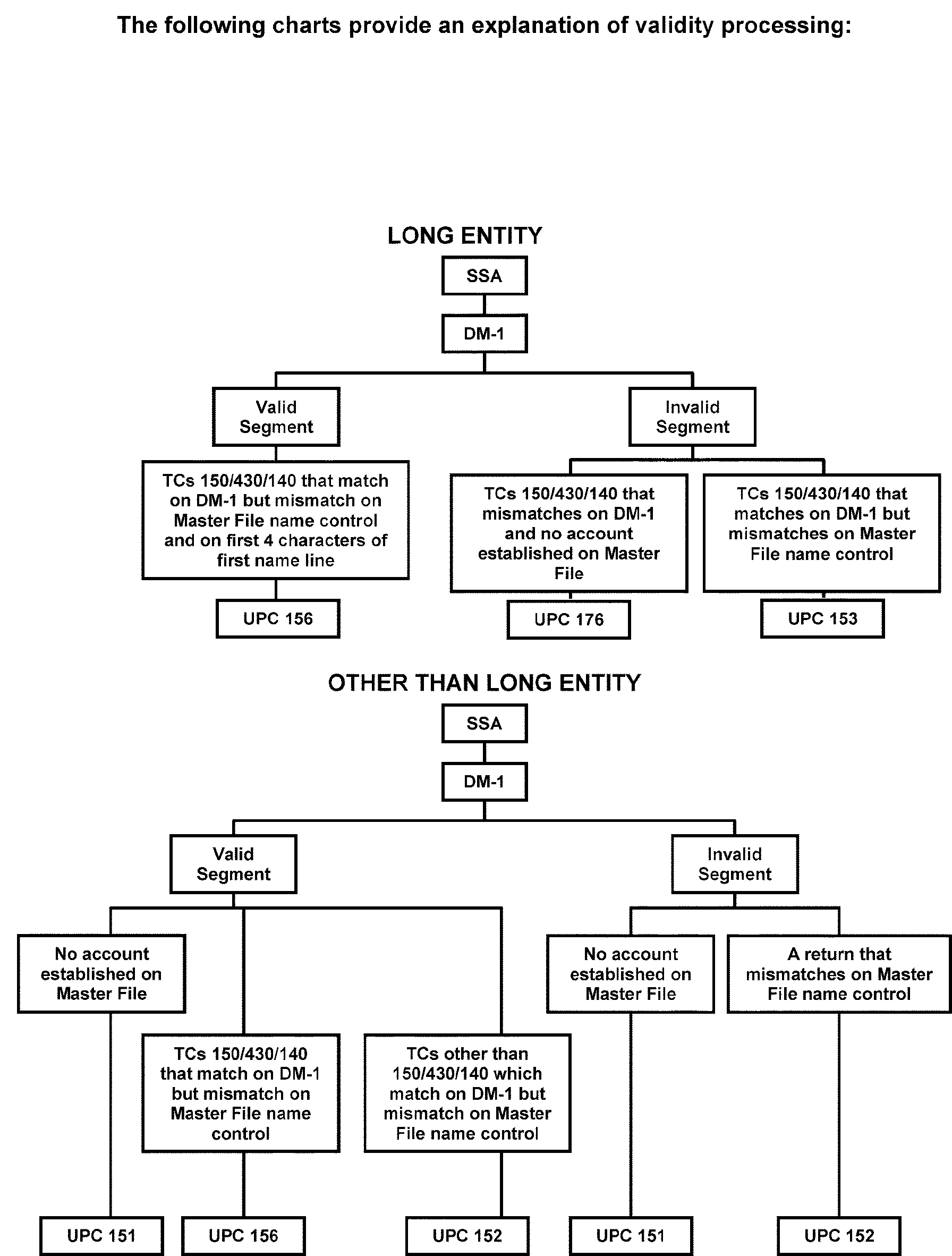
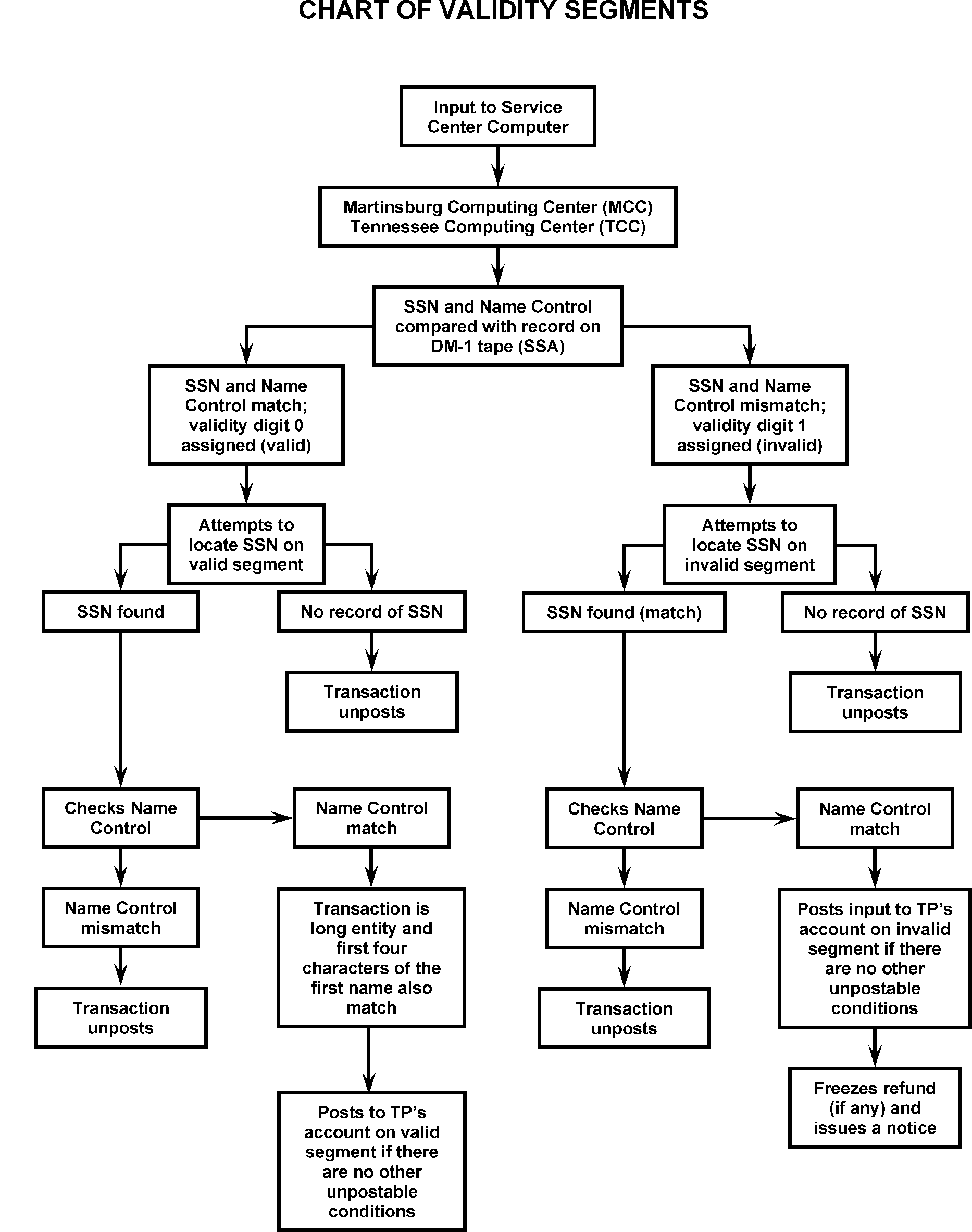
-
The Master File is structured in two segments, valid and invalid for taxpayers who file using SSNs only.
-
The validity of an SSN and Name Control combination is determined by finding a matching SSN and Name Control combination on the Data Master One File (DM-1) or the Accretion File
-
Output from the Master File that contains an asterisk (*) or "W" immediately following the SSN indicates the account is invalid for the SSN and Name Control combination. A validity digit of "1" (IMF) is given. These transactions are directed to the invalid segment of the Master File.
-
The most common reasons for an invalid account number are:
-
The taxpayer did not properly update name with SSA.
-
Transcription errors made by IRS.
-
The taxpayer entered an incorrect SSN.
-
-
Master File is segmented according to SSN validity.
-
Valid numbers will be in SSN sequence followed by invalid numbers in SSN sequence.
-
Two taxpayers can be on the Master File under the same SSN. One taxpayer appears on the valid side of the number. One taxpayer appears on the invalid side of the number.
-
The same taxpayer can be on both the valid and invalid segments of Master File. This occurs when the taxpayer has different Name Controls for different tax periods and has not notified SSA of the name change.
Note:
If the validity indicator of the Unpostable is directing the transaction to the invalid segment of the Master File, and the account is on the valid segment, resolve with URC 6 to add name line and/or Name Control to redirect the transaction to the valid segment. This also applies when account is on the invalid segment.
-
-
If an exact match is not found in the TIN validation process, IMF attempts to find a proximal match on the DM-1 or on the accretion file.
-
See IRM 3.13.5, Individual Master File (IMF) Account Numbers, for information on the issuance of Individual Taxpayer Identification Numbers (ITINs).
-
Command Code MFTRA with Request Type "U" is used to request SSA NUMIDENT transcripts. The NUMIDENT entity information is direct from SSA transcripts. The requested NUMIDENT transcript will be returned in approximately one to three days. The SSA provided information includes:
-
Type of SSN Record on File.
-
The Month, Day, and Year the application or correction was recorded on the SSA File.
-
The Disability Status Indicator.
-
The Name on the SSN card to be used in work/business.
-
The Name on the most recently assigned SSN card, Name at Birth or any other name used, prioritized in that order.
-
Any additional names used.
-
Citizenship.
-
Sex.
-
Date of Birth.
-
Place of Birth.
-
Mother's Maiden Name.
-
Father's Name.
-
-
GUF has implemented validity checks to prevent tax return SSNs out of the range of numbers issued by SSA from attempting to post to the Master File.
-
If the taxpayer has an SSN out of the valid range, GUF will not allow the unpostable to be resolved. It will print "SSN NOT GREATER THAN 001-01-0000" or "FIRST THREE DIGITS OF SSN ARE INVALID" .
-
When the Primary Social Security Number (PSSN) is out of the valid range, perform all "in-house" research. If a valid SSN, invalid SSN, or Internal Revenue Service Number (IRSN) is found, correct the unpostable record with URC 6. If no other number is found, request assignment of an IRSN. The temporary number must be established on the Master File with a TC 000. Close the Unpostable with URC 6 or URC 8 . If the return was processed as "LONG ENTITY," TC 000 is not necessary.
-
Entity Control will send a letter to the taxpayer notifying them of the assignment of a temporary IRSN. They will explain to the taxpayer that the number shown on return is out of the range of numbers assigned by SSA. They will instruct the taxpayer to go to SSA to obtain verification of the number used on the return.
-
Under no circumstances will a taxpayer assigned an IRSN receive a personal exemption and/or EIC. Send a 685C letter informing the taxpayer of the assignment of the IRSN, and URC 8 to Rejects. Request Rejects to remove the taxpayer's personal exemption and/or EIC claimed.
-
When a Secondary SSN (SSSN) is out of the valid range, perform all in-house research. If a valid SSN, invalid SSN, or IRSN is found, correct the SSSN using URC 6.
-
Tax returns received with a Form W-7 attached require special handling regardless of the Unpostable condition.
-
URC 8 the return to Rejects, with instructions to forward to the ITIN office when a Form W-7 is attached for the Primary, Secondary, and/or Dependent(s) and:
-
The Primary, Secondary, and/or Dependent(s) TIN is blank.
-
The Primary, Secondary, or Dependent(s)' TIN edited in red ink is invalid.
-
There is no indication that the return was worked by the ITIN unit (red ITIN number, ITIN rejected stamp, or no W-7 notated).
-
-
If the document has the Primary TIN area edited (illegible or not) with a red ITIN that does not match the name on IDRS or does not show on the valid or invalid side of CC INOLE:
-
Correct any coding or transcription errors pertaining to the Name Control or TIN.
-
Research the ITIN RTS and CC NAMEI and CC NAMES for the correct ITIN.
-
If a valid TIN is not found, suspend the document and forward the return to Entity for an IRSN.
-
-
If the document does not have an indication of a W-7 for the Primary taxpayer, suspend the document and forward the return to Entity for an IRSN.
-
If the document has a “Rejected” stamp from ITIN for the Primary taxpayer, check CC NAMEI and ITIN RTS for a valid TIN. If a valid TIN is not found, suspend the document and forward the return to Entity for an IRSN.
-
If the Primary, Secondary, or Dependent(s) TIN is blank and research using ITIN RTS shows the W-7 is in status S or U, assign an IRSN and resolve the unpostable condition.
-
If the Primary TIN is blank and research using ITIN RTS shows the W-7 in status R2 (rejected; taxpayer has previously assigned ITIN), continue ITIN RTS research for the correct previously assigned ITIN.
-
If the Primary TIN is altered (whited out) by ITIN or written illegibly, research using ITIN RTS and CC NAMEI and CC NAMES for a valid number. If a valid number is not found, suspend the document and forward the return to Entity for an IRSN.
-
Any errors observed in the taxpayer's entity information indicated from a return (TC 150) or taxpayer correspondence must be corrected.
-
If a TC 150 for the same tax period is already posted to both the invalid and valid taxpayer's account, do not input a transaction that will cause the two accounts to merge (for example, TC 011, TC 013, TC 040, or TC 041).
-
Entity Code indicating whether a transaction carries full or abbreviated entity data. The Entity Code is present with the following IMF unpostable and transaction codes. Otherwise the field is blank:
-
UPC 148
-
UPC 151
-
UPC 152
-
UPC 153
-
UPC 156
-
UPC 163
-
UPC 166
-
UPC 171
-
UPC 176
-
TC 140
-
TC 150
-
TC 430
-
-
The following is a list of Entity Codes and their meanings:
Entity Code Values Meanings EC 1 = LONG ENTITY Complete name(s) and address changes entered on a preprinted label or handwritten name and address information. EC 2 = SHORT ENTITY Check Digits or Name Control entered. EC 3 = INTERMEDIATE ENTITY Street address, City, State and ZIP entered. EC 4 = REPEAT UP Results from adding a name line to a prior EC 2 unpostable case. EC 5 = PARTIAL ENTITY Complete name(s) entered. May also include a second name line. BLANK Entity code not significant. -
Filing Status Codes identifies the taxpayer's marital and family situation on Forms 1040, Form 1040-SR, 1040-A and Form 1040-EZ. It is an important factor in determining whether the return is required to be filed, the amount of standard deduction, and the correct tax.
-
The meaning of Filing Status Codes (FSC) are as follows:
FSC Description FSC 0 Single, Filing Declaration of Estimated Income Tax FSC 1 Single Taxpayer FSC 2 Married Taxpayer filing Joint Return FSC 3 Married Taxpayer filing a Separate Return (Spouse exemption is NOT claimed) FSC 4 Head of Household (Claiming Dependent) FSC 5 Widow(er) with a Dependent Child FSC 6 Married Taxpayer filing a Separate Return (Spouse exemption IS claimed) FSC 7 Head of Household (Dependent is NOT Claimed)
-
Establishing an account
-
EC 1 - Release the case after correcting any other unpostable conditions. A long entity record entered in ISRP establishes an account.
-
EC 2, EC 4, or EC 5 - Input TC 000 to establish the account and release in the same cycle the TC 000 is input.
-
EC 3 - If TC 150 or TC 430, add the name line with URC 6. If other than TC 150 or TC 430, input TC 000 and release the case in the same cycle.
-
-
Correcting name on Unpostable record
-
EC 1, EC 4, or EC 5 (TC 140, TC 150, or TC 430 only), correct the name line and Name Control using URC 6.
-
EC 2 or EC 3 - If the Name Control caused the unpostable, correct the Name Control using URC 6. If the Check Digit caused the unpostable to go against the valid segment of IMF erroneously, correct the document by circling out the Check Digit; enter the appropriate Name Control. Release the case using URC 6.
-
-
Correcting name on IMF residing on VALID segment:
-
If taxpayer on valid side has changed name and not notified SSA (no matching Name Control with SSA), input TC 013 on the valid side, URC 0 and cycle delay as needed.
-
If both IMF and unpostable name line are incorrect, input TC 013 to correct IMF. Follow previous correction procedures.
-
If TC 150 or TC 430, add name line (if EC 2 or EC 3) and release using URC 5 (UPC 152, UPC 153, UPC 156, or UPC 157).
-
If other than TC 150 or TC 430, input TC 013 and release unpostable case with URC 0, cycling as appropriate.
-
-
If the transaction is intended for a BMF account, close with URC 8 with instructions to renumber the document. Exception: UPC 198 and UPC 305 can be closed to post to an IMF account and transferred at the same time to a BMF account. Input TC 570 to prevent an erroneous refund.
.-
If the document is a return, attach page one of the correct Form 1041, Form 1065, Form 1120, etc., with the entity section completed. Provide instructions to renumber to BMF and correct EIN, MFT, tax period, and/or Name Control.
-
If the transaction is a payment, other than UPC 198 or UPC 305, prepare a "dummy doc", noting the necessary corrections. Notate the Trace ID on the "dummy doc"
-
-
Correcting the SSN on Unpostable record.
-
Before changing the taxpayer's SSN research to verify the "new" number.
-
If only the PSSN is incorrect, correct SSN using URC 6 unless Schedule SE or Form 5329 is present for the primary taxpayer. If either is present, correct with URC 8.
-
If PSSN and SSSN are reversed or both are incorrect, check for any SE Schedule(s) or Form 5329. If you determine the SSSN is in error, ensure all necessary corrections are made to the account.
-
For any return sent to Rejects with URC 8 (except if cancelling DLN) input TC 599 AC 017 or AC 018 as applicable using the TIN, Name Control, MFT and tax period of the module where the return will post.
-
-
Follow the table below for resolution.
IF... AND... THEN... 1. Form 1040 Schedule SE or Form 5329 present for Primary TP PSSN is incorrect on the return and/or incorrectly transcribed Perfect the document submitted by the taxpayer with instruction to correct the TIN on the entity record, Schedule SE, or F 5329 and close with URC 8. 2. Schedule SE or F 5329 present for secondary TP PSSN is incorrect on the return Perfect the document submitted by the taxpayer with instructions to correct the TIN and close with URC 6. 3. Schedule SE or F 5329 present for secondary TP Both PSSN and SSSN are incorrect on the return Close with URC 8 and request Reject to correct PSSN and SSSN on Schedule SE or F 5329. 4. Schedule SE or F 5329 not present PSSN or SSSN is incorrect on the return Correct the TIN and close with URC 6.
-
First Name Lines:
-
First name lines may be changed using URC 6 if the unpostable record contains EC 1, EC 4, or EC 5, or the FSC change is NOT from single to joint or vice versa.
-
If the IMF name line is correct, enter this name line data from the unpostable record.
-
If the IMF name line is not the correct name line for the transaction, enter the correct name line for the unpostable record. See IRM 3.13.5, for name line validity criteria.
-
Name Control Change—When one or more of the first four characters of the last name are changed, a corresponding change must be made to the Name Control.
-
FSC match—If the name on the return indicates a single taxpayer, do not change the name line to a joint name line. Do not change a joint return name line to a single name line. Correct the unpostable and URC 8 to have Rejects correct the name line and FSC. For example, a return name line PHILLIP WILLOW must not be changed to PHILLIP & SHARON WILLOW except in the case of UPC 166.
-
Maximum length of name line is 35 characters. When space allows, all available information, including middle initial(s), will be entered.
-
A name line can be added to IMF if the unpostable transaction is a TC 150 or TC 430 with EC 2 or EC 3 and the Unpostables Code is UPC 151, UPC 157, UPC 166, or UPC 188, enter the name line with URC 6.
-
IMF Account incorrect—If it is determined that the name on the IMF account is incorrect and the Unpostable Code is UPC 152, UPC 153, UPC 156, or UPC 157 Enter the name line with URC 6.
-
For other UPCs, input TC 013 for correction if on same segment of IMF.
-
If on the opposite segment of the IMF, transfer an account to the valid segment of the IMF with TC 041.
-
-
Integrated Data Retrieval System (IDRS) is a computer system with the capability to retrieve and update stored information of taxpayer's accounts such as name lines on Master Files. Research of IDRS is performed through the use of various Command Codes (CCs)input via an IDRS terminal. Some of the most common CCs used for researching name lines are as follows:
IDRS Command Code Use CC ENMOD Displays entity data for a specific TIN. CC IMFOL Researches the Individual Master File On-Line for entity and tax data information posted to the Master File. CC INOLE Researches the NAP for verification of TIN and Name Control and primary name combinations. CC NAMES Is a nationwide search and will be performed to match the data entered from the information in the National Account Index (NAI), and return the SSNs of possible matches.
-
If the proposed name line input exceeds the 35 - character/space limit, use the information following as a guideline to reduce the taxpayer(s) name to fit the allowable 35 - character length:
Note:
Follow the applicable steps until the name line fits the 35 - character space constraint, discontinue following the remaining steps.
-
Substitute the appropriate initial for the secondary taxpayer’s middle name.
-
Delete any middle initial(s) of secondary taxpayer.
-
Substitute the appropriate initial for the primary taxpayer’s middle name.
-
Delete any middle initial(s) of primary taxpayer.
-
Substitute the appropriate initial for secondary taxpayer’s first name.
-
Substitute the appropriate initial for primary taxpayer’s first name.
-
Abbreviate the secondary taxpayer surname by removing the vowels (begin with the vowels at the end of the secondary taxpayer’s surname first).
.
Example: O'Sullivan becomes OSullivn or OSullvn (if necessary) -
If further reduction of the name line is still needed, abbreviate the primary taxpayer’s surname as the last step by removing the vowels (begin with the vowels in the end of the primary taxpayer’s surname). Example: Sorrentino becomes Sorrentin, or Sorrentn (if necessary).
-
-
If the taxpayer's surname is less than four alpha characters, use the instructions in Document 7071, Name Control Job Aid for Individual Master File (IMF) Taxpayers.
-
See IRM 3.13.5.120.5, Reducing the Length of Taxpayers Name for additional instructions to correctly "shorten" the taxpayer’s name(s).
-
Research for better SSN(s) or Name Control(s)
If ... Then ... 1. Better SSN(s) and/or Name Control found based on matches from CC TRDBV or CC IRPTRL URC 6 and make corrections. 2. Taxpayer changed name and made prior year payment URC 6 to post payment to Master File Name Control. 3. The taxpayer's account is established on the valid side, but the taxpayer has changed name to an invalid Name Control and filed an extension, the most current year return or an estimated payment Input a TC 013 on the VALID segment using the year of the unpostable transaction (may need CC ACTON on CC ENMOD to correct the Name Control on the dummy entity to match DM-1). URC 0 and cycle delay as needed. 4. If extension, estimated payment or TC 150 and the taxpayer's account is established on the valid side and the taxpayer has changed name AND updated name with SSA so the unpostable Name Control is now valid Input a TC 013 on the VALID segment using the year of the unpostable transaction. URC 0 and cycle delay only if necessary. 5. If the taxpayer's account is established on the valid side, and the taxpayer is filing a return prior to the most current return filed and with a different Name Control Input a TC 013 for the year of the unpostable with post delay "4". Close case with URC 6 to force post name line to Master File Name Control. (account will not be resequencing, cycle delay only if necessary) 6. If the unpostable case is addressing the invalid segment but the account is now on the valid segment URC 6 so the transaction will post to the valid segment. 7. Account was established on the invalid side on Master File but with a valid SSA Name Control Input TC 041 with the correct information, URC 0 or URC 6 as appropriate and cycle delay as needed. 8. Entity is not on Master File and no better SSN and/or Name Control is found, but information is available to establish account on Master File Input TC 000 to the invalid segment for the tax year of the document. Close with URC 0 with Definer B, and cycle delay as needed, unless taxpayer is claiming EIC and/or Personal Exemptions. URC 8 these cases to Rejects and request Personal Exemptions (2017 and prior years only) and/or EIC removed. 9. Complete name is available but address is not found Check for attached Form W-2. Input a TC 000 using the address information found to establish the account. If no address is found, input TC 000 using the campus address. Close with URC 0 with definer B, and cycle delay as needed. 10. TC 29X URC 6 to the Master File Name Control.
-
TC 000 is used to establish a taxpayer's account on the applicable Master File.
-
The following information is necessary to establish the taxpayer using the CC INCHG screen:
-
Name Control
-
Primary Taxpayer Name
-
Spouse's Name (if taxpayer is filing Married Filing Jointly)
-
Entire address
-
Year Digits
-
Filing Status Code (FSC)
-
Spouse's SSN, if available
-
Remarks
-
-
Do not attempt to input a TC 000 for an ITIN or an IRSN, as this creates repeat or additional unpostables.
-
When entering a name change (TC 013) to update and correct a joint return filer, it is important to ensure the joint names are in the proper format for the issuance of notices and overpayments.
-
If joint filers require a notice, two notices are issued (one to the primary taxpayer and another to the secondary taxpayer).
-
Although Form 1040, Form 1040-SR consists of two lines for entering joint names, Master File is limited to ONLY one line for the "Primary Name Line" .
-
Master File's Name Line field must never exceed 35 characters/spaces. It is imperative that the name line information is contained in the first name line ONLY. When space allows, all available information, including middle initial(s), will be entered.
-
Examples of properly input name changes are shown below. Bold print indicates the primary Name Control.
Tax Return Input format for joint filers CC ENMOD display 1. John Duck
Mary DuckJOHN & MARY]DUCK JOHN & MARY DUCK (JOHN DUCK & MARY DUCK) 2. John Duck
Mary SwanJOHN]DUCK]& MARY SWAN JOHN DUCK & MARY SWAN 3. John Duck
Mary Swan-DuckJOHN]DUCK]& MARY SWAN-DUCK JOHN DUCK & MARY SWAN-DUCK 4. John D Duck
Mary Ann Swan-DuckJOHN D]DUCK]& MARY ANN SWAN-DUCK JOHN D DUCK & MARY ANN SWAN-DUCK 5. John D Duck III
MaryAnn L SwanJOHN D]DUCK]III & MARYANN L SWAN JOHN D DUCK III & MARYANN L SWAN 6. John Duck Jr
Mary DuckJOHN JR & MARY] DUCK John Duck Jr & Mary Duck 7. John Duck III
Mary SwanJOHN ]DUCK III & MARY SAWN JOHN DUCK III & MARY SWAN Notes The ampersand (&) indicates to Master File that the information following is the Secondary taxpayer's name. The brackets (]]) indicate to Master File that the information contained within is the Primary taxpayer's surname on the account when a joint name line is entered. The bracket (]) is interpreted as a space. Do not type blank spaces immediately before or immediately after the brackets when entering name line information. However, a blank space is always required immediately following the ampersand when entering JOINT filer information. Always enter suffixes, Jr. or Sr. when shown on the document. -
If the primary and secondary names exceed 35 characters/spaces, see IRM 3.13.5.120.5, Reducing the Length of Taxpayer Names and IRM 3.13.5.120.10 for Inputting Name Changes for Married Filling Jointly (MFJ) Taxpayers, or Name Control Job Aid for Individual Master File Taxpayers, for additional information.
-
Generally, TC 040 is used when a taxpayer has a name change but has not updated with SSA to display the new Name Control. The taxpayer will be on the valid side with an invalid SSA Name Control, and will need to be moved to the invalid side with TC 040.
-
TC 040 is used to change the name and/or TIN of the taxpayer's account that resides on the valid segment of IMF. If the Name Control input does not match the DM-1, TC 040 will move the account to the invalid side.
-
TC 041 is used to change the name and/or TIN of the taxpayer's account that resides on the invalid segment of IMF. Often used to move new ITIN's to the valid segment before the DM-1 quarterly merge.
-
TC 040 and TC 041 do not go through DM-1 validation processes. These TCs will not be used unless IMF established the taxpayer incorrectly or the taxpayer provides "proof" of their identity through copies of marriage certificates, divorce decrees, legal documents showing a name change, etc.
-
Before entering a TC 040 or TC 041, thoroughly research the taxpayer's account using CC INOLES. If necessary, request a NUMIDENT for the taxpayer using CC MFTRA U to determine the most recent and all the SSA name controls reported by the taxpayer.
-
Information needed to complete a TC 040 or TC 041 is listed below:
-
New Name Control
-
Primary Name Line (All Name Lines for TC 040)
-
Year Name Line
-
New TIN, if necessary
-
Description of change in the REMARKS field.
-
Refer to IRM 3.12.179.9.9 , for additional information on IMF Name Changes TC 013.
-
-
When inputting TC 041, for the YEAR-NM-LINE> field in CC INCHG, use a later year where nothing is posted.
-
If the account is established on the valid segment with an invalid Name Control, input TC 040 to resequence the account. See IRM 3.12.179.9.10 for additional information on IMF Name Changes TC 40 and TC 41 Resolution When SSN(s) Address Invalid Segment of Master File, URC 0 and cycle delay as needed.
-
If the unpostable case is addressing the invalid side and a TC 041 is being input to the unpostable TIN, close with URC 6 and add Name Control and name line and cycle delay as needed.
-
Individual Master File (IMF) completes a special process to establish the secondary taxpayer on Master File for all Married Filing Joint (FSC 2) accounts. In this automated process, IMF separates the secondary taxpayer from the primary taxpayer account and systemically establishes a separate account on Master File.
-
the SSSN is invalid or not available,
-
DECD is present in the Secondary Name Line,
-
PSSN is the same as the SSSN,
-
or Spouse name in the FSC 2 or FSC 7 name line is missing.
-
-
The accounts systemically established by IMF will display Transaction Codes with a unique DLN of XX263-001-88888-X. The transaction code(s) may be a combination of TC 000, TC 01X, or TC 971 with Action Code (AC) 050 to change the BOD code.
-
Unpostable Codes UPC 151, UPC 152, UPC 153, or UPC 156 resulting from this systemic process require input of TC 040 (valid side) or TC 041 (invalid side) to bypass the NAP and correct the secondary taxpayer's name.
-
See IRM 3.13.5, Individual Master File (IMF) Account Numbers for additional information.
-
The term Non-Return Related Civil Penalties refers to civil penalties not assessed in a return tax module using the tax return MFT Codes. The Non-Return Related Civil Penalties are assessed on the IMF Master File in the regular taxpayer account using a unique Civil Penalty MFT Code (MFT 55 for IMF). The Civil Penalty tax modules are additional tax modules in an account sharing the same taxpayers' entity information with the tax return modules in the account.
-
All Non-Return Related Civil Penalties assess on IMF will be assessed against the individual responsible. MFT 55 does not accept joint assessments. The penalty for filing a frivolous return may be assessed on MFT 55 if the frivolous return was filed by a single person. If the frivolous return was filed jointly, the penalty must be assessed jointly using Non-Master File procedures.
-
To establish a separate penalty name line, use an IMF entity change (CC INCHG to generate a TC 013).When using this procedure, only the civil penalty name line change may be input. No other entity change information is permitted. Information to otherwise update the entity, such as an address change, will be input before establishing the civil penalty name line. When using this procedure, the Civil Penalty Name line and Master File Name line must be an exact match including first, middle (if applicable), and last name. This means that if the name does not show on IDRS, thorough research will be necessary.
-
This subsections contains information about decedent taxpayers accounts.
-
The sensitive nature of these returns requires special procedures to ensure that the proper person receives the refund check when there is an overpayment.
-
An Individual Income Tax Return (Form 1040 family) must not be allowed to post if the taxpayer died in a year prior to the Tax Year of the return, regardless of the type(s) of income being reported or credits being claimed.
-
Research the primary and secondary TINs, using CC INOLES, to determine the Date of Death (DOD).
-
If the taxpayer was deceased prior to the beginning of the tax period of the return, URC 8 to have Rejects renumber the return Form 1040 and send to BMF Rejects for conversion of F 1040 to F 1041. Include a copy of the first page of Form 1041 with the Entity section filled in.
IRM 3.12.37.30, Transshipping Returns. -
If the taxpayer died during or after the tax period of the return, follow the procedures below.
-
Decedent returns must have a Date of Death (DOD). If there is no Form 1310, correspond with a 12C letter and suspend the case (CC UPCASSC).
Note:
Form 1310 is not required for the surviving spouse when the Filing Status is FSC 2, if no refund is claimed or ≡ ≡ ≡ ≡ ≡ ≡ ≡ ≡ ≡ ≡ ≡ ≡ ≡ ≡ ≡ ≡ ≡ ≡ ≡ ≡ ≡ ≡ ≡ ≡.
-
If the reply to the 12C letter includes the requested information, input CCC F (Primary), CCC 9 (Secondary), or CCC A (Both) if the respective taxpayer(s) died during the tax year. Cycle delay the case as appropriate. Make sure "DECD" is entered in taxpayer's entity. Attach Letter 12C to return when the reply is received with a Form 1310 or court certificate attached. Examples of properly input decedent name line entries shown below. Bold print indicates the primary Name Control.
Situation Input Format for Deceased Filers 1. Single Name JOHN<DUCK<DECD 2. Single Name with suffix JOHN<DUCK<JR DECD 3. Joint Name Line, Same Last Name, Primary Deceased JOHN DECD & MARY<DUCK 4. Joint Name Line, Different Last Name, Primary Deceased JOHN<DUCK<DECD & MARY SWAN 5. Joint Name Line, Same Last Name, Secondary Deceased JOHN & MARY DECD<DUCK 6. Joint Name Line, Different Last Name, Secondary Deceased JOHN<DUCK<& MARY SWAN DECD 7. Joint Name Line, Same Last Name, Both Deceased JOHN DECD & MARY DECD<DUCK 8. Joint Name Line, Different Last Name, Both Deceased JOHN<DUCK DECD & MARY SWAN DECD -
If there is No Reply or the reply is incomplete (for example, not present or signed, date of death missing, or proper payee cannot be determined), close refund returns with URC 8. Route to Rejects indicating that CCC "3" and CCC "U" must be input. Enter "No Reply from Letter" or "Incomplete Information Received Letter" in "Remarks" . Attach a copy of 12C letter to return.
-
If there is no reply or the reply is incomplete (for example, not present or signed, date of death missing, or proper payee cannot be determined), close with URC 6 adding CCC "U" .
.
-
-
The TC 971 AC 524 is an identity theft indicator used to lock the account of deceased taxpayers. It prevents a deceased taxpayer's TIN (SSN or ITIN) from being used as the primary or secondary TIN on a current or subsequent year federal income tax return. See IRM 25.23.2.8.4, Locking Individual Accounts - Transaction Code (TC) 971 Action Code (AC) 524 and IRM 25.23.2.8.4.2 , Locking Individual Accounts – Decedent Accounts. TC 971 AC 524 is posted to IDRS on CC ENMOD. Do NOT update the date of death on a decedent account with TC 971 and AC 524 - Locking of a deceased taxpayer's account. The TC 971 AC 524 indicator is applied systemically and manually to the account and prevents a return from posting in a year subsequent to the year of death. For example, Date of Death 3/15/2023, a return for TY 2023 will post but a return for 2024 will not be allowed to post. The TC 971 AC 524 prevents an original TC 150 tax return from posting. When a tax return is rejected a CP 01H, Identity Theft Lock, notice is mailed to the taxpayer. The Identity Protection Specialized Unit (IPSU) toll-free number 800-908-4490 is on this notice. Refer to IRM 21.6.6.2.21.3, CP 01H Notice or Letter 12C Decedent Account Responses.
-
If the return has filing status 5 checked, and the spouse's date of death is more than two years prior to tax year of return and
-
There is a dependent child, URC 8 to change the filing status to FSC 4.
-
There are no dependent children, URC 8 to change the filing status to FSC 1.
-
-
If the return has a filing status other than FSC 2, has two names on name line and decedent's date of death is within tax period, (children not a factor), URC 8 to change the filing status to FSC 2.
-
If the return has filing status FSC 5 checked, and there is only one name on the name line, and the spouse's date of death is within the tax period covered by the return, URC 8 to change to FSC 2, and include DECD in the name line.
-
"DECD" must be entered after the taxpayer's last name (after any existing suffix).
-
Always enter a second name line, if available. On overpaid returns, a second name line is mandatory. The refund is issued to the person(s) whose name(s) is shown on the second name line. If the proper payee cannot be determined, correspond using a 12C letter to the "Estate of ..." .
-
Include the suffix for any name indicating a court-appointed personal representative, such as: Administrator, Executor, Administrative Exec., Trustee, etc.
-
The second name line must not include any suffixes such as "surviving spouse" , "mother" , "father " , "daughter" , "son " , etc.
-
For more specific procedures, refer to IRM 3.11.3, Individual Income Tax Returns (Returns and Documents Analysis), and IRM 3.12.3, Individual Income Tax Returns (Error Resolution).
-
An IRSN is a temporary number assigned by the Entity Control Unit (ECU) for use when a TIN is needed to process the taxpayer return. An IRSN is used only as an internal identifying number if the taxpayer has not been assigned an SSN or ITIN or their SSN/ITIN was not located through research. Assignment of an IRSN is only requested after complete research to locate a valid TIN is conducted.
-
IRSNs display in the same format as a regular SSN with a few exceptions.
-
All IRSNs begin with 9 and have an asterisk * at the end since the IRSN is invalid. Example: 9XX-XX-XXXX*
-
The fourth and fifth digits indicate the campus that assigned the IRSN
-
-
Form 9956, Request for Temporary SSN, is used to request an IRSN and is available on the Publishing Service Web page as a "fillable" form.
-
If a valid TIN is not found, suspend the document and route the Form 9956 , Request for Temporary SSN to Entity Control Unit (ECU).
.Campus ECU Mail Stop Austin AUSC - 6182 Kansas City KCSC - 6273 Ogden OSC - 6052 C-1 -
Entity Control Unit (ECU) will send a Letter 0685C or Letter 0685SP to the taxpayer notifying them of the assignment of a temporary IRSN. They will explain to the taxpayer that the number shown on return is out of the range of numbers assigned by SSA. They will instruct the taxpayer to go to SSA to obtain verification of the number used on the return.
-
The taxpayer or the fiduciary must be notified when the IRSN is established by sending a Correspondex Letter 0685C, Social Security Number (SSN) Invalid, or the Spanish version Letter 0685SP, Social Security Number (SSN) Invalid - Spanish Version, to inform the taxpayer of the IRSN issued during the processing of their tax return. It also instructs the taxpayer to use the number ONLY on IRS tax-related correspondence or during IRS phone contact and to not use this number for any other purposes (e.g., driver’s licenses, banking identification, etc.).
-
If the Unpostable case is a TC 150 without claiming EITC or personal exemption, or any other TC, close the case with URC 6 to correct the TIN.
-
Under no circumstances will a taxpayer assigned an IRSN receive a personal exemption, tax credits or refundable credits; for example child tax credit, EIC, etc. If personal exemption or EITC is claimed and an IRSN is used on a TC 150, close with URC 8 to Rejects to remove the personal exemption(s) claimed and any credits that are not allowed.
-
This subsection contains information about the document request procedures and Form 4251.
-
The Generalized Unpostable Framework (GUF) automatically generates Form 4251 each cycle for all Master File, and it routes to Files. Specific Category Codes (CATs) on unpostable cases require the return or document (or information from these records) to resolve the unpostable condition.
-
If the document has already been retired to the Federal Records Center (FRC), Files will route the Form 4251, Return Charge-Out, to the FRC.
-
See IRM 3.12.32.5, for specific Unpostable Category Code(s) criteria.
-
Form 4251 are also generates for certain auto-closed unpostable records that may require follow-up action by the originator.
-
See IRM 3.12.32.13, Automatic Closures by the GUF System, for additional information on Form 4251 for auto closures.
-
See IRM 3.12.32.19, Form 4251, Return Charge-Out for detailed information on Form 4251 and an example of the form.
-
See IRM 3.12.32.19.1, Routing of Form 4251, Return Charge-Out, Files Routing Chart for detailed routing information.
-
GUF automatically generates Form 4251 on electronically filed returns and they should not be sent to Files.
-
Subsequent requests for electronically filed returns via CC UPCAS or CC ESTAB should not be submitted. All electronically filed returns can be accessed through the Employee User Portal (EUP) Login. Electronically filed returns can be identified by campus specific File Location Codes (FLCs), found in the first two digits of the DLN. Additional information for identifying these returns can be found on the SERP 6209 website.
-
The Modernized Tax Return Database (M-TRDB) is the official repository of record for all electronically filed tax returns. Electronic returns can be identified by the first two digits (File Location Code or Campus Code) of the unique DLN assigned to each Campus. SERP - Campus and File Location Codes - Section - 4 - 6209 (irs.gov)
-
Command Code (CC) TRDBV is used to gain read only access to tax return data stored on TRDB. See IRM 2.3.73, Command Codes TRDBV, TRERS, TRPRT, and R8453.
-
If the case can be closed using Microfilm Replacement Systems (MRS), CFOL and/or IDRS a second request is not necessary.
-
If the document was filed by paper or electronically, attempt to correct the unpostable by using the data on the Form 4251, Return Charge-Out, and research using IDRS Command Codes, or any available listings. If the Tax Examiner cannot resolve the unpostable, they must make additional requests for documents filed by paper for the unpostable return or document.
If... And... Then... 1. TC 150, TC 460, TC 670 (with zero money amount) FLC 20, FLC 21, FLC 75, FLC 76 and Julian Date greater than 400. For example, DLN: 76221-456-07000-2 Refer to SERP 6209 for Campus and File Location Codes Campus. SERP - Campus and File Location Codes - Section - 4 - 6209 (irs.gov) research EUP. 2. Paper filed returns that are digitally scanned and then processed through MeF by the IRS and have FLC 37, FLC 40, FLC 42, FLC 44, FLC 75, FLC 86, FLC 91, or FLC 92 research EUP. 3. Payments FLC other than FLC 20, FLC 71, or FLC 74 TC 610, TC 670 (with money amount), estimated payment TC 430 or (TC 660) research RTR. 4. TC 610 with Doc Code 17, Doc Code 19, Doc Code 70, or Doc Code 79 a remittance amount is reflected the payment was processed through ISRP or Lockbox research the voucher using RTR procedures. 5. Doc Code 51 UNLESS the Manual Assessments is older than five years of the current tax period. reach out to ACO POCs under “Manual Assessment Contacts” for the applicable campus for a copy of Form 2859 and Form 3552. Financial Management, Revenue Accounting. For Form 3413 please reach out to the ERRF unit. 6. Any UPC TC 000, TC 013, TC 290, TC 531, TC 571, TC 971, and TC 972 proceed without the document. 7. If Doc Code 54, Doc Code 63, and Doc Code 77, except revenue receipts, bankruptcy and TC 150s that cannot be resolved by the primary request void to the originator (CC UPRES with URC 2, with appropriate Nullification Code IRM 3.12.32.14. Indicate in remarks “Doc not available”. 8. PMF Unpostables request the Form 1096 via ESTABSD. 9. If the unpostable can be closed without the document include “CLSD-NO DOC” in the remarks. -
Work without the document but document request if needed:
-
TC 610, TC 660, TC 670, and TC 430 with money amount - FLC 20, FLC 71, or FLC 74.
-
Paper TC 150 – For example UPC 157 RC 2 and UPC 197 RC 0.
-
-
Primary Requests:: Tax Examiners will receive Form 4251 with the return/document if located in Files or Form 4251 with no document, indicating Files could not locate the return or a document is not needed. If the document has already been retired to the Federal Records Center (FRC), files will route the Form 4251, Return Charge-Out, to FRC.
-
Form 4251 received indicates the return is charged out to another area AND the return is needed to close the unpostable, Unpostables will contact that area to secure the return OR a copy of the return. If the area indicates they no longer have the return follow the document request procedures.
-
For Statute Period Returns- If Unpostables cannot secure or locate a return or document within 10 workdays of the ASED, the following procedures should be followed:
-
Return - prepare a “dummy” return and forward to Statutes. Statutes can assist in preparing the “dummy” return.
-
Document - Forward a copy of CC TXMOD / CC TXDLN, CC UPRES, and Form 4251 to Statutes for a quick/prompt assessment.
-
-
Before initiating any additional requests for the document, the Tax Examiner assigned to the unpostable case will attempt to correct the unpostable by researching:
-
Form 4251 information.
-
IDRS Research including Command Code TRDBV.
-
Employee User Portal (EUP) if the tax return or extension was filed electronically.
-
Remittance Transaction Research (RTR) system. Example: If the unpostable case is a TC 610, TC 660, TC 670 or TC 430 with Document Code 17, 19, 20, 70 or 76 and a remittance amount is reflected, the payment was processed through ISRP or Lockbox.
-
-
Criminal Investigation case (CI) - If the missing document is a CI case (Category A1/A2), CI will determine the necessary case resolution after all attempts have failed to locate the unpostable record. Category A1 records may be closed to Rejects if so. determined by CI.
-
If a bankruptcy (GUF category Z1 or Z2) case and document is unavailable, process the case per the Bankruptcy Listing guidelines and the Category Z1 and Z2 procedures in IRM 3.12.179.56, UPC 171 RC 0 - RC 4 Bankruptcy.
-
Input CC UPRES with URC 2 to void to the originator all unpostable cases with the exception of revenue receipts, bankruptcy and TC 150s that cannot be resolved by the primary request. Input ″Doc not available″ in remarks. No other action is required.
-
If unable to resolve the unpostable without the document and all research has been performed see IRM for “Secondary Document Request” .
-
A secondary Requests will be made by the Tax Examiner if the document was not initially located in Files or the Federal Records Center (FRC) by using CC UPCASD2. Take the following action:
If... And... Then.... 1. Document is received from Files resolve UPC per IRM. 2. Doc Code 47 research Microfilm Replace System (MRS). 3. The unpostable record is a return (TC 150) check for posted re-filed DLN (Doc Code 47 or Doc Code 54) a re-filed DLN is identified request this DLN using CC ESTAB. The return should be attached. 4. The unpostable case cannot be closed all research has been performed and none of the above condition apply Initiate the second request after 15 work days (21 calendar days) from the date the document searched in Files. Input CC UPCAS, with definer D and definer-modifier 2 to request the missing document. Refer to IRM 2.3.17, Command Code ESTABD, for procedures for requesting documents. -
Input a second request only for original returns (TC 150 or TC 976), revenue receipts that cannot be viewed in RTR (Doc Code 17, Doc Code 18, Doc Code 19, Doc Code 20, Doc Code 70, or Doc Code 76), or extensions of time to file (TC 460 or TC 670 without remittance).
-
A third requests will be made by the Tax Examiner if the document was not located for the second request by using CC UPCASD3. Take the following action:
If... And.... Then.... 1. Document is received from Files Resolve UPC per IRM. 2. Document is not received and all research has been performed the case cannot be closed without the document Initiate the third request 15 work days (21 calendar days) from the date the document searched in Files. Input CC UPCAS, with definer D and definer-modifier 3 to request the missing document.
-
CC ESTABDO Request Input CC ESTABDO between the third and fourth request.
If... And... Then... 1. Document is received from Files Resolve UPC per IRM. 2. Document is not received and all research has been performed the case cannot be closed without the document Initiate another request using CC ESTABDO 15 work days (21 calendar days)from the date the document searched in Files. see “Procedures Fourth Document Request
-
Input a Fourth Request after all prior requests have been submitted and the document not received AND all research has been exhausted and it has been determined that the unpostable cannot be resolved without the documents.
IF... And... Then... 1. Document is received from Files Resolve UPC per IRM. 2. If the unpostable records is a return (TC 150), check for a posted re-filed DLN (Doc Code 47 or Doc Code 54). and a re-filed DLN is identified, Request the re-filed DLN using CC ESTAB. If a document is not received 15 workdays (21 calendar days)from requesting the re-filed DLN then follow item 2 below. 3. The return is a non-remittance return, the routing slip Form 8749 instruct Rejects to cancel the DLN and prepare Form 6752. 4. The return is a remittance return, the routing slip Form 8749 instruct Rejects to route the payment to the Unidentified function using CC NWDLN, and prepare Form 6752 to route to Files. Note: These procedures do not apply to Bankruptcy (Category Z1 and Z2) returns that cannot be located. 5. other than original return or extension of time to file (TC 460 or TC 670), prepare a “dummy” return or document when routing to Rejects for Doc Code 17, Doc Code 18, Doc Code 19, Doc Code 24, Doc Code 34, Doc Code 45, Doc Code 48, Doc Code 58, Doc Code 70, or Doc Code 76 only. 6. The unpostable case cannot be closed all research has been performed and document has not been located Initiate the fourth request workdays (21 calendar days) from the CC ESTABDO request. -
Input a fourth (4th) request using CC UPCAS definer code D and definer modifier code 4th enter “FOURTH REQUEST-SPECIAL SEARCH” and the employee number in the remarks area.
-
Prepare and attach a Form 8749, Unpostable Routing Slip, to the original Form 4251 notating “Unable to locate the document” or unavailable if potential statute or credit return interest return-expedite case and attach the second or third requests if the first is not available.
-
Attach all background research information (copy of UPCAS, unpostable listing highlight case or local use research form, old charge-out) and correction data, if possible, to the Form 4251 and Unpostable Routing Slip Form 8749.
-
GUF will automatically close the case to Rejects using URC 8 with the input of CC UPCASD4
-
-
Procedures for Missing Documents The following procedures must be followed after all attempts to resolve the unpostable condition(s) and the document has not been located.
If... Then the Unpostable unit will: 1. Remittance with extension (TC 460) complete Form 4868 and close with URC 1 to void DLN and route the document to Files. 2. Doc Code 17 (except TC 460 non-remittance, Doc Code 18, Doc Code 19, Doc Code 70, or Doc Code 76) research for correct account where payment should be applied. If found, correct to post correctly, if payment must be renumbered, URC 8 and prepare "dummy" Form 3244. If unable to locate correct module, URC 8 and prepare "dummy" Form 3244 to be routed to Unidentified Unit. 3. Doc Code 17 (TC 460 or TC 670 non-remittance) Research for corrective action. If unpostable cannot be corrected close with URC D, and route to Files. 4. Doc Code 24, Doc Code 48, or Doc Code 58 Research to determine where debit or credit should post. If corrective action cannot be made, URC 6 or URC 8 to offset the transaction ("reverse the credit transfer " ), prepare "dummy document" (if necessary) with corrections and notate "Process as Corrected" . If unable to determine opposite side of credit transfer and credit side is unpostable, transfer account to Unidentified. If debit side, transfer to 1510 Account. 5. Doc Code 34 (Debit side) Research for corrective action. If unpostable cannot be corrected close with URC 2, and route to originator. 6. Doc Code 34 (Credit side) Research for corrective action. If credit cannot be resolved, apply to the account where the debit posted and route to originator. 7. Doc Code 45 Research to determine where debit or credit should post. If corrective action cannot be made, close with URC 1. Prepare Form 3245 for credit unpostable and transfer to Unidentified Account. Debit should be transferred to the 1510 Account. 8. Doc Code 52 Research for corrective action. If unpostable cannot be corrected close with URC 2, and route to originator. 9. Doc Code 87 Research to determine where debit should post. If both sides are unpostables, associate the two cases together and close with URC 6. If unable to correct, close with URC 1 to Accounting Dishonored Check Function (DCF) . 10. Doc Code 97 Federal Tax Deposit (FTD) Research for correct account. If found, correct payment to post to correct account using URC 6. If unable to locate correct account, close with URC 1 and prepare credit side of Form 2424. Route to Accounting.
-
This subsection include information on Unpostables Resolution Codes (URCs), Form 8749, Nullification Codes and Automated Closures by GUF, Duplicate and Cancelled DLNs, Correspondence Procedures, TC Input Timing and Cycle Delay Rules.
-
The following section provides the individual unpostable resolution procedures and guidelines for all IMF cases with Unpostable Codes (UPCs) in the range 126-299.
-
If the original condition has been resolved, no additional research is needed, close URC 0.
-
Unless an Unpostable condition is caused by an obvious error such as a transcription or coding error, research is required. The most common research tools available are IDRS Command Codes, IDRS Computer (ECC-MTB) Transcripts, the Closed Register, Unpostable Reports, RTR system, the ITIN system, and MeF.
-
Before releasing an Unpostable case, review the account to ensure the Name Control, TIN, Filing Requirement and Year/Month are correct. Identify and resolve all unpostable conditions which could result in repeat or incorrect posting of unpostable conditions.
-
Occasionally cases that are identified as "Auto-Closed (URC 2)" do not get closed by the system. This occurs when the record does not contain a significant IDRS employee number. These will have to be manually closed with URC 2 or D as appropriate.
-
The valid range of Unpostable Resolution Codes is URC A, URC D, URC 0 (zero), URC 1, URC 2, URC 5, URC 6, and URC 8. These resolution codes may be used by the Unpostable, Appeals, Examination, Statute, Fraud Detection and Taxpayer Protection Program (TPP) functions when using CC UPRES to work unpostable cases assigned to their area.
-
For a compiled listing See IRM 3.12.32.12, Unpostable Resolution Codes.
-
CC UPRES:
-
The following provides the URC validity checks for CC UPRES, including the valid Master Files:
IMF IMF MFT 29 PMF A A A B — — D D D 0 0 0 1 1 — 2 2 2 5 — — 6 6 6 8 8 (except TC 150) — -
These Master File and URC combinations are subject to additional validity checks for each URC depending on the type of IMF or PMF record and the unpostable category criteria.
-
CC UPRES must meet all the validity checks for input of the URC actions as CC definers and CC definer modifiers.
-
-
CC UPCAS:
-
To use CC UPCAS, input CC UPDIS with an Unpostable cycle sequence, which brings up the UPRES screen. Overlay UPRES with CC UPCAS with the appropriate definer and definer modifier, if applicable.
-
Use CC UPCASD2 and UPCASD3 to make second and third document requests from Files.
-
Use CC UPCASSA to suspend a case awaiting further action. Input remarks to indicate why case is being suspended.
-
Use CC UPCASSC to suspend a case when waiting for a reply to correspondence.
-
Use CC UPCASZ to input a history item. This can be used to provide information needed in order for the assigned tax examiner to work the case. This is especially useful for related cases in other service centers. Please refer to the IMF Unpostables Job Aid 2526-701 for an example of CC UPCASZ.
-
-
CC UPBAT:
-
In addition to CC UPRES for individual closings, CC UPBAT is used for multiple cases being resolved with the same URC. However, the CC UPBAT URC actions are not directly updated. They are generated into each resolved record during end-of-day (EOD) processing. Each closed batch record has the generated URC applied to the record via a definer code if all the cc validity checks are met.
-
URC D, URC 0, URC 1, URC 2, or URC 8 are valid for CC UPBAT batch closures.
-
CC UPBAT URC batch resolution actions will only validate cases with a campus or "unit" type employee number during EOD processing. Cases assigned to an INDIVIDUAL employee number will be rejected and appear on the Rejected Activity Listing.
-
If URC D, URC 1, URC 2, or URC 8 is used and remarks are not entered, GUF will not accept the correction and will display error messages.
-
Always enter a Nullify Area Code with URC 1, URC 2, or URC 8 to indicate the function that will resolve the case. See IRM 3.12.32.18.2, CC UPBAT- Screen Formats, or IRM 3.12.179.11.3 , Nullification Codes and Automatic Closures.
Note:
The system will not accept previously input remarks on URC 1, URC D, or URC 8 closures. Enter a "/" (slash) at the end of remarks field if previous remarks are still valid with unpostable closing. The IDRS employee number is not needed in the remarks section. The employee number will automatically print on the Nullified Listing from the URC D or URC 2 closure.
-
-
Form 8749 must be used when a case is physically routed to another area with URC 1, URC 2, or URC 8.
-
All appropriate research should be performed and attached before routing the case. Ensure the appropriate boxes are completed to explain the process.
-
Use a brown pencil to make necessary edits on the documents.
-
Please refer to the IMF Unpostables Job Aid 2526-701 for an example of F 8749.
-
When closing an unpostable with URC 1, URC 2, or URC 8, a nullify area code MUST BE entered to identify the receiving area for the closed unpostable. Nullification listings will be generated for each Nullify Area Code used.
-
The nullification code is associated with the originators IDRS employee number. Use the IDRS employee number in conjunction with the chart in IRM 3.12.32.14, Nullify Area Codes to identify the correct Nullification codes. In some Unpostable cases the originator is not present (blank) or is not valid (systemic).
-
Notify management to elevate to the SP IMF Unpostable HQ Analyst through Planning and Analysis (P&A) for resolution assistance if ALL the following occur:
-
If the unpostable code does not have closing instructions for a specific transaction, action code or closing code.
-
If the IDRS employee number does not fit into an office identifier/range assignment combination in the 3.12.32.14 table.
-
If the nullify area code 51 criteria is not met.
-
-
The SP IMF HQ Unpostable Analyst will contact the originator to notify them of the unpostable and negotiate a resolution. Do not close any elevated unpostable cases until resolution guidance is provided.
-
See Nullified Distribution Listing in IRM 3.12.32.20.25, for further information regarding the GUF 55-46, Nullified Distribution Summary and GUF 55-47, Nullified Distribution Listing.
-
Automatic Closures by the GUF System:
-
The GUF system automatically closes some Unpostable conditions without any Tax Examiner involvement. These cases are systemically sent to the initiator. Due to systemic limitations of GUF and Master File, some cases may still need to be corrected manually. For a complete list of automatic closures, see IRM 3.12.32.13, Automatic Closures by the GUF System.
-
The Unpostables unit must ensure that cases that do not auto-close are not overlooked.
-
The following procedures may be used only after work leader approval to do so, if you identify a duplicate document.
-
If positive identification cannot be made as to a true duplicate (especially for returns), treat it as an original. Ensure proper research has been done to avoid any erroneous posting, duplicate credits or payments with return (TC 610).
-
When it can be determined that the unpostable document is a "true" duplicate and there are no specific instructions for handling duplicate documents, the following action should be taken—
-
If the Julian date is earlier than the posted return Julian date, URC 0 the duplicate return.
-
Otherwise, the duplicate return or extension should be attached to the posted return. Notate "DLN Canceled" with the date on the document. URC 8 to Rejects to cancel the DLN with a note indicating the DLN of the associated return.
-
-
Unpostable Document Cancellation Procedures:
-
If the unpostable document is canceled (excluding tax returns, payments, or extensions),
-
Attach form behind the return.
-
Notate "Cancel" with the date and staple securely behind the return.
-
"Remarks" should indicate the reason the action was taken.
-
-
If the unpostable document (excluding tax returns, payments, or extensions) is to be canceled and is NOT attached behind the return or routed to the initiator, destroy the document.
-
Document DLN Matches Unpostable DLN:
-
Before correcting, ensure the DLN on the document matches the DLN of the unpostable. If the document contains two DLNs and both appear to be "live" (not crossed through or canceled), contact your supervisor or lead to research.
-
This subsection contains information for taxpayer contact, missing signatures, undeliverable mail, and processing returns.
-
This subsection contains information on the Restructuring and Reform Act of 1998, Section 3705, which provides identification requirements for all IRS employees when corresponding with taxpayers and/or their representatives on tax-related matters.
-
Refer to IRM 10.5.7, Use of Pseudonyms by IRS Employees, for additional information.
-
When a taxpayer requests to speak with a specific employee who previously handled the inquiry or request, or complains about the level of service previously provided, every attempt should be made to resolve the taxpayer's inquiry. If the issue cannot be resolved, the employee should refer the inquiry, using established procedures to manager.
-
When contact is necessary to resolve an unpostable condition, use one of the following methods.
.-
Correspondex Letter (C-Letter)
-
Do not Correspond
-
Missing signatures
-
-
On an expedited basis, the Unpostable function should resolve any correspondence received from any other campus or Area Office.
-
Input CC LETER and CC LPAGE in accordance with IRM 2.4.6, Command Codes: CC LETER, CC LPAGE, CC LPAGD, CC LETUP, CC LETED, CC LLIST, and CC LREVW. Servicewide Electronic Research Program (SERP) provides a listing of letters.
-
Maintain a suspense file in Unpostables to control subsequent responses. Generally 45 days from the date the letter was input for both, domestic and international cases.
-
If the reply is received after the suspense period but before the case is closed, resolve the unpostable based upon the taxpayer's response.
-
If the reply is received after the case is closed and contains information which could prevent subsequent unpostables, route replies to Entity Control Unit , Accounts Management, Examination, etc. Otherwise, forward for association with unpostable document in Files. Use Form 9856, Attachment Alert, for paper returns.
-
If a tax return or amended return (e.g. Forms 1040, 1040-X) is included as part of the taxpayer reply, check to see if the return is a duplicate and/or has already been processed (check CC TRDBV, CC IMFOL, and CC TXMOD). If the return has not yet been processed, route for processing per local procedure.
-
-
If there is an indication that previous correspondence was issued for the same item (for example, missing signature).
-
When the notation "Substitute for Return Prepared by IRS" appears.
-
The return is prepared under the authority of Section 6020(b) (Prompt Assessment).
-
The return is an Examination Adjustment case.
-
Copy secured by Examination is shown on the return.
-
Form 3198, Special Handling Notice for Examination Case Processing, is attached.
-
Examination work papers are attached.
-
Copy of Form 5546, Examination Return Charge-Out Sheet, is attached.
-
-
An original signature, made by the taxpayer himself or herself, is required below the jurat (perjury statement) in the “Sign Here” area of the return. If the signature is missing, correspond with the taxpayer unless the return meets one of the following exceptions. Continue processing without an original signature if the return meets any of the following conditions:
-
"Substitute for Return Prepared by IRS" is noted
-
"1040-X signed" is noted
-
"Dummy return" is noted
-
Section 6020(b) or prompt assessment is noted or Form 4810 is attached.
-
Return is "amended", "corrected", "revised", "tentative", or "superseding".
-
Form 8879 is attached with a valid signature, and there is indication of rejected electronic filing or prior year.
-
The return can be identified as coming from Exam, Collections, or Accounts Management and "Process as Original" is noted on the return.
-
An employee's IDRS number is present on the signature line.
-
Taxpayer has signed an attached CP 59 or Letter 143C on the "sign here" line.
-
CCC U is already present on the return
-
There is indication of a TRPRT print.
-
Correspondence Imaging Inventory (CII) return from Accounts Management (AM).
-
A faxed or scanned signature can be considered a valid and acceptable signature if the return is received from another IRS area (for example, Substitute for Return (SFR) returns or returns marked "59XXX" [excluding "59918"]) received from the Collections Branch, or CII returns from Accounts Management. Faxed or scanned signatures received from TAS are also acceptable. These returns may have "Process as Original", "Process as Original - Faxed Return", or similar statement present at the top of the return and Form 3210 may be present.
-
-
If the return does not meet one of the foregoing exceptions, stop processing. Check for evidence that return was previously returned for the missing signature
-
"Returned for Signature" edited in bottom margin or,
-
Form 3531, Request for Missing Information or Papers to Complete Return is attached.
-
-
If there is evidence of previous correspondence for a missing signature, URC 8 to Rejects to void the tax return..
-
If there is no indication of previous correspondence, correspond with the taxpayer. Use Letter 12C for Form 1040 and Form 1040-SR. Use Letter 4087C for Form 1040-NR and International Taxpayers and use Letter 2894C/SP for Form 1040-PR and 1040-SS. Suspend the case for 45 business days for domestic and international cases.
-
If the taxpayer responds with signature,
-
Stamp the return with the date the response was received in Unpostables.
-
Continue processing to resolve the unpostable condition.
-
-
If taxpayer’s response directs a change in the Filing Status Code (FSC),
-
Correct the return’s FSC as indicated and attach reply to case document.
-
Release using URC 8. Route to Rejects annotating" CORRECT FSC PER TAXPAYER REPLY" on CC UPRES and Routing Slip.
-
Take necessary action to avoid a "repeat" Unpostable.
-
-
If the signature is not provided by the taxpayer or response is not received within 45 days,
-
Annotate "MISSING TAXPAYER SIGNATURE" on return, CC UPRES and Routing Slip.
-
Close with URC 8 to Rejects with instructions to void the tax return..
-
-
Faxed signatures are acceptable for IMF returns if you are speaking to the taxpayer or authorized representative and the following steps are taken:
-
Validate that you are speaking to the taxpayer or authorized representative.
-
Advise the taxpayer that their faxed signature will become a permanent part of the tax return.
-
When the taxpayer sends back the faxed signature, send to Files to be attached to the taxpayer’s tax return.
-
-
For all returns - When correspondence (signature) is received in the unpostable area, ensure action is taken to correct the Return Processable Date (RPD) to prevent interest payment on the refund. This may require releasing the Unpostables to Rejects by URC 8.
-
The service should make every effort to locate good addresses for those taxpayers whose Master File addresses are undeliverable.
Note:
Even though a good address may be located, the Master File address should not be changed unless the procedures in IRM 3.13.5, Individual Master File (IMF) Account Numbers, for verification of the address are followed. If Form 8822, Change of Address, is received in the Unpostable unit, forward to Entity Control for input.
-
Research CC ENMOD for a pending or posted address change. If found, correct and re-mail the letter.
-
Research undeliverable letters for operational errors, incomplete or incorrect name and erroneous or extraneous data. If found, correct and re-mail the letter.
-
Check other schedules or documents attached to the return to see if there are other addresses at which the taxpayer may be contacted. If there are, reissue correspondence.
-
IRS employees may change an address using information received from the USPS, National Change of Address (NCOA) database. An address obtained from the NCOA database becomes the taxpayer's last known address unless the taxpayer provides clear and concise notification of a change of address or the Service properly processes a taxpayer's federal income tax return with a different address. Upon receipt of any undelivered mail piece with an affixed USPS yellow label, an IRS office should examine, research, and update the address as follows:
-
If the taxpayer’s name printed in the letter and what is shown on the "yellow label" are exactly the same, update the taxpayer address to the "yellow label" address.
-
If the taxpayer’s mailing address differs from the "yellow label" and the name printed on the "yellow label" is an exact match to the correspondence, update the taxpayer’s mailing address to the "yellow label" address. Reissue the correspondence to the taxpayer’s updated mailing address.
-
If the taxpayer first name is like that on the "yellow label", but the last name is an exact match, confirm whether IRS records show any other taxpayers with similar first names and the exact same last name at the same address. If not, update the taxpayer address. Otherwise, do not update the taxpayer address.
-
In all other cases do not update the taxpayer address.
-
-
Private Mailbox (PMB) companies may be used as substitutes for the U.S. Post Office.
-
When completing address information for Private Mailboxes, the PMB information must be entered using the correct standard format. Do not include the "#pound sign" when entering an address or a change of address. An example of a correctly entered address is as follows:
Gray Hawk Company
Mailbox Etc.
1111 Avocado Road PMB 111
Anytown, USA 11111
-
The following unique campus addresses and Zip Codes will be used when the taxpayer has provided no address and we cannot obtain one for IMF processing:
ADDRESS CITY/STATE ZIP CODE IRS AUSTIN, TX 73301 IRS FRESNO, CA 93888 IRS KANSAS CITY, MO 64999 IRS OGDEN, UT 84201
-
For purposes of computing interest on overpayments on returns and the 45 day interest-free period, a return must be a "processable" form. For purposes of the rules for interest on overpayments, a return is in "processable" form if:
-
the return is filed on a permitted form;
-
the return contains the taxpayer's name, address, identification number, required signature; and
-
the return contains sufficient information (whether on the return itself or on required attachments) to permit mathematical verification of the tax liability shown on the return.
-
-
The test for whether a return is "processable" is set forth in the IRC 6611(g). An unprocessable return may start the period of limitations on assessment; however, that period will not start if the return is "invalid" (the test for invalidity has been developed through case law).
Note:
The test for processable returns is stricter than that for validity. Generally, the former test requires information allowing verification, a factor that takes into account the Service's processing tasks; for example, a return that is missing Schedules A, B, C, D, or E will not be processable, but it will be valid.
-
A Received Date is required on returns that are:
-
Amended
-
Delinquent
-
Prior Year
-
Early Filed Decedent
-
Short Year Tax Returns
-
Fiscal Year Returns (IMF only)
-
-
Thoroughly research the available documentation and IDRS because a change to the received date may generate a notice to the taxpayer.
-
Determine the received date in the following priority:
-
IRS received date stamp
-
U.S. Postal Service, Army Post Office (APO), U.S. Embassy or Consulate postmark date, or official postmark of a foreign country.
-
Private Meter postmark
-
Service Center Automated Mail Processing System (SCAMPS) digital dates
-
Revenue officer signature date
-
Signature Date (Current Year Returns)
-
Julian Date minus 10 days in the DLN
-
-
For further information, refer to IRM 3.10.72, Receiving, Extracting, and Sorting; IRM 3.30.123, Processing Timeliness: Cycles, Criteria, and Critical Dates; and/or Document 6209.
-
Master File has the capability to maintain and display two dates. The first date is the Return Received Date (RRD) and the second is the Return Processable Date (RPD). The RRD will be used to determine the statute dates while the RPD will be used to compute interest on overpayments.
-
If a timely filed return is being processed, and the Julian Date is 155 or later, enter the Return Due Date as the Return Received Date.
-
If a late reply (the correspondence was received before or after the Return Due Date) : Edit the Return Processable Date (RPD), also known as the Correspondence Received Date (CRD), in the lower left hand corner of the return or edit sheet. Determine the RPD in the following priority order:
-
IRS Date Stamp (date the reply was received)
-
Postmark on reply envelope
-
Current Date
-
-
URC 8 to Rejects to enter the CRD.
-
If a reply is not received, ensure that Computer Condition Code (CCC) U is entered into the record. The CCC U suppresses credit interest from generating at Master File.
-
This subsection contains information for Posting, Resequencing, and Cycling-In Transactions.
-
General Information:
-
Frequently, a transaction cannot post unless a specific type of related transaction posts first. Most transactions require the establishment of an account or tax module as a prerequisite. Many unpostables result from improper cycling. All Doc Code 47 (Exam) and most Doc Code 54 (DP) adjustment transactions require a return be posted. Reversal transactions require the related original transaction to be present. After all transactions have posted, analyses are made, new status and freeze conditions are set (released or changed), and notices, TDAs and refunds are issued. The length of time needed to post a transaction varies.
-
Background:
-
The posting sequence for transactions on all Master Files is generally from lowest numbered Transaction Code (TC) to the highest numbered TC.
-
Computer analysis of the transaction to change Master File status, module balance, filing requirement, to freeze or release a freeze, or to set, release or change an indicator is made after all transactions are posted.
-
Computer analysis for the issuance of notices, Taxpayer Delinquent Accounts (TDAs) is made after all transactions are posted.
-
Computer analysis for the posting of a transaction based on the presence of prerequisite transactions, status codes, condition codes, FR and module balance, is made when the transaction attempts to post.
-
Master File Resequencing depending on Master File, resequencing can delay posting from one to eleven weeks.
-
Resequencing can be identified on IDRS by the presence of "RS" transactions (if the account is on IDRS). See Document 6209 Section 8B for an explanation of Resequence Codes.
-
The following account resequence transactions generally take two additional cycles to post: TC 011, TC 013, TC 040, and TC 041. If the resequencing fails, the account will return to its original condition in the third cycle.
-
Certain transactions such as merging, account number changes, and credit offsets require account resequencing at the Master File.
-
Form 706 documents with a valid SSN will resequence for 3 cycles.
-
Early filed returns with remittances will resequence until the RDD.
-
Balance due e-file returns now post BUT are kept unsettled until cycle 20 or until the balance due is paid
-
-
Transaction Posting Time depends on the input method as follows:
-
Corrected unpostable transactions (URC A, URC 0, URC 5, URC 6) will be transmitted to Master File in the next cycle.
-
IDRS transactions, excluding Data Processing (DP) Accounts Management transactions held up for review, will be transmitted to its Master File on the same schedule (next cycle).
-
Transactions input through ISRP are on a regular or expedite cycle.
-
Functional areas causing unpostables through errors must be alerted so corrective measures can be taken. Improper cycling-in delays posting and consequently delays refunds and billing.
-
Unpostable cases closed with URC 8 will not appear on the Reject Register until after the next GUF weekly update.
-
-
Daily transactions directed to a daily account are expected to post daily with daily processing. Transactions will be viewable using CC CFOL command codes the second day after campus input. Transactions will be viewable on IDRS command codes the third day after campus input.
-
Weekly transactions directed to a daily account are expected to post with the weekly processing run on Thursday and may result in the account type changing to Weekly.
-
Daily and Weekly transactions directed to a weekly account are expected to post with the weekly processing on Thursday.
-
Use of the Posting Delay Code on transactions will result in the transaction being held until the weekly processing on Thursday. When the transaction is processed on Thursday and the Posting Delay Code contains a value other than zero, the transaction will continue to resequence for the number of cycles equal to the value. For example, a transaction input with a Posting Delay Code of 1 will be processed on Thursday and will resequence until the following weekly processing day the following Thursday.
-
IMF transaction posting dates will reflect a format of YYYYCCDD. YYYY will indicate the year. CC will indicate the posting cycle. For IMF transactions, the following values for DD are defined:
-
01 = Friday
-
02 = Monday
-
03 = Tuesday
-
04 = Wednesday
-
05 = Thursday
-
-
Cycling refers to delaying the posting of a transaction by inputting the desired release cycle (YYYYCC) in the REL CYC field on row 9 of the CC UPRES screen.
-
Cycle the transaction if:
-
The prerequisite transaction has a higher Transaction Code or.
-
The prerequisite transaction is needed to change the status, filing requirements or balance, to freeze or release a freeze, or to set, change or remove an indicator.
-
Always cycle delay when a transaction you input (for example, TC 013 for name change) will change the account from valid to invalid, or vice versa. Cycle delay so that the name change will go into effect and the account will have changed validity before the return or other unpostable posts.
-
Cycling must be calculated by using the current ECC-MTB cycle plus the number of weeks it will take to post to Master File.
Caution:
When cycling transactions and entering the number of cycles (cycle delay code), consider the day of the week of input in relation to the day the Service Center updates to ECC-MTB/ECC-MEM. If the transaction is being input close to the end of the weekly posting cycle, an additional cycle may be necessary for the transaction to avoid repeat Unpostables.
-
To prevent an erroneous refund when a Doc Code 24 credit transfer is being done on a Tuesday, input a cycle delay for 3 cycles on a TC 150.
-
-
Do not cycle delay transactions if
-
Posting sequence isn't relevant
-
Prerequisite transaction will post first anyway.
-
-
General Information:
-
Tax examiners have the ability to cycle delay transactions input via IDRS using a Posting Delay Code (PDC).
-
The following IDRS command codes have the posting delay capability:
-
DP Adjustment CC ADJ54 (Doc Code 54) and CC AMCLSE (Doc Code 47).
-
Entity changes use CC INCHG, CC BNCHG except Employee Plan Master File (EPMF), and Exempt Organization (EO) use CC EOCHG (Doc Code 50, Doc Code 53, Doc Code 63, Doc Code 80, and Doc Code 81).
-
-
General Instructions for Posting Delay Codes:
-
Tax Examiners may have to input a posting delay code with transactions to be cycled.
-
Transactions can be delayed from one (1) cycle up to a maximum of six (6) cycles.
-
The posting of these transactions to the Master File will be deferred until the indicated number of posting cycles has passed.
-
-
Use of the Posting Delay Code on transactions will result in the transaction being held until the weekly processing on Thursday. When the transaction is processed on Thursday and the Posting Delay Code contains a value other than zero, the transaction will continue to resequence for the number of cycles equal to the value. Example: A transaction input with a Posting Delay Code of 1 will be processed on Thursday, and will resequence until the following weekly processing day (the following Thursday).
-
The Posting Delay Code will not post with the transaction or be shown with the IDRS pending transaction. The projected ECC-MTB posting cycle on the IDRS 'PN' (status pending) transaction will be extended to account for any PDC impact on the transaction.
-
Pre-journalized Credit Transfers:
-
CC DRT24 and CC DRT48 (Doc Code 24 and Doc Code 48):
-
The Posting Delay Code (PDC) can be specified for both the debit and the credit side.
-
The PDC must be used for situations where the debit and credit must have different posting cycles; or delaying the debit to cycle the credit is inappropriate.
-
-
Dual Debit and Credit Transfers:
-
CC FRM34 (Doc Code 34):
-
The Posting Delay Code is entered only for the debit transaction.
-
The credit transaction is not created until the debit posts to the Master File; hence, a Posting Delay Code is not necessary.
-
-
Please NOTE that Submission Processing is not working UPC 126 cases. This inventory is worked by RICS/RIVO. Refer to IRM 25.25.6.2.3 Exam/Collection/Compliance Office Employees - Procedures for Cases with Taxpayer Protection Program (TPP) Involvement
-
CONDITION RC 0 This condition occurs when a TC 150 input to a module containing a TC 971 AC 121 or TC 971 AC 124 with a DLN in the MISC field equal to the Return DLN. Also, unpost if TC 971 AC 121 or AC 124 with a DLN in the MISC field equal to the Return DLN is input in the same cycle as the TC 150.
Note:
The Taxpayer Protection Program (TPP) is responsible for identifying potential identity theft cases that are scored by a set of identity theft models in the Dependent Database (DDB); selected through filters in the Return Review Program (RRP) system or manually selected by Return Integrity & Verification Operation (RIVO).
-
≡ ≡ ≡≡ ≡ ≡ ≡ ≡ ≡ ≡ ≡≡ ≡ ≡ ≡ ≡ ≡ ≡ ≡ ≡ ≡ ≡ ≡ ≡ ≡ ≡ ≡ ≡ ≡ ≡ ≡ ≡ ≡ ≡ ≡ ≡ ≡ ≡ ≡ ≡ ≡ ≡ ≡ ≡ ≡ ≡ ≡ ≡ ≡ ≡ ≡ ≡ ≡ ≡ ≡ ≡ ≡ ≡ ≡
-
CONDITION RC 1 TC 150 transferred from MFT 32 to MFT 30. Bypass for corrected UPC 126.
-
Resolution UPC 126 RC 1 GUF will auto close URC 0 posting TC 150 to MFT 30.
-
CONDITION RC 0 This condition occurs when a TC 150 / TC 430 (Entity Code 1 or EC 3) or 01X contains an address that has a zero or invalid ULC in the location code field.
-
Resolution UPC 127 RC 0: GUF Auto-Close URC 8 to Rejects.
-
CONDITION RC 0 This condition occurs when a TC 920 is input to a module not containing at least one of the following statuses: 12, 20, 21, 22, 23, 24, 26, 54, 56, 58, or 60.
-
Resolution UPC 128 RC 0: GUF Auto-Close URC D.
-
CONDITION RC 0 This condition occurs when a TC 150 with DLN XX211XXX99XXXX contains CCC G without an original return posted. Current year records are resequenced up to 16 cycles prior to becoming Unpostable.
-
Resolution UPC 129 RC 0: GUF Auto-Close URC D.
-
CONDITION RC 0 This unpostable occurs when an input transaction contains information that causes a halt in the posting run.
-
Resolution UPC 130 RC 0:
-
If there is an originator close with URC 2
-
.If there is not an originator, do not URC D elevate to Campus P&A Analyst to elevate to HQ Analyst for resolution.
-
Do not close the case with URC 0 or URC 6 unless it is instructed by HQ.
-
-
Exception: If the module addressed by the transaction has a debit balance of $1,000,000,000 or more (CC TXMODA), URC 8 to Rejects, instructing Rejects to follow their instructions for handling IMF accounts over 1 billion dollars in IRM 3.12.37.18.7, Correction Procedures UPC 130 RC 0, and IRM 3.12.37.23.5.4 IMF Accounts Over 999 Million Dollars.
-
CONDITION RC 1 This condition occurs on the weekly day of the following cycles: 06, 18, 32, and 45, unpost all but the first merge transaction input of any combination of the following resequencing merge transactions TC 011, TC 013, TC 040, or TC 041 if there are 4 or more merge transactions. Exclude the following DLNs, xx26388888888x, and xx26399988899x. ≡ ≡ ≡ ≡ ≡ ≡ ≡ ≡ ≡ ≡ ≡ ≡ ≡ ≡ ≡ ≡ ≡ ≡ ≡ ≡ ≡
-
Resolution UPC 130 RC 1: GUF Auto-Close URC D.
-
CONDITION RC 0 This condition occurs when a TC 915 is input to a tax module ≡ ≡ ≡ ≡ ≡ ≡ ≡ ≡ ≡ ≡ ≡ ≡ ≡ ≡ ≡ ≡ ≡ ≡ ≡
-
Resolution UPC 131 RC 0: GUF Auto-Close URC 2 to CI.
-
CONDITION RC 0 This condition occurs when a TC 011, TC 040, or TC 041 is input with an SSN equal to the account SSN.
-
Resolution UPC 132 RC 0: GUF Auto-Close URC 2 to Originator.
-
This subsection contains information on Examination Request Indicator and Military Deferment.
-
CONDITION RC 0 This condition occurs when a TC 424 (except with block and serial of 88885 and 77777) is input to MFT 29 or MFT 30 and an account containing Entity Combat Zone indicator set to 1.
-
Resolution RC 0: GUF Auto-Close URC 2 to Exam.
-
CONDITION RC 1 Unpost TC 500 with a closing code (cc) 53, cc 55, cc 57 or cc 59 for any of the following conditions:
Note:
References to TC 500 cc 53 relate to TC 500 cc 52. References to TC 500 cc 55 relate to TC 500 cc 54. References to TC 500 cc 57 relate to TC 500 cc 56 References to TC 500 cc 59 related to TC 500 cc 58.
-
TC 500 cc 53, cc 55, or cc 57 input to a module that does not contain a prior posted TC 500 cc 52, cc 54, or cc 56, respectively, with a matching CSED indicator.
-
TC 500 with cc 53, cc 55, or 57 containing a transaction date prior to a Combat Entry Date or transaction date of TC 500 cc 52 or cc 54.
-
TC 500 cc 58 or TC 500 cc 59 if the transaction date falls within a combat zone period. If both transactions, TC 500 cc 58 and cc 59 are input in the same cycle and the hospitalization exit date is within a combat zone period, both transactions will unpost.
-
TC 500 cc 59 if the combat zone indicator is set to 1 and TC 500 cc 59 exit date is within a combat zone period.
-
TC 500 cc 59 unless the module contains a prior posted TC 500 cc 56 with matching CSED indicator.
-
TC 500 cc 59 if the combat zone indicator is not set to 1.
-
TC 500 cc 58 and TC 500 cc 59 are input in the same cycle, unpost both transactions if the hospitalization exit date on the TC 500 cc 59 is prior to the hospitalization entry date input on the TC 500 cc 58.
-
-
Resolution UPC 133 RC 1 GUF Auto-Close URC 2 to Originator.
-
CONDITION RC 2 This condition occurs when a TC 131 type 01 has a negative state repayment amount that would cause the net state repayment amount of all type 01 TC 131s with matching agency, subagency, and year or original offset to be less than zero.
-
Resolution UPC 134 RC 2 GUF Auto-Close URC 2 to Originator.
-
CONDITION RC 3 This condition occurs when any TC 011, TC 013 (with reverse validity), TC 040, or TC 041 attempts to post to an account containing an unreversed TC 898 with a transaction date that is within six years of the current 23C date. Master File will bypass this unpostable if the Scrambled SSN Indicator is set to 10 or 12.
-
Resolution UPC 134 RC 3 GUF Auto-Close URC 2 to Originator.
-
CONDITION RC 4 Reserved
-
CONDITION RC 5 This condition occurs when a TC 290 containing a TC 766 and OTN attempts to post to a module containing a TC 898 with a transaction date greater than six years from the current date.
-
Resolution UPC 134 RC 5: GUF Auto-Close URC 2 to Originator.
-
CONDITION RC 0 This condition occurs when a TC 29X blocked 290–299 for a debit or zero amount is input to a module that does not contain a TC 150.
-
Resolution UP 135 RC 0: GUF Auto-Close URC 2 to Accounts Management.
-
This subsection contains conditions and resolutions for UPC 136 RC 0 and RC 1.
-
CONDITION RC 0 This condition occurs when a TC 150 contains CCC A, CCC F, or CCC 9, FSC 2, and the literal DECD is not present in the name line. Bypass anything other than MFT 30 returns.
-
UPC 136 - Related Computer Condition Codes
If... Then... 1. CCC A Both taxpayers deceased 2. CCC F Primary taxpayer deceased 3. CCC 9 Secondary taxpayer deceased 4. CCC L Refund to be issued to on second name line.-
a court appointed individual,
-
a place of business (court appointed or not),
-
both a surviving spouse and a court appointed personal representative,
5. CCC W Refund to be issued to taxpayer who is an individual that is not court appointed or a surviving spouse, on second name line. -
-
Resolution UPC 136 RC 0: Research using the return, CC UPRES, CC INOLE, and CC TRDBV to determine if CCC 9, CCC A or CCC F is correct.
For further information see IRM 3.13.5.1.20.9 Inputting Name Changes for Deceased Taxpayers.-
If the return must not contain a CCC A, CCC F or CCC 9, close with URC 8 and request removal of CCC.
-
If CCC was transcribed incorrectly, close with URC 8 to correct CCC.
-
If CCC A, CCC F or CCC 9, is correct, use the following instructions:
If... And... Then... 1. No refund is due URC 6 to add literal DECD to name line. 2. A refund is due, or return is non-compute CCC W or L and a second name line is present, URC 6 to add literal DECD to name line. 3. A refund is due, or return is non-compute Second name line is missing, and/or CCC L or CCC W is missing. Input TC 013 to add second name line, using Posting Delay Code. URC 6 to add CCC L or W as needed and to add literal DECD to name line. 4. A refund is due, or return is non-compute Second name line is present and CCC L or CCC W is missing URC 6 to add CCC L or CCC W as needed and to add literal DECD to name line. 5. Credits for a subsequent tax period are posted to the deceased taxpayer’s account. (Applies only to CCC 9 or CCC F) The spouse’s account is established and no name change is needed Transfer the credits to the spouse’s account. 6. Credits for a subsequent tax period are posted to the deceased taxpayer’s account. (Applies only to CCC 9 or CCC F) The spouse’s account is not established Monitor the spouse’s account until it is automatically established, (two cycles after the return posts). Then transfer the credits. 7. Credits for a subsequent tax period are posted to the deceased taxpayer’s account. (Applies only to CCC 9 or CCC F) The spouse’s account is established, but a name change is needed Transfer the credits first under the current IMF Name Control. Then input TC 013 with Posting Delay Code 4. -
-
Research to ensure the spouse's account is established.
-
If the spouse's account is not established, Master File will generate a TC 000 to establish the spouse's account two cycles after the return posts. If credits for a subsequent tax period are posted to the deceased taxpayer's account, monitor the account until the spouse's account is established. Once established, transfer the credits to the spouse's account.
-
If the spouse's account is established, compare the name line of the established account with the spouse's name on the unpostable document.
-
If the names are different, input a TC 013 to update the established account. If transferring credits, use Posting Delay Code (PDC) 4 when inputting the TC 013.
-
If the names are the same, transfer any credits or payments as needed, cycling as appropriate. TC 430 or TC 660 payments for the tax period of the joint return will be automatically transferred by the computer.
-
-
CONDITION RC 1 This unpostable occurs when a TC 150 with a primary TIN that starts with a "9" and that contains a claim for the Earned Income Credit (EIC) and/or a personal exemption (2017 and prior) attempts to post.
-
Resolution UPC 136 RC 1 GUF Auto-Close URC 8 to Rejects.
-
This subsection contains conditions and resolutions for UPC 137 RC 0 - RC 6.
Caution:
Do NOT delete a TC 898 transaction until contact has been made with the Treasury Offset Program (TOP)/(Debtor Master File (DMF) Liaison. The TOP/DMF Liaison will coordinate the correction of the transaction with BFS.
-
Contact the TOP/DMF Liaison by sending an encrypted email to≡ ≡ ≡ ≡ ≡ ≡ ≡ ≡ ≡ ≡ ≡ ≡ ≡ ≡ ≡ ≡ ≡ ≡ ≡ ≡ ≡ ≡ ≡ ≡ ≡ Please send the cases individually. If a TIN has multiple TC 898 and/or TC 899, you must include those in one email. Unpostable employees need to follow email protocol and send an encrypted email with an appropriate subject line. Include in the body of the email the taxpayer’s TIN, MFT, TC, and TXPD, your name and department when you reach out to the Liaison. The lead must be cc-ed in the email. An answer with a resolution should be received within seven business days from the Liaison.
-
CONDITION RC 1 This condition occurs when a TC 898 with Doc Code 45 has resequenced for ten cycles and the module does not contain a TC 840 with a matching DLN.
-
Resolution UPC 137 RC 1 Use the following IF and THEN chart for case resolution.
If ... Then ... 1. If TC 840 with matching DLN is found, Close the case with URC 6 to correct the date of the TC 898 to match the date of the TC 840 2. If TC 840 with matching DLN is not found, Contact the TOP/DMF Liaison for resolution. Refer to IRM 3.12.179.24 for TOPS/DMF liaison information.
-
CONDITION RC 2 This condition occurs when:
-
TC 898 with Doc Code 45 does not match the DLN of a prior posted TC 840 or
-
TC 898 with Doc Code 77 and the transaction date is not within 12 days of a prior posted EFT TC 846 or within six days of a paper refund.
-
-
Resolution UPC 137 RC 2 Research the module for the most recent pending or posted TC 840 / TC 846. When analyzing for this condition, only consider TC 846(s) that are dated the same date or later than the TC 898.
Note:
A TC 898 originating from a computer-generated refund, TC 846, has the same DLN except for the Document Code which is changed to Doc Code 77.
Note:
When closing cases based on the determination made by the TOP/DMF Liaison, include remarks showing the case was closed per the TOP/DMF Liaison.
If ... And ... Then ... 1. If TC 898 contains Doc Code 45, TC 840 with the same DLN is located, URC 6 to correct the date of the TC 898 to match the date of the TC 840. 2. TC 898 DLN contains Doc Code 77, TC 846 is located, URC 6 to correct the date of the TC 898 to match the date of the TC 846. 3. TC 898 containing Doc Code 45 or Doc Code 77 and you are unable to locate the matching refund, Contact TOP/DMF Liaison for resolution. Refer to IRM 3.12.179.24 for TOPS/DMF liaison information.
-
CONDITION RC 3 This condition occurs for the following reasons:
-
the memo amount of the TC 898 is greater than the money amount of the matching TC 840 / TC 846. If the module contains multiple TC 898 / TC 899 transactions with the same date, these must be netted when performing this check.
-
the split refund indicator on the TC 898 is different from the split refund indicator on the matching TC 846 with the same date.
-
-
Resolution UPC 137 RC 3 Use the following IF and THEN chart for case resolution.
Note:
When closing cases based on the determination made by the TOP/DMF Liaison, include remarks showing the case was closed per the TOP/DMF Liaison.
If ... Then ... 1. The money amount of the TC 898 is greater than the money amount of the matched TC 840 / TC 846, Contact TOP/DMF Liaison for resolution. refer to IRM 3.12.179.24 for TOPS/DMF liaison information. 2. Split refund indicator on the TC 898 is not the same as the split refund indicator on the matched TC 846 with the same date, URC 6 to input the correct Split Refund Indicator. NOTE: that any correction that is done for UPC 137 field (LINE 18 displays the fields) is done on LINE 19 of the UPRES SCREEN.
-
CONDITION RC 4 This condition occurs for the following reasons:
-
TC 899 containing an OTN (Top Offset Trace Number) that does not match the OTN of a prior posted TC 898 with the same date.
-
The split refund indicator on the TC 899 does not match the split refund indicator of a prior posted TC 898 with the same date.
-
-
Resolution UPC 137 RC 4 Take the following steps to correct the unpostable.
-
Note:
When closing cases based on the determination made by the TOP/DMF Liaison, include remarks showing the case was closed per the TOP/DMF Liaison.
Note:
Always research cross-reference TINs for matching TC 898. Do not attempt to URC 6 to a proper TIN. Instead, notify management to elevate to the Headquarters IMF Unpostable Analyst through (P&A) analyst for resolution assistance. Coordination with the TOP/DMF Liaison to reinput the cross-reference TIN will be made.
If ... And ... Then ... 1. TC 898 with matching OTN and date is found, Close using URC 0. 2. TC 898 with matching OTN and date is found, shows as DU (deleted unpostable) on CC TXMOD, Contact the TOP/DMF Liaison for resolution. Refer to IRM 3.12.179.24 for TOPS/DMF liaison information. 3. TC 898 with matching OTN and date is not found, Research using the IAT Unpostable History Tool finds a matching TC 898 that is unpostable at another campus, Contact the campus to see when the case will be closed. Monitor for posting. Once the TC 898 is posted close the TC 899 with URC 0. 4. TC 898 with matching OTN and date is not found, An unpostable TC 898 is not found at another campus, Contact TOP/DMF Liaison for resolution. Refer to IRM 3.12.179.24 for TOPS/DMF liaison information. 5. TC 898 with matching OTN and date is posted, Split refund indicators do not match, URC 6 to input the correct Split Refund Indicator on LINE 19 on row 19 column 72. NOTE: that any correction that is done for UPC 137 field (LINE 18 displays the fields) is done on LINE 19 of the UPRES SCREEN. 6. TC 898 with matching OTN and date cannot be located, Contact TOP/DMF Liaison for resolution. Refer to IRM 3.12.179.24 for TOPS/DMF liaison information. -
-
CONDITION RC 5 This condition occurs for either of the following:
-
TC 899 with Record Type 1-3, and 5 containing a memo amount that exceeds the net amount of a prior posted TC 898 / TC 899 with the same OTN minus the net of TC 76X with the same OTN.
-
TC 899 Record Type 4 and the module does not contain a TC 899 Record Type 2 with matching OTN. If found, unpost unless the net memo amount of the TC 899 Record Type 2 minus prior posted TC 899 with Record Type 4 (all with matching OTNs) is equal to or greater than the input TC 899 Record Type 4.
-
-
Resolution UPC 137 RC 5 Often this unpostable is caused by a timing issue. TC 899 Record Type 4 will not post unless a TC 899 Record-Type 2 is already posted on the account. TC 899 Record-Types 2 and 4 will often be transmitted on the same tape from BFS, or the Record Type 2 will be sent after the Record-Type 4.
Caution:
TC 899 transactions are financial transactions and only deleted for the reasons specified below or if instructed by the TOP/DMF Liaison.
Note:
Use the OFFST - AMT on CC TXMOD to calculate whether the TC 899 amount exceeds the netted amount.
-
You must take into consideration all TOP transaction codes with the same OTN to determine the net TOP Offset amount. Disregard the signs (+ or -) of each transaction code when completing the steps below. See IRM 21.4.6.4.2.11 , Netting TOP Offsets and Reversals, for more information.
-
Determine the TOP offset, TC 898, or TC 971 AC 598 and the OTN of the offset that is to be netted.
-
Subtract from the TC 898 or TC 971 AC 598: all TC 899s or TC 971 AC 599s, type 1, type 2, or type 3, with the same OTN.
-
Subtract from the TC 898 all TC 766s with the same OTN.
-
Add to the TC 898 or TC 971 AC 598: all TC 899s or TC 971 AC 599s, type 4, with the same OTN
-
Add to the TC 898 all TC 767s with the same OTN.
-
Written as a formula, the above steps appear as follows:
Net TOP Offset Amount TC 898 or TC 971 AC 598 – TC 899 or TC 971 AC 599 types 1, 2, or 3 – TC 766s + TC 899 or TC 971 AC 599 type 4 + TC 767s = Net TOP Offset Amount NOTE: The OTN must be the same for all these transactions when computing the net TOP Offset Amount. -
Use the following IF and THEN chart for case resolution:
-
If ... And ... Then ... 1. TC 899 Record-Type 1 is unpostable Contact TOP/DMF Liaison for resolution refer to IRM 3.12.179.24 for TOPS/DMF liaison information. 2. TC 899 Record-Type 2 is unpostable TC 766 with the same OTN and same money amount is present Contact TOP/DMF Liaison for resolution. Refer to IRM 3.12.179.24 for TOPS/DMF liaison information. 3. TC 899 Record-Type 3 is unpostable Contact TOP/DMF Liaison for resolution. Refer to IRM 3.12.179.24 for TOPS/DMF liaison information. 4. TC 899 (any Record-Type) is unpostable TC 898 is unpostable (with the same OTN) Close the TC 898 according to the UPC code resolution. Close the TC 899 with URC 0 unless the transaction date is incorrect then close with URC 6 to correct. Cycle delay to allow the TC 898 to post first. 5. TC 899 (any Record-Type) is unpostable There is no record of TC 898 Close using URC D. Include in the remarks that there is no record of TC 898. 6. TC 899 (any Record-Type) is unpostable TC 899 with the same record type has already posted with the same OTN and exact money amount. This may be a duplicate transaction. Note: the 2nd TC may reflect a different transaction date Contact TOP/DMF Liaison for resolution refer to IRM 3.12.179.24 for TOPS/DMF liaison information. 7. TC 899 (any Record-Type) is unpostable TC 899 has already posted with the same OTN Using the offset formula: If the total reversal amount is less than the TC 898 offset amount, URC 6 to correct the transaction date. If the total reversal amount is greater than the TC 898 offset amount, URC D. 8. TC 899 Record-Type 4 is unpostable TC 899 Record-Type 2 is unposted Close the TC 899 Record-Type 2 according to the UPC code resolution. Using the offset formula: If the total reversal amount is less than the TC 898 offset amount, URC 6 to correct the transaction date. If the total reversal amount is greater than the TC 898 offset amount, URC D. 9. TC 899 Record- Type 4 is unpostable TC 899 Record-Type 2 is found Using the offset formula: If the total reversal amount is less than the TC 898 offset amount, URC 6 to correct the transaction date. If the total reversal amount is greater than the TC 898 offset amount, URC D. 10. TC 899 Record-Type 4 is unpostable TC 899 Record-Type 2 is not found Suspend the case for two cycles. If TC 899 Record-Type 2 is still not found, then close the unpostable with URC D.
-
-
This subsection contains conditions and resolutions for UPC 138 RC 0 - RC 4.
-
CONDITION RC 0 This condition occurs for any of the following reasons:
-
TC 720, TC 740, or TC 841 greater than the net amount of the posted TC 72X and TC 84X transactions.
-
TC 841 blocking series 77777 or 77711-77713 or 77714 if the module does not contain a prior posted EFT TC 846.
-
TC 740 / TC 841 not equal to a prior posted unreversed TC 840 or TC 846, unless TC 898 is also on the module with the same date as the TC 840 / TC 846. Unpost if the input transaction does not match an amount of a prior posted TC 840 or TC 846, or TC 849.
-
TC 740 will unpost as UPC 194 if the amount is less than a prior posted TC 840 or TC 846. TC 740 / TC 841 may be less than the money amount of the TC 840 / TC 846 providing the module contains an unreversed TC 898. In this situation, the TC 740 / TC 841 must be greater than the amount of the original refund and equal to the TC 840 / TC 846 minus the net of TC 898 / TC 899 / TC 76X with OTN. In all cases the OTN must match the OTN of the TC 898. If the TC 841 / TC 898 / TC 899 is input for a refund that is being split, the split refund indicator should be present.
-
TC 841 does not have a Split Refund Indicator that matches the indicator on a prior posted TC 846. Bypass the Split Refund Indicator for split paper refund.
-
TC 841 blocking series 77714 if the module does not contain a prior posted EFT refund.
-
-
Resolution UPC 138 RC 0 - Conduct thorough research to determine if the unpostable TC is addressing the correct module.
-
If TC 740 is a duplicate of a posted TC 841 with a DLN in blocking series 94X and cases that are not caused by one of the following:
-
A duplicate TC 841
-
Money amount discrepancy
-
A split refund indicator issue and cannot be resolved by Unpostables
Suspend unpostable.
Take the following action:Campus IDRS # File Location code TC 841 DLN Austin 0611300002 18 Kansas City 0911844444 09 Ogden 0411700009 29 -
Input CC STAUP (Not to exceed 4 cycles).
-
Establish an open control with the CC ACTON.
Note:
TC 740 is UPC 138 RC 0 in Kansas City. Research shows a posted TC 841 (blocking series 940-949) was input by the Austin campus. Assign the control base to Austin Accounting. Refer to Campus. SERP - Campus and File Location Codes - Section - 4 - 6209 (irs.gov) for a complete listing of File Location Codes.
-
Use Activity Code – 25 (TNSFRCASE).
-
Input Category Code - RTCK (Returned Check).
-
Accounting will utilize the CCA 42–43, IDRS Overage Report to identify, monitor and work these cases.
-
If the account already has an established open control base, then notify the controlling area of the actions being taken.
-
Monitor the account for 4 cycles and check CC UPDIS for remarks from Accounting.
If the TC 840 or TC 843 is pending or posted close the unpostable with URC 0 to post the TC 720 or TC 740 and cycle delay as needed.
If there is no TC 840 or TC 843 pending or posted after 4 cycles, close the unpostable case with URC 1 to Accounting.
When either a TC 840 or a TC 843 has posted on the account, then Unpostables will close the unpostable with URC 0 to post the TC 720 or TC 740.
-
-
Resolution Procedure UPC 138 RC 0 for TC 841. When there is a duplicate TC 841 posted on an account, then the following actions must be taken (unless the unpostable is Doc Code 45 and the posted TC 841 has a DLN in blocking series 94X):
If ... Then ... 1. Doc Code 48 URC 1 to Accounting. Complete Form 3809 and print TXMOD. 2. Doc Code 45 • Money discrepancy URC 1 to Accounting. In the remarks indicate "duplicate TC 841." Print CC TXMOD and Form 3245. • Cases with no money discrepancy URC 1 to Accounting with the remarks "no money discrepancy".
-
When a TC 720 on Doc Code 45 unposts with an inflated Julian Date (4XX-7XX), elevate to HQ through local P&A Analyst.
-
When TC 720 is an Economic Impact Payment (EIP 3) with TC 766 CRN 338 or TC 766 CRN 257 on the module with the same money amount, close with URC 6 and change the date to match the date of the posted TC 846 date.
-
When TC 720 on Doc Code 45 unposts and the amount of the TC 720 is greater than the net of TC 72X and TC 84X on the module (including when there are no TC 840 / TC 846 on the module), conduct thorough research to determine if the unpostable TC is addressing the correct module.
-
If unable to locate where to post the refund repayment, transfer to Unidentified. If the received date is over one year old, send the unpostable TC 720 to Excess Collections. URC 1 to Accounting with instructions to forward to Unidentified or Excess Collections as appropriate.
-
Include all research when closing the unpostable.
-
-
The Refund Product Code indicators can be found on TRDBV under the attribute of Refund Anticipation Loan Code and on MeF Return Request Display (RRD) under Code and Edit values titles REF Anticipation Loan Ind. If there is no RAL code 1-4 present on CC TRDBV, the refund should not be considered a Refund Advance Product.
-
TC 720 does not match the net amount of the posted TC 72X or TC 84X transactions on a module. The account will have the following indications that a refund that was used to obtain a Refund Anticipation Loan (RAL) is being returned by the bank.
-
TC 916 CI Refund Freeze was posted on module, may have already been reversed.
-
TC 971 AC 017 posted – indicates a return posted to a cross-reference TIN.
-
Cross-reference TIN is an IRSN.
-
TC 846 has been reversed by a TC 841 and a TC 840 for same amount/tax period is posted on the cross-reference TIN.
-
Form 3245, Posting voucher, is marked that the repayment is for a RAL.
-
-
If the TC 720 is equal to or less than the TC 840 on the XREF TIN, URC 6, definer B to move the unpostable repayment to the cross-reference TIN.
-
If a TC 720 with a Doc Code 48 needs to be renumbered to a TC 700, then URC 1 to Accounting with instructions to input a TC 700 with a Doc Code 58.
-
If a TC 720 with Doc Code 45, URC 1 to Accounting with instructions to renumber to Doc Code 17 as TC 670, with secondary TC 570. Send completed Form 3245 and Form 3244, along with a print of CC TXMODA, showing unpostable TC 720 and posted TC 846.
-
CONDITION RC 2 This condition occurs when a TC 740 or 841 contains a check number input to a module containing a prior posted unreversed TC 740 or 841 with matching check number.
-
Resolution UPC 138 RC 2 GUF Auto-Close URC 1 to Accounting Control Operations (ACO).
-
CONDITION RC 3 This condition occurs when a TC 740 or TC 841 transaction date does not match the transaction date or Refund Payment Date of a prior posted Tc 840, TC 846, or TC 849.
-
Resolution UPC 138 RC 3 Close with URC 6, changing the date to match the date of the posted TC 840 or TC 846. If the date already matches, follow instructions above for UPC 138 RC 0, IRM 3.12.179.25.1 .
-
CONDITION RC 4 This condition occurs when:
-
TC 848 does not match the date of a prior posted TC 840 or TC 846.
-
TC 848 exceeds the net of the TC 84X or TC 74X with matching date.
-
TC 848 amount exceeds the net TC 849 amount or there isn’t a posted TC 849 with matching date.
-
TC 841 with Doc Code 48, blocking series 940–999 with an inflated Julian date that meets UPC 138 RC 0, RC 2, or RC 3 conditions.
-
-
Resolution UPC 138 RC 4 Research to determine if the TC 848 is addressing the correct module. If correction only applies to the date, Name Control and/or tax period close with URC 6. Close with URC 1 if Doc Code 45 or Doc Code 48 when the TIN needs correction. Use the chart below to determine closure.
If ... And ... Then ... 1. The TC 848 date does not match the posted TC 84X / TC 74X. The TC 848 does not exceed the net of the posted TC 841 or TC 74X. Validate the Name Control and tax period are correct. Close with URC 6 to correct the date, Name Control and/or tax period. 2. The TC 848 date does not match the posted TC 84X / TC 74X The TC 848 does exceed the net of the posted TC 84X / TC 74X or it cannot be located. Post to the corresponding TC 849. Prepare a “dummy doc” using Form 3809. Make credit corrections to correspond with the debit, change TC 848 to TC 841.
If Doc Code 45, close the case to Accounting using URC 1. Request the case be processed manually to the cross-reference using corrections on Form 3809. If Doc Code 48, close the case to Accounting using URC 1. Request to post to cross-reference. Input corrections on Form 3809. -
If the TC 841 is a duplicate. Prepare Form 3809 and URC 1 to Accounting In the remarks field, indicate the case is a duplicate TC 841.
-
If the amount of TC 841 is greater than the net amount of the posted TC 700, TC 720 and/or TC 84X transactions. Prepare Form 3809 and URC 1 to Accounting. In the remarks field, indicate the TC 841 amount is invalid.
-
CONDITION RC 0 This condition occurs when a TC 481, TC 482, or TC 483 is input and the module contains an unreversed TC 780.
-
CONDITION RC 1 This condition occurs when a TC 780 is input, and the module does not have a TC 480 posted.
-
Resolution UPC 139 RC 0 and RC 1: GUF Auto-Close URC 2 to Originator.
-
This subsection contains conditions and resolutions for UPC 140 RC 0 - RC 6.
-
The following explains the Master File By-Pass Criteria for UPC 140:
Master File Bypass criteria 1. Transaction is a corrected UPC 140. 2. Balance due amount from section 6 of the input return matches ≡ ≡ ≡ ≡ ≡ ≡ ≡ ≡ ≡ ≡ the money amount from the net of all posted TC 61X. ≡ ≡ ≡ ≡ ≡ ≡ ≡ ≡ ≡ ≡ ≡ ≡ ≡ ≡ ≡ ≡ ≡ ≡ ≡ ≡ ≡ ≡ ≡ ≡ ≡ ≡ ≡ ≡ ≡ ≡ ≡ ≡ ≡ ≡ ≡ ≡ ≡ ≡ ≡ ≡ ≡ ≡ ≡ ≡ ≡ ≡ ≡ ≡ ≡ ≡ ≡ ≡ ≡ ≡ ≡ ≡ ≡ ≡ ≡ ≡ ≡ EXCEPTION: MASTER FILE WILL NOT BYPASS RC 5 FOR THIS CONDITION. 3. Amended return freeze is set. 4. Balance due per taxpayer field is zero or credit. Master File will not bypass RC 6 for this condition. 5. Module contains a TC 150. 6. TC 150 addressed to MFT 29 or MFT 32 or contains SPC T not corrected UPC 126 RC 1. -
GENERAL INFORMATION: When a payment attempts to post as a TC 610 and there is no account established, the TC 610 will resequence in GUF for up to 29 cycle weeks. The payment will resequence each week (if no account is established) until cycle 29, then it will go Unpostable as UPC 151. Use CC IMFOLQ to locate the resequencing file payment. A TC 000 to establish the account, input before cycle 29, will allow the payment to post to the account.
-
Refer to IRM 3.12.179.6 , for related information on Category Code Y1 and Y2 unpostables.
-
When multiple TC 610s are present see IRM 3.12.179.6.1.2 , If TC 150 is Unpostable With a Posted TC 610.
-
When the RPS TC 150 unposts, GUF matches the TC 610 on the resequencing files by comparing the TINs of the TC 150 and the TC 610.
-
Matches occur if TINs are identical, or matches are on seven characters. GUF then compares Name Control, MFT, tax period, and money amounts.
-
A looping condition is when a corrected UPC 140 (RC 0 - RC 6) TC 150 unpost as a UPC 147 RC 0 again after the first UPC 147 RC 0 was resolved correctly. For example, the case first unposted as UPC 176 RC 1, then UPC 147 RC 0, UPC 140 RC 0, UPC 147 RC 0, UPC 140 RC 0 etc. The second time the UPC 147 RC 0 unposts the case is “looping”.
-
Resolution of looping cases: SPIDT must send the unposted UPC 147 RC 0 to Rejects to input SPC B to the account. Once Rejects input the SPC B, the case will unpost one more time as a UPC 140. Once the UPC 140 is closed, monitor the account to ensure the case posted to the good tape.
-
The following Command Codes may be useful when researching this UPC:
Research Command Codes CC ERINV shows any transactions in ERS inventory. CC DDBKD, CC NAMEI, and CC NAMES to locate parent, siblings, or another TIN assigned to the TP such as ITIN or IRSN. CC INOLEG displays name line information available for any account associated with the Taxpayer’s TIN. CC INOLES displays specific data for the account addressed. CC INOLET is useful when research on all accounts within the same SSN or EIN is desired. CC IMFOLQ displays payments held in the resequencing file until cycle 29. CC INOLEX displays Social Security Administration (SSA) name controls, any DM1 name controls, cross-reference and merge transaction information is displayed when applicable. CC IMFOLI displays an index of all tax modules available for a requested SSN. CC IMFOLP displays all payment posted for a range of tax period. CC IMFOLT displays specific tax module information CC IMFOLQ displays payments held in the resequencing file until cycle 29. CC MFREQC to request a tax module not be on the IDRS database (TIF) CC SUMRY displays TIF modules and Control Base available for a particular TIN CC TXMODA displays all tax module information for a specific tax period on the TIF. CC TXMODC displays Control Base Data, History Data and Pending Transaction Data. CC TXMODL displays Pending Transactions. CC TXMODN displays Notice Data. CC TXMODP displays Posted and Pending Transaction Data. CC TXMODS displays SC and MF Status History Data. CC TXMODX displays Status History Data and Notice Data. CC URINQ The Unidentified Remittance File (URF) displays payments in the URF. It can be researched in three different ways: by amount of remittance, name control, or DLN. If DLN not known, adding the AO to one of the other data elements will narrow the search. CC XSINQ The Excess Collection File (XSF) displays payments in the XSF. It can be researched in three different ways: by amount of remittance, name control, or DLN. If DLN not known, adding the AO to one of the other data elements will narrow the search. -
Use the RTR System to research payments. See IRM 3.12.179.5.3.
-
CONDITION RC 0 CONDITION RC 0 This condition occurs when a RPS TC 150 is input to a module not containing an RPS TC 61X (or TC 61X with Doc Code 19, Doc Code 70, or Doc Code 76) unless an RPS TC 61X is input the same cycle.
-
CONDITION RC 1 This condition occurs when a RPS TC 150 is input to a module not containing a TC 610 with matching DLN or with Doc Code 19, Doc Code 70, or Doc Code 76.
-
Resolution UPC 140 RC 0 and RC 1: Complete the following:
-
Review the Form 4251 and return to ensure the SSN is correct.
-
Research CC TXMOD. If the payment is already posted, correct the payment TC if necessary, according to IRM 3.12.179.27.6 .
-
Check Unidentified Remittance File (URF) with CC URINQ and CC XSINQ for payments associated with newly assigned ITINs or rejected ITINs. Coordinate with Accounting to have CC URINQ payments properly posted before closing the case. Research RTR to verify the payment belongs to the correct taxpayer. Form 8765, see IRM 3.17.220.2.12, Applying Amounts From the XSF.
-
Research CC IMFOL to determine if the taxpayer is in debit status for previous tax period(s) or the payment history shows that the taxpayer has not paid timely or is currently making installment payments.
-
After thoroughly researching the unpostable account and the respective spouse's account (if filing jointly) and it is determined the return was batched incorrectly, URC 0.
-
If TC 610 is posted to an incorrect module, transfer credit to correct module. URC 0 and cycle delay to post after the credit transfer. .
-
If research cannot find a TC 610, determine if TC 150 was previously unpostable to another SSN. If previously unpostable (a repeating case), research other SSN for the TC 610. Make corrections to both transactions (credit transfer, correct tax period, etc.). Correct with appropriate URC and cycle delay if necessary.
-
Research CC INOLE and examine the return for other SSN(s). Ensure all other research methods available are completed. If TC 610 is found and the account addressed by the unpostable return is not established, input TC 000 to establish the account. Suspend unpostable with CC UPCASSA until the account is established. Input a TC 570 to the TC 610, if needed, to stop the refund before transferring the credits. Once the taxpayer is established, transfer the credit to the unpostable module. Correct with URC 0 and cycle delay, as necessary.
-
Research CC IMFOLQ for the unpostable SSN and other SSNs found through research. If TC 610 is on the resequencing file with a DIFFERENT SSN/Name Control, input TC 000 to establish this account. Suspend using CC UPCAS for 14 days or until the account is established. Transfer credit to correct the account once it posts. Release the Unpostable with URC 0 and cycle delay, as necessary.
Note:
Definer code "Q" for CC IMFOL allows Unpostable Tax Examiners to "query" payments (TC 610) on the resequencing file by TIN or payment amounts (possibly seen on CC TXMOD as R0240 TC 610.) This Command Code can be used in all cycles. Additional information on CC IMFOLQ is available in IRM 2.3.51, Command Code IMFOL.
-
If TC 610 is in RJ status, use CC ERINV to determine if the document is in ERS/Rejects inventory. If so, suspend case and coordinate with Rejects Unit, providing posting instructions (for example, correct SSN, Name Control, and tax period). Close case to resolve unpostable after TC 610 has posted
-
If the missing TC 610 / TC 370 is in DJ status, research other modules and cross-references for the payment. When located, do credit transfer. Release with URC 0 and cycle delay, as necessary.
-
If payment shows as R0520 or PN on CC TXMOD, suspend and monitor unpostable case until payment posts or unposts.
-
-
Thoroughly research to locate the missing payment to ensure it did not post to an earlier/later tax period or to a spouse's/dependent's account. Make the necessary corrections to post the return.
-
Make every effort to locate TC 610 before closing the unpostable case. URC 0 will generate a notice to the taxpayer.
-
ATTENTION: AFTER UTILIZING ALL RESOURCES TO VERIFY PAYMENT, IN CONJUNCTION WITH RTR VERIFICATION AND TAXPAYER INTENT, MAKE CORRECTIONS TO PAYMENT TCs BASED ON THE FOLLOWING CRITERIA
-
≡ ≡ ≡ ≡ ≡ ≡ ≡ ≡ ≡ ≡ ≡ ≡ ≡ ≡ ≡ ≡ ≡ ≡ ≡ ≡ ≡ ≡ ≡ ≡ ≡ ≡ ≡ ≡ ≡ ≡ ≡ ≡ ≡ ≡ ≡ ≡ ≡ ≡ ≡ ≡ ≡ ≡ ≡ ≡ ≡ ≡ ≡ ≡ ≡ ≡ ≡ ≡ ≡ ≡ ≡ ≡ ≡ ≡ ≡ ≡ ≡ ≡ ≡ ≡ ≡ ≡ ≡ ≡ ≡ ≡ ≡ ≡ ≡ ≡ ≡ ≡ ≡ ≡ ≡ ≡ ≡ ≡ ≡ ≡ ≡ ≡ ≡ ≡ ≡ ≡ ≡ ≡ ≡ ≡ ≡ ≡ ≡ ≡ ≡ ≡ ≡ ≡ ≡
-
≡ ≡ ≡ ≡ ≡ ≡ ≡ ≡ ≡ ≡ ≡ ≡ ≡ ≡ ≡ ≡ ≡ ≡ ≡ ≡ ≡ ≡ ≡ ≡ ≡ ≡ ≡ ≡ ≡ ≡ ≡ ≡ ≡ ≡ ≡ ≡ ≡ ≡ ≡ ≡ ≡ ≡ ≡ ≡ ≡ ≡ ≡ ≡ ≡ ≡ ≡ ≡ ≡ ≡ ≡ ≡ ≡ ≡ ≡ ≡ ≡ ≡ ≡ ≡ ≡ ≡ ≡ ≡ ≡ ≡ ≡ ≡ ≡ ≡ ≡ ≡ ≡ ≡ ≡ ≡ ≡ ≡ ≡ ≡ ≡ ≡ ≡ ≡ ≡ ≡ ≡ ≡ ≡ ≡ ≡ ≡ ≡ ≡ ≡ ≡ ≡ ≡ ≡ ≡ ≡ ≡ ≡ ≡ ≡ ≡ ≡ ≡ ≡ ≡ ≡ ≡ ≡ ≡ ≡ ≡ ≡ ≡ ≡ ≡ ≡ ≡ ≡ ≡ ≡ ≡ ≡ ≡ ≡ ≡ ≡ ≡ ≡ ≡ ≡ ≡ ≡ ≡ ≡ ≡ ≡ ≡ ≡ ≡ ≡ ≡ ≡ ≡ ≡≡ ≡ ≡ ≡ ≡ ≡ ≡ ≡ ≡≡ ≡ ≡ ≡ ≡ ≡ ≡ ≡ ≡ ≡ ≡ ≡ ≡ ≡ ≡ ≡ ≡ ≡ ≡
.Note:
ES credits are considered timely filed 15 days before and 15 days after the due date. If payment is posted outside the range of the due date, the payment will post as TC 670. For an extension (04-15-20XX thru 04-23-20XX) the payment will past as TC 670. With the Return Receive Date, the payment will post as TC 610. All subsequent payments will post as TC 670
-
≡ ≡ ≡ ≡ ≡ ≡ ≡ ≡ ≡ ≡ ≡ ≡ ≡ ≡ ≡ ≡ ≡ ≡ ≡ ≡ ≡ ≡ ≡ ≡ ≡ ≡ ≡ ≡ ≡ ≡ ≡≡ ≡ ≡ ≡ ≡ ≡ ≡ ≡ ≡ ≡≡ ≡ ≡ ≡ ≡ ≡ ≡ ≡ ≡ ≡ ≡ ≡ ≡ ≡ ≡ ≡ ≡ ≡ ≡
-
If the payment is an Estimated payment for a future tax period or if the taxpayer has a history of making Estimated payments and the money needs to be transferred to a future tax period, use a Doc Code 24 (if changing the TC) or a Doc Code 34 (if TC is staying the same) to move the payment to the correct tax period as a TC 660 or TC 670 (see above).
-
If the module contains TC 971 AC 114 or if RPC “F” is on the tax return, research to determine if the check or voucher contains reference to the IRC 965.
-
If reference is made, initiate a credit transfer to change the TC 610 to TC 670 with DPC 64 and input TC 570 to prevent an erroneous refund.
-
If no reference is made, continue with resolution research.
-
-
If one TC 610 matches the Tax Return module balance due amount, research to determine where the other TC 610 will need to post.
-
If found, transfer the payment to the correct module and URC 0.
-
If not found, determine if the additional payment must be refunded to the taxpayer. Contact taxpayer if necessary.
-
If the additional TC 610 must be refunded, input a credit transfer to change it to a TC 670.
-
If No Reply is received and the additional TC 610 can be positively identified as belonging to the taxpayer, change it to a TC 670 and allow it to refund. Otherwise, transfer the payment to Unidentified using Form 2424, or to Excess Collections using Form 8758 if the TC date is more than 1 year old.
-
-
If none of the posted TC 610s match the Tax Return module balance due amount, research the taxpayer's account and history including SSSN (if filing jointly).
-
If partial payments (payments less than the Tax Return module balance due amount) are being made, leave earliest TC 610 as is, and change subsequent payments to TC 670s.
-
If correct modules are identified, transfer the payment to correct modules. URC 0 to post after all transfers are completed.
-
If unable to identify correct modules for posted payments, take action to transfer payment(s) to Unidentified Remittance File (URF). URC 0 and cycle delay to post after transfer is complete.
-
-
CONDITION RC 2 This condition occurs when a non-RPS TC 150 is input to a module containing an unreversed RPS TC 610 or unreversed TC 610 with Doc Code 19, Doc Code 70, or Doc Code 76.
-
Resolution UPC 140 RC 2 Resolution for all tax returns
-
When researching CC TRDBV IA screen and the (T BAL DUE OR REFUND AMOUNT) equals CC TXMOD, TC 150 matches or is less than total payments (TC 430, TC 610, TC 660, TC 670, TC 716, and TC 806), or if the TC 150 posted after the cycle of the TC 610 close URC 0.
-
Research CC SUMRY if there are other modules in a balance due status that exceed the credit on the open unpostable, close URC 0.
-
Research CC SUMRY / CC TXMOD on open Unpostable case and if there is an open or closed control base with Category ASIA, DDIA, DDIA, PREA; posted TC 971 AC 043, TC 971 AC 060-063, TC 971 AC 082-083, TC 971 AC 107, TC 971 AC 174, TC 971 AC 646, or TC 971 AC 899, or any Tax modules in Status 60 close URC 0.
-
-
If you determine the payment DOES NOT meet the above criteria use RTR to view a copy of the check
-
If unable to verify credit belongs to the taxpayer, request the posted TC 610 using CC ESTABDO on payments with FLC 20, FLC 71, and FLC 74.(File Location Code is the first two digit of the DLN).
If... And... Then... 1. Tax Period transcribed incorrectly URC 8 to Rejects to correct to Tax Period. 2. TC 610 posted to wrong module URC 0 and cycle delay as necessary. 3. Payment does not belong to TP Transfer the payment to the correct taxpayer's account. Close the TC 150 with URC 0. 4. Payment belongs to TP Posted to wrong module Transfer to the correct module. Close the TC 150 with URC 0. Cycle delay, as necessary.
-
-
If the credit belongs to the taxpayer, but you are unable to determine the correct placement of payment(s), correspond with the taxpayer using a Letter 12C or Letter 1687C. Suspend the case using CC UPCASSC.
If... And... Then... 1. TP verifies payment Close URC 0 2. TP does not verify payment or provide a response Payment was a personal check or fully identified money order, and there is no evidence of ID Theft, Close URC 0 3. TP does not verify payment or provide a response Payment was a personal check or fully identified money order, and there is evidence of ID Theft Close URC 6 and add CCC 3 4. TP does not verify payment or provide a response Payment cannot be identified as belonging to the taxpayer Transfer payment to Unidentified using Form 2424 for payment with transaction dates less than 1 year old. Transfer to Excess Collections using Form 8758 if date of payment is greater than 1 year old. Close with URC 6 and add CCC 3
-
CONDITION RC 3 Will unpost an RPS TC 150 if the posted RPS TC 610 or TC 610 with Doc Code 19, Doc Code 70, or Doc Code 76 has been reversed by a TC 612.
-
Resolution UPC 140 RC 3 Use the following:
-
If a reversed TC 610 is present, determine if TC 610 money amount matches Unpostable TC 150 balance due amount.
-
If money amounts match, determine where the TC 610 posted.
-
If TC 610 was moved in error, initiate a credit transfer to bring TC 610 to correct module. URC 0 and cycle delay as needed .
-
If TC 610 was moved correctly but TC 150 was in error (for example incorrect tax period), URC 8 to have Rejects post TC 150 to the correct module.
-
If money amounts do not match, locate the missing TC 610. Follow correction instructions for UPC 140 RC 0 and RC 1.
-
-
CONDITION RC 5 This condition occurs when an RPS TC 150 contains a transaction date that does not match the transaction date of an unreversed RPS TC 610 or unreversed TC 610 with Doc Code 19, Doc Code 70, or Doc Code 76 which is dated ≡ ≡ ≡ ≡ ≡ ≡ ≡ ≡ ≡ ≡ ≡ ≡ ≡ ≡ ≡ ≡ ≡ ≡ ≡ ≡ ≡ ≡ ≡ ≡
Note:
≡ ≡ ≡ ≡ ≡ ≡ ≡ ≡ ≡ ≡ ≡ ≡ ≡ ≡ ≡ ≡ ≡ ≡ ≡ ≡ ≡ ≡ ≡ ≡ ≡ ≡ ≡ ≡ ≡ ≡ ≡ ≡ ≡ ≡ ≡ ≡ ≡ ≡ ≡ ≡ ≡ ≡ ≡ ≡ ≡ ≡ ≡ ≡ ≡ ≡ ≡ ≡ ≡ ≡ ≡ ≡ ≡ ≡ ≡ ≡ ≡ ≡ ≡ ≡ ≡ ≡ ≡ ≡ ≡ ≡ ≡ ≡ ≡ ≡ ≡ ≡ ≡ ≡ ≡ ≡ ≡ ≡ ≡ ≡ ≡ ≡ ≡ ≡ ≡ ≡ ≡ ≡ ≡ ≡ ≡ ≡ ≡ ≡ ≡ ≡ ≡ ≡ ≡ ≡ ≡ ≡ ≡ ≡ ≡ ≡ ≡ ≡ ≡ ≡ ≡ ≡ ≡ ≡ ≡ ≡ ≡ ≡ ≡ ≡ ≡ ≡ ≡ ≡ ≡ ≡ ≡ ≡ ≡ ≡ ≡ ≡ ≡ ≡ ≡ ≡ ≡ ≡ ≡ ≡ ≡ ≡ ≡ ≡ ≡ ≡ ≡ ≡ ≡ ≡ ≡ ≡ ≡ ≡ ≡ ≡ ≡ ≡ ≡ ≡ ≡ ≡ ≡ ≡ ≡ ≡ ≡ ≡ ≡ ≡ ≡ ≡ ≡ ≡ ≡ ≡ ≡ ≡ ≡ ≡ ≡ ≡ ≡ ≡ ≡ ≡ ≡ ≡ ≡ ≡ ≡ ≡ ≡ ≡ ≡ ≡ ≡ ≡ ≡ ≡ ≡ ≡ ≡ ≡ ≡ ≡ ≡ ≡ ≡ ≡ ≡ ≡ ≡ ≡ ≡ ≡ ≡ ≡ ≡ ≡ ≡ ≡ ≡ ≡ ≡ ≡ ≡ ≡ ≡ ≡ ≡ ≡ ≡ ≡ ≡ ≡ ≡ ≡ ≡ ≡ ≡ ≡ ≡ ≡ ≡ ≡ ≡ ≡ ≡ ≡ ≡ ≡ ≡
Tax Year RDD ≡ ≡ ≡ ≡ ≡ ≡ ≡ ≡ ≡ ≡ ≡ ≡ ≡ ≡ ≡ ≡ ≡ ≡ ≡ ≡ ≡ ≡ ≡ ≡ ≡ ≡ ≡ ≡ ≡ ≡ ≡ ≡ ≡ ≡ ≡ ≡ ≡ ≡ ≡ ≡ ≡ ≡ ≡ ≡ ≡ ≡ ≡ ≡ ≡ ≡ ≡ 2019 07-15-2020 ≡ ≡ ≡ ≡ ≡ ≡ ≡ ≡ 2020 05-17-2021 ≡ ≡ ≡ ≡ ≡ ≡ ≡ 2021 04-18-2022 ≡ ≡ ≡ ≡ ≡ ≡ 2022 04-18-2023 ≡ ≡ ≡ ≡ ≡ ≡ ≡ ≡ 2023 04-15-2024 ≡ ≡ ≡ ≡ ≡ ≡ ≡ ≡ 2024 04-15-2025 ≡ ≡ ≡ ≡ ≡ ≡ ≡ 2025 04-15-2026 ≡ ≡ ≡ ≡ ≡ ≡ ≡ -
Resolution UPC 140 RC 5 Ensure the Received Date is entered correctly on return. Since this correction will generate a notice to the taxpayer, ensure you thoroughly research the available documentation and IDRS, as necessary. Determine the received date of the return (TC 150) in the following priority:
-
IRS received date stamped.
-
U.S. Postal Service postmark date, APO, U.S. Embassy and Consulate, or official foreign country postmark
-
Private Meter postmark
-
Service Center Automated Mail Processing System (SCAMPS) digital date
-
Revenue officer signature date
-
Signature Date (Current Year Returns)
-
Julian Date minus 10 days in the DLN
Caution:
≡ ≡ ≡ ≡ ≡ ≡ ≡ ≡ ≡ ≡ ≡ ≡≡ ≡ ≡≡ ≡ ≡ ≡ ≡ ≡ ≡ ≡ ≡ ≡ ≡ ≡ ≡ ≡ ≡ ≡ ≡ ≡ ≡ ≡ ≡ ≡ ≡ ≡ ≡ ≡ ≡ ≡ ≡ ≡ ≡ ≡ ≡ ≡ ≡ ≡ ≡ ≡ ≡ ≡ ≡ ≡ ≡ ≡ ≡ ≡ ≡ ≡ ≡ ≡ ≡ ≡ ≡ ≡ ≡ ≡ ≡ ≡ ≡ ≡ ≡ ≡ ≡ ≡ ≡ ≡ ≡ ≡ ≡ ≡ ≡ ≡ ≡
Note:
For prior year returns, follow the above chart, but only use the signature date if it is within the current year.
-
Ensure the Return (TC 150) Received Date was correctly entered.
-
If the return date (TC 150) is correct, input a credit transfer to change the TC 610 date to match the TC 150 received date. . URC 0 and cycle delay as appropriate.
-
If the TC 150 date (return) is correct and the TC 610 date (payment) was legitimately received after the return (for example., intended as a subsequent payment), URC 0 and allow condition to post.
-
If the TC 150 date is not correct and it is a current year return, URC 6 to correct the date to a later date, or URC 8 for an earlier date. Input a credit transfer if needed to change the TC 610 date to match the TC 150 received date.
-
If the TC 150 date is not correct and it is a prior year return, URC 8 to Rejects to correct the date. Input a credit transfer to change the TC 610 date to match the TC 150 received date.
-
If TC 611 reversed the TC 610 and TC 150 received date is correct, resolve with URC 0.
-
-
Resolution Procedures for UPC 140 RC 5 for Transshipped International Returns: If Form 1040, Form 1040-SR with Form 2555 or Form 2555-EZ , Form 1040-NR or Form 1040-NR-EZ, and Form 1040-PR or Form 1040-SS or a Form 1040, Form 1040-SR has international information and has a stamped received date from another Campus or IRS Office, take the following actions:
-
If Code and Edit has not circled out the original date, then circle out the original received date and leave the gaining centers received date.
-
If there is no AUSPC received date, enter payment transaction date as the received date and continue to process the return.
-
-
CONDITION RC 6≡ ≡ ≡ ≡ ≡ ≡ ≡ ≡ ≡ ≡ ≡ ≡ ≡ ≡ ≡ ≡ ≡ ≡ ≡ ≡ ≡ ≡ ≡ ≡ ≡ ≡ ≡ ≡ ≡ ≡ ≡ ≡ ≡ ≡ ≡ ≡ ≡ ≡ ≡ ≡ ≡ ≡ ≡ ≡ ≡ ≡ ≡ ≡ ≡ ≡ ≡ ≡ ≡ ≡ ≡ ≡ ≡ ≡ ≡ ≡ ≡ ≡ ≡ ≡ ≡ ≡ ≡ ≡ ≡ ≡ ≡ ≡ ≡ ≡ ≡ ≡ ≡ ≡ ≡ ≡ ≡ ≡ ≡ ≡ ≡ ≡ ≡ ≡ ≡ ≡ ≡ ≡ ≡ ≡ ≡ ≡ ≡ ≡ ≡ ≡ ≡ ≡ ≡ ≡ ≡ ≡ ≡ ≡ ≡ ≡ ≡ ≡ ≡ ≡ ≡ ≡ ≡ ≡ ≡ ≡ ≡ ≡ ≡ ≡ ≡ ≡ ≡ ≡ ≡ ≡ ≡ ≡ ≡ ≡ ≡ ≡ ≡ ≡ ≡ ≡ ≡ ≡ ≡ ≡
-
Resolution UPC 140 RC 6 Resolution for all tax returns
If... And... Then... 1. Research CC TRDBV IA screen and the (T BAL DUE OR REFUND AMOUNT) equals CC TXMOD, TC 150 matches or is less than total payments (TC 430, 610, TC 660, TC 670, TC 716, and TC 806),or if the TC 150 posted after the cycle of the TC 610 Close URC 0 2. TPNC is other than 218 Close URC 0 3. Research CC SUMRY for other modules in a balance due status that meet or exceed the credit on the open unpostable Close URC 0 4. If there is a duplicate TC 610 on TXMOD Change latest TC 610 payment to TC 670, close URC 6 and cycle delay as needed 5. If there is an amended return (TC 971 AC 010, TC 971 AC 120, TC 976 or a pending TC 290), on any module, Close the unpostable return with URC 6, adding CCC 3 on UPRES, to freeze the module 6. If there is a TC 716 on the current year or CC TRDBV amount on line 36, Change payment to subsequent Tax period as a TC 716, close URC 6 and cycle delay as needed 7. If the module contains a TC 971 AC 114 or if the return has RPC “F”.
*The payment was not posted as a TC 670 with DPC 64Change the payment to TC 670 with DPC 64. Close the unpostable with a URC 6 and cycle as appropriate 8. If The payment was posted as TC 670 with DPC 64, Continue with resolution research 9. If you determine the taxpayer INTENTIONALLY MADE AN OVERPAYMENT, URC 0 and allow the return to post 10. If there is another return already posted There is a credit balance on the module, and is not an exact match to the posted return Close the unpostable return with URC 6 adding CCC 3 on CC UPRES to prevent the module from refunding 11. If you determine the payment DOES NOT meet the above criteria Use RTR to view a copy of the check 12. If you determine the payment DOES NOT belong to the taxpayer, Move the payment to the correct taxpayer's account/module. Close the unpostable with a URC 6 and cycle as appropriate 13. If the payment is an Estimated Payment for a future tax period, Move the payment to the correct tax period and change the Transaction Code as applicable. (TC 660 or TC 670). Close URC 6 and cycle as appropriate. 14. If you determine an encoding error was made (for example, check or money order written for $300 but posted for $3,000 or written for $6500 but posted for $65), DO NOT CORRESPOND with the taxpayer Correct the taxpayer's account with URC 6 to add CCC 3. Enter in the remarks field, Dishonored Check Function. To prevent an erroneous refund, input a TC 570 or CCC 3 if posting of the payment would result in an overpaid or underpaid account. Next, open a control base to alert Accounting of the encoding error. Route the case to the Dishonored Check Function (DCF). Attach documentation showing the encoding error. Input CC STAUP to prevent the issuance of erroneous notices to the taxpayer. 15. If you determine the encoding error WILL NOT result in a taxpayer refund (for example, check or money order written for $3,000 but posted for $300 or written for $6500 but posted for $65), Follow instructions in (N) above with the exception of the information contained in the NOTE 16. If the check was cashed in error (for example, a state income tax payment), Handle according to local procedures. 17. If you determine the payment DOES NOT match the taxpayer's liability or payment history, suspend the case. Call or correspond with the taxpayer using a Letter 1687C to determine where to apply the payment, If the taxpayer provides information as to where to apply the money, follow taxpayer instructions. Correct with appropriate URC. 18. If you determine the payment DOES NOT match the taxpayer's liability or payment history, suspend the case. Call or correspond with the taxpayer using a Letter 1687C to determine where to apply the payment, If the taxpayer provides a copy of the check without details on where to apply the balance Close URC 0 to allow payment to refund. 19. If you determine the payment DOES NOT match the taxpayer's liability or payment history, suspend the case. Call or correspond with the taxpayer using a Letter 1687C to determine where to apply the payment, If taxpayer DOES NOT REPLY or does not provide instruction on where to apply the payment, if it can be determined that the payment on the account is from the taxpayer filing the return URC 0 to allow refund. Otherwise, edit CCC 3 on the Form 1040 and close with URC 6 to add CCC 3 to freeze the module. If payment document does not provide sufficient information indicating where to apply the payment, prepare Form 2424 to transfer payment to Unidentified.
-
CONDITION RC 0 This condition occurs when:
-
TC 150 (except Doc Code 26) is input to a module containing an unreversed TC 971 AC 150.
-
TC 150 does not contain RPC F and is input to a module containing an unreversed TC 971 AC 114
-
TC 150 contains RPC F, after resequencing two cycles, the input module does not contain a posted unreversed TC 971 AC 114.
-
TC 150 contains RPC F and the “Other payment CR amount” is greater than the TC 971 AC 114 “MISC.” field “Total 965 amount”.
-
TC 150 is input to module containing a posted TC 971 AC 115 and the “Other payment CR amount” is equal to or less than the TC 971 AC 115 “MISC” field ”Deferred amount”
-
TC 670 contains DPC 64 and is input to MFT 29, MFT 35, MFT 65, or MF 55.
-
Unpost the input return if the Total 965 tax amount is significant and RPC F is not present on the return.
-
Unpost the input return if the TC 150 contains RPC F and the Total 965 tax is equal to $0 and 965 Installment amount is significant.
-
Unpost the input return if the deferred 965 amount is greater than the “Total 965 amount”.
-
Unpost the Return if the “Other Payment Credit Type Code” is “T” and both RPC “F” and TC 971 AC 114 are not present.
-
-
Resolution UPC 141 RC 0: GUF Auto-Close URC 8 to Rejects.
-
CONDITION RC 0 This condition occurs when the input transaction contains a primary TC 30X and the DLN blocking series is 790-799 or 900-999. Master File will compare "History transaction amount" in the input transaction with the TC 150 liability amount plus any subsequent adjustment transactions (TC 29X and TC 30X) that have posted to the module after the TC 150 posted. If not equal ≡ ≡ ≡ ≡ ≡ ≡ ≡ ≡ ≡ ≡ ≡ ≡ ≡ ≡ ≡ unpost unless Priority Code 2 or 3 is present in transaction.
-
Resolution UPC 143 RC 0: GUF Auto-Close URC 2 to Originator.
-
CONDITION RC 0 This condition occurs when SFR TC 150 attempts to post to a module containing a previously posted TC 150.
-
Resolution UPC 145 RC 0: GUF Auto-Close URC 8 to Rejects.
-
CONDITION RC 0 This condition occurs for a revenue receipt transaction, when, after return settlement, an unreversed TC 760 is posted, and the revenue receipt credit amount equals the TC 760 amount.
-
Resolution UPC 146 RC 0: Use the following:
-
If the TC 762 is posted in same cycle or a later cycle, URC 0 to resolve.
-
If the TC 762 is pending, URC 0 to correct.
-
-
Input a TC 570 and URC 0.
-
Indicate "Original payment posted, reverse TC 760" .
-
Route a copy of the unposted and posted documents and all research to "Hard-Core Payment Tracer Function" (HPTF) in Accounting. Request determination on reversal of TC 760.
-
CONDITION RC 0≡ ≡ ≡ ≡ ≡ ≡ ≡ ≡ ≡ ≡ ≡ ≡ ≡ ≡ ≡ ≡ ≡ ≡ ≡ ≡ ≡ ≡ ≡ ≡ ≡ ≡ ≡ ≡ ≡ ≡ ≡ ≡ ≡ ≡ ≡ ≡ ≡ ≡ ≡ ≡ ≡ ≡ ≡ ≡ ≡ ≡ ≡ ≡ ≡ ≡ ≡ ≡ ≡ ≡ ≡ ≡ ≡ ≡ ≡ ≡ ≡ ≡ ≡ ≡ ≡ ≡ ≡ ≡ ≡ ≡ ≡ ≡ ≡ ≡ ≡ ≡ ≡ ≡ ≡ ≡ ≡ ≡ ≡ ≡ ≡ ≡ ≡ ≡ ≡ ≡ ≡ ≡ ≡ ≡ ≡ ≡ ≡ ≡ ≡ ≡ ≡ ≡ ≡ ≡ ≡ ≡ ≡ ≡ ≡ ≡ ≡ ≡ ≡ ≡ ≡ ≡ ≡ ≡ ≡ ≡ ≡ ≡ ≡ ≡ ≡ ≡ ≡ ≡ ≡ ≡ ≡
-
Resolution UPC 147 RC 0: Refer to IRM 3.28.4, Identity Theft Returns for Submission Processing for resolution instruction.
-
CONDITION RC 4≡ ≡ ≡ ≡ ≡ ≡ ≡ ≡ ≡ ≡ ≡ ≡ ≡ ≡ ≡ ≡ ≡ ≡ ≡ ≡ ≡ ≡ ≡ ≡ ≡ ≡ ≡ ≡ ≡ ≡ ≡ ≡ ≡ ≡ ≡ ≡
-
≡ ≡ ≡ ≡ ≡ ≡ ≡ ≡ ≡ ≡ ≡ ≡ ≡ ≡ ≡ ≡ ≡ ≡ ≡ ≡ ≡ ≡ ≡ ≡ ≡ ≡ ≡ ≡ ≡ ≡ ≡ ≡ ≡ ≡ ≡ ≡ ≡ ≡ ≡ ≡ ≡ ≡ ≡ ≡ ≡ ≡ ≡ ≡ ≡ ≡ ≡ ≡ ≡ ≡ ≡ ≡ ≡ ≡ ≡ ≡ ≡ ≡ ≡ ≡ ≡ ≡ ≡ ≡ ≡ ≡ ≡ ≡ ≡
-
≡ ≡ ≡ ≡ ≡ ≡ ≡ ≡ ≡ ≡ ≡ ≡ ≡ ≡ ≡ ≡ ≡ ≡ ≡ ≡ ≡ ≡ ≡ ≡ ≡ ≡ ≡ ≡ ≡ ≡ ≡ ≡ ≡ ≡ ≡ ≡ ≡ ≡ ≡ ≡ ≡ ≡ ≡ ≡ ≡ ≡ ≡ ≡ ≡ ≡ ≡ ≡ ≡ ≡ ≡ ≡ ≡ ≡ ≡ ≡ ≡ ≡ ≡ ≡ ≡ ≡ ≡ ≡ ≡ ≡ ≡ ≡ ≡ ≡ ≡ ≡ ≡ ≡ ≡ ≡ ≡ ≡ ≡ ≡ ≡ ≡ ≡ ≡ ≡ ≡ ≡ ≡ ≡ ≡ ≡ ≡ ≡ ≡ ≡ ≡ ≡ ≡ ≡ ≡ ≡ ≡ ≡ ≡ ≡ ≡ ≡ ≡ ≡ ≡ ≡ ≡ ≡ ≡ ≡ ≡ ≡ ≡ ≡ ≡ ≡ ≡ ≡ ≡ ≡ ≡ ≡ ≡ ≡ ≡ ≡ ≡ ≡ ≡ ≡ ≡ ≡ ≡ ≡ ≡ ≡ ≡ ≡ ≡ ≡ ≡ ≡ ≡ ≡ ≡ ≡ ≡ ≡ ≡ ≡ ≡ ≡ ≡ ≡ ≡ ≡ ≡ ≡ ≡ ≡ ≡ ≡ ≡ ≡ ≡ ≡ ≡ ≡ ≡ ≡ ≡
-
≡ ≡ ≡ ≡ ≡ ≡ ≡ ≡ ≡ ≡ ≡ ≡ ≡ ≡
-
-
Resolution UPC 147 RC 4 GUF Auto Close URC D to the Files function.
-
This subsection contains conditions and resolutions for UPC 148 RC 0 - RC 9.
-
Bypass UPC 148 for TC 150 directed to MFT 29 or MFT 32 or containing SPC T not corrected UPC 126 RC 1.
-
CONDITION RC 0 This condition occurs when a TC 150 with Schedule SE for spouse is input and transaction does not contain SSSN and the SSSN is not present in the controlling name line for the input period.
-
CONDITION RC 1 This condition occurs when a TC 150 with Schedule SE SSN in Section 18 does not match the SSSN for the controlling name line of input return contained in entity or not matching SSSN from input return.
-
CONDITION RC 2 This condition occurs when a TC 150 with a TIP Income Schedule (Form 4137) for the spouse and the input transaction does not contain an SSSN and an SSSN is not present in the controlling name line for input period.
-
CONDITION RC 3 This condition occurs when a TC 150 with a TIP Income Schedule (Form 4137) for spouse containing an SSSN not matching the SSSN of input transaction or contained in the controlling name line for input period.
-
CONDITION RC 4 This condition occurs when a TC 150 contains Uncollected Social Security and Medicare Tax (Form 8919) for spouse and the input transaction does not contain a SSSN and a SSSN is not present in the controlling name line for the input period.
-
CONDITION RC 5 This condition occurs when a TC 150 with Uncollected Social Security and Medicare Tax (Form 8919) contains a SSSN not matching the SSSN of the input transaction or contained in the controlling name line for the input period.
-
Resolution UPC 148 RC 0 - RC 3: GUF Auto-Close URC 8 to Rejects. If case did not Auto-Closed, URC 8 with remarks “FOLLOW REJECTS INSTRUCTIONS.”
-
Resolution UPC 148 RC 4 - RC 5: URC 8 with remarks “FOLLOW REJECTS INSTRUCTIONS.” (Rejects will delete section 62 and input section 61 for Form 8919 for a single taxpayer, and input sections 61 and 62 with the correct SSN if it is filing status 2 and both taxpayers have Form 8919 present. if no Form 8919 is present delete section 61 and 62.
-
CONDITION RC 6 This condition occurs when a TC 150 contains section 58, (Form 5405) with a SSN not equal to the primary SSN.
-
CONDITION RC 7 This condition occurs for the following:
-
TC 150 contains section 59 (Form 5405) which does not contain a SSSN and a SSSN is not present in the controlling name line for the input period.
-
TC 150 contains section 59 (Form 5405) if the section 59 SSSN does not match the SSSN of the input transaction or is not contained in the controlling name line for the input period.
-
-
Resolution UPC 148 RC 6 - RC 7: GUF Auto-Close URC 8 to Rejects.
-
CONDITION RC 9 This condition occurs when a TC 150 contains section 65, (Form 8941 for the primary) with a SSN not equal to the primary SSN or with section 66, (Form 8941 for the spouse) with SSN not equal to the spouse SSN.
-
Resolution UPC 148 RC 9 GUF Auto-Close URC 8 to Rejects.
-
CONDITION RC 0 This condition occurs when the first return is attempting to post to a module containing a tax liability and the received date is more than 3 years before the current 23C date.
-
CONDITION RC 1 This condition occurs when an amended or duplicate (TC 977 or TC 976) return contains an Assessment Statute Expiration Date (ASED) or extended RDD less than 60 days after the current 23C date or has already expired.
-
CONDITION RC 2 This condition occurs when the transaction (Form 1040-X) is Doc Code 54, blocking series 290–299, and ASED or extended RDD is less than 60 days after the current 23C date or has expired.
Note:
Master File will bypass a corrected UPC 150, TC 291 with a priority code 9, or MFT 29 for this condition. If a TC 291 with a priority code 9 attempts to resequence, unpost the 150 instead. Bypass for TC 290 with CRN 263.
EXCEPTION: TC 150 is a dummy IRA type (type indicator 1, 2, 3) with a zero IMF tax liability and zero IRA tax. -
Resolution UPC 150 RC 0 - RC 2: GUF assigns all these UPC 150 cases directly to the Statute Function.
-
RC 3 through RC 9 unpost when the 23C date of current cycle is later than the ASED as extended, including input transaction. The TC 290 will post when the 23C date of the TC 290 is within 60 days of a non Doc Code 54 TC 977 posted prior to ASED date.
-
CONDITION RC 3 This condition occurs when a TC 29X or 30X has a debit amount unless a secondary TC 320 or TC 321 is present. Bypass for TC 290 with CRN 263.
-
CONDITION RC 4 This condition occurs when a TC 298 contains a blocking series other than 950—959. Bypass for TC 290 with CRN 263.
-
CONDITION RC 5 This condition occurs when TC 160 or TC 350 (Doc Code 54 or Doc Code 47) contains a debit amount.
-
CONDITION RC 6 This condition occurs when a TC 170, TCC 200, or TC 310 attempts to post with a debit amount unless a TC 320 posting or has posted.
-
CONDITION RC 7 This condition occurs when a TC 290 input to MFT 55 contains a Credit Interest Date earlier than 23C Date plus 60 days.
-
CONDITION RC 8 Reserved
-
CONDITION RC 9 This condition occurs when a TC 290 with TC 766 and an OTN if the transaction date of the matched TC 898 is greater than 6 years from the current date.
-
Resolution UPC 150 RC 3 - RC 7 and RC 9 GUF assigns RC 3 - RC 7 and RC 9 directly to the Statute Function for corrective action.
-
This subsection contains conditions and resolutions for UPC 151 RC 0 - RC 2.
-
UPC 151 occurs when TC 902, campus request to put a specific entity or tax module on IDRS, is input and no account is present on Master File. TC 904 is generated, which notifies IDRS that the entity or tax module is not present on the Master File.
-
When IDRS shows a resequenced (RS) TC 904, the TC 904 is one cycle later than when Master File was searched. Having both a RS TC 904 and an entity showing for same cycle is possible.
-
If a TC 916 is on the account, contact CI for instructions.
-
Compare the Name Control on Master File with the Name Control on the signature:
-
If they match, post the document to that Name Control.
-
If they do not match, using the Name Control on the signature input TC 013 and cycle delay as needed.
-
-
When establishing an account using TC 000 for multiple taxpayers using the same address, after you have input the initial address, on all subsequent accounts you can enter a "Y" in the DUP-ADDR-IND field. Be sure to add all other information including the in care of line, omitting the address ONLY.
-
When inputting TC 000 to establish an account, Major City Codes can be used when appropriate in place of the city and state. See Document 7475, State and Address Abbreviations, Major City Codes
-
CONDITION RC 0 This condition occurs when transactions do not create entities and no entity is present except: drop TC 019, TC 901, TC 902, and TC 920. Also, unpost DMF TC 130 with CREF Indicator and DMF TC 130 previously posted with non-matching CREF indicator (consider 00 to be a significant CREF indicator). Rather than unpost, TC 971 AC 52, AC 121- AC 129, AC 850, AC 153, TC 971 AC 199 with FS2006 in XREF Miscellaneous field, TC 971 AC 111 and TC 29X containing CRN 330 will resequence with RC 84. Exception: Allow TC 971 AC 111 to resequence up to cycle YYYY49 of the current year processing, if it doesn’t post by cycle YYYY49 then unpost If account is still not present, drop TC 971 and TC 29X with CRN 330 in cycle YYYY52. TC 97X AC 134 will resequence for up to 10 cycles until the last day of the cycle (Thursday) if the account is not present.
Master File will bypass this condition for TC 666 with Julian Date 999 or TC 500, cc 52 – cc 55 containing a block and serial number of either 88888 or 99999. These DOD transactions are dropped in lieu of unposting. Also bypass for Entity Code (EC) 1 TC 150 directed to MFT 32 or EC 1 Returns containing SPC T not C-UPC 126 RC 1. Also bypass for ITIN-RTS systemically generated TC 971 AC 193, TC 971 AC 194 (FLC 18, Doc Code 77, blocking series 77778
-
Resolution UPC 151 RC 0: Use the following:
-
If TC 14X, URC 6 and correct Name Control. If SSN/name is found on spouse's account input TC 000 to establish and URC 0. If unable to correct, URC D.
-
If Doc Code is 04, Doc Code 14, Doc Code 49, Doc Code 63, Doc Code 77 (except Form 4868 or TC 898 / TC 899), Doc Code 78, Doc Code 79, Doc Code 80 or, Doc Code 81, GUF Auto-Close URC 2 to Originator.
-
If Doc Code is 77 and NO TC 898 or TC 899 URC D
-
If Doc Code is 77 and TC 898 and/or TC 899 Bureau of the Fiscal Service (BFS), research and correct the condition with URC 6.
Caution:
Do NOT URC D the case. If unable to correct the case, contact the TOP/DMF Liaison by sending an encrypted email to ≡ ≡ ≡ ≡ ≡ ≡ ≡ ≡ ≡ ≡ ≡ ≡ ≡ ≡ ≡ ≡ ≡ ≡ ≡ ≡ ≡ ≡ ≡ for resolution. Please send the cases individually. If a TIN has multiple TC 898 and/or TC 899, you must include those in one email. Unpostable employees need to follow email protocol and send an encrypted email with an appropriate subject line. Include in the body of the email the taxpayer’s TIN, MFT, TC, and TXPD, your name and department when you reach out to the Liaison. The lead must be cc-ed on the email. An answer with a resolution should be received within seven business days from the Liaison. When closing cases based on the determination made by the TOP/DMF Liaison, include remarks showing the case was closed per the TOP/DMF Liaison.
-
-
If document contains a complete name(s) and address(es) (and Entity Code is not 3), input TC 000, URC 0 with definer B, and cycle delay as needed. Figure 3.12.179-3 , Figure 3.12.179-4 , Figure 3.12.179-5 and Figure 3.12.179-6.
Note:
SSSN, if available, should be entered when inputting TC 000 with a joint name line or with filing status 3.
-
If the unpostable transaction contains Check Digits and an established account is found, URC 6 to input the Name Control for IMF accounts.
-
If the Entity Code is 3, the name line must also be input.
-
If only complete name is available, review Form W-2, CC IRPTRL, CC TRDBV and attachments for address.
-
If an address is found, input TC 000, URC 0 with Definer B, and cycle delay as needed.
-
If address is NOT found, establish using campus address, URC 0 with Definer B, and cycle delay as needed. See IRM 3.12.179.11.6.2 , for valid campus addresses. See Note below prior to establishing the module.
-
-
If Entity Code is 3 (address, no name) and the above conditions apply, URC 6 with Definer B to add name line.
-
If the account is found on invalid segment but the DM-1 matches the return, input TC 013 or TC 041 (if the Name Control on the invalid segment matches the DM-1). Correct with a URC 6 to input Name Control and name line. Cycle delay as needed.
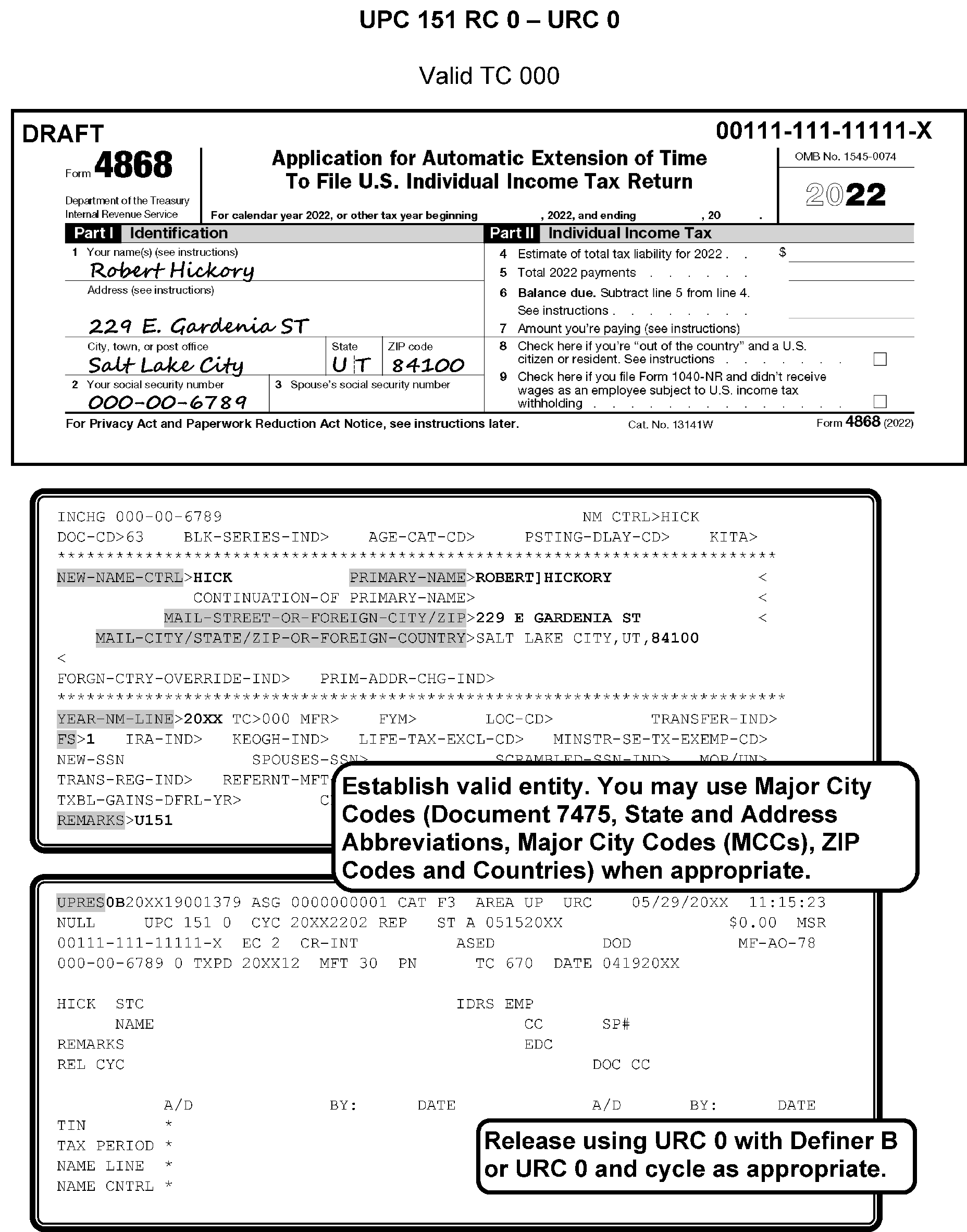
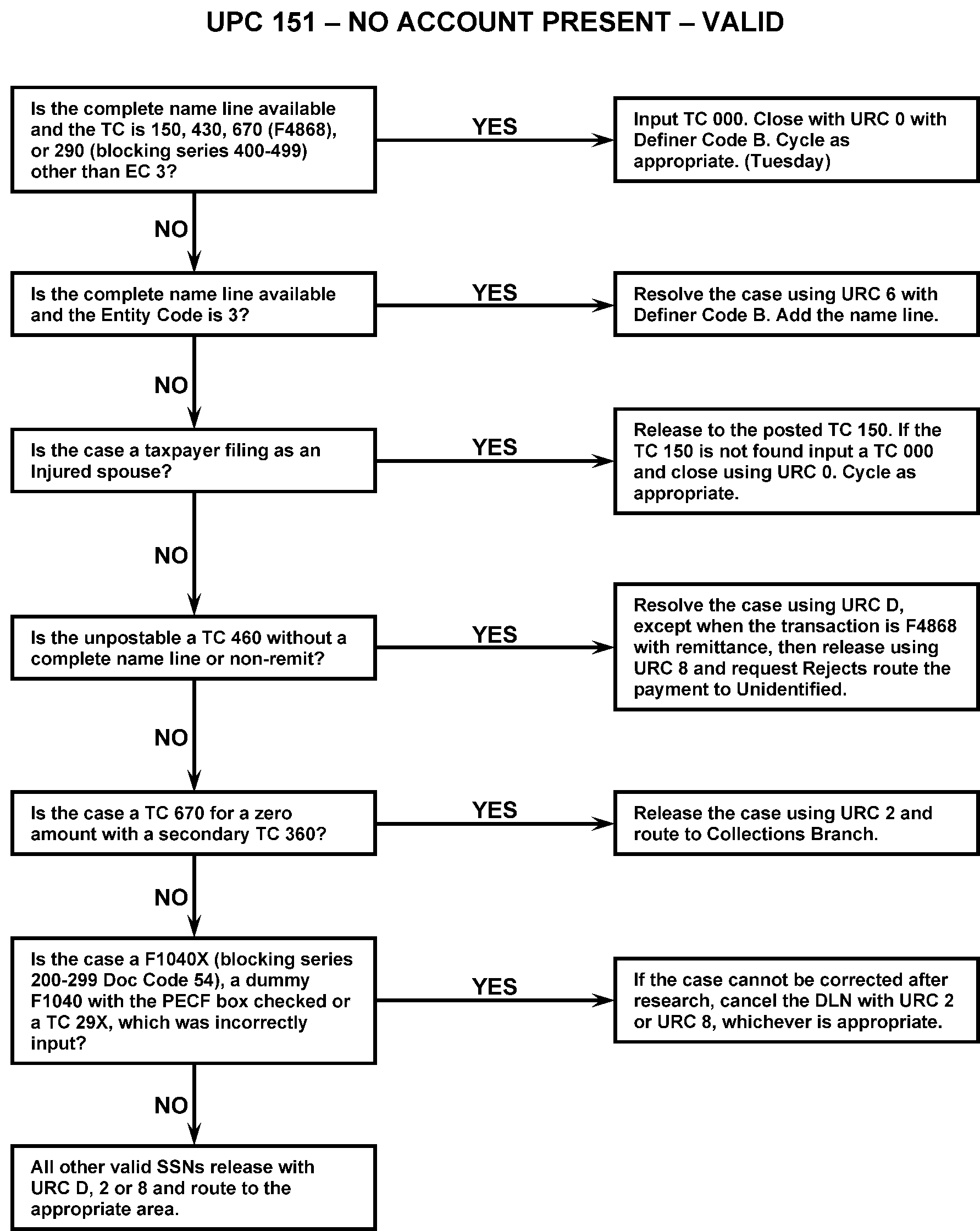
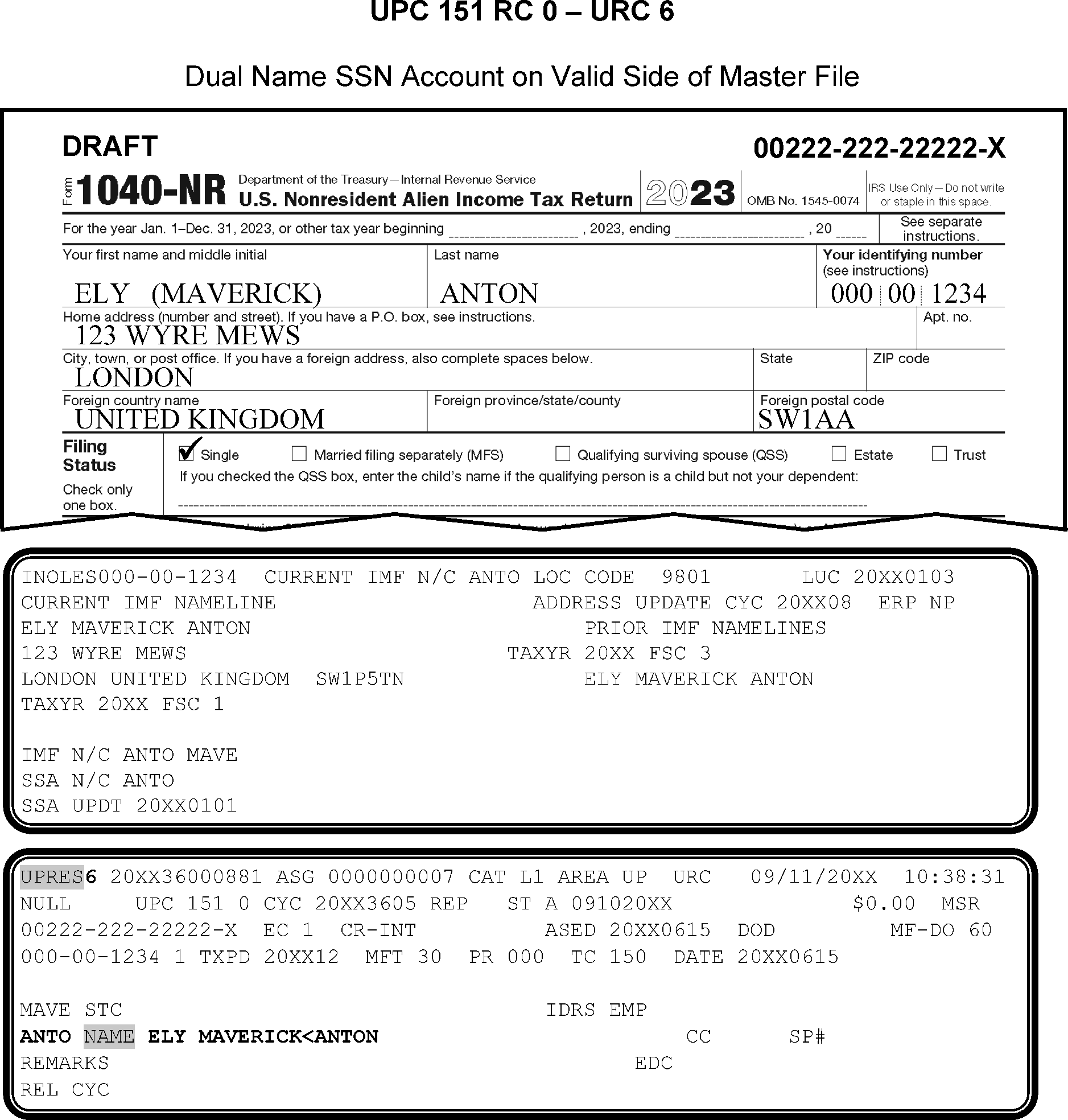
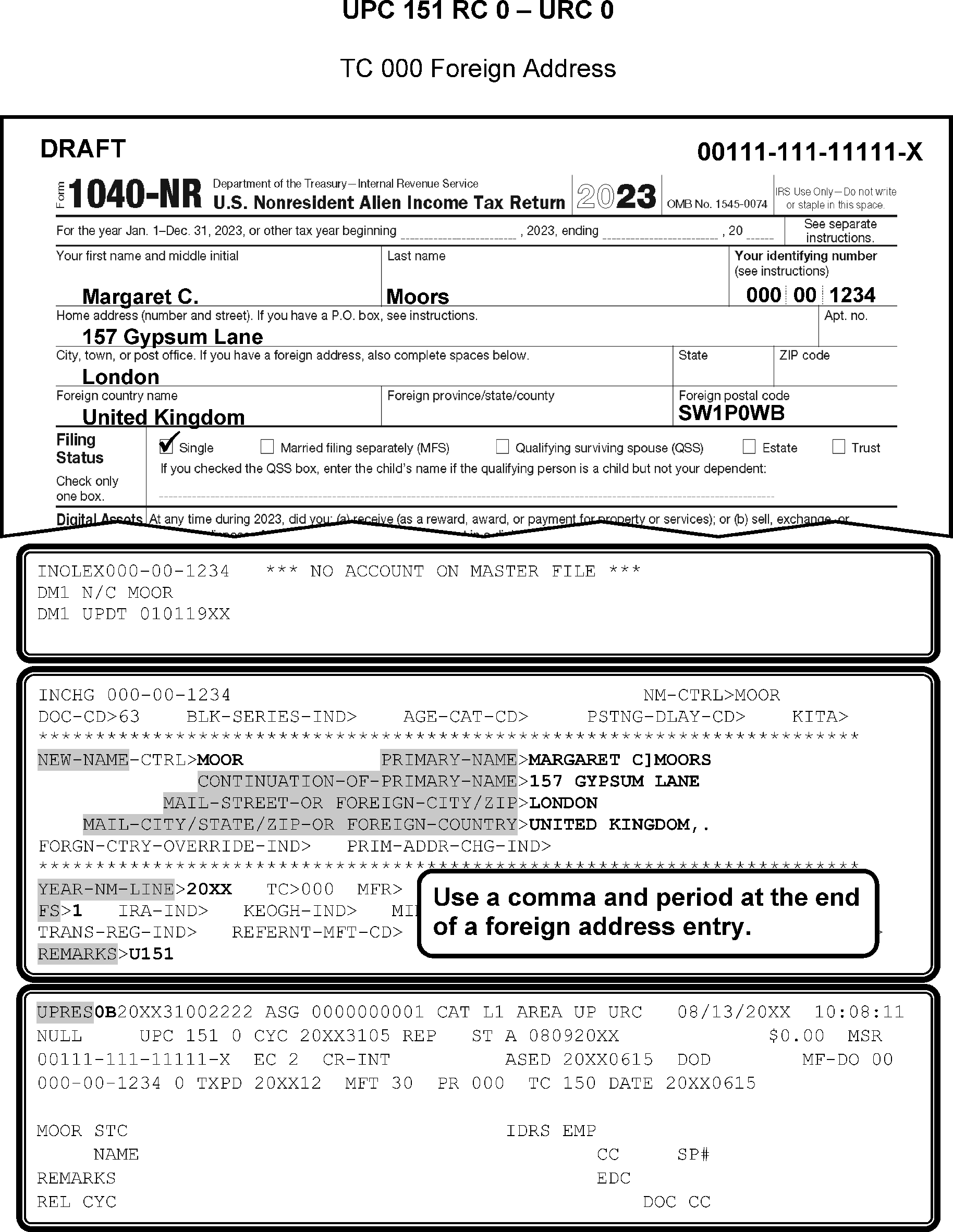
-
Research for better SSN(s) or Name Control(s).
Figure 3.12.179-7, Figure 3.12.179-8, and Figure 3.12.179-9 for examples on TC 000 - Establishing on Invalid Segment, No Account Present or Dual Name SSN Account.If... Then ... 1. Better SSN(s) and/or Name Control found based on matches from CC TRDBV, CC IRPTRL, CC INOLE, CC NAMES, etc. URC 6 and make corrections. 2. If the taxpayer indicates the payment is for a prior year and the taxpayer changed name. URC 6 to post payment to Master File Name Control. 3. The taxpayer's account is established on the valid side, but the taxpayer has changed name to an invalid Name Control and filed an extension, the most current year return or an estimated payment. Input a TC 013 on the VALID segment using the year of the unpostable transaction (may need CC ACTON on CC ENMOD to correct the Name Control on the dummy entity to match DM-1). URC 0 and cycle delay as needed. 4. Account was established on the invalid side on Master File but valid SSA Name Control Input TC 041 with the correct information, URC 6, input Name Control and name line and cycle delay as needed. 5. Entity is not on Master File and no better SSN and/or Name Control is found, but information is available to establish account on Master File Input TC 000 to the invalid segment for the tax year of the document. Close with URC 0 with Definer B, and cycle delay as needed, unless taxpayer is claiming EIC and/or Personal Exemptions (2017 and prior years only). When claimed, URC 8 these cases to Rejects and request to remove. 6. Complete name is available, but address is not found Check any attached Form W-2 CC IRPTRL, and CC TRDBV. Input a TC 000 using the address information found to establish the account. If no address is found, input TC 000 using the campus address. Close with URC 0 with definer B, and cycle delay as needed. 7. TC 29X URC 6 to the Master File Name Control. -
If the account is established on the valid segment with an invalid Name Control, input TC 040 to resequence the account. See IRM 3.12.179.11.8.5. URC 0 and cycle delay as needed.
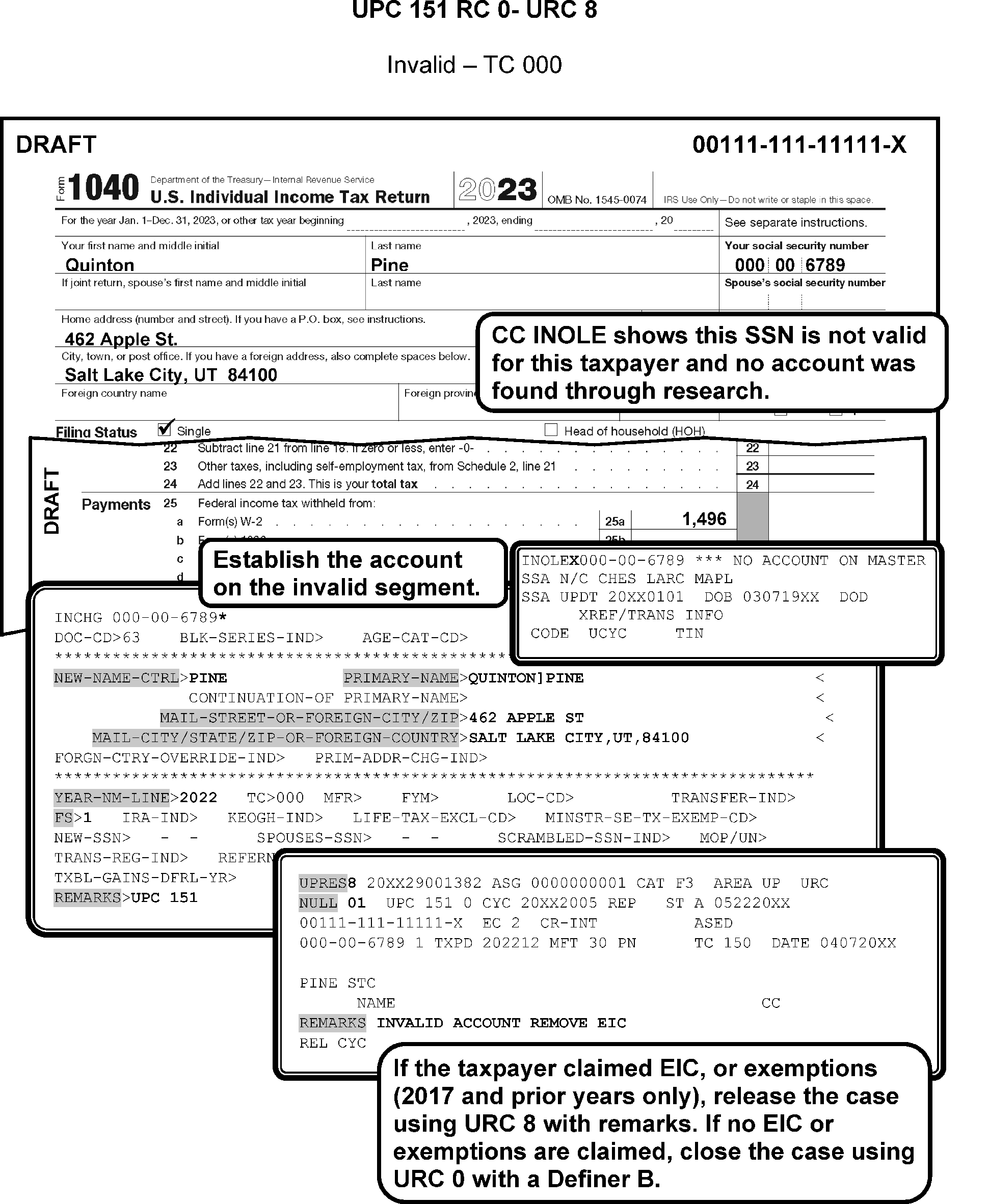
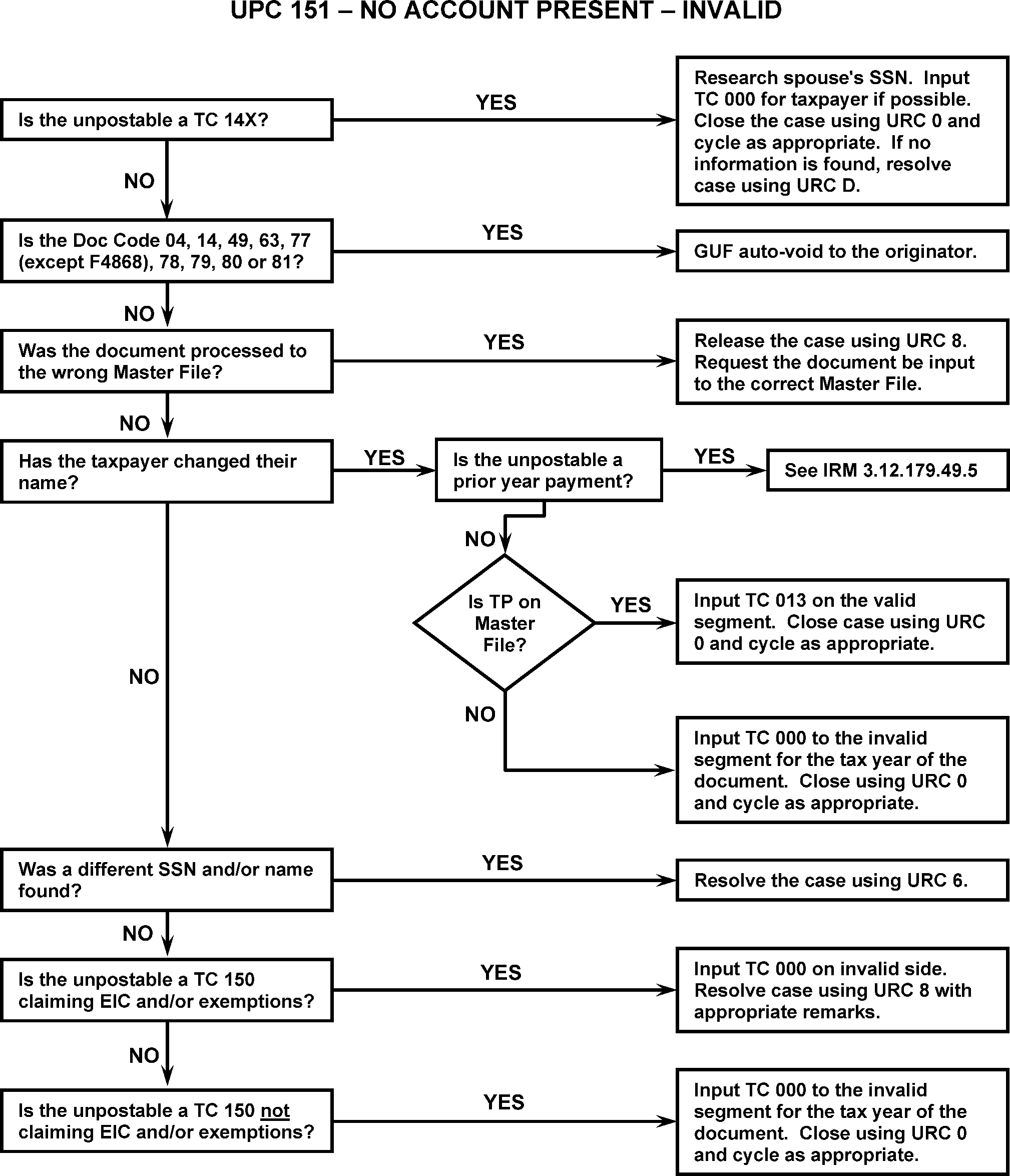
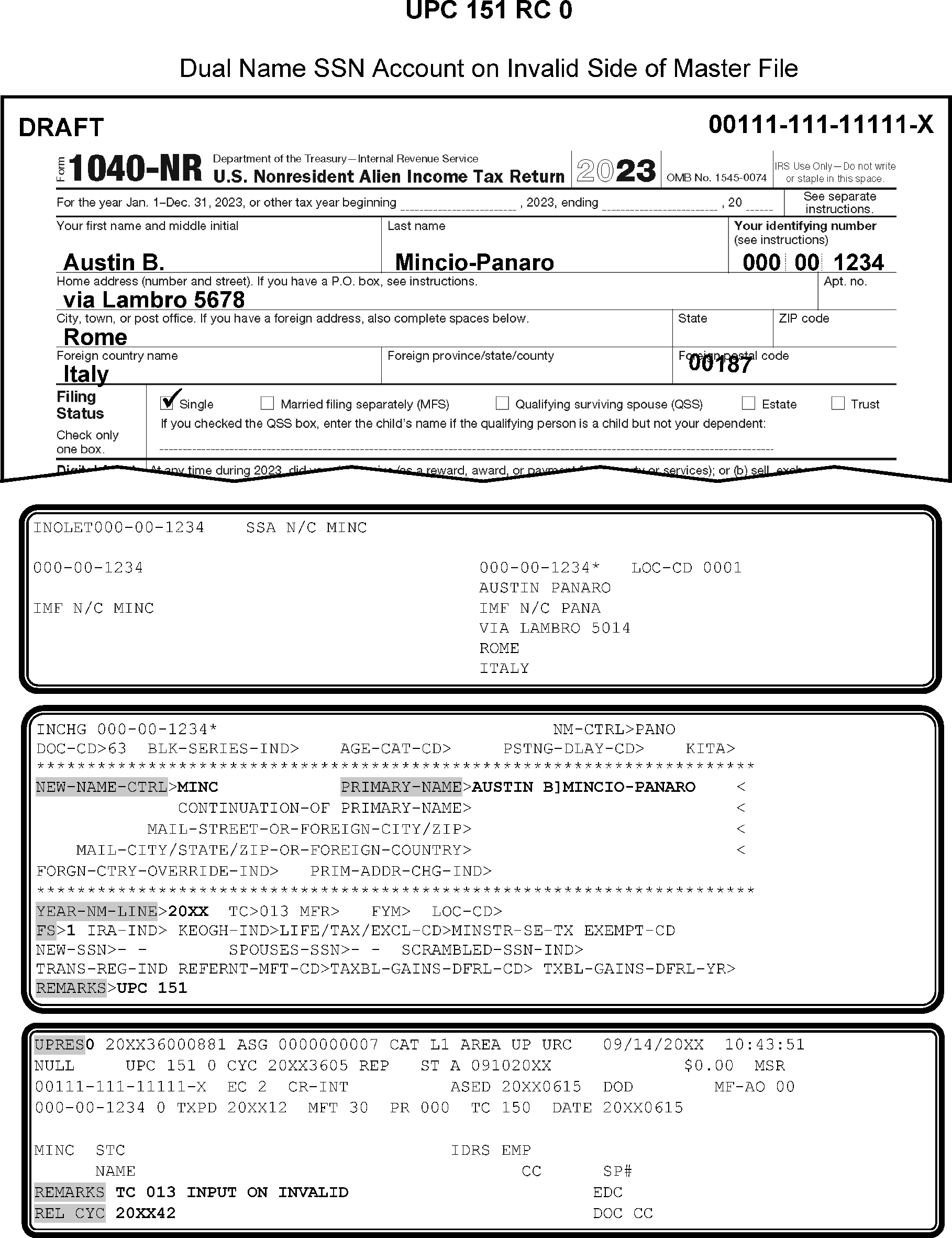
-
Resolution UPC 151 RC 0: Follow the chart below.
If... And... Then... 1. Taxpayer’s account is established on the valid side, The Name Control was transcribed correctly, URC 0. 2. Taxpayer’s account is established on the valid side The Name Control was transcribed incorrectly URC 6 to correct the Name Control and Name Line. 3. Taxpayer’s account is established on the valid side The taxpayer’s name has changed Input TC 013 on the valid side. URC 0 and cycle delay. 4. Taxpayer’s account is established on the invalid side Unpostable Name Control matches one of the SSA name controls Input TC 041 on the invalid side. URC 0 and cycle delay. 5. TIN is incorrect Correct TIN is found through research and Schedule SE or Form 5329 for the primary taxpayer is present Input TC 000 if needed on correct TIN (if not ITIN or IRSN)and close with URC 8 to correct the TIN on the entity and Schedule SE or F 5329. See note below. 6. TIN is incorrect Correct TIN is found through research and Schedule SE or Form 5329 for the primary taxpayer is not present Input TC 000 if needed on correct TIN (if not ITIN or IRSN) and close with URC 6. See note below. 7. TIN is incorrect No correct TIN can be found Input TC 000 on invalid side (if not ITIN or IRSN) and close with URC 0B. See note below. 8. No account is established, but TIN belongs to taxpayer (check CC MFTRA U) Unpostable Name Control does not match one of the SSA name controls Input TC 000 on invalid side. Close with URC 0B. 9. No account is established Unpostable Name Control matches one of the SSA name controls Input TC 000 on the valid side. Close with URC 0B. 10. TIN begins with 9 No account is established Search for another TIN. If none found, request IRSN. Once IRSN is assigned, send 685C letter and close with URC 6. See note below.
-
Use the following when correcting prior year payments:
If ... And ... Then ... 1. Unpostable Taxpayer owes on a prior year where taxpayer filed jointly with a spouse/former spouse Close with URC 6 to post the payment to the SSN and/or Name Control of the debit module and cycle delay as needed. 2. Unpostable Taxpayer no longer owes jointly with a former spouse Is currently filing jointly as a secondary taxpayer on another account Close with URC 6 to post to the current primary taxpayer's SSN and/or Name Control and cycle delay as needed. 3. Unpostable Taxpayer no longer owes jointly with a former spouse Has their OWN established account on Master File Close with URC 6 to post to the Unpostable taxpayer's current year account and cycle delay as needed. 4. Unpostable Taxpayer no longer owes jointly with a former spouse Is NOT currently filing a joint return and no account is established on Master File Input a TC 000 and Close with URC 6 to change the tax period on the unpostable transaction to the current year. Cycle delay as needed.
-
Research as appropriate to establish taxpayer's account. Use the following if unable to correct case:
-
If document was processed to wrong Master File, URC 8 to Rejects and request Rejects cancel the DLN and re-input document to correct Master File. Input CC STAUP to correct Master File if needed.
-
For a payment document, prepare Form 3244, close URC 1 to Accounting to forward to Unidentified Unit.
-
For a remittance with extension (TC 460), Form 4868, URC 1 and request to void DLN and route document to Files. Prepare Form 3244 and route payment to Unidentified Unit.
-
-
If TC 460 (non-remit) Form 4868, Doc Code 77 research CC TRDBV and CC IRPTRL.
-
If paper with correct TP, TIN and Tax Period, input TC 000 or TC 013 to allow TC 460 to post and close URC 0, cycle delay as needed.
-
If paper, research to verify correct TP, TIN and Tax Period, if changes need to be made close URC 6.
-
If MeF or unreadable close URC D.
-
-
If TC 150 for PECF (Presidential Election Campaign Fund) (Dummy 1040-X only). URC 8 and request Rejects cancel DLN and refile in original block of documents.
-
If TC 670 is for a zero amount (non-money amount) with secondary TC 360, URC 2 to Collections.
-
If UPC 151 repeats as UPC 134 RC 3, (as seen on CC UPTIN), URC 6 with the Master File Name Control and name line, adding the new last name to the end of the name line.
-
If TC 971 or TC 970 check CC TRDBV for account information to set up TC 000. If not available check CC IRPTRL, CC DDBKD, and CC MFTRAU. Use campus address only as last resort.
-
If TC 972 close with URC D.
-
If Doc Code 58 and cross-reference is "Excess Collections" , research using CC URINQ, CC XSINQ, and CC IMFOLI for posting information URC 6 to correct. If no information found, URC 8 to Rejects to forward to Excess Collections, 6800 Account.
-
If TC 840, check CC INOLET for cross-reference.
-
If TC 841 / TC 740, route to the Refund Inquiry Unit. See IRM 3.12.179.5.2.6 , Undeliverable (TC 740) or Cancelled (TC 841) Refund for further instructions.
-
If TC 848 (credit) research to locate the corresponding TC 840 / TC 846 (debit). Determine the correct Name Control and/or TIN. Correct using URC 6 when discrepancies exist. If unable to locate the corresponding TC 840 / TC 846 (debit), reverse the credit to the cross-reference account with the corresponding TC 849 using URC 6.
-
If TC 849 (debit) research to determine the correct Name Control and/or TIN. Correct as appropriate using URC 6. If unable to post, reverse the credit to the corresponding TC 848 using URC 6.
-
Before you proceed with the Manual Assessment refer to IRM 3.12.179.8.9
-
Correct taxpayer entity information and close it with URC 6 per initiator's instructions
-
If TC 29X, thoroughly research for TC 150 posting. If found, URC 6 and make necessary corrections. If not found, URC 2 and route to originator.
-
If TC 150 is Form 8379 (Injured Spouse), research for original posted TC 150. If TC 150 is found, URC 6 to correct name and SSN. Figure 3.12.179-10.
-
If no TC 150 is posted, input TC 000, URC 0 with Definer B.
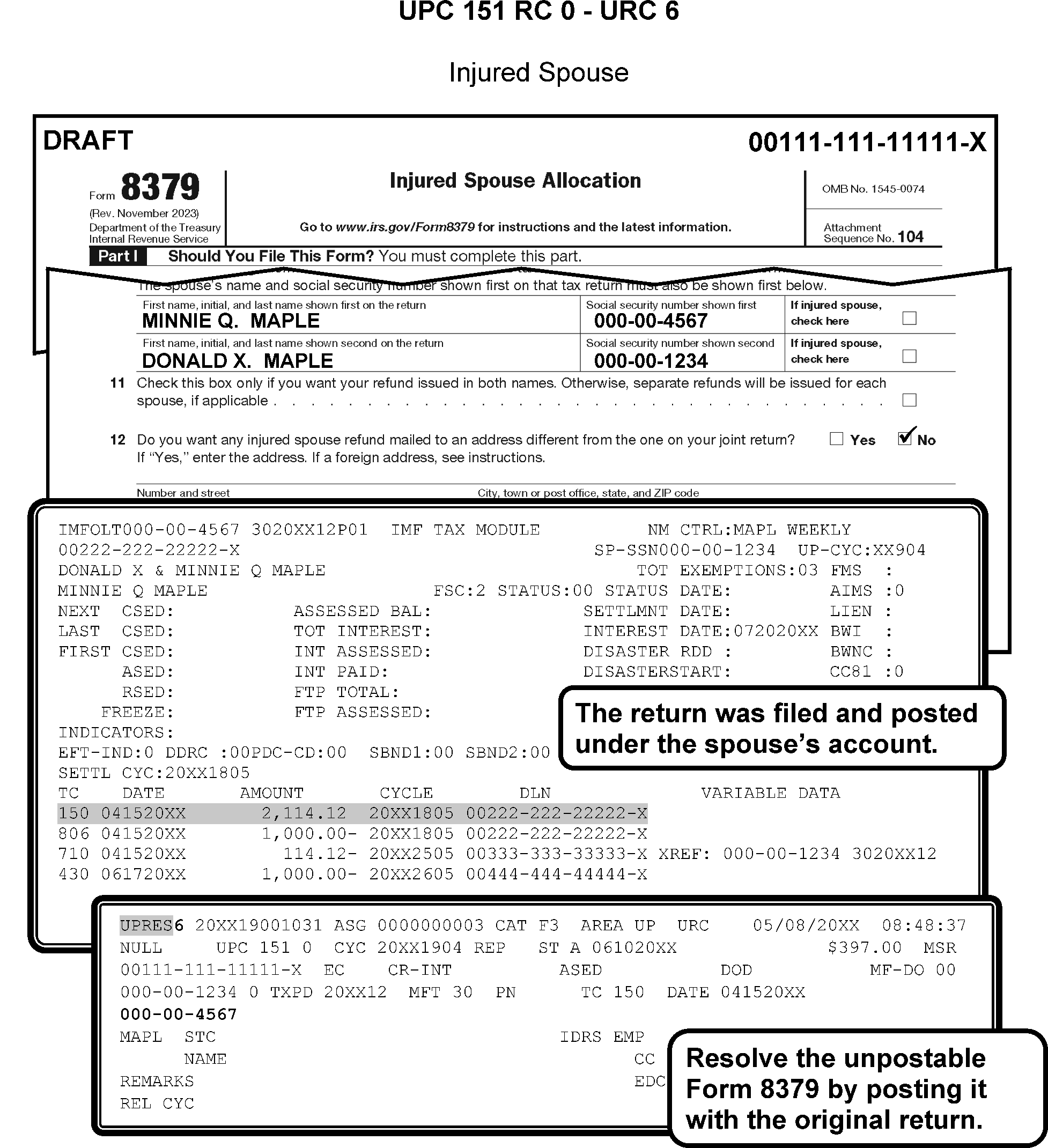
-
If TC 30X, reassign to Examination.
-
If payment, research for a different SSN and/or Name Control. If found, release using URC 6.
-
If a different SSN is not found and the unpostable is a payment (See Note below), research to determine if the payment was intended for a different Master File.
-
If payment was intended for a different Master File, release using URC 8. Request Rejects renumber the document.
-
If unable to determine where payment was intended, release using URC 1. Request Accounting send the payment to Unidentified.
Caution:
Research for TC 150 or indication that a TC 150 has been initiated by Accounts Management (history item). The payment will post long before the loose Form 5329 has been reviewed to determine tax liability. Prior to sending the payment to Unidentified, request the original return to see if there is any information with it.
-
-
If there is no record, establish a Master File entity.
-
Input TC 000 for year of penalty assessment (MFT 55 only), URC 0 and cycle delay as needed. (Master File will extract and establish CVPN). Figure 3.12.179-4 and Figure 3.12.179-8 for an overview of UPC 151.
-
Use the chart below to identify the condition and actions needed to resolve UPC 151 RC 0 with TC 796 on the MFT 35 module.
-
Check both valid and invalid segments on the MFT 35 module.
Condition Action 1. If MFT 35 is present URC “0” the TC 796 to post to MFT 35. See Note 2. If MFT 35 is not present URC “0” the TC 796 with a release/cycle delay code 1. -
MF will perform the DM-1 check on the corrected UPCs to direct the TC to the correct segment and prevent repeat unpostables.
-
CONDITION RC 1 If the account is not present, TC 670 input to MFT 29 or current year RPS TC 610s and TC 610s with Doc Codes 19, Doc Code 70, or Doc Code 76 input with MFT 30 to the valid segment prior to cycle 27 will resequence until cycle 29, then unpost. If input in cycle 27 or later, they will resequence for three cycles and then unpost. Invalid cases DO NOT resequence. Refer to UPC 151 RC 0 for TC 610s that do not meet this condition.
-
Resolution Procedure UPC 151 RC 1 TC 610 Payments: Complete the following:
-
Research CC IMFOLQ for the unpostable SSN and other SSNs found through research. If TC 610 is on the resequencing file with a DIFFERENT SSN/Name Control, input TC 000 to establish this account. Suspend using CC UPCAS for 14 days or until the account is established. Transfer credit to correct the account once payment posts. Release the Unpostable with URC 0 and cycle delay as necessary. If necessary, use CC MFTRA U, CC IRPTRL, and CC DDBKD to establish the account. Do not establish account on the invalid side.
-
If TC 150 posted, release TC 610 with appropriate URC to post to same account as TC 150.
-
-
Use RTR to review the payment or if not on RTR request a copy from Files.
-
Research for a different SSN/Name Control. If a different SSN/Name Control is found, correct using URC 6.
-
If a different SSN is not found but the document contains a complete name, input TC 000 on invalid segment (if necessary, use Service Center address), URC 0 and cycle, if necessary.
-
-
If unable to establish the account, URC 1 to Accounting. to send the payment to Unidentified.
-
For EFTPS payments with the SSN 000-00-0002, URC 8 to Rejects. Request Rejects forward the payment to Unidentified.
-
CONDITION RC 2 This condition occurs when a TC 611 input to an account containing an RPS TC 610 or TC 610s with Doc Code 70 or Doc Code 76, matching the tax period of the TC 610, that is resequencing per UPC 151 RC 1. The TC 610 is removed from the resequence file and sent as an UPC 151 RC 2.
-
Resolution UPC 151 RC 2 Use CC BDINQ (refer to IRM 2.4.25, for CC BDADDR, CC BDADD, CC BDAPLR, CC BDAPL, CC BDOUTR, CC BDOUT, CC BDENT, and CC BDINQ). Work both the TC 610 and TC 611 cases at the same time. Coordinate with Dishonored Check Function (DCF) in Accounting to get a copy of bad check, if necessary.
-
Determine if TC 610 and TC 611 are attempting to post to the same account.
-
If correct account, establish with TC 000 and close both unpostable cases with URC 0 with definer B. TC 611 must post in same cycle as or a cycle after TC 610.
-
If wrong account and research finds correct account, close both with URC 6. If necessary, input TC 000 to establish account. Cycle cases to post in same or subsequent cycle as TC 000. TC 611 must post in same cycle as or a cycle after TC 610.
-
-
If correct taxpayer is NOT found, assign a temporary IRSN. Close both cases with URC 6 to the IRSN once assigned.
-
If cases do not contain enough information to assign a temporary IRSN, release both cases with URC 1 to Data Controls to void the DLNs.
-
This subsection contains conditions and resolutions for UPC 152 RC 0 - RC 2.
-
CONDITION RC 0 This condition occurs when any other than a long entity TC 150, TC 430, or TC 140 is addressing the invalid segment of Master File. Bypass for TC 150 directed to MFT 32 or containing SPC T not corrected UPC 126 RC 1. Bypass the Name Control check for input TC 97X AC 643.
-
Compare Unpostable Name Control with Master File Name Control.
-
If Doc Code 14, Doc Code 49, Doc Code 63, Doc Code 77, Doc Code 78, Doc Code 80, or Doc Code 81, URC A or URC 6 to correct name or SSN. If unable to correct, URC 2 to Originator.
-
If TC 14X, URC 6 to make necessary changes to SSN and Name Control. If SSN is on spouse's account, input TC 000 to establish account and URC 0. All others, release with URC 2 to Originator. If no Originator, URC D.
-
If TC 120, GUF Auto-Close URC 2 to SC Disclosure.
-
If TC 96X, GUF Auto-Close URC 2 to Originator.
-
-
If transcription error and Entity Code (EC) is 2 or EC 3, release with URC A. URC A will change the Unpostable Name Control to the Master File Name Control. . If transaction contains a name line, URC 6 to correct the Name Control and name line.
-
If different SSN is found or SSN(s) are reversed, correct errors with URC 6. Correct both SSNs if they are reversed or the Unpostable will repeat as UPC 299 RC 4.
-
If the taxpayer on the invalid segment is the same as on the unpostable, but the name has changed, URC 5.
-
All others, request documents pulled from files.
-
Documents pulled from Files—Research for better name and/or SSN. If information is found or SSNs of joint filers are reversed, URC 6 to correct.
-
Form 8379 (Injured Spouse) — Research for original TC 150 posted.
-
If information does not match, URC 6 and make changes to name line and SSN if necessary.
-
If no TC 150 is posted, input TC 013 on the INVALID segment using the Name Control from the VALID segment. URC 0 and cycle delay as needed.
-
-
If the Unpostable taxpayer already resides on the valid segment of Master File and filed with a different name, input a TC 013. If another (unrelated) taxpayer resides on the invalid segment of Master File, research for a better SSN. If a better SSN is not found, assign a IRSN to the taxpayer residing on invalid side.
-
After assigning an IRSN to the taxpayer residing on the invalid side, input a TC 011 to merge the INVALID TIN to the IRSN or better TIN found. (This moves the taxpayer's data residing on the invalid side of Master File to the IRSN).
-
If a name changes for the Unpostable taxpayer, input a TC 013 with posting delay code 4, to post after the TC 011. Release using URC 0 or 6, as appropriate, and cycle six weeks to post after the TC 013.
-
-
If the unpostable taxpayer is already on the valid and invalid segments of Master File with previous names used and filed with a different invalid name, see your work leader or transfer the case to Entity Unpostables for further research.
-
If unable to locate a better name or SSN for the Unpostable, follow local procedures for assigning an IRSN (temporary SSN). Send 685C letter informing the taxpayer that an IRSN has been assigned.
-
If personal exemption and/or EIC are claimed, URC 8 and request Rejects update the entity with the new IRSN and remove the exemption “(2017 and prior) and/or EIC.
-
If no tax liability and no EIC claimed, URC 6 to new IRSN.
-
-
CONDITION RC 1 This condition occurs for transactions that are not covered by UPC 153 (for example, Name Control mismatch addressing the invalid side and is not long Entity TC 150, TC 140 or TC 430) or 156. For example, Name Control mismatch addressing the valid side and is not TC 150 or TC 430 with Entity Code 2 or EC 3 or TC 140. The Name Control of all other valid transactions will perform a proximal Name Control comparison between the input transaction and the account primary Name Control. These transactions need to match only first 3 characters of input transaction with first 3 characters of the posted or prior Name Control, if a match is made the transactions will post.
Note:
Master File will bypass TC 500 cc 52 or cc 53 with a block and serial of either 88888 or 99999 containing a significant CREF Indicator, TC 971 AC 157, and TC 971 AC 100 - AC 106 generated by Master File and sent to MFT 31. Master File will also bypass for TC 013 and TC 014 with block and serial of 88888, TC 594 cc 84 with block and serial of 99999, TC 290 Julian Date 997 directed to MFT 31 or MFT 65 and TC 370 with Julian Date 997 or 999. Transactions with Doc Code 17, Doc Code 18, Doc Code 19, Doc Code 20, Doc Code 70, and Doc Code 76 will resequence for two cycles prior to unposting.
Note:
Effective March 2017, bypass for Entity transactions TC 01x with FLC 20, Doc Code 63 and Julian date inflated by 400 input to ITIN numbers, TC 971 AC 193 or TC 972 AC 193 and for NAP TC 540 and TC 542 blocking series 11111. Effective midyear 2017, bypass the Name Control check for TC 971 AC 52, TC 152, TC 121 - TC 129, TC 134 and TC 194. Use Resequence code 52. These transactions will resequence until the last day of the cycle
-
Resolution UPC 152 RC 1 Complete the following:
-
If TC 460 (Extension), TC 150 (Return) or TC 430 (Estimated Payment) and taxpayer changed name. input TC 013. URC 0 or URC 6 and cycle delay as needed.
-
If payment and applied to correct taxpayer, URC A to change the Unpostable Name Control to the Master File Name Control.
-
If unable to determine correct Name Control, research for better name/SSN. If better name or SSN is found, URC 6 to make corrections.
-
If TC is 640 or TC 670 (including extensions with a remittance) or TC 680 and you cannot find taxpayer, URC 1 to Accounting to send the payment to Unidentified.
-
If TC 460 or TC 670 (no remit extension), and you cannot find the taxpayer, obtain an IRSN for the taxpayer and URC 6 to post the transaction under that TIN.
-
If TC 898 or TC 971, URC A.
-
All others URC 2 or URC 8 as appropriate and route documentation to Originator.
-
If a different name or SSN could not be located, follow Service Center procedures for assigning an IRSN. Request the document and forward to Rejects closing with URC 8 to remove primary exemption and/or EIC, .
-
For EFTPS payments with the SSN 000-00-0002, URC 1 to Accounting to send the payment to Unidentified.
-
-
Use the chart below to identify the condition and actions needed to resolve UPC 152 RC 1 with TC 796 on the MFT 35 module.
-
Check both valid and invalid segments on the MFT 35 module.
Condition Action 1. If MFT 35 is present URC 0 the TC 796 to post to MFT 35 See Note 2. If MFT 35 is not present URC 0 the TC 796 with a release/cycle delay code 1. -
IMF will perform the DM-1 check on the corrected UPCs to direct the TC to the correct segment and prevent repeat unpostables.
-
CONDITION RC 2 This condition occurs because MFT 55 TC 013 must match on the first four characters of first and last names.
-
Resolution UPC 152 RC 2 Research to determine corrective action.
-
If we can determine a VALID Name Control, URC D and input TC 013 on account residing on VALID segment.
-
If corrective action cannot be determined, URC 2 and route to Originator (Exam or Collection). Figure 3.12.179-11 for an overview of UPC 152.
-
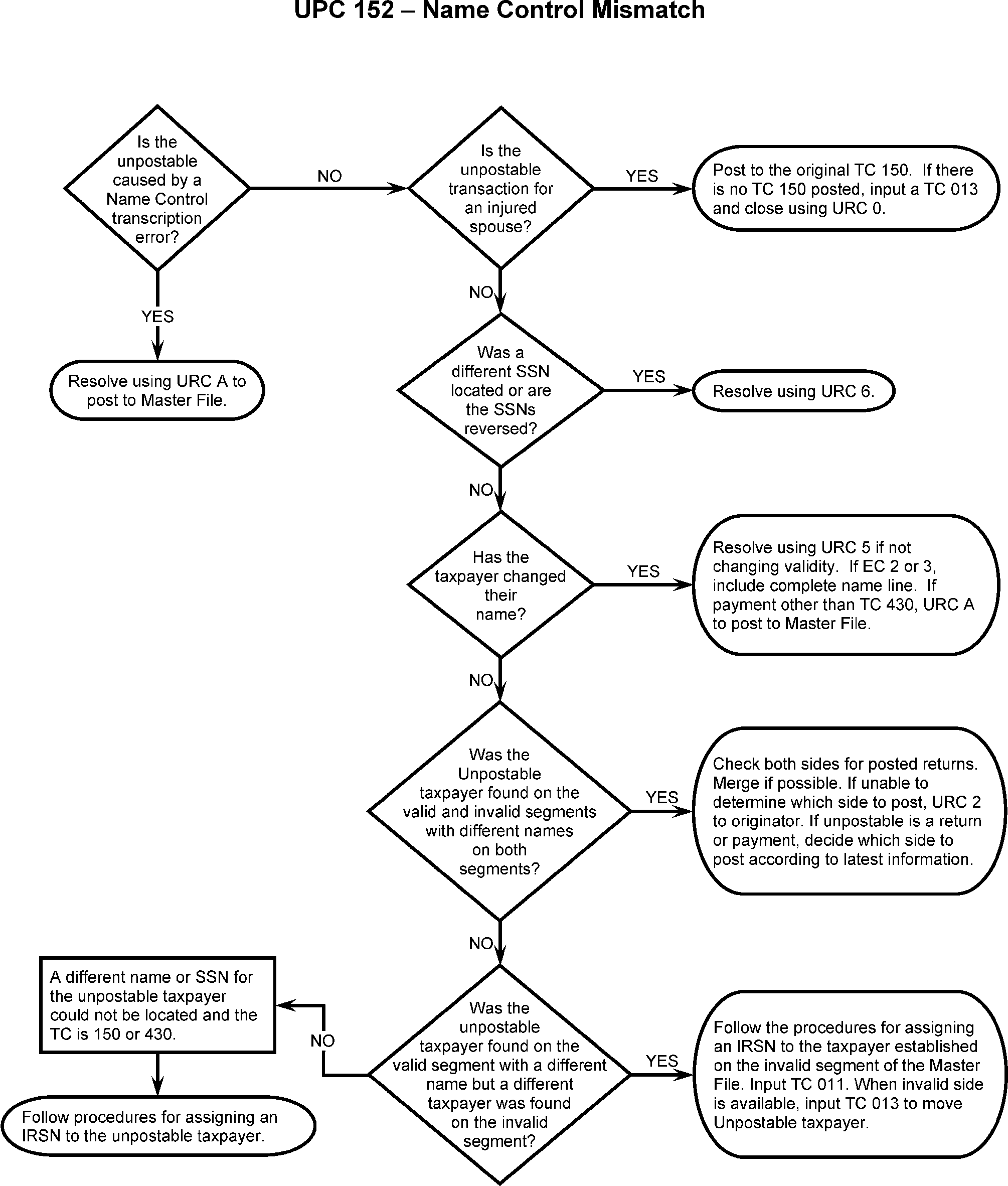
-
This subsection contains conditions and resolutions for UPC 153 RC 0.
-
The following Command codes are useful but not inclusive when researching this condition:
-
Current processing year: CC INOLE, CC NAMES, CC NAMEI, CC UPTIN
-
Prior year payments: CC IMFOLI, CC INOLET, CC UPTIN, CC NAME, CC NAMES
-
Name change and/or establishing an account: CC ACTON, CC ENMOD / CC ENREQ / CC INCHG
-
-
CONDITION RC 0 This condition occurs on a Name Control mismatch—long entity TC 150, TC 140, or TC 430 addressing invalid segment.
-
Resolution UPC 153 RC 0: Compare Unpostable Name Control with Master File Name Control. Verify that the TIN and Name Control were transcribed correctly. Research to determine whether the TIN belongs to the taxpayer. Follow the correction procedures in the charts below.
Note:
The following command codes are useful but not all-inclusive when researching this condition: CC INOLE, CC NAMES, CC NAMEI, CC DDBKD, CC IRPTR (Definer L), and CC MFTRA (request type U).
Note:
Taxpayers using an SSN not assigned to them by SSA or using an IRSN are ineligible for the personal exemption and EIC. Taxpayers with an ATIN or ITIN are eligible for the personal exemption, but ineligible for EIC. CC TRDBV and CC RTVUE can be used to determine if the primary exemption and/or EIC have already been removed. If it is necessary to remove either the EIC or the primary exemption, “(2017 and prior) URC 8 to Rejects with remarks: REMOVE EIC AND/OR PRIM EXMT.
-
If the TIN is incorrect:
If ... And ... Then ... 1. The correct TIN is found through research, Schedule SE or Form 5329 for the primary taxpayer is attached to the return, Close with URC 8 to correct the TIN on the entity and the Schedule SE or Form 5329. Transfer credits if necessary and cycle delay as needed. If the name has changed, input TC 013 on the correct TIN. If the correct TIN is an ITIN with the account established on the invalid side, and shows “NEW SSA Name Control” in the middle of the CC INOLET screen, input TC 041 on the invalid side. Cycle delay the return if URC 6. 2. The correct TIN is found through research, Schedule SE or Form 5329 for the primary taxpayer is not attached to the return, URC 6 to correct the TIN. Transfer credits if necessary and cycle delay as needed. If the name has changed, input TC 013 on the correct TIN. Cycle delay the return if URC 6. Figure 3.12.179-12 See Figure 3.12.179-29 below. If the correct TIN is an ITIN with the account established on the invalid side, and shows “NEW SSA Name Control” in the middle of the INOLET screen, input TC 041 on the invalid side. Cycle delay the return if URC 6. 3. No correct TIN can be found and the taxpayer is different from the taxpayer established on the invalid side of the unpostable TIN, Request an IRSN for the taxpayer of the unpostable. Once assigned, send 685C letter, Close with URC 8 if necessary to remove primary exemption or EIC, and/or to correct Schedule SE or Form 5329. Include instructions to correct the TIN to the new IRSN. Otherwise, close with URC 6 to correct the TIN to the new IRSN. Transfer credits if necessary and cycle delay as needed. -
The TINs on the return are reversed
If ... Then ... 1. No Schedule SE or Form 5329 is attached, URC 6 to correct both TINs. 2. Schedule(s) SE or Form(s) 5329 is (are) attached, URC 8 to correct the entity and the Schedule(s) SE and/or Form(s) 5329. -
The Name Control was transcribed incorrectly
If ... And ... Then ... 1. The correct Name Control matches the account on the invalid side, URC 6 to correct the Name Control and name line, or URC 8 if taxpayer is claiming primary exemption and/or EIC with an SSN not assigned to them by SSA, or with an IRSN. 2. The correct Name Control matches the account on the valid side, a different taxpayer is established on the invalid side, URC 6 to correct the Name Control and name line. 3. The correct Name Control matches the account on the valid side, and the same taxpayer is established on the invalid side with a different Name Control. Check CC IMFOLI to determine if any tax periods have a return posted to both the valid and invalid side, If not, input TC 013 on the invalid side using the Name Control from the valid side. URC 6 to correct the Name Control and name line and cycle delay as needed. If so, do not input TC 013. URC 6 to correct the Name Control and name line. 4. The correct Name Control matches the DM-1 Name Control, there is no account established on the valid side, the same taxpayer is established on the invalid side with a different Name Control, Input TC 013 on the invalid side using the DM-1 Name Control. URC 6 to correct the Name Control and name line and cycle delay as needed. 5. The taxpayer has an ITIN, “NEW SSA Name Control” appears in the middle of the CC INOLET screen, and the correct Name Control matches the ITIN Name Control, Input TC 041 on the invalid side using the correct Name Control and a later tax year on which nothing is posted. URC 6 to correct the Name Control and name line and cycle delay as needed. -
The Name Control was transcribed correctly
,If ... And ... Then ... 1. The same taxpayer is established on the invalid side, the document shows the taxpayer’s name has changed, Close with URC 5. If the taxpayer has an ITIN and “NEW SSA Name Control” appears in the middle of the CC INOLET screen, if the DM-1 update is scheduled within two weeks, hold the case until the update occurs. Then input TC 013 on the valid side. Close with URC 0 and cycle delay as needed. 2. A different taxpayer is established on the invalid side, the SSN belongs to the taxpayer of the unpostable, and no account is established on the valid side, Search for a correct TIN for the taxpayer on the invalid side. If correct TIN is found, input TC 011 or TC 041 to move the account. Close with URC 0 and cycle delay as needed. If correct TIN is not found, request IRSN for taxpayer on the invalid side. Once assigned, send 685C letter. Input TC 011 or TC 041 to move taxpayer to IRSN. Close with URC 0 and cycle delay as needed. 3. A different taxpayer is established on the invalid side, and an account is established for the taxpayer of the unpostable on the valid side, Search for a correct TIN for the taxpayer on the invalid side. If correct TIN is found, input TC 011 on the invalid side to move the account. Input TC 013 on the valid side using the unpostable Name Control. Close with URC 0 and cycle delay as needed. If correct TIN is not found, request IRSN for taxpayer on the invalid side. Once assigned, send 685C letter. Input TC 011 or TC 041 on the invalid side to move taxpayer to IRSN. Input TC 013 on the valid side using the unpostable Name Control. Close with URC 0 and cycle delay as needed. -
If SSN(s) on return are reversed, correct both SSN(s) with URC 6.
-
If SSN(s) are correct but name changes are required, (for example, taxpayer shows a name change on document) URC 5. URC 5 will change the name on the Master File, leaving the account on the invalid side. No cycle delay needed. Figure 3.12.179-13.
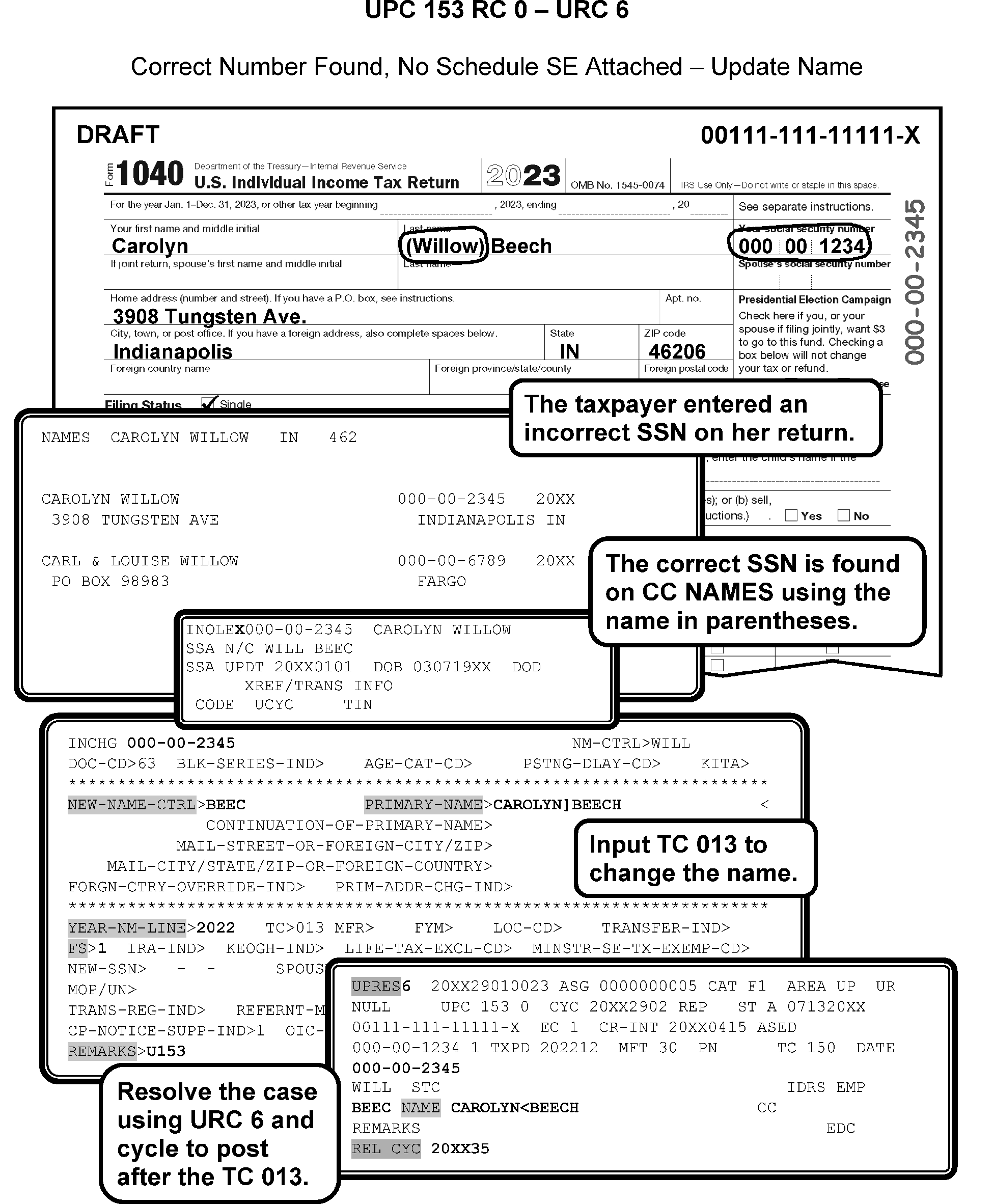
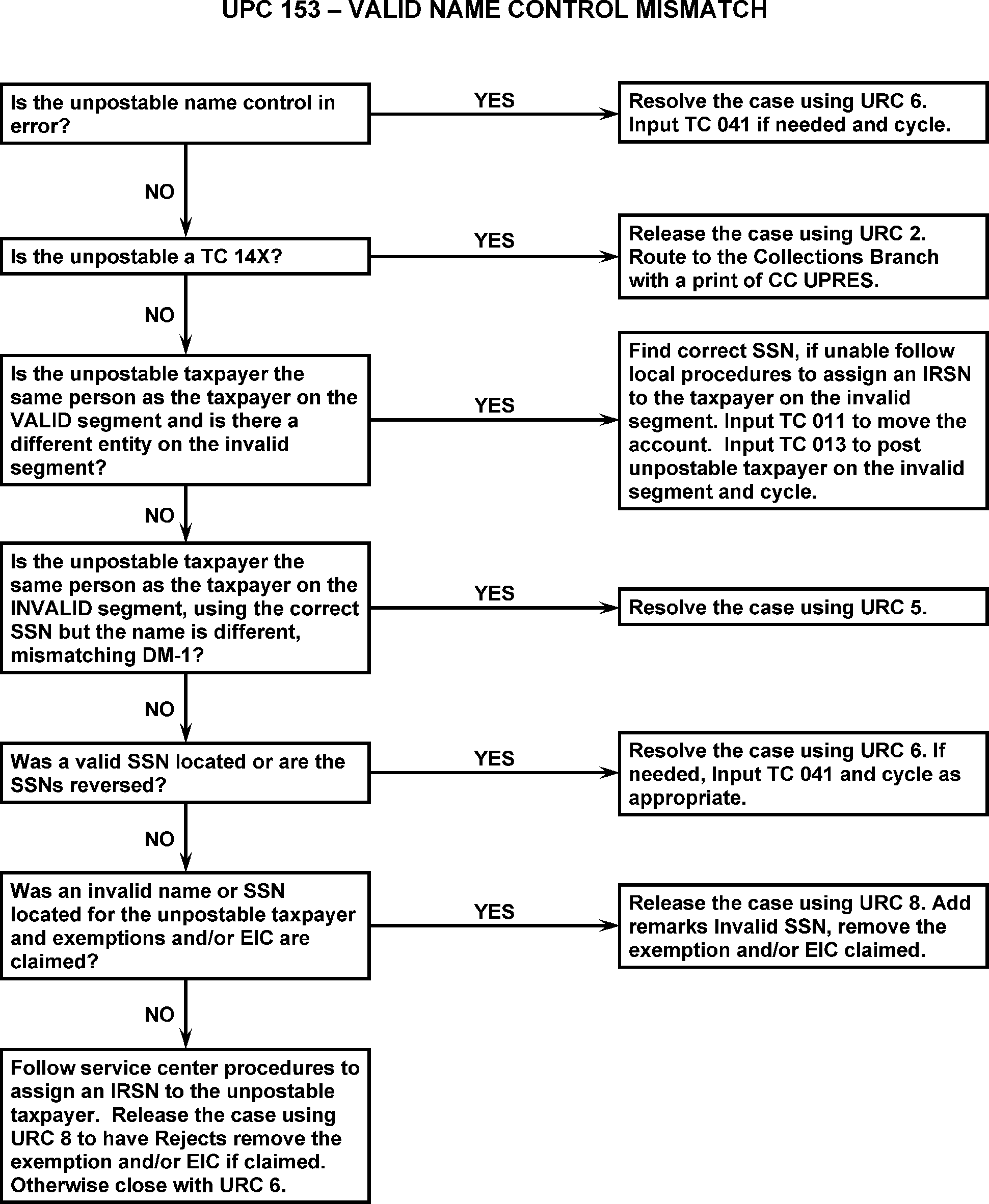
-
AUSPC only INTL: Use the following when processing international taxpayers:
-
Often, International taxpayers have dual or hyphenated surnames that they alternate in using and that can be transcribed in error.
-
Research both names thoroughly, reviewing signatures, entity information on the return, Master File information, and CC CFOL Command Codes including CC NUMIDENT file using CC MFTRA.
-
-
Use the following research procedures:
-
If Unpostable name is WRONG, URC 6 and make corrections.
-
If Master File and Unpostable name controls are different, TC 013 or TC 041 to correct names. URC 6 and cycle delay as needed.
-
If the taxpayer's signature contains one last name or dual name is hyphenated, post the document to that Name Control. Input TC 013 or TC 041 if needed.
-
-
CONDITION RC 0 This condition occurs with TC 290 with Priority Code 6 if the math error freeze is not significant or there is an unreversed TC 470 cc 94 present.
-
CONDITION RC 1 This condition occurs with TC 29X with Priority Code 7 and there is no TC 470 cc 94 present.
-
CONDITION RC 2 This condition occurs with TC 470 cc 94, if the math error freeze is not significant or no TC 29X blocking series 770–789 present.
-
CONDITION RC 3 This condition occurs with TC 472 cc 94 if there is no TC 470 cc 94 posted.
-
CONDITION RC 4 This condition occurs when a TC 29X (except TC 294 / TC 295 blocking series 900–929 or with Julian Date 999) attempts to post to a module containing an unreversed TC 570 generated from adjustment processing (MFT 30 only).
-
CONDITION RC 5 This condition occurs with TC 29X with blocking series 770–789 and an unreversed TC 470 cc 94 is present on the module.
-
CONDITION RC 6 This condition occurs with TC 470 cc 94 and there is an unreversed TC 470 cc 94 present on the module.
-
Resolution UPC 154 RC 0 - RC 6: GUF Auto-Close URC 2 to Originator.
-
CONDITION RC 0 This condition occurs when a TC 29X or TC 30X attempts to post to a module restricted from generating interest or if the module contains a non-restricting TC 340.
Note:
Master File will bypass for TC 290 / TC 300 for a zero amount providing no secondary transactions are present or if the adjustment record contains TC 34X or TC 77X. Master File will also bypass for TC 291, TC 295, TC 299, TC 301, TC 305, or TC 309 if the sum of TC 34X is zero; or for a non-restricting TC 340 if the module contains a secondary transaction of TC 270 or TC 271 only. Note that if interest is restricted due to TC 604 or TC 608, Master File will not bypass the unpostable unless the adjustment contains a TC 340 or TC 341 or the TC 290 / TC 300 is for zero amount with no secondary transactions.
-
Resolution UPC 155 RC 0: Use the following:
-
If Form 1040-X (TC 29X) with Doc Code 54, Blocking Series 200-299, GUF Auto-Close URC 2 to Accounts Management.
-
All other TC 29X or TC 30X, GUF Auto-Close URC 2 to Originator.
-
-
CONDITION RC 1 This condition occurs when a TC 29X or TC 30X is input to a module containing a prior posted TC 971 AC 64 and either a TC 29X or TC 30X.
-
Resolution UPC 155 RC 1 GUF Auto-Close URC 2 to Originator.
-
This subsection contains conditions and resolutions for UPC 156 0.
-
CONDITION RC 0 This condition occurs when a Name Control mismatches on the valid segment for TC 150 or TC 430 (Entity Code 2 or EC 3) or TC 140. Exceptions occur for TC 150, TC 140, or TC 430, Entity Code (EC) 1, EC 4, and EC 5.
-
Resolution UPC 156 RC 0:
-
If TC 150 or TC 430 and taxpayer changed name, URC 5 after researching CC MFTRA and CC IRPTR to confirm taxpayer identity.
-
If taxpayers are the same and Master File name is correct, URC 6 or URC A to correct the Name Control.
-
If taxpayers are the same individual(s) and both Unpostable and Master File name controls are incorrect, TC 013 to change name on Master File to agree with return name. URC 6 with Definer Code B and cycle delay as needed. Figure 3.12.179-14.
-
If SSNs are reversed, correct SSNs using URC 6. If the Entity Code is other than 1, enter the name line. ,
-
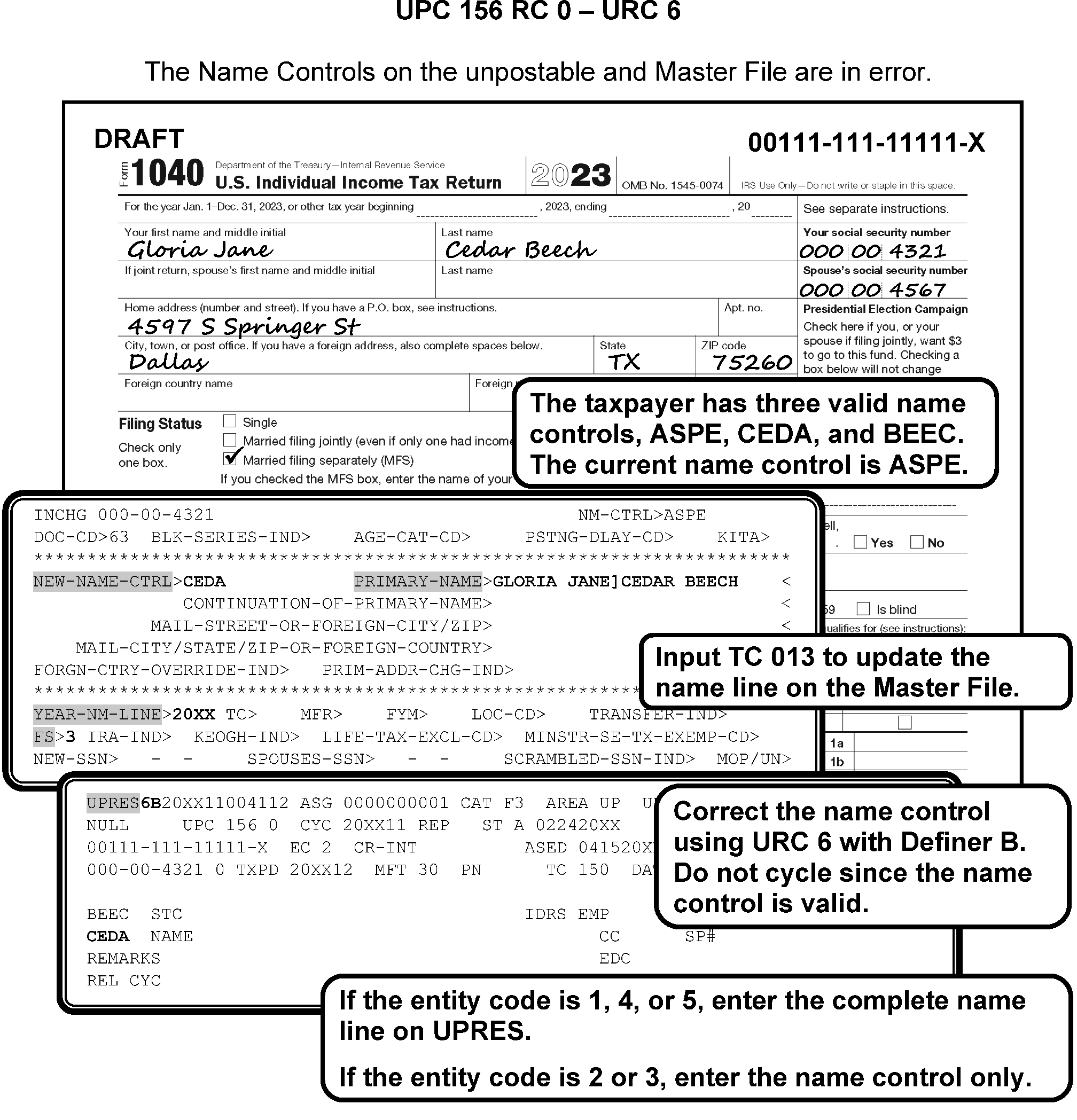
-
If CC MFTRAU and CC IRPTRL do not confirm taxpayer identity search for a valid SSN using CC NAMES, CC NAMEI, etc. If a different SSN is found, URC 6.
-
If document is a payment and does not contain enough information to correspond, refer to para 4.
-
If unable to find a valid Name/SSN, correspond with Letter 239C. Suspend case with CC UPCASSC.
-
If taxpayer's reply shows a valid SSN, URC 6.
-
If taxpayer's reply shows SSN is correct and a name change has occurred, URC 5.
-
-
If taxpayer's reply does not contain different SSN or there is not enough information to correspond or No Reply and document is a payment, URC 1 to Accounting to send to Unidentified.
-
If document is a return and does not contain enough information to correspond, reassign to Entity for assignment of an IRSN. Add a notation to the cases advising Entity the return will be released using URC 8 to Rejects. Rejects must delete the primary exemption and EIC.
-
If document is a return and taxpayer's reply does not contain a different SSN or does not reply to a request for additional information, follow local procedures for assigning an IRSN.
-
Use IDRS Command Code TRPRT for a Graphic Print and CC TRDBV for Transcript Prints.
-
Figure 3.12.179-15 for an overview of UPC 156 RC 0.
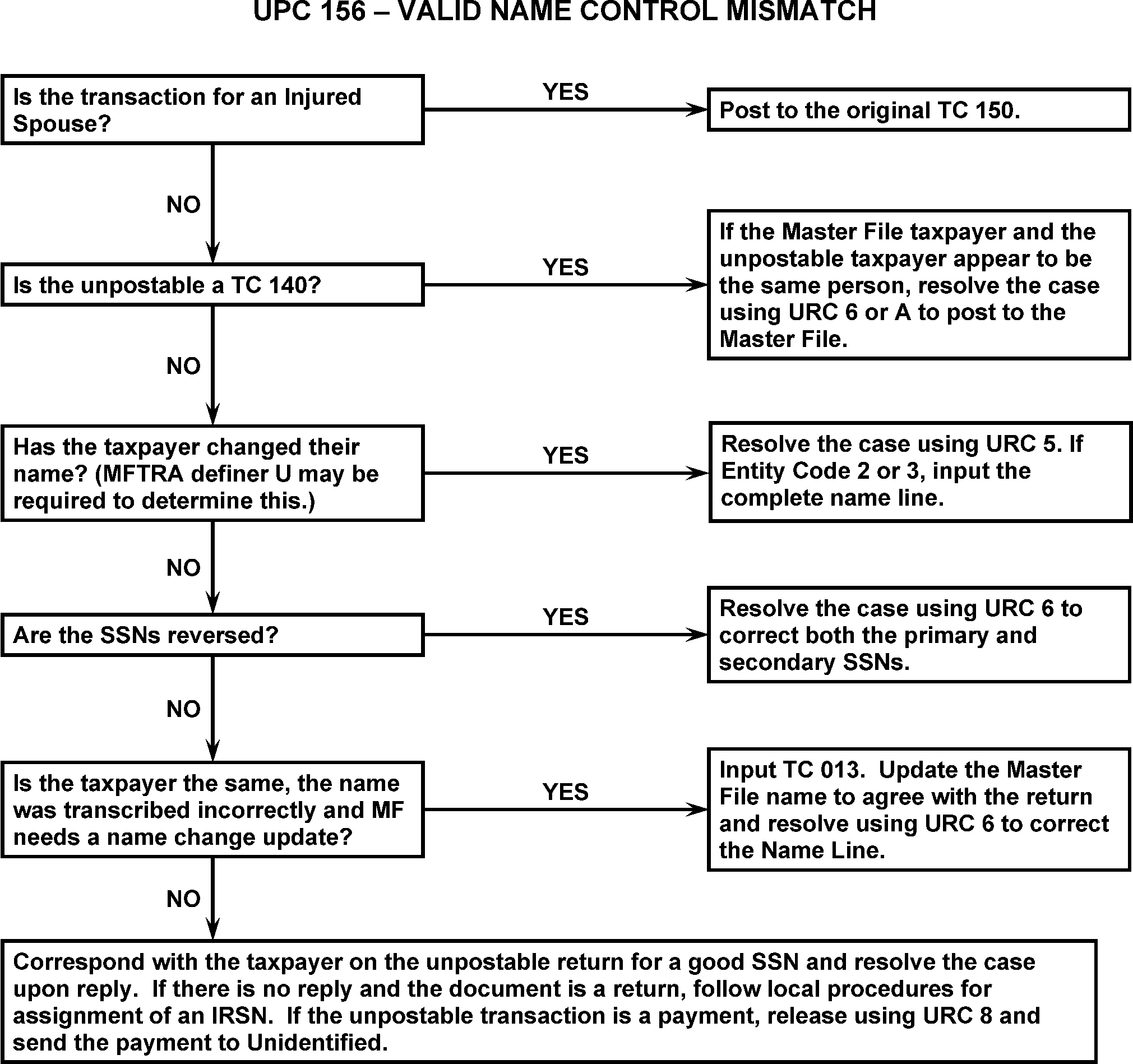
-
This subsection contains conditions and resolutions for UPC 157 RC 0 - RC 4.
-
CONDITION RC 0 This condition occurs when a TC 150 with FSC 5 attempts to post and the controlling name line for two most current preceding tax periods before the year of the input transaction contains FSC 5.(Filing Status code 5 is Widower with Dependent Children).
-
Resolution UPC 157 RC 0: Research the two immediately preceding tax periods using CC RTVUE. If the taxpayer filed with FSC 5 for the two preceding years, URC 8 to Rejects with the following instructions.
-
If a dependent is claimed, request Rejects change FSC to 4.
-
If a dependent is not claimed, request Rejects change FSC to 1.
-
-
CONDITION RC 1 This condition occurs when a generated Name Control does not match primary Name Control.
-
Resolution UPC 157 RC 1 Compare names on document and Master File. Use signatures for correct spelling.
-
If Master File name is correct, URC 6.
-
If Unpostable name is correct, URC 5.
-
-
CONDITION RC 2 This condition occurs when a TC 000, TC 01X, containing name information for TC 140, TC 150, or TC 430 with a joint name line that contains an ampersand [&] followed by one of the following errors:
-
The ampersand (&) is not followed by a minimum of a blank space, alpha characters, another blank space and alpha characters.
-
The ampersand (&) is followed or preceded by blank space, blank space.
-
The ampersand (&) is part of the last name.
-
FSC is other than FSC 2 or FSC 7 and the ampersand (&) is included in the name line or if the BRACKET (]) points to a blank as the last name.
-
-
Resolution UPC 157 RC 2 Compare names on document with Master File.
-
For TC 000 on ITIN or IRSN, URC 2 to Originator with remarks "INVALID TRANS FOR ITIN or IRSN: VOID" .
-
If unpostable is TC 000 or TC 01X, research thoroughly. Use CC ENMOD to determine the intent of the name and/or TIN update.
-
Use CC ENMOD / CC ENREQ / CC INCHG when a reinput of TC 000 or TC 01X is necessary. Close with URC D to void the Unpostable. Remarks: "INPUT CU: NAME LINE: VOID" .
-
URC 2 to originator only if UNABLE to correct the unpostable condition.
-
For additional information, refer to IRM 3.12.179.9.9 , IMF Name Changes (TC 013).
-
-
If unpostable condition is TC 150 or TC 430 (non-generated transaction), correct by comparing the names on the document and Master File. Use signatures, Form W-2, etc. for correct spelling of name.
-
If the name line was transcribed incorrectly, URC 6 to correct the Unpostable name line and Name Control.
-
If FSC needs to be corrected, URC 8 to Rejects.
-
-
For E-File returns, research CC TRDBV, CC INOLE, CC MFTRA, CC NAMES, and/or CC NAMEI, on both segments if necessary, to obtain the secondary taxpayer's SSN and last name.
-
If CC INOLE for the primary or secondary taxpayer contains a joint name line with the same joint taxpayers as on Form 4251, URC 6 and correct the name line to match INOLE.
-
If CC INOLE for the primary or secondary does not contain a joint name line with the same joint taxpayers as on Form 4251, URC 6 and shorten the name line to include the secondary's last name, using the name shortening rules in para 5.
-
-
Follow the rules in IRM 3.12.179.9.6.3 , Editing IMF Name Lines, in sequential order to shorten a name line to 35 - characters. See IRM 3.13.5.120.5, for additional information.
-
CONDITION RC 3 This condition occurs for the following:
-
TC 000, TC 01X -TC 04X, TC 080, TC 140, TC 150, or TC 430 containing a SSSN of 123456789 or nine of the same number (ex. 111111111).
-
TC 017 with a Justification indicator input with a SSSN starting with 9 (This check is bypassed if the SSSN is an ITIN).
-
TC 150 containing RPC E containing a SSSN starting with 9 (This check is bypassed if the SSSN is an ITIN).
-
TC 000 or TC 016 either with a Justification indicator input to an SSN starting with 9 (This check is bypassed if the SSSN is an ITIN).
-
-
Resolution UPC 157 RC 3 Research for a valid SSSN by checking the return and attachments and using CC INOLE, CC NAMES, etc. Use the If And Then chart below for resolution.
If ... And ... Then ... 1. A valid SSSN is found URC 6 to correct the SSSN. 2. TC 150 A valid SSSN cannot be found and the RPC E present on TRDBV. URC 8 to Rejects, instruct Rejects to remove the SSSN, spouse exemption (2017 and prior year return only) and the RPC E. Edit the return. 3. TC 150 A valid SSSN cannot be found, and the Return Processing Code (RPC) E is not present on TRDBV on the codes screen (Returns Processing line). URC 8 to Rejects, instruct Rejects to remove the SSSN and spouse exemption (2017 and prior year return only). Edit the return. 4. Other than TC 150 URC 2 to the originator. Include Remarks, “SSSN INVALID; VOID”.
-
CONDITION RC 4 This condition occurs for any transaction attempting to post to the entity containing SSN 123-45-6789 or with SSN 111-11-1111, 222-22-2222, etc.
-
Resolution UPC 157 RC 4 Research for a valid SSN by checking the return and attachments and using CC INOLE, CC NAMES, etc. If payment transaction, research RTR.
-
If a valid SSN is located, URC 6 and correct the SSN.
-
If a valid SSN is not located, use the following table to close the unpostable.
If ... Then ... 1. TC 150 Request assignment of an IRSN. 2. Payment - TC 430 Secure payment documents. URC 1 to Accounting to send to Unidentified. 3. If TC 902 URC 2 to void to the originator. If no IDRS number present URC D with remarks INVALID SSN: VOID”. -
-
CONDITION RC 0 This condition occurs when a TC 30X or TC 29X blocked other than 290–299 or 930–949, carries credit reference number 806, 807, or 252 not containing a secondary TC 17X if the module contains a prior posted TC 170 or TC 171 with Doc Code 17, Doc Code 18, Doc Code 24, Doc Code 47, Doc Code 51, Doc Code 52, or Doc Code 54.
-
Resolution UPC 158 RC 0: GUF Auto-Close URC 2 to Originator.
-
CONDITION RC 1 This condition occurs for any of the following:
-
TC 290, TC 294, TC 298, TC 300, TC 304, or TC 308 for a significant amount ≡ ≡ ≡ ≡ ≡ ≡ ≡ ≡ ≡ ≡ ≡ ≡ ≡ ≡ ≡ ≡ ≡ ≡ ≡ ≡ ≡ of a previously posted TC 290, TC 294, TC 298, TC 300, TC 304, or TC 308 for a significant amount ≡ ≡ ≡ ≡ ≡ ≡ ≡ ≡ ≡ ≡ ≡ ; or
-
TC 291, TC 295, TC 299, TC 301, TC 305, or TC 309 for a significant amount ≡ ≡ ≡ ≡ ≡ ≡ ≡ ≡ ≡ ≡ ≡ ≡ ≡ ≡ ≡ ≡ ≡ ≡ ≡ of a previously posted TC 291, TC 295, TC 299, TC 301, TC 305, or TC 309 for a significant amount ≡ ≡ ≡ ≡ ≡ ≡ ≡ ≡ ≡ ≡ ≡; or
-
TC 300 for a significant amount ≡ ≡ ≡ ≡ ≡ ≡ of a prior TC 295 or TC 299.
-
TC 29X / TC 30X containing a reference number 806, 807, or 766 ≡ ≡ ≡ ≡ ≡ ≡ ≡ ≡ ≡ ≡ of a prior posted matching transaction (example, reference number 806 ≡ ≡ ≡ ≡ ≡ ≡ ≡ ≡ ≡ ≡ ≡ ≡ ≡ ≡ ≡ ≡ ≡ ≡ ≡ ≡ ≡ ≡ ≡ ≡ ≡ ≡ ≡ ≡ ≡ ≡ ≡ )
-
-
Resolution UPC 158 RC 1 GUF Auto-Close URC 2 to Originator.
-
This subsection contains conditions and resolutions for UPC 159 RC 0.
-
CONDITION RC 0 The following tables provide a detailed explanation of UPC 159 RC 0.
-
This condition occurs when an Input transaction (other than those following) attempts to create a Tax Module (MFT 29 or MFT 30):
-
TC 140
-
TC 141
-
TC 142
-
TC 150
-
TC 290 blocking series 290–299, 980–989
-
TC 290 $0 CRN 338 / 257, EIP 290 CRN 272
-
TC 370
-
TC 424 with Push Code 010, 019–041, 049, or 081
-
TC 430
-
TC 460
-
TC 470 cc 96
-
TC 474
-
TC 480
-
TC 500 cc 52, cc 54, or cc 56
-
TC 520 cc 6X, cc 81, cc 83, and cc(s) 85–89
-
TC 540
-
TC 560
-
TC 582
-
TC 59X except TC 592
-
TC 610
-
TC 640
-
TC 660
-
TC 666 with Julian Date 999
-
TC 670
-
TC 690
-
TC 700
-
TC 710
-
TC 760
-
TC 76X Doc Code 54 blocked 4XX/4XX/29X/988-989
-
TC 790 (MFT 29 only) / TC 796 (MFT 29 and MFT 35 only)
-
TC 800
-
TC 810
-
TC 840
-
TC 849
-
TC 914
-
TC 916
-
TC 925 after resequencing for 1 week
-
TC 930
-
TC 960
-
TC 970 AC 001
-
TC 971 other AC 1–9, AC 111, or 199 or AC 830
-
TC 971 AC 111 will resequence with RC 84 rather than unpost
-
TC 971 AC 114, AC 115
-
TC 971 AC 128 will unpost after resequencing the transaction for 4 weeks
-
TC 971 AC 607 attempting to post to MFT 30 or MFT 31 and no module has been established
Note:
If the only transaction present in a module is TC 91X, unpost any transaction (except TC 91X) that cannot create a tax module. (See UPC 183). DDB TC 424 with blkser 8888N/77777 will resequence (Resequence reason code 62) for 2 cycles prior to unposting
-
-
b) An input TC 971 AC 607 attempting to post to MFT 30 or MFT 31 and no module has been established
-
An Input Transaction (other than the following) attempts to create an MFT 55 Module:
-
TC 290 blocking series 050–198, 520–529, 590–599, 960–969 or 980–999 providing a reference number (other than 697 or 699) for a significant amount is present.
-
TC 370 containing Civil Penalty Reference Numbers.
-
TC 520 CCs 6X, 81, 83, 85–89
-
TC 520- TC 529
-
TC 590- TC 599
-
TC 640
-
TC 670
-
TC 694
-
TC 914
-
TC 960- TC 969
-
TC 971 AC 82, AC 83, AC 97, AC 682, or AC 683
-
TC 980- TC 999 with reference number for a significant amount (exception: reference number 697 or 699
-
-
MFT 31 cannot be created by any transaction other than the generated TC 370 or TC 971 AC 102 or AC 103. MFT 31 can also be created by TC 370 blocked 900–909.
-
MFT 65 cannot be created by any transaction other than the IMF generated TC 370.
-
MFT 82 cannot be generated by any transaction other than an input TC 971 AC 507.
-
An Input Transaction (other than the following) attempts to create an MFT 35 Module:
-
TC 290 with penalty reference number Penalty Reference Number (PRN) 692 for a significant amount is present
-
TC 370 containing PRN 692
-
TC 520 CC 6X, 81, 83, 85–89
-
TC 640
-
TC 670
-
TC 914
-
TC 960
-
TC 971 AC 31–34, AC 43, AC 63, AC 65, AC 82, AC 83, AC 107, AC 682, and AC 683
-
-
-
Research to determine where original TC 150 has posted.
-
Use the following when the correct taxpayer account is found:
-
If SSN, MFT, name and/or tax period ending are in error, correct with URC 6.
-
If a transaction that creates a module is pending or has posted, URC 0 and cycle delay as needed.
-
If document containing a transaction that creates a module is Unpostable, (for example., if TC 150 is Unpostable and TC 971 would post once the TC 150 posted) close both cases together, correct with the appropriate resolution code and cycle delay as needed.
-
If TC 680 and research shows a posted or pending TC 150, URC 0, URC 6, or URC 8 depending on correction necessary to close the case.
-
If TC 150 is UPC 171 or there is no posted or pending TC 150, change TC 680 to TC 670.
-
If Doc Code is 77 and TC 898 or TC 899 research and correct the condition with URC 6. If unable to correct the case, notify management to elevate to the Headquarters IMF Unpostable Analyst through P&A Analyst for resolution. Put case in suspense and do not close until instructed. DO NOT URC D TC 898 / TC 899.
-
-
Payments are initially applied to the tax liability. The IA User Fee Transfer Program “sweeps” all active IA’s, coded as User Fee Due, and moved the money from the tax account to an accounting fund for the IA User Fee. This process is referred to as the User Fee Sweep and is done weekly. Beginning 4 weeks after a TC 670 has posted to the account, and sufficient payments are available to satisfy the entire user fee amount due, the payment is systemically reversed on the tax module with a TC 672 (Saturday Julian date) in the DLN of the credit transfer from “001 through 365”.
-
User Fees are applied to MFT 55 and Tax Period YYYY01, conduct all research to determine if the payment is applied correctly. Use the chart below to determine the DPCs and User Fee Installment Agreement amounts are valid.
For additional reference to User Fees, see IRM 3.12.10.3.3, Revenue Receipts, Installment User Fee and IRM 5.19.1.6.4, Balance Due, Methods of Payment Installment Agreement (IA) for additional information regarding valid DPC and fee amounts.Designated Payment Code Definition User Fee Rates before June 30, 2024 User Fee Rates effective July 1, 2024 DPC 44 On-Line Payment Agreement (OPA) Direct Debit Installment Agreement (DDIA) Origination Fee $31.00 $22.00 DPC 45 OPA Non-Direct Debit Installment Agreement Origination Fee $130.00 $69.00 DPC 46 OPA Installment Agreement Reinstatement or Restructure Fee (Reserved) Reserved - for future use Reserved - for future use DPC 47 Installment Agreement Reduced Origination User Fee before 04/10/2018. (After 04/10/2018 User Fee is $0). $43.00 $43.00 DPC 48 DDIA Reduced Origination User Fee before 04-10-2018. (After 04/10/2018 User Fee is $0). $43.00 $43.00 DPC 49 DDIA Origination User Fee $107.00 $107.00 DPC 50 Installment Agreement Initial Origination User Fee $225.00 $178.00 DPC 51 Installment Agreement Restructured User Fee Reinstated $89.00 $89.00 DPC 52 Installment Agreement Reinstated or Restructure Reduced User Fee (Low- Income) $43.00 $43.00 -
Resolution Procedure UPC 159 RC 0 Installment Agreement (IA) when the taxpayer is NOT deceased:
-
Research CC IMFOL to review taxpayer’s account to see if MFT 55 is posted on the taxpayer’s account.
-
Research CC TXMOD to see if the taxpayer’s account is in Status 60.
-
Ensure the payment was applied to MFT 55 with the correct Designated Payment Code (DPC) and tax period.
-
If the missing item on the unpostable condition is the DPC, URC 8 to Rejects. Inform Rejects to enter the DPC of 44-52.
-
If payment/tax period, or MFT was applied to the incorrect module and a MFT 55 is established on taxpayers account correctly, URC 6 to correctly apply the user fee.
-
If payment/tax period was applied to MFT 30 and a MFT 55 is NOT established on taxpayer account, correct by establishing the MFT 55 with CC REQ77 / CC FRM77.
-
If TC 695, URC 8 to Rejects and request they forward to the originator.
-
If the DPC of 44-52 was input in error, URC 8 to Rejects. Request they "Remove the DPC" and move the money to the oldest debit module for the taxpayer.
-
If the revenue receipt is a "User Fee payment" , URC 1 to Accounting to reinput the transaction.
-
-
Resolution Procedure UPC 159 RC 0 Installment Agreement (IA) for deceased taxpayers:
-
Input TC 012 on CC ENMOD to bring the account back to an active status.
-
Establish Dummy Account with CC ACTION, MFT 55 for the earliest Balance Due Tax Period (example: 202401).
-
On REQ77 input TC 971 and Action Code 082 if User Fee is an Origination Fee or 083 for a Reinstated Fee in the TC 971 / TC 151 CD Field.
-
URC 6 to the previously established MFT 55 for the earliest Balance Due Tax Period (example: 202401).
-
Input TC 020 on CC ENMOD with a Posting Delay of 4 weeks to re-establish the MFR 08 status.
-
-
If TC 96X, URC 2 to Originator.
-
If TC 120, GUF Auto-Close URC 2 to Disclosure Office.
-
If TC 971 / TC 972 AC 517, close URC D.
-
If TC 140, TC 141, or TC 142, GUF Auto-Close URC 2 to Collections.
-
All others, use URC 2 or URC 8 as appropriate. Figure 3.12.179-16 for an overview of UPC 159.
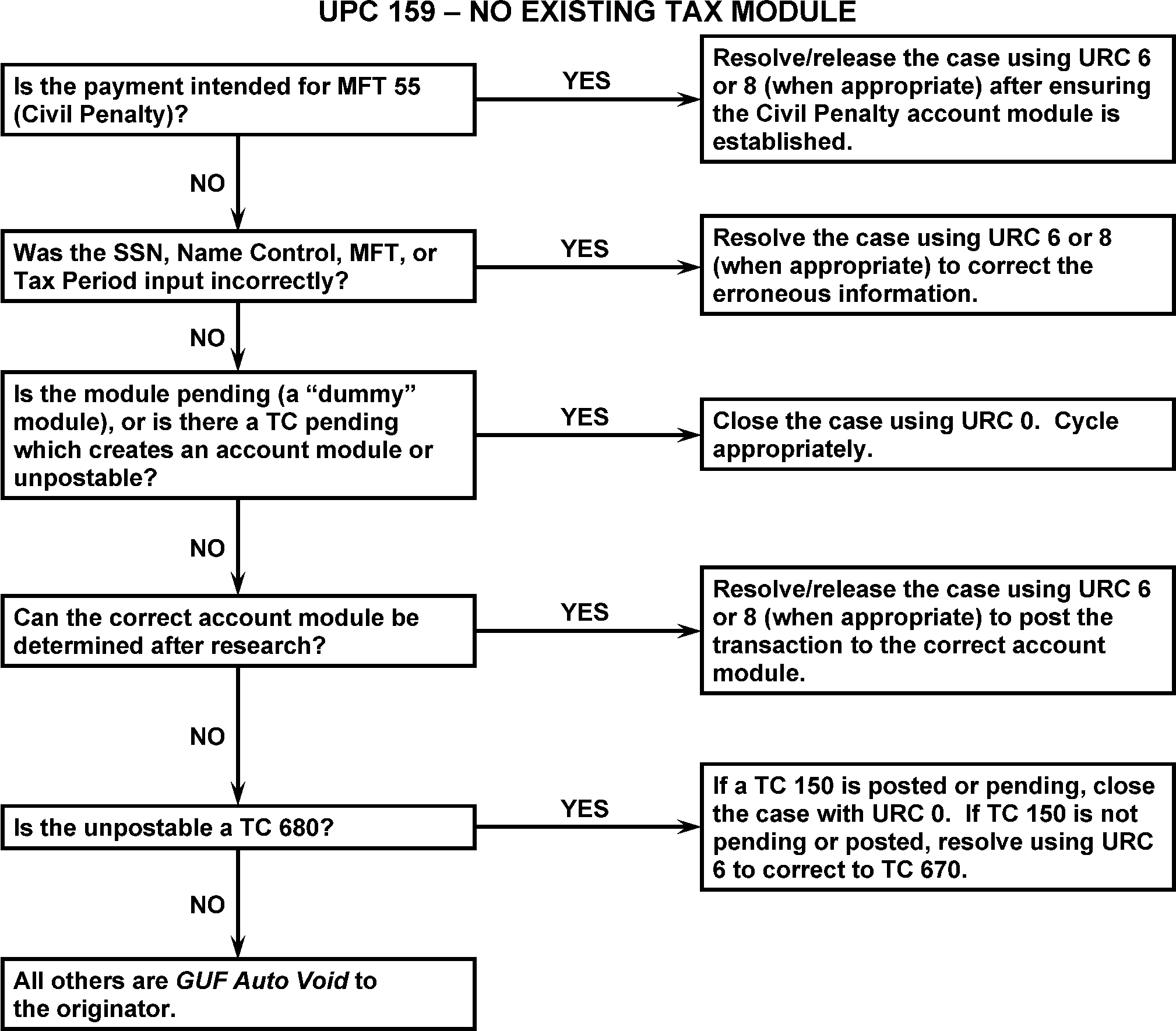
-
Use the chart below to identify the conditions and actions needed to resolve UPC 159 RC 0 with TC 796 on the MFT 35 module.
-
Check both valid and invalid segments of the MFT 35 module.
Condition Action 1. MFT 35 is present URC 0 the TC 796 to post to MFT 35. See Note 2. MFT 35 is not present URC 0 the TC 796 with a release/cycle delay code 1. Any corrections made after May 14, 2015 must use release cycle 1.
-
Research the taxpayer tax modules for both MFT 30 and MFT 35.
If... Then... 1. The Unpostable transaction is a duplicate credit transfer. URC 0 the transaction. NOTE: There were programming changes for SRP that has resulted in duplicate credit transfers with a TC 826 / TC 706 credit transfer posting on the MFT 30 / MFT 35 modules after a TC 896 posted on the MFT 30 and the TC 796 unposted on the MFT 35. 2. The unpostables transaction is not a duplicate credit transfer, such as a TC 821 when there is no posted TC to reverse. URC 6 the transaction, changing the MFT and tax period to direct the transaction back to the tax module where the corresponding debit posted. Contact the originator to let them know the transaction is being directed back to the module the debit transaction posted.
-
This subsection contains conditions and resolutions for UPC 160 RC 0 - RC 6.
-
CONDITION RC 0 This condition occurs when a TC 291 or TC 299 not containing Priority Code 1, 2, 6, 7, or 8, attempts to post to a MFT 29 or MFT 30 module containing an unreversed TC 420 or TC 424.
-
Resolution UPC 160 RC 0: GUF Auto-Close URC 2 to Originator.
-
CONDITION RC 1 This condition occurs when a TC 29X, except blocking series 290-299, when an unreversed TC 576 is posted, unless there is a Priority Code 6 or 7 in adjustment transaction. The TC 29x doc code 54 blkser 200-289 should unpost if the module contains an unreversed TC 576. F 1040-X will no longer be input with a TC 29x Doc Code 54 blocking series 200-289.
-
CONDITION RC 2 This condition occurs when a TC 290, blocking series 290-299, when the module has an unreversed TC 30X present. Exclude TC 290 blocking series 200-289.
-
Resolution UPC 160 RC 1 - RC 2 GUF Auto-Close URC 2 to Accounts Management.
-
CONDITION RC 3 This condition occurs when a TC 420 input to MFT 29 or MFT 30 and the module contains an unreversed TC 420. TC 421 with an FLC not within the jurisdiction of the FLC of a prior posted TC 420 or TC 424.
-
CONDITION RC 4 This condition occurs when a TC 30X attempts to post, unless Priority Code 1, 3, 4, or 7 is present.
-
Resolution UPC 160 RC 3 - RC 4: GUF Auto-Close URC 2 to Exam.
-
CONDITION RC 5 This condition occurs when a TC 424 attempts to post (except TC 424 input to MFT 30 with Push Code 010 or 036, or DLN with block and serial of 88888 or 88889) and an unreversed TC 420 or TC 424 is already posted. This condition will also occur when a TC 424 (except Push Code 049) or TC 420 unless the module already has a TC 424 posted (note a second TC 420 will go UPC 160 RC 3) UPC 160 RC 5 if the module contains TC 916 or if the entity contains TC 918. Bypass for corrected UPC.
-
Resolution UPC 160 RC 5 All cases are assigned to GUF Category E1.
-
CONDITION RC 6 This condition occurs when a TC 421 input to MFT 29 or MFT 30 attempts to post when 640 Freeze is in effect (for Doc Code 47 only).
-
CONDITION RC 8 This condition occurs when a TC 424 is input to a module containing a TC 494.
-
Resolution UPC 160 RC 6 - RC 8: GUF Auto-Close URC 2 to Exam.
-
CONDITION RC 0 This condition occurs when the Check Digit mismatches.
-
Resolution UPC 161 RC 0: Use the following to make corrections:
-
Check Digit is present (the first two position is blank on the Name Control field), research for the taxpayer accurate Name Control and correct it with URC 6.
-
If taxpayer changed name, input TC 013, URC 6 and cycle delay as needed.
-
If Check Digit (3rd and 4th position) shows the correct Name Control but SSN is in error, research for a better SSN. If found and account is present, correct SSN and move the Name Control to the correct position and close with URC 6.
-
If a better SSN is found and account is not present, input TC 000, cycle delay as needed and correct with an URC 6.
-
If TC 96X, GUF Auto-Close URC 2 to Originator.
-
-
CONDITION RC 0 This condition occurs if the month the taxpayer's year ends in the entity is different from the month of input return.
-
The Fiscal Year Month (FYM) refers to the two-digit number indicating the month the taxpayer's fiscal year ends. The Tax Period Ending refers to the six-digit number (YYYYMM) indicating the tax period of a specific transaction. The final two digits of the Tax Period Ending must match the FYM on CC ENMOD for MFT 30.
-
If an assessment (TC 290 or TC 300) is present and the Statute of Limitation will expire within 60 days, reassign to Statutes with CC UPASG. Follow local procedures to expedite to Statutes.
-
All others, URC 2 and route to Originator.
-
If the payment transaction (TC 610, TC 640, TC 660, or TC 670) is intended for IMF, post to the correct Master File Tax Period Ending with URC 6.
-
If payment transaction (TC 610, TC 640, TC 660, or TC 670) is intended for a BMF account, URC 8 and request Rejects renumber to BMF.
-
RESOLUTION: If UPC contains an input error, URC 6 to correct.
-
If no input error is detected:
-
Input TC 016 to update Master File.
-
URC 0 and cycle delay as needed.
-
After TC 370 posts, change taxpayer's month ending with TC 016 to agree with current Master File.
-
-
If there are no input or transcription errors, and Master File and the document tax period ending dates do not agree, input TC 016 and resolve with URC 0 and cycle delay 3 cycles.
-
If there are no input or transcription errors, and there is an indication the taxpayer has incorrectly entered the tax period ending date, resolve by correcting the tax period with URC 6.
-
If they filed Form 4868 incorrectly (example: filed as an FY 12 but Master File shows taxpayer is a FY 02 filer), and unpostable contains money, URC 8 and request Rejects change the FY to agree with Master File.
-
URC D all others. Forward document to reprocessing to correct tax period ending.
-
If TC 150 is for a short period and taxpayer's DOD is within period covered by return, research and transfer all ES Tax Credits found in prior modules.
-
Input TC 016. Close with URC 0 and cycle delay if CCCs are input correctly. See IRM 3.12.179.23.1 , UPC 136 RC 0.
-
If CCCs are incorrect, URC 6 to add one CCC. URC 8 if two CCCs are needed, or to remove CCCs.
-
-
If DOD is BEFORE period covered by return, URC 8 to have Rejects renumber the return Form 1040 and send to BMF Rejects for conversion of F 1040 to F 1041. Include a copy of the first page of Form 1041 with the Entity section filled in.
IRM 3.12.37.30, Transshipping Returns. -
If DOD is AFTER period covered by return, URC 8 and request Rejects change month ending on return to agree with Master File.
-
If TC 971 AC 517 or TC 972 AC 517, close URC D.
-
If TC 971 AC 830 Clean Vehicle Credit is present on the module, research the tax return and close with URC 6 with the appropriate Fiscal Year Month (FYM).
-
If TC 150 and month ending is different due to input error, URC 8. Request Rejects change tax period to agree with Master File.
Caution:
Follow taxpayer intent when correcting the Tax Period Ending of the transaction. For example, if a 2024 Form 1040 specifies a fiscal year ending of June 30, 2025, the Tax Period Ending will be 202506 and not 202406. Check CC IMFOLI for the Tax Period Ending of prior postings. It is very important to work related cases involving payments and returns together to avoid repeat unpostables, unnecessary credit transfers, and erroneous notices.
-
If taxpayer indicates a different tax period than Master File:
-
Check for a statement, Form 1128, or authorization described under the IRC allowing tax period ending change.
-
If evidence is present, TC 016 to change Master File.
-
Ensure all TCs posted on Master File under previous FYM are transferred to new tax period.
-
URC 0 and cycle delay.
-
-
TC 971, GUF Auto-Close URC 2 to Originator. If no originator, close URC D.
-
If Doc Code 77 (generated transaction), URC D.
-
If you cannot decide whether Master File or Unpostable document is correct, correspond using a Letter 319C or appropriate letter and suspend case. If taxpayer indicates:
-
FYM on Master File is correct, URC 8 and request Rejects to change the tax period ending date on the document to match Master File FYM.
-
FYM on Unpostable is correct because of an approved Form 1128, input a TC 016 to change Master File. Ensure all credits are transferred to new tax period. URC 0 to post after all transactions are made.
-
If taxpayer indicates change to tax period ending has not been submitted, was denied, or No Reply, URC 8. Request Rejects change the month ending to agree with Master File.
-
-
If TC 150 and month ending is different due to input error, URC 8. Request Rejects change tax period to agree with Master File. Caution: Follow taxpayer intent when correcting the Tax Period Ending of the transaction. For example, if a 2024 Form 1040 specifies a fiscal year ending of June 30, 2025, the Tax Period Ending will be 202506 and not 202406. Check CC IMFOLI for the Tax Period Ending of prior postings. It is very important to work related cases involving payments and returns together to avoid repeat unpostables, unnecessary credit transfers, and erroneous notices.
-
If tax period ending on return is within 12 months of the previously posted return, input a TC 016, cycle delay as needed, URC 0 and follow taxpayer's intent.
-
If tax period ending is more than 12 months after previously posted return, correspond using Letter 319C. Correct per information provided by taxpayer. If No Reply, correct return per tax period ending on Master File. URC 8 and request Rejects change tax period ending accordingly. , Figure 3.12.179-17, Figure 3.12.179-18 and Figure 3.12.179-19.
-
Taxpayers living in Australia often use a June (06) Fiscal Tax Period ending that coincides with Australian accounting period.
-
Some Puerto Rico taxpayers file Form 1040-PR or Form 1040-SS when they reach the maximum earnings for SECA taxes without waiting for the end of tax period.
-
If there is no indication of changes to accounting period and prior posting show a CY filer, URC 8 to Rejects requesting a CCC U.
-
Indicate "Hold for End of Year Processing."
-
Correct tax period ending on return.
-
Follow domestic Unpostable procedures.
-
-
Form 1040-SS is same form as Form 1040-PR printed in English and is filed by persons residing in Virgin Islands, Guam, American Samoa and Northern Mariana Islands.
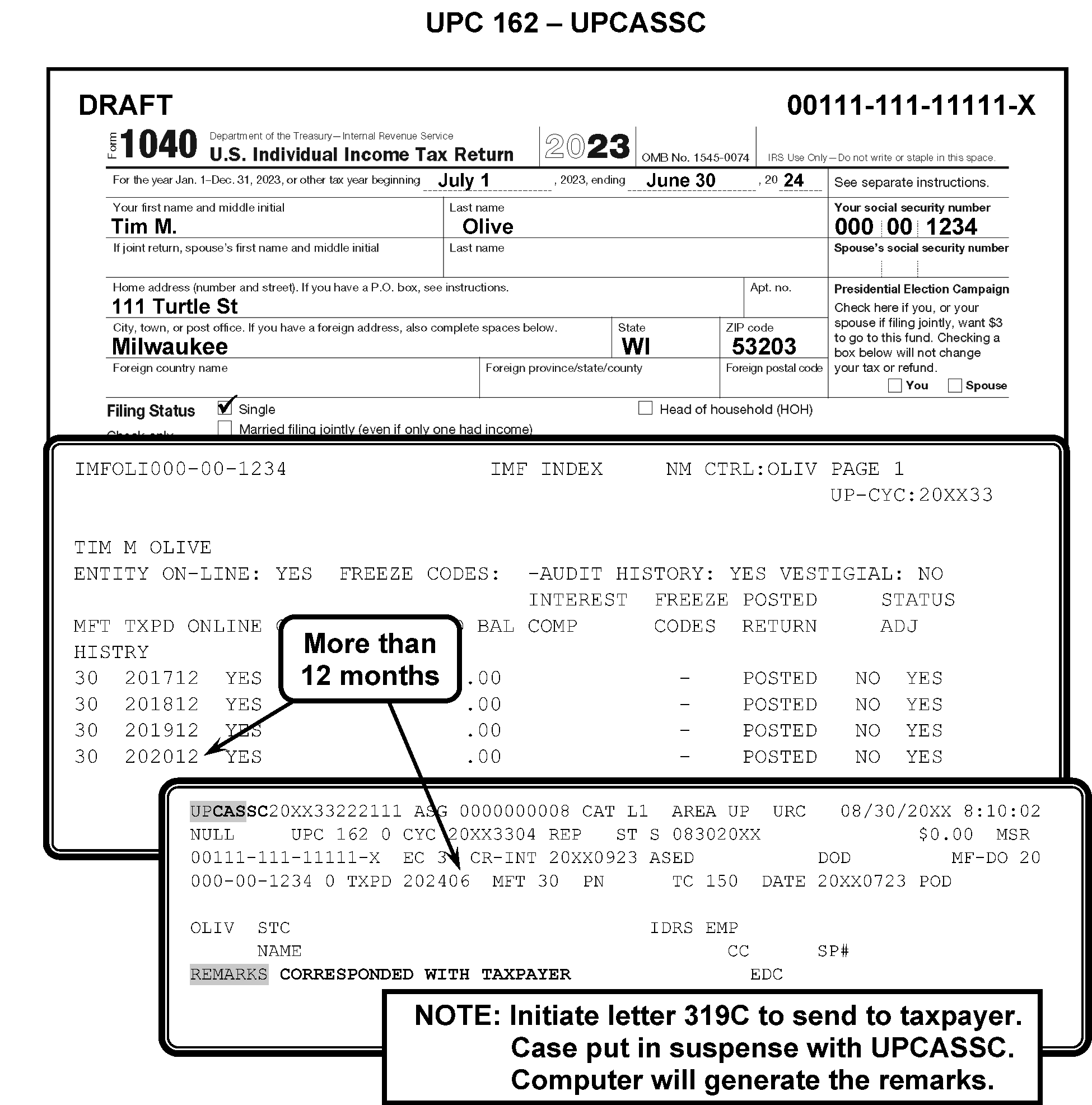
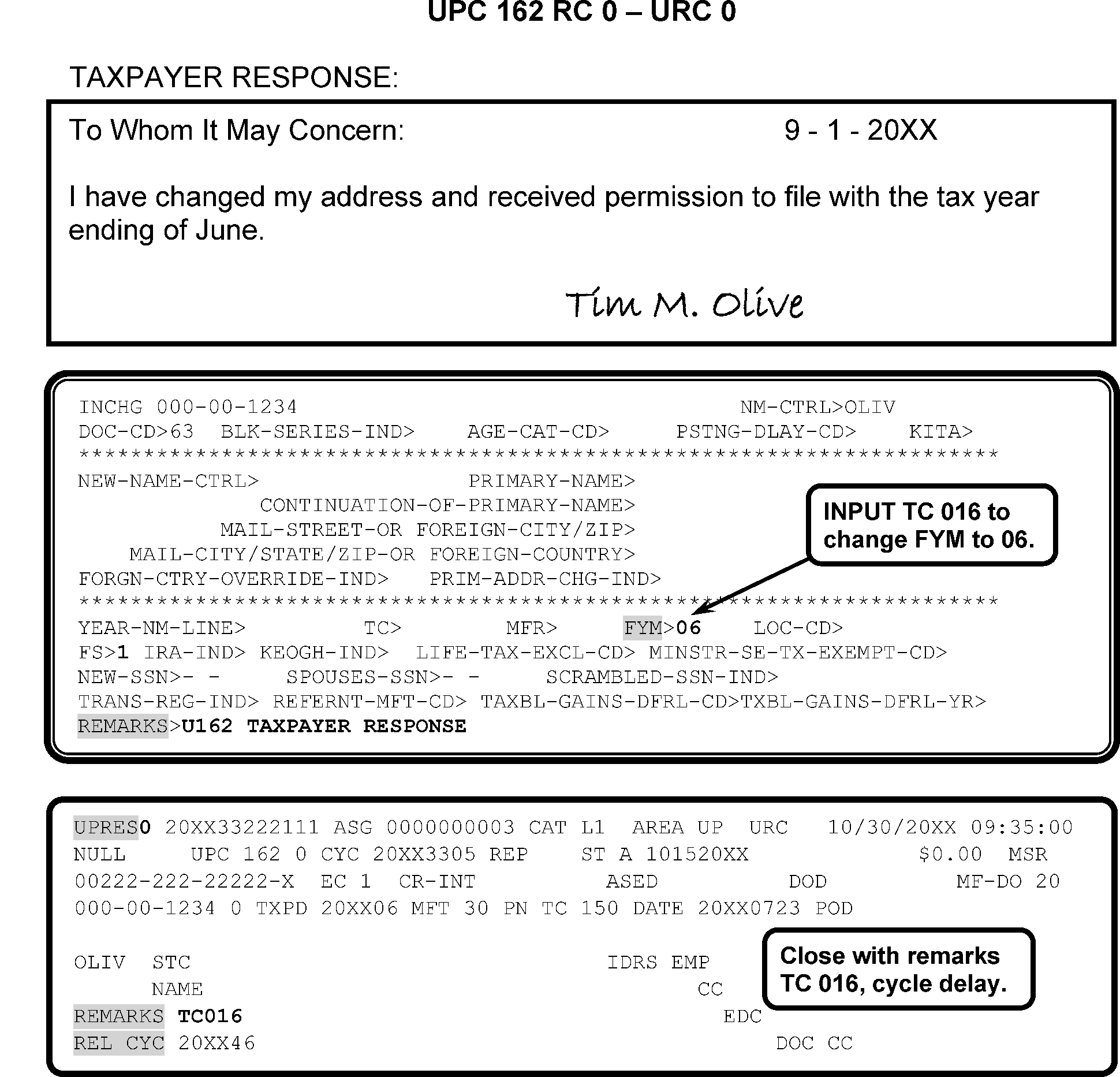
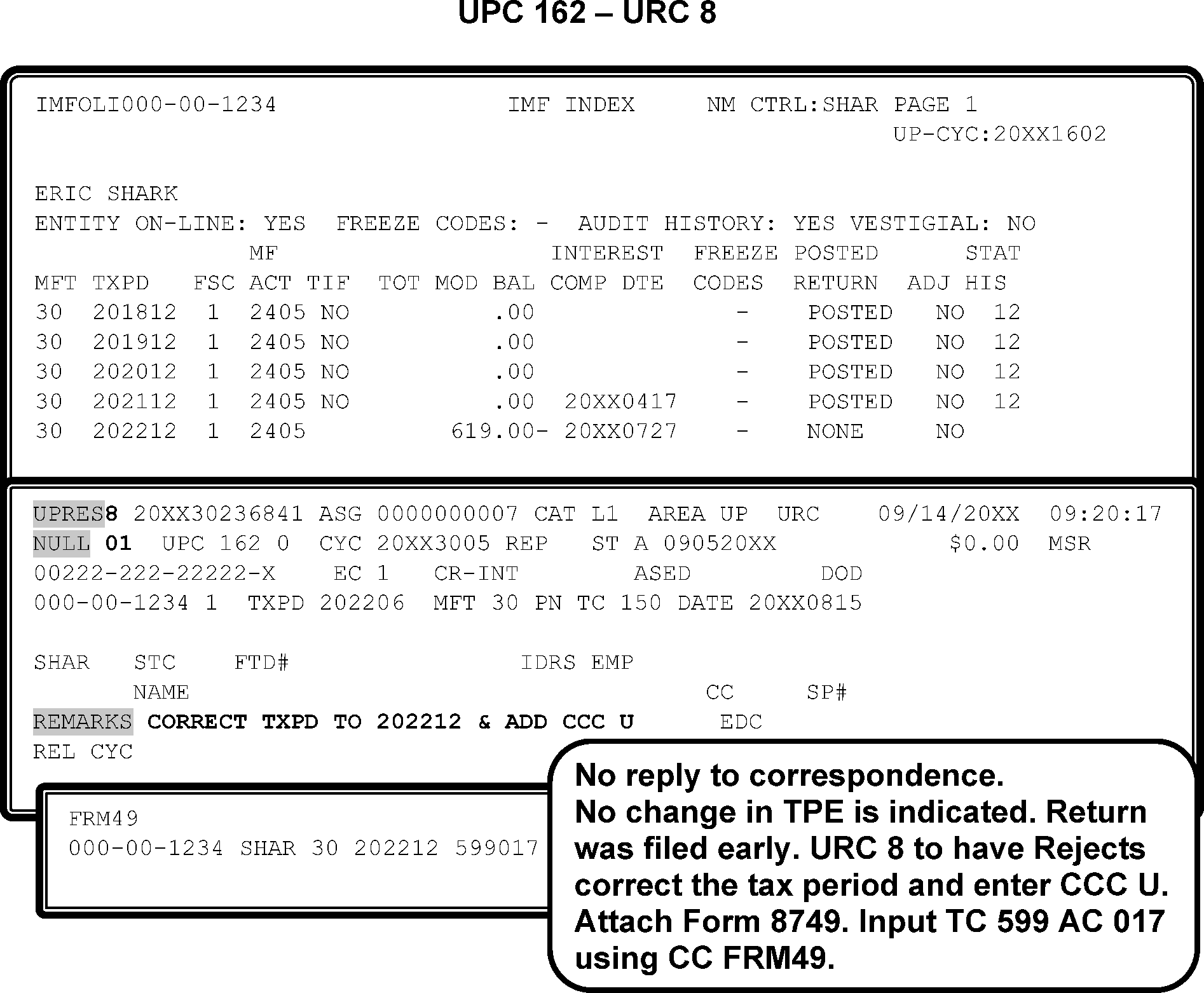
-
This subsection contains conditions and resolutions for UPC 164 RC 0 - RC 9.
-
CONDITION RC 0 This condition occurs when an input TC 150 contains a significant withholding amount equal to the sum of ES credits posted ≡ ≡ ≡ ≡ ≡ ≡ ≡ ≡ ≡ ≡ ≡ ≡ ≡ ≡ ≡
-
Resolution UPC 164 RC 0:If the taxpayer claims both ES credits and withholding credits, verify withholding amount per Form W-2 or substitutes attached, and/or CC IRPTR.
-
If withholding amount is correct, URC 0.
-
If there are no wages or other income subject to withholding, and an amount is claimed for withholding, URC 8 to Rejects requesting to delete the withholding amount.
-
If credits are reversed, URC 8 to Rejects. Request a correction of money amounts on ES and withholding fields.
-
-
CONDITION RC 1 This condition occurs when a TC 150 with a tax period of 199812 and subsequent years that contains Earned Income Credit (EIC) per computer is input to an account containing the EIC Recertification Indicator in the entity section that is set to the normal or self only setting; if the 2 or 10 year settings of the EIC Recertification Indicator are significant, or if the EIC Recertification Indicator is set to 3.
Note:
Master File will bypass UPC 164 RC 1 if the TC 150 contains Audit Code U; or if the normal setting only (1 setting) and not the income related setting (8 setting) is significant, and the input return is tax period 200212 or subsequent and does not contain a Schedule EIC. Master File will also bypass UPC 164 RC 1 if the EIC Recertification Indicator is set to 3 and the input tax period is equal or later than the EITC Eligible Tax Period.
American Opportunity Tax Credit (AOTC)
-
AOTC Recertification indicator 1. Unpost UPC 164 RC 1 a Return input to tax year 201612 or later claiming AOTC if the AOTC Recertification indicator is set to 1. Bypass if Audit code 3 is input on the return.
-
AOTC Recertification indicator 2 or 4. Unpost UPC 164 RC 1 a Return input to a tax year 201612 or later claiming AOTC if the AOTC Recertification indicator is set to 2 or 4 (2/10 year ban). Bypass if the input tax period is equal or later than the AOTC Eligible Tax Period and the return contains Audit Code 3.
-
AOTC Recertification indicator 30. Unpost UPC 164 RC 1 a Return input to a tax year 201612 or later claiming AOTC if the Recertification indicator is set to 30. Bypass if the input tax period is equal or later than the AOTC Eligible Tax Period.
Additional Child Tax Credit (ACTC) Recertification
-
ACTC Recertification indicator 1. Unpost UPC 164 RC 1 a Return input to tax year 201612 or later claiming CTC/ACTC if the CTC/ACTC Recertification indicator is set to 1. Bypass if Audit code 2 is input on the return.
-
ACTC Recertification indicator 2 or 4. Unpost UPC 164 RC 1 a Return input to a tax year 201612 or later claiming CTC/ACTC if the CTC/ACTC Recertification indicator is set to 2 or 4 (2/10 year ban). Bypass if the input tax period is equal to or later than the CTC/ACTC Eligible tax period and Audit code 2 is input on the return.
-
ACTC Recertification indicator 30. Unpost UPC 164 RC 1 a Return input to a tax year 201612 or later claiming CTC/ACTC if the Recertification indicator is set to 30. Bypass if the input tax period is equal or later than the CTC/ACTC Eligible Tax Period.
-
-
Resolution UPC 164 RC 1 Corrected with a GUF Auto-Close URC 8 to Rejects.
-
CONDITION RC 2 KITA/HOSTAGE INDICATOR. This condition occurs when a TC 150, TC 290, TC 300 is input to an account containing an indicator for Killed in Terrorist Action (KITA) or Taxpayer taken Hostage in Terrorist Action (HSTG).
-
Resolution UPC 164 RC 2 KITA and HSTG cases. Research CC ENMOD, CC SUMRY, CC TXMOD or CC TDINQ for the indicator. Based on the indicator, reach out to the appropriate coordinator to verify if the taxpayer is a KITA or HSTG victim. DO NOT close any KITA and HSTG cases without the coordinator approval. If there is no indicator on the account email both coordinator in the same secure email to review the Taxpayer account.
-
Resolution UPC 164 RC 2 KITA. Contact the KITA Coordinator via email , ≡ ≡ ≡ ≡ ≡ ≡ ≡ ≡ ≡ ≡ ≡ ≡ ≡ ≡ ≡ ≡ ≡ ≡ ≡ ≡ ≡ ≡ if KITA indicator displays on CC ENMOD, CC SUMRY, CC TXMOD or CC TDINQ to verify if the taxpayer is a KITA victim. If the response is "no" , the coordinator will update CC ENMOD to remove the KITA indicator. Close with URC 0 and cycle delay the case. If the response is "yes" , follow a through c below.
-
URC 8 the case to Rejects to cancel the DLN.
-
Input remarks on IDRS, "case transshipped to KITA Coordinator " .
-
Refer to IRM 10.5.1.6.7.2 and IRM 10.5.1.6.7.3 , Privacy and Information Protection, Privacy Policy on mail and shipping information. Mail the case along with all supporting documentation (Tax forms, taxpayer correspondence, etc.) after cancellation of the DLN to the following address:
-
≡ ≡ ≡ ≡ ≡ ≡ ≡ ≡ ≡ ≡ ≡ ≡ ≡ ≡
≡ ≡ ≡ ≡ ≡ ≡ ≡ ≡ ≡ ≡ ≡ ≡ ≡
≡ ≡ ≡ ≡ ≡ ≡ ≡ ≡ ≡ ≡ ≡ ≡ ≡ ≡ ≡ ≡ ≡ ≡ ≡ ≡ ≡ ≡ ≡
≡ ≡ ≡ ≡ ≡ ≡ ≡ ≡ ≡ ≡ ≡ ≡ ≡
-
-
Resolution UPC 164 RC 2 HOSTAGE. Contact the HSTG Coordinator if HSTG indicator displays on CC ENMOD, CC SUMRY, CC TXMOD or CC TDINQ to verify if the taxpayer is a HSTG victim. If the response is no, the coordinator will update CC ENMOD to remove the HSTG indicator. Close with URC 0 and cycle delay the case. If the response is yes then URC 8 the case to Rejects to cancel the DLN. Input remarks on IDRS, "case transshipped to Hostage Coordinator" . Mail the case along with all supporting documentation after cancellation of the DLN to the following address: ≡ ≡ ≡ ≡ ≡ ≡ ≡ ≡ ≡ ≡ ≡ ≡ ≡ ≡ ≡ ≡ ≡ ≡ ≡ ≡ ≡ ≡ ≡ ≡ ≡ ≡ ≡ ≡ ≡ ≡ ≡ ≡ ≡ ≡ ≡ ≡ ≡ ≡ ≡ ≡ ≡ ≡ ≡ ≡ ≡ ≡ ≡ ≡ ≡ ≡ ≡ ≡ ≡ ≡ ≡ ≡ ≡ ≡ ≡ ≡ ≡ ≡ ≡ ≡ ≡ ≡ ≡ ≡ ≡ ≡ ≡ ≡ ≡ ≡ ≡ ≡ for clarity of Hostage Indicators.
-
CONDITION RC 5 This condition occurs when a TC 150 contains the Form 8885 Heath Coverage Tax Credit (HCTC) and the entity HCTC indicator is not set (module does not contain an unreversed TC 971 AC 172). A TC 29X / TC 30X containing reference number 250 for a positive amount will also unpost unless the module contains an unreversed TC 971 AC 172.
-
Resolution UPC 164 RC 5
-
For TC 150, GUF Auto-Close URC 8 to Rejects.
-
For TC 29X / TC 30X, GUF Auto-Close URC 2 to Originator.
-
-
CONDITION RC 8 First Time Home Buyer Credit (Duplicate Claim) This condition occurs if TC 150 and First Time Home Buyer Credit PER CMPTR (section 4) is significant and either primary or secondary or (both) contain Home Buyers credit on the DMF file. This condition also occurs for a return when the primary and/or spouse Home Buyer Credit amount is significant in the First Time Home Buyer Credit section in the entity.
-
Resolution UPC 164 RC 8 GUF Auto-Close URC 8 to Rejects.
-
CONDITION RC 9 Claim of Right (COR) credit, IRC 1341 Effective 01/2025: Unpost a refund Tax Return (TC 150) with Claim of Right credit. If COR credit per computer amount is significant and the module contains a posted TC 971 AC 137 with ‘1341C’ in the MISC field, or the 1 bit at disp 52Z on the TC 150 is on.
-
Resolution UPC 164 RC 9 Corrected with a GUF Auto-Close URC 8 to Rejects.
-
CONDITION RC 0 This occurs if the tax period is 198812 and prior, and TC 290 contains reference numbers 50X or 53X that would cause the net amount of all reference number 50X and 53X posted ≡ ≡ ≡ ≡ ≡ ≡ ≡ ≡ ≡ ≡ ≡ ≡ ≡ ≡ ≡ ≡ ≡ ≡
-
CONDITION RC 1 This occurs if the tax period is 198901 through 201012, and TC 290 contains reference number 500 through 514 that would cause the net amounts of all reference number 500 through 514 posted ≡ ≡ ≡ ≡ ≡ ≡ ≡ ≡ ≡ ≡ ≡ ≡ ≡ ≡ ≡ ≡ ≡
-
CONDITION RC 2 This occurs if the tax period is 201001 through 201412, unpost a TC 290 containing reference number 500 through 514 that would cause the net amount of all TC 24X with reference number 500 through 514 posted ≡ ≡ ≡ ≡ ≡ ≡ ≡ ≡ ≡ ≡ ≡ ≡ ≡ ≡ ≡ ≡ ≡ ≡ ≡ ≡ ≡ ≡
-
CONDITION RC 3 Unpost an input TC 290 if the net amount of all CRN 500 through 514, CRN 600, CRN 607, CRN 609, CRN 612, CRN 637, CRN 638, CRN 651, CRN 653, CRN 672, and CRN 688 exceeds the threshold for the applicable tax periods as shown in the following table;
≡ ≡ ≡ ≡ ≡ ≡ ≡ ≡ ≡ ≡ ≡ ≡ ≡ ≡ ≡ ≡ ≡ ≡ ≡ ≡ ≡ ≡ ≡ ≡ ≡ ≡ ≡ ≡ ≡ ≡ ≡ ≡ ≡ ≡ ≡ ≡ ≡ ≡ ≡ ≡ ≡ ≡ ≡ ≡ ≡ ≡ ≡ ≡ ≡ ≡ ≡ ≡ ≡ ≡ ≡ ≡ ≡ ≡ ≡ ≡ ≡ ≡ ≡ ≡ ≡ ≡ ≡ ≡ ≡ ≡ ≡ ≡ ≡ ≡ ≡ ≡ ≡ ≡ ≡ ≡ ≡ ≡ ≡ ≡ ≡ ≡ ≡ ≡ ≡ ≡ ≡ ≡ ≡ ≡ ≡ ≡ ≡ ≡ ≡ ≡ ≡ ≡ ≡ ≡ ≡ ≡ ≡ ≡ ≡ ≡ ≡ ≡ ≡ ≡ ≡ ≡ ≡ ≡ ≡ ≡ ≡ ≡ ≡ ≡ ≡ ≡ ≡ ≡ ≡ ≡ ≡ ≡ ≡ ≡ ≡ ≡ ≡ ≡ ≡ ≡ ≡ ≡ ≡ ≡ ≡ ≡ ≡ ≡ ≡ ≡ ≡ ≡ ≡ ≡ ≡ ≡ ≡ ≡ ≡ ≡ ≡ ≡ ≡ ≡ ≡ ≡ ≡ ≡ ≡ ≡ ≡ ≡ ≡ ≡ ≡ ≡ ≡ ≡ ≡ ≡ ≡ ≡ ≡ ≡ ≡ ≡ ≡ ≡ ≡ ≡ ≡ ≡ ≡ ≡ ≡ ≡ ≡ ≡ ≡ ≡ ≡ ≡ ≡ ≡ ≡ ≡ ≡ ≡ ≡ ≡ ≡ ≡ ≡ ≡ ≡ ≡ ≡ ≡ ≡ ≡ ≡ ≡ ≡ ≡ ≡ ≡ ≡ ≡ ≡ ≡ ≡ ≡ ≡ ≡ -
Resolution UPC 165 RC 0 - RC 2 Resolve as follows:
-
If an abatement is pending or posted, URC 0 and if necessary, cycle delay as needed to post after abatement.
-
If no abatement is pending or posted, URC 2 and route to the IRP Penalty Unit.
-
-
Resolution UPC 165 RC 3 GUF Auto - Close URC 2 to Originator.
-
CONDITION RC 0 This condition occurs when there is a Filing Status code mismatch (TC 150, Entity Code 2 or EC 3). If the taxpayer changed filing status compared to the immediately preceding return filed, the return will unpost as UPC 166.
-
Resolution UPC 166 RC 0: Use the following to correct this condition:
-
Determine if FSC was input correctly. Check name lines, filing status, and signatures to determine taxpayer intent.
-
If FSC was input incorrectly, correct the document. Close with URC 8 with instructions to correct FSC.
-
-
If transaction is Form 8379 (Injured Spouse), research for original TC 150 posting.
-
If FSC matches, URC 6 to add name line and SSN if necessary.
-
If FSC does not match; URC 8 and request Rejects correct FSC and Entity information.
-
-
If taxpayer changed Filing Status Code, use the following:
-
If FSC on return is FSC 1 or FSC 4, URC 6 and enter Name Control and name line as it appears on return.
-
If FSC on return is FSC 2 and return contains spouse's name, SSN, and signature, URC 6. Enter appropriate Name Control, name line, and add spouse's SSN.
-
If FSC on return is FSC 2 and spouse's name, SSN, and signature are not available, close with URC 8. Request a change of FSC to 6.
-
If FSC on return is FSC 3, URC 6 to enter name line as it appears on return, and add spouse's SSN, if available. Figure 3.12.179-20 for an overview of UPC 166.
-
-
If taxpayer is a first time filer as primary (filed jointly as secondary in prior years), and spouse's SSN was used,
-
establish taxpayer's account with TC 000, or input TC 013 if needed.
-
URC 6 to correct SSN, entering Name Control, name line, and spouse SSN if FSC 2 or FSC 3.
-
If payments or credits are posted, research original return data. Transfer to correct account and cycle delay as appropriate.
-
-
If decedent return and FSCs on return and Master File are different, determine correct FSC using Date of Death (DOD).
.-
If FSC on Master File is correct, URC 8. Request Rejects correct FSC to agree with Master File.
-
If FSC on return is correct, URC 6, and add name line.
-
If return contains incorrect CCCs, URC 8 to Rejects and request removal of erroneous CCC. Figure 3.12.179-21.
-
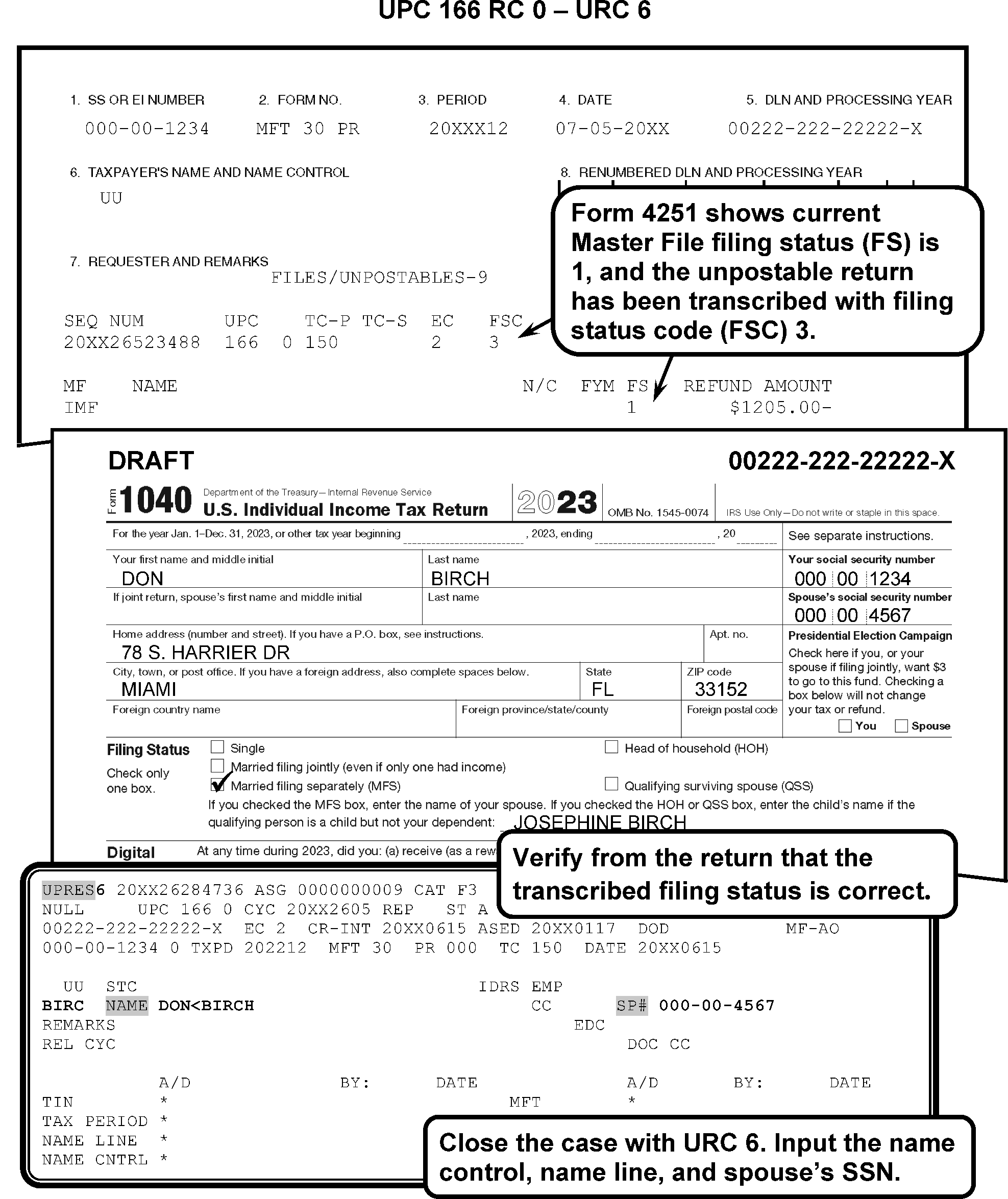
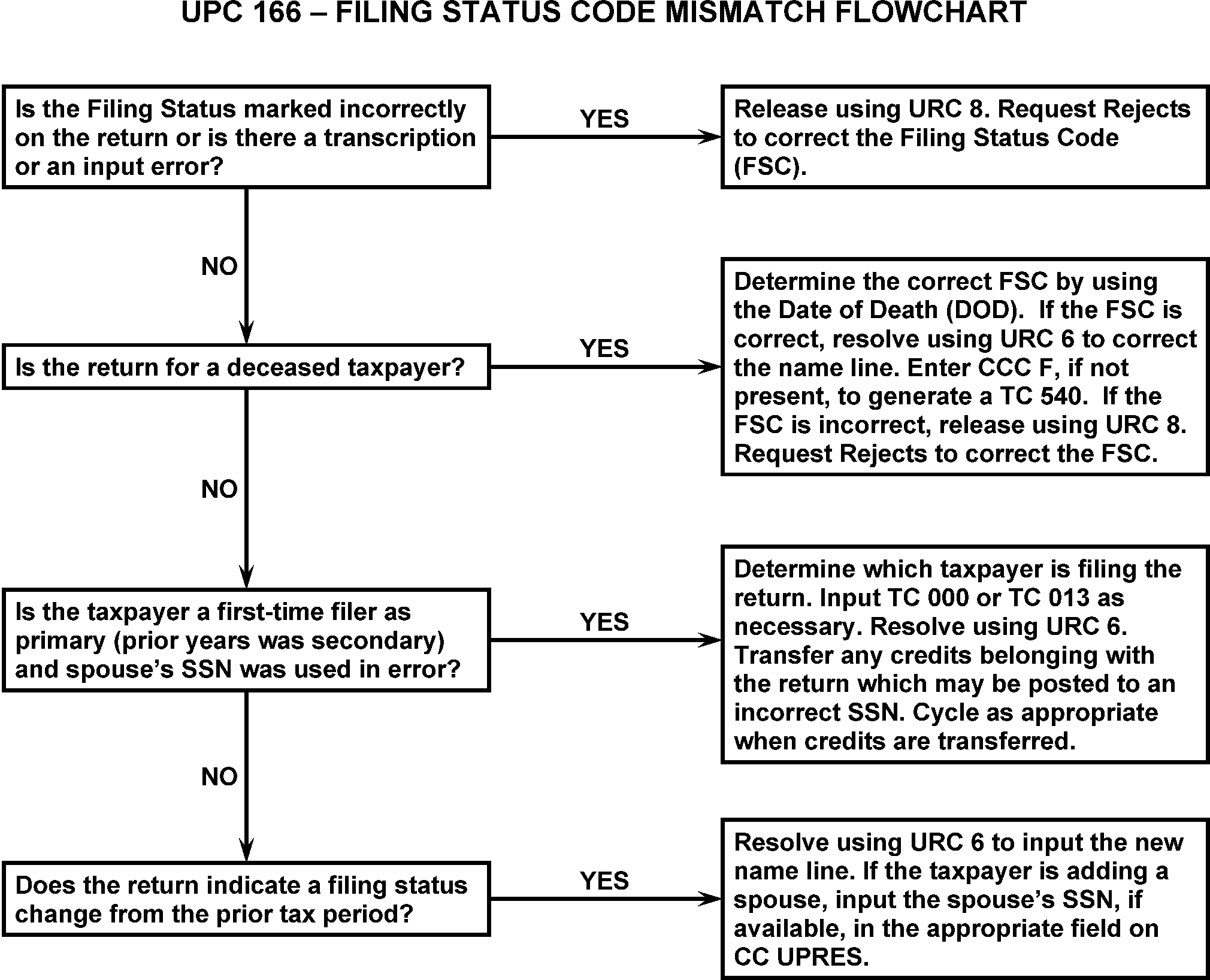
-
RESOLUTION RC 0: If FSC on Form 4251 is incorrect, forward case to Rejects with URC 8 to correct FSC and Entity information. If filing status has changed, URC 6 and enter Name Control and name line.
-
The Form 1040-NR filers can only have a Filing Status Code edited as "1" , "3/6" , or "5" . They differ from domestic Form 1040 Filing Status Codes. See IRM 3.21.3.82.6, Filing Status Code (FSC), for more information on determining the Filing Status Code for Form 1040-NR.
-
This subsection contains condition and procedures for UPC 167 RC 0 - RC 4.
-
CONDITION RC 0 This condition occurs when the tax period is 198611 and prior and a TC 290, TC 291, TC 300, or TC 301 containing a TC 320 is input to a module containing a significant net of TC 160, TC 166, TC 270, TC 276, or TC 350.
-
CONDITION RC 1 This condition occurs when the tax period is 198611 and prior and a TC 290, TC 291, TC 300, or TC 301 containing a TC 160, TC 270, or TC 350 is input to a module with a significant TC 320 posted.
-
Resolution UPC 167 RC 0 - RC 1 Correct with the following:
-
Before you proceed with the Manual Assessment refer to IRM 3.12.179.8.9 . Contact originator for instructions to edit the document with corrections. Close with URC 8 for Rejects to input corrections.
-
All others, GUF Auto-Close URC 2 to Originator.
-
-
CONDITION RC 2 This condition occurs if tax period is 198611 and prior, unpost TC 270 secondary to a Revenue Receipt if module contains an unreversed TC 320.
-
Resolution UPC 167 RC 2 Correct using the following:
-
If a pre-journalized amount is zero (0), URC 2 to Originator.
-
If a pre-journalized amount is significant, GUF Auto-Close URC 8 to Rejects.
-
-
CONDITION RC 3 This condition occurs for the following:
-
MFT 30 —TC 290 or TC 30X with a secondary TC 161, TC 201, TC 241, TC 271, TC 281, or TC 311 and Abatement Refusal Indicator is significant, or
-
MFT 55 —TC 290 contains a reference number for an abatement if reference number matches a prior posted TC 24X with matching reference number blocked 96X unless a subsequent TC 240 blocked 97X with matching reference number is posted.
-
-
CONDITION RC 4 This condition occurs if TC 290 is for zero amount with blocking series 96X and the Abatement Refusal Indicator is significant.
-
Resolution UPC 167 RC 3 - RC 4: GUF Auto-Close URC 2 to Originator.
-
This subsection contains conditions and procedures for UPC 168 RC 0 - RC 9.
-
CONDITION RC 0 This condition occurs when an input transaction from Column A attempted to post and a transaction from Column B had not previously posted. (for example., TC 824 or TC 890 attempted to post but no unreversed TC 130 is present or a TC 480 attempted to post but no TC 150 is present).
COLUMN A (TC attempting to post) COLUMN B (TC that needs to be present on account DMF TC 130 See Note 19 TC 131 See Note 5 TC 130 TC 149 TC 148 See Note 10 TC 161 TC 160 or TC 166 TC 162 TC 160 or TC 161 TC 171 TC 170 or TC 176 TC 201 TC 200 TC 241 TC 240 See Note 12 TC 271 restricted FTP TC 272 restricted FTP TC 281 TC 280 or TC 286 TC 290 (Blocking Series 970–979) TC 290 (Blocking Series 960–969) TC 294 TC 295 or TC 305 TC 304 TC 305 or TC 295 TC 311 TC 310 TC 321 TC 320 TC 342 TC 340 or TC 341 TC 351 TC 350 TC 361 TC 360 TC 370 (Doc Code 51) PRN 707 or PRN 793 (When MFT is not 30 or MFT 31) See Note 17 TC 428 TC 420 or TC 424 (Doc Code not 51 or Doc Code 52) TC 451 (Except Doc Code 52) TC 450 TC 462 TC 460 TC 470 cc 95 TC 240 (Ref. Num. 622, 628, 630, 631, 665–673) See Note 1 TC 471 TC 470 TC 472 TC 470 TC 472 cc 95 TC 470 cc 95 TC 475 TC 474 TC 481 TC 480 TC 482 TC 480 TC 483 TC 480 TC 494 See Note 4 TC 494 TC 495 See Note 4 TC 494 TC 502 (CSED in must match) TC 500 TC 520 cc 82 TC 240 (Ref Num 618, 622, 628, 630, 631, 665–673) TC 521 See Note 8 TC 520 TC 522 See Note 8 TC 520 TC 531 TC 530 TC 532 TC 530 TC 535 TC 534 TC 542 TC 540 TC 571 See Note 2 TC 570 or TC 576 TC 572 See Note 2 TC 570 or TC 576 TC 592 TC 590 through TC 599 TC 611 TC 610 (or remittance) TC 612 TC 610 (TC 150 or TC 97X) TC 632 TC 630 or TC 636 TC 637 See Note 3 TC 636 (Doc Code 64, Doc Code 16, Doc Code 40, not Doc Code 51 or Doc Code 52 TC 640 / TC 641(Doc Code not 51 or Doc Code 52) TC 642 TC 640 TC 661 (52) TC 660 or TC 430 TC 662 TC 660, TC 666, or TC 430 TC 671 TC 670 TC 672 TC 670 TC 681 TC 680 TC 682 TC 680 TC 691 TC 690 TC 692 TC 690 TC 694 TC 360 TC 695 TC 694 TC 701 TC 706 TC 702 TC 700 TC 712 TC 710 or TC 716 TC 721 TC 720 TC 722 TC 720 TC 731 TC 736 TC 732 TC 730 TC 742 TC 740 TC 762 TC 760 TC 765 TC 764 or TC 768 See Note 23 TC 766 TC 898 See Note 7 TC 767 TC 766 See Note 23 TC 772 TC 770 or TC 776 TC 781 TC 780 TC 782 TC 780 TC 788 TC 780 TC 792 TC 790 or TC 796 TC 802 TC 800 or TC 806 TC 807 TC 800 or TC 806 See Note 23 TC 810 See Note 11 TC 810 TC 811 TC 810 TC 821 TC 826 TC 822 TC 820 or TC 824 TC 824 TC 130 TC 832 TC 830 or TC 836 TC 843 TC 841 TC 844 TC 840, TC 846, or TC 849 TC 845 TC 844 TC 851 TC 850 TC 852 TC 850 or TC 856 TC 890 TC 130 TC 892 See Note 1 TC 890 or TC 896 TC 911 TC 910 TC 912 TC 914 TC 915 TC 916 or TC 918 TC 917 TC 916 TC 919 TC 918 TC 922 See Note 9 TC 922 TC 925 See Note 10 TC 925 TC 932 TC 930 TC 961 TC 960 TC 971 (AC 001–009 only) TC 150, TC 976, or TC 977 TC 971 AC 043 See Note 46 TC 971 AC 056, AC 160, AC 161 See Note 22 TC 971 AC 062 See Note 33 TC 971 AC 065 See Note 33 TC 971 AC 094 TC 971 AC 93 TC 971 AC 096 TC 971 AC 097 TC 971 AC 111 See Note 36 TC 971 AC 145 See Programming Requirements Package (PRP) 460–2 TC 971 AC 148 TC 971 AC 146 TC 971 AC 163 TC 971 AC 63 TC 971 AC 263 unpost unless checkbox is set TC 971 AC 507 See Note 44 TC 971 AC 607 See Note 45 TC 971 AC 641 See Note 37 TC 972 See Programming Requirements Package (PRP) 460–2(5) TC 972 AC 641 See Note 37 TC 972 AC 645 TC 971 AC 645 TC 972 AC 804 TC 971 AC 804 NOTES 1. If matching to TC 896 reflecting MFT 29, the TC must have blocking series 700–719 and Spouse Indicators must match. If matching to TC 896 with other than MFT 29, the input TC 892 must have a blocking series other than 700–719. 2. If the corresponding 57X Hold is no longer in effect, the input transaction will be unpostable. 3. TC 63X Refundable Credit Identification Number field must match a TC 63X in the same Refundable Credit Identification Number Series (This processing is obsolete). 4. TC 494 must match organization source code of prior posted TC 494. TC 494 will unpost 168 if TC 922 with a latest process code of 7X for 8611 and prior, 3X for 8612–8811, 75, 76 or 77 for 8812 and subsequent; or TC 420 or TC 424 are present. TC 495 must match an organization source code of TC 494. 5. TC 131 non DMF must match non DMF TC 130. 6. TC 897 must match DMF TC 896 and match on agency and subagency codes. 7. TC 766 that contains an OTN must match the OTN of the TC 898. 8. -
TC 521 / TC 522 with cc 6X if there is no unreversed TC 520 with matching 6X closing code.
-
TC 521 / TC 522 with cc 73 if there is no unreversed TC 520 cc 73 posted cycle 200201 or subsequent.
-
TC 521 / TC 522 with cc 76 or cc 77 if there is no unreversed TC 520 cc 76 / cc 77.
-
TC 521 / TC 522 cc 81 if there is not an unreversed TC 520 cc 81.
-
TC 521 / TC 522 cc 83 if there is not an unreversed TC 520 cc 83 posted cycle 199201 or later.
-
TC 521 / TC 522 cc 85 if there is not an unreversed TC 520 cc 85.
-
TC 521 / TC 522 cc 86 if there is not an unreversed TC 520 cc 86.
-
TC 521 / TC 522 cc 87 if there is not an unreversed TC 520 cc 87.
-
TC 521 / TC 522 cc 88 if there is not an unreversed TC 520 cc 88.
-
TC 521 / TC 522 cc 89 if there is not an unreversed TC 520 cc 89.
-
TC 521 / TC 522 not carrying closing code if there is not an unreversed TC 520 with closing code other than cc 76, cc 77, cc 81, cc 83 or cc 85–89.
-
TC 521 with a statistical indicator if the module does not contain an unreversed TC 520 with cc 81, cc 83, or cc 85–89.
-
TC 531, unpost if there is not an unreversed TC 530 with the same cc (closing code).
9. TC 922 update (process code other than 00) and no TC 922 previously posted (Master File will bypass this condition for a corrected UPC 168.) 10. IRDM TC 925 -
Any TC 925 with process code other than opening 6030 if there isn’t a TC 925 is posted in the module after resequencing for one week. Use resequence code 35. Bypass for corrected unpostable.
-
Any TC 925 with a closing process code 6030 if the last significant process code on the posted CAWR TC 925 isn’t a closing process code (6140-6290, 6390, 6400-6520) or reconsideration closing process code (6740-6790) after resequencing for one week. Use resequence code 35. Bypass for corrected unpostable.
-
Any TC 925 with a closing process code (6140-6290, 6390,6400-6520) and the last significant process code on the posted TC 925 contains a closing process code. Bypass for corrected unpostable.
-
Any TC 925 with process code (6740-6790, Reconsideration closing process code) and the last posted TC 925 doesn’t contain a closing process code (6140-6290, 6390, 6400-6520) on the last significant process code.
-
Any TC 925 with process code (6700-6730, Reconsideration Received/Opening process code) and the last posted TC 925 doesn’t contain a closing process code (6140-6290, 6390, 6400-6520) on the last significant process code.
11. The 148 indicator in the TC 149 must match the 148 indicator in the posted TC 148. Unpost if they don't match. 12. Unpost TC 810 if unreversed TC 810 is present. 13. Unpost a non-civil penalty TC 241 if there is no non-civil penalty TC 240 in the module. 14. Doc Code 51 TC 370 containing TC 576 if TC 576 is already posted or containing TC 577 if no TC 576 is posted. 15. DMF TC 131 type 00, 02, 10, or 12 input to an account without a current calendar year DMF TC 130. 16. DMF TC 131 type 01 with the year of original offset not equal to the year of the TC 130 or TC 132. 17. Consider TC 716 followed by TC 667 with Julian Date of 999 to be reversed. 18. If a Doc Code 51 or Doc Code 52 blocked other than 100–159 transaction is posted, unpost a TC 271 or TC 272 even if an unreversed TC 270 or TC 276 is posted. 19. TC 271 secondary to TC 29X with RC 62 will post even if no TC 270 or TC 276 is posted. 20. Unpost a Pre Offset DMF TC 130 (contains FLC 66) input to an account containing a campus zip code. These are 39901, 05501, 64999, 45999, 73301, 00501, 19255, 84201, 37501, 93888. 21. Unpost TC 972 AC 84 / AC 85 if the applicable value of the Enrollment Code field in the entity is not significant. 22. TC 971 AC 56 will unpost unless the EIC Eligibility Indicator is set. TC 971 AC 160 will unpost if the AOTC Recertification indicator is not significant. TC 971 AC 161 will unpost if the ACTC Recertification indicator is not significant. 23. TC 766 with an OTN must match the OTN of a TC 898. Also, unpost a TC 29X containing RC 86, 87, 89, 90, or 91 unless the record contains an OTN. Also, note the amount can't exceed the net of TC 898 / TC 899 with matching OTN. 24. An input TC 972 AC 507 attempting to post but no TC 971 AC 507 is present with matching transaction date, action code, and XREF MFT. 25. An input TC 972 AC 607 attempting to post but no TC 971 AC 607 is present with matching transaction date, action code, and XREF MFT. 26. Master File will bypass TC 29X / TC 30X input to MFT 30, MFT 31, or MFT 65 that contains Priority code 9 for reference numbers 337, 807, 765, and 767 and for secondary TC 772.
TC 29X / TC 30X input to MFT 30, MFT 31, or MFT 65 that doesn't have PC 9 and it contains CRN 337, bypass if it is a generated mirror CRN 337 with Julian date 997 or if the tax module contains an unreversed TC 971 AC 102 or AC 110.
Master File will also bypass for TC 370 blocking series 900–94 input to MFT 31 that contain TC 802, TC 765, TC 767, or TC 772.
Continue to unpost if other reference numbers or transactions are input if a matching original transaction is not present.
TC 767 input with Doc Code 51 will never contain a reference number. Master File will bypass the check that forces the reference number to match
Bypass for TC 29x / TC 30x input to MFT 30, MFT 31 with CRN 450. Unpost a TC 290 / TC 300 blocking series 4xx if CRN 766, 767, or 450 is not present.27. The Cross-Reference TIN in TC 971 AC 100–108 and AC 144 input to MFT 30 must match the primary or secondary SSN for the controlling name line. In addition, the matched SSN must be valid. Otherwise, the condition will unpost. Also, unpost if the cross-reference information matches a prior posted unreversed TC 971 with matching AC.
Also, unpost a TC 971 AC 100–108 input to a MFT 30 or MFT 35 module containing an unreversed TC 971 AC 100–108 with non-matching action codes.28. Adjustment containing reference number 808, 809, 810, or 811 if the TC 29X or TC 30X credit reference number 80X or 81X indicator is set. 29. TC 971 AC 050 with input value WI if the entity contains a FLC 66 or FLC 91. 30. Unpost TC 971 AC 276 or AC 277 unless the modules contain an unreversed TC 971 AC 275. 31. If the input TC 972 AC 069 or AC 169 contains an XREF SSN, the XREF SSN must match the XREF SSN in an unreversed TC 971 AC 069 or AC 69. If none found, close with URC 2 to originator. 32. TC 290 Julian date 999 input to a tax module with TC 971 AC 151 followed by a TC 291 with amount equal to the Acceptable Total tax amount in the TC 150. 33. MFT 55 TC 695 if there is not a TC 361 with matching MFT, Tax Period and Amount input with it. MFT 55 TC 361 if there is not a TC 695 with matching MFT, Tax Period and Amount input with it. 34. Unpost a Document Code 51 TC 767 when it does not match the transaction date of the posted TC 766. 35. Unpost TC 971 AC 62 containing an XREF TIN that does not match the primary SSN or secondary SSN (in the controlling name line) or it does not match XREF TIN in a prior posted TC 971 AC 62. Unpost a TC 971 AC 65 if the XREFSSN is not equal to the primary SSN or the S-SSN. 36. Unpost TC 971 AC 111 if input to an account with a merge or slot completed in the prior or current tax year processing. Unpost TC 971 AC 111 (UPC 168) addressing MFT 30 if there is already an unreversed TC 971 AC 111 posted on MFT 30 with the same DLN in the MISC field. Bypass this unpostable check if the 4-bit of the MFT 32 Indicator is on. If the DLN in the MISC field of the posted TC 971 AC 111 is not equal to the DLN in the MISC field of the input TC 971 AC 111 and the MFT 32 indicator is set to 1, post the TC 971 AC 111. Also, unpost the input TC 971 AC 111 with a DLN in the MISC field if the DLN doesn’t match the posted TC 150 DLN or TC 976 DLN. 37. Unpost TC 972 AC 18X containing an XREF TIN/ MFT/ TAXPER that does not match the XSREF TIN/ MFT/ TAXPERIOD in a prior posted TC 971 with matching action code and transaction date. 38. The XREF TIN in TC 971 AC 100, AC 101, AC 106, AC 107, and/or AC 109 input to MFT 35 must match the Primary or Secondary SSN for the controlling name line. In addition, the matched SSN must be valid. Otherwise, send UPC 168. Also, unpost if the XREF information matches a prior posted unreversed TC 971 with matching AC. Also, unpost a 971 AC 100 AC, AC 101, AC 106, AC 107, AC 109 input to a module containing an unreversed TC 971 AC 100, AC 101, AC 106, AC 107, AC 109 with non-matching action codes. 39. Unpost a tax module TC 972 AC 641 (MFT 30) containing an XREF TIN that does not match the XREF TIN in a prior posted TC 971 with matching action code. Unpost an entity TC 972 AC 641 (MFT 00) containing a miscellaneous filed that does not match the miscellaneous filed in a prior posted TC 971 with matching action code. 40. Unpost TC 972 AC 177 if the module does not contain an unreversed TC 971 AC 177 that matches the MISC Field, Transaction Date and XREF SSN. 41. Unpost TC 972 AC 179 if the module does not have an unreversed TC 971 AC 179 that matches on MISC Field, Transaction Date and XREFSSN. 42. Unpost any TC 370 Doc Code 51 with PRN 707 or 793 if the MFT is not 30 or MFT 31. 43. Unpost a TC 971 AC 043 attempting to post to a module with an existing unreversed TC 971 AC 043. 44. An input TC 972 AC 507 attempting to post but no TC 971 AC 507 is present with matching transaction date, action code, and XREF MFT 45. An input TC 972 AC 607 attempting to post but no TC 971 AC 607 is present with matching transaction date, action code, and XREF MFT 46. TC 971 AC 043 attempts to post to a module in Status 60 and the IA indicator is set to ‘01’ OR the module has an unreversed TC 971 AC 063. 47. Unpost a TC 971 AC 995/996 attempting to post to a module with an existing unreversed TC 971 AC 995/996 48. Unpost an input TC 971 AC 465 if there is no posted TC 521 cc 60-67, 81, 83, 85-89. 49. Unpost an input TC 972 AC 465 not matching on transaction date of TC 971 AC 465. -
If TC 480, GUF Auto-Close URC 2 to Originator
-
If TC 96X, GUF Auto-Close URC 2 to Originator
-
-
Resolution procedures for Doc Code 77 cases
If... Close... Add Remarks... 1. The originator is XX88888882 or XX88888884 URC D SYSTEMIC ERROR INPUT 2. TC 290 URC 2 to Originator NO TC PSTD TO ADJ: VOID 3. TC 571 URC 2 to Originator NO ACTIVE TC 570 TO REV: VOID 4. TC 971 AC 111 and unreversed TC 971 AC 111 is already posted URC 2 to Originator DUP TC: VOID 5. TC 972 AC 111 URC 2 to Originator NO TC PSTD TO REV: VOID 6. TC 972 AC 121 URC D NO TC PSTD TO REV: VOID 7. TC 972 AC 129 URC D DUP SYS INPUT: VOID 8. TC 972 AC 517 URC D VOID 9. TC 972 with any other AC, and the TC 971 with matching AC and transaction date is already reversed URC 2 to Originator DUP TC: VOID 10. TC 972 with any other AC, and no TC 971 with matching AC or transaction date is posted URC 2 to Originator NO TC PSTD TO REV: VOID 11. Other TC URC 2 to Originator NO TC PSTD TO REV: VOID 12. TC 971 or TC 972 and there is no originator URC D SYSTEMIC ERROR INPUT
-
If Doc Code 34 with an incorrect credit reversal, URC 2 and add remarks. NOTE: Refer to IRM 3.12.179 for information on Nullification Codes. To determine the correct NULL CODE, see IRM 3.12.32.12 Unpostable Resolution Code (URC) 2.
-
If Doc Code 24, Doc Code 48, or Doc Code 58 and cannot find related TC, take necessary action to reverse credit on X-REF side of transfer. Notify originator of action taken using local routing procedures.
-
When TC 821 unpost check debit side to see if debit TC 701 is posted. When 701 is posted change the TC 821 to TC 700 with URC 6.
-
When TC 832 unpost check debit side to see if debit TC 712 is posted. When 712 is posted change the TC 832 to TC 710 with URC 6.
-
-
If TC 892, determine if TC is addressing the correct module.
-
If tax period and/or SSN is incorrect, URC 6.
-
If TC 892 without posted TC 130, URC 6 to TC 700.
-
If correct account is being addressed and a TC 896 with the correct money is posted, URC 8 to Rejects. Request a change to spousal indicators to agree with Master File.
-
-
If for MFT 35 Transactions that are other than TC 796 or Payment Transactions, research the taxpayers tax modules for both MFT 30 and MFT 35 and review the chart below.
If... Then... 1. Transaction is a duplicate credit transfer. URC 0 the transaction. NOTE: There were programming changes for SRP that has resulted in duplicate credit transfers with a TC 826 / TC 706 credit transfer posting on the MFT 30 / MFT 35 modules after a TC 896 posted on the MFT 30 and the TC 796 unposted on the MFT 35. 2. Transaction is not a duplicate credit transfer (such as a TC 821). when there is no posted TC to reverse. URC 6 the transaction, changing the MFT and tax period to direct the transaction back to the tax module where the corresponding debit posted. Contact the originator to let them know the transaction is being directed back to the module where the debit transaction posted.
-
Before you proceed with the Manual Assessment refer to IRM 3.12.179.8.9 .
-
Change the incorrect transaction and correct it with URC 8 per initiator's instructions.
-
If the Originator initiates the necessary assessment/abatement with CC REQ 54, URC 0 to allow Doc Code 51 to post and cycle delay as needed.
-
For partial and full abatement Form 1331-B (Notice of Adjustment) must be prepared by the originator.
-
If Doc Code 54 and the unposted TC reversal does not have a matching TC, URC 2 to Originator with remarks “NO TC PSTD TO ADJ: VOID”.
-
If Installment Agreement User Fees, TCs are TC 672, TC 695, and TC 361. See IRM 3.12.179.8.9
-
If TC 694 and not User Fee amount, change to MFT 30 and TC 670 with URC 6. Use the tax period of the earliest CSED debit balance module.
-
If TC 824 or TC 890, research for TC 130.
-
If TC 130 will post in a subsequent cycle, URC 0 and allow transaction to post after TC 130.
-
If unable to find TC 130 and module balance is same as or more than Unpostable amount, URC 6 and change to TC 820 (Doc Code 24) or 830 (Doc Code 48).
-
If module balance is different from or greater than Unpostable amount, reverse the credit with URC 6 if possible. Otherwise, URC 1 to Accounting requesting a credit reversal and notify Originator of corrective action taken.
-
-
All other conditions, research for related transaction code.
-
If found, make the necessary corrections to post TC to Master File. Figure 3.12.179-22 and Figure 3.12.179-23.
-
If unable to find the correct transaction or if unposted TC contains DIFFERENT or MISSING reference number(s), URC 2 to Originator with the appropriate remarks.
-
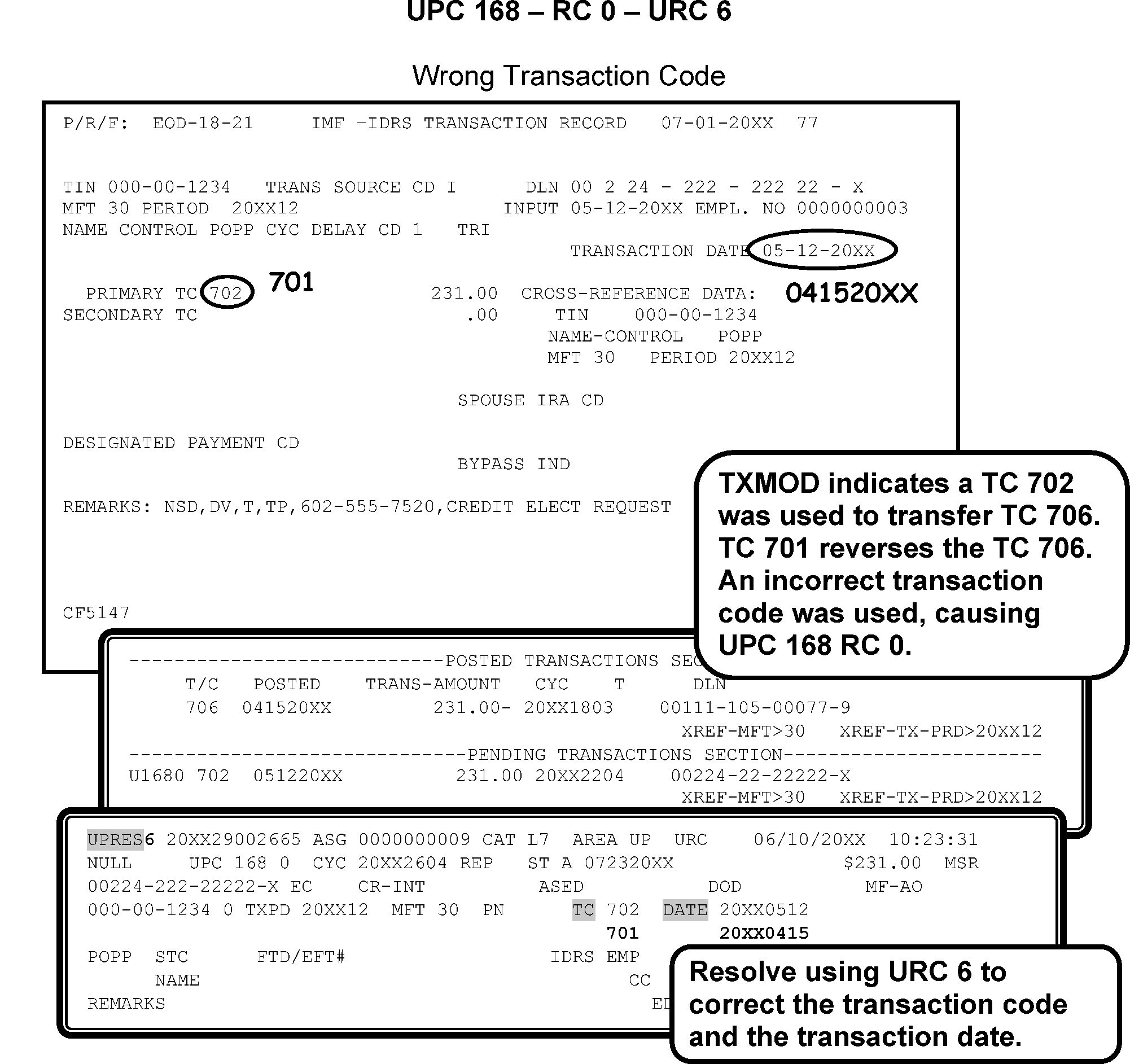
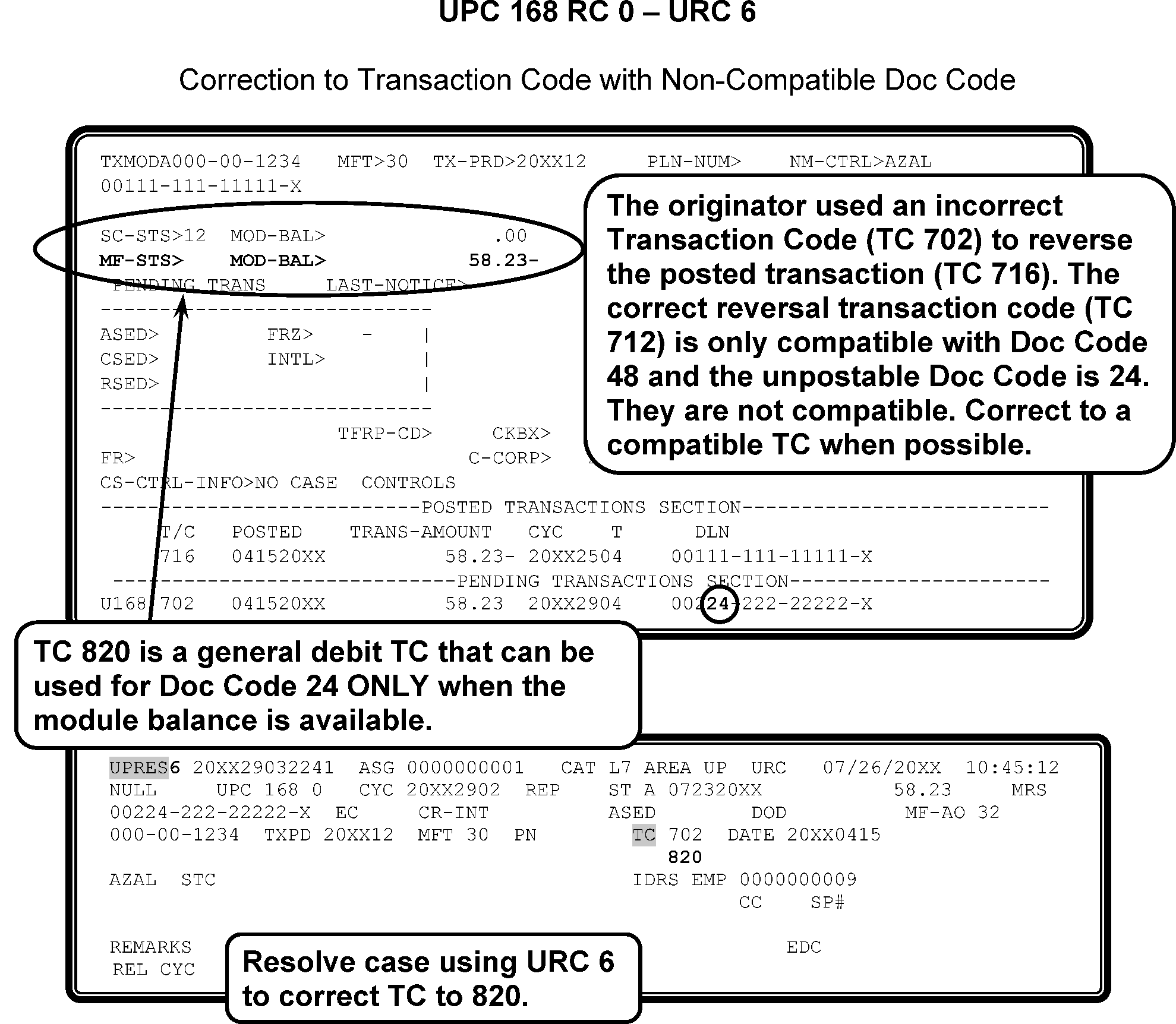
-
CONDITION RC 1 RESERVED.
-
CONDITION RC 2 This condition occurs when a TC 016 from IDRS for PDT (Potentially Dangerous Taxpayer) with blocking series 700-749 or 750-799 has the same indicator value is the same as the current Master File value.
-
Resolution UPC 168 RC 2 GUF Auto-Close URC 2 to Originator.
-
CONDITION RC 3 This condition occurs if Federal Employee indicator is set, and a TC 530 CC 3, TC 530 CC 12 (if the current status is other than 22 or 26) or TC 530 CC 37 or 39 is input to a module with a ≡ ≡ ≡ ≡ ≡ ≡ ≡ ≡ ≡ ≡ ≡ ≡ ≡ ≡ ≡ ≡ ≡ ≡ ≡ ≡ ≡ ≡ ≡ ≡.
-
Resolution UPC 168 RC 3 GUF Auto-Close URC 2 to Collection.
-
CONDITION RC 6 This condition occurs for the following:
-
when TC 290 / TC 300 with reference number 500–696,700-759 and 786–793 for a negative amount attempts to post to a module that does not contain a posted TC 240 with matching reference number.
-
when TC 290 containing reference number 697 or 699 for a positive amount is input to a module containing a TC 241 (after completing normal date matching criteria) if the TC 241 does not contain a matching CRN 698 EIN.
-
-
Resolution UPC 168 RC 6 GUF Auto-Close URC 2 to Originator.
-
CONDITION RC 7 This occurs for the following conditions:
-
TC 016 with KITA (Killed in Terrorist Action) value of 1 and the entity contains a value of 1; or
-
TC 016 with KITA value of 2 and the entity contains a value of 2; or
-
TC 016 with KITA value of 9 and significant value is not present;
-
TC 016 with a Minister Value of 9 when a significant value is not already present in the entity.
-
-
Resolution UPC 168 RC 7 GUF Auto-Close URC 2 to Originator.
-
CONDITION RC 8 This occurs for the following conditions:
-
If TC 290 containing reference number 698 with an amount not equal to the XREF EIN contained in an unreversed TC 971 AC 097 posted in the same or prior cycle.
-
If TC 370 containing a BMF TIN that does not match the EIN in a TC 971 AC 097 posted in the same or prior cycle.
-
-
Resolution UPC 168 RC 8 GUF Auto-Close URC 2 to Originator.
-
CONDITION RC 9 This condition occurs if TC 015 / TC 030 with Doc Code 50 that is input to an account that does not contain a module in status 03 with indicator other than 8 or status 22, 26 or 60. Also, unpost the TC 015 containing significance in the Location codes (input with no address to an account that does not contain significance in the CLC indicator) and the BOD code on the account is not WI.
-
Resolution UPC 168 RC 9 GUF Auto-Close URC 2 to Originator.
-
This subsection contains conditions and resolutions for UPC 169 RC 0 - RC 9.
-
CONDITION RC 0 This condition occurs when an adjustment containing reference numbers that adjust Schedule H fields is input to a module not containing a Schedule H EIN in the posted 150.
-
Resolution UPC 169 RC 0: GUF Auto-Close URC 2 to Originator.
-
CONDITION RC 1 This condition occurs when no Name Line exists for the entity in the years prior to and including the tax period of the input transaction (Entity Change transaction containing an FSC or SSSN only).
-
Resolution UPC 169 RC 1 Input TC 013 using the MF Name Control and year of document; close with URC 0. If the transaction has no year, URC 2 to originator with remarks, "NAME LINE NEEDED."
-
CONDITION RC 2 This condition occurs due to a Filing Status mismatch (Entity Change Transactions).
-
Resolution UPC 169 RC 2 GUF Auto-Close URC 2 to Originator.
-
CONDITION RC 3 This condition occurs when an adjustment carrying reference number 874 or 894 is input to a module that is not controlled by a joint name line or does not contain a SSSN.
-
Resolution UPC 169 RC 3 URC 2 to Originator.
-
CONDITION RC 4 This condition occurs when an adjustment carrying reference number 879 is input to a module that is not controlled by a joint name line or does not contain a SSSN.
-
Resolution UPC 169 RC 4 GUF Auto-Close URC 2 to Originator.
-
CONDITION RC 5 This condition occurs when an adjustment carrying reference number 892 is input to a module that is not controlled by a joint name line or does not contain a SSSN.
-
Resolution UPC 169 RC 5 GUF Auto-Close URC 2 to Entity.
-
CONDITION RC 6 This condition occurs when an adjustment carrying reference number 896 is input to a module that is not controlled by a joint name line or does not contain a SSSN.
-
CONDITION RC 7 This condition occurs when an adjustment carrying reference number 899 is input to a module that is not controlled by a joint name line or does not contain a SSSN.
-
CONDITION RC 8 This condition occurs when an adjustment carrying Schedule H reference numbers for the spouse is input to a module that is not controlled by a joint name line or does not contain a SSSN.
-
Resolution UPC 169 RC 6 - RC 8: — GUF Auto-Close URC 2 to Originator.
-
CONDITION RC 9 This condition occurs when a TC 150 attempts to post to MFT 30 with FSC 2 (including dummy IRA) containing an IRA 5329 (section 29 or section 30) and any of the following conditions are met:
-
Not containing a Spouse Indicator; Containing a Spouse Indicator greater than 02; or containing a section 29 or section 30 with spouse indicators of equal value.
-
Containing a Spouse Indicator of 2 and the SSSN in the controlling name line is missing or invalid.
-
-
Resolution UPC 169 RC 9 If the secondary taxpayer is using the same last name as the primary taxpayer, but does not have a DM-1/SSA Name Control that matches the last name on the return, (for example, has not updated their name with SSA) and thorough research using CC INOLE, CC MFTRA, and CC IRPTR proves SSN belongs to the secondary taxpayer:
-
For short entity URC 6 the name line adding the DM-1 name (found through research) for the secondary taxpayer in the name line. (Attach research to the case.)
-
For other than short entity URC 8 to Rejects requesting input of Long Entity and RPC E. Instruct Rejects to add the DM-1 name found through research) for the secondary taxpayer in the name line. (Attach research to case.)
-
-
If the secondary taxpayer name is updated with DM-1/SSA and secondary taxpayer is using a former last name input TC 013 to change the secondary name to the updated DM-1 Name Control and URC 6 the name line and cycle delay.
-
CONDITION RC 0 This condition occurs if TC 290 with blocking series 290–299 for the following:
-
an Amended return is already posted
-
Duplicate Return Freeze is on
-
ORIGINAL return contained any MATH ERROR CODES or
-
UNREVERSED TC 576 is present in the module.
-
-
Resolution UPC 170 RC 0: GUF Auto-Close URC 2 to Accounts Management.
-
This subsection contains conditions and resolutions for UPC 171 RC 0 - RC 4.
-
CONDITION RC 0 This condition occurs when a TC 520 cc 83, cc 85, or cc 88 is in effect, all debit TC 29X (including civil penalty assessments), debit TC 30X, and balance due returns input to a tax period ending prior to the Post-Petition Date in the entity.
Note:
Master File will bypass this condition for a corrected UPC 171; if the ‘Post Petition Date’ in the entity is 10/22/94 or later; TC 150, TC 29X, TC 30X, and TC 370 transactions will bypass all unpostable checks for purged bankruptcy cases except UPC 171; Bypass for all MFT 29 and MFT 35 transactions and TC 370 Doc Code 52 with Julian Date 999.
-
Resolution UPC 171 RC 0: Use the IRM 3.12.179.73.2 though IRM 3.12.179.73.12 to correct Bankruptcy Unpostables:
Exception:
The Bankruptcy Reform Act of 1994 (H.R. 5116) eliminated the restriction on the assessment of taxes during bankruptcy proceedings. This legislation eliminates future unpostable condition such as UPC 171 and UPC 322, if the record contains a petition date (TC 520 closing codes 83, cc 85, and cc 88) of October 22,1994 or later.
-
An input transaction TC 240 assessment with a Civil Penalty Number (CVPN) 5XX– 6XX attempts to post to a tax module and the entity has a significant account-wide "V" (Bankruptcy) freeze.
-
If originator can be determined, URC 2 to originator.
-
If originator cannot be determined,
-
Put the case in the Bankruptcy Hold File.
-
Contact District Office to determine corrective action.
-
Correct with appropriate URC as instructed by responsible District Office employee.
-
-
If petition date of TC 520 cc 83–85 or cc 87 is earlier than October 22,1994, research with CC TXMOD for the petition date of the TC 520 cc 83 / cc 85–87.
-
Split Period Returns
-
If taxpayer files two returns for same period, send a copy of both returns to SCI. Attach a routing slip indicating split period returns.
-
When notification is received from SCI to assess cases, URC 0.
-
-
Duplicate Returns—If unpostable is a duplicate of a posted TC 150, URC 8 and request Rejects cancel DLN and associate with posted TC 150 or controlling DLN if it is not the TC 150.
-
TC 290 / TC 300
-
Determine if TC is an assessment or abatement. If abatement or zero amount, URC 0.
-
If TC is an assessment and proposed amount has been paid, URC 0.
-
If assessment has not been paid, put case in Bankruptcy Hold file. Correct with appropriate URC as instructed by the District Office
-
-
If TC 150 and is a refund, zero balance, or full paid, URC 0.
-
If TC 150 is a balance due and is out of your Service Center jurisdiction, photocopy the return (page 1 and 2 of 1040 and Form 1040-SR ; page 1 for all others).
-
If it was filed late, notate on photocopy "Late Filed" .
-
If there are discrepancies between credit claimed and true credit available, notate "CR MISMATCH" and the available credit amount on the photocopy.
-
If return is underpaid, also notate "Tax Due" .
-
If unable to get return from Files, notate "Document not in files" .
-
-
Associate the case with the Bankruptcy Listing before mailing to the correct SCI Territory controlling the case.
-
Divide the Bankruptcy listings by Area Office responsibility. Send a copy of the listing to the appropriate SCI Territory.
-
OPEN Bankruptcy cases must be held in bankruptcy status until notified by the Area Office. Maintain documents in a secured area in TIN or DLN order.
-
If center has an agreement with SCI staff to work their own bankruptcy unpostables, reassign to SCI Territory assignment number.
-
Do not reassign bankruptcy cases to any other Unpostable area. Do NOT put in a suspense status.
-
Maintain calls in Bankruptcy Hold File.
-
To release cases no longer under automatic stay (TC 521 petition dates), Unpostables will receive notification (annotated list memorandum or UPCAS Z) from the Area Office by the list memorandum or UPCAS Z. These will contain:
-
Petition date.
-
Date Automatic stay was lifted.
-
Date TC 521 was input or a (-) if automatic stay has not been lifted, and/or TC has not been input.
-
-
Complete the processing as follows:
-
Locate the cases held in the bankruptcy hold file.
-
If cases contain a statement "No Liability for Failure to Pay Penalty—Bankruptcy Case" , URC 6 and input a CCC "M" .
-
If there is no statement pertaining to FTP, URC 0.
-
Check off and initial each item on listing or memo as closed.
-
If it is a statute period and TC 521 is posted, URC 0.
-
-
When a TC 520 is prior to the Return Due Date (RDD) or transaction date of TC 150 and TC 521 is input, the ASED will be systemically recomputed.
-
If TC 150 is statute period and there is no TC 521, reassign the case to Statute Function. (Waiver extension of Date Assessment Statute Expires).
-
The ASED is extended by the number of days between the petition date (where date is on listing) and date the automatic stay was lifted plus 60 days.
-
If a Bankruptcy Case unposts UPC 150 (Statute Unpostables) and TC 520 cc 83 / cc 85 / cc 88 has not been reversed, treat as a bankruptcy case. Notify SCI Staff of the open case as UPC 150 and that it does not appear on the bankruptcy listing.
-
Attach a memorandum listing the cases.
-
Attach a photocopy of document to weekly bankruptcy listing and route to SCI.
-
Suspend in Bankruptcy Hold File until notified by SCI when the transaction can post.
-
-
If you receive information cases are missing in insolvency offices, research CC IMFOL / CC MFTRA with Request Type "T" for TC 520. Research for the originating Area Office where the TC 520 was input.
-
If found, route to that Area Office.
-
If not found, URC 0. Enter remarks, "NO BANKRUPTCY CASE FOUND IN DO/Area Office" .
-
-
Verify the SCI Territory requested releasing the account.
-
Correct unpostable condition, if possible (following procedures for the repeat code of particular Unpostable condition). URC 0.
-
Do not reverse TC 520 without approval of the Insolvency office. Insolvency giving Unpostables the authority to ASSESS an account does not mean to reverse the TC 520. Unpostables will not input TC 521 in any case because it is completed by Insolvency or Collections.
-
Unpostable Release Transcripts (RLSE transcripts) are used to identify outstanding Bankruptcy unpostable items. This transcript is generated when "V" freeze is released and is used as a "systemic backup" to Insolvency processing.
-
RLSE transcripts are in TIN order and
-
DOES NOT display closing codes.
-
Display the TC 521 and a generated "R" (reversal) to the TC 520.
-
-
When unpostables receives the RLSE Transcripts,
-
Release the case with URC 0.
-
Pull the document from the Bankruptcy file and route to Files to be filed in its original block.
-
-
The annual purge of Bankruptcy unpostables occurs in Cycle 30 each year. Unpostables will purge to the Bankruptcy Hold File. The List of Unresolved Bankruptcy Cases and Campus Bankruptcy Summary Report (GUF 55–41) may be used for this match.
-
Cases not appearing on list will be pulled and refiled in original block.
-
CONDITION RC 1 TC 470 cc 90 input to a module containing an unreversed TC 520 cc 6X, cc 81, cc 83, or cc 85– 89.
-
Resolution UPC 171 RC 1 If the TC 521 is posted in the module and "V" freeze is released, use URC 0. If the TC 521 is not posted, URC 2 to CSCO.
-
CONDITION RC 2
-
TC 971 AC 031 input to an account not containing significance in the entity cc 83, 2 bit of 52 Hold (used for cc 81), cc 85, or cc 86-89 indicators.
-
TC 971 AC 032 input to an account not containing significance in the entity Offer in Compromise (OIC) District Office (DO) field.
-
TC 971 AC 131 input to a module not containing an unreversed TC 971 AC 65.
-
TC 971 AC 132 to a module not containing a TC 971 AC 100–106 followed by a TC 402.
-
Unpost a TC 971 AC 637 input to an account that does not contain an unreversed TC 520 CC 70-74, 75, 80 or 82 (or entity 52 hold is equal to zero).
-
-
Resolution UPC 171 RC 2
-
If TC 971 AC 031, research CC TXMOD to determine if cc 60–67, cc 83, cc 85, or cc 86–89 are present and correct in this entity, URC 0. If none are found, URC 2 to originator.
-
If TC 971 AC 032 research finds a significant entry in the OlC Area Office/field in the entity, URC 0. If none are found, URC 2 to CSCO.
-
If TC 971 AC 132, URC 2 to Originator to re-input as TC 972 AC 145.
-
If Originator is 0688888884 - system error-- URC D, "no closing code on CC TXMOD".
-
If the unpostable is a TC 971 or TC 972 and no originator close with URC D with remarks “No originator”.
-
-
CONDITION RC 3 If the module contains an unreversed TC 604, unpost any TC 29X or 30X for a credit amount. Also, unpost if any of the secondary transactions or reference numbers cause the net adjustment amount to be credit. If the module contains an unreversed TC 604 with Julian Date 996, unpost any payment dated earlier than the transaction date of the TC 604.
-
Resolution UPC 171 RC 3 If TC 29X / TC 30X, URC 2 to the originator.
If TC 670, research CC IMFOL for MFT 31 account:
-
MFT 31 does not have an M- Freeze, post to MFT 31 account.
-
MFT 31 has an M- Freeze and CC TXMOD shows a pending (PN) TC 972 AC 145, URC 0.
-
MFT 31 has M- Freeze and CC TXMOD does not show a pending (PN) TC 972 AC 145, contact initiator of TC 971 AC 145 to input TC 972 AC 145 to release freeze. Inform initiator of TC 971 AC 145 that the TC 670 will be cycle delayed to post in 3 cycles. URC 0 with cycle delay 3.
-
-
CONDITION RC 4 Unpost TC 520 cc 6X containing a transaction date that does not match the cc 6X transaction date element maintained in the entity balance section.
-
Resolution UPC 171 RC 4 GUF Auto-Close URC 2 to Collections.
-
This subsection contains conditions and resolutions for UPC 173 RC 0 - RC 7.
-
CONDITION RC 0 This condition occurs when a module has a TC 29X blocked 200–289 with no TC 150 posted. Current year TC 29X blocked 200–289 will resequence for 16 cycles prior to unposting if TC 150 does not post.
-
CONDITION RC 1 Reserved.
-
Resolution UPC 173 RC 0: GUF Auto-Close URC 2 to Accounts Management.
-
CONDITION RC 2 This condition occurs when a TC 290 blocking series 490–499 with a secondary TC 766 attempts to post to a module containing 52 TC 766 Doc Code 54 blocking series 490–499.
-
CONDITION RC 3 This condition occurs when a TC 290 blocking series 400–439 or 450–499 with a secondary TC 766 attempts to post to a module with a TC 150 posted.
-
Resolution UPC 173 RC 2 and RC 3: GUF Auto-Close URC 2 to Originator.
-
CONDITION RC 4 Reserved.
-
CONDITION RC 5 This condition occurs when a transaction listed in table below attempts to post and there is no TC 150 settled in the module:
Note:
Effective 04-01-2020: Bypass UPC 173 RC 5 for the following transactions input to tax module 2020 that doesn’t have a posted Return and have a posted EIP TC 846 (DLN Julian date 999): TC 290 $.00 without CRNs (release a refund freeze), TC 841 or TC 740.
Note:
The following transactions will resequence for up to two cycles before unposting. This condition is bypassed for MFT 31 (unless reference number 999 is input) and MFT 55 transactions.
-
TC 160
-
TC 170
-
TC 270
-
TC 290 -unless blocking series is 290–299, 980–989, or 400–499 carrying reference number 766
-
TC 291
-
TC 300
-
TC 301
-
TC 320
-
TC 340
-
TC 350
-
TC 360
-
TC 420
-
TC 424 (with Push Code other than 010, 019-041, or 049)*
-
TC 429
-
TC 680
-
TC 770
-
TC 811 (with significant credit release amount)
-
TC 830
-
TC 915
-
TC 920
-
TC 922
-
TC 971 AC 01–09
-
-
Resolution UPC 173 RC 5 Correct with the following information:
If ... And ... Then ... 1. If TC 150 has posted Close with URC 0. Cycle delay to post after the TC 150 if necessary. 2. If TC 150 is pending Close with URC 0 to post after the TC 150, cycle delay if necessary. 3. If TC 150 is unpostable Suspend the case, monitor for unpostable closure. Once the TC 150 posts, close with URC 0. 4. If TC 150 is found on another TIN Close with URC 6 to correct the TIN. 5. If TC 150 is not posted the payment contains TC 270 or TC 340 Close with URC 8. Request TC 270 or TC 340 to be removed from the document and notify the Originator of the action taken. 6. TC 680 Close with URC 6 to change TC 680 to TC 670 7. All others URC 2 and route to the Originator with remarks. For example, "NO TC 150 POSTED; VOID."
-
CONDITION RC 6 This condition occurs when a TC 421 attempts to post and TC 150 is not present, unless the module contains an unreversed TC 424.
-
RESOLUTION RC 6 GUF Auto-Close URC 2 to Exam/SC or Area Office Code.
-
CONDITION RC 7 This condition occurs when:
-
TC 29X / TC 30X containing reference number 878 or 879 is input to a module that does not contain a TC 150 posted cycle 198601 or subsequent.
-
TC 29X / TC 30X input to MFT 31 containing reference numbers 402, 403, 878, 879, 882, 885, 886, 887, 888, 889, 891, 892, 895, 896, 898, 899, or 999 unless TC 150 is posted in the module.
-
TC 29X / TC 30X input to MFT 31 containing significance in the Date Reference Number fields unless TC 150 is present.
-
-
RESOLUTION RC 7 GUF Auto-Close URC 2 to Originator.
-
CONDITION RC 0 This condition occurs when a TC 018 attempts to post and none of the modules have the 740 freeze on.
-
Resolution UPC 174 RC 0: GUF Auto-Close URC 2 to Originator.
-
CONDITION RC 0 This condition occurs when a TC 820, TC 824, TC 830, or TC 890 attempts to post after resequencing one cycle, and the amount exceeds the posted credit balance.
-
Resolution UPC 175 RC 0: Complete the following:
-
If TC 820 (with blocking series 050 – 059 only), GUF Auto-Close URC 2 to Adjustment.
-
All others except Doc Code 58, locate the missing credits.
-
If Unpostable originated from the Statute area, reassign to Statute Function.
-
On all other documents (not Statutes), if credit is available in module balance, URC 0.
-
-
If credits refunded or are not available, check credit side of transfer.
-
If credit side has posted and has not refunded, URC 6 or URC 1, as appropriate, to reverse credit. Notify the originator, unless the transfer is a duplicate action. Figure 3.12.179-24.
-
If any amount has refunded, URC 6 to reverse the credit. If not able to URC 6, for example, need to change MFT from MFT 30 to MFT 29, URC 1 and request Accounting reverse the credit. Notate on routing slip "Possible erroneous refund" and route to Originator.
-
If credit side has not posted, correct and/or cancel both sides of credit transfer.
-
-
Doc Code 58 with the correct tax period.
-
A Doc Code 58 credit transfer is two sided, with the credit side posting to a special account. If the special account is other than Excess Collections, the transfer will appear one-sided. The side is not seen on CC TXMODA, so proceed with the Unpostable case if the credit side has posted
-
When the credit side of the transfer is Excess Collections, CC TXMODA will show the cross-reference “EXCESS-COLL-IND>1” If the balance is not available.
Print a copy of CC XSINQ.
Print CC TXMODA showing the Unpostable.
Attach the printouts behind Form 3809 as Dummy Doc (use the Debit copy since the Unpostable is a debit) and Form 8749. And marked box n. Wash out credit side of transfer and specify “Excess Collections”. Close URC 8 with remarks Excess Collections.
-
-
Doc Code 58 with the Incorrect Tax Period
-
Occasionally the wrong Tax Period is entered in the credit transfer to Excess Collections. Check for a module balance the same amount of the Unpostable in another statute year tax period using CC TXMODA and CC IMFOLI. For example, TXMODA shows UPC 175 TC 820 $264.10 for 201312. CC IMFOLI shows the exact amount of the Unpostable on 201412. Correct the Tax Period to 201412 using URC 6.
-
-
Research the credit side of the transfer for refunds. If an amount has refunded TC 846 posted, wash out the credit. Notate on routing slip "Possible erroneous refund" and route to originator.
Note:
A refund is not a “Possible erroneous refund” unless it is on the credit side of the transfer. Example: UPC 175 RC 0 TC 820 201312, XREF 201412. A refund (TC 846) on CC TXMODA for Tax Period 201312 is not an erroneous refund. An erroneous refund would be a refund posted on the credit side (XREF 201412) where it was applied in error.
-
If the credit side has not posted, correct and/or wash out both sides of the credit transfer.
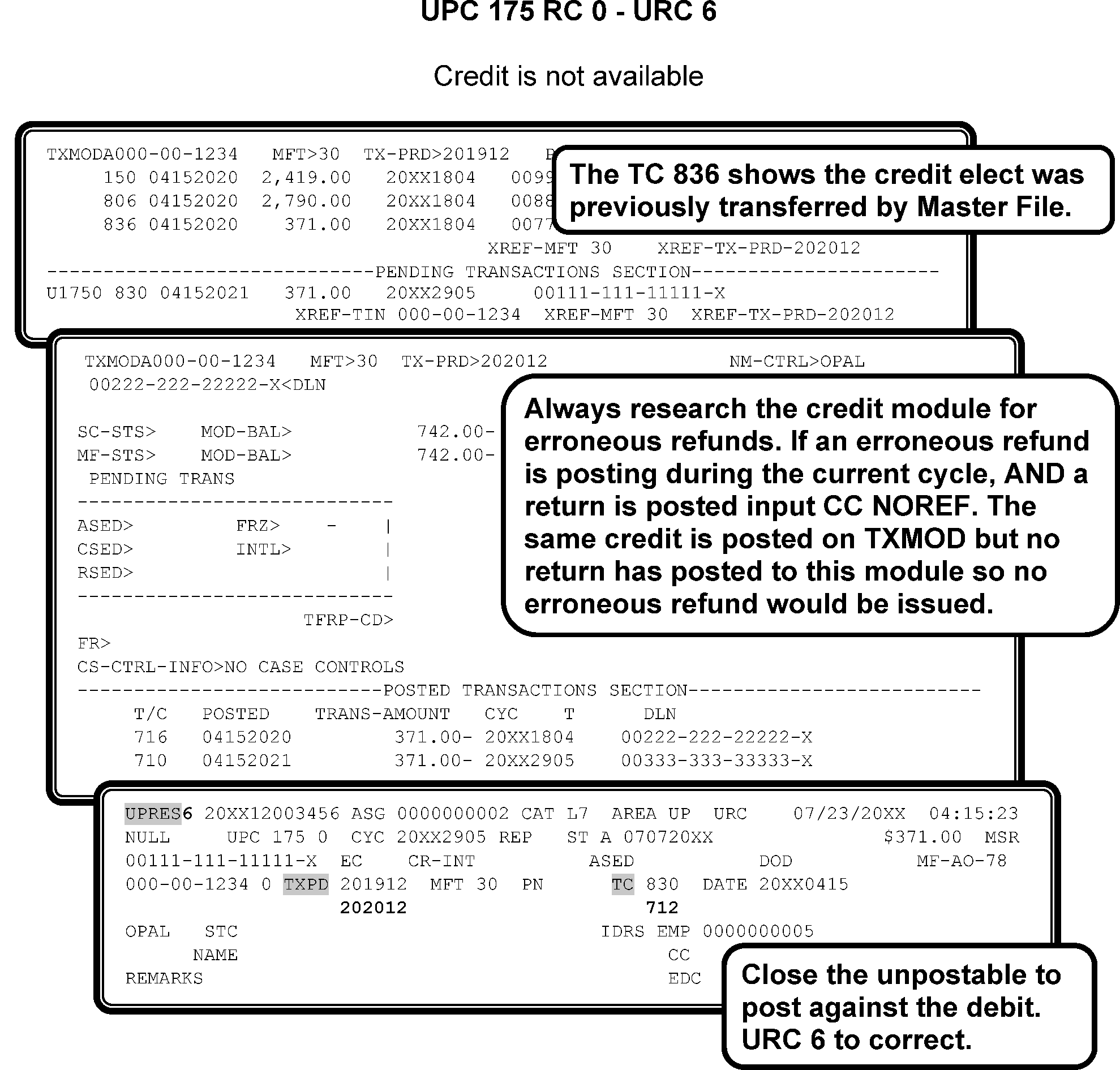
-
CONDITION RC 0 This condition occurs when a TC 150 or 430 tries to post to the invalid segment of Master File and no account is present.
-
Master File will bypass this condition for:
-
corrected UPC 176,
-
TC 150 or TC 430 with IRSN,
-
TC 430 for Form 1040-C (Doc Code 61),
-
TC 150 with CCC X, or
-
TC 150 or 430 with the Accretion Indicator.
-
-
Resolution UPC 176 RC 0: Review the information contained on the Form 4251, the return or the payment document. Make every effort to follow taxpayer intent. Use the signature, if legible. Research for a better SSN or Name Control, use all available resources and research tools to assist in determining the correct Name Control. Review return attachments (for example., the return address on the envelope, W-2’s, schedules) they may provide indications of taxpayer intent or additional resolution information. See IRM 3.12.179.9.7 , Research for better SSN(s) or Name Control(s), for more information. If unable to determine using the return or IDRS request the NUMIDENT file using CC MFTRA.
Note:
A taxpayer using an invalid SSN (not assigned to the taxpayer by SSA) or an IRSN is not eligible for EIC or the personal exemption. If EIC or the primary exemption is claimed and no valid SSN can be found, close with URC 8 and instruct Rejects to remove the EIC and/or primary exemption.
Note:
For the 2018 tax filing season exemptions are no longer claimed. For 2018 tax filing, if EIC is claimed close with URC 8 to remove EIC. Prior year returns are applicable to this instruction. See IRM 3.12.179.60.3 , for more information.
If ... And ... Then ... 1. Research indicates the Name Control was transcribed incorrectly to cause the invalid condition. URC 6 to correct the Name Control and name line. 2. Research indicates a correction to the TIN is required, check CC INOLE for a Date of Death (DOD) on the correct TIN. No DOD is present URC 6 to correct the TIN. 3. Research indicates a correction to the TIN is required, check CC INOLES for a DOD on the correct TIN. DOD is present URC 8 to Rejects with instructions to correct the TIN and revalidate using Section 2 of the ERS record. 4. An account on the invalid side has been established for the taxpayer The Name Control matches the invalid side URC 8 when personal exemptions (2017 and prior) and/or EIC is claimed. Remarks: Remove EIC/Personal Exemptions. If either is not claimed, URC 0. 5. The taxpayer’s account is established on the valid side The taxpayer’s name has changed Input TC 013 on the valid side using the year of the unpostable transaction. URC 0 and cycle delay as needed. 6. There is no account established on the valid side Research indicates that the SSN belongs to the taxpayer, who is now using a different Name Control. (check CC DDBKD, CC IRPTRL, CC MFTRA U, and other available research tools as necessary) URC 0. This will automatically establish the account on the invalid side. 7. The correct TIN is found through research Schedule SE or Form 5329 for the primary taxpayer is present URC 8 to correct the TIN on the return, Schedule SE, and/or Form 5329. Perfect the documents. If the return claims credits, see paragraph (5a-f) below. 8. The correct TIN is found through research Schedule SE or Form 5329 for the primary taxpayer is not present URC 6 to correct the TIN. Perfect the document. If the return claims credits, see paragraph (5a-f) below. Note: If Schedule SE or Form 5329 for the secondary taxpayer is present, ensure that the TIN is correct. URC 8 if necessary. 9. The correct TIN cannot be found EIC or the primary exemption is claimed (check CC TRDBV or CC RTVUE to determine if already removed) Input TC 000 on the invalid side. URC 8 to remove EIC and/or primary exemption. 10. The correct TIN cannot be found The taxpayer is not claiming EIC or the primary exemption URC 0. 11. The return is FSC 2 and both TINs are incorrect or reversed URC 6 or URC 8 as appropriate to correct the TINs. Transfer credits as needed. -
If the taxpayer is already established on an incorrect SSN and a valid SSN is found, check CC IMFOLI to determine whether there is a return posted to the same tax period on both accounts. If not, input a TC 011 to merge the invalid account to the valid SSN. URC 6 and cycle delay as needed.
-
If credits are claimed, research to find the associated credits. Transfer credits as needed. Cycle delay as needed.
-
If credits are found on a different taxpayer’s SSN, but a valid SSN was found for the unpostable taxpayer, input a credit transfer to move the credits to the taxpayer’s valid SSN. If an account is not present, input TC 000 to establish the account before the credit transfer. Close with URC 6 or URC 8 as appropriate.
-
If credits are found on a different taxpayer's SSN and no valid SSN was found, input a TC 000 on the unpostable taxpayer's SSN on the invalid side to establish an account. Transfer the credits to the unpostable taxpayer's SSN after the TC 000 has posted.
-
If a related TC 610 is unpostable, ensure that it is closed to post with the return.
-
Check CC IMFOLQ for missing TC 610 payment. If found, input TC 000 to establish the account on the valid side using the DM-1 Name Control. CC DDBKD or CC MFTRA U may be necessary to locate the correct name to establish the account. Once the account is established, the TC 610 will post. Transfer the posted TC 610 to the correct SSN, or to the invalid side if no correct SSN is found. (Account must be established before the transfer can be input.) Close the unpostable return as appropriate. Cycle if URC 0 or 6 to post after the TC 610. .
-
Check CC URINQ and CC XSINQ for missing TC 610 payment on ITIN cases. If found, coordinate with Accounting to post the payment to the correct module IRM 3.12.179.27.4 .
-
Check CC ERINV to determine if TC 610 is in Error Resolution System (ERS) inventory. If found, coordinate with ERS to post TC 610 to the correct account before closing the case.
-
-
If there is evidence that the taxpayer is a first time filer (for example, using Form 1040-EZ, low wages, etc.) use the following to resolve:
-
If CC INOLE shows no account is established, check CC DDBKD for indications that the SSN is correct but the taxpayer's name has changed. If so, close with URC 0. If the unpostable was caused by a transcription error in the Name Control, URC 6B to correct the Name Control and name line.
-
If SSN is incorrect, search using CC NAMES and CC NAMEI. In addition, narrow your search using last name only and address information.
-
If taxpayer's parents' SSNs are found, research CC TRDBV and/or CC RTVUE for dependent information to locate the correct SSN. If found, close with URC 6.
-
-
After thorough research (including CC MFTRA U) if unpostable taxpayer information is not located
-
If transaction is a Form 8379 (Injured Spouse), research for original TC 150 posting.
-
Use URC 6 to correct name line and SSN if necessary to post on original TC 150 account.
-
If original TC 150 is not found, URC 0.
-
-
Figure 3.12.179-25 for an overview of UPC 176.
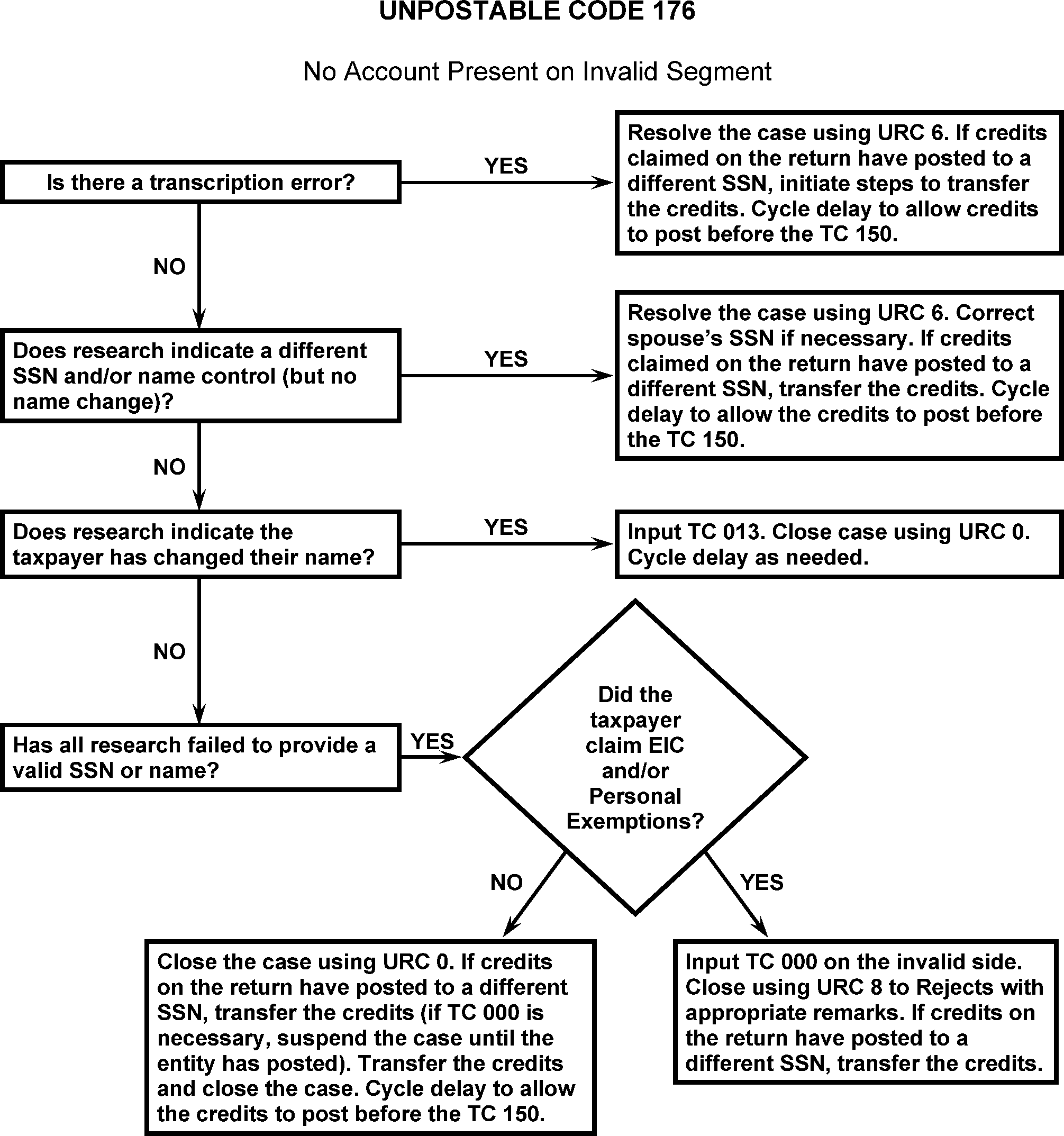
-
Taxpayers with an ATIN, ITIN or IRSN are ineligible for EIC. If a taxpayer is NOT VALID on Master File (first time filing, changes in marital status, etc.) but has a VALID SSN (with the Social Security Administration), may claim EIC.
-
If able to determine if EIC has already been denied by ERS, no further action is necessary. CC TRDBV and/or CC RTVUE can be used to research EIC.
-
If the taxpayer is claiming EIC with an ITIN, invalid SSN, or IRSN, thoroughly research the taxpayer's account using CC IRPTR with Definer L and CC INOLE, CC NAMES, and CC NAMEI.
-
If it is necessary to change the SSN to an ITIN or IRSN, URC 8 to Rejects with appropriate remarks.
-
After reviewing the taxpayer's employment information and ensuring it is the correct taxpayer, correct using the following:
-
If valid TIN but taxpayer has not applied for a name change with SSA, close with URC 0 or URC 6 as appropriate.
-
If taxpayer has changed name with SSA as shown on the DM-1, input a TC 013 on the INVALID segment using the Name Control from the VALID segment. Correct with URC 0 or 6 as appropriate and input a cycle delay as needed.
-
-
If the taxpayer is claiming EIC and or personal exemptions (2017 and prior) and you cannot determine a valid number, URC 8 to Rejects with the appropriate comments:
-
Erroneous SSN -REMOVE EIC AND/OR PERS EXMT
-
IRSN - REMOVE EIC AND/OR PERS EXMT
-
ITIN - REMOVE EIC
-
-
AUSPC ONLY — Use the following along with the regular Unpostable procedures.
-
Dual Surnames—Some taxpayers have dual or hyphenated surnames that they often alternate and are erroneously transcribed. When working a case where taxpayer has a dual or hyphenated surname, be sure to research both names thoroughly, including the NUMIDENT File using CC MFTRA.
-
Compare the Name Control on Master File with the Name Control on signature;
-
If they match, URC 6.
-
If they do not match, using the Name Control on the signature input TC 013 and cycle delay as needed. Figure 3.12.179-26.
-
-
If the return has a TIN in Canadian SIN format or you can determine that the TIN is a Canadian SIN based on information in the return attachments, search for a valid US SSN. If found, release using URC 6.
-
If research locates an IRSN, URC 6 or URC 8 if needed to remove primary exemption and/or EIC.
-
If two or more IRSNs are found, and valid number is not located, URC 0, or URC 8 if needed to remove primary exemption and/or EIC. Figure 3.12.179-27.
-
-
If the return is a Form 1040-NR and research shows an IRSN, URC 6 (or URC 8 if Schedule SE or Form 5329 are present).
-
If 1040-NR and the Estate or Trust box is checked, URC 8 to Rejects notating on Form 8749, "RENUMBER TO BMF". Check to see if the TIN is an EIN for the estate or trust specified in the entity portion of the return or for an estate or trust related to the individual specified in the entity portion (use CC INOLET or CC INOLEG). If TIN is an EIN, include this EIN, along with the MFT 05, Tax Period, and Name Control on Form 8749. If the TIN is not an EIN, and you cannot determine an appropriate EIN for the return, include the instruction "SSPD 320 FOR EIN" on Form 8749 in addition to the above. Figure 3.12.179-28.
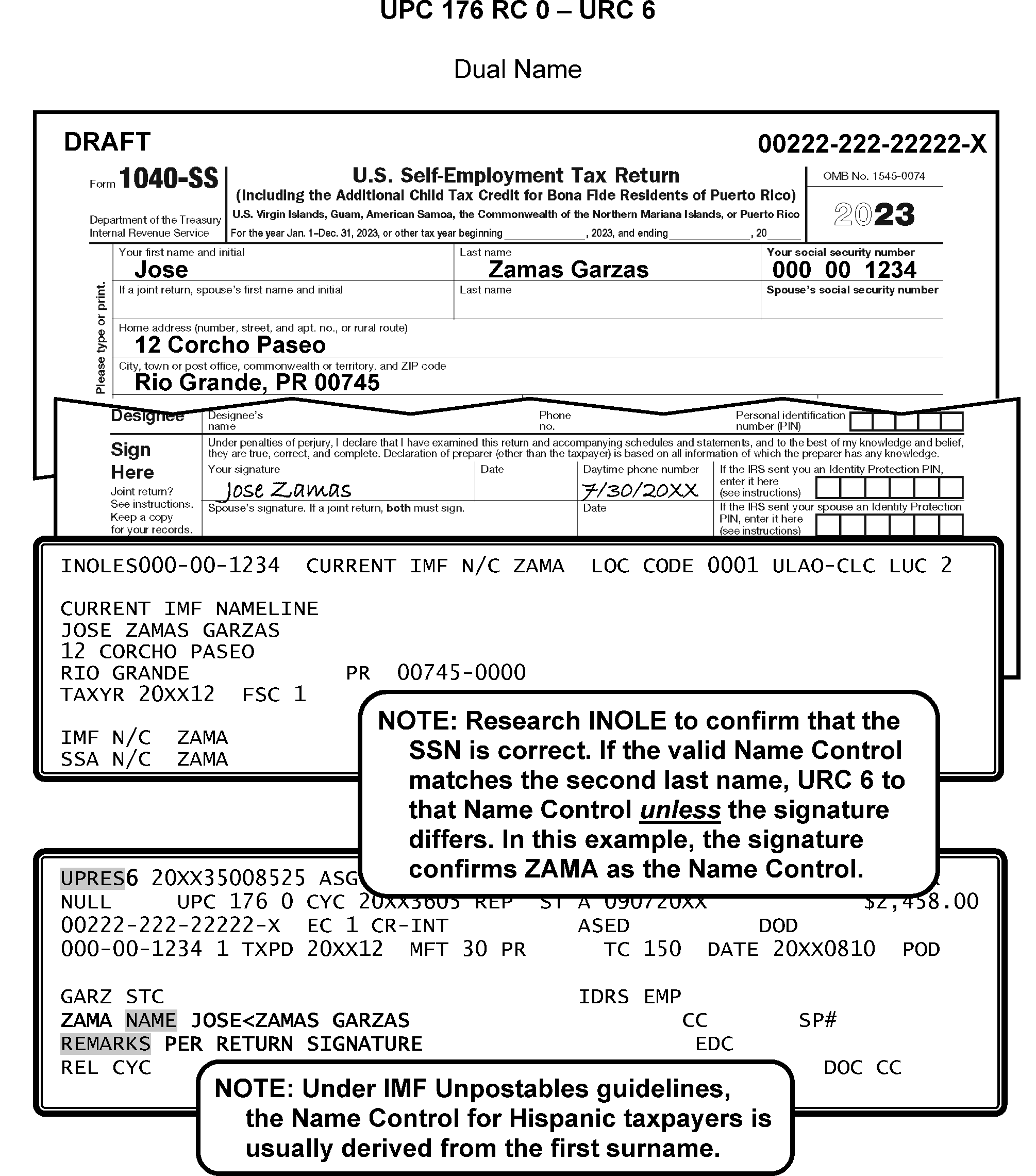
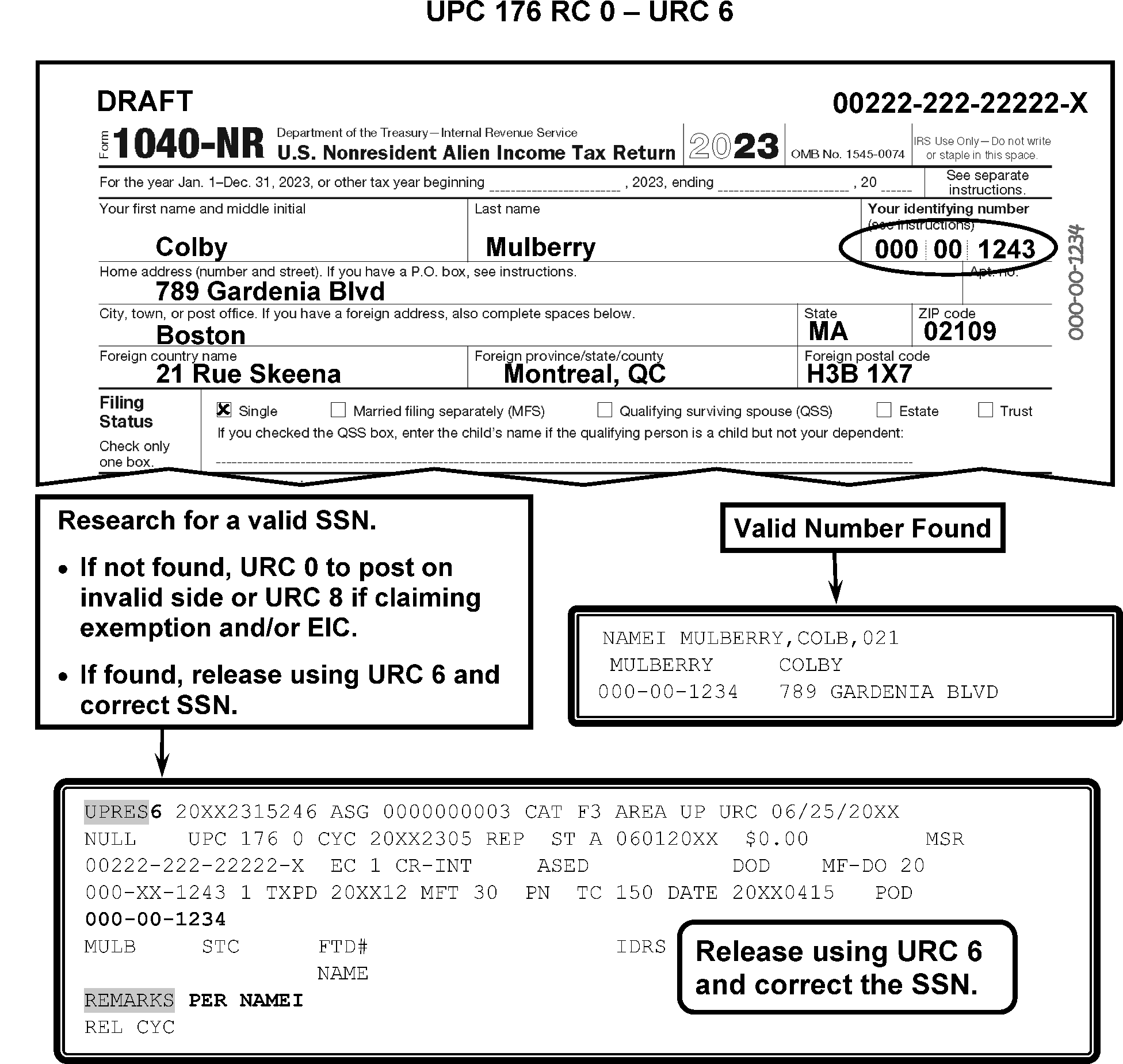
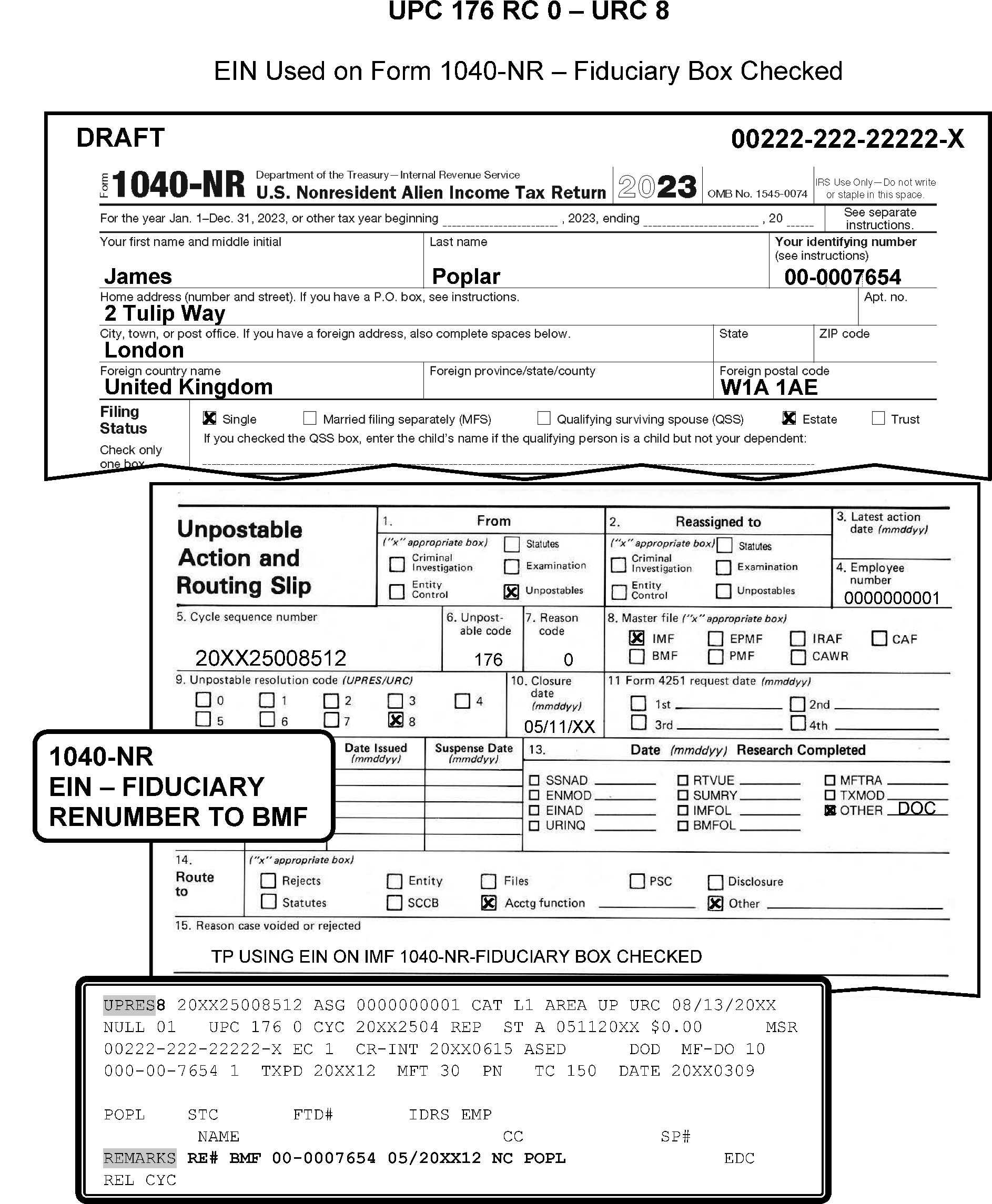
-
CONDITION RC 0 This condition occurs when a module creating transactions attempts to post to an account on the valid segment with the Scrambled SSN Indicator set to 01, 10, 12 or 20 if the MFR is set to 08. In addition, unpost all transactions except TC 01X with a significant Scrambled SSN value or TC 020 if the Scrambled SSN Indicator is set to 13 or 23.
-
Resolution UPC 177 RC 0: Assigned GUF Category B1, Entity.
-
This subsection contains conditions and resolutions for UPC 178 RC 0 - RC 2.
-
CC UPTIN and CC TXMOD are useful when researching this unpostable condition.
-
CONDITION RC 0 This condition occurs when a TC 460 with an extension date prior to Return Due Date (RDD) or extended RDD attempts to post.
-
Resolution UPC 178 RC 0: If Form 4868 and extended date were input incorrectly.
Note:
Tax Examiners must be sure the extended date is correct for extension tax period. Caution must be taken if the extension is denied. See IRM 3.12.212-14 Form 4868 Due Dates
-
If research determines that the extension date is incorrect, URC D and re-input TC 460 via IDRS (CC REQ77).
-
If no error, URC D and route to Files.
-
-
If an extension request attempts to post and the module already contains a posted TC 460 with a later extended to date, URC D and route to Files.
-
CONDITION RC 1 This condition occurs for the following:
-
Transaction date of TC 500 is later than latest CSED.
-
The CSED from TC 550 is not greater than 10 years from the 23C date of the latest assessment in the module.
-
The transaction date from the TC 550 is not greater than the transaction date from any posted unreversed TC 500 or TC 520.
-
The transaction date of TC 550 is later than the latest CSED as extended by previous postings.
-
The TC 550 has an earlier transaction date than a previously posted unreversed TC 550.
-
The transaction date of TC 550 matches a previously posted TC 550 but CSED on input TC 550 is earlier.
-
The transaction date of TC 550 is prior to 23C date of earliest assessment in module.
-
The CSED extension date of the TC 550 is prior to the Return 23C date plus 10 years. This is for MFT 29, MFT 30, or MFT 31 and only if the Return 23C date is significant.
-
-
Resolution UPC 178 RC 1
-
Before you proceed with the Manual Assessment refer to IRM 3.12.179.8.9 . If Doc Code 51, (Form 3413), URC 8, request Rejects remove the TC 550 and notify CSCO of action taken.
-
All others, GUF Auto-Close URC 2 to Originator.
-
-
CONDITION RC 2 This condition occurs when ASED TC 560.
Note:
Master File will bypass checks a, c, and d below for TC 560 blocking series 700, 775, and 990–999.
-
ASED of the input transaction is not equal to or greater than regular ASED.
-
An unreversed TC 480 is posted.
-
Transaction date of TC 560 is later than previous ASED as extended.
-
Transaction date of TC 560 is earlier than transaction date of a previously posted TC 560.
-
Transaction date of TC 560 is prior to the later of RDD or transaction date of the TC 150.
-
-
Resolution UPC 178 RC 2 GUF Auto-Close URC 2 to Originator.
-
AUSPC ONLY INTL Follow regular non-INTL procedures.
-
Taxpayers must file Form 2350 if all of the following conditions applies:
-
They are United States citizens.
-
They expect to qualify for the foreign earned income exclusion and/or the foreign housing exclusion or deduction by meeting either the bona fide residence test or the physical presence test but not until after your tax return is due.
-
Their tax home is in a foreign country (or countries) throughout the period of a bona fide residence or physical presence, whichever applies.
-
-
Form 2350 - Application for Extension of Time To File U.S. Income Tax Return For U.S. Citizens and Resident Aliens Abroad Who Expect To Qualify for Special Tax Treatment.
-
If "No" box is checked on line 3, return is due 30 days after qualifying period ends (2nd date on line 4b).
-
If "Yes" box is checked on line 3, return due 90 days from January 1 of the next full calendar year.
-
If box is not checked, extended due date is determined by dates shown on lines 4b and 4d.
-
-
If Filing Form 2555 exclusion, the taxpayer automatically qualifies for an extended due date of 6–15–20XX.
-
The taxpayer can file Form 2350 and must pay full payment with application.
-
If an extension requests attempts to post and module already contains a posted TC 460 with a later date, it will unpost UPC 178.
-
A taxpayer who is out of country (but not for first time), files an extension on Form 4868. Figure 3.12.179-29.
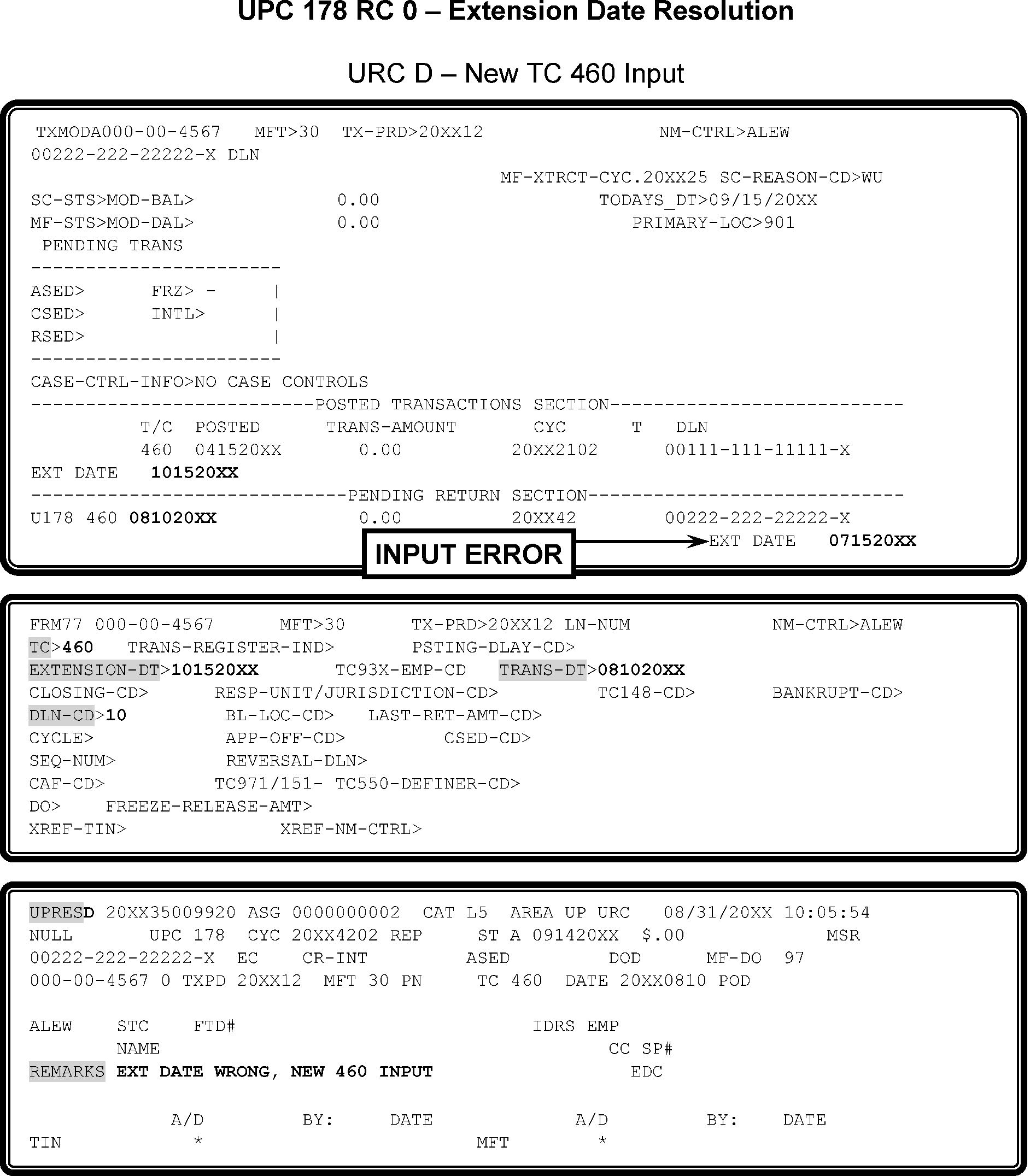
-
CONDITION RC 0 This condition occurs when a TC 290 or TC 291 for significant amount without secondary TC 160, TC 161, or TC 162 attempts to post to a module containing a TC 160, TC 161, or TC 162.
-
Resolution UPC 179 RC 0: GUF Auto-Close URC 2 to Originator.
-
CONDITION RC 1 This condition occurs when a TC 300 or TC 301 for significant amount without TC 160 or TC 161 attempts to post and the delinquent return switch is set.
-
Resolution UPC 179 RC 1 GUF Auto-Close URC 2 to Exam.
Note:
Do not make these checks if the input adjustment or the module contains a TC 320 if the tax period is 8611 and prior, if the posted return contains Computer Condition Code R, or if the input transaction is an abatement in tax and the net of the TC 16X is zero. Do not perform RC 1 above if the total tax liability (including the input TC 300) does not exceed the total timely credits posted in the module.
-
CONDITION RC 2 This condition occurs when an Adjustment contains credit reference number 764 and there is a TC 29X in the module (except a previously posted TC 290 containing priority code 6 or TC 290 with Julian Date 999).
-
Resolution UPC 180 RC 2 Correct using the following:
-
If research on CC TXMOD determines the TC 29X with credit reference number 764 is not a duplicate, allow the condition to post with an URC 0.
-
If research on CC TXMOD determines the TC 29X with credit reference number 764 is a duplicate, correct the unpostable condition with an URC D.
-
If the Doc Code is 51 and secondary Transaction Code is 764, URC 0.
-
If the taxpayer has an ITIN, URC 2 to the originator.
-
If unable to determine if document will post or other than blocking series 200–299, URC 2 and route to Originator.
-
If TC 29X and blocking series 200–299 (1040-X), GUF Auto-Close URC 2 to Accounts Management.
-
-
CONDITION RC 0 This condition occurs when a TC 530 with closing code 09 (except if DLN Julian date is 401–766 with block and serial no. 99999) attempts to post and the ≡ ≡ ≡ ≡ ≡ ≡ ≡ ≡ ≡ ≡ ≡ ≡ ≡ ≡ ≡ ≡ ≡ ≡ ≡ ≡ ≡ ≡ ≡ ≡ ≡ ≡ ≡ ≡ ≡ ≡ ≡ ≡ ≡ ≡ ≡ ≡ ≡ ≡ ≡ ≡ ≡ ≡ ≡ ≡ ≡ ≡ ≡ ≡ ≡ ≡ ≡ ≡ ≡ ≡ ≡ ≡ ≡ ≡ ≡ ≡ ≡ ≡ ≡ ≡ ≡ ≡ ≡ ≡ ≡ ≡ ≡ ≡ ≡ ≡ ≡ ≡ ≡ ≡ ≡ ≡ ≡ ≡ ≡ ≡ ≡ ≡ ≡ ≡ ≡ ≡ ≡ ≡ ≡ ≡ ≡ ≡ ≡ ≡ ≡ ≡ ≡ ≡ ≡ ≡ ≡ ≡ ≡ ≡ ≡ ≡ ≡ ≡ ≡ ≡ ≡ ≡ ≡ ≡ ≡ ≡ ≡ ≡ ≡ ≡ ≡ ≡ ≡ ≡ ≡ ≡ ≡ ≡ ≡ ≡ ≡
-
Resolution UPC 181 RC 0: GUF Auto-Close URC 2 to Originator.
-
CONDITION RC 0 This condition occurs when a module creating transaction except TC 140; TC 500 cc 52, cc 54, cc 56, or cc 58, TC 971 AC 100–106 input to MFT 29, MF 31, MFT 35, MFT 55, or MF 65, attempts to post to an account with MFR 8.
-
Resolution UPC 182 RC 0: Assigned GUF Category Code B1, Entity. Weekly reassign manually fall out cases to Entity Control.
-
This subsection contains conditions and resolutions for UPC 183 RC 0 - RC 1.
-
CONDITION RC 0 This condition occurs for the following reasons:
When an unreversed TC 914 or TC 916 is in the module or a TC 918 is in the account, unpost all TCs EXCEPT those listed below, including corrected UPC 183, and computer generated transactions.
-
TC 141, TC 142
-
TC 142
-
TC 370 with Julian Date 999 to MFT 31 or MFT 65
-
TC 420 (if module contains TC 424)
-
TC 424 (with Push Code 049)
-
TC 428, TC 429, TC 472
-
TC 521, TC 522, TC 550, TC 560, TC 570, TC 583, TC 592, TC 595, TC 596
-
TC 611, TC 667, TC 671
-
TC 740
-
TC 841, TC 898, TC 899
-
TC 910, TC 911, TC 912 RC 0, 915, 917, 919, 920, 960, 961, 962
-
TC 971 AC 086, AC 087, or AC 688
-
TC 972 AC 054, AC 060– AC 062
-
TC 97X AC 200– AC 214
-
TC 99X
Note:
If the unpostable is due to TC 918 or TC 916, Master File will bypass for TC 016 changing the MFR only; TC 30X for zero or debit; TC 420, 424, TC 430, TC 610, TC 640, TC 660, TC 670, or TC 810 with AC 3. Master File will also bypass for TC 914, TC 916, or TC 918 if the input transaction matches the posted transaction. For example, allow TC 914 to post if the module contains a prior posted TC 914.
Note:
Effective 04-01-2020: Bypass UPC 183 RC 0 (account with CI freeze) for input TC 971 ac 162, 166 and 199.
When there is an unreversed TC 914 in any module in the account, any transaction input to MFT 35 or MFT 55 module will unpost, except TC 912, TC 920, and TC 99X. Master File will bypass for a corrected UPC 183 on MFT 35 or MFT 55. Effective 1/1/2025: Bypass UPC 183 RC 0 for TC 972 AC 054 input to MFT 35, MFT 55, and MFT 65 accounts if a Criminal Investigation indicator is present at a module or entity level (i.e., 91 Hold present on Entity Module, refund schemes on Entity Module, 91 freeze on the Tax Module, or refunds schemes on Tax Module). A second TC 914 will not post even if a corrected UPC 183 is input to the module containing the TC 914.
-
-
CONDITION RC 1 This condition occurs when TC 915 is input and STEX freeze is set.
-
Resolution UPC 183 RC 0 and RC 1: Assigned to GUF Category Code A1.
-
CONDITION RC 0 This condition occurs when a TC 930 or TC 932 is input to a module containing a TC 424 with Push Codes 010 or 019–041.
-
CONDITION RC 1 This condition occurs when a TC 424 containing Push Code 010 or 019–041 is input to a module containing an unreversed TC 930 and not containing a TC 150.
-
Resolution UPC 185 RC 0 and RC 1: GUF Auto-Close URC 2 to Exam.
-
This subsection contains conditions and resolutions for UPC 186 RC 0 - RC 2.
-
CONDITION RC 0 This condition occurs when a transaction attempts to post to a module with a 40 Hold (M- freeze) in effect (Status 29 account transferred out of Master File). This check does not apply to TC 370 with a secondary TC 402 or TC 972 AC 145 if the TC 400 contains a DLN with a Julian Date of 998.
-
Resolution UPC 186 RC 0: Correct with the following instructions:
-
If TC 96X, GUF Auto-Close URC 2 to Originator.
-
If TC 140, TC 141, TC 142, TC 474, TC 475, or TC 59X, GUF Auto-Close URC D.
-
If the transaction is a payment, verify account is correct against RTR image. If not, URC 6 to correct.
-
If TC 920, close URC D.
-
If TC 898 and/or TC 899 Bureau of the Fiscal Service (BFS), and not able to resolve UPC 186 RC 0, contact the TOP/DMF Liaison by sending an encrypted email to ≡ ≡ ≡ ≡ ≡ ≡ ≡ ≡ ≡ ≡ ≡ ≡ ≡ ≡ ≡ ≡ ≡ ≡ ≡ ≡ ≡ ≡ ≡ ≡ ≡for resolution. Please send the cases individually. If a TIN has multiple TC 898 and/or TC 899 you must include those in one email. Unpostable employees need to follow email protocol and send an encrypted email with appropriate subject line. Include in the body of the email the taxpayer’s TIN, MFT, TC, and TXPD, your name and department when you reach out to the Liaison. The lead must be cc-ed on the email. An answer with a resolution should be received within seven days from the Liaison. When closing cases based on the determination made by the TOP/DMF Liaison, include remarks showing the case was closed per the TOP/DMF Liaison.
-
-
Resolution Procedure UPC 186 RC 0 when TC 670 with MFT 31 on CC IMFOL.
If ... and ... Then... 1. No M- Freeze URC 6 to MFT 31. 2. M- Freeze pending TC 972 AC 145 URC 0 with cycle delay 1. 3. M- Freeze no pending TC 972 AC 145 -
Contact initiator of TC 971 AC 145 to release freeze. Inform initiator that the TC 670 will be cycle delayed to post in 3 cycles. URC 0 with cycle delay 3.
-
If no initiator, post to debit module with earliest CSED. If no debit module, post to current processing year.
Note:
The initiator can be identified by checking the Control Base and History information section on CC TXMOD. Look for a history item on the MFT 30 module containing the word "MIRROR" , "WT/MIRROR" , "WTGMIRROR" , "MFT 31" , "MFT31IA" or "MFT31/ CNC" . Use the matching ACTION-EMP number to determine the initiator of the TC 971 AC 145 or to locate the related IDRS Unit for assistance in releasing the M- Freeze.
-
-
Resolution Procedure UPC 186 RC 0 when MFT 31 not on CC IMFOL.
If... And... Then... 1. No MFT 31 account TC is not a money amount -
URC 2 to originator with remarks "TC 400 needs MFT 31"
-
No originator, URC D TC 400 posted
2. No MFT 31 account, and an unreversed TC 130 is present on CC ENMOD TC is a money amount Research the CSED on all modules containing a M- freeze
Compare the earliest CSED on the M- freeze to the earliest CSED on the debit modules of Master File-
If any module with M- Freeze contains an earlier CSED than any debit Module CSED on Master File Route the payment to NMF; Follow the routing instructions in Paragraph 6 below.
-
If any debit module contains an earlier CSED than any module with M- Freeze; Post to debit module on Master File with the earliest CSED
3. No MFT 31 account, and a reversed TC 130 (TC 131 or TC 132) present on CC ENMOD TC is a money amount with debit module Post to debit module with earliest CSED 4. No MFT 31 account TC is a money amount with no debit module Post to current processing year. If it repeats as a UPC 198 RC 0, URC 0 to refund -
-
If ... Then ... 1. Doc Code 34 credit transfer on debit side of unpostable (TC 612, TC 662, TC 672 etc.) URC 2 to originator. 2. Doc Code 34 credit transfer on credit side of unpostable (TC 610, TC 660, TC 670 etc.) Research for debit. Wash out transfer using URC 6. 3. Credit Transfer to or from NMF URC 1 to Accounting to send to NMF. 4. Doc Code 87 URC 1 to Accounting Data Control NULL code 31. 5. Doc Code 77 (TC 520, TC 530, TC 971) URC D. 6. Doc Code 54 (TC 290) URC 2 to Preparer (ADJ). 7. TC 360 URC 2 w/NULL 19. 8. TC 402 on module If posted URC 0; If pending URC 0 and cycle delay as needed. If Unpostable, associate to post TC 402 first. 9. CC ENMOD, CC TXMOD or CC SUMRY shows a flashing "N" URC 8 w/NULL 01 (must have copy of CC ENMOD w/ highlighted TC) Remarks: ROUTE TO NMF. -
Resolution Procedure UPC 186 RC 0 for All other cases:
-
The following prints need to be sent to NMF Accounting:
-
Current NMF Transcript - Transcripts can be requested from the NMF Team at the following E- Mailbox: *TS KCSPC Non-Master File Team (ts.kcspc.nonmaster.file.team@irs.gov).
-
INOLES IDRS screen for the primary.
-
ENMOD IDRS screen showing unreversed TC 130.
-
IMFOLT IDRS screen page with TC 400 for the TXPD.
-
IMFOLT IDRS screen pages with last CSED for the TXPD.
-
IMFOLI IDRS screen for the primary.
-
UPDIS IDRS screen with the appropriate Form attached. Use Form 2424, Form 3244, or Form 3809 depending on the unposted TC.
Note:
For example: for TC 670 use F 3244 with remarks Overflow Account to NMF TC 400. For TC 672 use F 2424 and note under explanation Overflow Account to NMF TC 400 and put MFT 31 under the X-ref MFT. For TC 671 use F 3809 and note under explanation Dishonored TC Reversed Back to ACO TC 400 and check the box for route to NMF with MFT 31
-
Attach the above listed prints to F 8749 and close with URC 1.
-
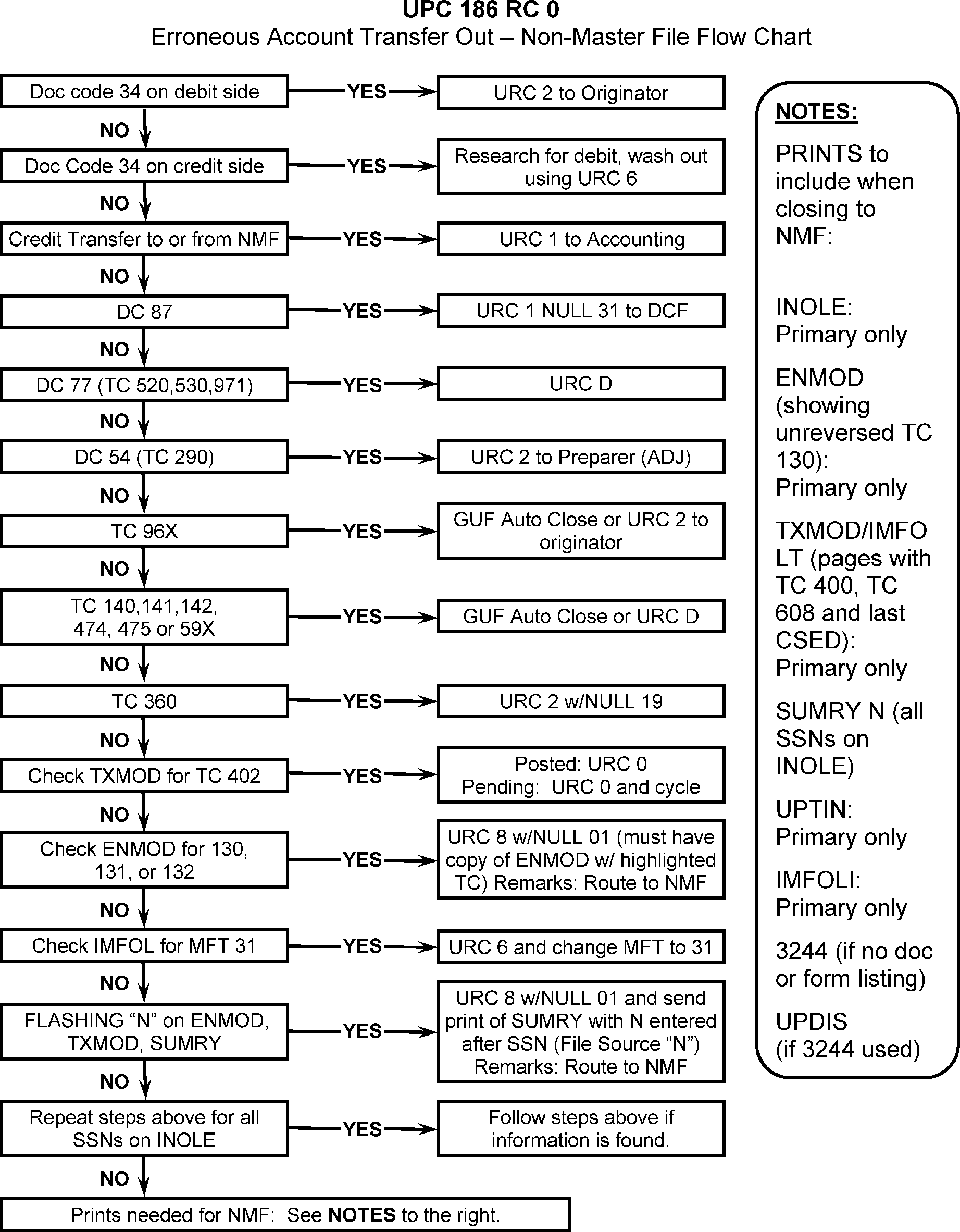
-
CONDITION RC 1 This condition occurs if module balance is credit and any TC (except TC 400), attempts to post to a tax module with a transaction section exceeding maximum programming size.
-
Resolution Procedure UPC 186 RC 1 Follow the resolution instructions in the If/And/Then Table below.
If ... And ... Then ... 1. If Doc Code 34 Credit Transfer Unpostable is on the DEBIT SIDE URC 2 to Originator with note on routing slip "TC 400 ON MODULE; UNABLE TO POST" . 2. If Doc Code 34 Credit Transfer, Unpostable is on the CREDIT SIDE, Research for debit. Wash out transfer using URC 6 and notify Originator of action taken. 3. If unpostable TC is a payment, There is a balance due on another module, URC 6 to move credit to earliest CSED balance due module. 4. If unpostable TC is a payment, There is NO balance due on another module URC 6 to move credit to current TXPD 5. TC 400 is on module, Doc Code 77, URC 2 and route to Originator. 6. TC 400 is on module, TC is a payment/payment reversal TC, Research CC XSINQ, CC SUMRY for correct module. If correct module is found, post TC with the appropriate URC. If correct module is not found, URC 8 to Rejects to forward to Accounting with note on routing slip "TC 400 on Module". 7. If unpostable is TC 150, TC 820 / TC 400 is on module (MF MOD BALANCE is zero with “M” freeze) URC 0. Otherwise elevate to P&A analyst to have elevated to HQ for assistance. Hold the case until the resolution is given by HQ analyst. Put the case in suspense status with remarks UPC 186 RC 1 to HQ DO NOT TRANSFER CREDITS OR WORK OTHER RELATED UNPOSTABLES IF CASE HAS BEEN ELEVATED. 8. TC 400 is NOT on module, There is a balance due on another module and the unposted module is paid in full URC 6 to move credit to earliest CSED balance due module. 9. TC 400 is NOT on module, TC is a payment/payment reversal or does not meet any criteria listed above, Put the case in suspense status with remarks “UPC 186 RC 1 Full module” until Accounting process the Form 3809 and the TC 820/ TC 400 posted to the account. Follow the instructions in paragraph 3, 4, and 5 below. 10. TC 400 is NOT on module and it is a TAS/OAR case, criteria IRM 3.12.179.87.2(2) para 7 and para 9 applicable Prepare F 3809 and advise TAS to send the F 3809 to *TS OAR:Kansas City:SP:Acct ts.oar.kansas.city.sp.acct@irs.gov for expedition processing and monitor for TC 820 / TC 400. 11. All other transactions, Correct module cannot be found, URC 2 to Originator with all research attached. -
Form 3809 for remittance (payment or payment reversals) with missing posted TC 820 / TC 400
-
Prepare Form 3809 for remittance (payment or payment reversals) with missing posted TC 820/ TC 400 and follow the example below in paragraph 4.
-
Transaction Date is the last module credit date on CC TXMODA
-
Debit and credit amount (MF MOD BALANCE) is the Master File credit (CC TXMODA). Debit TC 820 and credit TC 700 MF MOD BALANCE would be the same amount.
-
Once all required input completed on F 3809, send the form to KC NMF SSU team ts.kcspc.aco.transfer.team@irs.gov
-
-
Example of Form 3809 for UPC 186 RC 1
-
Resolution Procedures for accounts with F 3809:
-
Once the Form 3809 has been sent for processing, monitor for the “M” freeze (TC 400). Every Friday check IMFOLT for the TC 820 to post. Once TC 820 post, TC 400 should auto generate and post on the next cycle.
-
Once the module contains the TC 400, URC D the TC 570 if unposted, and close the remittance (Payment/payment reversals) using UPC 186 RC 0 instructions.
-
If no M freeze generated input TC 570. The TC 570 is now UPC 186 RC 0 but it generated the TC 400 and the M- Freeze is now present. Take the following actions:
-
UPTIN should have UPC 186 RC 0 TC 570 and UPC 186 RC 1 for payments (payment reversals).
-
Next, delete the UPC 186 RC 0 TC 570 (URC D) if unposted, and close the UPC 186 RC 1 cases to NMF using UPC 186 RC 0 instructions per IRM 3.12.179.70.1 paragraph 7.
-
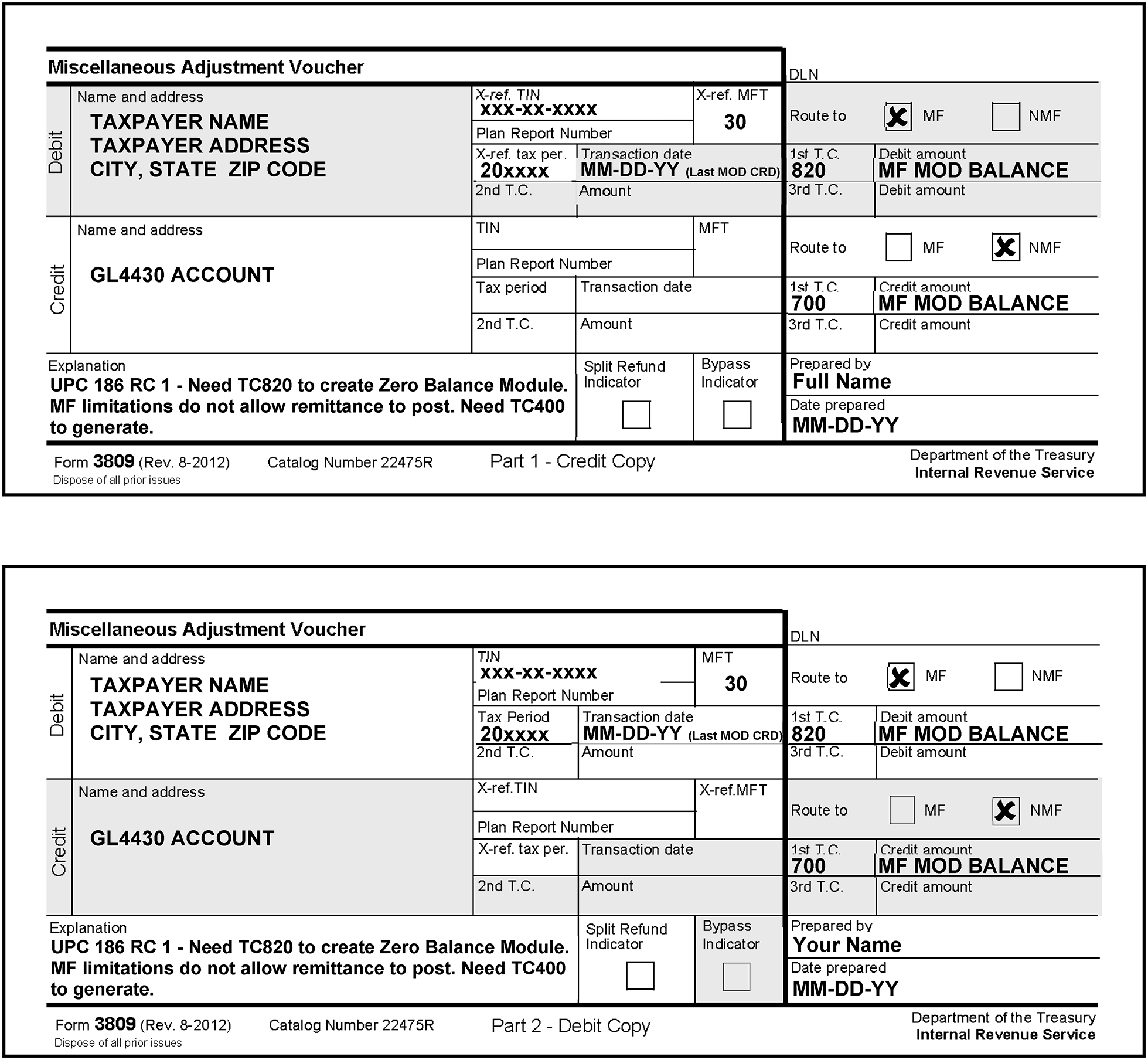
-
CONDITION RC 2 This condition occurs when:
-
TC 971 AC 45 or AC 145, or TC 400 is input to a module containing an unreversed TC 420 or TC 424.
-
TC 971 AC 45 or TC 400 is input to a module containing an unreversed TC 520.
-
-
Resolution UPC 186 RC 2 GUF Auto-Close URC 2 to Originator.
-
CONDITION RC 0 This condition occurs when an adjustment is attempting to post to a module that contains an unreversed TC 780 and the adjustment transaction is not in the 800–899 blocking series.
-
Resolution UPC 187 RC 0: GUF Auto-Close URC 2 to Originator.
-
CONDITION RC 0 This condition occurs when an input transaction programmed to create a module does not contain name line information and a period earlier than the earliest name line on Master File is addressed, except TC 140, Entity Code 2.
TC 971 AC 141 and TC 424 Push Code 036 will resequence in lieu of unposting.-
TC 971 AC 010;
-
RPS TC 610s;
-
TC 610 with Doc Code 19, Doc Code 70, or Doc Code 76 that are input to a module one year prior to the earliest tax module on the Master File;
-
all DOD TC 500s regardless of the name line comparison;
-
any transaction input to MFT 29, MFT 31, or MFT 55.
-
-
Resolution UPC 188 RC 0 if posted to CORRECT module: Verify transaction is input to proper taxpayer's account. If the TC is posting to CORRECT module,
-
If TC 150 or TC 430, URC 6 and add name line from the source document for the year of the unpostable.
-
If TC 29X, (except MFT 55), GUF Auto-Close URC 2 to Originator.
-
If TC 599, GUF Auto-Close URC D.
-
If TC 96X, URC 2 to Originator.
-
For TC 971 Action Codes; AC 111, AC 121, AC 123, AC 124, AC 125, AC 129, AC 134, AC 136, AC 199, AC 206, AC 501, AC 504, AC 505, AC 506, AC 522, AC 524, AC 544, and AC 617 (ID theft indicators), input TC 013 for the year of the unpostable. URC 0 and cycle delay as needed. If TC 971 other than AC listed, URC 2 to originator
-
All other TCS, including Civil Penalties (MFT 55), input TC 013. URC 0 and cycle delay as needed.
-
-
Resolution UPC 188 RC 0 if posting to an INCORRECT module (e.g., earlier tax period, spouse's SSN used): URC 6 and make corrections.
-
If a Form 8379 (Injured Spouse), research for original TC 150 posting.
-
If TC 150 is found, URC 6 and correct SSN/Name Control as needed.
-
If unable to locate TC 150, URC 6 and add name line.
-
For prior year payments see the “If and Then” flow chart IRM 3.12.179.36.2, Resolution Procedure UPC 151 RC 0 for Prior Year Payments.
-
-
For Form 3413 Doc Code 52— If necessary, input a TC 013. If Form 3413 is blocked in 900–999 document, URC 8 to Rejects to be renumbered to a 200–299 Blocking series.
-
For Form 3413 Doc Code 52— If Unpostables has to prepare a TC 013, check the entity for a vestigial record. This record determines whether a particular module has been moved to retention register. If present, document must be numbered with blocking series 000–899. If not present, then blocking series 900–999 must be used.
-
For Form 3414 Doc Code 52— If the module has been established and contains current postings only, release using URC 8, request Rejects renumber with Doc Code 51.
-
CONDITION RC 1 This condition occurs when a TC 370 with Doc Code 52 Julian Date 999 if the account does not contain a TC 013 containing a name line year that matches the tax period of the module that was dropped to retention. The TC 013 must have posted in the current calendar year. Master File will bypass this condition if the TC 013 has a name line year equal or prior to the tax period of the TC 370 or for TC 370 Doc Code 51 with Julian Date 997 or 999.
-
Resolution UPC 188 RC 1 This condition exists with IMF Master File, however, unpostable conditions will not be received.
-
This subsection contains conditions and resolutions for UPC 189 RC 0 - RC 9. Reversal TC Amount Discrepancy, F 5405, SE Income Amount, and First Time Home Buyer Credit Recapture.
-
CONDITION RC 0 This condition occurs when an input transaction from Column A attempting to post to a module is greater than the net amount (including prior reversals) of the transactions from Column B. This netting is done prior to the specific transaction matching. TC 764, TC 765, and TC 768 cannot exceed the following:
Maximum Net Amount Tax Period $400 Earlier than 197912 $500 197912–198511 $550 198512–198711 $851.20 198712–198811 $874 198812–198911 $910 198912–199011 $953 199012–199111 $2,020 199112–199211 $2,211 199212–199311 $2,364 199312–199411 $2,528 199412–199511 $3,110 199512–199611 $3,556 199612–199711 $3,656 199712–199811 $3,756 199812–199911 $3,816 199912–200011 $3,888 200012–200111 $4,008 200112–200211 $4,140 200212–200311 $4,204 200312–200411 $4,300 200412–200511 $4,400 200512–200611 $4,536 2006–200711 $4,716 200712–200811 $4,824 200812–200911 $5,657 200912–201011 $5,666 201012–201111 $5,751 201112–201211 $5,891 201212–201311 $6,044 201312–201411 $6,143 201412–201511 $6,242 201512 - 201611 $6,269 201612 - 201711 $6,318 201712 - 201811 $6,431 201812- 201911 $6,557 201912-202011 $6,660 202012-202111 $6,728 202112-202211 $6,935 202212-202311 $7,430 202312-202411 $7,830 202412-202511 Note:
Effective January 2020, When posting a TC 29X, TC 30X or TC 370 to MFT 30 or MF 31 with Doc Code 51 input with PRN 707, generate and post a TC 240 / TC 241. Unpost any of the transactions with PRN 707 abatements that exceed the net posted TC 240 PRN 707 amounts. This will prevent a negative penalty balance.
Column A (TC attempting to post) Column B (TC that must be previously posted) TC 161 See Note 3 TC 16X TC 171 See Note 3 TC 17X TC 191 TC 19X, TC 33X, TC 34X TC 201 TC 200 TC 241 TC 24X TC 281 TC 28X TC 291, TC 295, TC 299, See Note 3 for TC 299. TC 150, TC 29X, TC 30X, TC 301, TC 305, TC 309 TC 294 or TC 304 TC 294, TC 295, TC 304, TC 305 TC 271 See Note 3 TC 27X TC 311 TC 31X TC 321 TC 32X TC 341 See Note 3 TC 19X, TC 33X, TC 34X TC 351 TC 35X TC 361 TC 36X TC 772 TC 77X TC 451 TC 45X TC 611 TC 61X TC 612 TC 61X TC 632 See Note 2 TC 63X TC 637 See Note 2 TC 63X TC 641 or TC 642 TC 64X TC 661 or TC 662 TC 66X, TC 43X (Remit) TC 681 or TC 682 TC 68X TC 691 or TC 692 TC 69X TC 694 TC 694, TC 695, TC 36X TC 695 TC 694, TC 695 TC 671 or TC 672 TC 67X TC 701 TC 706, TC 701 TC 702 TC 700, TC 702 TC 712 TC 71X TC 721 or TC 722 TC 72X TC 731 TC 736, TC 731 TC 732 TC 730, TC 732 TC 742 TC 74X TC 762 or TC 767 See Note 4 TC 760, TC 762, TC 766, TC 767 TC 765 See Note 5 TC 764, TC 765, TC 768 TC 767 with OTN TC 766 with OTN TC 792 TC 790 or TC 796 TC 802 or TC 807 See Note 5 TC 80X TC 811 Credit module balance TC 821 TC 826, TC 821 TC 822 TC 820, TC 822, TC 824 TC 832 TC 83X TC 843 See Note 15 TC 841 TC 851 TC 856, TC 851 TC 852 TC 850, TC 852 TC 892 See Note 1 TC 89X NOTES 1. If matching to TC 896 with MFT 29, input TC 892 must have blocking series 700–719 and Spouse Indicators must match. If matching to TC 896 with other than MFT 29, input TC 892 must have blocking series other than 700–719. 2. The TC 632 and 637 Refundable Credit Identification field must match the TC 63X transactions in the same Refundable Credit Identification number series (for example, 02 and 03) and must be compared to the sum of the money amounts. 3. When matching any of these transactions from Column A, ≡ ≡ ≡ ≡ ≡ ≡ ≡ ≡ ≡ ≡ ≡ ≡ ≡ ≡ ≡ ≡ ≡ ≡ ≡ ≡ ≡ ≡ ≡ ≡ ≡ ≡ ≡ ≡ ≡ ≡ ≡ ≡ ≡ ≡ ≡ ≡ ≡ ≡ 4. TC 767 generated from reference number 250-253,255, 256-257, 258-262 or 330–339 must match a prior posted TC 766 containing reference numbers 250-253, 255, 256-257 or 330–339 and cannot exceed the amount. TC 767 input with Doc Code 51 will never contain a reference number. 5. Master File will bypass a TC 29X / TC 30X input to MFT 31 that contains Priority Code 9 for reference number 807, 765, and 767 or a secondary TC 772 and for a TC 370 blocked 900–949 input to MFT 31 that contains TC 802, TC 765, TC 772, or TC 767. Master File will continue to unpost UPC 189 if other reference numbers or transactions are input that exceed the original amount. Bypass for TC 290 with Julian Date 997 containing reference number 337 with a negative amount. 6. Reference Number 258 with a positive sign, which would increase the First Time Home Buyer CR to greater than $7,500.00. 7. Master File will unpost TC 29X / TC 30X containing reference number 808, 809, 810 or 811 if the reference number exceeds the credit module balance. There is an input check that prevents more than one of these reference numbers from being input on the same record. Unpost a reference number 808 or 809 for a negative amount if it exceeds the posted CRN 808 / CRN 809 with positive amount. If Reference number 809 or 811 is input to a module not containing a secondary taxpayer name line controlling the module for the year of input. 8. Master File will unpost TC 290 with Julian Date 999 containing reference number 338, 256 or 257 if the module already contains a TC 290 with Julian Date 999. This unpostable is only performed for the generated rebate and will not be performed for any manually input adjustment. 9. TC 29X / TC 30X containing an IRA Reference Number attempting to decrease the net penalty amount below zero. Include the amounts posted in prior adjustments as well as retained in the TC 150. These reference numbers are 160, 162, 194, 195, 233, 235, 236, 237, and 238. 10. Master File will unpost TC 29X / TC 30X containing reference number 875 signed positive if its amount or if its amount plus the Primary First Time Home Buyer Credit amount in the Entity is more than $7,500 ($8,000 for TC 29X / TC 30X reason code 110 and 126, $6,500 for reason code 125). Master File will unpost TC 290 containing reference number 875 for a negative amount if the Primary First Time Home Buyer Credit amount in the Entity is not present. Master File will also unpost TC 290 containing reference number 875 for a negative amount if after adding it to the Primary First Time Home Buyer Credit amount in the Entity the result is below zero. 11. Master File will unpost a TC 29X / TC 30X containing reference number 975 signed positive if its amount or if its amount plus the Spouse First Time Home Buyer Credit amount in the Entity is more than $7,500 ($8,000 for TC 29X / TC 30X reason code 110 and 126, $6,500 for reason code 125). Also, will unpost if the controlling name line for that tax year has FSC other than 2. 12. Master File will unpost a TC 29X / TC 30X containing reference number 975 for a negative amount if the Spouse First Time Home Buyer Credit amount in the Entity is not present. Also, will unpost TC 29X / TC 30X containing reference number 975 for a negative amount if after adding it to the Spouse First Time Home Buyer Credit amount in the Entity the result is below zero. 13. Master File will unpost a TC 29X / TC 30X containing reference number 876 for a negative amount if the Primary Total Recapture amount in the Entity is not present. Also, will unpost a TC 29X / TC 30X containing reference number 876 for a negative amount if after adding it to the Primary Total Recapture amount in the Entity the result is below zero. 14. Master File will unpost a TC 29X / TC 30X containing reference number 976 signed positive if its amount or if its amount plus the Spouse Total Recapture amount in the Entity is more than $7,500 ($8,000 for TC 29X / TC 30X reason code 110 and 126, $6,500 for reason code 125). Also, will unpost if the controlling name line for that tax year has FSC other than 2. 15. Master File will unpost a TC 29X / TC 30X containing reference number 976 for a negative amount if the Spouse Total Recapture amount in the Entity is not present. Also, will unpost TC 29X / TC 30X containing reference number 975 for a negative amount if after adding it to the Spouse Total Recapture amount in the Entity the result is below zero. 16. Master File will unpost a TC 29X / TC 30X containing reference number 877 if the First Time Home Buyer Credit (FTHBC) Entity Section is not present in the account. Also, will unpost TC 29X / TC 30X containing reference number 877 with reason code 119 if the First Time Home Buyer Credit section is present but the primary First Time Home Buyers Credit is equal to zero. Unpost TC 29X / TC 30X containing CRN 877 with reason code 120 if the FTHBC edit section is present but the spouse FTHBC is equal to zero. Unpost TC 29X / TC 30X CRN 877 with reason code 123 if the FTHBC section is present but the primary and spouse FTHBC are equal to zero. 17. Master File will unpost a TC 29X /TC 30X containing reference number 877 for a negative amount if after adding it to the Recapture amount on the posted TC 150 the result is below zero. 18. Master File will unpost a TC 29X / TC 30X containing reference number 258 RC 125 signed negative if it’s attempting to reduce the posted return First Time Home Buyers Credit below zero. 19. ≡ ≡ ≡ ≡ ≡ ≡ ≡ ≡ ≡ ≡ ≡ ≡ ≡ ≡ ≡ ≡ ≡ ≡ ≡ ≡ ≡ ≡ ≡ ≡ ≡ ≡ ≡ ≡ ≡ ≡ ≡ ≡ ≡ ≡ ≡ ≡ ≡ ≡ ≡ ≡ ≡ ≡ ≡ ≡ ≡ ≡ ≡ ≡ ≡ ≡ ≡ ≡ ≡ ≡ ≡ ≡ ≡ ≡ ≡ ≡ ≡ ≡ ≡ ≡ ≡ ≡ ≡ ≡ ≡ ≡ ≡ ≡ ≡ ≡ ≡ ≡ ≡ ≡ ≡ ≡ ≡ ≡ ≡ ≡ ≡ ≡ ≡ ≡ ≡ ≡ ≡ ≡ ≡ ≡ ≡ ≡ ≡ ≡ ≡ ≡ ≡ ≡ ≡ ≡ ≡ ≡ ≡ ≡ ≡ ≡ ≡ ≡ ≡ ≡ ≡ ≡ ≡ ≡ ≡ ≡ ≡ ≡ ≡ ≡ ≡ ≡ ≡ ≡ ≡ ≡ ≡ ≡ ≡ ≡ ≡ ≡ ≡ ≡ ≡ ≡ ≡ ≡ ≡ ≡ ≡ ≡ ≡ ≡ ≡ ≡ ≡ ≡ ≡ ≡ ≡ ≡ ≡ ≡ ≡ ≡ ≡ ≡ ≡ ≡ ≡ ≡ ≡ ≡ ≡ ≡ ≡ ≡ ≡ ≡ ≡ ≡ ≡ ≡ ≡ ≡ ≡ ≡ ≡ ≡ ≡ ≡ ≡ ≡ ≡ ≡ ≡ ≡ ≡ ≡ ≡ ≡ ≡ ≡ ≡ ≡ ≡ ≡ ≡ ≡ ≡ ≡ ≡ ≡ ≡ ≡ ≡ ≡ ≡ ≡ ≡ ≡ ≡ ≡ ≡ ≡ ≡ ≡ ≡ ≡ ≡ ≡ ≡ ≡ ≡ ≡ ≡ ≡ ≡ ≡ ≡ ≡ ≡ ≡ ≡ ≡ ≡ ≡ ≡ ≡ ≡ ≡ ≡ ≡ ≡ ≡ ≡ ≡ ≡ ≡ ≡ ≡ ≡ ≡ ≡ ≡ ≡ ≡ ≡ ≡ ≡ ≡ ≡ ≡ ≡ ≡ ≡ ≡ ≡ ≡ ≡ ≡ ≡ ≡ ≡ ≡ ≡ ≡ ≡ ≡ ≡ ≡ ≡ ≡ ≡ ≡ ≡ ≡ ≡ ≡ ≡ ≡ ≡ ≡ ≡ ≡ ≡ ≡ ≡ ≡ ≡ ≡ ≡ ≡ ≡ ≡ ≡ ≡ ≡ ≡ ≡ ≡ ≡ ≡ ≡ ≡ ≡ ≡ ≡ ≡ ≡ ≡ ≡ ≡ ≡ ≡ ≡ ≡ ≡ ≡ ≡ ≡ ≡ ≡ ≡ ≡ ≡ ≡ ≡ ≡ ≡ ≡ ≡ ≡ ≡ ≡ ≡ ≡ ≡ ≡ ≡ ≡ ≡ ≡ ≡ ≡ ≡ ≡ ≡ ≡ ≡ ≡ ≡ ≡ ≡ ≡ ≡ ≡ ≡ ≡ ≡ ≡ ≡ ≡ ≡ ≡ ≡ ≡ ≡ ≡ ≡ ≡ ≡ ≡ ≡ ≡ ≡ ≡ ≡ ≡ ≡ ≡ ≡ ≡ ≡ ≡ ≡ ≡ ≡ ≡ ≡ ≡ ≡ ≡ ≡ ≡ ≡ ≡ ≡ ≡ ≡ ≡ ≡ ≡ ≡ ≡ ≡ ≡ 20. ≡ ≡ ≡ ≡ ≡ ≡ ≡ ≡ ≡ ≡ ≡ ≡ ≡ ≡ ≡ ≡ ≡ ≡ ≡ ≡ ≡ ≡ ≡ ≡ ≡ ≡ ≡ ≡ ≡ ≡ ≡ ≡ ≡ ≡ ≡ ≡ ≡ ≡ ≡ ≡ ≡ ≡ ≡ ≡ ≡ ≡ ≡ ≡ ≡ ≡ ≡ ≡ ≡ ≡ ≡ ≡ ≡ ≡ ≡ ≡ ≡ ≡ ≡ ≡ ≡ ≡ ≡ ≡ ≡ ≡ ≡ ≡ 21. Master File will unpost Reference Number 259 with a positive sign, which would increase the Making Work Pay CR to greater than $800 ($400 for FSC other than FSC 2). 22. Master File will unpost a TC 843 if the transaction amount is greater than the net amount of the posted TC 841s (including prior reversal TC 843s) with matching transaction date and amount of TC 843. 23. Master File will unpost TC 29X / TC 30X containing reference number CRN 450 with a negative amount goes below $0. If the return posted prior to 2016, unpost the input adjustment if the result of adding CRN 450 to the net amount of all posted TC 766 / TC 767 with CRN 000 goes below $0. If the input CRN 450 and return posted prior to January 2016, treat input CRN 450 as CRN 000. If the return posted in 2016, unpost the input adjustment if the result of adding CRN 450 to the net amount of all posted TC 766 / TC 767 with CRN 450 plus CRN 000 goes below $0. If the return posted in January 2017 or later, unpost the input adjustment if the result of the adding CRN 450 to the net amount of all posted TC 766 / TC 767 with CRN 450 goes below $0. 24. Master File will unpost TC 29X / TC 30X containing reference number 865 when the 865 amount is signed negative and is attempting to reduce the Total Advanced Premium Tax Credit (APTC) amount below zero. Also, unpost TC 29X / TC 30X containing reference number 866-868 when the 866-868 amount is signed negative and is attempting to reduce the Total Premium Tax Credit amount below zero. 25. Master File will unpost TC 671 or TC 672 with DPC 64 reversal transaction if there is no unreversed TC 670 DPC 64 that matches on date present in the module of the amount of the TC 671 / TC 672 DPC 64 reversal transaction is greater than the unreversed TC 670 DPC 64. The TC 670 DPC 64 is a subsequent payment for IRC 965 tax. 26. Master File will unpost TC 299 using when netted against any unreversed TC 298 adjustment amount matching interest computation date that would result in a credit amount. Also, unpost TC 298 / TC 299 CRN 263 which would post as TC 767 CRN 263 if the netted amount of the input CRN 263 AND posted TC 76X CRN 263 results in a debit regardless of the date. Unpost TC 290 / TC 298 / TC 299 CRN 337 if the netted amount of the input CRN 337 AND posted TC 76X CRN 337 results in a debit; matching on the transaction date of the TC 29X CRN 337 AND the TC 76X CRN 337 transaction date. 27. Master File will unpost if an Adjustment is input to reverse a posted Rebate TC 766 with CRN 338 and the Reversal amount goes below $0. 28. Master File will unpost MFT 30 or MFT 31 - When posting a TC 29X, TC 30X, or TC 370 with Doc Code 51 input with PRN 707, generate and post a TC 240 / TC 241. Unpost any TC 241 PRN 707 abatements that exceed the net posted TC 240 PRN 707 amounts. This will prevent a negative penalty balance. 29. Master File will unpost input TC 29X (TC 290, TC 291, TC 298, TC 299) CRN 280 which would post as TC 767 CRN 280 if the netted amount of the input CRN 280 AND posted TC 76x CRN 280 results in a debit. 30. Unpost TC 29X (TC 290, TC 291, TC 298, TC 299) CRN 280 which would post as TC 766 CRN 280 if the netted amount of the input CRN 280 AND posted TC 76x CRN 280 exceeds the posted Maximum deferral amount posted on the TC 150. 31. Unpost TC 29X / TC 30X with CRN 225 if the CRN amount exceeds the original credit. 32. EPE: Unpost TC 29x with EPE CRNs if the received date is later than the RDD, XRDD, or DDD. For EPE reversals, unpost the input adjustment if the EPE reversal exceeds the total amount of posted TC 76x with the same CRN, For EPE IRN reversals unpost the input adjustment if the EPE reversal exceeds the IRN amount posted on the TC 971 AC 004. 33. Clean Vehicle credit: Unpost TC 971 AC 830 if VIN (MISC field) matches VIN of a posted unreversed TC 971 AC 830.
-
Before you proceed with the Manual Assessment refer to IRM 3.12.179.8.9 .
-
Use the following procedures to correct Form 3552:
-
Validate the taxpayer and tax module is correct. Compare the module to the Form 3552.
-
If correct money amount is located, contact initiator of document and explain the condition.
-
If money amount is correct but date and/or TC is wrong, use URC 8 to change date and/or TC. Contact the initiator of the action taken.
-
If unable to determine correct money amount, contact initiator and explain condition. Correct per the initiator's instructions and if necessary, the originator will input assessment/abatement (CC REQ54) to allow the Doc Code 51 to post. URC 0 and cycle delay as needed.
-
-
For partial and full abatement Form 1331-B (Notice of Adjustment) must be prepared by the originator.
-
Determine if TC 892 is addressing correct module.
-
If tax period and/or SSN is incorrect, URC 6.
-
If correct account is being addressed and TC 896 with the correct money is posted, URC 8 and request Spousal Indicator be changed to agree with Master File.
-
If correct account is being addressed and TC 896 amount is less than Unpostable amount, URC 6 or URC 8 to wash out credit transfer and notify Originator of action taken.
0 (non-joint taxpayer)
1 (joint filer—primary taxpayer)
2 (joint filer—secondary taxpayer) -
-
Complete the following:
-
If money has already been moved (duplicate transaction), URC D to void.
-
If money matches posted credit amounts available for transfer, but mismatches on TC, URC 2 and route to Originator.
-
If preparer intent cannot be determined, URC 2 and route to Originator.
-
-
Refer to IRM 3.12.179.5 for additional information on Category Code L7.
-
Complete the following:
-
If money has already been moved to where Originator intended (duplicate transaction), wash out credit transfer using URC 6 or close URC 8.
-
If money matches posted credit amount available for transfer but mismatches on TC, correct to appropriate TC with URC 6.
-
If the Originator's intent cannot be determined, URC 6 to wash out credit transfer. Notify Originator of action taken.
-
-
Refer to IRM 3.12.179.5 for additional information on Category Code L7.
-
All others, GUF Auto-Close URC 2 to Originator.
-
CONDITION RC 1 This condition occurs when an adjustment transaction with a line reference number from Column A attempts to reduce related field in tax transaction section from Column B≡ ≡ ≡ ≡ ≡ ≡ ≡ ≡ ≡ ≡ ≡ ≡ ≡ ≡ ≡ ≡ ≡ ≡ ≡ ≡ ≡ ≡ ≡ ≡ ≡ ≡ ≡ ≡ ≡ ≡ ≡ ≡ ≡ ≡ ≡ ≡ ≡ ≡ ≡ ≡ ≡ ≡ ≡ ≡ ≡ ≡ ≡ ≡
Column A Sign Column B 003/903 — Schedule H Income Tax Withheld 004/904 — Schedule H Wage Subject to Social Security Tax (SST) Amount 007/907 — Schedule H SST and Medicare Tax Total 073/973 — Schedule H Wage Subject to Medicare Amt 074/974 — Schedule H Medicare Tax for P/S 160 — Excess IRA Contributions Tax, valid MFT 29 only 162 — Excess Accumulation Tax, valid MFT 29 only 194 — Excess Lump Sum Distribution Tax, valid MFT 29 1996 and prior 195 — Excess Lump Sum Distribution Tax, valid MFT 29 1996 and Prior 233 — Excess MSA Contributions Tax, valid MFT 29 only 235 — Excess ESA Contributions Tax, valid MFT 29 only 236 — Excess ROTH Contributions Tax, valid MFT 29 only 237 — Excess HSA Contributions Tax, valid MFT 29 only 252 — Excess FICA 255 — Refundable Credit PY Minimum Tax Amount 314 — Energy Conservation Credit 315 — Renewable Energy Source Credit 316 — Energy Credit Carryover 317 — Energy Credit (Computer) 861 — Net Investment Income Form 8960 862 — Net Investment Income Tax Form 8960 863 or 901 — Additional Medicare Tax on Medicare Wages plus Additional Medicare Tax on SE Income 864 — Additional Medicare Tax on Railroad Retirement Board (RRB) Compensation 869 — Coverage check box indicator 870 — Used to record the Small Business Credit 871 — Overrides the ‘Tax shown on the Return’ 873 — Adjusts Primary Form 8919 Social Security Wages Computer 874 — Adjusts Secondary Form 8919 Social Security Wages Computer 877 — Adjust the recapture amount in the entity (RC 119 primary/RC 120 spouse/RC 123 primary and spouse) 878 — Primary SE Income 879 — Secondary SE Income 880 — Adjust the FTHBCR YR in the entity (RC 121 primary/RC 122 spouse, RC 000 primary and spouse) 881 — Total Positive Income (TPI) 882 — All Savers Exclusion (Not valid after 2010) 885 — Advance Earned Income Credit (EIC) 886 — New Income (Taxable Income Comp) 887 — Number of Exemptions 888 — Adjustment to AGI - Valid for Tax Periods 197412 through 197511 and 197712 and subsequent 889 — SE Tax 891 — Primary SS Tip Income 892 — Secondary SS Tip Income 895 — Primary Medicare SE Income 896 — Secondary Medicare SE Income 898 — Primary Medicare TIP Income 899 — Secondary Medicare TIP Income 993/994 __ Used to adjust the Schedule H FUTA Tax for valid tax period 199512 and subsequent 997/995 __ Schedule H Federal Unemployment Tax Act (FUTA) Tax Computer 998/996 __ Used to adjust the Schedule H wages subject to FUTA, for valid tax period 199512 and subsequent 999 __ Spouse’s return adjusted to spouse’s account -
RESOLUTION RC 1 Use the following instructions:
-
If TC 29X (Block 2XX), GUF Auto-Close URC 2 to Accounts Management.
-
All others, GUF Auto-Close to Originator.
-
-
CONDITION RC 2 This condition occurs when:
-
TC 29X adjustment contains CRN 882 increasing all Savers Exclusion ≡ ≡ ≡ ≡ ≡ ≡ ≡ ≡ ≡ ≡ ≡ ≡ ≡ ≡ ≡.
-
Unpost TC 29x / TC 30x / TC 370 with CRN 263 if the module doesn’t contain a posted unreversed TC 971 AC 114.
-
TC 29X / TC 30X / TC 370 adjustment contains CRN 263, and a posted TC 76X with CRN 263 amounts are greater than the MISC. Field Total 965 amount posted on the unreversed TC 971 AC 114.
-
≡ ≡ ≡ ≡ ≡ ≡ ≡ ≡ ≡ ≡ ≡ ≡ ≡ ≡ ≡ ≡ ≡ ≡ ≡ ≡ ≡ ≡ ≡ ≡ ≡ ≡ ≡ ≡ ≡ ≡ ≡ ≡ ≡ ≡ ≡ ≡ ≡ ≡ ≡ ≡ ≡ ≡ ≡ ≡ ≡ ≡ ≡ ≡ ≡ ≡ ≡ ≡ ≡ ≡ ≡ ≡ ≡ ≡ ≡ ≡ ≡ ≡ ≡ ≡ ≡ ≡ ≡ ≡ ≡ ≡ ≡ ≡ ≡ ≡ ≡ ≡ ≡ ≡ ≡ ≡ ≡ ≡ ≡ ≡ ≡ ≡ ≡
-
Unpost TC 972 AC 116 if no previously posted TC 971 AC 116.
-
Unpost TC 972 AC 117 if no previously posted TC 971 AC 117.
-
-
CONDITION RC 3 This condition occurs when a TC 29X with RC 62 contains a secondary TC 271 that is greater ≡ ≡ ≡ ≡ ≡ ≡ ≡ ≡ ≡ ≡ ≡ ≡ than the total amount of accrued Failure To Pay Penalty (FTP) in the module. Also, occurs for a TC 29X containing a reference number 339 signed positive if the reference number amount exceeds the interest total field.
-
Resolution UPC 189 RC 2 and RC 3 GUF Auto-Close URC 2 to Originator.
-
CONDITION RC 4 This condition occurs when a credit reversal with Doc Code 24, Doc Code 48, and Doc Code 58 contains the Excess Collection Write-Off Indicator with a money amount in excess of the credit module balance.
-
Resolution UPC 189 RC 4 Determine if a previously posted credit transaction is less than, equal to, or more than the amount of the credit reversal on the account. Close URC 8 to send to Excess Collections.
-
CONDITION RC 5 Unpost a TC 971 AC 031, AC 032, AC 131, AC 132, or AC 637 input to a module with a total module balance that is zero or credit.
-
Resolution UPC 189 RC 5 GUF Auto close URC 2 to Originator.
-
CONDITION RC 6 This condition occurs when a TC 29X contains an Offset Trace Number (OTN) and a TC 766 that exceeds the amount of the TC 89X minus the net of prior posted TC 76X all with matching OTNs.
-
Resolution UPC 189 RC 6 GUF Auto-Close URC 2 to Originator.
-
CONDITION RC 7 This condition occurs for TC 150 if the SSN from Section 59 (Secondary F 5405) is not equal to the posted spouse First Time Home Buyer Credit SSN in the Entity and the spouse First Time Home Buyer Credit FSC is equal to 2.
-
Resolution UPC 189 RC 7 GUF Auto-Close URC 8 to Rejects.
-
CONDITION RC 8 This condition occurs for any of the following:
-
When TC 29X / TC 30X containing reference numbers 873, 874, 878, 879, 891, or 892 exceeds the following limitation:
-
200612 - $94,200
-
200712 - $97,500
-
200812 - $102,000
-
200912 thru 201112- $106,800
-
201212 - $110,100
-
201312 - $113,700
-
201412 - $117,000
-
201512 - $118,500
-
201612 - $118,500
-
201712 - $127,200
-
201812 - $128,400
-
201912 - $132,900
-
202012 - $137,700
-
202112 - $142,800
-
202212 - $147,000
-
202312 - $160,200
-
202412 - $168,600
-
-
When TC 29X / TC 30X contains reference numbers 895 or 896 if the end result after the adjustment is LESS than the Primary SS SE Income or Secondary SS SE Income.
-
When TC 29X / TC 30X contains reference number 873 or 874 if the end result exceeds the net 893 or 894.
-
When TC 29X / TC 30X contains reference number 891 or 892 if the end result exceeds the net of the 898 or 899.
-
Resolution UPC 189 RC 8 URC 2 to Originator.
-
CONDITION RC 9 This condition occurs for a TC 150 if the section 58 repayment amount equals zero, but the entity contains a First Time Home Buyer section with purchase year 08. Also, occurs for Filing Status Code 2 return, if spouse First Time Home Buyer Credit is significant and spouse purchase year is 2008 and the section 59 repayment amount equals zero.
-
Resolution UPC 189 RC 9 GUF Auto-Close URC 8 to Rejects.
-
This subsection contains conditions and resolutions for UPC 192 RC 0 - RC 3.
-
CONDITION RC 0 This condition occurs when TC 520 attempts to post to an account which has a TC 520 has already posted and closing codes are incompatible.
-
Resolution UPC 192 RC 0 GUF Auto-Close URC 2 to CSCO.
-
CONDITION RC 1 This condition occurs when TC 530 attempts to post and the module is not in 12, 19, 20, 21, 22, 23, 24, 26, 54, 56, 58, or 60 status; or is in 12 status and ≡ ≡ ≡ ≡ ≡ ≡ ≡ ≡ ≡ ≡ ≡ ≡ ≡ ≡ ≡ ≡.
-
Resolution UPC 192 RC 1 GUF Auto-Close URC 2 to Originator.
-
CONDITION RC 2 This condition occurs when a TC 47X (except TC 47X cc 94, cc 95, cc 96, or cc 99) is input to a module containing an unreversed TC 470 cc 95.
-
Resolution UPC 192 RC 2 GUF Auto-Close URC 2 to Exam.
-
CONDITION RC 3 This occurs when a TC 530 with a cc 24 through cc 32 is input to any module in account if the OIC Acceptance Year is significant.
-
Resolution UPC 192 RC 3 GUF Auto-Close URC 2 to Originator.
-
CONDITION RC 0 This condition occurs when a TC 290, TC 294, TC 298, TC 300, TC 304, or TC 308 with a significant amount attempts to post to a module that has a debit net module balance and earliest CSED as extended is within 6 months of expiring or has expired and no unreversed TC 534 is posted.
-
Resolution UPC 193 RC 0 Correct using the following:
-
If TC 290, TC 294, or TC 298, GUF Auto-Close URC 2 to CSCO.
-
If TC 300, TC 304, or TC 308, GUF Auto-Close URC 2 to Originator.
-
-
CONDITION RC 1 This condition occurs when TC 534 attempts to post with one of the following conditions:
-
the earliest CSED as extended (TC 550) has not expired or is not within six months of expiring;
-
the TC 534 amount is greater than the net module balance;
-
the module is not in debit balance.
-
-
Resolution UPC 193 RC 1 Use the following instructions:
-
If the earliest CSED as extended by TC 550 has not expired or is not within six months of expiring, URC 0.
-
All others, URC 2 to Collection.
-
-
CONDITION RC 2 This condition occurs when a TC 291 or TC 301 for a significant amount attempts to post to a module and there is no unreversed TC 534 posted.
-
Resolution UPC 193 RC 2 URC 2 to the Originator.
-
CONDITION RC 3 This condition occurs when a TC 290 carrying TC 534 contains a CSED date that does not match an existing posted CSED date.
-
Resolution UPC 193 RC 3 URC 2 to the Originator.
-
This subsection contains conditions and resolutions for UPC 194 RC 0 - RC 3.
-
CONDITION RC 0 This condition occurs when an input transaction from Column A is attempting to post to a module and the date does not match the IMF transaction reversal.
-
Resolution UPC 194 RC 0 First URC 6 to correct obvious (date) errors. If the date of the unpostable payment is within ten days of the original payment, change the date to match.
-
If Unpostable is debit side of a credit transfer and credit side has posted with wrong date, wash out posted credit using URC 6 and notify Originator.
-
If both the debit and credit are unpostable, if the dates can be corrected, URC 6 to change the TC dates. Otherwise, wash out credit transfer with URC 6 or close URC 1 to Accounting.
-
If Installment Agreement User Fee, TC 672, TC 695 and, TC 361. See IRM 3.12.179.5.3 .
-
Refer to IRM 3.12.179.5 , for additional information on Category Code L7.
Column A Input Column B TC 240 ref 618 See Note 3 TC 294, TC 304 (use interest Comp. date) TC 295, TC 305 (use interest Comp. date) TC 535 TC 534 TC 611 (if TC 150 present) TC 610 or remit with TC 150 or TC 97X TC 612 TC 610 TC 641 or TC 642 TC 640 TC 661 TC 660 or TC 43X (remit) TC 662 TC 660, TC 666, or TC 430 (remittance) TC 671 or TC 672 TC 670 TC 681 or TC 682 TC 680 TC 691 or TC 692 TC 690 TC 695 TC 694 TC 701 TC 706 (See Note 2) TC 702 TC 700 TC 712 TC 710 or TC 716 TC 721 or TC 722 TC 720 TC 731 TC 736 TC 732 TC 730 TC 740 amt must match (If greater, UPC 138) TC 840, TC 846 (RC 1 only) TC 742 (Amt must match or be significant) TC 740 TC 762 TC 760 TC 792 TC 790 or TC 796 TC 821 TC 826 TC 822 TC 820 or TC 824 TC 832 TC 830 or TC 836 TC 843 TC 841 (See Note 4) TC 844 TC 840 or TC 846 (See Note 1) TC 851 TC 856 TC 852 TC 850 TC 892 (Exclude IRAs) TC 890, TC 896, or TC 849 TC 971 AC 094- RC 0 only TC 971 AC 093 TC 971 AC 096– RC 0 only TC 971 AC 097 TC 971 RC 0 for AC 001–009 only TC 150, TC 976, TC 977 -
Note:
If the “Memo money” amount is significant UPC 194 unless a TC 840, TC 846 or TC 849 with a transaction date that does not match the transaction date of the TC 844. If found UPC 194 RC 1 if the “Memo money ” amount is greater than the amount of the TC 840, TC 846 or TC 849.
Note:
Unpost 194 RC 1 if the input TC 701 is greater than the sum of the unreversed TC 706 with matching transaction date.
Note:
Unpost 194 a TC 290 containing a Returns Processable Date and reference number 618 for a negative amount not matching the date or exceeding the amount of a prior posted TC 240 with reference number 618.
-
Before you proceed with the Manual Assessment refer to IRM 3.12.179.8.9
-
If the Unpostable is a Form 3552 with an incorrect date, correct date with URC 8 per initiator's instructions.
-
If the Originator initiates the necessary assessment/abatement with CC REQ 54, URC 0 to allow Doc Code 51 to post and cycle delay as needed.
-
For partial and full abatement Form 1331-B (Notice of Adjustment) must be prepared by the originator.
-
Resolution procedures for TC 843, TC 844, TC 971, and TC 972 cases
If... And... Then... 1. Duplicate TC 843 URC 1 to Accounting with remarks DUPLICATE TC 843; DELETE 2. TC 844 Money amount matches or is less than TC 846 amount. URC 6 match date of TC 846. 3. TC 844 Money amount is more than TC 846 amount URC 2 to originator. 4. TC 971 with AC 001 (CC TXMODA) URC 6 to correct Unpostable to the Return Received Date (RDD). 5. TC 971 with AC 002-004 G coded TC 976 or TC 977 is posted URC 6 to correct Unpostable date to posted G coded TC 976 date or TC 977 date. 6. TC 971 with AC 002-004 G coded TC 976 or TC 977 is not posted URC 2 to originator with remarks NO G CODE POSTED. 7. TC 971 with AC 005-007 URC 6 to correct Unpostable date to posted non G coded TC 97X date. 8. TC 972 AC 111 there is no matching TC 971 AC 121 URC D. 9. TC 972 AC 121 there is no matching TC 971 AC 121 URC D. 10. TC 972 AC 124 or AC 129 URC D with remarks DUPLICATE SYSTEMIC AND MANUAL INPUTS. 11. TC 972 AC 134 there is no originator and no corresponding TC 97X AC 134 URC D with remarks DUPLICATE SYSTEMIC INPUTS. 12. TC 972 with AC 506 or AC 522 (CC ENMOD) Non-reversed TC 971 with matching AC and secondary date is posted URC 6 to match date of TC 971. 13. TC 972 with AC 506 or AC 522 (CC ENMOD) Non-reversed TC 971 with matching AC and secondary date is not posted URC 2 to originator SECONDARY DATE MISMATCH 14. TC 972 with AC 506 or AC 522 (CC ENMOD) TC 971 with matching AC and secondary date has been reversed and no other non-reversed TC 971 matches Unpostable AC and secondary date URC 2 to originator with remarks TC MISMATCH;DUPLICATE:VOID. 15. TC 971 or TC 972 with AC 517 URC D. 16. All other TC 971 / TC 972 secondary date mismatches URC 2 to originator with remarks SECONDARY DATE MISMATCH. 17. All other AC with TC 971 or TC 972 URC 2 to originator. 18. All other AC with TC 971 or TC 972 no originator present URC D with remarks NO ORIGINATOR
-
CONDITION RC 1 This condition occurs when an input transaction from Column A is greater in amount than the matching transaction in Column B.
Column A Input Column B TC 240 ref 618 See Note 3 TC 294, TC 304 (use Interest Comp. date) TC 295, TC 305 (use interest Comp. date) TC 535 TC 534 TC 611 (if TC 150 present) TC 610 or remit with TC 150 or TC 97X TC 612 TC 610 TC 641 or TC 642 TC 640 TC 661 TC 660 or TC 43X (remit) TC 662 TC 660, TC 666, or TC 430 (remittance) TC 671 or TC 672 TC 670 TC 681 or TC 682 TC 680 TC 691 or TC 692 TC 690 TC 695 TC 694 TC 701 TC 706 (See Note 2) TC 702 TC 700 TC 712 TC 710 or TC 716 TC 721 or TC 722 TC 720 TC 731 TC 736 TC 732 TC 730 TC 740 Amt must match (If greater, UPC 138) TC 840, TC 846 (RC 1 only) TC 742 (Amt must match or be significant) TC 740 TC 762 TC 760 TC 792 TC 790 or TC 796 TC 821 TC 826 TC 822 TC 820 or TC 824 TC 832 TC 830 or TC 836 TC 843 TC 841 (See Note 4) TC 844 TC 840 or TC 846 (See Note 1) TC 851 TC 856 TC 852 TC 850 TC 892 (Exclude IRAs) TC 890, TC 896, or TC 849 TC 971 AC 094- RC 0 only TC 971 AC 093 TC 971 AC 096– RC 0 only TC 971 AC 097 TC 971 RC 0 for AC 001–009 only TC 150, TC 976, or TC 977 -
If the “Memo Money” amount is significant UPC 194 unless a TC 840, TC 846, or TC 849 with a transaction date that does not match the transaction date of the TC 844. If found UPC 194 RC 1 if the “Memo Money” amount is greater than the amount of the TC 840, TC 846, or TC 849.
-
Unpost if the input TC 701 is greater than the sum of the unreversed TC 706 with matching transaction date.
-
Unpost if a TC 290 containing a Returns Processable Date and reference number 618 for a negative amount not matching the date or exceeding the amount of a prior posted TC 240 with reference number 618.
-
TC 843 with blocking series 55111 will post if within 12 days of a prior posted TC 841.
-
TC 972 AC 069 or AC 169 containing an XREF SSN must match the date of a prior posted TC 971 AC 069 or AC 169 that also contains an XREF SSN.
-
TC 972 AC 031, AC 032, AC 035, AC 063, AC 069, AC 131, AC 132, AC 163, AC 169, AC 273, or AC 274 not matching the transaction date of a prior posted TC 971 with matching closing code will go UPC 194.
-
-
Resolution UPC 194 RC 1 Correct all transcription errors.
-
If Doc Code 87, If both sides are unpostable, associate the two cases together. URC 6 to correct the date or TC if possible. Otherwise, reverse credit transfer with URC 6. If the credit side is a different Master File or a special account, close URC 1, NULL 23, Dishonored Check Function in Accounting to reverse credit transfer. Notify originator of action taken.
-
For Doc Code 24, Doc Code 48, and Doc Code 58:
-
If credit side has posted with the incorrect money amount, URC 6 or URC 1 to Accounting to reverse credit transfer. Notify Originator of action taken.
-
If necessary, input a TC 570 to prevent an erroneous refund.
-
If both sides are unpostable, associate the two cases together. URC 6 to correct the date or TC if possible. Otherwise, reverse credit transfer with URC 6. If the credit side is a different Master File or a special account, reverse credit transfer with URC 1 to Accounting and notify the originator of the action taken.
-
-
If Doc Code 34, URC 6 to correct TC date. If true duplicate, URC D.
-
Refer to IRM 3.12.179.5 , for additional information on Category Code L7.
-
Before you proceed with the Manual Assessment refer to IRM 3.12.179.8.9
-
If the Unpostable is a Form 3552 with an incorrect date and transaction code, correct date and the transaction code with URC 8 per initiator's instructions. For partial and full abatement Form 1331-B (Notice of Adjustment) must be prepared by the originator.
-
If originator able to make an assessment or abatement with CC REQ 54, allow Doc Code 51 to post, URC 0 and cycle delay as needed.
-
CONDITION RC 2 This condition occurs when a TC 521 contains a transaction date prior to the transaction date of TC 520 being reversed.
-
Resolution UPC 194 RC 2 GUF Auto-Close URC 2 to CSCO.
-
CONDITION RC 3 This condition occurs when a TC 971 AC 5XX attempts to post to an entity containing an unreversed TC 971 with matching action code and secondary date. Bypass the UPC 194 RC 3 for TC 971 AC 506 with "OMMGB" in position 13 of the miscellaneous field.
-
Resolution UPC 194 RC 3 GUF Auto-Close URC D.
-
CONDITION RC 1 This condition occurs when a TC 150 contains FSC other than FSC 2 and section 59 (Form 5405) is present.
-
Resolution UPC 195 RC 1 GUF Auto-Close URC 8 to Rejects.
-
CONDITION RC 2 This condition occurs for the following:
-
when a TC 150 contains section 58 (Form 5405) and the Disposition Code is I and the Repayment per Computer is less than the Primary NAP Recapture Amount.
-
when a TC 150 contains section 59 (Form 5405) and the Disposition Code is I and the Repayment per Computer is less than the Secondary NAP Recapture Amount.
-
-
Resolution UPC 195 RC 2 GUF Auto-Close URC 8 to Rejects.
-
CONDITION RC 0 A TC 971 AC 062 containing a DLN with NNNNNNNNNNNN2N.
-
Resolution UPC 196 RC 0 These are generated based on a file from BFS. This unpostable is not sent to GUF for correction. The transaction is placed on a separate output file.
-
CONDITION RC 1 This condition occurs when a TC 712 input to a module contains a TC 667 with Julian Date 999 with a matching transaction date and money amount.
-
Resolution UPC 196 RC 1 Determine where TC 667 moved the credit.
-
If TC 712 is attempting to move money to same module as TC 667, wash out credit transfer using URC 6. If credit is also Unpostable, release both cases with URC 1 to Accounting to void the DLNs. Notify Originator of action taken.
-
If TC 712 is attempting to move money to a different module than TC 667, determine if SSN and/or tax period is different. Wash out credit transfer using URC 6 and route to Originator. If credit is also unpostable, release both cases with URC 1 to Accounting to void the DLNs. Figure 3.12.179-32.
-
If TC 712 is attempting to move a TC 710 that posted after TC 667, release using URC 0.
-
-
Refer to IRM 3.12.179.5 , for additional information on Category Code L7.
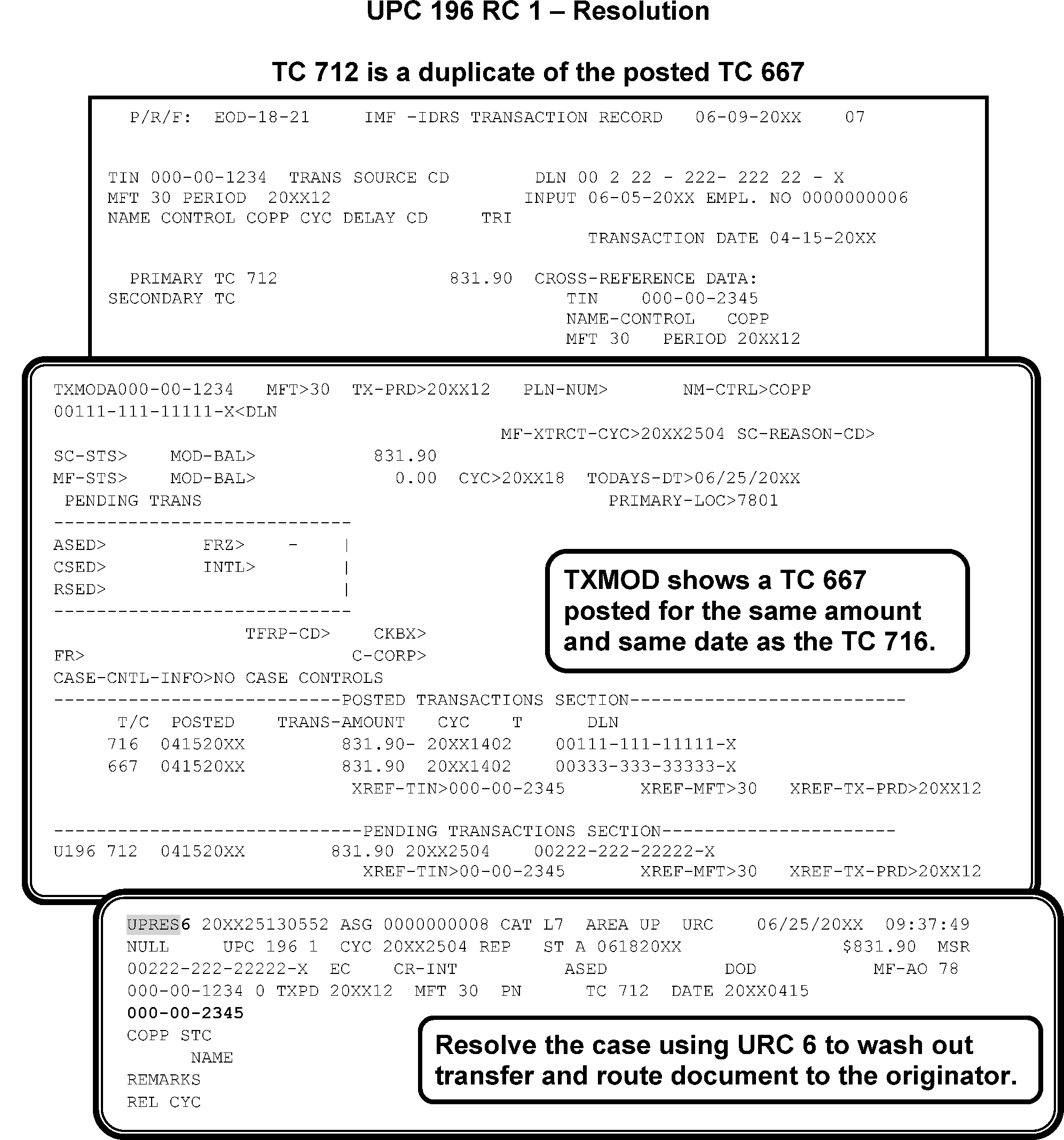
-
This subsection contains conditions and resolutions for UPC 197 RC 0 - RC 8.
-
CONDITION RC 0 This condition occurs when the input transaction is for a module which was placed on microfilm retention register. Resequence TC 840 up to ten cycles prior to unposting.
-
Resolution UPC 197 RC 0
-
If Doc Code 14 or 77, GUF Auto-Close URC D.
-
If Doc Code 79, GUF Auto-Close URC D.
-
If TC is for reversal of a bad check transaction, research for original TC and DLN. If found, correct accordingly. If not found, URC 1 to Accounting.
-
If TC 290, treat as TC 150. Input CC IMFOLT. To reestablish a module currently on the retention register, input CC IMFOLB. URC 0 and cycle delay 2 cycles.
-
If TC 898 and/or TC 899 Bureau of the Fiscal Service (BFS) and not able to resolve UPC 197 RC 0, contact the TOP/DMF Liaison by sending an encrypted email to ≡ ≡ ≡ ≡ ≡ ≡ ≡ ≡ ≡ ≡ ≡ ≡ ≡ ≡ ≡ ≡ ≡ ≡ ≡ ≡ ≡ ≡ ≡ ≡ ≡for resolution. Please send the cases individually. If a TIN has multiple TC 898 and/or TC 899 you must include those in one email. Unpostable employees need to follow email protocol and send an encrypted email with appropriate subject line. Include in the body of the email the taxpayer’s TIN, MFT, TC, and TXPD, your name and department when you reach out to the Liaison. The lead must be cc-ed on the email. An answer with a resolution should be received within seven business days from the Liaison. When closing cases based on the determination made by the TOP/DMF Liaison, include remarks showing the case was closed per the TOP/DMF Liaison
-
-
CC IMFOL definer code B is used to restore RRR tax modules back to the active Master File. RRR tax modules are those dropped from 1994 to present and are listed on the Index Screen, definer code I.
-
Two transactions are created by run 460-26 (ECC-MTB), a TC 013 with the name line and a TC 370 with the tax module. CC IMFOL sends these transactions weekly to IMF and they will attempt to post that cycle.
-
When CC IMFOLB is input for a specific tax module it is marked in the online file as “Pending reestablishment to Master File”. Verification of the “Pending” message must be made through CC IMFOLT.
-
See IRM 2.3.51.4, Restoring RRR Tax Modules to Master File, if either the TC 013 or TC 370 transaction fails to post.
-
Research payment in RTR to ensure correct taxpayer.
Refer to Exhibit 3.12.179.-2 for instructions on how to request modules from the Retention Register.Note:
May need to input CC NOREFP or TC 570 and URC 0 on a Tuesday to hold the money if CC TXMOD does not show that the unpostable has a secondary TC 570.
If... Then... 1. TC 670 is for zero and secondary TC 360, URC 2 and route to CSCO. 2. Payment document addressing the wrong module, Check CC IMFOLI on current or former spouse’s account for balance due and URC 6 to the correct account. 3. If account is being reestablished URC 0 and delay to post after TC 370. 4. If check specifies payment for an amended return for a tax period on the retention register, Input CC IMFOLB to reestablish the module. URC 0 and cycle delay to post after the TC 370. 5. If payment document and account is not being reestablished, Close URC 6 to post payment to the oldest unexpired CSED balance due module. 6. If no balance due modules, Post to the current processing year. 7. If payment belongs to an EIN, not a SSN, Print out a copy of the RTR, close URC 8 to Rejects, include in remarks the EIN, MFT and Tax Period where the payment belongs. -
See Figure 3.12.179-33
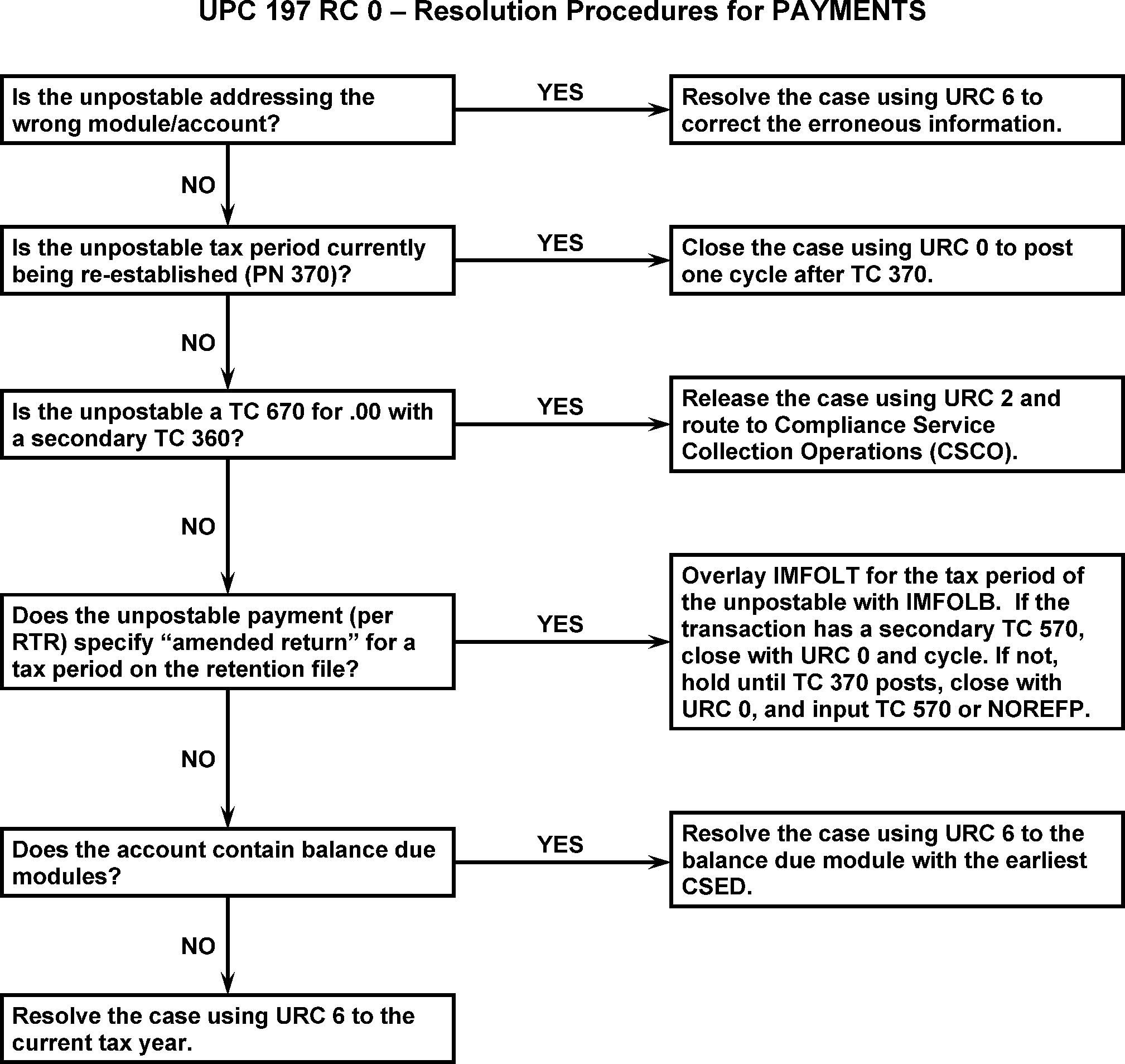
-
Research using CC IMFOLT to display retention module.
-
If TC 150 is posted and "exact" match, URC 8 to Rejects request cancellation of DLN. Refile in original block.
-
If TC 150 is NOT "exact" match, but is an assessment, reassign to Statutes.
-
All other TC 150s:
Note:
Check the module for a pending or posted TC 370. If found, URC 0 the transaction to post after the TC 370 posts.
Figure 3.12.179-34.If... Then... 1. Research from CC IMFOLV indicates the module was moved to retention 2016 or later, Use CC IMFOLB to request the module be reactivated from retention. Once reactivated, close with URC 0 to post the transaction to the account. 2. The module moved to retention prior to 2016 and cannot be restored using CC IMFOLB, Input a request for the transcript using CC UPCASMB & CC MFTRAZ. Both command codes send a request to generate the transcript. Transcripts requested through this method are available to view on the Control-D application under the report name SC MFTRA 7-8 days after the request is input. Note:
For additional information and job aids to assist with CC MFTRA requests, see Integrated Document Solution Enterprise: MFTRA service center requests (irs.gov).
-
CC UPCASMB will generate a CC MFTRA Type S transcript on Control D. If the requested tax module is not found and the response indicates at the bottom of the request that a microfilm request has been generated, follow instructions in the box d.
-
If the CC MFTRAZ response indicates the tax module is not found, follow the instructions in box d.
-
If the transcript request is successful and the record is available, follow the instructions in box e and f as appropriate.
3. The transcript is not received or not found using CC UPCASMB & CC MFTRAZ within 21 calendar days, Complete Form 3774, Request for Research to request the transcript from the Microfilm function. Fax the Form 3774 to the appropriate Campus Microfilm function. Fax numbers for the microfilm function can be found on SERP - Who/Where (irs.gov) 4. The transcript and document are an exact match, Release with URC 8 to cancel the DLN. 5. The transcript indicates there is not TC 150 posted, or the transcript and document are not an exact match, The return is an original return. Prepare the Form 5248, Transfer Request, and route to Accounting to transfer in the module. Monitor for posting of the TC 370. Once posted, close with URC 0 to post the return/transaction. 6. All methods of attempting to retrieve the transcript are exhausted or the Microfilm function indicates the transcript is damaged, lost, or destroyed, OR unable to determine resolution of the unpostable for MFT 51 or MFT 52, Suspend the case and contact the P&A function for elevation to the HQ Unpostable Analyst. -
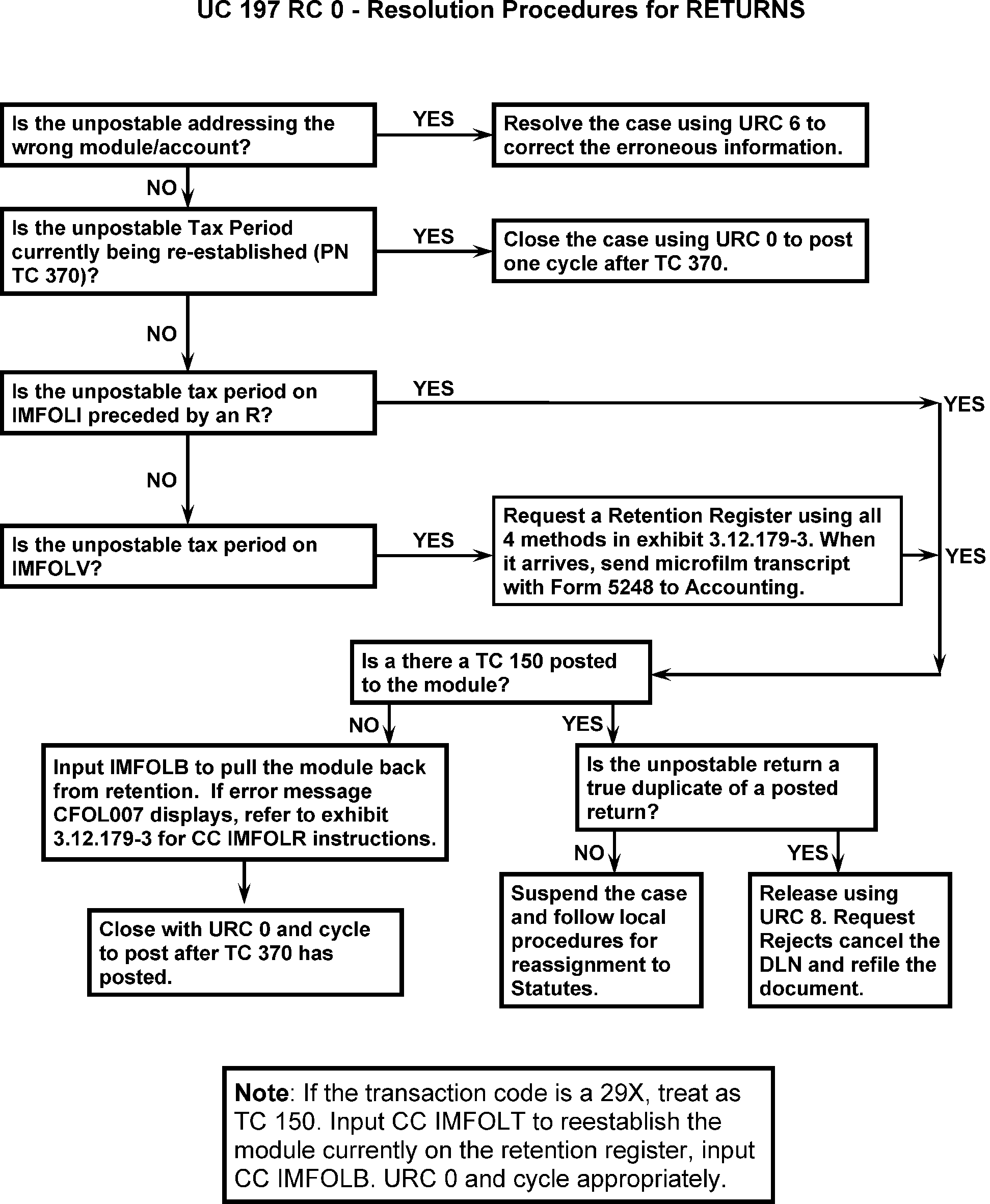
-
Review the case for transcription errors.
-
If module is being reestablished (PN TC 370), URC 0, and cycle delay to post after TC 370.
-
If unpostable is not a TC 370 and the module is NOT being reestablished, a TC 370 is required. Use of CC IMFOLB will generate a TC 370. Close with URC 0, and cycle delay to post after TC 370. See IRM 3.12.179.80.1.1 , Restoring RRR tax modules for additional information on IMFOLB.
-
If the unpostable is TC 370, statute year, and no transcriptions errors are identified. Contact Statutes to validate the year, reassignment of the case to Statutes may be required.
-
Request the module from the retention register using all of the following methods:
-
When the microfilm transcript arrives:
-
Attach Form 5248 to microfilm transcript and send to Accounting.
-
Input name line on CC ENMOD for year of Unpostable.
-
Input CC ACTON history "5248 -- acct" on CC ENMOD.
-
Input CC ACTON history "5248 -- acct" on CC TXMODA.
-
Place Unpostable in suspense with CC UPCASSA and remarks: "5248 sent to Acctg."
-
Accounting will return Form 5248 with input cycle.
-
Close the unpostable to post. Cycle delay as appropriate.
-
-
If the responses indicate that the module cannot be recovered, then the return must be voided.
-
The following types of responses are required before requesting that the return be voided.
-
“REQUESTED MODULE DOES NOT EXIST ON MASTER FILE OR RRR.”
-
“the tape and/or transcript is not available”
-
“the module is non-recoverable”
-
“the microfilm has been lost or destroyed”
-
-
Prepare a case file including all the documentation showing the requests and the responses.
-
URC 8 to Rejects and request the DLN be voided and the return sent to Files.
-
When the case is transferred from Unpostables to Rejects, all case file documentation must also be transferred.
-
Figure 3.12.179.34-36 explains how to request account modules from the Retention Register. CC IMFOL with Definer Code B, is used to recover account modules dropped from Master File to the Retention Register. Return data can be reestablished to the Master File by this process if the modules dropped to Retention in cycle 199401 or later.
-
The MFT and Tax Period are required for input of the request. First a CC IMFOLB entry screen is shown, with 000-000-1234, 30 and YYYYMM.
-
An information response screen is shown, that confirms the reestablishment process has begun. The message is Retention Register, Re-establishment Pending.
-
If the request cannot be processed, an error message is given.
Error Message Explanation CFOL 012 Requested Module does not exist on Master File or RRR. CFOL 007 Recoverable Retention Register Problem (This message means the requested module exists on Master File but is not on the Retention Register).
-
-
Retention Registers for account modules dropped to the vestigial files previous to cycle 199401 are kept on microfilm. Use CC UPCAS with Definer Code M and Definer Modifier Code B (CC UPCASMB) to request these accounts. A CC UPCASMB screen is displayed. The instructions are to:
-
Overlay CC UPRES with CC UPCAS with Definer Code M (requesting CC MFTRA) and Definer Modifier Code B (specific tax period, hard copy).
-
Move the cursor beyond the Cycle Sequence (or to the next line) to input the Entry Code and transmit.
-
-
It may be necessary to use CC MFTRA with Definer Code Z if the vestigial cycle is the first cycle of the current year and if the campus microfilm is not current. The MFTRA entry screen is shown:
-
Line 1: the Command Code is entered
-
Line 2: SSN, Definer Code, MFT, tax period, and Entry Code.
-
-
FTS NUMBERS FOR CAMPUS MICROFILM UNITS
Campus District Office Phone Fax Austin (18) 18, 20, 21, 71, 73, 74, 75, 76 737-800-4600 877-821-4731 Kansas City (09) 01, 02, 03, 04, 05, 06, 07, 08,09, 11, 13, 14, 16, 17, 19, 22, 26, 27, 31, 33, 34, 35, 36, 37, 38, 39, 41, 42, 43, 45, 46, 47, 48, 49, 56, 57, 58, 59, 61, 62, 63, 64, 65, 68, 70, 72, 77, 79, 80, 89, 90, 94, 95 816- 499-5813 EFax to: 877-929-1759 Ogden (29) 23, 25, 28, 29, 30, 32, 51, 52, 54, 55, 60, 66, 78, 81, 82, 83, 84, 86, 87, 88, 91, 92, 93, 98, 99 801-620-7931 email to: *TS EEF OSPC ICO 301A, or *TS.sp.special.search.ogden@irs.gov
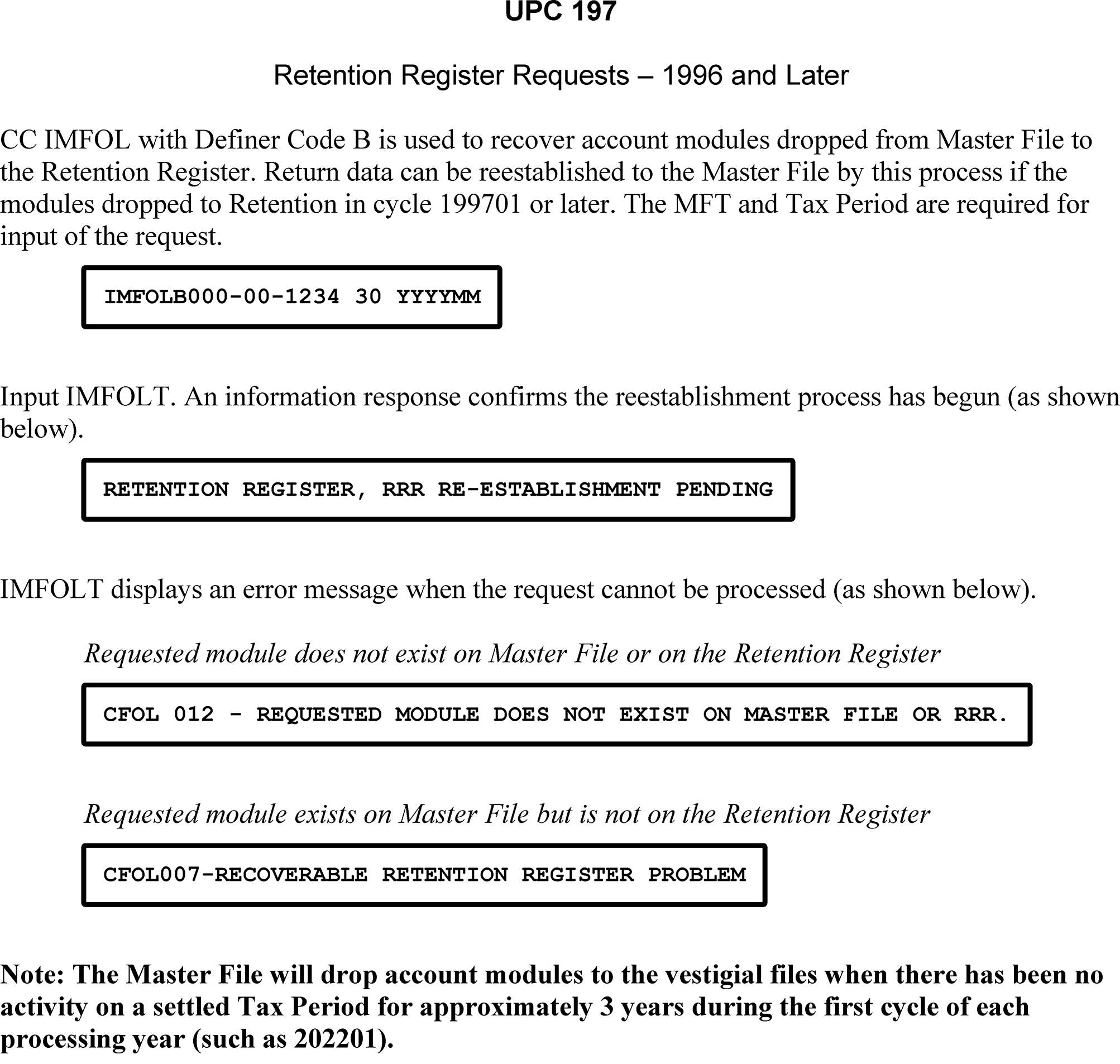
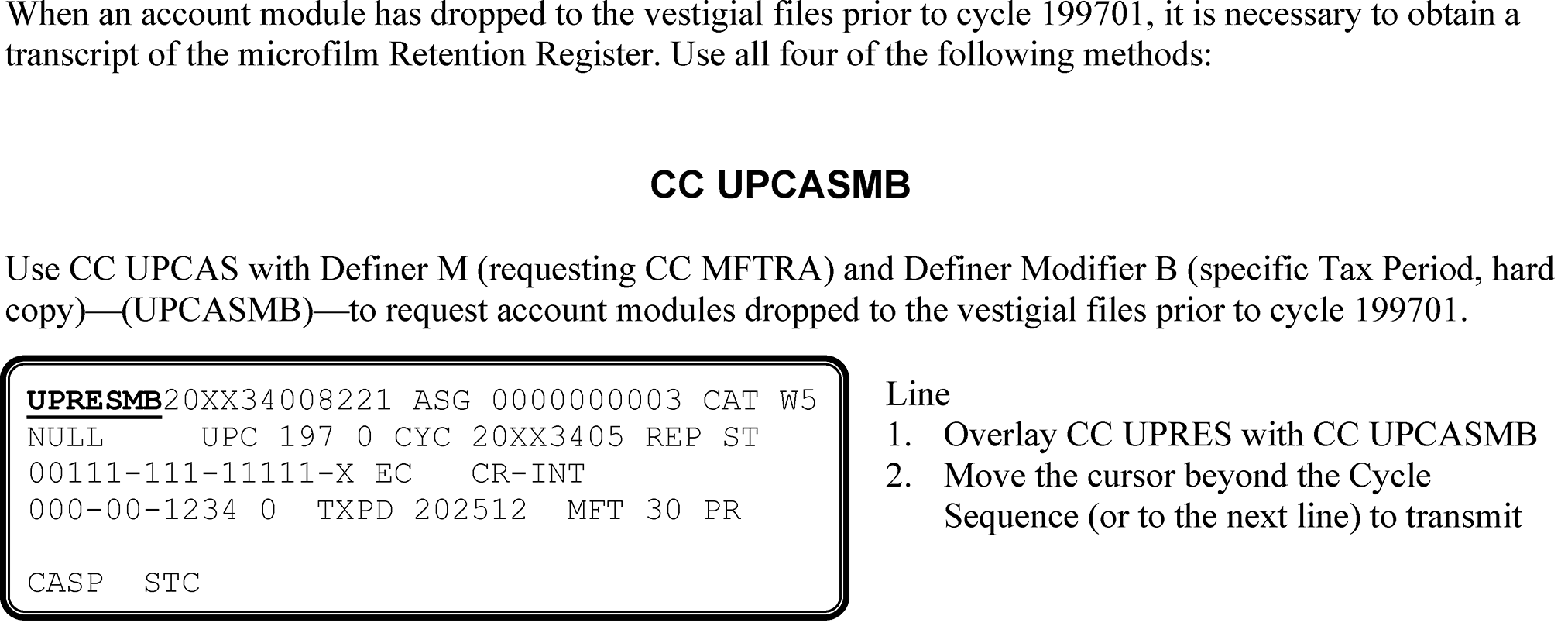
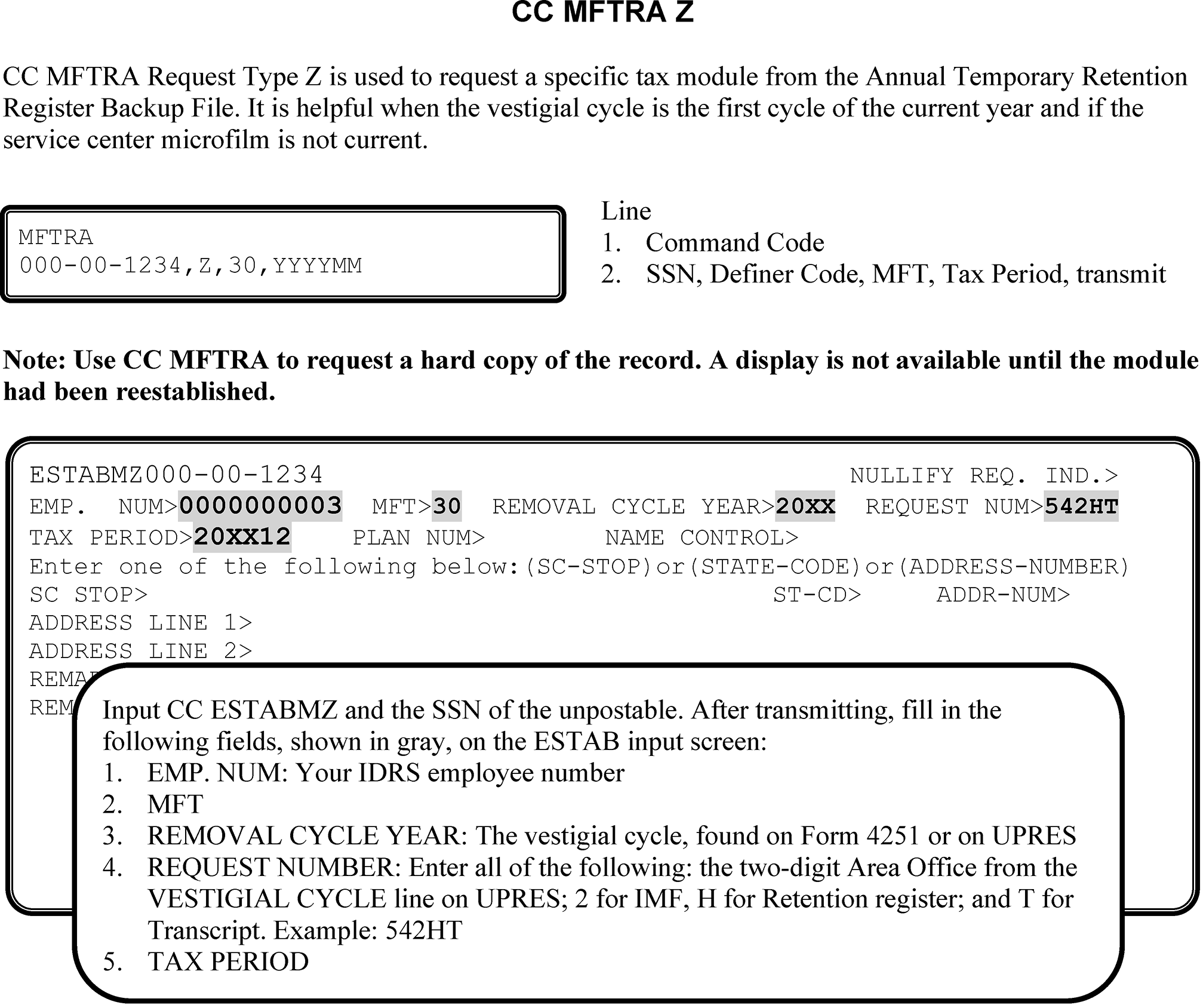
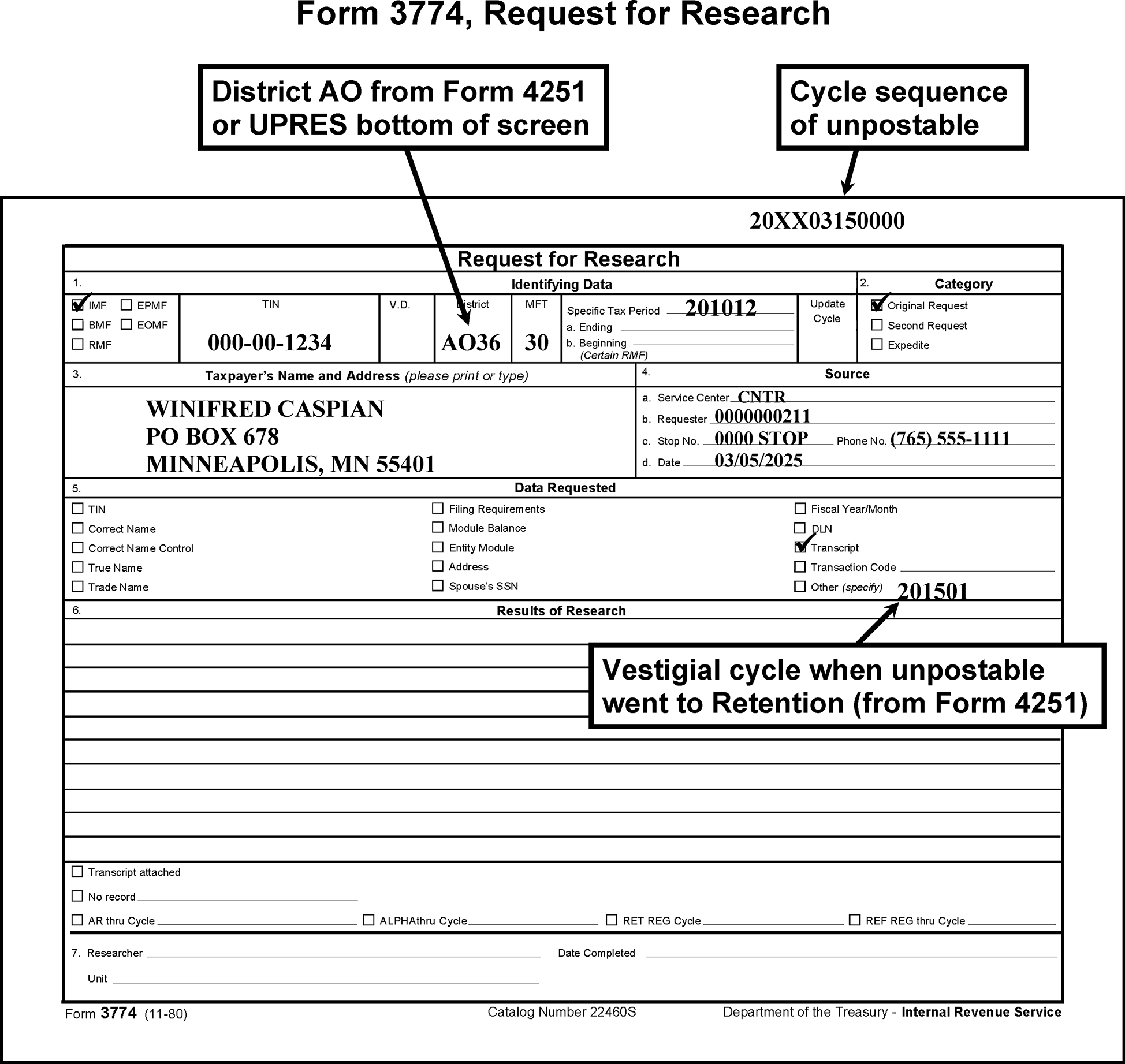
-
CONDITION RC 1 This condition occurs when a TC 370 Doc Code 52 blocking series 000-899 attempts to create a module and no vestigial record for the module was present.
-
CONDITION RC 2 This condition occurs when a module is present for same tax period as the input TC 370 Doc Code 52, regardless of blocking series.
-
CONDITION RC 3 This condition occurs for a TC 370 Doc Code 52 blocking series 900—999 and the account contains a vestigial section for same tax period.
-
Resolution UPC 197 RC 1-3 GUF Auto-Close URC 2 to Accounting.
-
CONDITION RC 4 This condition occurs for the following:
-
TC 150 previously posted to a module and TC 370, Doc Code 52 contains a TC 150, or
-
TC 370 Doc Code 52 contains more than one TC 150.
-
-
Resolution UPC 197 RC 4 If TC 150, change TC 150 to TC 290 and prepare Form 3893. URC 8 and request Rejects reinput the document.
-
If TC 370 contains more than one TC 150,
-
Determine if either, both, or neither TC 150s on TC 370 contain a money amount.
-
If neither TC 150 contains a money amount, perfect document by converting one TC 150 to a TC 290 and deleting the other. Prepare Form 3893. URC 8 and request Rejects reinput document.
-
If one TC 150 contains a money amount, URC 8. Perfect by converting TC 150 with money to a TC 290 and delete TC 150 with no money. Prepare Form 3893 and close with URC 8 and request Rejects reinput document.
-
If both TC 150s contain a money amount, contact originator/preparer to determine proper resolution. Perfect according to originators' instructions. Prepare Form 3893. URC 8 and request Rejects reinput the document.
-
-
CONDITION RC 5 This condition occurs when a TC 400 or TC 971 AC 45 or AC 145 is input to a credit balance module or a module that does not contain a settled TC 150.
-
Resolution UPC 197 RC 5
-
If pending transaction creates a zero or debit balance module and will allow TC 400 to post, Close with URC 0.
-
If MFT 29, GUF Auto Close URC 8 to Rejects.
-
All others, URC 8 to Rejects to cancel DLN and route document to originator.
-
-
CONDITION RC 6 This condition occurs when a TC 370 with a secondary TC 402 is input to a module that does not contain an unreversed TC 400 with same date and amount as the TC 402.
-
CONDITION RC 7 This condition occurs when an account transfer, TC 370 (Doc Code 51), does not carry TC 150 and there is no settled TC 150, except when input TC 370 (Doc Code 51) contains a secondary TC 402 or TC 370 is input to MFT 31, MFT 55, or MFT 65.
-
Resolution UPC 197 RC 6 and RC 7
-
If TC 150 is posted, close with URC 0.
-
If Doc Code 45 and not MFT 29, close with URC 1 to Accounting.
-
If MFT 29, GUF Auto Close URC 8 to Rejects.
-
All others, close with URC 8 to Rejects.
-
-
CONDITION RC 8 This condition occurs when a TC 370 contains a reference number amount but does not contain a reference number.
-
Resolution UPC 197 RC 8 URC 1 these cases to Accounting, advising them to input a reference number to match the reference number amount for the TC 370.
-
This subsection contains conditions and resolutions for UPC 198 RC 0, RC 2, and RC 3.
-
TC 670 with secondary TC 460 is subject to RC 0 check only.
-
The Remittance Transaction Research (RTR) System is used to perform research.
-
Refer to IRM 3.12.179.6 for related information on Category Code Y1 and Y2 unpostables.
-
Refer to IRM 3.12.179.27 . Resolution for TC 610, TC 660, and TC 670.
-
CONDITION RC 0 This condition occurs when a TC 670 with zero amount and secondary TC 460 attempts to post to a module that contains a manual delinquency penalty (TC 160 / TC 161).
-
Resolution UPC 198 RC 0 GUF Auto-Close URC 2 to Accounts Management.
-
CONDITION RC 2 This condition occurs when a TC 430, TC 610 (Doc Code 19, Doc Code 70, or Doc Code 76), TC 660, TC 670, or TC 760 attempts to post to a settled module, or a TC 670 if the module contains a Status 60 or U- freeze within the previous 8 cycles with the following exceptions:
Note:
RTR payment information on check must be verified with unpostable information. (NAME, ADDRESS, SSN)
-
57 Hold is on (Additional Liability Pending), or TC 570 is secondary to the TC 660, or TC 670, or the credit freeze indicator is set.
-
Transaction is a corrected UPC 146 or UPC 198.
-
Input is a TC 670 with Doc Code 18.
-
Module net balance is zero and input transaction is less than $1.
-
Total module balance is debit.
-
Input is less than $5 and is equal or less than a prior posted unreversed TC 606 (applies to TC 660 and TC 670 only).
-
TC 670 is input within 8 cycles of a previously posted TC 706.
-
TC 670 is a corrected UPC 183.
-
TC 670 if the module contains a status 60 within the previous 8 cycles and the DLN or transaction date of the input TC 670 is not identical to the DLN or transaction date of a TC 670 with matching money amount that posted within 8 cycles. If this condition is not met, the TC 670 is resequenced for up to 6 cycles. Send UPC 198 listing to CSCO if the module balance is not debit after resequencing 6 cycles.
-
TC 670 is not greater than the credit elect per taxpayer field in the posted TC 150.
-
The unpostable bypass indicator is significant unless the same transaction code with matching date and amount is already posted.
-
TC 670 contains check digits in lieu of a Name Control.
-
TC 670 if the module contains a duplicate returns freeze, 640 hold, or cc 6X, cc 83, cc 85, or cc 86-89.
-
The transaction contains DPC 13.
-
TC 670 when another module in the account is debit.
-
TC 670 contains DPC 05, DPC 15-21, DPC 22, or DPC 23.
-
TC 670 contains DPC 64, but no unreversed TC 971 AC 114 is posted.
-
TC 670 with DPC 36 attempting to post to MFT 29, MFT 30, MFT 31, or MFT 35.
-
TC 640 or TC 670 containing DPC 05-07, DPC 16, DPC 18-23, DPC 30, DPC 32 (these are Lien or Levy payments) input to MFT 35 or MFT 65.
-
-
Resolution Procedure UPC 198 RC 2 when ID Theft characteristics are identified. UPC 198 RC 2 must first be screened to identify if any Identity Theft characteristics are present on the module, payment or return. verify whether the posted return may be related to Identity Theft.
-
≡ ≡ ≡ ≡ ≡ ≡ ≡≡ ≡ ≡ ≡ ≡ ≡ ≡ ≡ ≡ ≡ ≡ ≡ ≡ ≡
-
≡ ≡ ≡ ≡ ≡ ≡ ≡ ≡ ≡ ≡ ≡ ≡ ≡ ≡ ≡ ≡ ≡ ≡ ≡ ≡ ≡ ≡ ≡ ≡ ≡ ≡ ≡ ≡ ≡ ≡ ≡ ≡ ≡ ≡ ≡ ≡ ≡ ≡ ≡ ≡ ≡ ≡ ≡ ≡ ≡ ≡ ≡ ≡ ≡ ≡ ≡ ≡ ≡ ≡ ≡ ≡ ≡
-
≡ ≡ ≡ ≡ ≡ ≡ ≡ ≡ ≡ ≡ ≡ ≡ ≡ ≡ ≡ ≡ ≡ ≡ ≡ ≡ ≡ ≡ ≡ ≡ ≡ ≡ ≡ ≡ ≡ ≡ ≡ ≡ ≡ ≡ ≡ ≡ ≡ ≡ ≡ ≡ ≡ ≡ ≡ ≡ ≡ ≡ ≡ ≡ ≡ ≡ ≡ ≡ ≡ ≡ ≡ ≡ ≡ ≡ ≡ ≡ ≡ ≡ ≡ ≡ ≡ ≡ ≡ ≡ ≡ ≡ ≡ ≡ ≡ ≡ ≡ ≡ ≡ ≡ ≡ ≡ ≡ ≡ ≡ ≡ ≡ ≡ ≡ ≡ ≡ ≡ ≡ ≡ ≡ ≡ ≡
-
≡ ≡ ≡ ≡ ≡ ≡ ≡ ≡ ≡ ≡ ≡ ≡ ≡ ≡ ≡ ≡ ≡ ≡ ≡ ≡ ≡ ≡ ≡ ≡ ≡ ≡ ≡ ≡ ≡ ≡ ≡ ≡ ≡ ≡ ≡ ≡ ≡ ≡ ≡ ≡ ≡ ≡ ≡ ≡ ≡ ≡ ≡ ≡ ≡ ≡ ≡ ≡ ≡ ≡ ≡ ≡ ≡ ≡
-
≡ ≡ ≡ ≡ ≡ ≡ ≡ ≡ ≡ ≡ ≡ ≡ ≡ ≡ ≡ ≡ ≡ ≡ ≡ ≡ ≡ ≡ ≡ ≡ ≡ ≡ ≡ ≡ ≡ ≡ ≡ ≡ ≡ ≡ ≡ ≡ ≡ ≡ ≡ ≡ ≡ ≡ ≡ ≡ ≡ ≡ ≡ ≡ ≡ ≡ ≡ ≡ ≡ ≡ ≡ ≡ ≡ ≡ ≡ ≡ ≡ ≡ ≡ ≡ ≡ ≡ ≡ ≡ ≡ ≡ ≡ ≡ ≡ ≡ ≡ ≡ ≡ ≡ ≡ ≡ ≡ ≡ ≡ ≡ ≡ ≡ ≡ ≡ ≡ ≡ ≡ ≡ ≡ ≡ ≡ ≡ ≡ ≡ ≡ ≡ ≡ ≡ ≡ ≡ ≡ ≡ ≡ ≡ ≡ ≡ ≡ ≡ ≡ ≡ ≡ ≡ ≡ ≡ ≡ ≡ ≡ ≡ ≡ ≡ ≡ ≡ ≡ ≡
-
≡ ≡ ≡ ≡ ≡ ≡ ≡ ≡ ≡ ≡ ≡ ≡ ≡ ≡ ≡ ≡ ≡ ≡ ≡ ≡ ≡ ≡ ≡ ≡ ≡ ≡ ≡ ≡ ≡ ≡ ≡ ≡ ≡
-
≡ ≡ ≡ ≡ ≡ ≡ ≡ ≡ ≡ ≡ ≡ ≡ ≡ ≡ ≡ ≡ ≡ ≡ ≡ ≡ ≡ ≡ ≡ ≡ ≡ ≡ ≡ ≡ ≡ ≡ ≡ ≡ ≡ ≡ ≡ ≡ ≡ ≡ ≡ ≡ ≡ ≡ ≡ ≡ ≡ ≡ ≡ ≡ ≡ ≡ ≡ ≡ ≡ ≡ ≡ ≡ ≡ ≡ ≡ ≡ ≡ ≡ ≡ ≡ ≡ ≡ ≡ ≡ ≡ ≡ ≡ ≡ ≡ ≡ ≡ ≡ ≡ ≡ ≡ ≡ ≡ ≡ ≡ ≡ ≡ ≡ ≡ ≡ ≡ ≡ ≡ ≡ ≡ ≡ ≡ ≡ ≡ ≡ ≡ ≡ ≡ ≡
-
≡ ≡ ≡ ≡ ≡ ≡ ≡ ≡ ≡ ≡ ≡ ≡ ≡ ≡ ≡ ≡ ≡ ≡ ≡ ≡ ≡ ≡ ≡ ≡ ≡ ≡ ≡ ≡ ≡ ≡ ≡ ≡ ≡ ≡ ≡ ≡
-
-
If ID Theft characteristics above are present, close the case with URC 0 or URC 6 as appropriate. If the module does not already contain an -A freeze input TC 570 or CC NOREFP to prevent an erroneous refund.
-
Resolution Procedure UPC 198 RC 2 when NO characteristics of ID Theft are identified. . Compare the payment voucher and/or check to determine taxpayer intent.
Note:
IF TC 570 is already on Tax module of open unpostable there is no need to input an additional TC 570.
If... And... Then... 1. Any input or transaction errors, URC 6 or URC 8 as appropriate. 2. Credit transfer, Doc Code 24, Doc Code 34, or Doc Code 48, URC 0. 3. Correct module containing TC 706, TC 706 was posted recently (Posted TC 706 is 6 months old or less) URC 0. 4. IRC 965 reference, before you proceed refer to IRM 3.12.179.8.8 TC 610, TC 660, or TC 670 with DPC 64 Review of the check image on RTR indicates the payment was meant for IRC 965 and CC IMFOLM shows the IRC 965 module for tax year 201712, 201812, or 201911. URC 6 to the correct tax period and if is TC 610 or TC 660 change to TC 670. Input TC 570 if not present to prevent erroneous refunds. 5. IRC 965 reference, TC 610, TC 660, or TC 670 with DPC 64 IRM 3.12.179.8.8 Review of the check image on RTR indicates the payment was meant for IRC 965 and CC IMFOLM does not show IRC 965 module for tax year 201712, 201812, or 201911. Search XREF TIN including DECD spouse for IRC 965 module (CC IMFOLM) found. URC 6 the payment to the XREF account tax period, and if is TC 610 or TC 660 change to TC 670. Input TC 570 if not present to prevent an erroneous refund. 6. IRC 965 reference, TC 610, TC 660, or TC 670 with DPC 64 IRM 3.12.179.8.8 Review of the check image on RTR indicates the payment was meant for IRC 965 and CC IMFOLM does not show IRC 965 module for tax year 201712, 201812, or 201911. XREF TIN including DECD spouse could not be located. Take it to the lead to verify. Input TC 570 if not present to prevent an erroneous refund. URC 8 to Rejects with remarks. Remove DPC 64 and apply the payment to correct TXPD 7. IRC 965 reference, TC 610, TC 660, or TC 670 with DPC 64 IRM 3.12.179.8.8 Review of the check image on RTR indicates the payment was meant for other than IRC 965 and CC IMFOLM does not shows IRC 965 module for tax year 201712, 201812, or 201911. Input TC 570 if not present to prevent an erroneous refund. Take it to the Lead to verify. URC 8 to Rejects with remarks. Remove DPC 64 and apply the payment to correct TXPD 8. IRC 965 reference, TC 610, TC 660, or TC 670 WITHOUT DPC 64 IRM 3.12.179.8.8 Review of the check image on RTR indicates the payment was meant for IRC 965 and CC IMFOLM shows IRC 965 module for tax years 201712, 201812, or 201911. Input TC 570 if not present to prevent an erroneous refund. URC 8 to Rejects with remarks. IRC 965 add DPC 64 to the payment and correct TXPD. If TC 610 or TC 660 change it to TC 670. 9. DPC 64 is on the payment, but there is no IRC 965 reference and CC IMFOLM does not show IRC 965 module for tax year 201712, 201812, or 201911. Review of the check image on RTR indicates the payment was meant for Streamlined Domestic Offshore payment. The memo can include F 14654, ,Streamline Payment, Offshore Payment or similar. Input TC 570 if not present to prevent an erroneous refund. URC 8 to Rejects with remarks. Remove DPC 64 and add DPC 61 to the payment and correct TXPD with appropriate TC. 10. MFT 82 Elevate the case via P&A to HQ Analyst for resolution. Put the case is suspense with remarks “IRC 965 Elevated to HQ. 11. TC 610, TC 660 or TC 670, Amount equal to or less than $5.00 prior posted unreversed TC 606, URC 0. 12. Any payment, Was intended as a Quarterly Estimated Tax Payment, URC 6 to correct the tax period and change the Transaction Code to TC 660. Follow IRM 21.6.3.4.2.3, Estimated Tax (ES) for payment due dates. (See Note 1 below). 13. TC 610 or TC 670, TC 971 AC 010, AC 012-015 or AC 120, or-
TC 971 AC 010, AC 012- AC 015, or AC 120, or
-
TC 976, TC 977, or
-
has a -A freeze
-
have an open control base on IDRS with category code MEFP, MEFS, SRET, XRET), or
-
payment indicates it is for an Amended return.
If TC 610, change payment to TC 670, and close with URC 6 If TC 670, close with URC 0 Input. TC 570 (NOREFP)to prevent erroneous refund (if no -A freeze) 14. TC 670, There payment DLN contains 43217, Input TC 570 to prevent erroneous refund and close URC 0. 15. TC 670, Payment is for FTHBC repayment received without a return, Input TC 570 to prevent erroneous refund and close URC 0. 16. TC 670, DPC 36 attempting to post to MFT 29, MFT 30, MFT 31, or MFT 55, Close URC 8, requesting Rejects remove DPC. 17. TC 670, Researching RTR and payment indicates it is for “IRC 6603” or “REV. Proc 2005-18”, Close URC 8 and include remarks “change payment from TC 670 to TC 640 and add DPC 12”. 18. Any TC payment belongs to another Master File or MFT, You cannot correct with URC 6, Input ADD24 credit transfer. URC 0 or URC 2 and input TC 570 or CC NOREFP, if applicable (input Tuesdays only) or URC 8 as appropriate, with 3 cycle delay. If MFT 35, see IRM 3.12.179.81.3 , Resolution for MFT 35 and IRM 3.12.179.5.2.3 , Offsets and MFT 35 regarding valid DPCs (See Note 2 and 3 below). 19. EFTPS Payment (FLC Doc Code 19), EFT-Trace-Number field contains other than"0" or "6" in the 4th position, URC 0. 20. EFTPS Payment (FLC Doc Code 19), EFT-Trace-Number field contains a "0" or "6" in the 4th position, Follow procedures at IRM 3.12.179.7.6 Electronic Federal Tax Payment System (EFTPS) and Credit Card and Electronic Funds Withdrawal Payments . 21. TC 430, Taxpayer intent is to apply to a debit balance due on a prior tax year, Input ADD24 credit transfer. URC 0 with TC 570 or CC NOREFP (input Tuesdays only). (See Note 1 and 2 below). 22. TC 430 or TC 660, or module contains TC 836 Not a credit transfer, Close URC 6 and post to most recent tax year being accepted by IRS.(If date is in 2022, then current processing year is 2021). 23. TC 760, Module contains payment for like amount and date, URC 1 to Accounting. If no payment is found, close with URC 0. 24. Pending or posted TC 420 or TC 424 or -L Freeze Code, URC 6 and change TC to TC 640. 25. P- Freeze Code or open IDRS control base category PFRZ, Close URC 0. Input TC 570 if necessary, to prevent erroneous refund. 26. Payment for correct Module, No conditions exist,(e.g., verify check, no TC 610 posted, no TC 922 posted, etc.) and module contains freeze codes (V-, -R, -U, -A, -F, -E), Close URC 0. 27. TC 922 or TC 924 on any module, See IRM 3.12.179.81.2.1 Resolution Procedures UPC 198 RC 2 When TC 922 or 924 on Module . 28. Payment is repeat as a result of UPC 186 RC 0, No MFT 31 or debit module, Close URC 0. 29. If there is TC 971 AC 163 (Out of Installment Agreement Status), Close URC 0. 30. None of the above conditions exist, Tax Period IS specified on the payment voucher or check, and the account contains other debit modules, Close URC 0. The payment will offset to the earliest CSED. 31. None of the above conditions exist, Tax Period IS NOT specified on the payment voucher or check, and the account contains other debit modules, Close URC 6 to oldest unexpired CSED debit balance module. See Figure 3.12.179-58. 32. None of the above conditions exist, See IRM 3.12.179.81.2.2 Resolution Procedure UPC 198 RC 2 for All Other TCs . Note:
1. ES credits are considered timely filed 15 days before and 15 days after the due date. If payment is posted outside the range of the due date, the payment will post as a TC 670. For an extension (04-15-20XX thru 04-23-20XX) the payment will post as a TC 670. With the Return Receive Date, the payment will post as a TC 610. All subsequent payments will post as a TC 670.
-
-
Payment is attempting to post to a module containing a TC 922 or TC 924 or a URP control base.
-
Check for open control bases in AUR on prior years. The IDRS category code will be URP or IRP.
-
If an open control and TC 290 is pending other than blocking series 500-519, 550-589, 600-619 or 650-679, URC 0 and cycle delay as needed. Figure 3.12.179-39.
-
If TC 290 is posted, with blocking series 500-519, 550-589, 600-619 or 650-679 then URC 0.
-
If TC 290 is not posted or if TC 290 is pending with a blocking series of 500–519, 550–589, 600–619, or 650–679, or open URP or IRP control base, URC 6 and change the unpostable Transaction Code to TC 640.
-
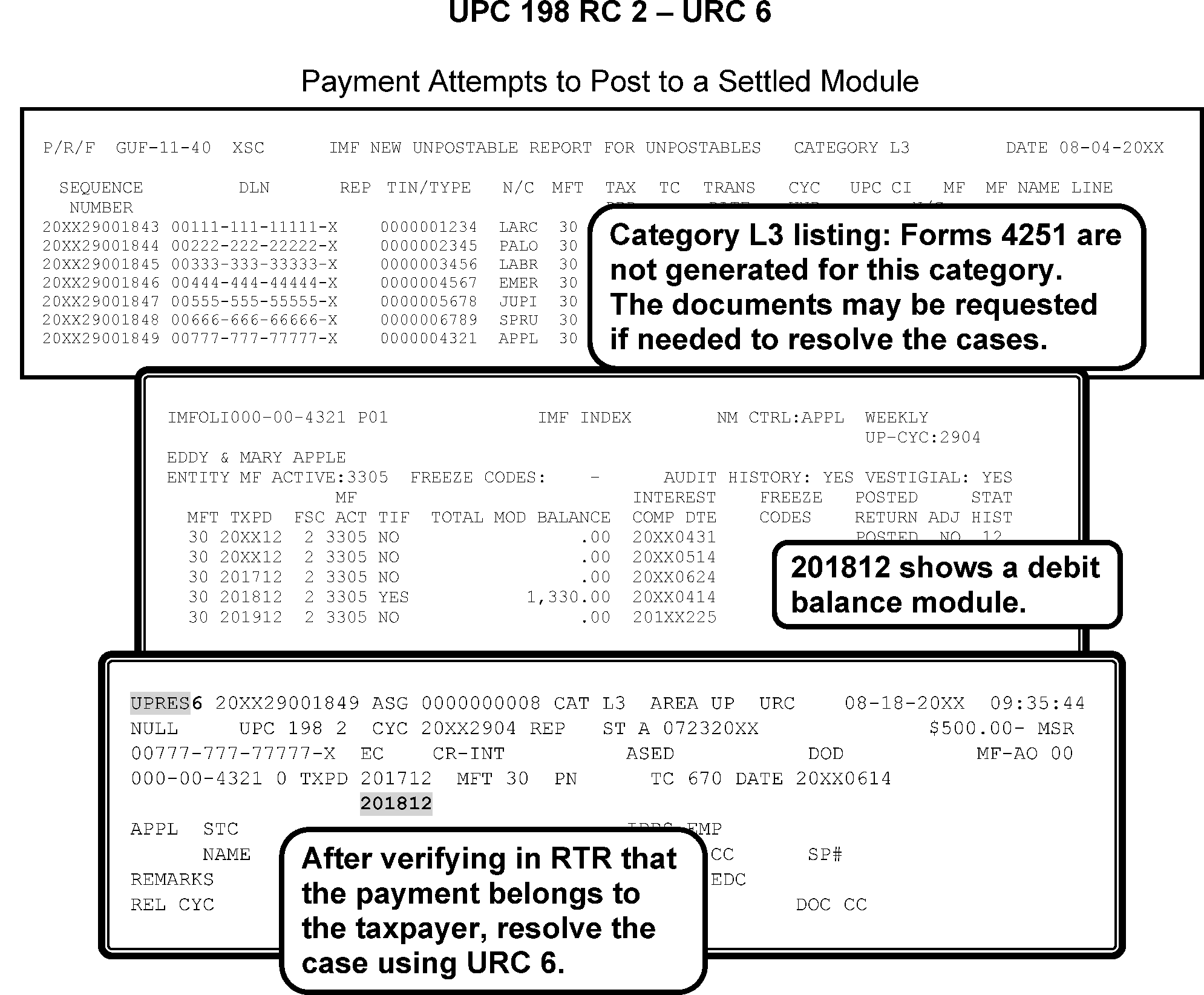
-
If none of the above conditions apply, correspond with taxpayer and suspend the case.
-
If taxpayer verifies credits are correct, URC 0. TC 570 or CC NOREFP may be needed if the payment is for an amended return, and no amended return or appropriate freeze code is present on the module.
-
If No Reply or taxpayer states credits do not belong to them, and there is no TC 610 already posted. If the payment can clearly be identified as belonging to the taxpayer URC 0. If payment is not identifiable, URC 1 to Accounting to send to Unidentified.
-
If the unpostable is a TC 610 and a TC 610 is already posted and the taxpayer states the credits and tax period are correct, URC 6 to change the TC 610 to TC 670. Do not post a TC 610 to a module that already has a TC 610 posted.
-
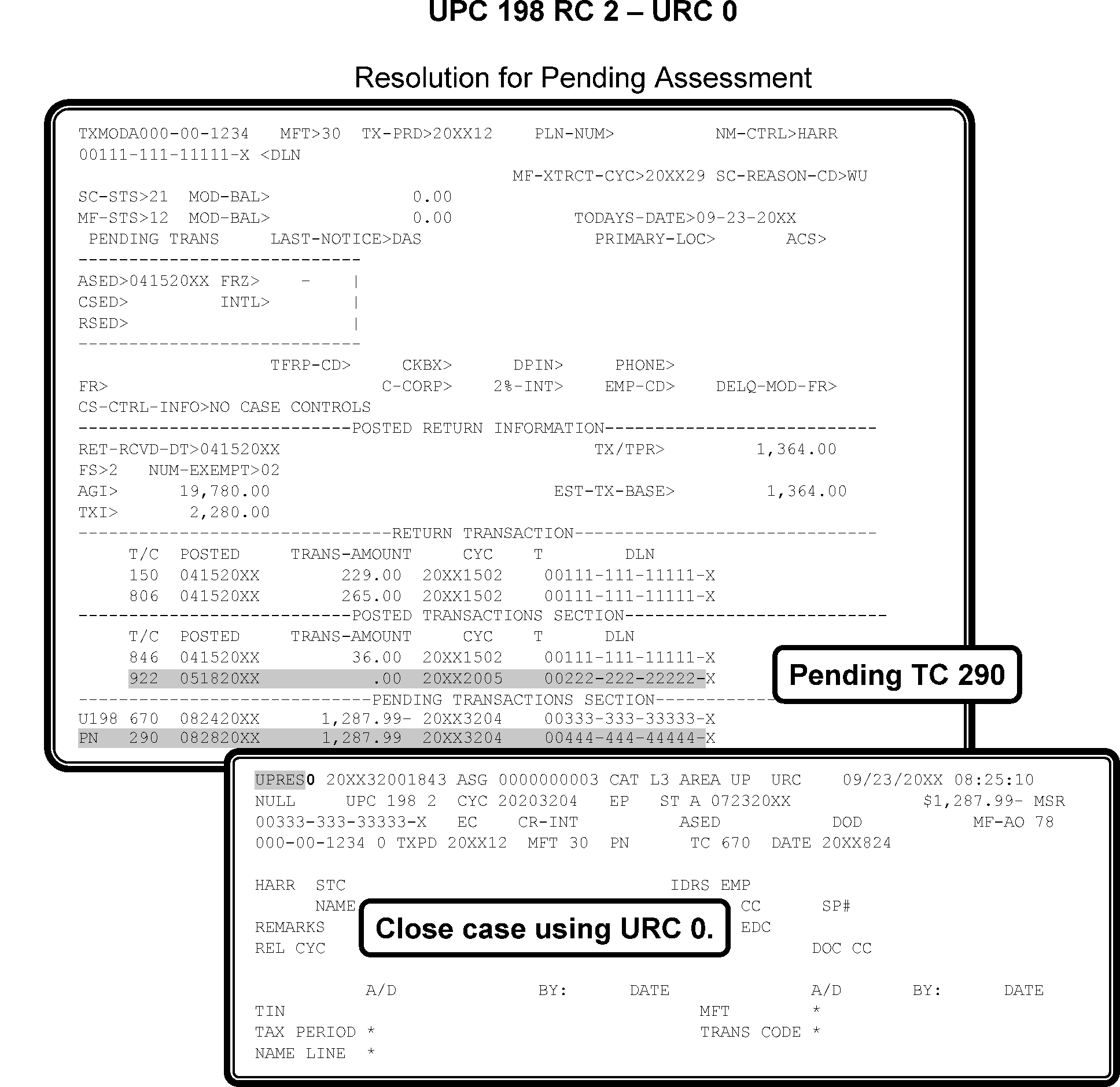
-
When researching the Lockbox/ISRP payment(s) and you determine an encoding error was made (for example. check written for $300 but posted for $3,000), do not correspond with the taxpayer.
-
Route the case to the Dishonored Check Function (DCF) or Accounts Management function (dependent on local procedures). Attach all documentation showing the encoding error. Enter in remarks, "Dishonored Check Function" or "Accounts Management." These areas, either Dishonored Check or Accounts Management, will contact the taxpayer for a bank statement for two months, the month showing the amount deducted from the account, plus the following month.
-
Input CC STAUP to prevent issuance of erroneous notices to the taxpayer. Notate on routing slip.
-
Check both valid and invalid segments of the MFT 35 module.
If Then 1. If the payment is a TC 610 directed to MFT 30 beginning with tax period 201412, and the taxpayer has a balance due on MFT 35, The Unpostable tax examiner will URC 0 the payment to MFT 30 and input a TC 570 to prevent the refund from generating. After the payment has posted, the Unpostable tax examiner will have to initiate a credit transfer to move the money from TC 610 to TC 670 and then from MFT 30 to MFT 35. 2. If the TC is a 670 and the taxpayer has a balance due on MFT 35, and DPC 36 is not present, URC 8 to Rejects to correct MFT to 35 and to add DPC 36.
-
CONDITION RC 3 This condition occurs when a revenue receipt transaction causes the TOTAL MODULE BALANCE credit of $1,000,000,000.00 or greater.
-
Resolution UPC 198 RC 3 Use the following instructions:
-
Close URC 1 to Accounting to transfer Unpostable credits to Non-Master File (NMF). Remarks: RE# NMF”, and transfer to KCSC for processing.
-
For Service Centers outside of Kansas City, the transfer to Kansas City NMF must be done by following local Form 2158 procedures that route credits to KC per IRM 3.17.21 .
-
-
This subsection contains conditions and resolutions for UPC 29X RC 1 - RC 9.
-
Master File will bypass UPC 29X unpostables for any of the following:
-
TC 001, TC 12X, TC 000 (DM-1 only), and TC 99X.
-
Purged unpostables (UPC 296).
-
Computer generated transactions (TC 001, TC 006, TC 019, TC 026, TC 666, TC 667, TC 000, and TC 013 with blocking series 99999, and TC 706 and TC 826 with Julian Date of 999).
-
Previously resequenced transactions.
-
Previously coded unpostables this cycle.
-
-
CONDITION RC 1 This condition occurs for the following:
-
TC greater than TC 139 with transaction date year prior to 1962.
-
TC greater than TC 139 (except TC 150) with
-
Transaction date month not 1–12; or
-
Transaction date day not 1–31; or
-
Transaction date later than current ECC-MTB assigned 23C date, except TC 141, TC 142, TC 290, TC 300, TC 430, TC 61X, TC 694, TC 695, TC 700, TC 701, TC 702, TC 710, TC 712, TC 820, TC 821, TC 822, TC 830, TC 832, TC 97X with Doc Code 87.
-
TC 141, TC 142, TC 430, TC 61X, TC 694, TC 695, TC 700, TC 701, TC 702, TC 710, TC 712, TC 820, TC 821, TC 822, TC 830, TC 832, TC 97X transaction with Doc Code 87 containing a transaction date later than current ECC-MTB assigned 23C date plus one year.
-
TC 500 cc 52 or cc 53 with a transaction date prior to 19900802.
-
TC 500 cc 54 or cc 55 with a transaction date prior to 19951121.
-
TC 500 cc 56 or cc 57 with a transaction date prior to 20010919.
-
TC 500 cc 58 or 59 with a transaction date prior to 20151218.
-
-
Resolution UPC 290 RC 1 Use the following:
-
If correct date can be determined, URC 6.
-
If correct date cannot be determined, URC 2 to Originator.
-
If TC 520, GUF Auto-Close URC 2 to Originator.
-
If TC 150, GUF Auto-Close URC 8 to Rejects.
-
-
CONDITION RC 2 This condition occurs when any TC is not valid for IMF processing and includes the following:
-
TC 060, TC 95X, TC 05X, TC 07X, TC 080 (Campus Generated), TC 081, TC 473, TC 41X, TC 422, TC 423, TC 564, TC 772, TC 940, TC 942, TC 962; or TC 970 AC 001.
-
Revenue Receipt transaction with reversal digit not 0/1/2/4.
-
-
Resolution UPC 290 RC 2 Use the following:
-
If correct TC can be determined, URC 6 or URC 8 as appropriate. If URC 8, request Rejects take corrective action necessary.
-
If correct TC cannot be determined, URC 1 to Accounting to void DLN and route document to Originator.
-
-
CONDITION RC 3 The following conditions apply:
Note:
MFT must be MFT 00, MFT 29, MFT 30, MFT 31, MFT 32, MFT 35, MFT 55, or MFT 65 except TC 026 must have MFT 99. See tables below for valid MFT 29, MFT 31, MFT 32, MFT 35, MFT 55, or MFT 65 transactions.
-
TC 000 with an MFT other than MFT 00.
-
TC greater than TC 139 with MFT 00, except TC 148, TC 149, TC 901–904, TC 910, TC 911, TC 918, TC 919, TC 971, or TC 972.
-
TC 910, TC 911, TC 918, or TC 919 with an MFT other than MFT 00.
-
TC 915, TC 916, TC 917 with an MFT other than MFT 29, MFT 30, or MFT 31.
-
TC 912, TC 914 with an MFT other than MFT 29, MFT 30, MFT 31, MFT 35, MFT 55, or MFT 65.
-
TC 970 AC 001 with an MFT other than MFT 30.
-
TC 971 AC 118 or AC 119 with an MFT other than MFT 55.
-
TC 971 AC 830 with an MFT other than MF 30.
-
TC 971 AC 356 with an MFT other than 30 / MFT 31.
-
-
Unpost the following transactions if input with MFT 55 including transactions that are secondary to TC 290 or TC 370 or a revenue receipt:
-
TC 140, TC 141, TC 142
-
TC 150
-
TC 16X
-
TC 17X
-
TC 20X, TC 27X
-
TC 30X, TC 31X, TC 32X, TC 35X
-
TC 42X, TC 43X, TC 45X, TC 46X, TC 474, TC 475, TC 494, TC 495
-
TC 560, TC 59X
-
TC 61X, TC 63X, TC 66X
-
TC 71X
-
TC 80X, TC 81X, TC 83X,
-
TC 93X, TC 94X, TC 97X (Except TC 971 AC 010 or greater)
-
-
Unpost any of the following Transactions input to MFT 31:
-
TC 140, TC 141, TC 142
-
TC 150 (except if Doc Code 51 and Doc Code 52)
-
TC 420, TC 421, TC 424, TC 428, TC 429, TC 430, TC 474, TC 475
-
TC 59X
-
TC 922
-
-
Unpost any of the following Transactions input to MFT 29:
-
TC 140, TC 141, TC 142
-
TC 420, TC 421, TC 424, TC 428, TC 429, TC 430, TC 474, and TC 475
-
TC 59X
-
TC 71X
-
TC 83X
-
TC 922
-
TC 960
-
-
Unpost any of the following Transactions input to MFT 35 or MFT 65:
-
TC 140, TC 141, TC 142
-
TC 150
-
TC 16X, TC 17X
-
TC 20X, TC 27X
-
TC 31X, TC 32X, TC 35X
-
TC 42X, TC 43X, TC 45X, TC 46X, TC 47X, TC 49X
-
TC 58X, TC 59X
-
TC 61X, TC 63X, TC 66X
-
TC 71X
-
TC 80X, TC 81X, TC 83X
-
TC 922, TC 924, TC 925 MFT 65 only
-
TC 93X, TC 94X, TC 96X, TC 971 AC 60, AC 61, AC 62
-
-
Unpost all transactions directed to MFT 32 except for TC 150 or TC 97X AC 111.
-
Resolution UPC 290 RC 3 Use the following:
-
If correct MFT and/or TC can be determined, URC 6.
-
If missing AC, URC 2 to Originator with Remarks: “MISMATCH ACTION CODE”.
-
If correct MFT and/or TC cannot be determined, URC 1 to Accounting to void DLN and route to Originator.
-
-
CONDITION RC 4 This condition occurs for the following:
-
If Tax period month is not 1—12 (non-entity update transactions).
-
If TC is greater than TC 139 (except TC 148 / TC 149) with a tax period prior to 196212.
-
If TC 430 / TC 660 with a tax period prior to 196312.
-
If TC is greater than TC 139 (except TC 148, TC 149, TC 150, TC 290, TC 300, TC 910, TC 911, TC 918, TC 919, TC 971, TC 972) with a tax period more than one year later than the 23C date year and month (CCYYYYMM).
-
If TC 290, TC 300, TC 901–904, TC 971, and TC 972 with a tax period more than two years later than the 23C date month and year.
-
The Tax period must be compatible for the line reference numbers on TC 29X / TC 30X as follows:
Credit Reference Number Tax Period must be CRN 074 201312 and subsequent CRN 200 / CRN 202 202003 and subsequent CRN 211 202003 and subsequent CRN 221 / CRN 222 198912 or 201712 and subsequent CRN 225 202212 and subsequent CRN 237 200412 and subsequent CRN 238 201512 and subsequent CRN 250 200212 and subsequent CRN 253 / CRN 254 200612-200711 CRN 256 / CRN 257 200712-200911 or 202012-202211 only CRN 258 200812–201211 CRN 259 200912-201111 CRN 260 200912 and subsequent CRN 261 201012-201211 CRN 262 2001412 and subsequent CRN 263 201712 and subsequent CRN 271 202112 or subsequent CRN 272 202112-202211 only CRN 273 202112-202212 CRN 280 202003-202111 CRN 281 202112 or subsequent CRN 299 202003 or subsequent CRN 334 199312-199411 CRN 336 199812 and subsequent CRN 338 200012–200111, 200212-200311,200712-200911, or 202012-202211 only CRN 450 with IRN 901 Any MFT 30 and MFT 31 tax period CRN 455 with IRN 951 202301 and subsequent CRN 458 with IRN 956 202301 and subsequent CRN 460 with IRN 950 202301 and subsequent CRN 462 with IRN 947 202301 and subsequent CRN 707 201701 CRN 764 / CRN 765 197512 or subsequent CRN 793 202101 and subsequent CRN 817 / CRN 818 / CRN 819 202112-202212 CRN 820 202312 and subsequent CRN 861 / CRN 862 201312 and subsequent CRN 863 / CRN 864 201412 and subsequent CRN 865-869 201412 and subsequent CRN 873 / CRN 874 200712 and subsequent CRN 875 / CRN 876 200812-202611 CRN 877 200912-202611 CRN 880 200812-201211 CRN 885 197912-201012 CRN 886 197712 or subsequent CRN 887 197712 or subsequent CRN 888 / CRN 889 197412-197511 or 197712 and subsequent CRN 891 / CRN 892 199012 and subsequent CRN 893 / CRN 894 200712 and subsequent CRN 895 / CRN 896 199112 and subsequent CRN 898 / CRN 899 199112 and subsequent CRN 900 / CRN 902 202003 and subsequent CRN 974 201312 and subsequent CRN 975 / CRN 976 200812-202611 CRN 981 2021 or subsequent Item Reference Number Tax Period must be IRN 200 / IRN 202 202003 and subsequent IRN 211 202003-202111 IRN 281 202112 or subsequent IRN 817-819 202112-202212 IRN 900 / IRN 902 202003 and subsequent IRN 910,911,923, and/or 931 202401 and subsequent IRN 981 2021 or subsequent MISC Tax Period must be TC 29X, TC 30X with CRN 280 / CRN 299, IRN 211 / IRN 200 / IRN 202 / IRN 900 / IRN 902 202003 - 202111 For Domestic Services Reference Numbers 003, 004, 007, 073, 335, 903, 904, 907, 973, 993, 994, 995, 996, 997, and 998 199512 and subsequent. Ref. No. 335 tax period must be prior to 201101. -
If TC 29X, TC 30X, or 370 Doc Code 51 with PRN 707 for tax period prior to 201701, PRN 707 is valid for Tax Periods 201701 and later.
-
If MFT 29 or MFT 55 transactions are input with tax period prior to 197512.
-
If MFT 55 transactions contain reference numbers 510–518, 601–603, 606, or 611 with tax period other than 12.
-
TC 740 / TC 841 containing an invalid tax period
-
TC 150 containing Schedule H input to a tax period prior to 199512.
-
Unpost TC 971 AC 111 input to a tax period prior to current processing year minus 2. Example - In 2014, the only valid tax period will be 201312. Also, unpost TC 971 AC 111 input after cycle YYYY50. Unpost TC 972 AC 111 input to a tax period equal to or greater than current processing year.
-
Unpost MFT 35 and/or MFT 65 Transactions input with tax period prior to 201412.
-
Unpost MFT 35 and/or MFT 65 transactions input with tax period prior to 201412.
-
Unpost MFT 55 transactions TC 971 AC 118 and/or AC 119 with tax periods XXXX02-XXXX12.
-
Unpost MFT 55 transactions TC 971 AC 118 and/or AC 119 with tax periods prior to 201801.
-
Unpost TC 370 Doc Code 51 with PRN 793 input with a Tax Period prior to 202101.
-
Unpost TC 970 AC 001 if tax period is prior to 202112.
-
Unpost EPE Sequestration TC 290 (Julian 999, blocking series 99991) if Tax period is prior to 202301.
-
-
Resolution UPC 290 RC 4 Use the following:
-
If correct tax period ending can be determined, URC 6.
-
If TC 150, GUF Auto-Close URC 8 to Rejects.
-
If TC 430 or TC 660 and tax period ending cannot be determined, URC 6 and post to current year.
-
If correct tax period ending cannot be determined, URC 2 to Originator.
-
If TC 971 AC 111 or TC 972 AC 111 URC 2 to Originator. .
-
-
CONDITION RC 5 This condition occurs for the following:
-
Resolution UPC 290 RC 5 when TC 841 has Unposted Correct with the following:
-
If Doc Code 45 and there is an open control base with activity code “841TOPOST” or Category Code “3913” or “Output Review” has stopped the refund post the credit as TC 841 by closing URC 1 and prepare Form 3245 to cancel TC 841.
-
If Doc Code 48 and there is an open control base with activity code “841TOPOST” or Category Code “3913” or “Output Review” has stopped the refund post the credit as TC 841 by closing URC 1 to Accounting and prepare Form 3809 with instructions to renumber and process the document.
-
If no evidence or indication is present on module addressing the credit, contact Refund Inquiry function. For a list of Refund Inquiry Unit Fax numbers refer to: Refund Inquiry Unit Addresses .Request research to determine if a better posting TC can be located and correct accordingly. If no further information is located, URC 1 to Accounting.
-
-
Resolution UPC 290 RC 5 when TC 740 has unposted. Correct with the following:
-
If returned undeliverable and taxpayer is not deceased close URC 6 to change TC 740 date to date of posted refund.
-
If returned undeliverable and taxpayer is deceased update MFR 08, cycle delay as needed, close URC 6 to change TC 740 date to date of posted refund.
-
-
CONDITION RC 6 The following conditions apply:
-
A Form 1040 with Computer Condition Code (CCC) "S" and there is a remittance with return.
-
A Non-Math error TC 150 (except G or Y coded) contains a zero liability and either a remittance ≡ ≡ ≡ ≡ ≡ ≡ ≡ ≡ or a CCC "S" is present.
-
If a TC 610 has a return Doc Code in the DLN and control date is other than 401–766.
-
-
Resolution UPC 290 RC 6 GUF Auto-Close URC 8 to Rejects.
-
CONDITION RC 7 This condition occurs for the following reasons:
-
Tax Class must be 2 (except TC 896)
-
Validity digit must be zero (0) or one (1)
-
MFT 29 Tax Class must be 0 or 2
-
If Tax Class is 0, MFT must be 00 or MFT 29
-
-
Resolution UPC 290 RC 7 GUF Auto-Close URC 2 to Originator.
-
CONDITION RC 8 This condition occurs when
-
TC 420 / TC 424 contains a FLC that is not equal to a campus Code
-
TC 424 with Push Code 010 does not contain a 918-PBC.
-
-
Resolution UPC 290 RC 8 Use the following to make corrections:
-
If TC 42X, URC 2 and notify Exam of resolution.
-
If not 42X, GUF Auto-Close URC 2 to Originator.
-
-
CONDITION RC 9 This condition occurs due to invalid User Fee Data:
-
Any Revenue Receipt (except TC 694 or TC 695) containing Designated payment code (DPC) 44-52.
-
TC 694 DPC 44-52 not containing secondary TC 360.
-
TC 694 DPC 44-52 containing secondary TC 360 money amount (TC 694 and TC 360) do not match. Disregard the sign.
-
TC 694 or TC 695 with DPC 44-52 not addressed to MFT 55.
-
TC 694 input to MFT 55 tax period YYYY01 not containing DPC 44-52.
-
-
The user fee appears as TC 360 and the payment as a TC 694. The Designated Payment Codes (DPCs) for the TC 694 are shown in the following table below:
User Fee Valid Designated Payment Codes (DPCs)
Designated Payment Code Definition User Fee Rates before June 30, 2024 User Fee Rates effective July 1, 2024 DPC 44 On-Line Payment Agreement (OPA) Direct Debit Installment Agreement (DDIA) Origination Fee $31.00 $22.00 DPC 45 OPA Non-Direct Debit Installment Agreement Origination Fee $130.00 $69.00 DPC 46 OPA Installment Agreement Reinstatement or Restructure Fee (Reserved) Reserved - for future use Reserved - for future use DPC 47 Installment Agreement Reduced Origination User Fee $43.00 $43.00 DPC 48 DDIA Reduced Origination User Fee $43.00 $43.00 DPC 49 DDIA Origination User Fee $107.00 $107.00 DPC 50 Installment Agreement Initial Origination User Fee $225.00 $178.00 DPC 51 Installment Agreement Restructured User Fee reinstated $89.00 $89.00 DPC 52 Installment Agreement Reinstatement or Restructure Reduced User-Fee (Low-Income) $43.00 $43.00
See IRM 3.12.10.3.3, Revenue Receipts, Installment User Fee and IRM 5.19.1.6.4, Balance Due, Methods of Payment Installment Agreement (IA) for additional information regarding valid DPC and fee amounts.
-
Installment Agreement User Fee payments will only be posted to MFT 55 by the Installment Agreement (IA) User Fee Sweep Program. The IA User Fee Sweep Program transactions can be identified by the unique system ID number of 35. The system ID number is the third and fourth digit of the Trace ID number. If the system ID number is not 35, then a User Fee unposting on MFT 55 must be corrected as follows,
If... Then... 1. TC 694, MFT 55, any tax year URC 8 to Rejects and request that they: CHANGE TO TC 670, MFT 30, TAX PERIOD YYYY12, OLDEST BALANCE DUE, DPC 99. 2. Secondary TC 360 is also unposting. Request Rejects: DELETE THE SECONDARY TC 360
-
Use the following to resolve Designated Code (DPC), MFT, TC or money amount discrepancy:
-
-
If the DPC is 44-52 and the TC is not TC 694 or TC 695, URC 8 to Rejects and request: Remove the DPC.
-
If the TC 694 with DPC 44-52 does not contain secondary TC 360, URC 8 to Rejects and request: Add the TC 360 to the record. Complete Form 3893 prior to sending to Rejects with URC 8.
-
If the TC 694 DPC 44-52 contains secondary TC 360, and the money amounts (TC 694 and TC 360) do not match, URC 1 to Accounting with instructions: "Reinput the transaction." .
-
If TC 694 or TC 695 with DPC 44-52 not addressed to MFT 55, URC 6 to correct.
-
If TC 694 is input to MFT 55 tax period YYYY01 not containing DPC 44-52, URC 8 to Rejects with instructions: Enter the DPC of 44-52.
-
-
This subsection contains conditions and resolutions for UPC 291 RC 0 - RC 9.
-
CONDITION RC 1 This condition occurs if the Transaction Amount is not compatible with the Transaction Code for the following:
-
Transaction Amount is not zero and the Transaction Code is TC 140, TC 141, TC 142, TC 474, TC 475, TC 582, TC 583, or TC 59X.
-
TC 370, Doc Code 51 is for a credit amount.
-
TC 61X– TC 69X with a reversal code other than zero and a Doc Code of 34 must have a zero primary amount and significant secondary amount (except TC 896 and TC 694).
-
TC 150 has a negative liability.
-
TC 610 with return Doc Code must be credit.
-
TC 430 with a zero amount field (Doc Code 61).
-
Any money transaction between TC 600- TC 799. If NN0, sign must be credit. If NN1 or NN2, sign must be debit. If TC 694 or TC 848, must be credit. If TC 695 or TC 849, must be debit. Master File will bypass check if the amount is zero.
-
-
Resolution UPC 291 RC 1 GUF Auto-Close URC 8 to Rejects.
-
CONDITION RC 2 This condition occurs for TC 370 if secondary TC 63X is present that does not meet the following:
-
ID number must be 02 for 630, 636
-
ID number must be 03 for 632, 637
-
Doc Code 52 cannot have a status indicator of 1
-
Tax period not 197810–198011
-
TC 636 / TC 637 with Doc Code other than 52.
-
-
TC 370 that contains an 870 Date with no secondary TC 300 present.
-
TC 29X with any of the following:
-
Blocking series 290–299 and a secondary transaction is present.
-
Blocking series 400–499 and a secondary transaction is present.
-
Duplicate penalty transactions present.
-
-
TC 30X containing any of the following:
-
secondary TC 280 or TC 36X.
-
Duplicate penalty transactions.
-
TC 272 or TC 342 for a significant amount.
-
-
If Revenue Receipt Transaction Contains a Secondary Transaction that DOES NOT Meet the Following checks:
-
Secondary other than TC 170, TC 171, TC 200, TC 270, TC 280, TC 360, TC 460, TC 472, TC 570, TC 770, or TC 772.
-
Secondary TC 280 is only valid for TC 611, TC 641, TC 661, TC 671, TC 681, TC 691, or TC 721.
-
Secondary TC 460 is only valid for TC 670.
-
Secondary TC 570 must have zero amount.
-
Secondary TC 200 or TC 360 must have significant amount.
-
Secondary TC 770 is only valid on TC 721, TC 722, TC 832, TC 84X.
-
Secondary TC 772 is only valid on TC 720.
-
-
Resolution UPC 291 RC 2 Correct using the following:
-
If TC 370, GUF Auto-Close URC 8 to Rejects.
-
If TC 29X or TC 30X, GUF Auto-Close URC 2 to Originator.
-
If Revenue Receipt, URC 1 to Accounting.
-
-
CONDITION RC 3 Reference Numbers criteria for MFT 30 or MFT 31
-
Valid reference numbers are: 003, 004, 007, 073, 074, 200, 202, 211, 221, 222, 250, 251, 252, 253, 254, 255, 256 When valid for tax periods 202012-202111, if negative, amount must be significant, if positive, amount must be $1 or more), 257 Effective 04-01-2020: Allow on MFT 30. Amounts could be for $0 or significant. Unpost an input adjustment if it is input to modules prior to tax year 2020, 258, 259, 263, 337, 260, 261, 271 (significant amount + or -), 272 (Amounts could be for $0 or significant, 273 (significant amount + or -), 280 (Effective January 2021), 281 (significant amount + or -), 299, 330-336, 338 and 339 Effective 04-01-2020: Allow on MFT 30. Amounts could be for $0 or significant. 455/951, 458/956, 460/950, 462/947 (significant amount + or -). Unpost an input adjustment if it is input to modules prior to tax year 2020, 680-691, 693-696, 700 (valid on TC 290 only), 707 (valid on TC 29X or 30X input to MFT 30 or 31 for tax periods 201701 and later), 710 (valid on TC 290 only), 764-767, 780-799, 806-809, 810-811, 817-819, 820 (significant amount + or-), 861-864, 865-868/869/262, 870, 873-874, 875-877, 870, 871 (valid on TC 290, TC 291, TC 300, TC 301 input to any MFT 30 or MFT 31 tax periods with an amount field of $0 or greater), 880 (amount must be 8 cents - 12 cents), 881, 878, 879, 885-889, 890 (TC 30X only), 891, 892, 893-894, 895, 896, 898, 899, 900, 902, 903, 904, 907, 973, 974, 975-976, 981 (significant amount + or -), 993, 994, 995, 996, 997, 998, 999, 090 (TC 30X only). All reference numbers must be for a significant amount except reference number 090, 334, 680-691, 693-696, 886, 889, 890, and 999. Ref 869 amount will be $.00 or $.01 only, unpost if higher than $0.01.
-
TC 29X blocked 400–499 can only contain reference numbers 766 or 767.
-
Reference Number 887 with an amount field greater than 99.
-
CRN 992 will be used to input XREF TIN on mirror s Adjustments with CRN 337. Unpost of the CRN 992 amount is less than $100,000,000.00. Allow CRN 992 input on any tax period.
-
Allow CRN 280 input on TC 29X / TC 30X for MFT 30 and/or MFT 31.
-
Allow IRN 211 input on TC 29X/30X for MFT 30 and/or MFT 31.
-
Allow CRN 280 / CRN 299 and IRN 211 / IRN 200 / IRN 900 / IRN 902/ input on TC 29X / TC 30X for MFT 30 and MFT 31.
-
TC 290 with blocking series 99991(From EPE team) with CRN 462, CRN 460 and/or CRN 458 can only be MFT 30, unpost if MFT is other than MFT 30. Input adjustments(IDRS)should be unposted if other than MFT 30 / MFT 31.
-
-
CONDITION RC 3 MFT 55 Adjustment Transactions
-
TC 290 Doc Code 54 input to MFT 55 must be Blocked 050–199, 520-539, 590–599, 800–899 or 960–999, and cannot contain secondary tax transactions (TC 294, TC 295, TC 298, TC 299).
-
The primary transaction must be TC 290 with no significant money amount or TC 534 / TC 535:
-
If the blocking series is 590–599, the record must be input with a reference number 500–599. The reference must be for a significant amount.
-
If the blocking series is other than 590–599, a reference number may be input. Valid numbers are 339, 500–679,697–759, 770–779 or 786–792. If reference number 698 is input, reference number 618, 697 or 699 must also be input in the first reference number field. Also, allow reference number 766/767 if an OTN is input.
-
-
If TC 370 carrying TC 290 Doc Code 51 / Doc Code 52 is input to MFT 55:
-
Reference numbers must be present for TC 370 unless the primary transaction code is TC 402.
-
Valid reference numbers are 500–679.
-
The reference number must be for a significant amount.
-
-
For MFT 82 only, allow the input of CRN 263 for TC 298 and TC 299 and CRN 337 on TC 290 ($0 only) for TC 298 and TC 299. TC 290 may carry a secondary TC 270, TC 271, TC 272, TC 280, TC 281, TC 340, TC 341, or TC 342.
-
Unpost if PRN 707 is input on TC 370 Doc Code 52.
-
CONDITION RC 3 MFT 31 Adjustment Transactions Allow all like MFT 30 (except 338, 808-811, 875–877, 880, 975, 976). Allow the input of PRN 721 on TC 290 and TC 370 only to MFT 31. The TC 290 $0 can carry TC 29x so they will be allowed to be input.
-
CONDITION RC 3 Reference Numbers criteria for MFT 29 Adjustment Transactions—Allow for reference numbers 160, 162, 194, 195, 233, 235, 236, 237, 238 and 680.
-
CONDITION RC 3 Penalty Reference Numbers (PRN) criteria for MFT 35 and MFT 65 Adjustment Transactions—Allow PRN 692 (only valid for tax periods 201412-201911), CRN 337, CRN 766 with OTN, CRN 808 thru 811 (MFT 35) on TC 29X only. Unpost a TC 30X input to MFT 35 / MFT 65. The primary transaction must be TC 290 with no significant money amount and cannot contain secondary tax transactions TC 294 / TC 295 / TC 298 / TC 299. The secondary tax amount will also be $0 amount. Unpost if PRN 692 is input to MFT 29 / MFT 30 / MFT 31 / MFT 55. CRN 992 will be used to input XREF TIN on mirror s Adjustments with CRN 337. Unpost of the CRN 992 amount is less than $100,000,000.00. Allow CRN 992 input on any tax period.
-
Resolution UPC 291 RC 3 GUF Auto-Close URC 2 to Originator.
-
CONDITION RC 4 This condition occurs for the following reasons:
-
If TC 530 contains a closing code of zero, greater than 39 or equal to 33 or 34; or
-
If TC 520 contains a closing code other than 60–89; or
-
If TC 521 or 522 contains a closing code other than 00, 6X, 73, 76, 77, 81, 83 or 85–89; or
-
If TC 59X (except TC 592) contains a closing code of 00.
-
-
Resolution UPC 291 RC 4 GUF Auto-Close URC 2 to Originator.
-
CONDITION RC 5 This condition occurs for TC 29X / TC 30X or TC 370 containing an Interest To Date later than the current 23C date plus 60 days. TC 29X / TC 30X containing a Credit Interest To Date later than the current 23C Date.
-
Resolution UPC 291 RC 5 GUF Auto-Close URC 2 to Originator.
-
CONDITION RC 6 This condition occurs when First character of Name Control is not A–Z except:
-
If TC 141, TC 142, TC 901, TC 920.
-
If the Transaction contains 2-character A – Z check digits and 2 leading blanks.
-
If TC 902 contains a temporary SSN (IRSN) or 4 identical characters.
-
If Transaction has a reversal code of 6 or greater except TC 016, TC 017, TC 148, TC 149, TC 428, TC 429, TC 596–599, TC 788, TC 916–918.
-
-
Transactions with a temporary SSN (SSN begins with a 9 and not ITIN accounts: middle 2 digits of 50-65, 70-88, 90-92, 94 -99 or ATIN accounts: middle 2 digits of 93) and containing check digits in the Name Control (except TC 902).
-
Resolution UPC 291 RC 6 Use the following:
-
Research SSN for valid Name Control.
-
If valid Name Control located, URC 6.
-
If valid Name Control is not located, URC 2 or URC 8 as appropriate.
-
-
CONDITION RC 7 This condition occurs for the following reasons:
-
If interest computation date is zero, the following transaction codes cannot be present on input transaction: TC 294, TC 295, TC 298, TC 299, TC 304, TC 305, TC 308, TC 309, and TC 535.
-
If interest computation date is significant, one of the following transaction codes must be present: TC 294, TC 295, TC 298, TC 299, TC 304, TC 305, TC 308, TC 309, and/or TC 535.
-
-
Resolution UPC 291 RC 7 GUF Auto-Close URC 2 to Originator.
-
CONDITION RC 8 This condition occurs for the following reasons:
-
TC 550 / TC 560 with new expiration date equal to zero.
-
TC 460 with extension date equal to zero.
-
-
Resolution UPC 291 RC 8 GUF Auto-Close URC 2 to Originator.
-
CONDITION RC 9 This condition occurs for the following reasons:
-
If TC 424 contains any of the following: 19 words long and sort code other than 06, 21, 22, 77; or if push code is other than 010, 918–A PBC must be zero.
-
TC 920 with status codes other than: 20, 22, 23, 24, 26, 48, 50, 54, 56, 58, or 60.
-
TC 011 without a new SSN.
-
TC 140 with source code other than 01, 05, 10, or 20 (entity code 1 only).
-
TC 018 with DLN Julian date not 401–766.
-
TC 000 with significance in new SSN field.
-
TC 960 with a Centralized Authorization File (CAF)(CAF) Indicator other than 1–8.
-
TC 924 with backup withholding Ref. No. other than 140, 150, 160, 180, 190, 200.
-
TC 016 blocked 7XX with Julian Date not 401–766.
-
TC 400 for a significant amount.
-
TC 970 AC 001 without a significant bank acct number in the first bank account (“F8888-ACCT-1-BANK-ACCT-NUM”).
-
-
Resolution UPC 291 RC 9 Correct in the following manner:
-
If TC 150, GUF Auto-Close URC 8 to Rejects.
-
All others GUF Auto-Close URC 2 to Originator. If no originator close URC D.
-
-
This subsection contains conditions and resolutions for UPC 292 RC 0 - RC 7.
-
CONDITION RC 0 This condition occurs when a TC 150 containing EIC Computer or TC 29X / TC 30X containing reference number 764 exceeds the following Allowable Maximums:
Money Amount Tax Period $400 Prior to 197912 $500 197912-198511 $550 198512-198711 $851.20 198712-198811 $874 198812-198911 $910 198912-199011 $953 199012-19111 $2,020 199112-199211 $2,211 199212-199311 $2,364 199312-199411 $2,528 199412-199511 $3,110 199512-199611 $3,556 199612-199711 $3,656 199712-199811 $3,756 199812-199911 $3,816 199912-200011 $3,888 200012-200111 $4,008 200112-200211 $4,140 200212-200311 $4,204 200312-200411 $4,300 200412-200511 $4,400 200512-200611 $4,536 200612-200711 $4,716 200712-200811 $4,824 200812-200911 $5,657 200912-201011 $5,666 201012–201111 $5,751 201112–201211 $5,891 201212-201311 $6,044 201312–201411 $6,143 201412–201511 $6,242 201512-201611 $6,269 201612-201711 $6,318 201712-201811 $6,431 201812-201911 $6,557 201912-202011 $6,660 202012-202111 $6,728 202112-202211 $6,935 202212-202311 $7,430 202312-202411 $7,830 202412-202511 -
Resolution UPC 292 RC 0 Correct using the following:
-
If TC 150, GUF Auto-Close URC 8 to Rejects.
-
All other TCs, GUF Auto-Close URC 2 to Originator.
-
-
CONDITION RC 1 This occurs for the following reasons:
-
If section word count is present, the corresponding section must be on input return.
-
The total of section word counts must equal transaction word count.
-
-
Resolution UPC 292 RC 1 GUF Auto-Close URC 8 to Rejects.
-
CONDITION RC 2 This occurs for the following:
-
TC 30X and Doc Code is other than 47.
-
TC 29X and Doc Code is other than 54.
-
TC 370 and Doc Code is other than 51 or 52.
-
Doc Code 34 and transaction code is other than TC 610–690, TC 692, TC 694, TC 695, or TC 896.
-
TC 150 with Doc Code other than 05–12, 21–22, 26–28, 72–73.
-
-
Resolution UPC 292 RC 2 Resolve using the following:
-
If TC 150, GUF Auto-Close URC 8 to Rejects.
-
All other TCs, GUF Auto-Close URC 2 to Originator.
-
-
CONDITION RC 3 This occurs for the following:
-
Non-math error return with IMF Total Tax Liability Computer not equal to IMF Total Tax Computer.
-
Math error return with both IMF Total Tax Computer equal to IMF Total Tax Liability Computer and Balance Due/Refund equal to Balance Due/Over Computer.
-
-
Resolution UPC 292 RC 3 GUF Auto-Close URC 8 to Rejects.
-
CONDITION RC 4 This condition occurs for the following:
-
TC 000, TC 01X, TC 030, TC 040, TC 041, TC 140, TC 150, TC 430 with a City Character Count +3, greater than the City/State word count X5, and non-zero city character count.
-
TC 140 with Entity Code 2 and word count not equal to 52; Entity Code 1 and word count not equal to 78; and Entity Code 1 and zero City/State word count.
-
If city character count or Major City Code is less than 2 characters, or Major City Code is invalid for the campus. APO/FPO addresses use AE, AP, and AA.
-
TC 150 and TC 430 Entity Code 1 or 3 with a zero City/State or street address word count.
-
Transaction with address data and an invalid state code or major possession, blank City/State field, or zero City character count.
-
TC 000 (non DM–1) with zero first name line word count.
-
TC 015 / TC 030 with Doc Code 63 not containing address information.
-
TC 150, Entity Code 1 with Computer Condition Code (CCC) G.
-
TC 150 with entity code other than EC 1 to EC 5.
-
-
Resolution UPC 292 RC 4 Correct using the following:
-
If TC 150 or TC 430, GUF Auto-Close URC 8 to Rejects.
-
If other than a TC 150 or TC 430, GUF Auto-Close URC 2 to Originator.
-
-
CONDITION RC 5 This condition occurs for the following:
-
SE Schedule—if entity code EC 1 / EC 4 / EC 5 then spousal Schedule SE SSN must match the secondary SSN if significant.
-
-
Resolution UPC 292 RC 5 GUF Auto-Close URC 8 to Rejects
-
CONDITION RC 6 This condition occurs when a TC 844 with Date of Demand greater than the current 23C Date.
-
Resolution UPC 292 RC 6 GUF Auto-Close URC 2 to Originator.
-
CONDITION RC 7 This condition occurs when the primary and secondary transaction codes are not within the same transaction range or the primary and secondary money amounts are not identical.
-
Resolution UPC 292 RC 7 Correct using the following:
-
If debit transaction, GUF Auto-Close URC 2 to Originator.
-
If a credit transaction, determine where debit posted; change the TIN, tax period, MFT and/or transaction code as needed to reverse credit transfer.
-
-
This subsection contains conditions and resolutions for UPC 293 RC 0 - RC 9.
-
CONDITION RC 0 This condition occurs when a TC 29X / TC 30X contains a future Refund Statute Control Date (RFSCDT) later than the current 23C date.
-
Resolution UPC 293 RC 0 GUF Auto-Close URC 2 to Originator.
-
CONDITION RC 1 This condition occurs when a TC 290 carries TC 29X in any of the 5 interest and penalty fields.
-
Resolution UPC 293 RC 1 Close the case with URC 2 to the originator per IRM 3.12.32.14.
-
CONDITION RC 2 This condition occurs when an SFR TC 150 (Doc Code 10, blocking series 000–299), tax period 198112 and subsequent, contains sections other than 1–6; or significant tax information in sections 4–6 other than: exemption amount-computer; standard deduction computer; Qualifying EIC Dep NUM; Gross Exemption Amount Computer, Non-Taxable Earned Income.
-
Resolution UPC 293 RC 2 GUF Auto-Close URC 8 to Rejects.
-
CONDITION RC 3 This condition occurs when a TC 370 with transaction amount not equal to the net money amount of all secondary transactions plus the civil penalty Reference Number amount.
-
Resolution UPC 293 RC 3 GUF Auto-Close URC 8 to Rejects.
-
CONDITION RC 6 This condition occurs when an Invalid SSN contains all zeroes or all nines.
-
Resolution UPC 293 RC 6 If Unable to find another SSN:
-
Place case in suspense using CC UPCAS with definer code "S" and modifier code "C" for thirty days.
-
Correspond using a Letter 239C.
-
If No Reply from taxpayer, follow local procedures for assigning an IRSN.
-
After the IRSN has been changed, the case must be forwarded to Rejects. Request Rejects: REMOVE PERS EXMT AND/OR EIC
-
-
CONDITION RC 7 This condition occurs when a TC 29X / TC 30X with an Interest Computation Date later than 23C Date plus one year.
-
Resolution UPC 293 RC 7 GUF Auto-Close URC 2 to Originator.
-
CONDITION RC 8 This condition occurs when TC 140 Entity Code 1, or TC 150 / TC 430 with EC 1, EC 4, or EC 5 and
-
To Last Name character count is zero.
-
Of Last Name character count is zero.
-
First Name Line character count greater than 35 (sum of To Last Name character count, of Last Name character count, and Suffix character count).
-
1st Name Line Word Count of zero; or
-
-
Entity change transactions, with word count greater than 20, and significant in the first name line field
-
To Last Name character count is zero.
-
Of Last Name character count is zero.
-
Tax Year (year of first name), is zero (except TC 013 Civil Penalty Transactions) or;
-
First Name Line character count greater than 35 (sum of To Last Name character count, of Last Name character count and Suffix character count).
-
-
Resolution UPC 293 RC 8 Correct in the following manner:
-
If TC 150 or 430, GUF Auto-Close URC 8 to Rejects.
-
All others, GUF Auto-Close URC 2 to Originator.
-
-
CONDITION RC 9 This condition occurs for the following:
-
If primary transaction code is TC 290 and Credit Interest date is significant, the blocking series must be 500–519, 540–589, 600–619, or 640–679.
-
If primary transaction code is TC 291 or secondary transaction code is TC 294 or TC 298, the Credit Interest date must be zero.
-
-
Resolution UPC 293 RC 9 GUF Auto-Close URC 2 to Originator.
-
CONDITION RC 1 This condition occurs when a TC 150 with DLN XX211XXX99XXXX containing CCC G and any of the following conditions apply:
-
Entity code is other than EC 2 or EC 4; or
-
Tax period is prior to 197301; or
-
CCC 5 or CCC 6 is not present.
-
-
Resolution UPC 294 RC 1 GUF Auto-Close URC 8 to Rejects.
-
CONDITION RC 2 This condition occurs when the Name Control (Name Control) does not equal the first four significant characters of the last name (except Doc Code 63 transactions).
-
Resolution UPC 295 RC 2
-
See IRM 3.12.179.9.2 , for instructions on verifying and correcting the name line. Refer to Document 7071, Name Control Job Aid for Individual Master File (IMF) Taxpayers.
-
URC 5 or URC 6 to correct any transcription errors such as misspelled or transposed names.
-
-
CONDITION RC 3 This condition occurs when a TC 000 contains a fiscal month of 00 or greater than 12.
-
Resolution UPC 295 RC 3 URC 2 to originator or 8 to Rejects as appropriate.
-
CONDITION RC 0 Prior year purged Unpostables.
-
Resolution UPC 296 RC 0 Information will be sent based on N.O. End of Year procedures.
-
CONDITION RC 0 Reserved for End of Year Processing.
-
CONDITION RC 0 This condition occurs if the DLN Year Digit is 6 or later and:
-
TC 015 and TC 030 contains an AO not equal to 11–15 or 21–27 or 35.
-
TC 141, TC 142, and/or TC 920 contains an AO not equal to 11–15 or 21–27 or 35.
-
TC 520 contains a Bankruptcy Litigation Location Code (BLLC) not equal to 00, 21-27.
-
-
Resolution UPC 298 RC 0 GUF Auto-Close URC 2 to Originator.
-
This subsection contains conditions and resolutions for UPC 299 RC 0 - RC 9.
-
CONDITION RC 0 This condition occurs because the Date received must be present on types of 1040 Forms. If this test or any of the following conditions are not met, unpost:
-
The Date received must not be earlier than normal RDD month and year.
-
If the input return is other than a timely filed current calendar year, then date received must not be subsequent to current (23C date) processing date.
-
The month digits must be 01 through 12. TC 430 will unpost 290 RC 1 instead.
-
The day digits must be 01 through 28 when month is 02, except when leap year, then day digits must be 01 through 29. TC 430 will unpost 290 RC 1 instead.
-
The day digits must be 01 through 30 when the month is 04, 06, 09, or 11. If greater than 31, TC 430 will unpost 290 RC 1 instead.
-
The day digits must be 01 through 31 when the month is 01, 03, 05, 07, 08, 10, or 12. TC 430 will unpost 290 RC 1 instead.
-
Returns with return received date (the return received date is the actual transaction on the TC 150) equal or prior to the ending date of the tax period.
-
-
Resolution UPC 299 RC 0 GUF Auto-Close URC 8 to Rejects.
-
CONDITION RC 1 This condition occurs when more than 25 TC 150s are received for the same MFT/Tax Period.
-
Resolution UPC 299 RC 1 GUF Auto-Close URC 8 to Rejects.
-
CONDITION RC 2 This condition occurs for the following:
-
TC 150 contains an Elected Deferral Amount (EDA) input to a tax period other than 199312–199411 or
-
TC 150 contains Federal Phone Excise Tax or
-
TC 150 contains significance in the Refundable Credit Primary Year (PY) Minimum Tax Amount if the tax period is prior to 200712 or
-
TC 150 contains Section 61 and 62 input to a tax period prior to 200712.
-
TC 150 contains significance in the following Rebate fields if the tax period is other than 200812-200911:
-Basic RRC on Tax Liability Computer,
-Basic RRC on Qualifying Income Computer,
-Additional RRC for Eligible Children Computer, or
-Total Recovery Rebate Credit Computer input to tax period other than 200812-200911. -
TC 150 contains significance in the FIRST TIME HOME BUYER CR-COMPUTER for Tax Period other than 200812 through 201011.
-
TC 150 contains significance in the Making Work Pay Credit or American Opportunity Tax (Hope) Credit, input to a tax period prior to 200912.
-
TC contains significance in the Form 8839 Refundable Adoption Credit computer amount input to tax period prior to 201012.
-
TC contains significance in the Form 8839 Refundable Adoption Credit computer amount input to tax period 201212 and beyond.
-
TC 150 contains significance in the new Taxable Investment income and NI tax input to tax period prior to 201312.
-
TC 150 contains significance in the new Additional Medicare tax on wages, Additional Medicare tax on SE Income, Tier I additional Medicare tax on Railroad Retirement Compensation amount, Additional Sch H tax for each spouse input to tax period prior to 201312.
-
TC 150 contains significance in the 5000A penalty per computer or Total APTC/Total PTC/APTC Repayment/Reconciled PTC input to tax period prior to 201412.
-
When the TC 150 contains (SRP) penalty per computer and is more than the National Average Bronze plan:
Tax Period National Average Bronze Plan limit 201412 through 201611 ≡ ≡ ≡ ≡ 201612 through 201711 ≡ ≡ ≡ ≡ ≡ ≡ ≡ 201712 through 201811 ≡ ≡ ≡ ≡ ≡ ≡ 201812 through 201911 ≡ ≡ ≡ ≡ ≡ -
TC 150 containing section 77 (Form 8978) input to a Tax Period prior to 201812.
-
TC 150 containing significance in the new Tax on Excess ABLE Contribution amount (Section 29 or 30) input to tax period prior to 201512.
-
- TC 150 input to tax period prior to 202012 and any of the following Schedule H amounts are significant;
QLFD-SICK-FAMILY-WAGES-S44-AMT, NONRFNDBL-SICK-WGS-S44-AMT, RFNDBL-SICK-WAGES-S44-AMT, QLFD-SICK-FAMILY-WAGES-S45-AMT, NONRFNDBL-SICK-WGS-S45-AMT, RFNDBL-SICK-WAGES-S45-AMT or SCH-H-MAX-DEFERRED-SST-(S44-S45)-AMT
-
-
Resolution UPC 299 RC 2 GUF Auto-Close URC 8 to Rejects.
-
CONDITION RC 3 This condition occurs when a TC 150 contains a credit amount in an Unallowable Total field.
-
Resolution UPC 299 RC 3 GUF Auto-Close URC 8 to Rejects.
-
CONDITION RC 4 This condition occurs when a TC 150 contains a Primary SSN that is equal to the Secondary SSN.
-
Resolution UPC 299 RC 4 Use the following to resolve:
-
Research to determine the correct Primary and/or secondary TIN(s). If found, URC 6 and make corrections to the Primary and/or secondary TIN(s).
-
If unable to resolve, URC 8 to Rejects with instructions and notes regarding the research completed.
-
-
Condition RC 5 - RESERVED.
-
CONDITION RC 6 This condition occurs for any of the following:
-
If First Time Home Buyer Credit NAP amount field for the primary is equal to zeros and Disposition Code a., b., d., f., g., or i. for section 58 (primary Form 5405) is present.
-
If First Time Home Buyer Credit NAP amount field for the spouse is equal to zeros and Disposition Code a., b., d., f., g., or i. for section 59 (secondary Form 5405) is present.
-
-
Resolution UPC 299 RC 6 GUF Auto-Close URC 8 to Rejects.
-
CONDITION RC 8 This condition occurs for the following:
-
TC 150 claiming First Time Home Buyer Credit (Section 58 and/or Section 59 are present) input before February 7, 2010.
-
TC 150 claiming First Time Home Buyer Credit (amount per computer from Section 4 is significant) without Section 58 and/or Section 59.
-
-
Resolution UPC 299 RC 8 GUF Auto-Close URC 8 to Rejects.
-
CONDITION RC 9 This condition occurs when the return (TC 150) was previously resolved as identity theft during RICS/RIVO and/or the SPIDT process, and the return is older than 2 years of the current processing year to attempts to post to MFT 32, and/or did not post to MFT 32 prior to the end of the previous processing year,
-
Resolution Procedure UPC 299 RC 9 for current year with remittance Close URC 8 to Rejects. Instruct Rejects to input CCC 3, post the return and send remittance to Unidentified.
-
Resolution Procedure UPC 299 RC 9 when older than 2 years of the current processing year and previously closed UPC 126 RC 0. If the Unpostable is a result of a previously closed UPC 126 RC 0, refer the case to RICS/RIVO. Take the following actions to resolve:
-
Establish an open control with CC ACTON
-
Use Activity Code - 25 (TNSFRCASE)
-
Input Category Code MISC
-
Assign to 1485000004
-
RICS/RIVO will utilize the CCA 42-43, IDRS Overage Report to identify, monitor and work these cases.
-
Monitor the account each cycle and check GUF 55-40 or CC UPDIS for history remarks from RICS/RIVO.
-
-
If the history remarks indicate, "126 good taxpayer" , close with URC 0.
-
If the history remarks indicate "126 delete" , close the case using URC 8 to Rejects. Instruct Rejects to delete the DLN. Include the following:
-
TC 150
-
Print of CC UPCAS with history remarks
-
If remittance is present instruct Rejects to send to Unidentified
-
-
For additional information refer to IRM 25.25.6.2.4.
-
Resolution Procedure UPC 299 RC 9 when older than 2 years of the current processing year and previously closed UPC 147 RC 0. Put the case in suspense with remarks Refer to SPIDT and refer to the lead. Reassign the case to the generic SPIDT Unit Number to resolve the case and route the case to SPIDT using Form 3210.
Campus SPIDT Unit Number Austin 0625100000 Kansas City 0926200000 Ogden 0426300000 -
If the history remarks indicate, SPIDT- Good, close with URC 0.
-
If the history remarks indicate SPIDT- Bad, close the case using URC 8 to Rejects. Instruct Rejects to delete the DLN. Include the following:
-
TC 150
-
Print of CC UPCAS with history remarks
-
If remittance is present instruct Rejects to send to Unidentified
-
-
The Payer Master File (PMF) is a Master File listing of entities, businesses and individuals filing Form 1099. PMF was created to assist in compliance filing of information returns. Form 1096, Annual Summary and Transmittal of U.S. Information Returns, is used to report the total number of paper information returns filed for Form 1097, Form 1099, Form 1098, Form 3922, Form 5498, and Form W-2 G. A separate Form 1096 must be filed with each type of information return filed.
-
Form 4804, Transmittal of Information Returns Reported Magnetically is used to report the above information for returns filed on magnetic or electronic media.
-
PMF transactions (Form 1096) that fail to post are sent to the unpostable area for resolution. If the unpostable area is not able to resolve the condition, they will return the transaction to the PMF as uncorrectable.
-
The processing year for PMF begins in cycle 28 and the last cycle to receive new inventory is in cycle 45 each year.
-
For more information on UPC 501 and UPC 503 cases see IRM 3.12.279.112.