


 )
or https:// means you've safely connected to the .gov website. Share sensitive information only on official, secure websites.
)
or https:// means you've safely connected to the .gov website. Share sensitive information only on official, secure websites.


- 3.12.220 Error Resolution System for Excise Tax Returns
- 3.12.220.1 Program Scope and Objectives
- 3.12.220.1.1 Background
- 3.12.220.1.2 Authority
- 3.12.220.1.3 Roles and Responsibilities
- 3.12.220.1.4 Program Management and Review
- 3.12.220.1.5 Program Controls
- 3.12.220.1.6 Terms and Acronyms
- 3.12.220.1.7 Related Resources
- 3.12.220.2 General Information
- 3.12.220.2.1 Overview
- 3.12.220.2.2 ♦Business Master File (BMF) Consistency♦
- 3.12.220.2.3 ♦Internal Revenue Manual (IRM) Deviation Procedures♦
- 3.12.220.2.4 ♦IRS Employee Contacts♦
- 3.12.220.2.5 ♦Taxpayer Advocate Service (TAS)♦
- 3.12.220.2.6 ♦Business Master File (BMF) Identity (ID) Theft♦
- 3.12.220.2.7 ♦Use of Fax for Taxpayer Submissions♦
- 3.12.220.2.8 Related Forms
- 3.12.220.2.9 Error Inventory Report (Error Resolution System (ERS) 13-40)
- 3.12.220.2.10 Workable Suspense Inventory Report (Error Resolution System (ERS) 13-42)
- 3.12.220.2.11 Types of Errors
- 3.12.220.2.12 Error Codes
- 3.12.220.2.13 Command Codes (CC)
- 3.12.220.2.14 Action Codes (AC)
- 3.12.220.2.15 Computer Condition Codes (CCCs)
- 3.12.220.2.16 Taxpayer Notice Code (TPNC)
- 3.12.220.2.17 Clear Code "C" and "000"
- 3.12.220.2.18 Refund Returns - 45-Day Jeopardy and High Dollar Refunds
- 3.12.220.2.18.1 Non-Interest-Bearing Claims
- 3.12.220.2.19 Statute Control Cases
- 3.12.220.2.20 ♦Customer Account Data Engine (CADE) 2♦
- 3.12.220.2.21 Correspondence Imaging Inventory (CII) Returns
- 3.12.220.2.22 Pre-Computed Penalty
- 3.12.220.2.23 Internal Revenue Code (IRC) 6020(b) Returns
- 3.12.220.2.24 Dummy Return for Overflow Money Amounts Prepared by Error Resolution System (ERS)/Rejects
- 3.12.220.2.25 ♦Working Trail♦
- 3.12.220.3 Priority I Action Code (AC) Errors
- 3.12.220.3.1 Error Inventory Correct Procedures
- 3.12.220.3.2 Suspense Inventory Correction Procedures (Reject Procedures)
- 3.12.220.3.2.1 Action Code (AC) 2IX
- 3.12.220.3.2.2 Action Code (AC) 310
- 3.12.220.3.2.3 Action Code (AC) 320
- 3.12.220.3.2.4 Action Code (AC) 33X
- 3.12.220.3.2.5 Action Code (AC) 34X
- 3.12.220.3.2.6 Action Code (AC) 35X
- 3.12.220.3.2.7 Action Code (AC) 360
- 3.12.220.3.2.8 Action Code (AC) 410
- 3.12.220.3.2.9 Action Code (AC) 420 Through Action Code (AC) 460
- 3.12.220.3.2.10 Action Code (AC) 480
- 3.12.220.3.2.11 Action Code (AC) 490
- 3.12.220.3.2.12 Action Code (AC) 51X
- 3.12.220.3.2.13 Action Code (AC) 560
- 3.12.220.3.2.14 Action Code (AC) 570
- 3.12.220.3.2.15 Action Code (AC) 580
- 3.12.220.3.2.16 Action Code (AC) 585
- 3.12.220.3.2.17 Action Code (AC) 6XX
- 3.12.220.3.2.18 Action Code (AC) 700
- 3.12.220.3.2.19 Action Code (AC) 900
- 3.12.220.3.2.20 Action Code (AC) 3XX
- 3.12.220.4 Priority II Section Error
- 3.12.220.4.1 Distributed Input System (DIS)/Integrated Submission and Remittance Processing (ISRP) Error
- 3.12.220.4.2 Terminus Error
- 3.12.220.5 Processing Form 720
- 3.12.220.5.1 Form 720 Sections and Fields
- 3.12.220.6 Section 01, 02, 03, and 04 Priority III Field Errors Form 720
- 3.12.220.6.1 Field 01NC Name Control
- 3.12.220.6.2 Field 01EIN Employer Identification Number
- 3.12.220.6.3 Field 01PIC Penalty and Interest Code
- 3.12.220.6.4 Field 01NUM IRS Number
- 3.12.220.6.5 Field 01TXP Tax Period
- 3.12.220.6.6 Field 01CCC Computer Condition Code
- 3.12.220.6.7 Field 01ARN Applied Refund Indicator
- 3.12.220.6.8 Field 01Q01 - IRS Tire Tax Count 1
- 3.12.220.6.9 Field 01Q02 - IRS Tire Tax Count 2
- 3.12.220.6.10 Field 01Q03 - IRS Tire Tax Count 3
- 3.12.220.6.11 Field 01Q04 - Credit Reference Number (CRN) Tire Credit Count 1
- 3.12.220.6.12 Field 01Q05 - Credit Reference Number (CRN) Tire Credit Count 2
- 3.12.220.6.13 Field 01Q06 - Credit Reference Number (CRN) Tire Credit Count 3
- 3.12.220.6.14 Field 01Q10 - Medical Devices Sales Price (MEDIV-SALES)
- 3.12.220.6.15 Field 01Q15 - Patient Centered Outcomes Research (PCOR) Specified Health Insurance Policies Column (a) Average Number of Lives Covered (SHIP-LIVES)
- 3.12.220.6.16 Field 01Q16 - Patient Centered Outcomes Research (PCOR) Specified Health Insurance Policies column (c) Fee (SHIP-AMT)
- 3.12.220.6.17 Field 01Q17 - Patient Centered Outcomes Research (PCOR) Applicable Self-Insured Health Plans Column (a) Average Number of Lives Covered (ASIHP-LIVES)
- 3.12.220.6.18 Field 01Q18 - Patient Centered Outcomes Research (PCOR) Applicable Self-Insured Health Plans column (c) Fee (ASIHP-AMT)
- 3.12.220.6.19 Field 01Q19 - Patient Centered Outcomes Research (PCOR) Specified Health Insurance Plans Column (a) Average Number of Lives for Policy Years Ending on or After October 1st.
- 3.12.220.6.20 Field 01Q20 - Patient Centered Outcomes Research (PCOR) Specified Health Insurance Plans Column (c) for Policy Years Ending on or After October 1st.
- 3.12.220.6.21 Field 01Q21 - Patient Centered Outcomes Research (PCOR) Applicable Self-Insured Health Plans Column (a) Average Number of Lives for Policy Years Ending on or after October 1st.
- 3.12.220.6.22 Field 01Q22 - Patient Centered Outcomes Research (PCOR) Applicable Self-Insured Health Plans Column (c) for Policy Years Ending on or After October 1st.
- 3.12.220.6.23 Field 01RCD Received Date
- 3.12.220.6.24 Field 01CAF Centralized Authorization File (CAF)
- 3.12.220.6.25 Field 01CRD Correspondence Received Date (CRD)
- 3.12.220.6.26 Field 0103 Total Tax
- 3.12.220.6.27 Field 0104 Adjustment Credit
- 3.12.220.6.27.1 Field 0104 Correction Procedures
- 3.12.220.6.28 Field 0108 Federal Tax Deposit Credit
- 3.12.220.6.29 Field 01B/R Balance Due/Overpayment
- 3.12.220.6.30 Field 01FD Federal Tax Deposit Penalty
- 3.12.220.6.31 Field 01CBI - Designee Checkbox Indicator
- 3.12.220.6.31.1 Field 01CBI Correction Procedures
- 3.12.220.6.32 Field 01CBP - Designee Checkbox Personal Identification Number (PIN)
- 3.12.220.6.33 Field 01PSN - Paid Preparer's Tax Identification Number (PTIN)
- 3.12.220.6.34 Field 01PTN - Paid Preparer's Telephone Number
- 3.12.220.6.35 Fields 02T01 Through 02T25 Section 02 IRS Tax
- 3.12.220.6.36 Fields 02N01 Through 02N25 Section 02 IRS Number
- 3.12.220.6.37 Fields 03T01 Through 03T12 Section 03 IRS TAX
- 3.12.220.6.38 Fields 03N01 Through 03N12 Section 03 IRS Number
- 3.12.220.6.39 ♦Field 04CON - "In-Care-of" Name♦
- 3.12.220.6.40 ♦Field 04FAD Foreign Address♦
- 3.12.220.6.41 Foreign Addresses General Information
- 3.12.220.6.42 Field 04ADD Street Address
- 3.12.220.6.43 Field 04CTY City
- 3.12.220.6.44 Field 04ST State
- 3.12.220.6.45 Field 04ZIP Zone Improvement Plan (ZIP) Code
- 3.12.220.6.46 Fields 051A Through 053R and 05SRS Section 05 Schedule A
- 3.12.220.6.47 Fields 06T01 Through 06T21 Section 06 Amount of Claim
- 3.12.220.6.48 Fields 06N01 Through 06N21 Section 06 Credit Reference Number (CRN)
- 3.12.220.6.49 Field 07T01 Through 07T15 Section 07 Amount of Claim
- 3.12.220.6.50 Fields 07N01 Through 07N15 Section 07 Credit Reference Number (CRN)
- 3.12.220.6.51 Section 60 Data - Form 720 - Direct Deposit
- 3.12.220.6.52 Section 60 Field Errors
- 3.12.220.6.53 Field 60RTN - Routing Transit Number (RTN)
- 3.12.220.6.53.1 Field 60RTN Invalid Conditions
- 3.12.220.6.53.2 Field 60RTN Correction Procedures
- 3.12.220.6.54 Field 60TDA - Type of Depositor Account (TDA)
- 3.12.220.6.54.1 Field 60TDA Invalid Conditions
- 3.12.220.6.54.2 Field 60TDA Correction Procedures
- 3.12.220.6.55 Field 60DAN - Depositor Account Number (DAN)
- 3.12.220.6.55.1 Field 60DAN Invalid Conditions
- 3.12.220.6.55.2 Field 60DAN Correction Procedures
- 3.12.220.7 Priority IV - 720 Consistency/Math Errors
- 3.12.220.7.1 ♦Error Code 001 - Tax Year - Invalid Entry♦
- 3.12.220.7.2 ♦Error Code 002 - Name Control Mismatch♦
- 3.12.220.7.3 ♦Error Code 003 - Check Digit Invalid♦
- 3.12.220.7.4 ♦Error Code 004 - Name Control/Employer Identification Number (EIN) Validation♦
- 3.12.220.7.5 ♦Error Code 005 - Invalid Tax Year or Received Date♦
- 3.12.220.7.6 Error Code 006 - Remittance Is Received and No Received Date
- 3.12.220.7.7 ♦Error Code 007 - Received Date is Earlier Than Tax Year♦
- 3.12.220.7.8 ♦Error Code 010 - Amended Return "G" Coded♦
- 3.12.220.7.9 ♦Error Code 014 - Missing Address Entries♦
- 3.12.220.7.10 Error Code 015 - Foreign Address/State Mismatch
- 3.12.220.7.11 ♦Error Code 016 - Zone Improvement Plan (ZIP) Code/State Mismatch♦
- 3.12.220.7.12 Error Code 028 - CCC "G" , "R" , or "D" Present and Received Date Not Present
- 3.12.220.7.13 Error Code 030 - Penalty and Interest Code (PIC) Code/Received Date
- 3.12.220.7.14 Error Code 032 - Computer Condition Code (CCC) "C" and Adjustment Credit
- 3.12.220.7.15 Error Code 034 - Correspondence Received Date (CRD)
- 3.12.220.7.16 Error Code 038 - Computer Condition Code (CCC) "J" and Federal Tax Deposit (FTD) Penalty
- 3.12.220.7.17 Error Code 073 - Correspondence Received Date (CRD) and Computer Condition Code (CCC) "3"
- 3.12.220.7.18 Error Code 400 - IRS Number and Sections 02 and 03
- 3.12.220.7.19 Error Code 402 - IRS Number and IRS Tax
- 3.12.220.7.20 Error Code 404 - IRS Numbers Not Valid
- 3.12.220.7.20.1 General Error Code 404 Correction Procedures
- 3.12.220.7.20.2 Correction of IRS Number 20
- 3.12.220.7.21 Error Code 405 - IRS Number 31 or 40
- 3.12.220.7.21.1 General 405 Correction Procedures
- 3.12.220.7.21.2 Correction of IRS Number 31
- 3.12.220.7.21.3 Correction of IRS Number 40
- 3.12.220.7.22 Error Code 406 - Duplicate IRS Numbers / Credit Reference Numbers (CRN(s)) Blank and Credits Greater Than Zero
- 3.12.220.7.23 Error Code 408 - No IRS Number, 01NUM is Blank, and Total Tax Not Zero
- 3.12.220.7.24 Error Code 410 - 01NUM is Blank and Only One IRS Number Present
- 3.12.220.7.25 Error Code 412 - Computer Condition Code (CCC) "Z" is Present and IRS Number 80 is Not Present
- 3.12.220.7.26 Error Code 413 - Computer Condition Code (CCC) "Z" is Present IRS Number is 80, and Tax Less ≡ ≡ ≡ ≡ ≡ ≡ ≡ ≡
- 3.12.220.7.27 Error Code 414 - Computer Condition Code (CCC) "Z" Not Present, IRS Number 80 and Tax More ≡ ≡ ≡ ≡ ≡ ≡ ≡ ≡
- 3.12.220.7.28 Error Code 415 - IRS Number 150 and Computer Condition Codes 5, 6, and 8
- 3.12.220.7.29 Error Code 416 - IRS Tire Tax IRS Numbers 108, 109, and 113
- 3.12.220.7.30 Error Code 417 - Schedule C Credit Amount/Credit Reference Number (CRN) Tire Count
- 3.12.220.7.31 Error Code 421 - Check Medical Device Sales Presence
- 3.12.220.7.32 Error Code 422 - Check Patient Centered Outcomes Research Specified Health Insurance Policies and/or Applicable Self-Insured Health Plans Average Number of Lives Covered and/or Column (c) Fee Amount Presence
- 3.12.220.7.33 Error Code 423 - Medical Devices Sales Amount Math Verification
- 3.12.220.7.33.1 Error Code 423 Correction Procedures
- 3.12.220.7.34 Error Code 426 - IRS and Credit Reference Number (CRN) Numbers Present with Credit Amount
- 3.12.220.7.34.1 Error Code 426 Correction Procedures
- 3.12.220.7.35 Error Code 428 - Total Tax Taxpayer and Total Tax Computer Differ
- 3.12.220.7.35.1 Error Code 428 Correction Procedures
- 3.12.220.7.36 Error Code 430 - Adjustment Credit Differs
- 3.12.220.7.36.1 Error Code 430 Correction Procedures
- 3.12.220.7.37 Error Code 436 - Taxpayer and Computer Balance Due/Overpayment Differ
- 3.12.220.7.38 Error Code 438 - Refund of $1 Million or More and Computer Condition Code (CCC) "O" is Not Present.
- 3.12.220.7.39 Error Code 440 - Federal Tax Deposit (FTD) Penalty Taxpayer is Greater than Zero and Total Tax Computer is Zero
- 3.12.220.7.40 Error Code 442 - Total Tax Zero and Remittance Processing System (RPS) indicator is Present, No Computer Condition Code (CCC) "G" Code
- 3.12.220.7.41 Error Code 999 - Year Reformat
- 3.12.220.8 Repealed Excise Taxes
- 3.12.220.9 Processing Form 2290
- 3.12.220.9.1 Form 2290 Series Sections and Fields
- 3.12.220.9.2 Form 2290 Priority III Field Errors
- 3.12.220.9.2.1 Field 01NC Name Control
- 3.12.220.9.2.2 Field 01EIN Employer Identification Number
- 3.12.220.9.2.3 Field 01TXP Tax Period
- 3.12.220.9.2.4 Field 01RCD Received Date
- 3.12.220.9.2.4.1 Postmarks
- 3.12.220.9.2.5 Field 01CCC Computer Condition Codes (CCC)
- 3.12.220.9.2.6 Field 01PIC Penalty and Interest Code (PIC)
- 3.12.220.9.2.7 Field 01CAF Centralized Authorization File (CAF)
- 3.12.220.9.2.8 01ATA Additional Tax Amount
- 3.12.220.9.2.9 Field 01TTT Total Tax Taxpayer
- 3.12.220.9.2.10 01CRN - Credit Reference Number (CRN) 365 Credit Amount
- 3.12.220.9.2.11 01BD - Balance Due
- 3.12.220.9.2.12 Field 01CRD Correspondence Received Date (CRD)
- 3.12.220.9.2.13 Field 01CBI - Designee Checkbox Indicator
- 3.12.220.9.2.13.1 Field 01CBI Correction Procedures
- 3.12.220.9.2.14 Field 01CBP - Designee Checkbox Personal Identification Number (PIN)
- 3.12.220.9.2.15 Field 01PSN - Paid Preparer's Tax Identification Number (PTIN)
- 3.12.220.9.2.16 Field 01PEN - Paid Preparer's Employer Identification Number (EIN)
- 3.12.220.9.2.17 Field 01PTN - Paid Preparer's Telephone Number
- 3.12.220.9.2.18 Field 01CDS - Consent to Disclose Statement Indicator
- 3.12.220.9.2.19 Vehicle Categories and Number of Vehicles
- 3.12.220.9.2.20 ♦Field 04CON - In Care of Name♦
- 3.12.220.9.2.21 ♦Field 04FAD - Foreign Address♦
- 3.12.220.9.2.22 Foreign Addresses General Information
- 3.12.220.9.2.23 Field 04ADD Street Address
- 3.12.220.9.2.24 Field 04CTY City
- 3.12.220.9.2.25 Field 04ST State
- 3.12.220.9.2.26 Field 04ZIP Zone Improvement Plan (ZIP) Code
- 3.12.220.10 Priority IV - 2290 Consistency/Math Errors
- 3.12.220.10.1 ♦Error Code 001 - Invalid Entry♦
- 3.12.220.10.2 ♦Error Code 002 - Name Control Mismatch♦
- 3.12.220.10.3 ♦Error Code 003 - Check Digit Invalid♦
- 3.12.220.10.4 ♦Error Code 004 - Name Control/Employer Identification Number (EIN) Validation♦
- 3.12.220.10.5 ♦Error Code 005 - Invalid Tax Year or Received Date♦
- 3.12.220.10.6 Error Code 007 - Received Date is Earlier Than Tax Year
- 3.12.220.10.7 ♦Error Code 010 - Amended Return Computer Condition Code (CCC) "G" Coded♦
- 3.12.220.10.8 ♦Error Code 014 - Missing Address Entries♦
- 3.12.220.10.9 Error Code 015 - Foreign Address/State Mismatch
- 3.12.220.10.10 ♦Error Code 016 - Zone Improvement Plan (ZIP) Code/State Mismatch♦
- 3.12.220.10.11 Error Code 028 - Computer Condition Code (CCC) "G" , "R" , or "D" Present and Received Date Not Present
- 3.12.220.10.12 Error Code 030 - Penalty and Interest Code (PIC) Code/Received Date
- 3.12.220.10.13 Error Code 034 - Correspondence Received Date (CRD)
- 3.12.220.10.14 Error Code 048 - 01TTT is Not Zero and Section 02 (S02) and/or Section 03 (S03) Not Present
- 3.12.220.10.15 Error Code 073 - Both Correspondence Received Date (CRD) and Computer Condition Code (CCC) "3" Present
- 3.12.220.10.16 Error Code 100 - Vehicle Category or Number of Vehicles Not Present in Section 02 (S02)
- 3.12.220.10.17 Error Code 101 - Vehicle Category or Number of Vehicles Not Present in Section 03 (S03)
- 3.12.220.10.18 Error Code 103 - Total Tax Taxpayer is Zero/Remittance Processing System (RPS) Indicator Present/Return is Not Computer Condition Code (CCC) "G" Coded
- 3.12.220.10.19 Error Code 104 - Total Tax Taxpayer/Total Tax Computer
- 3.12.220.10.20 Error Code 105 - Difference Between Balance Due Computer and Balance Due Taxpayer
- 3.12.220.10.21 Error Code 999 - Year Reformat
- 3.12.220.11 No Response Procedures
- Exhibit 3.12.220-1 Form 720
- Exhibit 3.12.220-2 IRS Number Tax Period Table
- Exhibit 3.12.220-3 Form 2290
- Exhibit 3.12.220-4 Action Codes
- Exhibit 3.12.220-5 Potential Frivolous Return Chart
- Exhibit 3.12.220-6 Two or More Periods Reported on One Form 2290
- Exhibit 3.12.220-7 U.S. Possessions Zone Improvement Plan (ZIP) Codes
- Exhibit 3.12.220-8 Province, Foreign State and Territory Abbreviations
- 3.12.220.1 Program Scope and Objectives
Part 3. Submission Processing
Chapter 12. Error Resolution
Section 220. Error Resolution System for Excise Tax Returns
3.12.220 Error Resolution System for Excise Tax Returns
Manual Transmittal
October 15, 2025
Purpose
(1) This transmits revised IRM 3.12.220, Error Resolution, Error Resolution System for Excise Tax Returns.
Material Changes
(1) IRM 3.12.220.2.5.1(2) - Updated link. (IPU 25U0253 issued 02-21-2025)
(2) IRM 3.12.220.2.8(3)c - Deleted reference to Schedule 4 and added reference to Registered Credit Card Issuers per feedback.
(3) IRM 3.12.220.2.8(1) - Updated verbiage for plain language. (IPU 25U0350 issued 03-13-2025)
(4) IRM 3.12.220.2.8(1) - Provided valid tax period for IRS Number 150. (IPU 24U1228 issued 12-18-2024)
(5) IRM 3.12.220.2.19(2) - Added exception regarding statute cases.
(6) IRM 3.12.220.3.2.6(3)b - Added guidance regarding the mandatory use of IAT.
(7) IRM 3.12.220.5(4) - Updated IRC per feedback.
(8) IRM 3.12.220.5.1(1) - Added reference to Section 60 per feedback.
(9) IRM 3.12.220.6(4) - Updated the SSPND Action Code and the field designators for Schedule C in the table.
(10) IRM 3.12.220.6.2(3) - Added guidance regarding the mandatory use of IAT.
(11) IRM 3.12.220.6.6(4) - Added exception regarding statute cases.
(12) IRM 3.12.220.6.6(4) - Provided valid tax period for IRS Number 150. (IPU 24U1228 issued 12-18-2024)
(13) IRM 3.12.220.6.7(1) - Updated the line due to form changes.
(14) IRM 3.12.220.6.15(4) - Added a reminder to ensure the newest revision is used to ensure the correct rate.
(15) IRM 3.12.220.6.16(4) - Added a reminder to ensure the newest revision is used to ensure the correct rate.
(16) IRM 3.12.220.6.17(4) - Added a reminder to ensure the newest revision is used to ensure the correct rate.
(17) IRM 3.12.220.6.18(4) - Added a reminder to ensure the newest revision is used to ensure the correct rate.
(18) IRM 3.12.220.6.19(4) Added a new paragraph about IRS number 133 for consistency.
(19) IRM 3.12.220.6.20(4) Added a new paragraph about IRS number 133 for consistency.
(20) IRM 3.12.220.6.21(4) Added a new paragraph about IRS number 133 for consistency.
(21) IRM 3.12.220.6.22(4) Added a new paragraph about IRS number 133 for consistency.
(22) IRM 3.12.220.6.24(1)(3)(4) - Added the definition. Added Invalid and Correction procedures.
(23) IRM 3.12.220.6.29(1)(3) - Added a note to provide the information for the March revision that adds Direct Deposit to the Form 720.
(24) IRM 3.12.220.6.51 - Added new subsection for the March revision that adds Direct Deposit to the Form 720 and renumbered later subsections.
(25) IRM 3.12.220.6.52 - Added subsection regarding Section 60 field errors.
(26) IRM 3.12.220.6.53 - Added subsection regarding 60RTN Routing Transit Number.
(27) IRM 3.12.220.6.53.1 - Added subsection regarding 60RTN Invalid Conditions.
(28) IRM 3.12.220.6.53.2 - Added subsection regarding 60RTN Correction Procedures.
(29) IRM 3.12.220.6.54 - Added subsection regarding Field 60TDA Type of Depositor Account.
(30) IRM 3.12.220.6.54.1 - Added subsection regarding Field 60TDA Invalid Conditions.
(31) IRM 3.12.220.6.54.2 - Added subsection regarding Field 60TDA Correction Procedures.
(32) IRM 3.12.220.6.55 - Added subsection regarding Field 60DAN Depositor Account Number.
(33) IRM 3.12.220.6.55.1 - Added subsection regarding 60DAN Invalid Conditions.
(34) IRM 3.12.220.6.55.2 - Added subsection regarding 60DAN Correction Procedures.
(35) IRM 3.12.220.7.1(3)b - Updated Statute Returns from 2020 to 2021 or prior information per latest guidance. (IPU 25U0253 issued 02-21-2025)
(36) IRM 3.12.220.7.1(3)c - Updated Statute Returns from 2020 to 2021 or prior information per latest guidance. (IPU 25U0262 issued 02-24-2025)
(37) IRM 3.12.220.7.2(3)e - Added guidance regarding the mandatory use of IAT.
(38) IRM 3.12.220.7.3(3)b - Added guidance regarding the mandatory use of IAT.
(39) IRM 3.12.220.7.4(3)f - Added guidance regarding the mandatory use of IAT.
(40) IRM 3.12.220.7.7(2)(3)b Table - Updated dates. (IPU 25U0262 issued 02-24-2025)
(41) IRM 3.12.220.7.20.1(3)(5) - Updated Credit Transfers reference. (IPU 25U0390 issued 03-18-2025)
(42) IRM 3.12.220.7.20.1(4)(7)Table - Updated exhibit name and the Error Code in the table. (IPU 25U0350 issued 03-13-2025)
(43) IRM 3.12.220.7.20.2(3) - Updated Credit Transfers reference. (IPU 25U0390 issued 03-18-2025)
(44) IRM 3.12.220.7.28(3) - Added instructions for IRS Number 150 to the table.
(45) IRM 3.12.220.7.28(2) - Provided valid tax period for IRS Number 150. (IPU 24U1228 issued 12-18-2024)
(46) IRM 3.12.220.7.34(2) - Added further instructions for clarification.
(47) IRM 3.12.220.7.36.1(2) - Added Note regarding SBSE allowance/disallowance of claims.
(48) IRM 3.12.220.7.37(4) - Updated the Job Aid references. (IPU 25U0350 issued 03-13-2025)
(49) IRM 3.12.220.9.2.2(3) - Added guidance regarding the mandatory use of IAT.
(50) IRM 3.12.220.9.2.3(1) - Added information and an example for the 2290 tax period.
(51) IRM 3.12.220.9.2.7(1)(2)b - Added the definition and updated the Correction Procedures.
(52) IRM 3.12.220.9.2.10(2) - Added a description of CRN 365.
(53) IRM 3.12.220.9.2.12(1) - Corrected the information on CRD.
(54) IRM 3.12.220.10.1(3)bc - Updated Statute Returns from 2020 to 2021 or prior information per latest guidance. (IPU 25U0262 issued 02-24-2025)
(55) IRM 3.12.220.10.2(3)d(4)a - Added guidance regarding the mandatory use of IAT and a note about Letter 3875-C.
(56) IRM 3.12.220.10.3(3)b(4)a - Added guidance regarding the mandatory use of IAT.
(57) IRM 3.12.220.10.4(3)d(4) - Added guidance regarding the mandatory use of IAT and a note about Letter 3875-C.
(58) IRM 3.12.220.10.7(3)c - Moved note to under paragraph 3 b.
(59) IRM 3.12.220.10.17(3)c - Added research path.
(60) IRM 3.12.220.10.18(3)b - Added reference to IRM 3.12.38.5.7.
(61) IRM 3.12.220.10.19(3) - Updated Credit Transfers reference. (IPU 25U0390 issued 03-18-2025)
(62) IRM 3.12.220.10.19(3)d - Updated IRM reference in the note per IMD feedback.
(63) IRM 3.12.220.11(1)c - Updated If/Then chart for the Form 2290. (IPU 25U0253 issued 02-21-2025)
(64) Exhibit 3.12.220-2 - Updated the table valid CRNs in the Schedule C table.
(65) Exhibit 3.12.220-3 - Updated line description(s).
(66) Exhibit 3.12.220-4 - Updated the Action Code table. (IPU 25U0253 issued 02-21-2025)
(67) Exhibit 3.12.220-6 - Updated line descriptions.
(68) Editorial and plain language changes made throughout the IRM include:
-
Corrected spelling and grammatical errors.
-
Corrected references, citations and links.
-
Updated figures and exhibits to current year forms.
-
Updated Tax Period and Received Date examples to current year.
-
Updated Excise Naming conventions and added mailing addresses.
-
Updated form titles.
-
Updated alternative text in the figures and exhibits to adhere to Section 508 Rehabilitation Act.
Effect on Other Documents
IRM 3.12.220, Error Resolution - Error Resolution System for Excise Tax Returns, dated November 21, 2024 (effective January 01, 2025), is superseded. The following IRM incorporates the following IRM Procedural Updates (IPUs): 24U01228 issued 12-18-2024, 25U0253 issued 02-21-2025, IPU 25U0262 issued 02-24-2025, IPU 25U0350 issued 03-13-2025, IPU 25U0390 issued 03-18-2025.Audience
Taxpayer Services, Submission Processing Error Resolution System (ERS) employees, managers, and management officials.Effective Date
(01-01-2026)Scott Wallace
Director, Submission Processing
Taxpayer Services
-
This section contains instructions for resolving validity, field, consistency and math errors identified during processing of excise tax returns on the business master file system.
-
Purpose: To resolve errors made by taxpayers and those made during campus processing.
-
Audience: These procedures apply to Taxpayer Services (TS) Submission Processing (SP) Error Resolution System (ERS) personnel such as the following:
-
Clerks, Lead Clerks, and Supervisory Clerks
-
Tax Examining Technicians, Lead Tax Examining Technicians and Supervisory Tax Technicians
-
-
Policy Owner: Director, Submission Processing
-
Program Owner: Return Processing Branch, Business Master File (BMF) Section
-
Primary Stakeholders: Other areas that may be affected by these procedures include (but not limited to):
-
Accounts Management (AM)
-
Small Business/Self-Employed (SB/SE)
-
Taxpayer Advocate Service (TAS)
-
Chief Counsel
-
Information Technology (IT) Programmers
-
Electronic Products and Services Support (EPSS)
-
Submission Processing (SP)
-
-
The purpose of Error Resolution is to resolve validity errors, field errors, consistency errors, and math errors in returns and other documents for posting to the Master File. Records fall out in Error Resolution System (ERS) due to the Generalized Mainline Framework (GMF). The entries from transcription are transferred to ERS fields. The GMF programming causes a record to fall out to ERS if it fails to meet certain criteria, including but not limited to:
-
Invalid characters in a field (e.g., numeric instead of alpha)
-
Invalid length of field (e.g., EIN with 8 digits instead of 9)
-
Invalid codes in field (Action Codes, Computer Condition Codes, etc.)
-
Consistency errors - any valid field used in any computation where the result is inconsistent with (or contradictory to) any other valid field
-
Math errors - computer does math computation and it differs from the taxpayer’s amount, and invalid tax periods and eligibility for certain credits
-
-
Employees use the ERS system and the return to correct these conditions and when necessary, use Integrated Data Retrieval System (IDRS) to research.
-
Authority for these procedures is found in the following sections of the Internal Revenue Code (IRC) and their corresponding Treasury Regulations.
-
IRC 6201(a)
-
IRC 6213(b)
-
-
The Campus Director is responsible for monitoring operational performance for the Submission Processing Campus.
-
The Operations Manager is responsible for monitoring operational performance for their operation.
-
The Team Manager/Lead is responsible for performance monitoring and ensuring employees have the tools necessary to perform their duties.
-
The Team Employees are responsible to follow the instructions contained in the IRM and maintain updated IRM procedures.
-
Program Goals: Enter corrections in the Error Resolutions System (ERS) for errors falling out from submission processing.
-
Program Reports: The Batch Block Tracking System (BBTS) captures and stores a vast amount of data, which can be used in performance monitoring and production projections. System control reports are on the Control-D WebAccess (CTDWA), and a general listing of the reports are located in IRM 3.12.38, Error Resolution, BMF General Instructions.
-
Program Effectiveness: The program goals are measured by using the following tools:
-
Embedded Quality Submission Processing (EQSP)
-
Balanced Measures
-
Managerial Reviews
-
-
Annual Review: The processes outlined in this IRM should be reviewed annually to ensure accuracy and promote consistent tax administration.
-
Quality Review conducts a statistical valid sample size review of completed work to ensure IRM guidelines are followed.
-
Embedded Quality Submission Processing (EQSP)
-
Balanced Measures
-
Managerial Reviews
-
-
An acronym is a word formed from the initial letter or letters of each of the successive parts or major parts of a compound term such as IDRS for Integrated Data Retrieval System.
-
Acronyms used in this IRM will be identified and explained in each subsection. After the acronym is identified and explained then only the acronym will be used throughout the rest of the subsection. Some acronyms are used universally throughout the IRS and identifying and explaining these in multiple subsections would be unnecessary. Some examples of these universal acronyms are IRM, IRC and IDRS.
-
The following is a list of acronyms commonly used throughout this IRM:
-
Accounts Management (AM)
-
Business Master File (BMF)
-
Code & Edit (C&E)
-
Criminal Investigation (CI)
-
Correspondence Imaging Inventory (CII)
-
Ogden Submission Processing Campus and/or Ogden Submission Processing Center (OSPC)
-
Document Locator Number (DLN)
-
Error Resolution System (ERS)
-
Identification or Identity (ID)
-
Integrated Data Retrieval System (IDRS)
-
Integrated Submission and Remittance Processing (ISRP)
-
Internal Revenue Code (IRC)
-
Modernized e-File (MeF)
-
Master File Tax (MFT)
-
Month Month Day Day Year Year Year Year (MM-DD-YYYY)
-
Receipt and Control (R&C)
-
Small Business/Self-Employed (SB/SE or SBSE)
-
Submission Processing (SP)
-
Taxpayer Advocate Service (TAS)
-
Transaction Code (TC)
-
Taxpayer Services (TS).
-
Zone Improvement Plan (ZIP)
-
-
The following is a list of some of the resources available to assist in performing the work as outlined in this IRM:
-
Integrated Data Retrieval System (IDRS)
-
Servicewide Electronic Research Program (SERP)
-
Submission Processing Design Center (SPDC)
-
Websites
-
Integrated Automation Technologies (IAT)
-
Excise Tax e-File and Compliance (ETEC)
-
-
This IRM cannot address every possibility that may arise while correcting returns or documents. Taxpayer intent must be taken into consideration. In some cases, it may be necessary to refer the issue to the subject matter expert (SME), lead and/or manager to determine the proper corrective action.
-
Records will be placed into the Error Inventory or Workable Suspense Inventory for correction.
-
Once a record is accessed, it will be displayed on the screen for resolution of the error by:
-
Correcting the record.
-
Placing the record in suspense until additional information is received.
-
Rejecting the record from pipeline processing.
-
-
All modules or issues involving a balance of ≡ ≡ ≡ ≡ and over are worked as a top priority to reduce the volume of large dollar debit and credit inventory.
-
Corrections will include errors in editing, transcribing, taxpayer errors, or notifying the taxpayer of the error on the return.
-
The processing of Form 720, Quarterly Federal Excise Tax Return, and Form 2290, Heavy Highway Vehicle Use Tax Return, are centralized at the Ogden Submission Processing Campus (OSPC) and should be forwarded to this center for processing.
-
The instructions contained in this text are used by the campus for correcting errors made by taxpayers as well as those made by campus operations.
-
These instructions pertain to the Error Resolution System (ERS) and are the main source of information for correcting the record on the screen.
-
Additional procedures can be found in IRM 3.12.38, Error Resolution - BMF General Instructions, and IRM 3.11.23, Returns and Documents Analysis - Excise Tax Returns, for correcting records on the screen and the return document controls, inventories, and management reports.
-
-
The ERS examiner is not expected to review or redo the work of the Document Perfection examiner. However, if an error or omission is noticed then enter the correct information on the return and the screen display.
-
For Form 720 the:
-
Tax Class is 4.
-
Document Code is 20.
-
Master File Tax (MFT) Code is 03.
-
-
For Form 2290 the:
-
Tax Class is 4.
-
Document Code is 95.
-
Master File Tax (MFT) Code is 60.
-
-
Use the following to report time spent and volume completed for correcting error records:
-
Form 720: 340-11800 - Paper
-
Form 720: 340-11810 - MeF
-
Form 2290: 340-12300 - Paper
-
Form 2290: 340-12340 - MeF
-
-
The purpose of this initiative is to achieve consistency in the Business Master File (BMF) Error Resolution System (ERS) processing IRMs.
-
Topics for the BMF Consistency have been identified and developed as a coordinated effort between Ogden SP, Kansas City SP and Return Processing Branch BMF Code and Edit/ERS Section.
-
BMF Consistency subsections are identified by a ♦ (diamond) before and after the title.
-
Text in normal print is the common process for BMF returns. The text in BOLD print is form specific and applies to this IRM only.
-
IRM deviations must be submitted in writing following instructions from IRM 1.11.2.2.3, When Procedures Deviate from the IRM, and elevated through appropriate channels for executive approval.
-
The Internal Revenue Service (IRS) Restructuring and Reform Act of 1998 (RRA 98), Section 3705(a) gives identification requirements for all IRS employees working tax related matters.
-
All IRS employees who communicate by telephone, face to face, or any other method of correspondence with taxpayers or their personal representatives on tax-related matters are required to provide (at a minimum) the following information:
-
Telephone Contact - Their title (e.g., Mr., Mrs., Ms., Miss), last name and badge identification (ID Card) number. Toll-free employees may also give their location for identification purposes. Treat faxes to taxpayers on tax-related matters as correspondence and include the required information.
-
Face to Face Contact - Their title (e.g., Mr., Mrs., Ms., Miss), provide as appropriate during the conversation, their last name and badge identification (ID Card) number.
-
Correspondence (sent to the taxpayer and authorized representatives) - A telephone number that taxpayers can call for answers to questions. In addition, manually generated correspondence must have the employee’s title (e.g., Mr., Mrs., Ms., Miss), last name, and (Integrated Data Retrieval System (IDRS) number, and letter system number, which are systemically generated by IDRS. Treat faxes to taxpayers on tax-related matters as correspondence and include the required information.
-
Correspondex letters - Specific employee name and telephone number if the employee initiating the correspondence is in the best position to respond to any questions the taxpayer may have or if the taxpayer is being asked to give more case-related information. If the taxpayer does not need to contact a specific employee, the correspondence needs only an IRS telephone number and standard signature.
-
-
When a taxpayer requests to speak with a specific employee who previously worked their inquiry or request, or complains about the level of service previously given, make every attempt to resolve the taxpayer's inquiry. If unable to resolve the issue, refer the inquiry using established procedures to the manager.
-
Secretaries, receptionists, or other people who answer the telephone in functional offices need to identify themselves. They should provide their badge identification (ID Card) number only if they are answering telephones which are routinely used to give tax or account information.
-
It is not necessary to repeat the badge identification (ID Card) number on a subsequent contact, when the nature of an employee's work involves multiple contacts with the same taxpayer and the employee has given the taxpayer (either by telephone or in-person) their badge identification (ID Card) number on the first contact.
-
The Taxpayer Advocate Service is an independent organization within the Internal Revenue Service (IRS), led by the National Taxpayer Advocate, that helps taxpayers and protects taxpayer rights. TAS offers free help to taxpayers when a tax problem is causing a financial difficulty, when they’ve tried and been unable to resolve their issue with the IRS, or when they believe an IRS system, process, or procedure just isn't working as it should. TAS strives to ensure that every taxpayer is treated fairly and knows and understands their rights under the Taxpayer Bill of Rights. TAS has at least one taxpayer advocate office located in every state, the District of Columbia, and Puerto Rico.
-
TAS uses Form 12412, Operations Assistance Request (OAR), to initiate the OAR process of referring a case to the Taxpayer Services (TS) Division, to affect the resolution of the taxpayer’s problem. For more information, refer to IRM 13.1.19, Taxpayer Advocate Case Procedures - Advocating With Operations Assistance Requests (OARs).
-
Refer taxpayers to TAS when the contact meets TAS criteria or when Form 911, Request for Taxpayer Advocate Service Assistance (and Application for Taxpayer Assistance order), is attached and steps cannot be taken to resolve the taxpayer's issue the same day. See IRM 21.1.3.18, Taxpayer Advocate Services (TAS) Guidelines.
-
The definition of "same day resolution" is within 24 hours. The following two situations meet the definition of "same day resolution" :
-
The issue can be resolved within 24 hours.
-
The IRS takes steps within 24 hours to resolve the taxpayer’s issue.
-
-
When making a TAS referral, use Form 911, and forward to TAS in accordance with your local procedures.
-
For more information, see IRM 13.1.7, Taxpayer Advocate Service (TAS) Case Criteria, and IRM 13.1.7.4, Exceptions to Taxpayer Advocate Service Criteria, for more information on cases that TAS will no longer accept.
-
The National Taxpayer Advocate has reached agreements with the Commissioners of the Taxpayer Services (TS) Division, Small Business and Self Employed (SB/SE) Division, Tax Exempt and Government Entities (TE/GE), Criminal Investigation (CI), Independent Office of Appeals, and Large Business and International (LB&I), that outline the procedures and responsibilities for the processing of TAS casework when either the statutory or delegated authority to complete case transactions rests outside of TAS. These agreements are known as Service Level Agreements (SLAs).
-
The SLAs are located at https://irsgov.sharepoint.com/sites/TAS/SitePages/SLA.aspx.
-
BMF ID Theft is increasing. If a case is found with attachments or correspondence showing the taxpayer is a victim of ID Theft:
.-
SSPND with Action Code 360 to route the return to Planning & Analysis (P&A).
-
Attach Form 4227, Intra-SC Reject or Routing Slip, (or other proper routing slip) with the notation "ID THEFT" .
-
Give the entire case to your manager/lead.
-
-
The manager/lead will expedite the case to the P&A staff for referral to one of the Submission Processing (SP) BMF ID Theft liaisons. The taxpayer must indicate that they are a victim of "ID Theft" ; do not send cases that are subject to Criminal Investigation (CI), Examination (Exam), or Fraud review.
-
Taxpayers may send tax return information via fax as part of return perfection even when submitting a signature. In circumstances where contact with the taxpayer has been made and documented, fax signatures are acceptable.
-
Contact with the taxpayer may be by telephone or correspondence. Follow local procedures to determine which method of contact will be used.
-
Indicate the fax paragraph on the approved Correspondence Action Sheet to inform the taxpayer of the fax options.
-
Use the following resources to make sure you are speaking with the taxpayer or authorized representative before disclosing any tax information:
-
IRM 21.1.3.2.3, Required Taxpayer Authentication
-
IRM 21.1.3.2.4 Additional Taxpayer Authentication
-
-
Before leaving any messages on a taxpayer's answering machine, review:
-
IRM 10.5.1.6.7.2, Answering Machine or Voicemail
-
IRM 10.8.1, Information Technology (IT) Security, Policy and Guidance
-
-
Taxpayers may attach the following forms to Form 720 returns.
Form Title Related IRS Numbers Form 6197 Gas Guzzler Tax 40 Form 6627 Environmental Taxes 17,18, 19, 20, 21, 54 and 98 Form 7208 Excise Tax on Repurchase of Corporate Stock 150 Form 8849 Claim for Refund of Excise Taxes Form 8849, Claim for Refund of Excise Taxes, if it is being used to support line 4. -
Taxpayers may attach Form 8849 to Form 2290. See chart below for processing:
If: Then: Form 8849 is being used to support Line 5 of Form 2290, and the Line 5 credit is greater than the total tax reflected on-line 4, -
Reduce the Line 5 credit to equal the amount of tax on-line 4.
-
Forward a copy of the entire return and Form 8849 to the Centralized Specialty Tax Operation (CSTO) at:
Internal Revenue Service
Stop 5701G
7940 Kentucky Dr
Florence, KY 41042 -
Notate on the original return that a copy was sent to CSTO.
Form 8849 is attached to Form 2290, and it is not being used to support Line 5 of Form 2290, -
Detach Form 8849.
-
Make a copy of the Form 2290.
-
Attach the Form 8849 to the copy of the Form 2290.
-
Notate on the original Form 2290 that Form 8849 was detached and sent to CSTO.
-
Forward to the CSTO.
-
-
Form 8849 is used to file a claim for refund by:
-
An ultimate purchaser for certain uses of gasoline, aviation gasoline, diesel fuel, kerosene, aviation fuel (other than gasoline), and alternative fuel.
-
A registered ultimate vendor of undyed diesel fuel, undyed kerosene, aviation kerosene, gasoline, and aviation gasoline.
-
Persons filing IRC 4081(e) claims (claim for refund of second tax).
-
Persons making other claims.
-
Registered Credit Card Issuers.
-
-
Control D issues the Error Inventory Report daily, listing the blocks by Program, the Block Control number, and the block Document Locator Number (DLN) in DLN order. Each batch will be on separate pages. Blocks received from Blocks Out of Balance (BOB) Correction will be listed separately.
-
A copy of the Error Inventory Report can be placed on the carts of documents and used as a charge out. This will help indicate when a cart of documents is completed.
-
To ensure work carried over from a previous day has priority, the first line of the Error Inventory Report will show the number of working days the records on that page have been in the Error Inventory.
-
Control D issues the Workable Suspense Inventory Report daily, listing the records by Days in Workable Suspense, Program, and Status in DLN order.
-
To ensure the oldest is worked as a priority, the first line of the report will show the number of working days that the records have been in the Workable Suspense Inventory.
-
ERS identifies errors according to type (found in the record heading) and priority.
-
This IRM furnishes instructions for correcting these errors. The tax examiner (TE) will enter the section using Command Code (CC) GTSEC and enter the missing data.
-
Priority I - (Action Code Errors) - Not edited correctly or transcribed Action Codes (AC) are assigned to a return.
-
Priority II - (Section Error - Distributed Input System/Integrated Submission and Remittance Processing (DIS/ISRP) and Terminus) the system displays a DIS/ISRP Section Error when it detects an error. The system displays a terminus section error when an alpha is transcribed in a numeric field or vice versa or a variable length field contains an incorrect size.
-
Priority III - (Field Validity Errors) - Any field failing to meet the requirements for that field.
-
Priority IV - (Error Code - Math and Consistency Errors) - The system assigns a record and error code because of a math error or an inconsistency between fields.
-
-
A tax examiner may correct a higher numbered priority error that will cause a lowered numbered priority error to be displayed.
-
The computer generates an Error Code to a record with a numerical order. ERS will display the Priority with the lower number coming out first.
-
Error Codes require one of four actions:
-
Correct the invalid field/math condition.
-
Assign a Taxpayer Notice Code (TPNC) in the appropriate field.
-
Verify and clear the error with a "C" code in the CLEAR field.
-
Suspend (CC SSPND) the document with the appropriate Action Code (AC).
-
-
The Command Codes (CC) used for corrections tells the system what action to take. An error message will appear if the CC is not entered in a valid format. The following command codes are briefly described and taken from IRM 3.12.38, Error Resolution - BMF General Instructions:
-
CC BMFOL - Will provide nationwide BMF entity and tax data information on-line for tax accounts that are in credit or debit status and contains freeze conditions or open IDRS control bases. It will also display a list of accounts moved to the retention register. Other accounts that are not on the retention register will be available on-line within 24 hours upon request.
-
CC BRTVU - Provides business return transaction information. This file consists of original input return data, including schedules. This return information includes Code and Edit, ERS, and computer-generated fields.
-
CC CRECT - Used to enter a correction.
-
CC DLSEC - Used to delete a section of a record.
-
CC ENMOD - or CC ENMODA - Used to research for the Entity Module.
-
CC ERINV - Used to research a DLN or taxpayer identification number (TIN) on ERS.
-
CC ERVOL - Used with a Status Code to display the number of ERS records in the current Workable Inventory.
-
CC GTREC - Used to find the first error in a block in the Error Inventory or a specific record in the Workable Suspense Inventory. It may also be used to re-display any uncorrected error.
-
CC GTRECQ - Used to retrieve and correct a record selected for quality review.
-
CC GTRECW - Used to retrieve and correct an error record erroneously worked. Also use it just after a record has been worked and after a block has been completed.
-
CC GTSEC - Used to obtain the display of any section of a record in process.
-
CC INOLE - Used to research the entity module (name control, filing requirement(s), employment code(s) and address(es).
-
CC IRPOL - Will provide two payee addresses if present, filing status, one payer name and address, cross reference information, and a summary of up to 36 IRP money amounts by income type.
-
CC ISRP - Integrated Submission and Remittance Processing was phased into the Campuses in 1999. It replaced the older Distributed Input System (DIS) and Remittance Processing System (RPS) systems previously in operation. The ERS function has access to the new system via a terminal in their area. To determine the correct part of ISRP being worked, the terms "DIS/ISRP" and "RPS/ISRP" are used throughout the text.
-
CC MFTRA - Used to request a transcript for a specific TIN. Then for an on-screen display, use ACTRA.
-
CC NAMEE and CC NAMEB - Used to research for missing or invalid employer identification number (EIN). Enter the name and address to search the Name Search Facility (NSF).
-
CC NWDLN - Used to change (renumber) the DLN and MFT of a record and a reject record (suspense correction only).
-
CC RJECT - Used to reject a record from ERS (suspense correction only).
-
CC SSPND - Used to enter an Action Code and place a record in suspense.
-
CC UPTIN - Used to display all open and closed unpostables for a specific TIN and can be used for account research.
-
-
The ERS Action Code (AC) will tell:
-
What information is missing from the return.
-
Which records the system is rejecting from processing.
-
When taxpayer correspondence is needed.
-
What specific in-house research or action is needed.
-
-
Code and Edit will:
-
Assign an AC in the bottom left of a numbered return when the document is unprocessable.
-
Attach Letter 1887 C, Form 720 Correspondence Action Sheet or Letter 140 C, Form 2290 Correspondence Action Sheet, when taxpayer contact is required.
-
Attach Form 4227, Intra-SC Reject or Routing Slip, with explanation of what additional information is needed.
-
-
The DIS/ISRP Operator will enter the AC assigned by Code and Edit.
-
If the assigned AC is valid (other than 001) the record will be placed in the Workable or Unworkable Suspense Inventory.
-
If the assigned AC is invalid, incomplete, or 001 the system will assign the record to the Error Inventory for correction or deletion of the code.
-
AC 001 Input Document is generated or entered by ERS with CC SSPND when the BOB Resolution Function has added a missing document by inputting only the Name Control and TIN of the Document. Follow procedures in IRM 3.12.220.3, Priority I AC Errors.
-
An ERS TE may enter an AC on a record, delete or correct an invalid AC, or overlay the present AC with another. Enter a valid AC with the following Command Codes (CCs):
-
CC SSPND will clear the record from the screen and place the record in either Workable or Unworkable Suspense.
-
CC RJECT will reject the record from ERS and SCCF will automatically update the rejected records.
-
CC NWDLN will reject the record from ERS and establish a new DLN under which the record will be re-input.
-
-
Only one AC at time may be assigned to a record.
-
The priority of the ACs will be AC 310, AC 320, AC 4XX, AC 6XX, AC 3XX, and AC 2XX.
-
See Exhibit 3.12.220-4, Action Codes.
-
For more information and applicable Action Codes, see IRM 3.12.38.3.4, Error Resolution System (ERS) Action Codes, and the exhibit in IRM 3.12.38-1, Action Codes.
-
Computer Condition Codes (CCCs) identify a special condition or computation for the computer and post to Master File.
-
Code and Edit will enter these codes in the blank space in the general area of the name and address.
-
See Specific Form instructions for CCC definitions. Form 720, IRM 3.12.220.6.6, Form 2290, IRM 3.12.220.9.2.5.
-
The Taxpayer Notice Code (TPNC) is:
-
Used when an error/math error is present involving the tax liability or balance due/overpayment.
-
Entered on the terminal screen following the literal "NC" .
-
Entered using CC CRECT.
-
Coded in the upper left area of the entity section of the return.
-
Entered after determining no other corrections to the error condition are needed.
-
An indicator to the computer that no other corrections to the screen display are needed.
-
-
When a TPNC has been assigned, an audit trail showing the changes made must be written on the return at the point of change.
-
Each error/math error will have certain TPNC that is valid to clear the error/math error. The TPNC assigned to the error and entered in the "NC" Field must be valid for that error or the same as one previously assigned. The system will return the error when a code that is not valid has been assigned. A previously assigned notice code can only be used if it has been validated for that error code.
-
Each error/math error display will require a correction to a field or the entry of a TPNC. A TPNC assigned to a Math Error will be displayed with subsequent displays for the record. The field is used for display purposes only and is not correctable.
-
A return can have a total of three TPNCs. If more than three codes are assigned, use TPNC 90 instead and list the errors for Notice Review to type and send to the taxpayer.
Note:
Once a valid TPNC is transmitted to the ERS record, the Math Error will clear the screen; therefore, if more than one code is applicable, they must enter them with the same transmission. The limit of three TPNCs includes those assigned under previously displayed error codes. All previously assigned codes are displayed in the upper right portion of the screen.
-
TPNC 90 is actually a "fill-in" and should be used when no other TPNC fully explains the correction(s) made or when more than three notice codes are necessary. In January 2014, the Taxpayer Notice Code (TPNC) 90 Math Error (ME) Code literals were programmed into the On-Line Notice Review (OLNR) Re-type Application for Notice Review (NR). This addition will eliminate the need for the NR tax examiner to manually type the notice literal and reduce potential copying/typing incorrect paragraphs/messages in the notices. For a full listing of the programmed TPNC 90 Math Error Codes, see TPNC 90 Math Error Code Job Aid at http://serp.enterprise.irs.gov/databases/portals/sp/bmf/notice-review/job-aids/tpnc-90-math-error-code.doc and for non-programmed TPNC 90 literals, see TPNC 90 Literals - Copy and Paste Job Aid, at http://serp.enterprise.irs.gov/databases/portals/sp/bmf/ers/job-aids/tpnc-90-literals.txt.
-
When the ERS tax examiner sends a TPNC 90, he/she should do the following:
-
Write on the return "TPNC 90 - ###" in the upper left corner, or use Form 12648, Error Correction 90 TPNC.
-
Notate "TPNC 90" (or similar language) and the date on Form 1332, Block and Selection Record.
-
Place the return in the TPNC 90 designated area (basket/tub).
-
-
If there is not an applicable TPNC 90 Math Error Code, then the ERS tax examiner should do the following:
-
Attach the applicable TPNC 90 slip of paper to the front of the return (completing applicable fields).
-
Notate "TPNC 90" (or similar language) and the date on Form 1332, Block and Selection Record.
-
Place the return in the TPNC 90 designated area (basket/tub).
-
-
Make sure that the return needing a TPNC 90 leaves Error Resolution System (ERS) with the correct TPNC 90 language for the applicable form. For questions, please contact the Lead and/or Manager.
-
Once a record is transmitted, it may be changed it in the following manner:
-
If errors remain after transmitting the TPNC (the record was not cleared), the TE can create an error with higher priority (e.g., enter a CCC G in Field 01CCC and transmit the record, then remove the CCC G and transmit the record again).
-
A correction erases an error code that was previously cleared with a TPNC or C Clear Code. In this case the system will delete the C or TPNC on this error and all subsequent error codes. All subsequent Error Codes will be displayed for resolution, even though they may have been displayed previously.
-
Records can be reworked using CC GTRECW. See IRM 3.12.38, Error Resolutions - BMF General Instructions, for further details.
-
All TPNCs are erased when a record is suspended with CC SSPND.
-
Unfinished records from the previous day will contain none of the TPNCs assigned to the records that were not completely worked.
-
-
TPNCs that are valid for Form 720 are listed below.
TPNC Explanation 01 We found an error in the computation of the balance due or the overpayment amount. 02 We cannot allow the amount (or a portion of the amount) shown for claims from Schedule C because it was not claimed within 3 years from the time the original return was filed or within 2 years from the time the tax was paid. 03 We found an error in the computation of your total tax. 04 We cannot allow part of the amount shown for claims from Schedule C, because claims on Form 720 cannot exceed the tax reported on the return. To receive any remaining credit or refund, you may use Form 8849, Claim for Refund of Excise Taxes, or if applicable, Form 4136, Credit for Federal Tax Paid on Fuels. 10 We found an error in the amount shown for claims on Schedule C. 24 We found an error in the amount reported as total Federal Tax Deposits for the quarter and/or overpayment from the previous quarter. 90 Blank. TPNC 90 is a fill in notice code. Use it when no other code fully explains the adjustment or when more than three notice codes are necessary. TPNC 90 can be used with other notice codes. -
TPNCs that are valid for Form 2290, Heavy Highway Vehicle Use Tax Return, are listed below:
TPNC Explanation 01 We found the computation of tax was not correct. 02 The tax rate used to calculate the amount of tax due per individual vehicle category on page two is incorrect. 03 Partial year vehicles reported on tax returns covering multiple tax periods are taxable for both the partial year tax period and for the current annual tax period. 04 You do not qualify for paying in installments because the installment paid with your return was insufficient or the return was not filed by the due date. 05 The amount of total tax due reported on page two does not equal the amount of tax reported on page one. 06 Only additional vehicles acquired after the beginning of the fiscal year are to be reported on supplemental returns. 14 We found an error in the computation of your total tax minus your credits on Part I line 6. To receive any remaining credit or refund, you may use Form 8849, Claim for Refund of Excise Taxes. 90 Used when other TPNCs do not cover the error. Notice Review will type the explanation.
-
Use letter "C" to clear the Error Codes (consistency errors) when the error condition does not require a change or correction to the record display. The display will include a clear field, labeled "CL" to show the possible need of a Clear Code.
-
Error Codes showing the possible need of a Clear Code are cleared by either correcting the record or entering a "C" to show no correction is needed.
-
Clear Code "C" is also used for clearing the AC from the screen after corrections for the AC have been completed. With AC 410 and AC 700, the AC must be cleared initially so other errors in the record can be resolved. The presence of "C" with Priority I Error shows that corrections have been made and now any other errors on the record will be displayed. (Allowed for Suspense Correction Only).
-
The "000" is also used as a Clear Code when deleting ACs. It will only be used for incorrect ACs and there is no reason to suspend the record. The "000" cannot be used in suspense correction.
-
Programming erases all "C" Clear Codes for Error Codes when a record is suspended with the CC SSPND.
-
Unworked records from the previous day will contain none of the "C" Clear Codes that were assigned to a record that was not completely worked. Programming erases all "C" Clear Codes for Error Codes and ACs for the new day's Error Inventory and Workable Suspense Inventory.
-
Error codes (including the ones which may require a "C" Clear Code) are numbered in consecutive order for correcting.
-
The correction of an error may create an Error Code with a higher priority code than the one(s) cleared. Should this occur, programming will erase all "C" Clear Codes and TPNCs for Error Codes with a lower priority than the one created.
-
Beginning with the higher priority than the one created, the system will continue displaying Error Codes for the record that may be different from those previously displayed.
-
Corrections erasing an Error Code previously cleared with a "C" no longer exists. Should this occur, the "C" Clear Code for this error and all "C" Clear Codes and TPNCs for all previous errors will be deleted.
-
If after the computer deletes the "C" Clear Codes and TPNCs there are errors remaining on the record, the system will display them for correction even if they were previously displayed.
-
-
The "C" Clear Code will prevent any other corrections to the current error display. If a correction is needed and the error is no longer displayed because it has already been transmitted, use CC GTRECW and make any necessary corrections.
-
Document Perfection and ERS are responsible for identifying refunds and for initiating requests for manual refunds.
-
Action Code 341 should be edited by Code and Edit to show that a manual refund is needed.
-
If these conditions are not identified in Code and Edit, ERS must follow the following criteria:
If: Then: The processing date is more than 20 days after received date or the return due date (whichever is later) and the 45-day interest free period is in jeopardy and the refund amount is ≡ ≡ ≡ ≡ ≡ ≡ or more, -
Suspend the record with AC 341.
-
Route to ERS/Rejects for a manual refund using Form 4227, Intra-SC Reject of Rating Slip.
The refund is ≡ ≡ ≡ ≡ ≡ ≡ ≡ or more, -
Suspend the record with AC 341.
-
Route to ERS/Rejects for a manual refund using Form 4227.
-
-
The following types of claims are not subject to credit interest:
Type of Credit Claimed: Reported on Form 720 Schedule C as: Ultimate Purchaser Lines 1, 2, 3, 4, 5 and 6 Tire Tax CRNs 304, 305, 366, and/or 396 Ozone Depleting Chemicals CRNs 345 and 349 Medical Device Tax CRN 438 Vaccines CRN 397 Manufacturers Tax CRN 383 Note:
Additional information pertaining to interest and non-interest-bearing claims can be found in IRM 21.7.1.4.4.4, Excise Taxes, IRM 20.2.10.4.7, Fuels Not Used for Taxable Purposes (Form 8849 and Ultimate Purchaser), and IRM 20.2.10, Interest - Interest on Estate, Excise, Employment, and Foreign Taxes.
-
A statute control document is:
-
Any non-CCC G coded return with a processing date equal to or more than 2 years and 9 months after the return due date or Received Date, whichever is later.
-
Any CCC G return with a processing date equal to or more than 2 years and 9 months after the Return Due Date.
-
-
A statute control document will appear on the screen with Error Code 001, unless CCC W is present on the record, CCC W shows Statute Control has cleared the record.
If: Then: Return has an attachment or stamp that shows previous clearance by Statute Control Group, Enter CCC W in Field 01CCC. Return prepared by Exam (SFR in top margin) with Form 13133, Expedite Processing Cycle, Enter CCC W (does not need clearing by Statute Control). Return does not have an attachment or stamp from Statute Control Group, -
Treat the return as unprocessable.
-
Suspend the record with AC 310.
-
Route to Statute Control using Form 4227.
Exception:
Due to the COVID-19 pandemic and subsequent Submission Processing (SP) and Accounts Management (AM) site closures, SP and AM developed procedures for BMF 2021 or prior year original delinquent returns to bypass AM statute clearance and be processed. In addition, any 2021 or prior year returns previously cleared by AM statute will not be returned by SP to AM to be cleared again if the 90-calendar day statute stamp has expired.
-
-
The Customer Account Data Engine (CADE) 2 Program Office in Headquarters is charged with the primary goal of implementing a single, modernized programming solution that provides daily processing of taxpayer accounts.
-
The CADE 2 solution is comprised of several components, to modernize the IRS to a daily processing environment with several Transition States.
-
The new Business Master File (BMF) campus cycles are:
-
Campus Cycle: Thursday - Wednesday
-
Master File Processing: Friday - Thursday
-
Notice Review Saturday: Monday (8+ days)
-
Unpostables: New available Tuesday; Closing Tuesday
-
-
BMF transaction posting time frames are outlined as follows:
-
Transactions will be viewable using Corporate Files Online (CFOL) command codes on Saturday following the weekly Master Files processing run on Thursday.
-
Transactions will be viewable as posted transactions using IDRS command codes on Monday, following the weekly Master File processing run on Thursday.
-
-
Cycle posting dates will reflect a format of YYYYCCDD. YYYY will indicate the year. CC will indicate the posting cycle. For Individual Master File (IMF) transactions, the following values for DD are defined:
-
01 = Friday
-
02 = Monday
-
03 = Tuesday
-
04 = Wednesday
-
05 = Thursday
-
-
Correspondence Imaging Inventory (CII) is an inventory system for scanning all Accounts Management (AM) receipts into digital images and working the cases from those images.
-
"CII" returns are shown with "CII Image - Do not correspond for Signature" stamped below the signature line or "CII" annotated on the front of the return.
-
Follow the correspondence instructions below for "CII" returns.
CII Return Correspondence Criteria
-
A return that shows a penalty other than a delinquency, late payment, or Federal Tax Deposit (FTD) on it, e.g., fraud, etc., and the notation "3465 Prepared" does not appear on the return, then the computation of penalty must be done by Centralized Specialty Tax Operations (CSTO). Route as follows:
-
Photocopy return.
-
Prepare Form 3465, Adjustment Request, to request an assessment of the penalty. Notate in remarks, "Photocopy - Do Not Process" .
-
If the remittance includes an amount applicable to all or part of the penalty referred to above, indicate on Form 3465 that this portion of the remittance is available for application to the assessment.
-
Enter CCC X to freeze the refund until the assessment for the penalty posts to BMF.
-
Enter CCC R when an assessment of "fraud" penalty is shown.
-
Note on the return "3465 Prepared" and route Form 3465 to Centralized Specialty Tax Operations (CSTO) at:
Internal Revenue Service
Stop 5701G
7940 Kentucky Dr
Florence, KY 41042
-
-
IRS has the authority to prepare returns from personal knowledge or from other information for any person who fails to file a return or files a false or fraudulent return.
-
These returns can be identified by the presence of the notation "Return prepared under IRC 6020(b)."
-
This notation is usually on or near the signature line.
-
The return is either signed by a revenue officer or other IRS official with the employee number on the bottom of the return, or Form 5604, Section 6020(b) Action Sheet, is attached. CCC 4 must be entered on all IRC 6020(b) returns.
-
Process the return based on the information shown so that the return will reflect the figures submitted by the revenue office.
-
DO NOT correspond with the taxpayer for any unprocessable condition.
-
DO NOT send a TPNC.
-
DO NOT use CCC C, R, or Z with CCC 4. If the abstract number is not shown, the return should be referred to the originator. Suspend with AC 640 and attach Form 4227, Intra-SC Reject or Routing Slip, with an explanation.
-
If the return is completely unprocessable, ask the supervisor to refer the return to the originator's compliance function.
-
An IRC 6020(b) return may be processed without the forms and schedules attached and cannot be referred to the originating function. Continue Processing.
-
Return an unsigned return IRC 6020(b) to Campus Collection Branch (SCCB) for proper signature. If return is numbered, enter CC SSPND 640 and attach Form 4227 noting "Unsigned IRC 6020(b) Return-SCCB" .
-
-
This procedure will be used by ERS/Rejects function in Submission Processing.
-
Use red ink only to prepare the "Dummy Return".
-
Annotate on the original return, "Dummy Return prepared due to overflow document."
-
Re-compute the tax data and enter the maximum corrected allowable amount(s) on the screen display and the return.
-
Prepare a "Dummy Return" by entering the remaining overflow money amount(s) on the appropriate lines.
-
Enter the following data on the "Dummy return" :
-
On the top of the return write "Prepared from Overflow Return" .
-
Entity Data from the original return.
-
The DLN from the original return.
-
CCC G in Field 01 CCC.
-
In signature area write "Signature on Original Return" .
-
Route to Batching to have the "Dummy Return" numbered and processed.
-
-
It is important to leave a legible "Working Trail" (or "Action Trail" ) using blue ink for those who may work with the return later.
-
Write all Taxpayer Notice Codes (TPNCs) 90 on the front of the return in the upper left corner (or use Form 12648, Error Correction 90 TPNC). See IRM 3.12.220.2.16, Taxpayer Notice Code (TPNC), for more information.
-
If corresponding with a non-suspense letter, "X" and write the corrected money amounts to the left of each original point(s) of error. Money amounts are to be written in dollars only or dollars and cents, as applicable. Arrowing is allowed for money amounts when there are no intervening entries between the arrow and the line to which the money is to be entered.
-
Leave a working trail on the return when changes are made to the following items:
-
Employer Identification Number (EIN) or Social Security Number (SSN)
-
Tax Period
-
Computer Condition Code (CCC)
-
Received Date
-
Correspondence Received Date (CRD)
-
-
When working Reject re-inputs, circle out any previous Action Codes shown on the front of the return, if no longer applicable.
-
When working Rejects, write "Voided" with the date above the DLN in red, when voiding a return.
-
All the information in this section will pertain to Form 720, Quarterly Federal Excise Tax Return, as well as the Form 2290, Heavy Highway Vehicle Use Tax Return. All records that have an invalid AC will be displayed as a Priority I error. These errors and the correction procedures are explained in this section. If the AC is valid (except 001), it will be placed in the Suspense inventory.
-
The header portion of each record will show:
-
Document Locator Number (DLN)
-
Taxpayer Identification Number (TIN)
-
Name Control
-
Processing Date
-
RPS (literal printed if the document was processed through the remittance processing system or the ISRP system)
-
ERS Status Code
-
Command Code
-
Previously assigned TPNC
-
-
Before making corrections to the screen displays make sure the DLN of the screen matches the DLN of the document.
-
Make sure the taxpayer's entries are on the correct lines of the tax return.
-
Check and correct all coding and transcription errors in each section and field of the screen display and on the return.
-
Make sure all sections and fields have been transcribed.
-
-
When making corrections to the screen display, also correct the return.
-
Leaving a "working trail" is important for others who may work with the return in the future.
-
For each correction made to the taxpayer's figures on the return, a trail is to be left at the error point.
-
Place an "X" to the left of the incorrect data on the return and write the correct data to the left or above it.
If: Then: Taxpayer does not have the required entry on the return completed, "X" the entry that is missing and enter the correction to the left of the "X" . Missing information is found elsewhere on the return, Arrow it to the correct line. -
-
Money amount errors:
-
All money fields are dollars and cents.
-
Before correcting a screen display, be sure the money amounts have been transcribed correctly.
-
Each field has specific instructions that explain the requirements for money amounts.
-
-
Action Code errors:
-
Check the return to verify that the codes assigned are correct and whether it has been transcribed properly.
-
Check the AC on the return for validity. See Exhibit 3.12.220-4, Action Codes.
-
Use CC GTSEC before clearing the data from the terminal (AC 001).
-
-
When the Block Out of Balance (BOB) Resolution function has added a document to a block by entering only the Name Control and TIN, AC 001 will be computer-generated. ERS must enter the remainder of the record.
-
Enter CC GTSEC for each record section that should contain data. Add the required data.
-
When all of the sections have been entered, clear the AC by entering "C" in the Clear Code Field.
-
-
If suspense action is required, use CC SSPND and enter the correct AC.
-
If no suspense action is needed, enter "000" in the Clear Field and transmit.
-
Determine if the record can now be resolved with the information available.
-
If so, make the corrections to the record using the appropriate CC.
-
After all corrections are made and transmitted enter a "C" in the Clear Field and transmit.
-
-
If the error cannot be resolved without additional information, suspend with the appropriate AC using CC SSPND.
-
Enter the new AC and date on both copies of the Charge Out.
-
A new Charge Out is not issued for the re-suspended record.
-
Give the return with attached Charge Outs to the Suspended Documents File Unit.
-
-
A record may also require rejecting from ERS, either for re-input or voiding.
-
A record being re-input may be re-input with the same DLN or a new DLN. Notate Charge Out.
-
A new Charge Out will be issued for the Rejected Document.
-
Use CC REJECT or CC NWDLN and enter the appropriate AC.
-
-
Priority I Error, AC 21X, Correspondence:
If: And: Then: Status 321 The reply is available. Follow instructions in the reply before clearing error. Status 321 For no reply. Follow IRM 3.12.220.11, No Response Procedures, before clearing the error. Status 421 Follow instructions in the reply before clearing the error.
-
Priority I Error, AC 310, Statute Control:
-
Status 331 or 431.
-
Document will be furnished with instructions from Statute Control Function.
If: Then: Function requests that the record be voided to them, -
Non-remittance documents use CC RJECT 640.
-
Remittance documents use CC NWDLN 640 (see IRM 3.12.38.3.4.1, General Information-Action Codes) and the DLN of the payment posting voucher that posts the remittance of the year and MFT of the voided statute document.
Function indicates clearance, -
Use CC GTSEC for Section 01, verifying 01TXP, tax period and entering CCC W in 01CCC for Form 720 returns.
-
Transmit and then clear the Priority I Error with the C Clear Code.
-
-
Priority I Error, AC 320, Entity Control:
-
Status 332 or 432.
-
Document will be furnished to the tax examiner with instructions from Entity Control.
-
If the return was referred to them for the Name Control or EIN, enter the correct information.
-
-
Priority I Error, AC 33X, Review/Routing to Criminal Investigation Division (CID):
-
Status 333 or 433.
-
The document was referred to CID before coming to tax examiner.
If: Then: Instructed to void and route a non-remittance return, Use CC RJECT, AC 640 and route as instructed. Instructed to void and route with remittance return, Use CC NWDLN AC 640 and route as instructed. -
-
Priority I Error, AC 34X Accounting:
-
Document will be returned by Accounting to work.
-
Follow instructions furnished by Accounting before clearing the AC.
-
-
This action code is also used when the taxpayer indicates on line 7 that he filed a Form 720-X, Amended Quarterly Federal Excise Tax Return, Code and Edit will use AC 342. Check to see if the credit is on the module. If it is and there are no other errors, release. If the credit is not there, use TPNC 90 with the text in the note below.
Note:
"Your return included an amount on line 7, which represents a credit you want applied from Form 720X. We are currently processing your Form 720-X. The balance due on this notice does not include the Form 720X credit. You will be receiving subsequent correspondence regarding your Form 720-X credit within six weeks. Any credit will be applied to your Form 720. You do not need to do anything at this time."
-
Priority I Error, AC 35X, CC MFTRA Research:
-
AC Error 351, Status 435
Indicates Key Index File (KIF) was not available when record was on the Error Inventory. Determine if EIN can be located.
If: Then: EIN is located, Enter in Field 01EIN after using CC GTSEC for Section 01. EIN not located, Follow instructions in IRM 3.12.220.6.2, Field 01EIN Employer Identification Number, (3) for re-suspending (CC SSPND with Action Code 320) for referral of document to Entity for EIN. -
AC Error 352, 354, or 355:
-
Status 335 or 435.
-
IAT research is mandatory, use CC NAMEE, CC NAMEB, CC INOLE, etc. if IAT is unavailable.
-
If unable to resolve then re-suspend to Entity, AC 320.
-
-
AC Error 353:
Used only if correspondence is necessary and there is no address.
-
Priority I Error, AC 360, Other In-House Research:
-
Status 336 or 436.
-
Document and instructions from other area will be furnished.
-
Use CC DLSEC or CC GTSEC before clearing Priority I Error.
-
-
Priority I Error, AC 410, Technical Assistance.
Clear the Priority I Error with the "C" Clear Code, so that other errors in the record might display.
-
Priority I Error, AC 420 through AC 460, Management Directive/Suspense:
-
When instructed to re-suspend, use CC SSPND and the AC as directed.
-
When instructed to work the record, clear the Priority I Error with the "C" Clear Code, so if other errors exist in the record, they can be displayed.
-
-
Priority I Error, AC 480, Early Filed.
Clear the Priority I Error with the "C" Clear Code, so that other errors in the record will display.
-
Priority I Error, AC 490, System Problem:
-
Instructions are needed from the Computer Branch from the supervisor for working.
-
If instructions are not furnished for status 349, re-suspend using CC SSPND with Action Code 490.
-
-
Priority I Error, AC 51X, Missing Document:
-
Status 451 or 351.
-
Suspend record with AC 51X to initiate special search.
-
The Charge Out issued for the missing document may be used for the initial search. It may also be used for subsequent searches by marking "Second Request" , "Third Request" , etc. on the returned Charge-Out from files.
-
Special search is continued as indicated (see IRM 3.12.38.3.4.1, General Information-Action Codes) until document is located or record is rejected from ERS with AC 670.
If: Then: Non-remittance, Use CC RJECT 670. Remittance, Use CC NWDLN 670 and the DLN of Form 3244 for payment. Unable to determine where should be applied, Use CC NWDLN 670 URF. -
-
Priority I Error, AC 560, Form 720 has a value ≥ (greater than/equal to) $1 million:
-
A listing of returns for which AC 560 was generated will be produced.
-
Clear the Priority I Error with the "C" Clear Code so that other errors in the record may be displayed.
-
-
Priority I Error, AC 570, Form 720, Part III, Line 4 has a value.
-
A listing of returns for which AC 570 was generated will be produced.
-
These returns will need to be classified by revenue agents from the Centralized Specialty Tax Operation (CSTO).
If: Then: No changes are indicated, Clear the Priority I Error with the "C" Clear Code deleting the AC so that any other errors may be displayed. If changes are indicated, -
Use CC GTSEC for desired section(s) and make the corrections.
-
Use TPNC 90 using the text provided by the revenue agent from CSTO.
-
After all corrections are made and transmitted, enter a "C" in the Clear Field.
-
-
Priority I Error, AC 580, Form 720 has a value ≥ $1 million and Form 720, Part III, Line 4 has an amount.
-
A listing of returns for which AC 580 was generated will be produced.
-
These returns will need to be classified by a revenue agent from CSTO.
If: Then: No changes are indicated, Clear the Priority I Error with the "C" Clear Code deleting the AC so that any other errors may be displayed. If changes are indicated, -
Use CC GTSEC for desired section(s) and make the corrections.
-
Use TPNC 90 using the text provided by the revenue agent from CSTO.
-
After all corrections are made and transmitted, enter a "C" in the Clear Field.
-
-
Priority 1 Error, AC 585 is used to identify Form 2290 filers with correspondence attached.
-
Clear the error by inputting "000" in the clear field so that other errors in the record may be displayed.
-
Priority I Error, AC 6XX, Rejects
-
If suspended to Workable Suspense with AC 6XX, review document.
If: Then: Agree with recommended reject action, Delete with CC RJECT or CC NWDLN and the appropriate AC. Determine not to delete the record, Clear the Priority I Error with the "C" Clear Code deleting the AC so that any other errors that might exist can be displayed.
-
Priority I Error, AC 700, Duplicate Block DLN error should be cleared using "C" Clear Code so other errors in the record might be displayed.
-
Priority I Error, AC 900, Unpostable Records:
-
The literal for AC 900 will include the Unpostable Code.
-
Determine if the record can be resolved.
If: Then: Error AC 900 can be resolved, -
Use CC GTSEC for desired section(s) and make the correction(s).
-
After all corrections are made and transmitted, enter a "C" in the Clear Field.
Error AC 900 cannot be resolved, -
Re-suspend the record using CC SSPND with appropriate AC.
-
Notate the AC and date on the Charge Out with explanation.
-
Send the return and Charge Out to Suspended Document File.
Note:
Once the AC 900 is cleared, all other errors on the record can be displayed for correction. If no other errors exist, then the record will clear the screen. The record has never posted to Master File. Fields displayed will be processed prior to being an "Unpostable" . The record may contain editing and transcription errors. All Clear Codes and TPNC assigned when previously processed will have been deleted from the record and will need to be assigned again if still applicable.
-
-
Priority I Error, AC 3XX, Status 33X:
-
If requested information is not available, the tax examiner will need to re-suspend the record with AC 3XX. Should this occur often, the suspense period should be reviewed with HQ.
-
Should the document not be available for a record on the Workable Suspense Inventory, other than AC 510, the Suspended Document File Unit will contact the Supervisor. They will conduct a special search within ERS to find the missing document.
If: Then: Document cannot be located, Notate document is missing, re-suspend the record with AC 511, and initiate a Form 4251, Return Charge-Out, to obtain the document from Files. Form 4251 comes back without the document, Wait until the suspense period for AC 511 expires, resubmit the original Form 4251 indicating on it "Special Search" and re-suspend with AC 512. -
-
The two types of Priority II Errors are Distributed Input System/Integrated Submission and Remittance Processing (DIS/ISRP) and TERMINUS.
-
This is an error detected by DIS/ISRP.
-
The display will include the code identifying the type of error.
-
Code "1" is a Split screen transmission, Key Verifier changed 4 or more digits of a TIN or the Original Entry Operator entered required section as missing.
-
Code "2" is not used at this time.
-
Code "3" Invalid section ending point.
-
Code "4" Invalid field length.
-
Questionable section (see 3 below).
-
-
Questionable section:
-
The DIS/ISRP operator input the same section more than once or entered the same section out of sequence.
-
The computer program will drop all duplicate sections and display the first one encountered.
-
-
When displayed, this type of error will display all input fields except for the Remittance in Section 01 of the section in error. Transcribed data will be present. Computer-generated data will not be present.
-
Correction Procedures:
Check all fields of the section when this condition exists verifying that the fields are entered as coded.
If: Then: No correction is needed, Transmit. Once the section is correct, Transmit. Section needs to be deleted, Enter CC DLSEC with the section number.
-
This error is caused by a section with variable length input fields containing an erroneous size field.
-
When displayed, this type of error will show all input fields of the terminus section. Transcribed data will be present. Computer-generated fields or Remittance Field for Section 01 will not be present.
-
All fields present for the section must be examined and the necessary correction(s) made to all the fields.
-
Correction Procedures:
If: Then: Section needs to be deleted, Use CC DLSEC to delete. No corrections are needed, The display can be transmitted, this indicates the section is correct as displayed.
-
The processing of the Form 720 is centralized at the Ogden Submission Processing Center (OSPC). All Form 720 tax returns should be forwarded to this center for processing.
-
The Form 720 is filed quarterly, unless the IRS requires the taxpayer to file monthly or semimonthly.
-
Prior Quarter Revisions:
-
The return changes often, usually as a result of legislation affecting excise taxes.
-
If the taxpayer files a prior revision of Form 720 and it is for the current year, correspond for current revision using local procedures.
-
-
The Medical Device Excise Tax and the Patient Centered Outcomes Research (PCOR) fee are reported on Form 720.
-
The Medical Device Excise Tax was enacted by Public Law (P.L.) 111-152, Health Care and Education Reconciliation Act, IRC 4191. This tax was reported quarterly starting with the first quarter of 2013 on Form 720 and continued quarterly until the 4th quarter of 2015. IRS Number 136 was created to capture this tax and Credit Reference Number 438 was created to capture any related Schedule C, medical device excise credits.
-
The PCOR fee was created by P.L. 111-148, Affordable Care Act (ACA), IRC 4375. This fee will be reported annually, beginning with the second quarter 2013 Form 720 and continue to be reported annually on second quarter Form 720 only. IRS Number 133 has been created to capture this fee and Credit Reference Number 439 has been created to capture any related Schedule C, PCOR credits.
-
-
Notice 2020-48 and Notice 2020-55 Returns (ERS Rejects): When any Forms 720 are received from the Clerical Control Team in management suspense, check to see if "Notice 2020-48" or "Notice 2020-55" is written in the top-center margin of the front page of the return. If it is, process as normal, with one exception. If a TPNC is sent, please edit "TPNC xx" in the top-left margin of the form (include the actual TPNC number). Once processed, all returns should be placed in an appropriately labeled basket or folder, separate from other returns, and not sent to Files. They should be hand-walked from ERS Rejects to Notice Review each workday.
-
Form 720 contains Sections 01 through 07 and Section 60.
-
All money fields are entered in dollars and cents. If the money amount on a return exceeds the maximum field length allowable, enter CC SSPND with Action Code 611. Follow the procedures in IRM 3.12.220.2.24, Dummy Return for Overflow Money Amounts Prepared by ERS/Rejects. Do not send a TPNC.
-
IRS Number (Abstract Number):
-
If only one number is reported, it will be displayed alone as Field 01 NUM.
-
If more than one IRS Number is present, Field 01 NUM will be blank and Section 02 and/or 03 will be used. Section 04 is an address section.
-
Although the IRS Number field length was expanded to three digits the TE is NOT required to enter a zero (0) preceding the two-digit IRS Number.
-
-
See the charts below for the due dates of Form 720. If the due date falls on a Saturday, Sunday, or legal holiday, the form is due the next business day.
Form 720 All IRS Numbers Due Dates (Except IRS Number 20 and IRS Number 133)
Tax Period Period Ending Due Date Delinquent 202512 12/31/2025 01/31/2026 ≡ ≡ ≡ ≡ ≡ ≡ 202509 09/30/2025 10/31/2025 ≡ ≡ ≡ ≡ ≡ ≡ 202506 06/30/2025 07/31/2025 ≡ ≡ ≡ ≡ ≡ ≡ ≡ ≡ 202503 03/31/2025 04/30/2025 ≡ ≡ ≡ ≡ ≡ ≡ ≡ 202412 12/31/2024 01/31/2025 ≡ ≡ ≡ ≡ ≡ ≡ ≡ ≡ 202409 09/30/2024 10/31/2024 ≡ ≡ ≡ ≡ ≡ ≡ ≡ 202406 06/30/2024 07/31/2024 ≡ ≡ ≡ ≡ ≡ ≡ ≡ 202403 03/31/2024 04/30/2024 ≡ ≡ ≡ ≡ ≡ ≡ ≡ 202312 12/31/2023 01/31/2024 ≡ ≡ ≡ ≡ ≡ ≡ ≡ Form 720 IRS Number 20 Due Date
Tax Period Period Ending Due Date Delinquent 202506 06/30/2025 07/31/2025 ≡ ≡ ≡ ≡ ≡ ≡ ≡ ≡
-
Any field that does not meet the requirements for that field will be shown as Priority III Errors. Reasons are:
-
Non-alphabetical character in an alpha field
-
Blank space in a numeric field
-
Blank in the first position of an alpha field
-
Non-numeric character in a numeric field
-
A required field is blank
-
-
This section lists the fields, errors and correction procedures.
-
All fields will be displayed in the order encountered in the record.
-
The AC and TPNC will never be displayed as Priority III Error.
-
-
If an entry of ≡ ≡ ≡ ≡ ≡ ≡ ≡ ≡ ≡ ≡ ≡ ≡ is present on Form 720, Part I, line 1 (Total Line), Schedule A, Excise Tax Liability, must be attached.
If not attached, correspond for Schedule A and use CC SSPND with Action Code 211. If no reply, edit CCC 3 and continue processing.
-
≡ ≡ ≡ ≡ ≡ ≡ ≡ ≡ ≡ ≡ ≡ ≡ ≡ ≡ ≡ ≡ ≡ ≡ ≡ is present in Field 0104, Schedule C, Claims, must be attached and edited by an Ogden SBSE Excise Tax Specialist.
If not attached, let the Ogden SBSE Excise Tax Specialist see the return and then correspond for Schedule C. CC SSPND with Action Code 211. If a reply is received with a Schedule C, the Ogden SBSE Excise Tax Specialist needs to review and edit the document.
Field Designator Field Length Title of Field Location on Return RMIT 11 Remittance (non-correctable) Green Written Entity 01NC 4 Name Control Entity Portion 01EIN 9 Employer Identification Number Entity Portion 01PIC 1 Penalty and Interest Code Right of IRS use box 01NUM 3 IRS Number Part I, and II 01TXP 6 (YYYYMM) Tax Period Entity Portion 01CCC 10 Condition Codes Left of IRS use box 01ARN 1 Applied Refund Indicator Boxes below line 10 01Q01 9 IRS Tire Tax Count 1 Left of the tax amount reported for IRS Number 108, 109, and/or 113 01Q02 9 IRS Tire Tax Count 2 Left of the tax amount reported for IRS Number 108, 109, and/or 113 01Q03 9 IRS Tire Tax Count 3 Left of the tax amount reported for IRS Number 108, 109, and/or 113 01Q04 9 CRN Tire Credit Count 1 Schedule C Line 14, Other Claims 01Q05 9 CRN Tire Credit Count 2 Schedule C Line 14, Other Claims 01Q06 9 CRN Tire Credit Count 3 Schedule C Line 14, Other Claims 01Q10 15 MEDIV-SALES Medical Devices Sales Price to the left of IRS Number 136 01Q15 10 SHIP-LIVES PCOR Specified Health Insurance Plans average number of lives column (a) for policy years ending before October 1, 2024 01Q16 15 SHIP-AMT (Fee) PCOR Specified Health Insurance Plans column (c) for policy years ending before October 1, 2024 01Q19 10 SHIP-LIVES-OCT PCOR Specified Health Insurance Plans average number of lives column (a) for policy years ending on or after October 1, 2024, and before October 1, 2025 01Q20 15 SHIP-AMT-OCT (Fee) PCOR Specified Health Insurance Plans column (c) for policy years ending on or after October 1, 2024, and before October 1, 2025 01Q17 10 ASIHP-LIVES PCOR Applicable Self-Insured Health Plans average number of lives column (a) for plan years ending before October 1, 2024 01Q18 15 ASIHP-AMT (Fee) PCOR Applicable Self-Insured Health Plans column (c) for policy years ending before October 1, 2024 01Q21 10 ASIHP-LIVES-OCT PCOR Applicable Self-Insured Health Plans average number of lives column (a) for policy years ending on or after October 1, 2024, and before October 1, 2025 01Q22 15 ASIHP-AMT-OCT (Fee) PCOR Specified Health Insurance Plans column (c) for policy years ending on or after October 1, 2024, and before October 1, 2025 01RCD 8 (YYYYMMDD) Received Date Middle of Return 01CAF 1 CAF Indicator Code and Edit will no longer edit this field 01CRD 8 (YYYYMMDD) Correspondence Received Date Entity Portion
Code and Edit will no longer edit this field0103 13 Total Tax Taxpayer Line 3 0104 10 Adjustment Credit Line 4 0108 11 FTD Credit Taxpayer Line 8 01B/R 11 Balance Due or Overpayment Taxpayer Line 10 01FD 10 FTD Penalty Taxpayer Top Right Penalty Box 01CBI 1 Designee —Checkbox Indicator Next to signature area 01CBP 5 Designee Checkbox PIN Located below the Designee Checkbox 01PSN 9 (a "P" and 8 numerical characters) Paid Preparer's Tax Identification Number (PTIN) Located on the right-hand side below the signature area 01PEN 9 Paid Preparer EIN Located on the right-hand side below the signature area under the Preparer's SSN or PTIN 01PTN 10 Paid Preparer's Telephone Number Located below the Preparer's EIN 01R 11 Overpayment Taxpayer Line 11a Note:
Field Designators 01Q19, 01Q20, 01Q21, and 01Q22 were not reflected on the Form 720 until the second quarter 2016 form was published. These field should only be utilized for Tax Periods 201606 and later. On prior year forms, place PCOR lives and amounts in fields 01Q15, 01Q16, 01Q17, and 01Q18.
-
Description: Field 01NC is located in the Entity Section.
-
Valid Condition: Field 01NC has four positions and the valid characters are alpha, numeric, hyphen, ampersand and blank.
-
Invalid Condition: The Name Control Field is invalid if:
-
The first position is not alpha or numeric.
-
The second, third or fourth position is not an alpha, numeric, hyphen, ampersand or blank.
-
There are any intervening blanks between characters.
-
-
Correction Procedures:
-
Correct coding and transcription errors.
-
Enter the Name Control.
-
-
Description: Employer Identification Number (EIN) - 9 positions
-
Located in the Entity Section on the return.
-
Assigned by IRS for identification of a business tax account.
-
-
Invalid Conditions:
-
Not all numeric
-
Less than nine characters
-
The first two digits are 00, 07, 08, 09, 17, 18, 19, 28, 29, 49, 69, 70, 78, 79, or 89
-
All zeros or all nines
-
-
Correction Procedures:
If: Then: Not entered correctly, Enter the correct EIN. Entered correctly and a correct number can be determined, Search for another valid EIN on the return or attachments and enter the correct number. Entered correctly and a correct number cannot be determined, -
IAT research is mandatory, use CC NAMEE, CC NAMEB for the correct number if IAT is unavailable.
-
If more than one number is found or if a valid EIN cannot be determined, CC SSPND with Action Code 320 and attach routing Form 4227 for referral to Entity Control.
Taxpayer used an SSN, -
Research SSN to see if there is a cross-reference EIN.
-
If unable to determine a valid EIN, CC SSPND with Action Code 320 and attach routing Form 4227 for referral to Entity Control.
-
-
Reject Correction:
If: Then: Entity Control finds the correct EIN, Enter it in Field 01 EIN. Entity Control assigns an EIN, Enter it in Field 01EIN and enter the entity assignment date found in the lower left-hand corner of the return, in field 01CRD.
-
Description: Penalty and Interest Code (PIC) - 1 position:
-
Located to the right of the Penalty and Interest box in the Entity Section.
-
The Penalty and Interest Code is used to alert the computer to perform a computation for penalty and interest when it would not normally do so.
-
-
Invalid Condition: Entry other than 1 or blank.
-
Correction Procedures: Check to see if there was a transcription error.
If: Then: Error found, Change the field to the correct entry. Code is not appropriate, Delete the field.
-
Description: IRS Number - 3 positions (Form 720 IRS No. column):
-
Located in Part I and II of the return
-
Also referred to as the abstract number field
-
Identifies a particular excise tax
-
Enables the money collected to be assigned to a specific trust fund, if any
-
-
Invalid Conditions:
-
Not all numeric
-
Not in the IRS Number/Tax Table
Exception:
Enter the IRS Numbers 108, 109, and 113 in Section 02 IRS Tax occurrences 02N22 IRS Tax, 02N23 IRS Tax, and 02N24 IRS Tax respectively. Enter IRS Number 136 in Section 02 IRS Tax last occurrence 02N25 IRS Tax. Enter IRS Number 133 in Section 03 IRS Number first occurrence 03N01 IRS Tax. These IRS Numbers cannot be in field 01NUM.
-
-
Correction Procedures: Compare the screen entry with the entries on the return.
If: And: Then: A secured or prepared return, Field was transcribed incorrectly, Correct the screen display. IRS Number cannot be determined from the information on the return or attachments, Less than ≡ ≡ ≡ ≡ ≡. Enter IRS Number 80. IRS Number cannot be determined from the information on the return or attachments and the tax liability is, ≡ ≡ ≡ ≡ ≡ ≡ ≡ more. Enter CCC Z and IRS Number 80.
-
Description: Tax Period (6 positions):
-
Invalid Condition:
-
Not all numeric
-
Later than the current processing quarter
-
All blank
-
-
Correction Procedures: Check the field with the return and attachments to see if the Tax Period was transcribed correctly.
If: Then: Not entered correctly, Correct the screen. Cannot be determined, Process as a current quarter return. Return for Non-ADP tax period, Use CC RJECT or CC SSPND with Action Code 620. Multiple tax periods, Correspond with taxpayer and suspend with AC 211. Monthly return, Use CC RJECT or CC SSPND with Action Code 640 and forward the monthly return to CSTO. Current month is before the beginning of the tax period, CC SSPND with Action Code 480 and attach Form 4227 notating "Early filed, hold for processing" . This includes "Early Filed Final" returns. The return is not an early filed Final Return, and the Tax Period ending is more than four months after the Received Date, Initiate correspondence for clarification of Tax Period.
CCC SSPND with Action Code 211.
-
Description: Computer Condition Codes (10 positions):
-
Located in the Entity Section of the return.
-
Used to identify a special condition or computation for the computer.
-
See IRM 3.12.220.2.15, Computer Condition Codes, or Document 6209, IRS Processing Codes and Information, for a description of the codes and their use.
-
-
Invalid Conditions:
-
Entry is other than C, D, E, F, G, J, L, O, R, S, W, X, Z, 3, 4, 5, 6, or 8.
-
CCC G is present with any other CCC except W and/or 3.
-
CCC E and F are both present.
-
CCC E and S are both present.
-
CCC 4 is present with CCC C and/or R and/or Z.
-
CCC 5, 6, and 8 are all present or a combination of two (5, 6, or 8) are present.
-
-
Correction Procedures: Check the CCC on the return with the screen to see if they were transcribed incorrectly.
If: Then: Transcribed incorrectly, Enter correct code(s). Otherwise, delete the code(s). Other CCCs are present with the W, G, and 3 Codes, Delete the other codes, except CCC W and/or 3 if CCC G is correct. CCC G is not correct, Delete it and leave the other code(s). Both CCCs E and F are present then determine which is correct, -
Determine which is correct.
-
Delete the other code(s).
Both CCCs E and S are present, -
Determine which is correct.
-
Delete the other code(s).
CCC 4 is present with CCC C
and/or R and/or Z,-
Determine which is correct.
-
Delete the other code(s).
More than one of CCC 5, 6, or 8 is present. -
Determine which is correct.
-
Delete the other code(s).
-
-
Below is a chart showing the CCCs, their definitions and the checks.
-
Description: Applied Refund Indicator (1 position):
-
Located in Part III below line 11.
-
Used to indicate that the taxpayer has requested an overpayment of $1.00 or more be either refunded or credit elected.
-
If there is an amount on line 11 then one or both of the boxes must be checked.
-
-
The appropriate codes are:
-
"Blank" box titled "Applied to your Next Return" is checked or both or neither box is checked.
-
"2" box titled "Refunded" is checked.
-
-
Invalid Condition: occurs if field is not blank or "2" .
-
Applied Refund Indicator "blank" generates CCC E (if CCC F is not present) or S (if CCC F is present).
-
Applied Refund Indicator "2" generates CCC S.
-
-
Correction Procedures:
Compare the screen entry with the boxes below line 11.
If: Then: Invalid code is present, Correct the entry. Overpayment of $1.00 or more and both or neither of boxes are checked and CCC E is not present in Field 01CCC, Blank Field 01ARN.
-
Description: IRS Tire Count 1
-
Located in Part I by IRS Numbers 108, 109, and 113.
-
Used to indicate the number of tires for which the taxpayer is paying tax.
-
-
Invalid Condition:
-
There is a significant tax amount reported for IRS numbers 108, 109, and/or 113 (field 02T22, 02T23, and/or 02T24) and IRS Tire Count 1 is zero or blank.
-
-
Correction Procedures:
-
Compare the screen entry with the entries on IRS numbers 108, 109, and 113.
If: Then: There is a significant tax amount for IRS Number 108, 109, and/or 113 (field 02T22, 02T23, and/or 02T24), Examine the return and attachments for the number of tires. -
If present, input the number of tires in fields 01Q01, 01Q02 and/or 01Q03.
-
If not present, use CC SSPND with AC 211 and correspond for the missing information using Letter 1887 C.
-
-
-
Description: IRS Tire Count 2
-
Located in Part I by IRS Numbers 108, 109, and 113.
-
Used to indicate the number of tires for which the taxpayer is paying tax.
-
-
Invalid Condition:
-
There is a significant tax amount reported for IRS numbers 108, 109, and/or 113 (field 02T22, 02T23, and/or 02T24) and IRS Tire Count 2 is zero or blank.
-
-
Correction Procedures:
-
Compare the screen entry with the entries on IRS numbers 108, 109, and 113.
If: Then: There is a significant tax amount for IRS Number 108, 109, and/or 113 (field 02T22, 02T23, and/or 02T24), Examine the return and attachments for the number of tires. -
If present, input the number of tires in fields 01Q01, 01Q02 and/or 01Q03.
-
If not present, use CC SSPND with AC 211 and correspond for the missing information using Letter 1887 C.
-
-
-
Description: IRS Tire Count 3
-
Located in Part I by IRS Numbers 108, 109, and 113.
-
Used to indicate the number of tires for which the taxpayer is paying tax.
-
-
Invalid Condition:
-
There is a significant tax amount reported for IRS numbers 108, 109, and/or 113 (field 02T22, 02T23, and/or 02T24) and IRS Tire Count 3 is zero or blank.
-
-
Correction Procedures:
-
Compare the screen entry with the entries on IRS numbers 108, 109, and 113.
If: Then: There is a significant tax amount for IRS Number 108, 109, and/or 113 (field 02T22, 02T23, and/or 02T24), Examine the return and attachments for the number of tires. -
If present, input the number of tires in fields 01Q01, 01Q02 and/or 01Q03.
-
If not present, use CC SSPND with AC 211 and correspond for the missing information using Letter 1887 C.
-
-
-
Description: CRN Tire Count 1
-
Located on Schedule C Line 14 "Other Claims" .
-
Used to indicate the number of tires for which the taxpayer is claiming a credit.
-
-
Invalid Condition:
-
There is a significant credit amount for Credit Reference Number (CRN) 396, 304, and/or 305 (fields 06T19, 06T20, and/or 06T21) and CRN Tire Count 1 is zero or blank.
-
-
Correction Procedures:
-
Compare the screen entry with the entries on Schedule C Line 14 CRN 396, 304, and/or 305.
If: Then: There is a credit amount for CRN 396, 304, and/or 305 (fields 06T19, 06T20, and/or 06T21), Examine the return and attachments for the number of tires. -
If present, input the number of tires in fields 01Q04, 01Q05 and/or 01Q06.
-
If not present, use CC SSPND with AC 211 and correspond for the missing information using Letter 1887 C.
-
-
-
Description: CRN Tire Count 2
-
Located on Schedule C Line 14 "Other Claims" .
-
Used to indicate the number of tires for which the taxpayer is claiming a credit.
-
-
Invalid Condition:
-
There is a significant credit amount for CRN 396, 304, and/or 305 (field 06T19, 06T20, and/or 06T21) and CRN Tire Count 1 is zero or blank.
-
-
Correction Procedures:
-
Compare the screen entry with the entries on Schedule C Line 14 CRN 396, 304, and/or 305.
If: Then: There is a significant credit amount for CRN 396, 304, and/or 305 (field 06T19, 06T20, and/or 06T21), Examine the return and attachments for the number of tires. -
If present, input the number of tires in fields 01Q04, 01Q05 and/or 01Q06.
-
If not present, use CC SSPND with AC 211 and correspond for the missing information using Letter 1887 C.
-
-
-
Description: CRN Tire Count 3
-
Located on Schedule C Line 14 "Other Claims" .
-
Used to indicate the number of tires for which the taxpayer is claiming a credit.
-
-
Invalid Condition:
-
There is a significant credit amount for CRNs 396, 304, and/or 305 (field 06T19, 06T20, and/or 06T21) and CRN Tire Count 1 is zero or blank.
-
-
Correction Procedures:
-
Compare the screen entry with the entries on Schedule C Line 14 CRN 396, 304, and/or 305.
If: Then: There is a significant credit amount for CRN 396, 304, and/or 305 (field 06T19, 06T20, and/or 06T21), Examine the return and attachments for the number of tires. -
If present, input the number of tires in fields 01Q04, 01Q05 and/or 01Q06.
-
If not present, use CC SSPND with AC 211 and correspond for the missing information using Letter 1887 C.
-
-
-
Description: Medical devices sales price.
-
Located in Part I to the left of IRS Number 136 tax.
-
Used to report the sales prices of medical devices subject to the tax.
-
-
Invalid conditions:
-
MEDIV-SALES is not numeric.
-
-
Correction procedure:
-
Ensure MEDIV-SALES is a numeric entry in dollars and cents.
-
If the return reflects 0 (zero), n/a, - , etc. for Medical Devices Sales Price, blank the field out.
-
-
Description: Patient Centered Outcomes Research (PCOR) specified health insurance policies column (a) average number of lives covered.
-
Located at the beginning of Part II, in the middle area of Form 720, to the left of IRS Number 133.
-
Used to capture the number of lives covered by specified health insurance policies subject to the fee.
-
-
Invalid conditions:
-
SHIP-LIVES is not numeric.
-
-
Correction procedure:
-
Ensure SHIP-LIVES is a numeric whole number entry. If the taxpayer has entered a partial life, then apply traditional rounding. If .5 or greater round up and if less than .5 round down (e.g., if 100.5 lives are reported input 101 lives and conversely if 100.4 lives are reported input 100 for the number of lives).
-
-
If the taxpayer files IRS Number 133 along with other IRS Numbers on the return and the tax period is other than the second quarter, prepare a dummy return for the fee reported under IRS Number 133 and process it as a second quarter return using CCC X. See IRM 3.12.38, BMF General Instructions, for more information concerning the preparation of dummy returns and procedures for applying payments correctly.
Reminder:
When preparing a dummy return be sure to use the newest revision of Form 720 to ensure the correct PCOR rate is used
Note:
All PCOR fees must be processed to second quarter Form 720 accounts. When the tax period has not been clearly indicated on a Form 720 reporting IRS Number 133, PCOR, use the IRS received date to help determine the tax period. If the return was received December 31st or prior, process to the preceding 2nd quarter (e.g., Form 720 reporting IRS Number 133 received on December 31, 2025, process as 202506). If the return was received after December 31st, process to the subsequent 2nd quarter (e.g., Form 720 reporting IRS Number 133 received on January 2, 2026, process as 202606). If the payment for PCOR has been posted to the wrong tax period transfer the payment to the correct module (e.g., second quarter) using the Integrated Automation Technologies (IAT) tool. If IDRS research reveals a return already posted to the second quarter treat the dummy PCOR return as an amended return using CCC G.
-
Description: PCOR specified health insurance policies fee amount.
-
Located to the left of IRS Number 133 fee under the column titled column (c).
-
Used to capture the amount of fee attributable to PCOR specified health insurance policies.
-
-
Invalid conditions:
-
SHIP-AMT is not numeric.
-
-
Correction procedure:
-
Ensure SHIP-AMT is a numeric entry in dollars and cents.
-
-
If the taxpayer files IRS Number 133 along with other IRS Numbers on the return and the tax period is other than the second quarter, prepare a dummy return for the fee reported under IRS Number 133 and process it as a second quarter return using CCC X. See IRM 3.12.38, BMF General Instructions, for more information concerning the preparation of dummy returns and procedures for applying payments correctly.
Reminder:
When preparing a dummy return be sure to use the newest revision of Form 720 to ensure the correct PCOR rate is used
Note:
All PCOR fee must be processed to second quarter Form 720 accounts. When the tax period has not been clearly indicated on a Form 720 reporting IRS Number 133, PCOR, use the IRS received date to help determine the tax period. If the return was received December 31st or prior, process to the preceding 2nd quarter (e.g., Form 720 reporting IRS Number 133 received on December 31, 2025, process as 202506). If the return was received after December 31st, process to the subsequent 2nd quarter (e.g., Form 720 reporting IRS Number 133 received on January 2, 2026, process as 202606). If the payment for PCOR has been posted to the wrong tax period transfer the payment to the correct module (e.g., second quarter) using the IAT tool. If IDRS research reveals a return already posted to the second quarter treat the dummy PCOR return as an amended return using CCC "G" .
-
If the amount in column (c) is less than the number of lives in column (a) and the amount in column (c) appears to be the rate for column (b) then calculate the fee for column (c) by multiplying column (a) by the implied rate for column (b) and enter in column (c).
-
Description: PCOR applicable self-insured health plans column (a) average number of lives covered.
-
Located at the beginning of Part II, in the middle area of Form 720, to the left of IRS Number 133.
-
Used to capture the number of lives covered by applicable self-insured health plans subject to the fee.
-
-
Invalid conditions:
-
ASIHP-LIVES is not numeric.
-
-
Correction procedure:
-
Ensure ASIHP-LIVES is a numeric whole number entry. If the taxpayer has entered a partial life, then apply traditional rounding. If .5 or greater, round up and if less then .5 round down (e.g., if 100.5 lives are reported input 101 lives and conversely if 100.4 lives are reported input 100 for the number of lives.).
-
-
If the taxpayer files IRS Number 133 along with other IRS Numbers on the return and the tax period is other than the second quarter, prepare a dummy return for the fee reported under IRS Number 133 and process it as a second quarter return using CCC X. See IRM 3.12.38, BMF General Instructions, for more information concerning the preparation of dummy returns and procedures for applying payments correctly.
Reminder:
When preparing a dummy return be sure to use the newest revision of Form 720 to ensure the correct PCOR rate is used
Note:
All PCOR fee must be processed to second quarter Form 720 accounts. When the tax period has not been clearly indicated on a Form 720 reporting IRS Number 133, PCOR, use the IRS received date to help determine the tax period. If the return was received December 31st or prior, process to the preceding 2nd quarter (e.g., Form 720 reporting IRS Number 133 received on December 31, 2025, process as 202506). If the return was received after December 31st, process to the subsequent 2nd quarter (e.g., Form 720 reporting IRS Number 133 received on January 2, 2026, process as 202606). If the payment for PCOR has been posted to the wrong tax period transfer the payment to the correct module (e.g., second quarter) using the IAT tool. If IDRS research reveals a return already posted to the second quarter treat the dummy PCOR return as an amended return using CCC "G" .
-
Description: PCOR applicable self-insured health plans fee amount.
-
Located to the left of IRS Number 133 fee under the column titled column (c).
-
Used to capture the amount of fee attributable to PCOR applicable self-insured health plans subject to the fee.
-
-
Invalid conditions:
-
ASIHP-AMT is not numeric.
-
-
Correction procedure:
-
Ensure ASIHP-AMT is a numeric entry in dollars and cents.
-
-
If the taxpayer files IRS Number 133 along with other IRS Numbers on the return and the tax period is other than the second quarter, prepare a dummy return for the fee reported under IRS Number 133 and process it as a second quarter return using CCC X. See IRM 3.12.38, BMF General Instructions, for more information concerning the preparation of dummy returns and procedures for applying payments correctly.
Reminder:
When preparing a dummy return be sure to use the newest revision of Form 720 to ensure the correct PCOR rate is used
Note:
All PCOR fee must be processed to second quarter Form 720 accounts. When the tax period has not been clearly indicated on a Form 720 reporting IRS Number 133, PCOR, use the IRS received date to help determine the tax period. If the return was received December 31st or prior, process to the preceding 2nd quarter (e.g., Form 720 reporting IRS Number 133 received on December 31, 2025, process as 202506). If the return was received after December 31st, process to the subsequent 2nd quarter (e.g., Form 720 reporting IRS Number 133 received on January 2, 2026, process as 202606). If the payment for PCOR has been posted to the wrong tax period transfer the payment to the correct module (e.g., second quarter) using the IAT tool. If IDRS research reveals a return already posted to the second quarter treat the dummy PCOR return as an amended return using CCC "G" .
-
If the amount in column (c) is less than the number of lives in column (a) and the amount in column (c) appears to be the rate for column (b) then calculate the fee for column (c) by multiplying column (a) by the implied rate for column (b) and enter in column (c).
-
Description: PCOR Specified Health Insurance Plans column (a) average number of lives for policy years ending on or after October 1st.
-
Invalid conditions:
-
Number of lives is not numeric.
-
-
Correction procedure:
-
Ensure the entry is a numeric whole number.
-
-
If the taxpayer files IRS Number 133 along with other IRS Numbers on the return and the tax period is other than the second quarter, prepare a dummy return for the fee reported under IRS Number 133 and process it as a second quarter return using CCC X. See IRM 3.12.38, BMF General Instructions, for more information concerning the preparation of dummy returns and procedures for applying payments correctly.
Reminder:
When preparing a dummy return be sure to use the newest revision of Form 720 to ensure the correct PCOR rate is used
Note:
All PCOR fee must be processed to second quarter Form 720 accounts. When the tax period has not been clearly indicated on a Form 720 reporting IRS Number 133, PCOR, use the IRS received date to help determine the tax period. If the return was received December 31st or prior, process to the preceding 2nd quarter (e.g., Form 720 reporting IRS Number 133 received on December 31, 2025, process as 202506). If the return was received after December 31st, process to the subsequent 2nd quarter (e.g., Form 720 reporting IRS Number 133 received on January 2, 2026, process as 202606). If the payment for PCOR has been posted to the wrong tax period transfer the payment to the correct module (e.g., second quarter) using the IAT tool. If IDRS research reveals a return already posted to the second quarter treat the dummy PCOR return as an amended return using CCC "G" .
-
Description: PCOR Specified Health Insurance Plans column (c) for policy years ending on or after October 1st.
-
Invalid conditions:
-
Amount is not a numeric number in dollars and cents.
-
-
Correction procedure:
-
Ensure the amount is a numeric entry in dollars and cents.
-
-
If the taxpayer files IRS Number 133 along with other IRS Numbers on the return and the tax period is other than the second quarter, prepare a dummy return for the fee reported under IRS Number 133 and process it as a second quarter return using CCC X. See IRM 3.12.38, BMF General Instructions, for more information concerning the preparation of dummy returns and procedures for applying payments correctly.
Reminder:
When preparing a dummy return be sure to use the newest revision of Form 720 to ensure the correct PCOR rate is used
Note:
All PCOR fee must be processed to second quarter Form 720 accounts. When the tax period has not been clearly indicated on a Form 720 reporting IRS Number 133, PCOR, use the IRS received date to help determine the tax period. If the return was received December 31st or prior, process to the preceding 2nd quarter (e.g., Form 720 reporting IRS Number 133 received on December 31, 2025, process as 202506). If the return was received after December 31st, process to the subsequent 2nd quarter (e.g., Form 720 reporting IRS Number 133 received on January 2, 2026, process as 202606). If the payment for PCOR has been posted to the wrong tax period transfer the payment to the correct module (e.g., second quarter) using the IAT tool. If IDRS research reveals a return already posted to the second quarter treat the dummy PCOR return as an amended return using CCC "G" .
-
Description: PCOR Applicable Self-Insured Health Plans column (a) average number of lives for policy years ending on or after October 1st.
-
Invalid conditions:
-
Number of lives is not numeric.
-
-
Correction procedure:
-
Ensure the entry is a numeric whole number.
-
-
If the taxpayer files IRS Number 133 along with other IRS Numbers on the return and the tax period is other than the second quarter, prepare a dummy return for the fee reported under IRS Number 133 and process it as a second quarter return using CCC X. See IRM 3.12.38, BMF General Instructions, for more information concerning the preparation of dummy returns and procedures for applying payments correctly.
Reminder:
When preparing a dummy return be sure to use the newest revision of Form 720 to ensure the correct PCOR rate is used
Note:
All PCOR fee must be processed to second quarter Form 720 accounts. When the tax period has not been clearly indicated on a Form 720 reporting IRS Number 133, PCOR, use the IRS received date to help determine the tax period. If the return was received December 31st or prior, process to the preceding 2nd quarter (e.g., Form 720 reporting IRS Number 133 received on December 31, 2025, process as 202506). If the return was received after December 31st, process to the subsequent 2nd quarter (e.g., Form 720 reporting IRS Number 133 received on January 2, 2026, process as 202606). If the payment for PCOR has been posted to the wrong tax period transfer the payment to the correct module (e.g., second quarter) using the IAT tool. If IDRS research reveals a return already posted to the second quarter treat the dummy PCOR return as an amended return using CCC "G" .
-
Description: PCOR Applicable Self-Insured Health Plans column (c) for policy years ending on or after October 1st.
-
Invalid conditions:
-
Amount is not a numeric number in dollars and cents.
-
-
Correction procedure:
-
Ensure the amount is a numeric entry in dollars and cents.
-
-
If the taxpayer files IRS Number 133 along with other IRS Numbers on the return and the tax period is other than the second quarter, prepare a dummy return for the fee reported under IRS Number 133 and process it as a second quarter return using CCC X. See IRM 3.12.38, BMF General Instructions, for more information concerning the preparation of dummy returns and procedures for applying payments correctly.
Reminder:
When preparing a dummy return be sure to use the newest revision of Form 720 to ensure the correct PCOR rate is used
Note:
All PCOR fee must be processed to second quarter Form 720 accounts. When the tax period has not been clearly indicated on a Form 720 reporting IRS Number 133, PCOR, use the IRS received date to help determine the tax period. If the return was received December 31st or prior, process to the preceding 2nd quarter (e.g., Form 720 reporting IRS Number 133 received on December 31, 2025, process as 202506). If the return was received after December 31st, process to the subsequent 2nd quarter (e.g., Form 720 reporting IRS Number 133 received on January 2, 2026, process as 202606). If the payment for PCOR has been posted to the wrong tax period transfer the payment to the correct module (e.g., second quarter) using the IAT tool. If IDRS research reveals a return already posted to the second quarter treat the dummy PCOR return as an amended return using CCC "G" .
-
Description: Received Date (8 positions):
-
Located on first page of return.
-
It is date stamped or edited on the return.
-
It is required on all returns.
-
-
Invalid Conditions:
-
Not in YYYYMMDD format
-
Later than the current processing date
-
Not within the valid month, day range
Month of Year Valid Format Days in Month January 01 01-31 February 02 01-28 (29 in Leap Year) March 03 01-31 April 04 01-30 May 05 01-31 June 06 01-30 July 07 01-31 August 08 01-31 September 09 01-30 October 10 01-31 November 11 01-30 December 12 01-31 -
-
Correction Procedures: Compare the screen entry to the entry on the return. If field was transcribed incorrectly, correct the screen entry.
-
To determine the correct "Received Date" use the priority order listed below. If multiple dates are on the return, then use the earliest date.
-
Earliest legible postmark (e.g., U.S. Post Office, Foreign Postmark, or Private Delivery Service).
-
Service Center Automated Mail Processing System (SCAMPS) digital date.
-
Revenue Officer's or other IRS official's signature date.
-
Signature date, if within the current year (unless other information indicates signature date is invalid.
-
DLN Julian Date minus 10 days.
-
Current date minus 10 days.
-
-
The Centralized Authorization File (CAF) contains the type of authorization that taxpayers give to representatives about the taxpayer’s accounts. Representatives may submit Form 2848, Power of Attorney and Declaration of Representative, or Form 8821, Tax Information Authorization (TIA).
-
Description: Centralized Authorization File (CAF) - 1 position
-
Editing CAF code by Code and Edit is no longer required.
-
Form 2848, Power of Attorney (POA) and Declaration of Representative and Form 8821, Tax Information Authorization (TIA), are forwarded to the Central Authorization File Unit (CAF) by the Code and Edit function.
-
-
Invalid Condition: Field 01 CAF is invalid if it contains any entry.
-
Correction Procedures: If a code is present on the screen, delete Field 01 CAF.
-
Description: Correspondence Received Date (8 positions):
-
Located in the center bottom portion of the Entity area in "YYYYMMDD" format. However, Code and Edit is no longer required to edit the Correspondence Received Date to the return.
-
Field 01CRD is used as a second date in computing interest on overpayments and may be used when correspondence is received back from the taxpayer or when ERS receives a return from Entity.
-
If all the positions in the field are blank, it does not cause an invalid condition.
-
-
Invalid Conditions:
-
Not numeric
-
Not in YYYYMMDD format
-
Not in the valid, month, day range (See IRM 3.12.38.5.2.7, Correspondence Received Date (CRD) - 8 Positions)
-
-
Correction Procedures: Compare the screen entry with the entry on the return.
If: Then: Date is illegible, Check the attached correspondence for the correct date. More than one correspondence received date is stamped or written, Use the earliest date as the CRD in YYYYMMDD format. No reply, Leave 01CRD blank and enter a CCC 3 in 01CCC field.
-
Description: Total Tax (13 positions):
-
Located in Part Ill on line 3 of return
-
This field is dollars and cents and is a positive figure
-
-
Invalid Condition:
-
Not all numeric
-
Not Positive dollar figure
-
Not in dollars and cents
-
-
Correction Procedures: Compare the screen entry with the entry on the return. If the field was transcribed incorrectly then correct the screen display.
-
Description: Adjustment Credit (13 positions):
-
Located in Part Ill on line 4 of return
-
Field is dollars and cents and a positive figure
-
-
Invalid Condition:
-
Not all numeric
-
Not positive dollar figure
-
Not in dollars and cents
-
-
Compare the screen entry with the entry on the return.
If: And: Then: Field was transcribed incorrectly, Correct the screen display. Line 4 is ≡ ≡ ≡ ≡ ≡ ≡ ≡ ≡ less, No action is necessary. Line 4 is ≡ ≡ ≡ ≡ ≡ ≡ more, It does not appear that an Ogden SBSE Excise Tax Specialist has reviewed line 4. -
Suspend 410.
-
Have Ogden SBSE Excise Tax Specialists review line 4.
Line 4 is ≡ ≡ ≡ ≡ ≡ ≡ ≡ ≡ more and line 3 has no entry, Form 8849 is not attached, Edit zero and put IRS Number 80 on line 3 and X line 4 amount. Form 8849 must be filed to claim refund. Send TPNC to notify taxpayer. Line 4 is ≡ ≡ ≡ ≡ ≡ ≡ ≡ ≡ more and line 3 has no entry, Form 8849 is attached, Suspend 640 to delete DLN and send to Centralized Specialty Tax Operations (CSTO) for processing using Form 4227, notate "Form 8849 and no tax on line 3" Send to:
Internal Revenue Service
Stop 5701G
7940 Kentucky Dr
Florence, KY 41042 -
-
Description: Federal Tax Deposit Credit (13 positions):
-
Located in Part III on line 8.
-
Field is dollars and cents and is always entered as a positive amount.
-
Amount represents the total federal tax deposited by the taxpayer for the liability during the quarter.
-
Credit may also include an overpayment from a previous quarter and a credit from a Form 720X, Amended Quarterly Federal Excise Tax Return.
-
-
Invalid Condition:
-
Not all numeric.
-
Not positive dollar figure.
-
Not in dollars and cents.
-
-
Correction Procedure: Compare the screen entry with the entry on the return. If the field was transcribed incorrectly, correct the screen display.
-
Description: Balance Due/Overpayment (13 positions):
-
Located in Part III on line 10 or 11 of return
Note:
Form 720 will show the Direct Deposit information on the March 2026 revision. Located on Line 10, Field 01B/R will show bal due. The overpayment will be listed on Line 11a. Line 11b will show a checkbox for the TP to indicate if they want the overpayment refunded or applied to the next return. Lines 11c through 11e will show the direct deposit information. See IRM 3.12.220.6.51, Section 60 Data - Form 720 - Direct Deposit.
-
Field is dollar and cents and can be a positive or a negative
-
-
Invalid Condition:
-
Not all numeric
-
Not in dollars and cents
-
-
Correction Procedures: Compare the screen entry with the entry on the return.
If: Then: Field was transcribed incorrectly, Correct the screen display. There is an overpayment, Entry will be negative. Return is a balance due, Entry will be positive.
-
Description: Federal Tax Deposit Penalty (10 positions):
-
Located in the box to the right of the entity portion
-
Field is dollars and cents and is always entered as a positive amount
-
FD denotes the penalty line
-
-
Invalid Condition:
-
Not all numeric
-
Not positive dollar figure
-
Not in dollars and cents
-
-
Correction Procedures: Compare the screen entry with the entry on the return. If the field was transcribed incorrectly, correct the screen display.
-
If the taxpayer checks the "Yes" box a "1" should be entered in the field.
-
There are validity checks on the field, but the field is not correctable.
-
Invalid Conditions: If the value is other than "1" or blank.
-
The Third-Party Designee Identifying Number is comprised of any 5 alpha characters (e.g., "A" to "Z" ), numeric (e.g., "0" to "9" ), or any combination of characters chosen by the taxpayer. The field has no validity or consistency checks and is not correctable. The field is located on the right side below the designee checkbox.
-
The Third-Party Designee Identifying Number is only for the tax period of the return on which it appears and was chosen at random by the taxpayer or taxpayer's representative. On all future filings, the taxpayer can keep or change the PIN number.
-
The Paid Preparer's PTIN is located on the right-hand side below the taxpayer's signature. Data may or may not be present in Field 01PSN. Valid characters are all blank, or all numeric with a "P" in the first character followed by eight numeric (a PTIN).
-
The first character in the PTIN must begin with the alpha "P" . The range for a valid PTIN is P00000001 through P99999998. A "P" followed by all zeroes or all nines is not valid.
-
Invalid Condition:- Field 01PSN is invalid if any of the following conditions are present:
-
Field 01PSN is all numeric characters including all zeros or all nines.
-
Field 01PSN is not a P followed by 8 numbers.
-
-
Correction Procedure:
-
Correct all misplaced entries, coding errors, and transcription errors.
-
If unable to determine a valid entry, delete Field 01PSN.
-
-
The Preparer's EIN is located below the PTIN on the right-hand side.
-
The Preparer's EIN must be a nine-digit numeric number. The EIN cannot be all zeroes or all nines. Also, the first two digits must not be invalid for field 01EIN (see IRM 3.12.220.6.2, Field 01EIN Employer Identification Number).
-
The Paid Preparer's Telephone Number is located on the right-hand side below the Preparer's EIN.
-
The Paid Preparer's Telephone Number should be shown as 10 characters. Only numerical characters (e.g., "0" through "9" ) are valid for this field.
-
If the Paid Preparer's Telephone Number is incomplete, illegible, or less than 10 digits, review the return and attachments. If unable to determine a complete or legible Paid Preparer's Telephone Number, blank the field from the display.
-
If the Paid Preparer's Telephone Number has more than 10 digits, only the first 10 digits will be captured.
-
-
Description: IRS Tax - 12 positions:
-
Located in Part 1 of return
-
Field is dollars and cents and positive only
Field Designator Field Length Title of Field Location on Return 02T01 through 02T25 12 IRS TAX (first through twenty fifth) Form 720, Part I -
-
Invalid Condition:
-
Not all numeric
-
Not present
-
Not in dollars and cents
-
Not positive dollar figure
-
-
Correction Procedures:
-
If screen display shows Section 02 present, use CC GTSEC to verify screen entries.
-
Compare the screen entries with the entries on the return. If a field was transcribed incorrectly, correct the screen display.
-
Compare the screen entries with the entries on the return. If there is an entry on the return, correct the screen display.
Note:
If present, IRS Numbers 108, 109, 113, and 136 tax amounts must be entered in Section 02 Fields 02T22, 02T23, 02T24 and 02T25 respectively. Section 02 fields 02T22, 02T23, 02T24, and 02T25 are dedicated to Tire Tax and Medical Device Excise Tax. No other IRS Numbers or tax are valid for these fields.
-
-
Description: IRS Numbers (3 positions):
-
Located in Part 1 of return
-
IRS Numbers are also referred to as abstract numbers and identify a particular excise tax
Field Designator Field Length Title of Field Location on Return 02N01 through 02N25 3 IRS Number (first through twenty fifth) Form 720, Part I -
-
Invalid Condition: Not all numeric.
-
Correction Procedures:
-
If screen display shows Section 02 present, use CC GTSEC to verify screen entries.
-
Compare the screen entries with the entries on the return. If a field was transcribed incorrectly, correct the screen display.
-
Duplicate IRS Numbers will not cause a field error.
-
-
Description: IRS TAX (12 positions):
-
Located in Part II of return
-
Field is dollars and cents and positive only
Field Designator Field Length Title of Field Location on Return 03T01 through 03T12 12 IRS Tax (first through twelfth) Form 720, Part II -
-
Invalid Condition:
-
Not all numeric
-
Not present
-
Not in dollars and cents
-
Not positive dollar figure
-
-
Correction Procedures:
-
If screen display shows Section 03 present, use CC GTSEC to verify screen entries.
-
Compare the screen entries with the entries on the return. If a field was transcribed incorrectly, correct the screen display.
-
Duplicate IRS Numbers will not cause a field error.
-
Compare the screen entries with the entries on the return. If there is an entry on the return, correct the screen display.
-
-
Description: IRS Number (3 positions):
-
Located in Part II of return
-
IRS Numbers are also referred to as abstract numbers and identify a particular excise tax
Field Designator Field Length Title of Field Location on Return 03N01 through 03N12 3 IRS Number (first through twelfth) Form 720, Part II -
-
Invalid Condition: Not all numeric.
-
Correction Procedures:
-
If screen display shows Section 03 present, use CC GTSEC to verify screen entries.
-
Compare the screen entries with the entries on the return. If a field was transcribed incorrectly, correct the screen display.
-
Duplicate IRS Numbers will not cause a field error.
-
-
Description: Field 04CON is located in the Entity Section of the return.
-
Valid Condition: Field 04CON has 35 positions and the valid characters are alpha, numeric, ampersand, dash, slash or percent (%).
-
Invalid Condition: Field 04CON is invalid if any of the following conditions are present:
-
The first position is % (percent) and the second position is not blank, or
-
The first position is blank, or
-
The first character of the "in-care-of" name is not alpha, numeric, or other acceptable character, or
-
There are two consecutive blanks between characters.
-
-
Correction Procedures:
-
Correct coding and transcription errors.
If: Then: A % (percent) is in the first position, -
Verify there is a blank in the second position.
-
If not blank, enter a blank followed by the "in-care-of" name beginning with an alpha or numeric in Field 04CON.
A blank is in the first position, -
Delete blank.
-
Enter the "in-care-of" name beginning with an alpha or numeric in Field 04CON.
The first character of the "in-care-of" name is not alpha or numeric, -
Verify "in-care-of" name on the return.
-
Enter the "in-care-of" name beginning with an alpha or numeric in Field 04CON.
Two consecutive blanks are present between characters, Delete any unnecessary blanks in Field 04CON. -
-
Description: Field 04FAD is located in the Entity Section of the return.
-
This field will contain an entry when there is a foreign address present on the return.
-
Field 04FAD should not be present on CCC G Coded returns.
-
-
Valid Condition: Valid characters are alpha, numeric and special characters.
-
Invalid Condition: Field 04FAD will generate as an error when any of the following conditions are present:
-
The first position is blank
-
Any character follows two consecutive blanks
-
There are more than 35 characters present in the field
-
-
Correction Procedures:
-
Correct all coding and transcription errors.
Foreign Address Correction Procedures
If: Then: Field 04FAD is present, -
GTSEC 04.
-
Ensure Field 04CTY contains a foreign country code and Field 04ST contains a "." (period/space). See Exhibit 3.12.220-8, Provincial, Foreign State and Territory Abbreviations. or Document 7475, State and Address Abbreviations, Major City Codes (MCCs), ZIP Codes and Countries.
A province abbreviation is not present for Australia, Brazil, Canada, Cuba, Italy, Mexico or The Netherlands but a province name is present, Enter the province abbreviation in the appropriate position in (form specific). See Exhibit (form specific). A foreign address is not present on the return, -
SSPND with Action Code 610.
-
Renumber return with domestic DLN.
-
-
If Form 8822, Change of Address, or Form 8822-B, Change of Address or Responsible Party - Business, is attached to the return, compare the name and address information on the Form 8822 to the return.
Change of Address
If: And: Then: Form 8822, Change of Address, or Form 8822-B, Change of Address or Responsible Party - Business, is attached, All of the following applies: -
Mailing address information is the same,
-
No location address is listed on Form 8822/8822-B, Line 7,
-
No entry on Form 8822-B, Lines 8 or 9,
Take no action and continue processing. Form 8822, Change of Address, or Form 8822-B, Change of Address or Responsible Party - Business, is attached, Any of the following applies: -
Mailing address information is different,
-
Location address is listed on Form 8822/8822-B, Line 7,
-
An entry is listed on Form 8822-B, Lines 8 or 9,
-
Enter address shown on Form 8822 /Form 8822-B in Field (form specific) FAD.
-
Notate "Form 8822 or Form 8822-B detached" on tax return.
-
Detach Form 8822 /Form 8822-B and route to Entity Control using Form 4227, Intra-SC Reject or Routing Slip, or follow local procedures.
-
Notate on Form 4227, "CHANGE OF ADDRESS PER FORM 8822 or FORM 8822-B" .
-
-
Ogden Submission Processing Campus (OSPC) will process foreign/international addresses and U.S. Possessions excise returns.
-
The determination of a foreign/international address is based only on the address of the entity. A foreign address will contain:
-
Street Address or P.O. Box
-
City or town name
-
Other principal subdivision (e.g., province, state, county, etc.)
-
Postal code, if present
-
Foreign country
-
-
A foreign (international) address is any address that is not in one of the 50 states or the District of Columbia. All U.S. Possessions are considered foreign.
-
American Samoa (AS)
-
Federated States of Micronesia (FM)
-
Guam GU)
-
Marshall Islands (MH)
-
Northern Mariana Islands (MP)
-
Palau (PW)
-
Puerto Rico (PR)
-
U.S. Virgin Islands (VI)
-
-
Returns with addresses in the U.S. Possessions are considered to be a foreign excise return for processing purposes and are entered in the same way as domestic addresses.
-
A two-character alpha code must be entered in Field 04ST for the possession name.
U.S. Possessions Abbreviation American Samoa AS Federated States of Micronesia FM Guam GU Marshall Islands MH Northern Mariana Islands MP Palau PW Puerto Rico PR Virgin Islands (U.S.) VI -
A ZIP Code must be present.
-
-
An Army Post Office (APO), Diplomatic Post Office (DPO), or Fleet Post Office (FPO) is not a foreign address. They are considered domestic addresses. The Postal Service established new address requirements for APO/DPO/FPO addresses. If an address appears in the old APO/DPO/FPO format, such as "APO New York, NY 091XX" , convert to the new State code based on the ZIP Code as follows: "APO AE 091XX" .
ZIP Code State Code 340 AA 090 - 098 AE 962 - 966 AP -
All excise returns with a foreign address are processed at the Ogden Submission Processing Center (OSPC).
-
CC SSPND with Action Code 650.
-
Attach Form 4227 with the notation "FORWARD TO OSPC" .
-
Prepare Letter 86C to inform the taxpayer that the excise return has been sent to Ogden.
-
-
Description: Street Address (35 positions):
-
Located in the Entity Section of the return
Field Designator Field Length Title of Field Location on Return 04ADD 35 Street Address Entity Portion -
-
Invalid Condition:
-
Street address is present and the first position is blank
-
Any character is present other than alphabetic, numeric, blank, hyphen or slash
-
-
Correction Procedures:
Compare the screen entries with the entry on the return and attachments.
If: Then: Field was transcribed incorrectly, Correct the screen display. Field cannot be perfected, Research IDRS using CC INOLE or local Campus procedures. If no data, then delete Section 04.
-
Description: City (22 positions):
-
Located in the Entity Section of the return
-
Certain cities in each state are designated as "Major Cities"
-
A special two alpha character has been assigned to them as Major City codes which represent that city and state (See Document 7475, State and Address Abbreviations, Major City Codes (MCCs), ZIP Codes and Countries, and Exhibit 3.12.220-7, U.S. Possessions Zone Improvement Plan (ZIP) Codes.
-
DIS/ISRP will enter the major city code as appropriate.
-
Is transcribed with no intervening blanks and no other characters in the City-State fields either before or after the code.
Field Designator Field Length Title of Field Location on Return 04CTY 22 City Entity Portion -
-
Invalid Conditions:
-
Any character other than blank or alphabetic is present
-
City is present and the first position is blank
-
City is present and the second and third characters are blank
-
Any characters in field follow two consecutive blanks
-
An invalid Major City Code is present
-
Foreign country code is not present, incorrect or contains "XX" .
-
-
Correction Procedures:
-
Compare the screen entry with the entry on the return.
-
Refer to Document 7475, State and Address Abbreviations, Major City Codes (MCCs), ZIP Codes and Countries and see Exhibit 3.12.220-7, U.S. Possessions Zone Improvement Plan (ZIP) Codes.
If: Then: Field was transcribed incorrectly, Correct the screen display. Unable to perfect from the return or attachments, Research IDRS using CC INOLE or local procedures. If no data, delete Section 04 using CC DLSEC. City not on list of Major City Codes, Delete the code and enter the actual city and state data. A foreign address is shown on the return, Enter appropriate foreign country code in Field 04CTY (See Document 7475, State and Address Abbreviations, Major City Codes (MCC), ZIP Codes and Countries). -
-
Description: State (2 positions):
-
Located in the Entity Section of the return
Field Designator Field Length Title of Field Location on Return 04ST 2 State Entity Portion -
-
Invalid Condition: Occurs if the entry is not a valid state, possession or territory, see Exhibit 3.12.220-7, U.S. Possessions Zone Improvement Plan (ZIP) Codes, and Document 7475, State and Address Abbreviations, Major City Codes (MCCs), ZIP Codes and Countries.
-
Correction Procedures:
-
Check the field on the screen with the field on the return and attachments.
-
Army Post Office (APO), Diplomatic Post Office (DPO), and Fleet Post Office (FPO) are not considered foreign addresses.
-
The Postal Service established address requirements for APO/DPO/FPO addresses. If the entry appears incorrectly, it must be corrected to a valid State Code abbreviation based on the ZIP Code (e.g., APO New York, NY 091 XX would convert to APO AE 091 XX). The valid APO/DPO/FPO addresses are shown in Document 7475, State and Address Abbreviations, Major City Codes (MCCs), ZIP Codes and Countries.,
If: Then: Field was transcribed incorrectly, Correct the screen display. Unable to perfect, Research IDRS using CC INOLE or local Campus procedures. If no data, delete Section 04. -
-
Description: ZIP Code (12 positions):
-
Located in the Entity Section of the return
-
Fields are numeric or blank
-
The valid range for the 10, 11, and 12 positions of the ZIP Code are all blank or all numeric
Field Designator Field Length Title of Field Location on Return 04ZIP 12 ZIP Code Entity Portion -
-
Invalid Condition:
-
Positions 6 through 9 of the ZIP Code are numeric and positions 10, 11, 12 are not all blank or numeric
-
Positions 6 through 9 are all blank and positions 10, 11, 12 are not all blank
-
-
Correction Procedures: Check the field on the screen with the field on the return.
If: Then: Field was transcribed incorrectly, Correct the screen display A valid ZIP Code is not available from the return or attachments, -
Research IDRS.
-
Refer to Document 7475, State and Address Abbreviations, Major City Codes (MCCs), ZIP Codes and Countries, or Exhibit 3.12.220-7, U.S. Possessions Zone Improvement Plan (ZIP) Codes, for a correct code.
Only the first three digits of the ZIP Code can be determined, Enter 01 for the fourth and fifth digits. -
-
Description: Schedule A Sections 1, 2, 3, and 4-13 positions:
-
Field entries in Section 1 will be designated as 051A through 051F and 05SRS.
-
Field entries in Section 2 will be designated as 053M through 053R and 05SRS.
-
Last two characters of the field designator correspond to the Section number and the alpha line identifier.
-
These may be either positive or negative.
-
Schedule A is located on Page 4 of Form 720.
-
-
Invalid Condition: Not all numeric or zeros.
-
Correction Procedures:
-
Compare the screen entries with the entries on the Schedule A. If the field was transcribed incorrectly, correct the screen display.
-
Delete if correct entry cannot be determined.
Field Designator Field Length Title of Field Location on Return 051A 13 14 - Day Rule 1st Mon (A) line Section 1 051B 13 14 - Day Rule 1st Mon (B) line Section 1 051C 13 14 - Day Rule 2nd Mon (C) line Section 1 051D 13 14 - Day Rule 2nd Mon (D) line Section 1 051E 13 14 - Day Rule 3rd Mon (E) line Section 1 051F 13 14 - Day Rule 3rd Mon (F) line Section 1 05SRS 13 Special Rule for September Section 1 or 2 053M 13 Alternative Method -1st Mon (M) line Section 2 053N 13 Alternative Method -1st Mon (N) line Section 2 053O 13 Alternative Method -2nd Mon (O) line Section 2 053P 13 Alternative Method -2nd Mon (P) line Section 2 053Q 13 Alternative Method -3rd Mon (Q) line Section 2 053R 13 Alternative Method -3rd Mon (R) line Section 2 -
-
Description: CRN amount (13 positions)
.Schedule C is located on Page(s) 5, 6 and/or 7 of Form 720.
Field Designator Field Length Title of Field Location on Return 06T01 through 06T21 13 Schedule C amount of claim Page(s) 5, 6 and/or 7 of Form 720. -
Invalid Condition: Not all numeric.
-
Correction Procedures:
-
If screen display shows Section 06 present, use CC GTSEC to verify screen entries. If a field was transcribed incorrectly, correct the screen display.
-
CRNs and amounts from Schedule C are transcribed beginning with the first amount reported and carrying on throughout the form until Section 06 is full. If there are more amounts reported on Schedule C than Section 06 can accommodate, any further amounts are then transcribed to Section 07
-
-
Description: Credit Reference Number (3 positions):
Schedule C is located on Page(s) 5, 6 and/or 7 of Form 720.
Field Designator Field Length Title of Field Location on Return 06N01 through 06N21 3 Schedule C Credit Reference Number (CRN) Page(s) 5, 6 and/or 7 of Form 720). -
Invalid Condition:
-
Not all numeric
-
Not in the CRN table
-
-
Correction procedures:
-
If screen display shows Section 06 present, use CC GTSEC to verify screen entries. If a field was transcribed incorrectly, correct the screen display.
-
CRNs and amounts from Schedule C are transcribed beginning with the first amount reported and carrying on throughout the form until Section 06 is full. If there are more CRNs reported on Schedule C than Section 06 can accommodate, any further amounts are then transcribed to Section 07
-
-
Description: CRN amount (13 positions)
.Located on Page(s) 1, 2, and/or 3 of Schedule C (e.g., Page(s) 5, 6 and/or 7 of Form 720).
Field Designator Field Length Title of Field Location on Return 07T01 through 07T15 13 Schedule C amount of claim Page(s) 1, 2, and/or 3 of Schedule C (e.g., Page(s) 5, 6 and/or 7 of Form 720). -
Invalid condition: Not all numeric.
-
Correction procedures:
-
If screen display shows Section 07 present, use CC GTSEC to verify screen entries.
-
Compare the screen entries with the entries on the return. If a field was transcribed incorrectly, correct the screen display.
-
-
Description: Credit Reference Number (3 positions)
Located on Page(s) 1, 2, and/or 3 of Schedule C (e.g., Page(s) 5, 6 and/or 7 of Form 720).
Field Designator Field Length Title of Field Location on Return 07N01 through 07N15 3 Schedule C Credit Reference Number Page(s) 1, 2, and/or 3 of Schedule C (e.g., Page(s) 5, 6 and/or 7 of Form 720). -
Invalid condition:
-
Not all numeric
-
Not in the CRN table
-
-
Correction procedures:
-
If screen display shows Section 07 present, use CC GTSEC to verify screen entries.
-
Compare the screen entries with the entries on the return. If a field was transcribed incorrectly, correct the screen display.
-
-
This subsection has instructions for correcting Section 60 Field Errors.
-
Section 60 has data from direct deposit information.
-
The taxpayer’s information must be processed as reported.
-
Section 60 fields are listed below.
Field Field Title Field Length Location 60RTN Routing Transit Number (RTN) 9 Line 11c 60TDA Type of Depositor Account (TDA) 1 Line 11d 60DAN Depositor Account Number (DAN) 17 Line 11e
-
Field 60RTN is transcribed from line 11c. Field 60RTN is a nine-digit numeric field.
-
Field 60RTN is invalid if present, and the first two digits are not:
-
Between 01 through 12.
-
Between 21 through 32.
-
-
Field 60RTN is other than numeric.
-
Field 60TDA is transcribed from line 11d. Field 60TDA may be blank or have one alpha code ("C" or "S" ).
-
Field 60TDA is invalid if the entry present is not "C" for Checking or "S" for Savings.
-
Field 60DAN is transcribed from line 11e. Field 60DAN may be up to 17 characters and can be alpha, numeric, hyphen or space.
-
Field 60DAN is invalid if a Depositor Account Number is present, and a character is not numeric, alpha, hyphen or space.
-
Field 60DAN is present, but Field 60TDA is not present.
-
Correct coding and transcription errors and misplaced entries.
-
Check line 11e and do the following:
If Then The account number is valid (the entry has only numeric, alpha, hyphen or space), -
GTSEC 60.
-
See IRM 3.12.220.6.54, Field 60TDA - Type of Depositor Account (TDA), instructions.
-
Enter a valid code in Field 60TDA.
The account number is not valid, Delete Field 60DAN. -
-
Consistency/Math Errors will be displayed with the Error Code assigned to them for the specific error in ascending numerical order.
-
The blank field "NC" will be displayed for the entry of TPNCs for all Math Error displays, if needed.
-
The blank field "CL" will be displayed for the entry of a Clear Code on records where the possibility exists that a change or correction may not be needed.
-
All errors must be resolved by either eliminating the error, entering a Clear Code or entering a TPNC or CC SSPND the document with the appropriate AC.
-
Fields Displayed:
Field Designator on Form 720 Field Name Field Length 01NUM IRS Number 3 01TXP Tax Period 6 01CCC Computer Condition Code 10 01RCD Received Date 8 Section 02 Section 02 Present/Not Present Section 03 Section 03 Present/Not Present 01RDD Return Due Date Generated -
Invalid Conditions: Error Code 001 will generate when any of the following conditions is present.
-
Computer Condition Code "G" is Not Present - The processing date is equal to or more than 2 years and 10 months after the Return Due Date or Received Date (whichever is later) and CCC "W" is not present.
-
Computer Condition code "G" is Present - The processing date is equal to or more than 2 years and 10 months after the Return Due Date and CCC "W" is not present.
-
On any return, the processing date is less than 2 years after the Return Due Date and CCC "W" is present.
-
-
Correction Procedures:
-
Correct all misplaced entries, coding and transcription errors.
-
Do not send the returns listed in the following table to Statute Control for clearance. Instead, do the following:
Statute Control
If: Then: -
Return is prepared by Compliance (e.g., IRC 6020(b)),
-
Return is secured by Examination/Collections, including TE/GE or TE/GE Employee Plan (EP) Exam,
-
Return has a Transaction Code (TC) 59X,
-
Return has "ICS" (Integrated Collection System) notated on the face of the return,
-
Return is a Substitute for Return prepared by Examination ("SFR" in the margin) with Form 13133, Expedite Processing Cycle, attached,
-
Return has a stamp indicating a previous clearance by Statute Control within the last 90 days,
-
Return is a 2021 or prior year original. Due to the COVID-19 pandemic and subsequent Submission Processing (SP) and Accounts Management (AM) site closures, SP and AM developed procedures to bypass AM statute clearance and be processed. In addition, any 2021 or prior year returns previously cleared by AM statute will not be returned by SP to AM to be cleared again if the 90-calendar day statute stamp has expired.
Enter "W" in Field 01CCC and on the return and continue processing. -
-
Compare the displayed fields with the return and attachments. If incorrect, overlay the screen with the correct information.
Error Code 001 Correction Procedures
-
-
Suspense Correction:
-
When Statute Control returns the cleared document, enter "W" in Field 01CCC and on the return. Continue processing.
-
Statute Control requests the record to be voided to them, SSPND with Action Code 640.
-
-
Fields Displayed:
Field Designator on Form 720 Field Name Field Length CL Clear Code 01NC Name Control 4 >>>> Name Control Underprint 01EIN Employer Identification Number 9 01TXP Tax Period 6 01CCC Computer Condition Code 10 04CON In Care of Name 35 04FAD Foreign Address 35 04ADD Street Address 35 04CTY City 22 04ST State 2 04ZIP ZIP Code 12 -
Invalid Condition: Error Code 002 will generate when the Name Control mismatched against the National Account Profile (NAP) or the Entity Index File (EIF).
-
Correction Procedures:
-
Before taking any additional research steps to resolve Error Code 002, drop the cursor to the bottom of the screen and transmit. This will ensure that any prior changes to the Name Control have posted to the NAP. If Error Code 002 reappears, continue with the remainder of the correction procedures.
-
When corrections are made to Field 01NC or Field 01EIN, the computer will validate the entries with the NAP and reset the On-Line Entity (OLE) indicators as appropriate upon transmitting the ERS screen.
-
Correct all misplaced entries, coding, and transcription errors.
-
Compare the displayed fields with the return and attachments. If incorrect, overlay the screen with the correct information.
-
If Field 01NC and the Name Control on the return or attachments are the same but differ from the underprint in Field 01NC, research CC INOLES to determine the correct Name.
If: Then: The Name on the return or attachment matches the Name Control on INOLES, Bring up underprint. The Name Control on INOLES is different from the Name on the return or attachment, IAT research is mandatory, use CC NAMEE, CC NAMEB for a new EIN if IAT is unavailable. -
If a new EIN is located, verify the Name Control using CC INOLES.
-
If the Name on the return or attachment does not agree with the Name Control on INOLES or there is an indication of a name change, research CC ENMOD for a new name.
If: Then: The Name Control on ENMOD agrees with the Name on the return or attachment, Enter "C" in the Clear Code field. The Name Control on ENMOD or INOLES does not agree with the Name on the return or attachment, -
SSPND with Action Code 320 to route the return to Entity Control.
-
Attach Form 4227, Intra-SC Reject or Routing Slip, with the notation "NO RECORD" .
-
-
If the Name change has not been made, research CC ENMOD for a pending TC 013.
If: Then: A pending TC 013 is present, Enter "C" in the Clear Code field. A pending TC 013 is not present, -
SSPND with Action Code 320 to route to Entity Control.
-
Attach Form 4227, Intra-SC Reject or Routing Slip, with the notation "REQUEST NAME CHANGE (TC 013)" .
-
-
-
Suspense Correction:
-
If there is an indication that Entity has assigned an EIN to the return, determine the Entity Assignment Date:
If: Then: The Entity Assignment Date is past the Return Due Date and Received Date, -
GTSEC 01.
-
Enter the Entity Assignment Date in Field 01CRD.
The Entity Assignment Date is not past the Return Due Date and Received Date, Continue processing. -
-
Research IDRS using CC BMFOL to determine if payments posted incorrectly:
If: Then: The payment posted to the wrong EIN, Prepare Form 3465, Adjustment Request, to have the payment transferred to the correct module.
Notate on Form 3465"MOVE PAYMENT TO CORRECT MODULE UPON COMPLETION AND RELEASE FREEZE" .
Write "F3465 PREPARED" on return to the left of the Entity section.
Enter CCC X in Field 01CCC.The payment posted correctly, Enter correct EIN in Field 01EIN and on the return.
Enter "C" in the Clear Code field.Payment cannot be located, Enter "C" in the Clear Code Field.
-
-
Fields Displayed:
Field Designator on Form 720 Field Name Field Length 01NC Name Control 4 01EIN Employer Identification Number 9 01TXP Tax Period 6 01CCC Computer Condition Code 10 -
Invalid Condition: Error Code 003 will generate when any of the following conditions is present:
-
A check digit is present but not valid for the EIN.
-
The letters E, G or M (in check digit only) are present in Field 01NC.
-
-
Correction Procedures:
-
Correct all misplaced entries, coding, and transcription errors.
-
Compare the displayed fields with the return and attachments. If incorrect, overlay the screen with the correct information.
If: Then: The check digit in Field 01NC does not match the return or is not legible, Enter the Name Control from the return in Field 01NC. EIN on the return is not legible, IAT research is mandatory, use Command Code NAMEB/NAMEE for a new EIN if IAT is unavailable. -
Compare the EIN from CC NAMEE, CC NAMEB to the EIN on the return.
-
-
Suspense Corrections: Research IDRS using CC BMFOL to determine if payment(s) have posted incorrectly.
If: Then: The payment posted to the wrong EIN, Prepare Form 3465, Adjustment Request, to have the payment transferred to the correct module. Use local procedures to post the payment prior to the return.
Notate on Form 3465"MOVE PAYMENT TO CORRECT MODULE UPON COMPLETION AND RELEASE FREEZE" .
Write "F3465 PREPARED" on the return, to the left of the entity.
Enter CCC X in Field 01CCC.Payment posted to the correct EIN, Enter the correct EIN in Field 01EIN and on the return. The payment cannot be located, Enter "C" in the Clear Code field.
-
Fields Displayed:
Field Designator on Form 720 Field Name Field Length CL CLEAR CODE 01NC Name Control 4 >>>> Name Control Underprint 01EIN Employer Identification Number 9 01TXP Tax Period 6 01CCC Computer Condition Code 10 -
Invalid Condition: Error Code 004 will generate when any of the following conditions are present:
-
The EIN is not present on the Master File.
-
The Entity Index File (ElF) and the National Account Profile (NAP) were not accessed or were not operational, causing a blank underprint in Field 01NC
-
-
Correction Procedures:
-
Before taking any additional research steps to resolve Error Code 004, drop the cursor to the bottom of the screen and transmit. This will ensure that any prior changes to the Name Control/EIN have posted to the NAP. If Error Code 004 reappears, continue with the remainder of the correction procedures.
-
When corrections are made to Field 01NC or Field 01EIN, the computer will validate the entries with the NAP and reset the OLE indicators as appropriate upon transmitting the ERS screen.
-
Correct all misplaced entries, coding, and transcriptions errors.
-
Compare the displayed fields with the return and attachments. If incorrect, overlay the screen with the correct information.
-
Refer to all of the following research instructions in this error code before taking any action.
-
If Field 01NC and the Name Control on the return or attachments are the same but differ from the underprint in Field 01NC, research CC INOLES to determine the correct Name Control:
If: Then: The Name on the return or attachment matches the Name Control on INOLES, Bring up underprint. The Name Control on INOLES is different from the Name on the return or attachment, IAT research is mandatory, use Command Code NAMEB/NAMEE for a new EIN if IAT is unavailable. -
If a new EIN is located, verify the Name Control using CC INOLES.
-
If the Name on the return or attachment does not agree with the Name Control on INOLES or there is an indication of a name change, research CC ENMOD for a new name.
If: Then: The Name Control on ENMOD agrees with the Name Control on the return or attachment, Enter a "C" in the Clear Code field. The Name Control on ENMOD or INOLES does not agree with the Name Control on the return or attachments, -
SSPND with Action Code 320 to route the return to Entity Control.
-
Attach Form 4227, Intra-SC Reject or Routing Slip, with the notation NO RECORD.
-
-
If the Name change has not been made, research CC ENMOD for a pending TC 013.
If: Then: A pending TC 013 is present, Enter "C" in the Clear Code field. A pending TC 013 is not present, -
SSPND with Action Code 320 to route to Entity Control.
-
Attach Form 4227, Intra-SC Reject or Routing Slip, with the notation "REQUEST NAME CHANGE"
-
-
-
Suspense Correction:
-
If there is an indication that Entity has assigned an EIN to the return, determine the Entity Assignment Date:
If: Then: The Entity Assignment Date is past the Return Due Date and Received Date, -
GTSEC 01.
-
Enter the Entity Assignment Date in Field 01CRD.
The Entity Assignment Date is not past the Return Due Date and Received Date, Continue processing. -
-
Research IDRS to determine if payments posted incorrectly:
If: Then: The payment posted to the wrong EIN, -
Prepare Form 3465, Adjustment Request, to have the payment transferred to the correct module.
-
Notate on Form 3465"MOVE PAYMENT TO CORRECT MODULE UPON COMPLETION AND RELEASE FREEZE" .
-
Write "Form 3465 Prepared " on return, to the left of the Entity section.
-
Enter CCC "X" in Field 01CCC.
The payment posted correctly, -
Enter correct EIN in Field 01EIN and on the return.
-
Enter "C" in the Clear Code field.
Payment cannot be located, Enter "C" in the Clear Code field. -
-
-
Fields Displayed:
Field Designator on Form 720 Field Name Field Length CL Clear Code 01TXP Tax Period 6 01RCD Received Date 8 -
Invalid Condition: Error Code 005 will generate when the year-month of the processing date is later than the tax period plus 6 months and the received date is not present.
-
Correction Procedures:
-
Compare the displayed fields with the return and correct all misplaced entries, coding and transcription errors.
-
If displayed fields are correct and the return is timely filed, enter a "C" in the Clear Code field.
-
A Received Date must be in Field 01RCD.
-
Use the earliest received date in Field 01RCD if there are multiple received dates on the return.
-
-
Determine the Received Date using the following priorities when one is needed but is not stamped on the return or a valid handwritten received date is not present:
-
Earliest legible postmark (e.g., U.S. Post Office, Foreign Postmark, or Private Delivery Service).
-
Service Center Automated Mail Processing System (SCAMPS) digital date.
-
Revenue Officer's or other IRS official's signature date.
-
Signature date, if within the current year (unless other information shows the signature date is invalid).
-
DLN Julian Date minus 10 days.
-
Current date minus 10 days.
-
-
Fields Displayed:
Field Designator on Form 720 Field Name Field Length RMIT Remittance Amount 16 01TXP Tax Period 6 01CCC Computer Condition Code 10 01RCD Received Date 8 -
Invalid Condition: Remittance is received with return but received date is not present.
-
Correction Procedures:
-
Compare the displayed fields with the return. If incorrect, overlay with the correct information.
-
If the received date is missing or illegible, determine the date in the order listed below.
-
Write received date in "YYYYMMDD" format on the return.
-
-
Determine the Received Date using the following priorities when one is needed but is not stamped on the return or a valid handwritten received date is not present:
-
Earliest legible postmark (e.g., U.S. Post Office, Foreign Postmark, or Private Delivery Service).
-
SCAMPS digital date.
-
Revenue Officer's or other IRS official's signature date.
-
Signature date, if within the current year (unless other information indicates signature date is invalid.
-
DLN Julian Date minus 10 days.
-
Current date minus 10 days.
-
-
Fields Displayed:
Field Designator on Form 720 Field Name Field Length 01TXP Tax Period 6 01CCC Computer Condition Code 10 01RCD Received Date 8 -
Invalid Condition: Error Code 007 will generate when the Received Date is earlier than the first day of the Tax Period/Year by two months or more.
-
Correction Procedures:
-
Correct all misplaced entries, coding and transcription errors.
-
Compare the displayed fields with the return and attachments. If incorrect, overlay the screen with the correct information.
If: And: Then: The Received Date is invalid and it appears that the incorrect year was used (e.g., 20250115 instead of 20260115), and other information (Julian date, postmark date, or signature date) indicates the received date should be the current year, Change the Received Date year to the current year in Field 01RCD. The return is an early filed "Final" return, -
Review the tax period on the return. Make sure CCC F is entered in Field 01CCC..
-
If the Received Date is prior to the quarter beginning, SSPND 480 Early File
The return is a re-processable return from the Centralized Specialty Tax Operation with Form 13596 attached, The received date is before the due date of the return, Delete the received date. The return is not an early filed Final return (e.g., transcription error in tax period or year of the Received Date, etc.), The Tax Period ending date is passed, -
Change the Received Date to one day after the tax period ending date. For example, the tax period is 202508, enter 20250801 in Field 01RCD
-
See IRM 3.12.220.2.25, Working Trail, for more information.
The return is not an early filed Final Return, The Tax Period ending is less than four months after the Received Date, CC SSPND with Action Code 480.
Prepare Form 4227 with the notation "EARLY FILED" .The return is not an early filed Final Return, The Tax Period ending is more than four months after the Received Date, Initiate correspondence for clarification of tax period.
CC SSPND with Action Code 211. -
-
Suspense Correction:
If: Then: The taxpayer replies that the return is a "Final" , CC SSPND with Action Code 480 until the end of the tax period provided by the taxpayer, if still early, otherwise, continue processing. The taxpayer replies that the return is not a "Final" return, CC SSPND with Action Code 480 until the end of the tax period provided by the taxpayer, if still early, otherwise, continue processing. The taxpayer fails to reply, or the reply is not adequate, Enter 3 in Field 01CCC.
CC SSPND with Action Code 480 until the end of the tax period indicated on the return, if still early, otherwise, continue processing.
-
Fields Displayed:
Field Designator on Form 720 Field Name Field Length 01PIC Penalty and Interest Code 1 01NUM IRS Number 3 01CCC Computer Condition Code 10 01ARN Applied Refund Indicator 1 01RCD Received Date 8 01CAF Centralized Authorization File 1 0103 Line 3 16 >>>> Line 3 Underprint 16 0104 Line 4 16 >>>> Line 4 Underprint 16 0108 Line 8 16 01B/R Balance Due/Refund 16 >>>> Balance Due/Refund Underprint 16 01FD FTD Penalty 16 Section 02 Section 02 Present/Not Present Section 03 Section 03 Present/Not Present Section 04 Section 04 Present/Not Present Section 05 Section 05 Present/Not Present Section 06 Section 06 Present/Not Present Section 07 Section 07 Present/Not Present -
Invalid Condition: Error Code 010 will generate when Computer Condition Code G is present and fields other than Fields 01NC, 01EIN, 01TXP, O1RCD, 01CCC and 01CRD are present.
-
Correction Procedures:
-
Correct all misplaced entries, coding, and transcription errors.
-
Compare the displayed fields with the return and attachments. If incorrect, overlay the screen with the correct information.
-
Determine if CCC G was input correctly:
If: Then: Return indicates amended, revised, supplemental, corrected, or superseding, Research CC BMFOL, CC BRTVU, CC SUMRY, and/or CC TXMOD to determine if information is exactly the same as the posted return. All information is not the same, -
Process the return with CCC G.
-
CC DLSEC to delete all sections except Section 01.
-
Delete the invalid entries that are present in Section 01. CC GTSEC 01, if necessary.
All information is exactly the same, -
CC SSPND with Action Code 640 to void the return.
-
Use a nullified request form to void the return.
A return is not posted for the tax period and the return is an amended return, Continue processing as an amended return. A return is not posted for the tax period and the return is not amended (G coded in error), -
Enter all necessary data in Sections 02 - 07.
-
Ensure that the Section 01 fields are correct.
-
Delete the G code in Field 01CCC.
-
-
Fields Displayed:
Field Designator on Form 720 Field Name Field Length 04CON In care of 35 04FAD Foreign Address 35 04ADD Street Address 35 04CTY City 22 04ST State 2 04ZIP ZIP Code 12 -
Invalid Conditions: Error Code 014 generates when any of the following conditions are present:
-
A Major City Code is not used, the street address is present, and Field 04CTY or Field 04ST is not present.
-
A Major City Code is used and Field 04ADD is not present.
-
A Major City Code is used and Field 04ST is present
-
-
Correction Procedures:
-
Correct all misplaced entries, coding, and transcription errors.
-
Compare the displayed fields with the return and attachments. If incorrect, overlay the screen with the correct information.
-
Research using CC INOLE, CC NAMEE, CC NAMEB, CC ENMOD and/or Document 7475, for valid address information.
-
Research Document 7475, State and Address Abbreviations, Major City Codes (MCCs), ZIP Codes and Countries or CC INOLE, CC NAMEE, CC NAMEB, CC ENMOD for valid address information.
If: And: Then: A Major City code is present, A Street address is not available. -
Enter the City Name (spelled out, not in Major City Code format) in Field 04CTY.
-
Enter the State Code in Fields 04ST.
The Major City Code is correct, The State is present. Delete entry in Field 04ST. The ZIP Code or Address cannot be corrected from the information on the return, attachments, or from research, CC DLSEC 04. -
-
Fields Displayed:
Field Designator on Form 720 Field Name "In-Care-of" Name Length 04FAD Foreign Address 35 04ADD Address 35 04CTY City 22 04ST State 2 04ZIP ZIP Code 12 -
Invalid Condition: Error Code 015 will generate when any of the following conditions are present:
-
State field has an entry other than (period/space) when a foreign address is present
-
ZIP Code field has an entry when a foreign address is present
-
-
Correction Procedures:
-
Correct all misplaced entries, coding, and transcription errors.
-
Compare displayed fields with the return. If incorrect, overlay the screen with the correct information.
If: Then: A foreign address is present in Field 04FAD, Field 04ST must contain (period/space).
Delete any entry in Field 04ZIP.A foreign address is not present in Field 04FAD, Check return for foreign address. A foreign address is present on the return, -
Enter the foreign address in Field 04FAD.
-
Field 04CTY must contain the appropriate foreign country code. See Document 7475, State and Address Abbreviations, Major City Codes (MCC), ZIP Codes and Countries.
-
Field 04ST must contain (period/space).
-
Delete any entry in Field 04ZIP.
A foreign address is not present on the return, -
Verify the address on the return is not a foreign address.
-
Continue processing.
-
-
Fields Displayed:
Field Designator on Form 720 Field Name Field Length 04CON In care of name 35 04FAD Foreign Address 35 04CTY City 22 04ST State 2 04ZIP ZIP Code 12 -
Invalid Condition: Error Code 016 will generate when the ZIP Code is inconsistent with the Major City Code or State Code.
-
Correction Procedures:
-
Correct all misplaced entries, coding, and transcription errors.
-
Compare the displayed fields with the return and attachments. If incorrect, overlay the screen with the correct information.
-
Research Document 7475, CC INOLE, CC NAMEE, CC NAMEB, and/or CC ENMOD for valid address information.
-
If only the first three digits of the ZIP Code can be determined, enter "0" in the fourth (4th) position and "1" in the fifth (5th) positions.
If: And: Then: Unable to determine a valid ZIP Code from the return or attachment, -
Research for correct ZIP Code.
-
Enter the valid ZIP Code found through research in Field 04ZIP.
The address is in a major city, A Major City Code can be determined. Enter Major City Code in Field 04CTY. The address is in a major city, A Major City Code cannot be determined. -
Enter the name of the city in Field 04CTY.
-
Enter the State Code in Field 04ST.
The address is not in a major city, -
Enter the appropriate state abbreviation in Field 04ST.
-
Enter the ZIP Code in Field 04ZIP.
-
-
-
APO/DPO/FPO Addresses: An APO, DPO, or FPO is not a foreign address. The Postal Service established new address requirements for APO/DPO/FPO addresses. See Document 7475, State and Address Abbreviations, Major City Codes (MCCs), ZIP Codes and Countries., for the correct APO/DPO/FPO address.
-
Fields Displayed: See IRM 3.12.220.2.15, Computer Condition Codes.
Field Designator on Form 720 Field Name Field Length 01CCC Computer Condition Code 10 01RCD Received Date 8 -
Invalid Condition: Error code 028 will generate when CCC G, R, or D are present and the Received Date is not present.
-
Correction Procedures:
-
Compare the displayed fields with the return.
If: Then: Incorrectly transcribed, Overlay the screen with the correct information. CCC R or D is present on the return, Enter the Received Date in 01RCD in YYYYMMDD format. CCC R or D is not present on the return, Delete the CCC R or D from 01CCC. Return is not a CCC G return, and no indication that the return is "Amended" , "Revised" , "Superseded" , "Duplicate" , or nothing indicating that this is other than the first return filed, -
CC GTSEC 02 and 03 and 05, as needed, and enter the data in the fields and transmit.
-
When Error Code 010 generates enter appropriate fields and delete Field 01CCC.
Return is correctly CCC G coded, Enter the Received Date in 01RCD. Determine the date as listed in b) below. -
-
To determine the correct "Received Date" use the priority order listed below. If multiple dates are on the return, use the earliest date as the received date.
If: Then: The Received Date cannot be determined, Determine the entry to Field 01RCD using the following priority order: -
IRS Received Date Stamp.
-
US Postmark, Foreign Postmark date, or private delivery service.
-
SCAMPS digital date.
-
Revenue Officer's or other IRS official's signature date.
-
Return signature date.
-
Julian date minus 10 days.
-
Current date minus 10 days.
The Received Date is invalid and it appears that the incorrect year was used (e.g., 20230115 instead of 20240115), and other information (Julian date, postmark date, and/or signature date) indicates that the received date should be a current year, Change the Received Date year to the current year. Multiple Received Dates are present, -
Use the earliest IRS stamped Received Date.
-
Circle out all other dates.
The return was addressed to the IRS and delivered to a State agency, Use the postmark date as the Received Date. The return was addressed to a State agency, Use the IRS date stamp as the Received Date. -
-
Fields Displayed:
Field Designator on Form 720 Field Name Field Length 01PlC Penalty and Interest Code 1 01NUM IRS Number 3 01TXP Tax Period 6 01RCD Received Date 8 Section 02 Section 02 Present/Not Present Section 03 Section 03 Present/Not Present 01RDD> Return Due Date 8 -
Invalid Conditions:
-
The Penalty and Interest Code of "1" is present, and the Received date is ≡ ≡ ≡ ≡ ≡ ≡ ≡ ≡ ≡ ≡ ≡ ≡ ≡ ≡ ≡ ≡ ≡ ≡ ≡ or is not present.
-
-
Correction Procedures:
-
Compare the displayed fields with the return.
If: Then: Incorrectly transcribed, Overlay with the correct information. Taxpayer is paying penalty or interest and the received date is ≡ ≡ ≡ ≡ ≡ ≡ ≡ ≡ ≡ ≡ ≡ ≡ ≡ ≡ ≡ ≡ ≡ ≡, Enter the received date in YYYYMMDD format. Received date is correct and ≡ ≡ ≡ ≡ ≡ ≡ ≡ ≡ ≡ ≡ ≡ ≡ ≡ ≡ ≡, Delete code "1" from Field 01PIC. More than one date is present on the return, Use the earliest date and write in YYYYMMDD format. Penalty and Interest Code is present and no received date is shown, Determine the date by priority listed below and enter in Field 01 RCD. -
To determine the correct "Received Date" use the priority order listed below. If multiple dates are on the return, use the earliest date as the received date.
If: Then: The Received Date cannot be determined, Determine the entry to Field 01RCD using the following priority order: -
IRS Received Date Stamp.
-
US Postmark date, Foreign Postmark date, or private deliver service date.
-
SCAMPS digital date.
-
Revenue Officer's or other IRS official's signature date.
-
Return signature date.
-
Julian date minus 10 days.
-
Current date minus 10 days.
The Received Date is invalid and it appears that the incorrect year was used (e.g., 20234115 instead of 20250115), and other information (Julian date, postmark date, and/or signature date) indicates that the received date should be a current year, Change the Received Date year to the current year. Multiple Received Dates are present, -
Use the earliest IRS stamped Received Date.
-
Circle out all other dates.
The return was addressed to the IRS and delivered to a State agency, Use the postmark date as the Received Date. The return was addressed to a State agency, Use the IRS date stamp as the Received Date. -
-
CCC R will override the CCC 1 Penalty and Interest Code where a delinquency penalty is concerned.
If: Then: Correct received date is equal to or earlier than the due date, Delete Code "1" from Field 01PIC. No indication of pre-computed Penalty and Interest, Delete Code "1" from Field 01PIC.
-
-
Fields Displayed:
Field Designator on Form 720 Field Name Field Length 01CCC Computer Condition Code 10 0104 Adjustment Credit 16 -
Invalid Condition:
-
CCC C is present.
-
-
Correction Procedures:
Refer to the return to determine if there is an adjustment on line 4.
If: Then: No adjustment, Delete the code from Field 01CCC and return. Amount in Field 0104 is less than ≡ ≡ ≡ ≡, Delete the code from Field 01CCC and the return. Schedule C or supporting documentation is attached and Field 0104 is ≡ ≡ ≡ ≡ ≡ ≡ more, Delete the code from Field 01CCC and the return. Amount in field 0104 is ≡ ≡ ≡ ≡ ≡ ≡ ≡ more and no Schedule C or supporting documentation, -
CC SSPND with Action Code 211 and correspond for Schedule C. Responses with Schedule C or supporting documentation should be given to the lead for Ogden SBSE Excise Tax Specialists to review.
-
If no reply or they do not supply Schedule C or supporting documentation, delete the amount in Field 0104 and delete the C code from Field 01CCC. Enter CCC 3 and continue processing.
-
-
Fields Displayed:
Field Designator on Form 720 Field Name Field Length 01TXP Tax Period 6 01RCD Received Date 8 01CRD Correspondence Received Date 8 RDD >>>> Return Due Date 8 -
Invalid Conditions:
-
The Correspondence Received Date (01CRD) is earlier or the same as either the Received Date (01RCD) or the Return Due Date.
-
The CRD is later than the processing date.
-
An entry in Field 01CRD does not always require an entry in Field 01RCD.
-
-
Correction Procedures:
-
The Received Date should be stamped or edited on the return. Compare the displayed fields with the return.
If: Then: Incorrectly transcribed, Overlay with the correct information. Received Date (01RCD) is missing or illegible, Determine the date in the priority order listed on (b) below. Received Date (01RCD) is not present on green money (rockered) remittance returns, Use DLN control date. -
To determine the correct "Received Date" use the priority order listed below. If multiple dates are on the return, use the earliest date as the received date.
If: Then: The Received Date cannot be determined, Determine the entry to Field 01RCD using the following priority order: -
IRS Received Date Stamp.
-
Postmark Date, Foreign Postmark Date, or Private Delivery Service date.
-
SCAMPS digital date.
-
Revenue Officer's or other IRS official's signature date.
-
Return Signature date.
-
Julian Date minus 10 days.
-
Current date minus 10 days.
The Received Date is invalid and it appears that the incorrect year was used (e.g., 20240115 instead of 20250115), and other information (Julian date, postmark date, and/or signature date) indicates that the received date should be a current year, Change the Received Date year to the current year. Multiple Received Dates are present, -
Use the earliest IRS stamped Received Date.
-
Circle out all other dates.
The return was addressed to the IRS and delivered to a State agency, Use the postmark date as the Received Date. The return was addressed to a State agency, Use the IRS date stamp as the Received Date. -
-
A CRD (01CRD) is determined from the date the reply was received in the Campus. Refer to the return for the CRD (01CRD). It is edited in the Entity section of the return. This can be verified by checking the stamped Received Date on the correspondence attached to the return.
If: And: Then: CRD (01CRD) is present, Earlier than the Return Due Date, same as the Received Date, or later than the processing date. Delete the CRD from Field 01CRD. More than one received date is present, Enter the earliest date in YYYYMMDD format. No reply, Enter CCC 3.
-
-
Fields Displayed:
-
01CCC - Computer Condition Code
-
01FD - FTD Penalty
-
-
Invalid Condition: CCC J is present and FTD Penalty is present.
-
Criteria which apply is:
-
IRC 3121 agreement has been indicated.
-
IRC 1706 has been cited.
-
Returns have been filed by a religious order under PL 92–603.
-
-
Correction Procedures:
-
Refer to the return to determine whether the criteria shown above applies.
If: Then: Criteria do not apply, Delete the CCC J from Field 01CCC. Criteria do apply, Delete the penalty from Field 01FD. -
-
Fields Displayed:
-
01CCC - Computer Condition Code.
-
01CRD - Correspondence Received Date.
-
-
Invalid Condition:
-
Correspondence Received Date and Computer Condition Code 3 are both present.
-
-
Correction Procedures:
If: Then: Correspondence reply was received from the taxpayer, Delete CCC 3 and circle the CCC 3 edited on the return. No reply from taxpayer, Delete the correspondence received date in field 01CRD and circle the CRD entered on the return.
-
Fields Displayed:
-
01NUM IRS Number.
-
Section 02 Present/Not Present.
-
Section 03 Present Not Present.
-
-
Invalid Conditions: An IRS Number is present in Field 01NUM and Section(s) 02 and/or 03 is present.
-
Correction Procedures: Refer to the return for IRS Numbers.
If: Then: More than one IRS Number is present, Delete the entry in Field 01NUM and verify that all numbers are present, in Section 02 and/or 03. Only one IRS Number is present verify that field 01NUM is correct, Delete Section(s) 02 and/or 03.
-
Fields Displayed:
-
01NUM - IRS Number.
-
01CCC - Computer Condition Code.
-
0103 - Total Tax Taxpayer.
-
0104 - Adjustment Credit.
-
Section 02 - Present/Not Present.
-
Section 03 - Present/Not Present.
-
-
Invalid Conditions:
The IRS Number is blank and appropriate IRS Tax is present.
-
Correction Procedures:
-
Refer to the return for the IRS Number. If none is shown, check attachments or the entity for the correct IRS Number.
If: Then: No IRS Number is found for one unidentified tax of ≡ ≡ ≡ ≡ or less, Enter IRS Number 80 in Field 01NUM. More than one unidentified tax is present and is ≡ ≡ ≡ ≡ ≡ or less, Combine the tax amounts and enter as IRS Number 80. The unidentified tax is ≡ ≡ ≡ ≡ ≡ or more, If only the IRS Number is missing, enter CCC Z in Field 01CCC and IRS Number 80 in 01NUM. A secured or prepared return, Suspend (CC SSPND) with AC 640 and attach Form 4227 with an explanation. Route the return to the originating compliance function. Note:
All PCOR fee must be processed to second quarter Form 720 accounts. When the tax period has not been clearly indicated on a Form 720 reporting IRS Number 133, PCOR, use the IRS received date to help determine the tax period. If the return was received December 31st or prior, process to the preceding 2nd quarter (e.g., Form 720 reporting IRS Number 133 received on December 31, 2025, process as 202506). If the return was received after December 31st, process to the subsequent 2nd quarter (e.g., Form 720 reporting IRS Number 133 received on January 2, 2026, process as 202606). If the payment for PCOR has been posted to the wrong tax period transfer the payment to the correct module (e.g., second quarter) using the IAT tool. If IDRS research reveals a return already posted to the second quarter treat the PCOR return as an amended return using CCC G.
-
-
Fields Displayed:
-
01TXP - Tax Period
-
01CCC - Computer Condition Code
-
01NUM - IRS Number
-
0103 - Total Tax Taxpayer
-
0104 - Adjustment Credit
-
Section 02 Present/Not Present
-
Section 03 Present/Not Present
-
-
Invalid Conditions:
-
IRS Numbers are not valid for the given tax period.
-
PCOR fee, IRS Number 133, attempts to post to a tax period ending in other than 06.
-
-
Refer to the return and check for transcription errors. Make necessary corrections.
-
Analyze the information on return and any attachments to determine the correct IRS Number. Enter the correct IRS Number in the appropriate field.
-
If the information on the return and/or attachments indicates that the IRS Number is correct, but the tax period is not, make the corrections shown below.
If: Then: All taxes reported on the return should be reported in the same tax period, Change Field 01TXP to the correct quarter. Taxes on the return should be reported in different quarters, Prepare a dummy return for the incorrectly reported tax(es). See IRM 3.12.38.5.18.1, Missing Documents - Reconstruction of Missing Records. Anytime the tax period is changed on an RPS/ISRP return, Research via IDRS using CC MFTRA or CC BMFOL to determine if a payment is posted incorrectly or cannot be located. If the payment is posted to the wrong tax period use the IAT tool to transfer the payment to the correct tax period. See IRM 3.12.38.5.7, Credit Transfers, for additional information. Note:
All PCOR fee must be processed to second quarter Form 720 accounts. When the tax period has not been clearly indicated on a Form 720 reporting IRS Number 133, PCOR, use the IRS received date to help determine the tax period. If the return was received December 31st or prior, process to the preceding 2nd quarter (e.g., Form 720 reporting IRS Number 133 received on December 31, 2025, process as 202506). If the return was received after December 31st, process to the subsequent 2nd quarter (e.g., Form 720 reporting IRS Number 133 received on January 2, 2026, process as 202606). If the payment for PCOR has been posted to the wrong tax period transfer the payment to the correct module (e.g., second quarter) using the IAT tool. If IDRS research reveals a return already posted to the second quarter treat the dummy PCOR return as an amended return using CCC G.
-
See Exhibit 3.12.220-2, IRS Number Tax Period Table.
-
If the taxpayer files IRS Number 133 along with other IRS Numbers on the return and the tax period is other than the second quarter, prepare a dummy return for the fee reported under IRS Number 133 and process it as a second quarter return using CCC X. See IRM 3.12.38, Error Resolution - BMF General Instructions, for additional information on preparing dummy returns and IRM 3.12.38.5.7, Credit Transfers, for procedures for applying payments correctly.
-
For Form 720 revisions prior to April 2016, if the amount for PCOR in column (c) is less than the number of lives in column (a) and the amount in column (c) appears to be the rate for column (b), then calculate the fee for column (c) by multiplying column (a) by the implied rate for column (b) and enter in column (c).
-
If the taxpayer is paying a tax that is no longer in effect or has not yet become effective, delete the IRS Number and corresponding tax. Follow the instructions below to delete an invalid tax:
If: Then: There are no valid IRS Numbers present on the return, Change Field 01NUM to 80 and delete the amount in Field 0103, as well as any entries in Sections 02 and 03. The response will be Error Code 436 only if the amount is greater ≡ ≡ ≡ ≡ ≡ ≡ ≡ ≡ ≡ Use TPNC 90 with Literal 330 to explain the correction to the taxpayer. One or more valid IRS Number(s) is present on the return, Delete the IRS Number and tax for the invalid number in Section 02 or 03. The response will be Error Code 428 or 436. Use TPNC 90 with Literal 330 to explain the correction to the taxpayer.
-
This tax on Form 720 is for floor stock (ODC - floor stock) held as of January 01 of each year with the payment due on June 30 of each year. The floor stock on ODCs (IRS No. 20) has been continued indefinitely.
-
If the taxpayer files Form 720 with only IRS No. 20 present and the tax period is other than the second quarter (202306, 202406, 202506, etc.) change Field 01TXP to the second quarter (202306, 202406, 202506, etc.).
-
If the taxpayer files IRS Number 20 with other IRS numbers and the tax period is not the second quarter (202306, 202306, 202506, etc.) then prepare a dummy return for the tax reported under IRS Number 20. See IRM 3.12.38, Error Resolution - BMF General Instructions, for additional information on preparing dummy returns and IRM 3.12.38.5.7, Credit Transfers, for procedures for applying payments correctly.
-
Fields Displayed:
-
CL - Clear Code.
-
01NUM - IRS Number.
-
0103 -Total Tax Taxpayer.
-
0104 - Adjustment Credit.
-
Section 02 Present/Not Present.
-
Section 03 Present/Not Present.
-
-
Invalid Conditions:
-
IRS Number 31 is present.
-
IRS Number 40 is present and the cents portion of the associated IRS Tax filed is other than .00.
-
The taxpayer put zeros next to IRS number 31.
-
-
Check the abstract area of the return (IRS No. column on Form 720) for transcription errors. Make any necessary corrections. If no corrections are necessary, enter "C" in the clear code field.
-
If IRS Number 31 is present and there is no transcription errors enter "C" in the clear code field.
-
IRS Number 40 is present and there are cents present in the corresponding tax field, check the attachments to see if Form 6197, Gas Guzzler Tax, was filed with the return.
If: Then: No Form 6197 attached, Round the tax to the nearest even dollar and continue to process. Form 6197 is attached, amount is less than ≡ ≡ ≡ ≡ ≡ ≡ ≡ ≡ ≡ ≡ ≡ even multiples of ≡ ≡ ≡ ≡, Verify computation of tax, input correct amount as IRS Number 40 and edit the return amount to reflect the changes. Form 6197 is attached and a tax shows on line 13 with cents, Round the tax to the nearest even dollar and input amount as IRS Number 40 if change to tax reported ≡ ≡ ≡ ≡ ≡ ≡ ≡ ≡ ≡ ≡ ≡ ≡ ≡ ≡ ≡ ≡ ≡ any further changes.
-
Fields Displayed:
-
Section 02 Present/Not Present.
-
Section 03 Present/Not Present.
-
Section 06 Present/Not Present.
-
Section 07 Present/Not Present.
-
-
Invalid Conditions: This process checks for two conditions. It checks for duplicate IRS Numbers and/or if any Schedule C CRN(s) is blank but there is a Credit Reference Amount greater than zero.
-
Correction Procedures:
-
Refer to the return and correct any transcription errors.
-
If duplicate IRS numbers, then combine the amounts, adjust the return with the combined figure and correct the appropriate fields.
-
Check the return and attachments for the correct CRN and put in the appropriate field.
-
-
Fields Displayed:
-
01CCC - Computer Condition Code.
-
01NUM - IRS Number.
-
Section 02 Present/Not Present.
-
Section 03 Present/Not Present.
-
-
Invalid Conditions:
-
There are no IRS Numbers (Abstracts).
-
01NUM is blank.
-
Section 02 and 03 are not present.
-
Total tax is not equal to zero.
-
-
Correction Procedures:
-
Refer to the return and attachments for the correct IRS Number.
If: Then: One IRS number, Enter it in Field 01NUM. Multiple IRS numbers are reported (including zeros), Enter with any corresponding tax (including zero) in Section 02 or 03. Enter the reported IRS number(s) even if no tax is reported. IRS number is unknown and tax is ≡ ≡ ≡ ≡ ≡ ≡ ≡ ≡, Enter IRS Number 80 in Field 01NUM. IRS number is unknown and tax ≡ ≡ ≡ ≡ ≡ ≡ more, Enter IRS Number 80 in Field 01NUM and CCC Z. A secured or IRC 6020(b) prepared return, CC SSPND with AC 640 and attach Form 4227, with an explanation, to route the return to the originating compliance area. Do not use CCC Z. -
-
Fields Displayed:
-
01NUM - IRS Number
-
Section 02 Present/Not Present
-
Section 03 Present/Not Present
-
-
Invalid Conditions:
Field 01NUM is blank in Section 01, and only one IRS Number is present in Section 02 or 03.
-
Correction Procedures:
-
Check for transcription errors. Make necessary corrections.
-
If there are no errors, enter IRS Number from Section 02 or 03 in Field 01NUM, and delete Section 02 or 03.
-
-
Fields Displayed:
-
01NUM - IRS Number
-
01CCC - Computer Condition Code
-
0103 - Total Tax Taxpayer
-
Section 02 Present/Not Present
-
Section 03 Present/Not Present
-
-
Invalid Conditions:
-
CCC Z is present and the IRS Number 80 is not present.
-
-
Correction Procedures:
-
Refer to the return and check the IRS Numbers for coding and transcription errors.
If: Then: IRS Number for all of the taxes reported on the return can be identified, Delete the CCC Z in Field 01 CCC. IRS Number(s) for tax(es) of ≡ ≡ ≡ ≡ ≡ ≡ ≡ ≡ ≡ ≡ ≡ ≡ ≡ cannot be identified, Combine the unidentified tax(es) and enter 80 in the applicable IRS Number field. IRS Number from the return or attachments for a tax of ≡ ≡ ≡ ≡ ≡ ≡ ≡ ≡ ≡ ≡ ≡ ≡ and cannot be identified, Enter 80 in the applicable IRS Number field and delete the CCC Z in Field 01CCC. A secured or prepared return and cannot be identified, CC SSPND with AC 640 and attach Form 4227 with an explanation, to route the return to the originating compliance area. Do not use CCC Z.
-
-
Fields Displayed:
-
01NUM - IRS Number
-
01CCC - Computer Condition Code
-
0103 - Total Tax Taxpayer
-
Section 02 Present/Not Present
-
Section 03 Present/Not Present
-
-
Invalid Conditions:
CCC Z is present. The IRS Number is 80 and associated tax is less ≡ ≡ ≡ ≡ ≡ ≡ ≡
-
Correction Procedures:
-
Refer to the return and check for coding and transcription errors.
If: Then: Unidentified tax reported is ≡ ≡ ≡ ≡ ≡ ≡ ≡ ≡ ≡, Enter the correct amount of tax in Field 0103 or the applicable IRS Tax field in Section 02 or 03. Unidentified tax is less ≡ ≡ ≡ ≡ ≡ ≡ ≡ ≡ ≡, Delete the CCC Z in Field 01CCC. Unidentified tax and it is a secured or IRC 6020(b) prepared return, CC SSPND with AC 640 and attach Form 4227 with an explanation, to route the return to the originating compliance area. Do not use CCC Z.
-
-
Fields Displayed:
-
01NUM - IRS Number
-
01CCC - Computer Condition Code
-
0103 - Total Tax Taxpayer
-
Section 02 Present/Not Present
-
Section 03 Present/Not Present
-
-
Invalid Conditions: CCC Z is not present, the IRS Number is 80 and the ≡ ≡ ≡ ≡ ≡ ≡ ≡ ≡ ≡ ≡ ≡ ≡ ≡ ≡ ≡ ≡ ≡ ≡ ≡ ≡.
-
Correction Procedures:
-
Refer to the return and check the IRS Numbers and the related taxes for coding and transcription errors.
If: Then: IRS Number is not 80, Correct the appropriate IRS Number field. IRS Number is 80 and the related tax is correct, Enter CCC Z in Field 01CCC. A secured or prepared IRC 6020(b) return and the tax is not identified, Suspend with AC 640 and attach Form 4227 with an explanation, to route the return to the originating compliance area. Do not use CCC Z.
-
-
Fields Displayed:
-
CL - Clear Code
-
01TXP - Tax Period
-
01NUM - IRS Number
-
01CCC - Computer Condition Code
-
Section 02 Present/Not Present
-
Section 03 Present/Not Present
-
-
Invalid Conditions:
-
IRS Number 150 is present and Computer Condition Codes 5, 6 or 8 are not present.
-
Computer Condition Codes 5, 6, or 8 are present and IRS Number 150 is not present.
-
-
Correction Procedures:
If: And: Then: IRS Number 150 has an amount more than zero, Form 7208 is attached, Input CCC 5 in Field 01CCC. IRS Number 150 has an amount more than zero, Form 7208 is not attached, Input CCC 6 in Field 01CCC. IRS Number 150 has an amount equal to zero, Form 7208 is attached, Input CCC 8 in Field 01CCC. IRS Number 150 does not have an amount listed, including zero Form 7208 is or isn’t attached, Delete CCC 5, 6, or 8 IRS Number 150 does not have an amount listed, including zero Form 7208 is or isn’t attached, and CCC 5, 6, or 8 is not entered, Take no action. IRS Number 150 is reported in the 1st or 2nd quarter in 2024, A Form 7208 is attached, and it is the only tax being reported, Change the tax period to the 3rd quarter IRS Number 150 is reported in the 1st or 2nd quarter of 2024, A Form 7208 is attached other IRS Numbers are reporting a tax liability, Use TPNC 90 with Literal 330 to explain the correction to the taxpayer.
-
Fields Displayed:
-
CL - Clear Code
-
Section 02
-
01Q01 - Tire Count 1
-
01Q02 - Tire Count 2
-
01Q03 - Tire Count 3
-
-
Invalid Conditions:
-
IRS Tire Tax for IRS Numbers 108, 109, and/or 113 has a significant entry (numeric greater than zero) and the corresponding IRS Tire Count is zero or blank.
-
IRS Tire Count for IRS Numbers 108, 109, and/or 113 has a significant entry (numeric greater than zero) and the corresponding IRS Tax is zero or blank.
-
-
Correction Procedures:
-
Refer to the Form 720 and compare to the screen display
If: Then: IRS Number(s) 108, 109, and/or 113 has a number of tires entered, Enter the correct amount of tax for IRS Number 108, 109, and/or 113 respectively. See Exhibit 3.12.220-1, Form 720. The amount of tax for IRS Number(s) 108, 109, and /or 113 cannot be determined, -
CC SSPND with AC 211 and correspond for the missing information.
-
Enter the amount of tax for each IRS Number based on the response.
The number of tires is missing or cannot be obtained from an attachment to the Form 720, -
CC SSPND with AC 211 and correspond for the missing information.
-
If no reply is received enter CCC "3" and a 1 in the respective field(s) for the number of tires.
Exception:
When zero needs to be accepted as a reported number of tires and/or tax amount for IRS Numbers 108, 109, and/or 113 enter a "C" in the Clear Code field to clear the error. This should only be done once the amounts have been verified with the field Form 720. This applies when the taxpayer enters 0 (zero), n/a, -, etc. on these lines indicating a denial of liability.
-
-
-
Fields Displayed:
-
CL - Clear Code
-
Section 06
-
Section 07
-
01Q04 - Tire Count 4
-
01Q05 - Tire Count 5
-
01Q06 - Tire Count 6
-
-
Invalid Conditions:
-
Schedule C credit amount for CRN 396, 304, and/or 305 has a significant entry (numeric greater than zero) entry and the corresponding CRN Tire Count is zero or blank.
-
CRN Tire Count for CRN 396, 304, and/or 305 has a significant entry (numeric greater than zero) and the corresponding Schedule C CRN amount is zero or blank.
-
-
Correction Procedures:
-
Refer to Form 720 Schedule C Line 14, Other Claims, and compare to the screen display
If: Then: Schedule C CRN(s) 396, 304, and/or 305 has a number of tires entered, Enter the correct amount of credit for CRN 396, 304, and/or 305 respectively. See Exhibit 3.12.220-1, Form 720. The amount of credit for Schedule C CRN(s) 396, 304, and/or 305 cannot be determined, -
CC SSPND with AC 211 and correspond for the missing information.
-
Enter the amount of credit for each CRN based on the response.
If the number of tires is missing or cannot be obtained from an attachment to the Form 720, -
CC SSPND with AC 211 and correspond for the missing information.
-
If no reply is received enter CCC "3" and a 1 in the respective field(s) for the number of tires.
-
-
-
Fields displayed:
-
NC - Notice Code
-
01NUM - IRS Number
-
01Q10 - Medical Device Sales Price (MEDIV-SALES)
-
02N25 - IRS Number (IRSN 136)
-
02T25 - IRS Tax (Medical Device Tax per TP)
-
>>>> - IRS Tax Per Computer (Medical Device Tax per Computer)
-
Section 02 - Section 02 Present/Not Present
-
-
Invalid conditions:
-
IRS Number 136 is present in Section 02 field 25 and sales price and/or tax amount not present.
-
If the tax period is prior to 201303 and later than 201512 and there is an amount in the Medical Device Sales Price, IRS Number 136 is present, and/or IRS Medical Device Tax contains an entry.
-
-
Correction procedure:
-
Ensure medical devices sales price, IRS Number 136, and tax are entered correctly in Section 02 field 25 (01Q10, 02T25, and 02N25).
If: And: Then: The Sales Price is present, The tax amount is not present, -
Multiply the Sales Price by 2.3 percent (.023).
-
Enter the result in the tax column for IRS Number 136.
A tax amount is present for IRS Number 136, The Sales Prices is not present, -
Divide the tax amount by 2.3 percent (.023).
-
Enter the result in the column for Sales Price.
The tax period is later than 201512, IRS Number 136 is present, Medical Device Sales Price and/or tax contains an entry, -
Remove the tax amount from Field 02T25, Medical Device Tax, and/or from Field 01Q10, Medical Device Sales Price.
-
Transmit.
-
EC 421 will regenerate.
-
Send TPNC 03 to clear the error.
The tax period is later than 201512, IRS Number 136 is the only IRS Number reported with zero as the Sales Price and zero as the tax amount, -
Remove IRS Number 136 and any zeros in the Medical Device Sales Price and/or Tax Amount.
-
Input IRS Number 080 in field 01NUM.
-
-
-
Fields displayed:
-
CL - Clear Code
-
Section 03 Present/Not Present.
-
01Q15 - PCOR Specified Health Insurance Policies Column (a) Average Number of Lives Covered (SHIP-LIVES) before October 1st.
-
01Q16 - PCOR Specified Health Insurance Policies Column (c) Fee (SHIP-AMT) before October 1st.
-
01Q19 - PCOR Specified Health Insurance Policies Column (a) Average Number of Lives on or after October 1st beginning with tax period 201606 and subsequent (SHIP-LIVES-OCT).
-
01Q20 - PCOR Specified Health Insurance Policies Column (c) Fee on or after October 1st beginning with tax period 201606 and subsequent (SHIP-AMT-OCT).
-
01Q17 - PCOR Applicable Self-Insured Health Plans Column (a) Average Number of Lives Covered (ASIHP-LIVES) before October 1st.
-
01Q18 - PCOR Applicable Self-Insured Health Plans Column (c) Fee (ASIHP-AMT) Before October 1st.
-
01Q21 - PCOR Applicable Self-Insured Health Plans Column (a) Average Number of Lives on or after October 1st beginning with tax period 201606 and subsequent (ASIHP-LIVES-OCT).
-
01Q22 - PCOR Applicable Self-Insured Health Plans Column (c) Fee on or after October 1st beginning with tax period 201606 and subsequent (ASIHP-AMT-OCT).
-
-
Invalid conditions:
-
IRS Number 133 is present in Section 03 field 01 and SHIP-LIVES (SHIP-LIVES-OCT), SHIP-AMT (SHIP-AMT-OCT), ASIHP-LIVES (ASIHP-LIVES-OCT), and/or ASIHP-AMT (ASIHP-AMT-OCT) is not present.
-
-
Correction procedures:
-
If IRS Number 133 is present in Section 03 field 1 ensure 01Q15, 01Q16, 01Q17, 01Q18, 01Q19, 01Q20, 01Q21 and/or 01Q22 are present. This error code is to ensure average number of lives covered and column (c) have numeric amounts entered when PCOR fee has been reported.
-
The fee amount for IRS Number 133 will be the total fee reported for both. column (c) for specified health insurance policies added to column (c) for applicable self-insured health plans.
If: And: Then: The amount in column (c) is less than the number of lives in column (a), The amount in column (c) appears to be the rate for column (b), Calculate the fee by multiplying column (a) by the implied rate for column (b) and enter in column (c). There is a fee amount present for IRS No. 133, There are no entries in the average number of lives covered and/or the column (c) lines, Use the fee amount to try and back into the average number of lives covered and/or column (c) lines. There is a fee amount present for IRS No. 133, There is no manner in which to determine the average number of lives covered and/or the column (c) lines, Correspond for the correct breakdown of the number of lives and the column (c) lines. -
-
Fields Displayed:
-
NC - Notice Code
-
01NUM - IRS Number
-
01Q10 - Medical Devices Sales Amount (Price)
-
02N25 - IRS Number (IRS No 136)
-
02T25 - IRS Tax (Medical Device Tax per TP)
-
>>>> - IRS Tax Per Computer (Medical Device Tax per Computer)
-
0103 Total Tax Taxpayer
-
>>>> - Total Tax Computer
-
S02 Present/Not Present
-
-
Invalid conditions:
-
IRS Tax Per Computer and IRS Tax Per Taxpayer differs ≡ ≡ ≡ ≡ ≡ ≡ ≡ ≡ ≡ ≡ ≡.
-
-
Refer to the Form 720 and attachments to check for any coding and/or transcription errors and make appropriate corrections to IRS Tax Per Taxpayer or MEDIV-SALES-AMT.
-
If there are no coding and/or transcription errors and IRS Tax Per Computer and IRS Tax Per Taxpayer differs by $100.00 or more, correspond with the taxpayer to verify the correct amount.
-
If the taxpayers reply does not resolve the EC, or if the taxpayer does not respond, use the Medical Devices Sales Price to determine the correct tax and issue TPNC 03.
-
Fields Displayed:
-
01NUM - IRS Number
-
0104 - Adjustment Credit
-
Section 02 Present/Not Present
-
Section 03 Present/Not Present
-
Section 06 Present/Not Present
-
Section 07 Present/Not Present
-
-
Invalid Conditions: IRS Numbers and CRN Numbers are present with credit amount for any tax period.
-
IRS Numbers are present, Field 0103 is zero/blank, and a Credit amount in Filed 0104.
-
CRN numbers are present, Field 0103 has an amount and Field 0104 is blank/zero.
-
-
Refer to the return, including attachments, to verify that the IRS Number(s), CRNs, and related claim amount were entered correctly.
If: Then: Taxpayer is trying to take an adjustment for a prior period, Delete the claim amount and use TPNC 90 with Literal 331 to inform taxpayer to use a Form 720-X, Amended Quarterly Federal Excise Tax Return, for prior period adjustments. Return shows an IRS Number (abstract) with a tax amount entered as a credit, Delete the credit amount and enter the correct tax amount. Return shows a CRN claim amount which was incorrectly entered as a tax, Delete the tax amount and enter the correct claim/credit amount.
-
Fields Displayed:
-
NC - Notice Code
-
01NUM - IRS Number
-
01CCC - Computer Condition Code
-
0103 - Total Tax Taxpayer
-
>>>> - Total Tax Computer
-
01B/R - Balance Due Overpayment Taxpayer
-
Section 02 Present/Not Present
-
Section 03 Present/Not Present
-
-
Invalid Conditions: Total Tax Taxpayer and Total Tax Computer, which is the total of all positive amounts in the abstract area, do not agree and the ≡ ≡ ≡ ≡ ≡ ≡ ≡ ≡ ≡ ≡ ≡ ≡ ≡ ≡ ≡ ≡ ≡
-
Refer to the return to verify that the taxpayer's total tax and the taxes in Sections 02 and 03 have been entered correctly. Correct all misplaced entries, coding, and transcription errors.
-
Check the return, including attachments, to see if the taxpayer has provided an explanation for the difference.
-
If none of the above apply, then:
If: Then: If the error code displays because of corrections made on a previous error code, Send appropriate notice code (for example, if EC 404, send TPNC 90 with Literal 330). If the amount in Field 0103 Total Tax Taxpayer exceeds Total Tax Computer, there are no transcription errors, there is no explanation of the difference and it is not a secured return, Enter IRS Number 80 and the amount of the difference in the abstract area of the return, and ≡ ≡ ≡ ≡ ≡ ≡ ≡ ≡ enter CCC Z in Field 01CCC and on the return. If it is a secured or IRC 6020(b) prepared return, Suspend with AC 640 and attach Form 4227 with an explanation, to route the return to the originating compliance function. If no change is made, Send TPNC 03.
-
Fields Displayed:
-
NC - Notice Code
-
01CCC - Computer Condition Code
-
0104 - Adjustment Credit Taxpayer
-
>>>> - Abstract Credit
-
Section 02 Present/Not Present
-
Section 03 Present/Not Present
-
Section 06 Present/Not Present
-
Section 07 Present/Not Present
-
-
Invalid Conditions: The total of the sections 06 and 07 and the Adjustment Credit differ ≡ ≡ ≡ ≡ ≡ ≡ ≡ ≡ ≡ ≡ ≡ ≡ ≡ ≡ ≡ ≡ ≡ ≡ ≡ ≡.
-
Refer to the return to verify that field 0104 and Section 06 and 07 were entered correctly. Make any necessary corrections.
.Note:
Ogden SBSE Excise Tax Specialists will accept, partially disallow, disallow, or no consider all Line 4 claims. If there are corrections in brown pencil (Ogden SBSE Excise Tax Specialists), check for math errors
If: Then: Error code displays because of corrections made on a previous error code, Send the appropriate TPNC . Any of the following: -
Line 4 is blank, determine if credit amount has been subtracted from the Total Tax on Line 3 to compute the tax on line 5, and there is either a completed Schedule C (or similar schedule) attached,
-
Claim is present on line 4 of the return, check the return and attachments for each CRN Number and associated claim amount and required documentation for each is present,
-
Have an Ogden SBSE Excise Tax Specialist review line 4.
-
Suspend 410.
A taxpayer is trying to take an adjustment for a prior period, Delete the credit amount and use TPNC 90 to inform the taxpayer to use a Form 720X for prior period adjustments. No transcription errors are found, Enter the appropriate TPNC. TPNCs 10 and 90 are valid for this error code. If more than three codes are needed, use TPNC 90. -
-
Appropriate TPNC Codes are 10 and 90.
-
Fields Displayed:
-
NC - Notice Code
-
01CCC - Computer Condition Code
-
01ARN - Applied Refund Indicator
-
0103 - Total Tax Taxpayer
-
>>>> - Line 3 Total Tax Computer
-
0104 - Adjustment Credit Taxpayer
-
>>>> - Adjustment Credit Computer
-
0108 - FTD Credit Taxpayer
-
01B/R - Balance Due/Overpayment
-
>>>> - Balance Due/Overpayment Computer
-
01FD - FTD Penalty Taxpayer
-
-
Invalid Conditions:
-
Balance Due/Overpayment Taxpayer and Balance Due/Overpayment Computer are not equal and the ≡ ≡ ≡ ≡ ≡ ≡ ≡ ≡ ≡ ≡ ≡ ≡ ≡ ≡ ≡ ≡ ≡ ≡ ≡ ≡.
-
-
Correction Procedures:
-
Refer to the return to verify that Fields 0108, 01B/R, and 01FD are correct. Correct all misplaced entries, coding, and transcription errors.
If: Then: A correction to 01B/R results in an overpayment, refer to the "applied to your next return" or "Refunded to you" boxes and Field 01CCC, The "Refunded to you" box is checked and CCC S is not present in Field 01CCC, enter a "2" in Field 01ARN. Math error amount is the same as the remittance on the return and the remittance was included in the total on line 8, Subtract it from Field 0108 and enter the correct amount on line 8 and in Field 0108. FTD penalty is present and amount was not included in Field 01B/R, Change the amount to include the FTD penalty. Taxpayer has not made an entry on line 10 or line 11 and tax is present, Compute the balance due or refund and enter in Field 01BR. A notice should not be sent to the taxpayer. Field 0103, Field 0108 and Field 01B/R are the same, Delete Field 0108. No transcription errors, Assign TPNC 01, 24 or 90. Taxpayer has requested that any excess credit be applied to another tax account, -
Enter CCC X in field 01CCC.
-
Prepare Form 3465 to indicate the amount and module to which the credit should be applied.
-
Photocopy page 1, 2 and 3 of the return and with Form 3465 routed to Centralized Specialty Tax Operations (CSTO), so that the credit can be transferred when the return posts. Use the following address when routing items to the Centralized Specialty Tax Operations (CSTO):
Internal Revenue Service
Stop 5701G
7940 Kentucky Dr
Florence, KY 41042 -
Note "F3465" on the left margin of the return.
-
-
Appropriate TPNC Codes are 01, 24, and 90.
-
TPNC 01 - We found an error in the computation of the balance due or the overpayment amount.
-
TPNC 24 - We found an error in the amount reported as total Federal Tax Deposits for the quarter and/or overpayment from the previous quarter.
-
TPNC 90 - Open paragraph with no pre-written text. See http://serp.enterprise.irs.gov/databases/portals/sp/bmf/notice-review/job-aids/tpnc-90-math-error-code.doc, TPNC 90 Math Error Code Job Aid for additional information on TPNC 90 paragraphs and https://serp.enterprise.irs.gov/databases/portals/sp/bmf/ers/job-aids/tpnc-90-literals.txt, TPNC 90 Literals-Copy and Paste Job Aid.
-
-
Error Code 438 was created to protect the IRS from paying unnecessary interest on refunds of $1 million dollars or more. The Error code utilizes programming which generates a Computer Condition Code "E" (e.g., when the taxpayer has not indicated whether to apply the "overpayment" to the next return, or to refund) to monitor for large refund.
-
Fields Displayed:
-
CL - Clear Code
-
01CCC - Computer Condition Code
-
01ARN - Applied Refund Indicator
-
0103 - Total Tax Taxpayer
-
>>>> - Line 3 Total Tax Computer
-
0104 - Adjustment Credit Taxpayer
-
>>>> - Adjustment Credit Computer
-
0108 - FTD Credit Taxpayer
-
01B/R - Balance Due/Overpayment
-
01FD - FTD Penalty Taxpayer
-
-
Invalid Condition:
-
Refund is $1,000,000.00 or more and CCC "O" is not present.
-
-
Correction Procedures:
-
Correct all misplaced entries, coding errors and transcription errors.
-
Determine if a manual refund is present.
If: Then: TC 840 has posted (or is pending (PN 840)) to CC BMFOL or CC TXMOD or Form 3753 or Form 5792 is attached, Enter CCC O in Field 01CCC. There is no indication that a manual refund has been issued, the refund requested is less than $100 million, and the processing date is less than 20 days from the received date or return due date (whichever is later), There is no indication that a manual refund has been issued, the refund requested is less than $100 million, and the processing date is 20 days or more from the received date or return due date (whichever is later), -
Suspend the record with AC 341.
-
Use Form 4227 to route to ERS/Rejects for a manual refund.
There is no indication that a manual refund has been issued and the refund requested is $100 million or more, -
Suspend the record with AC 341.
-
Use Form 4227 to route to ERS/Rejects for a manual refund.
-
-
Appropriate TPNC Codes are 01, 24, and 90.
-
TPNC-01 - We found an error in the computation of the balance due or the overpayment amount.
-
TPNC-24 - We found an error in the amount reported as total Federal Tax Deposits for the quarter and/or overpayment from the previous quarter.
-
TPNC-90 - Open paragraph with no pre-written text. See http://serp.enterprise.irs.gov/databases/portals/sp/bmf/notice-review/job-aids/tpnc-90-math-error-code.doc, TPNC 90 Math Error Code Job Aid for additional information on TPNC 90 paragraphs and https://serp.enterprise.irs.gov/databases/portals/sp/bmf/ers/job-aids/tpnc-90-literals.txt, TPNC 90 Literals-Copy and Paste Job Aid.
-
-
Fields Displayed:
-
01B/R - Balance Due/ Overpayment Taxpayer
-
>>>> - Balance Due/ Overpayment Computer
-
01FD - FTD Penalty Taxpayer
-
0103 - Total Tax Taxpayer
-
>>>> - Total Tax Computer
-
-
Invalid Conditions: The FTD Penalty Taxpayer is greater than zero and Total Tax Computer is zero or negative.
-
Correction Procedures:
-
Refer to the return to verify entries in Fields 0103 and 01FD. Make necessary corrections.
-
If no corrections are necessary, delete the penalty in Field 01FD and adjust Field 01B/R accordingly.
-
Make corrections to both Fields 01FD and 01B/R before transmitting. It is important that pre-computed FTD penalty be reflected correctly in Taxpayer's Overpayment/Balance due. A computer-generated notice will be sent to the taxpayer to explain changes to FTD Penalty.
-
-
Fields Displayed:
-
NC - Notice Code
-
RMIT - Remittance
-
01CCC - Computer Condition Code
-
01RCD - Received Date
-
0103 - Total Tax Taxpayer
-
>>>> - Total Tax Computer
-
0104 - Adjustment Credit Taxpayer
-
0108 - FTD Credit Taxpayer
-
01 B/R - Balance Due/Overpayment Taxpayer
-
01 FD - FTD Penalty Taxpayer
-
-
Invalid Conditions: The Total Tax Taxpayer is zero and the payment received is not zero or the RPS indicator is present and the return is not CCC G coded.
-
Correction Procedures:
-
Refer to the return and attachments to verify that Field 0103 is correct.
-
Make necessary corrections.
If: Then: Attachment shows that an amount is due but it was not brought forward to the Form 720, -
Change Field 0103 to reflect the amount due shown on the attachment. This will cause Error Code 402 to generate.
-
Enter the appropriate IRS Number in Field 01NUM or Section(s) 02 or 03 if appropriate, to clear EC 402.
No transcription errors and the taxpayer’s figures have changed, Use the appropriate TPNC. Even if more than one TPNC has already been assigned only one code may be entered in the notice code field. All assigned codes will be printed on the notice. Unable to determine the liability, -
Use CC MFTRA or CC BMFOL to obtain additional information.
-
If no information is found, correspond with the taxpayer for an explanation.
-
Follow normal correspondence procedures and suspend the record with AC 211.
It is determined that part or all of the payments should be applied to another module, -
Enter CCC X in field 01CCC. (This code will freeze the tax module from refunding or offsetting.)
-
Prepare Form 3465 and attach a copy of the return notate "Photocopy - Do Not Process" , to indicate the amount and module to which the credit should be applied.
-
Route to Centralized Specialty Tax Operations (CSTO) at:
Internal Revenue Service
Stop 5701G
7940 Kentucky Dr
Florence, KY 41042
so that the credit can be transferred when the return posts. Notate "F3465" on the return.
Total Tax on the return is zero and a TPNC is not entered, Enter .01 in Fields 0103 (Total Tax Taxpayer) to clear Error Code 442. -
-
Appropriate TPNC Codes are 01, 03, and 90.
-
TPNC-01 - We found an error in the computation of the balance due or the overpayment amount.
-
TPNC-03 - We found an error in the computation of your total tax.
-
TPNC-90 - Open paragraph with no pre-written text.
-
-
Fields Displayed:
-
01TXP Tax Period
-
-
Invalid Conditions: Error Code 999 will be generated for all returns that are in error status at the end of the processing year.
-
Correction Procedures: The only correction procedure required for this error code is for the tax examiner to transmit the record. The system will re-validate the record and set error codes based on current year's programs.
-
If there is a clear indication that the taxpayer is trying to file a final return for a repealed excise tax (e.g., taxpayer writes "Repealed Tax" and the return is for zero amount), edit CCC F and IRS Number 80.
-
If the taxpayer is paying a tax that is no longer in effect or has not yet become effective see IRM 3.12.220.7.20.1, General Error Code 404 Correction Procedures.
-
Form 2290 is processed at the Ogden Submission Processing Center (OSPC).
-
Electronic filing for taxpayers reporting 25 or more vehicles is a mandatory requirement. The Excise Tax E-filing and Compliance (ETEC) program is available to taxpayers for electronic filing.
-
A document of consent to disclose tax information reported on Form 2290 is included with the Form 2290.
-
The document must be signed by the taxpayer and/or third-party before information can be shared with participating states. The Vehicle Identification Numbers (VIN) reported on Schedule 1 and verification that the tax has been paid are the only items that will be shared.
-
If the document is signed, IRS may disclose the information to the Federal Department of Transportation (DOT), U.S. Customs and Border Protection (CBP), and to state Departments of Motor Vehicles (DMV).
-
The consent to disclose document needs to remain attached to the Form 2290 regardless of if the statement has been signed or not.
-
If the Form 2290 is received without a consent to disclose document attached, it will not be necessary to correspond.
-
-
The sections for the Form 2290 are 01 through 04.
-
Below are the fields in section 01.
Field Designator Field Length Title of Field 01NC 4 Name Control 01EIN 9 Employer Identification Number 01TXP 6 (YYYYMM) Tax Period 01RCD 8 (YYYYMMDD) Received Date 01CCC 10 Computer Condition Code 01PIC 1 Penalty and Interest Code 01CAF 1 CAF Indication 01ATA 11 Additional Tax Amount 01TTT 11 Total Tax Taxpayer 01CRN 11 CRN 365 Amount (Credit) 01BD 11 Balance Due 01CRD 8 (YYYYMMDD) Correspondence Receive Date 01CBI 1 Designee Checkbox Indicator 01CBP 9 Designee PIN 01PSN 9 Paid Preparer's Taxpayer Identification Number (PTIN) 01PEN 9 Paid Preparer's Employer Identification Number (EIN) 01PTN 10 Paid Preparer's Telephone Number 01CDS 1 Consent to Disclose Statement Indicator
-
Any field that does not meet the requirements for that field will be shown as Priority III Errors. Reasons are:
-
Non-alphabetical character in an alpha field
-
Blank space in a numeric field
-
Blank in the first position of an alpha field
-
Non-numeric character in a numeric field
-
A required field is blank
-
-
This section lists the fields, errors, and correction procedures.
-
All fields will be displayed in the order encountered in the record
-
The AC and TPNC will never be displayed as Priority III Error
-
-
Description: Field 01NC is located in the Entity Section.
-
Valid Condition: Field 01NC has four positions and the valid characters are alpha, numeric, hyphen, ampersand, and blank.
-
Invalid Condition: Field 01NC is invalid if any of the following conditions are present:
-
The first position is blank
-
The second, third or fourth position is not an alpha, numeric, hyphen, ampersand or blank
-
There are any intervening blanks between characters
-
-
Correction Procedures:
-
Correct coding and transcription errors.
-
Enter the Name Control.
-
If the Name Control cannot be determined, research following instructions in Document 7071-A, Name Control Job Aid - For Use Outside of the Entity Area.
-
-
Description: - Employer Identification Number (EIN) - 9 positions
-
Located in the Entity Section on the return
-
Assigned by IRS for identification of a business tax account
-
-
Invalid Conditions:
-
Not all numeric
-
Less than nine characters
-
The first two digits are 00, 07, 08, 09, 17, 18, 19, 28, 29, 49, 69, 70, 78, 79, or 89
-
All zeros or all nines
-
-
Correction Procedures:
-
Check the EIN field with the return to see if the EIN was transcribed correctly.
If: Then: Not entered correctly, Enter the correct EIN. Entered correctly and a correct number can be determined, Search for another valid EIN on the return or attachments and enter the correct number. Entered correctly and a correct number cannot be determined, -
IAT research is mandatory, use CC NAMEE, CC NAMEB for the correct number if IAT is unavailable.
-
If more than one number is found or if a valid EIN cannot be determined, suspend with AC 320 for referral to Entity Control.
-
-
Reject Correction:
If: Then: Entity Control finds the correct EIN, Enter it in Field 01 EIN. Entity Control assigns an EIN (code "A" is notated), Enter it in Field 01EIN and enter the entity assignment date found in the lower left-hand corner of the return, in field 01CRD.
-
Description: Tax Period - 6 positions:
-
Located in Entity Section of the return
-
Consists of the tax year followed by the month (YYYYMM). The tax period for annual returns is entered as July of the applicable year (e.g., 202507).
-
The TXP for Form 2290 is the beginning of the TXP.
-
-
Invalid Conditions:
-
It is not numeric
-
The year is greater than the current year
-
The month is less than 01
-
The month is greater than 12
-
-
The tax period is edited to the left of the Office of Management and Budget (OMB) number.
-
Use the year printed on the label, if present, or Form 2290 information, unless there is another indication the return is for a prior year.
-
The correct tax period is later than the current processing date:
If: Then: The start of the correct tax period is less than two months from the current process date, Input the correct tax period and continue processing the return. The start of the correct tax period is more than two months from the current process date, CC SSPND with Action Code 211 and correspond to verify the tax period.
-
Description: Received Date - 8 positions:
-
Located on first page of return
-
It is date stamped or edited on the return
-
It is required on all returns.
-
-
Invalid Conditions:
-
Not in YYYYMMDD format
-
Later than the current processing date
-
Not within the valid month, day range
Month of Year Valid Format Days in Month January 01 01-31 February 02 01-28 (29 in Leap Year) March 03 01-31 April 04 01-30 May 05 01-31 June 06 01-30 July 07 01-31 August 08 01-31 September 09 01-30 October 10 01-31 November 11 01-30 December 12 01-31 -
-
Correction Procedures:
-
Compare the screen entry to the entry on the return. If field was transcribed incorrectly, correct the screen entry.
-
-
To determine the correct "Received Date" use the priority order listed below. If multiple dates are on the return, then use the earliest date.
.Note:
Do not accept a Document Perfection Operations stamp on Schedule 1 as a valid IRS received date
If: Then: The Received Date cannot be determined, Determine the entry to Field 01RCD using the following priority order: -
IRS Received Date Stamp.
-
Postmark date including any foreign postmarks.
-
SCAMPS digital date.
-
Revenue Officer's or other IRS official's signature date.
-
Return Signature date.
-
Julian Date minus 10 days.
-
Current date minus 10 days.
The Received Date is invalid and it appears that the incorrect year was used (e.g., 20240115 instead of 20250115), and other information (Julian date, postmark date, and/or signature date) indicates that the received date should be a current year, Change the Received Date year to the current year. Multiple Received Dates are present, -
Use the earliest IRS stamped Received Date.
-
Circle out all other dates.
The return was addressed to the IRS and delivered to a State agency, Use the postmark date as the Received Date. The return was addressed to a State agency, Use the IRS date stamp as the Received Date. -
-
Postmarks are used to determine the timeliness of filing IRS returns. The following guidelines are used to determine if postmarks have been affixed by a U.S. Postal facility, Foreign Postal facility or have been privately metered. ONLY LEGIBLE official postmark dates, Killer Bar Strips, or Postage Validation Imprinter Labels are accepted as proof of filing timely.
-
Valid Samples of Postage Validation Imprinter (PVI) Labels are:
-
Affixed to letters that are First and Third Class, Certified, and registered.
-
Used on small parcels, rolls, and ordinary parcels.
-
Affixed to flats mailed at single piece rate; both Priority and Third Class.
-
-
Valid samples of official Killer Bar Strips are identified by a series of solid or broken lines containing a date, city, and state that is used to cancel postage stamps. Without a date, city, and state it is not valid.
-
Description: Computer Condition Codes (CCC) (10 positions):
-
Located in the Entity Section of the return
-
Used to identify a special condition or computation for the computer
-
See IRM 3.12.220.2.15, Computer Condition Codes, or Document 6209, IRS Processing Codes and Information, for a description of the codes and their use
-
-
Invalid Conditions:
-
Entry is other than D, F, G, O, R, W, X, 3, or 4.
-
CCC G is present with any other CCC except W and/or 3.
-
CCC 4 is present with CCC R.
-
-
Correction Procedures: Check the CCC on the return with the screen to see if they were transcribed incorrectly.
If: Then: Transcribed incorrectly, Enter correct code(s). Otherwise, delete the code(s). Other CCCs are present with CCC G, Delete the other codes, except CCC W and/or 3 if CCC G is correct. CCC G is not correct, Delete it and leave the other codes. Determine if there is any tax information using CC GTSEC and add all valid information. CCC 4 is present with CCC R, determine which is correct, Delete the other. -
Below are the definitions of each CCC used on Form 2290 series returns:
-
"D" - Reasonable Cause for Failure to Make Timely Payment. (All Excise Forms). CCC D will no longer be edited by Code and Edit, if the taxpayer requests abatement for Failing to Pay Timely when the return is submitted. Code and Edit will send a Letter 1382C, which will inform the taxpayer of the proper procedure to follow to request abatement, if and when a penalty is assessed.
-
"F" - Final Return. Enter the code on the return and in the "CCC" field if the taxpayer checks the "Final Return" box or gives positive indication that this is the final return from the taxpayer, (e.g., "Final" , "Out of Business" , "Sold Vehicles" , "No longer Liable" , "Liquidated" ). If taxpayer states that the vehicle(s) are under 55,000 pounds and no other tax is shown or the taxpayer files a blank return with no taxable posting for the prior three years, enter CCC F.
-
"G" - Amended Return. (All Excise Forms). Enter the code on a return (either a photocopy or an original) which clearly indicates "Amended" , "Superseding" , "Tentative" , "Supplemental" , "Duplicate" , or any other statement that the return is not the first one filed for the same tax period. If the return has both a TC 59X (notated on the return by the Collection function), and no indication of a potential duplicate condition (e.g., "Duplicate" etc.) process the return as an original.
-
"O" - Module Freeze (All Excise Forms). Enter to indicate that a pre-settlement manual refund was made. If a completed Form 3753, Manual Refund Posting Voucher, or Form 5792, Request for IDRS Generated Refund (IGR), is attached to the return, verify that the Name Control, EIN, and Tax Period on the return is the same as the data on the form. Enter also if the data is the same. If the data is not the same, refer the return and attachments to the supervisor. The supervisor will send the return and the attached Form 3753 or Form 5792 back to the originating function.
-
"R" - Reasonable Cause for Late Filing of the Return. (All Excise Forms). CCC R will no longer be edited by Code and Edit, if the taxpayer requests abatement for Late Filing of the Return when the return is submitted. Code and Edit will send Letter 1382C, which will inform the taxpayer of the proper procedure to follow to request abatement, if, and when a penalty is assessed.
-
"W" - Return Cleared by Statute. (All Excise Forms). Enter if the return is stamped "Cleared by Statute" . This code will prevent the validity check on returns which are filed greater than or equal to 2 years and 9 months after the due date if it has been previously cleared by Statute Control. Also, enter the code on a statute return that bears a TC 59X indicating that the return was secured or prepared as a result of a Delinquency Investigation, whether or not cleared by Statute Control.
-
"X" - Refund Freeze Code. (All Excise Forms). Enter on the return and in field 01CCC when the Rejects examiner determines that an excess remittance should be applied to a different tax, class or module. This CCC will freeze the tax module from refunding or offsetting by generating a TC 570.
-
"3" - No Reply to Correspondence. Enter when no reply to correspondence is received. Suppresses credit interest from generating at the Master File level.
-
"4" - Return Prepared by IRS under IRC 6020(b). (All Excise Forms). A Collection employee may prepare a return under IRC 6020(b) if the taxpayer fails to file a return. It is signed by the revenue officer or other IRS official on or near the signature line, mentioning IRC 6020(b). Always enter this code on these returns.
-
-
Description: Penalty and Interest Code - 1 position:
-
Located to the right of the Penalty and Interest box in the Entity Section.
-
The Penalty and Interest Code is used to alert the computer to perform a computation for penalty and interest when it would not normally do so.
-
-
Invalid Condition: Entry other than 1 or blank.
-
Correction Procedures: Check to see if there was a transcription error.
If: Then: Error found, Change the field to the correct entry. Code is not appropriate, Delete the field.
-
The Centralized Authorization File (CAF) contains the type of authorization that taxpayers give to representatives about the taxpayer’s accounts. Representatives may submit Form 2848, Power of Attorney and Declaration of Representative, or Form 8821, Tax Information Authorization (TIA).
-
Description: Centralized Authorization File (CAF) - 1 position
-
Invalid Condition: Field 01 CAF is invalid if it contains any entry.
-
Correction Procedures: If a code is present on the screen, delete Field 01CAF.
-
-
This is the additional tax from an increase in gross vehicle weight. See Figure 3.12.220-1, An Example of Form 2290 line 3, Additional Tax Amount.
-
Check to see if a misplaced entry.
-
Accept taxpayer's entry.
-
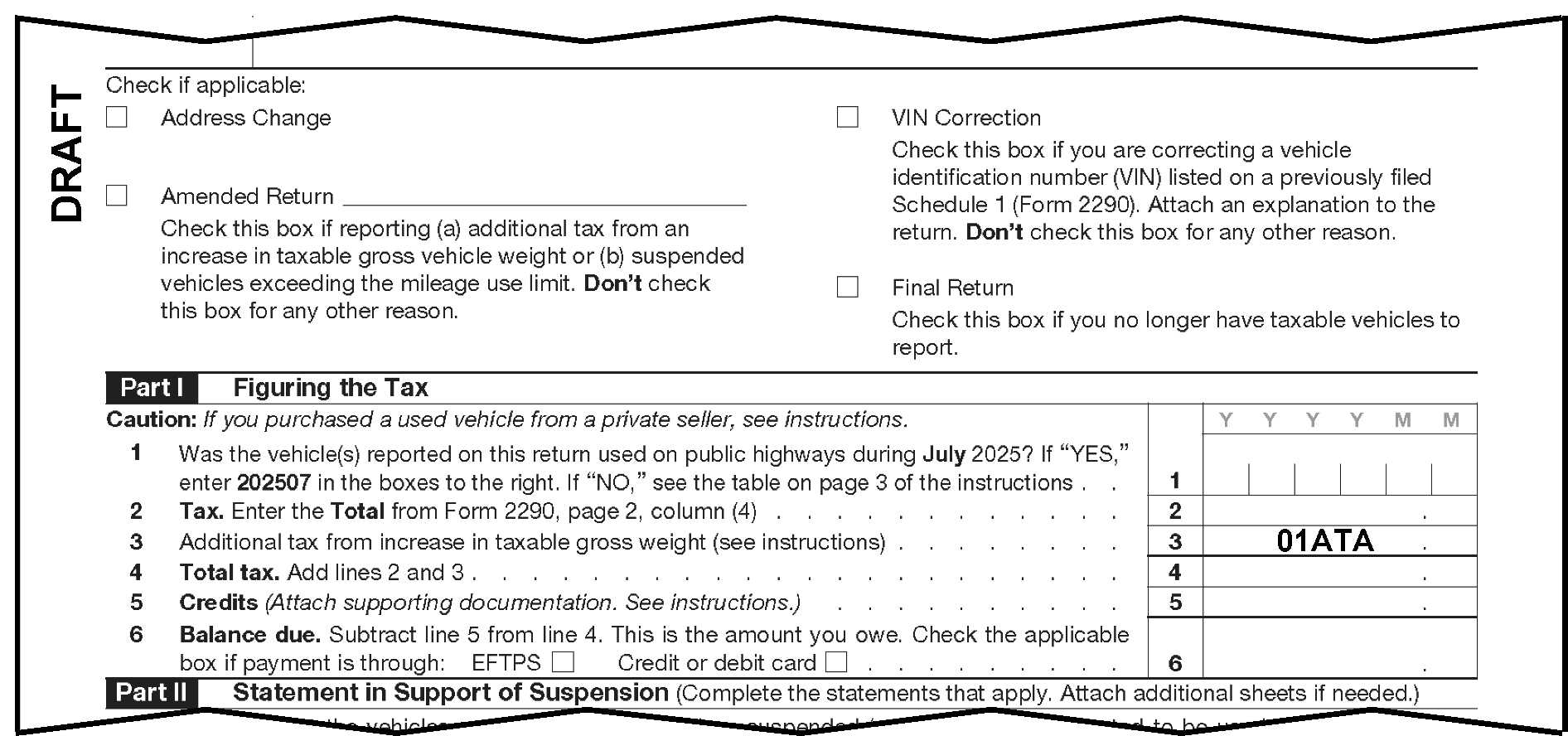
-
The following fields are used in computing the tax. Verify that they were transcribed correctly.
-
Tax period.
-
The vehicle categories entered in Sections 02 and/or 03.
-
Line 3 - Additional tax from increase in gross weight. See Figure 3.12.220-2, An Example of Form 2290 line 4, Total Tax Taxpayer.
-
-
Invalid Conditions: Total Tax Computer shows a negative figure.
-
Correction Procedures:
-
Verify taxpayer used the correct rates and/or category.
-
Check for any misplaced entries and transcription errors.
-
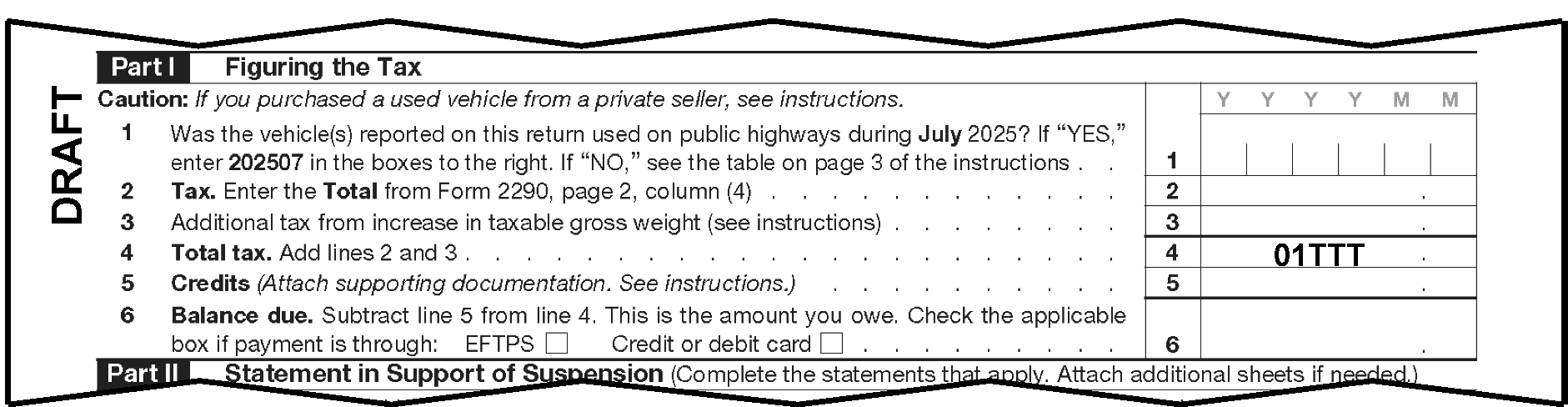
-
This line is used by the taxpayer to claim a credit for:
-
Sold, destroyed, or stolen vehicles
-
Any vehicles used 5,000 miles or less (7,500 miles or less for agricultural vehicles)
-
-
Description: CRN 365 is an overpayment of tax due to a mistake in tax liability previously reported on Form 2290. The claim is made by the person that paid the tax to the government.
-
The amount claimed on line 5 cannot exceed the tax reported on line 4.
-
The taxpayer must attach an explanation detailing the facts for each credit. If not attached, correspond.
-
The following fields are used in computing the tax. Verify that they were transcribed correctly. See Figure 3.12.220-3, An Example of Form 2290 line 6, Balance Due.
-
Tax Period
-
The vehicle categories entered in Sections 02 and/or 03
-
Line 3
-
Line 5
-
-
Correction Procedures:
-
Verify the tax period.
-
Verify taxpayer used the correct rates and/or category.
-
Check for misplaced entries or coding and transcription errors.
-
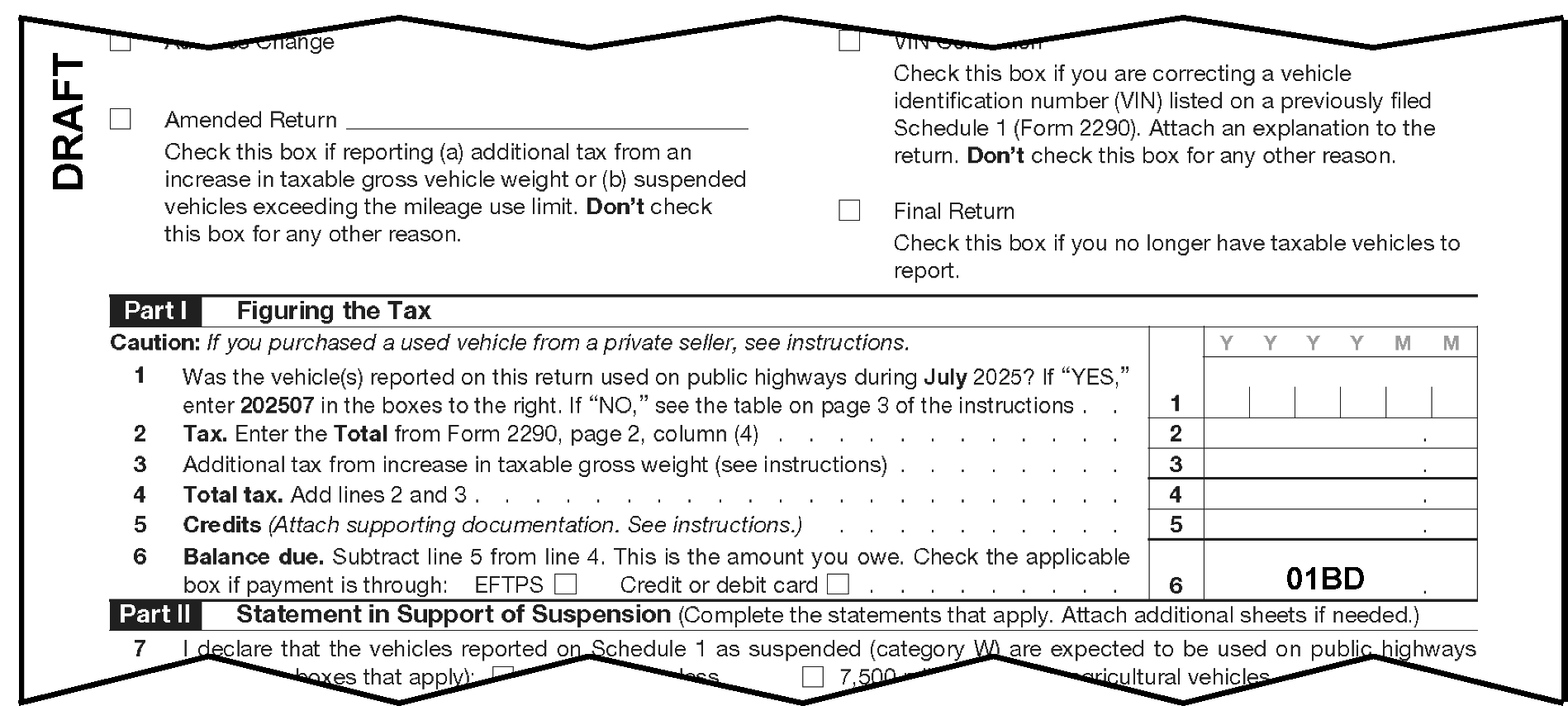
-
Description: Correspondence Received Date- 8 positions:
-
Located on the reply to correspondence. It is stamped or handwritten in "YYYYMMDD" format in the center left-hand margin of the Form 2290 by Rejects.
-
Field is used as a second date in computing interest on overpayments
-
If all the positions in the field are blank, it does not cause an invalid condition
-
-
Invalid Conditions:
-
Not numeric
-
Not in "YYYYMMDD" format
-
Not in the valid, month, day range
-
-
Correction Procedures: Compare the screen entry with the entry on the return. Document Perfection will edit the date in the "YYYYMMDD" format, if needed.
If: Then: Date is illegible, Check the attached correspondence for the correct date. More than one correspondence received date is stamped or written, Use the earliest date as the CRD in YYYYMMDD format. No reply, Leave 01CRD blank and enter a CCC 3 in Field 01CCC (unless correspondence was not necessary). Indication Entity Control has assigned an EIN to the return (code "A" is notated), Enter the entity assignment date, found in the lower left-hand corner of the return, in Field 01CRD, if it is later than the actual correspondence received date (if later than due date).
-
If the taxpayer checks the "Yes" box a "1" should be entered in the field.
-
There are validity checks on the field, but the field is not correctable.
-
Invalid Conditions: If the value is other than "1" or blank.
-
The Third-Party Designee Identifying Number is comprised of any 5 alpha characters (e.g., "A" to "Z" ), numeric (e.g., "0" to "9" ), or any combination of characters chosen by the taxpayer. The field has no validity or consistency checks and is not correctable. The field is located on the right side below the designee checkbox.
-
The Third-Party Designee Identifying Number is only for the tax period of the return on which it appears and was chosen at random by the taxpayer or taxpayer's representative. On all future filings, the taxpayer can keep or change the PIN number.
-
The PTIN is located on the right-hand side below the taxpayer's signature. Data may or may not be present in Field 01PSN. Valid characters are all blank or all numeric with a "P" in the first character followed by eight numeric (a PTIN).
-
The first character in the PTIN must begin with the alpha "P" . The range for a valid PTIN is P00000001 through P99999998. A "P" followed by all zeroes or all nines is not valid.
-
Invalid Conditions: Field 01PSN is invalid if any of the following conditions are present:
-
Field 01PSN is all numeric characters including all zeros or nines.
-
Field 01PSN is not a "P" followed by 8 numeric characters.
-
-
Correction Procedure:
-
Correct all misplaced entries, coding errors, and transcription errors.
-
If unable to determine a valid entry, delete Field 01PSN.
-
-
The Preparer's EIN is located below the PTIN on the right-hand side.
-
The Preparer's EIN must be a nine-digit numeric number. The EIN cannot be all zeroes or all nines. Also, the first two digits must not be invalid for field 01EIN (See IRM 3.12.220.6.2, Field 01EIN Employer Identification Number).
-
Correct all misplaced entries, coding errors, and transcription errors.
-
If unable to determine the valid entry, delete or blank Field 01PEN.
-
The Preparer's Phone Number is located on the right-hand side below the Preparer's EIN.
-
The Paid Preparer's Telephone Number should be shown as 10 characters. Only numerical characters (e.g., "0" through "9" ) are valid for this field.
-
If the Paid Preparer's Telephone Number is incomplete, illegible, or less than 10 digits, review the return and attachments. If unable to determine a complete or legible Paid Preparer's Telephone Number, blank the field from the display.
-
If the Paid Preparer's Telephone Number has more than 10 digits, only the first 10 digits will be captured.
-
-
The Consent to Disclose Statement Indicator is determined by the presence of the Form 2290 Consent to Disclosure of Tax Information page on paper returns or how the consent to disclose checkboxes have been completed on electronic returns.
-
The indicator is located on Form 2290 at the bottom-center area of the paper return. See Exhibit 3.12.220-3 for the location on paper returns.
-
Valid indicators are 0 (zero) or 1. See table below for applicable indicator:
Field 01CDS Indicator Paper Form 2290 Electronic Form 2290 0 The consent to disclose statement is not signed or not attached. The "No" checkbox is indicated or the checkboxes are blank. 1 The consent to disclose statement is attached and signed. The "Yes" checkbox is indicated.
-
The vehicle categories are:
Categories Invalid Conditions Correction Procedure -
02VCA - 02VCL (Categories A - L)
-
03VCM - 03VCW (Categories M - W)
Other than alpha characters or X, Y, or Z Correct field -
-
The fields for the number of vehicles under (a) Vehicles Except Logging:
See Figure 3.12.220-4, Example of Form 2290, Page 2, Tax Computation, Categories A - W, Vehicles Except Logging.Categories Invalid Conditions Correction Procedures -
02NA1 - 02A12 ((3)(a) A - L)
-
03NA1 - 03A11 ((3)(b) M - W)
Other than numeric Correct field -
-
The fields for the number of vehicles under (b) Logging:
See Figure 3.12.220-5, Example of Form 2290, Page 2, Tax Computation with Categories A - W for Logging.Categories Invalid Condition Correction Procedure -
02NB1 - 02B12 ((3)(a) A - L)
-
03NB1 - 03B11 ((3)(b) M - W)
Other than numeric Correct field -
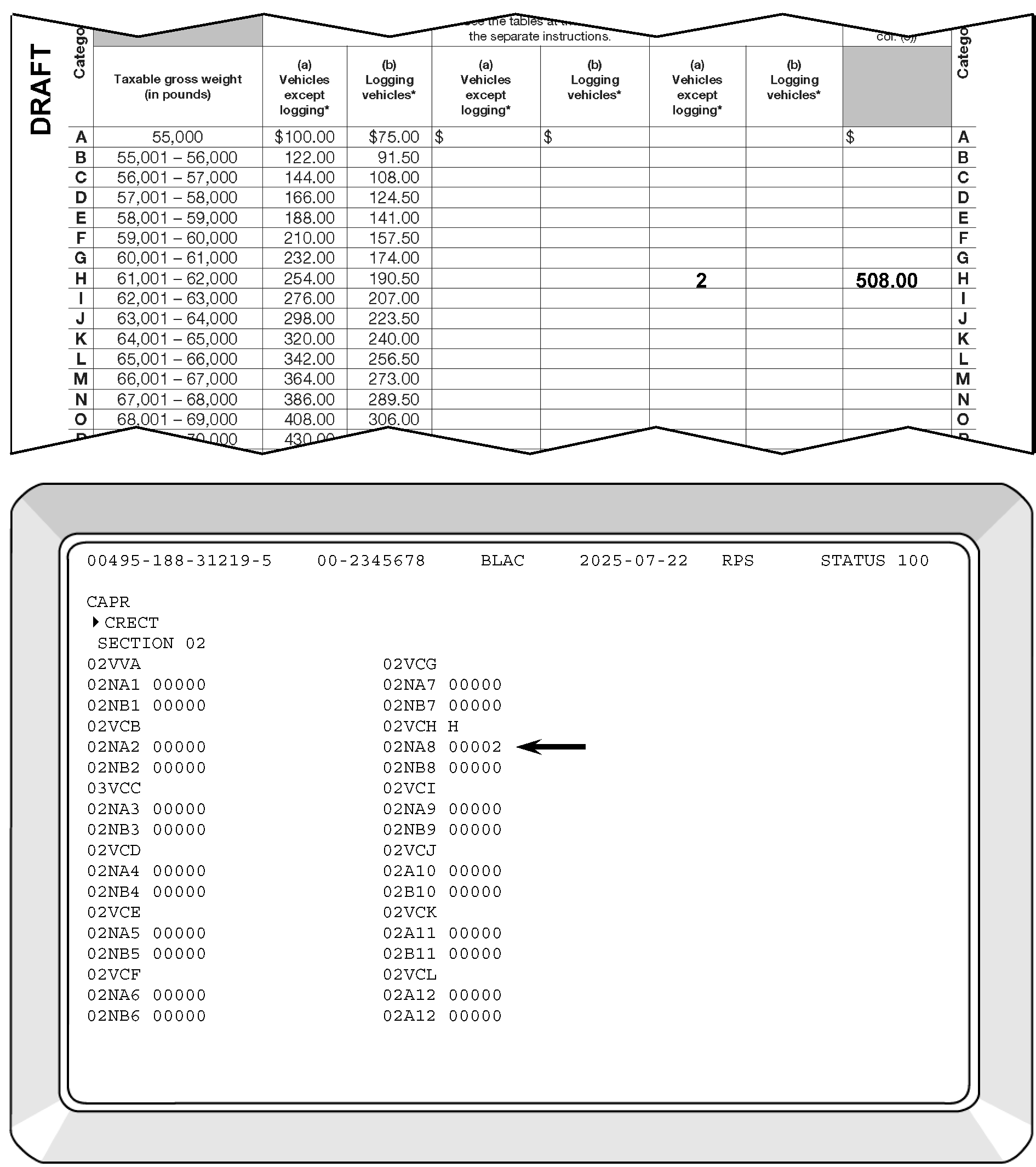
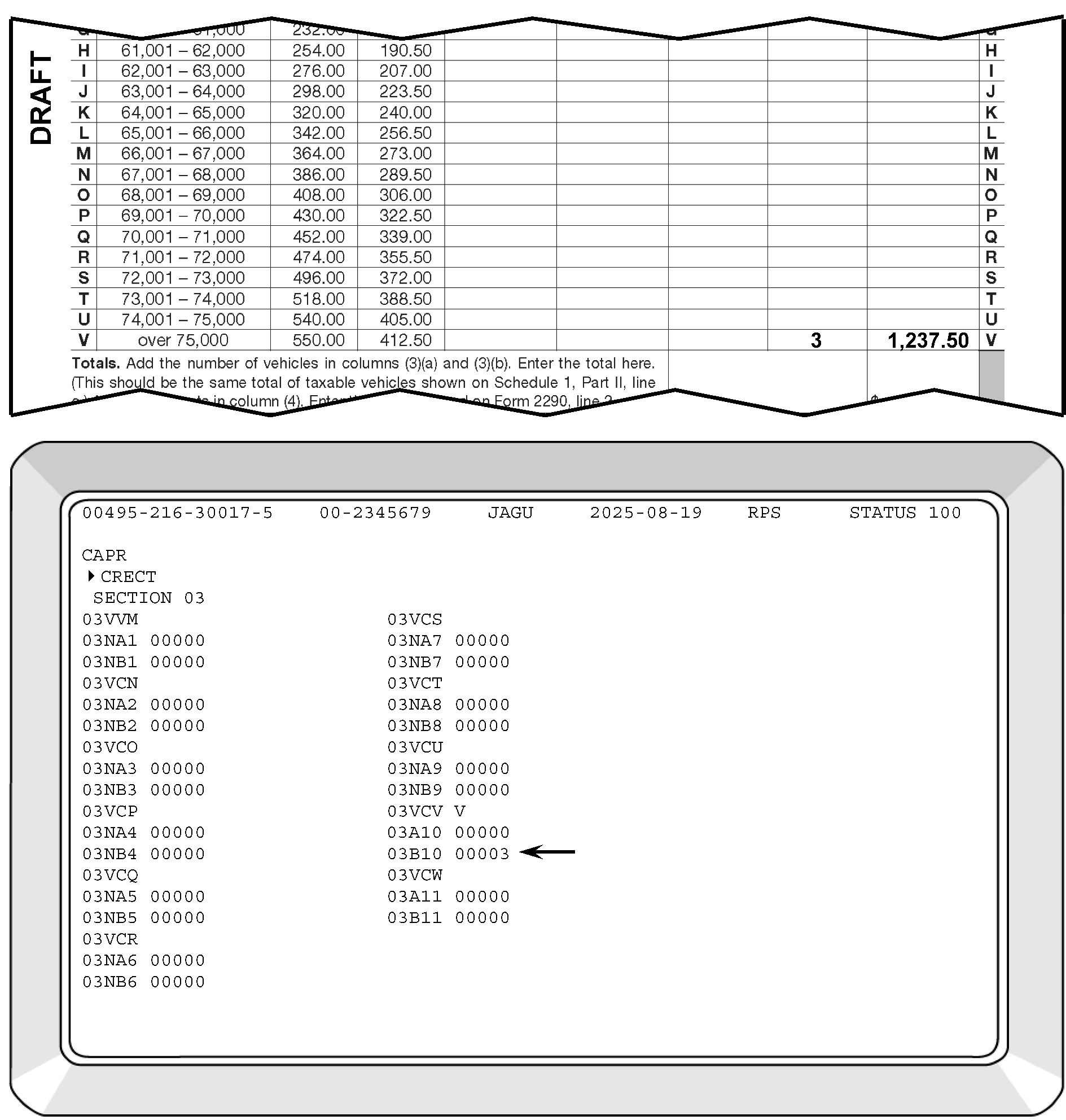
-
Description: Field 04CON is located in the Entity Section of the return.
-
Valid Condition: Field 04CON has 35 positions and the valid characters are alpha, numeric, ampersand, dash, slash or percent.
-
Invalid Condition: Field 04CON is invalid if any of the following conditions are present:
-
The first position is % (percent) and the second position is not blank, or
-
The first position is blank, or
-
The first character of the "in-care-of name" is not alpha or numeric, or
-
There are two consecutive blanks between characters.
-
-
Correction Procedures:
-
Correct coding and transcriptions errors.
If: Then: A % (percent) is in the first position, -
Verify there is a blank in the second position.
-
If not blank, enter a blank followed by the "in-care-of" name beginning with an alpha or numeric in Field 04CON.
A blank is in the first position, -
Delete blank.
-
Enter the "in-care-of" name beginning with an alpha or numeric in Field 04CON.
The first position is not alpha or numeric, -
Verify in-care-of name on the return.
-
Enter the "in-care-of" name beginning with an alpha or numeric in Field 04CON.
Two consecutive blanks are present between characters, -
Delete any unnecessary blanks in Field 04CON.
-
-
Description: Field 04FAD is located in the Entity Section of the return.
-
This field will contain an entry when there is a foreign address present on the return.
-
Field 04FAD should not be present on CCC G coded short length returns.
-
-
Valid Condition: Valid characters are alpha, numeric and special characters.
-
Invalid Condition: Field 04FAD will generate as an error when any of the following conditions are present:
-
The first position is blank.
-
Any character follows two consecutive blanks.
-
There are more than 35 characters present in the field.
-
-
Correction Procedures:
-
Correct all coding and transcription errors.
If: Then: Field 04FAD is present, -
CC GTSEC 04.
-
Ensure Field 04CTY contains a foreign country code and Field 04ST contains a "." (period/space). See Document 7475, State and Address Abbreviations, Major City Codes (MCCs), ZIP Codes and Countries.
A foreign address is not present on the return, Verify the address on the return is not a foreign address. Continue processing the return. -
-
If Form 8822, Change of Address, or Form 8822-B, Change of Address or Responsible Party - Business, is attached to the return, compare the name and address information on the Form 8822 to the return and do the following:
If: Then: The information is the same, No action is needed if all of the following applies: -
Mailing address information is the same,
-
No location address is listed on Form 8822 or Form 8822-B, Line 7,
-
No entry on Form 8822-B, Lines 8 or 9.
The information is different, Route Form 8822 or Form 8822-B to Entity if any of the following applies: -
Mailing address information is different,
-
Location address is listed on Form 8822 or Form 8822-B, Line 7,
-
An entry is listed on form 8822-B, Lines 8 or 9.
-
-
Excise tax returns with foreign addresses are processed at OSPC.
-
The determination of a foreign address is based only on the address of the entity. A foreign address will contain:
-
Street Address or P.O. Box
-
City or town name
-
Other principal subdivision (e.g., province, state, county, etc.)
-
Postal code, if present
-
Foreign country
-
-
A foreign (international) address is any address that is not in one of the 50 states or the District of Columbia. All U.S. Possessions are considered foreign.
-
American Samoa
-
Federated States of Micronesia
-
Guam
-
Marshall Islands
-
Northern Mariana Islands
-
Palau
-
Puerto Rico
-
U.S. Virgin Islands
-
-
Returns with addresses in the U.S. Possessions are considered to be a foreign excise return for processing purposes and are entered in the same way as domestic addresses.
-
A two-character alpha code must be entered in Field 04ST for the possession name.
U.S. Possessions Abbreviation American Samoa AS Federated States of Micronesia FM Guam GU Marshall Islands MH Northern Mariana Islands MP Palau PW Puerto Rico PR Virgin Islands (U.S.) VI -
A ZIP Code must be present.
-
-
An APO, DPO, or FPO is not a foreign address. The Postal Service established new address requirements for APO/DPO/FPO addresses. If an address appears in the old APO/DPO/FPO format, such as "APO New York, NY 091XX" , convert to the new State code based on the ZIP Code as follows: "APO AE 091XX" .
ZIP Code State Code 340 AA 090 - 098 AE 962 - 966 AP -
All excise returns with a foreign address must be shipped to OSPC.
-
CC SSPND with Action Code 650.
-
Attach Form 4227 with the notation "FORWARD TO OSPC" .
-
Prepare Letter 86-C to inform the taxpayer that the excise return has been sent to Ogden.
-
-
Description: Street Address (35 positions):
-
Located in the Entity Section of the return
Field Designator Field Length Title of Field Location on Return 04ADD 35 Street Address Entity Portion -
-
Invalid Conditions:
-
Street address is present and the first position is blank.
-
Any character is present other than alphabetic, numeric, blank, hyphen or slash.
-
-
Correction Procedures:
-
Compare the screen entries with the entry on the return and attachments.
If: Then: Field was transcribed incorrectly, Correct the screen display. Field cannot be perfected, Research IDRS using CC INOLE or local Campus procedures. If no data, then delete Section 04. -
-
Description: City - 22 positions:
-
Located in the Entity Section of the return
-
Certain cities in each state are designated as "Major Cities"
-
A special two alpha character has been assigned to them as Major City codes which represent that city and state
-
DIS/ISRP will enter the major city code as appropriate
-
Is transcribed with no intervening blanks and no other characters in the City-State fields either before or after the code
-
Foreign country code is not present, incorrect or contains "XX"
Field Designator Field Length Title of Field Location on Return 04CTY 22 City Entity Portion -
-
Invalid Conditions:
-
Any character other than blank or alphabetic is present
-
City is present and the first position is blank
-
City is present and the second and third characters are blank
-
Any characters in field follow two consecutive blanks
-
An invalid Major City Code is present
-
Foreign country code is not present, incorrect, or contains "XX"
-
-
Correction Procedures:
-
Compare the screen entry with the entry on the return.
-
Refer to Document 7475, State and Address Abbreviations, Major City Codes (MCCs), ZIP Codes and Countries, for the valid codes.
If: Then: Field was transcribed incorrectly, Correct the screen display. Unable to perfect from the return or attachments, Research IDRS using CC INOLE or local procedures. If no data, delete Section 04 using CC DLSEC. City not on list of Major City Codes, Delete the code and enter the actual city and state data. A foreign address is shown on the return, Enter appropriate foreign country code in Field 04CTY (See Document 7475, State and Address Abbreviations, Major City Codes (MCC), Zip Codes and Countries). -
-
Description:
-
Located in the Entity Section of the return
Field Designator Field Length Title of Field Location on Return 04ST 2 State Entity Portion -
-
Invalid Condition: occurs if the entry is not shown in Document 7475, State and Address Abbreviations, Major City Codes (MCCs), ZIP Codes and Countries for the valid codes.
-
Check the field on the screen with the field on the return and attachments.
-
The Postal Service established address requirements for APO/DPO/FPO addresses. If the entry appears incorrectly, it must be corrected to a valid State Code abbreviation based on the ZIP Code (e.g., APO New York, NY 091 XX would convert to APO AE 091 XX). The valid State Code abbreviations are shown in Document 7475, State and Address Abbreviations, Major City Codes (MCCs), ZIP Codes and Countries.
-
-
Correction Procedures:
If: Then: Field was transcribed incorrectly, Correct the screen display. Unable to perfect, Research IDRS using CC INOLE or local Campus procedures. If no data, delete Section 04.
-
Description:
-
Located in the Entity Section of the return
-
Fields are numeric or blank
-
The valid range for the 10, 11, and 12 positions of the ZIP Code are all blank or all numeric
Field Designator Field Length Title of Field Location on Return 04ZIP 12 ZIP Code Entity Portion -
-
Invalid Condition:
-
Positions 6 through 9 of the ZIP Code are numeric and positions 10, 11, 12 are not all blank or numeric
-
Positions 6 through 9 are all blank and positions 10, 11, 12 are not all blank
-
-
Correction Procedures:
-
Compare the field on the screen with the field on the return.
If: Then: Field was transcribed incorrectly, Correct the screen display. Valid ZIP Code not available from the return or attachments, Refer to Document 7475, State and Address Abbreviations, Major City Codes (MCCs), ZIP Codes and Countries, for a correct code. Only the first three digits of the ZIP Code can be determined, Enter 01 for the fourth and fifth digits. -
-
Consistency/Math Errors will be displayed with the Error Code assigned to them for the specific error in ascending numerical order.
-
The blank field "NC" will be displayed for the entry of TPNCs for all Math Error displays, if needed.
-
The field "CL" will be displayed for the entry of a Clear Code on records where the possibility exists that a change or corrections may not be needed.
-
All errors must be resolved by either eliminating the error, entering a Clear Code or entering a TPNC or CC SSPND the document with the appropriate AC.
-
Fields Displayed:
Field Designator on Form 2290 Field Name Field Length 01TXP Tax Period 6 01CCC Computer Condition Code 10 01RCD Received Date 8 -
Invalid Conditions: Error Code 001 will generate when any of the following conditions is present:
-
Computer Condition Code "G" is not present - The processing date is equal to or more than 2 years and 10 months after the Return Due Date or Received Date (whichever is later) and CCC "W" is not present.
-
Computer Condition Code "G" is Present - The processing date is equal to or more than 2 years and 10 months after the Return Due Date and CCC "W" is not present.
-
"G" Coded and Non-"G" Coded Returns - The processing date is less than two years after the Return Due Date and CCC "W" is present.
-
-
Correction Procedures:
-
Correct all misplaced entries, coding, and transcription errors.
-
Do not send the returns in the following table to Statute Control for clearance. Instead, do the following:
Statute Control
If: Then: -
Return is prepared by Compliance (e.g., IRC 6020(b)),
-
Return is secured by Examination/Collections, including TE/GE or TE/GE Employee Plan (EP) Exam,
-
Return has a Transaction Code (TC) 59X,
-
Return has "ICS" (Integrated Collection System) notated on the face of the return,
-
Return is a Substitute for Return prepared by Examination ("SFR" in the margin) with Form 13133, Expedite Processing Cycle, attached,
-
Return has a stamp indicating a previous clearance by Statute Control within the last 90 days,
-
Return is a 2021 or prior year original. Due to the COVID-19 pandemic and subsequent Submission Processing (SP) and Accounts Management (AM) site closures, SP and AM developed procedures to bypass AM statute clearance and be processed. In addition, any 2021 or prior year returns previously cleared by AM statute will not be returned by SP to AM to be cleared again if the 90-calendar day statute stamp has expired.
Enter "W" in Field 01CCC and on the return and continue processing. -
-
Compare the displayed fields with the return and attachments. If incorrect, overlay the screen with the correct information.
Error Code 001 Correction Procedures
-
-
Suspense Correction:
-
When Statute Control returns the cleared document, enter "W" in Field 01CCC and on the return. Continue processing.
-
Statute Control requests a voided record, CC SSPND with Action Code 640.
-
-
Fields Displayed:
Field Designator on Form 2290 Field Name Field Length CL Clear Code 01NC Name Control 4 >>>> Name Control Underprint 01EIN Employer Identification Number 9 01CCC Computer Condition Code 10 04CON In-Care-of Name 35 04FAD Foreign Address 35 04ADD Street Address 35 04CTY City 22 04ST State 2 04ZIP ZIP Code 12 -
Invalid Condition: Error Code 002 will generate when the Name Control mismatched against the National Account Profile (NAP) and Entity Index File (EIF).
-
Correction Procedures:
-
Before taking any additional research steps to resolve Error Code 002, drop the cursor to the bottom of the screen and transmit. This will ensure that any prior changes to the Name Control have posted to the NAP. If Error Code 002 reappears, continue with the remainder of the correction procedures.
-
Correct all misplaced entries, coding, and transcription errors.
-
Compare the displayed fields with the return and attachments. If incorrect, overlay the screen with the correct information.
-
If Field 01NC and the Name Control on the return or attachments are the same but differ from the underprint in Field 01NC, research using the mandatory IAT tool, using CC NAMEE, CC INOLES, NAMEB if IAT is unavailable to determine the correct Name.
If: Then: The Name on the return or attachment matches the Name Control on INOLES, Bring up the underprint. The Name on INOLES is different from the Name on the return or attachment, Research IDRS using Command Code NAMEE/NAMEB for a new EIN. -
If a new EIN is located, verify the Name Control using CC INOLES.
-
If the Name on the return or attachment does not agree with the Name Control on CC INOLES or there is an indication of a name change, research CC ENMOD for a new name.
If: Then: The Name Control on ENMOD agrees with the Name on the return or attachment, Enter "C" in the Clear Code Field. The Name Control on ENMOD or INOLES does not agree with the Name on the return or attachment, -
SSPND with AC 320 to route to Entity Control.
-
Attach Form 4227, Intra-SC Reject or Routing Slip, with the notation "NO RECORD" .
-
-
If the Name change has not been made, research CC ENMOD for a pending TC 013.
If: Then: A pending TC 013 is present, Enter "C" in the Clear Code Field. A pending TC 013 is not present, -
SSPND with AC 320 to route to Entity Control.
-
Attach Form 4227, Intra-SC Reject or Routing Slip, with the notation "REQUEST NAME CHANGE (TC 013)" .
-
-
-
Suspense Correction:
-
If there is an indication that Entity Control has assigned an EIN to the return, determine the Entity Assignment Date:
If: Then: The Entity Assignment Date is past the Return Due Date and Received Date, -
CC GTSEC 01.
-
Input the Entity Assignment Date in Field 01CRD.
The Entity Assignment Date is not past the Return Due Date and Received Date, Continue processing. -
-
Research IDRS to determine if payments posted incorrectly:
If: Then: The payment posted to the wrong EIN, -
Prepare Form 3465, Adjustment Request, to have the payment transferred to the correct module.
-
Notate on Form 3465, "MOVE PAYMENT TO CORRECT MODULE UPON COMPLETION AND RELEASE FREEZE"
-
Write "FORM 3465 PREPARED" on the return, to the left of the entity section.
-
Enter CCC "X" in Field 01CCC.
The payment posted correctly, -
Enter correct EIN in Field 01EIN and on the return.
-
Enter "C" in the Clear Code field.
Payment cannot be found, Enter "C" in the Clear Code Field. -
-
-
Fields Displayed:
Field Designator on Form 2290 Field Name Field Length 01NC Name Control 4 01EIN Employer Identification Number 9 01TXP Tax Period 6 01CCC Computer Condition Code 10 -
Invalid Condition: Error Code 003 will generate when any of the following conditions are present:
-
Check digit is present but not valid for the EIN.
-
The letters "E" , "G" or "M" (in check digit only) are present in Field 01NC
-
-
Correction Procedures:
-
Correct all misplaced entries, coding, and transcription errors.
-
Compare the displayed fields with the return and attachments. If incorrect, overlay the screen with the correct information.
If: Then: The check digit in Field 01NC does not match the return or is not legible, Enter the Name Control from the return in Field 01NC. The EIN on the return is not legible, Research using the mandatory IAT tool, using CC NAMEE/NAMEB on IDRS if IAT is unavailable for correct EIN. -
Compare the EIN from NAMEE/NAMEB to the EIN on the return.
-
-
Suspense Correction:
-
Research using the mandatory IAT tool, using CC BMFOL to research IDRS if IAT is unavailable to determine if payments posted incorrectly.
If: Then: The payment posted to the wrong EIN, -
Prepare Form 3465, Adjustment Request, to have the payment transferred to the correct module.
-
Notate on Form 3465, "MOVE PAYMENT TO CORRECT MODULE UPON COMPLETION AND RELEASE FREEZE" .
-
Write "FORM 3465 PREPARED" on the return, to the left of the entity section.
-
Enter CCC "X" in Field 01CCC.
The payment posted to the correct EIN, Enter the correct EIN in Field 01EIN and on the return. The payment cannot be located, Enter C in the Clear Code field. -
-
-
Fields Displayed:
Field Designator on Form 2290 Field Name Field Length CL Clear Code 01NC Name Control 4 >>>> Name Control Underprint 01EIN Employer Identification Number 9 01CCC Computer Condition Code 10 -
Invalid Conditions: Error Code 004 will generate when any of the following conditions is present
-
The EIN is not present on the Master File (NAP)
-
The Entity Index File (EIF) and the NAP were not accessed or were not operational, causing a blank underprint in Field 01NC
-
-
Correction Procedure:
-
Before taking any additional research steps to resolve Error Code 004, drop the cursor to the bottom of the screen and transmit. This will ensure that any prior changes to the Name Control/EIN have posted to the NAP. If EC 004 reappears, continue with the remainder of the correction procedures.
-
Correct all misplaced entries, coding, and transcription errors.
-
Refer to all the following research instructions in this error code before taking any action.
-
If Field 01NC and the Name on the return or attachments are the same but differ from the underprint in Field 01NC, research IDRS using Command Code (CC) INOLES to determine the correct Name Control:
If: Then: The Name on the return or attachment matches the Name Control on INOLES, Bring up the underprint. The Name Control on INOLES is different from the Name on the return or attachment, Research using mandatory IAT tool and IDRS using Command Code NAMEE/NAMEB if IAT is unavailable for a new EIN. -
If a new EIN is located, verify the Name Control using CC INOLES.
-
If the Name on the return or attachment does not agree with the Name Control on INOLES or there is an indication of a name change, research IDRS using CC ENMOD for a new name.
If: Then: The Name Control on ENMOD agrees with the Name on the return or attachment, Enter a "C" in the Clear Code Field. The Name Control on ENMOD or INOLES does not agree with the Name on the return or attachments, -
SSPND with Action Code 320 to route the return to Entity Control.
-
Attach Form 4227, Intra-SC Reject or Routing Slip, with the notation "NO RECORD" .
-
-
If the Name change has not been made, research IDRS using Command Code ENMOD for a pending TC 013.
If: Then: A pending TC 013 is present, Enter "C" in the Clear Code Field. A pending TC 013 is not present, -
SSPND with Action Code 320 to route to Entity Control.
-
Attach Form 4227, Intra-SC Reject or Routing Slip, with the notation "REQUEST NAME CHANGE (TC 013)" .
-
-
-
Suspense Correction:
-
If there is an indication that Entity has assigned an EIN to the return, determine the Entity Assignment Date.
If: Then: The Entity Assignment Date is past the Return Due Date and IRS Received Date, -
GTSEC 01.
-
Enter the Entity Assignment Date in Field 01CRD.
The Entity Assignment Date is not past the Return Due Date and IRS Received Date, Continue processing. -
-
Research IDRS using CC BMFOL to determine if payments posted incorrectly:
If: Then: The payment posted to the wrong EIN, -
Prepare Form 3465, Adjustment Request, to have the payment transferred to the correct module.
-
Notate on Form 3465, "MOVE PAYMENT TO CORRECT MODULE UPON COMPLETION AND RELEASE FREEZE" .
-
Write "FORM 3465 PREPARED" on the return, to the left of the entity section.
-
Enter CCC "X" in Field 01CCC.
The payment posted correctly, -
Enter correct EIN in Field 01EIN and on the return.
-
Enter "C" in the Clear Code Field.
Payment cannot be found, Enter "C" in the Clear Code field. -
-
-
Fields Displayed:
Field Designator on Form 2290 Field Name Field Length 01TXP Tax Period 6 01RCD Received Date 8 01CCC Computer Condition Code 10 -
Invalid Condition: Error Code 005 will generate when the year-month of the processing date is later than the tax period plus 6 months and the received date is not present.
-
Correction Procedures:
-
Compare the displayed fields with the return and correct all misplaced entries, coding, and transcription errors.
-
If the displayed fields are correct and the return is timely field, enter a C in the clear code field.
-
A Received Date must be in Field 01RCD.
-
Use the earliest received date in Field 01RCD if there are multiple received dates on the return.
-
Determine the Received Date using the following priority when one is needed but is not stamped on the return or a valid handwritten Received Date is not present:
-
Earliest legible Postmark Date (e.g., U.S. Postal Service (USPS), Foreign or Private Delivery Service (PDS)).
-
Service Center Automated Mail Processing System (SCAMPS) digital date.
-
Revenue Officer's or other IRS official's signature date.
-
Signature date, if within the current year (unless other information indicates signature date is invalid).
-
Julian Date of the Document Locator Number (DLN) minus 10 days.
-
Current date minus 10 days.
-
-
If a return is faxed to another area of IRS and then sent to Submission for processing, do not enter the Enterprise Electronic Fax (EEFax) Date as the IRS Received Date. Enter a Received Date according to normal procedures.
-
Fields Displayed:
Field Designator on Form 2290 Field Name Field Length 01TXP Tax Period 6 01CCC Computer Condition Code 10 01RCD Received Date 8 -
Invalid Condition: Error Code 007 will generate when the received date is earlier than the first day of the tax period/year by two months or more.
-
Corrections Procedures:
-
Correct all misplaced entries, coding, and transcription errors.
-
Compare the displayed fields with the return and attachments. If incorrect, overlay the screen with the correct information.
Note:
Do not accept a Document Perfection Operations stamp on Schedule 1 as a valid IRS received date stamp.
If: And: Then: The Received Date is invalid and it appears that the incorrect year was used (e.g., 20240115 instead of 20250115), and other information (Julian date, and/or signature date) indicates the received date should be the current year, Change the Received Date to the current year and enter in Field 01RCD. The return is an early filed "Final" return, There is no tax reported, -
Change the Tax Period to agree with the month before the Received Date and enter in Field 01TXP.
-
Enter "F" in Field 01CCC.
The return is not an early filed Final return, The Tax Period ending date is passed, -
Change the Received Date to one day after the tax period ending date. For example, the tax period is 202408, enter 20240801 in Field 01RCD
-
See IRM 3.12.220.2.25, Working Trail, for more information.
The return is early filed, If less than two months (from the current date) until the tax year begins, -
Change the Received Date to the current processing date.
-
Continue processing the return.
The return is early filed, If greater than two months (from the current date) until tax year begins, -
Initiate correspondence for clarification of tax period.
-
CC SSPND with AC 211.
-
-
-
Suspense Correction:
If: And: Then: The taxpayer replies that the return is a "Final" , There is no tax reported, -
Change the Tax Period to agree with the month before the Received Date and enter in Field 01RCD.
-
Enter "F" in Field 01CCC.
The taxpayer replies that the return is not a final return or it is a "Final" return reporting tax, CC SSPND with AC 480 until two months prior to the beginning of the tax period provided by the taxpayer. The taxpayer fails to reply or the reply is not adequate, -
Enter 3 in Field 01CCC.
-
CC SSPND with AC 480 until two months prior to the beginning of the tax period indicated on the return.
-
-
Fields Displayed:
Field Designator on Form 2290 Field Name Field Length 01CCC Computer Condition Code 10 01PIC PIC Code 1 01CAF CAF Code 1 01ATA Additional Tax Amount 11 01TTT Total Tax Taxpayer 11 >>>>> Underprint Total Tax Taxpayer 01CRN CRN 365 Credit 11 01BD Balance Due 11 >>>>> Underprint Balance Due S02 Section 02 S03 Section 03 S04 Section 04 -
Invalid condition: Error Code 010 will generate when Computer Condition Code G is present and fields other than Fields 01NC, 01EIN, 01TXP, 01RCD, 01CCC, 01CRD are present.
-
Correction Procedures:
-
Correct all misplaced entries, coding, and transcription errors.
-
Compare the displayed fields with the return and attachments. If incorrect, overlay the screen with the correct information.
-
Determine if CCC G was input correctly:
If: Then: CCC G was entered correctly, -
CC DLSEC to delete all sections except Section 01.
-
Delete the invalid entries that are present in Section 01, if necessary.
CCC G was entered incorrectly, -
Enter all necessary data in Sections 01 through 04.
-
Ensure that Section 01 fields are correct.
-
Delete the G in Field 01CCC.
-
-
-
Fields Displayed:
Field Designator on Form 2290 Field Name Field Length 04CON In Care of Name 35 04FAD Foreign Address 35 04ADD Street Address 35 04CTY City 22 04ST State 2 04ZIP ZIP Code 12 -
Invalid Conditions: Error Code 014 generates when any of the following conditions are present:
-
A Major City Code is not used, the street address is present, and Field 04CTY or Field 04ST is not present.
-
A Major City Code is used and Field 04ADD is not present.
-
If a Major City Code is used and Field 04ST is present
-
-
Correction Procedures:
-
Correct all misplaced entries, coding, and transcription errors.
-
Compare the displayed fields with the return and attachments. If incorrect, overlay the screen with the correct information.
-
Research any of the following for valid address information:
-
Document 7475, State and Address Abbreviations, Major City Codes (MCCs), ZIP Codes and Countries
-
CC INOLE, CC NAMEE, CC NAMEB, CC ENMOD
If: And: Then: A Major City Code is present, A street address is not available, -
Enter the City Name (spelled out, not in Major City format) in Field 04CTY.
-
Enter the State Code in Field 04ST.
The Major City Code is correct, The state is present, Delete Field 04ST. The ZIP Code or Address cannot be corrected from the information on the return, attachments or from research, If the first three digits of the ZIP Code can be determined, enter 01 in the fourth and fifth positions, otherwise CC DLSEC 04. -
-
Fields Displayed:
Field Designator on Form 2290 Field Name "In-Care-of Name" Length 04FAD Street 35 04ADD Address 35 04CTY City 22 04ST State 2 04ZIP ZIP Code 12 -
Invalid Condition: Error Code 015 will generate when any of the following conditions is present:
-
State field has an entry other than (period/space) when a foreign address is present
-
ZIP Code field has an entry when a foreign address is present
-
-
Correction Procedures:
-
Correct all misplaced entries, coding, and transcription errors.
-
Compare displayed fields with the return. If incorrect, overlay the screen with the correct information.
If: Then: A foreign address is not present in Field 04FAD, Check return for foreign address. A foreign address is present on the return, -
Enter the foreign address in Field 04FAD.
-
Field 04CTY must contain the appropriate foreign country code. See Document 7475, State and Address Abbreviations, Major City Codes (MCC), ZIP Codes and Countries.
-
Field 04ST must contain "." (period/space).
-
Delete any entry in Field 04ZIP.
A foreign address is not present on the return, -
Verify the address on the return is not a foreign address.
-
Continue processing the return.
-
-
Fields Displayed:
Field Designator on Form 2290 Field Name Field Length 04CON In care of name 35 04FAD Foreign Address 35 04CTY City 22 04ST State 2 04ZIP ZIP Code 12 -
Invalid Condition: Error Code 016 will generate when the ZIP Code is inconsistent with the Major City Code or State Code.
-
Corrections Procedures:
-
Correct all misplaced entries, coding, and transcription errors.
-
Compare the displayed fields with the return and attachments. If incorrect, overlay the screen with the correct information.
-
Research any of the following for valid ZIP Code information:
• Document 7475
• CC INOLE, CC NAMEE, CC NAMEB, CC ENMOD -
If only the first three digits of the ZIP Code can be determined, enter "01" in the fourth (4th) and fifth (5th) positions.
If: And: Then: Unable to determine a valid ZIP Code from the return or attachment, Enter the valid ZIP Code found through research in Field 04ZIP. The address is in a major city, A Major City Code can be determined, Enter Major City Code in Field 04CTY. The address is in a major city, A Major City Code cannot be determined, -
Enter the name of the city in Field 04CTY.
-
Enter the State Code in Field 04ST.
The address is not in a major city, -
If the name of the city can be determined, enter the name of the city in Field 04CTY.
-
If the name of the city cannot be determined, enter the appropriate state abbreviation in Field 04ST.
-
Enter the ZIP Code in Field 04ZIP.
-
-
APO/DPO/FPO Addresses - An APO, DPO, or FPO is not a foreign address. The Postal Service established new address requirements for APO/DPO/FPO addresses. See Document 7475, State and Address Abbreviations, Major City Codes (MCCs), ZIP Codes and Countries for the correct APO/DPO/FPO address.
-
-
Fields Displayed:
-
01CCC - Computer Condition Code
-
01RCD - Received Date
-
-
Invalid Condition:
-
CCC G, R, or D are present and the Received Date is not present
-
-
Correction Procedures:
-
Compare the displayed fields with the return.
If: Then: Incorrectly transcribed, Overlay the screen with the correct information. CCC R or D is present on the return, Enter the Received Date in 01RCD in YYYYMMDD format. CCC R or D is not present on the return, Delete the CCC R or D from 01CCC. Return is not a CCC G return, and no indication that the return is "Amended" , "Revised" , "Superseded" , "Duplicate" , or "changed" and nothing indicating that this is other than the first return filed, -
CC GTSEC 02 and 03 and 05, as needed, and enter the data in the fields and transmit.
-
When Error Code 010 generates enter appropriate fields and delete Field 01CCC
Return is correctly CCC G coded, Enter the Received Date in 01RCD. Determine the date as listed in (2) below. See also Error Code 010, IRM 3.12.220.7.8, Error Code 010 - Amended Return CCC G Coded. -
-
To determine the correct "Received Date" use the priority order listed below. If multiple dates are on the return, use the earliest date as the received date.
If: Then: The Received Date cannot be determined, Determine the entry to Field 01RCD using the following priority order: -
IRS Received Date Stamp.
-
Postmark date, Foreign Postmark, or Private Delivery Service.
-
SCAMPS digital date.
-
Revenue Officer's or other IRS official's signature date.
-
Return signature date.
-
Julian date minus 10 days.
-
Current date minus 10 days.
The Received Date is invalid and it appears that the incorrect year was used (e.g., 20240115 instead of 20250115), and other information (Julian date, postmark date, and/or signature date) indicates that the received date should be a current year, Change the Received Date year to the current year. Multiple Received Dates are present, -
Use the earliest IRS stamped Received Date.
-
Circle out all other dates.
The return was addressed to the IRS and delivered to a State agency, Use the postmark date as the Received Date. The return was addressed to a State agency, Use the IRS date stamp as the Received Date. -
-
Fields Displayed:
-
01TXP - Tax Period
-
01PIC - Penalty and Interest Code
-
01RCD - Received Date
-
-
Invalid Conditions:
-
The Penalty and Interest Code of "1" is present, ≡ ≡ ≡ ≡ ≡ ≡ ≡ ≡ ≡ ≡ ≡ ≡ ≡ ≡ ≡ ≡ ≡ ≡ ≡ ≡ ≡ ≡ ≡ ≡ ≡ ≡ ≡ ≡ ≡ ≡ ≡ ≡ ≡ or is not present.
-
-
Correction Procedures:
-
Compare the displayed fields with the return.
If: Then: Incorrectly transcribed, Overlay with the correct information. Taxpayer is paying penalty or interest and the received date is ≡ ≡ ≡ ≡ ≡ ≡ ≡ ≡ ≡ ≡ ≡ ≡ ≡ ≡ ≡ ≡ ≡, Enter the received date in YYYYMMDD format. Received date is correct ≡ ≡ ≡ ≡ ≡ ≡ ≡ ≡ ≡ ≡ ≡ ≡ ≡ ≡ ≡ ≡, Delete code "1" from Field 01PIC. More than one date is present on the return, Use the earliest date and write in YYYYMMDD format. Penalty and Interest Code is present and no received date is shown, Determine the date by priority listed below and enter in Field 01 RCD. -
To determine the correct "Received Date" use the priority order listed below. If multiple dates are on the return, use the earliest date as the received date.
Note:
Do not accept a Document Perfection Operations stamp on Schedule 1 as a valid IRS received date.
If: Then: The Received Date is not obvious, Determine the entry to Field 01RCD using the following priority order: -
IRS Received Date stamp.
-
Postmark date, Foreign Postmark date, or Private Delivery Service.
-
SCAMPS digital date.
-
Revenue Officer's or other IRS officials signature date.
-
Return signature date.
-
Julian Date minus 10 days.
-
Current date minus 10 days.
The Received Date is invalid and it appears that the incorrect year was used (e.g., 202340115 instead of 202540115), and other information (Julian date, postmark date, and/or signature date) indicates that the received date should be a current year, Change the Received Date year to the current year. Multiple Received Dates are present, -
Use the earliest IRS stamped Received Date.
-
Circle out all other dates.
The return was addressed to the IRS and delivered to a State agency, Use the postmark date as the Received Date. The return was addressed to a State agency, Use the IRS date stamp as the Received Date. -
-
If CCC R, is present, it will override the 01PIC Penalty and Interest Code where a delinquency penalty is concerned.
If: Then: Correct received date is equal to or earlier than the due date, Delete Code "1" from Field 01PIC. No indication of pre-computed Penalty and Interest, Delete Code "1" from Field 01PIC.
-
-
Fields Displayed:
-
01TXP - Tax Period
-
01RCD - Received Date
-
01CRD - Correspondence Received Date
-
-
Invalid Condition:
-
The Correspondence Received Date (01CRD) is earlier or the same as either the Received Date (01RCD), or the Return Due Date
-
The CRD is later than the processing date
-
-
Correction Procedures:
-
Received Date (Field 01RCD) - The Received Date should be stamped or edited on the return. Compare the displayed fields with the return.
If: Then: Incorrectly transcribed, Overlay with the correct information. Received Date (01RCD) is missing or illegible, Determine the date in the priority order listed on (2) below. Received Date (01RCD) is not present on green money (rockered) remittance returns, Use DLN control date found in position 6 - 8 of the DLN. Use the Julian Date chart for the conversion. -
To determine the correct "Received Date" use the priority order listed below. If multiple dates are on the return, use the earliest date as the received date.
Note:
Do not accept a Document Perfection Operations stamp on Schedule 1 as a valid IRS received date.
If: Then: The Received Date is not obvious, Determine the entry to Field 01RCD using the following priority order: -
IRS Received Date stamp.
-
Postmark date, Foreign Postmark, or Private Delivery Service.
-
SCAMPS digital date.
-
Revenue Officer's or other IRS official's signature date.
-
Return signature date.
-
Julian Date minus 10 days.
-
Current date minus 10 days.
The Received Date is invalid and it appears that the incorrect year was used (e.g., 20240115 instead of 20250115), and other information (Julian date, postmark date, and/or signature date) indicates that the received date should be a current year, Change the Received Date year to the current year. Multiple Received Dates are present, -
Use the earliest IRS stamped Received Date.
-
Circle out all other dates.
The return was addressed to the IRS and delivered to a State agency, Use the postmark date as the Received Date The return was addressed to a State agency, Use the IRS date stamp as the Received Date -
-
Correspondence Received Date - The CRD (01CRD) is determined from the date the reply was received in the Campus. Refer to the return for the CRD (01CRD). The date can be verified by checking the stamped Received Date or fax date on the correspondence attached to the return.
If: And: Then: CRD (01CRD) is present, Earlier than the Return Due Date, same as the Received Date, or later than the processing date. Delete the CRD from Field 01CRD. More than one received date is present, Enter the earliest date in YYYYMMDD format. No reply, Enter CCC 3.
-
-
Fields Displayed:
-
RMIT) - Remittance
-
01ATA - Additional Tax Amount
-
01TTT - Total Tax Taxpayer
-
>>>> - Total Tax Computer
-
01CRN - CRN 365 Credit
-
01BD - Balance Due
-
>>>> - Balance Due Computer
-
Section 02 Present/Not Present
-
Section 03 Present/Not Present
-
-
Invalid Condition:
-
01TTT is not zero and sections 02 and/or 03 are not present.
-
-
Correction Procedures:
-
Refer to return for the correct entries for fields shown in the display. Correct any erroneous screen display.
-
If sections 02 and 03 should not be blank, enter the correct information from the return.
-
If missing, make a determination from the Tax Computation Sheet, return, Schedule 1, or attachments.
-
Research prior year returns. If the money amount from the current return matches the category from the prior year return use the category from the prior year return.
-
If no determination can be made SSPND with AC 211 and correspond for missing information.
-
-
Fields Displayed:
-
01CRD - Correspondence Received Date
-
01CCC - Computer Condition Code
-
-
Invalid Conditions:
-
Correspondence Received Date and CCC 3 are both present.
-
-
Correction Procedures:
If: Then: Correspondence reply was received from the taxpayer, -
Delete CCC 3 and circle the CCC 3 edited on the return.
-
Enter the correspondence received date in field 01CRD.
No reply from taxpayer, -
Delete the correspondence received date in field 01CRD and circle the CRD entered on the return.
-
Enter a 3 in field 01CCC.
-
-
Fields Displayed:
-
Section 02
-
-
Invalid Condition:
-
The Vehicle Category is present and the Number of Vehicles is blank or the Number of Vehicles is present and the Vehicle Category is blank for Section 02.
-
-
Correction Procedures:
-
Refer to the return for the missing Vehicle Category or Vehicle Number.
-
If missing, make a determination from the Tax Computation Sheet, return, Schedule 1, or attachments.
-
Research prior year returns using Corporate File On-Line (CFOL) command codes such as BMFOLI, BMFOLR, etc. If the money amount from the current return matches the category from the prior year return use the category from the prior year return.
-
If a determination cannot be made CC SSPND with AC 211 and correspond with the taxpayer.
-
-
Fields Displayed:
-
Section 03
-
-
Invalid Condition:
-
The Vehicle Category is present and the Number of Vehicles is blank or the Number of Vehicles is present and the Vehicle Category is blank for Section 03.
-
-
Correction Procedures:
-
Refer to the return for the missing Vehicle Category or Vehicle Number.
-
If missing, make a determination from the Tax Computation Sheet, return, Schedule 1, or attachments.
-
Research prior year returns using Corporate File On-Line (CFOL) command codes such as BMFOLI, BMFOLR, etc. If the money amount from the current return matches the category from the prior year return use the category from the prior year return.
-
If a determination cannot be made CC SSPND with AC 211 and correspond with the taxpayer.
-
-
Field Displays:
-
NC - Notice Code
-
RMIT) - Remittance
-
01CCC - Computer Condition Code
-
01ATA - Additional Tax Amount
-
01TTT - Total Tax Taxpayer
-
>>>> - Total Tax Computer
-
01CRN - CRN 365 Credit
-
01BD - Balance Due
-
>>>> - Balance Due Computer
-
Section 02 Present/Not Present
-
Section 03 Present/Not Present
-
-
Invalid conditions:
-
The Total Tax Taxpayer is zero and the payment received is not zero or the RPS indicator is present and the return is not CCC G coded.
-
-
Correction Procedures:
-
Refer to the return and attachments to verify that Field 01TTT is correct.
-
Correct all misplaced entries, coding and transcription errors.
If: Then: Tax Computation Schedule or Schedule 1 shows that an amount is due but it was not brought forward to page 1, Change field 01TTT to reflect the amount due. Unable to determine the liability, -
Use CC MFTRA or CC BMFOL to obtain additional information.
-
If no information is found, correspond with the taxpayer for an explanation.
-
Follow normal correspondence procedures and suspend the record with AC 211.
It is determined that part or all of the payments should be applied to another module, -
Enter CCC X in field 01CCC.
-
Make a credit transfer to the correct module using credit transfer procedures and leave an audit trail.
-
See IRM 3.12.38.5.7, Credit Transfers.
Total Tax on the return is zero and TPNC is not needed, CC SSPND with AC 610 and attach Nullified Request Sheet notated "batch as non-remit" . No transcription error and the taxpayer has made a math error, Use the appropriate TPNC. -
-
If a math error is present, send TPNC 01, 02, 03, 05, 06, 14, or 90.
TPNC Explanation 01 We found the computation of tax was not correct. 02 The tax rate used to calculate the amount of tax due per individual vehicle category on page two is incorrect. 03 Partial year vehicles reported on returns covering multiple tax periods are taxable for both the partial year tax period and for the current annual tax period. 05 The amount of total tax due reported on page two does not equal the amount of tax reported on page one. 06 Only the additional vehicles acquired after the beginning of the fiscal year are to be reported on supplemental returns. 14 We found an error in the computation of your total tax minus your credits on Part 1, line 6. To receive any remaining credit or refund, you may use Form 8849, Claim for Refund of Excise Taxes.
-
-
Field Displays:
-
NC - Notice Code
-
01TXP - Tax period
-
01ATA - Additional Tax Amount
-
01TTT - Total Tax Taxpayer
-
>>>> - Total Tax Computer
-
01CRN - CRN 365 Credit
-
01BD - Balance Due
-
>>>> - Balance Due Computer
-
Section 02 Present/Not Present
-
Section 03 Present/Not Present
-
-
Invalid Conditions:
There is a difference of ≡ ≡ ≡ ≡ ≡ ≡ ≡ ≡ ≡ between total tax computer and total tax taxpayer.
-
Correction Procedures:
-
Refer to the return to verify that Field 01TTT is correct.
-
Correct all misplaced entries, coding and transcription errors.
-
Check for math errors on the return. A math error may have been caused when the tax for a specific category was computed incorrectly or when the taxes by category were added incorrectly.
Note:
If the taxpayer has an amount on line 5, an explanation must be attached detailing the facts for each credit. Credits can only be claimed for vehicles that have either been sold, traded, destroyed, stolen, or used less than 5,000 miles (7,500 miles if agricultural vehicle). If not attached, correspond for support of credit on line 5. If the taxpayer is claiming a credit without adding an additional vehicle (line 2 appears to be a prior return) CCC G code the return.
-
Total tax will underprint if the taxpayer entered a month that does not agree with the tax computed.
-
To determine the correct tax period, use the following procedures:
If: Then: An entry is present in the "Month" box (line 1), -
Use the month from the taxpayer entry in the "Month" box (line 1) after verifying that the tax computed agrees with the month shown.
-
If the beginning month in the "Month" box (line 1) does not agree with the amount of tax computed, use the rate of tax, amount of tax, and number of vehicles to determine the tax period.
-
Transfer the credit to correct tax period.
A handwritten entity is present and the "Month" box (line 1) is blank, Use the month based on the taxpayer’s computation of tax. Transfer credit if necessary. Taxpayer indicates return is for more than one tax period and computes tax for each tax period, -
Reduce the liability on the current return to the amount the taxpayer allotted.
-
Prepare a separate dummy return for each of the other tax periods.
-
Use the Integrated Automation Technologies (IAT) tool to transfer the money to the proper tax period(s). See IRM 3.12.38.5.7, Credit Transfers, for additional information on transferring credits.
Unable to determine tax period, -
Research using IDRS. If still unable to determine correct tax period.
-
Correspond CC SSPND with AC 211.
-
If no reply, use July for beginning month.
Unable to determine type of vehicle (logging vs. non-logging), -
CC BMFOLR for prior periods.
-
If still unable to determine type of vehicle, correspond.
Note:
For re-processable documents only (Form 13596 attached), these documents have already been processed through the system. They have been to the Excise function. Follow the instructions that are entered on the Form 13596, especially with regards to tax period. To process these documents, it is necessary to bring up the underprint amounts for Fields 01TTT and 01BD. It is usually NOT necessary to send Taxpayer Notice Codes, perform Research, or send Correspondence.
If: And: Then: A return is for two or more tax periods, The information necessary for the preparation of the individual returns is not present, -
Prepare the Correspondence Action Sheet to request the information from the taxpayer.
-
CC SSPND with AC 211.
The taxpayer states that the vehicles were not in use during the taxable period or not taxable, Line out the "number of vehicles" fields for the non-taxable vehicles in Sections 02 or 03. The taxpayer states that the vehicles were not in use during the taxable period or not taxable, More than one category of taxable vehicles remains -
Change the "number of vehicles" fields in Sections 02 or 03 to reflect only those vehicles.
-
Line through any entries for the non-taxable vehicles on the Form 2290, Page 2, columns (2), (3) and (4).
The taxpayer used category W, Part II, Line 7 is not complete Correspond. Note:
A Taxpayer must pay the full tax even if he or she stops or suspends the business operations in the Taxable Period unless taxpayer completes line 7 on the return. The Taxpayer must complete line 7 (Statement in Support of Suspension of Tax) to suspend the tax for vehicles intended to be used less than 5,000/ 7,500 miles in the taxable period. If not completed, correspond for the statement in support of suspension of tax.
If: And: Then: A return is for two or more tax periods, The information necessary for the preparation of the individual returns is present, -
Change the numbered Form 2290 to reflect the tax for the tax period on the ERS system.
-
Transfer available money from the tax period shown on the return to the tax period to which the dummy will post using the Integrated Automation Technologies (IAT) tool. See IRM 3.12.38.5.7, Credit Transfers, for additional information on transferring credits.
-
-
When moving money to another module, transfer the entire amount (including interest/penalties).
If: And: Then: The return is an RPS/Lockbox return, The determination of the excess money received with it cannot be made Enter CCC X in Field 01CCC and on the return. A credit transfer cannot be done, It is an RPS/Lockbox return and the money received with it now exceeds the tax reported on the return, Enter CCC X in Field 01CCC and on the return. Note:
On returns with 7XX blocking series in the DLN prepare a Form 3244 to transfer the credit. Prepare a dummy Form 2290 for each of the remaining tax periods. For the received date use the date of the original TC 610, if none, use the TC 150 date. Send dummy return to Receipt and Control for processing. See Exhibit 3.12.220-6, Two or More Periods Reported on One Form 2290.
-
When the taxpayer does not respond to the request for information:
If: Then: The taxpayer does not respond with the needed information to prepare returns for two or more periods, Rejects will: -
Process all liability and remittance to the earliest period shown.
-
Photocopy the front of the return and notate "Photocopy, do not process" .
-
Prepare Form 4227 and notate "Multiple Period Case" .
-
Route photocopy of return, all research, and correspondence to Centralized Specialty Tax Operations (CSTO) at the following address:
Internal Revenue Service
Stop 5701G
7940 Kentucky Dr
Florence, KY 41042 -
Enter CCC 3 in Field 01CCC.
-
-
If a math error is present, send TPNC 01, 02, 03, 05, 06, 14, or 90.
TPNC Explanation 01 We found the computation of tax was not correct. 02 The tax rate used to calculate the amount of tax due per individual vehicle category on page two is incorrect. 03 Partial year vehicles reported on returns covering multiple tax periods are taxable for both the partial year tax period and for the current annual tax period. 05 The amount of total tax due reported on page two does not equal the amount of tax reported on page one. 06 Only the additional vehicles acquired after the beginning of the fiscal year are to be reported on supplemental returns. 14 We found an error in the computation of your total tax minus your credits on Part 1, line 6. To receive any remaining credit or refund, you may use Form 8849, Claim for Refund of Excise Taxes.
-
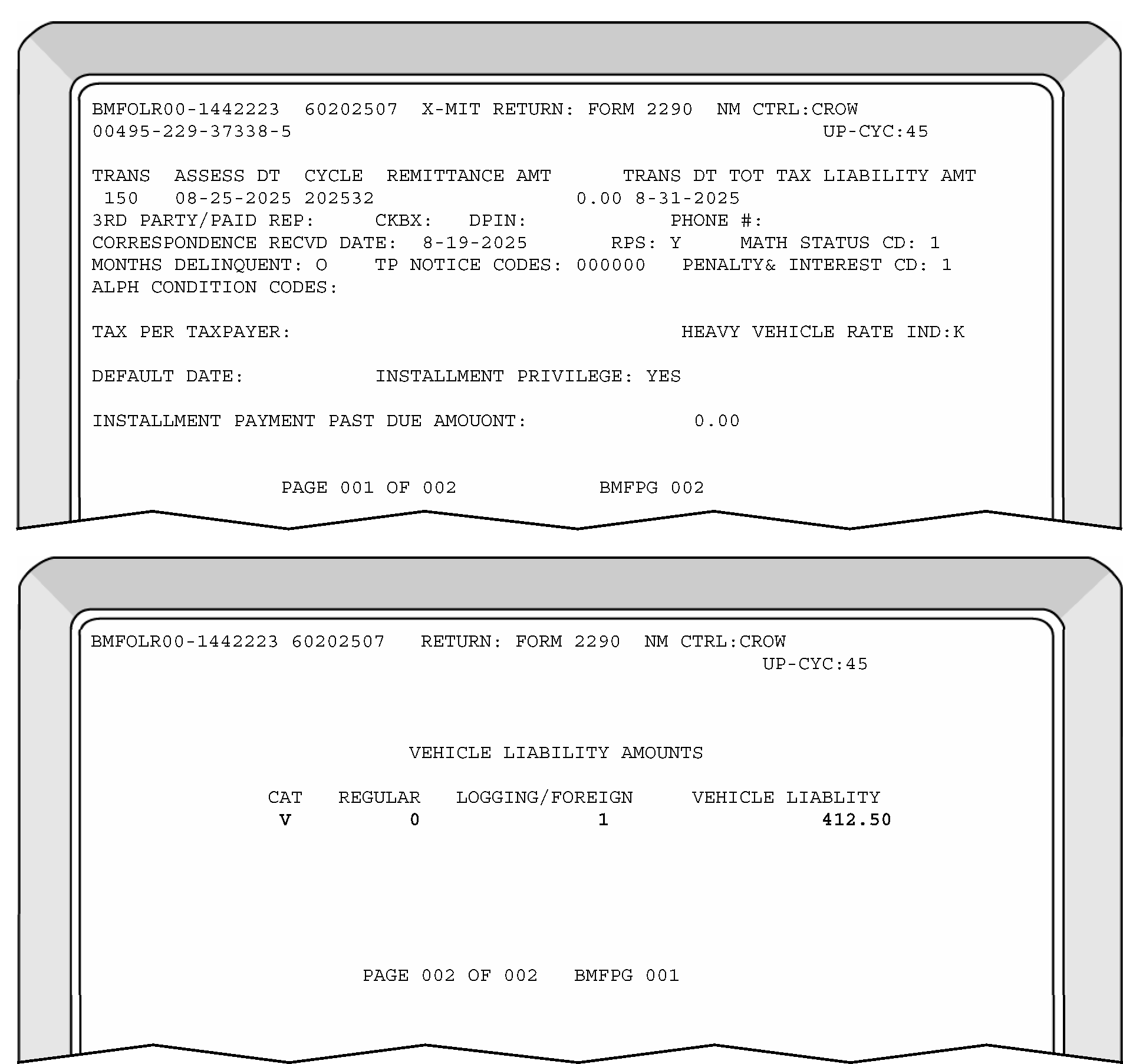
-
Field Displays:
-
NC - Notice Code
-
01TXP - Tax Period
-
01ATA - Additional Tax Amount
-
01TTT - Total Tax Taxpayer
-
>>>> - Total Tax Computer
-
01CRN - CRN365 Credit
-
01BD - Balance Due
-
>>>> - Balance Due Computer
-
Section 02 Present/Not Present
-
Section 03 Present/Not Present
-
-
Invalid Conditions: There is a difference of ≡ ≡ ≡ ≡ ≡ ≡ ≡ ≡ ≡ ≡ between the balance due computer and balance due taxpayer or if the balance due field is a negative.
-
Correction Procedures:
-
Refer to the return to verify that Field 01BD is correct.
-
Correct all misplaced entries, coding and transcription errors.
-
Check for math errors on the return such as the tax for a specific category being computed incorrectly or Line 5 subtracted from Line 4 incorrectly, etc.
-
If line 6 is a credit because line 5 is more than line 4, send TPNC 14.
Note:
If a Form 8849 attached to Form 2290 is being used to support Line 5 of the Form 2290 and the Line 5 credit is greater than the total tax reflected on Line 4, reduce the Line 5 credit to equal the amount of tax on Line 4. Forward a copy of the entire return and Form 8849 to the Centralized Specialty Tax Operations (CSTO). Notate on the original return that a copy was sent to CEO.
-
If a math error is present, send TPNC 01, 02, 03, 05, 06, 14, or 90.
TPNC Explanation 01 We found the computation of tax was not correct. 02 The tax rate used to calculate the amount of tax due per individual vehicle category on page two is incorrect. 03 Partial year vehicles reported on returns covering multiple tax periods are taxable for both the partial year tax period and for the current annual tax period. 05 The amount of total tax due reported on page two does not equal the amount of tax reported on page one. 06 Only the additional vehicles acquired after the beginning of the fiscal year are to be reported on supplemental returns. 14 We found an error in the computation of your total tax minus your credits on Part 1, line 6. To receive any remaining credit or refund, you may use Form 8849, Claim for Refund of Excise Taxes.
-
-
Fields Displayed:
01TXP Tax Period
-
Invalid Conditions: Error Code 999 will be generated for all returns that are in error status at the end of the processing year.
-
Correction Procedures: The only correction procedure required for this error code is for the tax examiner to transmit the record. The system will re-validate the record and set error codes based on current year's programs.
-
These procedures are used when the suspense time is up on the Workable Suspense Inventory and no response is received.
-
Always enter a CCC 3.
-
Always enter CCC X on overpaid Form 720 returns.
-
See tables below:
Form 720 No Response Decision Chart
If requested: Then: Missing signature on overpaid return, Enter CCCs X and 3 and continue processing. Missing signature on balance due or even return, Enter CCC 3 and continue processing without a signature. Tax period and it cannot be determined, Enter current year and quarter being processed and CCC 3 and continue processing. Explanation of the multiple tax periods, -
Process all liability and remittances to the earliest period shown.
-
Photocopy the return and notate "Photocopy do not process" .
-
Prepare Form 4227 and indicate "Multiple Period Case" .
-
Route copy of return, all research and correspondence to Centralized Excise Operations at:
Internal Revenue Service
Stop 5701G
7940 Kentucky Dr
Florence, KY 41042
Schedule A, Enter CCC 3 and continue processing. Schedule C, -
Remove the amount from Field 0104.
-
Delete CCC C if present.
-
Enter CCC 3.
-
Continue processing.
-
Send appropriate TPNC if applicable.
Form 6627 - Math discrepancy -
Enter CCC 3 and continue processing.
-
Input the larger amount of either Form 6627 or the corresponding line in Part I of Form 720.
-
Send appropriate TPNC if applicable.
Form 2290 No Response Decision Chart
If requested: Then: Line 5 documentation, Send TPNC 90 with Math Error Code 86 to tell the taxpayer that his line 5 credit was not allowed because they did not provide the necessary documentation. Delete the entry on Line 5. Missing Signature, Do not return Schedule 1. Tax Period, Enter the current tax period and continue processing. Multiple Tax Periods, -
Process all liability and remittance to the earliest tax period shown and notate on the side of the return TYMM.
-
Photocopy the front of the return and notate "Photocopy, do not process" .
-
Prepare Form 4227 and indicate "Multiple Period Return No Reply to Correspondence" .
-
Route photocopy of return, all research and correspondence to Centralized Specialty Tax Operations (CSTO) at:
Internal Revenue Service
Stop 5701G
7940 Kentucky Dr
Florence, KY 41042
Number of vehicles disagrees with tax on page 2, Column (3), Perfect Schedule 1 for the number of vehicles that remittance was received for and cross off the ones that are not paid. (e.g., taxpayer sends payment for two trucks yet marks three on Schedule 1 and page 2, column 3. Cross off one truck on Schedule 1, and on page 2 disallowing the truck with no remittance.) -
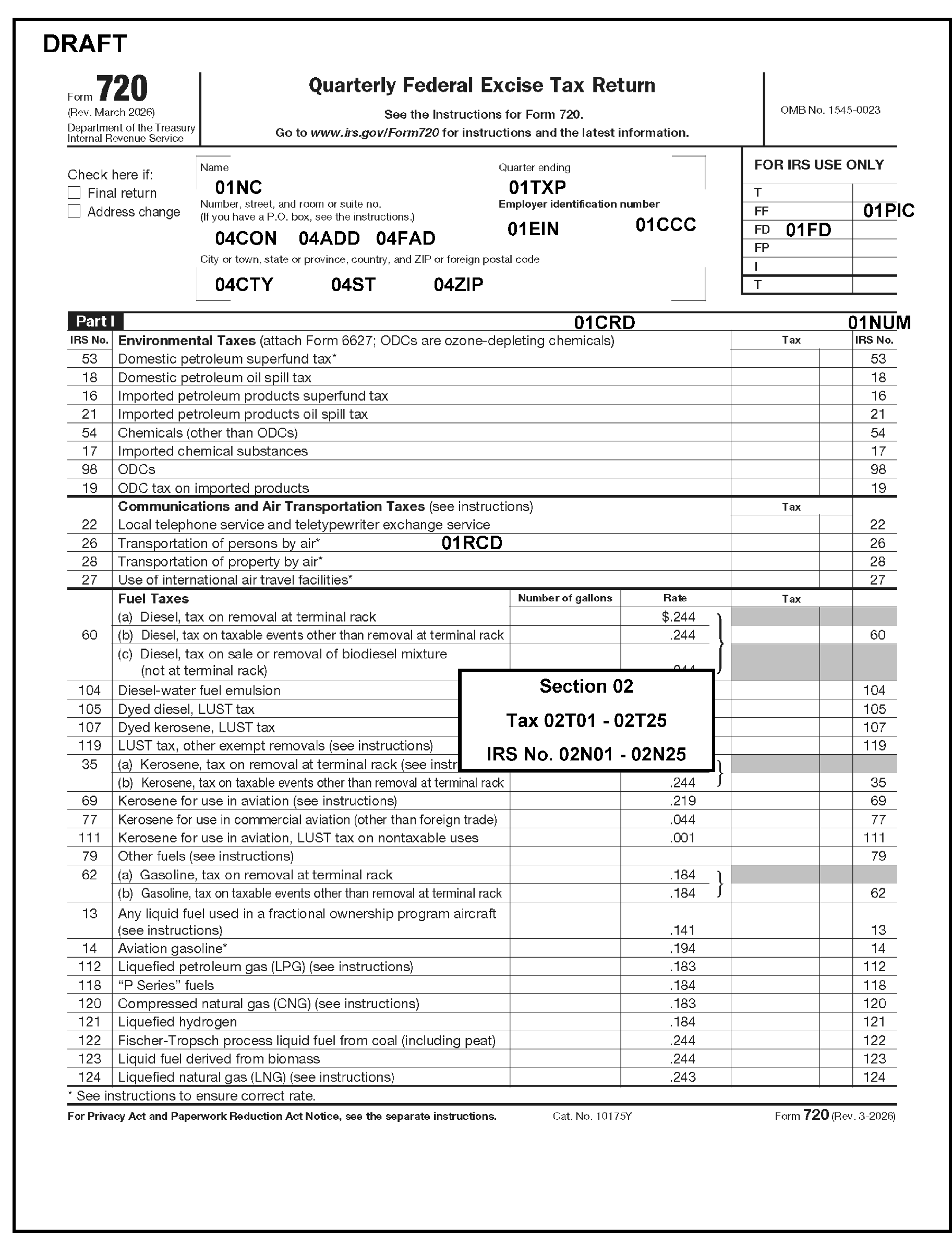
Please click here for the text description of the image.
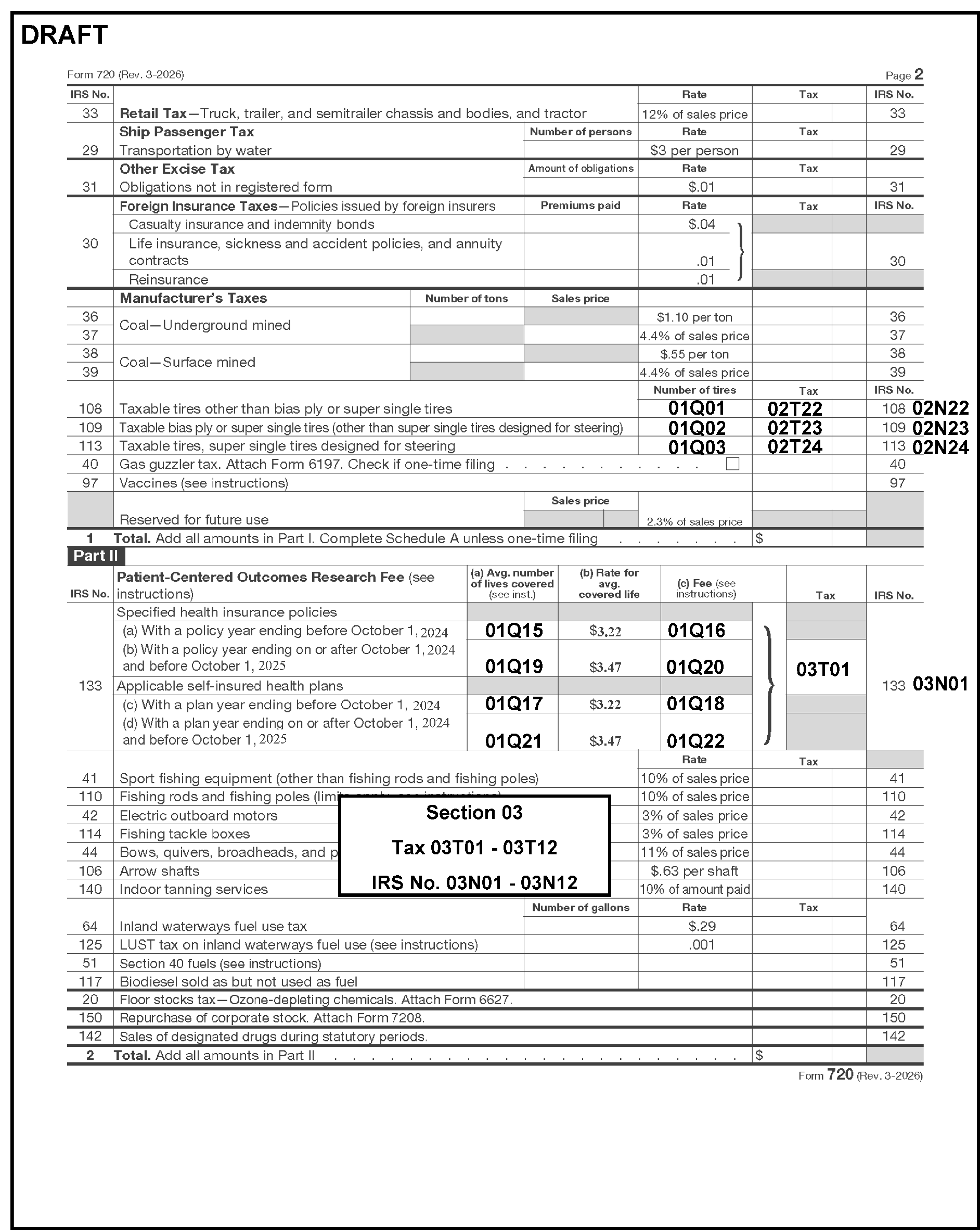
Please click here for the text description of the image.
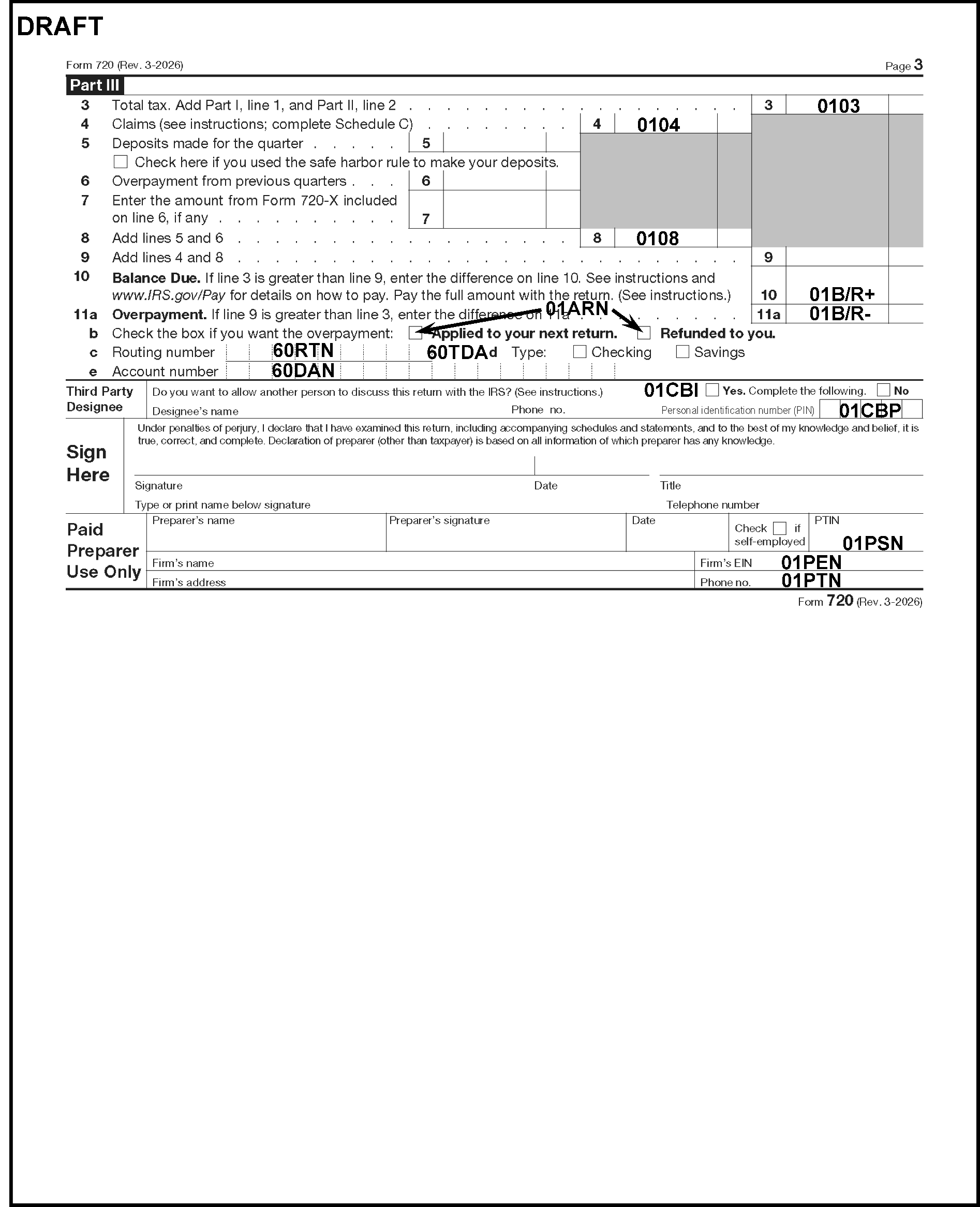
Please click here for the text description of the image.
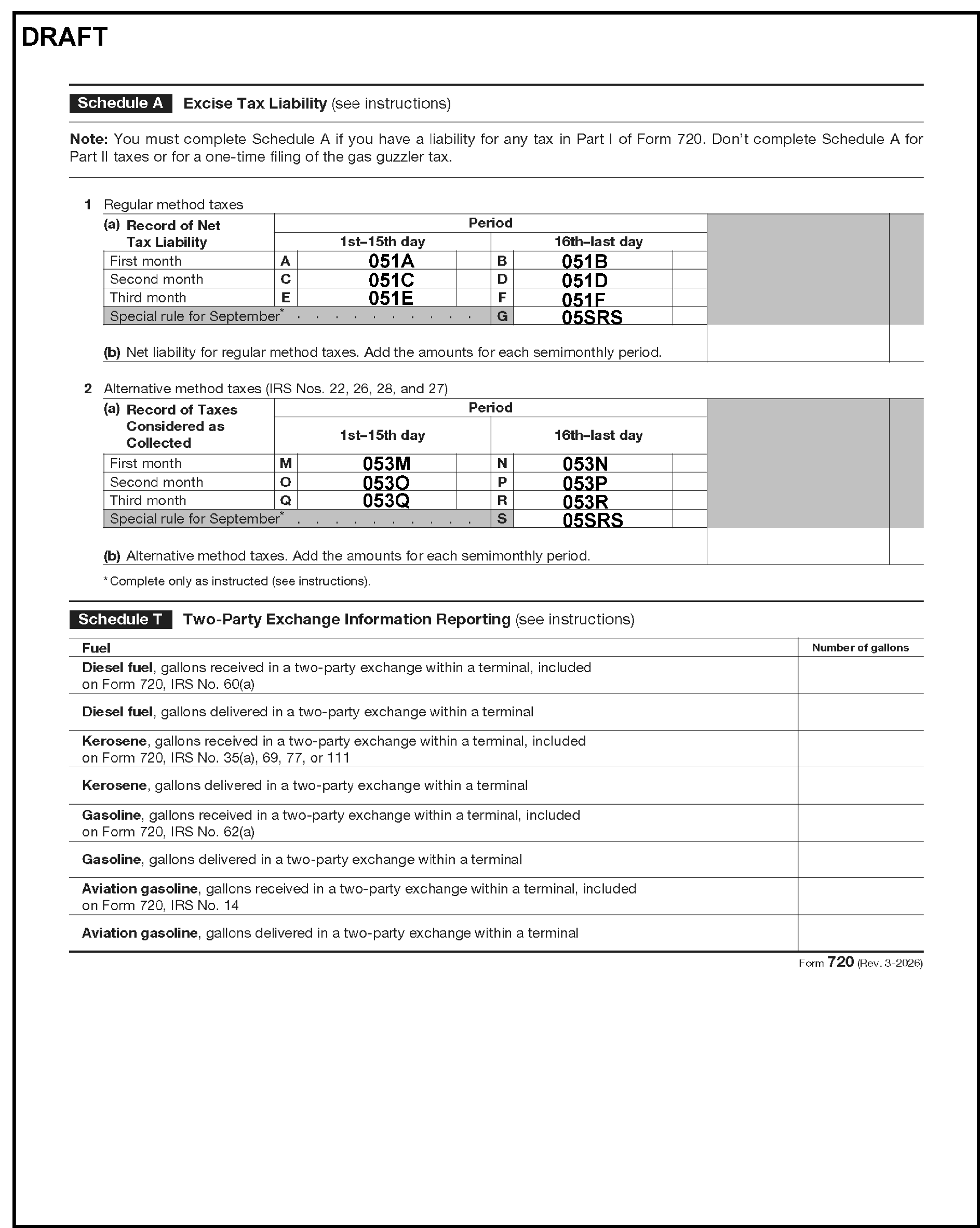
Please click here for the text description of the image.
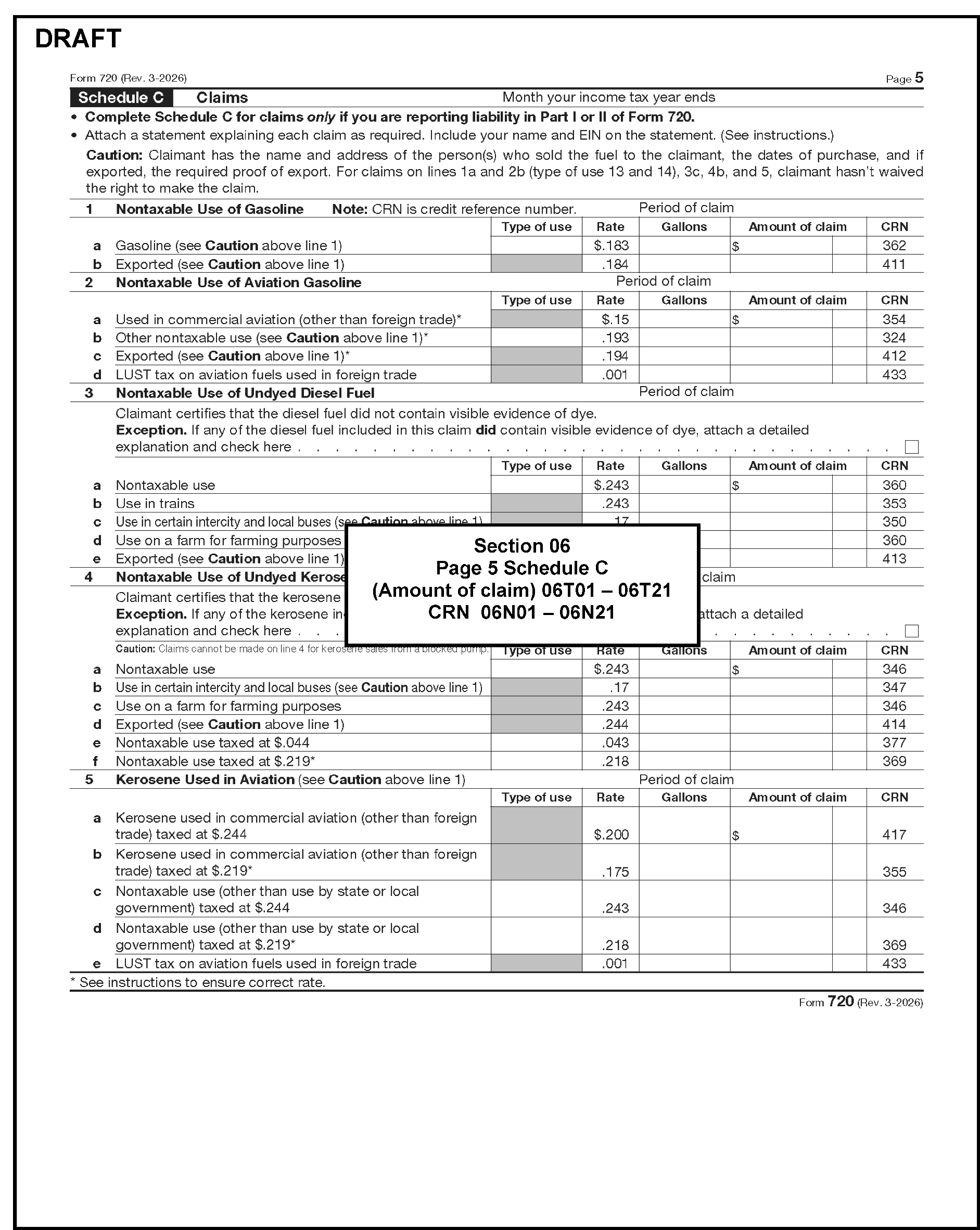
Please click here for the text description of the image.
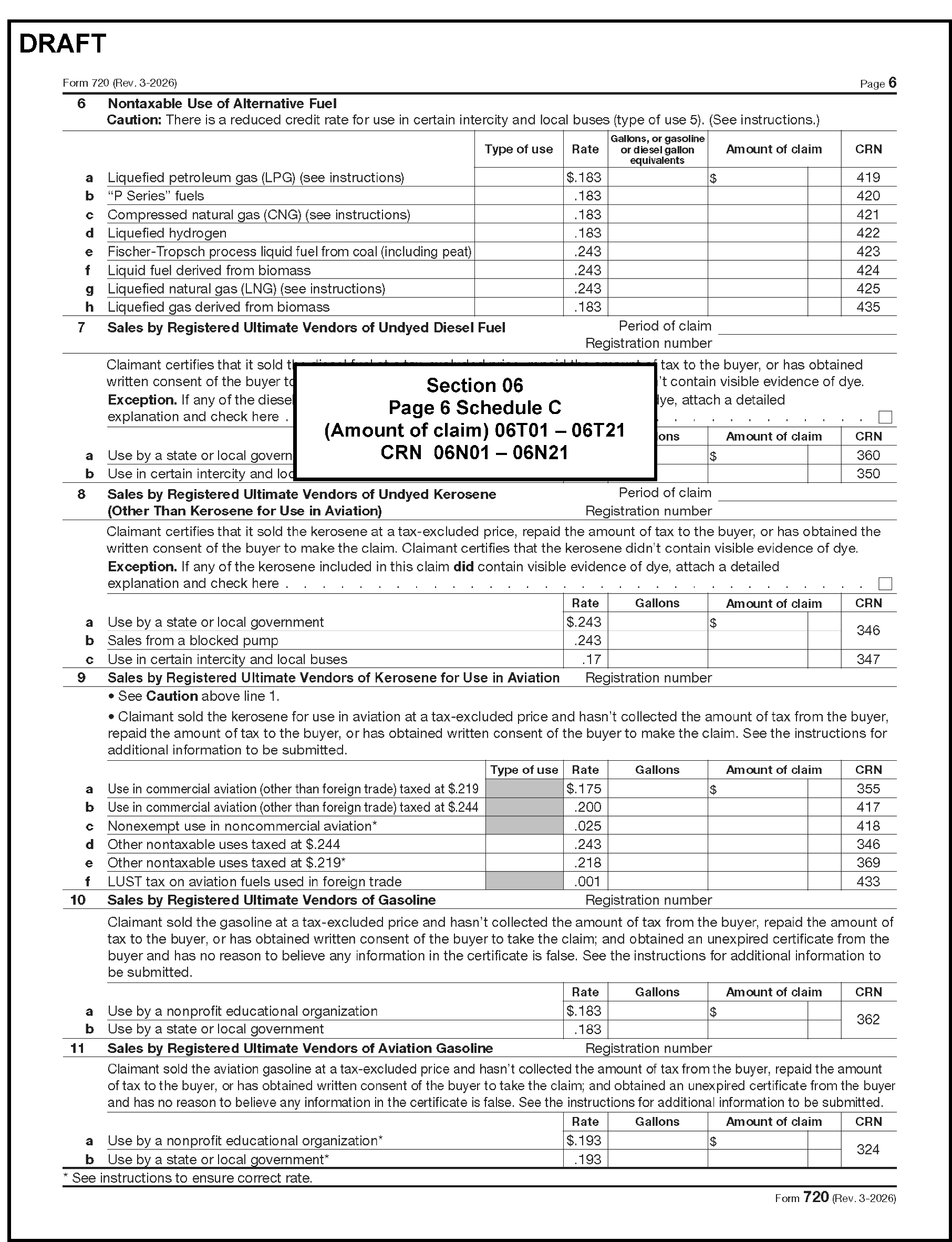
Please click here for the text description of the image.
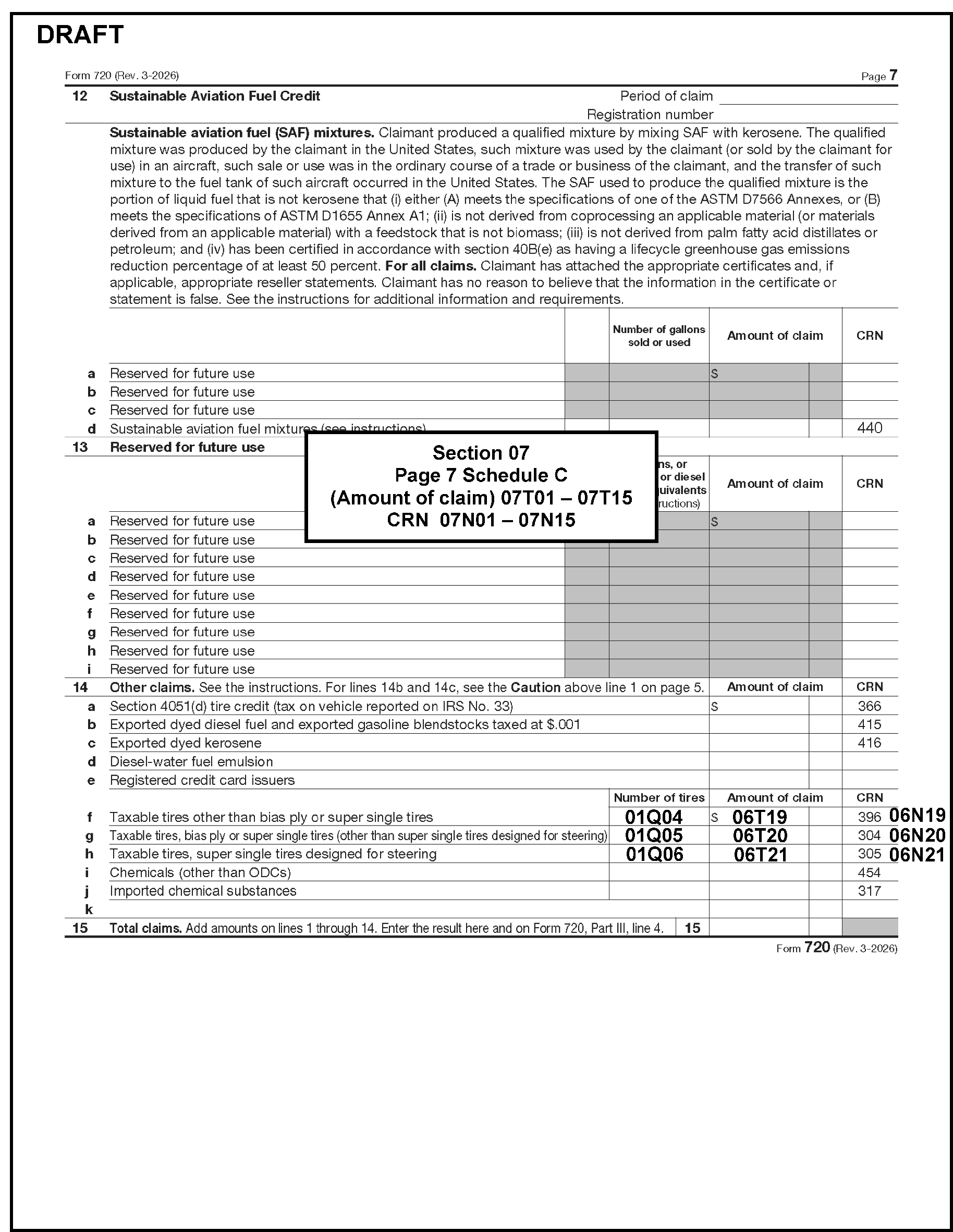
Please click here for the text description of the image.
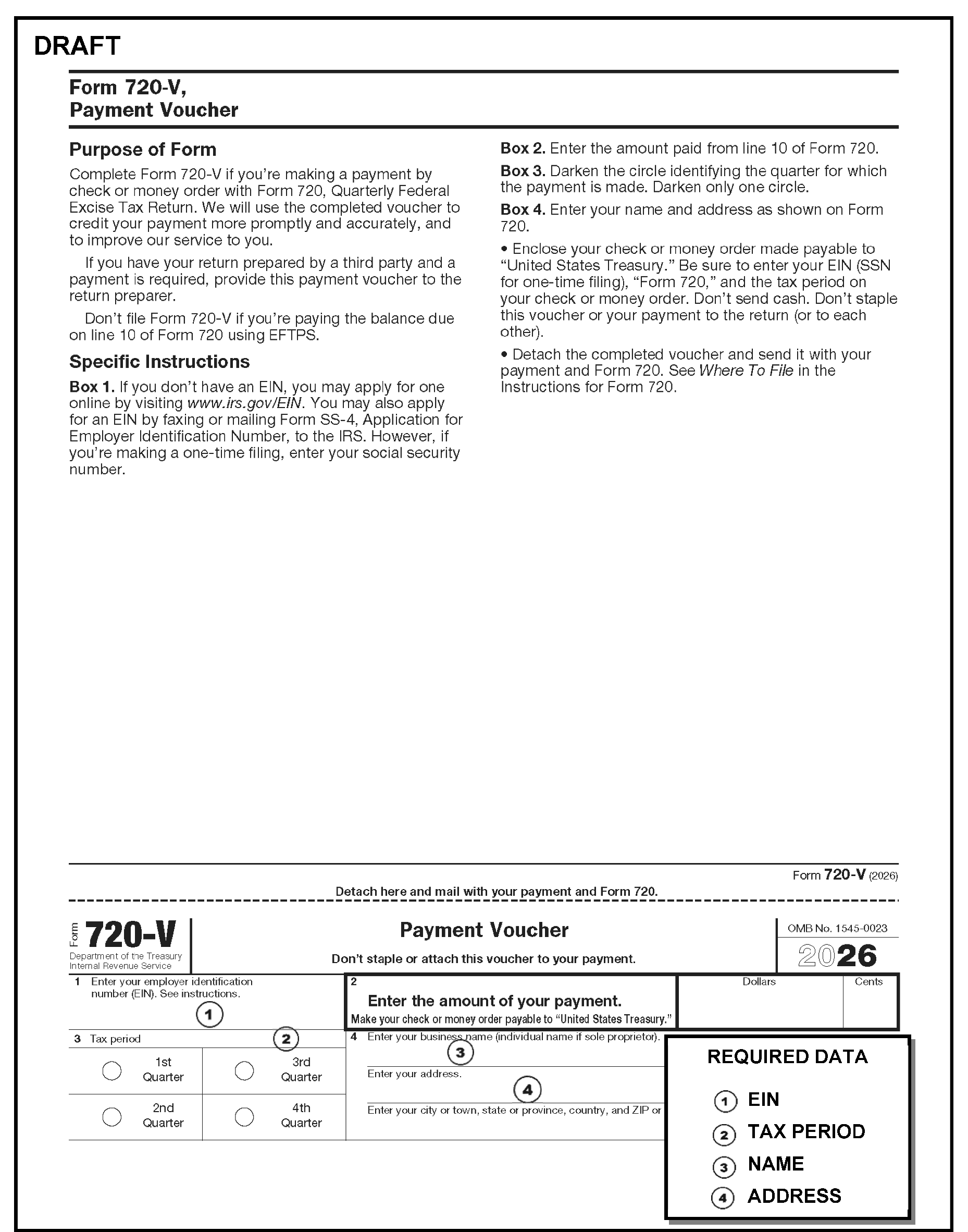
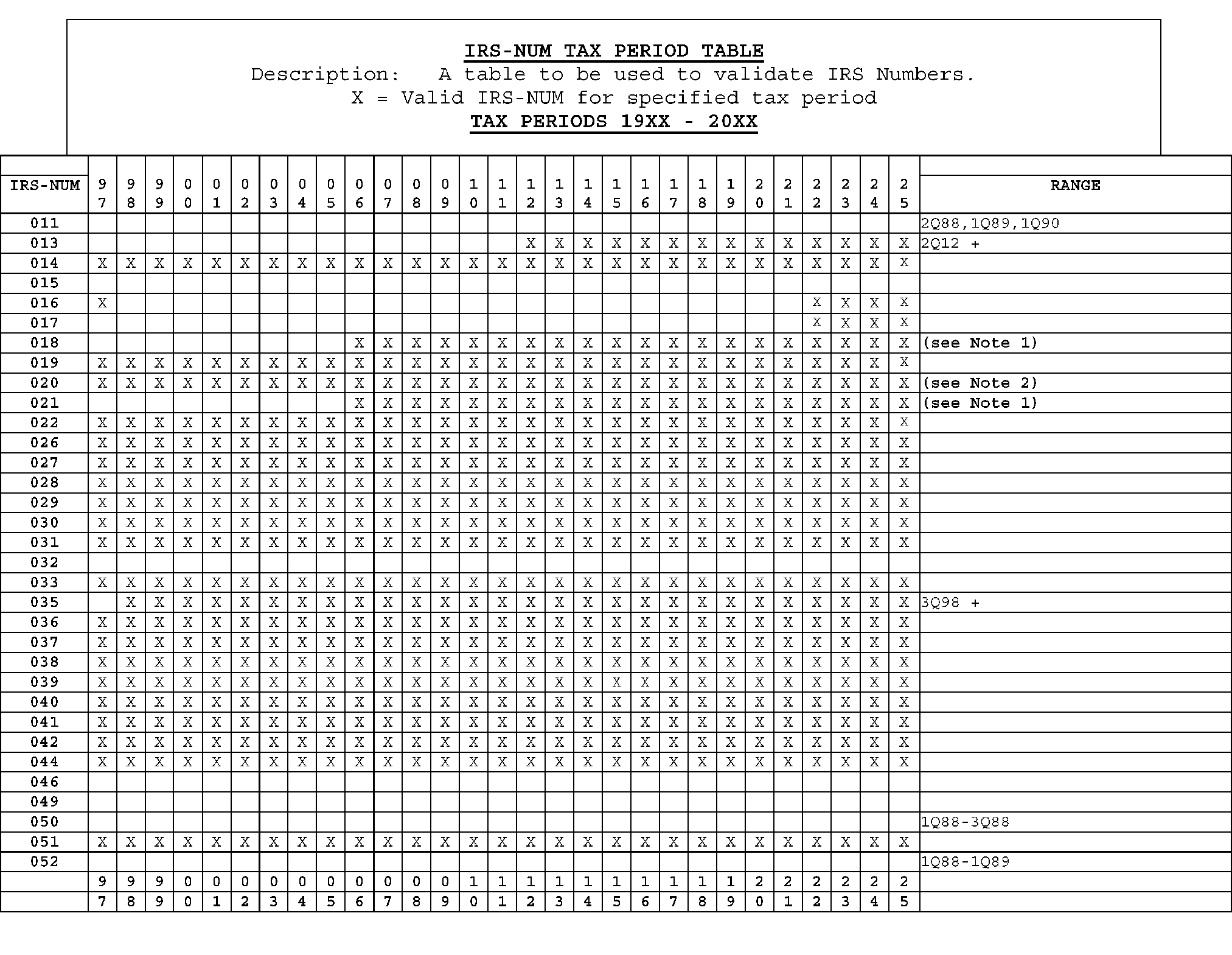
Please click here for the text description of the image.
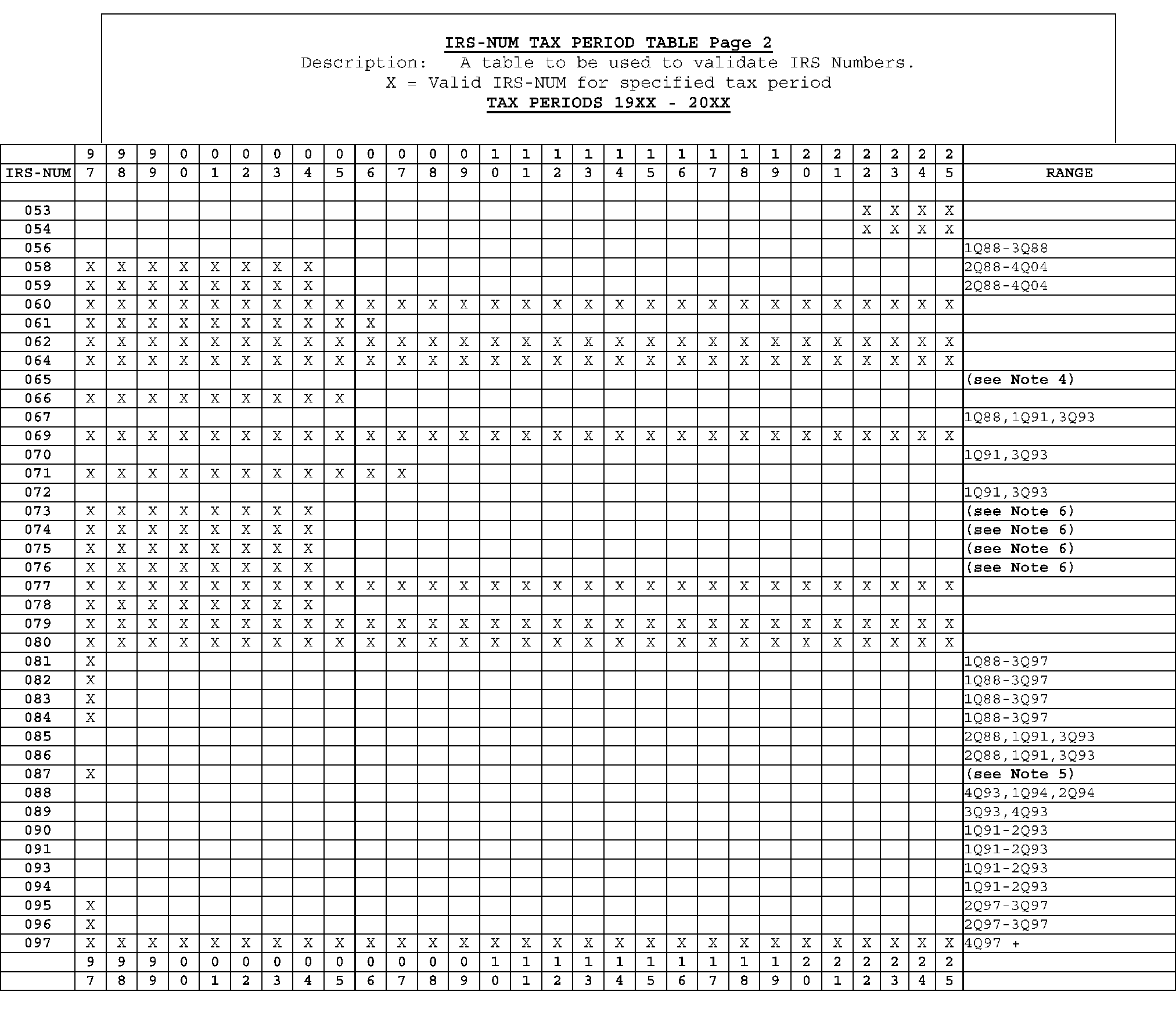
Please click here for the text description of the image.
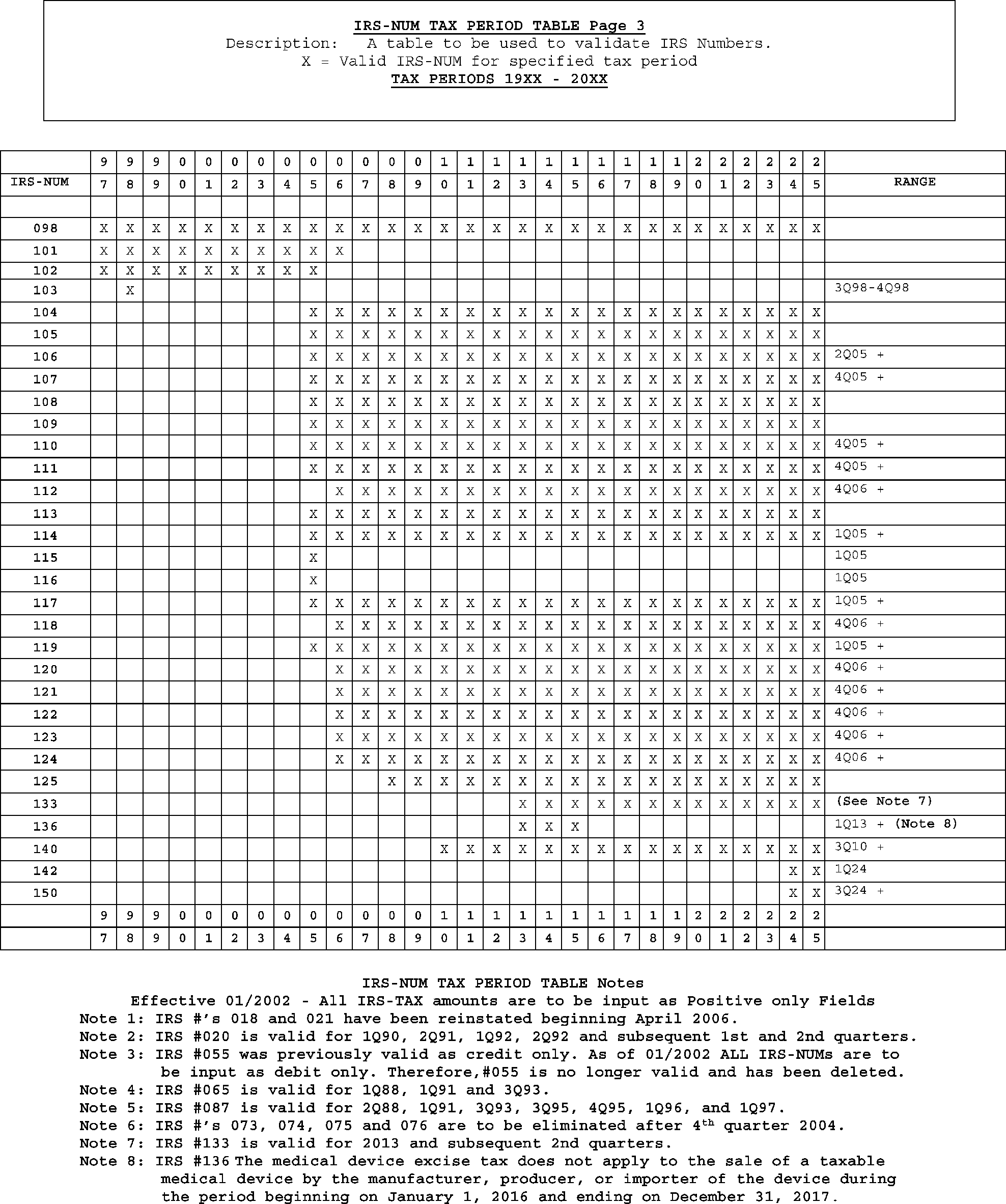
Please click here for the text description of the image.
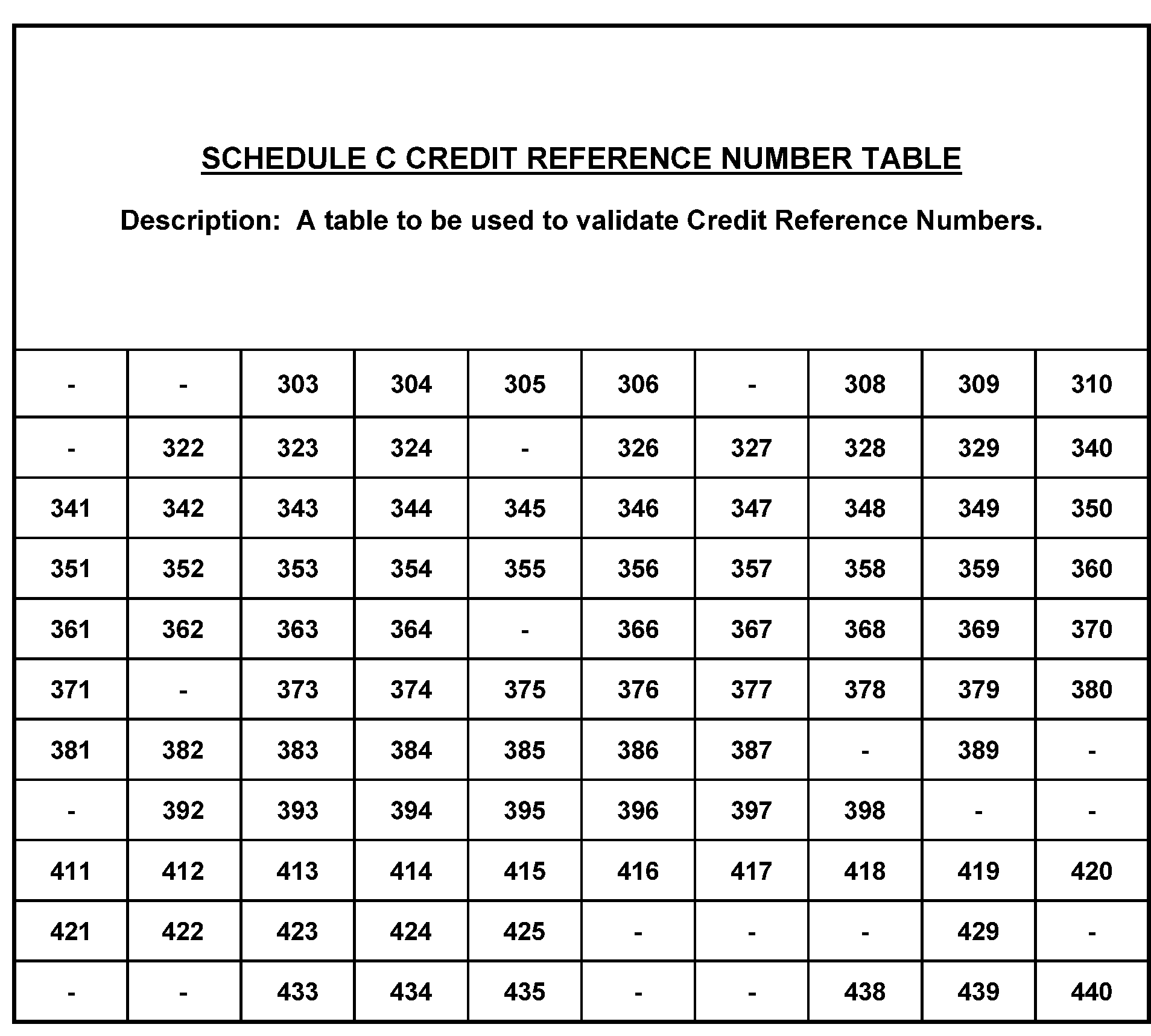
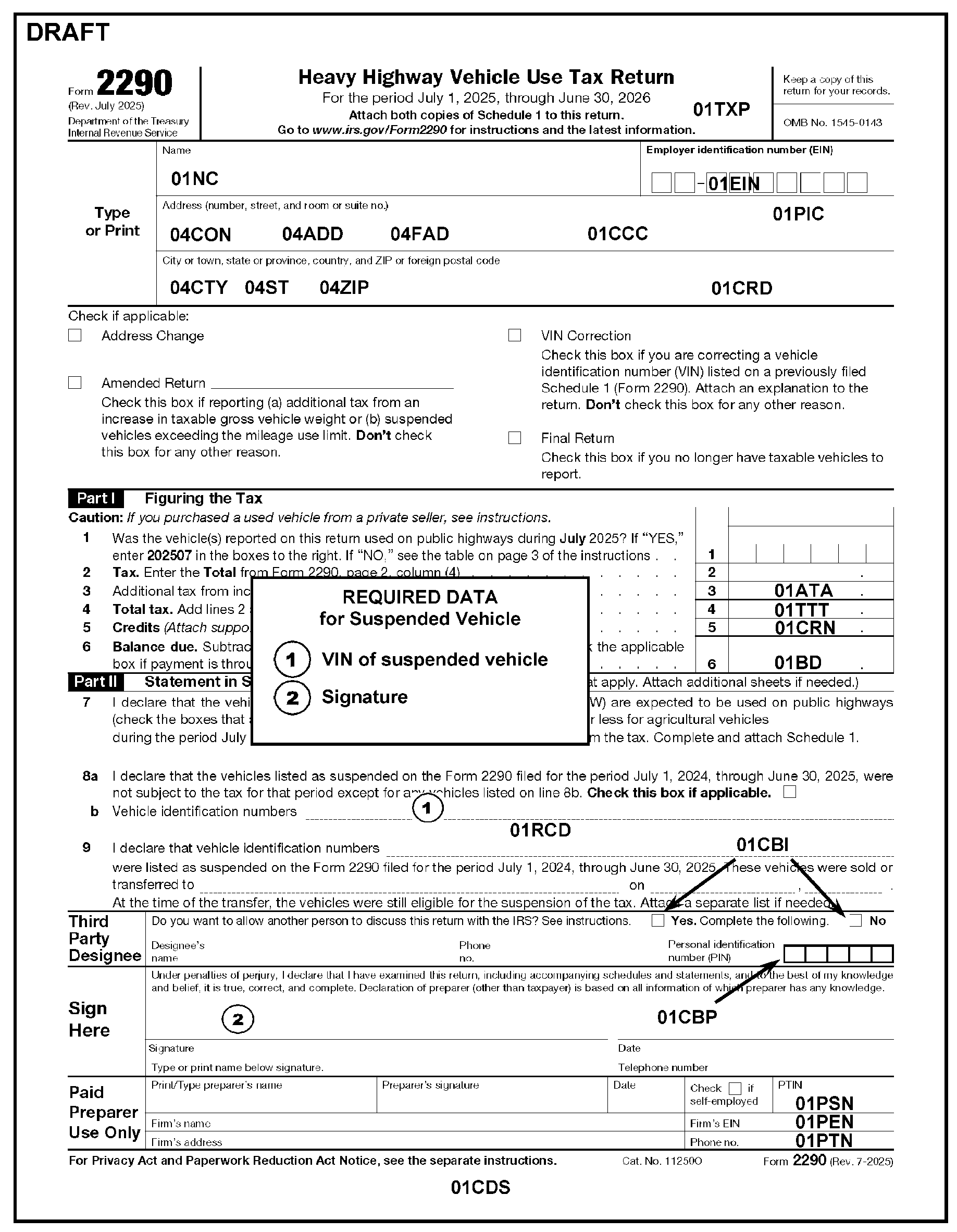
Please click here for the text description of the image.
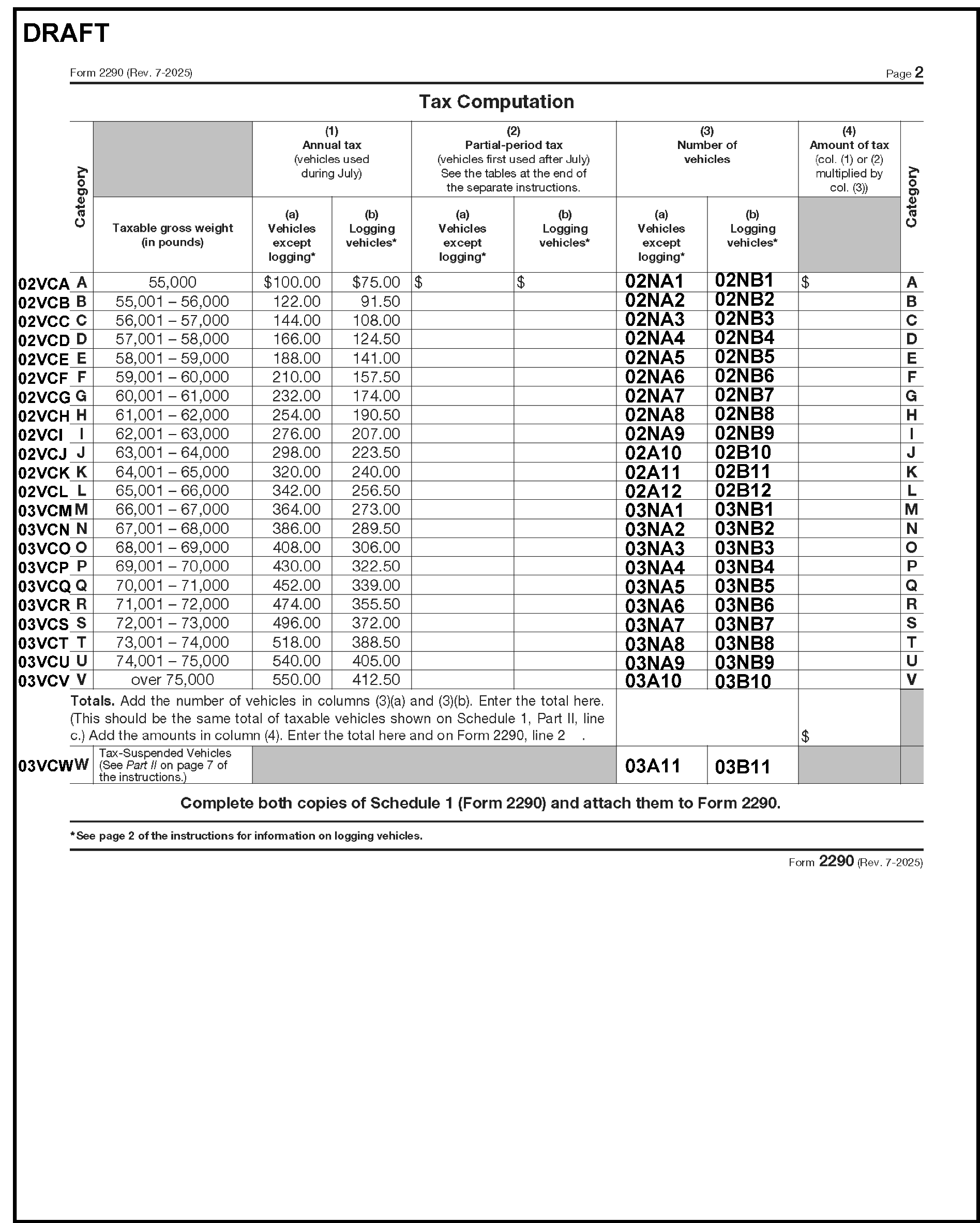
Please click here for the text description of the image.
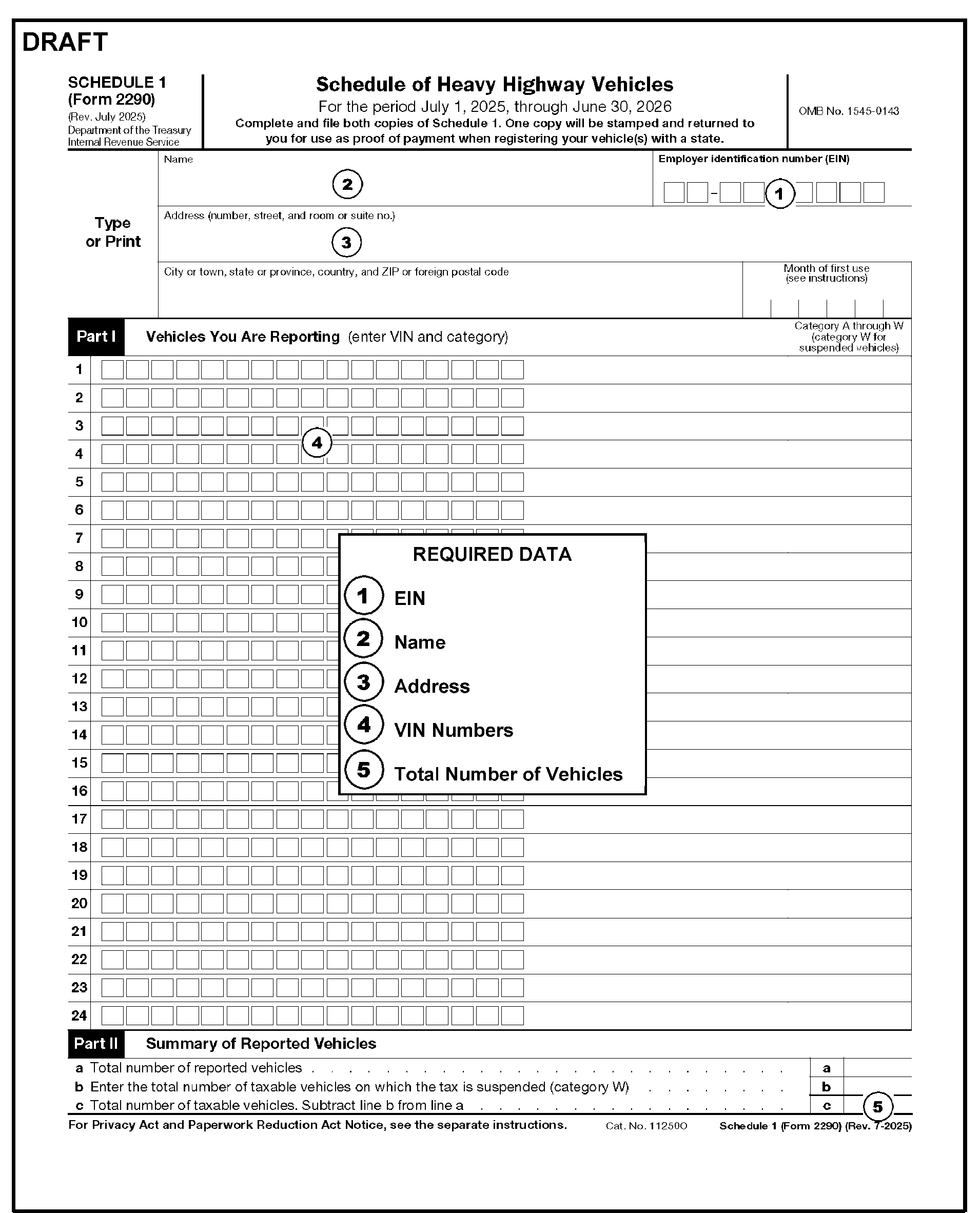
Please click here for the text description of the image.
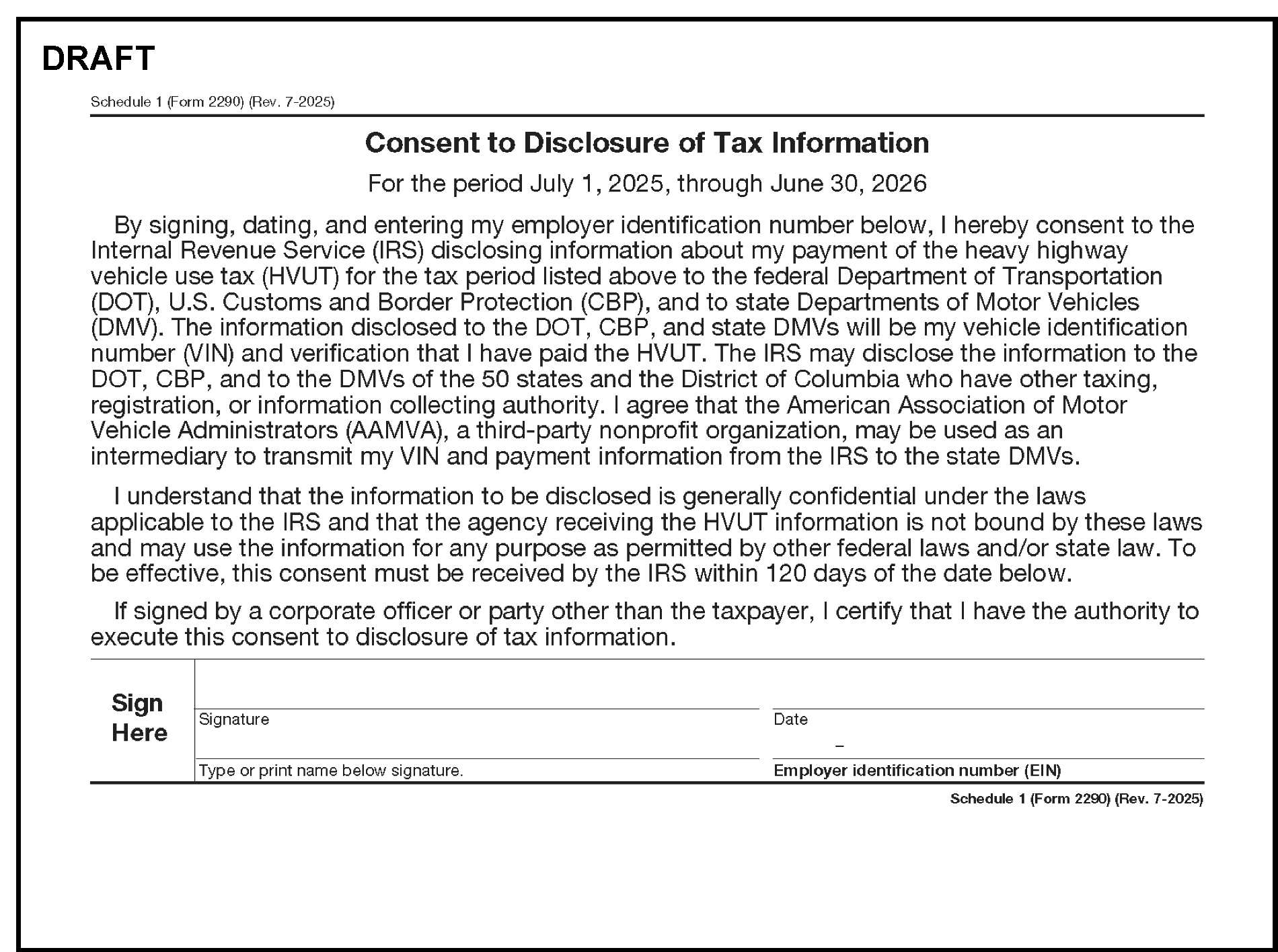
Please click here for the text description of the image.
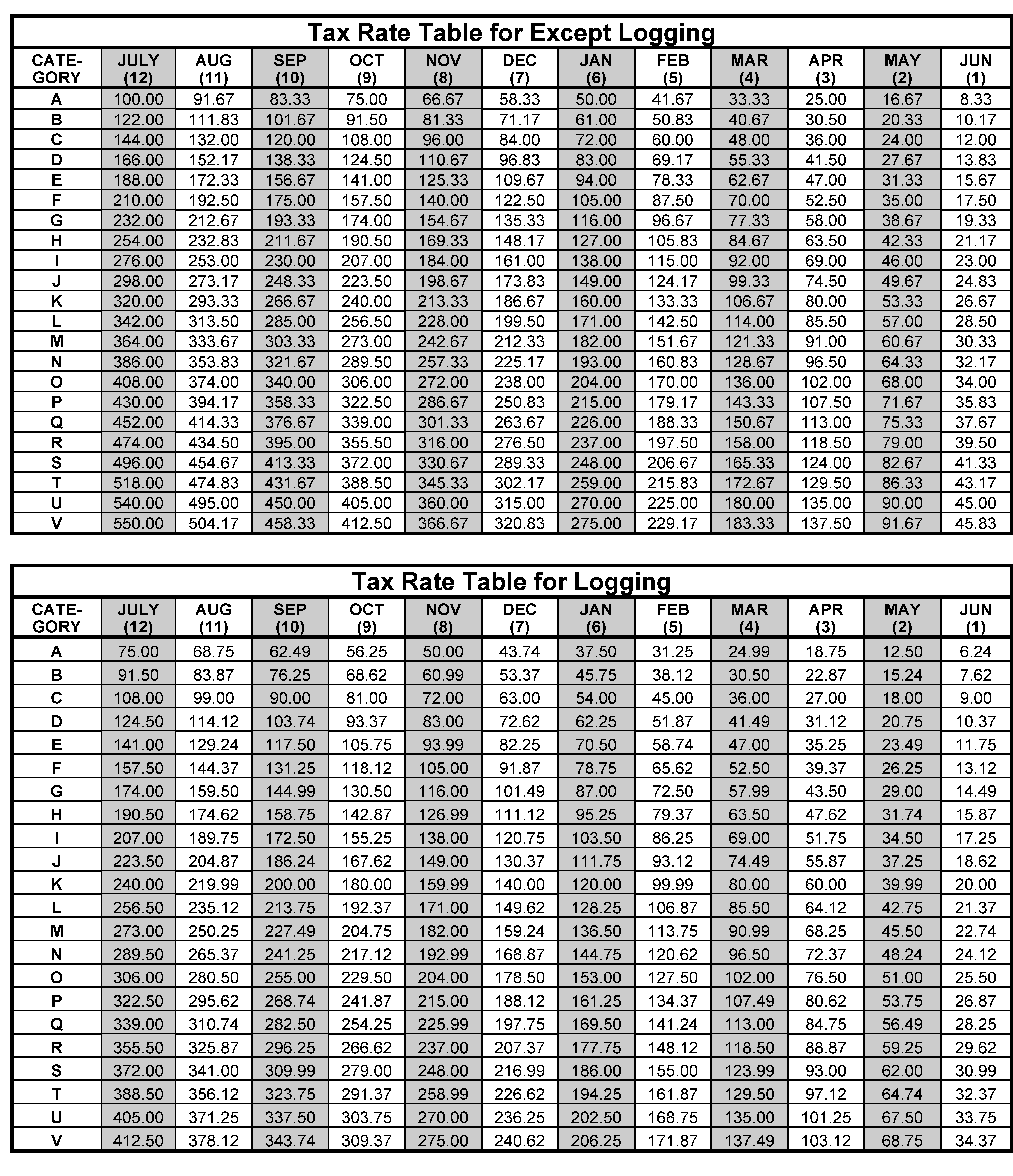
Please click here for the text description of the image.
| Vehicle First Used on Public Highway In: | Return Due Date: |
|---|---|
| July | August 31 |
| August | September 30 |
| September | October 31 |
| October | November 30 |
| November | December 31 |
| December | January 31 |
| January | February 28 (or 29, if leap year) |
| February | March 31 |
| March | April 30 |
| April | May 31 |
| May | June 30 |
| June | July 31 |
-
If the due date for a return is a Saturday, Sunday or holiday, the return is due on the next day that is not a weekend or holiday.
| Action Code | Description | Workday Suspense Period | Functions Used In: CE = Code and Edit EC = Error Correction S = Suspense Correction GEN = Computer Generated |
|---|---|---|---|
| 001 | Input Document | 0 | GEN |
| 210 | Employee Plan Master File (EPMF) Correspondence | 60 | EC, S |
| 211 | First Correspondence (Missing Information and/or Signature (Refund Returns)) | 40 | CE, EC, S |
| 212 | Second Correspondence | 25 | CE, EC, S |
| 213 | Correspondence to Other Than Taxpayer | 40 | CE, EC, S |
| 215 | First International Correspondence (Missing Information and/or Signature (Refund Returns)) | 45 | CE, EC, S |
| 216 | Second International Correspondence | 45 | CE, EC, S |
| 225 | Correspondence (Signature Only - Balance Due/Zero Balance/Credit Elect Returns) | 40 | CE, EC, S |
| 226 | International Correspondence (Signature Only - Balance Due/Zero Balance/Credit Elect Returns) | 40 | CE, EC, S |
| 300 | Examination (Fuel Tax Credit) | 10 | CE, EC, S |
| 310 | Statute Control | 10 | CE, EC, S |
| 320 | Entity Control | 10 | CE, EC, S |
| 331 | Frivolous Review | 3 | CE, EC |
| 332 | Questionable Refund Detection Team (QRDT) Review | 3 | CE, EC |
| 333 | Prompt Audit | 10 | CE, EC, S |
| 334 | Joint Committee | 10 | CE, EC, S |
| 335 | Frivolous Case | 10 | CE, EC, S |
| 336 | QRDT Case | 10 | CE, EC, S |
| 337 | Other CID | 10 | CE, EC, S |
| 341 | Manual Refund | 10 | CE, EC, S |
| 342 | Credit Verification | 10 | CE, EC, S |
| 343 | Other Accounting | 10 | CE, EC, S |
| 344 | Manual Refund (ERS) | 0 | EC |
| 351 | TIN Research | 0 | EC, S |
| 352 | Name Research | 3 | CE, EC, S |
| 353 | Address Research | 3 | CE, EC, S |
| 354 | Filing Requirement Research | 3 | CE, EC, S |
| 355 | Other MFTRA Research | 5 | CE, EC, S |
| 360 | Other In-House Research | 10 | CE, EC, S |
| 370 | Examination | 10 | CE, EC, S |
| 410 | Assistance Needed | 0 | EC |
| 420 | Management Suspense A | 5 | CE, EC, S |
| 430 | Management Suspense B | 10 | CE, EC, S |
| 440 | Management Suspense C | 15 | CE, EC, S |
| 450 | Management Suspense D | 20 | CE, EC, S |
| 460 | Management Suspense E | 25 | CE, EC, S |
| 470 | Complex Error Code | 0 | EC |
| 480 | Early Filed Suspense | 150 | CE, EC, S |
| 490 | System Problem | 5 | CE, EC, S |
| 510 | Missing Document | 0 | CE |
| 511 | Missing Document - 1st Suspense | 25 | EC, S |
| 512 | Missing Document - 2nd Suspense | 20 | S |
| 513 | Missing Document - 3rd Suspense | 20 | S |
| 515 | Missing Document - Short Term | 5 | EC, S |
| 550 | Magnetic Tape Return - Check for Attachments | 0 | CE |
| 551 | Magnetic Tape Return - Inconsistent Data | 0 | CE |
| 560 | Electronically filed Form 720 has a value ≥ $1 million | 0 | GEN |
| 570 | Electronically filed Form 720, Part III, Line 4 has a value | 0 | GEN |
| 580 | Electronically filed Form 720 has a value ≥ $1 million and Part III, Line 4 has a value | 0 | GEN |
| 610 | Renumber - Non-Remit | 0 | CE, EC |
| 611 | Renumber - Remit | 0 | CE, EC |
| 620 | Non-Master File/Automated Data Processing (NMF/Non-ADP) | 0 | CE, EC |
| 630 | Re-input | 0 | EC, S |
| 640 | Void | 0 | CE, EC, S |
| 650 | International (ACI) | 0 | CE, EC, S |
| 660 | Data Control Delete | 0 | S |
| 670 | Rejected Missing Document | 0 | S |
| 700 | Duplicate Block DLN | 0 | GEN |
| 711 | Duplicate Document DLN from Code and Edit | 0 | GEN |
| 712 | Duplicate Document from Error Correction | 0 | GEN |
| 713 | Duplicate Document from Unpostables | 0 | GEN |
| 714 | Duplicate Document from Unworkable Suspense | 0 | GEN |
| 715 | Duplicate Document from Workable Suspense | 0 | GEN |
| 800 | NAP Linkage Problem | 2 | EC, S |
| 900 | Unpostable Record | 0 | GEN |
| Potential Frivolous Arguments | Description |
|---|---|
| Alleged Churches/First Amendment | Income from non-religious sources and may claim a vow of poverty. |
| Altered Form | Altering any or all line items with the intent of facilitating non-compliance with the tax laws. |
| Altered Jurat/UCC (Uniform Commercial Code) 1-207 or UCC 1-308 | Return contains income and deductions but the jurat has been altered or stricken. May include reference to UCC 1-207 / UCC 1-308 or a statement that the return was not signed under penalties of perjury. |
| Amended Returns/Form 843 Claim | Amended return or a Form 843 filed to obtain a total refund of all taxes paid in prior years, based on a tax avoidance argument. |
| Challenges to Authority/Due Process | Questions various administrative authorities such as delegation orders, summons authority, privacy act, etc. Argues that they must be afforded a hearing or a trial before taxes can be assessed or before property can be seized. |
| Challenges to Authority/Title 26 or "law" in Other Documents | Argues that Title 26 of the United States Code is not law because it was never enacted as named |
| Disclaimer | Submits a disclaimer stating, "disclaims the liability for the tax due" , making the liability on the return zero. |
| Fifth Amendment | Assertion of the Fifth Amendment right against self-incrimination as a basis for not providing any financial information. |
| Foreign Income | Argues that United States citizens and residents are not subject to tax on their wages or other income derived from sources within the United States, as only foreign based income or income received by nonresident aliens and foreign corporations from sources within the United States is taxable. |
| IRS is a Private Organization/Collects Tribute, Not Taxes | Argues that the IRS is an entity named the Internal Revenue and Tax Service, Inc., which was incorporated in Delaware in 1933, it is a collection agency for the Federal Reserve Bank or is part of the United Nations and is clandestinely leading the tax paying public into a "new world order." |
| Not a Person | Argues that a taxpayer is not a "person" within the meaning of IRC 7701(a)(14). |
| Obscene, Vulgar, Harassing | Submits documents or other materials indicating that non-filing is due to dissatisfaction with tax policies or taxation in general. Often, this argument is expressed with obscene, vulgar, or crude language and characters in an extremely demeaning manner. |
| Protest Against Government Action/Inaction | Argues that refusal to file or pay is justified because they disagree with government policies or spending plans. |
| Sixteenth Amendment | Argues the Sixteenth Amendment was not properly ratified and therefore the federal government does not have the legal authority to collect an income tax without apportionment. |
| Straw Men | Argues the government has created an entity separate and distinct from the taxpayer. A "straw man" and any tax obligations are exclusively those of the "straw man" . |
| Taxes are Voluntary/Law Does Not Require | Submits a return, amended return or correspondence that argues income taxes are voluntary. |
| U.S. v. Long | Submits a return with zero money amounts much the same as the Zero Return category and U.S. V. Long is referenced. See NOTE in Zero returns below. |
| Unsigned Returns | The individual completes a return but fails to sign, a statement indicating disagreement with the tax system is attached or added to the return. |
| Valuation | Income is not taxable because of the declining fair market value of the dollar, because the dollar is not backed by gold/silver, because the value of services is offset by the value of the labor (barter income), etc. |
| Zero Returns | Submits a return with zero money amounts. A statement is attached claiming there is no section of the Internal Revenue Code that established an income tax liability. The statement may also contain arguments regarding the definition of income. |
| Other | All others including those listed in Notice 2010-33. This category includes non-filer accounts resulting from initial compliance check such as cross reference TINs. |
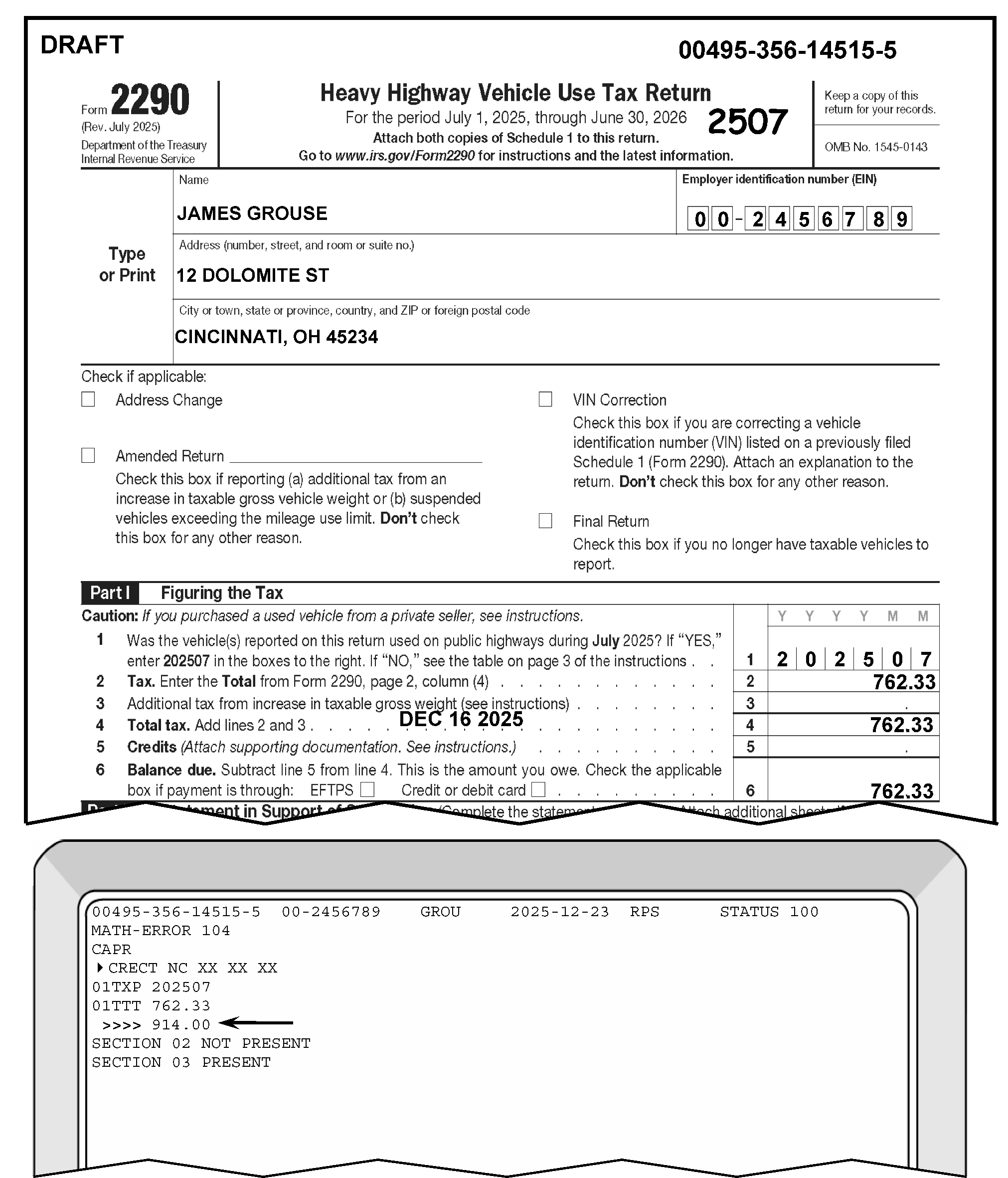
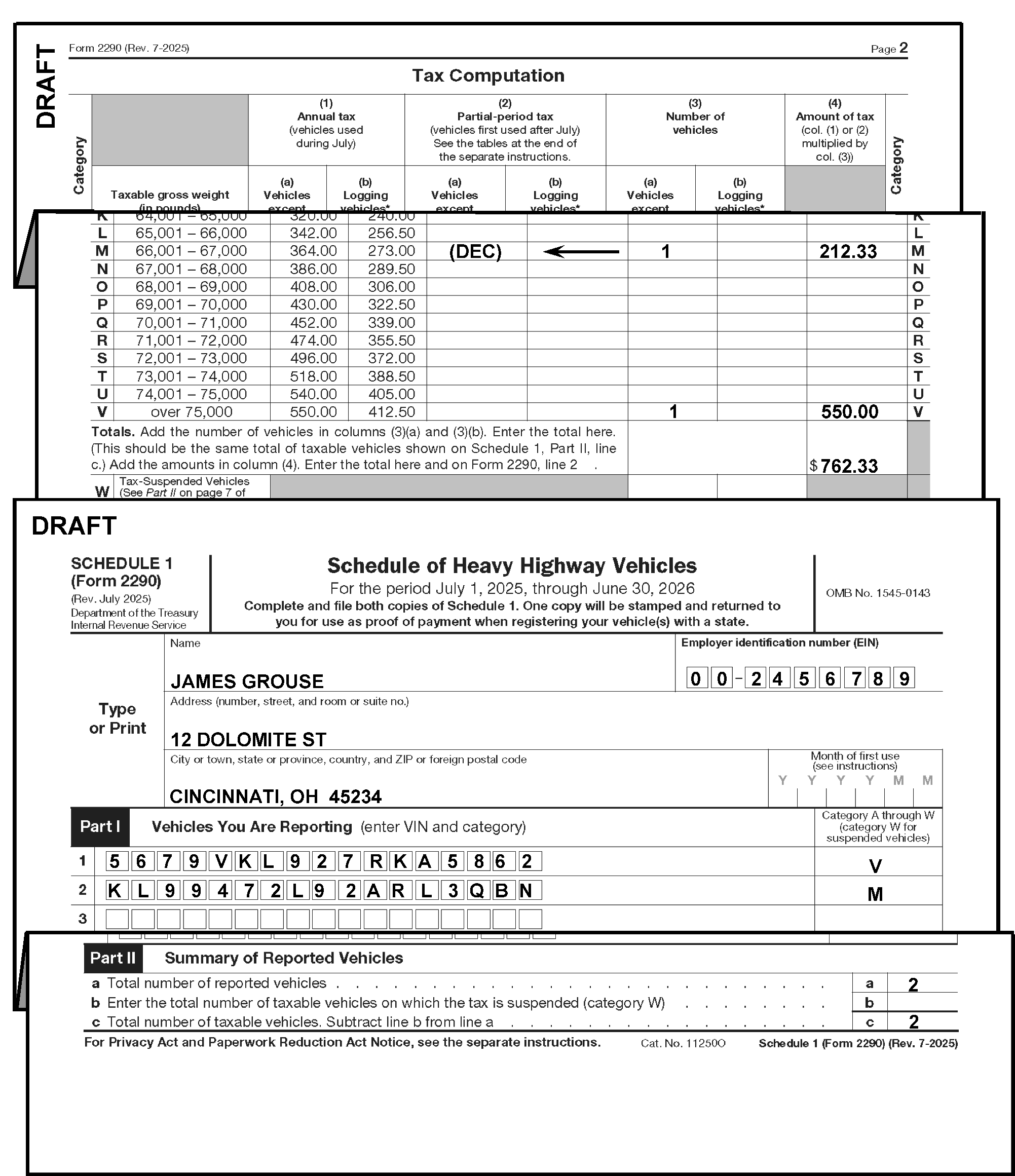
American Samoa (AS)
| American Samoa (AS) City | American Samoa (AS) ZIP Code |
|---|---|
| Faga'itua | 96799 |
| Leone | 96799 |
| Olosega Manua' | 96799 |
| Pago Pago | 96799 |
Federated States of Micronesia (FM)
| Federated States of Micronesia (FM) City | Federated States of Micronesia (FM) ZIP Code |
|---|---|
| Chuuk | 96942 |
| Kosrae | 96944 |
| Pohnpei | 96941 |
| Yap | 96943 |
Guam (GU)
| Guam (GU) City | Guam (GU) ZIP Code |
|---|---|
| Agana | 96910 |
| Inarajan | 96917 |
| Merizo | 96916 |
| Tamuning | 96931 |
| Umatac | 96915 |
| Yona | 96915 |
Marshall Islands (MH)
| Marshall Islands (MH) City | Marshall Islands (MH) ZIP Code |
|---|---|
| Ebeye | 96970 |
| Majuro | 96960 |
Northern Mariana Islands (MP)
| Northern Marianna Islands (MP) City | Northern Marianna Islands (MP) ZIP Code |
|---|---|
| Capitol Hill | 96950 |
| Rota | 96951 |
| Saipan | 96950 |
| Tinian | 96952 |
Puerto Rico (PR)
| Puerto Rico (PR) City | Puerto Rico (PR) ZIP Code |
|---|---|
| Adjuntas | 00601 |
| Aguada | 00602 |
| Aguadilla | 00603 |
| Aguas Buenas | 00703 |
| Aguirre | 00704 |
| Aibonito | 00705 |
| Anasco | 00610 |
| Angeles | 00611 |
| Arecibo | 00612 |
| Arroyo | 00714 |
| Bajadero | 00616 |
| Barceloneta | 00617 |
| Barranquitas | 00794 |
| Barrio Obrero Station | 00935 |
| Bayamon | 00956 |
| Boqueron | 00622 |
| Cabo Rojo | 00623 |
| Caguas | 00725 |
| Camuy | 00627 |
| Canovanas | 00729 |
| Caparra Heights | 00920 |
| Carolina | 00982 |
| Catano | 00962 |
| Cayey | 00736 |
| Ceiba | 00735 |
| Cerro Gordo | 00754 |
| Ciales | 00638 |
| Cidra | 00739 |
| Coamo | 00769 |
| Comerio | 00782 |
| Condado | 00907 |
| Corozal | 00783 |
| Coto Laurel | 00780 |
| Culebra | 00775 |
| Dorado | 00646 |
| Ensenada | 00647 |
| Esperanza | 00765 |
| Fajardo | 00738 |
| Fernandez Juncos | 00936 |
| Florida | 00650 |
| Fort Buchanan | 00934 |
| Garrachales | 00652 |
| Guanica | 00653 |
| Guayama | 00784 |
| Guayanilla | 00656 |
| Guaynabo | 00965 |
| Gurabo | 00778 |
| Hatillo | 00659 |
| Hato Rey | 00936 |
| Hormigueros | 00660 |
| Humacao | 00791 |
| Isabela | 00662 |
| Jayuya | 00664 |
| Juana Diaz | 00795 |
| Juncos | 00777 |
| La Cumbre | 00926 |
| Lajas | 00667 |
| La Plata | 00786 |
| Lares | 00669 |
| Las Marias | 00670 |
| Las Piedras | 00771 |
| Levittown | 00949 |
| Loiza | 00772 |
| Loiza Street Station | 00936 |
| Luquillo | 00773 |
| Manati | 00674 |
| Maricao | 00606 |
| Maunabo | 00707 |
| Mayaguez | 00680 |
| Mercedita | 00715 |
| Minillas Center | 00936 |
| Moca | 00676 |
| Morovis | 00687 |
| Naguabo | 00718 |
| Naranjito | 00719 |
| Orocovis | 00720 |
| Palmer | 00721 |
| Patillas | 00723 |
| Penuelas | 00624 |
| Ponce | 00731 |
| Puerta de Tierra | 00936 |
| Puerta Real | 00740 |
| Punta Santiago | 00741 |
| Quebradillas | 00678 |
| Ramey | 00603 |
| Rincon | 00677 |
| Rio Blanco | 00744 |
| Rio Grande | 00721 |
| Rio Piedras | 00927 |
| Rosario | 00636 |
| Sabana Grande | 00637 |
| Sabana Hoyos | 00688 |
| Sabana Seca | 00952 |
| Saint Just | 00978 |
| Salinas | 00751 |
| San Antonio | 00690 |
| San Francisco | 00927 |
| San German | 00683 |
| San Juan | 00936 |
| San Lorenzo | 00754 |
| San Sebastian | 00685 |
| Santa Isabel | 00757 |
| Santurce | 00936 |
| Toa Alta | 00953 |
| Toa Baja | 00949 |
| Trujillo Alto | 00976 |
| University | 00936 |
| Utuado | 00641 |
| Vega Alta | 00692 |
| Vega Baja (Box 1 - 9049) | 00694 |
| Vieques | 00765 |
| Villalba | 00766 |
| Yabucoa | 00767 |
| Yauco | 00698 |
Australia State
| Australia State | Abbreviation |
|---|---|
| Australian Capital Territory | ACT |
| New South Wales | NSW |
| Northern Territory | NT |
| Queensland | QLD |
| South Australia | SA |
| Tasmania | TAS |
| Victoria | VIC |
| Western Australia | WA |
Brazil State
| Brazil State | Abbreviation |
|---|---|
| Acre | AC |
| Alagoas | AL |
| Amapa | AP |
| Amazonas | AM |
| Bahia | BA |
| Ceara | CE |
| Distrito Federal | DF |
| Espirito Santo | ES |
| Goias | GO |
| Maranhao | MA |
| Mato Grasso | MT |
| Mato Grosso do Sul | MS |
| Minas Gerais | MG |
| Para | PA |
| Paraiba | PB |
| Parana | PR |
| Pernambuco | PE |
| Piaui | PI |
| Rio de Janeiro | RJ |
| Rio Grande do Norte | RN |
| Rio Grande do Sul | RS |
| Rondonia | RO |
| Roraima | RR |
| Santa Catarina | SC |
| Sao Paulo | SP |
| Sergipe | SE |
| Tocantins | TO |
Canada Province/Territory
| Canada Province/Territory | Abbreviation |
|---|---|
| Alberta | AB |
| British Columbia | BC |
| Manitoba | MB |
| New Brunswick | NB |
| Newfoundland and Labrador | NL |
| Northwest Territories | NT |
| Nova Scotia | NS |
| Nunavut | NU |
| Ontario | ON |
| Prince Edward Island | PE |
| Quebec | QC |
| Saskatchewan | SK |
| Yukon | YT |
Cuba Province
| Cuba Province | Abbreviation |
|---|---|
| Camaguey | CG |
| Ciego de Avila | CA |
| Cienfuegos | CF |
| Ciudad de La Habana | CH |
| Gramma (Bayamo) | GR |
| Guantanamo | GT |
| Holguin | HO |
| La Habana | HA |
| Matanzas | MT |
| Municipio Especial Isla de La Juventud | IJ |
| Pinar del Rio | PR |
| Sancti Spiritus | SS |
| Santiago de Cuba | SC |
| (Victoria de) Las Tunas | LT |
| Villa Clara | VC |
Italy Province
| Italy Province | Abbreviation |
|---|---|
| Agrigento | AG |
| Alessandria | AL |
| Ancona | AN |
| Aosta/Aoste | AO |
| Arezzo | AR |
| Ascoli Piceno | AP |
| Asti | AT |
| Bari | BA |
| Belluno | BL |
| Beneveto | BN |
| Bergamo | BG |
| Biella | BI |
| Bologna | BO |
| Bolzano Bolzen | BZ |
| Brescia | BS |
| Brindisi | BR |
| Cagliari | CA |
| Caltanisetta | CL |
| Campobasso | CB |
| Caserta | CE |
| Catania | CT |
| Catanzaro | CZ |
| Chieti | CH |
| Como | CO |
| Cosenza | CS |
| Cremona | CZ |
| Crotone | KR |
| Cuneo | CV |
| Enna | EN |
| Ferrara | FE |
| Firenze | FI |
| Foggia | FG |
| Forli | FO |
| Frosinone | FR |
| Genova | GE |
| Gorizia | GO |
| Grosseto | GR |
| Imperia | IM |
| Isernia | IS |
| L'Aquila | AQ |
| La Spezia | SP |
| Latina | LT |
| Lecce | LE |
| Livorno | LI |
| Lodi | LO |
| Lucca | LU |
| Macerata | MC |
| Mantova | MN |
| Massa-Carrara | MS |
| Matera | MT |
| Messina | ME |
| Milano | MI |
| Modena | MO |
| Napoli | NA |
| Novara | NO |
| Nuoro | NU |
| Oristano | OR |
| Padova | PD |
| Palermo | PA |
| Parma | PR |
| Pavia | PV |
| Perugia | PG |
| Pesaro-Urbino | PS |
| Pescara | PE |
| Piacenza | PC |
| Pisa | PI |
| Pistoia | PT |
| Pordenone | PN |
| Potenza | PZ |
| Prato | PO |
| Ragusa | RG |
| Ravenna | RA |
| Reggio de Calabria | RC |
| Reggio nell'Emilia | RE |
| Rieti | RI |
| Rimini | RN |
| Roma | RM |
| Rovigo | RO |
| Salerno | SA |
| Sassari | SS |
| Savona | SV |
| Siena | SI |
| Siracusa | SR |
| Sondrio | SO |
| Taranto | TA |
| Teramo | TE |
| Terni | TR |
| Torino | TO |
| Trapani | TP |
| Trento | TN |
| Treviso | TV |
| Trieste | TS |
| Udine | UD |
| Varese | VA |
| Venezia | VE |
| Verbania | VB |
| Vercelli | VC |
| Verona | VR |
| Vibo Valentia | VV |
| Vincenza | VI |
| Viterbo | VT |
Mexico State
| Mexico State | Abbreviation |
|---|---|
| Aguascalientes | AGS |
| Baja California Norte | BCN |
| Baja California Sur | BCS |
| Campeche | CAM |
| Chiapas | CHIS |
| Chihuahua | CHIH |
| Coahuila | COAH |
| Colima | COL |
| Distrito Federal | DF |
| Durango | DGO |
| Guanajuato | GTO |
| Guerrero | GRO |
| Hidalgo | HGO |
| Jalisco | JAL |
| Mexico | MEX |
| Michoacan | MICH |
| Morelos | MOR |
| Nayarit | NAY |
| Nuevo Leon | NL |
| Oaxaca | OAX |
| Puebla | PUE |
| Queretaro | QRO |
| Quintana Roo | QROO |
| San Luis Potosi | SLP |
| Sinaloa | SIN |
| Sonora | SON |
| Tabasco | TAB |
| Tamaulipas | TAMPS |
| Tlaxcala | TLAX |
| Veracruz | VER |
| Yucatan | YUC |
| Zacatecas | ZAC |