


 )
or https:// means you've safely connected to the .gov website. Share sensitive information only on official, secure websites.
)
or https:// means you've safely connected to the .gov website. Share sensitive information only on official, secure websites.


- 3.12.251 Corporation Income Tax Returns
- 3.12.251.1 Program Scope and Objectives
- 3.12.251.1.1 Background
- 3.12.251.1.2 Authority
- 3.12.251.1.3 Roles and Responsibilities
- 3.12.251.1.4 Program Management and Review
- 3.12.251.1.5 Program Controls
- 3.12.251.1.6 Terms/Definitions/Acronyms
- 3.12.251.1.7 Related Resources
- 3.12.251.2 ♦Customer Account Data Engine (CADE) 2♦
- 3.12.251.2.1 ♦IRS Employee Contacts♦
- 3.12.251.2.2 ♦Taxpayer Advocate Service (TAS)♦
- 3.12.251.2.3 ♦TAS Service Level Agreements (SLA)♦
- 3.12.251.2.4 ♦Business Master File (BMF) Identity (ID) Theft♦
- 3.12.251.2.5 Processing Tax Returns
- 3.12.251.2.6 Related Manuals
- 3.12.251.2.7 Figures and Exhibits
- 3.12.251.2.8 ♦Business Master File (BMF) Consistency♦
- 3.12.251.2.9 ♦IRM Deviation Procedures♦
- 3.12.251.2.10 Local Desk Procedures
- 3.12.251.3 Error Resolution System (ERS) General Correction Procedures
- 3.12.251.3.1 Command Codes
- 3.12.251.3.2 Action Codes (AC)
- 3.12.251.3.3 Using Action Codes with Command Codes
- 3.12.251.3.4 Clear Codes
- 3.12.251.3.4.1 Clear Code "C"
- 3.12.251.3.4.2 Error Codes
- 3.12.251.3.4.3 Clear Code 000
- 3.12.251.3.5 Status Codes
- 3.12.251.3.6 Statute Control Documents
- 3.12.251.3.7 ♦Criminal Investigation (CI) Referrals♦
- 3.12.251.3.8 ♦Examination (Exam) "Funny Box" ♦
- 3.12.251.3.9 ♦Frivolous Arguments♦
- 3.12.251.3.10 Charge-Out (Form 8161 or Form 4251)
- 3.12.251.3.11 Non-Perfectable Conditions
- 3.12.251.3.12 Types of Errors
- 3.12.251.3.12.1 Priority I - Action Code/Unpostable Code Error
- 3.12.251.3.12.2 Priority II - Section Errors
- 3.12.251.3.12.3 Priority II - Section Errors Correction Procedures
- 3.12.251.3.12.4 Priority III - Field Errors
- 3.12.251.3.12.5 Priority IV - Math/Consistency Errors
- 3.12.251.3.13 Taxpayer Notice Codes (TPNC)s
- 3.12.251.3.14 Unprocessable ADP Returns
- 3.12.251.3.15 On-Line Entity (OLE)
- 3.12.251.3.16 Correspondence
- 3.12.251.3.16.1 ♦Correspondence Imaging Inventory (CII) Returns♦
- 3.12.251.3.17 ♦Use of Fax for Taxpayer Submissions♦
- 3.12.251.3.18 Unprocessable Conditions
- 3.12.251.3.19 Refund Returns 45-day Jeopardy and High Dollar Refunds
- 3.12.251.3.20 Correspondence Action
- 3.12.251.3.20.1 No Reply Procedures
- 3.12.251.3.21 ♦Working Trail♦
- 3.12.251.3.22 Conversion of Form 1120-S to Form 1120
- 3.12.251.3.23 Homeowners Association Filing on Form 1120
- 3.12.251.3.24 Section 965 Returns - General Instructions
- 3.12.251.3.24.1 Section 965 - Tax Period 201712 - 201811
- 3.12.251.3.24.2 Section 965 - Tax Period 201812 through 202012
- 3.12.251.3.25 Elective or Deemed Payment Election (DPE) and Credit Transfers
- 3.12.251.3.26 Documents with Overfilled Money Fields
- 3.12.251.4 Form 1120 Sections and Fields
- 3.12.251.5 Section 01 Data - Form 1120
- 3.12.251.5.1 Section 01 Field Errors
- 3.12.251.5.2 Field 01NC - Name Control (XREF EC 002 or 003)
- 3.12.251.5.3 Field 01EIN - Employer Identification Number (XREF EC 004)
- 3.12.251.5.4 Field 01TXP - Tax Period (XREF EC 007 or 026)
- 3.12.251.5.5 Field 01RCD - Received Date (XREF EC 007)
- 3.12.251.5.6 Field 01CBI - Checkbox Indicator
- 3.12.251.5.7 Field 01CCC - Computer Condition Code (XREF EC 010, 011, 065, 070, 072, 073, 172)
- 3.12.251.5.8 Return Processing Code - 01RPC
- 3.12.251.5.9 Field 01TXB - Tax Period Beginning Date
- 3.12.251.5.10 Field 01NAI - North American Industry Classification System Code (NAICS Code)
- 3.12.251.5.11 Field 01CRD - Correspondence Received Date (XREF EC 034 and EC 073)
- 3.12.251.5.12 Field 01PSN - Preparer Taxpayer Identification Number (PTIN)
- 3.12.251.5.13 Field 01PEN - Preparer EIN
- 3.12.251.5.14 Field 01PTN - Paid Preparer Phone Number
- 3.12.251.6 Section 02 Data - Form 1120 Address Information
- 3.12.251.6.1 Section 02 Field Errors
- 3.12.251.6.2 ♦Field 02CON - "In-Care-of" Name (XREF EC 002, 014, 016)♦
- 3.12.251.6.3 ♦Field 02FAD - Foreign Address♦
- 3.12.251.6.4 Field 02ADD - Street Address (XREF EC 002, 014, 015, 016)
- 3.12.251.6.5 Field 02CTY - City (XREF EC 002, 014, 015, 016)
- 3.12.251.6.6 Field 02ST - State (XREF EC 002, 014, 015, 016)
- 3.12.251.6.7 Field 02ZIP - ZIP Code (XREF EC 002, 014, 015, 016)
- 3.12.251.7 Section 03 Data - Form 1120
- 3.12.251.7.1 Section 03 Field Errors
- 3.12.251.7.2 Field 03ABL - ABLM Code
- 3.12.251.7.3 Field 03CGC - Controlled Group Personal Service Code (XREF EC 114)
- 3.12.251.7.4 Field 03IRC - Initial Return Code
- 3.12.251.7.5 Field 03MIC - Missing Schedule Codes
- 3.12.251.7.6 Field 03PIC - Penalty and Interest Code (XREF EC 030)
- 3.12.251.7.7 Field 03RVC - Reserve Code (XREF EC 164)
- 3.12.251.7.8 Field 03SDC - Special Deduction Code (XREF EC 168 or 170)
- 3.12.251.7.9 Field 03K04 - Affiliated Group Code (XREF EC 130)
- 3.12.251.7.10 Field 03PNC - Parent Name Control (XREF 130)
- 3.12.251.7.11 Field 03PIN - Parent EIN (XREF EC 130)
- 3.12.251.7.12 Field 03FCC - Foreign Country Code
- 3.12.251.7.13 Field 03ADC - Audit Code
- 3.12.251.7.14 Field 03ISI - Installment Sales Indicator
- 3.12.251.7.15 Field 03AMC - Accounting Method Code
- 3.12.251.7.16 Field 03K12 - NOL Carryover Amount
- 3.12.251.7.17 Field 03K7C - Number of Forms 5472 Attached
- 3.12.251.7.18 Field 03Q16-80 Percent or More Question
- 3.12.251.7.19 Field 03Q17-Disposal of Assets Question
- 3.12.251.7.20 Field 03Q18 - Section 351 Transfer Question
- 3.12.251.7.21 Field 03Q25 - Qualified Opportunity Fund Question (Form 8996)
- 3.12.251.7.22 Field 03QOF - Qualified Opportunity Fund Amount (Form 8996)
- 3.12.251.7.23 Fields 03Q27, 0329A, 0329B, 0329C, 0330A, 0330B, 0330C and 03Q31
- 3.12.251.8 Section 04 Data - Form 1120
- 3.12.251.8.1 Section 04 Field Errors
- 3.12.251.9 Section 05 Data - Form 1120
- 3.12.251.9.1 Section 05 Field Errors
- 3.12.251.10 Section 06 Data - Form 1120
- 3.12.251.10.1 Section 06 Field Errors
- 3.12.251.11 Section 07 Data - Form 1120
- 3.12.251.11.1 Section 07 Field Errors
- 3.12.251.12 Section 08 Data - Form 1120
- 3.12.251.12.1 Section 08 Field Errors
- 3.12.251.13 Section 09 Data - Alternative Minimum Tax (AMT) - Corporation (Tax Period 202301 and later)
- 3.12.251.13.1 Section 09 - Field Errors
- 3.12.251.13.2 Questions A (09QA) and B (09QB)
- 3.12.251.13.3 Section 09 - All Other Fields
- 3.12.251.13.4 Section 09 Data - Alternative Minimum Tax (AMT) - Corporation (Tax Period 202201-202212)
- 3.12.251.13.5 Section 09 Data - Form 4626, Alternative Minimum Tax-Corporations (Tax Period 201811 and prior)
- 3.12.251.13.6 Section 09 Field Errors (Tax Period 201811 and prior)
- 3.12.251.14 Section 10 Data - Schedule D, Form 8949, and Form 8996
- 3.12.251.14.1 Section 10 Data - Form 1120
- 3.12.251.14.2 Field 10OID - Qualified Opportunity Fund Investments
- 3.12.251.14.3 Fields 101AD through Fields 1014 - Form 1120, Schedule D
- 3.12.251.14.4 Fields 101AZ and 102AZ - Form 8949 - EIN from Description of Property
- 3.12.251.14.5 Fields 101AY and 102AY - Form 8949 - EIN from Description of Property
- 3.12.251.14.6 Fields 101BZ and 102BZ - Form 8949 - Date Acquired
- 3.12.251.14.7 Fields 101CY and 102CY - Form 8949 - Date Sold or Disposed of
- 3.12.251.14.8 Fields 101GZ and 102GZ - Amount of Adjustment
- 3.12.251.14.9 Fields 101GY and 102GY - Recaptured Amount
- 3.12.251.14.10 Fields 101Z and 102Z - Form 8949 Indicator
- 3.12.251.14.11 Fields 101Y and 102Y - Form 8949 Indicator
- 3.12.251.14.12 Field 10Q5 - Form 8996, Qualified Opportunity Fund, Checkbox
- 3.12.251.14.13 Field 10Q6 - Reserved for Future Use
- 3.12.251.14.14 Fields 10Q7, 10Q8, 10Q10 and 10Q11 - Form 8996
- 3.12.251.14.15 Field 10Q14 - Form 8996 - Part III, Line 14
- 3.12.251.14.16 Field 10Q15 - Form 8996 - Part III, Line 15
- 3.12.251.15 Section 11 Data - Form 1120, Schedule L, Balance Sheets per Books
- 3.12.251.15.1 Section 11 Field Errors
- 3.12.251.16 Section 12 Data - Form 4797
- 3.12.251.16.1 Section 12 Field Errors
- 3.12.251.16.2 Field 121A - Line 1a, Form 4797
- 3.12.251.16.3 Fields 121B and 121C - Line 1b and 1c, Form 4797
- 3.12.251.16.4 Field 1207 - Line 7, Form 4797
- 3.12.251.16.5 Field 1208 - Line 8, Form 4797
- 3.12.251.16.6 Field 1209 - Line 9, Form 4797
- 3.12.251.16.7 Field 1217 - Line 17, Form 4797
- 3.12.251.16.8 Field 1218A - Line 18a, Form 4797
- 3.12.251.16.9 Field 1218B - Line 18b, Form 4797
- 3.12.251.17 Section 14 Data - Schedule N, Foreign Operations of U.S. Corporations
- 3.12.251.17.1 Section 14 Fields Errors
- 3.12.251.17.2 Field 14Q01 - Disregarded Entity
- 3.12.251.17.3 Field 14Q02 - Number of Forms 8865
- 3.12.251.17.4 Field 14Q03 - Direct/Indirect Interest
- 3.12.251.17.5 Field 14Q4A - Reserved for Future Use
- 3.12.251.17.6 Field 14Q4B - Number of Forms 5471
- 3.12.251.17.7 Field 14Q05 - Foreign Trust Distribution
- 3.12.251.17.8 Field 14Q6A - Foreign Country Financial Account
- 3.12.251.17.9 Field 14Q6B - Foreign Country Code
- 3.12.251.17.10 Field 14Q7A - Extraterritorial Income Exclusion
- 3.12.251.17.11 Field 14Q7B - Number of Forms 8873
- 3.12.251.17.12 Field 14Q7C - Total Extraterritorial Income Exclusion
- 3.12.251.18 Sections 15-18 Data - Form 4136, Credit for Federal Tax Paid on Fuels
- 3.12.251.18.1 Sections 15-18 Field Errors
- 3.12.251.19 Section 19 Data - Form 8978 and Form 8978, Schedule A
- 3.12.251.19.1 Section 19 Field Errors
- 3.12.251.19.2 Field 19Q1 - Source of Review Year Adjustments Checkbox
- 3.12.251.19.3 Field 1914 - Part I, Line 14
- 3.12.251.19.4 Fields 1916 and 1918
- 3.12.251.20 Section 20 Data - Form 965-B - Corporate and Real Estate Investment Trust (REIT) Report of Net 965 Tax Liability and Electing REIT Report of 965 Amounts
- 3.12.251.20.1 Section 20 Field Errors
- 3.12.251.20.2 Fields 20A1, 20A2, 20A3, 20A4 and 20A5
- 3.12.251.20.3 Fields 20H1, 20H2, 20H3, 20H4 and 20H5
- 3.12.251.20.4 Fields 20I1, 20I2, 20I3, 20I4 and 20I5
- 3.12.251.20.5 Field 20IN - Indicator
- 3.12.251.21 Section 21 Data - Form 8941, Credit for Small Employer Health Insurance Premiums
- 3.12.251.22 Section 22 Data -(Reserved for Future Use)
- 3.12.251.23 Section 23 Data - Form 3800, General Business Credit
- 3.12.251.23.1 Field 231EG - Disabled Access Credit - (Form 8826)
- 3.12.251.24 Section 24 Data - Form 3800, General Business Credit
- 3.12.251.24.1 Field 241RG - Alternative Motor Vehicle Credit
- 3.12.251.25 Section 25 Data - Form 3800, General Business Credit
- 3.12.251.26 Section 26 Data - Form 8997 - Initial and Annual Statement of Qualified Opportunity Fund (QOF) Investments
- 3.12.251.26.1 Section 26 Field Errors
- 3.12.251.26.2 Fields 261A, 262A, 263A and 264A
- 3.12.251.26.3 Fields 261B, 262B, 263B and 264B
- 3.12.251.26.4 Fields 261D, 262D, 263D and 264D
- 3.12.251.26.5 Fields 261IN, 262IN, 263IN and 264IN
- 3.12.251.26.6 All other Fields in Section 26
- 3.12.251.27 Section 27 - Form 8283, Noncash Charitable Contribution
- 3.12.251.27.1 Section 27 Data - Form 8283
- 3.12.251.27.2 Field 27DPT - Line 2, Information on Donated Property Type
- 3.12.251.27.3 Field 273AC - Line 3A(c), Donated Property Appraised Fair Market Value
- 3.12.251.27.4 Field 273AD - Line 3A(d), Donated Property Date Acquired by Donor
- 3.12.251.27.5 Field 273AF - Line 3A(f), Donor Property Donor’s Cost or Adjusted Basis
- 3.12.251.27.6 Field 27ASI - Appraiser Signature Indicator
- 3.12.251.27.7 Field 27AIN - Appraiser Identifying Number
- 3.12.251.27.8 27QDD - Qualified Organization Property Received Date
- 3.12.251.27.9 Field 27COE - Charitable Organization Employer Identification Number
- 3.12.251.27.10 Field 27COS - Charitable Organization Authorized Signature Indicator
- 3.12.251.27.11 Field 27MFI - Multiple Form 8283 Attached Indicator
- 3.12.251.28 Section 29 Data - Form 6252 - Installment Sale Income
- 3.12.251.28.1 Section 29 Field Errors
- 3.12.251.28.2 Field 2901 - Description of Property
- 3.12.251.28.3 Fields 2902A and 2902B
- 3.12.251.28.4 Fields 2907, 2921, 2923
- 3.12.251.28.5 Field 2919
- 3.12.251.29 Section 31 Data - Form 8936, Schedule A - Clean Vehicle Credit Amount (CVC)
- 3.12.251.29.1 Section 31 Field Errors
- 3.12.251.29.2 Fields 311IN> and 312IN> - VIN Indicator
- 3.12.251.29.3 Field 313IN - More than two Forms 8936, Schedule A Indicator
- 3.12.251.30 Section 35 Data - Form 4255, Certain Credit Recapture, Excessive Payments, and Penalties
- 3.12.251.30.1 Section 35 Field Errors
- 3.12.251.31 Section 60 Data - Direct Deposit of Refund
- 3.12.251.31.1 Section 60 - Field Errors
- 3.12.251.31.2 Field 60RTN - Routing Transit Number
- 3.12.251.31.3 Field 60TDA - Type Depositor Account
- 3.12.251.31.4 Field 60DAN - Depositor Account Number
- 3.12.251.32 Form 1120 - Math Consistency Errors - Form 1120
- 3.12.251.32.1 ♦Error Code 001 - Tax Year - Invalid Entry♦
- 3.12.251.32.2 ♦Error Code 002 - Name Control Mismatch♦
- 3.12.251.32.3 ♦Error Code 003 - Check Digit Invalid♦
- 3.12.251.32.4 ♦Error Code 004 - Name Control/EIN Validation♦
- 3.12.251.32.5 ♦Error Code 007 - Received Date is Earlier Than Tax Year♦
- 3.12.251.32.6 Error Code 008 - Tax Period Beginning
- 3.12.251.32.7 ♦Error Code 010 - Amended Return "G" Coded♦
- 3.12.251.32.8 Error Code 011 - Remittance is Present, and No Data in Section 07
- 3.12.251.32.9 ♦Error Code 014 - Missing Address Entries♦
- 3.12.251.32.10 ♦Error Code 015 - Foreign Address/State♦
- 3.12.251.32.11 ♦Error Code 016 - ZIP Code/State Mismatch♦
- 3.12.251.32.12 Error Code 026 - Tax Period Mismatch
- 3.12.251.32.13 Error Code 030 - Penalty and Interest Code Check
- 3.12.251.32.14 Error Code 034 - Correspondence Received Date Check
- 3.12.251.32.15 Error Code 065 - Credit Elect Amount and CCC "F" are Present
- 3.12.251.32.16 Error Code 070 - CCC "9" is Present
- 3.12.251.32.17 Error Code 072 - Check Fields 08RLI and 254DG against Field 01CCC
- 3.12.251.32.18 Error Code 073 - CCC "3" is Present with Field 01CRD
- 3.12.251.32.19 Error Code 106 - Check Period for Tax Credit
- 3.12.251.32.20 Error Code 114 - Check Section 04 Amounts against Field 03CGC
- 3.12.251.32.21 Error Code 118 - Check Taxable Income Bracket Amounts 5 - 7
- 3.12.251.32.22 Error Code 122 - Check Tax Period of Sections 15-18 Fields
- 3.12.251.32.23 Error Code 124 - Form 8941, SHOP Checkboxes
- 3.12.251.32.23.1 Invalid Conditions - Error Code 124
- 3.12.251.32.23.2 Correction Procedures - Error Code 124
- 3.12.251.32.23.3 Suspense Correction - Error Code 124
- 3.12.251.32.24 Error Code 130 - Check Fields 03PNC and 03PIN against Field 03K04
- 3.12.251.32.25 Error Code 150 - Check Fields 04TAE, 05TR> and 11TAE
- 3.12.251.32.26 Error Code 155 - Foreign Tax Credit
- 3.12.251.32.27 Error Code 160 - Math Verify Total Income and Total Deductions Amounts
- 3.12.251.32.28 ♦Error Code 163 - Form 3800 Credit Limits♦
- 3.12.251.32.29 Error Code 164 - Check Reserve Code
- 3.12.251.32.30 Error Code 168 - Check Charitable Deductions
- 3.12.251.32.31 Error Code 170 - Check Special Deductions
- 3.12.251.32.32 Error Code 171 - Clean Vehicle Credit (CVC) Disallowance
- 3.12.251.32.33 Error Code 172 - CCC "Y" is Present
- 3.12.251.32.34 Error Code 174 - Gross Income Tax Math Error
- 3.12.251.32.34.1 Blended rate for Fiscal Filers (Tax Periods 201801 through 201811)
- 3.12.251.32.34.2 Correction Procedures for Qualified Personal Service Corporations (Tax Periods 201712 and Prior)
- 3.12.251.32.34.3 Correction Procedures for Controlled Groups (Tax Periods 201712 and Prior)
- 3.12.251.32.34.4 Timber Gains Claimed on Schedule D, Part IV (Tax Periods 2016 and 2017)
- 3.12.251.32.34.5 Taxpayer Notice Code Chart for EC 174
- 3.12.251.32.35 Error Code 176 - Alternative Minimum Tax Math Error (Tax Periods 201811 and Prior)
- 3.12.251.32.36 Error Code 177 - Total Credit from Form 8941, Credit for Small Employer Health Insurance Premiums
- 3.12.251.32.37 Error Code 178 - General Business Credit Math Error
- 3.12.251.32.38 Error Code 180 - Prior Year Minimum Tax Credit Math Error
- 3.12.251.32.39 Error Code 182 - Total Statutory Credits Math Error
- 3.12.251.32.40 Error Code 186 - Total Tax Math Error
- 3.12.251.32.41 Error Code 187 - Elective Payment Election (EPE)
- 3.12.251.32.42 Error Code 188 - Balance Due Math Error
- 3.12.251.32.43 Error Code 192 - Check Balance Due/Overpayment
- 3.12.251.32.44 Error Code 194 - Expedite Processing of Refund
- 3.12.251.32.45 Error Code 196 - RPS Indicator or Remittance Present with No Tax
- 3.12.251.32.46 Error Code 198 - Tax Period before 199612
- 3.12.251.32.47 Error Code 999 - Re-validate End-of-Year Document
- 3.12.251.33 Manual Computations
- 3.12.251.33.1 Rule of Two
- 3.12.251.33.2 Specifically Quoted Sections
- 3.12.251.33.3 Corrective Procedures
- 3.12.251.33.4 Returns Requiring Manual Computation
- 3.12.251.34 Short Period Returns Due to Change of Accounting Period
- 3.12.251.34.1 Annualization Computations
- 3.12.251.35 Manual Verifications
- 3.12.251.35.1 Y-Coded Section 1.1502 Return
- 3.12.251.35.2 Qualified Personal Service Corporations
- 3.12.251.35.3 Controlled Group Returns, Tax Periods 199312 - 201712
- 3.12.251.36 Form 1120, Tax Rates
- 3.12.251.37 Form 1120 Taxpayer Notice Codes
- 3.12.251.38 Form 1120-C Sections and Fields
- 3.12.251.38.1 Section 01 Data Form 1120-C
- 3.12.251.38.1.1 Section 01 Field Errors
- 3.12.251.38.1.2 Field 01 NC - Name Control
- 3.12.251.38.1.3 Field 01 EIN - Employer Identification Number
- 3.12.251.38.1.4 Field 01TXP - Tax Period
- 3.12.251.38.1.5 Field 01RCD - Received Date
- 3.12.251.38.1.6 Field 01CCC - Computer Condition Codes
- 3.12.251.38.1.7 Return Processing Code - Field 01RPC
- 3.12.251.38.1.8 Field 01NAI North American Industry Classification System Codes (NAICS)
- 3.12.251.38.1.9 Field 01CRD - Correspondence Received Date
- 3.12.251.38.1.10 Field 01CBI - Checkbox Indicator
- 3.12.251.38.1.11 Field 01PSN - Preparer Taxpayer Identification Number (PTIN)
- 3.12.251.38.1.12 Field 01PEN - Preparer EIN
- 3.12.251.38.1.13 Field 01PTN - Preparer Telephone Number
- 3.12.251.38.2 Section 02 Data Form 1120-C
- 3.12.251.38.2.1 Section 02 Field Errors
- 3.12.251.38.2.2 ♦Field 02CON - "In Care of" Name♦
- 3.12.251.38.2.3 ♦Field 02FAD - Foreign Address♦
- 3.12.251.38.2.4 Field 02ADD - Street Address
- 3.12.251.38.2.5 Field 02CTY - City
- 3.12.251.38.2.6 Field 02ST - State
- 3.12.251.38.2.7 Field 02ZIP - Zip Code
- 3.12.251.38.3 Section 03 Field Errors
- 3.12.251.38.3.1 Field 03TOC - Type of Organization Code
- 3.12.251.38.3.2 Field 03LYC - Last Year's 1120 Code
- 3.12.251.38.3.3 Field 03TCC - Type of Cooperative Code
- 3.12.251.38.3.4 Field 03CGC - Controlled Group Code
- 3.12.251.38.3.5 Field 03K04 - Affiliated Group Code
- 3.12.251.38.3.6 Field 03PNC - Parent Name Control
- 3.12.251.38.3.7 Field 03PIN - Parent EIN
- 3.12.251.38.3.8 Field 03ADC - Audit Codes
- 3.12.251.38.3.9 Field 03MIC - Missing Schedule Code
- 3.12.251.38.3.10 Field 03PIC - Penalty and Interest Code
- 3.12.251.38.3.11 Field 03RVC - Reserve Code
- 3.12.251.38.3.12 Field 03ISI - Installment Sales Indicator
- 3.12.251.38.3.13 Fields 0320A, 0320B and 0320C - Corporate AMT
- 3.12.251.38.4 Section 04 Data - Form 1120-C
- 3.12.251.38.5 Section 05 Data - Form 1120-C
- 3.12.251.38.6 Section 06 Data - Form 1120-C
- 3.12.251.38.6.1 Section 06 Field Errors
- 3.12.251.38.7 Section 07 Data - Form 1120-C
- 3.12.251.38.7.1 Section 07 Field Errors
- 3.12.251.38.8 Section 08 Data - Form 1120-C
- 3.12.251.38.8.1 Section 08 Field Errors
- 3.12.251.38.9 Section 09 Data - Form 4626, Alternative Minimum Tax-Corporations
- 3.12.251.38.10 Section 10 Data - Schedule D
- 3.12.251.38.10.1 Section 10 Field Errors
- 3.12.251.38.11 Section 11 Data - Form 1120-C, Schedule L
- 3.12.251.38.11.1 Section 11 Field Errors
- 3.12.251.38.12 Section 14 Data - Schedule N, Foreign Operations of U.S. Corporations
- 3.12.251.38.13 Sections 15-18 Data - Form 4136, Credit for Federal Tax Paid on Fuels
- 3.12.251.38.14 Section 19 Data - Form 8978, Partner’s Additional Reporting Year Tax
- 3.12.251.38.15 Section 21 Data - 8941, Credit for Small Employer Health Insurance Premiums
- 3.12.251.38.16 Section 22 Data - (Reserved For Future Use)
- 3.12.251.38.17 Section 23 Data - Form 3800, General Business Credit
- 3.12.251.38.18 Section 24 Data - Form 3800, General Business Credit
- 3.12.251.38.19 Section 25 Data - Form 3800, General Business Credit
- 3.12.251.38.20 Section 31 Data - Form 8936, Schedule A, Clean Vehicle Credit Amount (CVC)
- 3.12.251.38.21 Section 35 Data - Form 4255, Certain Credit Recapture, Excessive Payments, and Penalties
- 3.12.251.38.22 Section 60 Data - Direct Deposit of Refund
- 3.12.251.38.22.1 Section 60 - Field Errors
- 3.12.251.38.22.2 Field 60RTN - Routing Transit Number
- 3.12.251.38.22.3 Field 60TDA - Type Depositor Account
- 3.12.251.38.22.4 Field 60DAN - Depositor Account Number
- 3.12.251.38.23 Error Codes Form 1120-C
- 3.12.251.38.23.1 ♦Error Code 001 - Tax Year - Invalid Entry♦
- 3.12.251.38.23.2 ♦Error Code 002 - Name Control Mismatch♦
- 3.12.251.38.23.3 ♦Error Code 003 - Check Digit Invalid♦
- 3.12.251.38.23.4 ♦Error Code 004 - Name Control/EIN Validation♦
- 3.12.251.38.23.5 ♦Error Code 007 - Received Date is Earlier Than Tax Year♦
- 3.12.251.38.23.6 ♦Error Code 010 - Amended Return "G" Coded♦
- 3.12.251.38.23.7 Error Code 011 - Remittance is Present, and No Data in Section 07
- 3.12.251.38.23.8 ♦Error Code 014 - Missing Address Entries♦
- 3.12.251.38.23.9 ♦Error Code 015 - Foreign Address/State♦
- 3.12.251.38.23.10 ♦Error Code 016 - Zip Code/State Mismatch♦
- 3.12.251.38.23.11 Error Code 026 - Tax Period Mismatch
- 3.12.251.38.23.12 Error Code 030 - Penalty and Interest Code Check
- 3.12.251.38.23.13 Error Code 034 - Correspondence Received Date Check
- 3.12.251.38.23.14 Error Code 065 - Credit Elect Amount and CCC "F" are Present
- 3.12.251.38.23.15 Error Code 070 - CCC "9" is Present
- 3.12.251.38.23.16 Error Code 072- Check Fields 254DG and 08RLI against Field 01CCC
- 3.12.251.38.23.17 Error Code 073 - CCC 3 is Present with Field 01CRD
- 3.12.251.38.23.18 Error Code 106 - Check Period for Tax Credit
- 3.12.251.38.23.19 Error Code 114 - Check Section 04 against Field 03CGC
- 3.12.251.38.23.20 Error Code 116 - Check Taxable Income Bracket Amounts
- 3.12.251.38.23.21 Error Code 120 - Check Additional 3 and 5 Percent Taxes
- 3.12.251.38.23.22 Error Code 122 - Tax Period Check Form 4136
- 3.12.251.38.23.23 Error Code 130 - Check Fields 03PNC and 03PIN against Field 03K04
- 3.12.251.38.23.24 Error Code 155 - Foreign Tax Credit
- 3.12.251.38.23.25 Error Code 158 - Clean Vehicle Credit (CVC) Disallowance
- 3.12.251.38.23.26 Error Code 160 - Math Verify Total Income and Total Deductions
- 3.12.251.38.23.27 ♦Error Code 163 - Form 3800 Credit Limits♦
- 3.12.251.38.23.28 Error Code 164 - Check Reserve Code
- 3.12.251.38.23.29 Error Code 172 - CCC "Y" is Present
- 3.12.251.38.23.30 Error Code 174 - Gross Income Tax
- 3.12.251.38.23.31 Error Code 176 - Alternative Minimum Tax Math Error (Tax Periods 201811 and Prior)
- 3.12.251.38.23.32 Error Code 178 - General Business Credit Math Error
- 3.12.251.38.23.33 Error Code 180 - Prior Year Minimum Tax Credit
- 3.12.251.38.23.34 Error Code 182 - Total Statutory Credits Math Error
- 3.12.251.38.23.35 Error Code 184 - Elective Payment Election (EPE)
- 3.12.251.38.23.36 Error Code 186 - Total Tax Math Error
- 3.12.251.38.23.37 Error Code 188 - Balance Due Math Error
- 3.12.251.38.23.38 Error Code 192 - Check Balance Due/Overpayment
- 3.12.251.38.23.39 Error Code 194 - Expedite Processing of Refund
- 3.12.251.38.23.40 Error Code 196 - RPS Indicator or Remittance Present with No Tax
- 3.12.251.38.23.41 Error Code 999 - Re-validate End-of-Year Document
- 3.12.251.38.1 Section 01 Data Form 1120-C
- 3.12.251.39 Form 1120-F Sections and Fields
- 3.12.251.39.1 Form 8288-A - Statement of Withholding on Certain Dispositions by Foreign Persons
- 3.12.251.39.2 Foreign Payments Practice (FPP)
- 3.12.251.39.3 Section 01 Data - Form 1120-F
- 3.12.251.39.3.1 Section 01 Field Errors
- 3.12.251.39.3.2 Field 01NC - Name Control
- 3.12.251.39.3.3 Field 01EIN - Employer Identification Number
- 3.12.251.39.3.4 Field 01TXP - Tax Period
- 3.12.251.39.3.5 Field 01RCD - Received Date
- 3.12.251.39.3.6 Field 01CCC - Computer Condition Codes
- 3.12.251.39.3.7 Return Processing Code - Field 01RPC
- 3.12.251.39.3.8 Field 01TXB - Tax Period Beginning Date
- 3.12.251.39.3.9 Field 01NAI - North American Industry Classification System Code (NAICS Code)
- 3.12.251.39.3.10 Field 01CRD - Correspondence Received Date
- 3.12.251.39.3.11 Field 01CBI - Checkbox Indicator
- 3.12.251.39.3.12 Field 01PSN - Preparer Taxpayer Identification Number (PTIN)
- 3.12.251.39.3.13 Field 01PEN - Preparer EIN
- 3.12.251.39.3.14 Field 01PTN - Preparer Telephone Number
- 3.12.251.39.4 Section 02 Data - Form 1120-F
- 3.12.251.39.5 Section 03 Data - Form 1120-F
- 3.12.251.39.5.1 Field 03MIC - Missing Schedule Codes
- 3.12.251.39.5.2 Field 03PIC - Penalty and Interest Code
- 3.12.251.39.5.3 Field 03RVC - Reserve Code
- 3.12.251.39.5.4 Field 03TPC - Tax Preference Code
- 3.12.251.39.5.5 Field 03FFI - Form 1120-F Indicator
- 3.12.251.39.5.6 Field 03ADC - Audit Code
- 3.12.251.39.5.7 Field 03ISI - Installment Sale Indicator
- 3.12.251.39.5.8 Field 03SFC Subsidiary Filer Code
- 3.12.251.39.5.9 Field 03PNC - Parent Name Control
- 3.12.251.39.5.10 Field 03PIN - Parent EIN
- 3.12.251.39.5.11 Field 03COI - Country of Incorporation
- 3.12.251.39.5.12 Field 03AOC - Area Office Code
- 3.12.251.39.5.13 Field 03USO - U.S. Office Code
- 3.12.251.39.5.14 Field 03Q01 - Disregarded Entity
- 3.12.251.39.5.15 Field 03Q03 - Direct/Indirect Interest
- 3.12.251.39.5.16 Field 03EIN - EIN for Qualified Derivatives Dealers
- 3.12.251.39.5.17 Field 03QII - Qualified Opportunity Fund (Form 8996)
- 3.12.251.39.5.18 Field 03QOF - Qualified Opportunity Fund Amount (Form 8996)
- 3.12.251.39.5.19 Fields 03JJ1, 03JJ2 and 03JJ3 - Corporate AMT
- 3.12.251.39.6 Section 04 - Form 1120-F Fields
- 3.12.251.39.6.1 Section 04 Field Errors
- 3.12.251.39.6.2 Field 04GRL - Section II, Line 1c
- 3.12.251.39.7 Section 07 Data - Form 1120-F
- 3.12.251.39.7.1 Section 07 Field Errors
- 3.12.251.39.8 Section 09 Data - Form 4626, Alternative Minimum Tax (2023 Revision)
- 3.12.251.39.9 Section 10 Data - Schedule D, Form 8949 and Form 8996
- 3.12.251.39.9.1 Section 10 Field Errors
- 3.12.251.39.10 Sections 15-18 Data - Form 4136, Credit for Federal Tax Paid on Fuels
- 3.12.251.39.11 Section 19 Data - Form 8978, Partner’s Additional Reporting Year Tax
- 3.12.251.39.12 Section 21 Data - Form 8941, Credit for Small Employer Health Insurance Premiums
- 3.12.251.39.13 Section 22 Data - (Reserved For Future Use)
- 3.12.251.39.14 Section 23 Data - Form 3800, General Business Credit
- 3.12.251.39.15 Section 24 Data - Form 3800, General Business Credit
- 3.12.251.39.16 Section 25 Data - Form 3800, General Business Credit
- 3.12.251.39.17 Section 26 Data - Form 8997 - Initial and Annual Statement of Qualified Opportunity Fund (QOF) Investments
- 3.12.251.39.18 Section 27 Data - Form 8283, Noncash Charitable Contribution
- 3.12.251.39.19 Section 35 Data - Form 4255, Certain Credit Recapture, Excessive Payments, and Penalties
- 3.12.251.39.20 Section 60 Data - Direct Deposit of Refund
- 3.12.251.39.20.1 Section 60 - Field Errors
- 3.12.251.39.20.2 Field 60RTN - Routing Transit Number
- 3.12.251.39.20.3 Field 60TDA - Type Depositor Account
- 3.12.251.39.20.4 Field 60DAN - Depositor Account Number
- 3.12.251.39.21 Math Consistency Errors - Form 1120-F
- 3.12.251.39.21.1 ♦Error Code 001 - Tax Year- Invalid Entry♦
- 3.12.251.39.21.2 ♦Error Code 002- Name Control Mismatch♦
- 3.12.251.39.21.3 ♦Error Code 003 - Check Digit Invalid♦
- 3.12.251.39.21.4 ♦Error Code 004- Name Control EIN Validation♦
- 3.12.251.39.21.5 ♦Error Code 007- Received Date♦
- 3.12.251.39.21.6 Error Code 008 - Tax Period Beginning
- 3.12.251.39.21.7 ♦Error Code 010 - Amended Return "G" Coded♦
- 3.12.251.39.21.8 Error Code 011- Remittance vs. Section 07
- 3.12.251.39.21.9 ♦Error Code 014- Missing Address Entries♦
- 3.12.251.39.21.10 ♦Error Code 015- Zip Code - Foreign Address♦
- 3.12.251.39.21.11 ♦Error Code 016- Zip Code Inconsistent♦
- 3.12.251.39.21.12 Error Code 026- Tax Period Mismatch
- 3.12.251.39.21.13 Error Code 030- Penalty and Interest Code
- 3.12.251.39.21.14 Error Code 034- Correspondence Received Date Check
- 3.12.251.39.21.15 Error Code 065 - Credit Elect Amount and CCC F are Present
- 3.12.251.39.21.16 Error Code 073- CCC 3 Present with Field 01CRD
- 3.12.251.39.21.17 Error Code 106- Check Tax Period for Tax Credit
- 3.12.251.39.21.18 Error Code 122- Form 4136 and Tax Period Mismatch
- 3.12.251.39.21.19 Error Code 124 - Elective Payment Election (EPE)
- 3.12.251.39.21.20 Error Code 126- Taxable Income Before Special Deductions/Net Operating Loss (NOL)
- 3.12.251.39.21.21 Error Code 129-Total Tax
- 3.12.251.39.21.22 ♦Error Code 163 - Form 3800 Credit Limits♦
- 3.12.251.39.21.23 Error Code 188 - Balance Due Math Error
- 3.12.251.39.21.24 Error Code 190-CTW Overpayment Amount from Schedule W
- 3.12.251.39.21.25 Error Code 192- Check Balance Due/Overpayment
- 3.12.251.39.21.26 Error Code 194- Expedite Processing of Refund
- 3.12.251.39.21.27 Error Code 196-RPS Indicator or Remittance Present with No Tax
- 3.12.251.39.21.28 Error Code 198 Tax Period before 199612
- 3.12.251.39.21.29 Error Code 999 - Re-validate End-of-Year Document
- 3.12.251.39.22 Form 1120-F Processed MeF
- 3.12.251.40 Form 1120-H Sections and Fields
- 3.12.251.40.1 Section 01 Data - Form 1120-H
- 3.12.251.40.1.1 Section 01 Field Errors
- 3.12.251.40.1.2 Field 01NC - Name Control (XREF EC 002)
- 3.12.251.40.1.3 Field 01EIN - Employer Identification Number (XREF EC 004)
- 3.12.251.40.1.4 Field 01TXP - Tax Period (XREF EC 007 or 026)
- 3.12.251.40.1.5 Field 01RCD - Received Date (XREF EC 007)
- 3.12.251.40.1.6 Field 01CCC - Computer Condition Code (XREF EC 010, 011, 026, 065, 073, 172, 186, 192, 194, 196)
- 3.12.251.40.1.7 Return Processing Code - Field 01RPC
- 3.12.251.40.1.8 Field 01TXB - Tax Period Beginning Date
- 3.12.251.40.1.9 Field 01CRD - Correspondence Received Date (XREF EC 034 and EC 073)
- 3.12.251.40.1.10 Field 01PSN - Preparer Taxpayer Identification Number (PTIN)
- 3.12.251.40.1.11 Field 01PEN - Preparer EIN
- 3.12.251.40.1.12 Field 01CBI - Paid Preparer Checkbox Indicator
- 3.12.251.40.1.13 Field 01PTN - Paid Preparer Phone Number
- 3.12.251.40.2 Section 02 Data - Form 1120-H - Address Information
- 3.12.251.40.2.1 ♦Section 02 Field Errors♦
- 3.12.251.40.2.2 ♦Field 02CON - "In-Care-of" Name (XREF EC 002, 014, 016)♦
- 3.12.251.40.2.3 ♦Field 02FAD - Foreign Address (XREF EC 002, 014,015, 016)♦
- 3.12.251.40.2.4 Field 02ADD - Street Address (XREF EC 002, 014,015, 016)
- 3.12.251.40.2.5 Field 02CTY - City (XREF EC 002, 014,015, 016)
- 3.12.251.40.2.6 Field 02ST - State Code (XREF EC 002, 014,015, 016)
- 3.12.251.40.2.7 Field 02ZIP - ZIP Code (XREF EC 002, 014,015, 016)
- 3.12.251.40.3 Section 03 Data - Form 1120-H
- 3.12.251.40.3.1 Section 03 Field Errors
- 3.12.251.40.3.2 Field 03MIC - Missing Schedule Code
- 3.12.251.40.3.3 Field 03PIC - Penalty and Interest Code (XREF EC 030)
- 3.12.251.40.3.4 Field 03RVC - Reserve Code (XREF EC 164)
- 3.12.251.40.3.5 Field 03ADC - Audit Code
- 3.12.251.40.3.6 Field 03TSI - Timeshare Association Indicator
- 3.12.251.40.4 Section 04 Data - Form 1120-H
- 3.12.251.40.4.1 Section 04 Field Errors
- 3.12.251.40.5 Section 05 Data - Form 1120-H
- 3.12.251.40.5.1 Section 05 Field Errors
- 3.12.251.40.6 Section 06 Data - Form 1120-H
- 3.12.251.40.6.1 Section 06 Field Errors
- 3.12.251.40.7 Sections 15-18 Data - Form 4136, Credit for Federal Tax Paid on Fuels
- 3.12.251.40.8 Section 19 Data Form 8978, Partner’s Additional Reporting Year Tax
- 3.12.251.40.9 Section 21 Data - Form 8941, Credit for Small Employer Health Insurance Premiums
- 3.12.251.40.10 Section 23 Data - Form 3800, General Business Credit
- 3.12.251.40.11 Section 24 Data - Form 3800, General Business Credit
- 3.12.251.40.12 Section 25 Data - Form 3800, General Business Credit
- 3.12.251.40.13 Section 35 Data - Form 4255, Certain Credit Recapture, Excessive Payments, and Penalties
- 3.12.251.40.14 Section 60 - Direct Deposit of Refund
- 3.12.251.40.14.1 Section 60 - Field Errors
- 3.12.251.40.14.2 Field 60RTN - Routing Transit Number
- 3.12.251.40.14.3 Field 60TDA - Type Depositor Account
- 3.12.251.40.14.4 Field 60DAN - Depositor Account Number
- 3.12.251.40.15 Form 1120-H - Math/Consistency Errors
- 3.12.251.40.15.1 ♦Error Code 001 - Tax Year - Invalid Entry♦
- 3.12.251.40.15.2 ♦Error Code 002 - Name Control Mismatch♦
- 3.12.251.40.15.3 ♦Error Code 003 - Check Digit Invalid♦
- 3.12.251.40.15.4 ♦Error Code 004 - Name Control/EIN Validation♦
- 3.12.251.40.15.5 ♦Error Code 007 - Received Date is Earlier Than Tax Year♦
- 3.12.251.40.15.6 Error Code 008 - Tax Period Beginning
- 3.12.251.40.15.7 ♦Error Code 010 - Amended Return "G" Coded♦
- 3.12.251.40.15.8 Error Code 011 - Remittance versus Section 06
- 3.12.251.40.15.9 ♦Error Code 014 - Missing Address Entries♦
- 3.12.251.40.15.10 ♦Error Code 015 - Foreign Address/State♦
- 3.12.251.40.15.11 ♦Error Code 016 - ZIP Code/State Mismatch♦
- 3.12.251.40.15.12 Error Code 026 - Tax Period Mismatch
- 3.12.251.40.15.13 Error Code 030 - Penalty and Interest Code Check
- 3.12.251.40.15.14 Error Code 034 - Correspondence Received Date Check
- 3.12.251.40.15.15 Error Code 065 - Credit Elect Amount Inconsistency
- 3.12.251.40.15.16 Error Code 073 - Correspondence No Reply Code
- 3.12.251.40.15.17 Error Code 122 - Check Tax Period of Sections 15-18 Fields
- 3.12.251.40.15.18 Error Code 124 - Elective Payment Election (EPE)
- 3.12.251.40.15.19 Error Code 160 - Math Verify Total Income and Total Deductions Amounts
- 3.12.251.40.15.20 Error Code 164 - Reserve Code "9"
- 3.12.251.40.15.21 Error Code 172 - CCC "Y" Present or Invalid Tax Period
- 3.12.251.40.15.22 Error Code 182 - Statutory Credits Math Error
- 3.12.251.40.15.23 Error Code 186 - Total Gross Tax Math Error
- 3.12.251.40.15.24 Error Code 188 - Balance Due/Overpayment Math Error
- 3.12.251.40.15.25 Error Code 192 - Check Balance Due/Overpayment
- 3.12.251.40.15.26 Error Code 194 - Expedite Processing of Refund
- 3.12.251.40.15.27 Error Code 196 - RPS Indicator or Remittance Present with No Tax
- 3.12.251.40.15.28 Error Code 999 - Re-validate End-of-Year Document
- 3.12.251.40.1 Section 01 Data - Form 1120-H
- 3.12.251.41 Form 1120-L and Form 1120-PC
- 3.12.251.41.1 Section 01 Data - Form 1120-L and Form 1120-PC
- 3.12.251.41.1.1 Section 01 Field Errors
- 3.12.251.41.1.2 Field 01NC - Name Control (XREF EC 002)
- 3.12.251.41.1.3 Field 01EIN - Employer Identification Number (XREF EC 004)
- 3.12.251.41.1.4 Field 01TXP - Tax Period (XREF EC 007 or 026)
- 3.12.251.41.1.5 Field 01RCD - Received Date (XREF EC 007)
- 3.12.251.41.1.6 Field 01CCC - Computer Condition Code
- 3.12.251.41.1.7 Return Processing Code - Field 01RPC
- 3.12.251.41.1.8 Field 01NAI - North American Industry Classification System (NAICS) Code
- 3.12.251.41.1.9 Field 01TXB - Tax Period Beginning Date
- 3.12.251.41.1.10 Field 01CRD - Correspondence Received Date
- 3.12.251.41.1.11 Field 01CBI - Checkbox Indicator
- 3.12.251.41.1.12 Field 01PSN - Preparer Taxpayer Identification Number (PTIN)
- 3.12.251.41.1.13 Field 01PEN - Preparer EIN
- 3.12.251.41.1.14 Field 01PTN - Paid Preparer Phone Number
- 3.12.251.41.2 Section 02 Data - Form 1120-L and Form 1120-PC - Address Information
- 3.12.251.41.2.1 ♦Section 02 Field Errors♦
- 3.12.251.41.2.2 ♦Field 02CON - "In-Care-of " Name (XREF EC 002, 014, 016)♦
- 3.12.251.41.2.3 ♦Field 02FAD - Foreign Address♦
- 3.12.251.41.2.4 Field 02ADD - Street Address (XREF EC 002, 014, 015, 016)
- 3.12.251.41.2.5 Field 02CTY - City (XREF EC 002, 014, 015, 016)
- 3.12.251.41.2.6 Field 02ST - State (XREF EC 002, 014, 015, 016)
- 3.12.251.41.2.7 Field 02ZIP - ZIP Code (XREF EC 002, 014, 015, 016)
- 3.12.251.41.3 Section 03 Data - Form 1120-L and Form 1120-PC
- 3.12.251.41.3.1 Section 03 Field Errors
- 3.12.251.41.3.2 Field 03ABL - ABLM Code
- 3.12.251.41.3.3 Field 03MIC - Missing Schedule Code
- 3.12.251.41.3.4 Field 03PIC - Penalty and Interest Code (XREF EC 030)
- 3.12.251.41.3.5 Field 03RVC - Reserve Code (XREF EC 164)
- 3.12.251.41.3.6 Field 03AGC - Affiliated Group Code (XREF EC 130)
- 3.12.251.41.3.7 Field 03PNC - Parent Name Control (XREF EC 130)
- 3.12.251.41.3.8 Field 03PIN - Parent EIN (XREF EC 130)
- 3.12.251.41.3.9 Field 03ADC - Audit Code
- 3.12.251.41.3.10 Field 03KBC - Kind of Business Code (Form 1120-PC only)
- 3.12.251.41.3.11 Field 03TPC - Tax Preference Code
- 3.12.251.41.3.12 Field 03M8C - Number of Forms 5472 attached
- 3.12.251.41.3.13 Field 03I6C - Number of Forms 5472 attached
- 3.12.251.41.3.14 Fields 0319A, 0319B, 1319C, 1320A, 0320B and 0320C - Corporate AMT
- 3.12.251.41.4 Section 04 Data - Form 1120-L and Form 1120-PC
- 3.12.251.41.4.1 Field 04TAE - Total Assets - End
- 3.12.251.41.5 Section 06 Data - Form 1120-L and Form 1120-PC
- 3.12.251.41.5.1 Section 06 Field Errors
- 3.12.251.41.6 Section 07 Data - Form 1120-L and Form 1120-PC
- 3.12.251.41.6.1 Section 07 Field Errors
- 3.12.251.41.7 Section 09 - Form 4626 Corporate Alternative Minimum Tax (2023 Revision)
- 3.12.251.41.8 Section 14 Data - Schedule N, Foreign Operations of U.S. Corporations
- 3.12.251.41.9 Sections 15- 18 Data - Form 4136, Credit for Federal Tax Paid on Fuels
- 3.12.251.41.10 Section 19 Data Form 8978, Partner’s Additional Reporting Year Tax
- 3.12.251.41.11 Section 20 Data Form 965-B, Corporate and Real Estate Investment Trust (REIT) Report of Net 965 Tax Liability and Electing REIT Report of 965 Amounts
- 3.12.251.41.12 Section 21 Data - Form 8941, Credit for Small Employer Health Insurance Premiums
- 3.12.251.41.13 Section 22 Data - Form 5884-B, New Hire Retention Credit (Reserved for Future Use)
- 3.12.251.41.14 Section 23 Data - Form 3800, General Business Credit
- 3.12.251.41.15 Section 24 Data - Form 3800, General Business Credit
- 3.12.251.41.16 Section 25 Data - Form 3800, General Business Credit
- 3.12.251.41.17 Section 27 Data - Form 8283, Noncash Charitable Contribution (1120-L only)
- 3.12.251.41.18 Section 35 Data - Form 4255, Certain Credit Recapture, Excessive Payments, and Penalties
- 3.12.251.41.19 Section 60 Data - Direct Deposit of Refund
- 3.12.251.41.19.1 Section 60 - Field Errors
- 3.12.251.41.19.2 Field 60RTN - Routing Transit Number
- 3.12.251.41.19.3 Field 60TDA - Type Depositor Account
- 3.12.251.41.19.4 Field 60DAN - Depositor Account Number
- 3.12.251.41.20 Math Consistency Errors - Form 1120-L and Form 1120-PC
- 3.12.251.41.20.1 ♦Error Code 001 - Tax Year - Invalid Entry♦
- 3.12.251.41.20.2 ♦Error Code 002 - Name Control Mismatch♦
- 3.12.251.41.20.3 ♦Error Code 003 - Check Digit Invalid♦
- 3.12.251.41.20.4 ♦Error Code 004 - Name Control/EIN Validation♦
- 3.12.251.41.20.5 ♦Error Code 007 - Received Date is Earlier Than Tax Year♦
- 3.12.251.41.20.6 Error Code 008 - Tax Period Beginning
- 3.12.251.41.20.7 ♦Error Code 010 - Amended Return "G" Coded♦
- 3.12.251.41.20.8 Error Code 011 - Remittance is Present, and No Data in Section 07
- 3.12.251.41.20.9 ♦Error Code 014 - Missing Address Entries♦
- 3.12.251.41.20.10 ♦Error Code 015 - Foreign Address/State♦
- 3.12.251.41.20.11 ♦Error Code 016 - ZIP Code/State Mismatch♦
- 3.12.251.41.20.12 Error Code 026 - Tax Period Mismatch
- 3.12.251.41.20.13 Error Code 030 - Penalty and Interest Code Check
- 3.12.251.41.20.14 Error Code 034 - Correspondence Received Date Check
- 3.12.251.41.20.15 Error Code 065 - Credit Elect Amount and CCC "F" are Present
- 3.12.251.41.20.16 Error Code 073 - CCC "3" is Present with Field 01CRD
- 3.12.251.41.20.17 Error Code 106 - Check Period for Tax Credit
- 3.12.251.41.20.18 Error Code 122 - Check Tax Period of Sections 15-18 Fields
- 3.12.251.41.20.19 Error Code 130 - Check Fields 03PNC and 03PIN against Field 03AGC
- 3.12.251.41.20.20 ♦Error Code 163 - Form 3800 Credit Limits♦
- 3.12.251.41.20.21 Error Code 164 - Check Reserve Code
- 3.12.251.41.20.22 Error Code 172 - CCC "Y" is Present
- 3.12.251.41.20.23 Error Code 186 - Total Tax Math Error
- 3.12.251.41.20.24 Error Code 188 - Balance Due Math Error
- 3.12.251.41.20.25 Error Code 192 - Check Balance Due/Overpayment
- 3.12.251.41.20.26 Error Code 194 - Expedite Processing of Refund
- 3.12.251.41.20.27 Error Code 196 - RPS Indicator or Remittance Present with No Tax
- 3.12.251.41.20.28 Error Code 199 - Elective Payment Election (EPE)
- 3.12.251.41.20.29 Error Code 999 - Re-validate End-of-Year Document
- 3.12.251.41.1 Section 01 Data - Form 1120-L and Form 1120-PC
- 3.12.251.42 Form 1120-REIT and Form 1120-RIC
- 3.12.251.42.1 Section 01 Data
- 3.12.251.42.1.1 Section 01 Field Errors
- 3.12.251.42.1.2 Field 01NC - Name Control
- 3.12.251.42.1.3 Field 01EIN - Employer Identification Number
- 3.12.251.42.1.4 Field 01TXP - Tax Period
- 3.12.251.42.1.5 Field 01RCD - Received Date (XREF EC 007)
- 3.12.251.42.1.6 Field 01CCC - Computer Condition Code
- 3.12.251.42.1.7 Return Processing Code - Field 01RPC
- 3.12.251.42.1.8 Field 01TXB - Tax Period Beginning Date
- 3.12.251.42.1.9 Field 01NAI - North American Industry Classification System (NAICS) Code
- 3.12.251.42.1.10 Field 01CRD - Correspondence Received Date
- 3.12.251.42.1.11 Field 01CBI - Checkbox Indicator
- 3.12.251.42.1.12 Field 01PSN - Preparer Taxpayer Identification Number (PTIN)
- 3.12.251.42.1.13 Field 01PEN - Preparer EIN
- 3.12.251.42.1.14 Field 01PTN - Paid Preparer Phone Number
- 3.12.251.42.2 Section 02 Data - Form 1120-REIT and Form 1120-RIC Address Information
- 3.12.251.42.2.1 ♦Field 02CON - "In-Care-of" Name♦
- 3.12.251.42.2.2 ♦Field 02FAD - Foreign Address♦
- 3.12.251.42.2.3 Field 02ADD - Street Address
- 3.12.251.42.2.4 Field 02CTY - City
- 3.12.251.42.2.5 Field 02ST - State
- 3.12.251.42.2.6 Field 02ZIP - ZIP Code
- 3.12.251.42.3 Section 03 Field Errors - Form 1120-REIT and Form 1120-RIC
- 3.12.251.42.3.1 Field 03ABL - ABLM Code
- 3.12.251.42.3.2 Field 03CGC - Controlled Group Personal Service Code
- 3.12.251.42.3.3 Field 03IRC - Initial Return Code
- 3.12.251.42.3.4 Field 03MIC - Missing Schedule Code
- 3.12.251.42.3.5 Field 03PIC - Penalty and Interest Code
- 3.12.251.42.3.6 Field 03RVC - Reserve Code
- 3.12.251.42.3.7 Field 03TPC - Tax Preference Code
- 3.12.251.42.3.8 Field 03K03 - Affiliated Group Code
- 3.12.251.42.3.9 Field 03PNC - Parent Name Control
- 3.12.251.42.3.10 Field 03PIN - Parent EIN
- 3.12.251.42.3.11 Field 03FCC - Foreign Country Code
- 3.12.251.42.3.12 Field 03ADC - Audit Code
- 3.12.251.42.3.13 Field 03ISI - Installment Sales Indicator
- 3.12.251.42.3.14 Field 03K5 - Number of Forms 5472 Attached
- 3.12.251.42.3.15 Field 03Q10 - Schedule K, Line 10
- 3.12.251.42.3.16 Field 03Q11 - Schedule K, Line 11
- 3.12.251.42.3.17 Field 03Q12 - Qualified Opportunity Zone (Form 8996)
- 3.12.251.42.3.18 Field 03QOF - Qualified Opportunity Zone Amount (Form 8996)
- 3.12.251.42.4 Section 04 Field Errors- Form 1120-REIT and Form 1120-RIC
- 3.12.251.42.5 Section 05 Field Errors- Form 1120-REIT and Form 1120-RIC
- 3.12.251.42.6 Section 06 Field Errors - Form 1120-REIT and Form 1120-RIC
- 3.12.251.42.7 Section 07 Field Errors - Form 1120-REIT and Form 1120-RIC
- 3.12.251.42.8 Section 08 Field Errors - Form 1120-REIT and Form 1120-RIC
- 3.12.251.42.8.1 Fields 0845C and 0845I - Money amounts
- 3.12.251.42.8.2 Fields 0845C and 0845I - Checkboxes
- 3.12.251.42.8.3 Other Section 08 Fields
- 3.12.251.42.9 Section 09 Data - Form 4626, Alternative Minimum Tax-Corporations
- 3.12.251.42.10 Section 10 Data - Schedule D, Form 8949 and Form 8996
- 3.12.251.42.10.1 Section 10 Field Errors
- 3.12.251.42.11 Section 14 Data - Schedule N, Foreign Operations of U.S. Corporations
- 3.12.251.42.12 Sections 15-18 Data - Form 4136, Credit for Federal Tax Paid on Fuels
- 3.12.251.42.13 Section 19 Data - Form 8978, Partner’s Additional Reporting Year Tax
- 3.12.251.42.14 Section 20 Data - Form 965-B, Corporate and Real Estate Investment Trust (REIT) Report of Net 965 Tax Liability and Electing REIT Report of 965 Amounts
- 3.12.251.42.14.1 Section 20 Field Errors
- 3.12.251.42.14.2 Fields 20B1 through 20B6
- 3.12.251.42.15 Section 21 Data - Form 8941, Credit for Small Employer Health Insurance Premiums
- 3.12.251.42.16 Section 22 Data - Form 5884-B - New Hire Retention Credit (Reserved for Future Use)
- 3.12.251.42.17 Section 23 Data - Form 3800, General Business Credit
- 3.12.251.42.18 Section 24 Data - Form 3800, General Business Credit
- 3.12.251.42.19 Section 25 Data - Form 3800, General Business Credit
- 3.12.251.42.20 Section 26 Data - Form 8997 - Initial and Annual Statement of Qualified Opportunity Fund (QOF) Investments
- 3.12.251.42.20.1 Section 26 Field Errors
- 3.12.251.42.20.2 Field 263A
- 3.12.251.42.20.3 Field 263B
- 3.12.251.42.20.4 Field 263D
- 3.12.251.42.20.5 Field 263IN
- 3.12.251.42.20.6 All Other Fields in Section 26
- 3.12.251.42.20.7 Section 35 Data - Form 4255, Certain Credit Recapture, Excessive Payments, and Penalties
- 3.12.251.42.21 Section 60 Data - Direct Deposit of Refund
- 3.12.251.42.21.1 Section 60 - Field Errors
- 3.12.251.42.21.2 Field 60RTN - Routing Transit Number
- 3.12.251.42.21.3 Field 60TDA - Type Depositor Account
- 3.12.251.42.21.4 Field 60DAN - Depositor Account Number
- 3.12.251.42.22 Math Consistency Errors - Form 1120-REIT and Form 1120-RIC
- 3.12.251.42.22.1 ♦Error Code 001 - Tax Year - Invalid Entry♦
- 3.12.251.42.22.2 ♦Error Code 002 - Name Control Mismatch♦
- 3.12.251.42.22.3 ♦Error Code 003 - Check Digit Invalid♦
- 3.12.251.42.22.4 ♦Error Code 004 - Name Control/EIN Validation♦
- 3.12.251.42.22.5 ♦Error Code 007 - Received Date is Earlier Than Tax Year♦
- 3.12.251.42.22.6 Error Code 008 - Tax Period Beginning
- 3.12.251.42.22.7 ♦Error Code 010 - Amended Return "G" Coded♦
- 3.12.251.42.22.8 Error Code 011 - Remittance is Present, and No Data in Section 07
- 3.12.251.42.22.9 ♦Error Code 014 - Missing Address Entries♦
- 3.12.251.42.22.10 ♦Error Code 015 - Foreign Address/State♦
- 3.12.251.42.22.11 ♦Error Code 016 - ZIP Code/State Mismatch♦
- 3.12.251.42.22.12 Error Code 026 Tax Period Mismatch
- 3.12.251.42.22.13 Error Code 030 - Penalty and Interest Code Check
- 3.12.251.42.22.14 Error Code 034 - Correspondence Received Date Check
- 3.12.251.42.22.15 Error Code 065 - Credit Elect Amount and CCC "F" are Present
- 3.12.251.42.22.16 Error Code 070 - CCC "9" is Present
- 3.12.251.42.22.17 Error Code 072 - Check Fields 08RLI and 254DG against Field 01CCC
- 3.12.251.42.22.18 Error Code 073 - CCC "3" is Present with Field 01CRD
- 3.12.251.42.22.19 Error Code 106 - Check Period for Tax Credit
- 3.12.251.42.22.20 Error Code 114 - Check Section 04 Amounts against Field 03CGC
- 3.12.251.42.22.21 Error Code 116 - Check Taxable Income Bracket Amounts
- 3.12.251.42.22.22 Error Code 122 - Check Tax Period of Sections 15-18 Fields
- 3.12.251.42.22.23 Error Code 124 - Elective Payment Election (EPE)
- 3.12.251.42.22.24 Error Code 131- Check Fields 03PNC and 03PIN against Field 03K03
- 3.12.251.42.22.25 Error Code 155 - Foreign Tax Credit
- 3.12.251.42.22.26 Error Code 160 - Math Verify Total Income and Total Deductions Amounts
- 3.12.251.42.22.27 ♦Error Code 163 - Form 3800 Credit Limits♦
- 3.12.251.42.22.28 Error Code 164 - Check Reserve Code
- 3.12.251.42.22.29 Error Code 172 - CCC "Y" is Present
- 3.12.251.42.22.30 Error Code 174 - Gross Income Tax Math Error
- 3.12.251.42.22.31 Error Code 176 - Alternative Minimum Tax Math Error (Tax Periods 201811 and Prior)
- 3.12.251.42.22.32 Error Code 178 - General Business Credit Math Error
- 3.12.251.42.22.33 Error Code 180 - Prior Year Minimum Tax Credit Math Error
- 3.12.251.42.22.34 Error Code 182 - Total Statutory Credits Math Error
- 3.12.251.42.22.35 Error Code 186 - Total Tax Math Error
- 3.12.251.42.22.36 Error Code 188 - Balance Due Math Error
- 3.12.251.42.22.37 Error Code 192 - Check Balance Due/Overpayment
- 3.12.251.42.22.38 Error Code 194 - Expedite Processing of Refund
- 3.12.251.42.22.39 Error Code 196 - RPS Indicator or Remittance Present with No Tax
- 3.12.251.42.22.40 Error Code 198 - Tax Period before 199612
- 3.12.251.42.22.41 Error Code 999 - Re-validate End-of-Year Document
- 3.12.251.42.1 Section 01 Data
- Exhibit 3.12.251-1 Form 1120, U.S. Corporation Income Tax Return
- Exhibit 3.12.251-2 Schedule N, Foreign Operations of U.S. Corporations
- Exhibit 3.12.251-3 Schedule D, Capital Gains and Loses
- Exhibit 3.12.251-4 Form 8949, Sales and Other Dispositions of Capital Assets
- Exhibit 3.12.251-5 Form 8996, Qualified Opportunity Fund
- Exhibit 3.12.251-6 Form 4626, Alternative Minimum Tax - Corporations
- Exhibit 3.12.251-7 Form 4797, Sales of Business Property
- Exhibit 3.12.251-8 Form 1125-A, Cost of Goods Sold
- Exhibit 3.12.251-9 Form 4136, Credit for Federal Tax Paid on Fuels
- Exhibit 3.12.251-10 Form 8978, Partner’s Additional Reporting Year Tax
- Exhibit 3.12.251-11 Form 965-B, Corporate and Real Estate Investment Trust (REIT) Report of Net 965 Tax Liability and Electing REIT Report of 965 Amounts
- Exhibit 3.12.251-12 Form 8941, Credit for Small Employer Health Insurance Premiums
- Exhibit 3.12.251-13 Form 3800, General Business Credit
- Exhibit 3.12.251-14 Form 3800, General Business Credit (2023 Revision)
- Exhibit 3.12.251-15 Form 8997, Initial and Annual Statement of Qualified Opportunity Fund (QOF) Investments
- Exhibit 3.12.251-16 Form 8283, Noncash Charitable Contributions
- Exhibit 3.12.251-17 Form 6252, Installment Sale Income
- Exhibit 3.12.251-18 Form 8936, Schedule A, Clean Vehicle Credit Amount
- Exhibit 3.12.251-19 Form 4255 - Certain Credit Recapture, Excessive Payments, and Penalties
- Exhibit 3.12.251-20 Form 1120-C, U.S. Income Tax Return for Cooperative Associations
- Exhibit 3.12.251-21 Form 1120-F, U.S. Income Tax Return of a Foreign Corporation
- Exhibit 3.12.251-22 Form 1120-H, U.S. Income Tax Return for Homeowners Association
- Exhibit 3.12.251-23 Form 1120-L, U.S. Life Insurance Company Income Tax Return
- Exhibit 3.12.251-24 Form 1120-PC, U.S. Property and Casualty Insurance Company Income Tax Return
- Exhibit 3.12.251-25 Form 1120-REIT, U.S. Income Tax Return for Real Estate Investment Trusts
- Exhibit 3.12.251-26 Form 1120-RIC, U.S. Income Tax Return for Regulated Investment Companies
- Exhibit 3.12.251-27 Error Code 026 - Correction Procedures
- Exhibit 3.12.251-28 ♦Potential Frivolous Arguments for Examination Review♦
- Exhibit 3.12.251-29 Terms/Definitions/Acronyms
- Exhibit 3.12.251-30 Form 1120 and Form 1120 Series - Taxpayer Notice Codes (TPNCs)
- Exhibit 3.12.251-31 Form 3800 (2023 Revision) compared to Form 3800 (2024 Revision) Field Designators
- 3.12.251.1 Program Scope and Objectives
Part 3. Submission Processing
Chapter 12. Error Resolution
Section 251. Corporation Income Tax Returns
3.12.251 Corporation Income Tax Returns
Manual Transmittal
October 17, 2025
Purpose
(1) This transmits revised IRM 3.12.251, Error Resolution, Corporation Income Tax Returns.
Material Changes
(1) Updated the Tax Period from 2024 to 2025 throughout the IRM.
(2) IRM 3.12.251.1.3 - Updated title per IRM clearance feedback.
(3) IRM 3.12.251.4 - Updated Form 1120 Sections and Fields per UWR 1002648.
(4) IRM 3.12.251.5.7 - Computer Condition Code "Q" and "V" were removed per UWR 1002648.
(5) IRM 3.12.251.11.1(1) - Form 1120 - Added new field 0732 to Section 07 per UWR 1011614.
(6) IRM 3.12.251.12.1 - Form 1120 - Added new field 08FRM to Section 08 per UWR 1011614.
(7) IRM 3.12.251.14(1) - Section 10 - Removed Form 4797 from Section 10, it is now transcribed in the new Section 12 per UWR 1002648.
(8) IRM 3.12.251.14.1(1) - Section 10 - Added 2 new fields and renamed several fields in Section 10. Removed Form 4797 fields that are now part of the new Section 12 per UWR 1002648.
(9) IRM 3.12.251.14.3 - Section 10 - Renamed Field 10014 to Field 1014 per UWR 1002648.
(10) IRM 3.12.251.14.12 - Section 10 -Renamed Field 10I5 to Field 10Q5 per UWR 1002648.
(11) IRM 3.12.251.14.14 - Section 10 - Renamed Fields from 10II6, 10II7, 10II9 and 1010 to Fields 10Q7, 10Q8, 10Q10 and 10Q11 per UWR 1002648.
(12) IRM 3.12.251.14.15 - Section 10 - Renamed Field 1013 to Field 10Q14 per UWR 1002648.
(13) IRM 3.12.251.14.16 - Section 10 - Renamed Field 1014 to Field 10Q15 per UWR 1002648.
(14) IRM 3.12.251.16 - Added new Section 12 for Form 4797, Sales of Business Property. This section includes 7 new transcribed fields and 2 existing fields that were moved from Section 10 per UWR 1002648.
(15) IRM 3.12.251.16.1 - Section 12 - Added new Subsection, Section 12 - Field Errors per UWR 1002648.
(16) IRM 3.12.251.16.2 - Section 12 - Added correction procedures for Field 121A per UWR 1002648.
(17) IRM 3.12.251.16.3 - Section 12 - Added correction procedures for Field 121B and 121C per UWR 1002648.
(18) IRM 3.12.251.16.4 - Section 12 - Added correction procedures for Field 1207 per UWR 1002648.
(19) IRM 3.12.251.16.5 - Section 12 - Added correction procedures for Field 1208 per UWR 1002648.
(20) IRM 3.12.251.16.6 - Section 12- Added correction procedures for Field 1209 per UWR 1002648.
(21) IRM 3.12.251.16.7 - Section 12- Added correction procedures for Field 1217 per UWR 1002648.
(22) IRM 3.12.251.16.8 - Section 12- Added correction procedures for Field 1218A per UWR 1002648.
(23) IRM 3.12.251.16.9 - Section 12- Added correction procedures for Field 1218B per UWR 1002648.
(24) IRM 3.12.251.18 - Section 15-18, Form 4136. Updated location of Credit Reference Numbers on Form 4136.
(25) IRM 3.12.251.18.1(4) - Section 15-18, Form 4136. Updated valid tax periods for Credit Reference Numbers (CRN’s) per UWR 1003134.
(26) IRM 3.12.251.22 - Section 22 is reserved for future use per UWR 1002648.
(27) IRM 3.12.251.23(3) - Section 23 - Form 3800 - Added prior year field locations. Also, added 2 new transcribed fields for tax period 202507 and later, Field 231LB and Field 231LF.
(28) IRM 3.12.251.24(3) - Section 24 - Form 3800 - Added prior year field locations.
(29) IRM 3.12.251.25(3) - Section 25 - Form 3800 - Added prior year field locations.
(30) IRM 3.12.251.27 - Added new Section 27 for Form 8283, Noncash Charitable Contribution per UWR 1002648.
(31) IRM 3.12.251.27.1 - Section 27 - Added new Subsection, Section 27 - Field Errors per UWR 1002648.
(32) IRM 3.12.251.27.2 - Section 27 - Added correction procedures for Field 27DPT per UWR 1002648.
(33) IRM 3.12.251.27.3 - Section 27- Added correction procedures for Field 273AC per UWR 1002648.
(34) IRM 3.12.251.27.4 - Section 27 - Added correction procedures for Field 273AD per UWR 1002648.
(35) IRM 3.12.251.27.5 - Section 27 - Added correction procedures for Field 273AF per UWR 1002648.
(36) IRM 3.12.251.27.6 - Section 27- Added correction procedures for Field 27ASI per UWR 1002648.
(37) IRM 3.12.251.27.7 - Section 27 - Added correction procedures for Field 27AIN per UWR 1002648.
(38) IRM 3.12.251.27.8 - Section 27 - Added correction procedures for Field 27QDD per UWR 1002648.
(39) IRM 3.12.251.27.9 - Section 27 - Added correction procedures for Field 27COE per UWR 1002648.
(40) IRM 3.12.251.27.10 - Section 27- Added correction procedures for Field 27COS per UWR 1002648.
(41) IRM 3.12.251.27.11 - Section 27 - Added correction procedures for Field 27MFI per UWR 1002648.
(42) IRM 3.12.251.31 - Section 60 - Added new Section 60 for direct deposit information per "Treasury initiative requiring every payment from IRS to be eligible for direct deposit" UWR 1002648.
(43) IRM 3.12.251.31.1 - Section 60 - new Subsection, Section 60 - Field Errors per UWR 1002648.
(44) IRM 3.12.251.31.2 - Section 60 -Added correction procedures for Field 60RTN per UWR 1002648.
(45) IRM 3.12.251.31.3 - Section 60 - Added correction procedures for Field 60TDA per UWR 1002648.
(46) IRM 3.12.251.31.4 - Section 60 - Added correction procedures for Field 60DAN per UWR 1002648.
(47) IRM 3.12.251.32.7(1) - Error Code 010 - Updated fields displayed per UWR 1002648.
(48) IRM 3.12.251.32.22(2) - Error Code 122 - Updated valid tax periods for Credit Reference Numbers (CRN’s) per UWR 1003134.
(49) IRM 3.12.251.32.26(3)c - Error Code 155 - Added procedure for editing CCC "P" for Foreign Tax Credit per IRM feedback.
(50) IRM 3.12.251.32.34(6) - Clarified procedures for From 1120, line 29c.
(51) IRM 3.12.251.32.42(1) - Error Code 188 screen display, added 2 new fields per UWR 1011614.
(52) IRM 3.12.251.32.45(3) - Added a note clarifying the location of the RPS indicator.
(53) IRM 3.12.251.35.1(1) - Updated verbiage based on Chief Counsel feedback.
(54) IRM 3.12.251.38(2) - Added Section 60 to the list of valid sections for Form 1120-C per UWR 1003134.
(55) IRM 3.12.251.38.1.6(2) and (3) - Computer Condition Code "Q" was removed per UWR 1002648.
(56) IRM 3.12.251.38.7.1(1) - Section 07 Fields Displayed, added 2 new fields per UWR 1011614.
(57) IRM 3.12.251.38.16 - Section 22 is reserved for future use per UWR 1002648.
(58) IRM 3.12.251.38.22 - Section 60 -Added new Section 60 for direct deposit information per "Treasury initiative requiring every payment from IRS to be eligible for direct deposit" UWR 1002648.
(59) IRM 3.12.251.38.22.1 - Section 60 -Added new Subsection, Section 60 - Field Errors.
(60) IRM 3.12.251.38.22.2 - Section 60 -Added correction procedures for Field 60RTN.
(61) IRM 3.12.251.38.22.3 - Section 60 - Added correction procedures for Field 60TDA.
(62) IRM 3.12.251.38.22.4- Section 60 - Added correction procedures for Field 60DAN.
(63) IRM 3.12.251.38.23.6(1) - Error Code 010 - Updated fields displayed per UWR 1002648.
(64) IRM 3.12.251.38.23.27 - Error Code 163 - Updated with a reference to Form 1120 correction procedures per UWR 1002648.
(65) IRM 3.12.251.38.23.37(1) - Error Code 188 Fields Displayed, added 2 new fields per UWR 1011614.
(66) IRM 3.12.251.38.23.37(7)c - Clarified where backup withholding should be claimed on Form 1120-C.
(67) IRM 3.12.251.39.3.6 - Computer Condition Code "Q" and "V" were removed per UWR 1002649.
(68) IRM 3.12.251.39.5.17(1) (3)a) - Updated location of Field 03QII based on form change.
(69) IRM 3.12.251.39.5.18(1) - Updated location of Field 03QOF based on from change.
(70) IRM 3.12.251.39.7.1(1) - Section 07 Fields Displayed, added 2 new fields per UWR 1011614.
(71) IRM 3.12.251.39.9.1 - Section 10 - Renamed 7 fields in per UWR 1002649.
(72) IRM 3.12.251.39.13 - Section 22 is reserved for future use per UWR 1002649.
(73) IRM 3.12.251.39.18 - Section 27 - Added a reference to Form 1120 correction procedures per UWR 1002649.
(74) IRM 3.12.251.39.20 - Section 60 - Added new Section 60 for direct deposit information per "Treasury initiative requiring every payment from IRS to be eligible for direct deposit" UWR 1002649.
(75) IRM 3.12.251.39.20.1 - Section 60 - Added new Subsection, Section 60 - Field Errors per UWR 1002649.
(76) IRM 3.12.251.39.20.2 - Section 60 - Added correction procedures for Field 60RTN per UWR 1002649.
(77) IRM 3.12.251.39.20.3 - Section 60 - Added correction procedures for Field 60TDA per UWR 1002649.
(78) IRM 3.12.251.39.20.4 - Section 60 - Added correction procedures for Field 60DAN per UWR 1002649.
(79) IRM 3.12.251.39.21.7 - Error Code 010 - Updated Fields Displayed per UWR 1002649.
(80) IRM 3.12.251.39.21.22 - Error Code 163 - Updated with a reference to Form 1120 correction procedures per UWR 1002649.
(81) IRM 3.12.251.39.21.23(1) - Error Code 188 Fields Displayed, added 2 new fields per UWR 1011614.
(82) IRM 3.12.251.40.6.1 - Section 06 - Renamed 6 fields per UWR 1002649.
(83) IRM 3.12.251.40.11 - Section 24 - Removed 5 fields from the Section 24, ERS Screen Display. These fields are not valid on Form 1120-H per UWR 1002649.
(84) IRM 3.12.251.40.14 - Section 60 - Added new Section 60 for direct deposit information per "Treasury initiative requiring every payment from IRS to be eligible for direct deposit" UWR 1002649.
(85) IRM 3.12.251.40.14.1 - Section 60 - Added new Subsection, Section 60 - Field Errors per UWR 1002649.
(86) IRM 3.12.251.40.14.2 - Section 60 - Added correction procedures for Field 60RTN per UWR 1002649.
(87) IRM 3.12.251.40.14.3 - Section 60 - Added correction procedures for Field 60TDA per UWR 1002649.
(88) IRM 3.12.251.40.14.4 - Section 60 - Added correction procedures for Field 60DAN per UWR 1002649.
(89) IRM 3.12.251.40.15.7 - Error Code 010 - Updated fields displayed per UWR 1002649.
(90) IRM 3.12.251.40.15.20 - Error Code 164 - Updated field name from 0622 to 06TTX per UWR 1002649.
(91) IRM 3.12.251.40.15.21 - Error Code 172 - Updated field name from 0622 to 06TTX per UWR 1002649.
(92) IRM 3.12.251.40.15.22 - Error Code 182 - Updated field name from 0620> to 06GIT> and updated 0622 to 06TTX per UWR 1002649.
(93) IRM 3.12.251.40.15.23 - Error Code 186 - Updated field name from 0620> to 06GIT> and updated 0622 to 06TTX per UWR 1002649.
(94) IRM 3.12.251.40.15.24 - Error Code 188 - Updated field 0622 to 06TTX, 0623C to 06EST, 0623D to 06EXT and 0623E to 06RIC per UWR 1002649.
(95) IRM 3.12.251.40.15.27 - Error Code 196 - Updated field name from 0620> to 06GIT> and updated 0622 to 06TTX per UWR 1002649.
(96) IRM 3.12.251.41 - Added Section 27, 35 and 60 to the list of valid sections for Form 1120-L and 1120-PC.
(97) IRM 3.12.251.41.1.6 - Computer Condition Code "Q" was removed per UWR 1002654.
(98) IRM 3.12.251.41.6.1(1) - Section 07 Fields Displayed, added 2 new fields for Form 1120-L and 2 new fields for Form 1120-PC per UWR 1011614.
(99) IRM 3.12.251.41.13 - Section 22 is Reserved for Future Use per UWR 1002654.
(100) IRM 3.12.251.41.17 - Section 27 - Added a reference to Form 1120 correction procedures per UWR 1002654.
(101) IRM 3.12.251.41.19 - Section 60 - Added new Section 60 for direct deposit information per "Treasury initiative requiring every payment from IRS to be eligible for direct deposit" UWR 1002654.
(102) IRM 3.12.251.41.19.1 - Section 60 - Added new Subsection, Section 60 - Field Errors per UWR 1002654.
(103) IRM 3.12.251.41.19.2 - Section 60 - Added correction procedures for Field 60RTN per UWR 1002654.
(104) IRM 3.12.251.41.19.3 - Section 60 - Added correction procedures for Field 60TDA per UWR 1002654.
(105) IRM 3.12.251.41.19.4 - Section 60 - Added correction procedures for Field 60DAN per UWR 1002654.
(106) IRM 3.12.251.41.20.7 - Error Code 010 - Updated fields displayed per UWR 1002654.
(107) IRM 3.12.251.41.20.20(1) - Error Code 163 - Updated with a reference to Form 1120 correction procedures per UWR 1002654.
(108) IRM 3.12.251.41.20.24(1) - Error Code 188 Fields Displayed, added new fields per UWR 1011614.
(109) IRM 3.12.251.42.1.6 - Computer Condition Code "Q" was removed per UWR 1002655.
(110) IRM 3.12.251.42.6(3) - Removed "Exception" from correction procedures as it no longer applies. Code & Edit will change the line number on prior year returns.
(111) IRM 3.12.251.42.7(1) - Section 07 Fields Displayed, added 2 new fields for Form 1120-REIT per UWR 1011614.
(112) IRM 3.12.251.42.8 - Form 1120-RIC and 1120-REIT, Reserved Field 08453 for Future Use per UWR 1002655.
(113) IRM 3.12.251.42.8.2 - Section 08 Removed instructions for Field 08453, programming was updated with UWR 1002655.
(114) IRM 3.12.251.42.10.1 - Section 10 - Updated 7 field names for Schedule D per UWR 1002655.
(115) IRM 3.12.251.42.16 - Section 22 is Reserved for Future Use per UWR 1002655.
(116) IRM 3.12.251.42.21 - Section 60 - Added new Section 60 for direct deposit information per "Treasury initiative requiring every payment from IRS to be eligible for direct deposit" UWR 1002655.
(117) IRM 3.12.251.42.21.1 - Section 60 - Added new Subsection, Section 60 - Field Errors per UWR 1002655.
(118) IRM 3.12.251.42.21.2 - Section 60 - Added correction procedures for Field 60RTN per UWR 1002655.
(119) IRM 3.12.251.42.21.3 - Section 60 - Added correction procedures for Field 60TDA per UWR 1002655.
(120) IRM 3.12.251.42.21.4 - Section 60 - Added correction procedures for Field 60DAN per UWR 1002655.
(121) IRM 3.12.251.42.22.7 - Updated fields displayed for Error Code 010 per UWR 1002655.
(122) IRM 3.12.251.42.22.27 - Error Code 163 - Updated with a reference to Form 1120 correction procedures per UWR 1002655.
(123) IRM 3.12.251.42.22.30(3) g - Clarified correction procedures for Add on Taxes on Form 1120-RIC.
(124) IRM 3.12.251.42.22.35(5) - Section 08 - Removed Field 08453 from ERS screen display per UWR 1002655.
(125) IRM 3.12.251.42.22.35(5) - Section 08 - Removed instructions for Field 08453, programming was updated with UWR 1002655.
(126) IRM 3.12.251.42.22.36(1) - Clarified where backup withholding should be reported on Form 1120-REIT and 1120-RIC.
(127) Exhibit 3.12.251-16 - Added new Exhibit for Form 8283, Noncash Charitable Contributions. Renumbered remaining Exhibits.
(128) Revised the Internal Revenue Manual (IRM), where necessary, for the following types of plain language changes and editorial changes.
-
Used simpler words
-
Removed unnecessary words
-
Changed consistency sections per BMF Consistency template
-
Corrected spelling and grammatical errors
-
Corrected references, citations, and links
-
Updated dates throughout including Tax Periods and Received Dates
-
Updated line numbers due to form changes.
Effect on Other Documents
IRM 3.12.251, dated May 14, 2025 is superseded.Audience
Taxpayer Services (TS), Submission Processing EmployeesEffective Date
(01-01-2026)Scott Wallace
Director, Submission Processing
Taxpayer Services
-
This IRM section gives instructions for Taxpayer Services Error Resolution Tax Examiners to correct errors for the returns below:
-
Form 1120, U.S. Corporation Income Tax Return (Document Code 10 or 11)
-
Form 1120-C, U.S. Income Tax Return for Cooperative Associations (Document Code 03)
-
Form 1120-F, U.S. Income Tax Return of a Foreign Corporation (Document Code 66 or 67)
-
Form 1120-H, U.S. Income Tax Return for Homeowners Association (Document Code 71)
-
Form 1120-L, U.S. Life Insurance Company Income Tax Return (Document Code 11)
-
Form 1120-PC, U.S. Property and Casualty Insurance Company Income Tax Return (Document Code 13)
-
Form 1120-REIT, U.S. Income Tax Return for Real Estate Investment Trusts (Document Code 12)
-
Form 1120-RIC, U.S. Income Tax Return for Regulated Investment Companies (Document Code 05)
-
-
Purpose: The Error Resolution System (ERS) is a means to resolve errors made by taxpayers and correct errors made during campus processing.
-
Audience: Tax Examiners in the Input Correction Operation and Error Resolution Section, including:
-
Tax Examining Technicians
-
Lead Tax Examining Technicians
-
Supervisory Tax Examining Assistants
-
-
Policy Owner: Director, Submission Processing
-
Program Owner: Return Processing Branch, Business Master File (BMF) Section
-
Primary Stakeholders: Other areas that may be affected by these procedures include (but not limited to):
-
Accounts Management (AM)
-
Chief Counsel
-
Compliance
-
Information Technology (IT) Programmers
-
Large Business and International (LB&I)
-
Small Business Self-Employed (SBSE)
-
Statistics of Income (SOI)
-
Submission Processing (SP)
-
Taxpayer Advocate Service (TAS)
-
Tax Exempt and Government Entities (TE/GE)
-
-
The purpose of Error Resolution is to resolve validity errors, field errors, consistency errors, and math errors in returns and other documents for posting on the Master File. Records fall out in Error Resolution System (ERS) due to the Generalized Mainline Framework (GMF). The entries from transcription are transferred to ERS fields. The GMF programming causes a record to fall out to ERS if it does not meet certain criteria, including:
Employees use the ERS system and the return to correct these conditions and when necessary, use Integrated Data Retrieval System (IDRS) to research.-
Invalid characters in a field (e.g., numeric instead of alpha).
-
Invalid length of field (e.g., Employer Identification Number (EIN) with 8 digits instead of 9).
-
Invalid codes in field (valid Action Codes, Audit Codes, etc., are programmed at GMF).
-
Consistency errors - Any valid field used in any computation where the result is inconsistent with (or contradictory to) any other valid field.
-
Math errors - computer does math computation and it differs from the taxpayer’s amount.
-
Invalid tax periods and eligibility for certain credits.
-
-
Authority for these procedures is found in the following sections of the Internal Revenue Code and their corresponding Treasury Regulations:
-
IRC 6201(a)
-
IRC 6213(b)
-
-
The Campus Director handles monitoring operational performance for their campus.
-
The Operations Manager handles monitoring operational performance for their operation.
-
The Team Manager/Lead handles performance monitoring and ensuring employees have the tools to perform their duties.
-
The Team Employees must follow the instructions in this IRM and maintain updated IRM procedures.
-
Program Goals: Correct any errors that are identified using the Error Resolution System (ERS).
-
Program Reports: System control reports are on the Control-D WebAccess (CTDWA) and a general listing of the reports are found in IRM 3.12.38, BMF General Instructions.
-
Program Effectiveness: The program goals are measured by using the following tools:
-
Embedded Quality Submission Processing (EQSP)
-
Balanced Measures
-
Managerial reviews
-
-
Annual Review: Federal Managers Financial Integrity Act (FMFIA)
-
Quality Review conducts a statistical valid sample size review of completed work to ensure IRM guidelines are followed.
-
For Terms, Definitions, and Acronyms, see Exhibit 3.12.251-29, Terms/Definitions/Acronyms.
-
The following table lists related sources:
Resource Link/Title Instructor’s Corner for Submission Processing Instructor Corner for Submission Processing Servicewide Electronic Research Program (SERP) Servicewide Electronic Research Program (SERP) Integrated Data Retrieval System (IDRS) Integrated Automation Technologies (IAT) Integrated Automation Technologies IRM 3.11.16 Corporate Income Tax Returns IRM 3.24.16 Integrated Submission and Remittance Processing (ISRP) System - Corporation Income Tax Returns IRM 3.12.38 BMF General Instructions
-
The Customer Account Data Engine (CADE) 2 Program Office in Headquarters is charged with the primary goal of implementing a single, modernized programming solution that gives daily processing of taxpayer accounts.
-
The CADE 2 solution is comprised of several components, to modernize the IRS to a daily processing environment with several Transition States.
-
The BMF campus cycles are:
-
Campus Cycle: Thursday - Wednesday
-
Master File Processing: Friday - Thursday
-
Notice Review Saturday: Monday (8+ days)
-
Unpostables: New available Tuesday; Closing Tuesday
-
-
BMF transaction posting timeframes are:
-
Transactions will be viewable using Corporate Files Online (CFOL) command codes on Saturday following the weekly Master File processing run on Thursday.
-
Transactions will be viewable as posted transactions using IDRS command codes on Monday following the weekly Master File processing run on Thursday.
-
-
Transaction posting dates show a format of YYYYCCDD. YYYY is the year. CC is the posting cycle. Individual Master File (IMF) transactions values for DD are:
-
The Internal Revenue Service (IRS) Restructuring and Reform Act of 1998 (RRA 98), Section 3705(a) gives identification requirements for all IRS employees working tax-related matters.
-
All IRS employees who communicate by telephone, face-to-face, or any other method of correspondence with taxpayers or their personal representatives on tax-related matters must give (at a minimum) the following information:
-
Telephone Contact - Their title (e.g., Mr., Mrs., Ms., Miss), last name and badge identification (ID Card) number. Toll-free employees may also give their location for identification purposes. Treat faxes to taxpayers on tax-related matters as correspondence and include the required information.
-
Face-to-Face Contact - Their title (e.g., Mr., Mrs., Ms., Miss), give as appropriate during the conversation, their last name and badge identification (ID Card) number.
-
Correspondence (sent to the taxpayer and authorized representatives) - A telephone number that taxpayers can call for answers to questions. In addition, manually generated correspondence must have the employee's title (e.g., Mr., Mrs., Ms., Miss), last name, Integrated Data Retrieval System (IDRS) number, and letter system number, which are systemically generated by IDRS. Treat faxes to taxpayers on tax-related matters as correspondence and include the required information.
-
Correspondex letters - Specific employee name and telephone number if the employee initiating the correspondence is in the best position to respond to any questions the taxpayer may have or if the taxpayer is being asked to give more case-related information. If the taxpayer does not need to contact a specific employee, the correspondence needs only an IRS telephone number and standard signature.
-
-
When a taxpayer requests to speak with a specific employee who previously worked their inquiry or request, or complains about the level of service previously given, make every attempt to resolve the taxpayer's inquiry. If unable to resolve the issue, refer the inquiry using established procedures to the manager.
-
Secretaries, receptionists, or other people who answer the telephone in functional offices need to identify themselves. They should provide their badge identification (ID Card) number only if they are answering telephones which are routinely used to give tax or account information.
-
It is not necessary to repeat the badge identification (ID Card) number on a subsequent contact, when the nature of an employee's work involves multiple contacts with the same taxpayer and the employee has given the taxpayer (either by telephone or in-person) their badge identification (ID Card) number on the first contact.
-
The Taxpayer Advocate Service is an independent organization within the Internal Revenue Service (IRS), led by the National Taxpayer Advocate, that helps taxpayers and protects taxpayer rights. TAS offers free help to taxpayers when a tax problem is causing a financial difficulty, when they’ve tried and been unable to resolve their issue with the IRS, or when they believe an IRS system, process, or procedure just isn't working as it should. TAS strives to ensure that every taxpayer is treated fairly and knows and understands their rights under the Taxpayer Bill of Rights. TAS has at least one taxpayer advocate office located in every state, the District of Columbia, and Puerto Rico.
-
TAS uses Form 12412, Operations Assistance Request (OAR), to start the OAR process of referring a case to the Taxpayer Services (TS) Division, to affect the resolution of the taxpayer’s problem. For more information, refer to IRM 13.1.19, Taxpayer Advocate Service, Taxpayer Advocate Case Procedures, Advocating With Operations Assistance Requests (OARs).
-
Refer taxpayers to TAS when the contact meets TAS criteria or when Form 911, Request for Taxpayer Advocate Service Assistance (and Application for Taxpayer Assistance Order), is attached and steps cannot be taken to resolve the taxpayer's issue the same day. See IRM 21.1.3.18, Taxpayer Advocate Service (TAS) Guidelines.
-
The definition of "same day resolution" is within 24 hours. The following two situations meet the definition of "same day resolution" :
-
The issue can be resolved within 24 hours.
-
The IRS takes steps within 24 hours to resolve the taxpayer’s issue.
-
-
When making a TAS referral, use Form 911, and forward to TAS following your local procedures.
-
For more information, see IRM 13.1.7, Taxpayer Advocate Service (TAS) Case Criteria, and IRM 13.1.7.4, Exceptions to Taxpayer Advocate Service Criteria, for information on cases that TAS will no longer accept.
-
The National Taxpayer Advocate reached agreements with the Commissioners or Chiefs of the Taxpayer Services (TS) Division, Small Business/Self Employed (SB/SE) Division, Tax Exempt Government Entities (TE/GE), Criminal Investigation (CI), Independent Office of Appeals, and Large Business and International (LB&I), that outline the procedures and responsibilities for processing (TAS) casework when either the statutory or delegated authority to complete case transactions rests outside of TAS. These agreements are known as Service Level Agreements (SLAs).
-
The SLAs are found at TAS Service Level Agreements.
-
BMF ID Theft is increasing. If a case is found with attachments or correspondence showing the taxpayer is a victim of "ID Theft" :
-
SSPND with Action Code 360 to route the return to Planning & Analysis (P&A).
-
Attach Form 4227, Intra-SC Reject or Routing Slip, (or other proper routing slip) with the notation "ID THEFT" .
-
Give the entire case to the manager/lead.
-
-
The manager/lead will expedite the case to the P&A staff for referral to one of the SP BMF ID Theft liaisons. The taxpayer must show that they are a victim of "ID Theft" ; do not send cases that are subject to Criminal Investigation (CI), Examination (Exam), or Fraud review.
-
Records are placed into the Error Inventory or the Workable Suspense Inventory for correction.
-
Once a record is accessed and displayed on the screen, the error must be resolved by:
-
Fully correcting the record.
-
Placing the record in suspense until more information is received, or
-
Rejecting the record from pipeline processing.
-
-
Correct coding and transcription errors and misplaced entries, or in the case of a taxpayer error, notify the taxpayer of the error on the return.
-
This IRM is your main source of information for correcting the record on the screen and the related return. You will also find procedures in the following IRMs:
-
IRM 3.11.16, Corporate Income Tax Returns, which includes instructions for coding and editing of Form 1120, Form 1120-C, Form 1120-F, Form 1120-FSC, Form 1120-H, Form 1120-L, Form 1120-ND, Form 1120-PC, Form 1120-REIT, Form 1120-RIC and Form 1120-SF.
-
IRM 3.12.38, BMF General Instructions. This IRM has instructions for correcting records on the screen, document control, inventories, and management reports.
-
-
If there is any discrepancy between the instructions in other IRMs, always follow the instruction in IRM 3.12.251.
-
New exhibits have been added to the IRM. Job Aids can be found at BMF ERS Job Aid 2519-012, Section 07, BMF ERS Job Aid.
-
If there is any discrepancy between the IRM and the information in the Job Aid, always follow the instruction in IRM 3.12.251.
-
The purpose of this initiative is to achieve consistency in the Business Master File (BMF) Error Resolution System (ERS) processing IRMs.
-
Ogden, Kansas City, and Return Processing Branch, BMF Code and Edit and Error Resolution System (ERS) identified and developed topics for BMF Consistency.
-
A ♦ (diamond) before and after the subsection title shows BMF Consistency subsections.
-
Text in normal print is the common process for BMF returns. The text in BOLD print is form specific and applies to this IRM only.
-
Submit IRM deviations in writing following instructions from IRM 1.11.2.2.3, When Procedures Deviate from the IRM, and elevate through proper channels for executive approval.
-
Some Submission Processing Campuses have developed "Desk Procedures." These "Local Desk Procedures" can be used:
-
To supplement existing Headquarters procedures.
-
To expand Submission Processing Campus Error Resolution procedures by incorporating material from other IRMs, Automatic Data Processing (ADP) handbooks, etc.
-
For local routing procedures.
-
Are not limited to the uses listed above.
-
-
A "signed approval" must be on file from the responsible manager on all Submission Processing Campus "Desk Procedures."
-
All existing local information and procedural issuances must be reviewed periodically by a manager (at least 2 times a year or with each IRM revision) to:
-
Ensure conformance with Headquarters procedures,
-
Make necessary updates to the Desk Procedures, and
-
Secure necessary approvals.
-
-
An Excel worksheet has been developed and may be used for verifying tax with Form 1120. This job aid is available for your use and can be found at Form 1120 Calculations. Another Excel worksheet has been developed for figuring the blended rate for fiscal filers (201801 through 201811) and can be found at Blended Rate Job Aid. This does not override the "Rule of Two." If the corrected tax is different than the computer’s generated tax, two tax examiners must figure the tax to ensure a quality product.
-
Immediately notify the Headquarters tax analyst of any processing problems that cause a "work stoppage."
-
This IRM cannot address every possibility that occurs while correcting returns or documents. Take taxpayer intent into consideration. Refer issues not addressed in this IRM to the subject matter expert (SME), lead or manager to determine the corrective action.
-
Perfecting the tax return and error screen displays:
-
The error screen display shows the Document Locator Number (DLN), the Employer Identification Number (EIN) and the Name Control, if present, in the header portion of each error record. Previously assigned Taxpayer Notice Codes (TPNC) will be displayed in the header information.
-
Before making corrections to the error screen displays, make certain that the DLN of the screen display matches the DLN of the document. If information from 2 taxpayers' returns appears on the error record under one DLN or the DLN does not match the return on the screen display:
-
Stop processing.
-
Give the block of work to your manager. Management will make the determination if the mixed data can be corrected via the terminal screen displays or will have the blocks deleted and reinput.
-
-
Make certain the taxpayer's entries are on the correct lines of the tax return. Correct all coding and transcription errors and misplaced entries in each section and field of the screen display and on the return. Follow specific instructions for all sections and fields. Ensure that all sections and fields were transcribed.
-
Working Trail - see IRM 3.12.251.3.21, Working Trail, for instructions.
-
When making corrections to the screen display, be sure money amounts within a section have been transcribed in dollars and cents or dollars only, whichever is applicable. Brackets must be placed around negative amounts on the return. A signature is needed on all returns. If no signature is present, follow instructions in IRM 3.12.38, BMF General Instructions, for missing signature. If the signature area on the tax return is not signed, SSPND with Action Code "225" and correspond.
Note:
A paper return stating that the return was rejected through the E-File system still requires a signature. Form 8879-CORP, E-File Authorization for Corporations is not an acceptable signature substitute for a paper return (Form 8879-C /Form 8879-I for 2021 and prior).
Exception:
If one of the following returns are mailed between August 28, 2020, and October 31, 2025, accept a digital signature.
-
Form 1120-C
-
Form 1120-H
-
Form 1120-L
-
Form 1120-PC
-
Form 1120-RIC
-
Form 1120-REIT
-
-
Use Command Codes (CC) to correct and research the Error Inventory and the Workable Suspense Inventory.
-
Command Codes tell the system what function to perform.
-
The Employee Security file shows the employee’s working Command Codes.
-
Command Codes must be entered in a valid format, otherwise an error message displays.
-
Correct the data and transmit.
-
For more information, see IRM 3.12.38, BMF General Instructions and the job aid at IDRS Command Code Job Aid.
-
-
Valid Command Codes are:
Command Code Description GTREC Used to access the first error record in an ERS error block or to access a specific record in the Workable Suspense Inventory. CRECT Used to enter a correction. CRECT will be valid only after an error has been displayed in response to the GTREC Command. The Remittance Field in a record is not correctable with the Command Code CRECT. GTSEC Used to obtain the display of any data section within the record in process. The response will be a display of all correctable fields of the requested section, including blank fields. No computer - generated fields or error indicators will be shown. GTRECQ Used to access a worked record that has been held for Quality Review. GTRECW Used to recover an ERS data record that has already been worked. This Command Code can be used at any time on the same processing day. If any error is discovered on a later day, the record must be corrected using Notice Review and Adjustment procedures unless the record was held for Quality Review. DLSEC Used to delete a section from an ERS record. SSPND Used with an ERS Action Code to place a record into suspense status. SSPND is valid for Error Correction and Suspense Correction. NWDLN Used to assign a renumbered DLN and reject an ERS record. RJECT Used to reject a record from ERS. BMFOL Used to access BMF returns. When used with different definer codes, it will access screen displays for computer generated data and data transcribed from individual line items. NAMEB Used to research a missing or invalid EIN, Name and address data is input to search the Key Index File. ENMOD Used to research for a name control and Transaction Codes (TC). INOLE Used to access the most current entity data from the National Account Profile (NAP). ERVOL Used with a Status Code to display the number of ERS records in the current Workable Inventory. The printed reports for ERS are updated nightly. ERINV Used to research a specific DLN or Taxpayer Identification Number (TIN) on ERS. It is also used to display the number of records in a block. ACTVT Used to transfer an Unworkable Suspense record to the Workable Inventory. NAMES Used by authorized users of Name Search Facility (NSF). Used to research a missing or invalid Social Security Number (SSN). NAMEE Used by authorized users of Name Search Facility. Used to research a missing or invalid EIN. NAMEI Used to research missing or invalid SSN.
-
The ERS Action Code (AC) shows that specific information is missing or that the record is to be suspended from processing.
-
Only one Action Code can be assigned at a time to a record. Assign Action Codes in the following priority:
-
AC 310
-
AC 320
-
AC 4XX
-
AC 6XX
-
AC 3XX
-
AC 2XX
-
-
Action Code "001" will be computer-generated when the Block Out of Balance (BOB) Resolution Function has added a missing document by only inputting the TIN and the Name Control for the missing document.
-
Code and Edit assigns Action Codes to numbered returns if the document is unprocessable. This code is edited in the lower left margin of the return.
-
A Correspondence Action Sheet is used for initiating correspondence. This form is attached by Document Perfection. When routing within the campus (in-house research), attach an explanation about the missing information to the return.
-
The Action Code assigned by Code and Edit (C&E) will be transcribed into the record of the Form 1120. A valid Action Code other than 001 will place the record in the Suspense Inventory, either Workable or Unworkable.
-
If the Action Code assigned by Code and Edit is invalid or incomplete, the record will be assigned to the Error Inventory for correction or deletion of the code.
Action Code Description Workday Suspense Period Function Used In
CE = Code and Edit;
EC = Error Correction;
S = Suspense Correction;
GEN = Computer Generated001 Input Document 0 GEN 210 Employee Plan Master File (EPMF) Correspondence 60 EC, S 211 First Correspondence (Missing Information and/or Signature (Refund Returns)) 40 CE, EC, S 212 Second Correspondence 25 CE, EC, S 213 Correspondence to Other than Taxpayer 40 CE, EC, S 215 First International Correspondence (Missing Information and/or Signature (Refund Returns)) 45 CE, EC, S 216 Second International Correspondence 45 CE, EC, S 225 Correspondence (Signature Only - Balance Due/Zero Balance/Credit Elect Returns) 40 CE, EC, S 226 International Correspondence (Signature Only - Balance Due/Zero Balance/Credit Elect Returns) 40 CE, EC, S 300 Examination (Fuel Tax Credit) 10 CE, EC, S 310 Statute Control 10 CE, EC, S 320 Entity Control 10 CE, EC, S 322 FIRPTA Credit Verification (Form 8288-A) 10 CE, EC 331 Frivolous Review 3 CE, EC 332 QRDT (Questionable Refund Detection Team) Review 3 CE, EC 333 Prompt Audit 10 CE, EC, S 334 Joint Committee 10 CE, EC, S 335 Frivolous Case 10 CE, EC, S 336 QRDT Case 10 CE, EC, S 337 Other CID (Criminal Investigation Division) 10 CE, EC, S 341 Manual Refund 10 CE, EC, S 342 Credit Verification 10 CE, EC, S 344 Manual Refund - ERS 0 EC 347 Form 1120-S - Form 2553 - First Year 20 CE, EC, S 351 TIN Research 0 EC, S 352 Name Research 3 CE, EC, S 353 Address Research 3 CE, EC, S 354 Filing Requirements Research 3 CE, EC, S 355 Other MFTRA Research 5 CE, EC, S 360 Other In-House Research 10 CE, EC, S 370 Examination 10 CE, EC, S 410 Assistance Needed 0 EC 420 Management Suspense A 5 CE, EC, S 430 Management Suspense B 10 CE, EC, S 440 Management Suspense C - Large Business and International (LB&I) review of Form 1120-F (OSPC only) 15 CE, EC, S 450 Management Suspense D 20 CE, EC, S 460 Management Suspense E 25 CE, EC, S 470 Complex Error Codes 0 EC 480 Early Filed Suspense 150 CE, EC, S 490 System Problem 5 CE, EC, S 510 Missing Document 0 CE 511 Missing Document - 1st Suspense 25 EC, S 512 Missing Document - 2nd Suspense 20 S 513 Missing Document - 3rd Suspense 20 S 515 Missing Document - Short Term 5 EC, S 550 Magnetic Return - Check for Attachments 0 CE 551 Magnetic - Inconsistent Data 0 CE 610 Renumber - Non-Remit 0 CE, EC 611 Renumber - Remit 0 CE, EC 620 Non-Master File (NMF)/Non-ADP 0 CE, EC, S 630 Reinput 0 EC, 640 Void 0 CE, EC, S 650 International 0 CE, EC, S 660 Data Control Delete 0 S 670 Rejected Missing Document 0 S 700 Duplicate Block DLN 0 GEN 711 Duplicate Document DLN from Code and Edit 0 GEN 712 Duplicate Document DLN from Error Correction 0 GEN 713 Duplicate Document DLN from Unpostables 0 GEN 714 Duplicate Document DLN from Unworkable Suspense 0 GEN 715 Duplicate Document DLN from Workable Suspense 0 GEN 800 NAP Linkage Problem 2 EC, S 900 Unpostable Record 0 GEN -
For more information and applicable Action Codes, see IRM 3.12.38.3.4, Error Resolution System (ERS) Action Codes and the exhibit in IRM 3.12.38-1, Action Codes.
-
Use Action Codes and Command Codes to:
-
Enter an Action Code on a record.
-
Delete or correct an invalid code.
-
Overlay the present Action Code with another to either resuspend or reject from ERS.
-
-
Command Codes:
Tax Examiner Command Code Action ERS SSPND Clears the record from the screen and places the record in either Workable Suspense or Unworkable Suspense. Rejects RJECT Rejects the record from ERS. Generally, Service Center Control File (SCCF) is automatically update for the rejected records. Rejects NWDLN Rejects the record from ERS and establishes the new DLN under which the record for input. -
When the Action Code does not describe the required action, attach a note of explanation to the return Form 4227, Intra-SC Reject or Routing Slip.
-
If an IDRS letter is necessary then, attach a Correspondence Action Sheet to issue the correspondence.
-
Certain generated Error Codes displays with a Clear Code. A Clear Code must clear the generation of an Error Code and allow the return to continue processing.
-
The letter "C" is used as a Clear Code for the Error Codes (consistency errors) where the error condition does not require a change or correction to the record as displayed.
-
The display will include a Clear Code Field, labeled "CL" to show the possible need of a Clear Code.
-
The Clear Code Field will always be found to the right of CRECT on the screen display.
-
-
Error Codes showing the possible need for a Clear Code are cleared by either correcting the condition or entering a "C" to show no correction is needed. If corrections are required:
-
Enter and transmit before entry of the Clear Code "C."
-
Assure that all corrective procedures have been input as shown under each individual Error Code before entering a "C" in the Clear Code Field.
-
-
On Reject documents Clear Code "C" is also used for clearing the Action Code from the screen after corrections for the Action Code have been completed, or as with Action Codes "410" and "700," the Action Code must be cleared initially, so other errors in the record can be resolved.
-
The presence of the "C" with a Priority I Error shows that you have made the corrections to the Action Code and now wish to have any other errors on the record displayed.
-
-
Command Code SSPND erases all "C" Clear Codes for Error Codes.
-
Programming erases all "C" Clear Codes for Error Codes and Action Codes for the new day's Error Inventory and Workable Suspense Inventory. Unfinished records from the previous day have none of the "C" Clear Codes that were assigned to a record that was not worked.
-
The "C" Clear Code will prevent any other corrections to the record to go with the "C" Clear Code. If a correction must be entered but you already have transmitted the "C" Clear Code or SSPND, and the record is no longer displayed, then use Command Code GTRECW to make any corrections.
-
Error codes (including ones which may require a "C" Clear Code) are numbered consecutively for correcting.
-
When correcting errors at the terminal, it is possible to create an Error Code with a higher priority than the one(s) cleared with a Taxpayer Notice Code or "C" Clear Code. Programming erases all "C" Clear Codes and TPNCs for Error Codes with a lower priority than the one created.
-
Beginning with the higher priority Error Code created, programming will continue displaying Error Codes for the record. Displays using the corrected data may be different from those previously displayed.
-
When a correction erases an Error Code previously cleared with a "C" , the error condition no longer exists. The "C" Clear Code for this error and all "C" and TPNCs for all later errors in the record are deleted. If errors remain after deleting the "C" and TPNCs on the record, the program continues to display Error Codes whether they were previously displayed.
-
-
Records for the documents in the Error Resolution Systems (ERS) are controlled by Status Codes. The status is updated when the record is placed in a specific inventory.
-
Below is a list of the status codes and a brief explanation:
-
Status 100, error awaiting correction. Records are in the Error Inventory.
-
Status 2XX, record awaiting information. Records are in the Unworkable Suspense Inventory.
-
Status 3XX, suspense period expired-no response. Records are in the Workable Suspense Inventory.
-
Status 4XX, record with information, awaiting correction. Records are in the Workable Suspense Inventory.
-
Status Code 900, Record is on the Unselected Inventory.
-
-
The final two positions of the Status Code consist of the first two positions of the Action Code. This puts similar work together on the Workable Suspense Inventory. For example, "321" Suspense period expired, no response to taxpayer correspondence.
-
Records for which the Suspense Period has expired before being activated are automatically moved from Status 2XX to Status 3XX.
-
A statute control document is a document that is filed for a barred period. A barred period is a taxable period on which statutory limitations are placed for allowing refunds, credits, or for assessing added taxes.
-
Any Form 1120 that the current processing date is equal to or more than two years after the return due date or received date, whichever is later, is a statute control document. It appears on the screen with Error Code 001 unless Computer Condition Code "W" is present on the record. The Computer Condition Code "W" shows the record has been cleared by Statute Unit.
-
All "G" coded returns become statute returns if the processing date is equal to more than two years and ten months after the 15th day of the third month after the tax period ending.
-
In general, a claim for refund must be filed or added tax assessments must be made not later than three years from the date the original return was filed or two years from the date the tax was paid, whichever is later.
-
Criminal Investigation (CI) investigates potential criminal violations of the Internal Revenue Code (IRC) and related financial crimes. Criminal violations of the IRC include willful attempts to evade or defeat the income tax. Criminal tax violations also include the willful failure to collect or pay over tax and false claims for refunds based on bogus return information.
-
If CI has stamped the return, do not send for further CI action.
-
For returns with refund claims of ≡ ≡ ≡ ≡ ≡ ≡ ≡ ≡ ≡ ≡ ≡ ≡ ≡ ≡, do the following:
Refund Claim Ogden, and Kansas City ≡ ≡ ≡ ≡ ≡ ≡ ≡ ≡ ≡ ≡ ≡ ≡ ≡ ≡ -
Make a copy of the first two pages of the tax return along with any page of the return that appears suspicious.
-
Attach Form 4227, Intra-SC Reject or Routing Slip, to the copy.
-
Route the copy to Ogden, Mail Stop 9001, Criminal Investigation (CI).
-
Edit an action trail "Copy to CI," or "CI Referral," or similar language in the lower left corner going vertically up the side of the return.
-
Continue processing the return.
-
-
Because of the repetitive nature of the ERS/Rejects function, ERS/Rejects Tax Examining Technicians often recognize income tax return data which is outside of the norm for data found on similar returns for each income tax return type. If ERS finds return characteristics not meeting Audit Code or Exam referral criteria it deems suspicious, CI is available to review the referral.
-
If a suspicious return is found, and there is no sign Code and Edit made a copy and sent to CI Referral, then, do the following:
-
Make a copy of the first two pages of the tax return along with any page of the return that appears suspicious.
-
Attach Form 4227, Intra-SC Reject or Routing Slip, to the copy.
-
Route the copy as shown in the table below.
-
Edit an action trail "Copy to CI," or "CI Referral," or similar language in the lower left corner going vertically up the side of the return.
-
Continue processing the return.
-
-
If the return fits other criteria (e.g., Frivolous Argument), take proper action.
-
The primary goal in identifying tax returns for examination is to promote the highest degree of voluntary compliance. Examination gives support and helps Submission Processing (SP) with any questionable return found during processing. Exam has a vast multitude of programs and tolerance criteria already found in several IRM sections. SP can refer any questionable return to Exam, unless prohibited by instructions currently found in several IRMs.
-
Some businesses use frivolous arguments for expressing dissatisfaction with the substance, form or administration of the tax laws by trying to illegally avoid or reduce tax liabilities. See IRM 25.25.10, Frivolous Return Program, and Exhibit 3.12.251-28, Potential Frivolous Arguments for Examination Review, for a list of recognized frivolous arguments made by businesses.
-
Review the return to decide whether it appears to be a frivolous return.
Frivolous Return Criteria
If Then The return meets any of the conditions shown as a frivolous return. See Exhibit 3.12.251-28, Potential Frivolous Arguments for Examination Review, Remove return from the batch and place the return in the locally designated basket for Examination, Frivolous Return Program (FRP) for review. Examination has selected the return as frivolous, shown by an Action Code "331" and a Form 4227 with the remarks "Refer to Exam FRP for audit after processing," but send the return for processing, Continue processing the return using procedures in IRM 3.12.251.3.9, Frivolous Returns and Claims. However, do not circle or void the Action Code showing a frivolous return. -
Do not consider the following returns as frivolous, unless there is other evidence of a frivolous argument:
-
Returns that have only zeros, blanks, or no entries.
-
Returns showing "None" , "Not Liable" , etc.
-
-
Form 8161(c), ERS Return Charge-Out or Form 4251, Return Charge-Out, computer generates for all new suspense items.
-
When a record appears on the Workable Suspense inventory with the Action Code as first priority:
-
Tax examiners will add the information received to the record or follow the IRM instructions and clear the Action Code by entering the letter "C" in the Clear Code Field (CL) and transmitting.
-
Once the Action Code is cleared, any Validity, Section, or Math/Consistency errors will be displayed for correction.
-
Records may have been unprocessable and again require suspension for more information. A charge-out will not be generated for resuspended items. Attach Form 4227, Intra-SC Reject or Routing Slip, notating the corrective action and route as necessary.
-
-
Some Action Codes may not be resuspended. If this occurs the charge-out should be notated in the correct block by entering the correct Action Code and date.
-
Work non-perfectable conditions as follows:
Condition ERS Action Rejects Action Perfection is not possible: Reject the record by entering CC RJECT followed by Action Code "640." Void the DLN. If remittance is involved, transfer to the Unidentified Remittance File. Perfection is possible, but the record requires renumbering: Reject the record by entering CC RJECT followed by Action Code "640." Assign a new DLN using Command Code NWDLN, with the correct Action Code, the new DLN and Master File ID Code if required. -
A charge-out generates for all Rejected Records. The charge-out remains in the SC files for future reference. ERS automatically controls adjustments to SCCF.
-
The Error Resolution System identifies errors according to type and priority. The record heading shows the type of error.
-
Priority I - Action Code/Unpostable Code Error
-
Priority II - Terminus Error / Integrated Submission and Remittance Processing (ISRP) system Problem
-
Priority III - Field Error
-
Priority IV - Math/Consistency Error
-
-
If programming has not furnished a section needed to correct an error, then:
-
Enter Command Code (CC) GTSEC.
-
This must be reported to Headquarters for correction of the display.
-
-
Description
-
Records with an invalid Action Code assigned by Document Perfection is placed in the Error Inventory and displayed as a Priority I Error.
-
Records with a valid Action Code is assigned to a Suspense Inventory and displayed as a Priority I Error.
-
-
Display - The Action Code for the record with the literal description of the action or unpostable condition is shown.
-
Suspense Inventory Correction Procedures (Reject Procedures)
-
Correction Procedures:
-
Correct a Priority I Error as follows:
If Then Suspense action is required, Enter Command Code SSPND with the correct Action Code. Then transmit. No suspense action is required, Enter numeric "000" in the Clear Code Field (CL) and transmit. -
-
For purposes of the ERS program, Action Code "001" is identified as a Priority I Error.
-
This condition occurs whenever the Block out of Balance (BOB) Resolution function has added a document to a block by entering Name Control and TIN. The rest of the record must be added by Error Resolution.
-
Enter CC GTSEC for each record section that should have data. Add the required data.
-
When all the sections have been entered, enter "C" in the Clear Code Field, and the record will be subjected to normal validity checks.
-
-
Most edit, missing section, and terminus errors should be eliminated by ISRP. The following conditions may be present if normal ISRP validity checks have been bypassed: Edit Error - A section with an error detected by ISRP.
-
Code 1 - Split screen transmission. Key Verifier changed four or more digits of the Primary Taxpayer Identification Number, TIN, or the Original Entry.
-
Operator shown that a required section was missing.
-
Code 3 - Invalid section ending point.
-
Code 4 - Invalid field length.
-
Code 5 - Questionable Section - A section entered twice or entered out of sequence by ISRP.
-
-
Terminus Error - A section with variable length fields having an erroneous size field or otherwise being of erroneous size.
-
Display - All transcribed fields, except the ERS Action Code and the Remittance (Payment Received), is displayed in columnar format with or without data. The error type is also shown for ISRP Problem Code errors. Only one section (error) is displayed at a time.
-
Content - Any individual section, excluding computer generated fields and the Action Code. The Action Code is an uncorrectable field except as defined for SSPND and RJECT.
-
When displayed, this type of error shows all input fields except for the Remittance in Section 01 of the section in error. Transcribed data is present. Computer generated data is not present.
-
ISRP Error Codes are displayed by a 4 digit field. Validation remains the same but the error is reported by the display of a numeric character in a specific position of the field. The positions and the valid characters are as follows:
Position Name Values Explanation of Value 0 ISRP PROBLEM CODE 0 Normal 1 ISRP PROBLEM CODE 1 ISRP set problem code 2 MIXED FIELD CHECK 2 Documents specified fields (by group) are compared with the corresponding data fields. If all the fields within the group are the same for any one of the available combinations, then generate value. Bypass the check if the field has all blanks or all zeros. 3 SECTION END PROBLEM CODE 3 Section length is other than defined parameter 4 FIELD LENGTH PROBLEM CODE 4 Non-numeric data, not blanks, is present in numeric field 5 DUPLICATE SECTION NUMBERS 5 Duplicate section numbers
-
ISRP Errors - Correction Procedures:
-
Examine all fields of the section.
-
If Section 01 of a return is coded, examine the section for an error to ensure that the return is for the taxpayer whose name is in Section 01.
-
Once the section is correct, or if no corrections are necessary, transmit from the bottom of the screen.
-
-
Terminus Errors (ERS) - Correction Procedures:
-
Examine all fields of the section.
-
Make the necessary corrections to the record.
-
Once the section is correct, or if no corrections are necessary, transmit from the bottom of the screen.
-
-
Terminus Error (Rejects) - Correction Procedures:
-
Access the return via IDRS (Command Code GTREC).
-
Examine all of the section fields.
-
Make the necessary corrections to the record.
-
Once the section is correct, or if no corrections are necessary, transmit from the bottom of the screen.
-
After transmitting, work the return using regular IRM procedures.
-
-
Questionable Section - Correction Procedures:
-
Verify and enter all the data for the displayed section.
-
When all the data is correct, transmit from the bottom of the screen.
-
Correct all fields in the display before transmitting.
-
-
Definition - Any field failing to meet the requirement(s) for that field (and that field only) is shown as a Priority III error. Consistency and/or relationships with other fields is not a factor. Individual field validity errors to be bypassed after initial consideration are shown as Priority IV Errors. Some reasons for field errors include:
-
Non-numeric character in a numeric field
-
Non-alphabetic character in an alpha field
-
Blank space in a number field
-
Blank in the first position of an alpha field
-
-
Display - All fields with a Priority III error are displayed in columnar format in the order encountered in the record. The Action Code and Taxpayer Notice Codes are never displayed as a Priority III Error.
-
An overflow field is identified by all question marks for a money field or a single pound sign in the last position of a name line.
-
If any money amount exceeds the maximum field length allowable, follow correction procedures in the Math/Consistency Errors Priority IV, see IRM 3.12.251.32, Math/Consistency Errors - Priority IV, or IRM 3.24.37, ISRP System - General Instructions.
-
-
Correction Procedures:
-
Every field displayed is in error. Correct the field using the specific instructions within each section for the field in error.
-
Check the information on the source document to determine if each displayed field has been correctly edited and transcribed.
-
Enter the correct data for each field displayed.
-
If no data is to be displayed in the field, delete the field.
-
Correct every field displayed.
-
Transmit.
-
-
This IRM shows each section for Priority III errors as:
-
Error Record Format
-
Each field within that section, with description, invalid conditions and correction procedures.
-
-
A priority IV error displays whenever the contents of one field is inconsistent with the contents of another field, or when a math computation is incorrect. These errors are assigned a specific Error Code and displays in ascending Error Code order.
-
The screen display shows the Error Code assigned and all the fields needed to make the necessary correction.
-
For some math Error Codes, a field labeled "NC" displays for the entry of a Taxpayer Notice Code (TPNC). Multiple taxpayer notice codes may be entered when multiple XX(s) are shown. Previously assigned TPNC(s) displays on the right-hand side of Line 3 of the screen.
-
A field labeled "CL" will be displayed for the entry of a Clear Code on records where the possibility exists that a change or correction may not be needed. All coding and transcription errors and misplaced entries must be corrected, and all IRM procedures must be applied BEFORE entering a "C" in the Clear Code Field. All errors must be resolved, as applicable, by:
-
Eliminating the error;
-
Entering a Clear Code;
-
Entering a Taxpayer Notice Code; or
-
Suspending the document with the correct Action Code.
-
-
ERS MUST enter Action Code "341" and route to ERS/Rejects for the issuance of a manual refund when either of the following conditions are present:
-
The refund amount is ≡ ≡ ≡ ≡ ≡ ≡ ≡ ≡ or more, OR
-
The processing date is more than 20 days after the Received Date or, the Return Due Date (whichever is later) and the 45-day interest free period is in jeopardy and the refund amount is≡ ≡ ≡ ≡ ≡ ≡ ≡ or more.
-
-
This code is used when a math error is present involving the tax liability or tax due/overpayment. Each math error display requires a correction to a field or the assignment of a TPNC.
-
A TPNC is entered only after determining that no corrections to the record can be made. Before assignment of a TPNC:
-
All corrections must be entered and transmitted for each error condition.
-
A working trail showing the changes made must be entered on the return at the point of error and on the Total Tax line.
-
-
Each math error will have certain TPNCs that are valid to clear the math error. If an invalid code is assigned, the error will be re-displayed.
-
A return can have a total of three TPNCs. If more than three codes are to be assigned, use TPNC 90 instead and list the needed TPNCs for Notice Review to type and send to the taxpayer.
-
TPNC 90 is a blank fill-in notice with 10 lines available for whatever statement is needed and is used when no other TPNC fully explains the error situation or when more than three notice codes are necessary. TPNC 90 can be used in conjunction with other notice codes. The TPNCs will be noted on the 90 notice as “Other notices sent”. When a TPNC 90 is needed, See TPNC 90 Literals - Copy and Paste Job Aid on SERP at TPNC 90 Literals.
-
When sending a TPNC 90, do the following:
-
Write on the returns “TPNC 90 - ###” (or similar language) or use Form 12648, Error Correction 90 TPNC.
-
Notate TPNC 90 (or similar language) and the date on Form 1332, Block and Selection Record, or Form 2275, Records Request, Charge and Recharge.
-
Place the return in the TPNC 90 designated area (basket/tub).
-
-
If there is not an applicable TPNC 90 Math Error Code, then the ERS tax examiner will do the following:
-
Attach the applicable TPNC 90 slip of paper to the front of the return, after completing applicable fields or use Form 12648, Error Correction 90 TPNC, with the TPNC or narrative to be sent.
-
Notate TPNC 90 (or similar language) and the date on Form 1332, Block and Selection Record, or Form 2275, Records Request, Charge and Recharge.
-
Place the return in the TPNC 90 designated area (basket/tub).
-
-
Make sure that the return needing a TPNC 90 leaves Error Resolution System (ERS) with the correct TPNC 90 language for the applicable form. For questions, please contact your Lead and/or Manager.
-
Once a code is transmitted to the record, it may be changed in the following manner:
-
For records which have not been cleared from the terminal (errors remain after transmitting the TPNC), create an error with a higher priority.
Note:
This will cause all "C" clear codes and any notice code already assigned a lower priority error to be deleted from the record. TPNCs will be deleted from the header display. Beginning with the high Priority IV error created, all later errors will be displayed for resolution, even though they may have been displayed previously.
-
For records which have cleared the terminal, the "C" or TPNC on this error and all later Error Codes are displayed for resolution whether they were displayed previously. TPNCs previously assigned for this error and later Error Codes will be deleted from the screen.
-
Records which have been worked may be reworked using Command Code GTRECW. See IRM 3.12.38, BMF General Instructions, for further details.
-
All TPNCs are erased when a record is suspended with Command Code SSPND.
-
Unfinished records from the previous day will have none of the TPNCs that were assigned to the records that were not worked.
-
-
See Exhibit 3.12.251-30, Form 1120 and Form 1120 Series - Taxpayer Notice Codes (TPNCs), for a list of the TPNCs that are valid for Form 1120.
-
Unprocessable returns occur when perfection of a return is not possible or it is necessary to correspond, perform in-house research or refer the document to another area of the campus. The record will be suspended and the required action taken. Suspend the unprocessable record by entering Command Code SSPND followed by the correct Action Code.
-
In cases where the Action Code cannot describe the required action, attach a note of explanation to the return (use Form 4227, Intra-SC Reject or Routing Slip).
-
If an IDRS letter is necessary, attach a Correspondence Action Sheet to issue the correspondence and SSPND with Action Code "211."
-
OLE is the system designed to allow for validation of the EIN and EIN/name control online using IDRS input Command Codes. It is designed to allow for entity research on a national basis.
-
Command Code INOLE is used with the National Accounts Profile (NAP) to research the entity module. This information includes name lines, name control, address, employment codes, filing requirements, etc.
-
Definer Code "S" should be used when you need more information that cannot be found using Command Code NAMEB or NAMEE to verify that the EIN the taxpayer has furnished is on the Master File. The display for a BMF EIN account will show the following:
-
Primary name and all the name lines on the BMF
-
Mailing address
-
Primary name control
-
Prior name control
-
Sole proprietor SSN
-
Fiscal month
-
Prior fiscal month
-
Establishment date
-
Employment date
-
Exempt Organization (EO) data, if present
-
Filing requirements
-
Parent Corporation EIN
-
Subsidiary Corporation.
-
-
Validation of IDRS Command Codes - IDRS Command Codes that create transactions posting on the Master File will have the EIN and EIN/name control confirmed using the Taxpayer Identification File (TIF) and the National Accounts Profile (NAP). The Command Codes will not return the "Request Completed" response until the EIN and EIN/name control have been validated by the NAP as being on the Master File. The transaction will then try to post. The following IDRS Command Codes are affected by OLE validation:
-
FRM49 - Taxpayer Delinquent Return Notices and Investigations;
-
ENREQ - Entity Changes.
-
-
If the EIN matches the EIN and name control, normal processing will continue.
-
Correspondence records with Action Code 21X will be automatically suspended for a predetermined number of days or until the taxpayer replies, whichever is earlier.
-
An ERS tax examiner initiating correspondence may either:
-
Use the IDRS Correspondence Command Code LETER, or
-
Initiate correspondence by using a Correspondence Action Sheet (CAS), as is currently done for the IDRS operator or typist to use in issuing the actual correspondence. Attach the CAS to the left of Page 1 of the return, keeping the entity area visible.
-
-
Most correspondence is either a computer-generated notice, a computer-generated letter or a pre-printed letter. All correspondence reflects a response period within 30 days and the potential consequences for not replying.
-
Review the document before issuing correspondence to ensure all needed information is requested the first time. Check CC BMFOLI to ensure the return is not a duplicate document before corresponding. If a return is posted to the tax module, use CC BRTVU or BMFOLR to see if the raw return is a duplicate. If it is, SSPND with Action Code "640" to have it deleted. If it does not match the posted return, enter CCC "G" and continue processing the document as an amended return.
-
All correspondence to taxpayers requesting information should show that a response is required. Specify the length of time the taxpayer has to respond and include a statement on the action the IRS will take if the response is not received timely. Include the statement "When you reply, please send your telephone number and the most convenient time for us to call so we may contact you if we need additional information." Give for a purge date at least 10 days after the date given in the letter to the taxpayer.
-
Whenever possible, pattern letters should be used to correspond with taxpayers. If a CNOTE or QUICKNOTE is used, be sure that it clearly communicates the message in simple language and has the above required information.
-
Before initiating manual correspondence on an account dealing with anything other than a recently filed return, check the Centralized Authorization File (CAF) to ensure that the information will be mailed to the taxpayer's representative if one is on record.
-
Specific turnaround times for working taxpayer correspondence as outlined in IRM 3.30.123, Work Planning and Control-Processing Timeliness: Cycles, Criteria, and Critical Dates, must be followed. Monitored reports must be kept ensuring that these guidelines are met.
-
When taxpayer errors are discovered in processing which have caused or will cause processing delays and no other notification is to be sent to the taxpayer, tell the taxpayer of the reasons for the delay.
-
Correspondence Imaging Inventory (CII) is an inventory system for scanning all Accounts Management (AM) receipts into digital images and working the cases from those images.
-
"CII" show a "CII Image-Do not correspond for Signature" stamped below the signature line or a "CII" annotation on the front of the return.
-
Follow the correspondence instructions below for processing "CII" returns:
If And Then The "CII" return has a Form 13596, Reprocessing Returns, attached, The return is incomplete (e.g., missing signature, schedules or forms) -
Do not correspond.
-
Remove the return from the batch and SSPND with Action Code "640" to have the DLN voided.
-
Attach Form 4227, Intra SC Reject or Routing Slip, (or other proper routing slip) to the return and route to AM to secure missing information.
-
If the return comes back from AM with the information still incomplete, send the return to AM again to secure all the missing information. show "Additional information needed to process incomplete CII return" or similar language on Form 4227 (or other routing slip).
The "CII" return has a Form 13596 attached and the return is incomplete (e.g., missing signature, schedules, or forms), The return shows correspondence was sent (e.g., CCC "3" is edited on the return), Do not route the return to AM. Continue processing the return. The "CII" return does not have a Form 13596, Reprocessing Returns, attached, The return is incomplete (e.g., missing signature, schedules or forms) Research for prior posting (TC 150 posted) -
If TC 150 is present, and the information is the same, cancel the DLN and treat as classified waste.
-
If TC 150 is not present, follow normal correspondence procedures.
-
-
Taxpayers may send tax return information via fax as part of return perfection even when submitting a signature. In circumstances where contact with the taxpayer was made and documented, faxed signatures are acceptable.
-
Contact the taxpayer by telephone or correspondence. Follow local procedures to decide which method of contact to use.
-
Indicate the fax paragraph on the approved Correspondence Action Sheet to inform the taxpayer of the fax options.
-
Use the following resources to make sure you are speaking with the taxpayer or authorized representative before disclosing any tax information:
-
IRM 21.1.3.2.3, Required Taxpayer Authentication
-
IRM 21.1.3.2.4, Additional Taxpayer Authentication
-
-
Before leaving any messages on a taxpayer's answering machine, review:
-
IRM 10.5.1.6.7.2, Answering Machine or Voicemail
-
IRM 10.8.1, Information Technology (IT) Security, Policy and Guidance
-
-
An error record must be rejected when:
-
It is International related and has a foreign address or claims Possessions Tax Credit or claims Credit for Income Tax Withheld (or paid) at source (Form 1042-S credit) (except Ogden Submission Processing Center (OSPC) only).
-
It covers multiple tax periods or reports multiple types of tax.
-
It is mis-blocked.
-
It requires correspondence with the taxpayer for missing or clarifying information.
-
Subsidiary returns are detached from parent returns.
-
It is a potential Statute Case not cleared by Statute Control Group.
-
It is an unprocessable return "Secured by Audit/Examination." Do not correspond. Treat as a "No Reply" and follow No Reply instructions.
-
The return is stamped "Pro Forma" or other designation that shows income calculation for a state that requires such tax filing requirements.
-
The return is a supporting document for Form 1139, Corporation Application for Tentative Refund.
-
The return is a supporting document for Form 6166, Certification Program Letterhead.
-
-
When a record is rejected, it is necessary to suspend with Action Code "640" and prepare one or more of the following:
-
Form 4227, Intra-SC Reject or Routing Slip. Note the reason for rejecting the document.
-
Correspondence Action Sheet used to correspond with the taxpayer.
-
Form 6882, IDRS/Master File Information Request.
-
-
Document Perfection and ERS must identify refunds and initiate requests for manual refunds.
-
Action Code "341" should be input by Code and Edit to show that a manual refund is needed. If these conditions are not identified in Code and Edit, ERS must follow the criteria below:
If Then The processing date is more than 20 days after the Received Date or, the Return Due Date (whichever is later) and the 45-day interest free period is in jeopardy and the refund amount is ≡ ≡ ≡ ≡ ≡ ≡ ≡ ≡ ≡ ≡ ≡ ≡ Enter Action Code "341" and route to ERS/Rejects for manual refund. The refund is ≡ ≡ ≡ ≡ ≡ ≡ ≡ ≡ ≡ ≡ ≡ Enter Action Code "341" and route to ERS/Rejects for manual refund. -
TAS Manual Refunds - any return hand walked by a TS Submission Processing (SP) liaison for TAS must be processed by a lead tax examiner or designated tax examiner using the following procedures in the order listed:
-
CCC "O" must be edited on the return and entered in Field 01CCC.
-
Delete CCC "Y" from Field 01CCC.
-
Continue processing the return according to Error Code procedures.
-
-
Correspondence: If needed for missing or incomplete information, follow procedures below:
-
Complete the correct correspondence request form and request all information that is missing or incomplete.
-
Inform the TS liaison of all information that is being requested.
-
Suspend (SSPND) with correct suspense code and give return back to the TS Submission Processing (SP) liaison.
-
-
Additional Suspense action needed: If the return requires other suspense action, then follow procedures below:
-
Assigning TPNCs/Math Error: When a math error is identified, do the following:
-
Assign the TPNC according to IRM procedures.
-
After all TPNCs have been assigned, inform your liaison of TPNCs issued.
-
Suspend (SSPND) with correct code (suspense must be done at the generated point of error and give the return to the liaison).
-
-
When Balance Due/ Overpayment Math Error Code generates do the following:
-
Make screen print of the Error Code Display, highlight the Computer-Generated Refund Amount, and attach the print to the front of the return with the entity portion of the return visible.
-
Enter the amount the taxpayer claimed as the amount they requested to be refunded back in to Field 07B/R.
-
If Balance Due/Overpayment Math Error Code regenerates because the taxpayer made a math error when computing their refund, then make a screen print of the Error Code Screen Display and highlight the computer-generated refund amount. Attach the print to the front of the return keeping the entity area visible and assign the correct TPNC.
-
Once return completes processing, give the return, Form 12412, Operations Assistance Request (OAR), and the ERS screen print to the TS Submission Processing (SP) liaison.
-
-
Rejects Suspense Procedures:
-
Follow specific instruction given by TS Submission Processing (SP) liaison. Correspond and assign as directed.
-
Refer to paragraphs (6) and (7) above.
-
-
General Information - This subsection has general instructions for processing correspondence items. If instructions in this subsection differ from specific instructions in other parts of this IRM, follow the specific instructions.
-
Replies to Correspondence:
-
The Correspondence Received Date (CRD) must be present when returns have been held in suspense and the reply is received after the due date of the return. The field format is YYYYMMDD. This field will be invalid when day of the month (DD) exceeds the allowable number of days for the transcribed calendar month (MM).
-
Enter the Received Date of the correspondence reply in the Correspondence Received Date Field, 01CRD, except when the correspondence reply was received before the due date ≡ ≡ ≡ ≡ ≡ ≡ ≡ ≡ ≡ ≡ ≡ ≡ ≡ ≡ ≡ ≡ ≡ ≡ ≡ ≡ of the return or the correspondence was required because of an IRS processing error, we didn’t ask for all required information, or the correspondence was sent in error.
-
Correct the screen display and the return if necessary with the information received, including address changes.
-
-
Missing Information - Do not correspond a second time if one contact from any processing area has already been made. Missing information on a return should be treated as a no reply.
-
Frivolous Replies - If an item being questioned by the IRS is protested by the taxpayer, follow instructions for protest returns. If in doubt whether an item is a protest, check with your manager, who may consult with Examination for final determination.
-
All Form 1120-F (Modernized Electronic Filing (MeF) and paper) returns claiming credit on Line 5(i), U.S. Income tax paid or withheld at source, on Form 8288-A, Statement of Withholding on Certain Dispositions by Foreign Persons, must be verified on the INTLWebApps Application. See IRM 3.12.251.39, Form 1120-F Sections and Fields, IRM 3.12.251.39.7.1, Section 07 Field Errors, and IRM 3.12.251.39.21.23, Error Code 188 - Balance Due Math Error.
-
No Replies/Incomplete Replies
-
If there is no reply or an incomplete reply to correspondence, perfect the document from available information and resolve any doubt in favor of the Internal Revenue Service.
-
Disallow unsubstantiated credits where substantiation is required.
-
When unable to identify an excess remittance, transfer the remittance to the Unidentified Remittance File.
-
Enter CCC "X" on refund returns with a missing signature.
-
Refer to the chart of "No Reply" returns at the end of the section.
-
Edit a CCC "3" in Field 01CCC for no reply returns.
-
-
Undeliverable
-
When working reject cases, if the correspondence is returned "Undeliverable," check to see if the address was correctly input on the letter. If it was not, resuspend using Action Code "212" to have another letter sent. Examine the return or attachments for a second address. If one is found, resuspend using Action Code "212" to have another letter sent.
-
If none of the above conditions apply, process as a "No Reply."
-
-
Late Replies - When a reply to correspondence is received after "No Reply" procedures have been implemented, special routing instructions are required. Follow procedures in IRM 3.12.38, BMF General Instructions.
-
Return Secured by Audit - If a return secured by Audit is unprocessable due to missing information, do not correspond. Treat the return as "No Reply."
-
"No reply" returns require the following action:
-
All"No reply" returns must have Computer Condition Code "3" entered in Field 01CCC.
If Then Section 965 return, Enter a CCC "X" into Field 01CCC, if the taxpayer has deferred Section 965 tax. Tax period is one to eleven months later than the current date, SSPND with Action Code "480" and attach Form 4227, Intra-SC Reject or Routing Slip, to hold until the end of the tax period. Unexplained short year or unauthorized change in accounting period, Multiple tax periods, Use earliest tax period. See "no reply" instructions in IRM 3.12.38, BMF General Instructions. Signature is missing or it is not in the correct location on the return, Enter CCC "X." Form 851, Affiliations Schedule, is missing and Prepaid Credits on return, Research BMFOLT: -
If prepaid credits are present, continue processing.
-
If prepaid credits are not present, adjust the credits on the return to match BMFOLT and send TPNC 90 (e.g., 90-255) with the following language: "You claimed prepaid credits on your tax return. However we either have no record of having received them or our records show a different amount was received. As such, we have adjusted your return."
-
For an updated listing of the non-programmed TPNC 90 literals, see TPNC 90 Literals - Copy and Paste Job Aid, on Servicewide Electronic Research Program (SERP) at TPNC 90 Literals.
Form 1118, Foreign Tax Credit - Corporations, is not supported, Deny the credit. Form 2439, Notice to Shareholder of Undistributed Long-Term Capital Gains, is not supported, Deny the credit. Form 3800, General Business Credit, is not supported,
See IRM 3.12.251.23, Section 23 Data - Form 3800, General Business Credit, IRM 3.12.251.24, Section 24 Data - Form 3800, General Business Credit and IRM 3.12.251.25, Section 25 Data - Form 3800, General Business Credit.Deny the credit. Form 4136, Credit for Federal Tax Paid on Fuels, is not supported, Deny the credit and send TPNC 40. Adjust Field 07B/R. Form 4626, Alternative Minimum Tax - Corporations, is required (Tax Period 201811 and prior), Assess AMT per computer and assign correct TPNC Form 4626, Alternative Minimum Tax - Corporations, is required (Tax Period 202301 and later), Assign correct TPNC Form 8827, Credit for Prior Year Minimum Tax - Corporations, is not supported, Deny the credit. Form 8834, Qualified Electric Vehicle Credit, is not supported, Deny the credit. Taxable Income Bracket Amounts, Assign TPNC 05. Negative entry on Line 32d (2010 revision and prior), Form 1120, Delete the entry. No Production Tax Credit Statement, Deny the credit. No Schedule D and a loss is claimed, Delete the amount claimed for the loss. No Schedule L, Process as is. Excess Remittance, Transfer to Unidentified. -
-
It is important to leave a legible "Working Trail" (or "Action Trail" ) using blue ink for those who may work with the return later.
-
Write all Taxpayer Notice Codes (TPNCs) 90 on the front of the return in the upper left corner (or use Form 12648, Error Correction 90 TPNC), see IRM 3.12.251.3.13, Taxpayer Notice Codes (TPNC), for more information.
-
If corresponding with a non-suspense letter, "X" and write the corrected money amounts to the left of each original point(s) of error. Write money amounts in dollars only or dollars and cents, as applicable. Arrowing is allowed for money amounts when there are no intervening entries between the arrow and the line to which the money is to be entered.
-
Leave a working trail on the return when changes are made to the following items:
-
Employer Identification Number (EIN)
-
Tax Period
-
Received Date
-
Computer Condition Code
-
Correspondence Received Date (CRD)
-
-
When working Reject re-inputs, circle out any previous Action Codes shown on the front of the return, if no longer applicable.
-
When working Rejects, write "Voided" with the date above the DLN in red, when voiding a return.
-
If a taxpayer filed Form 1120-S and the Entity Control Unpostable Unit has determined the taxpayer does not have a valid Form 2553, Election by a Small Business Corporation, on file, the Form 1120-S must be converted to Form 1120 to be processed.
-
Entity Control Unpostables will edit the name control, CCC "3" (if applicable), Received Date, Field 01NAI, Schedule K, Line 2a, Tax Period and Audit Code "4" .
-
If a field other than those mentioned above has been entered, delete it.
-
Do not enter any tax data on the "blank" Form 1120. No conversion to a Form 1120 should be attempted.
-
If the converted form displays with Error Code 026 and there is an indication that Entity has taken action to resolve the tax period, clear the Error Code. If there is no indication that Entity has taken action on the tax period follow instructions for Error Code 026.
-
When reprocessing an original E-Filed (MeF) Form 1120-S as Form 1120, ensure that the received date is properly edited on the return. The received date is the same as the original DLN Julian date. Do not subtract ten days.
-
Homeowners Associations may file on Form 1120. When they do so, they are to be taxed at the normal corporate tax rate.
-
If the taxpayer shows Section 277 or states "minimum amount of tax" when there is no amount for taxable income present, accept the taxpayer's figures by using one or more verified fields.
-
Instructions in this subsection apply to tax periods 201712 through 202012.
-
A Section 965 return can be identified by any of the following:
-
Form 965, Inclusion of Deferred Foreign Income Upon Transition to Participation Exemption System, is attached.
-
Form 965-B, Corporate and Real Estate Investment Trust (REIT) Report of Net Tax 965 Tax Liability and Electing REIT Report of 965 Amounts, is attached.
-
IRC 965 Transition Tax Statement is attached (201712 returns).
-
-
IRC 965 affects returns for tax periods 201712 through 202012, see IRM 3.12.251.3.24.1, Section 965 - Tax Period 201712 - 201811 and IRM 3.12.251.3.24.2, Section 965 - Tax Period 201812 through 202012 for specific instructions according to the year the taxpayer reported their Section 965 tax liability.
Note:
All corporate taxpayers, whether or not a Section 965(h) election was made, will report their Section 965 net tax liability and related amounts on Form 965, Inclusion of Deferred Foreign Income Upon Transition to Participation Exemption System. For tax period 201712, taxpayers used an IRC 965 Transition Statement to report these amounts. Taxpayers who filed an IRC 965 Transition Statement were instructed to file a Form 965 for the tax period 201812.
-
Corporate taxpayers can elect under Section 965(h) to pay their Section 965(h) net tax liabilities in installments over a period of 8 years. They will use Form 965-B, Corporate and Real Estate Investment Trust (REIT) Report of Net Tax Liability and Electing REIT Report of 965 Amounts, to report their transactions, payments, adjustments, and transfers during the 8 year period.
-
The table below shows required annual installment amounts:
Year Installment Percentage Deferred Percentage 1 through 5 8 percent per tax year 92 percent (1st year)
84 percent (2nd year)
76 percent (3rd year)
68 percent (4th year)
60 percent (5th year)Year 6 15 percent 45 percent Year 7 20 percent 25 percent Year 8 25 percent 0 percent -
Modernized E-File (MeF) created naming conventions to identify "965" on the return. Some returns may not be true Section 965 returns. The numbers "965" may appear in the address, banking account number, EIN or anywhere on the return. If determined that the return is not Section 965, delete CCC "J," correspond for missing information and continue processing.
-
New fields and programming have been created that will automatically input Transaction Code 971 with Action Codes 114 and 115. It is not necessary to input these transactions. CCC "X" will automatically generate. The new fields capture the net tax liability under Section 965 (Field 0796I/0896I) and the net Section 965 tax paid for the reporting year (Field 0796P).
-
Computer programming is in place to compute the Section 965(h) deferred tax amount by subtracting Field 0796P (Net Section 965 tax paid for the reporting year) from Field 0796I/0896I (Section 965 Tax Liability).
-
The table below shows the new fields that have been created:
Caution:
These fields capture different tax data than those input manually with TC 971 for TY2017. In TY2017, net tax liability under Section 965 (TC 971 AC 114) and deferred tax (TC 971 AC 115) was captured.
Form Fields Description Parent Form Lines Form 965-B Lines Form 1120 0796P Net Section 965 tax paid for the reporting year Page 1, Line 32 (Schedule J, Part II, Line 12) Part II, Column (k) -
2017 - Line 1
-
2018 - Line 2
-
2019 - Line 3
-
2020 - Line 4
0896I Net tax liability under Section 965 Schedule J, Line 22 Part I, Column (d) -
2017 - Line 1
-
2018 - Line 2
-
2019 - Line 3
-
2020 - Line 4
Form 1120-C 0796P Net Section 965 tax paid for the reporting year Page 1, Line 29 Part II, Column (k) -
2017 - Line 1
-
2018 - Line 2
-
2019 - Line 3
-
2020 - Line 4
0796I Net tax liability under Section 965 Page 1, Line 30i Part I, Column (d) -
2017 - Line 1
-
2018 - Line 2
-
2019 - Line 3
-
2020 - Line 4
Form 1120-L 0796P Net Section 965 tax paid for the reporting year Page 1, Line 27 Part II, Line 2, Column (k) -
2017 - Line 1
-
2018 - Line 2
-
2019 - Line 3
-
2020 - Line 4
0796I Net tax liability under Section 965 Page 1, Line 28i Part I, Column (d) -
2017 - Line 1
-
2018 - Line 2
-
2019 - Line 3
-
2020 - Line 4
Form 1120-PC 0796P Net Section 965 tax paid for the reporting year Page 1, Line 14 Part II, Column (k) -
2017 - Line 1
-
2018 - Line 2
-
2019 - Line 3
-
2020 - Line 4
0796I Net tax liability under Section 965 Page 1, Line 15d Part I, Column (d) -
2017 - Line 1
-
2018 - Line 2
-
2019 - Line 3
-
2020 - Line 4
Form 1120-REIT 0796P Net Section 965 tax paid for the reporting year Page 1, Line 24 Part II, Column (k) -
2017 - Line 1
-
2018 - Line 2
-
2019 - Line 3
-
2020 - Line 4
0796I Net tax liability under Section 965 Page 1, Line 25h Part I, Column (d) -
2017 - Line 1
-
2018 - Line 2
-
2019 - Line 3
-
2020 - Line 4
Form 1120-RIC 0796P Net Section 965 tax paid for the reporting year Part I, Line 28 Part II, Column (k) -
2017 - Line 1
-
2018 - Line 2
-
2019 - Line 3
-
2020 - Line 4
0796I Net tax liability under Section 965 Part I, Line 29i Part I, Column (d) -
2017 - Line 1
-
2018 - Line 2
-
2019 - Line 3
-
2020 - Line 4
-
-
Paper filed Section 965 returns: If the taxpayer has elected to defer payment of tax under Section 965(h), scan the pages of the return with Section 965 tax data, the IRC 965 Transition Tax Statement and/or the Form 965 and E-mail the scan to the Chief Financial Office (CFO) at *CFO Tax Reform 965
-
If a tax period 201712 - 201811 Section 965 return has been identified by ERS and Code and Edit has not edited Action Code “460” and/or CCC "J," Enter CCC "J" in Field 01CCC and SSPND Action Code "460."
-
Use the table below to correspond for missing information on Section 965 returns for tax period 201712 through 201811:
If And Then Taxpayer pays Section 965 tax in full and the Section 965 tax is less than ≡ ≡ ≡ ≡ ≡ ≡, An IRC 965 Transition Tax Statement is not attached, or the statement does not include at least one significant entry, Do not correspond. Taxpayer pays Section 965 tax in full and the Section 965 tax is ≡ ≡ ≡ ≡ ≡ or more, An IRC 965 Transition Tax Statement is not attached, or the statement does not include at least one significant entry, SSPND with Action Code "211" and correspond. Use the following language: "Internal Revenue Code (IRC) 965 Transition Tax Statement was either not attached or was incomplete. Send us a completed, signed, IRC 965 Transition Tax Statement to support the Section 965 entries on your return." Taxpayer deferred payment of a portion of the Section 965(h) net tax liability, An IRC 965 Transition Tax Statement is not attached, or the statement is not signed and does not include at least one significant entry, SSPND with Action Code "211" and correspond. Use the following language: "Internal Revenue Code (IRC) 965 Transition Tax Statement was either not attached or was incomplete. Send us a completed, signed, Section 965 Transition Tax Statement to support the Section 965 entries on your return." -
Suspense Correction for Section 965 returns (Tax Period 201712 through Tax Period 201811)
-
The following table explains the different elements in a tax period 201712 through 201811 Section 965 return and the likely placement on the form or IRC 965 Transition Tax Statement:
Caution:
Line numbers on the IRC 965 Transition Tax Statement can differ depending on the format used by the taxpayer.
Form Section 965(h) Net Tax Liability (amount to which Section 965(h) election applies) (IRC 965 Transition Tax Statement) Total Section 965 Net Tax Liability (IRC 965 Transition Tax Statement) Net Section 965 Tax Paid for the Reporting Year Form 1120 Page 3, Schedule J, Part II, Line 19d Page 3, Schedule J, Part I, Line 11 Return or IRC 965 Transition Tax Statement -
Taxpayer may list required installment payments, or
-
Subtract the Section 965 deferred tax from the Section 965 tax liability.
Form 1120-C Page 1, Line 29i Page 4, Schedule J, Line 9 or Page 1, Line 28 Return or IRC 965 Transition Tax Statement -
Taxpayer may list required installment payments, or
-
Subtract the Section 965 deferred tax from the Section 965 tax liability.
Form 1120-L Page 1, Line 29k Page 6, Schedule K, Line 10 Return or IRC 965 Transition Tax Statement -
Taxpayer may list required installment payments, or
-
Subtract the Section 965 deferred tax from the Section 965 tax liability.
Form 1120-PC Page 1, Line 14k Page 1, Line 13 Return or IRC 965 Transition Tax Statement -
Taxpayer may list required installment payments, or
-
Subtract the Section 965 deferred tax from the Section 965 tax liability.
Form 1120-REIT Page 1, Line 24h Page 3, Schedule J, Line 7 or Page 1, Line 23 Return or IRC 965 Transition Tax Statement -
Taxpayer may list required installment payments, or
-
Subtract the Section 965 deferred tax from the Section 965 tax liability.
Form 1120-RIC Page 2, Part I, Line 28i Page 3, Schedule J, Line 7 Return or IRC 965 Transition Tax Statement -
Taxpayer may list required installment payments, or
-
Subtract the Section 965 deferred tax from the Section 965 tax liability.
-
-
Research the IRC 965 Transition Tax Statement and return to determine the Section 965 tax liability amount, the deferred tax amount and the Net Section 965 tax paid for the reporting year.
If Then The tax increase displayed by the computer differs from IRC 965 Transition Tax Statement/return, Research return for math errors before accepting Section 965 tax increase. There is a conflict between the return and IRC 965 Transition Tax Statement, Use the IRC 965 Transition Tax Statement amounts. -
If an IRC 965 Transition Tax Statement (or similar 965 statement) is attached do the following:
If And Then Section 965 tax liability is present on line 5, The amount is included in Total Tax (Form 1120, Schedule J, Line 11), Enter the amount in Field 0896I (0796I for other 1120 series returns). Section 965 tax liability is not present on line 5 due to either of the following: -
Taxpayer computed Section 965 tax to zero (0) or a negative amount.
-
No reply to correspondence for the IRC 965 Transition Tax Statement or incomplete statement does not give Section 965 Net Tax amount.
The amount is not included in Total Tax Form 1120, Schedule J, Line 11, Enter “0” in Field 0896I (0796I for other 1120 series returns). -
-
Input Net Section 965 total tax paid for the reporting year (Field 0796P) per instructions below:
If And Then The IRC 965 Transition Tax Statement shows the taxpayer is paying the full amount of Section 965 tax, The full amount is included on Form 1120, Line 34 (Amount owed), Enter that amount in Field 0796P. The IRC 965 Transition Tax Statement shows the installment amount due or the installment amount can be determined by multiplying the total net tax liability by .08. The taxpayer has included that amount on Form 1120, Line 34 (Amount owed), Enter that amount in Field 0796P. The amount paid for the reporting year cannot be determined from the IRC 965 Transition Tax Statement. The amount on Form 1120, Schedule J, Part II, Line 19d shows the deferred tax amount, and Schedule J, Part I, Line 11 shows the total tax Liability, Subtract the Section 965 deferred amount from the Section 965 total tax amount. Enter the difference in Field 0796P.
For example, The Section 965 tax liability amount is $25,000. The deferred amount is $23,000 (.92 of $25,000). The difference is $2000.00 (.08 percent of $25,000). Enter $2,000 in Field 0796P.The taxpayer has elected under Section 965(h) to defer payment of a portion of the Section 965 net tax liability, Schedule J, Part II, Line 19d has an amount, Delete the amount in Field 08ORC. The return or IRC 965 Transition Tax Statement does not give enough information to determine net Section 965 tax paid for the reporting year, Correspond for IRC 965 Transition Tax Statement per instructions in paragraph (2). -
Resolve Error Codes. Error Code 186 and/or Error Code 188 should generate if more tax and/or credit (deferred tax) was added, see IRM 3.12.251.32.40, Error Code 186 - Total Tax Math Error, and IRM 3.12.251.32.42, Error Code 188 - Balance Due Math Error.
-
-
If a tax period is 201812 through 202012 and there is an amount on Schedule J, Line 22, and Code and Edit has not edited Action Code “460” and/or CCC "J," Enter CCC "J" in Field 01CCC and SSPND with Action Code "460" .
-
Use the table below to correspond for missing information on Section 965 returns for tax period 201812 through 202012.
If And Then Taxpayer pays Section 965 tax in full and the Section 965 tax is less than ≡ ≡ ≡ ≡, Form 965 and Form 965-B are not attached, Do not correspond. Taxpayer pays Section 965 tax in full and the Section 965 tax is ≡ ≡ ≡ ≡ ≡ ≡ or more, Form 965 and Form 965-B are not attached, SSPND with Action Code "211" and correspond. Use the following language: "Form 965 and Form 965-B either were not attached or were incomplete. Send us a completed Form 965 and Form 965-B to support the Section 965 entries on your return " Taxpayer has elected under section 965(h) to defer payment of a portion of the Section 965 net tax liability, Form 965 and Form 965-B are not attached, SSPND with Action Code "211" and correspond. Use the following language: "Form 965 and Form 965-B either were not attached or were incomplete. Send us a completed Form 965 and Form 965-B to support the Section 965 entries on your return " -
Suspense Correction for Tax Period 201812 through 202012
-
If CCC "J" is present on a tax period 201812 through 202012 return, the taxpayer must be reporting their Section 965 tax liability in that year. The Section 965 liability is generally included in either or both tax year 2017 or 2018 (201712-201911).
-
Determine if the CCC "J" was erroneously input or if the taxpayer is reporting their Section 965 liability for the current year by using the table below:
If And Then The return is tax period 201812 through 202012, The taxpayer is reporting Section 965 tax liability on Form 965-B, -
Part I, Line 2, Column (d) (2018)
-
Part I, Line 3, Column (d) (2019)
-
Part I, Line 4, Column (d) (2020)
CCC "J" should be present in Field 01CCC. The return is tax period 201812 through 202012, The taxpayer has a misplaced entry on Form 1120, Schedule J, Line 22, Delete CCC "J" and delete the amount in Field 0896I. The return is tax period 201812 through 202012, The taxpayer has an entry on Form 1120, Schedule J, Line 22, but an entry is not present on Form 965-B, -
Part I, Line 2, Column (d) (2018)
-
Part I, Line 3, Column (d) (2019)
-
Part I, Line 4, Column (d) (2020)
Determine the correct placement of the amount on Form 1120, Schedule J, Line 22 and delete CCC "J" from Field 01CCC. The return is tax period 201812 through 202012, The taxpayer reported Section 965 tax liability in a previous year,
For example, the taxpayer is only reporting installment payments or,
Form 965-B has an amount in Part I, Line 1, Column (d) (2017),Delete CCC "J" from Field 01CCC and continue processing the return. -
-
Use the tables below to verify amounts in Fields 0796P and 0796I/0896I.
Form 1120
If And Then Form 1120, Schedule C, Line 15, Column (a) and Form 965-B, has an amount,-
Part I, Line 2, Column (d) (2018)
-
Part I, Line 3, Column (d) (2019)
-
Part I, Line 4, Column (d) (2020)
There is not an amount on Form 1120, Schedule J, Part III, Line 22, Enter the Form 965-B, amount in Field 0896I.-
Part I, Line 2, Column (d) (2018)
-
Part I, Line 3, Column (d) (2019)
-
Part I, Line 4, Column (d) (2020)
Form 1120, Schedule C, has an amount on Line 15, Column (a) and either Form 965-B, or Form 1120, Schedule J, Part II, Line 12 has an amount,-
Part II, Line 2, Column (k) (2018)
-
Part II, Line 3, Column (k) (2019)
-
Part II, Line 4, Column (k) (2020)
There is not an amount on Form 1120, Page 1, Line 32, Enter the Form 965-B, amount in Field 0796P.-
Part II, Line 2, Column (k) (2018)
-
Part II, Line 3, Column (k) (2019)
-
Part II, Line 4, Column (k) (2020)
Form 1120-C
If And Then Form 1120-C, Schedule C, Line 15, Column (a) and Form 965-B, has an amount,-
Part I, Line 2, Column (d) (2018)
-
Part I, Line 3, Column (d) (2019)
-
Part I, Line 4, Column (d) (2020)
There is not an amount on Form 1120-C, Page 1, 30i, Enter the Form 965-B, amount in Field 0796I.-
Part I, Line 2, Column (d) (2018)
-
Part I, Line 3, Column (d) (2019)
-
Part I, Line 4, Column (d) (2020)
Form 1120-C, Schedule C, has an amount on Line 15, Column (a) and Form 965-B, has an amount,-
Part II, Line 2, Column (k) (2018)
-
Part II, Line 3, Column (k) (2019)
-
Part II, Line 4, Column (k) (2020)
There is not an amount on Form 1120-C, Page 1, Line 29, Enter the Form 965-B, amount in Field 0796P.-
Part II, Line 2, Column (k) (2018)
-
Part II, Line 3, Column (k) (2019)
-
Part II, Line 4, Column (k) (2020)
Form 1120-L
If And Then Form 1120-L, Schedule A, has an amount on Line 16, Column (a) and Form 965-B, has an amount,-
Part I, Line 2, Column (d) (2018)
-
Part I, Line 3, Column (d) (2019)
-
Part I, Line 4, Column (d) (2020)
There is not an amount on Form 1120-L, Page 1, 28i, Enter the Form 965-B, amount in Field 0796I.-
Part I, Line 2, Column (d) (2018)
-
Part I, Line 3, Column (d) (2019)
-
Part I, Line 4, Column (d) (2020)
Form 1120-L, Schedule A, has an amount on Line 16, Column (a) and Form 965-B, has an amount,-
Part II, Line 2, Column (k) (2018)
-
Part II, Line 3, Column (k) (2019)
-
Part II, Line 4, Column (k) (2020)
There is not an amount on Form 1120-L, Page 1, Line 27, Enter the Form 965-B, amount in Field 0796P.-
Part II, Line 2, Column (k) (2018)
-
Part II, Line 3, Column (k) (2019)
-
Part II, Line 4, Column (k) (2020)
Form 1120-PC
If And Then Form 1120-PC, Schedule C, has an amount on Line 15, Column (a) and Form 965-B, has an amount,-
Part I, Line 2, Column (d) (2018)
-
Part I, Line 3, Column (d) (2019)
-
Part I, Line 4, Column (d) (2020)
There is not an amount on Form 1120-PC, Page 1, 15d, Enter the Form 965-B, amount in Field 0796I.-
Part I, Line 2, Column (d) (2018)
-
Part I, Line 3, Column (d) (2019)
-
Part I, Line 4, Column (d) (2020)
Form 1120-PC, Schedule C, has an amount on Line 15, Column (a) and Form 965-B, has an amount,-
Part II, Line 2, Column (k) (2018)
-
Part II, Line 3, Column (k) (2019)
-
Part II, Line 4, Column (k) (2020)
There is not an amount on Form 1120-PC, Page 1, Line 14, Enter the Form 965-B, amount in Field 0796P.-
Part II, Line 2, Column (k) (2018)
-
Part II, Line 3, Column (k) (2019)
-
Part II, Line 4, Column (k) (2020)
Form 1120-REIT
If And Then Form 965-B, has an amount,-
Part I, Line 2, Column (d) (2018)
-
Part I, Line 3, Column (d) (2019)
-
Part I, Line 4, Column (d) (2020)
There is not an amount on Form 1120-REIT, Page 1, 25h, Enter the Form 965-B, amount in Field 0796I.-
Part I, Line 2, Column (d) (2018)
-
Part I, Line 3, Column (d) (2019)
-
Part I, Line 4, Column (d) (2020)
Form 965-B, has an amount,-
Part II, Line 2, Column (k) (2018)
-
Part II, Line 3, Column (k) (2019)
-
Part II, Line 4, Column (k) (2020)
There is not an amount on Form 1120-REIT, Page 1, Line 24, Enter the Form 965-B, amount in Field 0796P.-
Part II, Line 2, Column (k) (2018)
-
Part II, Line 3, Column (k) (2019)
-
Part II, Line 4, Column (k) (2020)
Note:
This table is for taxpayers making the Section 965(h) election and not the Section 965(m) election for Form 1120-REIT filers.
Form 1120-RIC
If And Then Form 965-B, has an amount,-
Part I, Line 2, Column (d) (2018)
-
Part I, Line 3, Column (d) (2019)
-
Part I, Line 4, Column (d) (2020)
There is not an amount on Form 1120-RIC, Part I, 29i, Enter the Form 965-B, amount in Field 0796I.-
Part I, Line 2, Column (d) (2018)
-
Part I, Line 3, Column (d) (2019)
-
Part I, Line 4, Column (d) (2020)
Form 965-B, has an amount,-
Part II, Line 2, Column (k) (2018)
-
Part II, Line 3, Column (k) (2019)
-
Part II, Line 4, Column (k) (2020)
There is not an amount on Form 1120-RIC, Part I, Line 28, Enter the Form 965-B, amount in Field 0796P.-
Part II, Line 2, Column (k) (2018)
-
Part II, Line 3, Column (k) (2019)
-
Part II, Line 4, Column (k) (2020)
-
-
-
Under the Inflation Reduction Act (IRA) of 2022 and CHIPS and Science Act of 2022, the taxpayer can elect to:
-
Take certain credits as a “Deemed Payment.”
-
Transfer a credit to another taxpayer.
-
Claim the credit as a General Business Credit.
-
-
For tax periods 202201 - 202212, identify a "Deemed Payment Election" when the taxpayer writes "IRA22DPE" , on Form 3800, an attachment or on any of the following lines:
Form Lines Field Form 1120 Schedule J, Line 20d 08ORC Form 1120-C Line 30f(1) 07RIC Form 1120-F Line 5j Total line - Move to Field 07RIC Form 1120-H Line 23e 0623E Form 1120-L Line 28g(1) 07RIC Form 1120-PC Line 15i 07OC Form 1120-REIT Line 25f(1) 07RIC Form 1120-RIC Line 29f 07RIC -
When a return is identified with a "Elective or Deemed Payment Election" , and Code and Edit has not done so, do the following:
-
Enter RPC "J" in Field 01RPC.
-
Place a flag at the top of the return and attach the "IRA22 DPE/TRE Reminder" sheet under the Entity portion of the return.
-
Suspend with Action Code "450" .
-
Sign the DLN out of the block using Form 1332, Block and Selection Record.
-
Give the return to the lead. The lead will place the return in the designated area for LB&I review.
-
-
When a return is identified in ERS with a "Credit Transfer" , and Code and Edit has not done so, do the following:
-
Enter RPC "K" in Field 01RPC.
-
Place a flag at the top of the return and attach the "IRA22 DPE/TRE Reminder" sheet under the Entity portion of the return.
-
Suspend with Action Code "450" .
-
Sign the DLN out of the block using Form 1332, Block and Selection Record.
-
Give the return to the lead. The lead will place the return in the designated area for LB&I review.
-
-
Treat taxpayers who claim the credit on Form 3800 with no other indication of claiming the "Elective or Deemed Payment Election" or "Credit Transfer" as normal. See IRM 3.12.251.32.37, Error Code 178 - General Business Credit Math Error.
-
If the money amount on a return exceeds the maximum field length allowable, enter the maximum amount of tax in Field 07GVT. Prepare Form 3465, Adjustment Request, to have the remainder assessed by Accounts Management.
-
If a correction causes a difference of≡ ≡ ≡ ≡ ≡ ≡ ≡ or more between taxpayer tax and computer tax, correspond for an explanation or follow local Submission Processing Campus procedures. If no reply, send TPNC 40.
-
Form 1120 has Sections 01 through 12, 14 through 21, 23 through 27, 29, 31, 35 and 60.
-
Information related to ERS screen displays, invalid conditions and correction procedures are included in each section description.
-
This subsection has instructions for correcting Section 01 Field Errors.
-
Computer generated fields are described under the correct Error Code(s).
-
Section 01 has Remittance, Received Date, processing codes, entity data, and miscellaneous information.
-
Correctable Section 01 fields are listed below:
Field Field Title Field Length Location 01NC Name Control 4 First Name Line 01EIN Employer Identification Number 9 EIN Block 01TXP Tax Period (Ending) 6 Upper right Corner Page 1 01RCD Received Date 8 Center of Page 1 01CCC Computer Condition Code 10 Dotted Portion of Lines 1-11, Page 1 01TXB Tax Period Beginning Date 8 Edited to the left of the Form Title at the top of Page 1 01NAI NAICS Code 6 Form 1120
Page 4, Schedule K, Line 2a01CBI Preparer Checkbox Indicator 1 Paid Preparer Use Only section 01CRD Correspondence Received Date 8 ERS only field 01PSN Preparer Taxpayer Identification Number (PTIN) 9 Paid Preparer Use Only section 01PEN Preparer EIN 9 Paid Preparer Use Only section 01PTN Preparer phone number 10 Paid Preparer Use Only section 01RPC Return Processing Code 35 Edited to the right of Page 1, Line 1c
-
This field is transcribed from the name line in the entity portion of the return. The field is used for the name control (the first four significant characters of the corporation's name).
-
Invalid Conditions - Field 01NC is invalid if:
-
The Name Control is present, and the first position is not alpha or numeric.
-
The Name Control 2nd, 3rd and 4th positions are not alpha, numeric, ampersand, hyphen, or blank.
-
There are any intervening blanks between characters.
-
-
Correction Procedures:
-
If the Name Control is invalid initiate research.
-
If the Name Control has been transcribed incorrectly, enter the correct Name Control.
-
If the Name Control is missing and cannot be found, initiate research using local campus procedures.
-
If found, enter the correct Name Control in Field 01NC and on the return.
-
If you are still unable to find the Name Control, SSPND the record with Action Code "320."
-
-
The EIN is a number assigned by IRS for identification of a business tax account. The field is found in the EIN block on page 1 of the return or on the IRS preprinted label.
-
Invalid Conditions - Field 01EIN is invalid if:
-
The field is less than 9 digits.
-
The EIN is not numeric.
-
The EIN is all zeros or nines.
-
The first two digits are: 00, 07, 08, 09, 17, 18, 19, 28, 29, 49, 69, 70, 78, 79, 89, and 96.
-
-
Correction Procedures:
If Then The EIN was transcribed incorrectly or is missing, Check the return and attachments for a valid EIN.
If found, enter in Field 01EIN and the EIN box on the return.Entity Control has assigned an EIN, Enter it in Field 01EIN and on the return.
GTSEC 01 and enter the entity assignment date in Field 01CRD if it is after the Received Date (Field 01RCD).A correct EIN cannot be found, Research using Command Code NAMEB for the correct EIN.
If found, enter EIN in Field 01EIN and the EIN box on the return.If a correct EIN cannot be found using Command Code NAMEB, Research using Command Code NAMEE for the correct EIN. If found, enter in Field 01EIN and the EIN box on the return. More than one EIN is found, or if unable to determine a valid EIN, SSPND with Action Code "320" and notate on routing slip "Multiple EIN" or "No Match Found" . A remittance return with an EIN change, SSPND with Action Code "351." Rejects will research via IDRS to determine if the payment has posted correctly. Research is not possible because IDRS is down, SSPND with Action Code "351."
-
The tax period is found in the upper right corner of the return. It is the ending month and year of the tax period covering the return. If the tax period is not the current calendar year, it is edited in year/month (YYYYMM) format. For example, December 31, 2025, is edited as "202512."
-
Invalid Conditions - Field 01TXP is invalid if:
-
The field is not numeric.
-
The last two digits (month) are not 01 through 12.
-
The tax period is equal to or after the current year and month.
-
The tax period is blank.
-
-
Correction Procedures:
-
Correct coding and transcription errors and misplaced entries.
-
Check the upper right corner of Page 1 of the return for a correct tax period.
If Then Final return, Change the tax period to the month preceding the Received Date. Tax period is later than the Received Date by four months or more, -
SSPND with Action Code "211"
-
Correspond using Letter 319C, Return Covers Other Than 12-month Accounting Period. and request confirmation of the tax period ending.
Tax period is later than the Received Date by less than four months, SSPND with Action Code "480" and attach Form 4227, Intra-SC Reject or Routing Slip, noting that the return should be held and processed after the end of the tax period. -
-
If account shows there are prepaid credits and/or extensions and the return is for a short period, SSPND with Action Code "351" and attach Form 4227 to have the credits and/or extensions moved to the correct period. The following table shows the placement of prepaid credits on the Form 1120 series.
Form Type Line Numbers Form 1120 Page 3, Schedule J, Line 13, 14 or 17 (Line 12, 13, or 16 for 2017-2011) Form 1120-C Line 30a, 30b, or 30d (30e for 2023 and prior) Form 1120-F Line 5a, 5b, or 5e Form 1120-H Line 23a, 23b, 23c Form 1120-L Line 27a, 27b, or 27d (27e for 2023)
(Lines 28a, 28b, 28c or 28f for 2022 and prior)Form 1120-PC Line 16a, 16b, or 16e
(Line 15e for 2022 and prior)Form 1120-REIT Line 25a, 25b, 25d (25e for 2023) Form 1120-RIC Line 28a, 28b, or 28d (Line 28e for 2023) (Lines 29a, 29b, 29c for 2022 and prior) -
52-53 Week Rule. Corporations may elect to file a 52-53 week year end return under Treasury Regulation 1.441-2T(a).
Examples 52-53 week tax year that ends on the last Friday of the month can end as much as 6 days before the last day of the month. Tax year ends August 25, 2025.
tax period should be 202508.52-53 week tax year that ends on the Friday that is nearest to the last day of the month can end as much as 3 days before, or 3 days after, the last day of the month. Tax year ends June 2, 2025.
tax period should be 202505.
If Tax Period Then Covers more than 12 months, Correspond for clarification. If no reply, follow instructions in IRM 3.12.38, BMF General Instructions. Does not fall under the 52-53 week rule and does not end on the last day of the month, Continue processing Cannot be determined by researching the attachments, Follow local research procedures to obtain the correct tax period (the latest year without a return). Can be found through research, Enter it in Field 01TXP and on the return. -
-
The Received Date is edited in YYYYMMDD format. The Received Date must be present on all Forms 1120. This field will show on the return in MMDDYY format. On the ERS Screen it displays as YYYYMMDD.
-
Invalid Conditions - Field 01RCD is invalid if:
-
The Received Date is not present.
-
The Received Date is not numeric.
-
The Month is not 01 through 12.
-
The Day is not valid for the month.
-
The Received Date is later than the current processing date.
-
The Received Date is not in YYYYMMDD format.
-
-
Correction Procedures:
-
Correct coding and transcription errors and misplaced entries.
-
Field 01RCD is transcribed from the stamped or edited date in the center of Page 1 of the return.
If Then The Received Date stamp is invalid (i.e., "20250115" in lieu of "20260115" ), Change the Received Date year to the current year. The Received Date is illegible or missing, Determine the correct Received Date in the following priority: -
U.S. postmark date on envelope or a postmark set up by an acceptable designated private delivery service. See IRM 3.10.72, Receiving, Extracting and Sorting, for more details.
-
Service Center Automated Mail Processing System (SCAMPS) digital date.
-
Revenue Officer's signature date.
-
Signature date unless information shows it is not valid or the return is for a prior year.
-
DLN Julian Date minus 10 days, unless MeF return. Use the original Julian Date when assigning a received date for MeF returns.
-
Current date minus 10 days.
-
-
-
The Paid Preparer Checkbox is found next to the Signature area of the return. The Paid Preparer Checkbox is used to show whether the taxpayer has elected to allow the preparer shown on the return to discuss the return with the IRS. Code and Edit will enter a "1" in the margin to the right of the box if the "Yes" box is checked.
-
Invalid Condition - Field 01CBI is invalid if not "1" or blank.
-
Correction Procedures:
-
Correct coding and transcription errors and misplaced entries.
If Then The "Yes" box is checked, Enter a "1" in Field 01CBI. The "No" box is checked, neither box is checked, or both boxes are checked, Delete entry in Field 01CBI.
-
-
The Computer Condition Code (CCC) is transcribed from the dotted portion of the Income section of the return. Computer Condition Codes are used to notate a specific condition, attachment, or computation and will post on the Master File.
-
Invalid Conditions for Form 1120:
If Then CCCs "D," "R," are both present, Field 01CCC is invalid. Field 01CCC is not blank and an entry is not A, B, C, D, E, F, G, I, J, K, L, M, N, O, P, R, S, T, W, X, Y, Z, 1, 2, 3, 5, 6, 7, 8, or 9, Field 01CCC is invalid. More than 10 present, Field 01CCC is invalid. -
Correction Procedures:
-
Correct coding and transcription errors and misplaced entries.
-
When the code(s) entered on the return are illegible or invalid, examine the return and refer to the Computer Condition Code Chart below.
-
Determine the correct code(s) and enter on the screen.
-
When CCC "Y" is needed you may also need to GTSEC 07 and put the verified tax amount in Field 07MCT. If tax is zero enter .01 in Field 07MCT.
-
Computer Condition Code Chart:
Code Edited if: Shows A Tax year beginning was before December 31, 1987 and non-penalty Form 2220, Underpayment of Estimated Tax by Corporations, is present. Waiver of the Estimated Tax penalty. B Corporation checks the Schedule M-3 box or Schedule M-3 is attached: -
Form 1120, Page 1, Box A, 4.
-
Form 1120-C, Page 1, Box A, 2.
-
Form 1120-F, Page 1, Schedule M-3 Box
-
Form 1120-L, Page 1, Box A, 3.
-
Form 1120-PC, Page 1, Box A, 3.
Form 1120 with Schedule M-3 attached. C Qualified Derivatives Dealers (Form 1120-F) "Yes" answer From Page 2, Question CC. D Reasonable cause for failure to pay E Possible Identity Theft filing F The taxpayer checks the "Final Return" box on Page 1 of the return, or there is any other indication that the taxpayer is not liable for future returns. Final return G An amended return is identified per IRM 3.11.16, Corporate Income Tax Returns. Amended return H CCC H is no longer required. I Form 6781 is attached. Tax Straddles and Regulated Futures Contract claimed are attached to Form 1120, Form 1120-C, Form 1120-F, Form 1120-L and Form 1120-PC. J The tax period is 201712 through 202012 and the return shows any of the following and the taxpayer is reporting Section 965 Tax Liability for the reporting year: See the following IRM references:-
Form 965, Inclusion of Deferred Foreign Income Upon Transition to Participation Exemption System, is attached.
-
Form 965-B, Corporate and Real Estate Investment Trust (REIT) Report of Net 965 Tax Liability and Electing REIT Report of 965 Amounts is attached.
-
IRC 965 Transition Tax Statement is attached to the return.
-
IRM 3.12.251.3.24, Section 965 Returns - General Instructions.
-
IRM 3.12.251.3.24.1, Section 965 Returns - Tax Period 201712 - 201811.
-
IRM 3.12.251.3.24.2, Section 965 - Tax Period 201812 and later.
Section 965 (Repatriation Provision), Treatment of deferred foreign income upon transition to participation exemption system of taxation for U.S. Shareholders of Specified foreign corporations per Tax Cuts and Jobs Act (Tax Reform), Provision Section 14103, Public Law 115-97 (H.R.1) is applicable. K Form 8697, Interest Computation Under the Look-Back Method for Completed Long-Term Contracts, is attached and shows a balance due in Part I, Line 10 and/or Part II, Line 11. Form 8697 tax is claimed. L Form 8833 is attached to the return, or "Section 6114 Election." The treaty- based position statement is not made per IRC 6114 but is subsequently claimed on the return. M Form 8949, Sales and Other Dispositions of Capital Assets, Opportunity Zone Enter CCC "M" when: -
Tax period is 201712 and later, and
-
Form 8949 has a code “Z” and/or "Y" in column (f).
Tax Cuts and Jobs Act of 2017, P.L. 115-97 (H.R. 1), Section 13823, Opportunity Zones. Taxpayers who elect to defer gain on the sale of an asset by investing in an Opportunity Zone Fund will show that they are deferring the gain by entering code "Z" in column (f). N An unusual credit more than $5,000,000 is claimed on -
Form 1120, Page 3, Schedule J, Lines 13 through 22 (Lines 12 through 19 for 2017-2011)
-
Form 1120-L, Page 4, Schedule K, Lines 5a through 5f (Page 4, Schedule K, Lines 5a through 5e for 2023 - 2018) (Page 6, Schedule K, Lines 5a through 5e for 2017 and prior)
-
Form 1120-PC, Page 1, Lines 16a through 16z (Lines 15a through 15z for 2023) (Lines 15a through 15i for 2022 - 2019) (Lines 15a through 15j for 2018) (Lines 14a through 14j for 2017 and prior)
-
Form 1120-FSC, Page 1, Lines 2a through 2g
-
Form 1120-SF, Page 1, Lines 16a through 16e
. Unusual credits are defined as:-
Form 1120-PC, Page 1, Line 16e (Line 15f for 2023) (Line 15h for 2022 - 2018) (Line 14h for 2017 and prior) states: Credit by reciprocal for tax paid by Attorney in Fact under Section 835(d).
-
A credit claimed under IRC 1341 or a "Claim of Right" for refund of excessive prior year taxes.
-
Credits claimed under IRC 1383 in a later year for a refund of excessive prior year taxes.
Form 1120 Joint Committee Case O Module Freeze condition is applicable. Manual Refund P Field 08FTC has an amount of ≡ ≡ ≡ ≡ ≡ ≡ ≡ ≡ for the following forms: -
Form 1120, Schedule J, Line 5a.
-
Form 1120-C, Schedule J, Line 5a.
-
Form 1120-REIT, Schedule J, Line 3a.
-
Form 1120-RIC, Schedule J, Line 3a.
Form 1118, Foreign Tax Credit R Reasonable cause for late filing. S Form 8883, Asset Allocation statement under section 338, is attached. Form 8883 attached to: -
Form 1120
-
Form 1120-C
-
Form 1120-F
-
Form 1120-L
-
Form 1120-PC
-
Form 1120-REIT
-
Form 1120-RIC
T Form 8886, Reportable Transaction Disclosure Statement. Form 8886 attached to: -
Form 1120
-
Form 1120-C
-
Form 1120-F
-
Form 1120-H
-
Form 1120-L
-
Form 1120-PC
-
Form 1120-REIT
-
Form 1120-RIC
W Return has been "cleared by Statute" Cleared by the Statute Control Group X Refund/Settlement freeze condition is shown Return settlement is frozen Y Short period return for change of accounting period is shown Return must be manually verified. Master File will accept return as submitted. Updates the entity fiscal month. Z Schedule UTP is attached to Form 1120, 1120-F, Form 1120-L or Form 1120-PC for Tax Year 2011 Uncertain Tax Position Statement with assets that equal or exceed $100 million. 1 Form 8824 (Valid on Form 1120 and Form 1120-REIT) Like Kind Exchange 2 Shows that a Form 8938 is attached. 3 The taxpayer either does not respond to correspondence or the correspondence is returned undeliverable Account will not receive credit interest 5 Bank Holding Co. Tax Act Special installment status 6 Tax Period is 201812 and prior and Form 1120, Page 3, Schedule J, Part III, Line 14 (Part II Line 13 for 2017-2011)(with notation such as Special Estimated Tax Payments (SETP) or 8816); and/or
Form 1120-L, Page 1 Line 28b (Page 1, Lines 29b and/or 29d for 2017 and prior); and/or
Form 1120-PC, Page 1, Line 15b (Page 1, Lines 14b and/or 14d for 2017 and prior). (Form 1120, Form 1120-L and Form 1120-PC only)Section 847 Deduction, Special Estimated Tax Payments 7 Reasonable cause denied 8 Annualized income is computed on Schedule A, Pages 3 and/or 4 of Form 2220, or
Form 2220, Part II Box 6 or Box 7 (prior year Part I, Box 1 or Box 2) is checked.Waiver of the Estimated tax penalty 9 Low-income Housing Credit is shown: -
Form 1120, Schedule J, Line 9b has a significant entry.
-
Form 1120-C, Schedule J, Line 8b has a significant entry.
-
Form 1120-REIT, Schedule J, Line 6e has a significant entry.
-
Form 8611 or Form 8693 is attached,
-
Taxpayer notates "Form 8693,"
-
Form 8609 is attached,
-
Form 8609-A is attached.
-
Form 8586 with entries on Line 1 or 3.
The Low-income Housing Credit is claimed -
-
If CCC "G" is present, and:
If Then Return is not an amended return, Delete CCC "G" and leave other codes. Input all information from the return. Return is an amended return, Delete CCCs other than "G," "W," "S," "T," and "3." -
If more than 10 codes are present, retain codes in the following priority: F, N, O, Y and others (up to 10 codes).
-
-
Return Processing Code (RPC) is an alpha or numeric character used to alert the computer to a special condition. The RPC is edited on Page 1, in the right margin next to Line 1c of Form 1120.
-
Invalid Conditions:
-
Characters are not "A" through "N" or "1" through "7" and "9."
-
There are more than 35 characters.
-
-
Correction Procedures:
-
Correct misplaced entries and transcription errors.
-
When the code(s) entered on the return are illegible or invalid, examine the return and enter the correct code from the table below:
RPC Explanation A Form 5471, Schedule E, Income, War Profits, and Excess Profits Taxes Paid or Accrued, is attached. B Form 5471, Schedule H, Current Earnings and Profits, is attached. C Form 5471, Schedule I-1 Information for Global Intangible Low-Taxed Income, is attached. D Form 5471, Schedule P, Previously Taxed Earnings and Profits of U.S. Shareholder of Certain Foreign Corporations, is attached. E Form 8865, Schedule G, Statement of Application for the Gain Deferral Method Under Section 721(c), is attached. F Form 8865, Schedule H, Acceleration Events and Exceptions Reporting Relating to Gain Deferral Method Under Section 721(c), is attached. G Form 5471, Schedule G-1, Cost Sharing Arrangement is attached. H Form 5472, Information Return of a 25% Foreign-Owned U.S. Corporation or a Foreign Corporation Engaged in a U.S. Trade or Business, Part VIII has an entry (e.g., description, checkbox marked, percent, or an amount). J For tax periods 202201 - 202212, taxpayer writes IRA22DPE on Form 3800, Form 1120, Schedule J, Line 20d or on an attachment. K For tax periods 202201 - 202212, taxpayer writes IRA22TRE on Form 3800 at the top of the return, or on an attachment. L Form 7204, Consent to Extend the Time to Assess Tax Related to Contested Foreign Income Taxes - Provisional Foreign Tax Credit Agreement, is attached. M Form 7205, Energy Efficient Commercial Buildings Deduction, is attached. N Form 4626, Alternative Minimum Tax (Revision 2023) is attached. 1 Form 8991, Tax on Base Erosion Payments of Taxpayers with Substantial Gross Receipts, is attached. 2 Form 8992, U.S. Shareholder Calculation of Global Intangible Low-Taxed Income (GILTI), is attached. 3 Form 8993, Section 250 Deduction for Foreign-Derived Intangible Income (FDII) and Global Intangible Low-Taxed Income (GILTI), is attached. 4 Form 8994, Employer Credit for Paid Family and Medical Leave, is attached. 6 Form 8996, Qualified Opportunity Fund, is attached. 7 Form 8990, Limitation on Business Interest Expense IRC 163(j), is attached. 9 Form 8997, Initial and Annual Statement of Qualified Opportunity Fund (QOF) Investments, is attached. -
-
Field 01TXB will be an 8 character date edited to the left of the form title at the top of Page 1 of the tax return. It will be edited in YYYYMMDD format.
-
The North American Industry Classification System Code (NAICS) is transcribed from Form 1120, Schedule K, Line 2a (Business activity code no.)
-
Invalid Conditions - Field 01NAI is invalid if:
-
The field is not present (except returns with CCC "G" ).
-
The field is not numeric.
-
The field is not 000001 through 999999.
-
-
Correction Procedures:
-
Correct coding and transcription errors and misplaced entries.
-
Make the following changes if the Form 1120 is not an amended return:
If Then The NAICS Code is found on Form 1120, Schedule K, Line 2a, Enter the code in Field 01NAI. The NAICS Code is not found on Form 1120, Schedule K, Line 2a, Enter 999999 in Field 01NAI. The taxpayer provides a number that is less than 6 digits, Enter leading zeros to make it a 6 digit number. -
If Form 1120 is an amended return, delete any entry in Field 01NAI. GTSEC 01 and input CCC "G."
-
-
Field 01CRD is the date stamped on the reply to correspondence and is an ERS Input Only field.
-
The 45-day interest free period for processing refund returns does not begin until after the return is considered processable. If correspondence is initiated for missing information, the Correspondence Received Date must be input on the Master File for the purpose of computing credit interest.
-
This field will show on any correspondence in MMDDYY format. On the ERS Screen it displays as YYYYMMDD.
-
-
Invalid Conditions - Field 01CRD is invalid if:
-
The Correspondence Received Date (CRD) is present, and it is not numeric.
-
The format is not YYYYMMDD.
-
The month is not 01 through 12.
-
The day is not valid for a particular month.
-
-
Correction Procedures:
-
The Correspondence Received Date may not be required.
If Then -
Correspondence was required because of an IRS processing error, such as a request for a return or schedule that we lost during processing,
-
We didn’t ask for all the required information, or
-
The correspondence reply is received before the return due date,
-
Correspondence was not needed,
Delete Field 01CRD if any of these conditions are present. -
-
If the Correspondence Received Date is applicable, use the date the correspondence reply was received in the Submission Processing campus.
If Then The reply was not date stamped, Use the postmark date on the envelope attached to the reply.
Enter the Correspondence Received Date in Field 01CRD.No reply or the correspondence was undeliverable, GTSEC 01 and enter a CCC "3" on the return and in Field 01CCC. There is an indication that Entity Control has assigned an EIN to the return, Enter the entity assignment date found in the lower left-hand corner in Field 01CRD if it is later than the Received Date. More than one CRD is present, Use the CRD that made the return complete and processable.
-
-
The Preparer Taxpayer Identification Number (PTIN) is transcribed from the "PTIN" box in the "Paid Preparer Use Only" section of the return.
-
Field 01PSN can be blank, or it can be numeric, or
-
The field may have a "P" followed by eight numbers.
-
-
Invalid Conditions - Field 01PSN is invalid if:
-
The PTIN is present, and it is all zeros or all nines.
-
An entry is less than nine characters.
-
A non-numeric entry is not "P" followed by eight numbers. These numbers cannot be eight zeros or eight nines.
-
-
Correction Procedures:
-
Correct coding and transcription errors and misplaced entries.
-
If the PTIN on the return is invalid, do not try to correct the taxpayer’s information. Delete Field 01PSN.
-
-
The Preparer EIN is transcribed from the "EIN" box in the "Paid Preparer Use Only" section of the return. Field 01PEN can be blank, or it can be numeric.
-
Invalid Conditions - Field 01PEN is invalid if:
-
The Preparer EIN is present, and it is all zeros or all nines.
-
An entry is less than nine characters.
-
A non-numeric character is present.
-
-
Correction Procedures:
-
Correct coding and transcription errors and misplaced entries.
-
If the Preparer EIN on the return is invalid, do not try to correct the taxpayer's information. Delete Field 01PEN.
-
-
The paid preparer phone number is transcribed from the bottom right-hand corner of Page 1, in the Paid Preparer Use Only area of the return. If present, the entry in Field 01PTN must be alpha, numeric or a combination of alpha and numeric characters not to exceed 10 positions.
-
Invalid Condition:
-
Field 01PTN is invalid if not blank, alpha, numeric or a combination alpha and numeric characters.
-
-
Correction Procedures:
-
Correct coding and transcription errors and misplaced entries.
-
If invalid characters are present, or if the Paid Preparer Phone Number on the return is invalid, do not try to correct the taxpayer's information. Delete Field 01PTN.
-
-
This subsection gives instructions for correcting Form 1120 Section 02 Field Errors.
-
Section 02 has address information. It will be present when a change of address has been entered.
-
This subsection must not be present on a return with CCC "G."
-
The fields listed below are in Section 02, Form 1120. From left to right are the field designator, maximum field length, title of field and the location where the data is obtained from the return.
Field Field Title Field Length Location 02CON In-Care-Of Name 35 Entity Section of the return 02FAD Foreign Address 35 Entity Section of the return 02ADD Address 35 Street address line, or corrected entry on pre-addressed label 02CTY City 22 City, state, zip line or corrected entry on pre-addressed label 02ST State 2 City, state, zip line or corrected entry on pre-addressed label 02ZIP Zip Code 12 City, state, zip line or corrected entry on pre-addressed label
-
Description - Field 02CON is in the entity section of the return.
-
Valid Condition - Field 02CON has 35 positions and the valid characters are alpha, numeric, ampersand, dash, slash or percent (%).
-
Invalid Conditions - Field 02CON is invalid if any of the following conditions are present:
-
The first position is % (percent) and the second position is not blank.
-
The first position is blank.
-
The first character of the "In-Care-of" name is not alpha or numeric.
-
There are two consecutive blanks between significant characters.
-
-
Correction Procedures:
-
Correct coding and transcription errors and misplaced entries.
-
Refer to the chart below:
In Care of Name Correction Procedures
If Then A % (percent) is in the first position, -
Verify there is a blank in the second position.
-
If not blank, enter a blank followed by the "in-care-of" name, beginning with an alpha or numeric in Field 02CON.
A blank is in the first position, -
Delete blank.
-
Enter the "in-care-of" name, beginning with an alpha or numeric in Field 02CON.
The first character of the "in-care-of" name is not alpha or numeric, -
Verify "in-care-of" name on the return.
-
Enter the "in-care-of" name beginning with an alpha or numeric in Field 02CON.
Two consecutive blanks are present between significant characters, Delete any unnecessary blanks in Field 02CON. -
-
-
Description - Field 02FAD is in the Entity Section of the return.
-
This field will have an entry when there is a foreign address present on the return.
-
Field 02FAD should not be present on "G" coded short length returns.
-
-
Valid Condition - Valid characters are alpha, numeric, and special characters.
-
Invalid Conditions - Field 02FAD generates as an error when any of the following conditions are present:
-
Correction Procedures:
-
Correct coding and transcription errors and misplaced entries.
Foreign Address Correction Procedures
If Then Field 02FAD is present, 1. GTSEC 02
2. Ensure Field 02CTY has a foreign country code and Field 02ST (State) has a "." period/space. See Document 7475, State and Address Abbreviations, Major City Codes (MCCs), ZIP Codes and Countries.
Exception: Use the Country Code based on the Province in Field 02CTY if the foreign address is from Canada and the address has a province name or abbreviation.A province abbreviation is not present for Australia, Brazil, Canada, Cuba, Italy, Mexico or The Netherlands but a Province name is present, Enter the province abbreviation in the proper position in Field 02FAD. A foreign address is not present on the return, -
SSPND with Action Code "610."
-
Renumber return with domestic DLN.
-
-
If Form 8822, Change of Address, or Form 8822-B, Change of Address - or Responsible Party - Business, is attached to the return, compare the name and address information on the Form 8822 or Form 8822-B to the return.
Note:
A business may have two addresses. One is the mailing address and the other is the location address or physical location of the business.
Change of Address
If And Then Form 8822, Change of Address, or Form 8822-B, Change of Address or Responsible Party - Business, is attached, All the following applies: -
Mailing address information is the same,
-
No location address is on Form 8822 / Form 8822-B, Line 7,
-
No entry on Form 8822-B, Lines 8 or 9,
Take no action and continue processing. Form 8822, Change of Address, or Form 8822-B, Change of Address of Responsible Party - Business, is attached, Any of the following applies: -
Mailing address information is different,
-
Location address is on Form 8822 / 8822-B, Line 7,
-
An entry is on Form 8822-B, Lines 8 or 9,
-
Enter address shown on Form 8822 / Form 8822-B into Field 02FAD.
-
Notate "Form 8822 or Form 8822-B detached" on the tax return.
-
Detach Form 8822 / Form 8822-B and route to Entity Control using Form 4227, Intra-SC Reject or Routing Slip.
-
Notate on Form 4227"CHANGE OF ADDRESS PER Form 8822 or Form 8822-B."
-
-
-
This field is transcribed from the Street Address line of the entity portion of the return.
-
Invalid Conditions - Field 02ADD is invalid if:
-
The street address is present, and the first position is blank.
-
A character is not alpha, numeric, blank, dash or slash.
-
Any character follows two consecutive blanks.
-
There are more than 35 characters in this field.
-
-
Correction Procedures:
-
Correct coding and transcription errors and misplaced entries.
-
If the 35th character is a pound sign (#), refer to Document 7475, State Abbreviations, Major City Codes and Address Abbreviations. Abbreviate, the address to 35 or fewer characters.
-
If unable to correct, DLSEC 02.
-
-
This field is transcribed from the City, State, Zip line of the entity portion, on Page 1 of the return.
-
Certain cities are designated "Major Cities" and have been assigned a designator that consists of two alpha characters. This code represents both the city and state.
-
Whenever the city is on the Major City list, ISRP will enter the Major City Code instead of entering the entire name of the city and the state.
-
When a Major City Code is used, it will be the first two positions of Field 02CTY.
-
-
Invalid Conditions - Field 02CTY is invalid if:
-
The city is present, and the first position is blank.
-
Any character other than alpha or blank is present.
-
Any character follows two consecutive blanks.
-
A Major City Code is present, and it is not a valid Major City Code.
-
The Foreign country code is not valid or Field 02CTY has "XX."
Note:
If the address is a foreign address, defined as not within the 50 states or the District of Columbia, SSPND with Action Code "650" and attach a Form 4227, Intra-SC Reject or Routing Slip, with a notation to forward to the Ogden Submission Processing Campus. Ignore this procedure if you are in Ogden Submission Processing Campus For Ogden Only: Use the Job Aid to find the correct Foreign Code. Remove the incorrect information and enter the valid information into Field 02CTY.
-
-
Correction Procedures:
-
Correct coding and transcription errors and misplaced entries.
-
If a valid city is not available from the return or envelope, take any of the following steps. Research using INOLES or ENMOD, refer to Document 7475, State and Address Abbreviations, Major City Codes, Zip Codes and Countries, or if foreign address is shown on the return, enter correct Foreign code.
-
Follow local procedures.
-
If unable to correct, DLSEC 02.
-
-
This field is transcribed from the City, State, Zip Code line of the entity portion of the return.
-
If the address is a foreign address, defined as not within the 50 states or the District of Columbia, SSPND with Action Code "650" and attach a Form 4227, Intra-SC Reject or Routing Slip, with a notation to send to the Ogden Submission Processing Campus.
-
Invalid Condition - Field 02ST is invalid if the entry is not a state code that is listed in the State Code Table in Document 7475, State and Address Abbreviations, Major City Codes, Zip Codes and Countries, and State Codes and Zip Codes Perfection Chart.
-
Correction Procedures:
-
Correct coding and transcription errors and misplaced entries.
-
If a valid State Code is not available from the return or envelope, take any of the following steps: Research using INOLES or ENMOD to determine state, refer to Document 7475, or follow local procedures to determine state.
-
If unable to correct, DLSEC 02.
-
-
This field is transcribed from the City, State, Zip line of the entity portion of the return.
-
Invalid Conditions - Field 02ZIP is invalid if:
-
Correction Procedures:
-
Correct coding and transcription errors and misplaced entries.
-
If a valid zip code is not available from the return or envelope, research using any of the following to determine the zip code: INOLES or ENMOD, Document 7475, State and Address Abbreviations, Major City Codes, Zip Codes and Countries, and State Codes and Zip Codes Perfection Chart.
-
-
This subsection has instructions for correcting Section 03 Field Errors on Form 1120.
-
Computer generated fields are described under the correct Error Code(s).
-
Section 03 has codes and indicators relating to attachments and information on the return.
-
Correctable Section 03 fields are listed below:
Field Field Title Field Length Location 03ABL ABLM Code 3 Page 1, upper left margin by Box A 03IRC Initial Return Code 1 Page 1, upper right margin by Box C. 03EZI Empowerment Zone Indicator 1 The margin to the left of “Deductions” section of the return following "1-." 03ADC Audit Code 15 The margin to the left of “Deductions” section of the return following "2-." 03MIC Missing Schedule Code 2 See IRM 3.12.251.7.5, Field 03MIC - Missing Schedule Codes. 03PIC Penalty and Interest Code 1 The margin to the left of “Deductions” section of the return following "4-." 03RVC Reserve Code 1 The margin to the left of “Deductions” section of the return following "5-." 03ISI Installment Sales Indicator 1 The margin to the left of “Deductions” section of the return following "6-. " 03SDC Special Deduction Code 1 Form 1120, Page 1, right margin by Line 29c 03CGC Control Group Personal Service Code 1 Form 1120, Line 1, Schedule J. This field has moved to Schedule K, Line 28. 03AMC Accounting Method Code 1 Form 1120, Schedule K, Left margin Line 1 03K04 Affiliated Group Code 1 Form 1120, Schedule K, Line 3 03PNC Parent Name Control 4 Form 1120, Schedule K, dotted portion of Line 3 03PIN Parent EIN 9 Form 1120, Schedule K, dotted portion of Line 3 03FCC Foreign Country Code 2 Form 1120, Schedule K, Line 7(b) 03K7C Number of Forms 5472 attached 3 Form 1120, Schedule K, Line 7(c) 03K12 Net Operating Losses (NOL) Carryover Amount 15 Form 1120, Schedule K, Line 12 03Q16 80 percent or more question 1 Form 1120, Schedule K, Line 16 03Q17 Disposal question 1 Form 1120, Schedule K, Line 17 03Q18 Section 351 transfer question 1 Form 1120, Schedule K, Line 18 03Q25 Qualified Opportunity Fund question 1 Form 1120, Schedule K, Line 25 03QOF Qualified Opportunity Fund amount 15 Dotted portion of Form 1120, Schedule K, Line 25 03Q27 Digital Assets- checkbox 1 Form 1120, Schedule K, Line 27 03CGC Controlled Group Code (201811 and prior) 1 Form 1120, Schedule K, Line 28 0329A AMT - corporation under section 59(k)(1) prior year 1 Form 1120, Schedule K, Line 29a 0329B AMT - corporation under section 59(k)(1) current year 1 Form 1120, Schedule K, Line 29b 0329C AMT - Safe Harbor method under section 59(k)(3)(A) 1 Form 1120, Schedule K, Line 29c 0330A Stock Repurchase 1 Form 1120, Schedule K, Line 30a 0330B Stock Repurchase under foreign rules 1 Form 1120, Schedule K, Line 30b 0330C Stock Repurchase under surrogate foreign rules 1 Form 1120, Schedule K, Line 30c 03Q31 Consolidated return with gross receipts or sales of 1 billion or more 1 Form 1120, Schedule K, Line 31
-
The ABLM Code is determined from the box in the upper left corner of the return. If the document code (4th and 5th positions in the DLN) is "10," Field 03ABL must be blank.
-
Invalid Conditions - Field 03ABL is invalid if:
-
The field is not 001, 010, 400 or blank.
-
The doc code is 10 and 03ABL is not blank.
-
The doc code is 11 and 03ABL is not 001, 010, or 400.
-
-
Correction Procedures:
-
Correct coding and transcription errors and misplaced entries.
-
Check the return to see if it was given the correct document code.
If Then Form 1120 with Box (1), (2), or (3) in upper left corner of the return is checked, Doc Code is 11. Form 1120 with none of the boxes mentioned above is checked, Doc Code is 10. Doc Code is 11, but should be 10, Reprocess return to correct the DLN. If taxpayer caused the error (checked box in error) correct received date to reflect the date the correspondence was received. -
If the return was mis-blocked, reject with Action Code "610" and notate "mis-blocked return."
-
If the document code is correct, and:
If Then Doc Code is 10, Delete Field 03ABL. Doc Code is 11, -
Refer to the chart below for ABLM Codes.
-
If ABLM Code 400, 010, or 001 does not apply, delete Field 03ABL.
-
-
ABLM Codes are:
ABLM Code Explanation 001 Box A(2) is checked on Page 1 of the return, or
Form 1120-PH is attached, or
Schedule J, Line 8 has an amount010 Box A(1) on Page 1 of Form 1120 is checked, or
Form 851 or Form 1122 is present,
If the consolidated return has mixed component members (Example: taxpayer consolidates a Form 1120-L with a Form 1120) and minimum edit or math verification is impossible, then see Audit Code "3" instructions.400 Box A(3) on Page 1 of Form 1120 is checked, or
Box on Form 1120, Page 3, Schedule J, Line 2 is checked
-
-
This subsection only applies to returns for tax periods 201811 and prior.
-
This line has been moved to Schedule K, Line 28, all other instructions in this subsection remain the same.
-
The Control Group Code is edited on the dotted portion of Form 1120, Schedule J, Line 1.
-
Invalid Conditions - Field 03CGC is invalid if:
-
The tax period is 201812 and later.
-
The field is not blank, "2" or "1."
-
-
Correction Procedures:
-
Correct coding and transcription errors and misplaced entries.
-
For more guidance on this field, see EC 174, IRM 3.12.251.32.34, Error Code 174 - Gross Income Tax Math Error.
-
Valid codes and explanations are listed below:
If Then -
Schedule O is attached or Question 1, Schedule J, Page 3 is checked; or
-
Statement of an apportionment schedule under "Section 1561" is attached; or
-
On a consolidated return (Field 03ABL is 010) only when the box on Line 1 is checked and Taxable Income Bracket amounts or Controlled Group Additional Tax amounts more than zero are present,
Enter "1" in Field 03CGC.
Form 1120 onlyTax Period began after 12/31/87 and -
The box on Schedule J, Line 2, is checked, or
-
The taxpayer has not checked the box but has computed the tax at a flat rate of 35 percent,
Enter "2" in Field 03CGC. Coded "4" by Code and Edit when the Taxable Income of the Controlled Group is $100,000.00 or more, Refer to the Controlled Group Code" 4" instructions below. -
-
If Controlled Group Code is "4," follow the instructions in the table below:
If And Then Schedule O or an apportionment plan is attached, The taxpayer is paying maximum tax of 35 percent, Replace Controlled Group Code "4" with "1." Schedule O or an apportionment plan is attached, There are amounts on Schedule O, Page 3, Part III (2012 revision): -
Column (f) 5 percent if total taxable income is over $100,000 (additional tax amount not to exceed $11,750).
-
Column (g) 3 percent if total taxable income is over $15,000,000 (additional tax amount not to exceed $100,000).
Replace Controlled Group Code "4" with "1." The taxpayer has not computed the additional tax, or
The taxpayer has incorrectly computed the additional tax,A Schedule O or an apportionment plan is present, and there are taxable income allocations for the 15 percent, 25 percent, and /or 34 percent tax brackets, Compute the taxpayer's share of additional tax according to Schedule O or the apportionment plan. -
GTSEC 04 and enter the result in Field 04AT1 and Field 04AT2 (if applicable).
-
Replace Controlled Group Code "4" with "1."
-
Send TPNC 05 if EC 174 generates.
Schedule O or an apportionment plan is not present or is incomplete, Code and Edit has not corresponded, Correspond for Schedule O. No reply is received from the taxpayer, Do the following: -
Replace Controlled Group Code "4" with "1."
-
Manually compute the tax using the additional 5 percent of taxable income over $100,000 (additional tax amount not to exceed $11,750).
-
Enter the amount in Field 04AT1.
-
Also manually compute 3 percent of taxable income over $15,000,000 (additional tax amount not to exceed $100,000).
-
Enter the amount in Field 04AT2.
-
When Error Code 174 is displayed assign TPNC 40.
Taxpayer replies and shows they checked the box in error and are not a control group, Reprocess the return after editing out any sign the form is for a control group. If taxpayer caused error, change the received date on the return to the received date of the correspondence. -
-
The Initial Return Code is transcribed from the right of Box C, Page 1. The valid codes are "2" or blank.
-
Invalid Condition - Field 03IRC is invalid if it is not blank or "2."
-
Correction Procedures:
-
Correct coding and transcription errors and misplaced entries.
-
Enter "2" in Field 03IRC if: the initial box is checked or the date of incorporation is within 12 months of the tax period ending, or there is any indication of initial filing written on the return or the incorporation date is within 24 months (or is not shown) and the beginning balance sheet is blank or all zeros.
-
-
Missing Schedule Codes will no longer be edited by Code and Edit. Code and Edit is now instructed to correspond for missing forms/schedules.
-
Correction Procedures:
-
The Penalty and Interest Code is edited to and transcribed from the margin to the left of “Deductions” section of the return following “4-”. Field 03PIC should be coded "≡" ≡ ≡ ≡ ≡ ≡ ≡ ≡ ≡ ≡ ≡ ≡ ≡ ≡ ≡ ≡ ≡ ≡ ≡ ≡ ≡ ≡ ≡ ≡ ≡ ≡ ≡ ≡ ≡ ≡ ≡ ≡ ≡ ≡ ≡ ≡ ≡ ≡ ≡ ≡ ≡ ≡ ≡ ≡ ≡ ≡, and an amount for precomputed penalty and interest is shown on the return, see IRM 3.12.251.32.13, Error Code 030 - Penalty and Interest Code Check, for more information.
-
Invalid Condition - Field 03PIC is invalid if it is not blank or "1."
-
Correction Procedures:
-
Correct coding and transcription errors and misplaced entries.
-
-
The Reserve Code is transcribed from the margin to the left of “Deductions” section of the return following “5-”. Valid codes are "1" and "4."
-
Invalid Condition - Field 03RVC is invalid if not blank, "1" or "4."
-
Correction Procedures:
-
Code "1" will be used by Error Correction when a manual refund has been issued.
-
Code "4" will be used if Form 2220 is attached and the taxpayer has checked the box on Line 8, Part II, Form 2220, "Large Corporations."
-
-
The Special Deduction Code is used by Error Correction only. It will be used only when Special Deductions or Excess Contributions are present with certain waiver conditions.
-
Invalid Condition - Field 03SDC is invalid if it is not blank, "1," "2," or "3."
-
Correction Procedures:
-
Correct coding and transcription errors and misplaced entries.
-
Check to see if any of the conditions listed below exist.
If Then Error Code 170 displays, Enter "1" in Field 03SDC Excess Contributions are present with the waiver conditions that are identified in the Error Code 168 instructions, or
The return is a short period due to "Initial," "Final" or "Change in Accounting Period,"Enter "2" in Field 03SDC Domestic Production activities are reported on Form 1120 Line 25 (2017 and prior), Enter "2" in Field 03SDC If the conditions for Codes "1" and "2" are present, Enter "3" in Field 03SDC If none of the conditions listed above are present, Delete Field 03SDC
-
-
The Affiliated Group Code is transcribed from Line 3, Schedule K.
-
Invalid Condition - Field 03K04 is invalid if:
-
The field is not blank, "1," "2" or "3" for Form 1120.
-
-
Correction Procedures:
-
Correct coding and transcription errors and misplaced entries.
-
Refer to the chart below:
If Then A statement or Form 851, Affiliations Schedule, shows the parent EIN to be the same as the EIN on the return (Field 01EIN), Delete Field 03K04 The "Yes" box is checked in response to the question on Line 3, Schedule K, Enter "1" in Field 03K04 The "No" box is checked in response to the question on Line 3, Schedule K, Enter "2" in Field 03K04 Both the "Yes" and "No" boxes are checked in response to the question on Line 3, Schedule K, Enter "3" in Field 03K04 No box is checked in response to the question on Line 3, Schedule K, Delete Field 03K04
-
-
The Parent Name Control is transcribed from the underlined name control on Schedule K, Line 3.
-
Invalid Conditions - Field 03PNC is invalid if:
-
The field is present, and the first position is not alpha or numeric.
-
The 2nd, 3rd and 4th positions are not alpha, numeric, ampersand, hyphen, or blank.
-
There are any intervening blanks between characters.
-
-
Correction Procedures:
-
Correct coding and transcription errors and misplaced entries.
-
If it appears the EIN is the same as Field 01EIN, GTSEC 03 and delete Field 03K04.
-
If unable to find a valid Parent Name Control, enter "XXXX" in Field 03PNC.
-
-
The Parent EIN is transcribed from the underlined EIN on Schedule K, Line 3.
-
Invalid Conditions - Field 03PIN is invalid if:
-
The parent EIN is not numeric.
-
The field is less than 9 digits.
-
The field is all zeros or all nines.
-
The same as the EIN on the return (Field 01EIN).
-
-
Correction Procedures:
-
Correct coding and transcription errors and misplaced entries.
-
If a statement or Form 851, Affiliations Schedule, shows the parent EIN to be the same as the EIN on the return (Field 01EIN), GTSEC 03 and delete Field 03K04.
-
If unable to find a valid Parent EIN, enter "129999999" in Field 03PIN.
-
-
The Foreign Country Code is transcribed from Form 1120, Page 4, right margin of Question 7b.
-
Invalid Condition - Field 03FCC is invalid if the code is not in the Foreign Country Code Table.
-
Correction Procedures:
-
Correct coding and transcription errors and misplaced entries.
-
See Document 7475, State and Address Abbreviations, Major City Codes, Zip Codes and Countries, and State Codes and Zip Codes Perfection Chart or your job aid book for a list of valid country codes.
-
-
The Audit Code is transcribed from the margin to the left of “Deductions” section of the return following “2 -”.
-
The valid codes are blank, 1 through 4, 6 through 8, "C" and "W" .
-
Invalid Conditions - Field 03ADC is invalid if:
-
Any code is not blank, or 1 - 4, or 6 - 8, C or W for Form 1120.
-
Any code is repeated.
-
Any code follows a blank.
-
-
Correction Procedures:
-
Correct coding and transcription errors and misplaced entries.
-
Refer to the following chart. Nine codes may be entered. There is no priority numbering for audit codes.
Audit Code Explanation 1 Disclosure Statement or Inconsistent Treatment -
Form 8082, Notice of Inconsistent Treatment or Administrative Adjustment Request (AAR) is attached.
-
Form 8275, Disclosure Statement or Form 8275-R, Regulation Disclosure Statement, is attached, or a statement referring specifically to IRC 6662 (Disclosure).
-
Form 8886, Reportable Transaction Disclosure Statement, is attached.
2 International
Income or Credit-
An entry of ≡ ≡ ≡ ≡ ≡ ≡ ≡ ≡ ≡ ≡ ≡ ≡ appears on Page 2, Schedule C, for any of the following Lines: 3, 6, 7, 8, 12, 13, 14, 15 16a, 16b, 16c, 17, 18, and/or 19 (Lines 3, 6, 7, 8, 12, 13, 14, 15 and/or 16 for 2017 and prior).
-
Schedule M-3 (Form 1120), Net Income (Loss) Reconciliation for Corporations with Total Assets of $10 Million or More, is attached and any of the following are present:
An entry on Part II, Column (c) Lines 2-5 or 10 is a negative amount of ≡ ≡ ≡ ≡ ≡ ≡ ≡ ≡ ≡ ≡ ≡ ≡ ≡; or
Any entry Part III, Column (c), Lines 5-7 is ≡ ≡ ≡ ≡ ≡ ≡ ≡ ≡ ≡ ≡ ≡; or
The sum of Part III, Columns (b) plus (c), Lines 9, 23, 24 or 25 is ≡ ≡ ≡ ≡ ≡ ≡ ≡ ≡ ≡ ≡. -
Schedule N (Form 1120), Foreign Operations of U.S. Corporations, is attached and Questions 1a, 3, 5, or 7a are answered "Yes" (Questions 1a, 3, 4a, 5, or 7a for 2019 and prior).
-
Form 926, Return by a U.S. Transferor of Property to a Foreign Corporation, is attached.
-
Form 1116, Foreign Tax Credit (Individual, Estate, or Trust), is attached and credit is ≡ ≡ ≡ ≡ ≡ ≡ ≡ ≡ ≡ ≡ ≡.
-
Form 1118, Foreign Tax Credit - Corporations, is attached and credit is ≡ ≡ ≡ ≡ ≡ ≡ ≡ ≡ ≡, and reported on Line 5a, Schedule J.
-
Form 3520, Annual Return to Report Transactions With Foreign Trusts and Receipt of Certain Foreign Gifts, is attached.
-
Form 3520-A, Annual Return of Foreign Trust with a U.S. Owner, is attached.
-
Form 5471, Information Return of U.S. Persons with Respect to Certain Foreign Corporations, is attached or Schedule N, Line 4a (2019 and prior revision) is marked "Yes" , or Schedule N, Line 4b has an entry.
-
Form 5472, Information Return of a 25% Foreign-Owned U.S. Corporation or a Foreign Corporation Engaged in a U.S. Trade or Business (Under Sections 6038A and 6038C of the Internal Revenue Code), is attached.
-
Form 5713, International Boycott Report, is attached and both questions on Line 7(f) are answered "Yes."
-
Form 8621, Return by a Shareholder of a Passive Foreign Investment Company or Qualifying Electing Fund, is attached and Part V, Distributions From and Dispositions of Stock of a Section 1291, Lines 15a through 16f, have an entry of ≡ ≡ ≡ ≡ ≡ ≡ ≡ ≡ ≡ ≡ ≡ ≡ *(Part IV, Lines 10a through 11f for 2011 and prior).
-
Form 8832, Entity Classification Election, is attached and either Box 6(d), (e), or (f) is checked (Box 2(d), (e) or (f) for 2006 and earlier).
-
Form 8833, Treaty-Based Return Position Disclosure Under Section 3114 or 7701(b), is attached.
-
Form 8865, Return of U.S. Persons With Respect to Certain Foreign Partnerships, is attached.
-
Form 8902, Alternative Tax on Qualifying Shipping Activities, is attached.
3 Noncash Charitable Contributions and Asset Transfers
Examination Classification Criteria:-
Form 8594, Asset Acquisition Statement, is attached and the amount in Box 3 (Total sales price) is ≡ ≡ ≡ ≡ ≡ ≡ ≡ ≡ ≡ ≡ ≡ ≡ ≡.
-
Form 8883, Asset Allocation statement under section 338, is attached and the amount in Box 5a (Stock price) is ≡ ≡ ≡ ≡ ≡ ≡ ≡ ≡ ≡ ≡.
4 Invalid S Election -
A Form 1120-S without a valid election is processed as a Form 1120.
5 Reserved 6 Form 3115, Application for Change in Accounting Method, is attached. 7 International -
An entry of ≡ ≡ ≡ ≡ ≡ ≡ ≡ ≡ ≡ ≡ appears on Page 2, Schedule C, for any of the following Lines: 3, 6, 7, 8, 12, 13, 14, 15 16a, 16b, 16c, 17, 18, and/or 19 (Lines 3, 6, 7, 8, 12, 13, 14, 15 and/or 16 for 2017 and prior).
-
Schedule M-3 (Form 1120), Net Income (Loss) Reconciliation for Corporations with Total Assets of $10 Million or More, is attached and any entry on Part II Column (c) Lines 2-5 or 10 ≡ ≡ ≡ ≡ ≡ ≡ ≡ ≡ ≡ ≡ ≡ ≡ ≡ ≡ ≡ ≡ ≡ ≡ ≡ ≡ ≡ ≡ ≡, any entry on Part III Column (c) Lines 5-7 ≡ ≡ ≡ ≡ ≡ ≡ ≡ ≡ ≡ ≡ ≡ ≡ ≡ ≡ ≡ ≡ ≡ ≡ ≡ ≡ ≡ ≡ ≡ ≡ ≡ ≡ or the sum of Columns (b) plus (c), of any of Lines 9, 23, 24 or 25 ≡ ≡ ≡ ≡ ≡ ≡ ≡ ≡ ≡ ≡ ≡ ≡ ≡ ≡ ≡ ≡ ≡ ≡ ≡ ≡ ≡ ≡ ≡ ≡ ≡ ≡.
-
Schedule N (Form 1120), Foreign Operations of U.S. Corporations is attached ≡ ≡ ≡ ≡ ≡ ≡ ≡ ≡ ≡ ≡ ≡ ≡ ≡ ≡ ≡ ≡ ≡ ≡ ≡ ≡ ≡ ≡ ≡ ≡.
-
Form 1116, Foreign Tax Credit (Individual, Estate, or Trust), is attached and reflects ≡ ≡ ≡ ≡ ≡ ≡ ≡ ≡ in foreign tax credits on Part IV, Line 33.
-
Form 1118, Foreign Tax Credit - Corporations, is attached and reflects ≡ ≡ ≡ ≡ ≡ ≡ ≡ ≡ ≡ in foreign tax credits on Form 1120, Schedule J, Line 5(a).
-
Form 5713, International Boycott Report, is attached ≡ ≡ ≡ ≡ ≡ ≡ ≡ ≡ ≡ ≡ ≡ ≡ ≡ ≡ ≡ ≡ ≡ ≡ ≡ ≡ ≡ ≡ ≡ ≡ ≡ ≡"≡ ≡ ≡"
-
Form 8621, Information Return by a Shareholder of a Passive Foreign Investment Company or Qualified Electing Fund, is attached and Part V, Distributions from and Dispositions of Stock of a Section 1291, Lines 15a through 16f have an entry of ≡ ≡ ≡ ≡ ≡ ≡ ≡ ≡ ≡ ≡ (Part IV, Lines 10a through 11f for 2011 and prior).
8 Schedule M-3 (Form 1120) -
Entry of more than ≡ ≡ ≡ ≡ on any line.
9 Reserved C Form 8283, Noncash Charitable Contributions, is attached and Part I has any of the following conditions: -
Box 2b is checked or
-
Box 2b(1) is checked or
-
Line 3, column (h) has an entry.
W Form 3800, General Business Credit, Part III, Line 1p has an entry and: -
Form 8908, Energy Efficient Home Credit, is not attached or
-
Form 8908, is attached but Form 8908, Part II is missing or
-
Form 8908, is attached but Form 8908, Part II, Column (a) is incomplete or missing.
-
-
If no code applies, delete Field 03ADC.
-
-
The Installment Sales Indicator Code is transcribed from the margin to the left of “Deductions” section of the return following “6-”. The valid codes are "0," "1," "2," "3" or blank. The codes are based on the taxpayer's response to Question 3, Form 6252, Installment Sale Income.
-
Invalid Condition - Field 03ISI is invalid if:
-
The field is not blank, "0," "1," "2" or "3."
-
-
Correction Procedures:
-
Correct coding and transcription errors and misplaced entries.
-
Refer to the chart below:
If Then The "Yes" box is checked in response to Question 3, Form 6252, Enter "1" in Field 03ISI. The "No" box is checked in response to Question 3, Form 6252, Enter "2" in Field 03ISI. Form 6252 is present, and neither box is checked in response to Question 3, Enter "3" in Field 03ISI. None of the above, Delete Field 03ISI.
-
-
The Accounting Method Code is transcribed from the left margin of Line 1, Schedule K. This field will not post on the Master File.
-
Invalid Condition - Field 03AMC is invalid if it is not "0," "1," "2" or "3."
-
Correction Procedures:
-
Correct coding and transcription errors and misplaced entries.
-
Refer to the chart below:
If Then Schedule K, Question 1, box "a" is checked, Enter "1" in Field 03AMC. Schedule K, Question 1, box "b" is checked, Enter "2" in Field 03AMC. Schedule K, Question 1, box "c" is checked, Enter "3" in Field 03AMC. No or multiple boxes are checked, Enter "0" in Field 03AMC.
-
-
Field 03K12 is transcribed from the Form 1120, Schedule K, Line 12. This is a POSITIVE only and DOLLARS only field.
-
Invalid Condition - Field 03K12 is invalid if:
-
Form 1120 amount exceeds the maximum length (15).
-
-
Correction Procedures - Correct coding and transcription errors and misplaced entries.
-
Field 03K7C is transcribed from the Form 1120, Page 4, Schedule K, Line 7. This is a numeric only field that can have only 3 characters.
-
Invalid Conditions - Field 03K7C is invalid if:
-
The edited entry is more than 3 characters.
-
Any entry is non numeric.
-
-
Correction Procedure - Correct coding and transcription errors and misplaced entries.
-
Field 03Q16 is transcribed from Form 1120, Schedule K, Line 16.
-
Invalid Condition - Field 03Q16 is invalid if:
-
An entry other than blank or "1" is present.
-
-
Correction Procedures:
-
Correct coding and transcription errors and misplaced entries.
-
If only the "Yes" box is checked on Schedule K, Question 16, enter a "1" in Field 03Q16. Otherwise, delete the field.
-
-
Field 03Q17 is transcribed from Form 1120, Schedule K, Line 17.
-
Invalid Condition - Field 03Q17 is invalid if:
-
An entry other than blank or "1" is present.
-
-
Correction Procedures:
-
Correct coding and transcription errors and misplaced entries.
-
If only the "Yes" box is checked on Schedule K Question 16, enter a "1" in Field 03Q16. Otherwise, delete the field.
-
-
Field 03Q18 is transcribed from Form 1120, Schedule K, Line 18.
-
Invalid Condition - Field 03Q18 is invalid if:
-
An entry other than blank or "1" is present.
-
-
Correction Procedures:
-
Correct coding and transcription errors and misplaced entries.
-
If only the "Yes" box is checked on Schedule K, Question 18, enter a "1" in Field 03Q18. Otherwise, delete the field.
-
-
Field 03Q25 is transcribed from Form 1120, Schedule K, Line 25.
-
Invalid Conditions - Field 03Q25 is invalid if:
-
An entry other than "0," "1," "2," or "3" is present.
-
Tax Period is before 201812.
-
-
Correction Procedure:
-
Correct coding and transcription errors and misplaced entries.
-
Refer to the chart below:
If Then Form 1120, Schedule K, Line 25 is "Yes," Enter "1" in Field 03Q25. Form 1120, Schedule K, Line 25 is "No," Enter "2" in Field 03Q25. Both the "Yes" and "No" boxes are checked, Enter "3" in Field 03Q25. Neither box is checked, Enter “0” in Field 03Q25. Tax Period is before 201812, Enter “0” in Field 03Q25.
-
-
Field 03QOF is transcribed from the dotted portion of Form 1120, Schedule K, Line 25.
-
Invalid Conditions - Field 03QOF is invalid if:
-
The field is not numeric.
-
The field is negative.
-
The entry exceeds the maximum field length (15 characters).
-
-
Correction Procedures:
-
Correct coding and transcription errors and misplaced entries.
-
If the amount is negative, delete Field 03QOF.
-
If the Tax Period is before 201812, delete Field 03QOF.
-
-
Fields 03Q27, 0329A, 0329B, 0329C, 0330A, 0330B, 0330C and 03Q31 are transcribed from Form 1120, Schedule K, Lines 27, 29a, 29b, 29c, 30a, 30b, 30c and 31.
-
Invalid Conditions - These fields are invalid if:
-
An entry other than "0," "1," "2," or "3" is present.
-
Tax Period is before 202301.
-
-
Correction Procedure:
-
Correct coding and transcription errors and misplaced entries.
-
Refer to the chart below:
If Then Form 1120, Schedule K, Lines 27, 29a, 29b, 29c, 30a, 30b, 30c or 31 is "Yes," Enter "1" in the appropriate field. Form 1120, Schedule K, Lines 27, 29a, 29b, 29c, 30a, 30b, 30c or 31 is "No," Enter "2" in the appropriate field. Both the "Yes" and "No" boxes are checked, Enter "3" in the appropriate field. Neither box is checked, Enter “0” in the appropriate field. Tax Period is before 202301, Enter “0” in the appropriate field.
-
-
This subsection has instructions for correcting Section 04 Field Errors.
-
Section 04 has the taxable income bracket amounts, and other money amounts.
-
Fields 04TAE, 04A01, 04A06, and 04A07 are transcribed in dollars only. The remaining fields are transcribed in dollars and cents.
-
Field 04TAE may be positive or negative. All other fields in this subsection must be positive only.
-
Correctable Section 04 fields are listed below:
Field Field Title Field Length Valid Entry Location XREF EC 04TAE Total Assets Ending 15 Dollars only
Positive or NegativeForm 1120, Box D, right of entity 150 04A01 Inventory at Beginning of year 15 Dollars only
PositiveForm 1125-A, Line 1 04A06 Total Cost of Sales 15 Dollars only
Positive or negativeForm 1125-A, Line 6 04A07 Inventory End amount 15 Dollars only
Positive or negativeForm 1125-A, Line 7 04TB5 5th Taxable Income Bracket 15 Dollars and cents
PositiveSchedule O (Form 1120), Part II, Line 1, Column (c) (2012 revision/Tax Periods 201811 and prior) 118, 174 04TB6 6th Taxable Income Bracket 15 Dollars and cents
PositiveSchedule O (Form 1120), Part II, Line 1, Column (d) (2012 revision/Tax Periods 201811 and prior) 118, 174 04TB7 7th Taxable Income Bracket 15 Dollars and cents
PositiveSchedule O (Form 1120), Part II, Line 1, Column (e) (2012 revision/Tax Periods 201811 and prior) 118, 174 04AT1 Control Group Additional 5 percent Tax 15 Dollars and cents
PositiveSchedule O (Form 1120), Part III, Line 1, Column (f) (2012 revision/Tax Periods 201811 and prior) 114, 174 04AT2 Control Group Additional 3 percent Tax 15 Dollars and cents
PositiveSchedule O (Form 1120), Part III, Line 1, Column (g) (2012 revision/Tax Periods 201811 and prior) 114, 174 -
Invalid Conditions - Section 04 field errors displays if:
-
The field is not numeric.
-
An entry exceeds the maximum field length.
-
A "positive only" field is negative.
-
Field 04AT1 is more than $11,750.
-
Field 04AT2 is more than $100,000,
-
Fields 04TB5, 04TB6, 04TB7, 04ATI or 04AT2 are for tax periods 201812 or later.
-
-
Correction Procedures:
-
Correct coding and transcription errors and misplaced entries.
-
If a "positive only" field is negative, delete the field.
-
If the taxpayer has reported more than $11,750 for Field 04AT1, reduce the amount to $11,750, and correct the return.
-
If the taxpayer has reported more than $100,000 for Field 04AT2, reduce the amount to $100,000, and correct the return.
-
If Fields 04TB5, 04TB6, 04TB7, 04ATI or 04AT2 are for tax periods 201812 or later, delete the fields.
-
-
This subsection has instructions for correcting Section 05 Field Errors.
-
Computer generated fields are described under the correct Error Code(s).
-
Section 05 has the income information. It must have money amounts only.
-
All fields in Section 05 are transcribed in dollars only.
-
Fields 0502, 0509, 0510, and 0511 may be positive or negative. All other Section 05 fields are positive only.
-
If the income or deductions amount is blank, or if Lines 10 and 11 or 26 and 27 constitute the only entries, Code and Edit should enter the correct transcription lines.
-
Correctable Section 05 fields are listed below:
Field Field Title Field Length Valid Entry Location on Page 1 0501A Gross Receipts 15 Dollars only
PositiveLine 1(a) 0501B Returns and Allowances 15 Dollars only
PositiveLine 1(b) 0502 Cost of Goods Sold 15 Dollars only
Positive or NegativeLine 2 0504 Dividends 15 Dollars only
PositiveLine 4 0505 Interest 15 Dollars only
PositiveLine 5 0506 Gross Rents 15 Dollars only
PositiveLine 6 0507 Gross Royalties 15 Dollars only
PositiveLine 7 0508 Capital Gain Net Income 15 Dollars only
PositiveLine 8 0509 Net Gain/Loss 15 Dollars only
Positive or NegativeLine 9 0510 Other Income 15 Dollars only
Positive or NegativeLine 10 0511 Total Income 15 Dollars only
Positive or NegativeLine 11 05MCV Merchant Card Payments Verified 15 Line 1(a) (TY 2011 only) -
Invalid Conditions - Section 05 field errors displays if:
-
The field is not numeric.
-
A "positive only" field is negative.
-
-
Correction Procedures:
-
Correct coding and transcription errors and misplaced entries.
-
If a "positive only" field is negative, delete the field. GTSEC 05 and include the "deleted amount" in Field 0510 (Other Income).
-
See IRM 3.12.251.3.26, Documents with Overfilled Money Fields, if any money amount exceeds the maximum field length allowable.
-
-
This subsection has instructions for correcting Section 06 Field Errors.
-
Computer generated fields are described under the correct Error Code(s).
-
Section 06 has the deduction amounts. All fields in this subsection are money amounts and dollars only.
-
Fields 06BD, 06OTH, and 06TOT can be positive or negative. All other fields must be positive only.
-
Correctable Section 06 fields are listed below:
Field Field Title Field Length Valid Entry Location on Page 1 XREF EC 06COF Compensation Of Officers 15 Dollars only
PositiveLine 12 160 06SAW Salaries and Wages 15 Dollars only
PositiveLine 13 160 06REP Repairs and Maintenance Deduction 15 Dollars only
PositiveLine 14 06BD Bad Debts Deduction 15 Dollars only
Positive or NegativeLine 15 06REN Rents Deduction 15 Dollars only
PositiveLine 16 06TAX Taxes and Licenses Deduction 15 Dollars only
PositiveLine 17 06INT Interest Deduction 15 Dollars only
PositiveLine 18 06CHR Charitable Contributions 15 Dollars only
PositiveLine 19 168 06DPR Depreciation Deduction 15 Dollars only
PositiveLine 20 06DPL Depletion Deduction 15 Dollars only
PositiveLine 21 160 06ADV Advertising Deduction 15 Dollars only
PositiveLine 22 160 06PEN Pension Plans Deduction 15 Dollars only
PositiveLine 23 160 06CON Employee Benefit Plans 15 Dollars only
PositiveLine 24 160 06DOM Domestic Production Activities (2017 and prior) 15 Dollars only
PositiveLine 25 (2017 and prior) 160 06EEB Energy Efficient Commercial Building Deduction 15 Dollars only
Positive or NegativeLine 25 160 06OTH Other Deductions 15 Dollars only
Positive or NegativeLine 26 160 06TOT Total Deductions 15 Dollars only
Positive or NegativeLine 27 160 06NOL Net Operating Loss Deduction 15 Dollars only
PositiveLine 29a 160 06SPD Special Deductions 15 Dollars only
PositiveLine 29b 170 -
Invalid Conditions - Section 06 field errors displays if:
-
The field is not numeric.
-
A "positive only" field is negative.
-
-
Correction Procedures:
-
Correct coding and transcription errors and misplaced entries.
-
If a "positive only" field is negative, delete the field. GTSEC 06 and include the "deleted amount" in Field 06OTH (Other Deductions).
-
-
This subsection has instructions for correcting Section 07 Field Errors.
-
Computer generated fields are described under the correct Error Code(s).
-
Section 07 has the tax, credits and payments section of Form 1120.
-
All fields in this subsection are to be transcribed in dollars and cents.
-
Field 07B/R can be either positive or negative, while all other fields must be positive.
-
Consolidated return procedures are below:
If And Then Prepaid credits are claimed on a consolidated return on Form 1120, Schedule J, Lines 13, 14, and 17, The total amount of Form 851, Affiliation Schedule, Line 1, does not agree with the sum of Form 1120, Schedule J, Lines 13, 14 and 17,
or
Credits are claimed on Lines 2 through 10 of Form 851,-
The return is unprocessable.
-
SSPND with Action Code "342" if Code and Edit has not already done so, and
-
Prepare Form 4227, Intra-SC Reject or Routing Slip, with an explanation for routing to Accounting Branch.
-
-
Correctable Section 07 fields are listed below:
Field Field Title Field Length Valid Entry Location XREF EC 07TTX Total Tax Taxpayer 15 Dollars and cents
PositivePage 1, Line 31 186 0796P Net 965 tax liability paid for the reporting year (Tax Periods 201712 through 202012) 15 Dollars and cents
PositivePage 1, Line 32 188 0732 Section 1062 Applicable Net Tax liability due this year from Form 1062 (202507 and later) 15 Dollars and cents
PositivePage 1, Line 32 07TPC Total Payments and Refundable Credits 15 Dollars and cents
PositivePage 1, Line 33 (Line 32 2017-2011) 07FIR Foreign Investors Real Property Tax Act (FIRPTA) 15 Dollars and cents
PositiveBottom Center Margin ( Form 8288-A) 188 07ESP Estimated Tax Penalty 15 Dollars and cents
PositivePage 1, Line 34 (Line 33 2017-2011) 188 07B/R Balance Due/Over payment 15 Dollars and cents
Positive or NegativePage 1, Lines 35/36 (Line 34/35 2017-2011) 07CRE Credit Elect Amount 15 Dollars and cents
PositivePage 1, Line 37a (Line 37 2024 - 2017) (Line 36 2017-2011) 192 07GIT Gross Income Tax 15 Dollars and cents
PositivePage 3, Schedule J, Line 1 174 07MCT Manually Corrected Total Tax 15 Dollars and cents
PositiveManually computed amount of Total Tax and is a correction only field 186 07GVT Gross Verified Tax 15 Dollars and cents
PositiveManually computed amount of Gross Tax and is a correction only field 174 -
Field 07FIR - Any Form 1120 with this credit must be transferred to OSPC.
-
Field 07GVT - This Field is not transcribed. It will be used to enter the manually computed amount of "Gross Verified Tax" by the ERS Tax Examiner.
-
Field 07MCT - This Field is not transcribed. It will be used to enter the manually computed amount of "Manually Corrected Total Tax" by the ERS Tax Examiner.
-
-
Invalid Conditions - Section 07 field errors displays if:
-
The field is not numeric.
-
A "positive only" field is negative.
-
Entries are present in both Fields 07B/R (with a minus sign behind it) and 0819C.
-
-
Correction Procedures:
-
Correct coding and transcription errors and misplaced entries.
-
If a "positive only" field is negative, delete the field.
-
If entries are present in both Fields 07B/R (with a minus sign behind it) and 0819C, suspend return with Action Code "470," attach Form 4227, Intra-SC Reject or Routing Slip, to the front of the return and leave the return in the pack of work, when no other error is present.
-
-
This subsection has instructions for correcting Section 08 Field Errors.
-
Computer generated fields are described under the correct Error Code(s).
-
Section 08 has the statutory credits and other taxes. The information is transcribed from:
-
Form 3800, General Business Credit, or,
-
Form 1120, Page 3, Schedule J.
-
-
All fields are positive only and transcribed in dollars and cents.
-
Correctable Section 08 fields are listed below:
Note:
Fields 08ESC, 08TRI, 08ENV, 08ORC, 08CDC, 08WTW, 08QZA, 08NYL, and 08ERC are displayed on the Section 08 ERS screen, but are no longer transcribed.
Field Field Title Field Length Valid Entry Location 08TXL
(Valid for Tax Period 202401 and later)Tax from Form 1120-L, U.S. Life Insurance Company Income Tax Return 15 Dollars and cents
PositiveForm 1120, Schedule J, Line 1b 08SEC
(Valid for Tax Period 202401 and later)Section 1291 Tax from Form 8621, Return by a Shareholder of a Passive Foreign Investment Co. or Qualified Electing Fund 15 Dollars and cents
PositiveForm 1120, Schedule J, Line 1c 08TAJ
(Valid for Tax Period 202401 and later)Tax Adjustment from Form 8978, Partner’s Additional Reporting Year Tax 15 Dollars and cents
PositiveForm 1120, Schedule J, Line 1d 08ATX
(Valid for Tax Period 202401 and later)Additional Tax Under 197(f) 15 Dollars and cents
PositiveForm 1120, Schedule J, Line 1e 08BET Form 8991, Tax on Base Erosion Payments of Taxpayers with Substantial Gross Receipts 15 Dollars and cents
PositiveForm 1120, Schedule J, Line 1f (Line 2 for 2023) (Line 3 for 2022 and prior) (Valid 201812 and later) 08CTR
(Valid for Tax Period 202401 and later)Chapter 1 Tax Recapture 15 Dollars and cents
PositiveForm 1120, Schedule J, Line 1g 08OCT
(Valid for Tax Period 202401 and later)Other Chapter 1 Tax 15 Dollars and cents
PositiveForm 1120, Schedule J, Line 1z 08AMT Form 4626, Alternative Minimum Tax - Corporations 15 Dollars and cents
PositiveForm 1120, Schedule J, Line 2 (Line 3 for 2022 and prior) (Valid 201811 and prior) 08CAM Corporate Alternative Minimum Tax 15 Dollars and cents
PositiveForm 1120, Schedule J, Line 3. (Valid 202301 and later) 08FTC Form 1118, Foreign Tax Credit - Corporations 15 Dollars and cents
PositiveForm 1120, Schedule J, Line 5a 08EVC Form 8834, Qualified Electric Vehicle Credit
Or, Form 5735, American Samoa Economic Development Credit.15 Dollars and cents
PositiveForm 1120, Schedule J, Line 5b 08GBC Form 3800, General Business Credit 15 Dollars and cents
PositiveForm 1120, Schedule J, Line 5c 08GBV General Business Credit Verified 15 Dollars and cents
PositiveERS Input only (manually computed amount) 08TSC Total Statutory Credits 15 Dollars and cents
PositiveForm 1120, Schedule J, Line 6 08SCV Statutory Credits Verified 15 Dollars and cents
PositiveERS only (manually computed amount) 08PYM Form 8827, Credit for Prior Year Minimum Tax - Corporations (202212 and prior) 15 Dollars and cents
PositiveForm 1120, Schedule J, Line 5d 08PY2 Form 8827, Credit for Prior Year Minimum Tax - Corporations (202301 and later 15 Dollars and cents
PositiveForm 1120, Schedule J, Line 5d 08ADF
(Valid for Tax Period 202401 and later)Adjustment from Form 8978, Partner’s Additional Reporting Year Tax 15 Dollars and cents
PositiveForm 1120, Schedule J, Line 5f) 08PHC Form 1120, Schedule PH, U.S. Personal Holding Company (PHC) Tax 15 Dollars and cents
PositiveForm 1120, Schedule J, Line 8 08CEB Form 8912, Credit to Holders of Tax Credit Bonds, (previously called Clean Renewable Energy Bond Credit)
(Form 1120 only)15 Dollars and cents
PositiveForm 1120, Schedule J, Line 5e 08RIC Form 4255, Certain Credit Recapture, Excessive Payments, and Penalties 15 Dollars and cents
PositiveForm 1120, Schedule J, Line 9a 08RLI Form 8611, Recapture of Low-Income Housing Credit 15 Dollars and cents
PositiveForm 1120, Schedule J, Line 9b 08ULB Form 8697, Interest Computation Under the Look-Back Method Completed Long Term Contracts 15 Dollars and cents
PositiveForm 1120, Schedule J, Line 9c 08IFM Form 8866, Interest Computation under the Look-Back Method for Property Depreciated under the income Forecast Method 15 Dollars and cents
PositiveForm 1120, Schedule J, Line 9d 08QSA Form 8902, Alternative Tax on Qualifying Shipping Activities 15 Dollars and cents
PositiveForm 1120, Schedule J, Line 9e 08453 IRC 453A Tax 15 Dollars and cents
PositiveForm 1120, Schedule J, Line 9f 08ITD
(Valid for Tax Period 202401 and later)Interest/Tax Due Under Sections 453 (1) 15 Dollars and cents
PositiveForm 1120, Schedule J, Line 9g 08OTH Other 15 Dollars and cents
PositiveForm 1120, Schedule J, Line 9z 08DTU
(Valid for Tax Period 202401 and later)Deferred Tax on the Corporation’s Share of Undistributed Earnings of a Qualified Electing Fund 15 Dollars and cents
PositiveForm 1120, Schedule J, Line 11b 08DLR
(Valid for Tax Period 202401 and later)Deferred LIFO Recapture Tax (Section 1363(d)) 15 Dollars and cents
PositiveForm 1120, Schedule J, Line 11c 08PYO
(Valid for Tax Period 202401 and later)Preceding Year’s Overpayment Credited to the Current Year 15 Dollars and cents
PositiveForm 1120, Schedule J, Line 13 08EPA
(Valid for Tax Period 202401 and later)Current Year’s Estimated Tax Payments 15 Dollars and cents
PositiveForm 1120, Schedule J, Line 14 08CYR
(Valid for Tax Period 202401 and later)Current Year’s Refund Applied for on Form 4466, Corporation Application for Quick Refund of Overpayment of Estimated Tax 15 Dollars and cents
PositiveForm 1120, Schedule J, Line 15 08EST Estimated Tax Credit (balance of Lines 13, 14 and 15) (Lines 12, 13 and 14, 201812 and prior) 15 Dollars and cents
PositiveForm 1120, Schedule J, Line 16 (2023 and prior form revisions) 08EXT Form 7004, Application for Automatic Extension of Time to File Certain Business Income Tax, Information, and Other Returns 15 Dollars and cents
PositiveForm 1120, Schedule J, Line 17 08WTH Withholding 15 Dollars and cents
PositiveForm 1120, Schedule J, Line 18 08SUL Form 2439, Notice to Shareholder of Undistributed Long-Term Capital Gains 15 Dollars and cents
PositiveForm 1120, Schedule J, Line 20a (Line 19a 2017-2011) 08C34
(Valid for Tax Period 202401 and later)Credit for Tax Withheld Under Chapter 3 or 4 from Form 1042-S, Form 8805, or Form 8288 15 Dollars and cents
PositiveForm 1120, Schedule J, Line 20c 0819C Form 8827, Credit for Prior Year Minimum Tax - Corporations 15 Dollars and cents
PositiveForm 1120, Schedule J, Line 20c (2019 and prior revisions) 08OTR Other 15 Dollars and cents
PositiveForm 1120, Schedule J, Line 20z 0896I Inclusion Year Section 965 Net tax liability (Tax Periods 201712 through 202012) 15 Dollars and cents
PositiveForm 1120, Schedule J, Line 22 (Tax Periods 201712 through 202012) 08EPE Elective payment election amount from Form 3800 15 Dollars only
PositiveForm 1120, Schedule J, Line 22a (Tax Periods 202301 and later) 08EPV ERS input only - verified field for 08EPE. 15 Dollars only
PositiveForm 1120, Schedule J, Line 22a (Tax Periods 202301 and later) 08FRM
(Valid for Tax Period 202507 and later)Section 1062 Applicable Net Tax Liability deferred on sale or exchange of farmland from Form 1062 15 Dollars and cents
PositiveForm 1120, Schedule J, Line 22b -
When a credit of ≡ ≡ ≡ ≡ ≡ ≡ ≡ ≡ ≡ ≡ is claimed, or should be claimed, on Form 3800, General Business Credit, all pages of the Form 3800 must be present.
Code and Edit will correspond when all pages are not attached. For more guidance, see IRM 3.12.251.32.34, Error Code 174 - Gross Income Tax Math Error. -
Field 08SCV - This field is not transcribed. Field 08SCV will be used to enter the manually computed amount for "Statutory Credits" by the ERS tax examiner.
-
-
Invalid Conditions - Section 08 field errors displays if:
-
The field is not numeric.
-
An entry exceeds the maximum field length.
-
A "positive only" field is negative.
-
A field is present and has a tax period before the field is valid.
-
Field 08EST is present and the Tax Period greater than 202312.
-
Entries are present in both Fields 0819C and 07B/R (with a minus sign behind it).
-
-
Correction Procedures:
-
Correct coding and transcription errors and misplaced entries.
-
If a "positive only" field is negative, delete the field.
-
The following fields are valid for Tax Periods 202401 and later:
• Field 08TXL
• Field 08SEC
• Field 08TAJ
• Field 08ATX
• Field 08CTR
• Field 08OCT
• Field 08ADF
• Field 08ITD
• Field 08DTU
• Field 08DLR
• Field 08PYO
• Field 08EPA
• Field 08CYR
• Field 08C34
• Field 08OTR -
Follow the instructions below for Field 08TXL, Field 08SEC, Field 08TAJ, Field 08ATX, Field 08OCT, Field 08ADF, Field 08ITD, Field 08DTU, Field 08DLR, Field 08C34 or Field 08OTR:
If And Then Field 08TXL, Field 08SEC, Field 08TAJ, Field 08ATX, Field 08OCT, Field 08ADF, Field 08ITD, Field 08DTU, Field 08DLR, Field 08C34 or Field 08OTR are present, The Tax Period is before 202401, Delete the field. If the deletion triggers a Math Error Code, then send the applicable TPNC. -
Follow the instructions below for Field 08PYO, Field 08EPA, Field 08CYR, and Field 08EST:
If And Then Field 08PYO, Field 08EPA, or Field 08CYR are present, The Tax Period is before 202401, Delete the entry. Move the entry to Field 08EST. Field 08EST is present, The Tax Period greater than 202312, Delete the entry. Move the entry to Field 08PYO, 08EPA and/or 08CYR as shown on the return. -
Field 08CTR, Chapter 1 Tax Recapture, is valid for Tax Period 202401 and later.
If And Then An amount is present on Form 1120, Schedule J, Line 1g, Form 4255 is attached, Accept taxpayers entry. An amount is present on Form 1120, Schedule J, Line 1g, that is ≡ ≡ ≡ ≡ ≡ ≡ ≡ ≡ ≡, Form 4255 is not attached, Correspond. -
If there are other valid credits claimed, then the total of ALL credits must be included in Field 08SCV.
-
-
The Inflation Reduction Act of 2022 reinstated the Alternative Minimum Tax (AMT) for certain corporations.
-
This subsection has instructions for correcting Section 09 Field Errors.
-
Section 09 is transcribed from Form 4626 (2023 Revision):
-
Correctable Section 09 fields are listed below:
Note:
Old fields for the prior year revision of Form 4626 (2017 Revision) are listed in IRM 3.12.251.13.6, Section 09 Field Errors (Tax Period 201811 and prior). The old fields will still display on the ERS screen.
Field Field Title Field Length Valid Entry Location on Form 4626 09QA Question A 1 0,1, 2, 3 Top of form 09QB Question B 1 0,1, 2, 3 Top of form 091AA Consolidated net income or loss per AFS of the corporation (first year) 15 Dollars Only
Pos/NegPart I, Line 1a, Column a 091AB Consolidated net income or loss per AFS of the corporation (second year) 15 Dollars Only
Pos/NegPart I, Line 1a, Column b 091AC Consolidated net income or loss per AFS of the corporation (Third year) 15 Dollars Only
Pos/NegPart I, Line 1a, Column c 091FA AFS net income or loss of all entities in the test group before adjustments (first year) 15 Dollars Only
Pos/NegPart I, Line 1f, Column a 091FB AFS net income or loss of all entities in the test group before adjustments (second year) 15 Dollars Only
Pos/NegPart I, Line 1f, Column b 091FC AFS net income or loss of all entities in the test group before adjustments (third year) 15 Dollars Only
Pos/NegPart I, Line 1f, Column c 095A AFSI. Combine Lines 1f and 4 (first year) 15 Dollars Only
Pos/NegPart I, Line 5, Column a 095B AFSI. Combine Lines 1f and 4 (second year) 15 Dollars Only
Pos/NegPart I, Line 5, Column b 095C AFSI. Combine Lines 1f and 4 (third year) 15 Dollars Only
Pos/NegPart I, Line 5, Column c 0913A Total AFSI for purposes of $100 million test. (first year) 15 Dollars Only
Pos/NegPart I, Line 13, column a 0913B Total AFSI for purposes of $100 million test. (second year) 15 Dollars Only
Pos/NegPart I, Line 13, column b 0913C Total AFSI for purposes of $100 million test. (third year) 15 Dollars Only
Pos/NegPart I, Line 13, column c 0915 3-year average annual AFSI for purposes of the $100 million test. 15 Dollars Only
Pos/NegPart I, Line 15 0921A Consolidated net income or loss per the AFS of the corporation 15 Dollars Only
Pos/NegPart II, Line 1a 0921F AFS net income or loss before adjustments 15 Dollars Only
Pos/NegPart II, Line 1f 0924 AFSI before financial statement net operating loss carryover. Combine lines 1f and 3 15 Dollars Only
Pos/NegPart II, Line 4 0925 Financial statement net operating loss (FSNOL) 15 Dollars Only
PosPart II, Line 5 0928 Alternative minimum tax foreign tax credit (AMTFTC) Enter amount from Part IV, section I, Line 6. 15 Dollars Only
PosPart II, Line 8 0929 Tentative minimum tax. Subtract line 8 from line 7. If zero or less enter 0. 15 Dollars Only
PosPart II, Line 9 09213 Alternative minimum tax, Subtract line 12 from line 9. If zero or less enter 0. Enter here and on Form 1120, Schedule J, Line 3, or the appropriate line of the corporation’s income tax return 15 Dollars Only
PosPart II, Line 13
-
Fields 09QA and 09QB - Checkboxes are transcribed from 4626 (2023 Revision).
-
Invalid Conditions - Fields 09QA and 09QB are invalid if:
-
The checkbox values are not "0," "1," "2," or "3."
-
The field length is more than 1 character.
-
The tax period is before 202301.
-
-
Correction Procedures:
-
Correct coding and transcription errors and misplaced entries.
-
If the tax period is before 202301, delete the field.
If Then Form 4626, Question A or B, box is "Yes," Enter "1" in Fields 09QA or 09QB. Form 4626, Question A or B box is "No," Enter "2" in Fields 09QA or 09QB. Both the "Yes" and "No" boxes are checked, Enter "3" in Fields 09QA or 09QB. Neither box is checked, Delete Fields 09QA or 09QB. -
-
Invalid Conditions - Section 09 field errors displays if a field is not numeric.
-
Correction Procedures:
-
Correct coding and transcription errors and misplaced entries.
-
If a "positive only" field is negative, delete the field.
-
-
The Inflation Reduction Act of 2022 reinstated the Alternative Minimum Tax (AMT) for certain corporations. For tax period 202201-202212, the AMT is claimed on the following lines:
Form Line Form 1120 Schedule J, Line 9g Form 1120-C Schedule J, Line 8 Form 1120-F Schedule J, Line 8 Form 1120-L Schedule K, Line 9 Form 1120-PC Line 12 -
If the taxpayer writes "CAMT" or "IRA AMT" or indicates the amount is for Corporate AMT, accept the taxpayers amount.
-
If the return is a Form 1120, Form 1120-F or Form 1120-L and Code and Edit has not edited an action trail indicating P&A has scanned the return for LB&I, give the return to the lead. The lead will:
-
Notify P&A that a return has been found (P&A will scan the return and any attachment with the new AMT calculation and email a copy to an LB&I Point of Contact (POC)),
-
Edit an action trail on the return.
-
Continue processing.
-
-
This subsection has instructions for correcting Section 09 Field Errors.
-
Computer generated fields are described under the correct Error Code(s).
-
Section 09 has data from Form 4626, Alternative Minimum Tax-Corporations. All fields in this subsection will be transcribed in dollars and cents.
-
Field 0904E can be positive or negative. All other fields in this subsection must be positive only.
-
Correctable Section 09 fields are listed below:
Field Field Title Field Length Valid Entry Location - Form 4626 0903 Total Pre-adjustment Alternative Minimum Taxable Income (AMTI) 15 Dollars and cents
PositiveLine 3 0904E Adjusted Current Earnings 15 Dollars and cents
Positive or NegativeLine 4e 0906 Alternative Tax Net Operating Loss Deduction 15 Dollars and cents
PositiveLine 6 0911 Alternative Minimum Foreign Tax Credit 15 Dollars and cents
PositiveLine 11 09VER Alternative Minimum Tax Verified 15 Dollars and cents
PositiveManually computed amount of Alternative Minimum Tax -
Invalid Conditions - Section 09 field errors displays if:
-
The tax period is after 201812
-
The field is not numeric.
-
An entry exceeds the maximum field length.
-
A "positive only" field is negative.
-
-
Correction Procedures:
-
Correct coding and transcription errors and misplaced entries.
-
If a "positive only" field is negative, delete the field.
-
-
This subsection has instructions for correcting Section 10 Field Errors.
-
Section 10 has data from Form 1120, Schedule D, Capital Gains and Losses, Form 8949, Sales and Other Dispositions of Capital Assets and Form 8996, Qualified Opportunity Fund.
-
Correctable Section 10 fields are listed below:
Field Field Title Field Length Dollars/cents Pos/Neg Location on Form 1120, Schedule D, Form 8949 and Form 8996 10OID Qualified Opportunity Fund Investments
Checkbox - Did the corporation dispose of any investment(s) in a qualified opportunity fund during this year?1 N/A N/A Schedule D, above Part I 101AD Line 1a Short Term Proceeds (Sales Price) 15 $ + Schedule D, Part I, Line 1a, Column (d) 101AE Line 1a Short Term Cost or other basis 15 $ + Schedule D, Part I, Line 1a, Column (e) 101BD Line 1b Short Term Proceeds (Sales Price) 15 $ + Schedule D, Part I, Line 1b, Column (d) 101BE Line 1b Short Term Cost or other basis 15 $ + Schedule D, Part I, Line 1b, Column (e) 101BG Line 1b Short Term Adjustments to gain or loss 15 $ +/- Schedule D, Part I, Line 1b, Column (g) 102D Line 2 Short Term Proceeds (Sales Price) 15 $ + Schedule D, Part I, Line 2, Column (d) 102E Line 2 Short Term Cost or other basis 15 $ + Schedule D, Part I, Line 2, Column (e) 102G Line 2 Short Term Adjustments to gain or loss 15 $ +/- Schedule D, Part I, Line 2, Column (g) 103D Line 3 Short Term Proceeds (Sales Price) 15 $ + Schedule D, Part I, Line 3, Column (d) 103E Line 3 Short Term Cost or other basis 15 $ + Schedule D, Part I, Line 3, Column (e) 103G Line 3 Short Term Adjustments to gain or loss 15 $ +/- Schedule D, Part I, Line 3, Column (g) 1005 Line 5 Short Term Capital gain or loss, Form 8824 15 $ +/- Schedule D, Part I, Line 5 108AD Line 8a Long Term Proceeds (Sales Price) 15 $ + Schedule D, Part II, Line 8a, Column (d) 108AE Line 8a Long Term Cost or other basis 15 $ + Schedule D, Part II, Line 8a, Column (e) 108BD Line 8b Long Term Proceeds (Sales Price) 15 $ + Schedule D, Part II, Line 8b, Column (d) 108BE Line 8b Long Term Cost or other basis 15 $ + Schedule D, Part II, Line 8b, Column (e) 108BG Line 8b Long Term Adjustments to gain or loss 15 $ +/- Schedule D, Part II, Line 8b, Column (g) 109D Line 9 Long Term Proceeds (Sales Price) 15 $ + Schedule D, Part II, Line 9, Column (d) 109E Line 9 Long Term Cost or other basis 15 $ + Schedule D, Part II, Line 9, Column (e) 109G Line 9 Long Term Adjustments to gain or loss 15 $ +/- Schedule D, Part II, Line 9, Column (g) 1010D Line 10 Long Term Proceeds (Sales Price) 15 $ + Schedule D, Part II, Line 10, Column (d) 1010E Line 10 Long Term Cost or other basis 15 $ + Schedule D, Part II, Line 10, Column (e) 1010G Line 10 Long Term Adjustments to gain or loss 15 $ +/- Schedule D, Part II, Line 10, Column (g) 1013 Line 13 Long Term Capital gain or loss, Form 8824 15 $ +/- Schedule D, Part II, Line 13 1014 Capital gain distributions 15 $ + Schedule D, Part II, Line 14 101AZ EIN from description of property 9 N/A N/A Form 8949, Part I, Line 1 Column (a), if Code "Z" in Column (f) 101BZ Date Acquired (YYYYMMDD) 8 N/A N/A Form 8949, Part I, Line 1, Column (b),if Code "Z" in Column (f) 101GZ Amount of Adjustment 15 $ + Form 8949, Part I, Line 1, Column (g), if Code "Z" in Column (f) 101Z Form 8949 Indicator 1 N/A N/A Form 8949, right margin of Part I, Line 1, Row 1, if Code "Z" in Column (f) 101AY EIN from description of property 9 N/A N/A Form 8949, Part I, Line 1 Column (a), if Code "Y" in Column (f) 101CY Date sold or disposed of (YYYYMMDD) 8 N/A N/A Form 8949, Part I, Line 1, Column (c), if Code "Y" in Column (f) 101GY Recaptured amount 15 $ + Form 8949, Part I, Line 1, Column (g), if Code "Y" in Column (f) 101Y Form 8949 Indicator 1 N/A N/A Form 8949, right margin of Part I, Line 1, Row 1, if Code "Y" in Column (f) 102AZ EIN from description of property 9 N/A N/A Form 8949, Part II, Line 1 Column (a), if Code "Z" in Column (f) 102BZ Date Acquired (YYYYMMDD) 8 N/A N/A Form 8949, Part II, Line 1, Column (b), if Code "Z" in Column (f) 102GZ Amount of Adjustment 15 $ + Form 8949, Part II, Line 1, Column (g), if Code "Z" in Column (f) 102Z Form 8949 Indicator 1 N/A N/A Form 8949, right margin of Part II, Line 1, Row 1, if Code "Z" in Column (f) 102AY EIN from description of property 9 N/A N/A Form 8949, Part II, Line 1 Column (a), if Code "Y" in Column (f) 102CY Date sold or disposed of (YYYYMMDD) 8 N/A N/A Form 8949, Part II, Line 1, Column (c), if Code "Y" in Column (f) 102GY Recaptured amount 15 $ + Form 8949, Part II, Line 1, Column (g), if Code "Y" in Column (f) 102Y Form 8949 Indicator 1 N/A N/A Form 8949, right margin of Part II, Line 1, Row 1, if Code "Y" in Column (f) 10Q5 Checkbox 1 N/A N/A Form 8996, Part I, Line 5 10Q6 Reserved for Future Use 1 N/A N/A Form 8996, Part I, Line 6 10Q7 Total qualified opportunity zone property held 6-month 15 $ + Form 8996, Part II, Line 7 -
Line 6 - 2020 and 2019
-
Line 5 - 2018 and 2017
10Q8 Total assets held 6-month 15 $ + Form 8996, Part II, Line 8 -
Line 7 - 2020 and 2019
-
Line 6 - 2018 and 2017
10Q10 Total qualified opportunity zone property held last day of year 15 $ + Form 8996, Part II, Line 10 -
Line 9 - 2020 and 2019
-
Line 8 - 2018 and 2017
10Q11 Total assets held last day of year 15 $ + Form 8996, Part II, Line 11 -
Line 10 - 2020 and 2019
-
Line 9 - 2018 and 2017
10Q14 Divide Line 14 by 2.0 (Line 14 is expressed as a decimal amount 0.00) 3 N/A N/A Form 8996, Part III, Line 14 -
Line 13 - 2020 and 2019
-
Line 12 - 2018 and 2017
10Q15 Is Line 15 equal to or more than .90 15 $ + Form 8996, Part III, Line 15 -
Line 14 - 2020 and 2019
-
Line 13 - 2018 and 2017
-
-
Field 10OID - Checkbox is transcribed from Form 1120, Schedule D, above Part I.
-
Invalid Conditions - Field 10OID is invalid if:
-
The checkbox values are not "1," "2" or "3."
-
The field length is more than 1 character.
-
The tax period is before 201712.
-
-
Correction Procedures:
-
Correct coding and transcription errors and misplaced entries.
-
If the tax period is before 201712, delete the field.
If Then Form 1120, Schedule D, box is "Yes," Enter "1" in Field 10OID. Form 1120, Schedule D box is "No," Enter "2" in Field 10OID. Both the "Yes" and "No" boxes are checked, Enter "3" in Field 10OID. Neither box is checked, Delete Field 10OID. -
-
Fields 101AD through Fields 1014 are transcribed from Form 1120, Schedule D, Parts I and II.
-
Invalid Condition - Section 10 field errors displays if Fields 101AD through Fields 1014 are not numeric.
-
Correction Procedures:
-
Correct coding and transcription errors and misplaced entries.
-
-
Fields 101AZ and 102AZ must be entered if Form 8949, Part I, Column (f) or Part II, Column (f) are coded with a "Z" by the taxpayer.
-
Invalid Conditions - Fields 101AZ and 102AZ field errors displays if:
-
The EIN is not numeric.
-
The EIN is not 9 characters.
-
The tax period is before 201712.
-
-
Correction Procedures:
-
Correct coding and transcription errors and misplaced entries.
-
If the tax period is before 201712, delete the field.
If And Then Field 101AZ has an entry, Form 8949, Part I, Column (f) does not have a "Z" entered by the taxpayer in that same row, Delete the EIN. Field 101AZ has an entry, The EIN is incomplete or invalid, Delete the EIN. Field 102AZ has an entry, Form 8949, Part II, Column (f) does not have a "Z" entered by the taxpayer in that same row, Delete the EIN. Field 102AZ has an entry, The EIN is incomplete or invalid, Delete the EIN. -
-
Fields 101AY and 102AY must be entered if Form 8949, Part I, Column (f) or Part II, Column (f) are coded with a "Y" by the taxpayer.
-
Invalid Conditions - Fields 101AY and 102AY field errors displays if:
-
The EIN is not numeric.
-
The EIN is not 9 characters.
-
The tax period is before 201712.
-
-
Correction Procedures:
-
Correct coding and transcription errors and misplaced entries.
-
If the tax period is before 201712, delete the field.
If And Then Field 101AY has an entry, Form 8949, Part I, Column (f) does not have a "Y" entered by the taxpayer in that same row, Delete the EIN. Field 101AY has an entry, The EIN is incomplete or invalid, Delete the EIN. Field 102AY has an entry, Form 8949, Part II, Column (f) does not have a "Y" entered by the taxpayer in that same row, Delete the EIN. Field 102AY has an entry, The EIN is incomplete or invalid, Delete the EIN. -
-
Fields 101BZ and 102BZ must be entered if Form 8949, Part I, Column (f) or Part II, Column (f) are coded with a "Z" by the taxpayer.
-
Invalid Conditions - Fields 101BZ and 102BZ are invalid if:
-
The field is not 8 characters (YYYYMMDD).
-
The field is not numeric.
-
The month is zero or more than 12.
-
The day range does not match the number of days in the month.
-
The tax period is before 201712.
-
-
Correction Procedures:
-
Correct coding and transcription errors and misplaced entries.
-
If the tax period is before 201712, delete the field.
If And Then Field 101BZ has an entry, Form 8949, Part I, Column (f) does not have a "Z" entered by the taxpayer in that same row, Delete the date. Field 101BZ has an entry, The date is not complete,
For example, only the year is present,Delete the date. Field 102BZ has an entry, Form 8949, Part II, Column (f) does not have a "Z" entered by the taxpayer in that same row, Delete the date. Field 102BZ has an entry, The date is not complete,
For example, only the year is present,Delete the date.
-
-
Fields 101CY and 102CY must be entered if Form 8949, Part I, Column (f) or Part II, Column (f) are coded with a "Y" by the taxpayer.
-
Invalid Conditions - Fields 101CY and 102CY are invalid if:
-
The field is not 8 characters (YYYYMMDD).
-
The field is not numeric.
-
The month is zero or more than 12.
-
The day range does not match the number of days in the month.
-
The tax period is before 201712.
-
-
Correction Procedures:
-
Correct coding and transcription errors and misplaced entries.
-
If the tax period is before 201712, delete the field.
If And Then Field 101CY has an entry, Form 8949, Part I, Column (f) does not have a "Y" entered by the taxpayer in that same row, Delete the date. Field 101CY has an entry, The date is not complete,
For example, only the year is present,Delete the date. Field 102CY has an entry, Form 8949, Part II, Column (f) does not have a "Y" entered by the taxpayer in that same row, Delete the date. Field 102CY has an entry, The date is not complete,
For example, only the year is present,Delete the date. -
-
Fields 101GZ and 102GZ must be entered if Form 8949, Part I, Column (f) or Part II, Column (f) are coded with a "Z" by the taxpayer.
-
Invalid Conditions - Fields 101GZ and 102GZ are invalid if:
-
The field is more than 15 characters.
-
The field is not numeric, positive, and dollars only.
-
The tax period is before 201712.
-
-
Correction Procedures:
-
Correct coding and transcription errors and misplaced entries.
-
If a field is negative, delete the field.
-
If the tax period is before 201712, delete the field.
-
-
Fields 101GY and 102GY must be entered if Form 8949, Part I, Column (f) or Part II, Column (f) are coded with a "Y" by the taxpayer.
-
Invalid Conditions - Fields 101GY and 102GY are invalid if:
-
The field is more than 15 characters.
-
The field is not numeric, positive, and dollars only.
-
The tax period is before 201712.
-
-
Correction Procedures:
-
Correct coding and transcription errors and misplaced entries.
-
If a field is negative, delete the field.
-
If the tax period is before 201712, delete the field.
-
-
An indicator will be entered in Fields 101Z and 102Z when Form 8949, Part I, has more than one row with a "Z" in Column (f) or Part II, has more than one row with a "Z" in Column (f). Code and Edit will edit Z-1 in the right margin of Part I, Line 1, Row 1 or Part II, Line 1, Row 1.
-
Invalid Conditions - Fields 101Z and 102Z are invalid if:
-
The field is more than 1 character.
-
The field is not "blank," "0," or "1" (more than one row with a "Z" in column (f)).
-
The tax period is before 201712.
-
-
Correction Procedures:
-
Correct coding and transcription errors and misplaced entries.
-
If the tax period is before 201712, delete the field.
-
-
An indicator will be entered in Fields 101Y and 102Y when Form 8949, Part I, has more than one row with a "Y" in Column (f) or Part II, has more than one row with a "Y" in Column (f). Code and Edit will edit Y-1 in the right margin of Part I, Line 1, Row 1 or Part II, Line 1, Row 1.
-
Invalid Conditions - Fields 101Y and 102Y are invalid if:
-
The field is more than 1 character.
-
The field is not "blank," "0" or "1" (more than one row with a "Y" in column (f)).
-
The tax period is before 201712.
-
-
Correction Procedures:
-
Correct coding and transcription errors and misplaced entries.
-
If the tax period is before 201712, delete the field.
-
-
Field 10Q5 - Checkbox is found on Form 8996, Part I, Line 5.
-
Form 8996 is valid for tax periods ending 201712 and later, see the table below for Form 8996 tax year line numbers:
-
Invalid Conditions - Field 10Q5 is invalid if:
-
The checkbox values are not "1," "2" or "3."
-
The field length is more than 1.
-
The tax period is before 201712.
-
-
Correction Procedures:
-
Correct coding and transcription errors and misplaced entries.
If Then Form 8996, Part I, Line 5 box is "Yes," Enter "1" in Field 10Q5. Form 8996, Part I, Line 5 box is "No," Enter "2" in Field 10Q5. Both the "Yes" and "No" boxes are checked, Enter "3" in Field 10Q5. Neither box is checked, Delete Field 10Q5. -
If the tax period is before 201712, delete the field.
-
-
Field 10Q6 - Checkbox is transcribed from Form 8996, Line 6.
-
Invalid Conditions - Field 10Q6 is invalid if:
-
The checkbox value is not blank, "0" or "1."
-
The field length is more than 1 character.
-
The tax period is before 201712.
-
-
Correction Procedures:
-
Correct coding and transcription errors and misplaced entries.
-
If the tax period is before 201712, delete the field.
If Then Form 8996, Line 6, box is "Yes," Enter "1" in Field 10Q6. Box 6 is not checked, Delete Field 10Q6. -
-
Fields 10Q7, 10Q8, 10Q10 and 10Q11 are entered from Form 8996,
-
Invalid Conditions - Fields 10Q7, 10Q8, 10Q10 and 10Q11 are invalid if:
-
The field is more than 15 characters.
-
The field is not numeric, positive and dollars only.
-
The tax period is before 201712.
-
-
Correction Procedures:
-
Correct coding and transcription errors and misplaced entries.
-
If a field is negative, delete the field.
-
If the tax period is before 201712, delete the field.
-
-
Field 10Q14 is found on Form 8996, Part III, Line 14 and is a percentage. It is expressed as a decimal amount (0.00).
-
Invalid Conditions - Field 10Q14 is invalid if:
-
The field is not numeric.
-
The field is more than 3 characters.
-
The value exceeds 1.00.
-
The tax period is before 201712.
-
-
Correction Procedures:
-
Correct coding and transcription errors and misplaced entries.
If Then Field 10Q14 is more than 3 characters,
For example, 0.456,Enter the first 3 characters,
For example, enter 0.45.Field 10Q14 is more than 1,
For example, 1.456,Delete the field. The tax period is before 201712, Delete the field.
-
-
Field 10Q15 is found on Form 8996, Part III, Line 15.
-
Invalid Conditions - Field 10Q15 is invalid if:
-
The field is more than 15 characters.
-
The field is not numeric, positive, and dollars and cents.
-
The tax period before 201712.
-
-
Correction Procedures:
-
Correct coding and transcription errors and misplaced entries.
-
If a field is negative, delete the field.
-
If the tax period is before 201712, delete the field.
-
-
This subsection has instructions for correcting Section 11 Field Errors.
-
Section 11 has data from the Balance Sheets per Books (Form 1120, Schedule L).
-
All fields in this subsection are transcribed in dollars only.
-
When the balance sheet should not be transcribed, (amended, final, etc.), Code and Edit will cross out the balance sheet.
-
Correctable Section 11 fields are listed below:
Field Field Title Field Length Valid Entry Location on Form 1120, Schedule L 11TNE Trade Notes and Accounts Receivable 15 Dollars only
Positive or NegativeLine 2a(c) 11LTE Loans to Shareholders (Ending) 15 Dollars only
Positive or NegativeLine 7(d) 11DAE Depreciable Assets Less Depreciation Ending 15 Dollars only
PositiveLine 10b(d) 11TAB Total Assets (Beginning) 15 Dollars only
Positive or NegativeLine 15(b) 11TAE Total Assets (Ending) 15 Dollars only
Positive or NegativeLine 15(d) 11CLO Current Liabilities Other (Ending) 15 Dollars only
Positive or NegativeLine 18(d) 11LFE Loans from Shareholders (Ending) 15 Dollars only
Positive or NegativeLine 19(d) 11OLE Other Liabilities (Ending) 15 Dollars only
Positive or NegativeLine 21(d) 11PSB Preferred Stock 15 Dollars only
PositiveLine 22a(a) 11PSE Preferred Stock 15 Dollars only
PositiveLine 22a(c) 11CSA Common stock 15 Dollars only
PositiveLine 22b(a) 11CSB Common stock (Beginning) 15 Dollars only
PositiveLine 22b(b) 11CSC Common stock 15 Dollars only
PositiveLine 22b(c) 11CSE Capital Stock (Ending) 15 Dollars only
PositiveLine 22b(d) 11REB Retained Earnings (Beginning) 15 Dollars only
Positive or NegativeLine 25(b) 11LSB Less cost of treasury stock (Beginning) 15 Dollars only
Positive or NegativeLine 27(b) 11LSE Less cost of treasury stock (Ending) 15 Dollars only
Positive or NegativeLine 27(d) 11TLE Total Liabilities and Equity (Ending) 15 Dollars only
PositiveLine 28(d) -
Invalid Condition - Section 11 field errors displays if a field is not numeric or if they are transcribed for an invalid Tax Year.
-
Correction Procedures:
-
Correct coding and transcription errors and misplaced entries.
-
If a "positive only" field is negative, delete the field.
-
-
This subsection has instructions for correcting Section 12 Field Errors.
-
Section 12 has data from Form 4797, Sales of Business Property (202501 and later).
-
Correctable Section 12 fields are listed below:
Field Field Title Field Length Location on Form 4797 121A Gross Proceeds from Sales or Exchanges from Form(s) 1099-B or 1099-S 15 Line 1a 121B Gain due to partial dispositions of MACRS assets 15 Line 1b 121C Total Amount of Loss from Partial Dispositions of MACRS assets 15 Line 1c 1207 Total Gain or Loss Amount 15 Line 7 1208 Non-recaptured net Section 1231 Losses from Prior Years Amount 15 Line 8 1209 Total Gain Less Non-recapture Sect 1231 Losses Amount 15 Line 9 1217 Total Ordinary Gain or Loss Amount 15 Line 17 1218A Form 4684 Property Held Total Loss Amount 15 Line 18a 1218B Form 4797 Gain or Loss Minus F4684 Property Held Total Loss Amount 15 Line 18b
-
Field 121A must be entered if Form 4797, Line 1a has an entry.
-
Invalid Conditions - Field 121A is invalid if:
-
The field is more than 15 characters,
-
The field is not numeric, positive, and dollars only.
-
The tax period is before 202501.
-
-
Correction Procedures:
-
Correct coding and transcription errors and misplaced entries.
-
If a field is negative, delete the field.
-
If the tax period is before 202501, delete the field.
-
-
Fields 121B and 121C must be entered if Form 4797, Lines 1b and 1c have an entry.
-
Invalid Conditions - Fields 121B and 121C are invalid if:
-
The field is more than 15 characters.
-
The field is not numeric, positive, and dollars only.
-
The tax period is before 202112.
-
-
Correction Procedures:
-
Correct coding and transcription errors and misplaced entries.
-
If a field is negative, delete the field.
-
If the tax period is before 202112, delete the field.
-
-
Field 1207 must be entered if Form 4797, Line 7 has an entry.
-
Invalid Conditions - Field 1207 is invalid if:
-
The field is more than 15 characters,
-
The field is not numeric, positive, and dollars only.
-
The tax period is before 202501.
-
-
Correction Procedures:
-
Correct coding and transcription errors and misplaced entries.
-
If a field is negative, delete the field.
-
If the tax period is before 202501, delete the field.
-
-
Field 1208 must be entered if Form 4797, Line 8 has an entry.
-
Invalid Conditions - Field 1208 is invalid if:
-
The field is more than 15 characters,
-
The field is not numeric, positive, and dollars only.
-
The tax period is before 202501.
-
-
Correction Procedures:
-
Correct coding and transcription errors and misplaced entries.
-
If a field is negative, delete the field.
-
If the tax period is before 202501, delete the field.
-
-
Field 1209 must be entered if Form 4797, Line 9 has an entry.
-
Invalid Conditions - Field 1209 is invalid if:
-
The field is more than 15 characters,
-
The field is not numeric, positive, and dollars only.
-
The tax period is before 202501.
-
-
Correction Procedures:
-
Correct coding and transcription errors and misplaced entries.
-
If a field is negative, delete the field.
-
If the tax period is before 202501, delete the field.
-
-
Field 1217 must be entered if Form 4797, Line 17 has an entry.
-
Invalid Conditions - Field 1217 is invalid if:
-
The field is more than 15 characters,
-
The field is not numeric, positive, and dollars only.
-
The tax period is before 202501.
-
-
Correction Procedures:
-
Correct coding and transcription errors and misplaced entries.
-
If a field is negative, delete the field.
-
If the tax period is before 202501, delete the field.
-
-
Field 1218A must be entered if Form 4797, Line 18a has an entry.
-
Invalid Conditions - Field 1218A is invalid if:
-
The field is more than 15 characters,
-
The field is not numeric, positive, and dollars only.
-
The tax period is before 202501.
-
-
Correction Procedures:
-
Correct coding and transcription errors and misplaced entries.
-
If a field is negative, delete the field.
-
If the tax period is before 202501, delete the field.
-
-
Field 1218B must be entered if Form 4797, Line 18b has an entry.
-
Invalid Conditions - Field 1218B is invalid if:
-
The field is more than 15 characters,
-
The field is not numeric, positive, and dollars only.
-
The tax period is before 202501.
-
-
Correction Procedures:
-
Correct coding and transcription errors and misplaced entries.
-
If a field is negative, delete the field.
-
If the tax period is before 202501, delete the field.
-
-
This subsection has instructions for correcting Section 14 Field Errors.
-
Section 14 has data from Form 1120, Schedule N, Foreign Operations of U.S. Corporations.
-
Correctable Section 14 fields are listed below:
Field Field Title Field Length Location 14Q01 Disregarded Entity 1 Schedule N, Line 1a 14Q02 Number of Forms 8865 3 Schedule N, Line 2 14Q03 Direct/Indirect Interest 1 Schedule N, Line 3 14Q4A Reserved for Future Use 1 Schedule N, Line 4a (2019 and prior revision) 14Q4B Number of Forms 5471 3 Schedule N, Line 4b 14Q05 Foreign Trust Distribution 1 Schedule N, line 5 14Q6A Foreign Country Financial Account 1 Schedule N, Line 6a 14Q6B Foreign Country Code 2 Schedule N, Line 6b 14Q7A Extraterritorial Income Exclusion (EI) 1 Schedule N, Line 7a 14Q7B Number of Forms 8873 3 Schedule N, Line 7b 14Q7C Total EI Exclusion 15 Schedule N, Line 7c
-
Field 14Q01 is transcribed from the left of Form 1120, Schedule N, Line 1.
-
Invalid Condition - Field 14Q01 is invalid if it is not blank, "1," "2" or "3."
-
Correction Procedures:
-
Correct coding and transcription errors and misplaced entries.
-
Refer to the chart below:
If Then Form 1120, Schedule N, Line 1 box is "Yes," Enter "1" in Field 14Q01. Form 1120, Schedule N, Line 1 box is "No," Enter "2" in Field 14Q01. Both the "Yes" and "No" boxes are checked, Enter "3" in Field 14Q01. Neither box is checked, Delete Field 14Q01.
-
-
Field 14Q02 is transcribed from the dotted line area of Form 1120, Schedule N, Line 2.
-
Invalid Condition - Field 14Q02 is invalid if:
-
The field is not all blank or numeric 001 through 999.
-
-
Correction Procedure - correct coding and transcription errors and misplaced entries.
-
Field 14Q03 is transcribed from the left of line Form 1120, Schedule N, Line 3.
-
Invalid Condition - Field 14Q03 is invalid if it is not blank, "1," "2" or "3."
-
Correction Procedures:
-
Correct coding and transcription errors and misplaced entries.
-
Refer to the chart below:
If Then Form 1120, Schedule N, Line 3 box is "Yes," Enter "1" in Field 14Q03. Form 1120, Schedule N, Line 3 box is "No," Enter "2" in Field 14Q03. Both the "Yes" and "No" boxes are checked, Enter "3" in Field 14Q03. Neither box is checked, Delete Field 14Q03.
-
-
Field 14Q4A is transcribed from the left of Form 1120, Schedule N, Line 4a (2019 and prior revision).
-
Invalid Condition - Field 14Q4A is invalid if it is not all blank, "1," "2" or "3."
-
Correction Procedures:
-
Correct coding and transcription errors and misplaced entries.
-
Refer to the chart below:
If Then Form 1120, Schedule N, Line 4a box is "Yes," Enter "1" in Field 14Q4A. Form 1120, Schedule N, Line 4a box is "No," Enter "2" in Field 14Q4A. Both the "Yes" and "No" boxes are checked, Enter "3" in Field 14Q4A. Neither box is checked, Delete Field 14Q4A. -
-
If Form 1120, Schedule N, Line 4a (2019 and prior revision) is checked "Yes" or Forms 5471 are attached, GTSEC 03. Enter "2" in Field 03ADC and in the margin to the left of “Deductions” section of the return following "2 -."
-
Field 14Q4B is a 3 digit field. It is transcribed from the dotted line area of Form 1120, Schedule N, Line 4b.
-
Invalid Condition - Field 14Q4B is invalid if it is not blank or numeric 001 through 999.
-
Correction Procedures:
-
Correct coding and transcription errors and misplaced entries.
-
Enter preceding zeros if a one-digit or two-digit number is shown on the return. Example: "5" must be entered as "005."
-
-
Field 14Q05 is transcribed from the left of Form 1120, Schedule N, Line 5.
-
Invalid Condition - Field 14Q05 is invalid if it is not blank, "1," "2" or "3."
-
Correction Procedures:
-
Correct coding and transcription errors and misplaced entries.
-
Refer to the chart below:
If Then Form 1120, Schedule N, Line 5 box is "Yes," Enter "1" in Field 14Q05. Form 1120, Schedule N, Line 5 box is "No," Enter "2" in Field 14Q05. Both the "Yes" and "No" boxes are checked, Enter "3" in Field 14Q05. Neither box is checked, Delete Field 14Q05.
-
-
Field 14Q6A is transcribed from the left of Form 1120, Schedule N, Line 6a.
-
Invalid Condition - Field 14Q6A is invalid if it is not blank, "1," "2" or "3."
-
Correction Procedures:
-
Correct coding and transcription errors and misplaced entries.
-
Refer to the chart below:
If Then The Foreign Country Financial Account box is "Yes," Enter "1" in Field 14Q6A. The Foreign Country Financial Account box is "No," Enter "2" in Field 14Q6A. Both the "Yes" and "No" boxes are checked, Enter "3" in Field 14Q6A. Neither box is checked, Delete Field 14Q6A. -
-
Field 14Q6B is transcribed from the left of Form 1120, Schedule N, Line 6b.
-
Invalid Condition:
-
Field 14Q6B is invalid if present, and the code is not a valid Foreign Country Code.
-
-
Correction Procedures:
-
If Then A foreign country is present on Form 1120, Schedule N, Line 6b, See Document 7475 for a list of the valid two-digit Foreign Country Codes.
Enter the correct code in Field 14Q6B and to the left of Line 6b or Line 6.Unable to determine the Foreign Country Code, Delete Field 14Q6B.
-
-
Field 14Q7A is transcribed from the left of Form 1120, Schedule N, Line 7a.
-
Invalid Condition:
-
Field 14Q7A is invalid if it is not all blank, "1," "2" or "3."
-
-
Correction Procedures:
-
Correct coding and transcription errors and misplaced entries.
-
Refer to the chart below:
If Then Form 1120, Schedule N, Line 7a box is "Yes," Enter "1" in Field 14Q7A. Form 1120, Schedule N, Line 7a box is "No," Enter "2" in Field 14Q7A. Both the "Yes" and "No" boxes are checked, Enter "3" in Field 14Q7A. Neither box is checked, Delete Field 14Q7A.
-
-
Field 14Q7B is transcribed from the dotted line area of Form 1120, Schedule N, Line 7b.
-
Invalid Condition:
-
Field 14Q7B is invalid if it is not blank, or numeric 001 through 999.
-
-
Correction Procedures:
-
Correct coding and transcription errors and misplaced entries.
-
-
Field 14Q7C is transcribed from the dotted line area of Form 1120, Schedule N, Line 7c, in dollars only. Total Extraterritorial Income Exclusion can be a positive or negative amount.
-
Invalid Condition:
-
Field 14Q7C is invalid if it is not blank or numeric.
-
-
Correction Procedures:
-
Correct coding and transcription errors and misplaced entries.
-
If Schedule N, Line 7b is blank and Form 8873, Extraterritorial Income Inclusion, is attached, overlay with the correct number of forms.
-
-
This subsection has instructions for correcting Sections 15-18 Field Errors.
-
Computer generated fields are described under the correct Error Code(s).
-
Sections 15-18 have data from Form 4136, Credit for Federal Tax Paid on Fuels. All fields that represent money amounts are transcribed from column (e), in dollars and cents and must be positive. Each of these fields are 15 characters in length and must be numeric only.
-
ISRP enters the Form 4136 information by inputting the specific credit reference number (CRN) shown on Form 4136, column (f). All fields that represent CRNs are 3 characters in length and must be numeric only.
Example:
Taxpayer reports a credit of $4,500.00 on Line 3a, and $600.00 on Line 5b, Form 4136. Section 15 will show the amounts transcribed from Line 3a as 15A01 $4,500.00 with 15C01 as 360 (CRN) and transcribed 15A02 as $600.00 with 15C02 as 355 (CRN). In this scenario only Screen 15 would apply since only two credits were reported.
-
Screens 15-18 could generate on an account if the taxpayer claimed as many as 43 different credits. Screen 15 reports the first 12 credits transcribed, Screen 16 will report the next twelve, Screen 17 the next 12 and Screen 18 will report the last seven credits. The same applies to the CRNs reported.
-
Correctable Sections 15-18 fields are listed below:
Field Field Title Field Length 15A01 First Credit Amount Reported 15 15C01 First CRN for First Credit Amount Reported 3 15A02-15A12 Second through twelfth Credit Amounts Reported. 15 15C02-15C12 Second through twelfth CRN reported 3 16A01-16A12 Thirteenth through twenty-fourth Credit Amounts Reported. 15 16C01-16C12 Thirteenth through twenty-fourth CRN Reported 3 17A01-17A12 Twenty-fifth through thirty-sixth Credit Amount Reported 15 17C01-17C12 Twenty-fifth through thirty -sixth CRN Reported 3 18A01-18A07 Thirty-seventh through forty-third Credit Amount Reported 15 18C01-18C07 Thirty-seventh through forty-third CRN Reported 3 -
Invalid Conditions - Sections 15-18 field errors displays if:
-
A money field is not numeric.
-
An entry exceeds the maximum length.
-
A "positive only" field is negative.
-
-
Correction Procedures:
-
Correct coding and transcription errors and misplaced entries.
-
If a "positive only" field is negative, delete the field.
-
-
Current valid Credit Reference Numbers with their valid tax periods are listed below:
CRN Valid Tax Periods 306 200601 and later 307 200601 through 202511 309 200601 and later 310 200601 and later 324 199701 and later 346 199801 and later 347 199801 and later 350 199801 and later 353 All 354 All 355 All 360 All 362 199401 and later 369 199401 and later 377 199301 thru 200511 Or after 200711 388 200501 through 202511 390 200501 through 202511 393 200501 thru 201211 394 200501 thru 201211 411 200601 and later 412 200601 and later 413 200601 and later 414 200601 and later 415 200601 and later 416 200601 and later 417 200601 and later 418 200601 and later 419 200610 and later 420 200610 and later 421 200610 and later 422 200610 and later 423 200610 and later 424 200610 and later 425 200610 and later 426 200610 through 202511 427 200610 though 202511 428 200610 through 202511 429 200610 through 202311 430 200610 through 202511 431 200610 through 202511 432 200610 through 202511 433 200510 and later 434 200510 and later 435 200810 and later 436 200810 through 202511 437 200810 through 202511 440 202301 through 202511
-
This subsection has instructions for correcting Section 19 Field Errors.
-
Section 19 has information reported on Form 8978 and Form 8978, Schedule A.
Field Field Title Field Length Dollars/cents Pos/Neg Location on Form 8978 19Q1 Source of review year adjustments checkbox 1 N/A N/A Form 8978 or Form 8978, Schedule A 1914 Total Additional Reporting Year Tax Amount 15 $/cents +/- Part I, Line 14 1916 Total Penalties Amount 15 $/cents + Part II, Line 16 1918 Total Interest Amount 15 $/cents + Part III, Line 18
-
Invalid Conditions - Field 19Q1 error displays if:
-
The field is more than 1 character.
-
Field is not "0" ,"1," "2" or "3."
-
Tax Period is 202111 and prior.
-
-
Correction Procedures:
-
Correct coding and transcription errors and misplaced entries.
-
If the tax period is before 202111, delete the field.
-
If both Form 8978 and Form 8978, Schedule A has boxes checked the answers on Form 8978, Schedule A, takes priority over the answers on Form 8978.
If Then Form 8978, or Form 8978, Schedule A, BBA Audit Box is checked, Enter "1" in Field 19Q1. Form 8978, or Form 8978, Schedule A, AAR Filing Box is checked, Enter "2" in Field 19Q1. Both boxes are checked, Enter "3" in Field 19Q1. Neither box is checked, Delete Field 19Q1. (A blank entry defaults to “0”)
-
-
Field 1914 - Form 8978 - Part I, Line 14.
-
Invalid Conditions - Field 1914 can be positive or negative and is invalid if:
-
The field is more than 15 characters.
-
The field is not numeric, and dollars and cents.
-
The tax period is before 201712.
-
-
Correction Procedures:
-
Correct coding and transcription errors and misplaced entries.
-
If the tax period is before 201712, delete the field.
-
-
Fields 1916 and 1918 - Form 8978 - Part II, Line 16 and Part III, Line 18.
-
Invalid Conditions - Fields 1916 and 1918 are invalid if:
-
The field is more than 15 characters.
-
The field is not numeric and positive.
-
The tax period is before 201712.
-
-
Correction Procedures:
-
Correct coding and transcription errors and misplaced entries.
-
If a field is negative, delete the field.
-
If the tax period is before 201712, delete the field.
-
-
This subsection has instructions for correcting Section 20 Field Errors.
-
If tax period is before 201712 delete any fields in Section 20.
-
Section 20 has information reported on Form 965-B
Field Field Title Field Length Dollars/cents Pos/Neg Location on Form 965-B 20A1 Year of Section 965(a) Inclusion or Liability Assumed 4 N/A N/A Part I, Line 1, Column (a) 20H1 Net 965 Tax Liability Transferred (out), Transferred (In) or Subsequent Adjustments 15 $ +/- Part I, Line 1, Column (h) 20I1 Tax Identification Number of Buyer/Transferee or Seller/Transferor 9 N/A N/A Part I, Line 1, Column (i) 20A2 Year of Section 965(a) inclusion or liability assumed 4 N/A N/A Part I, Line 2, Column (a) 20H2 Net 965 Tax Liability Transferred (out), Transferred (In) or Subsequent Adjustments 15 $ +/- Part I, Line 2, Column (h) 20I2 Tax Identification Number of Buyer/Transferee or Seller/Transferor 9 N/A N/A Part I, Line 2, Column (i) 20A3 Year of Section 965(a) inclusion or liability assumed 4 N/A N/A Part I, Line 3, Column (a) 20H3 Net 965 Tax Liability Transferred (out), Transferred (In) or Subsequent Adjustments 15 $ +/- Part I, Line 3, Column (h) 20I3 Tax Identification Number of Buyer/Transferee or Seller/Transferor 9 N/A N/A Part I, Line 3, Column (i) 20A4 Year of Section 965(a) inclusion or liability assumed 4 N/A N/A Part I, Line 4, Column (a) 20H4 Net 965 Tax Liability Transferred (out), Transferred (In) or Subsequent Adjustments 15 $ +/- Part I, Line 4, Column (h) 20I4 Tax Identification Number of Buyer/Transferee or Seller/Transferor 9 N/A N/A Part I, Line 4, Column (i) 20A5 Year of Section 965(a) inclusion or liability assumed 4 N/A N/A Part I, Line 5, Column (a) 20H5 Net 965 Tax Liability Transferred (out), Transferred (In) or Subsequent Adjustments 15 $ +/- Part I, Line 5, Column (h) 20I5 Tax Identification Number of Buyer/Transferee or Seller/Transferor 9 N/A N/A Part I, Line 5, Column (i) 20IN Indicator 1 N/A N/A Part I, right margin
-
Fields 20A1, 20A2, 20A3, 20A4 and 20A5 - Form 965-B - Part I, Lines 1 through 5, column (a).
-
Invalid Conditions - Fields 20A1, 20A2, 20A3, 20A4 and 20A5 are invalid if:
-
The field is more than 4 characters.
-
The field is not numeric.
-
The field is not 20YY format.
-
The tax period is before 201712.
-
-
Correction Procedures:
-
Correct coding and transcription errors and misplaced entries.
-
If the tax period is before 201712, delete the field.
-
-
Fields 20H1, 20H2, 20H3, 20H4 and 20H5 - Form 965-B - Part I, Lines 1 through 5, Column (h).
-
Invalid Conditions - Fields 20H1, 20H2, 20H3, 20H4 and 20H5 can be positive or negative and are invalid if:
-
The field is more than 15 characters.
-
The field is not dollars only.
-
The tax period is before 201712.
-
-
Correction Procedures:
-
Correct coding and transcription errors and misplaced entries.
-
If the tax period is before 201712, delete the field.
-
-
Fields 20I1, 20I2, 20I3, 20I4 and 20I5 - Form 965-B- Part I, Lines 1 through 5, Column (i)
-
Invalid Conditions - Fields 20I1, 20I2, 20I3, 20I4 and 20I5 are invalid if:
-
The field is not 9 characters.
-
The field is not Numeric.
-
The tax period is before 201712.
-
-
Correction Procedures:
-
Correct coding and transcription errors and misplaced entries.
-
If the tax period is before 201712, delete the field.
-
-
Field 20IN is an indicator used when more than the first five rows of Form 965-B, Part I, Columns (a), (h) and (i) have data.
-
Invalid Conditions - Field 20IN is invalid if:
-
They are more than 1 character.
-
The characters are not "0," or "1."
-
The tax period is before 201712.
-
-
Correction Procedures:
-
Correct coding and transcription errors and misplaced entries.
-
Refer to the chart below:
If Then No additional lines present, Enter "0" in Field 20IN Additional lines present, but not transcribed, Enter "1" in Field 20IN -
-
Section 21 has information reported on Form 8941, Credit for Small Employer Health Insurance Premiums.
Listed below are all valid fields:-
All entries must be positive.
-
All money amounts in Section 21, must be entered as dollars only
-
Valid characters are numeric and blank only. Any field will be invalid if not numeric or blank.
-
Any entry on Form 8941, Line 2 with a decimal point will be rounded down.
-
The credit is not valid for tax period before 201012.
Field Field Title Field Length Location on Form 8941 21CBX (SHOP) Market Checkbox 1 Line A 21LNB Taxpayer's Identifying Number 9 Line B 21BXC Credit Period Limitation Checkbox 1 Line C 21LN1 Number of Employees 4 Line 1 2102 Number of Full Time Employees 4 Line 2 2103 Average Annual Wages 15 Line 3 2104 Health Insurance Premiums Paid 15 Line 4 2105 Premiums You Would Have Paid 15 Line 5 2110 Premium Subsidies Paid 15 Line 10 2113 Number of Employees With Premiums Paid 4 Line 13 2114 Number of Full Time Employees With Premiums Paid 4 Line 14 2115 Credit for small employer health insurance premiums from partnerships, S corporations, cooperatives, estates, and trusts 15 Line 15 2116 Sum of 12 and 15 15 Line 16 2116V Verified Amount of Line 16 15 Line 16 (Form 1120 only). 2118 Cooperatives, Estates, Trusts Credits 15 Line 18 (2017 to 2011 Rev/ Line 23 (2010 Rev) (Form 1120-C only). 2118V Verified amount of Line 18 15 Line 18 (2017 to 2011 Rev/ Line 23 (2010 Rev (Form 1120-C only). ERS only -
-
Correction Procedures - correct all misplaced entries and coding errors, and transcription errors.
-
Field 21CBX and Field 21BXC - Valid entries include:
-
0 - Neither box is checked.
-
1 -"Yes" box checked.
-
2 - "No" box checked.
-
3 - Multiple boxes are checked.
-
-
See IRM 3.12.251.32.36, Error Code 177 - Total Credit for Small Employer Health Total Insurance Premiums from Form 8941 and IRM 3.12.251.32.23, Error Code 124 - Form 8941, SHOP Checkboxes for the associated Error Codes.
-
Section 22 is Reserved for Future Use.
-
Section 23 data is transcribed from Form 3800, General Business Credit. See Exhibit 3.12.251-13, Form 3800, General Business Credit, for the form and fields.
-
See Exhibit 3.12.251-31, Form 3800 (2023 Revision) compared to Form 3800 (2024 Revision) Field Designators, for prior year conversion instruction.
-
Listed below are the fields in Section 23. Data in this subsection is from Form 3800, Parts I, II, and a portion of Part III.
Field Field Title Field Length Location on Form 3800 23Q1 CAMT Checkbox 1 Part I, Checkbox 23001 General business credit 15 Part I, Line 1 23002 Passive activity credits 15 Part I, Line 2 23003 Passive activity credits allowed 15 Part I, Line 3 23004 Carryforward of general business credits 15 Part I, Line 4 23005 Carryback of general business credits 15 Part I, Line 5 2310B Certain Allowable Credits 15 Part II, Line 10b 2316B For a corporation electing to accelerate the research credit 15 ERS Input Only Form 3800, Part II, Line 16 -
Part II, Line 16b (2011 Rev)
-
Part II, Line 18b (2010, 2009, and 2008 Rev)
23022 Amount for Form 8844 15 Part II, Line 22 (Source Part III, Line 3) 23024 Passive activity credit allowed 15 Part II, Line 24 23028 Add Lines 17b and 26 15 Part II, Line 28 23030 Enter the general business credit 15 Part II, Line 30 23031 Enter the total eligible small business credits allowed (2012 and 2011 only)
Reserved (2017 through 2013)15 Part II, Line 31 23032 Passive activity credits 15 Part II, Line 32 23033 Passive activity credits allowed 15 Part II, Line 33 23034 Carryforward of business credits 15 Part II, Line 34 23035 Carryback of business credits 15 Part II, Line 35 231AG Form 3468, Part II (Combine columns e and f) 15 Part III, Line 1a, Column g (Column j for 2023) 231BB Form 7207 (Registration number) 12 Part III, Line 1b, Column b 231BF Form 7207 (Credit Transfer Election Amount) 15 Part III, Line 1b, Column f (Column g for 2023) 231BG Form 7207 (Combine columns e and f) 15 Part III, Line 1b, Column g (Column j for 2023) 231BH Form 7207 (Gross Elective Payment Election (EPE) Amount) 15 Part III, Line 1b, Column h 231BJ Form 7207 (Net Elective Payment Election (EPE) Amount) 15 Part III, Line 1b, Column j (Column i for 2023) 231CG Form 6765 (Combine columns e and f) 15 Part III, Line 1c, Column g (Column j for 2023) 231DB Form 3468, Part III, (Registration number) 12 Part III, Line 1d, Column b 231DF Form 3468, Part III, (Credit Transfer Election Amount) 15 Part III, Line 1d, Column f (Column g for 2023) 231DG Form 3468, Part III, (Combine columns e and f) 15 Part III, Line 1d, Column g (Column j for 2023) 231DH Form 3468, Part III, (Gross Elective Payment Election (EPE) Amount) 15 Part III, Line 1d, Column h 231DJ Form 3468, Part III, (Net Elective Payment Election (EPE) Amount) 15 Part III, Line 1d, Column j (Column i for 2023) 231EG Form 8826, (Combine columns e and f) 15 Part III, Line 1e, Column g (Column j for 2023) 231FB Form 8835, Part II (Registration number) 12 Part III, Line 1f, Column b 231FF Form 8835, Part II (Credit Transfer Election Amount) 15 Part III, Line 1f, Column f (Column g for 2023) 231FG Form 8835, Part II (Combine columns e and f) 15 Part III, Line 1f, Column g (Column j for 2023) 231GB Form 7210 (Registration number) 12 Part III, Line 1g, Column b 231GF Form 7210 (Credit Transfer Election Amount) 15 Part III, Line 1g, Column f (Column g for 2023) 231GG Form 7210 (Combine columns e and f) 15 Part III, Line 1g, Column g (Column j for 2023) 231GH Form 7210 (Gross Elective Payment Election (EPE) Amount) 15 Part III, Line 1g, Column h 231GJ Form 7210 (Net Elective Payment Election (EPE) Amount) 15 Part III, Line 1g, Column j (Column i for 2023) 231HG Form 8820 (Combine columns e and f) 15 Part III, Line 1h, Column g (Column j for 2023) 231IG Form 8874 (Combine columns e and f) 15 Part III, Line 1i, Column g (Column j for 2023) 231JG Form 8881, Part I (Combine columns e and f) 15 Part III, Line 1j, Column g (Column j for 2023) 231KG Form 8882 (Combine columns e and f) 15 Part III, Line 1k, Column g (Column j for 2023) 231LB Form 8864 (diesel) (Registration number)
Valid 202507 and later15 Part III, Line 1l, Column b 231LF Form 8864 (diesel) (Credit Transfer Election Amount)
Valid 202507 and later15 Part III, Line 1l, Column f 231LG Form 8864 (diesel) (Combine columns e and f) 15 Part III, Line 1l, Column g (Column j for 2023) 231MG Form 8896 (Combine columns e and f) 15 Part III, Line 1m, Column g (Column j for 2023) 231NG Form 8906 (Combine columns e and f) 15 Part III, Line 1n, Column g (Column j for 2023) -
-
All fields in Column b are alpha numeric.
-
All fields in Column f are positive/negative and dollars only.
-
All other fields are positive and dollars only.
-
If an amount ≡ ≡ ≡ ≡ ≡ ≡ ≡ ≡ ≡ ≡ is present on any line of Form 3800, Part III, Column (g), correspond for the supporting credit form.
Exception:
For Tax Year 2022 and prior - If Form 3800, Part III, Box C, D, or G are checked and Line 1a, 1b, 1c, 1e, 1f, 1h, 1i, 1j, 1k, 1l, 1m, 1n, 1p, 1s, 1t, 1w, 1x, 1y, 1aa, 1bb, 1zz, 3, 4b, 4c, 4d, 4e, 4f, 4g, 4h, 4i, or 4j Column (b) has an EIN, do not correspond and continue to process the return.
Exception:
Tax Year 2023 - If Form 3800, Part III, Line 1b, 1c, 1e, 1f, 1g, 1h, 1i, 1j, 1k, 1m, 1n, 1p, 1s, 1t, 1u, 1w, 1x, 1y, 1aa, 1bb, 1cc, 1dd, 1ee, 1ff, 1zz, 3, 4a, 4b, 4c, 4d, 4e, 4f, 4g, 4h, 4i, or 4j Column (d) has an EIN, do not correspond and continue to process the return.
Exception:
Tax Year 2024 and later - If Form 3800, Part III, Line 1b, 1c, 1e, 1f, 1g, 1h, 1i, 1j, 1k, 1m, 1n, 1p, 1q, 1s, 1t, 1u, 1v, 1w, 1x, 1y, 1aa, 1bb, 1cc, 1dd, 1ee, 1ff, 1gg, 1zz, 3, 4a, 4b, 4c, 4d, 4e, 4f, 4g, 4h, 4i, or 4j Column (c) has an EIN, do not correspond and continue to process the return.
-
Correction Procedures - Correct coding and transcription errors, and misplaced entries.
-
Section 24 data is transcribed from Form 3800, General Business Credit. See Exhibit 3.12.251-13, Form 3800, General Business Credit, for the form and fields.
-
See Exhibit 3.12.251-31, Form 3800 (2023 Revision) compared to Form 3800 (2024 Revision) Field Designators, for prior year conversion instruction.
-
Listed below are the fields in Section 24. Data in this subsection is from Form 3800, a portion of Part III:
Field Field Title Field Length Location on Form 3800 241OB Form 3468, Part IV (Registration number) 12 Part III, Line 1o, Column b 241OG Form 3468, Part IV (Combine columns e and f) 15 Part III, Line 1o, Column g (Column j for 2023) 241OH Form 3468, Part IV (Gross Elective Payment Election (EPE) Amount) 15 Part III, Line 1o, Column h 241OJ Form 3468, Part IV (Net Elective Payment Election (EPE) Amount) 15 Part III, Line 1o, Column j (Column i for 2023) 241PG Form 8908, (Combine columns e and f) 15 Part III, Line 1p, Column g (Column j for 2023) 241QB Form 7218, Part II (Registration number) 12 Part III, Line 1q, Column b 241QF Form 7218, Part II (Credit Transfer Election Amount) 15 Part III, Line 1q, Column f (Column g for 2023) 241QG Form 7218, Part II (Combine columns e and f) 15 Part III, Line 1q, Column g (Column j for 2023) 241QH Form 7218, Part II (Gross Elective Payment Election (EPE) Amount) 15 Part III, Line 1q, Column h 241QJ Form 7218, Part II (Net Elective Payment Election (EPE) Amount) 15 Part III, Line 1q, Column j (Column i for 2023) 241RG Form 8910, (Combine columns e and f) 15 Part III, Line 1r, Column g (Column j for 2023) 241SB Form 8911, Part I (Registration number) 12 Part III, Line 1s, Column b 241SF Form 8911, Part I (Credit Transfer Election Amount) 15 Part III, Line 1s, Column f (Column g for 2023) 241SG Form 8911, Part I (Combine columns e and f) 15 Part III, Line 1s, Column g (Column j for 2023) 241SH Form 8911, Part I (Gross Elective Payment Election (EPE) Amount) 15 Part III, Line 1s, Column h 241SJ Form 8911, Part I (Net Elective Payment Election (EPE) Amount) 15 Part III, Line 1s, Column j (Column i for 2023) 241TG Form 8830, (Combine columns e and f) 15 Part III, Line 1t, Column g (Column j for 2023) 241UB Form 7213, Part II (Registration number) 12 Part III, Line 1u, Column b 241UF Form 7213, Part II (Credit Transfer Election Amount) 15 Part III, Line 1u, Column f (Column g for 2023) 241UG Form 7213, Part II (Combine columns e and f) 15 Part III, Line 1u, Column g (Column j for 2023) 241UH Form 7213, Part II (Gross Elective Payment Election (EPE) Amount) 15 Part III, Line 1u, Column h 241UJ Form 7213, Part II (Net Elective Payment Election (EPE) Amount) 15 Part III, Line 1u, Column j (Column i for 2023) 241VB Form 3468, Part V (Registration number) 12 Part III, Line 1v, Column b 241VF Form 3468, Part V (Credit Transfer Election Amount) 15 Part III, Line 1v, Column f (Column g for 2023) 241VG Form 3468, Part V (Combine columns e and f) 15 Part III, Line 1v, Column g (Column j for 2023) 241VH Form 3468, Part V (Gross Elective Payment Election (EPE) Amount) 15 Part III, Line 1v, Column h 241VJ Form 3468, Part V (Net Elective Payment Election (EPE) Amount) 15 Part III, Line 1v, Column j (Column i for 2023) 241WG Form 8932, (Combine columns e and f) 15 Part III, Line 1w, Column g (Column j for 2023) 241XB Form 8933, (Registration number) 12 Part III, Line 1x, Column b 241XF Form 8933, (Credit Transfer Election Amount) 15 Part III, Line 1x, Column f (Column g for 2023) 241XG Form 8933 (Combine columns e and f) 15 Part III, Line 1x, Column g (Column j for 2023) 241XH Form 8933 (Gross Elective Payment Election (EPE) Amount) 15 Part III, Line 1x, Column h 241XJ Form 8933 (Net Elective Payment Election (EPE) Amount) 15 Part III, Line 1x, Column j (Column i for 2023) 241YG Form 8936, Part II (Combine columns e and f) 15 Part III, Line 1y, Column g (Column j for 2023) -
All fields in Column b are alpha numeric.
-
All fields in Column f are positive/negative and dollars only.
-
All other fields are positive and dollars only.
-
Correspond for the supporting credit form as shown in the table in IRM 3.12.251.23 (6), Section 23 Data - Form 3800, General Business Credit.
-
Correction Procedures - correct coding and transcription errors and misplaced entries.
-
Credit from Form 8910, Alternative Fuel Vehicle Credit, has expired.
If And Then The taxpayer claims the credit on Form 3800, General Business Credit, The Tax Period is greater than 202411, Delete the credit claimed. If a Math Error Code generates, send the applicable TPNC.
-
Section 25 data is transcribed from Form 3800, General Business Credit. See Exhibit 3.12.251-13, Form 3800, General Business Credit, for the form and fields.
-
See Exhibit 3.12.251-31, Form 3800 (2023 Revision) compared to Form 3800 (2024 Revision) Field Designators, for prior year conversion instruction.
-
Listed below are the fields in Section 25. Data in this subsection is from Form 3800, a portion of Part III:
Field Field Title Field Length Location on Form 3800 25AAB Form 8936, Part V (Registration number) 12 Part III, Line 1aa, column b 25AAG Form 8936, Part V (Combine columns e and f) 15 Part III, Line 1aa, column g (Column j for 2023) 25AAH Form 8936, Part V (Gross Elective Payment Election (EPE) Amount) 15 Part III, Line 1aa, column h 25AAJ Form 8936, Part V (Net Elective Payment Election (EPE) Amount) 15 Part III, Line 1aa, column j (Column i for 2023) 25BBG Form 8904 (Combine columns e and f) 15 Part III, Line 1bb, column g (Column j for 2023) 25CCG Form 7213, Part I (Combine columns e and f) 15 Part III, Line 1cc, column g (Column j for 2023) 25DDG Form 8881, Part II (Combine columns e and f) 15 Part III, Line 1dd, column g (Column j for 2023) 25EEG Form 8881, Part III (Combine columns e and f) 15 Part III, Line 1ee, column g (Column j for 2023) 25FFG Form 8864, Line 8 (Combine columns e and f) 15 Part III, Line 1ff, column g (Column j for 2023) 25GGB Form 7211, Part II (Registration number) 12 Part III, Line 1gg, column b 25GGF Form 7211, Part II (Credit Transfer Election Amount) 15 Part III, Line 1gg, column f (Column g for 2023) 25GGG Form 7211, Part II (Combine columns e and f) 15 Part III, Line 1gg, column g (Column j for 2023) 25GGH Form 7211, Part II (Gross Elective Payment Election (EPE) Amount) 15 Part III, Line 1gg, column h 25GGJ Form 7211, Part II (Net Elective Payment Election (EPE) Amount) 15 Part III, Line 1gg, column j (Column i for 2023) 25ZZG Other credits (Combine columns e and f) 15 Part III, Line 1zz, Column g (Column j for 2023) 254AB Form 3468, Part VI (Registration number) 12 Part III, Line 4a, Column b 254AF Form 3468, Part VI (Credit Transfer Election Amount) 15 Part III, Line 4a, Column f (Column g for 2023) 254AG Form 3468, Part VI (Combine columns e and f) 15 Part III, Line 4a, Column g (Column j for 2023) 254AH Form 3468, Part VI (Gross Elective Payment Election (EPE) Amount) 15 Part III, Line 4a, Column h 254AJ Form 3468, Part VI (Net Elective Payment Election (EPE) Amount) 15 Part III, Line 4a, Column j (Column i for 2023) 254BG Form 5884, (Combine columns e and f) 15 Part III, Line 4b, Column g (Column j for 2023) 254CG Form 6478, (Combine columns e and f) 15 Part III, Line 4c, Column g (Column j for 2023) 254DG Form 8586, (Combine columns e and f) 15 Part III, Line 4d, Column g (Column j for 2023) 254EB Form 8835, Part II (Registration number) 12 Part III, Line 4e, Column b 254EF Form 8835, Part II (Credit Transfer Election Amount) 15 Part III, Line 4e, Column f (Column g for 2023) 254EG Form 8835, Part II (Combine columns e and f) 15 Part III, Line 4e, Column g (Column j for 2023) 254EH Form 8835, Part II (Gross Elective Payment Election (EPE) Amount) 15 Part III, Line 4e, Column h 254EJ Form 8835, Part II (Net Elective Payment Election (EPE) Amount) 15 Part III, Line 4e, Column j (Column i for 2023) 254FG Form 8846, (Combine columns e and f) 15 Part III, Line 4f, Column g (Column j for 2023) 254GG Form 8900, (Combine columns e and f) 15 Part III, Line 4g, Column g (Column j for 2023) 254HG Form 8941, (Combine columns e and f) 15 Part III, Line 4h, Column g (Column j for 2023) 254IG Form 6765, (Combine columns e and f) 15 Part III, Line 4i, Column g (Column j for 2023) 254JG Form 8994, (Combine columns e and f) 15 Part III, Line 4j, Column g (Column j for 2023) 254KG Form 3468, Part VII, (Combine columns e and f) 15 Part III, Line 4k, Column g (Column j for 2023) 254ZG Other specified credits (Combine columns e and f) 15 Part III, Line 4z, Column g (Column j for 2023) 25IND Indicator - Part V, Column b has significant data 1 Form 3800, Part III, (edited bottom right -
All fields in Column b are alpha numeric.
-
All fields in Column f are positive/negative and dollars only.
-
All other fields are positive and dollars only.
-
Correspond for the supporting credit form as shown in the table in IRM 3.12.251.23 (6), Section 23 Data - Form 3800, General Business Credit.
-
Correction Procedures - correct coding and transcription errors and misplaced entries.
-
This subsection has instructions for correcting Section 26 Field Errors.
-
If tax period is before 201901 delete any fields in Section 26.
-
Section 26 has information reported on Form 8997, Initial and Annual Statement of Qualified Opportunity Fund (QOF) Investments.
Field Field Title Field Length Dollars/Cents Pos/Neg Location on Form 8997 261A EIN 9 Part I, Row 1, Column a 261B Date 8 Part I, Row 1, Column b 261D Special gain code 1 Part I, Row 1, Column d 261E $ Amount 15 $ only + Part I, Row 1, Column e 261F $ Amount 15 $ only + Part I, Row 1, Column f 261IN Indicator 1 Edited right margin, Part I, Row 1 2612E $ Amount 15 $ only + Part I, Line 2, Column e (Column e total) 2612F $ Amount 15 $ only + Part I, Line 2, Column f (Column f total) 262A EIN 9 Part II, Row 1, Column a 262B Date 8 Part II, Row 1, Column b 262D Special gain code 1 Part II, Row 1, Column d 262E $ Amount 15 $ only + Part II, Row 1, Column e 262F $ Amount 15 $ only + Part II, Row 1, Column f 262IN Indicator 1 Edited right margin, Part II, Row 1 2622E $ Amount 15 $ only + Part II, Line 2, Column e (Column e total) 2622F $ Amount 15 $ only + Part II, Line 2, Column f (Column f total) 263A EIN 9 Part III, Row 1, Column a 263B Date 8 Part III, Row 1, Column b 263D Special gain code 1 Part III, Row 1, Column d 263E $ Amount 15 $ only + Part III, Row 1, Column e 263F $ Amount 15 $ only + Part III, Row 1, Column f 263IN Indicator 1 Edited right margin, Part III, Row 1 2632E $ Amount 15 $ only + Part III, Line 2, Column e (Column e total) 2632F $ Amount 15 $ only + Part III, Line 2, Column f (Column f total) 264A EIN 9 Part IV, Row 1, Column a 264B Date 8 Part IV, Row 1, Column b 264D Special gain code 1 Part IV, Row 1, Column d 264E $ Amount 15 $ only + Part IV, Row 1, Column e 264F $ Amount 15 $ only + Part IV, Row 1, Column f 264IN Indicator 1 Edited right margin, Part IV, Row 1 2642E $ Amount 15 $ only + Part IV, Line 2, Column e (Column e total) 2642F $ Amount 15 $ only + Part IV, Line 2, Column f (Column f total)
-
Fields 261A, 262A, 263A and 264A - Form 8997 - EIN
-
Invalid Conditions - Fields 261A, 262A, 263A and 264A are invalid if:
-
The field is more than 9 characters.
-
The field is not numeric.
-
The tax period is before 201901.
-
-
Correction Procedures:
-
Correct coding and transcription errors and misplaced entries.
-
If the tax period is before 201901, delete the field.
-
-
Fields 261B, 262B, 263B and 264B - Form 8997 - Date QOF Investment acquired.
-
Invalid Conditions - Fields 261B, 262B, 263B and 264B are invalid if:
-
The field is not 8 characters (YYYYMMDD).
-
The field is not numeric.
-
The month is zero or more than twelve.
-
The day range does not match the amount of days in the month.
-
The tax period is before 201901.
-
-
Correction Procedures:
-
Correct coding and transcription errors and misplaced entries.
-
If the tax period is before 201901, delete the field.
-
-
Fields 261D, 262D, 263D and 264D - Form 8997 - Special gain code.
-
Invalid Conditions - Fields 261D, 262D, 263D and 264D are invalid if:
-
The field is more than 1 character.
-
The field is not blank, or "A" through "H" , or "J" through "Z" .
-
The tax period is before 201901.
-
-
Correction Procedures:
-
Correct coding and transcription errors and misplaced entries.
-
If the tax period is before 201901, delete the field.
-
-
If any of Parts I, II, III or IV have more than one row with tax data present, an indicator will be entered in Fields 261IN (Part I), 262IN (Part II), 263IN (Part III) and 264IN (Part IV).
-
Invalid Conditions - Fields 261IN, 262IN, 263IN and 264IN are invalid if:
-
The field is more than 1 character.
-
The field is not "blank," "0," or "1" (more than one row with no tax data present).
-
The tax period is before 201901.
-
-
Correction Procedures:
-
Correct coding and transcription errors and misplaced entries.
-
If the tax period is before 201901, delete the field.
-
-
Money Amount fields - Form 8997
-
Invalid Conditions - Money amount fields can only be positive and are invalid if:
-
The field is more than 15 characters.
-
The field is not numeric.
-
The field is not dollars only.
-
The tax period is before 201901.
-
-
Correction Procedures:
-
Correct coding and transcription errors and misplaced entries.
-
If the tax period is before 201901, delete the field.
-
-
Section 27 is transcribed from Form 8283, Noncash Charitable Contribution. See Exhibit 3.12.251-16 , Form 8283, Noncash Charitable Contribution, for the form and fields.
-
Correctable Section 27 fields are listed below:
Field Field Title Field Length Location on Form 8283 27DPT Information on Donated Property Type Check boxes 1 Part I, Line 2 273AC Donated Property Appraised Fair Market Value 15 Part I. Line 3A(c) 273AD Donated Property Date Acquired by Donor 6 Part I, Line 3A(d) 273AF Donated Property Donor’s Cost or Adjusted Basis 15 Part I, Line 3A(f) 27ASI Appraiser Signature Indicator 1 Part IV 27AIN Appraiser Identifying Number 9 Part IV 27QDD Qualified Organization Property Received Date 8 Part V 27COE Charitable Organization Employer Identification Number 9 Part V 27COS Charitable Organization Authorized Signature Indictor 1 Part V 27MFI Multiple Form 8283 Attached Indicator 1 Part V, Lower Right Corner Pg. 2
-
Field 27DPT must be entered if Form 8283, Line 2 has an entry.
-
Invalid Conditions - Field 27DPT is invalid if:
-
The Tax Period is before 202501.
-
The field is more than 1 character.
-
The field entry is not 0, 1, A, B, C, D, E, F, G, H, I, J, K, or L.
-
-
Correction Procedures:
-
Correct coding errors, transcription errors and misplaced entries.
-
The valid indicators for Field 27DPT are based on the boxes shown in Part I, Line 2:
Box Indicator Meaning None 0 No box checked a A Art (contribution of $20,000 or more) b B Qualified conservation contribution b(1) 1 Certified historic structure c C Art (contribution of less than $20,000) d D Other real estate e E Equipment f F Securities g G Collectibles h H Intellectual property I I Vehicles j J Clothing and household items k K Digital assets l L Other -
Correct Field 27DPT as follows:
If Then Tax period is before 202501, Delete the entry in Field 27DPT. Field 27DPT is blank, Enter the indicator in Field 27DPT according to the table above. Field 27DPT has an invalid indicator, -
Enter the correct indicator according to the table above.
-
If Line 2 has no boxes marked, delete the entry.
Line 2 has multiple boxes marked, Enter "L" in the field. -
-
-
Field 273AC must be entered if Form 8283, Line 3A(c) has an entry.
-
Invalid Conditions - Field 273AC is invalid if:
-
The Tax Period is before 202501.
-
The field is not numeric.
-
The field is negative.
-
-
Correction Procedures:
-
Correct coding errors, transcription errors and misplaced entries
-
Correct Field 273AC as follows:
If Then The Tax Period is before 202501, Delete the entry in Field 273AC, Field 273AC is blank, Enter the amount from Line 3A(c) in Field 273AC as dollars only. If Line 3A(c) is illegible, Delete the entry in Field 273AC.
-
-
Field 273AD must be entered if Form 8283, Line 3A(d) has an entry.
-
Invalid Conditions - Field 273AD is invalid if:
-
The tax period is before 202501.
-
The field is not 6 alpha numeric characters.
-
Field entries are not 0, 1, 2, 3, 4, 5, 6, 7, 8, 9, or V.
-
Field is not in CCYYMM format or not "V."
-
-
Correction Procedures:
-
Correct coding errors, transcription errors, and misplaced entries.
-
Correct Field 273AD as follows:
If Then The tax period is before 202501, Delete the entry in Field 273AD. Field 273AD is blank, Enter the amount from Line 3A(d) in Field 273AD in CCYYMM format. Field 273AD is "00000V," Delete the zeroes in Field 273AD. If Line 3A(d) is illegible, Delete the entry in Field 273AD.
-
-
Field 273AF must be entered if Form 8283, Line 3A(f) has an entry.
-
Invalid Conditions - Field 273AF is invalid if:
-
The Tax Period is before 202501
-
The field is not numeric.
-
The field is negative.
-
-
Correction Procedures:
-
Correct coding errors, transcription errors, and misplaced entries.
-
Correct Field 273AF as follows:
If Then The tax period is before 202501, Delete the entry in Field 273AF. Field 273AF is blank, Enter the amount from Line 3A(f) in Field 273AF as dollars only. If Line 3A(f) is illegible, Delete the entry in Field 273AF.
-
-
Field 27ASI must be entered if Form 8283, Part IV appraiser signature is present.
-
Invalid Conditions - Field 27ASI is invalid if:
-
The Tax Period is before 202501.
-
The field is not numeric
-
The field is not 0 or 1.
-
-
Correction Procedures:
-
Correct coding errors, transcription errors, and misplaced entries.
-
The valid Appraiser Signature Indicators are:
Indicator Meaning 0 No signature provided 1 Signature provided -
Correct Field 27ASI as follows:
If Then Tax Period is before 202501, Delete the entry in Field 27ASI. Field 27ASI is blank, Enter "1" in Field 27ASI.
-
-
Field 27AIN must be entered if Form 8283, Part IV identifying number is present.
-
Invalid Conditions - Field 27AIN is invalid if:
-
The Tax Period is before 202501.
-
The field is not numeric.
-
The field is not 0 or 1.
-
-
Correction Procedures:
-
Correct coding errors, transcription errors, and misplaced entries.
-
Correct Field 27AIN as follows:
If Then Tax Period is before 202501, Delete the entry in Field 27AIN. Field 27AIN is blank, Enter the appraiser identifying number from Part IV. The entry in Part IV, Form 8283 for appraiser identifying number present, is illegible or not 9 numeric characters, Delete the entry in Field 27AIN.
-
-
Field 27QDD must be entered if Form 8283, Part V has a Qualified Organization Property Received Date.
-
Invalid Conditions - Field 27QDD is invalid if:
-
The Tax Period is before 202501.
-
The field is not 8 numeric characters.
-
-
Correction Procedures:
-
Correct coding errors, transcription errors, and misplaced entries.
-
Correct field 27QDD as follows:
If Then Tax Period is before 202501, Delete the entry in Field 27QDD. Field 27QDD is blank, Enter the date in CCYYMMDD format. The received date is illegible, Delete the entry in Field 27QDD.
-
-
Field 27COE must be entered if Form 8283, Part V has a Charitable Organization Employer Identification Number.
-
Invalid Conditions - Field 27COE is invalid if:
-
The Tax period is before 202501.
-
The field is not 9 numeric characters.
-
-
Correction Procedures:
-
Correct coding errors, transcription errors, and misplaced entries.
-
Correct Field 27COE as follows:
If Then Tax Period is before 202501, Delete the entry in Field 27COE. Field 27COE is blank and the Employer Identification Number is present, Enter the Employer Identification Number in Field 27COE. The Employer Identification Number is invalid, Delete the entry in Field 27COE.
-
-
Field 27COS must be entered if Form 8283, Part V Charitable Organization Authorized Signature is present.
-
Invalid Conditions - Field 27COS is invalid if:
-
The Tax Period is before 202501.
-
The field is not numeric.
-
The field is not 0 or 1.
-
-
Correction Procedures:
-
Correct coding errors, transcription errors, and misplaced entries.
-
The valid Charitable Organization Authorized Signature Indicators are:
Indicator Meaning 0 No signature provided 1 Signature Provided -
Correct Field 27COS as follows:
If Then Tax Period is before 202501, Delete the entry in Field 27COS. Field 27COS is blank and a Charitable Organization Authorized Signature is present, Enter a "1" in Field 27COS.
-
-
Field 27MFI must be entered if multiple Form 8283, Noncash Charitable Contributions are attached.
-
Invalid Conditions - Field 27MFI is invalid if:
-
the Tax Period is before 202501.
-
The field is not numeric.
-
The field is not 0 or 1.
-
-
Correction Procedures:
-
Correct coding errors, transcription errors, and misplaced entries.
-
Correct Field 27MFI as follows:
If Then Tax Period is before 202501, Delete the entry in Field 27MFI. If Multiple Forms 8283 are attached, Enter "1" in Field 27MFI.
-
-
This subsection has instructions for correcting Section 29 Field Errors.
-
If tax period is before 201712 delete any fields in Section 29.
-
Section 29 has information reported on Form 6252, Installment Sale Income
Field Field Title Field Length Dollars/Cents Pos/Neg Location on Form 6252 2901 Description of property Indicator 1 Line 1 2902A Date acquired (YYYYMMDD) 8 Line 2a 2902B Date sold (YYYYMMDD) 8 Line 2b 2907 Subtract Line 6 from Line 5 (Net Property Selling Price) 15 $/cents + Part I, Line 7 2919 Gross Profit percentage (expressed as a decimal amount) 0.0000 5 Part II, Line 19 2921 Payments received during year 15 $/cents + Part II, Line 21 2923 Payments received in prior years 15 $/cents + Part II, Line 23
-
Field 2901 - Form 6252, Line 1
-
Invalid Conditions - Field 2901 is invalid if:
-
The field is more than 1 character.
-
The field is not "0," "1," "2," "3" or "4."
-
The tax period is before 201712.
-
-
Correction Procedures:
-
Correct coding and transcription errors and misplaced entries.
-
If the tax period is before 201712, delete the field.
If Then "Timeshares or residential lots" is shown on Form 6252, Line 1, Enter "1" in Field 2901. "Sale by an individual of personal use property (within the meaning of section 1275(b)(3))" is shown on Form 6252, Line 1, Enter "2" in Field 2901. "Sale of any property used or produced in the trade or business of farming (within the meaning of section 2032A(e)(4) or (5))" is shown on Form 6252, Line 1, Enter "3" in Field 2901. "Other" is shown on Form 6252, Line 1, Enter "4" in Field 2901. No description given, Enter "0" in Field 2901. -
-
Fields 2902A and 2902B - Form 6252, Line 2a and Line 2b.
-
Invalid Conditions - Fields 2902A and 2902B are invalid if:
-
The field is not 8 characters (YYYYMMDD).
-
The field is not numeric.
-
The month is zero or more than 12.
-
The day range does not match the number of days in the month.
-
The tax period is before 201712.
-
-
Correction Procedures:
-
Correct coding and transcription errors and misplaced entries.
-
If the tax period is before 201712, delete the field.
-
If the taxpayer enters "various" as the date(s) in Field 2902A or 2902B, then enter "00000000" in the applicable field.
-
-
Fields 2907, 2921, 2923 - are transcribed from Form 6252, Part I, Line 7, Part II, Line 21 and Part II, Line 23.
-
Invalid Conditions - Fields 2907, 2921, 2923 are invalid if:
-
The field is more than 15 characters.
-
The field is not numeric, positive, and dollars and cents.
-
The tax period is before 201712.
-
-
Correction Procedures:
-
Correct coding and transcription errors and misplaced entries.
-
If a field is negative, delete the field.
-
If the tax period is before 201712, delete the field.
-
-
Field 2919 is transcribed from Form 6252, Part II, Line 19. The gross profit percentage is expressed as a decimal (0.0000).
-
Invalid Conditions - Field 2919 is invalid if:
-
The field is more than 5 characters.
-
The field is not numeric.
-
The value exceeds 1.0000.
-
The tax period is before 201712.
-
-
Correction Procedures:
-
Correct coding and transcription errors and misplaced entries.
-
Refer to the chart below:
If Then Field 2919 is more than 5 characters,
For example, 0.45678,Enter the first 5 characters,
For example, enter 0.4567.Field 2919 is more than 1,
For example, 1.4567,Delete the field. The tax period is before 201712, Delete the field.
-
-
This subsection has instructions for correcting Section 31 Field Errors.
-
If tax period is before 202301 delete any fields in Section 31.
-
Section 31 is transcribed from Form 8936 Schedule A, Clean Vehicle Credit Amount, which may be attached to Form 1120 for tax periods 202301 and later.
-
"Vehicle Identification Number" (VIN) fields are alpha/numeric with 17 characters.
-
"Placed in Service" dates are numeric only with 8 characters in YYYMMDD format.
-
All money amounts are positive (+) only and are transcribed in dollars only.
-
If more than two Schedule A’s are filed, an indicator will be edited in the bottom right margin of Page 3, on the 2nd, Form 8936 Schedule A.
-
Listed below are the fields displayed in Section 31 of Form 8936 Schedule A, Clean Vehicle Credit Amount (CVC).
Field Field Title Field Length Valid Entry Location on Form 8936, Schedule A 311VI Vehicle identification number (VIN) 17 N/A First Schedule A, Part I, Line 2 311DT Placed in service date 8 N/A First Schedule A, Part I, Line 3 31109 Tentative credit amount 15 Dollars only
PositiveFirst Schedule A, Part II, Line 9 31111 Credit amount for business use of new clean vehicle 15 Dollars only
PositivePart II, Line 11 31117 Smaller of Line 15 or Line 16 15 Dollars only
PositiveFirst Schedule A, Part IV, Line 17 31126 Smaller of Line 24 or Line 25 15 Dollars only
PositiveFirst Schedule A, Part V, Line 26 312VI Vehicle Identification Number (VIN) 17 N/A Second Schedule A, Part I, Line 2 312DT Placed in service date 8 N/A Second Schedule A, Part I, Line 3 31209 Tentative credit amount 15 Dollars only
PositiveSecond Schedule A, Part II, Line 9 31211 Credit amount for business use of new clean vehicle 15 Dollars only
PositivePart II, Line 11 31217 Smaller of Line 15 or Line 16 15 Dollars only
PositiveSecond Schedule A Part IV, Line 17 31226 Smaller of Line 24 or Line 25 15 Dollars only
PositiveSecond Schedule A Part V, Line 26 31RDV ERS input only - verified field for CVC amount 15 Dollars only
PositiveN/A 313IN Indicator (More than 2 Schedule A’s attached) 1 0, 1 Edited bottom right margin of Page 3, 2nd Form 8936 Schedule A -
Invalid Conditions:
-
The tax period is before 202301.
-
Invalid characters.
-
-
Correction Procedures:
-
Correct coding errors, transcription errors, and misplaced entries.
-
If the entry on the form contains invalid characters, delete the field.
-
If the tax period is earlier than 202301, delete all Section 31 entries.
-
If the taxpayer is claiming a credit of ≡ ≡ ≡ ≡ ≡ ≡ ≡ ≡ on Form 3800, line 1y, and/or line 1aa, and Form 8936 Schedule A is not attached, correspond for the missing form (unless there is an indication that Code & Edit has already corresponded).
-
-
MeF sets an indicator showing validation results from interaction with the portal. The valid indicators are shown in Fields 311IN and/or 312IN as follows.
Value Meanings 0 Default 1 VIN is valid 2 VIN is invalid 3 Portal queried; response not received -
These indicators are non correctable and display for information only.
-
An indicator will be entered in Field 313IN when Form 8936 Schedule A, Clean Vehicle Credit Amount, has more than two Schedule A’s attached. The indicator is edited at the bottom of Page 3, Form 8936 Schedule A.
-
Invalid Conditions - Field 313IN is invalid if:
-
The field is more than 1 character.
-
The field is not "blank," "0" or "1" (more than two Schedule A’s attached).
-
The tax period is before 202301.
-
-
Correction Procedures:
-
Correct coding and transcription errors and misplaced entries.
-
If the tax period is before 202301, delete the field.
-
-
This subsection has instructions for correcting Section 35 Field Errors. See Exhibit 3.12.251-19, Form 4255, Certain Credit Recapture, Excessive Payments, and Penalties, for fields.
-
If tax period is before 202401, then delete any fields in Section 35.
-
Section 35 is transcribed from Form 4255, Certain Credit Recapture, Excessive Payments, and Penalties, which may be attached to Form 1120 for tax periods 202401 and later.
-
All fields are money amounts, positive (+) only and transcribed in dollars only.
-
Listed below are the fields displayed in Section 35 of Form 4255, Certain Credit Recapture, Excessive Payments, and Penalties.
Field Field Title Field Length Location on Form 4255 351AS Form 7207 - Net EPE repaid. Add columns (l) and (n). 15 Part I, Line 1a, column (s) 351AT Form 7207 - Enter any 20% EP in column (o) plus any amounts from column (p) related to a column (b) Gross EPE. 15 Part I, Line 1a, column (t) 351BS Form 3468, Part III - Net EPE repaid. Add columns (l) and (n). 15 Part I, Line 1b, column (s) 351BT Form 3468, Part III - Enter any 20% EP in column (o) plus any amounts from column (p) related to a column (b) Gross EPE. 15 Part I, Line 1b, column (t) 351CS Form 7210 - Net EPE repaid. Add columns (l) and (n). 15 Part I, Line 1c, column (s) 351CT Form 7210 - Enter any 20% EP in column (o) plus any amounts from column (p) related to a column (b) Gross EPE. 15 Part I, Line 1c, column (t) 351DS Form 3468, Part IV - Net EPE repaid. Add columns (l) and (n). 15 Part I, Line 1d, column (s) 351DT Form 3468, Part IV - Enter any 20% EP in column (o) plus any amounts from column (p) related to a column (b) Gross EPE. 15 Part I, Line 1d, column (t) 351ES Form 7218 - Net EPE repaid. Add columns (l) and (n). 15 Part I, Line 1e, column (s) 351ET Form 7218 - Enter any 20% EP in column (o) plus any amounts from column (p) related to a column (b) Gross EPE. 15 Part I, Line 1e, column (t) 351FS Form 7213, Part II - Net EPE repaid. Add columns (l) and (n). 15 Part 1, Line 1f, column (s) 351FT Form 7213, Part II - Enter any 20% EP in column (o) plus any amounts from column (p) related to a column (b) Gross EPE. 15 Part I, Line 1f, column (t) 351GS Form 3468, Part V - Net EPE repaid. Add columns (l) and (n). 15 Part 1, Line 1g, column (s) 351GT Form 3468, Part V - Enter any 20% EP in column (o) plus any amounts from column (p) related to a column (b) Gross EPE. 15 Part I, Line 1g, column (t) 351HS Form 8936, Part V - Net EPE repaid. Add columns (l) and (n). 15 Part I, Line 1h, column (s) 351HT Form 8936, Part V - Enter any 20% EP in column (o) plus any amounts from column (p) related to a column (b) Gross EPE. 15 Part I, Line 1h, column (t) 351IS Form 7211 - Net EPE repaid. Add columns (l) and (n). 15 Part 1, Line 1i, column (s) 351IT Form 7211 - Enter any 20% EP in column (o) plus any amounts from column (p) related to a column (b) Gross EPE. 15 Part I, Line 1i, column (t) 351JS Form 3468, Part VI - Net EPE repaid. Add columns (l) and (n). 15 Part 1, Line 1j, column (s) 351JT Form 3468, Part VI - Enter any 20% EP in column (o) plus any amounts from column (p) related to a column (b) Gross EPE. 15 Part I, Line 1j, column (t) 351KS Form 8835 - Net EPE repaid. Add columns (l) and (n). 15 Part 1, Line 1k, column (s) 351KT Form 8835 - Enter any 20% EP in column (o) plus any amounts from column (p) related to a column (b) Gross EPE. 15 Part I, Line 1k, column (t) 352AS Form 8933 - Net EPE repaid. Add columns (l) and (n). 15 Part I, Line 2a, column (s) 352AT Form 8933 - Enter any 20% EP in column (o) plus any amounts from column (p) related to a column (b) Gross EPE. 15 Part I, Line 2a, column (t) 352BS Form 8911, Part I - Net EPE repaid. Add columns (l) and (n). 15 Part I, Line 2b, column (s) 352BT Form 8911, Part I - Enter any 20% EP in column (o) plus any amounts from column (p) related to a column (b) Gross EPE. 15 Part I, Line 2b, column (t) -
Invalid Conditions:
-
The field is more than 15 characters.
-
The field is not numeric and positive.
-
The field is not dollars only.
-
The tax period is before 202401.
-
-
Correction Procedures:
-
Correct coding and transcription errors and misplaced entries.
-
If the tax period is before 202401, then delete the field.
-
If a field is negative, then delete the field.
-
If any money amount exceeds the maximum field length allowable, see IRM 3.12.251.3.26, Documents with Overfilled Money Fields, for more information.
-
-
If Form 4255 is not attached ≡ ≡ ≡ ≡ ≡ ≡ ≡ ≡ ≡ ≡ ≡ ≡ ≡ ≡ ≡ ≡ ≡ ≡ ≡ ≡ on Form 1120, Schedule J, Line 9a, for a valid tax period, then correspond for the missing Form 4255.
.Note:
Form 4255 Line support for additional Form 1120 series forms are as follows:
• Form 1120-C - Schedule J, Line 6d.
• Form 1120-F - Schedule J, Line 8a.
• Form 1120-H - Dotted portion of Line 22.
• Form 1120-L - Schedule K, Line 8b.
• Form 1120-PC - Line 13a.
• Form 1120-REIT - Schedule J, Line 6d.
• Form 1120-RIC - Schedule J, Line 6d.
If Form 4255 is not attached ≡ ≡ ≡ ≡ ≡ ≡ ≡ ≡ ≡ ≡ ≡ ≡ ≡ ≡ ≡ ≡ ≡ ≡ ≡ ≡ ≡ ≡ ≡ ≡ on any of these lines, then correspond for the missing Form 4255
-
This subsection has instructions for correcting Section 60 Field Errors.
-
For tax year 2025 and later, direct deposit information is located on Form 1120, Lines 37c, 37d and 37e.
-
Section 60 fields are listed below:
Field Field Title Field Length Location on Form 1120 60RTN Routing Transit Number 9 37c 60TDA Type Depositor Account 1 37d 60DAN Depositors Account Number 17 37e
-
Field 60RTN is transcribed from Line 37c, Form 1120.
-
Invalid Conditions:
-
The field is not 9 numeric digits or blank.
-
The first two digits are not: "01" through "12" or "21" through "32" .
-
-
Correction Procedures:
-
Correct transcription errors and misplaced entries.
-
If the information on the return is not valid, delete Field 60RTN.
-
-
Field 60TDA is transcribed from Line 37d, Form 1120.
-
Invalid Conditions:
-
The field is not one alpha character.
-
The field is present and the entry is not C, S or blank.
-
-
The Direct Deposit meanings are:
Value Meaning C Checking S Savings Blank Checking and Savings Box not checked -
Correction Procedures:
-
Correct transcription errors and misplaced entries.
-
If both or neither box (Checking or Savings) is marked, enter "C" in Field 60TDA.
-
-
Field 60DAN is transcribed from Line 37e, Form 1120 and may be up to 17 characters.
-
Invalid Conditions:
-
The field is not numeric, alpha, hyphen or space.
-
Field 60DAN is present, but Field 60TDA is not present.
-
-
Correction Procedures:
-
Correct transcription errors and misplaced entries.
-
Check Line 37e of Form 1120.
If Then The account number is valid (the entry has only numeric, alpha, hyphen or space), GTSEC 60 and enter a valid code in Field 60TDA. See IRM 3.12.251.31.3, Field 60TDA - Type Depositor Account. The account number is not valid, Delete Field 60DAN.
-
-
A priority IV error displays whenever the contents of one field is inconsistent with the contents of another field, or when a math computation is incorrect. These errors will be assigned a specific Error Code and display in ascending Error Code order.
-
Fields Displayed
Field Field Title Field Length 01TXP Tax Period 6 01CCC Computer Condition Code 10 01RCD Received Date 8 01RDD> Return Due Date Computer Generated 8 -
Invalid Conditions - Error Code 001 generates when any of the following conditions are present:
-
Computer Condition Code "G" is Not Present - The processing date is equal to or more than two years and ten months after the Return Due Date or the Received Date (whichever is later) and Computer Condition Code "W" is not present.
-
Computer Condition Code "G" is Present - The processing date is equal to or more than two years and 10 months after the Return Due Date and Computer Condition Code "W" is not present.
-
"G" Coded and Non "G" Coded Returns -The processing date is less than two years after the Return Due Date and CCC "W" is present.
-
-
Correction Procedures:
-
Correct all misplaced entries, coding, and transcription errors.
-
Do not send the returns in the following table to Statute Control for clearance. Instead, do the following:
Statute Control
If Then -
Return is prepared by Compliance (e.g., IRC 6020(b)),
-
Return is secured by Examination/Collections, including TE/GE or TE/GE Employee Plan (EP) Exam,
-
Return has a Transaction Code (TC) 59X,
-
Return has "ICS" (Integrated Collection System) notated on the face of the return,
-
Return is a Substitute for Return prepared by Examination ("SFR" in the margin) with Form 13133, Expedite Processing Cycle, attached,
-
Return has a stamp showing a previous clearance by Statute Control within the last 90 days,
-
Return is a 2022 or prior year original. Due to the COVID-19 pandemic and subsequent Submission Processing (SP) and Accounts Management (AM) site closures, SP and AM developed procedures to bypass AM statute clearance and be processed. In addition, any 2022 and prior year returns previously cleared by AM statute will not be returned by SP to AM to be cleared again if the 90-calendar day statute stamp has expired.
Enter "W" in Field 01CCC and on the return and continue processing. -
-
Compare the displayed fields with the return and attachments. If incorrect, overlay the screen with the correct information.
Error Code 001 Correction Procedures
-
-
Suspense Corrections:
-
When Statute Control returns the cleared document, enter "W" in Field 01CCC and on the return. Continue processing.
-
Statute Control requests a voided record, SSPND with Action Code "640."
-
-
Fields Displayed
Field Field Title Field Length CL Clear Code 1 01NC Name Control/Check Digit 4 >>>> Name Control Underprint 4 01EIN Employer Identification Number 9 01TXP Tax Period 6 02CON "In-Care-of" Name 35 02FAD Foreign Address 35 02ADD Street Address 35 02CTY City 22 02ST State 2 02ZIP ZIP Code 12 -
Invalid Condition - Error Code 002 generates when the Name Control mismatched against the National Account Profile (NAP) or the Entity Index File (EIF).
-
Correction Procedures:
-
Before taking any more research steps to resolve Error Code 002, drop the cursor to the bottom of the screen and transmit. This ensures any prior changes to the Name Control have posted to the NAP. If Error Code 002 reappears, continue with the remainder of the correction procedures.
-
Correct all misplaced entries, coding, and transcription errors.
-
Compare the displayed fields with the return and attachments. If incorrect, overlay the screen with the correct information.
-
Refer to all the following research instructions in this Error Code before taking any action.
-
If Field 01NC and the Name on the return or attachments are the same but differ from the underprint in Field 01NC, research IDRS using Command Code INOLES to determine the correct Name.
If Then The Name on the return or attachment matches the Name Control on INOLES, Bring up underprint. The Name Control on INOLES is different from the Name on the return or attachment, Research IDRS using Command Code NAMEB/NAMEE for a new EIN. -
If a new EIN is found, verify the Name Control using IDRS Command Code (CC) INOLES.
If Then The Name Control on INOLES matches the Name on the return or attachment, 1. Ensure the entity information matches the return.
2. Overlay Field 01EIN with the new EIN from Command Codes NAMEB/NAMEE. Enter the new EIN on the return. When the EIN is changed from the one the taxpayer used, send Letter 3875C, Missing or Incorrect EIN on Return, as a non-suspense letter to the address on the return.-
Three or less digits of the EIN are transposed, different or missing or
-
The EIN is consecutive numbers (e.g., 12-3456789) or repeating numbers (e.g., 11-1111111), or
-
INOLES shows the account has been "merged to" or "merged from," or
-
The TIN on the return is the taxpayer's SSN (check CC INOLEG).
Multiple EINs are found, 1. SSPND with Action Code "320" to Entity Control.
2. Prepare Form 4227, Intra-SC Reject or Routing Slip, with the notation "MULTIPLE EINS."INOLES shows a "Merge To" (MT) EIN, Research the "MT" EIN on Command Code INOLES. The "MT" EIN matches the entity on the return or attachments, Enter the "MT" EIN in Field 01EIN and on the return. The "MT" EIN does not match the entity on the return or attachments, SSPND with Action Code "320" to Entity Control. -
-
If the Name on the return or attachment does not agree with the Name Control on INOLES or there is a sign of a name change on Form 1120, research IDRS using Command Code ENMOD for a new name.
If Then The Name Control on ENMOD matches the Name on the return or attachment, Enter "C " in the Clear Code Field. The Name Control on ENMOD or INOLES does not match the Name on the return or attachment, 1. SSPND with Action Code "320" to route the return to Entity Control.
2. Attach Form 4227 with the notation, "NO RECORD." -
If the Name change has not been made, research IDRS using Command Code ENMOD for a pending TC 013.
If Then A pending TC 013 is present, Enter "C" in the Clear Code Field. A pending TC 013 is not present, 1. SSPND with Action Code "320" to route to Entity Control.
2. Attach Form 4227, Intra-SC Reject or Routing Slip, with the notation "REQUEST NAME CHANGE (TC 013)."
-
-
Suspense Corrections:
-
If there is an indication that Entity Control has assigned an EIN to the return, determine the Entity Assignment Date:
If Then The Entity Assignment Date is past the Return Due Date and IRS Received Date, 1. GTSEC 01
2. Enter the Entity Assignment Date in Field 01CRD.The Entity Assignment Date is not past the Return Due Date and IRS Received Date, Continue processing. -
Research IDRS using CC BMFOL to determine if payments posted incorrectly:
If Then The payment posted to the wrong EIN, 1. Prepare Form 3465, Adjustment Request, to have the payment transferred to the correct module.
2. Notate on Form 3465, "MOVE PAYMENT TO CORRECT MODULE UPON COMPLETION AND RELEASE FREEZE."
3. Write, "Form 3465 PREPARED" on the return, to the left of the entity section.
4. Enter CCC "X" in Field 01CCC.The payment posted correctly, 1. Enter the correct EIN in Field 01EIN and on the return.
2. Enter "C" in the Clear Code Field.Payment cannot be found, Enter "C" in the Clear Code Field. -
-
Fields Displayed
Field Field Title Field Length 01NC Name Control 4 01EIN Employer Identification Number 9 01CCC Computer Condition Code 10 -
Invalid Conditions - Error Code 003 generates when any of the following conditions are present:
-
A check digit is present but is not valid for the EIN.
-
The letters "E," "G," or "M" are present in Field 01NC.
-
-
Correction Procedures:
-
Correct all misplaced entries, coding and transcription errors.
-
Compare the displayed fields with the return and attachments. If incorrect, overlay the screen with the correct information.
If Then The check digit in Field 01NC does not match the return or is not legible, Enter the Name Control from the return in Field 01NC. The EIN on the return is not legible, Research IDRS using Command Code (CC) NAMEB/NAMEE for correct EIN. -
Compare the EIN from Command Codes NAMEB/NAMEE to the EIN on the return.
-
-
Suspense Correction
-
Research IDRS using CC BMFOL to determine if payments posted incorrectly.
If Then The payment posted to the wrong EIN, -
Prepare Form 3465, Adjustment Request, to have the payment transferred to the correct tax module.
-
Notate on Form 3465,"MOVE PAYMENT TO CORRECT MODULE UPON COMPLETION AND RELEASE FREEZE."
-
Write "Form 3465 PREPARED" on the return, to the left of the entity section.
-
Enter CCC "X" in Field 01CCC.
The payment posted to the correct EIN, Enter the correct EIN in Field 01EIN and on the return. The payment cannot be found, Enter "C" in the Clear Code Field. -
-
-
Fields Displayed
Field Field Title Field Length CL Clear Code 1 01NC Name Control 4 >>>> Name Control Underprint 4 01EIN Employer Identification Number 9 01CCC Computer Condition Code 10 -
Invalid Conditions - Error Code 004 generates when any of the following conditions are present:
-
The EIN is not present on the Master File (MF).
-
The Entity Index File (EIF) and the National Account Profile (NAP) were not accessed or were not operational, causing a blank underprint in Field 01NC.
-
-
Correction Procedures:
-
Before taking any other research steps to resolve Error Code 004, drop the cursor to the bottom of the screen and transmit. This will ensure that any prior changes to the Name Control/EIN have posted to the NAP. If Error Code 004 reappears, continue with the remainder of the correction procedures.
-
Correct misplaced entries, coding, and transcription errors.
-
Compare the displayed fields with the return and attachments. If incorrect, overlay the screen with the correct information.
-
Refer to all the following research instructions in this Error Code before taking any action.
-
If Field 01NC and the Name on the return or attachments are the same but differ from the underprint in Field 01NC, research IDRS using Command Code INOLES to determine the correct Name Control:
If Then The Name on the return or attachments match the Name Control on INOLES, Bring up underprint. The Name Control on INOLES is different from the Name on the return or attachment, Research IDRS using Command Code NAMEB/NAMEE for a new EIN. -
If a new EIN is found, verify the Name Control using IDRS using Command Code CC INOLES.
If Then The Name Control on INOLES agrees with the Name on the return or attachment, 1. Ensure the entity information matches the return.
2. Overlay Field 01EIN with the new EIN from CC NAMEB/NAMEE. Enter the new EIN on the return. When the EIN is changed from the one the taxpayer used, send Letter 3875C, Missing or Incorrect EIN on Return, as a non-suspense letter to the address on the return.-
Three or less digits of the EIN are transposed, different or missing or
-
The EIN is consecutive numbers (e.g., 12-3456789) or repeating numbers (e.g., 11-1111111), or
-
INOLES shows the account has been "merged to" or "merged from," or
-
The TIN on the return is the taxpayer's SSN (check CC INOLEG).
Multiple EINs are found, 1. SSPND with Action Code "320" to Entity Control.
2. Prepare Form 4227, Intra-SC Reject or Routing Slip, with the notation "MULTIPLE EINS."INOLES shows a "Merge To" (MT) EIN, Research the "MT" EIN on Command Code INOLES. The "MT" EIN matches the entity on the return or attachments, Enter the "MT" EIN in Field 01EIN and on the return. The "MT" EIN does not match the entity on the return or attachments, SSPND with Action Code "320" to Entity Control. -
-
If the Name on the return or attachments does not agree with the Name Control on INOLES or there is a sign of a name change on the tax form, research IDRS using Command Code ENMOD for a new name.
If Then The Name Control on ENMOD agrees with the Name on the return or attachments, Enter "C" in the Clear Code Field. The Name Control on ENMOD or INOLES does not agree with the Name on the return or attachments, 1. SSPND with Action Code "320" to route the return to Entity Control.
2. Attach Form 4227 with the notation, "NO RECORD." -
If the Name change has not been made, research IDRS using Command Code ENMOD for a pending TC 013.
If Then A pending TC 013 is present, Enter "C" in the Clear Code Field. A pending TC 013 is not present, 1. SSPND with Action Code "320" to route to Entity Control.
2. Attach with the notation, "REQUEST NAME CHANGE."
-
-
Suspense Corrections:
-
If there is an indication that Entity Control has assigned an EIN to the return, determine the Entity Assignment Date.
If Then The Entity Assignment Date is past the Return Due Date and IRS Received Date, 1. GTSEC 01.
2. Enter the Entity Assignment Date in Field 01CRD.The Entity Assignment Date is not past the Return Due Date and IRS Received Date, Continue processing. -
Research IDRS using BMFOL to determine if payments posted incorrectly:
If Then The payment posted to the wrong EIN, 1. Prepare Form 3465, Adjustment Request to have the payment transferred to the correct module.
2. Notate on Form 3465, "MOVE PAYMENT TO CORRECT MODULE UPON COMPLETION AND RELEASE FREEZE."
3. Write "Form 3465 PREPARED" on the return, to the left of the entity section.
4. Enter CCC "X" in Field 01CCC.The payment posted correctly, 1. Enter correct EIN in Field 01EIN and on the return.
2. Enter "C" in the Clear Code Field.Payment cannot be found, Enter "C" in the Clear Code Field.
-
-
Fields Displayed
Field Field Title Field Length 01TXP Tax Period 6 01RCD Received Date 8 01CCC Computer Condition Code 10 -
Invalid Condition - Error Code 007 generates when the Received Date is earlier than the first day of the Tax Period/Year by two months or more.
-
Correction Procedures:
-
Correct all misplaced entries, coding, and transcription errors.
-
Compare displayed fields with the return. If incorrect, overlay the screen with the correct information.
If And Then The Received Date is invalid and it appears that the incorrect year was used (i.e., 20250115 instead of 20260115), and other information (Julian Date, postmark date, or signature date) shows that the Received Date should be the current year, Change the Received Date year to the current year and enter in Field 01RCD. The return is an early filed "Final" return, 1. Change the tax period to agree with the month before the Received Date and enter in Field 01TXP.
2. Enter "F" in Field 01CCC.The return is not an early filed Final return, The tax period ending date has passed, -
Change the Received Date to one day after the tax period ending date. For example, the tax period is 202508, enter 20250801 in Field 01RCD.
-
See IRM 3.12.251.3.21, Working Trail, for more information.
The return is not an early filed "Final" return, The tax period ending is less than four months after the Received Date, 1. SSPND with Action Code "480."
2. Prepare Form 4227, Intra-SC Reject or Routing Slip, with the notation, "EARLY FILED."The return is not an early filed "Final" return, The tax period ending is more than four months after the Received Date, 1. Initiate correspondence for clarification of tax period.
2. SSPND with Action Code "211." -
-
-
Suspense Corrections:
If Then The taxpayer replies that the return is a "Final," 1. Change the Tax Period to agree with the month before the Received Date and enter in Field 01TXP.
2. Enter "F" in Field 01CCC.The taxpayer replies that the return is not a "Final" return, SSPND with Action Code "480" until the end of the tax period provided by the taxpayer. The taxpayer does not reply or the reply is not adequate, 1. Enter "3" in Field 01CCC.
2. SSPND with Action Code "480" until the end of the tax period shown on the return.
-
Fields Displayed
Field Field Title Field Length 01TXB Tax Period Beginning 8 01TXP Tax Period 6 01CCC Computer Condition 10 -
Invalid Conditions - Error Code 008 generates if any of the following conditions are present:
-
The Tax Period Beginning is not present with a CCC "Y" or "F."
-
The Tax Period Beginning is after the Tax Period Ending.
-
The Tax Period Beginning is earlier than twelve months before Tax Period Ending.
-
-
Correction Procedures:
-
Correct all misplaced entries, coding and transcription errors.
-
Compare displayed fields with the return. If incorrect, overlay the screen with the correct information.
If And Then The return is a "Final" or "Short Period," Tax Period Beginning is present on return, Enter Tax Period Beginning in YYYYMMDD format. The return is a "Final" or "Short Period," The day is not present in the Tax Period Beginning, Enter "01" for the day. The return is a "Final" or "Short Period," Tax Period Beginning is not valid, Determine a Tax Period Beginning date from the original Tax Period Ending date. The return is an "Initial " Short Period, Tax Period Beginning is not present, Use the “Date Incorporated” from Form 1120, Box C. The return is not a "Final" or "Short Period," Remove CCC" Y" and/or "F" from the field display. The return is not a Final or Short Period, The taxpayer uses the 52-53 week rule, Enter the Tax Period Ending. according to IRM 3.12.251.5.4, Field 01TXP - Tax Period (XREF EC 007 or 026). The return is not a "Final" or "Short Period," The Tax Period Ending has been corrected, Enter the Tax Period Beginning from the return or determine from Tax Period Ending (one full year).
-
-
Fields Displayed
Field Field Title 01CCC Computer Condition Code (10 characters) S02DP Section 02 Present S03DP Section 03 Present S04DP Section 04 Present S05DP Section 05 Present S06DP Section 06 Present S07DP Section 07 Present S08DP Section 08 Present S09DP Section 09 Present S10DP Section 10 Present S11DP Section 11 Present S12DP Section 12 Present S14DP Section 14 Present S15DP Section 15 Present S16DP Section 16 Present S19DP Section 19 Present S20DP Section 20 Present S21DP Section 21 Present S23DP Section 23 Present S24DP Section 24 Present S25DP Section 25 Present S26DP Section 26 Present S27DP Section 27 Present S29DP Section 29 Present S31DP Section 31 Present S35DP Section 35 Present S60DP Section 60 Present -
Invalid Condition - Error Code 010 generates when Computer Condition Code "G" is present, and fields other than Fields 01CCC, 01NC, 01EIN, 01TXP, O1CRD, 01RCD, or 03ABL (Form 1120 only) have entries.
-
Correction Procedures:
-
Correct coding, and transcription errors and misplaced entries.
-
Compare the displayed fields with the return. If incorrect, overlay the screen with the correct information.
-
Determine if CCC "G" was input correctly:
If Then Return shows amended, revised, supplemental, corrected or superseding, Research the applicable Command Code(s) e.g., BRTVU, BMFOL, SUMRY and TXMOD to determine if information is the same as the posted return. All information is not the same, 1. Process the return with CCC "G"
2. DLSEC to delete all sections except Sections 01 and 03.
3. Delete the invalid entries that are present in Sections 01 and 03. GTSEC 01 and 03, if necessary.All information is the same, 1. SSPND with Action Code "640"
2. Route to Rejects.A return is not posted for the tax period and the return is an amended return, 1. Continue processing as an amended return. A return is not posted for the period and the return is not amended, or G coded in error, 1. Enter all necessary data in Sections 01 through 25.
2. Ensure the Section 01 fields are correct.
2. Delete the "G" code in Field 01CCC.
-
-
Fields Displayed
Field Field Title RMIT> Remittance 01RCD Received Date 01CCC Computer Condition Code Section 07 NP If Section 07 is Not Present -
Invalid Condition - Error Code 011 generates when a remittance amount is present, and there is no data in Section 07 and Computer Condition Code "G" is not present.
-
Correction Procedures:
-
Compare the displayed fields with the return.
If Then Data is present on the return for Section 07 fields, Use CC GTSEC 07 and enter the correct data in those fields on the screen. The record is to be "G" Coded, Section 07 is not necessary. Enter the "G" code in Field 01CCC. Verify that the Received Date is present, and enter it in Field 01RCD. There is no money amount in the RMIT> Field, and a Remittance Processing System (RPS)/ISRP indicator is present, Use GTSEC 07 and enter $.01 in Field 07TTX. Continue processing. -
-
Fields Displayed
Field Field Title Field Length 02CON "In-Care-of" Name 35 02FAD Foreign Address 35 02ADD Street Address 35 02CTY City 22 02ST State 2 02ZIP Zip Code 12 -
Invalid Conditions - Error Code 014 generates when any of the following conditions are present:
-
A Major City Code is not used, the street address is present, and Field 02CTY or Field 02ST is not present.
-
A Major City Code is used and Field 02ADD is not present.
-
A Major City Code is used and Field 02ST is present.
-
-
Correction Procedures:
-
Correct all misplaced entries, coding, and transcription errors.
-
Compare the displayed fields with the return. If incorrect, overlay the screen with the correct information.
-
Research using any one of the following for valid address information: Document 7475, State and Address Abbreviations, Major City Codes (MCCs), ZIP Codes and Countries, or Command Codes INOLES, NAMEB/NAMEE, ENMOD.
If And Then A Major City Code is present, A street address is not available, 1. Enter the City name (spelled out, not in Major City format) in Field 02CTY.
2. Enter the State Code in Field 02ST.The Major City Code is correct, The state is present, Delete Field 02ST. The ZIP Code or Address cannot be corrected from the information on the return, attachments or from research, DLSEC 02. -
-
Fields Displayed
Field Field Title Field Length 02FAD Foreign Address 35 02ADD Address 35 02CTY City 22 02ST State 2 02ZIP Zip Code 12 -
Invalid Conditions - Error Code 015 generates when any of the following conditions are present:
-
Field 02ST has an entry other than "." (period/space) when Field 02FAD is present.
-
Field 02ZIP has an entry when Field 02FAD is present.
-
-
Correction Procedures:
-
Correct coding and transcription errors and misplaced entries.
-
Compare displayed fields with the return. If incorrect, overlay the screen with the correct information.
If Then A foreign address is present in Field 02FAD, Field 02ST must have a "." (period/space)
Delete any entry in Field 02ZIP.A foreign address is not present in Field 02FAD, Check return for foreign address. Foreign address is present on the return, -
Enter the foreign address in Field 02FAD.
-
Field 02CTY must have the correct foreign country code. See Document 7475, State and Address Abbreviations, Major City Codes (MCCs), ZIP Codes and Countries.
-
Field 02ST must have"." (period/space).
-
Delete any entry in Field 02ZIP.
A foreign address is not present on the return, -
Verify address on the return is not a foreign address.
-
SSPND with Action Code "610."
-
Renumber return with domestic DLN.
-
-
-
Fields Displayed
Field Field Title Field Length 02CON "In-Care-of" Name 35 02FAD Foreign Address 35 02ADD Street Address 35 02CTY City 22 02ST State 2 02ZIP Zip Code 12 -
Invalid Condition - Error Code 016 generates when the ZIP Code is inconsistent with the Major City Code or State Code.
-
Correction Procedures:
-
Correct coding, and transcription errors and misplaced entries.
-
Compare displayed fields with the return. If incorrect, overlay the screen with the correct information.
-
Research Document 7475, State and Address Abbreviations, Major City Codes (MCCs), ZIP Codes and Countries, or Command Codes INOLES, NAMEB/NAMEE, ENMOD for valid Zip Code information.
If And Then Unable to determine a valid ZIP Code from the return or attachments, A valid Zip Code is found through IDRS research, Enter the valid ZIP Code in Field 02ZIP. Only the first three digits of the ZIP Code can be determined, Enter "01" in the (4th) and (5th) position. A ZIP Code cannot be determined, Enter the 3 digits followed by "01" of the first ZIP Code listed for the applicable state found in Document 7475. (e.g., 99501 for Alaska). The address is in a major city, A Major City Code can be determined, Enter Major City Code in Field 02CTY. The address is in a major city, A Major City Code cannot be determined, 1. Enter the name of the city in Field 02CTY.
2. Enter the State Code in Field 02ST.The address is not in a major city, 1. Enter the correct state abbreviation in Field 02ST.
2. Enter ZIP Code in Field 02ZIP. -
APO/DPO/FPO Addresses - An Army Post Office (APO), Diplomatic Post Office (DPO) or Fleet Post Office (FPO) is not a foreign address. The U.S. Postal Service set up new address requirements for APO/DPO/FPO addresses. If an address appears in the old APO/DPO/FPO format, convert to the new state code abbreviation based on the ZIP Code. For example, APO New York, NY 091XX would be converted to APO AE 091XX. Refer to the APO/DPO/FPO conversion chart below:
ZIP Code State Code 340 AA 090-098 AE 962-966 AP
-
-
Fields Displayed
Field Field Title CL Clear Code 01EIN Employer Identification Number 01TXP Tax Period >>>> Tax Period Underprint 01CCC Computer Condition Code S03NP Section 03 Not Present 03ADC Audit Code -
Invalid Conditions - Error Code 026 generates when:
-
The tax period does not agree with the Entity Index File and
-
CCC "F" or "Y" is not present.
-
-
Correction Procedures:
-
Before taking any other research steps to resolve Error Code 026, drop the cursor to the bottom of the screen and transmit. This will ensure that any prior changes to the tax period have posted to the NAP. If Error Code 026 reappears, continue with the remainder of the correction procedures.
-
Correct coding and transcription errors and misplaced entries.
-
There is an EC 026 Flow Chart found near the end of Section seven in the BMF ERS Job Aid. There is a link to the first page of the Job Aid that will give more guidance for resolving this Error Code at IRM 3.12.251.2.7, Figures and Exhibits.
-
-
Acceptable Reasons for filing a short period return include, but are not limited to the following:
-
National Office Grant Letter attached.
-
Statement the corporation is changing the tax period under Section 1.442.1 (b) or (c)
-
Revenue Procedure 82-25 (Special Rule cases)
-
Statement the corporation is coming out of consolidation or (Parent) is no longer a consolidated group.
-
Statement changing period "to get in step with" Parent or due to a new affiliation with consolidated group.
-
Filing under Section 338 Election or attached Form 8023, Election Under Section 338(g) Corporate Qualified Stock Purchase, and tax period begins after the acquisition date.
-
Short period due to changing to calendar year. "Filed under Section 806 of the Tax Reform Act of 1986" is noted at the top of Page 1.
-
Statement that change in accounting period has been granted by the IRS.
-
Approved Form 1128, Application to Adopt, Change, or Retain a Tax Year, is attached. See IRM 3.11.16.6.4, Short Period - Editing Proof of Entitlement.
-
Notation on Form 1128 shows Filed under Rev. Proc. 2006-45 or 2006-46.
-
Election Change in taxable year under Section 898 (c) (2)
-
Section 444 Election Terminated.
-
Section 1398 Election.
-
Second Short Year after Section 1398 Election.
Whenever any of the above conditions are present enter a CCC of "Y" into Field 01CCC. -
-
Entity Transaction Codes: Use the following list of common Transaction Codes (TC) when working EC 026.
Transaction Code Field Title 052 Reversal of TC 053, 054 or 055 053 Form 1128 processed to accept change of accounting period. 054 Form 1128 processed and accepted based on Rev. Proc 87-32. 055 Form 8716 was filed and the fiscal period was accepted. 058 Form 8716 has been denied. 059 Form 1128 has been denied. 090 Small Business Election 091 Revocation of Small Business Election 093 Form 2553, Election by a Small Business Corporation received. 094 Sub-Chapter S election denied 095 Sub-Chapter S election pending 096 Sub-Chapter S election terminated
-
Fields Displayed
Field Field Title 01TXP Tax Period 01RCD Received Date 03PIC Penalty and Interest Code -
Invalid Condition - Error Code 030 generates when:
-
The Penalty and Interest Code is "1" and the Received Date is on or before the return due date ≡ ≡ ≡ ≡ ≡ ≡ ≡ ≡ ≡ ≡ ≡ ≡ ≡ ≡ ≡ ≡ ≡ ≡ ≡ ≡ ≡ ≡ ≡ ≡ ≡ ≡ ≡
-
-
Correction Procedures:
-
Compare the displayed fields with the return.
-
Refer to the chart below:
If Then The code is correct, for example, the taxpayer is paying penalty or interest ≡ ≡ ≡ ≡ ≡ ≡ ≡ ≡ ≡ ≡ ≡ ≡ ≡ ≡ ≡ ≡ ≡ ≡ ≡ ≡ ≡ ≡ ≡ ≡ ≡ ≡ ≡ ≡ ≡, Enter the correct Received Date. The Received Date is correct and after the due date ≡ ≡ ≡ ≡ ≡ ≡ ≡, Delete code "1" from Field 03PIC. There is more than one date present on the return, Use the earliest date. The correct Received Date is equal to or earlier than the due date, Delete Code "1" from Field 03PIC.
-
-
If the Penalty and Interest Code is present, and the Received Date is shown, determine and enter this date in the priority listed:
-
IRS date stamp.
-
Legible US post mark date. Accept postmark date stamped in margin by Receipt and Control (R&C) function. See IRM 3.10.72, Receiving, Extracting and Sorting, for clarification if necessary. Acceptable designated delivery service as shown in IRM 3.10.72, Receiving, Extracting and Sorting.
-
Revenue Officer's signature date.
-
Signature date of taxpayer (unless other information shows signature date is not valid). Do not use signature date for prior year returns.
-
Document Locator Number (DLN) Julian Date minus ten days.
-
-
CCC "R," if present, will override the Penalty and Interest Code "1" where a delinquency penalty is concerned.
-
Fields Displayed
Field Field Title 01TXP Tax Period 01RCD Received Date 01CRD Correspondence Received Date 01RDD> Return Due Date Computer Generated -
Invalid Conditions - Error Code 034 generates when:
-
Correction Procedures:
-
Compare the displayed fields with the return. If incorrect, overlay the screen with the correct information.
-
-
The Received Date will either be stamped or edited on the return. If the Received Date is missing or illegible, determine the date in the order listed below:
-
U.S. Postmark date on envelope or postmark established by an acceptable designated delivery service. If further information is needed please see IRM 3.10.72, Receiving, Extracting and Sorting.
-
Service Center Automated Mail Processing System (SCAMPS) digital date.
-
Revenue Officer's signature date.
-
Taxpayer signature date (unless other information shows it is not valid). Never use signature dates on prior year returns.
-
DLN Julian date minus ten days.
-
-
A Correspondence Received Date (CRD) will be determined from the date the reply was received in the Submission Processing Campus. Refer to the return for the Correspondence Received Date. This can be verified by checking the stamped Received Date on the correspondence attached to the return.
-
If a reply to correspondence is received after an EIN has been assigned by Entity enter the date stamped on the reply in Field 01CRD.
-
If the Correspondence Received Date is present, and earlier than the Return Due Date, or later than the processing date, delete the Correspondence Received Date from Field 01CRD.
-
If more than one Received Date is present use the earliest date.
-
If "No Reply" enter CCC "3" in Field 01CCC to bypass the validity check.
-
Fields Displayed
Field Field Title 01TXP Tax Period 01CCC Computer Condition Code 07CRE Credit Elect Amount -
Invalid Condition - Error Code 065 generates when:
-
The return has amount in Credit Elect Field and Computer Condition Code "F" is present.
-
-
Correction Procedures:
-
Correct coding and transcription errors and misplaced entries.
-
Transcription is from Line 37a (2025 and later), (Line 37 center 2024-2018), (Line 36 2017-2011), Form 1120.
-
If Computer Condition Code "F" is valid, check the return for misplaced entries.
-
Delete the entry in Field 07CRE when the return is truly "Final."
-
Delete Computer Condition Code "F" in Field 01CCC if it is determined that the return is not a "Final Return."
-
-
Fields Displayed
Field Field Title CL Clear Code 01CCC Computer Condition Code 08RLI Recaptured Low Income Housing Credit S08NP Section 08 Not Present S23NP Section 23 Not Present 254DG Low Income Housing Credit Form 3800, Line 4d. -
Invalid Condition - Error Code 070 generates when:
-
The Computer Condition Code field has a "9" and Low Income Housing Credit and/or Recaptured Low Income Housing Credit is/are not present.
-
-
Correction Procedures:
-
Correct coding and transcription errors and misplaced entries.
-
Make necessary corrections following instructions below:
If And Then Form 8586 credit is ≡ ≡ ≡ ≡ ≡ ≡ ≡ ≡ ≡, Form 8586 is not attached, Correspond for missing Form 8586.
Exception: If an EIN is present on Form 3800, Line 4d, Column (c) (Column (d) for 2023 Column (b) for 2022 and prior), do not correspond. The credit is from a pass-through entity and the form is not required.CCC "9" is present, Low Income Housing Credit, Form 8586, is not present, Check for an entry on Part IV, Line 2b (Line 1d 2022 and prior) (carryforward only), Form 3800 and enter amount in Field 254DG. CCC "9" is present, Form 3800 is not attached, Check for Form 8586 and if found enter amount from Line 5 in 254DG. CCC "9" is present, Recaptured Low Income Housing Credit, Form 8611, is not present, Enter amount reported on Schedule J, Line 9b into Field 08RLI.
-
-
Fields Displayed
Field Field Title CL Clear Code 01CCC Computer Condition Code 08RLI Recaptured Low Income Housing Credit 254DG Low Income Housing Credit Form 3800, Line 4d -
Invalid Condition - Error Code 072 generates when:
-
The Low Income Housing Credit, Form 8586, reported on Form 3800, 4d and/or Recaptured Low Income Housing Credit Form 8611, is/are present, and Computer Condition Code "9" is not present.
-
-
Correction Procedures:
-
Correct coding and transcription errors and misplaced entries.
-
If a correct entry is present in Field 254DG (see instructions for Error Code 070 to determine correct entry), check Form 8586 to determine on which lines credits are being claimed.
If Then Form 8586 has an entry on Lines 1 or 3, Enter Computer Condition Code "9" in Field 01CCC. Form 8586 is not present but a credit of ≡ ≡ ≡ ≡ ≡ ≡ ≡ ≡ ≡ ≡ ≡ ≡ is claimed on Form 3800, Page 4, Line 4d, Correspond for missing Form 8586.
Exception: If an EIN is listed on the Form 3800, Line 4d, Column (c) enter a "C" in the Clear Code Field.
(Column (d) for 2023)
(Column (b) for 2022 and prior)Form 8586 is or is not present and a credit of ≡ ≡ ≡ ≡ ≡ ≡ ≡ ≡ ≡ ≡ is claimed on Form 3800, Page 4, Line 4d, Enter a "C" in the Clear Code Field. Form 8611 is present, and there is an entry for Field 08RLI, Enter a "9" in Field 01CCC.
-
-
Fields Displayed
Field Field Title 01CCC Computer Condition Code 01CRD Correspondence Received Date -
Invalid Condition - Error Code 073 generates if Field 01CCC is "3" and a date has been entered in Field 01CRD.
-
Correction Procedures:
-
Correct coding and transcription errors and misplaced entries.
-
Refer to the chart below:
If Then Correspondence has been issued and "no reply," Delete Field 01CRD. No correspondence has been issued, Delete CCC "3." Taxpayer responded and provided requested information, Delete CCC "3." -
-
Fields Displayed
Field Field Title 01TXP Tax Period 23022 Form 8844 Credit amount 03EZI Form 8844 indicator 254FG Form 8846 Credit Amount 08CDC Form 8847 Credit Amount 08WTW Form 8861 Credit Amount 08QZA Form 8860 Credit Amount 231JG Form 8881 Credit Amount 231KG Form 8882 Credit Amount 08NYL Form 8884 Credit Amount 231IG Form 8874 Credit Amount 231LG Form 8864 Credit Amount 231MG Form 8896 Credit Amount 254GG Form 8900 Credit Amount 231NG Form 8906 Credit Amount 241PG Form 8908 Credit Amount 241SG Form 8911 Credit Amount 241RG Form 8910 Credit Amount 08CEB Form 8912 Credit Amount 08ERC Form 5884-A Credit Amount S03DP Section 03 Present S08DP Section 08 Present S24DP Section 24 Present S25DP Section 25 Present -
Invalid Condition - Error Code 106 generates when:
-
Various Credits are claimed for an expired tax period.
-
-
Correction Procedures:
-
Correct coding and transcription errors and misplaced entries.
-
Form 8910, Alternative Motor Vehicle Credit, expired in 2024. If an amount is present in Field 241RG and the tax period is greater than 202411, then delete the entry.
-
-
Fields Displayed
Field Field Title 03CGC Control Group/Personal Service Code 04TB5 Fifth Taxable Income Bracket Amount 04TB6 Sixth Taxable Income Bracket Amount 04TB7 Seventh Taxable Income Bracket Amount 04AT1 Control Group Additional 5 percent Amount 04AT2 Control Group Additional 3 percent Amount S03DP Section 03 Present -
Invalid Conditions - Error Code 114 generates when:
-
Amounts are present in Section 04 and the tax period is 201812 and later.
-
Taxable Income Bracket amounts or Controlled Group Additional Tax amount(s) is significant and Control Group/Personal Service Code is not "1," see 03CGC IRM 3.12.251.7.3, Field 03CGC - Controlled Group Personal Service Code (XREF EC 114) if the Control Group Code is "4."
-
-
Correction Procedures:
-
Correct coding and transcription errors and misplaced entries.
-
If Field 03CGC is not "1" and there are significant entries in the Taxable Brackets, check for Schedule O, an apportionment plan or schedule to verify the entries. If they are valid entries, enter a "1" in Field 03CGC. If they are not valid entries, delete them.
-
Enter Code "2" whether or not the box is checked, and the taxpayer has computed the tax at a flat rate of 35 percent.
-
If the box on Line 1 and the box on Line 2, Schedule J are both checked and you are unable to determine the correct code based on (1), or (2) above, enter Code "2" and delete any Taxable Income Bracket Amounts and Control Group Additional Amounts. A controlled group does not have to use the bracket amounts. Check for an apportionment plan.
-
-
Fields Displayed
Field Field Title 01TXP Tax Period 04TB5 Fifth Taxable Income Bracket 04TB6 Sixth Taxable Income Bracket 04TB7 Seventh Taxable Income Bracket Amount -
Invalid Conditions - Error Code 118 generates when:
-
The amount in Field 04TB5 is not within the valid range of zero to $50,000.
-
The amount in Field 04TB6 is not within the valid range of zero to $25,000.
-
The amount in Field 04TB7 is not within the valid range of zero and $9,925,000.
-
-
Correction Procedures:
-
Refer to the return for the correct tax period and to determine if the entries in Fields 04TB5, 04TB6, or 04TB7 are valid or misplaced entries.
-
Follow the instructions below:
If Then a. The tax period is incorrect, Make the necessary changes. b. The amount in Field 04TB5 is more than $50,000, Reduce it to $50,000. c. The amount in Field 04TB6 is more than $25,000, Reduce it to $25,000. d. The amount in Field 04TB7 is more than $9,925,000, Reduce it to $9,925,000. e. The amount in Field 04TB5, 04TB6 or 04TB7 is negative, Delete the amount.
-
-
Fields Displayed
Field Field Title 01TXP Tax Period 15TG> Total Gas Tax Credit Generated 15A01-15A12 First-Twelfth Credit amounts reported on Form 4136 15C01-15C12 First-Twelfth CRN reported on Form 4136 16A01-16A12 Thirteenth- Twenty-fourth Credit amounts reported on Form 4136 16C01-16C12 Thirteenth- Twenty-fourth CRN reported on Form 4136 S17DP Section 17 Present S18DP Section 18 Present -
Invalid Conditions - Error Code 122 generates when:
-
The tax period and CRN reported are not valid. See all valid CRN and tax periods below:
CRN Valid Period 306 200601 and later 307 200601 through 202511 309 200601 and later 310 200601 and later 324 199701 and later 346 199801 and later 347 199801 and later 350 199801 and later 353 All 354 All 355 All 360 All 362 199401 and later 369 199401 and later 377 199301 and later 388 200501 through 202511 390 200501 through 202511 393 200501 and later 394 200501 and later 411 200601 and later 412 200601 and later 413 200601 and later 414 200601 and later 415 200601 and later 416 200601 and later 417 200601 and later 418 200601 and later 419 200610 and later 420 200610 and later 421 200610 and later 422 200610 and later 423 200610 and later 424 200610 and later 425 200610 and later 426 200610 through 202511 427 200610 through 202511 428 200610 through 202511 429 200610 thru 202311 430 200610 through 202511 431 200610 through 202511 432 200610 through 202511 433 200510 and later 434 200510 thru 200712 435 200810 and later 436 200810 through 202511 437 200810 through 202511 440 202301 through 202511
-
Claim amount is present, CRN is not present.
-
A CRN is present, but no coordinating amount is present.
-
-
Correction Procedures:
-
Refer to the return for correct tax period and determine if the entry is valid or a misplaced entry.
-
Make necessary corrections to tax period, if necessary, in the correct format (YYYYMM).
-
If an amount is present for an invalid tax period, delete the field.
-
-
Fields Displayed
Field Field Title CL Clear code 01TXP Tax period 01EIN Employer Identification Number 21CBX Small Business Health Options Program (SHOP) Checkboxes 21BXC Credit Period Limitation Checkboxes 2116 Form 8941, Line 16 Credit for Small Employer Health Insurance Premiums S21NP Section 21 Not Present
-
Error Code 124 generates when the following conditions are present:
-
Field 21CBX has a "0," "2" or "3" or when Field 21CBX has a "1" and there is no amount in Field 2116 or
-
Field 21BXC has a "0," "1," or "3" and or when Field 21BXC has a "2" and an amount is present in Field 2116.
-
-
Correct coding and transcription errors and misplaced entries.
-
Beginning in Tax Year 2014, (PY2015) filers claiming a credit from Form 8941 must give an answer to Question A (SHOP Checkbox) on the Form 8941.
-
If the entire credit being claimed is from a pass-through entity, shown by an EIN entered on Form 3800, Part III, Line 4h, Column (c) for 2024 form revision, then enter a "C" in the Clear Code Field.
-
For 2022 and prior, if credits are from Form 3800, and Part III, Boxes C, D or G are checked, do not correspond for Form 8941. Only Form 3800 is required when reporting Carryovers. Enter a "C" in the Clear Code Field, see IRM 3.12.251.32.36, Error Code 177 - Total Credit from Form 8941, Credit for Small Employer Health Insurance Premiums.
-
Follow the procedures below:
If Then "Both boxes" are checked or "Neither box" is checked and there is no indication that Code and Edit has corresponded, Correspond using Letter 118C, Corporate Return Incomplete for Processing: Form 1120, Form 1120 Series, Form 1120-S and ask taxpayers to clarify which SHOP checkbox they meant to check. If the "No" box has been checked, -
Enter a "2" into Field 21CBX
-
Delete the entry in Field 2116
-
Subtract the amount of the Form 8941 credit from Field 23030
-
Enter "C" in the Clear Code Field.
-
Assign TPNC 54 if Error Code 177 generates.
-
Assign TPNC 31 if Error Code 178 generates
If the "Yes" box has been checked and Field 2116 is blank, Enter "C" in the Clear Field. When Error Code 177 generates IRM 3.12.251.32.36, Error Code 177 - Total Credit from Form 8941, Credit for Small Employer Health Insurance Premiums. -
-
When corresponding for Question A (SHOP Checkbox) on the Form 8941, use the following language: "We cannot determine your response to the question on Line A of Form 8941, Credit for Small Employer Health Insurance Premiums. You didn’t check a box, checked the "No" box, or checked both the "Yes" and "No" boxes. Clarify your intent by checking one of the boxes below."
-
Beginning in Tax Year 2016 (PY2017), filers claiming a credit from Form 8941 must give an answer to Question C on Form 8941.
-
If the entire credit being claimed is from a pass-through entity, shown by an EIN entered on Form 3800, Part III, Line 4h, Column (c) for 2024 form revision, then enter a "C" in the Clear Code Field.
-
For 2022 and prior, if credits are from Form 3800, and Part III, Boxes C, D or G are checked, do not correspond for Form 8941. Only Form 3800 is required when reporting Carryovers. Enter a "C" in the Clear Code Field, see IRM 3.12.251.32.36, Error Code 177 - Total Credit from Form 8941, Credit for Small Employer Health Insurance Premiums.
-
Follow the procedures below:
If Then Both boxes are checked or Neither box is checked and there is no indication that Code and Edit has corresponded, Correspond using Letter 118C and ask taxpayers to clarify which Credit Period Limitation check box they meant to check. If the "Yes" box has been checked, -
Enter a "1" into Field 21BXC
-
Delete the entry in Field 2116
-
Subtract the amount of the Form 8941 credit from Field 23030
-
Enter "C" in the Clear Code Field.
-
Assign TPNC 54 if Error Code 177 generates.
-
Assign TPNC 31 if Error Code 178 generates.
-
-
When corresponding for Question C (Credit Period Limitation Checkbox) on the Form 8941, use the following language: "We cannot determine your response to the question on Line C of Form 8941, Credit for Small Employer Health Insurance Premiums. You didn’t check a box, or checked both the "Yes" and "No" boxes. Clarify your intent by checking one of the boxes below."
-
For more information on Error Code 177 and Section 21, see IRM 3.12.251.32.36, Error Code 177 - Total Credit from Form 8941, Credit for Small Employer Health Insurance Premiums. and IRM 3.12.251.21, Section 21 Data - 8941, Credit for Small Employer Health Insurance Premiums.
-
Use the table below to process Replies for the SHOP check box:
If Then Taxpayer tells us the "Yes" box should have been checked, Enter "1" into Field 21CBX and transmit. -
Use the table below to process No Reply returns for the SHOP checkbox;
If Then "Neither box" is checked, Enter a "1" into Field 21CBX and transmit. "Both boxes" are checked, Enter a "1" into Field 21CBX and transmit. -
Use the table below to process replies for the Credit Period Limitation checkbox:
If Then Taxpayer tells us the "No" box should have been checked, Enter "2" into Field 21BXC and transmit. -
Use the table below to process no reply for the Credit Period Limitation checkbox:
If Then Neither box is checked, Enter a "2" into Field 21BXC and transmit. Both boxes are checked, Enter a "2" into Field 21BXC and transmit.
-
Fields Displayed
Field Field Title 03K04 Affiliated Group Code 03PNC Parent Name Control 03PIN Parent EIN -
Invalid Condition - Error Code 130 generates when:
-
Field 03K04 is "1" or "3" and Field 03PNC and/or Field 03PIN is blank.
-
-
Correction Procedures:
-
Correct coding and transcription errors and misplaced entries.
-
Follow instructions below:
If Then Transcription and coding are not correct, Overlay screen with the correct information. The Parent Name Control is not present, Search the return and attachments for a valid Parent Name Control. The "No" box is checked in response to the question on Line 3, Schedule K, Enter "2" in Field 03K04. The Parent Name Control is found, Enter in Field 03PNC and dotted portion of Line 3, Schedule K. The Parent Name control is not found, Enter "XXXX" in Field 03PNC and the dotted portion of Line 3, Schedule K. The Parent EIN is not present, Search the return and attachments for a valid EIN. A number is found and it is not equal to Field 01EIN and is not an SSN, Enter in Field 03PIN and dotted portion of Line 3, Schedule K. A statement or Affiliations Schedule is found which shows the parent EIN to be the same as Field 01 EIN, Delete the entry in Field 03K04. No EIN is found, Enter 129999999 in field 03PIN and on dotted portion of Line 3, Schedule K.
-
-
Fields Displayed
Field Field Title CL Clear Code 01CCC Computer Condition Code S04NP Section 04 Not Present 04TAE Total Assets-End S06NP Section 06 Not Present 06TOT Total Deductions S11NP Section 11 Not Present 11TNE Trade Notes Accounts Receivable-End 11LTE Loans to Shareholders End 11DAE Depreciable Assets Less Depreciation Ending 11TAB Total Assets-Begin 11TAE Total Assets-Ending 11CLO Current Liabilities Ending 11LFE Loans From Shareholders End 11OLE Other Liabilities End 11CSE Capital Stock-End 11REB Retained Earnings-Begin 11TLE Total Liabilities and Equity End S05NP Section 05 Not Present 0501B Returns and Allowances 0504 Dividends 0505 Interest 0506 Rents 0507 Royalties 0508 Capital Gain Net Income 0509 Net Gain/Loss 0510 Other Income Amount 05TR> Total Receipts Computer 0511 Total Income -
Invalid Condition - Error Code 150 generates when:
-
Total Assets Ending (Field 11TAE) is not present, and Total Assets End (Field 04TAE) is equal to or more than $250,000 or Total Receipts (Field 05TR>) is equal to or more than $250,000.
-
-
Correction Procedures:
-
Correct coding and transcription errors and misplaced entries.
-
Follow procedures below:
If Then -
Field 05TR> (Total Receipts Computer) and Field 04TAE (Total Assets End) are both less than $250,000,
-
The taxpayer shows, "No Balance Sheet," "Single Entry" , "See Books," or "Balance Sheet Not Available,"
-
The "Cash" box is checked (Form 1120, Schedule K, Line 1a),
-
The taxpayer has entered zero, dash, none, or N/A on Form 1120, Schedule L, Line 15d,
-
The "Yes" box is checked on Schedule K, Line 13.
-
Return shows Final or Amended,
-
Form 1120, Lines 1-27 have no significant entries,
1. Enter a "C" in the Clear Code Field.
2. Do not correspond for a Balance Sheet.If none of the above conditions apply, Check for a Balance Sheet (Form 1120, Schedule L). The Balance Sheet has entries, 1. GTSEC 11 if "Section 11 not present."
2. Input the correct fields.
3. When possible, compute Field 11TAE if the return shows no amount for Total Assets Ending (Form 1120, Schedule L, Line 15d).
Enter the result in Field 11TAE.A consolidated return has multiple Balance Sheets attached, Enter the information for Section 11 from the Balance Sheet with the largest Total Assets Ending. The taxpayer has included a non-IRS Balance Sheet or an attachment that shows the Balance Sheet information, Input all available Section 11 fields. All available entries have been correctly entered in Section 11 and the correct amount for Field 11TAE (Total Assets Ending) cannot be determined, Enter a "C" in the Clear Code Field. The Balance Sheet amounts are not present, If Total Assets End (Field 04TAE) is equal to or more than $250,000, or Total Receipts (Field 05TR>) is equal to or more than $250,000, correspond for Balance Sheet by using Action Code "211" if Code and Edit has not already done so. No reply, Enter a "C" in the Clear Code Field. -
-
-
Fields Displayed
Field Field Title 01CCC Computer Condition Code 08FTC Foreign Tax Credit -
Invalid Conditions - Error Code 155 generates when:
-
An amount is present in Field 08FTC that is ≡ ≡ ≡ ≡ ≡ ≡ ≡ ≡ and CCC "P" is not present.
-
Field 01CCC has a “P” and Field 08FTC is ≡ ≡ ≡ ≡ ≡ ≡ ≡ ≡ ≡ ≡ ≡ ≡ ≡.
-
-
Correction Procedures:
-
Correct coding and transcription errors and misplaced entries.
-
If an amount is present in Field 08FTC that is ≡ ≡ ≡ ≡ ≡ ≡ ≡ ≡ and Form 1118, Foreign Tax Credit - Corporations, is not present, and Code and Edit has not corresponded, SSPND with Action Code "211" and correspond for Form 1118.
-
If an amount is present in Field 08FTC that is ≡ ≡ ≡ ≡ ≡ ≡ ≡ ≡ ≡ enter "P" in 01CCC.
-
-
Fields Displayed
Field Field Title S03NP Section 03 Not Present S05NP Section 05 Not Present 0501A Gross receipts or sales 0501B Returns and Allowances 0501C> Gross Receipts less returns-Computer Amount 0502 Cost of Goods Sold 0503> Gross Profits-Computer Generated 0504 Dividends 0505 Interest 0506 Rents 0507 Royalties 0508 Capital Gain Net Income 0509 Net Gain/Loss 0510 Other Income 0511 Total Income >>>> Total Income-Computer Generated S06NP Section 06 Not Present 06COF Compensation of Officers 06SAW Salaries and Wages 06REP Repairs and maintenance Deduction 06BD Bad Debts Deduction 06REN Rent Deduction 06TAX Taxes Deduction 06INT Interest Deduction 06CHR Charitable Deduction 06DPR Depreciation Deduction 06DPL Depletion Deduction 06ADV Advertising Deduction 06PEN Pension Plans Deduction 06CON Employee Benefit Plans 06DOM Domestic Production Activities 06EEB Energy Efficient Building Deduction 06OTH Other Deductions 06TOT Total Deductions >>>>> Total Deductions-Computer Generated 06NI> Net Income Before NOLD-Computer Generated 06NOL Net Operating Loss Deduction 06SPD Special Deductions >>>>> Special Deductions-Computer Generated 06TI> Taxable Income-Computer Generated 05MCV Merchant Card Payments Verified -
Invalid Conditions - Error Code 160 generates when:
-
Line 11, Total Income amount (Field 0511) differs ≡ ≡ ≡ ≡ ≡ ≡ ≡ ≡ ≡ ≡ ≡ ≡ ≡ from the amount the computer generated using the sum of Lines 1c through Line 10 of the Form 1120 return.
-
Line 27, Total Deductions (Field 06TOT) differs ≡ ≡ ≡ ≡ ≡ ≡ ≡ ≡ ≡ ≡ ≡ from the amount the computer generated using the sum of Lines 12 through 26 of the Form 1120 return.
-
-
Correction Procedures:
Reminder:
ERS MUST enter Action Code "341" and route the return to ERS/Rejects for the issuance of a manual refund when either of the following conditions are present:
-
The refund amount is ≡ ≡ ≡ ≡ ≡ ≡ ≡ ≡or more, OR
-
The Processing date is more than 20 days after the Received date or the Return Due Date (whichever is later) and the 45-day interest free period is in jeopardy AND the refund amount is ≡ ≡ ≡ ≡ ≡ or more.
-
Total Income - correct coding and transcription errors and misplaced entries. If there are no coding and transcription errors or misplaced entries, check the attachments to make sure all line items were transferred correctly. The computer uses the following formula to compute Total Income: Field 0501A - 0501B − 0502 + 0504 + 0505 + 0506 + 0507 + 0508 + 0509 + 0510.
Note:
Field 0502 is automatically subtracted by the computer. Some preparers bracket or hyphenate an amount to show an expense. For Field 0502, this creates a double negative that is added to the income amount. If Field 0502 is a true expense per the preparer’s calculations on Page 1 and/or Form 1125-A, Cost of Goods Sold, then correct the field to a positive number.
Note:
When Taxable Income is adjusted because of this Error Code, check to see whether the adjustment will change a Net Operating Loss Carryover. If Taxable Income is increased or deductions have been decreased, check for taxpayer worksheet for excess NOLD. If more NOL is available, update Field 06NOL to the amount needed to cover the increase in income or decrease in deductions, or to the total amount of excess NOLD, whichever is the lower amount. If the loss carryover will be changed by at least a ≡ ≡ ≡ ≡ ≡ ≡ ≡ ≡ ≡ ≡ ≡ ≡ ≡ ≡ ≡ and no math error notice will be sent to the taxpayer, prepare Letter 3833C, Tax Return Adjustment Explained. Explain the adjustment and specify the corrected loss carryover amount.
If Then Any negative amounts in Fields 0504 through 0507, Transfer and include the negative amounts into Field 0510. The only income is "Taxable Income" on Line 30 and no detailed schedule is found, Enter the amount in Field 0501A and on Line 1a. There is an entry on Line 1c and either 1a or 1b are not present, Compute the other line and enter the result in the correct field. There is an entry on Line 1c and both Lines 1a and 1b are blank, Enter the amount in Field 0501A and on Line 1a. The taxpayer is adding 1b and 1a to equal 1c, Check the attachments to verify the taxpayer’s intent. Add Line 1b to 1a, change Field 0501A and delete Field 0501B. The taxpayer has an entry on Line 3 (Gross Profits) and Line 1c is blank, Add Lines 2 and 3, enter the result on Line 1a and enter into Field 0501A. The only entry is Line 3, Enter the Line 3 amount in Line 1a and into Field 0501A. The return is a prior year, Add Interest on U.S. Obligations to Interest and Field 0505. For TY2011 ONLY if there is an entry for Merchant Card Reporting, Line 1a, enter that amount into Field 05MCV. Field 0508 is ≡ ≡ ≡ ≡ ≡ ≡ ≡ ≡ ≡ and Schedule D is missing, Correspond for missing Schedule D. Line 8 shows a negative amount and Schedule D is a true Capital Loss -
Line 30, Form 1120 is a negative amount after Line 8 has been deleted,
-
Line 30 is positive after Line 8 has been deleted,
Change Line 8 and Field 0508 to zero -
Send Letter 3833C.
-
If Error Code 174 displays and no other errors are present, send TPNC 15.
The loss is on a Form 4797, Sales of Business Property, It should be considered an ordinary loss and moved to Field 0509. If the amount reported on Line 8 (Field 0508) can be determined as a loss which should have been reported on a Form 4797, Enter the amount in Field 0509 and delete that amount from Field 0508. The taxpayer quotes Section 582 or says the loss is due to worthlessness of bonds (or other evidence of indebtedness), Move the amount to Line 15 (Bad Debts) and Field 06BD. The loss is on the sale or a similar explanation and exchange of such security (by a bank, etc.), Move the amount to Other Deductions, Field 06OTH. Field 0509 is ≡ ≡ ≡ ≡ ≡ ≡ ≡ ≡ and Form 4797 is missing, Correspond for missing Form 4797. The only income is Total Income on Line 11 and no detailed schedule is found, Enter the amount in Field 0501A and on Line 1a. There are no transcription errors and the attachments have been verified, Enter the computer generated amount on Line 11 and in Field 0511 in dollars only. If Error Code 174 generates, send TPNC 01. -
-
Total Deductions - correct coding and transcription errors or misplaced entries. If there are no coding and transcription errors or misplaced entries, check the attachments to make sure all line items were transferred correctly. The computer uses the following fields to determine Total Deductions: 06COF + 06SAW + 06REP + 06BD + 06REN + 06TAX + 06INT + 06CHR + 06DPR + 06DPL + 06ADV + 06PEN + 06CON + 06EEB + 06OTH = 06TOT.
If Then a. Any deduction fields other than 06BD are negative, Transfer and add it to Field 06OTH as a negative. b. Line 27 has a notation "PALA" (Passive Activity Loss Amount), Subtract this amount from Field 06OTH, or enter in Field 06OTH as a negative if Field 06OTH is blank. c. The only deductions are "Total Deductions" on Line 27 and no detailed schedule is found, Enter the amount in Field 06OTH. d. All lines have been transcribed correctly and the taxpayer truly made a math error, Bring up the underprinted amount for Field 06TOT in dollars only. If Error Code 174 generates, send TPNC 09. -
-
Other Field Descriptions:
-
Field 06COF - is transcribed from Line 12. On Form 1120 this amount is transferred from Line 4, Schedule E, Page 2 or Form 1125-E, Compensation of Officers.
-
Fields 06SAW - is transcribed from Line 13 on Form 1120. It is the total salaries and wages paid or incurred for the year less the employment credits.
-
Field 06NI> - is Net income before NOLD. This field is computer generated and is not correctable. It is used to compare the taxpayer's and computer's figures for net income.
-
Field 06NOL - represents the taxpayer's net operating loss deduction. If NOL is adjusted by ≡ ≡ ≡ ≡ ≡ ≡ ≡ ≡ ≡ because of a change in the taxable income, no math error notice will be sent, prepare Letter 3833C, Tax Return Adjustment Explained. Explain the adjustment and specify corrected loss carryover amount.
-
Field 06SPD - represents the taxpayer's special deduction, see IRM 3.12.251.32.31, Error Code 170 - Check Special Deductions, for more instructions.
-
Field 06TI> - is the Taxable Income-Computer. This field is computer generated and is not correctable. It is used to compare the taxpayer's and computer's figures for taxable income.
-
-
Fields Displayed
Field Field Title 01TXP Tax Period 231EG Form 8826, Disabled Access Credit 231JG Form 8881, Credit for Small Employer Pension Plan Startup Costs, Auto-Enrollment, and Military Spouse Participation 231KG Form 8882, Credit for Employer-Provided Childcare Facilities and Services -
Invalid Conditions - Error Code 163 generates when:
-
Field 231EG - Form 3800, Part III, Line 1e (Form 8826, Disabled Access Credit) is ≡ ≡ ≡ ≡ ≡ ≡ ≡ ≡ ≡.
-
Field 231JG - Form 3800, Part III, Line 1j (Form 8881, Credit for Small Employer Pension Plan Startup Costs, Auto-Enrollment, and Military Spouse Participation) is ≡ ≡ ≡ ≡ ≡ ≡ ≡ ≡ ≡ ≡ ≡.
-
Field 231KG - Form 3800, Part III, Line 1k (Form 8882, Credit for Employer-Provided Childcare Facilities and Services) is ≡ ≡ ≡ ≡ ≡ ≡ ≡ ≡ ≡ ≡ ≡ ≡.
-
-
Correction Procedures:
-
When a credit of ≡ ≡ ≡ ≡ ≡ ≡ ≡ ≡ is claimed, or should be claimed, on Form 3800, General Business Credit, all pages of the Form 3800 must be present.
Code and Edit will correspond if missing. If there is no indication that Code and Edit has corresponded, then issue Letter 118C For more guidance refer, see IRM 3.12.251.32.37, Error Code 178 - General Business Credit Math Error. -
Correct coding and transcription errors and misplaced entries.
-
Assign TPNC 08 or 09 as appropriate.
TPNC Explanation 08 The credit claimed was more than the law allows. 09 We found an error in the computation of your deductions.
-
-
Fields Displayed
Field Field Title 01TXP Tax Period 03RVC Reserve Code 231HG Orphan Drug Credit, Form 8820 (Form 1120 only) >>>>> Orphan Drug Credit Computer Generated (Form 1120 only) -
Invalid Condition - Error Code 164 generates when:
-
Reserve Code is not blank, "1" or "4."
-
-
Correction Procedures:
-
Transcription for Field 03RVC is from the margin to the left of “Deductions” section of the return following “5”. Valid codes are "1," "4" and "blank"
-
Reserve Code "3" is computer generated on Form 1120 only.
-
Verify that Orphan Drug Credit is present, and in Field 231HG. If it is in the correct field, delete Reserve Code "3." If present, but in the wrong field, move to Field 231HG and delete Reserve Code "3" .
-
-
Fields Displayed
Field Field Title 01TXP Tax Period S03NP Section 03 Not Present 03SDC Special Deduction Code 0511 Total Income >>>> Total Income Computer 06CHR Charitable Contributions >>>> Charitable Contributions Computer Generated 06TOT Total Deductions 06NOL Net Operating Loss Deduction 06SPD Special Deductions >>>> Special Deductions Computer Generated -
Invalid Condition - Error Code 168 generates when:
-
Charitable Contributions are ≡ ≡ ≡ ≡ ≡ ≡ ≡ ≡ ≡ ≡ ≡ ≡ Total Income and Total Deductions are correct, and Special Deduction Code "2" or "3" is not present.
-
-
Correction Procedures:
-
Correct coding, transcription errors and misplaced entries.
-
Reminder: ERS must enter Action Code "341" and route to ERS/Rejects for the issuance of a manual refund when either of the following conditions are present:
• The refund amount is ≡ ≡ ≡ ≡ ≡ ≡ ≡ ≡or more, OR
• The processing date is more than 20 days after the Received Date or, the Return Due Date (whichever is later) and the 45-day interest free period is in jeopardy and the refund amount is≡ ≡ ≡ ≡ ≡ or more. -
Transcription for Field 06CHR is from Page 1, Line 19, Charitable Contributions will underprint when the maximum allowable amount exceeds ten percent of Taxable Income Before NOLD less NOL carryover less capital loss carryovers plus Contributions. The computer uses the following formula to calculate the total allowable Charitable Contributions deduction but allows a ≡ ≡ ≡ ≡ ≡ ≡ ≡ ≡ ≡ (0511- 06TOT- 06NOL + 06CHR x 10 percent = MAXIMUM ALLOWANCE CONTRIBUTIONS).
-
For 2017 and prior, whenever EC 168 generates, verify if taxpayer has an entry on Form 1120, Line 25. If so, refigure 10 percent limitation by using (0511 - 06TOT - 06NOL+ 06DOM + 06CHR x 10 percent = MAXIMUM ALLOWANCE CONTRIBUTIONS).
-
-
Check to see if any of the conditions listed below exist.
If Then The tax period is 202001 through 202211 and the taxpayer has used more than 10 percent, but less than or equal to 25 percent, to figure charitable contributions, Enter "2" in Field 03SDC to force the computer to bypass the computation. The tax period is 202001 through 202211 and the taxpayer has used more than 25 percent to figure charitable contributions, -
Enter the result in 06CHR and transmit.
-
If Error Code 168 redisplays, enter "2" in Field 03SDC to force the computer to accept the entry.
-
If Error Code 160 displays, bring up the underprint for 06TOT and transmit, then,
-
If Error Code 174 displays and no other errors are present, send TPNC 03.
-
If no TPNC is being issued and the difference is more than $100, send Letter 3833C. The language below should be used for the open paragraph on the Letter 3833C.
"The Charitable Contributions you claimed on your tax return exceeded the maximum allowable amount of Taxable Income. We have adjusted your return accordingly"
Form 1120, Line 30 is zero, blank or negative, Form 1120:
1. Look for a taxpayer worksheet attached showing the presence of unused net operating loss carryover, or if the response to Form 1120, Page 4, Schedule K, Question 12 is larger than the entry in Field 06NOL, replace the Line 29a amount and Field 06NOL amount with the full amount of the net operating loss carryover.The return is for a short period beginning in 1982 or later, Verify that the contributions are correct and the amount in Field 06CHR is transcribed correctly and enter "2" in Field 03SDC to force the computer to bypass the computation. The taxpayer has used a net operating loss carryback, capital loss carryback, or a Section 249 or 250 deduction in computing the contribution limitation, or taxpayer has shown a 50 percent Qualified Conservation Contribution (QCC), Enter "2" in the Special Deduction Code Field 03SDC to clear the return. There is no unused net operating loss carryover/carry forward to clear the record, Overlay Field 06CHR with the computer's amount for contributions and transmit. This will cause Error Code 160 to display. Bring up the underprint for 06TOT. If Error Code 174 displays and no other errors are present, send TPNC 03. No notice is being issued, Send Letter 3833C, Tax Return Adjustment Explained, when the difference is ≡ ≡ ≡ ≡ ≡ ≡ ≡ ≡ ≡ ≡. The language below should be used for the open paragraph on the Letter 3833C:
"The Charitable Contributions you claimed on your tax return exceeded the maximum allowable amount of Taxable Income. We have adjusted your return accordingly."NOL is adjusted by ≡ ≡ ≡ ≡ ≡ ≡ ≡ ≡ ≡ ≡ because of a change in the taxable income and no math error notice will be sent, Prepare Letter 3833C. Explain the adjustment and specify corrected loss carryover amount. -
-
Fields Displayed
Field Field Title NC Notice Code 01TXP Tax Period S03NP Section 03 Not Present 03ABL ABLM Code 03SDC Special Deduction Code 06NI> Taxable Income Before NOLD Computer Generated 06NOL Net Operating Loss Deduction 06SPD Special Deductions >>>> Special Deductions Computer Generated 06TI> Taxable Income -
Invalid Condition - Error Code 170 generates when:
-
Special Deductions are out of tolerance; Gross Tax is out of tolerance and Special Deductions Code "1" or "3" is not present.
-
-
Correction Procedures:
-
Correct coding and transcription errors and misplaced entries.
-
Transcription for Field 06SPD is from Line 29b, Form 1120 and is the taxpayer's computation from Page 2, Schedule C, Line 24.
-
A different amount will underprint at this checkpoint only when Gross Income Tax is outside tolerance and the amount transcribed for Special Deductions (Field 06SPD) exceeds 80 percent of the computer's computation of Net Income Before NOLD.
-
-
If Error Code 170 displays, enter a 1 in Field 03SDC.
-
If there is a notation that Form 1120, Line 29b included Patronage Dividends, delete Patronage Dividend amounts from this Line and from Field 06SPD. GTSEC 06 and add the Patronage Dividend amounts to Field 06OTH and 06TOT, and to Line 26 and 27, Form 1120.
-
The only valid TPNC's for this Error Code are:
TPNC Explanation 07 Your special deductions were more than the law allows. 40 We adjusted your tax return as shown because we did not receive a reply to our request for additional information. 90 Fill-in narrative. Used when a return has an error and none of the TPNCs above apply or when more than three TPNCs are necessary.
-
Fields Displayed
Field Field Title Location - Form Line 01TXP Tax Period Edited top right margin of Form 1120 311VI Vehicle identification number (VIN) for 1st Sch. A Part I, Line 2, 1st Schedule A 311DT Placed in service date for 1st Sch. A Part I, Line 3, 1st Schedule A 31109 Tentative credit amount for 1st Sch. A Part II, Line 9, 1st Schedule A 31111 Credit amount for business use of new clean vehicle for 1st Sch. A Part II, Line 11, 1st Schedule A >>>>> Computer underprint for Field 31111 Part II, Line 11, 1st Schedule A (computer) 31117 Smaller of Line 15 or Line 16 for 1st Sch. A Part II, Line 17, 1st Schedule A 31126 Smaller of Line 24 or Line 25 for 1st Sch. A Part II, Line 26, 1st Schedule A >>>>> Computer underprint for Field 31126 Part II, Line 26, 1st Schedule A (computer) 311IN> Indicator field for results of MeF check of VIN against portal N/A 312VI Vehicle Identification Number (VIN) for 2nd Sch. A Part I, Line 2, 2nd Schedule A 312DT Placed in service date for 2nd Sch. A Part I, Line 3, 2nd Schedule A 31209 Tentative credit amount for 2nd Sch. A Part I, Line 9, 2nd Schedule A 31211 Credit amount for business use of new clean vehicle for 2nd Sch. A Part I, Line 11, 2nd Schedule A >>>>> Computer underprint for Field 31211 Part I, Line 11, 2nd Schedule A (computer) 31217 Smaller of Line 15 or Line 16 for 2nd Sch. A Part I, Line 17, 2nd Schedule A 31226 Smaller of Line 24 or Line 25 for 2nd Sch. A Part I, Line 26, 2nd Schedule A >>>>> Computer underprint for Field 31226 Part I, Line 26, 2nd Schedule A (computer) 312IN> Indicator field for results of MeF check of VIN against portal for 2nd Sch. A N/A 31RED> Reduced amount of CVC credit N/A 31RDV CVC verified field
ERS input onlyN/A 313IN Indicator (More than 2 Schedule A’s attached) Edited bottom right margin of Page 3, 2nd Form 8936 Schedule A -
Invalid Conditions:
Error Code 171 will generate when:-
Field 31RED> (Computer amount of reduction of the CVC credit) is greater than zero.
-
Field 311IN> or Field 312IN> is "2" .
-
-
Correction Procedures:
-
Correct coding errors, transcription errors, and misplaced entries.
-
Field 311IN> and Field 312IN> will go through a validation process in MeF to verify the VIN. The valid indicators for both fields are:
Value Meanings 0 Default 1 VIN is valid 2 VIN is invalid 3 Portal queried, response not received
If And Then The return was electronically filed (MeF), Field 311IN or 312IN have a value of "2," Send TPNC 74. -
-
The valid TPNCs for Error Code 171 are 74 and 90.
-
Fields Displayed
Field Field Title CL Clear Code 01TXP Tax Period 01CCC Computer Condition Code S06NP Section 06 Not Present 06NI> Taxable Income Before NOLD Computer Generated 06TI> Taxable Income Computer Generated S07NP Section 07 Not Present 07GIT Gross Income Tax >>>> Gross Income Tax Computer Generated 07GVT Gross Tax Verified -
Invalid Condition - Error Code 172 generates when:
-
Computer Condition Code "Y" is present.
-
-
Correction Procedures:
-
Correct coding and transcription errors and misplaced entries.
-
Generally, a CCC "Y" is present when the return must be manually computed. CCC "Y" will also change the FYM on the Master File. (See IRM 3.12.251.27.14, Error Code 026 - Tax Period Mismatch, for more information on short period returns).
-
If prepaid credits on Form 1120, Page 3, Schedule J, Part III, Lines 13, 14, or 17 (12, 13 or 16 for 2017 and prior) are claimed and the return is a short period return because it is a "Final" or has a "Change of Accounting Period," SSPND with Action Code "342" if Code and Edit has not already done so. Prepare Form 4227, Intra-SC Reject or Routing Slip, with a notation, "Short Period with ES Credits."
-
Compute the tax per the individual manual computation requirement, see IRM 3.12.251.33, Manual Computations.
-
Rule of Two: Under normal circumstances, the computer and the taxpayer agree on the computation of the tax. This satisfies the Rule of Two. On the usual type of return with a TRUE MATH ERROR, the computer and the tax examiner will agree on the computation of the tax. This satisfies the Rule of Two. On a manually computed return with a TRUE MATH ERROR, the Rule of Two is not satisfied until two tax examiners arrive at the same tax computation.
If Then Taxpayers amount for Gross Tax is correct, Enter the amount in Field 07GVT. Taxable Income is negative and no prepaid credits are claimed, Enter "C" in Clear Code Field. Gross Tax is incorrect, Follow the rule of two with both TEs stamping Page 1 of the return. correct the return at the point of error. Enter the manually computed tax into Field 07GVT. If Error Code 174 displays and there are no other errors, assign TPNC 05 to inform the taxpayer of the error. Manually corrected tax is zero, Enter $.01 (one cent) in Field 07GVT. After correcting Field 07GVT, Enter "C" in Clear Code Field if EC 172 redisplays.
-
-
Suspense Procedures: If the taxpayer did not reply to a request for short period explanation and the tax is more than the computer's amount because the return is annualized, GTSEC 07 and enter the taxpayer's total tax in field 07MCT. If the tax is less than the computer's, send TPNC 40.
-
Fields Displayed
Field Field Title NC Notice Code 01TXP Tax Period 01CCC Computer Condition Code S03NP Section 03 Not Present 03CGC Controlled Group/Personal Service Code 03IRC Initial Return Code S04NP Section 04 Not Present 04TB5 Fifth Taxable Income Bracket 04TB6 Sixth Taxable Income Bracket 04TB7 Seventh Taxable Income Bracket 04AT1 Control Group Additional 5 percent Tax 04AT2 Control Group Additional 3 percent Tax 06NOL Net Operating Loss Deduction S06NP Section 06 Not Present 06SPD Special Deductions >>>> Special Deductions Computer Generated 06NI> Taxable Income Before-NOLD Computer Generated 06TI> Taxable Income Computer Generated S07NP Section 07 Not Present 07GIT Gross Income Tax >>>> Gross Income Tax Computer Generated 07GVT Gross Verified Tax 07AD> Alternative Tax Schedule D New Rate 07OR> Alternative Tax-Schedule D Old Rate 07RN> Regular Tax New Rate 07RO> Regular Tax-Old Rate -
Invalid Condition - Error Code 174 generates when:
-
Gross Income Tax differs from Gross Income Tax Computer ≡ ≡ ≡ ≡ ≡ ≡ ≡ ≡ ≡ ≡ ≡ ≡ ≡ ≡ ≡ ≡ ≡ ≡ ≡ ≡ ≡ ≡ ≡ ≡ ≡ ≡ ≡ ≡ ≡.
-
-
Correction Procedures:
-
Correct coding and transcription errors and misplaced entries.
-
Reminder: ERS must enter Action Code "341" and route to ERS/Rejects for the issuance of a manual refund when either of the following conditions are present
• The refund amount is ≡ ≡ ≡ ≡ ≡ ≡ ≡ or more, OR
• The processing date is more than 20 days after the Received Date or, the Return Due Date (whichever is later) and the 45-day interest free period is in jeopardy and the refund amount is ≡ ≡ ≡ ≡ ≡ ≡ or more.
-
-
The following returns may need special handling:
Return Type Action Prepaid Credits If prepaid credits are claimed on a Form 1120, Schedule J, Lines 13, 14 and 17 (Lines 12, 13 and 16 for 2017-2011) short period, final, or change of accounting period return, SSPND with Action Code "342." Manual Computation See IRM 3.12.251.33, Manual Computations, for specific instructions regarding returns where a manual tax computation may be required. Annualized Computations See IRM 3.12.251.34, Annualization Computations, for instructions. Taxpayers may annualize their tax in many different situations. Follow the taxpayer’s intent when they have opted to annualize. Mixed Component A mixed component member is a consolidated return where the subsidiaries compute tax in different ways (i.e., Form 1120-L and Form 1120-PC) are combined with a Form 1120. A Mixed Component return is a Consolidated return with a combination of Form 1120 and/or Form 1120-L (Life Insurance) and/or Form 1120-PC (Property; Casualty (Non-Life Insurance)) processed as either the parent or subsidiary return. There may also be an indication the return is for a "Life" and/or "Non-Life" insurance company. Corporations filing a consolidated return must check Item A, box 1a, and attach Form 851, Affiliations Schedule, and other supporting statements to the return. Blended Rates (Tax Periods 201801-201811) See IRM 3.12.251.32.34.1, Blended rate for Fiscal Filers (Tax Periods 201801 through 201811). Personal Service Corporations (Tax Periods 201712 and prior) See IRM 3.12.251.32.34.2, Correction Procedures for Qualified Personal Service Corporations (Tax Periods 201712 and Prior). Controlled Groups (Tax Periods 201712 and prior) See IRM 3.12.251.32.34.3, Correction Procedures for Controlled Groups (Tax Periods 201712 and Prior). Timber Gains Claimed on Schedule D, Part IV (Tax Periods 2016 and 2017) See IRM 3.12.251.32.34.4, Timber Gains Claimed on Schedule D, Part IV (Tax Periods 2016 and 2017). -
Incomplete Lines
If And Then 1) The taxpayer has made entries on any Lines between 1 through 30, Does not complete Line 31 or below, Research INOLES. -
If the EIN shows an 1120-14 filing requirement, it is a subsidiary. SSPND with Action Code "640."
-
If the filing requirement is not 1120-14, assign TPNC 05.
2) The taxpayer has made entries on Line 31 or below, Schedule J, Line 2, is blank, zero, dash, or “none”, Research INOLES. -
If the EIN shows an 1120-14 filing requirement, it is a subsidiary. SSPND with Action Code "640."
-
If the filing requirement is not 1120-14, assign TPNC 05.
3) The return is a mixed component, Accept the taxpayer's entry for gross tax and enter the amount in Field 07GVT. -
-
Correction Procedures Line 29c and Form 1120 - If an amount is present on Line 29c and:
If Then Lines 29a and 29b are blank, Compare Line 30 to Field 06TI> (Taxable Income Computer Generated). Field 06TI> matches the amount on Line 30, Take no action and continue processing the return. Field 06TI> does not match the amount on Line 30, Check Schedule C, Page 2, Line 24 for an amount more than zero. -
If present, transfer that amount to Field 06SPD.
-
If not present, check Schedule K, Question 12, for a carryover loss not present on Line 29b.
-
If a carryover loss is present, enter it into Field 06NOL.
-
If these corrections do not resolve the discrepancy between Field 06TI> and the taxpayer's amount on Line 30, assign TPNC 04.
The amount on Schedule C, Line 24, is the same as the amount on Page 1, Line 29c, Enter that amount in Field 06SPD and on Line 29b. The amount on Schedule C, Line 24 is different from the amount on Page 1, Line 29c, or Schedule C is blank or missing, Enter the amount on Line 29c in Field 06NOL and on Line 29a. Taxpayer is using a negative NOL by adding Lines 28 and 29a to arrive at Line 30, Follow taxpayer intent and manually compute the tax and enter in Field 07GVT. -
-
Correction Procedures - Gross Income Tax Field 07GIT:
-
Field 07GIT (Gross Income Tax) is transcribed from Form 1120, Page 3, Schedule J, Line 2. The Gross Income Tax field can be used to locate the math error. If the taxpayer did not complete Schedule J, and is not a personal service corporation or part of a control group, enter the amount reported on Line 31 in Field 07GIT.
-
Also use Field 06NI> (Taxable Income Before NOLD - Computer Generated) and Field 06TI> (Taxable Income - Computer Generated) to determine the error.
-
-
Correction Procedure - Gross Verified Tax:
-
Field 07GVT will be used whenever the computer is unable to calculate the correct amount of Gross Tax.
-
Enter the correct amount of tax in Field 07GVT. When the manually corrected tax is zero, enter $.01 (1 cent) in Field 07GVT.
-
-
Correction Procedures - Add-on Taxes, Interest, Deferred Amounts, or Deductions - The taxpayer may include add-on taxes, interest amounts, deferred amounts, or Deductions when computing the income tax amount. Examples of these adjustments follow:
Add-on Tax, Interest, Deferred Amount, or Deduction Explanation Merchant Marine capital construction fund (CCF) Taxpayer writes CCF on Line 30 and reduces Taxable Income by taking a deduction for amounts contributed to a capital construction fund (CCF). Accept taxpayers entry and enter correct amount of tax in Field 07GVT. Partners Audit Liability Under Section 6226 Form 8978, Partner’s Additional Reporting Year Tax, Line 14. This amount can be reported on Form 1120, Schedule J, Line 2. Additional Tax Under Section 197(f) A corporation that elects to recognize gain and pay tax on the sale of a section 197 intangible under the related person exception to the anti-churning rules may include any other tax due on Schedule J, Line 2. "Section 197" entered on the dotted line next to Line 2. Mutual savings bank conducting life insurance business, Section 594 The taxpayer computes a partial tax on Form 1120 and a partial tax on Form 1120-L. The combined tax is entered on Schedule J, Line 2, Form 1120-L is attached as a schedule and identified as such by the taxpayer. Interest on tax attributable to payment received on installments sales of certain timeshare and residential lots, Section 453(1)(3) The taxpayer writes in "SEC 453(1)(3) interest" and the amount of Schedule J, Line 2. Interest on tax deferred under the installment method for certain non-dealer installment obligations, SECTION 453A The taxpayer writes in "SEC 453A(c) interest" and the amount on Schedule J, Line 2. Deferred tax amount under Section 1291, (PFIC) Taxpayer writes in SEC 1291 tax and the amount on Schedule J, Line 2. Often taxpayers pay the interest owed on the Section 1291 tax and show it on Form 1120 on Page 1, bottom margin. If this is being reported, add both the Section 1291 tax and interest to Fields 07GVT and 07GIT. Form 8621, Information Return by a Shareholder or a Passive Foreign Investment Company of Qualified Electing Fund The taxpayer writes in "SEC 1294" and the amount to be added to or subtracted from the total on Schedule J, Line 10. The taxpayer will bracket the amount if subtracted from Line 10. Installment payment of tax attributable to LIFO recapture by corporations making an S corporation election, 1987 Act Section 10227(b)(2) The taxpayer writes in "SEC 1363(d) deferral" and the amount on Schedule J, Line 10. The 1120 corporation pays one-fourth. The Form 1120-S corporation pays the other three-fourths over first three years as an S corporation. Note:
More examples include but are not limited to: recapture of qualified electric vehicle credit, recapture of Indian employment credit, recapture of new markets credit, recapture of employer-provided childcare facilities, interest due on deferred gain recognition (section 1260 (b)) and/or built in gains tax.
-
Manually verify the total tax amount. Use GTSEC 07 and enter the correct tax amount in Field 07MCT. Assign a TPNC if appropriate.
-
Correction Procedures - Taxpayer Errors:
-
If all the above conditions are checked and the Gross Income Tax amount still has an underprint, and the underprint is correct, assign the applicable TPNC(s).
-
If a taxpayer error causes an increase in tax, check to see if there is other carryover credit available on Schedule K, Line 12. If so, increase the credit to the amount of available credit or the amount of corrected tax, whichever is less. If the increase is for $10 or more, and a TPNC will not be sent, prepare a Letter 3833C, Tax Return Adjustment Explained to explain the adjustment and inform the taxpayer of the corrected carryover amount.
-
If the taxpayer limited the General Business Credit (GBC) to the amount of gross tax and gross tax is being increased, increase the amount of the available GBC up to the new gross tax amount and notify the taxpayer via TPNC 90 (e.g., 90 - 251) with the following language: "We changed the amount of General Business Credits on your tax return. A math error on your return caused an increase in the amount of General Business Credits that needed to be used so that your tax would remain the same." If the taxpayer's GBC is sufficient to cover the new gross tax amount, notify the taxpayer of the change in credits used via Letter 3833C.
-
For an updated listing of the non-programmed TPNC 90 literals, see TPNC 90 Literals - Copy and Paste Job Aid on Servicewide Electronic Research Program (SERP) at TPNC 90 Literals.
-
-
If the taxpayer has filed a fiscal return (201801 through 201811) compute the Gross Income Tax using the following computation:
Note:
Computer programming for the blended rate calculation has been available since July 1, 2018. Use Field 07GVT to override the computers computation if incorrect.
Step Action Amount Step 1 Figure the corporation’s tax for the entire tax year using the tax rate schedule, Schedule O, or the 35 percent rate for Personal Service Corporations. Line 1 amount __________ Step 2 Figure the corporations tax for the entire tax year using the 21 percent flat tax. Line 2 amount___________ Step 3 Multiply Line 1 by the number of days in the corporation’s tax year before January 1, 2018. Line 3 amount___________ Step 4 Multiply Line 2 by the number of days in the corporation’s tax year after December 31, 2017. Line 4 amount___________ Step 5 Divide Line 3 by the total number of days in the corporations tax year. Line 5 amount___________ Step 6 Divide Line 4 by the total number of days in the corporations tax year. Line 6 amount___________ Step 7 Add Lines 5 and 6. This is the corporations total tax for the fiscal tax year. Total tax amount_________ -
Short period returns and returns with a 52-53 week filing year that are blended, must be computed manually using the table in Paragraph (4), above.
-
If a return has a tax period beginning date after 12/31/2017, the return should be taxed at 21%. For example, a final return with a tax period beginning 01/01/2018 and tax period ending 04/30/2018 is taxed at 21%.
-
For tax periods 201712 and prior, Qualified Personal Service Corporations (QPSCs) are taxed at a flat 35 percent.
-
Check Field 03CGC and correct the Controlled Group/Personal Service Code, if necessary.
If And Then The taxpayer has checked the boxes on both Lines 1 and 2 on Schedule J, Taxable Income Bracket Amounts are zero and the taxpayer computed tax at the flat rate, Enter Code "2" in Field 03CGC. The taxpayer has checked the box on Line 2, Schedule J, Code "2" is not present, Enter Code "2" in Field 03CGC. The taxpayer has not computed tax at the flat rate, Amounts are present in the Taxable Bracket Amounts, Enter Code "1" in Field 03CGC. The taxpayer has computed tax at the flat rate, No box is checked on Schedule J, Enter Code "2" in Field 03CGC. The taxpayer has not computed tax at the flat rate, No box is checked on Schedule J, Delete Code "2" in Field 03CGC if present.
-
Correction Procedures Taxable Income Brackets/Control Groups (tax periods 201712 and prior):
Note:
For tax periods 201812 and later Controlled Groups are taxed at a flat rate of 21 percent. Schedule O is no longer used for Controlled Groups. For fiscal filers (tax periods 201801 through 201811), see IRM 3.12.251.32.34.1, Blended rate for Fiscal Filers (Tax Periods 201801 through 201811).
If And Then If Fields 04TB5, 04TB6, and 04TB7 are blank (not zero),
Schedule O:-
Field 04TB5 - Part II, Column (c)
-
Field 04TB6 - Part II, Column (d)
-
Field 04TB7 - Part II, Column (e)
and Field 03CGC is "1," -
Search return for Schedule O or an apportionment plan or schedule.
-
If none is found, correspond.
-
IF NO REPLY TO CORRESPONDENCE If the taxpayer does not reply to correspondence for the Income Bracket amounts, assign TPNC 05.
-
-
If the Controlled Group Code is "1" then the amount in this field is added to the computer's computation of gross tax to arrive at the computers amount for Gross Income Tax (07GIT).
-
For tax periods 199612 through 201712:
If And Then Taxable Income is more than $100,000, and amounts are present for Fields 04TB5, 04TB6, and 04TB7, The taxpayer has not given an amount for Field 04AT1 on the return or on Schedule O, Compute the taxpayer's share of other tax according to the plan or schedule and enter the amount in Field 04AT1. If no plan or schedule is found, correspond. Ask the taxpayer to give an apportionment plan that reports the corporation's share of the additional 5 percent tax. Taxable Income is more than $15 million and amounts are present for Fields 04TB5, 04TB6, and 04TB7, The taxpayer has not given an amount for Field 04AT2 on the Schedule O or the apportionment plan or schedule, Compute the taxpayer's share of other tax according to the plan or schedule and enter the amount in Field 04AT2. If no plan or schedule is found, correspond. Ask the taxpayer to give an apportionment plan that reports the corporation's share of the additional 3 percent tax. The maximum Additional Tax amount(s) are entered on Schedule O Part III, Columns (f) and (g), Are obviously in error, Delete the amounts only if not included on Line 2, Schedule J.
-
Timber Gains claimed on Schedule D, Part IV are only valid for tax periods beginning in 2016 and 2017, if a corporation has both net capital gain and qualified timber gain, then a maximum 23.8 percent capital gain tax rate may apply to the timber gain.
If Then Taxpayer has used Schedule D to figure tax, Verify Part IV, Schedule D is complete. Tax is correct and Schedule D is complete, Enter taxpayers figure in Field 07GVT. Taxpayer has not reported a tax gain on Line 19, Schedule D, -
Refigure tax using regular method and enter amount in Field 07GVT.
-
Send TPNC 90 (e.g., 90 - 250) with the following language: "We changed your tax return since you didn’t report any timber gains on Line 19 (PY: Line 15), of Schedule D." to inform the taxpayer that we changed their tax since they did not report any timber gain on Line 19 (PY: Line 15), Schedule D.
-
For an updated listing of the non-programmed TPNC 90 literals, see TPNC 90 Literals - Copy and Paste Job Aid on Servicewide Electronic Research Program (SERP) at TPNC 90 Literals.
If taxpayer has an amount on Line 19 and used Schedule D to figure their tax and the taxpayer is a fiscal filer (Tax periods 201801 through 201811), Compute tax using a blended rate. For months in 2017 use 23.8 percent and months in 2018 use 21 percent, see IRM 3.12.251.36, Form 1120 - Tax Rates, for instructions to figure tax using a blended rate. -
-
If a Taxpayer Notice Code (TPNC) was previously assigned for a math error leading up to the Gross Taxable Income error, reassign the TPNC(s).
-
The valid TPNCs are those listed below and any previously assigned TPNC:
TPNC Explanation 01 We found an error in the computation of your total income. 03 We found that the contributions deducted were more than the law allows. 04 We found an error in the computation of your taxable income. 05 We found an error in the computation of your total income tax. 06 We refigured your total income tax by using the alternative tax computation. This was to your advantage. 09 We found an error in the computation of your deductions. 12 We found an error in the amount of Investment Credit applied against your tax. 14 We found an error in the computation of your alternative tax. 15 We found an error in the computation of your gains and losses on Schedule D. 16 We found an error in the computation of your gains and losses on Form 4797. 18 We found an incorrect amount of surtax exemption on Schedule J or on Form 1120-F. 22 Your deduction for additional first year depreciation was more than the law allows. 30 We found an error in the computation of Total Income Tax for a fiscal year with two tax rates. 40 We adjusted your tax as shown because we did not receive a reply to our request for additional information. 88 We adjusted your Telephone Excise Tax Refund amount based on the information you provided. 89 We changed your tax and/or credits because we did not receive the additional information we requested. The change includes the disallowance of all or part of your telephone excise tax refund you requested on your tax return. We previously sent you a separate letter explaining the disallowance. 90 Fill-in narrative. Used when a return has an error and none of the TPNCs above apply or when more than three TPNCs are necessary.
-
This Error Code is only valid for tax periods 201811 and prior.
-
Fields Displayed
Field Field Title NC Notice Code 01TXP Tax Period S03NP Section 03 Not Present 03CGC Control Group Personal Service Code S06NP Section 06 Not Present 06NI> Taxable Income Before Net Operating Loss Deduction (NOLD) Computer Generated 06NOL Net Operating Loss Deduction 06SPD Special Deductions >>>>> Special Deductions Computer Generated 06TI> Taxable Income Computer Generated S07NP Section 07 Not Present 07GIT Gross Income Tax >>>>> Gross Income Tax Computer Generated S08NP Section 08 Not Present 08AMT Alternative Minimum Tax >>>>> Alternative Minimum Tax-Computer Generated 08FTC Foreign Tax Credit >>>>> Foreign Tax Credit Computer Generated 08NYL New York Liberty Zone Credit (Field no longer transcribed) S09NP Section 09 Not Present 0901> Taxable Income/Loss Before NOLD Computer Generated 0903 Pre-Adjustment Alternative Minimum Taxable Income Computer Generated 0904E Adjusted Current Earnings 0905> Alternative Minimum Taxable Income Before Net Operating Loss Computer Generated 0906 Alternative Tax Net Operating Loss Deduction >>>> Alternative Tax Net Operating Loss Deduction Computer Generated 0907> Alternative Minimum Taxable Income Computer Generated 0908> Exemption Computer Generated 0911 Alternative Minimum Foreign Tax Credit 0912> Tentative Minimum Tax 09VER Alternative Minimum Tax Verified -
Invalid Condition - Error Code 176 generates when:
-
Alternative Minimum Tax differs from Alternative Minimum Tax-Computer Generated ≡ ≡ ≡ ≡ ≡ ≡ ≡ ≡ ≡ ≡ ≡ ≡ ≡ ≡ ≡ ≡ ≡ ≡ ≡ ≡ ≡ ≡ ≡ ≡ ≡ ≡ ≡.
-
-
Correction Procedures:
-
For tax periods 201812 and later the Alternative Minimum Tax (AMT) is not valid. For fiscal filers (tax periods 201801 through 201811) see paragraph b below.
-
Taxpayers who file a fiscal return for tax periods 201801 through 201811 will multiply the Form 4626, Alternative Minimum Tax Corporations, amount by a fraction (Number of days in Tax Year 2017 divided by the total number of days in the tax year).
-
Verify the taxpayers amount by multiplying the amount on Form 4626, Line 10 by 20 percent (.20) and then multiplying that amount by the fraction.
-
Use the table below to verify the amount for taxpayers who are filing a full year return (365 days):
Tax Period Months AMT is valid Ratio equals number of days in TY2017 divided by 365 201801 11 .915068 201802 10 .838356 201803 9 .753425 201804 8 .671233 201805 7 .586301 201806 6 .504110 201807 5 .419178 201808 4 .334247 201809 3 .252055 201810 2 .167123 201811 1 .084932 -
Correct coding and transcription errors and misplaced entries.
-
Reminder: ERS must enter Action Code "341" and route to ERS/Rejects for the issuance of a manual refund when either of the following conditions are present:
• The refund is ≡ ≡ ≡ ≡ ≡ ≡ ≡ ≡ or more, OR
• The processing date is more than 20 days after the Received Date or, the Return Due Date (whichever is later) and the 45-day interest free period is in jeopardy and the refund amount is $25,000. or more. -
Alternative Minimum Tax (AMT) is an additional tax on Tax Preference items. This amount is from Form 1120, Schedule J, Line 3 and is displayed in Field 08AMT. The source is Form 4626, Line 14. Correspond if Form 4626 is missing.
If Then ≡ ≡ ≡ ≡ ≡ ≡ ≡ ≡ ≡ ≡ ≡ ≡ ≡ ≡ ≡ ≡ ≡ ≡ ≡ ≡ ≡ ≡ ≡ ≡ ≡ ≡ ≡ ≡ ≡ ≡ ≡ ≡ ≡ ≡ ≡ ≡ ≡ ≡ ≡ ≡ ≡ ≡ ≡ ≡ ≡ Accept the entry as filed. Enter the taxpayers amount of AMT in Field 09VER. ≡ ≡ ≡ ≡ ≡ ≡ ≡ ≡ ≡ ≡ ≡ ≡ ≡ ≡ ≡ ≡ ≡ ≡ ≡ ≡ ≡ ≡ ≡ ≡ ≡ Manually compute AMT. -
Fields 0901>, 0903, and 0904E can be positive or negative, all other fields in Section 09 must be positive.
-
AMT may be reduced by any amount of General Business Credit from Form 3800, or if the taxpayer writes `Section 38(c)(2)' and an amount on the dotted portion of Form 1120, Schedule J, Line 3 or Line 2.
If Then The difference between the underprint and the transcribed figure is the write in amount, Enter the taxpayers figure for Total Tax (Field 07TTX) in Field 07MCT using GTSEC 07. The difference between the underprint and the transcribed figure is not the write in amount, Find and resolve the math error.
-
-
Field 09VER-Alternative Minimum Tax - Verified - This field is used in the following situation(s):
-
Controlled Group returns (Field 03CGC is "1" ), and Form 4626, Line 8a, is less than $150,000, or Line 8c is less than $40,000.
-
Line 14 Form 4626, has an entry for "Additional regular investment credit allowed under Section 38(c)(3)."
-
Alternative Minimum Tax (Field 08AMT) is present, and Form 4626 is missing. Section 09 has no entries, and no reply to correspondence. Use Command Code GTSEC and enter Field 08AMT amount in Field 09VER.
-
-
Field 0901> Taxable Income/Loss Before NOLD-Computer Generated
If Then Field 0901 generated amount differs from the amount on Line 1, Form 4626, by the amount of Special Deductions (Field 06SPD), GTSEC 03 and input a 1 in Field 03SDC. The taxpayer attaches a worksheet or an explanation for an adjustment to Line 1, Accept the taxpayers figure for Line 1. Math verify Form 4626 and enter the verified amount in Field 09VER. -
Field 0903 Pre-Adjustment Alternative Minimum Tax Income - This field is the computer's total for Taxable Income Before NOLD.
-
Field 0904E - Adjusted Current Earnings - This field is transcribed from Line 4e, Form 4626, in dollars and cents, and can be positive or negative.
-
Field 0905>Alternative Minimum Taxable Income Before Net Operating Loss - Computer Generated
-
This field is the computer's amount for Line 5, Form 4626. It is computed by adding Field 0904E to the sum of Fields 0901 and 0903.
-
This field cannot be corrected. It is used to help identify where a taxpayer error is found.
-
-
Field 0906 - Alternative Tax Net Operating Loss Deduction
-
This field is transcribed from Form 4626, Line 6.
-
This field will be limited to 90 percent of Line 5. If this field exceeds the limitation, it will underprint with an amount different from the taxpayer's amount. The computer will use the underprint amount in its computation. When tax period 200101 through 200212 is stated, Field 0906 will not be limited, and the taxpayer can use 100 percent. Accept the taxpayer’s entry for Alternative Minimum Tax and enter in Field 09VER.
-
If Field 0906 equals Field 0905> and the corporation has a large NOL, accept the taxpayer’s computation by entering ≡ ≡ ≡ in Field 09VER.
If Then Tax period is 200101 through 200212, Field 0906 will not be limited, and the taxpayer can use 100 percent. Accept taxpayers figure for AMT and enter in Field 09VER. When the point of error is Lines 1,5,7,8, 9 or 12 and the taxpayer made an error in their AMT calculation, Assign TPNC 23. The computer amount differs from the taxpayer amount, Check for transcription or math error. Send TPNC 23 for any taxpayer math error that changes the final amount of AMT. -
For tax periods 200801 through 201011 only:
-
If Field 0906 exceeds the 90 percent limitation, follow the procedures listed below.
If Then There is a notation of "ARRA" or "WHBAA" at Line 6 of Form 4626, Accept taxpayers figure for AMT and enter in Field 09VER. There is no notation as stated above, Research the 2007 tax module using CC BMFOLT. -
If a TC 971 with AC 633, 634, 635, 693, 694 or 695 are present accept the taxpayers figure for AMT and enter in Field 09VER.
-
If none of the above are found on BMFOL, allow the computer's limitation and assign TPNC 23.
-
-
-
Field 0907> Alternative Minimum Taxable Income - Computer Generated - This field is computer generated and is not correctable. It should equal the amount on Form 4626, Line 7.
-
Field 0908> - Exemption - Computer Generated - For Controlled Groups the $40,000 and $150,000 can be found between members of the group.
-
If the corporation is a member of a controlled group (Field 03CGC is "1" ) then the computer's amount for this field will be wrong.
-
In this case, use the Taxpayer's amount from Schedule J, Line 3, manually compute Alternative Minimum Tax, and enter that amount in Field 09VER.
-
-
Field 0911 - Alternative Foreign Tax Credit - This field is transcribed from Form 4626, Line 11.
-
Field 0912> Tentative Alternative Minimum Tax - Computer Generated - This field is the computer's amount for Line 12, Form 4626. The underprint for this field is the computer's amount for Tentative Minimum Tax, and is computed as AMTI (Field 0907) minus Exemption (Field 0908>) times 20 percent minus Alternative Minimum Foreign Tax Credit (Field 0911).
-
This may affect the computation of GBC (Field 08GBC), especially when Section 38(c)(2) is used.
-
If Field 0912> does not match Line 12, Form 4626, the taxpayer has made a math error, or the conditions in paragraph (13) a, (14) and/or (16) may exist.
-
If Field 0912> is the same as Line 12, Form 4626, the taxpayer may have computed Alternative Minimum Tax (Field 08AMT) incorrectly. The computer's formula for figuring the underprint of Field 08AMT is as follows: Field 08AMT equals Field 0912> less Field 07GIT underprint less Field 08FTC underprint.
-
-
Compute Alternative Minimum Tax Verified as follows:
-
Field 0912> minus the sum of Gross Income Tax Computer
-
Refer to the chart below:
If Then Any of the computations in Field 09VER instructions above results in zero, Enter .01 in Field 09VER. Taxpayer states Small Business Exemption for AMT, Enter .01 in Field 09VER. -
-
If all the above conditions have been checked and 08AMT still differs from its underprint, assign TPNC 23.
-
The only valid Taxpayer Notice Codes for this Error Code are:
TPNC Explanation 23 We found an error in the computation of the Alternative Minimum Tax. 40 We adjusted your tax return as shown because we did not receive a reply to our request for additional information. 90 Fill-in narrative. Used when a return has an error and none of the TPNCs above apply or when more than three TPNCs are necessary.
-
Fields Displayed
Field Field Title 21CBX (SHOP) Marketplace Checkbox 21LNB Taxpayer's Identifying Number 21BXC Credit Period Limitation Checkbox 21LN1 Number of Individuals Employed 2102 Number of Full Time Employees 2103 Average Annual Wages 2104 Health Insurance Premiums Paid 2105 Premiums You Would Have Paid 2110 Premium Subsidies Paid 2111> Computed Amount of Line 11 2112> Computed Amount of Line 12 2113 Number of Employees With Premiums Paid 2114 Number of Full Time Employees With Premiums Paid 2115 Credit for Small Employer Health Insurance Premiums From Partnerships, S Corporations, Cooperatives, Estates, and Trusts 2116 Sum of 12 and 15 >>>> Computed Amount of Line 16 2116V Verified Amount of Line 16 254HG Form 3800, General Business Credit, Line 4h S21NP Section 21 Not Present S25NP Section 25 Not Present -
Invalid Conditions - Error Code 177 generates when:
-
The difference between the taxpayer’s amount for the Form 8941 credit and the computer’s amount of credit is more than ≡ ≡ ≡.
-
The difference between the computer's amount of credit from the Form 8941 and the amount of credit carried over to the Form 3800 is more than ≡ ≡ ≡ ≡ ≡.
-
The taxpayer answered "No" to the SHOP Checkbox (Question A of Form 8941) on both the Form 8941 attached to the original Form 1120 and also on the Form 8941 submitted in response to the correspondence that was initiated.
-
The taxpayer answered "No" to the SHOP Checkbox (Question A of Form 8941) attached to the original Form 1120 and then did not respond to our correspondence.
-
The taxpayer either checked "Both boxes" or the "No" box as their response to the SHOP Checkbox (Question A of Form 8941) and their response to our correspondence shown that the "No" box should have been checked.
-
-
Correction Procedures:
-
Correct coding and transcription errors and misplaced entries in Section 21 and Section 25.
-
Form 8941 is transcribed as Section 21.
-
Follow the table below for more corrections:
If And Then Error Code 177 has generated because of the action taken when Error Code 124 was resolved, Subtract the amount of the 8941 credit from Field 23030, and then assign TPNC 54. Form 8941, Line 2 has an entry of 25 or greater, Line 12 is underprinting an amount that differs from the taxpayer’s entry, Assign TPNC 49. Form 8941, Line 3 has an entry of -
≡ ≡ ≡ ≡ ≡ ≡ ≡ ≡ ≡ ≡ ≡ ≡ ≡ ≡
-
≡ ≡ ≡ ≡ ≡ ≡ ≡ ≡ ≡ ≡ ≡ ≡ ≡ ≡ ≡
-
≡ ≡ ≡ ≡ ≡ ≡ ≡ ≡ ≡ ≡ ≡ ≡ ≡ ≡ ≡ ≡ ≡
-
≡ ≡ ≡ ≡ ≡ ≡ ≡ ≡ ≡ ≡ ≡ ≡ ≡ ≡ ≡ ≡
-
≡ ≡ ≡ ≡ ≡ ≡ ≡ ≡ ≡ ≡ ≡ ≡ ≡ ≡ ≡
-
≡ ≡ ≡ ≡ ≡ ≡ ≡ ≡ ≡ ≡ ≡ ≡ ≡ ≡ ≡ ≡ ≡
-
≡ ≡ ≡ ≡ ≡ ≡ ≡ ≡ ≡ ≡ ≡ ≡ ≡ ≡
-
≡ ≡ ≡ ≡ ≡ ≡ ≡ ≡ ≡ ≡ ≡ ≡ ≡ ≡ ≡
-
≡ ≡ ≡ ≡ ≡ ≡ ≡ ≡ ≡ ≡ ≡ ≡ ≡ ≡ ≡ ≡
-
≡ ≡ ≡ ≡ ≡ ≡ ≡ ≡ ≡ ≡ ≡ ≡ ≡ ≡ ≡
-
≡ ≡ ≡ ≡ ≡ ≡ ≡ ≡ ≡ ≡ ≡ ≡ ≡ ≡ ≡ ≡
-
≡ ≡ ≡ ≡ ≡ ≡ ≡ ≡ ≡ ≡ ≡ ≡ ≡ ≡ ≡
-
≡ ≡ ≡ ≡ ≡ ≡ ≡ ≡ ≡ ≡ ≡ ≡ ≡ ≡ ≡ ≡ ≡ ≡ ≡ ≡ ≡ ≡ ≡
Line 12 is underprinting an amount that is different than the taxpayer's entry, Assign TPNC 53. Form 8941, Line 16 is underprinting a different amount than the taxpayer's entry, or if the underprint is the same and the amount that has been transferred to Form 3800, Part III, Line 4h is different, Assign TPNC 47 Form 8941 has been completed, There is tax due on the return but the credit was not used, Allow the credit and assign TPNC 47. Form 8941 has been completed, There is no tax due on the return, Enter the Line 16 amount from the Form 8941 into Fields, 2116V and 254HG. If there is no amount in Field 2116 but there is an amount in 254HG, enter the amount from Field 254HG into Field 2116V. There is no reply to correspondence or an incomplete response, Assign TPNC 48. -
-
If a taxpayer files Form 3800 and none of the exceptions in the table below are applicable and Form 8941 is not attached, correspond for the Form 8941 or Form 3800, Column (b) information.
Form 8941 and Form 3800 Correspondence
If And Then Form 3800, Part III, Line 4h, Column (c) for 2024 form revision has a source TIN/EIN,
Part III, Line 4h, Column (d) for 2023 form revision.
Part III, Line 4h, Column (b) for 2022 and prior form revisions.An amount is in Column (d), GTSEC 21 and enter the credit from Line 4h into Field 2116 and Field 2116V. Form 3800, Part III, Line 4h, Column (c) (for 2024 form revision) has a source TIN/EIN and an amount is in Column (e),
Part III, Line 4h, Column (d) has a source TIN and Column (f) has an amount for 2023 form revision.
Part III, Line 4h, Column (b) has a source TIN and Column (c) has an amount for 2022 and prior form revisions.Form 8941 is attached with Lines 15 and 16 only completed and those lines are equal, GTSEC 21 and enter the credit from Line 4h into Field 2116V and Field 2116 if not already entered. Form 3800, Part III, Line 4h, Column (e) (2023 and subsequent form revisions) is completed,
Part III, Line 4h, Column (f) for 2023 form revision.
Part III, Line 4h, Column (c) for 2022 and prior form revisions.Form 8941 is attached. (Line 15 may or may not be completed), GTSEC 21 and enter the credit from Line 4h into Field 2116 and Field 2116V. 2022 and prior form revisions only: Form 3800, Part III, Boxes C, D or G are checked, GTSEC 21 and enter the credit from Line 4h into Field 2116 and Field 2116V. If EC 124 displays, enter a "C" in the clear field. -
Valid TPNCs for Error Code 177 are:
TPNC Explanation 47 We changed the amount you claimed as Credit for Small Employer Health Insurance Premiums on Form 3800, General Business Credit. You figured the credit incorrectly on Form 8941, Credit for Small Employer Health Insurance Premiums, Line 16, or transferred it incorrectly to Form 3800, Part III, Line 4h 48 We didn't allow the Credit for Small Employer Health Insurance Premiums claimed on Form 3800, General Business Credit. The required Form 8941 was incomplete or wasn't attached to your tax return (No reply to correspondence only). 49 We adjusted your Form 8941, Credit for Small Employer Health Insurance Premiums. On Form 8941, Line 2 you reported 25 or more full-time equivalent employees for the tax year and figured Line 12 incorrectly. 53 We adjusted your Form 8941, Credit for Small Employer Health Insurance Premiums. On Form 8941, Line 3 you reported average annual wages paid for the tax year over the maximum amount and figured Line 12 incorrectly. 54 We didn't allow the amount you claimed as Credit for Small Employer Health Insurance Premiums on your tax return. Based on your response to Form 8941, Line A and/or Line C, you can’t claim the credit because: -
You didn’t participate in a Small Business Health Options Program (SHOP), and/or
-
You already received the credit for two consecutive years
-
-
Fields Displayed
Field Field Title NC Notice Code 01TXP Tax Period S03NP Section 03 Not Present S07NP Section 07 Not Present 07GIT Gross Income Tax >>>>> Gross Income Tax - Computer Generated 07MCT Manually Corrected Total Tax S08NP Section 08 Not Present 08FTC Foreign Tax Credit >>>>> Foreign Tax Credit Computer Generated 231HG Orphan Drug Credit >>>>> Orphan Drug Credit Computer Generated 08EVC Electric Vehicle Credit >>>>> Electric Vehicle Credit Amount Computer Generated 231CG Research Credit >>>> Research Credit Computer Generated 23022 Empowerment Zone Credit 08NYL New York Liberty Zone Credit (Field is no longer transcribed) >>>>> New York Liberty Zone Credit Computer 08GBC General Business Credits >>>>> General Business Credits Computer Generated 08GBV General Business Credit Verified 08GT> Gross Tax Credits Computer Generated 08SCV Manually computed amount of Statutory Credits Verified S09NP Section 09 Not Present 0911 Alternative Minimum Foreign Tax Credit 0912> Tentative Minimum Tax Computer Generated 31RED> Reduced amount of CVC credit -
Invalid Conditions - Error Code 178 generates when:
-
General Business Credit differs from Computer Generated Business Credit ≡ ≡ ≡ ≡ ≡ ≡ ≡ ≡ ≡ ≡ ≡ ≡ ≡ ≡ ≡ ≡ ≡ ≡ ≡ ≡ ≡ ≡ ≡ ≡ ≡ ≡ ≡ ≡ and Field 08SCV is blank.
-
Computer Generated Business Credit is computed as follows:
Fields/Lines Equal Fields 23001 + 23003 + 23004 + 23005 Form 3800, Part I, Line 6. Fields 23030 + 23031 + 23033 + 23034 + 23035 Form 3800, Part II, Line 36. The lesser of Form 3800, Part II, Line 36 or Part II, Line 29 (Field 23029). Form 3800, Part II, Line 37. Field 23028 + computation for Form 3800, Part II, Line 37. Form 3800, Part II, Line 38 or General Business Credit Computer, Field 08GBC. -
-
Correction Procedures (202301 and later):
-
Correct coding and transcription errors and misplaced entries.
-
Transcription for Field 08GBC is from Form 1120 Page 3, Schedule J, Line 5c.
-
If the amount on Form 1120 Schedule J, Line 5c, is incorrect due to changes made in EC 124 and/or 177, use Field 08GBV to enter the correct amount. If the amount should be zero, enter $1 in the field.
-
Verify that Line 8, Part II of Form 3800, matches Field 09213. If there is a difference, GTSEC 09 and verify transcription for Form 4626.
-
-
Correction Procedures (2022 and prior):
-
Correct coding and transcription errors and misplaced entries.
-
Transcription for Field 08GBC is from Form 1120 Page 3, Schedule J, Line 5c.
-
If the amount on Form 1120 Schedule J, Line 5c, is incorrect due to changes made in EC 124 and/or 177, use Field 08GBV to enter the correct amount. If the amount should be zero, enter $1 in the field.
-
This Error Code generates often because taxpayers have difficulties when it comes to transferring Form 3800 entries onto the correct Lines. GTSEC 23, 24, and 25 and verify that all lines are transferred to correct Fields, (i.e., an amount entered on Form 3800 Part III, Line 4a) (Box C checked) should also be entered on Form 3800 Part II, Line 34.
Box (For 2022 and prior) Part III, Line 2 Part III, Lines 3 and 5 A 23001 23030 B 23003 23033 C 23004 23034 D 23005 23035 E Reserved Reserved F Reserved Reserved G 23004 23034 H Reserved Reserved -
Verify that all amounts for Line 3 of all Part IIIs are transferred to Line 22 of Part II and into the corresponding Field 23022 (i.e., an amount entered on Line 3 of Part III with Box C checked is combined with an amount entered on Line 3 of part III with Box A checked of Form 3800. The total combined amount should also be entered on Form 3800 Part II, Line 22 and Field 23022).
-
Verify that Line 14, Part II of Form 3800, matches Field 0912>. If there is a difference, GTSEC 09 and verify transcription for Form 4626.
-
If Form 3800, Line 17 has an amount showing there was an ownership change, acquisition, or reorganization, the computer may not correctly calculate the General Business Credit. If the Line 17 amount is not equal to the smaller of Line 6 or Line 16, manually verify the Form 3800 and enter the General Business Credit into Field 08SCV.
-
If the return is from a control group or claims a small corporation exemption on Form 4626, the computer may not calculate Line 12 of Form 4626 correctly. If either of these conditions are present, manually verify the correct amount of Line 12, Form 4626 and enter into Field 09VER. If EC 178 generates again, ensure that 08GBC does not reduce the tax below Field 09VER Enter the total of all allowable Credits into Field 08SCV.
-
Error Code 178 often generates due to transcription and coding errors. GTSEC 07 and 08 to determine if all credits have been transcribed correctly. Check attachments for any credits that were not carried forward and correct Sections 07 and 08.
-
For returns before 201112, existing programming will be unable to accurately compute General Business Credits. Verify that the General Business Credit did not reduce the total tax below the amount in Field 0912>. Follow Form 3800 and any other additional credit reported on Schedule J to figure the proper amount of credit. Once verified, enter the correct amount of credit into Field 08SCV. If the Error Code does not clear after transmitting assign TPNC 31.
-
If Form 3800. General Business Credit, is missing, correspond.
-
-
For Empowerment Zone Credit ONLY - Field 08GBC will underprint if the transcribed amount for General Business Credit exceeds the allowable amount determined by the computer. When Empowerment Zone credit is present, use the following computation:
-
Gross Income Tax (07GIT), minus
-
Foreign Tax Credit (08FTC), minus
-
Production Tax Credit - Although this field is still present on the ERS screens it is not to be used.
-
Net Regular Tax plus Alternative Minimum Tax (The results equal the Net Income Tax)
-
Multiply Tentative Alternative Minimum Tax by 75 percent (.75).
-
If Net Regular Tax is more than $25,000, multiply the excess over $25,000, by 25 percent (.25).
-
Take the greater of items "d" or "e" and subtract it from Net Income Tax.
-
Subtract Empowerment Zone from General Business credit and subtract the result from the result of item "f"
-
Use the smaller of Net Regular Tax or the result of item "g" as Empowerment Zone Credit Computer.
-
-
Field 08GBC will underprint if the transcribed amount for the General Business Credit exceeds the allowable amount determined by the computer.
-
When a difference occurs, compare Field 08GBC (transcribed amount) to the taxpayers amount on the form, and check for taxpayer transferring errors on any attached forms that may have been used in the computation of General Business Credit.
-
One reason for an underprint in GBC may be that the taxpayer falls under the provisions of Section 38(c)(2), which allows a larger deduction of investment Credit than normal GBC limitations.
-
If Form 3468, Line 6; Line 8, Form 3800; has a notation beside it referring to Section 38(c)(2) accept the transcribed amount for GBC by entering the correct amount of GBC and any other additional credit reported on Schedule J into Field 08SCV.
-
The taxpayer cannot reduce Gross Tax Less Credits (Line 7, Schedule J, Form 1120; Line 3) to less than zero.
-
If the taxpayer has reduced Gross Tax Less Credits (08GT) to a negative, reduce GBC to an amount that will increase Gross Tax Less Credits to zero. Also use the rest of the Section 38(c)(2) GBC to reduce the Alternative Minimum Tax.
-
Using the taxpayer's amount on Line 13, verify General Business Credits and any other additional credit reported on Schedule J into the amount in Field 08SCV for Controlled Group returns.
-
-
If there are no coding, editing and transcription errors or misplaced entries in Field 08GBC and all other errors have been corrected, then treat as a math error; assign TPNC 31.
-
Field 08NYL, New York Liberty Zone credit (Form 8884). This field is not limited by Tentative Alternative Minimum Tax. The New York Liberty Zone Credit is separated like the Form 8884, Empowerment Zone Credit from the GBC computation.
-
The valid Taxpayer Notice Codes for this Error Code are:
TPNC Explanation 31 We found an error in the computation of the General Business Credit on Form 3800. 40 We adjusted your tax return as shown because we did not receive a reply to our request for additional information. 90 Fill-in narrative. Used when a return has an error and none of the TPNCs above apply or when more than three TPNCs are necessary.
-
Fields Displayed
Field Field Title NC Notice Codes 01TXP Tax Period S03NP Section 03 Not Present 07GIT Gross Income Tax >>>>> Gross Income Tax Computer Generated 08FTC Foreign Tax Credit >>>> Foreign Tax Credit Computer Generated 231HG Orphan Drug Credit >>>>> Orphan Drug Credit Computer Generated 08EVC Electric Vehicle Credit >>>>> Electric Vehicle Credit Amount Computer Generated 08GBC General Business Credit >>>>> General Business Credit Computer Generated 08PYM Prior Year Minimum Tax Credit >>>>> Prior Year Minimum Tax Credit Computer Generated 08ADF Adjustment from Form 8978 S09NP Section 09 Not Present 0911 Alternative Minimum Foreign Tax Credit 0912> Tentative Minimum Tax Computer Generated -
Invalid Condition - Error Code 180 generates when:
-
Prior Year Minimum Tax Credit differs from Prior Year Minimum Tax Credit Computer ≡ ≡ ≡ ≡ ≡ ≡ ≡ ≡ ≡ ≡ ≡ ≡ ≡ ≡ ≡ ≡ ≡ ≡ ≡ ≡ ≡.
-
-
Correction Procedures:
-
Correct coding and transcription errors and misplaced entries. All corrections must be made in dollars and cents.
-
Transcription for Field 08PYM is from Line 5d, Schedule J, Form 1120 and is edited from Form 8827. If the credit ≡ ≡ ≡ ≡ ≡ ≡ ≡ ≡ ≡ ≡ ≡ ≡ ≡ ≡ and Form 8827 is not attached, correspond for the missing Form 8827.
-
Verify that Line 14, Part II of Form 3800, matches Field 0912>. If there is a difference, GTSEC 09 and verify transcription for Form 4626.
-
If the return is from a control group or claims a small corporation exemption on Form 4626, the computer may not calculate Line 12 of Form 4626 correctly. If either of these conditions are present, manually verify the correct amount of Line 12, Form 4626 and enter into Field 09VER. If EC 178 generates again, ensure that Field 08GBC does not reduce the tax below Field 09VER. Enter the total of all allowable Credits into Field 08SCV.
-
Error Code 180 often generates due to transcription and coding errors. GTSEC 07 and 08 to determine if all credits have been transcribed correctly. Check attachments for any credits that were not carried forward and correct Sections 07 and 08.
-
-
Field 08PYM will underprint when the transcribed amount differs from the computer generated amount. The Prior Year Minimum Credit is limited to the lesser of:
-
The transcribed amount, or
-
Gross Income Tax (07GIT), minus, or
-
Foreign Tax Credit (08FTC), minus or
-
Orphan Drug Credit (2301H), minus or
-
Production Tax Credit, minus or
-
General Business Credit (08GBC), or
-
The amount computed in b above minus Tentative Minimum Tax - Computer Generated (Field 0912>).
-
Field 0908> - Exemption - Computer Generated - For Controlled Groups the $40,000 and $150,000 can be found between members of the group. If the corporation is a member of a controlled group (Field 03CGC is “1”) then the computer's amount for this field will be wrong. In this case, use the taxpayer’s amount from Schedule J, Line 3, manually compute Alternative Minimum Tax, and enter that amount into Field 09VER.
-
-
If no corrections are to be made, treat as a math error and send TPNC 34.
-
The only valid Taxpayer Notice Codes for this Error Code are:
TPNC Explanation 34 We found an error in the computation of the credit for prior year minimum tax on Form 8827. 40 We adjusted your tax return as shown because we did not receive a reply to our request for additional information. 90 Fill-in narrative. Used when a return has an error and none of the TPNCs above apply or when more than three TPNCs are necessary.
-
Fields Displayed
Field Field Title NC Notice Code 01TXP Tax Period S03NP Section 03 Not Present 03ADC Audit Code S08NP Section 08 Not Present 08FTC Foreign Tax Credit >>>>> Foreign Tax Credit Computer Generated 231HG Orphan Drug Credit >>>>> Orphan Drug Credit Computer Generated 08EVC Electric Vehicle Credit >>>>> Electric Vehicle Credit Amount Computer Generated 231CG Research Credit >>>>> Research Credit Computer Generated 23022 Empowerment Zone Credit 08NYL New York Liberty Zone Credit (Field is no longer transcribed) >>>>> New York Liberty Zone Credit Computer Generated 254BG Work Opportunity Credit >>>>> Work Opportunity Credit - Computer Generated 254CG Alcohol Fuels Tax Credit (Biofuel Producer) >>>>> Alcohol Fuels Tax Credit - Computer Generated 08ESC Employee Stock Credit (Field is no longer transcribed) >>>>> Employee Stock Credit Computer Generated 08GBC General Business Credit >>>>> General Business Credit Computer Generated 08PYM Prior Year Minimum Tax Credit >>>>> Prior Year Minimum Tax Credit Computer Generated 08ADF Adjustment from Form 8978 08TSC Total Statutory Credits >>>>> Total Statutory Credits Computer Generated 08SCV Statutory Credits Verified -
Invalid Condition - Error Code 182 generates when:
-
Total Statutory Credits differs from Total Statutory Credits Computer - Computer Generated by ≡ ≡ ≡ ≡ ≡ ≡ ≡ ≡ ≡ and Total Tax is out of tolerance.
-
-
Correction Procedures:
-
Correct coding and transcription errors and misplaced entries. Also, check all attachments to ensure that all entries are correct and were brought forward correctly.
-
Statutory Credits - When a taxpayer's error causes an increase or decrease in Total Tax, check to see if Form 1118, Foreign Tax Credit - Corporations, Form 8834, Qualified Electric Vehicle Credit, Form 3800, General Business Credit, Form 8827, Credit for Prior Year Minimum Tax Corporations or Form 8912, Credit to Holders of Tax Credit Bonds is attached. If so and credit available to carryover for any credit(s) associated with the above forms is increased or decreased, the taxpayer must be notified. If the adjustment is done in such a way that the taxpayer will not receive a notice, prepare Letter 3833C, Tax Return Adjustment Explained. Explain the adjustment and tell what the corrected carryover amount is.
-
If there is an indication on Form 1120, Schedule J, Line 5c, that one of these forms is attached and this Error Code is generated, check to see if the form(s) should be attached, see IRM 3.12.251.7.5, Field 03MIC - Missing Schedule Codes, for forms/schedules that must be attached. If ≡ ≡ ≡ ≡ ≡ ≡ ≡ ≡, correspond for the missing form(s).
-
If Form 8912, Credit to Holders of Tax Credit Bonds, is attached, enter credit amount into Field 08SCV.
-
-
Correction Procedures Field 08FTC and 08PTC:
-
Form 1118, Foreign Tax Credit - Corporations, (Field 08FTC) is transcribed from Form 1120, Schedule J, Line 5a. This field will underprint when it exceeds the computer's figure for Field 07GIT. If the underprint in Field 08FTC is correct, send TPNC 11. If Field 08FTC had an entry of ≡ ≡ ≡ ≡ ≡ ≡ ≡ ≡ ≡ ≡ ≡ and Form 1118 is not attached, correspond for the missing Form 1118.
-
Possessions Tax Credit (Field 08PTC): Beginning with the 2006 tax return, Possessions Tax Credit is no longer transcribed. In 2007, the Form 5735, Possessions Corporation Tax Credit, was changed to the American Samoa Economic Development Credit. If a 2005 or prior Form 1120 is claiming the Possessions Tax Credit, then send the return to the Ogden Submission Processing Campus. SSPND with Action Code "650" and route to OSC via Form 4227, Intra-SC Reject or Routing Slip, OSC Only: Ensure that any returns claiming Section 936 credit should have a DLN with Filing Location Code 98. If not, SSPND with Action Code "610" for renumbering. If Field 08PTC underprints, send TPNC 90 (e.g., 90 - 252) with the following language: "An error was made in the amount of your (fill in type of credit) credit applied against your tax." Form 5735 must be attached to support a credit of ≡ ≡ ≡ ≡ ≡ ≡ ≡ ≡. If not present, correspond for the missing Form 5735. If no TPNC is sent, prepare Letter 3833C, Tax Return Adjustment Explained, to inform taxpayer of the credit difference.
-
For an updated listing of the non-programmed TPNC 90 literals, see TPNC 90 Literals - Copy and Paste Job Aid, on Servicewide Electronic Research Program (SERP) at TPNC 90 Literals.
-
-
Correction Procedures Field 2301H and Field 08EVC:
-
Form 8820, Orphan Drug Credit, (Field 2301H): Transcription is from Form 3800, Part III, Line 1h or Form 1120, Schedule J, Line 5c (2007 to 2006), and is edited from Form 8820. If Field 231HG underprints, send TPNC 90 (e.g., 90 - 252) with the following language: "An error was made in the amount of your (fill in the type of credit) credit applied against your tax." If no TPNC will be sent, prepare Letter 3833, Tax Return Adjustment Explained.
-
For an updated listing of the non-programmed TPNC 90 literals, see TPNC 90 Literals - Copy and Paste Job Aid on Servicewide Electronic Research Program (SERP), at TPNC 90 Literals.
-
Form 8834, is claimed on Form 1120, Schedule J, Line 5b. Enter the credit into Field 08EVC. Form 8834 must be attached supporting the credit if the amount is ≡ ≡ ≡ ≡ ≡ ≡ ≡ ≡ ≡ ≡ ≡. If the form is missing, correspond for Form 8834. If the taxpayer figured the credit incorrectly and no TPNC will be sent, prepare Letter 3833C.
-
Form 5735, American Samoa Economic Development Credit, is claimed on Form 1120, Schedule J, Line 5b. Enter the credit into Field 08EVC. Form 5735 must be attached supporting the credit if the amount is ≡ ≡ ≡ ≡ ≡ ≡ ≡ ≡ ≡. If the form is missing, correspond for Form 5735. If the taxpayer figured the credit incorrectly and no TPNC will be sent, prepare Letter 3833C.
-
-
Correction Procedures Field 08RES:
-
Research Credit (Field 08RES): Transcription is from Line 1c of Form 3800 or Line 44, Form 6765 in DOLLARS ONLY. Corrections are made in DOLLARS ONLY. This field will not underprint for current periods. It is transcribed for statistical purposes only. It will not be used by the computer in math computations.
-
-
Correction Procedures Field 08NEI and 08AFT:
-
Non-Energy Investment Credit (Field 08NEI) - This field will not underprint for this period. It is transcribed for statistical purposes only. It will not be used by the computer in math computations.
-
Alcohol Fuels Credit (Field 08AFT): This field will not underprint for current periods. Field 08AFT is transcribed for statistical purposes only. It will not be used by the computer in math computations.
-
-
Correction Procedures Field 08NRE and 08JOB:
-
Non-Refundable Energy Credit (Field 08NRE): This field is transcribed for statistical purposes only for current periods. It will not be used by the computer in math computations. Corrections to this field must be made in dollars only.
-
Work Opportunity Credit (Field 08JOB): Transcription is from Line and is edited from Line 4b, Form 3800 or Line 4, Form 5884. Corrections to this field must be made in dollars only.
-
-
Correction Procedure Field 08GBC:
-
Transcription is from Form 1120, Page 3, Schedule J, Line 5c. The field is transcribed in dollars and cents.
-
Beginning with the 2006 year tax return, if one or more General Business Credits or carryforward credits is being claimed, Form 3800 must be attached. The credit limitation computation is no longer included on the General Business Credit form. The credit limitation is computed on Form 3800. If there is at least one credit ≡ ≡ ≡ ≡ ≡ ≡ ≡ ≡ ≡ ≡ ≡ being claimed, Form 3800 is not attached, and previous correspondence has not been initiated, SSPND and correspond for the Form 3800.
-
In addition to Fields 08NEI through 08ESC, the computer does not use Fields 08RES or 08LIH to compute General Business Credit or to determine Total Tax, Field 07TTX.
If And Then Field 08GBC underprints, Empowerment Zone Credit is present, Use the following computation: -
Gross Income Tax (07GIT), minus
-
Foreign Tax credit (08FTC), minus Possessions Tax Credit (08PTC), minus Electric Vehicle Credit Amount (08EVC) (The results equal the Net Regular Tax)
-
Net Regular Tax plus Alternative Minimum Tax (The results equal the Net Income Tax)
-
Multiply Tentative Alternative Minimum Tax by 75 percent (.75)
-
Net Regular Tax is greater than $25,000, multiply the excess over $25, 000, by 25 percent (.25)
-
Take the greater of items "4" or "5" and subtract it from Net Income Tax.
-
Subtract Empowerment Zone Credit from the General Business Credit and subtract the result from the result of item "6."
-
Use the smaller of Net Regular Tax or the result of item "7" as Empowerment Zone Credit Computer.
-
-
Field 08GBC will underprint if the transcribed amount for General Business Credit exceeds the allowable amount determined by the computer. The General Business Credit is limited to the lesser amount of:
-
The transcribed amount, or
-
Gross Income Tax (07GIT), minus
-
Foreign Tax Credit (08FTC), minus
-
Possessions Tax Credit (08PTC), minus
-
Production Tax Credit, minus
-
Orphan Drug Credit (2301H), or
-
75 percent of (amount computed in "b" above minus $25,000) plus $25,000, or
-
The amount of computed in "b" tax credits above minus Tentative Minimum Tax Computer generated (0912>)
-
-
Correction Procedure Field 08PYM:
-
Prior Year Minimum Tax Credit (Field 08PYM): Transcription is from Form 1120, Page 3, Line 5d and is edited from Form 8827.
-
This field will underprint when the transcribed amount differs from the computer generated amount. All corrections must be made in Dollars and Cents. If the credit claimed is ≡ ≡ ≡ ≡ ≡ ≡ ≡ ≡ ≡ ≡ and Form 8827 is not attached, correspond for the missing Form 8827.
-
-
The Prior Year Minimum Credit is limited to the lesser amount of:
-
The transcribed amount, or
-
Gross Income Tax (Field 07GIT), minus
-
Foreign Tax Credit (Field 08FTC), minus
-
Possessions Tax Credit (Field 08PTC), minus
-
Orphan Drug Credit (Field 2301H), minus
-
Production Tax Credit, minus
-
General Business Credit (Field 08GBC), or
-
the amount computed in "b" above minus Tentative Minimum Tax
-
-
Correction Procedure Field 08NYL:
-
NEW YORK LIBERTY ZONE CREDIT (Field 08NYL) Valid tax periods are 200201 through 200511. If Form 8884 is not attached to support a credit of ≡ ≡ ≡ ≡ ≡ ≡ ≡ ≡ ≡, for a valid tax period, correspond for the missing Form 8884.
-
-
Correction Procedures Fields 08TSC and 08SCV:
-
TOTAL STATUTORY CREDIT (Field 08TSC). Transcription is from Form 1120, Page 3, Line 6. This field will underprint when the transcribed amount differs from the Computer-Generated ≡ ≡ ≡ ≡ ≡ ≡ ≡ ≡ ≡ ≡ ≡ ≡ ≡ ≡ ≡ ≡.
-
A decrease attributable to partners audit liability can be found on Schedule J, Line 6. The adjustment is reported from Form 8978, Partner's Additional Reporting Year Tax, Part I, Line 14. The taxpayer is instructed to write "From Form 8978 " on the dotted portion of Schedule J, Line 6. If there is a negative adjustment from Form 8978, enter the adjusted/correct amount of statutory credits in Field 08SCV.
-
STATUTORY CREDIT VERIFIED (Field 08SCV) will be used whenever the computer is unable to calculate the correct amount of gross tax. Enter the correct amount of statutory credits in Field 08SCV.
-
-
Valid TPNC Codes for EC 182 are as follows:
TPNC Literal 11 Your Foreign Tax Credit was more than the law allows. 12 We found an error in the amount of Investment Credit applied against your tax. 13 We found an error in the amount of Work Incentive (WIN) Credit applied against your tax. 21 We found an error in the amount of Work Opportunity Credit applied against your tax. 25 We found an error in the computation of the alcohol fuels credit or the Non Conventional Source Fuel Credit. 26 We found an error in the computation of the Research Credit. 31 We found an error in the computation of the General Business Credit on Form 3800. 32 We found an error in the computation of the Low Income Housing Credit on Form 8586. 33 We found an error in the computation of the Recapture of Low Income Housing Credit on Form 8611. 34 We found an error in the computation of the credit for prior year minimum tax on Form 8827. 40 We adjusted your tax return as shown because we did not receive a reply to our request for additional information. 90 Fill-in narrative. Used when a return has an error and none of the TPNCs above apply or when more than three TPNCs are necessary.
-
Fields Displayed
Field Field Title NC Notice Code 01TXP Tax Period 01CCC Computer Condition Code S03NP Section 03 Not Present 07GIT Gross Income Tax >>>> Gross Income Tax Computer Generated 07GVT Gross Verified Tax 07TTX Total Tax >>>> Total Tax Computer Generated 07MCT Manually Corrected Tax S08NP Section 08 Not Present 08BET Form 8991, Tax on Base Erosion Payments of Taxpayers with Substantial Gross Receipts, (Valid 201812 and later) 08AMT Form 4626, Alternative Minimum Tax - Corporations, (Valid 201811 and prior) >>>> Alternative Minimum Tax Computer Generated (201811 and prior) 08CAM Alternative Minimum Tax Corporation (2023 revision) 08PHC Form 1120, Schedule PH, U.S. Personal Holding Company (PHC) Tax. 08TRI Tax on Recomputed Investment Credit (This field is no longer transcribed) 08RLI Form 8611, Recapture of Low- Income Housing Credit 08GT> Gross Tax Less Credits Computer Generated 08QZA Qualified Zone Academy Bond Credit (This field is no longer transcribed) 08RIC Form 4255, Recapture Investment Credit 08ULB Form 8697, Interest Computation Under the Look-Back method for Completed Long-Term Contracts, credit 08IFM Form 8866, Interest Computation Under the Look-Back method for Property Depreciated under the Income Forecast Method, amount 08QSA Form 8902 Alternative Tax on Qualifying Shipping Activities, amount 08453 IRC 453A Tax 08OTH Other Taxes Interest Amounts 31RED> Reduced amount of CVC credit -
Invalid Conditions - Error Code 186 generates when:
-
Total Tax differs from Total Tax Computer by ≡ ≡ ≡ ≡ ≡ ≡ ≡ ≡ ≡ ≡ ≡
-
If an adjustment is made to any carryover ≡ ≡ ≡ ≡ ≡ ≡ ≡ ≡ ≡ ≡ ≡ ≡ ≡ and no math error notice must be sent, send Letter 3833C, Tax Return Adjustment Explained, explaining the adjustment and stating the corrected carryover amount.
-
-
For Tax Period 202201 through 202212, the new Corporate Alternative Minimum Tax (AMT) is claimed in Field 08OTH (Schedule J, Line 9g).
-
For Special Instructions for Section 965 Returns, See the following IRM references:
-
IRM 3.12.251.3.24, Section 965 Returns - General Instructions.
-
IRM 3.12.251.3.24.1, Section 965 Returns - Tax Period 201712 - 201811.
-
IRM 3.12.251.3.24.2, Section 965 - Tax Period 201812 through 202012.
-
-
If the Tax Period is after 202012 and the taxpayer has included a Section 965 installment payment in Total Tax, delete the installment payment amount and send TPNC 05.
-
Correction Procedures:
-
Correct coding and transcription errors, and misplaced entries.
-
Reminder: ERS MUST enter Action Code "341" and route to ERS/Rejects for the issuance of a manual refund when either of the following conditions are present:
• The refund amount is≡ ≡ ≡ ≡ ≡ ≡ ≡ ≡ ≡ ≡ ≡ ≡ ≡ ≡ ≡, Or
• The processing date is more than 20 days after the Received Date, or the Return Due Date (whichever is later) and the 45-day interest free period is in jeopardy and the refund amount is ≡ ≡ ≡ ≡ ≡ ≡ or more. -
Correction Procedure Field 07TTX: Total Tax - Transcription is from Line 31, Form 1120. In terms of return sequence, transcription or taxpayer error lies somewhere between Gross Tax and this field (Field 07TTX) inclusively. Field 07TTX will underprint when it differs by ≡ ≡ ≡ ≡ ≡ ≡ ≡ ≡ ≡ ≡.
-
If the taxpayer has filed a fiscal return (201801 through 201811) compute Total Tax using the following computation:
Step Action Amount Step 1 Figure the corporation’s tax for the entire tax year using the tax rate schedule, Schedule O, or the 35 percent rate for Personal Service Corporations. Line 1 amount __________ Step 2 Figure the corporations tax for the entire tax year using the 21 percent flat tax. Line 2 amount___________ Step 3 Multiply Line 1 by the number of days in the corporation’s tax year before January 1, 2018. Line 3 amount___________ Step 4 Multiply Line 2 by the number of days in the corporation’s tax year after December 31, 2017. Line 4 amount___________ Step 5 Divide Line 3 by the total number of days in the corporation’ tax year. Line 5 amount___________ Step 6 Divide Line 4 by the total number of days in the corporation’ tax year. Line 6 amount___________ Step 7 Add Lines 5 and 6. This is the corporation’ total tax for the fiscal tax year. Total tax amount_________ -
If it appears the return is being filed for a bank or savings and loan and has an Audit Code 1, CCC "X" and blocking series 979 or 499, it should be treated in the normal manner. If the return has a refund, do not send TPNC; instead, change the taxpayer's figures to agree with the underprint.
-
Homeowners Associations may file on Form 1120. When they do so, they are to be taxed at the normal corporate rate. If the taxpayer shows "Sec. 277," or "minimum tax" when no taxable income is present, accept the taxpayer’s figures by entering the taxpayers amount in 07MCT.
-
When a credit is claimed on Form 8912, Credit to Holders of Tax Credit Bonds, and Error Code 182 has not previously generated, enter the credit amount from that form into Field 08SCV along with any other credits that must be verified.
-
After an amount has been entered in Field 07MCT, the computer will not be able to correctly calculate Statutory Credits or Alternative Minimum Tax. Ignore any erroneous underprints after Field 07MCT has been entered. Correct coding and transcription errors and misplaced entries. Also, check all attachments to ensure that all entries were brought forward correctly.
-
Follow the procedures below when Field 07TTX is underprinting:
If And Then Field 07TTX is underprinting, Taxpayer has no entry on Line 31 or Schedule J, Bring up the generated amount in Field 07TTX (When EC 194 displays, correct Field 07B/R). Field 07TTX is underprinting, There is no entry on Line 31 and the taxpayer has computed tax on Schedule J, Enter amount from Schedule J, Line 12, Form 1120, in Field 07TTX. When EC 194 displays correct Field 07B/R. Field 07TTX is underprinting, And the Tax Period is 202401 and later, GTSEC 08 and verify the transcription of Field 08TXL, Field 08SEC, Field 08TAJ, Field 08ATX, Field 08CTR, and Field 08OCT. Make any corrections needed. Field 07TTX is underprinting, Taxpayer has entered zero, dash or none, Send TPNC 05. Field 07TTX is underprinting, Return requires manual computation, Manually compute tax. Field 07TTX is underprinting, Taxpayer writes SEC 1294 and amount on Line 11, Schedule J, See Paragraph (5)b below.
-
-
Add-on Taxes, Add-on Interest, or Deferred Amounts Causing Underprints to Field 07TTX.
-
If Total Tax, Field 07TTX, is underprinting, then check Form 1120, Schedule J for one of the write-in taxes in the table below:
-
If the difference between the underprint and the transcribed figure is the write-in amount, enter the taxpayer figures for Total Tax in Field 07MCT.
-
If the difference between the underprint and the transcribed figure is not equal to the write-in amount, enter the difference between the transcribed amount and the write-in amount and enter in Field 07GVT. Send the correct TPNC if necessary.
Additional Tax, Interest or Deferred Amount Description Location per Form 1120 Instructions For Tax Period 202201 through 202211, the new Corporate Alternative Minimum Tax (AMT) is claimed in Field 08OTH (Schedule J, Line 9g). If the taxpayer writes CAMT or IRA AMT or indicates the amount is for Corporate AMT, accept the taxpayers amount. If Code and Edit has not edited an action trail indicating P&A has scanned the return for LB&I, give the return to the lead. The lead will: -
Notify P&A that a return has been found (P&A will scan the Form 1120, pages 1 through 6 and any attachment with the new AMT calculation and email a copy to an LB&I Point of Contact (POC)),
-
Edit an action trail on the return.
-
Continue processing.
Schedule J, Line 9g Mutual savings bank conducting life insurance business, Section 594. Taxpayer computes a partial tax on Form 1120, and a partial tax on Form 1120-L. Form 1120-L is attached as a schedule and identified as such by the taxpayer. Schedule J, Line 2 Deferred tax amount under Section 1291, (PFIC). Taxpayer writes in "Section 1291" Schedule J, Line 2 Form 8978, Partner’s Additional Reporting Year Tax Form 8978, Line 14 Schedule J, Line 2 Additional Tax Under Section 197(f) Taxpayer writes in "Section 197" Schedule J, Line 2 Form 8621, Return by a Shareholder of a Passive Foreign Investment Company or Qualified Electing Fund. Taxpayer writes in "Section 1294." Taxpayer will bracket the amount if it is subtracted from Line 11. Schedule J, Line 11 Deferred LIFO recapture tax (Section 1363(d)) Taxpayer writes in "Section 1363(d) deferral"
Installment payment of tax attributable to LIFO recapture by corporations making a S corporation election, 1987 Act Section 10227(a).Schedule J, Line 11 -
-
Correction Procedure Field 07MCT and 08PHC:
-
Field 07MCT is used when a manual computation return has a math error. This shows that neither the transcribed amount nor the underprinted (generated) amount is correct; or in the case of Computer Condition Code "Y" and the transcribed amount is incorrect.
-
Enter the correct amount of total tax in Field 07MCT and change Form 1120, Page 1, Line 31 to the corrected amount. When the manually corrected total tax is zero, enter .01 (1 cent) in Field 07MCT.
-
If all corrections have been made and Error Code 186 is still displayed, assign TPNC 05.
-
See IRM 3.12.251.33, Manual Computations, for returns requiring manual computation.
-
Field 08PHC transcription is from Schedule J, Line 8.
-
Check attachments for a Schedule PH, Personal Holding Company form. If the Schedule PH is not attached and Field 08PHC has an entry of ≡ ≡ ≡ ≡ ≡ ≡ ≡ ≡ ≡ ≡ ≡, correspond for the missing Schedule PH.
-
-
Correction Procedures Fields 08RIC and 08RLI:
-
Field 08RIC transcription is from Schedule J, Line 9a and is edited from Form 4255, Certain Credit Recapture, Excessive Payments, and Penalties.
-
Current Year Investment Credit may not be used to offset a recaptured tax.
-
Check attachments for a schedule of the taxpayer's Prior Year Investment Credit and Recaptured Tax. If not found, do not delete Field 08RIC, send TPNC 05.
-
Field 08RLI transcription is from Schedule J, Line 9b. If multiple Forms 8611 are attached, the Line 14 entries of all Forms 8611 will be totaled and edited to the correct line on Schedule J, Line 9b.
-
Any corrections to this field must be made in dollars and cents.
-
If a taxpayer error is creating a math error, send TPNC 33.
-
If an amount is present on Schedule J, Line 9b, or Form 8611 is attached, enter Computer Condition Code “9” in Field 01CCC.
-
-
Correction Procedure Field 08AMT- Alternative Minimum Tax (Valid for Tax Periods 201811 and prior):
-
Transcription is from Form 1120 Schedule J, Line 3. The source is Form 4626, Part II, Line 13.
-
This field will underprint if the transcribed amount differs from the computer generated amount only if Section 09 is present.
-
If this field has an entry of ≡ ≡ ≡ ≡ ≡ ≡ ≡ ≡ ≡ and Form 4626 is not attached, correspond. On "no replies" enter Alternative Minimum Tax Taxpayer (Field 08AMT) into Alternative Minimum Tax Verified (Field 09VER). This will remove the underprint in Field 08AMT.
-
If amounts are present in Field 08AMT and Field 09213 and Field 07TTX >>>>> is underprinting with the same dollar amount reported in both fields, then remove the entry in Field 08AMT.
-
-
Correction Procedures Field 08GT>
-
Field 08GT> Gross Tax Less Credits - Computer Generated - The amount in Field 08GT> should be the same as Form 1120 Schedule J, Line 7. This field is the computer's amount for Gross Tax minus Statutory Credits. If the amount in this field differs from the above-mentioned line on the form, there is an error in credits. If these amounts are the same, the error will result in additional taxes.
-
-
Letter 3833C and TPNC Codes:
-
See chart for when to send Letter 3833C, Tax Return Adjustment Explained;
If And Then Adjustments to income or deductions are being made, The total taxable income is a negative figure, Send Letter 3833C. Adjusting Field 06NOL by ≡ ≡ ≡ ≡ ≡ ≡ ≡ ≡ ≡, No notice is being issued, Send Letter 3833C. Adjusting any tax credits by $10.00 or more, No notice is being issued, Send Letter 3833C. TPNC Literal 05 We found an error when your total income tax was figured. 08 The credit claimed was more than the law allows. 11 Your Foreign Tax Credit was more than the law allows. 12 We found an error in the amount of Investment Credit applied against your tax. 13 We found an error in the amount of Work Incentive (WIN) Credit applied against your tax. 21 We found an error in the amount of your Work Opportunity Credit applied against your tax. 23 We found an error in the computation of Alternative Minimum Tax. 25 We found an error in the computation of the alcohol fuels credit or the Nonconventional Source Fuel Credit. 26 We found an error in the computation of the Research Credit. 30 We found an error in the computation of Total Income Tax for a fiscal year with two tax rates. 33 We found an error in the computation of the Recapture Low-Income Housing Credit on Form 8611. 34 We found an error in the computation of the credit for prior year minimum tax on Form 8827. 40 We adjusted your tax return as shown because we did not receive a reply to our request for additional information. 90 Fill-in narrative. Used when a return has an error and none of the TPNCs above apply or when more than three TPNCs are necessary. -
The valid Taxpayer Notice Codes for this Error Code are those listed below and any previously assigned TPNC.
-
-
Fields Displayed
Field Field Title Location - Form Line 01TXP Tax Period Edited top right margin of Form 1120 25RNI> EPE Registration Number validity indicator N/A 231BJ F7207 (Net elective payment) Form 3800, Part III, Line 1b, column (j) >>>>> Computer Generated amount for Form 7207 (Net elective payment) N/A 231DJ F3468, Part III (Net elective payment) Form 3800, Part III, Line 1d, column (j) >>>>> Computer Generated amount for Form 3468, Part III (Net elective payment) N/A 231GJ F7210 (Net elective payment) Form 3800, Part III, Line 1g, column (j) >>>>> Computer Generated amount for Form 7210 (Net elective payment) N/A 241OJ F3468, Part IV (Net elective payment) Form 3800, Part III, Line 1o, column (j) >>>>> Computer Generated amount for Form 3468, Part IV (Net elective payment) N/A 241QJ F7218, Part II (Net elective payment) Form 3800, Part III, Line 1q, column (j) >>>>> Computer Generated amount for F7218, Part II (Net elective payment) N/A 241SJ F8911, Part II (Net elective payment) Form 3800, Part III, Line 1s, column (j) >>>>> Computer Generated amount for Form 8911 (Net elective payment) N/A 241UJ F7213 Part II (Net elective payment) Form 3800, Part III, Line 1u, column (j) >>>>> Computer Generated amount for Form 7213 Part II (Net elective payment) N/A 241VJ F3468, Part V (Net elective payment) Form 3800, Part III, Line 1v, column (j) >>>>> Computer Generated amount for F3468, Part V (Net elective payment) N/A 241XJ F8933 (Net elective payment) Form 3800, Part III, Line 1x, column (j) >>>>> Computer Generated amount for Form 8933 (Net elective payment) N/A 25AAJ F8936 Part V (Net elective payment) Form 3800, Part III, Line 1aa, column (j) >>>>> Computer Generated amount for Form 8936 (Net elective payment) N/A 25GGJ F7211 (Net elective payment) Form 3800, Part III, Line 1gg, column (j) >>>>> Computer Generated amount for F7211 (Net elective payment) N/A 254AJ F3468, Part VI (Net elective payment) Form 3800, Part III, Line 4a, column (j) >>>>> Computer Generated amount for Form 3468, Part IV (Net elective payment) N/A 254EJ F8835, Part II (Net elective payment) Form 3800, Part III, Line 4e, column (j) >>>>> Computer Generated amount for Form 8835 (Net elective payment) N/A 08EPE Schedule J, Line 22 Form 1120, Schedule J, Line 22 >>>>> Sum of Column (j), F3800 Form 1120, Schedule J, Line 22 08EPV ERS input only - verified field for 08EPE. Form 1120, Schedule J, Line 22 -
Field 25RNI> is a new 13 position computer generated field validated by MeF that determines if the registration number(s) claimed on Form 3800, General Business Credit, is valid. If the registration number is not valid, then the taxpayer is not eligible for the credit.
The valid indicators for the fields are:Position Description Form 3800, Part III 1 Form 7207 Line 1b 2 Form 3468, Part III Line 1d 3 Form 7210 Line 1g 4 Form 3468, Part IV Line 1o 5 Form 7218, Part II Line 1q 6 Form 8911, Part I Line 1s 7 Form 7213, Part II Line 1u 8 Form 3468, Part V Line 1v 9 Form 8933 Line 1x 10 Form 8936, Part V Line 1aa 11 Form 7211, Part II Line 1gg 12 Form 3468, Part VI Line 4a 13 Form 8835, Part II Line 4e Value Meaning 0 Default 1 Registration number is valid 2 Registration number is invalid 3 Portal queried, no response -
Invalid Condition:
-
Error Code 187 will generate when the difference between the taxpayer’s amount in Field 08EPE and the associated computer underprint amount is ≡ ≡ ≡ ≡ ≡ ≡ ≡ ≡
-
-
Correction Procedures:
-
Correct coding errors, transcription errors, and misplaced entries.
If And Then Form 3800 is not attached, Code & Edit has not already corresponded for the missing Form 3800, Correspond for Form 3800. Any of the transcribed fields for Form 3800, Part III, column (j) have a computer underprint of zero, Send TPNC 56. Form 3800 is present and all transcription is correct, The taxpayer made an error when adding the amounts in Form 3800, Part III, Column (j), or in transferring the total to Form 1120, Schedule J, Line 5c. Send TPNC 73.
-
-
Suspense Correction:
-
Valid TPNCs for Error Code 187 are 56, 73 and 90.
-
Fields Displayed
-
Invalid Condition - Error code 188 generates when:
-
Balance Due/Overpayment differs from Balance Due/Overpayment ≡ ≡ ≡ ≡ ≡ ≡ ≡ ≡ ≡ ≡. If the difference between Total Tax Taxpayer and Total Tax Computer equals the difference between Balance Due Taxpayer and Balance Due computer, Error Code 188 will not display.
-
-
For Special Instructions for Section 965 Returns, See the following IRM references:
-
IRM 3.12.251.3.24, Section 965 Returns - General Instructions.
-
IRM 3.12.251.3.24.1, Section 965 Returns - Tax Period 201712 - 201811.
-
IRM 3.12.251.3.24.2, Section 965 - Tax Period 201812 through 202012.
-
-
If the Tax Period is after 202012 and the taxpayer has included a Section 965 installment payment in Total Tax, delete the installment payment amount and send TPNC 05.
-
Correction Procedures:
-
Correct coding and transcription errors and misplaced entries.
-
Reminder: ERS MUST enter Action Code "341" and route to ERS/Rejects for the issuance of a manual refund when either of the following conditions are present:
• The refund amount is ≡ ≡ ≡ ≡ ≡ ≡ ≡ ≡ ≡ ≡ ≡ ≡ ≡, OR
• The processing date is more than 20 days after the Received Date or, the Return Due Date (whichever is later) and the 45-day interest free period is in jeopardy and the refund amount is ≡ ≡ ≡ ≡ ≡ ≡ or more. -
GTSEC 08 and verify transcription as some credits claimed do not display in EC 188.
-
-
TEs MUST check return and ALL attachments when resolving this Error Code.
-
Field 08PYO, Preceding Year’s Overpayment Credited to the Current Year, transcription is from Line 13.
-
Field 08EPA, Current Year’s Estimated Tax Payments, transcription is from Line 14.
-
Field 08CYR, Current Year’s Refund Applied for on Form 4466, Corporation Application for Quick Refund of Overpayment of Estimated Tax, transcription is from Line 15.
If And Then Field 08PYO, Field 08EPA, or Field 08CYR are present, The Tax Period is before 202401, Delete the entry. Move the entry to Field 08EST. -
Field 08EST Transcribed from Form 1120, Line 16 (2023 - 2018) (Line 15 for 2017 and prior), and is the total of Schedule J, Lines 13, 14 and 15 (Lines 12, 13 and 14 2017-2011). Line 16 is Reserved for Future Use on 2024 revision but Field 08EST may still be present on prior year tax periods.
If And Then Field 08EST is present, The Tax Period is greater than 202312, Delete the entry. Move the entry to Field 08PYO, 08EPA and/or 08CYR as shown on the return. -
Field 08EXT, Form 7004 Credit Transcription is from Form 1120, Schedule J, Line 17 (Line 16 2017-2011).
-
Field 08WTH, Withholding and Backup withholding is dollars only and positive only. This field is from Schedule J, Part III, Line 18 (Line 17 2017-2011).
-
Field 08RIC, Form 4255, Certain Credit Recapture, Excessive Payments, and Penalties - Transcription is from Schedule J, Line 9a. Form 1120. If Field 08RIC is ≡ ≡ ≡ ≡ ≡ ≡ ≡ ≡ ≡ ≡ and Form 4255 is missing, initiate correspondence.
-
Field 07FIR, FIRPTA Credit - Transcription is from Page 1, bottom center margin, Form 1120 only. Enter any FIRPTA credit, Form 8288-A, in Field 07FIR. For Kansas City, any Form 1120 with this credit must be transferred to OSC.
-
Field 07ESP, Estimated Tax Penalty Transcription is from Line 34 (Line 33 2017-2011), Form 1120. It is edited from Line 38, Form 2220, Underpayment of Estimated Tax by Corporations and must always be included in the Balance Due/Overpayment total. Enter/edit Reserve Code "4" when a large corporation is shown on Box 8 of Form 2220.
-
For an updated listing of the non-programmed TPNC 90 literals, see TPNC 90 Literals - Copy and Paste Job Aid, on Servicewide Electronic Research Program (SERP) at TPNC 90 Literals
-
Field 07B/R, Balance Due/Overpayment: Transcription is from Line 35 (Line 34 2017-2011), Balance Due or Line 36 (Line 35 2017-2011), Overpayment from Form 1120. The computer will compute Balance Due/Overpayment The formula is 07B/R = 07TTX − 08EST − 08EXT − 08WTH − 0896I- 07ARC (200812 and later)+ 07ESP.
If And Then A significant amount is present in Field 08PYO, 08EPA, or 08CYR, The Tax Period is before 202401, Delete the field. Move the entry to Field 08EST. A significant entry is present in Field 08EST, The Tax Period is greater than 202312, Delete the field. Move the entry to Field 08PYO, 08EPA and/or 08CYR as shown on the return. A significant amount is present in Field 08SUL (For tax periods 202201 - 202212), IRA22DPE is written on the line, on Form 3800 or on an attachment,“ Accept the taxpayers amount.
If Code and Edit has not done so,-
Edit RPC "J."
-
Place a flag at the top of the return and attach the "IRA22 DPE/TRE Reminder" sheet to the return.
-
Suspend with Action Code "450" .
-
Sign the DLN out of the block using Form 1332, Block and Selection Record.
-
Give the return to the lead. The lead will place the return in the designated area for LB&I review.
A significant amount is present on Line 20z (Field 08OTR) for the Claim of Right Credit under Section 1341,
Line 20i for 2022 - 2018Accept the taxpayers amount. It appears the return is being filed for a bank or savings and loan and has an Audit Code "1," CCC "X" Blocking series 979 or 499, Continue processing. If the return has a refund, do not send TPNC; instead, change the taxpayer's figures to agree with the underprint. There is an entry on Line 33 (Line 32 2017-2011) of the Form 1120, -
Line 19 of Schedule J (Line 18 2017-2011) is the only payment entry,
-
No payment amounts are on Schedule J,
-
Enter the Line 19 (Line 18 2017-2011), Schedule J amount in Field 08EST.
-
Research BMFOL to see if any payment amounts matching Line 33 (Line 32 2017-2011) of the Form 1120 can be found. If payments are present on BMFOL, enter them in the correct fields.
-
If a payment is found that is less than the amount the taxpayer has claimed on Line 33 (Line 32 2017-2011), enter the lesser amount into Field 08EST. If Error Code 188 regenerates, assign TPNC 10.
-
If a payment is found that is more than the amount the taxpayer has claimed on Line 33 (Line 32 2017-2011), enter the taxpayers amount from Line 33 (Line 32 2017-2011) into Field 08EST.
-
If no payments are found, assign TPNC 10.
-
If the taxpayer's amount on Line 33 (Line 32 2017-2011) is negative, input CC SSPND 355 for research. (Ogden ONLY).Kansas City take to your lead.
-
REJECTS ONLY-Research IDRS for credit or debit of a similar amount, if found adjust Line 33 (Line 32 2017-2011) (Field 07TPC) accordingly. If not found, correspond. If no reply, to correspondence, delete amount on Line 33 (Line 32 2017-2011) (Field 07TPC). If prepaid credits (on Schedule J, Lines 13 through 18) (Lines 12 through 19 2017-2011) are claimed and the return is a Short Period return because it is a final or has a change of accounting period, Suspend with Action Code "342." Prepare Form 4227, Intra-SC Reject or Routing Slip, with a notation of Short Period with ES Credits.
Taxpayer has shown a payment for penalties, And/or interest on return or attachments, Remove from Field 07B/R. Lines 34 or 35 are blank, zero, dash or none, Code and Edit didn’t edit, Enter the correct amount in Field 07B/R. Field 15TG> does not agree with Schedule J, Part III, Line 20b (Part II, Line 19b 2017-2011), GTSEC Sections 15-18 and enter the correct fields. Reported tax and claimed tax are both zero, Enter .01 (one cent) into Field 07MCT. Schedule J, Part III, Line 20b (Part II, Line 19b 2017-2011) has an amount, No Form 4136 is attached, SSPND with Action Code "211" for correspondence. Form 4136 credit is disallowed due to an invalid tax period, IRM 3.12.251.18.1, Sections 15-18 Field Errors, -
Send TPNC 90 (e.g., 90-249) with the following language: "You claimed a credit from Form 4136 on your tax return. The year for the credit is not valid, we have adjusted your return accordingly."
-
For an updated listing of the non-programmed TPNC 90 literals, see TPNC 90 Literals - Copy and Paste Job Aid, on Servicewide Electronic Research Program (SERP) at TPNC 90 Literals.
Taxpayer has made an error computing Balance Due/Overpayment, Assign TPNC 10. -
-
REJECTS ONLY - Research IDRS for credit or debit of a similar amount, if found adjust Line 33 (Line 32 2017-2011) (Field 08EST). If not found, correspond. If no reply, to correspondence, delete amount on Line 33 (Line 32 2017-2011) Field 08EST). If prepaid credits (on Schedule J, Lines 13 14, or 17) (Lines 12, 13, or 16 for 2017-2011) are claimed and the return is a Short Period return because it is a final or has a change of accounting period, Suspend with Action Code "342." Prepare Form 4227 with a notation of "Short Period with ES Credits."
-
If there is no reply received from our request for a Form 4136, delete the credit being claimed from it and adjust Field 07B/R.
-
Fields Displayed
Field Field Title 01RCD Received Date 01CCC Computer Condition Code S03NP Section 03 data is Not Present 03RVC Reserve Code 07ESP Estimated Tax Penalty 07B/R Balance Due/Overpayment >>>> Balance Due/Overpayment Computer Generated 07CRE Credit Elect Amount -
Invalid Condition - Error Code 192 and Action Code 341 generates if:
-
The total of Balance Due/Overpayment Computer (underprint) minus the Credit Elect Amount (Field 06CRE) equals or exceeds ≡ ≡ ≡ ≡ ≡ ≡ ≡ and the Reserve Code (Field 03RVC) is not "1."
-
-
Document Perfection and ERS must identify refunds and initiate requests for manual refunds.
-
Correction Procedures:
-
Correct all misplaced entries, coding errors, and transcription errors.
-
Determine if a manual refund is present:
If Then TC 840 has posted or is pending (PN 840) to BMFOL or TXMOD and is for the same overpayment on the return (TC 840/846 minus the interest TC 770), orForm 3753 or Form 5792 is attached, Enter CCC "O" in Field 01CCC. -
If no manual refund is present:
If Then There is no indication that a manual refund has been issued, and the refund requested is less than ≡ ≡ ≡ ≡ ≡ ≡ ≡ ≡ ≡, and the processing date is less than 20 days from the received date or return due date (whichever is later), -
This step is essential.
-
Verify the transcription in field 07B/R and Field 07CRE. 07B/R is transcribed from line 36 (Line 35 2017-2011) and 07CRE is transcribed from Line 37a (the Line to the left of Line 37 2024 - 2018) (Line 36 2017 - 2011) titled Credited to 2018 estimated taxes
-
-
The transcribed amount equals the refund amount on the return, then enter "1" in Field 03RVC and transmit. This will allow the return to get a systemic refund.
There is no indication that a manual refund has been issued, and the refund requested is less than ≡ ≡ ≡ ≡ ≡ ≡ ≡, and the processing date is 20 days or more from the received date or return due date (whichever is later), -
SSPND with Action Code "341" (Manual Refund).
-
Flag the return for issuance of a manual refund.
There is no indication that a manual refund has been issued, and the refund requested is ≡ ≡ ≡ ≡ ≡ ≡ ≡ or more, -
SSPND with Action Code "341" (Manual Refund).
-
Flag the return for issuance of a manual refund.
-
-
-
Fields Displayed
Field Field Title CL Clear Code 01RCD Received Date 01CCC Computer Condition Code 01CRD Correspondence Received Date 01RDD> Return Due Date Computer Generated 03RVC Reserve Code 07ESP Estimated Tax Penalty 07B/R Balance Due/Overpayment >>>> Balance Due/Overpayment Computer Generated 07CRE Credit Elect Amount -
Invalid Conditions - Error Code 194 generates when:
-
The Balance Due/Overpayment amount minus Credit Elect (Refund Amount) is more than≡ ≡ ≡ ≡ ≡ ≡ ≡ and the process date is 20 days later than the Interest Penalty Date and Reserve Code "1" is not present.
-
CCC "O" is not present.
-
-
Correction Procedures:
-
Correct coding and transcription errors and misplaced entries.
-
SSPND with Action Code "341" and follow local expedite refund procedures.
-
-
Rejects Suspense Procedures:
-
If there is a sign that a manual refund has been issued, or Rejects has just issued a manual refund, clear Error Code 194 by entering "O" in Field 01CCC. If the Error Code does not clear, enter Reserve Code "1" in Field 03RVC.
-
-
Fields Displayed
Field Field Title RMIT> Remittance 01TXP Tax Period 01CCC Computer Condition Code S07NP Section 07 Not Present (Form 1120 only) 07TTX Total Tax Taxpayer >>>> Total Tax Taxpayer Computer Generated 07B/R Balance Due/Overpayment >>>> Balance Due/Overpayment Computer Generated -
Invalid Condition - Error Code 196 generates when:
-
Remittance amount or an RPS indicator is present, Total Tax Taxpayer is zero, and CCC "G" is not present.
-
-
Correction Procedures:
-
Correct coding and transcription errors and misplaced entries.
-
If the return shows amended, revised, superseding, duplicate or any other positive indication that the return is not the first return filed for this tax period, enter CCC "G" in Field 01CCC.
-
If literal "RPS" displays on the screen and no remittance is present, and the Total Tax Field is blank, enter one cent ($.01) in Field 07TTX.
-
If the remittance equals the refund amount or was sent only for penalties and/or interest, enter one cent ($.01) in Field 07TTX.
-
-
Fields Displayed
Field Field Title 01TXP Tax Period 07TTX Total Tax 07MCT Manually Corrected Tax -
Invalid Condition - Generates whenever total tax exceeds $50.00 and the tax period is before 199612.
-
Correction Procedures - Correct coding and transcription and misplaced entries. ≡ ≡ ≡ ≡ ≡ ≡ ≡ ≡ ≡ ≡ ≡ ≡ ≡ ≡ ≡ ≡ ≡ ≡ ≡ ≡ ≡ ≡ ≡ ≡ ≡ ≡ ≡ ≡.
-
Fields Displayed
Field Field Title 01TXP Tax Period -
Invalid Condition - Error Code 999 generates for all returns that are in error status at the end of the processing year.
-
Correction Procedures: Correct coding and transcription errors and misplaced entries before transmitting the record.
-
The computer will accurately compute the tax on most returns if they have been properly filled out, edited, and transcribed.
-
It is imperative that tax examiners be able to determine a return requiring manual computation. If the examiner does not identify returns, incorrect settlement with the taxpayer will result.
-
These so-called "manual computation" returns require an entry of corrected tax in Field 07GVT. These corrections override the computer's determination of Gross Income Tax.
-
Code and-Edit is instructed to enter Computer Condition Code "Y" for returns that have a change of accounting period on a short period return. These types of returns are easily identified as returns requiring manual computations.
-
Other returns will simply end up in the ERS inventory with an underprint in Field 07GIT. Therefore, you must examine the entire return to determine if it requires manual verification or not.
-
For fiscal filers (tax periods 201801 through 201811) a blended tax rate is needed, see IRM 3.12.251.36, Form 1120, Tax Rates.
-
Under normal circumstances, the computer and the taxpayer agree on the computation of the tax. This satisfies the Rule of Two.
-
On the usual type of return with a true math error, the computer and the tax examiner will agree on the computation of the tax. This satisfies the Rule of Two.
-
On a manually computed return with a true math error, the Rule of Two is not satisfied until two tax examiners arrive at the same tax computation.
-
Generally, when a taxpayer quotes specific sections of the Internal Revenue Code, and the tax computation is mathematically verified as correct, it is preferable to accept this computation than to send a taxpayer notice. If the reference is questionable, refer record to manager for research of the Internal Revenue Code. A large refund (erroneous) or a large increase in tax could create bad taxpayer relations.
-
Compute the tax per the individual manual computation requirement. Use the credits and additional taxes as you normally would. Compare your figure for Gross Tax to that of the taxpayer. If they are the same, or differ by less than $1.00, enter the taxpayer's amount in Field 07GVT. If the correct Gross Tax amount is zero, enter 1 cent ($.01) in Field 07GVT.
-
If there is an error:
-
Enter the correct tax in Field 07GVT and on the return.
-
Attach a Form 4227, Intra-SC Reject or Routing Slip, with the stamp or 10-digit ID number of two different tax examiners and/or leads on it (this applies the Rule of Two). When verifying the 5 percent surcharge, this is not required.
-
Also send the applicable Taxpayer Notice Code.
-
-
≡ ≡ ≡ ≡ ≡ ≡ ≡ ≡ ≡ ≡ ≡ ≡ ≡ ≡ ≡ ≡ ≡ ≡ ≡ ≡ ≡ ≡ ≡ ≡ underprint of Field 07GIT use the computer's figures and send the applicable Taxpayer Notice Code.
-
Follow these procedures for returns requiring manual computation:
If Then Section 806 or 1.142 is shown,
Short period due to termination of Form 1120-S status, or
Approved Form 1128 shown,
Form 1128 is attached showing Filed under Rev. Proc. 2006-45,Annualize Tax IRM 3.12.251.34, Annualization Computations, for instructions. Minimum tax,
"Y" coded due to inclusion in consolidated return,
Fields over maximum number of digits or,
CCC "F" with a money amount notated on Line 30,Manually Verify tax, but do not annualize.
-
"Y" - coded "Change of Accounting Period" returns cover a period of less than twelve months or fifty-two weeks but are not "initial" or "Final" returns.
-
Proof of permission of the change must be attached. Examples of proof are:
-
If proof of permission is not attached, enter CC SSPND with Action Code "320" to initiate research of the Form 1128 file maintained by Entity. Attach Form 4227, Intra-SC Reject or Routing Slip, notate the change of accounting period no proof attached.
-
If proof of permission is not attached and not found in Entity, correspond with taxpayer for reason for short period.
-
Computer Condition Code "Y" must be present on all returns that have a Change of Accounting Period to update the tax period on the Master File.
-
If the return is for a short period due to a Change of Accounting Period, the computation of tax may be annualized. The computation for annualizing tax is shown in the table below:
Step Action Step 1 -
Taxable Income X 12
-
Divided by number of months in tax period
-
Equals Annualized Income
Step 2 -
Annualized Income X applicable tax rate
-
Equals Annualized Tax
Step 3 -
Annualized Tax X number of months in tax period
-
Divided by 12
-
Equals Gross Tax
-
-
Example 1- The tax on a single corporation with the taxable income of $115,572.00 for the tax period beginning January 1, 2022 and ending September 30, 2022, is computed as follows:
Step Action Step 1 $115,572.00 x (12 divided by 9) = $154,096.00 Step 2 $154,096.00 X 21 percent = $32,360.16 Step 3 $32,360.16 x (9 divided by 12) = $24,270.12 -
AN OPTIONAL METHOD OF ANNUALIZATION IS AVAILABLE TO TAXPAYERS. If the taxpayer quotes Section 443(b)(2), the taxpayer may be able to use either the normal method of annualization or Section 443(b)(2).
-
A Section 443(b)(2) must be based on an actual 12-month period (the short period plus the number of months in the next period to total twelve months). The taxpayer pays the lesser of the regular annualized tax or the greater of the following (if it is less than the regular annualized):
-
The tax computed on the 12-month period (which includes the short period plus additional months following the short period to total twelve months) times the number of months of the short year divided by 12.
-
The tax computed on the short period (but not annualized).
EXAMPLE: 1). Tax period 201712; Taxable Income $40,000.00;
Number of months in the tax period is 5
Regular annualization -
$40,000.00 × (12/5) = $96,000.00 (annualized income)
($96,000.00 × .34 percent) - $11,750.00 = $20,890.00
(annualized tax)$20,890.00 × (5/12) = $8,704.00 (gross tax) 2). 12-month period - (5 months of income at $40,000.00 plus 7 months of income at $50,000.00.)
Taxable Income of 12-month period: $90,000.00
($90,000.00 × .34 percent) - $11,750.00 = $18,850.00
$18,850.00 × 5/12 = $7,854.00 (5-month period)3). Short period -
($40,000.00 × .34 percent) - $11,750.00 = $1,850.00
First compare the greater of Example 2) above ($7,854.00) or Example 3) ($1,850.00) = $7,854.00
The lesser of $7,854.00 or regular annualized $8,704.00 = $7,854.00 -
-
If the taxpayer has used days to compute tax, verify the computation using days. The following is an example of a single corporation with a change of accounting period with 1 tax rate, taxable income of $10,501 and tax period from September 1, 2023 to December 31, 2023.
Days: $10,501.00 × 365 days = $3,832,865 divide by 122 days = $31,416.92 $31,416.92 x .21 percent = $6,597.55 $6,597.55 × 122 days = $804,901.65 divide by 365 days = $2,205.21 -
In the next example the taxable income is $75,000.00 for 90 days of business in 2023.
Days: $75,000.00 x 365 days = 27,375,000 divide by 90 days= $304,166.67 $304,166.67 x 21 percent = $63,875.00 $63,875.00 x 90 = $5,748,750.00 divide by 365 = $15,750.00
-
This subsection deals with manual verifications.
-
A "Y" - Coded Treasury Regulation Section 1.1502 return is computed under normal corporate tax rates. The return is the last return of a subsidiary before its inclusion in a consolidated return of either an existing consolidated group or a new consolidated group. The Computer Condition Code" Y" must be entered to change the fiscal year ending at Martinsburg Computing Center (MCC).
-
If the return is for a Qualified Personal Service Corporation, Field 03CGC is "2" and the tax period is 201712 and prior, tax will be computed at a flat 35 percent. For tax periods 201801 and later, tax will be computed at 21 percent. For fiscal filers (tax periods 201801 through 201811) tax will be figured at a blended rate, see IRM 3.12.251.36, Form 1120 Tax Rates.
-
For tax period 199312 through 201712, a corporation with a Taxable Income over $100,000, will pay regular tax, plus an additional tax equal to the lesser of 5 percent of its Taxable Income that exceed $100,000 or $11,750. A corporation with Taxable Income over $15,000,000, will pay regular tax, the 5 percent tax (not to exceed $11,750) and an additional tax equal to 3 percent of its Taxable Income that exceeds $15,000,000 (not to exceed $100,000). When the Controlled Group is liable for the additional tax, a Schedule O should be attached, see IRM 3.12.251.7.3, Field 03CGC - Controlled Group Personal Service Code (XREF EC 114), and IRM 3.12.251.32.20, Error Code 114 - Check Section 04 Amounts against Field 03CGC.
-
For tax returns beginning in 2018, the following forms will have a new tax rate of 21 percent.
-
Form 1120
-
Form 1120-C
-
Form 1120-F - Section II, Income Effectively Connected with the Conduct of a Trade or Business in the United States. See table below for Form 1120-F tax rates.
Form 1120-F Sections New Rate Section I, Income From U.S. Sources Not Effectively Connected With the Conduct of a Trade or Business in the United States. 30 percent or trade agreement amount. Section II, Income Effectively Connected with the Conduct of a Trade or Business in the United States. 21 percent Section III, Branch Profits Tax and Tax on Excess Interest. 30 percent or trade agreement amount. -
Form 1120-L and Form 1120-PC
-
Form 1120-REIT and Form 1120-RIC
-
-
Fiscal filers with tax periods ending in 201801 through 201811 will use a blended tax rate. Use the following table to compute the corporations blended rate:
Step Action Amount Step 1 Figure the corporation’s tax for the entire tax year using the tax rate schedule, Schedule O, or the 35 percent rate for Personal Service Corporations. Line 1 amount __________ Step 2 Figure the corporations tax for the entire tax year using the 21 percent flat tax. Line 2 amount___________ Step 3 Multiply Line 1 by the number of days in the corporation’s tax year before January 1, 2018. Line 3 amount___________ Step 4 Multiply Line 2 by the number of days in the corporation’s tax year after December 31, 2017. Line 4 amount___________ Step 5 Divide Line 3 by the total number of days in the corporation’s tax year. Line 5 amount___________ Step 6 Divide Line 4 by the total number of days in the corporation’s tax year. Line 6 amount___________ Step 7 Add Lines 5 and 6. This is the corporation’s total tax for the fiscal tax year. Total tax amount_________ -
Use the following table to determine Form 1120, tax rates for tax periods 201712 and prior:
Note:
DO NOT USE this table for Controlled Groups or Personal Service Corporations, see IRM 3.12.251.35.3, Controlled Group Returns, Tax Periods 199312 - 201712.
199312 through 201712 Taxable income under $50,000 X 15 percent Taxable income from $50,000 to $75,000 X 25 percent - $5,000 Taxable income from 75,000 to $100,000 X 34 percent - $11,750 Taxable income from $100,000 to $335,000 X 39 percent - $16,750 Taxable income from $335,000 to $10,000,000 X 34 percent Taxable income from $10,000,000 to $15,000,000 X 35 percent - $100,000 Taxable income from $15,000,000 to $18,333,333 X 38 percent - $550,000 Taxable income from over $18,333,333 X 35 percent
-
See Exhibit 3.12.251-30, Form 1120 and Form 1120 Series - Taxpayer Notice Codes (TPNCs), for valid TPNCs and explanations:
-
Fields and screens will be similar in nature to Form 1120. Form 1120-C Is filed and processed at the Ogden Campus.
-
Form 1120-C has Section 01-11, 14-25 and 60.
-
Information related to ERS screens displays, invalid conditions, and correction procedures are found in this subsection.
-
This subsection gives instructions for correcting Form 1120-C Section 01 Field Errors.
-
Section 01 has Remittance, received date, entity data, processing codes and miscellaneous information.
-
Correctable Form 1120-C Section 01 fields are listed below:
Field Field Title Field Length 01NC Name Control 4 01EIN Employer Identification Number 9 01TXP Tax Period 6 01RCD Received Date 8 01CCC Computer Condition Codes 10 01NAI NAICS Code 6 01CRD Correspondence Received Date 8 - ERS input only 01CBI Preparer Checkbox Indicator 1 01PSN Preparer Taxpayer Identification Number (PTIN) 9 01PEN Paid Preparer EIN 9 01PTN Preparer Telephone Number 10 01RPC Return Processing Code 35
-
Procedures for correcting this field are the same as Form 1120, see IRM 3.12.251.5, Section 01 Data - Form 1120.
-
Procedures for correcting this field are the same as Form 1120, see IRM 3.12.251.5.3, Field 01EIN - Employer Identification Number (XREF EC 004).
-
Procedures for correcting this field are the same as Form 1120, see IRM 3.12.251.5.4, Field 01TXP - Tax Period (XREF EC 007 or 026).
-
Procedures for correcting this field are the same as Form 1120, see IRM 3.12.251.5.5, Field 01RCD - Received Date (XREF EC 007).
-
The Computer Condition Code (CCC) is transcribed from the doted portion of the Income section of the return. Codes are used to notate a specific condition, attachment or computation and will post on the Master File.
-
Valid CCC’s for Form 1120-C are B, D, E, F, G, I, J, L, M, O, P, R, S, T, W, X, Y, 3, 5, 7, 8 and 9.
-
Invalid Conditions:
-
There are more than 10 codes present.
-
Field 01CCC is not blank or entry is not B, D, E, F, G, I, J, L, M, O, P, R, S, T, W, X, Y, 3, 5, 7, 8 and 9.
-
-
Correction Procedures: See IRM 3.12.251.5.7, Field 01CCC - Computer Condition Code (XREF EC 010, 011, 065, 070, 072, 073, 172) for correction procedures.
-
Return Processing Code (RPC) is an alpha or numeric character used to alert the computer to a special condition. The RPC is edited on Form 1120-C, Page 1, in the right margin next to Line 1.
-
Invalid Conditions:
-
The characters are not alpha or numeric. The table below shows the codes used for Form 1120-C.
-
There are more than 35 characters.
-
-
Correction Procedures:
-
Correct misplaced entries and transcription errors.
-
When the code(s) entered on the return are illegible or invalid, examine the return and enter the correct code from the table below:
RPC Explanation E Form 8865, Schedule G, Statement of Application for the Gain Deferral Method Under Section 721(c), is attached. F Form 8865, Schedule H, Acceleration Events and Exceptions Reporting Relating to Gain Deferral Method Under Section 721(c), is attached. G Form 5471, Schedule G-1, Cost Sharing Arrangement J For tax periods 202201 - 202212, taxpayer writes IRA22 DPE on Form 1120-C, Line 30f(1) or on an attachment. K For tax periods 202201 - 202212, taxpayer writes IRA22TRE on Form 3800 at the top of the return, or on an attachment. L Form 7204, Consent to Extend the Time to Assess Tax Related to Contested Foreign Income Taxes - Provisional Foreign Tax Credit Agreement, is attached. M Form 7205, Energy Efficient Commercial Buildings Deduction, is attached. N Form 4626, Alternative Minimum Tax (Revision 2023) is attached. 1 Form 8991, Tax on Base Erosion Payments of Taxpayers with Substantial Gross Receipts, is attached. 2 Form 8992, U.S. Shareholder Calculation of Global Intangible Low-Taxed Income (GILTI), is attached. 3 Form 8993, Section 250 Deduction for Foreign-Derived Intangible Income (FDII) and Global Intangible Low-Taxed Income (GILTI), is attached. 4 Form 8994, Employer Credit for Paid Family and Medical Leave, is attached. 6 Form 8996, Qualified Opportunity Fund, is attached. 7 Form 8990, Limitation on Business Interest Expense IRC 163(j), is attached. -
-
The North American Industry Classification System Codes (NAICS) is transcribed from Form 1120-C, Schedule K, Line 2a. Procedures for correcting Field 01NAI are the same as Form 1120, see IRM 3.12.251.5, Section 01 Data - Form 1120.
-
Field 01CRD is the date stamped on the reply to correspondence. Procedures for correcting Field 01CRD is the same as Form 1120, see IRM 3.12.251.5.11, Field 01CRD - Correspondence Received Date (XREF EC 034 and EC 073).
-
All information related to this field is the same as Form 1120, see IRM 3.12.251.5, Section 01 Data - Form 1120.
-
The Preparer Taxpayer Identification Number (PTIN) is transcribed from the "PTIN" box in the "Paid Preparer Use Only" section of the return. Procedures for correcting this field are the same as Form 1120, see IRM 3.12.251.5.12, Field 01PSN - Preparer Taxpayer Identification Number (PTIN).
-
The Preparer EIN is transcribed from the "EIN" box in the "Paid Preparer Use Only" section of the return. Procedures for correcting this field are the same as Form 1120, see IRM 3.12.251.5, Section 01 Data - Form 1120.
-
The paid preparer phone number is transcribed from the bottom right-hand corner of Page 1, in the Paid Preparer Use Only area of the return. Procedures for correcting this field are the same as Form 1120, see IRM 3.12.251.5.1, Section 01 Field Errors.
-
This subsection gives instructions for correcting Form 1120-C Section 02 Field Errors.
-
Section 02 has address information. It will be present when a change of address has been entered.
-
This subsection is not present on "G" coded returns.
-
Correctable Form 1120-C Section 02 fields are listed below:
-
The fields displayed for this subsection are the same as Form 1120, see IRM 3.12.251.6.1, Section 02 Field Errors.
-
All invalid conditions and correction procedures for this field are the same as Form 1120, see IRM 3.12.251.6.2, Field 02CON - "In-Care-of" Name (XREF EC 002, 014, 016).
-
Fields displayed, invalid conditions and correction procedures are the same as Form 1120, see IRM 3.12.251.6.3, Field 02FAD - Foreign Address.
-
The fields displayed, invalid conditions and correction procedures are the same as Form 1120, see IRM 3.12.251.6.4, Field 02ADD - Street Address (XREF EC 002, 014, 015, 016).
-
Procedures for this field are the same as Form 1120, see IRM 3.12.251.6.5, Field 02CTY - City (XREF EC 002, 014, 015, 016).
-
The invalid conditions and correction procedures are the same as Form 1120, see IRM 3.12.251.6.6, Field 02ST - State (XREF EC 002, 014, 015, 016).
-
Correctable Section 03 fields are listed below:
Field Field Title Field Length Location 03TOC Type of Organization Code 1 Page 1, upper right margin by Box C 03LYC Last Year's 1120 Code 1 Page 1, upper left margin next to Box A-3 03TCC Type of Cooperative Code 1 Page 1, Box C 03EZI Empowerment Zone Credit 1 The margin to the left of “Deductions” section of the return following "1- " 03K04 Affiliated Group Code 1 Schedule K, Question 5 03PNC Parent Name Control 4 Schedule K, Question 5 03PIN Parent EIN 9 Schedule K, Question 5 03ADC Audit Code 15 The margin to the left of “Deductions” section of the return following 2- 03MIC Missing Schedule Code 2 See IRM 3.12.251.7.5, Field 03MIC - Missing Schedule Codes 03PIC Penalty and Interest Code 1 The margin to the left of “Deductions” section of the return following 4- 03RVC Reserve Code 1 The margin to the left of “Deductions” section of the return following 5- 03ISI Installment Sales Indicator 1 The margin to the left of “Deductions” section of the return following 6- 03K8C Number of Forms 5472 attached 3 Page 4, Schedule K, dotted portion of Line 8c 03CGC Controlled Group Code 1 Schedule J, Line 1 (Moved to Schedule K, Line 19) 0320A AMT - corporation under section 59(k)(1) prior year 1 Schedule K, Question 20a 0320B AMT - corporation under section 59(k)(1) current year 1 Schedule K, Question 20b 0320C AMT - Safe Harbor method under section 59(k)(3)(A)I 1 Schedule K, Question 20c
-
Valid Codes are edited from Page 1, Box C. Blank (if G coded) "6" or "7" are the only valid codes.
-
Code "6" should be edited if Box C(1) is checked.
-
Code "7" should be edited if Box C(2) is checked, or neither box is checked.
-
-
Invalid Condition:
-
The code is not blank (if G coded), "6" or "7."
-
-
Correction Procedures:
-
Correct coding and transcription errors and misplaced entries.
If Then Field 03TOC is not "6" or "7," Determine the correct code from Box C and enter in Field 03TOC. Neither box is checked, Research using INOLES. Enter "6" if subsection 80 (SS80) otherwise enter Code "7." -
-
Field 03LYC is edited from Form 1120-C, Page 1, Box A.
-
Invalid Condition:
-
The entry is not "1."
-
-
Correction Procedures:
-
Correct coding and transcription errors and misplaced entries.
-
If Question 3, Box A is checked, enter a "1" in Field 03LYC. Otherwise delete entry.
-
-
Field 03TCC is transcribed from Form 1120-C, Page 1, Box C.
-
Valid entries are "1" (Tax Exempt) or "2" (Nonexempt).
-
-
Invalid Condition:
-
The code is not "1" or "2."
-
-
Correction Procedures:
-
Correct coding and transcription errors and misplaced entries.
-
Enter "1" (Tax Exempt box checked) or "2" (Nonexempt box is checked).
-
If neither box is checked research using INOLES. Enter "1" if Subsection 80 (SS80) is shown, otherwise enter "2" in Field 03TCC.
-
-
This subsection is only valid for tax periods 201811 and prior.
-
Field 03CGC is edited from Schedule K, Line 19. Valid codes are Blank or "1."
-
Invalid Conditions:
-
The tax period is 201812 and later.
-
The entry is not "1" or blank.
-
The entry is "1" , but the Schedule K does not show taxpayer is part of a controlled group.
-
-
Correction Procedures:
-
Correct coding and transcription errors and misplaced entries.
-
If taxpayer is part of a controlled group, either box on Schedule K is checked and the taxpayer has attached Schedule O, enter a "1" in Field 03CGC. Otherwise delete code.
-
Correspond for missing Schedule O if not present, and the taxpayer has not figured tax using the standard method.
-
-
Field 03K04 is edited from Schedule K, Line 5. Valid entries are blank or "1," "2" or "3."
-
Invalid Condition:
-
The entry is not "1," "2" or "3."
-
-
Correction Procedures:
-
Correct coding transcription errors and misplaced entries.
-
Enter "1" if "Yes" box is checked
-
Enter "2" if "No" box is checked or
-
Enter "3" if both boxes are checked
-
-
Field 03PNC is transcribed from Schedule K, Line 5.
-
Invalid Conditions:
-
The first position is not alpha or numeric.
-
The remaining three positions are not alpha, numeric, ampersand, hyphen or blank.
-
Any character follows a blank.
-
-
Correction Procedures:
-
Field 03PIN is transcribed from Schedule K, Line 5.
-
Invalid Conditions:
-
The parent EIN is not numeric.
-
The field is less than 9 digits.
-
The field is all zeros or nines.
-
The field is the same as Field 01EIN.
-
-
Correction Procedures:
-
Correct coding and transcription errors and misplaced entries.
-
If Form 851 or statement is attached showing the parent EIN is the same as Field 01EIN, then GTSEC 03 and delete Field 03K04.
-
Unable to find correct Parent EIN, enter 129999999 in Field 03PIN.
-
-
Field 03ADC is currently transcribed from the margin to the left of “Deductions” section of the return following “2 -.” Audit Codes "2," "3" and "C" are valid for Form 1120-C, see IRM 3.12.251.7.13, Field 03ADC - Audit Code, for all Audit Codes.
-
Missing Schedule Codes will no longer be edited by Code and Edit. Code and Edit is now instructed to correspond for missing forms/schedules.
-
Correction Procedures:
-
The Penalty and Interest Code is transcribed from the margin to the left of “Deductions” section of the return following “4.” Field 03PIC must be "1" when the return is received ≡ ≡ ≡ ≡ ≡ ≡ ≡ ≡ ≡ ≡ ≡ ≡ ≡ ≡ ≡ ≡ ≡ ≡ ≡ ≡ ≡ ≡ ≡ ≡ ≡ ≡ ≡ ≡ ≡ ≡ ≡ and an amount for precomputed penalty and interest is shown on the return.
-
Invalid Condition:
-
Field 03PIC is not blank or "1."
-
-
Correction Procedure
-
Correct coding or transcription errors and misplaced entries.
-
-
The Reserve Code is transcribed from the margin to the left of “Deductions” section of the return following “5.” Valid codes are "1" and "4."
-
Invalid Condition:
-
Reserve code is not "1" or "4."
-
-
Correction Procedures:
-
Correct coding and transcription errors and misplaced entries.
-
Code "1" will be entered by Error Correction when a manual refund has been issued.
-
Code "4" will be used if Form 2220 is attached and the taxpayer has checked the box on Line 8, Part II, Large Corporation.
-
-
The Installment Sales Code indicator is transcribed from the margin to the left of “Deductions” section of the return following “6”. Valid codes are "0," "1," "2," "3" or blank. The codes are based on the taxpayer's response to Question 3, Form 6252, Installment Sale Income.
-
Invalid Condition:
-
Field 03ISI is Invalid if not "1," "2," "3" or blank.
-
-
Correction Procedures:
-
Correct coding and transcription errors and misplaced entries.
-
Refer to chart below:
If Then The "Yes" box is checked in response to Question 3, Form 6252, Enter a "1" in Field 03ISI. The "No" box is checked in response to Question 3, Form 6252, Enter a "2" in Field 03ISI. Form 6252 is attached and neither box on Line 3 is checked, Enter a "3" in Field 03ISI. None of the above are applicable, Delete Field 03ISI.
-
-
Fields 0320A, 0320B, and 0320C are transcribed from Form 1120-C, Schedule K, Lines 20a, 20b and 20c.
-
Invalid Conditions - these fields are invalid if:
-
An entry other than "0," "1," "2," or "3" is present.
-
Tax Period is before 202301.
-
-
Correction Procedure:
-
Correct coding and transcription errors and misplaced entries.
-
Refer to the chart below:
If Then Form 1120-C, Schedule K, Lines 20a, 20b, or 20c is "Yes," Enter "1" in the appropriate field. Form 1120-C, Schedule K, Lines 20a, 20b, or 20c is "No," Enter "2" in the appropriate field. Both the "Yes" and "No" boxes are checked, Enter "3" in the appropriate field. Neither box is checked, Enter "0" in the appropriate field. Tax Period is before 202301, Enter "0" in the appropriate field.
-
-
This subsection has instructions for correcting Section 04 field errors. The fields in Section 04 are for Tax Periods 201811 and prior. Section 04 has tax information from Schedule O, Apportionment Schedule (2012 revision/Tax Periods 201811 and prior). Correctable Section 04 errors are shown below:
Field Field Title Field Length
All PositiveLocation 04TB1 1st Taxable Income Bracket Amount 7 Schedule O, Part II, Column (c) 04TB2 2nd Taxable Income Amount 9 Schedule O, Part II, Column (d) 04TB3 3rd Taxable Income Amount 9 Schedule O, Part II, Column (e) 04AT1 Additional 5 percent Tax 7 Schedule O, Part III, Column (f) 04AT2 Additional 3 percent Tax 8 Schedule O, Part III, Column (g) -
Invalid Conditions:
-
The field is not numeric.
-
An entry exceeds the maximum field length.
-
Field 04AT1 exceeds $11,750.
-
Field 04AT2 exceeds $100,000.
-
Fields are 201812 and later.
-
-
Correction Procedures:
-
Correct coding and transcription errors and misplaced entries.
-
If Fields 04AT1 or 04AT2 exceeds the allowable amount, correct.
-
If fields are 201812 and later, delete the fields.
-
See IRM 3.12.251.3.26, Documents with Overfilled Money Fields.
-
-
This subsection gives instructions for correcting Section 05 field errors.
-
Section 05 data has income information reported on Form 1120-C.
-
Correctable Section 05 fields are shown below:
Field Field Title Location 0501C Gross Receipts less Returns Line 1c 0502 Cost of Goods Sold Line 2 0510 Total Income Line 10 -
Invalid Conditions:
-
The fields are not numeric.
-
The money amount exceeds maximum field length, see IRM 3.12.251.3.26, Documents With Overfilled Money Fields, for instructions on how to correct.
-
-
Correction Procedures:
-
Correct coding and transcription errors and misplaced entries.
-
If a positive only field (0501) is negative, delete the field.
-
-
This subsection has information reported in the deduction portion of the return. Instructions for correcting Section 06 Field errors are below.
-
Fields 06BD, 06TOT and 06OTH can be either positive or negative. All other fields are positive only.
-
Correctable Section 06 Field errors are shown below:
Field Field Title Location 06SAW Salaries and Wages Line 12 06BD Bad Debts Line 13 0622 Domestic Production Activities Deduction Line 22 06TOT Total Deductions Line 24 06DAA Deductions and Adjustments Line 25b 06NOL Net Operating Loss Line 26a 06SPD Special Deductions Line 26b 06TI Taxable Income Line 27 -
Invalid Conditions:
-
The field is not numeric.
-
A "positive only" field is negative.
-
-
Correction Procedures:
-
Correct coding and transcription errors and misplaced entries.
-
If a positive only field is negative, delete the field and add the amount to Field 06TOT.
-
-
This subsection has instructions for correcting Section 07 Field Errors.
-
All fields in this subsection are transcribed in dollars and cents.
-
Field 07B/R may be positive or negative, while all other fields are positive only.
-
Correctable Section 07 Field Errors are listed below:
Field Field Title Location on Form 1120-C 07TTX Total Tax Line 28 0796P Form 965-B, Corporate and Real Estate Investment Trust (REIT) Report of Net 965 Tax Liability and Electing REIT Report of 965 Amounts - Part II Lines 1 through 4, Column (k). - Section 965 Tax Liability Paid for the Reporting Year Line 29 0729
(Valid for Tax Period 202507 and later)Net Section 1062 Tax Liability due this year, from Form 1062 Line 29 07PYO
(Valid for Tax Period 202401 and later)Preceding Year’s Overpayment Credited to the Current Year Line 30a 07EPA
(Valid for Tax Period 202401 and later)Current Year’s Estimated Tax Payments Line 30b 07CYR
(Valid for Tax Period 202401 and later)Current Year’s Refund Applied for on Form 4466 Line 30c 07EST Estimated Tax Credit Line 30d (2023 - 2018)
(29d for 2017 and prior)07EXT Tax Paid with Form 7004 Line 30d (Line 30e for 2023 - 2018)
(29e for 2017 and prior)07RIC Regulated Investment Credit, Form 2439 Line 30e (Line 30f for 2023 - 2018)
(29f for 2017 and prior)07ARC Refundable Credit amount, Form 8827 Line 30g (2010 through 2019 revisions) 07SEC Section 1383 Credit Line 30g (Line 30h for 2023 - 2018)
(29h for 2017 and prior)0796I Form 965-B, Corporate and Real Estate Investment Trust (REIT) Report of Net 965 Tax Liability and Electing REIT Report of 965 Amounts - Part I Lines 1 through 4, Column (d) - Net 965 Tax Liability Line 30i (Tax period check invalid (before 201712 or after 202012)) 07EPE
(Valid for Tax Period 202301 and later)Elective Payment Election Line 30h (Line 30i for 2023) 07EPV
(Valid for Tax Period 202301 and later)ERS input only - verified field for 07EPE. Line 30h 07FRM
(Valid for Tax Period 202507 and later)Net Tax Liability Deferred on Sale of Farmland Line 30i 07OTH
(Valid for Tax Period 202401 and later)Other Line 30z 07ESP Estimated Tax Penalty, Form 2220 Line 32 (Line 31 for 2023 - 2018)
(30 for 2017 and prior)07B/R Amount Owed/Overpayment Line 33/34 (Line 32/33 for 2023 - 2018)
(31/32 for 2017 and prior)07CRE Credit Elect Left of Line 35 (Line 34 for 2023 - 2018)
(33 for 2017 and prior)07GIT Gross Income Tax per Taxpayer Schedule J Line 1a (Line 2 for 2023 and prior) 07GVT Gross Verified Tax Manually computed amount of Gross Tax - ERS input only 07MCT Manually Corrected Total Tax- Correction Field only ERS input only -
Field 07GVT is not transcribed. It is used by the ERS Tax Examiner to enter the "Gross Verified Tax." If the taxpayer did not make a math error, this should agree with Line 1a, Schedule J.
-
Field 07MCT is not transcribed. This is used by the ERS Tax Examiner to enter the Manually Corrected Total Tax.
-
-
Invalid Conditions:
-
The field is not numeric.
-
A "positive only" field is negative.
-
A field is present and has a tax period before the field is valid.
-
Field 07EST is present and the Tax Period greater than 202312.
-
Entries are present in both Fields 07B/R (with a minus sign behind it) and 07ARC.
-
-
Correction Procedures:
-
Correct coding and transcription errors and misplaced entries.
-
If a "positive only" field is negative, delete the field.
-
The following fields are valid for Tax Periods 202401 and later:
• Field 07PYO
• Field 07EPA
• Field 07CYR
• Field 07OTHIf And Then Field 07PYO, Field 07EPA, or Field 07CYR are present, The Tax Period is before 202401, Delete the entry. Move the entry to Field 07EST. Field 07OTH is present, The Tax Period is before 202401, Delete the entry. If the deletion triggers a Math Error Code, then send the applicable TPNC. -
Follow the instructions below for Field 07EST, Estimated Tax Credit, field error.
If And Then Field 07EST is present, The Tax Period is greater than 202312, Delete the entry. Move the entry to Field 07PYO, 07EPA and/or 07CYR as shown on the return. -
If entries are present in both Fields 07B/R (with a minus sign behind it) and 07ARC, suspend return with Action Code "470," attach Form 4227, Intra-SC Reject or Routing Slip, to the front of the return and leave the return in the pack of work when no other error is present.
-
-
This subsection has instructions for correcting Section 08 Field Errors.
-
Section 08 has the statutory credits and other taxes. This information is transcribed from the Form 3800 or Schedule J.
-
All fields are positive with the exception of Non-Energy Investment Credit (Field 08NEI) which can be positive or negative.
-
Correctable Section 08 fields are listed below:
Field Field Title Location 08SEC
(Valid for Tax Period 202401 and later)Section 1291 Tax from Form 8621 Schedule J, Line 1b 08TAJ
(Valid for Tax Period 202401 and later)Tax Adjustment from Form 8978 Schedule J, Line 1c 08BET Form 8991, Tax on Base Erosion Payments of Taxpayers with Substantial Gross Receipts Schedule J, Line 1d (Line 2 for 2023)
(Line 3 for 2022 and prior) (Valid for 201812 and later)08CTR
(Valid for Tax Period 202401 and later)Chapter 1 Tax Recapture from Form 4255 Schedule J, Line 1e 08OCT
(Valid for Tax Period 202401 and later)Other Chapter 1 Tax Schedule J, Line 1z 08AMT Form 4626, Alternative Minimum Tax - Corporations Schedule J, Line 2 (Line 3 for 2022 and prior) (valid for 201811 and prior) 08CAM Form 4626, Alternative Minimum Tax - Corporations (2023 revision) Schedule J, Line 3 (Valid for 202301 and later) 08FTC Form 1118, Foreign Tax Credit - Corporations Schedule J, Line 5a 08QEV Credit from Form 8834 Schedule J, Line 5b 08GBC Form 3800, General Business Credit Schedule J, Line 5c 08PYM Form 8827, Credit for Prior Year Minimum Tax - Corporations (202212 and prior) Schedule J, Line 5d 08PY2 Form 8827, Credit for Prior Year Minimum Tax - Corporations (202301 and later Schedule J, Line 5d 08CEB Bond Credits from Form 8912 Schedule J, Line 5e 08OTR
(Valid for Tax Period 202401 and later)Other Schedule J, Line 5z 08TSC Total Statutory Credit Schedule J, Line 6 08SCV Statutory Credits Verified ERS input only 08TRI Form 4255, Certain Credit Recapture, Excessive Payments, and Penalties Schedule J, Line 8a 08RLI Form 8611, Recapture of Low- Income Housing Credit Schedule J, Line 8b -
Field 08SCV is not transcribed, but an ERS input Field only.
-
Invalid Conditions:
-
The field is not numeric.
-
An entry exceeds the maximum field length.
-
A field is present and has a tax period before the field is valid.
-
A "positive only" field is negative.
-
-
Correction Procedures:
-
Correct coding and transcription errors and misplaced entries.
-
Make necessary corrections.
-
If a "positive only" field is negative, delete the field.
-
The following fields are valid for Tax Periods 202401 and later:
• Field 08SEC
• Field 08TAJ
• Field 08CTR - See (4)e below for additional correction procedures.
• Field 08OCT
• Field 08OTR
If any of the fields named above are present and the Tax Period is before 202401, then delete the field. If the deletion triggers a Math Error Code, then send the applicable TPNC. -
Field 08CTR, Chapter 1 Tax Recapture from Form 4255, is valid for Tax Period 202401 and later.
If And Then An amount is present on Form 1120-C, Schedule J, Line 1e, Form 4255 is attached, Accept taxpayer’s entry. An amount is present on Form 1120-C, Schedule J, Line 1e, that is ≡ ≡ ≡ ≡ ≡ ≡ ≡ ≡, Form 4255 is not attached, Correspond. -
If there are other valid credits being claimed, then the total of ALL credits must be included in Field 08SCV.
-
-
The instructions for correcting Section 09 Field Errors are the same as Form 1120, Section 09 Field Errors, see IRM 3.12.251.13.6, Section 09 Field Errors.
-
Section 10 data is transcribed from Form 1120-C, Page 3, Schedules G and H.
-
All fields are transcribed in dollars and cents.
-
Correctable Section 10 Field Errors are shown below:
Field Field Title Location 10TIP Total Income Patronage Schedule G, Line 5, Column (a) 10TIN Total Income Nonpatronage Schedule G, Line 5, Column (b) 10TDP Total Deductions Patronage Schedule G, Line 6c, Column (a) 10TDN Total Deductions Nonpatronage Schedule G, Line 6c, Column (b) 10NLD Net Operating Loss Deduction - Patronage Schedule G, Line 9a, Column (a) 10NDN Net Operating Loss Deduction - Nonpatronage Schedule G, Line 9a, Column (b) 10SDP Special Deductions Patronage Schedule G, Line 9b, Column (a) 10SDN Special Deductions, Nonpatronage Schedule G, Line 9b, Column (b) 10UPL Unused Patronage Loss Schedule G, Line 12, Column (a) 10UNL Unused Nonpatronage Loss Schedule G, Line 13, Column (b) 10PDM Patronage Dividends and Money Schedule H, Line 3a 10PDQ Patronage Dividends and Qualified Written Notices Schedule H, Line 3b -
Invalid Condition:
-
The field is not numeric.
-
-
Correction Procedures:
-
Correct coding and transcription errors and misplaced entries.
-
Fields 10UPL and 10PDM are transcribed for "Statistical Purposes Only."
-
-
Section 11 data is transcribed from Form 1120-C, Schedule L.
-
All fields transcribed in dollars and cents.
-
Correctable Section 11 Field Errors are shown below:
Field Field Title Location 11TNE Total Notes/Accounts Received Schedule L, Line 2a, Column (c) 11OAB Other Assets Beginning of Year Schedule L, Line 12, Column (b) 11OAE Other Assets End of Year Schedule L, Line 12, Column (d) 11TAE Total Assets End of Year Schedule L, Line 13, Column (d) -
Invalid Condition:
-
The field is not numeric.
-
-
Correction Procedures:
-
Correct coding and transcription errors and misplaced entries.
-
-
Section 14 Data is transcribed from Schedule N.
-
Procedures for Section 14 Field Errors are the same as Section 14 Field Errors Form 1120, see IRM 3.12.251.17.1, Section 14 Fields Errors.
-
Procedures for Sections 15-18 are the same as Form 1120, see IRM 3.12.251.18.1, Sections 15-18 Field Errors.
-
Section 19 data is transcribed from Form 8978, Partner’s Additional Reporting Year Tax.
-
Procedures for Section 19 are the same as Form 1120, see IRM 3.12.251.19, Form 8978 and Form 8978, Schedule A.
-
Section 21 data is transcribed from Form 8941, Credit for Small Employer Health Insurance Premiums.
-
Procedures for Section 21 are the same as Form 1120, see IRM 3.12.251.21, Section 21 Data - 8941, Credit for Small Employer Health Insurance Premiums.
-
Section 22 data is Reserved for Future Use.
-
Section 23 data is transcribed from Form 3800, General Business Credit, Parts I, II, and a portion of Part III.
-
Procedures for Section 23 are the same as Form 1120, see IRM 3.12.251.23, Section 23 Data - Form 3800, General Business Credit.
-
Section 24 data is transcribed from Form 3800, General Business Credit, a portion of Part III.
-
Procedures for Section 24 are the same as Form 1120, see IRM 3.12.251.24, Section 24 Data - Form 3800, General Business Credit.
-
Section 25 data is transcribed from Form 3800, General Business Credit, a portion of Part III.
-
Procedures for Section 25 are the same as Form 1120, see IRM 3.12.251.25, Section 25 Data - Form 3800, General Business Credit.
-
Section 31 data is transcribed from Form 8936 Schedule A, Clean Vehicle Credit Amount.
-
Procedures for Section 31 are the same as Form 1120, see IRM 3.12.251.29.1, Section 31 Data - Form 8936, Schedule A - Clean Vehicle Credit Amount (CVC).
-
Section 35 data is transcribed from Form 4255, Certain Credit Recapture, Excessive Payments, and Penalties.
-
Procedures for Section 35 are the same as Form 1120, see IRM 3.12.251.30.1, Section 35 Field Errors.
-
This subsection has instructions for correcting Section 60 Field Errors.
-
For tax year 2025 and later, direct deposit information is located on Form 1120-C, Line 35c, Line 35d and 35e.
-
Section 60 fields are listed below:
Field Field Title Field Length Location on Form 1120-C 60RTN Routing Transit Number 9 35c 60TDA Type Depositor Account 1 35d 60DAN Depositors Account Number 17 35e
-
Field 60RTN is transcribed from Line 35c, Form 1120-C.
-
Invalid Conditions:
-
The field is not 9 numeric digits or blank.
-
The first two digits are not: "01" through "12" or "21" through "32" .
-
-
Correction Procedures:
-
Correct transcription errors and misplaced entries.
-
If the information on the return is not valid, delete Field 60RTN.
-
-
Field 60TDA is transcribed from 35d, Form 1120-C.
-
Invalid Conditions:
-
The field is not one alpha character.
-
The field is present and the entry is not C, S or blank.
-
-
The Direct Deposit meanings are:
Value Meaning C Checking S Savings Blank Checking and Savings Box not checked -
Correction Procedures:
-
Correct transcription errors and misplaced entries.
-
If both or neither box (Checking or Savings) is marked, enter "C" in Field 60TDA.
-
-
Field 60DAN is transcribed from Line 35e, Form 1120-C and may be up to 17 characters.
-
Invalid Conditions:
-
The field is not numeric, alpha, hyphen or space.
-
Field 60DAN is present, but Field 60TDA is not present.
-
-
Correction Procedures:
-
Correct transcription errors and misplaced entries.
-
Check Line 35e of Form 1120-C.
If Then The account number is valid (the entry has only numeric, alpha, hyphen or space), GTSEC 60 and enter a valid code in Field 60TDA. See IRM 3.12.251.38.22.3, Field 60TDA - Type Depositor Account. The account number is not valid, Delete Field 60DAN.
-
-
Error Code procedures for Form 1120-C are similar to Form 1120. Procedures for correcting all valid Error Codes are listed below.
-
Fields displayed, invalid conditions and correction procedures are the same as Form 1120, see IRM 3.12.251.32.1, Error Code 001 - Tax Year - Invalid Entry.
-
Fields displayed, invalid conditions and correction procedures are the same as Form 1120, see IRM 3.12.251.32.2, Error Code 002 - Name Control Mismatch, for consistent instructions.
-
This is a consistency error, refer to the guidance for the Form 1120, see IRM 3.12.251.32.3, Error Code 003 - Check Digit Invalid.
-
Fields displayed, invalid conditions and correction procedures are the same as Form 1120, see IRM 3.12.251.32.4, Error Code 004 - Name Control/EIN Validation.
-
Fields displayed, invalid conditions and correction procedures are the same as Form 1120, see IRM 3.12.251.32.5, Error Code 007 - Received Date is Earlier Than Tax Year.
-
Fields Displayed
Field Field Title 01CCC Computer Condition Code 01NAI NAICS Code S02DP Section 02 Present S03DP Section 03 Present S04DP Section 04 Present S05DP Section 05 Present S06DP Section 06 Present S07DP Section 07 Present S08DP Section 08 Present S09DP Section 09 Present S10DP Section 10 Present S11DP Section 11 Present S14DP Section 14 Present S15DP Section 15 Present S16DP Section 16 Present S17DP Section 17 Present S18DP Section 18 Present S19DP Section 19 Present S20DP Section 20 Present S21DP Section 21 Present S23DP Section 23 Present S24DP Section 24 Present S25DP Section 25 Present S31DP Section 31 Present S35DP Section 35 Present S60DP Section 60 Present -
Invalid Condition:
-
Error Code 010 generates when CCC "G" is present, and fields other than Fields 01NC, 01EIN, 01TXP, 01CRD or 01RCD are present.
-
-
Correction Procedures:
-
Correct coding and transcription errors and misplaced entries.
-
Compare the displayed fields with the return and attachments. If incorrect, overlay the screen with the corrected information.
-
Determine if CCC "G" was input correctly.
-
See IRM 3.12.251.32.7, Error Code 010 - Amended Return "G" Coded, for complete instructions.
-
-
Error Code 011 procedures are the same as Form 1120, see IRM 3.12.251.32.8, Error Code 011 - Remittance is present, and No Data in Section 07.
-
Fields displayed, invalid conditions and correction procedures are the same as Form 1120, see IRM 3.12.251.32.9, Error Code 014 - Missing Address Entries.
-
Error Code 015 procedures are the same as Form 1120, see IRM 3.12.251.32.10, Error Code 015 - Foreign Address/State.
-
Fields displayed, invalid conditions and correction procedures are the same as Form 1120, see IRM 3.12.251.32.11, Error Code 016 - ZIP Code/State Mismatch.
-
Error Code 026 procedures are the same as Form 1120, see IRM 3.12.251.32.12, Error Code 026 - Tax Period Mismatch.
-
Error Code 030 procedures are the same as Form 1120, see IRM 3.12.251.32.13, Error Code 030 - Penalty and Interest Code Check.
-
Error Code 034 procedures are the same as Form 1120, see IRM 3.12.251.32.14, Error Code 034 - Correspondence Received Date Check.
-
Fields Displayed
Field Field Title 01TXP Tax Period 01CCC Computer Condition Code 07CRE Credit Elect Amount -
Invalid Condition:
-
Return has an amount in Credit Elect and CCC "F" is present.
-
-
Correction Procedures:
-
Correct coding and transcription errors and misplaced entries.
-
If CCC F is valid, check the return for misplaced entries. Credit elect is transcribed from Line 35a (2025 and later), (Line 35 center 2024), (Line 34 center 2023 and prior).
-
Delete Field 07CRE when the return is Final.
-
Delete CCC "F" in Field 01CCC if it is determined this is not a "Final Return."
-
-
Error Code 070 procedures are the same as Form 1120, see IRM 3.12.251.32.16, Error Code 070 - CCC "9" is Present.
-
Error Code 072 procedures are the same as Form 1120, see IRM 3.12.251.32.17 Error Code 072 - Check Fields 08RLI and 254DG against Field 01CCC.
-
Error Code 073 procedures are the same as Form 1120, see IRM 3.12.251.32.18, Error Code 073 - CCC "3" is Present with Field 01CRD.
-
Fields Displayed
Field Field Title 01TXP Tax Period 241RG Form 8910, Alternative Motor Vehicle Credit -
Invalid Condition - Error Code 106 generates when:
-
Form 8910, Alternative Motor Vehicle Credit, is claimed for an expired tax period.
-
-
Correction Procedures:
-
Correct coding and transcription errors and misplaced entries.
-
Form 8910, Alternative Motor Vehicle Credit, expired in 2024. If an amount is present in Field 241RG and the tax period is greater than 202411, then delete the entry.
-
-
Fields Displayed
Field Field Title 03CGC Control Group/Personal Service Code 04TB1 First Taxable Income Bracket 04TB2 Second Taxable Income Bracket Amount 04TB3 Third Taxable Income Bracket Amount 04AT1 Control Group Additional 5 percent Amount 04AT2 Control Group Additional 3 percent Amount -
Invalid Condition - Error Code 114 generates when:
-
The Taxable Income Bracket amounts or Controlled Group Additional Tax amounts is significant and Field 03CGC is not "1," see IRM 3.12.251.7.3, Field 03CGC - Controlled Group Personal Service Code (XREF EC 114) if Field 03CGC is "4."
-
-
Correction Procedures:
-
Correct coding and transcription errors and misplaced entries.
-
If Field 03CGC is not "1" and there are significant entries in Taxable Brackets, check for a Schedule O, an apportionment plan or schedule to verify the entries. If they are valid entries, enter a "1" in Field 03CGC. Delete the Taxable Bracket amounts if they are not valid.
-
-
Fields Displayed
Field Field Title 01TXP Tax Period 04TB1 First Taxable Income Bracket Amount 04TB2 Second Taxable Income Bracket Amount 04TB3 Third Taxable Income Bracket Amount -
Invalid Conditions:
-
The tax period is after 201812.
-
First Taxable Income Bracket amount exceeds $50,000.
-
Second Taxable Income Bracket Amount Exceeds $25,000 and/or
-
Third Taxable Income Bracket exceeds $9,925,000.
-
-
Correction Procedures:
-
Correct coding and transcription errors and misplaced entries.
-
Refer to the return for the correct tax period and to determine if the entries in Fields 04TB1, 04TB2 or 04TB3 are valid or misplaced entries. Make any corrections, if applicable.
-
If any of the amounts are less than zero, delete the amounts.
If Then The amount in Field 04TB1 is more than $50,000, Reduce it to $50,000. The amount in Field 04TB2 is more than $25,000, Reduce it to $25,000. The amount in Field 04TB3 is more than $9,925,000, Reduce it to $9,925,000.
-
-
Fields Displayed
Field Field Title 01TXP Tax Period 04AT1 Additional 5 percent tax 04AT2 Additional 3 percent tax -
Invalid Conditions:
-
The tax period is after 201812.
-
Additional 5 percent tax amount is more than $11,750.00.
-
Additional 3 percent tax amount is more than $100,000.00.
-
-
Correction Procedures:
-
See IRM 3.12.251.32.22, Error Code 122 - Check Tax Period of Sections 15-18 Fields for complete instructions.
-
Fields Displayed
Field Field Title 03K04 Affiliated Group Code 03PNC Parent Name Control 03PIN Parent EIN -
Invalid Condition - Error Code 130 generates when:
-
Field 03K04 is a "1" or "3" and Fields 03PNC and 03PIN are blank.
-
-
Correction Procedures:
-
Correct coding and transcription errors and misplaced entries.
If Then Transcription and coding are not correct and there are no misplaced entries, Overlay screen with the correct information. The Parent Name Control is not present, Search the return and attachments for a valid Parent Name Control. The Parent Name Control is found, Enter in Field 03PNC and Line 5, Schedule K. The Parent Name control is not found, Enter "XXXX" in Field 03PNC and Line 5, Schedule K. The Parent EIN is not present, Search the return and attachments for a valid EIN. A number is found and it is not equal to Field 01EIN and is not an SSN, Enter in Field 03PIN and Line 5, Schedule K. A statement or Affiliations Schedule is found which shows the parent EIN is the same as Field 01 EIN, "Delete the entry in" Field 03K04. No EIN is found, Enter 129999999 in field 03PIN and on Schedule K, Line 5. The "no" box is checked in response to the Question on Schedule K, Line 3, Enter "2" in Field 03K04. -
-
Fields Displayed
Field Field Title 01CCC Computer Condition Code 08FTC Foreign Tax Credit -
Invalid Conditions - Error Code 155 generates when:
-
An amount is present in Field 08FTC that is ≡ ≡ ≡ ≡ ≡ ≡ ≡ ≡ ≡ ≡ and CCC "P" is not present.
-
When Field 01CCC has a “P” and Field 08FTC is ≡ ≡ ≡ ≡ ≡ ≡ ≡ ≡ ≡ ≡ ≡ ≡ ≡
-
-
Correction Procedures:
-
Correct coding and transcription errors and misplaced entries.
-
If an amount is present in Field 08FTC that is ≡ ≡ ≡ ≡ ≡ ≡ ≡ ≡ ≡ and Form 1118, Foreign Tax Credit - Corporations, is not present, and Code and Edit has not corresponded, SSPND with Action Code "211" and correspond for Form 1118.
-
-
Fields Displayed
Field Field Title Location - Form Line 01TXP Tax Period Edited top right margin of Form 1120-C 311VI Vehicle identification number (VIN) for 1st Sch. A Part I, Line 2, 1st Schedule A 311DT Placed in service date for 1st Sch. A Part I, Line 3, 1st Schedule A 31109 Tentative credit amount for 1st Sch. A Part II, Line 9, 1st Schedule A 31111 Credit amount for business use of new clean vehicle for 1st Sch. A Part II, Line 11, 1st Schedule A >>>>> Computer underprint for Field 31111 Part II, Line 11, 1st Schedule A (computer) 31117 Smaller of Line 15 or Line 16 for 1st Sch. A Part II, Line 17, 1st Schedule A 31126 Smaller of Line 24 or Line 25 for 1st Sch. A Part II, Line 26, 1st Schedule A >>>>> Computer underprint for Field 31126 Part II, Line 26, 1st Schedule A (computer) 311IN> Indicator field for results of MeF check of VIN against portal N/A 312VI Vehicle Identification Number (VIN) for 2nd Sch. A Part I, Line 2, 2nd Schedule A 312DT Placed in service date for 2nd Sch. A Part I, Line 3, 2nd Schedule A 31209 Tentative credit amount for 2nd Sch. A Part I, Line 9, 2nd Schedule A 31211 Credit amount for business use of new clean vehicle for 2nd Sch. A Part I, Line 11, 2nd Schedule A >>>>> Computer underprint for Field 31211 Part I, Line 11, 2nd Schedule A (computer) 31217 Smaller of Line 15 or Line 16 for 2nd Sch. A Part I, Line 17, 2nd Schedule A 31226 Smaller of Line 24 or Line 25 for 2nd Sch. A Part I, Line 26, 2nd Schedule A >>>>> Computer underprint for Field 31226 Part I, Line 26, 2nd Schedule A (computer) 312IN> Indicator field for results of MeF check of VIN against portal for 2nd Sch. A N/A 31RED> Reduced amount of CVC credit N/A 31RDV CVC verified field
ERS input onlyN/A 313IN Indicator (More than 2 Schedule A’s attached) Edited bottom right margin of Page 3, 2nd Form 8936 Schedule A -
Invalid Conditions:
Error Code 158 will generate when:-
Field 31RED> (Computer amount of reduction of the CVC credit) is greater than zero.
-
Field 311IN> or Field 312IN> is "2" .
-
-
Correction Procedures:
-
Correct coding errors, transcription errors, and misplaced entries.
-
Field 311IN> and Field 312IN> will go through a validation process in MeF to verify the VIN. the valid indicators for both fields are:
Value Meaning 0 Default 1 VIN is valid 2 VIN is invalid 3 Portal queried, response not received
If And Then The return was electronically filed (MeF), Field 311IN or Field 312IN have a value of "2" , Send TPNC 74. -
-
The valid TPNCs for Error Code 158 are 74 and 90.
-
Fields Displayed
Field Field Title 03MIC Missing Schedule Code 0501C Net Receipts 0502 Cost of Goods Sold 0510 Total Income 06BD Bad Debts Deduction 06TOT Total Deductions >>>>> Total Deductions Underprint 06DAA Section 1382 Deductions and Adjustments 06NOL Net Operating Loss Deduction 06SPD Special Deductions 06TI Taxable Income per Taxpayer 06TI> Taxable Income Computer Generated -
Invalid Condition - Error Code 160 generates when:
-
The taxable income (Field 06TI) differs by more than $99.99 from computer generated taxable income (Field 06TI>).
-
-
Correction Procedures:
-
Correct coding and transcription errors and misplaced entries.
-
Reminder: ERS MUST enter Action Code "341" and route to ERS/Rejects for the issuance of a manual refund when either of the following conditions are present:
-
The refund amount is ≡ ≡ ≡ ≡ ≡ ≡ ≡ or more, OR
-
The processing date is more than 20 days after the Received Date or, the Return Due Date (whichever is later) and the 45-day interest free period is in jeopardy and the refund amount is ≡ ≡ ≡ ≡ ≡ ≡ or more.
-
Total Income: To figure total income the computer only figures Field 0501C - 0502 = 0510. Since Lines 3-9 are not transcribed, this error generates when the computers figure for Field 0510 does not match Line 10. Math verify Lines 1c - 9 and enter the correct amount into Field 0510.
-
Total Deductions: Field 06TOT is transcribed by ISRP and should match the total amount reported on Line 24. Math verify entries shown on Lines 11 - 23 and enter the correct amount into Field 06TOT. Fields 06DAA, 06NOL and 06SPD are transcribed by ISRP. Ensure all were transcribed and transferred correctly.
-
The computer uses the following formula to figure Field 06TI: Field 06TOT-06DAA - 06NOL - 06SPD = 06TI.
-
If none of the above apply, change Field 06TI to the computer generated underprint.
Exception: If Total Income and Total Deductions are correct and the taxpayer has notated "See Schedule G" on the dotted portion of Line 27 and computed Line 27 to zero, check for the presence of an entry on Schedule G, Lines 9(a) or 9(b). If an entry is present, enter it into Field 06NOL. If the taxpayer has computed total income and total deductions correctly, but is paying gross tax based on non-patronage income present on Schedule G, accept the taxpayer's figures and enter the taxpayers amount for gross tax in Field 07GVT -
When Taxable Income is adjusted because of this Error code, you will need to determine whether an adjustment to Net Operating Loss (Field 06NOL) must be made. If Taxable Income is increased, check for taxpayer worksheet for excess NOLD. If the loss carryover will be changed by at least ≡ ≡ ≡ ≡ ≡ ≡ ≡ ≡ and no math error notice will be issued, prepare Letter 3833C, Tax Return Adjustment Explained. Explain the adjustment to the taxpayer and specify the corrected loss carryover.
-
-
Fields Displayed, Invalid Conditions and Correction Procedures are the same as Form 1120 , see IRM 3.12.251.32.28, Error Code 163 - Form 3800 Credit Limits.
-
Error Code 164 procedures are the same as Form 1120, see IRM 3.12.251.32.29, Error Code 164 - Check Reserve Code.
-
Fields Displayed
Field Field Title CL Clear Code 01TXP Tax Period 01CCC Computer Condition Code 06TI> Taxable Income Computer Generated 07GIT Gross Income Tax >>>>> Gross Income Tax Computer Generated 07GVT Gross Tax Verified -
Invalid Condition:
-
Computer Condition Code "Y" is present.
-
-
Correction Procedures:
-
Correct coding and transcription errors and misplaced entries.
-
CCC "Y" shows the tax may need manual verification.
If Then CCC "Y" is correct, Manually verify tax using the same procedures as Form 1120, see IRM 3.12.251.33, Manual Computations, IRM 3.12.251.21, Section 21 Data - 8941, Credit for Small Employer Health Insurance Premiums. Taxpayer figured tax correctly, Enter the amount in Field 07GVT. Taxable Income is negative and there are no prepaid credits, Enter a "C" in the Clear Code. Taxpayer figured tax incorrectly, Enter correct tax in Field 07GVT. Follow "Rule of Two" if necessary. see IRM 3.12.251.33.1, Rule of Two, for instructions. Manually verified tax is zero, Enter $.01 (one cent) in Field 07GVT. After correcting tax and EC 172 reappears, Enter "C" in Clear Code. CCC "Y" is incorrect, Remove "Y" from Field 01CCC. Note:
If prepaid credits on Lines 30a, 30b and 30d for 2024 and later, (Lines 30a, 30b, or 30e for 2023 through 2018), (29a, 29b, or 29e for 2017 and prior) are claimed and the return is a short period because it is a "Final" or has "Change of Accounting Period" , SSPND with Action Code "342" if Code and Edit has not already done so. Prepare Form 4227, Intra-SC Reject or Routing Slip, and notate "Short Period with ES Credits."
-
-
Fields Displayed
Field Field Title NC Notice Code 01TXP Tax Period 01CCC Computer Condition Code 03CGC Controlled Group/Personal Service Code 04TB1 First Taxable Income Bracket 04TB2 Second Taxable Income Bracket 04TB3 Third Taxable Income Bracket 04AT1 Control Group Additional 5 percent Tax 04AT2 Control Group Additional 3 percent Tax 06DAA Deductions and Adjustments under Section 1382 06NOL Net Operating Loss Deduction 06SPD Special Deductions 06TI Taxable Income 06TI> Computer Generated Taxable Income 07GIT Gross Income Tax >>>>> Gross Income Tax Computer Generated 07GVT Gross Verified Tax -
Invalid Condition - Error Code 174 generates when Gross Income Tax (07GIT) differs from Gross Income Tax - Computer by $100 or more and Total Tax is out of tolerance.
-
Correction Procedures:
-
Correct coding and transcription errors and misplaced entries. Field 07GIT is transcribed from Schedule J, Line 2:
If Then Field 03CGC is "1" Verify Schedule O is attached and was transcribed/transferred correctly. correct any errors. 03CGC is "1" and no Schedule O is attached and appears taxpayer used regular tax rate Remove 03CGC 1. Taxpayer has notation on Line 2, Schedule J, "Section 1291," Accept tax as reported and enter amount in Field 07GVT. See note below. Field 06SPD is blank but Schedule C Line 24 shows an amount, Enter amount from Schedule C Line 24 in Field 06SPD. Field 06DAA is blank but Schedule H Line 5 shows an amount, Enter amount from Schedule H, Line 5 in Field 06DAA. Taxable Income is more than $100,000 and amounts are present for Fields 04TB1, 04TB2 and 04TB3 Compute the taxpayer's share of additional tax according to the plan or schedule and enter amount in Field 04AT1. Taxable Income is more than $15 million and amounts are present for Fields 04TB1, 04TB2 and 04TB3 Compute the taxpayer's share of additional tax according to the plan or schedule and enter in Field 04AT2. Note:
Often taxpayers must also pay interest on Section 1291 deferred tax. The taxpayer is instructed to report any interest owed on Form 1120-C, Page 1, lower margin. Add this amount into Field 07GVT.
Exception: If Total Income and Total Deductions are correct and the taxpayer has notated "See Schedule G" on the dotted portion of Line 27 and computed Line 27 to zero, check for the presence of an entry on Schedule G, Lines 9(a) or 9(b). If an entry is present, enter it into Field 06NOL. If the taxpayer has computed total income and total deductions correctly but is paying gross tax based on non-patronage income present on Schedule G, accept the taxpayer's figures and enter the taxpayers amount for gross tax in Field 07GVT.
-
-
Reminder: ERS MUST enter Action Code "341" and route to ERS/Rejects for the issuance of a manual refund when either of the following conditions are present:
-
The refund amount is ≡ ≡ ≡ ≡ ≡ ≡ ≡ ≡ ≡ or more, OR
-
The processing date is more than 20 days after the Received Date or, the Return Due Date (whichever is later) and the 45-day interest free period is in jeopardy and the refund amount is ≡ ≡ ≡ ≡ ≡ ≡ or more.
-
-
For tax periods beginning in 2016 and 2017, if a corporation has both a net capital gain and qualified timber gain, then a maximum 23.8 percent capital gain tax rate may apply to the timber gain. If the taxpayer is using Part IV, Schedule D to figure tax, then follow the instructions below:
If Then Taxpayer has used Schedule D to figure their tax, Verify Part IV, Schedule D is correct. Tax is correct and Schedule D is complete, Enter taxpayers figure in Field 07MCT. Taxpayer has not shown an amount on Line 19, Schedule D, -
Refigure tax using normal procedures and enter in Field 07MCT.
-
Send TPNC 90 (e.g., 90-250) with the following language: "We changed your tax return since you didn’t report any timber gains on Line 19, of Schedule D "
-
For an updated listing of the non-programmed TPNC 90 literals, see TPNC 90 Literals - Copy and Paste Job Aid, on Servicewide Electronic Research Program (SERP) at TPNC 90 Literals.
If taxpayer has an amount on Line 19 and used Schedule D to figure their tax and the taxpayer is a fiscal filer (Tax periods 201801 through 201811), Compute tax using a blended rate. For months in 2017 use 23.8 percent and months in 2018 use 21 percent, see IRM 3.12.251.36, Form 1120 - Tax Rates, for instructions to figure tax using a blended rate. -
-
Applicable TPNC codes for this error are 05, 08, 11, 23, 25, 26, 33, 34, 40 and 90 and all prior Notice Codes.
-
This Error Code is only valid for tax periods 201811 and prior, see IRM 3.12.251.32.35, Error Code 176 - Alternative Minimum Tax Math Error, for blended rate instructions for fiscal filers (Tax Periods 201801 through 201811).
-
Fields Displayed
Field Field Title NC Notice Code 01TXP Tax Period 03CGC Control Group Personal Service Code 06DAA Deductions and Adjustments under Section 1382 06NOL Net Operating Loss Deduction 06SPD Special Deductions 06TI> Taxable Income Computer Generated 07GIT Gross Income Tax >>>>> Gross Income Tax Computer Generated 08AMT Alternative Minimum Tax >>>>> Alternative Minimum Tax-Computer Generated 08FTC Foreign Tax Credit >>>>> Foreign Tax Credit Computer Generated 0901> Taxable Income/Loss Before NOLD Computer Generated 0903 Pre-Adjustment Alternative Minimum Taxable Income Computer Generated 0904E Adjusted Current Earnings 0905> AMTI Before Net Operating Loss Computer Generated 0906 Alternative Tax Net Operating Loss Deduction >>>> Alternative Tax Net Operating Loss Deduction Computer Generated 0907> Alternative Minimum Taxable Income Computer Generated 0908> Exemption Computer Generated 0911 Alternative Minimum Foreign Tax Credit - ERS Input Only 0912 Tentative Minimum Tax Line 12 0912> Tentative Minimum Tax Computer Generated 09VER Alternative Minimum Tax Verified S09NP Section 09 Not Present -
Invalid Condition:
-
Error Code 176 generates when Field 08AMT differs from the computer generated amount for Alternative Minimum Tax ≡ ≡ ≡ ≡ ≡ ≡ ≡ ≡ ≡ ≡ ≡ ≡ ≡ ≡ ≡ ≡ ≡ ≡ ≡ ≡ ≡ ≡ ≡ ≡ ≡ ≡ ≡ ≡ ≡ ≡.
-
-
Correction Procedures:
-
Correct coding and transcription errors and misplaced entries.
-
Alternative Minimum Tax is transcribed from Line 3, Schedule J, Form 1120-C, and is displayed as Field 08AMT. The source for AMT is Form 4626, Line 14. If Form 4626 is missing, correspond.
-
Line 11, Form 4626, is currently not transcribed when attached to Form 1120-C. If the taxpayer has an amount on Line 11, enter in Field 0911 and transmit. This may clear the Error Code.
If Then ≡ ≡ ≡ ≡ ≡ ≡ ≡ ≡ ≡ ≡ ≡ ≡ ≡ ≡ ≡ ≡ ≡ ≡ ≡ ≡ ≡ ≡ ≡ ≡ ≡ ≡ ≡ ≡ ≡ ≡ ≡ ≡ ≡ ≡ ≡ ≡ ≡ ≡ ≡ ≡ ≡ ≡ ≡ Accept the entry as filed. Enter the taxpayers amount of AMT in Field 09VER. ≡ ≡ ≡ ≡ ≡ ≡ ≡ ≡ ≡ ≡ ≡ ≡ ≡ ≡ ≡ ≡ ≡ ≡ ≡ ≡ ≡ ≡ ≡ ≡ ≡ ≡ ≡ ≡ ≡ Manually compute AMT.
-
-
See IRM 3.12.251.32.35, Error Code 176 - Alternative Minimum Tax Math Error, for complete instructions for working this Error Code.
-
TPNC codes 23, 40, 90 and all prior Notice Codes.
-
Fields Displayed
Field Field Title NC Notice Code 01TXP Tax Period 07GIT Gross Income Tax >>>>> Gross Income Tax - Computer Generated 07MCT Manually Corrected Total Tax 08FTC Foreign Tax Credit >>>>> Foreign Tax Credit Computer Generated 231HG Form 8820 Orphan Drug Credit Amount >>>>> Form 8820 Orphan Drug Computer Generated 231CG Form 6765 Research Credit Amount >>>>> Form 6765 Research Credit Computer Generated 23022 Form 8844 Empowerment Zone Credit Amount 08GT> Gross Tax Credits Computer Generated 08GBC General Business Credits >>>>> General Business Credits Computer Generated 08SCV Manually computed amount of Statutory Credits Verified 0911 Alternative Minimum Foreign Tax Credit - ERS Input Only 0912 Tentative Minimum Tax Line 12 0912> Tentative Minimum Tax Computer Generated -
Invalid Condition:
-
Error Code 178 generates when General Business Credit (08GBC) differs from Computer Generated General Business Credit by $10.00 or more.
-
-
Correction Procedures:
-
Correct coding and transcription errors and misplaced entries.
-
Transcription for Field 08GBC is Form 1120-C, Schedule J, Line 5c.
-
Always follow the Form 3800 the taxpayer has completed to determine if they are reporting the correct amount. The credits reported on Form 3800 are limited by the income tax owed and AMT.
-
Also check for any indication the taxpayer qualifies for an exception to the limitation. Examples include Section 38(c)(2).
-
Once you have verified all the credits, enter the amount in 08SCV. If the taxpayer did make a math error, apply the applicable TPNCs.
-
-
Fields Displayed
Field Field Title NC Notice Code 01TXP Tax Period 07GIT Gross Income Tax >>>>> Gross Income Tax Computer Generated 08FTC Foreign Tax Credit >>>>> Foreign Tax Credit Computer Generated 231HG Orphan Drug Credit >>>> Orphan Drug Credit Computer Generated 08GBC General Business Credit >>>>> General Business Credit Computer Generated 08PYM Prior Year Minimum Tax Credit 0911 Alternative Minimum Foreign Tax Credit ERS Input Only 0912 Tentative Minimum Tax Line 12 0912> Tentative Minimum Tax Computer Generated -
Invalid Condition - Error Code 180 generates when:
-
Prior year Minimum Tax Credit differs from Computer Generated Prior Year Minimum Tax ≡ ≡ ≡ ≡ ≡ ≡ ≡ ≡ ≡ ≡ ≡ ≡ ≡ ≡ ≡ ≡ ≡ ≡.
-
-
Correction Procedures:
-
Correct coding and transcription errors and misplaced entries.
-
Transcription for Field 08PYM is from Schedule J, Line 5d. If the credit claimed ≡ ≡ ≡ ≡ ≡ ≡ ≡ ≡ ≡ ≡ and Form 8827 is not attached, correspond for the missing Form 8827.
-
Field 08PYM is limited to the lessor of the transcribed amount or 07GIT minus 08FTC minus 231HG minus Production Tax Credit minus 08GBC or 07GIT minus Field 0912>.
-
If true math error exists, send the applicable TPNC. Valid TPNC's are 34, 40, 90 and all prior codes.
-
-
Fields Displayed
Field Field Title NC Notice Code 01TXP Tax Period 03ADC Audit Code 231HG Orphan Drug Credit 231CG Research Credit 23022 Empowerment Zone Credit 254BG Work Opportunity Credit 254CG Alcohol and Cellulosic Biofuel Fuels Credit 08FTC Foreign Tax Credit Amount >>>>> Foreign Tax Credit Computer Generated 08QEV Form 8834 Qualified Electric Vehicle Credit Amount 08GBC General Business Credit 08PYM Prior Year Minimum Tax Credit 08CEB Form 8912 Renewable Energy Credit Amount 08OTR Other Credit Amount 08TSC Total Statutory Credits >>>>> Total Statutory Credits Computer Generated 08SCV Statutory Credits Verified -
Invalid Condition - Error Code 182 generates when:
-
Total Statutory Credits differs from Computer Generated Total Statutory Credits ≡ ≡ ≡ ≡ ≡ ≡ ≡ ≡ ≡ ≡ ≡ ≡ and Total Tax is out of tolerance.
-
-
Correction Procedures:
-
Correct coding and transcription errors and misplaced entries.
-
Verify all credits have been carried forward correctly to Schedule J.
-
Statutory Credits: When the taxpayer error causes an increase or decrease in Total Tax, check to see if Form 1118, Foreign Tax Credit - Corporations, Form 8834, Qualified Electric Vehicle Credit, Form 3800, General Business Credit, Form 8827, Credit for Prior Year Minimum Tax Corporations, or Form 8912, Credit to Holders of Tax Credit Bonds is attached. If so and credit is available to carryover for any credit(s) associated with the credits listed on the above forms is increased or decreased, the taxpayer must be notified. If the adjustment is done in such a way that the taxpayer will not receive a notice, prepare Letter 3833C, Tax Return Adjustment Explained. Explain the adjustment and tell what the corrected amount of carryover credit remains.
-
-
If Field 2301H, Orphan Drug Credit, is the point of error, send TPNC 90 with the following language: "An error was made in the amount of your credit applied against your tax." If no TPNC will be sent, prepare Letter 3833, Tax Return Adjustment Explained.
-
If Field 2301C, Research Credit, is the point of error, send TPNC 26.
-
If Field 254BG, Work Opportunity Credit, is the point of error, send TPNC 21.
-
08FTC, Foreign Tax Credit will underprint when it exceeds the computers figure for Field 07GIT. If the underprint is correct, send TPNC 11.
-
If Field 08GBC, General Business Credit, is the point of error, send TPNC 31.
-
If Field 08PYM, Prior Year Minimum Tax Credit, is the point of error, send TPNC 34.
-
Field 08SCV, Statutory Credits Verified, is used whenever the computer is unable to calculate the correct amount of gross tax. Enter the correct amount of statutory credits in Field 08SCV.
-
Valid TPNCs for Error Code 182 are as follows:
TPNC Literal 11 Your Foreign Tax Credit was more than the law allows. 12 We found an error in the amount of Investment Credit applied against your tax. 13 We found an error in the amount of Work Incentive (WIN) Credit applied against your tax. 21 We found an error in the amount of Work Opportunity Credit applied against your tax. 25 We found an error in the computation of the alcohol fuels credit or the Non Conventional Source Fuel Credit. 26 We found an error in the computation of the Research Credit. 31 We found an error in the computation of the General Business Credit on Form 3800. 32 We found an error in the computation of the Low Income Housing Credit on Form 8586. 33 We found an error in the computation of the Recapture of Low Income Housing Credit on Form 8611. 34 We found an error in the computation of the credit for prior year minimum tax on Form 8827. 40 We adjusted your tax return as shown because we did not receive a reply to our request for additional information. 90 Fill-in narrative. Used when a return has an error and none of the TPNCs above apply or when more than three TPNCs are necessary.
-
Fields Displayed
Field Field Title 01TXP Tax Period 25RNI> EPE Registration Number validity indicator 231BJ F7207 (Net elective payment) >>>>> Computer Generated amount for Form 7207 (Net elective payment) 231DJ F3468, Part III, Line 1 (Net elective payment) >>>>> Computer Generated amount for F3468, Part III, Line 1 (Net elective payment) 231GJ F7210 (Net elective payment) >>>>> Computer Generated amount for F7210 (Net elective payment) 241OJ F3468, Part IV (Net elective payment) >>>>> Computer Generated amount for F3468, Part IV (Net elective payment) 241QJ F7218, Part II (Net elective payment) >>>>> Computer Generated amount for F7218, Part II (Net elective payment) 241SJ F8911, Part II (Net elective payment) >>>>> Computer Generated amount for F8911, Part II (Net elective payment) 241UJ F7213 Part II (Net elective payment) >>>>> Computer Generated amount for F7213 Part II (Net elective payment) 241VJ F3468, Part V (Net elective payment) >>>>> Computer Generated amount for F3468, Part V (Net elective payment) 241XJ F8933 (Net elective payment) >>>>> Computer Generated amount for F8933 (Net elective payment) 25AAJ F8936 Part V (Net elective payment) >>>>> Computer Generated amount for F8936 Part V (Net elective payment) 25GGJ F 7211 (Net elective payment) >>>>> Computer Generated amount for F 7211 (Net elective payment) 254AJ F3468, Part VI (Net elective payment) >>>> Computer Generated amount for F3468, Part VI (Net elective payment) 254EJ F8835, Part II (Net elective payment) >>>>> Computer Generated amount for F8835, Part II (Net elective payment) 07EPE Elective Payment Election amount - Line 30h (Line 30i for 2023) >>>>> Sum of Column (j), F3800 07EPV Verified amount for 07EPE. -
Field 25RNI> is a new 13 position computer generated field validated by MeF that determines if the registration number(s) claimed on Form 3800, General Business Credit, is valid. If the registration number is not valid, then the taxpayer is not eligible for the credit.
The valid indicators for the fields are:Position Description Form 3800, Part III, Line # 1 Form 7207 1b 2 Form 3468, Part III 1d 3 Form 7210 1g 4 Form 3468, Part IV 1o 5 Form 7218, Part II 1q 6 Form 8911, Part I 1s 7 Form 7213, Part II 1u 8 Form 3468, Part V 1v 9 Form 8933 1x 10 Form 8936, Part V 1aa 11 Form 7211, Part II 1gg 12 Form 3468, Part VI 4a 13 Form 8835, Part II 4e Value Meaning 0 Default 1 Registration number is valid 2 Registration number is invalid 3 Portal queried, no response -
Invalid Condition:
-
Error Code 184 will generate when the difference between the taxpayer’s amount in Field 07EPE and the associated computer underprint amount is ≡ ≡ ≡ ≡ ≡ ≡ ≡
-
-
Correction Procedures:
-
Correct coding errors, transcription errors, and misplaced entries.
If And Then Form 3800 is not attached, Code & Edit has not already corresponded for the missing Form 3800, Correspond for Form 3800. Any of the transcribed fields for Form 3800, Part III, column (j) have a computer underprint of zero, Send TPNC 56. Form 3800 is present and all transcription is correct, The taxpayer made an error when adding the amounts in Form 3800, Part III, Column (j), or in transferring the total to Form 1120, Schedule J, Line 5c. Send TPNC 73.
-
-
Suspense Correction:
-
Valid TPNCs for Error Code 184 are 56, 73, and 90.
-
Fields Displayed
Field Field Title NC Notice Code 01TXP Tax Period 01CCC Computer Condition Code 07GIT Gross Income Tax >>>>> Gross Income Tax Computer Generated 07GVT Gross Verified Tax 07TTX Total Tax >>>>> Total Tax Computer Generated 07MCT Manually Corrected Tax 08SEC
(Valid for Tax Period 202401 and later)Section 1291 Tax from Form 8621 08TAJ
(Valid for Tax Period 202401 and later)Tax Adjustment from Form 8978 08BET Base Erosion Tax (Valid 201812 and later) 08CTR
(Valid for Tax Period 202401 and later)Chapter 1 Tax Recapture 08OCT
(Valid for Tax Period 202401 and later)Other Chapter 1 Tax 08AMT Alternative Minimum Tax (Valid 201811 and prior) >>>>> Alternative Minimum Tax Computer Generated (Valid 201811 and prior) 08CAM Alternative Minimum Tax Corporation (revision 202301 and Later) 08TRI Tax on Recomputed Investment Credit 08RLI Recaptured Low Income Housing Credit 08GT> Gross Tax Less Credits Computer Generated 31RED> Reduced amount of CVC credit -
Invalid Conditions: - Error Code 186 generates when:
-
The Total Tax differs from Computer Generated Total Tax ≡ ≡ ≡ ≡ ≡ ≡ ≡ ≡.
-
If there is an increase in Total Tax check to determine if the TP has any unused carryover credit. If so, apply them to the maximum amount available, see IRM 3.12.251.32.40, Error Code 186 - Total Tax Math Error, to determine priority.
-
If an adjustment is made to any carryover credit ≡ ≡ ≡ ≡ ≡ ≡ ≡ ≡ ≡ ≡ ≡ send Letter 3833C, Tax Return Adjustment Explained, to explain the difference.
-
-
For Special Instructions for Section 965 Returns, See the following IRM references:
-
IRM 3.12.251.3.24, Section 965 Returns - General Instructions.
-
IRM 3.12.251.3.24.1, Section 965 Returns - Tax Period 201712 - 201811.
-
IRM 3.12.251.3.24.2, Section 965 - Tax Period 201812 through 202012.
-
-
If the Tax Period is after 202012 and the taxpayer has included a Section 965 installment payment in Total Tax, delete the installment payment amount and send TPNC 05.
-
Correction Procedures:
-
Form 1120-C, Schedule J, Line 8c, Line 8z, and Line 10b are not transcribed. If Error Code 186 displays because there is an entry in any of the fields, manually compute the Total Tax and enter the result in Field 07MCT.
-
Field 08CTR, Chapter 1 Tax Recapture, must be supported by Form 4255, Certain Credit Recapture, Excessive Payments, and Penalties.
If And Then Field 08CTR is present with an amount of ≡ ≡ ≡ ≡ ≡ ≡ ≡ ≡, The Tax Period is after 202401 and Form 4255 is missing, Correspond. -
See IRM 3.12.251.32.40, Error Code 186 - Total Tax Math Error, for complete procedures.
-
-
Fields Displayed
Field Field Title NC Notice Code 07TTX Total Tax >>>>> Total Tax - Computer Generated 0796P Form 965-B, Corporate and Real Estate Investment Trust (REIT) Report of Net 965 Tax Liability and Electing REIT Report of 965 Amounts - Part II Lines 1 through 4, Column (k). - Section 965 Tax Liability Paid for the Reporting Year. 0729
(Valid Tax Period 202507 and later)Net Section 1062 Tax Liability due this year from Form 1062 07PYO
(Valid for Tax Period 202401 and later)Preceding Year’s Overpayment Credited to Current Year 07EPA
(Valid for Tax Period 202401 and later)Current Year’s Estimated Tax Payments 07CYR
(Valid for Tax Period 202401 and later)Current Year’s Refund Applied for on Form 4466 07EST Estimated Tax Credit (2023 form revision and later) 07EXT Form 7004 Credit 07RIC Regulated Investment Company Credit 07ARC Current Year Refundable Tax Credit (2010 through 2019 revisions) 07SEC Section 1383 Credit 0796I Form 965-B, Corporate and Real Estate Investment Trust (REIT) Report of Net 965 Tax Liability and Electing REIT Report of 965 Amounts - Part I, Lines 1 through 4, Column (d). - Net 965 Tax Liability. 07EPE
(Valid for Tax Period 202301 and later)Election Payment Election Amount >>>>> Election Payment Verified Amount 07FRM Net Tax Liability Deferred on Sale of Farmland 07OTH
(Valid for Tax Period 202401 and later)Other 07ESP Estimated Tax Penalty 07B/R Balance Due/Overpayment >>>>> Balance Due/Overpayment - Computer Generated 07CRE Credit Elect Amount 07MCT Manually Computed Tax 15TG> Total credit Form 4136 Computer Generated. S15DP Section 15 Present S16DP Section 16 Present S17DP Section 17 Present S18DP Section 18 Present S23DP Section 23 Present S24DP Section 24 Present S25DP Section 25 Present -
Invalid Condition:
-
Balance Due/Overpayment differs from Computer Generated Balance Due/Overpayment ≡ ≡ ≡ ≡ ≡ ≡ ≡ ≡ ≡ ≡ ≡ ≡.
-
-
The following fields are valid for Tax Periods 202401 and later:
• Field 07PYO
• Field 07EPA
• Field 07CYR
• Field 07OTHIf And Then Field 07PYO, Field 07EPA, or Field 07CYR are present, The Tax Period is before 202401, Delete the entry. Move the entry to Field 07EST. Field 07EST is present, The Tax Period is greater than 202312, Delete the entry. Move the entry to Field 07PYO, 08EPA and/or 08CYR as shown on the return. Field 07OTH is present, The Tax Period is before 202401, Delete the entry. Send the applicable TPNC. -
For tax periods 202201 - 202212, if a significant amount is present in Field 07RIC and "IRA22DPE" is written on the line, Form 3800, or on an attachment, accept the taxpayers amount.
If Code and Edit has not done so,-
Edit RPC "J."
-
Place a flag at the top of the return and attach the "IRA22 DPE/TRE Reminder" sheet to the return.
-
Suspend with Action Code "450" .
-
Sign the DLN out of the block using Form 1332, Block and Selection Record.
-
Give the return to the lead. The lead will place the return in the designated area for LB&I review.
-
-
For Special Instructions for Section 965 Returns, See the following IRM references:
-
IRM 3.12.251.3.24, Section 965 Returns - General Instructions.
-
IRM 3.12.251.3.24.1, Section 965 Returns - Tax Period 201712 - 201811.
-
IRM 3.12.251.3.24.2, Section 965 - Tax Period 201812 through 202012.
-
-
If the Tax Period is after 202012 and the taxpayer has included a Section 965 installment payment in Total Tax, delete the installment payment amount and send TPNC 05.
-
Correction Procedures:
-
See IRM 3.12.251.32.42, Error Code 188 - Balance Due Math Error, for correction procedures, but also consider the bullets below.
-
If the credit on Line 29h is ≡ ≡ ≡ ≡ ≡ ≡ ≡ ≡ ≡ and Code and Edit has not corresponded for a Credit Computation Schedule for Section 1383, SSPND with Action Code "211."
-
Backup withholding is claimed on Line 30z and should be transcribed in Field 07OTH.
-
-
Procedures for Error Code 192 are the same as Form 1120, see IRM 3.12.251.32.43, Error Code 192 - Check Balance Due/Overpayment.
-
Procedures for Error Code 194 are the same as Form 1120, see IRM 3.12.251.32.44, Error Code 194 - Expedite Processing of Refund, for complete instructions.
-
See IRM 3.12.251.32.45, Error Code 196 - RPS Indicator or Remittance Present with No Tax, for complete procedures.
-
Fields and screens for Form 1120-F are similar in scope to the Form 1120. All Forms 1120-F will be filed and processed by the Ogden Campus.
-
Effective August 22, 2016 all electronically filed Forms 1120-F will be forced into the ERS Inventory. They will be treated the same as paper filed returns.
-
All Form 1120-F returns claiming credit on Line 5(i), U.S. Income tax paid or withheld at source (Line 12, page 3), and amounts from Form 8288-A and Form 8805 (attach Forms 8288-A and 8805), must be verified as follows:
-
Form 8288-A, Statement of Withholding on Certain Dispositions by Foreign Persons, must be verified against the INTLWebApps Application, see IRM 3.12.251.39.1, Form 8288-A - Statement of Withholding on Certain Dispositions by Foreign Persons.
-
Form 1042-S, Foreign Person’s U.S. Source Income Subject to Withholding, must have a Form 1042-S attached and the withholding amount on Form 1042-S verified with the amount on Form 1120-F, Line 5i, see IRM 3.12.251.39.7.1, Section 07 Field Errors, and IRM 3.12.251.39.2, Foreign Payments Practice (FPP), for complete instructions.
-
Form 8805, Foreign Partner's Information Statement of Section 1446 Withholding Tax, must have a Form 8805 attached and the withholding amount on Form 8805 verified with the amount on Form 1120-F, Line 5i, see IRM 3.12.251.39.7.1, Section 07 Field Errors, and IRM 3.12.251.39.2, Foreign Payments Practice (FPP) for complete instructions.
-
-
Form 1120-F paper and MeF returns with Form 8288-A credits must be verified against the INTLWebApps Application. MeF returns will fall out to ERS with Action Code "322." OSPC can verify the credits by either using steps 1) or 2) below:
-
Verify the credit against the INTLWebApps Application using the instructions in IRM 3.21.25, International Returns and Document Analysis - Miscellaneous Tax Returns, particularly IRM 3.21.25.16, Checking Form 8288-A for Completeness.
-
Route to Code and Edit, for verification of this credit on the INTLWebApps Application. Code and Edit will attach Form 13698, International Credit (s) Verification Slip, to the return as an indication that the credit has been verified.
-
-
Enter the verified credit amount in Field 07FIR and adjust Field 07USI if necessary, see IRM 3.12.251.39.7.1, Section 07 Field Errors, and IRM 3.12.251.39.21.23, Error Code 188 - Balance Due Math Error.
-
Any current or prior year Form 1120-F showing a refund or credit elect of ≡ ≡ ≡ ≡ ≡ ≡ ≡ or more on any current or prior year Form 1120-F needs review by Foreign Payments Practice (FPP) - SSPND with Action Code "440."
-
If there is an indication FPP has previously reviewed the return (notated in top left corner of the return) in the Code and Edit area, continue processing the return. If the reviewer edited CCC "O" do not remove CCC "O" or issue a manual refund. If no indication of CCC "O," but was reviewed, process following normal procedures.
-
This subsection gives instructions for correcting Form 1120-F, Section 01 Field Errors.
-
Computer generated fields are described under the correct Error Codes.
-
Section 01 has remittance, received date, entity data, processing codes and miscellaneous information.
-
All Forms 1120-F must have the tax math verified if the taxpayer reports Total Tax on Line 4. Do not clear Form 1120-F until all other procedures have been followed, see IRM 3.12.251.39.21.21, Error Code 129 -Total Tax.
-
Correctable Form 1120-F Section 01 fields are listed below:
Field Field Title 01NC Name Control 01EIN Employer Identification Number 01TXP Tax Period 01RCD Received Date 01CCC Computer Condition Code 01TXB Tax Period Beginning 01NAI NAICS Code 01CRD Correspondence Received Date 01CBI Preparer Checkbox Indicator 01PSN Preparer Taxpayer Identification Number (PTIN) 01PEN Preparer Employer Identification Number 01PTN Preparer Telephone Number 01RPC Return Processing Code
-
Procedures for correcting this field are the same as Form 1120, see IRM 3.12.251.5, Section 01 Data - Form 1120.
-
Procedures for correcting this Field is the same as Form 1120, see IRM 3.12.251.5.3, Field 01EIN - Employer Identification Number (XREF EC 004).
-
Procedures for correcting this field is the same as Form 1120, see IRM 3.12.251.5.4, Field 01TXP - Tax Period (XREF EC 007 or 026).
-
Procedures for correcting this field is the same as Form 1120, see IRM 3.12.251.5.5, Field 01RCD - Received Date (XREF EC 007).
-
Valid CCC codes for Form 1120-F are A, B, C, D, E, F, G, H, I, L, M, O, P, R, S, T, W, X, Y, Z, 2, 3, 5, 7 and 8 and blank. They are edited to the right of Questions E through G (2015 and prior H - L on Page 1 of Form 1120-F).
-
Procedures for correcting Field 01CCC are the same as Form 1120, see IRM 3.12.251.5.7, Field 01CCC - Computer Condition Code (XREF EC 010, 011, 065, 070, 072, 073, 172).
-
Return Processing Code (RPC) is an alpha or numeric character used to alert the computer to a special condition. The RPC is edited on Page 1, in the right margin next to Line 1 of Form 1120-F.
-
Invalid Conditions:
-
The characters are not alpha or numeric. The table below shows the codes used for Form 1120-F.
-
There are more than 35 characters.
-
-
Correction Procedures:
-
Correct misplaced entries and transcription errors.
-
When the code(s) entered on the return are illegible or invalid, examine the return and enter the correct code from the table below:
RPC Explanation A Form 5471, Schedule E, Income, War Profits, and Excess Profits Taxes Paid or Accrued, is attached. B Form 5471, Schedule H, Current Earnings and Profits, is attached. C Form 5471, Schedule I-1 Information for Global Intangible Low-Taxed Income, is attached. D Form 5471, Schedule P, Previously Taxed Earnings and Profits of U.S. Shareholder of Certain Foreign Corporations, is attached. E Form 8865, Schedule G, Statement of Application for the Gain Deferral Method Under Section 721(c), is attached. F Form 8865, Schedule H, Acceleration Events and Exceptions Reporting Relating to Gain Deferral Method Under Section 721(c), is attached. H Form 5472, Information Return of a 25% Foreign-Owned U.S. Corporation or a Foreign Corporation Engaged in a U.S. Trade or Business, Part VIII has an entry (e.g., description, checkbox marked, percent, or an amount). J For tax periods 202201 - 202212, taxpayer writes IRA22 DPE on Form 1120-F, Line 5j or on an attachment. K For tax periods 202201 - 202212, taxpayer writes IRA22TRE on Form 3800 at the top of the return, or on an attachment. L Form 7204, Consent to Extend the Time to Assess Tax Related to Contested Foreign Income Taxes - Provisional Foreign Tax Credit Agreement, is attached. M Form 7205, Energy Efficient Commercial Buildings Deduction, is attached. N Form 4626, Alternative Minimum Tax (Revision 2023) is attached. 1 Form 8991, Tax on Base Erosion Payments of Taxpayers with Substantial Gross Receipts, is attached. 4 Form 8994, Employer Credit for Paid Family and Medical Leave, is attached. 6 Form 8996, Qualified Opportunity Fund, is attached. 7 Form 8990, Limitation on Business Interest Expense IRC 163(j), is attached. 9 Form 8997, Initial and Annual Statement of Qualified Opportunity Fund (QOF) Investments, is attached. -
-
Field 01TXB will be an 8 character date edited to the left of the form title at the top of Page 1 of the tax return. It will be edited in YYYYMMDD format.
-
Procedures for correcting this field will be the same as for the Form 1120, see IRM 3.12.251.32.6, Error Code 008 - Tax Period Beginning.
-
The North American Industry Classification System Codes (NAICS Code) is transcribed from Form 1120-F, Page 1, Question F(1).
-
Procedures for correcting Field 01NAI is the same as Form 1120, see IRM 3.12.251.5.10, Field 01NAI - North American Industry Classification System Code (NAICS Code).
-
Field 01CRD is the date stamped on the reply to correspondence. Procedures for correcting Field 01CRD is the same as Form 1120, see IRM 3.12.251.5.11, Field 01CRD - Correspondence Received Date (XREF EC 034 and EC 073).
-
Procedures for correcting this field is the same as Form 1120, see IRM 3.12.251.5.6, Field 01CBI - Checkbox Indicator.
-
Procedures for correcting Field 01PSN is the same as Form 1120, see IRM 3.12.251.5.12, Field 01PSN - Preparer Taxpayer Identification Number (PTIN) for procedures.
-
Procedures for correcting Field 01PEN is the same as Form 1120, see IRM 3.12.251.5.13, Field 01PEN - Preparer EIN.
-
This subsection gives instructions for correcting Form 1120-F Field Errors. Section 02 has address information. It will be present if a change of address has been shown. Procedures for correcting all Field 02 errors are the same as Form 1120, see IRM 3.12.251.6.2, Field 02CON - "In-Care-of" Name (XREF EC 002, 014, 016), thru IRM 3.12.251.6.7, Field 02ZIP - ZIP Code (XREF EC 002, 014, 015, 016), for complete procedures.
-
This subsection has instructions for correcting Section 03 Field Errors.
-
Section 03 has information relating to attachments and information on the return.
-
Correctable Fields are shown below:
Field Field Title Location 03COI Country of Incorporation Page 1, Question A 03AOC Area Office Code Page 1, Question D (1) 03USO U.S. Office Code Indicator Page 1, Question D (3) 03EZI Empowerment Zone Indicator The left margin of Line 2 following "1-" 03ADC Audit Code The left margin of Line 2 following "2-" 03MIC Missing Schedule Code See IRM 3.12.251.7.5, Field 03MIC - Missing Schedule Codes. 03PIC Penalty and Interest Code The left margin of Line 2 following "4-" 03RVC Reserve Code The left margin of Line 2 following "5-" . 03ISI Installment Sales Indicator The left margin of Line 2 following "6-" . 03FFI Form 1120-F Indicator The left margin of Line 2 following "7-" . 03TPC Tax Preference Code Bottom center Page 1 03LNM Number of Forms 5472 attached Page 2, dotted portion of Question M 03SFC Subsidiary Filer Code Page 2, Question T 03PIN Parent EIN Page 2, Question T(1) 03PNC Parent Name Control Page 2, Question T(2) 03Q01 Disregarded Entity Checkbox Code Page 2, Question X 03Q03 Direct/Indirect Interest Checkbox Code Page 2, Question Y (2) 03EIN Qualified Derivatives Dealers (QDD) Page 2, Question CC (2) 03QII Qualified Opportunity Fund question Page 3, Question HH (Question II for 2022 and prior) 03QOF Qualified Opportunity Fund amount Page 3, Question HH (Question II for 2022 and prior) 03JJ1 AMT - corporation under section 59(k)(1) prior year Page 3, Question JJ1 03JJ2 AMT - corporation under section 59(k)(1) current year Page 3, Question JJ2 03JJ3 AMT - Safe Harbor method under section 59(k)(3)(A)I Page 3, Question JJ3
-
Missing Schedule Codes will no longer be edited by Code and Edit. Code and Edit is now instructed to correspond for missing forms/schedules.
-
Correction Procedures:
-
Delete the entry in Field 03MIC.
-
If there is no indication Code and Edit has requested the missing form(s)/schedule(s), SSPND with Action Code "21X" and correspond if credit is ≡ ≡ ≡ ≡ ≡ ≡ ≡ ≡ ≡ ≡.
-
-
Field 03PIC is transcribed from the left margin of Line 2.
-
Field 03PIC must be blank or "1."
-
≡ ≡ ≡ ≡ ≡ ≡ ≡ ≡ ≡ ≡ ≡ ≡ ≡ ≡ ≡ ≡ ≡ ≡ ≡ ≡ ≡ ≡ ≡ ≡ ≡ ≡ ≡ ≡
-
Correct coding and transcription errors and misplaced entries.
-
The Reserve Code is transcribed from the left margin of Line 2.
-
Valid codes are "1" and "4" and blank.
-
Reserve code "3" is computer generated.
-
Reserve Code "1" must be entered when a million dollar refund has been issued.
-
The Tax Preference Code is only valid for tax periods 201811 and prior.
-
Field 03TPC is transcribed from the bottom center of Page 1.
-
Valid entries are a "1" or blank.
-
≡ ≡ ≡ ≡ ≡ ≡ ≡ ≡ ≡ ≡ ≡ ≡ ≡ ≡ ≡ ≡"≡ ≡ ≡ ≡" ≡ ≡ ≡ ≡ ≡ ≡ ≡ ≡ ≡ ≡ ≡ ≡ ≡ ≡ ≡ ≡ ≡ ≡ ≡ ≡ ≡ ≡ ≡ ≡≡ ≡ ≡ ≡ ≡ ≡ ≡ ≡≡ ≡ ≡ ≡ ≡ ≡ ≡ ≡ ≡ ≡
-
Correct coding and transcription errors and misplaced entries.
-
Field 03FFI is transcribed from the left margin of Line 2.
-
Valid entries are "1" or blank. Code "1" is entered when Section I and/or Section II of Form 1120-F have entries and the Doc Code is 67.
-
Correct coding and transcription errors and misplaced entries.
-
The Audit Codes are transcribed from the left margin of Line 2 of the return following “2 -.”
-
Audit Codes "1" , "2" , "3" , "C" and "W" are valid for Form 1120-F.
-
Correct coding and transcription errors and misplaced entries, see IRM 3.12.251.7.13, Field 03ADC - Audit Code, for correction procedures.
-
Field 03ISI is transcribed from the left margin of Line 2.
-
Valid codes are 0-3.
-
See IRM 3.12.251.7.14, Field 03ISI - Installment Sales Indicator, for complete instructions to correct this field.
-
Field 03SFC is transcribed from Page 2, Question T. Valid codes are "1" ("Yes" box checked), "2" ("No" box checked), "3" (both boxes checked) or blank.
-
Correct coding and transcription errors and misplaced entries.
-
Field 03PNC is transcribed from Page 2, Question T(2), from the underlined Name Control of the Parent Corporation.
-
Invalid Conditions - Field 03PNC is invalid if:
-
The present, and the first position is not alpha or numeric.
-
The 2nd, 3rd or 4th positions are not alpha, numeric, ampersand, hyphen or blank.
-
There are any intervening blanks between characters.
-
-
Correction Procedures:
-
Correct coding and transcription errors and misplaced entries.
-
If unable to determine correct Name Control, enter "XXXX" in Field 03PNC.
-
-
Field 03PIN is transcribed from Page 2, Question T(1). Valid fields are the same as for Field 01EIN.
-
Invalid Conditions: - Field 03PIN is invalid if:
-
The parent EIN is not numeric.
-
There are less than nine digits.
-
There are all zeros or all nines.
-
It is the same as the EIN in 01EIN.
-
-
Correction Procedures:
-
Correct coding and transcription errors and misplaced entries.
-
If unable to find a valid Parent EIN, enter "12-9999999" in Field 03PIN.
-
-
Field 03COI is transcribed from Page 1, left of Line A.
-
Invalid Condition - Field 03COI is invalid if:
-
Not a valid Country Code. See Document 7475 for a list of valid Foreign Country Codes.
-
-
Correction Procedures:
-
Correct coding and transcription errors and misplaced entries.
-
If unable to determine correct code, edit "OC."
-
If more than one country is shown, enter only the first country code.
-
-
Field 03AOC is based on SB/SE Area Office Codes (AOC). This code is transcribed from Page 1, left of Question D.
-
This field must never be blank.
-
Valid codes are 01-16.
-
Invalid Conditions - Field 03AOC is invalid if:
-
The field is not present.
-
It is not numeric or not 01-16.
-
-
Correction Procedures:
-
Correct coding and transcription errors and misplaced entries.
-
Follow chart below to determine the Area Office Code if one is present:
State Code SB/SE Area Code CT, MA, ME, NH, RI, VT 01 NY 02 NJ, PA 03 DC, DE, MD, NC, SC, VA 04 FL 05 KY, MI, OH, WV 06 IL, IN, WI 07 AL, AR, GA, LA, MS, TN 08 IA, KS, MN, MO, ND, NE, SD 09 OK, TX 10 AZ, CO, MT, NM, NV, UT, WY 11 AK, HI, ID, OR, WA 12 APO, FPO, GU, International, MP PR, VI 15
Note:
California is the only state that has been broken out by post of duty (POD) and is covered by SB/SE Areas 13, 14 and 16.
POD Location- City SB/SE Area Code Bakersfield, Bishop, Chico, Eureka, Fresno, Modesto, Nevada City, Oakland, Peninsula, Redding, Redwood City, Sacramento, Salinas, San Francisco, San Jose, San Rafael, Santa Cruz, Santa Rosa, South Lake Tahoe, Stockton, Tahoe City, Ukiah, Vallejo, Visalia, Walnut Creek, Yuba City 13 Anaheim, Blythe, Chino, El Cajon, El Centro, High Desert, Irvine, Laguna Niguel, Long Beach, Los Alamitos, Low Desert, Poway, Riverside, San Bernadino, San Diego, San Marcos, Santa Ana, Torrance 14 Beverly Hills, Carson, Crenshaw, Culver City, El Monte, El Monte 1, El Monte/LaMirada, Fairfax, Glendale, Griffith Park, Hawthorne, Hollywood, Huntington Park, La Mirada, Lancaster, Los Angeles, Los Angeles/LaMirada, North Hollywood, Oxnard, Pasadena, San Fernando, San Luis Obispo, Santa Barbara, Santa Maria, Van Nuys, West Los Angeles, Wilshire 16 -
-
If no address appears in Question D, use Entity Data (mailing address) to determine AOC.
-
Field 03USO is transcribed from Page 1, left of Question D (3).
-
Field 03USO must always be a "1" or "2."
-
Invalid Condition:
-
The code is not "1" or "2."
-
-
Correction Procedures:
-
Correct coding and transcription errors and misplaced entries.
-
If there is no entry, determine correct entry. Input a "1" if the taxpayer has checked the box on Line D (3) or a "2" if the box is not checked. It is imperative that the correct code be input since this code determines the due date for the Form 1120-F.
-
-
This field is transcribed from Page 3, Question X.
-
Invalid Condition:
-
The entry is not "1," "2" or blank.
-
-
Correction Procedures:
-
Correct coding and transcription errors and misplaced entries. Field 03Q01 should be a "1" if the taxpayer answered "Yes" to the question, or "2" if the taxpayer answered "No" , or blank if neither box is checked.
-
-
Field 03Q03 is transcribed from Page 3, Question Y (2).
-
Invalid Conditions:
-
The field is not numeric.
-
The field is negative.
-
An entry exceeds the maximum field length (15 characters).
-
-
Correction Procedures:
-
Correct coding and transcription errors and misplaced entries. Field 03Q03 should be a "1" if the taxpayer answered "Yes," a "2" if the taxpayer answered "No," or blank if neither box is checked.
-
-
Field 03EIN is transcribed from Form 1120-F, Page 3 (Page 2 for 2022 and prior), Question CC (2).
-
Invalid Conditions - Field 03EIN is invalid if:
-
It is not nine numeric characters.
-
It cannot be all zeros or nines.
-
The tax Period is before 201812.
-
-
Correction Procedure:
-
Correct coding and transcription errors and misplaced entries.
-
-
Field 03QII is transcribed from Form 1120-F, Page 3 (Page 2 for 2022 and prior), Question HH (2023 and later), (Question II for 2022 and prior).
-
Invalid Conditions - Field 03QII is invalid if:
-
An entry other than "0," "1," "2," "3" are present.
-
The tax Period is before 201812.
-
-
Correction Procedures:
-
Correct coding and transcription errors and misplaced entries.
If Then Form 1120-F, Page 2, Line HH is "Yes" Enter "1" in Field 03QII. Form 1120-F, Page 2, Line HH is "No," Enter "2" in Field 03QII. Both the "Yes" and "No" boxes are checked, Enter "3" in Field 03QII. Neither box is checked, Enter Field "0" in Field 03QII. Tax Period is before 201812, Enter Field "0" in Field 03QII.
-
-
Field 03QOF is transcribed from the dotted portion of Form 1120-F, Page 3 (Page 2 for 2022 and prior), Question HH (2023 and later), (Question II 2022 and prior).
-
Invalid Conditions - Field 03QOF is invalid if:
-
The field is not numeric.
-
The field is negative.
-
An entry exceeds the maximum field length (15 characters).
-
-
Correction Procedures:
-
Correct coding and transcription errors and misplaced entries.
-
If the amount is negative, delete Field 03QOF.
-
If the Tax Period is before 201812, delete Field 03QOF.
-
-
Fields 03JJ1, 03JJ2, and 03JJ3 are transcribed from Form 1120-F, Page 3, Lines JJ1, JJ2 and JJ3.
-
Invalid Conditions - these fields are invalid if:
-
An entry other than "0," "1," "2," or "3" is present.
-
Tax Period is before 202301.
-
-
Correction Procedures:
-
Correct coding and transcription errors and misplaced entries.
-
Refer to the chart below:
If Then Form 1120-F, Page 3, Lines JJ1, JJ2, or JJ3 is "Yes," Enter "1" in the appropriate field. Form 1120-F, Page 3, Lines JJ1, JJ2, or JJ3 is "No," Enter "2" in the appropriate field. Both the "Yes" and "No" boxes are checked, Enter "3" in the appropriate field. Neither box is checked, Enter “0” in the appropriate field. Tax Period is before 202301, Enter “0” in the appropriate field.
-
-
Section 04 displays the tax information reported on Form 1120-F.
-
Valid correctable fields are listed below:
Field Field Title 04TAE Total Assets Ending (Schedule L, Line 17d) 04GRL Gross Receipts less Returns (Section 2, Line 1c) 04TXI Tax from Section 1 (Page 1, Line 1) 04TII Tax from Section 2 (Page 1, Line 2) 04III Tax from Section 3 (Page 1, Line 3) -
Fields maximum length is 15 characters, and all are dollars and cents except for 04TAE (dollars only).
-
Correctable fields are shown above. All are positive fields except for 04TAE which could be positive or negative.
-
Invalid Conditions:
-
The field is not numeric.
-
An entry exceeds the maximum field length.
-
A "positive only" field is negative.
-
-
Correction Procedures:
-
Correct coding and transcription errors and misplaced entries.
-
If a "positive only" field is negative on the return, delete the field.
-
-
Field 04GRL checks for the correct Document Code.
Form 1120-F Doc Codes Description Doc Code 67 -
Income Effectively Connected with the Conduct of a Trade or Business in the United States (Section II)
-
Income both Effectively Connected and Non-Effectively Connected (Sections I and II).
Doc Code 66 All others (Non-Effectively Connected). -
-
Invalid Conditions:
-
The field is not numeric.
-
The field exceeds the maximum field length.
-
The entry is negative.
-
The field is blank, and Doc Code 67 is present.
-
The field has an amount and Doc Code 66 is present.
-
-
Correction Procedures:
-
Correct coding and transcription errors and misplaced entries.
-
Correct Field 04GRL and the DLN as follows:
If And Then Form 1120-F, Section II has entries and Doc Code 67 is present, Field 04GRL is blank, Enter a "1" in Field 04GRL. Form 1120-F, Section II has entries and Doc Code 66 is present, Reprocess return to correct the Doc Code to 67. Form 1120-F, Section II does not have entries and Doc Code 67 is present, Reprocess return to correct the Doc Code to 66. -
See IRM 3.12.251.39, Form 1120-F Sections and Fields, for FPP review information.
-
-
This subsection gives instructions for correcting Section 07 field errors.
-
Computer generated fields are described under the correct Error Codes.
-
Section 07 has information from the total tax and credits portion of the return.
-
All fields in this subsection are transcribed in dollars and cents and can be 15 characters in length. Exception: Fields 07SW1 and 07SW3 are dollars only.
-
Field 07CTW is a negative only field. The minus sign must always be present after an amount entered in this field.
-
Fields Displayed
Field Field Title 07TTX Total Tax (Page 1, Line 4) 0704B
(Valid Tax Period 202507 and later)Section 1062 Applicable Net Tax Liability due this year, from Form 1062 07PYO
(Valid for Tax Period 202401 and later)Preceding Year’s Overpayment Credited to the Current Year (Page 1, Line 5a) 07EPA
(Valid for Tax Period 202401 and later)Current Year’s Estimated Tax Payments (Page 1, Line 5b) 07CYR
(Valid for Tax Period 202401 and later)Current Year’s Refund Applied for on Form 4466 (Page 1, Line 5c) 07EST Estimated Tax Credit (Page 1, Line 5d for 2023 and prior) 07EXT Form 7004 Credit (Page 1, Line 5e) 07RIC Regulated Investment Credit, Form 2439 (Page 1, Line 5f) 07ARC Current Year Refundable Tax Credit (2010 through 2019 revisions) 07USI U.S. Income Tax Paid or Withheld at Source (Page 1, Line 5i) 07FIR Foreign Investors Real Property Tax (FIRPTA) 07EPE
(Valid for Tax Period 202301 and later)Elective Payment Election Amount from Form 3800 (Page 1, Line 5j) 07EPV
(Valid for Tax Period 202301 and later)Elective Payment Election Amount Verified Field 07FRM
(Valid Tax Period 202507 and later)Net Tax Liability Deferred on Sale of Farmland 07ESP Estimated Tax Penalty (Page 1, Line 6) 07B/R Balance Due/Overpayment (Page 1, Lines 7 or 8) 07CTW Chapter 3 Withholding (Negative ONLY) 07CRE Credit Elect Amount (Page 1, Line 9a) 07INT Interest Income (Section II, Line 5) 07RNT Gross Rents (Section II, Line 6) 07INC Total Income (Section II, Line 11) 07SAW Salaries and Wages (Section II, Line 13) 07DED Salaries and Wages (Section II, Line 13) 07TIB Taxable Income Before NOL/Special Deductions (Section II, Line 29) 07BET Base Erosion Minimum Tax (Schedule J, Line 2a)
(Schedule J, Line 3 for 2023 and prior)07CTR
(Valid for Tax Period 202401 and later)Chapter 1 Tax from Form 4255 (Schedule J, Line 2b) 07OCT
(Valid for Tax Period 202401 and later)Other Chapter 1 Tax Schedule J, Line 2c) 07CAM Corporate Alternative Minimum Tax (Schedule J. Line 3) 07PYM Form 8827 Prior Year Minimum Tax (Schedule J. Line 5c) 07MCT Manually Corrected Total Tax 07SW1 Total Chapter 3 Payments (Schedule W, Line 1) 07SW3 Income associated with Sections 1445 and 1446 (Schedule W, Line 3) -
Invalid Conditions:
-
The field is not numeric.
-
A "positive only" field is negative.
-
The field exceeds allowable characters.
-
A field is present and has a tax period before the field is valid.
-
Field 07EST is present and the Tax Period greater than 202312.
-
Field 07CTR is present with a tax period before it’s valid.
-
There are entries present in both Fields 07B/R and 07ARC.
-
-
Correction Procedures:
-
Correct coding and transcription errors and misplaced entries.
-
If "positive only" field is reported as negative on the screen and the return, delete the field. 07B/R, 07INC, 07DED, and/or 07TIB, can be positive or negative. Field 07CTW is a negative only field and must have a minus sign entered after it. All others must be positive.
-
The following fields are valid for Tax Periods 202401 and later:
• Field 07PYO
• Field 07EPA
• Field 07CYR
• Field 07CTR
• Field 07OCTIf And Then Field 07PYO, Field 07EPA, or Field 07CYR are present, The Tax Period is before 202401, Delete the entry. Move the entry to Field 07EST. Field 07OCT is present, The Tax Period is before 202401, Delete the entry. If the deletion triggers a Math Error Code, then send the applicable TPNC. -
Follow the instructions below for Field 07CTR, Chapter 1 Tax Recapture from Form 4255, Certain Credit Recapture, Excessive Payments, and Penalties.
If And Then Field 07CTR is present, The Tax period is before 202401, Delete the entry. If the deletion triggers a Math Error Code, then send the applicable TPNC. Field 07CTR is present with an amount of ≡ ≡ ≡ ≡ ≡ ≡ ≡, The Tax Period is after 202401 and Form 4255 is missing, Correspond. -
Follow the instructions below for Field 07EST, Estimated Tax Credit.
If And Then Field 07EST is present, The Tax Period is greater than 202312, Delete the entry. Move the entry to Field 07PYO, 07EPA and/or 07CYR as shown on the return. -
If there are entries present in both Fields 07B/R and 07ARC, suspend return with Action Code "470," attach Form 4227, Intra-SC Reject or Routing Slip, to the front of the return and leave the return in the pack of work when no other error is present.
-
-
Field 07USI can include Form 1042-S and Form 8805 withholding amounts. Field 07FIR is for the verified Form 8288-A withholding amount. Verify these credits as follows:
If And Then Form 1042-S is used to substantiate the amount or part of the amount on Line 5i, The taxpayer's name is not listed as the recipient in Box 13 of the Form 1042-S, Subtract the amount of the Form 1042-S from the amount on Line 5i. Continue processing the return. Form 1042-S is used to substantiate the amount or part of the amount on Line 5i, The Form 1042-S is missing and there is no indication that Code and Edit has corresponded, Correspond for the missing Form 1042-S no matter what the amount of withholding is. Form 1042-S is used to substantiate the amount or part of the amount on Line 5i, There is any indication that the Form 1042-S is "Consolidated," Place the return in the Form 1042-S bucket for FPP review. Form 1042-S is attached (Copy A, B, C, D or E), There is no Computer Condition Code "H" edited and,
Form 1042-S is not a consolidated Form 1042-S and,
Form 1042-S is the current year revision being processed,Enter an "H" in Field 01CCC. Form 8805 is used to substantiate the amount or part of the amount on Line 5i, The Form 8805 is missing and there is no indication that Code and Edit has corresponded, Correspond for the missing Form 8805 no matter what the amount of withholding is. Form 8288-A is used to substantiate the amount or part of the amount on Line 5i, The Form 8288-A or substantial evidence is missing and there is no indication that Code and Edit has corresponded, Correspond for the missing Form 8288-A or substantial evidence no matter what the amount of withholding is. The amount on Line 5i cannot be verified from Form 1042-S, Form 8805 and/or Form 8288-A (verified amount), -
Send TPNC 90 (e.g., 90 - 254) with the following language: "You claimed $______ of FIRPTA credit on Line 5i of Form 1120-F, however, we show payments on (Select the correct form type Form 1042-S, Form 8805 or Form 8288-A) of $______. Your return was changed accordingly."
-
For an updated listing of the non-programmed TPNC 90 literals, see TPNC 90 Literals - Copy and Paste Job Aid on Servicewide Electronic Research Program (SERP) at TPNC 90 Literals.
Note:
Beginning 01-02-2015 Foreign Payments Practice (FPP) will also review and may reduce the income amounts reported on returns that are claiming withholding on the Form 1042-S, Form 8805 and/or Form 8288-A. You may see adjustments to income items on these cases. If any income items have been reduced, accept the new amounts and be certain that they have been entered in ISRP. If they have not, change the income amounts to the new edited amounts.
-
-
No reply/Insufficient reply:
-
Determine the amount of Line 5i that is attributable to the Form 1042-S, Form 8805 and/or Form 8288-A. Delete any amount that is not substantiated with the correct form or verified amount.
-
-
Field 07CTR, Chapter 1 Tax Recapture from Form 4255, is valid for Tax Period 202401 and later and is transcribed from Form 1120-F, Schedule J, Line 2b.
If And Then An amount is present on Form 1120-F, Schedule J, Line 2b, Form 4255 is attached, Accept taxpayer’s entry. An amount is present on Form 1120-F, Schedule J, Line 2b that is≡ ≡ ≡ ≡ ≡ ≡ ≡ ≡ ≡, Form 4255 is not attached, Correspond. Note:
There is limited transcription on Form 1120-F, Schedule J. Currently, Lines 5a, 5b, 5d, 6, 7, 8a, 8b, 8c, 8d, 8e, 8f, 8z, and 9 are not transcribed. If an entry is present in any of these fields, manually verify tax and enter Field 07MCT, Manually Corrected Tax. See IRM 3.12.251.33, Manual Computations, and IRM 3.12.251.33.1, Rule of Two, for more information.
-
This subsection has instructions for correcting Section 09 Field Errors.
-
Section 09 has data from Form 4626, Alternative Minimum Tax.
-
Section 09 Field Errors
Field Field Title Field Length Dollars and Cents/
Pos/NegLocation on Form 4626 09QA Is the corporation filing this form a member of a controlled group under sections 59(K)(1)(D) and 52 1 N/A Question A 09QB Is the corporation filing this form a member of a foreign-parented multinational group (FPMNG) within the meaning of section 59(k)(2)(B) 1 N/A Question B 091AA Consolidated net income or loss per AFS of the corporation (first year) 15 $ only
Pos/NegPart I, Line 1a, Column a 091AB Consolidated net income or loss per AFS of the corporation (second year) 15 $ only
Pos/NegPart I, Line 1a, Column b 091AC Consolidated net income or loss per AFS of the corporation (Third year) 15 $ only
Pos/NegPart I, Line 1a, Column c 091FA AFS net income or loss of all entities in the test group before adjustments (first year) 15 $ only
Pos/NegPart I, Line 1f, Column a 091FB AFS net income or loss of all entities in the test group before adjustments (second year) 15 $ only
Pos/NegPart I, Line 1f, Column b 091FC AFS net income or loss of all entities in the test group before adjustments (third year) 15 $ only
Pos/NegPart I, Line 1f, Column c 095A AFSI. Combine Lines 1f and 4 (first year) 15 $ only
Pos/NegPart I, Line 5, Column a 095B AFSI. Combine Lines 1f and 4 (second year) 15 $ only
Pos/NegPart I, Line 5, Column b 095C AFSI. Combine Lines 1f and 4 (third year) 15 $ only
Pos/NegPart I, Line 5, Column c 1913A Total AFSI attributable to domestic corporation(s) and income effectively connected to a U.S. trade or business of a foreign corporation. Combine lines 10 through 15 $ only
Pos/NegPart I, Line 13, column a 0913B Total AFSI attributable to domestic corporation(s) and income effectively connected to a U.S. trade or business of a foreign corporation. Combine lines 10 through thirteen, columns (a), (b), and (c) (second year) 15 $ only
Pos/NegPart I, Line 13, column b 0913C Total AFSI attributable to domestic corporation(s) and income effectively connected to a U.S. trade or business of a foreign corporation. Combine lines 10 through thirteen, columns (a), (b), and (c) (third year) 15 $ only
Pos/NegPart I, Line 13, column c 0915 3-year average annual AFSI of domestic corporation(s) and income effectively connected to a U.S. trade or business 15 $ only
Pos/NegPart I, Line 15 0921A AFS net income or loss of the corporation before adjustments 15 $ only
Pos/NegPart II, Line 1f 0921F AFS net income or loss of the corporation before adjustments 15 $ only
Pos/NegPart II, Line 1f 0924 AFSI before financial statement net operating loss carryover. Combine lines 1f and 3 15 $ only
Pos/NegPart II, Line 4 0925 Financial statement net operating loss (FSNOL) 15 $ only
positivePart II, Line 5 0928 Alternative minimum tax foreign tax credit (AMTFTC) Enter amount from Part IV, section I, Line 6. 15 $ only
positivePart II, Line 8 0929 Tentative minimum tax. Subtract line 8 from line 7. If zero or less enter 0. 15 $ only
positivePart II, Line 9 09213 Alternative minimum tax, Subtract line 12 from line 9. If zero or less enter 0. Enter here and on Form 1120, Schedule J, Line 3, or the appropriate line of the corporation’s income tax return 15 $ only
positivePart II, Line 13
-
This subsection has instructions for correcting Section 10 Field Errors.
-
Section 10 has data from Form 1120, Schedule D, Capital Gains and Losses, Form 8949, Sales and Other Dispositions of Capital Assets and Form 8996, Qualified Opportunity Fund.
-
Correctable Section 10 fields are listed below:
Field Field Title Field Length Dollars/cents Pos/Neg Location on Form 1120, Schedule D, Form 8949, and Form 8996 10OID Qualified Opportunity Fund Investments
Checkbox - Did the corporation dispose of any investment (s) in a qualified opportunity fund during this year?1 N/A N/A Schedule D, above Part I 101AZ EIN from description of property 9 N/A N/A Form 8949, Part I, Line 1 Column (a), if Code "Z" in Column (f) 101BZ Date Acquired (YYYYMMDD) 8 N/A N/A Form 8949, Part I, Line 1, Column (b),if Code "Z" in Column (f) 101GZ Amount of Adjustment 15 $ + Form 8949, Part I, Line 1, Column (g), if Code "Z" in Column (f) 101Z Form 8949 Indicator 1 N/A N/A Form 8949, right margin of Part I, Line 1, Row 1, if Code "Z" in Column (f) 101AY EIN from description of property 9 N/A N/A Form 8949, Part I, Line 1 Column (a), if Code "Y" in Column (f) 101CY Date sold or disposed of (YYYYMMDD) 8 N/A N/A Form 8949, Part I, Line 1, Column (c), if Code "Y" in Column (f) 101GY Recaptured amount 15 $ + Form 8949, Part I, Line 1, Column (g), if Code "Y" in Column (f) 101Y Form 8949 Indicator 1 N/A N/A Form 8949, right margin of Part I, Line 1, Row 1 102AZ EIN from description of property 9 N/A N/A Form 8949, Part II, Line 1 Column (a), if Code "Z" in Column (f) 102BZ Date Acquired (YYYYMMDD) 8 N/A N/A Form 8949, Part II, Line 1, Column (b), if Code "Z" in Column (f) 102GZ Amount of Adjustment 15 $ + Form 8949, Part II, Line 1, Column (g), if Code "Z" in Column (f) 102Z Form 8949 Indicator 1 N/A N/A Form 8949, right margin of Part II, Line 1, Row 1, if Code "Z" in Column (f) 102AY EIN from description of property 9 N/A N/A Form 8949, Part II, Line 1 Column (a), if Code "Y" in Column (f) 102CY Date sold or disposed of (YYYYMMDD) 8 N/A N/A Form 8949, Part II, Line 1, Column (c), if Code "Y" in Column (f) 102GY Recaptured amount 15 $ + Form 8949, Part II, Line 1, Column (g), if Code "Y" in Column (f) 102Y Form 8949 Indicator 1 N/A N/A Form 8949, right margin of Part II, Line 1, Row 1, if Code "Z" in Column (f) 10Q5 Checkbox 1 N/A N/A Form 8996, Part I, Line 5 10Q6 Reserved for future use 1 N/A N/A Form 8996, Part I, Line 6 10Q7 Total qualified opportunity zone property held 6-month 15 $ + Form 8996, Part II, Line 7 -
Line 6 - 2020 and 2019
-
Line 5 - 2018 and 2017
10Q8 Total assets held 6-month 15 $ + Form 8996, Part II, Line 8 -
Line 7 - 2020 and 2019
-
Line 6 - 2018 and 2017
10Q10 Total qualified opportunity zone property held last day of year 15 $ + Form 8996, Part II, Line 10 -
Line 9 - 2020 and 2019
-
Line 8 - 2018 and 2017
10Q11 Total assets held last day of year 15 $ + Form 8996, Part II, Line 11 -
Line 10 - 2020 and 2019
-
Line 9 - 2018 and 2017
10Q14 Divide Line 14 by 2.0 (Line 14 is expressed as a decimal amount 0.00) 3 N/A N/A Form 8996, Part III, Line 14 -
Line 13 - 2020 and 2019
-
Line 12 - 2018 and 2017
10Q15 Is Line 15 equal to or more than .90 15 $ + Form 8996, Part III, Line 15 -
Line 14 - 2020 and 2019
-
Line 13 - 2018 and 2017
-
-
See the following IRM references for field error instructions that are the same as Form 1120, Section 10 field errors.
-
IRM 3.12.251.14.2, Field 10OID
-
IRM 3.12.251.14.4, Fields 101AZ and 102AZ - Form 8949 - EIN from Description of Property
-
IRM 3.12.251.14.6, Fields 101BZ and 102BZ - Form 8949 - Date Acquired
-
IRM 3.12.251.14.8, Fields 101GZ and 102GZ - Amount of Adjustment
-
IRM 3.12.251.14.10, Fields 101Z and 102Z - Form 8949 Indicator
-
IRM 3.12.251.14.12, Field 10Q5 - Form 8996 Checkbox
-
IRM 3.12.251.14.13, Field 10Q6 - Reserved for Future Use
-
IRM 3.12.251.14.14, Fields 10Q7, 10Q8, 10Q10 and 10Q11 - Form 8996
-
IRM 3.12.251.14.15, Field 10Q14 - Form 8996 - Part III, Line 14
-
IRM 3.12.251.14.16, Field 10Q15 - Form 8996 - Part III, Line 15
-
-
Procedures for correcting Sections 15-18 are the same as Form 1120, see IRM 3.12.251.18.1, Sections 15-18 Field Errors.
-
Sections 15-18 has the information reported on Form 4136, Credit for Federal Tax Paid on Fuels.
Caution:
Be on the lookout for Forms 1120-F reporting no tax or income with only Form 4136 attached. If there is any indication the form was filed by a Canadian trucking company, the credit must be deleted. Do not allow refund. Delete applicable fields and issue TPNC 36 and/or 90. Make a copy of the complete case and give it to your lead or manager.
-
Section 19 data is transcribed from Form 8978, Partner’s Additional Reporting Year Tax.
-
Procedures for correcting Section 19 field errors are the same as Form 1120, see IRM 3.12.251.19, Form 8978 and Form 8978, Schedule A.
-
Fields displayed, invalid conditions and correction procedures are the same as Form 1120, see IRM 3.12.251.21, Section 21 Data - Form 8941, Credit for Small Employer Health Insurance Premiums.
-
Section 22 data is Reserved for Future Use.
-
Section 23 data is transcribed from Form 3800, General Business Credit, Parts I, II, and a portion of Part III.
-
Procedures for Section 23 are the same as Form 1120, see IRM 3.12.251.23, Section 23 Data - Form 3800, General Business Credit.
-
Section 24 data is transcribed from Form 3800, General Business Credit, a portion of Part III.
-
Procedures for Section 24 are the same as Form 1120, see IRM 3.12.251.24, Section 24 Data - Form 3800, General Business Credit.
-
Section 25 data is transcribed from Form 3800, General Business Credit, a portion of Part III.
-
Procedures for Section 25 are the same as Form 1120, see IRM 3.12.251.25, Section 25 Data - Form 3800, General Business Credit.
-
Section 26 data is transcribed from Form 8997, Initial and Annual Statement of Qualified Opportunity Fund (QOF) Investments.
-
Procedures for Section 26 are the same as Form 1120, see IRM 3.12.251.26, Section 26 Data - Form 8997 - Initial and Annual Statement of Qualified Opportunity Fund (QOF) Investments.
-
Section 27 data is transcribed from Form 8283, Noncash Charitable Contributions.
-
Procedures for Section 27 are the same as Form 1120, see IRM 3.12.251.27, Section 27, Noncash Charitable Contributions.
-
Section 35 data is transcribed from Form 4255, Certain Credit Recapture, Excessive Payments, and Penalties.
-
Procedures for Section 35 are the same as Form 1120, see IRM 3.12.251.30.1, Section 35 Field Errors.
-
This subsection has instructions for correcting Section 60 field Errors.
-
For tax year 2025 and later, direct deposit information is located on Form 1120-F, 9c, 9d and 9e.
-
Section 60 fields are listed below:
Field Field Title Field Length Location on Form 1120-F 60RTN Routing Transit Number 9 9c 60TDA Type Depositor Account 1 9d 60DAN Depositors Account Number 17 9e
-
Field 60RTN is transcribed from Line 9c, Form 1120-F.
-
Invalid Conditions:
-
The field is not 9 numeric digits or blank.
-
The first two digits are not: "01" through "12" or "21" through "32" .
-
-
Correction Procedures:
-
Correct transcription errors and misplaced entries.
-
If the information on the return is not valid, delete Field 60RTN.
-
-
Field 60TDA is transcribed from Line 9d, Form 1120-F.
-
Invalid Conditions:
-
The field is not one alpha character.
-
The field is present and the entry is not C, S or blank.
-
-
The Direct Deposit meaning are:
Value Meaning C Checking S Savings Blank Checking and Savings Box not checked -
Correction Procedures:
-
Correct transcription errors and misplaced entries.
-
If both or neither box (Checking or Savings) is marked, enter "C" in Field 60TDA.
-
-
Field 60DAN is transcribed from Line 9e, Form 1120-F and may be up to 17 characters.
-
Invalid Conditions:
-
The field is not numeric, alpha, hyphen or space.
-
Field 60DAN is present, but Field 60TDA is not present.
-
-
Correction Procedures:
-
Correct transcription errors and misplaced entries.
-
Check Line 9e of Form 1120-F.
If Then The account number is valid (the entry has only numeric, alpha, hyphen or space), GTSEC 60 and enter a valid code in Field 60TDA. See IRM 3.12.251.39.20.3, Field 60TDA - Type Depositor Account. The account number is not valid, Delete Field 60DAN.
-
-
These errors will be assigned a specific Error Code and will be displayed in ascending Error Code order.
-
The screen display will show the Error Code assigned and all fields needed to make the necessary correction.
-
Fields displayed, invalid conditions and correction procedures are the same as Form 1120, see IRM 3.12.251.32.1, Error Code 001 - Tax Year - Invalid Entry.
-
Fields displayed, invalid conditions and correction procedures are the same as Form 1120, see IRM 3.12.251.32.2, Error Code 002 - Name Control Mismatch, for consistent instructions.
-
This is a consistency error, refer to the guidance for the Form 1120 at IRM 3.12.251.32.3, Error Code 003 - Check Digit Invalid.
-
Fields displayed, invalid conditions and correction procedures are the same as Form 1120, see IRM 3.12.251.32.4, Error Code 004 - Name Control/EIN Validation.
-
Fields displayed, invalid conditions and correction procedures are the same as Form 1120, see IRM 3.12.251.32.5, Error Code 007 - Received Date is Earlier than Tax Year.
-
Fields displayed, invalid conditions and correction procedures are the same as Form 1120, see IRM 3.12.251.32.6, Error Code 008 - Tax Period Beginning.
-
Fields Displayed
Field Field Title 01CCC Computer Condition Code 01NC Name Control 01EIN Employer Identification Number 01TXP Tax Period 01RCD Received Date 01NAI NAICS Code 01CRD Correspondence Received Date 01CBI Checkbox Indicator 01PSN Preparer Taxpayer Identification Number (PTIN) 01PEN Preparer EIN 01PTN Preparer Telephone Number S02DP Section 02 is Present S03DP Section 03 is Present S04DP Section 04 is Present S07DP Section 07 is Present S09DP Section 09 is Present S10DP Section 10 is Present S15-18DP Sections 15-18 Present S19DP Section 19 is Present S20DP Section 20 is Present S21DP Section 21 is Present S23DP Section 23 is Present S24DP Section 24 is Present S25DP Section 25 is Present S26DP Section 26 is Present S27DP Section 27 is Present S35DP Section 35 is Present S60DP Section 60 is Present -
Invalid Conditions - Error Code 010 generates when:
-
Computer Condition Code "G" is present, and any of the above displayed fields have entries other than 01CCC.
-
Computer Condition Code "G" is present, and fields other than 01CCC, 01NC, 01EIN, 01TXP or 01RCD are present.
-
-
Correction Procedures:
-
Correct coding and transcription errors and misplaced entries.
-
Compare all displayed fields with the return and attachments.
-
Determine if CCC "G" was input correctly.
-
See IRM 3.12.251.32.7, Error Code 010 - Amended Return "G" Coded for complete instructions.
-
-
Error Code 011 procedures are the same as Form 1120, see IRM 3.12.251.32.8, Error Code 011 - Remittance is present, and No Data in Section 07.
-
Fields displayed, invalid conditions and correction procedures are the same as Form 1120, see IRM 3.12.251.32.9, Error Code 014 - Missing Address Entries.
-
Error Code 015 procedures are the same as Form 1120, see IRM 3.12.251.32.10, Error Code 015 - Foreign Address/State.
-
Fields displayed, invalid conditions and correction procedures are the same as Form 1120, see IRM 3.12.251.32.11, Error Code 016 - ZIP Code/State Mismatch.
-
Error Code 026 procedures are the same as Form 1120, see IRM 3.12.251.32.12, Error Code 026 - Tax Period Mismatch.
-
Error Code 030 procedures are the same as Form 1120, see IRM 3.12.251.32.13, Error Code 030 - Penalty and Interest Code Check.
-
Error Code 034 procedures are the same as Form 1120, see IRM 3.12.251.32.14, Error Code 034 - Correspondence Received Date Check.
-
Fields Displayed
Field Field Title 01TXP Tax Period 01CCC Computer Condition Code 07CRE Credit Elect -
Invalid Condition - Error Code 065 generates when:
-
The return has an amount in the Credit Elect Field and CCC "F" is present.
-
-
Correction Procedures:
-
Correct coding and transcription errors and misplaced entries.
-
Transcription is from Form 1120-F Page 1, Line 9a (2025 and later), (center of Line 9 2024 and prior).
-
If CCC "F" is valid, check the return for misplaced entries.
-
Delete the entry in Field 07CRE when the return is truly a "Final return."
-
Delete CCC "F" in Field 01CCC if it is determined the return is not a "Final return."
-
-
Error Code 073 procedures are the same as Form 1120, see IRM 3.12.251.32.18, Error Code 073 - CCC "3" is Present with Field 01CRD.
-
Fields Displayed
Field Field Title 01TXP Tax Period 23022 Form 8844 Credit Amount 03EZI Form 8844 Indicator 231EG Form 8826 Credit Amount 254FG Form 8846 Credit Amount 241PG Form 8908 Credit Amount 241RG Form 8910 Credit Amount -
invalid condition - Error Code 106 generates when:
-
Various Credits are claimed for an expired tax period.
-
-
Correction Procedures:
-
Correct coding and transcription errors and misplaced entries.
-
Form 8910, Alternative Motor Vehicle Credit, expired in 2024. If an amount is present in Field 241RG and the tax period is greater than 202411, then delete the entry.
-
-
Error Code 122 procedures are the same as Form 1120, see IRM 3.12.251.32.22, Error Code 122 - Check Tax Period of Sections 15-18 Fields.
-
Fields Displayed
Field Field Title 01TXP Tax Period 25RNI> EPE Registration Number Validity Indicator 231BJ F7207 (Net elective payment) >>>>> Computer Generated amount for F7207 (Net elective payment) 231DJ F3468, Part III, Line 1 (Net elective payment) >>>>> Computer Generated amount for F3468, Part III, Line 1 (Net elective payment) 231GJ F7210 (Net elective payment) >>>>> Computer Generated amount for F7210 (Net elective payment) 241OJ F3468, Part IV (Net elective payment) >>>>> Computer Generated amount for F3468, Part IV (Net elective payment) 241QJ F7218, Part II (Net elective payment) >>>>> Computer Generated amount for F7218, Part II (Net elective payment) 241SJ F8911, Part II (Net elective payment) >>>>> Computer Generated amount for F8911, Part II (Net elective payment) 241UJ F7213 Part II (Net elective payment) >>>>> Computer Generated amount for F7213 Part II (Net elective payment) 241VJ Form 3468, Part V (Net elective payment) >>>>> Computer Generated amount for Form 3468, Part V (Net elective payment) 241XJ F8933 (Net elective payment) >>>>> Computer Generated amount for F8933 (Net elective payment) 25AAJ F8936 Part V (Net elective payment) >>>>> Computer Generated amount for F8936 Part V (Net elective payment) 25GGJ Form 7211, Part II (Net elective amount) >>>>> Computer Generated amount for Form 7211, Part II (Net elective amount) 254AJ F3468, Part VI (Net elective payment) >>>>> Computer Generated amount for F3468, Part VI (Net elective payment) 254EJ F8835, Part II (Net elective payment) >>>>> Computer Generated amount for F8835, Part II (Net elective payment) 07EPE Form 1120-F, Line 5j >>>>> Sum of Column (i), F3800 07EPV Verified amount for 07EPE. -
Field 25RNI> is a new 13 position computer generated field validated by MeF that determines if the registration number(s) claimed on Form 3800, General Business Credit, is valid. If the registration number is not valid, then the taxpayer is not eligible for the credit.
The valid indicators for the fields are:Position Description Form 3800, Part III, Line # 1 Form 7207 1b 2 Form 3468, Part III 1d 3 Form 7210 1g 4 Form 3468, Part IV 1o 5 Form 7218, Part II 1q 6 Form 8911, Part I 1s 7 Form 7213, Part II 1u 8 Form 3468, Part V 1v 9 Form 8933 1x 10 Form 8936, Part V 1aa 11 Form 7211, Part II 1gg 12 Form 3468, Part VI 4a 13 Form 8835, Part II 4e Value Meaning 0 Default 1 Registration number is valid 2 Registration number is invalid 3 Portal queried, no response -
Invalid Condition:
-
Error Code 124 will generate when the difference between the taxpayer’s amount in Field 07EPE and the associated computer underprint amount is ≡ ≡ ≡ ≡ ≡ ≡ ≡ ≡ ≡
-
-
Correction Procedures:
-
Correct coding errors, transcription errors, and misplaced entries.
If And Then Form 3800 is not attached, Code & Edit has not already corresponded for the missing Form 3800, Correspond for Form 3800. Any of the transcribed fields for Form 3800, Part III, column (j) have a computer underprint of zero, Send TPNC 56. Form 3800 is present and all transcription is correct, The taxpayer made an error when adding the amounts in Form 3800, Part III, Column (j), or in transferring the total to Form 1120, Schedule J, Line 5c. Send TPNC 73.
-
-
Suspense Correction:
-
Valid TPNCs for Error Code 124 are 56, 73, and 90.
-
Fields Displayed
Field Field Title NC Notice Code 07INC Total Income 07SAW Total Salary and Wages 07DED Total Deductions 07TIB Taxable Income before NOL/Special Deductions >>>> Generated Taxable Income Before NOL/Special Deductions -
Invalid Condition - Error Code 126 generates when:
-
Field 07TIB differs ≡ ≡ ≡ ≡ ≡ ≡ ≡ ≡ ≡ ≡ ≡ from generated Taxable Income (>>>>).
-
-
Correction Procedures:
-
Correct coding and transcription errors and misplaced entries.
-
Total Income is figured by adding all entries in Form 1120-F, Section II, Lines 1-10. Verify if taxpayer made a math error.
-
Total Deductions is figured by adding all entries in Form 1120-F, Section II, Lines 12-27. Verify if taxpayer made a math error.
-
Correct any entries as needed. Send correct notice if math error is found.
-
TPNC 04, 05, 08, 11, 23, 25, 26, 33, 34, 40 and 90 are valid for Error Code 126.
-
-
Fields Displayed
Field Field Title NC Notice Code 04TXI Tax from Page 4, Section I, Line 11 04TII Tax from Page 6, Schedule J, Line 9 04III Tax from Page 7, Section III, Parts I and II, sum of Lines 6 and 10 07TTX Total Tax >>>> Total Tax Computer Generated 07PYO Preceding Year’s Overpayment Credited to the Current Year 07EPA Current Year’s Estimated Tax Payments 07CYR Current Year’s Refund Applied for on Form 4466 07EST Estimated Tax Credit 07EXT Form 7004 Credit 07RIC Regulated Investment Credit 07USI U.S. Income Tax Withheld at Source 07FIR Foreign Investors Real Property Tax (FIRPTA) 07ESP Estimated Tax Penalty 07B/R Balance Due/Overpayment >>>> Balance Due/Overpayment Computer Generated 07CTW Chapter Three Withholding 07CRE Credit Elect 07INC Total Income 07DED Total Deductions 07TIB Taxable Income before NOL/Special Deductions >>>> Taxable Income before NOL/Special Deductions Computer Generated 07MCT Manually Corrected Tax -
Invalid Conditions - Error Code 129 generates when:
-
Total Tax differs from Computer Generated Total Tax ≡ ≡ ≡ ≡ ≡ ≡ ≡ ≡ ≡ ≡ ≡. If the difference between 07TTX and computer generated tax equals the difference between 07B/R and generated balance due, EC 129 will not generate.
-
Error Code 129 generates on all Forms 1120-F showing tax. All tax must be manually verified.
-
-
For Tax Period 202201 through 202211, the new Corporate Alternative Minimum Tax (AMT) is claimed on Schedule J, Line 8. If the taxpayer writes "CAMT" or" IRA AMT" or indicates the amount is for Corporate AMT, accept the taxpayers amount. If Code and Edit has not edited an action trail indicating P&A has scanned the return for LB&I, give the return to the lead. The lead will:
-
Notify P&A that a return has been found (P&A will scan the Form 1120-F, pages 1 through 8 and any attachment with the new AMT calculation and email a copy to an LB&I Point of Contact (POC)),
-
Edit an action trail on the return.
-
Continue processing.
-
-
Correction Procedures:
-
ERS MUST enter Action Code "341" and route to ERS/Rejects for the issuance of a manual refund when either of the following conditions are present:
-
The refund amount is ≡ ≡ ≡ ≡ ≡ ≡ ≡ ≡ ≡ or more, OR
-
The processing date is more than 20 days after the Received Date or, the Return Due Date (whichever is later) and the 45-day interest free period is in jeopardy and the refund amount is ≡ ≡ ≡ ≡ or more.
-
Correct coding and transcription errors and misplaced entries.
-
If taxpayers figure for 07INC or 07TTX is a negative, delete Field 07TTX.
-
All Forms 1120-F must have the tax math verified if the taxpayer reports an amount for total tax on Line 4. To arrive at the correct figure for "total tax" compute separately the amounts for Fields 04TXI, 04TII and 04III as described below: Once each applicable section is computed, combine the total of the three and enter that total into Field 07MCT. See IRM 3.12.251.36, Form 1120 - Tax Rates.
Field 04TXI - Section I, Income from U.S. Sources Not Effectively Connected with the Conduct of a trade or business in the United States Field 04TII - Section II, Schedule J, Tax Computation Field 04III - Section III, Branch Profits Tax and Tax on Excess Interest -
Multiply gross amounts shown in Section I, Lines 1-10, Column (b) by the percentage in Column (c).
-
The result is the tax liability shown in Column (d).
-
Line 11(d) should equal the amount on Page 1, Line 1.
-
Use the amount of taxable income on Page 5, Line 31, to compute income tax. The result is entered on Schedule J, Line 1, Continue manual computation.
-
Line 4 - add Lines 1, 2 and 3
-
Line 6 - add Lines 5a through 5d
-
Line 7 - subtract Line 6 from Line 4
-
Line 9 - add Lines 7 and 8
-
Line 9 should equal Page 1, Line 2.
-
Multiply the amount on Page 7, Section III, Part I, Line 5 by 30 percent (or lower treaty rate if noted).
-
Multiply the amount on Page 7, Section III, Part II, Line 9c by 30 percent (or lower treaty rate if noted).
-
The sum of Part I, Line 6 and Part II, Line 10 should equal Page 1, Line 3.
-
-
Only clear this Error Code if the taxpayer reports zero or no tax on Line 4, Form 1120-F.
-
For fiscal filers (Tax periods 201801 through 201811) use the following table to compute a blended rate of tax for Section II (Field 04TII). The tax rate change does not apply to Section I (Field 04TXI) or Section III (Field 04III), compute Fields 04TXI and 04III as normal, see IRM 3.12.251.36, Form 1120 - Tax Rates.
Step Action Amount Step 1 Figure the corporation’s tax for the entire tax year using the tax rate schedule, Schedule O, or the 35 percent rate for Personal Service Corporations. Line 1 amount __________ Step 2 Figure the corporations tax for the entire tax year using the 21 percent flat tax. Line 2 amount___________ Step 3 Multiply Line 1 by the number of days in the corporation’s tax year before January 1, 2018. Line 3 amount___________ Step 4 Multiply Line 2 by the number of days in the corporation’s tax year after December 31, 2017. Line 4 amount___________ Step 5 Divide Line 3 by the total number of days in the corporation’s tax year. Line 5 amount___________ Step 6 Divide Line 4 by the total number of days in the corporation’s tax year. Line 6 amount___________ Step 7 Add Lines 5 and 6. This is the corporation’s total tax for the fiscal tax year. Total tax amount_________ -
Field 07CTR, Chapter 1 Tax Recapture from Form 4255, Certain Credit Recapture, Excessive Payments, and Penalties.
If And Then Field 07CTR is present with an amount of ≡ ≡ ≡ ≡ ≡ ≡ ≡ ≡ ≡, The Tax Period is after 202401 and Form 4255 is missing, Correspond. -
If the taxpayer made a true math error in figuring tax, send the applicable notice code. If it can be determined that the taxpayer did make a math error, however indications are they have additional NOL and/or Special Deductions carryover remaining, send Letter 3833C, Tax Return Adjustment Explained, to explain the adjustment to the taxpayers carryover ≡ ≡ ≡ ≡ ≡ ≡ ≡ ≡ ≡ ≡ ≡ ≡ ≡ ≡ ≡ ≡ ≡ ≡ ≡ ≡ ≡ ≡ ≡ ≡ ≡ ≡ ≡ ≡.
-
-
Fields Displayed, Invalid Conditions and Correction Procedures are the same as Form 1120, see IRM 3.12.251.32.28, Error Code 163 - Form 3800 Credit Limits.
-
Fields Displayed
Field Field Title 07TTX Total Tax >>>> Total Tax Computer Generated 0704B
(Valid Tax Period 202507 and later)Section 1062 Applicable Net Tax Liability due this year, from Form 1062 07PYO
(Valid for Tax Period 202401 and later)Preceding Year’s Overpayment Credited to the Current Year 07EPA
(Valid for Tax Period 202401 and later)Current Year’s Estimated Tax Payments 07CYR
(Valid for Tax Period 202401 and later)Current Year’s Refund Applied for on Form 4466 07EST Estimated Tax Credit 07EXT Form 7004 Credits 07RIC Regulated Investment Tax Credit 07ARC Current Year Refundable Tax Credit (2010 through 2019 revisions) 07FIR Foreign Investors Real Property Tax 07EPE Elective Payment Election Amount >>>>> Elective Payment Verified Amount 07FRM
(Valid Tax Period 202507 and later)Net Tax Liability Deferred on Sale of Farmland 07ESP Estimated Tax Penalty 07B/R Balance Due/Overpayment >>>>> Balance Due/Overpayment Computer Generated 07CTW Chapter Three Withholding 07CRE Credit Elect 07RC> Refundable Credits Computer Generated 15TG> Total Gas Tax Credit Computer Generated S15DP Section 15 Data Present S16DP Section 16 Data Present S17DP Section 17 Data Present S18DP Section 18 Data Present S23DP Section 23 Data Present S24DP Section 24 Data Present S25DP Section 25 Data Present -
Invalid Condition:
-
The Balance Due/Overpayment differs from computer generated Balance Due/Overpayment ≡ ≡ ≡ ≡ ≡ ≡ ≡ ≡ ≡ ≡ ≡ ≡. If Total Tax Taxpayer and Total Tax Computer equals the difference between Balance Due Taxpayer and Balance Due Computer, Error Code 188 will not generate.
Note:
There may be times when Error Code 188 generates due to Error Code 190 criteria. If there is an amount present in Field 07CTW follow the guidance outlined at Error Code 190 at 3.12.251.24.20 before assigning any TPNCs.
Caution:
Be on the lookout Forms 1120-F reporting no tax or income with only Form 4136 attached. If there is any indication the form was filed by a "Canadian trucking company," the credit must be deleted. Do not allow refund. Delete applicable fields and issue either TPNC 36 and/or 90. Make a copy of the complete case, boldly notate "COPY" on Page 1 and give it to your lead or manager.
-
-
Correction Procedures:
-
Correct coding and transcription errors and misplaced entries.
-
The following fields are valid for Tax Periods 202401 and later:
• Field 07PYO
• Field 07EPA
• Field 07CYRIf And Then Field 07PYO, Field 07EPA, or Field 07CYR are present, The Tax Period is before 202401, Delete the entry. Move the entry to Field 07EST. Field 07EST is present, The Tax Period is greater than 202312, Delete the entry. Move the entry to Field 07PYO, 07EPA and/or 07CYR as shown on the return. -
When EC 188 generates due to an error with FIRPTA credit, see IRM 3.12.251.39, Form 1120-F Sections and Fields, and IRM 3.12.251.39.7.1, Section 07 Field Errors, for Line 5i instructions. If the withholding cannot be verified and the necessary forms are attached, send TPNC 90 (e.g., 90 - 254) with the following language: "You claimed $______ of FIRPTA credit on Line 5i of Form 1120-F, however, we show payments on (Select the correct form type Form 1042-S, Form 8828-A or Form 8805) of $______. Your return was changed accordingly."
-
For an updated listing of the non-programmed TPNC 90 literals, see TPNC 90 Literals - Copy and Paste Job Aid on Servicewide Electronic Research Program (SERP) at TPNC 90 Literals.
-
TPNCs 10, 36, 40, 88, 89 and 90 are valid.
-
Timber Gains claimed on Schedule D, Part IV, are not valid for Tax periods 201812 and later. For tax years beginning in 2016 through 2017, if a corporation has both a net capital gain and qualified timber gain, then a maximum 23.8 percent capital gain tax rate may apply to the timber gain. If the taxpayer is using Part IV, Schedule D to figure tax, then follow the instructions below:
If Then Taxpayer has used Schedule D to figure their tax, Verify Part IV, Schedule D is correct. Tax is correct and Schedule D is complete, Enter taxpayers figure in Field 07MCT. Taxpayer has not shown an amount on Line 19, Schedule D, Refigure tax using normal procedures and enter in Field 07MCT. If taxpayer has shown an amount on Line 19 and used Schedule D to figure their tax and the taxpayer is a fiscal filer (Tax periods 201801 through 201811), Compute tax using a blended rate. For months in 2017 use 23.8 percent and months in 2018 use 21 percent, see IRM 3.12.251.36, Form 1120 - Tax Rates, for instructions to figure tax using a blended rate. Note:
If taxpayer did not show a gain on Line 19, Schedule D, send TPNC 90 with the following language: "We changed your tax return since you didn’t report any timber gains on Line 19, of Schedule D," to tell the taxpayer we changed their tax since they did not report any gain for timber on Line 19, Schedule D.
-
-
For tax periods 202201 - 202212, if a significant amount is present on Line 5j and "IRA22DPE" is written on the line, on Form 3800 or on an attachment, accept the taxpayers amount and move the amount to Field 07RIC.
If Code and Edit has not done so,-
Edit RPC "J."
-
Place a flag at the top of the return and attach the "IRA22 DPE/TRE Reminder" sheet to the return.
-
Suspend with Action Code "450" .
-
Sign the DLN out of the block using Form 1332, Block and Selection Record.
-
Give the return to the lead. The lead will place the return in the designated area for LB&I review.
-
-
If the corporation had income tax withheld from any payments it received due to backup withholding, it is to include the amount withheld in the total for Line 5j. They are not to include these amounts on Line 5i. (Line 5i is only for amounts withheld under Chapter 3 of the Code.) They are to enter the amount withheld and the words “Backup Withholding” in the blank space in the right-hand column between Lines 4 and 5j.
-
If the corporation is claiming a refund of backup withholding tax, it must give a copy of the Form 1099 that shows the amount of reportable payment and backup withholding. If the Form 1099 is not present to substantiate the withholding, correspond. If no reply is received, do not allow the withholding. Remove the credit from both Fields 07USI and Field 07B/R and enter an "X" to the left of Line 5i and Line 8b then assign TPNC 90 (90-66) with the following literal: Credit cannot be allowed without the supporting documentation. If the Form 1099 is present, and reflects the amount of backup withholding being claimed, enter that amount into Field 07RIC.
-
Fields Displayed
Field Field Title 01RCD Received Date 01CCC Computer Condition Code 07TTX Total Tax 07USI U.S. Income Tax Paid or Withheld at Source (Page 1, Line 5i) 07FIR Foreign Investors Real Property Tax 07CTW Chapter Three and Chapter Four Withholding Refund Amount (Form 1120-F, Line 8b) NEGATIVE ONLY >>>>> Chapter Three Withholding Computer 07B/R Balance Due/Overpayment (Form 1120-F, Lines 7 or 8a) >>>>> Balance Due/Overpayment Computer 07SW1 Total Chapter 3 and Chapter Four Payments (Schedule W, Line 1) 07SW3 Income associated with Sections 1445 and 1446 (Schedule W, Line 3) -
Invalid Condition - Error Code 190 generates when:
-
Line 7 of Schedule W is not within $10 of the amount on Line 8B of Form 1120-F.
-
-
Correction Procedures:
-
Correct coding and transcription errors and misplaced entries.
-
Schedule W was previously a worksheet in the instructions of the Form 1120-F. It is now part of the form to aid in the calculations of the overpayments resulting from tax deducted and withheld under Chapter(s) 3 and/or (4).
-
Beginning with Tax Year 2012, filers of Form 1120-F that have an entry on Page 1, Line 8b must complete the new Schedule W. Schedule W can be found on Page 7 of Form 1120-F for tax years 2012 - 2015 and is Section 07 on the ERS screen. For tax years 2016 - 2022, Schedule W can be found on Page 8. For tax years 2023 - present, Schedule W is found on Page 9. For tax years after 2009 and before 2012 Code and Edit must "dummy" a Schedule W when an entry is present on Line 8b of Form 1120-F.
-
If there is an entry present on Form 1120-F, Line 8b and the Schedule W is not present, follow the guidance provided below in the second row of the If/Then table to dummy the Schedule W information.
-
Code and Edit will verify FIRPTA Credits that are being claimed and change the Taxpayer's entry when a different amount is found. The verified FIRPTA credit will be entered on Form 13698, Credit Verification Slip. If the Form 13698 is not attached, SSPND return with Action Code "351" to Rejects. The Rejects Lead Tax Examiner will hand carry the return to Code and Edit for verification of the FIRPTA credit.
-
There are two transcribed fields for Schedule W. Both fields reside in Section 07 and are titled as 07SW1 and 07SW3. If there is an entry to the left or corrector on Line 5i of the Form 1120-F there must be an entry in Field 07SW1.
-
Field 07CTW is a negative only field. The minus sign must always be present after an amount entered in this field.
-
Correct Error Code 190 per the guidance below:
If Then The total of Form 1120-F, Line 5i (including any amounts to the right and left of Line 5i) match the amount on the Schedule W, Line 1 (Field 07SW1), Take no action. The total of Form 1120-F, Line 5i (including any amounts to the right and left of Line 5i) does not match the amount on the Schedule W, Line 1 (Field 07SW1), Enter the total of Form 1120-F, Line 5i (including any amounts to the right and left of Line 5i) into Field 07SW1. -
If the procedures above have been applied and the Error Code is not resolved, then the taxpayer has made a true math error. Assign TPNC 42 which has the following language:
"We changed your Form 1120-F, U.S. Income Tax Return of a Foreign Corporation, because:
- You computed the U.S. income tax paid or withheld at source incorrectly, or
- You computed the tax deducted and withheld under Chapter 3 incorrectly, or
- You computed or transferred Schedule W, Overpayment Resulting From Tax Deducted and Withheld Under Chapter 3. incorrectly. "
-
-
If after resolving Error Code 190, Error Code 192 or Error Code 194 generates for a manual refund you will clear those Error Codes if the only refund amount is in Field 07CTW. If there are refund amounts present in both Fields 07CTW and Field 07B/R or in Field 07B/R only, that meet the tolerance for a manual refund, suspend with Action Code "490" to Rejects.
-
Procedures for working Error Code 192 are the same as Form 1120, see IRM 3.12.251.32.43, Error Code 192 - Check Balance Due/Overpayment.
-
Procedures for working Error Code 194 are the same as Form 1120, see IRM 3.12.251.32.44, Error Code 194 - Expedite Processing of Refund.
-
See IRM 3.12.251.32.45, Error Code 196 - RPS Indicator or Remittance Present with No Tax, for complete procedures.
-
Fields Displayed
Field Field Title 01TXP Tax Period 07TTX Total Tax 07MCT Manually Corrected Tax -
Invalid Condition:
-
Generates whenever total tax exceeds $50.00 and the tax period is before 199612.
-
-
Correction Procedures:
-
Correct coding and transcription errors and misplaced entries. ≡ ≡ ≡ ≡ ≡ ≡ ≡ ≡ ≡ ≡ ≡ ≡ ≡ ≡ ≡ ≡ ≡ ≡ ≡ ≡ ≡ ≡ ≡ ≡ ≡ ≡ ≡ ≡ ≡.
-
-
Fields Displayed:
Field Field Title 01TXP Tax Period -
Invalid Condition:
-
Error Code 999 generates for all returns that are in error status at the end of processing year.
-
-
Correction Procedure:
-
Transmit the record.
-
-
All Forms 1120-F processed through MeF will not be math verified by Doc Specific. Error Action Codes will be assigned by MeF if it detects a math error to allow ERS TE's to correct the account.
-
Errors Action Code "345" shows the Form 1120-F has a Total Tax Math Error.
-
Errors Action Code "346" shows the Form 1120-F has a Balance Due Math Error.
-
Procedures for working MeF returns is the same as paper processed Form 1120-F.
-
Form 1120-H has Sections 01 through 06, 15 - 21, 23 - 25, 35 and 60.
-
Information related to ERS screen displays, invalid conditions and correction procedures are included in each section description.
-
This subsection gives instructions for correcting Form 1120-H Section 01 Field Errors.
-
Computer generated fields are described under the correct Error Code(s).
-
Section 01 has Remittance, Received Date, entity data, processing codes, and miscellaneous information.
-
Correctable Form 1120-H Section 01 fields are listed below:
Field Field Title 01NC Name Control 01EIN Employer Identification Number 01TXP Tax Period 01RCD Received Date 01CCC Computer Condition Codes 01TXB Tax Period Beginning Date 01CRD Correspondence Received Date 01PSN Preparer Taxpayer Identification Number (PTIN) 01PEN Preparer EIN 01CBI Paid Preparer Checkbox Indicator 01PTN Paid Preparer Phone Number 01RPC Return Processing Code
-
Procedures for correcting this field are the same as Form 1120, see IRM 3.12.251.5.2, Field 01NC - Name Control (XREF EC 002 or 003).
-
The EIN is a number assigned by IRS for identification of a business tax account. Procedures for correcting this field are the same as Form 1120, see IRM 3.12.251.5.3, Field 01EIN - Employer Identification Number (XREF EC 004).
-
Procedures for correcting Field 01TXP are the same as Form 1120, see IRM 3.12.251.5.4, Field 01TXP - Tax Period (XREF EC 007 or 026) for procedures.
-
Procedures for correcting Field 01RCD are the same as Form 1120, see IRM 3.12.251.5.5, Field 01RCD - Received Date (XREF EC 007) for procedures.
-
The Computer Condition Code (CCC) is transcribed from the dotted portion of the Gross Income section on Page 1 of the return. Computer Condition Codes are used to notate a specific condition, attachment, or computation and will post on the Master File.
-
Invalid Conditions - Field 01CCC is invalid if:
-
An entry other than blank, D, E, F, G, M, O, R, T, W, X, Y, 3, 8 is present.
-
CCC "F" and "Y" are both present.
-
CCCs "D," "R," and "7" are all present.
-
-
Correction Procedures:
-
Correct coding and transcription errors and misplaced entries.
-
When the code(s) entered on the return are illegible or invalid, examine the return and refer to the CCC chart below. Determine the correct code(s) and enter on the screen.
-
Computer Condition Code Chart
Code Edited if: Shows D Reasonable cause for failure to pay taxes timely has been determined per IRM 3.11.16, Corporate Income Tax Returns Waiver of Failure to Pay penalty E Possible Identity Theft filing F The taxpayer checks the "Final Return" box on Page 1 of the return, or there is any other indication that the taxpayer is not liable for future return Final return G An amended return is identified per IRM 3.11.16, Corporate Income Tax Returns Amended return O Identifies a return for which a pre-settlement manual refund was paid Manual Refund R Reasonable cause for delinquency has been determined. (no longer input by Code and Edit unless specified by HQ) Waiver of the Delinquency penalty T Form 8886 is attached Form 8886, Reportable Transaction Disclosure Statement, is attached W Return has been "cleared by Statute." Cleared by the Statute Control Group/bypasses statute checks on original input X Refund/Settlement freeze condition is shown Return settlement is frozen Y Short period return for change of accounting period is shown. Return must be manually verified. Master File will accept return as submitted. Updates the entity fiscal month 3 The taxpayer either fails to respond to correspondence or the correspondence is returned undeliverable Account will not receive credit interest 8 -
Annualized income is computed on Schedule A, Pages 3 and/or 4 of Form 2220, or
-
Form 2220, Part II Box 6 or Box 7 (prior year Part I, Box 1 or Box 2) is checked.
Waiver of the Estimated tax penalty -
-
If CCC "G" is present, and:
If Then Return is not an amended return, Delete CCC "G" and leave other codes. Return is an amended return, Delete CCCs other than "G," "T," "W" and "3." -
If CCCs "F" and "Y" are both present:
If Then "F" is shown and the return is not Final, Delete CCC "F." "Y" is shown and the return is a Final return, Delete CCC "Y." The return is not Final or a Short Period, Delete both CCC "Y and F." -
If Computer Condition Code "7" is present, and CCCs "D" and "R" are both present:
If Then If CCC "7" is not correct, Delete the "7." If CCC "7" is correct, Delete the "D" and/or "R" in Field 01CCC.
-
-
Return Processing Code (RPC) is an alpha or numeric character used to alert the computer to a special condition. The RPC is edited on Form 1120-H, Page 1, in the right margin next to Line 1.
-
Invalid Conditions:
-
There are more than 35 characters.
-
The table below shows the codes used for Form 1120-H.
-
-
Correction Procedures:
-
Correct misplaced entries and transcription errors.
-
When the code(s) entered on the return are illegible or invalid, examine the return and enter the correct code from the table below:
RPC Explanation E Form 8865, Schedule G, Statement of Application for the Gain Deferral Method Under Section 721(c), is attached. F Form 8865, Schedule H, Acceleration Events and Exceptions Reporting Relating to Gain Deferral Method Under Section 721(c), is attached. J For tax periods 202201 - 202212, taxpayer writes IRA22 DPE on Form 1120-H, Line 23e or on an attachment. K For tax periods 202201 - 202212, taxpayer writes IRA22TRE on Form 3800 at the top of the return, or on an attachment. L Form 7204, Consent to Extend the Time to Assess Tax Related to Contested Foreign Income Taxes - Provisional Foreign Tax Credit Agreement, is attached. M Form 7205, Energy Efficient Commercial Buildings Deduction, is attached. 4 Form 8994, Employer Credit for Paid Family and Medical Leave, is attached. -
-
Field 01TXB will be an 8 character date edited to the left of the form title at the top of Page 1 of the tax return. It will be edited in YYYYMMDD format.
-
Field 01CRD is the date stamped on the reply to correspondence and is an ERS Input Only field. Procedures for correcting this field are the same as Form 1120, see IRM 3.12.251.5.11, Field 01CRD - Correspondence Received Date (XREF EC 034 and EC 073).
-
The Preparer Taxpayer Identification Number (PTIN) is transcribed from the PTIN box in the "Paid Preparer Use Only" area of the return. Procedures for correcting this field are the same as Form 1120, see IRM 3.12.251.5.12, Field 01PSN - Preparer Taxpayer Identification Number (PTIN).
-
The Preparer EIN is transcribed from the "EIN" box in the "Paid Preparer Use Only." Procedures for correcting this field are the same as Form 1120, see IRM 3.12.251.5.13, Field 01PEN - Preparer EIN.
-
Procedures for correcting this field are the same as Form 1120, see IRM 3.12.251.5.6, Field 01CBI - Checkbox Indicator.
-
The Paid Preparer Phone Number is transcribed from the bottom right-hand corner of Page 1, in the "Paid Preparer Use Only" area of the return. Procedures for correcting this field are the same as Form 1120, see IRM 3.12.251.5.14, Field 01PTN -Paid Preparer Phone Number.
-
This subsection gives instructions for correcting Form 1120-H Section 02 Field Errors.
-
Section 02 has address information. It will be present when a change of address has been entered.
-
This subsection must not be present on an amended return with CCC "G."
-
Fields displayed for this subsection are the same as Form 1120, see IRM 3.12.251.6.1, Section 02 Field Errors.
-
All invalid conditions and correction procedures for this field are the same as Form 1120, see IRM 3.12.251.6.2, Field 02CON - "In-Care-of" Name (XREF EC 002, 014, 016).
-
Fields displayed, invalid conditions and correction procedures are the same as Form 1120, see IRM 3.12.251.6.3, Field 02FAD - Foreign Address.
-
Fields displayed, invalid conditions and correction procedures are the same as Form 1120, see IRM 3.12.251.6.4, Field 02ADD - Street Address (XREF EC 002, 014, 015, 016).
-
Procedures for this field are the same as Form 1120, see IRM 3.12.251.6.5, Field 02CTY - City (XREF EC 002, 014, 015, 016).
-
The invalid conditions and correction procedures are the same as Form 1120, see IRM 3.12.251.6.6, Field 02ST - State (XREF EC 002, 014, 015, 016).
-
This subsection has instructions for correcting Form 1120-H, Section 03 Field Errors.
-
Section 03 has codes and indicators relating to attachments and miscellaneous information on the return.
-
Form 1120-H Section 03 fields are listed below:
Field Field Title Field Length Location 03MIC Missing Schedule Code 2 See IRM 3.12.251.7.5, Field 03MIC - Missing Schedule Codes. 03PIC Penalty and Interest Code 1 Left margin next to the "Deduction Section." Edit as 3- followed by the correct code 03RVC Reserve Code 1 Left margin next to Line 9 (Deduction Section) Edit as 4- followed by the correct code. 03ADC Audit Codes 15 Left margin next to the Deduction Section. Edit as 2- followed by the correct code. 03TSI Timeshare Association Indicator 1 Page 1, right margin, beside Line A (Timeshare Association box)
-
Missing Schedule Codes will no longer be edited by Code and Edit. Code and Edit is now instructed correspond for missing forms/schedules.
-
Correction Procedures:
-
The Penalty and Interest Code is edited to and transcribed from the margin to the left of Line 9. Code and Edit will edit as "3-" followed by the correct code. Field 03PIC must be coded "≡" ≡ ≡ ≡ ≡ ≡ ≡ ≡ ≡ ≡ ≡ ≡ ≡ ≡ ≡ ≡ ≡ ≡ ≡ ≡ ≡ ≡ ≡ ≡ ≡ ≡ ≡ ≡ ≡ ≡ ≡ ≡ ≡ ≡ ≡ ≡ ≡ ≡ ≡ ≡ ≡ ≡ ≡ ≡ ≡ ≡, and an amount for precomputed penalty and interest is shown on the return. See Error Code 030 for more information.
-
Invalid Condition - Field 03PIC is invalid if it is not blank or "1."
-
Correction Procedures:
-
Correct coding and transcription errors and misplaced entries.
-
-
Reserve Code shows a manual refund may have been issued. This field is for ERS input only.
-
Invalid Condition - Field 03RVC is invalid if not blank or "9."
-
Correction Procedures:
-
Enter "9" in Field 03RVC and in the margin to the left of line the Deduction Section. Edit as "4-9."
-
See IRM 3.12.251.32.29, Error Code 164 - Check Reserve Code, for more information.
-
-
The Audit Code is transcribed from the left margin of Form 1120-H, Line 12 following “2 -.”
-
Audit Code "C" is the only Audit Code currently used for Form 1120-H.
-
Form 8283, Noncash Charitable Contributions, is attached and Part I has any of the following conditions:
-
Box 2b is checked or
-
Box 2b(1) is checked or
-
Line 3, column (h) has an entry.
-
-
Correct coding and transcription errors and misplaced entries. See IRM 3.12.251.7.13, Field 03ADC - Audit Code, for correction procedures.
-
The Timeshare Association Indicator is transcribed from the right margin of Form 1120-H, beside Line A.
-
Invalid Condition - Field 03TSI is invalid if not blank or "1."
-
Correction Procedures:
-
If taxpayer has checked the Timeshare Association box on Line A of the return, enter a "1" in Field 03TSI.
-
If the box is not checked, delete Field 03TSI.
-
-
This subsection has instructions for correcting Form 1120-H Section 04 Field Errors (XREF EC 160).
-
Computer generated fields are described under the correct Error Code(s).
-
Section 04 has fields that relate to the Gross Income section of Form 1120-H.
-
All fields, except Field 0408, are dollars only. All fields are positive or negative.
-
Correctable Form 1120-H Section 04 fields are listed below:
Field Field Title Field Length Valid Entry Location 0401 Dividends Income 10 Dollars only
Positive or NegativeLine 1 0402 Taxable Interest Income 10 Dollars only
Positive or NegativeLine 2 0403 Gross Rents Income 10 Dollars only
Positive or NegativeLine 3 0404 Gross Royalties Income 10 Dollars only
Positive or NegativeLine 4 0405 Net Capital Gains (Schedule D) Income 10 Dollars only
Positive or NegativeLine 5 0406 Ordinary Gains/Losses (Form 4797 ) Income 10 Dollars only
Positive or NegativeLine 6 0407 Other Income 15 Dollars only
Positive or NegativeLine 7 0408 Total Income 15 Dollars and cents
Positive or NegativeLine 8 -
Invalid Conditions - Section 04 field errors displays if:
-
The field is present, and the entry is not numeric.
-
An entry exceeds the maximum field length.
-
-
Correction Procedure:
-
Correct coding or transcription errors and misplaced entries.
-
-
This subsection has instructions for correcting Form 1120-H, Section 05 Field Errors (XREF EC 160).
-
Computer generated fields are described under the correct Error Code(s).
-
Section 05 has fields that relate to the Deductions section of Form 1120-H.
-
All fields, except Field 0516, are dollars only.
-
All fields, except Field 0518, are positive or negative. Field 0518 is positive only.
-
Correctable Form 1120-H Section 05 fields are listed below:
Field Field Title Field Length Valid Entry Location 0509 Salaries and Wages Deduction 10 Dollars only
Positive or NegativeLine 9 0510 Repairs and Maintenance Deduction 10 Dollars only
Positive or NegativeLine 10 0511 Rents Deduction 10 Dollars only
Positive or NegativeLine 11 0512 Taxes and Licenses Deduction 10 Dollars only
Positive or NegativeLine 12 0513 Interest Deduction 10 Dollars only
Positive or NegativeLine 13 0514 Depreciation Deduction 10 Dollars only
Positive or NegativeLine 14 0515 Other Deductions 15 Dollars only
Positive or NegativeLine 15 0516 Total Deductions 15 Dollars and cents
Positive or NegativeLine 16 0518 Specific Deduction 15 Dollars only
PositiveLine 18 -
Invalid Conditions - Section 05 field errors displays if:
-
The field is present, and the entry is not numeric.
-
An entry exceeds the maximum field length.
-
-
Correction Procedure:
-
Correct coding or transcription errors and misplaced entries.
-
-
This subsection has instructions for correcting Form 1120-H, Section 06 Field Errors.
-
Computer generated fields are described under the correct Error Code(s).
-
Section 06 has fields that relate to the Tax and Payments section of Form 1120-H.
-
All fields in Section 06 are dollars and cents.
-
All fields, except Field 06B/R, are positive only. Field 06B/R may be positive or negative.
-
Correctable Form 1120-H Section 06 are listed below:
Field Field Title Field Length Valid Entry Location 06TSC Statutory Credits 15 Dollars and cents
PositiveLine 21 06CTR Chapter 1 Recapture from Form 4255 15 Dollars and cents
PositiveDotted portion of Line 22 06TTX Total Gross Tax 15 Dollars and cents
PositiveLine 22 06MCT Manually Corrected Tax 15 Dollars and cents
PositiveERS Input Only (next to line 22) 06PYO Preceding Year Overpayment 15 Dollars and cents
PositiveLine 23a 06EPA Current Year estimated tax payment 15 Dollars and cents
PositiveLine 23b 06EST Overpayment and Estimated Tax Payments 15 Dollars and cents
PositiveLine 23c (Form revision 2022 and prior) 06EXT Form 7004 Credit 12 Dollars and cents
PositiveLine 23c (Line 23d for 2022 and prior) 06RIC Credit from Regulated Investment Company 15 Dollars and cents
PositiveLine 23d (Line 23e for 2022 and prior) 06EPE Elective Payment Election 15 Dollars only
PositiveLine 23f 06EPV ERS input only - verified field for 06EPE. 15 Dollars only
PositiveLine 23f 06ARC Accelerated Research Credit Form 3800 or Form 8827 15 Dollars and cents Positive ERS input only if shown on Line 23g 06B/R Balance Due/Overpayment 15 Dollars and cents
Positive or NegativeLines 24 and 25 06CRE Credit Elect Amount 15 Dollars and cents
PositiveLine 26a -
Invalid Conditions - Section 06 field errors displays if:
-
The field is present, and the entry is not numeric.
-
An entry exceeds the maximum field length.
-
A "positive only" field is negative.
-
-
Correction Procedures:
-
Correct coding or transcription errors and misplaced entries.
-
If a "positive only" field is negative, delete the field.
-
The taxpayer may report a Chapter 1 Recapture from Form 4255 on the dotted portion of Form 1120-H as a write-in credit. This credit is valid for Tax Period 202401 and later.
If And Then An amount is present on the dotted portion of Line 22, Form 4255 is attached, Accept the taxpayers entry. If an amount is present on the dotted portion of Line 22 that is ≡ ≡ ≡ ≡ ≡ ≡ ≡ ≡ ≡ ≡, Form 4255 is not attached, Correspond.
-
-
This subsection has instructions for correcting Form 1120-H, Sections 15-18 Field Errors (XREF EC 188). Fields displayed, invalid conditions and correction procedures are the same as Form 1120, see IRM 3.12.251.18.1, Sections 15-18 Field Errors.
-
Section 19 data is transcribed from Form 8978, Partner’s Additional Reporting Year Tax.
-
Procedures for correction Section 19 field errors are the same as Form 1120, see IRM 3.12.251.19, Form 8978 and Form 8978, Schedule A.
-
Fields displayed, invalid conditions and correction procedures are the same as Form 1120, see IRM 3.12.251.21, Section 21 Data - Form 8941, Credit for Small Employer Health Insurance Premiums.
-
Section 23 data is transcribed from Form 3800, General Business Credit
Note:
Fields 231DB, 231DG, 231DH, 231DI and 231DJ will show on the screen display, but the credits for Form 3468 are not allowed for Form 1120-H and will not be transcribed.
Field Field Title Field Length Location 231BB Form 7207, Advanced Manufacturing Credit (Registration number) 12 Part III, Line 1b, Column b 231BF Form 7207 (Credit transfer Election Amount) 15 Part III, Line 1b, Column f 231BG Form 7207 (Credit allowed after passive activity limit)) 15 Part III, Line 1b, Column g 231BH Form 7207 (Gross Elective Payment Election) 15 Part III, Line 1b, Column h 231BJ Form 7207 (Net elective payment) 15 Part III, Line 1b, Column j 231FB F8835, Part II (Registration number) 12 Part III, Line 1f, Column b 231FF F8835, Part II (Credit transfer Election Amount) 15 Part III, Line 1f, Column f 231FG F8835, Part II (Credit allowed after passive activity limit) 15 Part III, Line 1f, Column g 231GB F7210 (Registration number) 12 Part III, Line 1g, Column b 231GF F7210 (Credit transfer Election Amount) 15 Part III, Line 1g, Column f 231GG F7210 (Credit allowed after passive activity limit) 15 Part III, Line 1g, Column g 231GH F7210 (Gross Elective Payment Election) 15 Part III, Line 1g, Column h 231GJ F7210 (Net elective payment) 15 Part III, Line 1g, Column j -
All fields in Column f are positive/negative and dollars only. All other fields are positive and dollars only.
-
Correction Procedures - correct coding and transcription errors, and misplaced entries.
-
Section 24 data is transcribed from Form 3800, General Business Credit
Note:
Fields 241OB, 241OG, 241OH, and 241OJ will show on the screen display, but the credits for Form 3468 are not allowed for Form 1120-H and will not be transcribed.
Field Field Title Field Length Location 241QB F7218, Part II (Registration number) 12 Part III, Line 1q, Column b 241QF F7218, Part II (Credit Transfer Election Amount) 15 Part III, Line 1q, Column f 241QG F 7218, Part II (Credit allowed after passive activity limit) 15 Part III, Line 1q, Column g 241QH F7218, Part II (Gross Elective Payment Election) 15 Part III, Line 1q, Column h 241QJ F7218, Part II (Net Elective Payment) 15 Part III, Line 1q, Column j 241SB F8911, Part II (Registration number) 12 Part III, Line 1s, Column b 241SF F8911, Part II (Credit transfer Election Amount) 15 Part III, Line 1s, Column f 241SG F8911, Part II (Credit allowed after passive activity limit) 15 Part III, Line 1s, Column g 241SH F8911, Part II (Gross Elective Payment Election) 15 Part III, Line 1s, Column h 241SJ F8911, Part II (Net Elective Payment) 15 Part III, Line 1s, Column j 241UB F7213 Part II (Registration Number) 12 Part III, Line 1u, Column b 241UF F7213 Part II (Credit transfer Election Amount) 15 Part III, Line 1u, Column f 241UG F7213 Part II (Credit allowed after passive activity limit) 15 Part III, Line 1u, Column g 241UH F7213 Part II (Gross Elective Payment Election) 15 Part III, Line 1u, Column h 241UJ F7213 Part II (Net Elective Payment) 15 Part III, Line 1u, Column j 241XB F8933 (Registration number) 12 Part III, Line 1x, Column b 241XF F8933 (Credit transfer Election Amount) 15 Part III, Line 1x, Column f 241XG F8933 (Credit allowed after passive activity limit) 15 Part III, Line 1x, Column g 241XH F8933 (Gross Elective Payment Election) 15 Part III, Line 1x, Column h 241XJ F8933 (Net Elective Payment) 15 Part III, Line 1x, Column j -
All fields in Column f are positive/negative and dollars only. All other fields are positive and dollars only.
-
Correction Procedures - correct coding and transcription errors, and misplaced entries.
-
Section 25 data is transcribed from Form 3800, General Business Credit
Note:
Fields 254AB, 254AG, 254AH, 254AI and 254AJ will show on the screen display, but the credits for Form 3468 are not allowed for Form 1120-H and will not be transcribed.
Field Field Title Field Length Location 25AAB Form 8936 Part V (Registration number) 12 Part III, Line 1aa, column b 25AAG Form 8936 Part V (Credit allowed after passive activity limit) 15 Part III, Line 1aa, column g 25AAH Form 8936 Part V (Gross Elective Payment Election) 15 Part III, Line 1aa, column h 25AAJ Form 8936 Part V (Net Elective Payment) 15 Part III, Line 1aa, column j 25GGB Form 7211, Part II (Registration number) 12 Part III, Line 1gg, column b 25GGF Form 7211, Part II (Credit transfer Election Amount) 15 Part III, Line 1gg, column f 25GGG Form 7211, Part II (Credit allowed after passive activity limit) 15 Part III, Line 1gg, column g 25GGH Form 7211, Part II (Gross Elective Payment Election) 15 Part III, Line 1gg, column h 25GGJ Form 7211, Part II (Net Elective Payment) 15 Part III, Line 1gg, column j 254EB F8535, Part II (Registration number) 12 Part III, Line 4e, Column b 254EF F8835, Part II (Credit transfer Election Amount) 15 Part III, Line 4e, Column f 254EG F8835, Part II (Credit allowed after passive activity limit) 15 Part III, Line 4e, Column g 254EH F8835, Part II (Gross Elective Payment Election) 15 Part III, Line 4e, Column h 254EJ F8835, Part II (Net Elective Payment) 15 Part III, Line 4e, Column j 25IND Indicator - Part V, Column b has significant data 1 Form 3800, Part III, (edited bottom right margin of Page 4) -
All fields in Column f are positive/negative and dollars only. All other fields are positive and dollars only.
-
Correction Procedures - correct coding and transcription errors, and misplaced entries.
-
Section 35 data is transcribed from Form 4255, Certain Credit Recapture, Excessive Payments, and Penalties.
-
Procedures for Section 35 are the same as Form 1120. See IRM 3.12.251.30.1, Section 35 Field Errors.
-
This subsection has instructions for correcting Section 60 Field Errors.
-
For tax year 2025 and later, direct deposit information is located on Form 1120-H, Lines 26c, 26d and 26e.
-
Section 60 fields are listed below:
Field Field Title Field Length Location on Form 1120-H 60RTN Routing Transit Number 9 26c 60TDA Type Depositor Account 1 26d 60DAN Depositors Account Number 17 26e
-
Field 60RTN is transcribed from line 26c Form 1120-H.
-
invalid conditions:
-
The field is not 9 numeric digits or blank.
-
The first two digits are not: "01" through "12" or "21" through "32" .
-
-
Correction Procedures:
-
Correct transcription errors and misplaced entries.
-
If the information on the return is not valid, delete Field 60RTN.
-
-
Field 60TDA is transcribed from Line 26d, Form 1120-H
-
Invalid Conditions:
-
The field is not one alpha character.
-
The field is present and the entry is not C, S or blank.
-
-
The Direct Deposit meanings are:
Value Meaning C Checking S Savings Blank Checking and Savings Box not checked -
Correction Procedures:
-
Correct transcription errors and misplaced entries.
-
If both or neither box (Checking or Savings) is marked, enter "C" in Field 60TDA.
-
-
Field 60DAN is transcribed from Line 26e, Form 1120-H and may be up to 17 characters.
-
Invalid Conditions:
-
The field is not numeric, alpha, hyphen or space.
-
Field 60DAN is present, but Field 60TDA is not present.
-
-
Correction Procedures:
-
Correct transcription errors and misplaced entries.
-
Check Line 26e of Form 1120-H.
If Then The account number is valid (the entry has only numeric, alpha, hyphen or space), GTSEC 60 and enter a valid code in Field 60TDA. See IRM 3.12.251.40.14.3, 60TDA - Type Depositor Account. The account number is not valid, Delete Field 60DAN.
-
-
These errors will be assigned a specific Error Code and will be displayed in ascending Error Code order.
-
The screen display will show the Error Code assigned and all fields needed to make the necessary correction.
-
Fields displayed, invalid conditions and correction procedures are the same as Form 1120, see IRM 3.12.251.32.1, Error Code 001 - Tax Year - Invalid Entry.
-
Fields displayed, invalid conditions and correction procedures are the same as Form 1120, see IRM 3.12.251.32.2, Error Code 002 - Name Control Mismatch.
-
This is a consistency error, refer to the guidance for the Form 1120, see IRM 3.12.251.32.3, Error Code 003 - Check Digit Invalid.
-
Fields displayed, invalid conditions and correction procedures are the same as Form 1120, see IRM 3.12.251.32.4, Error Code 004 - Name Control/EIN Validation.
-
Fields displayed, invalid conditions and correction procedures are the same as Form 1120, see IRM 3.12.251.32.5, Error Code 007 - Received Date is Earlier Than Tax Year.
-
Fields displayed, invalid conditions and correction procedures are the same as Form 1120, see IRM 3.12.251.32.6, Error Code 008 - Tax Period Beginning.
-
Fields Displayed
Field Field Title 01CCC Computer Condition Code 01CBI Checkbox Indicator 01PSN Preparer Taxpayer Identification Number (PTIN) 01PEN Preparer EIN 01PTN Preparer Telephone Number 02FAD Foreign Address S02DP Section 02 Present S03DP Section 03 Present S04DP Section 04 Present S05DP Section 05 Present S06DP Section 06 Present S15DP Section 15 Present S16DP Section 16 Present S19DP Section 19 Present S20DP Section 20 Present (reserved) S21DP Section 21 Present S35DP Section 35 Present S60DP Section 60 Present -
Invalid Condition - Error Code 010 generates when CCC "G" is present, and fields other than Fields 01NC, 01EIN, 01TXP, 01CRD or 01RCD are present.
-
Correction Procedures:
-
Correct coding and transcription errors and misplaced entries.
-
Compare the displayed fields with the return and attachments. If incorrect, overlay the screen with the corrected information.
-
Determine if CCC "G" was input correctly.
-
See IRM 3.12.251.32.7, Error Code 010 - Amended Return "G" Coded, for complete instructions.
-
-
Fields Displayed
Field Field Title RMIT> Remittance 01RCD Received Date 01CCC Computer Condition Code Section 06 NP If Section 06 Not Present -
Invalid Conditions - Error Code 011 generates if:
-
Field RMIT> is present, and
-
There is no data in Section 06, and
-
Computer Condition Code "G" is not present in Field 01CCC.
-
-
Correction Procedures:
-
Correct coding and transcription errors and misplaced entries.
-
The remittance amount (Field RMIT>) cannot be changed.
If Then The return is amended, Enter CCC "G" in Field 01CCC. There is data on the return or attachments for Section 06 fields, GTSEC 06 and enter the correct data in Section 06. The return is not amended,
and
No data is present on the return or attachments for Section 06 fields,
and
You cannot determine from the return or attachments where to apply the remittance amount,Enter one cent (.01) in the Field 06TTX. -
-
Fields displayed, invalid conditions and correction procedures are the same as Form 1120, see IRM 3.12.251.32.9, Error Code 014 - Missing Address Entries.
-
Error Code 015 procedures are the same as Form 1120, see IRM 3.12.251.32.10, Error Code 015 - Foreign Address/State.
-
Fields displayed, invalid conditions and correction procedures are the same as Form 1120, see IRM 3.12.251.32.11, Error Code 016 - ZIP Code/State Mismatch.
-
Error Code 026 procedures are the same as Form 1120, see IRM 3.12.251.32.12, Error Code 026 - Tax Period Mismatch.
-
Error Code 030 procedures are the same as Form 1120, see IRM 3.12.251.32.13, Error Code 030 - Penalty and Interest Code Check.
-
Error Code 034 procedures are the same as Form 1120, see IRM 3.12.251.32.14, Error Code 034 - Correspondence Received Date Check.
-
Fields Displayed
Field Field Title 01TXP Tax Period 01CCC Computer Condition Code 06CRE Credit Elect Amount -
Invalid Condition - Error Code 065 generates if an amount is present in the Credit Elect Amount field and Computer Condition Code "F" or "Y" is present.
-
Correction Procedures:
-
Correct coding and transcription errors and misplaced entries.
If Then The return is not "Final," Delete CCC "F," if present. The return is not an acceptable short period for "Change of Accounting Period," Delete CCC "Y," if present. CCC "F" or "Y" is valid, Check the return for misplaced entries and make any necessary corrections.
Delete Field 06CRE.
-
-
Error Code 073 procedures are the same as Form 1120, see IRM 3.12.251.32.18, Error Code 073 - CCC "3" is Present with Field 01CRD.
-
See IRM 3.12.251.32.22, Error Code 122 - Check Tax Period of Sections 15-18 Fields, for complete procedures.
-
Fields Displayed
Field Field Title 01TXP Tax Period 25RNI EPE Registration Number Validity Indicator 231BJ F7207 (Net elective payment) >>>>> Computer Generated amount for F7207 (Net elective payment) 231DJ F3468, Part III, Line 1 (Net elective payment) >>>>> Computer Generated amount for F3468, Part III, Line 1 (Net elective payment) 231GJ F7210 (Net elective payment) >>>>> Computer Generated amount for F7210 (Net elective payment) 241OJ F3468, Part IV (Net elective payment) >>>>> Computer Generated amount for F3468, Part IV (Net elective payment) 241SJ F8911, Part II (Net elective payment) >>>>> Computer Generated amount for F8911, Part II (Net elective payment) 241UJ F7213 Part II (Net elective payment) >>>>> Computer Generated amount for F7213 Part II (Net elective payment) 241XJ F8933 (Net elective payment) >>>>> Computer Generated amount for F8933 (Net elective payment) 25AAJ F8936 Part V (Net elective payment) >>>>> Computer Generated amount for F8936 Part V (Net elective payment) 254AJ F3468, Part VI (Net elective payment) >>>>> Computer Generated amount for F3468, Part VI (Net elective payment) 254EJ F8835, Part II (Net elective payment) >>>>> Computer Generated amount for F8835, Part II (Net elective payment) 06EPE Form 1120-H, Line 23f >>>>> Sum of Column (j), F3800 06EPV Verified amount for 07EPE. -
Field 25RNI> is a new 13 position computer generated field validated by MeF that determines if the registration number(s) claimed on Form 3800, General Business Credit, is valid. If the registration number is not valid, then the taxpayer is not eligible for the credit.
The valid indicators for the fields are:Position Description Form 3800, Part III, Line # 1 Form 7207 1b 2 Form 3468, Part III 1d 3 Form 7210 1g 4 Form 3468, Part IV 1o 5 Form 7218, Part II 1q 6 Form 8911, Part I 1s 7 Form 7213, Part II 1u 8 Form 3468, Part V 1v 9 Form 8933 1x 10 Form 8936, Part V 1aa 11 Form 7211, Part II 1gg 12 Form 3468, Part VI 4a 13 Form 8835, Part II 4e Value Meaning 0 Default 1 Registration number is valid 2 Registration number is invalid 3 Portal queried, no response -
Invalid Condition:
-
Error Code 124 will generate when the difference between the taxpayer’s amount in Field 07EPE and the associated computer underprint amount is ≡ ≡ ≡ ≡ ≡ ≡
-
-
Correction Procedures:
-
Correct coding errors, transcription errors, and misplaced entries.
If And Then Form 3800 is not attached, Code & Edit has not already corresponded for the missing Form 3800, Correspond for Form 3800. If any of the transcribed fields for Form 3800, Part III, column (j) have a computer underprint of zero, Send TPNC 56. Form 3800 is present and all transcription is correct, The taxpayer made an error when adding the amounts in Form 3800, Part III, Column (j), or in transferring the total to Form 1120, Schedule J, Line 5c. Send TPNC 73.
-
-
Suspense Correction:
-
Valid TPNCs for Error Code 124 are 56, 73, and 90.
-
Fields Displayed
Field Field Title NC Taxpayer Notice Code 0401 Dividends Income 0402 Interest Income 0403 Gross Rents Income 0404 Gross Royalties Income 0405 Net Capital Gains (Schedule D) Income 0406 Ordinary Gains/Losses (Form 4797) Income 0407 Other Income 0408 Total Income >>>> Total Income Computer (underprint) 0509 Salaries and Wages Deduction 0510 Repairs and Maintenance Deduction 0511 Rents Deduction 0512 Taxes and Licenses Deduction 0513 Interest Deduction 0514 Depreciation Deduction 0515 Other Deductions 0516 Total Deductions >>>> Total Deductions Computer (underprint) 0518 Specific Deduction Section 04 NP Section 04 Not Present Section 05 NP Section 05 Not Present -
Invalid Conditions - Error Code 160 generates if:
-
Total Income (Field 0408) is not within ≡ ≡ ≡ ≡ (+ or -) of the Total Income Computer (underprint), and Total Tax is out of balance.
-
Total Deductions (Field 0516) is not within ≡ ≡ ≡ ≡ ≡ (+ or - ) of the Total Deductions Computer, and Total Tax is out of balance.
-
-
Correction Procedures:
-
Correct coding and transcription errors and misplaced entries.
-
Correct entries in the income and deduction sections as follows:
If And Then Field 0408 is the only entry, A detailed schedule is not attached, Enter the amount in Field 0407. Field 0516 is the only entry, A detailed schedule is not attached, Enter the amount in Field 0515. Field 0517 is the only entry, A detailed schedule is not attached, -
Enter the amount in Fields 0407 and 0408 if the amount is positive.
-
Enter the amount in Fields 0515 and 0516 if the amount is negative.
-
-
Delete the amount on Line 8 or 16 if it is the same as the exempt income amount.
-
If the taxpayer's figure is incorrect and still differs from the computed amount as shown above, enter the correct TPNC in Field NC.
-
Valid TPNCs for Error Code 160 are:
TPNC Explanation 01 We found an error in the computation of your total income. 09 We found an error in the computation of your deductions. 15 We found an error in the computation of your gains and losses on Schedule D. 16 We found an error in the computation of your gains and losses on Form 4797. 40 We adjusted your tax return as shown because we did not receive a reply to our request for additional information. 90 Fill-in narrative. Used when a return has an error and none of the TPNCs above apply or when more than three TPNCs are necessary.
-
-
Fields Displayed
Field Field Title 01TXP Tax Period 03RVC Reserve Code 0519> Taxable Income Section 06 NP Section 06 Not Present 06CTR
(Valid for Tax Period 202401 and later)Chapter 1 Recapture from Form 4255 06TTX Total Gross Tax 06MCT Manually Corrected Tax -
Invalid Condition - Error Code 164 generates if the Reserve Code (Field 03RVC) is "9."
-
Correction Procedures:
-
Correct coding and transcription errors and misplaced entries.
-
The Reserve Code field is used for ERS input only.
If Then The taxpayer's tax (Field 06TTX) is within ≡ ≡ ≡ ≡ ≡ ≡ ≡ (+ or -) of the Manually Corrected Tax (Field 06MCT) amount, Enter the taxpayer's figure in Field 06MCT.
Delete Field 03RVC.The taxpayer's tax (Field 06TTX) is not within ≡ ≡ ≡ ≡ ≡ ≡ (+/-) of the Manually Corrected Tax (Field 06MCT) amount, Delete Field 03RVC. -
-
Fields Displayed
Field Field Title CL Clear Code 01TXP Tax Period 01CCC Computer Condition Code Section 05 NP Section 05 Not Present 0519> Taxable Income (Generated) Section 06 NP Section 06 Not Present 06CTR
(Valid for Tax Period 202401 and later)Chapter 1 Recapture from Form 4255 06TTX Total Gross Tax >>>> Total Gross Tax Computer (underprint) 06MCT Manually Corrected Tax -
Invalid Conditions - Error Code 172 generates if:
-
Correction Procedures:
-
Correct coding and transcription errors and misplaced entries.
If Then CCC "Y" is valid, The return must be manually computed.
Compute the tax per the individual manual computation requirement and enter in Field 06MCT.
Enter "C" in Field CL.The conditions for short period for change of accounting period has not been met, or
tax period is before 198912,Delete CCC "Y."
-
-
Fields Displayed
Field Field Title NC Taxpayer Notice Code 01TXP Tax Period 03MIC Missing Schedule Code 03ADC Audit Codes 06GIT> Gross Income Tax (Generated) 06TSC Statutory Credits >>>> Statutory Credits Computer (underprint) 06CTR
(Valid for Tax Period 202401 and later)Chapter 1 Recapture from Form 4255 06TTX Total Gross Tax >>>> Total Gross Tax Computer (underprint) -
Invalid Condition - Error Code 182 generates if:
-
The Statutory Credits (Field 06TSC) is not within ≡ ≡ ≡ ≡ ≡ (+ or -) of the Statutory Credits Computer (underprint) amount.
-
-
Correction Procedures:
-
Correct coding and transcription errors and misplaced entries.
If Then The amount claimed for a credit is ≡ ≡ ≡ ≡ ≡ ≡ ≡ ≡ ≡ ≡ ≡, and the supporting schedule or documentation is not attached, Allow the taxpayer's entry. A credit is ≡ ≡ ≡ ≡ ≡ ≡ ≡ ≡, and there is no supporting schedule or document present, Correspond for missing form/schedule. -
Apply the statutory credits in the following order:
Form Form 1118, Foreign Tax Credit - Corporations Form 5735, American Samoa Economic Development Credit Form 8907, Nonconventional Source Fuel Credit Form 3800, General Business Credit Form 8827, Credit for Prior Year Minimum Tax -
If Field 06TSC still differs from the computed amount as shown above, enter the correct TPNC in Field NC.
-
Valid TPNCs for Error Code 182 are any previously assigned codes and the following:
TPNC Explanation 08 The credit claimed was more than the law allows. 40 We adjusted your tax return as shown because we did not receive a reply to our request for additional information. 90 Fill-in narrative. Used when a return has an error and none of the TPNCs above apply or when more than three TPNCs are necessary.
-
-
Fields Displayed
Field Field Title NC Taxpayer Notice Codes 01TXP Tax Period 01CCC Computer Condition Code Section 03 NP Section 03 Not Present 03MIC Missing Schedule Code 0519> Taxable Income (Generated) 06GIT> Gross Income Tax (Generated) 06TSC Statutory Credits >>>> Statutory Credits Computer (underprint) 06CTR
(Valid for Tax Period 202401 and later)Chapter 1 Recapture from Form 4255 06TTX Total Gross Tax >>>> Total Gross Tax Computer (underprint) 06MCT Manually Corrected Tax -
Field 0408-Field 0516 + Field 0519>
-
Field 06GIT> is computed at 30 percent of taxable income for all associations, except Timeshare associations which are computed at 32 percent.
-
Invalid Condition - Error Code 186 generates if Total Gross Tax (Field 06TTX) is not within ≡ ≡ ≡ ≡(+ or -) of the Total Gross Tax Computer (underprint) amount.
-
Correction Procedures:
-
Correct coding and transcription errors and misplaced entries.
-
The taxpayer is instructed to enter their write-in credit for Chapter 1 Recapture from Form 4255, Recapture of Investment Credit, on the dotted portion of Line 22.
If And Then An amount is present on the dotted portion of Line 22, Form 4255 is attached, Accept the taxpayer’s entry. Ensure that the amount is entered in Field 06CTR. An amount is present on the dotted portion of Line 22 that is ≡ ≡ ≡ ≡ ≡ ≡ ≡, Form 4255 is not attached, Correspond. -
If the taxpayer's figure for Taxable Income or Total Gross Tax is negative, delete Field 06TTX.
-
GTSEC 03 and compare Field 03TSI to the Timeshare Association box on Line A of the return.
If Then If Timeshare Association box on Line A is checked, Enter "1" in Field 03TSI if the code is not present. If Timeshare Association box on Line A is not checked, Delete Field 03TSI if present. -
If Form 3800 is attached and a credit is being claimed on Line 4h for Small Business Health Care Tax Credit it may be necessary to enter the credit amount in Field 06TSC. Additionally, if the Error Code regenerates or if other Error Codes generate due to the presence of this credit, it may also be necessary to enter the correct amount of manually corrected tax into Field 06MCT. If the correct amount of manually corrected tax is zero, then enter 1 (cent) into Field 06MCT.
-
If Field 03TSI is correct, and the taxpayer's computation is incorrect, enter the correct TPNC 05 in Field NC.
-
Valid TPNCs for Error Code 186 are any previously assigned codes and the following:
TPNC Explanation 04 We found an error in the computation of your taxable income. 05 We found an error in the computation of your total income tax. 16 We found an error in the computation of your gains and losses on Form 4797. 40 We adjusted your tax return as shown because we did not receive a reply to our request for additional information. 90 Fill-in narrative. Used when a return has an error and none of the TPNCs above apply or when more than three TPNCs are necessary. -
-
Fields Displayed
Field Field Title NC Taxpayer Notice Code 06CTR
(Valid for Tax Period 202401 and later)Chapter 1 Recapture from Form 4255 06TTX Total Gross Tax >>>> Total Gross Tax Underprint 06EST Estimated Tax Credit (Form revision 2022 and prior) 06EXT Form 7004 Credit 06RIC Credit for tax paid on undistributed capital gains 06ARC Accelerated Research Credit 06EPE Elective Payment Election Amount >>>>> Elective Payment Verified Amount 06B/R Balance Due/Overpayment >>>> Balance Due/Overpayment Computer (underprint) 06CRE Credit Elect Amount 06RC> Refundable Credits (Generated) 15TG> Total Fuel Credits Generated 15A01-15A12 First-twelfth credit amounts reported on Form 4136 15C01-15C12 First-twelfth CRN(s) reported on Form 4136 S16DP Section 16 Data Present S17DP Section 17 Data Present S18DP Section 18 Data Present -
Invalid Condition - Error Code 188 generates if Balance Due/Overpayment (Field 06B/R) is not within ≡ ≡ ≡ ≡ (+ or -) of the Balance Due/Overpayment Computer (underprint).
-
For tax periods 202201 - 202212, if a significant amount is present in Field 06RIC and "IRA22DPE" is written on the line, on Form 3800 or on an attachment, accept the taxpayers amount.
If Code and Edit has not done so,-
Edit RPC "J."
-
Place a flag at the top of the return and attach the "IRA22 DPE/TRE Reminder" sheet to the return.
-
Suspend with Action Code "450" .
-
Sign the DLN out of the block using Form 1332, Block and Selection Record.
-
Give the return to the lead. The lead will place the return in the designated area for LB&I review.
-
-
Correction Procedures:
-
Correct coding and transcription errors and misplaced entries.
-
Reminder: ERS MUST enter Action Code "341" and route to ERS/Rejects for the issuance of a manual refund when either of the following conditions are present:
• The refund amount is ≡ ≡ ≡ ≡ ≡ ≡ ≡ ≡ ≡ or more, OR
• The processing date is more than 20 days after the Received Date or, the Return Due Date (whichever is later) and the 45-day interest free period is in jeopardy and the refund amount is ≡ ≡ ≡ ≡ ≡ ≡ ≡ or more. -
Check all attachments and Form 4136 entries to ensure that all amounts were brought forward correctly.
-
Add any back-up withholding found on the return to the Field 06RIC if not already included.
-
Remove any penalties and interest that have been included in Field 06B/R.
-
If Error Code 188 still displays and Field 06B/R is blank enter the underprinted amount into Field 06B/R. If the taxpayer's computation is incorrect, enter the correct TPNC in Field NC.
-
Valid TPNCs for Error Code 188 are any previously assigned TPNC(s) and the following:
TPNC Explanation 05 We found an error in the computation of your total income tax. 10 We found an error in the computation of the tax due or overpayment amount. 90 Fill-in narrative. Used when a return has an error and none of the TPNCs above apply or when more than three TPNCs are necessary.
-
-
Fields Displayed
Field Field Title 01RCD Received Date 01CCC Computer Condition Code 06B/R Balance Due/Overpayment >>>>> Balance Due/Overpayment Computer Generated -
Procedures for working Error Code 192 are basically the same as Form 1120, see IRM 3.12.251.32.43, Error Code 192 - Check Balance Due/Overpayment, for complete instructions.
-
Fields Displayed
Field Field Title 01RCD Received Date 01CCC Computer Condition Code 01CRD Correspondence Received Date 01RDD> Return Due Date Computer Generated 06B/R Balance Due/Overpayment >>>>> Balance Due/Overpayment Computer Generated -
Procedures for working Error Code 194 are basically the same as Form 1120, see IRM 3.12.251.32.44, Error Code 194 - Expedite Processing of Refund, for complete instructions.
-
Fields Displayed
Field Field Title RMIT> Remittance 01TXP Tax Period 01CCC Computer Condition Code 0519> Taxable Income 06GIT> Gross Income Tax (Generated) 06CTR
(Valid for Tax Period 202401 and later)Chapter 1 Recapture from Form 4255 06TTX Total Gross Tax >>>> Total Gross Tax Computer (underprint) 06B/R Balance Due/Overpayment >>>> Balance Due/Overpayment Computer (underprint) -
Invalid Condition - Error Code 196 generates if the Remittance Processing System (RPS) Indicator or a Remittance amount is present, and Total Gross Tax (Field 06TTX) is zero.
-
Correction Procedures:
-
Correct coding and transcription errors and misplaced entries.
If Then The return shows amended, revised, superseding, duplicate or any other positive indication that the return is not the first return filed for this tax period, Enter "G" in Field 01CCC. The return is a refund return, or
the remittance was sent for penalties and/or interest or any other reason,Enter one cent ($.01) in Field 06TTX (Total Gross Tax). There is no explanation from the taxpayer regarding the payment, Enter one cent ($.01) in Field 06TTX (Total Gross Tax).
-
-
Form 1120-L and Form 1120-PC have Sections 01 through 04, 06, 07,09, 14 through 21, 22 through 25 27 (1120-L only), 35 and 60.
-
Information related to ERS screen displays, invalid conditions and correction procedures are included in each section description.
-
This subsection gives instructions for correcting Section 01 Field Errors.
-
Computer generated fields are described under the correct Error Code(s).
-
Section 01 has remittance, received date, processing codes, entity data, and miscellaneous information.
-
Listed below are the fields in Section 01:
Field Field Title Field Length Location 01NC Name Control 4 First Name Line 01EIN Employer Identification Number 9 EIN Block 01TXP Tax Period (Ending) 6 Upper right corner Page 1 01RCD Received Date 8 Form 1120-L, Page 1, dotted portion of Line 9;
Form 1120-PC, Page 1, dotted portion of Lines 5 through 1201CCC Computer Condition Code 10 Page 1, dotted portion of Lines 1 through 4 01RPC Return Processing Code 35 Page 1, Line 1 01TXB Tax Period Beginning 8 Edited to the left of the Form Title at the top of Page 1 01NAI NAICS Code 6 Computer generated 01CBI Preparer Checkbox Indicator 1 Paid Preparer Use Only section 01CRD Correspondence Received Date 8 ERS only field 01PSN Preparer Taxpayer Identification Number (PTIN) 9 Paid Preparer Use Only section 01PEN Preparer EIN 9 Paid Preparer Use Only section 01PTN Preparer phone number 10 Paid Preparer Use Only section
-
Procedures for correcting Field 01NC are the same as Form 1120, see IRM 3.12.251.5.2, Field 01NC - Name Control (XREF EC 002 or 003) for procedures.
-
Procedures for correcting Field 01EIN are the same as Form 1120, see IRM 3.12.251.5.3, Field 01EIN - Employer Identification Number (XREF EC 004), for procedures.
-
Procedures for correcting Field 01TXP are the same as Form 1120, see IRM 3.12.251.5.4, Field 01TXP - Tax Period (XREF EC 007 or 026) for procedures.
-
Procedures for correcting Field 01RCD are the same as Form 1120, see IRM 3.12.251.5.5, Field 01RCD - Received Date (XREF EC 007) for procedures.
-
Valid Computer Condition Codes (CCCs) for Form 1120-L and Form 1120-PC are A, B, D, E, F, G, I, J, L, M, N, O, R, S, T, W, X, Y, Z, 3, 6, 7, 8 and blank. CCCs are edited in the dotted portion of Lines 1 through 3 on Page 1 of Form 1120-L and Form 1120-PC.
-
Procedures for correcting Field 01CCC are the same as Form 1120, see IRM 3.12.251.5.7, Field 01CCC - Computer Condition Code (XREF EC 010, 011, 065, 070, 072, 073, 172).
-
Return Processing Code (RPC) is an alpha or numeric character used to alert the computer to a special condition. The RPC is edited on Page 1, in the right margin next to Line 1 of Form 1120-L and Form 1120-PC.
-
Invalid Conditions:
-
The characters are not alpha or numeric. The table below shows the codes used for Form 1120-L and Form 1120-PC.
-
There are more than 35 characters.
-
-
Correction Procedures:
-
Correct misplaced entries and transcription errors.
-
When the code(s) entered on the return are illegible or invalid, examine the return and enter the correct code from the table below:
RPC Explanation E Form 8865, Schedule G, Statement of Application for the Gain Deferral Method Under Section 721(c), is attached. F Form 8865, Schedule H, Acceleration Events and Exceptions Reporting Relating to Gain Deferral Method Under Section 721(c), is attached. G Form 5471, Schedule G-1, Cost Sharing Arrangement is attached. J For tax periods 202201 - 202212, taxpayer writes IRA22 DPE on: -
Form 1120-L, Line 28g(1) or on an attachment.
-
Form 1120-PC, Line 15i or on an attachment.
K For tax periods 202201 - 202212, taxpayer writes IRA22TRE on Form 3800 at the top of the return, or on an attachment. L Form 7204, Consent to Extend the Time to Assess Tax Related to Contested Foreign Income Taxes - Provisional Foreign Tax Credit Agreement, is attached. M Form 7205, Energy Efficient Commercial Buildings Deduction, is attached. N Form 4626, Alternative Minimum Tax (Revision 2023) is attached. 1 Form 8991, Tax on Base Erosion Payments of Taxpayers with Substantial Gross Receipts, is attached. 2 Form 8992, U.S. Shareholder Calculation of Global Intangible Low-Taxed Income (GILTI), is attached. 3 Form 8993, Section 250 Deduction for Foreign-Derived Intangible Income (FDII) and Global Intangible Low-Taxed Income (GILTI), is attached. 4 Form 8994, Employer Credit for Paid Family and Medical Leave, is attached. 6 Form 8996, Qualified Opportunity Fund, is attached. 7 Form 8990, Limitation on Business Interest Expense IRC 163(j), is attached. -
-
The North American Industry Classification System (NAICS) Code is computer generated Form 1120-L(524140) and Form 1120-PC(524150).
-
Procedures for correcting Field 01NAI are the same as Form 1120, see IRM 3.12.251.5.10, Field 01NAI - North American Industry Classification System Code (NAICS Code).
-
Field 01TXB will be an 8 character date edited to the left of the form title at the top of Page 1 of the tax return. It will be edited in YYYYMMDD format.
-
The Procedures for correcting this field will be the same as for the Form 1120, IRM 3.12.251.32.6, Error Code 008 - Tax Period Beginning.
-
Field 01CRD is the date stamped on the reply to correspondence.
-
Procedures for correcting Field 01CRD are the same as Form 1120, see IRM 3.12.251.5.11, Field 01CRD - Correspondence Received Date (XREF EC 034 and EC 073).
-
Procedures for correcting Field 01CBI are the same as Form 1120, see IRM 3.12.251.5.6, Field 01CBI - Checkbox Indicator.
-
Procedures for correcting Field 01PSN are the same as Form 1120, see IRM 3.12.251.5.12, Field 01PSN - Preparer Taxpayer Identification Number (PTIN).
-
Procedures for correcting Field 01PEN are the same as Form 1120, see IRM 3.12.251.5.13, Field 01PEN - Preparer EIN.
-
This subsection gives instructions for correcting Section 02 Field Errors.
-
Section 02 has address information. It will be present when a change of address has been entered.
-
This subsection must not be present on all returns with a CCC "G."
-
Fields displayed, invalid conditions and correction procedures are the same as Form 1120, see IRM 3.12.251.6, Section 02 Data - Form 1120 - Address Information.
-
Procedures for this field are the same as Form 1120, see IRM 3.12.251.6.2, Field 02CON - "In-Care-of" Name (XREF EC 002, 014, 016).
-
Procedures for this field are the same as Form 1120, see IRM 3.12.251.6.3, Field 02FAD - Foreign Address.
-
Procedures for this field are the same as Form 1120, see IRM 3.12.251.6.4, Field 02ADD - Street Address (XREF EC 002, 014, 015, 016).
-
Procedures for this field are the same as Form 1120, see IRM 3.12.251.6.5, Field 02CTY - City (XREF EC 002, 014, 015, 016).
-
Procedures for this field are the same as Form 1120, see IRM 3.12.251.6.6, Field 02ST - State (XREF EC 002, 014, 015, 016).
-
This subsection has instructions for correcting Section 03 Field Errors.
-
Computer generated fields are described under the correct Error Code(s).
-
Section 03 has codes and indicators relating to attachments and information on the return.
-
Listed below are the fields in Section 03:
Field Field Title Field Length Location on Form 1120-L Location on Form 1120-PC 03ABL ABLM Code 3 Computer Generated Computer Generated 03MIC Missing Schedule Code 2 See IRM 3.12.251.7.5, Field 03MIC - Missing Schedule Codes. See IRM 3.12.251.7.5, Field 03MIC - Missing Schedule Codes. 03PIC Penalty and Interest Coder 1 Left margin near Line 12 (Deduction Section) following 4 - Left margin near Line 2 following 4 - 03RVC Reserve Code 1 Left margin near Line 12 (Deduction Section) following 5 - Left margin near Line 2 following 5 - 03TPC Tax Preference Code 1 Page 1, bottom center margin Page 1, bottom center margin 03ADC Audit Code 15 Left margin near Line 12 (Deduction Section) following 2 - Left margin near Line 2 following 2 - 03AGC Affiliated Group Code 1 Schedule M, Line 6 Schedule I, Line 4 03PNC Parent Name Control 4 Schedule M, Line 6 Schedule I, Line 4 03PIN Parent EIN 9 Schedule M, Line 6 Schedule I, Line 4 03EZI Empowerment Zone Indicator 1 Left margin near Line 12 (Deduction Section) following 1 - Left margin near Line 2 following 1 - 03KBC
F1120-PCTax Preference Code 1 Schedule I, Line 4 03M8C Number of Forms 5472 attached 3 Schedule M, dotted portion of Line 8c 03I6C
F1120-PCNumber of Forms 5472 attached 3 Schedule I, Line 6(c) F1120-L - 0319A
F1120-PC - 0320AAMT - corporation under section 59(k)(1) prior year 1 Schedule M, Line 19a Schedule I, Line 20a F1120-L - 0319B
F1120-PC - 0320BAMT - corporation under section 59(k)(1) current year 1 Schedule M, Line 19b Schedule I, Line 20b F1120-L - 0319C
F1120-PC - 0320CAMT - Safe Harbor method under section 59(k)(3)(A)I 1 Schedule M, Line 19c Schedule I, Line 20c
-
The ABLM Code is generated from the Document Code in the DLN for Form 1120-L and Form 1120-PC. This field cannot be corrected.
Note:
ABLM is not an acronym. The letters are a carryover from when the tax Form 1120 was generic. The ABLM Code identifies a specific type of tax return. The ABLM letters are defined as follows:
-
A - Consolidated tax return
-
B - Personal Service Corporation
-
L - Life Insurance tax return
-
M - Mutual Fund tax return
-
-
Missing Schedule Codes will no longer be edited by Code and Edit. Code and Edit is now instructed to correspond for missing forms/schedules.
-
Correction Procedures:
-
Delete the entry in Field 03MIC.
-
If there is no sign Code and Edit has requested the missing form(s)/schedule(s), SSPND with Action Code "21X" and correspond if credit is ≡ ≡ ≡ ≡ ≡ ≡ ≡ ≡ ≡.
-
-
Field 03PIC is transcribed from the left margin of Form 1120-L Line 12, and Form 1120-PC, Line 2 following "4 -. "
-
Field 03PIC must be blank or "1."
-
≡ ≡ ≡ ≡ ≡ ≡ ≡ ≡ ≡ ≡ ≡ ≡ ≡ ≡ ≡ ≡ ≡ ≡ ≡ ≡ ≡ ≡ ≡ ≡ ≡ ≡ ≡ ≡ ≡
-
Correct coding and transcription errors and misplaced entries.
-
See IRM 3.12.251.7.6, Field 03PIC - Penalty and Interest Code (XREF EC 030), for more information.
-
Field 03RVC is transcribed from the left margin of Form 1120-L Line 12, and Form 1120-PC, Line 2 following "5 -."
-
Procedures for this field are the same as Form 1120, see IRM 3.12.251.7.7, Field 03RVC - Reserve Code (XREF EC 164).
-
Field 03PNC is transcribed from the underlined name control on Form 1120-L, Schedule M, Line 6 and Form 1120-PC, Schedule I, Line 4.
-
Procedures for this field are the same as Form 1120, see IRM 3.12.251.7.10, Field 03PNC - Parent Name Control (XREF EC 130).
-
Field 03PIN is transcribed from the underlined EIN on Form 1120-L, Schedule M, Line 6 and Form 1120-PC, Schedule I, Line 4.
-
Procedures for this field are the same as Form 1120, see IRM 3.12.251.7.11, Field 03PIN - Parent EIN (XREF EC 130).
-
Field 03ADC is transcribed from the left margin of Form 1120-L, Line 12, and Form 1120-PC, Line 2 following "2 -. "
-
The valid codes are "1" through "3" , "C" , or blank.
-
Invalid Conditions - Field 03ADC is invalid if:
-
Any code is not "1" through "3" , "C" , or blank.
-
Any code is repeated.
-
Any code follows a blank.
-
-
Correction Procedures:
-
Correct coding and transcription errors and misplaced entries.
-
Make necessary corrections.
-
The Audit Codes and conditions are listed in the following table. There is no priority numbering for audit codes.
Audit Code Condition Audit Code "1" Disclosure Statement or Inconsistent Treatment Form 1120-L -
Form 8082, Notice of Inconsistent Treatment or Administrative Adjustment Request (AAR), is attached.
-
The return has an attachment with the statement, "Notice of Inconsistent Treatment under IRC 6222(b)."
-
A statement showing the corporation is filing the return inconsistent with the way the partnership return was filed.
-
Form 8275, Disclosure Statement, or Form 8275-R, Regulation Disclosure Statement, is attached, or a statement referring specifically to IRC 6662 (Disclosure).
Form 1120-PC -
Form 8082, Notice of Inconsistent Treatment or Administrative Adjustment Request (AAR), is attached.
-
Form 8275, Disclosure Statement, or Form 8275-R, Regulation Disclosure Statement, is attached, or a statement referring specifically to IRC 6662 (Disclosure).
-
Form 8886, Reportable Transaction Disclosure Statement, is attached.
Audit Code "2" International
Income or CreditForm 1120-L -
Form 1120-L, Schedule K, Line 5a, has an entry ≡ ≡ ≡ ≡ ≡ ≡ ≡ ≡ ≡ ≡ ≡ in Foreign Tax Credit (Form 1118).
-
Form 1120-L, Schedule M, Question 8, is answered "Yes."
-
Form 5471, Information Return of U.S. Persons With Respect to Certain Foreign Corporations, is attached, or Schedule N, Question 4a (2019 and prior revision) is answered "Yes" or Schedule N, Question 4b has an entry.
-
Form 8621, Return by Shareholder of a Passive Foreign Investment Company or Qualified Electing Fund, is attached and Part V, Distributions Form and Dispositions of Stock of a Section 1291, Lines 15a through 16f have an entry of≡ ≡ ≡ ≡ ≡ ≡ ≡ ≡ ≡ ≡ ≡ ≡. (Part IV, Lines 10a through 11f for 2011 and prior)
-
Form 8858, Information Return of U.S. Persons With Respect to Foreign Disregarded Entities (FDEs) and Foreign Branches (FBs), is attached or Schedule N, Question 1a is marked "Yes" or Schedule N, Question 1b has an entry.
-
Form 8833, Treaty-Based Return Position Disclosure Under Section 6114 or 7701(b), is attached.
Form 1120-PC -
Form 1120-PC, Schedule C: An entry of≡ ≡ ≡ ≡ ≡ ≡ ≡ ≡ ≡ appears on Schedule C, for any of the following Lines: 3, 6, 7, 8 10, 11 and 12.
-
Form 1120-PC, Schedule M-3, Net Income (Loss) Reconciliation for U.S. Property and Casualty Insurance Corporations with Total Assets of $10 Million or More, is attached and:
-
Any entry on Part II, Column (c), Lines 2 through 5 or 10 ≡ ≡ ≡ ≡ ≡ ≡ ≡ ≡ ≡ ≡ ≡ ≡ ≡ ≡ ≡ ≡ ≡ ≡ ≡ ≡ ≡ ≡ ≡ ≡ ≡ ≡; or
-
Any entry on Part III, Column (c), Lines 5 through 7 ≡ ≡ ≡ ≡ ≡ ≡ ≡ ≡ ≡ ≡ ≡ ≡ ≡ ≡ ≡; or
-
The sum of Part III, Columns (b) plus (c) of any of Lines 8, 23, 24 or 25 ≡ ≡ ≡ ≡ ≡ ≡ ≡ ≡ ≡ ≡ ≡ ≡ ≡ ≡.
-
-
Schedule N (Form 1120), Foreign Operations of U.S. Corporations, is attached and any box other than Question 6 (Foreign Bank Account) is checked "Yes."
-
Form 926, Return by a U.S. Transferor of Property to a Foreign Corporation, is attached.
-
Form 1118, Foreign Tax Credit - Corporations, is attached and reflects ≡ ≡ ≡ ≡ ≡ ≡ ≡ ≡ ≡ ≡ ≡ ≡ Foreign Tax Credit.
-
Form 3520, Annual Return to Report Transaction With Foreign Trusts and Receipt of Certain Foreign Gifts, is attached.
-
Form 3520-A, Annual Return of Foreign Trust With a U.S. Owner (under IRC 6048(b)), is attached.
-
Form 5471, Information Return of U.S. Persons With Respect to Certain Foreign Corporations, is attached or Schedule N, Question 4a (2019 and prior revision) is marked "Yes" or Schedule N, Question 4b has an entry.
-
Form 5472, Information Return of a 25% Foreign-Owned U.S. Corporation or a Foreign Corporation Engaged in a U.S. Trade or Business (Under Sections 6038A and 6038C of the Internal Revenue Code), is attached.
-
Form 5713, International Boycott Report, is attached and both questions on Line 7(f) are answered "Yes."
-
Form 8621, Return by Shareholder of a Passive Foreign Investment Company or Qualified Electing Fund, is attached and Part V, Distributions Form and Dispositions of Stock of a Section 1291, Lines 15a though 16f have an entry of≡ ≡ ≡ ≡ ≡ ≡ ≡ ≡ ≡ ≡ ≡, *(Part IV, Lines 10a through 11f for 2011 and prior).
-
Form 8832, Entity Classification Election, is attached and either Box 6(d), (e) or (f) (Box 2(d), (e) or (f) for January 2006 and prior revisions) is checked.
-
Form 8833, Treaty-Based Return Position Disclosure Under Section 6114 or 7701(b), is attached.
-
Form 8858, Information Return of U.S. Persons With Respect to Foreign Disregarded Entities (FDEs) and Foreign Branches (FBs), is attached, or Schedule N, Question 1a is marked "Yes," or Schedule N, Question 1b has an entry.
-
Form 8865, Return of U.S. Persons With Respect to Certain Foreign Partnerships, is attached.
-
Form 8902, Alternative Tax on Qualifying Shipping Activities, is attached.
Audit Code "3" Examination Classification Criteria Form 1120-L Unusual Refundable Credits are claimed, such as: -
Section 826(3) credit,
-
Section 1341 credit "Claim of Right,"
-
Section 337(d) credit,
-
Section 1383 credit, or
-
Any other unfamiliar credit.
Form 1120-PC -
Form 8594, Asset Acquisition Statement, is attached and the amount in Box 3 ≡ ≡ ≡ ≡ ≡ ≡ ≡ ≡ ≡ ≡ ≡ ≡ ≡.
-
Form 8883, Asset Allocation statement under Section 338, is attached and the amount in Box 5a, Stock Price, ≡ ≡ ≡ ≡ ≡ ≡ ≡ ≡ ≡ ≡ ≡.
Audit Code "C" Noncash Charitable Contributions (Form 8283) Form 1120-L
Form 1120-PCForm 8283, Noncash Charitable Contributions, is attached and Part I has any of the following conditions: -
Box 2b is checked or
-
Box 2b(1) is checked or
-
Line 3, column (h) has an entry.
-
-
If no code applies, delete Field 03ADC.
-
See IRM 3.12.251.7.13, Field 03ADC - Audit Code, for more information.
-
-
Field 03KBC is transcribed from Form 1120-PC, Schedule I, to the right of Line 2, (tax period 198812 and later).
-
Valid codes are "1" or "2."
-
Code "1" must be present if the "Mutual" box is checked.
-
Code "2" must be present if the "Stock" box is checked.
-
If neither box is checked, Code and Edit will edit a "1."
-
This field must always be present.
-
If missing, enter the correct code.
-
Delete the field if present on any other form.
-
-
The Tax Preference Code is only valid for tax periods 201811 and prior.
-
Field 03TPC is transcribed from Form 1120-L and Form 1120-PC Page 1, bottom center margin.
-
Tax Preference Code 1 is required when Form 4626 or substitute is attached or, when an amount is present for Alternative Minimum Tax computation as follows:
-
Form 1120-L, Schedule K, Line 3.
-
Form 1120-PC, Page 1, Line 6.
-
-
Correct coding and transcription errors and misplaced entries.
-
Field 03M8C is transcribed from Form 1120-L, Page 5, dotted portion of Line 8c. This is a numeric only field that can have only 3 characters.
-
Invalid Conditions - Field 03M8C is invalid if:
-
The edited entry is more than 3 characters.
-
Any entry is non numeric.
-
-
Correction Procedure:
-
Correct coding and transcription errors and misplaced entries.
-
-
Field 03I6C is transcribed from Form 1120-PC, Page 7, Line 6(c). This is a numeric only field that can have only 3 characters.
-
Invalid Conditions- Field 03I6C, is invalid if:
-
The edited entry is more than 3 characters.
-
Any entry is non numeric.
-
-
Correction Procedure:
-
Correct coding and transcription errors and misplaced entries.
-
-
Fields 0319A, 0319B, 1319C, 1320A, 0320B and 0320C are transcribed from Form 1120-L, Schedule M, Lines 19a, 19b and 19c and Form 1120-PC, Schedule I, Lines 20a, 20b, and 20c.
-
Invalid Conditions - these fields are invalid if:
-
An entry other than "0," "1," "2," or "3" is present.
-
Tax Period is before 202301.
-
-
Correction Procedures:
-
Correct coding and transcription errors and misplaced entries.
-
Refer to the chart below:
If Then Form 1120-L, Schedule M, Lines 19a, 19b, and 19c is "Yes,"
Form 1120-PC, Schedule I, Lines 20a, 20b, and 20c is "Yes,"Enter "1" in the appropriate field. Form 1120-L, Schedule M, Lines 19a, 19b, and 19c is "Yes,"
Form 1120-PC, Schedule I, Lines 20a, 20b, and 20c is "No,"Enter "2" in the appropriate field. Both the "Yes" and "No" boxes are checked, Enter "3" in the appropriate field. Neither box is checked, Enter “0” in the appropriate field. Tax Period is before 202301, Enter “0” in the appropriate field.
-
-
This subsection has instructions for correcting Section 04 Field Errors.
-
Listed below is the field in Section 04:
Field Field Title Field Length Location 04TAE Total Assets - End 15 Form 1120-L and Form 1120-PC, Page 1, bottom right margin
-
Field 04TAE is transcribed in dollars only and may be positive or negative.
-
Invalid Conditions - Section 04 field errors displays if:
-
The field is not numeric.
-
An entry exceeds the maximum field length.
-
-
Correction Procedure:
-
Correct coding and transcription errors and misplaced entries.
-
-
This subsection has instructions for correcting Section 06 Field Errors.
-
Computer generated fields are described under the correct Error Code(s).
-
Section 06 has the deduction amounts, tax computations and income amounts. All fields in this subsection are money amounts and dollars only.
-
Field 06SAW and Field 06TI can be positive or negative. All other fields must be positive only.
-
Listed below are the fields in Section 06:
Field Field Title Field Length Location on Form 1120-L Location on Form 1120-PC 06SAW
F1120-PCSalaries and Wages 15 N/A Schedule A, Line 16 06TEI
F1120-LTax Exempt Interest 15 Schedule F, Line 9c (Line 9 for 2018)(Line 13 for 2017 and prior) N/A 06IES
F1120-PCInterest Exempt Under Section 103 15 N/A Schedule A, Line 3b(a) 06SPD
F1120-PCSpecial Deduction 15 N/A Schedule H, Line 6 06TI Taxable Income 15 Page 1, Line 25 Page 1, Line 1 06BET Base Erosion Tax 15 Schedule K, Line 1e
(Line 2 for 2023)
(Line 3 for 2022 and prior) ERS only FieldPage 1, Line 3d
(Line 5 for 2023)
(Line 6 for 2022 and prior) ERS Only field06CTR
(Valid for Tax Period 202401 and later)Chapter 1 Taxes from Form 4255 15 Schedule K, Line 1f Page 1, Line 3e 06CAM Alternative Minimum Tax 15 Schedule K, Line 3 Page 1, Line 6 06PYM Form 8827, Credit for Prior Year Minimum Tax - Corporations 15 Schedule K, Line 5d Page 1, Line 8d 06GI Gross Income 15 Schedule F, Line 9 (2017 and prior) Schedule A, Line 14 -
Invalid Conditions - Section 06 field errors displays if:
-
The field is not numeric or blank.
-
A "positive only" field is negative.
-
Field 06CTR is present with a tax period before it’s valid.
-
-
Correction Procedures:
-
Correct coding and transcription errors and misplaced entries.
-
If a "positive only" field is negative, delete the field.
-
Follow the instructions below for Field 06CTR, Chapter 1 Taxes from Form 4255:
If And Then Field 06CTR is present, The Tax Period is before 202401, Delete the entry. If the deletion triggers a Math Error Code, then send the applicable TPNC. Field 06CTR is present with an amount of ≡ ≡ ≡ ≡ ≡ ≡ ≡ ≡, The Tax Period is after 202401 and Form 4255 is missing, Correspond. -
There is limited transcription of Form 1120-L and Form 1120-PC. If an entry is present on Form 1120-L, Schedule K, Lines 1a - 1z or Form 1120-PC, Page 1, Lines 3a - 3z that is not transcribed, manually verify tax and enter Field 07MCT, Manually Corrected Tax. See IRM 3.12.251.33, Manual Computations, and IRM 3.12.251.33.1, Rule of Two, for more information.
-
-
This subsection has instructions for correcting Section 07 Field Errors.
-
Computer generated fields are described under the correct Error Code(s).
-
Section 07 has the tax, credits and payments section.
-
All fields in this subsection are transcribed in dollars and cents.
-
Field 07B/R can be positive or negative. All other fields must be positive only.
-
Listed below are the fields in Section 07:
Field Field Title Field Length Location on Form 1120-L Location on Form 1120-PC 07TTX Total Tax 15 Page 1, Line 26a (Line 28 for 2017 and prior) Page 1, Line 15a
(Line 14 for 2023)
(Line 13 for 2022 and prior)0796P Net 965 Tax Liability Paid for the Reporting Year 15 Page 1, Line 27 (Revision 2018 through 2020)
(Tax Period 201712 through 202012)Page 1, Line 14 (Revision 2018 through 2020)
(Tax Period 201712 through 202012).0715B
(Valid Tax Period 202507 and later)Net Section 1062 Tax Liability due this year, from Form 1062 15 N/A Page 1, Line 15b 0726B
(Valid Tax Period 202507 and later)Net Section 1062 Tax Liability due this year, from form 1062 15 Page 1, Line 26b N/A 07PYO
(Valid for Tax Period 202401 and later)Preceding Year’s Overpayment Credited to the Current Year 15 Page 1, Line 27a Page 1, Line 16a 07EPA
(Valid for Tax Period 202401 and later)Current Year’s Estimated Tax Payments 15 Page 1, Line 27b Page 1, Line 16b 07CYR
(Valid for Tax Period 202401 and later)Current Year’s Refund Applied for on Form 4466 15 Page 1 Line 27c Page 1, Line 16c 07EST Estimated Tax Credit 15 Page 1, Line 27d (2023)
(Line 28e for 2022-2018)
(Line 29e for 2017 and prior)Page 1, Line 15d (2023)
(Line 15f for 2022 - 2018)
(Line 14f for 2017 and prior)07EXT Form 7004 Credit 15 Page 1, Line 27d
(Line 27e for 2023)
(Line 28f for 2022 - 2018)
(Line 29g for 2017 and prior)Page 1, Line 16d
(Line 15e for 2023)
(Line 15g for 2022 - 2018)
(Line 14g for 2017 and prior)07CRR Credit by Reciprocal 15 N/A Page 1, Line 16e
(Line 15f for 2023)
(Line 15h for 2022 - 2018)
(Line 14h for 2017 and prior)07RIC
Form 1120-LCredit from Form 2439 15 Page 1, Line 27e
(Line 27f for 2023)
(Line 28g(1) for 2022 - 2018)
(Line 29h(1) for 2017 and prior)N/A 07EPE
(Valid for Tax Period 202301 and later)Elective Payment Election 15 Page 1, Line 27h
(Line 27i for 2023)Page 1, Line 16f
(Line 15i for 2023)07EPV
(Valid for Tax Period 202301 and later)ERS input only - verified field for 07EPE. 15 Page 1, Line 27h
(Line 27i for 2023)Page 1, Line 16f
(Line 15i for 2023)07FRM
(Valid Tax Period 202507 and later)Net Tax Liability Deferred on Sale of Farmland 15 Page 1, Line 27i Page 1, Line 16g 07OCP
Form 1120-L (Valid for Tax Period 202401 and later)Other Credits and Payments 15 Page 1, Line 27z N/A 07OC
Form 1120-PCOther Credit 15 N/A Page 1, Line 16z
(Line 15z for 2023)
(Line 15i 2022 - 2018)
(Line 14i for 2017 and prior)07ESP Estimated Tax Penalty 15 Page 1, Line 29 (Line 30 for 2017 and prior) Page 1, Line 18
(Line 17 for 2023)
(Line 16 for 2022 - 2018)
(Line 15 for 2017 and prior)0796I Section 965 Net Tax Liability 15 Page 1, Line 28i (Revision 2018 through 2020)(Tax Period 201712 through 202012). Page 1, Line 15d (Revision 2018 through 2020)(Tax Period 201712 through 202012). 07B/R Amount Owed/Overpayment 15 Page 1, Line 30/31 (Line 31/32 for 2017 and prior) Page 1, Line 19/20
(line 18/19 for 2023)
(Line 17/18 for 2022 - 2018)
(Line 16/17 for 2017 and prior)07CRE Credit Elect 15 Page 1, Line 32a center (Line 32 for 2024) (Line 33 center for 2017 and prior) Page 1, Line 21a center
(Line 21 center for 2024)
(Line 20 center for 2023)
(Line 19 center for 2022 - 2018)
(Line 18 center for 2017 and prior)07ARC Current Year Refundable Tax Credit (2010 through 2019 revisions) 15 Page 1, Line 28j (Line 29j for 2017 and prior) Page 1, Line 15j (Line 14j for 2017 and prior) 07MCT Manually Corrected Income Tax 15 Page 1, Line 26 left
(Line 25 left for 2023 and prior)Page 1, Line 15 left
(Line 14 left for 2023)
(Line 13 left for 2022 - 2018)07FWV
Form 1120-LU.S. income tax paid or withheld at source from Form 1042-S 15 Page 1, Line 27g
(Line 28h for 2023)
(Line 29i for 2017 and prior)N/A -
Field 07MCT - This field is not transcribed. It will be used to enter the manually computed amount of "Manually Corrected Total Tax" by the ERS Tax Examiner.
-
-
Invalid Conditions - Section 07 field errors displays if:
-
The field is not numeric.
-
A "positive only" field is negative.
-
A field is present and has a tax period before the field is valid.
-
Field 07EST is present and the Tax Period greater than 202312.
-
Entries are present in both Fields 07B/R (with a minus sign behind it) and 07ARC.
-
-
Correction Procedures:
-
Correct coding and transcription errors and misplaced entries.
-
If a "positive only" field is negative, delete the entry.
-
The following fields are valid for Tax Periods 202401 and later:
• Field 07PYO
• Field 07EPA
• Field 07CYR
• Field 07OCPIf And Then Field 07PYO, Field 07EPA, or Field 07CYR are present, The Tax Period is before 202401, Delete the entry. Move the entry to Field 07EST. Field 07OCP is present, The Tax Period is before 202401, Delete the entry. If the deletion triggers a Math Error Code, then send the applicable TPNC. -
Follow the instructions below for Field 07EST, Estimated Tax Credit:
If And Then Field 07EST is present, The Tax Period is greater than 202312, Delete the entry. Move the entry to Field 07PYO, 07EPA and/or 07CYR as shown on the return. -
If entries are present in both Fields 07B/R (with a minus sign behind it) and 07ARC, suspend return with Action Code "470," attach a special, colored Form 4227, Intra-SC Reject or Routing Slip, to the front of the return and leave the return in the pack of work when no other error is present.
-
-
Section 09 data is transcribed from Form 4626, Alternative Minimum Tax (2023 revision).
-
Procedures for Section 09 are the same as Form 1120, see IRM 3.12.251.13.1, Section 09 - Field Errors, IRM 3.12.251.13.2, Questions A (09QA) and B (09QB) and IRM 3.12.251.13.3, Section 09 - All Other Fields.
-
Section 14 data is transcribed from Form 1120, Schedule N, Foreign Operations of U.S. Corporations.
-
Procedures for Section 14 are the same as Form 1120, see IRM 3.12.251.17.1, Section 14 Fields Errors.
-
Sections 15, 16, 17, and 18 data is transcribed from Form 4136, Credit for Federal Tax Paid on Fuels.
-
Procedures for Sections 15, 16, 17, and 18 are the same as Form 1120, see IRM 3.12.251.18, Sections 15-18 Data - Form 4136, Credit for Federal Tax Paid on Fuels.
-
Section 19 data is transcribed from Form 8978, Partner’s Additional Reporting Year Tax.
-
Procedures for correction Section 19 field errors are the same as Form 1120, see IRM 3.12.251.19, Form 8978 and Form 8978, Schedule A.
-
Section 20 data is transcribed from Form 965-B, Corporate and Real Estate Investment Trust (REIT) Report of Net 965 Tax Liability and Electing REIT Report of 965 Amounts.
-
Procedures for correction Section 20 field errors are the same as Form 1120, see IRM 3.12.251.20, Sections 20 Field Errors.
-
Section 21 data is transcribed from Form 8941, Credit for Small Employer Health Insurance Premiums.
-
Procedures for Section 21 are the same as Form 1120, see IRM 3.12.251.21, Section 21 Data - Form 8941, Credit for Small Employer Health Insurance Premiums.
-
Section 22 data is Reserved for Future Use.
-
Section 23 data is transcribed from Form 3800, General Business Credit, Parts I, II, and a portion of Part III.
-
Procedures for Section 23 are the same as Form 1120, see IRM 3.12.251.23, Section 23 Data - Form 3800, General Business Credit.
-
Section 24 data is transcribed from Form 3800, General Business Credit, a portion of Part III.
-
Procedures for Section 24 are the same as Form 1120, see IRM 3.12.251.24, Section 24 Data - Form 3800, General Business Credit.
-
Section 25 data is transcribed from Form 3800, General Business Credit, a portion of Part III.
-
Procedures for Section 25 are the same as Form 1120, see IRM 3.12.251.25, Section 25 Data - Form 3800, General Business Credit.
-
Section 27 data is transcribed from Form 8283, Noncash Charitable Contribution and is only valid on Form 1120-L.
-
Procedures for Section 27 are the same as Form 1120, see IRM 3.12.251.27.1, Section 27 Data - Form 8283.
-
Section 35 data is transcribed from Form 4255, Certain Credit Recapture, Excessive Payments, and Penalties.
-
Procedures for Section 35 are the same as Form 1120, see IRM 3.12.251.30.1, Section 35 Field Errors.
-
This subsection has instructions for correcting Section 60 Field Errors.
-
For tax year 2025 and later, direct deposit information is located on Form 1120-L, Lines 32c, 32d and 32e and Form 1120-PC, Lines 21c, 21d and 21e.
-
Section 60 fields are listed below:
Field Field Title Field Length Location on Form 1120-L Location on Form 1120-PC 60RTN Routing Transit Number 9 32c 21c 60TDA Type Depositor Account 1 32d 21d 60DAN Depositors Account Number 17 32e 21e
-
Field 60RTN is transcribed from Line 32c, Form 1120-L and Line 21c, Form 1120-PC.
-
Invalid Conditions:
-
The field is not 9 numeric digits or blank.
-
The first two digits are not: "01" through "12" or "21" through "32" .
-
-
Correction Procedures:
-
Correct transcription errors and misplaced entries.
-
If the information on the return is not valid, delete Field 60RTN.
-
-
Field 60TDA is transcribed from Line 32d, Form 1120-L and Line 21d, Form 1120-PC.
-
Invalid Conditions:
-
The field is not one alpha character.
-
The field is present and the entry is not C, S or blank.
-
-
The Direct Deposit meanings are:
Value Meaning C Checking S Savings Blank Checking and Savings Box not checked -
Correction Procedures:
-
Correct transcription errors and misplaced entries.
-
If both or neither box (Checking or Savings) is marked, enter "C" in Field 60TDA.
-
-
Field 60DAN is transcribed from Line 32e, Form 1120-L and Line 21e, Form 1120-PC.
-
Invalid Conditions:
-
The field is not numeric, alpha, hyphen or space.
-
Field 60DAN is present, but Field 60TDA is not present.
-
-
Correction Procedures:
-
Correct transcription errors and misplaced entries.
-
Check Line 32e, Form 1120-L or Line 21e, Form 1120-PC.
If Then The account number is valid (the entry has only numeric, alpha, hyphen or space), GTSEC 60 and enter a valid code in Field 60TDA. See IRM 3.12.251.41.19.3, Field 60TDA - Type Depositor Account. The account number is invalid, Delete Field 60DAN.
-
-
Priority IV error information is the same as Form 1120, see IRM 3.12.251.32, Math/Consistency Errors - Priority IV.
-
Error Code 001 procedures are the same as Form 1120, see IRM 3.12.251.32.1, Error Code 001 - Tax Year - Invalid Entry.
-
Error Code 002 procedures are the same as Form 1120, see IRM 3.12.251.32.2, Error Code 002 - Name Control Mismatch.
-
This is a consistency error, refer to the guidance for the Form 1120, see IRM 3.12.251.32.3, Error Code 003 - Check Digit Invalid.
-
Error Code 004 procedures are the same as Form 1120, see IRM 3.12.251.32.4, Error Code 004 - Name Control/EIN Validation.
-
Error Code 007 procedures are the same as Form 1120, see IRM 3.12.251.32.5, Error Code 007 - Received Date is Earlier Than Tax Year.
-
Fields displayed, invalid conditions and correction procedures are the same as Form 1120, see IRM 3.12.251.32.6, Error Code 008 - Tax Period Beginning.
-
Fields Displayed
Field Field Title 01CCC Computer Condition Code 01NC Name Control 01EIN Employer Identification Number 01TXP Tax Period 01RCD Received Date 01NAI NAICS Code 01CRD Correspondence Received Date 01CBI Checkbox Indicator 01PSN Preparer Taxpayer Identification Number (PTIN) 01PEN Preparer EIN 01PTN Preparer Telephone Number S02DP Section 02 Present S03DP Section 03 Present S04DP Section 04 Present S06DP Section 06 Present S07DP Section 07 Present S09DP Section 09 Present S14DP Section 14 Present S15DP Section 15 Present S16DP Section 16 Present S17DP Section 17 Present S18DP Section 18 Present S19DP Section 19 Present S20DP Section 20 Present S21DP Section 21 Present S23DP Section 23 Present S24DP Section 24 Present S25DP Section 25 Present S27DP Section 27 Present (1120-L only) S35DP Section 35 Present S60DP Section 60 Present -
Invalid Condition - Error Code 010 generates when CCC "G" is present, and fields other than Fields 01NC, 01EIN, 01TXP, 01CRD or 01RCD are present.
-
Correction Procedures:
-
Correct coding and transcription errors and misplaced entries.
-
Compare the displayed fields with the return and attachments. If incorrect, overlay the screen with the corrected information.
-
Determine if CCC "G" was input correctly.
-
See IRM 3.12.251.32.7, Error Code 010 - Amended Return "G" Coded, for complete instructions.
-
-
Error Code 011 procedures are the same as Form 1120, see IRM 3.12.251.32.8, Error Code 011 - Remittance is present, and No Data in Section 07.
-
Error Code 014 procedures are the same as Form 1120, see IRM 3.12.251.32.9, Error Code 014 - Missing Address Entries.
-
Error Code 015 procedures are the same as Form 1120, see IRM 3.12.251.32.10, Error Code 015 - Foreign Address/State.
-
Error Code 016 procedures are the same as Form 1120, see IRM 3.12.251.32.11, Error Code 016 - ZIP Code/State Mismatch.
-
Error Code 026 procedures are the same as Form 1120, see IRM 3.12.251.32.12, Error Code 026 - Tax Period Mismatch.
-
Error Code 030 procedures are the same as Form 1120, see IRM 3.12.251.32.13, Error Code 030 - Penalty and Interest Code Check.
-
Error Code 034 procedures are the same as Form 1120, see IRM 3.12.251.32.14, Error Code 034 - Correspondence Received Date Check.
-
Fields Displayed
Field Field Title 01TXP Tax Period 01CCC Computer Condition Code 07CRE Credit Elect Amount -
Invalid Condition - Error Code 065 generates when:
-
The return has amount in Credit Elect Field and Computer Condition Code "F" is present.
-
-
Correction Procedures:
-
Correct coding and transcription errors and misplaced entries.
-
Transcription is from Form 1120-L, Line 32a (2025 and later), (Line 32, center for 2024 and prior), and Form 1120-PC, Line 21a (2025 and later), (Line 20, center for 2024 and 2023, (Line 19, center for 2022 and prior).
-
If Computer Condition Code "F" is valid, check the return for misplaced entries.
-
Delete the entry in Field 07CRE when the return is truly "Final."
-
Delete Computer Condition Code "F" in Field 01CCC if it is determined that the return is not a "Final Return."
-
-
Error Code 073 procedures are the same as Form 1120, see IRM 3.12.251.32.18, Error Code 073 - CCC "3" is Present with Field 01CRD.
-
Error Code 106 generates when various credits have a tax period check before 200804. Most tax period checks are for returns older than 200804. If Error Code 106 generates, refer to lead.
-
Error Code 122 procedures are the same as Form 1120, see IRM 3.12.251.32.22, Error Code 122 - Check Tax Period of Sections 15-18 Fields.
-
Fields Displayed
Field Field Title 03AGC Affiliated Group Code 03PNC Parent Name Control 03PIN Parent EIN -
Invalid Condition - Error Code 130 generates when:
-
Field 03AGC is "1" or "3" and Field 03PNC and/or Field 03PIN is blank.
-
-
Correction Procedures:
-
Correct coding and transcription errors and misplaced entries.
-
Follow instructions below:
If Then Transcription and coding are not correct, Overlay screen with the correct information. The Parent Name Control is not present, Search the return and attachments for a valid Parent Name Control. The "No" box is checked in response to the question on: -
Form 1120-L, Schedule M, Line 6
-
Form 1120-PC, Schedule I, Line 3
Enter "2" in Field 03AGC. The Parent Name Control is found, Enter in Field 03PNC and dotted portion of: -
Form 1120-L, Schedule M, Line 6
-
Form 1120-PC, Schedule I, Line 3
The Parent Name control is not found, Enter "XXXX" in Field 03PNC and the dotted portion of: -
Form 1120-L, Schedule M, Line 6
-
Form 1120-PC, Schedule I, Line 3
The Parent EIN is not present, Search the return and attachments for a valid EIN. A number is found, and it is not equal to Field 01EIN and is not an SSN, Enter in Field 03PIN and dotted portion of: -
Form 1120-L, Schedule M, Line 6
-
Form 1120-PC, Schedule I, Line 3
A statement or Affiliations Schedule is found which shows the parent EIN is the same as Field 01 EIN, Delete the entry in Field 03AGC. No EIN is found, Enter 129999999 in field 03PIN and on: -
Form 1120-L, Schedule M, Line 6
-
Form 1120-PC, Schedule I, Line 3
-
-
-
Fields Displayed, Invalid Conditions and Correction Procedures are the same as Form 1120 , see IRM 3.12.251.32.28, Error Code 163 - Form 3800 Credit Limits.
-
Error Code 164 procedures are the same as Form 1120, see IRM 3.12.251.32.29, Error Code 164 - Check Reserve Code.
-
Fields Displayed
Field Field Title CL Clear Code 01TXP Tax Period 01CCC Computer Condition Code 06TI Taxable Income -
Invalid Condition:
-
Computer Condition Code "Y" is present.
-
-
Correction Procedures:
-
Correct coding and transcription errors and misplaced entries.
-
CCC "Y" shows the tax may need manual verification.
If Then CCC "Y" is correct, Manually verify tax using the same procedures as Form 1120, see IRM 3.12.251.33, Manual Computations, IRM 3.12.251.21, Section 21 Data - 8941, Credit for Small Employer Health Insurance Premiums. Taxpayer figured tax correctly, Enter the amount in Field 07MCT. Taxable Income is negative and there are no prepaid credits, Enter a "C" in the Clear Code. Taxpayer figured tax incorrectly, Enter correct tax in Field 07MCT. Follow "Rule of Two" if necessary. see IRM 3.12.251.33.1, Rule of Two for instructions. Manually verified tax is zero, Enter $.01 (one cent) in Field 07MCT. After correcting tax and EC 172 reappears, Enter "C" in Clear Code. CCC "Y" is incorrect, Remove "Y" from Field 01CCC.
-
-
If prepaid credits on are claimed and the return is a short period because it is a "Final" or has "Change of Accounting Period," SSPND with Action Code "342" if Code and Edit has not already done so. Prepare Form 4227, Intra-SC Reject or Routing Slip, and notate "Short Period with ES Credits."
-
Form 1120-L, Lines 27a, 27b, or 27d (2024 and later), (27a, 27b, or 27e 2023), (28a, 28c, or 28f 2022 through 2018), (29a, 29b, 29c, or 29g for 2017 and prior)
-
Form 1120-PC, Lines 16a, 16b or 16d (2024 and later), (15a, 15b, or 15e for 2023 through 2018), (14a, 14b, 14c, or 14g for 2017 and prior)
-
-
Fields Displayed
Field Field Title 01TXP Tax Period 01CCC Computer Condition Code 01MIC Missing Schedule Code (1120-L only) 07TTX Total Tax >>>>> Total Tax Computer Generated 07MCT Manually Corrected Tax -
Invalid Condition - Error Code 186 generates when:
-
Total Tax differs from the computer (set to "0" ). Any return with tax more than zero generates Error Code 186.
-
-
Correction Procedures - All Forms 1120-L and 1120-PC must be manually verified.
When Error Code 186 generates, do the following:Caution:
Ensure the Rule of Two is followed when manually computing tax. IRM 3.12.251.33.1, Rule of Two, for more information.
-
Check the transfer of figures from related schedules to Page 1.
-
Math verify Page 1.
-
If the return is a Form 1120-L, math verify the Schedule K.
-
Enter the correct tax in Field 07MCT. If taxpayer's tax is incorrect, send TPNC 05.
-
-
If the taxpayer writes "CAMT" or" IRA AMT" or indicates the amount is for Corporate AMT, accept the taxpayers amount.
-
If the return is a Form 1120-L and Code and Edit has not edited an action trail indicating P&A has scanned the return for LB&I, give the return to the lead. The lead will:
-
Notify P&A that a return has been found (P&A will scan the Form 1120-L, pages 1 through 5 and any attachment with the new AMT calculation and email a copy to an LB&I Point of Contact (POC)),
-
Edit an action trail on the return.
-
Continue processing.
-
-
For Special Instructions for Section 965 Returns, See the following IRM references:
-
IRM 3.12.251.3.24, Section 965 Returns - General Instructions.
-
IRM 3.12.251.3.24.1, Section 965 Returns - Tax Period 201712 - 201811.
-
IRM 3.12.251.3.24.2, Section 965 - Tax Period 201812 through 202012.
-
-
If the Tax Period is after 202012 and the taxpayer has included a Section 965 installment payment in Total Tax, delete the installment payment amount and send TPNC 05.
-
For fiscal filers (Tax periods 201801 through 201811) use the following table to compute a blended rate of tax.
Step Action Amount Step 1 Figure the corporation’s tax for the entire tax year using the tax rate schedule or Schedule O. Line 1 amount __________ Step 2 Figure the corporations tax for the entire tax year using the 21 percent flat tax. Line 2 amount___________ Step 3 Multiply Line 1 by the number of days in the corporation’s tax year before January 1, 2018. Line 3 amount___________ Step 4 Multiply Line 2 by the number of days in the corporation’s tax year after December 31, 2017. Line 4 amount___________ Step 5 Divide Line 3 by the total number of days in the corporation’s tax year. Line 5 amount___________ Step 6 Divide Line 4 by the total number of days in the corporation’s tax year. Line 6 amount___________ Step 7 Add Lines 5 and 6. This is the corporation’s total tax for the fiscal tax year. Total tax amount_________
-
Fields Displayed
-
Error Code 188 procedures are the same as Form 1120, see IRM 3.12.251.32.42, Error Code 188 - Balance Due Math Error.
-
The following fields are valid for Tax Periods 202401 and later:
• Field 07PYO
• Field 07EPA
• Field 07CYRIf And Then Field 07PYO, Field 07EPA, or Field 07CYR are present, The Tax Period is before 202401, Delete the entry. Move the entry to Field 07EST. Field 07EST is present, The Tax Period is greater than 202312, Delete the entry. Move the entry to Field 07PYO, 07EPA and/or 07CYR as shown on the return. -
If a significant amount is present on Line 16z (Line 15z for 2023) (Line 15i for 2022 - 2018) (Line 14i for 2017 and prior) for the Claim of Right Credit under Section 1341, then accept the taxpayer’s amount.
-
For tax periods 202201 - 202212, if a significant amount is present in Field 07RIC (Form 1120-L) or Field 07OC (Form 1120-PC) and "IRA22DPE" is written on the line, on Form 3800, or on an attachment, accept the taxpayers amount.
If Code and Edit has not done so,-
Edit RPC "J."
-
Place a flag at the top of the return and attach the "IRA22 DPE/TRE Reminder" sheet to the return.
-
Suspend with Action Code "450" .
-
Sign the DLN out of the block using Form 1332, Block and Selection Record.
-
Give the return to the lead. The lead will place the return in the designated area for LB&I review.
-
-
For Special Instructions for Section 965 Returns, See the following IRM references:
-
IRM 3.12.251.3.24, Section 965 Returns - General Instructions.
-
IRM 3.12.251.3.24.1, Section 965 Returns - Tax Period 201712 - 201811.
-
IRM 3.12.251.3.24.2, Section 965 - Tax Period 201812 through 202012.
-
-
If the Tax Period is after 202012 and the taxpayer has included a Section 965 installment payment in Total Tax, delete the installment payment amount and send TPNC 05.
-
Error Code 192 procedures are the same as Form 1120, see IRM 3.12.251.32.43, Error Code 192 - Check Balance Due/Overpayment.
-
Error Code 194 procedures are the same as Form 1120, see IRM 3.12.251.32.44, Error Code 194 - Expedite Processing of Refund.
-
Error Code 196 procedures are the same as Form 1120, see IRM 3.12.251.32.45, Error Code 196 - RPS Indicator or Remittance Present with No Tax.
-
Field Displayed
Field Field Title 01TXP Tax Period 25RNI> EPE Registration Number Validity Indicator 231BJ F7207 (Net elective payment) >>>>> Computer Generated amount for F7207 (Net elective payment) 231DJ F3468, Part III, Line 1 (Net elective payment) >>>>> Computer Generated amount for F3468, Part III, Line 1 (Net elective payment) 231GJ F7210 (Net elective payment) >>>>> Computer Generated amount for F7210 (Net elective payment) 241OJ F3468, Part IV (Net elective payment) >>>>> Computer Generated amount for F3468, Part IV (Net elective payment) 241QJ F7218, Part II (Net elective payment) >>>>> Computer Generated amount F7218, Part II (Net elective payment) 241SJ F8911, Part II (Net elective payment) >>>>> Computer Generated amount for F8911, Part II (Net elective payment) 241UJ F7213 Part II (Net elective payment) >>>>> Computer Generated amount for F7213 Part II (Net elective payment) 241VJ F3468 Part V (Net election payment) >>>>> Computer Generated amount F3468 Part V (Net election payment) 241XJ F8933 (Net elective payment) >>>>> Computer Generated amount for F8933 (Net elective payment) 25AAJ F8936 Part V (Net elective payment) >>>>> Computer Generated amount for F8936 Part V (Net elective payment) 25GGJ F7211 (Net elective payment) >>>>> Computer Generated amount F7211 (Net elective payment) 254AJ F3468, Part VI (Net elective payment) >>>>> Computer Generated amount for F3468, Part VI (Net elective payment) 254EJ F8835, Part II (Net elective payment) >>>>> Computer Generated amount for F8835, Part II (Net elective payment) 07EPE Form 1120-L, Line 27h
Form 1120-PC, Line 16f>>>>> Sum of Column (j), F3800 07EPV Verified amount for 07EPE. -
Field 25RNI> is a new 13 position computer generated field validated by MeF that determines if the registration number(s) claimed on Form 3800, General Business Credit, is valid. If the registration number is not valid, then the taxpayer is not eligible for the credit.
The valid indicators for the fields are:Position Description Form 3800, Part III, Line # 1 Form 7207 1b 2 Form 3468, Part III 1d 3 Form 7210 1g 4 Form 3468, Part IV 1o 5 Form 7218, Part II 1q 6 Form 8911, Part I 1s 7 Form 7213, Part II 1u 8 Form 3468, Part V 1v 9 Form 8933 1x 10 Form 8936, Part V 1aa 11 Form 7211, Part II 1gg 12 Form 3468, Part VI 4a 13 Form 8835, Part II 4e Value Meaning 0 Default 1 Registration number is valid 2 Registration number is invalid 3 Portal queried, no response -
Invalid Condition:
-
Error Code 199 will generate when the difference between the taxpayer’s amount in Field 07EPE and the associated computer underprint amount is ≡ ≡ ≡ ≡ ≡ ≡ ≡ ≡ ≡
-
-
Correction Procedures:
-
Correct coding errors, transcription errors, and misplaced entries.
If And Then Form 3800 is not attached, Code & Edit has not already corresponded for the missing Form 3800, Correspond for Form 3800. Any of the transcribed fields for Form 3800, Part III, column (j) have a computer underprint of zero, Send TPNC 56. Form 3800 is present and all transcription is correct, The taxpayer made an error when adding the amounts in Form 3800, Part III, Column (j), or in transferring the total to Form 1120, Schedule J, Line 5c. Send TPNC 73.
-
-
Suspense Correction:
-
Valid TPNCs for Error Code 199 are 56, 73, and 90.
-
Form 1120-REIT and Form 1120-RIC have Sections 01-10, 14- 21, 23-26 and 60.
-
Information about screen displays, invalid conditions and correction procedures are included in each section description.
-
This subsection gives instructions for correcting Section 01 Field Errors.
-
Computer generated fields are described under the correct Error Code.
-
Section 01 has entity information such as EIN, name control etc.
-
Fields displayed for these forms are the same as for the Form 1120, see IRM 3.12.251.5.1, Section 01 Field Errors.
-
Procedures for correcting this field are the same as Form 1120, see IRM 3.12.251.5.2, Field 01NC - Name Control (XREF EC 002 or 003).
-
Procedures for correcting this field are the same as Form 1120, see IRM 3.12.251.5.3, Field 01EIN - Employer Identification Number (XREF EC 004).
-
Procedures for correcting this field are the same as Form 1120, see IRM 3.12.251.5.4, Field 01TXP - Tax Period (XREF EC 007 or 026).
-
Procedures for correcting this field are the same as Form 1120, see IRM 3.12.251.5.5, Field 01RCD - Received Date (XREF EC 007).
-
Valid CCC codes for Form 1120-REIT and Form 1120-RIC are F, G, J, L, M, N, O, P, S, T, U, W, X, Y, 1, 3, 8 and 9.
-
See IRM 3.12.251.5.7, Field 01CCC - Computer Condition Code (XREF EC 010, 011, 065, 070, 072, 073, 172) for procedures to correct this field.
-
Return Processing Code (RPC) is an alpha or numeric character used to alert the computer to a special condition. The RPC is edited on Page 1, in the right margin next to Line 1 of Form 1120-REIT and Form 1120-RIC.
-
Invalid Conditions:
-
The characters are not alpha or numeric. The table below shows the codes used for Form 1120-REIT and Form 1120-RIC.
-
There are more than 35 characters.
-
-
Correction Procedures:
-
Correct misplaced entries and transcription errors.
-
When the code(s) entered on the return are illegible or invalid, examine the return and enter the correct code from the table below:
RPC Explanation E Form 8865, Schedule G, Statement of Application for the Gain Deferral Method Under Section 721(c), is attached. F Form 8865, Schedule H, Acceleration Events and Exceptions Reporting Relating to Gain Deferral Method Under Section 721(c), is attached. G Form 5471, Schedule G-1, Cost Sharing Arrangement is attached. J For tax periods 202201 - 202212, taxpayer writes IRA22 DPE on: Form 1120-C, Line 30f or on an attachment.-
Form 1120-REIT, Line 25f(1) or on an attachment.
-
Form 1120-RIC, Line 29f or on an attachment.
K For tax periods 202201 - 202212, taxpayer writes IRA22TRE on Form 3800 at the top of the return, or on an attachment. L Form 7204, Consent to Extend the Time to Assess Tax Related to Contested Foreign Income Taxes - Provisional Foreign Tax Credit Agreement, is attached. M Form 7205, Energy Efficient Commercial Buildings Deduction, is attached. 2 Form 8992, U.S. Shareholder Calculation of Global Intangible Low-Taxed Income (GILTI), is attached. 4 Form 8994, Employer Credit for Paid Family and Medical Leave, is attached. 6 Form 8996, Qualified Opportunity Fund, is attached. (Form 1120-REIT only) 7 Form 8990, Limitation on Business Interest Expense IRC 163(j), is attached. 9 Form 8997, Initial and Annual Statement of Qualified Opportunity Fund (QOF) Investments, is attached. -
-
Field 01TXB will be an 8 character date edited to the left of the form title at the top of Page 1 of the tax return. It will be edited in YYYYMMDD format.
-
Field 01NAI is only applicable to Form 1120-REIT and is transcribed from Page 1, Box H.
-
Invalid Condition:
-
The NAICS code is invalid if not 53110, 53114, 531120, 531130 or 531190 or 999999.
-
-
Correction Procedures:
-
Correct coding and transcription errors and misplaced entries.
-
If there is no code shown on Page 1, Box H search the return and attachments to see if one can be found or determined.
-
If no code can be found or determined, enter 999999.
-
-
Procedures for correcting this field are the same as Form 1120, see IRM 3.12.251.5.11, Field 01CRD - Correspondence Received Date (XREF EC 034 and EC 073).
-
Procedures for correcting this field are the same as Form 1120, see IRM 3.12.251.5.6, Field 01CBI - Checkbox Indicator.
-
Procedures for correcting this field are the same as Form 1120, see IRM 3.12.251.5.12, Field 01PSN - Preparer Taxpayer Identification Number (PTIN).
-
Procedures for correcting this field are the same as Form 1120, see IRM 3.12.251.5.13, Field 01PEN - Preparer EIN.
-
Fields displayed for these forms are the same as for the Form 1120, see IRM 3.12.251.6.1, Section 02 Field Errors.
-
Fields displayed, invalid conditions and correction procedures are the same as Form 1120, see IRM 3.12.251.6.2, Field 02CON - "In-Care-of" Name (XREF EC 002, 014, 016).
-
Fields displayed, invalid conditions and correction procedures are the same as Form 1120, see IRM 3.12.251.6.3, Field 02FAD - Foreign Address.
-
Fields displayed, invalid conditions and correction procedures are the same as Form 1120, see IRM 3.12.251.6.4, Field 02ADD - Street Address (XREF EC 002, 014, 015, 016).
-
Fields displayed, invalid conditions and correction procedures are the same as Form 1120, see IRM 3.12.251.6.5, Field 02CTY - City (XREF EC 002, 014, 015, 016).
-
Fields displayed, invalid conditions and correction procedures are the same as Form 1120, see IRM 3.12.251.6.6, Field 02ST - State (XREF EC 002, 014, 015, 016).
-
Fields Displayed
Field Field Title Location on Form 1120-REIT Location on Form 1120-RIC 03ABL ABLM Code Edited Pg 1, upper left margin by item A and B Edited Pg 1, upper left margin by item A and B 03IRC Initial Return Code Page 1, Box D Page 1, Box B 03EZI Empowerment Zone Indicator The margin to the left of “Deductions” section of the return following “1 -” The margin to the left of “Deductions” section of the return following “1 -” 03ADC Audit Code The margin to the left of “Deductions” section of the return following “2 -” The margin to the left of “Deductions” section of the return following “2 -” 03MIC Missing Schedule Code See IRM 3.12.251.7.5, Field 03MIC - Missing Schedule Codes See IRM 3.12.251.7.5, Field 03MIC - Missing Schedule Codes 03PIC Penalty and Interest Code The margin to the left of “Deductions” section of the return following “4 -” The margin to the left of “Deductions” section of the return following “4 -” 03RVC Reserve Code The margin to the left of “Deductions” section of the return following “5 -” The margin to the left of “Deductions” section of the return following “5 -” 03ISI Installment Sales Indicator The margin to the left of “Deductions” section of the return following “6 -” The margin to the left of “Deductions” section of the return following “6 -” 03TPC Tax Preference Code Computer generated (201811 and prior) Computer generated (201811 and prior) 03CGC Control Group Code Schedule J, Line 1 Schedule J, Line 1 03K03 Affiliation Code Schedule K, Line 3 Schedule K, Line 3 03PNC Parent Name Control Schedule K, Line 3 Schedule K, Line 3 03PIN Parent EIN Schedule K, Line 3 Schedule K, Line 3 03FCC Foreign Country Code Schedule K, Line 5b Schedule K, Line 5(b)(2) 03K5 Number of Forms 5472 attached Schedule K, dotted portion of Line 5c Schedule K, dotted portion of Line immediately below Line 5(b)(2) 03Q10 Did the corporation have an election under section 163(j) for any real property trade or business or any farming business in effect during the tax year? Schedule K, Line 10 N/A 03Q11 Does the corporation satisfy one or more of the following? (Conditions a, b, c, listed) If “Yes” to any of the above, complete and attach Form 8990. Schedule K, Line 11 N/A 03Q12 Qualified Opportunity Fund question Page 3, Schedule K, Line 12 N/A 03QOF Qualified Opportunity Fund Amount Page 3, Schedule K, dotted portion of Line 12 N/A
-
The ABLM Code is edited left of the box in the upper left corner of the return.
-
Form 1120-REIT, Field 03ABL Code should be 001 if Box B 2 is checked, Page 3, Schedule J, Line 5 has an entry or Schedule PH is attached.
-
Form 1120-RIC, Field 03ABL should be 001 if Box F is checked, Schedule PH is attached or Page 2, Schedule J, Line 5 has an entry.
-
Invalid Condition - Field 03ABL is invalid if it is not 001 or blank.
-
Correction Procedure:
-
Correct coding and transcription errors and misplaced entries.
-
-
The Control Group Code is edited on Form 1120-RIC, Page 2, Schedule J, in the dotted portion of Line 1, or Form 1120-REIT, Page 3, Schedule J, Line 1.
-
Invalid Conditions - Field 03CGC is invalid if:
-
The tax period is 201812 and later.
-
The field is not blank or "1."
-
-
Correction Procedure:
-
The Initial Return Code is transcribed from the right of Page 1, Box D. The valid codes are "2" or blank.
-
Invalid Condition - Field 03IRC is invalid if it is not blank or "2."
-
Correction Procedures:
-
Correct coding and transcription errors and misplaced entries.
-
Enter "2" in Field 03IRC if: the initial box is checked or the date of incorporation is within 12 months of the tax period ending, or there is any indication of initial filing written on the return or the incorporation date is within 24 months (or is not shown) and the beginning balance sheet is blank or all zeros.
-
-
Missing Schedule Codes will no longer be edited by Code and Edit. Code and Edit is now instructed to correspond for missing forms/schedules.
-
Correction Procedures:
-
Fields displayed, invalid conditions and correction procedures are the same as Form 1120, see IRM 3.12.251.7.6, Field 03PIC - Penalty and Interest Code (XREF EC 030).
-
Fields displayed, invalid conditions and correction procedures are the same as Form 1120, see IRM 3.12.251.7.7, Field 03RVC - Reserve Code (XREF EC 164).
-
The Tax Preference Code is only valid for tax periods 201811 and prior.
-
Computer generated when Alternative Minimum Tax is reported on Form 4626.
-
The Affiliated Group Code is transcribed from Schedule K, Line 3.
-
Invalid Condition - Field 03K03 is invalid if:
-
The field is not blank, "1," "2" or "3."
-
-
Correction Procedures:
-
Correct coding and transcription errors and misplaced entries.
If Then A statement or Form 851, Affiliations Schedule, shows that the parent EIN is the same as the EIN on the return (Field 01EIN), Delete Field 03K03. The "Yes" box is checked in response to the question on Schedule K, Line 3, Enter "1" in Field 03K03. The "No" box is checked in response to the question on Schedule K, Line 3, Enter "2" in Field 03K03. Both the "Yes" and "No" boxes are checked in response to the question on Schedule K, Line 3, Enter "3" in Field 03K03. Neither box is checked in response to the question on Schedule K, Line 3, Delete Field 03K03.
-
-
The invalid conditions are the same as Form 1120, see IRM 3.12.251.7.10, Field 03PNC - Parent Name Control (XREF 130).
-
Correction Procedures:
-
Correct coding and transcription errors and misplaced entries.
-
If it appears the EIN is the same as Field 01EIN, GTSEC 03 and delete Field 03K03.
-
If unable to determine a valid Parent Name Control, enter "XXXX" in Field 03PNC.
-
-
The Parent EIN is transcribed from the underlined EIN on Line 3, Schedule K.
-
The invalid conditions are the same as Form 1120, see IRM 3.12.251.7.11, Field 03PIN - Parent EIN (XREF EC 130).
-
Correction Procedures:
-
Correct coding and transcription errors and misplaced entries.
-
If a statement or Form 851, Affiliations Schedule shows the parent EIN is the same as the EIN on the return (Field 01EIN), GTSEC 03 and delete Field 03K03.
-
If unable to find a valid Parent EIN, enter "129999999" in Field 03PIN.
-
-
The Foreign Country Code is transcribed from Schedule K to the right margin of Question 5 (2) on Form 1120-RIC and Schedule K, right margin of Question 5b on Form 1120-REIT.
-
The invalid condition and correction procedures are the same as Form 1120, see IRM 3.12.251.7.12, Field 03FCC - Foreign Country Code.
-
The Audit Code is transcribed from the margin to the left of “Deductions” section of the return following "2 -." The valid codes are blank, "1" through "4" , "C" , or "W" .
-
Invalid Conditions - Field 03ADC is invalid if:
-
Any code is not blank or "1," "4," "C" or "W" .
-
Any code is repeated.
-
Any code follows a blank.
-
-
Correction Procedures:
-
Correct coding and transcription errors and misplaced entries.
-
Refer to the following chart for Audit Codes applicable to Form 1120-REIT and Form 1120-RIC.
Audit Code Explanation 1 Disclosure Statement, Inconsistent Treatment, or Joint Committee Case -
Form 8082, Notice of Inconsistent Treatment or Administrative Adjustment Request (AAR), is attached.
-
Form 8275, Disclosure Statement or Form 8275-R, Regulated Disclosure Statement, is attached, or a statement referring specifically to IRC 6662 (Disclosure).
-
Form 8886, Reportable Transaction Disclosure Statement, is attached.
2 International
Income or Credit-
Schedule M-3 (Form 1120), Net Income (Loss) Reconciliation for Corporations with Total Assets of $10 Million or More, is attached and any of the following are present:
An entry on Part II, Column (c) Lines 2-5 or 10 is a negative amount of ≡ ≡ ≡ ≡ ≡ ≡ ≡ ≡ ≡ ≡ ≡ ≡ ≡; or
An entry on Part III, Column (c), Lines 5-7 is ≡ ≡ ≡ ≡ ≡ ≡ ≡ ≡ ≡ ≡; or
The sum of Columns (b) plus (c), Lines 9, 23, 24 or 25 is ≡ ≡ ≡ ≡ ≡ ≡ ≡ ≡ ≡ ≡ ≡. -
Schedule N (Form 1120), Foreign Operations of U.S. Corporations, is attached and any box other than question 6 is checked "Yes"
-
Form 926, Return by a U.S. Transferor of Property to a Foreign Corporation, is attached.
-
Form 1116, Foreign Tax Credit (Individual, Estate, or Trust), is attached (credit must be ≡ ≡ ≡ ≡ ≡ ≡ ≡ ≡ ≡ ≡
-
Form 1118, Foreign Tax Credit - Corporations, is attached, credit ≡ ≡ ≡ ≡ ≡ ≡ ≡ ≡ ≡ ≡ ≡ ≡ ≡ and reported on Line 5a, Schedule J.
-
Form 3520, Annual Return to Report Transactions With Foreign Trusts and Receipt of Certain Foreign Gifts, is attached.
-
Form 3520-A, Annual Information Return of Foreign Trust with a U.S. Owner, is attached.
-
Form 5471, Information Return of U.S. Persons with Respect to Certain Foreign Corporations, is attached or Schedule N, Line 4a (2019 and prior revision) is marked "Yes," or Schedule N, Line 4b has an entry.
-
Form 5472, Information Return of a 25% Foreign-Owned U.S. Corporation or a Foreign Corporation Engaged in a U.S. Trade or Business (Under Sections 6038A and 6038C of the Internal Revenue Code), is attached.
-
Form 5713, International Boycott Report, is attached and both questions on Line 7(f) are answered "Yes."
-
Form 8621, Information Return by a Shareholder of a Passive Foreign Investment Company or Qualifying Electing Fund, is attached and Part IV, Lines 15a through 11f, have an entry of≡ ≡ ≡ ≡ ≡ ≡ ≡ ≡ ≡ ≡ ≡ ≡.
-
Form 8621 is attached and any Line in Part V, Distributions Form and Dispositions of Stock of a Section 1291 (Lines 15a through 16f) have an entry of ≡ ≡ ≡ ≡ ≡ ≡ ≡ ≡ ≡ (Part IV, Lines 10a through 11f for 2011 and prior)
-
Form 8832 is attached and either box 6(d), (e), or (f) is checked (Box 2(d), (e) or (f) for 2006 and earlier)
-
Form 8833, Treaty-Based Return Position Disclosure Under Section 3114 or 7701(b), is attached
-
Form 8865, Return of U.S. Persons With Respect to Certain Foreign Partnerships, is attached
-
Form 8902, Alternative Tax on Qualifying Shipping Activities, is attached.
3 Examination Classification Criteria -
Form 8594, Asset Acquisition Statement, is attached and the amount in Box 3 is ≡ ≡ ≡ ≡ ≡ ≡ ≡ ≡ ≡ ≡.
-
Form 8883, Asset Allocation statement under section 338, is attached and the amount in Box 5a is≡ ≡ ≡ ≡ ≡ ≡ ≡ ≡ ≡ ≡ ≡ ≡ ≡.
C Form 8283, Noncash Charitable Contributions, is attached and Part I has any of the following conditions: -
Box 2b is checked or
-
Box 2b(1) is checked or
-
Line 3, column (h) has an entry.
W Form 3800, General Business Credit, Part III, Line 1p has an entry and: -
Form 8908, Energy Efficient Home Credit, is not attached or
-
Form 8908 is attached but Form 8908, Part II is missing or
-
Form 8908 is attached but Form 8908, Part II, Column (a) is incomplete or missing.
-
-
If no code applies, delete Field 03ADC.
-
-
The invalid condition and correction procedures are the same as Form 1120, see IRM 3.12.251.7.14, Field 03ISI - Installment Sales Indicator.
-
Field 03K5 is transcribed from the Form 1120-REIT, Page 3, Schedule K, Line 5c. This is a numeric only field that can have only 3 characters.
-
Invalid Conditions - Field 03K5 is invalid if:
-
The edited entry is more than 3 characters.
-
Any entry is non numeric.
-
-
Correction Procedure
-
Correct coding and transcription errors and misplaced entries.
-
-
Field 03Q10 is transcribed from Form 1120-REIT, Schedule K, Line 10.
-
Invalid Conditions - Field 03Q10 is invalid if:
-
An entry not "0," "1," "2," or "3."
-
The tax period is before 202112.
-
-
Correction Procedures:
-
Correct coding and transcription errors and misplaced entries.
If Then Form 1120-REIT, Schedule K, Line 10 is "Yes," Enter "1" in Field 03Q10. Form 1120-REIT, Schedule K, Line 10 is "No," Enter "2" in Field 03Q10. Both the "Yes" and "No" boxes are checked, Enter "3" in Field 03Q10. Neither box is checked, Enter "0" in Field 03Q10. Tax Period is before 202112, Enter "0" in Field 03Q10.
-
-
Field 03Q11 is transcribed from Form 1120-REIT, Schedule K, Line 11.
-
Invalid Conditions - Field 03Q11 is invalid if:
-
An entry not "0," "1," "2," or "3."
-
The tax period is before 202112.
-
-
Correction Procedure
-
Correct coding and transcription errors and misplaced entries.
If Then Form 1120-REIT, Schedule K, Line 11 is "Yes," Enter "1" in Field 03Q11. Form 1120-REIT, Schedule K, Line 11 is "No," Enter "2" in Field 03Q11. Both the "Yes" and "No" boxes are checked, Enter "3" in Field 03Q11. Neither box is checked, Enter "0" in Field 03Q11. Tax Period is before 202112, Enter "0" in Field 03Q11.
-
-
Field 03Q25 is transcribed from Form 1120-REIT, Schedule K, Line 12.
-
Invalid Conditions - Field 03Q12 is invalid if:
-
An entry not "0," "1," "2," or "3."
-
The tax period is before 201812.
-
-
Correction Procedure
-
Correct coding and transcription errors and misplaced entries.
If Then Form 1120-REIT, Schedule K, Line 12 is "Yes," Enter "1" in Field 03Q12. Form 1120-REIT, Schedule K, Line 12 is "No," Enter "2" in Field 03Q12. Both the "Yes" and "No" boxes are checked, Enter "3" in Field 03Q12. Neither box is checked, Enter "0" in Field 03Q12. Tax Period is before 201812, Enter "0" in Field 03Q12.
-
-
Field 03QOF is transcribed from the dotted portion of Form 1120-REIT, Schedule K, Line 12.
-
Invalid Conditions - Field 03QOF is invalid if:
-
The field is not numeric.
-
The field is negative.
-
An entry exceeds the maximum field length (15 characters).
-
-
Correction Procedure
-
Correct coding and transcription errors and misplaced entries.
-
If the amount is negative, delete Field 03QOF.
-
If the Tax Period is before 201812, delete Field 03QOF.
-
-
Fields Displayed
Field Field Title Location 04TAE Total Assets Page 1, Box E, Form 1120-REIT
Page 1, Box D, Form 1120-RIC04TB1 1st Taxable Income Bracket Schedule O (Form 1120), Part II, Line 1, Column (c) (2012 revision/Tax Periods 201811 and prior) 04TB2 2nd Taxable Income Bracket Schedule O (Form 1120), Part II, Line 1, Column (d) (2012 revision/Tax Periods 201811 and prior) 04TB3 3rd Taxable Income Bracket Schedule O (Form 1120), Part II, Line 1, Column (e) (2012 revision/Tax Periods 201811 and prior) 04AT1 Additional 5 percent Tax Schedule O (Form 1120), Part III, Line 1, Column (f) (2012 revision/Tax Periods 201811 and prior) 04AT2 Additional 3 percent Tax Schedule O (Form 1120), Part III, Line 1, Column (g) (2012 revision/Tax Periods 201811 and prior) -
Invalid Conditions - Section 04 field errors displays if:
-
The field is not numeric.
-
An entry exceeds the maximum field length.
-
A "positive only" field is negative.
-
Field 04AT1 is more than $11,750.
-
Field 04AT2 is more than $100,000.
-
Fields 04TB1, 04TB2, 04TB3, 04ATI or 04AT2 are for tax periods 201812 or later.
-
-
Correction Procedures:
-
Correct coding and transcription errors and misplaced entries.
-
If a "positive only" field is negative, delete the field.
-
If the taxpayer has reported more than $11,750 for Field 04AT1, reduce the amount to $11,750, and correct the return.
-
If the taxpayer has reported more than $100,000 for Field 04AT2, reduce the amount to $100,000, and correct the return.
-
If Fields 04TB1, 04TB2, 04TB3, 04ATI or 04AT2 are for tax periods 201812 or later, delete the fields.
-
-
Section 05 has income information from Page 1 of the forms. All fields are transcribed in dollars only and can be positive or negative.
-
Fields Displayed
Field Field Title Field Length Valid Entry Location on Page 1 0501 Dividends 10 Dollars only
Positive or NegativeLine 1 0502 Interest 10 Dollars only
Positive or NegativeLine 2 0503 Gross Rents (Form 1120-REIT )
Net Foreign Currency (Form 1120-RIC )10 Dollars only
Positive or NegativeLine 3 0504 Other Rents (Form 1120-REIT )
Security Loans (Form 1120-RIC )10 Dollars only
Positive or NegativeLine 4 0505 Capital Gains/Schedule D 10 Dollars only
Positive or NegativeLine 5 0506 Ordinary Gains/Loss Form 4797 10 Dollars only
Positive or NegativeLine 6 0507 Other Income 15 Dollars only
Positive or NegativeLine 7 0508 Total Income 15 Dollars only
Positive or NegativeLine 8 -
Invalid Conditions - Fields 0501 through 0506 are invalid if:
-
The amount is more than 10 characters.
-
The amount is not dollars only.
-
-
Fields 0507 and 0508 are invalid if:
-
The amount is more than 15 characters.
-
The amount is not dollars only.
-
-
Correction Procedure
-
Correct coding and transcription errors and misplaced entries.
If Then Fields 0501 through 0506 have entries more than 10 characters, Add the amount into Field 0507 (Other Income). Fields 0507 or 0508 have entries more than 15 characters, See IRM 3.12.251.3.26, Documents With Overfilled Money Fields.
-
-
Section 06 has the deduction amounts. All fields in this subsection are money amounts and dollars only.
-
Fields Displayed
Field Field Title Location on Form 1120-REIT Location on Form 1120-RIC 06COF Compensation of officers Line 9 Line 9 06SAW Salary and wages Line 10 Line 10 06REP Repairs and maintenance Line 11 N/A 06BD Bad debts Line 12 N/A 06REN Rents Line 13 Line 11 06TAX Taxes and licenses Line 14 Line 12 06INT Interest Line 15 Line 13 06DPR Depreciation Line 16 Line 14 06ADV Advertising Line 17 Line 15 06EEB Energy Efficient Commercial Building Deduction Line 18 N/A 06REG Registration fees N/A Line 16 06INS Insurance N/A Line 17 06ALS Accounting and Legal Services N/A Line 18 06MGF Management and investment fees N/A Line 19 06TAF Transfer agency, shareholder and custodian fees N/A Line 20 06RTS Reports to shareholders N/A Line 21 06OTH Other deductions Line 19 (Line 18 for 2022 and prior) Line 22 06TOT Total deductions Line 20 (Line 19 for 2022 and prior) Line 23 06NOL Net operating loss Line 22a (Line 21a for 2022 and prior) N/A 0625A Deduction for Dividends paid Line 22b (Line 21b for 2022 and prior) Line 25a 0625B Section 851(d)(2) and 851(i) deductions N/A Line 25b 06S8D Section 857(b) (2) (E) Line 22c (Line 21c for 2022 and prior) N/A -
The invalid conditions and correction procedures are the same as Form 1120, with the following exception, see IRM 3.12.251.10.1, Section 06 Field Errors.
-
Fields Displayed
Field Field Title Location on Form 1120-REIT Location on Form 1120-RIC 07TTX Total tax Page 2, Line 24a (Line 23 for 2022 and prior) Page 1, Line 27 0796P Section 965 Net Tax Liability Paid for the Reporting Year Page 2, Line 24 (Revision 2018 through 2020)(Tax Period 201712 through 202012). Page 1. Line 28 (Revision 2018 through 2020)(Tax Period 201712 through 202012). 0724B
(Valid Tax Period 202507 and later)Section 1062 Applicable Net Tax Liability due this year Page 2, line 24b N/A 07PYO
(Valid for Tax Period 202401 and later)Preceding Year’s Overpayment Credited to the Current Year Page 2, Line 25a Page 1, Line 28a 07EPA
(Valid for Tax Period 202401 and later)Current Year’s Estimated Tax Payments Page 2, Line 25b Page 1, Line 28b 07CYR
(Valid for Tax Period 202401 and later)Current Year’s Refund Applied for on Form 4466 Page 2, Line 25c Page 1, Line 28c 07EST Estimated tax credits Page 2, Line 25d (24d 2017 and prior) Page 1 Page 1, Line 28d
(Line 29d for 2022 - 2018)
(28d 2017 and prior)07EXT Tax deposited with Form 7004 Page 2, Line 25d
(Line 25e for 2023)
(Line 24e 2017 and prior) Page 1Page 1, Line 28d
(Line 28e for 2023)
(Line 29e for 2022 - 2018)
(Line 28e 2017 and prior)07RIC Form 2439 Page 2, Line 25e
(Line 25f for 2023)
(Line 24f 2017 and prior) Page 1Page 1, Line 28e
(Line 28f for 2023)
(Line 29f for 2022 - 2018)
(Line 28f 2017 and prior)07EPE
(Valid for Tax Period 202301 and later)Elective Payment Election Page 2, Line 25g
(Line 25h for 2023)Page 1, Line 28g
(Line 28h for 2023)07EPV
(Valid for Tax Period 202301 and later)ERS input only - verified field for 07EPE. Page 2, Line 25g
(Line 25h for 2023)Page 1, Line 28g
(Line 28h for 2023)07FRM
(Valid Tax Period 202507 and later)Net Tax Liability Deferred on Sale of Farmland Page 2, Line 25h N/A 07ARC Current Year Refundable Tax Credit (2010 through 2019 revisions) Page 2, Line 25g (24g 2017 and prior) Page 1 Page 2, Line 29h, (28h 2017 and prior) 0796I Section 965 Net Tax Liability Page 2, Line 25h (Revision 2018 through 2020) (Tax Period 201712 through 202012). Page 2, Line 29i (Revision 2018 through 2020) (Tax Period 201712 through 202012). 07OPC
(Valid for Tax Period 202401 and later)Other Payments and Credits Page 2, Line 25z Page 1, Line 28z 07ESP Estimated tax penalty Page 2, Line 27 (25 2017 and prior) Page 1 Page 2, Line 30, (29 2017 and prior) 07B/R Amount owed/overpaid Page 2, Line 28/29 (26/27 2017 and prior) Page 1 Page 2, Line 31/32, (30/31 2017 and prior) 07CRE Credit elect Page 2, Line 30a (28 2017 and prior) Page 2, Line 33a, (32 2017 and prior) 07TRI
(Valid for Tax Period 202401 and later)Tax on REIT Taxable Income Schedule J, Line 1a N/A 07TII
(Valid for Tax Period 202401 and later)Tax on Investment Taxable Income N/A Schedule J, Line 1a 07JP2 Part II tax Schedule J, Line 1b
(Line 2b for 2023 and prior)N/A 07JP3 Part III tax Schedule J, Line 1c
(Line 2c for 2023 and prior)N/A 07JP4 Part IV tax Schedule J, Line 1d
(Line 2d for 2023 and prior)N/A 07T57 Section 857 tax Schedule J, Line 1e
(Line 2e for 2023 and prior)N/A 07T56 Section 856(b)(7)(A) tax Schedule J, Line 1f
(Line 2f for 2023 and prior)N/A 07T6G Section 856(c)(7) tax Schedule J, Line 1g
(Line 2g for 2023 and prior)N/A 07SEC
(Valid for Tax Period 202401 and later)Section 1291 Tax from Form 8621 Schedule J, Line 1h Schedule J, Line 1e 07ATX
(Valid for Tax Period 202401 and later)Additional Tax Under Section 197(f) Schedule J, Line 1i Schedule J, Line 1f 07TAJ
(Valid for Tax Period 202401 and later)Tax Adjustment from Form 8978 Schedule J, Line 1j N/A 07CTR
(Valid for Tax Period 202401 and later)Chapter 1 Tax Recapture from Form 4255 Schedule J, Line 1k Schedule J, Line 1g 07OCT
(Valid for Tax Period 202401 and later)Other Chapter 1 Tax Schedule J, Line 1z Schedule J, Line 1z 07GIT Gross Income Tax Schedule J, Line 2
(Line 2h for 2023 and prior)Schedule J, Line 2
(Line 2e for 2023 and prior)07GVT Gross verified tax Manual input
Correction Field onlyManual input
Correction Field only07MCT Manually corrected income tax Manual input
Correction Field onlyManual input
Correction Field only07TU8 Tax under Section 851(d)(2) N/A Schedule J, Line 1c
(Line 2c for 2023 and prior)07TUI Tax under Section 851(i) N/A Schedule J, Line 1d
(Line 2d for 2023 and prior)-
Field 07GVT - This Field is not transcribed. It will be used to enter the manually computed amount of "Gross Verified Tax" by the ERS Tax Examiner.
-
Field 07MCT - This Field is not transcribed. It will be used to enter the manually computed amount of "Manually Corrected Total Tax" by the ERS Tax Examiner.
-
-
Invalid Conditions:
-
The field is not numeric.
-
A "positive only" field is negative.
-
A field is present and has a tax period before the field is valid.
-
Field 07EST is present and the Tax Period greater than 202312.
-
Field 07ESP is significant and no Alternative Minimum Tax is reported.
-
Entries are present in both Fields 07B/R (with a minus sign behind it) and 07ARC.
-
-
Correction Procedures:
-
Correct coding and transcription errors and misplaced entries.
-
If a "positive only" field is negative, delete the field.
-
The following fields are valid for Tax Periods 202401 and later:
• Field 07PYO
• Field 07EPA
• Field 07CYR
• Field 07OPC
• Field 07TRI
• Field 07TII
• Field 07SEC
• Field 07ATX
• Field 07TAJ
• Field 07CTR
• Field 07OCTIf And Then Field 07PYO, Field 07EPA or Field 07CYR are present, The Tax Period is before 202401, Delete the entry. Move the entry to Field 07EST. Field 07OPC, Field 07TRI, Field 07TII, Field 07SEC, Field 07ATX, Field or 07TAJ are present, The Tax Period is before 202401, Delete the entry. If the deletion triggers a Math Error Code, then send the applicable TPNC. -
Follow the instructions below for Field 07EST, Estimated Tax Credit:
If And Then Field 07EST is present, The Tax Period is greater than 202312, Delete the entry. Move the entry to Field 07PYO, 07EPA and/or 07CYR as shown on the return. -
Follow the instructions below for Field 07CTR, Chapter 1 Tax Recapture from Form 4255:
If And Then Field 07CTR is present, The Tax Period is before 202401, Delete the entry. If the deletion triggers a Math Error Code, then send the applicable TPNC. Field 07CTR is present with an amount of ≡ ≡ ≡ ≡ ≡ ≡ ≡ ≡, The Tax Period is after 202401 and Form 4255 is missing, Correspond. -
GTSEC 08 to determine if Alternative Minimum Tax is reported. If not, delete the amount reported in Field 07ESP, see EC 188, IRM 3.12.251.42.22.36, Error Code 188 - Balance Due Math Error, for further instructions.
-
If entries are present in both Fields 07B/R (with a minus sign behind it) and 07ARC, suspend return with Action Code "470," attach Form 4227, Intra-SC Reject or Routing Slip, to the front of the return and leave the return in the pack of work when no other error is present.
-
-
This subsection has instructions for correcting Section 08 Field Errors.
-
Section 08 has data from Form 1120 - REIT and Form 1120 - RIC, Schedule J.
-
Fields Displayed
Field Field Title Location on Form 1120-REIT Location on Form 1120-RIC 08AMT Alternative Minimum Tax (2017 and prior) Schedule J, Page 3, right margin of Line 2g, (2017 and prior) Schedule J, Page 2, right margin of Line 2d, (2017 and prior) 08FTC Form 1118, Foreign Tax Credit - Corporations Schedule J, Line 3a Schedule J, Line 3a 08QEV Form 8834, Qualified Electric Vehicle Credit Schedule J, Line 3b Schedule J, Line 3b 08GBC General Business Credits Form 3800 Schedule J, Line 3c Schedule J, Line 3c 08AJF
(Valid for Tax Period 202401 and later)Adjustment from Form 8978 Schedule J, Line 3d 08OCR
(Valid for Tax Period 202401 and later)Other Credits Schedule J, Line 3z Schedule J, Line 3d 08PYM Prior Year Minimum Tax Form 8827 Schedule J, Line 3d (2023 and prior) Schedule J, Line 3d (2023 and prior) 08TSC Total Statutory Credits Schedule J, Line 4
(Line 3e for 2023 and prior)Schedule J, Line 4
(Line 3e for 2023 and prior)08SCV Total Statutory Credits Verified ERS only field ERS only field 08PHC Personal Holding Company Tax Schedule PH Schedule J, Line 6a
(Line 5 for 2023 and prior)Schedule J, Line 6a 0845C Interest on Deferred Tax Under Section 453A(c) (previously Checkbox: section 453A(c)) Schedule J, Line 6b
(Line 6 for 2023 and prior)Schedule J, Line 6b
(Line for 2023 and prior)0845I Interest on Deferred Tax Liability for Installment Obligations Under Section 453(i)(3) (previously Checkbox: section 453(I)(3)) Schedule J, Line 6c
(Line 7 for 2023)
(Line 6 for 2022 and prior)Schedule J, Line 6c
(Line 7 for 2023)
(Line 6 for 2022 and prior)08TRI Form 4255 Schedule J, Line 6d
(Line 8 for 2023)
(Line 7 for 2022 and prior)Schedule J, Line 6d
(Line 8 for 2023)
(Line 7 for 2022 and prior)08RLI Recapture Low Income Housing Credit Form 8611 Schedule J, Line 6e
(Line 9 for 2023
(Line 7 for 2022 and prior)N/A 08OTR
(Valid for Tax Period 202401 and later)Other Schedule J Tax Schedule J, Line 6z Schedule J, Line 6z 08TBD Total Tax Before Deferred Amount N/A Schedule J, Line 8a 08DTR
(Valid for Tax Period 202401 and later)Deferred Tax on the REIT’s share of Undistributed Electing Fund Schedule J, Line 8b N/A 08ODT
(Valid for Tax Period 202401 and later)Other Deferred Tax Schedule J, Line 8c N/A 08ODX
(Valid for Tax Period 202401 and later)Deferred Tax on the RIC’s share of Undistributed Earnings of a Qualified Electing Fund N/A Schedule J, Line 8b
-
Form 1120-REIT, Schedule J, Line 6b and Line 6c (Line 6 and Line 7 on 2023 revision) and Form 1120-RIC, Schedule J, Line 6b and Line 6c (Line 6 and 7 on 2023 revision) were converted to money amount fields for tax periods 202301 and after.
-
Invalid Conditions:
-
The fields contains alpha characters
-
The tax period is before 202301.
-
-
Correction Procedures:
-
Correct coding and transcription errors and misplaced entries.
-
If the tax period is before 202301, delete the field.
-
-
The checkboxes for the 2023 revision of Form 1120-REIT and Form 1120-RIC have been replaced with their own lines (Lines 6 and 7).
-
For form revisions prior to 2023, Fields 0845C and 0845I - Checkboxes are transcribed from Form 1120-REIT or Form 1120-RIC, Schedule J, Line 6.
-
Invalid Conditions - Fields 0845C and 0845I are invalid if:
-
The checkbox value is not "0" or "1."
-
The field length is more than 1 character.
-
The tax period is before 202112.
-
-
Correction Procedures:
-
For tax periods 202301 and later, If an amount is present on Line 6, enter a "1" in Field 0845C.
-
For tax periods 202301 and later, If an amount is present on Line 7, enter a "1" in Field 0845I.
-
Correct coding and transcription errors and misplaced entries.
-
If the tax period is before 202112, delete the field.
If Then Form 1120-REIT or Form 1120-RIC, Schedule J, Line 6, shows an amount
or Line 6, (453A(c)) box (2022 and prior) is "Yes,"Enter "1" in Field 0845C. Form 1120-REIT or Form 1120-RIC, Schedule J, Line 7 shows an amount or Line 6 (453)(I)(3)) box (2022 and prior) is "Yes," Enter "1" in Field 0845I. Lines 6 and 7 do not show an amount or Line 6 boxes are not checked, Delete Fields 0845C or 0845I -
-
Invalid Conditions - Section 08 field errors displays if:
-
The field is not numeric.
-
An entry exceeds the maximum field length.
-
A "positive only" field is negative.
-
-
Correction Procedures:
-
Correct coding and transcription errors and misplaced entries.
-
If a "positive only" field is negative, delete the field.
-
Field 08SCV - This field is not transcribed. Field 08SCV will be used to enter the manually computed amount for "Statutory Credits" by the ERS tax examiner.
-
Field 08NYL - This field is used for ERS input only. It is not transcribed. If tax period is 200201 thru 200511 and Form 8884 is attached enter credit amount in 08NYL.
-
-
The instructions for correcting Section 09 Field Errors are the same as Form 1120, Section 09 Field Errors, see IRM 3.12.251.13.6, Section 09 Field Errors.
-
This subsection has instructions for correcting Section 10 Field Errors.
-
Section 10 has data from Form 1120, Schedule D, Capital Gains and Losses, Form 8949, Sales and Other Dispositions of Capital Assets and Form 8996, Qualified Opportunity Fund.
-
Correctable Section 10 fields are listed below:
Field Field Title Field Length Dollars/cents Pos/Neg Location on Form 1120, Schedule D, Form 8949 and Form 8996 10OID Qualified Opportunity Fund Investments
Checkbox - Did the corporation dispose of any investment(s) in a qualified opportunity fund during this year?1 N/A N/A Schedule D, above Part I 101AZ EIN from description of property 9 N/A N/A Form 8949, Part I, Line 1 Column (a), if Code "Z" in Column (f) 101BZ Date Acquired (YYYYMMDD) 8 N/A N/A Form 8949, Part I, Line 1, Column (b),if Code "Z" in Column (f) 101GZ Amount of Adjustment 15 $ + Form 8949, Part I, Line 1, Column (g), if Code "Z" in Column (f) 101Z Form 8949 Indicator 1 N/A N/A Form 8949, right margin of Part I, Line 1, Row 1, if Code "Z" in Column (f) 101AY EIN from description of property 9 N/A N/A Form 8949, Part I, Line 1 Column (a), if Code "Y" in Column (f) 101CY Date sold or disposed of (YYYYMMDD) 8 N/A N/A Form 8949, Part I, Line 1, Column (c), if Code "Y" in Column (f) 101GY Recaptured amount 15 $ + Form 8949, Part I, Line 1, Column (g), if Code "Y" in Column (f) 101Y Form 8949 indicator 1 N/A N/A Form 8949, right margin of Part I, Line 1, Row 1 102AZ EIN from description of property 9 N/A N/A Form 8949, Part II, Line 1 Column (a), if Code "Z" in Column (f) 102BZ Date Acquired (YYYYMMDD) 8 N/A N/A Form 8949, Part II, Line 1, Column (b), if Code "Z" in Column (f) 102GZ Amount of Adjustment 15 $ + Form 8949, Part II, Line 1, Column (g), if Code "Z" in Column (f) 102Z Form 8949 Indicator 1 N/A N/A Form 8949, right margin of Part II, Line 1, Row 1, if Code "Z" in Column (f) 102AY EIN from description of property 9 N/A N/A Form 8949, Part II, Line 1 Column (a), if Code "Y" in Column (f) 102CY Date sold or disposed of (YYYYMMDD) 8 N/A N/A Form 8949, Part II, Line 1, Column (c), if Code "Y" in Column (f) 102GY Recaptured amount 15 $ + Form 8949, Part II, Line 1, Column (g), if Code "Y" in Column (f) 102Y Form 8949 Indicator 1 N/A N/A Form 8949, right margin of Part II, Line 1, Row 1, if Code "Y" in Column (f) 10Q5 Checkbox - (Form 1120-REIT only) 1 N/A N/A Form 8996, Part I, Line 5 10Q6 Reserved for Future Use (Form 1120-REIT and Form 1120-RIC) 1 N/A N/A Form 8996, Part I, Line 6 10Q7 Total qualified opportunity zone property held 6-month (Form 1120-REIT only) 15 $ + Form 8996, Part II, Line 7 -
Line 6 - 2020 and 2019
-
Line 5 - 2018 and 2017
10Q8 Total assets held 6-month (Form 1120-REIT only) 15 $ + Form 8996, Part II, Line 8 -
Line 7 - 2020 and 2019
-
Line 6 - 2018 and 2017
10Q10 Total qualified opportunity zone property held last day of year (Form 1120-REIT only) 15 $ + Form 8996, Part II, Line 10 -
Line 9 - 2020 and 2019
-
Line 8 - 2018 and 2017
10Q11 Total assets held last day of year (Form 1120-REIT only) 15 $ + Form 8996, Part II, Line 11 -
Line 10 - 2020 and 2019
-
Line 9 - 2018 and 2017
10Q14 Divide Line 14 by 2.0 (Line 14 is expressed as a decimal amount 0.00) (Form 1120-REIT only) 3 N/A N/A Form 8996, Part III, Line 14 -
Line 13 - 2020 and 2019
-
Line 12 - 2018 and 2017
10Q15 Is Line 15 equal to or more than .90 (Form 1120-REIT only) 15 $ + Form 8996, Part III, Line 15 -
Line 14 - 2020 and 2019
-
Line 13 - 2018 and 2017
-
-
See the following IRM references for field error instructions that are the same as Form 1120, Section 10 field errors.
-
IRM 3.12.251.14.2, Field 10OID
-
IRM 3.12.251.14.4, Fields 101AZ and 102AZ - Form 8949 - EIN from Description of Property
-
IRM 3.12.251.14.6, Fields 101BZ and 102BZ - Form 8949 - Date Acquired
-
IRM 3.12.251.14.8, Fields 101GZ and 102GZ - Amount of Adjustment
-
IRM 3.12.251.14.10, Fields 101Z and 102Z - Form 8949 Indicator
-
IRM 3.12.251.14.12, Field 10Q5 - Form 8996 Checkbox
-
IRM 3.12.251.14.13, Field 10Q6 - Reserved for Future Use
-
IRM 3.12.251.14.14, Fields 10Q7, 10Q8, 10Q10 and 10Q11 - Form 8996
-
IRM 3.12.251.14.15, Field 10Q14 - Form 8996 - Part III, Line 14
-
IRM 3.12.251.14.16, Field 10Q15 - Form 8996 - Part III, Line 15
-
-
Section 14 Data is transcribed from Schedule N.
-
Procedures for Section 14 Field Errors are the same as Section 14 Field Errors Form 1120, see IRM 3.12.251.17.1, Section 14 Fields Errors.
-
Instructions for correcting Field Errors for Screens 15-18 are the same as Form 1120, see IRM 3.12.251.18.1, Sections 15-18 Field Errors, for complete instructions.
-
Section 19 data is transcribed from Form 8978, Partner’s Additional Reporting Year Tax.
-
Procedures for correcting Section 19 field errors are the same as Form 1120, see IRM 3.12.251.19, Form 8978 and Form 8978, Schedule A.
-
This subsection has instructions for correcting Section 20 Field Errors.
-
Section 20 has information reported on Form 965-B. These fields are for Form 1120-REIT and Form 1120-RIC.
Field Field Title Field Length Dollars/cents Pos/Neg Location on Form 965-B 20A1 Year of Section 965(a) Inclusion or Liability Assumed 4 N/A N/A Part I, Line 1, Column (a) 20H1 Net 965 Tax Liability Transferred (out), Transferred (In) or Subsequent Adjustments 15 $ +/- Part I, Line 1, Column (h) 20I1 Tax Identification Number of Buyer/Transferee or Seller/Transferor 9 N/A N/A Part I, Line 1, Column (i) 20A2 Year of Section 965(a) inclusion or liability assumed 4 N/A N/A Part I, Line 2, Column (a) 20H2 Net 965 Tax Liability Transferred (out), Transferred (In) or Subsequent Adjustments 15 $ +/- Part I, Line 2, Column (h) 20I2 Tax Identification Number of Buyer/Transferee or Seller/Transferor 9 N/A N/A Part I, Line 2, Column (i) 20A3 Year of Section 965(a) inclusion or liability assumed 4 N/A N/A Part I, Line 3, Column (a) 20H3 Net 965 Tax Liability Transferred (out), Transferred (In) or Subsequent Adjustments 15 $ +/- Part I, Line 3, Column (h) 20I3 Tax Identification Number of Buyer/Transferee or Seller/Transferor 9 N/A N/A Part I, Line 3, Column (i) 20A4 Year of Section 965(a) inclusion or liability assumed 4 N/A N/A Part I, Line 4, Column (a) 20H4 Net 965 Tax Liability Transferred (out), Transferred (In) or Subsequent Adjustments 15 $ +/- Part I, Line 4, Column (h) 20I4 Tax Identification Number of Buyer/Transferee or Seller/Transferor 9 N/A N/A Part I, Line 4, Column (i) 20A5 Year of Section 965(a) inclusion or liability assumed 4 N/A N/A Part I, Line 5, Column (a) 20H5 Net 965 Tax Liability Transferred (out), Transferred (In) or Subsequent Adjustments 15 $ +/- Part I, Line 5, Column (h) 20I5 Tax Identification Number of Buyer/Transferee or Seller/Transferor 9 N/A N/A Part I, Line 5, Column (i) 20IN Indicator 1 N/A N/A Part I, right margin -
See the following IRM references for field error instructions that are the same as Form 1120, Section 20 field errors.
-
IRM 3.12.251.20.2 - Fields 20A1, 20A2, 20A3, 20A4 and 20A5
-
IRM 3.12.251.20.3 - Fields 20H1, 20H2, 20H3, 20H4 and 20H5
-
IRM 3.12.251.20.4 - Fields 20I1, 20I2, 20I3, 20I4 and 20I5
-
IRM 3.12.251.20.5 - Field 20IN - Indicator
-
-
The following Section 20 fields are for Form 1120-REIT only:
Field Field Title Field Length Dollars/cents Pos/Neg Location on Form 965-B 20B1 Amount Elected to be Accounted for Over Time 15 $ + Part III, Line 1a, Column (b) 20B2 Amount Elected to be Accounted for Over Time 15 $ + Part III, Line 1b, Column (b) 20B3 Amount Elected to be Accounted for Over Time 15 $ + Part III, Line 2a, Column (b) 20B4 Amount Elected to be Accounted for Over Time 15 $ + Part III, Line 2b, Column (b) 20B5 Amount Elected to be Accounted for Over Time 15 $ + Part III, Line 3a, Column (b) 20B6 Amount Elected to be Accounted for Over Time 15 $ + Part III, Line 3b, Column (b)
-
Fields 20B1 through 20B6 are from Form 965-B, Part III and are for Form 1120-REIT only.
-
Invalid Conditions - Fields 20B1 through 20B6 are invalid if:
-
The fields are more than 15 characters.
-
The fields are not numeric, positive, and dollars only.
-
The tax period is before 201712.
-
-
Correction Procedures:
-
Correct coding and transcription errors and misplaced entries.
-
-
Fields displayed, invalid conditions and correction procedures are the same as Form 1120, see IRM 3.12.251.21, Section 21 Data - Form 8941, Credit for Small Employer Health Insurance Premiums.
-
Section 22 data is Reserved for Future Use.
-
Section 23 data is transcribed from Form 3800, General Business Credit, Parts I, II, and a portion of Part III.
-
Procedures for Section 23 are the same as Form 1120, see IRM 3.12.251.23, Section 23 Data - Form 3800, General Business Credit.
-
Section 24 data is transcribed from Form 3800, General Business Credit, a portion of Part III:
-
Procedures for Section 24 are the same as Form 1120, see IRM 3.12.251.24, Section 24 Data - Form 3800, General Business Credit.
-
Section 25 data is transcribed from Form 3800, General Business Credit, a portion of Part III:
-
Procedures for Section 25 are the same as Form 1120, see IRM 3.12.251.25, Section 25 Data - Form 3800, General Business Credit.
-
This subsection has instructions for correcting Section 26 Field Errors.
-
If tax period is before 201901 delete any fields present in Section 26.
-
Section 26 has information reported on Form 8997, Initial and Annual Statement of Qualified Opportunity Fund (QOF) Investments.
Field Field Title Field Length Dollars/Cents Pos/Neg Location on Form 8997 2612E $ Amount 15 $ only + Part I, Line 2, Column e (Column e total) 2612F $ Amount 15 $ only + Part I, Line 2, Column f (Column f total) 2622E $ Amount 15 $ only + Part II, Line 2, Column e (Column e total) 2622F $ Amount 15 $ only + Part II, Line 2, Column f (Column f total) 263A EIN 9 Part III, Row 1, Column a 263B Date 8 Part III, Row 1, Column b 263D Special gain code 1 Part III, Row 1, Column d 263E $ Amount 15 $ only + Part III, Row 1, Column e 263F $ Amount 15 $ only + Part III, Row 1, Column f 263IN Indicator 1 Edited right margin, Part III, Row 1 2632E $ Amount 15 $ only + Part III, Line 2, Column e (Column e total) 2632F $ Amount 15 $ only + Part III, Line 2, Column f (Column f total) 2642E $ Amount 15 $ only + Part IV, Line 2, Column e (Column e total) 2642F $ Amount 15 $ only + Part IV, Line 2, Column f (Column f total)
-
Field 263A - Form 8997 - EIN
-
Invalid Conditions - Field, 263A is invalid if:
-
The field is more than 9 characters.
-
The field is not numeric.
-
The tax period is before 201901.
-
-
Correction Procedures:
-
Correct coding and transcription errors and misplaced entries.
-
If the tax period is before 201901, delete the field.
-
-
Field 263B - Form 8997 - Date QOF Investment Acquired
-
Invalid Conditions - Field 262B is invalid if:
-
The field is not 8 characters (YYYYMMDD).
-
The field is not numeric.
-
The month is zero or more than twelve.
-
The day range does not match the amount of days in the month.
-
The tax period is before 201901.
-
-
Correction Procedures:
-
Correct coding and transcription errors and misplaced entries
-
If the tax period is before 201901, delete the field.
-
-
Field 263D - Form 8997 - Special gain code
-
Invalid Conditions - Field 263D is invalid if:
-
The field is more than 1 character
-
The field is not blank, or "A" through "H" , or "J" through "Z" .
-
The tax period is before 201901.
-
-
Correction Procedures:
-
Correct coding and transcription errors and misplaced entries.
-
If the tax period is before 201901, delete the field.
-
-
If Part III has more than one row of tax data, an indicator will be entered in Field 263IN
-
Invalid Conditions - Field 263IN is invalid if:
-
The field is more than 1 character.
-
The field is not "blank," "0," or "1" (more than one row with no data present).
-
The tax period is before 201901.
-
-
Correction Procedures:
-
Correct coding and transcription errors and misplaced entries.
-
If the tax period is before 201901, delete the field.
-
-
Money Amount fields - Form 8997
-
Invalid Conditions - Money amount fields can only be positive and are invalid if:
-
The field is more than 15 characters.
-
The field is not numeric.
-
The field is not dollars only.
-
The tax period is before 201901.
-
-
Correction Procedures:
-
Correct coding and transcription errors and misplaced entries.
-
If the tax period is before 201901, delete the field.
-
-
Section 35 data is transcribed from Form 4255, Certain Credit Recapture, Excessive Payments, and Penalties.
-
Procedures for Section 35 are the same as Form 1120, see IRM 3.12.251.30.1, Section 35 Field Errors.
-
This subsection has instructions for correcting Section 60 Field Errors.
-
For tax year 2025 and later, direct deposit information is located on Form 1120-REIT and Lines 30c, 30d and 30e. Form 1120-RIC, Lines 33c, 33d and 33e.
-
Section 60 fields are listed below:
Field Field Title Field Length Location on Form 1120-REIT Location on Form 1120-RIC 60RTN Routing Transit Number 9 30c 33c 60TDA Type Depositor Account 1 30d 33d 60DAN Depositors Account Number 17 30e 33e
-
Field 60RTN is transcribed from Line 30c, Form 1120-REIT and Line 33c, Form 1120-RIC.
-
Invalid Conditions:
Correction Procedures:-
The field is not 9 numeric digits or blank.
-
The first two digits are not: "01" through "12" or "21" through "32" .
-
Correct transcription errors and misplaced entries.
-
If the information on the return is not valid, delete Field 60RTN.
-
-
Field 60TDA is transcribed from Line 30d, Form 1120-REIT and 33d, Form 1120-RIC.
-
Invalid Conditions:
-
The field is not one alpha character.
-
The field is present and the entry is not C, S or blank.
-
-
The Direct Deposit meanings are:
Value Meaning C Checking S Savings Blank Checking and Savings Box nor checked -
Correction Procedures:
-
Correct transcription errors and misplaced entries.
-
If both or neither box (Checking or Savings) is marked, enter "C" in Field 60TDA.
-
-
Field 60DAN is transcribed from Line 30e, Form 1120-REIT and Line 33e, Form 1120-RIC.
-
Invalid Conditions:
-
The field is not numeric, alpha, hyphen or space.
-
Field 60DAN is present, but Field 60TDA is not present.
-
-
Correction Procedures:
-
Correct transcription errors and misplaced entries.
-
Check Line 30e of Form 1120-REIT or Line 33e Form 1120-RIC.
If Then The account number is valid (the entry has only numeric, alpha, hyphen or space), GTSEC 60 and enter a valid code in Field 60TDA. See IRM 3.12.251.42.21.3, Field 60TDA - Type Depositor Account. The account number is not valid, Delete Field 60DAN.
-
-
Priority IV error information is the same as Form 1120, see IRM 3.12.251.32, Math/Consistency Errors - Priority IV.
-
Error Code 001 procedures are the same as Form 1120, see IRM 3.12.251.32.1, Error Code 001 - Tax Year - Invalid Entry.
-
Error Code 002 correction procedures are the same as Form 1120, see IRM 3.12.251.32.2, Error Code 002 - Name Control Mismatch.
-
This is a consistency error, refer to the guidance for the Form 1120, see IRM 3.12.251.32.3, Error Code 003 - Check Digit Invalid.
-
Error Code 004 correction procedures are the same as Form 1120, see IRM 3.12.251.32.4, Error Code 004 - Name Control/EIN Validation.
-
Error Code 007 correction procedures are the same as Form 1120, see IRM 3.12.251.32.5, Error Code 007 - Received Date is Earlier Than Tax Year.
-
Fields displayed, invalid conditions and correction procedures are the same as Form 1120, see IRM 3.12.251.32.6, Error Code 008 - Tax Period Beginning.
-
Fields Displayed
Field Field Title 01CCC Computer Condition Code S02DP Section 02 Present S03DP Section 03 Present S04DP Section 04 Present S05DP Section 05 Present S06DP Section 06 Present S07DP Section 07 Present S08DP Section 08 Present S09DP Section 09 Present S10DP Section 10 Present S14DP Section 14 Present S15DP Section 15 Present S16DP Section 16 Present S17DP Section 17 Present S18DP Section 18 Present S19DP Section 19 Present S20DP Section 20 Present S21DP Section 21 Present S23DP Section 23 Present S24DP Section 24 Present S25DP Section 25 Present S26DP Section 26 Present S35DP Section 35 Present S60DP Section 60 Present -
Invalid Condition - Error Code 010 generates when CCC "G" is present, and fields other than Fields 01NC, 01EIN, 01TXP, 01CRD or 01RCD are present.
-
Correction Procedures:
-
Correct coding and transcription errors and misplaced entries.
-
Compare the displayed fields with the return and attachments. If incorrect, overlay the screen with the corrected information.
-
Determine if CCC "G" was input correctly.
-
See IRM 3.12.251.32.7, Error Code 010 - Amended Return "G" Coded, for complete instructions.
-
-
Procedures for correcting Error Code 011 are the same as Form 1120, see IRM 3.12.251.32.8, Error Code 011 - Remittance is present, and No Data in Section 07.
-
Procedures for correcting Error Code 014 are the same as Form 1120, see IRM 3.12.251.32.9, Error Code 014 - Missing Address Entries.
-
Procedures for correcting Error Code 015 are the same as Form 1120, see IRM 3.12.251.32.10, Error Code 015 - Foreign Address/State.
-
Procedures for correcting Error Code 016 are the same as Form 1120, see IRM 3.12.251.32.11, Error Code 016 - ZIP Code/State Mismatch.
-
Procedures for correcting Error Code 026 are the same as Form 1120, see IRM 3.12.251.32.12, Error Code 026 - Tax Period Mismatch.
-
Correction procedures for Error Code 030 are the same as Form 1120, see IRM 3.12.251.32.13, Error Code 030 - Penalty and Interest Code Check.
-
Correction procedures for Error Code 034 are the same as Form 1120, see IRM 3.12.251.32.14, Error Code 034 - Correspondence Received Date Check.
-
Fields Displayed
Field Field Title 01TXP Tax Period 01CCC Computer Condition Code 07CRE Credit Elect Amount -
Invalid Condition - Error Code 065 generates when:
-
The return has amount in Credit Elect Field and Computer Condition Code "F" is present.
-
-
Correction Procedures:
-
Correct coding and transcription errors and misplaced entries.
-
Transcription is from Form 1120-REIT, Line 30a (2025 and later), (Line 30, center 2024) (Line 29, center 2023 and prior), and Form 1120-RIC, Line 33a (2025 and later), (Line 33, center 2024 and prior).
-
If Computer Condition Code "F" is valid, check the return for misplaced entries.
-
Delete the entry in Field 07CRE when the return is truly "Final."
-
Delete Computer Condition Code "F" in Field 01CCC if it is determined that the return is not a "Final Return."
-
-
Correction procedures for Error Code 070 are the same as Form 1120, see IRM 3.12.251.32.16, Error Code 070 - CCC "9" is Present.
-
Correction procedures for Error Code 072 are the same as Form 1120, see IRM 3.12.251.32.17, Error Code 072- Check Fields 254DG and 08RLI against Field 01CCC.
-
Correction procedures for Error Code 073 are the same as Form 1120, see IRM 3.12.251.32.18, Error Code 073 - CCC "3" is Present with Field 01CRD.
-
Fields Displayed:
Field Field Title 01TXP Tax Period 231IG Form 8874 Credit Amount 231JG Form 8881 Credit Amount 231KG Form 8882 Credit Amount 231LG Form 8864 Credit Amount 231MG Form 8896 Credit Amount 254GG Form 8900 Credit Amount 231NG Form 8906 Credit Amount 241PG Form 8908 Credit Amount 241RG Form 8910 Credit Amount 241SG Form 8911 Credit Amount 07ARC Form 8827 Credit Amount S07NP Section 07 Not Present S24NP Section 24 Not Present S25NP Section 25 Not Present -
Invalid Condition:
-
Various Credits are claimed for an expired tax period.
-
-
Correction Procedures:
-
Correct coding and transcription errors and misplaced entries.
-
Form 8910, Alternative Motor Vehicle Credit, expired in 2024. If am amount is present in Field 241RG and the tax period is greater than 202411, then delete the entry.
-
-
Fields Displayed
Field Field Title 03CGC Control Group/Personal Service Code 04TB1 First Taxable Income Bracket Amount 04TB2 Second Taxable Income Bracket Amount 04TB3 Third Taxable Income Bracket Amount 04AT1 Control Group Additional 5 percent Amount 04AT2 Control Group Additional 3 percent Amount -
Invalid Condition:
-
Taxable Income Bracket amounts or Controlled Group additional tax amount(s) is significant and Control Group/Personal Service Code is not "1."
-
-
Correction procedures are the same as Form 1120, see IRM 3.12.251.32.20, Error Code 114 - Check Section 04 Amounts against Field 03CGC.
-
Fields Displayed
Field Field Title 01TXP Tax Period 04TB1 First Taxable Income Bracket Amount 04TB2 Second Taxable Income Bracket Amount 04TB3 Third Taxable Income Bracket Amount -
Invalid Conditions:
-
First Taxable Income Bracket amount exceeds $50,000.
-
Second Taxable Income Bracket Amount Exceeds $25,000 and/or
-
Third Taxable Income Bracket exceeds $9,925,000.
-
-
Correction Procedures:
-
Correct coding and transcription errors and misplaced entries.
-
Refer to the return for the correct tax period and to determine if the entries in Fields 04TB1, 04TB2 or 04TB3 are valid or misplaced entries. Make any corrections, if applicable.
-
If any of the amounts are less than zero, delete the amounts.
If Then The amount in Field 04TB1 is more than $50,000, Reduce it to $50,000. The amount in Field 04TB2 is more than $25,000, Reduce it to $25,000. The amount in Field 04TB3 is more than $9,925,000, Reduce it to $9,925,000.
-
-
Procedures for working Error Code 122 are the same as Form 1120, see IRM 3.12.251.32.22, Error Code 122 - Check Tax Period of Sections 15-18 Fields.
-
Field Displayed
Field Field Title 01TXP Tax Period 25RNI> EPE Registration Number Validity Indicator 231BJ F7207 (Net elective payment) >>>>> Computer Generated amount for F7207 (Net elective payment) 231DJ F3468, Part III, Line 1 (Net elective payment) >>>>> Computer Generated amount for F3468, Part III, Line 1 (Net elective payment) 231GJ F7210 (Net elective payment) >>>>> Computer Generated amount for F7210 (Net elective payment) 241OJ F3468, Part IV (Net elective payment) >>>>> Computer Generated amount for F3468, Part IV (Net elective payment) 241SJ F8911, Part II (Net elective payment) >>>>> Computer Generated amount for F8911, Part II (Net elective payment) 241UJ F7213 Part II (Net elective payment) >>>>> Computer Generated amount for F7213 Part II (Net elective payment) 241XJ F8933 (Net elective payment) >>>>> Computer Generated amount for F8933 (Net elective payment) 25AAJ F8936 Part V (Net elective payment) >>>>> Computer Generated amount for F8936 Part V (Net elective payment) 254AJ F3468, Part VI (Net elective payment) >>>>> Computer Generated amount for F3468, Part VI (Net elective payment) 254EJ F8835, Part II (Net elective payment) >>>>> Computer Generated amount for F8835, Part II (Net elective payment) 07EPE Form 1120-REIT, Line 25g (Line 25h for 2023)
Form 1120-RIC, Line 28g (Line 28h for 2023)>>>>> Sum of Column (j), Form 1120 07EPV Verified amount for 07EPE. -
Field 25RNI> is a new 13 position computer generated field validated by MeF that determines if the registration number(s) claimed on Form 3800, General Business Credit, is valid. If the registration number is not valid, then the taxpayer is not eligible for the credit.
The valid indicators for the fields are:Position Description Form 3800, Part III, Line # 1 Form 7207 1b 2 Form 3468, Part III 1d 3 Form 7210 1g 4 Form 3468, Part IV 1o 5 Form 7218, Part II 1q 6 Form 8911, Part I 1s 7 Form 7213, Part II 1u 8 Form 3468, Part V 1v 9 Form 8933 1x 10 Form 8936, Part V 1aa 11 Form 7211, Part II 1gg 12 Form 3468, Part VI 4a 13 Form 8835, Part II 4e Value Meaning 0 Default 1 Registration number is valid 2 Registration number is invalid 3 Portal queried, no response -
Invalid Condition:
-
Error Code 124 will generate when the difference between the taxpayer’s amount in Field 07EPE and the associated computer underprint amount is ≡ ≡ ≡ ≡ ≡ ≡ ≡
-
-
Correction Procedures:
-
Correct coding errors, transcription errors, and misplaced entries.
If And Then Form 3800 is not attached, Code & Edit has not already corresponded for the missing Form 3800, Correspond for Form 3800. Any of the transcribed fields for Form 3800, Part II, column (j) have a computer underprint of zero, Send TPNC 56. Form 3800 is present and all transcription is correct, The taxpayer made an error when adding the amounts in Form 3800, Part III, Column (j), or in transferring the total to Form 1120, Schedule J, Line 5c. Send TPNC 73.
-
-
Suspense Correction:
-
Valid TPNCs for Error Code 124 are 56, 73, and 90.
-
Fields Displayed
Field Field Title 03K03 Affiliated Group Code 03PNC Parent Name Control 03PIN Parent EIN -
Invalid Condition:
-
Field 03K03 is "1" or "3" and Field 03PNC and/or Field 03PIN is blank.
-
-
Correction Procedures:
-
Correct coding and transcription errors and misplaced entries.
-
Follow instructions below:
If Then Transcription and coding are not correct or misplaced entries are present, Overlay screen with the correct information. The Parent Name Control is not present, Search the return and attachments for a valid Parent Name Control. The Parent Name Control is found, Enter in Field 03PNC and Schedule K, Line 3. The Parent Name control is not found, Enter "XXXX" in Field 03PNC and Schedule K, Line 3. The Parent EIN is not present, Search the return and attachments for a valid EIN. A number is found and it is not equal to Field 01EIN and is not an SSN, Enter in Field 03PIN and Schedule K, Line 3. A statement or Affiliations Schedule is found which shows the parent EIN is the same as Field 01 EIN, "Delete the entry in" Field 03K03. No EIN is found, Enter 129999999 in field 03PIN and on Schedule K, Line 4. The "No" box is checked in response to the question on Schedule K, Line 3, Enter "2" in Field 03K03.
-
-
Fields Displayed
Field Field Title 01CCC Computer Condition Code 08FTC Foreign Tax Credit -
Invalid Conditions - Error Code 155 generates when:
-
An amount is present in Field 08FTC that is ≡ ≡ ≡ ≡ ≡ ≡ ≡ ≡ and CCC "P" is not present.
-
When Field 01CCC has a “P” and Field 08FTC is ≡ ≡ ≡ ≡ ≡ ≡ ≡ ≡ ≡.
-
-
Correction Procedures:
-
Correct coding and transcription errors and misplaced entries.
-
If an amount is present in Field 08FTC that is ≡ ≡ ≡ ≡ ≡ ≡ ≡ ≡ ≡ and Form 1118, Foreign Tax Credit - Corporations, is not present, and Code and Edit has not corresponded, SSPND with Action Code "211" and correspond for Form 1118.
-
-
Fields Displayed
Field Field Title 03MIC Missing Schedule Code 0501 Dividends 0502 Interest 0503 Gross Rents (Form 1120-REIT)
Net Foreign Currency (Form 1120-RIC)0504 Other Rents (Form 1120-REIT)
Security Loans (Form 1120-RIC)0505 Capital Gains/Schedule D 0506 Ordinary Gains/Loss Form 4797 0507 Other Income 0508 Total Income >>>>> Total Income Computer Generated S06NP Section 06 Not Present 06COF Compensation of Officers 06SAW Salaries and Wages 06REP Repairs and Maintenance (Form 1120-REIT only) 06BD Bad Debts (Form 1120-REIT only) 06REN Rents 06TAX Taxes and Licenses 06INT Interest 06DPR Depreciation 06ADV Advertising 06REG Registration Fees (Form 1120-RIC only) 06INS Insurance (Form 1120-RIC only) 06ALS Accounting and Legal Services (Form 1120-RIC only) 06MGF Management and Investment Fees (Form 1120-RIC only) 06TAF Transfer Agency Fees (Form 1120-RIC only) 06RTS Reports to Shareholders (Form 1120-RIC only) 06EEB Energy Efficient Building Deduction 06OTH Other Deductions 06TOT Total Deductions >>>> Total Deductions Computer Generated 06NI> Computer Generated Income 06NOL Net Operating Loss (Form 1120-REIT only) 0625A Deduction for Dividends paid 0625B Section 851(d)(2) and 851(i) deductions (Form 1120-RIC only) 0625> Total of Lines 25A and 25B-Computer 06S8D Section 857(b) (2) (E) Deduction (Form 1120-REIT only) >>>>> Section 857(b) (2) (E) Deduction Computer Generated (Form 1120-REIT only) 06TI> Taxable Income Computer Generated -
Invalid Conditions:
-
Line 8, Total Income amount differs ≡ ≡ ≡ ≡ ≡ ≡ ≡ ≡ ≡ ≡ ≡ ≡ ≡ ≡ from the amount the computer generated using the sum of Lines 1 through 7 for both Form 1120-REIT or Form 1120-RIC.
-
Line 19 (Form 1120-REIT) or Line 23 (Form 1120-RIC), Total Deductions, differ from computer generated total deductions ≡ ≡ ≡ ≡ ≡ ≡ ≡ ≡ ≡ ≡ ≡ ≡ ≡.
-
-
Correction Procedures:
-
Correct coding and transcription errors and misplaced entries.
-
When Taxable Income is adjusted because of this Error Code, check to see whether the adjustment will change a Net Operating Loss Carryover (Form 1120-REIT ONLY). If Taxable Income is increased, check for taxpayer worksheet for excess NOLD. If the loss carryover will be changed by at least a ≡ ≡ ≡ ≡ ≡ ≡ ≡ ≡ ≡ ≡ ≡ ≡ ≡ ≡ and no math error notice will be sent to the taxpayer, prepare Letter 3833C, Tax Return Adjustment Explained. Explain the adjustment and specify the corrected loss carryover amount.
-
TOTAL INCOME - Check all displayed fields against the return for coding and transcription errors or misplaced entries and make sure all line items were transcribed correctly. When there are no transcription errors, check the attachments to make sure all line items were transcribed correctly, and make necessary changes. The computer uses the following formula to compute Total Income: Field 0501 + 0502 + 0503 + 0504 + 0505 + 0506 + 0507.
-
TOTAL DEDUCTIONS- Check all displayed fields against the return for coding and transcription errors or misplaced entries, and make necessary corrections. If there are no transcription errors, check the attachments to make sure all line items were transferred correctly. The computer uses the following fields to determine Total Deductions Form 1120-REIT: 06COF + 06SAW + 06REP + 06BD + 06REN + 06TAX + 06INT + 06DPR + 06ADV + 06OTH = 06TOT. The computer uses the following fields to determine Total Deductions Form 1120-RIC: 06COF + 06SAW + 06REN + 06TAX + 06INT + 06DPR + 06ADV + 06REG + 06INS + 06ALS + 06MGF + 06TAF + 06RTS +06EEB + 06OTH = 06TOT.
If Then Any negative amounts for Fields 0501, 0502, or 0504 are reported, Include negative amounts in Field 0507. There are no transcription errors and the attachments have been verified, Bring up the underprint and assign applicable TPNC.
-
-
Fields Displayed, Invalid Conditions and Correction Procedures are the same as Form 1120 , see IRM 3.12.251.32.28, Error Code 163 - Form 3800 Credit Limits.
-
Fields Displayed
Field Field Title 01TXP Tax Period 03RVC Reserve Code 231HG Form 8820 Credit Amount -
Fields Displayed
-
Procedures for working Error Code 164 are the same as Form 1120, see IRM 3.12.251.32.29, Error Code 164 - Check Reserve Code.
-
-
Fields Displayed
Field Field Title CL Clear Code 01TXP Tax Period 01CCC Computer Condition Code S06NP Section 06 Not Present 06NI> Computer Generated Income 06TI> Taxable Income Computer Generated S07NP Section 07 Not Present 07GIT Gross Income Tax >>>>> Gross Income Tax Computer Generated 07GVT Gross verified tax 07TU8 Tax under Section 851 -
Invalid Condition:
-
Computer Condition Code "Y" is present.
-
-
Correction Procedures:
-
Correct coding and transcription errors and misplaced entries.
-
CCC "Y" shows the tax may need manual verification.
If Then CCC "Y" is correct, Manually verify tax using the same procedures as Form 1120, see IRM 3.12.251.33, Manual Computations, IRM 3.12.251.21, Section 21 Data - 8941, Credit for Small Employer Health Insurance Premiums. Taxpayer figured tax correctly, Enter the amount in Field 07GVT. Taxable Income is negative and there are no prepaid credits, Enter a "C" in the Clear Code. Taxpayer figured tax incorrectly, Enter correct tax in Field 07GVT. Follow "Rule of Two" if necessary. see IRM 3.12.251.33.1, Rule of Two for instructions. Manually verified tax is zero, Enter $.01 (one cent) in Field 07GVT. After correcting tax and EC 172 reappears, Enter "C" in Clear Code. CCC "Y" is incorrect, Remove "Y" from Field 01CCC.
-
-
If prepaid credits are claimed and the return is a short period because it is a "Final" or has "Change of Accounting Period," SSPND with Action Code "342" if Code and Edit has not already done so. Prepare Form 4227, Intra-SC Reject or Routing Slip, and notate "Short Period with ES Credits."
-
Form 1120-REIT, Lines 25a, 25b or 25d, (for 2024 and later), (Lines 25a, 25b, or 25e for 2023 through 2018), (24a, 24b, or 24e for 2017 and prior)
-
Form 1120-RIC, Lines 28a, 28b or 28d, (for 2024 and later), (Lines 28a, 28b or 28e for 2023 through 2022), (29a, 29b, or 29e for 2021 and prior)
-
-
Fields Displayed
Field Field Title NC Notice Code 01TXP Tax Period 01CCC Computer Condition Code S03NP Section 03 Not Present 03CGC Control Group/Personal Service Code S04NP Section 04 Not Present 04TB1 First Taxable Income Bracket Amount 04TB2 Second Taxable Income Bracket Amount 04TB3 Third Taxable Income Bracket Amount 04AT1 Control Group Additional 5 Percent Tax 04AT2 Control Group Additional 3 Percent Tax S06NP Section 06 Not Present 06NOL Net Operating Loss Deduction Form 1120-REIT only 0625A Deduction for Dividends Paid 0625B Section 851(d)(2) and 851(i) deductions 0625> Total of Lines 25A and 25B-Computer 06S8D Section 857 (b) Deduction 06NI> Net Income Computer Generated 06TI> Taxable Income Computer Generated 07GIT Gross Income Tax >>>> Gross Income Tax Computer Generated 07GVT Gross Income Tax Verified 07TRI
(Valid for Tax Period 202401 and later)Tax on REIT taxable income 07TII
(Valid for Tax Period 202401 and later)Tax on Investment Company taxable income 07JP2 Part II Tax 07JP3 Part III Tax (Form 1120-REIT only) 07JP4 Part IV tax (Form 1120-REIT only) 07T57 Section 857 Tax (Form 1120-REIT only) 07T56 Section 856 Tax (Form 1120-REIT only) 07TU8 Tax under Section 851 07TUI
(Valid for Tax Period 202401 and later)Part IV tax 07SEC
(Valid for Tax Period 202401 and later)Tax from Form 8621 07ATX
(Valid for Tax Period 202401 and later)Additional Tax under Section 197(f) 07TAJ
(Valid for Tax Period 202401 and later)Tax Adjustment from Form 8978 07CTR
(Valid for Tax Period 202401 and later)Chapter 1 Tax Recapture from Form 4255 07OCT
(Valid for Tax Period 202401 and later)Other Chapter 1 Tax 07RN> Regular Tax New Rate 07RO> Regular Tax Old Rate -
Invalid Condition:
-
Gross Income Tax differs from Gross Income Tax-Computer ≡ ≡ ≡ ≡ ≡ ≡ ≡ ≡ ≡ ≡ ≡ ≡ ≡ ≡ ≡ ≡ ≡ ≡ ≡ ≡ ≡ ≡ ≡ ≡ ≡ ≡ ≡ ≡ ≡
-
-
Correction Procedures:
-
Correct coding and transcription errors and misplaced entries.
-
Most math errors are caused by the taxpayer incorrectly transferring information from one attachment to the other. Always verify each field reflects the correct taxpayer’s figures.
-
If a taxpayer error causes an increase in tax, check to see if there is more carryover credit available. If so, increase the credit to the amount of available credit or the amount of corrected tax, whichever is less. If the increase is for $100 or more, and a TPNC will not be sent, prepare a Letter 3833C, Tax Return Adjustment Explained, to explain the adjustment and inform the taxpayer of the corrected carryover amount. With Form 1120-REIT also check for additional net operating deduction (Field 06NOL) and adjust if necessary.
-
Form 1120-REIT: Verify taxpayer has correctly transferred the information to Lines 2a-2d from their applicable Parts. Form 1120-RIC: verify the taxpayer has correctly transferred the information from Part II, Page 2 to Line 2b, Schedule J.
Note:
Field 07CTR, Chapter 1 Tax Recapture from Form 4255, Certain Credit Recapture, Excessive Payments, and Penalties, is reported on Form 1120-REIT, Schedule J, Line 1k and Form 1120-RIC, Schedule G, Line 1g.
If And Then Field 07CTR is present with an amount of ≡ ≡ ≡ ≡ ≡ ≡ ≡ ≡ ≡, The Tax Period is after 202401 and Form 4255, is missing, Correspond. -
Timber Gains claimed on Schedule D, Part IV are no longer valid for tax periods 201812 and later. For tax years beginning in 2016 and 2017, if a corporation has both a net capital gain and qualified timber gain, then a maximum 23.8 percent capital gain tax rate may apply to the timber gain. If the taxpayer is using Part IV, Schedule D to figure tax, then follow the instructions below:
If Then Taxpayer has used Schedule D to figure their tax, Verify Part IV, Schedule D is correct. Tax is correct and Schedule D is complete, Enter taxpayer’s figure in Field 07MCT. Taxpayer has not shown an amount on Line 19, Schedule D, -
Refigure tax using normal procedures and enter in Field 07MCT.
-
Send TPNC 90 (e.g., 90 - 250) with the following language: "We changed your tax return since you didn’t report any timber gains on Line 19, of Schedule D"
-
For an updated listing of the non-programmed TPNC 90 literals, see TPNC 90 Literals - Copy and Paste Job Aid, on Servicewide Electronic Research Program (SERP) at TPNC 90 Literals.
Taxpayer has an amount on Line 19 and used Schedule D to figure their tax and the taxpayer is a fiscal filer (Tax periods 201801 through 201811), Compute tax using a blended rate. For months in 2017 use 23.8 percent and months in 2018 use 21 percent, see IRM 3.12.251.36, Form 1120 - Tax Rates, for instructions to figure tax using a blended rate. -
-
Verify Fields 03CGC, 04AT1 and/or 04AT2 are correct (For tax periods 201811 and prior):
If And Then The taxpayer has not computed tax at the flat rate, Amounts are present in the Taxable Bracket Amounts, Enter Code "1" in Field 03CGC if missing. Taxable Income is more than $100,000, and amounts are present for Fields 04TB1, 04TB2, and 04TB3, The taxpayer has not given an amount for Field 04AT1 on the return or on Schedule O, Compute the taxpayer's share of additional tax according to the plan or schedule and enter the amount in Field 04AT1. If no plan or schedule is found, correspond. Ask the taxpayer to give an apportionment plan that reports the corporation's share of the additional 5 percent tax. Taxable Income is more than $15 million and amounts are present for Fields 04TB1, 04TB2, and 04TB3, The taxpayer has not given an amount for Field 04AT2 on the Schedule O or the apportionment plan or schedule, Compute the taxpayer's share of additional tax according to the plan or schedule and enter the amount in Field 04AT2. If no plan or schedule is found, correspond. Ask the taxpayer to give an apportionment plan that reports the corporation's share of the additional 3 percent tax. Tax period is 199612 and later and an amount is not given for the third bracket (04TB3), Taxable Income (06TI>) is more than $75,000, Research the return for an apportionment plan that includes the third bracket amount. If none is found, correspond and ask the taxpayer for the apportionment plan. -
Add on Taxes: Always check for additional taxes reported on Line 6z, Schedule J. Taxpayer should attach an explanation. Examples include but are not limited to: Deferred tax on the termination of section 1294 election, recapture of qualified electric vehicle credit, recapture of Indian employment credit, recapture of new markets credit, recapture of employer-provided childcare facilities, interest due on deferred gain recognition (section 1260 (b) ) and/or built in gains tax.
-
Form 1120-REIT can also report deferred tax under section 1291 and should show this on the dotted portion of Line 1h. Interest owed on this deferred tax will be reported on Form 1120-REIT, bottom margin of Page 1. If this is being reported, add both the Section 1291 tax and interest to Fields 07GVT and 07GIT.
-
Additional tax under section 197(f) can also be reported on Form 1120-REIT, Line 2h.
-
-
This Error Code is only valid for tax periods 201811 and prior, see IRM 3.12.251.32.35, Error Code 176 - Alternative Minimum Tax Math Error, for blended rate instructions for fiscal filers (Tax Periods 201801 through 201811).
-
Fields Displayed
Field Field Title NC Notice Code 01TXP Tax Period S03NP Section 03 Not Present 03CGC Control Group Personal Service Code 03MIC Missing Schedule Code S06NP Section 06 Not Present 06NI> Taxable Income Before Net Operating Loss Deduction (NOLD) Computer Generated 06NOL Net Operating Loss Deduction 0625A Deduction for Dividends Paid 0625B Section 851(d)(2) and 851(i) deductions 0625> Total of Lines 25A and 25B-Computer 06S8D Section 857 (b) Deduction 06TI> Taxable Income Computer Generated S07NP Section 07 Not Present 07GIT Gross Income Tax >>>> Gross Income Tax Computer Generated 07TU8 Tax under Section 851 S08NP Section 08 Not Present 08AMT Alternative Minimum Tax >>>> Alternative Minimum Tax-Computer Generated 08FTC Foreign Tax Credit >>>> Foreign Tax Credit Computer Generated S09NP Section 09 Not Present 0901> Taxable Income/Loss Before NOLD Computer Generated 0903 Pre-Adjustment Alternative Minimum Taxable Income Computer Generated 0904E Adjusted Current Earnings 0905> Alternative Minimum Taxable Income Before Net Operating Loss Computer Generated 0906 Alternative Tax Net Operating Loss Deduction >>>> Alternative Tax Net Operating Loss Deduction Computer Generated 0907> Alternative Minimum Taxable Income Computer Generated 0908> Exemption Computer Generated 0911 Alternative Minimum Foreign Tax Credit 0912> Tentative Minimum Tax 09VER Alternative Minimum Tax Verified -
Invalid Condition:
-
Alternative Minimum Tax differs from Alternative Minimum Tax-Computer Generated ≡ ≡ ≡ ≡ ≡ ≡ ≡ ≡ ≡ ≡ ≡ ≡ ≡ ≡ ≡ ≡ ≡ ≡ ≡ ≡ ≡ ≡ ≡ ≡ ≡ ≡ ≡ ≡ ≡.
-
-
Correction Procedures:
-
Correct coding and transcription errors and misplaced entries.
-
Alternative Minimum Tax (AMT) is an additional tax on Tax Preference items. This amount is edited to the right margin of from Schedule J, Line 2g, Form 1120-REIT, or Schedule J, Line 2d, Form 1120-RIC and is displayed in Field 08AMT. The source is Form 4626, Line 14.
-
Correspond if Form 4626 is missing.
-
Fields 0901>, 0903, and 0904E can be positive or negative, all other fields in Section 09 must be positive.
-
Field 0906-Alternative Tax Net Operating Loss Deduction (Form 1120-REIT only). This field will be limited to 90 percent of Line 5. If this field exceeds the limitation, it will underprint with an amount different from the taxpayer's amount. The computer will use the underprint amount in its computation. When tax period 200101 through 200212 is stated, Field 0906 will not be limited, and the taxpayer can use 100 percent. Accept the taxpayer’s entry for Alternative Minimum Tax and enter in Field 09VER.≡ ≡ ≡ ≡ ≡ ≡ ≡ ≡ ≡ ≡ ≡ ≡ ≡ ≡ ≡ ≡ ≡ ≡ ≡ ≡ ≡ ≡ ≡ ≡ ≡ ≡ ≡ ≡ ≡ ≡ ≡ ≡ ≡ ≡ ≡ ≡ ≡ ≡ ≡ ≡ ≡ ≡ ≡ ≡ ≡ ≡ ≡ ≡ ≡ ≡ ≡ ≡ ≡ ≡ ≡ ≡ ≡ ≡ ≡ ≡ ≡ ≡ ≡ ≡ ≡ ≡ ≡ ≡ ≡ ≡
-
Field 0907> Alternative Minimum Taxable Income - Computer Generated - This field is computer generated and is not correctable. It should equal the amount on Line 7, Form 4626.
-
Field 0908> - Exemption - Computer Generated - For Controlled Groups the $40,000 and $150,000 can be found between members of the group.
Example:
If the corporation is a member of a controlled group (Field 03CGC is "1" ) then the computer's amount for this field will be wrong. In this case, use the Taxpayer's amount from Schedule J, Line 2g (2017 revision) if Form 1120-REIT or 2d (2017 revision) if Form 1120-RIC, manually compute Alternative Minimum Tax, and enter that amount in Field 09VER.
-
Field 0911 - Alternative Foreign Tax Credit - This field is transcribed from Line 11, Form 4626.
-
Field 0912> Tentative Alternative Minimum Tax - Computer Generated - This field is the computer's amount for Line 12, Form 4626. The underprint for this field is the computer's amount for Tentative Minimum Tax, and is computed as AMTI (Field 0907) minus Exemption (Field 0908>) times 20 percent minus Alternative Minimum Foreign Tax Credit (Field 0911).
If Then ≡ ≡ ≡ ≡ ≡ ≡ ≡ ≡ ≡ ≡ ≡ ≡ ≡ ≡ ≡ ≡ ≡ ≡ ≡ ≡ ≡ ≡ ≡ ≡ ≡ ≡ ≡ ≡ ≡ ≡ ≡ ≡ ≡ ≡ ≡ ≡ ≡ ≡ ≡ ≡ ≡ ≡ ≡ ≡ Accept the entry as filed. Enter the taxpayers amount of AMT in Field 09VER. ≡ ≡ ≡ ≡ ≡ ≡ ≡ ≡ ≡ ≡ ≡ ≡ ≡ ≡ ≡ ≡ ≡ ≡ ≡ ≡ ≡ ≡ ≡ ≡ ≡ Manually compute AMT. ≡ ≡ ≡ ≡ ≡ ≡ ≡ ≡ ≡ ≡ ≡ ≡ ≡ ≡ ≡ ≡ ≡ ≡ ≡ ≡ ≡ ≡ ≡ ≡ ≡ ≡ ≡ ≡ ≡ ≡ ≡ ≡ ≡ ≡ ≡ ≡ ≡ ≡ ≡ ≡ ≡ Enter .01 in Field 09VER. ≡ ≡ ≡ ≡ ≡ ≡ ≡ ≡ ≡ ≡ ≡ ≡ ≡ ≡ ≡ ≡ ≡ ≡ ≡ ≡ ≡ ≡ Enter .01 in Field 09VER. -
The only valid Taxpayer Notice Codes for this Error Code are:
TPNC Explanation 23 We found an error in the computation of the Alternative Minimum Tax. 40 We adjusted your tax return as shown because we did not receive a reply to our request for additional information. 90 Fill-in narrative. Used when a return has an error and none of the TPNCs above apply or when more than three TPNCs are necessary.
-
-
Fields Displayed
Field Field Title NC Notice Codes 01TXP Tax Period S03NP Section 03 Not Present 03MIC Missing Schedule Code S07NP Section 07 Not Present 07GIT Gross Income Tax >>>> Gross Income Tax Computer Generated 07MCT Manual Correction Total Tax S08NP Section 08 Not Present 08FTC Foreign Tax Credit >>>> Foreign Tax Credit Computer Generated 231HG Orphan Drug Credit 231CG Research tax credit 23022 Empowerment Zone Employment Credit, Form 8844 07TU8 Tax under Section 851 08NYL New York Liberty Zone Credit 08GBC General Business Credits >>>> General Business Credits - Computer Amount 08SCV Statutory Credits Verified S09NP Section 09 Not Present 0911 Alt Minimum Foreign Tax Credit 0912> Tentative Minimum Tax Computer Amount -
Correction procedures for working Error Code 178 are the same as Form 1120, see IRM 3.12.251.32.37, Error Code 178 - General Business Credit Math Error.
-
Fields Displayed
Field Field Title NC Notice Codes 01TXP Tax Period S03NP Section 03 Not Present 03MIC Missing Schedule Code 07GIT Gross Income Tax >>>> Gross Income Tax Computer Generated 08FTC Foreign Tax Credit >>>> Foreign Tax Credit Computer Generated 2301H Orphan Drug Credit 08GBC General Business Credit >>>> General Business Credit Computer Generated 08PYM Prior Year Minimum Tax Credit >>>> Prior Year Minimum Tax Credit Computer Generated S09NP Section 09 Not Present 0911 Alternative Minimum Foreign Tax Credit 0912> Tentative Minimum Tax Computer Generated 07TU8 Tax under Section 851 -
Invalid Condition:
-
Prior Year Minimum Tax Credit differs from Prior Year Minimum Tax Credit Computer ≡ ≡ ≡ ≡ ≡ ≡ ≡ ≡ ≡ ≡ ≡ ≡ ≡ ≡ ≡ ≡ ≡ ≡ ≡
-
-
Correction Procedures:
-
Correct coding and transcription errors and misplaced entries.
-
All fields are dollars and cents.
-
Transcription for Field 08PYM is from Line 3d, Schedule J, Form 1120-RIC and Form 1120-REIT and is edited from, Form 8827. If the credit claimed is ≡ ≡ ≡ ≡ ≡ ≡ ≡ ≡ ≡ ≡ ≡ and Form 8827 is not attached, correspond for the missing Form 8827.
-
-
Fields Displayed
Field Field Title NC Notice Code 01TXP Tax Period S03NP Section 03 Not Present 03MIC Missing Schedule Code 03ADC Audit Code S08NP Section 08 Not Present 08FTC Foreign Tax Credit >>>> Foreign Tax Credit Computer Generated 231HG Orphan Drug Credit 231CG Research Credit 23022 Empowerment Zone Credit 254BG Work Opportunity Credit 254CG Alcohol Fuels Tax Credit 08GBC General Business Credit 08PYM Prior Year Minimum Tax Credit >>>> Prior Year Minimum Tax Credit Computer Generated 08TSC Total Statutory Credits >>>> Total Statutory Credits Computer Generated 08SCV Statutory Credits Verified 08QEV Qualified Electric Vehicle Credit -
Correction procedures for working this Error Code are the same as Form 1120, see IRM 3.12.251.32.39, Error Code 182 - Total Statutory Credits Math Error.
-
Fields Displayed
Field Field Title NC Notice Code 01TXP Tax Period 01CCC Computer Condition Code 03MIC Missing Schedule Code 07GIT Gross Income Tax >>>> Gross Income Tax Computer Generated 07GVT Gross Verified Tax 07TTX Total Tax >>>> Total Tax Computer Generated 07MCT Manually Corrected Tax S08NP Section 08 Not Present 08AMT Alternative Minimum Tax >>>> Alternative Minimum Tax Computer Generated 08TRI Tax on Recomputed Investment Credit 08RLI Recaptured Low Income Housing Credit 08GT> Gross Tax Less Credits Computer Generated 08TSC Total Statutory Credits 08PHC Personal Holding Company Tax 0845C Interest on Deferred Tax Liability for Installment Obligations Under Section 453A(c) 0845I Interest on Deferred Tax Liability for Installment Obligations Under Section 453A(I)(c) 08OTR
(Valid for Tax Period 202401 and later)Other 08DTR
(Valid for Tax Period 202401 and later)Deferred Tax on the REIT’s share of Undistributed Earnings of a Qualified Electing Fund 08ODT
(Valid for Tax Period 202401 and later)Other Deferred Tax 08ODX
(Valid for Tax Period 202401 and later)Deferred Tax on the RIC’s share of Undistributed Earnings of a Qualified Electing Fund 08TBD
(Valid for Tax Period 202401 and later)Total Tax before Deferred Taxes -
Procedures for working Error Code 186 are the same as Form 1120, see IRM 3.12.251.32.40 (6), where the correction procedures begin.
-
For Special Instructions for Section 965 Returns, See the following IRM references:
-
IRM 3.12.251.3.24, Section 965 Returns - General Instructions.
-
IRM 3.12.251.3.24.1, Section 965 Returns - Tax Period 201712 - 201811.
-
IRM 3.12.251.3.24.2, Section 965 - Tax Period 201812 through 202012.
-
-
If the Tax Period is after 202012 and the taxpayer has included a Section 965 installment payment in Total Tax, delete the installment payment amount and send TPNC 05.
-
Procedures for working Error Code 188 are the same as Form 1120, see IRM 3.12.251.32.42, Error Code 188 - Balance Due Math Error, and IRM 3.12.251.42.7, Section 07 Field Errors - Form 1120-REIT and Form 1120-RIC, for complete instructions.
Exception: Backup withholding will be claimed on Form 1120-REIT , Line 25z and transcribed in Field 07OPC, Form 1120-RIC , Line 28z and transcribed in Field 07PYC.
Exception: - The new Alternative Minimum Tax does not apply to Form 1120-REIT and Form 1120-RIC. -
For tax periods 202201 - 202212, if a significant amount is present in Field 07RIC and "IRA22DPE" is written on the line, on Form 3800, or on an attachment, accept the taxpayers amount.
If Code and Edit has not done so,-
Edit RPC "J."
-
Place a flag at the top of the return and attach the "IRA22 DPE/TRE Reminder" sheet to the return.
-
Suspend with Action Code "450" .
-
Sign the DLN out of the block using Form 1332, Block and Selection Record.
-
Give the return to the lead. The lead will place the return in the designated area for LB&I review.
-
-
For Special Instructions for Section 965 Returns, See the following IRM references:
-
IRM 3.12.251.3.24, Section 965 Returns - General Instructions.
-
IRM 3.12.251.3.24.1, Section 965 Returns - Tax Period 201712 - 201811.
-
IRM 3.12.251.3.24.2, Section 965 - Tax Period 201812 through 202012.
-
-
If the Tax Period is after 202012 and the taxpayer has included a Section 965 installment payment in Total Tax, delete the installment payment amount and send TPNC 05.
-
Procedures for working Error Code 192 are the same as Form 1120, see IRM 3.12.251.32.43, Error Code 192 - Check Balance Due/Overpayment.
-
Procedures for correcting Error Code 194 are the same as Form 1120, see IRM 3.12.251.32.44, Error Code 194 - Expedite Processing of Refund.
-
The procedures for correcting Error Code 196 are the same as Form 1120, see IRM 3.12.251.32.45, Error Code 196 - RPS Indicator or Remittance Present with No Tax.
-
Fields Displayed
Field Field Title 01TXP Tax Period 07TTX Total Tax 07MCT Manually Corrected Tax -
Invalid Condition:
-
Generates whenever total tax exceeds $50.00 and the tax period is before 199612
-
-
Correction Procedures:
-
Correct coding and transcription errors and misplaced entries.
-
≡ ≡ ≡ ≡ ≡ ≡ ≡ ≡ ≡ ≡ ≡ ≡ ≡ ≡ ≡ ≡ ≡ ≡ ≡ ≡ ≡ ≡ ≡ ≡ ≡ ≡ ≡ ≡ ≡ ≡.
-
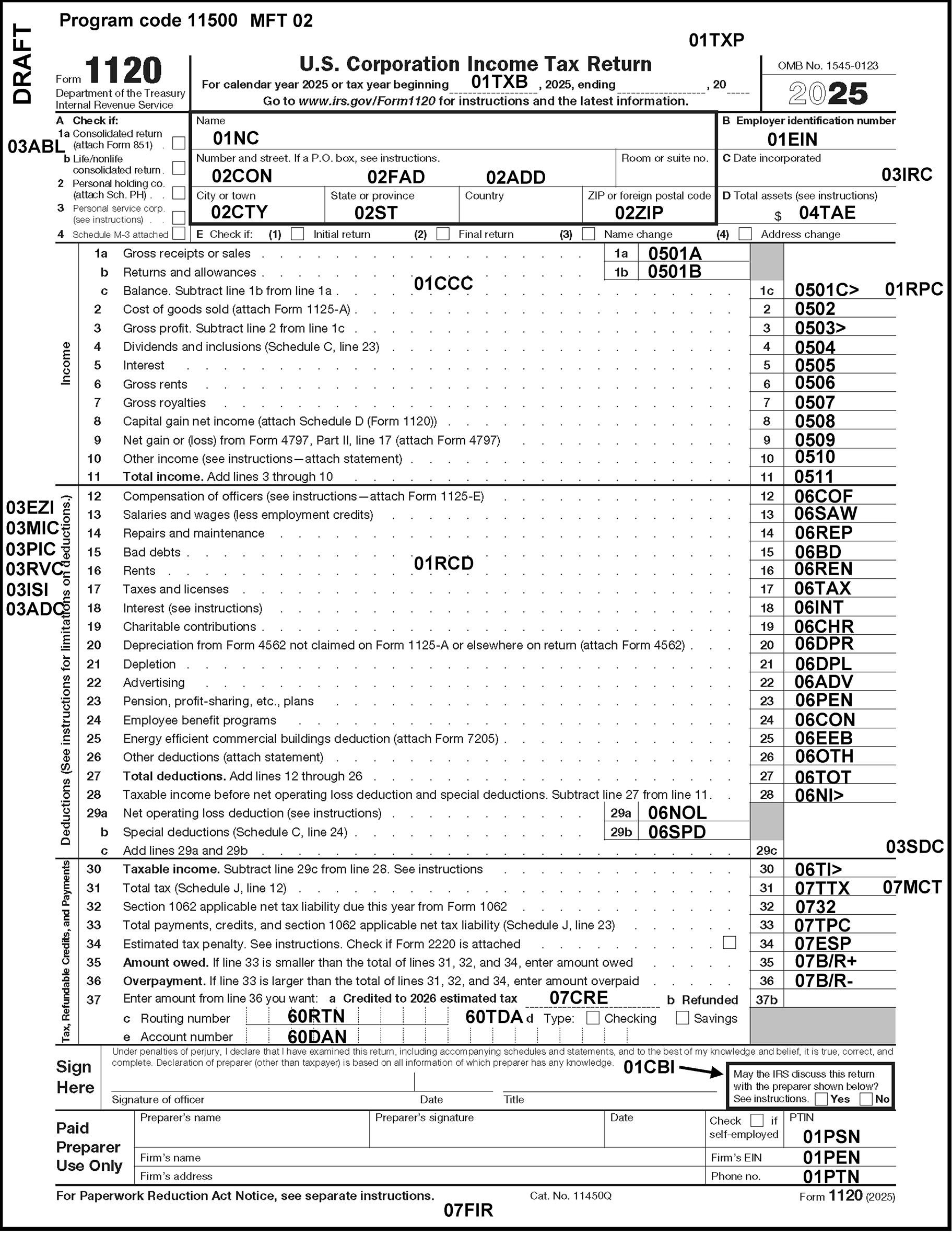
Please click here for the text description of the image.
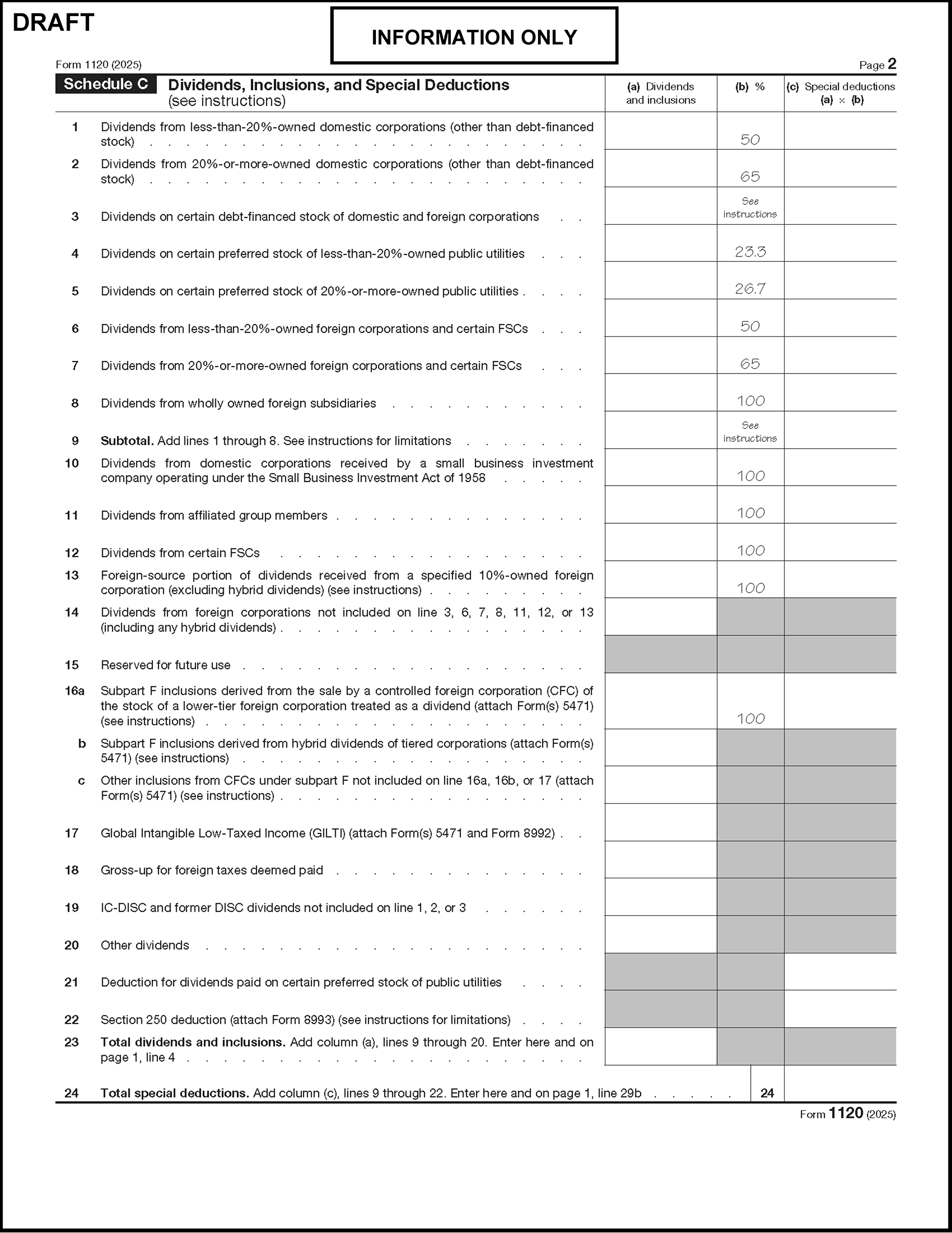
Please click here for the text description of the image.
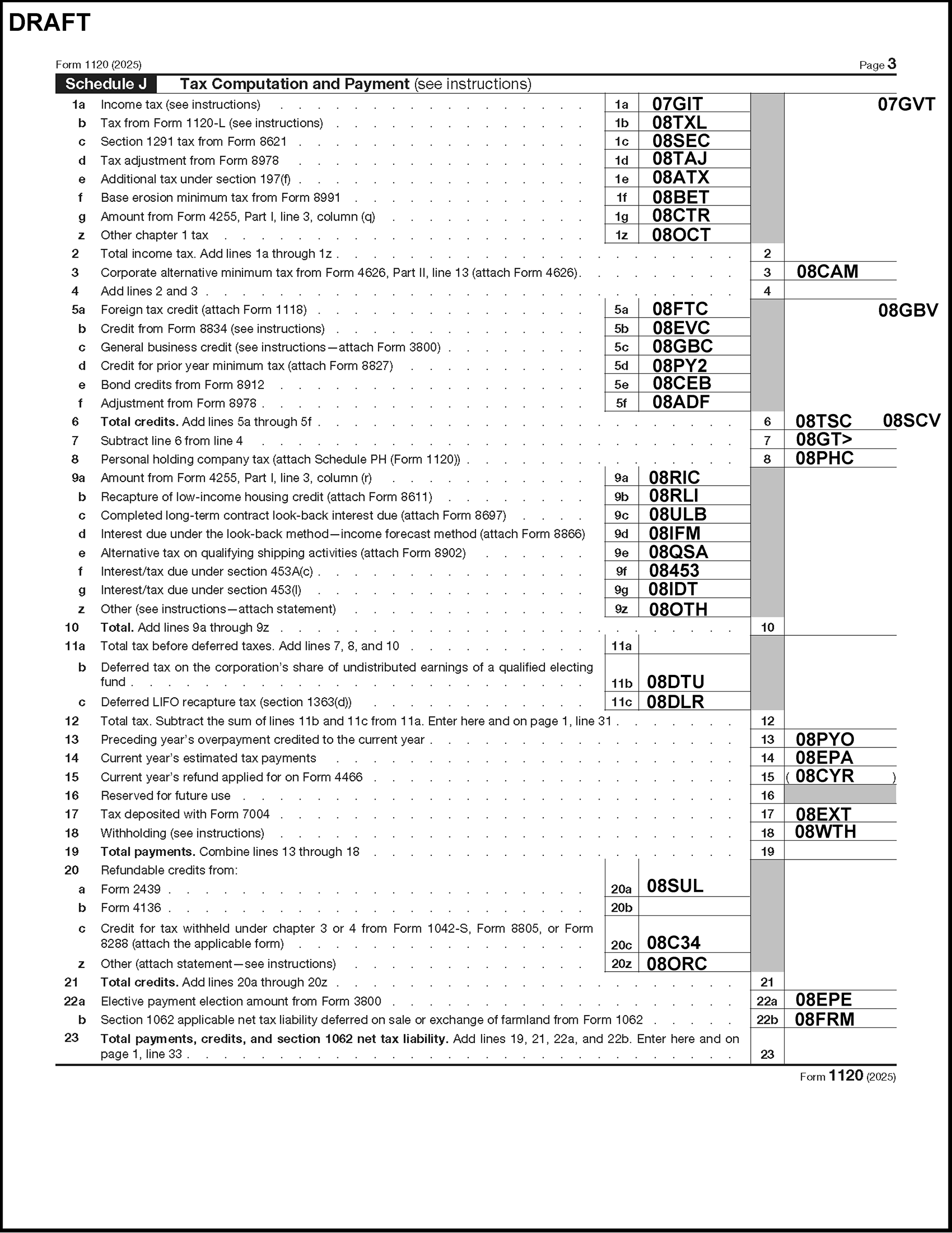
Please click here for the text description of the image.
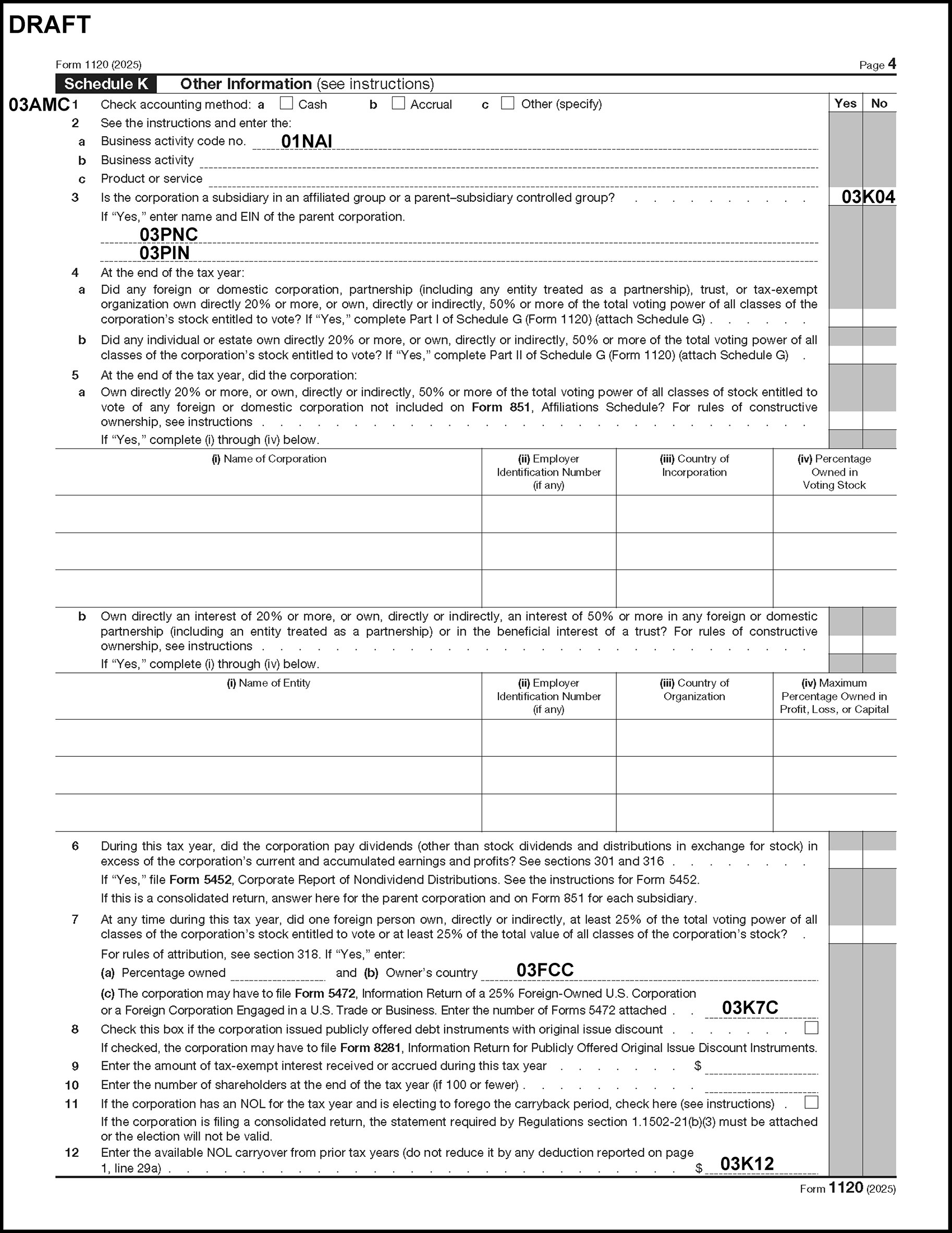
Please click here for the text description of the image.
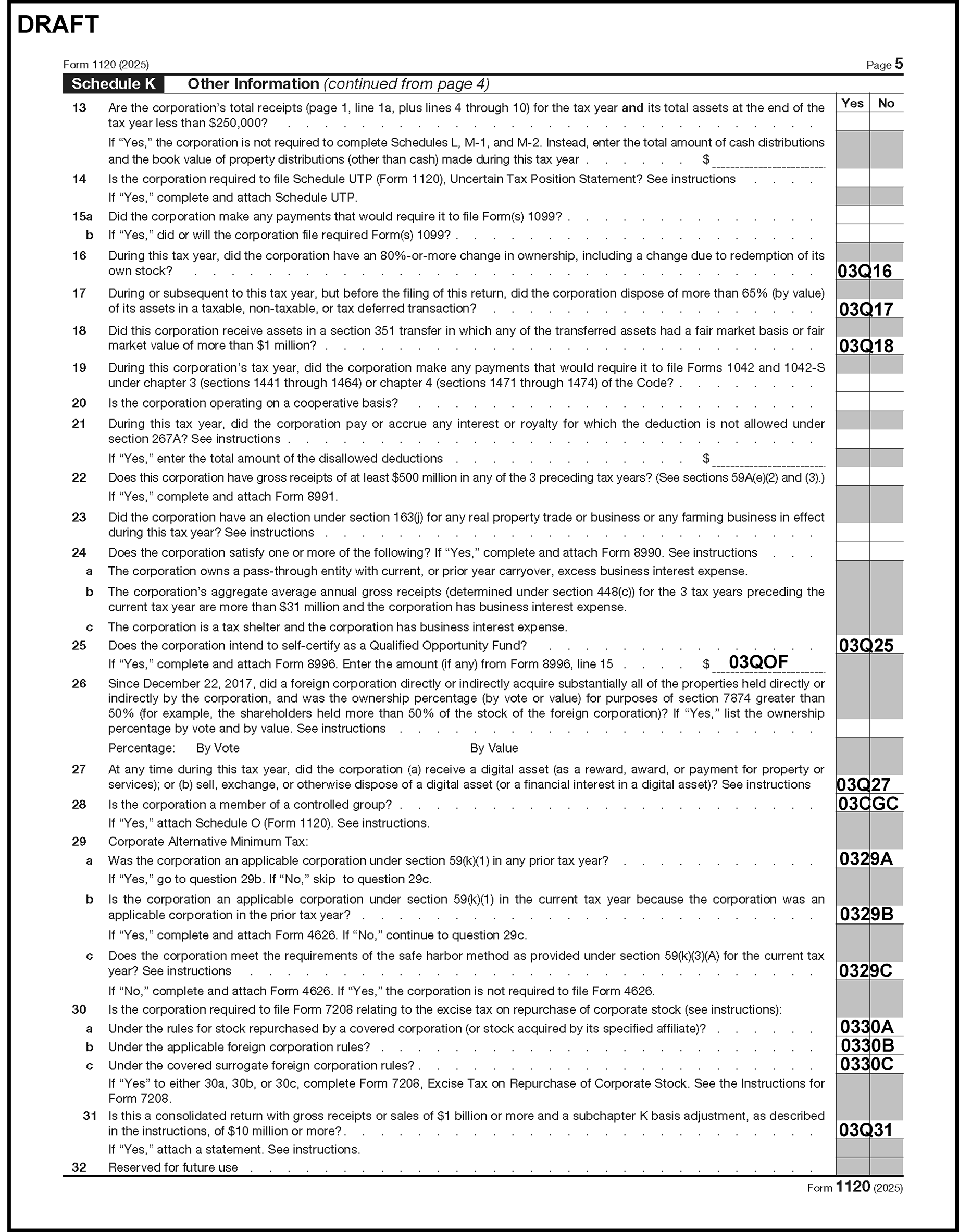
Please click here for the text description of the image.
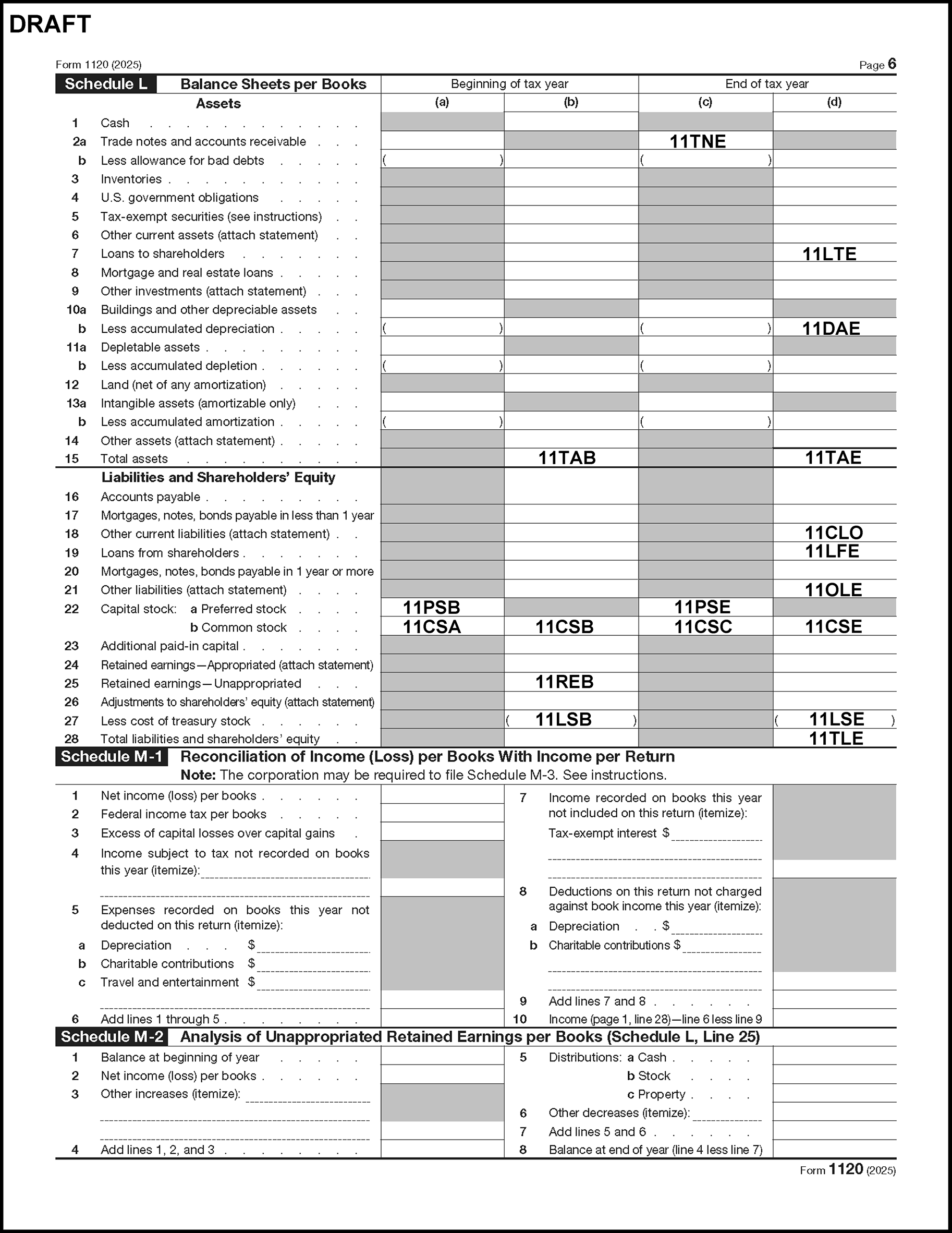
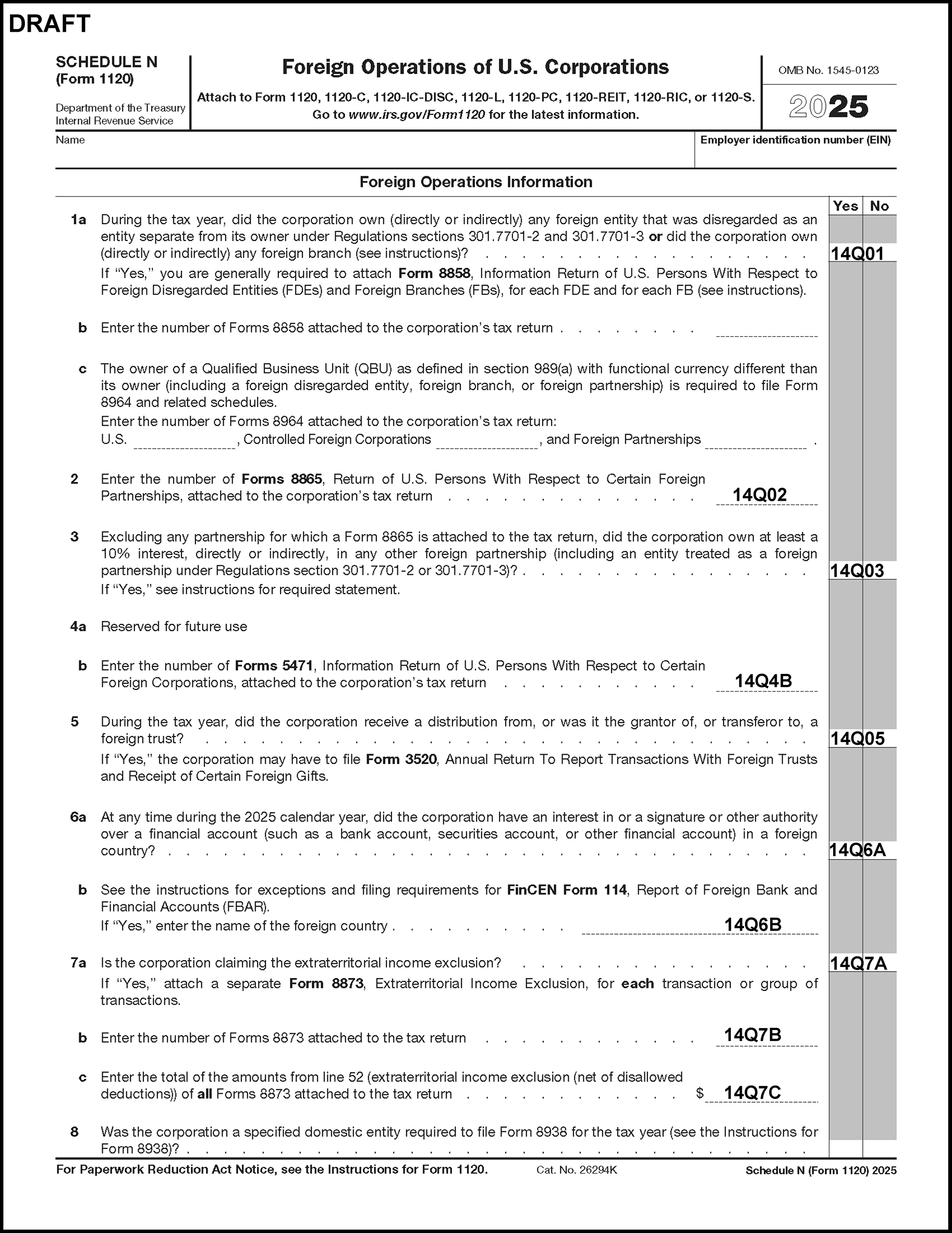
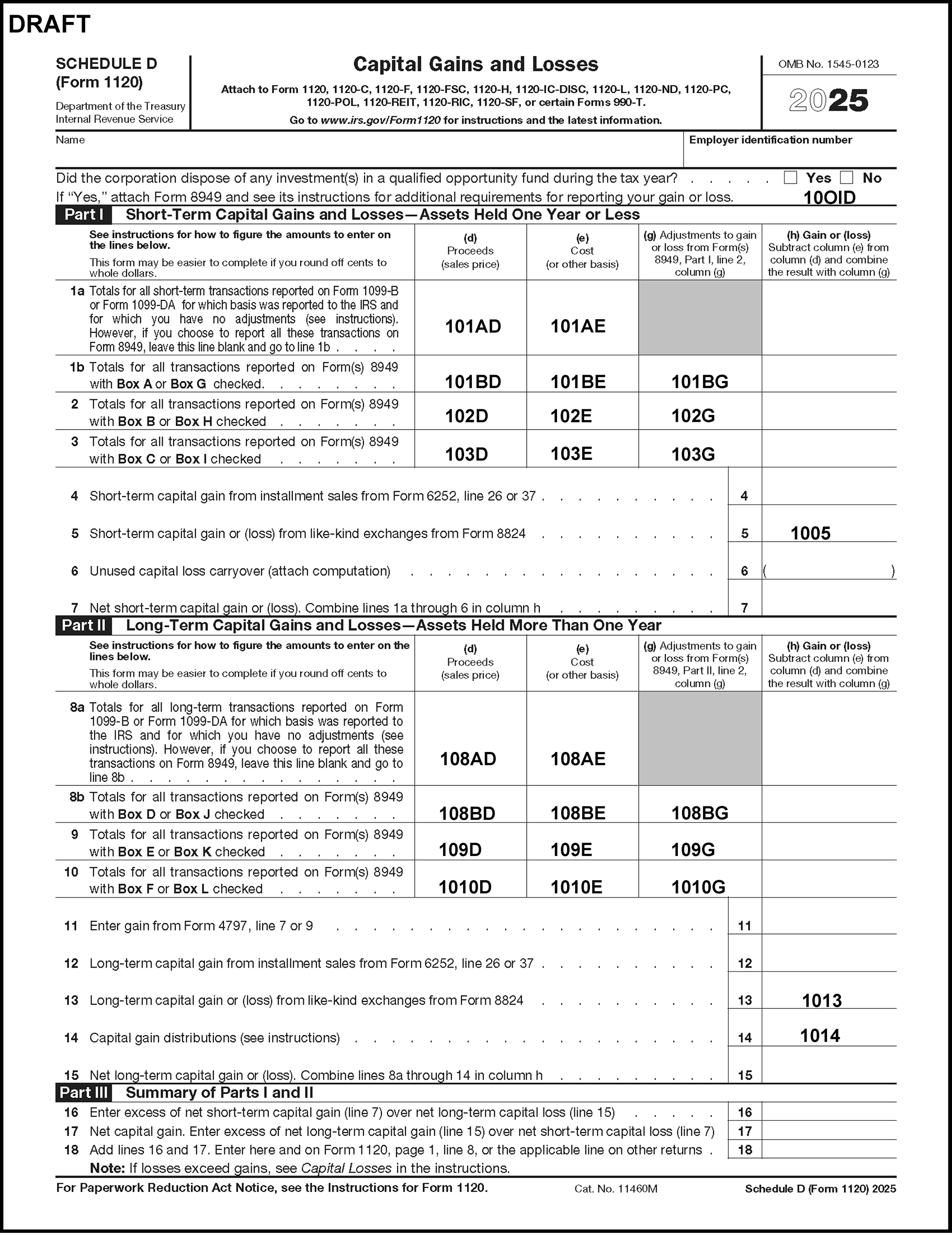
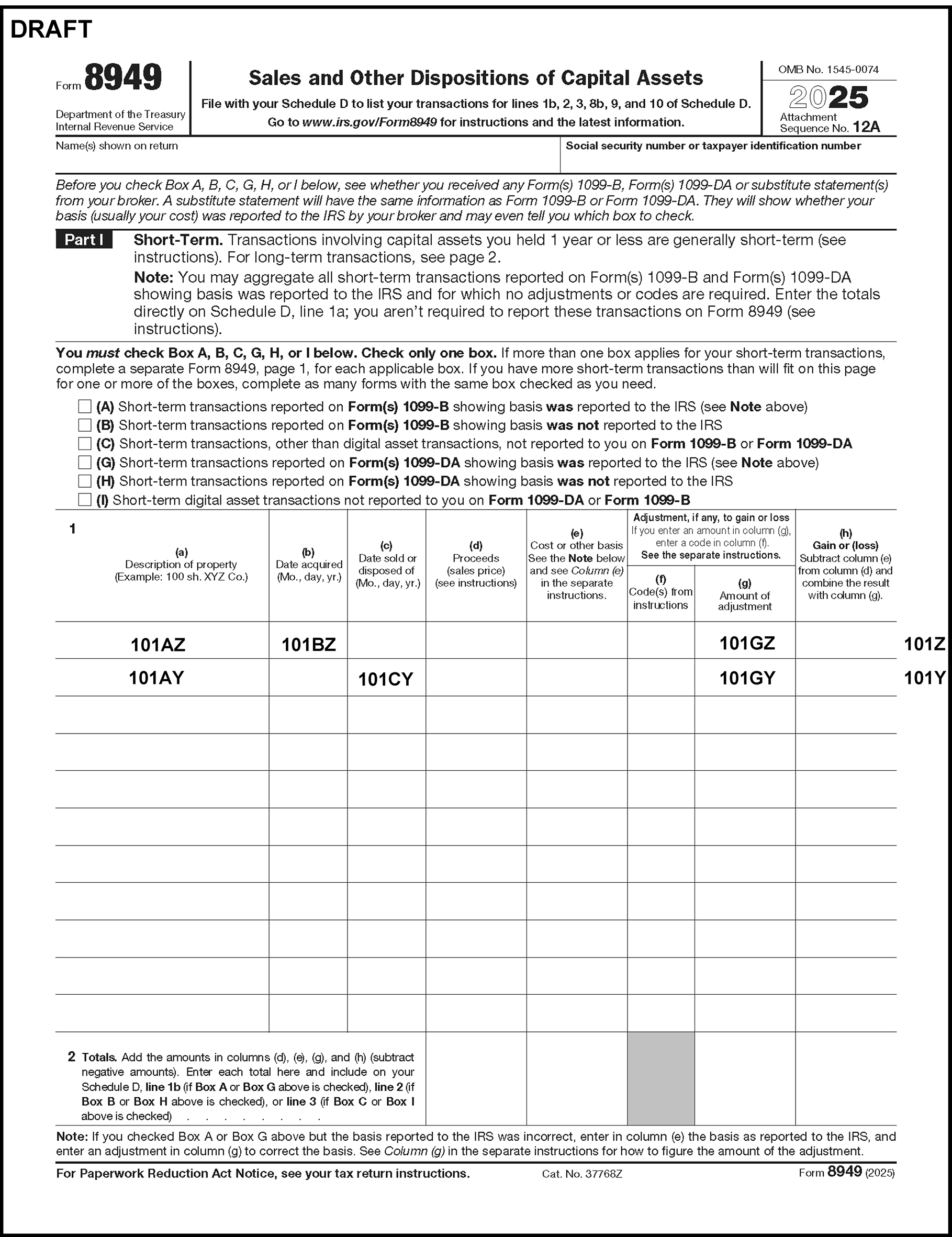
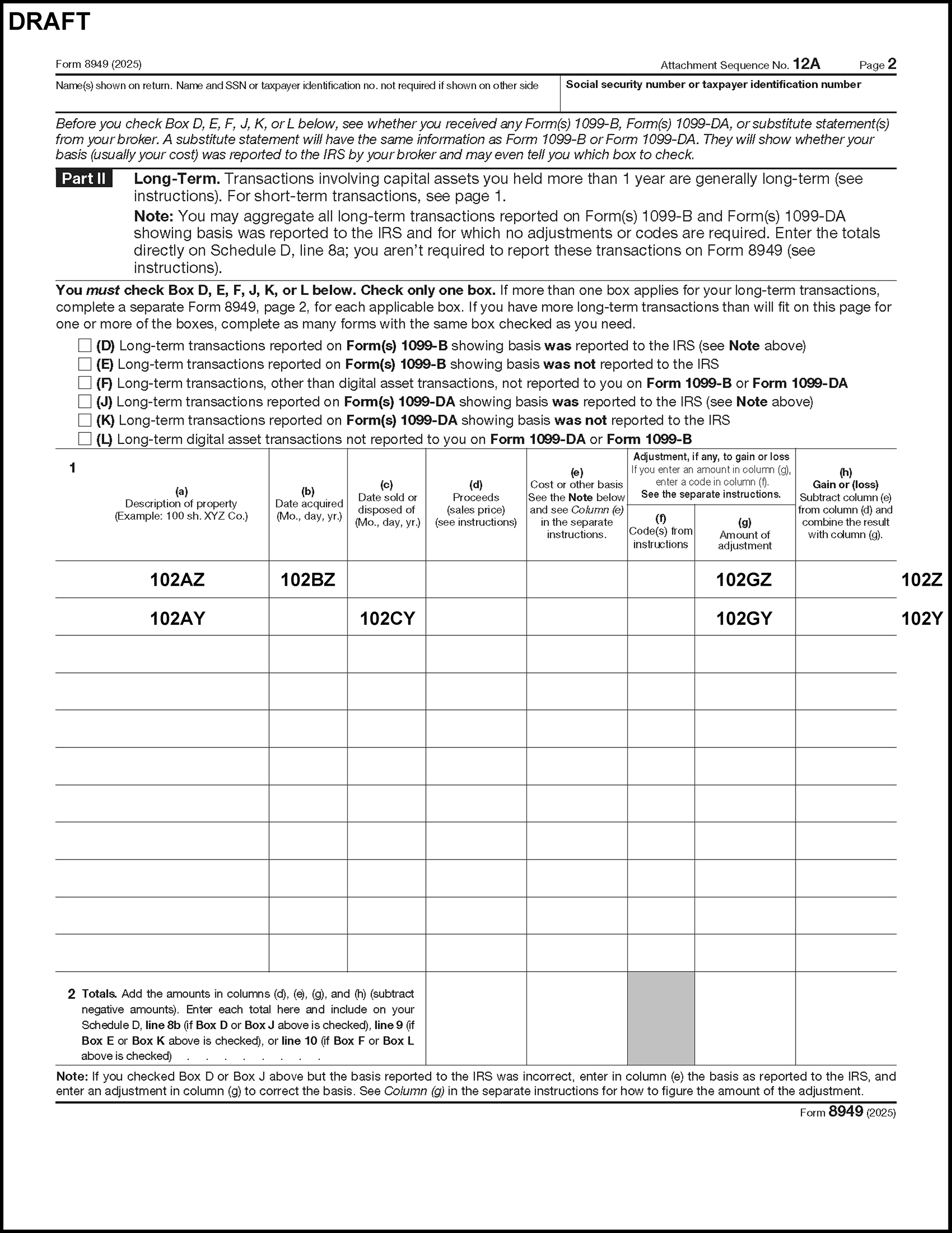
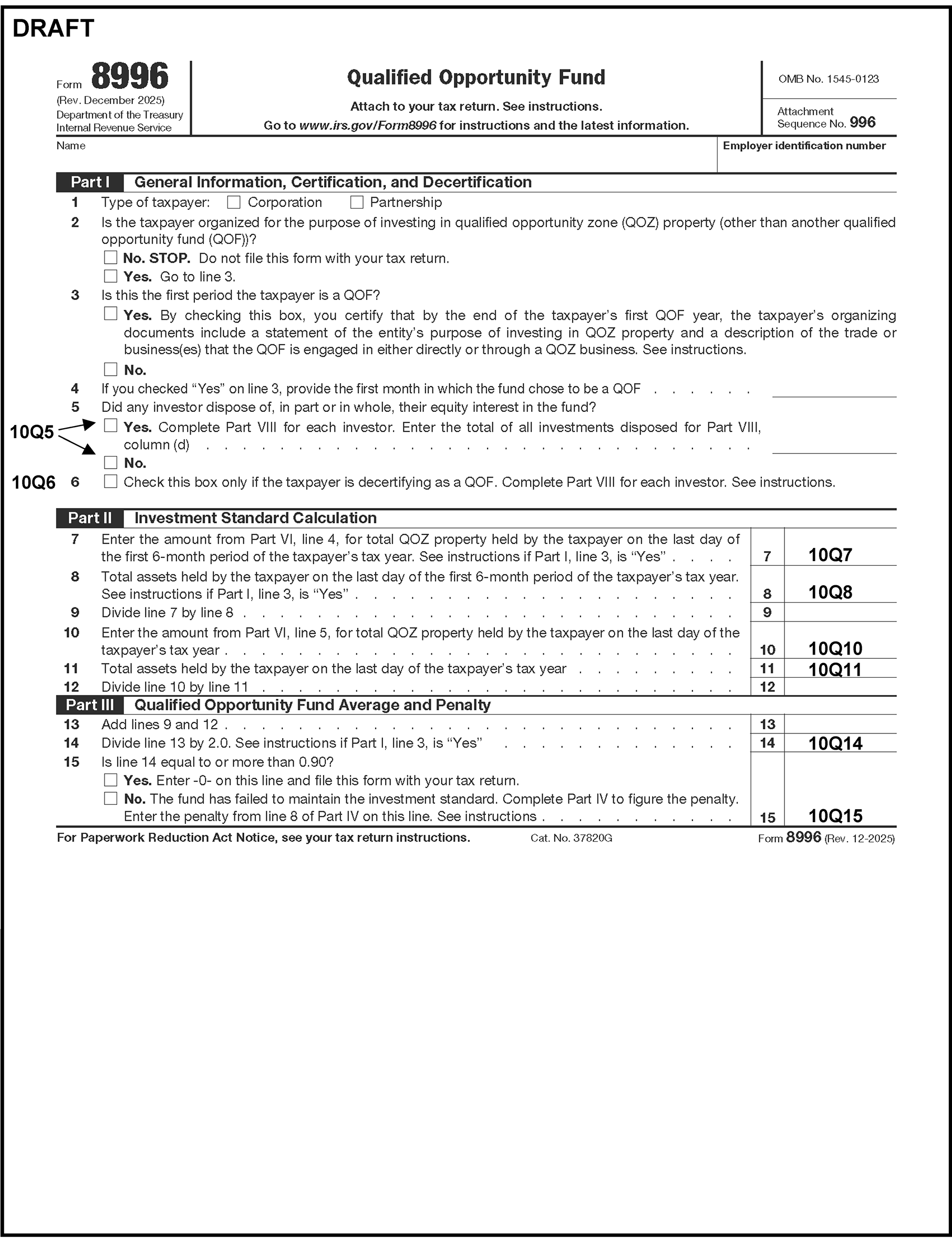
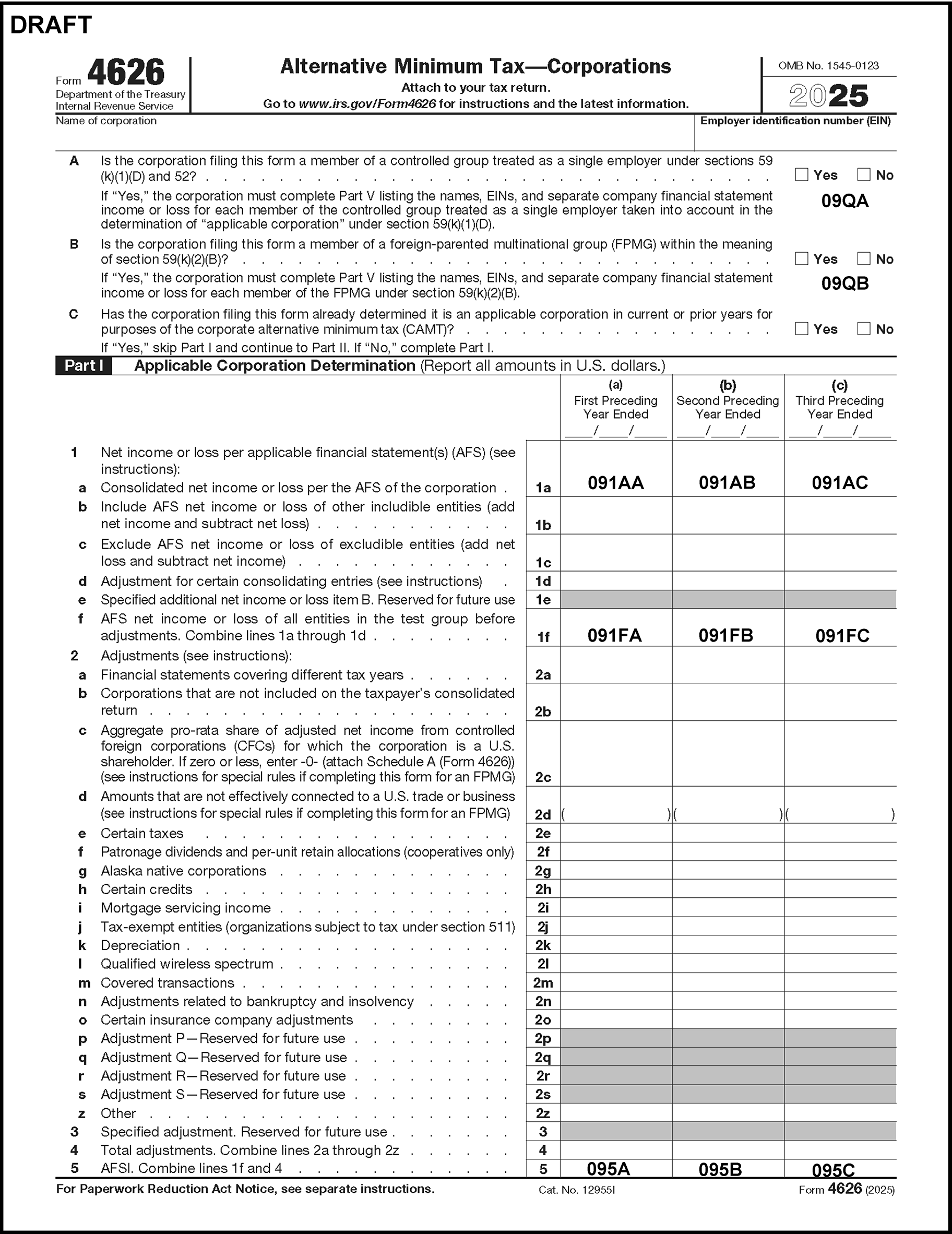
Please click here for the text description of the image.
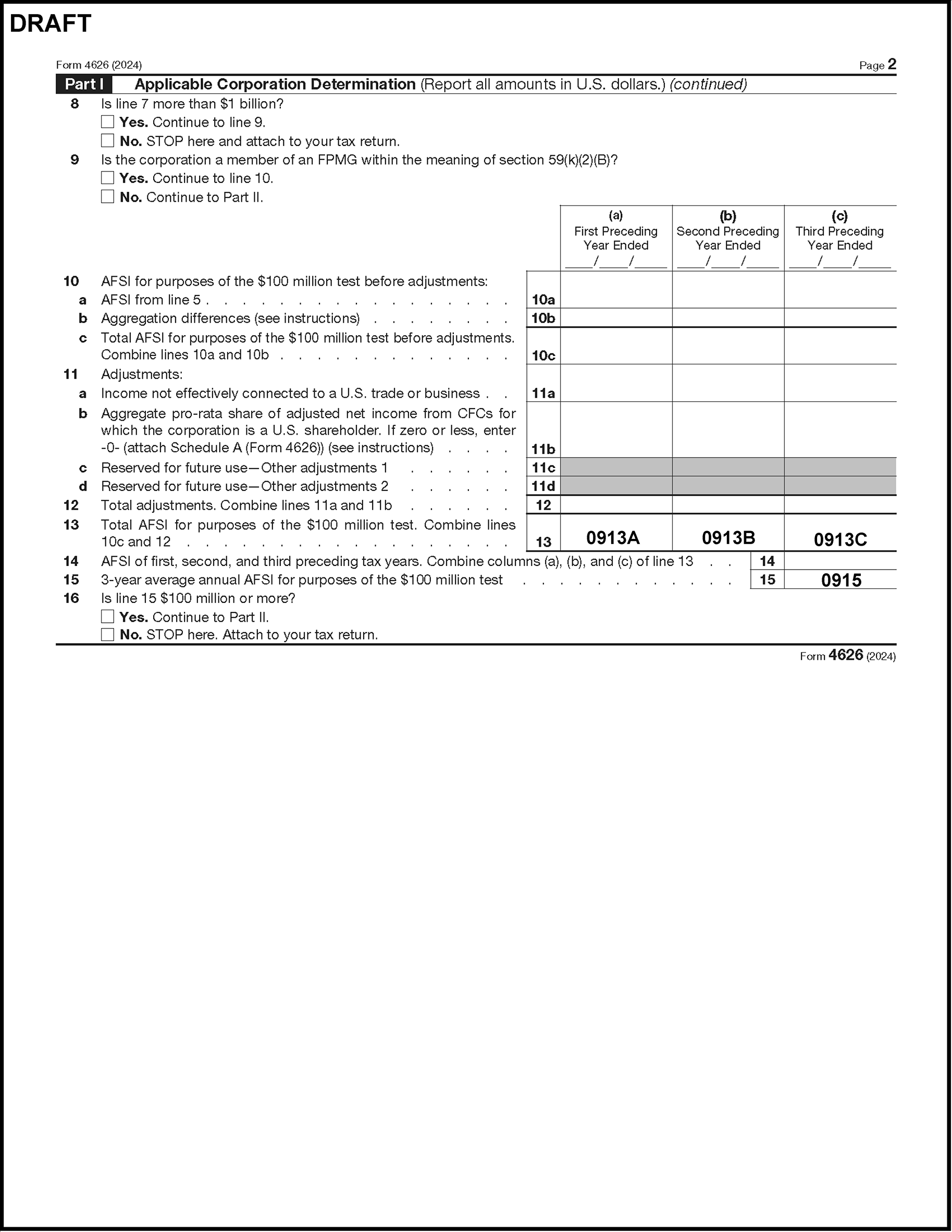
Please click here for the text description of the image.
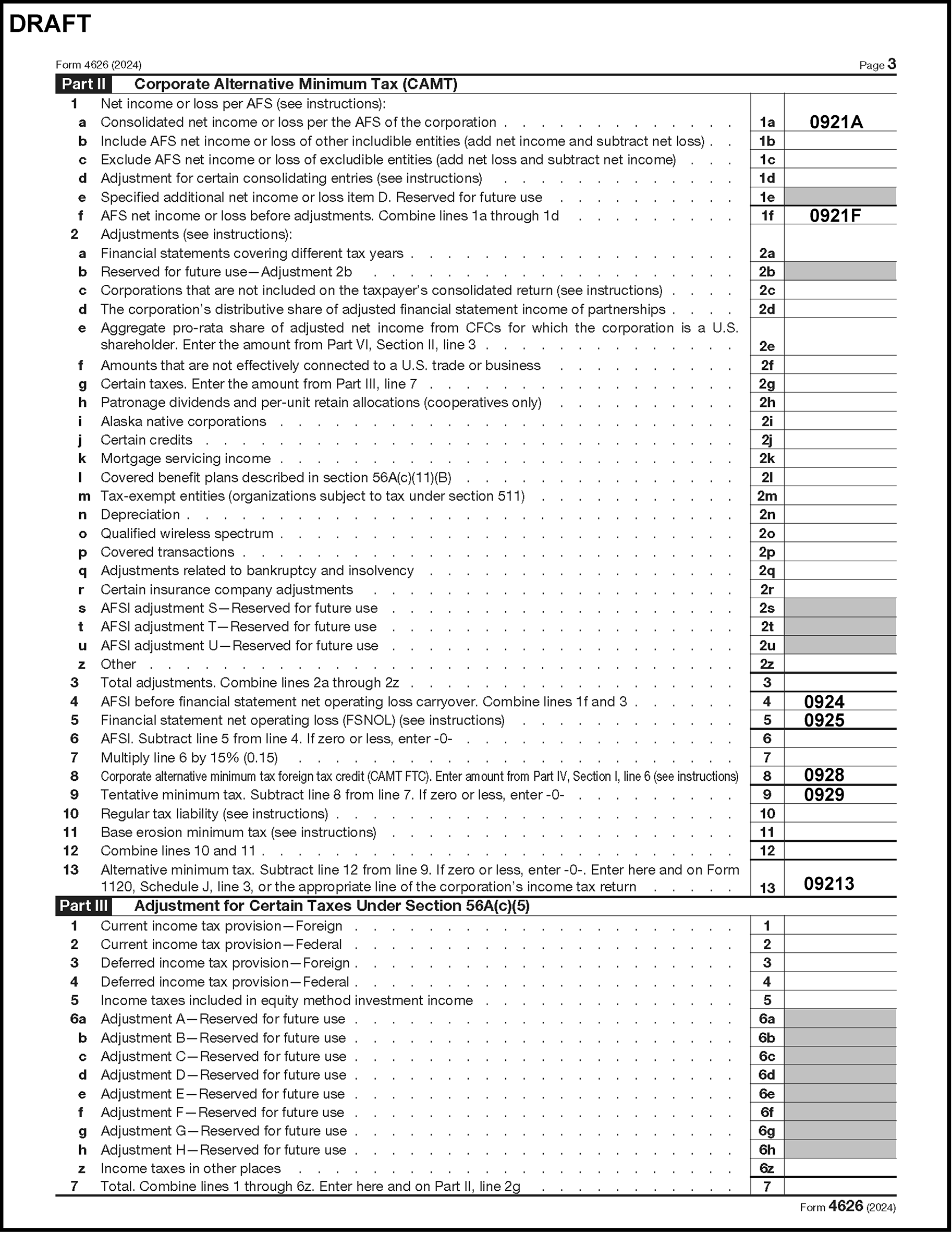
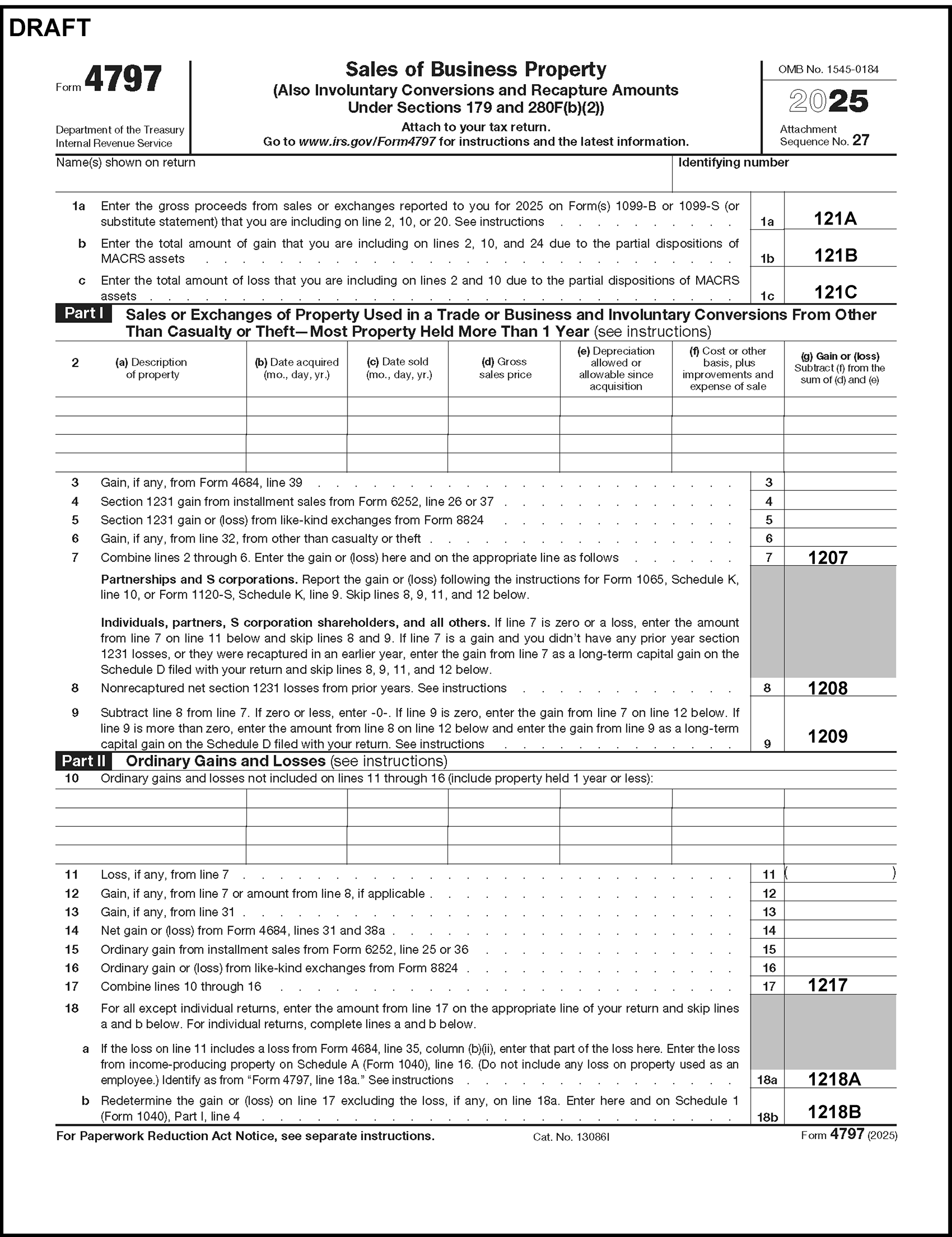
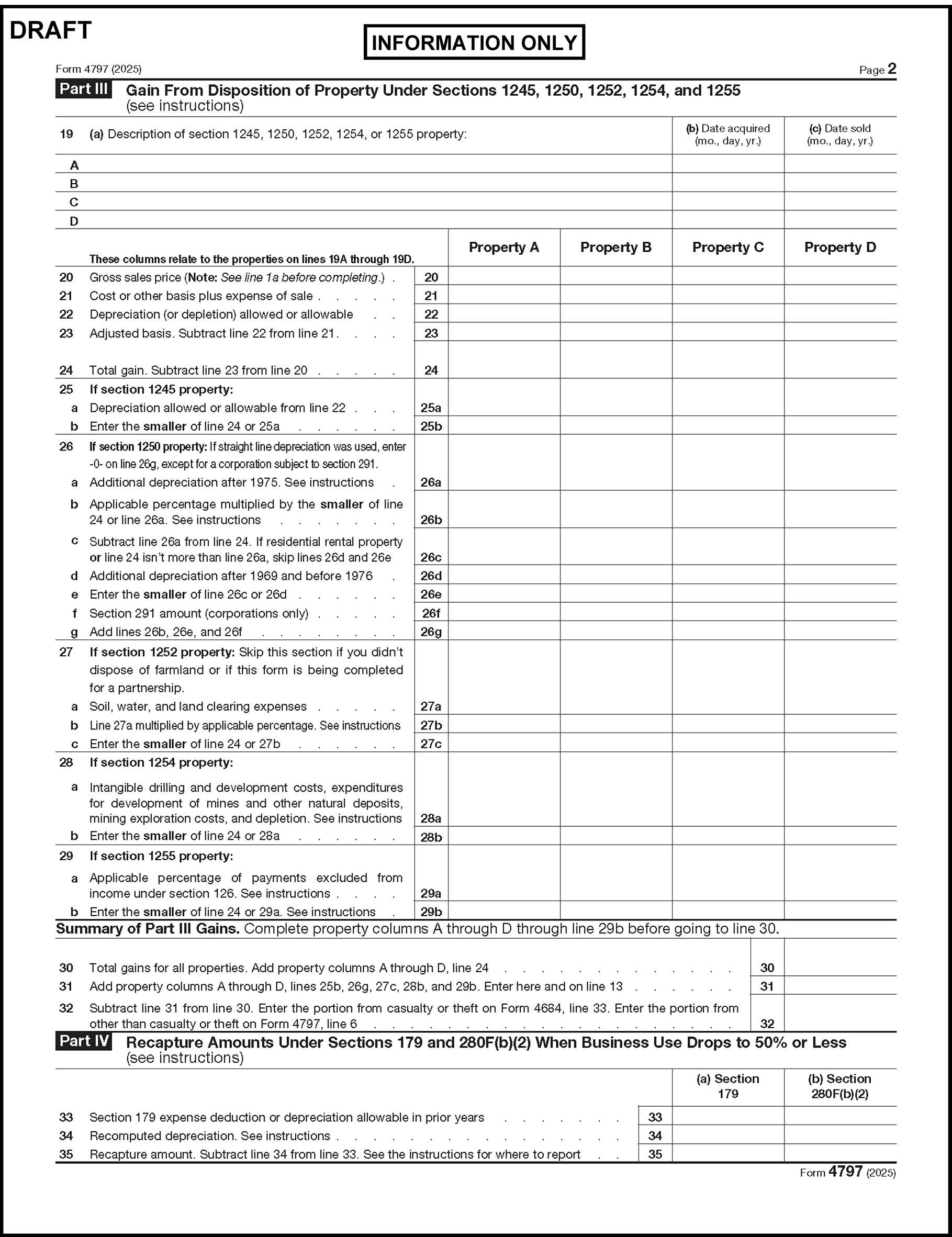
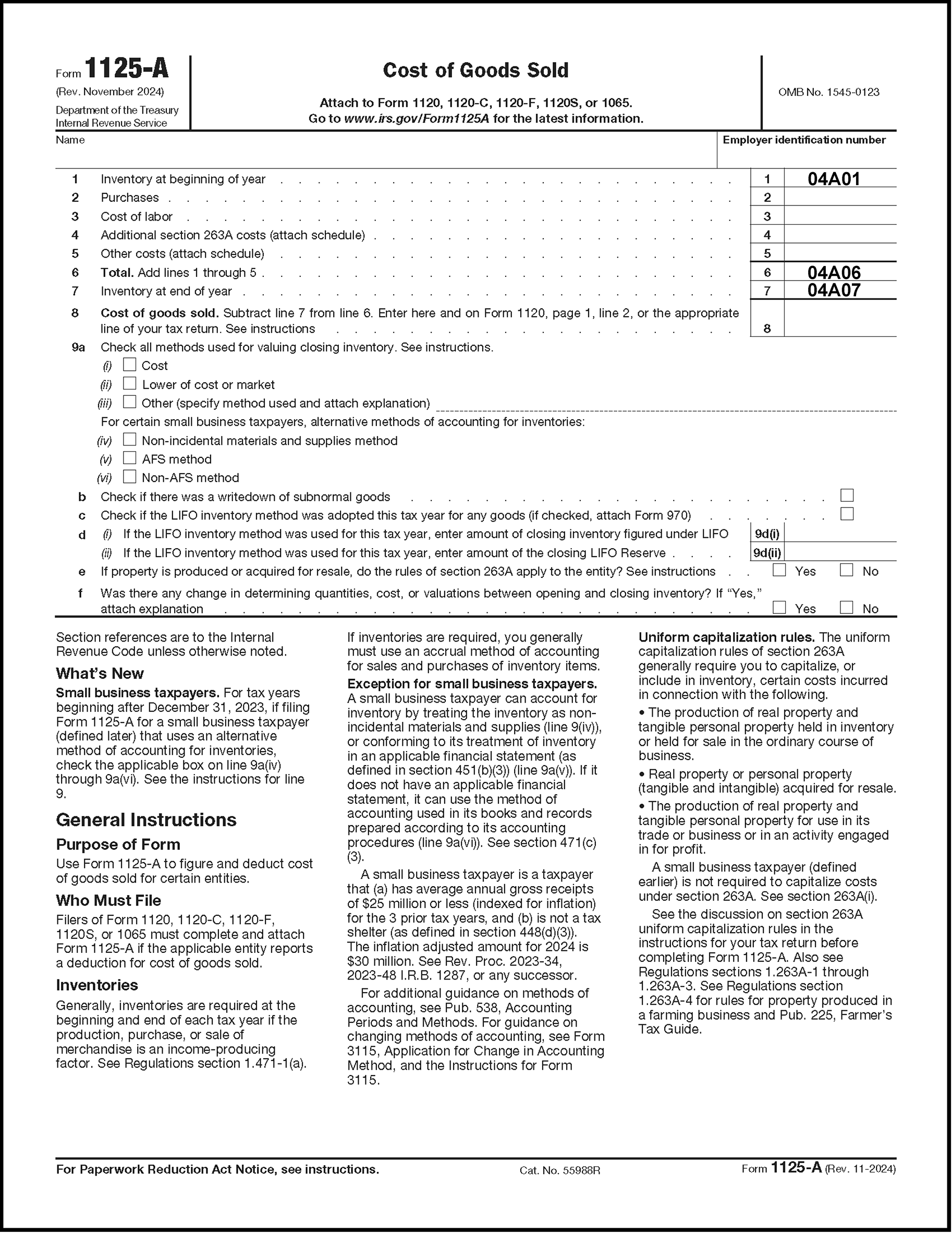
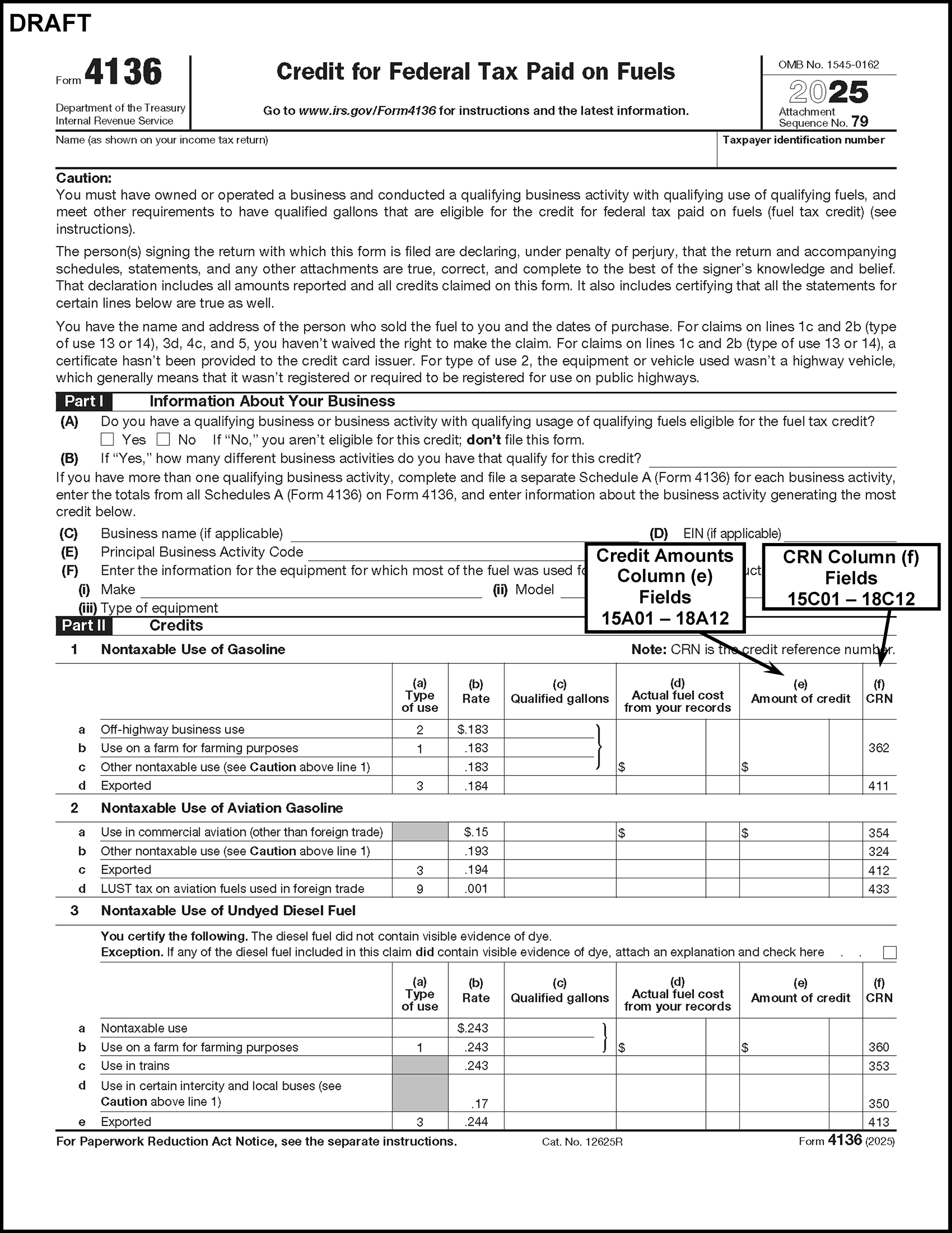
Please click here for the text description of the image.
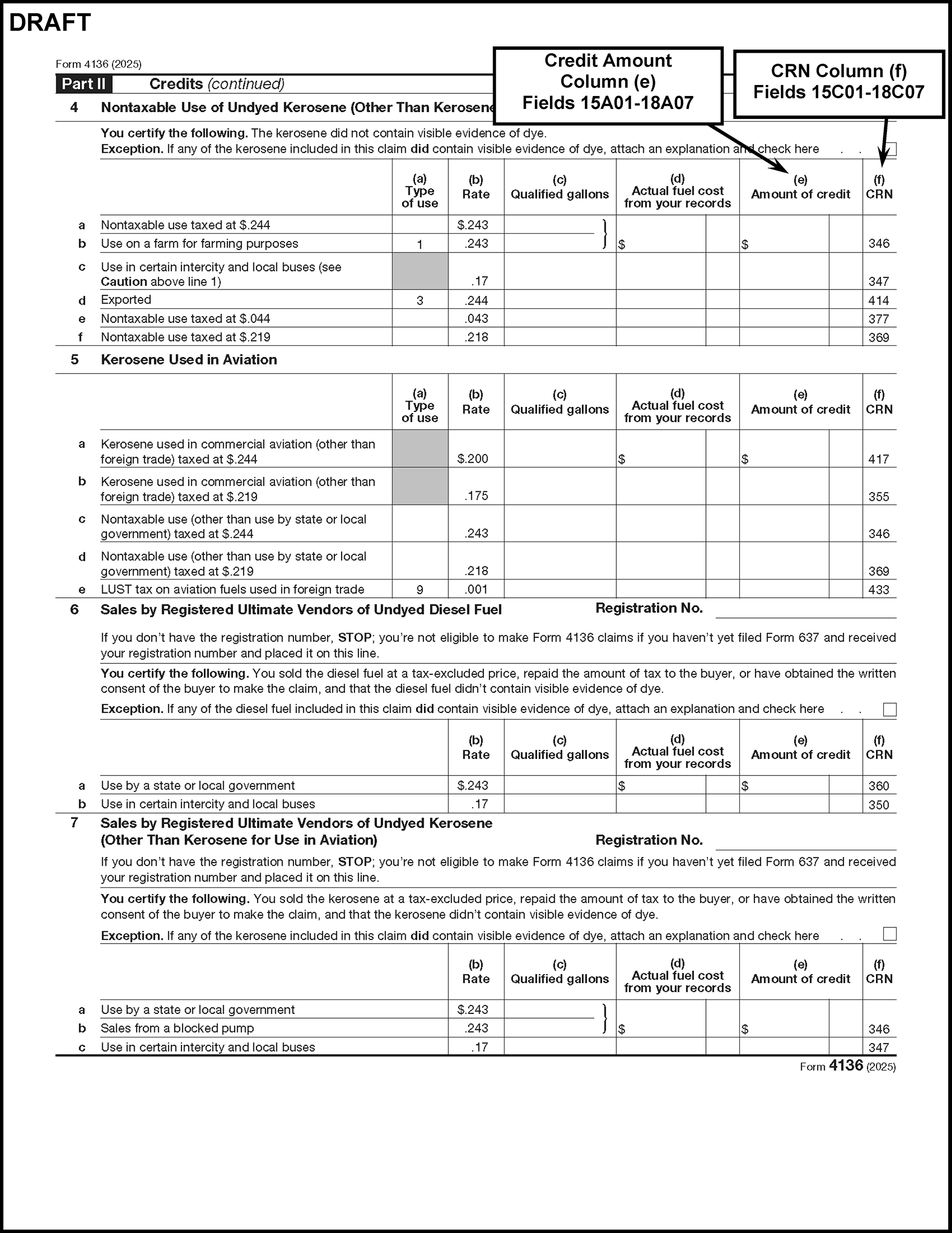
Please click here for the text description of the image.
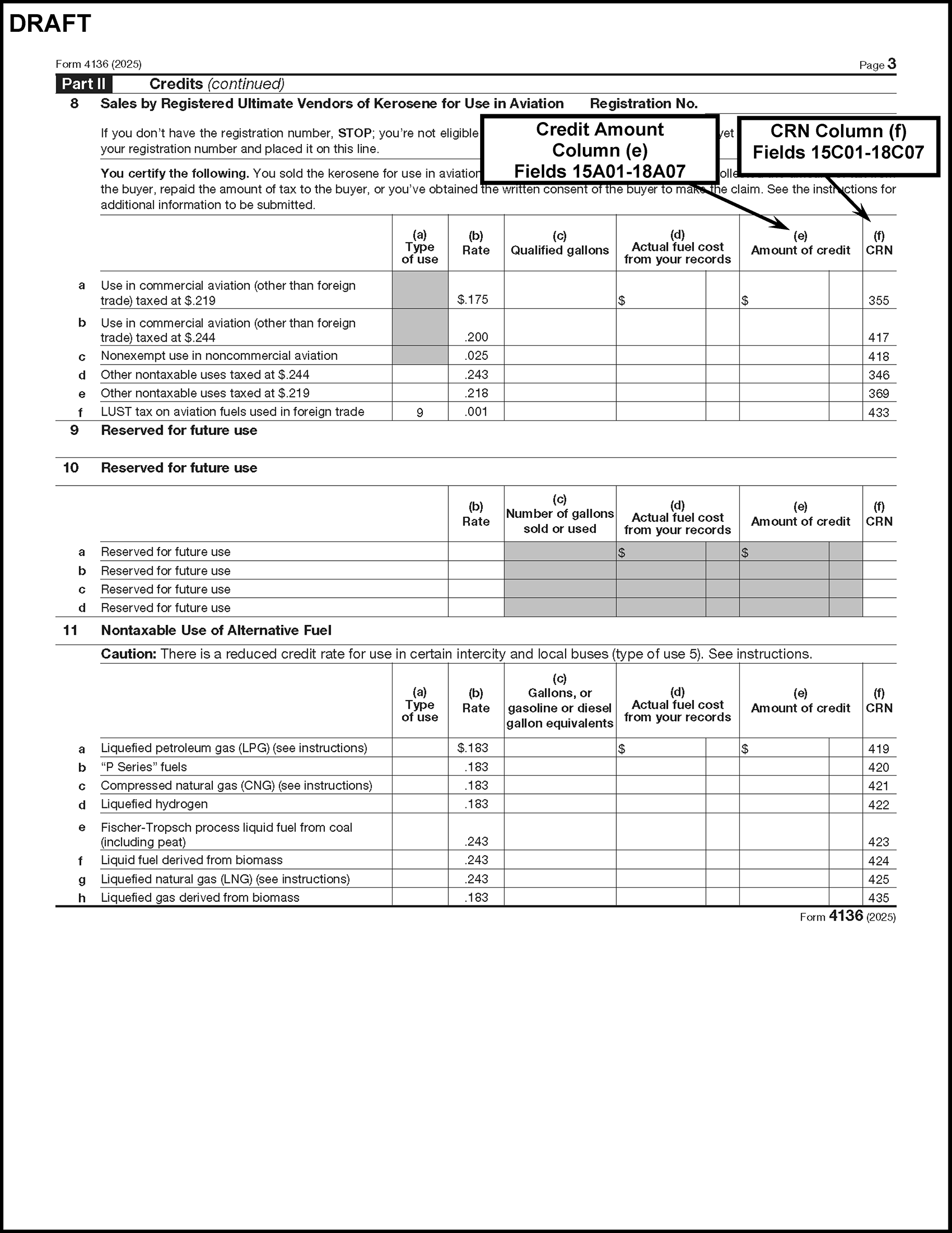
Please click here for the text description of the image.
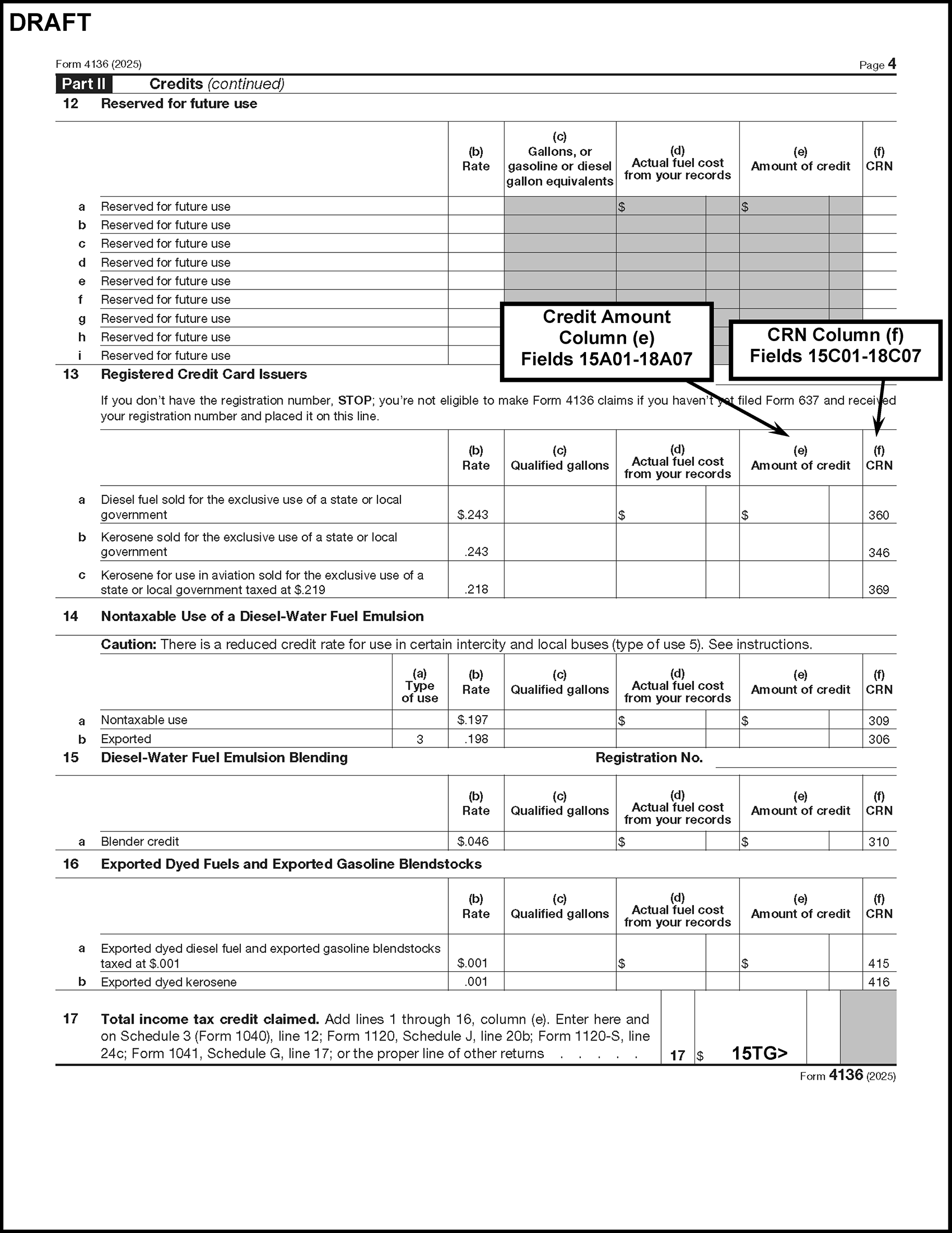
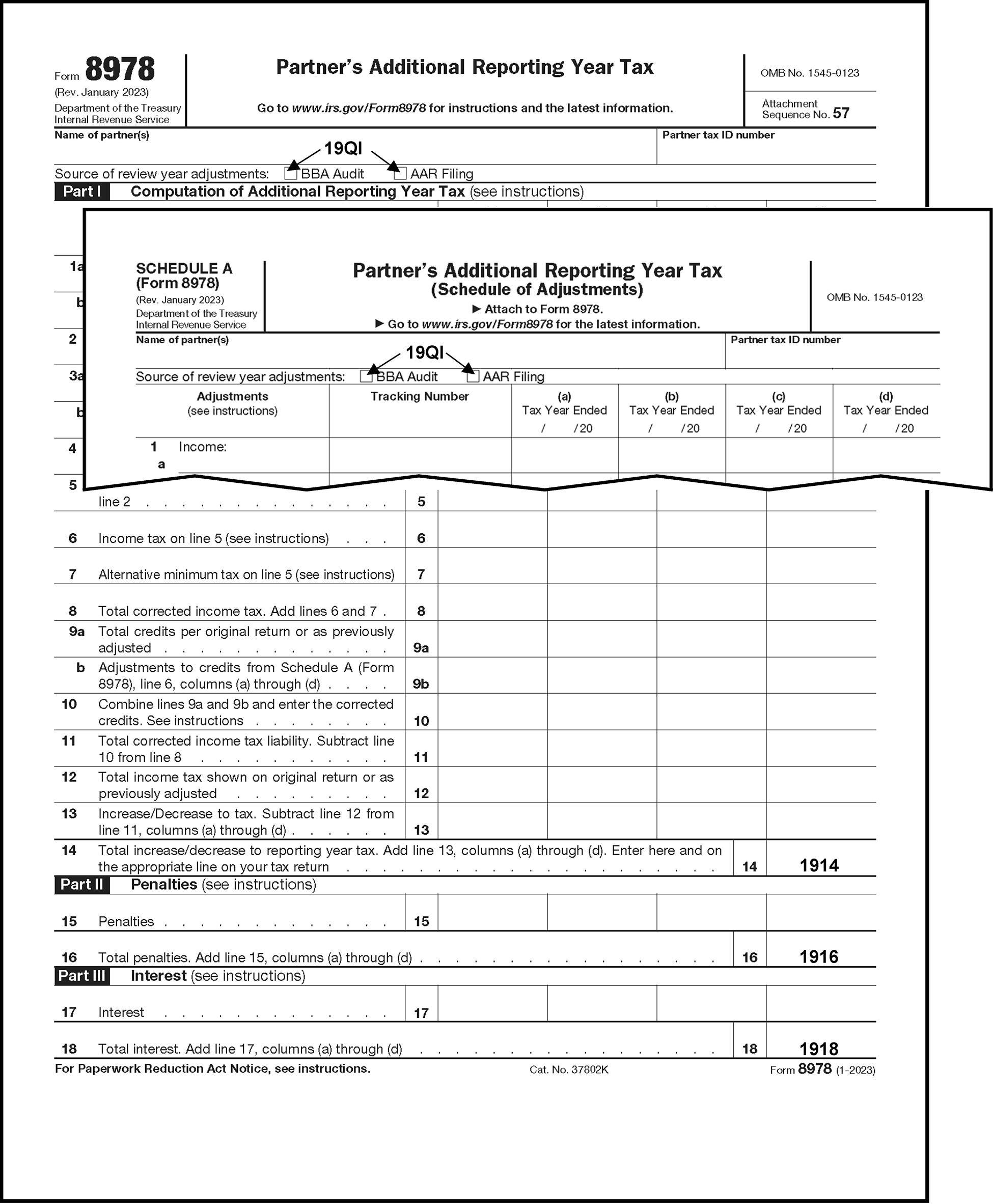
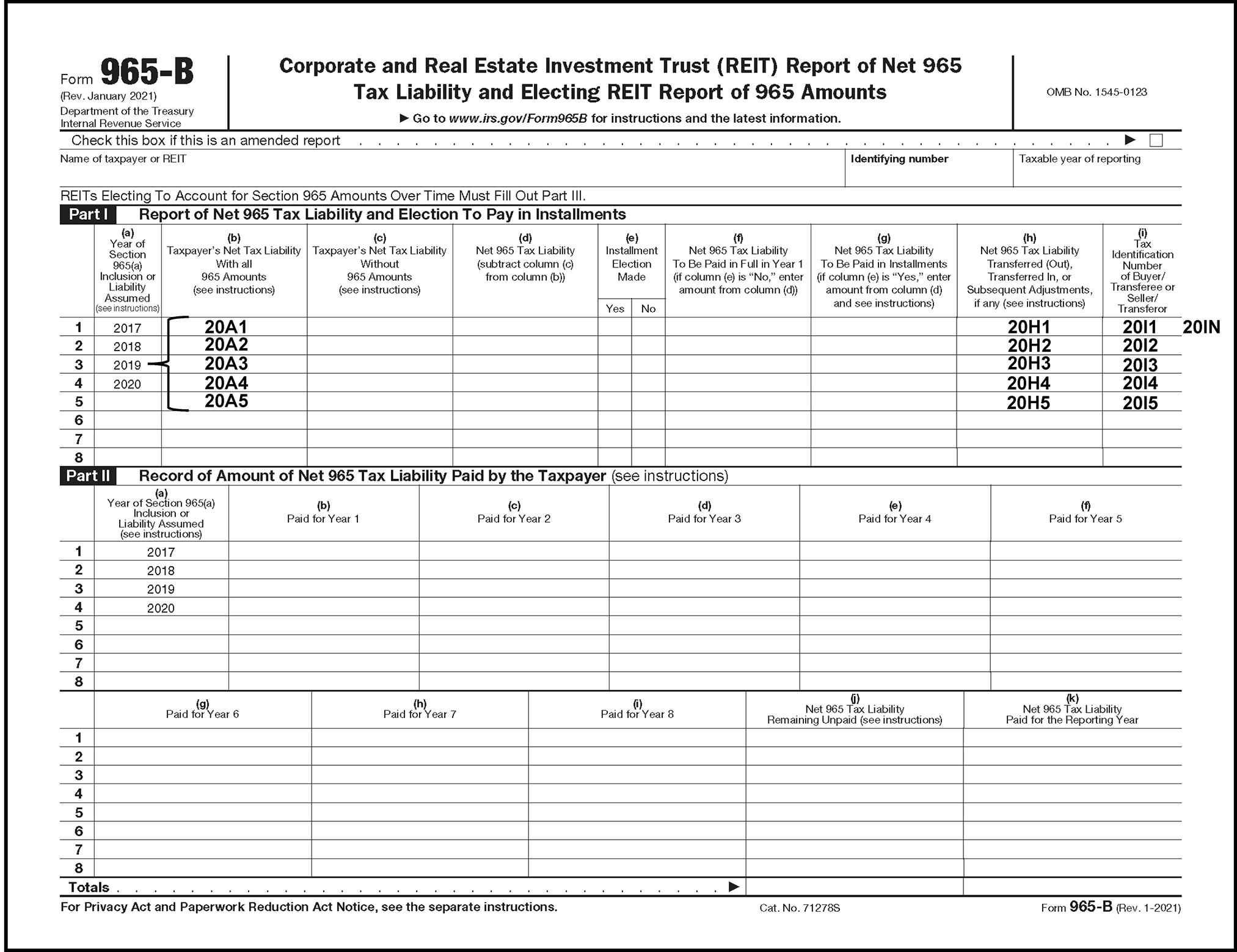
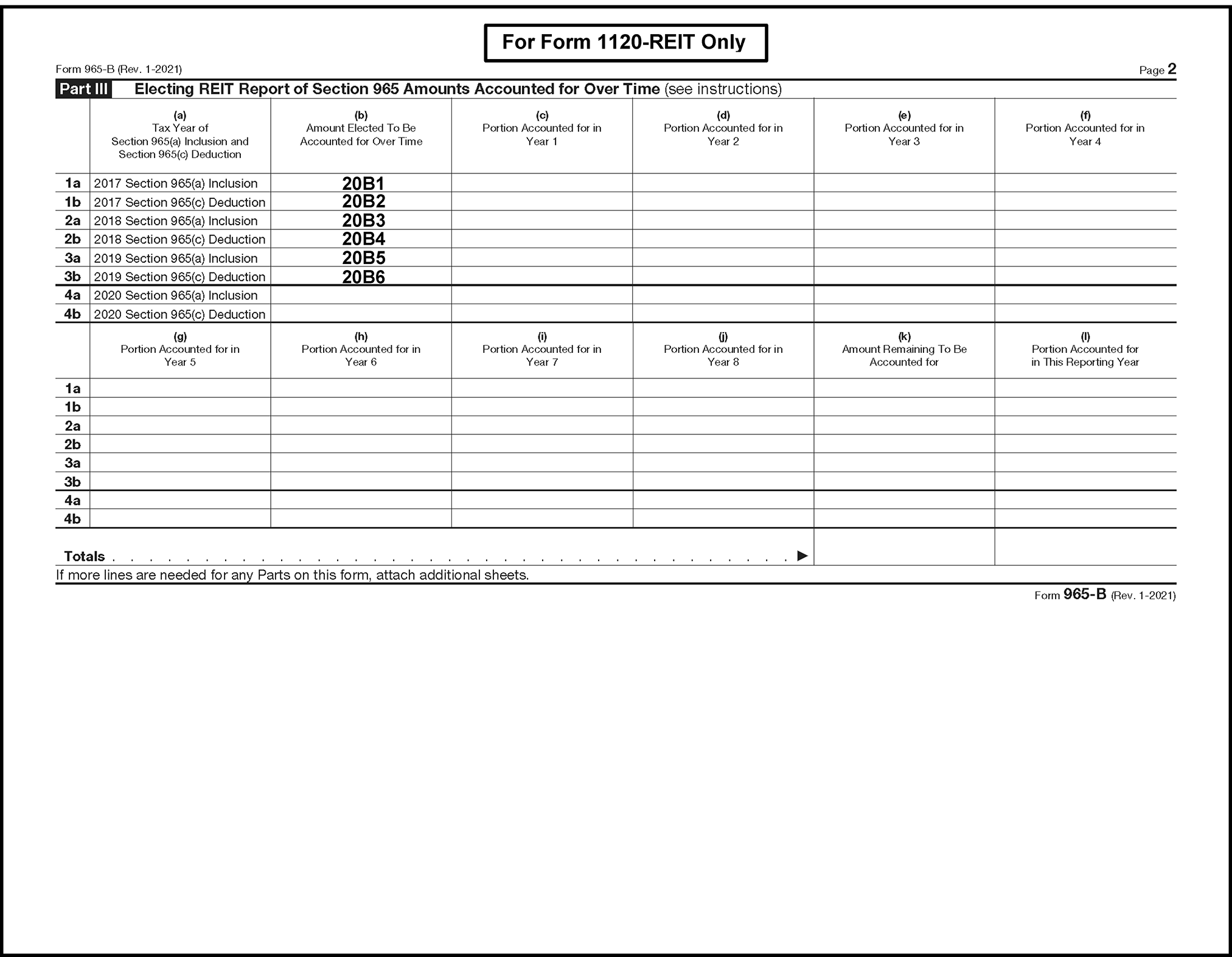
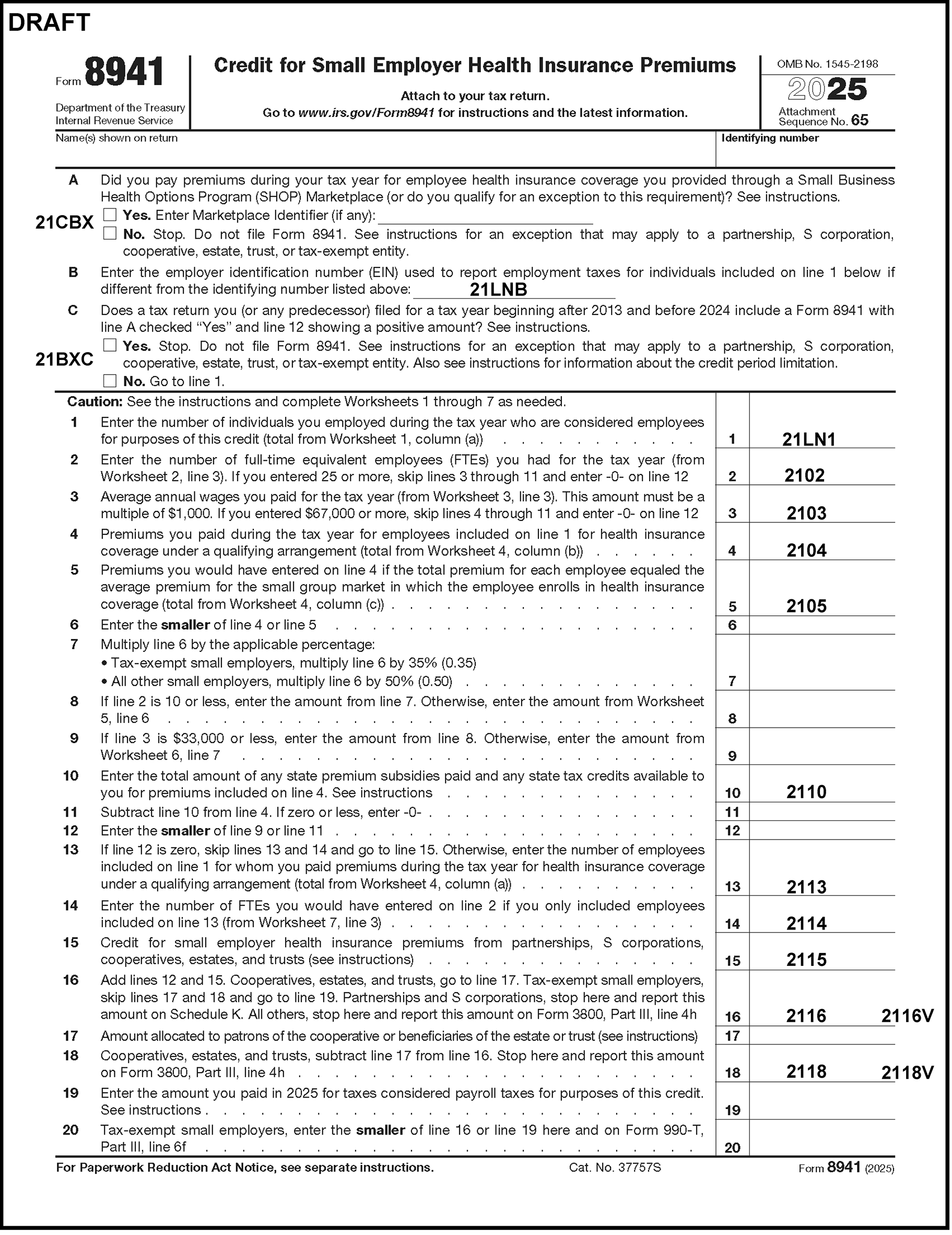
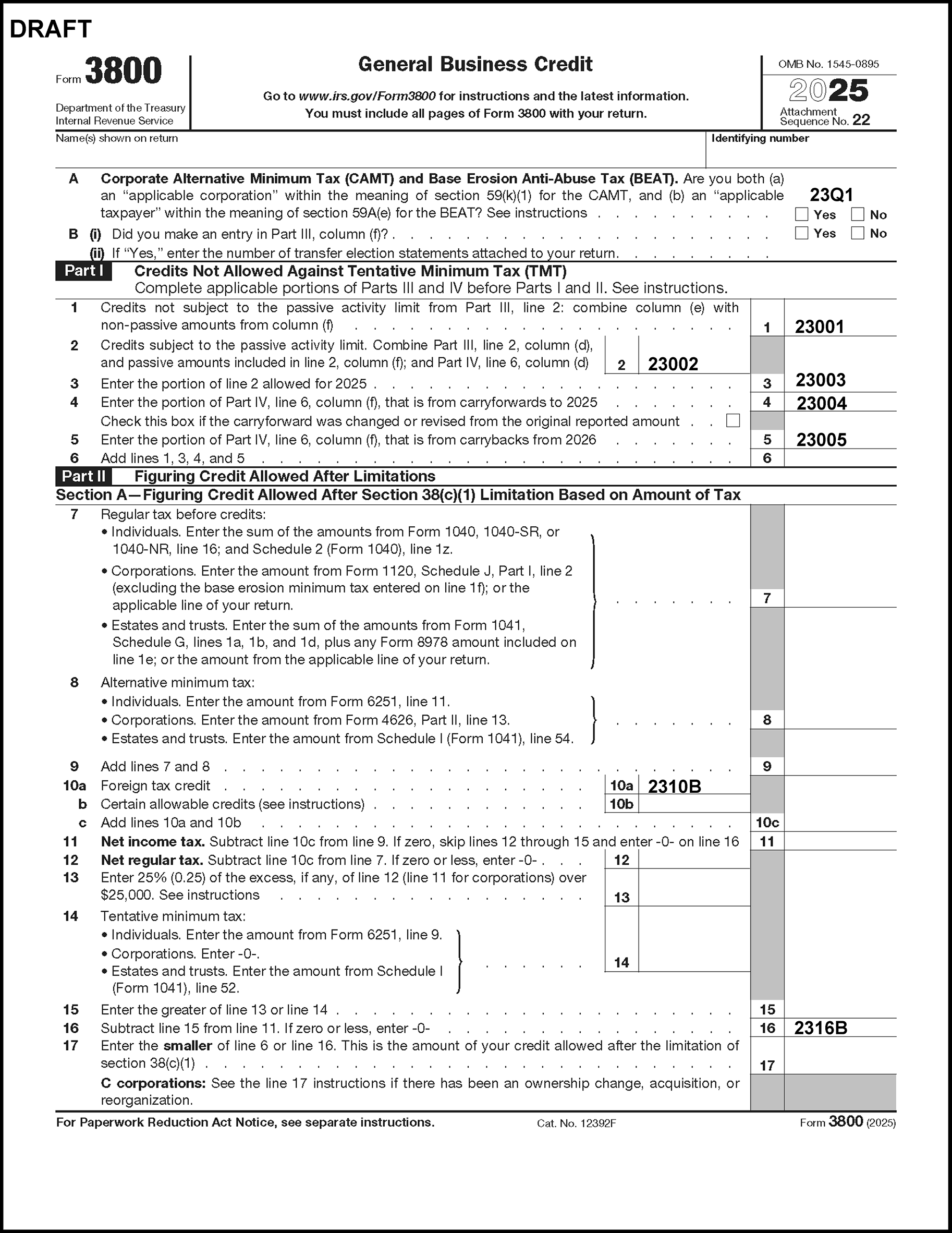
Please click here for the text description of the image.
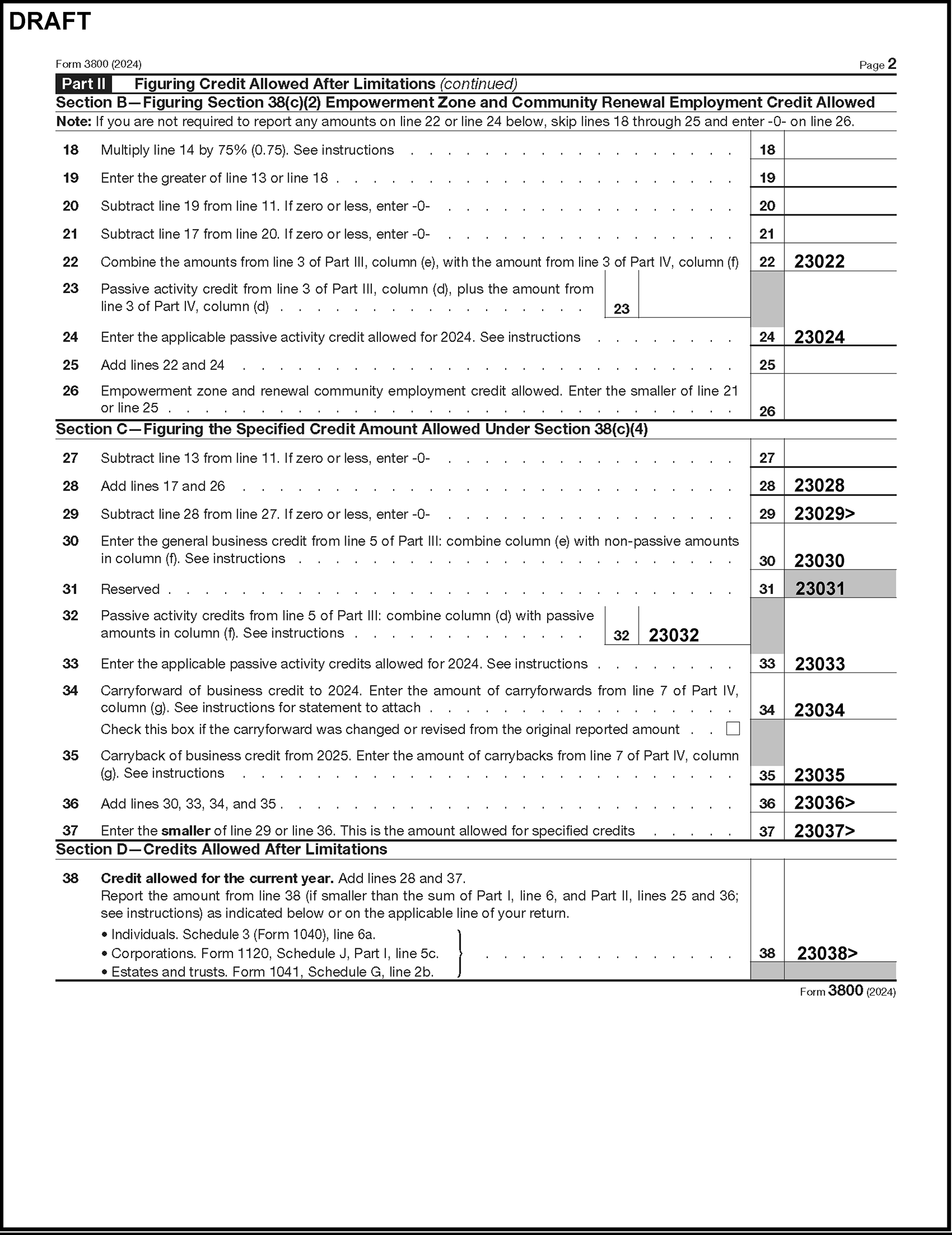
Please click here for the text description of the image.
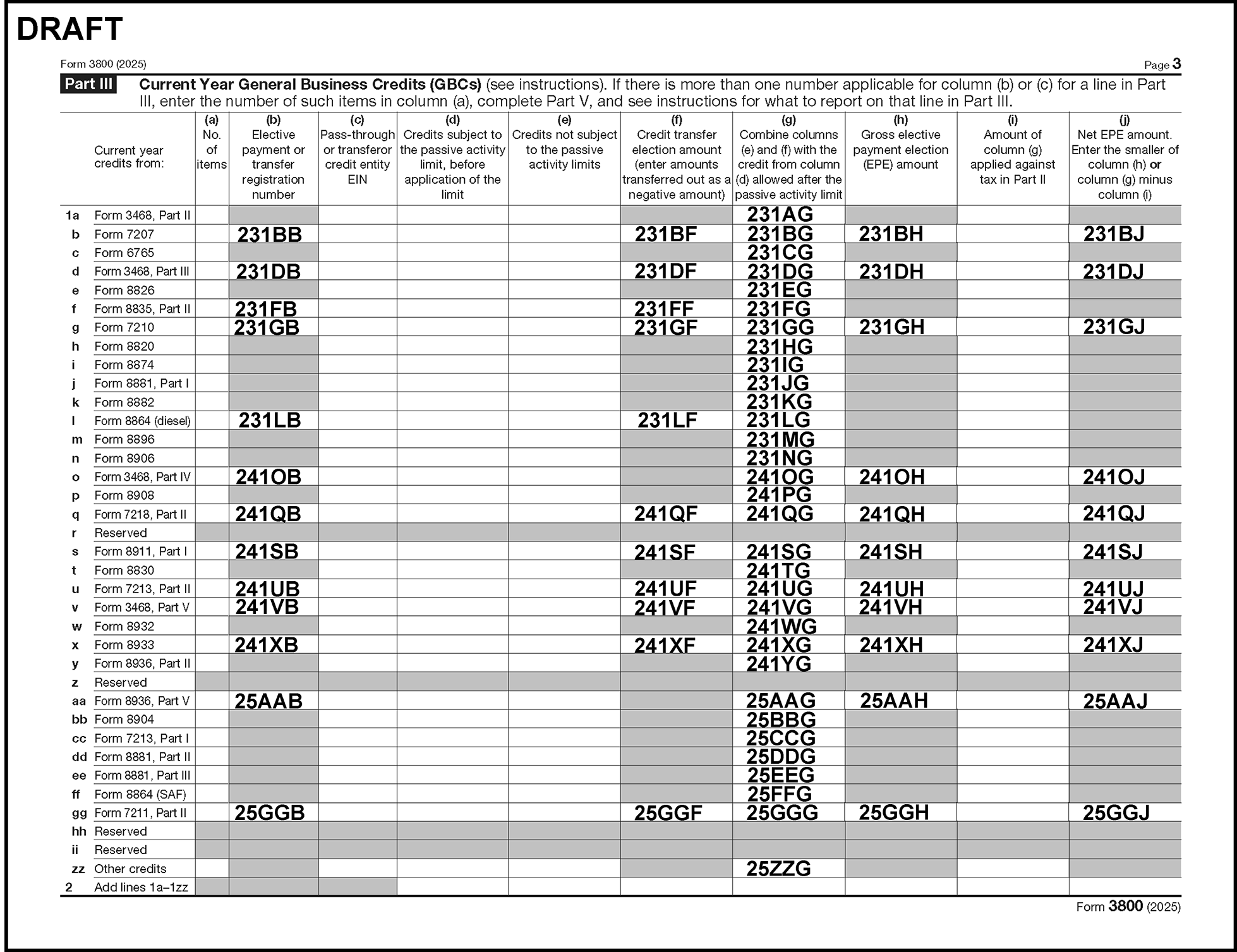
Please click here for the text description of the image.
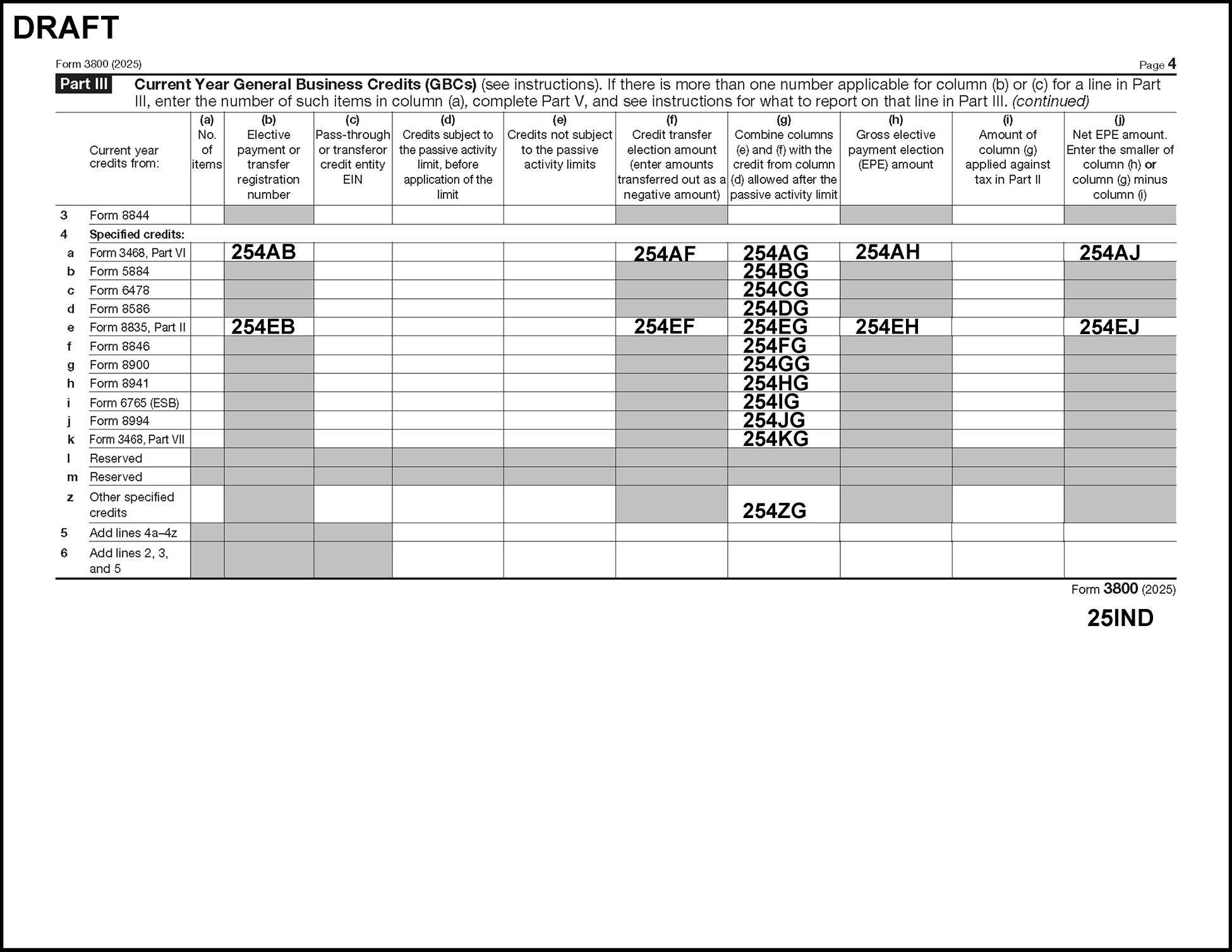
Please click here for the text description of the image.
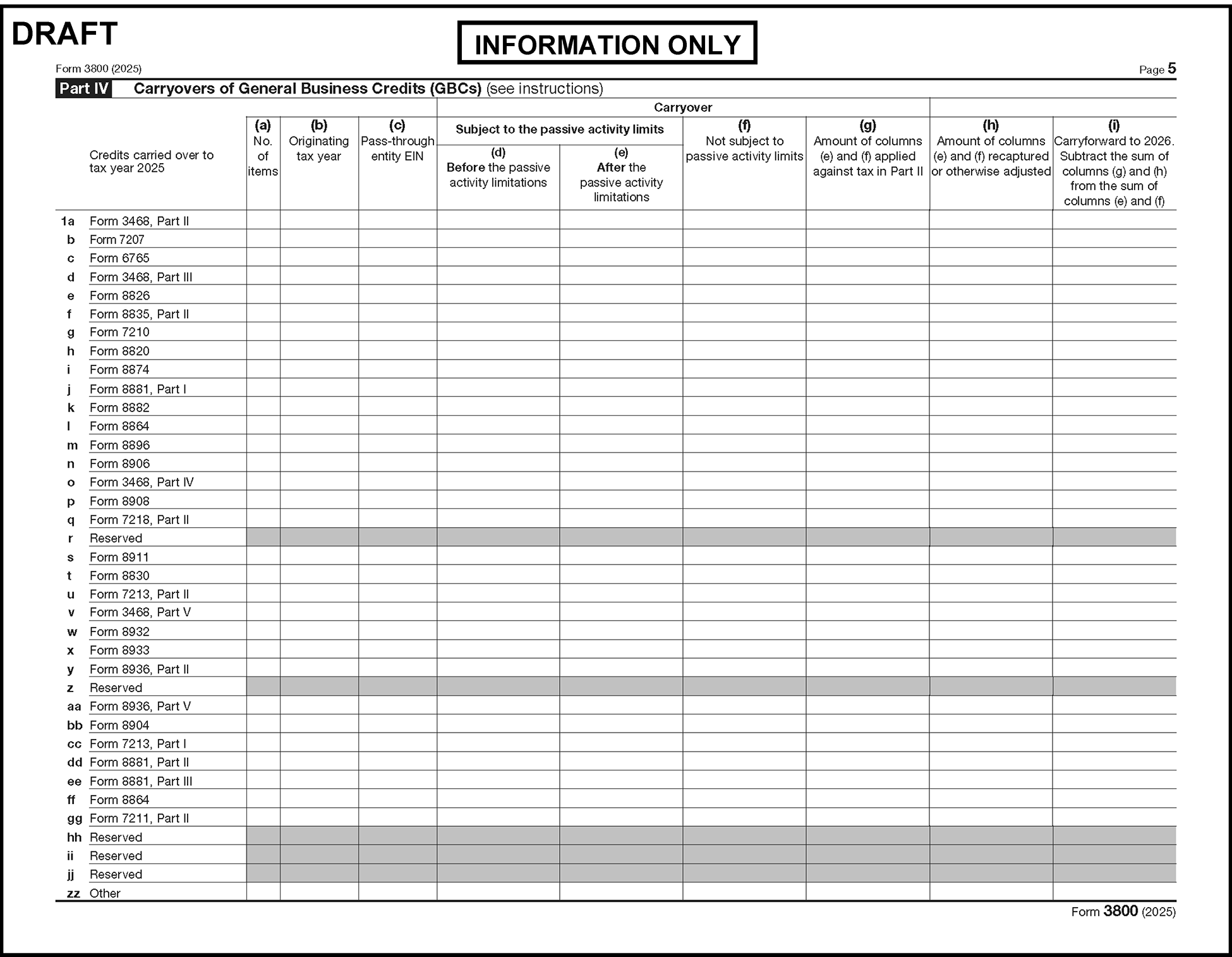
Please click here for the text description of the image.
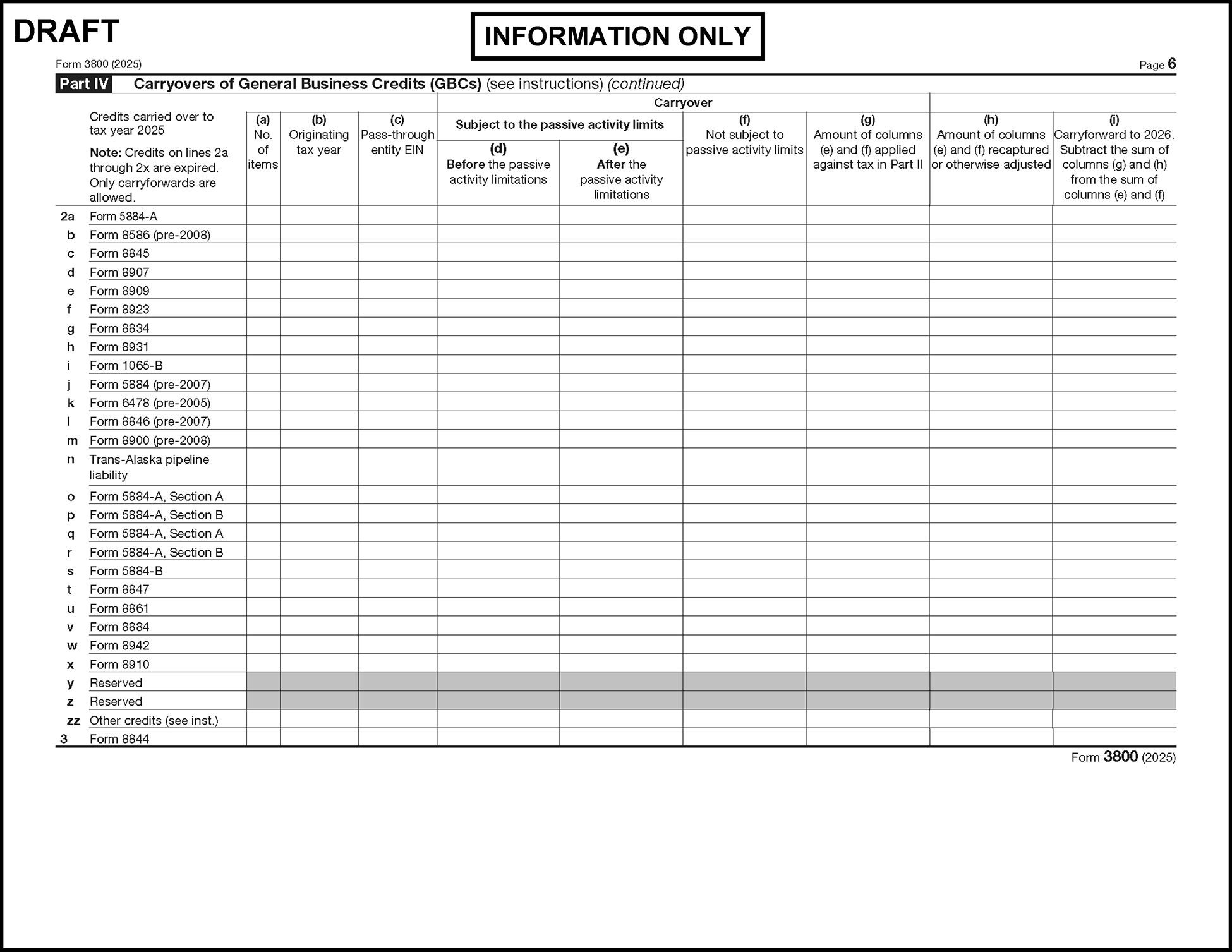
Please click here for the text description of the image.
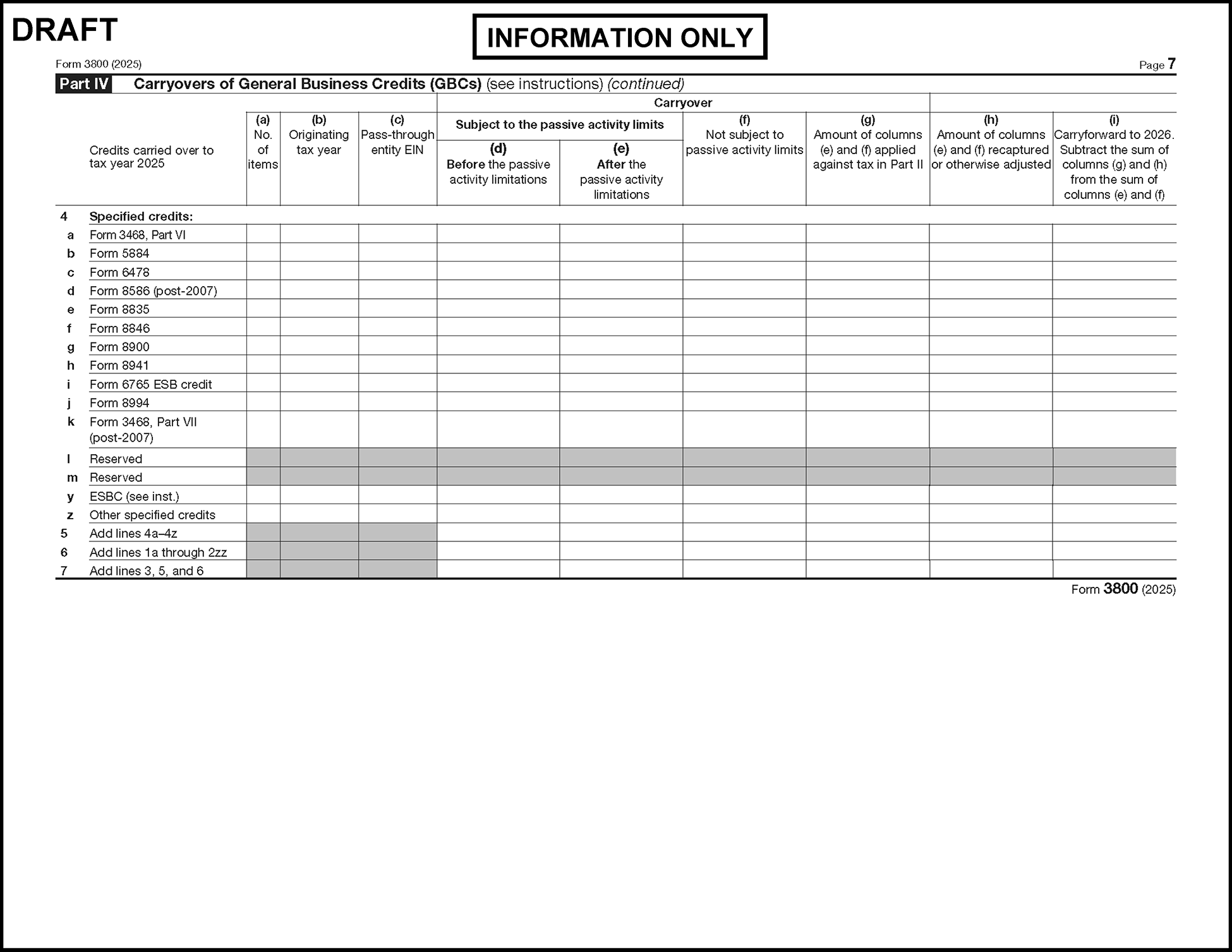
Please click here for the text description of the image.
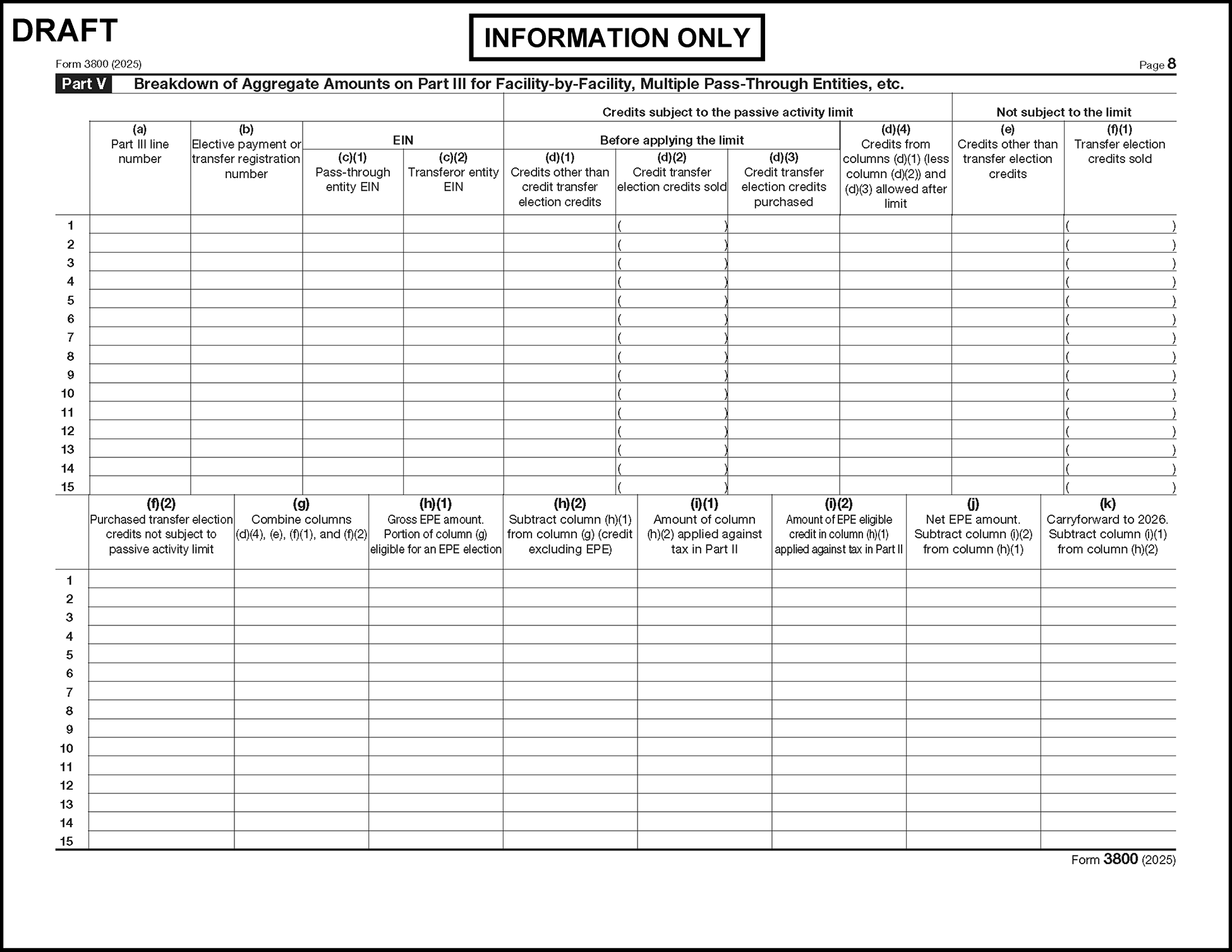
Please click here for the text description of the image.
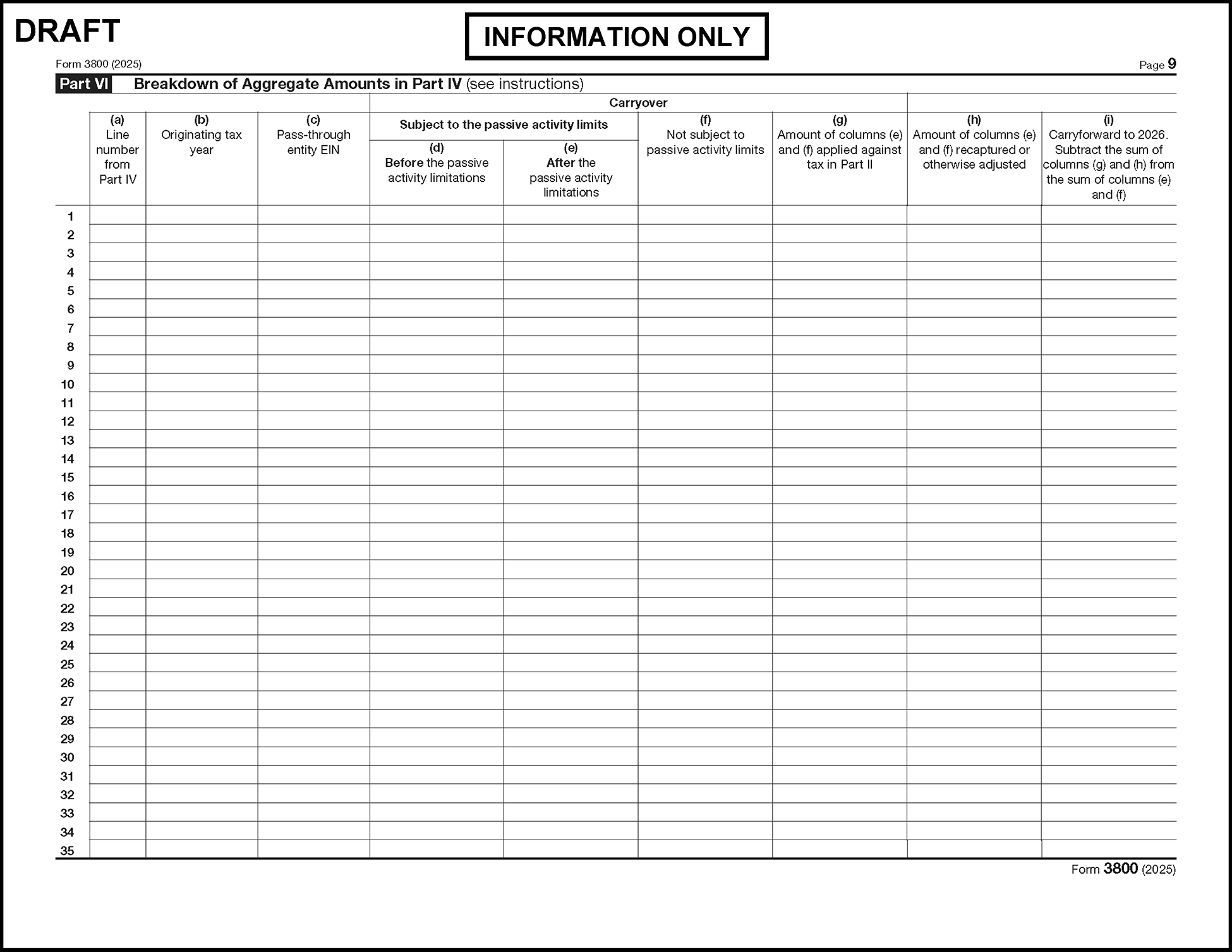

Please click here for the text description of the image.
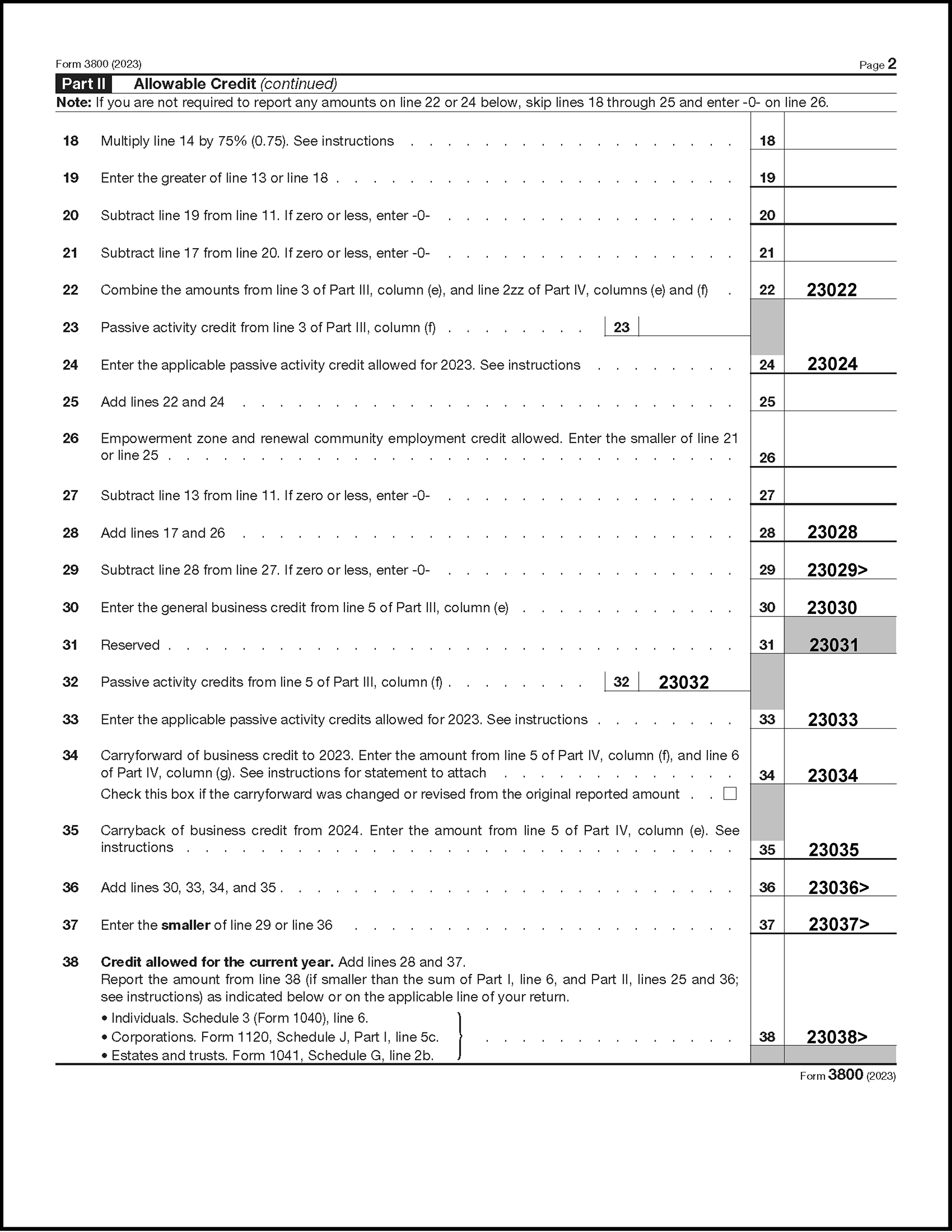
Please click here for the text description of the image.
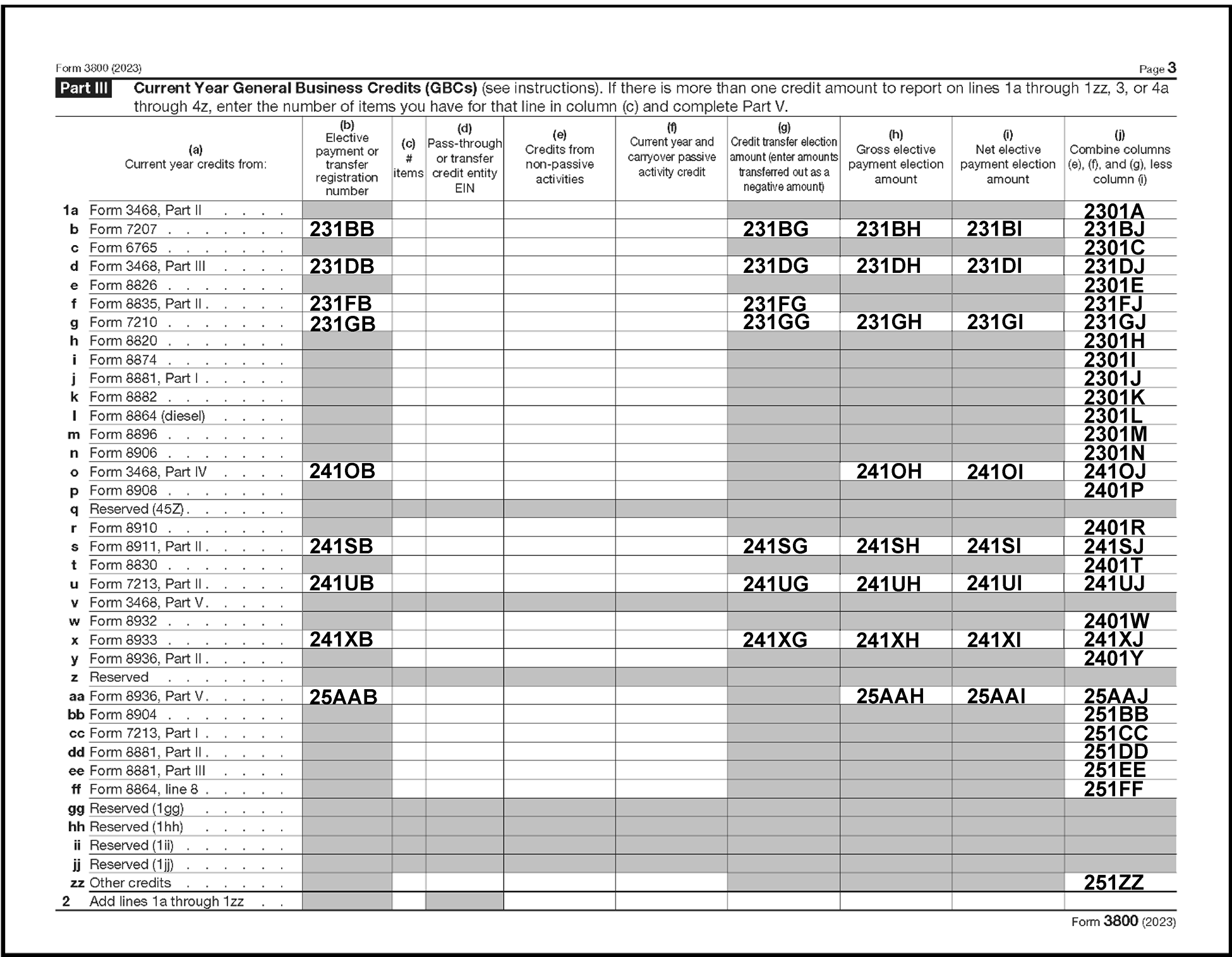
Please click here for the text description of the image.
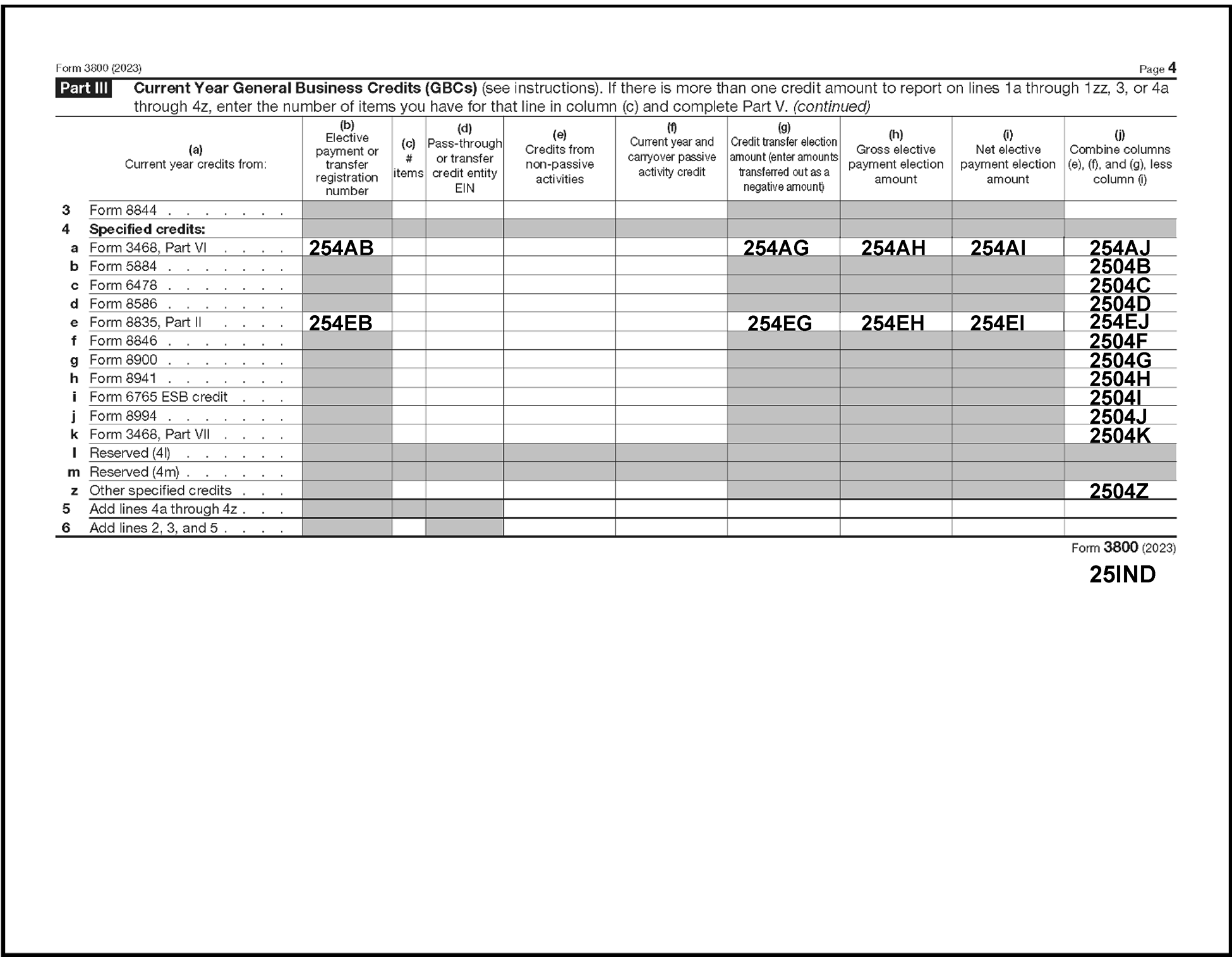
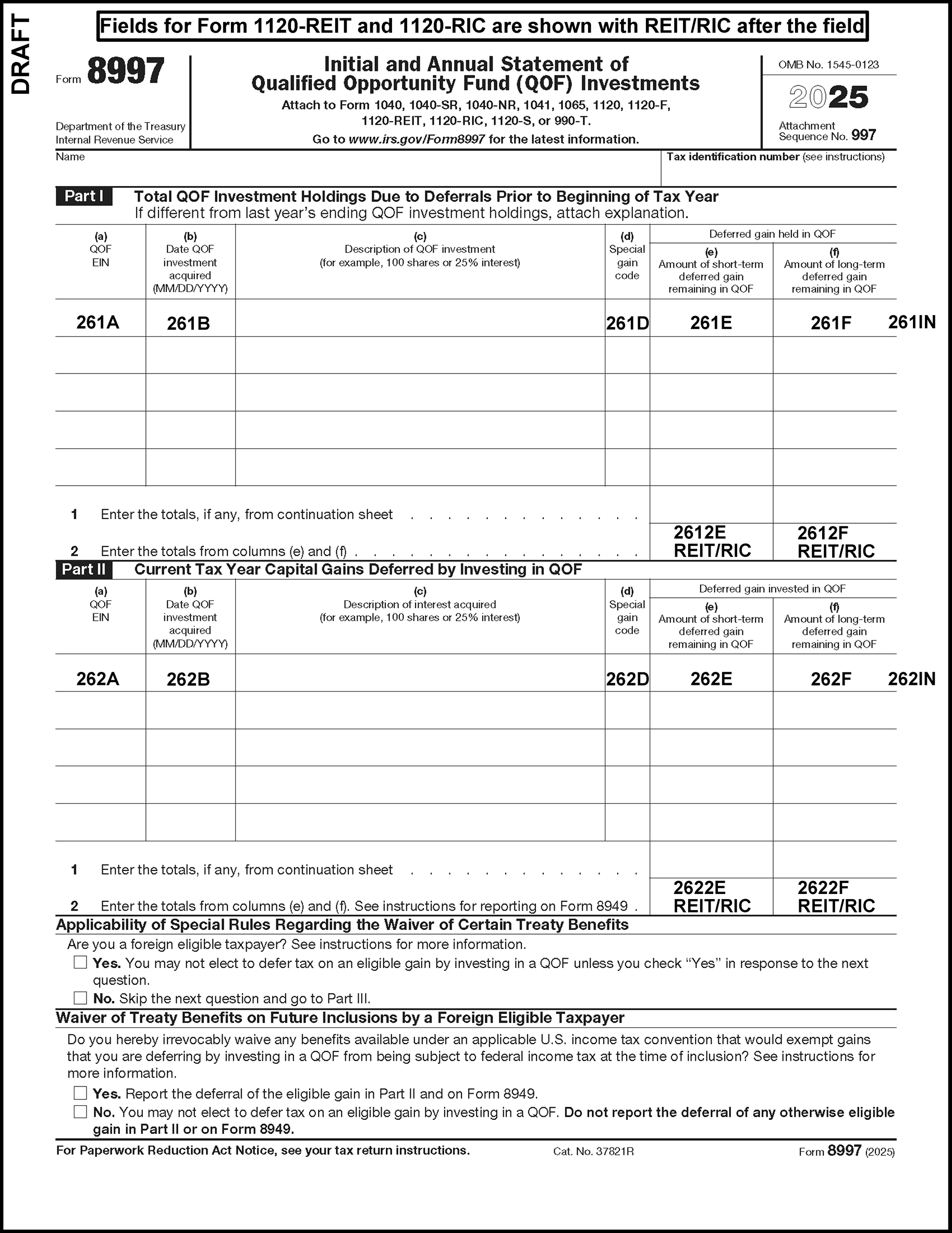
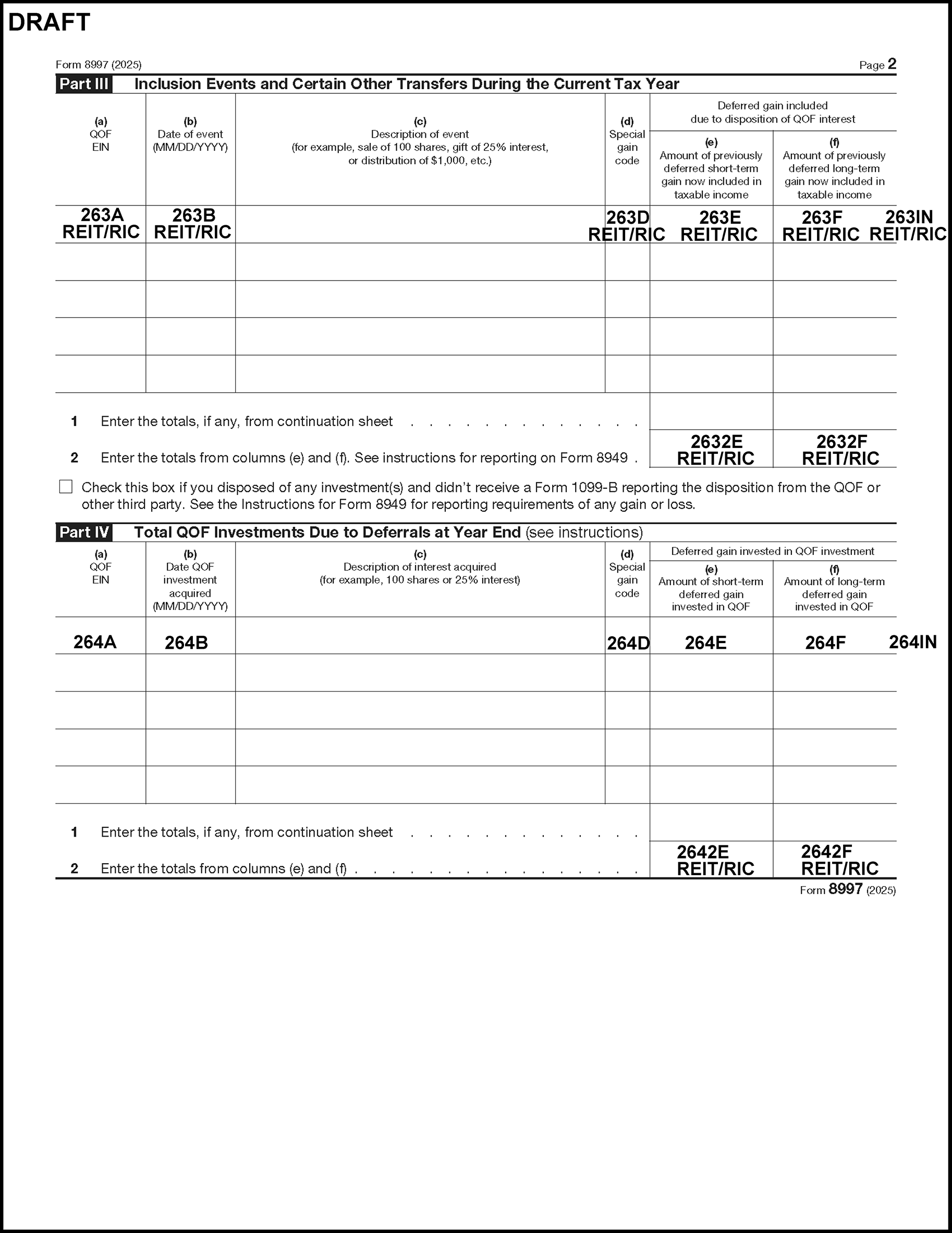
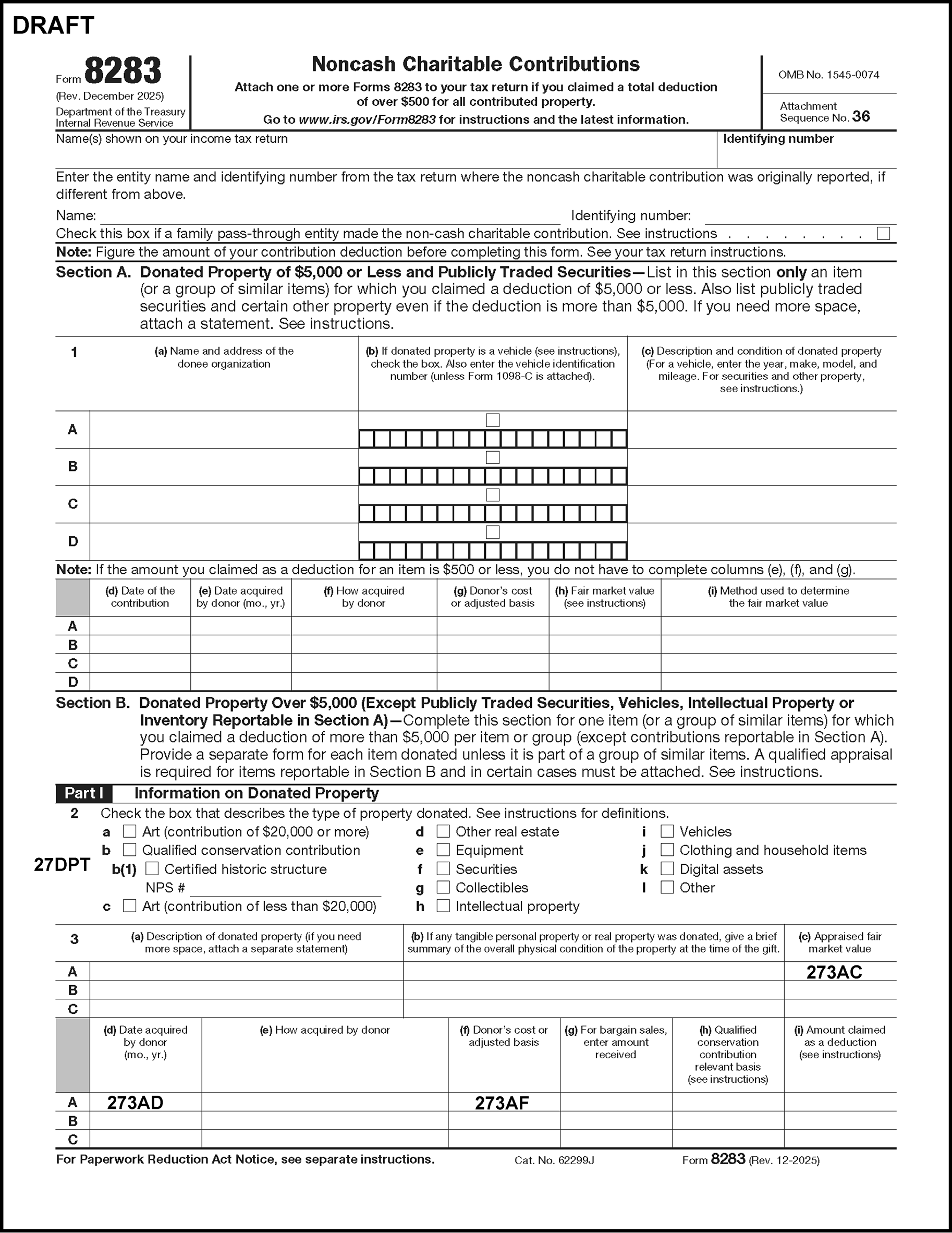
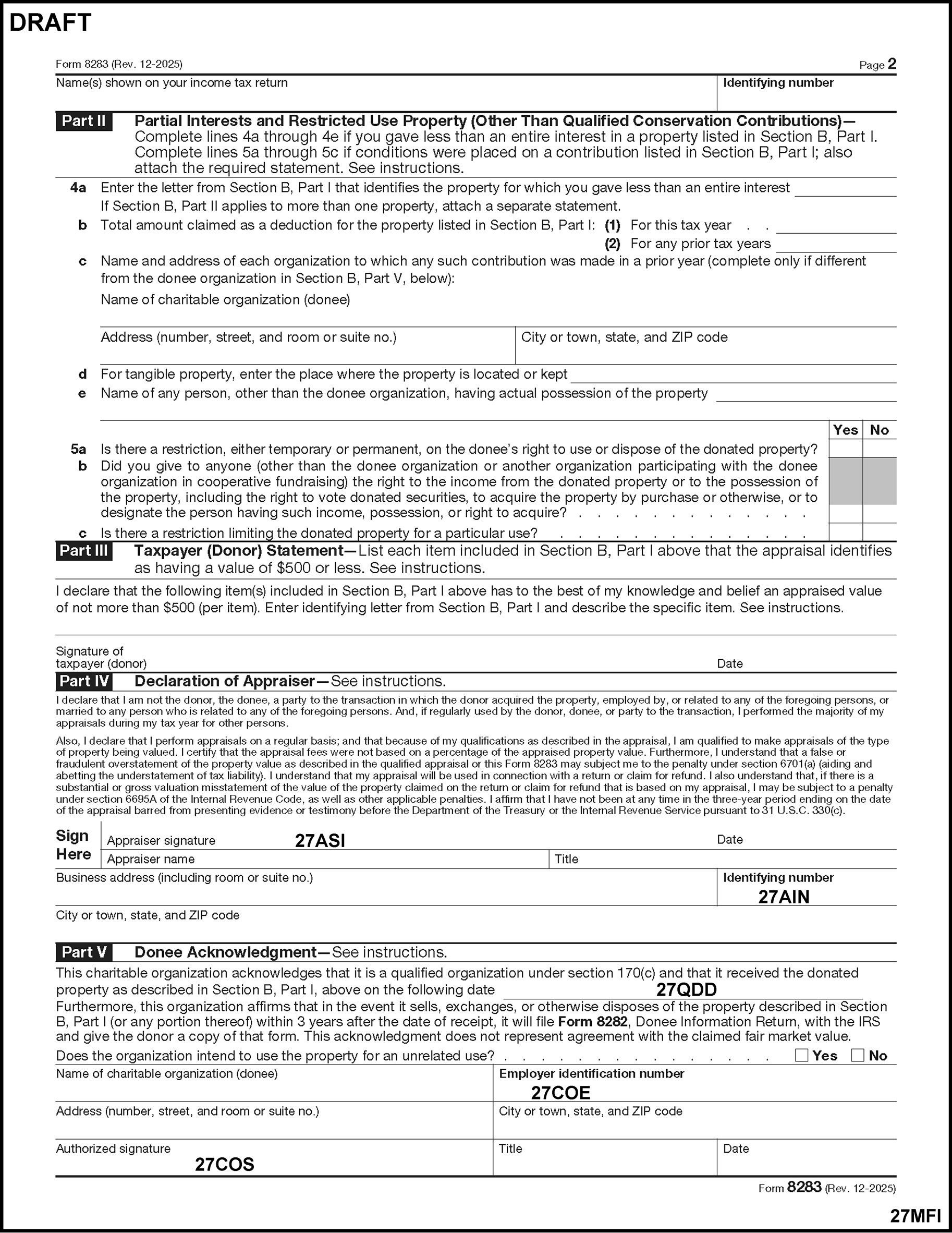
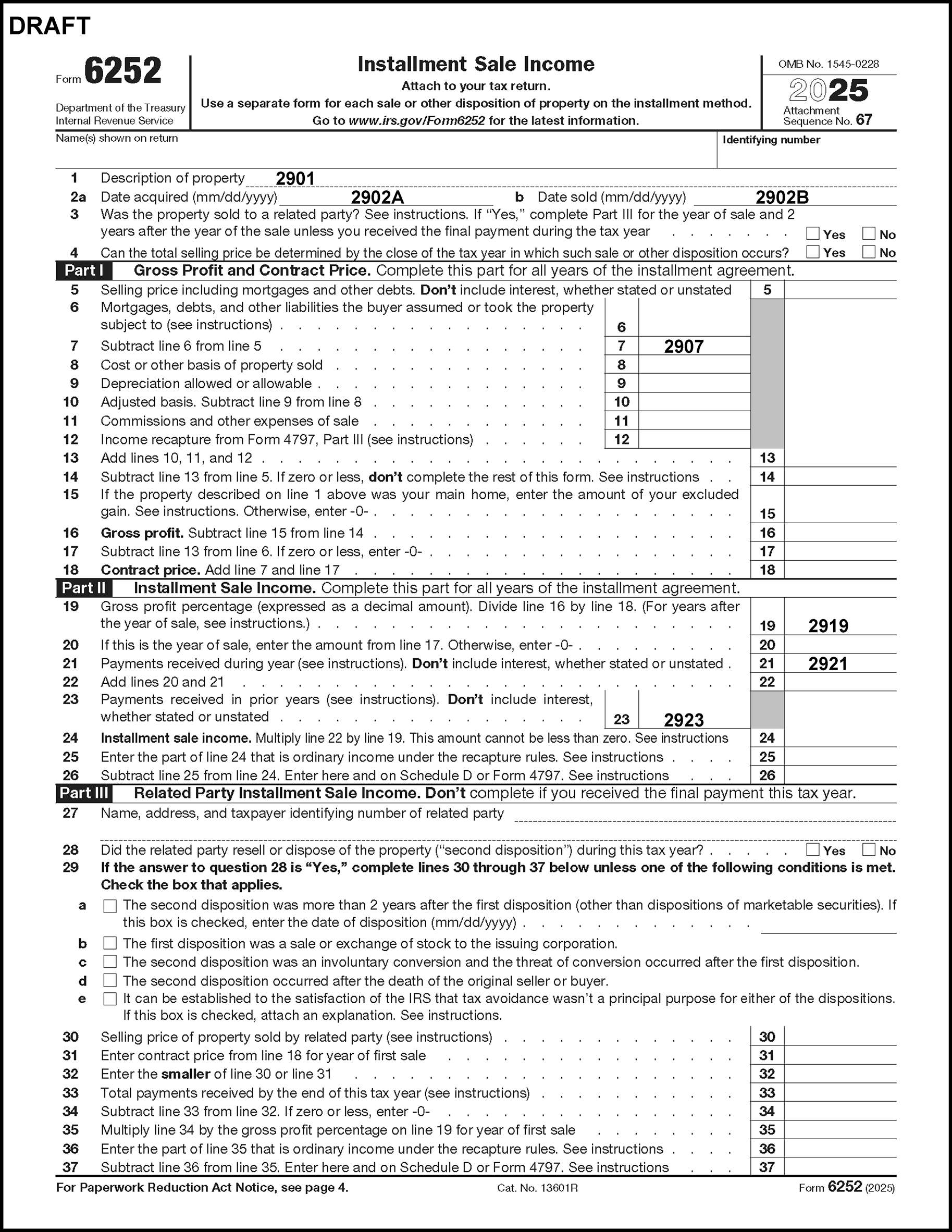
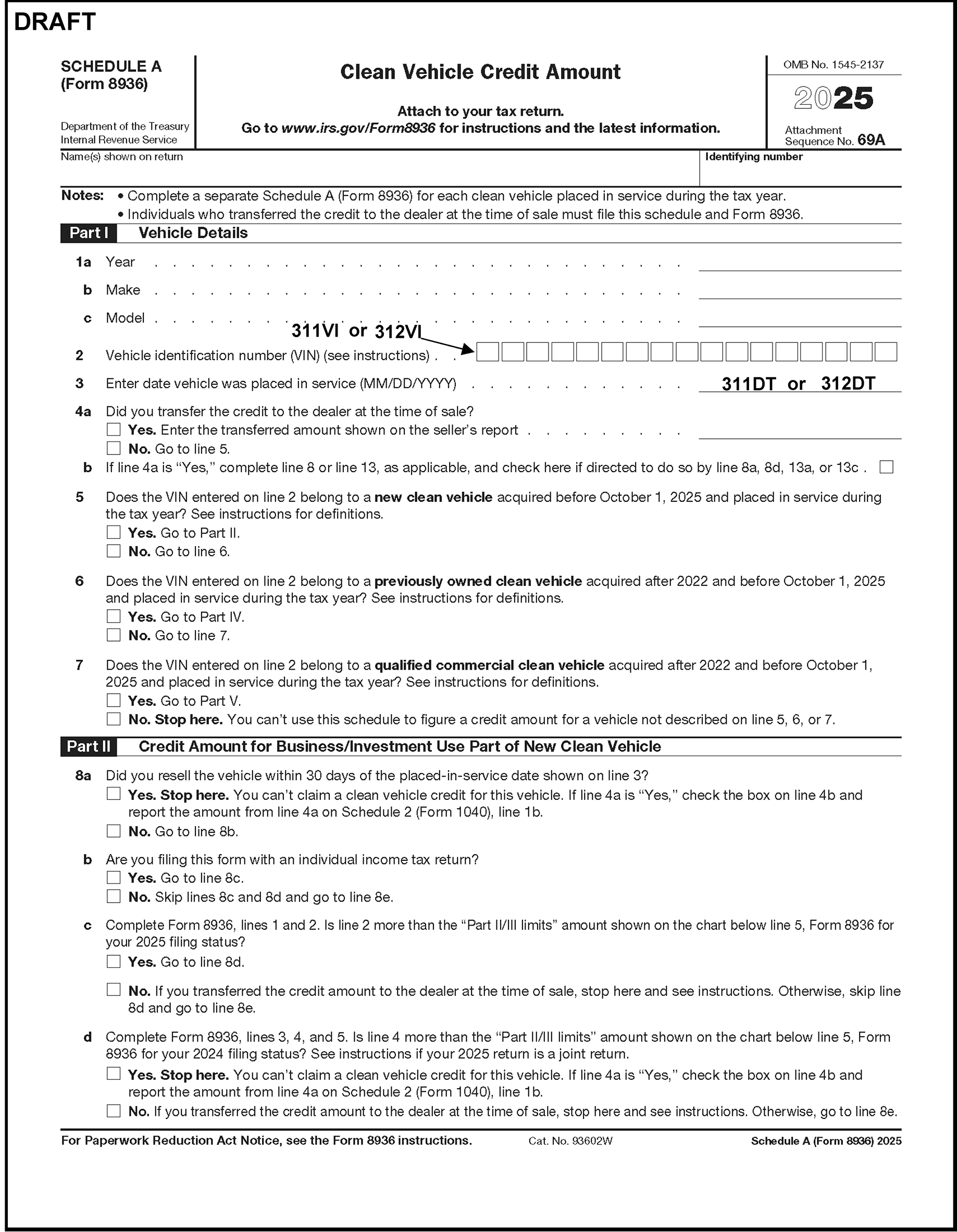
Please click here for the text description of the image.
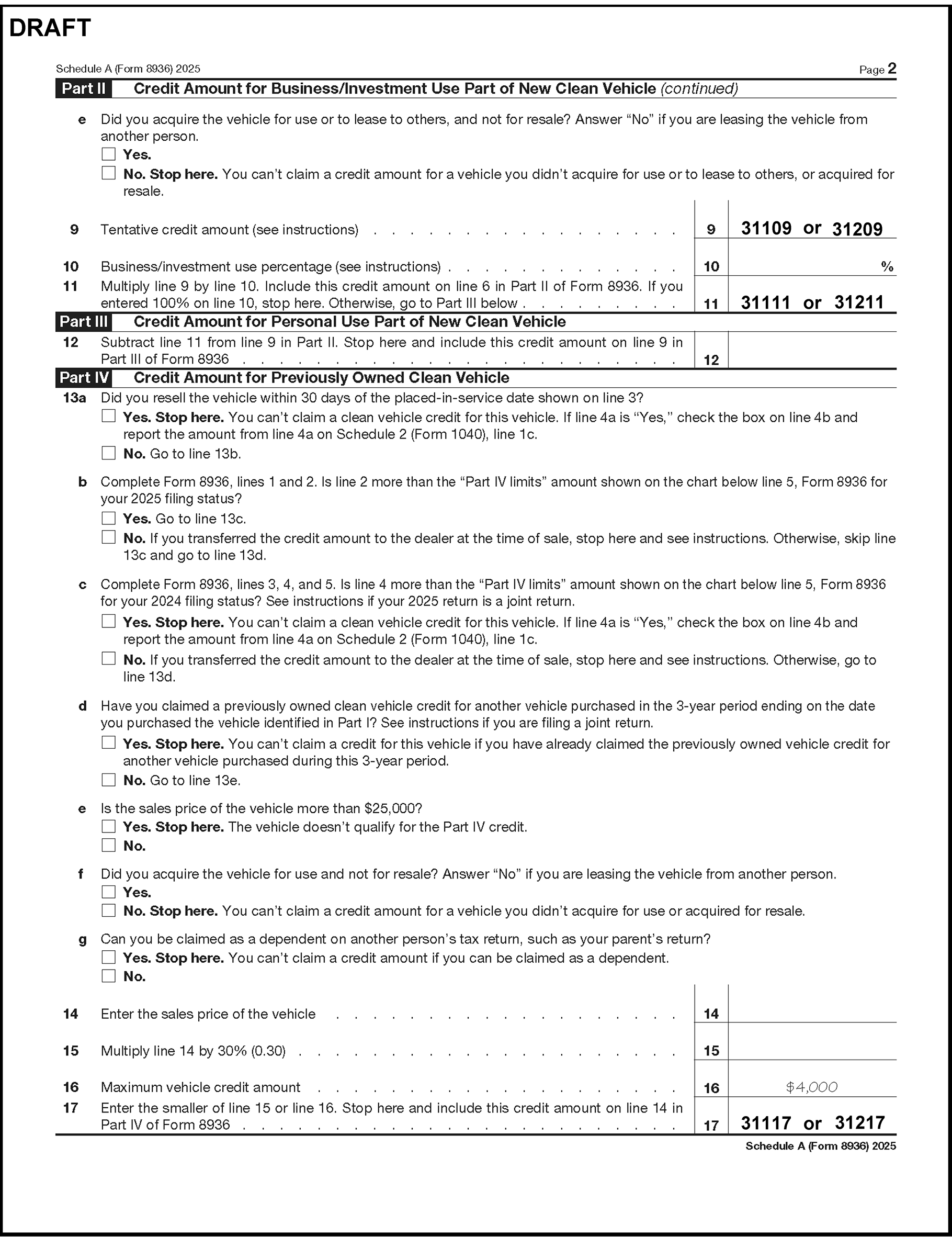
Please click here for the text description of the image.
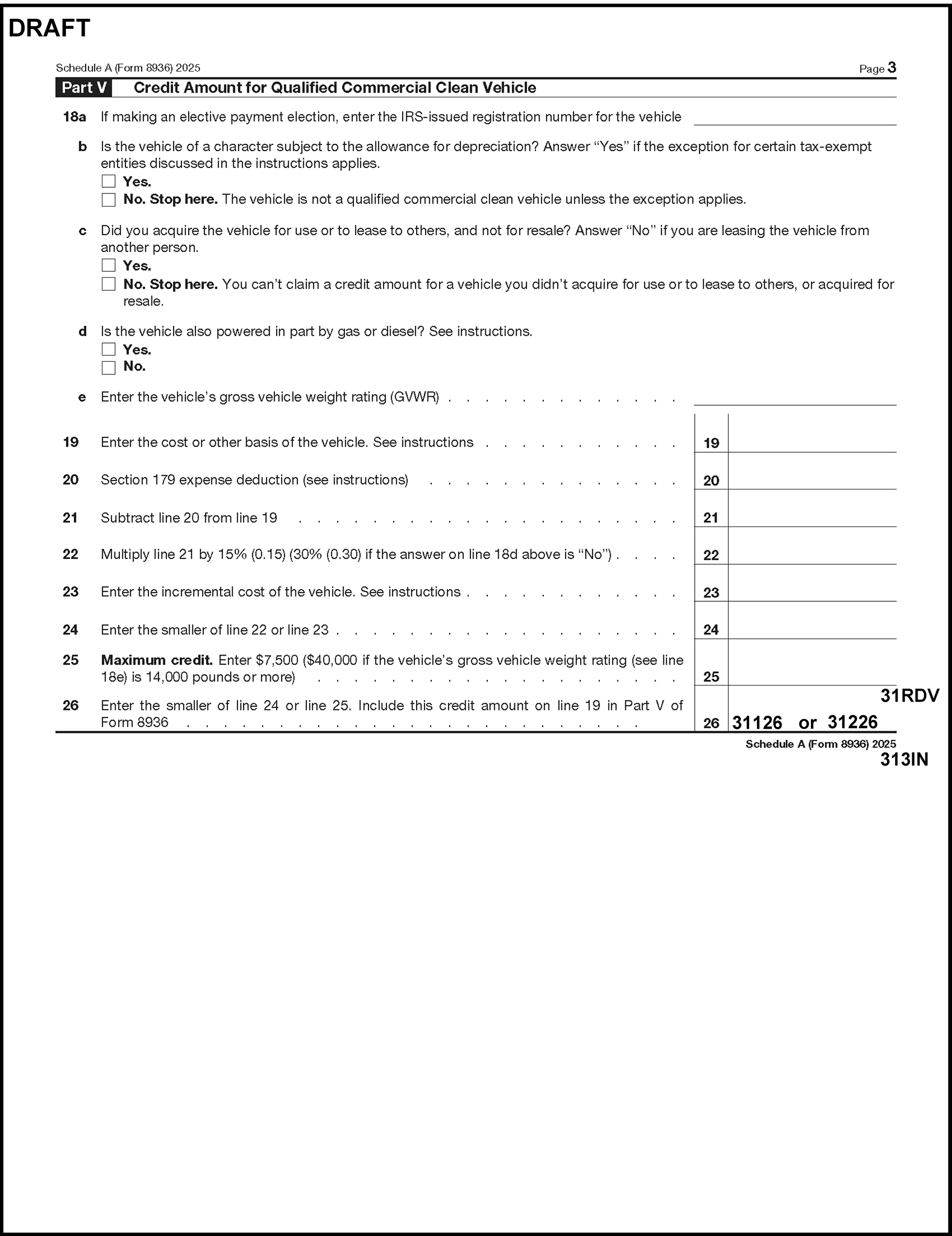
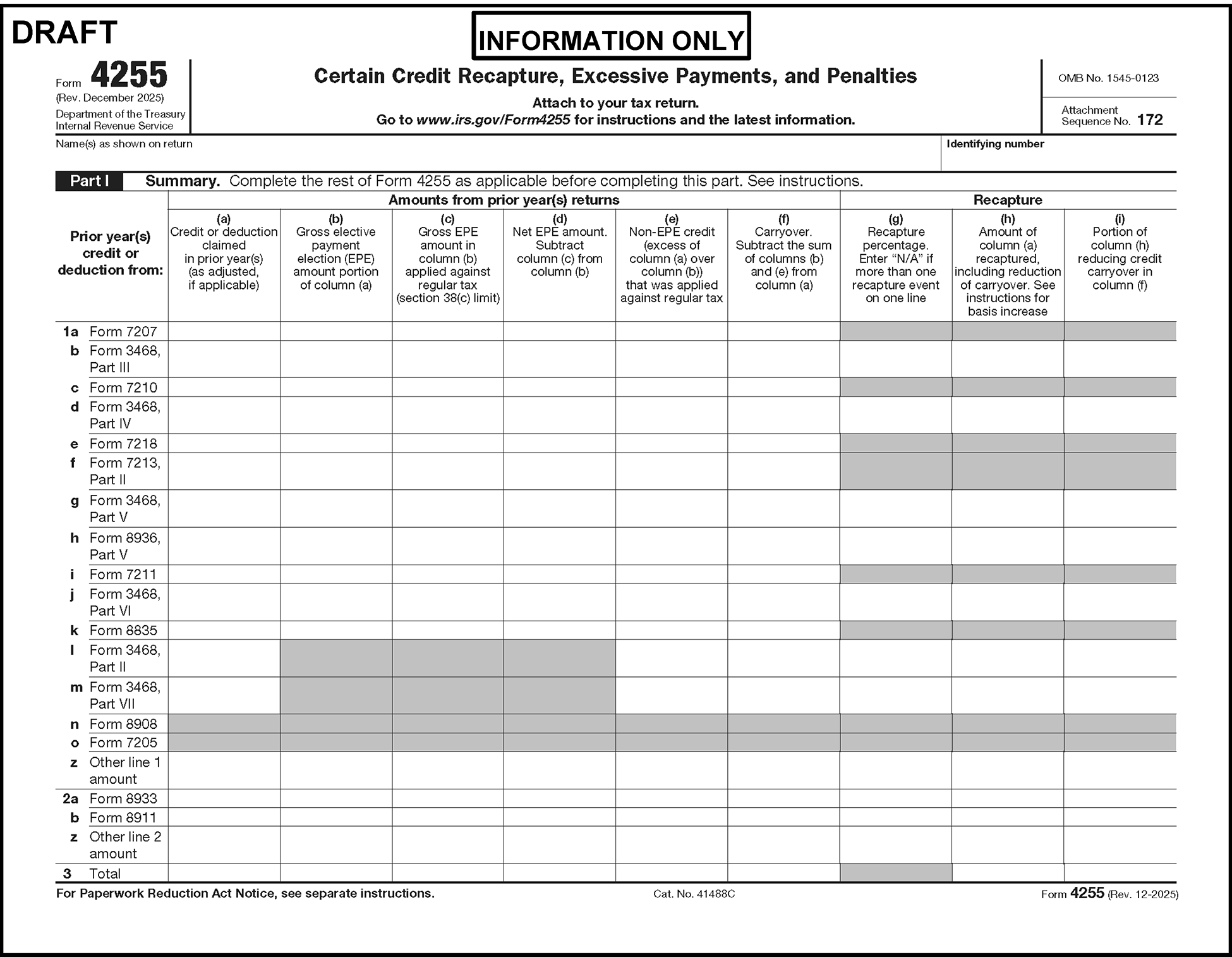
Please click here for the text description of the image.
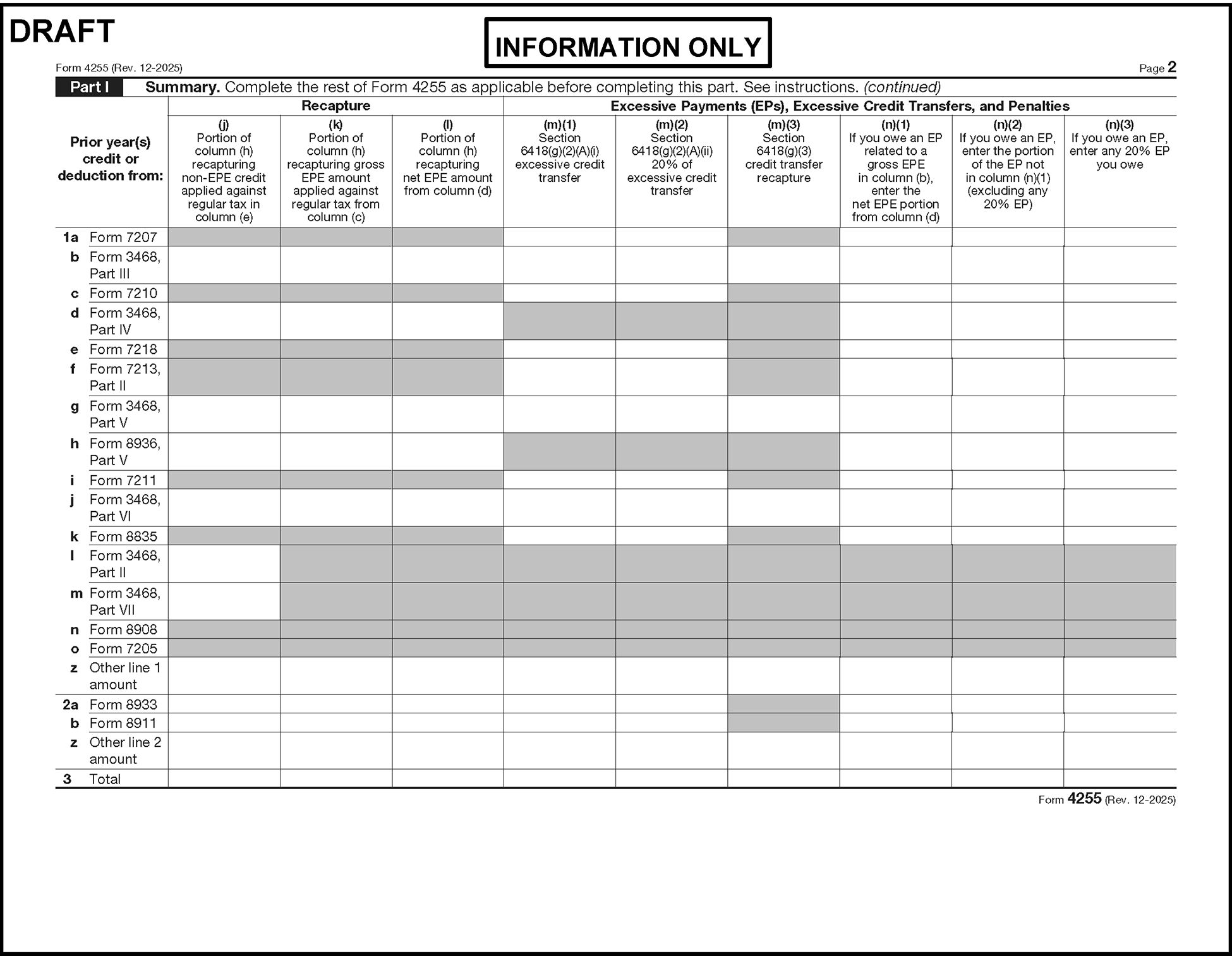
Please click here for the text description of the image.
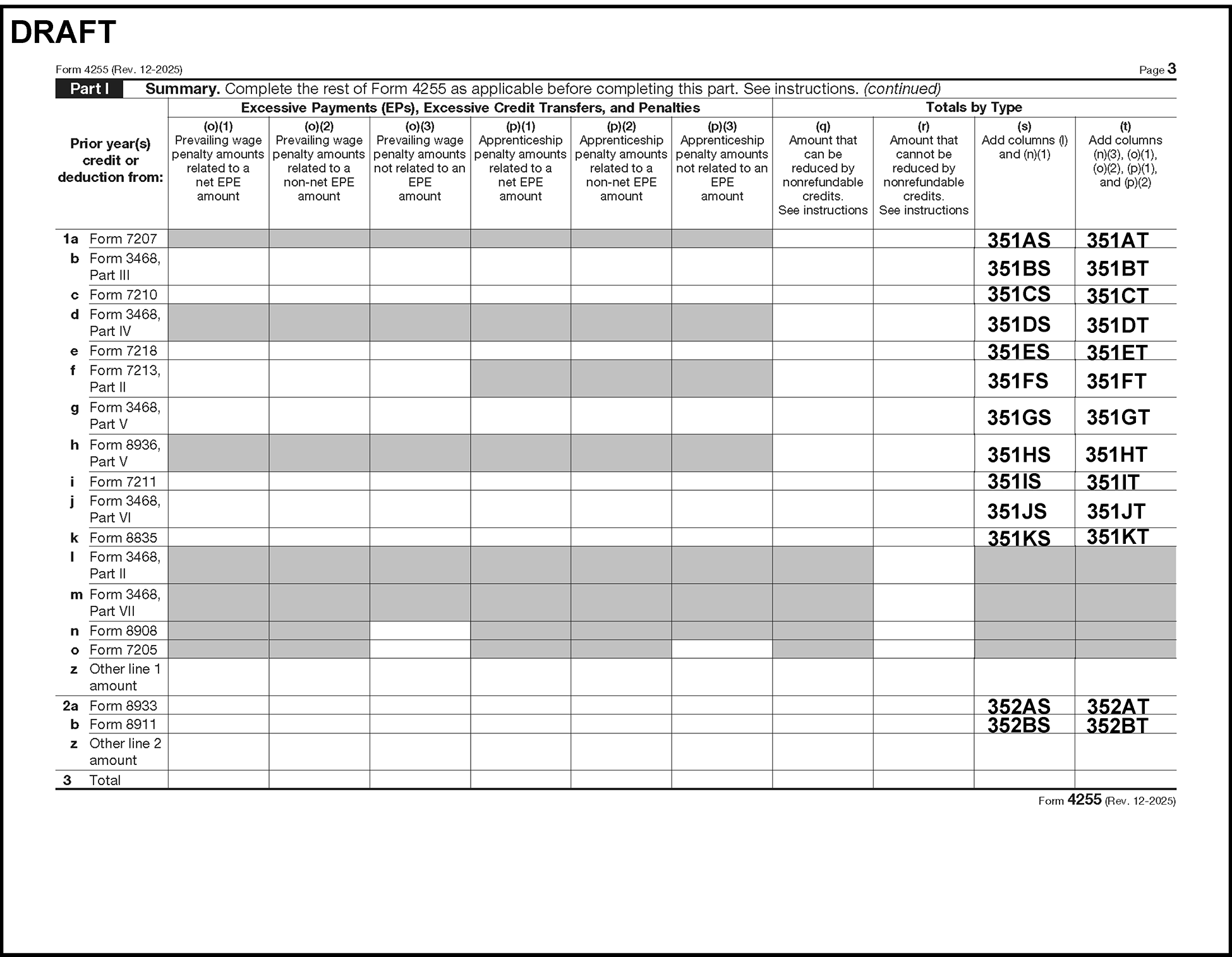
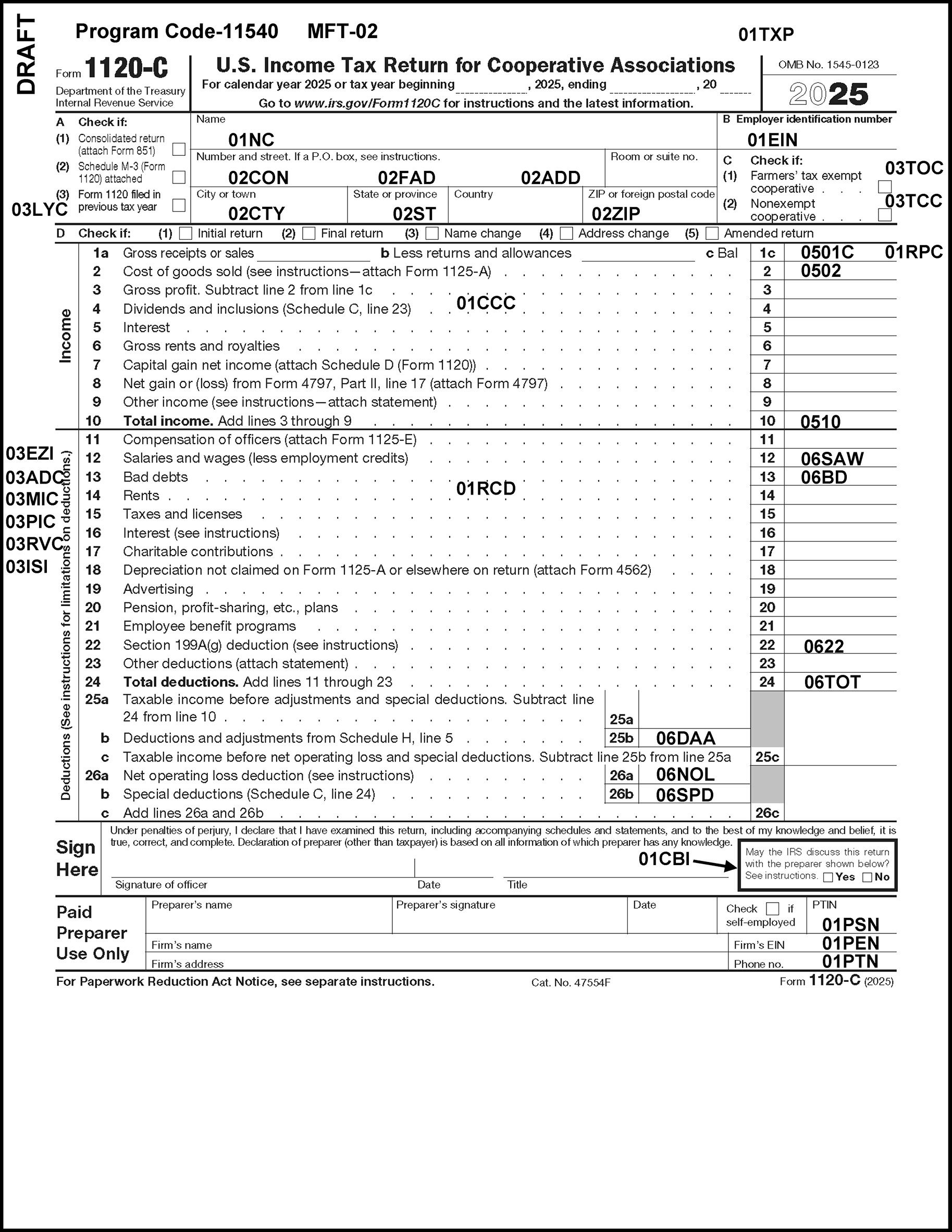
Please click here for the text description of the image.
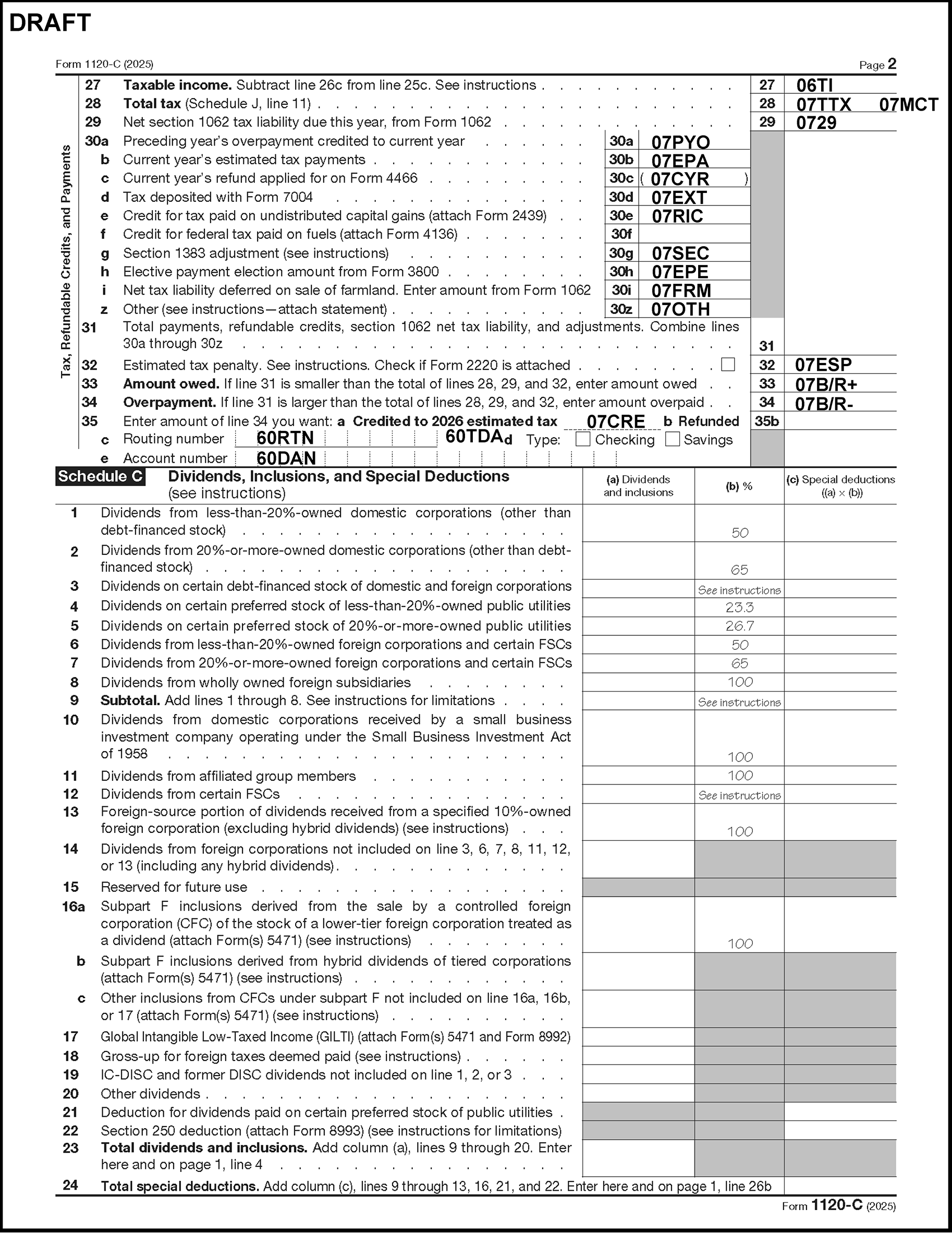
Please click here for the text description of the image.
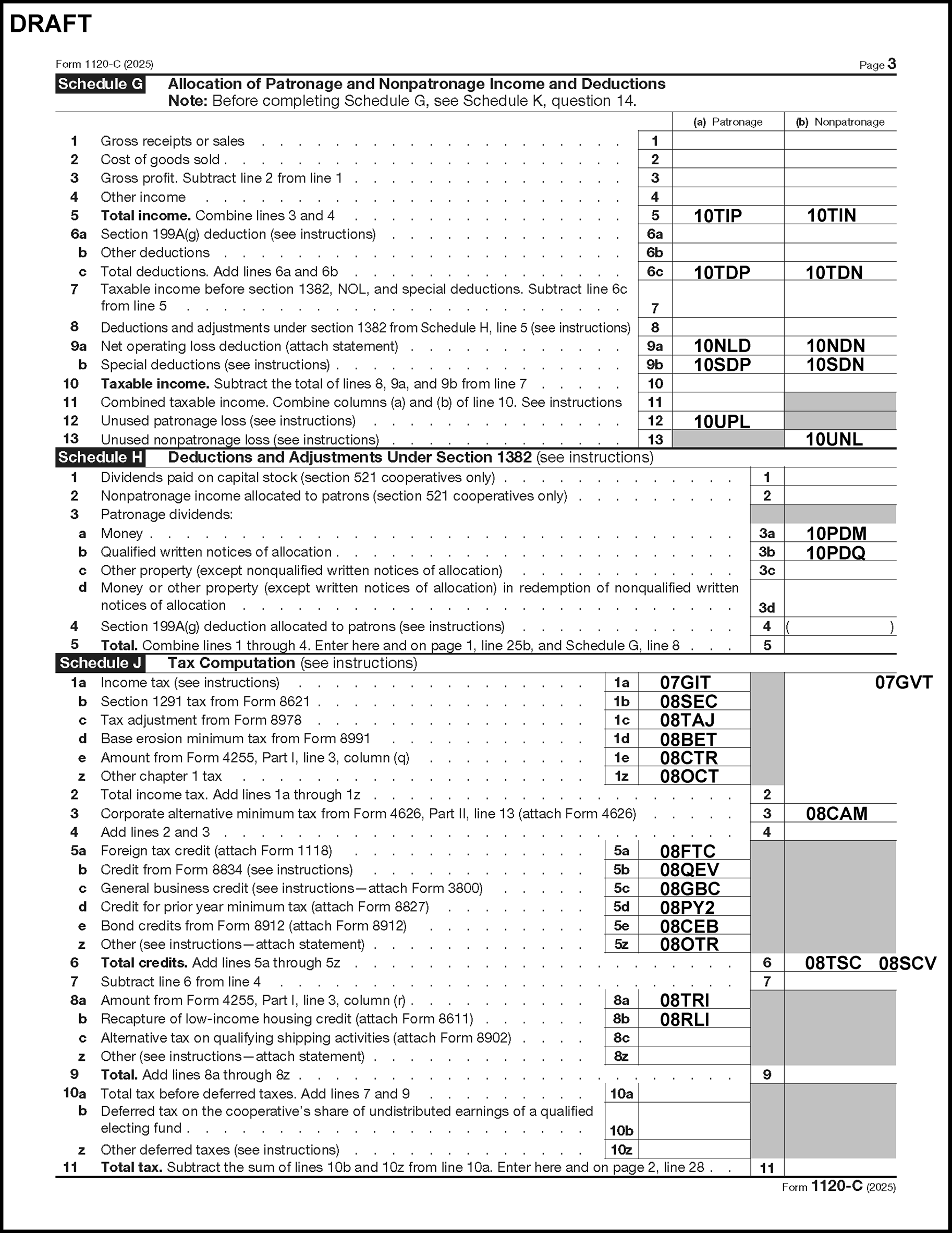
Please click here for the text description of the image.
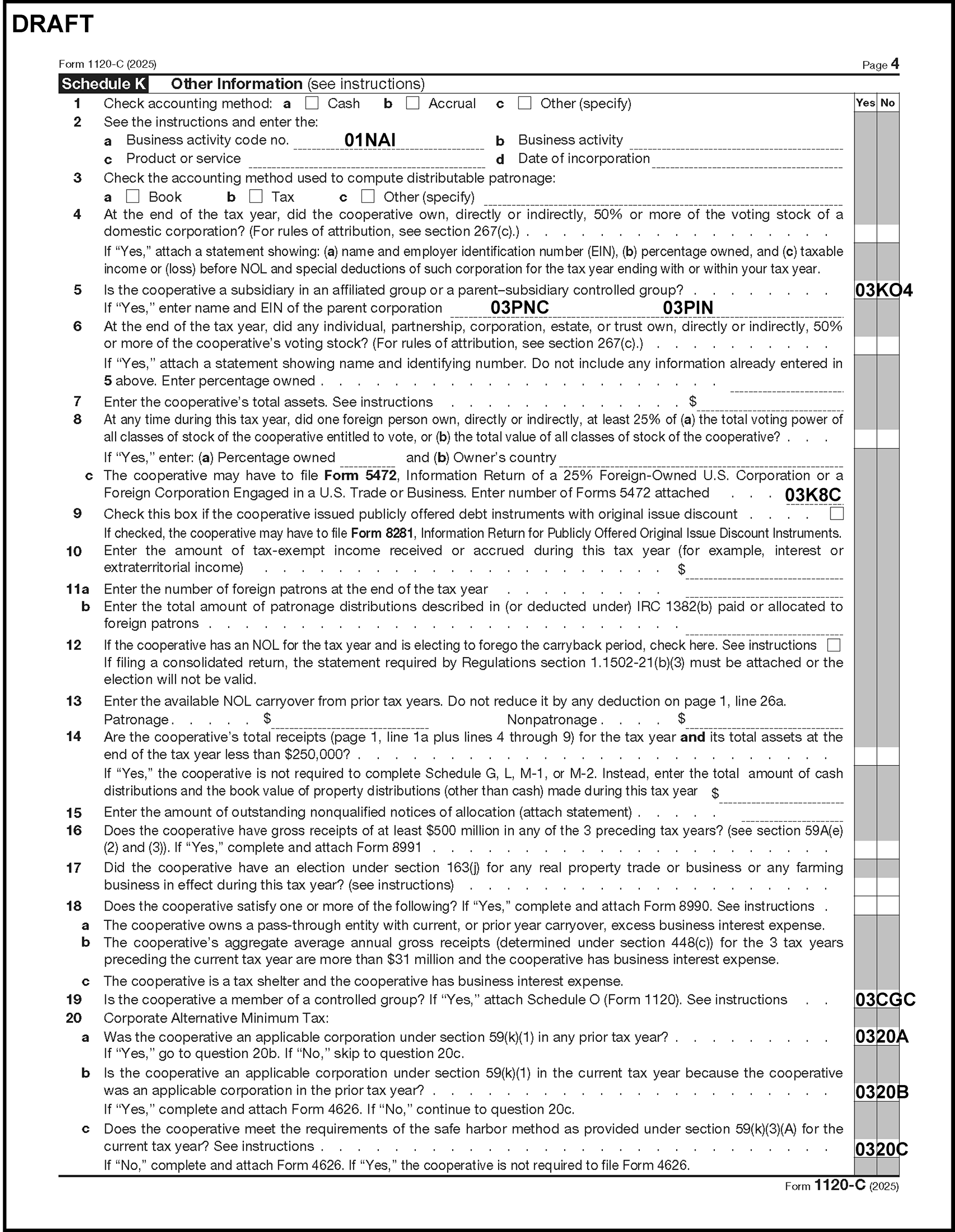
Please click here for the text description of the image.
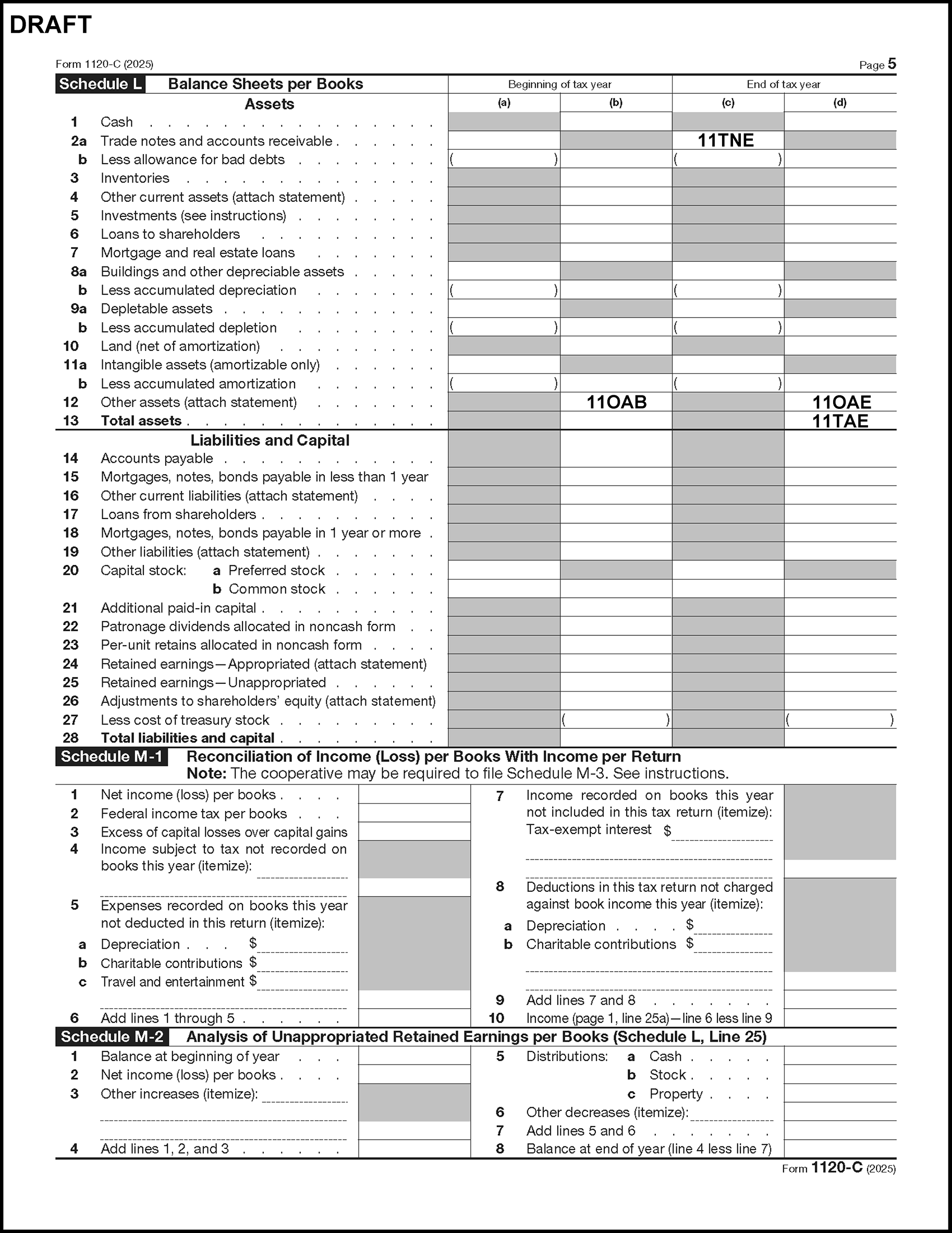
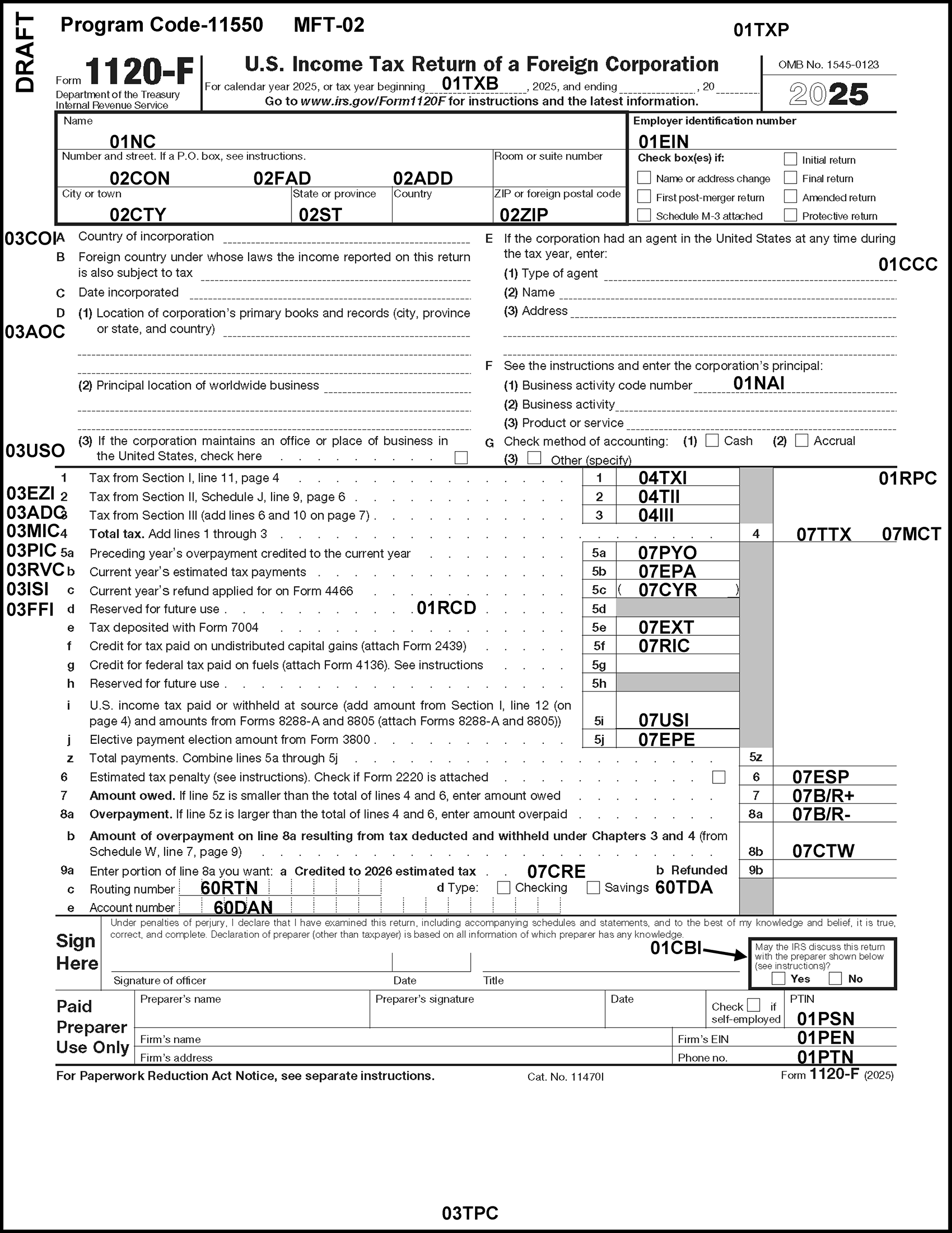
Please click here for the text description of the image.
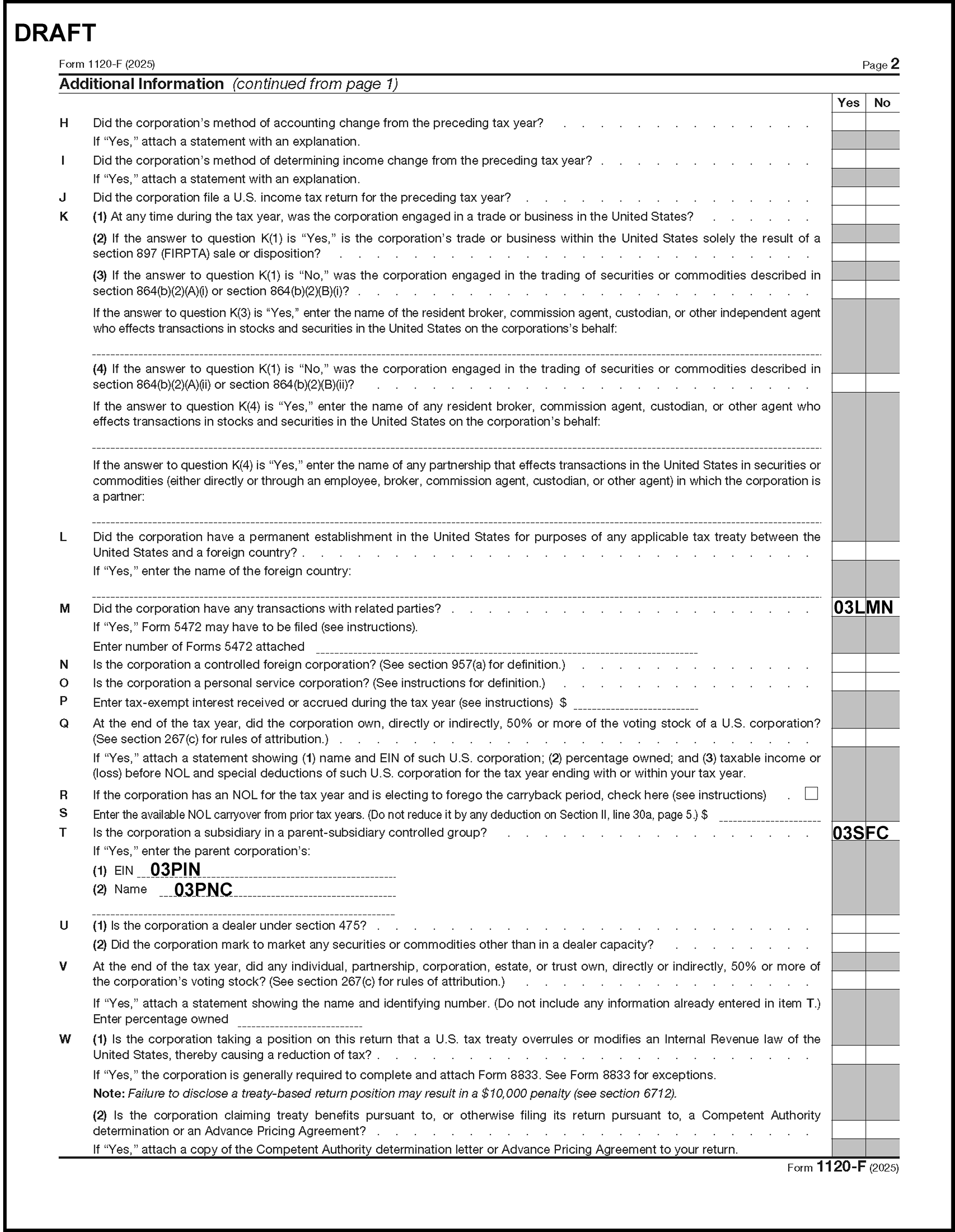
Please click here for the text description of the image.
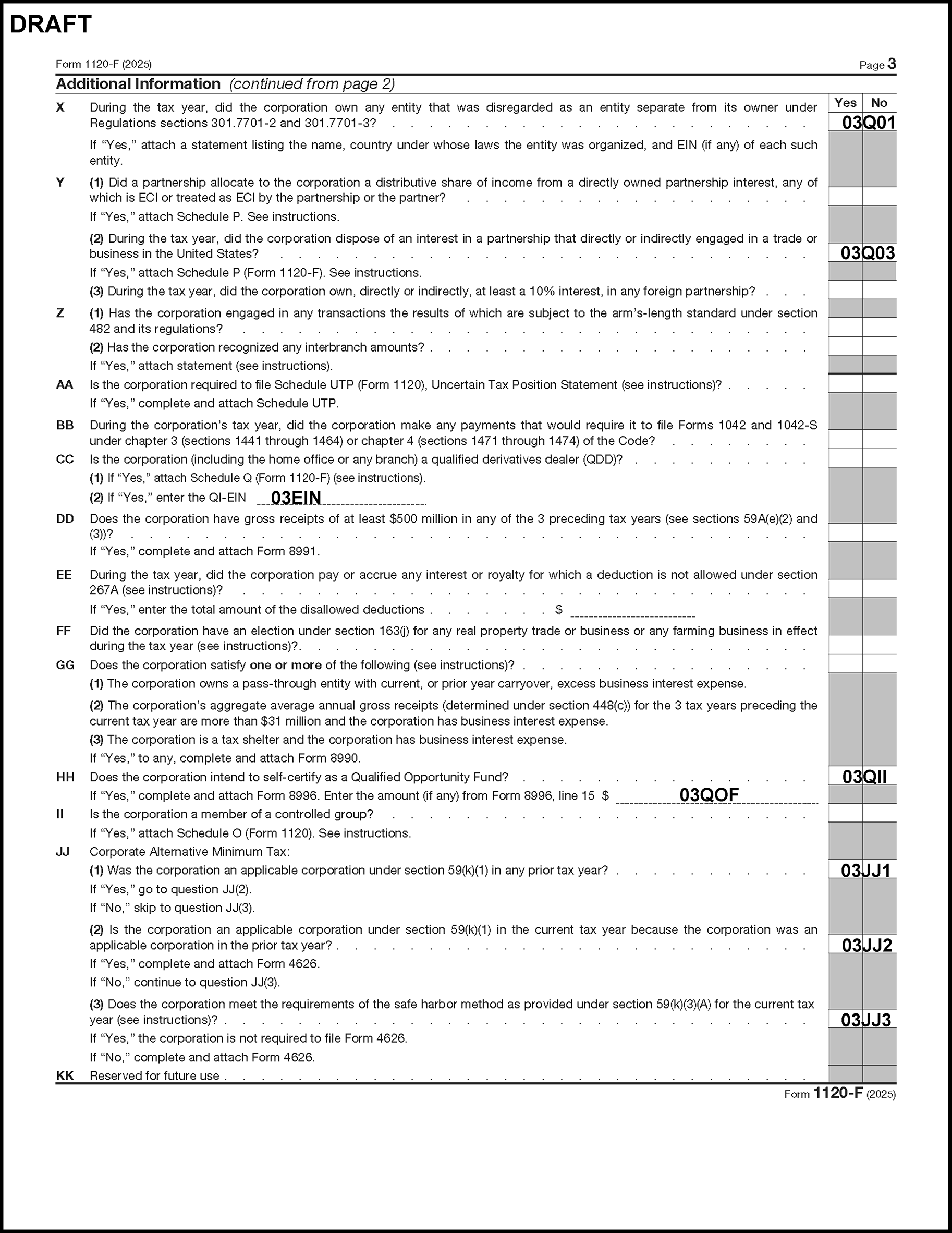
Please click here for the text description of the image.
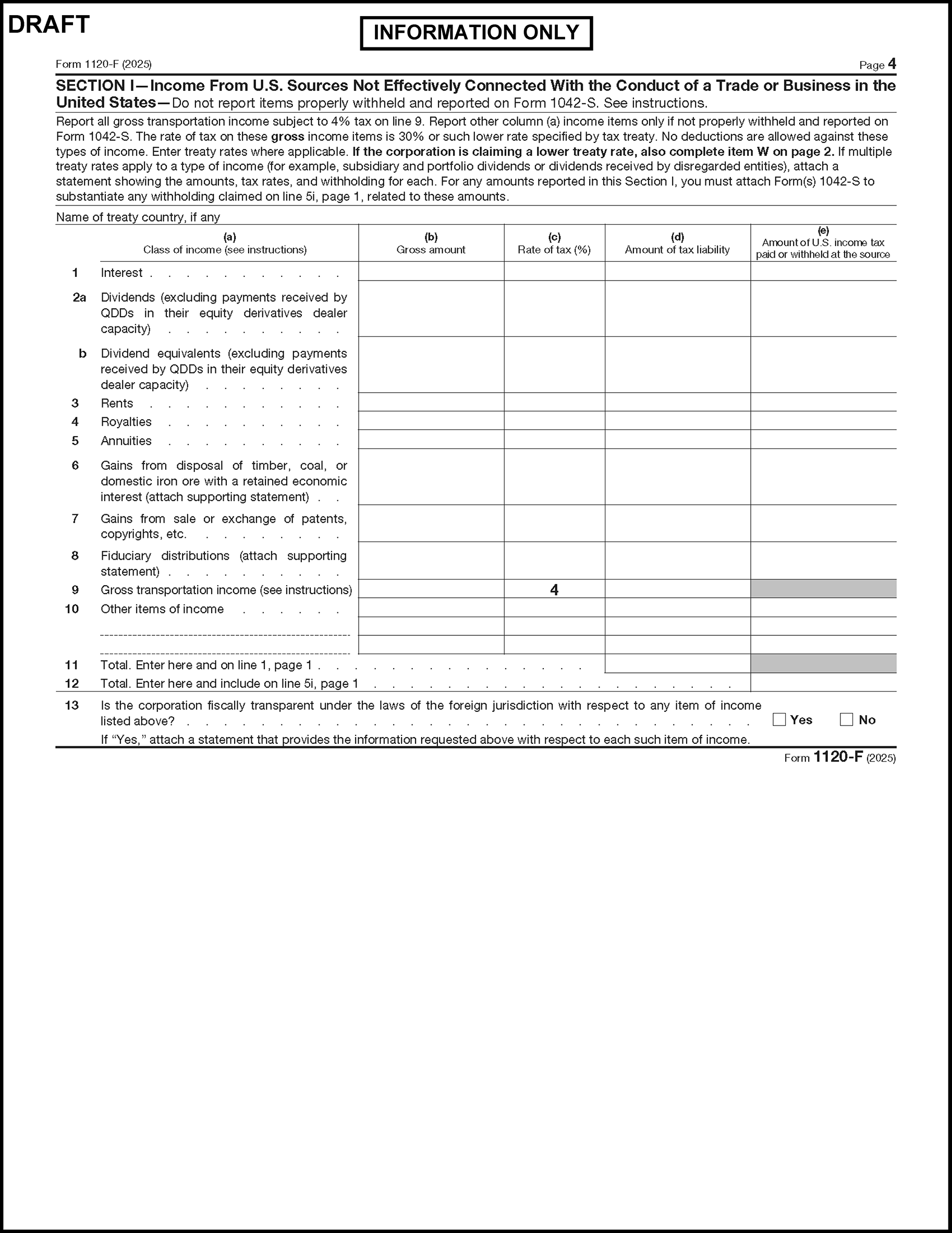
Please click here for the text description of the image.
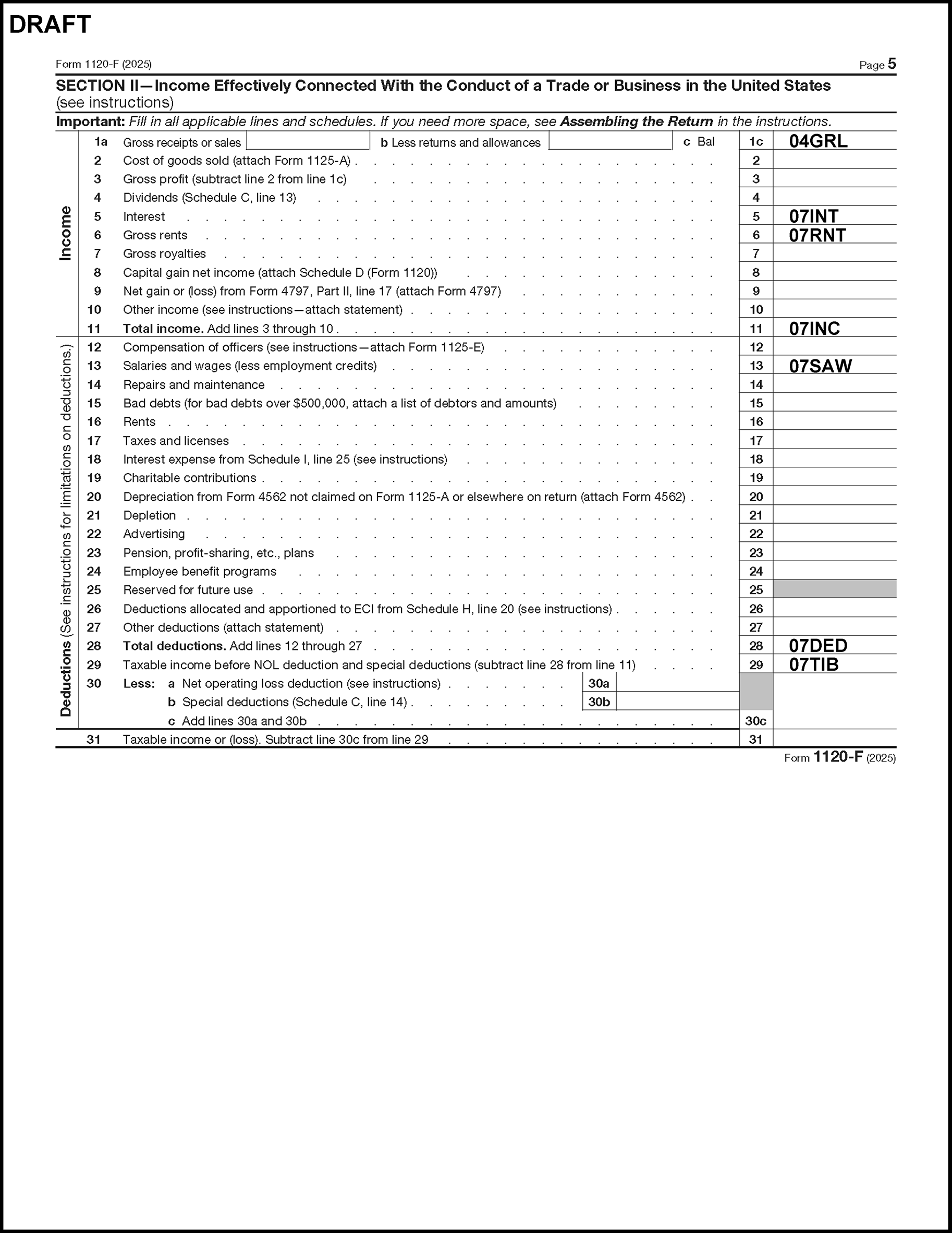
Please click here for the text description of the image.
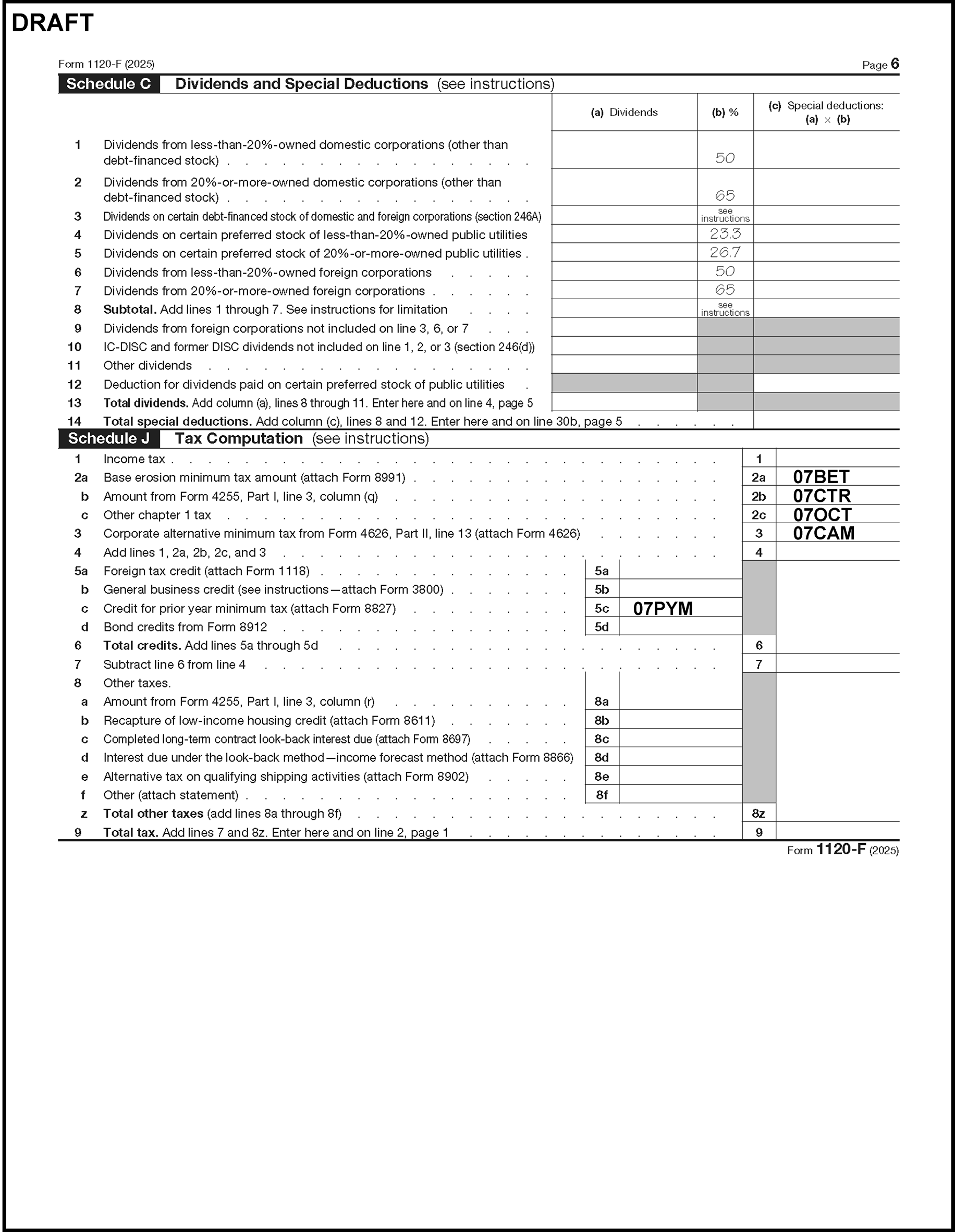
Please click here for the text description of the image.
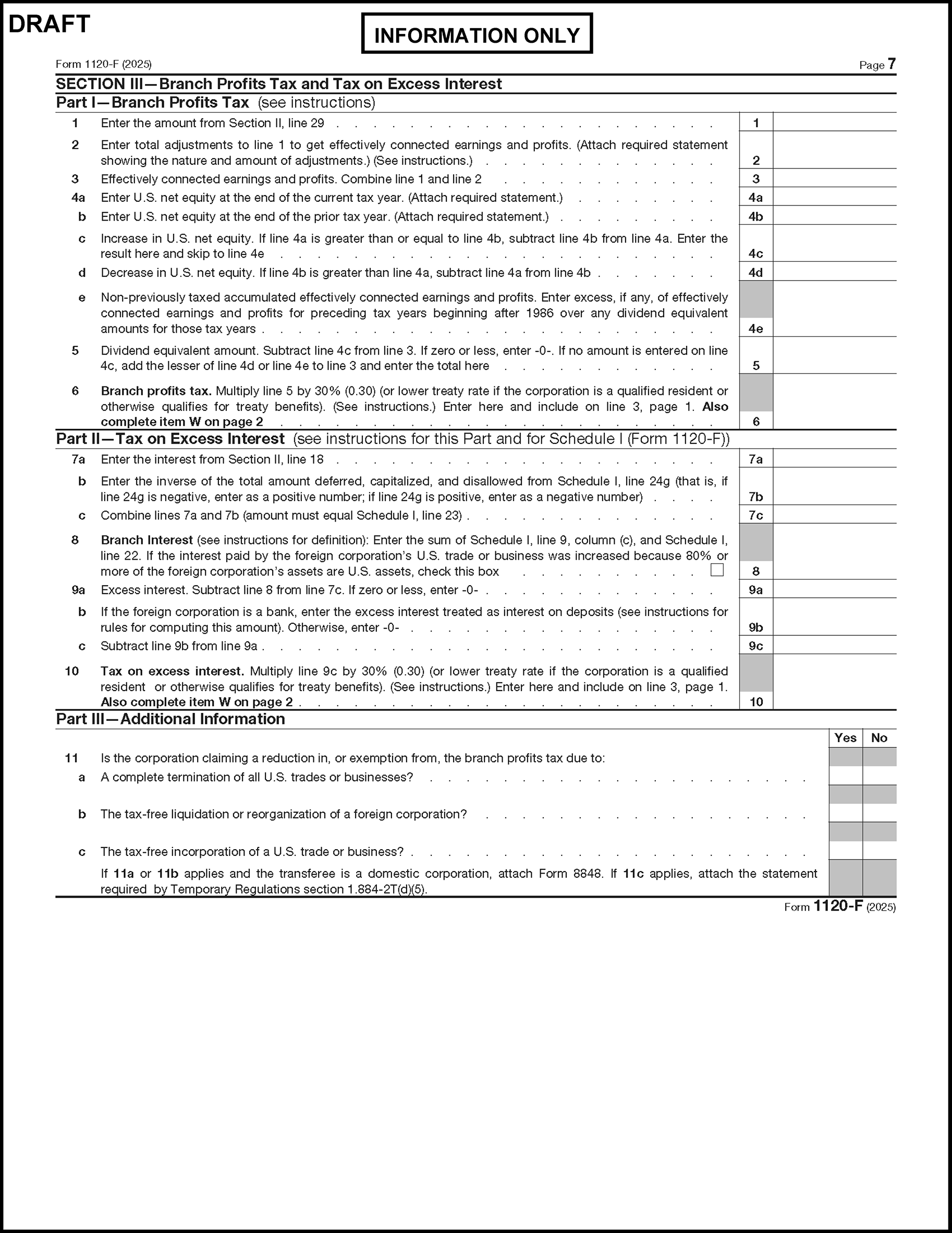
Please click here for the text description of the image.
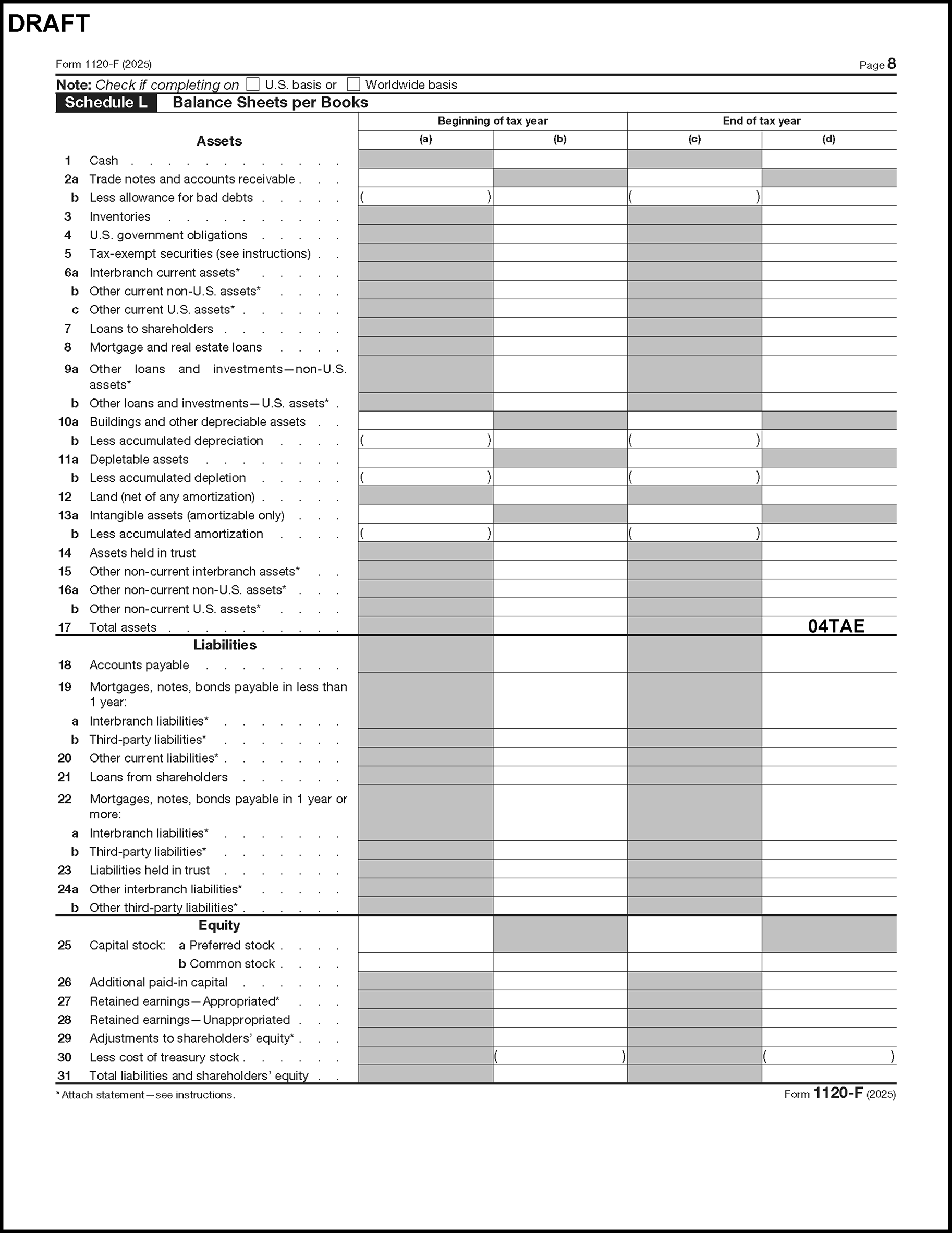
Please click here for the text description of the image.
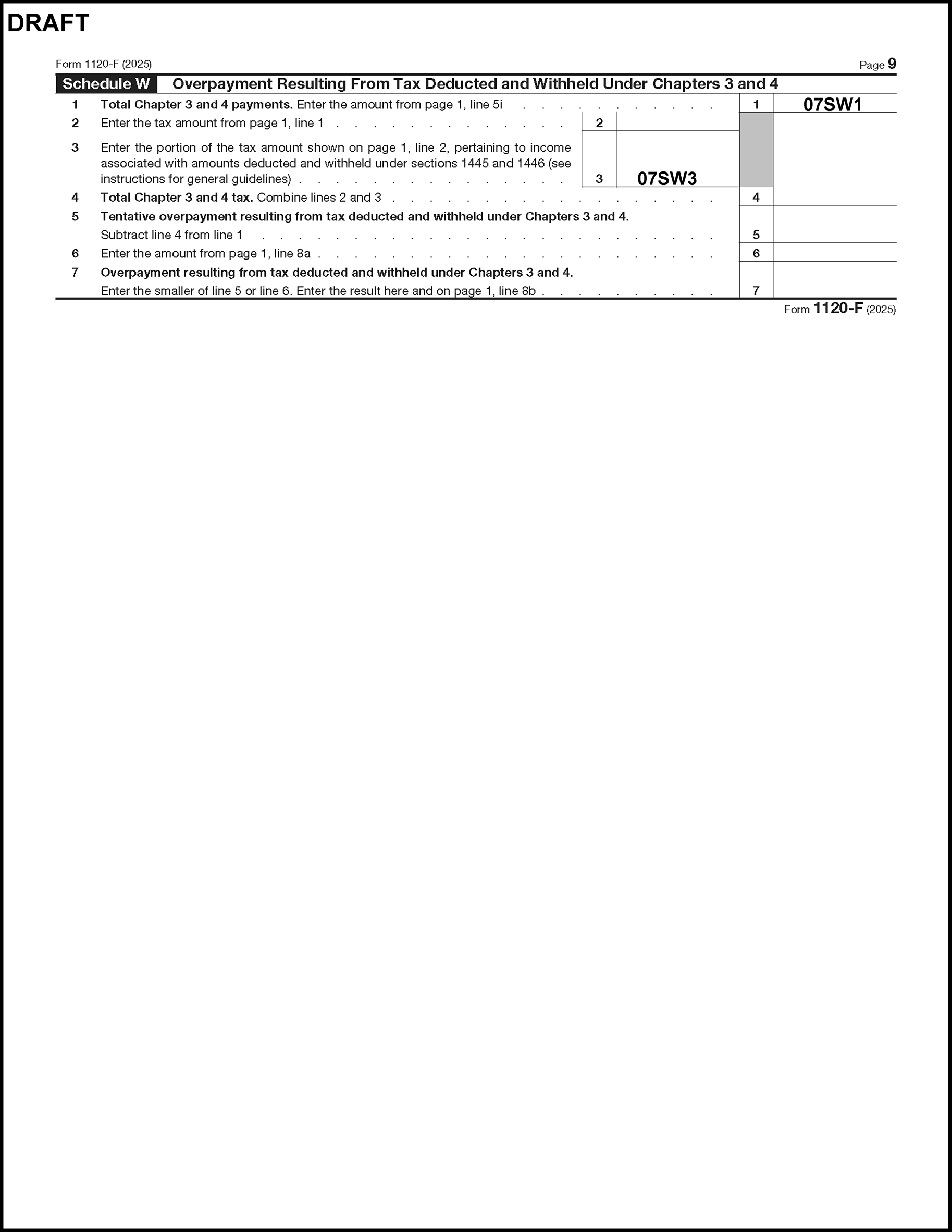
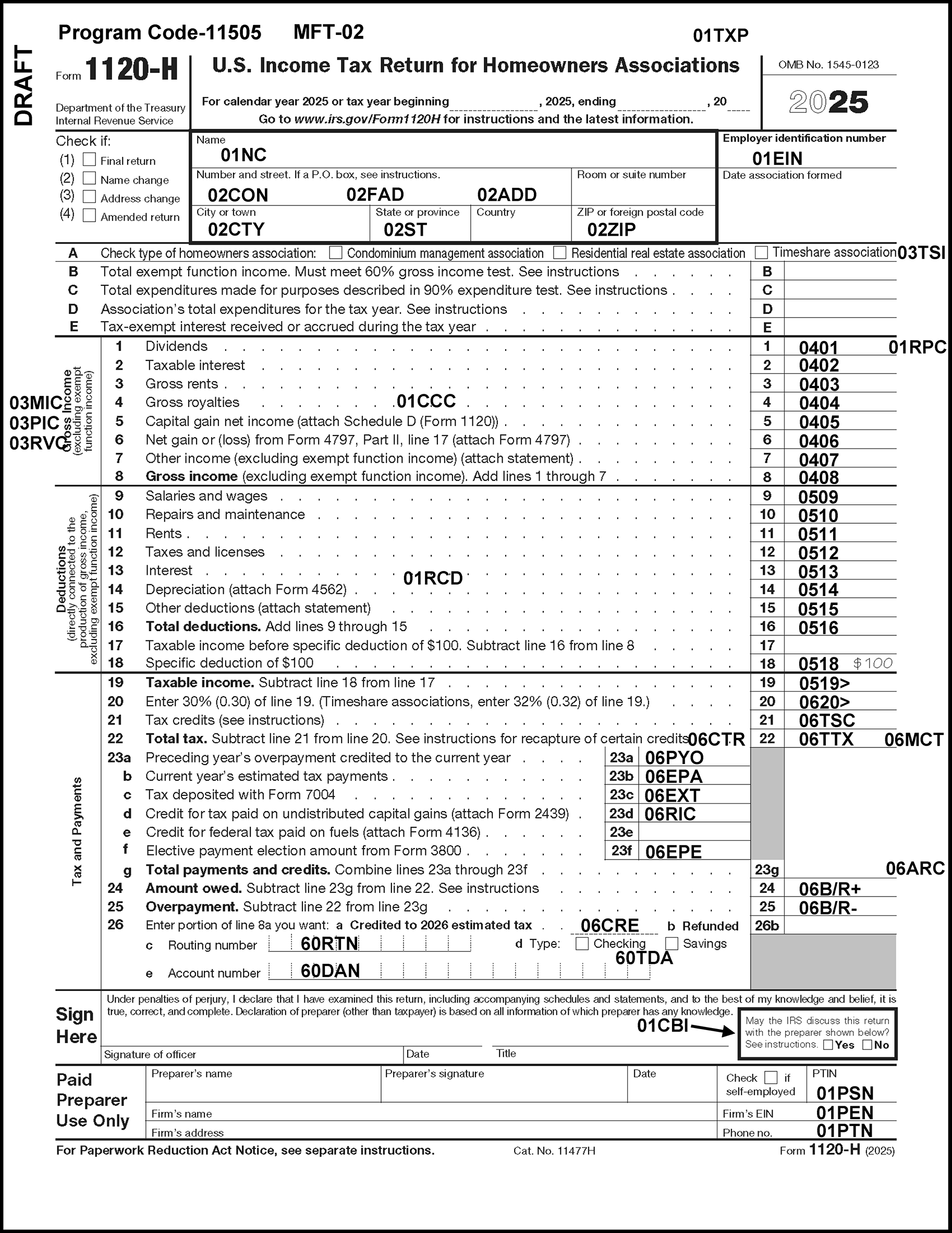
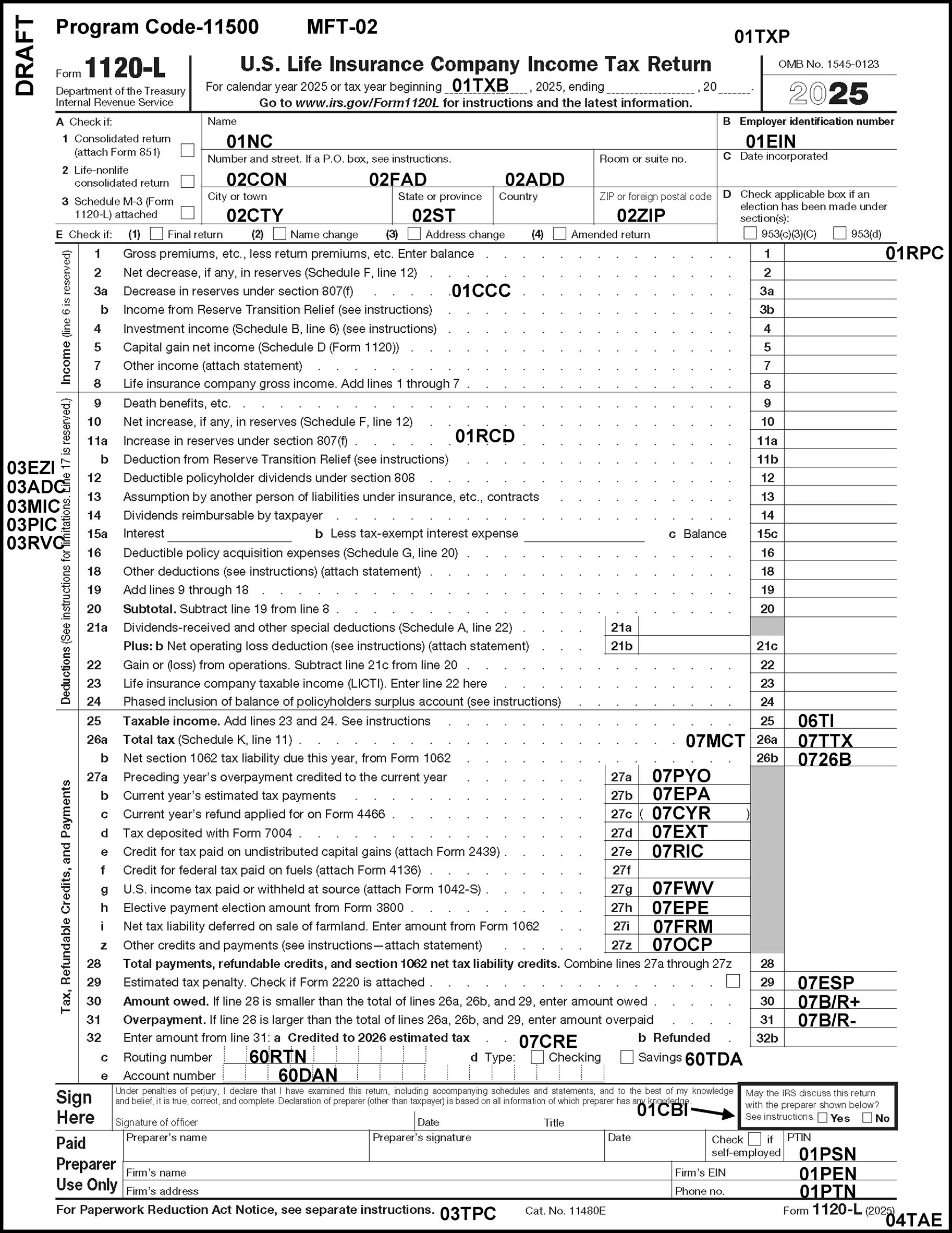
Please click here for the text description of the image.
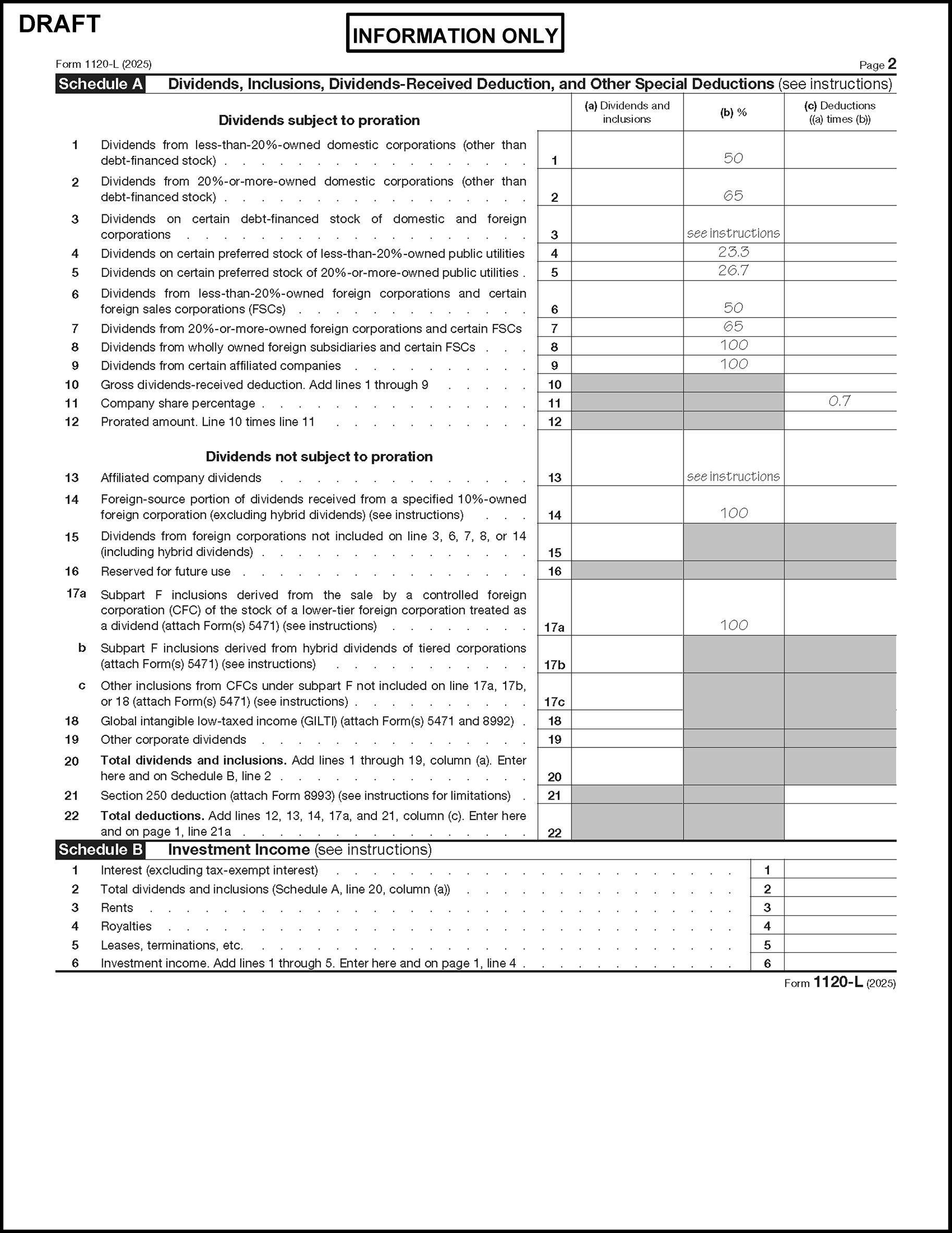
Please click here for the text description of the image.
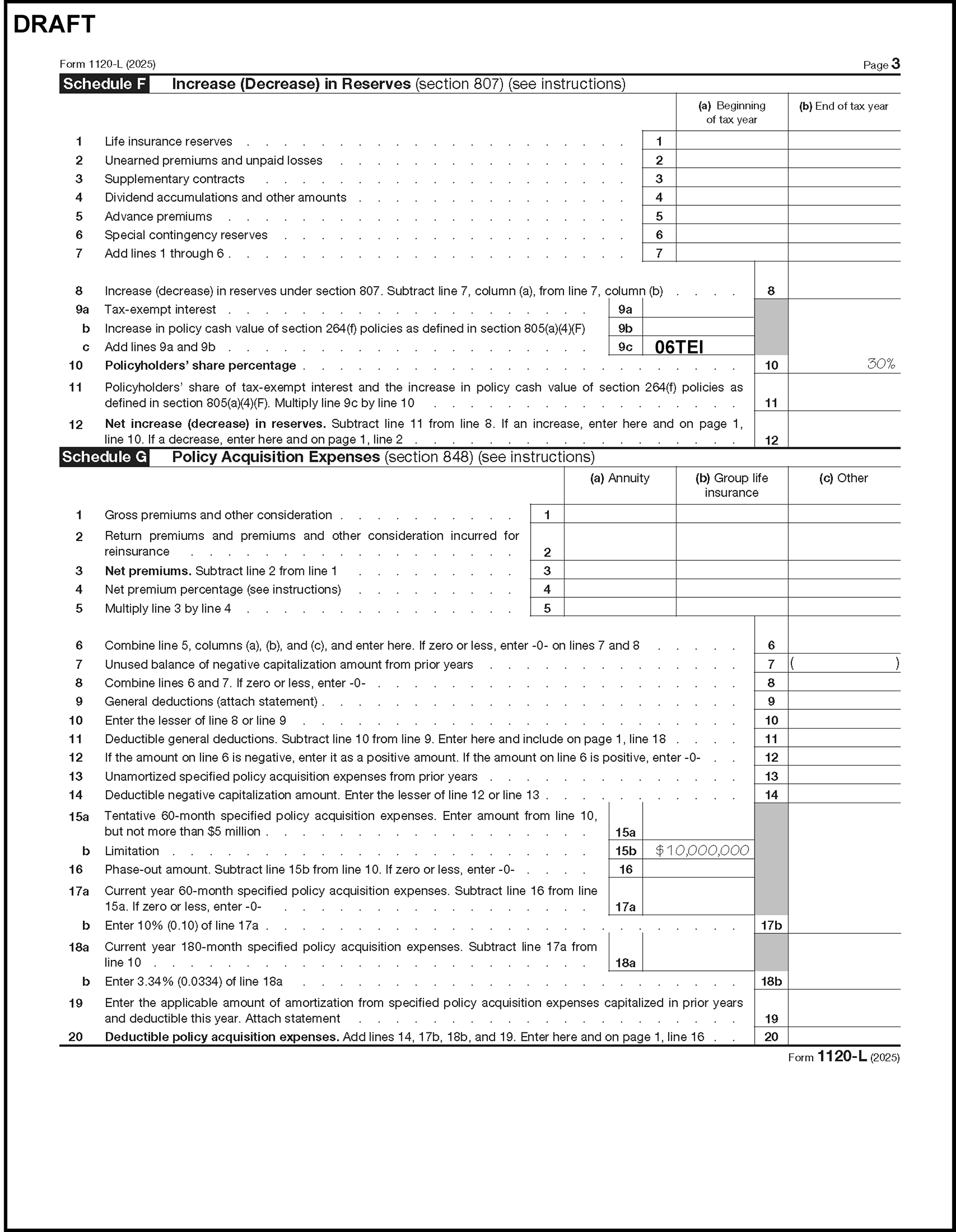
Please click here for the text description of the image.
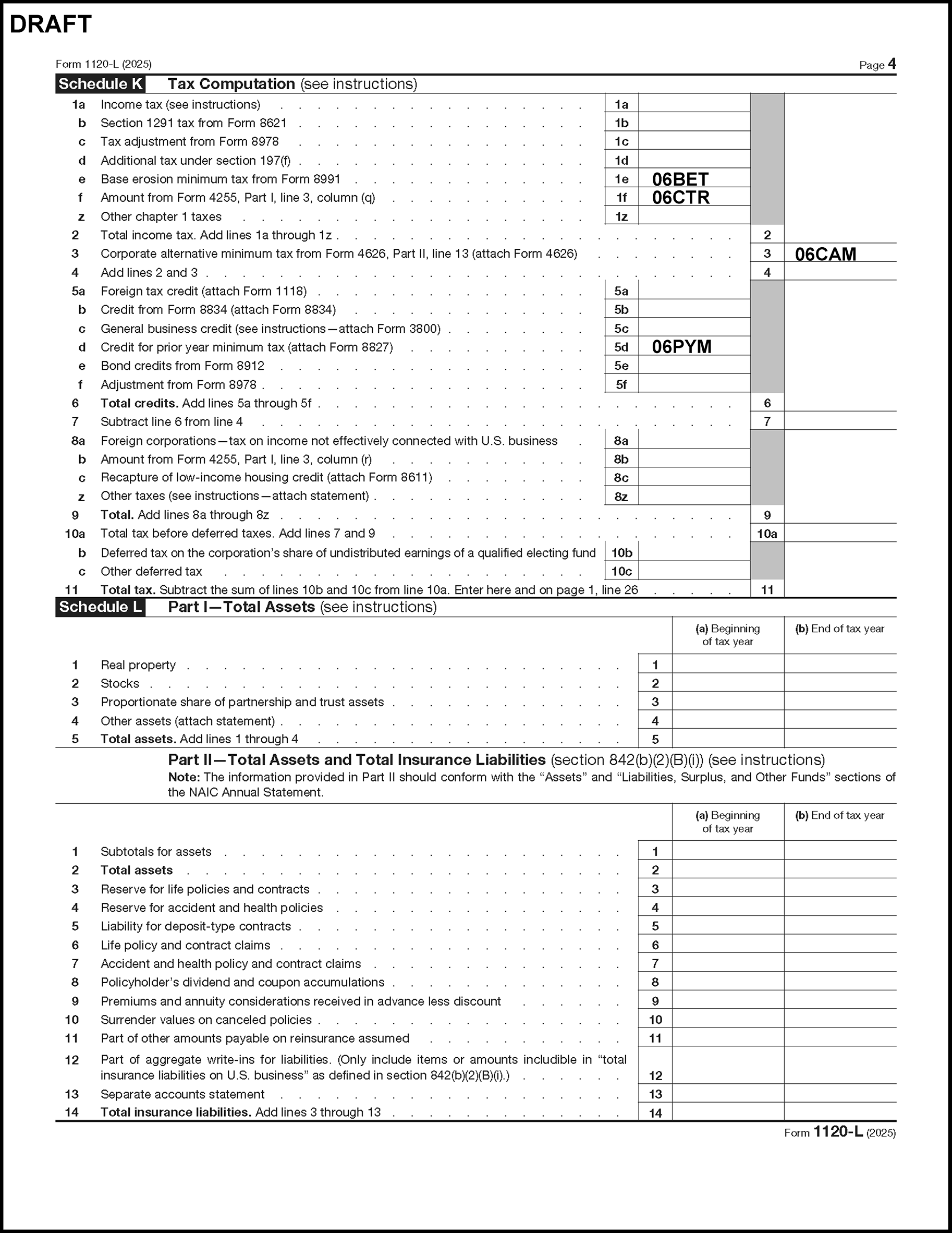
Please click here for the text description of the image.
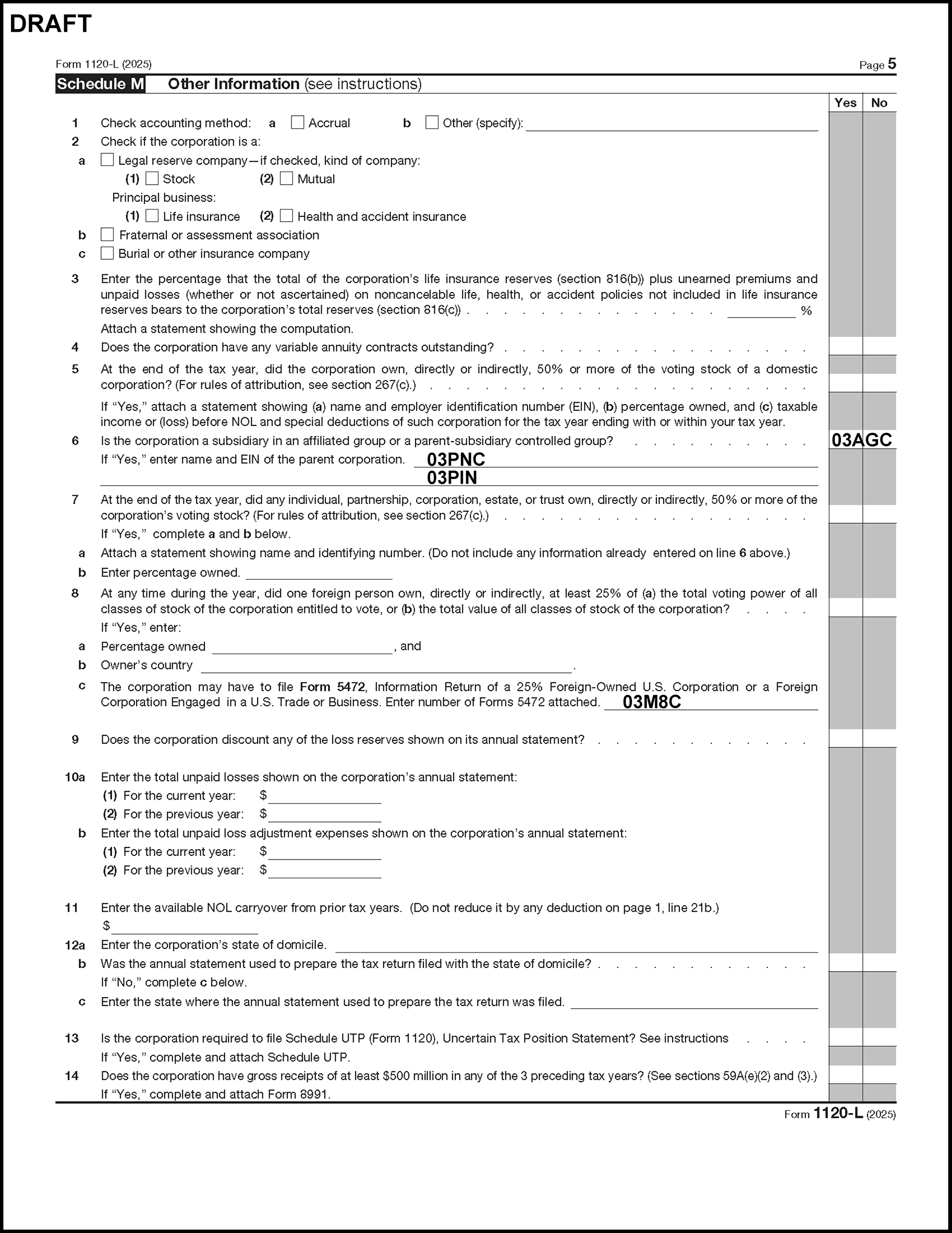
Please click here for the text description of the image.
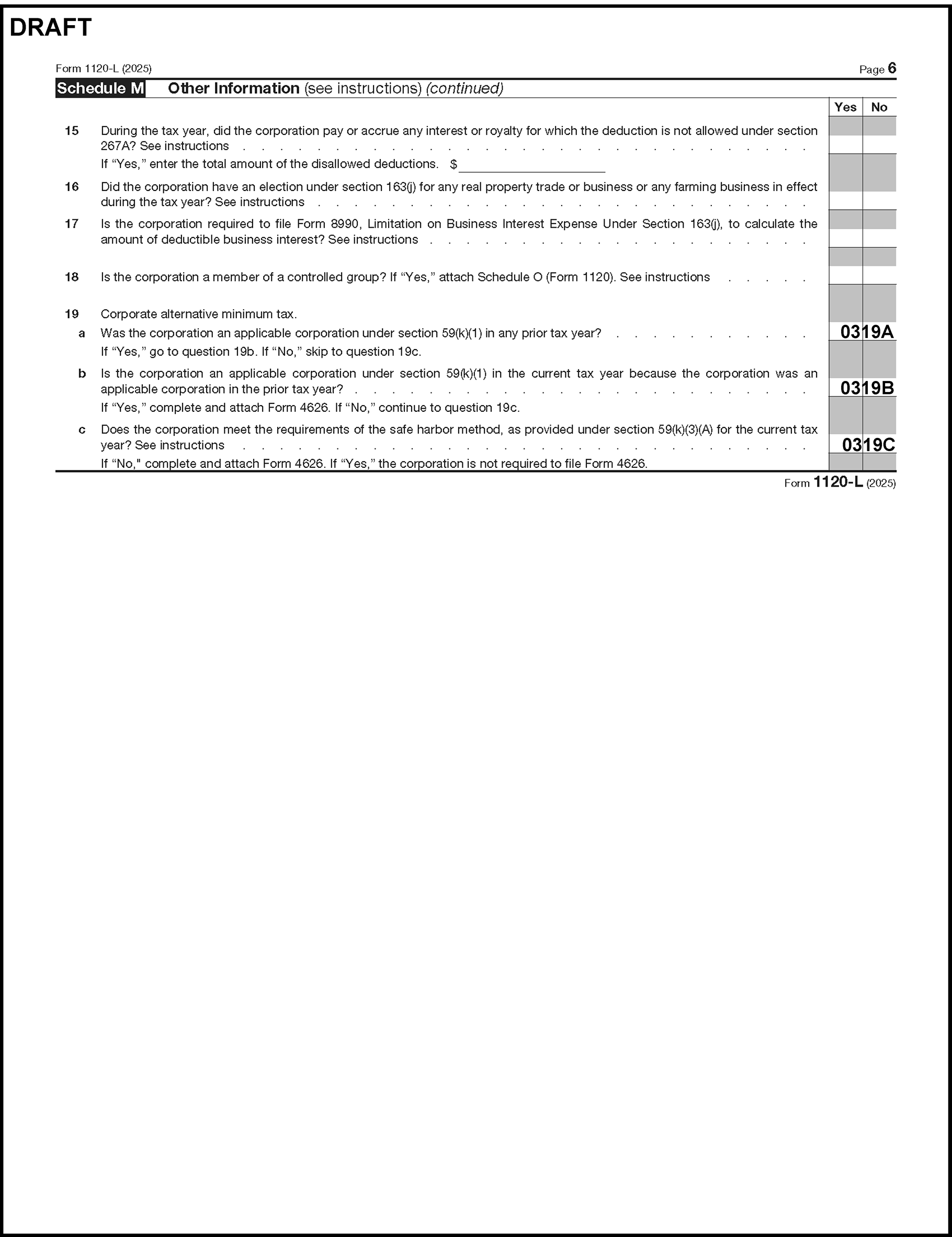
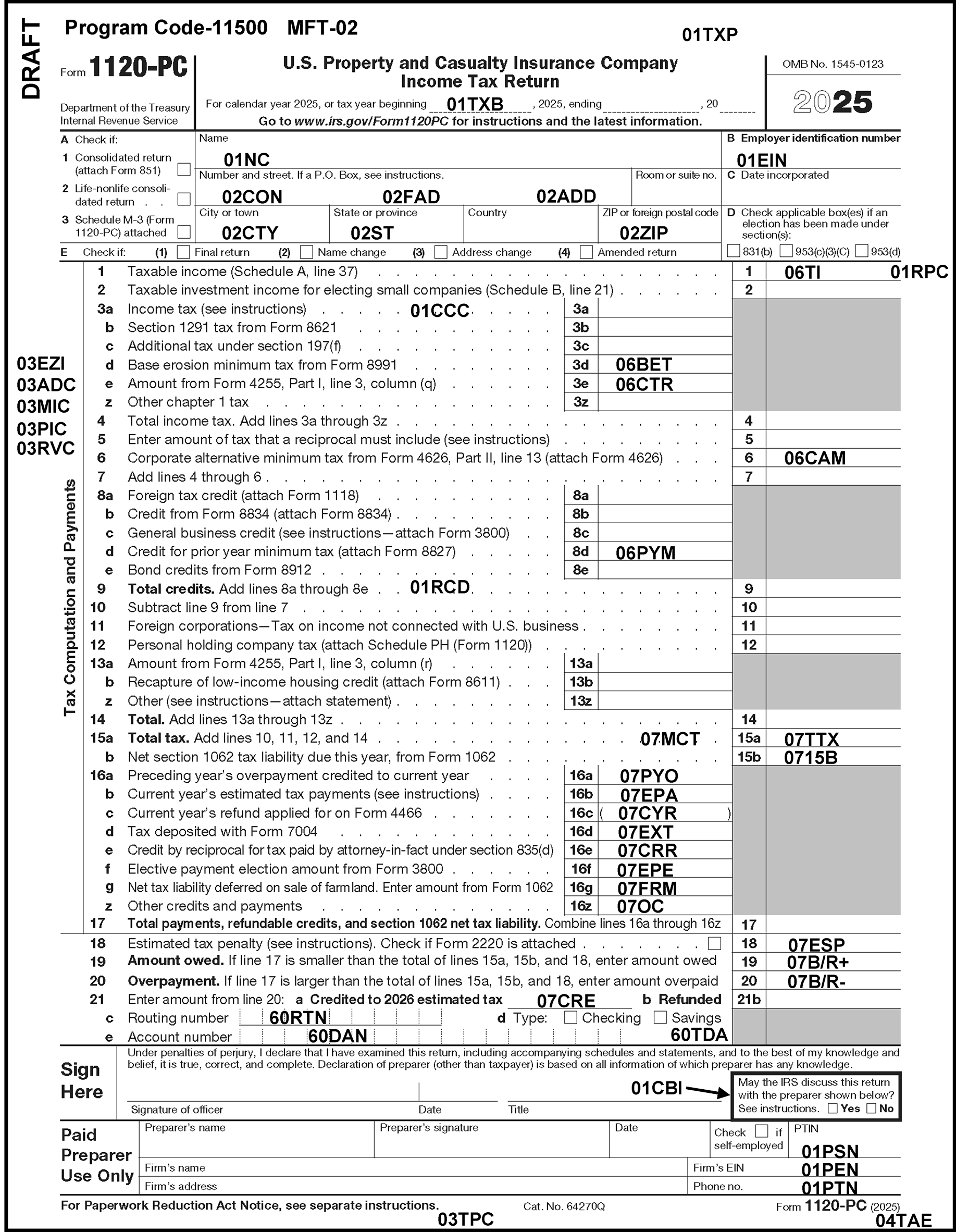
Please click here for the text description of the image.
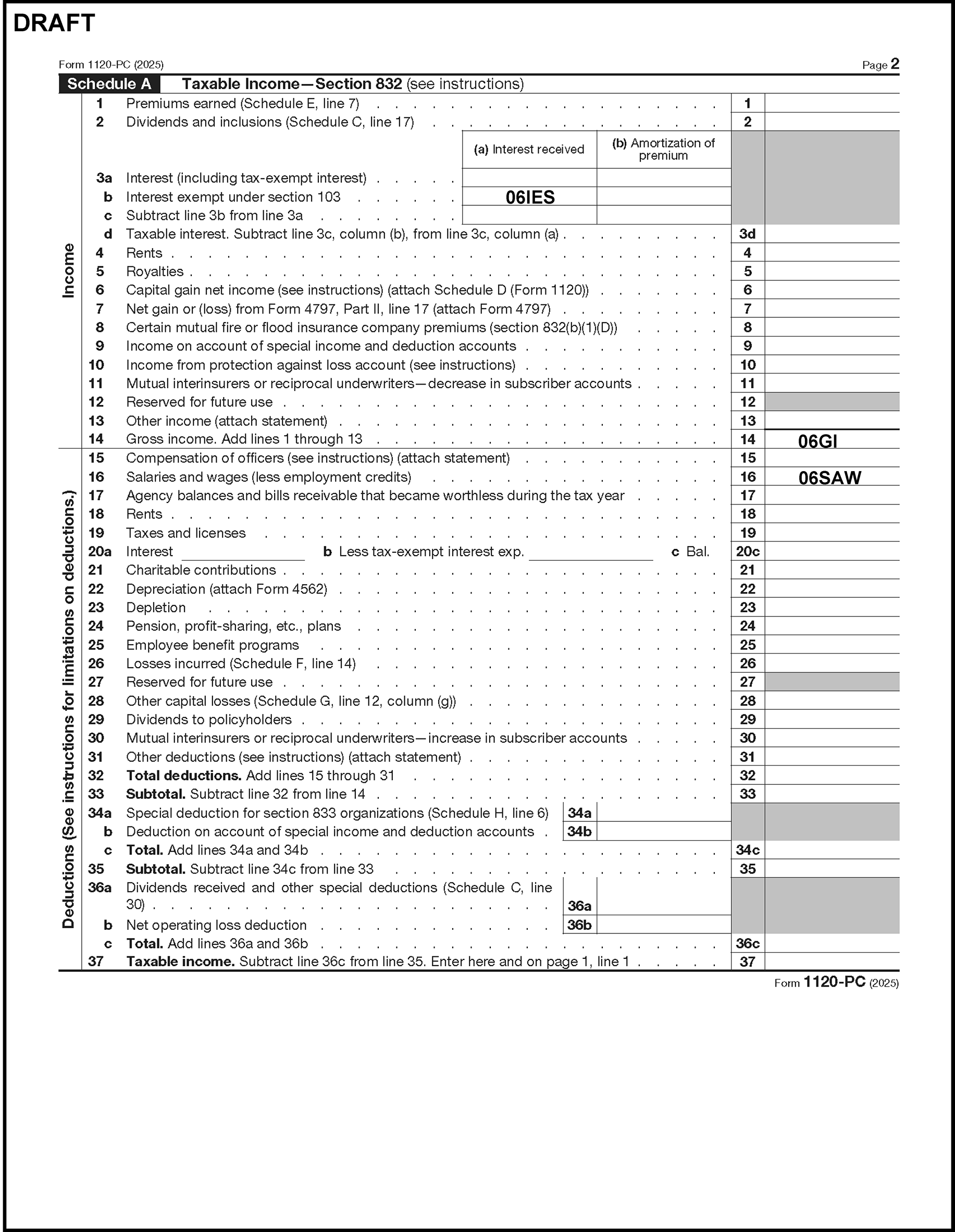
Please click here for the text description of the image.
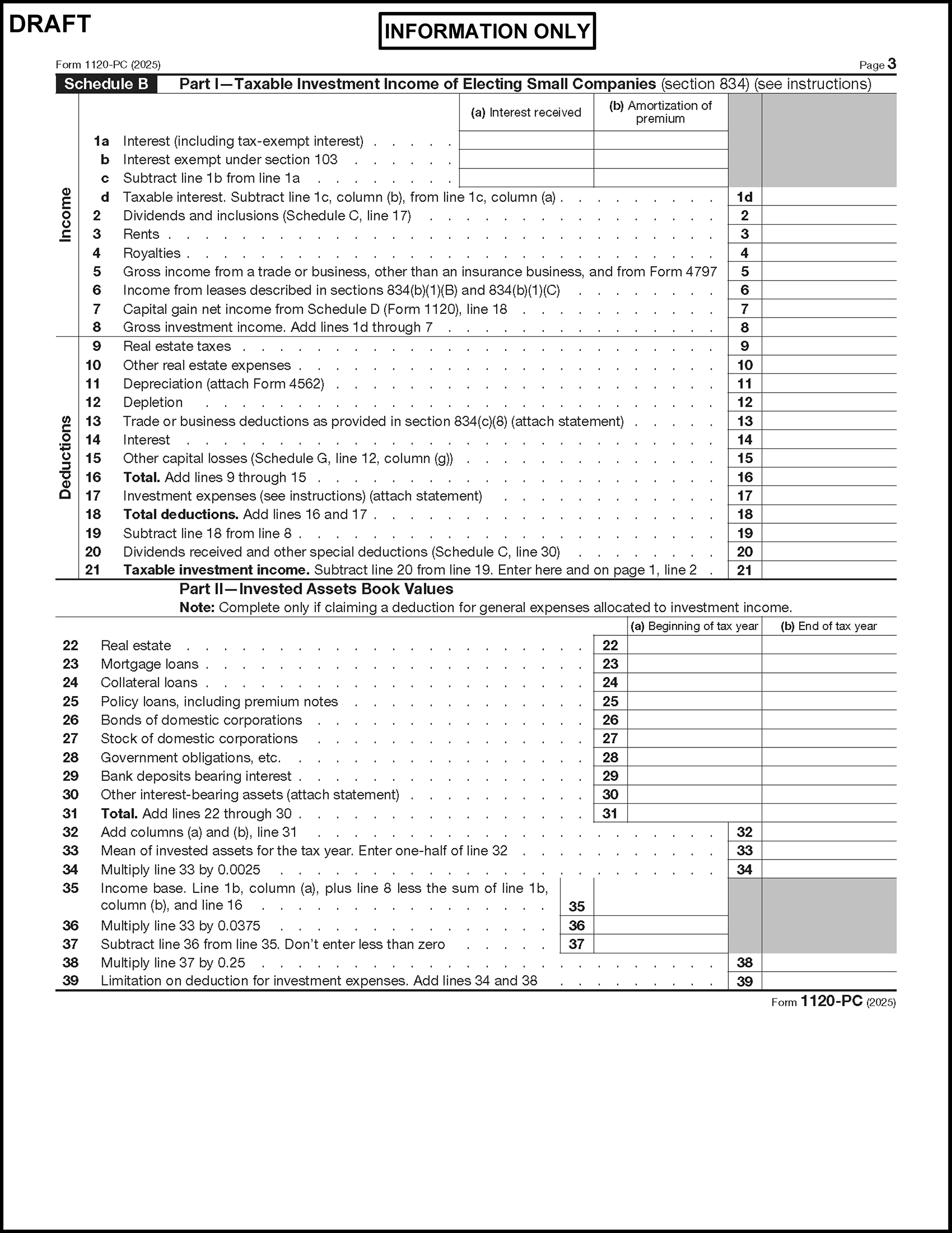
Please click here for the text description of the image.
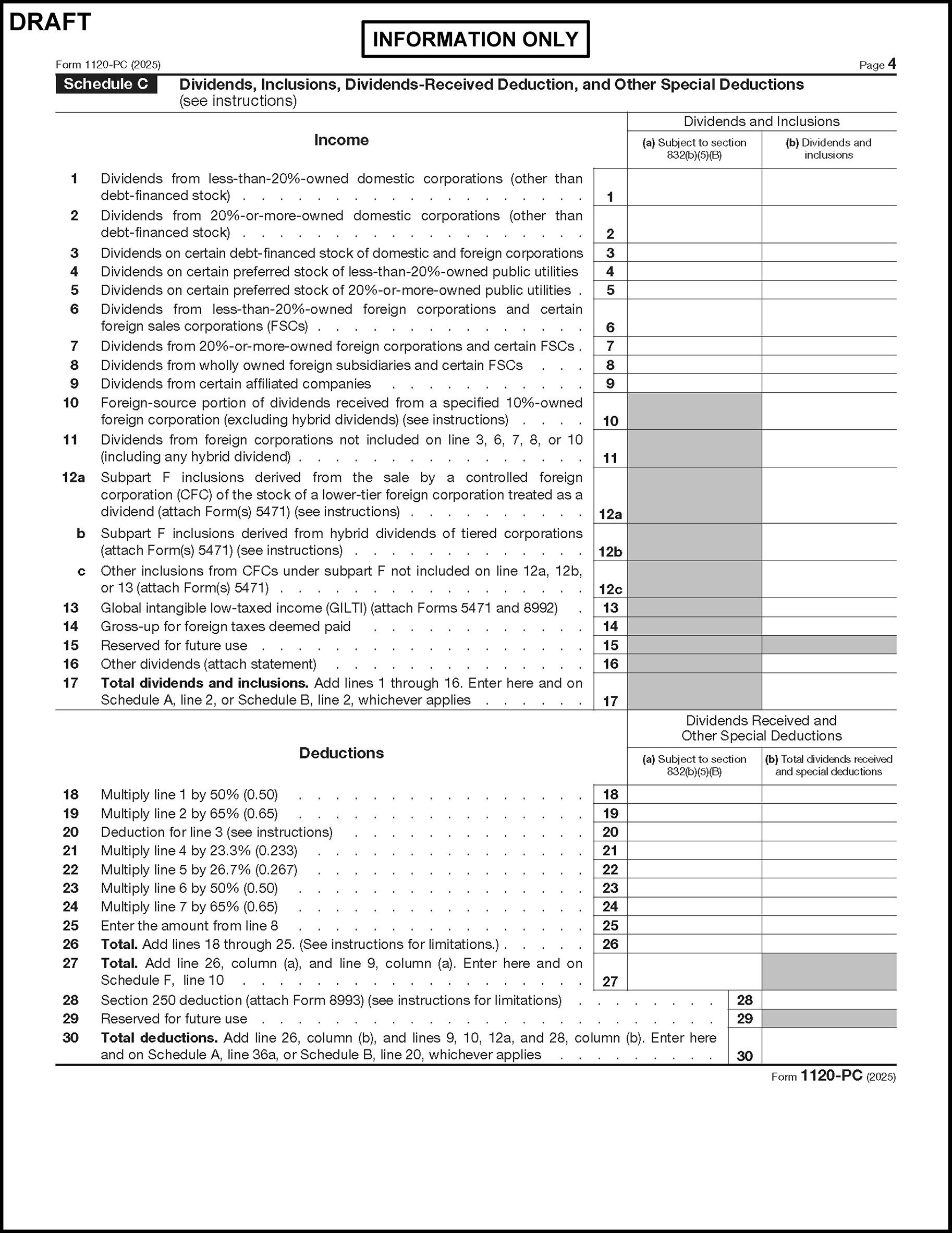
Please click here for the text description of the image.
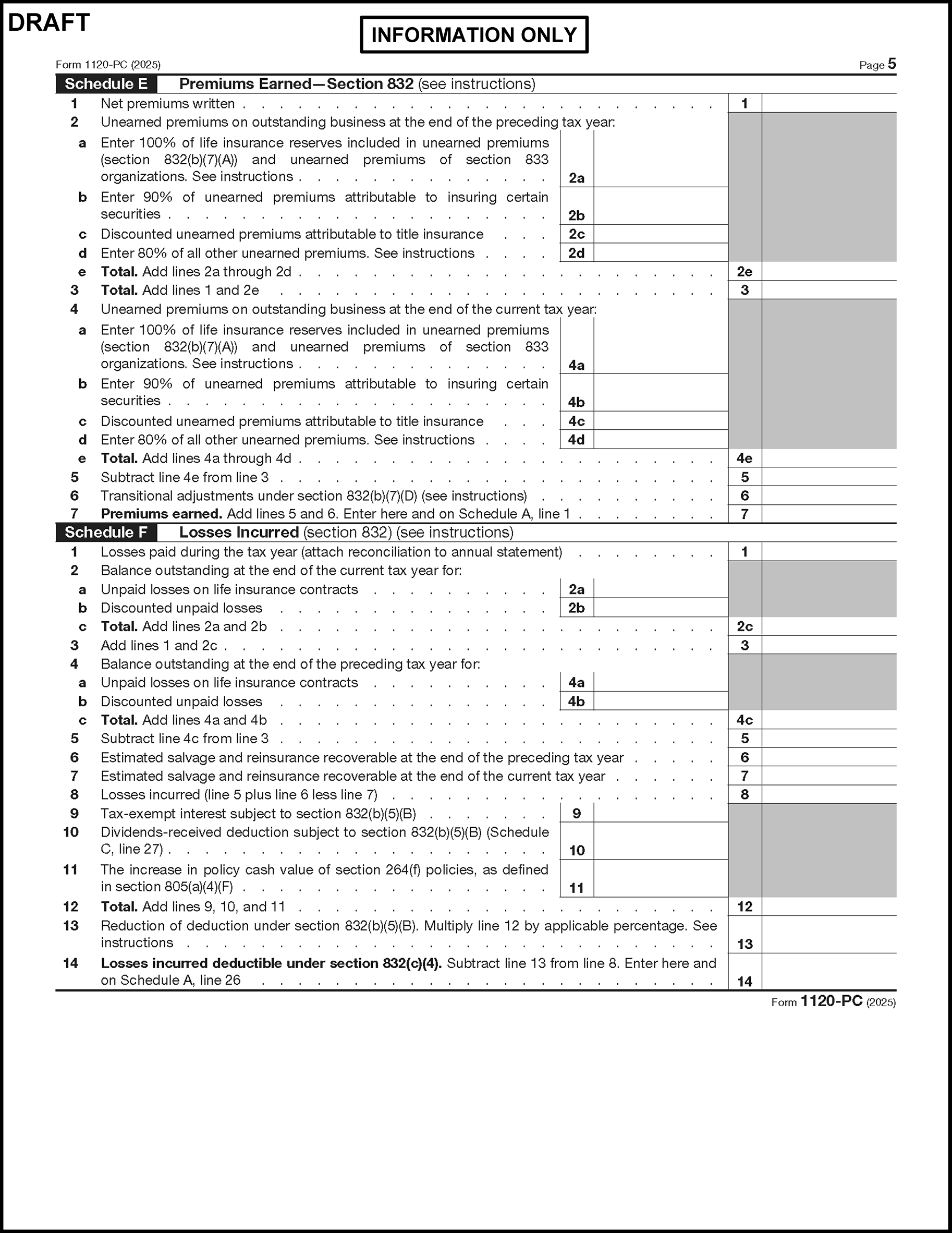
Please click here for the text description of the image.
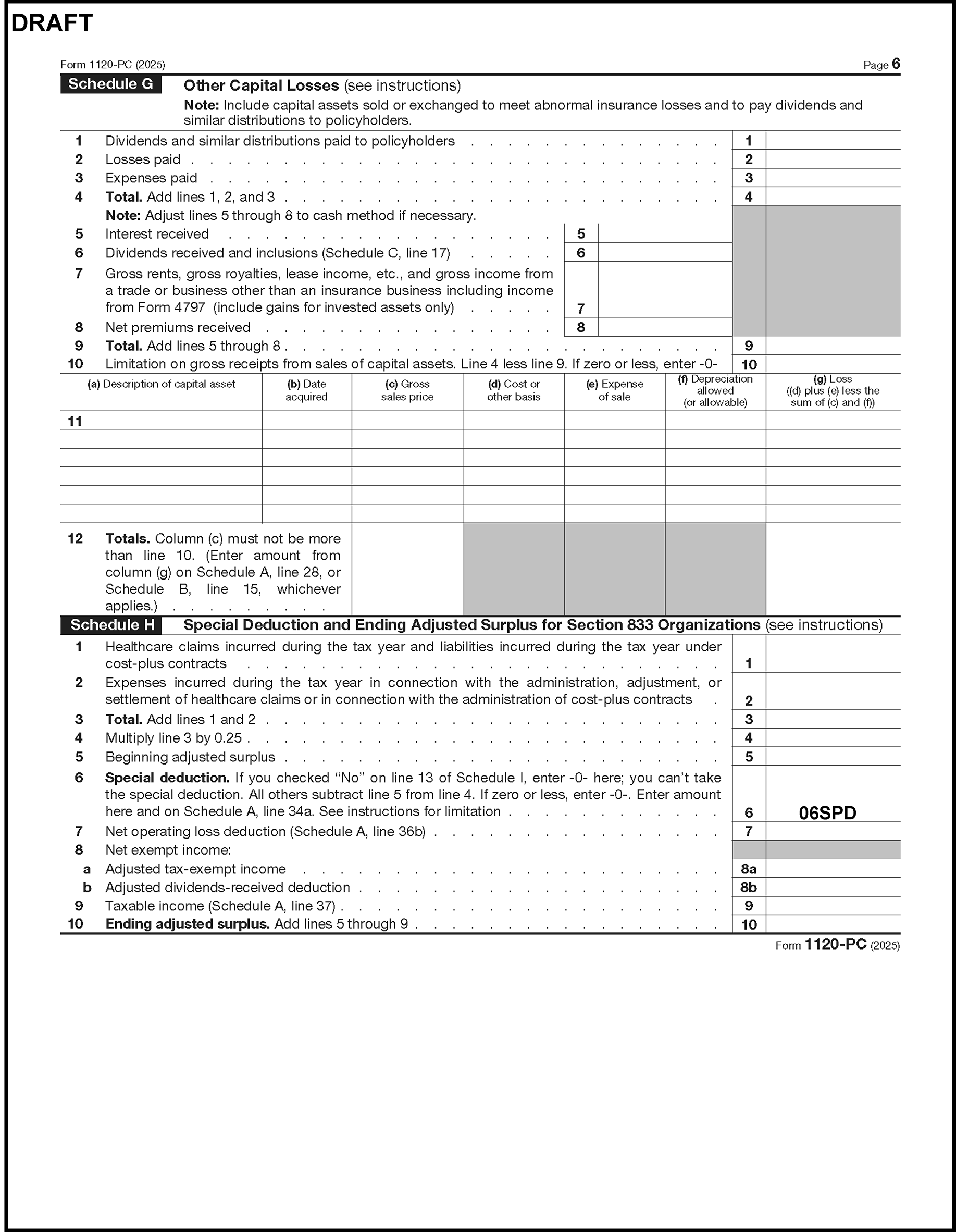
Please click here for the text description of the image.
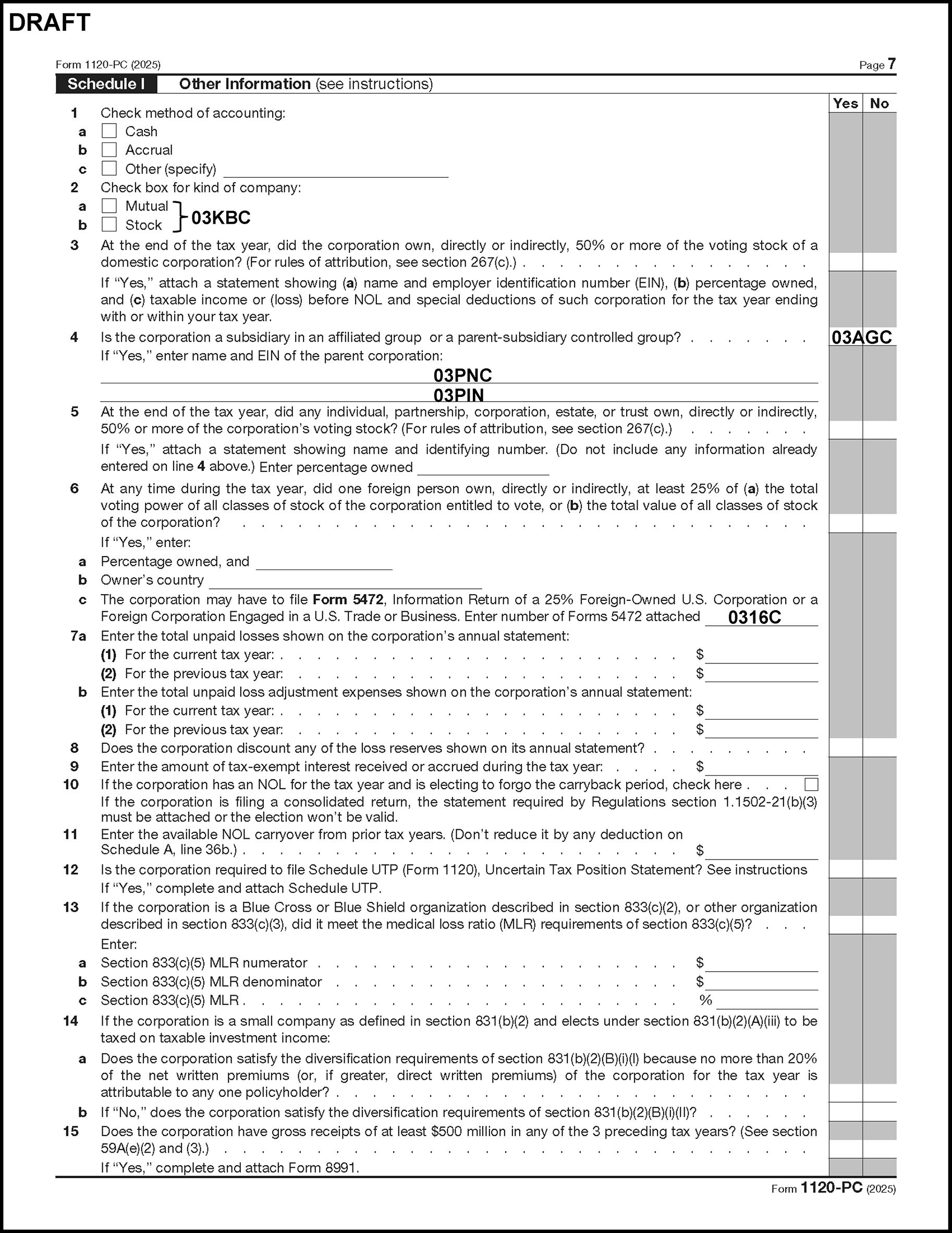
Please click here for the text description of the image.
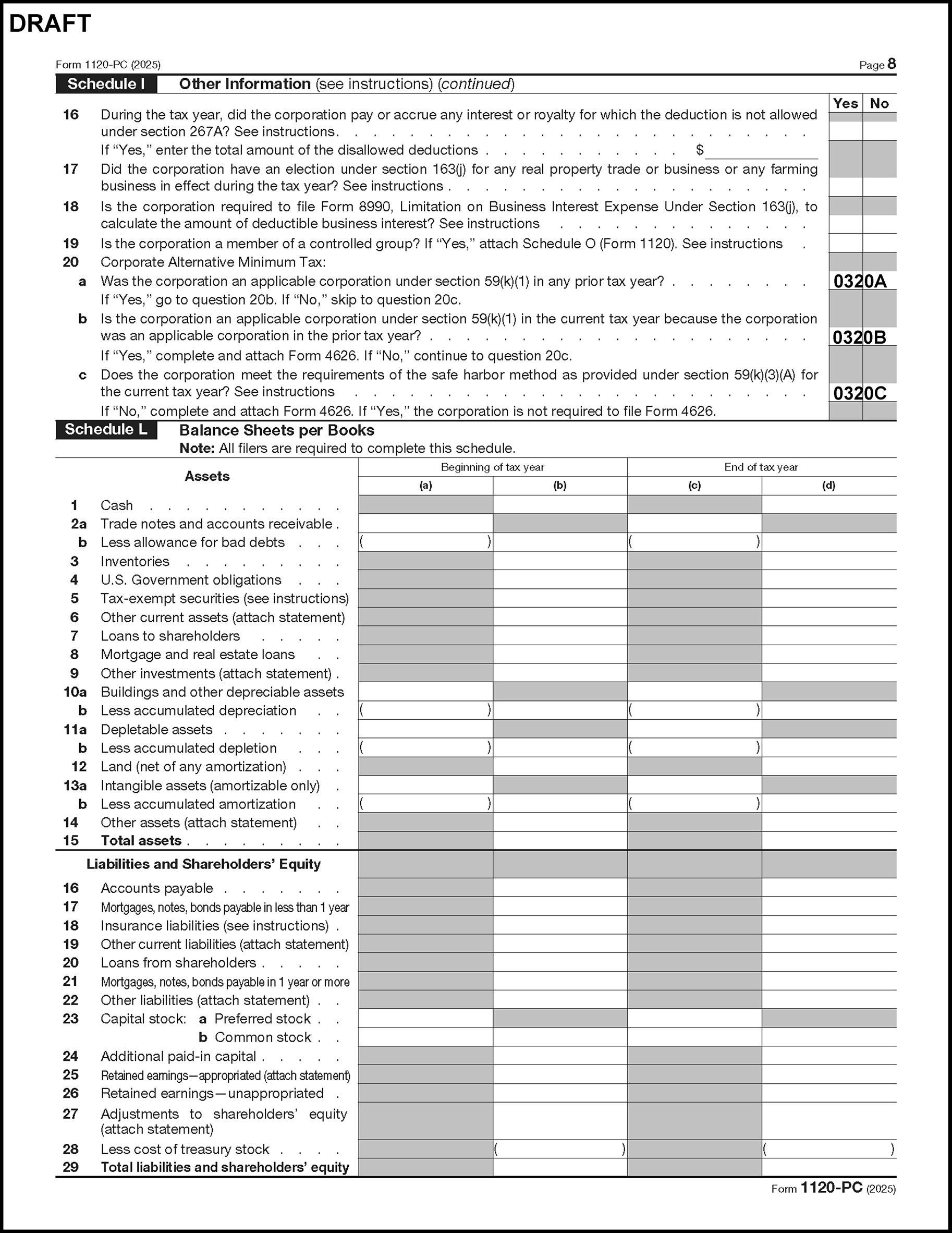
Please click here for the text description of the image.
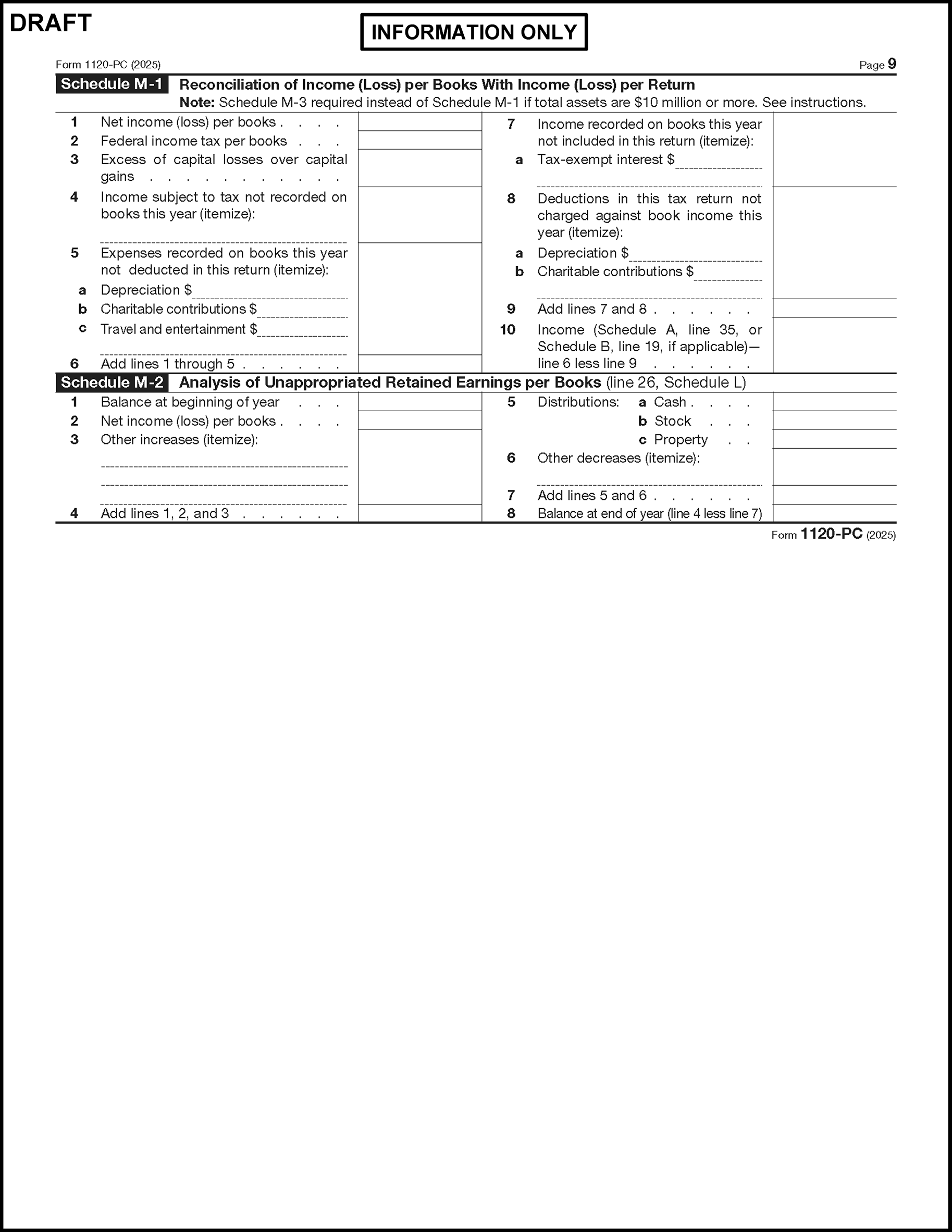
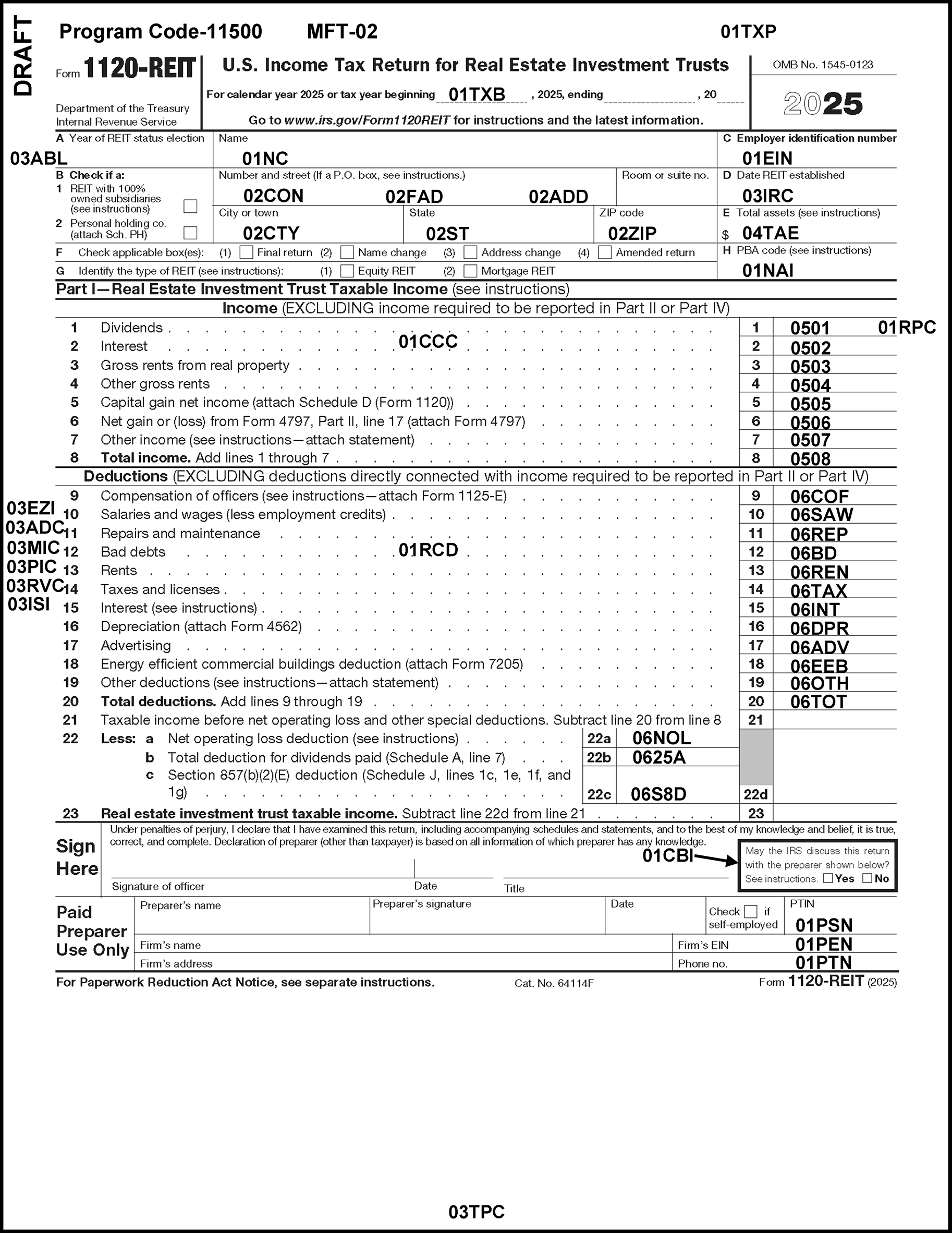
Please click here for the text description of the image.
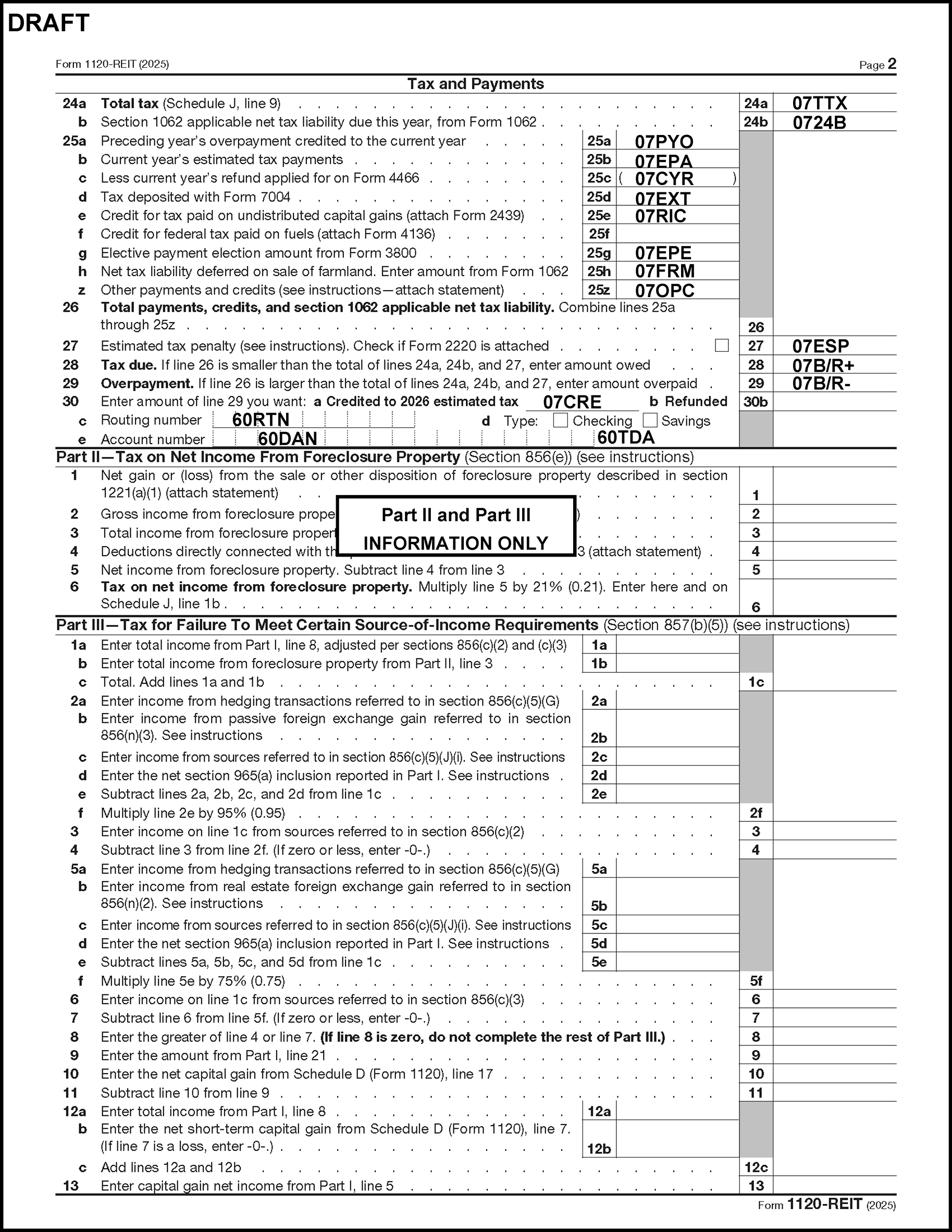
Please click here for the text description of the image.
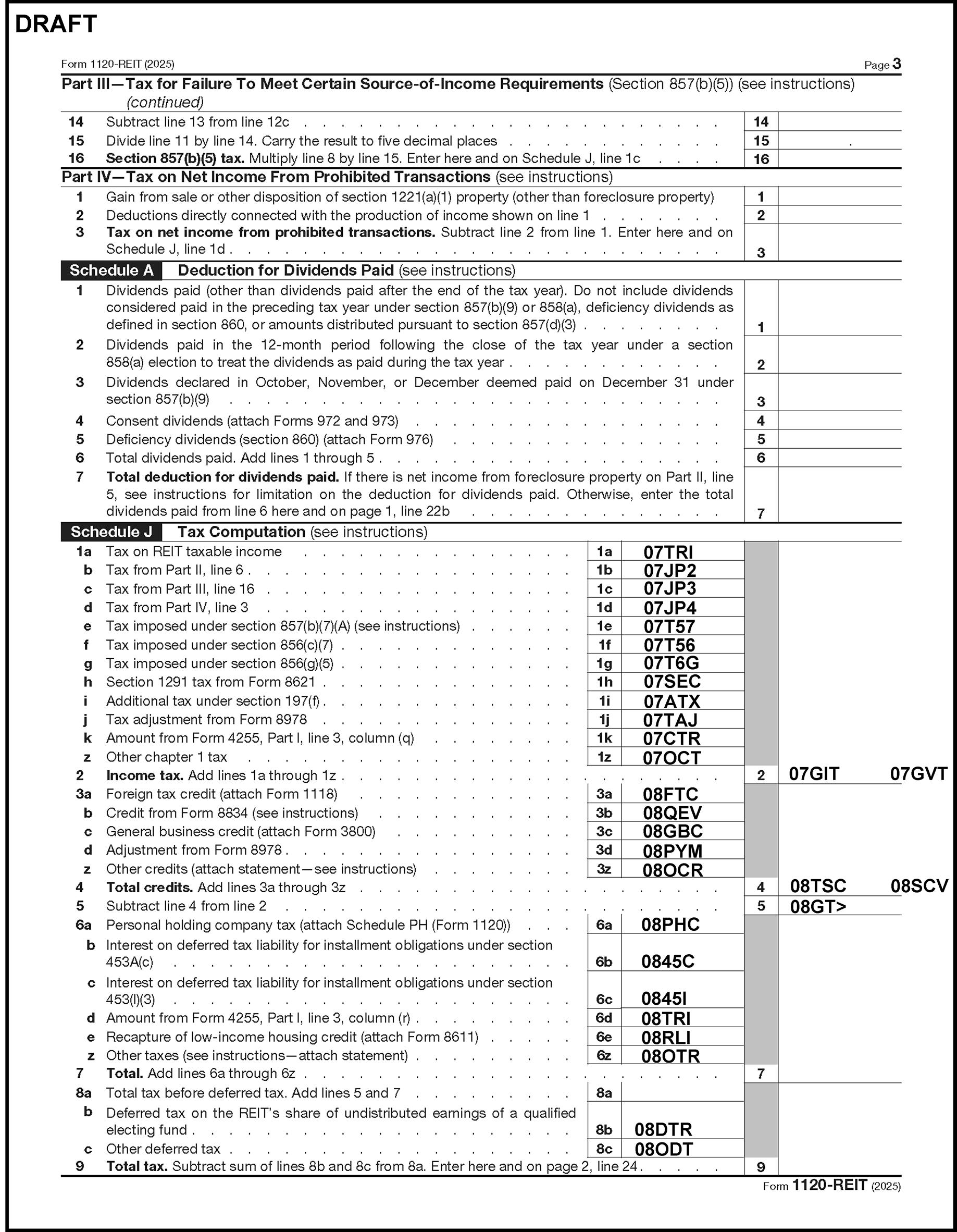
Please click here for the text description of the image.
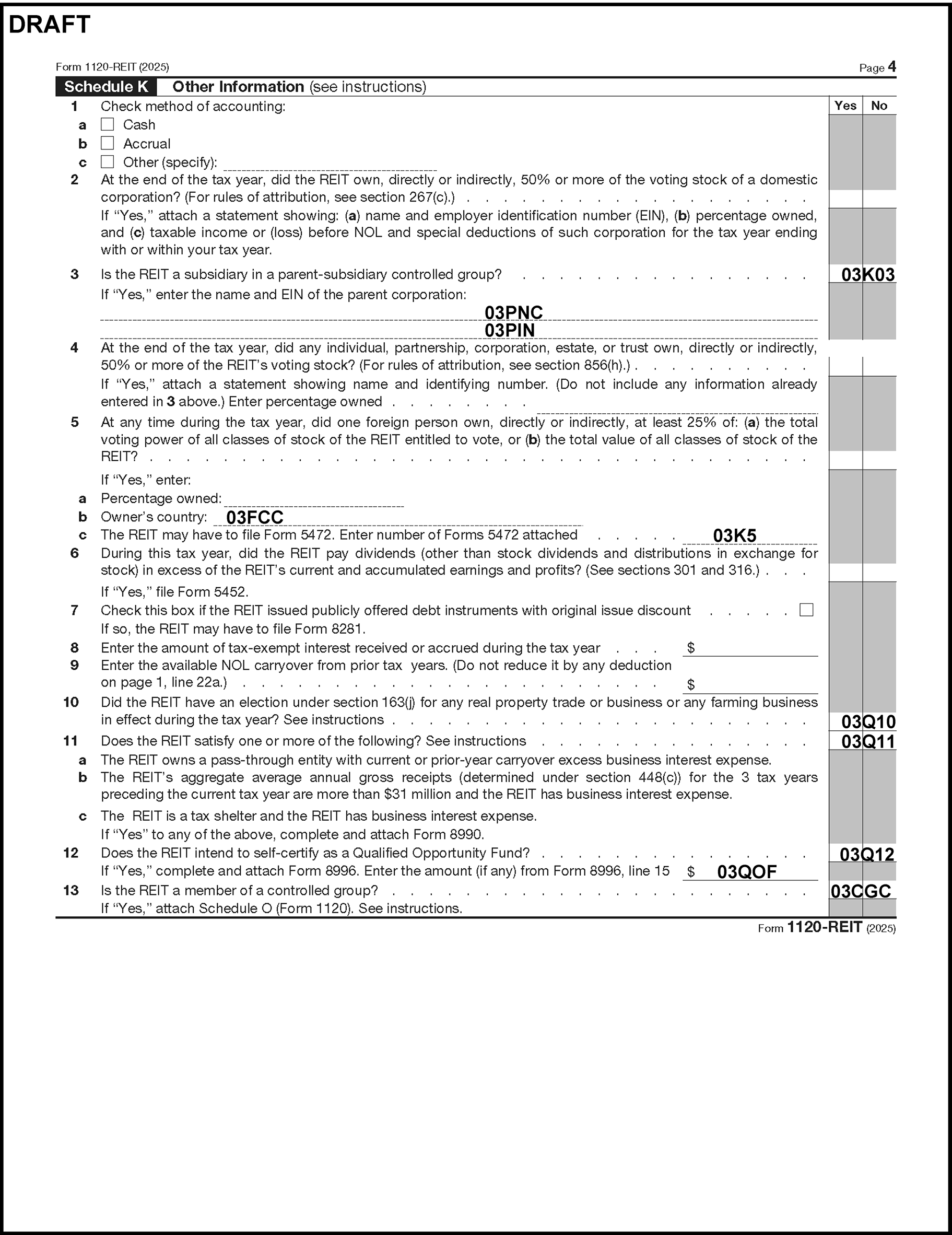
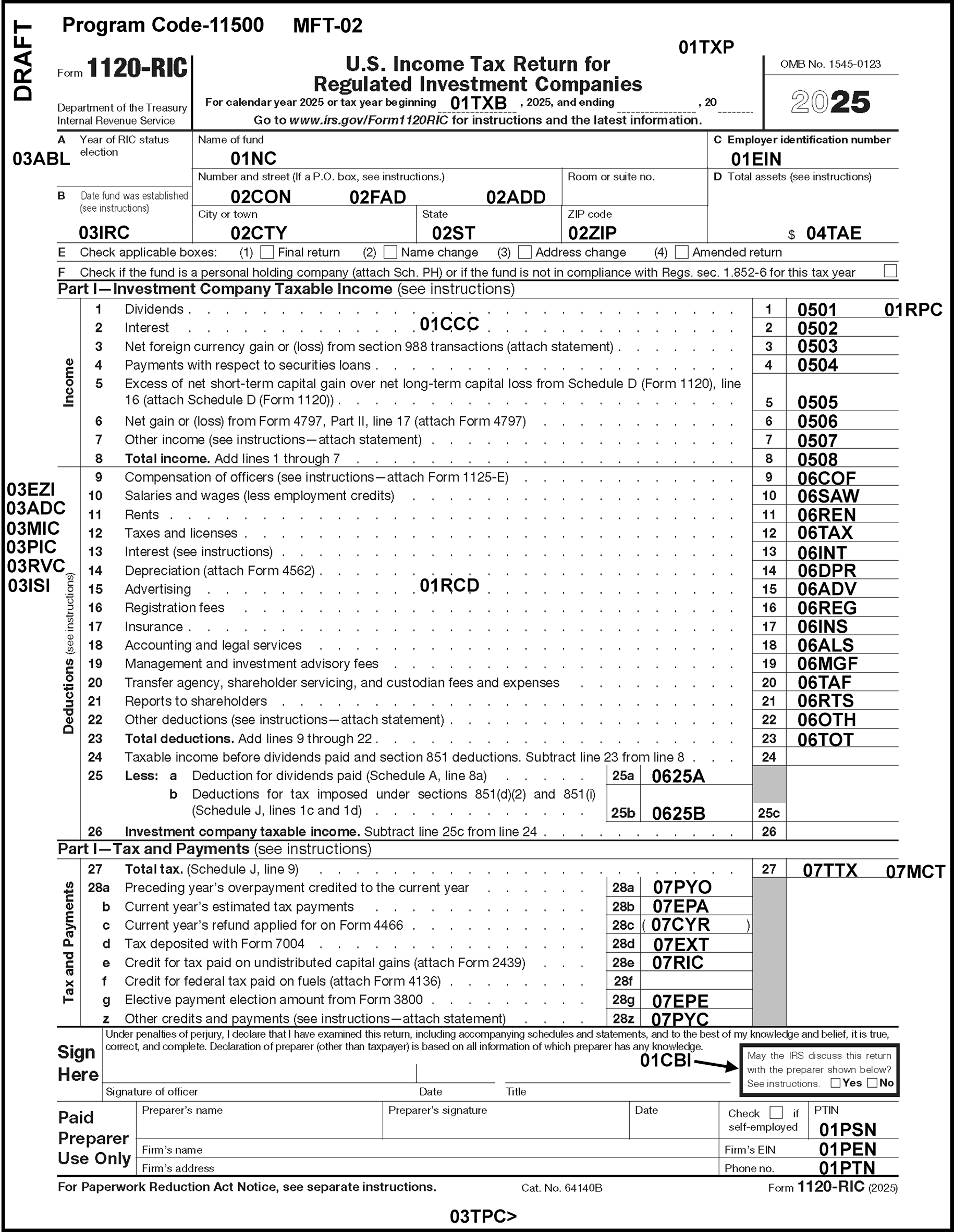
Please click here for the text description of the image.
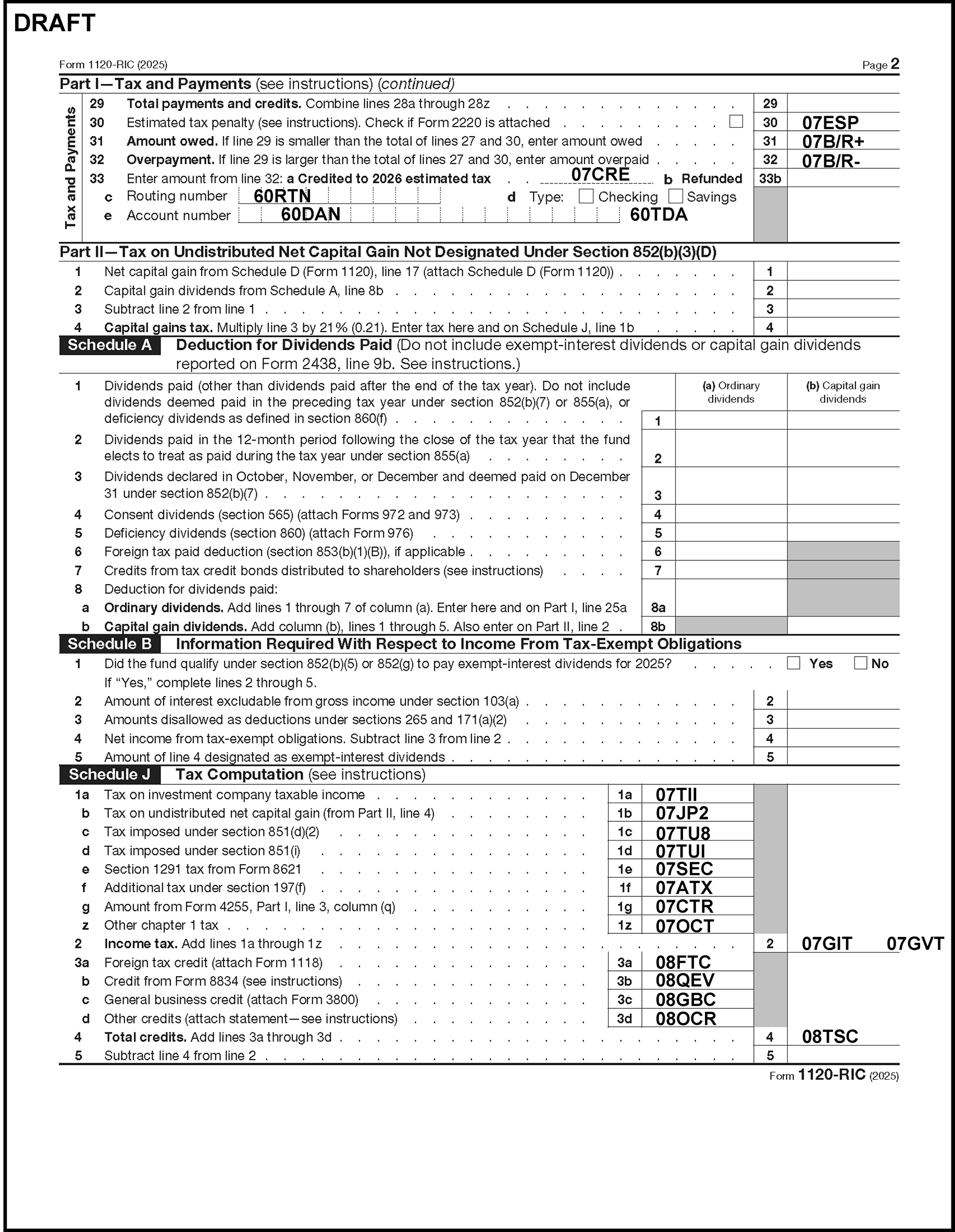
Please click here for the text description of the image.
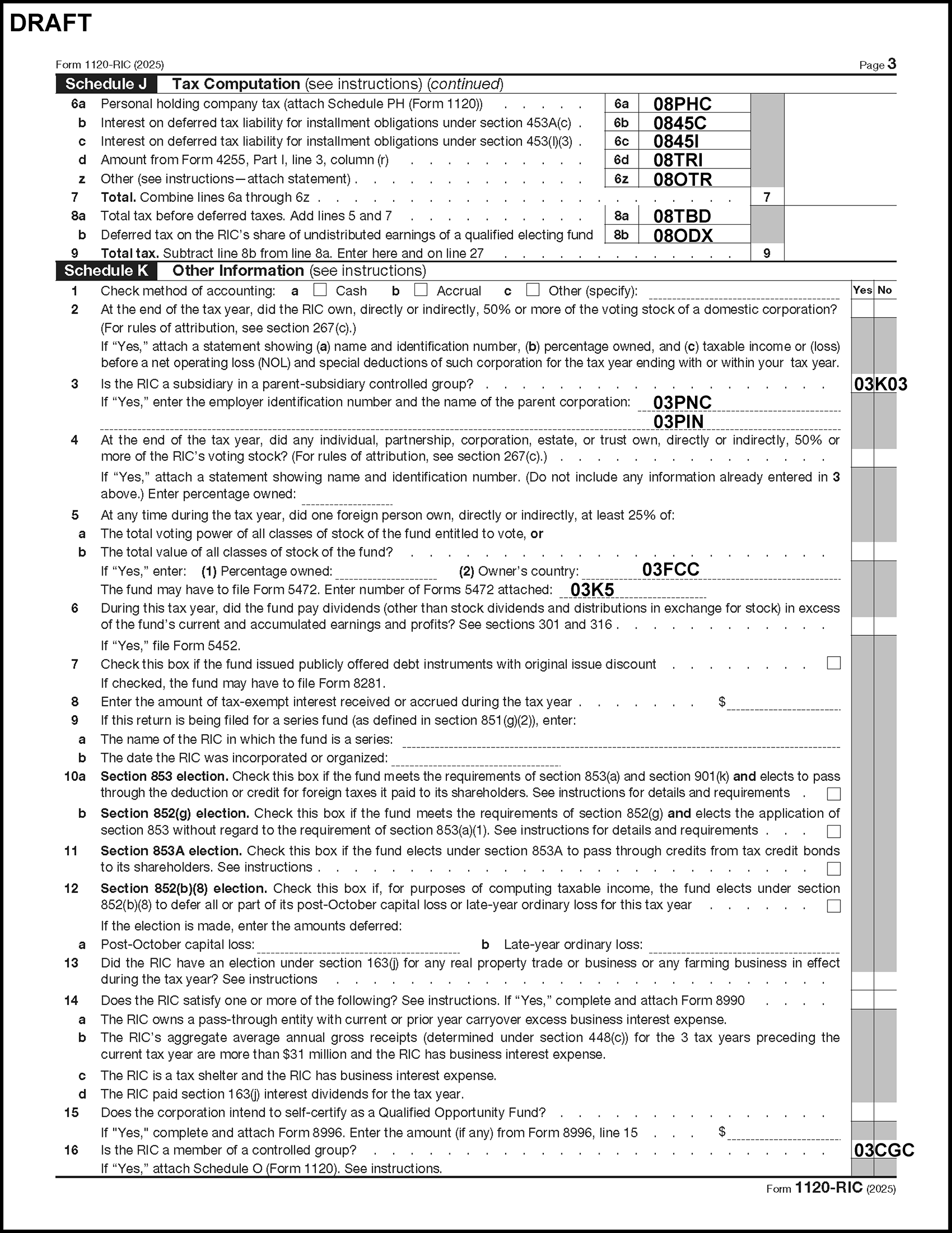
Please click here for the text description of the image.
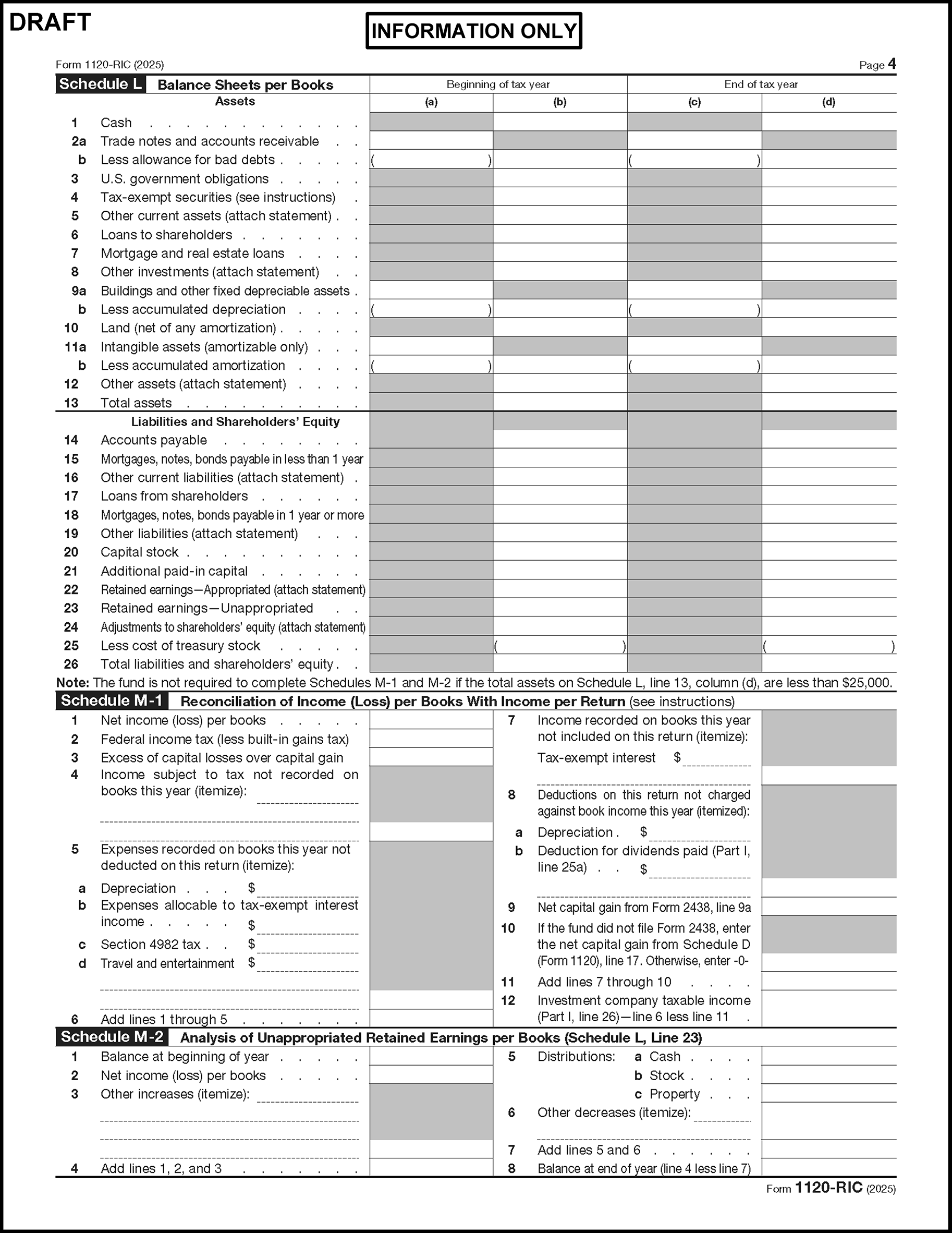
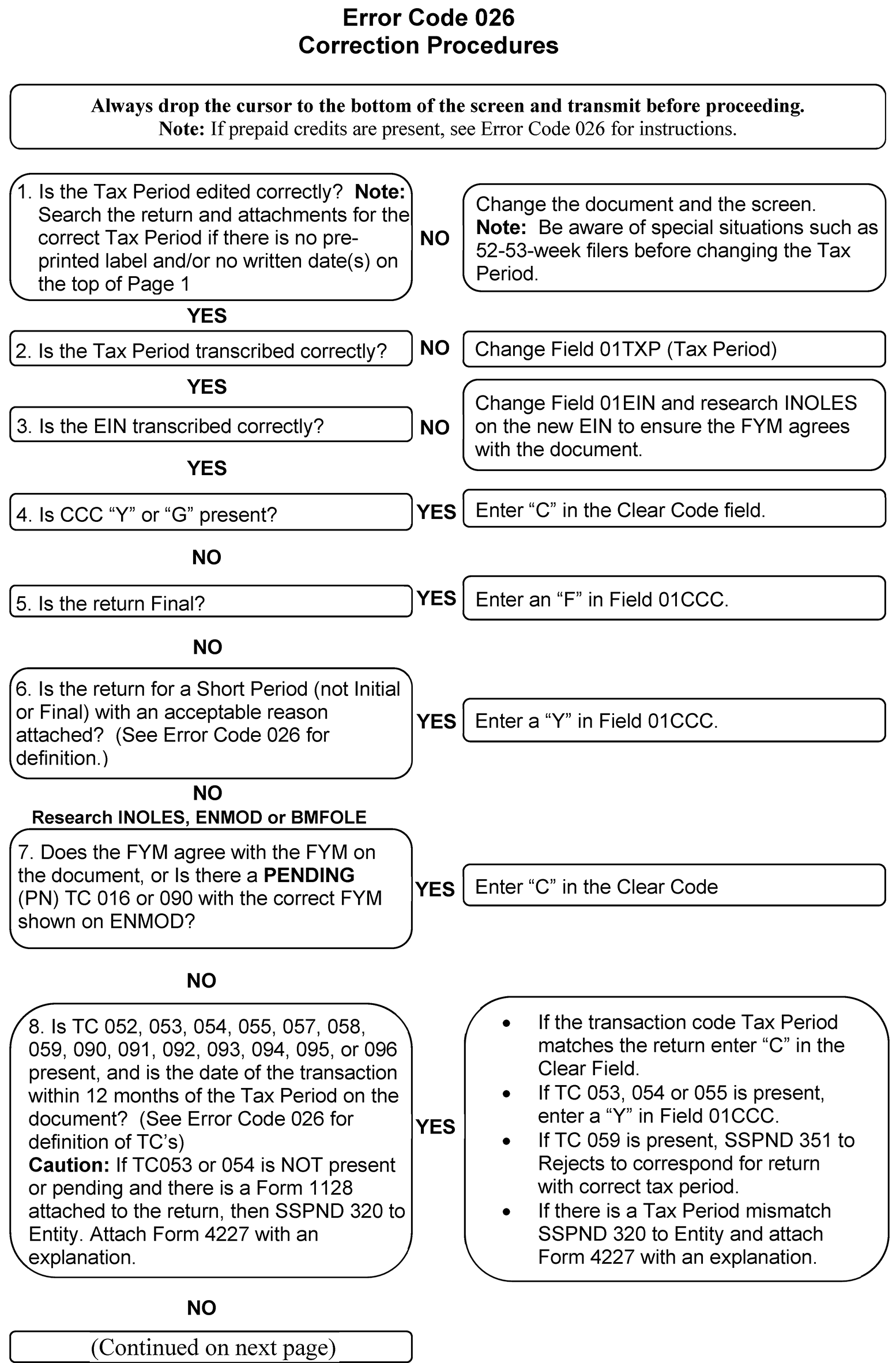
Please click here for the text description of the image.
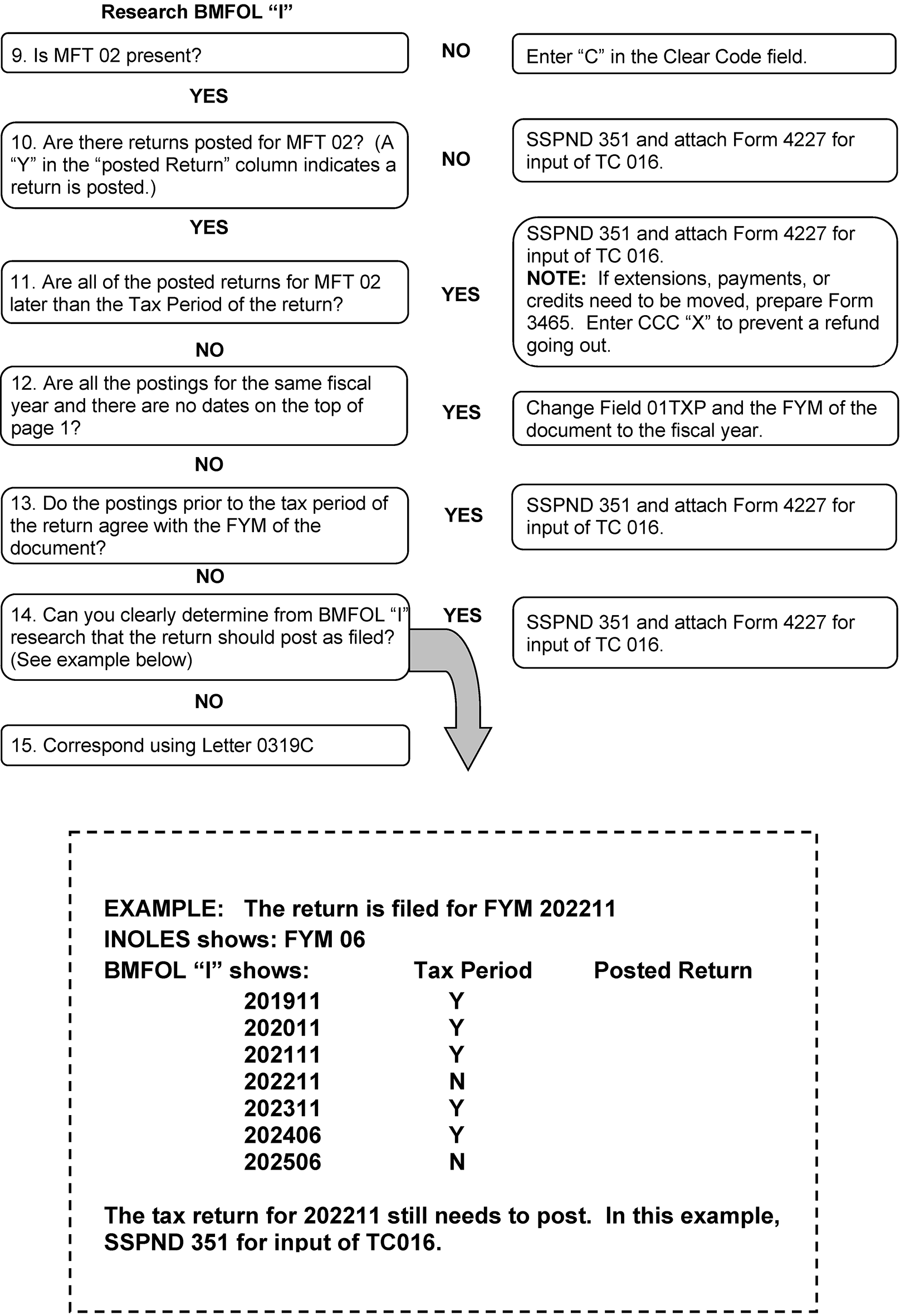
Please click here for the text description of the image.
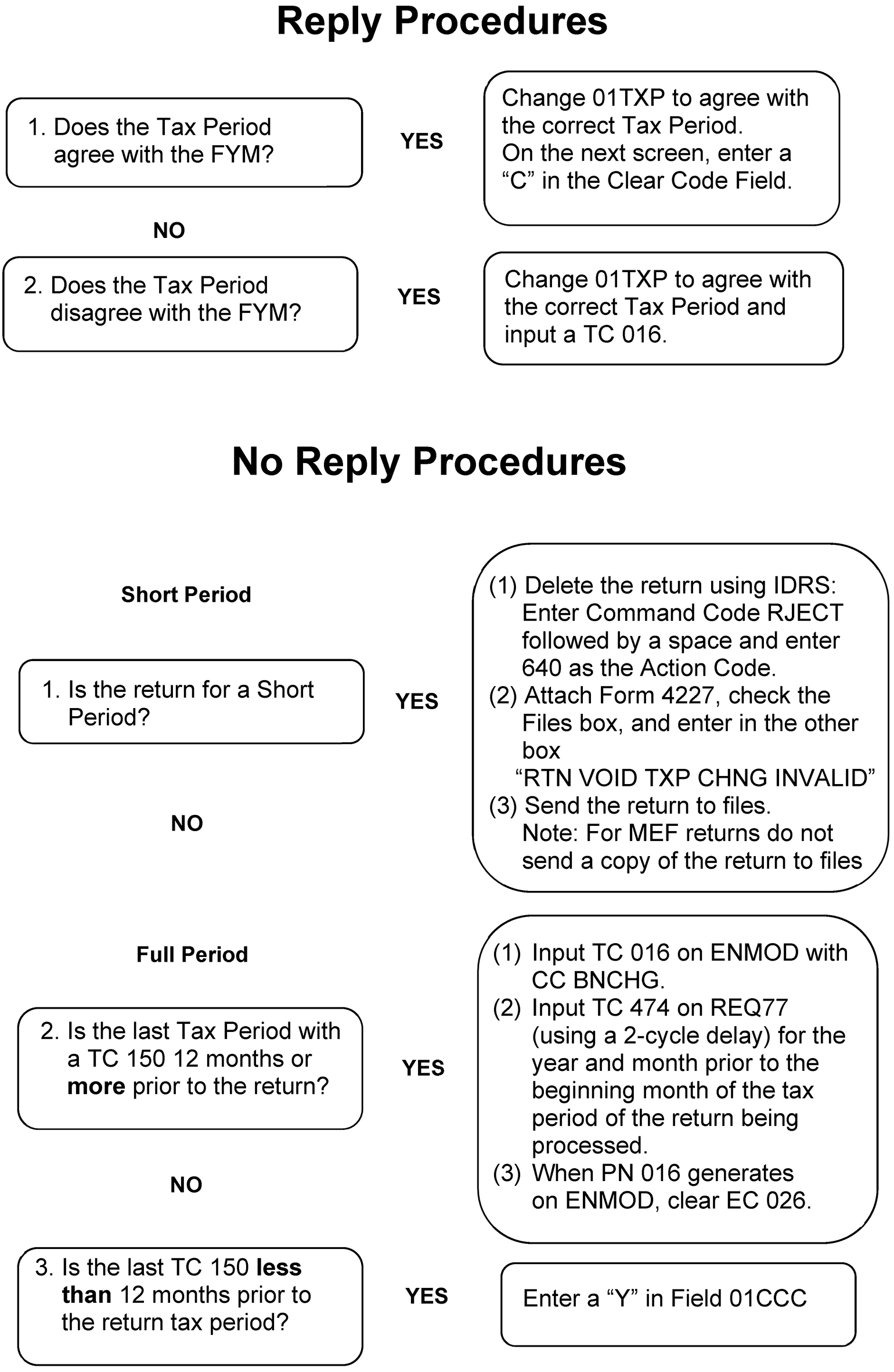
Potential Frivolous Arguments
| Potential Frivolous Arguments | Description |
|---|---|
| Alleged Churches/First Amendment | Income from non-religious sources and may claim a vow of poverty. |
| Altered form | Altering any or all line items with the intent of facilitating non-compliance with the tax laws. |
| Altered Jurat/Uniform Commercial Code (UCC) I - 207 or UCC 1-308 | Return has income and deductions but the jurat has been altered or stricken. May include reference to UCC I - 207 / UCC 1-308 or a statement that the return was not signed under penalties of perjury. |
| Amended Returns/Form 843 Claim | Amended return or a Form 843, Claim for Refund and Request for Abatement, filed to obtain a total refund of all taxes paid in prior years, based on tax avoidance arguments. |
| C-Filings | This frivolous position includes the following four categories:
|
| Challenges to Authority/Due Process | Questions several administrative authorities such as delegation orders, summons authority, Privacy Act, etc. Argues that they must be afforded a hearing or a trial before taxes can be assessed or before property can be seized. |
| Challenges to Authority/Title 26 or "law" in other documents | Argues that Title 26 of the United States Code is not law because it was never enacted as named. |
| Collections Issues | Files frivolous documents contending that several collections issues are invalid (e.g., Offers in Compromise, Collection Due Process Requests, Installment Agreements, Appeals Requests) because they are not filed and signed by someone with delegated authority. They may have no certificate of assessment attached, do not comply in form or content with a State or Local law, are not in a certain format or lack a valid OMB (Office of Management and Budget) number or other frivolous positions. |
| Disclaimer | Submits a disclaimer stating, "disclaims the liability for the tax due" , making the liability on the return zero. |
| Fifth Amendment | Assertion of the Fifth Amendment right against self-incrimination as a basis for not providing any financial information. |
| Foreign Income | Argues that United States citizens and residents are not subject to tax on their wages or other income derived from sources within the United States, as only foreign-based income or income received by non-resident aliens and foreign S Corporations from sources within the United States is taxable. |
| Form 1099-OID (Original Issue Discount) | An individual or business files a return reporting false amounts of income (generally "Other" or "Miscellaneous" income) and claims a false amount of income tax withholding approximately equal to the amount of falsely reported income. Although the returns report income, they do not calculate any tax due. Some of the returns have Form 1099-OID attached and some have Form 1096. Other false financial instruments may be filed in the place of or in addition to the Form 1099-OID such as Form 2439, promissory notes, bonds, sight drafts, etc. |
| IRC 861 Business Employment Tax (BMF 861) | Argument targets employers and advises them that wages are exempt from withholding. These taxpayers rely on Sections 861 through 865 of the Code and the regulations (in particular, Treasury Regulation (Section 1.861-8), promoters of this scheme advise employers to stop withholding and paying payroll taxes on their employee's wages. In addition, some employers file amended payroll tax returns and request refunds of previously paid payroll taxes. |
| IRS is a Private Organization/Collects Tribute, Not Taxes | Argues that the IRS is an entity named the Internal Revenue and Tax Services Inc., which was incorporated in Delaware in 1933, it is a collection agency for the Federal Reserve Bank, or is part of the United Nations and is clandestinely leading the tax paying public into a "new world order" . |
| Not a Person | Argues that a taxpayer is not a "person" within the meaning of IRC 7701(a)(14). |
| Obscene, Vulgar, Harassing | Submits documents or other materials showing that non-filing is due to dissatisfaction with tax policies or taxation in general. Often, this argument is expressed with obscene, vulgar, or crude language and characters in an extremely demeaning manner. |
| Protest Against Government Action/Inaction | Argues that refusal to file or pay is justified because they disagree with government policies or spending plans. |
| Sixteenth Amendment | Argues the Sixteenth Amendment was not properly ratified and therefore the federal government does not have the legal authority to collect an income tax without apportionment. |
| Straw Man | Argues the government has created an entity separate and distinct from the taxpayer - a "straw man" and any tax obligations are exclusively those of the "straw man" . |
| Taxes are Voluntary/Law Does Not Require | Submits a return, amended return, or correspondence that argues income taxes are voluntary. |
| U.S. vs. Long | Submits a return with zero money amounts. To explain the zeros inserted on the form the individual references "U.S. vs. Long" . |
| Unsigned Returns | The individual completes a return but does not sign. A statement showing disagreement with the tax system is attached or added to the return. |
| Valuation | Income is not taxable because of the declining fair market value of the dollar, because the dollar is not backed by gold/silver, because the value of services offset by the value of the labor (barter income), etc. |
For Terms, Definitions and acronyms see the following tables:
Interpretation Words
| Word | Definition | Example |
|---|---|---|
| Fair | Accurate and professional service to all persons without regard to personal bias. | Taxpayers have the right to expect a fair and just tax system |
| Significant entry | Any entry other than zero or blank. | For example: If line 1 has a significant entry. Edit CCC A. |
| Usually | Exceptions when something is not required or what would create the unusual circumstance. | A return for a Political Organization can usually be determined by the name |
| Timely | Coming early or at the correct time. | Taxpayers have the right to receive help from the Taxpayer Advocate Service (TAS) if they are experiencing financial difficulty or if the IRS has not resolved their tax issues properly and timely through normal channels. |
| Acronyms and Abbreviations | Definition |
|---|---|
| AC | Action Code |
| ADP | Automatic Data Processing |
| AM | Accounts Management |
| APO | Army Post office |
| BMF | Business Master File |
| CADE | Customer Account Data Engine |
| Code and Edit | Code and Edit |
| CC | Command Code |
| CCC | Computer Condition Code |
| CDP | Collection Due Process |
| CFOL | Corporate Files Online |
| CFR | Code of Federal Regulations |
| CI | Criminal Investigation |
| CII | Correspondence Imaging Inventory |
| C/O | In Care of |
| CP | Computer Paragraph |
| CRD | Correspondence Received Date |
| CRN | Credit Reference Number |
| DAN | Depositors Account Number |
| DLN | Document Locator Number |
| DPO | Diplomatic Post Office |
| EC | Error Code |
| E-File | Electronic Filing |
| EIF | Entity Index File |
| EIN | Employer Identification Number |
| EPMF | Employee Plan Master File |
| ERS | Error Resolution System |
| Exam | Examination |
| FAX | Facsimile |
| FDII | Foreign Derived Intangible Income |
| FPO | Fleet Post Office |
| FRP | Frivolous Return Program |
| FSP | Functional Specification Package |
| GILTI | Global Intangible Low-Taxed Income |
| GMF | Generalized Mainline Framework |
| ICS | Integrated Collection System |
| ID | Identification or Identity |
| IDRS | Integrated Data Retrieval System |
| ISRP | Integrated Submission and Remittance Processing |
| ITIN | IRS Individual Taxpayer Identification Number |
| IMF | Individual Master File |
| IRC | Internal Revenue Code |
| LB&I | Large Business and International |
| MACRS | Modified Accelerated Cost Recovery System |
| MCCs | Major City Codes |
| MeF | Modernized Electronic Filing |
| MFT | Master File Transaction |
| MMDDYY | Month Month Day Day Year Year |
| MT | Merge To |
| NAICS | North American Industry Classification System |
| NAP | National Accounts Profile |
| NMF | Non-Master File |
| N/A | Not Applicable |
| OAR | Operations Assistance Request |
| OID | Original Issue Discount |
| OLE | On-Line Entity |
| OLNR | OnLine Notice Review |
| OSPC | Ogden Submission Processing Center |
| P&A | Planning and Analysis |
| Portable Document File | |
| PTIN | Preparer Tax Identification Number |
| P.O. | Post Office |
| PTP | Publicly Traded Partnership |
| QOF | Qualified Opportunity Fund |
| R&C | Receipt and Control |
| RDD | Return Due Date |
| Rev. Proc. | Revenue Procedure |
| RMIT | Remittance |
| RO | Revenue Officer |
| RPC | Return Processing Code |
| RRA98 | Restructuring and Reform Act of 1998 |
| RTN | Routing Transit Number |
| SB/SE | Small Business/Self-Employed |
| SCAMPS | Service Center Automated Mail Processing System |
| SERP | Servicewide Electronic Research Program |
| SETP | Special Estimated Tax Payments |
| SFR | Substitute for Return |
| SLA | Service Level Agreement |
| SOI | Statistics of Income |
| SP | Submission Processing |
| SSN | Social Security Number |
| TAS | Taxpayer Advocate Service |
| TBOR | Taxpayer Bill of Rights |
| TC | Transaction Code |
| TDA | Type Depositor Account |
| TE | Tax Examiner |
| TE/GE | Tax Exempt Government Entities |
| TETR | Telephone Excise Tax Refund |
| TIA | Tax Information Authorization |
| TIF | Taxpayer Information File |
| TPE | Tax Period Ending |
| TPC | Tax Preference Code |
| TPNC | Taxpayer Notice Code |
| TS | Taxpayer Services |
| TY | Tax Year |
| UCC | Uniform Commercial Code |
| U.S. | United States |
| USPS | United States Postal Service |
| UWR | Unified Work Request |
| XREF | Cross Reference |
| ZIP | Zone Improvement Plan |
The following table gives valid TPNCs and explanations:
| TPNC | EXPLANATION |
|---|---|
| 01 | We found an error in the computation of your total income. |
| 03 | We found that the contributions deducted were more than the law allows. |
| 04 | We found an error in the computation of your taxable income. |
| 05 | We found an error in the computation of your total income tax. |
| 06 | We refigured your total income tax by using the alternative tax computation. This was to your advantage |
| 07 | Your special deductions were more than the law allows. |
| 08 | The credit claimed was more than the law allows. |
| 09 | We found an error in the computation of your deductions. |
| 10 | We found an error in the computation of the tax due or overpayment amount. |
| 11 | Your Foreign Tax Credit was more than the law allows. |
| 12 | We found an error in the amount of Investment Credit applied against your tax. |
| 13 | We found an error in the amount of Work Incentive (WIN) Credit applied against your tax. |
| 14 | We found an error in the computation of your alternative tax. |
| 15 | We found an error in the computation of your gains and losses on Schedule D. |
| 16 | We found an error in the computation of your gains and losses on Form 4797. |
| 18 | We found an incorrect amount of surtax exemption on Schedule J or on Form 1120-F. |
| 21 | We found an error in the amount of Work Opportunity Credit applied against your tax. |
| 22 | Your deduction for additional first year depreciation was more than the law allows. |
| 23 | We found an error in the computation of the Alternative Minimum Tax. |
| 25 | We found an error in the computation of the alcohol fuel credit or the Non Conventional Source Fuel Credit. |
| 26 | We found an error in the computation of the Research Credit. |
| 30 | We found an error in the computation of Total Income Tax for a fiscal year with two tax rates. |
| 31 | We found an error in the computation of the General Business Credit on Form 3800. |
| 32 | We found an error in the computation of the Low Income Housing Credit on Form 8586. |
| 33 | We found an error in the computation of the Recapture of Low Income Housing Credit on Form 8611. |
| 34 | We found an error in the computation of the credit for prior year minimum tax on Form 8827. |
| 36 | We found an error in the computation of the credit for federal tax on fuels on Form 4136. |
| 40 | We adjusted your tax return as shown because we did not receive a reply to our request for additional information. |
| 42 | We changed your Form 1120-F, U.S. Income Tax Return of a Foreign Corporation, because: - You computed the U.S. income tax paid or withheld at source incorrectly, or - You computed the tax deducted and withheld under Chapter 3 incorrectly, or - You computed or transferred Schedule W, Overpayment Resulting From Tax Deducted and Withheld Under Chapter 3, incorrectly. |
| 47 | We changed the amount you claimed as Credit for Small Employer Health Insurance Premiums on Form 3800, General Business Credit. You figured the credit incorrectly on Form 8941, Credit for Small Employer Health Insurance Premiums, Line 16, or transferred it incorrectly to Form 3800, Part III, Line 4h. |
| 48 | We didn't allow the Credit for Small Employer Health Insurance Premiums claimed on Form 3800, General Business Credit. The required Form 8941 was incomplete or wasn't attached to your tax return (No reply to correspondence only). |
| 49 | We adjusted your Form 8941, Credit for Small Employer Health Insurance Premiums. On Form 8941, Line 2 you reported 25 or more full-time equivalent employees for the tax year and figured Line 12 incorrectly. |
| 53 | We adjusted your Form 8941, Credit for Small Employer Health Insurance Premiums. On Form 8941, Line 3 you reported average annual wages paid for the tax year over the maximum amount and figured Line 12 incorrectly. |
| 54 | We didn't allow the amount you claimed as Credit for Small Employer Health Insurance Premiums on your tax return. Based on your response to Form 8941, Line A and/or Line C, you can’t claim the credit because:
|
| 56 | We didn’t allow the Elective Payment Election (EPE) on Form 3800, General Business Credit, because the registration number was missing or didn’t match our records. |
| 73 | We changed the amount for the Elective Payment Election (EPE) because the Form 3800, General Business Credit, Part III, was computed incorrectly. |
| 74 | We didn’t allow all or part of the credit claimed as clean vehicle credit on your return because one or more of the Vehicle Identification Numbers (VIN) reported on Schedule A (Form 8936), Clean Vehicle Credit Amount, didn’t match our records. |
| 88 | We changed your telephone excise tax refund amount based on the information you provided. |
| 89 | We changed your tax and/or credits because we did not receive the additional information we requested. The change includes the disallowance of all or part of your telephone excise tax refund you requested on your tax return. We previously sent you a separate letter explaining the disallowance. |
| 90 | Fill-in narrative. Used when a return has an error and none of the TPNCs above apply or when more than three TPNCs are necessary. |
Listed below are the fields in Section 23.
| Field Designator | Field Title | Location on Form 3800 (2023 Revision) | Location on Form 3800 (Revision 2024) |
|---|---|---|---|
| 23Q1 | CAMT Checkbox | Part I, Checkbox | Part I, Checkbox |
| 23001 | General business credit | Part I, Line 1 | Part I, Line 1 |
| 23002 | Passive activity credits | Part I, Line 2 | Part I, Line 2 |
| 23003 | Passive activity credits allowed | Part I, Line 3 | Part I, Line 3 |
| 23004 | Carryforward of general business credits | Part I, Line 4 | Part I, Line 4 |
| 23005 | Carryback of general business credits | Part I, Line 5 | Part I, Line 5 |
| 2310B | Certain Allowable Credits | Part II, Line 10b | Part II, Line 10b |
| 2316B | For a corporation electing to accelerate the research credit | ERS Input Only Form 3800, Part II, Line 16
|
ERS Input Only Form 3800, Part II, Line 16
|
| 23022 | Amount for Form 8844 | Part II, Line 22 (Source Part III, Line 3) | Part II, Line 22 (Source Part III, Line 3) |
| 23024 | Passive activity credit allowed | Part II, Line 24 | Part II, Line 24 |
| 23028 | Add Lines 17b and 26 | Part II, Line 28 | Part II, Line 28 |
| 23030 | Enter the general business credit | Part II, Line 30 | Part II, Line 30 |
| 23031 | Enter the total eligible small business credits allowed (2012 and 2011 only) Reserved (2017 through 2013) |
Part II, Line 31 | Part II, Line 31 |
| 23032 | Passive activity credits | Part II, Line 32 | Part II, Line 32 |
| 23033 | Passive activity credits allowed | Part II, Line 33 | Part II, Line 33 |
| 23034 | Carryforward of business credits | Part II, Line 34 | Part II, Line 34 |
| 23035 | Carryback of business credits | Part II, Line 35 | Part II, Line 35 |
| 231AG | Form 3468, Part II (Combine columns e and f) | Part III, Line 1a, Column j | Part III, Line 1a, Column g |
| 231BB | Form 7207(Registration number) | Part III, Line 1b, Column b | Part III, Line 1b, Column b |
| 231BF | Form 7207(Credit Transfer Election Amount) | Part III, Line 1b, Column g | Part III, Line 1b, Column f |
| 231BG | Form 7207 (Combine columns e and f) | Part III, Line 1b, Column j | Part III, Line 1b, Column g |
| 231BH | Form 7207 (Gross Elective Payment Election (EPE) Amount) | Part III, Line 1b, Column h | Part III, Line 1b, Column h |
| 231BJ | Form 7207 (Net Elective Payment Election (EPE) Amount) | Part III, Line 1b, Column I | Part III, Line 1b, Column j |
| 231CG | Form 6765 (Combine columns e and f) | Part III, Line 1c, Column j | Part III, Line 1c, Column g |
| 231DB | Form 3468, Part III, (Registration number) | Part III, Line 1d, Column b | Part III, Line 1d, Column b |
| 231DF | Form 3468, Part III, (Credit Transfer Election Amount) | Part III, Line 1d, Column g | Part III, Line 1d, Column f |
| 231DG | Form 3468, Part III, (Combine columns e and f) | Part III, Line 1d, Column j | Part III, Line 1d, Column g |
| 231DH | Form 3468, Part III, (Gross Elective Payment Election (EPE) Amount) | Part III, Line 1d, Column h | Part III, Line 1d, Column h |
| 231DJ | Form 3468, Part III, (Net Elective Payment Election (EPE) Amount) | Part III, Line 1d, Column I | Part III, Line 1d, Column j |
| 231EG | Form 8826, (Combine columns e and f) | Part III, Line 1e, Column j | Part III, Line 1e, Column g |
| 231FB | Form 8835, Part II (Registration number) | Part III, Line 1f, Column b | Part III, Line 1f, Column b |
| 231FF | Form 8835, Part II (Credit Transfer Election Amount) | Part III, Line 1f, Column g | Part III, Line 1f, Column f |
| 231FG | Form 8835, Part II (Combine columns e and f) | Part III, Line 1f, Column j | Part III, Line 1f, Column g |
| 231GB | Form 7210 (Registration number) | Part III, Line 1g, Column b | Part III, Line 1g, Column b |
| 231GF | Form 7210 (Credit Transfer Election Amount) | Part III, Line 1g, Column g | Part III, Line 1g, Column f |
| 231GG | Form 7210 (Combine columns e and f) | Part III, Line 1g, Column j | Part III, Line 1g, Column g |
| 231GH | Form 7210 (Gross Elective Payment Election (EPE) Amount) | Part III, Line 1g, Column h | Part III, Line 1g, Column h |
| 231GJ | Form 7210 (Net Elective Payment Election (EPE) Amount) | Part III, Line 1g, Column I | Part III, Line 1g, Column j |
| 231HG | Form 8820 (Combine columns e and f) | Part III, Line 1h, Column j | Part III, Line 1h, Column g |
| 231IG | Form 8874 (Combine columns e and f) | Part III, Line 1i, Column j | Part III, Line 1i, Column g |
| 231JG | Form 8881, Part I (Combine columns e and f) | Part III, Line 1j, Column j | Part III, Line 1j, Column g |
| 231KG | Form 8882 (Combine columns e and f) | Part III, Line 1k, Column j | Part III, Line 1k, Column g |
| 231LG | Form 8864 (diesel) (Combine columns e and f) | Part III, Line 1l, Column j | Part III, Line 1l, Column g |
| 231MG | Form 8896 (Combine columns e and f) | Part III, Line 1m, Column j | Part III, Line 1m, Column g |
| 231NG | Form 8906 (Combine columns e and f) | Part III, Line 1n, Column j | Part III, Line 1n, Column g |
Listed below are the fields in Section 24.
| Field Designator | Field Title | Location on Form 3800 (2023 Revision) | Location on Form 3800 (Revision 2024) |
|---|---|---|---|
| 241OB | Form 3468, Part IV (Registration number) | Part III, Line 1o, Column b | Part III, Line 1o, Column b |
| 241OG | Form 3468, Part IV (Combine columns e and f) | Part III, Line 1o, Column j | Part III, Line 1o, Column g |
| 241OH | Form 3468, Part IV (Gross Elective Payment Election (EPE) Amount) | Part III, Line 1o, Column h | Part III, Line 1o, Column h |
| 241OJ | Form 3468, Part IV (Net Elective Payment Election (EPE) Amount) | Part III, Line 1o, Column I | Part III, Line 1o, Column j |
| 241PG | Form 8908, (Combine columns e and f) | Part III, Line 1p, Column j | Part III, Line 1p, Column g |
| 241QB | Form 7218, Part II (Registration number) | New for 2024 Revision | Part III, Line 1q, Column b |
| 241QF | Form 7218, Part II (Credit Transfer Election Amount) | New for 2024 Revision | Part III, Line 1q, Column f |
| 241QG | Form 7218, Part II (Combine columns e and f) | New for 2024 Revision | Part III, Line 1q, Column g |
| 241QH | Form 7218, Part II (Gross Elective Payment Election (EPE) Amount) | New for 2024 Revision | Part III, Line 1q, Column h |
| 241QJ | Form 7218, Part II (Net Elective Payment Election (EPE) Amount) | New for 2024 Revision | Part III, Line 1q, Column j |
| 241RG | Form 8910, (Combine columns e and f) | Part III, Line 1r, Column j | Part III, Line 1r, Column g |
| 241SB | Form 8911, Part I (Registration number) | Part III, Line 1s, Column b | Part III, Line 1s, Column b |
| 241SF | Form 8911, Part I (Credit Transfer Election Amount) | Part III, Line 1s, Column g | Part III, Line 1s, Column f |
| 241SG | Form 8911, Part I (Combine columns e and f) | Part III, Line 1s, Column j | Part III, Line 1s, Column g |
| 241SH | Form 8911, Part I (Gross Elective Payment Election (EPE) Amount) | Part III, Line 1s, Column h | Part III, Line 1s, Column h |
| 241SJ | Form 8911, Part I (Net Elective Payment Election (EPE) Amount) | Part III, Line 1s, Column I | Part III, Line 1s, Column j |
| 241TG | Form 8830, (Combine columns e and f) | Part III, Line 1t, Column j | Part III, Line 1t, Column g |
| 241UB | Form 7213, Part II (Registration number) | Part III, Line 1u, Column b | Part III, Line 1u, Column b |
| 241UF | Form 7213, Part II (Credit Transfer Election Amount) | Part III, Line 1u, Column g | Part III, Line 1u, Column f |
| 241UG | Form 7213, Part II (Combine columns e and f) | Part III, Line 1u, Column j | Part III, Line 1u, Column g |
| 241UH | Form 7213, Part II (Gross Elective Payment Election (EPE) Amount) | Part III, Line 1u, Column h | Part III, Line 1u, Column h |
| 241UJ | Form 7213, Part II (Net Elective Payment Election (EPE) Amount) | Part III, Line 1u, Column I | Part III, Line 1u, Column j |
| 241VB | Form 3468, Part V (Registration number) | New for 2024 Revision | Part III, Line 1v, Column b |
| 241VF | Form 3468, Part V (Credit Transfer Election Amount) | New for 2024 Revision | Part III, Line 1v, Column f |
| 241VG | Form 3468, Part V (Combine columns e and f) | New for 2024 Revision | Part III, Line 1v, Column g |
| 241VH | Form 3468, Part V (Gross Elective Payment Election (EPE) Amount) | New for 2024 Revision | Part III, Line 1v, Column h |
| 241VJ | Form 3468, Part V (Net Elective Payment Election (EPE) Amount) | New for 2024 Revision | Part III, Line 1v, Column j |
| 241WG | Form 8932, (Combine columns e and f) | Part III, Line 1w, Column j | Part III, Line 1w, Column g |
| 241XB | Form 8933, (Registration number) | Part III, Line 1x, Column b | Part III, Line 1x, Column b |
| 241XF | Form 8933, (Credit Transfer Election Amount) | Part III, Line 1x, Column g | Part III, Line 1x, Column f |
| 241XG | Form 8933 (Combine columns e and f) | Part III, Line 1x, Column j | Part III, Line 1x, Column g |
| 241XH | Form 8933 (Gross Elective Payment Election (EPE) Amount) | Part III, Line 1x, Column h | Part III, Line 1x, Column h |
| 241XJ | Form 8933 (Net Elective Payment Election (EPE) Amount) | Part III, Line 1x, Column I | Part III, Line 1x, Column j |
| 241YG | Form 8936, Part II (Combine columns e and f) | Part III, Line 1y, Column j | Part III, Line 1y, Column g |
Listed below are the fields in Section 25.
| Field Designator | Field Title | Location on Form 3800 (2023 Revision) | Location on Form 3800 (Revision 2024) |
|---|---|---|---|
| 25AAB | Form 8936, Part V (Registration number) | Part III, Line 1aa, Column b | Part III, Line 1aa, Column b |
| 25AAG | Form 8936, Part V (Combine columns e and f) | Part III, Line 1aa, Column j | Part III, Line 1aa, Column g |
| 25AAH | Form 8936, Part V (Gross Elective Payment Election (EPE) Amount) | Part III, Line 1aa, Column h | Part III, Line 1aa, Column h |
| 25AAJ | Form 8936, Part V (Net Elective Payment Election (EPE) Amount) | Part III, Line 1aa, Column I | Part III, Line 1aa, Column j |
| 25BBG | Form 8904 (Combine columns e and f) | Part III, Line 1bb, Column j | Part III, Line 1bb, Column g |
| 25CCG | Form 7213, Part I (Combine columns e and f) | Part III, Line 1cc, Column j | Part III, Line 1cc, Column g |
| 25DDG | Form 8881, Part II (Combine columns e and f) | Part III, Line 1dd, Column j | Part III, Line 1dd, Column g |
| 25EEG | Form 8881, Part III (Combine columns e and f) | Part III, Line 1ee, Column j | Part III, Line 1ee, Column g |
| 25FFG | Form 8864, Line 8 (Combine columns e and f) | Part III, Line 1ff, Column j | Part III, Line 1ff, Column g |
| 25GGB | Form 7211, Part II (Registration number) | New for 2024 Revision | Part III, Line 1gg, Column b |
| 25GGF | Form 7211, Part II (Credit Transfer Election Amount) | New for 2024 Revision | Part III, Line 1gg, Column f |
| 25GGG | Form 7211, Part II (Combine columns e and f) | New for 2024 Revision | Part III, Line 1gg, Column g |
| 25GGH | Form 7211, Part II (Gross Elective Payment Election (EPE) Amount) | New for 2024 Revision | Part III, Line 1gg, Column h |
| 25GGJ | Form 7211, Part II (Net Elective Payment Election (EPE) Amount) | New for 2024 Revision | Part III, Line 1gg, Column j |
| 25ZZG | Other credits (Combine columns e and f) | Part III, Line 1zz, Column j | Part III, Line 1zz, Column g |
| 254AB | Form 3468, Part VI (Registration number) | Part III, Line 4a, Column b | Part III, Line 4a, Column b |
| 254AF | Form 3468, Part VI (Credit Transfer Election Amount) | Part III, Line 4a, Column g | Part III, Line 4a, Column f |
| 254AG | Form 3468, Part VI (Combine columns e and f) | Part III, Line 4a, Column j | Part III, Line 4a, Column g |
| 254AH | Form 3468, Part VI (Gross Elective Payment Election (EPE) Amount) | Part III, Line 4a, Column h | Part III, Line 4a, Column h |
| 254AJ | Form 3468, Part VI (Net Elective Payment Election (EPE) Amount) | Part III, Line 4a, Column I | Part III, Line 4a, Column j |
| 254BG | Form 5884, (Combine columns e and f) | Part III, Line 4b, Column j | Part III, Line 4b, Column g |
| 254CG | Form 6478, (Combine columns e and f) | Part III, Line 4c, Column j | Part III, Line 4c, Column g |
| 254DG | Form 8586, (Combine columns e and f) | Part III, Line 4d, Column j | Part III, Line 4d, Column g |
| 254EB | Form 8835, Part II (Registration number) | Part III, Line 4e, Column b | Part III, Line 4e, Column b |
| 254EF | Form 8835, Part II (Credit Transfer Election Amount) | Part III, Line 4e, Column g | Part III, Line 4e, Column f |
| 254EG | Form 8835, Part II (Combine columns e and f) | Part III, Line 4e, Column j | Part III, Line 4e, Column g |
| 254EH | Form 8835, Part II (Gross Elective Payment Election (EPE) Amount) | Part III, Line 4e, Column h | Part III, Line 4e, Column h |
| 254EJ | Form 8835, Part II (Net Elective Payment Election (EPE) Amount) | Part III, Line 4e, Column I | Part III, Line 4e, Column j |
| 254FG | Form 8846, (Combine columns e and f) | Part III, Line 4f, Column j | Part III, Line 4f, Column g |
| 254GG | Form 8900, (Combine columns e and f) | Part III, Line 4g, Column j | Part III, Line 4g, Column g |
| 254HG | Form 8941, (Combine columns e and f) | Part III, Line 4h, Column j | Part III, Line 4h, Column g |
| 254IG | Form 6765, (Combine columns e and f) | Part III, Line 4i, Column j | Part III, Line 4i, Column g |
| 254JG | Form 8994, (Combine columns e and f) | Part III, Line 4j, Column j | Part III, Line 4j, Column g |
| 254KG | Form 3468, Part VII, (Combine columns e and f) | Part III, Line 4k, Column j | Part III, Line 4k, Column g |
| 254ZG | Other specified credits (Combine columns e and f) | Part III, Line 4z, Column j | Part III, Line 4z, Column g |
| 25IND | Indicator - Part V, Column b has significant data | Form 3800, Part III, (edited bottom right) | Form 3800, Part III, (edited bottom right) |