


 )
or https:// means you've safely connected to the .gov website. Share sensitive information only on official, secure websites.
)
or https:// means you've safely connected to the .gov website. Share sensitive information only on official, secure websites.


- 3.17.243 Miscellaneous Accounting
- 3.17.243.1 Program Scope and Objectives
- 3.17.243.1.1 Background
- 3.17.243.1.2 Authority
- 3.17.243.1.3 Roles and Responsibilities
- 3.17.243.1.4 Program Management and Review
- 3.17.243.1.4.1 Program Controls
- 3.17.243.1.5 Terms and Acronyms
- 3.17.243.1.6 Related Resources
- 3.17.243.1.7 Privacy and Security Over Taxpayer Information, Returns and Documents
- 3.17.243.1.8 Vulnerability Assessments
- 3.17.243.1.9 Record Retention
- 3.17.243.2 Taxpayer Advocate Service
- 3.17.243.3 Reversal of Erroneous Abatements
- 3.17.243.3.1 Reversal of Erroneous Abatements Checklist
- 3.17.243.3.2 Processing the Reversal of Erroneous Abatement Package
- 3.17.243.4 Form 12857 Receipts
- 3.17.243.5 Refund Litigation Cases
- 3.17.243.5.1 Background
- 3.17.243.5.2 Refund Litigation Campus Contacts
- 3.17.243.5.3 Processing Requests
- 3.17.243.5.4 Controlling and Releasing Cases
- 3.17.243.5.5 Closing Returned Cases
- 3.17.243.5.6 General Requests
- 3.17.243.5.7 Emergency Refund Litigation Case Requests
- 3.17.243.5.8 Collections on Judgements in Tax Cases
- 3.17.243.5.9 Monitoring Refund Litigation Cases
- 3.17.243.5.10 Diagnostic Transcript Type Q (DIAG-Q Transcripts)
- 3.17.243.5.11 Transcripts Generated Due to Expired CSED or Inactivity
- 3.17.243.6 Certified Documents
- 3.17.243.6.1 Certification of IRS Records
- 3.17.243.6.2 Form 4340, Certificate of Assessments, Payments, Other Specified Matters
- 3.17.243.6.3 Preparation of Original Form 2866, Certificate of Official Record
- 3.17.243.6.3.1 Routine or Non-Blue Ribbon Certifications
- 3.17.243.6.3.2 Preparation of Blue Ribbon Certifications
- 3.17.243.6.3.3 Preparation of Copies of Certifications
- 3.17.243.7 Department of Justice (DOJ)
- 3.17.243.7.1 Monies Collected by the Department of Justice
- 3.17.243.7.2 DOJ Payments Transferred via IPAC
- 3.17.243.7.3 US Attorney and Tax Division Payments
- 3.17.243.7.3.1 Assessed Tax Liabilities
- 3.17.243.7.3.2 Taxpayer Identification
- 3.17.243.7.3.3 Module Research
- 3.17.243.7.3.4 Types of Assessments
- 3.17.243.7.4 Researching U.S. Attorney Payments
- 3.17.243.7.5 Researching Tax Division Payments
- 3.17.243.7.6 Other Actions
- 3.17.243.7.7 DOJ IPAC Payment Processing Procedures
- 3.17.243.7.8 Court Ordered Criminal Restitution Payments
- 3.17.243.7.8.1 Processing the Accounting Package
- 3.17.243.7.8.2 Restitution Payment Processing
- 3.17.243.7.8.3 Accounting Deposit Procedures
- 3.17.243.7.8.4 Accounting Research and Processing Procedures
- 3.17.243.7.8.5 State Court Ordered Restitution
- 3.17.243.7.8.6 Joint and Several Cases
- 3.17.243.7.8.7 MFT 31 Case Procedures
- 3.17.243.7.8.8 Restitution Based Assessment (RBA) Non Master File (NMF) Accounts
- 3.17.243.7.8.8.1 Posting Payments to RBA NMF Account(s)
- 3.17.243.7.8.9 Returning Criminal Restitution Payments
- 3.17.243.7.9 Maintaining the Criminal Restitution Case File
- 3.17.243.7.10 Closing a Criminal Restitution Case
- 3.17.243.7.11 Internal Revenue Code (IRC) 7804(c)
- 3.17.243.7.12 Internal Management Controls for Criminal Restitution Payments
- 3.17.243.8 United States Department of Agriculture (USDA) Discrimination Settlement Program
- 3.17.243.9 Federal Tax Deposit (FTD) Point of Contacts
- 3.17.243.10 Numbering Forms and Documents in Accounting
- 3.17.243.10.1 Assigning a Document Locator Number (DLN)
- 3.17.243.10.2 Description of a DLN
- 3.17.243.10.3 Service Center Control File (SCCF)
- 3.17.243.10.4 Helpful Hints
- 3.17.243.11 Taxpayer Advocate Case Procedures, National Service Level Agreement (SLA)
- Exhibit 3.17.243-1 Tables for Blocking Series
- Exhibit 3.17.243-2 Blocking Series Chart For Doc Code 45 and 48 - Miscellaneous Processing (i.e., SF 1098, 1081, ID-Theft Processing)
- Exhibit 3.17.243-3 Campus Codes
- Exhibit 3.17.243-4 Form 4340 Transaction Code Listing
- Exhibit 3.17.243-5 Transaction Code (TC) 971 Action Codes Listing
- Exhibit 3.17.243-6 List of U.S. Attorney Case Types
- Exhibit 3.17.243-7 Case Management System District Codes
- Exhibit 3.17.243-8 DOJ Collection Paralegal Contacts for Tax Division Cases
- Exhibit 3.17.243-9 List of Tax Division Case Types
- Exhibit 3.17.243-10 Department of Justice Glossary
- Exhibit 3.17.243-11 USDA Contacts
- 3.17.243.1 Program Scope and Objectives
Part 3. Submission Processing
Chapter 17. Accounting and Data Control
Section 243. Miscellaneous Accounting
3.17.243 Miscellaneous Accounting
Manual Transmittal
September 30, 2025
Purpose
(1) This transmits revised IRM 3.17.243, Accounting and Data Control, Miscellaneous Accounting.
Material Changes
(1) IRM 3.17.243.5.3(4)(5)(6) Updated to add instructions for ANMF processing.
(2) IRM 3.17.243.5.5 Updated to add instructions for ANMF processing.
(3) IRM 3.17.243.6.2(2) Updated Chart for Austin Certified Transcripts contact information IPU 25U3297 issued 05-16-2025.
(4) IRM 3.17.243.6.2(2) Updated Chart for Ogden Certified Transcripts contact information IPU 25U3490 issued 07-16-2025.
(5) IRM 3.17.243.6.2 (2) Deleted the Table for Certified Transcripts POCs and added link to SERP Who/Where Page.
(6) IRM 3.17.243.7.8(11) Added Note regarding Executive Order for acceptance of paper checks.
(7) IRM 3.17.243.7.8 (15) Removed sentence identifying RBA assessment interest.
(8) IRM 3.17.243.7.8.4(2) Removed bullet for adding Trace ID to Form 2221.
(9) IRM 3.17.243.7.8.7(7) Added Note regarding Executive Order for acceptance of paper checks.
(10) IRM 3.17.243.7.8.7(9) Clarified TC 670 payments with other Designated Payment Codes and updated Note regarding DPC33 payment for OIC application fee.
(11) Exhibit 3.17.243-4 updated to include definition for TC421.
(12) Editorial changes made throughout IRM for the following:
-
Updated the IRM author information IPU 25U3297 issued 05-16-2025.
-
Corrected links
-
Reorganized and renamed subsections.
Effect on Other Documents
IRM 3.17.243, Miscellaneous Accounting, dated July 16, 2025 (effective 01-01-2025) is superseded. The following IRM Procedural Updates have been incorporated: IPU 25U3297 issued May 16, 2025 and IPU 25U3490 issued July 16, 2025.Audience
Taxpayer Services Submission Processing CampusesEffective Date
(12-01-2025)Scott Wallace
Director, Submission Processing
Taxpayer Services
-
This IRM covers numerous programs such as Identity theft Unpostables, Form 12857 processing; Business Master File Identity Theft case processing; Refund Litigation case processing, Certified Document requests; and Department of Justice case processing.
-
Purpose: This IRM provides instructions for the processing of various programs that are handled in the Accounting Functions.
-
Audience: Unless otherwise stated, these procedures apply to the Accounting Functions in the Submission Processing campuses.
-
Policy Owner: Director of Submission Processing
-
Program Owner: Submission Processing Accounting and Deposit Section
-
Primary Stakeholders: The stakeholders impacted are the employees within the Submission Processing campuses and employees throughout the IRS who submit requests for processing.
-
Program Goals: To ensure efficient workflow guidance for timely and accurate processing of requests received for the functions covered within this IRM.
-
The miscellaneous Accounting procedures are used by Submission Processing, Accounting Operations, to perform various processes for the programs covered within this IRM.
-
The IRS mission is to provide America’s taxpayers top quality service by helping them understand and meet their tax responsibilities and by applying the tax law with integrity and fairness to all.
-
The IRS frames internal controls by principles outlined in Standards for Internal Control in the Federal Government, GAO-14-704G. Internal control is a process used by management to help achieve its objective.
-
26 U.S. Code 6020 - Returns prepared for or executed by Secretary
-
26 U.S. Code 6201 - Assessment Authority
-
26 U.S. Code 7804 - Other personnel
-
The team manager has the responsibility of ensuring all employees receive proper training to effectively process all requests and oversight of the various program listed within IRM 3.17.243, Miscellaneous Accounting.
-
Employees within the Accounting operation have the responsibility of utilizing the procedures outlined in this IRM to accomplish completion of assigned tasks associated with processing the requests received.
-
Program Reports: In accordance with management accountability review regulations, managers are responsible for ensuring that internal controls are effective and efficient in day to day operations.
-
Program Effectiveness: Managers are responsible for conducting operational and/or managerial control reviews to identify weaknesses and mitigate known risks. Managers must perform program or spot reviews for accuracy and completeness.
-
Functional areas are responsible for reviewing the information in this IRM annually to ensure accuracy, consistency, and to promote effective program administration.
-
Program controls and reviews are mission critical to the health of accounting and deposit programs to ensure integrity of the general ledger accounts and accuracy of the financial statements. It is essential that each function conducts its operations with an emphasis on mitigating risks, identifying best practices, and adhering to IRM requirements. An objective assessment of program compliance, including all applicable procedures and guidelines, is necessary to ensure that adequate internal controls are in place.
-
Program Effectiveness: The program effectiveness includes conducting reviews and analysis to detect and identify material or significant deficiencies that could adversely impact IRS audits and/or financial statements. These reviews are necessary to ensure Submission Processing is conducting business as prescribed in the governing IRM's and are designed to identify potential internal control deficiencies that may impair the integrity of the general ledger accounts and/or financial reporting.
-
Program Reviews: A program review ensures actions are in accordance with IRM procedures. SP HQ Accounting and Deposit Section conducts program reviews to verify compliance with IRM requirements, address TIGTA/GAO findings, identify risks to internal controls, address error trends, and training needs, as needed. In addition, the reviews ensure IRM procedures are applicable, adequate, and adhere to Department of the Treasury and/or IRS guidelines.
-
Program reviews will be planned and conducted based on business needs and priorities.
-
Notification will be provided to the SP campus leadership in advance.
-
Reviews will be conducted to evaluate program delivery and conformance to administrative and/or IRM compliance requirements.
-
The program review summary report will outline observations and recommendations for program guidance, corrective actions, and/or mitigation strategies, as appropriate.
-
A memorandum signed by the Director, SP will be forwarded to the Field Director, SP with a high-level overview of the areas of improvement.
-
Functional areas will retain a copy of the report and all applicable supporting documentation in a centralized location.
-
-
Corrective Action Plan: The Corrective Action Plan is a plan of action that is developed to resolve the condition that resulted in noncompliance with IRM requirements. In addition, an effective Corrective Action Plan identifies the root cause of problems to minimize or eliminate their recurrence. Corrective actions are developed, implemented, managed, and monitored to promote program improvement.
-
As part of the Program Review process, functional areas are required to provide a written Corrective Action Plan response to the review recommendations within 30 days of receiving the program review summary report.
-
The Corrective Action Plan must include:
-
Date of Review
-
Program Reviewed
-
Recommended/Risk Identified
-
Corrective Action
-
Completion Date
-
-
A copy of the program review and Corrective Action Plan must be retained as substantive documentation and evidence of mitigation and/or remediation of the noncompliance.
-
The following table list commonly used acronyms that are throughout the IRM.
Acronym Definition ALC Agency Location Code ANMF Automated Non-Master File BMF Business Master File CSED Collection Statute Expiration Date DLN Document Locator Number - An eleven or thirteen- digit number assigned to every document going through processing. DOC ID Document Identification Number DOJ Department of Justice GL General Ledger IDRS Integrated Data Retrieval System IDT Identity Theft IMF Individual Master File IPAC Intergovernmental Payment and Collection IRC Internal Revenue Code ISRP Integrated Submission and Remittance Processing NC Name Control - No more than four characters which represents the taxpayers’ last name. NMF Non-Master File MF Master File POC Point of Contact RBA Restitution Based Assessment RLC Refund Litigation Clerk RRACS Redesign Revenue Account Control System SPC Submission Processing Center TIN Tax Identification Number - A nine-digit number (EIN, SSN or ITIN) assigned to a specific taxpayer. All documents being processed must have a TIN. UPC Unpostable Code USDA United States Department of Agriculture USDC United States District Court XREF Cross Reference
-
Throughout this section, references are made to other IRMs in relation to instructions necessary to properly perform tasks in this IRM 3.17.243, Miscellaneous Accounting. The following IRMs are used in conjunction with this IRM or may be used as resources:
-
IRM 2.3, IDRS Terminal Response
-
IRM 2.4, IDRS Terminal Input
-
IRM 3.10.72, Receiving, Extracting, and Sorting
-
IRM 3.11.10, Revenue Receipts
-
IRM 3.17.46, Automated Non-Master File
-
IRM 3.17.64, Accounting Control General Ledger Policies and Procedures
-
IRM 5.19.23, Restitution - Based Assessments Processing
-
IRM 11.3.6, Seals and Certifications
-
IRM 25.3.8, TC 520 -W Freeze Servicewide Guide
-
IRM 25.6.1, Statute of limitations Processes and Procedures
-
-
Service officials and managers must communicate privacy and security standards to subordinate employees and establish methods to enforce them. Employees are responsible for taking required precautions in providing privacy and security for the documentation, information, and property which they handle in performing official duties.
-
When using IDRS, only access those tax modules required to accomplish your official duties. All IDRS accesses are recorded for immediate review and to determine the accuracy of an adjustment. Any unauthorized access or browsing of tax modules by employees to satisfy personal curiosity or for fraudulent reasons are prohibited by IRS and are subject to disciplinary actions and/or dismissal from the IRS.
-
If you access an account of an IRS employee that you know or someone that falls under a covered relationship such as a family member, friend or neighbor, refer the case to your lead or manager. Completing a Form 11377-E, Taxpayer Data Access, is voluntary but highly recommended. The purpose is to document the reason(s) the account was accessed. A Form 11377-E will also be completed when accessing an account of an IRS employee you do not know, without having to refer the case to management.
-
While working assigned cases, SP employees may come across some that are blocked on IDRS. These cases can be identified by an IDRS security violation message, “Unauthorized Access to This Account”. If encountered, forward the case to your manager. Managers will notify the local Planning & Analysis Staff who will scan the case and send encrypted information to the ≡ ≡ ≡ ≡ ≡ ≡ ≡ ≡ ≡ mailbox to request access to the account. Managers will retain the original case in a file awaiting access (can take up to five (5) business days). Once notified access has been granted, the case can be worked following applicable procedures.
-
Sensitive But Unclassified (SBU) data including Personally Identifiable Information (PII) and tax information, must be protected with encryption and/or access controls, limiting access only to approved personnel with a need to know. Refer to IRM 10.5.1, Privacy and Information Protection, Privacy Policy for guidance on protecting and safeguarding the privacy of SBU data regardless of its format and when transmitting through email or Enterprise Electronic Fax (EEFax) system. If you suspect or know of a potential information loss, access the Report Losses, Thefts or Disclosures of Sensitive Data; Report Lost or Stolen IT Assets and BYOD Assets website for instructions to report the loss of sensitive information/PII.
-
A vulnerability assessment identifies, quantifies, and prioritizes the vulnerabilities of government programs and assets including systems/technology, property, funds, and employees. Vulnerability assessments may be conducted on any business process to assess the risks of business failure and/or weakness caused by internal or external factors.
-
The Submission Processing (SP) sites work with the Taxpayer Advocate Service (TAS) to resolve taxpayer issues.
-
Cases are sent to SP via Form 12412, Operations Assistance Requests (OAR). TAS’s goal is to provide high quality account resolution and to ensure consistent application and enforcement of standards for taxpayers.
-
The responsibility of the Accounting Operation is to:
-
Monitor and control all TAS case files referred to Accounting.
-
Verify the accuracy and timeliness of the request.
-
Assign the TAS case to the correct team.
-
Quarterly, the designated employee will submit a report of all open and aged TAS cases to management.
-
-
General - This subsection provides instructions for overriding Master File (MF) computer programming that prevents the reversal of abatement transactions after the Assessment Statute Expiration Date (ASED) has passed.
-
Erroneous abatements can be reversed only in limited circumstances. They are:
-
See IRM 25.6.1.10.2.1.1.1, Clerical Errors.
-
See IRM 25.6.1.10.2.1.1.2, Unauthorized Abatements Made After Referral to the Department of Justice.
-
See IRM 25.6.1.10.2.1.1.3, Abatements Due to Bankruptcy Discharge.
-
-
For cases that have been referred to the Department of Justice (DOJ) for refund litigation:
-
If any part of the tax assessment at issue in that litigation has been erroneously abated, AND
-
The ASED has not expired, AND
-
TC 860 cannot be utilized to reverse the erroneous abatement because the account cannot be transferred to the non-master file for any reason (i.e., the account cannot be reduced to zero in order to be transferred to the non-master file), THEN
-
A TC 290 can be input to the master file account by the originator in order to reverse the TC 291 that caused the erroneous abatement. Because the erroneous abatement was an unauthorized post-referral abatement, reversal is appropriate and a new assessment is not required. Thus, under such circumstances, input of a TC 290 is not an assessment of tax. Any notices to the taxpayer that would be generated by this action will be suppressed. See IRM 25.6.1.10.2.1.1.2, Unauthorized Abatements Made After Referral to the Department of Justice, for more information.
-
-
Processing - Receive requests for Reversal of Erroneous Abatement from the Statute Team, under cover of Form 12810, Account Transfer Request Checklist.
-
Form 12810, Account Transfer Request Checklist, containing the following information:
-
Complete entity information of the account being transferred from the Master File (MF).
-
If the reversal request involves a MF account, a current MFTRA or account transcript showing the account balance as either a debit or zero must be included.
-
Reversal request listing the 23C date of the assessment being reinstated.
-
Transaction codes (TC) and amounts being reversed.
-
-
Completed Form 3465, Adjustment Request, with TC 860, the reinstated 23C date and entity information of the taxpayer whose account will be established on Non-Masterfile (NMF). The information may not be the same as the MF account being transferred. If the reversal is for a NMF account, no account transfer is necessary.
-
Indication of either "Notice to Taxpayer" or "No Notice to Taxpayer" .
-
If a credit is available, indicate where the credit is located.
-
-
A memorandum (2-way memo) is signed by the Campus Compliance Official of the responsible team, addressed to the Accounting Official. This memorandum will set forth the conditions surrounding the erroneous abatement, the amount of tax considered still due, the type of tax, the tax period and taxpayer identification information. In addition, information must be included on how the reinstated liability will be handled, i.e., a credit is available for application and/or a notice will be issued to the taxpayer. Upon approval of the Statute Control Team and acceptance by the Accounting Official, this memorandum serves as authorization to process the requested action.
-
If the original assessment documents cannot be obtained, a dummy document will be prepared and approved by the manager of the initiator, or at least 2 attempts to obtain the document must be provided (Form 4251 - Return Charge Out).
-
A letter to the taxpayer explaining the action and the amount of tax, penalty, and/or interest being reversed will be included if a notice to the taxpayer is required. A 510C letter (Refund in Error; Return Check) is not appropriate for the TC 860 action. The letter to the taxpayer will accompany the first notice (Form 6335, NMF First Notice) to the taxpayer. The letter must be signed by the originating function's operation manager. The taxpayer will also be advised of their right to seek assistance from Taxpayer Advocate Service.
-
If taxpayer is not going to be billed, credit must be available in Excess Collections to full pay the account.
-
Form 8765 (IDRS Control File Credit Application), must be included with the accounting package.
-
This credit must be posted before the reversal request can be sent through Statute to NMF.
-
Once the account is loaded, the credit can be applied to Automated Non-Master File (ANMF) using Form 8765.
-
-
RBA Cases:
-
RBA cases will come to Accounting when a credit (TC 291) has been posted to the account erroneously.
-
The 2-Way memo will have the subject line that reads, Reversal of Previously Posted RBA Credit.
-
2-Way memos received from the RBA teams are to be worked without having been reviewed by the Statute function.
-
-
The reversal of erroneous abatement package, as described in (IRM 3.17.243.3.1, Reversal of Erroneous Abatements Checklist), will be forwarded to the Accounting Operation from the Statute Operation only. At the option of the Operation Manager, a preview of the package may be made to ensure all necessary documents are received. If items are missing, the request will be rejected back to the requestor through the Statute Function (See IRM 25.6.1.10.2.2.3, Correction of Erroneous Abatement cases by the Originating Function).
-
The review may also include an analysis of the integrity of the request to ensure proper administration of the Internal Revenue Code and Regulations.
-
≡ ≡ ≡ ≡ ≡ ≡ ≡ ≡ ≡ ≡ ≡ ≡ ≡ ≡ ≡ ≡ ≡ ≡ ≡ ≡ ≡ ≡ ≡ ≡ ≡ ≡ ≡ ≡ ≡ ≡ ≡ ≡ ≡ ≡ ≡ ≡ ≡ ≡ ≡ ≡ ≡ ≡ ≡ ≡ ≡ ≡ ≡ ≡ ≡ ≡ ≡ ≡ ≡ ≡ ≡ ≡ ≡ ≡ ≡ ≡ ≡ ≡ ≡ ≡ ≡ ≡ ≡ ≡ ≡ ≡ ≡ ≡ ≡ ≡ ≡ ≡ ≡
-
The Accounting Operation Manager must sign approval on the memorandum indicated in (3) above when the request is accepted.
-
-
The Account Transfer Team will input the TC 400 to the Master File (MF).
-
Individual Master File (IMF) accounts - Input TC 971 Action Code (AC) 045 using REQ77.
-
Business Master File (BMF) accounts - Prepare Form 514-B, Credit Transfer Voucher and Form 813, Document Register. (See IRM 3.17.243.3, Reversal of Erroneous Abatements for detailed instructions).
-
-
The TC 400 will generate CP 96 (IMF) or CP 296 (BMF).
-
The Account Transfer Team will edit CP 96, CP 296, or CP 396 and prepare the Reversal of Erroneous Abatement package for NMF processing.
-
The Account Transfer Team will forward the Form 12810, original Form 3465, Operation Manager's approved memorandum, and the original letter for the taxpayer (when a notice is required) to the appropriate function.
-
General Explanation of Form 12857, Refund Transfer Posting Voucher, is as follows:
Note:
Effective January 14, 2013, a TC 848 and TC 849 can be input on CC ADD48 to move a refund from one individual tax account to another, instead of using Form 12857. As a result, there will be a significant decrease in the volume of Form(s) 12857 received.
-
Form 12857 is used to transfer an erroneously posted refund to the correct tax module on IDRS.
-
There are two parts to the form.
-
Part A lists the information relative to the account the refund needs to be posted “To”.
-
Part B lists the information relative to the account where the TC 840 or TC 846 is currently posted and being transferred “From”.
-
-
Review the Form 12857 to ensure it is completed correctly. The following actions are to be taken when the Form 12857 is received.
-
Access IDRS command code IMFOL or BMFOL to verify that the account on Part B does in fact have a TC 840 or TC 846 posted.
-
Verify that the amount and transaction date are correct. There may be instances where the TC 841 being input differs from the posted TC 840 or TC 846. See the table below.
If And Then the TC 841 is less than the TC 840/846 a TC 720 is present for the difference reject the Form 12857 the TC 841 is less than the TC 840/846 a TC 898 is present for the difference process the Form 12857 the TC 841 is more than the TC 840/846 reject the Form 12857 -
Verify that boxes 11, 12, and 16 of Part A have the requested information. These fields are must enter boxes and missing data will cause the document to error out. If the information is missing, contact the originator to obtain.
-
If the Form 12857 doesn't show a split refund code, verify that one doesn't exist. If IDRS shows a SPL-REF-CD, annotate it in box 9, Part B, on the Form 12857.
-
Verify that the SSN in Part A has an account established for the applicable tax year.
-
Upon review of the Form 12857 and a decision made to process it, the receiving campus MUST acknowledge receipt of the form. The Form 3210, Document Transmittal, MUST be signed and returned to the originator within two (2) business days. This can be completed via fax or inter-office mail.
-
Assign a DLN to the form and prepare a Form 813, Document Register.
-
Forward the form to the RACS unit for journalization.
-
Input a history item on IDRS for both accounts/modules – 12857RELSD.
-
After the journalization is completed, send the form processing through ISRP.
-
-
All Form 12857 received must be processed within 5 business days.
-
This subsection describes the requirements for receiving, processing, controlling and releasing Refund Litigation case requests.
-
A taxpayer files a complaint in a suit for recovery of taxes. Counsel will then forward the request to the appropriate Submission Processing Center (SPC).
-
To assist the IRS in expediting retrieval of the necessary files, telephone contact (follow up via memorandum) is made by the offices indicated above. These calls provide pertinent information on the taxpayer and the tax liability.
-
Memorandums are received from Counsel.
-
Instructions in this subsection referring to “Counsel” means either Area Counsel or Chief Counsel.
-
A telephone call, copy of the complaint or email notification may be received prior to the memo from Counsel requesting the files. Send the requested information to the requesting Counsel office using either certified, registered, or encrypted email.
-
The following link provides a list of Refund Litigation Contacts when there are questions related to cases that have been sent to the campus. SERP - Refund Litigation - Who/Where (irs.gov)These contacts are for internal use only. Refund Litigation contacts are only authorized to work with Counsel.
-
Maintain a daily/monthly log, showing all new case requests processed during the month and the dates on which the request was received.
-
Inventory is worked in memo received date order.
-
Take the following action upon receipt of the request:
-
Use command code ACTON to establish an open control base for all affected tax modules using category REFUNDLIT or COURTCASE. This helps other areas recognize a contact prior to processing certain transactions codes onto the account. The Refund Litigation Contact (RLC) is a contact between Counsel and other areas.
-
Tax periods involved in a Refund Litigation case are identified with a TC 520 freeze Closing Code (CC) 73. If a TC 520 CC 73 is already present, there is no need to input a second one. Counsel clearly request the TC 520 CC73 is input or not input on the module. If unclear if the module have the TC520 CC73, contact with Counsel may be needed.
-
If the account has been moved to the retention register, use applicable procedures to reestablish the account. Input of IDRS command codes IMFOL or BMFOL with definer code B is used to bring an account out of retention.
-
-
Input of a TC 520 CC73 may also be required for an account on Automated Non-Master File (ANMF). If the memo does not clearly state that the account is on ANMF, these accounts can be identified on IDRS by a TC 130 on ENMOD and V- Freeze. Additionally, an account that has overflowed to ANMF due to the transaction limitation be reached can be identified by a TC400 and M- Freeze on the account. For accounts with a TC400/M- Freeze present, IDRS will not allow the TC 520 CC 73 to post.
-
A transcript of the account(s) must be requested. To gain access to ANMF for research purposes:
-
Request access through the Business Entitlement Access Request System (BEARS formerly OL5081).
-
The application name is PROD USER ANMF SSO RESEARCH (AUTOMATED NON MASTER FILE SSO).
-
-
Prepare Form 3177, Notice of Action for Entry on Master File, for each tax period on ANMF requesting input of TC 520 CC 73. Form 3177 along with a copy of the account transcript must be emailed to the Kansas City ANMF team at *TS KCSPC Non-Master File Team .
-
Research and secure the requested document(s) using expedite procedures.
-
Use IDRS research capabilities to help locate needed returns.
-
When documents are charged-out, contact the appropriate function to immediately obtain the required documents.
-
-
If the documents are located at a campus other than where the case is being worked, send the Form 2275 to the Special Search function at the applicable campus. The campus contacts are listed below.
≡ ≡ ≡ ≡ ≡ ≡ ≡ ≡ ≡ ≡ ≡ ≡ ≡ ≡ ≡ ≡ ≡ ≡ ≡ ≡ ≡ ≡ ≡ ≡ ≡ ≡ ≡ ≡ ≡ ≡ ≡
≡ ≡ ≡ ≡ ≡ ≡ ≡ ≡ ≡ ≡ ≡
≡ ≡ ≡ ≡ ≡ ≡ ≡ ≡ ≡ ≡ ≡ ≡ ≡≡ ≡ ≡ ≡ ≡ ≡ ≡≡ ≡ ≡ ≡ ≡ ≡ ≡ ≡ ≡ ≡ ≡ ≡ ≡ ≡ ≡ ≡ ≡
≡ ≡ ≡ ≡ ≡ ≡ ≡ ≡ ≡ ≡ ≡ ≡ ≡≡ ≡ ≡ ≡ ≡ ≡ ≡ ≡ ≡ ≡ ≡ ≡
≡ ≡ ≡ ≡ ≡ ≡ ≡ ≡ ≡ ≡ ≡ ≡
≡ ≡ ≡ ≡ ≡ ≡ ≡ ≡ ≡ ≡ ≡ ≡ ≡ ≡ ≡≡ ≡ ≡ ≡ ≡ ≡ -
If the memo is requesting a certified transcript in addition to returns, a Form 4338 is needed. If the originator has not submitted this form it can be prepared by the refund litigation coordinator at the campus. A copy of the memo must be attached to the Form 4338 as supporting documentation.
-
If a memo is not received within ten (10) calendar days from the receipt of the copy of the request or the initial call from Counsel (whichever came first), the Refund Litigation Coordinator (RLC) must contact the respective Counsel in the area office to request it.
-
Associate all documents received with the related request and hold for receipt of the email/memo from Counsel’s office. All memo’s received have a case log created.
-
Review all case file documents and account module transactions. If a module is missing, contact Counsel immediately.
-
Counsel will notify the campus of documentation needed.
-
Associate these documents with the case file.
-
-
Check the original and any additional requests from Counsel on the case, verify all items have been sent or addressed. If any items are missing, provide the missing documentation expeditiously.
-
When the email/memo is received and all documents for the case have NOT been secured, the RLC must immediately contact District Counsel and give the status of the case. Counsel will advise whether to send what has been compiled or to hold until the entire case file has been secured.
-
Take the following actions when the completed Refund Litigation case is returned to the SPC:
-
Check the case file to verify that all returns shown on the Form 3011-A, Transmittal Memorandum, are enclosed.
-
Indicate on Form 3011-A if returns or related materials are missing before returning the form to Counsel.
-
Examine the file to locate the Notice of Adjustment. Associate the Notice of Adjustment with the specific return and place the work papers with the current refile numbered return.
-
If the Form 3011-A indicates a settlement is to be paid by the Government or other adjustment is required but no evidence that adjustment has been input, route the file to the Examination Function.
-
Refile “Closed” case returns and work papers by the current refile (control) DLN. If more than one period is involved in the completed Return Litigation case, refile work papers with the most current tax period refile DLN.
-
-
After Form 3011-A is received and verified, check the documents to verify if the TC 520 freeze be reversed and if any associated litigation control bases need closed. Contact with Counsel may be needed if unable to determine.
-
Only the Refund Litigation Coordinator for the campus, may enter TC 521. A TC 521 must be input for each module that contains a TC 520 with CC 73. All open control bases must be closed.
-
Refund Litigation cases with an open TC 520 CC73 on Automated Non-Master File (ANMF) must also be resolved. These accounts can be identified on IDRS by a TC 130 on ENMOD and V- Freeze. Additionally, an account that has overflowed to ANMF due to the transaction limitation be reached can be identified by a TC400 and M- Freeze on the account. For accounts with a TC400/M- Freeze present, IDRS will not allow the TC 521 CC 73 to post.
-
A transcript of the account(s) must be requested. To gain access to ANMF for research purposes:
-
Request access through the Business Entitlement Access Request System (BEARS formerly OL5081).
-
The application name is PROD USER ANMF SSO RESEARCH (AUTOMATED NON MASTER FILE SSO).
-
-
Prepare Form 3177, Notice of Action for Entry on Master File, for each tax period on ANMF requesting input of TC 521CC 73. Form 3177 along with a copy of the account transcript must be emailed to the Kansas City ANMF team at *TS KCSPC Non-Master File Team
-
Refund Litigation Coordinators may be contacted by Counsel or other Business Units via email or phone for assistance in gathering information for court proceedings or carrying out their functional duties.
-
Some requests for assistance may include the following and may require use of various tools and applications. This is not an all inclusive list.
-
Decipher Transaction Codes (TC)
-
Research the input of the TC520 CC73. Verify that the TC520 or not be input on the account.
-
Provide Literal and/or non-certified account transcripts
-
Determine types of letters issued on a taxpayer account and obtain copies
-
Assist in locating and verifying taxpayer information and/or employee information of actions taken on accounts
-
Determine proper campus information for returning documentation
-
-
Refund Litigation Coordinators will serve as liaison with Counsel in determining if actions can be taken on accounts with open TC520 CC73, -W freezes.
-
Additional information on other types of Litigation freezes can be found in IRM 25.3.8, TC 520 -W Freeze Servicewide Guide.
-
For requests pertaining to Declarations, contact the HQ program analyst for assistance and case tracking purposes.
-
Refund Litigation Cases already in progress sometimes need expeditious handling of requests for more information from Counsel. Requests are via telephone.
-
Counsel must furnish in writing the full name of the person(s) making the telephone request as soon as possible after the request.
-
This information may also be included in the facsimile/memo.
-
-
Immediately upon receipt of the telephone request, begin securing the requested documents and/or information.
-
Photocopy upon securing information
-
Hold Department of Justice photocopy until written memo or facsimile is received.
-
-
If a facsimile/memo is not received within five (5) days from the receipt of the telephone request, telephone Counsel in the appropriate office to request it.
-
Maintain a daily/monthly log, exclusive of the log required in IRM 3.17.243.5.3, Processing Requests, showing all emergency telephone requests during the month and dates received.
-
These cases were previously known as Refund Suits and Collection Suits in which a judgement is rendered to collect taxes.
-
Collection on these judgements requires Department of Justice to secure the current year returns. Requests for these returns come directly from the Department of Justice.
-
These requests will be via telephone and followed by a two-part memo; one part to be stamped “received” and returned to the Department of Justice immediately.
-
-
Immediately upon receipt of the telephone request, begin securing the requested documents and/or information.
-
If the memo has not been received within five (5) days from the receipt of the telephone request, telephone the requester to request it.
-
The purpose of monitoring open TC 520 -W Freeze Codes is to ascertain whether the litigation freeze is legitimately open and to ensure no impact on revenue.
-
The main responsibility for monitoring Refund Litigation cases falls on the Refund Litigation Coordinators (RLC).
-
Open Refund Litigation cases will be reviewed as necessary, but no less than annually, until the litigation is concluded.
-
Annual monitoring must include:
-
Review of cases for possible 3011-A, if one is located refer to IRM 3.17.243.5.5
-
Follow up with Counsel POC listed in case file via email for status update
-
Document case with results of follow up actions completed
-
-
Since IDRS control bases are also opened, the team manager can utilize Control-D to pull reports for open employee control bases.
-
Diagnostic (DIAG) Transcripts identify unresolved IDRS conditions. They may also identify operational problems in other functional areas.
-
DIAG Q transcripts generate weekly when certain conditions are met. Transcripts are reviewed and routed by IDRS User Support Staff. More information on these transcripts can be found in IRM 2.9.1.18.3, DIAG-Q Transcripts.
-
On occasion Collection Campus Operations Fresno activity routes DIAG Q transcripts to the RLC when:
-
There is an unreversed TC 520 or unpostable TC 521, or
-
No TC 520 but a -V or -W freeze and the closing code is 71 or 73 for all MFT’s except 13 or 55.
-
-
These transcripts generate when the above condition has been present for at least one year, or the CSED (Collection Statute Expiration Date) has expired.
-
The type of DIAG-Q transcript is indicated in the upper-right hand corner of the transcript. The codes and meanings are:
-
"DIAG-Q TYPE 1" Indicates one year since freeze was established. This number can be from 1 to 9. If the number “9” is present, check the transaction date to determine the number of years of inactivity.
-
"DIAG-Q TYPE C" -Indicates that the CSED has expired.
-
-
Upon receipt of the DIAG-Q transcript, screen the transcript to ensure that it has not been misrouted.
-
If the transcript is misrouted, contact the Service Center Collection Branch (SCCB).
-
It the transcript was routed properly or because of an unpostable condition, complete research to resolve the condition.
-
-
When the transcript generates due to an expired CSED or inactivity, check the case control card to determine the current status of the case, and take one of the following actions:
If The case is: Then Closed and the module balance is "0" Reverse the TC 520 Closed and the module balance is NOT "0" Pull the case to determine if Form 3011-A has been received. It may be necessary to contact a technical unit to ensure that any necessary adjustment actions have been taken. After these steps have been taken, reverse the TC 520. Active (not closed) -
Order a hardcopy ENMOD of the TIN
-
Highlight the name and address information
-
Prepare a routing slip to the area where the case is charged out (usually Counsel). Provide the information in (2) below.
-
Send the DIAG-Q and ENMOD to the appropriate Counsel.
-
-
When it's necessary to send notification to Counsel, notate the following information: "Attached is a DIAG-Q transcript and hardcopy of an ENMOD. The DIAG-Q indicates that the CSED has expired, or the TC 520 has been on the case for years and there has been no activity" .
"Please take the appropriate actions on this case. If the case is closed and the TC 520 needs to be reversed, please provide us with a copy of the Form 3011-A (or a new Form 3011-A if the original Form 3011-A is not available). Send the Form 3011-A to the address shown below" . Provide your office's street address. -
If there is no record of the case, contact Counsel to verify the status of the case.
If the case is: Then: Open Counsel will inform you what area office controls the case Closed or Counsel has no record of the taxpayer, and the module balance is "0" Reverse the TC 520 Closed or Counsel has no record of the taxpayer, and the module balance is NOT "0" Route the DIAG-Q to Special Procedures Function (SPF). Indicate to SPF what action has been taken (e.g., research, contact with Counsel).
-
The procedures in the following subsections are to be followed to complete processing of requests for certified documents
-
Use OFP XXX-37700 when processing certified documents or transcripts.
-
Use Form 4340, Certificate of Assessments, Payments, Other Specified Matters, to certify extracts from the taxpayer’s account for legal purposes and court cases.
-
The individual signing the Form 4340 may use a stamped or wet signature for certifying these documents. If the stamped signature is being used, it must be applied by the individual the signature belongs to.
-
Use Form 4338, Information or Certified Transcript Request, for BMF and IMF certification of official records signed under seal.
-
Use Form 3050, Certificate of Lack of Record when requested to certify that the service has no record of the transcript being requested.
-
Use Form 2866, Certificate of Official Record as a cover sheet for all requests for certified documents, except for FOIA requests.
-
When preparing the packages to be sent to the originator, refer to IRM 10.5.1.6.9.3, Shipping through Private Delivery Carrier, for the proper procedures for shipping documents that contain Personally Identified Information (PII).
-
IRS employees in Criminal Investigation, Compliance, Advisory, Insolvency, Appeals, Disclosure, Counsel, as well as Treasury Department employees in the Alcohol and Tobacco Tax and Trade Bureau (TTB) and the Office of the Treasury Inspector General for Tax Administration (TIGTA) are authorized to request preparation of Form 4340, Certificate of Assessments, Payments, Other Specified Matters. Employees within Submission Processing with responsibility of processing refund litigation cases may also submit requests for certified transcripts.
-
These requests are made on a Form 4338, Information or Certified Transcript Request. All requests are needed two weeks in advance. Only one Form 4338 is to be used for each EIN/SSN. However, EINs/SSNs with multiple years can be on the same form. Request are sent to the appropriate campus according to the chart found on the Certified Transcripts SP Points of Contacts Who/Where Page.
-
When it’s determined that the Form 4338 can be processed, log into an inventory log for tracking purposes.
-
Preparation of Form 4340 is limited to a few authorized campus employees only. At present, these employees are generally in the Compliance and Accounting Branch functions.
-
The following information is required on Form 4338 to initiate a request for Form 4340:
-
Complete TIN information, including a validity indicator or NMF indicator (if applicable).
-
Complete name and address information (if applicable).
-
The Description for your type of request must be indicated.
-
The date the Form 4340 is needed (date will encompass two weeks preparation time). A request marked "ASAP" will be available in 30 days or less.
-
The reason for the request.
-
The type of transcript needed (usually "Specific" ). If "Complete" is marked, specify the earliest tax period needed.
-
The MFT.
-
The period ending. Multiple periods can be on the same form. Add additional periods in the area above the Requester at the bottom of the page on Form 4338.
-
Any additional information that may assist in locating the account if the taxpayer's EIN, SSN, or complete name is not known.
-
The complete name and address of the requestor. If this is an expedited request, include a street address.
-
The title of the requestor.
-
The current date.
-
The complete telephone number of the requestor, including area code. If the telephone number is omitted or incomplete, Form 4338 may be returned to the requestor.
-
-
If an incomplete Form 4338 is received, contact the requestor for the missing information. If unable to contact the requestor, return Form 4338 to the requestor with instructions to resubmit Form 4338, including the missing information. All requests being rejected must be documented either through use of a transmittal or via email.
-
Processing instructions for Form 4338 follows:
-
All receipts that are being processed must be logged into an inventory control log.
-
If the taxpayer's account and tax period are located on Master File, input command code MFTRA with Request Type "J" , EIN/SSN, MFT, and tax period. The terminal response with this definer will be the same as the other MFTRA command code definers. See IRM 2.3.2, IDRS Terminal Responses.
-
The day following the input request (if the input is before the campus cutoff time), Master File will generate a routing page for sorting and routing the transcript, a cover sheet to be associated with MFTRAJ Transcript, a report identifying all transaction codes that were on the Master File but not included on the MFTRAJ Transcript, and hard copy literal transcript entitled Form 4340, Certificate of Assessments, Payments, Other Specified Matters. This transcript will have entity and tax module data from the Master File associated with the input SSN/EIN.
-
-
If review of the information provided on Form 4338 indicated an automated Form 4340 could not be produced, e.g., Non-Master File Account, account on retention, additional steps will need to be taken.
-
When transcripts are received, verify the information on Form 4338 and compare to the transcript received. If discrepancies are identified which cannot be resolved through research or contact with the requestor, return Form 4338 to the originator with a brief explanation of the problem.
-
The following Command Codes can be used to verify the transcript information:
-
INOLES—Verify name and TIN as shown on Form 4338
-
ENMOD—Verify name and TIN as shown on Form 4338
-
IMFOL/BMFOL—Display summary of tax periods on Master File
-
SUMRY—Display summary of all available tax periods on active IDRS
-
TXMOD—Display summary of specific tax periods on active IDRS
-
IMFOLV/BMFOLV—Display tax periods on Retention File
-
-
If the response to an IMF transcript request indicates the module was retired in cycle 199501 or later, and the request is not an expedited request, input command code IMFOLB to activate the register. After seven days, MFTRA-J or MFTRA Specific can be requested.
-
If the response to a BMF transcript request indicates the module was retired in cycle 199501 or later, and the request is not an expedited request, input command code BMFOLB to activate the register. After seven days, MFTRA-J or MFTRA Specific can be requested.
-
Obtain appropriate signatures on Form 4340 and/or Form 3050, Certification of Lack of Record, and Form 2866, refer to Delegation Order 11-5 as contained in IRM 1.2.2.11.5, Delegation Order 11-5. After signatures are obtained, prepare a complete photocopy of all documents to be maintained at your site. Forward the original document to the requestor.
-
Form 2866 is present, attach to the corresponding Form 4340. A designee signing on behalf of the Operation Manager may use either a wet signature or their own signature stamp; must indicate “acting for”; AND must have designation/delegation on file to act as Operation Manager for the date they are signing.
-
Prepare a separate Form 4340 for each type of tax requested and each tax period.
-
Requests for NMF Form 4340 - A Form 4340 (NMF), Certificate of Assessment, Payments, and Other Specified Matters, Certified Transcript can be requested via ANMF in place of the Form 4340 that was generated from the CERTS application.
-
The Form 4340 (NMF) reflects an assessment and any subsequent transactions to the assessment and may not represent the entire liability for a particular tax period.
-
The ANMF system is researched for all accounts that pertain to the requested tax period.
-
-
This subsection contains procedures for preparing the original Form 2866.
-
The Form 2866 must be prepared for all requests excluding Freedom of Information Act (FOIA) requests.
-
For documents where "blue ribbon" certification is not requested, the Form 2866 is prepared as follows.
-
Immediately after the phrase "I certify that the annexed" insert a statement similar to the following:
-
Is the original... or
-
Is a true copy of... or
-
Is an exact transcript of... or
-
Is an exact transcript of an electronically filed return (without signature document)
-
-
Immediately after the statement shown above, insert the identification of the record, which may include items such as:
-
The form number and title of the record
-
The name of the taxpayer
-
The date of the record
-
The name of the signer of the record
-
The type of tax and tax year involved and/or
-
Any other feature by which the record would normally be identified
Note:
Electronically filed returns may consist of the electronic record as well as a paper form containing the signature (e.g., Form 8453, U.S. Individual Income Tax Transmittal for an IRS e-fileReturn). In such cases, the complete return cannot be certified without including all pertinent parts of the return. However, it may be impossible to locate the Form 8453 or its equivalent, it is permissible to certify the electronic transcript (TRPRT) alone if it is correctly described as in (2) above. Since the transcript alone cannot be certified as the return, the following language is to be used in certifying an electronic return with Form 8453:
......is a true copy of an electronically filed Form 1040, U.S. Individual Income Tax Return, with Form 8453, U.S. Individual Income Tax Transmittal for an IRS e-fileReturn.Note:
Paper substitutes for returns submitted as dummy returns used to establish an assessment on the taxpayer's module are not returns, but rather constitute return information. The certification of an SFR will state something to the effect that it is A Substitute For Return package prepared by IRS. The substitute for return may not be a traditional tax return, but may consist of one or more documents that together support the assessment of tax. In these cases, it will be especially important to appropriately identify the document(s) being certified on the Form 2866. See (5) and (6) below. In contrast, returns prepared by the IRS under the authority of IRC 6020(b) are considered returns. The distinction between an SFR and an IRC 6020(b) return is that the Form 1040 used for the SFR includes only the taxpayer's identifying information, while an IRC 6020(b) return is prepared by the IRS with additional information such as income, deductions and tax liability that constitutes a valid tax return. IRC 6020(b) returns must be certified as returns, although language will be included in the certification indicating that IRS prepared the return pursuant to authority granted by IRC 6020(b).
-
-
Material requested with respect to documents submitted as a return, but which do not constitute a valid return may be identified as being a true copy of a document purported to be an income tax return, or submitted to the IRS, or similar wording.
-
Identifications may be brief and include only those details necessary to identify the record. They may not attempt to characterize or comment upon the record.
-
Any attachments will be similarly identified. The identification will end with the phrase . . . consisting of . . . pages.
-
There is no punctuation after the last word of the identification (usually pages). Instead, a line is drawn from the last word to the right margin (about one inch from the edge of the paper) and then diagonally to a point just above the first u in the phrase under the custody of this office.
-
The name and title of the certifying officer is placed beneath the phrase By direction of the Secretary of the Treasury, leaving sufficient space for the signature.
-
Separate certifications are made for each type of document.
-
Records that are associated, such as schedules and attachments, are certified together.
-
Original and amended returns for the same tax year are certified together.
-
After signature, the dates are inserted. A gummed or self-sticking notarial seal is placed in the lower left corner of Form 2866. For all certifications used in IRS tax (Title 26) cases, i.e., cases involving enforcement of the IRC alone or in combination with other chapters of the United States Code, the seal cannot be pre-embossed and placed on the Form 2866. It must be raised through the Form 2866. For use of certifications in non-tax cases, i.e., cases that do not involve the enforcement of the IRC, a pre-embossed seal may be used if the customer has agreed to accept the pre-embossed seal. The stamp of the office of the certifying official is the stamp to be used for the embossing.
-
Records being certified are stapled behind the Form 2866, along the upper left corner, taking care not to obliterate any part of the record.
-
If the individual requesting certified documents and the court where they may be introduced both agree, ink stamped certifications may be provided.
-
Prepare a "blue ribbon certification" , Certificate of Official Record, for the government’s submission of certified documents in court only if this format is specially requested.
-
Follow the normal processing steps. See IRM 11.3.6.4.2, Preparation of Blue Ribbon Certifications.
-
For Blue Ribbon certification of transcripts to be presented in court, when Form 2866 accompanies the Form 4340, Certificate of Assessments, and Payments, and Other Specified Matters, use the following language to meet the requirements of the federal rules of evidence.
I certify that Mary Rose, who signed the annexed certificate of assessments, payments, and other specified matters for John Doe, for Form 1040, U. S. Individual Income Tax Return, EIN/SSN XXX-XX-XXXX, for the tax period December 21, 2012, consisting of three pages, is now and was, at the time of signing, operations manager, accounting control/services, U.S. Department of Treasury, Internal Revenue Service, and that their signature is genuine. -
Place Form 2866 as the top sheet of the document with the official record (e.g., Form 4340, Certificate of Assessments, Payments and Other Specified Matters, or equivalent) as the remaining pages of the document.
-
In the upper left hand-corner, press an eyelet (a type of grommet) through all pages of the document (using, e.g., Bates M-40 Eyeleter, UPC number14132 and Bates ELTSIC Eyelet, brass, short for up to 18 pages, UPC number 00702), taking care not to obliterate any part of the record.
-
Run a blue ribbon through the eyelet and tie the ribbon. Place a blank gummed or self-sticking notarial seal over both ends of the ribbon in the lower left corner of Form 2866.
-
Send the document to the authorized official or their delegate in a "Confidential Information" envelope.
-
The authorized officer will date and sign the official record (e.g., Form 4340 or equivalent), when relevant, and the authorized officer will emboss the appropriate seal (see Treasury Regulation Section 301.7514-1) through the blank notarial seal and the Form 2866. See IRM 11.3.6.4.2.
-
Each office issuing certifications must retain a file copy of the certification, together with any appropriate background information.
-
The file copy must be maintained for a minimum of one year.
-
The copy of the certification must show all entries that appear on the original, except the seal of office.
-
The background file must identify the intended recipient (taxpayer or agency) for whom the certification was prepared. This information may be entered on the copies of the certification or in a history sheet, or it may be documented by including relevant correspondence in the file.
-
The background file must identify by name and title the employee responsible for requesting the certification, preparing the package and retrieving the records.
-
The information required by (3) and (4) above must be readily available to the official signing the certification and must be easily obtainable in the event of some future inquiry. As this information will appear only on the IRS retained copies or background files, it can be typed, handwritten or rubber stamped.
-
Requests for certification may arise in connection with various activities where files are maintained. The copy of the certification and any background information would generally be incorporated with the existing files. A separate file of certifications does not need to be maintained.
-
A copy of the Form 2866 may be provided to another office or another function having an interest in the case.
-
On March 1, 1984, the Atlanta Campus began receiving monies collected through the Department of Justice (DOJ) as a result of court actions and IRS referrals to DOJ for collection. Effective in June 2010, these monies are now received and processed at the Kansas City Campus.
-
There are situations which require the aid of the courts to collect or recover taxes. The U.S. Department of Justice (DOJ), Tax Division, represents the IRS in both civil and criminal litigation filed in federal district courts. U.S. Attorneys’ Offices may also represent the IRS in litigation.
-
Monies collected through the Department of Justice (DOJ) in civil cases are electronically transferred to IRS via Intra-Governmental Payment and Collection (IPAC). See IRM 3.17.243.7.2, DOJ Payments Transferred via IPAC, for more information.
Note:
The IRS is statutorily required to release Notices of Federal Tax Lien within 30 days from the date that the liability for the amount assessed has been fully satisfied or has become legally unenforceable or a bond has been accepted. Expeditious handling of monies collected is, therefore, imperative.
-
Payments known as "Debt Management Payments" will also be received from DOJ. These payments are handled differently because they are not payments of tax liabilities.
-
Payments intended for other agencies will be returned to DOJ via IPAC. Only the actual amount received by Kansas City Submission Processing Campus (KCSPC) will be returned to DOJ. If DOJ withheld three percent of a payment, it will be necessary to compute the amount to be returned to DOJ. This is done by subtracting the amount withheld by DOJ from the amount of the payment shown on the IPAC support listing.
-
Monies may also be paid to the IRS as the result of a criminal case where the court orders the defendant to pay restitution. Criminal restitution payments may or may not be applied to taxpayers’ accounts, depending upon whether civil tax assessments have been made. See IRM 3.17.243.7.8, Court Ordered Criminal Restitution Payments, for more information regarding criminal restitution payments.
-
All DOJ IPAC payments made to the IRS, along with the Detail Support List, will be sent to the Kansas City Submission Processing Center (KCSPC) using Agency Location Code (ALC) 20-09-0900 and address:
IRS DOJ/Criminal Restitution
333 W. Pershing Road
Kansas City, MO 64108
Attn: Mail Stop 6261, DOJ IPAC. -
≡ ≡ ≡ ≡ ≡ ≡ ≡ ≡ ≡ ≡ ≡ ≡ ≡ ≡ ≡ ≡ ≡ ≡ ≡ ≡ ≡ ≡ ≡ ≡ ≡ ≡ ≡ ≡ ≡ ≡ ≡ ≡ ≡ ≡ ≡ ≡ ≡ ≡ ≡ ≡ ≡ ≡ ≡ ≡ ≡ ≡ ≡ ≡ ≡ ≡ ≡ ≡ ≡ ≡ ≡ ≡ ≡ ≡ ≡ ≡ ≡ ≡ ≡ ≡ ≡ ≡ ≡ ≡ ≡ ≡ ≡ ≡ ≡ ≡ ≡ ≡ ≡ ≡ ≡ ≡ ≡ ≡ ≡ ≡ ≡ ≡ ≡ ≡ ≡ ≡ ≡ ≡ ≡ ≡ ≡ ≡ ≡ ≡ ≡ ≡ ≡ ≡ ≡ ≡ ≡ ≡ ≡ ≡≡ ≡ ≡ ≡ ≡ ≡ ≡ ≡
-
Intra-Governmental Payment and Collection (IPAC) provides a standardized interagency fund transfer mechanism for federal program agencies. Monies received by DOJ because of civil litigation are transferred to the IRS via an IPAC 1081, Voucher and Schedule of Withdrawals and Credits. A detailed listing to support transfer of funds is emailed to IRS by DOJ along with the individual payments comprising the total amount transferred via IPAC 1081.
-
Payments on the IPAC detailed listing may be from three different sources within the Department of Justice (Tax Division, US Attorneys and the Debt Management Section), each of which are to be researched and processed differently.
-
The detailed listing shows the following information:
-
Debtor Payment Information, reflects the total amount of each payment collected by DOJ; and
-
Administrative Adjustments, lists those payments on which three percent has been withheld by DOJ and reflects the amount withheld on each payment.
-
-
Payments from Tax Division have the legend "TAX DIVISION" and a telephone number in the far right-hand column. Those from the Debt Management Section show "Debt Accounting Operations group" along with a phone number.
-
Procedures for the journalization of DOJ IPAC receipts are found in IRM 3.17.63, Redesigned Revenue Accounting Control System (RRACS). DOJ (IPAC) receipts are journalized to Account 4975, Liability DOJ Receipts, per IRM 3.17.50, Redesigned Revenue Accounting Control System (RRACS) Procedures.
-
Every effort will be made by tax examiners working DOJ IPAC to research IDRS and apply credits to the proper tax modules, prior to calling other offices and agencies for assistance.
-
By statute, DOJ may withhold three percent of all amounts collected pursuant to civil debt collection activities. Therefore, if a civil payment is received through IPAC for $100.00, DOJ will "hold-back" $3.00 and transfer the remaining $97.00 to the IRS.
-
The Detail Listing to Support Transfer of Funds shows the payments on which the three percent has been withheld by DOJ. The amount of each payment withheld by DOJ is provided.
-
A comparison must be made to determine the payments on which the three percent was withheld and to compute the actual amount transferred to IRS in those cases where the hold-back occurred. Taxpayers must, however, be given full credit for the total amount received by DOJ.
-
-
The order of processing payments received through IPAC are:
-
U.S. Attorney payment
-
Tax Division payments
-
Debt Management payments
-
-
Four determinations must be made for all U.S. Attorney and Tax Division payments:
-
Review the Cause of Action column on the Detailed Listing to determine the type of payment and which systems to perform additional research.
-
If the payment relates to an assessed tax liability, payments will be applied to the correct taxpayer accounts.
-
Unassessable erroneous refunds, refund schemes, Debtor Master File (DMF) accounts, attorneys’ fees and payments for other agencies are unassessable as taxes. No attempt will be made to post payments determined to be unassessable to a taxpayer’s account.
-
If Attorney’s fees, DMF accounts and payments for other agencies are erroneously received, they must be transferred back to DOJ. Contact the DOJ collection officer to initiate a debit IPAC if it is determined payments need to be returned. No further determinations are needed for these payments.
-
Unassessable payments other than attorney fees and payments for other agencies may need to be transferred from Account 4975, (Liability DOJ Receipts) to the correct general ledger accounts. No further determinations are needed for these payments.
-
Continue making the remaining three determinations for assessable payments and for those payments for which tax liabilities cannot yet be determined. If, during research, it can not be determined where a payment can be applied, the amount will remain in 4975 account until research is complete or 2 year statute is met.
-
If the taxpayer's TIN is included on the IPAC detailed listing, verify that this is the correct taxpayer by researching IDRS under this identifying number. Freeze Codes such as V-, -V or -W and/or Transaction Codes (TC) such as TC130 and TC520 may help in identifying the taxpayer.
-
If the taxpayer's TIN is not shown on the IPAC detailed listing, research in-house record systems such as IDRS for the entity shown as the debtor on the IPAC detailed listing. If research cannot determine the taxpayer’s TIN, the DOJ contact listed on the IPAC can be utilized to obtain the missing information.
Note:
Prior to posting a payment, research IDRS for freeze codes which may cause the payment to unpost. See IRM 21.5.6, Freeze Codes, and Document 6209, IRS Processing Codes and Information, for an explanation of specific freeze codes. Coordination with the appropriate contact is required to resolve the freeze code condition to prevent the payment from becoming an Unpostable transaction.
-
After determining the correct taxpayer, research IDRS for debit balance modules. Ideally, debit(s) equaling the amount of the payment will be found. Determination of the assessment status may not be made in such cases.
-
If a debit balance module is not found:
-
the module may be Non-Master File (NMF),
-
an assessable liability may not yet have been assessed, or
-
the credit may be towards an erroneous refund.
-
-
Copies of Automated Non-Master File (ANMF) transcripts are needed for all open NMF accounts.
-
Collection Advisory Groups (formerly known as the Technical Services Function) have responsibility for the litigation cases listed below.
-
Trust Fund Recovery Penalty refund litigation;
-
28 USC 2410 cases (e.g., foreclosure, quiet title, interpleader);
-
Foreclosure of tax lien;
-
Reduction of tax to judgment (shows on account even if in zero balance because the collection statute expired without a TC 520 cc 80 being input to the module);
-
Probate cases;
-
Assessments made against IRS employees under IRC 7804(c) in litigation cases involving embezzlement. See IRM 3.0.167.5.6, Losses and Shortages for more information.
-
-
The Centralized Insolvency Operation and Field Insolvency have responsibility for bankruptcy cases. See IRM 5.9.1.4, The Role of Insolvency.
-
The tax has not been assessed in the following because it is unassessable:
-
Unassessable erroneous refunds;
-
Refund schemes;
-
Debtor Master File accounts
-
-
The tax has not yet been assessed although it is assessable: e.g., IRS employee embezzlement cases (where IRC 7804 assessment has not been made).
-
The persons supplying this data on the listing attached to the SF 1081 are scattered throughout the United States. Information, particularly the "cause of action" , received from U.S. Attorneys may be less standardized than from the other sources. Only U.S. Attorneys are involved in criminal cases.
-
No payment log report will be received from DOJ for US Attorney payments.
-
Taxpayer identification and verification - Contact the U.S. Attorney at the number shown on the IPAC detailed listing to verify the taxpayer found during research or to identify the taxpayer if the research is unsuccessful.
-
Area office identification - From the case file, the U.S. Attorney can also tell the area office from which the case was referred. If prior research indicates the case is NMF, call the Kansas City campus’ NMF function for help in taxpayer and module identification. Secure IDRS transcripts for all NMF cases in Tax Delinquent Account (TDA) status and ANMF transcripts for all NMF accounts.
-
Case type - See Exhibit 3.17.243-6 for a list of U.S. Attorney case types. While restitution payments in criminal tax cases are disbursed by the clerk of court offices, such payments may be included on IPAC from a U.S. Attorney’s Office. If it appears that a criminal restitution payment is being transferred via IPAC, follow the procedures set in IRM 3.17.243.7.7.
-
Module verification - If needed, contact the appropriate area office, based on case type, for verification of the module to which the payment may be posted. For bankruptcy cases, contact the Insolvency group at *SBSE Field Insolvency. For criminal restitution cases, contact the appropriate Advisory Probation Liaison, or the appropriate Special Agent in Criminal Investigation. See IRM 3.17.243.7.8, Court Ordered Criminal Restitution Payments, for more information regarding criminal restitution payments. For all other cases, contact the appropriate Collection Advisory Group. See Pub. 4235 for Collection Advisory Group contact information.
-
Delay processing Tax Division payments for no longer than one week to allow Tax Division Payment Log Report prepared by Tax Division paralegal employees to arrive. These logs contain the TIN and type of liability involved in each case. Preliminary IDRS research can be performed with the use of the TIN information, while awaiting the receipt of the Tax Division Payment Log Report. If further assistance is needed, contact ≡ ≡ ≡ ≡ ≡ ≡ ≡ ≡ ≡ ≡ ≡ ≡ ≡ ≡ ≡ ≡ ≡ , the DOJ collection paralegal responsible for the case or the area office.
-
Module verification - depending upon the type of case and whether or not the liability has been assessed, contact the appropriate area office function (Collection Advisory or Insolvency) for verification of the module to which the payment will be posted (or assessed and posted).
-
See Exhibit 3.17.243-7 for a list of judicial [case management] districts.
-
Most states have more than one judicial district. With the exception of seven states, all judicial districts within the state are in the same IRS area. Exceptions (most likely IRS area listed first where there is a choice):
-
California - Northern: San Jose, Sacramento, San Francisco; Central: Los Angeles or San Jose; Eastern: San Jose or Sacramento; Southern: Laguna Niguel or Los Angeles.
-
Illinois - Northern: Chicago; Central and Southern: Springfield
-
Florida - Northern: Jacksonville; Middle: Jacksonville or Ft. Lauderdale; Southern: Ft. Lauderdale
-
New York - Northern: Albany or Buffalo; Eastern: Brooklyn; Southern: Manhattan or Albany; Western: Buffalo
-
Ohio - Northern: Cleveland or Cincinnati; Southern: Cincinnati
-
Pennsylvania - Eastern or Middle: Philadelphia; Western: Pittsburgh
-
Texas - Northern: Dallas; Southern: Austin or Houston; Eastern: Dallas or Houston; Western: Dallas or Austin
-
-
When processing NMF cases, all judicial districts are serviced by the Kansas City campus.
-
For DOJ collection paralegal contacts, see Exhibit 3.17.243-8.
-
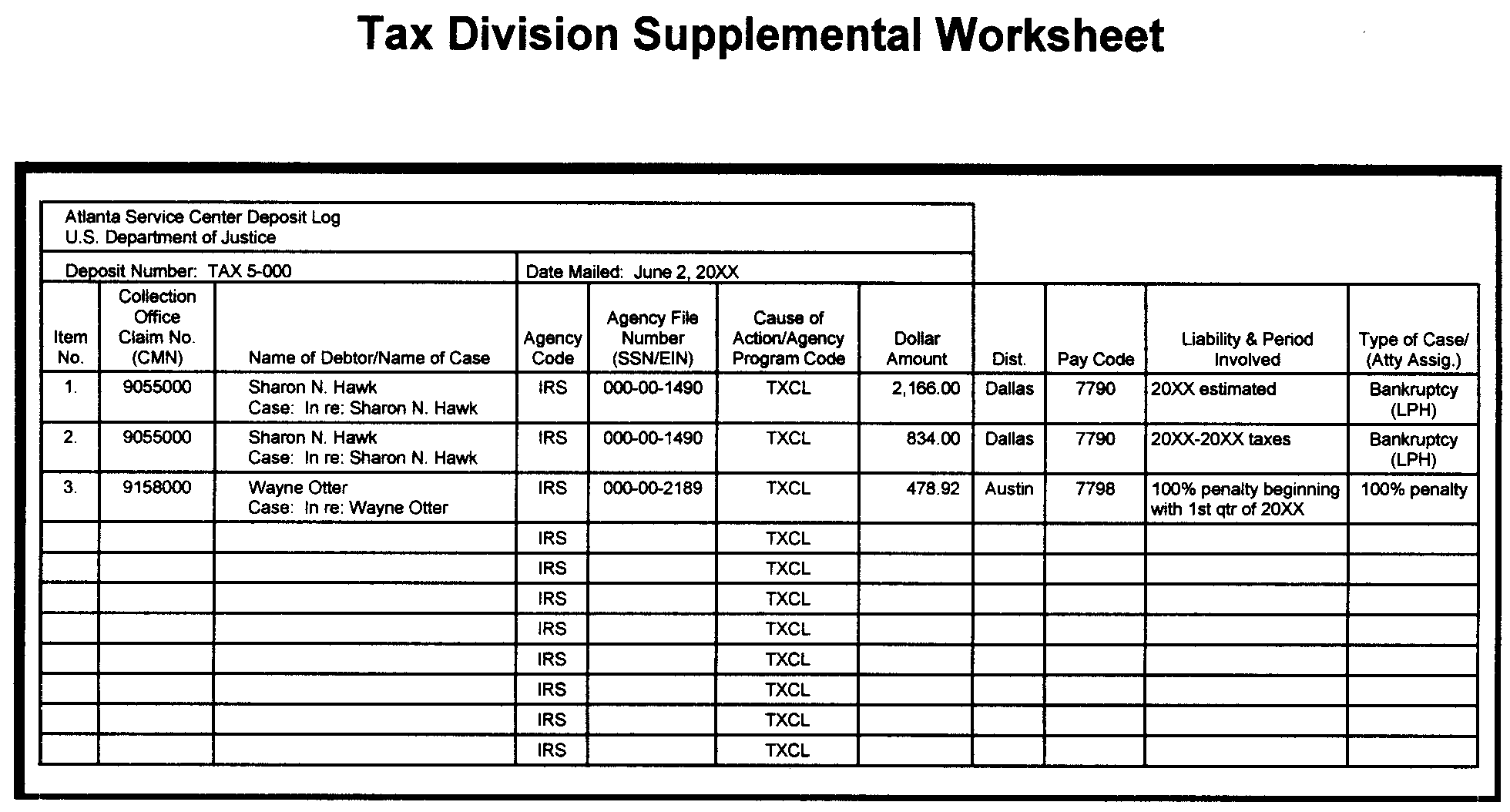
The case type or cause of action is shown on the supplemental worksheet under the column labeled "Type of Case/Attorney Assigned."
-
See Exhibit 3.17.243-9 for a list of Tax Division civil case types giving rise to the litigation.
-
Common NMF case types are:
-
3204-Frivolous Return Penalty (IRC 6701 and IRC 6702)
-
3205-Return Preparer Penalty (IRC 6694 and IRC 6695)
-
3206-Abusive Tax Shelter Penalty (IRC 6700)
-
3207-Windfall Profits Tax
-
-
Case types not shown on the list in Exhibit 3.17.243-9 are criminal causes of action involving the U.S. Attorney. Payments received in criminal cases are restitution payments. Generally, criminal restitution payments made to the IRS are not included in IPAC, but are made through the clerk of court office. See IRM 3.17.243.7.8, Court Ordered Criminal Restitution Payments.
-
Exhibit 3.17.243-10 shows common phrases used by the Department of Justice on IPAC 1081 when describing the cause of action. Narrative descriptions of each phrase are provided.
-
In any case in which DOJ has secured a judgment, either at IRS' request or by counter-claim, the collection statute of limitations must be suspended for all affected modules. The office that is controlling the case, usually Collection or Exam, is responsible for requesting input of the proper controls. See IRM 25.3.1, Litigation and Judgments, General Guidelines for actions to be taken by Collection Advisors, when assessments are reduced to judgment.
Note:
If proper case controls are not input to suspend the collection statute when a judgment is secured, any module will go to zero balance upon expiration of the normal statute for collection. Thereafter, any payment collected on the judgment has the potential to create a credit balance which could erroneously refund to the taxpayer.
-
As each item is identified for the specific taxpayer account or reversal to DOJ, it will be annotated on the IPAC Listing.
-
If the account to which the payment is to be posted is a Non-Master File assessment, prepare Form 2424 and obtain an ANMF account transcript to include with application of the payment.
-
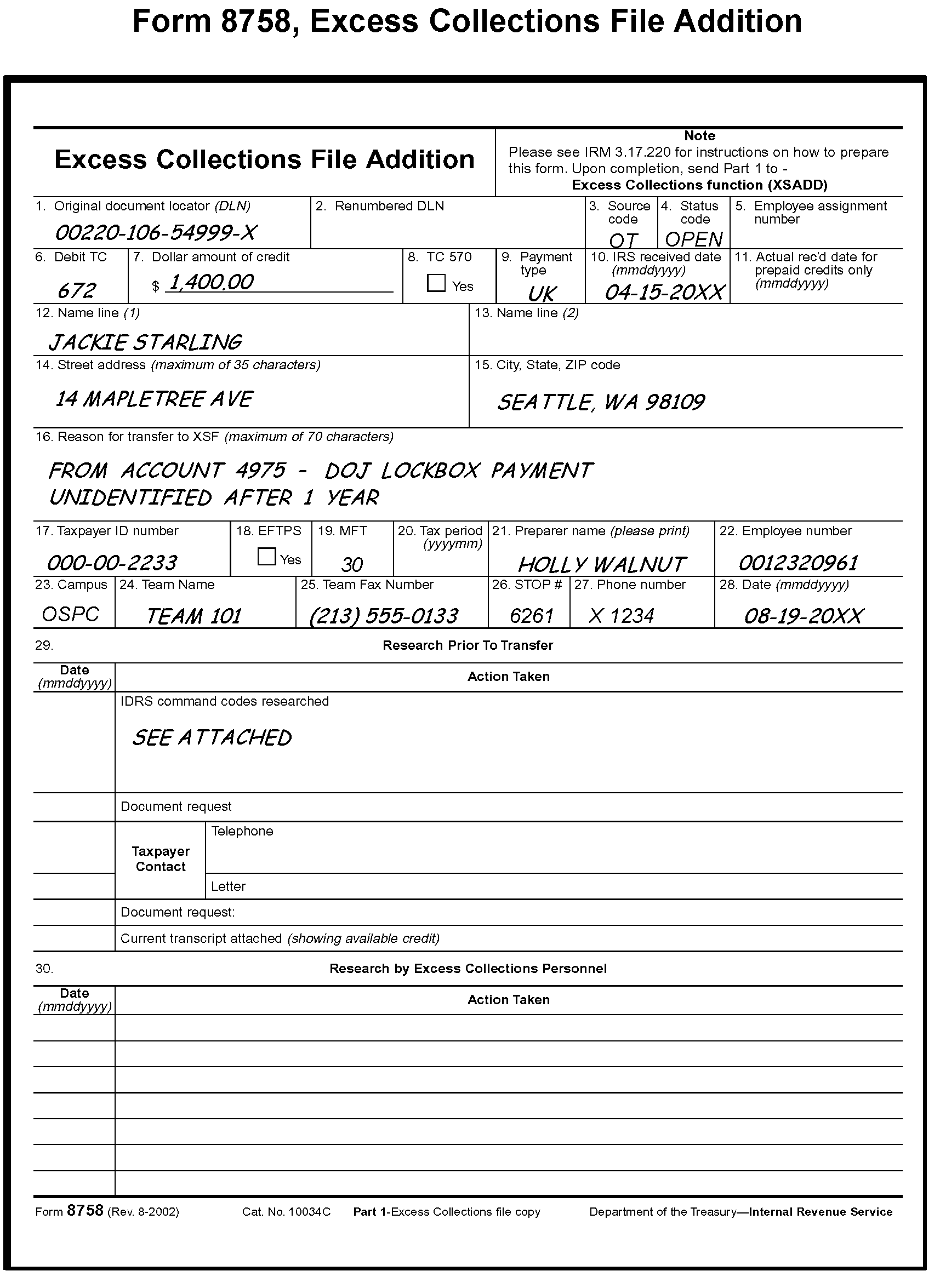
When all possible research has been performed and the unresolved item in Account 4975 is more than two years old, associate the documentation supporting the unresolved item with a Form 8758, Excess Collections File Addition, to add the amount to Account 6800, Excess Collections File (XSF). See IRM 3.17.220, Excess Collections File, for completion and routing of Form 8758. Figure 3.17.243-2 is an example of a completed Form 8758.
-
Payments which are relatively small and in even dollar amounts may represent installment payments on liabilities, because of a DOJ action.
-
Upon receipt, the IPAC transaction sheet is journalized by the RACS Team into the 4975 Liability DOJ receipt Account and forwarded by email to the DOJ-IPAC lead.
-
The DOJ-IPAC Lead will:
-
Log the IPAC data in the inventory control log
-
Log the IPAC receipt on the 4975 spreadsheet (to monitor processing time)
-
Assign IPAC to technician by email
-
-
Within two weeks of receipt, the technician will create a folder on SharePoint labeled with the IPAC number within their SEID folder on the KC SPC Accounting DOJ Team SharePoint site.
-
A complete IPAC file will contain the below listed documents. These must be added once documents are available.
-
IPAC billing and listing
-
Form 2747, History sheet
-
Form 3809, Miscellaneous Adjustment Voucher
-
Any email traffic/documentation pertaining to the IPAC
-
Subfolders for each type of application (MFT, Tax Class (TC), FBAR, NMF, etc.)
Note:
All payments associated with the IPAC listing must be recorded in the DOJ Access application within two weeks of receipt. Initial research and processing must be completed within 30 days of receipt. Any needed follow up must be done as soon as possible in an effort to ensure all payments are posted and the IPAC can be closed.
-
-
Use all available resource tools, i.e., IDRS, Payment Log, Retention folder, emails and Automated Lien System (ALS), and if appropriate, initiate phone calls with DOJ or other IRM Business Units to determine the following:
-
Taxpayer’s identity
-
Where the payment is to be applied
-
-
Civil payments can be applied in the following methods:
-
Apply to Taxpayer account: prepare Form 813 and Form 2424 to debit 4975, DOJ Liability account and credit taxpayer’s account 4220 (IMF), 4120 (BMF), or 4420 (NMF) as appropriate.
-
If a listing includes a FBAR (Foreign Bank Account Records) payment, it must be transferred to Ogden Accounting via Form 2158. Prepare Form 2424 to debit 4975 and credit 4420. Prepare Form 2158 request and email Ogden Service Center to notify of transfer.
-
Apply to 6800, Excess Collection: prepare Form 2424 to debit 4975 DOJ Liability Account and credit 6800 Excess Collection. Prepare Form 8758 to add payment to the Excess Collection File. Make 2 copies of each.
-
Leave unresolved credit(s) in 4975 DOJ Liability account and continue to review these credits.
-
-
For payments determined to remain in the 4975 account, a copy of the listing page(s) showing the credit and related 3 percent will be added to the 4975 IPAC subfolder on SharePoint.
Note:
If it appears the liability is satisfied the payment must remain in the 4975 account until written consent to refund is received or the payment is transferred to Excess Collections. If consent to refund is received, DOJ must confirm whether the payment needs to be applied to a suit year for systemic refund where interest could possibly generate or if a refund from XSF without interest is needed. For a refund from XSF, prepare a Form 2424 to transfer funds from 4975 to 6800 and prepare Forms 8758 and 8765 beginning in IRM 3.17.243.7.8.9
-
Technicians will update the 4975 spreadsheet with the following:
-
Items remaining in the 4975 account
-
Date IPAC was sent to work lead for review
-
Date journaled documents were returned from RACS
-
Updated balance within two weeks of receiving the Form 8166 from RACS
-
-
The manager or work lead must perform a monthly review of the 4975 spreadsheet to ensure:
The monthly review must be completed by the 15th of each month and recorded on the 4975 Spreadsheet Review Log located on the DOJ Manager/Worklead SharePoint site.-
IPAC payments are being researched and processed timely
-
4975 spreadsheet is being updated for monitoring purposes.
-
-
Actions to take for processing are:
-
Sort by MFT and create folders for each MFT
-
Verify the Form 2424(s) balance to the Form 813 total
-
Verify all forms prepared balance back to IPAC listing.
-
-
On the IPAC listing, label each payment with the appropriate MFT or TC for the classification of the payment. Ex: MFT 01 = TC 1, MFT 30 = TC 2, etc. Exceptions include; documents that are 4975 and 6800 Accounts, the account number will be used instead of a TC.
-
On the last page of the listing notate the balance for each TC or MFT, NMF, FBAR, 6800 or 4975 that is being submitted and add them together. It must equal the Gross Payment, then subtract the 3% Fee and the difference will equal the Total Payments.
-
Taxpayers must be given full credit for their payments in civil cases where DOJ has withheld three percent. Verify that the 3 percent amounts are correct by adding them up. This will balance back to the 3 percent fee indicated on the IPAC listing. Prepare Form 3809: debit 6950, DOJ Civil Debt Collection Hold-back and credit 4975, DOJ Liability account. Account 6950, DOJ Civil Debt Collection Hold-back, will be used to “offset” the amount of monies withheld by the Department of Justice on civil cases.
-
Prepare folder for review by adding the week ending date to the IPAC file name and notify lead by email that it is ready for review. The folder must contain the following:
-
IPAC Billing and Listing
-
Form 2747 History Sheet
-
All Forms 813
-
Forms 2424 – 4220 (IMF), 4120 (BMF), 4420 posting documents, 6800 posting documents (Form 8758)
-
Form 3809 – 3 percent posting document. Only one Form 3809 may be submitted per IPAC
-
Form 8166 (if applicable)
-
Form 2158 Request sheet (if applicable)
-
-
The lead will load the IPAC to RACS for journalization.
-
When journalization is completed, the lead will email a copy of the document to the technician for them to place it in the SharePoint IPAC folder and monitor for posting to the account.
-
Completed IPAC files are labeled with the IPAC number and closed date once all monies have been applied. The file will then be moved to the appropriate closed year within the FRC Retention folder on SharePoint.
-
Restitution is a legal remedy that can be ordered by the court, in a criminal case. A restitution order requires the criminal defendant to pay money or render services to victims or to redress the loss the defendant has inflicted. Normally imposed during sentencing, it can be agreed to by the parties in a plea agreement or imposed as a condition of probation or supervised release.
-
In a criminal tax case, the offense generally results in the loss of government property, e.g., the money to which the government was entitled under the tax laws but which the defendant did not pay. Through a restitution order, a court can require a defendant to pay money to the IRS to redress the losses they inflicted on the federal treasury.
-
In most criminal tax cases involving restitution, the amount of the tax loss is calculated from evidence admitted at trial or from information contained in the plea agreement and presented to the district court at sentencing.
-
Since August 16, 2010, the IRS has authority to assess and collect restitution ordered in a tax case in the same way as if it were a tax.
-
Restitution will not be confused with civil tax liability.
-
The amount of the loss a defendant can be ordered to pay as restitution must result from the defendant’s criminal activity and that amount generally does not include civil tax penalties.
-
A restitution order does not bar the IRS from determining civil tax liability in an amount greater than the amount ordered payable to the IRS as restitution.
-
A restitution order also does not prevent a taxpayer from challenging the IRS’s determination that the civil liability exceeds the amount of the restitution order.
-
-
Judgment and Commitment (J&C) Orders normally specify that defendants are to submit restitution payments to the office of the Clerk of Court in the district in which the defendant was sentenced. This includes restitution payments required to be paid to the IRS.
-
The clerk of court has the responsibility for receiving, processing, and recording restitution payments made by defendants. The clerk of court will forward the Treasury check to the victim(s) listed in the restitution order, which may include the IRS. Criminal restitution payments made to the IRS must be mailed to the address below.
-
The clerk of court offices will disburse criminal restitution payments to the IRS by issuing Treasury checks to the IRS. Effective October 1, 2009, all criminal restitution payments to the IRS are only processed by Submission Processing at the Kansas City Campus. The Clerk of Court offices have been requested to send all criminal restitution payments to the following address:
-
IRS
-
Attn: Mail Stop 6261, Restitution
-
333 W Pershing Road
-
Kansas City, MO 64108
-
-
The Special Agent has the responsibility of completing Form 14104 (Notification of Criminal Restitution or Court ordered payments payable to the IRS) and forwarding the completed form to the secure email account: *TS Criminal Restitution.
-
≡ ≡ ≡ ≡ ≡ ≡ ≡ ≡ ≡ ≡ ≡ ≡ ≡ ≡ ≡ ≡ ≡ ≡ ≡ ≡ ≡ ≡ ≡ ≡ ≡ ≡ ≡ ≡ ≡ ≡ ≡ ≡ ≡ ≡ ≡ ≡ ≡ ≡ ≡ ≡ ≡ ≡ ≡ ≡ ≡ ≡ ≡ ≡ ≡ ≡ ≡ ≡ ≡ ≡ ≡ ≡ ≡ ≡ ≡ ≡ ≡ ≡ ≡ ≡ ≡ ≡ ≡ ≡ ≡ ≡ ≡ ≡ ≡ ≡ ≡ ≡ ≡ ≡ ≡ ≡ ≡ ≡ ≡ ≡ ≡ ≡ ≡ ≡ ≡ ≡ ≡ ≡ ≡ ≡ ≡ ≡ ≡ ≡ ≡ ≡ ≡≡ ≡ ≡ ≡ ≡ ≡ ≡ ≡ ≡ ≡ ≡ ≡ ≡ ≡ ≡ ≡ ≡≡ ≡
-
Personal checks and/or money orders received directly from the taxpayer and not through the ‘clerk of court' are still considered restitution payments if the payments are being made pursuant to a federal court order in a criminal case.
Note:
If payments are received directly from the taxpayer, prepare Letter 5526 to advise the clerk of court.
Note:
On March 25, 2025, an Executive Order was signed phasing out IRS’s issuance and acceptance of paper checks as of September 30, 2025. However, exceptions will be made for people without banking or electronic payment access, certain emergency payments, certain law enforcement activities, and other special cases qualifying for an exception under the Order or other existing law.
-
There are other forms of credit that may be applied to decrease a restitution balance. When these credits appear on the restitution module, they must be added to the DOJ database as they will decrease the outstanding restitution debit. The list below is not an all inclusive list.
-
IDRS generating an offset of refund credits to decrease the Restitution Based Assessment (RBA) MFT 31 debit balances. Refer to IRM 3.17.243.7.8.7 for procedures pertaining to these credits.
-
Levy, Offer In Compromise (OIC), and bankruptcy payments, except credits toward fees.
-
State Income Tax Levy Program (SITLP), which are TC 670 payments with DPC 20.
-
-
Payments and credits posted to a civil tax account may contribute toward reducing the amount of restitution assessed. A duplicate assessment is created when there is a Civil tax assessment in addition to the amount assessed as RBA, or when codefendants are assessed restitution that relates to the same or similar tax issues. The duplicate assessment amounts may or may not be equal dollar amounts. Cross-referenced payments and credits can be identified on an RBA module by TC766 RC337. Refer to IRM 5.19.23.3.2,Cross-Referencing Payments for more information on cross-referencing.
-
As a result of the Tax Division’s acquiescence to a Fifth Circuit case, United States v. Westbrooks, 858 F. 3d 317, 328 (5th Cir. 2017), vacated on other grounds by 138 S. Ct. 1323 (2018), restitution ordered solely as a condition of either supervised release or probation is only enforceable beginning with the first day of that period (the first day of supervised release following a prison term or the first day of probation, respectively) and ending with the last day of that conditional period as directed by the sentencing court.
Note:
When a defendant is convicted after a trial, the enforceability of restitution ordered SOLELY as either a condition of supervised release or probation may shorten the collection period considerably. The periods of supervised release are on average 1 to 3 years long, and periods of probation are on average 3 to 5 years long. The Service can only make an assessment of an amount of restitution once the condition of restitution has begun.
-
Klein - As a result of the Klein v. Commissioner decision 149 T.C. No. 15 (2017), the IRS can only assess interest and or penalties if it is included in the restitution amount ordered by a federal district court. Prior to the Klein decision, the IRS was assessing non-court ordered interest and Failure to Pay (FTP) penalty on RBA. Only interest included with the restitution is deemed appropriate on RBA modules (MFT 31) and does not accrue. Klein decision cases can be identified by interest and/or penalty abatements where interest and/or penalties were not originally included in the J&C. Proper application of restitution funds according to the Form 14104 tax, penalty and interest amounts is key in avoiding payments being transferred to Excess Collections File (XSF).
Exception:
If the J&C includes language that Title 26 U.S.C. 6601 interest will accrue on the restitution-based assessment, the module will not be restricted. When this condition exists AMS must be documented to state Title 26 Interest and interest accruals apply. If AMS is not documented, send a request to Exam Tech Services for verification of account interest.
-
The Accounting package is picked up from the Deposit area and journalized by the assigned accounting technician. After journal, the documents are filed in the 6400 account Restitution folder in RACS. Data Control utilizes the folder to balance the reports.
-
Criminal restitution checks are received daily in the Receipt and Control Function; sorted and placed in bins/baskets labeled "Criminal Restitution" . The checks must not be separated from any cover letter or other document that has information relating to the check.
-
Accounting clerks will report to Receipt and Control function daily. Generally, DOJ criminal restitution payments are received with information or related correspondence from the clerk of court office with taxpayer identifying information and payment disposition. Clerks will scan the related restitution payments into bundles for the technician to review.
-
Accounting tax examining technicians are responsible for researching and applying criminal restitution payments received through the clerk of court offices. Payments are applied based on information received from the clerk of court office, Criminal Investigation, Collection Advisory and IDRS research .
-
All criminal restitution payments received are recorded on the DOJ Access database along with information received from the clerk of court offices and Criminal Investigation. The DOJ Access database is housed on the Kansas City shared drive. Access to this program is currently restricted to the Accounting staff.
-
Research IDRS when payments are received to determine if a restitution module is established and if the payment can be applied. If so, apply these payments to the corresponding restitution module on the master file. Prepare Form 3244 and route to Deposit for processing. These payments must be prepared for posting within 24 hours of receipt.
-
If the MFT 31 module is established but not assessed (TC 290 or TC298) a TC 570 must be included on the Form 3244 to hold the credit.
-
If no information is received from the clerk of court office, review the check for any identifiable information. Research is performed on the Public Access to Court Electronic Records (PACER) system, and contact with the court when necessary.
-
Interest under section 6201(a)(4)(A) does not accrue on the RBA. See IRM 3.17.243.7.8 for more information on Klein decision.
Note:
If the defendant pays Title 18 interest to the sentencing court and the court forwards such payments to the IRS, the IRS applies the payments against the assessed amount. See IRM 5.1.5.15.5, Field Collecting Procedures, Balancing Civil and Criminal Cases, Interest on Restitution-Bases Assessments, for more information.
-
When research does not provide the information needed to apply payments to assessed modules or the court ordered tax liability assessment has not been made, prepare Form 3244 and journal to the 6400 Account, (the 6400 account is used to record Federal Court Ordered Restitution for Costs and Penalties) awaiting further action or research. When posting instructions are received, a Form 2424 is prepared for processing, debiting 6400 Account and crediting the taxpayer.
-
When research is completed and it’s been determined that the payment belongs to a “Pre-Law” defendant associated with a Post Law defendant, SBSE needs to be notified.
-
The payment will be applied to the GL 6400 account if an assessment has not been done
-
An email will be sent to SBSE at *SBSE Ogden RBA.
-
The subject line of the email may be Pre-Law Payment
-
The defendant’s name, TIN, total amount of the payment, payment date and docket number, if applicable, will be included in the email
-
-
Follow up research will be performed periodically to ensure assessments are made on the account so that payments are applied to relevant tax years
-
Payments applied to the 6400 account as "Unknown name/SSN" will require contact with the clerk of court office forwarding the check for additional taxpayer identifying information. Assistance regarding the correct application of a payment to a taxpayer’s tax liabilities may be obtained from the appropriate Criminal Investigation Special Agent or Collection Advisor.
-
Pre-trial payments received by the DOJ/Criminal Restitution team prior to sentencing, will be applied to the 6400 account. Follow-up will be completed to acquire court documentation from PACER if available.
-
Form 14104 – Notification of Criminal Restitution or Court Ordered Payments Payable to the IRS - will be completed by the Special Agent assigned to each case and forwarded via secured email to *TS Criminal Restitution.
-
The Notification form will include:
-
Name of CI Special Agent
-
Name of taxpayer/defendant
-
Whether joint and several liability with others
-
Criminal Docket Number, identity/location of court
-
Amount ordered payable to IRS
-
Payments for credit towards restitution made prior to sentencing
-
Tax period(s) and amounts for each tax period included in calculation of restitution
-
Where to apply the payment and type of tax
-
-
If more information is needed to process the payments received, contact the Special Agent whose name and telephone number are listed on the Form 14104. File a copy of this form in the defendant’s case file.
-
When posting instructions are received on assessable restitution cases, a Form 2424 is prepared for processing to debit the 6400 account and credit the taxpayer account.
-
If the payment is larger than what is assessed on IDRS for the defendant, it must be placed into 6400 and given to assigned technician for further research.
-
Criminal restitution payments are not always applied to master file (MF). If no assessment is made, the payment will remain in the 6400 General Ledger Account. If this situation arises, notify the CSCO RBA Unit in Ogden via email at *SBSE Ogden RBA. This is determined by reviewing the Form 14104 and/or the documentation received from CI as this documentation will state whether an assessment will be done.
-
Clerks will collect criminal restitution checks and correspondence from designated area in the Receipt and Control Operation (RCO) (Do Not leave restricted area with checks).
-
Checks are opened and sorted by check number. A copy of the envelope with IRS received date and any other correspondence is also retained.
-
Remittances exceeding $50,000.00 must be bundled separately.
-
The check, envelope and any correspondence is scanned to the work lead in bundles, not to exceed 30 checks per bundle.
-
Clerks will provide the work lead with a check count and assign DOJ document numbers for current day processing.
-
Scanned check bundles are uploaded by the work lead to the shared drive daily check folder by DOJ number according to date.
-
The work lead will utilize the daily check processing log to determine DOJ number assignments and will forward check bundles by email to tax examiners for processing.
-
Tax Examiners will access their assigned scanned check bundle(s) to verify the file is readable and identify any large checks needing to be prioritized.
-
Checks must be researched and notations added to the digital check copies, identifying the type of application. If assessable, subtract the check amount from the Assessment List.
-
If the check and/or correspondence has identifying information, such as the defendant (taxpayer) name, Taxpayer Identification Number (TIN), and/or docket number, perform the following:
-
Research the DOJ Access database, IDRS, PACER and/or Assessment List as needed
-
If the individual is not located in the DOJ Access database, create a new entry and add to the Assessment List
-
Ensure the payment is recorded in both the database and Assessment List
-
Prepare Form 3244
-
-
For checks and/or correspondence without identifying information, such as defendant (taxpayer) name, TIN, and/or docket number:
-
If a U.S. Treasury check, use the contact information found on the check stub or DOJ Administrative Office listing to obtain the missing information
-
If no information can be located, update the DOJ Access database, add the record as "unknown" and prepare Form 3244
-
-
All Form 3244s are saved as individual PDF files following a specific naming convention. Check #, Name Control and Type of Application (TP, 6400, J&S, NMF, NEW, TECH). Example: 4039-XXXXXXXX-HAMM 6400.
-
Once research is completed, the check bundle file is renamed as: DOJ # researched. Example: DOJ 4 researched.
-
Generate electronic Form 2221, Schedule of Collections in the Access database. Compare Form 2221 with Form 3244(s) and check copies to identify any corrections needed.
-
Form 2221 is saved as an individual PDF file following a specific naming convention, Form 2221, date, DOJ #. Example: F2221 01-01-2023 DOJ 4.
-
Create a combined Form 2221 and Form 3244s file. The first page of Form 2221 must be signed digitally once the combined file is created.
-
Tax examining technicians will send email notification to the work lead, manager and clerks that their DOJ # check bundle is ready to be printed.
-
A final review of the forms will be performed by the clerks to identify any errors. If corrections are needed, an email is sent to the work lead and manager with the DOJ # for the tax examiner to make corrections.
-
Once delivered to Deposit, clerks will send a notification email that all bundles are matched up and have been submitted.
-
After the completed forms are submitted to Deposit in the RCO area, the following actions will be performed.
-
Clerks will:
-
Monitor and retrieve Trace IDs from the X-Drive
-
Input Trace IDs to the database
-
Access the 6400 Checks to be Filed folder on SharePoint and move the check copies to the related case file and update the history sheet
-
-
Tax Examining Technicians will:
-
Extract the check copies with notations from the combined file and merge with the corresponding Form 3244
-
Move check copy files to 6400 Checks to be Filed, Checks for Review SEID folders, or New Cases From Checks to Setup on SharePoint depending on the application type.
-
-
In cases where a payment was added to the Access database as “unknown” and additional research is needed to associate the payment to a specific defendant:
-
Contact the Clerk of Court office that prepared the check to obtain information. Once the information is obtained, update DOJ Access database to remove the payment from “unknown” and add to the correct individual.
-
Request that future checks include the full name of the defendant and the court docket number.
-
Research Assessment List and take necessary actions such as Joint and Several (J&S) splits or Form 2424 application.
-
-
If information identifying the taxpayer cannot be obtained from a non-treasury check, contact the CI probation liaison for the appropriate field office.
-
Immediately post the restitution amount to the taxpayer’s account after identifying confirmation has been received.
-
A monthly reconciliation report will be completed by KCSPC Accounting Operation, and submitted to SP HQ DOJ analyst. This report will reflect all unresolved, unidentifiable restitution payments in the GL account where taxpayer payment information could not be identified. SP HQ analyst will work with KCSPC Accounting Operation and the Administrative Office of U.S. Courts for resolution.
Note:
The SP HQ analyst will request, on an annual basis in January, an updated listing for the Administrative Office of the U.S. Courts. This combined listing will be sent out to the Kansas City Submission Processing Center Accounting Operation. This updated listing will be used to obtain any missing PII associated with restitution checks that cannot be traced to a specific defendant so that the payments can be credited to the defendant's tax account.
-
State courts may order defendants to pay restitution to the IRS. The following are types of situations, but not limited to, which may involve state court ordered restitution:
State courts will forward these payments to the Kansas City Criminal Restitution address. When a payment is received, Kansas City will create a case file and maintain separately. Advisory will be contacted when state court judgement documentation is not received with payments. These payments will be added to the DOJ database with an indicator for "Non Federal case." Case files will be maintained separate from criminal restitution cases received from federal courts. No restitution-based assessments will be made on these cases under IRC 6201(a)(4).-
Refund schemes not involving ID theft - may have return preparer involvement. May or may not result in civil assessments on the taxpayers and preparer(s) involved by IRS. These go to the 6400 account unless IRS has civil assessments on the tax and periods involved.
-
Refund schemes involving ID theft - there will not be civil assessments as false pretenses were used to gain the refunds. Generally, these go to the 6400 account.
-
Civil assessments have been made by IRS - apply monies to tax modules if they are included in the basis of the restitution.
Example:
Taxpayer owes federal taxes on Form 1040 for 2010. If the restitution monies are because IRS had a loss for a refund scheme involving the 2010 tax year, then funds will be applied to the civil assessment. If the restitution monies are because IRS had a loss for a refund scheme involving the 2009 tax year, funds will be applied to the 6400 account.
-
-
If a payment for restitution to IRS is received from a state court due to the tax loss to the IRS and no case is found:
-
Process the payment into the 6400 account, add to the database, and create a case file.
-
Maintain court judgement documentation and history sheet with payment in the case file.
-
If no court judgement documentation is received, contact the SBSE Dallas RBA Civil Enforcement Advice and Support Operation (CEASO) group by email at *SBSE EEF Dallas Restitution.
-
The Dallas RBA CEASO group will contact the state court and request judgement documentation for the case. They will send to Kansas City via email at *TS Criminal Restitution. Follow up if the documentation has not been received.
-
-
Restitution is ordered as a joint and several liability when the determination is made that more than one individual caused the underlying tax loss. The amount collected from all defendants will not exceed the tax loss.
-
The clerk of the court typically sends a combined check on joint and several cases. Accounting tax examining technicians will need to perform research before applying checks on these cases to ensure the correct defendant is receiving credit for their payment.
-
Technicians will contact the clerk of the court to request a breakdown of the check by defendant. If the clerk of the court is unable to provide a breakdown by defendant, then the technician will request a case inquiry report to breakdown the check by defendant using the payment and distribution information.
-
If the clerk of the court will not provide the breakdown by defendant or a case inquiry report, then the technician may request a payment and distribution report from the U.S. Attorney’s Office Financial Litigation Program (FLP).
-
If no information is provided by DOJ employees to breakdown the check by defendants after requests are made, then the payment will be applied to the tax module for lead defendant that is listed on the reference line of the check.
-
The technician will put the split check information into the DOJ Access database. A photocopy of the original Form 3244 and check is filed in all folders of defendants who had payments included in that check. History notes are written in each folder to document the split information of the check detailing how much each individual paid and where the technician determined this information (i.e., case inquiry).
-
The following steps must be taken to apply the split payments:
-
If the check is from a prior fiscal year, then funds must be moved from the 9998 account into the 6400 account for each defendant’s payment being applied to Masterfile. History notes are written in the applicable folders to document this transfer to prevent duplication.
-
A copy of the Form 2424 is placed in the related folders to provide an audit trail for that payment.
-
Each defendant’s part of the check is applied to their assessment or left in the 6400 holding account based on information provided on the Form 14104. The Form 2424(s) will be submitted for processing to apply each defendant’s funds from the 6400 holding account to Masterfile.
-
-
These procedures apply to restitution orders entered after August 16, 2010. Form 14104, Notification of Court Ordered Restitution payable to the IRS will be sent by Criminal Investigation (CI) Division to SBSE Examination Technical Services (TS), SBSE Collection Advisory, and KCSC Accounting. Accounting will establish the case file and add it to their database. TS will create the required MFT 31 account(s) on Master File via Form 3177 with a TC 971, AC 102. When the Form 3177 is submitted by TS for processing they will inform KCSC DOJ Criminal Restitution Team of the submission of the Form 3177 via secured DOJ mailbox at *TS Criminal Restitution. Upon receipt of this information, Accounting will research their 6400 Account for related payments and prepare the necessary documentation for the transfer of discovered payments from the 6400 account to the pending new MFT 31 account(s).
-
For payments found, Accounting will:
-
Submit the completed documentation to transfer the payments to the MFT 31 account.
-
Follow up with research to verify the payments post to the MFT 31 account.
Note:
When the payment posting to the MFT 31 account is verified, if the assessment is not present/pending on the module, or the Form 3870 is not reflected as received in the history section of TXMOD by Centralized Case Processing (CCP), Accounting will notify TS via mailbox *SBSE TECH Svs Criminal Restitution.
-
-
If Accounting has no record of restitution for a case (no Form 14104), they will contact Technical Services for a copy as some of the closing package documents may not have been received from CI.
-
All payments received for restitution ordered after August 16, 2010 must be given a DPC (designated payment code) of 26. (Restitution ordered prior to this date may have a DPC of 08.)
-
The Accounting tax examining technician will follow up to ensure payments directed to MFT 31 accounts post correctly, and take corrective action if needed.
-
During the research to ensure proper posting of payments, the technician will check for direct payments made on the module, IDRS generated refund credits, or cross-referenced TC 766 credits.
-
Personal checks and/or money orders received directly from the taxpayer and not through the ‘clerk of court’ are still considered restitution payments if the payments are being made pursuant to a federal court order in a criminal case.
Note:
If payments are received from the taxpayer, prepare the Letter 5526 to advise the clerk of court.
Note:
On March 25, 2025, an Executive Order was signed phasing out IRS’s issuance and acceptance of paper checks as of September 30, 2025. However, exceptions will be made for people without banking or electronic payment access, certain emergency payments, certain law enforcement activities, and other special cases qualifying for an exception under the Order or other existing law.
-
For refund credit offsets (TC 706) found the technician will:
-
Research IDRS to verify refund credit is not caused by a misapplied payment.
-
Add the credit information to the Criminal Restitution database as a payment.
-
Create a history item, including the date the offset was discovered and input to the database.
-
Contact the clerk of the court via Letter 5526.
-
-
There are other forms of TC 670 payments that may be applied to decrease a restitution balance. When these credits appear on the restitution module, they are to be added to the DOJ database as they will decrease the outstanding restitution debit. These credits will have a different Designated Payment Code (DPC) other than 26 or 08.
-
State Income Tax Levy Program (SITLP), which are TC 670 payments with DPC 20
-
Levy, bankruptcy and Offer in Compromise (OIC) payments
-
-
Payments and credits posted to a civil tax account may contribute toward reducing the amount of restitution assessed. A duplicate assessment is created when there is a Civil tax assessment in addition to the amount assessed as RBA, or when codefendants are assessed restitution that relates to the same or similar tax issues. The duplicate assessment amounts may or may not be equal dollar amounts. Cross-referenced payments and credits can be identified on an RBA module by TC766 RC337. Refer to IRM 5.19.23.3.2 for more information on cross-referencing.
-
For cross reference payments present on the module, and the account is full paid, the technician will need to review the account.
-
If the transaction date of the restitution payment is before the transaction date of the TC 766, then apply the payment to the module and SBSE will reverse the TC 766 cross reference transaction. SBSE Ogden RBA group receives a transcript once the payment posts, so there is no need to send notification.
-
If the transaction date of the restitution payment is after the transaction date of the TC 766, then do not apply the payment to the module as the TC 766 transaction takes precedence.
-
-
Abatements of interest and/or penalties per the Klein decision can cause overpayments on MFT 31 modules. When certain account conditions have been met, Ogden RBA group may need to transfer credits and/or payments to the Excess Collections File(XSF). See IRM 5.19.23.6 for more information. For restitution payments recorded in the DOJ Access database that have been transferred to XSF, the following step must be taken:
-
Update payment audit trail in database to reflect 6800 instead of the MFT/Tax Period
-
Add comment in payment audit trail to indicate it was transferred to XSF per Klein decision
-
File TXMODA or XSINQ print showing the transfer to XSF in the case folder
-
Verify Assessment List is correct
-
Update history sheet with findings of payments transferred to XSF
-
-
IDRS Master File is not able to accept an unlimited number of transactions on any given account module. When a master file account has too many lines and the module has moved into overflow status, a TC 400 with BS 99 (9th and 10th digit of DLN) will systemically post to transfer the account module to Automated Non-Master File (ANMF). Once the TC 400 has posted to the module, no transactions can be input. Restitution Based Assessment (RBA) accounts are identified by the presence of the TC 971 AC 102.
-
When a restitution payment is received, and the module has been transferred to NMF.
-
Prepare the Form 2424 and attach the ANMF transcript to apply the payment to NMF.
-
Notify the CSCO RBA Unit in Ogden via email at *SBSE Ogden RBA.
-
The email SUBJECT line will state “Restitution Payment posted to NMF”.
-
The body of the message will include the taxpayer’s name, TIN, tax period where the payment was posted, the date of the payment, and the amount of the payment.
-
Create history item to indicate the account is on NMF.
-
-
There must be documentation to support a request for return of restitution payments received. In some cases, a court order will be required to return funds because the IRS lacks the legal authority to return the funds administratively. Refunds for overpayment can only be returned to the taxpayer. Any questionable requests will be forwarded to the HQ DOJ restitution program analyst for review and approval prior to processing.
-
Payments which have already been applied to a tax module cannot be returned absent an overpayment and/or a court order.
-
Overpayments of restitution payment(s) needing to be returned to a taxpayer, are to be issued as a manual refund using the address of record in IDRS from the GL 6800 account following the steps listed below.
-
In limited circumstances, when funds are returned to a court, an email or letter from the court showing the exact address to return the money being returned is required. The IRS is unable to insert items into the check envelope and there is no reference line available for more information. The address must be limited to four lines as follows:
-
1st line is the pay to the order line and is limited to 32 alpha/numeric characters (no special characters). Examples: US District Court of Utah or Clerk US District Court.
-
2nd line is our attention line and is limited to 32 alpha/numeric characters (no special characters). This is where we would place items like Finance and the docket number. Example: Finance XXCRXXXXX
-
3rd line is the Street Address of the courthouse.
-
4th line is the city, state and zip code of the courthouse.
-
-
Forms 2424 are prepared to move the funds from the GL 6400 account into the GL 6800 account. The same rules apply as if you were preparing regular Forms 2424. If the money is in 9998, then additional Forms 2424 are needed to move the funds over to GL 6400. Money cannot go directly from 9998 to 6800.
-
Complete Forms 8758 and 8765.
-
Gather copies of the following item: history notes, email/letter from USDC showing where to return the money, copy of the check, and supporting documentation indicating why the funds will be returned (Example: court order requiring IRS to return funds to the court).
-
Take the following steps after completing the forms.
-
Send Forms 2424, Form(s) 8758, and Form(s) 8765, along with gathered copies for review.
-
Monitor for the Forms 2424 to be returned from RACS.
-
The Work Leader will forward the Form 8758 and Form 8765 packet to the Excess Collections team no later than the day after the journaled Form 2424 are received from RACS to prevent out of balance conditions.
-
Technicians will monitor XSINQ for processing of Forms 8758 and 8765.
-
Update history sheet with actions are taken.
-
-
File copies of the completed Form(s) 8758 and Form(s) 8765 in the folder for future reference. The journalized Form(s) 2424 is filed in the folder per normal procedures. A negative entry is input in the Criminal Restitution database to reflect funds being returned.
-
Notify USDC contact and request that they watch for the check. Follow up with USDC to verify the check is received by DOJ.
-
The Department of Justice (DOJ) criminal restitution case files are to be maintained in alphabetical order by last name of defendant. The physical case files are organized in the following manner.
-
The left side of the case file will contain:
-
The Restitution Information Sheet (RIS) or the Form 14104, if not available, notate on history sheet
-
Judgement and Commitment (J&C) order, if sealed or not available, notate on history sheet
-
Miscellaneous items such as emails and all correspondence
-
Complete and up to date history sheets
-
-
The right side of the case file will contain:
-
Beginning in June 2023, criminal restitution cases will be maintained digitally on the KC SPC Accounting DOJ Team SharePoint site. Digital case folders will contain the following:
-
Complete and up to date history sheets
-
J&C
-
Form 14104 or RIS, if available
-
IDRS IMFOLI print
-
DOJ Summary Report
-
Payment sub-folder containing Forms 3244, 2424 and check copies
-
Miscellaneous items sub-folder containing emails and any correspondence (if applicable)
-
-
To close a criminal restitution case one of the following conditions must be met:
-
Court ordered restitution is satisfied.
-
Twenty (20) years have passed since the filing date of the J&C order.
Note:
The time for the United States (Tax Division) to collect a criminal restitution judgment differs from the time for the IRS to collect it administratively. Typically, judgments are enforceable for 20 years and longer. When it comes to administrative collection of an RBA by the IRS, the CSED for restitution payments is 10 years or less depending upon the circumstances. See IRM 3.17.243.7.8 for information on Westbrooks cases. Restitution payments that continue to be received after the CSED has passed shall be kept in the GL 6400 account.
-
Taxpayer is deceased and at least two years have passed since their Date of Death (DOD) listed on INOLES.
-
-
When closing a case, contact the USDC to confirm closure and to ensure no further restitution payments are sent to IRS. If there is a discrepancy in restitution balances that needs to be reconciled, request a case inquiry and work with the court to resolve any issues.
-
Criminal restitution in IRS employee embezzlement cases (7610 Account) – For posting assistance with unassessed cases, the accounting technician may call Refund Fraud and Investigative Support (RFIS) or Examination as indicated by case type in the correct area office. Both case type and area office identification instructions are in the procedures for the specific source of payment.
-
The liability in any case of embezzlement by an IRS employee may be assessed as provided for in the IRC 7804(c) rather than treating it as a Judgment Receivable. Research may indicate that the assessment needs correction to agree with the court decision. These cases are transferred to the 7610 Account at the appropriate campus.
-
When there is a court ordered restitution on an employee embezzlement case (7610 Account), a memorandum is sent to the Kansas City Loss/Shortage Coordinator. The memorandum provides the name and social security number (SSN) of all persons ordered to make restitution, amount of restitution payments and the case number.
-
Employee embezzlement cases are monitored monthly by the Loss/Shortage Coordinator to ensure that payments are made:
-
If payments are not received, contact the Treasury Inspector General for Tax Administration (TIGTA) Special Agent in Charge (SAC)
-
If payments are made and not transferred from the Kansas City Loss/Shortage Coordinator, secure the payment information from the probation officer (use the TIGTA SAC) and contact the Kansas City Loss/Shortage Coordinator at 816-499-5949.
-
-
Court ordered restitution payments received in Kansas City for employee embezzlement cases (7610 account) will be transferred to the appropriate campus, within two (2) days of receipt, via Form 2158.
-
In accordance with Management Accountability Reviews regulations, managers are responsible for ensuring that internal controls are effective and efficient in day-to-day operations and safeguard against waste, fraud and abuse. This is accomplished by conducting operational or management control reviews to identify weaknesses and mitigate known risks within the managers’ realm of responsibility.
-
Program or "spot" reviews must be performed for accuracy and completeness. Problems identified will be discussed with the appropriate functional area for corrective action.
-
The front-line manager or lead of the area working the criminal restitution cases will conduct periodic reviews of cases throughout the month.
-
The reviews must be documented and maintained for a one-year period.
-
Review to ensure:
-
Checks received from the clerk of courts with all required identifying information are processed timely.
-
Notification Form 14104 are being received (via email "TS Criminal Restitution" ) from the Special Agents assigned to the case and placed in the appropriate case file.
-
Case folders are being prepared, as required by the IRM for each defendant.
-
All actions taken on a case are documented and payments are correctly associated with an active case.
-
Money received is being recorded in the DOJ Access database.
-
All appropriate journal actions are being completed timely.
-
Inquiries regarding the receipt and application of payments are being handled on a timely basis.
-
History sheets are signed by the technician working the case, as well as anyone reviewing the case file (the initial reviewer, manager, etc.).
-
-
At least one program review must be performed each quarter by the manager or lead. A copy of this report must be forwarded to the HQ Analyst with program responsibility.
-
Quarterly reports are due Dec. 31, Mar 31, June 30, and Sep 30. The quarterly reports must capture:
-
Timely application of incoming checks.
-
Timely transfer of credits from the 6400 GL account to the MFT 31, Restitution Based Assessment (RBA) modules.
-
Case folders are complete with all required documentation.
-
Criminal Restitution database is updated with payments, case information, and other RBA information.
-
History sheets in the case files are completed and initialed.
-
-
The Chief Financial Officer (CFO) function also performs regular balancing and reviews of the General Ledger (GL) 6400 (2355 sub-account) to identify discrepancies in account activity.
-
Background: The U.S. Department of Agriculture (USDA) paid a cash settlement and granted loan cancellation to 20,000 farmers and their relatives/decedents. The settlement resulted from a discrimination suit brought against the USDA by the farmers. For 99 percent of the claimants, the settlement amounts fell into three categories:
Most taxpayers received these payments over a period of two years (the cash payment and the debt forgiveness occurred in one year) and the tax payment was remitted to the IRS in the following year. The cash payment and the tax payment (the 25 percent amount) are taxable income. The forgiveness of debt principal is generally taxable income but may be excludable under certain circumstances. Part of the settlement agreement allows a $12,500 tax credit to offset the tax for the cash payment.-
$50,000 cash payment from USDA
-
Forgiveness of the principal and interest on certain debts; these amounts varied by claimant
-
A payment toward tax equal to 25 percent of the total of the $50,000 payment and the forgiveness of the debt principal, but not the interest
-
-
EPIQ Systems, Inc. (EPIQ) forwards two lists of cases to the Internal Revenue Service Submission Processing Planning and Analysis (P&A) contact (See Exhibit 3.17.243-11 for a list of USDA Contacts). One list, the 25 percent "Payee list" is generally issued on 12/15/20XX. The second list, the "Debt Relief Claimant list" is sent one to two months after the Payee list.
-
This program is worked in the Kansas City IRS Center only.
-
The following procedures apply only to payments received prior to January 2013.
-
Submission Processing P&A will review and then forward the listing of the taxpayers that are eligible for payment to the Entity function. Entity will validate the social security numbers (SSNs) and names on the listing of USDA Settlement Accounts. Entity will "000" all the MFT 30 accounts if a correct TIN is present. Entity will also research for cross reference TINs including EINs for estates or farms and spouse's SSNs. Entity will then notate the cross-referenced TIN(s) on the spreadsheet, so the payment is applied to the correct account. Any incorrect SSNs with no viable cross references will be notated on the lists. After Entity has completed the review and included notations about questionable entity cases, they will send the lists back to the Submission Processing P&A contact. Entity will set up Form 1041 Estates in certain situations. The P&A contact will return the lists to EPIQ, with a copy sent to Accounts Management P&A. The Submission Processing P&A contact will return a list of questionable entity cases and request further information on the claimant account. (estimated work time - seven (7) days)
Submission Processing P&A
-
The Submission Processing P&A contact will forward the list of all cases to the Department of Justice (DOJ) requesting the total dollar amount present on the listing and provide the Agency Location Code (ALC) to transfer the funds (See Exhibit 3.17.243-11 for a list of USDA Contacts). The Submission Processing P&A contact will request that DOJ include an expedite request when requesting the funds to be transferred to the Internal Revenue Service (estimated time 24 -48 hours).
-
The Submission Processing P&A contact will also inform the Accounting RACS Team that an IPAC has been ordered and provide the amount of the IPAC.
Note:
The DOJ forwards the request for funds to Bureau of Fiscal Services (BFS) for payment from USDA. BFS processes the request from DOJ and expedites the IPAC funds to Kansas City Submission Processing Campus Accounting function.
Accounting
-
Accounting RACS Team will alert the Submission Processing P&A contact, and the contact in the team that's processing the cases, when the funds arrive via IPAC. (Estimated time 24–48 hours after BFS sends the payment).
-
When IPAC transmission is received, the RRACS DBA prepares Form 3244 if current year transactions or Form 8758 if prior year transactions and hand carries to URF/XSF to be cleared. The RRACS DBA prepares Form 8166 and inputs to RRACS. A copy of Form 8166 together with Form 3244 or Form 8758 is hand carried to the team processing the cases for input of the credit to XSF. When the IPAC funds have been received and placed in the appropriate account (URF/XSF), there may be no delay in processing the credits to the claimant's account(s). Credits are applied to the accounts with a TC 670 and a TC 570 to hold (freeze) the credit. AM P&A Staff monitors the accounts and releases the freeze, if necessary.
Note:
Kansas City Accounts Management (KCAM) P&A analyst monitors the listings received from EPIQ Systems Inc. Accounts Management (AM) function places a notice hold on taxpayer’s accounts to stop issuance of balance due notices when appropriate. AM also responds to taxpayer questions/issues and releases frozen refunds when appropriate.
Note:
Taxpayers must be advised of their right to seek assistance from Taxpayer Advocate Service to avoid undue taxpayer burden or violation of taxpayer's rights.
Note:
EPIQ Systems Inc. is not permitted to receive any additional taxpayer or tax account information other than requests to obtain better taxpayer entity information (i.e., SSNs/EINs, Names, etc.). Due to disclosure requirements, they will only be informed that the TIN or name they provided does not match IRS records. If they are unable to provide a better TIN later, for cases originally received, IRS (Submission Processing Entity) will verify the information and, if verifiable, a request (by Submission Processing P&A) will be forwarded to DOJ to request additional funds for the claimants on the updated verified listing.
-
The USDA Project is reported under program code 85390 with appropriate function, i.e., 390, 710, etc.
-
The Department of the Treasury's Bureau of Fiscal Services (BFS) and the Internal Revenue Service (IRS) are leading an effort to modernize the Federal Tax Deposit (FTD) system. The Electronic Federal Tax Payment System (EFTPS) provides an electronic system for reporting and paying FTDs. EFTPS has replaced the paper-based FTD system. EFTPS benefits both taxpayers and the Federal Government by providing greater reporting efficiencies and expediting the availability of funds and investment decision-making information for the Treasury.
-
Before EFTPS replaced the paper-based FTD system, taxpayers paid their FTD payments with Form 8109, Federal Tax Deposit Coupon. Their financial institution forwarded the funds, Form 8109, and Advice of Credit (AOC) to the Federal Reserve Bank (FRB), who would forward the Form 8109 and AOC to the IRS.
-
There is a FTD Point of Contact (POC) located at the following Submission Processing Campuses: Austin, Kansas City, and Ogden. If a FTD payment made with Form 8109 prior to 1/1/2011 cannot be located, a referral will be issued to the FTD POC.
-
The intended purpose of this subsection is to provide instruction to properly number assessment documents and/or forms received for processing in the Accounting Function.
-
Key duties and responsibilities in authorizing, processing, recording, and reviewing transactions separated among individuals. Duties need to be divided or segregated among different people to reduce the risk of error or fraud. No one individual will control all key aspects of a transaction or event. Separation of duties is necessary to maintain the integrity of the Accounting function.
-
Unless otherwise stated, these procedures apply to the Accounting Functions in the Submission Processing Campuses.
-
A DLN is a control number assigned to every return or document.
-
Documents to be numbered are received directly from other operational areas within a campus or transferred in.
-
Each document will be numbered with an 11 or 13 digit DLN.
-
File Location Code - first and second digits
-
Indiana - 35
-
Michigan - 38
-
All other states, provinces or countries - 31
-
-
Tax Class - third digit
-
NMF - always "6"
-
MF - MFT determines the tax class
-
-
Document Code - fourth and fifth digits. All forms have a specific doc code (see chart for forms and doc codes listed).
-
Julian Date - sixth, seventh, and eighth digits (3-digit number).
-
Blocking series - ninth, tenth, and eleventh digits (3-digit number). See Exhibit 3.17.243-1.
-
Item number - twelfth and thirteenth digits. The first document in a blocking series will always be "00" .
-
List Year
-
NMF - double digits (example: 08)
-
MF - single digit (example: 8)
-
-
Each document is assigned a DLN.
-
The DLN is established on the SCCF when the document is being processed and remains on the SCCF until either accountability is transferred to Enterprise Computing Center or the document is deleted.
-
RACS sends Form 813 to the Data Conversion Function Unit to establish the DLN on SCCF.
-
When the document posts the Form 813 is sent to Data Control for balancing to SCCF on the SCF 11-42 CRL.
-
-
For more procedures, refer to IRM 3.17.30.1.2, SCCF Control Concepts.
-
11 numbers in DLN on Form 813.
-
13 numbers in DLN on document.
-
Do not mix MFTs when numbering.
-
Do not mix accounts when numbering (e.g., 6550 and 6560).
-
When preparing Form 813, debit amount goes on left side and credit amount goes on right side.
-
Cross reference the DLNs on debit and credit side of the document.
-
On Form 3210 to RACS, accounts cannot be mixed (e.g., 4620 cannot be placed on the same Form 3210 as 6550).
-
On Form 3210 to RACS, Form 2424 and Form 3809 cannot be listed on the same Form 3210.
-
4430 Account cannot be mixed with anything.
-
4430, 6550, and 6560 Accounts do not get DLNs.
-
Tapes must be attached to each Form 813 before work is accepted by the RACS Team.
-
Tapes must be run from the document, not from the Form 813.
-
Do not cross out information on Form 813. If a mistake is made, the entire Form 813 must be redone.
-
Double check your work. Make sure you attach the correct Form 813 to the matching DLN.
-
Never change money or post partial amount from any document (Form 2424, Form 2158, Form 3809, etc.).
-
The National Taxpayer Advocate has reached agreements with the Commissioners of the Taxpayer Services (TS) Division, Small Business/Self-Employed (SB/SE) Division, Tax Exempt/Government Entities (TE/GE) Division, Criminal Investigation (CI), Appeals, and Large Business and International (LB&I) Division, that outline the procedures and responsibilities for the processing of Taxpayer Advocate Service (TAS) casework when either the statutory or delegated authority to complete case transactions rest outside of TAS. These agreements are known as service level agreements (SLAs).
-
The SLAs are located at the TAS Website under the heading "Tools & Services" .
-
The Taxpayer Bill of Rights (TBOR) lists rights that already existed in the tax code, putting them in simple language and grouping them into 10 fundamental rights. Employees are responsible for being familiar with and acting in accord with taxpayer rights. See IRC 7803(a)(3), Execution of Duties in Accord with Taxpayer Rights. For additional information about the TBOR, see https://www.irs.gov/taxpayer-bill-of-rights.
-
Taxpayers have the right to receive assistance from the Taxpayer Advocate Service (TAS) if they are experiencing financial difficulty or if the IRS has not resolved their tax issues properly and timely through normal channels. For more information visit the Taxpayer Bill of Rights.
-
Refer taxpayers to the Taxpayer Advocate Service (TAS) (see IRM Part 13, Taxpayer Advocate Service) when the contact meets TAS criteria as described in IRM 13.1.7, TAS Case Criteria and you can't resolve the taxpayer's issue the same day. The definition of "same day" is within 24 hours. See IRM 13.1, Taxpayer Advocate Case Procedures for additional clarification.
| Blocking Series for Form 3809 BMF and IMF | Document Codes 48 and 58 | Description |
|---|---|---|
| 000-299 | Doc Code 58 | Transferring to NMF |
| 300-399 | Doc Code 58 | Transferring to Account 4620 |
| 400-499 | Doc Code 58 | Transferring to Account 6800 |
| 930-939 | Doc Code 58 with inflated Julian date | Return Preparer Misconduct credit posted from GL 1547 |
| 940-999 | Doc Code 58 with inflated Julian date | Identity Theft credit posted from GL 1545 |
| 500-699 | Doc Code 48 | Transferring to NMF |
| 700-799 | Doc Code 48 | Transferring to Account 4620 |
| 800-898 | Doc Code 48 | Transferring to Account 6800 |
| 899 | Doc Code 48 | Reclamation Period Date Expiration |
| 900-999 | Doc Code 48 | Erroneous Refunds |
| 940-999 | Doc Code 48 with inflated Julian date | Identity Theft credit posted from GL 1545 |
| 900-999 | Doc Code 58 | Child Support Offsets |
| Blocking Series for Document Code 24 and 38 | Tax Class | Description |
|---|---|---|
| 100-199 | True Tax Class 1 | Withholding and FICA |
| 200-299 | True Tax Class 2 | Individual Income |
| 300-399 | True Tax Class 3 | Corporation |
| 400-499 | True Tax Class 4 | Excise |
| 500-549 | True Tax Class 5 | Estate |
| 550-599 | True Tax Class 6 | Gift |
| 700-799 | True Tax Class 7 | Railroad Retirement |
| 800-899 | True Tax Class 8 | FUTA |
| AO/SC Code | Blocking Series | Description | Document Code 45 | Trans Code | Freeze Code | Processed By |
|---|---|---|---|---|---|---|
| SC | 220-299 | Repayment of Erroneous IMF/BMF | Form 3245 | 720 | - | Receipt & Control |
| SC | 500–899 | IMF | Form 12857 - DC 48 | 841 | Accounting | |
| ULC | 500-519 | IMF/BMF | SF 1098 Form 3245 |
841/740 | - | Accounting |
| ULC | 520-529 | ANMF | SF 1098 Form 3245 |
841/740 | - | Accounting |
| ULC | 530-539 | IMF-IRAF | SF 1098 Form 3245 |
841/740 | - | Accounting |
| ULC | 540-549 | IMF/BMF/ANMF | TFS 3813 Form 3245 |
843/742 | - | Accounting |
| ULC | 550-554 | IMF/BMF | SF 1081 Debit/POC TRACS Form 3245 |
843 | - | Accounting |
| ULC | 550-553 | IMF/BMF | SF 1081 Debit Settlement Authorized Form 3245 | 840 | Accounting | |
| ULC | 555 | Intercepted Checks Manually Processed 1098 Listing | SF 1098/Form 3245 | 841 | P- | Accounting |
| ULC | 666 | IMF/BMF/ANMF | Limited Payability Cancellation Credit/TRACS Form 3245 | 740 | S- | Accounting |
| SC | 745–749 | IMF | External Leads/Refund Repayment - Form 3809 (DC 48) | 700 | Accounting | |
| ULC | 800 | Repayment of Erroneous Refunds ANMF | Form 3245 | 720 | - | Receipt & Control |
| ULC | 888 | IMF/BMF/ANMF | SF 1081 Credit/RC/UCC TRACS Form 3245 | 841 | - | Accounting |
| ULC | 889 | Use for MFT 06/08 Only | SF 1081 Credit/RC/UCC TRACS Form 3245 | 841 | - | Accounting |
| SC | 920–929 | IMF | Form 12857 -DC 45 | 840 | Accounting | |
| SC | 945–949 | IMF | IDT Credit - Form 3809 (DC 48) | 841 | Accounting | |
| ULC | 55555 | Intercepted Checks | Master File Tape Processing | 841 | P- | Computer Generated |
| ULC | 66666 | Limited Payability | Master File Tape Processing | 740 | S- | Computer Generated |
| SC | 77777 | Undelivered ELF (Electronic Filed Return) | Master File Tape Processing | 841 | - | Computer Generated |
| SC | 88888 | Recertified Credit | Master File Tape Processing | 841 | - | Computer Generated |
| SC | 88899 | Returned Credit (Due to CHKCL) | Master File Tape Processing | 841 | P- | Computer Generated |
| SC | 99999 | Undelivered Check | Master File Tape Processing | 740 | S- | Computer Generated |
| SC | 99999 | Returned Checks | Master File Tape Processing | 841 | P- | Computer Generated |
| Campus | Code |
|---|---|
| Andover | 08 |
| Atlanta | 07 |
| Austin | 18 |
| Brookhaven | 19 |
| Cincinnati | 17 |
| Fresno | 89 |
| Kansas City | 09 |
| Memphis | 49 |
| Ogden | 29 |
| Philadelphia | 28 |
| Transaction Code(s) | Definition |
|---|---|
| 150 | Return Filed |
| 610 | Payment With Return |
| 806 | Credit From Withheld Taxes |
| 160, 163, and 166 | Late Filing Penalty |
| 161 and 167 | Late Filing Penalty Abated |
| 170, 173, and 176 | Estimated Tax Penalty |
| 171 and 177 | Estimated Tax Penalty Abated |
| 180, 183, and 186 | Federal Tax Deposit Penalty |
| 181 and 187 | Federal Tax Deposit Penalty Abated |
| 190, 193, and 196 | Interest Assessed |
| 191, and 197 | Interest Abated |
| 200 and 203 | Taxpayer ID Number Penalty |
| 201 | Taxpayer ID Number Penalty Abated |
| 234 and 238 | Daily Delinquency Penalty |
| 235 and 239 | Daily Delinquency Penalty Abated |
| 240 and 243 | Miscellaneous Penalty |
| 241 | Miscellaneous Penalty Adjustment |
| 243 | Failure to Provide Information Penalty |
| 247 | Failure to Provide Information Penalty Abated |
| 270, 273, and 276 | Failure to Pay Tax Penalty |
| 271, and 277 | Failure to Pay Tax Penalty Abated |
| 280, 283, and 286 | Dishonored Check Penalty |
| 281 and 287 | Dishonored Check Penalty Abated |
| 290 and 293 | Additional Tax Assessed |
| 291 | Prior Tax Abatement |
| 294 | Tax Assessed - Reversal of Prior Tentative Carryback |
| 295 | Prior Tax Abated- Tentative Carryback Claim |
| 298 | Tax Assessed - Reversal of Prior Carryback |
| 299 | Prior Tax Abated Carryback Claim |
| 300, 303, and 308 | Additional Tax Assessed by Exams |
| 301 and 309 | Prior Tax Abated by Exams |
| 304 | Examination Adj of Prior Tentative Carryback Claim |
| 305 | Prior Tax Abated by Exam Tentative Carryback Claim |
| 310 and 313 | Failure to Report TIP Income Penalty |
| 311 | TIP Income Penalty Abated |
| 320 and 323 | Fraud Penalty |
| 321 | Fraud Penalty Abated |
| 336 | Interest Assessed |
| 337 | Interest Abated |
| 340 and 343 | Restricted Interest Assessed |
| 341 | Restricted Interest Abated |
| 350 and 353 | Negligence Penalty |
| 351 | Negligence Penalty Abated |
| 360 and 363 | Fees and Collection Costs |
| 361 | Fees and Collection Costs Abated |
| 380, 383, and 386 | Overpayment Cleared |
| 388 | Statute Expiration - Overpayment Cleared |
| 389 | Reversal of Statute Expiration |
| 400 | Account Transfer Out |
| 402 | Account Transfer In |
| 410 and 416 | Estimated Tax Credit Claimed |
| 411 and 417 | Estimated Tax Credit Cancelled |
| 421 | Reverse Examination Indicator |
| 430 | Estimated Tax Declaration |
| 450 | Transferee Liability Assessed |
| 451 | Transferee Liability Abated |
| 460 and 463 | Extension of Time to File |
| 462 | Correction of Extension of Time to File |
| 468 | Extension of Time to Pay |
| 469 | Correction of Extension of Time to Pay |
| 470 | Pending Adjustment/Taxpayer Claim Pending |
| 480 | Offer in Compromise Pending |
| 481 | Offer in Compromise Rejected, Returned, Terminated |
| 482 | Offer in Compromise Withdrawn |
| 483 | Correction of Offer in Compromise |
| 488 | Installment/Manual Billing |
| 489 | Installment/Manual Billing Default |
| 494 | Statutory Notice of Deficiency |
| 495 | Statutory Notice of Deficiency Closed |
| 500 | Combat Zone Deferment/TP Returned from Combat Zone |
| 520 | Legal/Bankruptcy Suit - Proceeding or Pending |
| 521 | Legal/Bankruptcy Suit No Longer Pending |
| 522 | Correction of Legal/Bankruptcy Proceeding Code Posting in Error |
| 530 | Currently not Collectible - Hardship Status |
| 531 | Currently not Collectible - Hardship Status - Reversed or Currently Not Collectible Status Due to Death of Taxpayer Reversed |
| 538 | Balance Adjusted Trust Funds Recovery Penalty |
| 539 | Reinstated Recovery Penalty Cases |
| 540 | Taxpayer is Deceased |
| 542 | Reversal of Erroneously Posted Taxpayer Deceased Code |
| 550 | Collection Statute |
| 560 | Assessment Statute Expires |
| 576 | Unallowable Tax Hold |
| 577 | Unallowable Tax Hold Reversed |
| 582 | Federal Tax Lien |
| 586 | Cross Reference Data |
| 600, 603, and 606 | Underpayment Cleared |
| 604 | Assess Debit Balance Cleared |
| 605 | Reversal of Assessed Debit Balance Cleared |
| 607 | Reversal of Underpayment Cleared |
| 608 | Statute Expired - Cleared to Zero Uncollectible Amount Owed |
| 608 | Balance Due Reinstated |
| 610 and 613 | Payment with Return |
| 611 | Dishonored Check |
| 612 | Correction of Payment with Return |
| 620 | Initial Installment Payment |
| 621 | Installment Payment Dishonored Check |
| 622 | Correction of Installment Payment |
| 623 | Installment Payment |
| 630, 633, and 636 | Application of Appropriation Credit |
| 632 and 637 | Correction of Application of Appropriation Credit |
| 640 and 643 | Advance Payment of Deficiency |
| 641 | Dishonored Advance Payment of Deficiency |
| 642 | Correction of Advance Payment of Deficiency |
| 650 | Federal Tax Deposit |
| 651 | Dishonored Federal Tax Deposit |
| 652 | Correction of Federal Tax Deposit |
| 660 and 663 | Estimated Tax/Federal Tax Deposit |
| 661 | Dishonored Payment |
| 662 | Correction of Estimated Tax Payment |
| 666 | Estimated Tax Credit Transferred In |
| 667 | Estimated Tax Credit Transferred Out |
| 670 and 673 | Subsequent Payment |
| 671 | Dishonored Subsequent Payment |
| 672 | Subsequent Payment Corrected |
| 678 | Credit for Treasury Bonds |
| 679 | Reversal of Credit for Treasury Bonds |
| 680 and 683 | Designated Interest Payment |
| 681 | Dishonored Designated Interest Payment |
| 682 | Correction of Designated Interest Payment |
| 690 and 693 | Designated Penalty Payment |
| 691 | Dishonored Designated Penalty Payment |
| 692 | Correction of Designated Penalty Payment |
| 694 | Designated Payment of Fees/Costs |
| 695 | Reversal Designated Payment of Fees/Costs |
| 700 and 706 | Overpaid Credit Applied |
| 701 | Overpaid Credit Reversed |
| 702 | Correction of Applied Credit |
| 703 | Credit Applied |
| 710, 713, and 716 | Overpaid Credit From Prior Tax Period |
| 712 | Correction of Overpaid Credit |
| 720 and 723 | Refund Repayment |
| 721 | Dishonored Refund Repayment |
| 722 | Correction of Refund Repayment |
| 730, 733, and 736 | Interest Overpayment Credit |
| 740 and 743 | Undelivered Refund Check Redeposited |
| 742 | Correction of Undelivered Refund Redeposit |
| 756 | Interest Overpayment |
| 758 | Advance Earned Income Credit |
| 760 and 763 | Substantiated Credit |
| 762 | Correction of Substantiated Credit |
| 764 and 768 | Earned Income Credit |
| 765 | Earned Income Credit Reversed |
| 766 | Refundable Credit |
| 767 | Refundable Credit Reversed |
| 770, 773, and 776 | Interest Due Taxpayer |
| 771 | Interest Reversed |
| 772 | Interest Correction |
| 777 | Interest Due Taxpayer Reversed |
| 780 | Offer in Compromise |
| 781 | Offer in Compromise Defaulted |
| 782 | Correction of Offer in Compromise |
| 788 | Collateral Conditions of Offer in Compromise Completed |
| 790 and 796 | Overpayment Credit |
| 792 | Correction of Overpayment |
| 800, 803, and 806 | Withholding Credit |
| 802 | Correction of Withholding Credit |
| 807 | Withholding Credit Reversed |
| 820 and 823 | Credit Transferred |
| 821 | Credit Transfer Reversed |
| 822 | Correction of Credit Transfer |
| 824 and 826 | Overpayment Credit Transferred |
| 830, 833, and 836 | Overpayment Credit Elect Transferred to the Next Tax Period |
| 832 | Correction of Overpayment Credit Elect |
| 840, 843, 843, and 848 | Refund |
| 841 | Cancelled Refund |
| 842 | Refund Deleted |
| 844 | Erroneous Refund |
| 845 | Erroneous Refund Reversed |
| 847 and 849 | Correction of Refund |
| 850, 853, 856, and 876 | Overpayment Interest Transferred |
| 851 | Reversed Overpayment Interest |
| 852 | Correction of Overpayment Interest |
| 890 and 893 | Overpayment Transferred |
| 892 | Correction of Overpayment Transferred |
| 896 | Credit Transferred Out |
| 897 | Offset Reversal |
| 898 | Treasury Offset to Another Agency |
| 899 | Treasury Offset Reversal |
| 960 | Received POA/TIA |
| 961 | Removed POA/TIA |
| 962 | Updated POA/TIA |
| 971 | Miscellaneous Transaction - See Action Codes |
| 972 | Miscellaneous Transaction Reversed - See Action Codes |
| 973 | Application for Tentative Refund |
| 976 | Duplicate/Amended Return |
| 977 | Amended Return |
| Action Code Number | Definition |
|---|---|
| 031 | Full Bankruptcy Discharge |
| 032 | Fully Accepted OIC |
| 033 | Partial Bankruptcy Abatement |
| 034 | Partial OIC Abatement |
| 036 | Hardship Refund - Offset Bypassed |
| 043 | Pending Installment Agreement |
| 060 | Module in Federal Payment Levy Program |
| 061 | Module Blocked/Released from Levy Program |
| 062 | Federal Payment Matched or Levied Through Federal Payment Levy Program Generated and Mailed |
| 063 | Installment Agreement |
| 066 - Intent to Levy Collection Due Process Notice | Return Receipt Signed |
| 067 - Intent to Levy Collection Due Process Notice | Collection Due Process Notice Refused/Unclaimed |
| 068 - Intent to Levy Collection Due Process Notice | Undeliverable Levy Notice |
| 069 - Intent to Levy Collection Due Process Notice | Levy Notice Issued |
| 078 | BFS Forgery Established |
| 079 | BFS Denied Settlement |
| 093 and 097 | XREF 100 percent Penalty |
| 100 | Bankruptcy |
| 101 | Offer in Compromise |
| 102 | Exam Tax Court |
| 103 | Appeals Tax Court |
| 104 | Approved Innocent Spouse Request |
| 110 | Duplicate Souse Assessment |
| 163 | Reverses Active Installment Agreement |
| 169 | Final Notice Before Levy on Social Security Benefits Generated and Mailed |
| 252 | LIEN CDP Notice |
| 273 | Date of Levy |
| 274 | Date of Seizure |
| 275 | Collections Working Case |
| 276 - Collection Due Process | Request Withdrawn by TP; Resolved with Collection |
| 277 - Collection Due Process | Resolved by Appeals; Determination Letter Issued; TXPYR WAIVD JUDCLREVW OR WTHDRW HRNG RQST |
| 278 - Collection Due Process | Equivalent Hearing Request Received |
| 279 -Collection Due Process | Equivalent Hearing Request Withdrawn by Taxpayer; Resolved with Collection |
| 280 - Collection Due Process | Equivalent Hearing Resolved by Appeals; Decision Letter Issued |
| 640 | Initial Levy Issued |
| 641 | Passport - Certified Seriously Delinquent Tax Debt |
| 650 | Foreign Investment in Real Property Tax ACT (FIRPTA) Early Refund. |
| Note: TC 972 with the above Action Codes reverses the action. | |
| U.S. Attorney Case Types |
|---|
| Bankruptcy—Chapter 7 |
| Bankruptcy—Chapter 11 |
| Bankruptcy—Chapter 12 |
| Bankruptcy—Chapter 13 |
| Bankruptcy—Other |
| Commercial Litigation |
| Tax Lien/Foreclosure (28 USC 2410) |
| Probate |
| Recovery of Overpayments Made by Government |
| Government Contract |
| Miller Act |
| Judgment for Restitution Following Criminal Conviction |
| Quiet Title |
| Collection (from Taxpayer) |
| Refund (to Taxpayer) |
| Wrongful Levy |
| Criminal Restitution to a Federal Party |
| DOJ | District | DOJ | District | |
|---|---|---|---|---|
| 5–1 | N.D. Alabama (Ala) | 5–46 | Nevada (Nev) | |
| 5–2 | M.D. Alabama | 5–47 | New Hampshire (N.H.) | |
| 5–3 | S.D. Alabama | 5–48 | New Jersey (N.J.) | |
| 5–6 | Alaska | 5–49 | New Mexico (N Mex) | |
| 5–8 | Arizona (Ariz) | 5–50 | N.D. New York (N.Y.) | |
| 5–9 | E.D. Arkansas (Ark) | 5–51 | S.D. New York | |
| 5–10 | W.D. Arkansas | 5–52 | E.D. New York | |
| 5–11 | N.D. California (Cal) | 5–53 | W.D. New York | |
| 5–11E | E.D. California | 5–54 | E.D. North Carolina (NC) | |
| 5–12 | S.D. California | 5–54M | M.D. North Carolina | |
| 5–12C | C.D. California | 5–55 | W.D. North Carolina | |
| 5–13 | Colorado (Colo) | 5–56 | North Dakota (N.D.) | |
| 5–14 | Connecticut (Conn) | 5–57 | N.D. Ohio (Oh) | |
| 5–15 | Delaware (Del) | 5–58 | S.D. Ohio | |
| 5–16 | Dist. of Columbia (D.C.) | 5–59 | E.D. Oklahoma (Okla) | |
| 5–17 | N.D. Florida (Fla) | 5–59N | N.D. Oklahoma | |
| 5–17M | M.D. Florida | 5–60 | W.D. Oklahoma | |
| 5–18 | S.D. Florida | 5–61 | Oregon (Ore) | |
| 5–19 | N.D. Georgia (Ga) | 5–62 | E.D. Pennsylvania (Pa) | |
| 5–19M | M.D. Georgia | 5–63 | M.D. Pennsylvania | |
| 5–20 | S.D. Georgia | 5–64 | W.D. Pennsylvania | |
| 5–21 | Hawaii (Ha) | 5–65 | Puerto Rico (P Rico) | |
| 5–22 | Idaho (Id) | 5–66 | Rhode Island (R.I.) | |
| 5–23 | N.D. Illinois (Ill) | 5–67 | South Carolina (S.C.) | |
| 5–24 | C.D. Illinois | 5–69 | South Dakota (S.D.) | |
| 5–25 | S.D. Illinois | 5–70 | E.D. Tennessee (Tenn) | |
| 5–26 | N.D. Indiana (Ind) | 5–71 | M.D. Tennessee | |
| 5–26S | S.D. Indiana | 5–72 | W.D. Tennessee | |
| 5–27 | N.D. Iowa | 5–73 | N.D. Texas (Tex) | |
| 5–28 | S.D. Iowa | 5–74 | S.D. Texas | |
| 5–29 | Kansas (Kan) | 5–75 | E.D. Texas | |
| 5–30 | E.D. Kentucky (Ky) | 5–76 | W.D. Texas | |
| 5–31 | W.D. Kentucky | 5–77 | Utah | |
| 5–32 | E.D. Louisiana (La) | 5–78 | Vermont (Vt) | |
| 5–32M | M.D. Louisiana | 5–79 | E.D. Virginia (Va) | |
| 5–33 | W.D. Louisiana | 5–80 | W.D. Virginia | |
| 5–34 | Maine (Me) | 5–81 | E.D. Washington (Wash) | |
| 5–35 | Maryland (Md) | 5–82 | W.D. Washington | |
| 5–36 | Massachusetts (Mass) | 5–83 | N.D. West Virginia (W. Va.) | |
| 5–37 | E.D. Michigan (Mich) | 5–84 | S.D. West Virginia | |
| 5–38 | W.D. Michigan | 5–85 | E.D. Wisconsin (Wisc) | |
| 5–39 | Minnesota | 5–86 | W.D. Wisconsin | |
| 5–40 | N.D. Mississippi (Miss) | 5–87 | Wyoming (Wyo) | |
| 5–41 | S.D. Mississippi | 5–88 | Canal Zone (Cn. Sn.) | |
| 5–42 | E.D. Missouri (Mo) | 5–90 | Virgin Islands (Vir. Is.) | |
| 5–43 | W.D. Missouri | 5–91 | Guam | |
| 5–44 | Montana (Mont) | 5–94 | American Samoa | |
| 5–45 | Nebraska (Neb) |
| Region | Districts | Number |
|---|---|---|
| Northern | Connecticut | 5–14 |
| N.D. Illinois | 5–23 | |
| C.D. Illinois | 5.24 | |
| S.D. Illinois | 5.25 | |
| N.D. Indiana | 5–26 | |
| S.D. Indiana | 5–26S | |
| Maine | 5–34 | |
| Massachusetts | 5–36 | |
| E.D. Michigan | 5–37 | |
| W.D. Michigan | 5–38 | |
| New Hampshire | 5–47 | |
| N.D. New York | 5–50 | |
| S.D. New York | 5–51 | |
| E.D. New York | 5–52 | |
| W.D. New York | 5–53 | |
| N.D. Ohio | 5–57 | |
| S.D. Ohio | 5–58 | |
| Rhode Island | 5–66 | |
| Vermont | 5–78 | |
| Southern | N.D. Alabama | 5–1 |
| M.D. Alabama | 5–2 | |
| S.D. Alabama | 5–3 | |
| E.D Arkansas | 5–9 | |
| W.D. Arkansas | 5–10 | |
| N.D. Florida | 5–17 | |
| M.D. Florida | 5–17M | |
| S.D. Florida | 5–18 | |
| N.D. Georgia | 5–19 | |
| M.D. Georgia | 5–19M | |
| S.D. Georgia | 5–20 | |
| E.D. Louisiana | 5–32 | |
| M.D. Louisiana | 5–32M | |
| N.D. Mississippi | 5–40 | |
| S.D. Mississippi | 5–41 | |
| South Carolina | 5–67 | |
| Western | Alaska | 5–6 |
| Arizona | 5–8 | |
| N.D. California | 5–11 | |
| E.D. California | 5–11E | |
| S.D. California | 5–12 | |
| C.D. California | 5–12C | |
| Colorado | 5–13 | |
| Hawaii | 5–21 | |
| Idaho | 5–22 | |
| Montana | 5–44 | |
| Nevada | 5–46 | |
| Oregon | 5–61 | |
| Utah | 5–77 | |
| E.D. Washington | 5–81 | |
| W.D Washington | 5–82 | |
| E.D. Wisconsin | 5–85 | |
| W.D, Wisconsin | 5–86 | |
| Wyoming | 5–87 | |
| American Samoa | 5–94 | |
| Guam | 5–91 | |
| Eastern | Delaware | 5–15 |
| District of Columbia | 5–16 | |
| E.D. Kentucky | 5–30 | |
| W.D. Kentucky | 5–31 | |
| Maryland | 5–35 | |
| New Jersey | 5-48 | |
| E.D. North Carolina | 5–54 | |
| M.D. North Carolina | 5–54M | |
| N.D. North Carolina | 5–55 | |
| E.D. Pennsylvania | 5–62 | |
| M.D. Pennsylvania | 5–63 | |
| W.D. Pennsylvania | 5–64 | |
| E.D. Tennessee | 5–70 | |
| M.D. Tennessee | 5–71 | |
| W.D. Tennessee | 5–72 | |
| E.D. Virginia | 5–79 | |
| W.D. Virginia | 5–80 | |
| N.D. West Virginia | 5–83 | |
| S.D. West Virginia | 5–84 | |
| Canal Zone | 5–88 | |
| Puerto Rico | 5–65 | |
| Virgin Islands | 5–90 | |
| Central | N.D. Iowa | 5–27 |
| S.D. Iowa | 5–28 | |
| Kansas | 5–29 | |
| Minnesota | 5–39 | |
| E.D. Missouri | 5–42 | |
| W.D. Missouri | 5–43 | |
| Nebraska | 5–45 | |
| North Dakota | 5–56 | |
| South Dakota | 5–69 | |
| E.D. Oklahoma | 5–59 | |
| N.D. Oklahoma | 5–59N | |
| W.D. Oklahoma | 5–60 | |
| Southwest | New Mexico | 5–49 |
| N.D. Texas | 5–73 | |
| S.D. Texas | 5–74 | |
| E.D. Texas | 5–75 | |
| W.D. Texas | 5–76 | |
| Case Type |
Description |
|---|---|
| 3201 | Taxpayer Refund Suit/Original Tax |
| 3202 | Taxpayer Refund Suit/Additional Tax |
| 3203 | Refund Suit with Government Counterclaim |
| 3204 | Frivolous Return Penalties (IRC 6702 and IRC 6703) |
| 3205 | Tax Return Preparer Penalties (IRC 6694 and IRC 6695) |
| 3206 | Abusive Tax Shelter Penalty (IRC 6700) |
| 3207 | Windfall Profits Tax Case |
| 3208 | Partnership Adjustments Pursuant to IRC 6226 or IRC 6228 |
| 3211 | Injunction Suit to Prevent Enforcement or Making of an Assessment, Lien or Levy |
| 3212 | Other Injunction Suit in Defense of a Monetary Claim |
| 3213 | Declaratory Relief Suit (other than IRC 7428) |
| 3214 | Suppression Suit |
| 3215 | Mandamus Suit |
| 3221 | Tort Suit v. IRS Personnel and/or the U.S. |
| 3222 | Tort Actions under IRC 7217 Seeking Civil Damages for Alleged Unauthorized Disclosure of Tax Info. |
| 3230 | Action to Review Jeopardy and/or Termination Assessment to IRC 7429 |
| 3240 | Proceedings to Perpetuate Testimony |
| 3250 | Wrongful Levy Action |
| 3290 | Other Action Against the U.S. Involving the Defense of a Monetary Claim |
| 4296 | Miscellaneous Bankruptcy Cases Received Prior to April 1, 1983 |
| 4297 | Bankruptcy—Motion for Order to File Returns or Submit Books for Examination re: Pre-Petition Tax |
| 4298 | Bankruptcy—Miscellaneous Matters Involving No or Little Legal Activity (Including Notice of 1st Meeting of Creditors) |
| 4299 | Bankruptcy—Complaint Requesting Turnover of Property of the Estate or Alleging a Preference |
| 4300 | Bankruptcy—Proceedings Which Contest the Substantive Merits of the Tax Claim |
| 4301 | Bankruptcy—Proceedings Which Contest the Tax Claim on Procedural Grounds Other than Priority |
| 4302 | Bankruptcy—Proceedings Which Contest the Priority to be Accorded the Tax Claim |
| 4303 | Bankruptcy—Complaint to Determine Dischargeability of Tax Claim |
| 4304 | Bankruptcy—Complaint to Sell Property |
| 4305 | Bankruptcy—Objection to Confirmation of Plan or to Disclosure Statement |
| 4306 | Bankruptcy—All Other Miscellaneous Matters |
| 4307 | Bankruptcy—Request by United States for the Lifting of the Automatic Stay |
| 4308 | Bankruptcy—Request for Injunction or Contempt by Debtors and/or Trustee |
| 4309 | Bankruptcy—Motion to Dismiss Proceeding or to Convert to Chap. 7 Proceedings or to Appoint Trustee |
| 4310 | Interpleader Action by Third Party |
| 4320 | Suit to Reduce Assessment to Judgment |
| 4330 | Suit to Foreclose Tax Lien |
| 4340 | Suit to Set Aside a Fraudulent Conveyance |
| 4350 | Probate Proceedings |
| 4360 | Action to Obtain Writ of Entry |
| 4370 | Suit to Establish Third Party Liability under 26 USC, Sec. 3505 |
| 4380 | Intervention to Enforce Lien |
| 4390 | Forcible Opening of Safety Deposit Box |
| 4400 | Suit for Erroneous Refund |
| 4410 | Failure to Honor Levy Suit |
| 4420 | Suit Against Fiduciaries under 31 USC, Sec. 191 |
| 4430 | Insolvency Proceedings Other than Bankruptcy |
| 4440 | Sec. 2410 Case Assigned to the Lien Unit |
| 4450 | Sec. 2410 Case Reopened—Offer or Other Reason |
| 4490 | Other Recovery Suit on Behalf of the U.S. |
| 4491 | Injunctive Suit Against Return Preparer or Shelter Promoter |
| 5501 | Freedom of Information Act Suit |
| 5502 | Privacy Act Suit, Including Action Against the U.S. for Alleged Violation Thereof |
| 5510 | Declaratory Relief Suit Filed Pursuant to Sec. 7428 |
| 5521 | Suit to Prevent State and Local Taxation of Federal Property |
| 5522 | Suit by State or Local Taxing Authorities Seeking to Tax the Federal Government |
| 5525 | Other Suit Involving Government Immunity |
| 5530 | Third Party Challenge to IRS or Treasury's Administrative Ruling or Regulation-Related Activity |
| 5540 | Injunction Suit by a Summoned Party or Taxpayer to Prevent Enforcement of a Summons |
| 5541 | Proceeding to Quash Summons Pursuant to Sec. 7609(B)(2) |
| 5542 | Proceeding to Quash Formal Document Request Pursuant to 26 USC, Sec. 982 |
| 5543 | Proceeding to Quash and Enforce Summonses Issued on Behalf of Tax Treaty Partners |
| 5544 | Proceeding to Quash and Enforce Domestic Summonses Which Req. Production of Foreign-Based Documents |
| 5550 | Summons Enforcement/Special Agent Referral to the Tax Division/General |
| 5551 | Summons Enforcement/Special Agent Referral to the Tax Division/Tax Pool Analysis |
| 5552 | Summons Enforcement/Special Agent Referral to the Tax Division/Tax Shelter |
| 5553 | Summons Enforcement/Special Agent Referral to the Tax Division/Church Issue |
| 5554 | Summons Enforcement/Special Agent Referral to the Tax Division/Domestic Summons for Foreign-Based Records |
| 5555 | Summons Enforcement/Special Agent Referral to the Tax Division/Tax Treaty Enforcement |
| 5560 | Summons Enforcement/Special Agent Referral to the U.S. Attorneys/General |
| 5561 | Summons Enforcement/Special Agent Referral to the U.S. Attorneys/Tax Pool Analysis |
| 5562 | Summons Enforcement/Special Agent Referral to the U.S. Attorneys/Tax Shelter |
| 5563 | Summons Enforcement/Special Agent Referral to the U.S. Attorneys/Church Issue |
| 5564 | Summons Enforcement/Special Agent Referral to the U.S. Attorneys/Domestic Summons for Foreign-Based Records |
| 5565 | Summons Enforcement/Special Agent Referral to the U.S. Attorneys/Tax Treaty Enforcement |
| 5570 | Summons Enforcement/John Doe Summons/General |
| 5571 | Summons Enforcement/John Doe Summons/Tax Pool Analysis |
| 5572 | Summons Enforcement/John Doe Summons/Tax Shelter |
| 5573 | Summons Enforcement/John Doe Summons/Church Issue |
| 5574 | Summons Enforcement/John Doe Summons/Domestic Summons for Foreign-Based Records |
| 5575 | Summons Enforcement/John Doe Summons/Tax Treaty Enforcement |
| 5580 | Summons Enforcement/Revenue Agent or Officer Referral to the Tax Division/General |
| 5581 | Summons Enforcement/Revenue Agent or Officer Referral to the Tax Division/Tax Pool Analysis |
| 5582 | Summons Enforcement/Revenue Agent or Officer Referral to the Tax Division/Tax Shelter |
| 5583 | Summons Enforcement/Revenue Agent or Officer Referral to the Tax Division/Church Issue |
| 5584 | Summons Enforcement/Revenue Agent or Officer Referral to Tax Div./Domestic Summons for Foreign-Based Records |
| 5585 | Summons Enforcement/Revenue Agent or Officer Referral to the Tax Division/Tax Treaty Enforcement |
| 5590 | Summons Enforcement/Revenue Agent or Officer Referral to the U.S. Attorneys/General |
| 5591 | Summons Enforcement/Revenue Agent or Officer Referral to the U.S. Attorneys/Tax Pool Analysis |
| 5592 | Summons Enforcement/Revenue Agent or Officer Referral to the U.S. Attorneys/Tax Shelter |
| 5593 | Summons Enforcement/Revenue Agent or Officer Referral to the U.S. Attorneys/Church Issue |
| 5594 | Summons Enforcement/Revenue Agent or Officer Referral to the U.S. Attorneys/Domestic Summons for Foreign-Based Records |
| 5595 | Summons Enforcement/Revenue Agent or Officer Referral to the U.S. Attorneys/Tax Treaty Enforcement |
| 5600 | Other Non-Collection Suit |
| 5608 | Other Non-Collection Matter |
| Phrases | Narrative Description |
|---|---|
| Administrative Office of U.S. Courts | Central support entity for the Judicial Branch. The Administrative Office (AO) provides a wide range of administrative, legal, financial, management, program, and information technology services to the federal courts. Located in Washington D.C. |
| Advisory/Advisory Probation Liaison | Function in Collection that provides technical services to the field and handles various specialized programs. Specific Advisors have been designated as probation liaisons and are responsible for monitoring cases within their districts in which the defendant is required to comply with IRS-related conditions of probation, including the payment of restitution to the IRS. Advisory used to be called Technical Support prior to being split into Technical Services Exam and Technical Services Advisory. |
| Assistant United States Attorney (AUSA) | Attorneys who work for the U.S. Department of Justice in local U.S. Attorney's offices. Generally, the prosecutors in federal criminal tax cases are AUSAs. There are 93 U.S. Attorneys stationed throughout the United States and its possessions. |
| Bankruptcy | Decision in case directs payment to DOJ rather than to Insolvency. |
| CIMIS (Criminal Investigation Management Information System) | Computer database used to track, among other things, data on investigations undertaken by Criminal Investigation. CIMIS is used by special agents to monitor compliance with the conditions of probation. |
| Clerk of Court | Chief Administrative officer of the court. Among the clerk's many functions are: Maintaining the records and dockets of the court Paying all fees, fines costs and other monies collected into the U.S. Treasury Administering the court's jury system Providing interpreters and court reporters Sending official court notices and summons Providing courtroom support services |
| Conditional Probation Expiration Date | The date on which the defendant's term of supervised release or probation ends. Noncompliance with the terms of probation must be reported to court prior to this date. |
| Conditions of Probation | When the court orders an individual convicted of a tax or tax related crime to perform certain acts while on probation; these are known as conditions of probation. If the conditions involve the IRS, such as requirements to file returns, cooperate with the IRS, and/or pay restitution to the IRS, these are referred to as IRS-related conditions of probation. The failure to comply with conditions of probation may result in the defendant's probation being revoked. |
| Defendant/Offender | The party accused of a criminal offense or in civil matters the party against whom action is taken upon. May also be referred to as the Taxpayer when the party is ordered to comply with IRS-related conditions of probation. |
| Department of Justice, Tax Division | A division within the Department of Justice. The Tax Division represents the United States and its officers in most civil and criminal litigation that concerns or relates to the internal revenue laws. Tax Division attorneys work closely with the IRS and United States Attorney's Offices to develop tax administration policies; handle civil trial and appellate litigation in federal and state courts; pursue federal grand jury investigations; and handle criminal prosecutions and appeals. |
| Department of Justice, U.S. Attorney's Office | The U.S. Attorney is the chief law enforcement officer of the United States within their particular jurisdiction. There are 93 United States Attorneys stationed throughout the United States and its possessions. United States Attorneys conduct most of the trial work in which the United States is a party. |
| Embezzlement by Employee | Case in which an assessment has been made against an employee or former employee under IRC 7804. |
| Enforce Levy | Failure to honor levy—IRC 6332(c). |
| Foreclosure Tax Lien | IRS has requested a judicial foreclosure of the federal tax lien rather than pursuing administrative collection. |
| Fraud Suspense Coordinator | Coordinator responsible, with Technical Services, for cases in Fraud and/or Grand Jury Suspense. Coordinator also monitors SBSE adherence with IRM 25.1.4.5 requirements. |
| Fraud Technical Advisor (FTA) | The FTA serves in an advisory and support role in both Examination and in Collection. Their primary role is to assist in the development of fraud and support revenue agents and officers. |
| Financial Litigation Program (FLP) | Unit in every U.S. Attorney's Office which has responsibility for collecting and enforcing all civil and criminal judgements on behalf of the United States. |
| Form 870, Waiver of Restrictions on Assessment and Collection of Deficiency in Tax and Acceptance of Over-assessment | Form that allows the IRS to immediately assess a defendant’s tax liabilities. By signing the form, the defendant waives the restrictions on assessment and collection, such as the requirement that the IRS issue a Notice of Deficiency. |
| Form 4135, Criminal Investigation Control Notice | Form used by CI to place account controls or update account controls on IDRS. In probation cases, there will be a transaction code (TC) 910 entered on the account |
| Form 8821, Tax Information Authorization | Form signed by the taxpayer that authorizes a designated person to inspect and/or receive confidential information in any IRS office for the type of tax and the years or periods listed. |
| Form 13308, Criminal Investigation Closing Report (Tax and Tax related only) | This is the form that is initially completed by CI for each closed and discontinued tax and tax related investigation. After completion, the form is forwarded to the appropriate Technical Services Fraud Coordinator and Advisory Probation Liaison. Thereafter, it is used by all parties to monitor compliance. |
| ICS (Integrated Collection System) | A computer system used by Collection consisting of dedicated hardware, software and communications which permit profiled employees to access certain active Collection cases and take actions on those cases. |
| Judgment and Commitment (J&C) or Judgment and Commitment Order (JCO) | This is the official court document that is signed by the judge and details the sentence imposed by the court. The J&C will contain the information needed to calculate the Conditional Probation Expiration Date. Any award of restitution to the IRS must be included in the J&C Discrepancies between the J&C and the plea agreement or sentence imposed orally at the sentencing hearing will be brought to the attention of the prosecutor. |
| PACER (Public Access to Court Electronic Filed Records) | An electronic court notification/information system providing ready information to the public on court records. PACER maintains records and provides a current status of district court cases. PACER may be used by authorized IRS employees to check the status of cases in litigation. |
| Plea Agreement | Agreement reached as a result of negotiations between the accused and the prosecutor to dispose of a criminal case. The agreement may include concessions regarding the type and length of the defendant’s sentence and include conditions of probation or supervised release. A defendant may agree to pay restitution to the IRS as part of a plea agreement. |
| Pre-Sentence Report (PSR) | To assist the court in imposing a prison sentence or granting probation, the probation service may initiate a pre-sentence investigation and generate a report. The investigation and report concern any prior criminal record of the defendant and personal background, relevant conduct, individual characteristics, financial condition, and any circumstances that may have affected the defendant's behavior. In the course of a pre-sentence investigation, the probation officer will usually consult with the special agent for information about the defendant's cooperation (or lack thereof) during the investigation, the defendant's relevant conduct, the defendant's mental and physical history, whether the defendant made any payments on the tax deficiencies involved in the criminal investigation, other tax obligations due the government, and data regarding any other matters that might be helpful to the court in imposing a sentence. |
| Probate | Decision in case directs payment to DOJ rather than to Advisory. |
| Probation | A sentencing option in the federal courts. With probation, instead of sending an individual to prison, the court releases the person to the community and orders them to complete a period of supervision monitored by a U.S. probation officer and to abide by certain conditions. A violation of probation can lead to revocation of probation and the imposition of a prison sentence. |
| Probation Officers (POs) | District court employees who work with offenders "post-conviction," after they're tried and found guilty of federal crimes and also after they're released from prison. They also help ensure that offenders released to the community obey the law rather than commit further crime. |
| Prosecutor | A public official who prepares and conducts the prosecution of persons accused of crime. In federal district courts, the prosecutor is usually an Assistant U.S. Attorney from the local U.S. Attorney’s Office. |
| Questionable Refund Program (QRP) | The purpose of the Questionable Refund Program (QRP) is identifying and developing schemes for the purpose of referring and supporting high-impact criminal tax and related financial investigations. (Revenue Protection is no longer part of the QRP program). The goal of QRP is to investigate and prosecute promoters and conspirators to foster confidence in the tax system and enhance voluntary compliance. See IRM 9.5.3.2.5, Questionable Refund Program. |
| Reduce Tax to Judgment | Only includes cases in which the IRS has requested the judgment. Does not include cases where the Department of Justice has counter-claimed and obtained judgment such as in 100 percent Penalty refund suits. |
| Release Date | Date on which defendant is released from prison. A defendant’s projected release date can be found on the Bureau of Prisons web site. |
| Restitution | The act of making good, or giving the equivalent for, any loss, damage or injury. Through a restitution order, a court can require a defendant in a criminal tax case to pay money to the IRS in order to redress the losses they have inflicted on the Federal Treasury. |
| Return Preparer Program (RPP) | The Return Preparer Program (RPP) involves claims on Federal income tax returns prepared by unscrupulous return preparers who knowingly claim excessive deductions and exemptions on returns prepared for clients. The clients may or may not have knowledge of the excessive deductions and exemptions claimed. See IRM 9.5.3.2.6, Return Preparer Program. |
| Refund Fraud and Investigative Support – Ogden | The Refund Fraud and Investigative Support in Ogden monitors compliance with orders to pay restitution to the IRS in Questionable Refund Program (QRP) and Return Preparer Program (RPP) cases. |
| Seizure Bid Default | Sale under IRC 6335/deferred pay. |
| Suit for Refund | A refund suit begins when a taxpayer files a complaint in a U.S. district court or Court of Federal Claims for the recovery of taxes.. |
| Supervised Release | A term of supervision is served after a person is released from prison. The court imposes supervised release during sentencing in addition to the sentence of imprisonment. Unlike parole, supervised release does not replace a portion of the sentence of imprisonment but is in addition to the time spent in prison. U.S. probation officers supervise persons on supervised release. |
| Tax Crime and Tax Related Crime | Tax and Tax Related Crimes are violations of the criminal provisions of Title 26, the Internal Revenue Code, and violations of Title 33, Title 18 286, 287, 371K, 371B or 514). |
| Technical Services (TS) - Exam | The role of TS is to support examiners by providing current technical and procedural guidance to management and technical personnel. See IRM 4.8, Technical Services. |
| Transaction Code 910 (TC 910) | Transaction code used to monitor the accounts of defendants that are on probation. Reversed/terminated by TC 911. |
| Transaction Code 914 (TC 914) | Transaction code normally placed on a taxpayers' account at the outset of the subject criminal tax investigation to indicate CI involvement and prevent the posting of most original input transactions on tax modules. Reversed/terminated by TC 912. |
| Transaction Code 916/918 (TC 916/918) | Transaction code used on Questionable Refund Program investigations. Reversed/terminated by TC 917/919. The Refund Fraud and Investigative Support will input TC 916 and TC 918 as appropriate on tax modules. |
| Title 18 | Criminal Investigation has jurisdiction over certain tax and tax-related offenses under Title 18 of the United States Code, such as conspiracies to defraud the United States for the purpose of impeding and impairing the IRS; conspiracies to commit substantive tax offenses (18 USC 371); filing false claims for refund or conspiracy to file false claims for refund (18 USC 286-287); and making false statements (18 USC 1001). |
| Title 26 | The provisions of the Internal Revenue Code, which are found in Title 26 of the United States Code. Title 26 crimes include attempts to evade or defeat tax (26 USC 7201), willful failure to collect or pay over tax (26 USC 7203), and willful failure to file or pay tax (26 USC 7203). |
| Unassessable Refund | Unassessable erroneous refund suit that was initiated by Collection. Does not include litigation instituted by Criminal Investigation to recover fraudulent refunds. |
| United States Attorney | The U.S. Attorney is the chief law enforcement officer of the United States within their particular jurisdiction. There are 93 United States Attorneys stationed throughout the United States and its possessions. United States Attorneys conduct most of the trial work in which the United States is a party. |
| 28 USC 2410 Case | Defensive judicial proceeding involving the federal tax lien: quiet title, foreclosure, interpleader, partitions, and condemnation |
| ≡ ≡ ≡ ≡ ≡ ≡ ≡ ≡ ≡ ≡ ≡ ≡ ≡ ≡ ≡ ≡ ≡ | ||
|---|---|---|
| ≡ ≡ ≡ ≡ ≡ | ≡ ≡ ≡ ≡ ≡ ≡ ≡ | ≡ ≡ ≡ ≡ ≡ |
| ≡ ≡ ≡ ≡ ≡ ≡ ≡ ≡ | ≡ ≡ ≡ ≡ ≡ ≡ ≡ | ≡ ≡ ≡ ≡ ≡ ≡ ≡ ≡ ≡ ≡ ≡ ≡ ≡ ≡ |
| ≡ ≡ ≡ ≡ ≡ ≡ ≡ ≡ ≡ ≡ ≡ ≡ | ≡ ≡ ≡ ≡ ≡ ≡ ≡ ≡ ≡ ≡ ≡ ≡ ≡ ≡ ≡ ≡ | |
| ≡ ≡ ≡ ≡ ≡ ≡ ≡ ≡ ≡ ≡ | ≡ ≡ ≡ ≡ ≡ ≡ ≡ ≡ ≡ ≡ ≡ ≡ ≡ ≡ ≡ | |
| ≡ ≡ ≡ ≡ ≡ ≡ ≡ ≡ ≡ ≡ ≡ ≡ ≡ ≡ ≡ ≡ ≡ ≡ ≡ ≡ ≡ ≡ ≡ ≡ ≡ ≡ ≡ ≡ ≡ ≡ ≡ ≡ ≡ ≡ ≡ ≡ ≡ | ||
| ≡ ≡ ≡ ≡ ≡ ≡ ≡ ≡ ≡ ≡ ≡ ≡ ≡ ≡ ≡ ≡ ≡ ≡ ≡ ≡ ≡ ≡ ≡ ≡ ≡ ≡ ≡ ≡ ≡ ≡ ≡ | ||
| ≡ ≡ ≡ ≡ ≡ ≡ ≡ ≡ ≡ ≡ ≡ ≡ | ≡ ≡ ≡ ≡ ≡ ≡ ≡ ≡ ≡ | ≡ ≡ ≡ ≡ ≡ ≡ ≡ ≡ ≡ ≡ ≡ ≡ ≡ ≡ ≡ ≡ ≡ ≡ ≡ |
| ≡ ≡ ≡ ≡ ≡ ≡ ≡ ≡ ≡ ≡ ≡ ≡ ≡ ≡ ≡ ≡ ≡ ≡ ≡ ≡ | ||
| ≡ ≡ ≡ ≡ ≡ ≡ ≡ ≡ ≡ ≡ ≡ ≡ | ||
| ≡ ≡ ≡ ≡ ≡ | ||
| ≡ ≡ ≡ ≡ ≡ ≡ ≡ ≡ ≡ ≡ ≡ ≡ | ||
| ≡ ≡ ≡ ≡ ≡ ≡ ≡ ≡ ≡ | ||
| ≡ ≡ ≡ ≡ ≡ ≡ ≡ ≡ ≡ | ≡ ≡ ≡ ≡ ≡ ≡ ≡ ≡ | ≡ ≡ ≡ ≡ ≡ ≡ ≡ ≡ ≡ ≡ ≡ ≡ ≡ ≡ |
| ≡ ≡ ≡ ≡ ≡ ≡ ≡ | ≡ ≡ ≡ ≡ ≡ ≡ ≡ ≡ | ≡ ≡ ≡ ≡ ≡ ≡ ≡ ≡ ≡ ≡ ≡ ≡ ≡ ≡ |
| ≡ ≡ ≡ ≡ ≡ ≡ ≡ ≡ ≡ ≡ ≡ ≡ ≡ ≡ ≡ ≡ ≡ ≡ ≡ ≡ | ||
| ≡ ≡ ≡ ≡ ≡ ≡ ≡ ≡ ≡ | ≡ ≡ ≡ ≡ ≡ ≡ ≡ ≡ ≡ | ≡ ≡ ≡ ≡ ≡ ≡ ≡ ≡ ≡ ≡ ≡ ≡ ≡ ≡ |