


 )
or https:// means you've safely connected to the .gov website. Share sensitive information only on official, secure websites.
)
or https:// means you've safely connected to the .gov website. Share sensitive information only on official, secure websites.


- 3.13.2 BMF Account Numbers
- 3.13.2.1 Program Scope and Objectives
- 3.13.2.1.1 Background
- 3.13.2.1.2 Authority
- 3.13.2.1.3 Responsibilities
- 3.13.2.1.4 Program Management and Review
- 3.13.2.1.5 Terms/Definitions/Acronyms
- 3.13.2.1.6 Related Resources
- 3.13.2.2 BMF Entity - General
- 3.13.2.2.1 Identification Requirements for IRS Employees
- 3.13.2.2.2 Taxpayer Advocate Service (TAS) Service Level Agreements
- 3.13.2.2.2.1 Taxpayer Bill of Rights (TBOR)
- 3.13.2.2.3 Disaster Relief
- 3.13.2.2.4 Customer Account Data Engine (CADE) 2
- 3.13.2.2.5 Enterprise Electronic Fax (EEFax)
- 3.13.2.2.6 IRM Deviation Procedures
- 3.13.2.2.7 Large Corporation Program - Large Corporation Indicator (LCI)
- 3.13.2.2.8 Report Monitoring
- 3.13.2.2.9 BMF Entity Turnaround Times
- 3.13.2.2.10 Associating Documents to an E-Filed Return
- 3.13.2.2.11 Funny Box
- 3.13.2.2.12 System for Award Management (SAM)
- 3.13.2.3 Entity Types-Name Controls, Filing Requirement Codes (FRCs), and Responsible Representatives
- 3.13.2.3.1 Corporations-Name Controls, FRCs, and Responsible Representatives
- 3.13.2.3.2 Partnerships - Name Controls, FRCs, and Responsible Representatives
- 3.13.2.3.3 Limited Liability Companies (LLCs) - Name Controls, FRCs, and Responsible Representatives
- 3.13.2.3.4 Trusts-Name Controls, FRCs, and Responsible Representatives
- 3.13.2.3.5 Estates-Name Controls, FRCs, and Responsible Representatives
- 3.13.2.3.6 Sole Proprietors and Individual Taxpayers-Name Controls, FRCs, and Responsible Representatives
- 3.13.2.3.7 Sort Name Line
- 3.13.2.3.8 "Care of Name"
- 3.13.2.4 BMF Addresses
- 3.13.2.4.1 ESIGNing a BMF Address
- 3.13.2.4.2 FINALIST Program
- 3.13.2.4.3 Updating BMF Addresses
- 3.13.2.4.4 Domestic International Addresses (APO, FPO, MP, PR, GU, AS, FM, VI, MH, PW, AA, AE and AP)
- 3.13.2.4.5 Foreign International Mailing and Location Addresses (other than APO, FPO, MP, FM, MH, PW, PR, GU, AS, and VI)
- 3.13.2.4.6 Change of Address
- 3.13.2.4.7 Form 8822, Change of Address (For Individual, Gift, Estate, or Generation-Skipping Transfer Tax Returns)
- 3.13.2.4.8 Form 8822-B, Change of Address or Responsible Party - Business
- 3.13.2.4.8.1 Form 8822-B - Change of Address
- 3.13.2.4.8.2 Form 8822-B - Change of Responsible Party
- 3.13.2.4.9 CP 148A and CP 148B, Dual Notice of Address Change
- 3.13.2.5 Undeliverable Mail and Notices
- 3.13.2.5.1 Undelivered Correspondence
- 3.13.2.5.2 Print Site Products with an "Undeliverable" Address.
- 3.13.2.6 BMF Employment Codes (ECs)
- 3.13.2.6.1 Employment Code (EC) "A"
- 3.13.2.6.2 Employment Code (EC) "C"
- 3.13.2.6.3 Employment Code (EC) "F"
- 3.13.2.6.4 Employment Code (EC) "G"
- 3.13.2.6.5 Employment Code (EC) "I"
- 3.13.2.6.6 Employment Code (EC) "M"
- 3.13.2.6.7 Employment Code (EC) "Q"
- 3.13.2.6.8 Employment Code (EC) "S"
- 3.13.2.6.9 Employment Code (EC) "T"
- 3.13.2.6.10 Employment Code (EC) "W"
- 3.13.2.6.11 Employment Code (EC) "Z"
- 3.13.2.7 Integrated Data Retrieval System (IDRS)
- 3.13.2.7.1 Research Command Codes (CCs)
- 3.13.2.7.1.1 CCs MESSG and STATS
- 3.13.2.7.1.2 CC FIEMP
- 3.13.2.7.1.3 CCs NAMEE, NAMEB, NAMES and NAMEI
- 3.13.2.7.1.4 CC ENMOD
- 3.13.2.7.1.5 CCs FINDE/FINDS
- 3.13.2.7.1.6 CCs INOLE, BMFOL
- 3.13.2.7.1.7 CCs SUMRY/TXMOD
- 3.13.2.7.1.8 CCs RTVUE/BRTVU
- 3.13.2.7.1.9 CC ESTAB
- 3.13.2.7.1.10 CC TRDBV
- 3.13.2.7.1.11 CC MFREQ
- 3.13.2.7.1.12 CC EFTPS
- 3.13.2.7.1.13 CC UPTIN
- 3.13.2.7.1.14 CCs UPDIS/UPRES
- 3.13.2.7.1.15 CC IRPTR
- 3.13.2.7.2 CC ESIGN
- 3.13.2.7.2.1 ≡ ≡ ≡ ≡ ≡ ≡ ≡ ≡ ≡ ≡ ≡ ≡ ≡ ≡
- 3.13.2.7.3 Update CCs
- 3.13.2.7.3.1 CC ACTON
- 3.13.2.7.3.2 CC ENREQ/BNCHG
- 3.13.2.7.3.2.1 CC ENREQ "R" /BRCHG
- 3.13.2.7.3.3 CCs LPAGE/LPAGD/LETER/LREVW
- 3.13.2.7.3.4 CCs LLIST and LLIST'D'
- 3.13.2.7.3.5 CCs TELEA/TELEC/TELED/TELER
- 3.13.2.7.3.6 CC REQ54/ADJ54
- 3.13.2.7.4 CC TMSSN
- 3.13.2.7.4.1 Internal Revenue Service Numbers (IRSNs)
- 3.13.2.7.1 Research Command Codes (CCs)
- 3.13.2.8 Unprocessable Returns and Documents/Pipeline and Rejects
- 3.13.2.8.1 Statute Dates
- 3.13.2.8.2 Processing BMF Returns
- 3.13.2.8.3 Form 940/Form 941 SCRIPS
- 3.13.2.8.4 Form 941, Form 943, Form 944, Form 945 and Form 940 - Employment Returns
- 3.13.2.8.5 Form 1120 Series - Corporation Returns
- 3.13.2.8.5.1 ERS Action Code 347 - Revenue Procedure 2013-30
- 3.13.2.8.6 ERS Action Code 321
- 3.13.2.8.7 Form 1041, U.S. Income Tax Return for Estates and Trusts
- 3.13.2.8.8 Form 1041-QFT, U.S. Income Tax Return for Qualified Funeral Trusts
- 3.13.2.8.9 Form 1065, U.S. Return of Partnership Income
- 3.13.2.8.10 Form 720, Quarterly Federal Excise Tax Return
- 3.13.2.8.11 Form 11–C, Occupational Tax and Registration Return for Wagering, and Form 730, Monthly Tax Return for Wagers
- 3.13.2.8.12 Form 2290, Heavy Highway Vehicle Use Tax Return
- 3.13.2.8.13 Processing Form 706 and Form 709 series
- 3.13.2.8.13.1 Form 706, United States Estate (and Generation-Skipping Transfer) Tax Return
- 3.13.2.8.13.2 Form 706-A, United States Additional Estate Tax Return
- 3.13.2.8.13.3 Form 706-GS(D-1), Generation-Skipping Transfer Tax Return for Distributions
- 3.13.2.8.13.4 Form 706-GS(T), Generation-Skipping Transfer Tax Return for Terminations
- 3.13.2.8.13.5 Form 706-NA, United States Estate (and Generation-Skipping Transfer) Tax Return
- 3.13.2.8.13.6 Form 706-QDT, U.S. Estate Tax Return for Qualified Domestic Trusts
- 3.13.2.8.13.7 Form 709, United States Gift (and Generation-Skipping Transfer) Tax Return
- 3.13.2.8.14 Form 7004, Application for Extension of Time to File Certain Business Income Tax, Information, and Other Returns
- 3.13.2.8.15 Form 1042 Annual Withholding Tax Return for U.S. Source Income of Foreign Persons and Form 1042-S, Foreign Person's U.S. Source Income Subject to Withholding
- 3.13.2.8.16 Form 1066, U.S. Real Estate Mortgage Investment Conduit (REMIC) Income Tax Return
- 3.13.2.8.17 Form 3520, Annual Return to Report Transactions With Foreign Trusts and Receipt of Certain Foreign Gifts (OSPC Only)
- 3.13.2.8.18 Form 3520-A, Annual Information Return of Foreign Trust With a U.S. Owner (OSPC Only)
- 3.13.2.8.19 Form CT-1, Employer's Annual Railroad Retirement Tax Return
- 3.13.2.8.20 Form 8752, Required Payment or Refund Under IRC 7519
- 3.13.2.8.21 Form 8875, Taxable REIT Subsidiaries (OSPC)
- 3.13.2.8.21.1 Disposition of Form 8875
- 3.13.2.8.22 Miscellaneous Forms
- 3.13.2.8.23 "Funny Box" Returns
- 3.13.2.8.24 Re-Processing Previously Cancelled Returns
- 3.13.2.9 International Returns and Documents
- 3.13.2.9.1 Form 1120-F, U.S. Income Tax Return of a Foreign Corporation
- 3.13.2.9.2 Form 1120-FSC, U.S. Income Tax Return of a Foreign Sales Corporation
- 3.13.2.9.3 U.S. Real Property Holding Corporation under Foreign Investment Real Property Tax Act (FIRPTA) for Corporation Filing Election Under IRC 897(i)
- 3.13.2.9.4 Captive Insurance Elections
- 3.13.2.9.5 Form 8804, Annual Return for Partnership Withholding Tax (Section 1446)
- 3.13.2.9.6 Form 8805, Foreign Partner's Information Statement of Section 1446 Withholding Tax
- 3.13.2.9.7 Form 8813, Partnership Withholding Tax Payment (IRC 1446)
- 3.13.2.9.8 Form 8288, U.S. Withholding Tax Return for Disposition by Foreign Persons of U.S. Real Property Interests (OSPC Only)
- 3.13.2.10 Correspondence Received
- 3.13.2.10.1 Request for EINs
- 3.13.2.10.2 Form SS-4 Issues
- 3.13.2.10.3 Retaining Previously Assigned EIN
- 3.13.2.10.4 Modernized Internet EIN (Mod IEIN)
- 3.13.2.10.5 Correspondence Referred from Accounts Management/EIN Function
- 3.13.2.10.6 Requests for ITINs
- 3.13.2.10.7 Going Out of Business, No Longer Liable, or Not Liable
- 3.13.2.10.8 Resuming Business after Being Inactive or Change from Non-Employing to Employer
- 3.13.2.10.9 Change in Ownership or Change in Officers, Partners, or Members
- 3.13.2.10.10 Change in Fiscal Year Month (FYM), Business Operational Date (BOD), Wages Paid Date (WPD)
- 3.13.2.10.11 Corporation, LLC, and Exempt Organization Mergers
- 3.13.2.10.12 Relief from Filing
- 3.13.2.10.13 Verification of EIN
- 3.13.2.10.14 Verification of EINs for TIN Penalty/Backup Withholding Purposes/EINs No Longer on Master File
- 3.13.2.10.15 Correspondence Received from CP 57X
- 3.13.2.10.16 Correspondence of Bankruptcy, Receiver/Receivership and State Receivership
- 3.13.2.10.16.1 Foreclosures
- 3.13.2.10.17 Payroll Company
- 3.13.2.10.18 State Reorganization/Conversion
- 3.13.2.10.19 Updating Account Information for Modernized e-File (MeF)
- 3.13.2.10.20 Updating "XREF-TIN-ITIN" Field - Responsible Party
- 3.13.2.10.21 IRC 83(b) and IRC 83(i) Elections
- 3.13.2.10.22 IRC 1.482-7T Elections
- 3.13.2.10.23 IRC 663 Elections
- 3.13.2.10.24 Changes to Primary Name Line
- 3.13.2.10.25 Correspondence from Incarcerated Taxpayers
- 3.13.2.10.26 Correspondence requesting an Address Change
- 3.13.2.10.27 Correspondence regarding a Fiduciary Relationship
- 3.13.2.11 Railroad Retirement Board (RRB) (KCSPC Only)
- 3.13.2.11.1 Processing Requests from RRB
- 3.13.2.12 Requests from Social Security Administration (SSA)
- 3.13.2.13 Identity Theft
- 3.13.2.13.1 Form 14039-B, Identity Theft Affidavit - Business
- 3.13.2.13.2 Form 14566, BMF Identity Theft Referral
- 3.13.2.13.3 Entity Lock
- 3.13.2.14 Multiple EINs
- 3.13.2.14.1 Consolidating Accounts
- 3.13.2.14.1.1 Erroneous EIN Consolidations
- 3.13.2.14.1 Consolidating Accounts
- 3.13.2.15 Electronic Federal Tax Payment System (EFTPS)
- 3.13.2.15.1 EFTPS from Accounting Operation/EFTPS
- 3.13.2.16 Form 8842, Election to Use Different Annualization Periods for Corporate Estimated Tax
- 3.13.2.16.1 Timeliness of Form 8842
- 3.13.2.16.2 Completeness of Form 8842
- 3.13.2.16.3 Processing Form 8842
- 3.13.2.17 Form 2678, Employer/Payer Appointment of Agent
- 3.13.2.17.1 Form 2678 Completeness
- 3.13.2.17.2 Form 2678 - Agent's Account
- 3.13.2.17.3 Form 2678 - Employer/Payer's Account
- 3.13.2.17.4 Form 2678 Revocation Procedures
- 3.13.2.17.5 Disposition of Completed Forms 2678
- 3.13.2.18 Form 2032, Contract Coverage under Title II of the Social Security Act, IRC 3121(l)
- 3.13.2.18.1 Processing Form 2032
- 3.13.2.18.2 Form 2032 Amendments/Supplements
- 3.13.2.18.3 Form 2032 Terminations
- 3.13.2.18.4 Disposition of Form 2032
- 3.13.2.19 Form 56, Notice Concerning Fiduciary Relationship
- 3.13.2.19.1 Establishing or Changing Fiduciary Using CC BNCHG
- 3.13.2.19.2 Termination of a Fiduciary Relationship
- 3.13.2.19.3 Form 56 Disposition
- 3.13.2.19.4 Form 56-F, Notice Concerning Fiduciary Relationship of Financial Institution (OSPC Only)
- 3.13.2.19.5 Processing Form 56-F
- 3.13.2.20 Notices and Transcripts, Master File Notices - CP 200, CP 201, CP 202
- 3.13.2.20.1 Transcripts
- 3.13.2.20.2 Document Upload Tool (DUT)
- 3.13.2.21 Form 1128 - Application to Adopt, Change or Retain a Tax Year
- 3.13.2.21.1 Form 1128 - Processing Location
- 3.13.2.21.2 Form 1128 - Timeliness
- 3.13.2.21.3 Form 1128 - Completeness
- 3.13.2.21.3.1 Name of Applicant
- 3.13.2.21.3.2 Applicant Identification Number
- 3.13.2.21.3.3 Address
- 3.13.2.21.3.4 Form 1128 - Line 1, Type of Applicant
- 3.13.2.21.3.5 Signature
- 3.13.2.21.4 Form 1128, Page 2, Part II, Section A
- 3.13.2.21.5 Form 1128, Page 2, Part II, Section B
- 3.13.2.21.6 Form 1128 - Transaction Codes
- 3.13.2.21.7 Approval of Form 1128 - Procedures
- 3.13.2.21.8 Denial of Form 1128 - Transaction Codes
- 3.13.2.21.9 Denial of Form 1128 - Procedures
- 3.13.2.21.10 Approved or Denied Requests from Chief Counsel
- 3.13.2.22 Form 8716 - Election to Have a Tax Year Other Than a Required Tax Year
- 3.13.2.22.1 Form 8716 - Timeliness, Completeness and Eligibility
- 3.13.2.22.2 Form 8716 Processing Procedures
- 3.13.2.22.3 Form 8716 Denial Procedures
- 3.13.2.22.4 Deferral Period
- 3.13.2.22.5 Back-Up Elections
- 3.13.2.22.6 Termination of IRC Section 444 Election
- 3.13.2.23 Form 2553, Election by a Small Business Corporation, and Related Transactions/CPs
- 3.13.2.23.1 Completeness of Form 2553
- 3.13.2.23.2 Eligibility for an S Corporation
- 3.13.2.23.3 Timeliness of an Election
- 3.13.2.23.4 Revenue Procedure 2013-30
- 3.13.2.23.4.1 Replies to Rev. Proc. 2013-30 Correspondence
- 3.13.2.23.5 Determination of Prior Year Liability
- 3.13.2.23.6 Processing Procedures for Approved Form 2553
- 3.13.2.23.7 Miscellaneous Instructions
- 3.13.2.23.8 IRC Section 444 of the Internal Revenue Code
- 3.13.2.23.9 Procedures for a Denied Form 2553
- 3.13.2.23.10 Chief Counsel Referrals
- 3.13.2.23.11 Form 2553 - User Fees
- 3.13.2.23.12 Inadvertent Terminations, Late and Invalid Elections
- 3.13.2.23.13 Re-Election Within Five Years
- 3.13.2.23.14 Correspondence Regarding Form 2553 Issues
- 3.13.2.23.15 Revocation of an S-Election
- 3.13.2.23.16 Processing the Revocation
- 3.13.2.23.17 Termination of S-Election
- 3.13.2.23.18 Processing the Termination
- 3.13.2.23.19 Transaction Codes for QSSTs and ESBTs
- 3.13.2.23.20 Qualified Subchapter S Trust
- 3.13.2.23.21 Timeliness of a QSST
- 3.13.2.23.22 Electing Small Business Trust (ESBT)
- 3.13.2.23.23 QSST or ESBT Election Conversion
- 3.13.2.23.24 State Reorganization/Conversion
- 3.13.2.24 Form 8869, Qualified Subchapter S Subsidiary Election
- 3.13.2.24.1 Eligibility for a Qualified Subchapter S Subsidiary Election (QSub)
- 3.13.2.24.2 Ineligible Corporations
- 3.13.2.24.3 Timeliness of Form 8869
- 3.13.2.24.4 Completeness of Form 8869
- 3.13.2.24.5 Processing Procedures for Approved Form 8869
- 3.13.2.24.6 Late Election Relief
- 3.13.2.24.7 F Reorganization for Form 8869
- 3.13.2.24.8 QSub Terminations
- 3.13.2.24.9 QSub Revocations
- 3.13.2.25 Form 966 – Corporation Dissolution or Liquidation
- 3.13.2.26 Domestic Limited Liability Company (LLC)
- 3.13.2.27 Form 8832, Entity Classification Election
- 3.13.2.27.1 Entities eligible to file Form 8832
- 3.13.2.27.2 Form 8832 Default Classification Rules
- 3.13.2.27.3 Timeliness of Form 8832
- 3.13.2.27.4 Completeness
- 3.13.2.27.5 Processing Approved Form 8832
- 3.13.2.27.6 Relief for a Late Filed Form 8832
- 3.13.2.27.7 Ineligible filers
- 3.13.2.27.8 Incomplete Forms 8832
- 3.13.2.27.9 Procedures for a Denied Form 8832
- 3.13.2.27.10 Request to Withdraw Classification Election
- 3.13.2.27.11 Form 8832 Miscellaneous Instructions
- 3.13.2.27.12 Form 8832 filed by Foreign Entities
- 3.13.2.27.13 State Reorganization/Conversion
- 3.13.2.28 Business Trust ("F" Reorganization)
- 3.13.2.29 Form 8855, Election To Treat a Qualified Revocable Trust as Part of an Estate
- 3.13.2.29.1 Disposition of Completed Forms 8855
- 3.13.2.30 Form 8973, Certified Professional Employer Organization/Customer Reporting Agreement - CPEO (Ogden Only)
- 3.13.2.30.1 Processing Form 8973
- 3.13.2.30.2 Corrections/Correspondence to Form 8973
- 3.13.2.30.3 Revocation of CPEO
- 3.13.2.30.4 Renewal Consent Forms 8973
- 3.13.2.30.5 Form 8973 Database
- 3.13.2.30.6 Disposition of Form 8973
- 3.13.2.31 Historic Easement User Fee (OSPC Only)
- Exhibit 3.13.2-1 Transaction Codes
- Exhibit 3.13.2-2 Correspondence Letters
- Exhibit 3.13.2-3 Computer Generated Notices Seen in BMF Entity
- Exhibit 3.13.2-4 Area Office Codes Used when ESIGNing EINs (Past and Present)
- Exhibit 3.13.2-5 Foreign Country Codes
- Exhibit 3.13.2-6 Definition of Entities
- Exhibit 3.13.2-7 CP Notice Language from CC ESIGN
- Exhibit 3.13.2-8 Secretary of State Websites
- 3.13.2.1 Program Scope and Objectives
Part 3. Submission Processing
Chapter 13. Campus Document Services
Section 2. BMF Account Numbers
3.13.2 BMF Account Numbers
Manual Transmittal
November 04, 2025
Purpose
(1) This transmits revised IRM 3.13.2, Campus Document Services, BMF Account Numbers.
Material Changes
(1) IRM 3.13.2.1.5(74) - Added acronym for Digital Inventory Management (DIM). IPU 25U0075 issued 01-21-2025.
(2) IRM 3.13.2.2(2) (h) - Added IAT Name Search tool as an option for verifying EINs. IPU 25U3445 issued 06-30-2025.
(3) IRM 3.13.2.2(4) - Removed SP HQ Analyst name. IPU 25U3445 issued 06-30-2025.
(4) IRM 3.13.2.2(5) - Added paragraph for link to Translation Services site. Renumbered remaining paragraphs. IPU 25U0075 issued 01-21-2025.
(5) IRM 3.13.2.2(19) - Include instruction to review ALL MeF returns received from ERS for Entity related documents (Form 2553, Form 8832, etc.) and process them as required. IPU 25U3445 issued 06-30-2025.
(6) IRM 3.13.2.2(24) - Added 33 & 99 to the list of Mod IEIN prefixes. IPU 25U0075 issued 01-21-2025.
(7) IRM 3.13.2.2(24) - Added 39 to the list of Mod IEIN prefixes. IPU 25U3445 issued 06-30-2025.
(8) IRM 3.13.2.2(30) - Corrected phone number for Entity Clerical Lead. IPU 25U3445 issued 06-30-2025.
(9) IRM 3.13.2.2(35) - Removed SP HQ Analyst name. IPU 25U3445 issued 06-30-2025.
(10) IRM 3.13.2.3.2(10) - Added 33 & 99 to the list of Mod IEIN prefixes. IPU 25U0075 issued 01-21-2025.
(11) IRM 3.13.2.3.2(10) - Added 39 to the list of Mod IEIN prefixes. IPU 25U3445 issued 06-30-2025.
(12) IRM 3.13.2.3.4(3) & (4) - Added 33 & 99 to the list of Mod IEIN prefixes. IPU 25U0075 issued 01-21-2025.
(13) IRM 3.13.2.3.4(3) & (4) - Added 39 to the list of Mod IEIN prefixes. IPU 25U3445 issued 06-30-2025.
(14) IRM 3.13.2.3.4(5) - Added instruction to not include any trailing alphas to the GNMA name control per SERP Feedback #26174. IPU 25U0075 issued 01-21-2025.
(15) IRM 3.13.2.3.6(21)Note - Corrected verbiage to comply with January 2025 Executive Order and OPM Guidance. IPU 25U3445 issued 06-30-2025.
(16) IRM 3.13.2.4(17) - Changed abbreviation for Rural Delivery to RR per USPS website. IPU 25U0075 issued 01-21-2025.
(17) IRM 3.13.2.4.8(10) - Corrected link. IPU 25U3445 issued 06-30-2025.
(18) IRM 3.13.2.4.8.2(3) - Added Caution about single member LLC (SMLLC) RP changes. Form 8822-B must be signed by single member listed on IDRS or reject form to taxpayer. IPU 25U0075 issued 01-21-2025.
(19) IRM 3.13.2.4.8.2(3) Caution - Updated to include instruction that articles of organization showing new owner are acceptable. IPU 25U3445 issued 06-30-2025.
(20) IRM 3.13.2.4.8.2(8) (A) - Clarified tax-exempt identification. IPU 25U3445 issued 06-30-2025.
(21) IRM 3.13.2.4.9(7) (D & E) - Removed SP HQ Analyst name and changed to P & A Entity analyst. IPU 25U3445 issued 06-30-2025.
(22) IRM 3.13.2.6 – Updated FSL/ET contact information throughout section to mirror instructions in IRM 3.13.12.
(23) IRM 3.13.2.7.2(3) - Added direction that the use of the IAT EIN tool is mandatory. IPU 25U0075 issued 01-21-2025.
(24) IRM 3.13.2.7.2(5) - Added 33 & 99 to the list of Mod IEIN prefixes and changed the format to a table. IPU 25U0075 issued 01-21-2025.
(25) IRM 3.13.2.7.2(5) - Added 39 to the list of Mod IEIN prefixes. IPU 25U3445 issued 06-30-2025.
(26) IRM 3.13.2.7.2(5) - Removed 33 from the list of invalid EIN prefixes. IPU 25U3445 issued 06-30-2025.
(27) IRM 3.13.2.7.2.1 - Added new section on CC DDBMFI, Unable to Assign. IPU 25U3445 issued 06-30-2025.
(28) IRM 3.13.2.7.3.2(23) - Added Caution for dummy accounts that may need to be zapped. IPU 25U0075 issued 01-21-2025.
(29) IRM 3.13.2.7.3.2(24) - Added see also tag in Note to IRM 3.13.2.13, Identity Theft. IPU 25U3445 issued 06-30-2025.
(30) IRM 3.13.2.7.3.2(28) - Corrected information and added see also tag to IRM 3.13.2.13, Identity Theft, for TC 020 being used for ID Theft or Fraud. IPU 25U3445 issued 06-30-2025.
(31) IRM 3.13.2.7.4(3) – Updated title of Form 8288 to reflect 2025 revision of the form.
(32) IRM 3.13.2.8(3) - Added 33 & 99 to the list of Mod IEIN prefixes. IPU 25U0075 issued 01-21-2025.
(33) IRM 3.13.2.8(3) - Added 39 to the list of Mod IEIN prefixes. IPU 25U3445 issued 06-30-2025.
(34) IRM 3.13.2.8(3) 5th and 7th bullets - Corrected IRM cross references. IPU 25U3445 issued 06-30-2025.
(35) IRM 3.13.2.8(16) - Include instruction to review ALL MeF returns received from ERS for Entity related documents (Form 2553, Form 8832, etc.) and process them as required. IPU 25U3445 issued 06-30-2025.
(36) IRM 3.13.2.8.5(10) – Updated reference to Due Date Chart.
(37) IRM 3.13.2.8.5.1(5), (6), (7) & (8) - Corrected information and added (7 & 8) for TC 971 AC 373/374/375/376. Renumbered remaining paragraphs. IPU 25U0075 issued 01-21-2025.
(38) IRM 3.13.2.8.7(10) – Updated citation to show IRC 672, Definitions and Rules.
(39) IRM 3.13.2.8.13.2(3) – Corrected form filed to request an extension to Form 4768.
(40) IRM 3.13.2.8.13.3 – Updated form name throughout section to 706-GS(D-1).
(41) IRM 3.13.2.8.19(2) – Corrected to show Kansas City as the appropriate SP Center.
(42) IRM 3.13.2.8.22(9) - Updated instructions for processing Form 4876-A requests from Code & Edit. IPU 25U3445 issued 06-30-2025.
(43) IRM 3.13.2.8.22(8) (D) - Correct link to F 4442 Erroneous Referral Coordinators. IPU 25U3445 issued 06-30-2025.
(44) IRM 3.13.2.10.4(1) - Added 33 & 99 to the list of Mod IEIN prefixes. IPU 25U0075 issued 01-21-2025.
(45) IRM 3.13.2.10.4(1) - Added 39 to the list of Mod IEIN prefixes. IPU 25U3445 issued 06-30-2025.
(46) IRM 3.13.2.10.4(3) (A)(3) - Clarified instruction for Missing EIN assigned via Mod IEIN. IPU 25U3445 issued 06-30-2025.
(47) IRM 3.13.2.10.20(2) - Added directions for EO responsible party changes. IPU 25U3445 issued 06-30-2025.
(48) IRM 3.13.2.12.1(7) - Removed SP HQ Analyst name. IPU 25U3445 issued 06-30-2025.
(49) IRM 3.13.2.13 - Corrected Title of Section. IPU 25U0075 issued 01-21-2025.
(50) IRM 3.13.2.13(3) - Added instruction to complete Form 14566 when Identity Theft is indicated on account. Added Caution about sending letters when Potential FAB EIN or Identity Theft is on the account. IPU 25U0075 issued 01-21-2025.
(51) IRM 3.13.2.13 - Rewrote entire section and subsections for updated instruction on identification and referrals for Identity Theft and Potential FAB EIN. IPU 25U3445 issued 06-30-2025.
(52) IRM 3.13.2.13.1 - Changed the title of this subsection. IPU 25U3445 issued 06-30-2025.
(53) IRM 3.13.2.13.3 - Added new subsection on Entity Lock. IPU 25U3445 issued 06-30-2025.
(54) IRM 3.13.2.14(3) - Clarified instruction that referrals from AM on a Form 4442 will have proper supporting documentation. IPU 25U3445 issued 06-30-2025.
(55) IRM 3.13.2.14.1(3) - Removed SP HQ Analyst name. IPU 25U3445 issued 06-30-2025.
(56) IRM 3.13.2.14.1(5)(e) - Removed paragraph (5)(e), renumbered remaining paragraphs, and combined instruction in (6)(b). IPU 25U0075 issued 01-21-2025.
(57) IRM 3.13.2.14.1(7)d – Removed reference to CP 206 due to obsoletion of notice.
(58) IRM 3.13.2.16.1(3) - Added instruction to return Form 8842 if not received timely. IPU 25U0075 issued 01-21-2025.
(59) IRM 3.13.2.18.1(10) - Added instruction to verify the EIN and name are correct. IPU 25U0075 issued 01-21-2025.
(60) IRM 3.13.2.21(12) – Added paragraph with information about the One, Big, Beautiful Bill Act (OBBBA) changes to the tax year of a specified foreign corporation (SFC) per Chief Counsel.
(61) IRM 3.13.2.21.1(1) - Remove instruction to mail Form 1128 to Chief Counsel and added instruction to send by fax. Also include instruction to use Fax Cover sheet in the BMF Entity Portal under Job Aids. IPU 25U0075 issued 01-21-2025.
(62) IRM 3.13.2.21.3(1)(G) - Changed instruction to fax Form 1128 to Chief Counsel with Fax Cover sheet. Removed PDS instruction as it is not applicable. IPU 25U0075 issued 01-21-2025.
(63) IRM 3.13.2.21.4(4)(B & D) - Changed instruction to fax Form 1128 to Chief Counsel with Fax Cover sheet. Removed note as it is not applicable. IPU 25U0075 issued 01-21-2025.
(64) IRM 3.13.2.21.5(3)(A) - Changed instruction to fax Form 1128 to Chief Counsel with Fax Cover sheet. Removed (3) in the 'then' chart as it is not applicable. IPU 25U0075 issued 01-21-2025.
(65) IRM 3.13.2.21.10(1) - Added NOTE stating PLR responses from Chief Counsel take precedent over timeliness requirements. IPU 25U0075 issued 01-21-2025.
(66) IRM 3.13.2.23.1(5) (D) - Added Reminder to have TE research for alternative EIN before assigning a new one. See IRM 3.13.2.2(2)(h). IPU 25U3445 issued 06-30-2025.
(67) IRM 3.13.2.23.2(1) (a) - Added Caution for non-domestic corporations. IPU 25U3445 issued 06-30-2025.
(68) IRM 3.13.2.23.2(1) (f) - Corrected shareholder information. IPU 25U3445 issued 06-30-2025.
(69) IRM 3.13.2.23.6(8) - Added NOTE stating PLR responses from Chief Counsel take precedent over timeliness requirements. IPU 25U0075 issued 01-21-2025.
(70) IRM 3.13.2.23.8(4) - Moved information from IRM 3.13.2.31(2) to this section. IPU 25U3445 issued 06-30-2025.
(71) IRM 3.13.2.23.10(6) - Added NOTE stating PLR responses from Chief Counsel take precedent over timeliness requirements. IPU 25U0075 issued 01-21-2025.
(72) IRM 3.13.2.24.5(3) - Added bullet under table clarifying action for duplicate requests. IPU 25U3445 issued 06-30-2025.
(73) IRM 3.13.2.24.7 - Added (3) to include cross reference to IRM 3.13.2.28. IPU 25U3445 issued 06-30-2025.
(74) IRM 3.13.2.24.8(1) - Corrected typo for TC 085. IPU 25U0075 issued 01-21-2025.
(75) IRM 3.13.2.24.9(2) - Added instruction to input revocation as source document and to include revocation date in effective date field. IPU 25U0075 issued 01-21-2025.
(76) IRM 3.13.2.27.8(1)(E) - Added 33 & 99 to the list of Mod IEIN prefixes. IPU 25U0075 issued 01-21-2025.
(77) IRM 3.13.2.27.8(1)(E) - Added 39 to the list of Mod IEIN prefixes. IPU 25U3445 issued 06-30-2025.
(78) IRM 3.13.2.27.11(6)F – Added link to 3.13.2.27.9 IRM.
(79) IRM 3.13.2.27.12(2) - Updated contact to Ogden Lead can be by email. IPU 25U3445 issued 06-30-2025.
(80) IRM 3.13.2.28(7) - Added paragraph for duplicate or subsequent requests. IPU 25U3445 issued 06-30-2025.
(81) IRM 3.13.2.29(5) - Added 33 & 99 to the list of Mod IEIN prefixes. IPU 25U0075 issued 01-21-2025.
(82) IRM 3.13.2.29(5) - Added 39 to the list of Mod IEIN prefixes. IPU 25U3445 issued 06-30-2025
(83) IRM 3.13.2.30(4) - Add Exception for receiving responses to CP 259 with Form 8973 attached. IPU 25U0075 issued 01-21-2025.
(84) IRM 3.13.2.30(18) - Clarified what type of work is batched under each OFP. IPU 25U3445 issued 06-30-2025.
(85) IRM 3.13.2.30.3(4) - Added instruction for OFP used when working revocations. IPU 25U3445 issued 06-30-2025.
(86) IRM 3.13.2.30.4(1) - Added NOTE stating listings from CPEOs are not acceptable for renewals. IPU 25U0075 issued 01-21-2025.
(87) IRM 3.13.2.30.6(1) – Added Mail Stop information for RAAS.
(88) IRM 3.13.2.31 - Corrected title of section and updated information for Historic Easement User Fee. Hyperlink has been added to IRM 3.13.5.41 for processing procedures. IPU 25U3445 issued 06-30-2025.
(89) IRM 3.13.2.31(2) - Moved this information to IRM 3.13.2.23.8 for clarity. IPU 25U3445 issued 06-30-2025.
(90) Exhibit 3.13.2-8 - Added link for Arkansas SOS. IPU 25U3445 issued 06-30-2025.
(91) Exhibit 3.13.2-8 - Corrected New Mexico SOS link per SERP Feedback #26700. IPU 25U3445 issued 06-30-2025.
(92) Exhibit 3.13.2-8 – Corrected links for Michigan SOS and Virgin Islands SOS.
(93) Minor editorial changes have been made throughout this IRM (e.g., line number updates, spelling, punctuation, links, formatting, dates, etc.). Other significant changes to this IRM are shown above.
Effect on Other Documents
IRM 3.13.2, BMF Account Numbers, dated November 26, 2024 (effective January 1, 2025) is superseded. The following IRM Procedural Updates (IPUs) have been incorporated into this IRM: IPU 25U0075 issued 01-21-2025 and IPU 25U3445 issued 06-30-2025.Audience
Taxpayer Service Division/Submission Processing BMF Entity EmployeesEffective Date
(01-01-2026)Scott Wallace
Director, Submission Processing
Taxpayer Service Division
-
Purpose: A portion of the daily receipts of payments, returns, and forms at a Submission Processing site requires research for Employer Identification Numbers (EINs) and perfection of the business taxpayer’s account. Entity Control is responsible for such research and perfection. Entity Control also processes specific documents related to filing requirements of the Business Master File (BMF) taxpayer. This IRM provides procedures for establishing, maintaining and updating entities on the Business Master File (BMF).
-
Audience: The primary users of this IRM are Submission Processing clerks, Tax Examiners (TEs), and managers in the Document Perfection Operation, BMF Entity Control section.
-
Policy Owner: The director of Submission Processing.
-
Program Owner: The Post Processing Section of the Specialty Programs Branch in Submission Processing.
-
Primary Stakeholders: The primary stakeholders are the Tax Examiners (TEs) who rely on the IRM for accurate processing procedures related to the BMF Entity program.
-
Program Goals: To timely process all incoming payments, returns, forms, and correspondence with the highest rate of accuracy possible.
-
This IRM includes information and instructions to work BMF entity cases and can't cover all situations, so judgment is needed to work the case. Contact your Manager or Lead tax examiner to determine if your decision is valid. You must request an IRM change to add instructions if you encounter repeated problems or issues which are not currently in the IRM.
-
Historically, BMF Entity processed Form SS-4, Application for Employer Identification Number (EIN). In 1986, Cincinnati BMF Entity started manning a phone on Fridays to assign EINs. The practice became wildly popular and within two years grew to ten phones assigning EINs every workday. During the reorganization in 1999, Entity moved to the newly created Submission Processing. The EIN function went to Accounts Management.
-
In 1999, IRS announced a plan to consolidate Submission Processing Centers. By 2003, Andover, Atlanta, Brookhaven, Memphis, and Philadelphia submission processing sites were shut down and the five remaining sites became specialized. Austin, Fresno, and Kansas City sites were assigned IMF work. Cincinnati and Ogden sites became sole BMF sites.
-
On January 1, 2007, another reorganization took place and BMF Entity Unpostables split from BMF Entity. BMF Entity Unpostables went to Input Corrections Operation (ICO) and BMF Entity stayed in Document Perfection Operation (DPO).
-
In 2016, IRS announced a plan to further consolidate Submission Processing Centers. The Cincinnati Center was the first to close in September 2019, with Fresno following in 2021.
-
Authority for the use of taxpayer identification numbers is found in Section 6109 of the Internal Revenue Code and the corresponding Treasury regulations. Additional authority for the procedures in the IRM provisions below is found in the following sections of the Internal Revenue Code and their corresponding Treasury regulations:
-
IRC 444 - Form 8716, Election To Have a Tax Year Other Than a Required Tax Year, see IRM 3.13.2.22.
-
IRC 501(c)(3), 501(e), 501(f), 501(k) - Employment Code W, see IRM 3.13.2.6.10.
-
IRC 645 - Trust as part of an Estate, see IRM 3.13.2.8.7.
-
IRC 1362(a) - Form 2553, Election by a Small Business Corporation, see IRM 3.13.2.23.
-
IRC 3504 - Form 2678, Employer/Payer Appointment of Agent, see IRM 3.13.2.17.
-
IRC 7508 and 7508A - Disaster Relief.
-
IRC 7519 - Form 8752, Required Payments or Refund Under Section 7519, see IRM 3.13.2.8.20.
-
IRC 7701 - Form 8832, Entity Classification Election, see IRM 3.13.2.27.
-
-
The Campus Director is responsible for monitoring operational performance for the Submission Processing campus.
-
The Operations Manager is responsible for monitoring operational performance for their operation.
-
The Team Manager/Lead is responsible for the performance monitoring and ensuring employees have the tools to perform their duties.
-
The Team Employees are responsible to follow the instructions contained in this IRM and maintain updated IRM procedures.
-
BMF Entity uses Entity Batch/Block Tracking System (BBTS) to control and assign the work.
-
Incoming mail and cases are either delivered to the Entity Clerical Support area or picked up by an Entity designee from the appropriate area(s) daily.
-
If Entity receives taxpayer replies for other functional areas, verify the IDRS number located in the "In reply refer to:" area of any IRS generated letter. If the IDRS number does not belong to an Entity employee, do not batch it. Route it to the appropriate functional area without delay.
-
The time frames for processing BMF Entity inventory start from the IRS received date unless otherwise specified. See IRM 3.30.123, Work Planning and Control - Processing Timeliness: Cycles, Criteria, and Critical Dates.
-
If it is discovered documents were batched under an incorrect category, the batch must be re-batched to the correct category, but only during the week the batch was created.
-
In some circumstances, cases need to be routed to a more experienced Tax Examiner for resolution. Batching clerks will adjust the volume of the original batch and immediately re-assign the remaining documents.
-
To meet the program completion date, all BMF returns must be processed according to the required time frames.
-
The time frame for all returns and documents received via transshipment, must be given an additional 5 processing days, however this additional time cannot be granted if the BMF return is in jeopardy of exceeding the Program Completion Date (PCD).
-
The time frame for processing Form 4442, Inquiry Referral, is 20 days. If the Form 4442 is for a government contractor, this case must be processed immediately. Do not wait 20 days. The Form 4442 for government contractors can be identified by the following: "Expedite Government Contractor" .
-
If it is determined an item meets the criteria of several categories, it will be sorted according to the most technical category that applies. An example is BMF correspondence other than an address change. If the correspondence clearly gives information concerning a Form 2553 problem, categorize this item for a twenty-day time frame.
-
Batch sizes are based on a theory of volume. The largest volumes received by Submission Processing BMF Entity are Forms 2553. All entity cases are to be processed within a time frame based on IRS received date; all inventory must be batched by the end of each day (or whatever time the campus designates as end of day). Therefore, batching documents late in the day (most likely) will not meet maximum batch size. Other circumstances can dictate batch sizes be smaller than prescribed.
-
It is important to be able to readily identify types of documents and the processing time frame without having to look at each individual batch. One way of achieving this is to use colored folders for the batches of documents.
-
There are certain types of cases generally not delivered to Submission Processing Entity through mail. They are hand carried to the manager or a designee. It is the responsibility of the manager or designee to batch these cases with the appropriate processing time frames.
-
The terms below are used in BMF Entity.
-
Account - A record of the returns filed and other activity for the relevant tax period(s) with respect to a specific type of tax and related to a specific taxpayer identified by a Social Security Number (SSN), Individual Tax Identification Number (ITIN), or an Employer Identification Number (EIN).
-
Accounts Maintenance Transcripts - A transcript generated when an unresolved credit is on the Master File.
-
Administrator - Person or group of persons specifically designated as the Plan Administrator by the terms of the plan document(s) under which the plan number is operated.
-
Amended Return - A second return filed which changes the information submitted on the original return.
-
Automated Collection System (ACS) - An automatic calling system for tax periods within an account that is in taxpayer delinquent investigation or taxpayer delinquent account status.
-
Asset Code - Code used to identify end of year total assets.
-
Automatic Data Processing (ADP) - The handling and processing of data from its electronic machines with a minimum of human intervention.
-
Batch - A group of work of like documents within a program code.
-
Blocking Series - A special identification within a DLN that requires or identifies special action.
-
Business Master File (BMF) - A magnetic tape file containing information about taxpayers filing BUSINESS returns and related documents.
-
Business Operational Date (BOD) - The date assigned to beginning of liability for annual and excise returns.
-
Calendar Year - The twelve-month period from January 1 through December 31.
-
Command Code (CC) - Five-character code used to input data on IDRS.
-
Computer Paragraph (CP) - Computer generated notices to request information or give information to the taxpayer regarding certain aspects of their tax return. Also, certain notices are generated to inform the campus of postings to the Master File that require additional action.
-
Controlled Foreign Corporation (CFC) - Generally, a controlled foreign corporation is any foreign corporation in which more than 50 percent of the voting power of all classes of stock entitled to vote or more than 50 percent of the corporation’s value is owned directly, indirectly, or constructively by U.S. shareholders (who are U.S. persons that directly, indirectly, or constructively own at least 10 percent by vote or value) on any day during the taxable year of such foreign corporation.
-
Consolidate - The moving of data when one taxpayer has erroneously been given more than one TIN.
-
Credit Balance - A term noting a credit outstanding on a module. Identified by a minus (−) after the amount.
-
Cross Reference (X–REF) - Identifies Related TINs.
-
Cycle - One week’s processing at the campus and Enterprise Computing Center at Martinsburg (ECC-MTB). The cycle is expressed by an 8-digit code. The first four digits represent the processing year, the 5th and 6th digits represent the processing week in that year, and the 7th and 8th digits represent the day in cycle.
-
Document Locator Number (DLN) - A controlled number assigned to every return or document input through the ADP system. The fourteenth (last) digit is the year of processing and is assigned by the Campus Computer Program at the time of the original input. The DLN is used to control, identify, and locate documents processed in the ADP system.
-
Dummy Return - An input return not prepared by the taxpayer or an input document treated as a return.
-
EIN Prefix Code - Two numeric digits which identify the beginning of an employer identification number. It is used to control how EINs are distributed. It is used to avoid the issuing of duplicate EINs.
-
Employee Benefit Funds/Trusts - Types of trusts where the assets of the plan have been placed.
-
Employee Plans and Exempt Organizations Application Control System (EACS) - IDRS provides access via a special case control number available by use of CCs PLINQ'O' and PLINF/PLINF'E'.
-
Employer Identification Number (EIN) - An assigned nine-digit number to identify a business tax account.
-
Employment Code (EC) - A one-letter code used to identify certain employers regarding Social Security Taxes and Federal Unemployment Tax.
-
Employee User Portal (EUP) - System used to access images of electronically filed returns (Modernized e-File (MeF)).
-
Enterprise Computing Center at Martinsburg - The facility in Martinsburg, WV, where various transactions post to the various Master Files (I, B, EP).
-
Entity - That portion of the Master File record which identifies the taxpayer. It contains name, address, social security or employer identification number, Employment Code if applicable, name control (four characters from the taxpayer's name), location codes, filing requirement codes, fiscal year month, date of establishment, beginning of liability for all returns.
-
Electing Small Business Trust (ESBT) - An Electing Small Business Trust as defined in IRC 1361(e)(1).
-
Excess Collections - An account of unapplied credits transferred from an unidentified or Master File Account.
-
Federal Deposit Insurance Company (FDIC) - The entity that guarantees deposits made with private financial institutions.
-
Fiduciary - A person or institution entrusted to act on behalf of a taxpayer.
-
File Source - A one digit code which follows the Taxpayer Identification Number (TIN). The common values are:
Blank-valid SSN or EIN P - valid IRA SSN * - invalid SSN on IMF X - invalid IRA SSN V - valid SSN on BMF P - valid EPMF EIN W - invalid SSN on BMF X - invalid EPMF EIN D - Temporary TIN -
Filing Requirement Code (FRC) - Identifies the type of return a taxpayer must file.
-
Fiscal Year Month (FYM) - Any month a taxpayer elects to be the ending month of an accounting year.
-
Group Return - Form 990 marked "Group Return" or "Consolidated" reflects a special election by the Parent Organization to file one return for all subordinates electing to be covered under a group return. This return is in addition to the Parent's own return. The group return will use a distinct EIN that is used solely for filing the consolidated return.
-
Income Code - Code used to identify yearly receipts for BMF Returns.
-
Indian Tribal Government - The term given to Native American communities that are afforded exemption from FUTA.
-
Integrated Data Retrieval System (IDRS) - A computer system with the capability to instantaneously retrieve or update stored information which will work in harmony with our Master File or taxpayer accounts. This system is aimed at quick resolution of problems and inquiries concerning current and prior taxpayer accounts.
-
Local Account Profile (LAP) - A TIN file for validating the TIN or TIN/name control for IDRS input CCs.
-
Master File (MF) - A magnetic tape record containing all information with respect to taxpayer's filing of returns and related documents, both business and individual. The business Master File (BMF) contains records on each taxpayer, divided into two sections, Entity Section and Returns Section.
-
Master File Tax (MFT) Account Code - A two-digit number which identifies the type of tax.
-
Merger - When two or more corporations combine, and one is the successor corporation - the other corporation would final out returns on the number. DO NOT confuse this with consolidation (TC 011).
-
Modernized e-FILE (MeF) - A web-based system that allows electronic filing of Individual, Corporate, Partnership, Exempt Organizations, Excise, Estate and Trusts, and Employment Tax Returns through the Internet.
-
Name Control - (NC) - The first four letters of the taxpayer's last name (in the case of individuals) and the first four letters of the business name (in the case of partnership, corporations, etc.). The name control is used to check the Master File and assure that the TIN corresponds with the proper taxpayer.
-
Name Control File - A list of all SSN accounts from SSA.
-
National Account Profile (NAP) - A new national TIN file of entities on the IMF, BMF, EPMF and IRAF. It is used to validate the TIN or TIN/Name Control for IDRS input CCs and for researching with CC INOLE.
-
Parent - A corporation that owns subsidiary corporations.
-
Personal Service Corporation - Type of corporation where substantially all of the activities involve the performance of services in the field of health, law, engineering, architecture, accounting, actuarial science, performing arts, or consulting, and substantially all of the stock of which is owned by employees who had performed the services, any estate of any individual who had performed the services listed above, or any person who acquired stock of the corporation as a result of the death of an employee or retiree described above, if the acquisition occurred within 2 years of death.
-
Prior Year - A prior year is a tax period that precedes the processing year.
-
Re-Input - Reprocessing the return.
-
Re-file - Sending the return/document back to files to be filed in its original position in the block.
-
Reject - A return or document that was not acceptable by the campus computer because of incorrect or incomplete information.
-
Remittance Transaction Research (RTR) - The computer system that maintains copies of checks received from taxpayers.
-
Return - A legal form or written evidence used by the taxpayer to record tax information (TC 150).
-
Revocation - Taxpayer initiated correspondence to revoke a small business S-election.
-
Social Security Number (SSN) - A permanently assigned nine-digit number from SSA to identify an individual income tax account.
-
Subsidiary - Subsidiary of a Parent organization.
-
Tax Module - Part of a taxpayer's account which reflects tax data for one type of tax and one tax period.
-
Tax Period - The period of time for which a return is filed. The IRS uses a six-digit code to indicate the end of the tax period for a given return. (The first two digits represent the century, the second two represent the year and the last two digits represent the month.)
-
Taxpayer Delinquent Account (TDA) - A tax module where a return has been filed but not fully paid and is in collection status.
-
Taxpayer Delinquent Investigation (TDI) - A tax account that has a filing requirement for which a return has not been received and is in collection status.
-
Taxpayer Identification Number (TIN) - An EIN, SSN, ATIN or IRS Individual Taxpayer Identification Number (ITIN).
-
Termination - The corporation no longer meets the requirements of a small business corporation (for example passive income, corporation has more than 100 shareholders) or a partnership, S corporation or personal service corporation terminates its IRC Section 444 election or Form 2678, Employer/Payer Appointment of Agent.
-
Transaction Code (TC) - Codes used to identify transactions being processed and to maintain a history of actions posted to taxpayer accounts on the Master File. A three-digit code used to identify actions being taken to a taxpayer's account.
-
Transcript - A copy of entity and tax data from the Master File concerning a taxpayer's account.
-
Unpostable (UP) - An input transaction that attempted to post to the Master File but could not because of inconsistencies with the posted transactions or filing requirements or the input data.
-
Unprocessable - A document that is incomplete, illegible, or otherwise unsatisfactory for input.
-
Wages Paid Date (WPD) - The date assigned to the beginning of liability for employment tax returns.
-
An Acronym is a word formed from the initial letter or letters of each of the successive parts or major parts of a compound term such as IDRS for Integrated Data Retrieval System.
-
Acronyms utilized in this IRM will be identified and explained in each subsection. After the acronym is identified and explained then only the acronym will be utilized throughout the remainder of the subsection. Some acronyms are used universally throughout the IRS and identifying and explaining these in multiple subsections would be unnecessarily redundant. Some examples of these universal acronyms are IRM, IRC and IDRS.
-
The following acronyms will be seen throughout this IRM:
-
ACS- Automated Collection System
-
ASED- Assessment Statute Expiration Date
-
ATIN- Adoption Taxpayer Identification Number
-
BMF- Business Master File
-
BMFOL- Business Master File On-Line
-
BTA - Business Tax Account
-
CAWR- Combined Annual Wage Reporting
-
CC- Command Code
-
CFC- Controlled Foreign Corporation
-
CII- Correspondence Imaging Inventory
-
CP- Computer Paragraph
-
CPEO- Certified Professional Employer Organization
-
DCC- Detroit Computing Center
-
DIM - Digital Inventory Management
-
DLN- Document Locator Number
-
DUT - Document Upload Tool
-
EIN- Employer Identification Number
-
EPMF- Employee Plans Master File
-
EFTPS- Electronic Federal Tax Payment System
-
ERAS- EIN Research and Assignment System
-
ECC-MTB- Enterprise Computing Center at Martinsburg
-
EO- Exempt Organization
-
ERS- Error Resolution System
-
FDIC- Federal Deposit Insurance Corporation
-
FICA- Federal Insurance Contributions Act
-
FSLG- Federal State Local Government
-
FRC- Filing Requirement Code
-
FUTA- Federal Unemployment Tax Act
-
FYM- Fiscal Year Month
-
GMF- Generalized Mainline Framework
-
GUF- Generalized Unpostable Framework
-
HSM- Hierarchical Storage Management
-
IMF- Individual Master File
-
IMFOL- Individual Master File On-Line
-
ITG- Indian Tribal Government
-
ITIN- Individual Taxpayer Identification Number
-
IDRS- Integrated Data Retrieval System
-
IT- Information Technology
-
IRC- Internal Revenue Code
-
IRM- Internal Revenue Manual
-
IRS- Internal Revenue Service
-
IRSN- Internal Revenue Service Number
-
JPMR- Joint Program Management Review
-
KCSPC- Kansas City Submission Processing Center
-
LB&I- Large Business and International Division
-
LCI- Large Corporation Indicator
-
MF- Master File
-
MFT - Master File Tax Code
-
MRS- Microfilm Replacement System
-
NAP- National Account Profile
-
NC- Name Control
-
OMB- Office of Management and Budget
-
OSPC- Ogden Submission Processing Center
-
PLR- Private Letter Ruling
-
PMF- Payer Master File
-
POA- Power of Attorney
-
PRP- Programming Requirements Package
-
PSPC- Philadelphia Submission Processing Center
-
PSSN- Primary Social Security Number
-
QSST- Qualified Subchapter S Trust
-
RAF- Reporting Agent File
-
RAIVS- Return and Income Verification Services
-
RC- Reason Code
-
RIVO- Return Integrity & Verification Operation
-
RDD- Return Due Date
-
RTR- Remittance Transaction Research
-
SCRIPS- Service Center Recognition Image Processing System
-
SCUPMF- Service Center Unpostable Master File
-
SLA- Service Level Agreement
-
SSSN- Secondary Social Security Number
-
SGRI- Supplemental Group Ruling Information
-
TE- Tax Examiner
-
TEFRA- Tax Equity and Fiscal Responsibility Act
-
TIF- Taxpayer Information File
-
TIGTA- Treasury Inspector General for Tax Administration
-
TIN- Taxpayer Identification Number
-
TC- Transaction Code
-
T/P- Taxpayer
-
TS - Taxpayer Services
-
UPC- Unpostable Code
-
URC- Unpostable Resolution Code
-
VBDEA- Visual Basic Data Entry Application
-
VITA- Volunteer Income Tax Assistance
-
WIRS- Wage Information Retrieval System
-
XML- Extensible Markup Language
-
XSF- Excess Collection File
-
YTD- Year To Date
-
ZTIF - Z (Other) Taxpayer Information File
-
-
The following IRMs and publications are used in conjunction with this IRM section:
-
IRM 1.2.1, Servicewide Policy Statements
-
IRM 1.2.2, Servicewide Delegation of Authority
-
IRM 1.10.1, Office of the Commissioner Internal Revenue; IRS Correspondence Manual
-
IRM 1.11.2, Internal Revenue Manual (IRM) Process
-
IRM 1.17.1, Overview of Publishing Authorities, Roles and Responsibilities, and Organizational Structure.
-
IRM 1.17.2, Publishing Systems and Programs
-
IRM 2.3, IDRS Terminal Responses
-
IRM 2.4, IDRS Terminal Input
-
IRM 3.0.275, Business Results Measures for Submission Processing Functions
-
IRM 3.5.10, Remittance Transaction Research (RTR) System
-
IRM 3.5.61, Files Management and Services
-
IRM 3.10.72, Receiving, Extracting, and Sorting
-
IRM 3.10.73, Batching and Numbering
-
IRM 3.11.15, Return of Partnership Income
-
IRM 3.11.16, Corporate Income Tax Returns
-
IRM 3.11.217, Form 1120-S Corporation Income Tax Returns
-
IRM 3.12.32, General Unpostables
-
IRM 3.12.37, IMF General Instructions
-
IRM 3.12.166, EPMF Unpostables
-
IRM 3.12.217, Error Resolution Instructions for Form 1120-S
-
IRM 3.12.278, Exempt Organization Unpostable Resolution
-
IRM 3.12.279, BMF/CAWR/PMF Unpostable Resolution
-
IRM 3.13.5, Individual Master File (IMF) Account Numbers
-
IRM 3.13.12, Exempt Organization Account Numbers
-
IRM 3.13.36, EPMF Account Numbers
-
IRM 3.13.62, Media Transport and Control
-
IRM 3.13.222, BMF Entity Unpostable Correction Procedures
-
IRM 3.14.2.7, Notice Review - Business Master File (BMF) Notice Review; Case Resolution
-
IRM 3.24.38, ISRP System; BMF General Instructions
-
IRM 3.30.123, Work Planning and Control; Processing Timeliness: Cycles, Criteria, and Critical Dates
-
IRM 3.42.7.14.2, Telephone Etiquette
-
IRM 10.10.1, Identity Assurance, IRS Electronic Signature (e-Signature) Program
-
IRM 10.5.1, Privacy and Information Protection; Privacy Policy
-
IRM 11.3.1, Introduction to Disclosure
-
IRM 11.3.2, Disclosure to Persons with a Material Interest
-
IRM 13.1.19, Advocating With Operations Assistance Requests (OARs)
-
IRM 20.1.2.4.3.1, Penalty Handbook; Revenue Procedure 84-35
-
IRM 21.1.3.2, General Disclosure Guidelines
-
IRM 21.5.1, Account Resolution; General Adjustments
-
IRM 21.5.1.4.10, Classified Waste
-
IRM 21.7.1.4.11.4, Business Tax Returns and Non-Master File Accounts; Campus Contacts for Large Corp Cases
-
IRM 21.7.13, Assigning Employer Identification Numbers (EINs)
-
IRM 25.13.1, Office of Taxpayer Correspondence Services
-
IRM 25.23.9, Identity Protection and Victim Assistance; Business Master File (BMF) Identity Theft Processing
-
IRM 25.25.1, Revenue Protection; Return Integrity and Verification Operation Business Master File Procedures
-
Publication 15 (Circular E), Employer's Tax Guide
-
Publication 555, Community Property
-
-
The Servicewide Electronic Research Portal (SERP) is used by all Business Operating Divisions. The SERP staff has created specific portals for various functions, including the BMF Entity Research Portal.
-
BMF Entity TEs will utilize the various offices of the Secretary of State for business research. See Exhibit 3.13.2-8 , Secretary of State Websites.
-
Integrated Automation Technologies - IAT:
-
IAT provides tools to IRS employees that simplify research, reduce keystrokes and increase the accuracy of regular work processes.
-
When IAT is used with IRS systems, it eliminates repetitive typing and making precise decisions.
-
The use of IAT is mandatory. See the IAT web site for a list of available tools and User Guides.
-
Managers will ensure that all employees receive training on the use and application of IAT tools.
-
Appropriate research will be completed using CCs NAMEE, NAMEB, NAMES, NAMEI, FINDE and the Secretary of State offices. See Exhibit 3.13.2-8 , Secretary of State Websites.
-
-
See IRM 21.5.1.4.10, Classified Waste, for guidance on handling classified waste.
-
For National Archives and Records Administration (NARA) approved IRS records retention and disposition requirements, use Document 12990 , IRS Records Control Schedules (RCS).
-
This IRM addresses Entity actions on returns, forms, documents and payments.
-
Return - Filed by taxpayers to report income/loss.
-
Form/document - Refers to forms and documents used to make elective filings for various purposes: electing corporate status, FYM changes or elections, appointment of fiduciary or agent, etc.
-
Payment - Received in the form of Rejects and payments from Accounting Services. Remittance Transaction Research (RTR) will be utilized.
-
-
The following are basic procedures for all cases processed in Submission Processing BMF Entity:
-
Batch all documents with appropriate control form/batch sheet. BMF Entity uses Entity Batch/Block Tracking System (BBTS).
-
All incoming documents/correspondence will be stamped with an IRS/Entity received date stamp. Since the implementation of Enterprise Electronic Fax (EEFax), it is not necessary to manually stamp incoming fax documents as the EEFax received date cannot be altered and will be considered for timeliness. The dates stamped by other fax machines, or a Fax Transmission Verification Report will not be used for determining timeliness.
-
It is not necessary for Entity clerical staff to date stamp returns (documents that post as a TC 150) as RCO will have already date stamped.
-
A taxpayer could respond to an IRS inquiry via facsimile/fax. The following documents processed by BMF Entity are acceptable via fax: Form 2553, Election by a Small Business Corporation, Form 8869, Qualified Subchapter S Subsidiary Election, and Form SS-4, Application for Employer Identification Number.
-
Perfect the following entity issue(s) for processing:
• Correct and underline the name control
• Correct the name (as needed, research the Secretary of State websites via the internet. See Exhibit 3.13.2-8, Secretary of State Websites).
• EIN
• Address
• Fiscal Year Month (FYM) or tax period
• Filing Requirements Codes (FRCs)
• XREF-TIN-ITIN, etc. if needed
• Annotate your actions in the lower left corner of the document.
All documents touched by Entity will bear the TE's IDRS number, date upon completion, and all actions taken. It is not necessary for Entity to correct existing address abbreviation errors on the Entity module unless accessing the EIN for other Entity corrections. When correcting any field on a document, BMF Entity TEs will circle out the "bad information" and enter the correct information as close as possible. -
Documents that will be destroyed in the control team (correspondence, etc.) require a complete audit trail: TE IDRS number, EIN (if not on document), all TCs input, letter sent (if applicable) and date. Place a large blue (or orange or purple) "X" on the document that will be destroyed and return it to your pack of documents. The control team will destroy the document upon their breaking down of the employee folders.
-
When processing returns, it is not necessary to address minor name differences (for example, INC versus INCORPORATED or Co. versus Company) unless the name control is affected. Do not perfect the primary name line to include the word “The” at the beginning of the name unless the taxpayer specifically requests it.
-
Every document received in BMF Entity will be researched to ensure there is only one EIN (or SSN on some documents) assigned to the taxpayer. CCs NAMES/ NAMEE and/or NAMEI/NAMEB, or the IAT Name Search tool, will be used to verify the EIN/SSN is correct and no other TIN exists for the taxpayer.
-
If a taxpayer submits an original document (birth certificate, marriage license, passport, etc.) with their correspondence or document, prepare a Form 14219, Return of Documentation to the taxpayer, and return the item to the taxpayer.
-
If the submitter includes a copy of the document and a Self-Addressed Stamped Envelope (SASE), return the acknowledgement request back to the originator or requester. If a SASE is not enclosed, do not return an acknowledgement copy to the originator.
-
If a taxpayer submits a BMF Entity form with a Form 8821, that authorizes disclosure to a designee, or Form 2848, that authorizes the taxpayer’s representative to act on behalf of the taxpayer with respect to different types of tax returns (for example, Form 1120, Form 1065, etc.), photocopy the Form 8821 or Form 2848, write COPY in the center of the photocopy and forward the original 8821/2848 to the Centralized Authorization File (CAF) Team. The photocopy of Form 8821/2848 must remain attached to the Entity form. Also, if indicated on Line 2 of Form 8821 or Form 2848, the designee or POA will receive a copy of any correspondence that is part of the case resolution, if included in the scope of the authorization. You achieve this by using the MFT and tax period in CC LPAGE, and by entering Y in the CAF> field of CC LPAGE.
-
At times it is necessary to use Form 3210, Document Transmittal, to transmit documents. Please refer to Document 12990, IRS Records Control Schedules (RCS) 29, Item 91 for the National Archives and Records Administration (NARA) approved Form 3210, Document Transmittal, retention and disposition requirement.
-
-
Entity could be contacted by internal customers (other IRS employees) for assistance with Entity issues. For example, assigning EINs, correcting effective dates, updating Entity information on an account, etc. Ask them to fax you any pertinent data so you can service their request. Take an In and Out count for each EIN that received Entity action. Below are some examples of requests received from internal customers:
-
A Revenue Agent (RA) from Compliance/Exam needs EINs for taxpayers before they can open an investigation due to the taxpayer not paying their excise tax. The RA prepares the Substitute For Return (SFR) excise return and e-mails it to either the Kansas City Submission Processing Center (KCSPC) Entity or Ogden Submission Processing Center (OSPC). The receiving Tax Examiner (TE) assigns the EIN(s) and e-mails them (encrypted) back to the RA.
-
IRM 3.14.2.7.5, Notice Review - BMF Notice Review, Case Resolution, Entity Adjustments, instructs Notice Review Tax Examiners (TEs) to send photocopies of returns and/or notices to Entity for review of any questionable names (and addresses) they discover. Entity TEs will research IDRS and make any necessary corrections to the taxpayer's account. The TE must take an In and Out count for each EIN touched. Once the correction is made, return the information to Notice Review advising the correction has been made. A photocopy will be placed in the TEs Quality Review folder.
See IRM 21.5.1.4.10, Classified Waste, for guidance on handling classified waste to prevent inadvertent/unlawful destruction of records. -
-
If correspondence is received referencing permission is needed from the Commissioner, route to Submission Processing Headquarters BMF Entity Analyst.
-
If you receive a document or correspondence that requires translation, please refer to the Request Translation Services site.
-
The instructions for processing Form SS-4 and using Command Code (CC) ESIGN are in IRM 21.7.13, Assigning Employer Identification Numbers. Reference to this manual is necessary when processing Form SS-4 or using CC ESIGN to assign an Employer Identification Number (EIN) for a return, document, or payment.
-
Various colors of ink are used by Entity TEs. See chart below.
Reminder:
Gel pens cannot be used on documents that will be scanned, for example Service Center Recognition/ Image Processing System (SCRIPS) returns and Forms 8832.
Ink Color Purpose Purple Used by OSPC and KCSPC for all documents. Blue Used by all sites to mark out IRS received dates on documents being returned to the taxpayer. Blue, Orange, or Purple Used to place large "X" on documents to be destroyed in clerical team. Blue or black Used on any document to be faxed back to the customer. For example, Social Security Administration (SSA) requests. Red IMF Entity -
Throughout this IRM the words expeditious treatment/treated expeditiously are used. This means the case will be processed immediately upon assignment. You will put your other cases aside and give this case expeditious treatment. Batches labeled expedite are low in volume. Once finished with the expedite work, the cases that were put aside will be processed.
-
Providing instructions that will cover all combinations of changes that might appear on a given case is not possible. Therefore, where procedures are given for a specific situation (for example, name change) and the case also needs other actions, make all changes necessary to perfect the account. This includes perfecting effective dates and FYMs.
-
Anytime a BMF Entity Tax Examiner discovers a return, payment, or extension posted incorrectly, they must route a Form 3465, Adjustment Request, to BMF AM/Adjustments to have the return/payment/extension moved and posted correctly. Secure the document via CC ESTAB to verify it has not posted correctly. Photocopy Form 4251, recharge the document to BMF AM/Adjustments, and route the photocopy to Files.
-
Returns, forms, correspondence and direction from the taxpayer regarding their account will be accepted prima facie. Prima facie means upon first examination the matter appears to be self-evident. You will generally accept a taxpayer’s returns, forms, correspondence, and directions regarding their account, unless there is a reason that these documents and directions be rejected.
-
If it becomes necessary for Entity TEs to create Dummy documents for use as source documents for the input of certain transactions: TC 053, TC 054, TC 055, TC 076, TC 082, TC 090, TC 094, TC 098, etc. To create and process a Dummy document you will:
-
Write the word Dummy across the top of a blank Form 1128, Form 8716, or Form 2553, etc.
-
Complete the entity portion of the document with the taxpayer's name, address, and EIN.
-
Enter the following on the document (if applicable): sequence number, effective date, FYM, Posting Delay Code, Blocking Series.
-
When processing Dummy documents, ALWAYS suppress the IDRS generated Computer Paragraph (CP) notice by inserting Z in the Paragraph Selection Code. (PSC) field of CC BNCHG. It will be necessary to correspond with the taxpayer.
-
Annotate the document with the reason a Dummy document is needed, for example: "TC 057 erroneously reversed - taxpayer did not terminate 444" . An audit trail containing IDRS number and the date of actions taken will be written in the bottom, left corner of every return/document.
-
Input transaction into IDRS and place document in source document folder.
-
-
If documents (Form 2553, Form 8832, etc.) have been processed under the incorrect EIN (mixed entity), they must be requested from Files and reprocessed under the correct EIN. This ensures that the correct information and form are available under the correct EIN.
-
≡ ≡ ≡ ≡ ≡ ≡ ≡ ≡ ≡ ≡ ≡ ≡ ≡ ≡ ≡ ≡ ≡ ≡ ≡ ≡ ≡ ≡ ≡ ≡ ≡ ≡ ≡ ≡ ≡ ≡ ≡ ≡ ≡ ≡ ≡ ≡ ≡ ≡ ≡ ≡ ≡ ≡ ≡ ≡ ≡ ≡ ≡ ≡ ≡ ≡ ≡ ≡ ≡ ≡ ≡ ≡ ≡ ≡ ≡ ≡ ≡ ≡ ≡ ≡ ≡ ≡ ≡ ≡ ≡ ≡ ≡ ≡ ≡ ≡ ≡ ≡ ≡ ≡ ≡ ≡ ≡ ≡ ≡ ≡ ≡
≡ ≡ ≡ ≡ ≡ ≡ ≡ ≡ ≡ ≡ ≡ ≡ ≡ ≡ ≡ ≡ ≡ ≡ ≡ ≡ ≡ ≡ ≡ ≡ ≡ ≡ ≡ ≡ ≡ ≡ ≡ ≡ ≡ ≡ ≡ ≡ ≡ ≡ ≡ ≡ ≡ ≡ ≡ ≡ ≡ ≡ ≡ ≡ ≡ ≡ ≡ ≡ ≡ ≡ ≡ ≡ ≡ ≡ ≡ ≡ ≡ ≡ ≡ ≡ ≡ ≡ ≡ ≡ ≡ ≡ ≡ ≡ ≡ ≡ ≡ ≡ ≡ ≡ ≡ ≡ ≡ ≡ ≡ ≡ ≡
≡ ≡ ≡ ≡ ≡ ≡ ≡ ≡ ≡ ≡ ≡ ≡ ≡ ≡ ≡ ≡ ≡ ≡ ≡ ≡ ≡ ≡ ≡ ≡ ≡ ≡ ≡ ≡ ≡ ≡ ≡ ≡ ≡ ≡ ≡ ≡ ≡ ≡ ≡ ≡ ≡ ≡ ≡ ≡ ≡ ≡ ≡ ≡ ≡ ≡ ≡ ≡ ≡ ≡ ≡ ≡ ≡ ≡ ≡ ≡ ≡ ≡ ≡ ≡ ≡ ≡ ≡ ≡ ≡ ≡ ≡ ≡ ≡ ≡ ≡ ≡ ≡ ≡ ≡ ≡ ≡ ≡ ≡ ≡ ≡ ≡ ≡ ≡ ≡ ≡ ≡ ≡ ≡ ≡ ≡ ≡ ≡ ≡ ≡ ≡ ≡ ≡ ≡ ≡ ≡ ≡ ≡ ≡ ≡ ≡ ≡ ≡ ≡ ≡ ≡ ≡ ≡ ≡ ≡ ≡ ≡ ≡ ≡ ≡ ≡ ≡ ≡ ≡ ≡ ≡ ≡ ≡ ≡ ≡ ≡ ≡ ≡ ≡ ≡ ≡ ≡ ≡ ≡ ≡ ≡ ≡ ≡ ≡ ≡ ≡ ≡ ≡ ≡ ≡ ≡ ≡ ≡ ≡ ≡ ≡ ≡ ≡ ≡ ≡ ≡ ≡ ≡ ≡ ≡ ≡ ≡
≡ ≡ ≡ ≡ ≡ ≡ ≡ ≡ ≡ ≡ ≡ ≡ ≡ ≡ ≡ ≡ ≡ ≡ ≡ ≡ ≡ ≡ ≡ ≡ ≡ ≡ ≡ ≡ ≡ ≡ ≡ ≡ ≡ ≡ ≡ ≡
≡ ≡ ≡ ≡ ≡ ≡ ≡ ≡ ≡ ≡ ≡ ≡ ≡ ≡ ≡ ≡ ≡ ≡ ≡ ≡ ≡ ≡ ≡ ≡ ≡ ≡ ≡ ≡ ≡ ≡ ≡ ≡ ≡ ≡ ≡ ≡ ≡ ≡ ≡ ≡ ≡ ≡ ≡ ≡ ≡ ≡ ≡ ≡ ≡ ≡ ≡ ≡
≡ ≡ ≡ ≡ ≡ ≡ ≡ ≡ ≡ ≡ ≡ ≡ ≡ ≡ ≡ ≡ ≡ ≡ ≡ ≡ ≡ ≡ ≡ ≡ ≡ ≡ ≡ ≡ ≡ ≡ ≡ ≡ ≡ ≡ ≡ ≡ ≡ ≡ ≡ ≡ ≡ ≡ ≡ ≡ -
Whenever feasible, Entity Tax Examiners will initiate telephone contact with the taxpayer before returning an incomplete document to them. While on the phone with the taxpayer, if the taxpayer requests additional corrections to their account within your scope and can provide back-up, then assist the taxpayer. When returning incomplete documents to the taxpayer, all internal documents must be removed from the enclosure and the IRS received dates will be X'd out in blue ink. Do not enter an audit trail prior to returning document to taxpayer. However, your TE number and the letter sent must be annotated in the bottom center margin of the document.
-
If a request is received requesting copies of documents via correspondence, Form 4506, Form 4506-T, etc., Kansas City Entity Department will forward the request to the RAIVS Team mail stop 6705. Ogden Entity Department will forward the request to the Return and Income Verification Services (RAIVS) Team, mail stop 6734.
-
If you are processing a case and the taxpayer requests a photocopy of his Entity related form (Form 2553, Form 8716, Form 1128, etc.), use CC ESTAB to retrieve the document from Files. Once received, make a photocopy and write the word "COPY" on the document. Include the photocopy in a Letter 1692C to the taxpayer. If you are not processing a case, correspond with the taxpayer informing them of Form 4506, Request for Copy of Tax Return. Inform the taxpayer that a fee is required.
-
Correspondence Imaging Inventory (CII) is an inventory system for scanning all documents received in Accounts Management (AM) and creating digital images of the documents/correspondence. AM processes their cases from these images. The original documents are not retained. Submission Processing took over this function and it is now called Image Control Team (ICT).
-
CII documents are identified by the words CII Image. Do not correspond for signature. stamped below the signature line, or CII is annotated on the front of the document. These annotations are from Accounts Management and do not apply to Submission Processing.
-
AM processes the ICT image prints in the same manner as original forms, documents, or correspondence.
-
All Entity forms must have a signature before they can be processed. Take the necessary action to secure signatures for each Entity form that has been imaged by CII.
-
-
To view tax returns electronically filed on Modernized e-file (MeF), users must first request access to the Employee User Portal (EUP). Entity TE’s should review ALL MeF returns received from ERS for Entity related documents (Form 2553, Form 8832, etc.) and process them as required.
-
When corresponding with the taxpayer, use the appropriate letter that accurately addresses the taxpayer's situation and always use the selective paragraphs that are available in the Correspondex Letters before using open paragraphs. For example, do not use a Letter 385C to inform the taxpayer of their valid EIN or denied/rejected election. Do not use a Letter 147C on any election issues. The IAT letter tool allows paragraphs to be moved between letters, therefore, the specific letter will be prepared with all necessary language. Before sending the letter, ensure the same letter has not been sent to the taxpayer within the last 45 days. If so, do not send the taxpayer the same message. Outgoing letters must be reviewed for tone, completeness, spelling, grammar, punctuation, and computer errors.
-
When using CC LETER, you must determine the taxpayer's correct address.
-
If the address on the return/document matches Master File (mailing or location), use that address.
-
If the address on the document does not match Master File and the address change box is marked, update Master File and send all letters to this address.
-
If the address on the document does not match Master File and the address change box is not marked, use the address on the return/document and send a Letter 104C to the taxpayer advising of the address discrepancy. Direct the taxpayer to IRS Website for Form 8822-B.
-
If the return/document does not have an address change box and the address does not match Master File, use the address on Master File to correspond with the taxpayer regarding the address discrepancy.
-
If the return/document indicates a PO Box with a physical location, input the physical address as the location and the PO Box as the mailing address.
-
When processing Form 7004, all letters will be sent to the mailing address on Master File. Extension requests are usually filed by third parties that tend to enter their own address on the Form 7004.
-
Never address a letter to a deceased person. The letter will be addressed to the fiduciary/executor.
-
-
If the Letter 6800sce/6801sce contains all the appropriate language for a scenario, they can be used in lieu of a letter specified in this IRM. However, these letters cannot be used for IMF or International taxpayers. Do not make additional edits or enter handwritten messages on the Letter 6800sce/6801sce.
-
When processing cases, if it is necessary to photocopy a document, the word COPY will be entered on the photocopy by either a watermark or manual editing.
-
Trust and Partnership EINs beginning with prefixes 20, 26, 27, 33, 39, 45, 46, 47, 81, 82, 83, 84, 85, 86, 87, 88, 92, 93 and 99 will reflect the first four characters of the primary name as the name control. Entity TEs will not alter the name control of these EINs because employees in the pipeline understand the different name control procedures for Mod IEIN. Other EIN prefixes will be name controlled by the historical method: the first four characters of the first last name if the entity is owned by individuals, Corporate trusts are name controlled as corporations. For example, do not change the name control of an EIN beginning with 27 because it does not match historical Submission Processing name control procedures. However, if you identify an EIN with prefixes 20, 26, or 27 that has previously been changed to match SP historical procedures, input TC 013 to make the name control match the procedures for these prefixes.
-
Entity TEs are not responsible for deleting duplicate entity information (primary name and sort name and/or mailing address and location address) or abbreviation errors unless they are going into the account to make another entity change. If both fields are duplicated on IDRS, Entity TEs will remove the duplicate information in both the name line and address fields.
-
Many types of entities are required to register with the Secretary of State's office in their state of origin. This is not always the physical location of the business. Entity will research the internet web sites of Secretary of State's offices as needed to learn the history of the business, owners, status with the state, etc. See Exhibit 3.13.2-8, Secretary of State Websites.
-
If the primary name line and the Care of Name line are identical, input of the care of name line is not required per IRM 3.13.2.3.8(4), "Care of Name" .
-
If you receive returns or documents appearing to be frivolous or fraudulent, pull the documents and close from the batch.
Route frivolous documents to Frivolous Returns Program (FRP), per IRM 25.25, Revenue Protection. If document is deemed to not be frivolous and is returned to Entity, process expeditiously with original IRS received date. Allow TE to take In and Out count for processing the document.
Route fraudulent returns to:
IRS - Frivolous Returns Program
1973 Rulon White Blvd M/S 4450
Ogden, UT 84404 -
Due to programming in Exempt Organizations (EO), there are substantially more EINs reflecting an EO submodule. Many of these EINs are in a "bad" status. An entity is considered BMF, not EO, if it is in status 19, 22, 41, 70, 71, 72, 97, 98, or 99. EO status indicators can be found on the Entity module. Any document received for this type of taxpayer will be worked by BMF TEs.
-
Cases involving EO or EP taxpayers will only be processed at Ogden Submission Processing Center. An entity in status 01 or any status other than shown in (29), is considered EO and must be transshipped to Ogden Entity. EP cases involve MFTs 74 ( Form 5500 series) and 76 (Form 5330) and will also be transshipped to Ogden Entity.
Any correspondence or inquiry related to an International, Employee Plan (MFT 74 or 76) or Exempt Organization issue will be processed in Ogden Entity. Coordinate transshipment with the Entity Clerical Team Lead, at ≡ ≡ ≡ ≡ ≡ ≡ ≡ ≡ ≡. Phone number is for internal use only. Transshipment will occur weekly. -
≡ ≡ ≡ ≡ ≡ ≡ ≡ ≡ ≡ ≡ ≡ ≡ ≡ ≡ ≡ ≡ ≡ ≡ ≡ ≡ ≡ ≡ ≡ ≡ ≡ ≡ ≡ ≡ ≡ ≡ ≡ ≡ ≡ ≡ ≡ ≡≡ ≡ ≡ ≡ ≡≡ ≡ ≡ ≡ of CC BNCHG/INCHG will contain a description of the type of case being processed. For example, if changing a name from a notice, enter the notice number and name of originator in the Remarks field.
-
IRC 6061, directs the Secretary of the Treasury to “develop procedures for acceptance of signatures in electronic form.” Digital signatures are now acceptable per IRM 10.10.1. For a list of acceptable forms, please see Exhibit 10.10.1-2
-
The alphas "SD" will be the first two characters of the Remarks field when the input transaction is a source document. All source documents require the input of a sequence number.
-
The special character named "closing bracket" ,], is used to isolate a surname in the primary name line when using CC ESIGN or BNCHG. It is placed immediately before the first letter of the surname and immediately behind the last letter, for example John Q]Taxpayer]Estate.
-
If you are contacted by a Revenue Agent (RA) or another area of IRS and asked to request documents from Files Operation (CC ESTAB) to assist them with their examination/case, inform them they need to contact their Planning and Special Projects (PSP) contact or Audit Information Management System (AIMS) contact. Do not ESTAB documents for any area other than Entity.
-
Always look for the Large Corporation Indicator (LCI). Do not take action on an EIN reflecting an LCI before contacting the specific representative for that Large Corporation. The LCI can be seen on CCs ENMOD (directly under ENMOD), BMFOL'I' (fourth line), TXMOD'A' (second line), and SUMRY (third line). See IRM 21.7.1.4.11.4, Campus Contacts for Large Corp Cases. Please allow three days for a call back. If a call back has not been received within three days, contact the HQ AM Large Corporation analyst via email. Contact information can be found on SERP - Who/Where - Large Corporation Contacts .
-
BMF Entity transaction codes 05X, 07X, and 09X allow the use of Paragraph Selection Codes (PSCs) in CC BNCHG/BRCHG. The TE can select up to six different PSCs per TC.
-
If during the research of your case you identify a new and accurate phone number for the taxpayer, use CCs TELEX to update. See IRM 2.4.29, IDRS Terminal Input - Command Codes TELEA, TELEC, TELED, and TELER for Telephone Processing.
-
To ensure outgoing mail contains pertinent information, primary name, Care of Name, sort name and address must be properly input.
-
If an EIN has the acronym DBA (Doing Business As) present, input necessary transaction to delete DBA.
-
If while processing any document in Entity you discover a different form had not been detached in Receipt & Control Operation, you will detach the document and route to the appropriate area.
-
BMF Entity observes a clean desk policy. When you leave your desk, you are required to turn documents face down to ensure the privacy of the taxpayer. You will also lock your computer screen by removing your Smart Card which you must display at the waist or above while in the building.
-
This subsection contains information on the Restructuring and Reform Act (RRA) of 1998, Section 3705(a) P.L. 105-206, 112 Stat. 685, 777 (July 22,1998), and provides identification requirements for all IRS employees working tax-related matters.
-
IRS employees are required to give their name and unique identification number any time they contact taxpayers or their representatives by telephone, correspondence or in person.
-
A telephone number to contact the IRS is required on all taxpayer correspondence.
-
This will provide taxpayers or their representatives with enough information to identify the IRS employee who had previously assisted them with tax related matters.
-
-
All IRS employees who communicate by telephone, correspondence, or in person with taxpayers or their representatives on tax related matters, are required to provide (at a minimum) the following information:
-
With all telephone contacts, tax examiners must provide their title (e.g., Mr., Mrs., Ms., Miss), last name, and their unique identification number (IDRS number).
-
For all in-person contacts tax examiners must provide their title, last name and their unique identification number.
-
Never leave any taxpayer information on the taxpayer's answering machine or voice mail per IRM 10.5.1, Privacy and Information Protection - Privacy Policy.
-
When a taxpayer insists on speaking with the employee who had previously handled the inquiry or complains about the level of customer service previously provided; every attempt must be made to resolve the taxpayer's inquiry. If the issue cannot be resolved, then the employee will refer the inquiry to their manager.
-
Secretaries, receptionists or people who answer the telephone in functional offices need to identify themselves and provide their unique identifying number only if they are answering telephones which are routinely used to provide tax return or tax account information, or if they provide a substantive response to the taxpayer's inquiry.
-
It is not necessary to repeat the unique identification number on a subsequent contact when the nature of an employee's work involves multiple contacts with the same taxpayer and the employee has given the taxpayer their unique identification number on the first contact.
-
See IRM 21.1.3.2, General Disclosure Guidelines, for more information.
-
-
All manually generated Correspondence to taxpayers, or their representatives must contain a contact telephone number where the taxpayer's question(s) can be answered, tax examiner title, last name and examiner’s IDRS Number, Letter System or unique identification number. All other correspondence must include a contact telephone number where the taxpayer’s question(s) can be answered.
-
The IDRS number and numbers for some other Letter Systems are automatically generated. If it is not generated or a handwritten note is prepared, tax examiners unique identification number must be used.
-
Employees who have toll-free telephone numbers must also provide their location for identification purposes. Faxes to taxpayers on tax-related matters are considered manually generated correspondence and must include the required information.
-
Correspondence, whether sent directly to the taxpayer or to the taxpayer's representative, must contain the required information.
-
CORRESPONDEX letters will provide a specific employee name and telephone number only if the employee initiating the correspondence is in the best position to respond to questions that the taxpayer might have about the CORRESPONDEX letter or if the taxpayer has been directed to provide additional case-related information.
-
Otherwise, if the taxpayer does not need to contact a specific employee then the correspondence needs only an IRS telephone number and standard signature.
-
An Entity phone number must be provided in letters regarding Entity specific forms, unless the mailing address is outside the United States, then the International Number (1-267-941-1000 - between the hours of 6:00 a.m. and 11:00 p.m. ET) will be provided. Each campus has a dedicated Entity phone number which will be used when corresponding on Entity issues. When returning incomplete documents to the taxpayer, an Entity phone number must be used unless an Entity Check Box Letter (6800sce or 6801sce) is used. If the Letter 6800sce or Letter 6801sce are used, input a two-line history item on CC ENMOD that reflects the letter sent on the first line and the document returned on the second line. The number of characters allowed on each line of a history item are limited therefore keep each line under eight characters. For example:
6800SCE
W2553
or
6801SCE
W8832
Reminder:
The Letter 6800sce/6801sce cannot be used for international or IMF taxpayers. When using the Letter 6800sce/6801sce, highlight the area of the document/form that is missing information. This will allow the taxpayer to clearly see which items need completion. Do not make additional edits or enter handwritten messages on the Letter 6800sce/6801sce.
-
The BMF toll-free Number (800-829-0115) can be provided in general BMF correspondence letters.
-
-
Letters generated by Submission Processing must be approved by Headquarters when they are intended for dissemination to 10 or more persons. These letters are numbered in accordance with IRM 1.17.1 and IRM 1.17.2, Printing and Publication, form letters, pattern letters, and pattern paragraphs are prescribed by Headquarters for use in campuses. Do NOT make changes to text format, date of issue (or revision), or physical characteristics of these letters and paragraphs without prior Headquarters approval. In addition, Quick Notes that are computer generated must be forwarded to Headquarters for approval. Submit requests for new letters by submitting a PSR through Electronic Publishing, following procedures outlined in 1.17.1 and 1.17.2. For minor changes or additions to current letters, follow procedures in IRM 3.0.275, Business Results Measures for Submission Processing functions.
-
Never make taxpayer contact based on a Substitute For Return (SFR).
-
The National Taxpayer Advocate reached agreements with the Chiefs of the Taxpayer Service (TS) Division, Small Business/Self Employed (SB/SE) Division, Tax Exempt Government Entities (TEGE), Criminal Investigation (CI), Appeals and Large Business and International (LB&I) that outline the procedures and responsibilities for processing Taxpayer Advocate Service (TAS) casework when either the statutory or delegated authority to complete a case transaction rests outside of TAS. These agreements are known as Service Level Agreements (SLAs).
-
The SLAs can be found at TAS’ web site.
-
In preparation for a case being referred to a TS Division function, the
TAS employee is responsible for:-
Preparing Form 12412, Operations Assistance Request (OAR),
-
Securing all necessary supporting documentation,
-
Forwarding Form 12412 and documentation on Form 3210, Document Transmittal, to the TS Division liaison, and
-
Clearly identifying an OAR requiring expeditious treatment.
-
-
TS Division is responsible for:
-
Assigning a liaison in each office or campus where a Taxpayer Advocate is located,
-
Acknowledging receipt of the case via Form 3210 within one workday for cases designated as "expedite" or within three days for cases not designated "expedite,"
-
Responding to TAS within three workdays for cases identified "expedite" in writing, via facsimile or hand delivery regarding the relief/no relief decision,
-
Negotiate with TAS a reasonable time frame for resolution of cases not designated "expedite"
-
Providing TAS with the name and telephone number of the TS employee assigned the case, and
-
Upon resolution of the case, the TS employee will complete Section VI of Form 12412 and return it to the TAS employee within three workdays from the date all actions have been completed and/or transactions posted.
-
-
BMF Entity TEs will be responsible for:
-
Researching prior modules for previous unpostable returns filed by the taxpayer, specifically TC 971 ACs 375, 376, and 377. CC TRDBV will be used to determine if the DLN of previous unpostables has been cancelled. The Employee User Portal (EUP) must also be researched if the return was filed electronically.
-
Researching IDRS for any history items identifying letters sent by Entity Unpostables and/or Entity relating to Form 2553 and/or Form 1120-S. See CCs BMFOL, ENMOD, TXMOD, UPTIN, UPDIS, and TRDBV.
-
Considering completeness of previously submitted Forms 2553.
-
Research CC UPTIN to check for presence of an open unpostable.
-
Considering T/P intent and responsiveness:
a) Did T/P respond to IRS letters?
b) Is there evidence the T/P re-submitted complete Form 2553?
c) Is there evidence T/P contacted IRS regarding Form 2553/Form 1120-S issues?
d) Did T/P submit corrected return? -
Having the history of processing procedures for various Entity forms (Form 2553, Form 8832, Form 2678, etc.) and possibly consider those procedures in evaluating the TAS cases.
-
≡ ≡ ≡ ≡ ≡ ≡ ≡ ≡ ≡ ≡ ≡ ≡ ≡ ≡ ≡ ≡ ≡ ≡ ≡ ≡ ≡ ≡ ≡ ≡ ≡ ≡ ≡ ≡ ≡ ≡ ≡ ≡ ≡ ≡ ≡ ≡ ≡ ≡ ≡ ≡ ≡ ≡ ≡ ≡ ≡ ≡ ≡ ≡ ≡ ≡ ≡ ≡
-
-
Additional information is in IRM 13.1.19, Advocating With Operations Assistance Requests (OARs).
-
The Taxpayer Bill of Rights (TBOR) lists rights that already existed in the tax code, putting them in simple language and grouping them into 10 fundamental rights. Employees are responsible for being familiar with and acting in accord with taxpayer rights. See IRC 7803(a)(3), Execution of Duties in Accord with Taxpayer Rights. For additional information about the TBOR, see Taxpayer Bill of Rights.
-
Publication 1, Your Rights as a Taxpayer was updated to include the modified language from the Taxpayer Bill of Rights.
-
Taxpayers have the right to receive prompt, courteous and professional assistance in their dealings with the IRS.
-
They are to be spoken to in a way that is easily understood and any correspondence from the IRS must be clear and understandable.
-
They have the right to speak to a supervisor whenever quality service is not received.
-
When an official disaster is declared due to natural events, military, or terroristic action, the Federal Emergency Management Agency (FEMA) releases a memo detailing the type of assistance taxpayers will receive.
-
The memo also lists the zip codes affected by the disaster. An "-S" freeze will automatically be applied to the Master File accounts of taxpayers located in the IRS Designated Disaster Area for automatic filing and payment relief with the posting of a TC 971 AC 688. The list of designated disaster areas identified for "-S" freeze action has been provided to IT and will be posted to IRS Disaster Relief Program.
-
An "-O" freeze will be applied only in the most catastrophic disasters and, only to areas that suffered the most damage within the area designated by FEMA for Individual Assistance programs. A TC 971 AC 087 will appear on the account.
-
This information is also posted to the SERP homepage on the "Who/Where" tab at the top of the window: Disaster Declarations/FEMA.
-
Generally, the relief provided is available for all Returns/Forms due within the timeframe of the disaster.
-
Affected taxpayers who reside or have businesses located outside the designated disaster area must call the IRS disaster toll-free number, 866-562-5227, to self-identify for disaster relief.
-
IRC 7508 and 7508A govern the events that can be postponed due to the declaration of a Designated Disaster Area.
-
The Customer Account Data Engine (CADE) Version 2 Program Office in Headquarters was charged with the primary goal to implement a single, modernized programming solution to IDRS which provides daily process of taxpayer accounts. The CADE Master File as it existed from 2004 - 2011 was retired in cycle 201152.
-
The CADE 2 solution is comprised of several components to modernize the IRS to a daily processing environment with several Transition States.
-
With CADE 2 there will be changes to campus posting cycles which began with cycle 201201. The BMF campus cycles are:
-
Campus Cycle: Thursday - Wednesday
-
Master File Processing: Friday - Thursday
-
Notice Review: Saturday - Monday (8+ days)
-
Unpostables: New UPCs available Tuesday; closing Tuesday
-
-
BMF transaction posting time frames are outlined as follows:
-
Transactions will be viewable using CFOL command codes on Saturday following the weekly Master Files processing run on Thursday.
-
Transactions will be viewable as posted transactions using IDRS command codes on Monday, following the weekly Master File processing run on Thursday.
-
With the acceleration of the IDRS weekly analysis being performed the weekend directly after the Master File processing on Thursday, transactions will be posted instead of in pending status on Monday.
-
-
Cycle posting dates will reflect a format of YYYYCCDD.
-
YYYY will indicate the year,
-
CC will indicate the posting cycle.
For IMF transactions, the values for DD are as follows:-
01 - Friday
-
02 - Monday
-
03 - Tuesday
-
04 - Wednesday
-
05 - Thursday
BMF posting cycles on CC BMFOL will continue to reflect YYYYCC.-
YYYY will indicate the year.
-
CC will indicate the posting cycle.
BMF posting cycles in CC TXMOD will reflect a format of YYYYCCDD. The value for DD will be 08. -
-
IRS Received Date for faxes - Enterprise Electronic Fax (EEFax) is the fax system used by IRS employees to send and receive fax documents. When fax receipts are timely dated by the fax machine (e.g., RECEIVED BY IRS-EEFAX 03/04/202X), no further action is required to evidence receipt.
Caution:
Only use the EEFax received date as the IRS Received Date on original document/return submissions. If the EEFax is a response to correspondence requesting additional information on a document/return, use the received date of the original document/return as the IRS Received Date instead of the EEFax received date.
-
The Taxpayer Advocate Service (TAS) organization is not a point of filing and TAS employees have not been delegated the authority to accept returns for filing. Treat all TAS Received Dates as invalid by circling them out. Enter the Received Date according to instructions.
-
For the standard operating procedures for EEFax, see EEFax SOP.
-
The EEFax numbers for Entity Control Teams are below:
Campus EEFax Austin 855-250-1731 Kansas City 855-887-7734 Ogden 855-214-7520
-
IRM deviations must be submitted in writing following instructions from IRM 1.11.2.2.3, Internal Management Documents System - Internal Revenue Manual (IRM) Process, IRM Standards, and elevated through appropriate channels for executive approval.
-
Local procedures are created or developed to provide specific instructions to local offices on particular programs. They supplement and support the IRM. Local procedures cannot deviate, contradict, or duplicate material in the IRM, nor can they set policy or change National program guidance. It is the responsibility of each manager to ensure all employees are aware of and have access to local procedures.
-
Provide a copy of all memorandums of understanding to the headquarters analyst.
-
The Internal Revenue Service offers large corporations the opportunity to join a program in which a specific employee is assigned to assist them with issues involving the IRS.
-
The LCI can be seen on CCs ENMOD (directly under ENMOD), BMFOL'I' (fourth line), TXMOD'A' (second line), and SUMRY (third line).
-
Always look for the LCI. Do not take action on an EIN reflecting an LCI before contacting the specific representative for that Large Corporation. To contact an employee of the Large Corporation Team, see IRM 21.7.1.4.11.4, Campus Contacts for Large Corp Cases. Please allow three days for a call back. If a call back has not been received within three days, contact the HQ AM Large Corporation analyst via email. Contact information can be found on SERP - Who/Where - Large Corporation Contacts .
-
GUF reports 55-40 and 55-47 will be monitored for the erroneous creation of unpostables by BMF Entity Tax Examiners (TEs). The report contains the TE’s Integrated Data Retrieval System (IDRS) number and the EINs for which the TE created unpostables. This report will be processed weekly for unpostable transactions awaiting an Entity correction. See IRM 3.12.32, Error Resolution - General Unpostables, and IRM 3.12.279, Error Resolution - BMF/CAWR/PMF Unpostable Resolution. These reports are available on Control D, 23000 folder. Kansas City is on SYSL of Control D and Ogden is on SYSM. The 55-40 has Report Name EMP ASSG AGED LIST and Job Name GUF55PP*. The 55-47 has Report Name NULL DIST LST-36 and Job Name GUF55PP*.
-
The CCA-4243 report must be monitored for IDRS open control bases created by the auto closure of certain unpostables. When a TE erroneously creates an unpostable transaction, IDRS will open a control base in that TE’s IDRS number. This report is a list of all open control bases for a particular TE. The report is found on Control D, 23000 folder, under the job name CCA4243. This report must be processed weekly to ensure all accounts touched by Entity reflect correct information, including FRCs and FYMs. This report is available on Control D.
The Tax Examiner will:-
Research the oldest control bases first,
-
Research the reason their TC went unpostable,
-
Correct the Entity module as needed,
-
Re-input their TC. You might need to create a dummy document to use as a source document. The dummy document will contain the entire audit trail including the explanation of the deleted unpostable and open control base, and
-
Close the control base.
-
-
The WTU 6919, ERAS (EIN Research and Assignment System) Weekly Error Listing, will count and print the ERAS Taxpayer Information File (TIF) accounts which have not been established on the Master File (MF), BMF or EPMF at Martinsburg Computing Center (MCC). Each ERAS TIF account which falls under one of the following seven categories will be printed on the Error Listing with the appropriate Error Code. This report must be monitored/printed weekly for resolution. Entity will address EINs with Error Code 7-N only. The report is on Control D, folder 23000, report name WTU6919.
Error Code Definition 1 Accounts with SC-REASON-CD of "EA" that have not gone through the ERAS Daily Analysis programs or the Daily Update Programs prior to the weekend update. 2 Accounts with SC-REASON-CD other than "EA" that have not gone through the ERAS daily analysis programs or the daily update programs prior to the weekend update. 3 Accounts with SC-REASON-CD other than "EA" that have gone through the ERAS daily analysis programs and have not been established on the appropriate MF at MCC. 4 ERAS accounts that failed to post to the MF within five to eight cycles or the update record from MF (which identifies the receipt of the TC 000) failed to update the ERAS account at the Service Center. 5 ERAS accounts that failed to post to the MF within nine to 12 cycles or the update record from MF (which identifies the receipt of the TC 000) failed to update the ERAS account at the Service Center. 6 This account is invalid - TIF04 or TIF41 is missing - notify control group. 7-N This account established with a Notice Code "A" , "B" , "J" , "K" , "L" , "M" , "P" , or "T" has not been updated with CC ESIGN’U’ to indicate the Form SS-4 has been received from the taxpayer. The account will be printed every four weeks and the number after Error Code 7 indicates the number of times this account has printed. -
Utilize CC ENMOD to access EIN to see if ESIGN’U’ has been input.
One cycle after ESIGN’U’ is input, the NIC-CD> field will fall off of CC ENMOD and the EIN will move to CC BMFOL’E.’If... And... Then... A) EIN is on CC ENMOD, EIN has not been updated with ESIGN’U’, Complete Letter 45C to T/P requesting a completed Form SS-4. Tell the T/P their EIN will be cancelled if Form SS-4 is not received. Annotate spreadsheet/report. B) SS-4 is not received within four months, The T/P has filed other returns, ESTAB one of the other returns to inspect for validity. If return appears fraudulent, route to CI. If return appears valid, verify responsible party from the return and update master file as needed and ESIGN ‘U.’ C) SS-4 is not received within four months, The T/P has not filed other returns, Input ESIGN’U’ and TC 020. Complete the Remarks field of TC 020 with: NO REPLY TO CP 576 OR 45C. D) SS-4 is received, It is signed, Update EIN with all available information from Form SS-4. Input ESIGN’U’. See IRM 21.7.13.3.2.11 , Disposition of Form SS-4 and Supporting Documentation, for disposition of Form SS-4. E) SS-4 is received, It is not signed, Return for signature with Letter 45C. F) SS-4 is received, EIN is not on CC ENMOD, EIN is on BMFOL’E’, Annotate spreadsheet (in a way that reflects EIN has been updated with ESIGN ‘U’ and will not generate on next report).
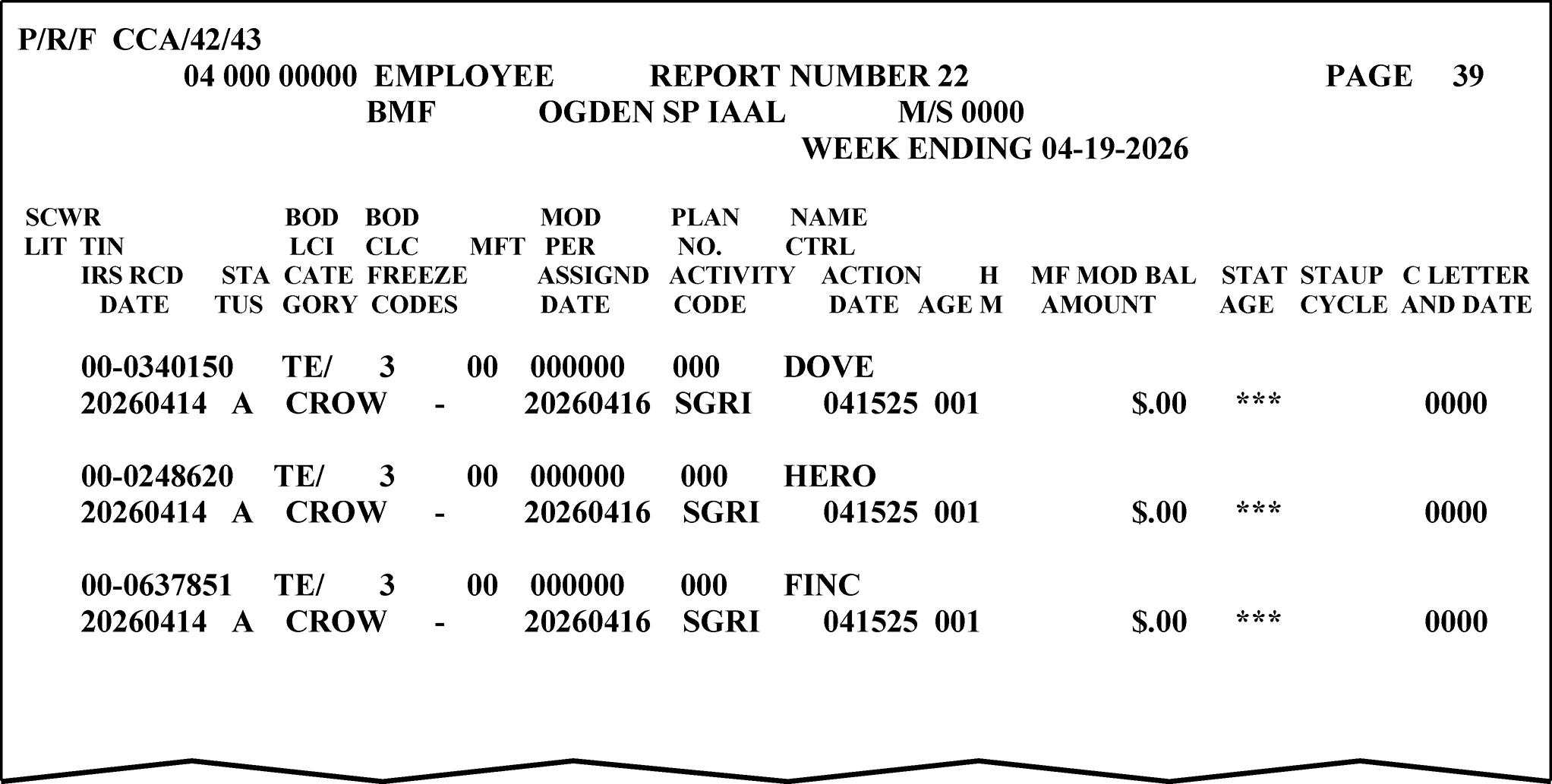
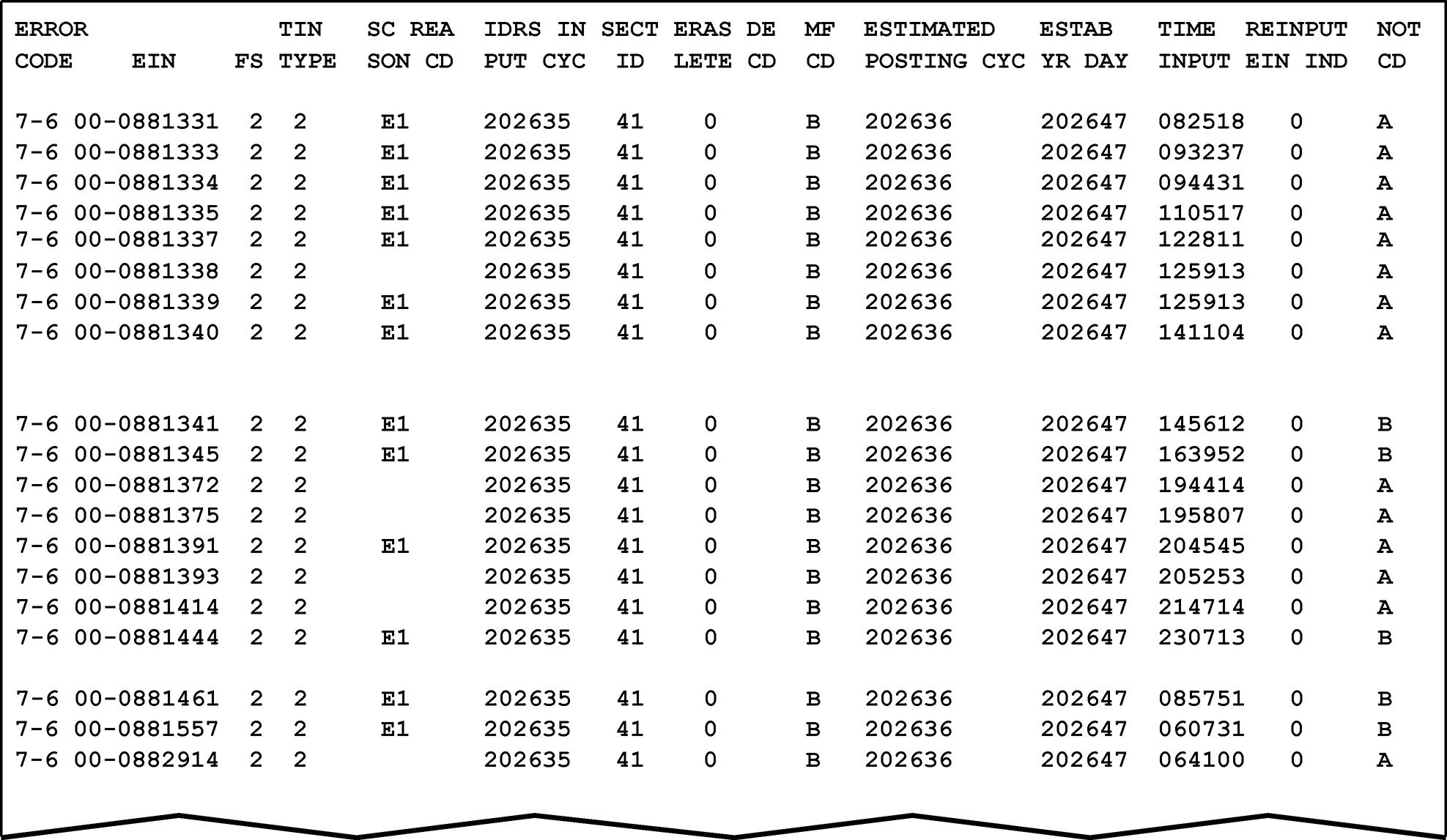
-
The chart below reflects the turnaround times of the various forms/documents processed in BMF Entity:
Form/Document Turnaround Time Form 56 30 days Form 966 30 days Form 1128 30 days Form 2032 30 days Form 2363 30 days Form 2553 30 days Form 2678 30 days Form 4442 20 days Form 4479 30 days Form 8274 30 days Form 8329 30 days Form 8330 30 days Form 8703 30 days Form 8716 30 days Form 8822 30 days Form 8822-B 30 days Form 8832 30 days Form 8842 30 days Form 8855 30 days Form 8869 30 days Form 8973 30 days Form SS-4 7 days BMF SSN Transcripts 30 days CP 148A/B responses 30 days EFTPS 3 days ERS AC 347 - Form 1120S 20 days Phone Calls 7 days Rejects/Rejects RTR 10 days Returns 5 days -
All BMF correspondence processed in BMF Entity has a 30-day turnaround.
-
If a document needs to be associated with an e-filed return, a refile DLN needs to be created so documents can be attached to the electronically filed return's DLN. Attach IDRS document input tag (Form 12775, BMF ADJ54 Adjustment Format), to each E-file/MeF reply and complete with:
-
Employee IDRS number,
-
Input Date,
-
TC 290,
-
Amount ".00" ,
-
TIN,
-
Tax Period,
-
Blocking series, see (3) below,
-
CTRL - CAT> TPRQ,
-
Remarks: "Attachment only" , and,
-
Sequence Number. Sequence numbers for input must begin with "1" through "999" and remain in order.
-
-
Input TC 290 on IDRS to generate a refile DLN to the Files area which is used to attach the reply.
-
Access CC TXMOD'A', overlay with CC REQ54, XMIT. This will bring up the CC ADJ54 screen.
-
Input the sequence number from the IDRS input tag.
-
BLK> See (3) below,
-
CASE-STS-CD>C,
-
IRS-RCVD-DT>Received Date of Case,
-
CTRL - CAT> TPRQ,
-
ACTIVITY>ATTCH-ONLY,
-
TC> 290,
-
AMT> .00,
-
Hold-CD> 3,
-
SOURCE-DOCUMENT-ATTACHED?>Y,
-
REMARKS> Attachment only.
-
-
Use the following blocking series:
If MFT is Then Blocking Series is 01 15 02 15 05 17 06 17 10 15 44 15 67 10 -
Complete routing form (for example, OSPC Form 12547) and send to Files within 5 days of input.
Reminder: Form 6502 must have the IDRS input date and entire employee IDRS number. -
See IRM 2.4.16, IDRS Terminal Input - Command Codes REQ54 and ADJ54.
-
If there is an open control base on the account, route to that TE for attachment. The IDRS Unit and USR Database (IUUD) will help you locate employees.
-
When an Entity Tax Examiner (TE) identifies a return that looks different than a normally processed return, the return will be placed in the Funny Box. Examination and Criminal Investigation (CI) review these returns for fraudulent or illegal activities. A "Funny Box" has been created and placed in a central location for the deposit of questionable returns. At the end of each business day, the control team will retrieve the documents that have been placed in the Funny Box and route to FRP BMF Classifier:
Internal Revenue Service
Mail Stop 4450
1973 Rulon White Blvd
Ogden, UT 84404 -
If the return is numbered, make a complete copy and indicate COPY across the front of the first page of the photocopied return. Place the copy in the Funny Box and continue processing the original return.
-
Unnumbered returns can be placed directly in the Funny Box.
-
See below for specific attributes of a return:
"≡ ≡ ≡ ≡ ≡" ≡ ≡ ≡ ≡ ≡ ≡ ≡ ≡ ≡ ≡ ≡ ≡ ≡ ≡ ≡ ≡ ≡ ≡ ≡ ≡ ≡ ≡ ≡ ≡ ≡ ≡ ≡ ≡ ≡ ≡ ≡ ≡ ≡ ≡ ≡ ≡ ≡ ≡ ≡ ≡ ≡ ≡ ≡ ≡ ≡ ≡ ≡ ≡ ≡ ≡ ≡ ≡ ≡ ≡ ≡ ≡ ≡ ≡ ≡ ≡ ≡ ≡ ≡ ≡ ≡ ≡ ≡ ≡ ≡ ≡ ≡ ≡ ≡ ≡ ≡ ≡ ≡ ≡ ≡ ≡ ≡ ≡ ≡ ≡ ≡ ≡ ≡ ≡ ≡ ≡ ≡ ≡ ≡ ≡ ≡ ≡ ≡ ≡ ≡ ≡ -
≡ ≡ ≡ ≡ ≡ ≡ ≡ ≡ ≡ ≡ ≡ ≡ ≡ ≡ ≡ ≡ ≡ ≡ ≡ ≡ ≡ ≡ ≡
-
≡ ≡ ≡ ≡ ≡ ≡ ≡ ≡ ≡ ≡ ≡ ≡ ≡ ≡ ≡ ≡ ≡ ≡ ≡ ≡ ≡ ≡ ≡ ≡ ≡ ≡ ≡ ≡ ≡ ≡ ≡ ≡
-
≡ ≡ ≡ ≡ ≡ ≡ ≡ ≡ ≡ ≡ ≡ ≡ ≡ ≡ ≡ ≡ ≡ ≡ ≡ ≡ ≡ ≡ ≡ ≡ ≡ ≡ ≡ ≡ ≡ ≡ ≡ ≡ ≡
-
≡ ≡ ≡ ≡ ≡ ≡ ≡ ≡ ≡ ≡ ≡ ≡ ≡ ≡ ≡ ≡ ≡ ≡ ≡ ≡ ≡ ≡ ≡ ≡ ≡ ≡ ≡ ≡ ≡ ≡ ≡ ≡ ≡
≡ ≡ ≡ ≡ ≡ ≡ ≡ ≡ ≡ ≡ ≡ ≡ ≡ ≡ ≡ ≡ ≡ ≡ ≡ ≡ ≡ ≡ ≡ ≡ ≡ ≡ ≡ ≡ ≡ ≡ ≡ ≡ ≡ ≡ ≡ ≡ ≡ ≡ ≡ ≡ ≡ ≡ ≡ ≡ ≡ ≡ ≡ ≡ ≡ ≡ ≡ ≡ ≡ ≡ ≡ ≡ ≡ ≡ ≡ ≡ ≡ ≡ ≡ ≡ ≡ ≡ ≡ ≡ ≡ ≡ ≡ ≡ ≡ ≡ ≡ ≡ ≡ ≡ ≡ ≡ ≡ ≡ ≡ ≡ ≡ ≡ ≡ ≡ ≡ ≡ ≡ ≡ ≡ ≡ ≡ ≡ ≡ ≡ ≡ ≡ ≡ ≡ ≡ ≡ ≡ ≡ ≡ ≡ ≡ ≡ ≡ ≡ ≡ ≡ ≡ ≡ ≡ ≡ ≡ ≡ ≡ ≡ ≡ ≡ ≡ ≡ ≡ ≡ ≡ ≡ ≡ ≡ ≡ ≡ ≡ ≡ ≡ ≡ ≡ ≡ ≡ ≡ ≡ ≡ ≡ ≡ ≡ ≡ ≡ ≡ ≡ ≡ ≡ ≡ ≡ ≡ ≡ ≡ ≡ ≡ ≡ ≡ ≡ ≡ ≡ ≡ ≡ ≡ ≡ ≡ ≡ ≡ ≡ ≡ ≡ ≡ ≡ ≡ ≡ ≡ -
-
In October 2005, IRS began a bulk name/TIN matching program with Central Contractor Registration (CCR). CCR was the central registration point for all federal government trading partners. In July 2012, CCR was consolidated into the System for Award Management (SAM).
-
If a SAM registrant does not pass the name/TIN match, an e-mail is sent to the registrant by SAM advising them of the failure and providing phone numbers for the Social Security Administration, if the TIN is an SSN, or for the IRS e-Services help desk, if the TIN is an EIN.
-
To pass a name/TIN match, the EIN must be posted to Master File. Therefore, a taxpayer who plans to become a government contractor or grant applicant and applied for an EIN via the online EIN application, Modernized Internet EIN, or fax must wait until the EIN posts to Master File, or the name/TIN match will fail.
-
The ENTITY-ESTAB-DT> must also match the information input by the SAM user. Therefore, it could be necessary for BMF Entity TEs to update the ENTITY-ESTAB-DT>. This is done by entering the date in YYYYMM format in the EIN-EST-DT> field of CC BNCHG.
-
This subsection contains information and procedures for establishing the many different types of entities. The standards for completion of Entity fields will be outlined.
-
The most commonly filed returns of each entity type will be listed.
-
IDRS requires:
-
Primary name/continuation of primary name field cannot be longer than 70 characters (35 characters each line). A word will not be split between lines.
-
The special character closing bracket, ], is used to designate the name control when the first four characters of the first name line are not the valid name control when using CC ESIGN or BNCHG. It is placed immediately before the first letter of the surname. The second bracket must be entered immediately following the name that the name control was derived from if a suffix or partner's name follows on the Primary Name Line. Examples: HARRY]JONES (bracket immediately preceding Jones but none needed following last name) and HARRY]JONES]& ROLAND SMITH (bracket before and after name containing name control).
-
The special characters hyphen (-) and ampersand (&) can be in the primary and sort name fields. If the taxpayer includes an apostrophe in their name, omit the apostrophe. If the taxpayer uses a period after an abbreviated word, omit the period.
For example, SWAN’S STORE becomes SWANS STORE. -
The special characters plus (+), and dot (.) will be spelled out.
For example, "Crows + Owls Inc" will be entered as "CROWS PLUS OWLS INC" .
"Taxpayer.org" will be entered as "TAXPAYER DOT ORG" as we know the period is pronounced "dot" in the name. -
The forward slash "/" and backward slash "\" will be replaced with a hyphen "-" .
-
All other special characters will be omitted, and a blank space entered in its position in the name line.
-
-
Omit the word "The" in the primary name line when it is followed by more than one word or abbreviation unless the taxpayer specifically requests it be included. Include the word "The" when it is followed by only one word.
-
When a sort name is input, the BMF will identify the sort name which allows it to be used on the Name Search Facility (NSF). The NSF is accessed with CCs NAMES and NAMEE to locate and identify the taxpayer.
-
If the sort name is an individual name (Form 1065 and Form 1041 filers), complete the sort name line field with the taxpayer's name as indicated by the taxpayer followed by their title. Prior to 11-30-2008, Entity entered the Sort Name with the taxpayer's last name first, followed by their first name, middle initial and title. This was referred to as the "sort line format" .
-
To delete a sort name, input the symbols "$$" on the Sort Name field.
-
These common Spanish words could appear in business names.
-
Senor (Mr.), or
-
Senora (Mrs.), or
-
Hijos (Sons), or
-
Hermanos (Brothers), or
-
S. A. (INC).
-
-
The document/return must be signed by the taxpayer or authorized representative for IRS to update any information (name, address, etc.). Returns, forms, correspondence and direction from the taxpayer regarding their account will be accepted prima facie, see IRM 3.13.2.2(10), BMF Entity - General.
-
Exercise caution when changing the name on an EIN. Often taxpayers request a name change when the issue is really a change in organizational structure.
For example, Maple Leaf LLC requesting a change to Maple Branch Inc. This is more than a name change; it is a change in structure that requires documentation. See IRM 3.13.2.10.9(1), Change in Ownership or Change in Officers, Partners, or Members, and IRM 3.13.2.10.18, State Reorganization/Conversion.
-
Corporations are registered with the Secretary of State's office in the state of incorporation. Research will be completed via Secretary of State Websites. See Exhibit 3.13.2-8, Secretary of State Websites to verify corporation information such as:
-
Date of incorporation,
-
Name changes,
-
Type of entity/annual filing requirement,
-
Any changes in structure/owners, or
-
Status with state.
-
-
Suffixes such as P.A. (Professional Association), P.C. (Professional Corporation), and INC. (Incorporated), indicate a Corporate entity.
-
The word "The" will be bracketed so it does not affect the name control.
Name: The Cardinal Company
Name Control: The]Cardinal Company -
Include "The" in the name control when it is followed by only one word.
Name: The Warbler
Name Control: THEWARBLER -
Do not abbreviate or change "and" to "&" unless the taxpayer requests the change. The Corporation receives its charter from the state exactly as shown by the taxpayer, and this is the way the account will be established.
-
Corporations have their business/trade name, if different from true name, in the sort name field. CC ESIGN will not allow a primary name line and sort name line to be identical.
-
The name control for a corporation is the first four significant characters of the corporation's name.
-
Corporate name control rules apply if an individual name contains the abbreviations PC (Professional Corporation), SC (Small Corporation), PA (Professional Association), PS (Professional Service), or PSC (Personal Service Corporation).
Name: George Grouse PSC
Name Control: GEORGE GROUSE PSC -
When the organization name contains the words "Fund" or "Foundation" , corporate name control rules apply. See IRM 3.13.12, Campus Document Services - Exempt Organization Account Numbers.
For example: Kathryn Osprey Memorial Foundation. -
When an individual name and a corporate name appear, the name control is the first four letters of the corporation’s name. This is most often seen on employment returns, Form 94X family.
Barbara J. Zinnia
ZZ Duck Factory, Inc. Input name control as ZZDU -
The information for inputting corporation names is derived from the following:
-
The filing of a return without an EIN (Form 1120, Form 940, Form 941, Form 943, Form 944, Form 945, Form 720, Form 730, Form 11-C, Form 2553, certain Forms 990 or Form 2290).
-
The changing of a name on a return.
-
Requesting a name change through correspondence.
-
Perfecting the entity.
-
-
≡ ≡ ≡ ≡ ≡ ≡ ≡ ≡ ≡ ≡ ≡ ≡ ≡ ≡ ≡ ≡ ≡ ≡ ≡ ≡ ≡ ≡ ≡ ≡ ≡ ≡ ≡ ≡ ≡ ≡ ≡ ≡ ≡ ≡ ≡ ≡ ≡ ≡ ≡ ≡
-
Non-Profit corporations are also registered with the Secretary of State’s office in the state of incorporation. An organization is not considered non-profit until they have received a formal exemption letter.
-
Specific information for identification will be input as a sort name or continuation of the primary name. This information would be Local #, Area #, Unit #, School name, Governmental division, etc.
-
For non-profit organizations use the following rules for determining name control:
-
The only organization which you will always abbreviate is Parent Teachers Association (PTA). The name control will be "PTA" plus the first letter of the name of the state.
Name: Parent Teachers Assn Congress of Finch
Name Control: PTAF -
The name control for a local or post number is the first four characters of the national title.
Local 210, International - Input as INTE.
Post 3120, Veterans of Falcon Wars - Input as VETE. -
Use the name control of the national organization name if there is a Group Exemption Number (GEN).
-
For churches and their subordinate (for example nursing homes, hospitals), the name control will be derived from the legal name of the church, etc.
Name: Sparrow Church
Name Control: SPARROW CHURCH
-
-
Corporations will file Form 1120 family returns. See IRM 3.13.2.8.5, Form 1120 Series - Corporation Returns.
-
Corporations could also file Employment tax returns (Form 94X family, Form CT-1) and Excise returns (Form 720, Form 730, Form 2290, etc.).
-
See chart in IRM 3.13.2.14.1(5), Consolidating Accounts, for filing requirements that are compatible with corporate filing requirements.
-
The title(s) listed below are the most common for Corporations. If a different title is shown, a Form 2848 or Form 8821 could be needed:
-
President,
-
Vice President,
-
Secretary,
-
Treasurer,
-
Assistant Treasurer,
-
Chief Accounting Officer, or
-
Any Tax Officer, including Controller
-
-
Always look for the Large Corporation Indicator (LCI). Do not take action on an EIN reflecting an LCI before contacting the specific representative for that Large Corporation. The LCI can be seen on CCs ENMOD (directly under ENMOD), BMFOL'I' (fourth line), TXMOD'A' (second line), and SUMRY (third line). See IRM 21.7.1.4.11.4, Campus Contacts for Large Corp Cases. Please allow three days for a call back. If a call back has not been received within three days, contact the HQ AM Large Corporation analyst via email. Contact information can be found on SERP - Who/Where - Large Corporation Contacts .
-
A partnership is a group of taxpayers who have entered into a written or verbal business agreement and file Form 1065, U.S. Return of Partnership Income. This is an annual return.
-
Partnerships could also file Employment tax returns (Form 94X family) and Excise returns (Form 720, Form 730, Form 11-C, Form 2290, etc.).
-
See chart in IRM 3.13.2.14.1(5), Consolidating Accounts, for filing requirements that are compatible with partnership filing requirements.
-
Partnership FYMs are governed by The Tax Reform Act of 1986. Partnerships generally are required to use the same tax year ending as their owner, usually December 31.
-
There are other entities that are considered partnerships and are liable to file Form 1065.
-
An unincorporated business jointly owned by a married couple is generally treated as a partnership. However, if it meets the requirements to be a qualified joint venture under Section 761(f) (whose only members are spouses filing a joint return and who both materially participate in the business), then the couple can elect not to be treated as a partnership for Federal tax purposes.
-
-
Partnership Name—The partnership primary name line will be the legal name of the partnership (for example, the list of partners or the business/trade name).
-
If a partnership name has not been provided, use the partner's name(s) followed with the abbreviation "PTR" . This acronym will always be used in the name lines.
-
If it is not possible to list all the partners as the primary name (up to 70 characters), list the maximum number of names and add the phrase "ET AL PTR" .
-
If the primary name line and the Care of Name line are identical, input of the Care of Name line is not required.
-
-
General Partner's name and title or partnership's trade name will be in the Sort Name field. Generally, partnerships will always have an entry in the sort name line field. See the table below for guidance in formatting a partnership's name lines.
If... Then... A) The partnership has a true name and a trade name, Enter the true name in the primary name line, trade name in the sort name line field and the general partner's name in the "Care of Name" field. B) The partnership has a trade name but does not supply their true name, Enter the trade name in the sort name line field and the partner's name with "ET AL PTR" in the primary name line. C) A business is the general partner, Enter the partner's name followed by GEN PTR in the "Care of Name" field. D) The partnership does not have a trade name, Enter the true name of the partnership in the primary name line and the general partner's name in the sort name line field. -
The name control for a partnership will be derived in the following order of selection:
-
The first four characters of the first partner's last name.
PELICAN, GULL & SEAGULL PTRS -
The first four characters of the business or trade name.
PIGEONS RESTAURANT
-
-
The word "The" at the beginning of trade names and business names will be bracketed so it does not affect the name control. For example:
The Meadowlark Company will be entered as THE]MEADOWLARK COMPANY. However, if "The" is followed by one word, enter as part of the name control, for example, The Pelican is entered as THEPELICAN. -
Partnership EINs that begin with prefixes 20, 26, 27, 33, 39, 45, 46, 47, 81, 82, 83, 84, 85, 86, 87, 88, 92, 93 or 99 will have the first four characters of the Primary Name as the name control. For example, the partnership name "John Willow and James Oak Partnership" will have a name control John.
-
The information for inputting partnership names is derived from the following sources:
-
The filing of a return without an EIN (Form 940, Form 941, Form 943, Form 944, Form 945, Form 720, Form 730, Form 11-C, Form 1065, or Form 2290).
-
Perfecting the name on a return.
-
-
Input the partnership name from these returns filed without an EIN (Form 941, Form 943, Form 944, Form 945, Form 720, Form 730, Form 11-C, or Form 2290) in the following priority:
-
DBA or trade name, then
-
Legal name.
-
-
Input the partnership name from a Form 1065 filed without an EIN in the following priority:
-
DBA or trade name (if the legal partners names are not on the name line), then
-
Legal partner(s) names.
-
-
See IRM 3.13.2.10.24, Changes to Primary Name Line.
-
The title(s) listed below are valid for Partnerships. If a different title is shown, a Form 2848 or Form 8821 is needed:
-
General Partner, or
-
Partner
-
-
For tax years beginning after 12-31-2017, partnerships that experience a 50 percent or more change in partners do not require a new EIN. The Tax Cut Job Act (TCJA) made provisions for a partnership to remain the same business structure despite the change in partners.
-
Limited Liability Companies (LLCs) and Limited Liability Partnerships (LLPs) are defined as an unincorporated business entity created under state law and owned by one or more persons known as members. The LLC indicator will not be populated for LLPs. State law generally allows for a “person” to be:
-
An individual, or
-
A trust, or
-
An estate, or
-
A partnership, or
-
An association, or
-
A company, or
-
A corporation, or
-
An LLC, or
-
An exempt organization.
-
-
LLC information can be found on the Secretary of State websites. See Exhibit 3.13.2-8 , Secretary of State Websites.
-
Suffixes such as LLC, LC, and PLLC indicate a limited liability company and are input with the LLC’s name.
-
The suffix "LTD" does not warrant the filing of a corporation nor a partnership/LLC. If the correct filing requirement cannot be determined, research the Secretary of State's office.
-
There are two types of LLCs: Single member and Multi-member. Domestic Single Member LLCs default to disregarded as an entity separate from its owner for federal tax purposes but could elect to be taxed as an association for federal tax purposes.
-
Single member LLCs generally do not have annual filing requirements, as their owner reports all income/losses. However, they could have Employment Tax filing requirements. They could also file an Entity Classification request to change to a Corporation.
-
Multi-member LLCs default to a Form 1065 FRC. They could file Form 8832 which will allow them to be treated as an association taxed as a corporation.
-
Spouses can be considered a disregarded entity if they live in a community property state: Arizona, California, Idaho, Louisiana, Nevada, New Mexico, Texas, Washington, or Wisconsin. See Publication 555, Community Property. Their names will be on the sort name line as follows:
JOHN & MARY DOVE SOLE MBR -
Treasury Regulation 301.7701-2(c)(2)(iv)(B) (as amended by T.D. 9356, 2007–39 I.R.B. 675) eliminated disregarded entity status for the purposes of federal employment taxes and certain excise taxes. The LLC will continue to be a disregarded/ single member entity for federal income tax purpose but is no longer disregarded for certain excise and employment taxes. The amended regulations provide that the LLC will have a tax status distinct from its owner.
-
For employment taxes on wages paid on or after January 1, 2009, and
-
For excise taxes imposed and actions first required or permitted in periods beginning on or after January 1, 2008.
Therefore, single member LLCs will have their own EIN for filing purposes, however, a single member LLC does not have an annual filing requirement. The income/loss is reported on the annual return of the owner(s). -
-
Domestic Multi-member LLCs default to the classification of a partnership.
-
Either type of LLC can file Form 8832 to elect their Entity classification. See IRM 3.13.2.26, Domestic Limited Liability Company (LLC), and IRM 3.13.2.27, Form 8832, Entity Classification Election.
-
LLCs could also file Employment returns (Form 94X family) and Excise returns (Form 720, Form 730, Form 11-C, Form 2290, etc.).
-
The Primary Name Line will be the legal name of the LLC. Omit the word "The" in the primary name line when it is followed by more than one word or abbreviation unless the taxpayer specifically requests it be included. Include the word "The" when it is followed by only one word.
-
If the LLC name begins with the word "The" , bracket it so it does not affect the name control: THE PELICAN COMPANY LLC will be entered as THE]PELICAN COMPANY LLC. However, if the word "The" is followed by only one word, it will become part of the name control: THEBUNTING.
-
Do not abbreviate or change "and" to "&" unless the taxpayer requests it. The LLC receives its' charter from the state exactly as shown by the taxpayer and this is the way the account will be established.
-
The LLC's trade name will be entered in the Sort Name Line field. If there is not a DBA, a member's name and their designation will be entered in the sort line.
-
If a trade name is added, move the member's name and designation to the Care of Name line.
-
If a business is the managing member of an LLC, enter the business name and designation in the Care of Name field.
-
The title(s) listed below are the most common for LLCs. If a different title is shown, a Form 2848 or Form 8821 is needed:
-
Managing Member,
-
Sole Member, or
-
Member.
-
-
Currently there is an LLC indicator field on CC ENMOD. The field is identified as LLC-CD on IDRS. "S" in the LLC Indicator field means the taxpayer is a single member LLC; "M" in the field means the entity is a multi-member LLC.
Ensure the LLC Indicator is correct, if not, update. If research determines the entity is not an LLC, or you are unable to determine the correct type of LLC, remove the LLC indicator via CC BNCHG by placing a "9" in the LLC indicator field. -
Ensure the XREF-TIN-ITIN-IND and the XREF-TIN-ITIN fields are accurate. Update if necessary.
-
Trust Names can be long and complicated. A trust name could be reduced or abbreviated to allow for the trust name to be entered on the first name line. The word "The" will never be included in the trust name.
-
Trusts will be name controlled by the first surname in the Primary Name. The trustee's name will be placed on the Sort Name line if an individual. If the trustee is a financial institution or business, input on the Care of Name line. Include the designation, for example, TTEE, ADM, etc.
-
Trust EINs that begin with prefixes 20, 26, 27, 33, 39, 45, 46, 47, 81, 82, 83, 84, 85, 86, 87, 88, 92, 93 and 99 will have the first four characters of the Primary Name as the name control.
For example, the trust name "John Willow TR fbo James Oak" will have a name control John. -
The name control of a trust with a prefix other than 20, 26, 27, 33, 39, 45, 46, 47, 81, 82, 83, 84, 85, 86, 87, 88, 92, 93 or 99 will be derived by the following selection:
-
The first four characters of an individual's last name.
Name: Michael T. Bunting Revocable Trust
Name Control: MICHAEL T]BUNTING]RVOC TR -
For corporate taxpayers, use the first four characters of the corporate name.
Name: Eagle Company Employee Benefit Trust
Name Control: EAGLE COMPANY EMPLOYEE BENEFIT TR
-
-
For mortgage-backed securities (such as GNMA and FNMA Pools) use the first four digits/alphas of the trust number, disregarding any leading zeroes. Do not include any trailing alphas. If there are fewer than four characters, use the letters GNMA or FNMA to complete the name control.
-
Name: 0001 GNMA Pool
-
Name Control: 1GNM
-
Name: FNMA Pool 0002
-
Name Control: 2FNM
-
Name: GNMA Pool 00100
-
Name Control: 100G
-
-
If none of the above information is present, use the first four characters of the last name of the trustee (TTEE) or beneficiary (FBO).
-
If needed, contact the taxpayer via telephone for above information. If contact cannot be made, correspond via Letter 252C.
-
The information for inputting trust names is derived from:
-
The filing of a return (Form 940, Form 941, Form 944, Form 945, Form 1041, Form 5227, Form 1041-A, and some Form 990, Form 990-PF or Form 990-T returns),
-
Requesting a change through correspondence,
-
Perfecting fiduciary from a Form 1041,
-
Perfecting the entity, or
-
Form 56.
-
-
Always abbreviate the primary name to 70 characters (two name lines). In addition, always abbreviate the following words or phrases. All dates in the trust name line will be entered as MMDDYYYY with the word dated omitted:
NAME /or PHRASE ABBREVIATION Administrator/Administratrix ADM Trust TR Under the will of, U/W, under will UW Under agreement, U/A, Under agreement with UA Dated Jan. 16, 2026 01162026 (do not enter "date" /"dated" or the alpha month). Irrevocable IRRV Revocable RVOC Trustee TTEE For the Benefit of, F/B/O, F B O FBO Gift, Giftrust GIFT Family FAM Marital MRTL Funeral FNRL Inter Vivos INTRVS Non-exempt Charitable Trust NECT Testamentary TEST Under Trust Agreement UTA Trust Under Agreement TUA Voluntary Employee Benefit Association VEBA Insurance INS Living LIV Charitable Remainder Unitrust CRUT Charitable Remainder Annuity Trust CRAT -
Always make the individual trustee, personal representative, etc. a sort name.
-
Do not sort a bank, mortgage company or corporation. This type of trustee will be on the "Care of Name" line.
-
If it is not possible to list all the trustees as the sort name, list the maximum number of names and add the phrase "ET AL TTEE" .
-
-
The following are examples of inputting trust names:
Taxpayer shows: Input Sophie Sparrow Seagull Irrevocable Trust FBO Emil Sparrow Seagull under agreement dated Oct. 13, 2026 Viceroy Bank Trustee Primary Name:
SOPHIE SPARROW]SEAGULL]IRRV TR FBO (Continuation of Primary Name)
EMIL SPARROW SEAGULL UA 10132026
Care of Name:
% VICEROY BANK TTEEIrrevocable Trust F/B/O William Michael Nancy Heron Oriole National Bank Trustee under agreement with Howard Heron dated Jan. 15, 2026 Primary Name:
HOWARD]HERON]IRRV TR FBO WILLIAM (Continuation of Primary Name)
]MICHAEL NANCY HERON
UA 01152026
Care of Name:
% ORIOLE NATIONAL BANK TTEELark Trust & Savings Co TTEE for Harvey Heron Trust for the benefit of Molly Heron U/A dated Nov. 18, 2026 Primary Name:
HARVEY]HERON]TR FBO MOLLY HERON
Continuation of Primary Name:
UA 11182026
Care of Name:
% LARK TRUST SAVINGS CO TTEETurtle Memorial Cemetery Perpetual Trust Fund William C Bear Trustee Primary Name:
TURTLE MEMORIAL CEMETERY TR
Continuation of Primary Name:
PERPETUAL FUND
Sort Name:
WILLIAM C BEAR TTEE -
Trust FYMs are governed by The Tax Reform Act of 1986 and are required to use a calendar year.
-
Trusts will file Form 1041, Form 1041-QFT, Form 945, Form 5227, Form 1041-A, or some Form 990, Form 990-PF or Form 990-T. See IRM 3.13.12, Campus Document Services - Exempt Organization Account Numbers.
-
If a trust has employees, the FRC on IDRS will be 1041-2.
-
The title(s) listed below are the most common for Trusts. If a different title is shown, a Form 2848 or Form 8821 is needed:
-
Fiduciary,
-
Trustee,
-
Beneficiary, or
-
Grantor.
-
-
Always verify the XREF-TIN-ITIN on the account, and update if needed.
-
The estate name (the name of the deceased person) must be included in the primary name line.
-
The word "Estate" will be added to the primary name if it can be identified as an estate.
-
The name will be rearranged to show "Estate" after the individual's name.
-
-
The name control for estates is the first four characters of the last name of the decedent.
-
The last name of the decedent must be followed by the word "Estate" in the primary name line.
Name: Howard J. Aspen Dec'd
Name Control: HOWARD J]ASPEN] ESTATE -
Always abbreviate the primary name to 70 characters (two name lines). Always abbreviate the following words or phrases:
-
Personal Representative to PER REP.
-
Fiduciary to FID.
-
Executor/Executrix to EX.
-
Administrator to ADM.
-
Successor to SUCC.
-
-
Estates are not required to use a particular tax year ending. Once a tax year ending has been established, an estate cannot change without chief counsel approval.
-
Estates will file Form 1041.
-
If an estate has employees, IDRS will show the FRC of 1041-2.
-
The title(s) listed below are the most common for Estates. If a different title is shown, a Form 2848 or Form 8821 is needed:
-
Fiduciary,
-
Executor/Executrix,
-
Administrator, or
-
Personal Representative.
-
-
A Sole Proprietor is an individual that owns/operates an unincorporated business by himself or herself and reports the income/loss from that business on the individual’s Form 1040, Schedule C.
-
Sole Proprietors can file employment returns (Form 94X family) and/or excise returns (Form 2290, Form 720, etc.). Sole proprietors do not file annual returns (Form 1120, Form 1065, Form 1041). If a Form 1120, Form 1065, or Form 1041 is received with a sole proprietor EIN, a new EIN must be assigned.
-
Individual/Sole Proprietor EIN and Social Security Numbers (SSN) Accounts—The primary name line will never contain numeric characters or the special character ampersand (&). Although a numeric character or ampersand (&) is a valid input for IDRS, an individual's name cannot contain a numeric character or ampersand.
-
All Sole Proprietor EINs will reflect a SOLE-PRP-SSN. This will be the SSN of the sole proprietor. BMF Entity will perfect this field as needed when processing any Entity documents.
-
An SSN (IMF) account has only a Primary Name (35 characters). The Continuation of Primary name line is used for a "Care of Name."
-
If a Sole Proprietor requests a name change, compare the name on taxpayer's SSN with name on EIN. If SSN has already been updated, input TC 013 to update EIN. If SSN has not been updated, ask the taxpayer for documentation of the legal name change. This documentation can be a marriage certificate, court order, etc.
-
The sort name will be used for the following:
-
Sole Proprietors will have their business/trade name in the Sort Name field.
-
"Account under TEFRA" if it is a pension trust. "TEFRA" is an acronym for Tax Equity and Fairness Recovery Act.
-
-
To delete the sort name, input "$$" in the first two positions of the sort name line.
-
The Sort Name will be changed if there is a direct request from the taxpayer or clear indication the taxpayer's trade name has changed. Do not update the Sort Name line if the taxpayer's trade name is identical to the Primary Name line. The Sort Name line is used for research purposes and must be input accurately.
-
The ampersand (&) and hyphen (-) are the only special characters allowed in the name control. However, these characters cannot be in the first position of the name control.
-
The name control can have less, but no more than four characters. Blanks could be present only as the last three positions of the name control.
-
The name control for a sole proprietor's name is the first four significant characters of the last name.
-
When the taxpayer has a true name and a trade name, the name control is derived from the first four characters of the individual's last name.
True Name: Arthur P. Aspen
Trade Name: Quail Restaurant
Name Control: Arthur P]Aspen -
When two last names are used, the name control is the first four letters of the second last name.
Maiden Name: Daisy Oak
Married Name: Daisy Oak Tree
Name Control: Daisy Oak]Tree -
When two last names connected by a hyphen are shown for one individual, the name control is the first four letters of the first last name.
Name: Jane Falcon-Dove
Name Control: JANE]FALCON-DOVE -
On joint returns with different last names, the name control is the first four letters of the last name of the individual appearing first.
-
For Spanish names, when two last names are shown for an individual, the name control is the first four letters of the first last name:
-
Name: Juan Garza Morales
-
Name Control: Juan]Garza]Morales
-
Name: Maria Lopez Moreno
-
Name Control: Maria]Lopez]Moreno
-
-
For last names that have only two letters:
Name: Sunny Ming Lo
Name Control: Sunny Ming]Lo(blank)(blank) -
Vietnamese names will often have a middle name of Van (male) or Thi (female).
Name: Kim Van Nguyen
Name Control: Kim Van]Nguyen -
In some cultures, the last name could appear first on the name line. On the signature line, the last name will usually appear first.
-
PREFIX on Sole Proprietor Individual.
-
Delete prefixes from true names or surnames. Examples of prefixes to be deleted are Mr., Rev., Dr., Capt., Hon., Gov., Miss, Mrs.
-
Delete prefixes from the Sort Name. Examples of prefixes to be deleted are: DBA, TA, AKA, etc.
-
-
SUFFIX on Sole Proprietor Individual.
-
Delete all suffixes from the Primary Name, such as Owner, Agent, Attorney, Proprietor, etc.
-
Do not delete suffixes such as DDS, MD, PhD, Jr., Sr., III, etc.
-
-
The information for inputting individual names is derived from the following:
-
The filing of a return (Form 940, Form 941, Form 943, Form 944, Form 945, Form 720, Form 11-C, Form 730, or Form 2290),
-
The changing of the name on a return,
-
Requesting a change of name through correspondence, or
-
Perfecting an entity.
-
-
When establishing the account or changing the name lines for an individual, use the examples below to determine the input.
-
The primary name line will consist of a true name.
-
The sort name line will consist of a trade name. For example: Primary Name -James P. Pigeon; Sort Name -Bunting Restaurant.
-
An individual name can only consist of one name. Although, a numeric character or ampersand (&) is a valid input for the primary name line, an individual's name in that field cannot contain a numeric character or ampersand.
-
Household employers use the given name of the taxpayer, if available on the source document. First Name Line shows "Mrs. Albert Pelican" , and the signature shows "Gloria Pelican" , place "GLORIA PELICAN" in the Primary Name Line on the BMF.
-
-
Names of Spanish extraction—Many names will include two surnames. In these cases, the mother's surname (matronymic) will be the last name and must be a part of the input.
-
The "Y" (Spanish for "and" ) if present, between two names precedes the Matronymic (mother's surname).
-
Delete the following Spanish titles: ESP, ESP DE, ESPOSA DE (wife of), VDA, DE VIUD (widow of), Senor (Mr.), Senora (Mrs.), Hijos (sons), Hermanos (brothers), and in some cases DE (of).
-
The Spanish phrase "DEL" or "DE LA" preceding a name is part of the name.
-
These common Spanish words could appear in business names: Senor (Mr.), Senora (Mrs.), Hijos (Sons), and Hermanos (Brothers).
-
-
The Spanish phrases "de" , "De" , "del" and "de la" are considered part of the name control.
-
Name: Elena de la Rosa
-
Name Control: Elena]dela]Rosa
-
-
The title(s) listed below are valid for Sole Proprietors. If a different title is shown, a Form 2848 or Form 8821 is needed:
-
Owner, or
-
Sole Proprietor.
-
-
The sort name allows us another way to locate the taxpayer on IDRS.
-
When a "sort name" is input, the BMF will identify the "sort name" which allows it to be used on the Name Search Facility (NSF). The NSF is accessed with CCs NAMES and NAMEE to locate and identify the taxpayer.
-
If the "sort name" is an individual name, complete the sort name line field with the taxpayer’s name as indicated by the taxpayer followed by their title. Prior to November 30, 2008, Entity entered the Sort Name with the taxpayer’s last name first, followed by their first name, middle initial and title. This was referred to as the "sort line format."
-
The special characters hyphen (-) and ampersand (&) can be in the sort name line. If the taxpayer uses any other special character, omit the character and leave a blank space. For example, "Taxpayer.com" will be entered as "TAXPAYER COM."
-
The "sort name" will be used for the following:
-
Corporations and Sole Proprietors will have their business/trade name (if different from true name) in the "sort name" line field.
-
Trustee of a trust, if the trustee is an individual, with title TTEE. If a financial institution is the TTEE, input on the "Care of Name" line.
-
Administrator/Executor/Personal Representative (or other title) of an estate if it’s an individual. If no title is indicated, use executor, input as EX. If a financial institution is EX, input on the "Care of Name" line.
-
Limited Liability Companies (LLCs) will have the managing member’s name followed by MBR. A single member LLC sort name line will contain the single member’s name in sort line format with the title SOLE MBR or SINGLE MBR. It is acceptable to use the term manager (MGR) if the taxpayer requests it.
-
"Account under TEFRA" if it is a pension trust. TEFRA is an acronym for Tax Equity and Fairness Recovery Act.
-
REMICs will use their REMIC series or trust number, if provided. See IRM 3.13.2.8.16 (6).
-
General Partner’s name and title or partnership’s trade name. Generally, partnerships will always have an entry in the sort name line field. See the table below for guidance in formatting a partnership’s name lines:
If... Then... A) The partnership has a true name and a trade name, Enter the true name in the primary name line, trade name in the sort name line field and the general partner’s name in the "Care of Name" field. B) The partnership has a trade name but does not supply their true name, Enter the trade name in the sort name line field and the partner’s name with "ET AL PTR" in the primary name line. C) A business is the general partner, Enter the partner’s name followed by GEN PTR in the "Care Of Name" field. D) The partnership does not have a trade name, Enter the true name of the partnership in the primary name line and the general partner’s name in the "sort name" line field.
-
-
Do not enter the following as a "sort name" :
-
A "Care of Name" .
-
A financial or banking institution.
-
A location address.
-
A corporation officer’s name (president, vice-president, etc.).
-
A corporation’s name.
-
-
To delete the "sort name" input "$$" in the first two positions of the "sort name" line field.
-
The "sort name" line field must only be updated or removed if there is a direct request from the taxpayer or the name is different, and the document being processed is signed by someone with authorization. Do not add the "sort name" if it is the same as the primary name line.
-
An in "Care of Name" is used to direct mail to a specific person within an organization that is not the taxpayer's primary address. The abbreviation "c/o" is often used to represent "Care of Name" . However, for IDRS purposes the percent sign "%" is used.
-
If the "Care of Name" is input, a "%" must be in the first position and a blank space in the second position of the "Care of Name" field.
-
Since banks are never sorted, if a bank is the fiduciary, it will appear in the "Care of Name" field.
-
To delete a "Care of Name" , input "$$" in the first two positions of the "Care of Name" field.
-
If the "Care of Name" field is present on IDRS, and not on the requested address change, delete the Care of Name unless the taxpayer has clearly stated it is the same on the requested address change. EXCEPTION: Do not alter the "Care of Name" if the entity is a Partnership or LLC and the "Care of Name" field contains the name of a partner or member.
-
If an Entity has previously filed a Form 56 (posted TC 098), no changes can be made to the "Care of Name" without a new Form 56.
-
Returns, forms, or correspondence received from the taxpayer making a clear indication of a change in "Care of Name" will be updated.
-
Abbreviate as needed to ensure title (MBR, TTEE, PTR, etc.) is entered.
-
Verify the XREF-TIN-ITIN on the EIN and update if needed.
-
BMF addresses are added to Master File upon assignment of the taxpayer's EIN. Master File maintains two address fields for BMF taxpayers: mailing address and location address.
-
IMF taxpayers have only a mailing address field.
-
Entity TEs are responsible for inputting correct address information with the use of CC ESIGN and CC BNCHG.
-
When an EIN has employment tax filing requirement codes (FRC) and an address change occurs, CP 148A generates to the taxpayer’s new address and CP 148B generates to the taxpayer’s previous address. If you determine the notices must not go to the taxpayer, suppress them by entering a "Z" in the PARA-SEL-CD> field. The notices will always be suppressed when perfecting the address.
-
Entity will not change the address of a taxpayer bearing a Large Corporation Indicator (LCI). See IDRS Command Code Job Aids for CCs ENMOD, BMFOL’I’ and SUMRY for assistance in identifying an LCI. The change of address request (or Form 8822, Form 8822-B) will be routed to the Large Corporation/Technical Team in the respective sites with the message "LCI Address Change" entered on the routing slip. See IRM 21.7.1.4.11.4, Campus Contacts for Large Corp Cases.
-
All transactions containing an address change will have the requester's name, title, and phone number if present in the Remarks field of the transaction.
-
According to postal regulations, mail will be delivered to the last address immediately preceding the city, state and ZIP code. A Post Office (PO) Box will always be the mailing address if present. For trusts and estates only, if the taxpayer indicates the street address is the mailing address and the PO Box is the location address, leave the PO Box as the location address.
-
Systemic address updates from FINALIST or the National Change of Address (NCOA) database, which is forwarded to the IRS weekly from the USPS, are reflected on IDRS. These changes can be identified by DLN. See below for DLN composition:
-
Address changes made by FINALIST will post with a DLN of XX263-995-88888-Y.
-
BMF Address changes made by NCOA will post with a DLN of XX963-995-77766-Y.
-
-
When inputting either the mailing or location street address information, follow these guidelines:
-
Do not leave a blank space between the house or building number and a suffix.
Taxpayer submits 1234 B North Street. Input as 1234B NORTH ST. -
If present, always input the street suffix such as street, drive, lane, terrace, etc. See chart in (16) below for proper abbreviations.
-
If present, always include the street directional such as North, South, East, West.
-
Always input the suite, apartment number, room number, etc. at the end of the street address line.
-
If the address contains a fraction, utilize the forward slash (/) between the numeric fields. For example, 1/2.
-
If the address contains a hyphen (-) such as 289–01 MAIN ST, enter the hyphen as part of the address. Do not remove the hyphen. Do not leave any additional spaces around the hyphen.
-
If the address contains the symbol "&" (ampersand), always input the word "and" in its place.
-
If the address contains a decimal point such as 1.5 MILES SOUTH OF HWY 19, convert the decimal point to a fraction. Input as 1 1/1 MILES SOUTH OF HWY 19.
-
If the address contains a pound sign such as 1532 MAIN ST #15. Input as 1532 MAIN ST 15. If the street address contains an abbreviation for "number" , omit from entry into address line on IDRS.
-
A city or town name (that is long) will only be abbreviated for lack of space in the IDRS field.
-
The Private MailBox (PMB) must be entered at the end of the address regardless of where it is shown in the incoming address. It will always be included with the street address.
Example: Private Mailbox 3, 102 S. 38 will be entered as 102 S 38 PMB 3. When entering data from a document which has a Private Mailbox (PMB) number, to ensure consistency, input the PMB on the street address line according to the example above. If it is in an area other than the street address line, make the correction to move it to the correct line (for example, PMB on the street address line). -
If street name is also a street suffix, do not abbreviate the street name. For example, Parkway Boulevard will be entered as PARKWAY BLVD.
-
-
If city or state is missing or incomplete and the ZIP code is present, research the USPS Website to determine the city and state.
-
Only the primary five digits of the ZIP code will be entered. IDRS and the FINALIST program automatically expand the ZIP code to 12 digits.
-
Mail going to a domestic taxpayer will carry two name lines. The priority of these name lines is as follows:
-
Always the primary name (legal name).
-
Always sort name if present on the BMF or Care of Name or Foreign street address or continuation of primary name if no foreign street is present.
-
-
To ensure outgoing mail contains pertinent information, primary name, Care of Name, sort name and address must be properly input.
-
If the city listed is a major city, the Major City Code could be input in place of the city and state information on the mailing address and location address. Major City Codes are now universal and can be used in any processing site. If the Major City Code is used, it must be followed by a ZIP code. (Input requires that the Major City Codes be followed by two commas and then the ZIP code.) See Document 7475.
-
If there is any question regarding the correct mailing and/or location address (directional, building number range, ZIP code, spelling, etc.), access the USPS web site. Adhere to the IRS address abbreviation rules. The words East, West, North, South will only be abbreviated when used as a directional for a street name. For example:
Taxpayer enters: 1105 North Main Street
Enter on IDRS: 1105 N MAIN ST. -
Plurals for street, road, avenue, etc., will be entered as STS, RDS, AVES, etc. Street address for First, Second, Third, 1st, 2nd, or 3rd will be entered onto IDRS as the taxpayer entered.
-
Always use the street address abbreviations shown below with CCs ESIGN and BNCHG. It is not necessary for Entity to correct existing abbreviation errors on the Entity module unless accessing the EIN for other Entity corrections.
Word Abbreviation Word Abbreviation Air Force Base AFB Northwest NW Apartment APT One half, one fourth - all fractions 1/1, 1/1 Avenue AVE Parkway PKWY Boulevard BLVD Place PL Building BLDG Post Office Box PO BOX Care of % Road RD Circle CIR Room RM County Road CR Route RTE Court CT Rural Delivery RR Courts CTS Rural Route RR Department DEPT South S Drive DR Southeast SE East E Southwest SW Floor FL Square SQ Highway HWY Street ST Highway Contract HC Suite STE Lane LN Terrace TER North N West W Northeast NE -
The following abbreviations will only be used if needed to limit street address fields to 35 characters:
Word Abbreviation Word Abbreviation Alley ALY Inlet INLT Annex ANX Island IS Arcade ARC Islands ISS Bayou BYU Isle ISLE Beach BCH Junction JCT Bend BND Key KY Bluff BLF Knoll KNL Bottom BTM Lake LK Branch BR Landing LNDG Bridge BRG Light LGT Brook BRK Loaf LF Burg BG Lock LCK Bypass BYP Lodge LDG Camp CP Manor MNR Canyon CYN Meadow MDW Cape CPE Mill ML Causeway CSWY Mission MSN Center CTR Motorway MTWY Cliffs CLFS Mount MT Club CLB Mountain MTN Corner COR Neck NCK Corners CORS Orchard ORCH Course CRSE Overpass OPAS Courts CTS Passage PSGE Cove CV Pine PNE Creek CRK Plain PLN Crescent CRES Plaza PLZ Crossing XING Point PT Crossroad XRD Port PRT Curve CURV Prairie PR Dale DL Radial RADL Dam DM Ranch RNCH Divide DV Rapid RPD Estate EST Rest RST Expressway EXPY Ridge RDG Extension EXT River RIV Ferry FRY Shoal SHL Field FLD Shore SHR Fields FLDS Skyway SKWY Flats FLT Spring SPG Ford FRD Station STA Forest FRST Stream STRM Forge FRG Summit SMT Fork FRK Trace TRCE Forks FRKS Track TRAK Fort FT Trail TRL Freeway FWY Trailer TRLR Garden GDN Tunnel TUNL Gateway GTWY Turnpike TPKE Glen GLN Underpass UPAS Green GRN Union UN Grove GRV Valley VLY Harbor HBR Viaduct VIA Haven HVN View VW Heights HTS Village VLG Hill HL Ville VL Hills HLS Vista VIS Hollow HOLW Wells WLS
-
The first address shown on the document/return being processed will be the taxpayer's mailing address.
-
If a second address is shown, it will become the taxpayer's location address. A trust/estate is the only entity authorized to have a PO Box as a location address. If the second address is a PO Box and the entity is not a trust/estate, make the PO Box the mailing address.
-
The charts in IRM 3.13.2.4 , BMF Addresses, will be used when inputting an address through CC ESIGN and/or CC BNCHG.
-
The FINALIST program is standardization software used by the United States Postal Service (USPS) to ensure addresses are valid and correct. FINALIST knows if building numbers are valid.
-
FINALIST is used to ensure the IRS’s outgoing mail, notices, etc. comply with the USPS address standards.
-
An address that is entered into IDRS and does not meet the USPS standards WILL NOT update and/or post with the input address.
-
The USPS allows thirteen characters (including spaces) for city names. FINALIST will abbreviate city names if needed to reduce the number of characters to thirteen.
-
FINALIST will also abbreviate street names. However, a list of abbreviations used by FINALIST is not available. It is not necessary for TEs to "correct" FINALIST abbreviations.
-
If you see an address that appears to be an abbreviation of the street name or city name, you can research the USPS Zip Code look up screen to see if the abbreviation is accepted by the USPS.
-
Entity is the primary area responsible for updating taxpayer addresses. Form 8822-B, Change of Address - Business, are processed in Entity. Taxpayer correspondence requesting address changes will be routed to Entity. If the correspondence involves an adjustment action, collection activity, or a TAS situation other than an Entity issue, the address will be updated by the function responding to the primary issue.
-
The taxpayer must provide clear and concise notification of a change of address. A different address on a letterhead or return address on an envelope is not acceptable for updating Master File. Correspond with the taxpayer at the "better" address asking for a completed Form 8822-B.
-
The charts in IRM 3.13.2.4, BMF Addresses, governing address field abbreviations will also be applied to this subsection of IRM.
-
If an Identity Theft (IDT) indicator is present on the account, refer the address change request to Image Control Team (ICT):
-
Cincinnati - Stop 318A
-
Kansas City - Stop 6525 Bldg. C-1
-
Ogden - Stop 6552 ARKA
The case will be routed to Return Integrity & Verification Operation (RIVO). -
-
When an EIN has employment tax filing requirement codes (FRC) and an address change occurs, CP 148A generates to the taxpayer’s new address and CP 148B generates to the taxpayer’s previous address. If you determine the notices must not go to the taxpayer, suppress them by entering a "Z" in the PARA-SEL-CD> field.
-
Never change the address on Master File if the acronym FDIC (Federal Deposit Insurance Corporation) is present in any of the name lines.
-
If the Care of Name field is present on IDRS, and not on the requested address change, delete the Care of Name unless the taxpayer has clearly stated it is the same on the requested address change.
-
Prior to 2010, it was the practice of Submission Processing to update a taxpayer's mailing address with a campus address upon learning that taxpayer's address caused undeliverable mail for IMF, BMF, and EOMF.
-
The campus address will only be placed on accounts of victims of identity theft. These accounts will be identified by a TC 971-501 or TC 971-506 on CC ENMOD; and
-
If during the processing of your assignments you discover an EIN with a campus address, the following actions will be taken: Research CCs ENMOD, FINDE, and FINDS for a valid Last Known Address (LKA). If found, send Letter 104C requesting completion of Form 8822/Form 8822-B. If LKA is not found, input TC 593-082 with CC FRM49 on all open FRCs.
-
-
When changing the mailing address from a street address to a Post Office (PO) Box number, do not revise the location address unless the taxpayer provides a new location address.
-
All transactions containing an address change will have the requester's name, title, and phone number if present in the Remarks field of the transaction. If you are unable to determine the name and/or title, enter "SIGNATURE ILLEGIBLE" and the requester's phone number (if available).
-
When making an address change from a return, the following information will be entered in the Remarks field of CC BNCHG:
-
MFT of return, and
-
Tax Period of Return, and
-
Name and title of signature, and
-
Telephone number (if available).
-
-
There are four types of mailing addresses treated as domestic:
-
The 50 states and the District of Columbia,
-
U.S. Territories and Possessions,
-
APO, DPO and FPO mail, and
-
Three small island nations whose mail is handled by USPS under the CFA Treaty.
-
-
The following state codes must be used to replace the city and state in an international address. Always enter APO and FPO in the address:
Country State Code ZIP code Americas APO AA 34000-34049 Americas FPO AA 34050-34099 Europe APO AE 090XX-094XX
096XX-098XXEurope FPO AE 095XX Pacific APO AP 962XX–965XX
97800-97859Pacific FPO AP 966XX and
98760-98799
The following are examples of CC BNCHG input formats:PVT. Daisy Flower Jean Rose, PCC (SW), USN Company F, PSC Box 100 USS Oak 167 Infantry Regt. FPO AP 96667 APO AE 09801 -
The territories and freely associated states (*) listed below are not entered as international addresses and require a valid state code and ZIP code:
Country State Code ZIP Code American Samoa AS 96799 Federated States of Micronesia (*) FM 969nn Guam GU 969nn Marshall Islands (*) MH 969nn Northern Mariana Islands MP 969nn Palau (*) PW 96940 Puerto Rico PR 006nn, 007nn, 009nn Virgin Islands VI 008nn -
If the name of the foreign country is not present and cannot be determined, research using a geographical dictionary.
-
All transactions containing an address change will have the requester's name, title, and phone number if present in the Remarks field of the transaction. If you are unable to determine the name and/or title, enter "SIGNATURE ILLEGIBLE" and the requester's phone number (if available).
-
When an EIN has employment tax filing requirement codes (FRC) and an address change occurs, CP 148A generates to the taxpayer’s new address and CP 148B generates to the taxpayer’s previous address. If you determine the notices must not go to the taxpayer, suppress them by entering a "Z" in the PARA-SEL-CD> field.
-
The following fields will be used for international entities:
-
Primary Name,
-
Continuation Primary Name,
-
Sort Name,
-
Care of Name,
-
Foreign Street Address,
-
Mailing Street or Foreign City/Postal Code,
-
Mailing City or Foreign Country/State/ZIP (State Field = (,)(.) ZIP = blank),
-
Location Street Address, and
-
Location City/State/ZIP.
-
-
DO NOT abbreviate the country. The country is input in the city field of the mailing city/state/ZIP line. See Exhibit 3.13.2-5, Foreign Country Codes.
-
The state field must always contain a comma (,) and period (.).
-
The ZIP code field must always be a blank.
-
The foreign street address and mailing street address must be present when the state code is a period:
"." -
To delete a foreign street address, "$$" must be input in the first two positions of the foreign street address. The mailing address (city, state and zip) must be present, and state and ZIP code fields must not be blank.
-
To input a foreign address as a location address:
-
The location ZIP must be a period (.).
-
The location city field must be at least 3 alpha characters, with no major city codes.
-
The foreign country must be input in the location state field and must be at least 3 alpha characters followed by a comma (,).
-
The location street address must be present.
-
-
To delete a foreign address as a location address, input "$$" in the first two positions of the location street address. The location city, state, and ZIP will not be input.
-
If the name of the foreign country is not present and cannot be determined, research online or in a geographic dictionary.
-
When updating the address to a foreign country and IDRS gives an error message that the foreign country code is invalid, enter a "1" in the Foreign Country Override Indicator (FCOI) field of CC BNCHG.
-
The following is an example of a foreign address change:
-
See IRM 3.13.5.64, Campus Document Services - Individual Master File (IMF) Account Numbers, International Addresses, for an example of an IMF foreign address change.
-
All transactions containing an address change will have the requester's name, title, and phone number if present in the Remarks field of the transaction. If the signature is illegible, enter "SIGNATURE ILLEGIBLE" in Remarks field of the transaction.
-
When an EIN has employment tax filing requirement codes (FRC) and an address change occurs, CP 148A generates to the taxpayer’s new address and CP 148B generates to the taxpayer’s previous address. If you determine the notices must not go to the taxpayer, suppress them by entering a "Z" in the PARA-SEL-CD> field.
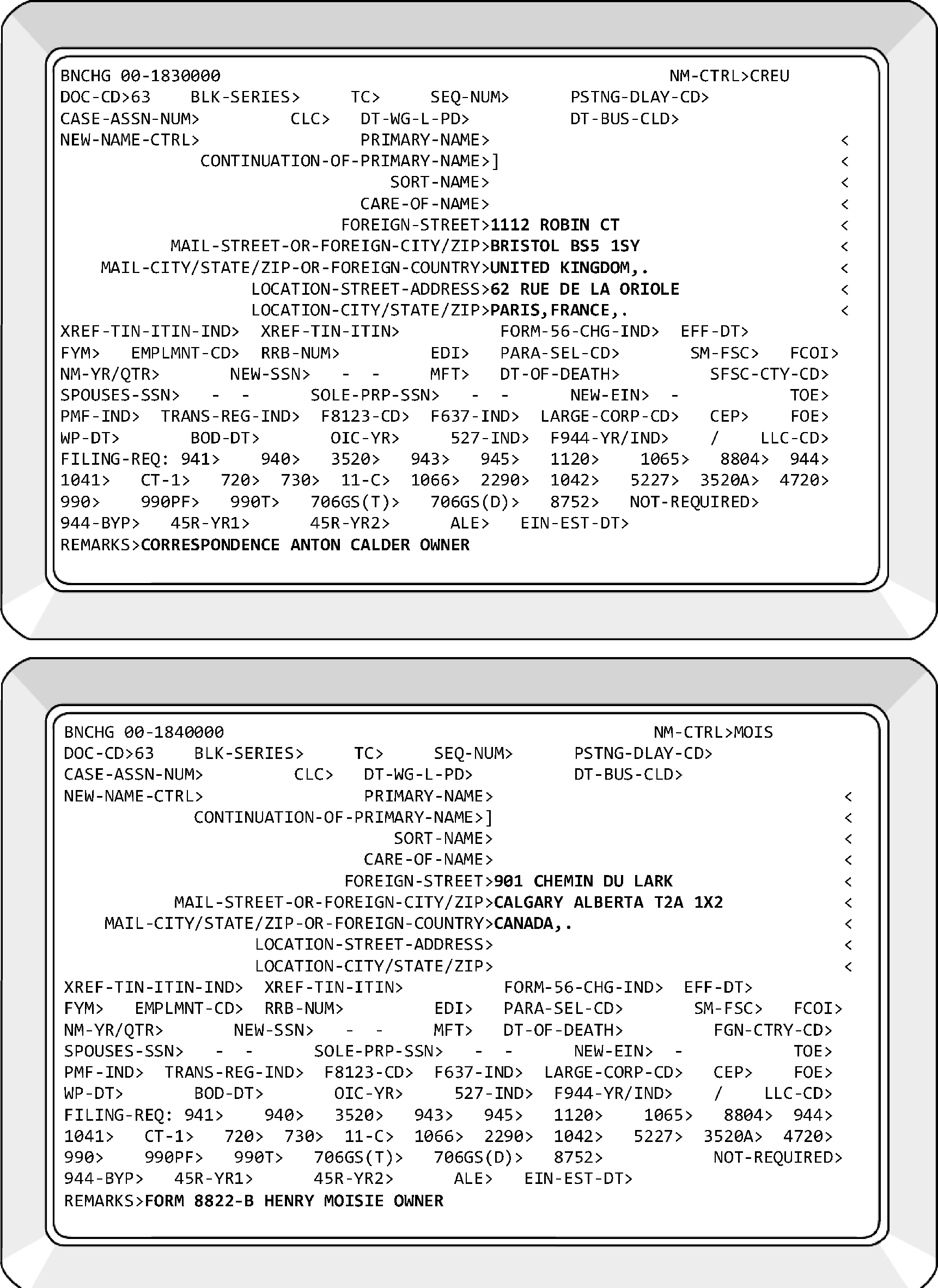
-
Correspondence indicating address changes could be directed to Entity for necessary action. The correspondence must be signed by the taxpayer or their authorized representative for us to update IRS records. However, if the correspondence involves an adjustment action, collection activity, or a TAS situation other than an entity issue, the address update will be acted upon by the function responding to the primary issue.
-
A taxpayer's mailing address will not be updated unless clear and concise notification of a different address is given to the IRS from the taxpayer or his representative, as outlined in Rev. Proc. 2010-16. The exception would be when resolving undeliverables.
-
The taxpayer's address will be updated from every return listed in Rev. Proc. 2010-16. Ensure the return is not a copy of a previously filed/posted return.
-
If a return has not yet received a DLN, it is not necessary to update Master File with the address on the return as Data Conversion Operation will pick up the address from the return.
-
If a Reject or numbered return has an address different from what is on Master File, input a TC 014 to update the taxpayer’s address.
-
If a return indicates a PO Box and a physical address, input the physical address as the location and the PO Box as the mailing address.
-
-
When an EIN has employment tax filing requirement codes (FRC) and an address change occurs, CP 148A generates to the taxpayer’s new address and CP 148B generates to the taxpayer’s previous address. If you determine the notices must not go to the taxpayer, suppress them by entering a "Z" in the PARA-SEL-CD> field.
-
The National Change of Address (NCOA) program links with the United States Postal Service (USPS) change of address requests received from postal customers. The NCOA run updates Master File with the address provided by the postal customer/taxpayer. The DLNs from these changes will be:
-
BMF XX963-995-77766-Y
-
IMF XX263-995-99999-Y
-
-
Never change the address if the acronym FDIC (Federal Deposit Insurance Corporation) is in any of the name lines. If no other action is needed, indicate "No Action" on document being processed.
-
Signatures on Form 8822/Form 8822-B and requests for address changes will be accepted prima facie. See IRM 3.13.2.2(10), BMF Entity - General. If there is no contradicting evidence to dispute the authority of that person, the signature must be accepted. This policy applies to signatures accompanied by titles such as owner, president, etc. This authority does not apply to third party requests. A Form 2848 is required for a third party not listed on CC CFINK.
-
Beginning October 2017, Forms 8822 and Forms 8822-B that have been processed will no longer be destroyed as classified waste by the control team. These documents have a defined retention period and will be stored in the Files Operation in an Alpha File. Each form must be name controlled and contain an audit trail in the lower left margin of the document. Entity Clerical Team will forward all processed forms to Files Operation on a Form 3210 indicating "Alpha File." If no action was taken on Form 8822/Form 8822-B, the document can be destroyed as classified waste in the clerical team.
-
Use the following table to process an address change:
If... Then... A) The documentation is for an address change only (including Form 8822/Form 8822-B), Enter the entire taxpayer address into CC BNCHG. A TC 014 will generate from the input. Form 8822 and Form 8822-B will be retained in the Files Operation in an Alpha File. All other documentation will be X'd out and destroyed by the Entity Control Team. B) A domestic street address is input, The mailing city, state and ZIP must be input. C) A foreign street address is input, The foreign city and foreign country must be input in the mailing street address and mailing city, state and ZIP lines. D) A foreign postal code is present, and space allows, It must be input. E) A foreign city or postal code is input, The foreign street address must be input. F) A domestic mailing city, state and ZIP or major city code and ZIP code are input, The mailing street address must also be input. G) A major city code is input, A mailing ZIP code must be input. H) It is determined that the correspondence has been initiated by a third party, Research the CAF using CC CFINK. If the representative is on CC CFINK for any MFT, proceed with the address change. I) A proper authorization is not found, Send Letter 104C (or Letter 6800sce) to the taxpayer's address on Master File requesting a completed Form 8822-B. J) A proper authorization is found, Update the address as requested. K) The address change is for an IMF (SSN) account, If the MFR is 08, do not make any changes as they will unpost. When making an IMF change, enter 8 in the Blocking Series field of CC INCHG unless using AMS. This denotes that Entity made the change. Do not transship IMF address changes. Note:
Do not update the address if an address change has posted after the Form 8822-B or correspondence received date. Use CC ENMOD to verify cycle date. If the Form 8822-B or correspondence is received in the same cycle that an address change has posted then update the address to the address on the Form 8822-B or correspondence.
-
General requirements for making address changes on all Entity programs:
If... Then... A) We receive a letter signed by the taxpayer or an authorized representative, and the taxpayer's full name, correct EIN, previous address and new address are present, Make the address change. B) A numbered return has a different address than what is on MF and the address change box is checked, Make the address change. C) Any of the required information is missing from the taxpayer's request for a change of address, Do not change the address. Correspond with the taxpayer via Letter 104C (or Letter 6800sce) at the address on Master File and advise the taxpayer of the information needed. D) Correspondence, notices, or C letters sent by the IRS that solicits or requires a response from the taxpayer is returned to the IRS by the taxpayer with corrections marked on the taxpayer's address information, the correspondence will constitute clear and concise written notification of a change of address. The taxpayer's signature is not required on the correspondence, notice, or C letter, Make the address change. E) The address has a typographical error, misspelling, or contains additional information (suite number, apartment number, etc.), Make the address change. F) The taxpayer requests a temporary address change, -
DO NOT complete a temporary address change request. The IRS must retain the permanent address as the Last Known Address (LKA) whenever possible.
-
Correspond with the taxpayer to inform them their temporary address change will not be completed. Use the fill-in paragraph in the Letter 104C.
-
Use the following language for the fill-in paragraph. "We received your request for an address change but didn’t process it because you indicated this is a temporary address change. Please submit a Form 8822-B when you require a permanent address change. "
-
-
If a taxpayer requests an address change during telephone contact regarding an Entity issue, you can accept oral authority for the address change. Follow the Oral Statement Documentation requirements in IRM 21.1.3.20, Oral Statement Authority. Rev. Proc. 2010–16 allows address changes over the phone effective June 1, 2010. It is no longer required that the taxpayer have "an open issue" to request an address change over the telephone. The caller must be authorized to request the address change. Put the name, title, and phone number of the caller in the Remarks field of the transaction.
-
If communication is received from a third party (CPA, agent, payroll service provider, etc.) indicating the taxpayer is no longer a client and their address must be removed from the account, take the following actions:
If... And... Then... A) Third party supplies a new address, Third party has been authorized by the taxpayer, Update Master File with the address provided. B) Third Party does not supply a new address, A new address cannot be found, Input TC 593-82 on all open FRCs or MFT that was filed by the third party. C) Third party does not supply a new address, The LKA cannot be found, Input TC 593-82 on all open FRCs or MFT that was filed by the third party. D) Third party does not supply a new address, The LKA is found and is accurate, Send Letter 104C (or 6800sce) to the taxpayer at their LKA requesting completion of Form 8822-B. -
All transactions containing an address change will have the requester's name, title, and phone number if present in the Remarks field of the transaction. If the name is illegible, enter "SIGNATURE ILLEGIBLE" in Remarks field of transaction.
-
Form 8822, Change of Address, is filed by Individual Master File (IMF) and Estate and Gift (E&G) taxpayers to furnish written notification of a change of address to the IRS.
-
When Form 8822 is received with an Entity case or as a stand-alone document, the change of address will be entered with any other required data.
-
Before updating an address, the Taxpayer Identification Number (TIN) entered on Form 8822 will be verified as the only TIN assigned to taxpayer.
-
If Part I of Form 8822 is complete and received in a Business Master File (BMF) site, it will be processed. See IRM 3.13.5.52, Form 8822, IMF Change of Address Request. Process Form 8822 per chart below.
-
-
When an EIN has employment tax filing requirement codes (FRC) and an address change occurs, CP 148A generates to the taxpayer’s new address and CP 148B generates to the taxpayer’s previous address. If you determine the notices must not go to the taxpayer, suppress them by entering a "Z" in the PARA-SEL-CD> field.
-
The Remarks field of the transaction updating the taxpayer's address will contain the name, title, and phone number from the signature line of Form 8822. If the signature is illegible, enter "SIGNATURE ILLEGIBLE" in Remarks field of transaction.
If... And... Then... A) Form 8822 clearly indicates a primary name change (Formerly Known As (FKA), previous name, etc.), The Form 8822 is signed by authorized individual, Change the name and send Letter 147C as confirmation. B) Form 8822 clearly indicates a primary name change (FKA, previous name, etc.), The Form 8822 does not have an authorized signature, Correspond for verification with a Letter 252C. C) Unable to determine if the taxpayer is changing their name, Unable to determine after researching Secretary of State’s office, Do not update the taxpayer's name. Send the Letter 252C instructing the taxpayer to verify the name change, after updating address. D) Any required information is missing, Return Form 8822 to the taxpayer with Letter 104C or Letter 6800sce. Send the letter to the taxpayer's address on Master File. Instruct the taxpayer to complete Form 8822 and return to us. E) The taxpayer is affected by a federally declared disaster area, Change the address(s) via telephone call or any other way the taxpayer informs us to change the address. F) The taxpayer checks Box 2 in Part 1, indicating that gift, estate, or generation-skipping transfer tax will be filed (Form 706, Form 709, etc.), The BMF SSN (SSN'V') is not established on the Master File, Input a TC 000 to establish the account. IRM 3.13.2.8.13, Processing Form 706 and Form 709 series. G) The taxpayer checks Box 2 in Part 1, indicating that gift, estate, or generation-skipping transfer tax will be filed (Form 706, Form 709, etc.), The SSN'V' is already established on the Master File, Update the address(es) as required. When updating the address on an SSN'V'/'W', the MFT> field of CC BNCHG must be completed: 51 for Form 709, 52 for Form 706. If the change is for a Form 709 account, the field NM-YR/QTR> must also be completed in YYYY format. If the change is for a Form 706 account, the field DT-OF-DEATH> must also be completed. H) The EIN on Form 8822 is not on the Master File, IDRS research shows the EIN was assigned to the taxpayer reflected on Form 8822, Input TC 000 with no FRCs. I) The EIN on Form 8822 is not on the Master File, IDRS research shows no record of the EIN being assigned, Send the taxpayer a Letter 104C without an EIN asking for a copy of the notice assigning the EIN. When received, TC 000 the EIN with no FRCs.
-
Form 8822-B will continue to be used for address change requests from Business Master File (BMF), Exempt Organization (EO), and Employee Plan (EP) taxpayers.
-
Treas. Reg. 301.6109-1(d)(2)(ii) requires taxpayers who were issued an Employer Identification Number (EIN) after applying for one using a Form SS-4 to provide any updated application information, which presumably includes "responsible party" information. Form 8822-B was revised to include this function.
-
Ensure the EIN on the form is the only EIN assigned to the taxpayer. Take necessary actions to consolidate if more than one EIN is located. See IRM 3.13.2.14, Multiple EINs.
-
Taxpayers using BMF SSNs (filers of Form 706 and Form 709 series) will use Form 8822 to request an address change, as will IMF taxpayers.
-
Every field of Form 8822-B must be completed before it is considered processable. However, a location address is not required of every taxpayer:
-
Items 1-7 and Item 10 for Change of Address, or
-
Item(s) 4 and 8-10 for Change of Responsible Party.
If any items are missing and cannot be found through research, return Form 8822-B to the taxpayer at the address on Master File. -
-
Ensure the person signing Form 8822-B is authorized to represent the entity shown in Item 4a. See IRM 3.13.2.3, Entity Types - Name Controls, Filing Requirement Codes (FRCs), and Authorized Representatives, for definitions of an authorized representative.
-
An individual TIN (SSN or ITIN) must be provided for the responsible party. Business entities can no longer be considered the responsible party of a business entity (other than a government entity). A TIN is not required if the responsible party does not have and is ineligible to obtain an SSN or ITIN.
-
Signatures on Form 8822/Form 8822-B and requests for address changes will be accepted prima facie. See IRM 3.13.2.2(10), BMF Entity - General. If there is no contradicting evidence to dispute the authority of that person, the signature must be accepted. This policy applies to signatures accompanied by titles such as owner, president, etc. This authority does not apply to third party requests. A Form 2848 is required for a third party not listed on CC CFINK.
-
The Remarks field of the transaction updating the taxpayer's address will contain the name, title, and phone number if available from the signature line of Form 8822-B.
-
Processed Forms 8822-B will be stored in the Files Operation in an "Alpha File." Ensure each document has been name controlled and contains an audit trail in the lower left margin of the document.
-
Before updating any field of the Entity module, research CC ENMOD to determine if an IDT indicator is present, see IRM 25.23.9.6, BMF Identity Theft Tracking Indicators, for description of BMF IDT indicators. If so, refer the address change request to Image Control Team (ICT):
-
Cincinnati - Stop 318A
-
Kansas City - Stop 6525 Bldg. C-1
-
Ogden - Stop 6552 ARKA
Ensure the routing slip clearly states which IDT indicator is present. -
-
The Remarks field of the transaction updating the taxpayer's address will contain the name, title, and phone number if available from the signature line of Form 8822-B. If the signature is illegible, enter "SIGNATURE ILLEGIBLE" in Remarks field of transaction.
-
Process the Form 8822-B as follows:
If... And... Then... A) Form 8822-B clearly indicates a primary name change (FKA, previous name, etc.), The Form 8822-B is signed by authorized individual, Research the Secretary of State websites to verify the change. See Exhibit 3.13.2-8. If verified, change the name and send Letter 147C as confirmation. B) Form 8822-B clearly indicates a primary name change (FKA, previous name, etc.), Unable to verify after researching Secretary of State website, Correspond for verification with a Letter 252C. C) Unable to determine if the taxpayer is changing their name, Unable to verify after researching Secretary of State website, Do not update the taxpayer's name. Update the address as needed. Send the Letter 252C after updating address instructing the taxpayer to verify the name change. D) Any required information is missing, Information cannot be found through research, Return Form 8822-B to the taxpayer with Letter 104C/6800sce. Send the letter to the taxpayer's address on Master File. Instruct the taxpayer to complete Form 8822-B and return to us. E) You are speaking with the taxpayer by telephone discussing any issue, The taxpayer requests an address change, Change the address(s), entering the taxpayer's name, title, and phone number in the Remarks field of CC BNCHG. F) The EIN on Form 8822-B is not on the Master File, IDRS research shows the EIN was assigned to the taxpayer reflected on Form 8822-B, Input TC 000 with appropriate FRCs. For example, INC = 1120, LLC = 1065. G) The EIN on Form 8822-B is not on the Master File, IDRS research shows no record of this, or any other EIN being assigned, Send the taxpayer a Letter 104C/6800sce without an EIN asking for a copy of the notice assigning the EIN. Advise to apply for new EIN if unable to provide a notice. If response is received, TC 000 the EIN with appropriate FRCs and the "new" address. H) The EIN on Form 8822-B does not match Master File, EIN cannot be found through research, Circle out the incorrect EIN and return Form 8822-B to the new mailing address on Form 8822-B requesting a valid EIN. -
When an EIN has employment tax filing requirement codes (FRC) and an address change occurs, CP 148A generates to the taxpayer’s new address and CP 148B generates to the taxpayer’s previous address. If you determine the notices must not go to the taxpayer, suppress them by entering a "Z" in the PARA-SEL-CD> field.
-
If an acknowledgement letter is requested, send if taxpayer does not have Employment Tax FRCs. CPs 148A/B will generate if the EIN has Employment Tax FRCs.
-
If box 2 labeled Employee plan returns is marked, update the address on the P tape. BMF input rules apply.
-
Paper processed Forms 8822-B will be stored in the Files Operation in an Alpha File. Ensure each document has been name controlled and contains an audit trail in the lower left margin of the document.
-
This part of the form is used to update the XREF-TIN-ITIN-IND, XREF-TIN-ITIN, SORT-NAME, and/or CARE-OF-NAME fields on CC BNCHG. No other fields will be updated unless indicated on Form 8822-B.
-
Always verify that the TIN provided belongs to the name provided. BMF taxpayers must list an individual (SSN or ITIN only) as the Responsible Party (RP).
-
Beginning May 13, 2019, the Responsible Party listed on the Form 8822-B can no longer be an individual or entity with an EIN. If Form 8822-B is received listing an individual or entity with an EIN as the new RP, return the document to the taxpayer with the following language: A responsible party is the person who owns or controls the entity, who exercises ultimate effective control over, or entitlement to, the funds or assets in the entity that, as a practical matter, enables the person, directly or indirectly, to control, manage, or direct the entity and the disposition of its funds and assets. Unless the applicant is a government entity, the responsible party must be an individual (a natural person) with an SSN or ITIN, not an entity.
Exception:
≡ ≡ ≡ ≡ ≡ ≡ ≡ ≡ ≡ ≡ ≡ ≡ ≡ ≡ ≡ ≡ ≡ ≡ ≡ ≡ ≡ ≡ ≡ ≡ ≡ ≡ ≡ ≡ ≡ ≡ ≡ ≡ ≡ ≡ ≡ ≡ ≡ ≡ ≡ ≡ ≡ ≡ ≡ ≡ ≡ ≡ ≡ ≡ ≡ ≡ ≡ ≡ ≡ ≡ ≡ ≡ ≡ ≡ ≡ ≡ ≡ ≡ ≡ ≡ ≡ ≡ ≡ ≡ ≡ ≡ ≡ ≡ ≡ ≡ ≡ ≡ ≡ ≡ ≡ ≡ ≡ ≡ ≡ ≡ ≡ ≡ ≡ ≡ ≡ ≡ ≡ ≡ ≡ ≡ ≡ ≡ ≡ ≡ ≡ ≡ ≡ ≡ ≡ ≡ ≡ ≡ ≡ ≡ ≡ ≡
Caution:
For SMLLC changes, the Form 8822-B must be signed be the single member listed on IDRS. If signed by the new Responsible Party, reject to taxpayer for corrected signature. Articles of organization showing the new owner are acceptable to validate the new responsible party.
Note:
The Responsible Party must not be changed on a Sole Proprietor account. If a Sole Proprietorship has an existing EIN, a new EIN is required for the new Responsible Party.
EXAMPLE: If an existing Sole Proprietor business is inherited, a new EIN must be assigned to the business once it has a new owner. -
Beginning in 2023, taxpayers can submit a PDF Form 8822-B with their electronically filed tax return through MeF to change the Responsible Party information on their account. Tax Examiners will access EUP to review Form 8822-B for changes. When updating the account for these cases, include MeF 8822-B in the remarks.
-
The Remarks field of the transaction updating the taxpayer's change of responsible party will contain the name, title, and phone number if available from the signature line of Form 8822-B. If the signature is illegible, enter "SIGNATURE ILLEGIBLE" in Remarks field of transaction.
-
We maintain the XREF-TIN-ITIN field for the following types of entities:
-
Corporations (for-profit only);
-
Partnerships;
-
LLCs;
-
Business trusts;
-
Trusts (Grantor's TIN); and
-
Estates (Decedent's SSN).
For instructions on updating the XREF-TIN-ITIN field, see IRM 3.13.2.10.20, Updating “XREF-TIN-ITIN” Field - Responsible Party. -
-
To update the XREF-TIN-ITIN-IND and XREF-TIN-ITIN fields, enter the appropriate indicator in the XREF-TIN-ITIN-IND field:
-
0 (zero) if TIN is an SSN or ITIN.
-
Previously used 2 if TIN is an EIN, and 3 if the TIN is a parent’s EIN.
Enter the new TIN without hyphens in the XREF-TIN-ITIN, add appropriate comment in the Remarks field and XMIT. -
-
Process the change of responsible party section of Form 8822-B as follows utilizing thorough research of IDRS:
If... And... Then... A) T/P is EO (verified by the Business Operating Division (BOD) code TE on INOLE) or a church, Send to OSPC for EO processing. See IRM 3.13.2.2(29), BMF Entity - General. B) T/P is an Estate, and an SSN is being provided as "new" and it does not belong to the decedent, The decedent's SSN is on the Estate EIN as XREF, Take no further action. C) T/P is an Estate, and an SSN is being provided as "new" and it does not belong to the decedent, The decedent's SSN is not on the Estate EIN, Research IDRS to locate decedent's SSN. Update Estate EIN with decedent's SSN and XREF-TIN-ITIN-IND to "0" (zero). D) T/P is a Grantor Trust, and an SSN is being provided as "new" and it does not belong to the grantor, The grantor's SSN is already on the Trust EIN, Take no further action. E) T/P is a Grantor Trust, and an SSN is being provided as "new" and it does not belong to the grantor, The grantor's SSN is not on the Trust EIN, Research IDRS to locate grantor's TIN. Update Trust EIN with grantor's SSN and XREF-TIN-ITIN-IND to "0" (zero). F) There is a Care Of Name on Master File, The Care Of Name on Master File does not match the new Responsible Party, Take no action unless the new third party has indicated such on Form 8822-B. G) There is a Care Of Name on Master File, The Care of Name on Master File matches the previous Responsible Party, Enter the name of the new Responsible Party in the Care Of Name field. -
Send Letter 147C to taxpayer at the address on Master File, In Care of (%) the new Responsible Party, notifying them we have updated our records. Send Letter 147C without an EIN to the previous Responsible Party telling them their name has been removed from the account unless the previous Responsible Party is deceased. If you do not have a new address for the previous Responsible Party or they are deceased, send the letter to the address of record of the requesting EIN advising the removal of the previous Responsible Party. Correspondence must never be sent to a deceased taxpayer.
-
Paper processed Forms 8822-B will be stored in the Files Operation in an Alpha File. Ensure each document has been name controlled and contains an audit trail in the lower left margin of the document.
-
Beginning in 2015, any address change made on an EIN reflecting open Employment Tax FRCs (Form 94X series) generates two notices to the taxpayer:
-
CP 148A: Confirmation of address change mailed to the taxpayer’s new address.
-
CP 148B: Confirmation of address change mailed to the taxpayer’s previous address.
-
-
This notice was created to protect employers/payers/taxpayers from abusive third-party payroll providers/Professional Employer Organizations (PEOs).
-
Undeliverable CPs 148A/148B will be destroyed as classified waste in Receipt and Control Operation (RCO). If received in Entity, prepare for destruction as classified waste.
-
Rev. Proc. 2010-16 requires IRS to update the taxpayer's address of record from every return type listed in Rev. Proc. 2010-16 that is filed with an address that is different than the address currently on file. Therefore, it is possible one taxpayer could experience multiple "address changes" a year.
-
You will need to know the reason an address change occurred to process taxpayer replies to CPs 148.
-
Locate the ADDR-CHG-CYC field on CC ENMOD/BMFOL'E.' The field is Item 33 on the ENMOD CC Job Aid. It is Item 26 on the BMFOL'E' CC Job Aid.
-
When a TC 150 is shown in the Entity module (CC ENMOD/BMFOL'E'), the taxpayer's name and/or address was changed from the return represented by the DLN of the TC 150. Compare the cycle of the TC 150 with the ADDR-CHG-CYC.
If they match, the address was changed from that return. Use CCs BMFOL'I' and BMFOL'T' to identify the tax period and type of return.
If they do not match, the address was not changed from the return. -
Research CC ENMOD/BMFOL'E' for an Entity TC (013, 014). Compare the cycle of the TC with the ADDR-CHG-CYC to determine if the TC updated the taxpayer's address. Keep in mind, the change could have been input by any area of the IRS, including Customer Service Representatives in AM.
-
-
If you are making an address change and determine the CP 148A or 148B notices must not go to the taxpayer, suppress them by entering a "Z" in the PARA-SEL-CD> field.
-
BMF Entity will process the taxpayer responses as shown below:
If... And... Then... A) Taxpayer returns one or both notices, Agrees with the change and makes no other requests, Take no further action. Prepare for destruction as classified waste per local procedures. B) Taxpayer returns one or both notices, Does not agree with the change, Update address as indicated by taxpayer. Ensure Remarks field of CC BNCHG contains the name and title (and phone number if available) of the submitter. A new set of CPs 148 will generate. C) Taxpayer returns one or both notices, Asks the source of address change, Research CCs ENMOD, BMFOL'E', BMFOL'I' and BMFOL'T' to determine the origin of the address change. Send Letter 104C appropriately explaining the source of the change. D) Taxpayer returns one or both notices, Disagrees with address change and alleges it was triggered by fraud, ID Theft, or other nefarious motives, Use CCs ENMOD, BMFOL ‘E’, ‘I’, and ‘T’ and CC TRDBV to research EIN for source of address change. The Employee User Portal (EUP) must also be researched if the return was filed electronically. If address change was triggered by fraud, ID Theft, or other nefarious motives, scan case and e-mail to SP P & A Entity analyst for review. Send interim letter to taxpayer. E) Unauthorized third party returns one or both notices, Requests invalid address change, Take no action, scan case and e-mail to SP P & A Entity analyst. Courtesy copy(cc) your manager. -
Once processed and reviewed, destroy CP 148A and CP 148B as classified waste.
-
Undelivered notices will be returned to Entity for research and correction of entity data. If received in Entity, CPs 575 will be routed to Cincinnati Accounts Management Center, EIN Function.
-
Undels (Undelivered Mail) generated from BMF Entity will be the top priority when processing undelivered mail.
-
Undeliverable mail can have a United States Postal Service (USPS) sticker showing the taxpayer's new address. Research to ensure the address on the USPS sticker isn’t already posted/pending. If not posted/pending, input new address to account. If the sticker has a new address, send Letter 2475C/6800sce to the taxpayer's new address enclosing undeliverable CP/Correspondence letter.
-
If the USPS sticker does not contain a new address and a better address cannot be found, destroy the undeliverable in the control team as classified waste.
-
Research CCs BMFOL'E', ENMOD, FINDE/FINDS, INOLE, IRPTR, NAMEE, NAMEI and the EUP for a better address for the taxpayer. In most cases the address on CC INOLE will be the same as the notice. The Secretary of State web sites could provide a better address. See Exhibit 3.13.2-8.
-
CC INOLE can give you alternatives to locating the taxpayer such as:
-
BMF sole proprietor—the IMF account for this taxpayer could contain a different address.
-
Any BMF account can be checked with CC INOLE 'P' to show an address from the EPMF and vice versa.
-
Research for another address under the XREF TIN. If address is found, re-mail notice and envelope using Letter 6800sce or Letter 2475C in care of the individual found from the XREF TIN. If Letter 6800sce is used, Input history item on CC ENMOD that says:
6800SCE
4UNDEL -
Follow the steps below for processing:
If... And... Then... A) Interim letter (2645C, 2644C, etc.) is received as undeliverable, Account issue has been resolved, Prepare undeliverable letter for destruction as classified waste per local procedures. B) A new address cannot be found via IDRS, All XREF TINs have been researched without finding a better address, Contact the taxpayer via telephone. C) Taxpayer can be reached via telephone, Taxpayer supplies you with better address, Update the address per T/P instruction include T/P name and title and phone in remarks. Mail the notice/correspondence and envelope to the new address using 2475C or 6800sce. D) Unable to locate a better address, Unable to reach taxpayer via telephone, Input TCs 593 Action Code (AC) 082 on the current tax period for all active FRCs. Input TC 971 AC 661 on all open modules which will generate the Undeliverable (UD) indicator. Prepare notice/correspondence for destruction as classified waste per local procedures. E) There is indication the taxpayer is deceased, There are no active FRCs on the EIN, Input TC 971 Action Code 661 on all MFTs that reflect posted returns. Use the tax period containing the date of death. TC 971 AC 661 generates the Undeliverable (UD) indicator. Prepare undeliverable for destruction as classified waste per local procedures. F) There is indication the taxpayer is deceased, There are active FRCs on the EIN, -
Research IDRS for an ESTATE EIN.
-
If found, update the taxpayer's address to match the address on the estate EIN.
-
If unable to locate an estate EIN, input TC 593-082 on all open FRCs. Input TC 971 Action Code 661 on all open FRCs which will generate the Undeliverable (UD) indicator on all open modules. Prepare undeliverable for destruction as classified waste per local procedures.
G) Taxpayer states mail is not theirs, Unable to locate valid address for taxpayer on EIN, Input TC 593-082 on all open FRCs. Input TC 971 Action Code 661 on all open FRCs which will generate the Undeliverable (UD) indicator on all open modules. Prepare undeliverable for destruction as classified waste per local procedures. H) CP 148B is undeliverable, Prepare for destruction as classified waste. -
-
-
Undelivered CPs 26X notices (Notices of Form 2553 - Election by a Small Business Corporation) will be returned to Entity for research and correction of entity data. You could ESTAB Form 2553 to secure a shareholder's address. However, undeliverable CPs 26X generated from ICO/Entity Unpostables will be returned to them for resolution.
-
It is acceptable to re-mail a notice to another address.
-
If a Letter 2475C/6800sce is undeliverable with taxpayer information attached and address has been recently updated on Master File since the previous letter was sent, re-send the Letter 2475C/6800sce to the correct address.
-
If an undeliverable is received and it was undeliverable previously, prepare for destruction as classified waste per local procedures. Ensure a TC 593 AC 082 is on all open FRCs.
-
If unable to locate a better address, input TC 971 AC 661 on any open tax module to generate the UD indicator.
-
Once a UD indicator is on an account, the next address change will remove the UD indicator. The address change can be input manually or systemically generated.
-
Undeliverable correspondence initiated by Entity will be returned to Entity for research and correction of entity data. CCs ENMOD, BMFOL, INOLE, IRPTR, FINDE/FINDS can be utilized to locate a different address. Use the following procedures:
If... Then... A) A different address is found, Re-mail the correspondence and envelope to the new address using the Letter 6800sce or Letter 2475C without updating the address on Master File. If Letter 6800sce is utilized, input history item on CC ENMOD that says:
6800SCE
4UNDEL
If an undeliverable is received and it was undeliverable previously, prepare for destruction as classified waste per local procedures. Ensure a TC 593-082 is on all open FRCs.B) A new address cannot be found, Input TC 593 CC 082 on the current tax period for all active FRCs. Input TC 971 Action Code 661 to generate Undeliverable (UD) indicator on all open modules. Prepare for destruction as classified waste per local procedures.
-
The Print Sites are identifying notices and letters that cannot be delivered by the United States Postal Service (USPS) standards. FINALIST was unable to correct the addresses on these accounts. The issues making the address "bad" are varied. For example:
-
The building number could not be valid for that street name,
-
The zip code could be incorrect or missing, or
-
The street name does not exist within specific ZIP code, etc.
-
-
Accounts with a campus address as the mailing address are also pulled for correction.
-
Office Function Program (OFP) 390–00800 will be used when processing this work.
-
See IRM 3.13.2.5(6)(d), Undeliverable Mail and Notices, for processing instructions.
-
BMF Employment Codes (ECs) identify employers who are other than normal business employers.
-
The BMF Employment Codes (ECs) are A, C, F, G, I, M, Q, S, T, and W.
-
The primary programs processed by Entity TEs involving ECs are Form 941 and Form 940.
-
Entity TEs are responsible for ensuring ECs are correct and the taxpayer is filing the correct return(s).
-
BMF Entity is not able to add or change ECs A, F, G, Q, or T. If an entity needs action on one of these ECs, send a request to the Federal, State, Local/Employment Tax (FSL/ET) Section 218 Coordinator via EEFax (855) 753-4238. Ensure the e-mail is encrypted.
-
The ECs are applicable to certain Form 941, Form 943, and Form 944 filers. See table below for EC definitions:
EC Entity Type A A government agency acting as an employer's fiscal agent under IRC 3504. C Church or Church -controlled Organization filing Form 8274 (not subject to FICA or FUTA). F Federal Employer G State or Local Government Agency I Indian Tribal Government M Maritime Industry Q Quasi-Governmental Entity S Foreign Subsidiary T State or Local Government Agency covered under a Section 218 Agreement. W IRC 501(c)(3) of the IRC Non-profit Organization (not subject to FUTA). Z Federal Credit Union - Liable for Form 940. -
The input of a "9" in the EMPLMNT-CD> field of CC BNCHG deletes any existing EC. However, the changing of ECs A, F, G, Q, and T has been limited to employees of TEGE/Federal, State, Local/Employment Tax (FSL/ET). If a change to an EC is needed, contact the FSL/ET Section 218 Coordinator via EEFax (855) 753-4238.
-
The Economic Opportunity Act (EOA) programs are carried out by state and local governmental entities or private non-profit organizations through grants or contracts with the Federal Government. When new entities are formed to carry out EOA projects they will be state or local government entities or non-profit organizations. Examples of EOA employers are as follows:
-
Anti-Poverty Programs,
-
Community Action Programs,
-
Head Start Programs,
-
Neighborhood Youth Corps,
-
Public Law 88–452,
-
Economic Opportunity Act, Office or Program,
-
Work Study or Work Training Program,
-
Youth Conservation Corps (YCC),
-
Job Corps, and
-
Volunteers in Service to America.
-
-
If a Form 940 FRC is present on an EIN with an Employment Code, input TC 016 to delete the FRC. If you're dealing with ECs A, F, G, Q, or T, contact the FSL/ET Section 218 Coordinator via EEFax (855) 753-4238. Research CC BMFOL'I' for MFT 10 modules. If any are present and unsatisfied for the period (and later periods) the entity became exempt from FUTA, input TCs 590-020.
-
This Employment Code can only be changed by FSL/ET employees. Contact the FSL/ET Section 218 Coordinator via EEFax (855) 753-4238.
-
This EC is given to government agencies acting as employer/payer's fiscal agents under IRC 3504. These agents could refer to themselves as:
-
Household Employer Agents,
-
Fiscal agents,
-
Employer agents, or
-
Fiscal intermediaries.
-
-
The employer/payers can be disabled individuals or other welfare recipients receiving home-care services through a state or local government program.
-
A fiscal agent can:
-
Represent many disabled individuals or other welfare recipients receiving home care services through a state or local program. These taxpayers can be referred to as "clients" by the agent.
-
Be a government entity or a non-governmental entity.
-
Already have an existing EIN that is used to file employment taxes for the agent's own employees.
-
Request a second EIN to be assigned to them for the specific purpose of acting as an agent for these employers under IRC 3504, if they are a government entity.
Note:
Non-governmental agents are not encouraged to obtain a second EIN to file employment taxes on behalf of these household employers. The Household Employer Agent files aggregate employment tax returns for all their own employees and for the employees of the household employers, including Form 940. However, if requested, non-governmental agents can also obtain a second EIN to file employment taxes on behalf of these household employers.
-
-
The words Fiscal Agent will be behind the name of the governmental entity acting as a fiscal agent. If missing, add "Fiscal Agent" behind the agent's name.
-
An entity with EC "A" will also have a Form 941 FRC 01.
-
This code is generated from a posted TC 070 on churches or qualified church-controlled organizations which have filed Form 8274, Certification by Churches and Qualified Church-Controlled Organizations Electing Exemption from Employer Social Security and Medicare Taxes.
-
Forms 8274 are processed exclusively at OSPC.
-
See IRM 3.13.12, Exempt Organization Account Numbers.
-
This code is assigned to agencies of the United States Government and can be changed by FSL/ET employees only. You can contact the FSL/ET Section 218 Coordinator via EEFax (855) 753-4238.
-
If a new EIN needs EC "F" , or if an entity changes and becomes eligible for EC "F" :
-
This EC can only be assigned with supervisory approval.
-
An entity with EC "F" , will also have a Form 941 FRC of "02" .
-
An entity will receive EC "F" whether the taxpayer currently has employees or not when processing Form SS-4, see IRM 21.7.13, Business Tax Returns and Non-Master File Accounts - Assigning Employer Identification Numbers (EINs).
-
-
The following agencies will have EC "F" :
-
Department of State,
-
Department of the Treasury,
-
Department of Defense,
-
Department of the Army,
-
Department of the Navy,
-
Department of the Air Force,
-
Department of Health and Human Services,
-
Department of Education,
-
Department of Energy,
-
Department of the Interior,
-
Department of Commerce,
-
Department of Labor,
-
Department of Transportation,
-
Department of Housing and Urban Development,
-
Department of Justice,
-
Department of Agriculture,
-
Department of Homeland Security,
-
Department of Veterans Affairs,
-
National Guard, and
-
An executive department of the government or a component agency.
-
-
An agency of the U.S. Government that is not part of any executive department or its components at the National Headquarters of the agency or in the field such as the following:
-
U.S. District Court,
-
U.S. Court of Appeals,
-
U.S. Tax Court,
-
General Services Administration,
-
Federal Trade Commission,
-
Government Accountability Office,
-
Office of Community Services,
-
U.S. Small Business Administration,
-
Library of Congress,
-
Smithsonian Institution,
-
Securities and Exchange Commission, and
-
National Aeronautics and Space Administration.
-
-
Corporation wholly or principally owned by the U.S. Government which has been created by law and which performs a governmental function such as the following:
-
Federal Deposit Insurance Corporation,
-
U.S. Postal Service,
-
Tennessee Valley Authority,
-
Federal Home Loan Bank (Not Individual Home Loan Banks), and
-
Federal Reserve Board (Not Individual Regional Federal Reserve Banks).
-
-
EC F can also be used for federal instrumentalities such as:
-
Army and Air Force Post Exchange,
-
Navy or Coast Guard Ship Stores, and
-
Army and Air Force Motion Picture Services and Navy counterpart.
-
-
Organizations that are closely connected to but are not an official part of the U.S. government establishment are entitled to EC "F" if they meet strict standards. These organizations conduct financial, social, morale or housekeeping activities such as the following:
-
Officer's Clubs,
-
Enlisted Men's Club,
-
Non-Commissioned Officer's (NCO) Clubs,
-
Officer's Open Messes,
-
NCO's Open Mess, and
-
Billeting Funds, etc.
-
-
Before assigning EC "F" to these organizations, a statement must be obtained from the Post, Camp, Station or Base Commander stating the following:
-
The activity exists to promote the morale, comfort and wellbeing of members of the Armed Forces, or authorized civilians.
-
The activity is supported by an authorized non-appropriated fund as prescribed by the applicable regulations of the Service concerned.
-
The activity is authorized by the Post, Camp, Station, Base or Major Command Commander, and is supervised by them.
-
That the above referenced commander's supervision includes the periodic audit of the activities financial records, or that such audit is regularly performed by a higher authority, as the appropriate service regulations prescribed.
-
-
Do not assign EC "F" to any of the following:
-
Any religious, fraternal or benevolent organization.
-
Any ethnic or tribal organization for example, Indian tribe, tribal council, etc.
-
Any private corporation or business entity that has in its name words such as U.S., United States, Federal or Government.
-
-
If the type of entity cannot be determined or if the entity is a questionable "F" Code filer, take the following actions:
-
Research the account as necessary.
-
Contact the organization to clarify its status.
-
If the organization is a true "F" Code filer, remove any erroneous filing requirements such as 1120, 1065, etc.
-
-
If the organization is not a true "F" Code, take the following actions:
-
Remove any erroneous filing requirements.
-
Remove the "F" Code.
-
Establish the entity with the correct filing requirements. Ensure that the organization does not have another EIN established for the same "F" Code entity.
-
If the "F" Code is removed forward the information to BMF AM/Adjustments to be assessed penalty and interest under the correct filing requirements.
-
-
Assign this code to all state and local government agencies. If a change needs to be made to the EC "G" , contact the FSL/ET Section 218 Coordinator via EEFax (855) 753-4238.
-
When assigning EC "G" , also assign a Form 941 filing requirement of 01, because these taxpayers are responsible for income tax withholding, even if they are not responsible for social security and Medicare taxes. However, if the taxpayer is from Guam or American Samoa, assign a filing requirement of 06.
-
If you cannot determine from Form SS–4 that the entity is an agency of a state or local government or it is a privately-owned organization, contact the entity to clarify the status prior to the assignment of EC "G" . If contact cannot be made using the telephone, input Letter 45C.
-
The following organizations will be assigned EC "G" :
-
A state or commonwealth,
-
An agency, bureau, or department of any such state or commonwealth,
-
A county,
-
An agency, bureau, board, or department of any such county,
-
A municipality, town, village, ownership or any like unit of local government, and
-
An agency of a local government, such as a school district, Board of Education, public school, sanitation district, transit authority, welfare department, housing authority, cemetery, district soil/water conservation, water district, community service district, health department, etc.
-
-
If a state or local government instrumentality requests and receives an exemption under IRC 501(c)(3), the EC remains a "G"
-
Assign EC "I" to Indian Tribal Governmental (ITG) entities. Chief Counsel ITG will determine if an entity requires an EC "I" . If so, verify that the BOD Code is TE. Update the Business Operation Date (BOD) Client Code to I. Add a Form 940 FR of either 3 (compliant) or 4 (non-compliant) at the time the EC "I" is added. Chief Counsel ITG will determine whether the tribe is compliant or non-compliant.
-
If an Indian Tribal Governmental entity also has a 501(c)(3) exemption, the EC must be "W" without a Form 940 filing requirement.
-
If Master File research indicates the Exempt Organization (EO) Status is 41, 70-72, treat the entity as if they are a "regular" ITG entity with a BOD Code of TE, EC of I, and a Form 940 FR of 3 or 4.
-
If the EO Status of 40 or 42, the BOD Code should be TE, but make no changes to the EC, BOD Client Code or filing requirements. If the EO Status has been in 40 for several years and the organization is continuing to file Forms 941 only and there is no "I" case on EDS, update the EO Status to 41 and treat as a "regular" ITG entity.
-
Assign this code to those Maritime Industry entities which have made payments for employment taxes not yet reported.
-
This situation arises when a shipping company estimates liabilities and makes payments currently; however, the actual liability is reported on a supplemental Form 941 filed at the termination of the voyage.
-
This EC is used for quasi-governmental entities that do not qualify for an EC "F" or "G." The Federal, State, Local/Employment Tax (FSL/ET) staff saw a need for an EC that would allow penalties and interest to accrue. The EC "Q" was created for this purpose.
-
This EC can only be assigned or altered by the Federal, State, Local/Employment Tax staff. If necessary, contact the FSL/ET Section 218 Coordinator via EEFax (855) 753-4238.
-
This code is assigned to a domestic business that has applied for another EIN to extend social security coverage to certain employees of its Foreign Affiliate(s) by filing Form 2032, Contract Coverage under Title II of the Social Security Act.
-
The filing of Form 2032 secures the election to withhold Social Security tax from the paychecks of American citizens working overseas.
-
See IRM 3.13.2.18, Form 2032, Contract Coverage under Title II of the Social Security Act, IRC 3121(I).
-
This code is to be assigned to state and local governmental agencies that have obtained social security coverage for employees under an agreement between the state and the Commissioner of the Social Security Administration. Under 42 USC Section 218, they are to pay social security tax directly to IRS. This EC can be altered by FSL/ET employees only. You can contact the FSL/ET Section 218 Coordinator via EEFax 753-4238.
-
This code will be input through CC BNCHG upon notification from Chief Counsel that a Section 218 Agreement has been entered by a state or local governmental agency.
-
Updating the EC from a "G" to a "T" :
If... Then... A) The account is for the same entity as indicated by SSA on the modification letter, Update the EC from "G" to "T" and update the Form 941 to FR 01. B) The account is not for the same entity as indicated by SSA, Research for a better EIN. C) No EIN can be found, Correspond with the taxpayer or state administrator. D) A filling requirement other than Form 941/Form 940 (for example, Form 1120, Form 1065) is present, Research the account. Taxpayer contact could be necessary. E) The taxpayer corresponds that he is not active, Do not remove EC "T" . Correspond with the taxpayer informing them that Form 941 will still be required once a year and they must check the seasonal/intermittent box.
-
This code is assigned to tax-exempt organizations of the type described in IRC 501(c)(3), IRC 501(e), IRC 501(f) and IRC 501(k).
-
These will be organizations operated exclusively for religious, charitable, scientific, literary, educational, or humane purposes, or for the purposes of testing for public safety, and indicates that the organization is not subject to Federal Unemployment Tax Act (FUTA).
-
The organization is accorded this exemption from FUTA tax until their application for exempt status is ruled on or it is determined that an application has not been submitted.
-
The Integrated Data Retrieval System (IDRS) is used to access and update taxpayer information. IDRS is to be accessed for official business only. Never access your own TIN, or the TIN of a friend, acquaintance, or family member. Unauthorized access is prohibited by law and can result in removal from the IRS.
-
This subsection lists many of the IDRS Command Codes (CCs) used by Entity TEs. This list is not all inclusive.
-
One of the key elements on IDRS Entity TEs must understand is the Filing Requirement Code (FRC).
-
The FRC is used to identify the type of return to be mailed to the taxpayer.
-
If the taxpayer has a FRC and does not file a return, the FRC is used to perform a delinquency check.
-
-
The FRCs are input with CC ESIGN, BNCHG or EOCHG or in some cases will be established when a return posts.
-
Whenever an account is established (TC 000) on the BMF it must have an entry in one of the filing requirement fields, including not required.
For example, a corporation will have an 1120 FRC and possibly FRCs for Form 940 and Form 941. A social club might not need any FRCs, therefore, you must enter a "1" in the Not Required field at the end of the FRCs on CC BNCHG. -
The validity checks for filing requirements on CC ESIGN are in IRM 3.13.2.7.2, CC ESIGN.
-
The validity checks for filing requirements on CC BNCHG are in IRM 3.13.2.7.3.2, CC ENREQ/BNCHG.
-
The validity checks for filing requirements on CC EOCHG are in IRM 3.13.12, Exempt Organization Account Numbers.
-
For a list of the MFT, Form, Type of Return, filing requirements, when to file and the Statutory date for all returns refer to Document 6209, IRS Processing Codes and Information.
-
While working assigned cases, SP employees could come across some accounts that are blocked on IDRS. These accounts can be identified by an IDRS security violation message: Unauthorized Access to This Account. Forward the case (Form 8822-B, Form 2553, etc.) to your manager. Managers will notify the local Planning & Analysis Staff who will scan the case and send encrypted information to the ≡ ≡ ≡ ≡ ≡ ≡ ≡ ≡ ≡ mailbox to request access to the account. Managers will retain the original case in a file awaiting access (can take up to five business days). Once notified access has been granted, the case can be processed following applicable procedures.
-
Research must be performed to determine if there is an EIN already assigned to a taxpayer before a new EIN is assigned. Be sure to research using the Entity "sort line format" and the Accounts Management Modernized Internet EIN (Mod IEIN) "enter as taxpayer did" format. See IRM 21.7.13, Business Tax Returns and Non-Master File Accounts - Assigning Employer Identification Numbers (EINs). Many consolidation cases have been created due to the taxpayer being on IDRS with two different name controls. Be very cautious so as not to create new work. You must research both ways: historical format used in Entity and Modernized Internet EIN "enter as taxpayer did" format.
-
There are several systems available in the campus for research as follows:
-
The Taxpayer Information File (TIF) CC ENMOD.
-
The BMF with CCs BMFOL/BRTVU/INOLE.
-
Tax Modules that are on IDRS with CC TXMOD.
-
Everything available on IDRS with CC SUMRY.
-
On-Line Entity and related CCs.
-
The Name Search Facility (NSF) CC NAMES, for SSN research, and NAMEE for EIN research, and NAMEB search for EINs for both primary and trade names.
-
The Name Search Facility (NSF) CC NAMEI to research individuals.
-
IDRS CC Job Aids on SERP.
-
IAT Name Search Tool
-
-
CC STATS is the first page of IDRS that appears when the user signs on to IDRS. STATS will reflect today's date and the availability of IDRS.
-
CC MESSG is used to report daily IDRS and miscellaneous information at each campus. CC MESSG can be accessed at a different site via Universal access.
-
Some of the specific items shown on CC MESSG include:
-
Availability of IDRS real-time and CCs, including problems experienced by CCs.
-
Correspondex status and updates.
-
Lockbox information.
-
Campus user support information.
-
-
The use of this CC enables IDRS users to identify and contact case control owners by researching the ten-digit IDRS number of the employee. The user will enter CC FIEMP, one blank space, then the ten-digit IDRS number of the case control owner.
-
CC FIEMP displays the following information:
-
Case control owners name.
-
Standard Employee Identification (SEID).
-
Employee's (or their manager's) telephone number
-
IDRS status of the employee (active or inactive).
-
-
If CC FIEMP does not show the telephone number, the user could use the case owner's name or SEID to search the Discovery Directory on the IRS intranet or Outlook E-mail system to obtain a valid telephone number.
-
CC FIEMP will only be used to research work related activities.
-
CCs NAMEE and NAMEB search for EINs for both primary name line and sort name line (trade names).
-
CCs NAMES and NAMEI search for SSNs for both the primary and the secondary filer.
-
These CCs access the national Name Search Facility (NSF) file at Enterprise Computing Center at Martinsburg and will search for phonetic and spelling similarities. Common abbreviations like Mr., Mrs., Jr., Irrv. Tr., M.D., Corp., and Inc. will not be used as search criteria. CC NAMES can search using last name"," first name or first initial or blank. Using a first name or an initial in addition to the last name is better than using the last name alone.
-
NAMES/NAMEE does not perform searches on partial last names or partial first names.
-
Search time for CCs NAMEE/NAMES and NAMEI/NAMEB is directly related to the quality of the input fields. The more specific the information entered, the shorter the search time.
-
If the CC NAMEB first initial is a plus (+), matching is done on all 15 characters of the last name instead of the first 10 characters.
-
NAMEB with the definer of X and a first initial of plus (+) will not use the additional last name characters (more than 10) as selection criteria.
-
The most efficient search is done when the name and Zip Code fields are entered. The Zip Code field must contain a valid 3 or 5-digit Zip Code or will be left blank. It must not contain all zeros. The more specific the information entered, the shorter the search time. For example, a Zip Code search is faster than a state search. The Zip Code has priority over the state and the city, neither of which will be used if the Zip Code has been entered. The address (or partial address), if entered, is then used to further refine the search results.
-
When a name is the only information entered, CCs NAMES/NAMEE will search default to a national search.
-
If ** is entered in the state code field, a national search is performed.
-
Do not query using blanks in the state and ZIP Code fields, because an error message will generate to say, "Campus search not available for this campus."
-
If "NO DATA FOR THIS NAME" is displayed, verify the input and try again after removing input fields in the following order street address, city name, and last 2 digits of Zip Code.
-
NAMES/NAMEE does not automatically reduce the search. NAMES/NAMEE will display taxpayer names in the sequence of their probability of matching the requested name, with the best matches being displayed first.
-
NAMEB and NAMEI do not use a formatted input screen like NAMES and NAMEE. Also, if NAMEB and NAMEI does not find an exact match, the search will default to the point of searching for matching name. See IRM 2.3.60, IDRS Terminal Responses - Command Codes NAMES, NAMEE, NAMEI, NAMEB, FINDS, FINDE, and TPIIP, for additional information.
-
CC NAMEE - You can enter up to 70 characters in the Name Line. You must enter the zip code when present. If the zip code is not present then enter the state. The state can be optional when entering the zip code. To narrow the search, a minimum of 5 characters to identify the street address will be entered.
-
The cycle format has been expanded to YYYYMMDD.
-
For examples of needed fields for these command codes, see the IDRS Command Code Job Aid on SERP.
-
This CC is used to provide a taxpayer's Entity account; BMF, IMF (Individual Master File), NMF (Non-Master File), IRAF (Individual Retirement Account File) and EPMF (Employee Plans Master File). This CC shows all the Entity data and transactions available on the Taxpayer Index File (TIF).
-
The use of CC ENMOD is required prior to accessing CCs ENREQ, BNCHG, and INCHG.
-
All Entity transactions post to CC ENMOD. Once CC ENMOD falls from the TIF, all Entity transactions are displayed on CC BMFOL'E'.
-
There are two indicators for IDRS that will be displayed on CC ENMOD or CC BMFOL'E.' The indicators are Undeliverable As Addressed "UAA" and Undelivered "UD" . UAA will generate from FINALIST when it's not able to expand or hygiene an address. UD is generated from the input of TC 971 Action Code 661 when mail is received back from USPS as undeliverable.
-
See IRM 2.3.15, IDRS Terminal Responses - Command Code ENMOD, for more information about CC ENMOD.
-
Always look for the Large Corporation Indicator (LCI). Do not take action on an EIN reflecting an LCI before contacting the specific representative for that Large Corporation. The LCI can be seen on ENMOD (directly under ENMOD). See IRM 21.7.1.4.11.4, Campus Contacts for Large Corp Cases. Please allow three days for a call back. If a call back has not been received within three days, contact the HQ AM Large Corporation analyst via email. Contact information can be found on SERP - Who/Where - Large Corporation Contacts
-
There are two new CCs to query the NSF database. When an EIN or SSN is entered, every name and address reported to that EIN will appear on your screen.
-
CC FINDE searches the NSF data base using the taxpayer’s EIN and requires either of the following definers:
-
D – Only BMF Domestic names and addresses are displayed.
-
I – Only BMF International names and addresses are displayed.
-
-
CC FINDS searches the NSF data base using the taxpayer’s SSN and requires either of the following definers:
-
D – Only IMF Domestic names and addresses are displayed.
-
I – Only IMF International names and addresses are displayed.
-
-
To search using CC FINDE/FINDS, input the appropriate CC plus the definer D or I and use the taxpayer’s EIN/SSN (without hyphens or dash).
Example
FINDED020278969, will display the domestic names and addresses for EIN 02-0278969.
The domestic or international addresses/names for the appropriate EIN will display in cycle/year order. The most current taxpayer information will display first and includes any subsequent names/addresses displaying in descending order. -
The cycle format has been updated to YYYYMMDD.
-
See IRM 2.3.60, Command Codes NAMES, NAMEE, NAMEI, NAMEB, FINDS, FINDE, and TPIIP for additional information.
-
Command Code INOLE is designed to display Master File entity data (including SSA name controls, Cross Reference information, and Merge Transactions) for a specific Taxpayer Identification Number (TIN) residing on the NAP. The request type (via command code definer) determines the kind of data desired by the requester. Requests are researched via the input TIN. If primary TIN is unknown, a request can be input with the spouse's TIN. There are five types of INOLE inquiries that can be requested.
-
Command Code INOLE input with the definer "G" — an unedited or edited TIN will be input. This command will be useful when the tin type is unknown. The returning screen will contain any name line information available for any account attributable to that number, regardless of file if edited TIN is input. This request type involves multiple database accesses and will only be used when necessary.
-
Command Code INOLE input with the definer "T" — an edited TIN (either SSN or EIN) and file source will be input. This command will be useful when research is desired on all accounts with the same SSN or EIN. Name line and street address information will be returned to the user for each matching account.
-
Command Code INOLE input with the definer "S" — an edited TIN and file source will be input. This request type will be most useful when the specific account is already known. Name lines (current and prior), street addresses, tax year, Social Security name controls, cross reference and other information specific to the type of account being requested will be returned to the user.
-
Command Code INOLE input with the definer "X" — an edited TIN and file source will be input. This request type will be most useful when researching TINs that have no Master File account. DM1 name controls, Cross reference and merge transaction information will be returned to the user. Information returned to the user will be specific to the file source input. On SSN requests, both tin types (valid and invalid) will be searched for data, regardless of file source input. If a file source of IMF valid is input, the resulting display will show data for both the valid and invalid accounts if such data exists.
-
Command Code INOLE input with the definer "P" — an edited EIN, file source (P), and EPMF Plan number. This request type will be used to display EPMF Plan information. The EPMF SPECIFIC SCREEN can display only five plan names. The screen display for the "P" definer can display up to ten plan names. The list of plan names displayed will begin with the plan number that is input, or the next highest number.
-
-
The Business Master file on-line, BMFOL system provides read-only access to accounts on the Business Master File in Martinsburg, WV. All entities, master file tax modules and the most recent seven years of retention data are in on-line status. See IRM 2.3.59, IDRS Terminal Responses - Command Codes BMFOL and BMFOR.
-
CC BMFOL with Definer "E" will show all Entity transactions posted to the Master File. This definer will also show:
- Parent's EIN,
- XREF TIN/ITIN (owner's TIN),
- Railroad Retirement Board Number,
- Wages Paid Date/Business Operational Date and Business Close Date/Wages Last Paid Date,
- Employment Codes, and
-Active FRCs. -
Definer "I" will show the modules that have been created on the EIN with an extension, return, or transaction code. The modules are listed in order of MFT. Entity will utilize several fields of the screen display.
- MFT,
-TXPD (Tax Period), and
- RET PST (Return Posted, Y=Yes, N=No). -
Definer "T" shows the specific tax module being viewed.
Input the command code as follows:
BMFOLTNN-NNNNNNN XXXXXXXX (X=MFT and Tax Period). -
Definer "R" shows the specifics of the return posted on the module. The input format is the same as Definer "T"
-
-
Always look for the Large Corporation Indicator (LCI) on Definer 'I' (fourth line of BMFOL'I') Do not take action on an EIN reflecting an LCI before contacting the specific representative for that Large Corporation. See IRM 21.7.1.4.11.4, Campus Contacts for Large Corp Cases. Please allow three days for a call back. If a call back has not been received within three days, contact the HQ AM Large Corporation analyst via email. Contact information can be found on SERP - Who/Where - Large Corporation Contacts
-
Command Code SUMRY will normally be used as a first contact with IDRS to determine if a tax module or Control Base exists in the TIF. The SUMRY display will show sufficient data to enable operators to close many cases and associate others in process without further research.
-
CC SUMRY is used to request for display, a summary of a taxpayer's account which includes all tax modules meeting IDRS selection criteria. The display shows entity data on lines 1 and 2. Tax Module Data, including tax period, various indicators, IDRS Status, Control Base information, Control DLN, IDRS Module Balance and Freeze Codes for a specific tax period begins on line 3 and ends on line 4. Other tax period data follows every two lines until all tax modules have been summarized.
-
Command Code TXMOD is used to request for display all tax module information for a specific tax period on the TIF. The display consists of Entity data, posted returns, posted transactions, pending transactions, and reject data if available on IDRS TIF. The display shows the latest control DLN of the return.
-
Command Code TXMOD stores the TIN, File Source, TIN Type, MFT, Tax Period, Case Control Indicator, Name Control and, for EPMF, Plan Number as required data elements for subsequent processing.
-
For TXMOD a command code definer is required. Definer "A" will display most tax module information present on the TIF.
-
For more information on CCs SUMRY and TXMOD, see IRM 2.3.11, IDRS Terminal Responses - Command Codes TXMOD and SUMRY.
-
Always look for the Large Corporation Indicator (LCI). Do not take action on an EIN reflecting an LCI before contacting the specific representative for that Large Corporation. See IRM 21.7.1.4.11.4, Campus Contacts for Large Corp Cases. The indicator can be found on:
Please allow three days for a call back. If a call back has not been received within three days, contact the HQ AM Large Corporation analyst via email. Contact information can be found on SERP - Who/Where - Large Corporation Contacts-
Third line of CC SUMRY.
-
Second line of CC TXMOD'A'.
-
-
These CCs will display return information for both BMF and IMF.
-
Command Code (CC) BRTVU is used to research edited, transcribed and computer-generated line items for BMF returns and related forms and schedules. This information will be accessed using CC BRTVU with a taxpayer TIN, a two-digit Master File Transaction (MFT) Code and Tax Period.
-
See the IDRS Command Code Job Aids on SERP for additional information on CC BRTVU and CC RTVUE.
-
Use CC ESTAB to request documents from Files.
-
When requesting documents with CC ESTAB the DLN must be known.
-
A Form 4251, Return Charge-Out, will be generated to Files for the document.
-
Files will pull the document and route it to the requester.
-
-
When requesting documents with CC ESTAB the file and type of information needed must be input.
-
Be sure to use Form 2275, Records Request, Charge and Recharge, if document is not received after three timely requests.
-
For additional information on CC ESTAB, see IRM 2.3.62, IDRS Terminal Response - CC ESTAB and IRM 2.3.17, IDRS Terminal Responses - Command Code ESTABD.
-
This CC is used to access paper tax return information after corrections have been made to the return by ERS and/or GUF.
-
CC TRDBV is especially useful to Entity and Entity Unpostable TEs as it will show a paper DLN that has been converted or cancelled.
-
Any case or document being processed under a Revenue Procedure will require the use of CC TRDBV.
-
See IRM 2.3.73, Command Code (CC) TRDBV.
-
Review of the IDRS Command Code Job Aid on SERP would be beneficial, see CC TRDBV.
-
Electronic returns are researchable on the Employee User Portal (EUP).
-
CC MFREQ Definer 'C' is used to request the Entity module or a tax module and its related entity data when case control is not required.
-
MFREQ 'C' will download the module data from CFOL to the local IDRS while the user is waiting online. CC MFREQ Definer 'D' will bring the module data from Master File to IDRS approximately two weeks from the time of the request.
-
MFREQ 'D' will create a dummy module on the local IDRS while waiting for IDRS information to load.
-
The real module must not be on the local IDRS (TIF) for CC MFREQ to be used.
-
See IRM 2.3.10, Command Codes MFREQ and RECON.
-
CC EFTPS is used to access payments made through the Electronic Federal Tax Payment System (EFTPS).
-
This CC is not restricted.
-
See IRM 2.3.70, Command Code EFTPS.
-
CC UPTIN displays all open and closed Unpostables for a specific TIN and will maintain the Unpostable on its file for display purposes for 90 days after it is closed.
-
Each Unpostable Record will be sorted first by TIN, MFT, Tax Period and Transaction Code.
-
The CC UPTIN data will be updated daily.
-
Entity TEs working returns and issues involving Form 2553 and Form 8832 must access CC UPTIN at all BMF campuses to get a clear picture of the taxpayer's case. If there is an open UPC 307/310/329, coordinate with the appropriate BMF Entity Unpostable Team for closure of both the Entity case and the Unpostable case. If not in the same campus, process the Entity document and notify the campus Unpostable area that has the open unpostable so they can resolve their case:
-
≡ ≡ ≡ ≡ ≡ ≡ ≡ ≡ ≡ ≡ ≡ ≡ ≡ ≡ ≡ ≡
-
≡ ≡ ≡ ≡ ≡ ≡ ≡ ≡ ≡ ≡ ≡ ≡ ≡ ≡ ≡ ≡ ≡ ≡ ≡
-
-
CC UPDIS will display the open unpostable case for a specific sequence number. CC UPDIS must be used prior to CC UPCAS and CC UPRES.
-
CC UPRES allows the user to take action on the unpostable, either suspend or close.
-
See IRM 2.3.48, IDRS Terminal Responses - Command Code UPDIS for the GUF System.
-
See IRM 3.13.222, BMF Entity Unpostable Corrections Procedures, for more information about Entity Unpostables.
-
CC IRPTR, (Information Returns Processing Transcript Requests), allows IDRS users to request either on-line or hardcopy Information Returns Processing (IRP) transcripts from the Information Returns Master File (IRMF).
-
CC IRPTR can be used to request data, either online or hardcopy transcripts, for a Payee (online or Hardcopy) or Payer (Hardcopy only) using Taxpayer Identification Number (TIN) along with one or more Tax Years (TY).
-
See IRM 2.3.35, IDRS Terminal Responses - Command Code IRPTR.
-
The IDRS Command Code Job Aid for CC IRPTR will show how to use the CC.
-
BMF returns and payments are processed with Employer Identification Numbers (EINs). EINs are assigned from paper Forms SS-4 by Accounts Management, EIN Function. Taxpayers can also obtain an EIN from the Modernized Internet EIN (Mod IEIN) application. However, many taxpayers submit documents, returns, and payments without a valid EIN. BMF Entity receives these documents.
-
CC ESIGN allows you to assign an Employer Identification Number (EIN). Always thoroughly research CCs NAMEE/NAMEB prior to initiating CC ESIGN. Always research using the "sort line format" and the Modernized Internet EIN "enter as taxpayer did" format.
-
EINs are assigned by Entity TEs when processing returns and payments in the form of "pipeline" returns, Rejects, and loose unnumbered documents. When assigning EINs, use of the IAT EIN Assignment tool is mandatory. See IAT EIN Assignment tool job aid for assistance in using tool.
-
MASTER-FILE-IND> is the first field of CC ESIGN that must be completed. Master File Indicator B is used when the EIN will have FRCs. Master File Indicator alpha O is used when the EIN will not have FRCs. See below for examples:
MFI Code Examples B Taxpayer: -
Is filing any BMF tax return
-
Is a trust, estate, or multi-member LLC
-
Is a partnership
-
Is a corporation
-
Has employees
-
Accepts wagering
-
Owns a heavy vehicle for hauling
-
Is a withholding agent (TEFRA)
-
Is a pension/profit sharing/retirement plan and filing a BMF return.
-
Is a REMIC
-
Is an unincorporated business organization trust and is filing a BMF return.
-
Is a political organization under IRC 527 or Form 8871 will be filed.
O -
Exempt organizations
-
Social clubs
-
Pension/profit sharing/retirement plan not filing a BMF return.
-
Mutual fund investment companies with Form 1096 filing requirements.
-
Lottery clubs
-
Administrator of a pension plan
-
Individuals with household employees
P Sponsor or employer of a plan. -
-
The IRS no longer requires specific District Office codes to be used as the prefix for EINs assigned. When assigning an EIN, the Business Master File (BMF) sites will use (have used) the following prefixes:
Campus EIN Prefixes Andover 10, 12 Atlanta 60, 67 Austin 50, 53 Brookhaven 01, 02, 03, 04, 05, 06, 11 13, 14, 16,21,22, 23, 25, 34, 51, 52, 54, 55, 56, 57, 58, 59, 65 Cincinnati 30, 32, 35, 36, 37, 38, 61 Fresno 15, 24 Kansas City 40, 44 Memphis 94, 95 Ogden 80, 90 Philadelphia 33, 39, 41, 42, 43, 48, 62, 63, 64, 66*, 68, 71, 72, 73, 74, 75, 76, 77, 82, 83, 84, 85, 86, 87, 88, 91, 92, 93, 98, 99 Modernized Internet EIN (Mod IEIN) 20, 26, 27, 33, 39, 45, 46, 47, 81, 82, 83, 84, 85, 86, 87, 88, 92, 93, 99 Small Business Administration (SBA) 31 -
Long before the creation of Mod IEIN, Philadelphia used prefixes 26, 27 and 81 but have stopped.
-
International EINs will begin with prefix 98.
-
Invalid EIN Prefixes are 00, 07, 08, 09, 17, 18, 19, 28, 29, 49, 69, 70, 78, 79, 89, 96 and 97. See IRM 21.7.13.2.4.1, EIN Prefixes No Longer Available for Assignment. EINs with one of these prefixes must never be put back on Master File with a TC 000. If you find an EIN on Master File with one of these prefixes, assign a new EIN and consolidate the invalid prefix to the new EIN.
-
-
CC ESIGN will not allow the Primary Name line and the Sort Name line to be identical.
-
If the assigned EIN has FRCs that are liable for federal tax payments, the taxpayer is pre-enrolled in the Electronic Federal Tax Payment System (EFTPS).
-
Entity will complete every possible field of CC ESIGN when assigning an EIN. See IRM 2.4.8, IDRS Terminal Input - Command Codes ESIGN and BSIGN, IRM 21.7.13, Business Tax Returns and Non-Master File Accounts - Assigning Employer Identification Numbers (EINs), and the IDRS Command Code Job Aid on SERP. The XREF TIN TYPE and TIN of the entity's owner are required fields. If the taxpayer is a sole proprietor, we will complete the SOLE PROPRTR SSN field. Beginning May 12, 2019, the IRS will no longer accept an EIN for XREF TIN. An applicant must provide an SSN or ITIN for the XREF TIN and an individual’s name for the Responsible Party.
-
If you do not have the entity owner's TIN, a "9" will be entered in the XREF TIN TYPE field. The XREF TIN and XREF TIN TYPE Fields will not be completed for non-profit organizations.
-
See Exhibit 3.13.2-7 for the CP notice language generated by CC ESIGN.
-
For disposition of Form SS-4, see IRM 21.7.13.3.2.11, Disposition of Forms SS-4 and Supporting Documentation.
-
The validity checks on filing requirements for CC ESIGN are listed in the chart below.
-
The valid range of values for Form 941 are 01, 02, 06, or 07. A Form 941 FR must have a "wages paid date" .
If... Then... Form 941 FRC = 01 Form 940 FRC must be 1 or 2 unless EC is "G" or "W" . Form 941 FRC = 02 EC must be "F" and Form 940 FRC must be blank. Form 944 FRC = 01, 02, 06, 07 Form 944 FRC is generated by Master File. Form 1120C FRC = 0, 20 See CC EOCHG for positive filing requirements. A Form 1120C FRC 0 will delete the Form 1120C filing requirement on the BMF. Form 1120 FRC = 01, 03, 04, 06,07, 09, 10, 11, 16, 17, 18, 19, or 20 "Fiscal Year Month" (FYM) must be input, and the "Business Operation Date" (BOD) must be input. A FRC for Form 1065, Form 1066 or Form 1041 cannot be input. Form 720 = 1 or 4. The "Business Operation Date" must be input. Form 1041 = 1 or 2. The "Business Operation Date" must be input. The "Wages Paid Date" for FRC 2 must be present. A FRC for Form 1065, Form 1066 or Form 1120 cannot be input. The FYM must be input.
If the FRC is 1041-1 only, CC ESIGN will generate an EIN within the six/seven million series.Form 1041 QFT = 9 The "Business Operation Date" must be input. A FRC for Form 1065, Form 1066 or Form 1120 cannot be input. The FYM must be input. Form 1065 = 1 The "Business Operation Date" must be input. A FRC for Form 1041, Form 1066 or Form 1120 must not be input. The FYM must be input. Form CT–1 = 1 or 2 The "Business Operation Date" must be input. A Form 941 FR of 04 can also be input. Form 940 = 1, 2 or 7 The "Wages Paid Date" must be input. Form 940 FRC = 1 The Form 941 FR must be 01 or 06. The Form 943 FRC must be 1. Form 940 FRC = 2 The Form 941 FR must be 01 or 06. The Form 943 FRC must be 1. Form 940 FRC = 7 The location Code must be 6601. Form 941 FRC must be 7. The Form 943 FR must be 7. Form 943 = 1 or 7 The "Wages Paid Date" must be input. Form 943 = 7 The location code must be 6601. -
Form 945 valid range is 1. Form 945 FR is valid with all other filing requirements. If Entity can determine by taxpayer contact or the taxpayer indicates that they are liable to file Form 945 (for example, liable for non-payroll income tax withholding on backup withholding or withholding for pensions, annuities, IRAs, Indian gaming and gambling winnings) establish Form 945 FRC 01. Otherwise, DO NOT establish a 945 FRC. Form 1042 valid ranges are 0, 1 or 8. Form 1042 FR is valid with all other filing requirements. See Figure 3.13.2-4 for the CC ESIGN format.
Form 2290 = 1 The "Business Operation Date" must be input. Form 1066 = 1 The "Business Operation Date" must be input. A FR for Forms 1120, Form 1041 and Form 1065 cannot be input. Form 11-C = 1 The "Business Operation Date" must be input. Form 730 = 1 The "Business Operation Date" must be input. The FRC for Form 11–C must be a 1. -
After an EIN has been assigned, CC ENMOD can be used to view the input information while it is pending. The CC ENMOD screen will display "DUMMY ENTITY" in the upper left corner of the newly assigned EIN on IDRS.
-
Do not correct mistakes to a newly assigned EIN using CC BNCHG. The taxpayer notice generated by CC ESIGN can be sent to the taxpayer with the incorrect information. If any information is entered incorrectly, delete the EIN with CC ESIGN definer T using the ERAS sequence number (ERAS-SEQ-NUM>) found on CC ENMOD. The records will be removed from the Taxpayer Information File (TIF) and Name Search Facility (NSF).
-
CC ESIGN’T’ must be preceded by CC ENMOD. The sequence number entered must match the sequence number on the newly ESIGN’d EIN. See IRM 2.4.8.9, IDRS Terminal Input - Command Code ESIGNT Daily Delete.
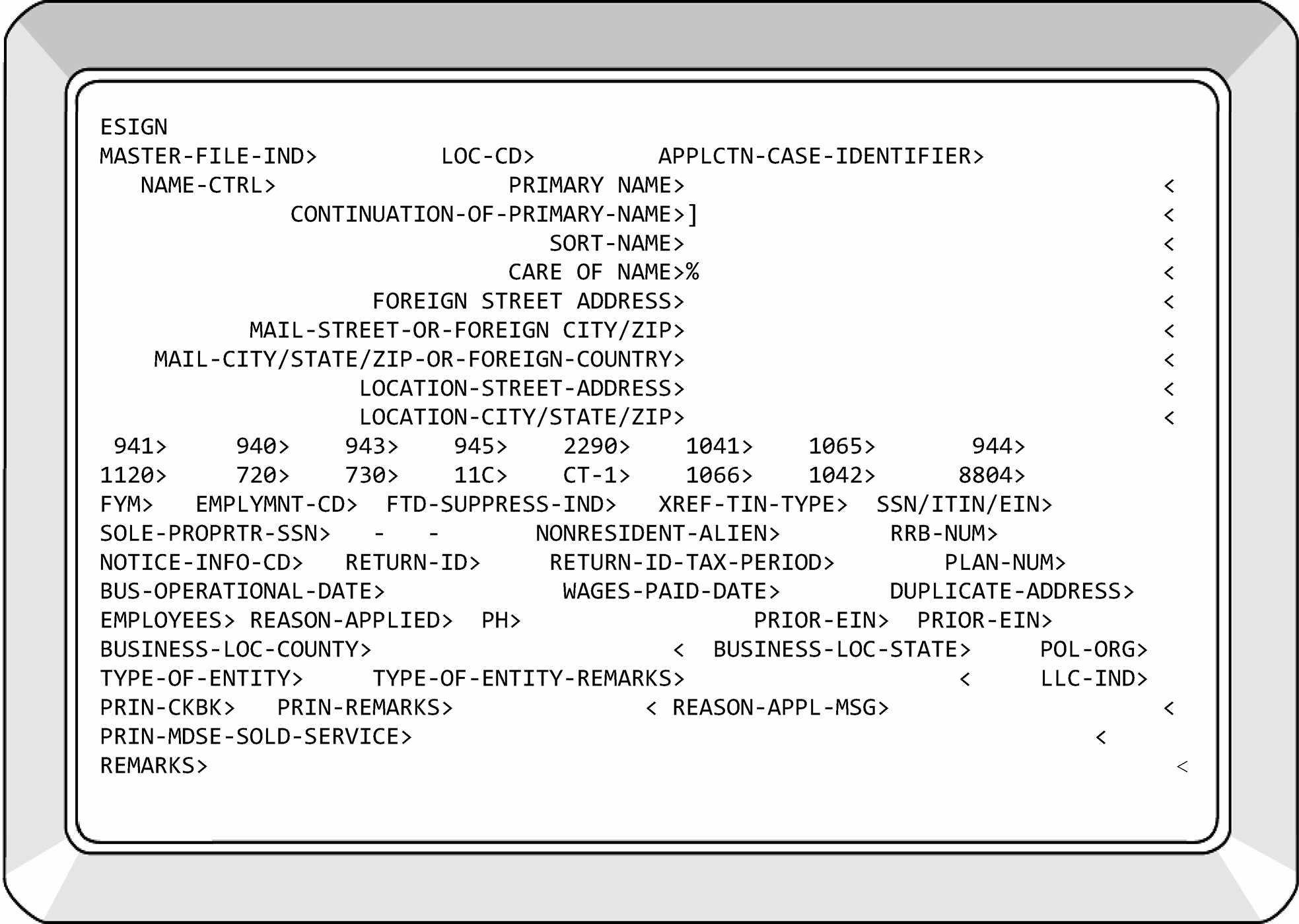
-
≡ ≡ ≡ ≡ ≡ ≡ ≡ ≡ ≡ ≡ ≡ ≡ ≡ ≡ ≡ ≡ ≡ ≡ ≡ ≡ ≡ ≡ ≡ ≡ ≡ ≡ ≡ ≡ ≡ ≡ ≡ ≡ ≡ ≡ ≡ ≡ ≡ ≡ ≡ ≡ ≡ ≡ ≡ ≡ ≡ ≡ ≡ ≡ ≡ ≡ ≡ ≡ ≡ ≡ ≡ ≡ ≡ ≡ ≡ ≡ ≡ ≡ ≡ ≡ ≡ ≡ ≡ ≡ ≡ ≡ ≡ ≡ ≡ ≡ ≡ ≡ ≡ ≡ ≡ ≡ ≡ ≡ ≡ ≡ ≡ ≡ ≡ ≡ ≡ ≡ ≡ ≡ ≡ ≡ ≡ ≡ ≡ ≡ ≡ ≡ ≡ ≡ ≡ ≡ ≡ ≡ ≡ ≡ ≡ ≡ ≡ ≡ ≡ ≡ ≡ ≡ ≡ ≡ ≡ ≡ ≡ ≡ ≡ ≡ ≡ ≡ ≡ ≡ ≡ ≡ ≡ ≡ ≡ ≡ ≡ ≡ ≡ ≡ ≡ ≡ ≡ ≡ ≡ ≡ ≡ ≡ ≡ ≡ ≡ ≡ ≡ ≡ ≡ ≡ ≡ ≡ ≡ ≡ ≡ ≡ ≡ ≡ ≡ ≡ ≡ ≡ ≡ ≡ ≡ ≡ ≡ ≡ ≡ ≡ ≡ ≡ ≡ ≡ ≡ ≡ ≡ ≡ ≡ ≡ ≡ ≡ ≡ ≡ ≡ ≡ ≡ ≡ ≡ ≡ ≡ ≡ ≡ ≡ ≡
-
≡ ≡ ≡ ≡ ≡ ≡ ≡ ≡ ≡ ≡ ≡ ≡ ≡ ≡ ≡ ≡ ≡ ≡ ≡ ≡ ≡ ≡ ≡ ≡ ≡ ≡ ≡ ≡ ≡ ≡ ≡ ≡ ≡ ≡ ≡ ≡ ≡ ≡ ≡ ≡ ≡ ≡ ≡ ≡ ≡ ≡ ≡ ≡ ≡ ≡ ≡ ≡ ≡ ≡ ≡ ≡ ≡ ≡ ≡ ≡ ≡ ≡ ≡ ≡ ≡ ≡ ≡ ≡ ≡ ≡ ≡ ≡ ≡ ≡ ≡ ≡ ≡ ≡ ≡ ≡ ≡ ≡ ≡ ≡ ≡≡ ≡ ≡ ≡≡ ≡ ≡ ≡ ≡ ≡ ≡ ≡ ≡ ≡ ≡ ≡ ≡ ≡ ≡ ≡ ≡ ≡ ≡ ≡ ≡ ≡ ≡ ≡ ≡ ≡ ≡
-
≡ ≡ ≡ ≡ ≡ ≡ ≡ ≡ ≡ ≡ ≡ ≡ ≡ ≡ ≡ ≡ ≡ ≡ ≡ ≡ ≡ ≡ ≡ ≡ ≡ ≡ ≡ ≡ ≡ ≡ ≡ ≡ ≡ ≡ ≡ ≡ ≡ ≡ ≡ ≡ ≡ ≡ ≡ ≡ ≡ ≡ ≡ ≡ ≡ ≡ ≡ ≡ ≡ ≡ ≡ ≡ ≡ ≡ ≡ ≡ ≡ ≡ ≡ ≡
-
≡ ≡ ≡ ≡ ≡ ≡ ≡ ≡ ≡ ≡ ≡ ≡ ≡ ≡ ≡ ≡ ≡ ≡ ≡ ≡ ≡ ≡ ≡ ≡ ≡ ≡ ≡ ≡ ≡ ≡ ≡ ≡ ≡ ≡ ≡ ≡ ≡ ≡ ≡ ≡ ≡ ≡ ≡ ≡ ≡ ≡ ≡ ≡ ≡ ≡ ≡ ≡ ≡ ≡ ≡ ≡ ≡ ≡ ≡ ≡ ≡ ≡ ≡ ≡ ≡ ≡ ≡ ≡ ≡ ≡ ≡ ≡ ≡ ≡ ≡ ≡
-
"≡ ≡ ≡" ≡ ≡ ≡ ≡ ≡ ≡ ≡ ≡ ≡ ≡ ≡ ≡ ≡ ≡ ≡ ≡ ≡ ≡ ≡ ≡ ≡ ≡ ≡ ≡ ≡ ≡ ≡ ≡ ≡ ≡ ≡ ≡ ≡ ≡ ≡ ≡ ≡ ≡ ≡ ≡ ≡ ≡ ≡ ≡ ≡ ≡ ≡ ≡ ≡ ≡ ≡
-
"≡ ≡" ≡ ≡ ≡ ≡ ≡ ≡ ≡ ≡ ≡ ≡ ≡ ≡ ≡ ≡ ≡ ≡ ≡ ≡ ≡ ≡ ≡ ≡ ≡ ≡
-
≡ ≡ ≡ ≡ ≡ ≡ ≡ ≡ ≡ ≡ ≡ ≡ ≡ ≡ ≡ ≡ ≡ ≡ ≡ ≡ ≡ ≡ ≡ ≡ ≡ ≡ ≡ ≡ ≡ ≡ ≡ ≡ ≡ ≡ ≡ ≡ ≡ ≡ ≡ ≡ ≡ ≡ ≡ ≡ ≡ ≡ ≡ ≡ ≡ ≡ ≡ ≡ ≡ ≡ ≡ ≡ ≡ ≡ ≡ ≡ ≡ ≡ ≡ ≡ ≡ ≡ ≡ ≡ ≡ ≡ ≡ ≡ ≡ ≡ ≡ ≡ ≡ ≡ ≡ ≡ ≡ ≡ ≡ ≡ ≡ ≡ ≡ ≡ ≡ ≡ ≡ ≡ ≡ ≡ ≡ ≡ ≡ ≡ ≡ ≡ ≡ ≡ ≡ ≡ ≡ ≡ ≡ ≡ ≡ ≡ ≡ ≡ ≡ ≡ ≡ ≡ ≡ ≡ ≡ ≡ ≡ ≡ ≡ ≡ ≡ ≡ ≡ ≡ ≡ ≡ ≡ ≡ ≡ ≡ ≡ ≡ ≡ ≡ ≡ ≡ ≡ ≡ ≡ ≡ ≡ ≡ ≡ ≡ ≡ ≡ ≡ ≡ ≡ ≡ ≡ ≡ ≡ ≡ ≡ ≡ ≡ ≡ ≡ ≡ ≡ ≡ ≡ ≡ ≡ ≡ ≡ ≡ ≡ ≡ ≡ ≡ ≡ ≡ ≡ ≡ ≡ ≡ ≡ ≡ ≡ ≡ ≡ ≡ ≡ ≡ ≡ ≡ ≡ ≡ ≡ ≡ ≡ ≡ ≡ ≡ ≡ ≡ ≡ ≡ ≡ ≡ ≡ ≡ ≡ ≡ ≡ ≡ ≡ ≡ ≡ ≡ ≡ ≡ ≡ ≡
-
-
This subsection covers IDRS CCs that are used to update Master File.
-
For additional information on any CC, see the IDRS Command Code Job Aids on SERP.
-
Command Code ACTON is used to establish control bases, to update or close control bases that are open, to correct name controls on dummy accounts, to add history items to modules on IDRS, and to generate TCs 902 to secure tax modules and their related entity data from the Master File.
-
For more information on CC ACTON, see IRM 2.3.12, IDRS Terminal Responses - Command Code ACTON and CC ACTON.
-
CC ENREQ must be preceded by CC ENMOD. For specific information on character/space limitations for CC ENREQ/BNCHG, see IRM 2.4.9, IDRS Terminal Input - Command Codes ENREQ, INCHG, IRCHG, BNCHG and BRCHG.
-
The following list reflects the filing requirements that can be input with CC ENREQ/BNCHG. With CC BNCHG a filing requirement can be added, changed or deleted on the BMF.
-
Form 941 valid ranges are blank, 00, 01, 02, 04, 06, 07, 09, 10, 11, 13 or 14. A Form 941 FR 00 will delete the Form 941 filing requirement on the BMF.
If... Then... Form 941 FR = 01 Form 940 FR must be a 1 or 2, unless EC input is: "W" , "G" or "T" is also input. Form 941 FR = 02 There must also be input an EC of "F" . Form 941 FR = 04 A TC 070 must be posted. See IRM 3.13.12, Exempt Organization Account Numbers. Form 941 FR = 06 The location code must be 6601 or 9801. Form 941 FR = 07 The Form 940 FR must be a "7" unless the EC input is a "W" or "T" . Form 941 FR = 09 The transaction code cannot be 000. Form 941 FR = 11 If an EC is present, it must be: "T" , "S" , "M" , "W" or "9" .
If an EC is not present, input a Form 940 filing requirement code of "1" or "2" .Form 941 FR = 13 The location code must be 6601. Form 941 FR = 14 The location code is input it must be 6601. If an EC is present it must be "W" or "T" and the Form 940 filing requirement code must not equal a "1" , "2" or "7" .
If an EC is not present, the Form 940 filing requirement code must be "7" .Form 944 FR = 01, 02, 03, 11 Input 00 to remove the Form 944 FR. Use (0-9) to establish the 944 Establishment Year in year format (YYYY). -
Form 1120 valid ranges are blank, 00, 01, 03, 04, 06, 07, 09, 10, 11, 16, 17,18, 19 or 20. A Form 1120 FR-0 will delete the Form 1120 filing requirements on the BMF.
Note:
If a Sole Proprietor SSN is present on an EIN, an annual FRC (MFTs 02, 05, 06, etc.) cannot be added. If needed, delete the Sole Proprietor SSN by entering 000-00-0001.
If... Then... Form 1120 FRC = 01, 03, 04, 06, 07, 09, 10, 11, 16, 17, 18, 19 or 20 The FYM must be input.
A filing requirement for Form 1041 or Form 1065 must not be input or must be zero.Form 1120 FRC = 15 The input campus must be OSPC. Form 720 FRC = 9 The transaction Code cannot be 000. Form 1041 FRC = 1 or 2 The FYM must be input. A filing requirement for Form 1065 or Form 1120 must not be input unless it is zero. Form 1065 FRC = 1 The FYM must be input. A filing requirement for Form 1041 or Form 1120 must not be input unless it is zero. Form 1066 FRC = 1 A filing requirement for Form 1120, Form 1041 or Form 1065 cannot be input, unless it is zero. The FYM must be 12. Form CT–1 FRC of 1 or 2 The Railroad Retirement number must be input. Form 940 FRC = 1, 2, or 7 A FRC for Form 941 or Form 943 must be input. Form 940 FRC = 1 A Form 941 FRC of 01, 09, or 10 must be input. A Form 943 FRC of 1 must be input. Form 940 FRC = 2 A Form 941 FRC of 01, 09, or 10 must be input. A Form 943 FRC of 1 must be input. Form 940 FRC = 7 A Form 941 FRC of 7 must be input. A Form 943 FRC of 7 must be input. Form 943 FRC = 7 The location code must equal "6601" . -
Form 1042 valid ranges are blank, 0 or 1. A Form 1042 FRC 0 (zero) will delete the Form 1042 filing requirement on the BMF.
-
Form 990-T valid ranges are blank, 0 or 2. A Form 990-T FRC 0 will delete the Form 990–T filing requirement code on the BMF. Form 990-T FRC = 2; The FYM must be input. A Form 1041, Form 1065 or Form 1120 filing requirement code greater than zero cannot be input.
-
Form 5227 valid ranges are blank or 0. A Form 5227 FRC 0 will delete the Form 5227 filing requirement code on the BMF. Use CC EOCHG to add/update FRC.
-
Form 990–PF valid ranges are blank or 0. A Form 990–PF FRC 0 will delete the Form 990–PF filing requirement code on the BMF. Use CC EOCHG to add/update FRC.
-
Form 2290 valid ranges are blank, 0 or 1. A Form 2290 FRC 0 will delete the Form 2290 filing requirement code on the BMF.
If... Then... Form 11–C FRC = 1 Form 11–C FRC must be 1. Form 730 FRC = 1 Form 730 FRC must be 1. -
Form 990/Form 990EZ valid ranges are blank or 0 (zero). A Form 990 FRC 0 will delete the Form 990 filing requirements on the BMF. Use CC EOCHG to add/update FRC.
If... Then... Form 706GS(D) = Blank, 0 or 1 Input must be to a BMF EIN or SSN account only. MFT must be input to update Form 706GS(D) FRC. Form 706GS(T) = Blank, 0 or 1 Input must be to a BMF EIN account only. Form 706GS(T) FRC = 1 Only Form 1041, Form 720, Form 940, Form 941 or Form 943, Form 944 FRCs can be input. -
Form 945 valid ranges are blank, 0, or 1. A Form 945 FRC = 0 (zero) will delete the Form 945 filing requirement on the BMF. Form 945 is valid with all other filing requirements. If Entity can determine by taxpayer contact or the taxpayer indicates that they are liable to file Form 945 (for example, liable for non-payroll income tax withholding on backup withholding and withholding for pensions, annuities, IRAs, and gambling winnings) establish Form 945 FRC 01. Otherwise, DO NOT establish a 945 FRC.
-
Not Required
-
Valid range blank, 0 or 1.
-
This field is used when the EIN needs to be placed on the BMF, but a filing requirement is not necessary. See Figure 3.13.2–5.
-
-
Use this CC to request a BNCHG format for input of an entity change transaction. It must be preceded by CC ENMOD.
-
ENREQ is designed to initiate BNCHG. CC ENREQ with a blank definer is keyed in after a response to ENMOD indicates that the entity is on the file. Response to "ENREQ" is a generated BNCHG format for BMF.
-
CC ENREQ with an "R" definer is keyed in after response to ENMOD indicates that the entity is on the file. Response to CC ENREQ'R' is a generated BRCHG format for BMF or EPMF accounts.
-
-
The TIN will be validated with CC ENREQ and EOREQ. For a TC 000 to be input, a TC 000 intend indicator of 1 must be input in space 20 with the CCs ENREQ or EOREQ. If the TIN is not on the Master File when the indicator is input it will allow the TC 000 to post. If the TIN is known to be on the Master File and no TC 000 intend indicator is input the appropriate TC (those other than TC 000) can be input. See Figure 3.13.2-6
-
When the TIN has been validated, the input transaction can be made. If the TIN is not validated, research or contact the taxpayer.
-
If research or taxpayer contact does not resolve the discrepancy in the TIN, each case will have to be resolved based on the taxpayer's change.
-
If a TC 000 intend indicator is input and the TIN is already on the MF, an error message "TIN EXISTS ON MF" will be generated.
-
Compare the input TIN with the source document to determine if a transcription (finger) error was made.
-
If a finger error has been made, correct the EIN and re-input the transaction. Be sure the TC 000 intend indicator is correct.
-
If a finger error was not made, research using CC INOLE and NAMEE to ensure the EIN is for the taxpayer. If it is, it is necessary to make an entity change. Re-input the transaction and change the TC 000 intend indicator to blank.
-
If the input TIN is on the MF for a different taxpayer, assign a new EIN if the source document is other than correspondence. If the source document is correspondence, return it to the taxpayer with a Form SS–4 explaining that the EIN has already been assigned to another taxpayer. Before their correspondence can be processed, a valid EIN is needed.
-
-
Because the ESIGN (TC 000) is held for quality review, care will be taken when changing information while the transaction is pending. If Quality Review needs to reject the ESIGN, the transaction will not post. If it is determined that the action must be input, use CC ENREQ with an intend indicator 1 to access the dummy module and use posting delay code as needed.
-
The TE establishing the EIN needs to add to or change information, input CC ENREQ with an intend indicator 1 to access the dummy module. This will access CC BNCHG. Input the additional or correct information required and use posting delay code as appropriate.
-
Complete research (including CC INOLE if necessary) will be performed prior to executing any entity change. Any transaction that needs to be cycled or held for later input can be cycled up to 6 cycles using a Posting Delay Code (PDC). See IRM 2.4, IDRS Terminal Input.
-
If the information that will print on the CP 575 needs to be changed, such as mailing address, primary name line, etc. use CC ESIGN'T' to remove the newly assigned number. Reassign an EIN to allow the CP 575 to be delivered with the correct information.
-
The transactions input with CCs ENREQ/BNCHG follow:
-
Transaction Code 000: This transaction code establishes an account on the BMF (See Figure 3.13.2–5). Prior to 2008, if an EIN did not file a return or make a payment for three consecutive years, the EIN was removed from Master File. However, the Primary Name Line of the EIN is still researchable via CCs NAMEE and NAMEB. If able to validate the prior presence of an EIN, input TC 000 to re-establish with the current name, address, and FRCs. The following fields must be input:
-
TC 000,
-
New Name Control,
-
Primary Name,
-
Complete Address, and
-
Filing Requirement (If a filing requirement is not needed, input a "1" in the NOT-REQUIRED field. See Figure 3.13.2–5.)
Exception:
If the TC 000 is input for a BMF SSN account, then no filing requirements will be input, including NOT REQUIRED. However, complete the NM-YR-QTR> and MFT> or MFT> and DT-OF-DEATH> fields for BMF SSNs.
Note:
Complete research (including CC INOLE if necessary) will be performed before executing any entity change. Any transaction that needs to be cycled or held for later input can be cycled up to 6 cycles using a PDC. See IRM 2.4, Terminal Input.
Caution:
If there is already a dummy account on CC ENMOD, you may not be able to input a TC 000 using CC BNCHG until the information on ENMOD has been removed. If you are unable to input the TC 000 successfully, please request the account to be zapped using Form 6795. Attach a print of ENMOD, INOLE, TXMOD and BMFOL. See IRM 3.13.2.14.1.1 (2)(c).
If the EIN assigned has FRCs that require federal tax payments, the taxpayer is automatically pre-enrolled in EFTPS.
The "Notice of Intent" indicator 1 must be entered in line 1, space 20 of IDRS screen when establishing an EIN with a TC 000. See Figure 6. -
-
Transaction Code 012: This transaction code reopens an inactive account where a consolidation has been attempted but failed (because of duplicate modules, invalid FRCs, etc.) or a TC 020 failed because modules exist. Filing requirements of such accounts are all "8."
The transaction will not post to the account unless all filing requirements are changed to either a significant code or zero.
Note:
Do not re-open an EIN if the words "ID THEFT" or "POTENTIAL FAB EIN" are on one of the name lines or a TC 971 AC 524 is present on the account. Please notify Submission Processing Headquarter Analyst via P & A when the account has ID THEFT or POTENTIAL FAB EIN in the name lines for resolution. See IRM 3.13.2.13, Identity Theft.
Caution:
The Detroit Computing Center (DCC) was assigned an EIN ≡ ≡ ≡ ≡ ≡ ≡ ≡ ≡ ≡ ≡for the sole purpose of providing the “Payer” EIN on Form 1099-INT statements issued by IRS to taxpayers who have received interest on their federal refunds. The Detroit Computing Center is not a “true” taxpayer account entity. Do not input a TC 012 or post payments or returns to this account. See IRM 3.8.45.8.31(2), Information Return (IRP), for additional information.
-
Transaction Code 013: This generated transaction code indicates the primary name line has been changed. See Figure 3.13.2–8.
-
Always use the Master File name control, not a check digit or dummy name control when changing the name lines.
-
If it appears that a change in ownership has occurred which will require a new EIN, correspond with the taxpayer using Letter 45C.
-
Name changes to SSNV accounts will be processed using TC 040 or TC 041.
-
A name change can be processed from any type of correspondence, return, payment, etc., if one of the following is indicated in the examples; Formerly Known As (FKA); Also Known As (AKA); New name; Old name; Name change box is checked on a return (if present). You will research the Secretary of State website(s) for name change verification. See Exhibit 3.13.2-8. If needed, phone contact with the taxpayer can be initiated.
-
If none of the above is indicated, correspond with the taxpayer to verify the correct name.
-
If correspondence, notices, or C letters sent by the IRS that solicits or requires a response from the taxpayer are returned to the IRS by the taxpayer with corrections marked on the taxpayer's Primary Name information, the correspondence will constitute clear and concise written notification of a name change. The taxpayer's signature is not required on the correspondence, notice or C letter.
-
If a name change is input, send an acknowledgement Letter 147C to the taxpayer.
-
-
Transaction Code 014: This generated transaction indicates a change has been made to the mailing address fields. All transactions containing an address change will have the requester's name, title, and phone number if present in the Remarks field of the transaction. If you are unable to determine the name and/or title, enter "SIGNATURE ILLEGIBLE" and the requester's phone number (if available). See Figure 3.13.2-9.
-
Transaction Code 016: This generated transaction code indicates a change to any of the following fields:
-
BMF filing requirements/WPD/BOD,
-
Railroad Retirement Board Numbers,
-
Form 8123 code,
-
Fiscal Year Month (FYM),
-
Employment Code (EC),
-
Date of Death,
-
Sole Proprietor SSN,
-
Sort Name,
-
Location street address,
-
Location city, state, and ZIP,
-
Care Of Name,
-
XREF-TIN-ITIN-IND/XREF-TIN-ITIN,
-
EIN-EST-DT>, and
-
DT-WG-L-PD/DT-BUS-CLD.
See Figure 3.13.2-10.-
To delete an erroneously input Sole Proprietor SSN, input 000–00–0001 in this field. To correct a wrong SSN, input the correct sole proprietor SSN. It will be over laid in the sole proprietor SSN field. To delete an erroneously input XREF-TIN-ITIN, input 0 in the XREF-TIN-IND field and enter 000-00-0001 in the XREF-TIN field, minus hyphens. To correct a wrong XREF TIN, input the correct XREF TIN. Overlay it in the XREF TIN field.
-
These items are input because of correspondence and unprocessable returns and documents.
-
A TC 016 with special DLN XX963-888-88888-X is generated to validate sole proprietor's Social Security Number (SSN) in the entity.
-
There are online services available to taxpayers that interfaces with Master File. One such service is the System for Award Management (SAM). This system verifies EINs by using the EIN-EST-DT>. Therefore, it could be necessary to input a TC 016 to update.
-
-
Transaction Code 020: (This Transaction Requires Management/Lead Approval) This input transaction code deletes an account from Master File if no modules are present which contain return or credit transactions. This TC is also used on EINs resulting from ID Theft or Fraud. When this is the case, the words ID THEFT or POTENTIAL FAB EIN will be entered on the Sort Name Line. See IRM 3.13.2.13, Identity Theft. This TC is restricted to BMF Entity TEs. See Figure 3.13.2–11.
-
Transaction Code 030: This generated transaction code indicates the location codes have been updated when a change in campus code is involved. If a TDA is being transferred, use document code 50; otherwise, use document code 63.
-
Transaction Code 040: This input transaction code changes an SSN or name of an account to the valid portion of the BMF. See Figure 3.13.2-12.
-
This transaction must be input to a BMF valid SSN account.
-
If Primary Name is entered, New Name Control and Continuation of Primary Name are the only fields that can be entered. Remarks must also be entered.
-
If new SSN field is entered, Posting Delay Code and the Remarks fields are the only other fields that can be entered.
-
For specific instructions on inputting TC 040, see IRM 2.4.9-6, IMF - 040, 041, to Change SSN or Name line.
-
-
Transaction Code 041: This input transaction code changes an SSN or name of an account to the invalid portion of the BMF. This transaction must be input to a BMF invalid SSN account. See Figure 3.13.2-13.
-
This transaction must be input to a BMF invalid SSN account.
-
If Primary Name is entered, then no other data except Continuation of Primary Name can be entered. Remarks must be entered.
-
If a new SSN is entered, then no other data except Posting Delay Code and the Remarks field can be entered.
-
-
Transaction Codes 07X: TCs 074, 075, 076, 077, and 078 are used when processing Form 8832, Entity Classification Election. TCs 070 through 073 are used when processing Form 8274, Certification by Churches and Qualified Church-Controlled Organizations Electing Exemption from Employer Social Security and Medicare Taxes. See IRM 3.13.12, - Exempt Organization Account Numbers
-
Transaction Codes 090 through 097: are used when processing Form 2553, Election by a Small Business Corporation. See IRM 3.13.2.23, Form 2553, Election by a Small Business Corporation, and Related Transactions/CPs.
-
Transaction Codes 098 and 099: are used when processing Forms 56, Notice Concerning Fiduciary Relationship. See IRM 3.13.2.19, Form 56, Notice Concerning Fiduciary Relationship.
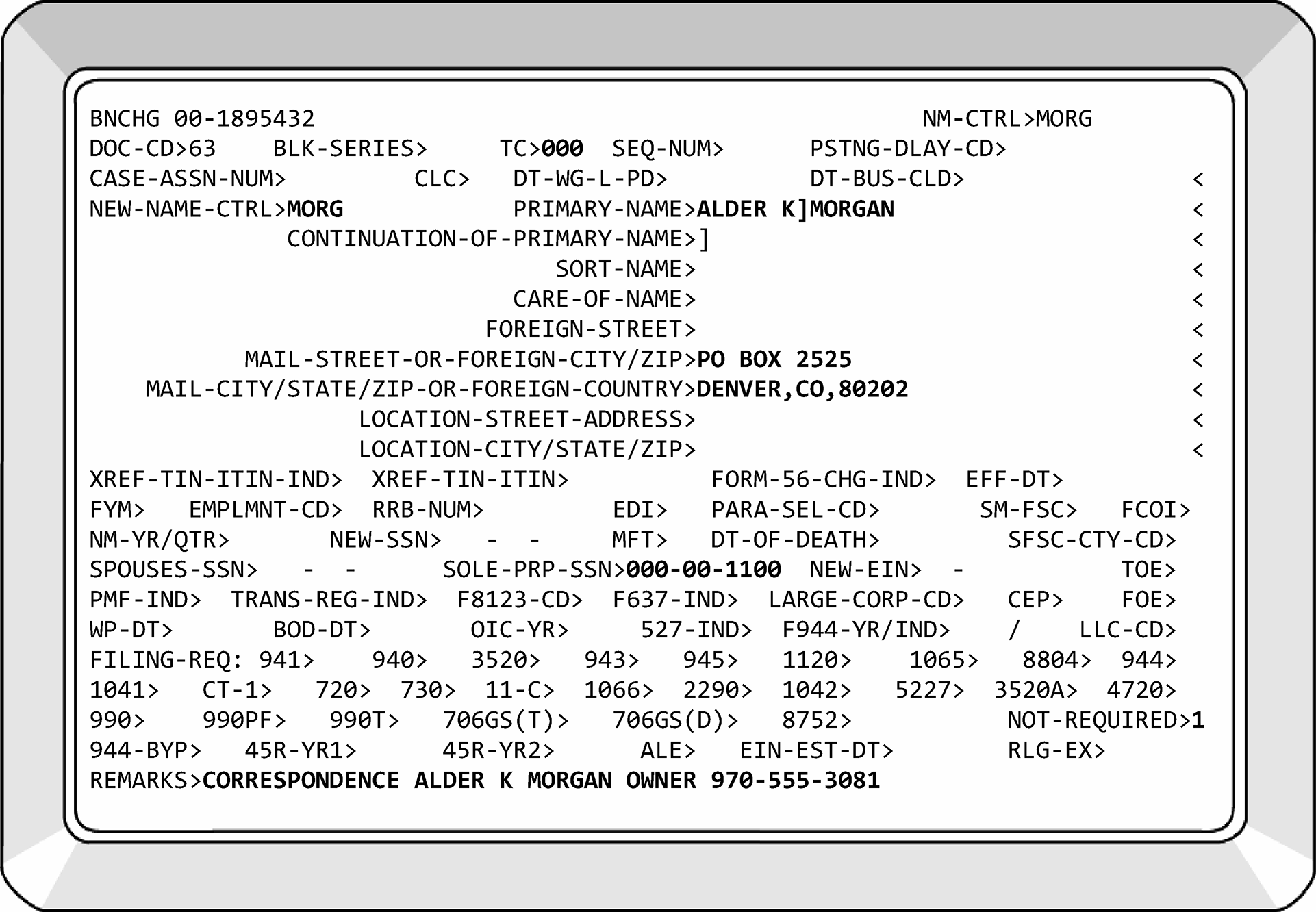
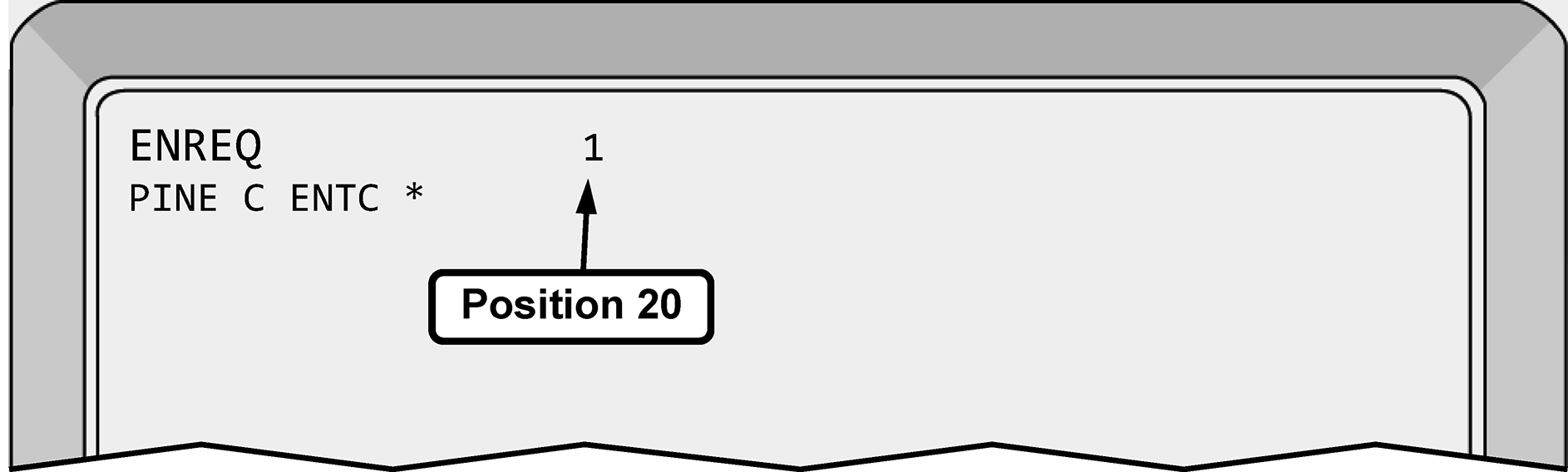
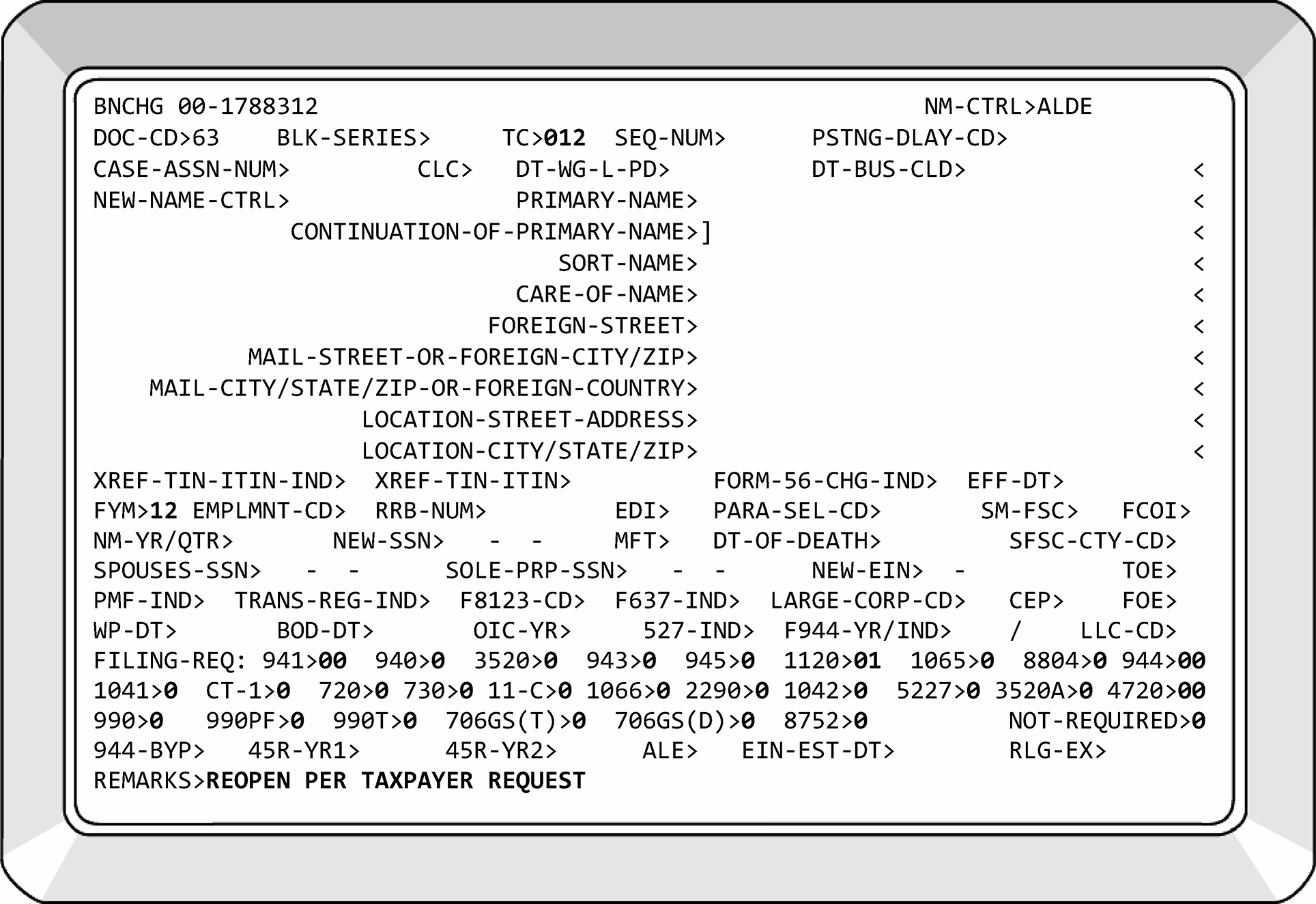
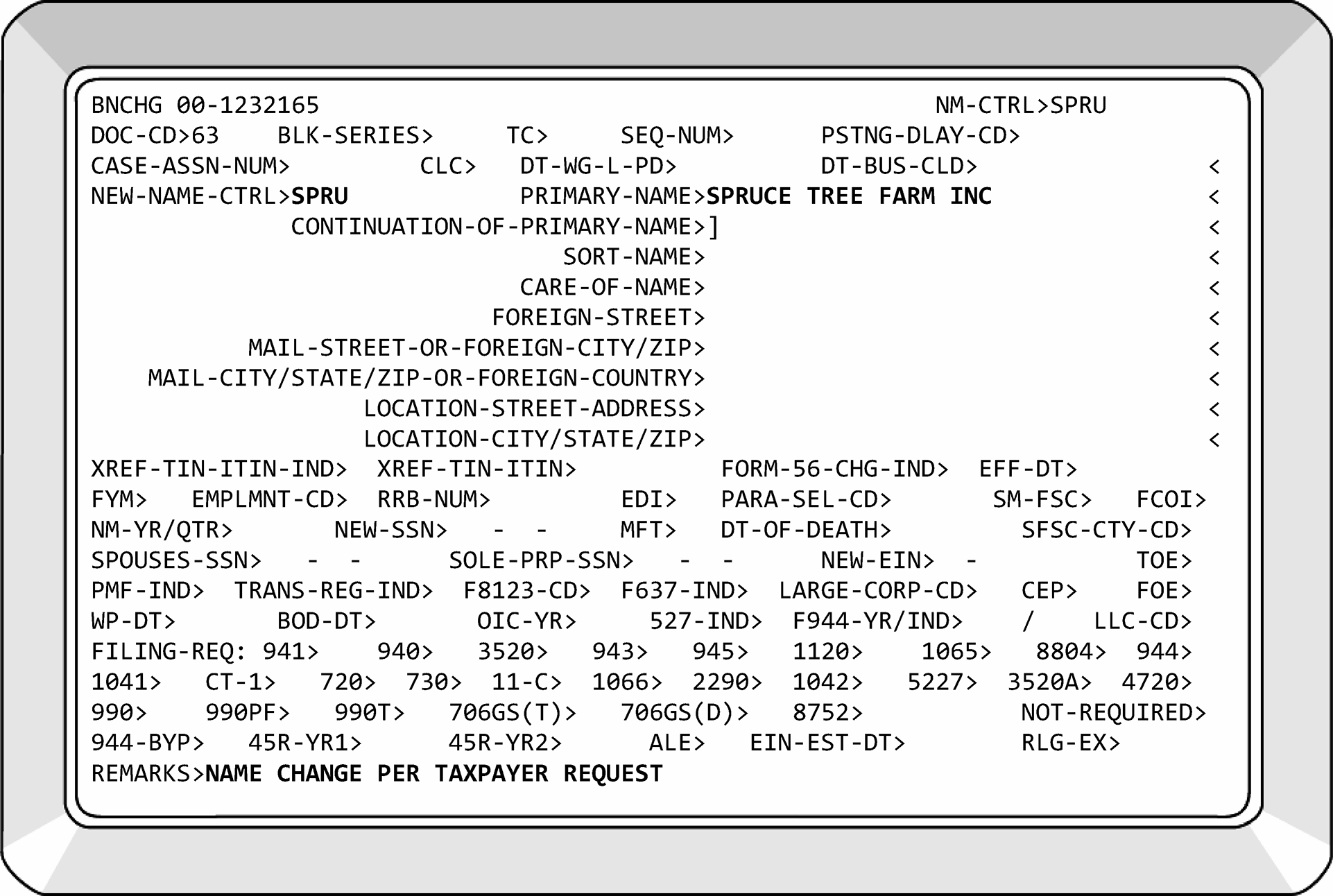
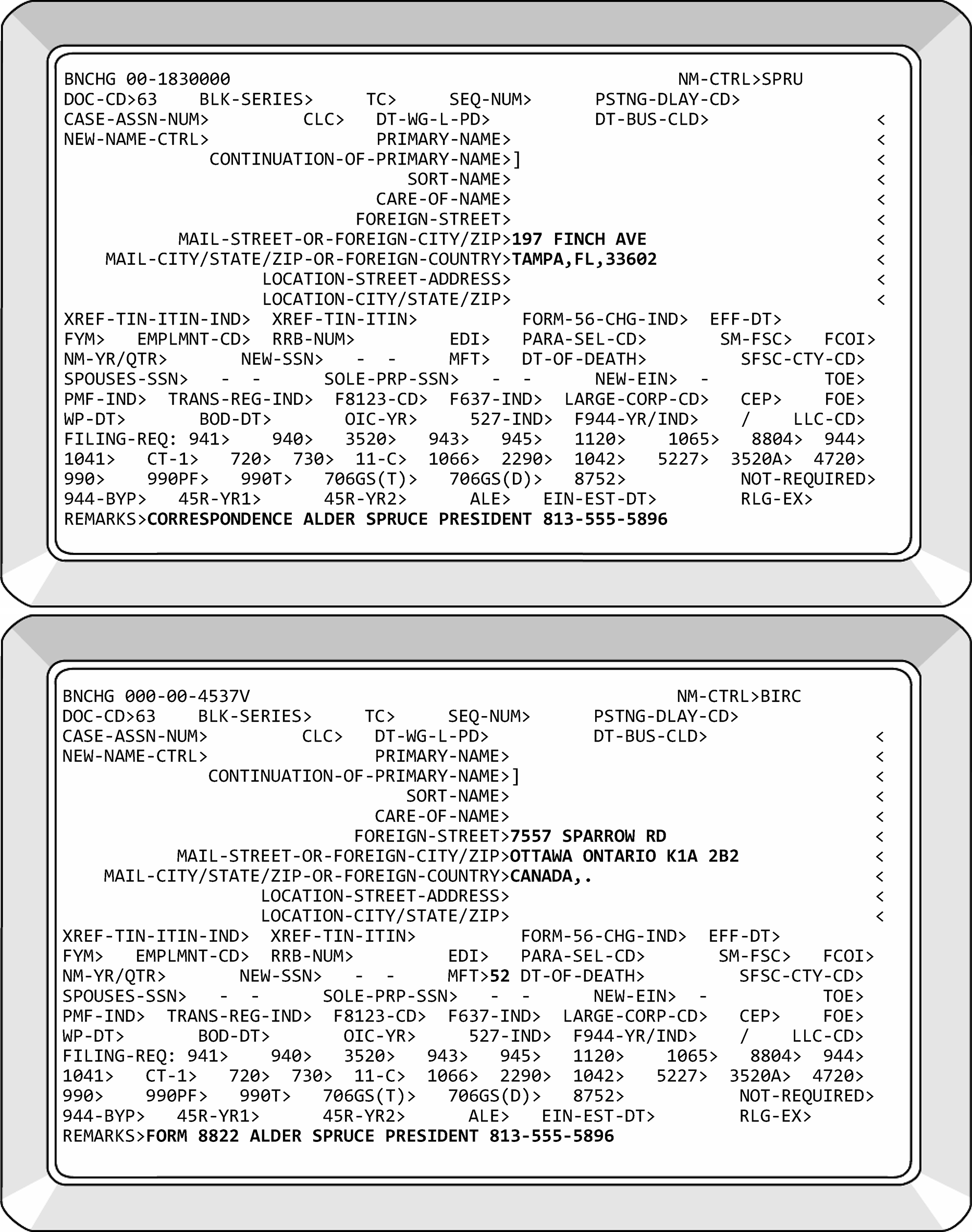
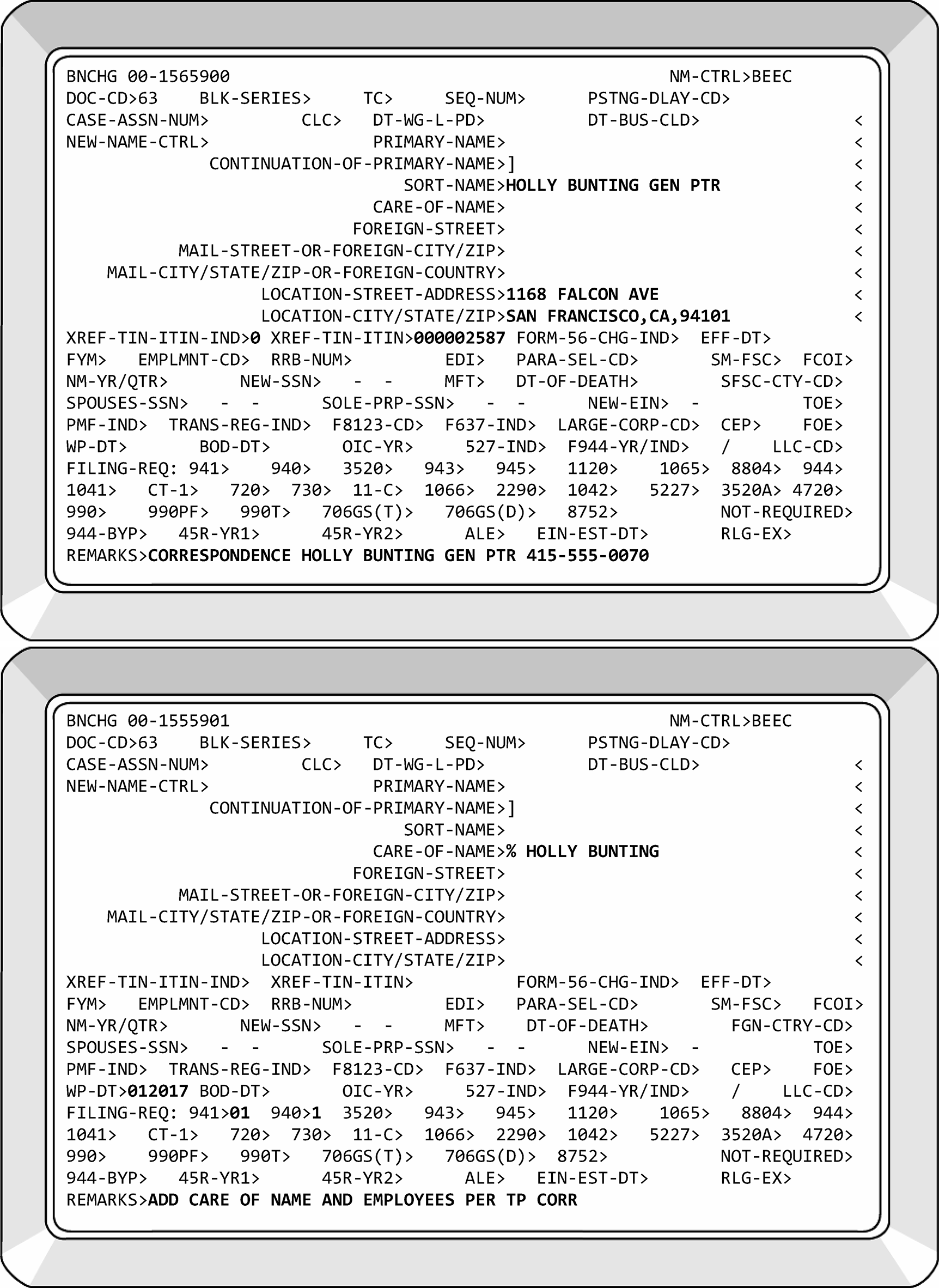
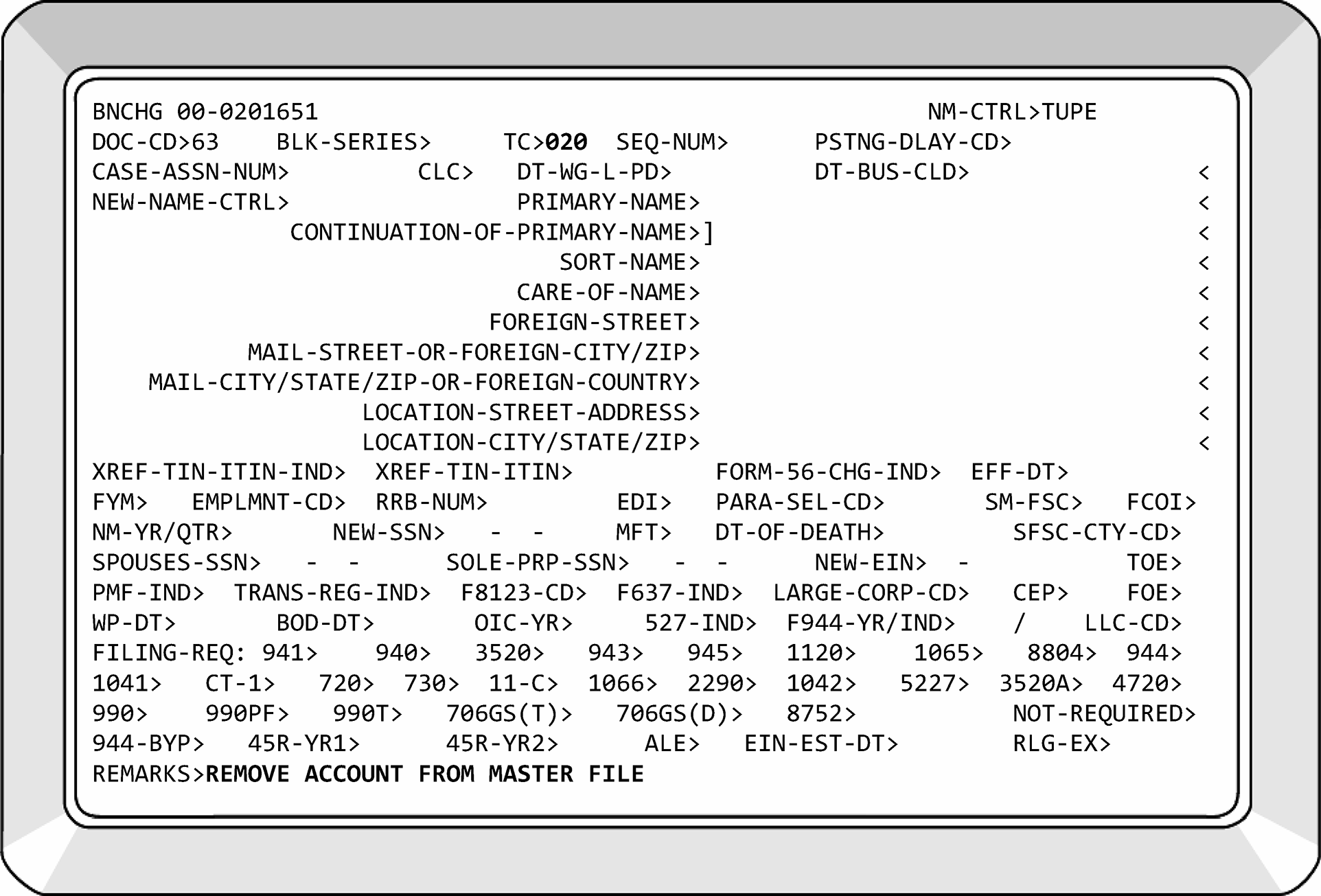
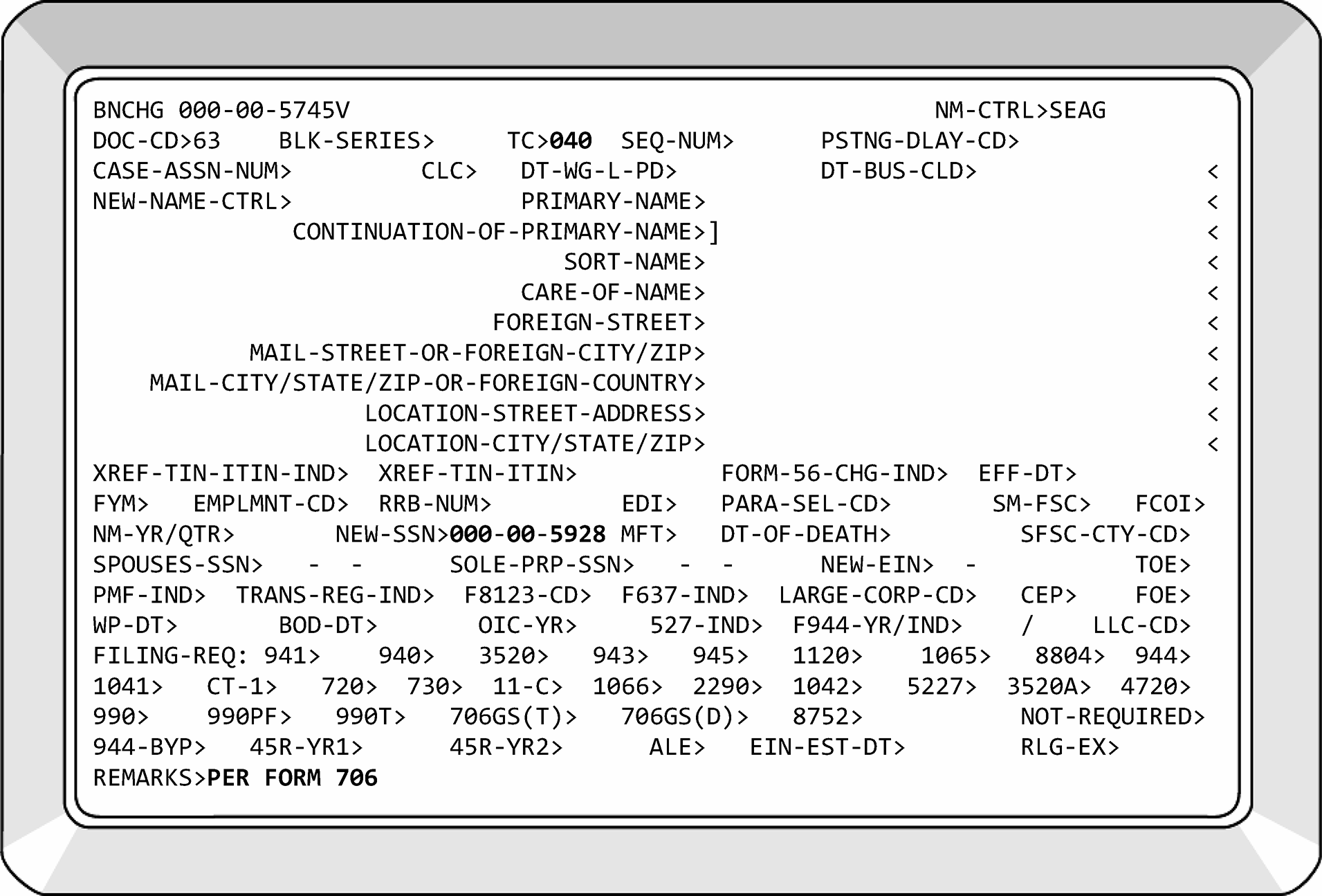
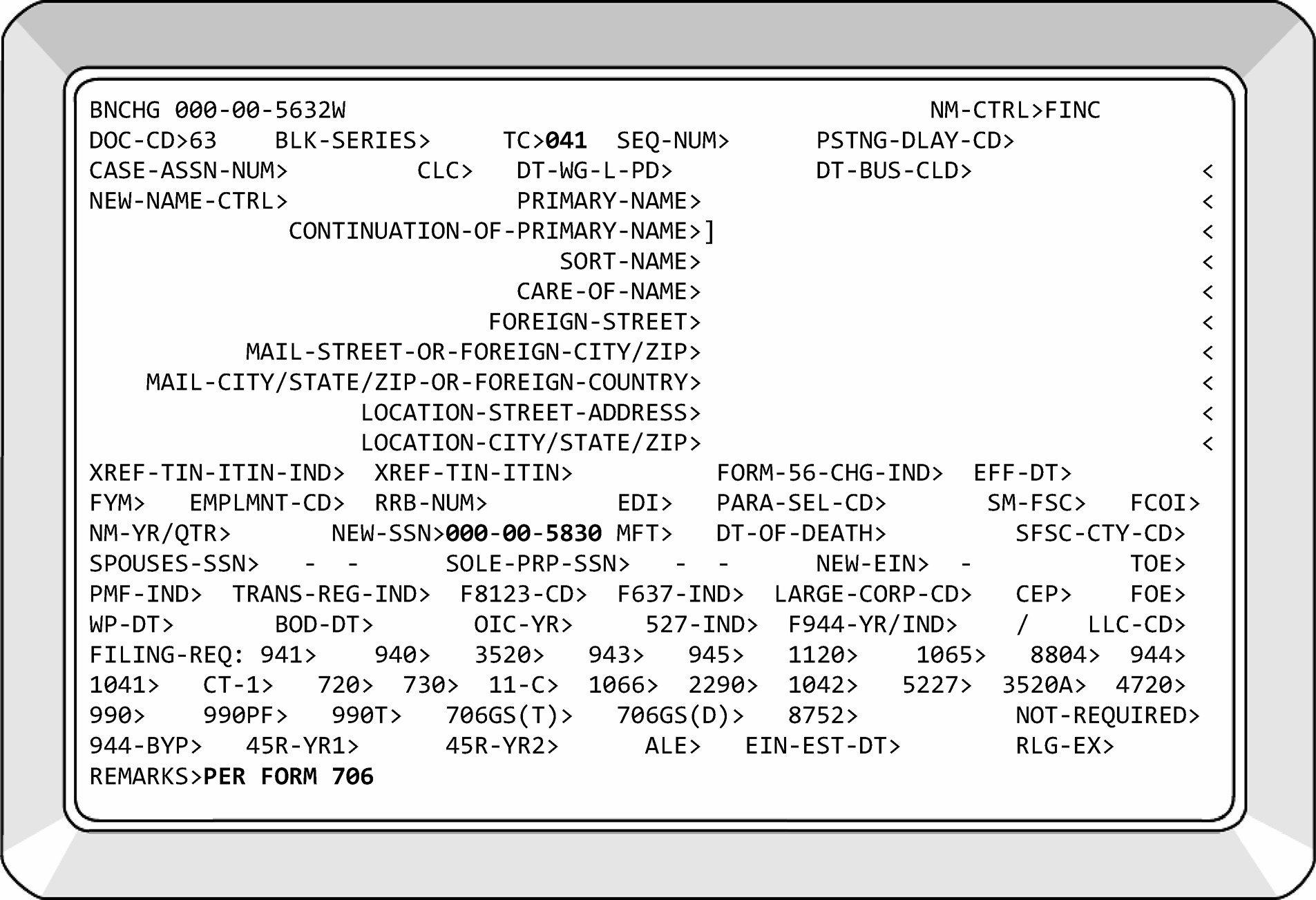
-
CC BRCHG is restricted to Entity. Listed below are the transactions used by Entity for this CC.
-
Transaction Code 011: is used to consolidate two EINs. See IRM 3.13.2.14, Multiple EINs.
-
Transaction Code 053: identifies a change to accounting period because of an approved Form 1128, Application to Adopt, Change, or Retain a Tax Year. See IRM 3.13.2.21, Form 1128 - Application to Adopt, Change or Retain a Tax Year.
-
Transaction Code 054: identifies an approved FYM under Rev. Proc. 2006–46. See IRM 3.13.2.21.5, Form 1128, Page 2, Part II, Section B. TC 054 also represents an approved Form 8716 for a Personal Service Corporation.
-
Transaction Code 055: identifies an approved FYM under IRC Section 444 on Form 8716, Election To Have a Tax Year Other Than a Required Tax Year. See IRM 3.13.2.22, Form 8716 - Election to Have a Tax Year Other Than a Required Tax Year.
-
Transaction Code 058: identifies a denied Form 8716. See IRM 3.13.2.22.3 (1), Form 8716 Denial Procedures.
-
Transaction Code 059: identifies a denied Form 1128. See IRM 3.13.2.21.9 (1), Denial of Form 1128 - Procedures.
-
These command codes are used to send and delete letters from IDRS.
-
CC LPAGE initiates CC LETER which composes and sends the letter. This is the second step in building a letter. Enter all the information needed to generate a taxpayer letter, including the Salutation, Selective Paragraph codes, Signature Title code, and fill-in content. CC LPAGE must be preceded by one of the following — CC LETER, CC ADJ54, CC DOALL, CC EPLET, CC LREVW, CC NOREF, CC IAPND, CC IAREV, CC IAORG, or CC QRACN. CC LPAGE checks the complete letter request for validity and consistency with the Form Letter being requested. If valid, the command code accesses the CAF and Reporting Agents File (RAF) to generate additional copies of the letter with authorized representatives' names and addresses. If the letter to the taxpayer will close a case, you can enter a Control-Sequence-Number on the CC LPAGE screen, and when the letter goes out, the system will close that control base.
-
Upon termination of a successful CC LPAGE request, the TIN, MFT code, tax period, and plan number, if any, will be "unprotected" again, so the user will be able to input data or type over these fields for their next IDRS transaction. LPAGE will check the letter pending database to see if there was an earlier letter input. If so, it will put out a message to use definer 'S' if the user wants to create a duplicate letter. At the end of a successful request, LPAGE will update this same database using input operator's employee number as the key.
-
CC LPAGD deletes a letter sent the same day of Realtime processing. The same employee who input the original letter must input the LPAGD using the same TIN, MFT-CODE, Tax Period, Plan Number, and Form Letter Number. All these fields, including the input Employee Number must match or the letter request will not be deleted, and a taxpayer letter will be generated.
-
This is another tool to improve the quality of outgoing correspondence. To use CC LREVW, set the "View" indicator on the CC LPAGE screen to "Y" and transmit. CC LREVW will be automatically executed for you. CC LREVW combines the Selective paragraph codes, fill-in content, and other optional entries you made on the LPAGE screen with the form letter you selected from the Master Letter File. The program operates like the end-of-day program, CRX03, and formats the letter with headings, salutations, 70-character print lines, and even page breaks identical to those used on the final letter. However, where CRX03 prints the letter on paper, CC LREVW will do it on your terminal screen. Your fill-ins will be highlighted with inverse video, so you can easily see if you made any errors. The paragraphs you selected will be printed out completely. You can even see the name and title of the person you selected with your Signature Title code. After you have reviewed your letter, return to page one and make any corrections. When you are satisfied with your letter, set the "View" indicator to "N" and transmit CC LPAGE to send your letter.
-
CC LLIST can be used to research whether a letter was input earlier in the day. Simply enter LLIST and the program will find all LPAGE records using employee number. If there is more than one screen, 'PAGE' will be used for display purposes. If the TIN/MFT/TAX PERIOD are entered, then only the LPAGE records for that one account will show. A search can also be done based on employee number. The order of the list will be 'LIFO' - last in first out.
-
LLIST with definer 'D' can be used to delete individual LPAGE records. This command code will only be used after LLIST and only for deletes. You can delete more than one record on the same screen.
-
The cursor must be below the record you are deleting and above the PAGE prompt;.
-
You cannot delete multiple records that are on different screens.
-
Keep in mind, this is no different than using LPAGD. Deletes will not be done for letters created prior to the GENDATA swap and deletes done after the swap will go on the next day's Quality Review matches.
-
Any deletes on duplicates will begin with the last one input and will delete all earlier versions.
-
-
Taxpayer phone numbers can be displayed on the TIF (CC ENMOD).
-
CCs TELEA, TELEC, and TELED are used to add, change, and/or delete a telephone number from the TIF.
-
If an EIN does not have a phone number, CC TELEA can be used to add the phone number to the EIN. If the phone number on an EIN is incorrect, CCs TELEC or TELED can be used to correct or delete the phone numbers.
-
If the EIN does not come up on CC ENMOD, the taxpayer's telephone number(s) can be viewed via CC TELER.
-
See IRM 2.4.29, IDRS Terminal Input - Command Codes TELEA, TELEC, TELED and TELER for Telephone Processing.
-
These command codes are used to adjust tax, penalty, and interest.
-
BMF Entity use these command codes to create a DLN that allows other documents to be attached to electronic DLNs.
-
See IRM 2.4.16, Command Codes REQ54 and ADJ54 and IDRS Command Code Job Aid for CC REQ54.
-
This command code is used to assign Internal Revenue Service Numbers (IRSNs), also known as Temporary SSNs. If the taxpayer is international, use CMODE to the Philadelphia campus.
-
IRSNs are utilized when a taxpayer's SSN cannot be located, and a return or payment must be processed.
-
BMF Entity primarily uses IRSNs when processing Estate and Gift (E&G) returns, Form 706 and Form 709 families, and Form 8288, U.S. Withholding Tax Return for Certain Dispositions by Foreign Persons. IRSNs are also used when processing INVALID SSN TRANSCRIPTS, see IRM 3.13.2.20.1, Transcripts. Form 9956, Request for Temporary SSN, is used by other areas to request an IRSN from Entity. After assigning IRSN, return Form 9956 to originator.
-
CC TMSSN has two definers: "I" and "B." These indicators stand for IMF and BMF respectively.
-
See IRM 2.4.59, IDRS Terminal input - Command Code TMSSN.
-
When Accounts Management/International team (IMF or BMF) requests an IRSN be assigned/established, then merged into another SSN’V’, this request will be expedited. These requests most commonly accompany Forms 8288.
-
When assigning an IRSN for the Form 706/Form 709 family, send Letter 685C/685SP to the taxpayer for confirmation.
-
BMF Entity uses Internal Revenue Service Numbers (IRSNs) for processing documents/payments when an SSN cannot be located. IRSNs are also called "Temporary SSNs."
-
IMF Entity uses IRSNs for non-citizen filers and Identity Theft cases.
-
An IDRS Command Code (CC) was created for assigning IRSNs: CC TMSSN.
-
IRSNs are the same format as an SSN (XXX-XX-XXXX), however, IRSNs will always begin with "9" .
-
IRSNs will always be on the invalid segment, "W" , for example, XXX-XX-XXXXW.
-
The fourth and fifth digits signify the campus that assigned the IRSN. See the chart below for details:
Campus 4th and 5th Digits Expansion Ranges Andover 08 38 Atlanta 07 37 Austin 18 06 Brookhaven 19 Cincinnati 17 02 Fresno 89 10 Kansas City 09 39 Memphis 49 Ogden 29 04 Philadelphia 28 05 International 66 -
Currently, IRSNs are assigned in Austin, Kansas City, and Ogden. Each campus can assign an International IRSN by using CC CMODE to Philadelphia campus.
-
Form 9956, Request for Temporary SSN, is used by other areas to request an IRSN from Entity. After assigning IRSN, return Form 9956 to originator.
-
When assigning an IRSN to the Form 706/Form 709 family, send Letter 685C/685SP to the taxpayer for confirmation.
-
Background—For a return or payment to be processable, it must have:
-
A valid TIN,
-
A legible name or name control,
-
A valid tax year ending, and
-
Legible tax data.
-
-
Returns and payments not meeting the requirements to be processable are considered unprocessable. Returns and payments that are unprocessable will be received from:
-
Receipt and Control (Under BBTS Control) - These returns are commonly called "Pipeline." All return types will be controlled to Entity for resolution of Entity criteria: EIN perfection, FYM issues, FRC issues, etc. These returns are usually numbered with a DLN.
-
Document Perfection/Code & Edit (Unnumbered Returns) - This work is known as "Loose Returns." These returns are always unnumbered (no DLN).
-
Reject function (ERS Suspense) - The term "Rejects" is used to describe this work. This work is tightly controlled and is always numbered. The returns will be in the same order as the DLNs on the transmittal when batch is completed. Returns and Payments received from ERS Suspense will be assigned and processed as soon as possible upon receipt. These cases are time sensitive and must be closely monitored.
-
-
Entity will perform IDRS research to ensure taxpayer is using correct EIN and name.
-
EINs must initially be researched on IDRS with CCs ENMOD, BMFOL (definers 'E,' 'I,' 'T,' and 'R'), INOLE (definers 'G,' 'S,' and 'T') and FINDE/FINDS (definer 'D'). Compare TIN on Form 8161/voucher/routing slip with TIN on Master File (MF). Utilize CCs SUMRY, TXMOD, and UPTIN to ensure TIN is correct. Names will be researched via CCs NAMEE, NAMEB, NAMEI, and NAMES.
-
If EIN is not on Master File and has a prefix of 20, 26, 27, 33, 39, 45, 46, 47, 81, 82, 83, 84, 85, 86, 87, 88, 92, 93 or 99 indicating it was assigned by Modernized Internet EIN (Mod IEIN), and there is enough information to ESIGN, utilize CC ESIGN to issue a new EIN. Be sure to use appropriate Notice Information Code.
-
If EIN is not on Master File and is not a Mod IEIN, but can be verified with CCs NAMEE, NAMEB, NAMEI, FINDE, or FINDS, input TC 000 with CC BNCHG entering correct FRCs, XREF TIN fields, etc.
-
If an EIN cannot be located and the check does not contain enough information to assign an EIN, it will be considered "Unprocessable." If the check contains enough information to assign an EIN, ESIGN using NIC D. Send Letter 147C requesting a completed Form SS-4.
-
All EINs will be assigned with the procedures in IRM 3.13.2.8.2(10), Processing BMF Returns.
-
If a valid EIN is found, utilize CCs BMFOL, IMFOL, TXMOD, SUMRY, BRTVU/RTVUE and UPTIN to ensure FRCs and FYM are correct. Send Letter 147C informing the taxpayer of their correct EIN.
-
Edit Form 8161/voucher/routing slip by circling out incorrect information such as name control, MFT, tax period and/or EIN. Edit correct information and underline in appropriate field(s) of Form 8161. If the form is processable, underline the Tax Period at the top of Form 8161 and edit MFT in Field (14) of Form 8161. If payment is Unprocessable write "unprocessable" in Field (14) of Form 8161. Enter audit trail as shown in IRM 3.13.2.8.2(16), Processing BMF Returns, with TE number and date.
-
Enter account history item with the "Add a Note" feature of the RTR system. Include completed entity information, MFT, Tax Period, and Name Control or "Unprocessable" when account information cannot be found.
-
-
If received at the incorrect campus, returns/documents belonging to specialty/centralized programs will be transshipped to the correct campus. Exempt Organization returns will be transshipped to Ogden regardless of the campus receiving the return first. International returns are processed in Ogden except for Estate and Gift (Form 706/Form 709 series) which are processed in Kansas City. Documents received with an address outside the campus jurisdiction will be processed at the campus received. For example, if a California taxpayer submits his Form 2553 to Kansas City, it will be processed in Kansas City. If a Missouri taxpayer submits his Form 8716 to Ogden, it will be processed in Ogden.
-
See IRM 3.30.123, Work Planning and Control - Processing Timeliness Cycles, Criteria, and Critical Dates, for Entity Control's processing time frames for unprocessable returns.
-
All BMF returns and documents must be controlled for accountability. The Batch Profile Report is used to control and identify cases in Entity Control.
-
Always look for the Large Corporation Indicator (LCI). Do not take action on an EIN reflecting an LCI before contacting the specific representative for that Large Corporation. The LCI can be seen on CCs ENMOD (directly under ENMOD), BMFOL'I' (fourth line), TXMOD'A' (second line), and SUMRY (third line). See IRM 21.7.1.4.11.4, Campus Contacts for Large Corp Cases. Please allow three days for a call back. If a call back has not been received within three days, contact the HQ AM Large Corporation analyst via email. Contact information can be found on SERP - Who/Where - Large Corporation Contacts.
-
If you are processing a return with a Name Change box and it is marked, research must be done before updating Master File to reflect the name entered on the return. See IRM 3.13.2.8(3), IRM 3.13.2.8.2 and IRM 3.13.2.10.24 , Changes to Primary Name Line. If the name change is valid, send Letter 147C as acknowledgement. Underline the new name control. If the Name Change box is not marked, and the name is different than what is on our records, verify the name change with the Secretary of State office, Exhibit 3.13.2-8. If unable to verify the name change, edit the correct name control from Master File onto the return and underline it. Correspond with taxpayer asking for verification of the name change. Ask taxpayer to include a copy of any amendment documents pertaining to name change when responding to us.
Exception:
Trusts: The name entered on trust returns can vary depending on the person completing the return. When evaluating if a TC 013 will be input, compare the dates the trust was created/funded on Master File and the dates entered on the return.
Also, Form 1041 now has boxes for changes in trust name, fiduciary, fiduciary's name, and fiduciary's address. If any of these boxes are marked, input the change requested by the box. Do not write the taxpayer asking for documentation! -
Copies of page 1 of returns and documents that indicate a change in name or an address for EO accounts will be received from:
-
Receipt and Control Operation (RCO),
-
Document Perfection/Code & Edit (DPO/C&E), and
-
Reject function (ERS Suspense).
-
-
For processing copies or originals of EO returns or documents, see IRM 3.13.12, Exempt Organization Account Numbers.
-
BMF returns will be placed on the error register when the input name control does not match the name control on the Entity Index File (EIF).
-
Error Resolution/Rejects will perform research to determine if the taxpayer is using the correct EIN.
-
If Error Resolution/Rejects determines that the EIN is for the same taxpayer, but the BMF is not name controlled properly, a copy of the first page of the return and any research will be forwarded to Entity Control.
-
-
Process the photocopy of the return as follows:
Compare the way the taxpayer shows their name on the return with the name as shown on the BMF,If... Then... A) The name control on the BMF is not according to acceptable name control procedures, Input the correct name control to update the BMF. B) The business name is not identified on the BMF as a sort name, Input the sort name in the sort name field to correct the BMF. C) There are misspelled names on the BMF, Input the changes in the correct name line fields to correct the BMF. D) It is obvious the BMF is correct, Destroy the photocopy of the return and take no action. E) A PO Box is indicated with a mailing address, Input the mailing address as the location and the PO Box as the mailing address. -
Copies of prior year Form 941-E for taxpayers with EC "G" and Social Security tax indicated could be sent to Entity for filing requirement determination. Contact the state administrator to determine if the entity is covered under a Section 218 Agreement. If they are covered under a Section 218 Agreement, update the account to reflect EC "T" and a Form 941-01 filing requirement code. If they are not covered under a Section 218 Agreement, return the case to Code and Edit to be processed as a Form 941.
-
Returns with no entity data, (no name, EIN, SSN) will be forwarded to Entity from Receipt and Control.
-
Review the form for a legible name on the signature line, schedules, or any attached correspondence.
-
If possible, locate a valid telephone number for the name secured. Contact the taxpayer, and if sufficient information is provided, perfect the return and continue processing.
-
If a state unemployment reporting number is present in the body of the return, the state unemployment agency can be contacted for the entity information.
-
Every available option to perfect the return will be utilized, including contacting the taxpayer by phone.
-
If the return cannot be identified in any manner, see your manager for disposition of the form. If the manager determines the return will be destroyed, prepare as classified waste. See IRM 21.5.1, General Adjustments, for guidance on handling classified waste to prevent inadvertent/unlawful destruction of records.
-
-
Form 1120-S filed under Internal Revenue Code 1377 (termination of a shareholder) will be sent to Entity Control for verification of "S" corporation termination.
-
Review the return to verify the termination is for that shareholder only and the "S" corporation has not been terminated.
-
If the "S" corporation is terminated use normal procedures for an "S" corporation termination.
-
If the termination is for that shareholder only, contact the taxpayer who filed the Form 1120-S. Let them know that a separate return is not required to terminate a shareholder and they need to file Schedules K–1 for their terminated shareholders with Form 1120-S at the end of their normal tax year. Also inform them that the Form 1120-S that was filed is being returned.
-
Notate on Form 4227 "Return to taxpayer" and send to the Reject function to void the DLN and return to the taxpayer.
-
-
Modernized e-File (MeF) will refer cases to Entity via ERS Action Code 321. The Employee User Portal (EUP) will be accessed to verify Entity information. Any needed Entity transactions will be input by Entity TEs to ensure the taxpayer's information on Master File is current and correct. These cases are time sensitive and must be closely monitored. Entity TE’s should review ALL MeF returns from ERS for Entity related documents (Form 2553, Form 8832, etc.) and process them as required.
-
Form 7004 or form 1120 with a subsidiary listing (Form 851) will be sent to Entity by Code and Edit and/or ERS for verification of the subsidiary names, tax period and EIN. However, Code and Edit must research using CCs INOLE or BMFOL before the case is sent to the Entity function. If Code and Edit has not researched the subsidiary name, tax period and EIN, return the case(s) to the Code and Edit function.
If... Then... A) The parent corporation's EIN is not on BMF, and you cannot locate a valid number via research, Use CC ESIGN to assign a new number. B) The subsidiary's EIN is not on BMF, and you cannot locate a valid number via research, Inform originating office not to enter the TC 590 - CC 014. C) The subsidiary has changed their name, Edit the name control from Master File onto Form 851. Send Letter 252C requesting name verification. D) Code and Edit has requested a change, Update the module with the change. E) The FYM is the same as the parent, Input TC 590-014 for tax period of return. F) The FYM is different, Change it to match the parent's FYM and input TC 590-014 for tax period of return. Dummy a module for tax period of return using CC MFREQ’D’ first. G) Research indicates the subsidiary information has already been updated and the parent's EIN is on the BMF, Take no further action. H) The subsidiary is an LLC (or partnership) without a TC 076, Do not change or add FRCs. Correspond with the taxpayer requesting a valid Form 8832. I) If an entity shown on Form 851 is a QSub, Do not terminate the Subchapter S-election. Send Letter 3064C to QSub asking if election has been terminated. -
≡ ≡ ≡ ≡ ≡ ≡ ≡ ≡ ≡ ≡ ≡ ≡ ≡ ≡ ≡ ≡ ≡ ≡ ≡ ≡ ≡ ≡ ≡ ≡ ≡ ≡ ≡ ≡ ≡ ≡ ≡ ≡ ≡ ≡ ≡ ≡ ≡ ≡ ≡ ≡ ≡ ≡ ≡ ≡ ≡ ≡ ≡ ≡ ≡ ≡ ≡ ≡ ≡ ≡ ≡ ≡ ≡ ≡ ≡ ≡ ≡ ≡ ≡ ≡ ≡ ≡ ≡ ≡ ≡ ≡ ≡ ≡ ≡ ≡ ≡ ≡ ≡ ≡ ≡ ≡ ≡ ≡ ≡ ≡ ≡ ≡ ≡ ≡ ≡ ≡ ≡ ≡ ≡ ≡ ≡ ≡ ≡ ≡ ≡ ≡ ≡ ≡ ≡ ≡ ≡ ≡ ≡ ≡ ≡≡ ≡ ≡ ≡ ≡ ≡ ≡ ≡ ≡≡ ≡ ≡ ≡ ≡ ≡ ≡ ≡ ≡ ≡ ≡ ≡ ≡ ≡ ≡ ≡ ≡ ≡ ≡ ≡ ≡ ≡ ≡ ≡ ≡ ≡ ≡ ≡ ≡ ≡ ≡ ≡ ≡ ≡ ≡.
-
When processing returns and a letter must be sent, ensure the correct MFT and tax period are entered into CC LPAGE. If a letter has been sent within the last 45 days on the same MFT and tax period, do not duplicate letters.
-
Entities can convert to a trust for liquidation purposes. If Form 1041 is received indicating the entity has converted to a trust, update the EIN to reflect the correct name and FRC.
-
This subsection contains information on Statute Dates. If the Assessment Statute Date is imminent (two months prior to the ASED) notify the manager or work leader and initiate the necessary action to resolve the case.
-
The ASED is identified by Generalized Unpostable Framework (GUF) and must be monitored to assure that statute does not expire.
-
The ASED is generally determined as three years after the Return Due Date (RDD) or IRS received date, whichever is later. See Document 6209, IRS Processing Codes and Information, for RDD information.
-
The following instructions are to be used when processing returns and documents with:
-
Missing or invalid EINs,
-
Change in ownership,
-
Multiple EINs,
-
Form SS–4 attached, and
-
Indications of Bankruptcy/Receivership.
-
-
Research must be performed on all cases using CCs NAMEE and NAMEB when the EIN is missing or invalid.
-
Electronic returns are found on the Employee User Portal (EUP).
-
Payments are researchable via the Remittance Transaction Research (RTR) database.
-
Before applying a return to a different EIN, always compare the return's deposit history with the deposits posted on Master File for the tax period of the return. For specific locations on applicable returns, see chart below:
Form Number Location of Deposit History CT-1 Part 1, Line 25 720 Part III, Line 5 940 Part 4, Line 13 941 Part 1, Line 13 or Part 2 943 Line 14 944 Part 1, Line 10 945 Line 4 1041 Line 26 1042 Line 68 1065 Line 30 1066 Section II, Line 2 1120 Schedule J, Line 19 1120-S Lines 24a and b 2290 Part I, Line 5 7004 Part II, Line 7 8752 Line 2
If unable to find EIN with matching deposits, assign an EIN. -
A corporation can move from one state to another through a corporate merger in an IRC 368(a)(1)(F) reorganization. In this type of reorganization, the corporation can create and charter a new corporation in the state to which it wishes to move and merge with that new corporation; the shareholders of the original corporation own all the stock of the merged corporation. Under these circumstances, the merged corporation retains the EIN of the original corporation.
-
ERS Action Code 320 is assigned to returns that need Entity attention.
-
If research locates an EIN on CC NAMEE, the entity must be verified by using CC ENMOD, INOLE and BMFOL.
-
If Form 1128 is attached to the return and the FYM is the issue, after taking corrective actions, leave a clear and concise audit trail on the routing sheet so ERS knows the disposition of the return.
-
-
Enter the EIN on the return or document and underline the name control. Circle out the invalid EIN if present. Notify the taxpayer of the correct EIN. If the taxpayer submits an EIN clearly changed from the one the taxpayer was assigned, issue Letter 147C as a non-suspense letter to advise the taxpayer of their correct EIN. If the taxpayer makes an error in writing their EIN by three or less digits, uses their SSN (specifically on Form 2290) or fails to include the EIN, do not correspond after research reveals a valid EIN. However, if this return is the first return filed (check CC BMFOL'I'), notify the taxpayer of their correct EIN.
Exception:
Do not send Letter 147C to taxpayer if EIN has been redacted by the software used to prepare the return. For example, asterisks or pound signs in place of digits.
-
If the EIN located is correct on the BMF Master File Indicator (MFI) "P" and no module on the BMF MFI "B" TC 000 the account on Master File "B" tape (Intend indicator 1 to create a dummy module). Enter the EIN on the return or document, underline the name control, and release for processing.
-
If the EIN located is correct but not on the BMF, use CC BNCHG with TC 000 (intend indicator of 1) to place the account on the BMF. Enter the EIN on the return or document and underline the name control. Release the return.
-
-
Edit Form 8161/voucher/routing slip for ERS return by circling out incorrect information such as name control and/or EIN. Write correct information and underline in appropriate field of Form 8161. If return is unprocessable, enter such in Field 7 of Form 8161. Edit in Tax Period and MFT or unprocessable in Field (14) of Form 8161. Enter audit trail as shown in IRM 3.13.2.8.2(16), Processing BMF Returns, with TE number and date.
-
If an EIN is not located, assign a new EIN with CC ESIGN using the appropriate Notice Information Code (NIC), see below. Enter the Business Operation Date (BOD) shown on the return. Annual returns have a box which contain the words: Date Incorporated (1120), Date Entity Created (1041), and Date Business Started (1065). Otherwise, use the first day of the beginning of the tax period. Enter the Wages Paid Date (WPD) for Form 941, Form 943, Form 944, and Form 940. Determine the date as follows:
-
If a Form 941, the WPD is the first day of the quarter.
-
If a household employer, contact the taxpayer, if possible, to determine the date wages were first paid. If unable to contact the taxpayer use the date of 01–01–YY (the year of the return).
-
If a Form 943, the WPD is the first day of the year.
-
If a Form 940, contact the taxpayer using the telephone for the date wages were first paid. If available, use Form 940, Part III to determine the WPD date. If unable to locate the taxpayer use the first day of the current quarter.
Enter the new EIN on the return or document and underline the name control.
See below for the NICs and the notice generated by each.If... Use NIC To generate CP A) The EIN is being assigned to a return/document for which no other valid EIN can be found. A CP 576A B) The EIN is being assigned to a return/document which indicates there is a change in the business organization (for example, a sole proprietor to a corporation) which requires a new EIN. B CP 577 C) Notice and prior period analysis is to be suppressed. D None D) EPMF EIN established for Plan Sponsor. F CP 580A E) EPMF EIN assigned. G CP 582A F) EIN for Employee Benefit Trust assigned via the EIN Toll-Free Telephone Service. H CP 583A G) The EPMF EIN assigned via the EIN Toll-Free Telephone Service for Plan Sponsor. F CP 580A H) The EPMF EIN assigned via the EIN Toll-Free Telephone Service. L CP 582A I) The EPMF EIN assigned from Form 5500 family. P CP 581 J) Form SS-4 received with a return/document. R CP 57X series Note:
If assigning an EIN from a Return or Document listed below, the use of a Return Identity Code (RIC) is mandatory.
Return/Doc RIC Return/Doc RIC Return/Doc RIC CT-1 09 3672 72 8038 46 11-C 63 4461 61 8288 18 1040-NR N2 4461-A 62 8716 87 1041 05 5227 37 8868 E8 1041-A 36 5300 (MFI ‘O’) 53 8871 PL 1042 12 5301 50 8872 PL 1065 06 5302 52 940 10 1065-B 06 5303 58 940-EZ Z1 1066 66 5304 54 941 01 1120 02 5306 56 943 11 1120-F F1 5307 57 943-SS S1 1120-H H2 5309 59 944 14 1120-L L1 5310 55 945 JN 1120-M M1 5330 35 990 67 1120-ND N1 5500 74 990-EZ Z6 1120-PC P3 5500-C 7C 990-PF 44 1120-POL P1 5500-EZ 7E 990-T 34 1120-REIT R2 5500-R 7R Household Employees ZZ 1120-RIC R1 7004 E2 SGRI SG 1120-SF S3 706-GS(D) D6 2553 (MFI ‘B’) 53 706-GS(T) T6 3520 68 720 03 3520-A 42 730 64 Note:
If a RIC is not listed for the Return/Document, NIC D will be used. Send Letter 147C requesting taxpayer to complete and return Form SS-4.
Reminder:
When ESIGNing an EIN to Form 1120, Form 1120-S, or Form 1041, and the return is claiming a refund ≡ ≡ ≡ ≡ ≡ ≡ ≡ ≡ ≡, enter CCC ‘E’ on the return. This will place the return in a RIVO filter for fraud monitoring.
Return Refund Line 1041 Line 29 1065 Line 32 1120 Line 36 1120-S Line 27 -
-
Use the chart below to determine the Filing Requirement Code (FRC):
If... Then... A) The filer is a Form 941 filer, Enter a Form 940 FRC also. B) The name is a corporation or Inc, Enter a Form 1120 FRC. C) The name is a partnership, Enter a Form 1065 FRC. D) The name is an estate, Enter a Form 1041 FRC. E) The name contains words such as mortgage, investors, mortgage securities, asset followed by the word trust, Enter a Form 1066 FRC. F) The above words are not present with the word "trust," Enter a Form 1041 FRC. G) The unprocessable return is for a Form 730, Enter a Form 11-C FRC. H) The unprocessable return or document is a Form 1041, or Form 1065, or Form 1120, Enter the appropriate filing requirement code and enter the FYM on the return. -
If a return or document indicates a change in ownership, the research is performed on the new entity.
-
Enter the new EIN and name control on the unprocessable return or document, circle out the old EIN, name control (and/or check digit) of the former owner. Release the return.
-
If it can be determined that the original owner filed a return for the final period, but it posted without condition code "F," input a TC 591, CC 020 on the next tax period to indicate the original owner is no longer liable for this type of tax.
-
If a final return has not posted correspond with the original owner using Letter 696C requesting a "Final" return.
-
-
Multiple EINs:
-
If multiple EINs are present, verify using CCs NAMEE, NAMEB, or INOLE.
-
The most active EIN on the module is the taxpayer's EIN.
-
If they are the same taxpayer, process using the consolidating accounts procedures.
-
If they are not the same taxpayer, determine the correct EIN for the name on the return and process according to (3) and (4) above.
-
-
Return received with a Form SS–4 attached:
-
Process the Form SS–4 per instructions in IRM 21.7.13 , Assigning Employer Identification Numbers (EINs).
-
Use NTC-CD> R, the correct RIC and tax period ending.
-
Annotate the new EIN on the return and underline the name control.
-
Release the return for processing.
-
-
Returns received with a Form SS-4 attached and the account has already been established on the Master File:
-
If the Notice Code (NTC-CD>) on ENMOD is A or B, this indicates that a new EIN was assigned from a return/payment and a notice was sent to the taxpayer requesting completion of a Form SS-4 (See Figure 3.13.2-14).
-
To keep a second notice from being sent to the taxpayer, an ESIGN'U' transaction must be entered by the following steps:
-
Bring up the account on ENMOD.
-
Input ESIGN'U' and transmit.
-
-
Before releasing the return for processing, an audit trail containing the TEs IDRS number must be entered in the lower left corner of the return. The following applicable format will be used:
-
EIN 'F' MMDDYYYY (used when TE finds the taxpayer's valid EIN).
-
EIN 'E' MMDDYYYY (used when TE must assign a new EIN to the taxpayer).
-
EIN 'OK' MMDDYYYY (used when correct EIN was already entered on the return).
This is the "Return Processable Date" . This is the date the return became processable for purposes of calculating penalties and interest. This specific audit trail is only required on returns where the EIN is the issue. -
-
If the return contains indication that it is for a bankruptcy or receivership, refer to IRM 3.13.2.10.16 (1), Correspondence of Bankruptcy, Receiver/Receivership and State Receivership.
-
≡ ≡ ≡ ≡ ≡ ≡ ≡ ≡ ≡ ≡ ≡ ≡ ≡ ≡ ≡ ≡ ≡ ≡ ≡ ≡ ≡ ≡ ≡ ≡ ≡ ≡ ≡ ≡ ≡ ≡ ≡ ≡ ≡ ≡ ≡ ≡ ≡ ≡ ≡ ≡ ≡ ≡ ≡ ≡ ≡ ≡ ≡ ≡ ≡ ≡ ≡ ≡ ≡ ≡ ≡ ≡ ≡ ≡ ≡ ≡ ≡ ≡ ≡ ≡ ≡ ≡ ≡ ≡ ≡ ≡ ≡ ≡≡ ≡ ≡ ≡ ≡ ≡ ≡≡ ≡ ≡ ≡ ≡ ≡ ≡ ≡ ≡ ≡ ≡ ≡ ≡ ≡ ≡ ≡ ≡ ≡ ≡ ≡ ≡ ≡ ≡ ≡ ≡ ≡ ≡ ≡ ≡ ≡ ≡ ≡ ≡ ≡ ≡ ≡ ≡ ≡ ≡ ≡ ≡ ≡ ≡ ≡ ≡ ≡ ≡ ≡ ≡ ≡ ≡ ≡ ≡ ≡ ≡ ≡ ≡ ≡ ≡ ≡ ≡
-
If the returns/documents are numbered, they must be in DLN order, as shown on the transmittal, before releasing.
-
If a numbered return reflects an address other than what’s on Master File, input TC 014 to update taxpayer’s mailing address. See IRM 3.13.2.4.6(2), Change of Address.
-
If the Program Completion Date (PCD) for the return is impending or the return is late filed/delinquent, input TC 599 CC 018 for the tax period on the return and annotate TC 599 in the left margin of the return.
-
Do not input TC 599 if the return is annotated with:
-
"3177"
-
TC 59X
-
CCC "G" (amended return)
-
RPS return
-
Rejected return
-
Unpostable return
-
Secured by Examination
-
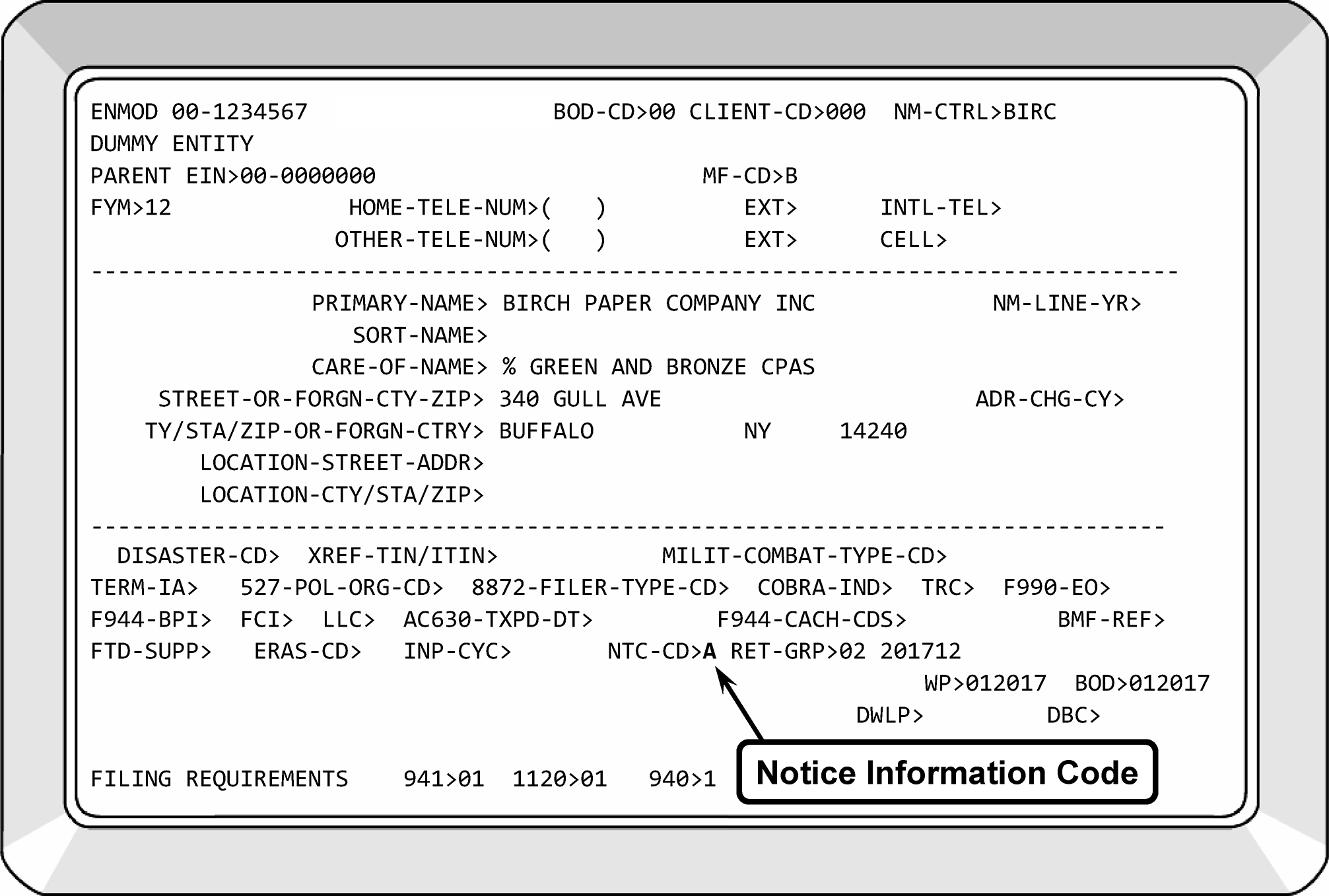
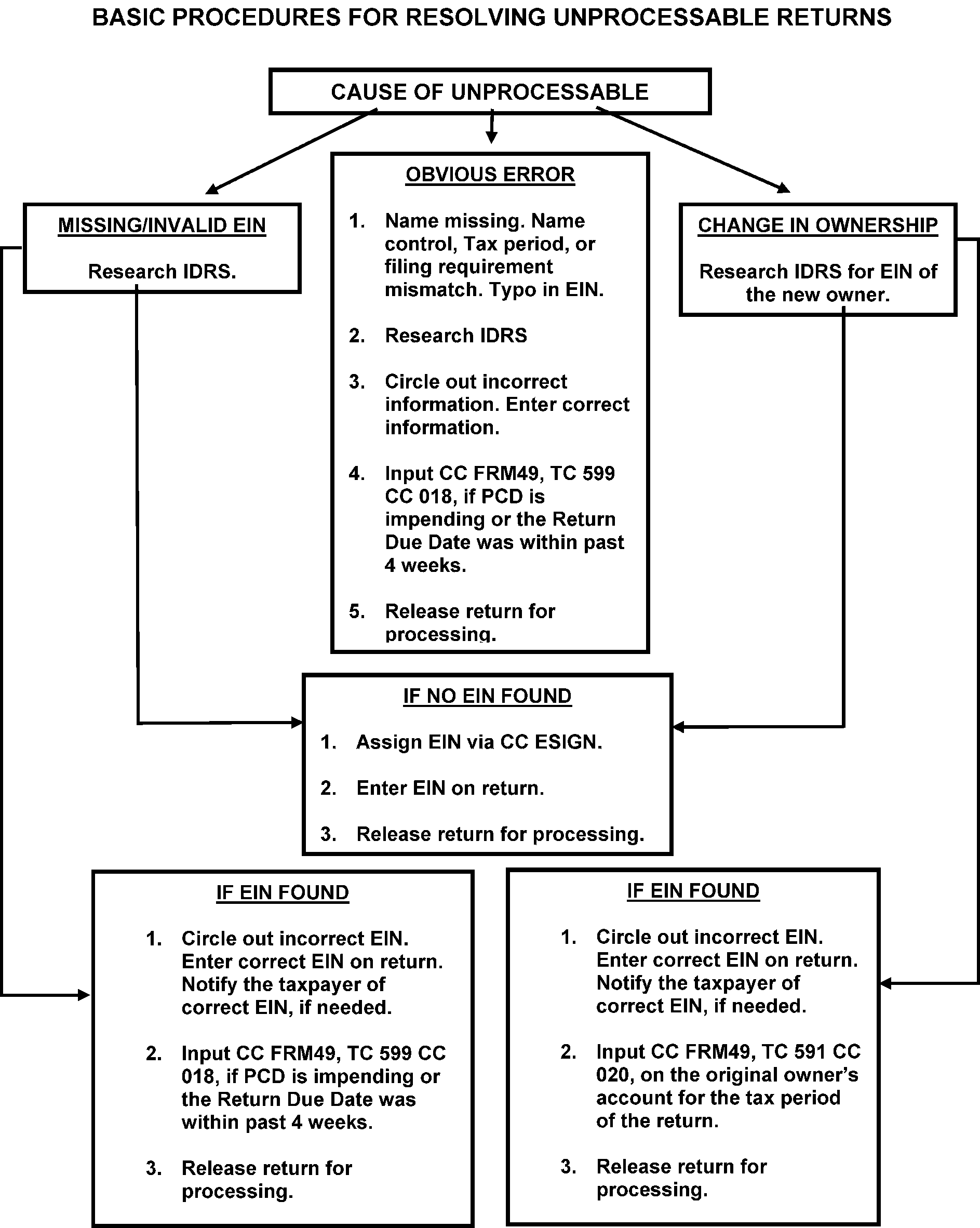
-
Entity is responsible for editing entity changes on all SCRIPS Form 940/Form 941. Entity will do the following when editing Form 940/Form 941 for SCRIPS:
-
Edit an asterisk (*) to the left (as close to the entry as possible) of the incorrect EIN and/or name control. This will prompt the system to stop on the indicated field.
-
Line through the incorrect information.
-
Form 941, Employer's Quarterly Federal Tax Return
See Figure 3.13.2-16.
Use Publication 15, (Circular E ), Employer’s Tax Guide, for resolving questions concerning Employer's Tax for Form 941, Form 940, Form 944 and Form 945.-
This return is filed by taxpayers with employees. Wages paid for services performed by a son/daughter aged 18 or older are taxable for Social Security and Medicare purposes.
-
Wages paid for services performed by a spouse are taxable for Social Security and Medicare purposes.
-
Cash tips are wages and are subject to social security and Medicare tax. Employees who receive tips of less than $20 in a calendar month aren’t required to report their tips to their employer, but the employee must report these amounts as income on their tax returns and pay taxes, if any. A separate line has been retained on the return for this item.
-
The return is filed to report withheld income tax and social security and Medicare taxes.
-
The return is filed on paper Forms 941 or MeF. Some taxpayers are required to e-file.
-
The return is filed four times a year, with the tax period ending on the following dates and the return due accordingly:
March 31 and the return due on April 30.
June 30 and the return due on July 31.
September 30 and the return due on October 31.
December 31 and the return due on January 31. However, if the taxpayer made deposits on time in full payment of the taxes due for the year, it can be filed by February 10.
-
-
Form 943 - Employer's Annual Tax Return for Agricultural Employees
Use Publication 15, (Circular E ), Employer’s Tax Guide, for resolving questions concerning agricultural employers. See Figure 3.13.2–17. This return is filed by Employers of Farm workers. A farm worker is an employee of the operator of a farm who:-
Raises or harvests agricultural or horticultural products,
-
Cares for the farm and equipment,
-
Handles, processes, or packages any agricultural or horticultural commodity, if over half is produced on the farm, or
-
Does work related to cotton ginning, turpentine, or gum resin products.
Form 943 is filed to report federal income tax withheld and FICA taxes. The employer must withhold federal income tax from the cash wages it pays its farm workers if the cash wages are subject to social security and Medicare taxes. Although non-cash wages are subject to federal income tax, an employer can withhold federal income tax only when the employer and its employee agree to do so.
Forms 943 are filed on paper or by MeF once a year. Forms 943 are filed once a year with the tax period ending on December 31st and the return due on January 31st. If an employer makes deposits on time in full payment of the taxes due for the year, the return is due February 10. -
-
Form 940 - Employer's Annual Federal Unemployment (FUTA) Tax Return
-
This return is filed by employers that have employees and are subject to Federal Unemployment tax.
-
Non-agricultural and non-household employers are required to file this return if during this year or last year either paid wages of $1,500 or more in any calendar quarter or they had one or more employees for at least some part of a day in any 20 or more different calendar weeks.
-
An Agricultural Employer files this return if during this year or last year they either paid cash wages of $20,000 or more in any calendar quarter; or employed 10 or more farm workers during some part of a day during any 20 different weeks.
-
A household employer is required to report unemployment taxes if they paid $1,000 or more in any calendar quarter. Household employers report wages and unemployment taxes paid on Schedule H (Form 1040).
Note:
State and local government health and welfare agencies, who assume responsibility for reporting and paying FICA and FUTA taxes and any withheld income tax with respect to individuals furnished by the agency to provide domestic services (home care workers) for recipients of public assistance must obtain a separate EIN to report these taxes.
-
The return is filed once a year with the tax period ending on December 31st and the return is due on January 31st. If the taxpayer deposits all FUTA tax when due, the taxpayer can file on or before February 10th. See Figure 3.13.2–18.
-
-
Form 944 - Employer’s Annual Federal Tax Return. Form 944 is filed annually by certain small employers to report and pay employment taxes. Taxpayers who apply for an EIN via phone, mail, internet, or fax are assigned a Form 944 FRC based on a "yes" response to Form SS-4, Item 14. Effective 1-1-10, participation in the Form 944 project became voluntary. However, to "opt out" a taxpayer must call the IRS at 800-829-4933 or 267-941-1000 (toll call) between January 1 and April 1 or send a written request postmarked between January 1 and March 17.
-
Command Code BNCHG Element Name F944-YR/IND must equal 1 or 9.
-
See IRM 2.4.9, Command Codes ENREQ, INCHG, IRCHG, BNCHG and BRCHG.
-
F944-CACHE-YEAR/IND.
-
2017 thru 2026 for year. Indicator values are 1 or 9.
-
1 -Turn on FR944 for year indicated.
-
9 -Turn off FR944 for year indicated.
-
If input, both the year and indicator must be present.
-
The return is due January 31, however, if the taxpayer made deposits on time in full payment of the taxes due for the year, it can be filed by February 10.
If... Then... A) The taxpayer is filing Form 944 and there is no FRC for Form 944 and Form 941, Establish a Form 944 FRC if the wages are under $5,000 annually. B) The taxpayer is filing Form 944, and they qualify for a Form 944 FRC and the Form 941 FRC is present. Delete the Form 941 FRC and establish a Form 944 FRC if the wages are under $5,000 annually. C) The taxpayer has a Form 944 FRC, and the taxpayer did not opt out of the Form 944 program by April 1st, Entity cannot change the FRC unless IRS made an error. The taxpayer must file Form 944. Example: Taxpayer is notified in Feb. 2025 that he is now a Form 944 filer. Taxpayer files Form 944 in Jan. 2026 for the 2025 tax year showing liability of more than $4,000. Taxpayer's Form 944 will be processed regardless of the liability amount. D) The Form 944 shows a tax liability of more than $5,000 and has a Form 944 FRC, Taxpayer must file Form 944 (unless they "opt out" before April 1st of the tax year). Note:
If a permanent 944-bypass indicator is present on CC BMFOLE never post as a Form 944 filer. The taxpayer wants to file Form 941 quarterly. The one digit 944-bypass indicator is entered via BNCHG or EOCHG screens and is called “944-BYP”. A “1” is input to set the bypass, and a 9 to turn off the bypass. If 944-BYP input is “1” and FR944 FRC is on Master File, then FR944 must be input with “0”. See IRM 2.4.9, IDRS Terminal Input - Command Codes ENREQ, INCHG, IRCHG, BNCHG and BRCHG, for additional information
-
-
Form 945 - Annual Return of Withheld Federal Income Tax
-
Form 945 is a multi-use form. The taxpayer can file it to report federal income tax withheld from non-payroll payments such as pensions, annuities, IRAs, gambling winnings, Indian gaming profits and backup withholding.
-
The return is due January 31, however, if the taxpayer made deposits on time in full payment of the taxes due for the year, it can be filed by February 10.
-
Form 945 posts to the BMF.
-
Taxpayers can request a separate EIN for the pension income; however, it is not a requirement. Separate branches within a company might want a different EIN for internal purposes.
-
When the taxpayer provides the name of a plan on the Form 945, it indicates that the filing is for withholding on a pension plan. The taxpayer can use either their business EIN or their plan trust EIN for filing Form 945 in this case. The taxpayer can choose to switch between using a plan trust EIN and the business EIN each year.
-
Primary Name Line - A business EIN will never have wording such as "PROFIT SHARING PLAN" . A plan trust EIN will always have wording such as "PROFIT SHARING PLAN" .
-
Sort Name Line - A business EIN will never have "ACCOUNT UNDER TEFRA" in the sort name. A plan trust EIN will have "ACCOUNT UNDER TEFRA" in the sort name.
-
Check BMFOL'I' or BMFOL'T' for MFT 16 to compare deposits when unsure where to post the return.
-
A TC 011 (consolidation) will only be performed when two plan trust EINs were issued for the same plan trust. Never consolidate a plan trust EIN to a business EIN, even if the taxpayer indicates that they don’t want to use the plan trust EIN. These are two separate and distinct entities. Input a TC 591 CC 020 on the account that will no longer be filing the Form 945.
-
Processing Form 945. See Figure 3.13.2-20.
If... And... Then... A) The taxpayer uses their business EIN, The EIN is valid, Use the business EIN to process the return. Circle out any plan name wording on the Form 945 such as "PROFIT SHARING PLAN" . B) The taxpayer uses their plan trust EIN, The EIN is valid, Use the plan trust EIN to process the return. C) The plan trust EIN is no longer on Master File, Research to verify the plan trust EIN. D)The plan trust EIN is no longer on Master File, The EIN is valid, Re-establish the EIN via TC 000. E) The plan trust EIN is no longer on Master File, A valid EIN is not found, Assign a new EIN with the information provided. -
If the EIN provided is not valid or there is no EIN on the form and:
If... Then... A) The name provided is a business name, -
Research using NAMEE for a business EIN.
-
If found, process the return using the business EIN.
-
If no valid EIN is found, re-establish the EIN with the info provided.
B) The name provided is a pension plan trust type name, -
Research using NAMEE for a plan trust EIN.
-
If a plan trust EIN is found, use this EIN to process the return.
-
If a plan trust EIN is not found and a business EIN is found, check BMFOL'I' for deposits to MFT 16. If the deposits match, post the return to the business EIN. Circle out any plan name wording on the 945 such as "PROFIT SHARING PLAN" .
-
If no plan trust or business EIN is found, establish an EIN via CC ESIGN as a plan trust.
-
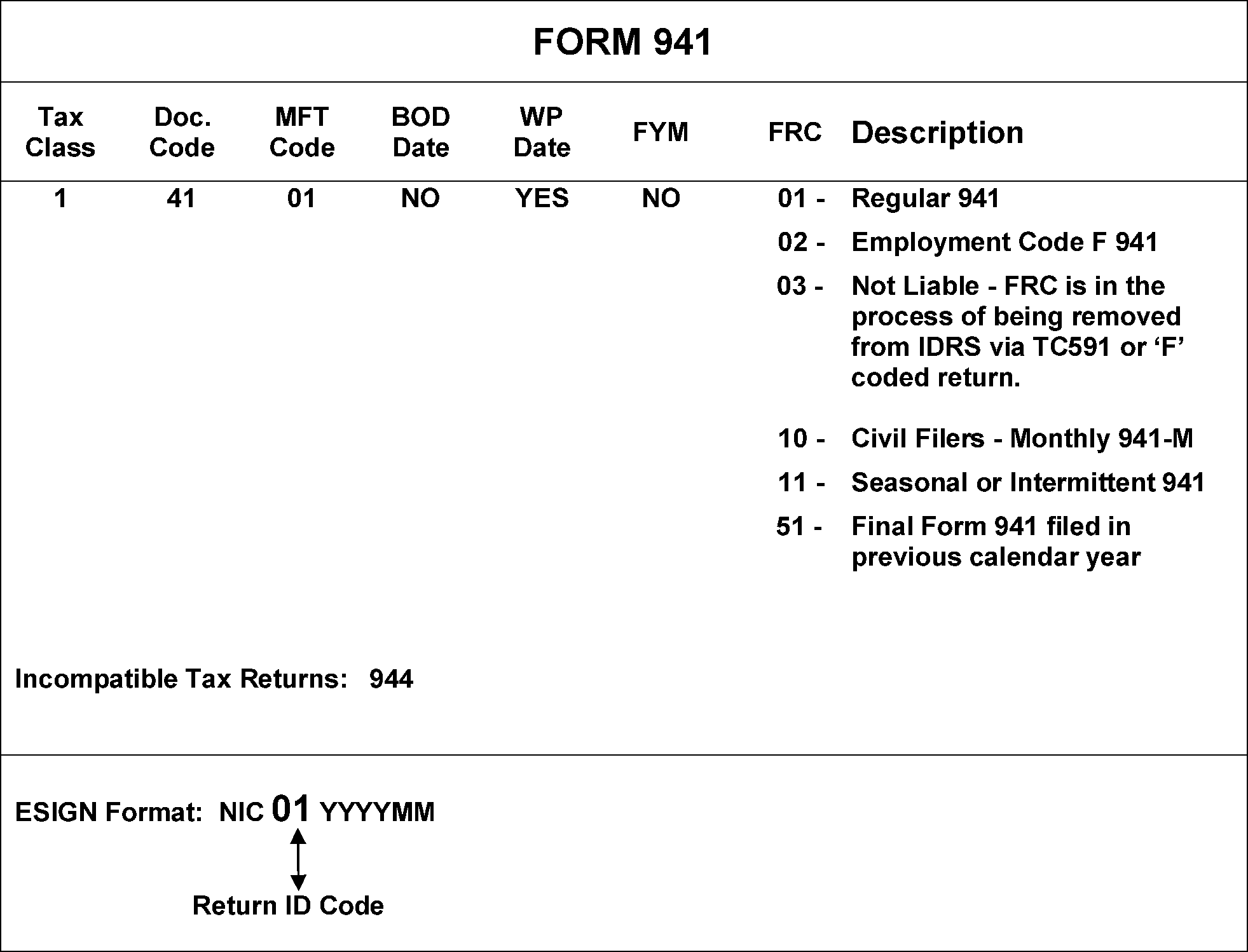
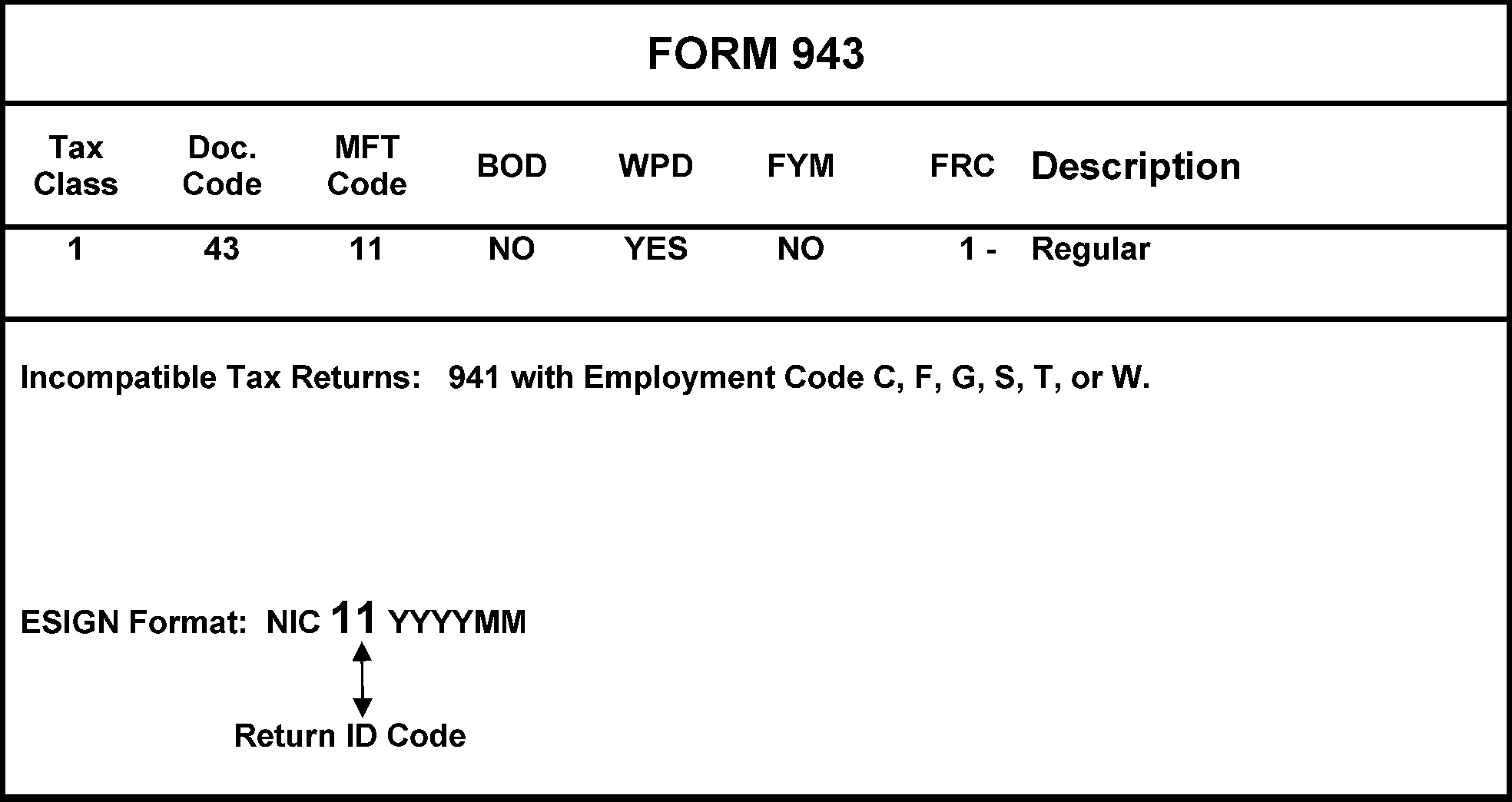
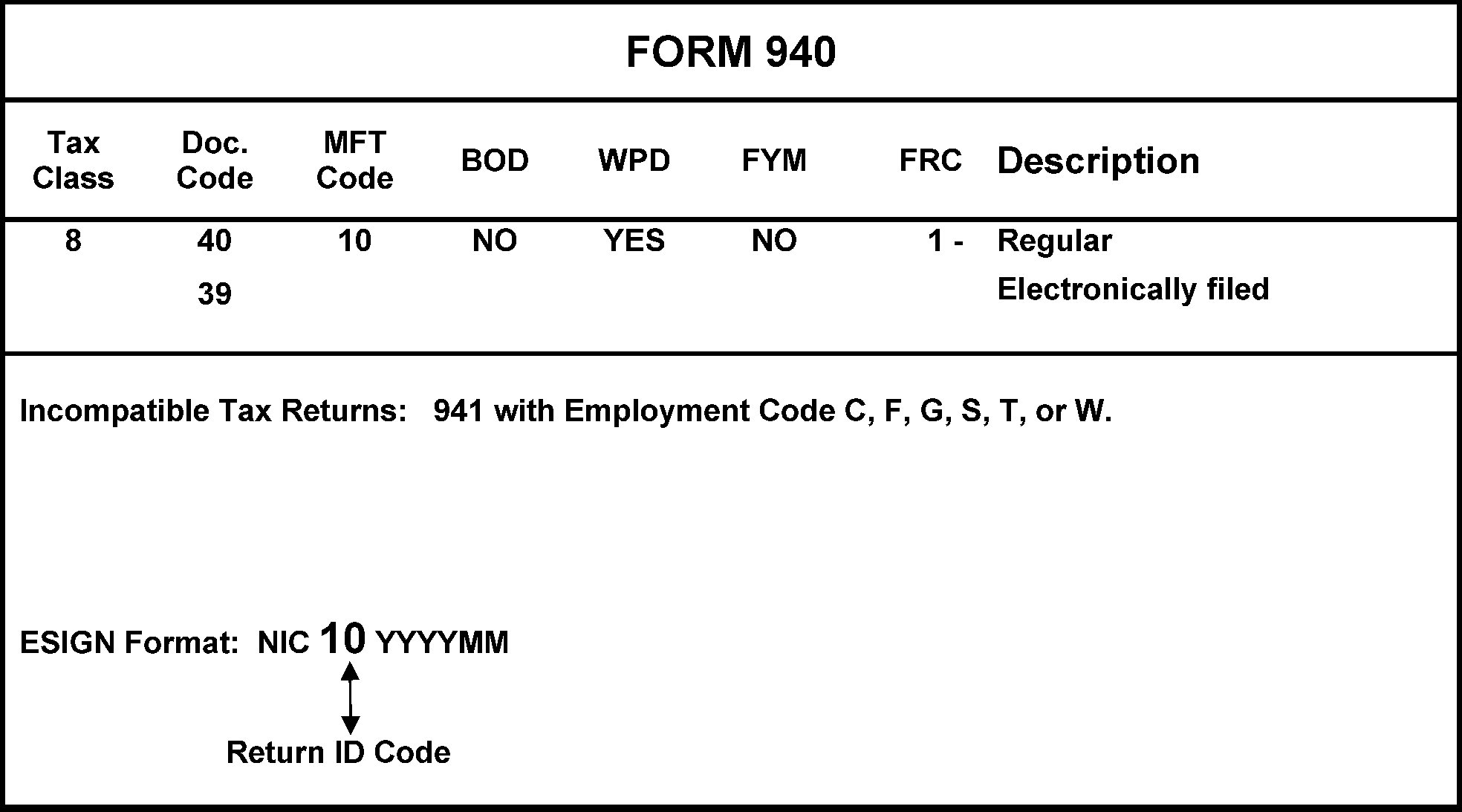
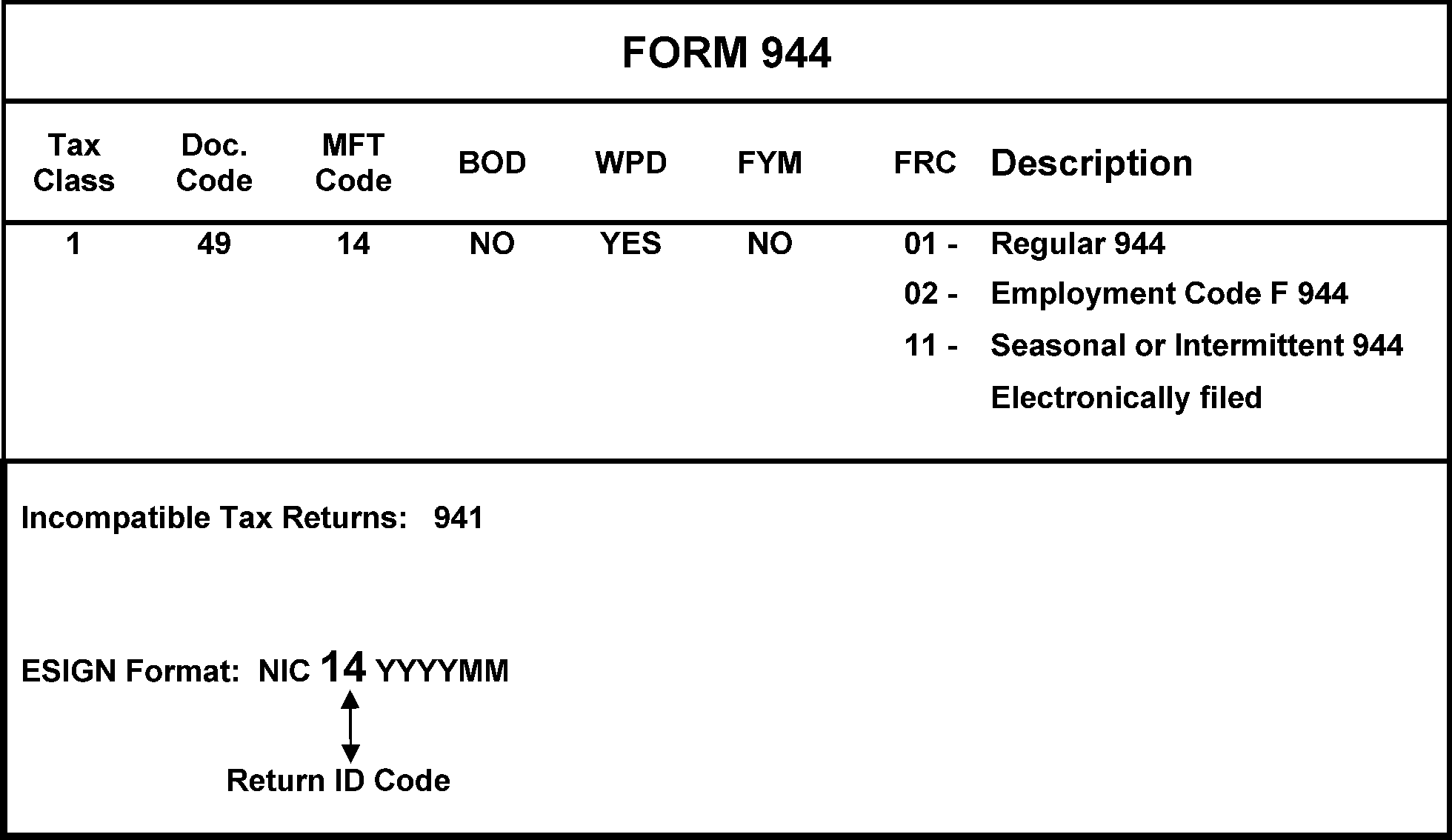
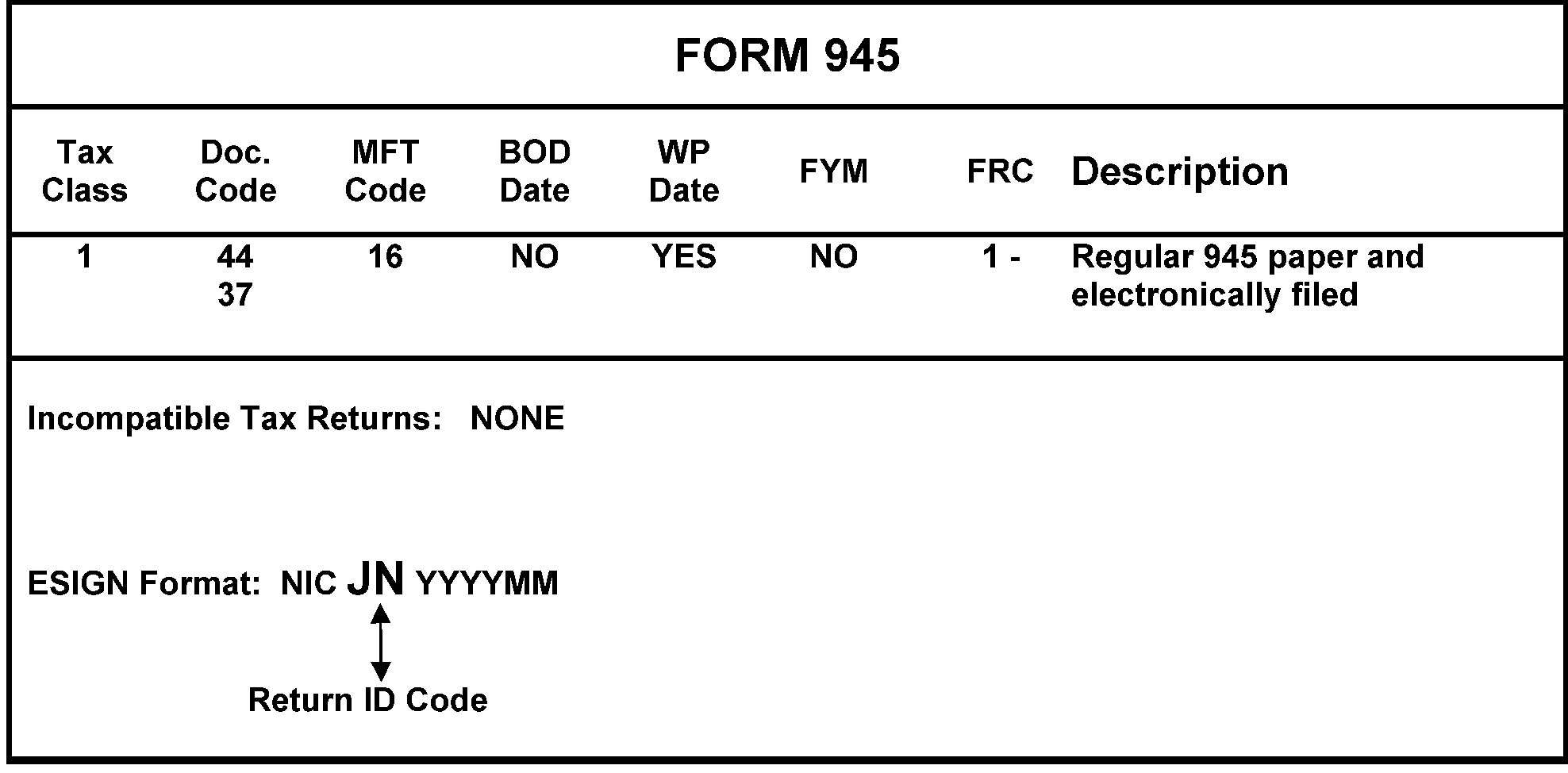
-
Entities that are incorporated under state law are considered corporations for Federal Tax purposes. A corporation must file one of the Forms 1120, unless it is an exempt organization. See Figure 3.13.2-21. Exempt organizations that are incorporated file one of the Forms 990 series returns.
-
Foreign companies (including companies from U.S. territories such as Guam, Puerto Rico, Virgin Islands, the Northern Mariana Islands, and American Samoa) that incorporate within the United States will file Form 1120. If the foreign company is not incorporated in the United States but does business in the United States (for example a branch office), it will file Form 1120-F.
-
Use the beginning of the tax year (located at the top of Form 1120) as the Business Operational Date (BOD). If the date entered in the "Date Incorporated" box is during the year covered by the return, use that date as the BOD.
-
Form 1120 (a domestic entity only) received from a Limited Liability Company (LLC), or a Limited Company (LC) must have a previously accepted Form 8832 (TC 076) on file. If the company has LP or LLP or LC after their business name, you are responsible for determining if the company is treated as a partnership. You can research the entity module for a TC 076. Most Limited Liability Partnerships (LLPs) file Form 1065 for federal tax purposes, however, there will be limited partnerships companies (LP) that will opt to file as a corporation for federal tax purposes. If you are undecided about the taxpayer’s entity classification for federal tax purposes, contact the taxpayer.
-
If Form 1128 is attached to Form 1120, see IRM 3.13.2.21, Form 1128 - Application to Adopt, Change or Retain a Tax Year, for Form 1128 processing procedures.
-
The different types of Forms 1120 are as follows:
-
Form 1120, U.S. Corporation Income Tax Return.
-
Form 1120-C, U.S. Income Tax Return for Cooperative Associations.
-
Form 1120-F, U.S. Income Tax Return of a Foreign Corporation.
-
Form 1120–FSC, U.S. Income Tax Return of a Foreign Sales Corporation.
-
Form 1120–H, U.S. Income Tax Return for Homeowners Associations.
-
Form 1120–IC–DISC, Interest Charge Domestic International Sales Corporation Return.
-
Form 1120-L, U.S. Life Insurance Company Income Tax Return.
-
Form 1120–ND, Return for Nuclear Decommissioning Funds and Certain Related Persons.
-
Form 1120–PC, U.S. Property and Casualty Insurance Company Income Tax Return.
-
Form 1120–POL, U.S. Income Tax Return for Certain Political Organizations.
-
Form 1120–REIT, U.S. Income Tax Return for Real Estate Investment Trusts.
-
Form 1120–RIC, U.S. Income Tax Return for Regulated Investment Companies.
-
Form 1120-S, U.S. Income Tax Return for an S Corporation.
-
Form 1120-SF, U.S. Income Tax Return for Settlement Funds (Under Section 468B).
-
-
Corporation tax years can end any month of the year. A fiscal year ends January through November; a calendar year end is a December tax year end. Generally, a Subchapter S corporation, a personal service corporation, and a life insurance company must use a required tax year. A required tax year is a tax year that is required under the Internal Revenue Code and Income Tax Regulations. S corporations and PSCs must use the calendar year. The entity does not have to use the required tax year if it receives IRS approval to use another permitted tax year or makes an election under Section 444 of the Internal Revenue Code. Once the fiscal year month (FYM) is determined (return filed), the taxpayer can only change their FYM by filing Form 1128.
-
All corporate returns are posted to the BMF except Forms 1120–IC–DISC which are Non-Master File.
-
Form 1120 - U.S. Corporation Income Tax Return
-
This return is filed by domestic corporations. Domestic corporations can be members of an affiliated group that files a consolidated return.
-
Form 1120 is filed annually, and the return is due on the 15th day of the fourth month after the end of the tax year.
-
For due dates of the Form 1120 family, see IRM 3.11.16-1, Corporate Income Tax Returns, Due Date Charts.
-
When ESIGNing an EIN to Form 1120 and the return is claiming a refund ≡ ≡ ≡ ≡ ≡ ≡ ≡ ≡ ≡ ≡, enter CCC ‘E’ on the return. This will place the return in a RIVO filter for fraud monitoring. See Line 36 on the 2024 form.
-
Personal Service Corporations can make an IRC Section 444 election on Form 8716 to use a fiscal tax year ending. If the taxpayer has a TC 054 posted and they file a short period Dec. 31 year end return, they are terminating their IRC Section 444 election. They will often enter Terminate Section 444 at the top of the return. Enter CCC Y on the upper body of the return, beneath the check boxes. The CCC Y will force the short period return to post, update the FYM to 12, and reverse the TC 054 with a TC 057.
-
-
Form 1120-C - U.S. Income Tax Return for Cooperative Associations
-
This return is filed by cooperative associations.
-
It was created to replace Form 990-C beginning Jan. 1, 2007.
-
For due dates of Form 1120-C, see IRM 3.11.16-1, Corporate Income Tax Returns, Due Date Charts.
-
-
Form 1120-F - U.S. Income Tax Return of a Foreign Corporation
-
This return is filed annually, and the return is generally due on the 15th day of the fourth month after the end of the tax year. For a foreign corporation with no office or place of business in the U.S., this return is due by the 15th day of the sixth month after the end of the tax year. However, a foreign corporation with a fiscal tax year ending June 30th must file by the 15th day of the third month after the end of its tax year.
-
If the return indicates No Liability, send Letter 6098C. See IRM 3.13.2.10.7, Going Out of Business, No Longer Liable, or Not Liable, for more information.
-
-
Form 1120-FSC - U.S. Income Tax Return of a Foreign Sales Corporation
-
Forms 1120-FSC, U.S. Income Tax Return of a Foreign Sales Corporation, are filed with the Ogden Submission Processing Center.
-
-
Form 1120-H - U.S. Income Tax Return for Homeowners Associations
-
This return is filed by homeowner’s associations. The filing of Form 1120-H is an election under IRC 528 and must not under certain circumstances be changed for the year of filing.
-
If the homeowner’s association does not elect to use Form 1120-H, it can file a Form 1120.
-
If the homeowner’s association is exempt from tax under IRC 501(c)(4), it will file a Form 990 instead of Form 1120-H.
-
The Form 1120-H is filed annually and generally, the return is due on the 15th day of the fourth month after the tax year ends.
-
-
Form 1120-IC-DISC - Interest Charge Domestic International Sales - Corporation Return
-
This return is an information return filed by an interest charge domestic international sales corporation (DISC), a former DISC, and a former IC-DISC.
-
The IC-DISC election is made by filing Form 4876-A, Election To Be Treated as an Interest Charge DISC.
-
The return is filed annually and is due on the 15th day of the ninth month after the tax year ends. No extensions are allowed.
-
-
Form 1120-L - U.S. Life Insurance Company Income Tax Return
-
This return is filed by domestic life insurance companies and foreign corporations carrying on an insurance business within the U.S. that would qualify as life insurance companies if they were U.S. corporations.
-
A benevolent life insurance company of a purely local character of which 85 percent or more of the income consists of amounts collected from members for the sole purpose of meeting losses and expenses can file for a tax-exemption under IRC 501(c)(12) and then will file Form 990. An exempt organization could be required to file a Form 1120-L when it meets certain criteria.
-
This return is filed annually and generally is due on the 15th day of the fourth month after the tax year ends.
-
-
Form 1120-ND - Return for Nuclear Decommissioning Funds and Certain Related Persons
-
This return is filed by nuclear decommissioning funds under IRC 468A to report contributions received, income earned, the administrative expenses of operating the fund, and the tax on the income earned.
-
The tax year must be the same as that of the creating public utility.
-
The return is filed annually and is due on the 15th day of the fourth month after the close of the tax year.
-
-
Form 1120-PC - U.S. Property and Casualty Insurance Company Income Tax Return
-
This return is filed by domestic non-life insurance companies and any foreign corporations carrying on an insurance business within the U.S. that would qualify as non-life insurance companies subject to tax under IRC 831 if they were U.S. corporations.
-
Certain small mutual and stock non-life insurance companies can file for a tax-exemption under IRC 501(c)(15) and then will file Form 990. An exempt organization could be required to file a Form 1120-PC when it meets certain criteria.
-
This type of taxpayer can be a member of an affiliated group and file a consolidated return.
-
Normally the return will be filed on a calendar year but can be a fiscal filer if the parent is a fiscal filer.
-
The return is filed annually and generally the return is due on the 15th day of the fourth month after the tax year ends.
-
-
Form 1120-POL - U.S. Income Tax Return for Certain Political Organizations- Filed exclusively at Ogden Submission Processing Center (OSPC).
-
This return is filed by political organizations, that is, a party, committee, association, fund (including a separate segregated fund set up by IRC 501(c) tax-exempt organizations), such as a political action committee. A political organization could also be required to file a Form 990 or Form 990-EZ.
-
A tax-exempt organization required to file Form 1120-POL must also file either Form 990 or Form 990-EZ.
-
The return is filed annually and is due on the 15th day of the fourth month after the tax year ends.
-
Use the individual's name as the name control:
Committee to Elect Patrick Doe: Input name control as PATRICK DOE COMMITTEE TO ELECT.
Committee to Elect Pat Doe: Input name control as PATDOE COMMITTEE TO ELECT.
-
-
Form 1120-RIC - U.S. Income Tax Return for Regulated Investment Companies
-
This return is filed to report the income, gains, losses, deductions, credits, and to figure the income tax liability of a Regulated Investment Company (RIC).
-
A RIC cannot be a member of a consolidated group.
-
Form 1120-RIC is an annual return required to be filed on the 15th day of the fourth month after the end of the RIC's taxable year.
-
-
Form 1120-REIT - U.S. Income Tax Return for Real Estate Investment Trusts
-
This return is filed to report the income, gains, losses, deductions, credits, and to figure the income tax liability of a Real Estate Investment Trust (REIT).
-
Any Entity that elects to be treated as a REIT (or has made a valid election for a prior tax year) and meets the requirements to be taxed as a REIT must file this return. The election is made on this return. An Entity cannot be taxed as a REIT until it files Form 1120-REIT.
-
Once the election is made it remains in effect until terminated or revoked. An election terminates automatically for any year the entity is not a qualified REIT. An election can be revoked by the taxpayer by filing a statement with the campus by the 90th day after the first day of the tax year. If correspondence is received for revocation prior to the return being filed, input TC 930 with CC FRM77 to have the taxpayer’s correspondence associated with the Final Form 1120-REIT return. See Entity Job Aid 10744-003, page JA-61, for example of TC 930. Correspond with the taxpayer to advise them to file a Final Form 1120-REIT return. In general, if an election terminates or is revoked, the entity cannot re-elect to be taxed as a REIT until the 5th taxable year after the year the termination or revocation is effective.
-
The revoking correspondence must be held in Entity until the final Form 1120-REIT is filed. Do not suspend. Associate the correspondence with the final Form 1120-REIT. Ensure the return has CCC "F" .
-
A REIT cannot be a member of a consolidated return.
-
Form 1120-REIT is an annual return required to be filed by the 15th day of the fourth month after the end of the REIT's taxable year.
-
-
Form 1120-S - U.S. Income Tax Return for an S Corporation
-
S corporations are domestic corporations in which the income/loss flows through to the owners/shareholders.
-
The corporation must make a Subchapter S-election on a timely filed Form 2553. If Form 2553 is attached to Form 1120-S and the return has yet to be numbered, detach and process Form 2553. See IRM 3.13.2.23, Form 2553, Election by a Small Business Corporation, and Related Transactions/CPs.
-
This taxpayer cannot be a member of a consolidated group of corporations.
-
Generally, an S corporation is exempt from federal income tax other than tax on certain capital gains and passive income.
-
This return is filed annually and is due by the 15th day of the third month after the close of the tax year. See IRM 3.11.217-2, Form 1120-S Corporation Income Tax Returns, Due Date Chart.
-
The Tax Reform Act of 1986 required all S corporations to use the same tax year/FYM as their owner. There are certain provisions (Form 8716, Form 1128, Rev. Proc. 2006-46) whereby an S corporation can use a fiscal tax year. This will be denoted by a TC 054 or TC 055 on the Entity module.
-
Subchapter S corporations can make an IRC Section 444 election on Form 8716 to use a fiscal tax year. If the taxpayer has a TC 055 posted and they file a short period Dec. 31 year end return, they are terminating their IRC Section 444 election. They will often enter Terminate Section 444 at the top of the return. Enter CCC Y on the upper body of the return, beneath the check boxes. The CCC Y will force the short period return to post, update the FYM to 12, and reverse the TC 054/055 with a TC 057.
-
If an EIN must be assigned to a Form 1120-S, NIC D will be input. Send Letter 147C to the taxpayer to notify them of the EIN assignment, asking them to complete and return a Form SS-4. Also tell the taxpayer that they will be contacted separately regarding their Form 2553.
-
If a valid paper Form 1120-S is received in Entity because the current FRC on IDRS is 1120-01, check for an unreversed TC 090. If found, delete the 1120-01 FRC and release the return. The return will now read the DLN of the TC 090, post and generate an 1120-02 FRC. If TC 090 is not posted, route return to originator explaining taxpayer does not have a valid Subchapter S-election. See IRM 3.13.2.23 (3), Form 2553, Election by a Small Business Corporation, and Related Transactions/CPs. This will not work for MeF returns as MeF returns must pass a FRC validity check. See IRM 3.13.2.10.19, Updating Account Information for Modernized e-File (MeF), for resolving electronic returns with a FRC problem.
-
BMF Entity will receive a Form 1120-S when Item H, Box (5) is checked. This box is labeled S-election termination or revocation. Research IDRS for the taxpayer's status:
If... And... Then... A) TC 091/096 is posted with an effective date prior to the tax period of the Form 1120-S, Edit return with "Let Unpost" and any other needed information and release. B) TC 091/096 is posted with an effective date within the tax period of the Form 1120-S, 1) Tax period of Form 1120-S is valid with the posted TC 091/096 effective date, Edit return as required and release. B) TC 091/096 is posted with an effective date within the tax period of the Form 1120-S, 2) Tax period of Form 1120-S is not valid with posted TC 091/096 effective date, Edit return with "Let Unpost" and any other needed information and release. C) TC 091/096 is posted with an effective date after the tax period of the Form 1120-S, Edit return as required and release.
If there is not a TC 091/096 posted, look through the return for correspondence or other evidence of a statement of revocation/termination and proceed as follows:If... And... Then... A) Statement of Revocation is found, 1) It is timely filed with the IRS received date of the return (edit said date on Statement of Revocation), -
Detach Revocation statement from return (or print if electronic), edit IRS received date.
-
Process Revocation per IRM 3.13.2.23.16, Processing the Revocation.
-
Edit return as required.
-
Associate documentation with posted TC 090 DLN.
A) Statement of Revocation is found, 2) It is not timely filed, -
Send Letter 326C telling taxpayer revocation statement attached to return was not timely filed.
-
Edit and release.
-
Associate documentation with posted TC 090 DLN.
B) Statement of Termination is found, 1) Termination is valid, -
Detach Statement of Termination from the return (or print if electronic).
-
Input TC 096 per IRM 3.13.2.23.18, Processing the Termination.
-
Edit return as required and release.
-
Associate documentation with posted TC 090 DLN.
B) Statement of Termination is found, 2) Termination is not valid, -
Send Letter 326C telling taxpayer statement of termination attached to return was not valid and their election will remain in effect.
-
Edit return as required and release.
-
Associate documentation with posted TC 090 DLN.
C) Statement of Revocation/Termination is not found, Edit return as required and release. -
-
Form 1120-SF - U.S. Income Tax Return for Settlement Funds (Under Section 468B)
-
This return is filed by an IRC 468B designated or qualified settlement fund that has been established to settle and pay claims asserting liability against a particular taxpayer.
-
The return is filed annually and is due on the 15th day of the fourth month after the end of the fund's taxable year, and the return’s filing time can be extended by filing Form 7004.
-
The taxable year of a qualified settlement fund is the calendar year.
-
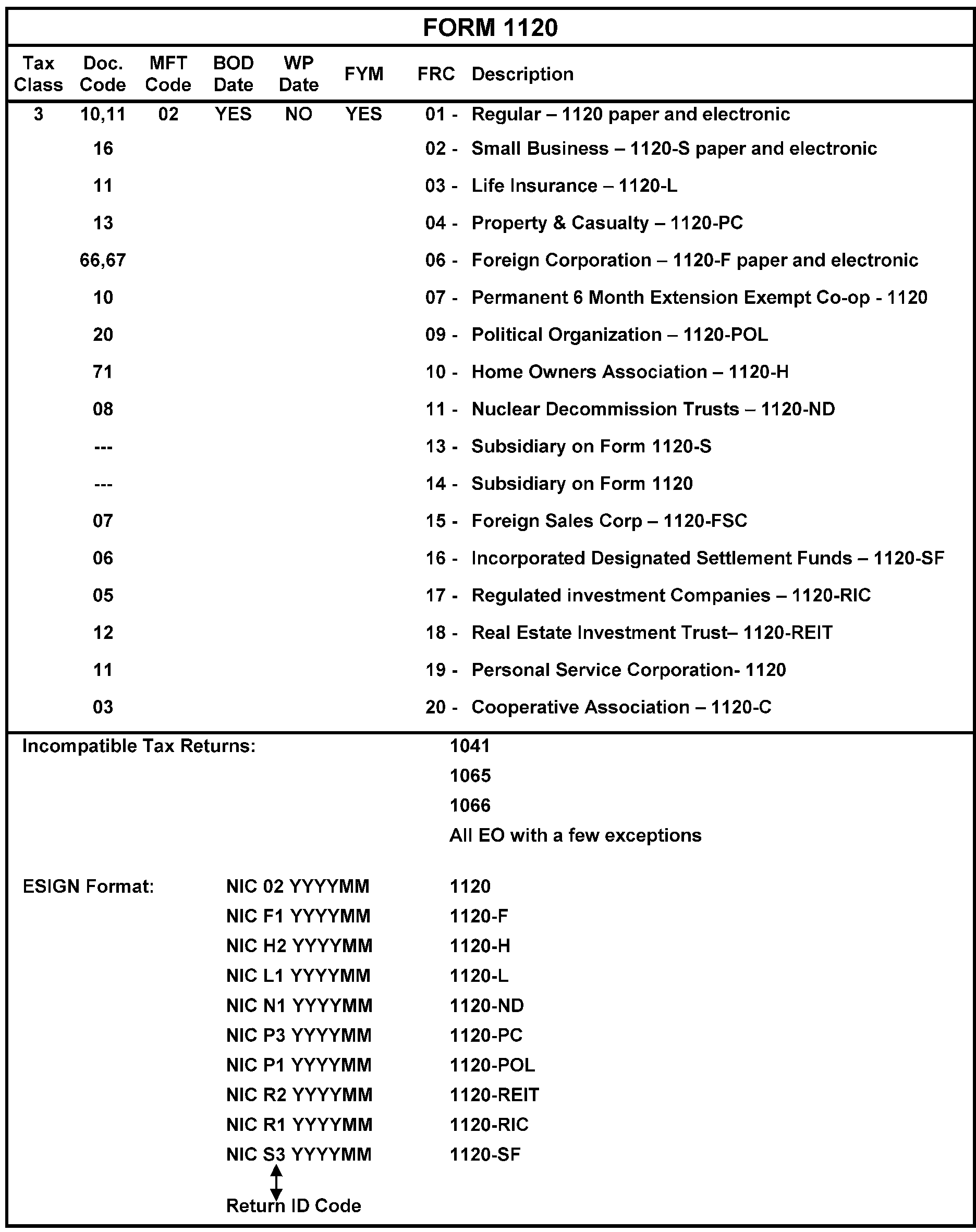
-
Rev. Proc. 2013-30 allows taxpayers to request relief for late submission of their S corporation elections by filing their Form 2553 and all required attachments with their Form 1120-S if the current year Form 1120-S is filed within 3 years and 75 days after the desired effective date. Rev. Proc. 2013-30 also allows taxpayers to submit the Form 2553 to the applicable IRS Service Center within 3 years and 75 days after the Effective Date without a Form 1120-S. They can file electronically through Modernized e-File (MeF) or paper. Code and Edit will edit Error Resolution System (ERS) Action Code (AC) 347 on paper returns and MeF will generate ERS AC 347 for electronically filed Forms 1120-S quoting Rev. Proc. 2013-30. For MeF returns, Entity TEs must print Form 2553 from the Employee User Portal (EUP). The instructions for this Rev. Proc. will be applied to numbered returns in the form of pipeline, Rejects, or Unpostables.
-
Rejected returns will be assigned and processed as soon as possible upon receipt. These cases are time sensitive and can take several days to complete. These cases will be processed within 20 days.
-
Rev. Proc. 2013-30 modifies and supersedes Rev. Proc. 2003-43, Rev. Proc. 2004-48, and Rev. Proc. 2007-62 and supersedes the relief in Situation 1 of Rev. Proc. 97-48 as well as making obsolete the relief in Situation 2 of Rev. Proc. 97-48. Additionally, Rev. Proc. 2013-30 modifies, supersedes and makes obsolete certain relief in Rev. Proc. 2004-49.
-
Requests for relief under Rev. Proc. 2013-30 filed on a return will be processed as follows:
Note:
Following is suggested script to be utilized when contacting the taxpayer via telephone for Rev. Proc. 2013-30 information. Remember, specific data must never be left on an answering machine. This is (TE’s name) from the Internal Revenue Service and I am processing your Form 1120-S and Form 2553 filed under Rev. Proc. 2013-30. Before I can complete the processing of your forms, I must ask for additional information. (State the needed information). Please fax this information to me at (your team's fax number) no later than (two days from today). If I do not receive the requested information within the time frame requested, your Form 1120-S will be processed as a Form 1120 or removed from processing.
-
TC 971 AC 373 input on MFT 06 indicates Form 1120-S has failed to post to MF and a phone call was made or a letter has been issued to the preparer/taxpayer. No reply was received and the return was removed from processing. AC 373 can also be used on a TC 972 to reverse the transaction.
-
TC 971 AC 374 input on MFT 06 indicates a Form 1120 has failed to post to MF and a phone call was made or a letter has been issued to the preparer/taxpayer. No reply was received and the return was removed from processing. A TC 971-374 should only be input for a multi-member LLC. AC 374 can also be used on a TC 972 to reverse the transaction.
-
TC 971 AC 375 indicates a Form 1120-S has failed to post to MF and a phone call was made or a letter has been issued. No reply was received and the return was removed from processing. AC 375 can also be used on a TC 972 to reverse the transaction.
-
TC 971 AC 376 indicates the conversion of Form 1120-S to a Form 1120, when there is no reply or when the reply received does not resolve the unpostable issue. A TC 971 AC 375 should precede the TC 971 AC 376. AC 376 can also be used on a TC 92 to reverse the transaction.
-
If taxpayer is not an LLC, the LLC indicator must be deleted by inserting a "9" in the LLC indicator field. See IRM 3.13.2.26 (2), Domestic Limited Liability Company (LLC).
-
The most common examples of reasonable cause or inadvertence:
-
Miscommunication between the taxpayer's tax advisors/shareholders (for example attorneys, CPA/tax practitioner, accountants, bookkeepers, especially during incorporation period).
-
Circumstances beyond the taxpayer's control (for example unavoidable absence, illness), mistakes, or ignorance of the law.
-
Reliance on a paid professional (inside or outside the company) who failed to understand Form 2553 filing requirements.
-
Delay in obtaining shareholder signature for the election.
-
One of the shareholders forgot to make the election or each shareholder thought the other was going to do it.
Reminder:
It is not possible to list every valid scenario that might be given by the taxpayer. If taxpayer acknowledges late filing with a statement containing any plausible reason, and has included all other statements, give the taxpayer the benefit of the doubt and process form under Rev. Proc. 2013-30.
-
-
If the taxpayer responds with the correct return or responds and Form 2553 is approved for the tax year in question, input TC 971-377 to indicate the converted Form 1120 has been re-processed as a Form 1120-S. See IRM 3.13.2.23.14, Correspondence Regarding Form 2553 Issues.
-
TC 971 AC 376 will freeze all refunds to the taxpayer. To lift the freeze, input TC 971 AC 377.
-
If correspondence is received in response to our inquiry regarding Rev. Proc. 2013-30, see IRM 3.13.2.23.4.1 (1), Revenue Procedure 2013-30, for processing instructions.
-
ERS Action Code (AC) 321 was created specifically for electronically filed consolidated tax returns with subsidiary EIN and Name Control mismatch. A Consolidated Return Resolution report will be submitted to Entity with a listing of each subsidiary EIN and name (along with the parent corporation's EIN and name) and whether or not the TC 590 Closing Code 014 was input. Entity will update the subsidiary's name and/or EIN as needed.
-
The AC 321 will be stamped in the lower left of the return.
-
Thorough research of both the parent and subsidiary accounts is necessary.
-
Electronic filed returns will be routed to Entity by Rejects with a 10-day suspense period/turnaround time.
-
If rejected MeF return is for a name and/or address change for the parent, access EUP to verify.
-
This form is the income tax return for estates and trusts.
-
EINs in the 6/7/8 million series are reserved for Form 1041 filers. A 6/7/8 Million series EIN can be identified by the number 6, 7, or 8 immediately following the hyphen (-).
-
If the EIN on Form 1041 is not on Master File, but is a 6/7/8 million series, we can assume this EIN was part of a Bank List/Bulk Assignment that wasn't placed on Master File. See IRM 21.7.13.3.3.5, Processing a Consolidated List Returned by an Institution/Authorized Representative. Establish the EIN entered on the return with CC ESIGN (suppressing CP 576A) or TC 000.
-
When ESIGNing an EIN to Form 1041 (or TC 000ing EIN) and the return is claiming a refund ≡ ≡ ≡ ≡ ≡ ≡ ≡ ≡ ≡, enter CCC ‘E’ on the return. This will place the return in a RIVO filter for fraud monitoring. See Line 29 of the 2024 form.
-
The types of returns are:
-
Form 1041, U.S. Income Tax Return for Estates and Trusts.
-
Form 1041–A, U.S. Information Return Trust Accumulation of Charitable Amounts.
-
Form 1041–ES, Estimated Income Tax for Estates and Trusts.
-
Form 1041–N, U.S. Income Tax Return for Electing Alaska Native Settlement.
-
Form 1041-QFT, U.S. Income Tax Return for Qualified Funeral Trusts.
-
-
Form 1041-A is processed as an EO return; see IRM 3.13.12, Campus Document Services - Exempt Organization Account Numbers.
-
Form 1041-QFT is processed at the Kansas City Submission Processing Center only. See IRM 3.13.2.8.8, Form 1041-QFT, U.S. Income Tax Return for Qualified Funeral Trusts.
-
The return is filed annually and is due on the 15th day of the 4th month following the close of the tax year. See Figure 3.13.2-22.
-
The type of trusts that file Form 1041 are:
-
Decedent's Trust - The fiduciary must file for a created trust from the estate of a decedent.
-
Domestic Trust - The fiduciary must file for a domestic trust taxable under Treasury Regulation 1.645-1(c).
-
Bankruptcy Estate - The fiduciary must file for an estate of an individual involved in bankruptcy proceeding under Chapter 7 or 11 of title 11 of the U.S. Code. If a corporation, partnership, or LLC in bankruptcy creates a liquidating trust, the trust must file Form 1041.
-
A trust filing as if it were an Estate under IRC 645 when no executor has been appointed for the related estate must check the Decedent’s estate box in Item A of Form 1041 and mark box in Item G. The designation, "Trust filing as an Estate under Section 645" needs to be input into IDRS. (Example, JOHN PUBLIC TR FILING AS AN ESTATE UNDER SECTION 645). After two years has elapsed for that entity, the trust needs a new EIN (at this point they are a new entity). There will not be an EIN consolidation issue since the new EIN will be input into IDRS as JOHN PUBLIC TR.
-
-
Generally, a trust must adopt a calendar year (FYM 12) and the return is due on the 15th day of the 4th month following the close of the tax year. The following trusts are exempt from this requirement:
-
A trust that is exempt from tax under IRC 501(a).
-
A charitable trust described in IRC 4947(a)(1).
-
A trust that is treated as wholly owned by a grantor under the rules of IRC 672.
-
-
If the taxpayer does not mark a box in Item A of Form 1041, and you can derive the exact type of entity by the name line, mark the appropriate box in Item A.
-
Use the beginning of the tax year (located at the top of Form 1041) as the Business Operational Date (BOD). If the date entered in the Date Entity Created box is during the year covered by the return, use that date as the BOD.
-
The chart below contains associated terms and types of trusts:
Term Definition Fiduciary -
Trustee of a trust, or
-
Executor, executrix, administrator, administratrix, personal representative, or person in possession of a property of a decedent.
Beneficiary A person designated as the recipient of funds or other property under a trust or an estate. Corpus The principal sum of the capital of a trust or an estate, as distinguished from interest or income. Maker/grantor The person(s) or organization that: -
Originated the trust, or
-
Has control over the trust.
Simple Trust A trust: -
For which the trust instrument requires that all income be distributed currently, with no authority to make charitable contributions or distribute amounts allocated to the corpus of the trust, and
-
That is a simple trust only for a year in which it distributes income and makes no other distributions to beneficiaries.
Complex Trust A trust which, for the taxable year, does not qualify as a simple trust. Grantor Trust A trust that: Non-taxable grantor trusts do not report income, deductions, and credits on Form 1041. The grantor can file Form 1041 for informational purposes only.-
Is established by a living person or organization, created by a will, or
-
Is established so the income from the trust is taxable income of the grantor.
Inter vivos Trust A trust established by a grantor during their lifetime. Revocable Trust The grantor: -
Has control of the trust (for example, has power to repeal or annul), and
-
Pays the taxes of the trust on their Form 1040. The grantor files Form 1041 for informational purposes only.
Irrevocable Trust The grantor cannot revoke the trust. Testamentary Trust A testamentary trust is created by a will, which begins its existence upon the death of the person making the will, when property is transferred from the decedent's estate. Testamentary trusts are generally simple or complex trusts. A testamentary trust is irrevocable by definition, as it comes into being at the death of the grantor. It is also known as a "trust under the will" . Residual Trust A trust set up to receive the part of an estate that remains after the payment of all debts, charges, devices, and bequests to entities other than the beneficiary. Conservatorship A trust set up for an incompetent person. Guardianship/
CustodianshipA trust set up for a minor or incapacitated person. Ancillary and Domiciliary Trust Returns A trust which exists in a foreign domestic state because the grantor is domiciled (resides) in another state within the United States. Family Estate Trust -
A trust instrument provides evidence of ownership, such as certificates of beneficial interest in the trust.
-
The grantor is a trustee and executive officer.
-
The corpus and undistributed income are distributed to the owners after the trust is terminated. This is also known as a family estate, pure trust, equity trust, equity pure, prime, or constitutional trust.
Generation Skipping Trust A trust with younger generation beneficiaries who are more than one generation younger than the grantor’s generation. Pooled Income Trust (also known as Split Interest Trust) A split interest trust with a: -
Remainder interest for a public charity, and
-
Life income interest retained by a donor or for another person.
Clifford Trust A grantor type trust where the assets are placed in a trust but there is still some ownership. It is taxable to the grantor. Non-Explicit Trust -
An arrangement that has substantially the same effect as a trust. It is treated as a trust even though it is not an explicit trust.
-
Non-explicit trusts do not include the decedent’s estate.
Examples: Insurance and annuity contracts, arrangements involving life estates and remainders.
Non-exempt Charitable Trusts A trust that is set up for a charitable purpose but that is not eligible for exempt status. -
-
If Form 1041 is being filed for an individual bankruptcy estate and an EIN must be assigned, the EIN will be assigned in the name of the debtor. The trustee's name will be entered on the Sort Name Line.
-
When Form 1041 is filed for Corporations, Partnerships, or LLCs that are in bankruptcy, do not assign a new EIN unless the words "Liquidating Trust" are present. If these words are not present, annotate Allow to UPC 329, TC 013 in audit trail. Input TC 013 adding the bankruptcy term(s) entered on the return to the primary name line, complete audit trail and release return.
-
If a Form 1040 is received that is overlaid with a Form 1041, do not detach Form 1040. The final Form 1040 will be filed for the same year a taxpayer becomes deceased. Quite often, executors of estates will file Forms 1040 for tax periods beyond the year the date of death is in. These Forms 1040 must be converted to Forms 1041.
-
Research for an estate EIN. If an EIN is found, enter the EIN on the Form 1041. Do not send a letter.
-
If an EIN is not found, assign an EIN, suppressing the notice with NIC D. Do not send a letter.
-
Ensure the Computer Condition Code (CCC) F is entered on the return.
-
-
A decedent's estate is straightforward. The executor/administrator/etc. will be placed on the Sort Name line.
-
If processing Form 1041 that bears an EIN with "Section 645" annotated in the name line and Forms 1041 for two tax periods are posted to the EIN, assign a new EIN with NIC B, RIC 05, and applicable tax period. Input TC 591-020 on the IRC 645 EIN for the tax period of the Form 1041 being processed.
-
If Form 1041 is received indicating "No Liability" , see IRM 3.13.2.10.12, Relief from Filing.
-
Do not establish a Form 1041 FRC if the taxpayer annotates "Widely Held Investment Trust" or "IRC 1.671-5(b)(22)."
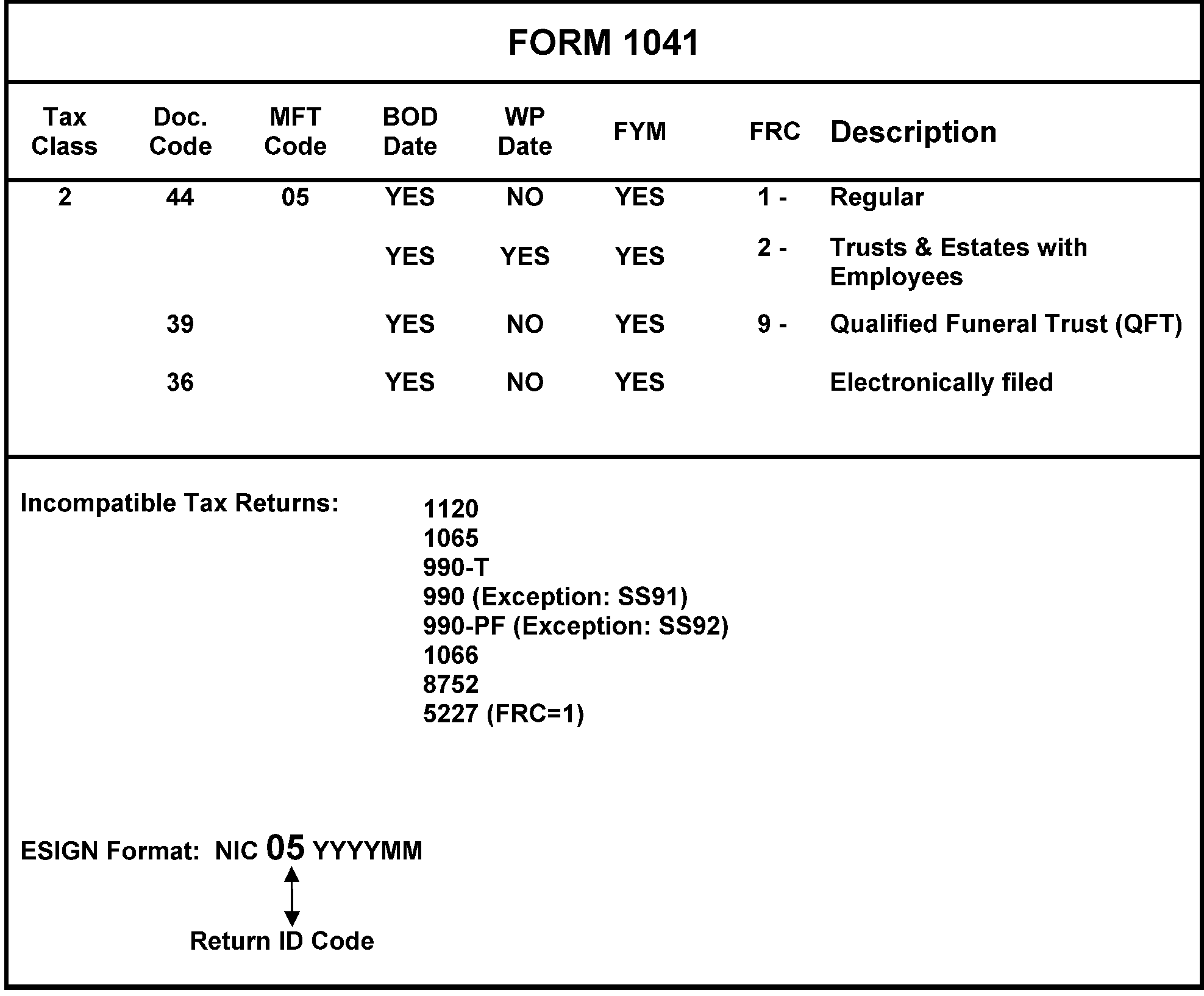
-
The trustee of a trust that has elected to be taxed as a qualified funeral trust (QFT) files Form 1041-QFT to report the income, deductions, gains, losses, etc., and income tax liability of the QFT.
-
Form 1041-QFT will be processed at the Kansas City Submission Processing Center only.
-
Use the beginning of the tax year (located at the top of Form 1041-QFT) as the Business Operational Date (BOD).
-
Follow these procedures to avoid balance due notices and incorrect filing requirements on QFTs with remittance. RCO/Extraction will call Entity when these returns are identified, and the proper research must be completed before Deposit Activity processes the payment. Forms 1041–QFT must be processed on a same day basis. Research to determine the filing requirement.
-
If FRC "9" is present, continue processing as received (QFT entity has already been established).
-
If FRC other than "9" is present (most likely FRC "1" ), determine the entry present on Line 4 (Part 1) of Form 1041–QFT (number of QFTs included on this return).
-
If Line 4 contains an entry of 2 or more, establish a new EIN with FRC "9" .
-
If Line 4 is blank, or contains an entry of 1, and the filer has applied for a new EIN, establish a new EIN with FRC "9" .
-
If Line 4 is blank, or contains an entry of 1, but the filer has not applied for a new EIN, change the filing requirement to FRC "9" , but retain the existing EIN.
Note:
All Forms 1041–QFT must be established with FRC "9" . Taxpayers who elect to file a "single" Form 1041 QFT in lieu of Form 1041, can retain their original EIN as previously used for filing Form 1041. Taxpayers who elect to file a "composite" Form 1041–QFT (filed for more than one trust), must obtain a new EIN.
-
-
This return is filed to report the income, deductions, gains, losses, etc., from the operation of a partnership. See Figure 3.13.2-23.
-
The return is filed by all domestic partnerships, foreign partnerships, and Limited Liability Companies classified as partnerships for federal income tax if those entities have income from a trade or business within the United States or have income from sources in the United States.
-
The return is filed by religious and apostolic organizations that are exempt from income tax under IRC 501(d). These taxpayers are reorganized on the BMF with a Subsection Code 40. A Form 1065 filed by these organizations is treated the same as any Form 1065, except name changes and address changes affecting the name lines must be processed under instructions in this IRM.
-
The Tax Reform Act of 1986 generally requires all partnerships to use the tax year of their owner, usually December 31. If the partnership/LLC has received permission to use a fiscal tax year or a fiscal tax year is the actual year end of the owner, a TC 054 or TC 055 will be posted on the Entity module. If the taxpayer has not received permission to use a fiscal year, the phrase "allow to UPC 307" will be entered in the audit trail. The invalid tax year will be addressed when the return becomes unpostable.
-
Partnerships can make an IRC Section 444 election on Form 8716 to use a fiscal tax year. If the taxpayer has a TC 055 posted and they file a short period Dec. 31 year end return, they are "terminating their IRC Section 444 election." They will often enter Terminate Section 444 at the top of the return. Enter CCC "Y" on the upper body of the return, beneath the check boxes. The CCC "Y" will force the short period return to post, update the FYM to 12, and reverse the TC 054/055 with a TC 057.
-
Regulation 1.761-2(b)(2) allows certain investing partnerships and unincorporated organizations operating under joint production, extraction, or use agreements to elect out of partnership treatment by filing an initial Form 1065 with a list of the partners/members names and addresses. Attached must be a statement that the entity qualifies to elect out of Subchapter K under Reg. 1.761-2. The Computer Condition Code (CCC) F will be edited onto the return. Note: This is called an election out of Subchapter K election. A Private Letter Ruling (PLR) is required to revoke this election.
-
Under IRC 708, a partnership is terminated if there is a sale or exchange of 50 percent or more of the total interest in partnership capital and profits within a 12-month period. Known as a “technical termination,” the partnership is treated as contributing all of its assets and liabilities to a new partnership in exchange for an interest in the new partnership, followed by a distribution of the interest in the new partnership to the purchasing and other remaining partners. Treasury Regulation 301.6109-1(d)(2)(iii) provides that the new partnership will retain the EIN of the terminated partnership. The partnership will file two short year Forms 1065: one with a year closing on the date on which the partnership terminates, and a second for the remainder of the year. See Treas. Reg. 1.708-1(b)(3). For tax years beginning after December 31, 2017, this section does not apply.
-
The return is filed annually. For Form 1065 due dates, see IRM 3.11.15-3, Return of Partnership Income, Due Date Chart.
-
For domestic partnerships on the 15th day of the 3rd month following the close of its tax year to comply with IRC 6072(b) (as amended).
-
For partnerships that keep their records and books of account outside the United States and Puerto Rico, on the 15th day of the 6th month following the close of its tax year. The partnership must attach a statement to the Form 1065 stating that the partnership qualifies for the extension of time to file and pay.
-
-
Use the beginning of the tax year (located at the top of Form 1065) as the Business Operational Date (BOD). If the date entered in the "Date Business Started" box is during the year covered by the return, use that date as the BOD.
-
When Form 1065 is received from Code and Edit or ERS, research to determine the number of partners/members. If the return indicates the number of Schedules K-1 is "1" and the Schedule K-1 attached to the return has 100 percent interest in the partnership, correspond with the taxpayer as this is an invalid return. If the taxpayer fails to reply or states in their response they are no longer a partnership, input a TC 591 CC 020 to close the filing requirement. Route it back to the area that routed it to Entity.
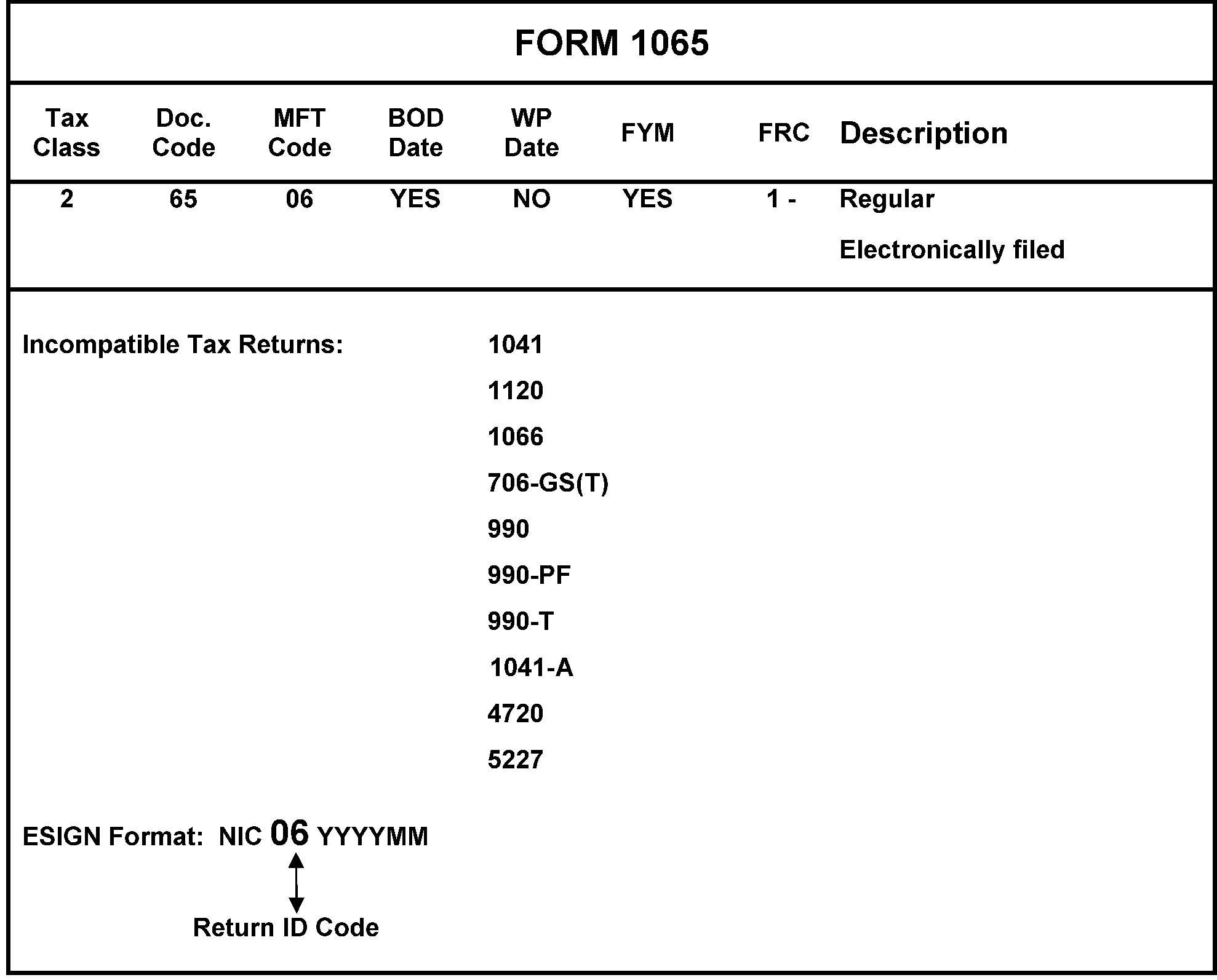
-
Form 720 is filed to report liability for certain excise taxes. See Figure 3.13.2–24.
-
If the return is for a one-time filer, mark the return final and suppress the notice.
-
If the taxable period is a calendar quarter, Form 720 is due by the last day of the first calendar month following the quarter for which it is made.
-
Form 720 is filed and processed at the Ogden Submission Processing Center.
-
The Affordable Care Act (ACA) created the Patient Centered Outcomes Research (PCOR) tax which will be reported on Line 133 of Form 720. This tax begins with the second quarter of 2013 and will be reported once a year. Therefore, the correct FRC for this taxpayer is 720-4. The account must be updated with this FRC. If the taxpayer is reporting Line 133 and any other Line, 720-1 is the correct FRC. This guidance will be used when ESIGNing an EIN or updating an account.
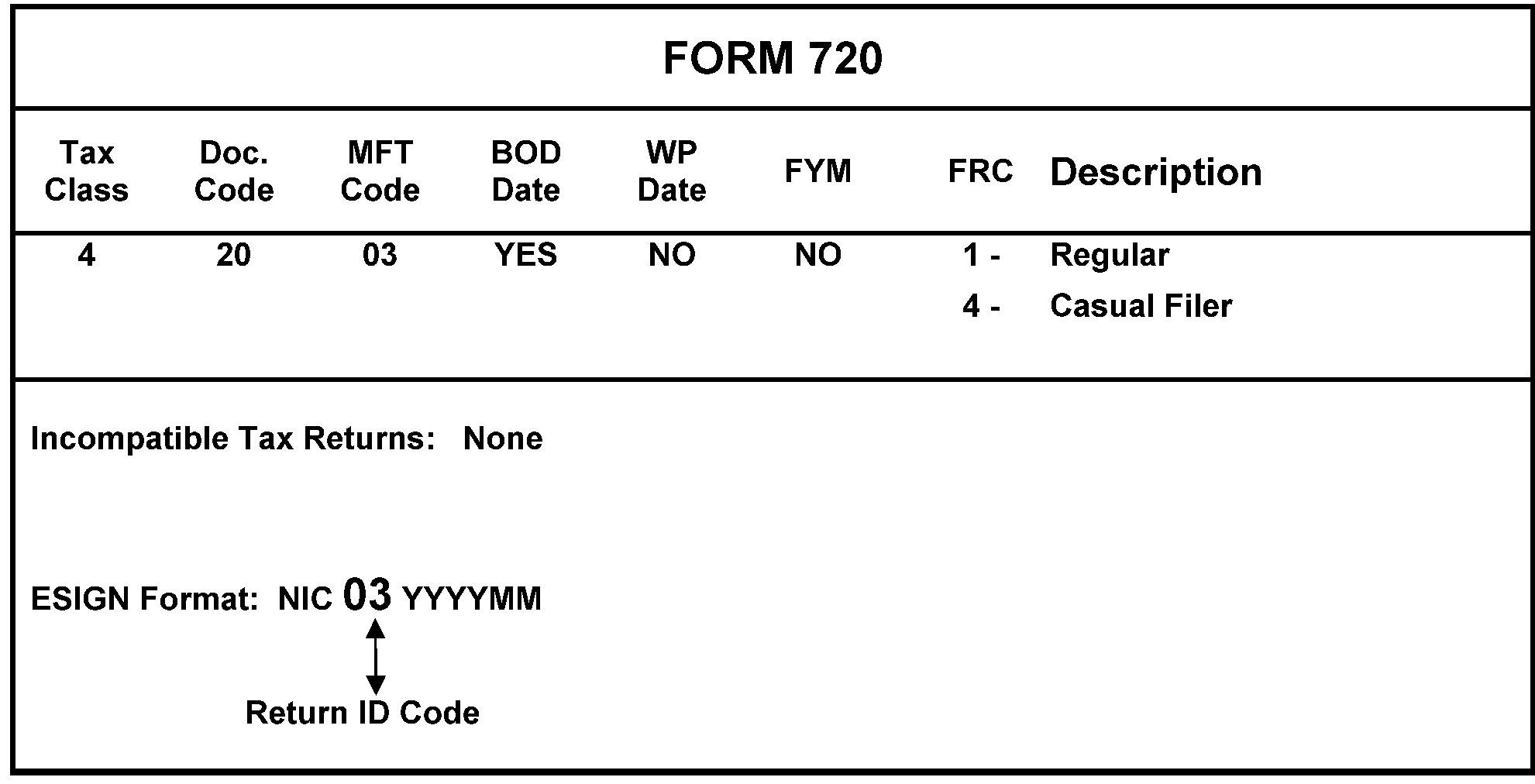
-
Form 11–C, Occupational Tax and Registration Return Wagering
-
Form 11–C is filed by persons who accept taxable wagers to register certain information with the IRS and to pay the occupational tax imposed under IRC 4411.
-
The occupational tax is $50 per year if all taxable wagers accepted are authorized under the laws of the state in which accepted or $500 per year if at least one unauthorized wager is accepted.
-
All persons engaged in the business of receiving taxable wagers on their own behalf are required to file Form 11–C before accepting taxable wagers (principal operators). Anyone who accepts taxable wagers on behalf of a principal operator (agents) also is required to file Form 11–C before accepting taxable wagers.
-
The first return will cover the tax period from the start of business until June 30 of the current year. For subsequent years, the form is due by July 1 if taxable wagers are accepted. The BOD is the date (month and day) listed at the top of Form 11–C. See Figure 3.13.2-25.
-
If ESIGNing an EIN, you must also give a Form 730 FRC. If the taxpayer is not liable for Form 730, they will either call or write us and their EIN will be updated accordingly.
-
Form 11-C will be processed at Ogden Submission Processing Center.
-
-
Form 730, Monthly Tax Return for Wagers
-
Taxpayers must file Form 730 and pay the tax on wagers under IRC 4401(a) if they are in the business of accepting taxable wagers, accept a wager, or conduct a wagering pool, or lottery for-profit, or are required to be registered (because they receive taxable wagers on behalf of another who would otherwise be liable for the tax) and they fail to properly register.
-
On wagers authorized under the laws of the state in which accepted, tax is imposed at a rate of .25 percent of the amount of the wager. All other taxable wagers are subject to a rate of 2 percent of the amount of the wager.
-
Form 730 is a monthly return that must be filed by the last day of the month following the month for which taxable wagers are reported. Once filed, Form 730 must be filed each month until a final return is filed, even if the taxpayer receives no wagers that month. These returns will show no activity. If no taxable wagers will be received in the future, a final Form 730 must be filed. The return must reflect the notation "Final Return." The BOD is the first day of the month entered above line 1 on the return.
-
Persons liable for filing Form 730 must also file Form 11–C to be registered to accept wagers and to pay the occupational tax.
-
These returns will be processed at the Ogden Submission Processing Center. See Figure 3.13.2-26.
-
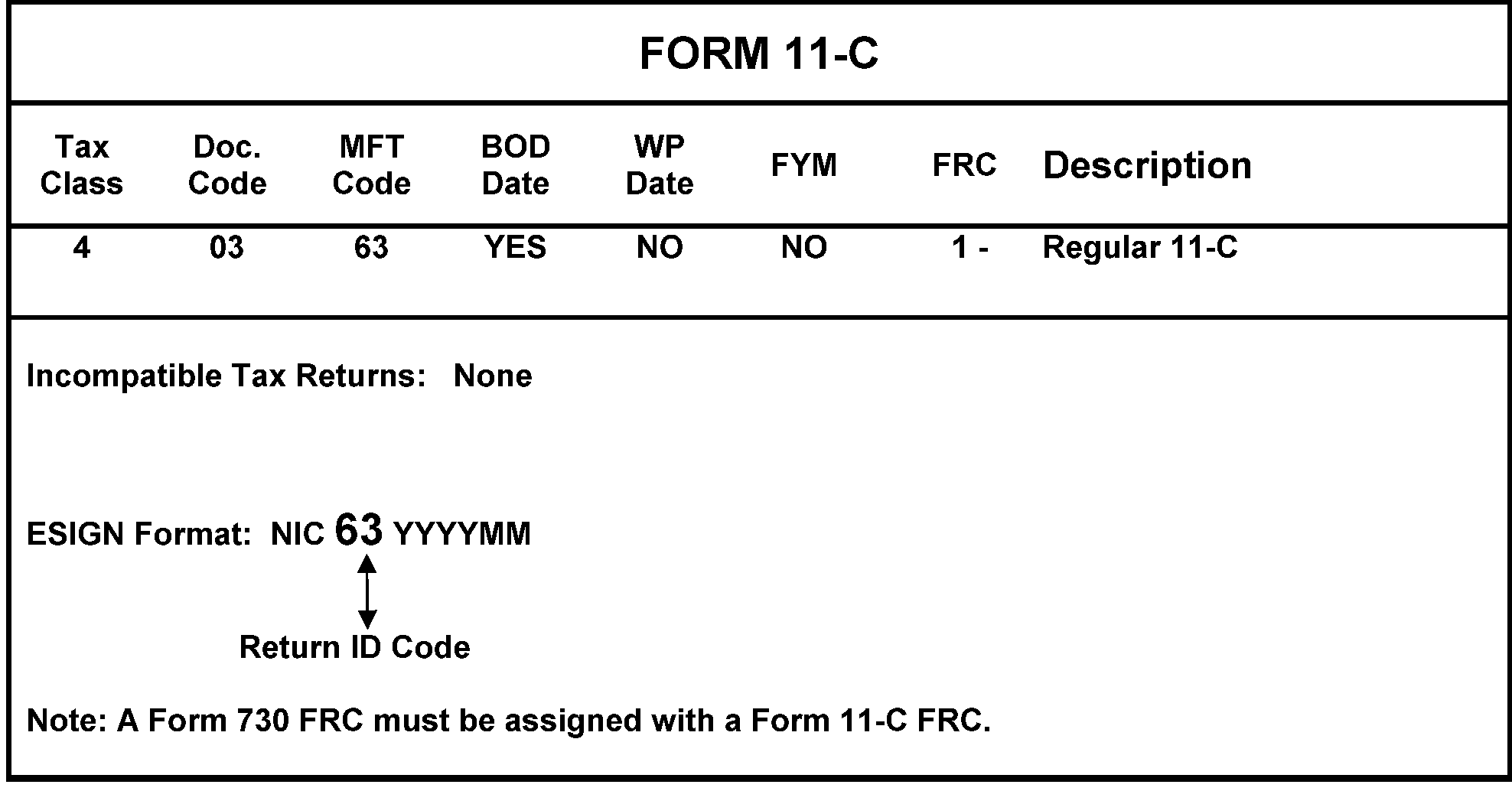
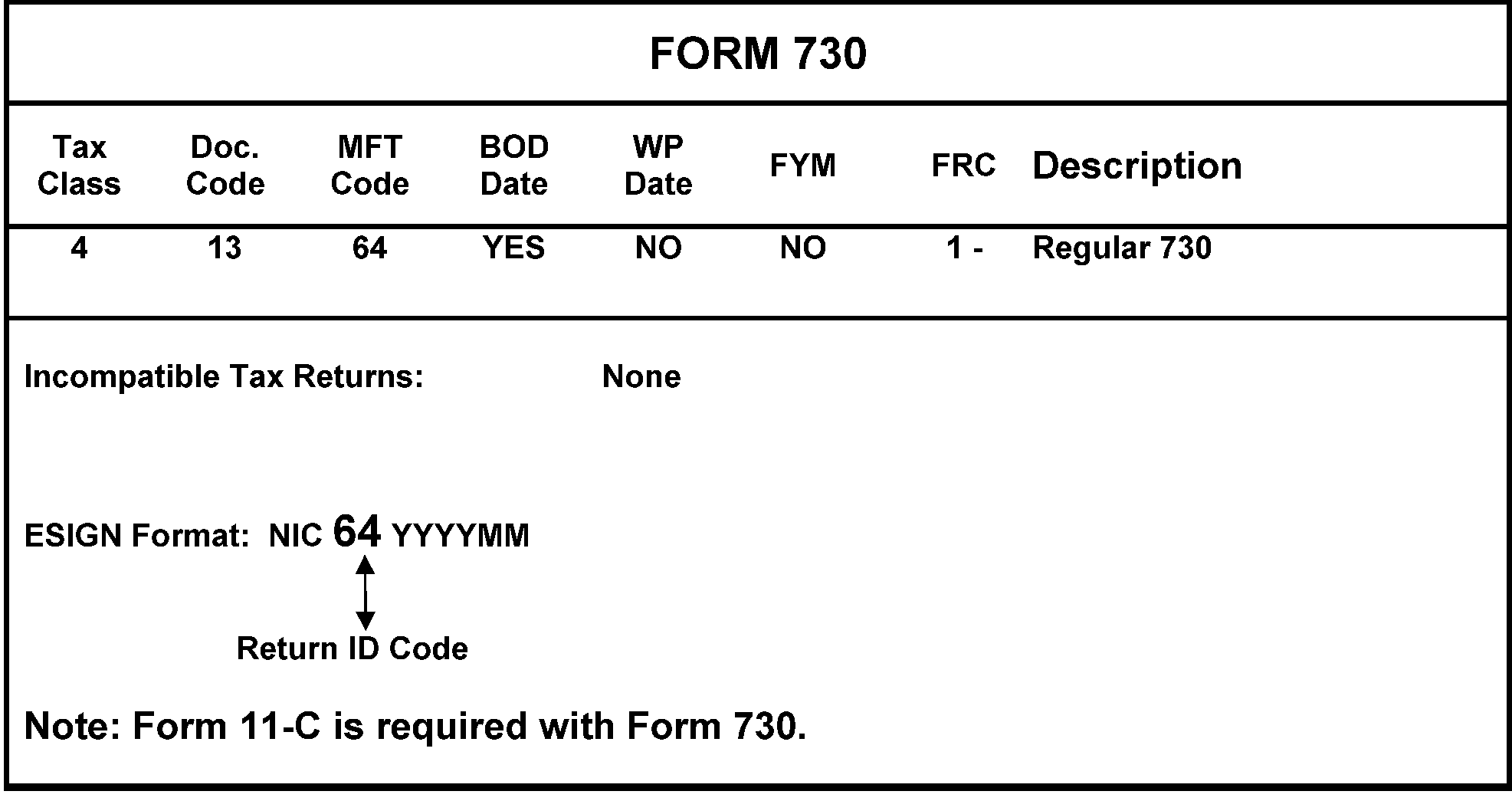
-
Form 2290 is filed to report the tax due on the use of any highway motor vehicle with a taxable gross weight of 55,000 pounds or more that is used on a public highway (any roadway in the United States that is not a private roadway) during the taxable period. See Figure 3.13.2–27.
-
The taxable period begins each July 1 and ends the following June 30. For vehicles first put into service in July of the taxable period, Form 2290 is due by August 31. For vehicles first put into service after July of the taxable period, Form 2290 for that period is due by the last day of the month following the month of first use. The BOD is the first day of the month entered on Line 1 of the return.
-
Form 2290 is filed by the person in whose name a taxable vehicle is registered or required to be registered at the time of its first use on public highways.
-
The use of certain highway motor vehicles can be exempt from tax in certain circumstances. For example, the exemption applies if the vehicles are actually operated by the Federal Government, a state or local government, or an Indian tribal government exercising an essential tribal government function.
-
The processing of Form 2290 without payment due or using EFTPS is centralized at the Ogden Submission Processing Center.
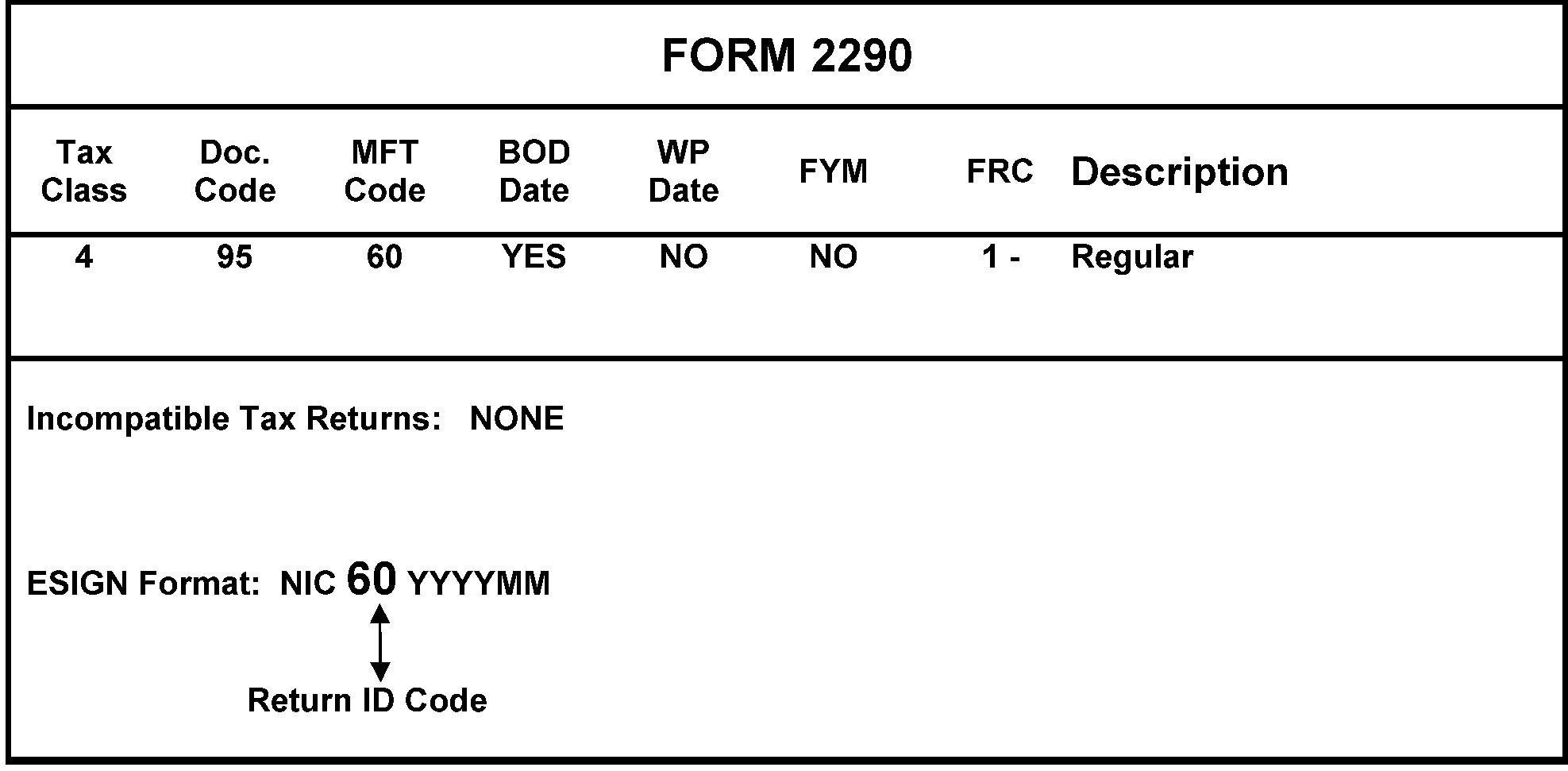
-
Form 706 is filed by both U.S. citizens and non-U.S. citizens who are residents of the U.S. These decedents are taxed on their worldwide assets. Form 706-NA (attached to which could be schedules from Form 706) is filed by non-U.S. citizens who are not residents of the U.S. (also known as alien non-resident decedents). These decedents are taxed on U.S. property only.
-
Form 709 is filed by U.S. citizens, non-U.S. citizens who are residents of the U.S., and non-U.S. citizens who are not residents of the U.S. With respect to U.S. citizens who are not residents of the U.S., the Federal Gift Tax only applies to transfers of real property and tangible personal property physically situated in the U.S.
-
The processing procedures for foreign taxpayers are the same as domestic taxpayers. See IRM 3.13.2.8.13.1, Form 706, United States Estate (and Generation-Skipping Transfer) Tax Return, through IRM 3.13.2.8.13.7, Form 709, United States Gift (and Generation-Skipping Transfer) Tax Return.
-
Any change made to an SSN on the V (valid) or W (invalid) files, must include the following fields of CC BNCHG:
-
Form 706 - MFT> (52) and DT-OF-DEATH> (MMDDYYYY).
-
Form 709 - NM-YR-QTR>(YYYY) and MFT>(51).
-
-
Form 9956, Request for Temporary SSN, is used by other areas to request an IRSN from Entity. Research must always be performed to ensure the correct SSN is being used. If unable to locate a valid SSN or the taxpayer does not have an SSN, an Internal Revenue Service Number (IRSN) must be assigned via CC TMSSN, see IRM 3.13.2.7.4 . Once assigned, the IRSN will be established on the invalid portion of the "V" tape, which is the "W" tape. Always send the Letter 685C/685SP to the taxpayer when assigning IRSNs to the Form 706/Form 709 family. Once IRSN is assigned, return Form 9956 to originator.
-
To use CC BNCHG on Form 709 accounts, Master File Tax Code (MFT 51) must be present in the MFT> field and the year digit must be present in YYYY format in the NM-YR/QTR> field of CC BNCHG. The year will be the tax year of the return being processed.
-
For Form 706 accounts (MFT 52), MFT> field must be present along with the DT-OF-DEATH> field in MMDDYYYY format.
-
For Form 706 and Form 709, the Taxpayer Identification Number (TIN) must be an SSN and the Primary name line can only be for an individual.
-
Form 706GS(T) TIN can be either EIN or SSN. Name lines will be treated as trust name line inputs.
-
Form 706GS(D) TIN can only be SSN. Name lines will be treated as trust name lines.
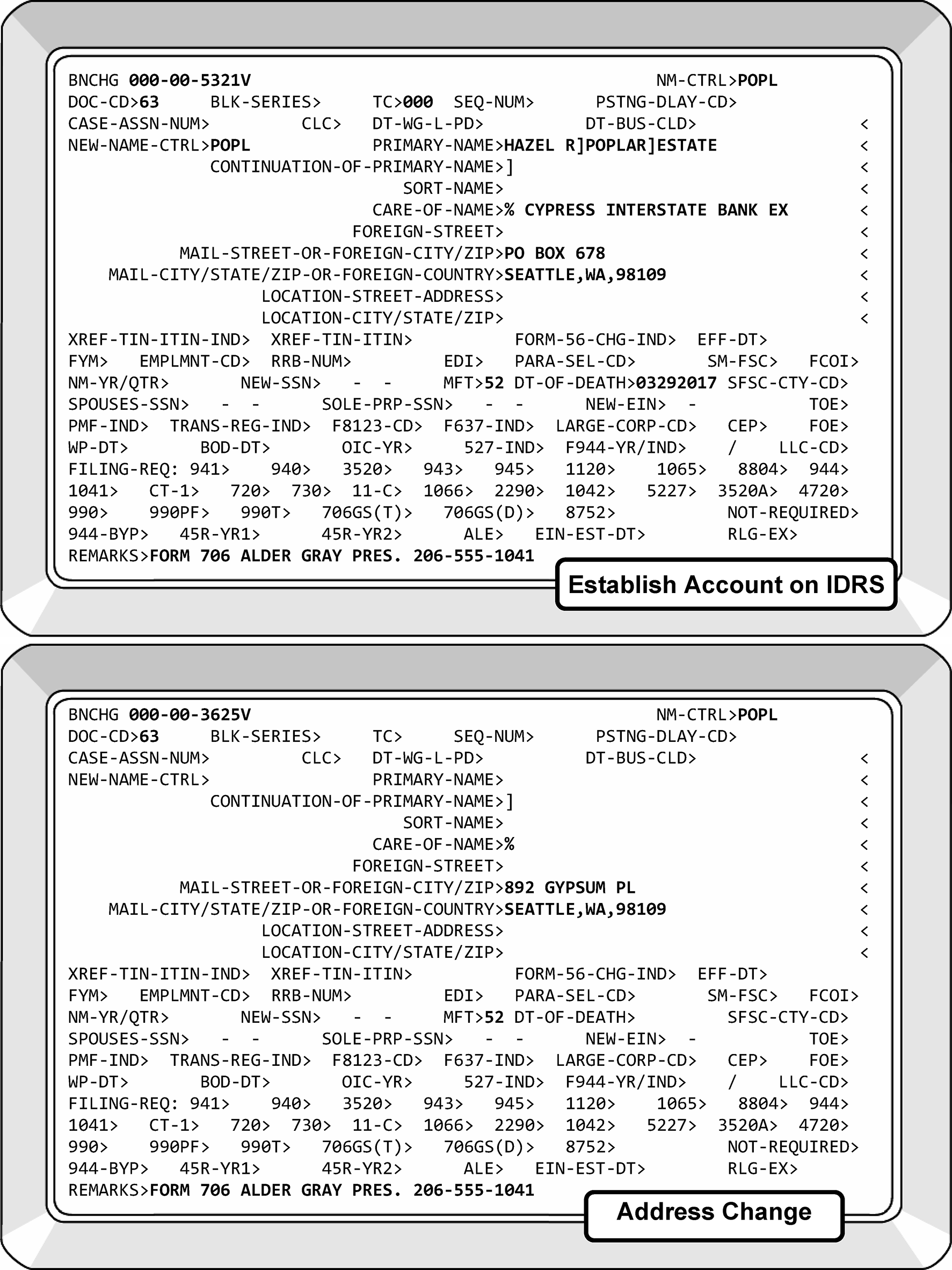
-
Form 706 is filed by the executor of an estate of a decedent who was a U.S. citizen or a non-U.S. citizen who was a resident of the United States to determine the estate tax imposed by Chapter 11 of the IRC on the decedent’s worldwide assets, (which is levied on the entire taxable estate, not just on the share of the estate received by a particular beneficiary). Form 706 must be filed by the executor of the estate of every U.S. citizen or resident whose executor elects to transfer the Deceased Spousal Unused Exclusion (DSUE) amount to the surviving spouse, regardless of the size of the decedent's gross estate. This form is also used to determine the generation-skipping transfer tax imposed by Chapter 13 of the IRC.
-
This return is filed with the decedent’s social security number and the entity is treated like a BMF SSN.
-
The return is filed within 9 months after the date of the decedent’s death. A Form 4768 is filed to request extensions.
-
With respect to decedents who died in Tax Year 2010 only, the executors of their estates had the option to elect their estates to not be subject to the estate tax but instead be subject to the provisions of IRC 1022 (the carry over basis rules). This IRC 1022 Election was made by filing Form 8939. Notice 2011-66, 2011-35 I.R.B. 184, generally provides that the executor of the estate of a decedent who died in 2010 makes the IRC 1022 Election by filing a Form 8939 on or before November 15, 2011. Notice 2011-76, 2011-40 I.R.B. 479, extended the due date of the Form 8939 and thus, the election from November 15, 2011, to January 17, 2012. Notice 2011-66 further provides that the Internal Revenue Service will not grant extensions of time to file a Form 8939 and will not accept a Form 8939 filed after the due date except in four limited circumstances delineated in the Notice, including relief through the letter ruling program.
-
Form 706-A is filed by the qualified heir of a decedent to report a taxable disposition or cessation of qualified use of property valued under IRC 2032A on the decedent’s estate tax return.
-
The form is filed with the qualified heir's social security number.
-
The return is filed within 6 months after the taxable disposition or cessation of qualified use. A Form 4768 is filed to request an extension.
-
Form 706-GS(D-1) is filed by taxpayers who are "skip persons" who receive a taxable distribution from a trust.
-
The Form 706-GS(D-1) must be filed with the SSN, if the distributee is an individual, and the trust's EIN if the distributee is a trust.
-
The return is filed on a calendar year basis by April 15th of the year following the calendar year when the distributions were made.
-
Form 7004 is filed to request extensions.
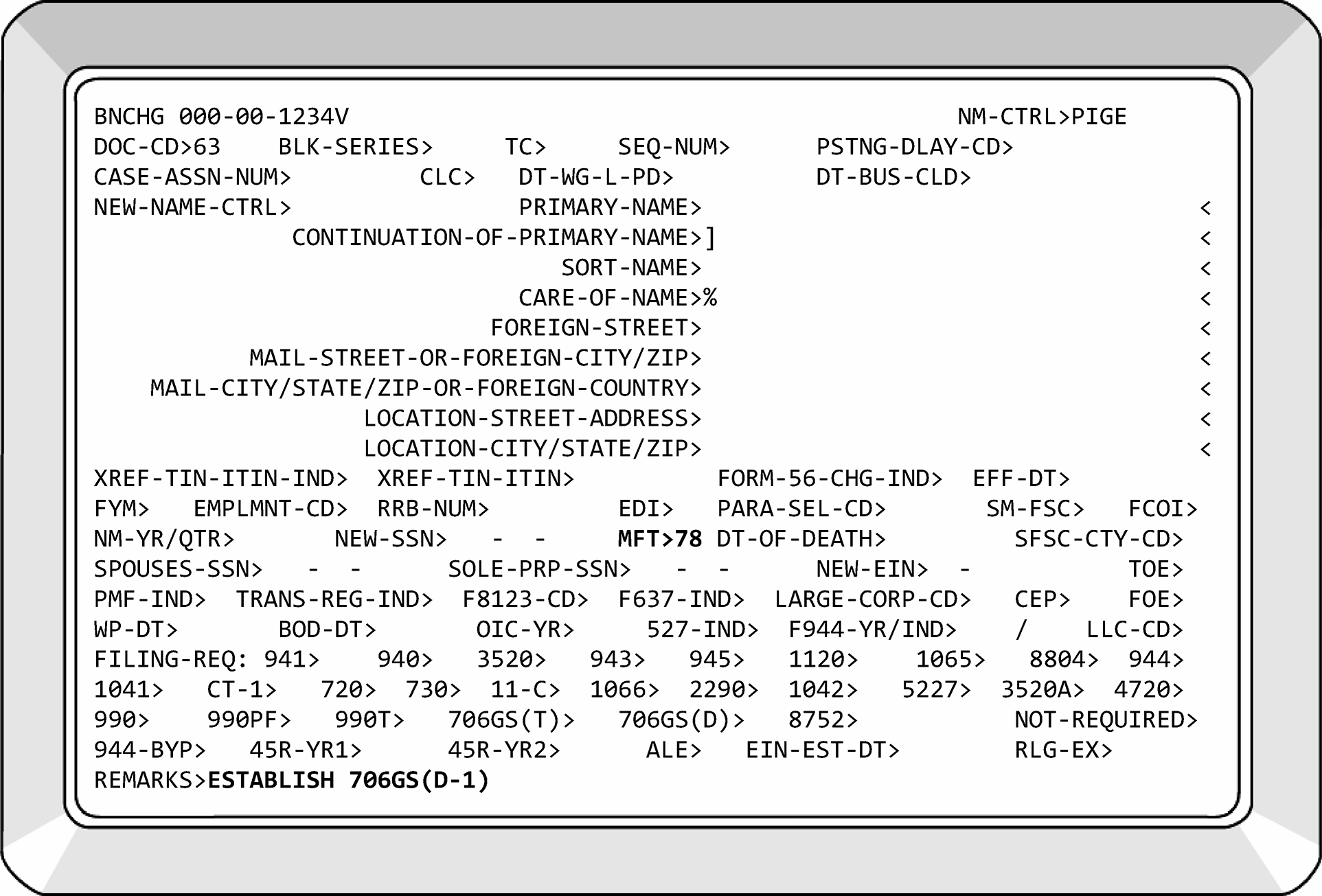
-
Form 706-GS(T) is filed by the trustee of any trust which has a taxable termination.
-
The Form 706-GS(T) is filed with the trust's EIN.
-
The return is filed by the trustee of the trust by April 15th of the year following the calendar year in which the termination occurs.
-
Form 7004 is filed to request extensions.
-
Form 706-NA is filed by the executor of an estate of a decedent who was not a citizen or resident of the United States to figure the estate tax imposed by Chapter 11 of the IRC on the value of the decedent’s gross estate located in the United States under the situs rules of the IRC and the generation-skipping transfer tax imposed by Chapter 13 of the IRC. Schedules from Form 706 can be attached to Form 706-NA.
-
The Form 706–NA is filed with the decedent’s U.S. social security number (if any).
-
The return is due 9 months after the date of the decedent’s death. A Form 4768 is used to request an extension of time to file.
-
Form 706-QDT is filed by the trustee or designated filer of a Qualified Domestic Trust (QDT) to figure and report estate tax due on certain distributions and taxable events with respect to a surviving spouse who is not a U.S. citizen. The return is also filed to report that the spouse has become a U.S. citizen and therefore, the QDT is no longer subject to the additional estate tax.
-
The Form 706-QDT is due with the EIN of the trustee/designated filer, or, if the trustee/designated filer is an individual, with their SSN.
-
The Form 706-QDT is generally filed on April 15th of the year following any calendar year in which a taxable event occurred during the spouse's lifetime, or a distribution was made to the spouse on account of hardship, or the spouse becomes a U.S. citizen. The return must also be filed within nine months of the death of the spouse, and within nine months after the trust ceases to qualify as a QDT. Extensions are granted by filing Form 4768.
-
Form 709 is filed by U.S. citizens, non-U.S. citizens who are residents of the U.S., and non-U.S. citizens who are not U.S. residents who make transfers subject to the Federal Gift Tax. Note, with respect to non-U.S. citizens who are not U.S. residents the Federal Gift Tax can only apply to transfers of real property and tangible personal property physically situated in the U.S.
-
The return is filed by individuals using their social security number and the entity is treated like a BMF SSN. This return is never filed as a joint return.
-
The return is filed on a calendar year basis by April 15th of the year following the calendar year in which the gift was made. An extension to file can be obtained by Form 8892. An extension of time to file the donor's income tax return also extends the time to file the gift tax return.
-
This form is filed to request an extension of time to file for Form 706GS(D), Form 706-GS(T), Form 1041, Form 1041-N, Form 1041-QFT, Form 1042, Form 1065, Form 1066, Form 1120, Form 1120-C, Form 1120-F, Form 1120-FSC, Form 1120-H, Form 1120-L, Form 1120-ND, Form 1120-ND (Section 4951), Form 1120-PC, Form 1120-POL, Form 1120-REIT, Form 1120-RIC, Form 1120-S, Form 1120-SF, Form 3520-A, Form 8612, Form 8613, Form 8725, Form 8804, Form 8831, Form 8876, Form 8924, and Form 8928.
-
The automatic extension period for time to file is generally 6 months. Exceptions apply for certain filers of Form 1041 and for C corporations with tax years ending June 30. An estate (other than a bankruptcy estate) and a trust filing Form 1041 are eligible for an automatic 5 1/2-month extension of time to file. Generally, C corporations with tax years ending June 30 are eligible for an automatic 7-month extension of time to file (6-month extension if filing Form 1120-POL).
-
If a Form 7004 is found attached to a return, do not detach.
-
The form must be filed by the normal due date of the type of return the taxpayer is requesting to file.
-
Never allow a Form 7004 for MFT 02 (a corporate return) to post for a Limited Liability Company (LLC) when there is not a TC 076 on the Entity module. If Form 1120 FRC is present on the account, and there is not a TC 076, input TC 016 to zero out the Form 1120 FRC and add a Form 1065 FRC. This will cause Form 7004 to go Unpostable Code (UPC) 329.
-
If Form 7004 contains "INC" in the name line, is coded for MFT 02, and Master File shows "LLC" , ensure a 1065 FRC is on Master File. This will cause Form 7004 to go UPC 329.
-
If it is necessary to correspond with the taxpayer on a Form 7004, send the letter to the address on Master File and inform the taxpayer of any address discrepancy. The address on Master File must never be updated from an extension.
-
The MFT for this extension is determined by the type of return for which it is filed. See Figure 3.13.2-30.
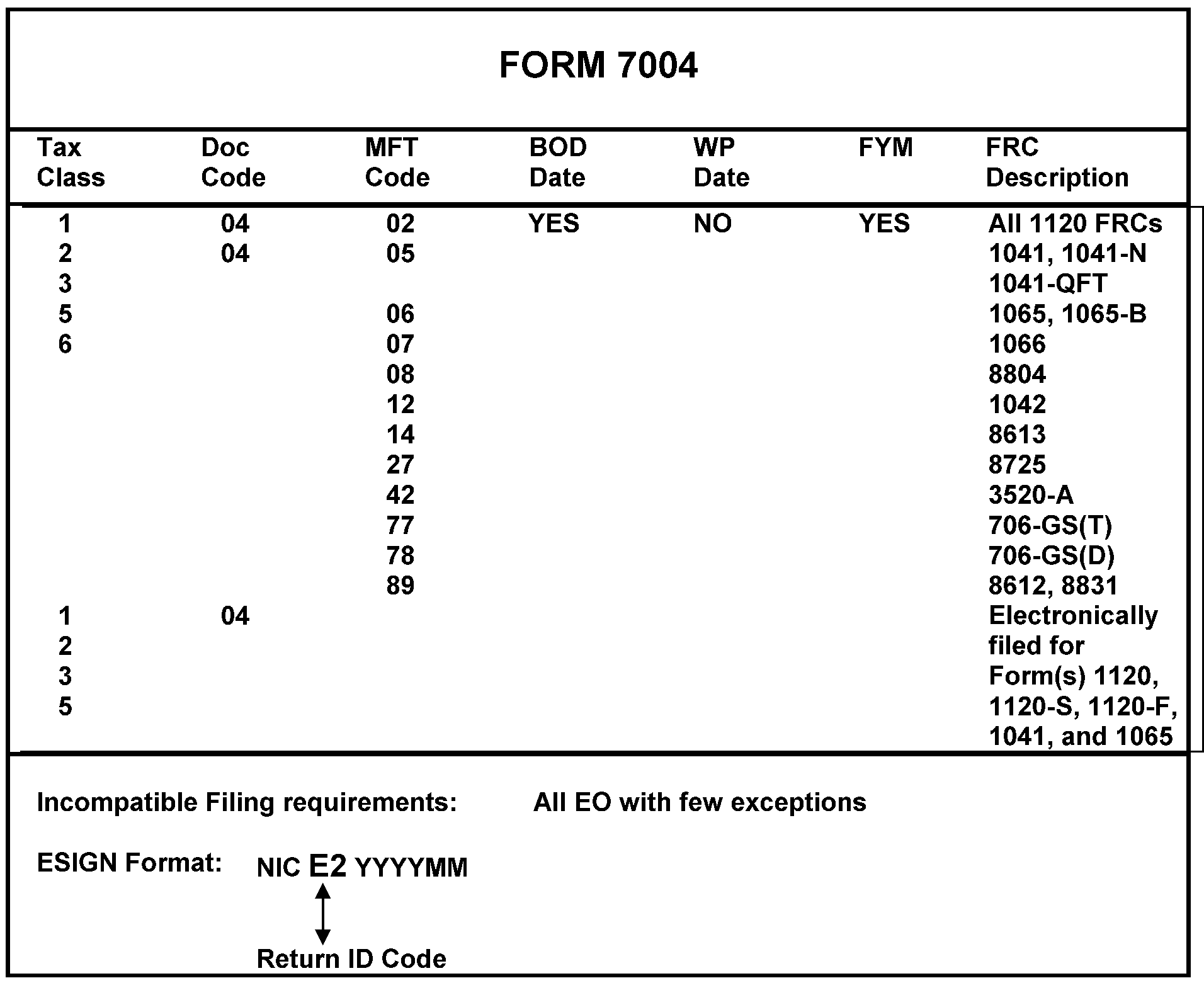
-
This form is filed to request a 6-month extension to file.
-
Returns requesting an extension are:
-
Form 990
-
Form 990-EZ
-
Form 990-PF
-
Form 990-T
-
Form 1041-A
-
Form 4720
-
Form 5227
-
Form 5330
-
Form 6069
-
Form 8870
-
-
The MFT for this extension is determined by the type of return for which it is filed.
-
Form 1042 is generally filed by a domestic withholding agent that will often be filing other BMF returns and therefore should already have an EIN.
-
Form 1042-S is the recipient's account and will be a foreign resident or a non-resident alien. The taxpayer can have an EIN, SSN or an ITIN. See IRM 3.13.2.10.6 (5), Requests for ITINs.
-
Whenever Entity Control receives a Form 1042 which does not show an EIN (including a Form 1042 return identifying the Filer by Social Security Number), it will research to see if a number has already been assigned. If none is found, Entity will assign an EIN and notify the filer in accordance with established procedure.
-
Form 1042 filers can no longer be identified by a social security number. All returns forwarded by Document Perfection, which identify the filer by SSN will be treated as new filers, and an EIN will be assigned as in (1) above. Circle out the SSN and enter the EIN above it.
-
Qualified Intermediaries (Foreign Entities) - Any Form SS-4 received indicating "Qualified Intermediary" , Withholding Foreign Partnership, Withholding Foreign Trust or Form 1042 Filer on Line 9a or 10 with the other box checked, establish a 1042 filing requirement. DO NOT establish a 1120-F filing requirement.
-
If the filing requirement is not present, use the information in the table below to establish the filing requirement for Form 1042. Use CC BNCHG to make the change.
FORM 1042 Tax Class Doc. Code MFT Code BOD WPD FYM FRC 1 25 12 No No Yes 0 - Not required to be filed
1 - Return required to be filed
8 - Account InactiveIncompatible Filing Requirements: ......................None
-
This return is filed to report the income, deductions, and gains and losses from the operation of a Real Estate Mortgage Investment Conduit (REMIC). In addition, the form is filed by the REMIC to report and pay tax on net income from prohibited transactions, net income from foreclosure property, and contributions after the startup day. This return is filed under a separate EIN than the owner's primary EIN.
-
When researching for an EIN, a new EIN must be assigned if the account found has a Form 1041, Form 1065, Form 1120, etc., filing requirement code. A partnership, corporation, trust, etc., cannot file a REMIC return with their partnership, corporation, etc., EIN. A new EIN must be assigned.
-
Any entity that elects to be treated as a REMIC for its first tax year and meets the requirements of IRC 860D(a) must file Form 1066.
-
If a REMIC EIN is located and it does not contain the acronym "REMIC" , add the acronym "REMIC" to the end of the primary name line.
-
For Form 1066, U.S. Real Estate Mortgage Investment Conduit (REMIC) Income Tax Return, name control the first four characters of the REMIC name.
-
Striped Tree Mortgage Pass-Through Certificate Series REMIC
-
Daisy Asset Investors TR 1 REMIC
-
Rose TR 1, Series A REMIC
-
-
The Sort Name is the REMIC’s series or trust number, if provided. Using this number as a Sort Name makes researching these entities easier. See IRM 21.7.13.5.10.6.
-
This return is generally filed by March 15th. However, if a "final" Form 1066 is being filed, the form is due by the 15th day of the 3rd month following the date the REMIC ceased to exist. All taxpayers filing this return must have a calendar year tax year. See Figure 3.13.2–31.
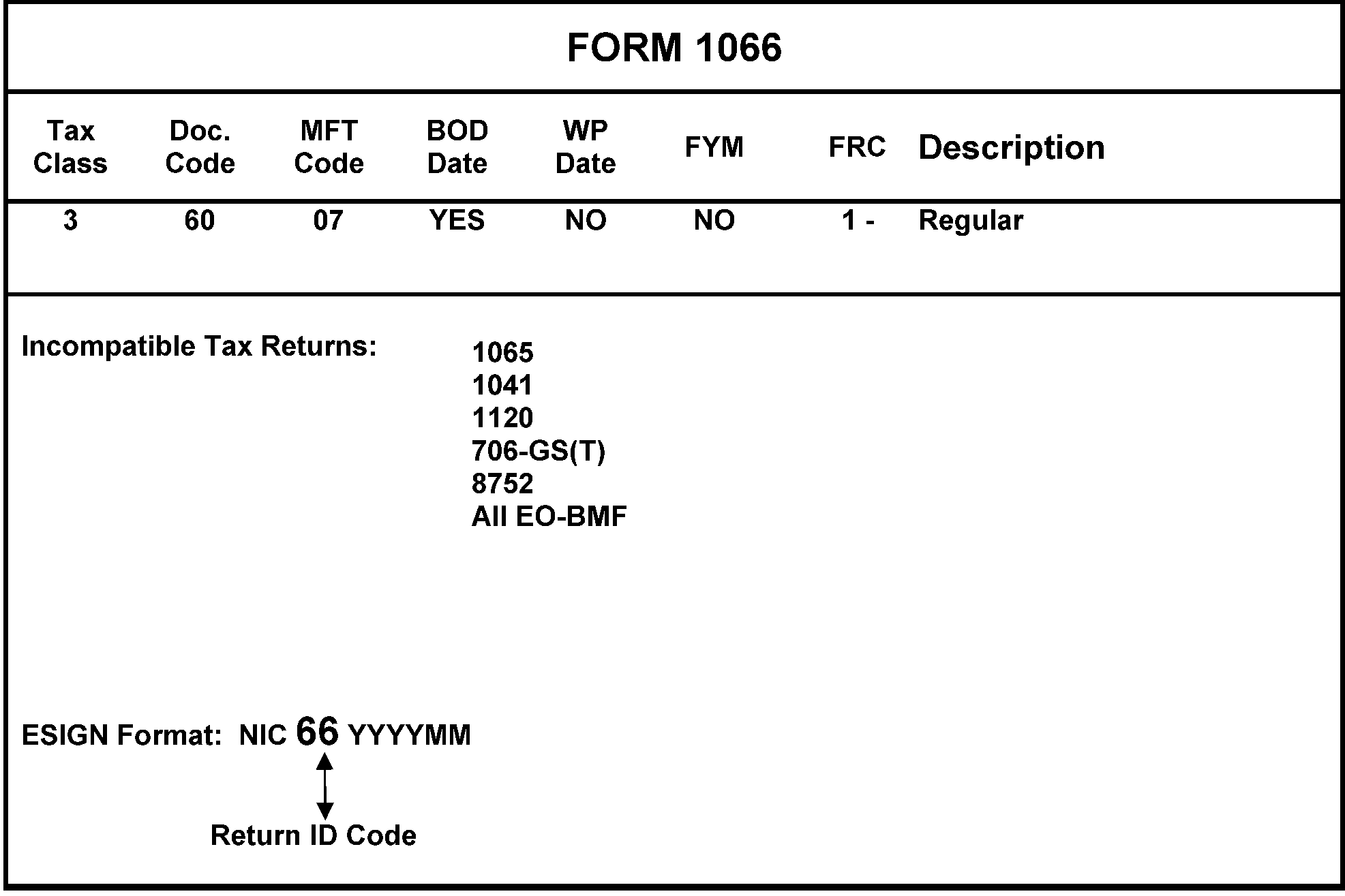
-
Form 3520 will be forwarded to Entity for research of a valid TIN for Item 1b of Form 3520.
-
If the "Individual" box is checked in Item B, Entity will research for an SSN. Use CC INOLE'T' to determine if SSN has already been established on the BMF. If the SSN is on the 'V' tape, it is considered valid. An SSN* on the 'W' tape is considered invalid.
-
If an SSN cannot be found, assign an IRSN with CC TMSSN, then establish the IRSN on the 'W' tape of the BMF. CC INOLE'S' will provide all of the information from the SSN needed to establish the SSN on the BMF. Always assign the IRSN to the individual’s/beneficiary’s name.
-
Access CC ENMOD with the SSN followed by a 'V' (or 'W'). Overlay ENMOD with ENREQ to receive BNCHG. Complete the following fields of CC BNCHG to establish the SSN on the BMF:
-
Enter "000" in the TC>field.
-
The NEW-NAME-CTRL> field will be completed with the taxpayer's name control.
-
Enter the taxpayer's name and address in the appropriate fields. Include a comma behind the state abbreviation.
-
The MFT> field will contain "68" .
-
Enter "PER F3520 FOR (TAX PERIOD)" in the REMARKS> field.
-
-
If the box for Partnership, Corporation, Trust or Executor is marked in Item B, the taxpayer will use an EIN in Line 1b. If Line 1b is blank, research for an EIN. If unable to locate a valid EIN, use CC ESIGN to assign an EIN, with NIC D and send 147C letter - paragraphs P, s.
-
An EIN must be entered on Line 2b. If EIN listed on 2b is invalid or 2b is blank, then follow procedures below:
If... And... Then... A) The first, second, or third box under Check all applicable boxes: is checked, Line 2b is blank or EIN is invalid, Research for an EIN. If unable to locate a valid EIN, use CC ESIGN to assign an EIN. Use prefix "98" with NIC D, Always assign to individual’s/beneficiary’s name with trust descriptors following. B) The fourth box is checked under Check all applicable boxes: Line 2b is blank or EIN is invalid, ≡ ≡ ≡ ≡ ≡ ≡ ≡ ≡ ≡ ≡ ≡ ≡ ≡ ≡ ≡ ≡ ≡ ≡ -
A separate extension of time to file Form 3520 is not needed. An extension for the taxpayer's annual return covers Form 3520.
Form 3520 Tax Class Doc. Code MFT Code BOD WPD FY FRC 3 83 68 No No Yes 1 - Return required to be filed Incompatible Filing Requirement: .......................None
-
Form 3520-A will be forwarded to Entity for research of an EIN.
-
If the correct EIN is present on Line 1b of Form 3520-A, Entity will update the account with a 3520-A FRC.
-
If an EIN is found, send Letter 147C (paragraphs P and s) to both the Foreign Trust on Line 1a and the US owner shown on page 3, items 6a through 6g, informing them of their EIN.
-
If an EIN cannot be found, use CC ESIGN to assign an EIN with prefix "98" using NIC A and Return Identity Code (RIC) 42. CC CMODE to Philadelphia will be used to assign an EIN with prefix 98. Always assign to the trust’s name with trust descriptors following. Enter the U.S. owner’s name on the sort name line with ‘Owner’ following the name. If multiple owners are listed, the first owner will be entered on IDRS. If the owner’s name is not entered, research page 3 Item 6a. Ensure the first four letters of the last name are the name control. After assigning an EIN, input a TC 016, PDC 1 to add the 3520-A FRC. Send additional Letter 147C (paragraphs P and s) to the US owner listed on page 3, items 6a through 6g, informing them of the new EIN assigned.
-
The following terms and acronyms are commonly seen in the processing of Form 3520-A. The acronyms will be used to reduce keystrokes.
-
CIBC - Canadian Imperial Bank of Commerce.
-
FDCO - Fidecomiso (Spanish word for ‘trust’).
-
RESP - Registered Education Savings Plan.
-
TFSA - Tax Free Savings Account.
-
RBC - Royal Bank of Canada.
-
SIPP - Self Invested Personal Pension.
-
-
If a valid EIN is present in Line 3b, add 3520-A FRC. Entity will also perfect the name/name control on Master File. Often these taxpayers have had their EIN assigned to the trust descriptors, not the taxpayer’s name. Ensure the EIN is researchable post assignment.
For example, if Tax Free Savings Account 123456 is entered, 1234 will be the name control. -
If EIN is not present, research for a valid EIN and if found, edit to Line 3b. Ensure 3520-A FRC is present. If EIN is not present and not found, enter ≡ ≡ ≡ ≡ ≡ ≡ ≡ ≡ ≡ ≡ ≡ ≡ ≡ ≡ without adding the FRC. If an SSN is present, take no action.
-
If a valid EIN is present in Line 4b, add 3520-A FRC. Entity will also perfect the name/name control on Master File. Often these taxpayers have had their EIN assigned to the trust descriptors, not the taxpayer’s name. Ensure the EIN is researchable post assignment.
-
If EIN is not present, research for a valid EIN and if found, edit to Line 4b. Ensure 3520-A FRC is present. If EIN is not present and not found, enter ≡ ≡ ≡ ≡ ≡ ≡ ≡ ≡ ≡ ≡ ≡ ≡ ≡ ≡ ≡ without adding the FRC. If an SSN is present, take no action.
Form 3520-A Tax Class Doc. Code MFT Code BOD WPD FY FRC 3 82 42 No No Yes 1 - Return required to be filed Incompatible Filing Requirement: ....................... None -
Form 7004 is used to request an extension of time to file for the taxpayer's annual return. Form 3520-A "rides" with the annual return.
-
If an unnumbered Form 3520-A is received with a statement the Mexican Land Trust arrangement (MLT) owns a single piece of property or is not liable per Revenue Ruling 2013-14, pull the return from processing and destroy per destruction/burn box procedures. Input TC 591-020 on the tax period of the return.
-
This return is filed by a railroad employer. See Figure 3.13.2–32.
-
Form CT-1 is processed only at the Kansas City Submission Processing Center.
-
This return is filed annually and is due by February 28th.
-
All employers filing this return are on a calendar year end.
-
There is no Form 940 filing requirement for these filers. See the Instructions to Form CT-1 for specifics.
-
See IRM 3.11.13, Returns and Document Analysis - Employment Tax Returns, for more information on Form CT–1 filers.
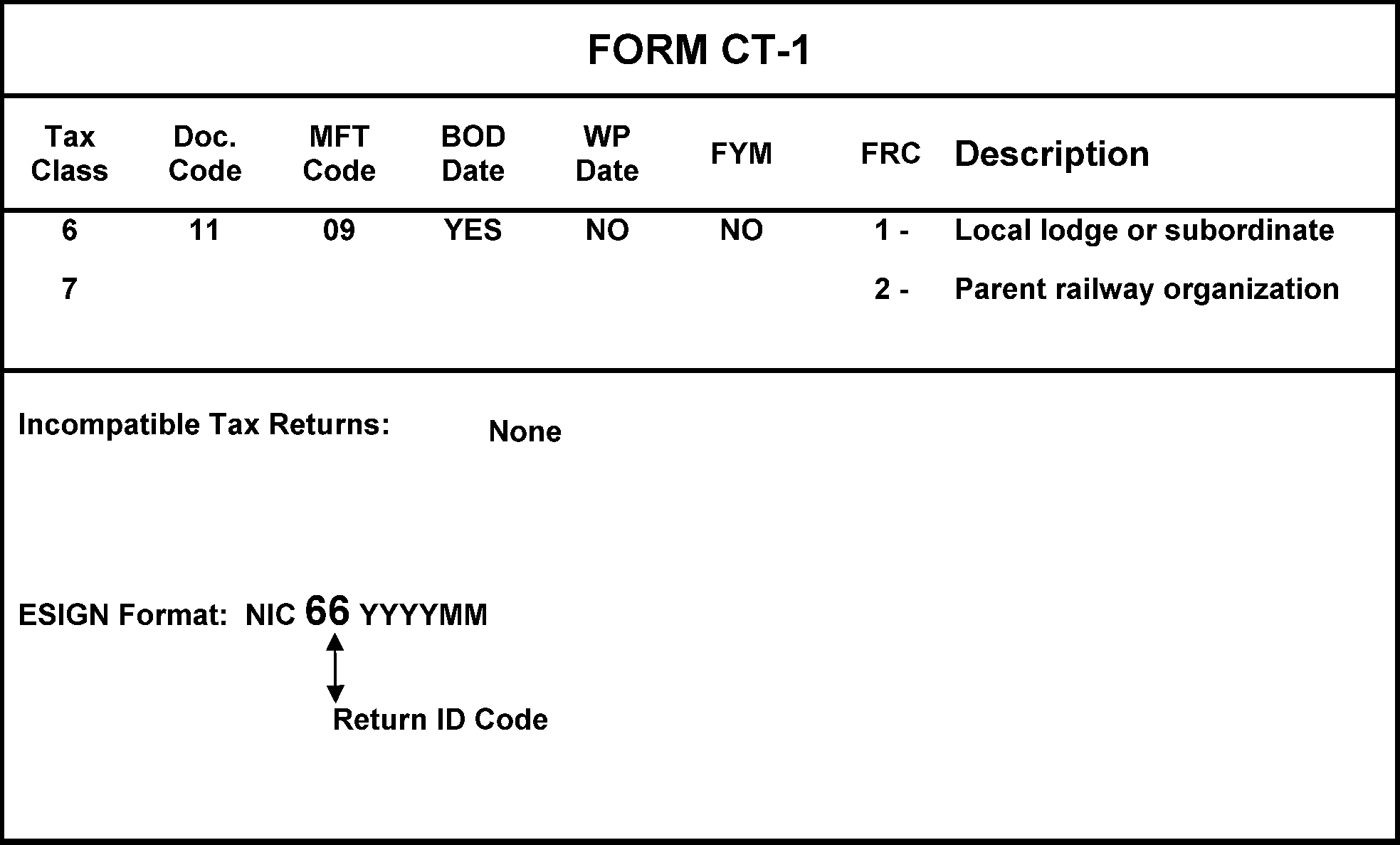
-
This return is filed by partnerships or Subchapter S corporations that filed and received approval of Form 8716, Election To Have a Tax Year Other Than a Required Tax Year, and their election is still in effect for the tax year in question.
-
The return must be filed by May 15th of the year following any tax year in which the election is effective. Personal Service Corporations that have made an IRC Section 444 election will not file Form 8752. If the legal due date falls on a Saturday, Sunday, or Legal holiday, the document is considered to be timely if it is postmarked by the first workday thereafter.
For example, S-election is effective 7-1-2024, FYM 09: Form 8752 is due May 15, 2025. -
Taxpayers can submit correspondence requesting an extension of time to file Form 8752. These requests must go to the Director or District Director for approval. Partnerships and S corporations are required to file Form 8752 the first year of their IRC Section 444 election even if their deferred income is under $500. See IRC 7519(a) . The taxpayer is not required to make a payment, but they must file a zero Form 8752.
-
When a taxpayer is required to file a Form 8752, the initial return must be filed for the first tax year the Form 8716 is effective.
-
If an existing C corporation with an FYM of 10 made an S-election effective Nov. 1, 2023, and received approval on Form 8716 to use FYM 10, Form 8752 is required to be filed for November and December of 2023 and is due May 15, 2024. The initial Form 8752 will post to tax year ending Dec. 31, 2023 (202312, MFT 15).
-
If a new corporation electing S status elects to have FYM 09 (Sept. 30th), the Form 8752 is due to be filed for the first year the IRC Section 444 is in effect. If the TC 090 is effective Oct. 1, 2023, with FYM 09 (and TC 055 is for FYM 09), the Form 8752 is due May 15, 2024. The Form 8752 will be applied to the tax year ending Dec. 31, 2023 (202312 MFT 15).
-
-
Error Resolution (ERS) will send Forms 8752 to BMF Entity so Entity can determine the deferral period of the IRC Section 444 election. Once determined and annotated, return Form 8752 to ERS.
-
Form 8875 is used by an eligible corporation (other than a REIT) and a REIT to jointly elect to treat the corporation as a taxable REIT subsidiary (TRS) under IRC 856(l). The election can be made for tax years beginning after December 31, 2000. The election does not require IRS consent. The election can be made at any time during the tax year. However, the effective date cannot be more than:
-
Two months and 15 days prior to the date of filing the election; or
-
Twelve months after the date of filing the election.
-
-
Forms 8875 must be signed by an officer of the taxable REIT subsidiary and by an officer of the electing REIT. If either signature is missing, return Form 8875 to the taxable REIT subsidiary requesting the missing signature(s). Letter 143C can be used with the following open paragraphs:
-
Your Form 8875 does not have the signature of the officer of the taxable REIT subsidiary. Please have the appropriate officer sign the attached Form 8875 and return it to our office.
-
Your Form 8875 does not have the signature of the officer of the electing REIT. Please have the appropriate officer sign the attached Form 8875 and return it to our office.
-
Your Form 8875 does not have the signatures of the officer of the taxable REIT subsidiary or the officer of the electing REIT. Please have the appropriate officers sign the attached Form 8875 and return it to our office.
-
-
If Form 8875, Part I or Part II are incomplete, research IDRS for the missing information. If IDRS does not reveal the needed information, return the incomplete Form 8875 to the taxable REIT subsidiary. Below is suggested language for the letter to the taxpayer:
-
The EIN of the taxable REIT subsidiary is missing. Please complete the attached Form 8875 and return it to our office.
-
The EIN of the electing REIT is missing. Please complete the attached Form 8875 and return it to our office.
-
-
If a Form 8875 is received with an attachment showing a list of taxable REIT subsidiaries, correspond with the taxpayer for additional information as follows:
-
Inform the taxpayer that a separate Form 8875 must be submitted for each Taxable REIT Subsidiary (TRS) and that all portions of Form 8875 must be complete.
-
Inform the taxpayer that each Form 8875 must be signed by persons authorized to sign the tax returns of the TRS and the electing REIT. The Form 8875 must contain the signatures of an officer of the taxable REIT subsidiary and an officer of the electing REIT.
-
If Form 8875 is returned unsigned, return the Form 8875 to the taxpayer with a letter of explanation.
-
-
On the EIN of the taxable REIT subsidiary, input a fact of filing (TC 971) on CC ENMOD with CC FRM77 using Action Code 360 with the following components:
MFT>00
TX-PRD>000000
NM-CTRL>Name Control of REIT - Item 1 of Form 8875.
TC>971
TRANS-DT>MMDDYYYY (Current Date)
SECONDARY-DT>Item 11 of Form 8875.
TC971/151-CD>360
XREF-TIN>EIN of electing REIT - Item 6 of Form 8875.
XREF-NM-CTRL Name Control of electing REIT - Item 5 of Form 8875.
REMARKS>Form 8875 -
If words such as Protective Election, Automatic Election, Amended, etc. are present, research CC ENMOD for a TC 971 AC 360. If posted, do not process Form 8875, file per local procedures. If a TC 971 AC 360 is not posted, continue processing Form 8875.
-
Taxpayer inquiries regarding Form 8875 will be routed to Accounts Management.
-
If it appears that information/correspondence related to Form 8875 was detached from Form 8875 and routed to Entity, research CC ENMOD with the taxable REIT subsidiary's EIN for TC 971 AC 360. If not present, input per (5) above.
-
If "Revocation" is indicated on Form 8875, input TC 972 AC 360. Enter "T/P revoked Form 8875" in the Remarks field.
-
Forms 8875 are held in Entity for one year and are sent to the Lenexa Federal Records Center (FRC) biannually in January and July.
-
Forms are filed in Entity in numerical order and must be checked for the following:
-
Original Form 8875 with TE stamp
-
Photocopy of Form 8875
-
-
Coordination must be made with Records Specialist, see Records Specialist Team, in PGLD before routing to the Lenexa FRC.
-
In January, original Forms 8875 received from January to June in the prior year are sent to the FRC.
-
In July, original Forms 8875 received from July to December of the prior year are sent to the FRC.
-
Once original Forms 8875 are shipped, all photocopies can be destroyed.
-
Substitute for Return (SFR) cases (Form 940 and Form 941) - State Audit leads processed in the Collection Function require the establishment of an EIN if not present.
-
Perform all necessary research to determine if an EIN was previously assigned.
-
If an EIN is found, notate the EIN on the SFR and return it to the Collection Function.
-
If an EIN is not found, assign an EIN via CC ESIGN with NIC D. Do not assign any filing requirements.
-
-
Schedule H (Form 1040 or Form 1041). Schedule H replaced Form 942. This schedule is filed to report household employee Social Security, Medicare and FUTA tax payments. This schedule can be routed to Entity attached to Form 1040, Form 1041 or could be a loose schedule from Document Perfection or AM/Adjustments. When schedule is received in Entity, the following actions will be taken:
-
Perform the preliminary research to ensure that the taxpayer does not have an EIN.
-
If an EIN is located, edit it on the EIN block of Schedule H and return to the originating function.
-
If no EIN is located, assign an EIN using CC ESIGN, NIC A, Return ID ZZ and the tax period of the return involved.
-
-
Form 1040-NR, U.S. Non-resident Alien Income Tax Return, that lists something other than an individual’s name will be forwarded to Entity from Code & Edit (or Accounting) for assignment of EIN’s with the prefix of 98.
-
IDRS CC CMODE will be used with the definer PH to access the international Master File at Austin Service Center.
-
Master File Indicator "‘O’" will be used with Location code "98." NIC D will be used to stop notices to the taxpayer.
-
Upon completion of the EIN assignment and audit trail, the document will be returned to the originator (Code & Edit or Accounting).
-
-
Form 1120-IC-DISC, Interest Charge Domestic International Sales Corporation Return, without EINs will be forwarded to Entity from Code and Edit. Perform all preliminary research to ensure the taxpayer does not have an EIN.
-
If an EIN is located, enter it on the return and forward to the Document Perfection Operation/Code & Edit Department.
-
If an EIN is not located, assign one using CC ESIGN, MFI "O" , (alpha).
-
-
Form 1725, Routing Slip, is utilized by many customers, specifically Compliance Revenue Agents and Officers, to notify Entity that a FRC change is needed on an EIN that has been examined. These requests will be honored if legible and valid. If the request is not valid, (for example an LLC asking to have FRC for an 1120 added to account) return the request to the originator explaining why you cannot honor their request.
-
Form 2363, Master File Entity Change. This document is used to request an Entity change by IRS personnel that do not have access to IDRS. These are worked under OFP 391-10001 and have their own descriptor. Entity TEs will ensure the Form 2363 is complete, specifically the "Prepared By" box, then evaluate the request and update the Master File if the request is valid. If the request is incomplete, return to the requestor for additional information.
-
Forms 2363 will reflect the taxpayer's name, name control and TIN on the FROM side of Form 2363. The taxpayer's XREF TIN will be in the TO side of Form 2363. Across the body of Form 2363 (in FIRST NAME LINE and SECOND NAME LINE fields) the words ADD XREF TIN will be handwritten.
-
Forms 2363 will be submitted by Examination Agents to update Filing Requirement Codes for entities under examination.
-
Field agents will submit Forms 2363 when FRCs need updated, specifically the Form 941/Form 944 relationship. Since April 1st is the deadline each year for a taxpayer to switch from a Form 941 filer to a Form 944 filer and vice versa, any Forms 2363 received that indicate the taxpayer will be changing from one of the two forms in the next calendar year will be held until the end of the year. The Control Team will establish a file in which the Forms 2363 will be held. The file will be purged and processed during dead cycles. If you receive a request from a Field Agent to correct the FRC after the deadline, please refer to your P & A analyst for determination.
Once the action on the account is taken, please respond to the requestor that the action has been taken. -
-
Form 4219, Statement of Liability of Lender, Surety, or other Person for Withholding Taxes. This form will be received from RCO when an EIN needs to be assigned/found. Perform all necessary research to determine if an EIN exists before assigning a new one. NIC D will be used to suppress generation of a CP 57X. Send Letter 147C notifying taxpayer of EIN assignment and request completion of Form SS-4.
-
Form 4442, Inquiry Referral
If... Then.... A) Form 4442, Inquiry Referral is received, -
Batch under OFP 390-10014.
-
The case must be completed within 20 days of the date stamped by the fax machine.
-
Process the taxpayer inquiry, Section B according to your IRM procedures.
-
Complete Section C, Response/Final Resolution in blue or black ink according to the actions taken.
B) A fax number is present, Fax the Form 4442 back to the originating office. C) A fax number is not present, Treat the Form 4442 as classified waste. See IRM 21.5.1.4.10 , Classified Waste. D) Form 4442 is received by Entity and the inquiry is not an Entity related issue, This is considered an erroneous referral. Send the Form 4442 to your campus transshipping coordinator. The coordinator will alert the originating transshipping site of their error. The case can be processed in the receiving site to avoid delay if possible. If the referral is received from a call site or Taxpayer Assistance Center (TAC), please refer the case to the Form 4442 Erroneous Referral Coordinator at the particular site. Please see Form 4442 Erroneous Referral Coordinators. E) Form 4442 will be received from AM asking Entity to establish an SSN on the V/W tape for MFT 17 (Form 8288) or MFT 68 (Form 3520), Entity TEs will input TC 000 to establish the SSN on the V/W tape as requested. Enter an audit trail on Form 4442 and route to originator.
If a Form 4442 is received in BMF Entity and there is an open BMF Entity unpostable on CC UPTIN, expeditiously forward the 4442 to BMF Entity Unpostables. -
-
Copies of Form 4876-A, Election to be Treated as an Interest Charge DISC (IC-DISC), will be forwarded to KCSPC Entity from Code and Edit for processing. The Form 4876-A should contain instructions for updating the account.
If the taxpayer’s election to be treated as an IC-DISC is approved, follow the steps below:Removing the Form 1120 Filing Requirement will keep the taxpayer's account from being delinquent.-
If the EIN on document belongs to a Subchapter S corporation (TC 090 posted), input TC 096, effective for the date entered in Part I, Item E of Form 4876-A see IRM 3.13.2.23.18(1), Processing the Termination. Edit complete audit trail on Form 4876-A and associate a copy with posted TC 090 DLN.
-
If EIN on copy of document is valid, remove the 1120-01 FRC.
-
If EIN on copy of document is not valid, research for valid EIN. If found, edit on document and remove 1120-01 FRC.
-
If valid EIN cannot be located, assign one on the "O" tape via CC ESIGN without an 1120-01 FRC. Use NIC D. Send Letter 147C instructing taxpayer to complete and return Form SS-4. Edit the EIN on the copy of Form 4876-A.
If the taxpayer is finalizing or revoking their IC-DISC election, or has had their IC-DISC Election terminated, but will still file as a Corporation, establish the 1120-01 FRC.
After processing the copy of Form 4876-A, it will be destroyed as classified waste in the Entity Control team after Quality Review. -
-
Form 8027, Employer’s Annual Information Return of Tip Income and Allocated Tips. This form could be routed to BMF Entity for an EIN to be assigned. However, if this form is being filed, the taxpayer was in business the year of the return, therefore, should have an EIN. Be sure to research the name entered on the fourth line of the return as this is the liable entity. If this line is blank:
-
ESIGN an EIN on the "O" tape.
-
Assign to the name on the fourth line of Form 8027. It is labeled: Employer’s name (name as shown on Form 941). If the fourth line is blank, ESIGN to the name on the first line, Name of establishment.
-
Use NIC D.
-
Send Letter 147C instructing taxpayer to complete and return Form SS-4.
-
Edit the EIN on Form 8027 and complete your audit trail.
This return is filed by the owner of the establishment; therefore, it is possible for one EIN to file multiple Forms 8027. -
-
Form 8300, Report of Cash Payments Over $10,000 Received in a Trade or Business—These forms will be sent directly to the Detroit Computing Center. No action is to be taken in Entity.
-
Form 8329, Lender's Information Return for Mortgage Credit Certificates (MCCs), and
Form 8330, Issuer's Quarterly Information Return for Mortgage Credit Certificates (MCCs).-
Generally, these forms are non-remit. However, payment can be received for penalty payment. If so, apply to the 20-2325, Miscellaneous Forfeiture Receipts account.
-
These forms have a signature area but are not required to be signed.
-
The address on Master File will never be updated from these forms unless a Form 8822-B is attached.
-
Never update the name on Master File from one of these forms. It is possible several entities share an EIN for bond issuing purposes. Edit the name control from Master File onto the form.
-
It is also possible that two entities will file the form together. If so, circle out the second name and EIN entered. Name control the form per Master File.
-
If an EIN is not on form and you are unable to locate an EIN through IDRS research, contact the organization by phone for their EIN.
-
If an EIN must be assigned, use NIC D and send a Letter 147C requesting the organization to complete and return Form SS-4.
-
These forms are maintained in Files by TIN and calendar year.
-
-
Form 8865, Return of U.S. Persons With Respect to Certain Foreign Partnerships. Do not process Form 8865: route to Accounts Management-Correspondence.
-
Form 8873, Extraterritorial Income Exclusion. Do not process Form 8873 as a stand-alone form. Form 8873 will be attached to a partnership, corporation or some other primary return. If Form 8873 is submitted as a stand-alone form, return the form back to the taxpayer, so it can be associated and filed with a primary return.
-
Form 8941, Credit for Small Employer Health Insurance Premiums. This form was first processed in year 2011. These documents will be received in Entity for EIN research and/or Name (control) verification. Perform necessary research, perfect document, and enter audit trail in lower left corner of document.
-
Form 9956, Request for Temporary IRSN (Internal Revenue Service Number). This form is routed to Entity by other areas of the IRS when an IRSN is needed. See IRM 3.13.5.74, Assignment of Internal Revenue Service Numbers (IRSN’s). Once IRSN is assigned, return the Form 9956 back to the originator.
-
Form 12575, Notice of Fiduciary Relationship-Illinois Land Trust, was obsoleted in 2000. No area of the IRS uses this form, therefore, if received in BMF Entity, the document will be destroyed as classified waste per local procedures.
-
Compliance has asked Submission Processing (SP) for assistance in identifying returns that are out of the ordinary, or "funny" . Entity TEs that work returns will assist both Examination (Exam) and Criminal Investigation (CI) in identifying questionable returns. A "Funny Box" has been created and placed in a central location for the deposit of questionable returns. At the end of each business day, the control team will retrieve the documents that have been placed in the Funny Box and route to FRP BMF Classifier:
Internal Revenue Service
Mail Stop 4450
1973 Rulon White Blvd
Ogden, UT 84404 -
Identifying returns for Exam promotes the highest degree of voluntary compliance. Exam will provide support and assist SP during processing.
-
CI investigates potential criminal violations of the Internal Revenue Code (IRC) and related financial crimes. Criminal violations of the IRC are defined as willful and deliberate attempts to evade or defeat the income tax.
-
If the return is numbered, make a complete copy and indicate COPY across the front of the first page of the photocopied return. Place the copy in the Funny Box and continue processing the original return.
-
Unnumbered returns can be placed directly in the Funny Box.
-
See below for specific attributes of a return:
"≡ ≡ ≡ ≡ ≡" ≡ ≡ ≡ ≡ ≡ ≡ ≡ ≡ ≡ ≡ ≡ ≡ ≡ ≡ ≡ ≡ ≡ ≡ ≡ ≡ ≡ ≡ ≡ ≡ ≡ ≡ ≡ ≡ ≡ ≡ ≡ ≡ ≡ ≡ ≡ ≡ ≡ ≡ ≡ ≡ ≡ ≡ ≡ ≡ ≡ ≡ ≡ ≡ ≡ ≡ ≡ ≡ ≡ ≡ ≡ ≡ ≡ ≡ ≡ ≡ ≡ ≡ ≡ ≡ ≡ ≡ ≡ ≡ ≡ ≡ ≡ ≡ ≡ ≡ ≡ ≡ ≡ ≡ ≡ ≡ ≡ ≡ ≡ ≡ ≡ ≡ ≡ ≡ ≡ ≡ ≡ ≡ ≡ ≡ ≡ ≡ ≡ -
≡ ≡ ≡ ≡ ≡ ≡ ≡ ≡ ≡ ≡ ≡ ≡ ≡ ≡ ≡ ≡ ≡ ≡ ≡ ≡ ≡ ≡
-
≡ ≡ ≡ ≡ ≡ ≡ ≡ ≡ ≡ ≡ ≡ ≡ ≡ ≡ ≡ ≡ ≡ ≡ ≡ ≡ ≡ ≡ ≡ ≡ ≡ ≡ ≡ ≡ ≡ ≡ ≡
-
≡ ≡ ≡ ≡ ≡ ≡ ≡ ≡ ≡ ≡ ≡ ≡ ≡ ≡ ≡ ≡ ≡ ≡ ≡ ≡ ≡ ≡ ≡ ≡ ≡ ≡ ≡ ≡ ≡ ≡ ≡ ≡ ≡ ≡ ≡ ≡
-
≡ ≡ ≡ ≡ ≡ ≡ ≡ ≡ ≡ ≡ ≡ ≡ ≡ ≡ ≡ ≡ ≡ ≡ ≡ ≡ ≡ ≡ ≡ ≡ ≡ ≡ ≡ ≡ ≡ ≡ ≡ ≡ ≡
≡ ≡ ≡ ≡ ≡ ≡ ≡ ≡ ≡ ≡ ≡≡ ≡ ≡ ≡ ≡ ≡ ≡ ≡ ≡ ≡ ≡ ≡ ≡ ≡ ≡ ≡ ≡ ≡ ≡ ≡ ≡ ≡ ≡ ≡ ≡≡ ≡ ≡ ≡ ≡ ≡ ≡ ≡ ≡ ≡ ≡ ≡ ≡ ≡ ≡ ≡ ≡ ≡ ≡ ≡ ≡ ≡ ≡ ≡ ≡ ≡ ≡ ≡ ≡ ≡ ≡ ≡ ≡ ≡ ≡ ≡ ≡ ≡ ≡ ≡ ≡ ≡ ≡ ≡ ≡ ≡ ≡ ≡ ≡ ≡ ≡ ≡ ≡ ≡ ≡ ≡ ≡ ≡ ≡ ≡ ≡ ≡ ≡ ≡ ≡ ≡ ≡ ≡ ≡ ≡ ≡ ≡ ≡ ≡ ≡ ≡ ≡ ≡ ≡ ≡ ≡ ≡ ≡ ≡ ≡ ≡ ≡ ≡ ≡ ≡ ≡ ≡ ≡ ≡ ≡ ≡ ≡ ≡ ≡ ≡ ≡ ≡ ≡ ≡ ≡ ≡ ≡ ≡ ≡ ≡ ≡ ≡ ≡ ≡ ≡ ≡ ≡ ≡ ≡ ≡ ≡ ≡ ≡ ≡ ≡ ≡ ≡ ≡ ≡ ≡ ≡ ≡ ≡ ≡ ≡ ≡ ≡ ≡ ≡ ≡ ≡ ≡ ≡ ≡ ≡ ≡ ≡ ≡ ≡ ≡ ≡ ≡ ≡ ≡ ≡ -
-
There will be occasions where a previously cancelled DLN needs to be processed as originally filed. This usually occurs when relief has been granted on a late filed Subchapter S-election.
-
If the cancelled return was a paper return:
-
Request the DLN from Files (The DLN is usually available on CC TRDBV).
-
When received, underline the original IRS received date.
-
Line through the original DLN.
-
Across the top of the return enter: Process as original.
-
Enter new, legible audit trail.
-
If ERS Action Code 347 is present on the return, circle it out.
-
-
If the cancelled return was e-filed:
.-
Pull DLN from EUP and print return.
-
Edit out the phrases referring to copy and Do Not Process.
-
In the signature field enter: Do Not Correspond for Signature.
-
Across the top of the return enter: Process as Original.
-
Enter new, legible audit trail.
-
-
Prepare Form 3893, Re-Entry Document Control, and route to Batching in Receipt and Control Operation.
-
Mark BMF in the File Type box.
-
Complete box 2 with the original DLN.
-
Enter one in box 4.
-
Complete either box 5 or box 6.
-
Enter 150 in box 7.
-
Enter the IRS received date in box 8.
-
Enter the MFT of the return in box 9.
-
In box 11, mark the center box labeled: N – Reinput of Unpostable Document.
-
In box 12 enter the last digit of the DLN.
-
Check box 13 if needed.
-
Box 14 must contain a description of the return, for example: "Form 1120-S DLN previously cancelled - late election relief granted - return is now valid for posting" .
-
In box 15, check the box labeled: Non-Remittance.
-
In box 16, enter the 12th and 13th numbers of the DLN.
-
Box 17 must contain your entire 10-digit IDRS number, full phone number, and current date.
-
Box 18 will be marked as follows: If the return was a reject when the DLN was cancelled, mark the box labeled: SC reject. If the return was an unpostable when the DLN was cancelled, mark the box labeled Other and write "Unpostable" .
-
In box 19, mark the box labeled: Corrected to original return, or another applicable box.
-
-
This subsection provides instructions for working unprocessable international returns.
-
All international returns are processed at Ogden Submission Processing Center.
-
If it is necessary to assign an EIN to an international taxpayer, the prefix 98 will be used along with CC CMODE to the Philadelphia campus (28). The prefix 66 will be used for taxpayers residing in Puerto Rico, Guam, Virgin Islands, American Samoa, Northern Mariana Islands and Palau. CC CMODE to the Philadelphia campus (28) is necessary.
-
This return is filed to report a foreign corporation's income, deductions, credits and tax to the United States.
-
This return must be filed by any foreign corporation that:
-
Has income from any U.S. source subject to U.S. withholding tax that was not paid to the U.S. government and reported on a U.S. withholding tax return by a withholding agent.
-
Is engaged in a trade or business in the U.S.
-
Has overpaid income tax that it wants refunded.
-
Is no longer engaged in a U.S. trade or business but has deferred income from that US trade or business or has gain from the disposition of property that ceased to be used in a U.S. trade or business within the last 10 years.
-
Or concludes that its U.S. activities do not give rise to gross income which is effectively connected with the conduct of a trade or business within the U.S. but wishes to preserve its right to claim deductions and credits attributable to such gross income by filing a protective return. See Treasury Regulation 1.882-4(a)(3)(vi).
-
Claims the benefits of an income tax treaty with the U.S.
-
-
An agent in the U.S. must file the return if the foreign corporation has no office or place of business in the U.S.
-
For foreign corporations with no office or place of business in the U.S., this return is due no later than the 15th day of the 6th month after the end of the tax year.
-
For foreign corporations with an office or place of business in the U.S., this return is due no later than the 15th day of the 4th month after the end of the tax year. However, a foreign corporation with a fiscal year ending June 30 must file by the 15th of the third month after the end of its tax year.
-
This return is filed to report the income, deductions, credits, and tax of a foreign sales corporation (FSC) or small FSC.
-
This return is filed by corporations that have elected (by filing Form 8279) to be taxed as a FSC or small FSC. Form 8279 is no longer valid. If Form 8279 is filed, stamp on the Form 8279 "DENIED" and return to taxpayer and explain to the taxpayer that this form is no longer a valid form.
-
Form 1120-FSC, U.S. Income Tax Return of a Foreign Sales Corporation, for which no EIN is located will be researched and processed as follows:
-
If... And... Then... A)The EIN is not on the BMF, Research to ensure the EIN is for that taxpayer and establish on the BMF via CC BNCHG with a TC 060. B)The EIN is on the BMF, IDRS does not have a TC 060 posted, 1. Input a TC 060.
2. Transcribe the EIN from the letter to the Form 1120-FSC and route the Form 1120-FSC for processing.
3. If applicable, annotate the Form 1120-FSC "Form 8279 received, approved and input."
-
-
If a taxpayer terminates its existing FSC election, input TC 065 - Notification of Revocation received.
-
If an existing FSC is terminated, input TC 061 - Revocation of a FSC or Small FSC election.
-
Remittances can be received when an electing foreign corporation requests to be treated as a domestic corporation for the purpose of FIRPTA as prescribed by Treas. Reg. 1.897–3(c).
-
These remittances will be routed to Entity for the assignment of an EIN.
-
EINs will be assigned to these entities on the BMF, MFI "O" .
-
Use NIC D when assigning the EIN to this type of entity.
-
Remittances can be received when an electing foreign insurance corporation requests to be treated as a domestic corporation as prescribed by IRC 953(d).
-
All information needed to establish the entity will be on the first page of the election.
-
Establish the account with either a Form 1120–PC or 1120-L filing requirement. This will be indicated on the election.
-
Use NIC A when assigning the EIN to this type of entity.
-
This return is filed to report the total amount of effectively connected taxable income allocable to foreign partners and liability under IRC 1446(a) for the partnership tax year.
-
This return is also a transmittal form for Form 8805.
-
Refer to Form 8805 for processing procedures.
-
This form is filed to show the amount of effectively connected taxable income and tax payments allocated to the foreign partner for the partnership's tax year.
-
A separate Form 8805 must be filed for each foreign partner. Process as follows:
If... Then... A) The partner is a foreign corporation, Establish on the BMF with a Form 1120–FRC of 06. B) The partner is a foreign partnership, Establish on the BMF with a Form 1065 FRC of 1. C) The partner is a foreign trust or estate, Establish on the BMF with a Form 1041 FRC of 1.
-
This form is filed to make payment to the Internal Revenue Service of withholding tax under IRC 1446(a).
-
Establish on the BMF with MFI "O" .
-
The following forms are used for reporting and paying the taxes due to the acquisition of U.S. real property interests and interests in partnerships engaged in the conduct of a U.S. trade or business that are non-publicly traded:
-
Form 8288, U.S. Withholding Tax Return for Certain Dispositions by Foreign Persons.
-
Form 8288-A, Statement of Withholding on Certain Dispositions by Foreign Persons.
-
Form 8288-B, Application for Withholding Certificate for Dispositions by Foreign Persons of U.S. Real Property Interests.
-
Form 8288-C, Statement of Withholding Under Section 1446(f)(4) on Dispositions by Foreign Persons of Partnership Interests.
-
-
The transferees (aka buyer or withholding agent) use the forms to report and pay any tax withheld on the acquisition of U.S. real property interests and interests in partnerships engaged in the conduct of a U.S. trade or business that are non-publicly traded. These forms are used by individuals, corporations, partnerships, estates, and trusts to withhold tax from a foreign seller on distributions and other transactions involving U.S. real property interests and interests in partnerships engaged in the conduct of a U.S. trade or business that are publicly traded.
-
The transferee and entity subject to withholding must have a TIN (SSN/EIN/ITIN) or an IRSN to post the payments and to process the income tax withholding returns.
-
When the Form 8288/Form 8288-A/Form 8288-B/Form 8288-C is received take the following actions:
-
Verify the U.S. TIN entered is correct. If not correct, verify it does not belong to another taxpayer.
-
Establish the account on the BMF using CC BNCHG (TC 000 on "V" tape) under MFT 17.
-
-
BMF Entity will verify and perfect the name and U.S. TIN in the following locations for the specified form:
-
Form 8288 - Item 1 (Name and SSN) and Item 3 (Date of Transfer).
-
Form 8288-A - Withholding Agent's Name, Item 1 (Date of Transfer), and Withholding Agent's U.S. TIN.
-
Form 8288-B - Item 4a (Name of Withholding Agent), Item 4b (Identification Number of Withholding Agent), and Item 6a (Date of Transfer).
-
Form 8288-C - Withholding Agent’s (Partnership’s) Name and Withholding Agent’s (Partnership’s) U.S. EIN
-
-
If the SSN is missing, research using the name of the buyer/transferee. If found, establish the SSN on BMF.
-
If you cannot locate the missing SSN by research, assign an IRSN (9NN-29-NNNN or 9NN-04-NNNN) with CC TMSSN. The IRSN is an invalid number and will be established on the BMF (MFT 17) with a Definer "W" at the end of the IRSN.
-
After the account has been established, send the Form 8288/Form 8288-A/Form 8288-B/Form 8288-C back to the originator.
-
The words Kabushiki Kaisha or Gaisha are the Japanese translation of the words "stock company" or "corporation" Therefore, if these words appear in a name line, they will be moved to the end of the name where the word "corporation" would normally appear.
For example:
Form 8288 shows the name as "Kabushiki Kaisha Green Door" . When name controlling and/or assigning an EIN, the name will be formatted "Green Door Kabushiki Kaisha" . -
When Accounts Management/International team (IMF or BMF) requests an IRSN be assigned/established, then merged into another SSN’V’, this request will be expedited.
-
Timeliness guidelines for acknowledging and processing taxpayer correspondence are outlined in IRM 3.30.123, Processing Timeliness Cycles, Criteria and Critical Dates. Correspondence can be defined as follows:
-
All written communications from a taxpayer whether solicited or unsolicited.
-
Written communication in response to IRS requests for information or data.
-
Written communication which requests information, including that which accompanies tax returns.
-
Written communication, including annotated notice responses, that provide additional information or dispute a notice.
-
A statement that explains if the taxpayer needs to contact the IRS, they will return a copy of the letter with their name, telephone number and the best time to call.
-
Correspondence pertaining to assignments of EINs, name changes, address changes (that involve other entity changes), differences in filing requirements, terminations, and mergers will be forwarded to Entity Control Team for necessary action.
-
Correspondence received from the taxpayer or other area of the campus where the action requested has already been taken will be destroyed per local procedures.
-
-
If a Form 8821 or Form 2848 is attached to correspondence and it indicates any form other than the immediate issue, make a photocopy and attach the photocopy to your case. Route the original Form 8821/Form 2848 to the CAF team.
Reminder:
The representative will receive a copy of any correspondence that is part of the case resolution if the box in Line 2 is checked on the Form 8821/Form 2848. This is achieved by inserting the MFT and Tax Period when initiating CC LPAGE and a Y in the CAF> field of CC LPAGE. This allows the information present on the CAF to be shared with CC LPAGE.
-
Before taking action on any piece of correspondence you must verify the taxpayer’s EIN via CCs INOLE, ENMOD and BMFOL. If the EIN is not present, CCs NAMEE and NAMEB will be utilized. If unable to locate the taxpayer’s correct EIN, return the correspondence with a Letter 6800sce, marking the appropriate box(s), or Correspondex Letter 45C.
-
When a taxpayer replies to an IRS notice or letter and requests an Entity change, it is not necessary that the taxpayer sign the request. This is IRS initiated clarification.
-
If a mis-routed taxpayer reply to IRS correspondence is discovered in a batch of documents, and/or contains a non-Entity issue, do not process the reply. Route the reply or issue to the appropriate functional area. If correspondence, route based on the IDRS number located in the "In reply refer to:" area of the IRS generated letter. If the IDRS number is from Accounts Management, route to Image Control Team (ICT) for scanning to CII. If, however, there is an Entity issue, it will be addressed, and an interim letter sent.
-
Correspondence received from taxpayers requesting an action must be answered and the following statement or similar reference must also be included in the reply: "This is in reply to your correspondence of (date)" and explain the action taken, even if the action was exactly what the taxpayer requested.
EXCEPTION: Correspondence requesting an address change will only be acknowledged if there is a direct demand from the taxpayer for confirmation. This direction applies to Mod IEINs also. -
Before returning a document to the taxpayer for completion via fax or other correspondence, a blue "X" will be placed over all IRS received dates. This will ensure the validity of the received date if/when the taxpayer responds. The original IRS received date will be used to determine timeliness when the taxpayer responds.
-
If the words Federal Deposit Insurance Corporation (FDIC) are on any of the name lines, do not change the name or address on Master File. Truly, you must never receive this type of correspondence.
-
Correspondence, whether sent directly to the taxpayer or to the taxpayer's personal representative, must contain the required information: the nature of the taxpayer's inquiry and our actions taken.
-
When corresponding with the taxpayer, use the appropriate letter that accurately addresses the taxpayer's situation and always use the selective paragraphs that are available in the Correspondex letters before using open paragraphs. For example, do not use a Letter 385C to inform the taxpayer of their valid EIN or denied/rejected election. Do not use a Letter 147C on any election issues. Before sending the letter, ensure the same letter has not been sent to the taxpayer within the last 45 days. If so, do not send the same message to the taxpayer. If the taxpayer specifically requests a Letter 147C, send a Letter 147C.
-
When using CC LETER, you must determine the taxpayer's correct address. If the address on the correspondence matches Master File (mailing or location), use that address. If the address on the correspondence does not match Master File use the address on Master File and direct the taxpayer to complete and return Form 8822–B (or Form 8822 for Estate and Gift taxpayers).
-
When using CC LETER, do not select the paragraph codes for blank forms/documents. Every Correspondex letter has a hard-coded paragraph instructing taxpayers to call 800-TAX-FORM if forms/documents are needed. If a blank form must be sent to the taxpayer, print and enclose as an attachment to the Correspondex letter.
-
If correspondence is received from an unauthorized representative (no POA attached or on CC CFINK), a letter must be sent to the taxpayer explaining the action we cannot take. The letter must begin with: "This is in response to the inquiry of (date), from (representative). We have no record that you authorized (representative) to act for you in this matter. Please notify (representative) that we have replied directly to you."
-
If the correspondence cannot be resolved within thirty days, an interim letter (2645C) will be sent explaining the reason and when final action can be expected. The interim reply will include the appropriate toll-free number.
-
Signatures will be accepted prima facie, see IRM 3.13.2.2(10), BMF Entity - General. If the signature is below a perjury statement, the validity of the signature will not be questioned.
-
A CP 576A is issued when an EIN is assigned from a return or document. CP 576A requests a Form SS-4 from the taxpayer. When the SS-4 is received, input additional data from the SS-4 to IDRS, use CC ESIGN modifier U to update the NIC. Dispose of the Form SS-4 per IRM 21.7.13.3.2.11, Assigning Employer Identification Numbers-Disposition of Form SS-4 and Supporting Documentation.
-
If correspondence is received concerning a trust filing under IRC 645, refer to IRM 3.13.2.29, Form 8855, Election To Treat a Qualified Revocable Trust as Part of an Estate.
-
When you correspond, examine the case completely so that all the conditions can be included in the same correspondence. If additional information is needed, the second correspondence must include a paragraph of apology for any inconvenience.
-
If the taxpayer's inquiry can be resolved over the phone and the taxpayer does not want a written response, annotate the facts of the phone conversation on the taxpayer's correspondence.
Add the following history item to IDRS with CC ACTON:
CALL2TP
RE: ENTITY -
Use the chart below when providing a phone number for the taxpayer to contact various Business Operating Divisions (BODs) within IRS:
T/P - BOD Number IMF w/ TS Indicator 800-829-0922 or 800-829-1040 IMF w/ SBSE Indicator 800-829-8374 International IMF and BMF 1-267-941-1000 BMF 800-829-0115 or 800-829-4933 NMF (Non-Master File) 833-972-8965 Estate and Gift 866-699-4083 Excise 866-699-4096 TE/GE 877-829-5500 PPS (Practitioner Priority Service) 866-860-4259 TAS
Teletype (TTY)/Telephone Device for the Deaf (TDD)877-777-4778
800-829-4059
-
Follow the procedures below, when the correspondence reveals that the taxpayer will file a return and the correspondence is received 30 days or more prior to the due date of that return:
If... And... Then... A) The correspondence reveals that the taxpayer will file a return, The correspondence is received within 30 days of the due date of the return, Perform all necessary research to determine if an EIN was previously assigned. B) No EIN is located, The taxpayer states they need to make a payment, Assign an EIN. Use the CC ESIGN procedures located in IRM 21.7.13, Assigning Employer Identification Numbers. C) The EIN is changed from the one the taxpayer entered, Issue Letter 147C as a non-suspense letter to the address on Master File. D) Sufficient information is not available to assign an EIN with the proper filing requirements, fiscal year month, etc., Acknowledge the taxpayer's correspondence with Letter 45C. Instruct the taxpayer to secure Form SS–4 from for completion. All Correspondex letters contain a hard-coded paragraph directing taxpayers to IRS.gov for forms. -
If the taxpayer states "CCR PLEASE EXPEDITE" or "GOVERNMENT CONTRACTOR" on their correspondence or envelope, this case must be given expeditious treatment.
-
An EIN is only assigned from correspondence when the required return due date is within 30 days, or the correspondence accompanies a payment.
-
If correspondence is received from a representative of a pension trust (or multiple pension trusts) requesting assignment of an EIN to comply with the withholding requirement of the Tax Equity and Fiscal Responsibility Act (TEFRA), see IRM 3.13.2.10.2(4), Form SS-4 Issues.
-
If correspondence is received stating Form SS-4 has not been processed, process as follows:
If... And... Then... A) Previously assigned EIN is located on IDRS, Your research does not match the address on the correspondence, Send Letter 147C to address on correspondence requesting previous addresses and business names the T/P has used. B) No previously assigned EIN was located, Send Letter 45C to the taxpayer including instructions on obtaining a Form SS-4. -
If a CP 57X or Letter 147C was sent within the last 45 days, do not send another Letter 147C unless the taxpayer’s name or address has changed.
-
Instructions for processing requests for copies of Forms SS-4 by taxpayers can be found in IRM 21.7.13.3.2.12, Form SS-4 Retention (Past and Present) and Requests for Copies of Form SS-4. These requests will be routed to AM:EIN Function quoting IRM 21.7.13.3.2.12.
-
If an EIN request is received for a TEFRA account, work as follows:
If... And... Then... A) The correspondence is not clear as to the taxpayer's intent, The representative is acting as payer for multiple plans, Correspond to inform the representative that the withholding can be reported on their Form 945 filed under their previously assigned EIN unless they want an individual EIN assigned specifically for use in reporting withholding for multiple pension trusts under their control. B) Individual EINs are requested, Inform taxpayer that individual Forms SS–4 must be submitted for each pension trust. Refer taxpayer to Modernized Internet EIN application at IRS Website. C) An EIN is requested solely for use in reporting for TEFRA, An EIN is not located with all available research, Advise the taxpayer to fax their request to the AM/EIN function (855-215-1627) or apply via Mod IEIN (internet EIN application). D) The taxpayer has changed their EIN, The EIN is on the BMF, 1. Issue Letter 147C as a non-suspense letter to the address on Master File.
2. Do not issue Letter 147C if the taxpayer transposes 3 or less characters of the EIN or the taxpayer fails to include the EIN.E) Employees are indicated, The EIN is on the BMF, 1. Update the account to reflect a Form 945 FRC of 01.
2. Supply the taxpayer with the telephone number and website to request forms, 800-TAX-FORM (800-829-3676) and IRS website.F) An EIN is located on another MF, The EIN is on the BMF, Notify the taxpayer of the previously assigned EIN (Letter 147C). -
Field Agents often require an EIN to open assessments for non-compliant taxpayers. The agents will complete Form SS-4 and sign the document. The Forms SS-4 will be faxed to BMF Entity, Attention: Lead TE: Kansas City 855-887-7734 or Ogden 855-214-7520. Assign the EIN completing as many fields of CC ESIGN as possible. Item 10 will always be Other. Notice Indicator Code "D" will be used.
-
If a taxpayer indicates they had a previous EIN and are requesting retention of the number, research NAMEE/NAMEB/INOLE/FINDE'D' to determine if the taxpayer can retain the previous EIN.
If... And... Then... A) Research indicates the EIN is Valid, 1) The EIN is not on the BMF, Input a TC 000 with the taxpayer's current information. A) Research indicates the EIN is Valid, 2) The EIN is on the BMF, Update the account with the current information and notify the taxpayer appropriately. B) Research cannot verify the EIN is valid, 1) It can be determined the EIN is a 6, 7, 8 million number assigned from a group/block of EINs, Input a TC 000 and notify the taxpayer appropriately. B) Research cannot verify the EIN is valid, 2) The EIN is within a valid range and the taxpayer has proof of applying through a state program, Input a TC 000 and notify the taxpayer appropriately. B) Research cannot verify the EIN is valid, 3) The taxpayer provides a copy of a CP notice, Input a TC 000 with the current information and notify the taxpayer appropriately. B) Research cannot verify the EIN is valid, 4) The taxpayer does not have verification of the EIN, Correspond requesting verification or a completed Form SS-4. -
If the taxpayer is notified of the assignment of a new EIN, but insists on retaining the "old" EIN,
-
Research other EINs thoroughly. Research all information utilizing IDRS.
-
Determine from the information if the taxpayer can retain the "old" EIN. Elevate for coordination with the Office of Chief Counsel as necessary.
-
Update the account if needed.
-
Consolidate the accounts (TC 011) if necessary.
-
A CP 209 is generated notifying the taxpayer of the actions taken. CP 209 can be suppressed on the TC 011 input with Paragraph Select Code "Z."
-
If the taxpayer cannot retain the EIN requested, correspond informing the taxpayer the reasons the new EIN must be used.
-
-
EINs assigned over the Internet begin with prefixes 20, 26, 27, 33, 39, 45, 46, 47, 81, 82, 83, 84, 85, 86, 87, 88, 92, 93 or 99. Prefixes 45, 46, and 47 were determined to be the least used of all established prefixes. Therefore, Master File currently contains EINs with these prefixes. Pay close attention to the TC 000 date to determine correct origin of EINs beginning with 45, 46, or 47, as these prefixes were briefly used prior to the creation of Mod IEIN in 2007.
-
Always research CCs NAMEE, NAMEB, ENMOD, FINDE and INOLE to verify the EIN.
-
If taxpayer's correspondence or Form SS-4 indicates the EIN was assigned over the Internet; process as follows:
If... And... Then... A) Mod IEIN is not on Master File, 1) Form SS-4 is received, Fax Form SS-4 to Cincinnati AM EIN department at 855-641-6935. Hold documents for one week monitoring IDRS for EIN assignment. If not assigned after seven workings days, ESIGN new EIN with appropriate Notice Information Code. A) Mod IEIN is not on Master File, 2) BMF return or form is received, ESIGN new EIN on the BMF with appropriate Notice Information Code. A) Mod IEIN is not on Master File, 3) Correspondence and/or calls are received, Route correspondence to Accounts Management (AM) or direct caller to fax Form SS-4 to AM EIN function at fax number 855-641-6935. B) EIN is on Master File and belongs to a different taxpayer, 1) Form SS-4 is received, Fax the form to:
AM:EIN in Cincinnati - 855-641-6935B) EIN is on Master File and belongs to a different taxpayer, 2) BMF return or form is received, Assign a new EIN with NIC A. B) EIN is on Master File and belongs to a different taxpayer, 3) Correspondence is received, Correspond with the taxpayer telling them the EIN does not belong to them and they must apply for a new EIN.
-
Accounts Management/EIN Function has limited tax examining skills; therefore, EIN Function will transfer correspondence and/or /taxpayer inquiries to BMF Entity for processing, specifically EINs with account activity.
-
See IRM 21.7.13.7.2.2, Cases Forwarded to Submission Processing BMF Entity, for categories transferred to Entity.
-
Below are the specific categories:
-
Form 8716 and Form 1128 Issues/FYM Changes with Account Activity. See IRM 3.13.2.22, Form 8716 - Election to Have a Tax Year Other Than a Required Tax Year, for Form 8716 processing instructions. See IRM 3.13.2.21, Form 1128 - Application to Adopt, Change or Retain a Tax Year, for processing Form 1128 issues.
-
Consolidations Regardless of Account Activity. See IRM 3.13.2.14, Multiple EINs.
-
Closing an Account Regardless of Account Activity. See IRM 3.13.2.10.7, Going Out of Business, No Longer Liable, or Not Liable.
-
Estates claiming No Liability for Form 1041. See IRM 3.13.2.10.12, Relief from Filing.
-
Change in Corporate Officers, General Partners, or Members. See IRM 3.13.2.10.9, Change in Ownership or Change in Officers, Partners, or Members.
-
EIN Verification for Backup Withholding; see IRM 3.13.2.10.14, Verification of EINs for TIN Penalty/Backup Withholding Purposes/EINs No Longer on Master File.
-
Changes to BOD and/or Wages Paid Date (WPD). See IRM 3.13.2.10.10, Change in Fiscal Year Month (FYM), Business Operational Date (BOD), Wages Paid Date (WPD).
-
Changes to Primary Name Line. See IRM 3.13.2.10.24, Changes to Primary Name Line.
-
-
The Affordable Care Act (ACA) requires international insurance companies providing health care coverage to Americans living abroad to report this coverage to the IRS. The foreign entities will file Forms 1095, which require an EIN. This does not equate to a domestic BMF filing requirement code. At the onset of the program, several foreign entities received EINs with BMF filing requirement codes, mostly Form 1065. BMF Entity will receive correspondence from the taxpayer or AM. These accounts will be updated with TCs 591 CC 020 on tax periods that relate to the WPD and BOD to show the taxpayer is not liable.
-
Non-Resident Aliens could have a reason to file a federal tax return. To do this, they will need an Individual Taxpayer Identification Number (ITIN).
-
Form W-7 is filed to request an ITIN from the Austin Submission Processing Center. Taxpayers can obtain Form W-7 via:
-
IRS walk in Centers worldwide,
-
800-TAX-FORM (800-829-3676),
-
IRS Website, and
-
acceptance agents (can charge taxpayer a fee).
-
-
Completed Forms W-7 will be mailed to:
Internal Revenue Service
ITIN Operation
PO Box 149342
Austin, TX 78714-9342 -
For packages being sent overnight express, the following address will be used:
Internal Revenue Service
AUSPC-ITIN Team
3651 S. Interregional Hwy 35
ATTN: ITIN Clerical Manager
Austin, TX 78741 -
ITIN ranges are 9NN-70-NNNN through 9NN-88-NNNN,
9NN-90-NNNN through 9NN-92-NNNN,
9NN-94-NNNN through 9NN-99-NNNN, and
9NN-50-NNNN through 9NN-65-NNNN.
-
Any correspondence which indicates the taxpayer will be going out of business or is no longer liable for tax returns will be thoroughly researched. For Form 1120-F procedures, see IRM 3.13.2.10.7(7). For all other 1120 forms, follow the procedures below:
If... Then... A) There are no FRCs, or they have been closed out, -
Update DT-WG-L-PD> and DT-BUS-CLD> fields of CC BNCHG. See IRM 2.4.9, IDRS Terminal Input - Command Codes ENREQ, INCHG, IRCHG, BNCHG and BRCHG.
-
If the taxpayer does not supply the specific date, use the date of the correspondence when entering DT-WG-L-PD> and DT-BUS-CLD> fields.
-
Acknowledge taxpayer's letter with Letter 696C.
B) It can be determined that the taxpayer has filed their final returns, -
Close the filing requirements using TC 591 CC 020.
-
Update DT-WG-L-PD> and DT-BUS-CLD> fields of CC BNCHG. See IRM 2.4.9, IDRS Terminal Input, Command Codes ENREQ, INCHG, IRCHG, BNCHG and BRCHG.
-
If the taxpayer does not supply the specific date, use the date of the correspondence when entering DT-WG-L-PD> and DT-BUS-CLD> fields.
-
Send Letter 696C.
C) It can be determined that the taxpayer has not filed their final returns (including Form 2290 filers), -
Send Letter 696C to request a final return.
-
Inform the taxpayer to mark "final" on the return.
D) The taxpayer states the business never opened, conducted any business, or made a mistake in applying for an EIN, -
Input TC 020 to remove the EIN from Master File.
-
Send a Letter 696C to the address on Master File to notify the taxpayer their account has been removed from our records. Disregard any address differences.
-
-
If correspondence is received stating the taxpayer is not liable for Form 3520-A because the Mexican Land Trust (MLT) owns a single piece of property or is not liable per Revenue Ruling 2013-14, input TC 591-020 on the last tax period.
-
Correspondence could be received from the taxpayer stating any one of several issues. Verify the initiator is the taxpayer/owner of the EIN. See below:
If... Then... A) The taxpayer indicates no liability for the period indicated, Input TC 590 CC 020 for the tax period specified. Send Letter 696C. B) The taxpayer indicates possible future liability, Input TC 590 CC 020 up to the present quarter or the date indicated. Send appropriate letter. C) The taxpayer indicates no employees and never will have employees, Input TC 591 CC 020 for all employment tax filing requirements. TC 591 will be input on the first period of no liability. Send Letter 696C. D) The taxpayer indicates they are not a Form 941 filer but a Form 943 filer, Establish a Form 943 FRC and input TC 591 CC 020 on first quarter Form 941. Make sure they have a Form 940 FRC (repeat this transaction whenever a new employment tax FRC is added). Send appropriate letter informing taxpayer we have taken the necessary action. E) The original tax returns are attached, Input TC 599 CC 024 on all returns secured, edit CCC F on the return and route the returns for processing. F) Copies of the tax returns are attached, Input TC 594 CC 022 on appropriate modules. G) The taxpayer indicates they have 2 EINs, Research both numbers. Consolidate if appropriate. CP 209 will generate to the taxpayer. H) The taxpayer stated they filed an extension, Send Letter 696C asking taxpayer to indicate FINAL on their final return. I) The taxpayer attaches a return and shows no liability, and the document is not signed, Input TC 590 CC 020 and destroy the document. J) The taxpayer attaches a return and shows no liability, and the document is signed, Edit CCC "F" on the return and route to Code & Edit for processing. K) The taxpayer changes their name and/or address (and acts in accordance with Rev. Proc. 2010-16 for an address change), and the correspondence is signed, Make the name and address changes. L) The taxpayer receives a notice for current liability and sends the notice back stating the return is not yet due, Take no action. M) The taxpayer states they are an exempt organization that doesn't have to file Form 1023 and has no FRCs, Send Letter 2645C to taxpayer. Forward correspondence to EO Entity at Ogden Submission Processing Center. N) A consolidated return is filed, and an original return is filed with the notice under the wrong EIN, -
Check to see if TC 150 posted. If so, send the return to BMF AM/Adjustments.
-
If a copy of the return is submitted and a TC 150 posted, send the copy to BMF AM/Adjustments.
O) A consolidated return is filed, and an original return is filed with the notice under the wrong EIN, If TC 150 is not posted, correct the EIN and send for processing. If a copy of the return is submitted and no TC 150 posted, route return for processing. P) The taxpayer does not write a message, simply returning the notice, Take no action. Q) The taxpayer states the business has discontinued, -
Update DT-WG-L-PD> and DT-BUS-CLD> fields of CC BNCHG. See IRM 2.4.9, IDRS Terminal Input - Command Codes ENREQ, INCHG, IRCHG, BNCHG and BRCHG.
-
If the taxpayer does not supply the specific date, use the date of the correspondence when entering DT-WG-L-PD> and DT-BUS-CLD> fields.
R) The taxpayer states they filed the return, and it has been less than 10 weeks, Take no action. S) The taxpayer states they filed the return, and it is more than 10 weeks, Contact the taxpayer. Tell them we have no record of their return and to send us a copy of what was submitted. T) There is an open TDI status, Send a copy of the correspondence to Service Center Compliance Operation. U) Taxpayer states an incorrect BOD or WPD was entered on Form SS-4, -
Input TC 016 to update MF with correct date.
-
Input TCs 590/591 to satisfy appropriate modules, if present, and stop erroneous notices.
-
Send appropriate letter informing taxpayer we have taken the necessary action.
V) Any information on the EIN needs updated/revised/corrected, Input appropriate TCs to correct EIN as Entity maintains the integrity of the information on EINs. W) Taxpayer states they did not request EIN, Input TC 020 to remove EIN from Master File. Send Letter 696C. -
-
You must correspond with the taxpayer acknowledging the action taken. However, address changes do not require an acknowledgement letter unless the taxpayer specifically requests one.
-
If a relationship between the initiator and the entity cannot be verified, send the case to the Fraud Detection Center via the "Funny Box" . Entity TEs can remove the Form 944 FRC in this situation.
-
For partnership taxable years beginning after December 31, 2017, TEFRA is no longer in effect. Under repealed IRC 6231(a)(1)(B)(i), small partnerships were excepted from the TEFRA partnership provisions unless a valid election was made under IRC 6231(a)(1)(B)(ii). However, IRC 6231(a)(1)(B)(i) did not exempt those small partnerships from the requirement to file a Form 1065. If a taxpayer claims they have no obligation to file a Form 1065 and quotes IRC 6231(a)(1)(B)(i), respond to the taxpayer that IRC 6231 might except the taxpayer from the TEFRA partnership provisions for tax years beginning before January 1, 2018, but it has no effect on the taxpayer’s filing obligation.
Note:
A partnership considered to have met the reasonable cause test will not be subject to the penalty imposed by IRC 6698 for the failure to file a complete or timely partnership return. Rev. Proc. 84-35 sets forth criteria under which the Internal Revenue Service will agree that a small partnership meets the reasonable cause test of IRC 6698. See IRM 20.1.2.4.3.1, Rev. Proc. 84-35, for detailed procedures for applying Rev. Proc. 84-35.
-
In 2016, Large Business & International (LB & I) division sent soft notices to all taxpayers reflecting a Form 1120-F FRC. The notices instructed the taxpayers to re-evaluate their filing requirement. BMF Entity is receiving taxpayer responses to this notice. LB & I asked SP to create a specific letter to use when responding to these taxpayer replies. Correspondex Letter 6098C was created for this purpose. Initiate the Letter 6098C to all taxpayers writing us regarding Form 1120-F FRC.
-
If correspondence is received requesting an EIN be re-activated and the taxpayer failed to supply the EIN, research IDRS for EIN. If EIN is found, see (3) below. If EIN cannot be located, send Letter 45C requesting verification of EIN assignment and/or Form SS-4.
-
If correspondence is received requesting an EIN be re-activated, research IDRS for another EIN. If second EIN is located, process as needed, see IRM 3.13.2.10, Correspondence Received, or IRM 3.13.2.14, Multiple EINs.
-
If correspondence is received requesting an EIN be re-activated and IDRS research does not locate an additional EIN, see below:
If... And.. Then... A) EIN is inactive due to posting of TC 020, EIN is valid, Input TC 012, activating the FRCs requested by the taxpayer. Send Letter 147C if T/P sent correspondence. B) EIN is on Master File, 1) Reflects the FRCs requested by the taxpayer, Input TCs 590-020 as needed. Update address as indicated by taxpayer. Send Letter 147C. B) EIN is on Master File, 2) Does not reflect the FRCs requested by the taxpayer, Update IDRS to reflect the FRCs and address indicated by the taxpayer. Send Letter 147C. -
Entity TEs can add a Form 944 FRC in this situation.
-
Determine from the appropriate research if the new entity has an EIN.
If... And... Then... Correspondence is received, It indicates a change in organization and no new EIN has been assigned, Send Letter 45C requesting Form SS-4. Correspondence is received, It indicates purchased an existing business and no new EIN has been assigned, Send Letter 45C requesting Form SS-4. Correspondence is received, It indicates purchased existing corporate charter, Do not assign a new EIN. Send Letter 147C. Correspondence is received, It indicates a merger, See IRM 3.13.2.10.11, Corporation Merger and Exempt Organization Mergers. Correspondence is received, It indicates a new owner/Responsible Party See IRM 3.13.2.10.20, Updating “XREF-TIN-ITIN” Field - Responsible Party. -
If no EIN for the new entity is found, send Letter 45C. If the notification is a return or is associated with a return, assign an EIN using CC ESIGN. If it can be determined from the response, the EIN of the previous owner was used when filing the return, route a copy of the response to BMF AM/Adjustments so the mis-applied returns can be moved to the correct EIN.
-
If it can be determined that the previous entity filed a return for the final period, but it posted without the condition code "F" , input a TC 591 CC 020. If the final return has not posted, send Letter 696C to previous owner requesting their final return(s).
-
Use the following table to determine if the taxpayer needs a new EIN. An EIN will not be assigned to correspondence unless you are processing a return, payment, or completed Form SS-4.
If... And... Then... A) Entity does not already have an EIN, but is required to show an EIN on any return, payment, or an SS-4 is present, Return's due date has passed, Assign EIN with NIC D. Send Letter 147C requesting a completed Form SS-4. B)Taxpayer Started a New Business, 1) T/P is a corporation or sole proprietor, and opened an additional DBA, Send Letter 147C explaining the same EIN will be used for all businesses operated under one corporation or sole proprietorship. B)Taxpayer Started a New Business, 2) T/P is a partnership or LLC, Send Letter 147C asking if new DBA is part of original partnership/LLC agreement. Action taken will be determined by taxpayer's response. C)Taxpayer hired (or will hire) employees, including household employees, Does not already have an EIN, Send Letter 147C instructing taxpayer to review Publication 15, (Circular E), Employer’s Tax Guide and if necessary, apply for an EIN. D) Taxpayer opened a bank account for his business, Needs an EIN for banking purposes only, Send Letter 45C instructing taxpayer to apply for an EIN via Form SS-4 or IRS Website EIN application. E) Taxpayer changed type of organization, Either the legal character of the organization or its ownership changed (for example, a sole proprietorship incorporated or forms a partnership), -
Research "old" entity. If FRCs present, send Letter 696C asking for Final return(s).
-
Research for EIN of new entity based on taxpayer's letter.
-
If found, send Letter 147C to new entity.
-
If new EIN is not found, send Letter 45C instructing taxpayer to apply for new EIN via Form SS-4 or IRS Website EIN application.
F) Taxpayer purchased an existing business but not the corporate charter, Does not already have an EIN, Send Letter 45C instructing taxpayer to apply for EIN via Form SS-4 or IRS Website EIN application. Also tell taxpayer he cannot use the EIN of the previous owner. G) Taxpayer is a qualified intermediary, withholding foreign partnership or withholding foreign trust, Needs an EIN when it has a filing requirement, is claiming tax-treaty benefits (not necessarily required for actively traded securities or if foreign person provides a foreign TIN), or has its own withholding responsibilities, Entities applying to be a Qualified Intermediary (QI) need a QI-EIN even if they already have an EIN. Send Letter 45C explaining this requirement. See IRM 21.7.13.3.2.7.3, Business Tax Returns and Non-Master File Accounts - Qualified Intermediaries - Requirement for a Second EIN. H) Taxpayer created a Trust, The trust is other than a grantor trust or an IRA trust, Send Letter 45C instructing taxpayer to apply for an EIN via Form SS-4 or IRS Website EIN application. I) Taxpayer created a pension plan as a plan administrator. A plan administrator is the person or group of persons specified as the administrator by the instrument under which the plan is operated, Needs an EIN for reporting purposes, Send Letter 45C instructing taxpayer to apply for an EIN via Form SS-4 or IRS Website EIN application. J) Taxpayer is administering an estate, Needs an EIN to report estate Income on Form 1041, Send Letter 45C instructing taxpayer to apply for an EIN via Form SS-4 or IRS Website EIN application. K) Taxpayer is a withholding agent for taxes on non-wage income paid to an alien (for example, individual, corporation, or partnership, etc.), Needs an EIN for reporting purposes, Send Letter 45C instructing taxpayer to apply for an EIN via Form SS-4 or IRS Website EIN application. L) Taxpayer is a state, local, or health and welfare agency, Serves as a tax reporting agent for public assistance recipients under Rev. Proc. 80–4, 1980–1 C.B. 581. State and local agencies could need an EIN for other reasons, for example, hired employees, Send Letter 45C instructing taxpayer to apply for an EIN via Form SS-4 or IRS Website EIN application. M) Taxpayer is a domestic single member LLC; it generally does not need an EIN and will not file a Form SS-4. The LLC will use the name and SSN/EIN of its owner for all tax purposes unless the LLC has employment tax and certain excise tax obligations. For wages paid after January 1, 2009, the single member LLC is required to use its name and employer identification number (EIN) for reporting and payment of employment taxes. A single-member LLC is also required to use its name and EIN to register for excise tax activities on Form 637; pay and report excise taxes reported on Forms 720, 730, 2290, and 11-C; and claim any refunds, credits and payments on Form 8849. Needs an EIN to file employment or excise tax returns, Send Letter 45C instructing taxpayer to apply for an EIN via Form SS-4 or IRS Website EIN application. N) Taxpayer is an S corporation, TC 090 (approved Form 2553) is posted, An existing corporation that is electing or revoking S corporation status will use its previously assigned EIN. If a new corporation, an EIN will be assigned from Form 2553. Research for EIN. If CP 575 series, CP 576A or CP 261 has generated within the last six cycles, take no action. -
-
If correspondence or notification from the taxpayer is received informing us of new officers/partners/members, ensure this is not a change in ownership. Add the names, title, and SSN via CC BRCHG. Acknowledge the taxpayer's correspondence including the phrase: we have updated our records accordingly.
-
Correspondence will be received notifying us of new LLC members. LLCs can change owners without acquiring a new EIN if the LLC remains structurally unchanged. Update IDRS accordingly. If needed, update the XREF-TIN-ITIN-IND> and XREF-TIN-ITIN> fields on the Entity module. See IRM 3.13.2.10.20, Updating “XREF-TIN-ITIN” Field - Responsible Party.
-
Correspondence will be received asking for a member’s name to be removed from the Entity module. If the member is not the same as the XREF-TIN-ITIN>, delete the member’s name. If the member is the same as the XREF-TIN-ITIN>, send Letter 147C to the taxpayer stating:
We cannot remove your name from the account until you provide updated information, including the name and identification number (SSN or ITIN), for the Responsible Party for [name of entity] on Form 8822-B. For more information, see Form 8822-B and its instructions.
-
Correspondence can be received from the taxpayer indicating his Fiscal Year Month (FYM) was erroneously changed to December during Form SS–4 processing.
-
All trusts must use a December FYM except IRC 501(a) trusts, IRC 4947(a)(1) charitable trusts and grantor trusts.
-
Generally, Partnerships, Personal Service Corporations, and Subchapter S corporations must use a required tax year. A required tax year is a tax year that is required under the Internal Revenue Code and Income Tax Regulations. A partnership must conform its tax year to its partners’ tax year. S corporations and PSCs must use the calendar year. The entity does not have to use the required tax year if it receives IRS approval to use another permitted tax year or makes an election under Section 444 of the Internal Revenue Code. If the taxpayer indicates he would like to make an IRC Section 444 election, ensure they qualify before referring their Form 8716.
If the taxpayer is not required to use a specific tax year ending, input a TC 016 to update their FYM. Correspond with the taxpayer stating our records have been updated to show the requested FYM.
If the taxpayer is required to use a particular FYM, refer them to Form 1128.
If the taxpayer has already filed an annual return, refer them to Form 1128.Note:
In September 2015, a Generalized IDRS Interface (GII) tool was created to process a mass amount of address changes. A MeF programming error on the second quarter Forms 941 caused an error in the mailing address fields. In addition to updating the EIN’s mailing address, the tool erroneously updated the EIN’s FYM to 12. Therefore, the IRS could see an increased number of “incorrect FYM issues.” If research of the account shows a TC 014 posted between 9/17/2015 and 9/21/2015 in Ogden AND the FYM was updated to 12, take the necessary actions to correct the account. This includes TCs 016 to return correct/historical FYM and TCs 590/591 on tax modules, if needed.
-
-
If correspondence or notification is received from a taxpayer and the taxpayer is informing us of a change in BOD:
-
If the "new" BOD is later than that on Master File (CCs ENMOD and BMFOL'E'), input TCs 590-020 on all necessary MFTs and modules, if present. Input TC 016 to update the BOD.
-
If the "new" BOD is earlier than the date on Master File, input TC 016 to update BOD.
-
-
When correspondence from the taxpayer is received notifying us of a change in their WPD:
-
If the "new" WPD is later than that on Master File (CCs ENMOD and BMFOL'E'), input TCs 590-020 on all intervening MFTs and modules, if present. Input TC 016 to update the WPD.
-
If the "new" WPD is earlier than that on Master File, input TC 016 to update WPD.
-
-
Mergers involve two different entities.
-
Determine from appropriate research if entity data for the surviving corporation is correct. If not, correct the entity as required.
-
Input Letter 3008C, Corporate Return Filing Requirements. In the outgoing letter to the surviving corporation, there must be a statement to notify the merged corporation to file its "Final Return" if correspondence doesn't indicate taxpayer's intent to do so.
-
Closeout the merged corporations' filing requirements (TC 591 CC 020) if specific dates are given, and FINAL returns have posted.
-
Associate the correspondence with the last return filed by the dissolving corporation. Please see IRM 3.13.2.2.10 , Associating Documents to an E-Filed Return if TC 150 is an E-Filed return.
-
DO NOT INPUT TC 011.
-
If a corporation has received a charter but has never perfected its organization and has transacted no business and has no income from any source, it can, upon presentation of the facts to the IRS, be relieved from the necessity of making a return. In the absence of a proper showing of such facts, a corporation will be required to make a return. See Treasury Regulation Section 1.6012-2(a)(2). Process "Relief from Filing" requests as follows:
-
Research the entity using IDRS.
-
If research shows the entity has been established on the BMF, input TC 591 CC 020 on the tax period of the BOD. Enter "Section 1.6012" in the remarks field.
-
Send Letter 696C to the taxpayer to inform the taxpayer that they are not required to file a return under IRC 1.6012.
-
-
An executor/administrator of an estate is required to file Form 1041 if the estate has gross income of $600 or more in a tax year. Correspondence or Forms 1041 are regularly received indicating "No Liability" . If received, input TC 591-020 for the tax period(s) involved. If an estate shows more than $600 of income and the author requests relief from filing, ensure an active 1041-1 FRC is on the EIN.
-
Grantor trusts are not required to file Form 1041. This type of trust does not become liable for Form 1041 until the trust no longer qualifies as a grantor trust. When correspondence or Forms 1041 are received indicating "Grantor Trust-Not Liable" , input TC 591-020 for the tax period(s) involved.
-
Non-Service organizations can request verification of EINs by submitting a list of names and EINs. You can only provide verification of their EIN listing with proper authorization. Authorization is a signed and dated Form 8821/Form 2848 or an Oral Disclosure Consent. See IRM 21.1.3, Accounts Management and Compliance Services Operations - Operational Guidelines Overview, for additional procedures on an Oral Disclosure Consent.
-
Individuals can request verification of EINs. Most of these requests will be in the form of a letter with the taxpayer’s name and EIN. If the individual is a third party, you can only provide verification of their EIN with proper authorization. Authorization is a signed and dated Form 8821/Form 2848 or an Oral Disclosure Consent. See IRM 21.1.3, Operational Guidelines Overview, for additional procedures on an Oral Disclosure Consent. If the taxpayer asks for a duplicate CP 575, send a Letter 147C explaining that the original notice of EIN assignment cannot be duplicated. Process requests as follows:
-
Perform necessary research to verify the EIN(s).
-
For organizations, indicate opposite each name on the list whether the number is valid or invalid.
-
If the listing provided is a request from a banking institution to verify the correct EIN’s for trust accounts (bulk assignment verified list reply), route the request to BMF AM:EIN Function in Cincinnati (Stop 532G) for processing. Send interim letter if needed.
-
The Entity Control Team will return the validated list to the controlling unit within the campus, if applicable.
-
For BMF taxpayers, use Letter 147C to acknowledge a valid EIN. Send the letter to the address on Master File.
-
-
If the EIN provided is incorrect, belongs to another taxpayer, is not valid or if the EIN is not provided and cannot be found through research, contact the taxpayer with a Letter 147C requesting the correct EIN that needs to be verified. Refer the taxpayer to Form SS-4 if needed.
-
If the taxpayer and/or their authorized representative asks for a faxed Letter 147C, use the IAT Fill Forms tool to fax a 147C Letter for EIN confirmation. Enter a history item on CC ENMOD. See IRM 2.3.12, IDRS Terminal Responses - Command Code ACTON. Staple the faxed letter to the back of the taxpayer's correspondence.
-
Correspondence will be received requesting EIN verification clearly stating the taxpayer received a Backup Withholding notice from a bank or other financial institution. This notice is sent to taxpayers that have not provided the correct name and/or Taxpayer Identification Number. The taxpayer can be subject to backup withholding or TIN Penalties until the EIN is validated by IRS. The taxpayer should provide you with a copy of the notice. These taxpayers' accounts will be added to and/or updated on the MF to prevent future erroneous notices. The following are examples of entities that request TIN verification:
-
EINs that were assigned for "banking purposes,"
-
T/Ps using their SSNs for accounts that should bear an EIN,
-
EINs that have fallen off MF due to non-liability of returns.
Note:
Prior to 2008, if an EIN did not file a return or make a payment for three consecutive years, the EIN was removed from Master File. However, the Primary Name Line of the EIN is still researchable via CCs NAMEE and NAMEB. If able to validate the prior presence of an EIN, input TC 000 to re-establish with the current name, address, and FRCs. See IRM 3.13.2.7.3.2(23), CC ENREQ/BNCHG.
-
-
Requests for a TIN validation will be processed on an expedited basis (same day) since the taxpayer must respond to the payor within a limited time frame.
-
The taxpayer will request a Letter 147C for the validation of the EIN and name as it appears on IRS records and the taxpayer could reference "per requirements of Rev. Proc. 93–37" . Provide the taxpayer with the information exactly as it is on IRS records, unless the taxpayer is requesting a valid name change.
-
Thorough research will be performed to ensure the T/P submitted their TIN in the correct format (EIN vs. SSN, etc.). Thorough research will be performed for all TINs that have been assigned.
-
Do not tell the taxpayer the EIN is valid because it is within the valid range if research shows the EIN is not on the Master File. If taxpayer has supplied enough information to establish the account, update the Master File without filing requirements via CC ESIGN. Suppress the notice of the EIN assignment. If taxpayer has not supplied enough information, contact will be needed.
-
If the EIN provided is incorrect, belongs to another taxpayer, is not valid or if the EIN is not provided and cannot be found through research, contact the taxpayer with a Letter 147C requesting the correct EIN that needs to be verified. Refer the taxpayer to Form SS-4, if needed.
-
If taxpayer A inadvertently uses the EIN of taxpayer B, correspond using a Letter 147C with special paragraph informing them of their correct EIN, and the corrective action taken.
-
If the first and second name lines have been reversed, make the corrections according to procedures and send the taxpayer a Letter 147C informing them of their correct name/EIN assignment.
-
After a second notification of a name/TIN mismatch, the taxpayer (payee) is required to provide the bank, or other business entity (payor) with a copy of the Letter 147C to stop backup withholding.
-
Form 8821 is not a Power of Attorney (POA) form. Form 8821 authorizes any individual, corporation, firm, organization, or partnership the taxpayer wants to designate to inspect and/or receive confidential information in any office of the IRS for the type of tax and the years or periods they have listed on this form. Form 8821 does not authorize an appointee to advocate the taxpayer's position with respect to the Federal tax laws. This form is good for only one year. If this form comes to Entity for verification of the EIN number, and it has a Centralized Authorization File (CAF) Number and an S-DLN number, it has been processed. Verify the EIN and send it to Files. If a CAF Number or S-DLN is not located after verification of EIN, return to Return and Income Verification Services (RAIVS) for processing.
-
If a taxpayer disagrees with any information on the CP 57X series they received, they will return the notice indicating changes need to be made to the account. Entity TEs will add any missing information and update any item the taxpayer indicates they want corrected. Changes can be made to the Entity type if no returns have been filed.
-
Correspondence can be received requesting assistance because the taxpayer received a notice or returns stating that based on information contained on their Form SS-4, they could be liable for past due or current due returns. Check the EIN and name on all returns or copies of returns that are submitted. Ensure that the return is for the same taxpayer that any notice went out for. Ensure that all returns and copies of returns are date stamped. When a TC 594/599 has been input, send a copy of the correspondence to the campus Compliance Operation with instructions to file in suspense.
If... Then... A) The taxpayer indicates no liability for the period indicated, Input TC 590 CC 020. Send appropriate letter informing taxpayer we have taken the necessary action. B) The taxpayer indicates possible future liability, Input TC 590 CC 020 up to the present quarter or the date indicated. Send appropriate letter informing taxpayer we have taken the necessary action. C) The taxpayer indicates no employees and never will have employees, Input TC 591 CC 020 for all employment tax filing requirements. TC 591 will be input on the first period of no liability. Send appropriate letter informing taxpayer we have taken the necessary action. D) The taxpayer indicates they are not a Form 941 filer but a Form 943 filer, Establish a Form 943 FRC and input TC 591 CC 020 on first quarter Form 941. Make sure they have a Form 940 FRC (repeat this transaction whenever a new employment tax FRC is added). Send appropriate letter informing taxpayer we have taken the necessary action. E) The original tax returns are attached, Input TC 599 CC 024 on all returns secured and put the returns through for processing. F) Copies of the tax returns are attached, Input TC 594 CC 022 on appropriate modules. G) The taxpayer indicates they have 2 EINs, Research both numbers. Consolidate if appropriate. See IRM 3.13.2.14, Multiple EINs. CP 209 will generate to the taxpayer. H) The taxpayer stated they filed an extension, No action needed regardless of what type of tax is due. I) The taxpayer attaches a return and shows no liability, and the document is not signed, Input TC 590 CC 020 and destroy the document. J) The taxpayer attaches a return and shows no liability, and the document is signed, Send the return through for processing. K) The taxpayer requests changes to their name and/or address, and the correspondence is signed, Make the name and address changes. See IRM 3.13.2.10.24 , Changes to Primary Name Line and IRM 3.13.2.4.3 , Updating BMF Addresses. L) The taxpayer receives a notice for current liability and sends the notice back stating the return is not yet due, Take no action. M) The taxpayer states they are an exempt organization that doesn't have to file Form 1023 and has no FRCs, Send Letter 2645C to taxpayer. Forward correspondence to EO Entity at Ogden Submission Processing Center. N) A consolidated return is filed, and an original return is filed with the notice under the wrong EIN, Check to see if TC 150 posted. If so, send the return to BMF AM/Adjustments. If TC 150 is not posted, correct the EIN and send for processing. If a copy of the return is submitted and a TC 150 posted, send the copy to BMF AM/Adjustments. No TC 150 posted, route return for processing. O) The taxpayer does not write a message, simply returning the notice, Take no action. P) The taxpayer states the business has discontinued, Send Letter 696C requesting Final return(s). Q) The taxpayer states they filed the return, and it is less than 10 weeks, Take no action. R) The taxpayer states they filed the return, and it is more than 10 weeks, Contact the taxpayer. Tell them we have no record of their return and to send us a copy of what was submitted. S) There is an open TDI status on CC BMFOL'I', Send a copy of the correspondence to Service Center Compliance Operation. T) Taxpayer states an incorrect BOD or WPD was entered on Form SS-4, Input TC 016 to update MF with correct date. Input TCs 590/591 to satisfy modules if present and stop erroneous notices. Send appropriate letter informing taxpayer we have taken the necessary action. U) The taxpayer wants the Sort Name line and/or the Care of Name changed, If the taxpayer’s SSN is in the XREF-TIN-ITIN field, make the requested change. If the taxpayer’s SSN is not in the XREF-TIN-ITIN field, write the taxpayer telling them we need to hear from the person whose SSN is in the XREF field. -
You must correspond with the taxpayer acknowledging the action taken. However, address changes do not require an acknowledgement letter unless the taxpayer specifically requests one.
-
Correspondence received from taxpayer indicating a bankruptcy, receiver/receivership or state receivership will be routed to:
Internal Revenue Service
Centralized Insolvency Operation
PO Box 7346
Philadelphia, PA 19101-7346 -
If a Private Delivery Service (PDS) is utilized, send to the following address:
Internal Revenue Service
Centralized Insolvency Operation
2970 Market St
Philadelphia, PA 19104-5065 -
Title 11 of the United States Code (the Bankruptcy Code) provides a way for a debtor to resolve certain debts under the protection of the bankruptcy court through liquidation or reorganization.
-
Corporations - Separate taxable entities are not created for a bankrupt corporation and its trustee, or debtor in possession as stated in IRC 1398 and 1399. Tax returns that become due after a petition is filed in bankruptcy are the responsibility of the trustee, or debtor in possession. When a return is received indicating a corporation is in bankruptcy or a fiduciary has been appointed in a state or federal insolvency proceeding, update the Master File (see example below) to show the receiver's, trustees, or debtor in possession's name and address. If a signature name is present, put the signature name as the sort name. If this information or signature is not present, correspond with the taxpayer a non-suspense letter requesting the missing information.
For example:Original Entity information Updated Entity information Cardinal Corporation Cardinal Corporation 1234 Main Street John Dove Receiver Detroit, Michigan 48216 4321 State Street Detroit, Michigan 48216 Exception:
If a corporation or partnership that is in bankruptcy establishes a liquidating trust that is a separate entity for tax purposes, an EIN for that trust is required. See Treasury Reg. 301.7701–4(d). The same rule applies if a bankrupt corporation establishes an escrow account, settlement fund or similar fund to liquidate or distribute assets.
Correspondence can be necessary in these cases. -
Individual - The bankruptcy estate of an individual who has filed a Chapter 7 or 11 petition is treated as a separate entity for income tax purposes and must have its own EIN. See IRC 1398. Spouses that file bankruptcy under Chapter 7 or Chapter 11 must have their own EINs.
-
If processing a return and an EIN must be assigned, assign to the person whose SSN is entered on the Form 1041. If an SSN has not been entered, research for the SSN then assign the EIN to the first name listed.
-
A bankruptcy estate is not a separate taxable entity in an individual Chapter 13 case.
-
A trustee can be appointed to oversee more than one bankruptcy case. Each time, the trustee will request a new EIN. All requests will be honored. The individual debtor's name will be entered in the Primary Name Line. The trustee's name will be entered on the Sort Name Line. Establish a Form 1041 filing requirement.
-
If employees are indicated, establish with a 1041-2 filing requirement. See below for examples of the correct entity format.
-
On BMF the individual was established with EIN 00–5671234 and reads:
DAISY ROSE
DAISYS BAR & GRILL
1245 CENTER ST.
FLOWER CA 92201 -
Now that the business is bankrupt, a new EIN 00–6145345 is assigned to the bankruptcy estate and reads:
DAISY]ROSE]BANKRUPTCY ESTATE
ROBERT LILY TTEE
2023 WILSHIRE BLVD STE 4
LEAF CA 90012Note:
Situations can occur where the bankrupt individual and the trustee are the SAME individuals, because the individual is acting as the debtor in possession. Separate entities are created for Chapter 7 and 11 because the individual and the bankruptcy estate are nonetheless separate taxable entities. EINs are to be assigned on an expedited basis.
-
On BMF the individual was established with EIN 00–1234567 and reads:
SUSAN BEACH
BAY CUISINE
1214 BAY VIEW ST.
ROSEBUD CA 92124 -
Now that the business is bankrupt a new EIN 00–7654321 is assigned and reads:
SUSAN]BEACH]BANKRUPTCY ESTATE
BAY CUISINE
1214 BAY VIEW ST.
ROSEBUD CA 94124 -
An individual operating more than one business can file a Chapter 7 or 11 bankruptcy petition for only one business. In this situation, the trustee or debtor in possession will be assigned an EIN and FRCs only for the bankrupt business. This is a very rare situation. In most cases, the individual’s entire business operation is included in the proceedings.
-
When spouses file for bankruptcy under Chapter 7 or 11, a bankruptcy estate is created for each spouse and each bankruptcy estate must have its own EIN.
-
-
Partnerships (and LLCs that file as partnerships) - For bankruptcy purposes, separate taxable entities will not be created for the bankrupt partnership and its trustee, etc. Follow the instructions in (4) above, except Form 1065 will be filed instead of Form 1120.
-
When Forms 1041 are filed for Corporations, Partnerships, or LLCs that are in bankruptcy, do not assign a new EIN unless the words "Liquidating Trust" are present on Form 1041. If these words are not present, annotate: Allow to UPC 329 and release return.
-
A bankruptcy estate and a decedent estate are different types of entities. A bankruptcy estate pertains to bankruptcy and a decedent estate is a legal entity that is created as the result of a person's death.
-
If the bankruptcy case number is available, input it on the primary name or continuation of primary name. Do not correspond for this information.
-
Leave all forms attached to bankruptcy cases if they are received from another area for EIN assignment.
-
A bankruptcy petition filed by either a shareholder or the corporation does not terminate an S-election.
-
The EIN of these types of entities will always be that of the taxpaying entity. If a bank forecloses on a business and keeps the business open under the business name, a new EIN will be assigned to the bank with the business name in the Sort Name field. Taxpayer contact can be necessary to determine when a new EIN is needed.
-
Corporations - Separate entities are created if the corporation went out of business and then re-opened with a new charter.
-
Partnerships - A new entity is created if a different partnership is created.
-
Individuals/Sole Proprietors - An individual will retain their EIN if they stay in business or open the business in a new location.
-
If a payroll company with POA submits correspondence stating they are responsible for the payroll of their client, take no action. The POA has already established their filing obligation.
-
If a payroll company with POA submits correspondence stating the company (client) is no longer liable for their tax obligation (leasing employees), input TCs 591-020 on appropriate modules.
-
If a payroll company without a POA submits correspondence stating they are responsible for the payroll of their client for payroll purposes, take no action. Do not input a TC 59X on any of the taxpayer's filing requirements. Do not switch the taxpayer's filing obligation over to the payroll company. Send Letter 147C to taxpayer informing them to return a completed Form 2848 or Form 8655.
-
Correspondence can be received from a taxpayer stating they previously used a payroll company to prepare and file their returns.
-
Ensure the taxpayer’s correct address is on Master File.
-
If necessary, add the FRCs for the returns the taxpayer will be filing.
-
Write the taxpayer telling them the action taken.
-
-
If an Entity reorganizes/converts at the state level and maintains the same structure (officers, employees, type of business), the entity can retain their EIN. Follow guidelines listed below:
-
Information found on the Secretary of State websites identifying the reorganization/conversion can be used for case documentation without contacting the taxpayer. Print documentation to attach to the case. See Exhibit 3.13.2-8.
-
If unable to secure documentation from the SOS, contact the taxpayer via telephone requesting the state paperwork showing the reorganization/conversion. If unable to secure documentation via phone, return any documents received to the taxpayer explaining the reason. Ensure open paragraphs are reviewed by lead TE. If unable to secure documentation, do not update the account.
-
Update the taxpayer's name, address and/or FRCs as needed. Update LLC indicator as needed.
-
Prepare a "dummy" Form 8832, see IRM 3.13.2.2(11), BMF Entity - General, with the state paperwork attached. Input TC 074 (as a source document) effective the date the entity reorganized/converted. If the taxpayer submits a Form 8832, use it as the source document rather than preparing a "dummy" document. TOE input will always be 1 since this is an initial election. The FOE input will depend on the change to the Entity and the taxpayer’s intent. See IRM 3.13.2.27.5(6), Processing Approved Form 8832.
-
Send the taxpayer a Letter 3064C or Letter 3574C telling them our records have been updated to reflect the state reorganization/conversion.
-
When using the IAT SET tool for Form 2553 or Form 8832, in conjunction with a state reorganization, applicable letters will be utilized.
-
-
If a Subchapter S-election needs moved from one EIN to another, the effective date on the TC 090 input will be the same as the original TC 090. If the entity has an S-election and there is only one EIN involved with the conversion, it remains in effect. If there is a valid FYM election, that transaction will be input also.
-
For example, per Rev. Rul. 2008-18, shareholders who form a holding company and then transfer all their S corporation stock to the holding company, followed by a QSub election, will treat the transaction as a tax-free F reorganization, see IRM 3.13.2.28, Business Trust (“F” Reorganization), and the S-election from the old S corporation will carry over to the new holding company. The holding company has a separate EIN, but a new S-election is not needed.
-
Often it is not known that a reorganization occurred until the newly formed corporation files a Form 1120-S and no TC 090 is on the module. The S-election will be moved after correspondence with the new corporation.
-
Suppress CP 261. Include information about the Subchapter S-election in the Letter 3064C or letter 3574C.
-
When using the IAT SET tool for Form 2553 or Form 8832, in conjunction with a state reorganization, applicable letters will be utilized.
-
-
Ensuring our records are current prevents returns, both paper and MeF, from being Rejected or going Unpostable.
-
Taxpayers that have experienced problems while utilizing MeF will submit a request for an account update. The request will state: When I attempted to e-file my return it was rejected because of a filing requirement mismatch. Please update my filing requirements so that I can file a Form _____, and be signed by an officer of the organization. Input the necessary transaction(s) to ensure the taxpayer's FRCs are correct. Correspond with the taxpayer informing them that our records have been updated.
-
If the taxpayer is a Subchapter S corporation and their MeF Form 1120-S rejected because Master File does not reflect an 1120-02 FRC, input TC 092, prepare a Dummy 2553 reflecting the same effective date and FYM of the original election, see IRM 3.13.2.2 (12), BMF Entity - General. Use PDC when inputting TC 090 and suppress CP 261. Tell taxpayer they will be able to e-file in three weeks.
-
Entity TEs must always watch for needed FRC corrections during the course of processing their inventory.
-
Owners of EINs are required to notify IRS when any of the ownership data on the EIN changes.
-
Notifications will be received in the form of correspondence, Forms SS-4 or Forms 8822-B. See IRM 3.13.2.4.8.2, Form 8822-B - Change of Responsible Party. If you receive a request to update the responsible party for an EO account (identified by Business Operating Division (BOD) code TE on INOLE), see IRM 3.13.2.4.8.2(8)(A).
-
Many EINs have been assigned to entities that entered the Taxpayer Identification Number (TIN) of a "nominee" on Form SS-4 (Internet or paper). A nominee is someone who is given limited authority to act on behalf of an entity, usually for a limited period of time, and usually during the formation of the entity.
-
In 2010, an announcement was posted on IRS.gov asking entities that received EIN’s with a "nominee" name and/or TIN to submit a letter with the name and TIN of the current principal officer, general partner, grantor, owner, or trustor.
-
Beginning May 13, 2019, the Responsible Party can no longer be an individual or entity with an EIN. BMF taxpayers must list an individual (SSN or ITIN only) as the Responsible Party (RP). If Form 8822-B or correspondence is received listing an individual or entity with an EIN entered as the new RP, return the document to the taxpayer using Letter 104C with the following language: A responsible party is the person who owns or controls the entity, who exercises ultimate control over, or entitlement to, the funds or assets in the entity that, as a practical matter, enables the person, directly or indirectly, to control, manage, or direct the entity and the disposition of its funds and assets. Unless the applicant is a government entity, the responsible party must be an individual (a natural person) with an SSN or ITIN, not an entity.
-
This correspondence will be received via fax and/or USPS mail and will be batched under 390-10006.
-
Entity will update the XREF-TIN-ITIN-IND: 0 if SSN or ITIN, previously used - 2 if EIN, 3 if Parent's EIN. BMF taxpayers must have an SSN or ITIN for their responsible party, other than a government entity. A TIN is not required if the responsible party does not have and is ineligible to obtain an SSN or ITIN. If the TIN is missing from the taxpayer’s letter, research IDRS. If the responsible party is a U.S. resident and you are unable to locate, return the correspondence to the taxpayer informing them that we cannot fulfill their request due to missing information.
-
To update the XREF-TIN-ITIN-IND and XREF-TIN-ITIN fields, enter the appropriate indicator in the XREF-TIN-ITIN-IND field:
-
0 (zero) if TIN is an SSN,
-
2 if TIN is an EIN (government entities only), and
-
3 if the TIN is a parent’s EIN (government entities only).
Enter the new TIN without hyphens in the XREF-TIN-ITIN field, add appropriate comment in the Remarks field and XMIT. -
-
Send Letter 147C to taxpayer at the address on Master File, In Care of (%) the new Responsible Party, notifying them we have updated our records. Send Letter 147C without an EIN to the previous Responsible Party telling them their name has been removed from the account unless the Responsible Party is deceased. If you do not have a new address for the previous Responsible Party or they are deceased, send the letter to the address of record of the requesting EIN advising the removal of the previous Responsible Party. Correspondence must never be sent to a deceased taxpayer.
-
Correspondence citing an IRC 83(b) and/or IRC 83(i) election will contain words such as "property transfer," "fair market value" or "transfer dates," and will be forwarded to Accounts Management.
-
If received in Entity, this correspondence will be forwarded to Accounts Management.
-
Correspondence can be received from taxpayers indicating they are participating in a Cost Sharing Arrangement (CSA) within the entity. The CSA does not require IRS action until the account is examined.
-
This correspondence will be associated with the last posted federal income tax return (of the owner).
-
The response to the taxpayer will be straightforward: "Thank you for notifying us of the CSA. We have attached the statement to your last filed federal income tax return." The letter will be professional and contain all required elements of a letter.
-
If a return is not posted, return election to taxpayer informing them we cannot process the election until a federal income tax return is filed and to attach the election to their initial federal income tax return.
-
IRC 663 covers an election made by certain trusts. The elements of the election do not require any IRS action until the account is examined.
-
This correspondence will be associated with the last posted Form 1041.
-
The response to the taxpayer will be straightforward: "Thank you for notifying us of your election under IRC 663. We have attached the statement to your last filed return." The letter will be professional and contain all required elements of a letter.
-
Correspondence from the taxpayer and/or their representative will be received notifying us of a name change to a BMF entity. Some name changes are truly entity changes. Perform all necessary research and respond to the letter author accordingly. There are different verification procedures for the various types of entities. These procedures are in place to ensure the name change is legitimate and does not require the assignment of a new EIN. See below for further instructions:
-
Corporate name changes can be verified through the respective Secretary of State offices via the Internet. See Exhibit 3.13.2-8.
-
Partnership name changes cannot be verified through any outlet available to IRS employees. Therefore, we must rely on information provided by the taxpayer. Historically, more than a 50 percent change in ownership in a partnership constituted a new partnership. However, for tax years beginning after 12-31-2017, more than a 50 percent shift in ownership does not constitute a new partnership, therefore, a new EIN is not required.
-
Limited Liability Companies (LLCs) must register name changes with their respective states. Research the Secretary of State's web site to verify any name changes.
-
If a Sole Proprietor requests a change to their personal name, research the taxpayer's SSN for same name change. If SSN is unchanged, request documentation showing the name change is legal. This documentation can be a copy of a marriage certificate, court order, etc. When response is received, the appropriate action will be determined by the taxpayer's response. If taxpayer's SSN reflects the requested name change, input appropriate transaction to update the BMF.
-
Before a Trust name can be changed with correspondence, the trustee must provide a copy of the trust instrument. This enables us to determine if a new trust has been created, which would require a new EIN. However, successor fiduciaries often alter the trust name line on Forms 1041 without actually changing the name of the trust.
-
As a rule, the decedent's name on an Estate will not change.
-
Business Plans will mimic the name change of the Business entity. Follow procedures above as they apply.
-
For Exempt Organization name changes, see IRM 3.13.12, Exempt Organization Account Numbers. If the taxpayer is in status 19, 22, 41, 70, 71, 72, 97, 98, or 99, BMF Entity will make the name change. All other statuses will be processed by Ogden EO Entity. Fax requests to EO Entity at 855-214-7520.
-
-
If the request is from a third party that is not on CC CFINK and the taxpayer has been cc’d or has signed the letter, make the name change.
-
If the name change request is from a third party that is not on CC CFINK and the taxpayer is not included in the correspondence, research the Secretary of State's office on the internet for name change verification. If unable to verify, contact the taxpayer.
-
Input TC 013 as needed.
-
If taxpayer submits documentation that does not agree with the taxpayer's specific request, update the account per the documentation.
-
A Letter 147C will be sent on every valid name change input.
-
Correspondence will be received from individuals that are currently incarcerated.
-
This type of taxpayer will be treated the same as any other taxpayer per IRM 5.19.17.2.5, Incarcerated Taxpayers.
-
The taxpayer's "prisoner number" must be included on the second name line otherwise the letter will be undeliverable. A TC 014 could be necessary.
-
Correspondence will be received from the taxpayer and/or his representative requesting an address change. The correspondence must state the current and correct name of the entity, EIN, previous address and new address.
-
Correspondence will be accepted prima facie, see IRM 3.13.2.2(10), BMF Entity - General. If there is no contradicting evidence to dispute the authority of that person, the signature must be accepted.
-
The name, title, and phone number if present will be entered in the Remarks section of the transaction updating the taxpayer's address.
-
Address changes will be input by the standards of IRM 3.13.2.4, BMF Addresses.
-
If the EIN contains employment tax FRC, CP 148A will generate to the new address and CP 148B will generate to the previous address. If you determine the notices must not go to the taxpayer, suppress them by entering a "Z" in the PARA-SEL-CD> field.
-
Form 56 is the correct avenue for a taxpayer to notify IRS of a fiduciary relationship.
-
If correspondence is received asking to establish or terminate a fiduciary relationship, a "dummy" Form 56 will be prepared and used as a source document for the input of TC 098/099.
-
See IRM 3.13.2.19, Form 56, Notice Concerning Fiduciary Relationship.
-
This subsection contains information on Railroad Retirement Board Numbers and requests.
-
The Railroad Retirement Board (RRB) assigns one four-digit number to each railway labor organization employer and to each carrier. When assigned to a railway labor organization employer, the number is used not only by the parent organization but also by each subordinate unit.
-
When a RRB number is also used by a subordinate unit of a railway labor organization employer, it is expanded to eight digits. The last four digits of the number represent a parent organization and the first four digits represent a subordinate unit.
-
When a determination is made that a railroad can participate in the RRB, or is removed from the RRB, a determination letter will be sent to KCSPC BMF Entity. We will update the FRCs as indicated in the letter.
-
Correspondence from the Railroad Retirement Board (RRB) will be sent directly to the IRM author who will route to Kansas City Submission Processing Center/BMF Entity.
-
The correspondence provides documentation for the approval or removal from the RRB of the employer status of the applicant.
-
Entity Control will verify that the entity is, in fact, established on the BMF as a Form CT-1 and Form 941 filer.
-
If the documentation from RRB is for approval, follow the procedures below for input of Form CT-1:
-
Research to determine if the entity is on the Master File and if there is a Form CT-1 and Form 941 FR.
-
If the entity is on the BMF with a Form CT-1 and a Form 941 FR, no further action is required. The determination letters will be stored in the Entity Control team in alphabetical order by the railroad’s name.
-
If the entity is on the BMF without a Form CT-1 or a Form 941 FR, update the account accordingly by using CC BNCHG, TC 016.
-
If the entity is not on the BMF, establish the entity using CC ESIGN, NIC D with a Form CT-1 FR. Notate in remarks field "Entity established from RRB documentation." If unable to establish EIN using CC ESIGN, input a TC 000 via BNCHG with a Form CT-1 FR. Notate in remarks field "Entity established from RRB documentation."
-
-
If the documentation from RRB is for removal, follow the procedures below for the deletion of Form CT-1 FR:
-
Research to determine if the entity is on the Master File and that there is a Form CT-1 FR.
-
If the entity is on the BMF with a CT-1 FR, remove with a TC 591 CC 020 on the most recent tax period.
-
Documentation for removal from the RRB will be held in the Entity Control function for a one-year period. Then it will be sent to Records Holding area.
-
-
Various types of correspondence are received from the Social Security Administration (SSA) regarding errors in assignment of EINs and discrepancies between EINs assigned and data reported to the SSA by the IRS.
-
Process this correspondence within two weeks of the day of receipt.
-
The Entity Control Team will enclose a copy of the incoming correspondence with the reply and mail reply to:
Social Security Administration
Office of Central Records Operations
OCRO-RCB
6100 Wabash Ave
Baltimore, MD 21215
ATTN: Records Classification Branch 5-H-16NB
-
-
SSA receives from Enterprise Computing Center at Martinsburg (ECC-MTB), a monthly record of entity changes on the Business Master File. Discrepancies in EIN assignment are determined by SSA when:
-
The EIN on the record and on the related Form SS-4 differ.
-
An EIN is received on the record, but not on a Form SS-4.
-
An EIN is received on Form SS-4, but not on the record.
-
An EIN is assigned to an entity, and SSA records indicate a previously assigned EIN for that entity.
-
The same EIN is assigned to more than one entity.
-
The EIN is not within an established series or is out of sequence. When an error condition exists, SSA will forward a request for correction to the appropriate campus.
-
-
Discrepancies in EINs, Form SSA-L361, Discrepant Forms SS–4 Memorandum—
-
Background information—This Correction Notice is forwarded to the campus by the SSA in duplicate. Photocopies of a Form SS-4 (SSA's copy) and a Form SS-12AT are superimposed on the Correction Notice. The Form SS-12AT reflects the name, address and EIN that was reported to SSA by IRS.
-
Use the following procedures when examination and research of this type of correspondence reflects that the same EIN has been assigned to two different taxpayers:
If... And... Then... A) Search to determine the Taxpayer Information File (TIF), NAMEE, BMFOL, INOLE and other files as applicable, If it is determined that a return was processed under an incorrect EIN, Prepare Form 3465, Adjustment Request, and send request to BMF AM/Adjustments to have them reprocess the return under the correct EIN. Annotate the action taken on the Correction Notice. B) It is necessary to assign a new EIN to replace the erroneously assigned EIN (CC ESIGN), NIC D is used when assigning the EIN, Notify the taxpayer of the reason for assigning a new EIN via Letter 147C.
-
-
For an EIN Not Within Established Series, take the following steps:
If... Then... A) The discrepancy is identified as an EIN not within an established series, Research to determine what number was assigned to the entity. B) There is a transcription error that resulted in an erroneous EIN being established on the BMF, 1. Input (TC 011) to resequence the account to the correct EIN as reflected on the Form SS–4.
2. A CP 209 will be generated unless suppressed with paragraph select code "Z."
3. Inform SSA of the correction.
-
Under Combined Annual Wage Reporting (CAWR), SSA processes Forms W–3. When SSA receives a Form W-3 without an EIN, research is performed to obtain the EIN.
-
When this effort is not successful, SSA will request the IRS to research the files and either provide the EIN on the file or assign an EIN. "SSA List 4479" is submitted to request this information.
-
The Entity department will receive the requests and perform the research.
-
SSA Lists 4479 are to be processed and completed expeditiously. Research IDRS to ensure that the employer has not had an EIN assigned previously, and process as follows:
-
If... Then... A) An EIN is found, Ensure the EIN prefix is valid, see IRM 3.13.2.7.2, CC ESIGN. B) EIN prefix is valid, Enter the EIN in the appropriate box on the SSA List 4479. C) EIN prefix is not valid, Assign a new EIN and consolidate the invalid prefix into the new EIN. D) An EIN is found for a taxpayer, and it appears there is a typographical error on the SSA List 4479, Correct the typo. E) No EIN can be located, 1) Follow standard Form SS–4 assignment procedures, see IRM 21.7.13, Business Tax Returns and Non-Master File Accounts - Assigning Employer Identification Numbers (EINs).
2) Suppress the CP 57X series and send Letter 147C. Currently, there are several paragraphs in the Letter 147C with the appropriate language.F) "FICA" data or "Income Tax" data is present, 1) Assign an EIN. See IRM 21.7.13, Business Tax Returns and Non-Master File Account - Assigning Employer Identification Numbers (EINs).
2) Suppress the CP 57X series and send Letter 147C. Currently, there are several paragraphs in the Letter 147C with the appropriate language.
-
-
Establish the filing requirements based on the following:
-
Agricultural Filer - Form 943 FR.
-
Government Filer - Form 941 FR, Employment Code G.
-
Railroad Filer - Form CT-1 FR.
-
Any other type of combination - Form 941 FR.
-
-
Enter the assigned EIN in the appropriate box on the SSA List 4479.
-
When completed, e-mail the SSA List 4479 to the SP headquarters BMF Entity analyst .
-
The hard copy of the List 4479 will be destroyed as classified waste.
-
The Social Security Administration (SSA) at times will request verification of an exempt organization's status regarding FICA coverage for their employees for tax years prior to 1-1-84.
-
SSA will request this verification in a memo format. You will include the name and EIN of the subject organization and the periods in question along with a designated address in your response.
-
Identity Theft (IDT) is an issue all employees must be aware of to relieve taxpayer’s burden and eliminate potential fraud. IDT occurs when someone uses an individual’s personal information, such as name, SSN, or other identifying information without permission or knowledge, to commit fraud or other crimes.
-
Business Master File (BMF) Identity (ID) Theft can involve the use of business’s information to file fraudulent returns to support Individual Master File (IMF) ID theft or to obtain refunds from BMF accounts. A person can use an individual’s stolen personal information to obtain an Employer Identification Number (EIN) to file false BMF tax returns and income documents.
-
TEs must not take action on an account if the words "IDENTITY THEFT" or "POTENTIAL FAB EIN" are on one of the name lines and a transaction code 971 with action code 524 (971-524) is present. The input of the TC 971 AC 524 causes the posting of a TC 020 locking the account. The TC 020 is only visible using CC BMFOLE. Actions input on an account with a 971-524 will go unpostable.
-
If an account shows"IDENTITY THEFT" , these cases will be sent to Accounts Management for reconsideration. A Form 14566 must be properly completed before referring. See IRM 3.13.2.13.2(3) for instructions on completing the Form 14566. These referrals should be sent to your P & A analyst for referral to the HQ SP BMF Entity Analyst. When sending referrals, please use the following subject line on email: Recon IDT - XXXX (Last 4 digits of EIN).
-
If an account shows "Potential FAB EIN" , these cases will be sent to RICS for reconsideration. A Form 14566 must be properly completed before referring. See IRM 3.13.2.13.2(3) for instructions on completing the Form 14566. Referrals will be sent to the RICS EEFax mailbox, ≡ ≡ ≡ ≡ ≡ ≡ ≡ ≡ ≡ ≡ ≡ ≡ ≡ ≡. BMF Liaisons can be found on SERP - Identity Theft - BMF Liaison Contacts - Who/Where - SERP. When sending referrals, please use the following subject line on email: Recon Potential FAB EIN - XXXX (Last 4 digits of EIN).
-
Undeliverables, duplicate cases or previous action cases do not need to be referred unless the taxpayer has included some additional information that may validate their EIN.
-
If a case is received indicating Identity Theft and there is no indication of IDT on the account, route the case to ICT as an Expedite per IRM 3.10.72-1.
-
If an account has a reversed TC 971-524 (TC 972 AC 524) or a TC 011 with a X-REF TIN, do not elevate the case. Work case using normal processing.
-
Form 14039-B, Business Identity Theft Affidavit, is used by business entities, estates, trusts or exempt organizations who may be a victim of identity theft and are requesting assistance from the IRS in resolving issues impacting their business entity. Correspondence (or Form 4442) can also be received indicating the taxpayer received an EIN without filing a Form SS-4 and they are a victim of identity theft.
The following actions will be taken:-
Ensure the case has been reviewed by Return Integrity & Verification Operation (RIVO) or Accounts Management/Identity Theft by verifying the presence of an Action Code. If not, route to RIVO.
Action Code Definition 501 T/P Initiated Identity Theft with tax related impact. 504 ID Theft - T/P Self-Identified, no tax related impact. 505 ID Theft - IRS Loss of PII. 506 IRS Identified ID Theft. 522 ID Theft Documentation Received. 523 Reserved 524 Locked Account or ENTLOK (locks just the Entity). See IRM 25.23.9-1, Transaction Code (TC) 971 Action Code (AC) 5XX-MISC Codes, for additional information. 525 Employment Related ID Theft. -
Research to ensure there is not another EIN on the system for this taxpayer name. If found, initiate TC 011 procedures if needed.
-
Route to AM/Identity Theft for input of TC 971 AC 524.
-
Entity will not input TCs 020 on BMF IDT cases going forward.
-
-
When ID Theft has tax implications, the taxpayer can choose to obtain a new EIN. Taxpayers will submit to Entity Form SS-4, Application for Employer Identification Number, and Form 14039-B, Identity Theft Affidavit - Business to BMF Entity. See IRM 25.23.9.9.7, Request for a New Employer Identification Number (EIN) by a taxpayer Who Is a Victim of ID Theft, for full explanation of instructions given to the taxpayer.
-
Form SS-4 will have "Other (specify)" marked in Item 10 and the explanation for a new EIN. The taxpayer’s previous EIN will be entered in Item 18 of Form SS-4.
-
Form 14039-B must be thoroughly completed and legible.
-
-
Perform necessary research to ensure taxpayer does not have a different EIN from the one entered in Item 18 of Form SS-4. Assign an EIN from the information on Form SS-4. See IRM 21.7.13.5, Assigning EINs. Annotate audit trail on Form 14039-B.
-
A separate, independent file of Forms 14039-B will be maintained in the Entity Control Team.
-
Form 14566, BMF Identity Theft Referral, was developed to help employees capture required data when a referral to another function is needed. Use of the form will facilitate case processing.
-
When a referral is required for case assistance, the originating function will complete the Form 14566, BMF Identity Theft Referral, and send with supporting documentation to the designated BMF Identity Theft Liaison for processing via secure E-mail providing all pertinent information.
-
Entity employees must complete Form 14566 when referring to RICS for Potential FAB EIN cases, or to AM for Identity Theft cases. All pertinent fields must be completed. Please provide a detailed explanation to the receiving function of what action is needed. Attach your case for review. See IRM 25.23.9-6 for detailed instructions on completing Form 14566. See IRM 3.13.2.13(4 & 5) for referral procedures.
-
Entity employees could receive a Form 14566, BMF Identity Theft Referral, from other areas requesting corrections to the entity portion of the account. This referral could contain a Form 14039-B, submitted by the taxpayer, or could be the result of a phone call to Accounts Management.
-
See IRM 3.13.2.13.1 for processing instructions.
-
New programming changes aimed at addressing the significant increase in business related identity theft and fraud have been implemented. This increase is linked to account takeovers of valid business entities by bad actors requesting name and/or address updates.
-
RICS is expanding the current process for the ≡ ≡ ≡ ≡ ≡ ≡ ≡ ≡ ≡to lock the entity. Two new miscellaneous codes have been added:
-
≡ ≡ ≡ ≡ ≡ ≡ ≡ ≡
-
≡ ≡ ≡ ≡ ≡ ≡ ≡ ≡ ≡ ≡ ≡
-
-
The TC 020 will not post with this ≡ ≡ ≡ ≡ ≡ ≡ ≡ ≡ ≡. Programming will prevent name and address updates to existing modules (TC 013, TC 014 & TC 016). All other entity transactions will post.
-
See IRM 3.13.2.13(4 & 5) for referral procedures.
-
Multiple EINs are usually discovered through research within the campus or through taxpayer correspondence.
-
Consolidations involve one company or entity that has two or more EINs.
-
All consolidation requests will be sent to Entity. BMF Entity is the only area within the campus authorized to consolidate EINs. These cases will be completed within 30 calendar days from the Entity Received date. Accounts Management (AM) will send EIN Consolidation requests on Form 4442 with proper supporting documentation. If supporting documentation is not provided, return Form 4442 to the requestor.
-
See IRM 21.7.13.4.3, Entity Classification and Ownership Changes, through IRM 21.7.13.4.4, EINs Required for Business Purposes, for a description of circumstances when a new EIN is needed.
-
A consolidation request from any other area must have all research attached. This will include prints of CCs ENMOD, BMFOL’E’, BMFOL’I’, and the BMFOL’T’ of any duplicate modules. If a TC 090 exists, the original Form 2553 must be included as part of the research.
Process as follows:If... Then... A) There are any doubts whether the consolidation needs to be done, Return to the originator. B) The proper research is not attached, Return to the originator. C) There is any consolidation request that has an EPMF (Form 5500, Form 5500-SF, Form 5500-EZ) implication or needs a consolidation on the EPMF account, A copy of the complete consolidation request will be forwarded with an explanation to the Ogden campus ATTN: EPMF Entity Control Mail Stop 6273. Monitor the case for action. If none taken within 60 days, call Ogden EP Entity to resolve the case. -
Because failed consolidation attempts are a time-consuming process to correct, it is imperative to verify that the taxpayers are the same and to recognize account modules and entity conditions that would prevent a successful consolidation.
-
Entity Control will maintain source documents related to EIN Consolidations. The current year and one prior year will be maintained in Entity. Dispose of the documentation using proper security guidelines.
-
If while processing returns/Rejects you identify an EIN consolidation case, edit the return as needed and include TC 011 pending approval in your audit trail.
-
Both the "TO" and the "FROM" numbers will be researched using CCs INOLE, ENMOD, and BMFOL, definers E and I. Ensure both accounts are for the same entity.
-
When the entity of the consolidation action is a financial institution, do not attempt to consolidate the account of an EIN assigned from the six/seven million series. Financial institutions reporting withholding from pension trusts under their control, requesting an EIN solely for use in reporting this tax, have been assigned a second EIN. This EIN will be assigned from the six million series for ease in identifying its purpose. The name of the financial institution will also show a sort name line - Account under TEFRA.
-
When one entity of the consolidation action is a Qualified Intermediary, Withholding Foreign Partnership or Withholding Foreign Trust with an EIN in the range of ≡ ≡ ≡ ≡ ≡ ≡ ≡ ≡ ≡ ≡ ≡ ≡ ≡ ≡ ≡ ≡, do not attempt to consolidate the account without approval from LB & I. If you receive a request to consolidate, please contact SP HQ BMF Entity Analyst.
-
Care must be exercised when dealing with Revocable Trusts. Do not attempt to consolidate accounts that contain the following: Trust filing as an Estate under Section 645. See IRM 3.13.2.29 (2).
-
Prior to consolidating the EINs, research to ensure:
-
The name controls on both EINs are the same.
-
The filing requirement codes are compatible. See the chart in (7) below. If one EIN has an 1120-01 FRC and the other EIN has an 1120-02, delete the 1120-01 FRC. Even though a consolidation will "take" if both EINs have a TC 090 and/or TC 074/076, one of the TCs 090 and/or TCs 074/076 must be reversed to ensure the surviving EIN does not have two TCs 090 and/or two TCs 074/076. Input a TC 092 and/or TC 075/077 on the EIN with the latest effective date and delete what will become an 1120-01 FRC.
-
If the filing requirements are not compatible, complete research must be done to determine the correct FRCs. If research indicates Form 944 is correct, delete the 941 FRC on both EINs. If research indicates Form 941 is correct, input TC 016 to delete the FRC for Form 944 on both EINs. If both Form 941 and Form 944 FRCs are present and you cannot determine the correct FRC, remove the filing requirement for Form 941 before consolidating.
-
The FYMs are the same.
-
A Sole Proprietor SSN and an annual FRC (MFTs 02, 05, 06, etc.) are not compatible. Both EINs must be updated to ensure an unpostable does not generate when the TC 011 attempts to post. If needed, delete the Sole Proprietor SSN by Entering 000-00-0001.
-
Ensure there are no open control bases on either EIN. Consolidation cannot be completed if there is an open control. If present, research the originator’s IDRS number on the IDRS Unit & USR Database (IUUD). Make contact with the employee assigned to the case asking they close their control base so the EIN consolidation will complete. If case is assigned to a generic number (for example – 0439800000), please refer to Campus Planning & Analysis (P & A) to coordinate closure of control base. Campus P & A will contact the other Business Operating Division’s (BOD) P & A for closure.
-
-
Once it has been determined that a taxpayer has been assigned more than one EIN, and no previous action has been taken, initiate the following action:
.-
Print ENMOD of both EINs. Use CC BMFOL’E’ if ENMOD is not available. Print BMFOL’I’ of both EINs. Utilize an 8 1/2” x 11” sheet of paper or local documentation to list all transactions to be input. Attach all to the taxpayer correspondence, copy of return, or documentation notifying Entity of the need for an EIN consolidation.
-
Input the necessary transactions to correct the name control, filing requirements, and FYM as needed to ensure that the TC 011 will post. Update the primary and sort names of the to account to the current information.
-
Using CC BRCHG, input TC 011 (See Figure 3.13.2-33) on the incorrect EIN. This generated transaction code will change the EIN of an account already on Master File, or it will consolidate two EINs. No other entity change can be made with this transaction code. The TC 011 will always "wait" for any other input transaction to post before it attempts to post. It will re-sequence to the next cycle.
-
Retain the EIN preferred by the taxpayer. If no preference is indicated, retain the EIN with a Form 941 filing requirement.
-
If both EINs have Form 941 filing requirements, retain the oldest EIN.
-
If neither EIN is active, retain the lower EIN.
-
CP 209 will be generated to the taxpayer upon completion of the consolidation.
-
If duplicate tax modules are present (including modules in retention), input TC 011 and send Letter 139C to the "To" account. Duplicate modules will cause a NO MERGE transcript to generate in Accounts Management and will suppress CP 209. Do not send the case to AM requesting the duplicate modules be corrected.
-
If the To EIN has fallen off Master File, it is not necessary to input a TC 000 before you consolidate the taxpayer’s EINs.
-
-
When posting Transaction Code 011 to the Master File, the following occurs:
-
The complete BMF account data is extracted from the Master File and placed on the Re-sequence File with the new EIN. This re-sequence record is given computer generated TC 001 for posting in the next processing cycle.
-
The entity section of the account remains on the Master File under the old number, with the new number as a cross reference.
-
The filing requirements are not changed. However, the account is frozen so that it will only accept computer generated Transaction Codes 002, 003, or 026.
-
If the BMF Account contained a tax module in Taxpayer Delinquent Account (TDA) Status or Taxpayer Delinquent Investigation (TDI) Status, a NO MERGE transcript will generate to Accounts Management.
Filing Requirement Incompatible Filing Requirements 1120 990-T (FRC=1 unless 1120 FRC=03, 04, 09)
990-T (FRC=2), 1041-A, 5227, 1066
990-PF (FRC=1 unless EO status is 19 or 22)
990 (FRC=03 or 07) 990 (FRC=04, 06, 13 unless 1120 FRC=09)
990 (FRC=01 or 02 unless 1120 FRC=03, 04, or 09) 1041, 1065, 4720 (unless 1120 FRC = 02), 706GS(T), 1066, 5227, 1041-A, 8752(unless 1120 FRC=02)1041 990-T, 990 (FRC=03 thru 07, 13.), 990-PF (unless EO Subsection is 92), 1120, 1066, 8752, 1065, 5227 (FRC=01), 1041-9 1065 990-T, 1041-A, 5227, 990-PF, 4720, 990, 1120, 1066, 1041, 706GS(T) 1066 990-T, 1041-A, 5227, 990-PF, 4720, 990, 1120, 1065, 1041, 706GS(T), 8752 8752 1041, 1066, 990-T, 1041-A, 5227, 990-PF, 4720, 990, 706GS(T), 1120 (unless FRC=02) 990-T 1041, 1065, 8752 , 1041-A, 5227, 706GS(T), 1120 (FRC=01, 02, 06, 07, 10, 11, 14, 15, 16, 17, 18, 19), 990 (FRC=03) 5227 1120, 1065, 1066, 8752, 990-T, 990-PF, 990, 1041, 706GS(T) (unless EO subsection is 90 and 5227 FRC=2) 990-PF 1065, 1066, 8752, 1041-A, 5227, 1120 (unless EO status 10 or 22), 990, 1041, 706GS(T) (unless EO subsection is 92) 4720 1065, 1066, 8752, 990 (FRC=03), 1120 (FRC= 06, 07, 10, 11) 990 1065, 1066, 8752, 1041-A, 5227, 990-PF, 1120 (FRC=02, 06, 07, 10, 11, 14, 15, 16, 17, 18, 19), 1041, 706GS(T) (unless EO subsection is 91), 1120 (FRC=01 unless 990 FRC=01/02 and EO subsection is 12) 706GS(T) 8752, 1066, 990-T, 990 (unless EO subsection is 91), 990-PF (unless EO subsection is 95), 1120 (unless 1120 FRC=09), 1065 941 944 1120-C 1065, 1066, 8752, 1041-A, 5227, 990-PF, 1120, 1041 1041-A 1066, 8752, 1120, 1065, 990-C, 1120-C, 990-T, 990-PF, 990 -
-
Transaction Code 001 is generated as a result of TC 011. A TC 001 accomplishes a consolidation of accounts or a resequence of an account to a new EIN. If the "TO" EIN does not match a number on the BMF, the TC 001 establishes the account in the vacant slot under the new EIN. If the "TO" EIN matches a number on the BMF, a consolidation of accounts takes place unless either account contains an unreversed TC 914, or the "TO" account is INACTIVE, or the Name Controls do not match.
-
If conditions for consolidating accounts are present, the entire "TO" account's data is placed on the Resequence File with a 005 Transaction Code together with the 001 Transaction Code. A memo type entity is retained in the vacated BMF slot, to reserve the slot for the consolidated account. The 005 and 001 entities are consolidated, and the consolidated entity is resequenced to the Master File with a 006 Transaction Code. The tax modules for both accounts are consolidated unless the following conditions are present:
-
Both accounts are in TDA status with unequal TDA Controlling Location Codes.
-
Tax modules have equal MFT and Tax period and either or both contain an unreversed TC 400 Vestigial Record, or both contain a posted return (TC 150).
-
-
When a consolidation fails, one of the following will be issued:
-
For unreversed TC 914, complete transcripts identified as INTEL-914 will be issued for both accounts.
-
For an inactive "TO" account, a CP 200 "EIN CHANGE - INACTIVE ACCOUNT" will be issued. See IRM 3.13.2.20.1, Transcripts, for resolution of this notice.
-
For Name Control Mismatch, a CP 201 "EIN CHANGE NAME CONTROL MISMATCH" will be issued. See IRM 3.13.2.20, Notices and Transcripts, Master File Notices - CP 200, CP 201, CP 202, for resolution of this notice.
-
For Filing Requirement Mismatch a CP 202 "EIN CHANGE - FILING REQUIREMENT MISMATCH" will be issued. See IRM 3.13.2.20, Notices and Transcripts, Master File Notices - CP 200, CP 201, CP 202, for resolution of this notice.
-
-
For tax module consolidation fail conditions the following will be issued:
-
For duplicate tax modules, a "TRANSCRIPT OF NO MERGE-MODULE" will be issued.
-
If more than one TC 001 attempts to post, the first TC 001 will post and remaining 001 transaction will re-sequence to post in the following cycle(s).
-
-
Transactions are generated (TC 002, 003, 005, 006, and 026) for Consolidation of Accounts. See KEY TO CONSOLIDATION TRANSACTION CODES Table below.
-
Transaction Code 002: When the TC 001 matches an EIN and incompatible FRCs are present, the 001 Transaction Code is resequenced back to its old EIN with an 002 Transaction Code and reestablishes the entire old account.
-
For SSN accounts, when an account consolidation fails, the SSN of the account that is resequencing is validated. If the validity status of this account is the reverse of the current DM-1 validity status, REVAL transcripts will be issued.
-
If NOMRG transcript would be issued, the first five letters of the transcript title will be changed from NOMRG to REVAL.
-
If a NOMRG transcript would not be issued, a regular REVAL transcript will be issued. For resolution action, see IRM 3.13.2.20.1, Transcripts.
-
Transaction Code 003: When duplicate modules are present, the respective tax modules are not consolidated. The 001 Transaction tax module(s) is resequenced to its old EIN with a 003 Transaction Code. Upon posting, the filing requirements for the account are changed to INACTIVE (all 8s).
-
Transaction Code 005: Generates when an 001 Transaction matches the Master File Account on EIN, and the consolidation provisions are NOT present. The entire Master Account is placed on the resequence file with a 005 Transaction. A memo type entity remains on the BMF to reserve the slot for the to-be-consolidated account.
-
Transaction Code 006: When the consolidation of entity and tax module(s) is complete, the module(s) are resequenced to the Master File with a 006 Transaction Code.
-
If a consolidation was done in error and a TC 003 is shown on the account, you must input a TC 012 to reopen the account. If a TC 026 is shown on the account, you must input a TC 000 to re-establish the taxpayer's account.
KEY TO CONSOLIDATION TRANSACTION CODES TC 001 Carries complete account of the old (FROM) TIN to the new TIN. Generates as a result of TC 011. TC 002 Post on the old (FROM) TIN. Carries complete contents of TC 001 carrier back to the (FROM) TIN if name controls mismatch. Reestablishes entire old account. TC 003 Post on the old (FROM) TIN and contain a cross-reference TIN. Carries the duplicate tax module only to the old (FROM) TIN and Changes all filing requirements to INACTIVE (8s). TC 004 IDRS transaction only. Shows on good (TO) TIN indicating duplicate module condition in attempted consolidation. TC 005 Posts on the new (TO) TIN as a TC 005/006 combination if consolidation is successful. Indicates a cross-reference TIN. TC 006 Posts on good (TO) TIN without the TC 005 if consolidation attempt is unsuccessful. TC 008 IDRS transaction only. Posts on the good (TO) TIN indicating a complete consolidation has been made. Contains a cross-reference TIN. TC 011 Posts to the old (FROM) TIN to change EIN of an account on MF and prevents other postings except TCs 002, 003, or 026. TC 026 Posts on the old (FROM) TIN to indicate a successful consolidation. Account deleted. TIN changed. RELATED TRANSACTION CODES TC 012 Reopens accounts on MF - ACTIVE. TC 020 Account deleted from MF - INACTIVE.
-
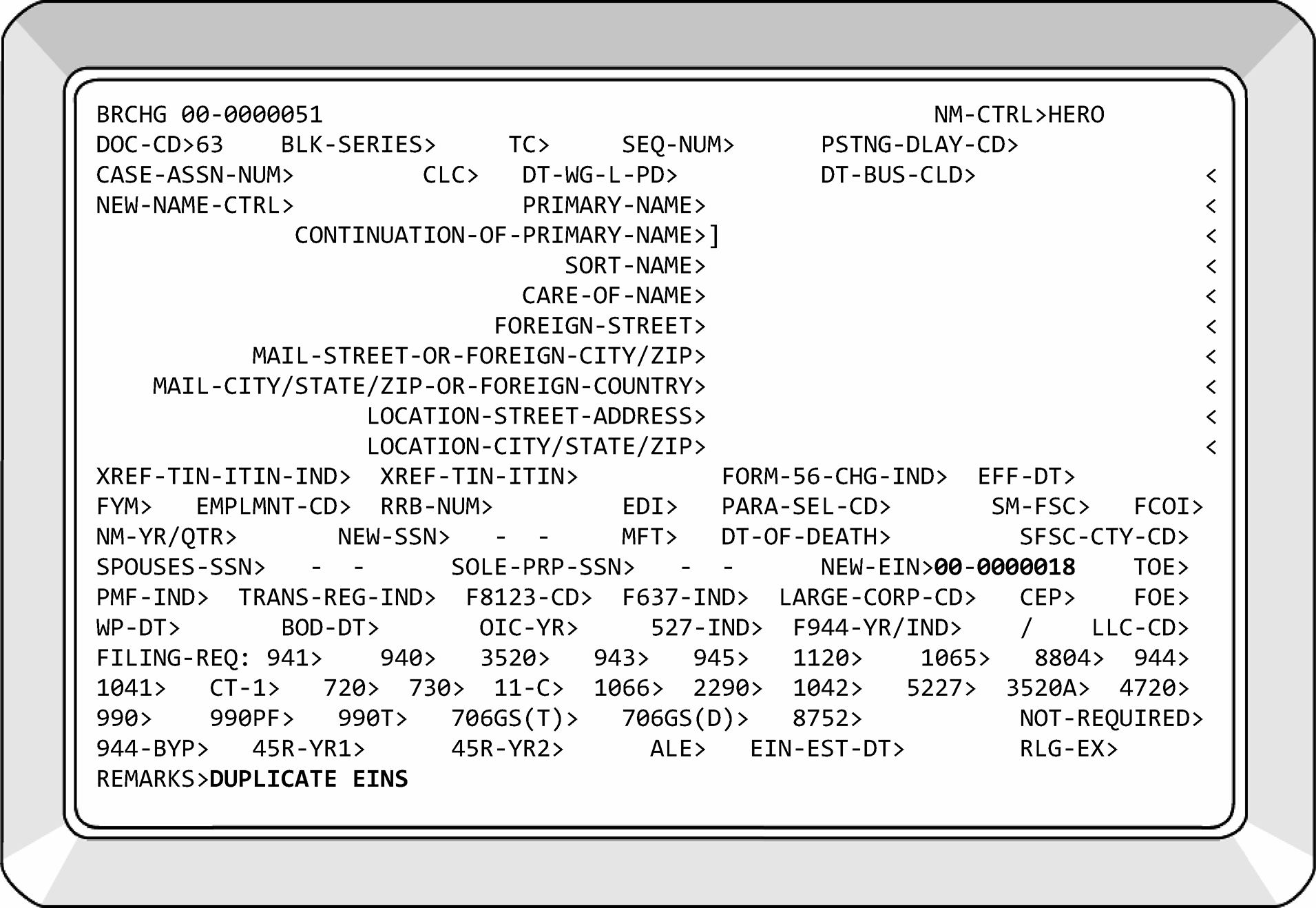
-
There will be occasions when a TC 011 has been input in error.
-
It is necessary to correct both EINs. Pull the Consolidation from our file and work as follows:
If... And... Then... A) The consolidation completed, The "bad" EIN is gone from Master File, 1) TC 000 the EIN returning the correct name and address to the EIN.
2) Input TC 016, PDC 1 updating the EIN-EST-DT> field to the original Establishment Date on the EIN. Use YYYYMM format. EIN-EST-DT> is the last field of BNCHG before REMARKS.B) The consolidation did not complete, The "bad" EIN is still on Master File, but INACTIVE, 1) Input TC 012 to re-activate the EIN. You can update the name, address, etc. in the TC 012.
2) If the Establishment Date of the EIN changed, input TC 016 to return the EIN-EST-DT> to its original date using YYYYMM format. EIN-EST-DT> is the last field of BNCHG before REMARKS.
3) Send photocopy of original BMFOL’I’ prints from the Consolidation and Form 3465, Adjustment Request, to BMF AM/Adjustments to have modules returned to original EIN.C) The consolidation completed, The bad EIN is still active on ENMOD, but not on INOLE, TXMOD and BMFOL, and has dropped off the TIF, -
Request account to be zapped using Form 6759. Attach a print of ENMOD, INOLE, TXMOD, and BMFOL.
-
Fax Form 6759 and attachments to Local User Support.
-
Monitor case until it has been removed. Input TC 000 to re-establish account.
-
-
The Electronic Federal Tax Payment System (EFTPS) is a free service taxpayers can use to pay their federal taxes, 24 hours a day, 7 days a week. Taxpayers can enroll at EFTPS Website. Newly assigned EINs are automatically pre-enrolled in EFTPS if tax payments are required.
-
Filers of the following BMF forms make payments:
-
Form 940
-
Form 941
-
Form 943
-
Form 944
-
Form 945
-
Form 1120 (taxable)
-
Form 720
-
Form 990–T
-
Form 990–PF
-
Form CT-1
-
Form 1042
-
-
All EFTPS Operations are located at the Ogden Submission Processing Center.
-
EFTPS will retain information on-line for current year plus 4 previous years.
-
EFTPS payments have no paper records. The EFTPS DLN is a unique 15-digit number assigned by the financial agent and is researched via CC EFTPS. See IRM 2.3.70, Command Code EFTPS, for additional information.
-
CC EFTPS is not restricted. CC EFTPS will be used with any of the following three definers:
Definer Input Format Description E EFTPSEnnnnnnnnnnnnnnn Researches general information using the EFT number. R EFTPSEnnnnnnnnnnnnnnnnnn yyyy Researches the reference number and payment year to locate the EFTPS. T EFTPSTnnnnnnnnn mmddyyyy $$$$$$$$$$$$$$
(Decimal must be entered with no commas.)Researches the TIN, payment date, and money amount to locate the EFT number or reference number. -
To determine whether the payment was made by Direct Debit or Credit Card, research the 4th (fourth) digit of the EFT-TRACE-NUM field to identify the payment method.
-
E-file Direct Debit = 0
-
Credit Card Payment = 6
-
-
Electronic Funds Transfer (EFT) Number - The financial agent assigns a 15-digit EFT number. The EFT number is a unique identifier and is used to research payments on the Master File and IDRS. Do not use the Document Locator Number (DLN) to perform research on EFTPS transactions. The EFT number is configured as shown in the following table:
Position Name Description 1 FA ID Number 2 - Bank of America 1 FA ID Number 3 - Treasury Offset Program 1 FA ID Number 4 - SSA Levy Program 1 FA ID Number 5 - RS-PCC 2 Payment Method 0 - E-file Debit 2 Payment Method 1 - ACH Credit 2 Payment Method 2 - ACH Debit 2 Payment Method 3 - FR-ETA 2 Payment Method 4 - (Reserved) 2 Payment Method 5 - Levy 2 Payment Method 6 - Credit Card 2 Payment Method 7 - Online 2 Payment Method 8 - Railroad Retirement Board (RRB) Link 2 Payment Method 9 - Government Payment (FEDTAX, Federal Payment Levy Program or SSA Levy.) 3 Combined Payment Indicator See table in (4) below. 4 - 7 Year Digit/Julian Date Year digit plus 001 - 366. If overflow, 401 - 766 can be used. The date that the EFT number was assigned. 8 - 9 Bulk Provider Number See table in (4) below. 8 - 15 (10 - 15 for bulk providers) EFT Sequence Number Randomly assigned number. -
See IRM 2.3.70(3), IDRS Terminal Responses - Command Code EFTPS.
-
If it can be clearly determined an error was made because the payment was applied to an incorrect MFT, tax period, or EIN, process as follows:
-
Prepare Form 3465, Adjustment Request, attach an IDRS print of the payment and forward to BMF AM/Adjustments for action.
-
Annotate on Form 3465: Possible misapplied payment - incorrect MFT, tax period, EIN (whichever applies).
-
The BMF AM/Adjustment function will either apply the credit to the correct MFT, tax period, EIN, or cycle the account until the payment has posted or take other appropriate action.
-
-
If Accounting Operation/EFTPS section is unable to locate a valid EIN while processing an EFTPS payment, they will fax a Form 4442 to the Entity clerical team.
-
The Form 4442 will indicate "3 Day Expedite Process." However, Entity will process the request for EIN assignment or re-establishment immediately upon receipt as Accounting is waiting to deposit the tax payment(s).
-
CCs NAMEE and NAMEB must be utilized prior to re-establishing an EIN. If unable to identify the questionable EIN as belonging to the taxpayer, ESIGN a new EIN. Suppress CP 57X series by inserting Notice Indicator "D" in the proper field of CC ESIGN.
-
Without delay, a response will be faxed back to the number indicated on the cover sheet from EFTPS.
-
Corporations use Form 8842 to elect one of the two annualization options that can be elected under IRC 6655(e)(2)(C) to figure the corporation's estimated tax payments under the annualized income installment method.
-
These forms are processed at the Kansas City Submission Processing Center (KCSPC).
-
Form 8842 must be filed by the 15th day of the fourth month of the tax year for which the election is to apply.≡ ≡ ≡ ≡ ≡ ≡ ≡ ≡ ≡ ≡ ≡ ≡ ≡ ≡ ≡ ≡ ≡ ≡ ≡ ≡ ≡ ≡ ≡ ≡ ≡ ≡ ≡ ≡ ≡ ≡ ≡ ≡ ≡ ≡ ≡ ≡ ≡ ≡ ≡ ≡ ≡ ≡ ≡ ≡ ≡ ≡ ≡ ≡ ≡ ≡ ≡ ≡ ≡ ≡ ≡ ≡ ≡ ≡ ≡ ≡ ≡ ≡ ≡ ≡ ≡ ≡ ≡ ≡ ≡ ≡
-
See the chart below for assistance in determining the timeliness of Form 8842:
Tax Period Due Date Timely if received by 202509 1-15-26 ≡ ≡ ≡ ≡ ≡ 202510 2-18-26 ≡ ≡ ≡ ≡ 202511 3-17-26 ≡ ≡ ≡ ≡ ≡ ≡ ≡ 202512 4-15-26 ≡ ≡ ≡ ≡ ≡ 202601 5-15-26 ≡ ≡ ≡ ≡ ≡ ≡ 202602 6-16-26 ≡ ≡ ≡ ≡ ≡ 202603 7-15-26 ≡ ≡ ≡ ≡ ≡ 202604 8-15-26 ≡ ≡ ≡ ≡ ≡ ≡ 202605 9-15-26 ≡ ≡ ≡ ≡ ≡ 202606 10-15-26 ≡ ≡ ≡ ≡ ≡ 202607 11-17-26 ≡ ≡ ≡ ≡ ≡ ≡ ≡ 202608 12-15-26 ≡ ≡ ≡ ≡ ≡ ≡ -
If Form 8842 is not received timely, return to the taxpayer and advise we are unable to process a late filed Form 8842.
-
Form 8842 must contain:
-
Corporation's name,
-
Corporation's address,
-
Corporation's EIN,
-
Tax year ending of the election,
-
Type of return to be filed,
-
A mark in the box for Option 1 or Option 2, and
-
Signature and title of corporate officer or agent.
-
-
If any items are missing, research IDRS for completion. If unable to complete Form 8842 with research, return the form to the taxpayer using Letter 6800sce.
-
If Letter 6800sce and Form 8842 are returned by the Postal Service as undeliverable, forward to Files to be filed alphabetically.
-
Underline the name control.
-
Edit the tax period above the OMB number.
-
Edit MFT in the lower left margin.
-
Form 8804 is MFT 06.
-
All 1120 series forms are MFT 02.
-
-
Input TC 971 Action Code 047 with CC REQ77. CC REQ77 requires the use of the MFT and Tax Period rather than 00_000000. Indicate Option 1 or Option 2 in the remarks of the TC 971. The IRS received date will be used as the transaction date.
-
Annotate TC 971-047 and date of input in the lower left margin near the edited MFT.
-
Prepare a routing slip to send Form 8842 to Files for filing in the Alpha File.
-
The instructions in this subsection are for the processing of Form 2678 with a revision date of October 2007 or later.
-
Earlier revisions of Form 2678 will NOT be accepted for new appointments. If you receive a prior revision of Form 2678, return the Form 2678 using Letter 4228C and inform taxpayer/agent that an October 2007 or later revision of Form 2678 must be filed. This instruction applies to new appointments only.
-
An Employer can be an IMF or BMF taxpayer and can designate an agent under IRC 3504 to withhold, report, and pay federal employment and unemployment taxes. These agents can refer to themselves as household employer agents, fiscal agents, employer agents, or fiscal intermediaries. The agent and the employer can be related businesses.
-
Each page of Form 2678 must be present to be processable. If the agent has submitted several Forms 2678, page 1 and only one page 2, return as incomplete.≡ ≡ ≡ ≡ ≡ ≡ ≡ ≡ ≡ ≡ ≡ ≡ ≡ ≡ ≡ ≡ ≡ ≡ ≡ ≡ ≡ ≡ ≡ ≡ ≡ ≡ ≡ ≡ ≡ ≡ ≡ ≡ ≡ ≡
-
Special consideration was given to these agents, and many have acquired a second EIN to use when reporting the liability of their customers/clients. When processing Form 2678, always research IDRS CCs NAMEE and NAMEB to ensure the correct EIN is shown on Form 2678, Parts 2 and 3.
-
The employer can be disabled or other welfare recipient receiving home health care services through a state or local program. These taxpayers are always individuals, never a business. These taxpayers are referred to as Home Care Service Recipients (HCSRs) and will not be treated as regular household employers. The acronym HCSR will always be placed on the primary name line behind a closing bracket. For example, JON]DOVE]HCSR. These taxpayers will be identified by checking the box below Item 9 on page 2 of Form 2678 and/or the box under Item 5 of Form 2678 (Rev. 10-2012) on page 1, “Check here if you are a home care service recipient and you want to appoint the agent to report and pay FUTA taxes for you.
-
HCSRs will never be BMF taxpayers.
-
Agents can file Forms 940 for HCSR employers only.
-
Form 2678 will never be processed for an agent to allow them to file Form 1042/Form 1042-S on behalf of their clients. If one is received, return it to the agent explaining there is no legal authority under Internal Revenue Code 3504 to allow them to file Form 1042/Form 1042-S.
-
If a surrogate or representative signs for the Employer/Payer the proper authorizing documentation must be attached. This can include Form 2848. A parent/guardian can always sign for a minor child without submitting any documentation. A guardian’s signature will be accepted prima facie, see IRM 3.13.2.2(10), BMF Entity - General, otherwise, upon first examination the matter appears to be self-evident.
-
The following Transaction Codes (TCs) and Action Codes (ACs) will be used when processing Forms 2678:
-
TC 971 AC 381 - Identifies an employer’s appointment of an agent - also for TC 972 (reversal).
-
TC 971 AC 382 - Indicates an agent pays ALL employment tax for Home Health Care employers - also for TC 972 (reversal).
-
TC 971 AC 383 - Indicates an agent pays ALL employment tax for employer (NOT Home Health Care) - also for TC 972 (reversal).
-
TC 971 AC 384 - Indicates an agent pays ALL tax for employer’s Form 945, CT-1, or CT-2 FRCs - also for TC 972 (reversal).
-
TC 971 AC 385 - Indicates an agent pays SOME of the employment tax for employer - also for TC 972 (reversal).
-
-
Once Form 2678 is processed, the TC 971/38X will be displayed on CC BMFOL'E'.
-
Do not update name lines unless Form 2678 is processable.
-
Disregard any differences in the address on Form 2678 and the address on Master File, with the exception of revocations. See IRM 3.13.2.17.4(3)(b), Form 2678 Revocation Procedures.
-
Digital signatures are now acceptable on Form 2678 per IRM 10.10.1 and Exhibit 10.10.1-2.
-
Review Form 2678 for completeness. If any of the following information is missing, take action as described in the table below in (3). The following items must be present on the Form 2678:
-
Employer’s/payer’s EIN
-
Employer’s/payer’s name
-
Employer’s/payer’s address
-
Appropriate boxes checked for question 5 of Form 2678.
-
Employer’s/payer’s signature
-
Agent’s EIN
-
Agent’s name
-
Agent’s address
-
Agent’s signature
-
-
Both the employers/payer’s signature and the agent’s signature are required for appointment of an agent; however, only one signature (either the employer/payer or the agent) is required for revocation. If the employer/payer is unable to sign their own name, an "X" or other designation of their signature will be accepted.
-
Research IDRS for any information missing from Form 2678. If unable to locate the missing information, take the following actions:
If... Then... A) The employer's/ payer’s EIN, name, address, or signature is missing, Return Form 2678 to the agent in Letter 4228C to request the missing information. If the EIN is missing, instruct the taxpayer to visit IRS Website to acquire a Form SS-4. B) The agent's EIN, name, address, or signature is missing, Return Form 2678 to the agent in Letter 4228C to request the missing information. If the EIN is missing, instruct the taxpayer to visit IRS Website to acquire a Form SS-4. C) None of the boxes in Line 5 are checked and the box below Item 9 on page 2 is not checked, Correspond using Letter 4228C to request the missing information. D) Correspondence is received indicating none of the boxes below Line 5 apply, Return to Employer using Letter 4228C informing them they do not qualify to file Form 2678. -
If Form SS-4 is attached to the Form 2678, take the following actions:
If... Then... A) Form SS-4 is attached requesting an EIN for the agent who has been requested to file Form 940, Form 941, Form 943, Form 944, Form 945, or Form CT-1, Assign an EIN and the appropriate filing requirements to the agent as indicated on the agent's Form SS-4. Hold Form 2678 for two weeks for TC 971 input, as CC REQ77 cannot be input until the EIN posts to Master File. B) Form SS-4 is attached requesting an EIN for the employer/payer, Assign an EIN on the O tape without any FRCs to the employer/payer as indicated on employers/payer’s Form SS-4. Hold Form 2678 for two weeks for TC 971 input, as CC REQ77 cannot be input until the account posts to Master File. C) Form SS-4 is attached and the box under Item 5 is marked showing the taxpayer is an HCSR, Assign the EIN for the employer on the O tape with no filing requirements. Hold Form 2678 for two weeks for TC 971 input, as CC REQ77 cannot be input until the account posts to Master File. D) Form SS-4 is attached and the check box following Line 9 on Form 2678 is checked, Assign the EIN for the employer on the O tape with no filing requirements. Hold Form 2678 for two weeks for TC 971 input, as CC REQ77 cannot be input until the account posts to Master File.
-
Ensure the agent has the filing requirement(s) indicated in Part 2, Item 5 of Form 2678.
-
If an employer designates an agent for all employees for Form 944, remove the Form 944 FRC from the employer’s account but do not establish a Form 944 FRC on the agent’s account. Ensure the agent has a Form 941 FRC.
-
Agents can file Form 940 on behalf of their HCSR clients. Agents are required to file an aggregate Form 940 with an attached Schedule R. However, an Action Code has not been created for this FRC. If the HCSR/FUTA box is marked in Item 5 of Form 2678, ensure the agent has a valid Form 940 FRC on their EIN.
-
It is possible for the agent and employer/payer to be related businesses. This means the same individual can sign as agent and employer/payer.
-
There are situations where one Employer/Payer can appoint two different agents to file on behalf of SOME of their employees. For example, employees of one Employer/Payer are located in different parts of the country. If any of the ALL boxes are checked in Item 5, contact either agent for clarification. Otherwise, continue processing.
-
The agent’s EIN will receive a TC 971 AC 381. A Letter 1997C will be sent to notify the agent that the appointment has been approved. See IRM 3.13.2.17.3(11), Form 2678 - Employer/Payer’s Account.
-
After determining the completeness of Form 2678, remove the FRCs indicated in Part 2, Item 5 of Form 2678 from the employer/payer's EIN. If the boxes in Part 2, Item 5 are marked for some employees, do not delete the FRCs from the Employer/Payer's EIN.
-
If the HCSR/FUTA box is checked below Item 5 of Form 2678, delete the 940 FRC from the Employer/Payer's EIN and ensure "HCSR" is added to the Employer/Payer's primary name line.
-
If one Employer/Payer is authorizing two different agents to represent SOME of their employees, only one agent can be XREF'd in the TC 971. Neither agent has precedence over the other, therefore a random selection of an agent's EIN will be made for the TC 971 XREF. Continue processing as shown below.
-
When processing Form 2678, research CC ENMOD and CC BMFOL'E' for a previously posted TC 971.
If... And... Then... A) TC 971 Action Code (AC) 382, 383, 384, or 385 is present, Agent’s EIN and AC is the same, No action is necessary. B) TC 971 AC 382, 383, 384, or 385 is present, Agent’s EIN is different, and the AC is the same, -
Input a TC 972 to reverse the posted TC 971.
-
Input TC 971 and appropriate AC and cycle delay for one cycle.
C) TC 971 AC 382, 383, 384, or 385 is present, Agent’s EIN is the same and the AC is different, -
Input a TC 972 to reverse the posted TC 971.
-
Input TC 971 and appropriate AC and cycle delay for one cycle.
D) TC 971 AC 382, 383, 384, or 385 is present, Agent’s EIN and the AC are different, -
Input a TC 972 to reverse the posted TC 971.
-
Input TC 971 and appropriate AC and cycle delay for one cycle.
E) TC 971 AC 382, 383, 384, or 385 is not present, Continue processing Form 2678. F) Box below Item 9 on page 2 of Form 2678 is checked, The taxpayer is not an individual taxpayer, -
Edit out the box below Item 9 on page 2 and DO NOT add HCSR designation.
-
If unable to determine correct AC to input, return Form 2678 to agent requesting clarification of the returns to be filed.
G) TC 971 AC 381 is present, Unable to determine the correct AC by Form 2678 in hand, Contact T/P to clarify if they are an agent or an employer and proceed as needed. -
-
Action Code 382 will only be utilized when the HCSR/FUTA box in Item 5 is checked or the box below Item 9 on page 2 is checked. Verify the Employer/Payer is an individual. HCSRs will never be a BMF taxpayer. Disregard the word "household" if in the employer/payer's signature but ensure "HCSR" is added to the primary name line.
-
Overlay CC ENMOD with CC REQ77 to generate CC FRM77.
-
Input the following fields into CC FRM77 using the employer/payer’s EIN:
-
MFT>00
-
TX-PRD>000000
-
TC>971
-
TRANS-DT>Current date, which is the effective date.
-
TC971/151-CD>See the If, And, Then table below in para (9).
-
SECONDARY-DT> Use current date.
-
XREF-TIN>Agent’s EIN.
-
MISC>Form 2678 Agent
-
-
See the chart below to determine the appropriate Action Code to be utilized with the TC 971 input. A TC 972 must be input between the TCs 971. If multiple TCs 971 are to be input, the AC for employment returns will be input last.
If... And... Then... A) A box in Part 2, Item 5 referencing Form 941, Form 941(SP), Form 943, Form 943(SP), Form 944, and Form 944 (SP) is checked For ALL employees/payees, The box below part 2 item 5 or the box below Part 3, Item 9 of Form 2678 is also checked, -
Input a TC 971 AC 382 on the employer/payer's EIN.
-
Add HCSR to the primary name line behind the employer/payer's last name and closing bracket.
-
Delete the necessary FRCs from the employer/payer's EIN, including Form 940.
B) A box in Part 2, Item 5 referencing Form 941, Form 941(SP), Form 943, Form 943(SP), Form 944, and Form 944 (SP) is checked For ALL employees/payees, The box below part 2 item 5 or the box below Part 3, Item 9 of Form 2678 is not checked, -
Input a TC 971 AC 383 on the employer/payer's EIN.
-
Delete the necessary FRCs from the employer/payer's EIN.
C) A box in Part 2, Item 5 referencing Form 941, Form 941(SP), Form 943, Form 943(SP), Form 944, and Form 944 (SP) is checked For SOME employees/payees, The box below part 2 item 5 or the box below Line 9 on Page 2 of Form 2678 is also checked, -
Input a TC 971 AC 382 on the employer/payer's EIN.
-
Add HCSR to the primary name line behind the employer/payer's last name and closing bracket.
D) A box in Part 2, Item 5 referencing Form 941, Form 941(SP), Form 943, Form 943(SP), Form 944, and Form 944 (SP) is checked For SOME employees/payees, The box below part 2 item 5 or the box below Part 3, Line 9 is not checked, -
Input TC 971 AC 385 on the employer/payer's EIN.
-
Do not delete FRCs from the employer/payer's EIN.
E) A box in Part 2, Item 5 referencing Form 941, Form 941(SP), Form 943, Form 943(SP), Form 944, Form 944 (SP), Form 945, Form CT-1 and Form CT-2 is not checked, The box below part 2 item 5 or the box below Part 3, Item 9 of Form 2678 is checked, -
Input TC 971 AC 382 on the employer/payers EIN.
-
Add HCSR to the primary name line behind the employer/payer's with a closing bracket.
-
Delete the necessary FRCs from the employer/payer's EIN, including Form 940.
F) A box in Part 2, Item 5 referencing Form 945, Form CT-1, or Form CT-2 is checked For ALL employees/payees, Input TC 971 AC 384 on the employer/payer's EIN. Delete the necessary FRCs from the employer/payer's EIN. G) A box in Part 2, Item 5 referencing Form 945, Form CT-1, or Form CT-2 are checked For SOME employees/payees, -
Input TC 971 AC 384 on the employer/payer's EIN.
-
Do not delete FRCs from the employer/payer's EIN.
-
-
If HCSR was previously a sole proprietor and has a trade name on their EIN, delete the trade name.
-
After completion of the above actions use Letter 1997C to notify the agent that the appointment has been approved. If the agent has been approved for multiple employers/payers, only one Letter 1997C will be sent. The name and EIN of each employer/payer will be included in the letter.
-
Send a Letter 3064C to the employer/payer confirming their authorization of the agent. Use the IAT Letter tool to pull appropriate paragraphs from the Letter 1997C. Do not send a letter to employer/payer if address on Master File or Form 2678 is the same as the agent's address. Do not send letter to employer/payer if they are an HCSR.
-
Taxpayers file a revocation of their appointment by checking the box in Part I of Form 2678 labeled "You want to revoke an existing appointment" . Revocations are also acceptable by correspondence.
-
Revocations require only one signature. The signature can be that of the agent or employer/payer. If the signature is missing, return Form 2678 to the sender with a Letter 4228C.
-
Research the employer/payer's account for the presence of a TC 971 Action Codes 382, 383, 384, or 385 with the same XREF-TIN as the revoking agent.
Note:
The requirements to enter TC 971 to record these transactions started in January 2007. If TC 971 is not present, do not input a TC 972 to revoke the relationship. Please see (C) below. The revoking agent must be the same as the cross-referenced agent if not, return Form 2678 to the Agent stating: "Our records reflect an agent other than yourself is currently representing the Employer/Payer. Please seek clarification from your client and re-submit Form 2678 if needed."
If... Then... A) TC 971 with Action Code 382, 383, 384, or 385 is located on the employer/payer's account, -
Reverse the previous transaction with a TC 972. Use the same Action Code from the TC 971 record. TC 972 is input with the following fields:
-
MFT>00
-
TX-PRD>000000
-
TC>972
-
TRANS-DT> Use current date (effective date).
-
SECONDARY DT>Date of revocation if provided, otherwise use earliest IRS received date.
-
TC971/151-CD>Use same Action Code as the TC971 on record.
-
XREF-TIN>Agent's EIN
-
MISC>Form 2678 Agent.
-
-
Activate the appropriate Form 941, Form 943, Form 944, Form 945, Form CT-1, and Form CT-2 filing requirements of the employer/payer whose agency relationship is terminated.
-
Research employer/payer's TIN to determine if taxpayer is deceased or no longer in business. If so, do not add any FRCs to the account.
-
If AC 382 was used for the original TC 971 posting, establish a Form 940 filing requirement for the Employer/Payer as well. Remove HCSR from taxpayer's name line.
B) If new address is provided for Employer/Payer, Update the Master File. C) TC 971 is not located on the employer/payer's account, Correspond with agent for clarification using Letter 4228C. -
-
Do not remove any FRCs from the agent's EIN.
-
Send a Letter 4228C to inform the filer the revocation has been approved. In the letter, use the revocation date provided by the taxpayer. If not provided, use earliest IRS received date as the effective date.
If... And... Then... A) A revocation is approved, It is filed by the agent, -
Send correspondence to both the Agent and the Employer/Payer, unless Employer/Payer is an HCSR.
-
Do not send Letter 4228C to Employer/Payer if no longer in business, deceased, or agent's address is on EIN of Employer/Payer.
B) A revocation is approved, It is filed by the Employer/Payer, Send correspondence to the Employer/Payer only. If HCSR, do not send correspondence. -
-
All completed Forms 2678 will be sent to the Dayton Federal Records Center at the following address:
Dayton Federal Records Center
3150 Springboro Road
Dayton, OH 45439-1883 -
Procedures for sending documents to the FRC is found in IRM 3.5.61.5.3.
-
Ship once you have a complete box.
-
An American employer with foreign affiliates will file Form 2032 to extend social security coverage to United States citizens and resident aliens employed by their foreign affiliate.
-
The term "American Employer" means an employer which is:
-
The United States or any instrumentality thereof,
-
An individual who is a resident of the United States,
-
A partnership, if two thirds or more of the partners are residents of the United States,
-
A trust, if all the trustees are residents of the United States, or
-
A corporation organized under the laws of the United States or of any state.
-
-
All Forms 2032 will be filed in Ogden. Forms 2032 received in a site other than Ogden will transship the form to Ogden.
-
Form 2032 procedures are not applicable to a "Foreign Affiliate" when services performed by its employees are within the U.S.A. If a Form 2032 is received indicating the employees work within the U.S.A., send the form back to the taxpayer explaining they do not qualify for filing the form.
-
Paper Forms 2032 are filed in triplicate. The area offices will forward Form 2032 without examination, to the Ogden campus.
-
This subsection contains all information needed for processing of Forms 2032.
-
Expedite processing will apply. See IRM 3.30.123, Work Planning and Control - Processing Timeliness: Cycles, Criteria, and Critical Dates.
-
Examine all three copies for completeness.
-
Secure the Director's signature and the date on all three copies of the Form 2032. The Forms 2032 will be routed to the Director's office through the Planning and Analysis staff. The Entity Department Management Assistant will assist the TE with this process.
-
Examine the effective date on the Form 2032. The effective date of the election is determined by the signature date of the Director's approval. The effective date of an original election is the first day of the quarter in which the election is filed (and approved) or the first day of the next calendar quarter if requested by the taxpayer. If a previous revision to Form 2032 is filed, annotate the effective date in the area pertaining to the agreement effective date.
-
Assign only one EIN in the name of the Domestic Employer, including the words "Foreign Affiliates" in the primary name line, Employment Code "S" and Form 941 FRC. Do not use a NIC when assigning this EIN. The EIN will be assigned by the processing campus. Do not use CC CMODE to assign the EIN with prefix 98 as the foreign affiliate is an American owned company.
-
Entity's Management Assistant or designated employee will prepare a letter (in triplicate) explaining that an EIN has been assigned for exclusive use by the employer in reporting wages paid to employees of its foreign subsidiaries.
-
Distribute the letters as follows:
-
Employer - One copy of letter, a blank Form 941 for the appropriate year, and one copy of approved Form 2032.
-
Entity - One copy of letter and one copy of approved Form 2032 will be maintained in Entity in an alphabetical file.
-
SSA - One copy of letter and one copy of approved Form 2032. Mail to:
Social Security Administration
ATTN: OEO DES RECON SS4
6100 Wabash Ave
Baltimore, MD 21215
-
-
Enter a history item on CC ENMOD as follows: APPD_F2032.
-
If an EIN is listed on the Form 2032, verify the EIN supplied by the taxpayer. If supplied EIN is incorrect, research IDRS for valid EIN. If unable to locate, attempt telephone contact with taxpayer. If unsuccessful, return Form 2032 to taxpayer with Letter 6800sce requesting correct information. Using CC ACTON, place history item on CC ENMOD: "F2032TOTP" .
-
Amendment to Form 2032, previously filed under IRC 3121(l), to broaden the coverage will be received in Entity. Generally, the effective date of the amendment is the first day of the quarter following the quarter in which it is filed. However, an amendment filed in the same quarter as the original election is filed or in the first month following the quarter in which the original election is filed is retroactive to the effective date of the original election. Annotate the amended Form 2032 as such to reflect the effective date of the coverage.
-
Entity's Management Assistant or designated employee will prepare a letter (in triplicate) explaining that the EIN that was previously assigned is still valid for exclusive use by the employer in reporting wages paid to employees of its foreign subsidiaries.
-
Distribute the letters as follows:
-
Employer - One copy of letter and one copy of approved Form 2032.
-
SSA - One copy of letter and one copy of approved Form 2032. Mail to:
Social Security Administration
ATTN: OEO DES RECON SS4
6100 Wabash Ave
Baltimore, MD 21215 -
Entity - Associate the amended Form 2032 with the original Form 2032. Form 2032 will be maintained in Entity in an alphabetical file.
-
-
Once an agreement is made, it cannot be revoked, either in its entirety or with respect to any foreign affiliate. However, the agreement will terminate for a foreign entity at the end of any quarter in which the foreign entity, at any time in that quarter, ceased to be a foreign affiliate.
-
Upon receipt of notification that a terminating event has taken place, verify the EIN supplied by the taxpayer. If supplied EIN is incorrect, research IDRS for valid EIN. If unable to locate, attempt telephone contact with taxpayer. If unsuccessful, return Form 2032 to taxpayer with Letter 6800sce requesting missing information. Using CC ACTON, place history item on CC ENMOD: "F2032TOTP" .
-
Research EIN to determine if "Final" Form 941 has posted. If not:
-
Send Letter 696C to employer requesting "Final" Form 941.
-
File termination documentation in control team awaiting "Final" Form 941.
-
Entity's Management Assistant will prepare a letter (in triplicate) notifying the employer that we have terminated their agreement under IRC 3121(l). See (5) below for additional letter distribution.
When "Final" Form 941 has posted, input TC 016 to delete Employment Code (EC) "S." -
-
If "Final" return has posted but did not reflect the Computer Condition Code (CCC) "F" , input TC 591-020 on the next tax period of MFT 01. Input TC 016. EC "9" to remove Employment Code "S" . Management Assistant will prepare a letter (in triplicate) notifying employer we have terminated their agreement under IRC 3121(l). See (5) below for letter distribution.
-
Distribute the letters as follows:
-
Employer - One copy of letter.
-
SSA - One copy of letter. Mail to:
Social Security Administration
ATTN: OEO DES RECON SS4
6100 Wabash Ave.
Baltimore, MD 21215 -
Entity - Input TC 930 with CC FRM77 to have copy of letter associated with "Final" Form 941. See Entity Job Aid 10744-003., page JA-61.
-
-
Forms 2032 will be held in Entity in alphabetical order.
-
Per Document 12990, IRS Records Control Schedule (RCS) 29, Item 65, retire to Federal Records Center (FRC) beginning January 2, one year after the end of the year in which returns were numbered and processed. CC BMFOL’I’ will show the first tax period in which returns were numbered and processed.
-
Coordination must be made with Records Specialist, see Records Specialist Team, in PGLD before routing to FRC.
-
Form 56, Notice Concerning Fiduciary Relationship, is filed to notify the IRS of a fiduciary relationship. There is no restriction concerning the information a fiduciary can receive for the entity for whom they are acting. A fiduciary assumes the powers, rights, duties and privileges of the taxpayer, until notice is given that the fiduciary is terminated. If correspondence is received in lieu of Form 56, prepare a dummy Form 56, attaching all pages of the correspondence, to use as a source document.
-
A taxpayer is any individual, trust, estate, partnership, association, company or corporation. This includes pension and 401(k) plans.
-
Forms 56 received with a Form SS–4 attached are both to be processed under the timeliness guidelines for Forms SS–4. The EIN will be annotated on the Form 56 when establishing the account. Update the Form SS–4 with the fiduciary information shown on Form 56.
-
If Form 56 indicates the taxpayer is filing the form for delinquent income taxes under Offer and Acceptance, send the Form 56 to the Fraud Detection Center.
-
If Form 5495, Request for Discharge from Personal Liability Under Internal Revenue Code Section 2204 or 6905, is still attached to Form 56, detach and route to Exam, M/S 4140 in Ogden, or Stop 4100 in Kansas City.
-
Forms 56 attached to an electronically filed tax return in MeF must not be processed. They are to be treated as information only.
-
When reviewing Form 56, if you notice the taxpayer is appointing a high-ranking IRS or Treasury employee or other high-ranking governmental official or themselves as a fiduciary, refer these cases to Funny Box Program. See IRM 3.13.2.8.23, “Funny Box” Returns, for additional guidance.
Note:
If a Form 56 comes in with NO signature and documentation attached requesting that a Judge or high-ranking official be listed as the Fiduciary from the taxpayer or documentation from the taxpayer identifying themselves as a Sovereign country, do not process, and route the Form 56 to the Funny Box Program. See IRM 3.13.2.8.23, “Funny Box” Returns, for additional guidance.
Caution:
If, for any reason, an IRS employee has concerns regarding the authenticity of a fiduciary, requester or titled representative, the employee can request the fiduciary supply supporting authority before disclosing taxpayer information. Use the Letter 5555C and request the legal documentation.
-
When a paper Form 56 or correspondence is received, the following information is needed to process the form:
-
Taxpayer name line information (Part I - Identification),
-
Employer Identification Number/Social Security Number (Part I - Identification) (if missing, research IDRS),
-
Fiduciary name and address information, (Part I - Identification),
-
Authority, (Part I Section A) One box in Item 1 must be checked, Item 2 must be completed if applicable,
-
Tax forms to be filed, (Part I Section B),
-
Court and Administrative Proceedings, if any took place (Part III), and
-
Signature of the fiduciary (Part IV).
Exception:
There are situations where letters testamentary and/or court certifications need not be required. When a decedent has passed without a will and there has been a transfer of their estate to a surviving spouse or other heir under the property or estate and trust laws of the decedent’s state of domicile, courts may not be involved. In such instances, the IRS can accept a signed Form 56 without additional supporting evidence.
-
-
If information is missing from Form 56, correspond using Letter 5555C or Letter 6800sce to secure the missing information. Review the entire document and any attachments and use IDRS/IAT to locate missing information prior to corresponding.
Note:
Former Commissioner Steven T. Miller issued a memorandum dated September 23, 2011. The subject of the memorandum contains information on the revision of policy for use of Fax and Signature Stamps in Taxpayer Submissions and indicates that stamped signatures are not acceptable for Form 56 submissions. The memorandum contains the following information: Preparer/taxpayer signature stamps will not be permitted when signing other documents such as S-elections, applications for change in accounting method, powers-of-attorney, consent forms, revenue agent reports, and other case inquiry/resolution related documents requiring signature. However, if a Form 56 is received via EEFax, we can assume the taxpayer has had contact with an IRS employee and the Form 56 will be processed, if complete.
-
Direct your correspondence to the Fiduciary if enough information is present to correspond.
-
Return the Form 56, highlight the field missing information, with your correspondence.
-
If the Letter 6800sce is used, add the following history item to CC ENMOD:
6800SCE
WFORM56
and highlight the field for the missing information on Form 56. -
-
If the EIN and/or SSN are missing, and the correct numbers cannot be found via IDRS research:
-
Return Form 56 to the taxpayer using Letter 5555C.
-
Request missing TIN.
-
Inform taxpayer to access IRS.gov to retrieve Form SS-4 (for EIN) and to complete and return to us.
-
-
If the taxpayer's address is missing, use the fiduciary's address. If the fiduciary's address is missing, contact the fiduciary by phone.
-
If Form 56 does not reflect the returns to be filed by the fiduciary, enter the return numbers based on the TINs and name of the taxpayer.
If... Then... A) An SSN is entered in Part I of Form 56, Ensure "Form 1040" is marked in Section B, Item 4. B) An EIN is entered, Ensure "Form 1041" is marked in Section B, Item 4 of Form 56. C) The word "gift" is entered on Form 56, Ensure "Form 709" is marked in Section B, Item 4 of Form 56. D) The word estate is marked in Section B, Item 3, Use caution as this word can apply to Form 1041 or Form 706 series. E) The box a 706 series is marked, Ensure the word "ESTATE" is entered behind the closing bracket after the decedent’s last name. F) Words describing the return(s) to be filed are not present and the returns to be filed cannot be deciphered by other information on the Form 56, Return Form 56 to the Fiduciary for completion via Letter 5555C/Letter 6800sce. -
If Part I, Section B is not complete, return Form 56 to the fiduciary. Process as needed when response is received.
-
If Form 56 is received to update/establish/revoke a fiduciary relationship, and research determines a taxpayer account does not exist on Master File, do not establish the account. Send the Form 56 and any supporting documentation to Files for retention in the Alpha File. Include the words "Alpha File" in the audit trail in the lower left corner of the document.
-
Follow IRM 3.13.5, Campus Document Services - Individual Master File (IMF) Account Numbers, for Forms 56 indicating Form 1040 will be filed by the fiduciary. If the Form 1040 was filed electronically, send the Form 56 to Files to be placed in the Alpha File. Include the words "Alpha File" in the audit trail in the lower left corner of the document.
-
Illinois Land Trusts do not require an EIN; however, they can choose to receive an EIN and file an annual return (Form 1120, Form 1065, Form 1041). If Form 56 is received with an Illinois Land Trust entered in the name line and no returns indicated, edit name control and route to Files function for placement in the "Alpha File" . If Form 56 is received with an Illinois Land Trust entered in the name line and returns are indicated on Form 56, ensure the trust has a valid EIN; edit it on Form 56 and input TC 098. If an EIN is not located, return Form 56 to the trust as incomplete. If you receive a Form 56-A, Notice Concerning Fiduciary Relationship-Illinois Type Land Trust, return Form 56-A to the taxpayer and request they file Form 56. Form 56-A is not an approved IRS form.
-
If Form 56 is received for a bankruptcy estate, take no action. The United States bankruptcy courts have jurisdiction over all bankruptcy relationships; therefore, we will not alter an EIN that is for a bankruptcy case. Do not correspond with the taxpayer or fiduciary. Include "Alpha File" in the audit trail. Route Form 56 to Files for placement in the Alpha File.
-
Florida Pooled Trusts are special need trusts created for the sole benefit of persons with disabilities. These will be stored in the Alpha File within the Files function. Underline the name and EIN of the fiduciary, enter "Alpha File," the date and IDRS number of TE.
-
The name control must be underlined on all Forms 56 routed to Files.
-
Do not update the taxpayer’s address unless Form 8822-B or Form 8822 is attached.
-
Use the table below to establish a fact of filing:
Note:
A TC 098 will be input on the EIN entered on Form 56. If there is not an EIN, input the TC 098 on the SSNV. If there is not an Estate & Gift filing indicated on Form 56, a TC 098 will not be input. Multiple TCs 098 are acceptable on the same account.
If... And... Then... A) The taxpayer files a Form 56 to establish a fiduciary on their account, The form is complete, -
Input a TC 098 using CC BNCHG on every Form 56 establishing a fiduciary relationship.
-
The "Remarks" field of CC BNCHG will begin with the alpha characters "SD" alerting Files that a Source Document is forthcoming. A sequence number is also needed.
-
Form 56 will be used as the source document. Form 6502 will be prepared and placed on an accordion or gusset folder.
-
Update the fiduciary’s name as needed.
B) The taxpayer is changing their fiduciary relationship (compare ENMOD with the Form 56 fiduciary's name and address), -
Input a TC 098.
-
Input a "1" in the FORM-56-CHG-IND field using CC BNCHG.
-
Input the XREF-TIN-ITIN-IND field of the grantor if available using CC BNCHG.
-
Update the fiduciary's name and address as needed.
C) The taxpayer is a Form 706 filer, The taxpayer is using a valid SSN, -
Input TC 000 on the V tape if the account is not established. You must also complete the fields MFT>52 and DT-OF-DEATH> in MMDDYYYY format.
-
Input a TC 098 on the V tape and cycle appropriately only if an EIN is not affected by the Form 56.
-
Edit aV to the right of the SSN on the document.
D) The taxpayer is a Form 709 filer, The taxpayer is using a valid SSN, -
Input TC 000 on the V tape if the account is not established. You must also complete the fields NM-YR/QTR> in YYYY format (This will be the year in which the name line is being revised or established) and MFT>51.
-
Input a TC 098 on the V tape and cycle appropriately only if an EIN is not affected by the Form 56.
-
Edit a V to the right of the SSN on the document.
E) The taxpayer is a Form 706 or Form 709 filer, The taxpayer is using an EIN, -
Research for an SSN.
-
If not found, return Form 56 to taxpayer asking for an SSN.
F) If the Form 56 reflects both Form 706 and Form 709 filings, It is not necessary to establish both MFTs for Form 56. The Form 706 takes precedence. -
-
If TC 098/099 is already on IDRS and was input within the last 60 days, associate the Form 56 with the posted TC 098/099. If the TC 098/099 is older than 60 days, process the Form 56 as a new receipt.
-
If Form 56 is a duplicate (TC 098/099 already posted), destroy Form 56 as classified waste. A duplicate form is one that contains the same elements as the original (for example, same taxpayer, same fiduciary, same forms are marked).
-
The taxpayer will complete Part II of Form 56 to revoke or terminate a prior notice to the IRS concerning a fiduciary relationship. Correspondence indicating termination, closing of, final, deletion, revoke or no longer needed etc. can also be accepted as a Termination request. Edit TERMINATION on top of form and process.
Update the account as follows:-
Input a TC 099 through BNCHG to terminate the relationship on the BMF. The input of TC 099 represents a terminated fiduciary relationship. The TC 099 will be input on the TIN that received the TC 098.
-
If the account has fallen off the Master File, take no action. Forward to Files requesting document to be filed in Alpha File. The words "Alpha File" will be included in the audit trail.
-
Once the account is terminated, follow the disposition procedures below.
-
-
The revoking/terminating fiduciary must be the same as the fiduciary on Master File. If not, return Form 56 to the fiduciary stating: Our records reflect a fiduciary other than yourself is currently representing this taxpayer. Please seek clarification from your client and resubmit Form 56 if needed.
-
If present, remove fiduciary's name from account.
-
Send Form 56 to Files as a source document for TCs 098 and/or 099 using Doc Code 63.
-
"Remarks" must be entered. Enter SD in the Remarks field to alert Files.
-
The Forms 56 must be maintained in sequence number order.
-
If a TC 098/099 was not input, send the Form 56 to Files on a routing slip indicating it will be filed in the ALPHA FILE. This includes IMF Forms 56 (only Form 1040 shown in Part III of Form 56). Include the words "Alpha File" in the audit trail in the lower left corner of the document. If a Form 56 is both IMF and BMF, the document will be a source document for TC 098/099 input.
-
If Form 56 is a duplicate (TC 098/099 already posted), destroy Form 56 as classified waste. A duplicate form is one that contains the same elements as the original, for example, same taxpayer, same fiduciary, same forms are marked.
-
Form 56-F, Notice Concerning Fiduciary Relationship of Financial Institution, is used to notify the IRS (and the common parent) of a fiduciary relationship with respect to a financial institution (such as a bank or a thrift). In addition, the fiduciary’s filing of a Form 56-F (with copy sent to the common parent) will satisfy the notice requirement for the fiduciary to secure a refund. See IRC 6402(k) and Treas. Reg. 301.6402-7.
-
The following information must be completed on Form 56-F:
-
Part I - Identification (Line 20 must be checked only if Line 7 and Line 15 are checked). If Line 20 is not checked, call FDIC and ask for another Form 56-F with Line 20 checked or return the Form 56-F for Line 20 to be checked. If Line 15 is checked, and Line 7 is not checked, Line 20 does not have to be checked. Line 21 must be completed if Line 15 is checked.
-
Part II - Authority.
-
Part IV - Revocation or Termination of Notice, if applicable.
-
Fiduciary's Signature.
-
-
If any of the information listed above is missing, return Form 56-F to the Fiduciary (Line 9) to be completed.
-
Update the name, address and phone number information for the entity's EIN as shown on Line 2 of the form.
-
Input fiduciary's name (Line 9) followed by FDIC to the SORT-NAME field.
-
Input the fiduciary's contact person (Line 10) on the "CARE-OF-NAME" field.
-
Input the phone number of the fiduciary's contact person (Line 13) on the account.
-
Update the address information to reflect the fiduciary's address as shown on Lines 11 and 12.
-
-
If Line 15 is not checked, skip to (5).
-
If Line 15 is checked, input a REQ77 over CC ENMOD to generate the FRM77 for the entity as shown on Line 2. On the FRM77 screen input a TC 971 with an AC 076 for each tax year(s) that the financial institution was a subsidiary of the consolidated group as shown on Line 21.
a. MFT>02
b. TX-PRD>Each tax year as determined on Line 21, if there is none, input the current tax period.
c. TC>971
d. TRANS-DT>Current date, which is the effective date.
e. TC971-CD>076
f. REMARKS>Form 56-F. -
If Line 15 is checked, input a TC 971 with AC 076 to the common parent's EIN, Line 17. Repeat steps (3)a through (3)f for each tax year(s) as determined in (3).
Caution: If a prior tax period already has a TC 971 AC 076 on the module, do not input another TC 971 AC 076. -
Forward Form 56-F to the Files function to be placed in the Alpha File. Include the words "Alpha File" in the audit trail in the lower left corner of the document.
-
The BMF Entity Notices and Transcripts, which are internal notices, are currently processed through Account Management Services (AMS). The processing instructions have not changed, AMS allows the routing of the notices and transcripts to be paperless. See IRM 3.13.12, Campus Document Services - Exempt Organization Account Numbers, for CP 172 and CP 192.
-
CP 200: Taxpayer Identification Number Change, Inactive Account is generated when a consolidation of accounts is attempted and the "TO" account is inactive (all filing requirements are "8" ). Pull the original consolidation case and process as follows:
-
If... Then... A) Research is performed, and if transposition or other mechanical error was made, -
Update EIN as needed.
-
Consolidate the accounts via CC BRCHG, TC 011.
B) Entity Control receives these notices, -
Perform appropriate research.
-
If transposition or other mechanical error was made, initiate (TC 011 - Doc Code 63) with correct data.
C) No error was made, -
Reject the request for consolidation and forward a copy of notice CP 200 to the originator on a memo routing slip.
-
Inform the originator to determine the reason for the inactive status (an account that is inactive due to a previous consolidation FROM that account would not normally be the TO Account for a subsequent consolidation attempt) and to take action to reactivate the account, if needed.
-
Also inform the originator to submit a new Request for Consolidation, if applicable.
-
-
-
CP 201: Taxpayer Identification Number Change - Name Control Mismatch is generated when a consolidation of accounts is attempted, and the name controls do not match.
-
Perform appropriate research to determine if these accounts are for the same entity. If an error was made in transcribing the data, initiate a TC 011, Doc Code 63 with correct data.
-
If it cannot be determined from research that it is one entity with 2 EINs, reject the request for consolidation to the originator per routing slip. Ask the originator to determine if the entities are the same (SP EIN vs LLC EIN or two different state charters for different corps). Do not input a TC 011.
-
If needed, see IRM 3.13.2.7.3.2(30) and (31), CC ENREQ/BNCHG, for figures of TCs 040 and 041.
-
-
Use the following procedures for all accounts with a temporary TIN:
-
If... Then... A) The accounts are the same, Input TC 013 to correct the name of the account that is incorrect. B) The accounts are BMF, -
Use Doc Code 63.
-
Input a TC 011 to consolidate the accounts.
-
Use the account with the temporary number (200xxxxxx) as the FROM Account.
C) The accounts are not the same entity, Research for another number (TIN). Be sure to include EACS in your research if EO is indicated. KCSPC TEs will contact an EO TE in Ogden for consultation by calling ≡ ≡ ≡ ≡ ≡ ≡ ≡ ≡ ≡ D) Another TIN is found, Input TC 011 using the temporary TIN as the "FROM" number. E) Another TIN is not found, Use CC ESIGN MFI "O" NID to assign another (new) number to the account with the temporary TIN. F) There is an open case on EACS, -
Input the Case Control Number.
-
Input TC 011 with the temporary number as the FROM number. A CP 209 will be generated to notify the taxpayer of the number assigned.
G) It cannot be clearly determined to consolidate the accounts, -
Reject the Request for Consolidation with the CP 201 to the originator on a memo routing slip.
-
Request additional information to verify the consolidation.
H) Sufficient information is received, -
Change the name (TC 013).
-
Input TC 011 to consolidate the accounts.
I) Consolidation cannot take place, Destroy the notice. -
-
-
CP 202: Taxpayer Identification Number Change - Filing Requirement Mismatch is generated when a consolidation of accounts is attempted, and the accounts have conflicting filing requirements for income returns. For example, the consolidation would result in a combination of Form 1120 and Form 1065, Form 1120 and Form 1041, Form 1065 and Form 1041, Form 990-PF and Form 1041-A, or Form 1120 and Form 990-T filing requirements; or one account has an unreversed TC 090 or a Form 1120-S filing requirement (02) and the other account has a Form 1120 filing requirement other than 00 or 02; or one account has a Form 1120 filing requirement of 14 and the other account has a Form 1120 filing requirement other than 00, 01, or 14.
-
Determine the correct filing requirements through IDRS and additional research as necessary. Also, research for a Form 2553, if a Form 1120-S is involved. If both EINs have a TC 090, one of them must be reversed prior to the input of TC 011. Input a TC 092 on the EIN with the latest effective date to ensure the earliest effective date is retained. If the EIN bearing a TC 090 has an 1120-02 FRC, delete it.
-
If it cannot be determined from research that the entities are the same, reject the request for consolidation to the originator on a memo routing slip. Ask the originator to determine if the entities are the same taxpayer. Do not input TC 011.
-
When information reveals that the filing requirement in one of the accounts is erroneous and the consolidation of the accounts must be made, input a TC 016 to correct the filing requirements. Also, input a TC 011 to consolidate the accounts. A CP 209 will be generated to the taxpayer.
-
When information reveals that two different entities are involved and the consolidation should NOT be input, review both accounts thoroughly. Correct name lines as needed. If needed, prepare Form(s) 3465, Adjustment Request, and send to BMF AM/Adjustments to have returns/payments moved to the correct EIN.
-
-
NOMRG Transcripts - NOMRG transcripts for the same Area Office will all contain the same DLN. To associate the two TINs involved, verify the posted TC 011 on the transcript containing the temporary TIN. Use the cross-reference TIN associated with the TC 011 to locate the transcript for the good BMF TIN.
-
BMFINVSSN Transcripts are generated when a change is made to the first name line of an SSN account on the 'V' tape and the new name control does not pass DM–1 validation. CCs INOLE'T', NAMEI, and NAMES will be utilized for all transcripts. Any reference to "SSN" means a BMF SSN. Research for a valid SSN and process as follows:
-
If... And... Then... A) A valid SSN is found for the taxpayer, Input a TC 041 on the invalid number to consolidate to the valid SSN. B) A valid SSN is not found, 1) If the name on the transcript is a man’s name, Correspond with the taxpayer via Letter 1408C, requesting the correct SSN or name. B) A valid SSN is not found, 2) The name on the transcript is a woman’s name, Research CC NAMEI for an SSN of a possible joint filer. C) If you are unable to ascertain if the name is male or female, Research does not reveal an SSN, Send Letter 1408C requesting the correct SSN and/or name. D) SSN is found, Check CC ENMOD for a valid SSN for the woman. E) SSN is not found, Correspond with the taxpayer (Letter 1408C) requesting the correct SSN or name. F) Taxpayer is foreign, Do not send Letter 1408C.
-
-
When the taxpayer's response is received, proceed as follows
-
If... Then... A) The taxpayer indicates our files are correct, -
Further correspondence is needed (Letter 685C).
-
Inform the taxpayer to contact SSA to resolve the discrepancy.
-
No further action is needed by Entity Control.
-
Destroy the transcript.
B) The taxpayer gives us a correct name or SSN, Input this information via CC BNCHG. C) No response is received after 45 days, Place the case file in the unresolved file. -
Additional information is in IRM 3.13.5.19, Social Security Administration (SSA) Requirements. -
-
NOMRG CAF transcripts are generated when the "FROM" account has a significant CAF indicator. Action has been taken by the CAF to resolve the CAF NOMRG situation; the transcript is then forwarded to Entity Control for input of TC 011.
-
Entity Control will identify the "TO" account and the "FROM" account from the following criteria displayed in the transaction explanation field on the transcript:
-
FROM ACCOUNT - TC 011 and/or 003
-
TO ACCOUNT - TC 005 and/or 006
-
Input TC 011 - DOC CODE 63 with account information on the transcript. Annotate the transcript with the TC 011 input date and forward to the CAF Team.
-
-
DUT is an application on IRS.gov where taxpayers can upload documentation they are requested or required to provide.
-
Starting January 2024, BMF taxpayers that receive Letters 104C, 147C, 252C, 385C and 2475C can respond to these notices using the Document Upload Tool (DUT).
-
Employees must complete a BEARS request prior to gaining access to DUT.
-
Incoming work received via the Document Upload Tool (DUT), must be printed within two business days of receipt by an Entity Clerical Unit (ECU) designee. Batching of work received via DUT must be batched within four workdays from the Entity received date.
-
Original tax returns should not be sent through the DUT as they will not be processed. If you receive an original return, please coordinate with your P & A staff to return to the taxpayer.
-
A tax year is an annual accounting period for keeping records and reporting income and expenses. Once the tax year is established, the taxpayer continues to use that tax year until permission is granted by IRS to change it. Form 1128 is filed to request a change in tax year. See IRM 3.13.5.33, Form 1128, Application to Adopt, Change or Retain a Tax Year for Individual Taxpayer, for IMF Form 1128 procedures. The types of BMF tax periods are:
-
Calendar Year -12 consecutive months beginning January 1 and ending December 31.
-
Fiscal Year -12 consecutive months ending on the last day of any month except for December.
-
52-53-Week Tax Year - A tax year that ends on the same day of the week every year, for example, the last Saturday of a given month, or the Saturday nearest to the end of a given month. A 52-53-week tax year can end 6 days before or up to 3 days after the end of the month.
-
-
Below are some terms that you could encounter when processing cases regarding a taxpayer's tax year:
-
Required Tax Year - Generally, partnerships, S corporations (including electing S corporations), and PSCs must use a required tax year. A required tax year is a tax year that is required under the Internal Revenue Code and Income Tax Regulations. A partnership must conform its tax year to its partners’ tax year. S corporations and PSCs must use the calendar year. Trusts also generally must use the calendar year. See IRC section 644(a) and Rev. Proc. 2006-46 , sec. 2.01(3)(e).
-
Natural Business Year - Section 4.01(2) of Rev. Proc. 2006-46 allows a partnership, S-corporation, electing S-corporation, PSC, or trust to use a tax year other than the required tax year. This requires the taxpayer submit a statement showing separately for each month the gross receipts for the most recent 47 months. An FYM approved under this section can be identified by a TC 054 on the Entity module of an EIN.
-
Ownership Tax Year - Section 5.08 of Rev. Proc. 2006-46 provides that for an S corporation or electing S corporation, an "ownership taxable year" is the taxable year (if any) that, as of the first day of the first effective year, constitutes the taxable year of one or more shareholders (including any shareholder that concurrently changes to such taxable year) holding more than 50 percent of the corporation's issued and outstanding shares of stock. A FYM under this section can be identified by a TC 054 on the Entity module.
-
Business Purpose - A "Business Purpose" FYM must be approved by Chief Counsel under Part III of Form 1128. The taxpayer will submit a Form 2553 or Form 1128 along with a statement describing the relevant facts and circumstances and, if applicable, the gross receipts from sales and services. See IRM 3.13.2.21.1, Form 1120 - Processing Location, for Chief Counsel address. A "Business Purpose" FYM can be identified by a TC 054 on the Entity module.
-
Grandfathered Fiscal Year - This is a fiscal year (other than a tax year that results in a three-month or less deferral period) that a partnership or S corporation received permission to use on or after July 1, 1974, by a letter ruling. These are identified by a TC 054 on the Entity module.
-
-
Taxpayers requesting adoption, change, or retention of a taxable year are required to attach a copy of Form 1128 to their tax returns when requesting automatic change. Code and Edit forwards the tax return with the attached copy of Form 1128 to Entity. Detach the Form 1128 and process it using the procedures in this subsection. After processing Form 1128, use it as a source document and send the tax return back to Code and Edit with a Form 4227. The Form 4227 must state whether the Form 1128 was approved, denied, or returned to the taxpayer and the words "Process Return" or "Let Unpost" .
-
The following are not examples of an adoption or a change in tax year:
-
Filing of extension (Form 7004).
-
Submitting a Form SS-4 application.
-
Payment of Estimated Tax.
-
-
All taxpayers must complete Page 1, Part I of Form 1128. Depending on the type of entity and the type of the requested change, the taxpayer can also be required to complete the following sections of Form 1128:
-
Part II, Section A. (Automatic approval under Revenue Procedure 2006-45, applicable to Corporations.) - TC 053.
-
Part II, Section B. (Automatic approval under Revenue Procedure 2006-46, applicable to partnerships, S corporations, electing S corporations, personal service corporations, and trusts.) - TC 054.
-
Part II, Section C. (Automatic approval under Revenue Procedure 2003-62, applicable to individuals) - TC 016 on IMF, see IRM 3.13.5.33, Form 1128, Application to Adopt, Change or Retain a Tax Year for Individual Taxpayer.
-
Part II, Section D (TC 053, see IRM 3.13.12.18, Form 1128).
-
Part III, (Ruling Request from Chief Counsel).
-
-
If while researching IDRS to process Form 1128 it is discovered the taxpayer has been filing on an invalid FYM, IDRS will be updated to reflect the required FYM.
-
Do not reject Form 1128 if the FYM on IDRS has been inaccurate or invalid.
-
Occasionally, taxpayers will submit Forms 1128 without the need to file the form. Return the unnecessary Form 1128 to the taxpayer using the appropriate letter. Below are some scenarios that can be encountered:
-
Form 1128 is requesting an FYM (that can be different than what is on IDRS) and a return has not posted to establish the FYM.
-
A TC 055 (or TC 054 for a PSC) on the account designates an IRC Section 444 election. Taxpayers will mistakenly file Form 1128 attempting to terminate their IRC Section 444 election. Instead, they should write across the top of their short period return Terminate Section 444 Election.
-
An Estate attempting to adopt a tax year that is the month prior to the date of death.
-
-
Under Rev. Proc. 2006-45, a corporation cannot change its FYM within 48 months of a prior change unless:
-
The prior change was made in order to comply with the common taxable year requirement of either Section 1.1502-75(d)(3)(v) or Section 1.1502-76(a)(1).
-
The prior change was made by a corporation that either was acquired within the preceding 12 months by a new majority shareholder using a different taxable year, or whose majority shareholder changed its taxable year within the preceding 12 months.
-
The prior change was from a 52-53-week taxable year that references a particular month to a non-52-53-week taxable year that ends on the last day of that month, and vice versa (except in the case of a Controlled Foreign Corporation (CFC)).
-
The prior change was to a required taxable year or was a required concurrent change.
-
The corporation wants to change from a 52-53-week taxable year to a non-52-53-week taxable year that ends with reference to the same month, or vice versa.
-
The corporation is a CFC that wants to revoke its one-month deferral election and to change its taxable year to the majority U.S. shareholder year.
-
-
Under Rev. Proc. 2006-46, a taxpayer cannot change its FYM within 48 months of a prior change unless:
-
The prior change was to a required taxable year or ownership taxable year.
-
The taxpayer wants to change from a 52-53-week taxable year to a non-52-53-week taxable year that ends with reference to the same month, or vice versa.
-
The prior change was made in order to comply with the common taxable year requirement of either Section 1.1502-75(d)(3)(v) or Section 1.1502-76(a)(1).
-
-
Rev. Proc. 2018-17 prohibits certain foreign corporations (including controlled foreign corporations) from changing their tax periods that would end on December 31, 2017, to periods that would end on a date earlier than December 31, 2017. Their Form 1128 will be denied.
-
Under section 70352 of Public Law 119-21, 139 Stat. 72 (July 4, 2025), commonly known as the One, Big, Beautiful Bill Act (OBBBA), for a tax year of a specified foreign corporation (SFC) beginning after November 30, 2025, the SFC may not elect a tax year beginning one month earlier than the majority U.S. shareholder year (one-month deferral). A Form 1128 electing the one-month deferral in SFC tax years beginning after November 30, 2025, will be denied.
-
Form 1128 is processed at the following locations:
-
Taxpayers requesting automatic approval (Form 1128, Section II) are instructed to send Form 1128 to the Kansas City or Ogden Processing Site.
-
Taxpayers requesting a Ruling (Form 1128, Section III) are instructed to send Form 1128 to Chief Counsel. If a ruling request is received at the Kansas City or Ogden Processing Site, it will be sent to Chief Counsel for processing. Chief Counsel has developed a check list cover sheet to be used when forwarding to the National Office to explain why Form 1128 is being sent to them for review. Please complete the Cover Sheet located in the BMF Entity Portal on SERP under Job Aids. Once completed fax to 855-806-0594.
-
Exempt Organization requests - these are identified on Form 1128, Part I, Item 1 and Part II, Section D, and will be transshipped to the EO Entity Team at the Ogden campus if they are received in another area.
-
Any Form 1128 relating to an Estate will be referred to Chief Counsel, unless the Estate is attempting to adopt a tax year that is the month prior to the date of death and has not filed a return yet, see IRM 3.13.2.21 (8). Send the original Form 1128 to the Chief Counsel. Send Letter 86C to the taxpayer.
-
-
To request Automatic Approval to change a tax year, Form 1128 must be filed by the due date of the return (including extensions) for the short tax period. If Form 1128 is filed early, do not return the Form 1128 back to the taxpayer to be filed later. The Form 1128 must be held until it can be processed timely.
-
Small Business Corporations (1120-S) – Generally due on the 15th day of the 3rd month following the end of the tax period.
-
Partnerships (1065) – Generally due on the 15th day of the 3rd month following the end of the tax period.
-
Corporations (Regular - 1120), International (Box D(3) checked) (1120-F), Foreign Sales Corporation (1120-FSC), Homeowners Association (1120-H), Life Insurance Company (1120-L), Nuclear Decommission Trusts (1120-ND), Property & Casualty (1120-PC), Real Estate Investment Trust (1120-REIT), and Regulated Investment Companies (1120-RIC) – Generally due on the 15th day of the 4th month following the end of the tax period.
-
Cooperative Association (1120-C) – Generally due on the 15th day of the 9th month after its tax period ends.
-
International (Box D(3)) is not checked (1120-F) – Generally due on the 15th day of the 6th month after its tax period ends.
-
Trusts (1041) – Generally due on the 15th day of the 4th month following the end of the tax period.
Note:
≡ ≡ ≡ ≡ ≡ ≡ ≡ ≡ ≡ ≡ ≡ ≡ ≡ ≡ ≡ ≡ ≡ ≡ ≡ ≡ ≡ ≡ ≡ ≡ ≡ ≡ ≡ ≡ ≡ ≡ ≡ ≡ ≡ ≡ ≡ ≡ ≡ ≡ ≡ ≡ ≡ ≡ ≡ ≡ ≡ ≡ ≡ ≡ ≡ ≡ ≡ ≡ ≡ ≡ ≡ ≡ ≡ ≡ ≡ ≡ ≡ ≡ ≡ ≡ ≡ ≡ ≡ ≡ ≡ ≡ ≡ ≡ ≡ ≡ ≡ ≡ ≡ ≡ ≡ ≡ ≡ ≡ ≡ ≡ ≡ ≡ ≡ ≡ ≡ ≡ ≡ ≡ ≡ ≡ ≡ ≡ ≡ ≡ ≡ ≡ ≡ ≡ ≡ ≡ ≡ ≡ ≡ ≡ ≡ ≡ ≡ ≡ ≡ ≡ ≡ ≡ ≡ ≡ ≡ ≡ ≡ ≡ ≡ ≡ ≡ ≡ ≡ ≡ ≡ ≡ ≡ ≡ ≡ ≡ ≡ ≡ ≡ ≡ ≡ ≡ ≡ ≡ ≡ ≡ ≡ ≡ ≡ ≡ ≡ ≡ ≡ ≡ ≡ ≡ ≡ ≡ ≡ ≡ ≡ ≡ ≡ ≡ ≡ ≡ ≡ ≡ ≡ ≡ ≡ ≡ ≡ ≡ ≡ ≡ ≡ ≡ ≡ ≡ ≡ ≡ ≡ ≡ ≡ ≡ ≡ ≡ ≡ ≡ ≡ ≡ ≡ ≡ ≡ ≡ ≡ ≡ ≡ ≡ ≡ ≡ ≡ ≡ ≡ ≡ ≡ ≡ ≡ ≡ ≡ ≡ ≡ ≡
-
-
Review the Received Date stamp to determine if the Form 1128 is timely.
≡ ≡ ≡ ≡ ≡≡ ≡ ≡ ≡ ≡ ≡ ≡ ≡ ≡ ≡ ≡ ≡ ≡ ≡ ≡ ≡ ≡ ≡ ≡ ≡ ≡ ≡ ≡ ≡ ≡ ≡ ≡ ≡ ≡ ≡ ≡ ≡ ≡ ≡ ≡ ≡ ≡ ≡ ≡ ≡ ≡ ≡ ≡ ≡ ≡ ≡ ≡ ≡ ≡ ≡ ≡ ≡ ≡ ≡ ≡ ≡ ≡ ≡ ≡ ≡ ≡ ≡ ≡ ≡ ≡ ≡ ≡ ≡ ≡ ≡ ≡ ≡ ≡ ≡ ≡ ≡ ≡ ≡ ≡ ≡ ≡ ≡ ≡ ≡ ≡ ≡ ≡ ≡ ≡ ≡ ≡ ≡ ≡ ≡ ≡ ≡ ≡ ≡ ≡ ≡ ≡ ≡If... Then... A) The Received Date indicates that Form 1128 is timely, Continue processing. B) The Received Date indicates that Form 1128 is not timely, Determine the timeliness of the 1128 by reviewing the postmark and ≡ ≡ ≡ ≡ ≡ ≡ ≡ ≡ ≡ ≡ ≡ ≡ ≡ ≡ ≡ ≡ ≡ ≡ ≡ ≡ ≡ C) Form 1128 is received with a letter from Chief Counsel advising the taxpayer to file within 30 days of the date of their letter, and it is received within this time period, Accept it as timely. D) The Form 1128 is determined to be late based on the above actions, Deny Form 1128, see IRM 3.13.2.21.9: -
Use copy of Form 1128 as the source document for the input of TC 059.
-
Use PSC - Z to suppress CP 285.
-
Use Letter 2233C/Letter 6800sce to return the denied Form 1128 to the taxpayer.
E) Correspondence is received from the taxpayer because of a Form 1128 being denied because it was filed late, Return the request to the taxpayer explaining that these requests will be filed with Chief Counsel per instructions on Form 1128. -
-
Review Page 1, Part I General Information section, for the following information:
If... And... Then... A) Signature and title of the officer is missing, Return Form 1128 to the taxpayer as the taxpayer MUST sign Form 1128. B) An agent is designated, Power of attorney (POA) form is attached, -
Forward the POA to the Centralized Authorization File (CAF) Unit if the document authorizes recognition for an additional return (s). A copy of the POA will be retained and attached to Form 1128 prior to forwarding to CAF so that any correspondence can be sent to POA as required by law.
-
Annotate on the case "POA to CAF" .
-
A POA cannot sign Form 1128, the taxpayer must sign. If signed by POA and not the taxpayer, return to taxpayer as unprocessable.
C) The POA signs Form 1128, Taxpayer didn’t sign Form 1128, Return Form 1128 to the taxpayer as unprocessable. D) The POA signs Form 1128, Taxpayer signs Form 1128, Continue processing. E) Part I, Form 1128 is complete, Continue processing. F) Part I, Form 1128 is incomplete, Unable to complete with research, Return Form 1128 to the taxpayer with a Letter 2314C. G) Part III, Section A is completed by all applicants requesting a ruling on change, adoption, or retention of their tax year, -
Fax the Form 1128 to National Office/Chief Counsel with the Form 1128 Fax Cover sheet. See IRM 3.13.2.21.1 (1).
-
Send the taxpayer a Letter 86C.
-
-
If missing, research IDRS. If unable to determine, use Letter 2314C to correspond.
-
Return the original Form 1128 to the taxpayer (or POA if appropriate) indicating which information is missing.
-
If it is clear the taxpayer is changing their name, make the change.
-
If missing, research IDRS. If unable to determine, correspond. Return the original Form 1128 to the taxpayer indicating which information is missing. Do not assign an EIN from Form 1128.
-
If the box on Line 1 is checked for a Controlled Foreign Corporation (CFC), do not correspond for additional information. See IRM 3.13.2.21.3.4, Form 1128 - Line 1, Type of Applicant.
-
If Form 1128 indicates a different address than what is on Master File, disregard.
-
Send all correspondence to the address on Master File. If address is different, ask taxpayer to verify correct address.
-
If the taxpayer has not checked one of the boxes in this area, research IDRS and check the appropriate box.
-
If unable to determine, correspond. Return the original Form 1128 to the taxpayer indicating which information is missing.
-
Generally, the controlling domestic shareholder will file Form 1128 on behalf of Controlled Foreign Corporations (CFCs). These forms are treated the same as other applicants with a few exceptions:
-
A CFC is generally not liable for the filing of annual income tax returns. Therefore, there may not be a FRC on the EIN. If no FRC, you must add an 1120 FRC with the current FYM, input TC 053/059, PDC 1, input another TC 016, PDC 3 to delete the 1120 FRC. The letter of approval/denial and copy of approved/denied Form 1128 will be sent to the controlling domestic shareholder. Letter 3064C can be used in this situation.
-
A Specified Foreign Corporation (SFC) (IRC 898) and a 10/50 corporation all are treated in the same manner as a CFC for filing Form 1128.
-
Other foreign corporation is a corporation organized in a foreign country, but doing business in the U.S. The rules are the same as for a domestic corporation.
-
A Passive Foreign Investment Company (PFIC) is a foreign corporation that satisfies either the income test or the asset test under IRC 1297(a). PFICs generally do not file a Form 1128. If a U.S. owner of the PFIC has elected to treat the PFIC as a qualified electing fund under IRC 1295, then the owner can file the Form 1128.
-
-
The form must be signed. If the signature is missing or does not meet the requirements below, return Form 1128 to the taxpayer. Specific requirements for various entities follow.
-
Partnerships/LLCs - The signature area must include the signature of a general partner, or a member-manager on behalf of a limited liability company.
-
Individuals - If the application is for spouses, both must sign.
-
Trusts and/or Estates - The Form 1128 must be signed by the fiduciary. Their title must accompany their signature on Form 1128.
-
All other applicants, including corporations - The signature must be that of a president, vice-president, treasurer, assistant treasurer, or chief accounting officer (such as tax officer), and their official title. An application filed by a CFC must be signed by an authorized officer of each of its controlling U.S. shareholder(s).
-
If a POA is attached for additional returns, route the POA to the CAF team after annotating "POA to CAF" .
-
This section is completed by corporations other than S corporations or personal service corporations.
-
Corporations use this section to indicate that they are requesting automatic approval of a change in tax year under Rev. Proc. 2006-45.
-
U.S. shareholders of a PFIC and a FSC are eligible to file under this section.
-
Review the automatic approval request as follows:
If... And... Then... A) The taxpayer has checked the "Yes" box on Line 1 of Section A, or the taxpayer indicates either in an attachment or as a notation on Form 1128 Revenue Procedure 2006-45, Approve the Form 1128, per instructions in IRM 3.13.2.21.7, Approval of Form 1128 - Procedures. B) The taxpayer fails to check the "yes" box, in Part II, Does not include an attachment or indicate on Form 1128 Rev. Proc. 2006-45, -
Fax the Form 1128 to National Office/Chief Counsel with the Form 1128 Fax Cover sheet. See IRM 3.13.2.21.1 (1).
-
Send the taxpayer a Letter 86C.
C) Part II is completed by applicant requesting approval for a change, Continue processing. D) Part III, Section A is completed by all applicants requesting a ruling on a change, adoption, or retention of their tax year, -
Fax the Form 1128 to National Office/Chief Counsel with the Form 1128 Fax Cover sheet. See IRM 3.13.2.21.1 (1).
-
Send the taxpayer a Letter 86C.
-
-
This section is completed by Partnerships, S corporations, Personal Service Corporations, and Trusts only.
-
Taxpayers use this section to indicate that they are requesting automatic approval to adopt, change or retain a tax year under Rev. Proc. 2006–46.
-
Review the automatic approval request as follows:
If... And... Then... A) It is obvious the taxpayer cannot provide 47 months of gross receipts, because they have only been in business for a short period of time, Box 6 is checked yes or T/P claims requesting a natural business year, -
Fax the Form 1128 to National Office/Chief Counsel with the Form 1128 Fax Cover sheet. See IRM 3.13.2.21.1 (1).
-
Send the taxpayer a Letter 86C.
B) The taxpayer has checked the "Yes" box on Line 4 of Section B, Lines 5, 6, 7 or 8 are not checked "yes," Return Form 1128 to taxpayer for completion with Letter 2314C. Highlight the words "Automatic Approval Request" at the top of page 2 and the number of the appropriate question based on the taxpayer's type of entity on the Form 1128. C) The taxpayer has checked "yes" on Line 4 of Section B, Line 5 is checked "yes," -
Research IDRS (contact taxpayer if necessary) to determine if taxpayer is changing to required tax year or adopting a 52–53-week tax year.
-
If going to the required tax year, input TC 016 to update the FYM. Send taxpayer Letter 2314C.
-
If taxpayer is adopting a 52-53-week tax year, use Form 1128 as source document for TC 053.
D) The taxpayer has checked "yes" on Line 4 of Section B, Line 6 is checked "yes," and statement showing gross receipts is attached and taxpayer qualifies, Approve Form 1128. Input TC 054. E) The taxpayer has checked "yes" on Line 4 of Section B, Line 7 is checked "yes," -
Verify the FYM of the owner (see Part I of Form 1128 or make telephone contact with the taxpayer).
-
If the owner’s FYM matches what is entered in Item 2a of Part I, approve Form 1128. Input TC 054.
-
If the owner’s FYM does not match what is entered in Item 2a of Form 1128, deny Form 1128. Input TC 059.
F) The taxpayer has checked "yes" on Line 4 of Section B, Line 8 is checked "yes," Approve Form 1128. Input a TC 054. -
-
The following Transaction Codes are used for Form 1128:
Transaction Code Reason Notice 052 This transaction code is used to correct or reverse TC 053/054/055/058/059.
If a TC 053 or TC 055 is reversed, the FYM will revert to the prior FYM, FRC 1120-19 will update to FRC 1120-01.
If TC 054 is reversed by TC 052, the FYM must be changed with a TC 016 to prior FYM.None 053 This TC is used to identify the accounting period change as a result of the taxpayer filing a Form 1128 or a change to a 52-53-week year. CP 284 054 This TC is used to identify adoptions, changes, or retentions of tax years for Partnerships and Personal Service Corporations. CP 284 (PSC=A) Acceptance of Form 1128
CP 286 (PSC=B) Acceptance of Form 8716057 This TC is used to terminate an IRC Section 444 election. It is computer generated and reverses a TC 054 or TC 055. None 059 This TC is used to deny a Form 1128. CP 285 -
TC 052 - This transaction reverses any other TC 05X erroneously input or needing to be reversed. If a TC 058/059 is present and Form 1128 can now be approved, the TC 058 must be reversed with a TC 052 before inputting TC 053/054 with a PDC. If there is an unreversed TC 05X on the EIN and the taxpayer qualifies to change their FYM, input a TC 052 then a TC 053/054 with a PDC.
-
TC 053 - The input of TC 053, FYM, sequence number, and remarks through CC BRCHG generates CP 284 which notifies the taxpayer of approval of their change of accounting period. TC 053 does not require the input of an effective date. The posted TC 053 shown on BMFOLE will show the FYM prior to the input of the TC 053.
-
TC 054 - The input of TC 054, FYM, sequence number, and remarks through CC BRCHG generates CP 284 (PSC - A) which notifies the taxpayer that their use of a fiscal tax year ending has been approved. The EIN must have an annual filing requirement (1065-01, 1120-02, 1120-19) and the FYM on CC ENMOD must match before you can enter the TC 054, therefore, a TC 016 to change the FYM could be needed prior to the TC 054. TC 054 requires the input of an effective date: use the IRS received date on Form 1128 (or Form 2553).
-
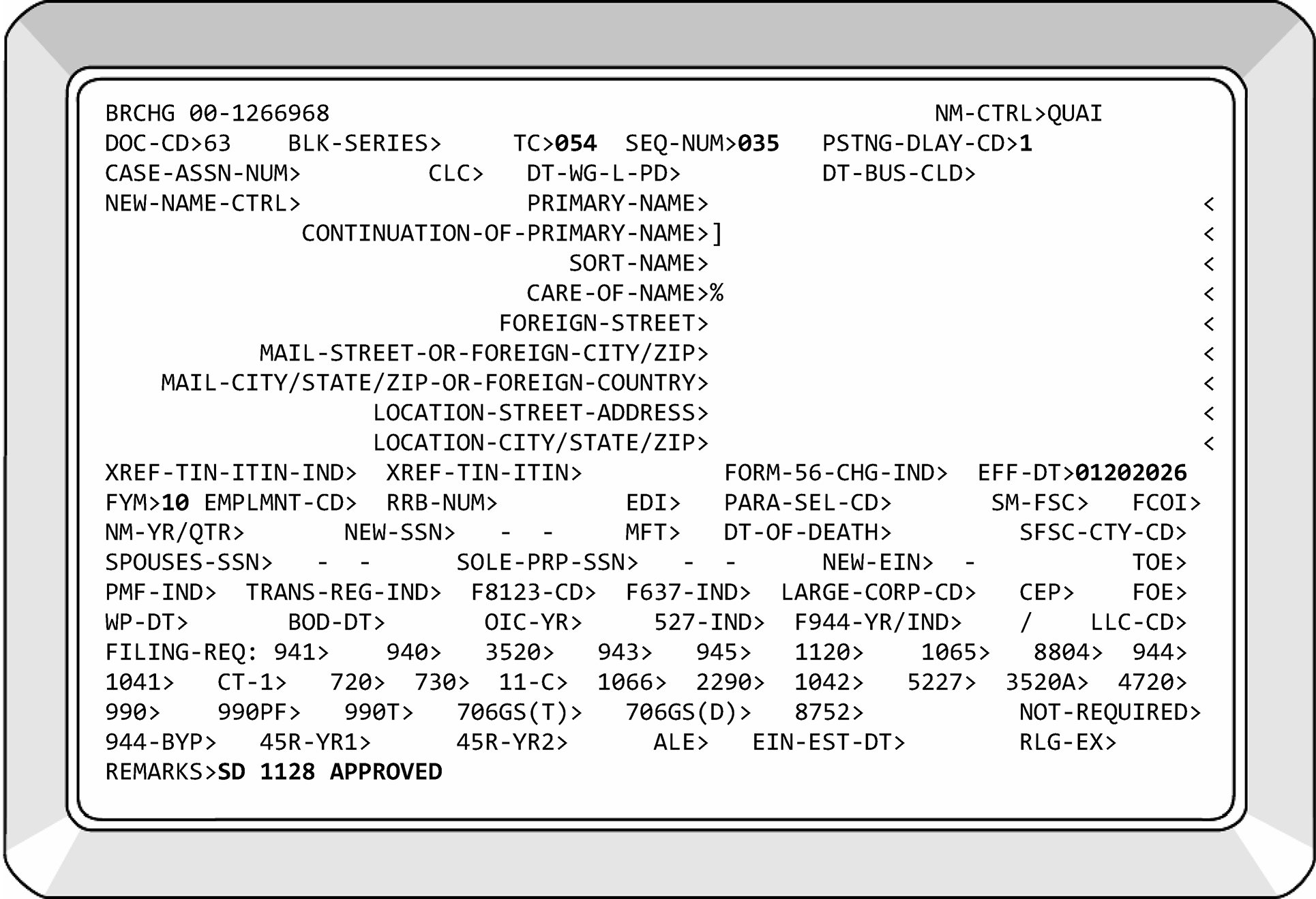
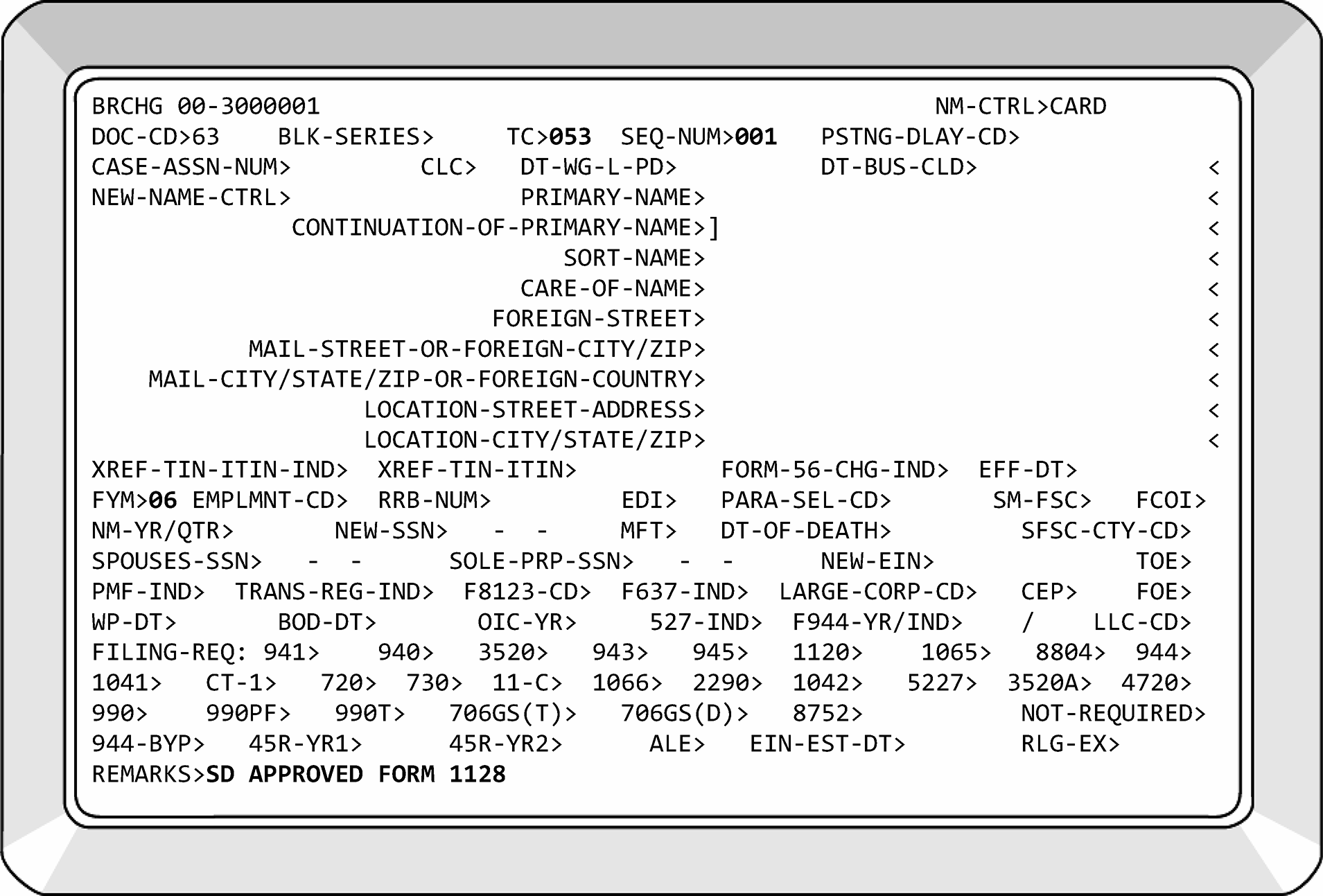
-
Determine whether to use TC 053 or TC 054, per Transaction Code information, IRM 3.13.2.21.6, Form 1128 - Transaction Codes, and taxpayer entry on Page 1, Line 2, Form 1128.
-
Using CC BRCHG, Doc Code 63, to input all TCs 05X.
-
TC 053, see Figure 3.13.2-35 .
-
TC 054, see Figure 3.13.2-34 .
-
The FYM and effective date (IRS received date), if needed.
-
Sequence number (Files Operation will be associating the IDRS Transaction Record, Form 5147, with Form 1128). Each Form 1128 will be annotated with the date of input, your IDRS number, audit trail, and the sequence number input.
-
"Approved" Forms 1128 will be sent to Files in the TC 05X source document folder. The Remarks section must begin with the letters "SD" to alert Files the IDRS input record (Form 5147) must be associated with a source document.
-
Prepare Form 3465, Adjustment Request, and route to BMF AM/ Adjustments for the transfer of any credits to the new tax period. Ensure audit trail on Form 1128 contains this action.
-
Transaction Code 059 is used to record the denial of Form 1128.
-
If the Form 1128 is not eligible or not timely based on the instructions provided within this IRM and:
If... Then... Denial is for Late Filing of Form 1128 (Timeliness), -
Input TC 059.
-
Use Paragraph Select Code Z to suppress CP 285.
-
Use Letter 2233C to notify the taxpayer of the denial.
-
-
Using CC BRCHG, Doc Code 63, process the denied application.
-
Research to ensure that it is the correct account.
-
Input TC 059 (See Figure 3.13.2-36) and the sequence number.
-
Stamp the top of Form 1128 "DENIED" . Make a photocopy of the denied Form 1128 and any other pertinent documents (for example, a postmarked envelope).
-
Return the original to the taxpayer with Letter 2233C to notify the taxpayer of the denial. Use the copy as the source document with TC 059.
-
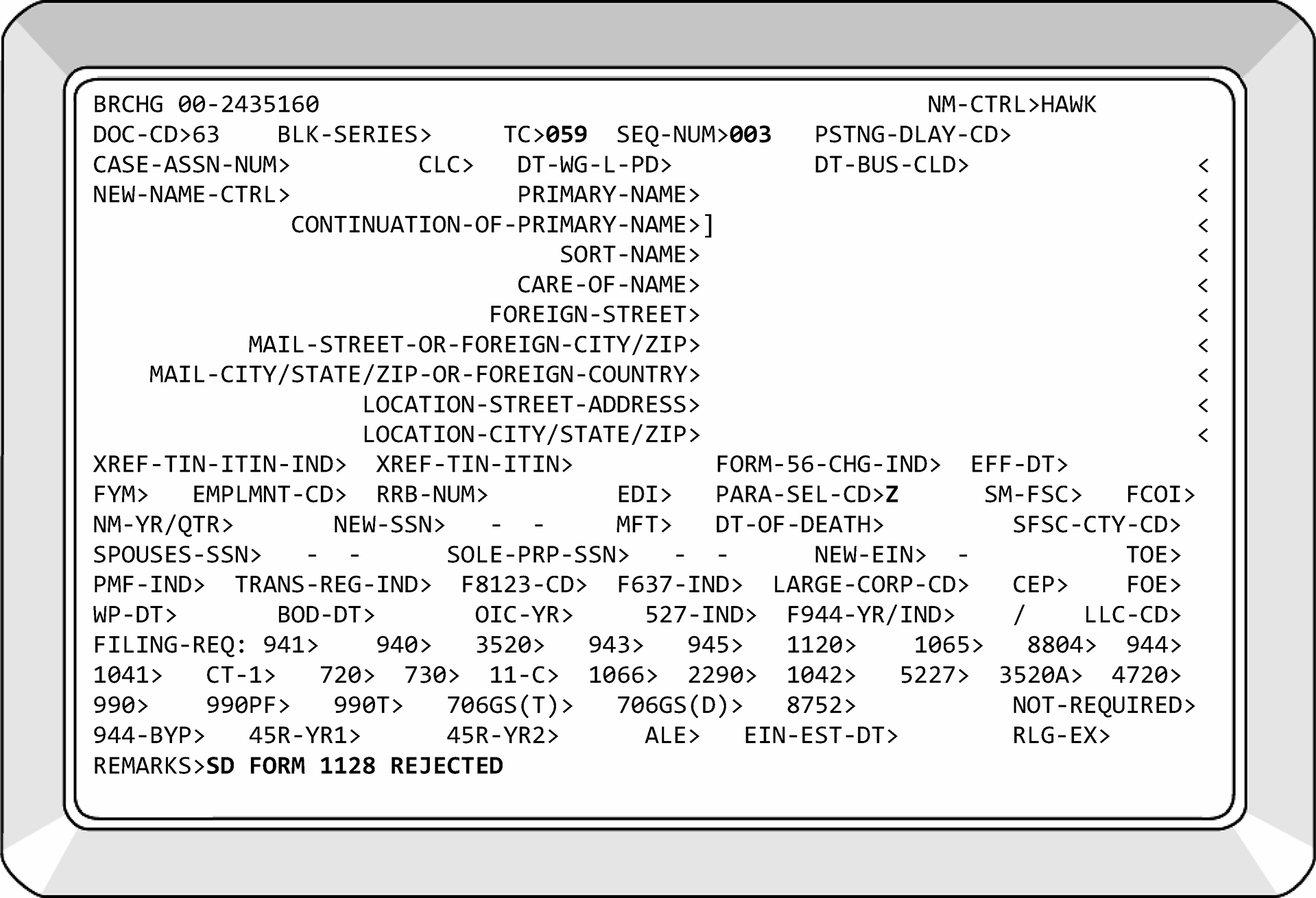
-
Approved Form 1128 from a Private Letter Ruling (PLR)- Taxpayer is required to enclose a copy of their signed, unredacted copy of the PLR. If not provided, return to taxpayer for missing information.
Note:
PLR responses from Chief Counsel allowing the election take precedent over timeliness requirements. DO NOT reject back to the taxpayer.
-
Update the FYM via CC BRCHG with the input of TC 053 or TC 054, as applicable.
-
-
Denied Form 1128 from a Private Letter Ruling (PLR):
-
Associate the copy of the ruling letter with Form 1128.
-
If the request was to retain a FYM, update the FYM to the required tax year, (usually December 31), using CC BNCHG, TC 016. (This does not apply if Form 8716 is approved.)
-
If the prior period return has not yet posted, cycle the input of TC 016 to allow the return to post.
-
Deny Form 1128 with TC 059.
-
-
BACK-UP IRC SECTION 444 ELECTION - If Chief Counsel denies the FYM requested under Rev. Proc. 2002-39 Section 5 (business purpose), process the back-up election made on Form 8716 per IRM 3.13.2.22.5, Back-Up Elections.
-
If correspondence is received challenging the denial of Form 8716 or Form 1128, refer the taxpayer to Chief Counsel. See IRM 3.13.2.23.10, Chief Counsel Referrals.
-
The Tax Reform Act of 1986 required all S corporations, Partnerships, Personal Service Corporations (PSCs) and certain trusts to be on the same tax year as their owner. The owner is considered a shareholder/partner that owns more than 50 percent of the stock/assets. Usually, the owner is on a tax year of December 31. The affected entities had to adopt the tax year of their owner with tax periods that began in 1986. Generally, partnerships, S corporations (including electing S corporations), and PSCs must use a required tax year. A required tax year is a tax year that is required under the Internal Revenue Code and Income Tax Regulations. A partnership must conform its tax year to its partners’ tax year. S corporations and PSCs must use the calendar year. The entity does not have to use the required tax year if it receives IRS approval to use another permitted tax year or makes an election under Section 444 of the Internal Revenue Code.
-
Form 8716 allows partnerships, S corporations, and PSCs to elect the use of a taxable year (usually a fiscal year) that is not a required year if the elected tax year has a deferral period of three months or less. An approved Form 8716 will be seen on IDRS as a TC 055 for partnerships and S corporations and a TC 054 for PSCs.
-
If the IRC Section 444 election is made, electing partnerships and S corporations must also file Form 8752 (MFT 15), Required Payment or Refund Under Section 7519.
-
IRC Section 444 is a one-time election. If it is terminated, it cannot be made again. Also, once an FYM has been approved on Form 8716, the taxpayer cannot change their tax year unless going to the required tax year or they establish a business purpose for a different taxable year approved by a Chief Counsel letter ruling.
-
Transaction Codes for processing Form 8716:
Transaction Code Reason Notice 052 This transaction code is used to correct or reverse TC 053/054/055/058/059.
If a TC 053 or TC 055 is reversed, the FYM will revert to the prior FYM. Filing Requirement Code (FRC) 1120-19 will update to FRC 1120-01.
If TC 054 is reversed by TC 052, the FYM must be changed with a TC 016 to prior FYM.None 054 This TC is used to identify adoptions, changes, or retentions of tax years for certain partnerships, S corporations and personal service corporations with accepted FYMs. CP 284 (PSC=A) Acceptance of Form 1128 or CP 286 (PSC=B) Acceptance of Form 8716 055 This TC is used to identify adoptions, changes, or retentions of tax years for partnerships, and S corporations, making an IRC Section 444 back-up election. CP 286 057 This TC is used to terminate an IRC Section 444 election. It is computer generated and reverses a TC 054 or TC 055. None 058 This TC is used to reject a Form 8716. CP 287
-
Check the Form 8716 for the following three conditions:
-
Timeliness
-
Completeness
-
Eligibility
-
-
Timeliness - The Form 8716 must be signed and filed by the earlier of:
-
The 15th day of the fifth month following the date the entity was created or elected S status, or
-
The due date (not including extensions) of the income tax return for the tax year resulting from an IRC Section 444 election. (The only time this date will be earlier is when an S corporation or PSC elects IRC 444 FYM for the same month they began doing business.)
-
Use the postmark date to determine timeliness if the received date is not present.
-
Treas. Reg. 301.9100-2(a)(2) currently grants an automatic extension of 12 months from the prescribed due date of the Form 8716 for making an IRC 444 election.
-
The due date for "Back-Up 444 Elections" follows the same rules as those for making an IRC Section 444 Election.
-
A partnership or S Corporation activates a back-up election by filing the return required, making the required payment with the Form 8752 and making the payment on the later of the following dates;
May 15 of the calendar year following the calendar year in which the applicable election year begins, or
60 days after the date of the letter ruling denying the business purpose of the FYM requested. -
A PSC activates its back-up election by filing Form 8716 with its original or amended income tax return for the tax year in which the election is first effective and printing "ACTIVATING BACK-UP ELECTION" on the top of the income tax return.
See table below for example:Note:
Because our system works on a monthly basis when figuring timeliness, use the first day of the month the entity was created.
Type of Entity Date Entity was Created or Elected S Status IRC Section 444 FYM Requested 1st Rule (15th day of the 5th month) Due Date of Form 8716 2nd Rule (Due date of the return) Partnership 09-10-2023 09-30-2023 02-15-2024 > 12-15-2023 Partnership 10-15-2023 09-30-2024 03-15-2024 > 12-15-2024 Partnership 06-15-2023 09-30-2023 11-15-2023 < 12-15-2023 S Corp/PSC 10-01-2023 10-31-2023 03-15-2024 > 01-17-2024 S Corp/PSC 11-15-2023 10-31-2024 04-17-2024 < 01-17-2024 S Corp/PSC 07-10-2023 10-31-2023 12-15-2023 < 01-17-2024 -
-
≡ ≡ ≡ ≡ ≡ ≡ ≡ ≡ ≡ ≡ ≡ ≡ ≡ ≡ ≡ ≡ ≡ ≡ ≡ ≡ ≡ ≡ ≡ ≡ ≡ ≡ ≡ ≡ ≡ ≡ ≡ ≡ ≡ ≡ ≡ ≡ ≡ ≡ ≡ ≡ ≡ ≡ ≡ ≡ ≡ ≡ ≡ ≡ ≡ ≡ ≡ ≡ ≡ ≡ ≡ ≡ ≡ ≡ ≡ ≡ ≡ ≡ ≡ ≡ ≡ ≡ ≡ ≡ ≡ ≡ ≡ ≡
≡ ≡ ≡ ≡ ≡ ≡ ≡ ≡ ≡ ≡ ≡ ≡ ≡ ≡ ≡ ≡ ≡ ≡ ≡ ≡ ≡ ≡ ≡ ≡ ≡ ≡ ≡ ≡ ≡ ≡ ≡ ≡ ≡ ≡ ≡ ≡ ≡ ≡ ≡ ≡ ≡ ≡ ≡ ≡ ≡ ≡ ≡ ≡ ≡ ≡ ≡ ≡ ≡ ≡ ≡ ≡ ≡ ≡ ≡ ≡ ≡ ≡ ≡ ≡ ≡ ≡ ≡ ≡ ≡ ≡ ≡ ≡ ≡ ≡ ≡ ≡ ≡ ≡ ≡ ≡ ≡ ≡ ≡ ≡ ≡ ≡ ≡
≡ ≡ ≡ ≡ ≡ ≡ ≡ ≡ ≡ ≡ ≡ ≡ ≡ ≡ ≡ ≡ ≡ ≡ ≡ ≡ ≡ ≡ ≡ ≡ ≡ ≡ ≡ ≡ ≡ ≡ ≡ ≡ ≡ ≡ ≡ ≡ ≡ ≡ ≡ ≡ ≡ ≡ ≡ ≡ ≡ ≡ ≡ ≡ ≡ ≡ ≡ ≡ ≡ ≡ ≡ ≡ ≡ ≡ ≡ ≡ ≡ ≡ ≡ ≡ ≡ ≡ ≡ ≡ ≡ ≡ ≡ ≡ ≡ ≡ ≡ ≡ ≡ ≡ ≡ ≡ ≡ ≡ ≡ ≡ ≡ ≡ ≡ ≡ ≡ ≡ ≡ ≡ ≡ ≡ ≡ ≡ ≡ ≡ ≡ ≡ ≡ ≡ ≡ ≡ ≡ ≡ ≡ ≡ ≡ ≡ ≡ ≡ ≡ ≡ ≡ ≡ ≡ ≡ ≡ ≡ ≡ ≡ ≡ ≡ ≡ ≡ ≡ ≡ ≡ ≡ ≡ ≡ ≡ ≡ ≡ ≡ ≡ ≡ ≡ ≡ ≡ ≡ ≡ ≡ ≡ ≡ ≡ ≡ ≡ ≡ ≡
≡ ≡ ≡ ≡ ≡ ≡ ≡ ≡ ≡ ≡ ≡ ≡ ≡ ≡ ≡ ≡ ≡ ≡ ≡ ≡ ≡ ≡ ≡ ≡ ≡ ≡ ≡ ≡ ≡ ≡ ≡ ≡ ≡ ≡
≡ ≡ ≡ ≡ ≡ ≡ ≡ ≡ ≡ ≡ ≡ ≡ ≡ ≡ ≡ ≡ ≡ ≡ ≡ ≡ ≡ ≡ ≡ ≡ ≡ ≡ ≡ ≡ ≡ ≡ ≡ ≡ ≡ ≡ ≡ ≡ ≡ ≡ ≡ ≡ ≡ ≡ ≡ ≡ ≡ ≡ ≡ ≡ ≡ ≡ ≡ ≡ ≡ ≡
≡ ≡ ≡ ≡ ≡ ≡ ≡ ≡ ≡ ≡ ≡ ≡ ≡ ≡ ≡ ≡ ≡ ≡ ≡ ≡ ≡ ≡ ≡ ≡ ≡ ≡ ≡ ≡ ≡ ≡ ≡ ≡ ≡ ≡ ≡ ≡ ≡ ≡ ≡ ≡ ≡ ≡ ≡ ≡If... And... Then... A) The taxpayer requests an extension of time to file Form 8716 less than 12 months after the deadline, The taxpayer has a statement "Filed pursuant to Treas. Reg. 301.9100-2" , Approve the election as timely. B) The taxpayer requests an extension of time to file less than 12 months after the deadline, There is no statement present stating "Filed pursuant to Treas. Reg. 301.9100-2" , Send the Form 8716 back to the taxpayer and a letter explaining they could qualify for relief under Treas. Reg. 301.9100-2. C) The taxpayer fails to request an extension of time to file Form 8716 12 months after the deadline (including late responses), Input a TC 058 and send the taxpayer a letter to request a PLR. See IRM 3.13.2.23.10 (3)(a), Chief Counsel Referrals. D) A timely response is received within the filing period, or within 45 days, Check for completeness. -
Completeness-To be a complete document, Form 8716 must be submitted with the following information:
If the document is incomplete, correspond for the missing information, send the original Form 8716 back to the taxpayer. Do not correspond if missing information can be determined from research. Annotate action on Form 8716. If the document is complete, check the document for eligibility.-
Signature, Title and Date - Form 8716 must be signed by an authorized corporate officer, general partner or managing member. If an agent is designated, a power of attorney (POA) must accompany the application. If the POA is for additional returns, forward the power of attorney to the CAF Team. Notate case file "POA to CAF" . All correspondence will be directed as indicated on the POA form. If the Form 2848 has not been processed onto the CAF, you will insert Y in the CAF field of CC LPAGE.
-
Type of Entity.
-
Tax Year Ending Date for the Last Filed Tax Return.
-
Ending Date of Required Tax Year.
-
A Box is Checked in Item 5 indicating the type of change and the requested tax year ending is complete. If a box is not checked, research the account and edit the correct box.
-
-
Eligibility-A Partnership, S corporation (or C corporation electing to be an S corporation), or Personal Service Corporation (PSC) are eligible to file Form 8716, unless they fall under the following circumstances:
-
No election can be made under IRC 444(d)(3) by an entity that is part of a tiered structure unless that tiered structure consists of partnerships and/or S corporation with the same tax year.
-
No entity can become part of a tiered structure after the election unless that tiered structure (including the new entity) consists entirely of partnerships and/or S corporation with the same tax year.
-
A Section 444 election can only be made once.
-
An existing entity (S Corp, partnership, or PSC) cannot make an IRC 444 election to its required tax year. An election is not necessary for use of the required tax year, however, a "dummy" Form 1128, see IRM 3.13.2.2 (12), BMF Entity - General, will be prepared and input.
-
An existing S corporation, partnership, or PSC can make an IRC 444 election to change its tax year if the deferral period of the electing tax year is less than three months, and the election can only be made once.
-
An existing partnership that has historically used the required year-end of the owners under IRC 706 cannot make an IRC 444 election because they have established a required tax year with a zero-deferral period.
-
Once an IRC 444 election is terminated, another IRC 444 election cannot be made.
-
-
If the Form 8716 is timely, complete and the taxpayer is eligible, process the form. Ensure there is an annual FRC (1120 or 1065) on the EIN prior to the input of TC 054/055. An "approved" or "denied" copy of the form must be sent to the taxpayer. Letter 3064C, with open paragraph, will be sent for approval and Letter 3916C will be sent for denial.
-
Input one of the following transaction codes to process Form 8716:
-
TC 054 - Personal Service Corporations require the input of TC 054 from an approved Form 8716, FYM, sequence number, effective date (IRS received date), and remarks via CC BRCHG (Doc Code 63). The fiscal year must be a permitted IRC Section 444 tax year. The "Remarks" field of CC BRCHG will begin with the alpha characters "SD" to alert Files a source document is forthcoming. A CP 286 (PSC - B) will generate from the input of TC 054. The entity must have an annual filing requirement before you can enter TC 054. The FYM on CC ENMOD must match the TC 054 FYM, therefore it can be necessary to input TC 016, FYM, prior to TC 054, PDC.
-
TC 055 - Partnerships and S Corporations require the input of TC 055 from an approved Form 8716. The input of TC 055 (See Figure 3.13.2-37), FYM, sequence number, effective date (IRS received date) and remarks through CC BRCHG (Doc Code 63) notifies the taxpayer that permission has been granted to change or adopt a fiscal year. The "Remarks" field of CC BRCHG will begin with the alpha characters "SD" to alert Files that a source document is forthcoming. A PSC is not necessary as a CP 286 will generate from the input of TC 055. If a Form 8752 FRC is not on Master File, the posting will establish a Form 8752 FRC 1, for partnerships and S corporations. CC BRCHG is restricted to Entity. Process as follows:
Note:
The entity must have an annual filing requirement before you can enter TC 055. Cycle appropriately on the input of TC 055. If a TC 058/059 is present, TC 052 must be input prior to TC 054/055.
-
-
IF FORM 8716 IS BEING PROCESSED WITH FORM 2553:
-
Process Form 2553 Input TC 090, PSC - Z,
-
Process Form 8716 Input TC 055 with posting delay code 2, PSC - Z, and
-
Send Letter 385C w/ approved copy of Form 8716 as an enclosure.
-
-
Process Form 8716 as follows:
If... And... Then... A) Form 8716 is filed in error, for example the taxpayer is requesting a 12/31 FYM under IRC Section 444, 12/31 is the required tax year, -
Return the Form 8716 with a Letter 2359C explaining they are requesting a required tax year and are not making an IRC Section 444 election.
-
Do not input a TC 05X.
B) A TC 052 is posted, Request the TC 052 DLN to determine if a previous S-election was terminated, or if the TC 055 was input in error. C) The TC 052 reflects a correction to an erroneous TC 055, Continue processing Form 8716. D) The TC 052 reflects a reversal/termination of a previously posted TCs 054, Deny the Form 8716, see IRM 3.13.2.22.3, Form 8716 Denial Procedures. E) TC 057 is posted to the account (and it was created from a return), The election has been terminated and another election cannot be made, -
Deny the Form 8716, inserting PSC - C in the TC 058.
-
Send denied original Form 8716 in blank envelope addressed to the address on MF.
-
Use photocopy for source document of TC 058.
F) TC 058 is posted to the account, Taxpayer provides proof of timely filed Form 8716, Input a TC 052 to reverse the TC 058 and input TC 055 with appropriate posting delay code. -
-
Form 8716 cannot be processed until Form 2553 is received and processed. If Form 8716 is filed for a Subchapter S corporation and a TC 090 is not posted, put a history item on CC ENMOD by using CC ACTON that states: HAVE8716. This will alert the TE that is processing Form 2553 to contact you. Be sure to coordinate the use of Posting Delay Codes (PDCs). If after two weeks Form 2553 has not been processed, contact the taxpayer by phone and ask they fax Form 2553 to you.
-
A TC 097 on module indicates the Form 2553 has been forwarded to Chief Counsel for a ruling, associate Form 8716 with Form 2553 in local file.
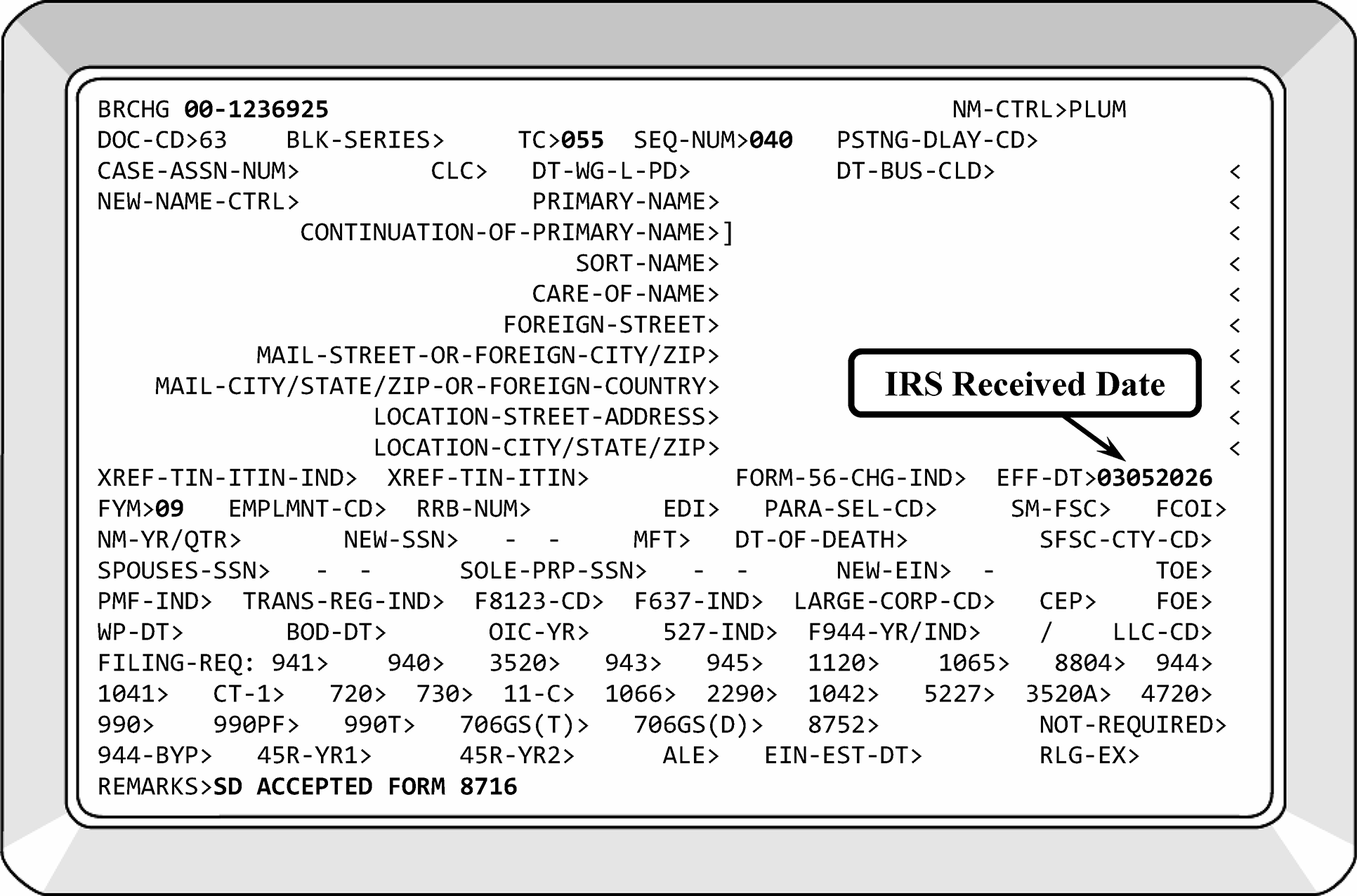
-
If the election does not meet the requirements of timeliness and eligibility, deny it.
-
Using CC BRCHG, Doc. Code 63, process the denied election as follows:
-
TC 058 - Input TC 058 with the appropriate PSC, a sequence number, and remarks. The remarks must begin with the alpha characters SD to alert Files that a source document is required. Form 6502 will be prepared and placed on an accordion or gusset folder for the source documents that go to Files Operation.
-
Edit the input date, the employee IDRS number, and sequence number on the document.
-
The input of the TC 058 will generate a CP 287, Notice of Denial of Form 8716.
-
Send denied original Form 8716 in blank envelope addressed to the address on MF if a PSC is used. Use photocopy for source document of TC 058.
-
-
Either leave the field blank or input the appropriate PSC - A through C or suppress the CP notice with the input of PSC - Z and send Letter 3916C for explanation of denial. The PSCs for CP 287 are listed below.
-
No PSC - A partnership, S corporation, or personal service corporation, which has historically used a calendar year, and which is required to use a calendar year, may not make a Section 444 election. We cannot approve your election because our records show your tax period has historically ended December 31.
-
PSC A - Form 8716 was filed late. Form 8716 must be filed by the earlier of the following: The 15th day of the 5th month following the month that includes the 1st day of the tax year the election will be effective, or the due date (not including extensions) of the income tax return for the tax year resulting from the Section 444 election.
-
PSC B - The tax year elected may not have a deferral period of more than 3 months.
-
PSC C - Our records show that a Section 444 election was previously terminated. Once a Section 444 election is terminated, another Section 444 election may not be made.
-
-
A deferral period is the number of months between the required tax year and the requested tax year. An example is shown in the table below:
*Because the C corporation already has a zero-deferral period the taxpayer cannot make an IRC Section 444 to increase the deferral period.Required FYM IRC Section 444 FYM Requested Deferral Period Valid 12-31-2025 09-30-2025 3 months -
10-01-2025 to 12-31-2025Yes 12-31-2025 06-30-2025 6 months -
07-01-2025 to 12-31-2025No Existing C corporation electing S status effective 06-01-2025 required 12-31-2025. 10-31-2025 2 months - (From 12-31-2025) 11-01-2025 to 12-31-2025 Yes Existing C corporation with an established FYM of 12-31-2025 electing S status effective 01-01-2026. 09-30-2026 3 months - (existing zero-deferral) deferral increases to 3 months* No Newly established partnership whose owners required tax year under IRC 706 is 06-30-2025. 04-30-2025 2 months -
05-01-2025 to 06-30-2025Yes Newly established partnership whose owners required tax year under IRC 706 is 06-30-2025. 01-31-2025 5 months -
02-01-2025 to 06-30-2025No
-
Back-Up elections are made to secure the use of a fiscal tax year that is being requested. Form 2553 and Form 8716 are used to make back-up fiscal tax year elections.
-
To identify a back-up election the taxpayer will indicate a "Back-Up Section 444 Election" on the Form 1128, and "Back-Up Section 444 Election for Form 1128" , on the Form 8716.
-
Taxpayers requesting a FYM under Rev. Proc. 2002-39, (business purpose), can file a "Back-Up Section 444 Election." Process as follows:
If... Then... A) Chief Counsel approves the FYM on Form 1128, Take no action on Form 8716 and associate with Form 1128. B) Chief Counsel denies the FYM on Form 1128, -
Process Form 8716 accordingly.
-
Attach Form 1128 to the back of Form 8716.
-
-
An IRC Section 444 election is terminated by a partnership, S corporation, or personal service corporation changing to the required tax year. Terminations happen for the following reasons:
Timeliness is not an issue for the termination of an IRC Section 444 election.-
Changes to the required tax year,
-
Liquidates,
-
Becomes a member of a tiered structure, unless it is a partnership or S corporation that meets the same taxable year exception,
-
S corporation terminates its S-election,
-
PSC ceases to be a PSC, or
-
Willfully fails to comply with the regulations.
-
-
The effective date of the termination is:
-
The first day of the short year caused by the change if the change is caused by a required year.
-
The date the liquidation (liquidating entity) is completed for tax purposes.
-
The first day of the taxable year for which S status no longer exists, (effective date of TCs 091 or 096).
-
The first day in which membership in a tiered structure occurs, or the first day of whichever taxable year is determined by the Area Director to be most appropriate.
-
The first day of the taxable year for which the entity is no longer a PSC.
-
The first day of whichever taxable year is determined by the Area Director to be most appropriate for willful failure to comply cases.
-
-
If a personal service corporation that has an IRC Section 444 election in effect elects to be an S corporation, the S corporation can continue the IRC Section 444 election of the personal service corporation. Likewise, if an S corporation that has an IRC Section 444 election in effect terminates its S-election and immediately becomes a personal service corporation, the personal service corporation can continue the IRC Section 444 election of the S corporation.
-
If correspondence is received requesting a termination of the IRC Section 444 election, correspond with the taxpayer informing them to file a short period return, at the top write Terminating Section 444. This will automatically terminate their election. Do not input a TC 052.
-
TC 057 -This transaction is computer generated and it represents a termination of the IRC Section 444 election. It is computer generated from the reversal of TC 054 or TC 055. The TC 057 DLN is the same as the document or transaction that caused the termination.
-
TC 052 -Corrects or reverses TC 054/055. If TC 055 is reversed, the FYM will revert to the prior FYM. FRC 1120–19 will update to FRC 1120–01, and Form 8752 FRC from 1 to zero. If TC 054 is reversed by TC 052, the FYM must be changed with TC 016. See Figure 3.13.2–38. Once an election is terminated, another election cannot be made under IRC Section 444.
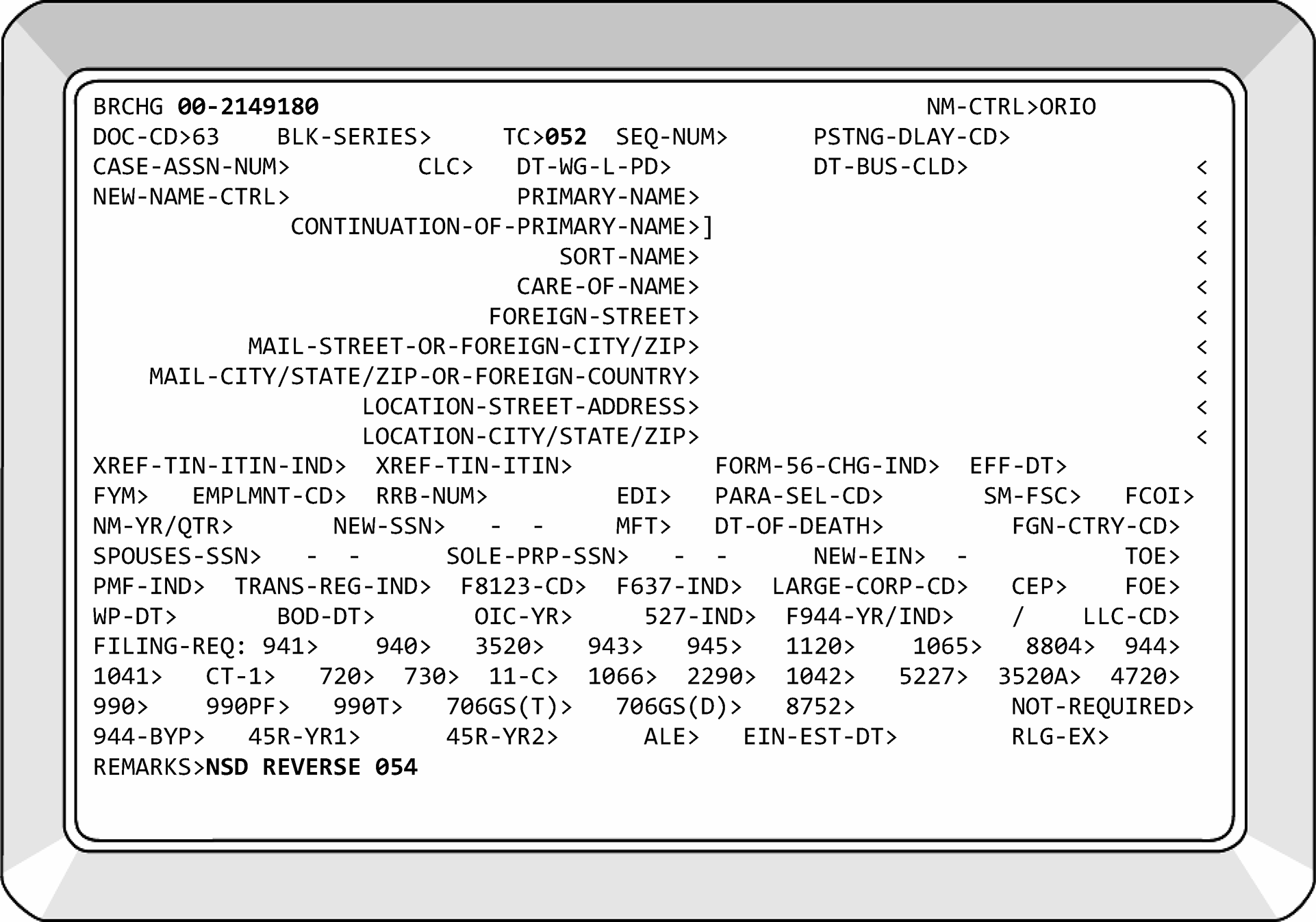
-
Internal Revenue Code Section 1362 and the regulations thereunder, describe the election to be treated as an S Corporation. To elect to be an S corporation, a corporation must file Form 2553 or some form of correspondence that includes all the necessary Form 2553 information. This includes state Subchapter S-elections such as Form CT-6 from New York state. The election permits the income of the S corporation to be taxed on the shareholder's return rather than the corporate return. By filing Form 1120-S, the income (or loss) reported is divided among the individual shareholders of the corporation, who in turn, report the income (or loss) on Schedule K-1 attached to their Forms 1040, U.S. Individual Income Tax Return. If correspondence is received requesting an S-election and there is missing information, send Letter 312C to request missing information.
-
The Tax Reform Act of 1986 required all S corporations, Partnerships, Personal Service Corporations (PSCs) and certain trusts to be on the same tax year as their owner. The owner is considered a shareholder/partner that owns 50 percent or more of the stock/assets. Usually, the owner is on a tax year of December 31. The affected entities had to adopt the tax year of their owner with tax periods that began in 1986. Generally, S corporations (including electing S corporations), and PSCs must use a required tax year. A required tax year is a tax year that is required under the Internal Revenue Code and Income Tax Regulations. S corporations and PSCs must use the calendar year.
-
TCs 090 were first input for Subchapter S corporations during the 1970's. Previously, a corporation's FRC was updated from 1120-01 to 1120-02 with a TC 016. The majority were generated on 01-01-74. It is very possible to see a Subchapter S corporation on IDRS with an 1120-01/02 FRC and no TC 090 posted. If you see this, prepare a dummy Form 2553. Attach prints of CC BMFOL'E' and BMFOL'T' MFT 02 reflecting a posted Form 1120-S. The earliest MFT 02 module will be researched. Paragraph Selection Code (PSC) - Z will be used when inputting the TC 090. Annotate the Form 2553 with the following words: "Very old S corp before TCs 090 input" . These words will also be entered in the Remarks field of your TC 090.
-
A limited liability company (LLC) electing to become an S corporation has the option of filing a stand-alone Form 2553 under Rev. Proc. 2013-30 which deems it as also having elected to be classified as an association taxed as a corporation. It is acceptable for Form 2553 to be filed with an attached Form 8832; therefore, an LLC is not required to file Form 8832 before it files Form 2553. Treasury Regulation 301.7701-3(c)(1)(v)(C) "deems" the Form 8832, Entity Classification Election, as filed. The Form 2553 is acceptable for both the S corporation election and the entity classification (Form 8832). If the Form 8832 is filed with a Form 2553, a TC 074 will be input. This is not a source document. See S-Election Tool (SET) Job Aid. For late filed elections, IRM 3.13.2.23.4, Rev. Proc. 2013-30.
-
All correspondence related to Form 2553 that required a transaction be input on the account will be associated with posted Form 2553 (TC 090 or TC 094) when resolved. Prepare an attachment document (Form 9856, Attachment Alert, or IDRS print with EIN, Name Control, DLN and the word 'Attachment' highlighted) to send correspondence documents to Files to be associated with Form 2553.
-
Listed below are some terms used when processing Forms 2553:
-
Required Tax Year - A required tax year is a tax year that is required under the Internal Revenue Code and Income Tax Regulations. S corporations and PSCs must use the calendar year. The entity does not have to use the required tax year if it receives IRS approval to use another permitted tax year or makes an election under Section 444 of the Internal Revenue Code.
-
Permitted Tax Year - A permitted tax year is a calendar year or a fiscal year for which the corporation can establish, to the satisfaction of the IRS, that there is a business purpose for the tax year.
-
Business Purpose - A "Business Purpose" is a request made for the use of a fiscal tax year that constitutes a business reason for the use of a specific fiscal tax year. If the taxpayer has checked any of the boxes under Form 2553, Part II, Item Q, Business Purpose, photocopy Form 2553 and the taxpayer's written request. Prepare transmittal (Form 3210) to route the copies of Form 2553 and the written request to the Chief Counsel. See IRM 3.13.2.23.10, Chief Counsel Referrals, for the Chief Counsel address.
-
IRC Section 444 - Allows certain partnerships, S corporations, and personal service corporations to elect the use of a taxable year that is not a required year. An IRC Section 444 election is made by filing a properly completed Form 8716, Election to Have a Tax Year Other Than a Required Tax Year, with the campus indicated in the instructions to Form 8716. IRM 3.13.2.23.8, IRC Section 444 of the Internal Revenue Code.
-
QSST - Qualified Subchapter S Trust. A QSST is a trust whose beneficiary has elected QSST status. The QSST is treated as a grantor trust and therefore, the trust is an eligible shareholder of an S corporation. The election to be treated as a shareholder can be made by completing Part III on Form 2553. See IRM 3.13.2.23.20, Qualified Subchapter S Trust.
-
ESBT - Electing Small Business Trust. An ESBT is treated as two separate trusts. The portion of an ESBT that consists of stock in one or more S corporations is treated as one trust. The portion of an ESBT that consists of all the other assets in the trust is treated as a separate trust. However, the S portion or non-S portion (or both) can be treated as owned by a grantor under 1.641(c)-1(b)(1) and constitute the grantor portion. The election to be treated as a shareholder of a Subchapter S corporation is made via correspondence. See IRM 3.13.2.23.22, Electing Small Business Trust (ESBT).
-
Qualified Subchapter S Subsidiary Election (QSub) - A Qualified Subchapter S Subsidiary (QSub) is an S Corporation, or a corporation that is eligible to be an S Corporation, that is 100% owned by another S Corporation. A QSub is elected by filing a Form 8869, Qualified Subchapter S Subsidiary Election. See IRM 3.13.2.24, Form 8869, Qualified Subchapter S Subsidiary Election.
-
Revocation - To revoke an election, the corporation files a statement that the corporation revokes the election made under IRC 1362(a). The revocation statement must include the number of shares of stock (including non-voting stock) issued and outstanding at the time the revocation is made. A revocation can be made only with the consent of shareholders who, at the time the revocation is made, hold more than one-half of the number of issued and outstanding shares of stock (including non-voting stock) of the corporation. If a corporation specifies a date for revocation and the date is expressed in terms of a stated day, month, and year that is on or after the date the revocation is filed, the revocation is effective on and after the date so specified. See IRM 3.13.2.23.15, Revocation of an S-Election.
-
Termination - An S-election is terminated when the corporation ceases to meet the requirements of eligibility or has excess passive investment income according to IRC 1362 (d)(2) or IRC 1362 (d)(3). The termination is effective on the day the corporation ceases to be eligible for S status. All terminations require the input of TC 095, pending transaction, on the 15th day after the IRS received date if the termination has not been processed. This transaction code will provide a researcher with information that a termination is in house but has not yet been processed. See IRM 3.13.2.23.17, Termination of S-Election.
-
Deemed 8832 Election - An LLC can make a "deemed" Form 8832 election when electing Subchapter S status on Form 2553. If the LLC has prior liability, the effective date of the deemed and S-elections must be the first day of their established tax period. Tax-Exempt Organizations and Real Estate Investment Trusts (REIT) are eligible for deemed Form 8832 elections. A TC 074 will be input for all deemed elections. Prior to March 2016, a TC 076 was input for a deemed election. See IRM 3.13.2.27.1(2), Entities eligible to file Form 8832.
-
-
The following are the transaction codes and computer paragraph (CP) notices that will be used in processing Form 2553. The computer paragraph notices are generated from the posting of TC 09X transactions. They are to advise taxpayers of the action being taken. Transaction Codes for Form 2553–CC BNCHG, Doc. Code 53:
-
TC 090 - Approval as an S corporation (source document).
-
TC 091 - Revocation of S status.
-
TC 092 - Reverses TC 090/093/095/097. (If TC 090, BK 95 is being reversed, the delayed action to change FRC 01/19 to 02 will be deleted.)
-
TC 093 - Form 2553 has been received but not processed.
Note:
Prior to 2005, if Form 2553 was incomplete, a TC 093 was input, and Form 2553 was returned to the taxpayer. A photocopy of Form 2553 was held in suspense. If the taxpayer did not respond within the prescribed time frame, Form 2553 was rejected with a TC 094.
As of Jan. 1, 2005, if Form 2553 was incomplete, a TC 093 is input followed by a TC 092 and the Form 2553 is returned to the taxpayer. Entity stopped suspending incomplete Forms 2553 and stopped rejecting for a non-response.
If T/P is requesting a previous year effective date and is quoting and qualifies under a Revenue Procedure allow the effective date requested. -
TC 094 - Application for S-election denied (source document).
-
TC 095 - Pending revocation or termination.
-
TC 096 - Termination of S-election.
-
TC 097 - Referral of Form 2553 to Chief Counsel.
-
-
CP Notices - Listed in the table below are the generated notices for approving, revoking, denying, and terminating the Form 2553. In the event the language of the CP notice is not appropriate for the circumstances of the case, or a notice must not be sent, PSC - Z will be input to suppress issuance of the notice. Send appropriate letter. The language contained in the CP notices follows the charts.
Transaction Code Generated Notice Notice Title TC 090 CP 261 Notice of Acceptance. TC 091 CP 262 Notice of Revocation of Status as an S Corporation. TC 094 CP 264 Notice of Non-Acceptance as an S Corporation. TC 096 CP 265 Notice of Termination of Status as an S Corporation. TC 097 CP 266 Notification of Referral—Form 2553 Election By a Small Business Corporation. -
Listed below are the Paragraph Selection Codes (PSCs) that are used to determine which paragraph will be printed on the CP 261. PSCs can be used individually or as a group (up to six characters). PSC - Z suppresses the notice.
-
PSC A - (Used for Corporations) We've accepted your S Corporation election. Because you filed late, (fill-in generated by TC 090) is the earliest date that you can be treated as an S Corporation. As a result, your tax year will end in (fill-in generated by TC 090), and you will be treated as an S Corporation starting (fill-in generated by TC 090).
If you did not file on time or can’t prove you filed on time:
Relief may be available, visit Internal Revenue Bulletin 2013-36 to review Revenue Procedure 2013-30 for qualifying criteria.
If you qualify for relief, mail the following documentation to us:
1. A completed and signed Form 2553 with the words "Filed pursuant to Revenue Procedure 2013-30" written across the top of the form. Form 2553 must be signed by an authorized officer, see IRM 3.13.2.3.1(19), Corporations - Name Controls, FRCs, and Authorized Representatives, and by all shareholders.
2. A statement explaining why you weren’t able to file Form 2553 by the original due date of the election.
3. Statements from all shareholders or former shareholders who owned stock between the date the election was to have become effective and the date the completed election was filed, that they have reported their income (on all affected returns), consistent with the S Corporation election for the year the election is requested and for all subsequent years.
If you determine you do not qualify for relief under Rev. Proc. 2013-30, you may apply for a Private Letter Ruling (PLR). For more information, review IRB 2021-1, or its successor. -
PSC B - We’ve accepted your S Corporation election but not your fiscal year-end. You will be treated as an S Corporation starting (fill-in generated by TC 090). Unless we receive and accept your Form 8716, Election to Have a Tax Year Other Than the Required Tax Year, your tax year-end will be December.
-
PSC C - We’ve changed the effective date of your election to become an S Corporation. Your effective date is (fill-in generated by TC 090). We changed your effective date because your S-election must start on the first day of your corporate tax year.
-
PSC D - (Used for LLCs) We've accepted your S Corporation election. Because you filed late, (fill-in generated by TC 090) is the earliest date that you can be treated as an S Corporation. As a result, your tax year will end in (fill-in generated by TC 090), and you will be treated as an S Corporation starting (fill-in generated by TC 090).
If you did not file on time or can’t prove you filed on time:
Relief may be available with Revenue Procedure 2013-30, visit IRB 2013-36 for qualifying criteria.
If you qualify for relief, mail the following documentation to us:
1. A completed and signed Form 2553, Election by a Small Business Corporation, with the words "Filed pursuant to Revenue Procedure 2013-30" written across the top of the form. An authorized member and all members/shareholders must sign Form 2553.
2. A statement explaining why you weren’t able to file Form 8832, Entity Classification Election and/or Form 2553 by the original due date of the election.
3. Statements from all shareholders or former shareholders who owned stock between the date the election was to have become effective and the date the completed election was filed, that they have reported their income (on all affected returns), consistent with the S Corporation election for the year the election is requested and for all subsequent years.
If you determine you do not qualify for relief under the reference above, you may apply for a Private Letter Ruling (PLR). For more information, see IRB 2021-1, or its successor. -
PSC E - We've accepted your S Corporation election. Because you filed late, (fill-in generated by TC 090) is the earliest date that you can be treated as an S Corporation. As a result, your tax year will end in (fill-in generated by TC 090), and you will be treated as an S Corporation starting (fill-in generated by TC 090).
If you did not file on time or can’t prove you filed on time:
If you can’t prove that you filed on time, you don’t qualify for relief under any Revenue Procedure. However, you can apply for a Private Letter Ruling. Please review IRB 2021-1, or its successor, for instructions. -
If the PSC field is left blank, the following paragraph will be issued: We’ve accepted your S Corporation election. As a result, your tax year will end in (fill-in generated by TC 090), and you will be treated as an S Corporation starting ([fill-in generated by TC 090).
-
-
Listed below are the PSCs that are used to determine which paragraph will be printed on the CP 264: You can insert up to six paragraph selection codes on one TC 094.
-
PSC A - We reviewed your election to be treated as an S corporation for the tax year ending [E01], but we couldn’t approve it because: You filed your election after the tax year ended.
If you want, you can reapply for your election. You must file an election on or before the 15th day of the third month of the tax year on your Form 2553 or at any time in the year before. If you file an election after the 15th day of the third month of the tax year, but before the end of the tax year, the election will be effective for the following year. -
PSC B - We didn’t receive the election in time for the tax year you requested.
If you want, you can reapply for your election. You must file an election on or before the 15th day of the third month of the tax year on your Form 2553 or at any time in the year before. If you file an election after the 15th day of the third month of the tax year, but before the end of the tax year, the election will be effective for the following year. -
PSC C - You applied for an ineligible tax year on your election. An S corporation must use the tax year of its owner.
If you want, you can reapply for your election. You must file an election on or before the 15th day of the third month of the tax year on your Form 2553 or at any time in the year before. If you file an election after the 15th day of the third month of the tax year, but before the end of the tax year, the election will be effective for the following year. -
PSC D - You have more than one class of stock.
-
PSC E - You have more than 100 shareholders.
-
PSC F - One or more of your shareholders is a non-resident alien.
-
PSC G - One or more of your shareholders is not an individual, trust, or estate.
-
PSC H - You didn’t meet the time requirement for re-election. An S corporation must wait 5 years from the date of its most recent revocation or termination to re-elect.
If you want, you can reapply for your election. You must file an election on or before the 15th day of the third month of the tax year on your Form 2553 or at any time in the year before. If you file an election after the 15th day of the third month of the tax year, but before the end of the tax year, the election will be effective for the following year. -
PSC I - You must have secured permission from the Commissioner of the Internal Revenue Service to re-elect S corporation status if you didn’t terminate your status on or before October 22, 1986 (Revenue Ruling 86-141). Our records show your termination was effective [date].
If you want, you can reapply for your election. You must file an election on or before the 15th day of the third month of the tax year on your Form 2553 or at any time in the year before. If you file an election after the 15th day of the third month of the tax year, but before the end of the tax year, the election will be effective for the following year.
-
-
The following are transaction codes associated with approved FYMs-CC BRCHG:
-
TC 052 will be used to correct or reverse TC 053, TC 054, TC 055, TC 058, and TC 059. If TC 055/054 is reversed, the FYM will revert to the prior FYM, FRC 1120-19 will update to FRC 1120-01, and Form 8752 FRC from 1 to zero. A TC 016 will have to be used to correct the FYM with TC 054.
-
TC 054 - Approved FYM for a personal service corporation.
-
TC 055 - Approved IRC Section 444 Election - Form 8716.
-
TC 057 - Termination of IRC Section 444 election. Computer generated when calendar year return is filed.
-
-
CP Notices - Listed in the table below are the generated notices for approving, revoking, denying the fiscal year for Form 2553.
Transaction Code Generated Notice Notice Title TC 052 No No Notice. TC 054 CP 284 (PSC=A)
CP 286 (PSC=B)Acceptance of Form 1128.
Acceptance of Form 8716.TC 055 CP 286 Acceptance of Form 8716. TC 057 No No Notice. -
Before processing Form 2553 you must determine Completeness, Eligibility, and Timeliness.
-
Part I of Form 2553 contains elements required for completion of the election. If information that is pertinent to the processing of the form is missing and can be obtained through research, edit the information on the form. Part II of Form 2553 is required when the entity is requesting a tax year other than a required tax year. Part III is required when a trust is electing to be a Qualified Subchapter S Trust (QSST).
-
Name and Address - The name and address of the entity electing to be treated as a Subchapter S corporation will be entered in these spaces.
-
When processing Forms 2553, compare the address on Form 2553 with the address currently on Master File. Follow the procedures below:
Caution:
If the cycle date of the last address change is prior to the IRS received date of the Form 2553 then address the discrepancy if writing the taxpayer. If the last address change cycle update is later than the IRS received date, do not address the discrepancy in the letter and use the address on the Master File if a letter must be sent.
If... And... Then... A) Address is different on Form 2553, The address change box is checked, Input TC 014 prior to inputting TC 09X. B) The address is different, The address change box is not checked, Do not change address. Send all 2553 related correspondence to the address on Master File.
Use PSC - Z and Letter 385C with appropriate paragraphs questioning the address difference.C) The address is different, It matches the location address on Master File, Do not change the address. Send all 2553 related correspondence to the Location Address.
Use PSC - Z and Letter 385C. No need to mention the different address as it matches the Location Address.D) If Form 2553 is requesting an old effective date and the address is different than Master File, The signature date is prior to the current processing year and the address change box is checked, Research CC FINDE’D’ to verify current address. Update if needed. E) If a PO Box is indicated with a physical address, The address change box is checked, Input the physical address as the location and the PO Box as the mailing address. -
Compare the name on Form 2553 with the name presently on Master File. If the name is different, follow the procedures below:
If... And... Then... A) The name change box is checked on Form 2553, 1) The officer of the corporation signs the form, Input a TC 013 to update the name prior to inputting the TC 090. A) The name change box is checked on Form 2553, 2) The officer of the corporation did not sign the form, Correspond for signature and name verification. B) The name change box is not checked on Form 2553, The name on the Form 2553 is materially different than what is currently on Master File, Verify name change with the Secretary of State’s office. See Exhibit 3.13.2-8. If valid, Input TC 013 to update the name prior to inputting the TC 090.
If unable to verify name change w/ Secretary of State and important aspects of the entity match (BO, WP, XREF TIN, state and date of incorporation, etc.), use PSC - Z on TC 09X, send appropriate letter and ask taxpayer to verify their name. Edit name control from Master File onto Form 2553.C) Any questions as to whether the taxpayer's name has changed, 1) Important aspects of the entity match (BO, WP XREF TIN, state and date of incorporation, etc.) Do not change. Use PSC - Z on TC 09X. Send appropriate letter and ask taxpayer to verify their name. C) Any questions as to whether the taxpayer’s name has changed, see Note below, 2) Important aspects of the entity do not match, ESIGN a new EIN with NIC A and RIC 53. -
Employer Identification Number - The EIN of the entity making the Subchapter S-election will be in this area. Research IDRS carefully to verify the accuracy of the EIN. See chart:
-
Date Incorporated and State of Incorporation will be entered in these boxes. Do not return Form 2553 if this is the only information missing. The Secretary of State’s website, or the state in which the corporation is incorporated is useful for verifying date of incorporation. See Exhibit 3.13.2-8. For an S-election to be valid, a corporation must be domestic and incorporated. If this date is later than the requested effective date, circle out the requested date, edit and underline the date of incorporation in the space below the requested effective date on Line E. This is now the effective date.
-
Name and Address Change Boxes - The taxpayer will mark one or both boxes if requesting a name and/or address change on Form 2553. Entity will update these fields as requested by the taxpayer unless the Form 2553 is an 'old' form. If the signature date on the Form 2553 is prior to the current processing year, do not update name and/or address based on the check boxes alone. Perform additional research to ensure the name and address are correct and current.
-
Effective Date - This field will contain the date the taxpayer wants their Subchapter S-election to become effective.
-
For "new" corporations, this will normally be the first day of existence, which is not necessarily the first day of the calendar month following the end of a tax year. A new corporation is one that has yet to file a Form 1120 and/or establish a tax period/FYM. The election cannot be effective prior to the date of incorporation. If such a date is entered, circle it out then enter and underline the date from Item B, Date of Incorporation, if timely.
Example:
The taxpayer incorporated 10-13-2023 and requests an effective date of 11-03-2023. This election will be approved for 11-03-2023 (if timely filed) if a tax period/FYM has not been established. If the requested effective date was 01-07-2024 and a FYM of 12 had been established, this election would be approved for 01-01-2024 (if timely filed). When prior liability is established, the election must be effective the first day of a calendar month following the end of a tax year, based on the FYM.
-
For "existing" corporations, the effective date must be the first day of a tax period based on their FYM. An existing corporation is one that has filed Forms 1120 and established a tax period/FYM. A calendar year is the required tax year for S corporations; however, Rev. Proc. 2006-45 allows corporations to file Form 1128 to change their tax period for the tax year immediately prior to making a Subchapter S-election. Form 1128 must be attached to Form 2553.
Note:
Often existing corporations will enter an invalid effective date: a date that is not the beginning of a tax period. In the above example, the only valid effective dates would be 10-13-2023 (if timely) or 01-01-2024 (if received late). We will circle out the invalid effective date, enter and underline 01-01-2024, and approve for this date with a BK95.
-
If the taxpayer is an LLC, the effective date will be the date of the classification election (TC 076 or TC 074, if the entity classification election is deemed in conjunction with the S election approval), if timely filed. If not timely, the effective date will be the beginning of the next tax period.
-
For a C corporation that had been a member of an affiliated group filing a consolidated return but was not the common parent, the effective date for the S-election is the first day after the C corporation leaves the affiliated group, if the corporation is otherwise eligible to be an S corporation. If, however, a corporation was the common parent of an affiliated group filing a consolidated return, the effective date for the corporation S-election is the first day following the end of its normal tax year.
Corporation "X" Date Corporation X Leaves Consolidated Group 06-30-2025 Effective Date of Form 2553 07-01-2025 Due Date of Form 2553 09-15-2025 Date of Short Period Form 1120-S Tax Return 07-01-2025
to
12-31-2025-
If the taxpayer has left the effective date blank and the effective date can be determined without returning Form 2553 to the taxpayer, the effective date will be edited into the blank spot and underlined.
The chart below can help in determining a valid Effective Date. Chart is based on Dec. 2017 revision of Form 2553. The date of incorporation (Item B) must be used if the dates entered in Items E and L are invalid.If... And... Then... A) The date Jan. 1 is entered in Item E, 1) The dates entered in Items B and L are Jan. 1, Approve the election for Jan. 1 effective date (if election meets all other eligibility criteria. A) The date Jan. 1 is entered in Item E, 2) The dates entered in Items B and L are not Jan. 1, and one of them is timely, Edit this date to item E. Underline this date; it is now the effective date of the election. A) The date Jan. 1 is entered in Item E, 3) The dates entered in Items B and L are not Jan. 1, and neither of them is timely, -
Approve Form 2553 for the next qualifying year if all other eligibility criteria are met.
-
Edit effective date in Item E and underline.
-
Use the appropriate PSC to notify the taxpayer of potential relief under a Rev. Proc.
B) The date in Item E of Form 2553 is timely, It is not 1-1-YY and the Date of Incorporation, Item B is later, -
Edit the date from Item B to Item E and underline it.
-
Approve Form 2553 for the date in Item B.
-
Use a BK95 if the difference between the dates is more than 30 days.
C) Item E is blank or not timely, Item B is timely, Edit the date from Item B to Item E and underline it. Approve Form 2553 for the date in Item B. D) Item L is not timely, and the Item E is blank or not timely, Item B is timely, Edit the date from Item B to Item E and underline it. Approve Form 2553 for the date in Item B. E) If the date in Item B is not complete, Taxpayer is a new entity/has not yet established a tax year ending, Research the Secretary of State’s website, See Exhibit 3.13.2-8. If unable to locate date, return Form 2553 only if returning for other reason. F) If the date in Item B is not timely, Taxpayer is a new entity/has not yet established a tax year ending, -
Approve the election for the earliest qualifying year (if election meets all other eligibility criteria).
-
Edit effective date in Item E and underline.
-
Send Letter 385C to notify taxpayer of potential relief under Rev. Proc. 2013-30.
G) If the date in Item B is not timely, Taxpayer is an established entity with an established FYM, -
Approve the election for the earliest qualifying year (if election meets all other eligibility criteria).
-
Edit effective date in Item E and underline.
-
Send Letter 385C to notify taxpayer of potential relief under Rev. Proc. 2013-30.
H) The date Dec. 31, is entered in Item E and is timely, Dec. 31 is entered in Items B and L, Approve the election for Dec. 31. I) The date Dec. 31, is entered in Item E and is not timely, 1) Dec. 31 is entered in Items B and/or L, Approve the election for the earliest qualifying year. Edit and underline this date in Item E. I) The date Dec. 31, is entered in Item E and is not timely, 2) The dates entered in Items B and/or L are not Dec. 31 and are not timely, Edit and underline the earliest of the two dates to Item E. Proceed with election approval. J) Item E is blank, Items B and L are not timely, Approve for current tax year, for example, 1-1-XXXX. -
-
Selected Tax Year - Generally, an S corporation’s permitted taxable year is a calendar year. If an FYM is requested under the automatic approval provisions of Rev. Proc. 2006-46, one of the following must be indicated and/or attached:
-
Natural Business Year, sections 4.01(2) and 5.07 of Rev. Proc. 2006-46. The representation statement in Part II, Item P, Box 1 on Form 2553, and a statement of gross receipts for the most recent 47 months broken down by month. The taxpayer must indicate that they meet the "25 percent test" . If the taxpayer (including any predecessor organization) does not have a 47-month period of gross receipts (36-month period for requested tax year, plus additional 11-month period for comparing requested tax year with other potential tax years), then it cannot establish a natural business year.
-
Ownership Tax Year, 4.01(3) of Rev. Proc. 2006-46. This is the taxpayer's permitted tax year which can be other than a December 31 tax year.
-
Business Purpose under Rev. Proc. 2002-39 or 2002-22 IRB 1046. These requests must go to Chief Counsel before the S-election can be approved.
Note:
The Tax Reform Act of 1986 required Personal Service Corporations (PSCs) to adopt the tax year ending of their owner, usually Dec. 31. If a PSC has been operating under an invalid FYM and is requesting S status for the next day of the tax year (for example, T/P on a June FYM, requesting July 1st effective date), approve the S-election for a timely Jan. 1st effective date and send Letter 385C including the following paragraph:
As a personal service corporation, you did not have permission to use a (month) fiscal year, therefore, we have converted your corporation to the required tax year of December 31, making your Subchapter election effective Jan. 1, 20XX.
See Figure 39 below for FYM elections available on Form 2553, Part II (page 3). -
-
Who May Elect box, Part I, Item G. This box will be checked when family members are being considered as one shareholder.
-
Contact's name and phone number - Name and number for a person that IRS can contact when processing Form 2553.
-
Statement of Reasonable Cause - Form 2553 contains an area where the taxpayer can write or type in his reason for failure to timely file Form 2553.
-
Name and Address of each shareholder - The legal name and address of each shareholder will be in this area. The corporation must not have over 100 shareholders. Spouses (or their estates) and family members (or their estates) are treated as one shareholder (in all situations) for purpose of determining the number of shareholders. If the shareholder resides in a community property state or stock is owned through a community interest, the signatures of both spouses are necessary. See Publication 555, Community Property.
-
Shareholders' Consent Statement - Each shareholder will sign in this area of Form 2553. The original signature of the shareholders is required. If the shareholder is a minor, the signature must be that of the minor, his legal guardian or his natural guardian. If the shareholder is an estate, the signature must be that of the administrator or executor. The signature of both spouses is required if the ownership of stock is joint for the election to be valid. Community property rules apply to shareholders and their spouses residing in Arizona, California, Idaho, Louisiana, Nevada, New Mexico, Texas, Washington, or Wisconsin. See Publication 555, Community Property. ≡ ≡ ≡ ≡ ≡ ≡ ≡ ≡ ≡ ≡ ≡ ≡ ≡ ≡ ≡ ≡ ≡ ≡ ≡ ≡ ≡ ≡ ≡ ≡ ≡ ≡ ≡ ≡ ≡ ≡ ≡ ≡ ≡ ≡ ≡ ≡ ≡ ≡ ≡ ≡ ≡ ≡ ≡ ≡ ≡ ≡ ≡ ≡ ≡ ≡ ≡ ≡ ≡ ≡ ≡ ≡ ≡ ≡ ≡ ≡ ≡ ≡ ≡ ≡ ≡ ≡ ≡ ≡ ≡ ≡ ≡ ≡ ≡ ≡ ≡ ≡ ≡ ≡ ≡ ≡ ≡ ≡ ≡ ≡ ≡ ≡ ≡ ≡ ≡ ≡ ≡ ≡ ≡ ≡ ≡ ≡ ≡ ≡ ≡ ≡
Exception:
Revenue Procedure 2004-35 provides automatic relief for late filing of shareholder consents for spouses of S corporation shareholders in community property states. To qualify for this relief the taxpayer must meet the following criteria: A reasonable cause for the failure to file the consent, and the request for the extension of time to file a consent is made within a reasonable time under the circumstances, and the interests of the Government will not be jeopardized by treating the election as valid. These requests are received in the form of correspondence. If the taxpayer failed to qualify for relief under Revenue Procedure 2004-35, they can still qualify to request relief under IRC 1.1362-6(b)(3)(iii). ≡ ≡ ≡ ≡ ≡ ≡ ≡ ≡ ≡ ≡ ≡ ≡ ≡ ≡ ≡ ≡ ≡ ≡ ≡ ≡ ≡ ≡ ≡ ≡ ≡ ≡ ≡ ≡ ≡ ≡ ≡ ≡ ≡ ≡ ≡ ≡ ≡ ≡ ≡ ≡ ≡ ≡ ≡ ≡ ≡ ≡ ≡ ≡ ≡ ≡ ≡ ≡ ≡ ≡ ≡ ≡ ≡ ≡ ≡ ≡ ≡ ≡ ≡ ≡ ≡ ≡ ≡ ≡ ≡ ≡ ≡ ≡ ≡ ≡ ≡ ≡ ≡ ≡ ≡ ≡ ≡ ≡ ≡ ≡ ≡ ≡ ≡ ≡ ≡ ≡ ≡ ≡ ≡ ≡ ≡ ≡ ≡ ≡ ≡ ≡ ≡ ≡ ≡ ≡ ≡ ≡ ≡ ≡ ≡ ≡ ≡ ≡ ≡ ≡ ≡ ≡ ≡ ≡ ≡ ≡ ≡ ≡ ≡ ≡ ≡ ≡ ≡ ≡ ≡ ≡ ≡ ≡ ≡ ≡ ≡ ≡ ≡ ≡ ≡ ≡ ≡ ≡ ≡ ≡ ≡ ≡ ≡ ≡ ≡ ≡ ≡ ≡ ≡ ≡ ≡ ≡ ≡ ≡ ≡ ≡ ≡ If the taxpayer qualifies for relief under Revenue Procedure 2004-35, send Letter 327C.
If the corporation has only one shareholder, Page 2 of Form 2553 must be signed when the effective date is being requested under a Rev. Proc. and it is past the due date of their initial Form 1120-S.Note:
If a separately filed shareholder consent is received from a new or additional shareholder, associate it with the TC 090 DLN. Send 385C Letter advising taxpayer that we have processed their corrected Form 2553.
Extension of Time for Shareholders' Consent - In the event the corporation cannot obtain a shareholder's consent, provisions have been made to enable the corporation to apply for an extension of time to obtain the required signature(s) per Treas. Reg. 1.1362-6(b)(3)(iii). ≡ ≡ ≡ ≡ ≡ ≡ ≡ ≡ ≡ ≡ ≡ ≡ ≡ ≡ ≡ ≡ ≡ ≡ ≡ ≡ ≡ ≡ ≡ ≡ ≡ ≡ ≡ ≡ ≡ ≡ ≡ ≡ ≡ ≡ ≡ ≡ ≡ ≡ ≡ ≡ ≡ ≡ ≡ ≡ ≡ ≡ ≡ ≡ ≡ ≡ ≡ ≡ ≡ ≡ ≡ ≡ ≡ ≡ ≡ ≡ ≡ ≡ ≡ ≡ ≡ ≡ ≡ ≡ ≡ ≡ ≡ ≡ ≡ ≡ ≡ ≡ ≡ ≡ ≡ ≡ ≡ ≡ ≡ ≡ ≡ ≡ ≡ ≡ ≡ ≡ ≡ ≡ ≡ ≡ ≡ ≡ ≡ ≡ ≡ ≡ ≡ ≡ ≡ ≡ ≡ ≡ ≡ ≡ ≡ ≡ ≡ ≡ ≡ ≡ ≡ ≡ ≡ ≡ ≡ ≡ ≡ ≡ ≡ ≡ ≡ ≡ ≡ ≡ ≡ ≡ ≡ ≡ ≡ ≡ ≡ ≡ ≡ ≡ ≡ ≡ ≡ ≡ ≡ ≡ ≡ ≡ ≡ ≡ ≡ ≡ ≡ ≡ ≡ ≡ ≡ ≡ ≡ ≡ ≡ ≡-
The corporation is not required to supply a date on which the consent will be secured.
-
If there is an Audit Information Management System (AIMS) indicator (-L freeze) present on any MFT 02 modules, do not process the case, instead route to Exam Classification in the appropriate Area Office to be processed.
-
If any other information is missing, request via Letter 312C enclosing Form 2553, prior to sending for Director's approval.
-
Input TC 093, TC 092, PDC 1.
-
The request must be routed to the site director for approval. The Campus Directors have authority to grant an extension of time, based upon what they deem to be reasonable cause. The extended due date is to be taken into consideration in determining timeliness.
Take the following action:-
Prepare routing slip stating: Under IRC 1.1362–6(b)(3)(iii), an application for an extension of time to file a consent can be made to the Internal Revenue office where the election was filed.
-
Route (through P & A) to Director, without suspending, for approval/denial. When Director's signature is secured, send Letter 312C to corporation stating their request has been approved.
-
When the consent statements covered by the extension are received, process Form 2553 accordingly.
-
If the FYM is changed using a TC 05X, complete Form 3465, Adjustment Request, to have credits transferred to the new tax period if present on MFT 02.
-
If response to incomplete Form 2553, or shareholders' consent is not received within five years, reject Form 2553 with TC 094, PSC - B.
-
-
Stock Owned or Percentage of Ownership - This area will contain either a number of shares or percentage owned, and the date purchased. If "various" is indicated and the election is for a new corporation or a re-election (due to a previous termination or revocation), correspond for a specific date the shares were first acquired. Otherwise, accept any format (YYYYMMDD or YYYY). Corporations are not required to issue all their stock; therefore, it is possible the percentages of ownership will total less than 100 percent.
-
TIN of Shareholder - The SSN/EIN of the shareholder will be in this area.
-
Shareholders' FYM - The tax year ending of said shareholder will be entered in this area.
-
Selection of Fiscal Tax Year - This area will be completed when the taxpayer has selected the use of a tax year other than the required year which is usually December 31. Form 8716 or a statement of gross receipts can be attached to Form 2553.
-
Part III of Form 2553 can be used to make the QSST election if the stock of the corporation has been transferred to the trust on or before the date the corporation makes its S-election to be an S corporation. The Form 2553 and QSST elections have the same effective date. If all the required information is present, input TC 100 to establish the taxpayer as a QSST. The input of TC 100 establishes the taxpayer as a QSST and generates an acknowledgement notice, CP 288, Acceptance as a Qualified Subchapter S Trust (QSST).
-
In addition to submitting Forms 2553 to make an S-election, a taxpayer can submit the election in the form of a statement without an actual Form 2553. If the statement contains all the pieces of information usually contained on Form 2553, process request. If the statement does not contain all necessary information, request the missing information and completion of a Form 2553 in the same Letter 312C.
-
If there are items missing on Form 2553, see chart below:
If... And... Then... A) The officer's signature at the bottom of page 1 of Form 2553 is missing, Always correspond for both signature and title. Fax signatures are acceptable on Form 2553 for any of the signature fields (for example, Shareholders, Officer and Income Beneficiary/Legal Representative). B) The sole shareholder's signature is missing, The shareholder's name matches the officer's signature, Edit "see att’d" in area for the shareholder's signature. Process the Form 2553. C) The shareholder's signature is missing on Form 2553, There is more than one shareholder, Return Form 2553 to taxpayer for completion. D) A POA is designated by an attached Form 2848, Power of Attorney and Declaration of Representative, 1) There is a POA attached for Form 2553 only, Process Form 2553. Leave POA attached. Send Letter 385C or Letter 326C to POA. D) A POA is designated by an attached Form 2848, Power of Attorney and Declaration of Representative, 2) Additional forms/returns are indicated on POA, Photocopy POA and attached to Form 2553. Annotate "D2553" , the date and your IDRS number on POA and forward to CAF. E) The shareholder(s) tax year end (month and day) is missing or incomplete, IDRS research is unable to verify shareholders' FYM, Do not return if FYM is only piece of missing information. Assume FYM of 12 will be used. Edit 2553 accordingly. F) Date and place of incorporation is missing, Research of the Secretary of State’s website is unable to provide this information, Correspond for this item only if corresponding for some other reason. This information can be crucial when processing LLCs. G) The Social Security Number is missing (Employer Identification Number for Estates or Trusts) or "Applied For" is entered, You are unable to locate SSN through IDRS research, Contact the taxpayer for the missing SSN (via telephone or correspondence). The SSN information is needed to determine if the shareholder is a resident alien or a non-resident alien. If the shareholder receives an SSN beginning with a "9" (IRSN) they would not be eligible to be a shareholder. See IRM 3.13.2.23.2, Eligibility for an S Corporation, for possible exceptions. -
If unable to complete the election, attempt phone contact with taxpayer or their representative listed in Item H of Form 2553. If unable to contact, return it to the taxpayer for completion. Do not suspend. You can use the Letter 312C or the Letter 6800sce; you will always use the address on Master File. If the Letter 6800sce is used, CC ACTON must be used to input a history item on CC ENMOD that says:
6800SCE
W2553
Ensure there is a TC 093 and a TC 092 on the Entity module when returning a Form 2553 for completion. If you are inputting both transactions at the same time, use a Posting Delay Code (PDC) of at least 1 on the TC 092. The Remarks Field of the TC 093 will reflect the corporation’s name. The Remarks Field of the TC 092 will state: NSD - RETURNING 2553 TO T/P FOR COMPLETION. Ensure these TCs and your IDRS number are entered at the bottom of Form 2553 before returning to the taxpayer for completion; this is not considered an audit trail. -
If the response is received before the end of the requested tax period, approve Form 2553 for the requested effective date. If the response is received after the requested tax period, approve Form 2553 for the next qualifying tax year. A TC 093 input during the year of an Unpostable return cannot be used to consider timeliness as the Form 2553 was incomplete. If an unpostable Form 1120-S is open/suspended, the TC 093 can be considered for timeliness if the Form 2553 is now complete and all necessary documentation per Rev. Proc. 2013-30 is attached.
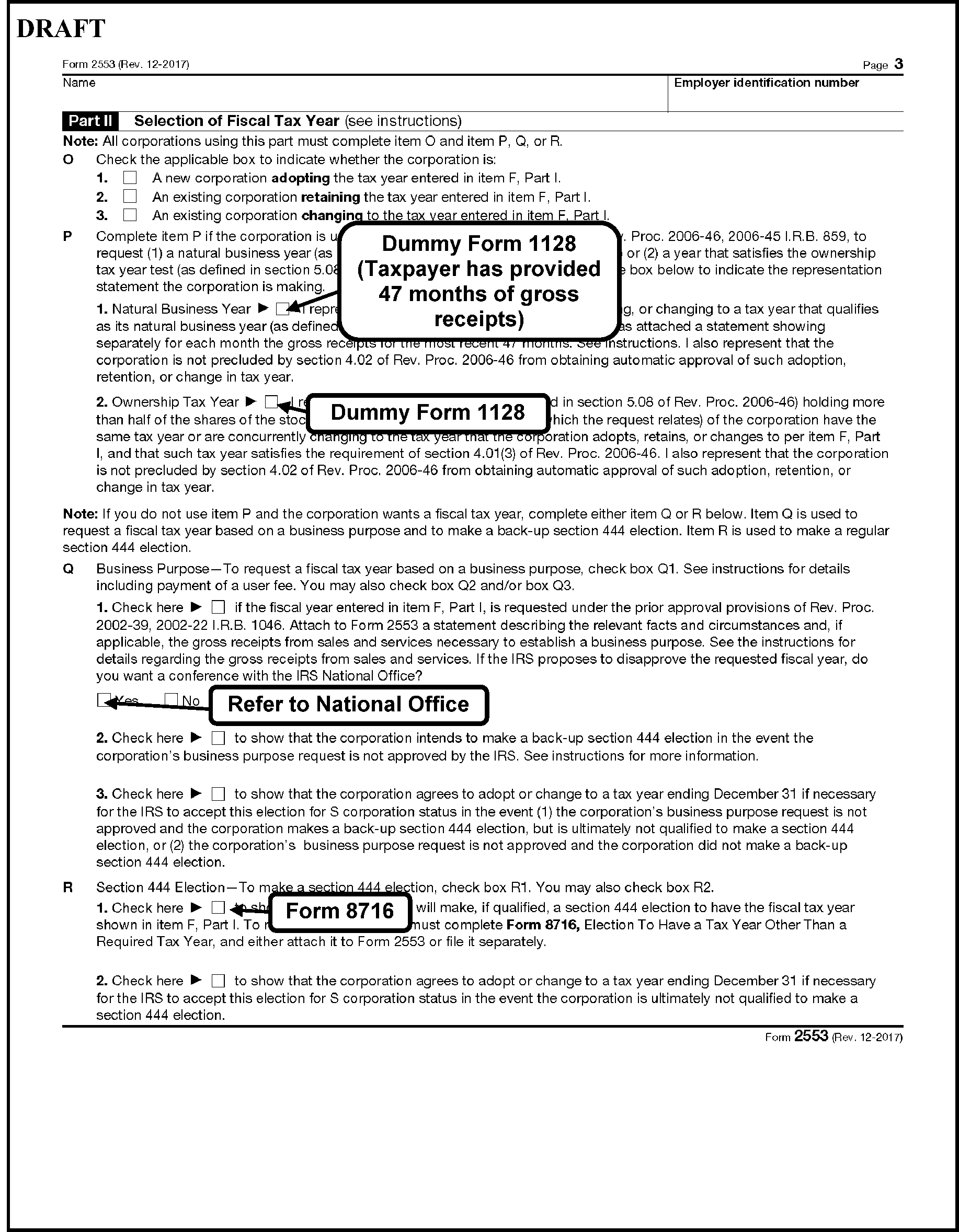
-
To be eligible for S status, the corporation must:
-
Be a domestic for-profit corporation, (for example, created or organized in the U.S. or under U.S. or State law).
-
Use a "permitted tax year" .
-
Have only one class of stock.
-
Be incorporated on or before the requested effective date.
-
Not be a member of a group that files a consolidated return.
This does not apply to QSubs, IRM 3.13.2.24, Form 8869, Qualified Subchapter S Subsidiary Election.Note:
Pay close attention to Item L (date stock acquired). If the date in Item L matches the requested effective date, continue processing the election. If this date does not match, contact the corporation for clarification. If unable to contact, deny election.
-
Have shareholders who are only individuals, estates, exempt organizations described in section 401(a) or 501(c)(3), or certain trusts described in section 1361(c)(2)(A).
-
Not have non-resident alien shareholders, see IRM 3.13.2.23.2 (7), unless the non-resident alien is a potential current beneficiary of an ESBT with an ESBT election made after December 31, 2017, see IRM 3.13.2.23.22 (4)(a), Form 8716 - Election to Have a Tax Year Other Than a Required Tax Year.
-
Not have more than one hundred shareholders: Spouses, their estates, and members of their family (up to 6 linear generations under a common ancestor) count as one shareholder. The taxpayer could need to provide family grouping.
-
Not be a financial institution (bank or thrift institution) that uses the reserve method of accounting for bad debts under IRC 585.
-
Not be an insurance company subject to tax under Subchapter L (Insurance Company).
-
Not be a DISC or former DISC, Form 1120, Domestic International Sales Corporation Return/Scope (DISC).
-
Not be a partnership.
-
-
Five types of trusts are permitted as shareholders under IRC 1361(c)(2)(A).
-
Grantor trusts (including a QSST treated as a grantor trust under IRC 1361(c)(2)(A));
-
Former grantor trust for 2 years after the deemed owner’s death;
-
A trust with stock transferred to it pursuant to a will (Testamentary Trust) for a 2-year period beginning on the day such stock is transferred to the trust;
-
A trust created to exercise the voting power of the stock transferred to it; and
-
An Electing Small Business Trust (ESBT). Generally, the owners, beneficiaries, etc., of these trusts are treated as the shareholders and will sign the consent. However, in the case of ESBT, the trustee will sign the consent.
-
-
Generally, a corporation which has previously revoked or terminated an S-election can re-elect S corporation status effective for its fifth taxable year after the first taxable year for which the termination was effective without prior permission of the Commissioner. Short taxable years are included when counting taxable years. Certain re-elections to be effective prior to the fifth taxable year after the first taxable year for which the termination was effective require the permission of the Commissioner. If the taxpayer submits a new Form 2553 before the five-year period is up, deny the election, see IRM 3.13.2.23.9, Procedures for a Denied Form 2553.
-
Non-Stock Issuing Corporation - Corporations applying for S status as a non-stock issuing corporation must meet the same requirements as a stock issuing corporation except for the "stock" questions. However, they must:
-
Be a legal domestic for-profit corporation,
-
Provide the breakdown percentage wise for owners/shareholders.
-
-
If any of the following types of Entities are listed as shareholders on Form 2553, the election must be denied:
-
For-Profit Corporation (including an S corporation)
-
Partnership
-
Multi-Member Limited Liability Company (MMLLC)
-
Single Member Limited Liability Company (SMLLC) - If the owner of the SMLLC qualifies as a Sub S shareholder, the SMLLC can be a shareholder. For example, if the owner of the SMLLC is an individual taxpayer (IMF), the SMLLC can be a shareholder. If the owner of the SMLLC is a qualifying trust, the SMLLC can be a shareholder. However, if the owner is a corporation or multi-member LLC, or if the SMLLC has elected to be treated as a corporation, the SMLLC cannot be a shareholder of a Subchapter S corporation.
-
Foreign trust
-
Non-Resident Alien, see (7) below.
-
Indian Tribe
-
-
If an SMLLC is shown in the shareholder section of Form 2553, it could be necessary to contact the entity to clarify the identity of the owner.
-
Generally, an individual that has an SSN beginning with "9" needs extra scrutiny. SSNs beginning with "9" are either Individual Taxpayer Identification Numbers (ITINs) or Internal Revenue Service Numbers (IRSNs).
IRSNs are assigned to non-resident aliens. They are not eligible to be a shareholder of a Subchapter S corporation, unless the non-resident alien is a potential current beneficiary of an ESBT with an ESBT election made after December 31, 2017, see IRM 3.13.2.23.22(4)(a), Electing Small Business Trust (ESBT). The 4th and 5th digits of an IRSN will be a Service Center number:IRSC Original Ranges for the 4th and 5th Digit Ranges Expansion Ranges for the 4th and 5th Digit Ranges Andover 08 38 Atlanta 07 37 Austin 18 06 Austin (International Returns Only) 66 Brookhaven 19 01 Cincinnati 17 02 Fresno 89 10 Kansas City 09 39 Memphis 40 03 Ogden 29 04 Philadelphia 28 05
ITIN holders are eligible to be a shareholder of a Subchapter S corporation. Currently, the 4th and 5th digits of ITINs are within the ranges 50-65, 70-88, 90-92, and 94-99. SSNs beginning with 9, must be researched with CC IMFOL'I' and IMFOL'T’.-
If the last return filed by the shareholder was a Form 1040 series (Doc Code 05, 06, 07, 08, 09, 10, 11, 12, 21, 22, 26, 27, or 28) approve Form 2553. Specific information on Doc Codes can be found by using Document 6209 Code Retriever.
-
If the last return filed was a Form 1040NR (Doc Code 72 or 73), deny Form 2553 due to ineligible shareholder.
-
If the taxpayer has not filed a return or a return is not visible on IDRS, deny Form 2553 due to ineligible shareholder.
-
-
For other than a new entity, the effective date is the first day after the end of the "C" corporation's/MMLLC tax year.
-
If the existing "C" corporation/MMLLC has been filing on a fiscal tax year end (any month other than December) and is requesting an effective date of January 1st, proceed as follows:
-
If Form 2553 is received on or before the due date of the short period return (including extensions), and the taxpayer can meet the timeliness criteria for filing Form 1128, then contact the taxpayer (via telephone first) to determine if they are requesting a change to a December tax year end under Rev. Proc. 2006-45. If the taxpayer can provide a complete Form 1128, approve it per IRM 3.13.2.21.7, Approval of Form 1128 - Procedures. Allow CP 261 to generate on the TC 090 for a January 1st effective date.
-
If the taxpayer does not meet the timeliness criteria for filing Form 1128, approve Form 2553 for the first day following the "C" corporation's/MMLLC's established tax year ending under IRM 3.13.2.25, Form 966 - Corporation Dissolution or Liquidation. PSC - C will be used to notify the taxpayer the requested effective date has been changed.
-
If the taxpayer is an SMLLC, it is not necessary the effective date be the beginning of their next tax period as they do not file an annual BMF income tax return.
-
-
When processing Form 2553, disregard any previously posted TCs 094. If the current election is valid, we will approve it. A previously rejected election has no impact on a new election.
-
An entity must be registered as for-profit to be eligible to make the Subchapter S-election. If the taxpayer electing to become a Subchapter S corporation has an EO Sub-module, process as shown below:
If... And... Then... A) Electing taxpayer has an EO Submodule; 1) The Status is 01, 02, or 36, -
Deny Form 2553. See IRM 3.13.2.23.9, Procedures for a Denied Form 2553.
-
Suppress CP 264 and send Letter 326C explaining the reason for denial is the corporation must be a for-profit corporation.
A) Electing taxpayer has an EO Submodule; 2) The Status is other than 01, 02, or 36 and the taxpayer has filed Form 990 series. See 6209 Code Retriever. -
Deny Form 2553. See IRM 3.13.2.23.9.
-
Suppress CP 264 and send Letter 326C explaining the reason for denial is the corporation must be a for-profit corporation.
A) Electing taxpayer has an EO Submodule; 3) The Status is other than 01, 02, or 36 and the taxpayer has not filed Form 990 series returns, -
OSPC: Forward the Form 2553 to the EO Manager/Lead for TC 022 approval and input.
-
KCSPC: Have a lead TE coordinate with OSPC EO lead for review before input of TC 022.
-
After TC 022 is input, approve Form 2553 if all other eligibility requirements are met. Ensure PDC is used.
-
-
A corporation’s dissolution by state administrative action does not affect its corporate status for federal tax purposes.
-
A taxpayer is timely with their S-election if their Form 2553 is received before the 16th day of the third month of their tax year. If the due date falls on a weekend or holiday, the due date becomes the next business day.
Note:
A month is the period commencing on the same numerical day of any calendar month and ending with the close of the day preceding the numerically corresponding day of the succeeding calendar month. If there is no corresponding day, with the close of the last day of the succeeding calendar month. See the chart below in (4) for examples.
-
Use of Fax Confirmation as Proof of Timely Submission - A taxpayer who submits Form 2553 by fax can provide a fax confirmation as proof of timely submission. Verify that the fax number on the confirmation is the number for the appropriate Service Center as listed in the Form 2553 instructions and that the date of the fax confirmation corresponds with a timely submission.
-
All Forms 2553 requesting an effective date in a prior tax year must be researched with CCs UPTIN, BMFOL'I', BMFOL'T', and TRDBV (the STAT-HIST page of CC TRDBV will show the DLN, and the IRS received date can be derived from the 6th, 7th, and 8th digits of the DLN as they are the Julian Date of the numbering date). Since the IAT tool cannot perform CC UPTIN research, TEs will need to scan batches of Forms 2553 for prior year effective dates and utilize CC UPTIN on each (at both BMF sites). If an open Entity unpostable is found, contact the TE or clerk the unpostable is assigned to.
-
≡ ≡ ≡ ≡ ≡ ≡ ≡ ≡ ≡ ≡ ≡ ≡ ≡ ≡ ≡ ≡ ≡ ≡ ≡ ≡ ≡ ≡ ≡ ≡ ≡ ≡ ≡ ≡ ≡ ≡ ≡ ≡ ≡ ≡ ≡ ≡ ≡ ≡ ≡ ≡ ≡ ≡ ≡ ≡ ≡ ≡ ≡ ≡ ≡ ≡ ≡ ≡ ≡ ≡ ≡ ≡ ≡ ≡ ≡ ≡ ≡ ≡ ≡ ≡ ≡ ≡ ≡ ≡ ≡ ≡
≡ ≡ ≡ ≡ ≡ ≡ ≡ ≡ ≡ ≡ ≡ ≡ ≡ ≡ ≡ ≡ ≡ ≡ ≡ ≡ ≡ ≡ ≡ ≡ ≡ ≡ ≡ ≡ ≡ ≡ ≡ ≡ ≡ ≡ ≡ ≡ ≡ ≡ ≡ ≡ ≡ ≡ ≡ ≡ ≡ ≡ ≡ ≡ ≡ ≡ ≡ ≡ ≡ ≡ ≡ ≡ ≡ ≡ ≡ ≡ ≡ ≡ ≡ ≡ ≡ ≡ ≡ ≡ ≡ ≡ ≡ ≡ ≡ ≡ ≡ ≡ ≡ ≡ ≡ ≡ ≡ ≡ ≡ ≡ ≡ ≡
≡ ≡ ≡ ≡ ≡ ≡ ≡ ≡ ≡ ≡ ≡ ≡ ≡ ≡ ≡ ≡ ≡ ≡ ≡ ≡ ≡ ≡ ≡ ≡ ≡ ≡ ≡ ≡ ≡ ≡ ≡ ≡ ≡ ≡ ≡ ≡ ≡ ≡ ≡ ≡ ≡ ≡ ≡ ≡ ≡ ≡ ≡ ≡ ≡ ≡ ≡ ≡ ≡ ≡ ≡ ≡ ≡ ≡ ≡ ≡ ≡ ≡ ≡ ≡ ≡ ≡ ≡ ≡ ≡ ≡ ≡ ≡ ≡ ≡ ≡ ≡ ≡ ≡ ≡ ≡ ≡ ≡ ≡ ≡ ≡ ≡ ≡ ≡ ≡ ≡ ≡ ≡ ≡ ≡ ≡ ≡ ≡ ≡ ≡ ≡ ≡ ≡ ≡ ≡ ≡ ≡ ≡ ≡ ≡ ≡ ≡ ≡ ≡ ≡ ≡ ≡ ≡ ≡ ≡ ≡ ≡ ≡ ≡ ≡ ≡ ≡ ≡ ≡ ≡ ≡ ≡ ≡ ≡ ≡ ≡ ≡ ≡ ≡ ≡ ≡ ≡ ≡ ≡ ≡ ≡ ≡ ≡ ≡ ≡
≡ ≡ ≡ ≡ ≡ ≡ ≡ ≡ ≡ ≡ ≡ ≡ ≡ ≡ ≡ ≡ ≡ ≡ ≡ ≡ ≡ ≡ ≡ ≡ ≡ ≡ ≡ ≡ ≡ ≡ ≡ ≡ ≡ ≡ ≡ ≡ ≡ ≡ ≡ ≡ ≡ ≡
≡ ≡ ≡ ≡ ≡ ≡ ≡ ≡ ≡ ≡ ≡ ≡ ≡ ≡ ≡ ≡ ≡ ≡ ≡ ≡ ≡ ≡ ≡ ≡ ≡ ≡ ≡ ≡ ≡ ≡ ≡ ≡ ≡ ≡ ≡ ≡ ≡ ≡ ≡ ≡ ≡ ≡ ≡ ≡ ≡ ≡ ≡ ≡ ≡ ≡ ≡ ≡ ≡ ≡ ≡ ≡ ≡ ≡
≡ ≡ ≡ ≡ ≡ ≡ ≡ ≡ ≡ ≡ ≡ ≡ ≡ ≡ ≡ ≡ ≡ ≡ ≡ ≡ ≡ ≡ ≡ ≡ ≡ ≡ ≡ ≡ ≡ ≡ ≡ ≡ ≡ ≡ ≡ ≡ ≡ ≡ ≡ ≡ ≡ ≡ ≡ -
Use the following table to assist in determining the timeliness of an S-election:
Requested Effective Date One Month Two Months And 15 Days ≡ ≡ ≡ ≡ ≡ ≡ ≡ 01-01-2026 01-01-2026 to 01-31-2026 02-01-2026 to 02-28-2026 03-15-2026 ≡ ≡ ≡ ≡ ≡ ≡ ≡ ≡ 12-29-2025 12-29-2025 to 01-28-2026 01-29-2026 to 02-28-2026 03-15-2026 ≡ ≡ ≡ ≡ ≡ ≡ ≡ ≡ 01-10-2026 01-10-2026 to 2-9-2026 02-10-2026 to 03-09-2026 03-25-2026 ≡ ≡ ≡ ≡ ≡ ≡ ≡ 03-17-2026 03-17-2026 to 04-16-2026 04-17-2026 to 05-16-2026 05-31-2026 ≡ ≡ ≡ ≡ ≡ ≡ 07-07-2026 07-07-2026 to 08-06-2026 08-07-2026 to 09-06-2026 09-23-2026 ≡ ≡ ≡ ≡ ≡ ≡ ≡ -
There is no provision/form for an extension of time to file Form 2553. If a taxpayer is late filing Form 2553, an acceptable level of proof for a timely filed election is a CP 261, a certified mail receipt from the United States Postal Service, or a Form 2553 reflecting an IRS received date that makes the Form 2553 timely. Otherwise, the taxpayer must request relief under Rev. Proc. 2013-30.
-
Rev. Proc. 2013-30 modifies, supersedes, and makes obsolete Rev. Proc. 2003-43, Rev. Proc. 2004-48, and Rev. Proc. 2007-62 and supersedes the relief in Situation 1 of Rev. Proc. 97-48 as well as making obsolete the relief in Situation 2 of Rev. Proc. 97-48. Additionally, Rev. Proc. 2013-30 modifies, supersedes and makes obsolete certain relief in Rev. Proc. 2004-49 as it relates to entity classification elections.
-
A requesting entity for purposes of Rev. Proc. 2013-30 is a corporation (or an eligible entity to which a Deemed Entity Classification Election will apply) seeking to be treated as an S corporation, a trustee seeking to treat a trust as an ESBT, a trust beneficiary seeking to treat a trust as a QSST, or a parent seeking to treat a subsidiary as a Q Sub.
-
Under Rev. Proc. 2013-30, the requesting entity can request relief for a late election by:
-
Properly completing the election form and attaching supporting documents as applicable and filing the election independently (This can be included on page 1 of Form 2553 or a separate statement, see paragraph 11 below for most common examples); or
-
Attaching the election form to the S corporation’s current year Form 1120-S; or
-
Attaching the election form to the S corporation’s late filed prior year Forms 1120-S, the late filed Forms 1120-S need to be filed simultaneously.
-
-
If one or more requesting entities are seeking relief under this revenue procedure with respect to a single S corporation, all the election forms can be filed at the same time using one of the methods described in Section 4.03(2). When multiple requests for relief are submitted simultaneously, each application for relief must independently comply with the procedural requirements in Section 4.03(1). However, there is no requirement that all Requesting Entities must file requests for relief under this revenue procedure with respect to a single S corporation simultaneously.
-
Taxpayers choosing to request relief by filing their election with Form 1120-S will receive the Error Resolution System (ERS) Action Code 347 in Code & Edit and be routed to BMF Entity. Returns will be filed electronically or by paper. For MeF returns, Entity TEs must print Form 2553 from the Employee User Portal (EUP). The instructions for this Rev. Proc. will be applied to unnumbered loose returns and numbered returns in the form of pipeline, Rejects, and Unpostables. See IRM 3.13.2.8.5.1, ERS Action Code 347 - Revenue Procedure 2013-30.
-
The below listed requirements of Rev. Proc. 2013-30 must be met for relief to be granted if request for relief is not complete approve for next qualifying year. If T/P is eligible to re-submit with completed election, you will suppress CP 261 and notify T/P with Letter 385C. The letter will tell the taxpayer the specific reason we were unable to grant the requested effective date.
-
The requesting Entity intended to be classified as an S corporation as of the requested effective date; and
-
The requesting Entity requests relief within 3 years and 75 days after the requested effective date; and
-
The failure to qualify as an S corporation as of the effective date was solely because the election was not timely filed; and
-
The entity and all shareholders have provided a statement explaining their reasonable cause for its failure to make a timely election and have acted diligently to correct the mistake upon its discovery. This statement of reasonable cause can be included on page 1 of Form 2553 or as a separate attachment, see paragraph 11 below for the most common examples. Each statement must contain a dated declaration that states: "Under penalties of perjury, I (we) declare that I (we) have examined this S-election, including accompanying documents, and, to the best of my (our) knowledge and belief, the election contains all the relevant facts relating to the election, and such facts are true, correct, and complete" ; and
-
If Forms 1120-S have been filed, the relief request must include statements from all shareholders that they have reported their income on all affected returns consistent with the S corporation election for the year the election is requested and for all subsequent years, (It is not necessary for all Forms 1120-S to have been timely filed); and
-
The completed Election Form includes the statement(s) described in Section 5.02 of this revenue procedure: The completed Election Form must include statements from all shareholders during the period between the date the S corporation election was to have become effective and the date the completed Election Form is filed that they have reported their income on all affected returns consistent with the S corporation election for the year the election would have been filed and for all subsequent years (consistency statement).
-
-
If the corporate returns are not yet due, a consistency statement is not required. An extension of time to file will not extend the due date for relief beyond 3 years and 75 days.
-
In the case of a late classification election intended to be effective on the same date the S corporation election was intended to be effective, the request for relief must include the following representations. If request for relief is not complete approve for next qualifying year. If T/P is eligible to re-submit with completed election, you will suppress CP 261 and notify T/P with Letter 385C.
-
The Requesting Entity is an eligible entity as defined in Treasury Regulation 301.7701-3(a); and
-
The Requesting Entity intended to be classified as a corporation as of the Effective Date of the S corporation status; and
-
The Requesting Entity requests relief within 3 years and 75 days after the requested effective date; and
-
The Requesting Entity fails to qualify as a corporation solely because Form 8832 was not timely filed under 301.7701-3(c)(1)(i), or Form 8832 was not deemed to have been filed under Treasury Regulation 301.7701-3(c)(1)(v)(C); and
-
The entity and all shareholders have provided a statement explaining their reasonable cause for its failure to make a timely election and have acted diligently to correct the mistake upon its discovery. This statement of reasonable cause can be included on page 1 of Form 2553 or as a separate attachment, see paragraph 11 below for the most common examples. Each statement must contain a dated declaration that states: "Under penalties of perjury, I (we) declare that I (we) have examined this S-election, including accompanying documents, and, to the best of my (our) knowledge and belief, the election contains all the relevant facts relating to the election, and such facts are true, correct, and complete." ; and
-
The Requesting Entity fails to qualify as an S corporation on the Effective Date of the S corporation status solely because the S corporation election was not timely filed pursuant to IRC 1362(b); and
-
The Revenue Procedure requires all Form 1120-S returns to have been timely filed by LLCs electing to be treated as an S corporation and no inconsistent tax or information returns have been filed by or with respect to the entity during any of the taxable years (consistency statement). A copy of a letter previously sent by BMF Entity Unpostables is acceptable proof that a return was filed. ≡ ≡ ≡ ≡ ≡ ≡ ≡ ≡ ≡ ≡ ≡ ≡ ≡ ≡ ≡ ≡ ≡ ≡ ≡ ≡ ≡ ≡ ≡ ≡ ≡ ≡ ≡ ≡ ≡ ≡ ≡ ≡ ≡ ≡ ≡ ≡ ≡ ≡ ≡ ≡ ≡ ≡ ≡ ≡ ≡ ≡ ≡ ≡ ≡ ≡ ≡ ≡ ≡ ≡ ≡ ≡ ≡ ≡ ≡ ≡ ≡ ≡ ≡ ≡ ≡ ≡ ≡ ≡ ≡ ≡ ≡ ≡ ≡ ≡ ≡ ≡ ≡ ≡ ≡ ≡ ≡ ≡ ≡ ≡ ≡ ≡ ≡ ≡ ≡ ≡ ≡ ≡ ≡ ≡ ≡ ≡ ≡ ≡ ≡ ≡ ≡ ≡ ≡ ≡ ≡ ≡ ≡ ≡ ≡ ≡ ≡ ≡ ≡ ≡ ≡ ≡ ≡ ≡ ≡ ≡ ≡ ≡ ≡ ≡ ≡ ≡ ≡ ≡ ≡ ≡ ≡ ≡ ≡ ≡ ≡ ≡ ≡ ≡ ≡ ≡ or
-
The Requesting Entity has not filed a federal tax or information return for the first year in which the election was intended to be effective because the due date has not passed for that year’s federal tax.
Note:
An extension of time (for any tax period) to file will not extend the due date for relief beyond 3 years and 75 days. However, returns are considered timely filed if a valid extension is posted and the return is filed by the extended date.
When processing an LLC, use EUP (Employee User Portal) and CCs BMFOL'I', TRDBV, UPTIN (view other sites by adding the "at sign" (@) and the campus numbers for CC UPTIN). If you find evidence of a Form 1120-S or Form 7004 that has been cancelled by another area for the tax period you are processing, consider the return/extension as timely filed. If one month has passed since the extended due date and there is no evidence of a return on IDRS (CCs SUMRY, TXMOD, BMFOL, ENMOD, etc.), process the election as if no corporate return has been filed. If there is a timely filed extension posted to MFT 06 for the tax year requested and the taxpayer filed a timely Form 1120-S by the due date of the extension, consider the return as timely. -
-
If an existing entity is requesting relief under Rev. Proc. 2013-30 and Form 2553 is complete, approve the election for the year of the return, or the current year.
-
Refer to IRM 3.13.2.8.5.1, ERS Action Code 347 - Revenue Procedure 2013-30, if Form 2553 is attached to a Form 1120-S. Following is suggested script to be used when contacting the taxpayer via telephone for Rev. Proc. 2013-30 information:
This is (TE's name) from the Internal Revenue Service and I am processing your Form 1120-S and Form 2553 filed under Rev. Proc. 2013-30. Before I can complete the processing of your forms, I must ask for additional information. (State the needed information). Please fax this information to me at (your team's fax number) no later than (two days from today) If I do not receive the requested information within the time frame requested, your Form 1120-S will be processed as a Form 1120. If you are an LLC, your return will be pulled from processing, and you will not have fulfilled your annual filing requirement. -
The most common examples of reasonable cause or inadvertence:
-
Miscommunication between the taxpayer's tax advisors/shareholders (for example attorneys, CPA/tax practitioner, accountants, bookkeepers, especially during incorporation period).
-
Circumstances beyond the taxpayer's control (for example unavoidable absence, illness), mistakes, or ignorance of the law.
-
Reliance on a paid professional (inside or outside the company) who failed to understand Form 2553 filing requirements.
-
Delay in obtaining shareholder signature for the election.
-
One of the shareholders forgot to make the election or each shareholder thought the other was going to do it.
Note:
It is not possible to list every valid scenario that might be given by the taxpayer. If taxpayer provides a statement acknowledging late filing with any plausible reason, and has included all other statements, give the taxpayer the benefit of the doubt and process form under Rev. Proc. 2013-30.
-
-
An entity that does not meet the requirements for relief or is denied relief under Rev. Proc. 2013-30 can seek relief by requesting a letter ruling. The procedural requirements for requesting a letter ruling are described in IRB 2023-1, or its successors.
-
≡ ≡ ≡ ≡ ≡ ≡ ≡ ≡ ≡ ≡ ≡ ≡ ≡ ≡ ≡ ≡ ≡ ≡ ≡ ≡ ≡ ≡ ≡ ≡ ≡ ≡ ≡ ≡ ≡ ≡ ≡ ≡ ≡ ≡ ≡ ≡ ≡ ≡ ≡ ≡ ≡ ≡ ≡ ≡ ≡ ≡ ≡ ≡ ≡ ≡ ≡ ≡ ≡ ≡ ≡ ≡ ≡ ≡ ≡ ≡ ≡ ≡ ≡ ≡ ≡ ≡ ≡ ≡ ≡ ≡ ≡ ≡ ≡ ≡ ≡ ≡ ≡ ≡ ≡ ≡ ≡ ≡ ≡ ≡ ≡ ≡ ≡ ≡ ≡ ≡ ≡ ≡ ≡ ≡ ≡ ≡ ≡ ≡ ≡ ≡ ≡ ≡ ≡ ≡ ≡ ≡ ≡ ≡ ≡ ≡ ≡ ≡ ≡ ≡ ≡ ≡ ≡ ≡ ≡ ≡ ≡ ≡ ≡ ≡ ≡ ≡ ≡ ≡ ≡ ≡ ≡ ≡ ≡ ≡ ≡ ≡ ≡ ≡ ≡ ≡ ≡ ≡ ≡ ≡ ≡ ≡ ≡ ≡ ≡ ≡ ≡ ≡ ≡ ≡ ≡ ≡ ≡ ≡ ≡ ≡ ≡ ≡ ≡ ≡ ≡ ≡ ≡ ≡ ≡ ≡ ≡ ≡ ≡ ≡ ≡ ≡ ≡ ≡ ≡ ≡ ≡ ≡ ≡ ≡ ≡ ≡ ≡ ≡ ≡ ≡ ≡ ≡ ≡ ≡ ≡ ≡ ≡ ≡ ≡ ≡ ≡ ≡ ≡ ≡ ≡ ≡ ≡ ≡ ≡ ≡ ≡ ≡ ≡ ≡ ≡ ≡ ≡ ≡ ≡ ≡ ≡ ≡ ≡ ≡ ≡ ≡ ≡ ≡ ≡ ≡ ≡ ≡ ≡ ≡ ≡ ≡ ≡ ≡ ≡ ≡ ≡ ≡ ≡ ≡ ≡ ≡ ≡ ≡ ≡ ≡ ≡ ≡
-
Rev. Proc. 2013-30 allows relief without a time restriction for one specific scenario:
-
The corporation is not seeking late corporate classification election relief concurrently with a late S corporation election under this revenue procedure; and
-
The corporation fails to qualify as an S corporation solely because the Form 2553 was not timely filed; and
-
The corporation and all its shareholders reported their income consistent with S corporation status for the year the S corporation election would have been made, and for every subsequent taxable year (if any); and
-
At least 6 months have elapsed since the date on which the corporation filed its tax return for the first year the corporation intended to be an S corporation; and
-
Neither the corporation nor any of its shareholders was notified by the IRS of any problem regarding the S corporation status within 6 months of the date on which the Form 1120-S for the first year was timely filed.
-
-
A separate statement for consistency is not needed when the December 2013, or later, revision of the Form 2553 is being used.
-
The return due dates of the Form 1120 family of returns were changed for tax years beginning after December 31, 2015. However, the return due date for Form 1120-S was not changed. During Form 7004 processing, the return due date might have been altered from Form 1120-S to Form 1120 and vice versa. For the purposes of Form 2553, any extension posted (and approved) on an MFT 02 module will satisfy the requirements of Rev. Proc. 2013-30.
-
It is not necessary for Forms 1120-S to have been timely filed, therefore, the "shelving" practice of Submission Processing when processing Forms 7004 is irrelevant.
-
You will always approve Form 2553 for the earliest valid effective date possible.
-
Responses to our inquiries regarding Rev. Proc. 2013-30 received within the same processing year, will be processed as follows.
-
Research IDRS CCs ENMOD and/or BMFOL'E' for a posted TC 090 effective the same tax year as our inquiry.
-
Research CCs TXMOD, TRDBV, and BMFOL'T' for status of taxpayer's initial Form 1120-S. The Employee User Portal (EUP) must also be researched if the return was filed electronically.
If... And... Then... A) Form 2553 can be approved, or TC 090 is posted/pending for the tax year in question, 1) The taxpayer's Form 1120-S has not yet posted as a converted Form 1120, -
Input TC 090, if able, to approve for tax year in question.
-
Input TC 930 for the tax period of the initial Form 1120-S sending taxpayer's response to Files which will be associated with CP98/198. This CP will be returned to originator in 26 weeks to verify posting of TC 150.
-
Upon receipt of CP98/198 from Files, research CCs TXMOD and BMFOL for posted DLN.
-
If DLN is for Form 1120-S, associate taxpayer's response with DLN. Take no further action.
A) Form 2553 can be approved, or TC 090 is posted/pending for the tax year in question, 2) The taxpayer's return has posted as a Form 1120, -
Input TC 090 and/or send Letter 385C as confirmation of new effective date.
-
Prepare Form 3465, Adjustment Request. Send to BMF AM/Adjustments stating: "REMOVE THE TAX FROM POSTED FORM 1120 - TC 150 SHOULD BE A FORM 1120-S." Indicate on Form 3465 the number of shareholders from Form 2553. These instructions cannot be applied to LLCs as their DLNs have been cancelled.
A) Form 2553 can be approved or TC 090 is posted/pending for the tax year in question, 3) Taxpayer is an LLC and prior filed returns have been cancelled, Research CC TRDBV for the cancelled DLNs. See IRM 3.13.2.8.24, Re-processing Previously Cancelled Returns, for complete processing instructions. B) Form 2553 cannot be approved for tax year in question or next qualifying year because it’s still incomplete, 1) Taxpayer's corporate return has not yet posted, Reject Form 2553, suppress CP 264, send Letter 326C telling taxpayer election was rejected because Form 2553 was incomplete twice. B) Form 2553 cannot be approved for tax year in question or next qualifying year because it’s still incomplete, 2) Posted DLN is for Form 1120, Reject Form 2553, suppress CP 264, send Letter 326C. Associate taxpayer's response to 1120 DLN. C) There is no record of posted/pending TC 090, 1) Form 2553 is complete and taxpayer's Form 1120-S has not yet posted as a converted Form 1120, -
Input TC 090 allowing CP 261 to generate.
-
Input TC 930 for the tax period of the initial Form 1120-S sending taxpayer's response to Files which will be associated with CP 98/198. This CP will be returned to originator in 26 weeks to verify posting of TC 150.
-
Upon receipt of CP 98/198 from Files, research CCs TXMOD and BMFOL for posted DLN.
-
If DLN is for Form 1120-S, associate taxpayer's response with DLN. Take no further action.
C) There is no record of posted/pending TC 090, 2) Form 2553 is complete, and the taxpayer's return has posted as a Form 1120, -
Input TC 090.
-
Prepare Form 3465, Adjustment Request. Send to BMF AM/Adjustments stating: "REMOVE THE TAX FROM POSTED FORM 1120 - TC 150 SHOULD BE A FORM 1120-S." Indicate on Form 3465 the number of shareholders from Form 2553.
C) There is no record of posted/pending TC 090, 3) Form 2553 is incomplete, -
Deny Form 2553, see IRM 3.13.2.23.9, Procedures for a Denied Form 2553.
-
Leave all of taxpayer's response with denied Form 2553 which is the source document for the TC 094 input.
-
-
TC 971 AC 373/375 input on MFT 02 indicates Form 1120-S has failed to post to MF and a phone call was made or a letter has been issued to the preparer/taxpayer. TC 971-376 indicates the conversion of Form 1120-S to a Form 1120, when there is no reply or when the reply received does not resolve the unpostable issue. TC 971 AC 376 will freeze all refunds to the taxpayer.
-
If the taxpayer responds and Form 2553 is approved for the tax year in question, input TC 971-377 to indicate the converted Form 1120 has been re-processed as a Form 1120-S. This will also lift the refund freeze. See IRM 3.13.2.8.5.1 (8), ERS Action Code 347 - Revenue Procedure 2013-30.
-
TC 971-374 input on MFT 06 indicates a MMLLC filed a Form 1120-S that failed to post to MF and a phone call was made or a letter has been issued to the preparer/taxpayer. No reply was received, and the return was removed from processing. A TC 971-374 should only be input for a multi-member LLC. AC 374 can also be used on a TC 972 to reverse the transaction.
-
When processing Forms 2553, it is necessary for the TE to determine if the entity has federal tax liability prior to becoming an S corporation, regardless of the type of entity. This is shown by entering "95" in the BLK-SERIES field of CC BNCHG. This will stop the 1120 FRC from updating to 1120-02 for 26 weeks or until the FYM becomes current. For example, FYM 12 will update IDRS on Dec. 1st.
-
For a new corporation, if the effective date is more than 30 days later than the beginning of business (the earliest of the date the corporation had shareholders, acquired assets, or began doing business), input Blocking Series 95.
-
For an existing corporation, if all prior tax years returns (MFT 02) have not posted, a "BK95" will be utilized.
-
The date of incorporation can be used in lieu of the Business Operation (BO) date to determine potential prior liability when any of the following conditions exist:
-
The taxpayer is other than a new corporation,
-
Effective date on Form 2553 is not present, or
-
The EIN is not on the Master File or if on Master File, has not filed a Form 1120.
-
-
Once prior liability has been determined, the effective date must be the first day after the C corporation's tax year.
-
When prior liability has been determined, input the appropriate transaction code (TC 090 for approval, TC 091 for revocation, or TC 096 for termination) with blocking series 95. The FYM must be input with TC 090. The FRC and FYM will not update until the month of the FYM input with TC 090, or for 26 cycles for TC 091/096, to allow for delinquency checks on the prior period liability. It will also identify that the account is in S status if TC 090 or is a Form 1120 account if TC 091 or TC 096. This action will allow the proper return to post. When researching, the account information will show a posted 09X transaction without the corresponding filing requirement normally seen; however, the blocking series in the DLN will be a 95X to identify this type of case.
-
Example Currently the corporation has an FYM of 03. The TC 090 is effective 4-1-19, with an FYM of 12. BK 95 will set a deferred action 02, which will delay updating the FYM and FRC until the month of December. A TC 474 will be generated for the "C" corporation's prior tax period.
-
BK 95 generates a TC 474 on MFT 02, therefore, BK 95 cannot be used when processing LLCs, unless the LLC was liable for Form 1120 for the tax period immediately prior to the S-election effective date.
-
-
Research on IDRS is essential for all corporations that have been in existence over one year for prior liability. Research all Forms 2553 for EIN, FYM, and FRC. If 1120-01 FRC is not present, input TC 016 to add FRC using the FYM being elected on Form 2553.
-
Underline the name control of the entity making the election and annotate the following on the Form 2553:
-
Sequence Number (upper right corner of document)
-
Employee ID (IDRS number)
-
Date of Input
-
TCs input
-
If the CP 261 is suppressed and Letter 385C is sent, this must also be annotated in the audit trail.
-
If a specific PSC is used, it will be annotated.
-
The audit trail will be placed in the lower left margin of the document. The audit trail must be legible.
-
-
Enter the following fields:
-
Doc Code 53
-
Blocking Series (BK95) if prior liability.
-
TC 090
-
Sequence Number
-
Posting Delay Code (when needed)
-
FYM
-
Effective Date
-
PSC (when needed)
-
Remarks - This field will begin with the letters SD to alert Files that the transaction document, Form 5147 must be associated with the Form 2553. Enter the name of the entity behind SD.
-
-
If the taxpayer is an LLC, the Entity Classification Election is deemed. The TC 074 will be used for all deemed entity classification elections. The TC 074 is not a source document.
-
If Form 1065 FR is present, input TC 016 to remove the 1065 FRC and add the 1120 FRC.
-
TC 074
-
Posting Delay Code (when needed)
-
Effective Date
-
TOE (Will always be 1 for a deemed entity classification election.)
-
FOE (Will always be 1 for a deemed entity classification election.)
-
Remarks field will begin with the letters NSD. Enter the name of the entity behind NSD.
Reminder:
Although the Entity Classification Election is deemed, some taxpayers send Forms 8832 along with their Forms 2553. These are deemed and will not receive a TC 076. Staple the Form 8832 to the back of Form 2553 and proceed with TC 074 input. Update LLC indicator as necessary, see IRM 3.13.2.23.1(13).
-
-
TC 090 will generate CP 261 to notify the entity that approval as an S corporation has been granted. In the event the language of the CP 261 is not appropriate for the circumstances of the case, or a notice must not be sent, the PSC - Z will be input to suppress issuance of the CP 261.
-
When a completed Form 2553 is filed late, process the document by inputting the effective date and the FYM for the next qualifying tax year. Use the appropriate PSC to inform the taxpayer of potential relief under Rev. Proc. 2013-30.
-
If the FYM on Form 2553 was approved under Rev. Proc. 2006-46, a TC 054 must be input using CC BRCHG, Doc. Code 63. Input TC 054 with posting delay code 1 and suppress (PSC - Z) CP 284.
-
If the FYM was approved by Chief Counsel Private Letter Ruling (PLR) , prepare a "dummy" Form 1128 to use as the source document for the TC 054 input. Attach the ruling letter to the dummy Form 1128.
-
The effective date (IRS Received date of Form 2553), FYM, and sequence number must be input with TC 054.
-
It is not necessary to attach a copy to Form 2553.
-
-
If the requested FYM can be approved (Sept/Oct/Nov) and the taxpayer needs to submit Form 8716, process the Form 2553 using the PSC - B. Use caution to input the requested FYM, not the required FYM of 12.
-
When the taxpayer did not qualify for the IRC Section 444 FYM, but made a calendar year back-up, deny Form 8716. Leave the PSC field "blank" on the TC 090 and CP 261 will generate to notify the corporation of its approval as an S corporation with a calendar tax year.
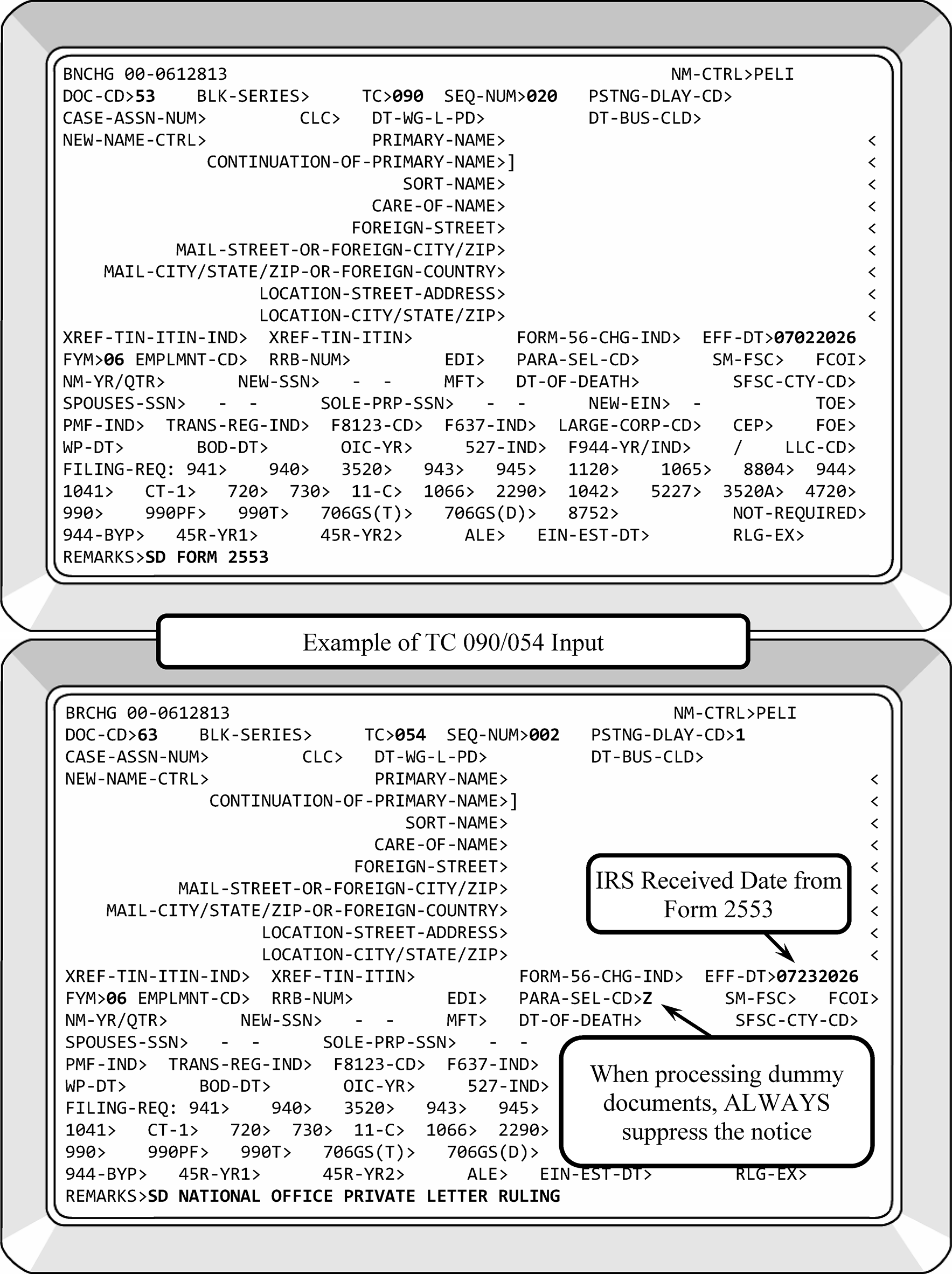
-
All Forms 2553 received that will not meet processing time frame guidelines (30-day turnaround), require the input of either a TC 093 (Pending S-election) or TC 097 (Referred to Chief Counsel). If there is not a pending or posted S-election, input TC 093. If you are referring the Form 2553 to the Chief Counsel, input TC 097 if there is not a pending or posted TC 090. TC 093 and TC 097 can be input on the same account. Input a posting delay code, if necessary.
-
TC 093 will provide another IRS employee with the information that a Form 2553 was received in Entity, but a determination has not yet been made.
-
Care must be taken to input TC 093 and/or TC 097 on the corporation EIN, not on a partnership or individual number.
-
Annotate the following in the lower left margin of Form 2553:
-
TC 093 and/or TC 097
-
Date of input
-
Employee ID (IDRS number)
-
-
If TC 093 and TC 090 are input in the same cycle, the TC 090 will post first and the TC 093 will become an UPC 339. Therefore, a PDC must be used on the TC 090 input.
-
If during processing Form 2553 you discover an error on the account (invalid FYM, misapplied payments, etc.) make the necessary Entity corrections and route Form 3465, Adjustment Request, to BMF AM/Adjustment - Correspondence Function requesting the necessary actions.
-
When a Form SS-4 is attached, or an EIN is required to be assigned, the Form SS-4 will be processed expeditiously (See IRM 3.30.123, Work Planning and Control - Processing Timeliness: Cycles, Criteria, and Critical Dates, for turnaround guidelines and IRM 21.7.13, Business Tax Returns and Non-Master File Accounts - Assigning Employer Identification Numbers (EINs)), for the procedures on assignment of a new EIN. TC 093 will be input to indicate that Form 2553 has been received if the Form 2553 is not processed immediately. The transactions for these two documents can be entered in the same cycle as all IDRS transactions post in numerical order.
-
A Form 2553 secured by Examination and routed to the Entity Department will be processed expeditiously so that Exam can close their case expeditiously and prevent paying interest.
-
If you must return an incomplete Form 2553 to the taxpayer, input a TC 093, then a TC 092 with Posting Delay Code of 1.
-
When Chief Counsel receives an amended Form 2553 or Form 1128 used to amend the Form 2553, (taxpayer is changing the FYM shown on the original Form 2553), Chief Counsel will review the case for timeliness and forward it to the campus for consideration. Chief Counsel will notify the taxpayer the case was sent to the campus.
-
If the amended Form 2553 is received after the 15th day of the third month from the effective date, they will notify the taxpayer that it is not timely.
-
If it is timely, Chief Counsel will call their contact person at the campus to advise they received a timely amendment. Chief Counsel will fax the amended Form 2553 and ruling letter to the campus. The amended FYM will be edited on Form 2553. The annotation "Per Chief Counsel Phone Call" , the date, the name and phone number of the Chief Counsel employee, and the IDRS number of the employee processing the case will be entered on the document.
-
-
The instructions to Form 2553 provide that the taxpayer follow-up with the campus in the event he has not received a determination within 3 months or 6 months (if Part II) of mailing Form 2553.
-
Inquiries meeting TAS criteria will be forwarded to TAS on Form 911 if the issue cannot be resolved the same day. See IRM 13.1.7, Taxpayer Advocate Case Procedures - Taxpayer Advocate Service (TAS) Case Criteria. If the taxpayer is experiencing or about to experience economic harm that could be a result of IRS actions or created as a result of circumstances in the taxpayer's personal life, refer to IRM 13.1.7, Taxpayer Advocate Case Procedures - Taxpayer Advocate Service (TAS) Case Criteria, and route to TAS as appropriate.
-
If an inquiry is received after the due date and there is no record of receiving Form 2553, ask the taxpayer to resubmit their Form 2553 accompanied with a copy of our letter. Request a response within 30 days from the date of our letter. Tell the taxpayer if we don’t receive a response within 30 days their election could be approved for the following tax year.
-
If a separately filed shareholder consent is received from a new or additional shareholder, associate it with the TC 090 DLN. Send letter advising taxpayer that we have processed their corrected Form 2553.
-
Care must be exercised to prevent unnecessary unpostables, specifically, UPCs 323 and 339.
-
See chart below for processing duplicate Forms 2553:
If... And... Then... A) Taxpayer submits Form 2553, 1) Form 2553 has same effective date as Master File and election was approved within last 45 days, Prepare Form 2553 for destruction as classified waste per local procedures. A) Taxpayer submits Form 2553, 2) Form 2553 has same effective date as Master File and election was approved more than 45 days ago, Send Letter 385C to taxpayer. Prepare Form 2553 for destruction as classified waste per local procedures. B) Taxpayer submits new Form 2553 with earlier effective date than what is on Master File, 1) Proper Rev. Proc. documentation is attached, Input TC 092, TC 090, PDC 1, with earlier effective date, suppress notice and send Letter 385C. B) Taxpayer submits new Form 2553 with earlier effective date than what is on Master File, 2) Proper Rev. Proc. documentation is not attached, or the form is incomplete, and the taxpayer is still eligible for relief, Return the Form 2553 with a Letter 385C informing taxpayer of their current effective date which was not changed due to incomplete form and/or proper documentation not attached. B) Taxpayer submits new Form 2553 with earlier effective date than what is on Master File, 3) Proper Rev. Proc. documentation is attached, and the taxpayer is not eligible for relief, Return Form 2553 with Letter 385C to taxpayer informing them of the effective date on Master File and that their only recourse is a Private Letter Ruling (PLR). See IRM 3.13.2.23.10, Chief Counsel Referrals. B) Taxpayer submits new Form 2553 with earlier effective date than what is on Master File, 4) Proper Rev. Proc. documentation is attached, the form is incomplete, and the taxpayer is still eligible for relief, Return Form 2553 in a Letter 385C, inform T/P of their current effective date, missing information on Form 2553, and instruct them to re-submit their Form 2553 with all required documentation for approval of their newly requested effective date. C) Taxpayer submits new Form 2553 with later effective date than what is on Master File, 1) Research (of IDRS and Secretary of State's database, see Exhibit 3.13.2-8) shows original effective date is correct, Send Letter 385C to taxpayer. Associate Form 2553 with original TC 090 DLN. C) Taxpayer submits new Form 2553 with later effective date than what is on Master File, 2) Research (of IDRS and Secretary of State's database) shows later effective date is correct, Input TC 092, TC 090, PDC 1, with later effective date. -
An election or revocation can be rescinded if the request is received by the due date of the original election or revocation. The taxpayer is not held to the five-year wait for re-election on a rescinded election.
-
A TC 091 will be input for a rescinded election for the same effective date as the original election. Suppress CP 262 and send Letter 326C informing taxpayer that we have rescinded their Subchapter S-election.
-
A "dummy" Form 2553 will be prepared for a rescinded revocation. Attach the taxpayer's request to the "dummy" Form 2553. Suppress CP 261 and send Letter 385C informing taxpayer that we have rescinded the revocation of their Subchapter S-election. The TC 090 will go UPC 339 in two cycles; monitor and close. See IRM 3.13.222.87, Unpostable Code (UPC) 339 Reason Code (RC) 1.
-
-
HQ analysts and attorneys from Chief Counsel will contact the campus to have corrections made to accounts. Flaws in accounts have been found during research of Private Letter Rulings, revenue announcements, etc. The Discovery Directory is an efficient way to verify the identity of another IRS employee.
-
If a Form 2553 is received with a TC 090 posted and the BK95 hold has passed but the FRC is still 1120–01, delete the 1120 FRC so IDRS will allow a paper Form 1120-S to post.
-
Shareholders can request an Extension of Time for Shareholders' Consent in the event the corporation cannot obtain a shareholder's consent, provisions have been made to enable the corporation to apply for an extension of time to obtain the required signature(s) per Treas. Reg. 1.1362-6(b)(3)(iii).≡ ≡ ≡ ≡ ≡ ≡ ≡ ≡ ≡ ≡ ≡ ≡ ≡ ≡ ≡ ≡ ≡ ≡ ≡ ≡ ≡ ≡ ≡ ≡ ≡ ≡ ≡ ≡ ≡ ≡ ≡ ≡ ≡ ≡ ≡ ≡ ≡ ≡ ≡ ≡ ≡ ≡ ≡ ≡ ≡ ≡ ≡ ≡ ≡ ≡ ≡ ≡ ≡ ≡ ≡ ≡ ≡ ≡ ≡ ≡ ≡ ≡ ≡ ≡ ≡ ≡ ≡ ≡ ≡ ≡ ≡ ≡ ≡ ≡ ≡ ≡ ≡ ≡ ≡ ≡ ≡ ≡ ≡ ≡ ≡ ≡ ≡ ≡ ≡ ≡ ≡ ≡ ≡ ≡ ≡ ≡ ≡ ≡ ≡ ≡ ≡ ≡ ≡ ≡ ≡ ≡ ≡ ≡ ≡ ≡ ≡ ≡ ≡ ≡ ≡ ≡ ≡ ≡ ≡ ≡ ≡ ≡ ≡ ≡ ≡ ≡ ≡ ≡ ≡ ≡ ≡ ≡ ≡ ≡ ≡ ≡ ≡ ≡ ≡ ≡ ≡ ≡ ≡ ≡ ≡ ≡ ≡ ≡ ≡ ≡ ≡ ≡ ≡ ≡ ≡ ≡ ≡ ≡ ≡
-
The corporation is not required to supply a date on which the consent will be secured.
-
If there is an AIMS indicator present on any MFT 02 modules, do not process the case, instead route to Exam Classification in the appropriate Area Office to be processed.
-
If any other information is missing, request via Letter 312C enclosing Form 2553 prior to sending for Director's approval.
-
Input TC 093, TC 092, PDC 1.
-
The request must be routed to the site director for approval. The Campus Directors have authority to grant an extension of time, based upon what they deem to be reasonable cause. The extended due date is to be taken into consideration in determining timeliness.
Take the following action:-
Prepare routing slip stating: Under IRC 1.1362–6(b)(3)(iii), an application for an extension of time to file a consent can be made to the Internal Revenue office where the election was filed.
-
Route (through P & A) to Director, without suspending, for approval/denial. When Director's signature is secured, send Letter 312C to corporation stating their request has been approved.
-
When the consent statements covered by the extension are received, process Form 2553 accordingly.
-
If the FYM is changed using a TC 05X, complete Form 3465, Adjustment Request, to have credits transferred to the new tax period if present on MFT 02.
-
If response on incomplete Form 2553 or shareholders' consent is not received within five years, reject Form 2553 with TC 094, PSC - B.
-
-
The return due dates of the Form 1120 family of returns were changed for tax years beginning after December 31, 2015. However, the return due date for Form 1120-S was not changed. During Form 7004 processing, the return due date could have been altered from Form 1120-S to Form 1120 and vice versa. For the purposes of Form 2553, any extension posted (and approved) on an MFT 02 module will satisfy the requirements of Rev. Proc. 2013-30.
-
Quite often the taxpayer will enter 12-31-YYYY in Item E as the requested effective date. Do not use this as the effective date unless the dates in Items B and L are also 12-31-YYYY. This also applies to rulings from Chief Counsel. In order for the Master File programming to work properly, generally, the effective dates of TCs 09X must be the beginning of a tax year. Edit the date from Item B to Item E.
-
Under certain situations, S corporation shareholders who sell their stock can elect to have the stock sale treated as a sale of the S corporation’s assets. The two code sections allowing an election to treat the stock sale as an asset sale are IRC 338(h)(10) and IRC 336(e).
-
Under IRC 338(h)(10), 80 percent or more of the S corporation’s stock must be sold to a corporate buyer. The S corporation reports a deemed sale of assets and passes the gain or loss to the shareholders. The S corporation is deemed to liquidate and distribute the stock sales price to the shareholders. That is followed by a deemed formation of a new corporation owned by the buyer corporation.
-
The deemed new corporation uses the same EIN as the deemed liquidated S corporation per Treas. Reg. 1.338-1(b)(3)(iii).
-
As the S corporation is deemed to have liquidated, the S-election is terminated. The S corporation must file a FINAL return, usually a short period return, and indicate the S-election has terminated. It could or could not indicate FINAL return.
-
Since the buyer is a corporation, it cannot elect S status for the deemed new corporation.
-
If the buyer corporation is a C corporation, the new deemed corporation is taxed as a C corporation, and it is allowed to file a consolidated return with the parent C corporation.
-
If the buyer corporation is an S corporation, a QSub election can be made for the new deemed corporation.
-
Input TC 096 effective the date the stock was sold. Suppress CP 265 and send Letter 326C.
-
-
Under IRC 336(e), 80 percent or more of the S corporation’s stock must be sold to a new buyer within a 12-month period. The S corporation reports a deemed sale of assets and passes the gain or loss to the shareholders. The S corporation is deemed to liquidate and distribute the stock sales price to the shareholders. That is followed by a deemed formation of a new corporation owned by the new buyers.
-
The deemed new corporation uses the same EIN as the deemed liquidated S corporation.
-
As the S corporation is deemed to have liquidated, the S-election is terminated. The final return, usually a short period return, for the old S corporation must indicate the S-election has terminated. It could or could not indicate FINAL return.
-
If the buyers of the S corporation stock are qualified shareholders, they are allowed to make an S-election for the deemed new corporation. If an S-election is not made for the deemed new corporation, it is taxed as a C corporation.
-
If the new deemed corporation elects S corporation status, a new Form 2553 signed by the shareholders of the new deemed corporation is needed.
-
Input TC 096 effective the date the stock was sold. Suppress the CP 265.
-
If a new Form 2553 signed by the shareholders of the new deemed corporation is attached, input TC 090 with a Posting Delay Code of 1. Send Letter 385C advising the taxpayer of the termination and the new effective date of the S-election.
-
The TC 090 will unpost as UPC 339 in two cycles. Close with URC 0.
-
-
The Internal Revenue Code and Temporary Regulations require corporations to show if they will make an IRC Section 444 election to have an FYM on Form 2553, and to elect a calendar year back-up if the corporation does not qualify for an IRC Section 444 election.
-
If Form 8716 was not filed with Form 2553 process as follows:
-
Input TC 090 with the FYM entered on Form 2553. Use PSC - B to issue CP 261, Notice of Acceptance As An S-Corporation, which will generate the appropriate notice for the outgoing CP 261 notice.
-
If additional information is required, such as name or address verification, use PSC - Z and send Letter 385C requesting verification and a Form 8716.
-
If the deferral period is 3 months or less and a calendar year back-up has been made, approve Form 2553 with a December 31 year end.
-
-
A Personal Service Corporation (PSC) that has an IRC Section 444 election in effect when it elects to be an S corporation, can continue the IRC Section 444 election of the PSC. However, the electing S corporation cannot make another IRC Section 444 election to have a different tax year. It will be necessary in this situation to input TC 052 to reverse TC 054. Create Dummy 8716 to input TC 055 with original effective date of TC 054, suppress the CP notice using PSC - Z and cycle appropriately.
-
Accounts Management (AM) will forward requests for reversal of IRC Section 444 election (TC 054 or TC 055) to Entity, to disallow the posting of TCs 295/299 on carryback cases.
-
If the corporation has a Sub S-election and has requested a fiscal year under IRC Section 444, a TC 052 will be input with the following remarks: "NSD-TC 055 reversed to allow C/B adjustment to post." The TC 055 will be re-input with a PDC "5" and include the above remarks.
-
If the taxpayer has revoked, terminated, or rescinded the Sub S-election indicated by TC 091, TC 092, or TC 096), do no re-input TC 055.
-
-
Using CC ENREQ, CC BNCHG, Doc. Code 53, and input a TC 094. Process the denied election as follows.
-
Underline the name control of the entity.
-
The following must be annotated on the Form 2553:
-
Sequence Number
-
Employee ID (IDRS Number)
-
Date of Input
-
Reason for denial
-
If the CP 264 is suppressed and Letter 326C sent, this must be annotated in the audit trail in the lower left margin of the document. The audit trail must be legible.
-
-
The only fields of BNCHG needed for a TC 094 are the Doc Code, TC, Sequence Number, PDC (if needed), FYM, PSC, and Remarks field. The Remarks field will begin with SD followed by the name of the entity and reason for denial.
-
Send Form 2553 to files as source document. The input of TC 094 will generate a CP 264 notifying taxpayer of the denial of Form 2553.
-
Listed below are the PSCs that could be printed on CP 264: You can insert up to six paragraph selection codes on one TC 094.
-
PSC A - We reviewed your election to be treated as an S corporation for the tax year ending [E01], but we couldn’t approve it because: You filed your election after the tax year ended.
If you want, you can reapply for your election. You must file an election on or before the 15th day of the third month of the tax year on your Form 2553 or at any time in the year before. If you file an election after the 15th day of the third month of the tax year, but before the end of the tax year, the election will be effective for the following year. -
PSC B - We didn’t receive the election in time for the tax year you requested.
If you want, you can reapply for your election. You must file an election on or before the 15th day of the third month of the tax year on your Form 2553 or at any time in the year before. If you file an election after the 15th day of the third month of the tax year, but before the end of the tax year, the election will be effective for the following year. -
PSC C - You applied for an ineligible tax year on your election. An S corporation must use the tax year of its owner.
If you want, you can reapply for your election. You must file an election on or before the 15th day of the third month of the tax year on your Form 2553 or at any time in the year before. If you file an election after the 15th day of the third month of the tax year, but before the end of the tax year, the election will be effective for the following year. -
PSC D - You have more than one class of stock
-
PSC E - You have more than 100 shareholders.
-
PSC F - One or more of your shareholders is a non-resident alien.
-
PSC G - One or more of your shareholders is not an individual, trust, or estate.
-
PSC H - You didn’t meet the time requirement for re-election. An S corporation must wait 5 years from the date of its most recent revocation or termination to re-elect.
If you want, you can reapply for your election. You must file an election on or before the 15th day of the third month of the tax year on your Form 2553 or at any time in the year before. If you file an election after the 15th day of the third month of the tax year, but before the end of the tax year, the election will be effective for the following year. -
PSC I - You must have secured permission from the Commissioner of the Internal Revenue to re-elect S corporation status if you didn’t terminate your status on or before October 22, 1986 (Revenue Ruling 86-141). Our records show your termination was effective [date].
If you want, you can reapply for your election. You must file an election on or before the 15th day of the third month of the tax year on your Form 2553 or at any time in the year before. If you file an election after the 15th day of the third month of the tax year, but before the end of the tax year, the election will be effective for the following year.
Caution:
Letter 326C will be sent and PSC - Z used on TC 094 input if additional message(s) needed for taxpayer.
-
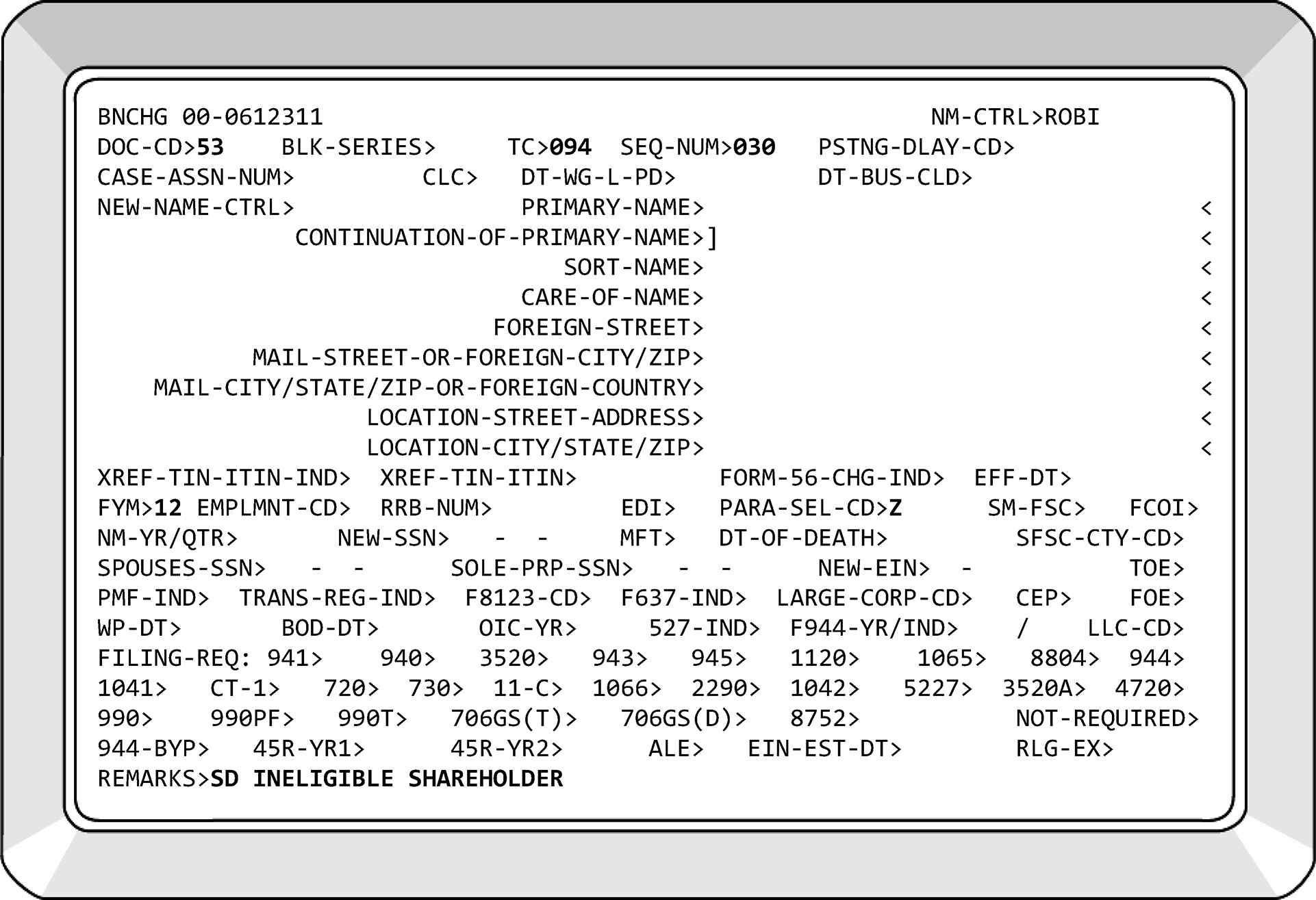
-
If the taxpayer has checked any of the boxes under Part II, Item Q - Business Purpose, prepare a duplicate and transmittal (Form 3210) and route the Form 2553 (copy) to the Chief Counsel. For purposes of election rulings, Chief Counsel represents the Commissioner's office.
-
When you prepare Form 3210, you must enter your name and phone number on the Form 3210 as a Point of Contact (POC) for Chief Counsel. Both sides of the form and all attachments must be copied for Chief Counsel. Original documents will be housed in the Chief Counsel File in Entity's clerical team.
-
Input TC 097 (unless an unreversed TC 090 is on the account). A CP 266 will generate with the posting of TC 097. If TC 097 cannot be input, advise the taxpayer of the referral via Letter 86C.
-
If the taxpayer files a Late Election request, forward the request to:
Internal Revenue Service
Associate Chief Counsel - PSI
Attn: CC:PA:LPD:DRU - Rm 5336
1111 Constitution Avenue, NW
Washington, DC 20224 -
If the taxpayer is a Fiscal Year Filer (Accounting Period Issues) forward the request to:
Internal Revenue Service
Associate Chief Counsel - ITA
Attn: CC:PA:LPD:DRU - Rm 5336
1111 Constitution Avenue, NW
Washington, DC 20224
-
-
In some instances, taxpayers who request a business purpose FYM under Rev. Proc. 2002-39 will contact Chief Counsel withdrawing their request. Chief Counsel will send a copy of their letter to the campus. When these letters are received, Form 2553 will be processed.
-
If the shareholder's year end is other than a calendar year, research using the TIN shown in Item M. If it does not agree, edit the FYM on Form 2553, Part I, Item F.
-
The Chief Counsel will send the processing site a copy of the ruling letter. When a Private Letter Ruling (PLR) is returned to the processing site, prepare the appropriate dummy document (Form 2553, Form 8716, Form 1128, etc.), see IRM 3.13.2.2 (12), BMF Entity - General, and attach the ruling letter. This will become the source document for the input of the necessary transaction code.
-
If a reply is not received from the Chief Counsel, follow-up with the Chief Counsel after 120 days. DO NOT SEND COPIES OF Form 2553. Send a memo requesting the status and listing the taxpayer's name, EIN, date sent to Chief Counsel, and the IRS received date. Route to address shown above. Or follow up telephone contact will be made by lead TE or manager:
-
For Late Election issues call ≡ ≡ ≡ ≡ ≡ ≡ ≡.
-
For Fiscal Year issues call ≡ ≡ ≡ ≡ ≡ ≡ ≡.
-
-
If the requested tax year is approved, follow processing procedures in IRM 3.13.2.22, Form 8716 - Election to Have a Tax Year Other Than a Required Tax Year. If a back-up IRC Section 444 election was made, place a large blue X on Form 8716 and attach it to the back of Form 2553.
-
If the requested tax year is denied and:
-
A back-up IRC Section 444 election was made, process Form 8716 per instructions for Form 8716.
-
If the taxpayer does not qualify for IRC Section 444, but has indicated a calendar year back-up, process Form 2553 for a calendar year.
-
If Chief Counsel denied the FYM and the corporation is not eligible for IRC Section 444 or did not choose to make an IRC Section 444 election and has not indicated a calendar year back-up, contact the taxpayer via telephone and offer FYM 12. If unable to make contact, Form 2553 will be denied.
-
-
IRS has determined that it lacks authority to grant a PLR retroactively to revoke a Subchapter S-election. Therefore, do not refer these taxpayers to Chief Counsel.
-
Effective with Forms 2553 postmarked on or after 2-1-1988, the IRS will charge a user fee when a ruling is required from Chief Counsel. Rev. Proc. 2023–1 (or its successor) advises the taxpayer not to send the payment for the user fee to the campus. In the event the taxpayer submits the payment to the campus, Receipt and Control will return the check or money order to the taxpayer with a letter of explanation (Letter 2340C). When Form 2553 is sent to Entity, it will be notated "UFR" (User Fee Returned).
-
If the taxpayer's check also included a tax payment, the full amount will be applied to his tax account because Receipt and Control will be unable to return the check or money order. The taxpayer will be notified using Letter 2340C.
-
If correspondence is received from the taxpayer requesting a refund of the user fee, forward it to BMF Accounts Management/Adjustments Operation on Form 3465, Adjustment Request.
-
Acknowledge the request with Letter 2645C.
-
Annotate Form 3465, with "2645C" and the date sent.
-
-
For current user fees, see Rev. Proc. 2022-1, or its successor.
-
The IRS can grant relief for inadvertent terminations, and inadvertent invalid elections.
-
An entity that does not meet the requirements for relief or is denied relief under Rev. Proc. 2013-30 can seek relief by requesting a Private Letter Ruling (PLR). The procedural requirements for requesting a PLR are described in Rev. Proc. 2022-1, or its successors.
-
Rev. Proc. 2013-30 allows relief for an inadvertent termination of the S-election due to actions of the QSST/ESBT. The responsible party must show the terminating event was not reasonably within the control of the corporation and was not part of a plan to terminate the election, or the fact that the event took place without the knowledge of the corporation, notwithstanding its due diligence to safeguard against such an event, tends to establish that the termination was inadvertent.
-
When a PLR is approved to allow relief for a late Sub S-election (Form 2553), or related elections, Area Counsel will forward a copy of the PLR to the Entity Departments at the campuses. Process the Form 2553/related election using the instructions in IRM 3.13.2.23 for approving Form 2553 and related elections.
-
The ruling request must be submitted to the address(s) below:
-
If the taxpayer files a Late Election forward the request to:
Internal Revenue Service
Associate Chief Counsel - PSI
Attn: CC:PA:LPD:DRU - Rm 5336
1111 Constitution Avenue, NW
Washington, DC 20224 -
If the taxpayer files a Fiscal Year Issue (Accounting Period) forward the return to:
Internal Revenue Service
Associate Chief Counsel - ITA
Attn: CC:PA:LPD:DRU - Rm 5336
1111 Constitution Avenue, NW
Washington, DC 20224
-
-
Input TC 097 (unless there is an unreversed TC 090 on the account). If TC 097 cannot be input, notify the taxpayer of the referral using Letter 86C.
-
When an approved PLR is received by the processing site, a "dummy" Form 2553 (with the PLR attached), see IRM 3.13.2.2(11), BMF Entity - General, will be prepared. This will become the source document for the input of the necessary transaction code.
-
Generally, a re-election cannot occur within five years of the termination or revocation of a prior election without requesting the Commissioner's consent. Examine the election for a letter attached from the corporation explaining the reason their request for re-election will be honored. If none is attached, return Form 2553 and ask for a letter of explanation.
-
A corporation can, without requesting the Commissioner's consent, make a new election before the five-year period expires if the termination occurred, because the corporation:
-
Revoked its election effective on the first day of the first tax year for which its election was to be effective; or
-
Failed to meet the definition of a small business corporation on the first day of the first tax year for which its election was to be effective.
-
-
For re-elections requiring the consent of the Commissioner, (i.e., (2)(a) or (2)(b) above do not apply), and the taxpayer is requesting a PLR:
-
Forward a copy of the letter with a copy of the Form 2553 to Chief Counsel. Maintain the originals in a file; do not suspend. The request will be sent to the following address:
Internal Revenue Service
Associate Chief Counsel - PSI
Attn: CC:PA:TC:RU - Rm 6561
1111 Constitution Avenue, NW
Washington, DC 20224 -
Indicate on the transmittal, "Consideration of Request for Subchapter S Re-election" and indicate to whom and to which campus the Chief Counsel will reply. (Subject to user fee. See Internal Revenue Bulletin IRB 2021-1.)
-
-
The complex nature of IRC 1361, IRC 1362, and Form 2553 generates correspondence and inquiries from taxpayers. All correspondence related to Form 2553 that required a transaction be input on the account, will be associated with posted Form 2553 (TC 090 or TC 094) when resolved.
-
If taxpayer correspondence questions the effective date or requests an earlier effective date, research IDRS and request Form 2553 via CC ESTAB to determine if a discrepancy exists. Since Entity does not suspend documents, it is imperative that the TE monitor their ESTAB requests to avoid over aged documents within batches. Complete Form 2275, Records Request, Charge and Recharge, if document is not received after three timely requests.
-
Determine if the effective date was transcribed correctly.
-
If the effective date was transcribed correctly, advise the taxpayer via Letter 385C. The effective date on Form 2553 is used to determine the timeliness of the election.
-
If the taxpayer wants an earlier effective date, ask for a completed Form 2553, including all statements required by Rev. Proc. 2013-30.
-
-
If effective date was transcribed incorrectly:
-
Input TC 092 to reverse the TC 090.
-
Include in Remarks field: "Correcting Effective Date" or similar remark.
-
Input the TC 090 with PDC and PSC - Z.
-
Advise the taxpayer of the action via Letter 385C.
-
-
Late replies to Letter 312C will be advised that reasonable cause must be established to appeal. Approve the taxpayer's request if one of the following conditions are met:
-
Official IRS Date Stamp (timely filed) present on complete Form 2553,
-
Taxpayer provides IRS Acceptance Letter,
-
IRS error (for example, lost, mis-routed, mailed election with another form/document and election was not detached, etc.), or
-
CP 261 and/or a certified receipt from the Post Office.
Note:
If Form 2553 is not attached with the correspondence, call the taxpayer requesting the completed Form 2553 via fax. Ask taxpayer to fax complete Form 2553 within 48 hours. Make two attempts to call taxpayer. If complete Form 2553 is not received within two days, consider the case closed. Prepare "dummy" Form 2553 for input of TC 094. Remember, if a TC 094 is already present, it must be reversed with a TC 092 before another TC 094 can be input.
-
-
If a late reply to a Letter 312C is received during the current tax year and the Form 2553 is complete, approve the election.
-
If correspondence is received requesting reconsideration of our denial of "reasonable cause" or the taxpayer states Form 2553 was filed timely without the proper documentation, or replied to Letter 312C timely, research the case. If follow-up research indicates the election will be approved, then do so following normal procedures. If research supports the denial of the taxpayer’s S-election, notify the taxpayer that their request has been reconsidered but their request is being denied. Include the reason(s) the election is being denied. Correspondex Letter 326C will be used.
-
If the Chief, Examination Division or appropriate office from the area office or the campus, submits a memorandum to the Chief, Document Perfection Operation, instructing Entity to allow the S-election, approve it. If Form 2553 is not included, contact the taxpayer per NOTE shown in (3) above.
-
Please follow IRM 3.13.2.23.4.1, Replies to Rev. Proc. 2013-30 Correspondence, for responses to our inquiries regarding Rev. Proc. 2013-30 received within the same processing year.
-
Entity will receive correspondence from taxpayers stating their Subchapter S-election is invalid for one of the following reasons:
-
The entity was not incorporated on the day the Subchapter S-election became effective,
-
All shareholders did not sign Form 2553 or authorize the election, or
-
One or more of the shareholders is a Non-Resident Alien.
This is not a revocation or termination, but an invalid election. Research must be performed to validate taxpayer’s claim.-
Input TC 092 with NSD-TheReasonTheElectionIsInvalid in the Remarks Field of CC BNCHG.
-
Send Letter 326C telling taxpayer the specific dates for which Form 1120 must be filed. An example of language that can be used follows:
Thank you for notifying us your Subchapter S-election was invalid when filed. We have updated our records to show you are not an S corporation. -
Associate taxpayer's correspondence with TC 090 DLN.
Reminder:
If a deemed Entity Classification Election is present (TC 07X and TC 090 with the same effective date), reverse TC 074 with TC 075 or reverse TC 076 with TC 077 using the same BNCHG Remarks as the TC 092. If the TC 076 has a prior date to the TC 090 and research indicates it was a stand-alone Entity Classification Election and not a DEEMED 8832, do not reverse.
-
-
Correspondence will be received from the taxpayer stating their Form 2553 was filed in error. The taxpayer can cite various reasons for the mis-handled election: upon incorporation, the document was completed but attorney filed without taxpayer's knowledge, CPA filed without taxpayer's knowledge, etc. Once an election has been approved, it will be reversed only by a valid revocation or termination. If the taxpayer provides valid statement of revocation or termination, input TC 091 or 096 based on statement provided by taxpayer. See IRM 3.13.2.23.15, Revocation of an S-Election, and IRM 3.13.2.23.17, Termination of S-Election. If taxpayer does not provide valid revocation/termination, send Letter 385C explaining election is valid until revoked/terminated.
-
To revoke an election, the corporation files a statement that the corporation revokes the election made under IRC 1362(a). The revocation statement must include the number of shares of stock (including non-voting stock) issued and outstanding at the time the revocation is made. A revocation can be made only with the consent of shareholders who, at the time the revocation is made, hold more than one-half of the number of issued and outstanding shares of stock (including non-voting stock) of the corporation. Each shareholder who consents to the revocation must consent in the manner required. In addition, each consent will indicate the number of issued and outstanding shares of stock (including non-voting stock) held by each shareholder at the time of the revocation. In addition to the information required above, each shareholder must provide the following for
Completeness:-
Name of the shareholder.
-
Address of the shareholder.
-
Taxpayer identification number of the shareholder.
-
The number of shares of stock owned by the shareholder.
-
The date (or dates) on which the stock was acquired.
-
The date on which the shareholder's taxable year ends.
-
The name of the S corporation.
-
The S corporation's EIN.
-
The election to which the shareholder revokes.
-
The statement must be signed by the shareholder under penalties of perjury.
-
Signature and consent of shareholder(s) who collectively own more than 50 percent of the number of issued and outstanding stock of the corporation, (whether voting or non-voting).
-
Indication of the tax year (or prospective date).
-
Signature of person authorized to sign return.
-
-
Prospective Date - Revocations specifying a prospective revocation date. If a corporation specifies a date for revocation and the date is expressed in terms of a stated day, month, and year that is on or before the date the revocation is received, the revocation is effective on or after the date so specified.
-
A Prospective Date is any date other than the first day of the taxpayer's tax year.
-
A Prospective Date revocation must be received (postmarked) by the requested effective date.
-
A revocation can occur when an authorized person files a statement of revocation and has written consent of the shareholder(s) who own more than 50 percent of the number of issued and outstanding shares of the corporation (including non-voting stock).
-
All revocations received in the Entity Clerical Team require input of TC 095 on the 15th day if the revocation has not been processed. This transaction code will provide a researcher with information that a revocation (or termination) is in Entity but has not received a determination. Care will be taken to input TC 095 on the correct EIN.
-
The statement of revocation will be examined for timeliness and completeness.
-
Timeliness - Research for the FYM. Compare the FYM to the postmark date of the statement of revocation. The revocation must be filed by the 15th day of the third month of the tax year for which it is requested to be effective. See table below.
BMF FYM on CC ENMOD 12 Postmark Date 03-04-2026 Requested Effective Date
(First day of tax year/period)01-01-2026 -
Saturday, Sunday, or a legal holiday - If the 15th day of the third month of the tax year for which it is requested to be effective falls on Saturday, Sunday, or a legal holiday, the filing is considered timely on the next succeeding day which is not a Saturday, Sunday, or a legal holiday. See IRC 7503 .
-
If the revocation is filed after the 75th day of the first day of the tax year for which it is requested, but before the 76th day of the following tax year, the revocation will be made effective for the first day of the following year. If the revocation is filed after the 76th day of the following tax year, deny the request and return to the taxpayer with an explanation of denial. See the table below.
BMF FYM on CC ENMOD 12 Postmark Date 10-16-2026 Requested Effective Date 01-01-2026 -
The taxpayer can request a revocation for a Prospective Date. A prospective date is a date after the first day of the tax year. A timely Prospective Date Revocation must be postmarked on or before the effective date requested. See table below.
-
If the revocation is filed late for the requested date, make it effective for the first day of the following tax year.
-
A corporation can request a "prospective date" in the year which will cause two short tax years. The corporation will then be required to file a Form 1120-S for the period that it was an S corporation, and a Form 1120 for the period following the revocation as a "C" corporation.
BMF FYM on CC ENMOD 12 First day of Tax Year 01-01-2026 Postmark Date 09-14-2026 Requested Prospective Date 10-01-2026 BMF FYM on CC ENMOD 12 First day of Tax Year 01-01-2026 Postmark Date 10-29-2026 Requested Prospective Date 10-01-2026
-
-
If the entity is an LLC and their revocation is timely filed, the classification election will remain an association taxable as a corporation per Treasury Regulation 301.7701-3(c)(1)(v)(C).
-
If the revocation is requested for the last day of a month, input the TC 091 effective the first day of the next month.
Example:
Statement of revocation asks for the effective date June 30, we will input the TC 091 effective July 1, with BK 95 if applicable. The computer programming reads the month and year of the TC 091, so when the taxpayer’s final Form 1120S for the tax period ending June 30th is filed, it will not go unpostable.
-
If the revocation is incomplete, return to the taxpayer using an appropriately worded letter for the missing information. Ensure the letter is not used for another specific purpose. For example, Letter 147C, Letter 696C, Letter 1997C, etc. Input a TC 092 if the account shows a previously input TC 095. When the reply is received, examine for timeliness and completeness using the postmark date of the original request. If complete, proceed to IRM 3.13.2.23.16, Processing the Revocation.
-
Research for EIN, FYM, FRC, TC 090 posting, and latest TC 150-MFT 02. If the revocation is timely and complete, approve it. If there is an unreversed TC 090 present, and the "Final" Form 1120-S is posted:
-
Input TC 091 and the effective date.
-
Input the name of the entity in the Remarks Field.
-
Associate the revocation with the TC 090 DLN.
-
A CP 262 will be generated to notify the taxpayer of the revocation of S status.
-
If the revocation was made during the first 6 months of the taxable year, and prior liability is indicated, input TC 091 with BK 95.
-
-
If the "Final" Form 1120-S has not posted:
-
Input TC 091, Blocking series 95 (BK95), and the effective date.
-
Input the name of the entity in the Remarks Field.
-
Associate the revocation with the TC 090 DLN.
-
A CP 262 will be generated to notify the taxpayer of revocation of S status.
-
-
If a TC 090 is not posted, Form 1120-01 FRC is present, and Doc Code 09, 10, or 11 returns are posted to MFT 02 modules, send Letter 326C notifying the taxpayer they don't have an S-election.
-
If a TC 090 is not posted, Form 1120-01 FRC is present, and Doc Code 16 returns are posted to MFT 02 modules, see IRM 3.13.2.23 (3):
-
Prepare a "Dummy" Form 2553,
-
Attach revocation statement to Form 2553,
-
Input TC 090, PSC - Z, etc.,
-
Input TC 091, PDC 1, etc., and
-
If the revocation was made during the first 6 months of the taxable year, and prior liability is indicated, input TC 091 with BK 95.
-
-
If the request for reversal/rescission of a revocation is made before the effective date of the revocation, grant the taxpayer's request:
-
Prepare Dummy Form 2553,
-
Input TC 090 for the original effective date and FYM, allowing CP 261 to generate, and
-
Attach the taxpayer's request and current IDRS prints of CC ENMOD to Dummy Form 2553.
For example:-
Master File reflects TC 091 effective 01-01-2024,
-
Correspondence received 10-29-2023 requesting to withdraw/rescind revocation.
Request received prior to effective date of revocation; therefore, request will be honored. -
-
If the request for reversal/rescission of a revocation is made after the effective date of the revocation, deny the taxpayer's request by sending Letter 326C.
For example:-
Master File reflects TC 091 effective 10-01-2024,
-
Correspondence is received 10-29-2024 requesting to withdraw/rescind revocation.
Request not received prior to revocation date; therefore, request will not be honored. -
-
An S-election is terminated when:
-
The corporation’s shareholders revoke the 1362(a) election under IRC 1362(d)(1),
-
The corporation ceases to be a small business corporation under IRC 1361(d), or
-
The corporation has excess passive investment income under IRC 1362(d)(3).
The termination is effective on the day the corporation ceases to be eligible for S status. All terminations require the input of TC 095 on the 15th day if the termination has not been processed. This transaction code will provide a researcher with information that a termination is in house but has not yet been processed. -
-
The following conditions automatically terminate a Subchapter S-election:
-
No longer a domestic U.S. corporation.
-
Became a member of an affiliated group.
-
Issued a second class of stock.
-
Has more than 100 shareholders.
-
Has an ineligible shareholder.
-
Has a non-resident alien as a shareholder.
-
Three consecutive years of passive income (rental income, interest income, etc.).
-
-
If an LLC made a Subchapter S-election and then chooses to revert to their initial classification, their S-election terminates. The request must be received by the due date of their initial S corporation tax return. Please see IRM 3.13.2.27.10(7), Request to Withdraw Classification Election, for account actions.
-
If an LLC made a Subchapter S-election and then chooses to convert or reorganize to their initial classification, their S-election terminates. The following action will be taken:
-
Input a TC 077 to reverse the original TC 076 or TC 075 to reverse TC 074.
-
Input a TC 096 using the effective date from the new Form 8832. Enter a BK 95 when inputting the TC 096 if the taxpayer owes a final Form 1120-S. If notification is received via correspondence from the taxpayer, use the IRS received date of the correspondence as the TC 096 effective date.
-
Input TC 016 to add default filing requirement, if needed.
-
-
To be considered COMPLETE, the termination will contain the following:
-
Cause of termination and the date of the terminating event, and
-
Signature of the person authorized to sign a return.
-
-
If the termination is INCOMPLETE, return it to the taxpayer for missing information. Input TC 092 if a TC 095 has been previously input.
-
If the Subchapter S-election is accidently terminated by the input of TC 096, re-input a TC 090 which will go UPC 339. Close the UPC 339 with URC 0. See IRM 3.13.222.87, Unpostable Code (UPC) 339 Reason Code (RC) 1.
-
Process the complete termination as follows:
-
If an unreversed TC 090 is present and a "Final" Form 1120-S posted, input TC 096 and the effective date.
-
If the "Final" Form 1120-S has not posted, input TC 096, the effective date, and BK 95 (prior liability).
-
Input the name of the entity and reason for the termination in the Remarks Field as shown in Figure 3.13.2-42. This step is vital to the audit trail.
-
Associate the termination with the TC 090 DLN.
-
A CP 265 will be generated to notify the taxpayer of termination of S status.
Note:
A termination is effective the day the corporation ceases to qualify as an S corporation. This can cause two short tax years. The corporation will be required to file Form 1120-S for the period the corporation was an S corporation, and Form 1120, as a "C" corporation, for the period following the termination.
-
If the effective date is before 1958, input TC 016 to change the Form 1120-S FRC to a Form 1120 FRC. See IRM 3.13.2.23 (3).
-
-
If a TC 090 is not posted, Form 1120-01 FRC is present, and Doc Code 16 returns are posted to MFT 02 modules:
-
Prepare a "Dummy" Form 2553, see IRM 3.13.2.2 (12), BMF Entity - General.
-
Attach statement of termination to Form 2553.
-
Input TC 090, PSC - Z, etc.
-
Input TC 096, PDC 1, allowing CP 265 to generate.
-
If the termination occurred during the first 6 months of the taxable year, and prior liability is indicated, input TC 096 with BK 95.
-
See IRM 3.13.2.23 (3).
-
-
Paragraph Selection Code (PSC) - Z will be used whenever a CP notice does not contain the proper language and must not be generated to the taxpayer. Notify the taxpayer with Letter 326C, if necessary.
-
If the taxpayer is an LLC, a termination of the Subchapter S-election does not impact the Entity Classification Election, regardless of whether the taxpayer filed Form 8832, or the election was deemed to have been made. The taxpayer’s classification will remain an association taxable as a corporation per Treasury Regulation 301.7701-3(c)(1)(v)(C).
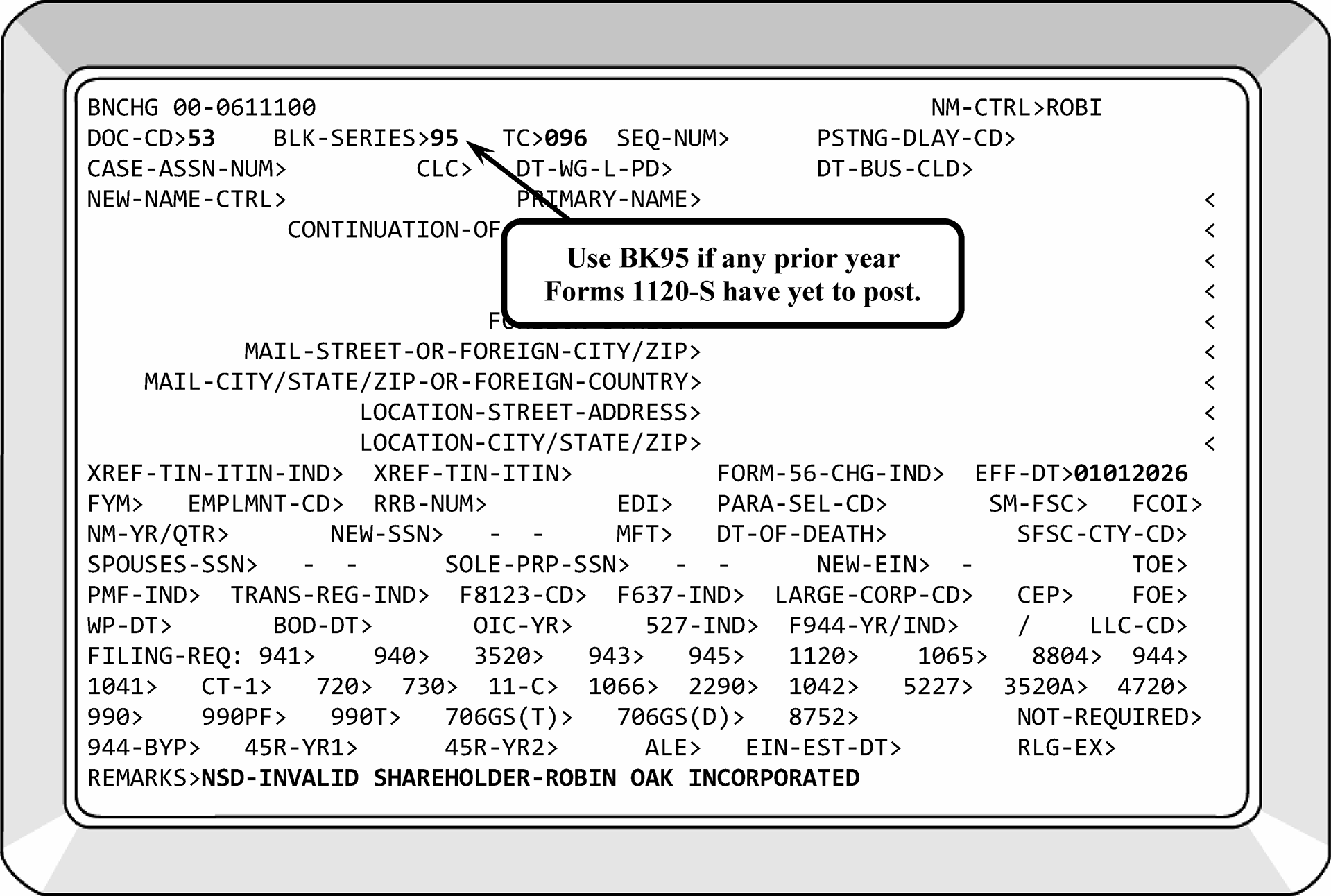
-
The following are the transaction codes used when processing Qualified Subchapter S Trusts (QSSTs) and Electing Small Business Trusts (ESBTs). All are input with Document Code "53" :
-
TC 100 - Acceptance of Qualified Subchapter S Trust (QSST).
-
TC 101 - Revocation of Qualified Subchapter S Trust (QSST).
-
TC 102 - Acceptance of Electing Small Business Trust (ESBT).
-
TC 103 - Revocation of Electing Small Business Trust (ESBT).
-
-
An EIN cannot contain multiple TCs 100 or 102 unless first reversed by a TC 101 and TC 103 respectively.
-
Neither election can be revoked without the permission of the Commissioner, via Chief Counsel.
-
A QSST is a trust whose beneficiary has elected to have the trust treated as a grantor trust. Thus, the trust is an eligible shareholder of an S corporation. The QSST election does not qualify the corporation as an S corporation eligible to file a Form 1120-S. The corporation must still submit a completed Form 2553. See Figure 3.13.2-43.
-
All the income (within meaning of IRC 643(b)) must be distributed (or required to be distributed) to 1 individual who is a citizen or resident of the United States (but see Note below), and whose terms require that:
-
During the life of the current income beneficiary there shall be only one income beneficiary of the trust (but see Note below).
-
Any asset of the trust distributed during the life of the current income beneficiary can be distributed only to that beneficiary.
-
The income interest of the current income beneficiary in the trust shall terminate on the earlier of the beneficiary's death or the termination of the trust.
-
Upon termination of the trust during the life of the current income beneficiary, the trust shall distribute all its assets to the beneficiary.
Note:
If the trust has more than one beneficiary, contact the trustee and ask the following two questions, as applicable:
a. Does the trust qualify to be an Electing Small Business Trust (ESBT)? If it does, secure the necessary documentation and process in accordance with IRM 3.13.2.23.22 , Electing Small Business Trust (ESBT.
b. If the trust does not qualify as an ESBT, does the trust have substantially separate and independent shares for each beneficiary? See IRC 1361(d)(3) and IRC 663(c) (treating a single trust that has more than one beneficiary as being a separate trust for each beneficiary if the trust holds shares that are substantially separate and independent). If the trust has substantially separate shares for each beneficiary, then process in accordance with IRM 3.13.2.23.20 (4) and apply the requirements to each beneficiary. If the trust does not have substantially separate and independent shares for each beneficiary, then process in accordance with IRM 3.13.2.23.17, Termination of S-Election. -
-
To make the election to be a QSST, the beneficiary (or their legal representative) must submit a statement. The statement must:
If one of the preceding items is missing, research IDRS as applicable before corresponding with the trust using Letter 312C.-
Contain the name, address, and taxpayer identification number of the beneficiary, the trust and the S corporation.
-
Identify the election as an election under IRC 1361(d)(2).
-
Specify the date the election is to become effective (no earlier than 2 months and 15 days before the date on which it is filed).
-
Provide the date or dates the stock was transferred to the trust.
Part III of the Form 2553 allows the trust to include the QSST election. The QSST and Form 2553 corporation election can have the same effective date. -
-
The filing period for a QSST election:
-
When S corporation stock is transferred to a trust, or when C corporation stock is transferred to a trust with an S-election pending (for example, S-election made but not yet effective), the QSST election must be made within 2 months and 15 days after the stock transfer.
-
When C corporation stock is transferred to a trust, and the C corporation makes an S-election effective the first day of the tax year in which the S-election is made, the QSST election must be made within 2 months and 15 days after the S-election is effective.
-
When C corporation stock is transferred to a trust, and the C corporation makes an S-election effective the first day of the tax year following the tax year in which the S-election is made, the QSST election must be made within 2 months and 15 days after the S-election is made.
-
If a testamentary trust:
• Is a permitted shareholder under IRC 1.1361(h)(1)(iv),
• Satisfies the requirements of a QSST, and
• Intends to become a QSST.
Then the QSST election can be filed at any time, but no later than the end of the two month, 16-day period beginning the day after the end of the 2-year period in which the trust is part of the estate.
-
-
Follow the chart below for processing.
If... Then... A) The QSST meets all the above requirements, Input a TC 100 (using Doc Code 53) on the trust, a CP 288 will generate to notify the taxpayer their QSST election has been approved. B) The taxpayer requests an EIN for their QSST without a completed Form SS-4, Correspond for a completed SS-4. Do not assign EIN to QSST without Form SS-4. C) The taxpayer states on the QSST, EIN applied for, Research for an assigned EIN and add it to the QSST. D) An EIN has not been assigned, Correspond for a completed SS-4. E) The taxpayer states an EIN is not necessary, -
Do not assign an EIN, send a Letter 385C informing the taxpayer their QSST election has been approved.
-
Attach the documentation to the DLN of the TC 090 (Form 2553).
F) It is determined the QSST is not timely filed (The effective date is the date the stock was transferred to the trust), -
Contact the taxpayer by phone and inform them of Rev. Proc. 2013-30. See IRM 3.13.2.23.21, Timeliness of a QSST. Instruct the taxpayer to fax the necessary information to you.
-
If unable to contact the taxpayer, input TC 096 on the EIN of the S corporation. Suppress CP 265 and send Letter 326C explaining the late QSST election terminates the S-election. Associate QSST request with TC 090 DLN.
-
-
If review of the QSST election and research show the trust does not qualify as a QSST, the S corporation now has an invalid shareholder. See IRM 3.13.2.23.17, Termination of S-Election.
-
If the trust has made a prior QSST election (posted TC 100 on EIN), do not reverse the TC 100. Send Letter 385C to trust informing them the QSST has been approved. Associate QSST with DLN of posted TC 090 on corporation's EIN.
-
Revocation of the election - The election cannot be revoked without the permission of the Commissioner via Chief Counsel. An application for consent to revoke must contain:
If any of the information is missing, correspond with the taxpayer.-
The name, address, and taxpayer identification number of the current income beneficiary, trust, and S corporation identified in the election;
-
An indication that the election is being revoked as an election under IRC 1362(d)(2); and
-
An explanation of why the current income beneficiary seeks to revoke the election.
Route the complete request to Chief Counsel on Form 3210. ATTN: CCPSI. See IRM 3.13.2.23.10, Chief Counsel Referrals.
Once the taxpayer’s request for revocation of QSST election is approved, input a TC 101 (Doc Code 53) on the trust EIN. A CP 292 will generate to notify the taxpayer of the revocation. Attach the documentation to the DLN of the TC 090( Form 2553). -
-
If correspondence is received from the taxpayer stating they never applied to be a QSST, ESTAB the DLN of the TC 090 to review attachments.
-
If verification is not attached, input TC 101 to reverse the election and send Letter 326C to the taxpayer. The following will be entered in the Remarks field: TAXPAYER DID NOT REQUEST QSST.
-
If verification is attached, send Letter 385C informing taxpayer that the election is valid.
-
-
Rev. Proc. 2013-30 provides relief for inadvertent invalid S-elections and inadvertent terminations resulting from the failure of the beneficiary of the trust holding S corporation stock to timely file a QSST election under IRC 1361(d)(2). Please see IRM 3.13.2.23.17(7) if the S-election was previously terminated in error.
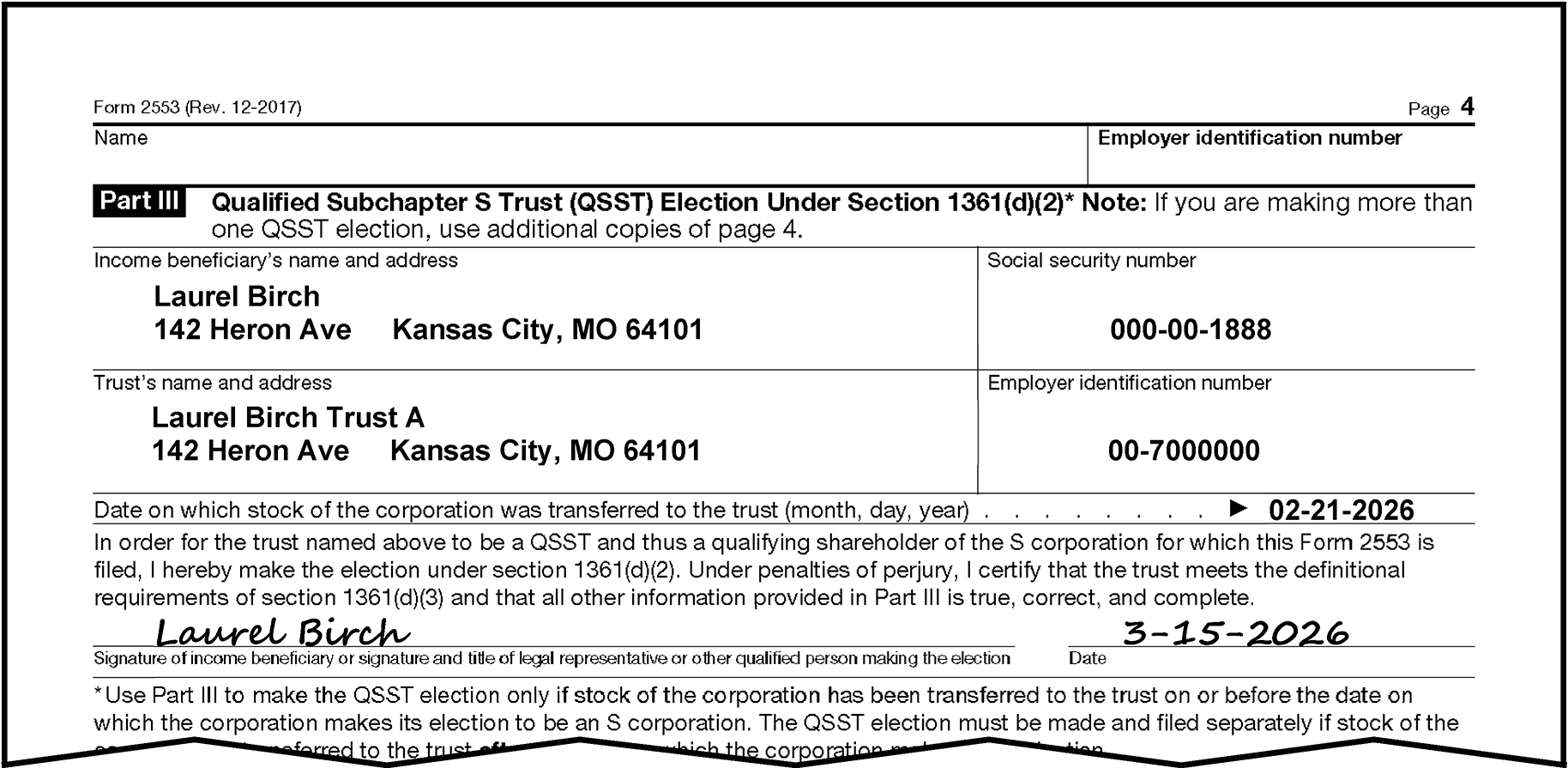
-
Timeliness - Examine the statement for timeliness by comparing the effective date with the received date stamp or the postmark on the envelope, whichever is earlier. Consider the statement timely if it was filed any time during the applicable 2 months and 15 days and continue processing. See Figures 3.13.2-44, 3.13.2-45 and 3.13.2-46.
Note:
The following flowcharts can be used in processing QSST elections. The flowcharts are in two categories. The first two are for determining the filing period and the other is used for determining the validity of the QSST and S-elections.
-
If a QSST election is filed before the corporate election, the QSST election will be returned to the beneficiary. Advise them that a Form 2553 has not been submitted by the corporation. Request the QSST election be resubmitted with the Form 2553 when filed by the corporation.
-
If the QSST election is filed before the transfer of stock, the election is invalid until the stock is transferred. Return the election to the trust and advise the beneficiary of the proper time frame for filing the election.
-
-
If the stock is transferred to the trust after the corporate election, determine the applicable 2 months and 15-day period. If the QSST election is before the applicable 2 months and 15-day timeliness period, correspond with the taxpayer.
-
If the stock is transferred before the corporate election, determine the applicable 2 months and 15 days.
-
Rev. Proc. 2013-30 provides relief for a late filed QSST and/or an inadvertent termination due to an untimely QSST. The request for relief must contain:
-
The signature of the beneficiary of the QSST on the election form;
-
A statement from the trustee that the trust satisfies the QSST requirements of IRC 1361(d)(3); and
-
Statements from all shareholders during the period between the date the S corporation election was to have become effective and the date the completed Election Form is filed that they have reported their income on all affected returns consistent with the S corporation election for the year the election is requested and for all subsequent years.
-
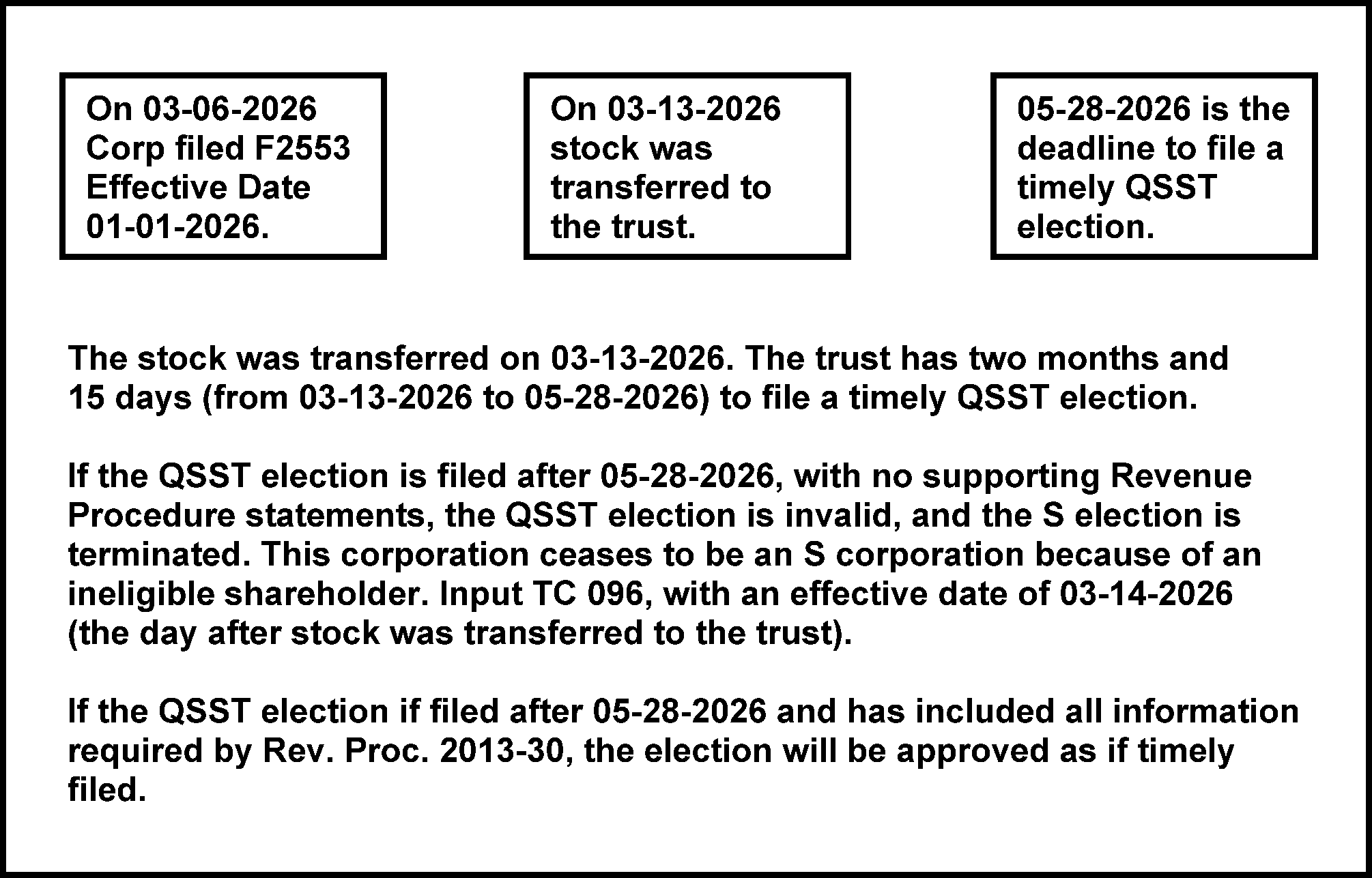
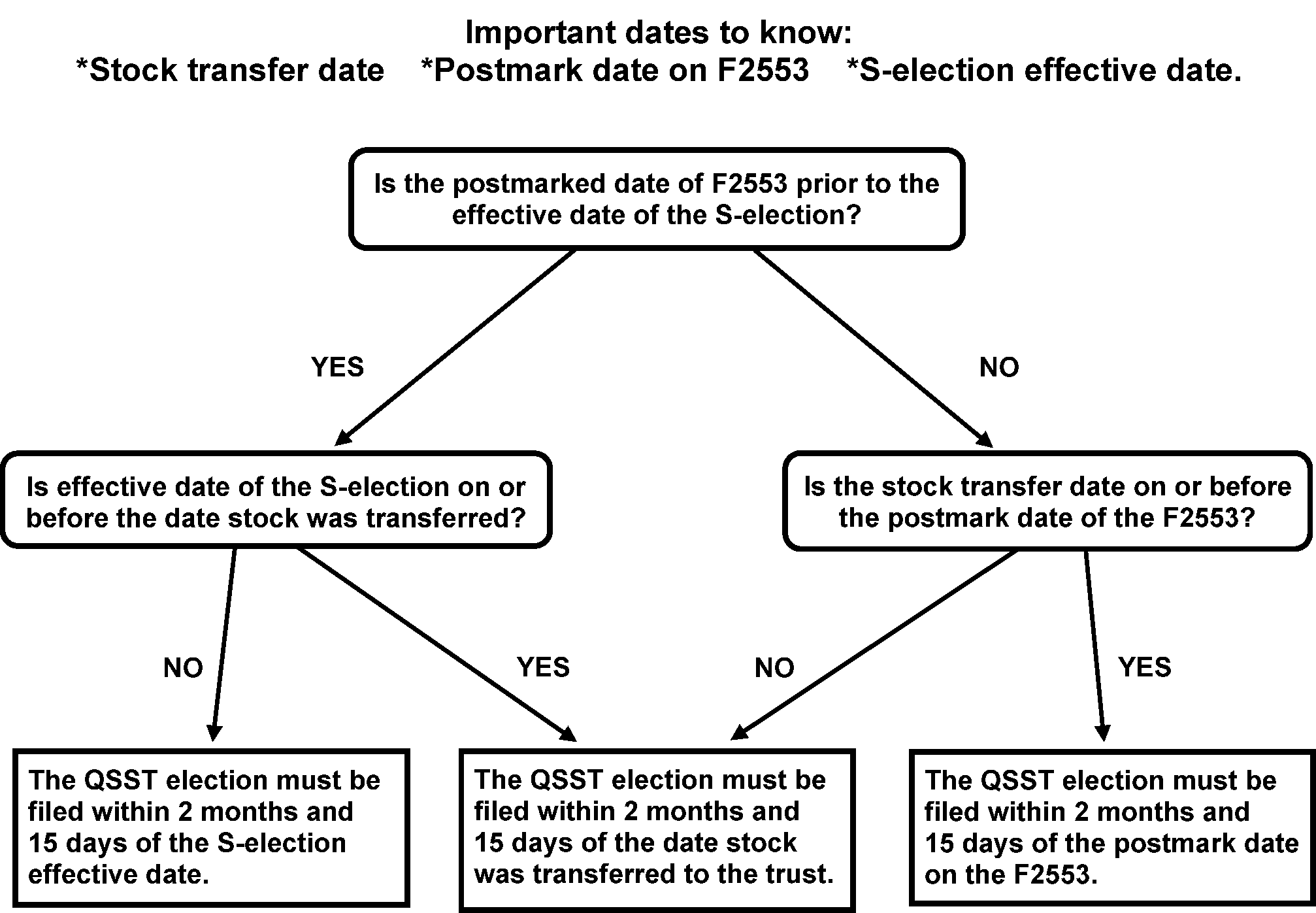
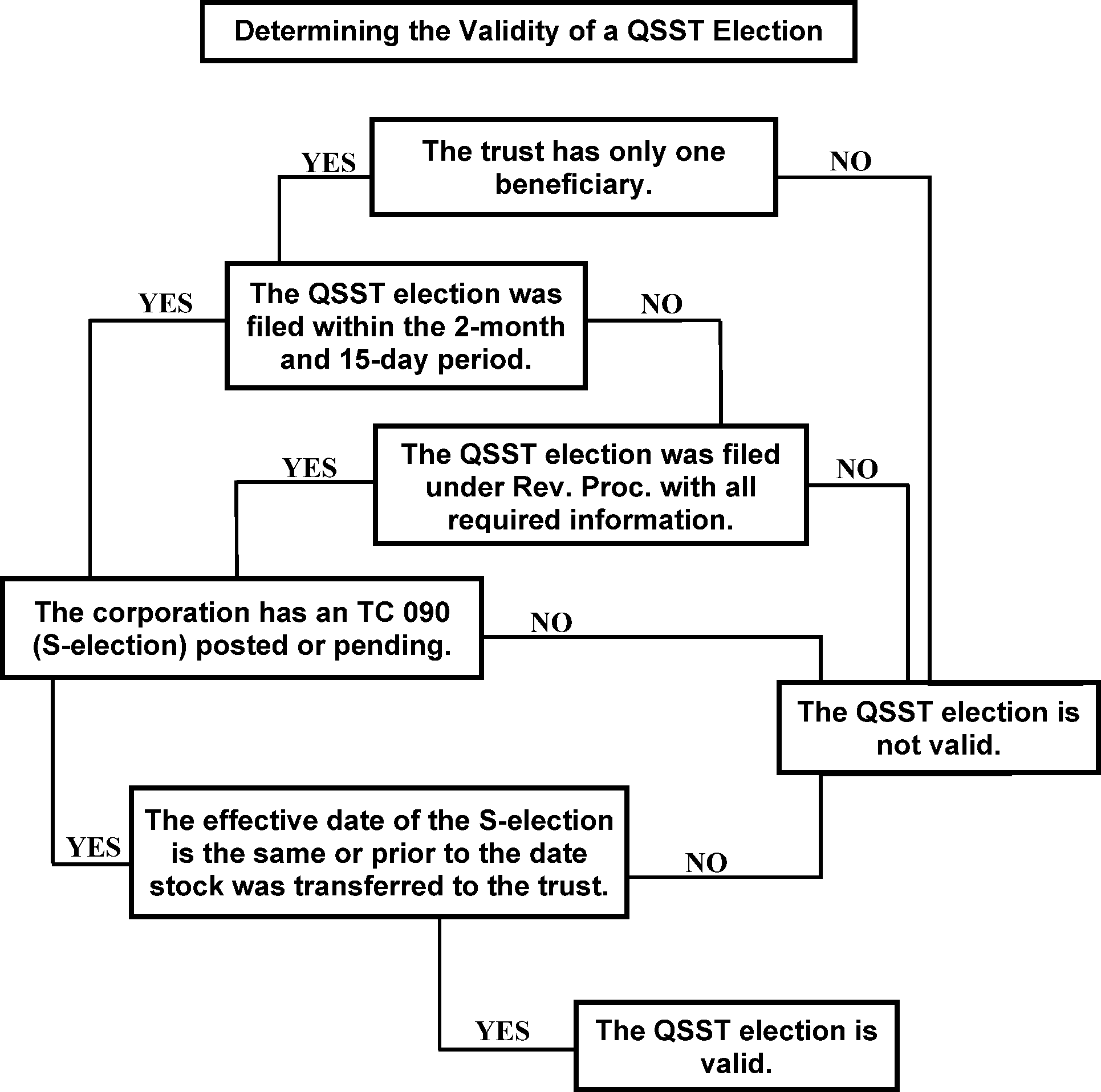
-
An electing small business trust (ESBT) within the meaning of IRC 1361(e) is treated as two separate trusts for purposes of chapter 1 of the Internal Revenue Code. The portion of an ESBT that consists of stock in one or more S corporations is treated as one trust. The portion of an ESBT that consists of all the other assets in the trust is treated as a separate trust. The grantor or another person can be treated as the owner of all or a portion of either or both such trusts under subpart E, part I, subchapter J, chapter 1 of the Internal Revenue Code. The ESBT is treated as a single trust for administrative purposes, such as having one taxpayer identification number and filing one tax return.
-
The portion of the ESBT that owns stock in an S-corporation is called the S portion of the trust.
-
The ESBT election will be signed by the trustee. If they are also making an S corporation election, the consent to the Form 2553 will also be signed by the trustee.
-
The ESBT election can be made on a separate statement and will:
If election is incomplete, use Letter 312C to request missing information.-
Contain the name, address, and taxpayer identification number of all potential/current beneficiaries, the trust, and the corporation. For ESBT elections made after December 31, 2017, a non-resident alien individual is allowed to be a potential current beneficiary of an ESBT. For a non-resident alien potential current beneficiary not otherwise required to have a taxpayer identification number for U.S. tax purposes, no such number is required for a valid ESBT election;
-
Indicate the election is made under IRC 1361 (e)(3);
-
Specify the date on which the election is to become effective (not earlier than two months and 15 days before the date in which the election is filed); and
-
Specify the date (or dates) on which the stock of the corporation was transferred to the trust.
-
-
The deadline for the ESBT election is the same as that of the QSST election. The general deadlines are as follows:
-
If the effective date is not timely or is missing, use the date the S corporation stock was transferred to the trust.
-
For new S corporations, the ESBT election is generally due within 2 months and 15 days beginning on the first day the corporation's S-election is effective.
-
-
Rev. Proc. 2013-30 provides relief for a late ESBT. The request for relief must contain the following:
-
The trustee of the ESBT must sign the election form;
-
A statement from the trustee that all potential current beneficiaries meet the shareholder requirement of IRC 1361(b)(1) other than the requirement to make an ESBT election; and
-
Statements from all shareholders during the period between the date the S corporation election was to have become effective and the date the completed Election Form is filed that they have reported their income on all affected returns consistent with the S corporation election for the year the election is requested and for all subsequent years.
-
-
If all the required data has been verified, input a TC 102 (Doc Code 53) on the trust EIN. A CP 290 will generate to notify the taxpayer of our approval of their ESBT. Attach the documentation to the DLN of the TC 090 (Form 2553). Multiple TCs 102 cannot be input on same EIN without reversing initial TC 102.
-
If review of the ESBT election and research show the trust does not qualify as an ESBT, the S corporation now has an invalid shareholder. Attempt phone contact with T/P to inform them of Rev. Proc. 2013-30. If unable to reach T/P, Input TC 096, PSC - Z. Send Letter 326C to explain an invalid ESBT terminates the S-election. IRM 3.13.2.23.17, Termination of S-Election. Please see IRM 3.13.2.23.17 (7) if the S-election was terminated in error.
-
Revocations of ESBT elections can only be approved by Chief Counsel/National Office. If the request for a revocation of an ESBT election is approved, input a TC 103 (Doc Code 53) on the trust EIN. A CP 291 will generate to notify the taxpayer of the revocation. Attach the documentation to the DLN of the TC 090 (Form 2553).
-
If correspondence is received from the taxpayer stating they never applied to be an ESBT, ESTAB the DLN of the TC 090 to review attachments. If verification is not attached, input a TC 103 to reverse the election and correspond with the taxpayer. Remarks field will be "T/P DID NOT REQUEST ESBT." If verification is attached, send Letter 385C informing taxpayer that the election is valid.
-
If the trust has made a prior ESBT election (posted TC 102 on EIN) for a different corporation's Subchapter S-election, do not reverse the TC 102. Send Letter 385C to trust informing them the ESBT has been approved. Associate ESBT with DLN of posted TC 090 on corporation's EIN.
-
If a revocation is received from the trust and IDRS reflects multiple ESBT elections, do not input a TC 103. Send Letter 326C (or other appropriate letter) notifying trust the revocation has been processed.
-
IRC 1361 requires that both a Qualified Subchapter S Trust (QSST) and an Electing Small Business Trust (ESBT) obtain Chief Counsel’s approval before the trusts can revoke their respective elections. Rev. Proc. 98-23 provides automatic consent of Chief Counsel to revoke a QSST election when a QSST elects to be an ESBT. Similarly, the revenue procedure provides automatic consent of Chief Counsel to revoke an ESBT election when an ESBT elects to be a QSST.
-
The following conditions must exist for automatic conversion:
-
The trust must qualify as both a QSST and an ESBT.
-
The trust has not elected to convert from an ESBT to a QSST (or from a QSST to an ESBT) within the 36 months before the Proposed effective date of the current conversion.
-
-
Conversion requests will include:
-
A statement indicating "Attention Entity Control - Conversion of a QSST to an ESBT (or an ESBT to a QSST) pursuant to Rev. Proc. 98-23."
-
For either election, both the current income beneficiary and the trustee must sign the election. Otherwise, the election changing from a QSST to ESBT will follow normal ESBT election procedures. If the election is changing from an ESBT to a QSST, follow normal QSST election procedures.
-
-
If any of the information is missing, correspond sending a Letter 312C or another letter as appropriate to the taxpayer. Inform the taxpayer to respond within 30 days from the date of the letter or the request will not be processed.
-
The election can specify any effective date that is not more than two months and 15 days before the date on which the election is filed and not more than 12 months after the date on which the election is filed.
-
If an election specified an effective date more than two months and 15 days before the election is filed, then the election is still valid, but it will be effective two months and 15 days before it is filed.
-
If an election specifies an effective date more than 12 months after the date it is filed, then the election is still valid, but it will be effective 12 months after it is filed.
-
-
When you approve the taxpayer's request to convert its QSST to an ESBT, input a TC 101 (Doc Code 53) on the trust EIN to revoke the QSST election, (suppress the notice PSC - Z), input a TC 102 (Doc Code 53, cycle appropriately) on the trust EIN. A CP 290 will generate to notify the taxpayer of our approval of the ESBT. Attach the documentation to the DLN of the TC 090 (Form 2553).
-
When you approve the taxpayer's request to convert its ESBT to an QSST, input a TC 103 (Doc Code 53) on the trust EIN to revoke the ESBT election, (suppress the notice PSC - Z), input a TC 100 (Doc Code 53, cycle appropriately) on the trust EIN. A CP 288 will generate to notify the taxpayer of our approval of the QSST. Attach the documentation to the DLN of the TC 090 (Form 2553).
-
If an Entity reorganizes/converts at the state level and maintains the same structure (officers, employees, type of business), the entity can retain their EIN. Follow guidelines listed below:
-
Information found on the Secretary of State sites, see Exhibit 3.13.2-8, identifying the reorganization/conversion can be used for case documentation without contacting the taxpayer. Print documentation to attach to the case.
-
If unable to secure documentation from the SOS, contact the taxpayer via telephone requesting the state paperwork showing the reorganization/conversion. If unable to secure documentation via phone, return any documents received to the taxpayer explaining the reason. Ensure open paragraphs are reviewed by lead TE. If unable to secure documentation, do not update the account.
-
Update the taxpayer's name, address and/or FRCs as needed. Update LLC indicator as needed.
-
Prepare a "dummy" Form 8832, see IRM 3.13.2.2 (12), BMF Entity - General, with the state paperwork attached. Input TC 074 (as a source document) effective the date the entity reorganized/converted. If the taxpayer submits a Form 8832, use it as the source document rather than preparing a "dummy" document. TOE input will always be 1 since this is an initial election. The FOE input will depend on the change to the Entity and the taxpayer’s intent. See IRM 3.13.2.27.5(6), Processing Approved Form 8832.
-
Send the taxpayer Letter 3064C or Letter 3574C stating our records have been updated to reflect their state reorganization/conversion.
-
When using IAT SET tool on Form 2553, in conjunction with a state reorganization, applicable letters will be utilized.
-
-
If a Subchapter S-election needs moved from one EIN to another, the effective date on the TC 090 input will be the same as the original TC 090. If the entity has an S-election and there is only one EIN involved with the conversion, it remains in effect. If there is a valid FYM election, that transaction will be input also.
-
For example, per Rev. Rul. 2008-18, shareholders who form a holding company, then transfer all their S corporation stock to that holding company, followed by a QSub election, will treat the transaction as a tax-free F reorganization, see IRM 3.13.2.28, Business Trust (“F” Reorganization), and the S-election from the old S corporation will carry over to the new holding company. The holding company has a separate EIN, but a new S-election is not needed.
-
Often it is not known that a reorganization occurred until the newly formed corporation files a Form 1120-S and no TC 090 is on the module. The S-election will be moved after correspondence with the new corporation.
-
Suppress CP 261. Include information about the Subchapter S-election in the Letter 3064C or Letter 3574C.
-
When using IAT SET tool for Form 2553 or Form 8832, in conjunction with a state reorganization, applicable letters will be utilized.
-
-
A parent S corporation uses Form 8869 to elect to treat one or more of its eligible subsidiaries as a Qualified Subchapter S Subsidiary (QSub).
-
The QSub election results in a deemed liquidation of the subsidiary into the parent. Following the deemed liquidation the QSub is not treated as a separate corporation; all of the subsidiary's assets, liabilities, and items of income, deduction, and credit are treated as those of the parent.
Note:
If the taxpayer files a Form 966 for its subsidiary, indicating it would like to make a Qsub election and all the necessary information is present, process the Form 966 as a Form 8869. Do not return Form 966 to taxpayer. Do not confuse Corporation Liquidation with a QSub Election. Form 966 is not a required filing for a QSub election.
-
Forms 8869 can be accepted via fax.
-
The following transaction codes are used in the processing of Forms 8869:
Transaction Code Definition Generated Notice 082 Approved Form 8869. -
CP 279 - Approval to Parent (generated from TC 082).
-
CP 279A - Approval to QSub (generated from TC 590-013).
083 Reversal of TC 082. 084 Denial of Q Sub Election. 085 Reversal of TC 084. 086 Revocation of Q Sub Election. CP 281 - Revocation of QSub Election (generated from TC 086). 087 Reversal of TC 086. -
-
A QSub - Qualified Subchapter S Subsidiary can be any domestic corporation if:
-
An S corporation holds 100 percent of the stock of the corporation, and
-
The S corporation elects to treat the subsidiary as a QSub.
-
-
If the parent S Corporation is not a Sub S Corporation, contact them for clarification of their filing status. If you are unable to locate the parent or subsidiary via telephone, Form 8869 will be denied and returned to the taxpayer.
-
If the subsidiary is an LLC, they must be classified as a corporation with a posted TC 076/074. If a TC 076/074 is not posted, return the Form 8869 with a Letter 3064C telling the subsidiary it must file and receive approval of Form 8832 prior to filing Form 8869.
-
The following entities are not eligible to file Form 8869:
-
A bank or thrift institution that uses the reserve method of accounting for bad debts under section 585.
-
An insurance company subject to tax under subchapter L of the Internal Revenue Code.
-
A domestic international sales corporation (DISC) or former DISC.
-
-
Form 8869 must be filed within two months and 15 days after the requested effective date. Form 8869 cannot be filed more than one year in advance of the requested effective date. If no effective date is specified, use the IRS received date, provided that the postmark date is within two months and 15 days of the requested effective date.
-
If Form 8869 is filed more than two months and 15 days after the requested effective date, make the election effective two months and 15 days prior to the date the Form 8869 was filed (postmark date).
-
If Form 8869 is filed more than one year in advance of the requested effective date, make the election effective one year from the date Form 8869 was filed (postmark date).
-
-
To be complete the form must contain:
-
The name and address of the parent corporation,
-
EIN of the parent,
-
Tax year ending of the parent,
-
The name and address of each subsidiary,
-
The EIN of the subsidiary,
-
Effective date of the election, and
-
Signature of a corporate officer.
-
-
When the parent S Corporation EIN is missing, research for missing EIN. Call the taxpayer if you are unable to locate the EIN. If unable to contact the taxpayer, Form 8869 will be denied and returned to the taxpayer, explaining an EIN for the parent S corporation could not be found. Stamp DENIED on Form 8869 and enclose in letter to the taxpayer.
-
If the subsidiary was not in existence prior to the time of the election and does not have an EIN, there will be no need for them to obtain one. Do not assign the taxpayer an EIN. Return a copy of the Form 8869 with an Approved or Accepted stamp as proof of approval to the subsidiary.
-
If the parent corporation chooses to obtain an EIN for the newly formed QSub, the parent will check Other for type of entity on the Form SS-4 and specify that the entity is a QSub.
-
If any of the required information is missing on Form 8869, call the taxpayer and request a completed document. If necessary, send the incomplete Form 8869 back to the parent corporation.
-
IDRS CC BNCHG and Document Code 53 are used to input the transactions related to Form 8869.
-
When a completed Form 8869 is received, verify the parent corporation has a valid S-election (TC 090).
-
Follow the If, And, Then chart:
If... And... Then... A) The effective date is valid, 1) The form is timely and no TC 082 on parent EIN, -
Input TC 082 on parent EIN with Form 8869/Form 966 as source document.
-
Close any open 1120 FRC on subsidiary EIN.
-
Input TC 590 CC 013 on CC FRM49 on subsidiary EIN.
A) The effective date is valid, 2) The form is not timely and no TC 082 on parent EIN, -
Make the effective date two months and 15 days before the postmark date.
-
Input TC 082 on parent EIN with Form 8869/Form 966 as source document.
-
Close any open 1120 FRC on subsidiary EIN.
-
Input TC 590 CC 013 on CC FRM49 for the subsidiary EIN.
B) The effective date is not valid, (More than 12 months prior to the due date of the return), 1)The form is timely and no TC 082 on parent EIN, -
Make the effective date 12 months prior to the due date of the return.
-
Input TC 082 on parent EIN with Form 8869/Form 966 as source document.
-
Close any open 1120 FRC on subsidiary EIN.
-
Input TC 590 CC 013 on CC FRM49 for the subsidiary EIN.
B) The effective date is not valid, (More than 12 months prior to the due date of the return), 2) The form is not timely and no TC 082 on parent EIN, -
Make the effective date 75 days prior to the Postmark date.
-
Input TC 082 on parent EIN with Form 8869/Form 966 as source document.
-
Close any open 1120 FRC on subsidiary EIN.
-
Input TC 590 CC 013 on CC FRM49 for the subsidiary EIN.
C) The effective date is blank, No TC 082 on parent EIN, -
Make the effective date the postmark date.
-
Input TC 082 on parent EIN with Form 8869/Form 966 as source document.
-
Close any open 1120 FRC on subsidiary EIN.
-
Input TC 590 CC 013 on CC FRM49 for the subsidiary EIN.
D) If Part II, Item 14 is checked "yes," -
Prepare a dummy Form 2553.
-
Input a TC 090 on the newly formed holding company for the effective date of the original TC 090. See IRM 3.13.2.28, Business Trust (“F” Reorganization).
E) Form 8869 is received, Parent does not have TC 090 posted and Item 14 is checked "no," Send Letter 312C to subsidiary explaining election not on file for parent. Note:
If postmark date is unavailable, use earliest IRS received date. Do not use privately metered mail when determining timeliness of Form 8869.
-
The TC 082 must have an effective date the same or later than the TC 090 of the parent.
-
If processing multiple QSubs for multiple effective dates, use the earliest date for the TC 082 on the parent EIN.
-
If there is a credit balance present on the subsidiary’s EIN, prepare Form 3465, Adjustment Request, and send to BMF AM/Adjustments to have the payment(s) moved. If you cannot determine where the credit was intended, contact the taxpayer asking where the credit was intended to be applied. Input TC 590-020.
-
If the TC 082 has an incorrect date or is input in error, reverse by inputting TC 083, using Doc Code 53, and in the remarks field "Reverse 082." If re-inputting a correct TC 082, you must use a posting delay code to delay the action 1 cycle.
-
If a TC 082 is already present on the parent EIN, do not input a TC 082, this will cause an UPC 323. Send a copy stamped "accepted" or "approved" to the parent, as proof of approval, and attach the Form 8869 to the original TC 082 DLN.
-
If the taxpayer submits a duplicate request, send letter advising them they already have an approved election.
-
A TC 082 will generate a CP 279 stating "We've approved your election to be treated as a parent S corporation" .
-
Occasionally, a Form 8869 will be detached from a return and routed to Entity. If the TC 082 is already posted and the Form 8869 reflects a new subsidiary, associate the Form 8869 with the original TC 082
-
All subsidiaries will be updated using FRM49. See Figure 3.13.2-47.
-
If the final return of the subsidiary has not posted, enter the input fields per Figure 3.13.2-47.
-
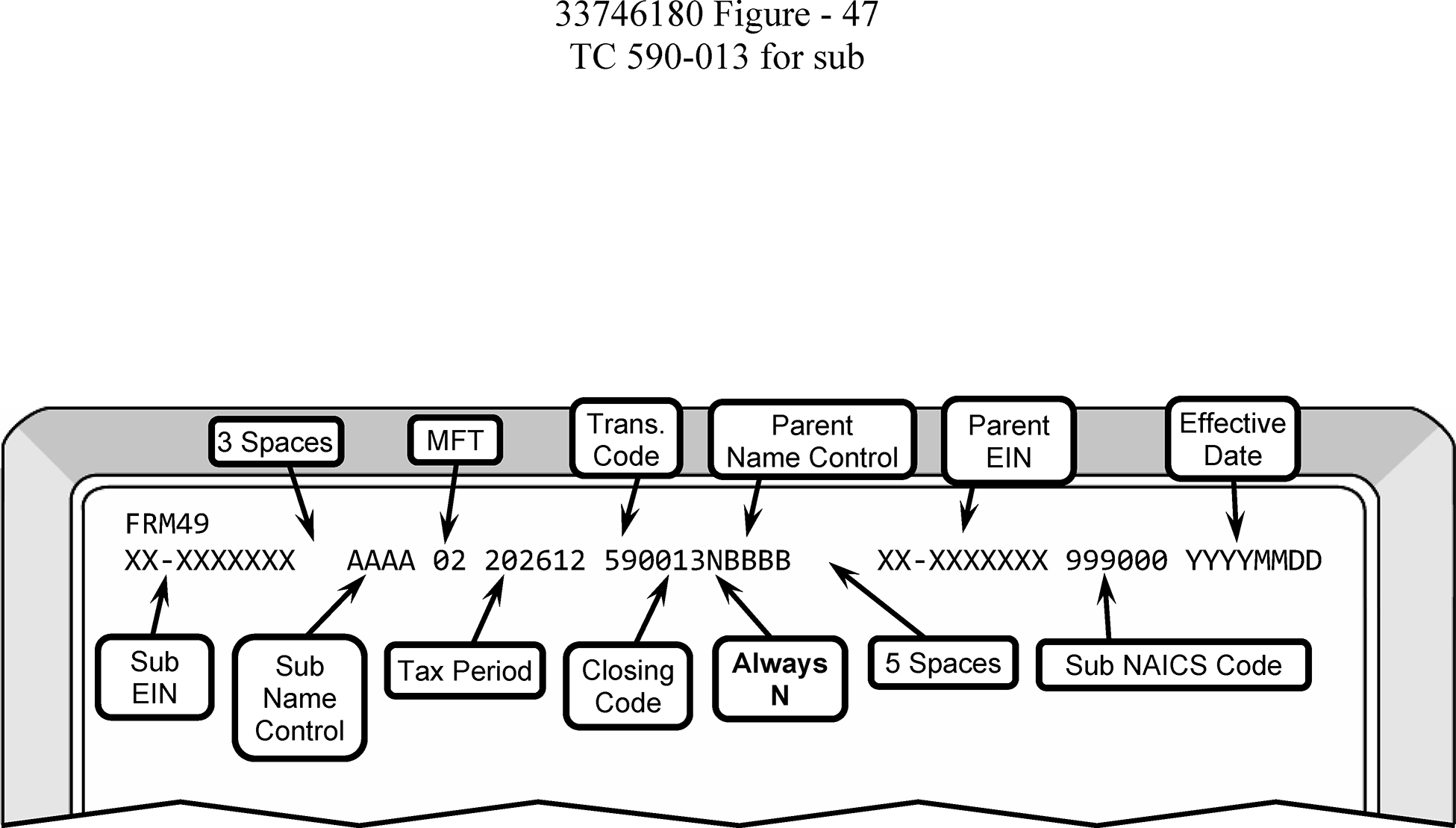
-
An S corporation seeking relief for a late QSub election for a subsidiary must:
-
File a completed Form 8869 with the words "Rev. Proc. 2013-30" written across the top; and
-
Include a declaration by an officer of the S corporation of reasonable cause/inadvertence; and
-
Supply a statement saying the subsidiary corporation satisfies the QSub requirements of IRC 1361(b)(3)(B), and that all assets, liabilities, items of income, deduction, and credit of the QSub have been treated as assets, liabilities, items of income, deduction, and credit of the S corporation on all affected returns consistent with the QSub election for the year the election was intended to be effective and for all subsequent years.
-
-
If all conditions are met, the Q Sub can receive up to three years and 75 days relief under Rev. Proc. 2013-30.
-
If a TC 590-013 is posted on the Subsidiary EIN for a later tax period, input TC 592 to reverse and input TC 590-013 on correct/approved tax period. The TC 590-013 will generate CP 279A to the Subsidiary.
-
Correct the effective date of the TC 082 on parent’s EIN by entering a TC 083, then TC 082, PDC. The TC 082 will generate CP 279 to the parent.
-
-
Revenue Ruling 2008-18 allows an S corporation to reorganize under IRC 368(a)(1)(F) whereby the S corporation becomes a QSub of a new holding company and the S-election carries over to the new holding company. Ensure the new holding company has a valid EIN. A dummy Form 2553 will be prepared for the new holding company. PSC - Z will be used when inputting the TC 090 on the new holding company. The effective date of the TC 090 will be the same as the original TC 090.
-
When an F reorganization takes place, and the QSub's EIN is the same as the Parent S Corporation, do not enter a TC 590 Closing Code 013 for the QSub.
-
For additional information about F Reorganizations, see IRM 3.13.2.28, Business Trust ("F" Reorganization).
-
When a QSub terminates (and they are no longer filing under their parent tax return), their filing requirement will be re-established when the QSub files their next tax return. Do not input TC 592 or TC 085 to terminate their status as a QSub. Send Letter 326C stating the date the QSub election was terminated to the taxpayer (former QSub). The Letter 326C will advise the taxpayer to keep a copy of the letter/notice for their permanent records. If the Parent corporation disposes of the subsidiary stock, and they had an S-election before the QSub election, their election will remain in effect after the termination.
-
Unless the parent disposes of its subsidiary stock it will continue to own 100 percent of the subsidiary. If the parent continues to own stock in the subsidiary, the subsidiary will not be able to re-elect S status (1120-S filer) because it has a corporate owner. Upon termination, without the Commissioner’s consent, the former QSub is not eligible to be treated as an S Corporation before its fifth year after the parent corporation has discontinued ownership of its subsidiary stock.
-
The subsidiary also will not be able to re-elect QSub status (filing under a Parent 8869) within the next 5-year period without the Commissioner's consent, except: Example- X, an S corporation, owns Y, a QSub. X sells 100 percent of the stock of Y to Z, an unrelated S corporation. Z can elect to treat Y as a QSub effective on the date of purchase without requesting the Commissioner's consent.
-
-
Revocations are usually submitted by the parent (not by the sub), by filing a statement with the campus. After the revocation, the subsidiary will become a C corporation that files its own tax return. If the subsidiary has an S-election, this will need to be terminated. See IRM 3.13.2.23.18(1) for input of the TC 096.
-
When a parent S Corporation revokes its S corporation election input a TC 083 to reverse the 082, then input a TC 086 as a source document, including the revocation date in the effective date field. The input of TC 086 will generate a CP 281. There is only one paragraph in CP 281 that states the revocation has been accepted.
Note:
CP 281 - Revocation of Form 8869 - The following is the language of the outgoing notice: We've revoked your Form 8869, Qualified Subchapter S Subsidiary Election. According to our records, you no longer meet the requirements necessary for this election. As of MMDDYYYY, your election status with the IRS has been terminated. Keep a copy of this notice of revocation for your permanent records.
-
All Forms 966 submitted with CP 259 and/or CP 518 are processed in Compliance Services Collection Operations at the campus.
-
BMF Entity will receive and process all Forms 966 that are not submitted with CP 259 or CP 518.
-
Underline the Name Control;
-
Edit the tax period (if evident) in the upper left corner;
-
Remove the MFT 02 FRC if the taxpayer is now inactive; and
-
Send to Files asking Form 966 be maintained in the Alpha File.
-
-
Form 966 is often filed prior to an entity making a QSub election.
-
The effective date for the election can be effective on the date Form 966 is filed or up to 75 days prior to the filing of Form 966 if the date is not before 1/1/97 and that the subsidiary otherwise qualified as a QSub for the entire period for which the retroactive election is in effect. For these purposes, the requirement that Form 966 be filed within 30 days of the date in Box 4 is ignored.
-
Upon termination, the former QSub and any successor corporation is not eligible to make either a QSub election or an election to be treated as an S corporation for five years. These taxpayers will not be eligible before their fifth taxable year that begins after the first taxable year for which the termination is effective. Otherwise, the taxpayer must request a Private Letter Ruling (PLR).
-
If there is a payment on the new subsidiary module, Entity will forward the necessary information/Form 3465 to BMF AM/Adjustments requesting the payment be moved to the appropriate module.
-
It is not necessary to write the taxpayer when processing Form 966.
-
Definition - An LLC can be defined as an unincorporated business entity created under state law and owned by one or more persons known as members. State law generally allows for a "person" to be:
-
An individual, or
-
A trust, or
-
An estate, or
-
A partnership, or
-
An association, or
-
A company, or
-
A corporation, or
-
An LLC, or
-
An exempt organization.
-
-
There are two types of LLCs:
-
Single member (SMLLC)
-
Multi-member (MMLLC)
Currently there is an LLC indicator field on CC ENMOD. The field is identified as LLC-CD on IDRS. S in the LLC Indicator field means the taxpayer is a single member LLC; M in the field means the entity is a multi-member LLC.
Ensure the LLC indicator is correct, if not, update. If research determines the entity is not an LLC, remove the LLC indicator via CC BNCHG by placing a 9 in the LLC indicator field.Note:
Suffixes such as LC and PLLC indicate a limited liability company and are input with the LLC’s name. If the account indicates a Limited Liability Company (LLC), such as an LLC indicator on the account or a sort name line indicating “sole member or member”. Follow the primary name line with "LLC" . Secretary of State (SOS) does not have to be researched.
-
-
Treasury Regulation 301.7701-2 (as amended by T.D. 9356, 2007-39 I.R.B. 675) eliminated disregarded entity status for the purposes of federal employment taxes and certain excise taxes. The LLC will continue to be a disregarded/single member entity for federal income tax purpose but is no longer disregarded for certain excise and employment taxes. The amended regulations provide that the LLC will have a tax status distinct from its owner.
-
For employment taxes on wages paid on or after January 1, 2009; and
-
For excise taxes imposed and actions first required or permitted in periods beginning on or after January 1, 2008.
-
-
A single member LLC has only one member. The default tax status of a single member LLC is a disregarded entity and, therefore, does not have a tax status distinct from its owner. A single member LLC need not file a Form 8832 and elect to be classified as a partnership. However, a single member LLC can file Form 8832 and elect to be classified as a corporation. If at any time the number of members increases to more than one, the LLC automatically defaults to multi-member status.
-
A single member LLC that is a disregarded entity will not have an income tax filing requirement. If it is owned by another entity (including an individual, corporation, partnership, trust, etc.) the owner entity will have the income tax filing requirement. A single member LLC that is owned by a corporation is not a corporation under state law. A single member LLC that is owned by a partnership is not a partnership under state law. Even though it is disregarded as a separate entity for federal tax purposes, the entity remains a Limited Liability Company under state law.
-
A multi-member LLC has more than one owner and the default tax status is a partnership. A multi-member LLC can elect to be classified as an association taxable as a corporation by filing a Form 8832. A multi-member LLC cannot file a Form 8832 and elect to be disregarded as a separate entity. If at any time the number of members drops below two, the LLC automatically defaults to single member status.
-
It is important to remember that LLCs are distinct entities and are legally different than sole proprietorships, partnerships or corporations. LLCs file Articles of Organization with the Secretary of State or equivalent state entity, and they are considered to be officially formed at the time the signed articles are filed.
-
Homeowner Associations (HOA) are usually formed as corporations. Since the 528 election is made on a yearly basis, see Treas. Reg. 1.528-8(a), HOAs can choose to file Form 1120-H or Form 1120 on an annual basis. HOAs formed as LLCs (single or multi-member), would first file Form 8832 electing to be treated as an association taxable as a corporation prior to filing Form 1120-H or Form 1120. Once Form 8832 is approved, the HOA can choose between filing Form 1120-H or Form 1120.
-
The suffix "LTD" does not automatically indicate that an entity is a corporation or a partnership/LLC. If the correct filing requirement cannot be determined, research the Secretary of State’s website to confirm. See Exhibit 3.13.2-8.
-
Spouses residing in a community property state (AZ, CA, ID, LA, NV, NM, TX, WA, or WI - See Publication 555, Community Property) are treated as a single member LLC/disregarded entity. It is acceptable for both names to be on the Sort Name Line as sole member. Spouses not residing in community property states are treated as a multi-member LLC. If the LLC Indicator is incorrect, input transaction to update.
-
Rev. Rul. 2004-77 concludes that, if an eligible entity has two owners under local law, but one of the owners is, for federal tax purposes, disregarded as an entity separate from the other owner of the eligible entity, then the eligible entity cannot be classified as a partnership and is either disregarded as an entity separate from its owner or an association taxable as a corporation.
-
An LLC that has multiple members and that is required to file Form 1065 for federal tax purposes, however, is not a partnership under state law. If the LLC files a Form 8832, Entity Classification Election, to change their classification to a corporation, they are required to file Form 1120; however, they are not a corporation under state law. Regardless of the filing status, the entity remains a Limited Liability Company under state law. See the chart below for more information on domestic LLCs.
Caution:
It is very important when processing correspondence and forms received from LLCs to determine how they are classified by researching CCs ENMOD and/or BMFOL'E' to see if there is a posted or pending TC 076 and verifying the PARA-SEL-CD>.
Note:
A state law entity organized as a limited partnership (LP), a limited liability partnership (LLP) or a limited liability limited partnership (LLLP) is generally a partnership unless it elects to be classified for federal tax purposes as a corporation, or another limited exception applies. See IRM 3.13.2.26(12)(H) for treatment of such entities (LP, LLP, LLLP), and see IRM 3.13.2.26(11) for an exception to the general rule.
If... And... Then... A) A Limited Liability Company (LLC) has multiple members and a Form 1065 filing requirement, 1) The number of members changes from more than one member to a single member, -
They are not required to file Form 8832. The LLC automatically defaults from the classification of partnership to disregarded entity for income tax purposes.
-
Update the sort name line and LLC indicator.
-
If the final Form 1065 has posted, delete the Form 1065 FRC.
-
Correspond with the taxpayer explaining the action taken.
A) A Limited Liability Company (LLC) has multiple members and a Form 1065 filing requirement, 2) Files Form 8832 to be taxed as a partnership, -
Prepare Form 8832 for destruction as classified waste per local procedures.
-
Correspond with the taxpayer telling them their default classification is that of a partnership, therefore, Form 8832 is not required.
B) An LLC has only one member and is classified as a disregarded entity, It changes from a single member to more than one member, -
They are not required to file Form 8832. The LLC automatically defaults from the classification of disregarded entity to partnership.
-
Prepare Form 8832 for destruction as classified waste per local procedures.
-
Update the sort name line and LLC indicator.
-
Add a 1065 filing requirement.
-
Correspond with taxpayer explaining action taken.
C) An LLC sends in correspondence indicating that it has converted to a business trust (including a Delaware Statutory Trust), (See note below.) The taxpayer does not indicate that the ownership of the business has changed, and the taxpayer does not file Form 8832, The business entity does not need a new EIN. Process the taxpayer’s correspondence as a business name change. D) A sole proprietor files papers to become a state entity and organizes as a single member LLC, 1) Wishes to use the same Employer Identification Number (EIN) assigned to them as a sole proprietor for their LLC. A single member LLC without employment or excise tax liability is a disregarded entity, -
A single member LLC disregarded entity can use the sole proprietor’s EIN, but the owner/sole proprietor's EIN remains in the owner/sole proprietor's name.
-
Enter the name of the disregarded entity in the sort name line.
-
The single member LLC can obtain its own EIN but is not required to.
D) A sole proprietor files papers to become a state entity and organizes as a single member LLC, 2) Wishes to use the same EIN assigned to them as a sole proprietor for the LLC and they have excise tax filing requirements for tax periods prior to 01-01-08 or employment tax filing requirements for tax periods prior to 01-01-09, -
A single member LLC disregarded entity can use the sole proprietor's EIN, but the owner/sole proprietor's EIN remains in the owner/sole proprietor's name.
-
Enter the name of the disregarded entity in the sort name line.
-
Inform the taxpayer that after those dates the LLC must have its own EIN for reporting employment and/or excise tax.
-
A single member LLC disregarded entity must have its own EIN for BMF filing requirements. Advise the taxpayer to obtain a new EIN. If you are processing a return or payment, assign a new EIN with NIC B .
D) A sole proprietor files papers to become a state entity and organizes as a single member LLC, 3) Wishes to use the same EIN assigned to them as a sole proprietor for the LLC, and they have excise tax filing requirements for the tax periods after 01-01-08 or employment tax filing requirements for tax periods after 01-01-09, -
The single member LLC must have its own EIN, separate from the sole proprietor’s EIN, to report excise taxes and employment taxes accruing after those dates.
-
If you are processing a return or payment, assign a new EIN with NIC B.
D) A sole proprietor files papers to become a state entity and organizes as a single member LLC, 4) Wishes to use the same EIN assigned to them as a sole proprietor for their LLC and elect to be treated as a corporation with a Form 1120 filing requirement, -
The single member LLC must have its own EIN separate from the sole proprietor’s EIN, since the LLC is no longer disregarded.
-
Do not update the sole proprietor’s account. The Form 8832 must be filed with the EIN of the LLC to elect to be treated as a corporation.
-
Return Form 8832 to taxpayer informing them that Form 8832 cannot be processed with their Sole Prop EIN, they must apply for a new EIN and re-file Form 8832.
D) A sole proprietor files papers to become a state entity and organizes as a single member LLC, 5) Wishes to use the same EIN assigned to them as a sole proprietor for their LLC and elect to be treated as an S corporation with a Form 1120-S filing requirement, -
The single member LLC must have its own EIN, separate from the sole proprietor, since the LLC is no longer disregarded.
-
The LLC must timely file a Form 2553 (deemed Form 8832), with the EIN of the LLC electing to be treated as an S corporation.
E) A corporation, partnership, estate or trust is the sole owner of a single member LLC, 1) Wishes to use the same EIN assigned their owner for the LLC and they have excise tax filing requirements for tax periods prior to 01-01-08 or employment tax filing requirements for tax periods prior to 01-01-09, -
A single member LLC disregarded entity can use the owner's EIN, but the owner's EIN remains in the owner's name.
-
A single member LLC disregarded entity must have its own EIN for BMF filing requirements. If processing a return or payment, assign a new EIN with NIC B.
-
Inform the taxpayer that after those dates the LLC must use its own EIN for reporting employment or excise tax.
E) A corporation, partnership, estate or trust is the sole owner of a single member LLC, 2) Wishes to use the same EIN assigned to the owner for the LLC, and they have excise tax filing requirements for the tax periods after 01-01-08 or employment tax filing requirements for tax periods after 01-01-09, -
The single member LLC must have its own EIN, separate from the owner’s EIN.
-
If you are processing a return or payment, assign a new EIN with NIC B.
F) A corporation files papers with the state to convert to an LLC, 1) Wishes to use the same EIN assigned to them as a corporation for their LLC and default to the classification of partnership, -
Secure documentation of the state conversion before updating the EIN.
-
Update the EIN before processing Form 8832. See IRM 3.13.2.27.13, State Reorganization/Conversion.
F) A corporation files papers with the state to convert to an LLC, 2) Wishes to use the same EIN assigned to them as a corporation for their LLC and retain their status as a corporation, -
They must timely file Form 8832 electing to be treated as a corporation. Attach conversion paperwork to 8832.
-
Update the EIN before processing Form 8832. See IRM 3.13.2.27.13.
F) A corporation files papers with the state to convert to an LLC, 3) Wishes to use the same EIN assigned to them as a corporation for their LLC and be classified as an S corporation, -
The LLC must timely file Forms 2553 (deemed Form 8832) electing to be treated as an S corporation.
-
Update the EIN before processing the Form 2553 (deemed Form 8832).
-
If the existing corporation already has a valid S-election on file, update the entity by following procedures in IRM 3.13.2.27.13.
F) A corporation files papers with the state to convert to an LLC, 4) Wishes to use the same EIN assigned to them as a corporation for their LLC and be classified as a disregarded entity, -
Secure documentation of the state conversion before updating the EIN.
-
Update the EIN before processing Form 8832. See IRM 3.13.2.27.13.
G) A partnership (not LLC), 1) Submits Form 8832 to be treated as a C corporation, with a Form 1120 filing requirement, -
They must timely file Form 8832 electing to be treated as a corporation.
-
Do not update the account until a Form 8832 is approved.
-
See IRM 3.13.2.27, Form 8832, Entity Classification Election, for processing instructions.
G) A partnership (not LLC), 2) Submits correspondence stating they wish to elect to be treated as an S corporation and converted/reorganized at the state level to a corporation, -
Secure documentation of the state conversion and Form 2553 before updating the EIN.
-
Do not update the EIN until all documentation is received and Form 2553 can be approved.
-
Prepare a "dummy" Form 8832 and input.
G) A partnership (not LLC), 3) Submits correspondence stating they wish to elect to be treated as a C corporation and converted/reorganized at the state level to a corporation, -
Secure documentation of the state conversion before updating the EIN.
-
Prepare a "dummy" Form 8832 as an association taxable as a corporation and input.
-
Follow procedures in IRM 3.13.2.27.13.
H) A partnership (not an LLC) reduces to one member, Wishes to use the same EIN it used as a partnership, -
Treasury Regulation 301.7701-3(f)(2) provides that an entity classified as a partnership becomes disregarded as an entity separate from its owner when the entity's membership is reduced to one member.
-
Send Letter 147C to the taxpayer instructing them that they cannot continue to use the EIN of the partnership since they are now a sole proprietor.
-
Update the Entity information as needed.
I) A partnership (not an LLC) is attempting to elect to be a disregarded entity, There is no indication they reduced to one member, They are not eligible, as an entity with multiple owners cannot elect to be classified as a disregarded entity. J) A partnership files articles with the state to be recognized as an LLC, Wishes to use the same EIN assigned to them as a partnership, -
They are not required to file the Form 8832, but automatically default to the classification of partnership.
-
Update the name lines to reflect it is now an LLC.
K) An LLC or partnership files papers with the state to convert to a corporation. (Taxpayer’s name had LLC or PTR and name now shows it is a corporation) . Wishes to use the same EIN assigned to them as an LLC or partnership, Secure documentation of the state conversion before updating the EIN. See IRM 3.13.2.27.13. L) A taxpayer makes an entity classification election within 60 months of the effective date of an earlier election, They were a newly formed eligible entity when their original election was filed and approved for the date of their formation, Process the election because the original election is not considered a change and they are not subject to the 60-month limitation. M) A taxpayer makes an entity classification election within 60 months of the effective date of an earlier election, They were not a newly formed eligible entity when their election was filed and approved for a date later than the date of their formation, -
The 60-month rule applies, and the taxpayer cannot file another election to change their classification for 60 months.
-
Contact the taxpayer to inform them they are not eligible to change their classification for 60 months; however, they can seek a waiver to the 60-month limitation by requesting a Private Letter Ruling from the Office of Chief Counsel.
N) A taxpayer indicates Form 8832 was filed in error and wants to default to the classification of partnership or disregarded entity, 1) Their request to withdraw the election is received before the due date of the initial tax return,
Example: TC 076 effective date is 01-01-2025 election and/or request to withdraw must be received by 04-15-2026,-
Input a TC 077 to reverse the TC 076.
-
Associate documentation for TC 077 with Form 8832 (TC 076 DLN).
N) A taxpayer indicates Form 8832 was filed in error and wants to default to the classification of partnership or disregarded entity, 2) Their request to withdraw the election is not received before the due date of the initial tax return and the initial election was effective for the first day of the LLCs existence, Contact the taxpayer to inform them they cannot change their classification for the tax year they requested but are eligible to file a timely Form 8832 to change their classification for the following year, long as they do not contravene the 60-month rule. O) A taxpayer indicates Form 8832 was filed in error and wants to default to the classification of partnership or disregarded entity, Their request to withdraw the election is not received before the due date of the initial return and the effective date was not for the first day of the LLC’s existence, -
The 60-month rule applies, and the taxpayer cannot file another Form 8832 to change their classification for 60 months.
-
Contact the taxpayer to inform them they cannot change their classification for the current tax year, are not eligible to file Form 8832 to change their classification for 60 months; however, they can seek a waiver to the 60-month rule by requesting a PLR from the Office of Chief Counsel.
P) The taxpayer intentionally filed Form 8832 and wants to default to the classification of partnership or disregarded entity, Their request to withdraw the election is not received before the due date of the initial return and the effective date was not for the first day of the LLC’s existence, -
Deny Form 8832 by inputting TC 078, see IRM 3.13.2.27.9 , Procedures for a Denied Form 8832.
-
Send Letter 3575C to the taxpayer.
Q) The taxpayer made a Subchapter S-election, They want to revert to a default classification, If we allow the Entity Classification Election to be withdrawn/rescinded and there is a Subchapter S-election on file, the Subchapter S-election terminates, and the following action will be taken: -
Input a TC 077 to reverse original TC 076.
-
Input a TC 096, PSC - Z using the effective date from the new Form 8832. A BK95 is necessary if the taxpayer owes a final Form 1120-S. If notification is received via correspondence from the taxpayer, use the IRS received date of the correspondence as the TC 096 effective date. Send Letter 326C explaining the reason for the termination.
Note:
A business trust as described in IRM 3.13.2.27.1(3), Entities eligible to file Form 8832, is a business entity eligible to file Form 8832 (similar to an LLC). A common example of a business trust is a Massachusetts Business Trust. A Delaware Statutory Trust (DST) can be classified as a business trust (business entity) or a trust (not a business entity). If a DST files Form 8832 electing status as a business entity, the entity will receive a TC 076.
-
-
Form 8832 was developed to allow certain existing entities to change their classification and filing requirement from their existing classification. Form 8832 also allows certain new entities to change their classification and filing requirement rather than accept the default classification assigned to them.
-
Forms 8832 for foreign entities are processed exclusively in Ogden. An entry in any of the boxes on page 2, Line 6d, e, or f or Line 7 indicates the Form 8832 is for a foreign entity. If a foreign Form 8832 is received in any other processing site, it will be transshipped to Ogden:
Internal Revenue Service
1973 Rulon White Blvd M/S 6273
Ogden, UT 84201. -
When a Form 8832 is approved, generally the taxpayer cannot file another Form 8832 to change their classification for 60 months. However, if a newly formed entity files Form 8832 then files another Form 8832 by the due date of their first return to elect their default classification, the initial Form 8832 is cancelled.
-
The following describes the transaction codes and notices used in processing Form 8832:
Transaction Code Description CP Notice Generated 074 Deemed Form 8832 075 Reversal of TC 074 076 Approved Form 8832 CP 277 077 Reversal of TC 076 078 Denial of Form 8832 CP 278 -
If the taxpayer is requesting an effective date that is the same effective date as the previously posted TC 076, then it could be a withdrawal or a change in number of members or owners. This can be determined by comparing the information on the form with the information on Master File. See IRM 3.13.2.27.10, Request to Withdraw Classification Election.
-
If the taxpayer requests a different date than the 076 effective date, then it is a new election. We must ensure the taxpayer is eligible to make the new election.
-
Do not use a gel pen when editing Form 8832. Gel ink does not scan and prevents Statistics of Income (SOI) Operation from completing their tasks.
-
Always ensure the correct FRCs are entered on the taxpayer’s EIN.
-
Form 8832 filers must be one of the following:
-
A domestic entity electing to be classified as an association taxable as a corporation.
-
A domestic entity electing to be classified as a partnership.
-
A domestic entity with a single owner electing to be disregarded as a separate entity.
-
A foreign entity electing to be classified as an association taxable as a corporation.
-
A foreign entity electing to be classified as a partnership.
-
A foreign entity with a single owner electing to be disregarded as a separate entity.
-
An entity with a previous classification election and 60 months have passed since the original election.
-
Eligible entities whose initial classification was made when they were newly formed and effective for their date of formation.
-
-
An eligible entity that timely files Form 2553 to elect classification as an S corporation and meets all other requirements to qualify as an S corporation is deemed to have made an election under Treas. Reg. 301.7701-3(c)(v) to be classified as an association taxable as a corporation. A TC 074 denotes a deemed election.
-
Business Trusts organized under Treasury Regulation 301.7701-4(b) are eligible to file Form 8832. These could also be called "unincorporated business trusts" or "Commercial Trusts." These entities will receive a TC 076. Generally, the default classification for a business trust is determined under Treasury Regulation 301.7701-3 and thus a domestic business trust with only one member is a disregarded entity and the default classification for a domestic business trust with more than one member is partnership. However, there are some exceptions. Real Estate Investment Trusts (REITs) are deemed entity classification elections that cause the REIT to be treated as a corporation for tax purposes. If the taxpayer submits Form 8832, return it to them as Form 8832 is unnecessary because their election is deemed. A TC 074 will be input.
-
Limited Cooperative Associations (LCA) default to partnership treatments. Despite their name, LCAs are not classified as cooperatives or corporations because they do not operate on a cooperative basis as required in IRC 1381(a)(2). Instead, like partnerships generally, they are eligible entities described in Treas. Reg. 301.7701-3 that can file a Form 8832 to elect to be treated as corporations.
-
A Limited Liability Company (LLC) is an entity formed under state law by filing articles of organization as an LLC. A Limited Liability Company can elect to be classified for federal tax purposes either as:
-
A partnership,
-
An association taxable as a corporation, or
-
A disregarded entity, separate from its owner.
-
-
Pursuant to Treasury Regulation 301.7701-3(a), a single-member LLC can only elect to be classified for federal income tax purposes as:
-
An association taxable as a corporation.
-
A single-member LLC that fails to make an election is automatically disregarded as an entity separate from its owner.
-
-
An LLC that fails to file Form 8832 electing its classification will DEFAULT:
-
A domestic LLC with at least two members, that does not file a Form 8832 to classify itself as a corporation, is classified by default as a partnership for federal tax purposes.
-
A single-member LLC that fails to make an election is disregarded as an entity separate from its owner.
-
-
Treasury Regulation 301.7701-3(f)(2) provides that an entity classified as a partnership becomes disregarded as an entity separate from its owner when the entity's membership is reduced to one member. No election is required to be filed. The partnership files a final partnership return, which serves as the notice of the termination of the partnership. The owner reports all items of income, gain, loss, deductions, and credits from the disregarded entity in its required tax return. However, there are no specific lines on any of the required forms in which to report items from the disregarded entity.
-
A domestic state law entity organized as a limited partnership (LP), a limited liability partnership (LLP) or a limited liability limited partnership (LLLP) is generally a partnership unless it elects to be classified for federal tax purposes as a corporation, or another limited exception applies. See IRM 3.13.2.26(12)(h), Domestic Limited Liability Company (LLC), for treatment of such entities (LP, LLP, LLLP) and see IRM 3.13.2.26(11) for an exception to the general rule.
-
Form 8832 is only necessary when an eligible entity chooses to be classified as something other than their default classification.
-
The entities which receive default classifications are partnerships, multi-member LLCs, and single owner entities that are disregarded as an entity separate from its owner.
-
If Form 8832 is received and the taxpayer is requesting their default classification (no change in the number of members):
-
Ensure the entity reflects the correct filing requirement(s),
-
Correspond with the taxpayer using Letter 3574C, informing them that the entity is not required to file Form 8832 due to Regulation Section 301.7701-3(b)(1) and they have defaulted to the classification they are attempting to elect.
-
-
If the taxpayer is changing the number of members (not a default election), utilize the chart below:
If... And... Then... A) A Limited Liability Company (LLC) has multiple members and a Form 1065 filing requirement, 1) The number of members changes from more than one member to a single member, -
They are not required to file Form 8832. Prepare Form 8832 for destruction as classified waste per local procedures. The LLC automatically defaults from the classification of partnership to disregarded entity for income tax purposes.
-
Update the sort name line and LLC indicator.
-
If the final Form 1065 has posted, delete the Form 1065 FRC.
-
Correspond with the taxpayer explaining the action taken. Do not utilize the Letter 6801sce.
A) A Limited Liability Company (LLC) has multiple members and a Form 1065 filing requirement, 2) Files Form 8832 to be taxed as a partnership, -
Prepare Form 8832 for destruction as classified waste per local procedures.
-
Correspond with the taxpayer telling them their default classification is that of a partnership, therefore, Form 8832 is not required. Do not use Letter 6801sce.
B) An LLC has only one member and is classified as a disregarded entity, It changes from a single member to more than one member, -
They are not required to file Form 8832. The LLC automatically defaults from the classification of disregarded entity to partnership.
-
Update the sort name line and LLC indicator.
-
Add a Form 1065 filing requirement.
-
Prepare Form 8832 for destruction as classified waste per local procedures.
-
Correspond with taxpayer explaining action taken. Do not use Letter 6801sce.
-
-
Form 8832 is due within 75 days of the beginning of the tax period for which the election is being requested. If Form 8832 is not timely filed, the entity can be eligible for relief under a Revenue Procedure (Rev. Proc. 2009-41 or Rev, Proc. 2013-30), see IRM 3.13.2.27.6, Relief for a Late Filed Form 8832, or a Private Letter Ruling (PLR), see Rev. Proc. 2021-1, or its successor.
Caution:
Notice 2020-23 postpones to July 15, 2020, the time for filing any Form 8832 due on or after April 1, 2020, and before July 15, 2020. In general, an election specifying an eligible entity’s classification made on Form 8832 cannot take effect more than 75 days prior to the date the election is filed. If the last day of the 75-day period after the intended effective date of an entity classification is on or after April 1 and before July 15, an entity classification election filed by July 15 can be made with that intended effective date as specified on Form 8832. For example, if a taxpayer wants to change its entity classification effective February 1, 2020, it will normally have until April 16, 2020, to file Form 8832. Because the due date is postponed, however, the taxpayer has until July 15, 2020, to file the Form 8832.
-
If the Form 8832 is filed within 75 days of the effective date, continue to process the Form 8832. If Form 8832 was returned to the taxpayer for completion and the taxpayer replied within 30 days, use the original IRS received date. If the taxpayer replied after 30 days, use the most recent IRS received date.
-
If the effective date of the Form 8832 is more than 75 days prior to the earliest IRS received date, suppress the notice using PSC - Z and send an appropriate letter informing the taxpayer they can qualify for relief under Rev. Proc. 2009-41, Rev. Proc. 2013-30, or must request a PLR to receive the effective date they requested. Make the election effective 75 days before the earliest IRS received date.
-
If the effective date on the Form 8832 is more than 12 months in advance; make the election effective 12 months in advance of the received date. Alert the taxpayer of our actions and continue to process the Form 8832 with the new date.
-
If the effective date on the Form 8832 is less than 12 months in advance, process the election.
-
If a date is not entered on Line 8, edit the earliest IRS received date onto Line 8.
Caution:
Forms 8832 are distinctly different from Forms 2553 when they are unable to receive the requested effective date. Effective dates on Forms 2553 can be moved forward to the next qualifying year, however, effective dates on Forms 8832 cannot be moved to the next tax year. The effective date will be 75 days prior to the earliest IRS received date.
-
-
≡ ≡ ≡ ≡ ≡ ≡ ≡ ≡ ≡ ≡ ≡ ≡ ≡ ≡ ≡ ≡ ≡ ≡ ≡ ≡ ≡ ≡ ≡ ≡ ≡ ≡ ≡ ≡ ≡ ≡ ≡ ≡ ≡ ≡ ≡ ≡ ≡ ≡ ≡ ≡ ≡ ≡ ≡ ≡ ≡ ≡ ≡ ≡ ≡ ≡ ≡ ≡ ≡ ≡ ≡ ≡ ≡ ≡ ≡ ≡ ≡ ≡ ≡ ≡ ≡ ≡ ≡ ≡ ≡
≡ ≡ ≡ ≡ ≡ ≡ ≡ ≡ ≡ ≡ ≡ ≡ ≡ ≡ ≡ ≡ ≡ ≡ ≡ ≡ ≡ ≡ ≡ ≡ ≡ ≡ ≡ ≡ ≡ ≡ ≡ ≡ ≡ ≡ ≡ ≡ ≡ ≡ ≡ ≡ ≡ ≡ ≡ ≡ ≡ ≡ ≡ ≡ ≡ ≡ ≡ ≡ ≡ ≡ ≡ ≡ ≡ ≡ ≡ ≡ ≡ ≡ ≡ ≡ ≡ ≡ ≡ ≡ ≡ ≡ ≡ ≡ ≡ ≡ ≡ ≡ ≡ ≡ ≡ ≡ ≡ ≡ ≡ ≡ ≡ ≡ ≡
≡ ≡ ≡ ≡ ≡ ≡ ≡ ≡ ≡ ≡ ≡ ≡ ≡ ≡ ≡ ≡ ≡ ≡ ≡ ≡ ≡ ≡ ≡ ≡ ≡ ≡ ≡ ≡ ≡ ≡ ≡ ≡ ≡ ≡ ≡ ≡ ≡ ≡ ≡ ≡ ≡ ≡ ≡ ≡ ≡ ≡ ≡ ≡ ≡ ≡ ≡ ≡ ≡ ≡ ≡ ≡ ≡ ≡ ≡ ≡ ≡ ≡ ≡ ≡ ≡ ≡ ≡ ≡ ≡ ≡ ≡ ≡ ≡ ≡ ≡ ≡ ≡ ≡ ≡ ≡ ≡ ≡ ≡ ≡ ≡ ≡ ≡ ≡ ≡ ≡ ≡ ≡ ≡ ≡ ≡ ≡ ≡ ≡ ≡ ≡ ≡ ≡ ≡ ≡ ≡ ≡ ≡ ≡ ≡ ≡ ≡ ≡ ≡ ≡ ≡ ≡ ≡ ≡ ≡ ≡ ≡ ≡ ≡ ≡ ≡ ≡ ≡ ≡ ≡ ≡ ≡ ≡ ≡ ≡ ≡ ≡ ≡ ≡ ≡ ≡ ≡ ≡ ≡ ≡ ≡ ≡ ≡ ≡
≡ ≡ ≡ ≡ ≡ ≡ ≡ ≡ ≡ ≡ ≡ ≡ ≡ ≡ ≡ ≡ ≡ ≡ ≡ ≡ ≡ ≡ ≡ ≡ ≡ ≡ ≡ ≡ ≡ ≡ ≡ ≡ ≡ ≡
≡ ≡ ≡ ≡ ≡ ≡ ≡ ≡ ≡ ≡ ≡ ≡ ≡ ≡ ≡ ≡ ≡ ≡ ≡ ≡ ≡ ≡ ≡ ≡ ≡ ≡ ≡ ≡ ≡ ≡ ≡ ≡ ≡ ≡ ≡ ≡ ≡ ≡ ≡ ≡ ≡ ≡ ≡ ≡ ≡ ≡ ≡ ≡ ≡ ≡ ≡ ≡
≡ ≡ ≡ ≡ ≡ ≡ ≡ ≡ ≡ ≡ ≡ ≡ ≡ ≡ ≡ ≡ ≡ ≡ ≡ ≡ ≡ ≡ ≡ ≡ ≡ ≡ ≡ ≡ ≡ ≡ ≡ ≡ ≡ ≡ ≡ ≡ ≡ ≡ ≡ ≡ ≡ ≡ ≡ ≡
-
For Form 8832 to be considered complete, the following items must be present:
-
a valid EIN. An EIN will never be assigned from Form 8832.
-
a valid signature.
-
Line 1 must be completed.
-
An applicable entry must be made on Lines 2 and 3 (unless no is checked in 2b).
-
If Item 3 is marked "no" , Item 4 must be complete. If owner is a foreign person or entity and does not have a U.S. identifying number, "none" should be entered on Line 4b.
-
Item 5 does not need to be completed unless the eligible entity is owned by one or more affiliated corporations that file a consolidated return.
-
Lines 6 through 10 must be completed. Line 7 is only applicable for foreign entities.
-
If the taxpayer submits a Form 8832 with a Private Letter Ruling (PLR), the taxpayer is required to enclose a copy of their signed, unredacted version of the PLR. If not provided, return to taxpayer for missing information.
-
-
If any line items are missing, return to taxpayer in a Letter 3574C or Letter 3575C asking for a response within 30 days.
-
IDRS CC BNCHG and Document Code 53 are used to input the transactions related to Form 8832: TC 074 through TC 078. Use the up/down arrows on your keyboard to place your cursor into the DOC-CD> field of CC BNCHG. Overlay the generated "63" with "53."
-
Complete the following fields of IDRS for a TC 076, Approved Form 8832:
-
DOC-CD> enter "53" .
-
BLK-SERIES> enter "95" for TC 076, if applicable. See IRM 3.13.2.23.5 , Determination of Prior Year Liability.
-
TC> enter "076" .
-
SEQ-NUM> enter the three-digit number of the document.
-
EFF-DT> enter in MM/DD/YYYY format.
-
PARA-SEL-CD> see IRM 3.13.2.27.5(4) below.
-
TOE> see IRM 3.13.2.27.5(5) below.
-
FOE> see IRM 3.13.2.27.5(6) below.
-
REMARKS> enter "SD" and the name of the entity. This will alert Files that the transaction document, Form 5147 must be associated with the Form 8832.
-
-
If needed, input a TC 016 via CC BNCHG completing the following fields:
-
XREF-TIN-ITIN-IND> enter "0" (zero) if cross reference TIN is SSN; enter "2" if cross reference TIN is EIN.
-
XREF-TIN-ITIN> enter owner's TIN (without hyphens). It is not necessary to update the XREF-EIN field with the sole member's SSN if the existing XREF-TIN-ITIN is the owner's sole proprietorship EIN.
-
FYM> and FILING-REQ> ensure the domestic entity has the correct FYM and filing requirement code for the next return due. Use caution as this could be a return for prior liability. Ensure the foreign entity has no annual FRC on CC ENMOD.
-
If Line 3 box "No" is checked and the name on Line 4a is an individual's name, input the name on the sort name line.
-
If Line 3 box "No" is checked and the name on Line 4a is a business, input the name on the % name line.
-
When updating IDRS with a TC 016 from the information provided by the taxpayer, verify the TIN provided on Line 4b is correct, then update the XREF-TIN-ITIN field appropriately.
-
If Line 3 box "Yes" is checked, enter the TIN from Line 5b into the XREF-TIN-ITIN field. Also complete the XREF-TIN-ITIN-IND field as appropriate.
-
-
Paragraph Selection Codes (PSCs) are used to determine the language that will be printed in the CP 277. Choose the PSC based on the box marked by the taxpayer in Line 6 of Form 8832: if box "a" is marked use PSC - A, if box "b" is marked use PSC - B, etc. Below are the paragraphs for each PSC:
-
PSC A - We have approved your election as a domestic eligible entity to be classified as an association taxable as a corporation. The effective date of this election is MMDDYYYY.
-
PSC B - We have approved your election as a domestic eligible entity to be classified as a partnership. The effective date of this election is MMDDYYYY.
-
PSC C - We have approved your election as a domestic eligible entity with a single owner electing to be disregarded as a separate entity. The effective date of this election is MMDDYYYY.
-
PSC D - We have approved your election as a foreign eligible entity to be classified as an association taxable as a corporation. The effective date of this election is MMDDYYYY.
-
PSC E - We have approved your election as a foreign eligible entity to be classified as a partnership. The effective date of this election is MMDDYYYY.
-
PSC F - We have approved your election as a foreign eligible entity with a single owner to be disregarded as a separate entity. The effective date of this election is MMDDYYYY.
-
-
Type of Election (TOE):
-
When processing Form 8832 submitted by the taxpayer, if box 1a is marked, enter "1" into IDRS.
If taxpayer marks box 1b, enter "2" into IDRS. -
A deemed classification election will always be a TOE of 1.
-
A state conversion will always be a TOE of 1.
-
If no boxes are checked, default TOE is "1" .
-
-
Form of Election (FOE):
When processing Form 8832 submitted by the taxpayer, see below for IDRS entries:-
If taxpayer marks box 6a, enter "1" .
-
If taxpayer marks box 6b, enter "2" .
-
If taxpayer marks box 6c, enter "3" .
-
If taxpayer marks box 6d, enter "4" .
-
If taxpayer marks box 6e, enter "5" .
-
If taxpayer marks box 6f, enter "6" .
-
-
When processing a Form 2553 deemed as a Form 8832, TOE and FOE will always be 1 for a deemed entity classification election.
-
Ensure Master File is updated if a new owner is provided in Part I, Item 4 of Form 8832.
-
Revenue Procedure 2013-30 cannot be used for stand-alone Forms 8832. This relief applies to deemed classification elections made in conjunction with a Subchapter S-election on Form 2553. Rev. Proc. 2013-30 incorporates certain relief provisions included in Rev. Proc. 2004-49 and modifies and supersedes the relief provided in Rev. Proc. 2004-49. Rev. Proc. 2013-30 allows relief up to three years and 75 days from the requested effective date. This revenue procedure modifies and supersedes Rev. Procs. 2003-43, 2004-48, and 2007-62. The revenue procedure also provides guidance for those eligible entities that do not qualify for relief under this revenue procedure and that are required to request a letter ruling to request relief for a late entity classification election.
-
Relief is available for newly formed entities and valid changes in entity classification.
-
In the case of a late corporate classification election intended to be effective on the same date the S corporation election was intended to be effective, the eligible entity must include the following representations:
-
The Requesting Entity is an eligible entity as defined in Treas. Reg. 301.7701-3(a);
-
The Requesting Entity intended to be classified as a corporation as of the Effective Date of the S corporation status;
-
The Requesting Entity fails to qualify as a corporation solely because Form 8832 was not timely filed under Treas. Reg. 301.7701-3(c)(1)(i), or Form 8832 was not deemed to have been filed under Treas. Reg. 301.7701-3(c)(1)(v)(C);
-
The Requesting Entity fails to qualify as an S corporation on the Effective Date of the S corporation status solely because the S corporation election was not timely filed pursuant to IRC 1362(b); and
-
The Requesting Entity timely filed all required federal tax returns and information returns consistent with its requested classification as an S corporation for all of the years the entity intended to be an S corporation and no inconsistent tax or information returns have been filed by or with respect to the entity during any of the taxable years.
Caution:
Forms 8832 are distinctly different from Forms 2553 when they are unable to receive the requested effective date. Effective dates on Forms 2553 can be moved forward to the next qualifying year, however, effective dates on Forms 8832 cannot be moved to the next tax year. The effective date will be 75 days prior to the earliest IRS received date.
-
-
Entity TE’s will:
-
Ensure a TC 074/076 is not posted;
-
Ensure a declaration of consistent filing is attached and signed by all affected parties;
-
Ensure a statement of reasonable cause is attached and signed under perjury by all affected parties; and
-
Attach Form 8832 (with all required documents attached) to Form 2553. Input TC 074. This is not a source document. Ensure POA receives Letter 3576C.
-
-
Revenue Procedure 2009-41 provides guidance for an eligible entity that requests relief for a late classification election received within 3 years and 75 days of the requested effective date of the eligible entity’s classification election and will not be making a Subchapter S-election. The revenue procedure also provides guidance for those eligible entities that do not qualify for relief under this revenue procedure and that are required to request a letter ruling to request relief for a late entity classification election.
a) Rev. Proc. 2009-41 supersedes Rev. Proc. 2002-59 as Rev. Proc. 2009-41 allows relief up to three years and 75 days from the requested classification effective date. If the effective date of the Form 8832 is more than three years and 75 days prior to the earliest IRS received date, suppress the notice using PSC - Z and send an appropriate letter informing the taxpayer they must request a PLR to receive the effective date they requested. Make the election effective 75 days before the earliest IRS received date.
b) Relief is available for:
•Newly formed entities, and
•Valid changes in entity classification.c) This Rev. Proc. became effective Sept. 28, 2009.
d) An entity is eligible for relief if the following requirements are met:
•Form 8832 was not timely filed,
• A declaration of consistent filing signed by all affected parties,
• The entity has not filed a federal tax return for the initial year of the intended election because the due date of the return has not passed, or the entity has timely filed (within 6 months of the due date) all applicable returns and filed consistently with the classification election being in place, or if the entity is not required to file an annual tax return, each affected person that is required to file a federal tax return has timely filed (including an extension) consistent with the classification election being in place,
•The entity has reasonable cause for its failure to timely file Form 8832, and
•Three years and 75 days have not passed since the requested effective date of the entity classification election.e) The taxpayer must submit:
•A completed Form 8832 indicating relief is being requested under Rev. Proc. 2009-41,
•A statement of reasonable cause explaining the reason Form 8832 was not timely filed,
•A declaration of consistent filing signed by all affected parties, and
•A complete penalties of perjury statement: "Under penalties of perjury, I/we declare that I/we have examined this election, including accompanying documents, and to the best of my/our knowledge and belief, the election contains all of the relevant facts relating to the election, and all facts are true, correct, and complete."f) Entity TE’s will:
• Ensure a TC 076 is not posted.
•Determine an entity’s eligibility under this Rev. Proc.:
If relief is requested as the entity’s initial election, Entity will ensure an annual return is not posted.
If the relief is requested for a tax year other than the initial tax year, Entity will not verify the timeliness of returns as these returns would have been UPC 329 and the majority will have had their DLN’s cancelled.
•Ensure a declaration of consistent filing is attached and signed by all affected parties.
•Ensure a statement of reasonable cause is attached and signed by all affected parties.
•Ensure a perjury statement is attached and signed by all affected parties.
•Edit Form 8832 (with all required documents attached) for TC 076 input and filing as a source document. Allow CP 277 to generate. Ensure POA receives Letter 3576C. -
Rev. Proc. 2010-32: The Treasury Department and the Internal Revenue Service (IRS) have become aware that taxpayers are concerned about the validity of elections made by certain foreign eligible entities under Treas. Reg. 301.7701-3(c) to be classified for federal tax purposes as a partnership or disregarded as an entity separate from its owner (a disregarded entity). The Treasury Department and IRS understand that these concerns arise due to uncertainty regarding the number of owners for federal tax purposes of the foreign eligible entity on the effective date of the election. To alleviate these concerns and simplify tax administration, this revenue procedure provides that, if the requirements of this revenue procedure are satisfied, the IRS will treat an election under Treas. Reg. 301.7701-3(c) to classify a foreign eligible entity that is a qualified entity (as defined in Section 3.02 of this revenue procedure) as a partnership or disregarded entity as an election to be treated as a partnership or disregarded entity (as appropriate) rather than as an association taxable as a corporation.
If a qualified entity files an otherwise valid Form 8832 to be classified as a partnership for federal tax purposes but it is later determined that the qualified entity had a single owner for federal tax purposes as of the effective date of the election, the IRS will treat the Form 8832 as an election to classify the qualified entity as a disregarded entity for federal tax purposes provided that:-
The qualified entity’s actual single owner and purported owners as of the effective date of the election file original or amended returns consistent with the treatment of the entity as a disregarded entity for any taxable year that would have been affected if the election had been made to treat the qualified entity as a disregarded entity for federal tax purposes;
-
All required amended returns are filed before the close of the period of limitations on assessments under Section 6501(a) for any relevant taxable year; and
-
A corrected Form 8832 is filed with the appropriate Internal Revenue Service Center and a copy of the corrected Form 8832 is attached to the single owner’s amended return for the taxable year during which the original election was made as required under Treasury Regulation 301.7701-3(c)(1)(ii). The statement "FILED PURSUANT TO REVENUE PROCEDURE 2010-32" must be included across the top of the corrected Form 8832. Additionally, the corrected Form 8832 must satisfy the requirements of Treasury Regulation 301.7701-3(c)(2)(i).
If... And... Then... A) Form 8832 is received from a foreign entity indicating Rev. Proc. 2010-32, 1) There is a TC 076 posted, -
Associate new Form 8832 with posted TC 076.
-
Send Letter 3574C telling taxpayer we acknowledge his request under Rev. Proc. 2010-32 and the date their election was effective.
A) Form 8832 is received from a foreign entity indicating Rev. Proc. 2010-32, 2) A TC 076 is not posted, -
Prepare Form 8832 for input of TC 076.
-
Use PSC - E or F depending on the taxpayer.
-
-
The following entities are not eligible to file Form 8832:
-
Sole proprietors
-
Banks
-
“Per se” corporations (not to be confused with an LLC filing to be taxed as a corporation). A Per se corporation is a domestic for-profit corporation.
-
Single member LLCs electing to be treated as a partnership.
-
An entity that has filed and received approval on Form 8832 to change its status within the last five years. Exceptions: (1) Eligible entities whose initial classification was made when they were newly formed and effective for their date of formation, and
(2) Foreign eligible entities whose classification was not relevant prior to the effective date of its first Form 8832. -
Estates
-
-
If the entity filing Form 8832 is not eligible, deny Form 8832 and return it to the taxpayer in a Letter 3574C/3575C/6801sce . Complete the following fields in CC BNCHG:
-
DOC-CD> replace "63" with "53" .
-
TC> enter "078" .
-
PARA-SEL-CD> enter "Z" .
-
REMARKS> enter "NSD-DENIED FORM 8832" .
-
-
It can be necessary to input a TC 016 to update the entity's FYM and Filing Requirement Code (FRC) for the next return due.
-
Use the following If, And, Then chart to process Form 8832 with a missing or invalid EIN:
If... And... Then... A) The EIN is missing or "applied for," IDRS research indicates an EIN has not been assigned, Return Form 8832 to the taxpayer using Letter 3574C/6801sce informing them their Form 8832 cannot be processed without a valid EIN. Instruct the taxpayer to obtain an EIN and return Form 8832. B) The EIN is invalid, IDRS research cannot locate a valid EIN, Return Form 8832 to the taxpayer informing them their Form 8832 cannot be processed without a valid EIN. Instruct the taxpayer to obtain an EIN and return Form 8832. C) The Form 8832 is for a foreign entity and EIN is missing or invalid, IDRS research cannot locate a valid EIN, Return Form 8832 to the taxpayer informing them that their Form 8832 cannot be processed without a valid EIN. Instruct the taxpayer to obtain an EIN and return Form 8832. D) The Form 8832 is for a foreign entity and there is an EIN (any prefix but 98) on the Form 8832 (for prefix 98, see Note below), The EIN is on the Master File, Allow taxpayer to use the EIN. E) The Form 8832 is for a domestic entity and has an Internet EIN (20, 26, 27, 33, 39, 45, 46, 47, 81, 82, 83, 84, 85, 86, 87, 88, 92, 93 or 99 prefix) on the form, The EIN is not on the Master File, Return Form 8832 to the taxpayer informing them that their Internet EIN is not valid. Instruct the taxpayer to obtain a new EIN and return Form 8832 to us for processing. -
If Line 8 (effective date) is blank, edit the earliest IRS received date as the effective date.
-
If Form 8832 is not complete and the information cannot be obtained through IDRS research or taxpayer contact, deny Form 8832 and send a Letter 3574C/3575C. Tell the taxpayer that their Form 8832 must be timely filed to be approved.
Complete the following fields in CC BNCHG:-
DOC-CD> replace "63" with "53" .
-
TC> enter "078" .
-
PARA-SEL-CD> enter "Z" .
-
REMARKS> enter "NSD-DENIED FORM 8832" .
-
-
Using CC ENREQ, CC BNCHG, and Doc. Code 53, input TC 078. Process the denied election as follows.
-
Underline the name control of the entity.
-
Complete the following fields:
-
DOC-CD> replace "63" with "53" .
-
TC> enter "078" .
-
PARA-SEL-CD> enter "Z" .
-
REMARKS> enter "NSD-DENIED FORM 8832"
-
-
Return the Form 8832 to the taxpayer with a Letter 3574C/3575C advising corrective action.
-
Correspondence or a new Form 8832 can be received indicating the taxpayer wants to withdraw/rescind their entity classification election or to return to their default classification of partnership or disregarded entity.
-
For the taxpayer to withdraw/rescind the election, the request must be received by the due date of the initial tax return. A withdrawal/rescission is a request to treat the entity as if the classification election had never been input or applied.
-
If the due date for withdrawal/rescission has passed, the taxpayer can submit a request to return to their default classification. Requests to return to the default classification can be received as correspondence or by the submission of Form 8832 and must be received by the due date of the return for the effective date requested.
-
See the chart below for processing instructions for a Rescission/Withdrawal:
If... And... Then... A) A taxpayer indicates Form 8832 was filed in error and wants to withdraw the election and return to their default classification of partnership or disregarded entity, Their request to withdraw the election is received before the due date of the initial tax return. -
Input TC 077, Doc Code 53, entering NSD in the remarks field, to reverse TC 076.
-
Associate documentation with the TC 076 DLN.
-
Notify taxpayer of action taken.
-
Ensure filing requirements are updated to the default requirements.
B) A taxpayer indicates Form 8832 was filed in error and wants to withdraw the election and return to their default classification of partnership or disregarded entity, The request to withdraw the election is not received before the due date of the initial tax return, -
Correspond with taxpayer to inform them they cannot change their classification for the tax year they requested but are eligible to request a timely return to their default classification for the following year.
-
Associate documentation with the TC 076 DLN.
Note:
A change to a taxpayer’s classification is an election to operate as anything other than their default classification. For domestic entities, this request will almost always be a request to be treated as a corporation. When an LLC adds or removes members, this type of change is not an election and does not fall under the 60-month rule.
-
-
Once an eligible entity makes an election to change its classification, the entity generally cannot change its classification by election again during the 60 months after the effective date of the election.
Note:
The 60-month limitation does not apply (1) if the previous election was made by a newly formed eligible entity and was effective on the date of formation or (2) if the previous election was made by a foreign eligible entity whose classification was not relevant prior to the effective date of the previous election.
-
See the chart below for instructions for processing Return to the Default Classification:
If... And... Then... A) Notification of request to return to the default classification is received, It is received by the due date of the tax return for the year the default classification is requested, -
Input TC 077, Doc Code 53.
-
Associate documentation with TC 076 DLN.
-
Send appropriate letter to taxpayer telling them they have returned to their default classification.
-
Ensure filing requirements are updated to the default requirements.
B) Notification of request to return to the default classification is received, It is not received by the due date of the tax return for the year the default classification is requested, -
Notify the taxpayer their request has been denied because it was not timely filed, and they must file a timely Form 8832 electing to change their classification for the next tax year.
-
Associate documentation with the TC 076 DLN.
-
-
If we allow the entity to return to the default classification and the entity is no longer classified as an association taxable as a corporation and there is a Subchapter S-election on file, the Subchapter S-election terminates.
-
Input a TC 077 to reverse original TC 076 (or 075 to reverse 074).
-
Input a TC 096 using the effective date of the TC 090. Suppress CP 265. Make photocopies of documentation to attach to TC 090 DLN.
-
Input a TC 016 to update the filing requirement of the default classification.
-
Send Letter (326C, 3064C, 3574C or 3576C) to taxpayer informing them their classification election withdrawal has been approved and their Subchapter S-election has been terminated.
-
When finished processing, make a copy of all documentation and associate all documentation to posted TC 090 DLN.
-
-
The 60-month limitation on filing a second Form 8832 does not apply (1) if the previous election was made by a newly formed eligible entity and was effective on the date of formation or (2) if the previous election was made by a foreign eligible entity whose classification was not relevant prior to the effective date of the previous election. For example, an entity can make an election on Form 8832, then immediately reorganize as an eligible entity and change his classification on another Form 8832.
-
If the address on Form 8832 is different than the address on Master File and the "address change" box is marked, update Master File with the address on Form 8832. If the address on Form 8832 is different and the "address change" box is not marked, suppress any notices and correspond with the taxpayer at the address on Master File asking for address verification. It is not necessary to write the taxpayer if the location address from Master File is on the Form 8832. If a PO Box is indicated with a physical address, input the physical address as the location and the PO Box as the mailing address. If the taxpayer’s location address is on Form 8832, take no action regarding the address.
-
If a TC 076 is already present on Master File and a second Form 8832 is received with the same effective date as on Master File and the original Form 8832 was processed within the last 45 days, prepare Form 8832 for destruction as classified waste. If it's been longer than 45 days since the original Form 8832 was processed, send Letter 3576C to taxpayer and prepare Form 8832 for destruction as classified waste.
-
If a second Form 8832 is received requesting a different effective date, verify the taxpayer is eligible to request a new effective date. If eligible, input TC 077 to reverse the original TC 076. Input second TC 076 with appropriate PSC and PDC 1. If a second Form 8832 is received requesting a different classification, verify the taxpayer is eligible to request a new classification; see IRM 3.13.2.27.10, Request to Withdraw Classification Election.
-
Correspondence can be received stating the Form 8832 submitted reflected an incorrect effective date. If the original Form 8832 was timely filed for the "correct" effective date, input TC 077. Create a "dummy" Form 8832 attaching the correspondence and IDRS prints. Input TC 076, PDC1, PSC - Z. Send Letter 3576C telling taxpayer we have corrected our records to reflect the correct effective date.
-
Use the chart below when processing Forms 8832:
If... And... Then... A) Master File shows the entity is a single member LLC, Part I, Item 3 is marked No, FOE is marked C, disregarded entity, T/P is requesting their default classification; send Letter 3576C. B) Master File shows the entity is a single member LLC, Part I, Item 3 is marked Yes, FOE is marked B, partnership, T/P is requesting to change the number of members. Form 8832 isn’t necessary. Update the entity and send appropriate letter. Prepare Form 8832 for destruction as classified waste. C) Master File shows the entity is a single member LLC, Part I, Item 3 is marked No, FOE is marked B, partnership, T/P is ineligible to file as a partnership with one member. Deny TC 078, see IRM 3.13.2.27.9, Procedures for a Denied Form 8832; send letter. D) Master File shows the entity is a multi-member LLC, Part I, Item 3 is marked Yes, FOE is marked B, partnership, T/P is requesting their default classification; send Letter 3576C. E) Master File shows the entity is a multi-member LLC, Part I, Item 3 is marked No, FOE is marked C, disregarded entity, T/P is requesting to change the number of members. Form 8832 isn’t necessary. Update the entity and send appropriate letter. Prepare Form 8832 for destruction as classified waste. F) Master File shows the entity is a multi-member LLC, Part I, Item 3 is marked Yes, FOE is marked C, disregarded, T/P is ineligible to file as a disregarded entity with more than one member. Deny TC 078, see IRM 3.13.2.27.9; send letter.
-
Most foreign entities that file Form 8832 are owned by a U.S. entity. The documents filed on behalf of the foreign entities are listed below and are filed with the U.S. person’s annual return. Therefore, a BMF FRC will not be given to a foreign entity.
-
Form 5471 is filed for foreign corporations.
-
Form 8865 is filed for foreign partnerships.
-
Form 8858 is filed for foreign disregarded entities and foreign branches.
-
Form 1120-F can be filed by these entities if they meet specific criteria. The due date of the Form 1120-F will vary depending on whether or not the entity has a place of business in the United States.
-
-
Forms 8832 filed by foreign entities are processed exclusively in Ogden. If a foreign Form 8832 is received at any other processing site, it will be transshipped to Ogden. If there is an open unpostable the Kansas City Lead will contact an Ogden Lead via fax or email and request the Form 8832 be processed. An entry in any of the boxes on page 2, Line 6d, e, or f or Line 7 indicates the Form 8832 is for a foreign entity.
-
Certain foreign entities are not permitted to file Form 8832. They are called "per se" corporations as defined in Treasury Regulation 301.7701-2(b)(8). A list of these foreign corporations not permitted to file the Form 8832 can be found on page 7 of the instructions.
-
Unless an election is made on Form 8832, a foreign eligible entity is:
-
A partnership, if it has two or more members/partners and at least one member/partner does not have limited liability.
-
An association taxable as a corporation if all members have limited liability.
-
Disregarded as an entity separate from its owner if it has a single owner that does not have limited liability. A foreign disregarded entity can have more than one financial owner but can only be classified as a disregarded entity if it has only one tax owner.
-
-
Many foreign entities file what is known as a "protective election" . With this election, they are essentially requesting their default classification to obtain proof of their classification. All Forms 8832 filed by eligible foreign entities will be processed regardless of their default classification if they meet all other criteria.
-
Correspondence can be received that indicates an initial election was made in error. If the entity was not eligible to make the election (for example, an entity with one owner electing to be classified as a partnership), the election will be reversed regardless of the time frame. Otherwise, the request to withdraw the election must be received before the due date of the owner's annual return.
-
Very often, foreign filers misunderstand the directions to Form 8832 and believe they must file the form every five years. This is not the case. Unless the classification of the entity is not relevant for 60 months, it will retain its classification. Associate any subsequent filings with the original Form 8832. Send Letter 3576C with appropriate language. The Letter 6801sce cannot be used for foreign taxpayers.
-
BMF Entity Unpostables has several different types of unpostables generating with a Form 1120 and a Form 5472 is attached.
-
A Form 5472 is used to provide information required under IRCs 6038A and 6038C when reportable transactions occur during the tax year of a reporting corporation with a foreign or domestic related party. There is a filing requirement for foreign-owned U.S. disregarded entities (DEs). Final regulations treat certain domestic disregarded entities wholly owned by a foreign person as a domestic corporation separate from its owner for limited purposes of the reporting, record maintenance, and associated compliance requirements that apply to 25 percent foreign-owned domestic corporations under IRC 6038A. Normally, these disregarded entities do not have a filing requirement, however, under the regulations, they must file a “dummy” Form 1120, and attach the Form 5472. These returns should not have been processed.
-
A foreign owned LLC filing a Form 1120 with or without a Form 5472 attached indicating money amounts on the return and the entity is a default corporation shown on Page 7 of the Form 8832 will be processed by removing the LLC Indicator and updating the FRC as needed.
-
A foreign owned LLC filing a Form 1120 with or without a Form 5472 attached indicating money amounts on the return and the entity is not a default corporation correspond requesting the Form 8832. Follow specific unpostables instructions for closing the case.
-
If an Entity reorganizes/converts at the state level and maintains the same structure (officers, employees, type of business), the entity can retain their EIN. Follow guidelines listed below:
-
Information found on the Secretary of State site identifying the reorganization/conversion can be used for case documentation without contacting the taxpayer. See Exhibit 3.13.2-8. Print documentation to attach to the case.
-
If unable to secure documentation from the SOS, contact the taxpayer via telephone requesting the state paperwork showing the reorganization/conversion. If unable to secure documentation via phone, return any documents received to the taxpayer explaining the reason. Ensure open paragraphs are reviewed by lead TE. If unable to secure documentation, do not update the account.
-
Update the taxpayer's name, address, and/or FRCs as needed. Update LLC indicator as needed.
-
Prepare a "dummy" Form 8832, see IRM 3.13.2.2 (12), BMF Entity - General, with the state paperwork attached. Input TC 074 (as a source document) effective the date the entity reorganized/converted. If the taxpayer submits a Form 8832, use it as the source document rather than preparing a "dummy" document. TOE input will always be 1 since this is an initial election. The FOE input will depend on the change to the Entity and the taxpayer’s intent. See IRM 3.13.2.27.5(6), Processing Approved Form 8832.
-
Send the taxpayer Letter 3064C or Letter 3574C stating our records have been updated to reflect their state reorganization/conversion.
-
When using IAT SET tool for Form 8832 or Form 2553, in conjunction with a state reorganization, applicable letters will be utilized.
-
-
If a Subchapter S-election needs moved from one EIN to another, the effective date on the TC 090 input will be the same as the original TC 090. If the entity has an S-election and there is only one EIN involved with the conversion it remains in effect. If there is a valid FYM election, that transaction will be input also.
-
For example, per Rev. Rul. 2008-18, shareholders who form a holding company and then transfer all of their S corporation stock to the holding company, followed by a QSub election, will treat the transaction as a tax-free F reorganization, see IRM 3.13.2.28, Business Trust (“F” Reorganization), and the S-election from the old S corporation will carry over to the new holding company. The holding company has a separate EIN, but a new S-election is not needed.
-
Often it is not known that a reorganization occurred until the newly formed corporation files a Form 1120-S and no TC 090 is on the module. The S-election will be moved after correspondence with the new corporation.
-
Suppress CP 261. Include information about the Subchapter S-election in the Letter 3574C or Letter 3064C.
-
When using IAT SET tool for Form 8832 or Form 2553, in conjunction with a state reorganization, applicable letters will be utilized.
-
-
An entity (for example: Massachusetts Business Trust, Texas Limited Partnership and Texas LLCs, etc.) can engage in a type "F" reorganization when they merge with an S corporation or a C corporation. They must have filed a Form 8832 to reclassify as a corporation. They will also include a statement of the "F" reorganization.
-
A type "F" reorganization can be defined as; a newly formed corporation that acquires the assets of the merging corporation; the merging corporation ceases to exist. The surviving corporation takes the name of the merging corporation and, if applicable, the S status remains in effect. A new EIN is not required for the merging entity. Example Corporation M and corporation N were assigned EINs, corporation M merged into corporation N. Corporation M was dissolved, by law, and required to file its final return. Corporation N continues to do business under its EIN and the S status remains in effect.
-
Revenue Ruling 2008-18 allows an S corporation to reorganize under IRC 368(a)(1)(F) whereby the S corporation becomes a QSub of a new holding company and the S-election carries over to the new holding company. Ensure the new holding company has a valid EIN. A "dummy" Form 2553 will be prepared for the new holding company. The PSC - Z will be used when inputting the TC 090 on the new holding company. The effective date of the TC 090 will be the same as the original TC 090.
-
A corporation can move from one state to another through a corporate merger in an IRC 368(a)(1)(F) reorganization. In this type of reorganization, the corporation can create and charter a new corporation in the state to which it wishes to move and merge with that new corporation; the shareholders of the original corporation own all of the stock of the merged corporation. Under these circumstances, the merged corporation retains the EIN of the original corporation.
-
Follow the If, And, Then chart for processing:
If... And... Then... A) Correspondence is received indicating a type "F" reorganization, 1) Both companies are corporations, and one has S status, -
Write the surviving company acknowledging receipt of their F reorganization and inform them that their S status remains in effect.
-
Inform the dissolved company to file their final return.
A) Correspondence is received indicating a type "F" reorganization, 2) New entity is not a corporation, Research for a TC 076. B) New entity is not a corporation and TC 076 is present. TC 076, PAR SEL "A " is present on BMFOL'E', -
Update account to show corporate status.
-
If new entity is surviving corporation input a TC 090 (using dummy Form 2553) with original effective date of S status, suppress notice, and attach documentation of F reorganization.
-
Write the surviving company acknowledging receipt of their type F reorganization and inform them that their S status remains in effect.
-
Inform the dissolved company to file their final return.
C) New entity is not a corporation and TC 076 is not present, Form 8832 is not attached, Correspond with the taxpayer informing them that they must file a Form 8832 and documentation to be treated as a corporation for a type "F" reorganization. -
-
If research indicates a previous F reorganization without a TC 090 on the surviving corporation, prepare a "dummy" Form 2553 to update the account. Use PSC - Z.
-
If the taxpayer sends in a subsequent or duplicate request, send a letter of explanation.
-
The trustee of a qualified revocable trust and the executor (if applicable) of the related estate use Form 8855 to make an IRC 645 election. This IRC 645 election allows a qualified revocable trust to be treated and taxed (for income tax purposes) as part of its related estate during the election period. Once the election is made, it cannot be revoked.
-
If the entity listed in Part I is a trust (filing trust) rather than an estate, then update the name to include "Trust filing as an Estate under Section 645." This designation will be input into IDRS as: "JOHN PUBLIC TR FILING AS AN ESTATE UNDER SECTION 645" . After two years has elapsed for that entity, the trust will need a new EIN (at this point they are a new entity). See IRM 3.13.2.8.7(18). There will not be a Multi EIN issue since the new EIN will be input into IDRS as "JOHN PUBLIC TR" .
-
Check the Form 8855 for the following line items:
a) Name of estate (or the filing trust).
b) Name of executor (or the filing trustee).
c) Address
d) EIN (An EIN must be present in both Part 1 and Part III)
e) Type of entity prior to the election.
f). Date of executor’s appointment (if an estate is indicated).
g) Signature of executor or filing trustee (If EIN on page 2 is the same as on page 1 a signature on page 2 is not needed).
h) Page 2 must be attached.If... Then... A) Any of these items are missing, Correspond using Letter 3064C/6800sce to return the Form 8855 for completion. However, if Date of Executor's Appointment is the only item missing, use the date of death on decedent's SSN. B) The EIN is missing and IDRS research does not locate a valid EIN, Correspond using Letter 3064C/6800sce to return Form 8855 and request a completed Form SS-4. C) The trust or estate has changed their name, Return the Form 8855 to the fiduciary with a Letter 3064C asking for verification of the name change. D) The trust or estate has changed their address, Do not update the address. E) The filing trust in Part I and the trust(s) in Part III have the same EIN, Establish a fact of filing by the input TC 971, with Action Code 347, MFT 00, TX-PRD 000000, TRANS-DT (today's date) into CC FRM77 on the EIN. F) The estate/filing trust in Part I and the trust(s) in Part III have different EIN numbers, Input TC 971, with Action Code 347, MFT 00, TX-PRD 000000, TRANS-DT (today's date) into CC FRM77 on the EIN in Part I with a cross reference EIN of the EIN in Part III. G) Part III has multiple trusts listed, Create a cross reference for each of the trust EINs listed in Part III. -
Review to determine if the Form 8855 is a duplicate using CC ENMOD and BMFOLE for a TC 971 with Action Code 347. If the XREF contains the same EIN as listed in Part III of the form, it is a duplicate. Prepare Form 8855 for destruction as classified waste per local procedures. If Part III does not contain an EIN and a TC 971 with Action Code 347 is on the account, the Form 8855 will still be treated as a duplicate.
-
Trust EINs beginning with prefixes 20, 26, 27, 33, 39, 45, 46, 47, 81, 82, 83, 84, 85, 86, 87, 88, 92, 93 and 99 will reflect the first four characters of the primary name as the name control. Entity TEs will not alter the name control of these EINs because employees in the pipeline understand the different name control procedures for Mod IEIN. Other EIN prefixes will be name controlled by the historical method: the first four characters of the first last name if the entity is owned by individuals.
-
Entity will research using CCs BMFOL, SUMRY, TXMOD, and UPTIN for the 1041 DLN on the EIN listed in Part I (page 1) or Part III (page 2). If found, prepare an attachment document (Form 9856, Attachment Alert, or IDRS print with pertinent data highlighted, for example, tax period and DLN) to send Form 8855 to Files to be associated with Form 1041.
Note:
Use Document 6209 Code Retriever to determine if the DLN of the Form 1041 shows it was electronically filed. See IRM 3.13.2.2.10, Associating Documents to an E-Filed Return, for procedural instructions.
If... Then... A) Form 1041 is not posted for the EIN in Part I, Research EIN(s) in Part III for a 1041 DLN. If found, attach the Form 8855 to the DLN of the Form 1041. B) Form 1041 is not present after researching EIN(s) in Part I and Part III, -
Input a TC 930 on the current processing tax period of Form 1041 or the tax period indicated on Form 8855 as Date of Death.
-
Use the Form 8855 as the source document.
-
Attach Form 12775 indicating TC 930 to the front of Form 8855 and prepare documents for Files.
C) Files sends the Form 8855 back to Entity because a TC 932 posted after the TC 930, Research all EINs to see if a Form 1041 has been received. If found, attach Form 8855 to the DLN of the Form 1041. D) Form 1041 is still not present, -
Return the Form 8855 to Files requesting they file it in the Alpha File.
-
Prepare document for Files by moving Form 12775 to the back of Form 8855, edit and highlight Alpha File in left margin of Form 8855, stamp with current date and enter employee’s IDRS number.
-
-
The Stephen Beck, Jr., Achieving a Better Life Experience Act of 2014 (ABLE Act) was enacted on December 19, 2014, as part of The Tax Increase Prevention Act of 2014 (P.L. 113–295). Provision 206 of the ABLE Act established a voluntary Professional Employer Organization (PEO) certification program.
-
Form 8973, Certified Professional Employer Organization/Customer Reporting Agreement - CPEO, was created for this purpose.
-
PEOs that apply for certification and are certified (CPEOs) by the IRS will have clear statutory authority to collect and remit federal employment taxes under the CPEO’s EIN for wages the CPEO pays to their customer’s employees.
-
The Form 8973 will be received:
-
To start the service contract/Agreement.
-
To end the service contract.
-
To make corrections to a previously filed Form 8973.
-
To renew the CPEO Consent to Disclosure of Tax Information (page 3 of Form 8973) if the CPEO is still under a service contract with the customer and the year or period listed on the previous consent has elapsed.
-
-
For existing customers at the time of its certification, the CPEO must file Form 8973 within six months from the date of the CPEO's notice of certification. For new customers after certification, the CPEO must file Form 8973 within 30 days of the start date of the contract. When ending a contract with a customer, the CPEO must file Form 8973 within 30 days of the date the contract ended. The customer can also separately file its own Form 8973 to notify IRS its service contract with the CPEO has ended. A CPEO that ends a service contract after its effective date of certification and before filing a timely Form 8973 reporting the start of the service contract does not have to file two separate Forms 8973. Therefore, it is possible Part 1 will have both of the first two boxes checked. ≡ ≡ ≡ ≡ ≡ ≡ ≡ ≡ ≡ ≡ ≡ ≡ ≡ ≡ ≡ ≡ ≡ ≡ ≡ ≡ ≡ ≡ ≡ ≡ ≡ ≡ ≡ ≡ ≡ ≡ ≡ ≡ ≡ ≡ ≡ ≡ ≡ ≡ ≡
-
If Form 8973 is filed ending a service contract and there is no indication actions were taken to start the service contract (Input of TCs 971), return the Form 8973 to the CPEO and advise them we have no record of a Form 8973 starting a service contract. If the Form 8973 starting the service contract was processed, then process the Form 8973 ending the service contract.
-
If Form 8973 is filed ending a service contract, Parts 1, 2, and 3 of Form 8973 must be completed. Part 2, Line 5 and Part 4 should be blank. If Part 2, Line 5 and/or Part 4 is NOT left blank, Form 8973 ending a service contract can still be processed (these can and will be left blank, but it’s not a problem if they are not left blank).
-
Form 8973 will be processed at the Ogden campus only. If received elsewhere, transship to:
Internal Revenue Service
1973 Rulon White Blvd.
Mail Stop 6273
Ogden, UT 84404 -
BMF Entity TEs can correct and edit an EIN if it contains a transposition error. However, if the EIN/SSN is missing or wrong, the Form 8973 must be returned to the CPEO for correction.
-
Some early Forms 8973 processed were input incorrectly on IDRS, resulting in an extra 0 (zero) reflecting in the CPEO EIN after the hyphen. If IDRS research indicates the EIN listed for the CPEO reflects an additional 0 (zero) after the hyphen, please correct, see IRM 3.13.2.30.1(11), Processing Form 8973.
-
Do not compare the addresses on Form 8973 to the addresses on Master File. We will always use the address on Master File for correspondence with the CPEO. Addresses will never be changed based on the Form 8973.
-
Every letter sent to the CPEO and/or Customer (taxpayer) will contain all pertinent information.
-
The following Correspondex letters were created for Form 8973:
-
6095C - Form 8973 Contract Started or Renewed
-
6094C - Form 8973 Incomplete
-
6093C - Form 8973 Contract Ended
-
6256C - Revocation of CPEO
-
-
Before returning Form 8973 to the CPEO, enter 6094C/Last five digits of IDRS number at the bottom, center of the Form 8973. Also add a history item to Customer’s EIN on CC ENMOD stating: INCOMP8973.
-
When processing multiple Forms 8973 that are starting a contract for different customers, send a Letter 6095C to the CPEO. This letter allows multiple Customer Name and EIN fill-ins.
-
Research IDRS for any missing information before returning the form to CPEO as incomplete.
-
The following TCs and Action Codes (ACs) will be used when processing Forms 8973:
-
TC 971 AC 730 - Sets the CPEO indicator and effective date in the CPEO’s entity when a contract is started. One digit (1) will be input in the first position of the MISC> field followed by an 8-digit date in MMDDYYYY format. The zero (0) is reserved for future use.
-
TC 971 AC 731 - Sets the CPEO Status and its effective date in the CPEO’s entity when a contract is started, revoked, or ended. A one character (C, S, R, W) will be input in the first position of the MISC> field followed by an 8-digit date in MMDDYYYY format. This date comes from Part 1 of Form 8973.
-
TC 971 AC 732 - Used to input the EIN of the CPEO into the customer’s entity.
-
TC 972 AC 732 - Used to end or reverse a CPEO relationship: input on the Customer’s EIN.
-
-
Office Function Program (OFP) Codes were created specifically for the processing of Forms 8973. The codes will be used to report time and batch the work as follows:
-
10020 will be used for the initial processing of Forms 8973. This includes starts (Part 1, box 1), stops (Part 1, box 2) and revocations.
-
10021 will be used for Forms 8973 indicating corrections (Part 1, box 3) or correspondence.
-
10023 will be used for renewal processing of Forms 8973, Page 3.
-
-
Part 1 of Form 8973 tells us why the Form 8973 is being filed.
If... Then... A) If no boxes are marked, Return Form 8973 to the CPEO with a Letter 6094C (using appropriate paragraphs), for clarification. B) The first box is marked, .-
Verify a contract started date is entered. This date must not be earlier than the certification date if Box 10 is checked yes. This identifies the customer as having a CPEO contract under IRC 705(e)(2). If box 10 is checked no, then the date entered has no restrictions. This identifies the customer as having a service contract described under Regulation 31.3504-2(b)(2).
-
Verify the CPEO shown in Part 3 is certified by viewing the CPEO Active List located at: HqExam-SpecialtyTaxes CPEO Listing. The list is in the CPEO Listing folder under Home folder named ACCCPEO_CPEO_ACTIVE_LIST.
C) The first box is checked, and a contract started date is not entered, Return Form 8973 to the CPEO with a Letter 6094C explaining Part 1 of the form is not complete. D) The CPEO is not certified, or the CPEO’s status is revoked, Return Form 8973 to the CPEO with a Letter 6094C explaining they are not on the list of Certified Professional Employer Organizations, or that their certification has been revoked, as applicable. E) Only box one is marked, the date is correctly completed and the CPEO is included on the list as certified, Move to Part 2, Item 5 of Form 8973. F) If the second box is marked, Verify a contract ended date is entered. Continue processing. G) If the second box is checked and a contract ended date is not entered, Return Form 8973 to the CPEO with a Letter 6094C explaining Part 1 of the form is not complete. H) The contract start date is prior to 1-1-2017, or is prior to the certification date of the CPEO, -
Research the CPEO listing at HqExam-SpecialtyTaxes - CPEO Listing. The list is in the CPEO Listing folder under Home folder named ACCCPEO_CPEO_ACTIVE_ LIST.
-
Use the certification date as the contract start date and process the Form 8973.
-
Send Letter 6094C with the following paragraphs:
We received your Form 8973, Certified Professional Employer Organization/Customer Reporting Agreement, for (Insert Customer’s name and EIN). In Part 1, you listed a service contract start date that is before the CPEO was certified. You checked “yes” in Part 4, Line 10, so the service contract start date must be on or after the date the CPEO was certified. We processed your form using the date the CPEO was certified.
You must provide a corrected Form 8973 with the correct date and check the 1st and 3rd box under part 1. The corrected Form 8973 must be signed by the CPEO, but the customer’s signature is not required. You must provide the customer a copy of the corrected Form 8973. Adhering to reporting requirements is necessary to maintain certification. Please respond within 15 days and enclose a copy of this letter.
I) If the third box is checked, See IRM 3.13.2.30.2, Corrections/Correspondence to Form 8973. (J) If all boxes are checked, Research is necessary to determine what the intent is.
If you are unable to determine what they are trying to do, return to the CPEO with Letter 6094C for clarification. -
-
Part 2 - Customer Information contains the customer’s EIN, name, trade name (if any) and address. Ensure the EIN and name are correct per Master File.
If... Then... A) If the EIN is missing or incorrect and cannot be found, Return Form 8973 to the CPEO with Letter 6094C for correction. B) Form 8973 is filed starting a service contract, At least one box on Line 5 must be checked. C) Form 8973 is filed starting a service contract and no boxes on Line 5 are checked, Return Form 8973 to the CPEO with a Letter 6094C indicating Item 5 in Part 2 must be completed. D) Form 8973 is filed starting a service contract and both boxes on any of the individual line items in Question 5 are checked indicating a CPEO reports all and a CPEO reports some wages/compensation regarding Form 940 Form 941, Form 943 and/or Form CT-1, Return Form 8973 to the CPEO with a Letter 6094C indicating Question 5 in Part 2 needs correction. E) Form 8973 is filed starting a service contract, all Customer information is complete and correct, and Item 5 is properly completed, Move to Part 4 of Form 8973. -
Part 3 - CPEO Information contains the CPEO’s EIN, Name, Trade Name (if any) and address. A Customer can have more than one CPEO at a time if they have employees in multiple states. Ensure the EIN is correct per Master File. BMF Entity TEs can correct and edit an EIN if it contains a transposition error. However, if the EIN/SSN is missing or wrong, the Form 8973 must be returned to the CPEO, using Letter 6094C, for correction.
-
Part 4 - Customer Relationship Information
If... Then... A) Form 8973 is filed starting a service contract, Item 10 is checked "yes" and any of the boxes 11 - 13 are not completed, Return Form 8973 to the CPEO with a Letter 6094C indicating Part 4 is not complete. B) Form 8973 is filed starting a service contract and no box is checked on Item 10, Return Form 8973 to the CPEO with a Letter 6094C indicating Part 4 is not complete.
If the CPEO is suspended, Part 4 Item 10 must be marked "No" if the 8973 is entered into while the CPEO is suspended. If it is not marked "No," and the CPEO is on the list of suspended CPEOs, return Form 8973 to the CPEO.If... Then... A) The first box in Part 1 is checked and the CPEO is on the suspended list, Check the date the CPEO was suspended by viewing the ACCCPEO_CPEO_SUSPENDED_LIST located at HqExam-Specialty Tax - CPEO Listing. B) If the CPEO is suspended at the time the CPEO signs Form 8973 in Part 6, Box 10 in Part 4 must be answered “no.” If not, return the Form 8973 to the CPEO with a Letter 6094C. C) If the CPEO was suspended and reinstated, Check the date the CPEO signed Form 8973 in Part 6. D) If the signature date is after the reinstated date, Continue processing Form 8973. -
Part 5 - Customer Signature
If... Then... A) Form 8973 is filed starting a service contract and there is no signature of the customer, Return Form 8973 to the CPEO if the answer to question 10 in Part 4 is "yes." A Letter 6094C will be sent to the CPEO stating if the CPEO’s relationship with the customer is subject to a contract under 7705(e)(2), the customer’s signature is required. B) Form 8973 is filed starting a service contract and there is no signature of the customer, Form 8973 will be returned to the CPEO unless there’s a statement attached to the form that provides: -
The CPEO’s name, EIN, mailing address, contact name, phone number and e-mail address.
-
The name and EIN of the Customer for which the Form 8973 is being submitted.
-
A detailed statement which lists the steps the CPEO has taken to meet its requirement to secure the customer’s signature in a timely manner and why the steps were unsuccessful.
-
A statement (signed by an individual who has the authority to execute Form 8973 for the CPEO), with the following language: Under penalties of perjury, I declare the information contained in this statement is true, correct and complete to the best of my knowledge and belief.
If this statement is attached, the form can be processed without the customer signature, but only in situations where question 10 in part 4 is marked "no" .C) If Form 8973 is filed ending a service contract, It can be signed by either: -
The customer in Part 5, or
-
The CPEO in Part 6.
-
-
Part 6 - CPEO Signature
If... Then... A) Form 8973 is filed starting a service contract and there is no signature of the CPEO, Return Form 8973 to the CPEO with a Letter 6094C stating the CPEO’s signature is missing in Part 6. -
Page 3 - CPEO Consent to Disclosure of Tax Information. If a CPEO is filing Form 8973 to start a contract, page 3 must be attached. If a CPEO or a customer is filing Form 8973 to end a contract, page 3 is not required. Page 3 of Form 8973 can be filed as a stand-alone form.
If... Then... A) Form 8973 is filed starting a service contract and Page 3 is not attached, Return Form 8973 to the CPEO with a Letter 6094C stating Page 3 of Form 8973 is missing. B) Form 8973 is filed starting a service contract or maintaining a previously established agreement, and there are more than 3 years listed in the Year(s) or Period(s) box, Return Form 8973 to the CPEO with a Letter 6094C stating Page 3 is incorrect. C) Form 8973 is filed starting a service contract or maintaining a previously established agreement and there is not a Customer Name, Customer EIN, Tax Form Number, Year(s) or Period(s), CPEO signature, Date, CPEO EIN or CPEO Name, Return Form 8973 to the CPEO with a Letter 6094C informing the CPEO of the missing information. D) Form 8973, Page 3 is filed as a stand-alone, Please see IRM 3.13.2.30.4, Renewal Consent Forms 8973. -
After the Form 8973 indicating the start of a service contract is accepted, review Part 2 Item 5. Determine all returns the CPEO reports ALL wages/compensation paid to employees and take the following actions:
-
Remove the appropriate FRC from the Customer’s EIN with a TC 016.
-
Ensure the same FRCs are on the CPEO’s EIN.
-
Input TC 971 AC 730 on CPEO’s EIN with indicator 1. See (9) below.
-
Input TC 971 AC 731 on CPEO’s EIN with status C. See (10) below.
-
Input TC 971 AC 732 on Customer’s EIN to link to the CPEO’s EIN. See (11) below.
-
Send Letter 6095C to both CPEO and their customer. If the CPEO submits multiple Forms 8973, send one Letter 6095C reflecting as many customers as possible.
-
-
Input TC 971 AC 730 to establish the CPEO relationship. Overlay CC ENMOD with CC REQ77 to generate CC FRM77. Complete the following fields of CC FRM77 using the CPEO’s EIN (Part 3 of Form 8973):
-
MFT>00
-
TX-PRD>000000
-
TC>971
-
TRANS-DT>today’s date
-
TC971/151-CD>730
-
MISC>1 followed by date from Part 1 of Form 8973 in YYYYMMDD format.
-
Remarks Field - FORM 8973
-
-
Input TC 971 AC 731 to set or change the CPEO status (C = Certified, S = Suspended, R = Revoked, W = Withdrawn or Voluntarily Terminated). Overlay CC ENMOD with CC REQ77 to generate CC FRM77. The status being input will vary based on the Form 8973 and any instructions from SB/SE. Complete the following fields of CC FRM77 using the CPEO’s EIN (from Part 3 of Form 8973):
-
MFT>00
-
TX-PRD>000000
-
TC>971
-
TRANS-DT>today’s date
-
TC971/151-CD>731
-
MISC>CMMDDYYYY (from Part 1 of Form 8973 or revocation date).
-
Remarks Field - FORM 8973
-
-
Input TC 971 AC 732 to link the Customer and the CPEO. Overlay CC ENMOD with CC REQ77 to generate CC FRM77. Complete the following fields of CC FRM77 using the Customer’s EIN (Part 2 of Form 8973):
-
MFT>00
-
TX-PRD>000000
-
TC>971
-
TRANS-DT>effective date of election (from Part 1 of Form 8973).
-
TC971/151-CD>732
-
MISC>EIN of CPEO without a hyphen (Part 3 of Form 8973).
-
Remarks Field - FORM 8973
-
-
Input TC 972 AC 732 to end the CPEO relationship on the Customer’s EIN . When a contract is ended, Letter 6093C must be sent for acknowledgement of termination. This action is also used to revoke the CPEO relationship. This can be input any time after the service contract starts. Overlay CC ENMOD with CC REQ77 to generate CC FRM77. Complete the following fields of CC FRM77 on the Customer’s EIN:
-
MFT>00
-
TX-PRD>000000
-
TC>972
-
TRANS-DT>Contract end date (Part 1 of Form 8973 or revocation date).
-
TC971/151-CD>732
-
MISC>EIN of CPEO without a hyphen.
-
Remarks Field>FORM 8973 ENDING/REVOKED (as applicable).
See IRM 3.13.2.30.3, Revocation of CPEO, for revocation instructions. -
-
There will be occasions when the CPEO submits Forms 8973 in need of corrections. The third box in Part 1 of Form 8973 will be checked.
-
Compare the information on Master File for both the customer/taxpayer and the CPEO. Only the CPEO contract information will be compared.
-
BMF Entity TEs will take the necessary actions to correct either or both accounts.
-
It is not necessary for the Customer to sign a corrected Form 8973.
-
When a CPEO files Form 8973 with an invalid service contract date, they are instructed to submit a corrected Form 8973 with the correct contract start date. When received, a new TC 971 AC 732 will be input with the correct service contract date.
-
Send Letter 6095C to CPEO acknowledging the corrections.
-
The IRS can revoke the certification of any CPEO because of a failure to meet any requirement described in the applicable guidance, and will do so if the IRS determines, based on a review of the relevant facts and circumstances, that the failure presents a material risk to the IRS’s collection of federal employment taxes.
-
If it is determined that the CPEO has not taken actions that adequately resolve the failures and/or prevent the failures from reoccurring, the CPEO’s certification will be revoked and the CPEO’s name will subsequently be removed from the list of Suspended CPEOs and placed on the list of Revoked CPEOs.
-
SB/SE will provide the BMF Entity HQ Analyst a listing of revoked CPEOs to update the CPEO and Customer’s account. These listings will be worked by BMF Entity Tax Examiners as follows :
-
Research ENMOD on the CPEO’s EIN for Revoked status. If account has not been updated, input TC 971 AC 731 with status R. See IRM 3.13.2.30.1(10), Processing Form 8973. The date for the MISC field, will be the revocation date.
-
Input TC 972 AC 732 on the Customer’s EIN. See IRM 3.13.2.30.1(12), Processing Form 8973.
-
Send a Letter 6256C to the Customer advising their CPEO’s certification has been revoked and they can be liable for filing their own returns.
-
-
All revocations will be worked under OFP 390-10020.
-
If the CPEO is still under a service contract with the customer named on the consent before the end of the last year or period listed on the most recent prior consent, the CPEO must renew the consent by sending a new consent, Form 8973, Page 3, to the IRS.
-
Compare the information on Master File for both the customer/taxpayer and the CPEO. If information is incomplete or does not match, return form to CPEO with Letter 6094C for clarification. If the cross-reference EIN for the CPEO contains a typo, perfect the EIN.
-
These accounts should reflect a TC 971 AC 732 on the Customer’s EIN. Research IDRS for a TC 971 AC 732 to indicate a service contract. If no TC 971 AC 732, return Form 8973, Page 3, to the CPEO with a Letter 6094C informing them we do not show an original service contract. If a TC 972 AC 732 shows on the Customer’s EIN, the CPEO’s authorization has ended or been revoked. Return Form 8973, Page 3, to the CPEO with a Letter 6094C informing them their original service contract has ended or been revoked.
Note:
Verify the CPEO shown in Part 3 is still certified by viewing the CPEO Active List located at: HqExam-SpecialtyTaxes. The list is in the CPEO Listing folder under Home folder named ACCCPEO_CPEO_ACTIVE_LIST. If CPEO is no longer certified or CPEO’s status is revoked, see IRM 3.13.2.30.1 (1)(D). Renewals can still be processed for suspended CPEOs.
-
If renewing the Customer’s contract, additional TCs 971 will not be input. Send Letter 6095C to Customer telling them their contract with the CPEO has been renewed.
-
The renewal periods will be updated in the Database. See IRM 3.13.2.30.5 (6)(g), Form 8973 Database. Update CPEO signature date to date on form being processed.
-
Once all IDRS input is completed, the data from Form 8973 will be entered into the Form 8973 database.
-
Separate batching (OFP 390-10022) for database cases is no longer being done. Tax Examiners will input information to the database, as needed, after IDRS has been updated.
-
The database is located on SB/SE’s Sharepoint site: Form 8973 Database.
-
To request access to the Sharepoint site, please send request via email to the SP HQ analyst. Please provide a list of employee name(s) and SEID(s).
-
If an entry on Form 8973 is illegible, enter illegible into the database.
-
The following items will be input to the Database:
-
Why are you filing this form? (Part 1 of Form 8973). Indicates if they are starting or ending a service contract or correcting a previously filed Form 8973. Select the appropriate choice and enter the dates.
-
Customer Information (Part 2 of Form 8973). Includes Customer EIN, Name, Trade Name (if any) and the Forms the CPEO will be filing for the Customer.
-
CPEO Information (Part 3 of Form 8973). Includes CPEO EIN, Name, Trade name (if any) and Address.
-
Customer Relationship Information (Part 4 of Form 8973). Key in the responses to Questions 10-13 as they appear on the form. If nothing is checked, leave the boxes blank.
-
Customer Signature (Part 5 of Form 8973). Key in the applicable information.
-
CPEO Signature (Part 6 of Form 8973). Key in the applicable information.
-
CPEO Consent to Disclosure (Page 3 of Form 8973). Can be filed with original election or as a stand-alone form to renew consent. Ensure all periods are entered. Verify the Customer and CPEO information.
-
-
If multiple or duplicated forms exist in the Database, please combine to one form, if possible, using the earliest form input. If you are unsure of whether the forms should be combined, please refer to your lead.
-
Completed Forms 8973 will be sent to RAAS, Mail Stop 6111, for imaging. RAAS will then forward the Forms 8973 to the Files Operation per IRM 3.5.61.3.73, Form 8973, Certified Professional Employer Organization/Customer Reporting Agreement (OSPC Only).
-
Stand-Alone Page 3’s will also be sent to RAAS for imaging. RAAS will then forward to the Files Operation separate from Forms 8973, as these need to be associated with the original Form 8973 filed.
-
Historic Easement User Fee(OSPC Only):
-
This is the filing fee required for the charitable deduction with respect to registered historical district easements. The deduction will be disallowed if the fee is not paid. The input of the TC 971 AC 670 indicates the taxpayer has paid the user fee.
-
IRS Beckley Finance Center will fax a consolidated IMF/BMF report to the HQ Entity Analyst who will coordinate with the Ogden campus for input on a quarterly basis.
-
See IRM 3.13.5.41, Historical Easement User Fee Processing (Ogden Only), for processing procedures.
-
| Transaction Code | Title | Notice Generated |
|---|---|---|
| 000 | Establish EIN | CPs 57X series |
| 002 | Failed Consolidation | |
| 003 | Duplicate Tax Modules Not Resequenced | |
| 004 | BMF Partial Consolidation | |
| 005 | Resequenced Account for Consolidation | |
| 006 | Account Resequenced to Master File | |
| 008 | Complete Consolidation | |
| 011 | EIN Consolidation | CP 209 (If consolidation completes) |
| 012 | Re-open EIN | |
| 013 | Primary Name Line Change | |
| 014 | Address Change | CPs 148A and 148B if TP has Employment Tax FR. |
| 016 | Miscellaneous Entity Change | |
| 020 | Remove EIN from Master File (Must Have Manager/Lead Approval) | |
| 026 | Complete Consolidation - Old Data Removed | |
| 030 | Update Location Codes on Out of campus TIN | |
| 040 | Directs Change to Valid BMF SSN | |
| 041 | Directs Change to Invalid BMF SSN | |
| 052 | Reversal of TCs 053, 054, 055, 058, 059 | |
| 053 | Fiscal Year Month Change | CP 284 |
| 054 | FYM Approval per Rev. Proc. 2006-46 (previously 87-32) | CP 284 (PSC = A) or CP 286 (PSC = B) |
| 055 | Change/Adopt Fiscal Year | CP 286 |
| 057 | Termination of IRC Section 444 Election | |
| 058 | Denied Form 8716 | CP 287 |
| 059 | Denied Form 1128 | CP 285 |
| 074 | Deemed Entity Classification Election | |
| 075 | Reversal of TC 074 | |
| 076 | Approved Form 8832 | CP 277 |
| 077 | Reversal of TC 076 | |
| 078 | Denied Form 8832 | CP 278 |
| 082 | Approval of Form 8869 | CP 279 |
| 083 | Reversal of TC 082 | |
| 084 | Termination of Form 8869 | |
| 085 | Reversal of TC 084 | |
| 086 | Revocation of Form 8869 | CP 281 |
| 087 | Reversal of TC 086 | |
| 090 | Approved Form 2553 | CP 261 |
| 091 | Revocation of Small Business S-election | CP 262 |
| 092 | Reversal of TCs 090, 093, 095, and 097 | |
| 093 | Form 2553 Received, Not Processed | |
| 094 | Denied Form 2553 | CP 264 |
| 095 | Small Business S-election Revocation/Termination Received, Not Processed | |
| 096 | Termination of Small Business S-election | CP 265 |
| 097 | Form 2553 Referred to Chief Counsel | CP 266 |
| 098 | Establish Fiduciary Relationship | |
| 099 | Terminate Fiduciary Relationship | |
| 100 | QSST Election | CP 288 |
| 101 | Revocation of QSST | CP 292 |
| 102 | ESBT Election | CP 290 |
| 103 | Revocation of ESBT | CP 291 |
| 474 | Opens Module to Indicate Liability | |
| 590 | Not Liable for This Period | |
| 591 | No Longer Liable | |
| 592 | Reverses TCs 59X | |
| 594 | Return Previously Filed | |
| 599 | Return Secured |
| Letter | Use | Title |
|---|---|---|
| 45C | Taxpayer failed to file Form SS-4 | EIN Application Requested/Received |
| 86C | General | Referring Taxpayer Inquiry/Forms to Another Office |
| 104C | Correspondence | Address or Responsible Party Change Acknowledgment |
| 135C | General | Proper Authorization Needed to Furnish Information |
| 139C | EIN Consolidations that will not complete | EIN Assigned in Error |
| 143C | General | Signature Missing (IMF/BMF) |
| 147C | General EIN Notification | EIN Previously Assigned |
| 252C | General | Name of Business Shown on Return Needs Verification |
| 312C | Form 2553 | S Corporation Election (Form 2553), Revocation, or Termination Incomplete for Processing and/or Not Timely Filed |
| 319C | Processing Return | Return Covers Other Than 12-month Accounting Period |
| 326C | Form 2553 | S Corporation Election (F8869)/F2553) Rejected/Revoked |
| 327C | Form 2553 | Approval For a Late Shareholder Consent |
| 385C | Form 2553 | S Corporation Election (F2553), QSSS, QSST, ESBT Accepted |
| 685C | Invalid SSN | SSN Invalid |
| 696C | All BMF FRC | Return Requested (Final) for Discontinued Business |
| 1408C | E&G Returns | SSN and Name Verification for Estate or Gift Tax Returns |
| 1997C | Form 2678 | Backup Withholding Employer Appointment of Agent |
| 2191C | Form SS-16 | Form SS-16, Certificate of Election of Coverage |
| 2233C | Form 1128 | Application to Adopt, Change or Retain a Tax Year Denied |
| 2314C | Form 1128 | Accounting Period Change (F1128) Incomplete for Processing |
| 2340C | Form 1128 and Form 2553 | Accounting Period User Fee (F1128, F2553) Received |
| 2359C | Form 8716 | Accounting Period Change (F8716) Unacceptable (F1065/F1120) |
| 2475C | Correspondence | Address Change Request from an Unpostable |
| 2644C | Correspondence | Second Interim Response |
| 2645C | Correspondence | Interim Letter |
| 3007C | Employment Returns | Employment Return Filing Requirements/Instructions: Forms 941, 943 and 944 |
| 3008C | Correspondence | Corporate Return Filing Requirements: Form 1120 |
| 3009C | Form 1041 | Fiduciary Return Filing Requirements: Form 1041 |
| 3011C | Form 720 | Excise Tax Filing Requirements: Form 720 |
| 3012C | Form 1065 | Partnership Return Filing Requirements: Form 1065 |
| 3064C | General | IDRS Special Letter |
| 3574C | Form 8832 | The Results of Your Entity Classification Election: Form 8832 |
| 3575C | Form 8832 | Your Entity Classification Election Form 8832 Was Denied or Revoked |
| 3576C | Form 8832 | Your Entity Classification Election Form 8832 Was Approved |
| 4228C | Form 2678 | Employer/Payer Appointment of Agent - Missing Information |
| 5555C | Form 56 | Form 56 and 56-F Incomplete |
| 6093C | Form 8973 | Ended Service Contract Letter for Form 8973 Processing |
| 6094C | Form 8973 | Incomplete - Letter for Form 8973 Processing |
| 6095C | Form 8973 | Contract Started |
| 6098C | Form 1120-F | Filing Requirements for Foreign Corporations |
| 6256C | Form 8973 | Revocation of CPEO |
| 6800sce | Entity Forms other than 8832 | Service Center Entity Check Box Letter |
| 6801sce | Form 8832 | Service Center Entity Check Box Letter - Form 8832 |
| CP number | Reason |
|---|---|
| CP 148A | BMF Change of Address Notification (sent to taxpayer’s new address) |
| CP 148B | BMF Change of Address Notification (sent to taxpayer’s previous address) |
| CP 169 | Missing Return |
| CP 200 | TIN Change Inactive Account |
| CP 201 | TIN Change Name Control Mismatch |
| CP 202 | EIN Number Change Filing Requirement Mismatch |
| CP 209 | EIN Assigned in Error |
| CP 261 | Notice of Acceptance as an S Corporation |
| CP 262 | Notice of Revocation of Status as an S Corporation |
| CP 264 | Notice of Non-Acceptance as an S Corporation |
| CP 265 | Notice of Termination of Status as an S Corporation |
| CP 266 | Notification of Referral, Form 2553 Election by a Small Business Corporation |
| CP 277 | Notice of Acceptance of Form 8832 (Entity Classification Election) |
| CP 278 | Notice of Denial of Form 8832 |
| CP 279 | Acceptance of Form 8869, Qualified Subchapter S Subsidiary Election |
| CP 279A | Notice of Acceptance of Form 8869 filed by the Parent S Corporation |
| CP 281 | Revocation of Form 8869 |
| CP 284 | Acceptance of Form 1128 |
| CP 285 | Denied Form 1128 |
| CP 286 | Acceptance of Form 8716 |
| CP 287 | Denied Form 8716 |
| CP 288 | Acceptance As A Qualified Subchapter S Trust (QSST) |
| CP 290 | Electing Small Business Trust (ESBT) Election is Accepted |
| CP 291 | Electing Small Business Trust is Denied |
| CP 292 | Revoked Qualified Subchapter S Trust (QSST) Election |
| CP 575 series | Employer Identification Number (EIN) Assignment Notice all BMF types |
| CP 576A | Assigned an EIN from a return or document |
| CP 577 | Assigned an EIN - return or document indicated change in ownership |
| CP 848A | BMF Change of Address - Spanish (sent to taxpayer’s new address) |
| CP 848B | BMF Change of Address - Spanish (sent to taxpayer’s previous address) |
| Code | Area | Code | Area |
|---|---|---|---|
| 01 | Augusta (ME) | 66 | Puerto Rico |
| 02 | Portsmouth (NH) | 66 | Virgin Islands |
| 03 | Burlington (VT) | 66 | American Samoa |
| 04 | Boston (MA) | 66 | Guam |
| 05 | Providence (RI) | 66 | Palau |
| 06 | Hartford (CT) | 66 | Federated States of Micronesia |
| 11 | Brooklyn (NY) | 66 | Northern Mariana Islands |
| 13 | Manhattan (NY) | 66 | Mariana Islands |
| 14 | Albany (N) | 66 | Marshall Islands |
| 15 | Syracuse (NY) | 66 | Midway Islands |
| 16 | Buffalo (NY) | 66 | Palmyra |
| 21 | Camden (NJ) | 66 | Johnston Island |
| 22 | Newark (NJ) | 66 | Kingman Reef |
| 23 | Philadelphia (PA) | 66 | Wake Island |
| 24 | Scranton (PA) | 66 | Howland Island |
| 25 | Pittsburgh (PA) | 66 | Baker Island |
| 31 | Cincinnati (OH) | 66 | Jarvis Island |
| 33 | Laguna Niguel (CA) | 66 | Canton (Phoenix) Islands |
| 34 | Cleveland (OH) | 66 | Tutuila Island |
| 35 | Indianapolis (IN) | 67 | Virgin Islands |
| 36 | Chicago (IL) | 68 | Sacramento (CA) |
| 37 | Springfield (IL) | 71 | Little Rock (AR) |
| 38 | Detroit (MI) | 72 | New Orleans (LA) |
| 39 | Milwaukee (WI) | 73 | Oklahoma City (OK) |
| 41 | St. Paul (MN) | 74 | Austin (TX) |
| 42 | Des Moines (IA) | 75 | Dallas (TX) |
| 43 | St. Louis (MO) | 76 | Houston (TX) |
| 44 | Kansas City (MO) | 77 | San Jose (CA) |
| 45 | Fargo (ND) | 81 | Helena (MT) |
| 46 | Aberdeen (SD) | 82 | Boise (ID) |
| 47 | Omaha (NE) | 83 | Cheyenne (WY) |
| 48 | Wichita (KS) | 84 | Denver (CO) |
| 51 | Wilmington (DE) | 85 | Albuquerque (NM) |
| 52 | Baltimore (MD) | 86 | Phoenix (AZ) |
| 53 | District of Columbia (DC) | 87 | Salt Lake City (UT) |
| 54 | Richmond (VA) | 88 | Reno (NV) |
| 55 | Parkersburg (WV) | 91 | Seattle (WA) |
| 56 | Greensboro (NC) | 92 | Anchorage (AK) |
| 57 | Columbia (SC) | 93 | Portland (OR) |
| 58 | Atlanta (GA) | 94 | San Francisco (CA) |
| 59 | Jacksonville (FL) | 95 | Los Angeles (CA) |
| 61 | Louisville (KY) | 96 | Guam |
| 62 | Nashville (TN) | 97 | American Samoa |
| 63 | Birmingham (AL) | 98 | AC (International) |
| 64 | Jackson (MS) | 99 | Honolulu (HI) |
| 65 | Ft. Lauderdale (FL) |
| FOREIGN COUNTRY CODES | ||||
|---|---|---|---|---|
| Foreign Country | "Country Code" | Foreign Country | "Country Code" | |
| – A – | ||||
| Abu Dubai | AE | Antigua and Barbuda | AC | |
| Afghanistan | AF | Argentina | AR | |
| Akrotiri Sovereign Base Area | AX | Armenia | AM | |
| Aland Island | AX | Aruba | AA | |
| Albania | AL | Ascension | XA | |
| Algeria | AG | Ashmore and Cartier Islands | AT | |
| Andorra | AN | Australia | AS | |
| Angola | AO | Austria | AU | |
| Anguilla | AV | Azerbaijan | AJ | |
| Antarctic Lands | FS | Azores | XZ | |
| Antarctica | AY | |||
| – B – | ||||
| Bahamas, The | BF | Bolivia | BL | |
| Bahrain | BA | Bonaire | BQ | |
| Baker Island | FQ | Bosnia–Herzegovina | BK | |
| Balearic Islands (Mallorca, etc.) | SP | Botswana | BC | |
| Bangladesh | BG | Bouvet Island | BV | |
| Barbados | BB | Brazil | BR | |
| Barbuda | AC | Brazzaville (Capital of Rep. of Congo) | CF | |
| Bassas da India | BS | British Indian Ocean Territory | IO | |
| Belarus | BO | British Virgin Islands | VI | |
| Belgium | BE | Brunei | BX | |
| Belize | BH | Bulgaria | BU | |
| Benin (Dahomey) | BN | Burkina Faso (Upper Volta) | UV | |
| Bermuda | BD | Burma | BM | |
| Bhutan | BT | Burundi | BY | |
| – C – | ||||
| Caicos Islands | TK | Cocos (Keeling) Island | CK | |
| Cambodia (Kampuchea) | CB | Colombia | CO | |
| Cameroon | CM | Comoros | CN | |
| Canada | CA | Congo, Republic of (Brazzaville) | CF | |
| Canary Islands | XY | Congo, Democratic Republic of (Kinshasa / Zaire) | CG | |
| Cape Verde | CV | Cook Island | CW | |
| Cartier Island | AT | Coral Sea Islands Territory | CR | |
| Cayman Islands | CJ | Costa Rica | CS | |
| Central African Republic | CT | Cote d'Ivoire (Ivory Coast) | IV | |
| Chad | CD | Croatia | HR | |
| Channel Islands | XC | Cuba | CU | |
| Chile | CI | Curacao | NT | |
| China, Peoples Republic of (Including, Inner Mongolia, Tibet and Manchuria) | CH | Cyprus | CY | |
| Christmas Island (Indian Ocean) | KT | Czech Republic | EZ | |
| Clipperton Islands | IP | |||
| – D – | ||||
| Dem. People's Republic of Korea (North) | KN | Djibouti | DJ | |
| Dem. Republic of Congo (Kinshasa / Zaire) | CG | Dominica | DO | |
| Denmark | DA | Dominican Republic | DR | |
| Dhekelia Sovereign Base Area | DX | Dubai | AE | |
| – E – | ||||
| East Timor | TT | Equatorial Guinea | EK | |
| Ecuador | EC | Eritrea | ER | |
| Egypt | EG | Estonia | EN | |
| EL Salvador | ES | Eswatini | WZ | |
| Eleuthera Island | BF | Ethiopia | ET | |
| England | XE | Europa Island | EU | |
| – F – | ||||
| Falkland Islands (Islas Malvinas) | FK | French Guiana | FG | |
| Faroe Islands | FO | French Polynesia (Tahiti) | FP | |
| Fiji Islands | FJ | French Southern and Antarctic Lands | FS | |
| Finland | FI | French Southern Territories | TF | |
| France | FR | Futuna | WF | |
| – G – | ||||
| Gabon | GB | Greenland | GL | |
| Gambia, The | GA | Grenada (Southern Grenadines) | GJ | |
| Gaza Strip | GZ | Grenadines (St. Vincent) | VC | |
| Georgia | GG | Guadeloupe | GP | |
| Germany | GM | Guatemala | GT | |
| Ghana | GH | Guernsey | GK | |
| Gibraltar | GI | Guinea | GV | |
| Glorioso Islands | GO | Guinea-Bissau | PU | |
| Great Britain (United Kingdom) | UK | Guyana | GY | |
| Greece | GR | |||
| – H – | ||||
| Haiti | HA | Hong Kong | HK | |
| Heard Island and McDonald Islands | HM | Howland Island | HQ | |
| Holy See | VT | Hungary | HU | |
| Honduras | HO | |||
| – I – | ||||
| Iceland | IC | Ireland, Republic of (EIRE) | EI | |
| India | IN | Isle of Man | IM | |
| Indonesia (Including Bali, Belitung, Flores, Java, Moluccas, Sumatra, Timor) | ID | Israel | IS | |
| Iran | IR | Italy | IT | |
| Iraq | IZ | |||
| – J – | ||||
| Jamaica | JM | Jersey | JE | |
| Jan Mayen | JN | Johnston Atoll | JQ | |
| Japan | JA | Jordan | JO | |
| Jarvis Island | DQ | Juan De Nova Island | JU | |
| – K – | ||||
| Kazakhstan | KZ | Korea, Republic of (South) (ONLY KOREA IS PRESENT) |
KS | |
| Kenya | KE | Kosovo | KV | |
| Kingman Reef | KQ | Kurile Islands | RS | |
| Kinshasa (Dem. Rep. of Congo) | CG | Kuwait | KU | |
| Kiribati (Gilbert Island) | KR | Kyrgyzstan | KG | |
| Korea, Democratic Peoples Republic (North) | KN | |||
| – L – | ||||
| Laos | LA | Libya | LY | |
| Latvia | LG | Liechtenstein | LS | |
| Lebanon | LE | Lithuania | LH | |
| Lesotho | LT | Luxembourg | LU | |
| Liberia | LI | |||
| – M – | ||||
| Macao | MO | Mexico | MX | |
| Macau | MC | Micronesia, Federated States of | FM | |
| Macedonia (Former Yugoslav Republic of) | MK | Midway Islands | MQ | |
| Madagascar (Malagasy Republic) | MA | Miquelon | SB | |
| Malawi | MI | Moldova | MD | |
| Malaysia | MY | Monaco | MN | |
| Maldives | MV | Mongolia | MG | |
| Mali | ML | Montenegro | MJ | |
| Malta | MT | Montserrat | MH | |
| Martinique | MQ | Morocco | MO | |
| Mauritania | MR | Mozambique | MZ | |
| Mauritius | MP | Myanmar | MM | |
| Mayotte | MF | |||
| McDonald Island | HM | |||
| – N – | ||||
| Namibia | WA | Nicaragua | NU | |
| Nauru | NR | Niger | NG | |
| Navassa Island | BQ | Nigeria | NI | |
| Nepal | NP | Niue | NE | |
| Netherlands, The | NL | Norfolk Island | NF | |
| Netherland Antilles | NT | North Korea | KN | |
| Nevis | SC | Northern Ireland | XN | |
| New Caledonia | NC | Norway | NO | |
| New Zealand | NZ | |||
| – O – | ||||
| Oman | MU | OTHER COUNTRY (Country not identified elsewhere) | XX | |
| – P – | ||||
| Pakistan | PK | Peru | PE | |
| Palestinian Territory | PT | Philippines | RP | |
| Palmyra Atoll | LQ | Pitcairn Island | PC | |
| Panama | PM | Poland | PL | |
| Papua New Guinea | PP | Portugal | PO | |
| Paracel Island | PF | Principe (Sao Tome) | TP | |
| Paraguay | PA | |||
| – Q – | ||||
| Qatar (Katar) | QA | |||
| – R – | ||||
| Redonda | VI | Romania | RO | |
| Republic of Korea (South) | KS | Russia | RS | |
| Republic of Singapore | SN | Rwanda | RW | |
| Reunion | RE | Ryukyu Islands | JA | |
| – S – | ||||
| Samoa | SM | Spain | SP | |
| San Marino | SM | Spratly Islands | PG | |
| Sao Tome and Principe | TP | Sri Lanka | CE | |
| Sarawak | MY | St Barthelemy | TB | |
| Saudi Arabia | SA | St. Helena (Ascension Island and Tristan De Cunha Island Group) | SH | |
| Scotland | XS | St. Kitts (St. Christopher and Nevis) | SC | |
| Senegal | SG | St. Lucia | ST | |
| Serbia | RI | St Maarten (Dutch Part) | SX | |
| Seychelles | SE | St Martin (French Part) | RN | |
| Sierra Leone | SL | St. Miquelon | SB | |
| Singapore | SN | St. Pierre | SB | |
| Slovak Republic | LO | St. Vincent and The Gernadines (Northern Grenadines) | VC | |
| Slovakia | LO | Sudan | SU | |
| Slovenia | SI | Suriname | NS | |
| Solomon Island | BP | Svalbard (Spitsbergen) | SV | |
| Somalia | SO | Sweden | SW | |
| South Africa | SF | Switzerland | SZ | |
| South Georgia and the South Sandwich Islands | SX | Syria | SY | |
| South Korea | KS | |||
| South Sandwich Island | SX | |||
| South Sudan | SS | |||
| – T – | ||||
| Tahiti (French Polynesia) | FP | Tonga | TN | |
| Taiwan | TW | Tortola | VI | |
| Tajikistan | TI | Trinidad and Tobago | TD | |
| Tanzania, United Republic of | TZ | Tristan Da Cunha | XT | |
| Thailand | TH | Tromelin Island | TE | |
| Timor, East | TT | Tunisia | TS | |
| The Bahamas | BF | Turkey | TU | |
| The Gambia | GA | Turkmenistan | TX | |
| The Netherlands | NL | Turks and Caicos Islands | TK | |
| Togo | TO | Tuvalu | TV | |
| Tokelau | TL | |||
| – U – | ||||
| Uganda | UG | United Kingdom (England, Wales, Scotland, Northern Ireland) | UK | |
| Ukraine | UP | Uruguay | UY | |
| United Arab Emirates | AE | Uzbekistan | UZ | |
| – V – | ||||
| Vanuatu | NH | Vietnam | VM | |
| Vatican City | VT | Virgin Islands (British) | VI | |
| Venezuela | VE | |||
| – W – | ||||
| Wake Island | WQ | Western Sahara | WI | |
| Wales | XW | Western Samoa | WS | |
| Wallis and Futuna | WF | Windward Island | VC | |
| West Bank | WE | |||
| – Y – | ||||
| Yemen (Aden) | YM | Yugoslavia (Kosovo, Montenegro) | YI | |
| – Z – | ||||
| Zaire (Democratic Republic of Congo) | CG | Zimbabwe | ZI | |
| Zambia | ZA | |||
| Definition of Entities |
|---|
| (1) Corporation - A group of people who receive a charter granting them as a body certain legal powers, rights, privileges and liabilities. The term includes associations, joint-stock companies and insurance companies. Generally, a corporation which owns at least a majority of the shares and has control of another corporation is known as a parent corporation. |
| a - Subsidiary - A separate entity from the parent corporation which will have its own EIN. They file their own Form 941 and Form 940 but has the option of filing a consolidated income tax return with the parent corporation or separately; however, a subsidiary which joins in filing a consolidated tax return must have the same tax year as its parent corporation. |
| b - Division - A division of a corporation is like an arm of the parent corporation–it is not a separate entity. The parent corporation consolidates the division's tax information with its return. A division can make FTD payments. However, the parent corporation's name, address, EIN, etc., must be maintained. |
| c - Corporation Merger - The reorganization of two or more corporations into one resulting corporation. Generally, the corporation that does not survive must submit the applicable final returns to close out its account. Generally, the surviving corporation will continue to use the EIN originally assigned to it. |
| d - Affiliated - One or more chains of corporations connected through stock ownership with a common parent. A specific level of stock ownership is necessary for affiliation (at least 80% of vote and value). |
| (2) Partnership—An association of two or more persons in a business enterprise, which can consist of individuals, corporations, trusts, estates, partnerships, spouses, and partners within a partnership. |
| a - Partnership Agreement - Each partnership is created by either a verbal or written agreement; separate partnerships (and therefore separate EINs) mean different partnership agreements. |
| b - Sale or Exchange of 50 percent or More of the Total Interest in Partnership—This phrase will be used to determine if the partnership has terminated; if there was a sale or exchange within a 12-month period of 50 percent or more of the total interest in the partnership's capital and profits, then the original partnership has terminated. This rule is not applicable after Dec. 31, 2017. |
| c - Schedule K-1 - Partner Share of Income Credits, Deductions, etc. - This form is attached to Form 1065, U.S. Partnership Return of Income, and shows the partner's percentage of capital and profits; a separate K-1 is filed with Form 1065 for every partner in the partnership. |
| (3) Sole proprietor/individual - Individual owner of a business that may or may not have employees. This type of entity will report their business income on Schedule C of their individual tax return. The Schedule C instructions tell the spouses that owned business to obtain an EIN and file their federal tax return as a partnership. |
| (4) Trust - A trust is a legal entity that is created under State law and is taxed under federal law. The trust can be created to do one act or a series of acts. |
| a - Fiduciary - Trustee of a trust or executor, executrix, administrator, administratrix, personal representative, or person in possession of property of a decedent's estate. |
| b - Beneficiary - A person designated as the recipient of funds or other property under a trust or an estate. |
| c - Corpus - A corpus is the principal sum or capital of a trust or an estate, as distinguished from interest or income. |
| d - Maker, grantor, etc. - The person/organization that creates or fund the trust. The person/organization can retain control over all portion of the trust, which can result in the Grantor being subject to tax on the income from that portion of the Trust. |
| e - Simple Trust - A simple trust is one for which the trust instrument requires that all income be distributed currently, with no authority to make charitable contributions or distribute amounts allocated to the corpus of the trust. Also, the trust is a simple trust only for a year in which it distributes income and makes no other distributions to beneficiaries. For a year when the trust does not meet these requirements, it is a complex trust. |
| f - Complex Trust - A complex trust is one which, for the taxable year, does not qualify as a simple trust. |
| g - Grantor Trust - Can be set up by a living person; an organization; or created by a Will. All or a portion of the income from the trust is taxable income of the grantor. The Grantors Share Trust income, deductions and credits are not reported on Form 1041 return but are shown on a separate statement which is attached to Form 1040 return. |
| h - Inter vivos Trust - Established by a grantor during his lifetime. |
| i - Revocable Trust - The grantor has control of the trust (power to repeal, annul) and will pay the taxes of the trust on their Form 1040 return. The grantor will file the Form 1041 return for Information Only purposes. |
| j - Irrevocable Trust - The trust cannot be repealed or annulled. The grantor can have certain powers over the trust and be taxable on the Trust income. |
| k - Testamentary Trust - Set forth or contained in a will or a formal declaration of a person's wishes as to the disposition of his property after his death. A paper, instrument, document, gift, appointment, etc., is said to be testamentary when it is written or made so as not to take effect until after the death of the person making it and to be revocable and retain the property under his control during his life, although he could have believed that it would operate as an instrument of a different character. A trust under the Will is the same as a testamentary trust. |
| l - Residual Trust - A trust set up to receive that part of an estate that remains after the payment of all debts, charges, devises, and bequests to entities other than the beneficiary. |
| m - Conservatorship - A trust, not an estate, which usually set up for an incompetent person. |
| n - Guardianship/Custodianship - A trust usually set up for a minor. |
| o - Ancillary and Domiciliary Trust Returns - An ancillary trust is a trust which exists in a foreign state because the grantor is domiciled (resides) in another state. |
p - Family Estate Trust - A family estate trust is also known as a family, family estate, pure, equity pure, prime or constitutional trust. The trust instrument usually provides:
|
| q - Generation Skipping Trust - A trust with younger generation beneficiaries who are more than one generation younger than the grantor's generation. |
| r - Pooled Income Trust - A split interest trust with a remainder interest for a public charity and a life income interest retained by a donor or for another person. |
| s - Clifford Trust - Grantor type trust where the assets are placed in a trust but there is still some ownership; taxable to the grantor. |
| t - Non-Explicit Trust - An arrangement that has substantially the same effect as a trust will be treated as a trust even though it is not an explicit trust. Examples of such arrangements are insurance and annuity contracts, arrangements involving life estates and remainders. Non-explicit trusts do not include decedents' estate. |
| (5) Estate - An estate is a legal entity that is created as the result of a person's death. The estate consists of the real and/or personal property of the deceased person. The estate pays any debts owed by the decedent and then distributes the balance of the estate's assets to the beneficiaries of the estate. |
| a - Ancillary and Domiciliary Estate Returns - An ancillary estate (real and/or personal property of the deceased person) is an estate which exists in a foreign state because the taxpayer was domiciled (resided) in another state at the time of his death. |
| b - Probate Estate - Is the same as an estate entity. Probating an estate in court is done to establish that the Will is authentic or valid. |
| c - Bankruptcy Estate - A bankruptcy estate of an individual who has filed a Chapter 7 or 11 petition is treated as a separate entity for income tax purposes and must have its own EIN. See IRC 1398. When a bankruptcy case is created under any chapter of the bankruptcy code, a separate estate is created consisting of property held by the debtor as of the commencement of the case and under certain circumstance, property acquired by the debtor and the estate after commencement of the case. |
| d - Decedent's Estate - Estate of a deceased person that is a taxable entity separate from the decedent. It exists until the final distribution of the assets are made to the heirs and other beneficiaries. |
| (6) Non-profit Organizations - Not intending or intended to earn a profit. |
| (7) Professional Employer Organization (PEO) or Help Supply Service Firm (HSSF)- An organization that supplies the personnel for another firm to use and takes care of the wages and administrative work connected to the wages and benefits of the employees. Revenue is paid to the HSSF by the firm, and the HSSF has a legal obligation to pay its employees. |
| CP number | Description |
|---|---|
| CP 575A | Notice of New Employer Identification Number Assigned for BMF/EPMF accounts that have one- or two-name lines and any of the following filing requirements are present: 940, 941, 943, 944, 945, CT-1, 1042, 720, or 1120. |
| CP 575B | Notice of New Employer Identification Number Assigned for BMF accounts that have one- or two-name lines and have filing requirements other than 940, 941, 943, 944, 945, CT-1, 1042, 720, or 1120. |
| CP 575C | Identical to the CP 575A. (Generated when the same conditions are present except the account has three or more name lines.) |
| CP 575D | Identical to the CP 575B. (Generated when the same conditions are present except the account has three or more name lines.) |
| CP 575E | Generates when no filing requirements are present, there are one- or two-name lines, and:
|
| CP 575F | Identical to the CP 575E. (Generated when the same conditions are present except the account has three or more name lines.) |
| CP 575G | Notice of new EIN assigned for accounts that have no filing requirements, have one- or two-name lines, and any of the following are true:
|
| CP 575H | Identical to the CP 575G. (Generated when the same conditions are present, except the account has three or more name lines.) |
| CP 575I | Generates to Household Employers with one or two name lines and contains language specific to Household Employers. |
| CP 575J | Generates to Household Employers with three or more name lines and contains language specific to Household Employers. |
| CP 576A | Notice of new EIN assigned from a return/document that did not contain a valid EIN. |
| CP 576C | Notice of new EIN assigned to Supplemental Group Ruling Information (SGRI) without a valid EIN. |
| CP 577 | Notice of new EIN assigned from a return/document when there was indication of business/organizational change. |
| CP 580A | Notice of new EIN for Plan Sponsor assigned for Form 5500 series. |
| CP 580B | Notice of new EIN for Plan Sponsor assigned for Form 5500 series and BMF returns. |
| CP 581 | Notice of new EIN for Plan Sponsor/Employer assigned from Form 5500 series. |
| CP 582A | Notice of new EIN assigned to Plan Administrator. |
| CP 582B | Notice of new EIN for Plan Administrator(or administrative committee of a plan). |
| CP 583A | Notice of new EIN assigned for an Employee Benefit Trust. |
| CP 583B | Notice of new EIN assigned for an Employee Benefit Trust-Review name and address information. |