


 )
或 https:// 表示您已安全連線至 .gov 網站。僅在官方、安全的網站上分享敏感資訊。


- 3.14.1 IMF Notice Review
- 3.14.1.1 Program Scope and Objectives
- 3.14.1.1.1 Background
- 3.14.1.1.2 Authority
- 3.14.1.1.3 Roles and Responsibilities
- 3.14.1.1.4 Program Management and Review
- 3.14.1.1.5 Program Controls
- 3.14.1.1.6 Terms and Acronyms
- 3.14.1.1.7 Related Resources
- 3.14.1.1.8 IRM Deviations
- 3.14.1.1.9 Customer Account Data Engine 2 (CADE 2)
- 3.14.1.1.10 Quality
- 3.14.1.1.11 Notice Timeliness
- 3.14.1.1.12 Interest Reduction
- 3.14.1.1.13 Effectiveness
- 3.14.1.1.14 Completeness
- 3.14.1.2 Notice Review Research
- 3.14.1.2.1 IRM References
- 3.14.1.2.2 Computer Paragraph Notices
- 3.14.1.2.2.1 Notice Types and Definitions
- 3.14.1.2.3 Data Elements — IMF and IRA Notice List
- 3.14.1.3 The Notice Review Processing System (NRPS)
- 3.14.1.3.1 Notice Selection Process
- 3.14.1.3.2 CP Notice Types
- 3.14.1.3.3 NRPS Output Files
- 3.14.1.3.4 NRPS Batch Separator Pages
- 3.14.1.3.5 Control D NRPS package
- 3.14.1.3.5.1 Control D NRPS package — Package Contents Page
- 3.14.1.3.5.2 Control D NRPS package — Online Notice Information
- 3.14.1.3.5.3 Control D NRPS package — Transcribed Posted Return Data
- 3.14.1.3.5.4 Control D NRPS package — Entity Transcript
- 3.14.1.3.5.5 Control D NRPS package — Tax Module Transcript
- 3.14.1.3.6 NRPS Selection List
- 3.14.1.3.7 Other NRPS Batch Output
- 3.14.1.3.8 NRPS Local Control File (LCF)
- 3.14.1.3.8.1 Local Control File (LCF) Overview
- 3.14.1.3.8.2 Command Code (CC) NRP97 Input Information
- 3.14.1.4 OnLine Notice Review (OLNR)
- 3.14.1.4.1 OLNR Retype Enhancements
- 3.14.1.4.1.1 OLNR Notice Conversions
- 3.14.1.4.2 Notice Disposition Program and Notice Disposition Report
- 3.14.1.4.2.1 Notice Disposition Codes
- 3.14.1.4.2.2 Notice Disposition Code Table
- 3.14.1.4.2.3 Notices Held Beyond Current Cycle
- 3.14.1.4.2.4 Notice Error File
- 3.14.1.4.3 Special Reviews
- 3.14.1.4.3.1 Manual Intervention
- 3.14.1.4.3.1.1 Manual Intervention List
- 3.14.1.4.3.1.2 Blind Trust — Code 03
- 3.14.1.4.3.1.3 Submission Processing Campus as Addressee — Code 04
- 3.14.1.4.3.1.4 Adjustment Notices with a Doc Code Other Than 47 or 54 — Code 05
- 3.14.1.4.3.1.5 Estimated Tax Discrepancy (ES) Payment Balance Discrepancy — Code 06
- 3.14.1.4.3.2 Researching the Taxpayer's Account
- 3.14.1.4.3.3 Notice Recreate Transcripts CP 67
- 3.14.1.4.3.1 Manual Intervention
- 3.14.1.4.1 OLNR Retype Enhancements
- 3.14.1.5 Clerical Support Procedures
- 3.14.1.5.1 Clerical Priorities
- 3.14.1.5.1.1 Inputting Priority Refund Transcript Closing or Suspense Actions
- 3.14.1.5.1.2 Associating Documents from Files
- 3.14.1.5.1.3 Establishing Priority of Review
- 3.14.1.5.1.4 Notice Corrections
- 3.14.1.5.1.5 Printing of Notices — Correspondence Production Services (CPS)
- 3.14.1.5.1 Clerical Priorities
- 3.14.1.6 Primary Notice Review Procedures
- 3.14.1.6.1 General Review Procedures
- 3.14.1.6.1.1 Verifying Return Information
- 3.14.1.6.1.1.1 Protecting Americans from Tax Hikes
- 3.14.1.6.1.1.2 Social Security Numbers (SSNs)
- 3.14.1.6.1.1.3 Individual Taxpayer Identification Number (ITIN)
- 3.14.1.6.1.1.4 Internal Revenue Service Number (IRSN)
- 3.14.1.6.1.1.5 Document Locator Number (DLN)
- 3.14.1.6.1.1.6 Verifying and Correcting Name Information
- 3.14.1.6.1.1.7 Verifying and Correcting Address Information
- 3.14.1.6.1.1.8 NRPS Automated Entity Updating
- 3.14.1.6.1.1.9 Return Received Date
- 3.14.1.6.1.1.10 Tax Period
- 3.14.1.6.1.1.11 Filing Status
- 3.14.1.6.1.1.12 Signatures
- 3.14.1.6.1.1 Verifying Return Information
- 3.14.1.6.2 NRPS Appended Data - Pending Transactions
- 3.14.1.6.2.1 Pending Transactions
- 3.14.1.6.3 Unpostable Transactions
- 3.14.1.6.3.1 Reviewing Unpostable Transactions
- 3.14.1.6.3.2 Resolving Unpostable Transactions
- 3.14.1.6.3.3 Preventing Unpostable Transactions
- 3.14.1.6.4 Offsets
- 3.14.1.6.4.1 Credit Elect — TC 836/716 or TC 830/710
- 3.14.1.6.4.2 Lump Sum Credit Offset — TC 826/706 and TC 820/700
- 3.14.1.6.4.3 Treasury Offset Program (TOP) Offsets — TC 898/899
- 3.14.1.6.4.4 Payments and Credits
- 3.14.1.6.4.4.1 Lockbox Payments
- 3.14.1.6.4.4.2 Remittance Transaction Research (RTR) System
- 3.14.1.6.4.4.3 Electronic Federal Tax Payment System (EFTPS)
- 3.14.1.6.4.4.4 Dishonored Payments and Bad Check Penalties
- 3.14.1.6.4.4.5 Bank Adjustments
- 3.14.1.6.4.4.6 Discovered Remittance
- 3.14.1.6.4.4.7 Contributions to Reduce the Public Debt
- 3.14.1.6.5 Decedent Accounts
- 3.14.1.6.6 Manual Refunds
- 3.14.1.6.6.1 Determining When a Manual Refund is Required
- 3.14.1.6.6.2 Computing Credit Interest on Manual Refunds
- 3.14.1.6.6.3 Preparing and Monitoring Manual Refunds — Form 5792 and CC RFUNDR
- 3.14.1.6.7 Erroneous Refunds
- 3.14.1.6.7.1 Category A1 ERRF Resolution
- 3.14.1.6.7.2 Category A2 ERRF Resolution
- 3.14.1.6.7.3 Category B ERRF Resolution
- 3.14.1.6.7.4 Category D ERRF Resolution
- 3.14.1.6.8 Excess Collections (XSF) and Unidentified Remittance (URF) Files
- 3.14.1.6.8.1 Excess Collections File (XSF) — 6800 Account
- 3.14.1.6.8.1.1 Requesting Payments from the XSF
- 3.14.1.6.8.1.2 Transferring Payments to the XSF
- 3.14.1.6.8.2 Unidentified Remittance File (URF) — the 4620 Account
- 3.14.1.6.8.2.1 Requesting Payments from the URF
- 3.14.1.6.8.2.2 Transferring Payments to the URF
- 3.14.1.6.8.1 Excess Collections File (XSF) — 6800 Account
- 3.14.1.6.9 Special Notice Review Issues
- 3.14.1.6.9.1 Taxpayer Correspondence
- 3.14.1.6.9.2 Taxpayer Advocate Service (TAS)
- 3.14.1.6.9.3 $10,000,000 (Ten Million Dollar) Refunds
- 3.14.1.6.9.4 Frivolous Claims
- 3.14.1.6.9.5 RIVO (Return Integrity and Verification Operation)
- 3.14.1.6.9.6 Initial Allegation or Suspicion of Tax-Related Identity Theft Indicators
- 3.14.1.6.9.7 Slipped Blocks and Mixed Data Blocks
- 3.14.1.6.9.8 Community Property Allocation
- 3.14.1.6.9.9 Injured Spouse Allocation
- 3.14.1.6.9.10 Natural Disaster Procedures
- 3.14.1.6.9.11 Combat Zone or -C Freeze Returns
- 3.14.1.6.9.12 Large Dollar Review
- 3.14.1.6.9.13 Premium Tax Credit (PTC)
- 3.14.1.6.9.14 8962 PTC Calculator Tool
- 3.14.1.6.9.15 IRC 965 Transition Tax
- 3.14.1.6.9.15.1 Identifying and Correcting IRC 965 Accounts
- 3.14.1.6.9.15.2 Reviewing CP 47A, CP 47B, and CP 47C Notices (Notice and Demand IRC Section 965 notices)
- 3.14.1.6.9.15.3 Reviewing CP 56/56 (SP) Annual Installment Notice (IRC 965 Notice)
- 3.14.1.6.9.15.4 Command Code IMFOL IRC 965
- 3.14.1.6.9.16 Qualified Business Income Deduction (QBID)
- 3.14.1.6.9.17 Inflation Reduction Act (IRA) of 2022
- 3.14.1.6.9.17.1 Elective Payment Election (EPE)
- 3.14.1.6.9.17.2 Elective Payment Election (EPE) for NRPS and OLNR
- 3.14.1.6.9.18 Prisoner Returns
- 3.14.1.6.9.19 Direct Deposit Temporary Freeze for Missing (1-) or Incorrect (P- / TC 841 blocking 77716) Information and Notice Disposition
- 3.14.1.6.9.20 Spousal Payments
- 3.14.1.6.9.21 IRC 1062, Gain From the Sale or Exchange of Qualified Farmland Property
- 3.14.1.6.9.21.1 IRC 1062, IDRS Actions
- 3.14.1.6.9.21.2 IRC 1062, CP Notices
- 3.14.1.6.9.21.3 IRC 1062, Transfer Agreements
- 3.14.1.6.10 Reviewing Undeliverable Notices
- 3.14.1.6.10.1 Researching Undeliverables
- 3.14.1.6.10.2 Resolving Undeliverables
- 3.14.1.6.11 Reviewing Notices with Freeze Codes
- 3.14.1.6.11.1 Duplicate Return Freeze (–A)
- 3.14.1.6.11.2 STEX Freeze (–B)
- 3.14.1.6.11.3 Offset Overflow Freeze (C–)
- 3.14.1.6.11.4 Combat Zone Freeze (-C)
- 3.14.1.6.11.5 Refund Statute Expiration Date (RSED) Freeze (–D)
- 3.14.1.6.11.6 ES Spousal Validation Freeze (D–)
- 3.14.1.6.11.7 LB&I Freeze of 1042-S credits (-E)
- 3.14.1.6.11.8 Amended Return Freeze (E–)
- 3.14.1.6.11.9 Frivolous Filer Freeze (F-)
- 3.14.1.6.11.10 Math Error Freeze (–G)
- 3.14.1.6.11.11 Restricted Failure to Pay Penalty Freeze (G–)
- 3.14.1.6.11.12 Business Master File (BMF) Offset Freeze (H–)
- 3.14.1.6.11.13 Restricted Credit Interest Freeze (I–)
- 3.14.1.6.11.14 Restricted Debit Interest Freeze (–I)
- 3.14.1.6.11.15 Excess Estimated Tax Credit Freeze (J–)
- 3.14.1.6.11.16 Credit Balance Freeze (–K)
- 3.14.1.6.11.17 Innocent Spouse Claim Freeze (L–)
- 3.14.1.6.11.18 Audit Information Management System (AIMS)- Exam Indicator Freeze (–L)
- 3.14.1.6.11.19 Disaster Processing Freeze (–O)
- 3.14.1.6.11.20 Refund Deletion Freeze (P–)
- 3.14.1.6.11.21 Additional Liability Freeze (–R)
- 3.14.1.6.11.22 Remittance Processing System (RPS) Multiple 610 Freeze (R–)
- 3.14.1.6.11.23 Undelivered Refund Check Freeze (S–)
- 3.14.1.6.11.24 Disaster Processing Freeze (–S)
- 3.14.1.6.11.25 Outstanding Liability Freeze (V–)
- 3.14.1.6.11.26 Bankruptcy Freeze (–V)
- 3.14.1.6.11.27 Claim Pending Freeze (W–)
- 3.14.1.6.11.28 Litigation Pending Freeze (–W)
- 3.14.1.6.11.29 Accounting Manual Refund Freeze (X–)
- 3.14.1.6.11.30 Offer In Compromise Freeze (–Y)
- 3.14.1.6.11.31 ≡ ≡ ≡ ≡ ≡ ≡ ≡ ≡ ≡ ≡ ≡ ≡ ≡ ≡ ≡ ≡ ≡ ≡ ≡ ≡ ≡ ≡
- 3.14.1.6.11.32 ≡ ≡ ≡ ≡ ≡ ≡ ≡ ≡ ≡ ≡ ≡ ≡ ≡ ≡ ≡
- 3.14.1.6.11.33 Missing Direct Deposit Account Information Freeze (1-)
- 3.14.1.6.12 Reviewing Math Error Notices – CP 10, CP 11, CP 12, CP 13, CP 16, CP 23, CP 24, and CP 25
- 3.14.1.6.12.1 Items to Review on All Math Error Notices
- 3.14.1.6.12.1.1 Verifying TIN Type, Validity, and Assignment Date
- 3.14.1.6.12.1.1.1 Expired ITIN Math Errors
- 3.14.1.6.12.1.2 Verifying Adjusted Gross Income (AGI), Taxable Income (TXI), and Tax Changes
- 3.14.1.6.12.1.3 Verifying Self-Employment Income and Self-Employment Tax Changes
- 3.14.1.6.12.1.4 Self- Employment (SE) Tax Computation – Possible TPNC 580
- 3.14.1.6.12.1.5 Verifying Accuracy of Assigned Taxpayer Notice Codes
- 3.14.1.6.12.1.6 Verifying Information from Form W-2, Form W-2G, and Form 1099
- 3.14.1.6.12.1.1 Verifying TIN Type, Validity, and Assignment Date
- 3.14.1.6.12.2 Standard Deduction, Additional Deductions, and Schedule A Errors
- 3.14.1.6.12.2.1 Standard Deduction Limits
- 3.14.1.6.12.2.2 Age-Blind Indicator (ABI)
- 3.14.1.6.12.2.3 Enhanced Deduction for Seniors (Tax Years 2025-2028)
- 3.14.1.6.12.2.4 No Tax on Tips - Tip Income Deduction (Tax Years 2025-2028)
- 3.14.1.6.12.2.5 No Tax on Overtime - Overtime Income Deduction (Tax Years 2025-2028)
- 3.14.1.6.12.2.6 No Tax on Car Loan Interest - Car Loan Interest Deduction (Tax Years 2025-2028)
- 3.14.1.6.12.2.7 Charitable Contribution in Adjustments to Income
- 3.14.1.6.12.2.8 Schedule A Errors
- 3.14.1.6.12.2.8.1 Schedule A State and Local Tax (SALT)
- 3.14.1.6.12.3 Earned Income Credit (EIC)
- 3.14.1.6.12.3.1 EIC – Eligible Individuals
- 3.14.1.6.12.3.2 EIC – Non-Qualifying Conditions
- 3.14.1.6.12.3.3 EIC – Qualifying Child Eligibility
- 3.14.1.6.12.3.4 EIC – Non-Qualifying Conditions for Children
- 3.14.1.6.12.3.5 EIC Validation – Applicable TPNCs
- 3.14.1.6.12.4 Dependent TIN-Related Errors
- 3.14.1.6.12.5 Other Tax Credit Errors
- 3.14.1.6.12.5.1 Child Tax Credit (CTC)
- 3.14.1.6.12.5.2 Credit for Other Dependents (ODC)
- 3.14.1.6.12.5.3 Additional Child Tax Credit (ACTC)
- 3.14.1.6.12.5.4 Education Credits (American Opportunity and Lifetime Learning Credits)
- 3.14.1.6.12.5.5 Adoption Credit Non-Refundable and Refundable
- 3.14.1.6.12.5.6 Child and Dependent Care Expenses Credit Validation – Applicable TPNCs
- 3.14.1.6.12.5.6.1 Child and Dependent Care Credit
- 3.14.1.6.12.5.7 Credit Recertification
- 3.14.1.6.12.6 PL 119-39, Math and Taxpayer Help Act, Math Error Notice Impact
- 3.14.1.6.12.7 Math Error Notice Disposition
- 3.14.1.6.12.7.1 CP 10 Notice Disposition
- 3.14.1.6.12.7.2 CP 11 Notice Disposition
- 3.14.1.6.12.7.3 CP 12 Notice Disposition
- 3.14.1.6.12.7.4 CP 13 Notice Disposition
- 3.14.1.6.12.7.5 CP 16 Notice Disposition
- 3.14.1.6.12.7.6 CP 23, CP 24, and CP 25 Notice Disposition (with Math Errors)
- 3.14.1.6.12.1 Items to Review on All Math Error Notices
- 3.14.1.6.13 Reviewing Estimated Tax (ES) Discrepancy Notices – CP 23, CP 24, and CP 25
- 3.14.1.6.13.1 Researching Estimated Tax Payment Vouchers
- 3.14.1.6.13.2 Estimated Tax Discrepancy Notice Disposition
- 3.14.1.6.14 Reviewing Priority Refund Transcripts in Account Management Services (AMS)
- 3.14.1.6.14.1 Monthly/Weekly/Yearly Reporting
- 3.14.1.6.14.2 $10 Million or More Refund Transcripts
- 3.14.1.6.14.3 Million $ Refund Transcripts
- 3.14.1.6.14.4 Refund S Transcripts
- 3.14.1.6.14.5 Refund E Transcripts
- 3.14.1.6.14.6 Other Refund Transcripts
- 3.14.1.6.14.7 Working Priority Refund Transcripts Manually
- 3.14.1.6.15 Reviewing Non–Math Error Balance Due Notices — CP 14
- 3.14.1.6.16 Reviewing Non-Compute Notices – CP 51A, CP 51B, and CP 51C
- 3.14.1.6.16.1 CP 51 Notice Disposition
- 3.14.1.6.16.2 Converting a CP 51 to Another Notice
- 3.14.1.6.16.3 Converting Another Notice to a CP 51
- 3.14.1.6.17 Reviewing Notices with Specific Selection Keys
- 3.14.1.6.17.1 Key 001 — Overpayment Notices of $100,000 or More
- 3.14.1.6.17.2 Key 003 — Overpayment Adjustment Notices of $100,000 or More
- 3.14.1.6.17.3 Key 004 — ES Discrepancy Notice with Incomplete or Out of Balance Payment Data
- 3.14.1.6.17.4 Key 008 — Balance Due Notices of $100,000 or More
- 3.14.1.6.17.5 Key 009 — Balance Due Adjustment Notice of $100,000 or More
- 3.14.1.6.17.6 Reserved
- 3.14.1.6.17.7 Key 060 — Tax Period More Than 2 Years Prior to Current Tax Year
- 3.14.1.6.17.8 Key 061 — Multiple Math Error Explanations
- 3.14.1.6.17.9 Key 065 — Loose Schedule H
- 3.14.1.6.17.10 Key 074 — Pending Merge Transaction
- 3.14.1.6.17.11 Key 091 — Selection Requested by Error Resolution (ERS)
- 3.14.1.6.17.12 Key 100 — TPNC Explanations Not Computer Generated
- 3.14.1.6.17.13 Keys 101–998 — Taxpayer Notice Codes (TPNC)
- 3.14.1.6.18 Reviewing Adjustment Notices — CP 21, CP 22, CP 30, CP 30A, CP 60, and CP 62
- 3.14.1.6.18.1 CP 21 and CP 22 — Notice of DP Adjustment or Examination
- 3.14.1.6.18.1.1 CP 21 and CP 22 — Issuance Criteria
- 3.14.1.6.18.1.2 CP 21 and CP 22 Notice Elements
- 3.14.1.6.18.1.3 CP 21 and CP 22 Notice Disposition
- 3.14.1.6.18.2 CP 30 — Estimated Tax (ES) Penalty Notice
- 3.14.1.6.18.3 CP 30A — Estimated Tax (ES) Penalty Recomputation Notice
- 3.14.1.6.18.4 CP 60 — Notice of Credit Reversal
- 3.14.1.6.18.5 CP 62 — Notice of Located and Transferred Payment
- 3.14.1.6.18.1 CP 21 and CP 22 — Notice of DP Adjustment or Examination
- 3.14.1.6.19 Tolerances
- 3.14.1.6.19.1 Tax Tolerance Table
- 3.14.1.6.19.2 Withholding Tolerance
- 3.14.1.6.19.3 EIC Tolerance
- 3.14.1.6.19.4 Miscellaneous Tolerances
- 3.14.1.6.20 Types of Penalties and Interest
- 3.14.1.6.20.1 Recomputations of Penalties and Interest – General
- 3.14.1.6.20.2 Failure to File – FTF (Delinquency) Penalty Recomputation
- 3.14.1.6.20.3 Failure to Pay (FTP) Penalty Computation
- 3.14.1.6.20.3.1 FTP Penalty Recomputation — Definitions
- 3.14.1.6.20.3.2 FTP Penalty Command Codes
- 3.14.1.6.20.4 Estimated Tax Penalty
- 3.14.1.6.20.4.1 Estimated Tax Base Computation
- 3.14.1.6.20.4.2 Estimated Tax Base Computation - High Income Computation
- 3.14.1.6.20.4.3 Special Computation for Farmers and Fishermen
- 3.14.1.6.20.4.4 Quarterly Estimated Tax Payments
- 3.14.1.6.20.4.5 Applying Estimated Tax Payments
- 3.14.1.6.20.4.6 Calculating Installments Amounts
- 3.14.1.6.20.4.7 ES Penalty Computation
- 3.14.1.6.20.4.8 ES Penalty Command Codes
- 3.14.1.6.20.5 Computing Normal and Restricted Interest — General Rules and Information
- 3.14.1.6.20.6 Interest and Examination Issues
- 3.14.1.6.21 Reprocessing Returns
- 3.14.1.6.21.1 Reprocessing E-filed Returns
- 3.14.1.6.22 Individual Retirement Account (IRA) Notices
- 3.14.1.6.22.1 Reviewing IRA Notices
- 3.14.1.6.22.2 IRA Accounts
- 3.14.1.6.23 Automated Levy Program (ALP) Notices — Not Mailed Timely
- 3.14.1.6.23.1 Alaska Permanent Fund Dividend Levy Program (AKPFD)
- 3.14.1.6.23.2 Federal Payment Levy Program (FPLP)
- 3.14.1.6.24 Command Code STAUPS
- 3.14.1.6.25 Extensions
- 3.14.1.6.1 General Review Procedures
- 3.14.1.7 Case Resolution
- 3.14.1.7.1 Preventing Refunds
- 3.14.1.7.1.1 Refund Intercepts
- 3.14.1.7.1.2 Use of Command Code NOREFP
- 3.14.1.7.1.3 Direct Deposit Refunds
- 3.14.1.7.1.4 Split Direct Deposit Refund — Form 8888
- 3.14.1.7.2 Controlling Cases
- 3.14.1.7.3 Documenting Adjustment Cases
- 3.14.1.7.4 Notice Review Sent Taxpayer Correspondence-Reply and No Reply Procedures
- 3.14.1.7.5 Entity Adjustments
- 3.14.1.7.5.1 Filing Status Changes
- 3.14.1.7.6 Tax Adjustments
- 3.14.1.7.6.1 Blocking Series
- 3.14.1.7.6.2 Source Codes
- 3.14.1.7.6.3 Reason Codes
- 3.14.1.7.6.4 Priority Codes
- 3.14.1.7.6.5 Hold Codes
- 3.14.1.7.6.6 Posting Delay Codes
- 3.14.1.7.6.7 Debit Interest to Date (DB-INT-TO-DT)
- 3.14.1.7.6.8 Return Processable Date (RPD)
- 3.14.1.7.6.9 Credit/Item Reference Numbers
- 3.14.1.7.6.10 Source Document (SD/NSD) Field
- 3.14.1.7.6.11 Remarks Field
- 3.14.1.7.7 Credit Transfers
- 3.14.1.7.7.1 Penalty Recomputations Caused by Credit Transfers
- 3.14.1.7.8 Notice Disposition
- 3.14.1.7.8.1 Notice Disposition Categories
- 3.14.1.7.8.2 Printing Notices
- 3.14.1.7.8.3 Voiding Notices
- 3.14.1.7.8.4 Retyping Notices
- 3.14.1.7.8.5 Labeling Notices
- 3.14.1.7.8.5.1 Label 1
- 3.14.1.7.8.5.2 Label 2
- 3.14.1.7.8.5.3 Label 3
- 3.14.1.7.8.5.4 Label 4
- 3.14.1.7.8.5.5 Label 5
- 3.14.1.7.8.5.6 Label 6
- 3.14.1.7.8.5.7 Label 7
- 3.14.1.7.8.5.8 Label 8
- 3.14.1.7.8.5.9 Label 9
- 3.14.1.7.8.5.10 Label 9H
- 3.14.1.7.8.5.11 Label 10
- 3.14.1.7.8.5.12 Label 10H
- 3.14.1.7.8.5.13 Label 11
- 3.14.1.7.8.5.14 Label 12
- 3.14.1.7.8.5.15 Label 13
- 3.14.1.7.8.5.16 Label 14
- 3.14.1.7.8.5.17 Label 15
- 3.14.1.7.8.5.18 Label 16
- 3.14.1.7.8.5.19 Label 17
- 3.14.1.7.8.5.20 Label 18
- 3.14.1.7.8.5.21 Label 19
- 3.14.1.7.8.6 Entity Only Disposition
- 3.14.1.7.8.7 Holding Notices
- 3.14.1.7.1 Preventing Refunds
- 3.14.1.8 Taxpayer Notice Codes
- Exhibit 3.14.1-1 Notice Review Process Flowchart
- Exhibit 3.14.1-2 Control D NRPS Quick Print Notice Header
- Exhibit 3.14.1-3 Control D NRPS Batch Posted IDRS Entity, Notice Module, and Subsequent Tax Period Data
- Exhibit 3.14.1-4 Control D NRPS Transcribed Return Data
- Exhibit 3.14.1-5 Control D NRPS Package Contents Page
- Exhibit 3.14.1-6 NRP6130* - IMF Control D NRPS Batch Control Sheet (Sign Out Sheet)
- Exhibit 3.14.1-7 NRP6130* - IMF NRPS Selection Report
- Exhibit 3.14.1-8 NRP4070* - IMF Taxpayer Notice Code Trend List by Cycle and CP Type
- Exhibit 3.14.1-9 Remittance Transaction Research (RTR) System
- Exhibit 3.14.1-10 Control D NRPS Appended Data - Types of Pending Transactions
- Exhibit 3.14.1-11 Form 3809 (Miscellaneous Adjustment Voucher)- Transferring Credits to the Public Debt Fund
- Exhibit 3.14.1-12 AMS Refund Transcript Manual Action Sheet
- Exhibit 3.14.1-13 CP Conversion (retype from one CP notice to another CP notice)
- Exhibit 3.14.1-14 IMF Adjustment Reason Codes (CC ADJ54)
- 3.14.1.1 Program Scope and Objectives
Part 3. Submission Processing
Chapter 14. Notice Review
Section 1. IMF Notice Review
3.14.1 IMF Notice Review
Manual Transmittal
October 27, 2026
Purpose
(1) This transmits revised IRM 3.14.1, IMF Notice Review.
Material Changes
(1) IRM 3.14.1 - Changed One Big Beautiful Bill (OBBBA) to Working Families Tax Cuts (WFTC) throughout the IRM due to updated legislation; added the link to the Command Code Job Aid for ESTAB for ESTABDO and ESTABDT throughout the IRM.
(2) IRM 3.14.1.1(1) - Removed expired SRP.
(3) IRM 3.14.1.1(6) - Corrected TEGE to TE/GE.
(4) IRM 3.14.1.1.2(1) - Corrected Heal to Health.
(5) IRM 3.14.1.1.4(1) - Restructured the second sentence so that it is clearer.
(6) IRM 3.14.1.1.6(1) - Removed the incorrect ‘s’ from Taxpayer Advocate Services and change to Taxpayer Advocate Service.
(7) IRM 3.14.1.1.9(2) - Corrected 6 day paper check issuance to six weeks and issuance of a CP 53E.
(8) IRM 3.14.1.1.9(2) a - Restructured the sentence for clarity and added command codes for reviewing daily and weekly account status.
(9) IRM 3.14.1.1.9(2) b - Added Wednesdays to the information for the GUF cycle.
(10) IRM 3.14.1.1.9(2) c - Restructured the sentence for clarity and to match the remainder of the section. Removed Saturdays and replaced with usually Fridays for displaying on CFOL.
(11) IRM 3.14.1.1.9(3) - Changed credit transfers take a minimum of 2 weeks to generally two weeks.
(12) IRM 3.14.1.1.9(3) - Added a note that credit transfers take a minimum of two weeks to post and provided the citation for specific timelines. IPU 26U0455 issued 04-20-2026.
(13) IRM 3.14.1.1.9(3) a - Removed with daily processing due to redundant information.
(14) IRM 3.14.1.1.9(3) a - Added a caution that daily CP notice modules TC 570 and CC NOREFP cutoff timelines are accelerated: 4 P.M. ET Tuesdays to intercept the refund using REQ77/TC 570 and 7 P.M. ET Wednesdays to stop the refund using a CC NOREF definer P Mondays for CP notices. IPU 26U0455 issued 04-20-2026.
(15) IRM 3.14.1.1.9(4) - Added hold code 3 or 4 for clarity.
(16) IRM 3.14.1.1.9(4) - Added the word adjustment as only REQ54/ADJ54 actions will post in time; updated the timeframe from 6 P.M. local time to 5 P.M. ET. to match the IMF Master File reconciliation runs. IPU 26U0455 issued 04-20-2026.
(17) IRM 3.14.1.1.9(5) - Added hold code 3 or 4 and posting delay code of 1 for clarity.
(18) IRM 3.14.1.1.9(5) - Added the word adjustment as the paragraph applies only to REQ54/ADJ54 actions; updated the TC 570 timeframe from after 6 P.M. local time to after 5 P.M. ET Monday but before 5 P.M. ET Wednesday instead of 6 P.M. local time to match the IMF Master File reconciliation runs. IPU 26U0455 issued 04-20-2026.
(19) IRM 3.14.1.1.9(6) - Added hold code 3 or 4 and posting delay code of 1 for clarity.
(20) IRM 3.14.1.1.9(6) - Added the word adjustment as the paragraph applies only to REQ54/ADJ54 actions; updated the CC NOREFP timeframe from after 6 P.M. local time to 5 P.M. ET. to the correct 5 P.M. ET on Wednesday to 8 P.M. ET on Thursday, from 10 P.M. ET to match the IMF Master File reconciliation runs. IPU 26U0455 issued 04-20-2026.
(21) IRM 3.14.1.1.9(7) - Deleted input adjustment with a hold code 0 and no longer approved Label 5 and added correct procedures for PL 119-39 processing updates.
(22) IRM 3.14.1.1.9(7) - Added the word adjustment as Label 5 should only be used with REQ54/ADJ54; updated the timeframe to the correct 5 P.M. ET to match the IMF Master File reconciliation runs. IPU 26U0455 issued 04-20-2026.
(23) IRM 3.14.1.1.9(7) a - Changed ADJ54 to 0 after the hold code to identify the correct code. IPU 26U0455 issued 04-20-2026.
(24) IRM 3.14.1.1.9(8) - Added a caution that daily CP notice modules TC 570 and CC NOREFP cutoff timelines are accelerated; 4 P.M. ET Tuesdays to intercept the refund using REQ77/TC 570 and 7 P.M. ET Wednesdays to stop the refund using a CC NOREF definer P Mondays for CP notices. IPU 26U0455 issued 04-20-2026.
(25) IRM 3.14.1.1.10(7) - Added STAR information for IRM feedback.
(26) IRM 3.14.1.1.10(8) - Added levels of priority of STAR input.
(27) IRM 3.14.1.1.10(9) - Added are available of tracking tools.
(28) IRM 3.14.1.1.11(1) a - Updated the note with 'cycle usually loads on Fridays but cycle is not considered late until Monday'.
(29) IRM 3.14.1.1.11(1) b - Updated overpaid review timeframe to Thursdays at 8 P.M. ET for NOREFP cutoff to match the IMF Master File reconciliation runs. IPU 26U0455 issued 04-20-2026.
(30) IRM 3.14.1.1.12(1) - Updated alpha list per Counsel feedback.
(31) IRM 3.14.1.2.2(5) - Removed the incorrect word and from the sentence.
(32) IRM 3.14.1.2.2(8) b - Added new exception that daily CP notice modules TC 570 and CC NOREFP cutoff timelines are accelerated: 4 P.M. ET Tuesdays to intercept the refund using REQ77/TC 570 and 7 P.M. ET Wednesdays to stop the refund using a CC NOREF definer P Mondays for CP notices. IPU 26U0455 issued 04-20-2026.
(33) IRM 3.14.1.2.2(8) c - Updated the TC 570 timeframe from after 6 P.M. local time to 5 P.M. ET to match the IMF Master File reconciliation runs. IPU 26U0455 issued 04-20-2026.
(34) IRM 3.14.1.2.2(8) d - Updated the NOREFP timeframe to Wednesdays at 5 P.M. ET. to Thursdays at 8 P.M. to match the IMF Master File reconciliation runs. IPU 26U0455 issued 04-20-2026.
(35) IRM 3.14.1.2.2.1(4) - Removed incorrect citation and added a definition of the AM transcript. Added campus notices cannot be reviewed in SNIP.
(36) IRM 3.14.1.2.3(2) - Updated the table for Figure 3.14.1-1 due to incorrect citations, internal notices that do not have citations, and outdated CP information.
(37) IRM 3.14.1.3.1(2) - Deleted key 010, 015, 020, 068, 069, 070, 071, 080, 081 will not select due to criteria and slated for removal.
(38) IRM 3.14.1.3.1(4) - Removed key 081.
(39) IRM 3.14.1.3.3(4) - Added missing NRP6080 to the NRPS report list; that is the NRPS report for campus Local Control File listing. IPU 26U0221 issued 02-10-2026.
(40) IRM 3.14.1.3.7(6) - Changed CP 21, 22 and 51 to state various alpha codes as the citation will not work without the alpha and OLNR will convert the code as needed during processing. Added CP definitions for clarity.
(41) IRM 3.14.1.3.7(6) - Updated the list of notices that can be recreated to match the OLNR capability, added CP 21 and CP 22 and removed alphas from CP 51 since NRPS generates the correct alpha during processing. IPU 26U0221 issued 02-10-2026.
(42) IRM 3.14.1.4.2.3(5) - Added a note that if an original balance due is $100,000 or more and the balance has been decreased to see the retype section for changing the Pay by Date. IPU 26U0350 issued 03-20-2026.
(43) IRM 3.14.1.4.3(1) - Removed incorrect citation because CP 67 transcript is not in SNIP. IPU 26U0221 issued 02-10-2026.
(44) IRM 3.14.1.4.3.3(2) - Removed ‘gets dumped’ and replaced with ‘abends or deletes in error’ and added a note to see 3.14.1.3.7 for allowable notice recreates and clarified that a 544C letter must be sent if the notice cannot be recreated. IPU 26U0455 issued 04-20-2026.
(45) IRM 3.14.1.5.1.3(2) a - Updated the TC 570 timeframe from after 6 P.M. local time to 5 P.M. and the NOREFP timeframe to Wednesdays at 5 P.M. ET. until Thursdays at 8 P.M. to match the IMF Master File reconciliation runs. IPU 26U0455 issued 04-20-2026.
(46) IRM 3.14.1.6.1.1.1(3) - Added properly processed returns with EIC or ACTC credits posted before February 15th of each year will be frozen with a C - freeze until the freeze is systemically released on that date. IPU 26U0221 issued 02-10-2026.
(47) IRM 3.14.1.6.1.1.1(4) - Clarified if EIC and ACTC were removed in processing the account will not contain a C - freeze. Added instructions for notice disposition and holding the credit and maintaining an open control base until February 15 when the overpayment can be released. IPU 26U0221 issued 02-10-2026.
(48) IRM 3.14.1.6.1.1.2(6) - Added notes that the CP 54 alpha must correspond to the invalid SSN and corrected the second if box typo per reviewer feedback.
(49) IRM 3.14.1.6.1.1.2(6) - Removed incorrect citation because all CP 54 notices now have an alpha, but all processing is the same. IPU 26U0221 issued 02-10-2026.
(50) IRM 3.14.1.6.1.1.3(6) - Removed Not Applicable in the and box per reviewer feedback to reduce confusion and added Form 3465 to the exception for routing to AM.
(51) IRM 3.14.1.6.1.1.5(4) - Added new paragraph for paper scanned documents appearing in MeF as efiled returns and how to identify them including DLN location codes. IPU 26U0350 issued 03-20-2026.
(52) IRM 3.14.1.6.1.1.5(5) - Added new paragraph for 6209 DLN link for more information. IPU 26U0350 issued 03-20-2026.
(53) IRM 3.14.1.6.1.1.6(1) - Added a note for INOLE definers, usage, and citations.
(54) IRM 3.14.1.6.1.1.10(3) - Added PL 119-39 impact information.
(55) IRM 3.14.1.6.2.1.1(3) - Clarified the sentence for pending adjustments input with a hold code 0 or 1. Deleted apply Label 1 due to changes in procedures. Updated the table with the correct procedures due to changes from PL 119-39.
(56) IRM 3.14.1.6.2.1.1(4) - Changed when to if and removed the redundant freeze it from the reminder. Also updated the table with the PL 119-39 information.
(57) IRM 3.14.1.6.2.1.1(4) - Added a note that if an original balance due is $100,000 or more and the balance has been decreased to see the retype section for changing the Pay by Date. IPU 26U0350 issued 03-20-2026.
(58) IRM 3.14.1.6.2.1.2(3) - Added a note to clarify the table is accurate for all notices including math error notices and only applies to pending payments or credit transfers.
(59) IRM 3.14.1.6.2.1.2(3) - Added a caution to the table for reduced balance due from over $100,000 to under $100,000. IPU 26U0350 issued 03-20-2026.
(60) IRM 3.14.1.6.2.1.2(4) - Added a note to clarify the table is accurate for all notices, including math error notices and only applies to pending removal payments or credit transfers. Updated the table with the correct processing information for pending debit transactions.
(61) IRM 3.14.1.6.2.5.4(3) - Added on line 13 of Schedule 8812 for ease of processing.
(62) IRM 3.14.1.6.2.5.4(9) - Added IRM 21.6.3.4.1.22.2.1 Reconciling Advance Child Tax Credit (AdvCTC) Payments.
(63) IRM 3.14.1.6.2.5.4(10) - Added review IRM 21.6.3.4.1.22.2.1 Reconciling Advance Child Tax Credit (AdvCTC) Payments paragraphs (8) through (10) before adjusting and corrected 290 .00 to with the appropriate amount per review feedback. Also, corrected reason code for AdvCTC.
(64) IRM 3.14.1.6.2.5.4(11) - Updated follow notice disposition guidelines to IRM 3.14.1.7.8.1, Notice Disposition Categories, and its following subsections.
(65) IRM 3.14.1.6.3(4) - Removed ITIN and corrected to TIN.
(66) IRM 3.14.1.6.3.3(5) f - Added a note that TC 888 is the only TC that should be reduced below zero.
(67) IRM 3.14.1.6.3.3(6) - Added a not that the IAT Credit Transfer Tool is required.
(68) IRM 3.14.1.6.3.3(6) a - Deleted previous (a) due to IAT credit transfer tool requirement not allowing a credit transfer from outside the module. Removed 'reversal' and 'posted transaction code' from the current (a) to clarify processes with the IAT tool.
(69) IRM 3.14.1.6.3.3(6) c - Moved the caution previously in (e ) here as it related to the TC 820 and 830.
(70) IRM 3.14.1.6.3.3(6) f - Clarified use of the posting delay code and moved the example directly after the list item.
(71) IRM 3.14.1.6.3.3(6) g - Added DPC codes can also cause an unpostable.
(72) IRM 3.14.1.6.4.1(2) - Removed obsolete CP 10A.
(73) IRM 3.14.1.6.4.1(2) - Removed CP10A since the notice is no longer in use. IPU 26U0221 issued 02-10-2026.
(74) IRM 3.14.1.6.4.1(7) c - Updated the example with current years.
(75) IRM 3.14.1.6.4.1(7) d - Added on CC INOLES to specify research.
(76) IRM 3.14.1.6.4.1(8) b - Updated the example with current years.
(77) IRM 3.14.1.6.4.1(11) c - Updated the example with current years.
(78) IRM 3.14.1.6.4.2(3) - Added CP definitions for clarity.
(79) IRM 3.14.1.6.4.2(6) - Added stop the refund if possible, if not allow the balance due notice to generate.
(80) IRM 3.14.1.6.4.4.7(1) - Changed ‘refund has been held’ to ‘not been issued’ since the section refers to intercepting a refund. IPU 26U0455 issued 04-20-2026.
(81) IRM 3.14.1.6.5(4) - Changed the or to bold to clarify that a Form 1310 or court appointment documentation is required when both taxpayers are deceased.
(82) IRM 3.14.1.6.7.3(1) - Added instructions to order the return if taxpayer or processing error cannot be verified.
(83) IRM 3.14.1.6.7.3(7) - Removed IRC citation as no matter how it is linked tax examiners cannot access it.
(84) IRM 3.14.1.6.8.1.1(2) - Added the figure title and corrected link.
(85) IRM 3.14.1.6.8.1.1(3) - Removed outdated Part 1 reference.
(86) IRM 3.14.1.6.8.1.1(6) - Removed outdated Part 1 reference.
(87) IRM 3.14.1.6.8.1.1(8) - Deleted due to outdated reference to Part 2.
(88) IRM 3.14.1.6.9 - Added new section IRC 1062.
(89) IRM 3.14.1.6.9 - Added Direct Deposit Temporary Freeze for Missing or Incorrect Information to the special review list. IPU 26U0221 issued 02-10-2026.
(90) IRM 3.14.1.6.9(1) - Added Spousal Payments to Special Notice Review Issues. IPU 26U0350 issued 03-20-2026.
(91) IRM 3.14.1.6.9.5(1) - Moved the RIVO identifier sentence to directly before the list of items for clarity and added do not route the case to RIVO if the indicators are present because RIVO is already performing a review. IPU 26U0221 issued 02-10-2026.
(92) IRM 3.14.1.6.9.5(4) - Changed “should not be referred”, to “should not route or refer to RIVO again if the case meets the criteria in paragraph 1” to be clearer for employees. IPU 26U0221 issued 02-10-2026.
(93) IRM 3.14.1.6.9.5(5) - Updated timeframe to Thursdays at 8 P.M. ET for NOREFP cutoff to match the IMF Master File reconciliation runs. IPU 26U0455 issued 04-20-2026.
(94) IRM 3.14.1.6.9.5(5) - Added or the module contains identifiers from (1) above so that cases are not accidentally routed in error to RIVO. IPU 26U0221 issued 02-10-2026.
(95) IRM 3.14.1.6.9.5(6) - Updated timeframe to Thursdays at 8 P.M. ET for NOREFP cutoff to match the IMF Master File reconciliation runs. IPU 26U0455 issued 04-20-2026.
(96) IRM 3.14.1.6.9.5(6) - Added only route to RIVO for consideration if there are no RIVO indicators as listed in (1) above to avoid cases being routed to RIVO in error and added below to see exceptions for clarity. IPU 26U0221 issued 02-10-2026.
(97) IRM 3.14.1.6.9.5(7) - Added that the Excel spreadsheet must have the appropriate headings and that the control base must remain open until RIVO accepts the case or the refund has been allowed, and the TC 846 has posted. IPU 26U0221 issued 02-10-2026.
(98) IRM 3.14.1.6.9.5(8) - Added an if/and/then table to assist in determining account actions and notice disposition for RIVO reviewed and suspected fraud or identity theft returns. IPU 26U0221 issued 02-10-2026.
(99) IRM 3.14.1.6.9.10(4) d - Updated the disaster website from FEMA to Disaster Program Office (DPO) per SERP Alert 26A0079. IPU 26U0455 issued 04-20-2026.
(100) IRM 3.14.1.6.9.12(1) - Added a caution that if an original balance due is $100,000 or more and the balance has been decreased to see the retype section for changing the Pay by Date. IPU 26U0350 issued 03-20-2026.
(101) IRM 3.14.1.6.9.13(2) - Deleted previous (2) due to PL 119-39 impact. Added information pertaining to more PTC than taxpayer's advance payment per Counsel feedback.
(102) IRM 3.14.1.6.9.13(3) - Deleted 2018-2020 information due to PL 119-39 impact. Added Counsel wording for figuring excess APTC and information pertaining to Excess APTC from Counsel input for tax years before and after 2026.
(103) IRM 3.14.1.6.9.13(4) - Added information that if the tax year is before 2026 the repayment amount is limited per Counsel feedback.
(104) IRM 3.14.1.6.9.13(5) - Removed tax years 2018-2020 due to PL 119-39.
(105) IRM 3.14.1.6.9.13(6) - Removed tax years as a tax return must be filed for all years when advance payments are received.
(106) IRM 3.14.1.6.9.13(7) - Removed incorrect for tax years 2019 and prior.
(107) IRM 3.14.1.6.9.13(9) - Updated list of TPNCs and added the table below contains some of the TPNCs and line numbers for Form 8962.
(108) IRM 3.14.1.6.9.13(11) - Changed Total to Net for clarity of language throughout the section.
(109) IRM 3.14.1.6.9.15 - Removed section as it was expired in 2019.
(110) IRM 3.14.1.6.9.15(4) a - Added P to CC NOREF for clarification. IPU 26U0455 issued 04-20-2026.
(111) IRM 3.14.1.6.9.16.1(3) - Corrected two typos in row five, column three of the table the TC 766 CRN 263 adjustment stated 776 in error and REQ77 in stead of REQ54. IPU 26U0221 issued 02-10-2026.
(112) IRM 3.14.1.6.9.17(1) - Removed the obsoleted Pub 535 and added a link for the correct Form 8995 Instructions.
(113) IRM 3.14.1.6.9.17(4) - Defined notional and added tip income under section 224 excluded from the net profit of the trade or business to the list that is not QBI.
(114) IRM 3.14.1.6.9.20 - Added new section for Direct Deposit Temporary Freeze for Missing (1-) or Incorrect (P-/ TC 841 blocking 77716) Information and Notice Disposition. IPU 26U0221 issued 02-10-2026.
(115) IRM 3.14.1.6.9.20(3) - Changed the sentence to simplify the information and make it easily understandable.
(116) IRM 3.14.1.6.9.21 - Created new section Spousal Payments and added it to Special Notice Review Issues to reduce confusion about spouse payment transfers. IPU 26U0350 issued 03-20-2026.
(117) IRM 3.14.1.6.9.21(1) - Added that spousal filing changes frequently cause ES discrepancies and AMS refund transcript account conditions and added the corresponding citations. IPU 26U0723 issued 07-24-2026.
(118) IRM 3.14.1.6.9.22 - Added new section IRC 1062, Gain From the Sale or Exchange of Qualified Farmland Property.
(119) IRM 3.14.1.6.9.22.1 - Added new section IRC 1062, IDRS Actions.
(120) IRM 3.14.1.6.9.22.2 - Added new section IRC 1062, CP Notices.
(121) IRM 3.14.1.6.9.22.3 - Added new section IRC 1062, Transfer Agreements.
(122) IRM 3.14.1.6.10.2(1) c - Changed 500 series to 5XX to minimize confusion and bad automatic citations. Also, changed the note to a caution, bolded CC STAUPS must be input before recon, moved it to the front of the notes, and restructured the second sentence to be clearer.
(123) IRM 3.14.1.6.11(2) - Added 6209 citations per reviewer feedback.
(124) IRM 3.14.1.6.11.1(1) - Removed the incorrect CP citation for a campus notice, transcript.
(125) IRM 3.14.1.6.11.3(1) - Added an exception to include PATH Act information refund hold until February 15. IPU 26U0221 issued 02-10-2026.
(126) IRM 3.14.1.6.11.8(2) - Removed citation from the CP 29 as it is a campus notice, transcript.
(127) IRM 3.14.1.6.11.8(4) - Added if a paper return has been received by Notice Review, route.
(128) IRM 3.14.1.6.11.8(5) - Added a paragraph to print the notice if the duplicate return condition has not been resolved.
(129) IRM 3.14.1.6.11.11(1) - Changed to (Computer Paragraphs 5XX series - collection) so an auto-citation by SERP will not confuse people, also added collection for clarity per reviewer feedback.
(130) IRM 3.14.1.6.11.12(3) b - Added CP 138 definition for clarity.
(131) IRM 3.14.1.6.11.17(2) - Corrected the mis-titled CP 521 and added CP 71C definition.
(132) IRM 3.14.1.6.11.20(3) - Moved the caution to above the bullet list and added an exception below the bullet list with information about the temporary P- freeze/TC 841 with blocking 77716 for rejected direct deposit banking information and Notice Disposition. IPU 26U0221 issued 02-10-2026.
(133) IRM 3.14.1.6.11.23(1) - Removed CP 31 as it is listed as not in use by TCS; added the 533C per AM analyst feedback.
(134) IRM 3.14.1.6.11.24(1) - Added exception for disaster processing it is also used for limiting interest and penalties for reasons other than disaster. For tax year 2025, the IRS will provide affected Department of Homeland Security (DHS) employees with a 30-day automatic extension for this tax filing season with penalty and interest relief. These accounts will be marked with a -S freeze. IPU 26U0455 issued 04-20-2026.
(135) IRM 3.14.1.6.11.33 - Added section for new 1- freeze code. IPU 26U0221 issued 02-10-2026.
(136) IRM 3.14.1.6.12(4) - Added PL 119-39, Math and Taxpayer Help Act, information and acceptance of a maximum of 15 TPNCs.
(137) IRM 3.14.1.6.12(6) - Added new information for math error notices accepting 15 TPNCs.
(138) IRM 3.14.1.6.12(7) - Added CC ADJ54 response screen and added a citation for 3.14.1.7.6, Tax Adjustments.
(139) IRM 3.14.1.6.12(8) - Removed the note due to new PL 119-39 processing.
(140) IRM 3.14.1.6.12(8) - Updated the NOREFP timeframe to Wednesdays at 5 P.M. ET. to Thursdays at 8 P.M. to match the IMF Master File reconciliation runs. Added new exception that daily CP notice modules TC 570 and CC NOREFP cutoff timelines are accelerated: 4 P.M. ET Tuesdays to intercept the refund using REQ77/TC 570 and 7 P.M. ET Wednesdays to stop the refund using a CC NOREF definer P Mondays for CP notices. IPU 26U0455 issued 04-20-2026.
(141) IRM 3.14.1.6.12(10) - Added a paragraph for refund adjustments on math error notices due to PL 119-39.
(142) IRM 3.14.1.6.12.1.1 (1) - Added listed to the note per SME feedback.
(143) IRM 3.14.1.6.12.1.1(4) a - Changed the wording to clarify that the SSN must have been assigned by the RDD or EDD.
(144) IRM 3.14.1.6.12.1.1(4) b - Changed the wording to clarify that the ITIN must have been assigned by the RDD or EDD.
(145) IRM 3.14.1.6.12.1.1(4) c - Changed the wording to clarify that the ATIN must have been assigned by the RDD or EDD.
(146) IRM 3.14.1.6.12.1.1(7) - Removed specific TPNCs due to several possibilities due to PL 119-39 changes.
(147) IRM 3.14.1.6.12.1.1.1(1) a - Moved the caution to a correct Arbortext style note.
(148) IRM 3.14.1.6.12.1.1.1(1) b - Removed exemptions due to PL 119-39 impact, CTC, ACTC, and Education Credits due to required SSN. Also deleted the incorrect note about assignment of ITIN for Child and Dependent Care Credit and added the note 'an SSN is required to claim all other credits. 2018 and later for CTC and ACTC. 2026 and later for American Opportunity and Lifetime Learning Credits'.
(149) IRM 3.14.1.6.12.1.1.1(4) c - Combined the last two bullets and restructured them for clarity; removed the confusing last sentence.
(150) IRM 3.14.1.6.12.1.2(1) d - Added the citation for the NR IMF Job Aid.
(151) IRM 3.14.1.6.12.1.5(1) - Removed ripple information. That is no longer accurate processing due to PL 119-39. Added a note to verify the accuracy but choose the most informative and impactful is the number exceeds 15.
(152) IRM 3.14.1.6.12.1.6(2) - Split the information into two paragraphs for clarity.
(153) IRM 3.14.1.6.12.1.6(3) - Moved the reprocess information from (2) to new paragraph and split up te sentences and removed a different tax period to reprocess to the correct tax period.
(154) IRM 3.14.1.6.12.1.6(6) - Added Form 8959 title and removed the erroneous 'e' from after the TPNC 582.
(155) IRM 3.14.1.6.12.2(1) - Added Schedule 1-A and clarified that ABI is an increased deduction. IPU 26U0350 issued 03-20-2026.
(156) IRM 3.14.1.6.12.2(2) - Added Schedule 1-A to the list of issues and to TPNC 731. IPU 26U0350 issued 03-20-2026.
(157) IRM 3.14.1.6.12.2.1(1) - Added the standard deduction amounts for tax year 2026 and clarified where to find information in the Pub 501.
(158) IRM 3.14.1.6.12.2.2(2) - Moved prior (4) to (2) for processing clarity. IPU 26U0350 issued 03-20-2026.
(159) IRM 3.14.1.6.12.2.2(3) a - Added on the tax return to clarify where the taxpayer indicates ABI per reviewer feedback and moved the note from (c) here for impact.
(160) IRM 3.14.1.6.12.2.2(3) a - Changed verify age to verify boxes to follow steps taken in pipeline processing. IPU 26U0350 issued 03-20-2026.
(161) IRM 3.14.1.6.12.2.2(3) b - Deleted outdated caution and replaced with updated processing to correct ABI and Enhanced Deduction for Seniors.
(162) ≡ ≡ ≡ ≡ ≡ ≡ ≡ ≡ ≡ ≡ ≡ ≡ ≡ ≡ ≡ ≡ ≡ ≡ ≡ ≡ ≡ ≡ ≡ ≡ ≡ ≡ ≡ ≡ ≡ ≡ ≡ ≡ ≡ ≡ ≡ ≡ ≡ ≡ ≡ ≡ ≡ ≡ ≡ ≡ ≡ ≡ ≡ ≡ ≡ ≡ ≡ ≡ ≡ ≡ ≡ ≡ ≡ ≡ ≡ ≡ ≡ ≡ ≡ ≡ ≡ ≡ ≡ ≡ ≡ ≡ ≡ ≡ ≡ ≡ ≡ ≡ ≡ ≡ ≡ ≡ ≡ ≡ ≡ ≡ ≡ ≡ ≡ ≡ ≡ ≡ ≡ ≡ ≡ ≡ ≡ ≡ ≡
(163) IRM 3.14.1.6.12.2.2(3) b - Changed adjust the account to if ERS did not allow the correct deduction based on number of boxes checked adjust the account if necessary; added a caution for adjustments to follow steps taken in pipeline processing. IPU 26U0350 issued 03-20-2026.
(164) IRM 3.14.1.6.12.2.2(3) c - Added see 3.12.3-1 Taxpayer Notice Codes for more information.
(165) IRM 3.14.1.6.12.2.2(3) c - Changed is eligible for to checks ABI boxes to follow steps taken in pipeline processing; added the ABI additional amount to clarify the miscalculated number. IPU 26U0350 issued 03-20-2026.
(166) IRM 3.14.1.6.12.2.2(4) - Added the ABI amounts for tax year 2026.
(167) IRM 3.14.1.6.12.2.3(2) - Added caution to correct ABI and Enhanced Deduction for Seniors.
(168) IRM 3.14.1.6.12.2.3(4) - Removed review error related to retirement age carefully and review ABI boxes to remove any confusion between ABI additional standard deduction and enhanced deduction for seniors and to match pipeline processing. IPU 26U0350 issued 03-20-2026.
(169) IRM 3.14.1.6.12.2.3(5) - Updated the TPNC information for 2027.
(170) IRM 3.14.1.6.12.2.4(1) - Updated the sentence for clarity by changing the punctuation and layout into three separate sentences.
(171) IRM 3.14.1.6.12.2.4(7) - Added a note for tip income deduction processing and updated the TPNCs.
(172) IRM 3.14.1.6.12.2.5(1) - Updated the note to clarify 2025 processing.
(173) IRM 3.14.1.6.12.2.5(1) - Added a note for review of overtime for tax year 2025. IPU 26U0455 issued 04-20-2026.
(174) IRM 3.14.1.6.12.2.5(7) - Updated the TPNCs.
(175) IRM 3.14.1.6.12.2.6(8) - Updated the TPNCs.
(176) IRM 3.14.1.6.12.2.7(1) - Added new information from WFTC legislation allowing charitable contributions without Schedule A.
(177) IRM 3.14.1.6.12.2.7(2) - Moved previous (1) here to have current year processing first.
(178) IRM 3.14.1.6.12.2.7(3) - Deleted due to PL 119-39 impact.
(179) IRM 3.14.1.6.12.2.7(4) - Deleted due to PL 119-39 impact.
(180) IRM 3.14.1.6.12.2.8.1(2) - Changed the sentence to bullet list by year.
(181) IRM 3.14.1.6.12.2.8.1(3) - Added MAGI figure for 2026.
(182) IRM 3.14.1.6.12.3(4) a - Updated the citation to IRM 2.3.35-66, Payee online Transcript Document Display Screen: 1099–R (DOC CODE 98), as the old reference no longer exists.
(183) IRM 3.14.1.6.12.3.1 - Deleted previous EIC - Use of Prior Year Earned Income (PYEI) to Compute EIC due to PL 119-39 impact.
(184) IRM 3.14.1.6.12.3.2(1) - Removed the exception for 2021 due t PL 119-39 impact.
(185) IRM 3.14.1.6.12.3.2(2) - Added 2026 EIC figures and deleted 2021.
(186) IRM 3.14.1.6.12.3.4(1) - Removed the confusing married child information at the bottom of the table and clarified with a note at the top of the table.
(187) IRM 3.14.1.6.12.3.6(1) - Deleted 701, 702, 704,705, 706, 707, 708, 711, 741, and 745. Added 292, 723, 732, 737, 738, and added wording for 743, 750, 751, and 752.
(188) IRM 3.14.1.6.12.3.6(2) - Changed the wording in the note to clarify NPA is not investment income. Removed label from valid SSN adjustment.
(189) IRM 3.14.1.6.12.4.1 - Removed due to legislative impact from PL 119-39 Math and Taxpayer Help Act.
(190) IRM 3.14.1.6.12.5(1) - Removed Advance CTC (2021 Only), Economic Impact Payment (EIP), Recovery Rebate Credit (RRC) (2020 and 2021 Only), Unemployment Compensation from Income Tax Year 2020, and Qualified Sick and Family Leave Credits due to legislative impact from PL 119-39 Math and Taxpayer Help Act.
(191) IRM 3.14.1.6.12.5.1 - Deleted previous 3.14.1.6.12.5.1, Health Coverage Tax Credit (HCTC) due to PL 119-39 impact.
(192) IRM 3.14.1.6.12.5.1(2) - Added have a valid SSN issued before the due date of the return (including valid extensions). Removed the 2021 exception due to PL 119-39 processing impact.
(193) IRM 3.14.1.6.12.5.1(3) - Removed incorrect no extensions and added including extensions throughout.
(194) IRM 3.14.1.6.12.5.1(4) - Added bold to the tax year for ease of reading and also on or before the return due date.
(195) IRM 3.14.1.6.12.5.1(5) - Deleted previous (5) 2017 and prior information due to PL 119-39 processing impact. Deleted the incorrect note on current (5) and also deleted the 2017 note below the table; changed the reminder to 2018 and later. Updated the reminder below the table to state ODC was made permanent by WFTC; removed 2018-2022 due to legislative impact from PL 119-39 Math and Taxpayer Help Act.
(196) IRM 3.14.1.6.12.5.1(6) - Deleted previous (6) 2021 and 2022 due to PL 119-39 processing impact. Added note to current (6) to not allow CTC if SSN is missing for religious beliefs.
(197) IRM 3.14.1.6.12.5.1(7) - Updated the example for current year CTC maximum amount and added ‘may be able to claim’ to the example for ACTC.
(198) IRM 3.14.1.6.12.5.1(8) - Changed form to schedule for clarity.
(199) IRM 3.14.1.6.12.5.1(8) a - Removed invalid TPNC 705.
(200) IRM 3.14.1.6.12.5.2(1) - Updated the credit is valid for tax years 2018 and later due to WFTC making ODC permanent.
(201) IRM 3.14.1.6.12.5.2(2) b - Removed the redundant dependent information, and made the have a valid SSN or ITIN its own bullet, also removed ODC and the credit amount from the last bullet as another redundancy.
(202) IRM 3.14.1.6.12.5.3 - Deleted previous at this location, Advance Child Tax Credit (CTC) due to legislative impact from PL 119-39 Math and Taxpayer Help Act.
(203) IRM 3.14.1.6.12.5.3 - Updated title now at this location to remove PYEI due to PL 119-39 impact no longer applies to review.
(204) IRM 3.14.1.6.12.5.3(5) - Removed PYEI information due to PL 119-39 impact no longer applies to review.
(205) IRM 3.14.1.6.12.5.3(6) - Removed PYEI information due to PL 119-39 impact no longer applies to review.
(206) IRM 3.14.1.6.12.5.3(7) - Removed PYEI information due to PL 119-39 impact no longer applies to review.
(207) IRM 3.14.1.6.12.5.4(2) - Added an education credit instead of just credit and added bold to before tax year 2026.
(208) IRM 3.14.1.6.12.5.4(3) - Added 'starting in tax year 2026 the taxpayer, or the spouse if FS-2, must have an SSN assigned by the return due date of the tax return. If the student is a dependent, the student must also have a valid SSN issued by the due date of the return (including extensions)'.
(209) IRM 3.14.1.6.12.5.4(4) - Added 'if ERS assigned a math error regarding the TIN assignment date, such as TPNC 711 (You, your spouse, or one or more of the dependents listed on your return didn’t have an assigned taxpayer identification number by the due date of the tax return. As a result, we disallowed certain credits claimed on your return.), verify the TIN assignment date on CC INOLES. If the dependent TIN assignment date is after the return due date print the notice after verifying any other issues'. Moved original (5) here and combined, but changed TPNC to 866.
(210) IRM 3.14.1.6.12.5.5(5) - Added the maximum adoption expenses per child and the MAGI data for tax year 2026; removed 2021 and 2022 due to legislative impact from PL 119-39 Math and Taxpayer Help Act.
(211) IRM 3.14.1.6.12.5.5(6) - Added a table for the maximum refundable adoption credit amount as it can change by year and increased for tax year 2026. In addition, added The Refundable Adoption Credit must be applied first. After subtracting the Refundable Adoption Credit, any remaining portion of the credit can be claimed as a nonrefundable adoption credit.
(212) IRM 3.14.1.6.12.5.5(7) - Moved prior (6) to after refundable for processing clarity refundable then non-refundable.
(213) IRM 3.14.1.6.12.5.5(8) - Updated TPNC wording.
(214) IRM 3.14.1.6.12.5.6(1) - Removed 604, 605, and 644 due to legislative impact from PL 119-39 Math and Taxpayer Help Act. Added 232, 233, 236, 244, 563, 646, deleted 705 and 710 and updated the wording for 235 and 239.
(215) IRM 3.14.1.6.12.5.6(2) - Moved the second table to its own paragraph and corrected the TPNCs and boxes due to PL 119-39 updates.
(216) IRM 3.14.1.6.12.5.6.1(1) - Moved the first half of the sentence to (2) for clarity. Placed the references first and added child and dependent care credit information.
(217) IRM 3.14.1.6.12.5.6.1(2) - Moved the credit information to this paragraph after the references.
(218) IRM 3.14.1.6.12.5.6.1(3) - Added information for tax year 2026 and after.
(219) IRM 3.14.1.6.12.5.7 - Removed EITC and replaced with EIC for IRM consistency and clarity.
(220) IRM 3.14.1.6.12.5.7(1) - Separated the run on paragraph into four paragraphs for processing clarity.
(221) IRM 3.14.1.6.12.5.7(3) - Clarified that the Form 8862 is the recertification process, and added CC in front of IMFOLE.
(222) IRM 3.14.1.6.12.5.7(4) - Corrected capitalization in Exam and corrected if to when the certification is no longer required.
(223) IRM 3.14.1.6.12.5.7(4) - Updated the table per SERP feedback 38131; in row 4 R9 was removed from allowing EIC and a new row for R9 was added for a missing Form 8862 assign TPNC 653 and disallow EIC. IPU 26U0350 issued 03-20-2026. Previously located at 3.14.1.6.12.5.10(4).
(224) IRM 3.14.1.6.12.5.7(5) - Separated prior (2) into easier to read sentences and created an exception note for the self-claim of AOTC instead of a separate paragraph. Deleted prior (5) due to TPNC changes.
(225) IRM 3.14.1.6.12.5.7(6) - Added bullet list for explanation of how ODC is handled.
(226) IRM 3.14.1.6.12.5.7(7) - Corrected year's return to future year tax return and changed and to but recertification indicator is not removed. Also, removed the next year that the taxpayer claims to simplified next time claimed.
(227) IRM 3.14.1.6.12.5.7(8) - Changed table due to TPNC changes.
(228) IRM 3.14.1.6.12.5.7(9) - Removed research using ENMOD and IMFOLE; only one is required. Also, added a note to use the SERP Command Code Job Aid and added the link for recertification indicator locations for each command code. Clarified throughout the table that TPNCs are added in OLNR, credits need to be disallowed and added ODC to mentions of CTC/ACTC. Also, added two rows: RI4, tax year is greater than or equal to the ACTC-ELG-TXPD field and Schedule 8812 and Form 8862 are not attached instead of confusing step list and last row RI4, tax year is greater than or equal to the AOTC-ELG-TXPD field (Recertification is required) and Form 8863 is not attached and/or Form 8862 is not attached. In addition, added 00 to blank in the first row. Finally, changed row 23, last column, to the span of recertification as the step list was incorrect with only partial information.
(229) IRM 3.14.1.6.12.5.10.2 - Deleted previous Refundable Child and Dependent Care Credit due to PL 119-39 impact.
(230) IRM 3.14.1.6.12.5.11 - Deleted previous Economic Impact Payment (EIP) due to PL 119-39.
(231) IRM 3.14.1.6.12.5.12 - Deleted previous Recovery Rebate Credit (RRC) Tax Year 2020 and 2021 due to PL 119-39.
(232) IRM 3.14.1.6.12.5.13 - Deleted previous Unemployment Compensation from Income Tax Year 2020 due to PL 119-39 impact.
(233) IRM 3.14.1.6.12.5.14 - Deleted previous Qualified Sick and Family Leave Credits due to PL 119-39 impact.
(234) IRM 3.14.1.6.12.6 - Added new section for PL 119-39, Math and Taxpayer Help Act, Math Error Notice Impact.
(235) IRM 3.14.1.6.12.7(1) - Corrected the layout for CP 23, 24, and 25 and added the citation descriptions to match the other math error notices.
(236) IRM 3.14.1.6.12.7.1(2) - Moved Exception to above table per reviewer feedback and changed it to use Label 15 and 16 if erroneous. Updated the table throughout to clarify REQ54 adjustments, added a new row to split with TC 846 and without TC 846, added an exception for November 1st for when current year credit elect will stop systemically moving, and added IAT to clarify TC 830/710 transfer process.
(237) IRM 3.14.1.6.12.7.2(2) - Deleted exception that no longer applies due to PL 119-39 impact.
(238) IRM 3.14.1.6.12.7.2(2) - Added exception that hold code 3 or 4 should not be used when increasing tax above the taxpayer original figures and added a note that if an original balance due is $100,000 or more and the balance has been decreased to see the retype section for changing the Pay by Date. IPU 26U0350 issued 03-20-2026. Previously located at 3.14.1.6.12.6.2(2).
(239) IRM 3.14.1.6.12.7.3(2) - Restructured the sentence for tax examiner clarity.
(240) IRM 3.14.1.6.12.7.3(2) - Updated the NOREFP timeframe to Wednesdays at 5 P.M. ET. to Thursdays at 8 P.M. to match the IMF Master File reconciliation runs. IPU 26U0455 issued 04-20-2026. Previously located at 3.14.1.6.12.6.3(2).
(241) IRM 3.14.1.6.12.7.3(3) - Added new procedures to the table for CP 12 disposition due to Pl 119-39 impact. Also, deleted exception that no longer applies due to PL 119-39 impact.
(242) IRM 3.14.1.6.12.7.3(3) - Updated timeframe for TC 570 from 6 P.M. local time to 5 P.M. ET to match the IMF Master File reconciliation runs. IPU 26U0455 issued 04-20-2026. Previously located at 3.14.1.6.12.6.3(3).
(243) IRM 3.14.1.6.12.7.4(2) - Deleted exception that no longer applies due to PL 119-39 impact.
(244) IRM 3.14.1.6.12.7.5(3) c - Moved the TC 856 information to a note directly under the paragraph and removed extra spaces from the bullet list.
(245) IRM 3.14.1.6.12.7.5(4) - Removed redundant OLNR will display zero as previously stated before the bullet list.
(246) IRM 3.14.1.6.12.7.5(5) - Updated the table for CP 16 disposition due to Pl 119-39 impact.
(247) IRM 3.14.1.6.12.7.5(5) - Added a note to the "math error and a balance due" box to not retype if increasing the tax past taxpayer figures; the notice must be must labeled 1. IPU 26U0350 issued 03-20-2026. Previously located at 3.14.1.6.12.6.5(5).
(248) IRM 3.14.1.6.12.7.6(2) - Restructured the sentence for tax examiner clarity.
(249) IRM 3.14.1.6.12.7.6(2) - Updated the NOREFP timeframe to Wednesdays at 5 P.M. ET. to Thursdays at 8 P.M. to match the IMF Master File reconciliation runs. IPU 26U0455 issued 04-20-2026. Previously located at 3.14.1.6.12.6.6.(2).
(250) IRM 3.14.1.6.13(4) - Added NRPS Batch for clarification and removed on current year returns as reviewing withholding is required on all tax year ES discrepancy cases. IPU 26U0723 issued 07-24-2026.
(251) IRM 3.14.1.6.13(5) d - Added new d for FS-2 payments and research citation IRM 3.14.1.6.9.21, spousal Payments; previous (d) for SRP MFT 35 information moved to (e). IPU 26U0723 issued 07-24-2026.
(252) IRM 3.14.1.6.13(5) e - Deleted due to expired SRP.
(253) IRM 3.14.1.6.13(7) - Updated the if box for clarity to if the excess credit is, in the second box changed was to intended, in the fourth then box added Spousal Payment IRM 3.14.1.6.9.21 caution, and last if box clarified filing status FS-3. IPU 26U0723 issued 07-24-2026.
(254) IRM 3.14.1.6.13(7) – Removed the timeframe for refund intercept; left citation and changed to if it is after the refund intercept cutoff time. IPU 26U0455 issued 04-20-2026.
(255) IRM 3.14.1.6.13(9) - Added See Spousal Payments, IRM 3.14.1.6.9.21 to the second then box and fourth then box to prevent incorrect credit transfers. IPU 26U0723 issued 07-24-2026.
(256) IRM 3.14.1.6.13.2(1) - Added new paragraph to explain the section is for accounts that have ES discrepancies unless noted and that notices should be voided if the taxpayer doesn’t need to receive and meets voiding criteria. IPU 26U0455 issued 04-20-2026.
(257) IRM 3.14.1.6.13.2(1) a - Added the exception to the table that hold code 3 or 4 should not be used when increasing tax above the taxpayer original figures; the notice must labeled. IPU 26U0350 issued 03-20-2026.
(258) IRM 3.14.1.6.13.2(1) e - Deleted this previous paragraph and moved to new separate paragraph (4). IPU 26U0455 issued 04-20-2026.
(259) IRM 3.14.1.6.13.2(2) - Removed the word ‘for’ to provide clearer guidance. IPU 26U0455 issued 04-20-2026.
(260) IRM 3.14.1.6.13.2(2) a - Updated the table for CP 23 disposition due to PL 119-39 impact.
(261) IRM 3.14.1.6.13.2(2) a - Added CP 23 for clarification and added the to the caution to correct the grammar. IPU 26U0455 issued 04-20-2026.
(262) IRM 3.14.1.6.13.2(2) b - Clarified that credit elect was not transcribed when it was ‘not coded’. IPU 26U0455 issued 04-20-2026.
(263) IRM 3.14.1.6.13.2(2) c - Changed ‘to the case’ to ‘on the module’ for clarification. IPU 26U0455 issued 04-20-2026.
(264) IRM 3.14.1.6.13.2(2) c - Updated to match the RIVO updates in 3.14.1.6.9.5, linked the table, and clarified that the note is for when the above indicators are present. IPU 26U0221 issued 02-10-2026.
(265) IRM 3.14.1.6.13.2(2) d - Removed the word adjustment and changed to action to avoid confusion since the paragraph is about application of a payment not an adjustment and added or even balance to the note which references the CP 25 notice. IPU 26U0455 issued 04-20-2026.
(266) IRM 3.14.1.6.13.2(2) d - Added the exception to the table that hold code 3 or 4 should not be used when increasing tax above the taxpayer original figures; the notice must be must labeled 1. IPU 26U0350 issued 03-20-2026.
(267) IRM 3.14.1.6.13.2(3) - Removed the word ‘for’ and changed the / to and to provide clearer guidance. IPU 26U0455 issued 04-20-2026.
(268) IRM 3.14.1.6.13.2(3) a - Restructured the sentence to start with ‘if decreasing the overpayment’ then prevent any refund. IPU 26U0455 issued 04-20-2026.
(269) IRM 3.14.1.6.13.2(3) b - Clarified the situation that a CP 25 should be voided when a payment is miscoded leaving the module without a true ES discrepancy. IPU 26U0455 issued 04-20-2026.
(270) IRM 3.14.1.6.13.2(3) c - Added full list of RIVO impact from 3.14.1.6.9.5.
(271) IRM 3.14.1.6.13.2(3) c - Clarified in the note that hold code 4 will prevent a subsequent notice and the release of the refund. IPU 26U0455 issued 04-20-2026.
(272) IRM 3.14.1.6.13.2(3) d - Updated the table for CP 24 disposition due to PL 119-39 impact.
(273) IRM 3.14.1.6.13.2(3) d - Added a note to void the notice if conditions are met and updated the table heading to remove Estimated Discrepancy because the table is for adjusting accounts with an ES discrepancy. In addition, added intercept refund when changing to balance due, used hold code on the REQ54 adjustment, and provided statute information for expired RSED. Finally, added the TC 570 timeframe from after 6 P.M. local time to 5 P.M. and the NOREFP timeframe to Wednesdays at 5 P.M. ET. until Thursdays at 8 P.M. to match the IMF Master File reconciliation runs. IPU 26U0455 issued 04-20-2026.
(274) IRM 3.14.1.6.13.2(4) - Moved previous (1) e to its own paragraph since it is the only paragraph that applies to cases without ES discrepancies in the section; clarified the process in the table and change retype the notice to retype to a CP 30 when the ES penalty will not fully abate. IPU 26U0455 issued 04-20-2026.
(275) IRM 3.14.1.6.14(11) - Added the definitions for the abbreviated AMS statuses.
(276) IRM 3.14.1.6.14(14) c - Updated to forward button should not be used on Day 3 after 5 P.M. ET. IPU 26U0455 issued 04-20-2026.
(277) IRM 3.14.1.6.14(19) - Updated Note to correct NOREFP timeframes to 5 P.M. ET day 3 to 8 P.M. ET day 4. IPU 26U0455 issued 04-20-2026.
(278) IRM 3.14.1.6.15(1) - Added debit interest for clarity.
(279) IRM 3.14.1.6.15(4) - Corrected the citation title.
(280) IRM 3.14.1.6.15(5) a- Corrected the citation to Label 1.
(281) IRM 3.14.1.6.16.2(1) - Added the alpha definitions for the CP 51 notices per review feedback.
(282) IRM 3.14.1.6.16.2(1) b - Deleted the incorrect pay-by-date information as OLNR allows retype as needed.
(283) IRM 3.14.1.6.17.1(1) e - Added to the note, 'review INOLES for all associated TINs (BMF and IMF)'.
(284) IRM 3.14.1.6.17.2(1) d - Added 'review the module for pending debit transactions'.
(285) IRM 3.14.1.6.17.3(1) - Separated the out-of-balance conditions into a bullet list based on feedback and clarified an ES discrepancy.
(286) IRM 3.14.1.6.17.3(3) - Removed ‘and’ to correct the list of items and only have one ‘and’ at the end.
(287) IRM 3.14.1.6.17.4(1) e - Added to the note, 'review INOLES for all associated TINs (BMF and IMF)'.
(288) IRM 3.14.1.6.17.4(2) - Added on a BMF module to clarify as the steps explained are for BMF.
(289) IRM 3.14.1.6.17.4(2) - Added a caution that the OLNR pay-by-date must be updated when decreasing the balance due below $100,000. IPU 26U0350 issued 03-20-2026.
(290) IRM 3.14.1.6.17.4(2) a - Added 'look at the cycle date of the TC 846. BMF accounts are not subject to CADE 2 refund acceleration; accounts with a TC 846 can be intercepted (CC NOREF) if the cycle is available. Use IAT Tool, Stop Refund to verify'.
(291) IRM 3.14.1.6.17.4(2) e - Deleted outdated information from the note about contacting another SPC for payment information.
(292) IRM 3.14.1.6.17.5(3) - Added new para if a pending payment or transaction decreases the balance due below $100,000 then the Pay By Date must be updated in OLNR. IPU 26U0350 issued 03-20-2026.
(293) IRM 3.14.1.6.17.6 - Removed due to pre-199612 information. Marked as reserved to preserve numbering due to excessive changes this year.
(294) IRM 3.14.1.6.17.7(2) - Updated the tax years that can be systemically processed for 2027.
(295) IRM 3.14.1.6.17.7(4) - Added General Review Procedure citation 3.14.1.6.1.
(296) IRM 3.14.1.6.17.7(5) - Removed exemptions as they are prior to 2018.
(297) IRM 3.14.1.6.17.8(2) - Added citation IRM 3.12.2.2.9, Taxpayer Notice Code (TPNC), for ERS assignment information, and changed 5 maximum TPNCs to 15 maximum TPNCs.
(298) IRM 3.14.1.6.17.9(3) - Removed the no longer issued CP 36.
(299) IRM 3.14.1.6.17.10(1) - Added Selection criteria for key 074.
(300) IRM 3.14.1.6.17.10(3) - Added citation for 3.13.5.25, Transaction Codes Used to Merge Accounts, for more information from review feedback.
(301) IRM 3.14.1.6.17.11(1) a - Added that ERS needs to include relevant information for the notices and/or account on the Form 3465.
(302) IRM 3.14.1.6.17.11(1) b - Added and disposition in OLNR to clarify the notice needs to be marked as well as reviewed.
(303) IRM 3.14.1.6.17.11(1) c - Removed normal procedures and replaced with General Review Procedure citation.
(304) IRM 3.14.1.6.17.12(2) - Changed five to fifteen due to legislative notice changes.
(305) IRM 3.14.1.6.18(1) - Added TC 30X for exam adjustments and TC 29X for DP adjustments for clarity.
(306) IRM 3.14.1.6.18.1(1) - Added 'with applicable alpha codes' and 'CP 21 and CP 22 always generate with an alpha code. SERP forces a citation even though the link is invalid without an alpha' to explain the issues with citations.
(307) IRM 3.14.1.6.18.2(1) - Removed the incorrect balance due information from the sentence and broke the remaining information into two sentences for clarity. Removed 'and there is no math error or ES discrepancy' and made it a note. Added a CP 30 will also generate when the module is in balance due if the balance due amount is less than or equal to the ES penalty.
(308) IRM 3.14.1.6.18.2(2) - Added when reviewing a CP 30 for clarity, separated out the last step of reviewing paragraph (5) if there is an associated notice. Defined computer condition code before CCC. Clarified the procedures in the table and added void the notice if necessary.
(309) IRM 3.14.1.6.18.2(3) - Added instructions for if the CCC 7 is not present then box for completing the Form 3465.
(310) IRM 3.14.1.6.18.2(4) f - Changed use hold code 0 to use hold code 0 for applying Label 5 and use hold code 3 if voiding. Added if another notice type applies use 3.14.1.7.8.1 Notice Disposition Categories and its following sections for guidance.
(311) IRM 3.14.1.6.18.2(5) - Corrected the table due to incorrect processing information as refunds are not systemically held for review for CP 30 notices.
(312) IRM 3.14.1.6.18.2(5) - Updated the adjustment and disposition timeframe from after 6 P.M. local time to after 5 P.M. ET Monday but before 5 P.M. ET Wednesday instead of 6 P.M. local time to match the IMF Master File reconciliation runs. IPU 26U0455 issued 04-20-2026.
(313) IRM 3.14.1.6.18.3(6) - Added CC ADJ54 response screen, 'in the last reason code box' to explain the penalty reason code placement, and 'if the return is paper and available' to explain the documentation notes.
(314) IRM 3.14.1.6.19.2(1) - Added adjust the taxpayer withholding and disposition the notice accordingly to the exception for clarity.
(315) IRM 3.14.1.6.20.2(6) - Updated the example dates.
(316) IRM 3.14.1.6.20.2(8) - Updated the FTF table to add the minimum FTF for return due dates after 12/31/2026.
(317) IRM 3.14.1.6.20.3.2(1) - Removed the D from INTST to clarify that the D is a definer as stated in the next sentence.
(318) IRM 3.14.1.6.20.4(3) a - Removed 1997 and prior figure.
(319) IRM 3.14.1.6.20.4.2 - Updated the title to remove outdated information, Estimated Tax Base Computation - High Income Computation.
(320) IRM 3.14.1.6.20.4.2(1) - Removed 2003 and earlier bullet list.
(321) IRM 3.14.1.6.21(3) - Added a note that scanned returns viewed in MeF are considered efiled returns for reprocessing procedures. IPU 26U0350 issued 03-20-2026.
(322) IRM 3.14.1.6.21.1(1) - Added note to follow this section for scanned paper as well as efiled returns.
(323) IRM 3.14.1.6.22(3) b - Deleted previous b as the age restriction was eliminated in 2020. Added one taxpayer to the current (b) and changed less than the taxpayer to less compensation for clarity.
(324) IRM 3.14.1.6.22(5) - Deleted 2019 data and added SIMPLE IRA limit information for 2026.
(325) IRM 3.14.1.6.22(6) - Removed 1198 Roth IRA information.
(326) IRM 3.14.1.6.22(6) b - Added 2026 maximum contribution amounts for 2026.
(327) IRM 3.14.1.6.22(8) - Added SEP contribution limit amounts for 2026, and deleted all years prior to 2022 due to PL 119-39 impact.
(328) IRM 3.14.1.6.22.1(2) - Restructured the sentence to state review of modules.
(329) IRM 3.14.1.6.22.1(2) b - Added if the NRPS batch indicates research is necessary.
(330) IRM 3.14.1.6.22.1(4) - Deleted incorrect information about manually transferring credits and added that IAT transfers are only required in certain circumstances and updated the bullet lists.
(331) IRM 3.14.1.6.22.1(5) - Changed to the IRA side to MFT 29.
(332) IRM 3.14.1.6.22.2(1) - Added systemically for clarity.
(333) IRM 3.14.1.6.23(1) - Removed the obsoleted CP 78.
(334) IRM 3.14.1.6.23(3) - Removed the obsoleted CP 78.
(335) IRM 3.14.1.6.23(6) - Removed the obsoleted CP 78.
(336) IRM 3.14.1.6.23(10) - Deleted the paragraph due to the obsoleted CP 78.
(337) IRM 3.14.1.7.1.1(1) - Changed from ‘NOREFP is limited’ to ‘used when the TC 570 timeframe has expired’ for clarity. IPU 26U0455 issued 04-20-2026.
(338) IRM 3.14.1.7.1.1(1) a - Removed the word all and added weekly since daily accounts do not work the same. Moved previous exception to (1) b. Added new exception that daily CP notice modules TC 570 and CC NOREFP cutoff timelines are accelerated: 4 P.M. ET Tuesdays to intercept the refund using REQ77/TC 570 and 7 P.M. ET Wednesdays to stop the refund using a CC NOREF definer P Mondays for CP notices. IPU 26U0455 issued 04-20-2026.
(339) IRM 3.14.1.7.1.1(1) b - Moved previous exception here and moved remaining alpha letters forward. IPU 26U0455 issued 04-20-2026.
(340) IRM 3.14.1.7.1.1(1) d - Removed table that was floating after this alpha to a paragraph (2). IPU 26U0455 issued 04-20-2026.
(341) IRM 3.14.1.7.1.1(2) - Moved table here from previous floating spot on (1) d. Updated the timeframes for TC 570 and NOREFP. Wednesdays at 5 P.M. ET. to Thursdays at 8 P.M. and 4 P.M. ET Tuesdays to intercept the refund using REQ77/TC 570 and 7 P.M. ET Wednesdays to stop the refund using a CC NOREF definer P Mondays for daily account CP notices to match the IMF Master File reconciliation runs. IPU 26U0455 issued 04-20-2026.
(342) IRM 3.14.1.7.1.1(3) - Moved note on prior (2) to a new paragraph for full explanation and updated the NOREFP timeframe to Wednesdays at 5 P.M. ET. to Thursdays at 8 P.M. to match the IMF Master File reconciliation runs. IPU 26U0455 issued 04-20-2026.
(343) IRM 3.14.1.7.1.1(4) - Moved from previous (2) and removed timelines for transcripts and notices as all CP notices are not the same. IPU 26U0455 issued 04-20-2026.
(344) IRM 3.14.1.7.1.2(2) - Updated the wording to ‘must’ use CC NOREFP in the following instances. IPU 26U0455 issued 04-20-2026.
(345) IRM 3.14.1.7.1.2(2) a - Updated the NOREFP timeframe to Wednesdays at 5 P.M. ET. to Thursdays at 8 P.M. to match the IMF Master File reconciliation runs. Also, added an exception for daily CP module timeframes. IPU 26U0455 issued 04-20-2026.
(346) IRM 3.14.1.7.1.2(2) b - Updated the NOREFP timeframe to Wednesdays at 5 P.M. ET. to Thursdays at 8 P.M. to match the IMF Master File reconciliation runs. Also, deleted duplicate information below the alpha list. IPU 26U0455 issued 04-20-2026.
(347) IRM 3.14.1.7.1.2(5) - Added a new step list for manual input of NOREFP since instructions were missing. IPU 26U0221 issued 02-10-2026.
(348) IRM 3.14.1.7.2(3) - Added a new paragraph, 'manually open a control base for any cases that need to be monitored due to changes from PL 119-39, Math and Taxpayer Help Act, specifically any refunds that are stopped using TC 570 must have and maintain an open control base until all actions have posted, notices have been marked in OLNR, and any applicable refund has been released'.
(349) IRM 3.14.1.7.2(4) - Corrected start to asterisk.
(350) IRM 3.14.1.7.4(2) e - Added remarks to write on Form 3465.
(351) IRM 3.14.1.7.5(2) a - Updated posting correction timeframe to 5 P.M. ET. IPU 26U0455 issued 04-20-2026.
(352) IRM 3.14.1.7.5(3) - Updated timeframe for TC 570 from 6 P.M. local time to 5 P.M. ET. to match the IMF Master File reconciliation runs on the first and second bullets. IPU 26U0455 issued 04-20-2026.
(353) IRM 3.14.1.7.6.1 - Updated all blocking series in the section to match each blocking in bold per reviewer feedback.
(354) IRM 3.14.1.7.6.1(2) - Added citation for Category B ERRF Resolution for blocking series 00 and added paper for the type of return.
(355) IRM 3.14.1.7.6.1(3) - Added the same as to clarify the taxpayer figure adjustments with blocking 05.
(356) IRM 3.14.1.7.6.1(3) a - Changed the sentence to state that a blocking series 05 will not renumber the original return.
(357) IRM 3.14.1.7.6.1(4) a - Added ‘this blocking series should be used when 00 applies but the original return cannot be retrieved’.
(358) IRM 3.14.1.7.6.1(5) - Added note 'scanned paper returns (visible as MeF documents) should be treated as efile documents for blocking series and source document processes'.
(359) IRM 3.14.1.7.6.1(5) a - Added new (a) use blocking series 77 when: 'the original return was filed electronically'.
(360) IRM 3.14.1.7.6.1(5) c - Added removed from as shown in and changed to from the list below for clarity.
(361) IRM 3.14.1.7.6.1(5) d - Added 'use reason code 300 in the last box on CC ADJ54.' Needed due to PL 119-39 to track math setting math errors.
(362) IRM 3.14.1.7.6.1(5) e - Added 'print CC IMFOLR and the CC ADJ54 adjustment screen after transmitting (or page up) before moving to another screen' for clarity and to prevent unnecessary files pages.
(363) IRM 3.14.1.7.6.1(5) f - Added 'monitor the case until the adjustment posts', in order to track the new DLN.
(364) IRM 3.14.1.7.6.1(5) g - Added procedures on preparing the package for Form 9856 and route to Files. Also removed refundable 2021 portion for Child and Dependent Care, Health Coverage Tax Credit, and First-Time Homebuyer Credit due to expiration. Finally, moved the note here that was previously below the caution.
(365) IRM 3.14.1.7.6.1(6) - Changed if to when making an instead of the adjustment and added with a paper return and removed the incorrect without the original return.
(366) IRM 3.14.1.7.6.1(6) a - Added the previous (b) to this line for explanation as it is not an action item as the remaining letters.
(367) IRM 3.14.1.7.6.1(6) b - Moved previous (d) here to follow processing order.
(368) IRM 3.14.1.7.6.1(6) c - Moved previous (c) to (d) and added keep the paper return in NR and monitor the case until the adjustment posts and added citation for Controlling Cases, 3.14.1.7.2.
(369) IRM 3.14.1.7.6.1(6) d - Moved previous (c) here to follow processing order.
(370) IRM 3.14.1.7.6.1(6) e - Added complete Form 9856 with the new DLN, attach paper return behind it and route to Files.
(371) IRM 3.14.1.7.6.2(1) - Added Top Offset citation to last bullet.
(372) IRM 3.14.1.7.6.3(1) - Added 'are input onto CC ADJ54 the response screen to CC REQ54. Reason codes are three digit codes that explain the reason an account is being adjusted in IDRS'. Also moved the caution from below (c) to directly below the paragraph and added only for clarity. Removed appear on adjustment notices etc. and added that information to (2 c).
(373) IRM 3.14.1.7.6.3(2) - Added 'each item that is adjusted on an account and each applicable reason must be input as a reason code on CC ADJ54.'
(374) IRM 3.14.1.7.6.3(2) a - Added choose all the reason codes and the area(s) affected and impacted by the adjustment. This was previously (1a).
(375) IRM 3.14.1.7.6.3(2) b - Added 'use at least one, but no more than nineteen reason codes with a CC REQ54/ CC ADJ54 adjustment.' This information was previously 3 reason codes and was in (1b).
(376) IRM 3.14.1.7.6.3(2) c - Added 'all reason codes that are input on the ADJ54 screen will create an explanation paragraph to the taxpayer on an adjustment notice and added CP 21 and CP 22 citation. Added an exception that the last box (20 will not print on an adjustment notice but does have tracking purposes for the IRS.
(377) IRM 3.14.1.7.6.3(2) d - Added Exhibit 3.14.1-14, IMF Adjustment Reason Codes (CC ADJ54), and a link to the IMF Job Aid Section 2, which also has IMF adjustment reason codes.
(378) IRM 3.14.1.7.6.4(2) - Added See IRM 3.14.1.6.11.18, Audit Information Management System (AIMS) - Exam Indicator Freeze (–L), for more information.
(379) IRM 3.14.1.7.6.4(3) - Added 'the priority code will' bypass 'in this instance' to clarify what the code is used for. Also added a link to the 6209, Section 4 for DLN information regarding TC 170 and TC 171 with certain doc codes.
(380) IRM 3.14.1.7.6.4(4) - Added 'this is rare in Notice Review but can happen when a timely filed return is delayed in pipeline processing. See IRM 20.2.4.8.3<, 45-Day Rule, and its following sections for more information.
(381) IRM 3.14.1.7.6.5(1) - Removed the first bullet as it is stating the same information as the last bullet with CP notices that are not citable due to missing alpha information.
(382) IRM 3.14.1.7.6.5(3) - Corrected the table and deleted IRC 6303 note due to PL 119-39 processing changes, changed the last column which states description and also clarified the procedures for each.
(383) IRM 3.14.1.7.6.6(1) - Added 'a posting delay code is a one-digit code used to delay the posting of a transaction, usually, to allow another transaction to post first'.
(384) IRM 3.14.1.7.6.6(2) - Added 'posting delay codes should be used only when it is absolutely necessary to adjust the timing of when transactions post. Avoid using posting delay codes unless a change to the default posting schedule is needed for a specific reason'.
(385) IRM 3.14.1.7.6.6(3) - Added 'use a posting delay code to delay the posting of a transaction by up to six cycles (input is one character 1-6). The posting delay code is input in field PSTNG-DLAY-CD>_ on IDRS'.
(386) IRM 3.14.1.7.6.10(4) - Corrected wrong source document input information for blocking series 77 and 78. Under blocking 77 added a note 'scanned paper returns (visible as MeF documents) should be treated as efile documents for blocking series and source document processes'.
(387) IRM 3.14.1.7.7(2) b - Added 'use of ADD34 (Doc Code 34) is designed to aid in preventing unpostables'.
(388) IRM 3.14.1.7.7(4) - Deleted outdated credit transfer information from before mandatory use of IAT Credit Transfer Tool.
(389) IRM 3.14.1.7.8(3) - Restructured the sentence to make it clear why a CP 14 must be sent to the taxpayer.
(390) IRM 3.14.1.7.8(5) - Added CC NRP97 to LCF for clarification.
(391) IRM 3.14.1.7.8(6) - Added TC 29X to clarify the doc 54 adjustment and added the use of hold codes determine if an additional notice will generate.
(392) IRM 3.14.1.7.8(7) - Changed notice elements to account conditions and these elements to the changes to the account to reduce confusion.
(393) IRM 3.14.1.7.8(8) - Removed citations that will not work correctly due to requiring alphas and adding 'corresponding alpha'.
(394) IRM 3.14.1.7.8(9) a - Added 'do not use a hold code 4 unless required as a -K freeze will set' and added a citation for 3.14.1.6.11.16.
(395) IRM 3.14.1.7.8(9) c - Replaced REQ54 with adjustment for clarity and removed citations from the exceptions that will not work correctly due to requiring alphas.
(396) IRM 3.14.1.7.8(10) - Added examples for an in and out credit transfer.
(397) IRM 3.14.1.7.8(11) - Changed underpaid to balance due to match common language.
(398) IRM 3.14.1.7.8.3(1) a - Changed match the taxpayer figures to returning to the taxpayer's figures, changed held to intercepted, both for correcting NR language.
(399) IRM 3.14.1.7.8.3(1) b - Changed the example from returning to adjusting the account to taxpayer figures after identifying a processing error.
(400) IRM 3.14.1.7.8.3(1) c - Deleted taxpayer received an erroneous notice; added an example of an erroneous, unnecessary notice.
(401) IRM 3.14.1.7.8.3(1) e - Changed the incorrect will be reprocessed to meets void criteria due to RIVO impact.
(402) IRM 3.14.1.7.8.3(3) - Deleted prior (3) did not apply to voiding notices.
(403) IRM 3.14.1.7.8.3(4) - Deleted did not apply to voiding notices.
(404) IRM 3.14.1.7.8.4(1) - Changed some to these and removed which to remove ambiguity. Removed to other than the taxpayer figures and the exception that hold code 3 or 4 should not be used when increasing the tax above the amount shown of the taxpayer's return as originally filed. Select Label 1. Also removed not regarding overpaid increase and labeling the notice. This information is incorrect due to PL 119-39 impact, and because of a REQ54 adjustment as a retype is required no matter the reason for the module balance change. Added a bullet for math error notice processing due to PL 119-39 impact. Changed the sentence to retype when any entity changes and another change is also required or if any of the following apply. Added two bullets for math error notice process changes for retyping due to PL 119-39. Finally, added a bullet for taxpayer figure changes, a change in credit interest, and an example for the credit interest retype conditions.
(405) IRM 3.14.1.7.8.4(2) - Added an amount less to clarify when to change the Pay by Date and a paragraph for retyping math error notices with a pending adjustment that can be easily retyped.
(406) IRM 3.14.1.7.8.4(2) - Added new paragraph (2) to state that the Pay by Date must be changed if the original balance due was $100,000 or more and is now less than $100,000. IPU 26U0350 issued 03-20-2026.
(407) IRM 3.14.1.7.8.4(3) - Added a paragraph for retyping math error notices with a pending adjustment that cannot be easily retyped.
(408) IRM 3.14.1.7.8.4(4) - Added a paragraph for PL 119-39 impact while increasing an overpayment.
(409) IRM 3.14.1.7.8.4(5) - Added the words 'an amount' for clarity.
(410) IRM 3.14.1.7.8.4(5) b - Moved the exception to below (8) regarding history items.
(411) IRM 3.14.1.7.8.4(6) - Added the 'taxpayer is unaware of the ES penalty'.
(412) IRM 3.14.1.7.8.4(7) - Added a note stating that a TPNC 100 will always require a retype, changed five or more TPNCs to fifteen or more TPNCs due to PL 119-39 impact, and added hold code 3 or 4.
(413) IRM 3.14.1.7.8.4(8) - Moved the history item exception for TPNCs here from (5) b. Added a note for PL 119-39, Math and Taxpayer Help Act, Notice Impact, and a caution for hold code changes when a math error notice needs an adjustment.
(414) IRM 3.14.1.7.8.4(8) b - Moved the exception previously here to (11).
(415) IRM 3.14.1.7.8.4(10) - Added a note that TPNC 100s will always require a retype and if a TPNC 100 is not retyped a blank paragraph will be sent on the taxpayer notice. Also, changed five to fifteen for key 061 TPNCs.
(416) IRM 3.14.1.7.8.4(11) - Added the exception that a history item is not needed for a TPNC only change.
(417) IRM 3.14.1.7.8.5(1) - Deleted the caution due to processing changes from PL 119-39.
(418) IRM 3.14.1.7.8.5(2) - Deleted prior (2) due to processing changes from PL 119-39. Added an exception for SPACK notices. Added 3.14.1.7.5, Entity Adjustments citation.
(419) IRM 3.14.1.7.8.5(3) - Added choose disposition L to label and a maximum of 2 labels may be selected.
(420) IRM 3.14.1.7.8.5(4) - Changed figure to sections as the label figures have been removed due to 508 compliance. Added some labels require filling information and provided an example and the corresponding OLNR data.
(421) IRM 3.14.1.7.8.5(5) - Added a paragraph for pending credit transactions and possible unpostable impact.
(422) IRM 3.14.1.7.8.5(6) - Added information for a pending adjustment on a math error notice to only label if reviewing the notice after 12 PM LCT on Thursday. Also added PL 119-39 impact and processing information.
(423) IRM 3.14.1.7.8.5(7) - Moved the SPC information from the prior (4) to a separate paragraph for impact.
(424) IRM 3.14.1.7.8.5(8) - Clarified labels should only be used as approved for the situations listed.
(425) IRM 3.14.1.7.8.5(9) - Changed input a history item to 'use CC ACTON to enter a history item on the notice module and added an example.
(426) IRM 3.14.1.7.8.5.1(1) - Added written verbiage and deleted Figure 3.14.1-13 for Label 1 for better 508 compliancy. Also, added a note do not use Label 1 on an adjustment input by Notice Review when increasing an overpayment and combined it with the caution.
(427) IRM 3.14.1.7.8.5.1(2) - Changed Adjustments/Correspondence in the note to Accounts Management or 1040X units to reflect current terms. Also, added bullet list for clarity and changed the exception with correct Credit/Item Reference number phrase and added 3.14.1.7.6.9 citation. Added a note that a TC 290 does not contain a credit or item reference number an adjustment notice will not generate. Moved the data previously in (1) regarding pending transactions here. Also added a reminder regarding review of math error notices with pending adjustments.
(428) IRM 3.14.1.7.8.5.1(3) - Moved information about Notice Review tax examiner input to its own paragraph.
(429) IRM 3.14.1.7.8.5.1(4) - Added steps for documenting a note in AMS.
(430) IRM 3.14.1.7.8.5.1(5) - Changed the information regarding amended returns from a note to a paragraph to impact.
(431) IRM 3.14.1.7.8.5.1(6) - Moved the information regarding worked by another Notice Review tax examiner to a separate paragraph for impact.
(432) IRM 3.14.1.7.8.5.2(1) - Added written verbiage and deleted Figure 3.14.1-14 for Label 2 for better 508 compliancy.
(433) IRM 3.14.1.7.8.5.2(2) c - Removed incorrect citation for CP 21 without an alpha.
(434) IRM 3.14.1.7.8.5.3(1) - Added written verbiage and deleted Figure 3.14.1-15 for Label 3 for better 508 compliancy.
(435) IRM 3.14.1.7.8.5.3(2) - Added a caution to never Label 3 math error notices due to PL 119-39 impact. The notice should be retyped to show all pending payments and credits and applicable interest and penalties.
(436) IRM 3.14.1.7.8.5.4(1) - Added written verbiage and deleted Figure 3.14.1-16 for Label 4 for better 508 compliancy.
(437) IRM 3.14.1.7.8.5.4(2) - Added a caution to never Label 4 math error notices due to PL 119-39 impact.
(438) IRM 3.14.1.7.8.5.5(1) - Added written verbiage and deleted Figure 3.14.1-17 for Label 5 for better 508 compliancy.
(439) IRM 3.14.1.7.8.5.5(1) - Updated timeframe for TC 570 from 6 P.M. local time to 5 P.M. ET. to match the IMF Master File reconciliation runs. IPU 26U0455 issued 04-20-2026.
(440) IRM 3.14.1.7.8.5.5(1) - Added exception for direct deposit, PATH Act, and other TC 570 blocking freezes. IPU 26U0221 issued 02-10-2026.
(441) IRM 3.14.1.7.8.5.5(2) - Deleted prior (2) and added in processing year 2027 do not use Label 5 on math error notices unless a TC 846 refund has already posted.
(442) IRM 3.14.1.7.8.5.5(2) - Added new paragraph for new 1- freeze and P- freeze with TC 841 with a blocking of TC 841 77716 and the impact to notice disposition. IPU 26U0221 issued 02-10-2026.
(443) IRM 3.14.1.7.8.5.5(3) - Deleted Figure 3.14.1-17 for Label 5 for 508 compliancy; deleted the remainder of the prior (3); added ‘this label is not approved for use on a math error notice unless stated as such in the IRM, due to PL 119-39 legislation’.
(444) IRM 3.14.1.7.8.5.5(3) - Added new paragraph for PATH Act impact if reviewing before February 15 each year. IPU 26U0221 issued 02-10-2026.
(445) IRM 3.14.1.7.8.5.5(4) - Deleted prior (4) due to revocation of Label 5 usage.
(446) IRM 3.14.1.7.8.5.6(1) - Changed the second bullet to clarify an additional notice will not generate and removed the adjustment information. Changed the third bullet to bold additional refund and added a note emphasizing that Label 6 should not be used when inputting a REQ54 adjustment. IPU 26U0221 issued 02-10-2026.
(447) IRM 3.14.1.7.8.5.6(1) - Added written verbiage for Label 6 for better 508 compliancy; deleted unlinked Figure 3.14.1-18 citation.
(448) IRM 3.14.1.7.8.5.6(2) - Changed the note to disregard input and clarify Label 6 does not apply if an adjustment is involved.
(449) IRM 3.14.1.7.8.5.6(2) - Added a reminder to never prevent the current cycle refund from generating when increasing the taxpayer's overpayment. IPU 26U0221 issued 02-10-2026.
(450) IRM 3.14.1.7.8.5.6(3) - Deleted the reminder as it no longer applies due to PL 119-39 legislation.
(451) IRM 3.14.1.7.8.5.6(3) - Added new paragraph for new 1- freeze and P- freeze with TC 841 with a blocking of TC 841 77716 and the impact to notice disposition. IPU 26U0221 issued 02-10-2026.
(452) IRM 3.14.1.7.8.5.6(4) - Deleted Figure 3.14.1-18 for Label 6 for better 508 compliancy.
(453) IRM 3.14.1.7.8.5.6(4) - Added new paragraph to explain TC 570 with 55514 and 55528 blocking and impact to refunds and application of Label 6. IPU 26U0221 issued 02-10-2026.
(454) IRM 3.14.1.7.8.5.7(1) - Added written verbiage for Label 7 for better 508 compliancy.
(455) IRM 3.14.1.7.8.5.7(2) - Added 'if the overpayment is refunding or has already refunded before the pending transaction posts, refer to lead for routing to the originator for possible unpostable or erroneous refund processing' to clarify that the originator should make the correction.
(456) IRM 3.14.1.7.8.5.7(2) b - Deleted Figure 3.14.1-19 for Label 7 for 508 compliancy.
(457) IRM 3.14.1.7.8.5.8(1) - Added written verbiage for Label 8 for better 508 compliancy.
(458) IRM 3.14.1.7.8.5.8(2) - Deleted Figure 3.14.1-20 for Label 8 for 508 compliancy.
(459) IRM 3.14.1.7.8.5.9(1) - Added written verbiage for Label 9 for better 508 compliancy.
(460) IRM 3.14.1.7.8.5.9(2) - Deleted Figure 3.14.1-21 for Label 9 for better 508 compliancy and corrected CC INTSTD typo in the note.
(461) IRM 3.14.1.7.8.5.10(2) - Moved previous (1) to match the rest of the label section format.
(462) IRM 3.14.1.7.8.5.11(1) - Added written verbiage for Label 10 for better 508 compliancy.
(463) IRM 3.14.1.7.8.5.11(2) a - Added an exception that 10H should be used with CP 14H.
(464) IRM 3.14.1.7.8.5.11(3) - Deleted Figure 3.14.1-22 for Label 10 for better 508 compliancy.
(465) IRM 3.14.1.7.8.5.12(1) - Moved (1) to (2) to match the rest of the label section.
(466) IRM 3.14.1.7.8.5.12(2) - Moved (2) to (1) to match the rest of the label section.
(467) IRM 3.14.1.7.8.5.13(1) - Added written verbiage for Label 11 for better 508 compliancy.
(468) IRM 3.14.1.7.8.5.13(2) - Deleted Figure 3.14.1-23 for Label 11 for better 508 compliancy.
(469) IRM 3.14.1.7.8.5.14(1) - Added written verbiage for Label 12 for better 508 compliancy.
(470) IRM 3.14.1.7.8.5.14(2) - Deleted Figure 3.14.1-24 for Label 12 for better 508 compliancy and changed the use instances to an easier to read bullet point list.
(471) IRM 3.14.1.7.8.5.15(1) - Added written verbiage for Label 13 for better 508 compliancy.
(472) IRM 3.14.1.7.8.5.15(2) - Deleted caution as Notice Review does not work collection notices any longer, also deleted Figure 3.14.1-25 for Label 13 for better 508 compliancy.
(473) IRM 3.14.1.7.8.5.16(1) - Added written verbiage for Label 14 for better 508 compliancy.
(474) IRM 3.14.1.7.8.5.16(2) - Removed or from the second bullet as it made the statement confusing, and also the incorrect date format. Added the correct number format for OLNR.
(475) IRM 3.14.1.7.8.5.16(3) - Deleted Figure 3.14.1-26 for Label 14 for better 508 compliancy.
(476) IRM 3.14.1.7.8.5.17(1) - Added written verbiage for Label 15 for better 508 compliancy.
(477) IRM 3.14.1.7.8.5.17(2) - Deleted Figure 3.14.1-27 for Label 14 for better 508 compliancy.
(478) IRM 3.14.1.7.8.5.18(1) - Added written verbiage for Label 16 for better 508 compliancy.
(479) IRM 3.14.1.7.8.5.18(2) - Deleted Figure 3.14.1-28 for Label 16 for better 508 compliancy.
(480) IRM 3.14.1.7.8.5.18(3) - Added per SME request 'the money amount field of the label should be the amount of the refund the taxpayer needs to return, the erroneous portion'.
(481) IRM 3.14.1.7.8.5.19(1) - Added written verbiage for Label 17 for better 508 compliancy.
(482) IRM 3.14.1.7.8.5.19(2) - Added a bullet for if the notice is a math error and is being reviewed after 12 PM LCT Thursday.
(483) IRM 3.14.1.7.8.5.19(3) - Deleted Figure 3.14.1-29 for Label 17 for better 508 compliancy. Added a bullet if the notice is a math error, being reviewed before 12 PM LCT Thursday, and citations for PL 119-39 and Retyping Notices.
(484) IRM 3.14.1.7.8.5.20(1) - Updated Label 18 to match programming changes and added written verbiage for better 508 compliancy.
(485) IRM 3.14.1.7.8.5.20(2) - Deleted Figure 3.14.1-30 for Label 18 for better 508 compliancy. Added a bullet list to clarify the situations to apply Label 18.
(486) IRM 3.14.1.7.8.5.21(1) - Added written verbiage for Label 19 for better 508 compliancy.
(487) IRM 3.14.1.7.8.5.21(2) - Deleted Figure 3.14.1-31 for Label 19 for better 508 compliancy.
(488) IRM 3.14.1.7.8.7(1) - Added or a quality review error has occurred. Moved the list of occurrences to (2).
(489) IRM 3.14.1.7.8.7(2) - Added 'PL 119-39 impacted math error notice cannot be easily retyped and must be held until transactions have posted'.
(490) IRM 3.14.1.7.8.7(7) - Added reporting requirements for held notices.
(491) Exhibit 3.14.1-2 - Corrected list number from 15 to 14 per reviewer feedback.
(492) Exhibit 3.14.1-3 - Added missing than to clarify less than 100% of requested amount.
(493) Exhibit 3.14.1-14 - Added new exhibit for IMF adjustment reason codes.
(494) Editorial changes made throughout the IRM: corrected typo for National Job Aid from 2533-002 to 2534-002 (links were correct), broken links, missing citations, corrected publication to Pub for automatic citation function, corrected CP citations when alpha characters are required, replaced their and you when it was incorrect, spacing, and grammar.
(495) Editorial changes made throughout the IRM: corrected abbreviation for the One Big Beautiful Bill Act from OBBA to OBBBA, broken links, and spacing issues before commas and added missing citations. IPU 26U0221 issued 02-10-2026.
(496) Editorial changes made throughout the IRM: corrected citations, punctuation, and updated different types of "pay by date" to Pay by Date format. IPU 26U0350 issued 03-20-2026.
Effect on Other Documents
IRM 3.14.1, dated October 30, 2025 (effective January 1, 2026), is superseded. The following IRM Procedural Updates (IPUs), IPU 26U0221 issued 02-10-2026, IPU 26U0350 issued 03-20-2026, IPU 26U0455 issued 04-20-2026, and IPU 26U0723 issued 07-24-2026, have been incorporated into this IRM.
Audience
Individual Master File (IMF) Submission Processing Campuses and Notice Review tax examiners
Effective Date
(01-01-2027)
Scott Wallace
Director, Submission Processing
Taxpayer Services
This section provides instructions to the Notice Review Function for reviewing Individual Master File (IMF), Individual Retirement Account (IRA), Integrated Data Retrieval System (IDRS), and Computer Paragraph (CP) notices. These notices may be selected for review by either the Notice Review Processing System (NRPS) or by the IDRS Review Notice Register.
Note:
Notices may also be mandated for review by Treasury Inspector General for Tax Administration (TIGTA), management, policy statements, etc.
Priority Refund Transcripts generate when a refund is being issued and account conditions require a manual review, but criteria to generate a CP notice is not present. Transcripts are worked using the Account Management Services (AMS) system and are delivered daily. This section also provides instructions to the Notice Review Function for reviewing Priority Refund Transcripts meeting criteria identified by IMF using AMS. Type of Priority Refund Transcripts are:
- $10 Million
- Million $
- Refund-S
- Refund-E
- Refund (Other)
Purpose: This section provides IMF Notice Review personnel with instructions for reviewing CP notices that have been selected by NRPS. Reviews are conducted with the goal of improving both the accuracy and quality of information the IRS sends to taxpayers. The Notice Review process helps to ensure the information received by taxpayers is complete and correct and taxpayers do not receive an erroneous refund or an erroneous balance due notice.
Note:
Notices are subject to change for various reasons, including notice clarity studies and legislative changes.
Audience: These procedures apply to Taxpayer Services (TS) Submission Processing Individual Master File (IMF) Notice Review personnel, located primarily in Austin, Kansas City, and Ogden:
- Supervisory Tax Examining Technician
- Lead Tax Examining Technician
- Tax Examining Technician
- Supervisory Clerk
- Lead Clerk
- Clerk
- Policy Owner: Director, Submission Processing
Primary Stakeholders: Other areas that may be affected by these procedures include (but are not limited to):
- Accounts Management
- Chief Counsel
- Compliance
- Information Technology (IT) Programmers
- Large Business and International (LB&I)
- Submission Processing (SP)
- Tax Exempt and Government Entities (TE/GE)
- The purpose of Notice Review is to review IMF Computer Paragraph (CP) notices to verify the accuracy of notices selected for review before mailing. This will ensure the information received by taxpayers is complete and accurate. Notice Review employees use the Control D Notice Review Processing System (NRPS) package, Integrated Data Retrieval System (IDRS), Integrated Automation Technologies (IAT) Tool, and Account Management Services (AMS) to ensure the information for each notice is processed correctly. Any necessary changes to the notices are made in the OnLine Notice Review (OLNR) system.
Title 26 of the United States Code (USC) is more commonly known as the Internal Revenue Code (IRC). The IRC has been amended by acts, public laws, rules, and regulations, such as the following:
- Omnibus Budget Reconciliation Act (OBRA) of 1993
- Restructuring and Reform Act of 1998 (RRA 98)
- American Taxpayer Relief Act (ATRA) of 2012
- Surface Transportation and Veterans Health Care Choice Improvement Act of 2015.
- Consolidated Appropriations Act of 2016
- Hiring Incentives to Restore Employment (HIRE) Act
- Foreign Account Tax Compliance Act (FATCA)
- The Protecting Americans from Tax Hikes Act of 2015 (PATH)
- Tax Reform Act of 2017
- Tax Cuts and Jobs Act 2018
- Coronavirus Aid, Relief, and Economic Security Act of 2020 (CARES Act)
- Families First Coronavirus Response Act of 2020
- The American Rescue Plan Act of 2021
- Inflation Reduction Act of 2022 (IRA)
Working Families Tax Cuts (WFTC)
- The Campus Director is responsible for monitoring operational performance for the Submission Processing campus.
- The Operations Manager is responsible for monitoring operational performance for the operation.
- The Team Manager/Lead is responsible for performance monitoring and ensuring employees have the tools to perform their duties.
- The Team Employees are responsible to follow the instructions contained in this IRM and maintain updated IRM procedures.
- Program Goals: To review Computer Paragraph (CP) notices which generate to notify the taxpayer of any change to a specific module from the original return and to verify the accuracy of the information (on the notice and the corresponding tax account). To ensure the notice received by the taxpayer and the corresponding account are complete and correct.
Program Reports: After NRPS completes the selection process, it combines all the selection information into the Control D NRPS packages or batches. NRPS produces various reports from the output files which are reviewed using Control D:
- NRPS Document Charge-out (Report Name NRP6120*) - provides information needed by the Files Function to pull documents for use in reviewing notices.
- NRPS Selection Report (Job Name NRP6130*) - IMF NRPS SEL LST contains notice input and selected for review counts, sorted by selection key and by Taxpayer Notice Code (TPNC), with year- to-date totals for notices selected in the current cycle.
- Notice Retype Error Report (Report Name NRP8240*) - contains information on notices that were unable to be processed after cycle release. The notices on this report must be recreated.
- NRPS Automated Local Control Selection Report (Report Name NRP6080*) - shows the previous four weeks’ selection percentages and the current cycle’s selection percentage, based on the automated selection process.
Program Effectiveness: The program goals are measured by using the following tools:
- Embedded Quality Submission Processing (EQSP)
- Balanced Measures
- Managerial Reviews
- Annual Review: The processes outlined in this IRM are reviewed annually to ensure accuracy and promote consistent tax administration.
- All tax examiners must submit requests through Business Entitlement Access Request System (BEARS) for Integrated Data Retrieval System (IDRS), Control D Web Access Server, Account Management Services (AMS), and OnLine Notice Review (OLNR). These requests must be approved by management before the employee can gain access to the above systems to perform Notice Review work.
- Tax examiners review work from a weekly sample selected by the Notice Review Processing System which loads to the OnLine Notice Review Platform for correction. The assignment of work is performed by site personnel as directed by this manual and National Headquarters Staff. This work is reviewed by Submission Processing Campus (SPC) Quality Review employees.
- AMS refund transcript inventory is assigned by priority using next case or as assigned by management level employees to trained staff with approved access.
This table lists Acronyms, Abbreviations, and Definitions.
Acronyms and Abbreviations Definition ABI Age Blind Indicator AC Action Code ACA Affordable Care Act ACTC Additional Child Tax Credit AEIC Advanced Earned Income Credit AGI Adjusted Gross Income AM Accounts Management AMS Account Management Services AMTAP Accounts Management Taxpayer Assurance Program AOTC American Opportunity Credit APTC Advance Premium Tax Credit BFS Bureau of the Fiscal Service, formerly FMS BMF Business Master File BOB Block out of Balance CADE Customer Account Data Engine CAF Centralized Authorization File CARE Computer Assisted Review of ERS CC Command Code CCC Computer Condition Code CFOL Corporate File Online CII Correspondence Imaging Inventory CP Computer Paragraph CRD Correspondence Received Date CRN Credit Reference Number CTC Child Tax Credit CU Corrected Unpostable DC Document Code DLN Document Locator Number DP Data Processing DPC Designated Payment Code DU Deleted Unpostable EFDS Electronic Fraud Detection System EFT Electronic Funds Transfer EFTPS Electronic Federal Tax Payment System EIC Earned Income Credit EIN Employer Identification Number EIP Economic Impact Payment ELF Electronic Filing System EPE Elective Payment Election ERP Economic Recovery Payment ERRF Erroneous Refund ERS Error Resolution System ES Estimated Tax ESP Economic Stimulus Payment EUP Employee User Portal FTHBC First Time Home Buyer Credit FTF Failure to File FTP Failure to Pay GMF Generalized Mainline Framework GUF Generalized Unpostable Framework HCTC Health Coverage Tax Credit IAT Integrated Automation Technologies ICT Image Control Team IDRS Integrated Retrieval System IDT Identity Theft IGR IDRS Generated Refund IMF Individual Master File IRA Individual Retirement Account IRC Internal Revenue Code IRM Internal Revenue Manual IRN Item Reference Number IRSN Internal Revenue Service Number ITIN Individual Taxpayer Identification Number LCF Local Control File LSE Lump Sum Election MAGI Modified Adjusted Gross Income MEC Minimum Essential Coverage MeF Modernized Electronic Filing MFT Master File Tax Code MMDDYYYY Month Month Day Day Year Year Year Year NPA Non-Passive Activity NR Not Reviewed or Notice Review NRPS Notice Review Processing System NU Nullified Unpostable OLNR OnLine Notice Review POA Power of Attorney PTC Premium Tax Credit RAF Reporting Agent File RAL Refund Anticipation Loan RDD Return Due Date RIVO Return Integrity and Verification Operation RPC Return Processing Code RPD Return Processable Date RRB Railroad Retirement Benefits RRC Recovery Rebate Credit RTF Return Transaction File RTR Remittance Transaction Research SERP Servicewide Electronic Research Program SPC Submission Processing Center SSA Social Security Administration SSB Social Security Benefits SSI Supplemental Social Security Income SSN Social Security Number SRP Shared Responsibility Payment TANF Temporary Assistance for Needy Families TAS Taxpayer Advocate Service TBOR Taxpayer Bill of Rights TC Transaction Code TDA Tax Delinquent Account TDI Tax Delinquent Investigation TE tax examiner TEP Tape Edit Processing TIF Taxpayer Information File TIGTA Treasury Inspector General for Tax Administration TIN Taxpayer Identification Number TOP Treasury Offset Program TPNC Taxpayer Notice Code TPP Taxpayer Protection Program TS Taxpayer Services TXI Taxable Income UP Unpostable Transaction URC Unpostable Reason Code URF Unidentified Remittance File XREF Cross Reference XSF Excess Collection File
The following resources may assist in performing the work as outlined in this IRM:
- Document 6209, IRS Processing Codes, and Information
- IRM 3.11.3, Individual Income Tax Returns, for instructions related to Code and Edit
- IRM 3.12.3, Individual Income Tax Returns, for instructions related to Error Resolution System
- IRM 21.4.4, Manual Refunds
- IRM 21.4.5, Erroneous Refunds
- IRM 21.4.6, Refund Offset Research, Reversals, and Injured Spouse Processing
- IRM 20.1, Penalty Handbook
- IRM 20.2, Interest
- Servicewide Electronic Research Program (SERP)
- Control D Notice Review Processing System (NRPS) Package
- OnLine Notice Review (OLNR)
- Integrated Data Retrieval System (IDRS)
- Account Management Services (AMS)
- Integrated Automation Technologies (IAT)
- EUP/MEF
- Remittance Transaction Research (RTR)
- Submit IRM deviations in writing following instructions from IRM 1.11.2.2.3, When Procedures Deviate from the IRM, and elevate through proper channels for executive approval.
- The Customer Account Data Engine 2 (CADE 2) solution modernizes the IRS to a daily processing environment. CADE 2 implemented programming changes to expedite posting timelines, including taxpayer refunds.
The components of CADE 2 Transition State include:
New Cycles Refund Issuance Notice Issuance - Campus Cycle –Thursday – Wednesday
- Master File Processing – Friday - Thursday
- Notice Review – Saturday - Monday (8 days later, 2 A.M. Eastern Time)
- Unpostables – Tuesday to Tuesday
Refunds for IMF accounts will be accelerated to provide refunds to taxpayers more quickly.
- Direct deposit refunds will be issued in 4 business days from posting.
- Tax returns requesting a paper refund check will receive a CP 53E, Attempted to Direct Deposit Your Refund - Update Your Bank Account Information. The refund will be held for 6 weeks or until the direct deposit information is input into the online account.
IMF notices under a $1000 tolerance (change in taxpayer requested refund amount) will bypass Notice Review Processing System (NRPS) and will be sent directly to Correspondence Processing System (CPS), to be mailed to the taxpayer. IMF processes daily or weekly depending on the type of account. Weekly accounts process on Thursdays. The account type (daily or weekly) can be seen on IDRS Command Codes (CC) IMFOLT, IMFOLR, and TXMODA.
Note:
Business Master File (BMF) and Employee Plans Master File (EPMF) will continue to process all transactions on a weekly basis, on Thursdays.
- IMF will identify unpostable criteria daily, but the files will not be processed by Generalized Unpostable Framework (GUF) until the weekly cycle (Wednesday). This may result in future transactions posting in the same cycle as the unpostable transaction, resolving the earlier unpostable.
- CADE 2 establishes a taxpayer account database that will house all individual taxpayer accounts. IMF will process all transactions, settle accounts, and will provide data to the CADE 2 database. IMF will remain the system of record for Transition State 1. Key programs IDRS and Integrated Production Model (IPM) will receive data from the CADE 2 database.
IMF transaction posting time frames are outlined as follows:
Note:
Credit transfers usually take two weeks to post. See IRM 3.14.1.7.7, Credit Transfers, for specific information.
Daily transactions directed to a daily account are expected to post daily. Transactions will be displayed using Corporate File Online (CFOL) command code (IMFOL) the second day after campus input. Transactions will be displayed on IDRS command codes (i.e., TXMOD, ENMOD) the third day after campus input.
Caution:
If a CP module is classified as daily (see the upper right-hand corner of CC IMFOLT or CC TXMODA) TC 570 and CC NOREFP cutoff timelines are accelerated; 4 P.M. ET Tuesdays to intercept the refund using REQ77/TC 570 and 7 P.M. ET Wednesdays to stop the refund using a CC NOREF definer P.
- Weekly transactions directed to a daily account are expected to post with the master file during weekly processing on Thursday and may result in the account type changing to weekly.
Daily and weekly transactions directed to a weekly account are expected to post with the weekly processing on Thursday.
Note:
For items (b) and (c) above, transactions will be displayed using command codes (IMFOL/BMFOL) after the Thursday master file processing (usually on Fridays). Transactions will be displayed on IDRS command codes (i.e., TXMOD, ENMOD) on Monday after the Thursday master file processing.
- Use of the posting delay code on transactions will result in the transaction being held until the weekly processing on Thursday. When the transaction is processed on Thursday and the posting delay code contains a value other than zero, the transaction will continue to re-sequence for the number of cycles equal to the value. See IRM 3.14.1.7.6.6, Posting Delay Codes, for more information.
Example:
A transaction input with a posting delay code of 1 will be processed on Thursday and will not re-sequence until the following weekly processing day (the following Thursday).
Caution:
Use of the posting delay code on a daily account may result in delaying the posting of the transactions that would resolve the account.
When an adjustment action is taken on an account with a refund which will increase or decrease an overpayment, and the action is being taken before 5 P.M. ET on Monday:
- Input the adjustment with the appropriate blocking series and hold code (3 or 4) and see IRM 3.14.1.7.6, Tax Adjustments, for more information.
- Retype or void the notice.
Decrease the overpayment, and the adjustment action is being taken after 5 P.M. ET on Monday but before 5 P.M. ET on Wednesday:
- Input transaction code (TC) 570 to stop the refund (REQ77).
- Input the adjustment with the appropriate blocking series, hold code (3 or 4), and posting delay code of 1 (ADJ54).
- Retype or void the notice.
Decrease the overpayment, and the adjustment action is being taken after 5 P.M. ET on Wednesday but before 8 P.M. ET on Thursday:
- Input CC NOREFP (preferred method IAT).
- Input the adjustment with the appropriate blocking series, hold code (3 or 4), and posting delay code of 1 (ADJ54).
- Retype or void the notice.
Increase the overpayment, and the adjustment action is being taken after 5 P.M. ET on Monday:
- Stop the refund for a math error notice account adjustment.
- Follow procedures in, Retyping Notices, IRM 3.14.1.7.8.4.
Corporate Files Online (CFOL) Command Code IMFOL will contain an indicator on the screen to identify whether the account is a Daily account or a Weekly account.
Caution:
If a CP module is classified as daily (see the upper right-hand corner of CC IMFOLT or CC TXMODA) TC 570 and CC NOREFP cutoff timelines are accelerated; 4 P.M. ET Tuesdays to intercept the refund using REQ77/TC 570 and 7 P.M. ET Wednesdays to stop the refund using a CC NOREF definer P.
- CFOL can also be accessed to provide information when TIF data is not available.
- CFOL command codes provide online access to Master File information.
- CFOL command codes do not show pending transactions, case controls, history items or unpostables. IDRS research must be performed in addition to CFOL research.
When CC NOREFP is initiated, the following chart explains when the TC 846 and systemic TC 841 will be displayed:
Transaction Code Daily Account TC 846/841 Posting Chart for CFOL Command Codes IDRS Command Codes 846 Next business day Second business day 841 Two business days Third business day Transaction Code Weekly Account TC 846/841 Posting Chart for CFOL Command Codes IDRS Command Codes 846 Saturday after freeze releases Monday after freeze releases 841 Second Saturday after freeze releases Second Monday after freeze releases - Notice Review does not stop refunds at the request of another area. If a request is received, inform the requestor Notice Review cannot process the request. If the requestor indicates they do not have access to IDRS or CC NOREF, they should contact their area to address the issue.
- Notice Accuracy is a part of Balanced Measures; therefore, it is critical and necessary to provide appropriate feedback to all functions generating erroneous notices or refunds.
Notice Review will develop a local method for providing feedback to the responsible function.
- Management must ensure that adequate reviews are performed during the employee's on-duty status. AMS will provide the ability for online quality review of the Priority Refund Transcripts. Management must input the sample size or percentage in each employee's profile in AMS to ensure a sample of transcripts are included in the Quality rating.
- Management must allow time for tax examiners to provide feedback information.
- The tax examiner must identify to the lead those situations where an error trend can be established (e.g., same/similar error being committed repeatedly by the same function and/or tax examiner).
- The lead will provide this information weekly to the Planning and Analysis analyst responsible for Notice Review.
If it appears this IRM contains inconsistencies, conflicting or confusing information, report the issue utilizing the Standard Technical Assistance Request (STAR), SharePoint site.
- Click the new request button, after accessing the above site.
- Complete the initiator box with the name of the person who is making the request. Often the employee filling out the request is the initiator, but this could be different if a lead or manager is completing the form for an employee.
- Add the Operation and Campus details based on where the initiator works.
- Choose the priority of the issue; selecting the highest level of impact. See below for the explanation of the choices for STAR levels of priority.
- Include IRM references and any other research documentation generated from investigating the issue.
- Describe the problem and include possible solutions.
Input the name of the first level reviewer. It must be a lead within Notice Review.
Exception:
A SME may be substituted as a first level reviewer if a lead within Notice Review is unavailable.
STAR definitions for levels of priority:
- Work Stoppage – Production is at a standstill due to the issue.
- Work Delay – Production has been impacted, but there’s a workaround.
- Training Related – Used to resolve inconsistencies between training materials and the IRM.
- Enhancement – A recommendation to strengthen existing procedures.
OLNR Notice Disposition Reports are available as tracking tools. There are two basic formats for these reports:
- The CP Format provides a breakdown of each notice by selection key for a given cycle.
- The Key Total Format provides a breakdown of each selection key by CP number for a given cycle.
- Cumulative history reports show year-to-date totals for the above reports. Although the weekly reports show data only for those keys with current cycle activity, the history reports show data for keys that have had activity at any time during the year.
- Use historical records to assist in feedback sessions for functions that frequently generate bad notices.
Notice Review should correct and disposition notices timely to minimize negative impact to the taxpayer. Timely means all the following:
Complete the notice cycle inventory on or before the end of the Notice Review cycle.
Note:
Notice Review cycle is available beginning on Saturday evenings and closes at 2 am Eastern time on the second Monday following the Saturday availability (eight days). Cycles usually load on Fridays, but cycle is not considered late until Monday.
- Complete all refunding notices which include CP 10, 12, 16, 24, and 30 before 8 P.M. ET Thursday.
- Input adjustment actions on all cases by the 23C date of the notice.
- Notice Review should schedule and staff personnel to work 100 percent of the notices selected for review.
- Whenever a site determines that 100 percent of the sample cannot be completed timely, they will contact the Headquarters Notice Review analyst.
Make every reasonable attempt to reduce the amount of interest the IRS pays on refunds.
- The IRS has a 45-day interest-free period in which to process taxpayer refunds. By law, refunds not issued within 45 days from the later of the following dates must include overpayment interest. (180 days on any overpayment resulting from tax deducted and withheld under Chapter 3 or 4 of the Internal Revenue Code).
- The return date (determined without regard to any extension of time for filing the return).
- The return received date (used when the return is filed after the return due date, determined without regard to any extension of time for filing the return).
- The date the return was received in processable form [Correspondence Received Date (CRD) may be present].
- Review and, if needed, correct the account without paying unnecessary interest.
- Review, correct, and disposition all notices (OLNR) in a timely manner to allow the taxpayer time to pay. A taxpayer has only 21 calendar days from the date of the notice (ten business days for notice amounts of $100,000 or more) to pay without incurring interest.
- Refer to IRM 20.2, Interest, for proper guidance when reducing, computing, or discussing interest.
- Reviewing Math Error notices that have historically high error rates is a top priority.
- For assistance in adjusting the percentage of Math Error notices selected by NRPS, review IRM 3.14.1.3.8, NRPS Local Control File.
Review all modules and the tax return, if available, as required per Selection Key criteria related to a notice or transcript selected for review. Modules to review include:
- Entity Module
- Outstanding Credit Balance Modules
- Cross-reference Taxpayer Identification Numbers (TINs)
- Related Names
- Freeze Conditions/Codes
- It is the function of Notice Review to review and verify the accuracy of all selected CP Notices in a timely manner. The notice must state accurately and clearly the changes made and the status of the taxpayer's account.
- There is certain information generic to all returns, which must be verified. Compare the return to the Computer Paragraph (CP) notice and the information contained in the Control D Notice Review Processing System (NRPS) package and IDRS to ensure that the information for each tax period is processed correctly.
- Use the IDRS Command Codes Job Aid for assistance (Command Codes (CC) such as ENMOD, IMFOL, INOLE, INTST, IRPTR, RTVUE, NAMES, TRDBV, and TXMOD), which is available on Servicewide Electronic Research Program (SERP).
- This subsection lists some IRM references that relate to the Notice Review Function. These IRM references may contain specific instructions for processing and resolving issues that appear on a given notice.
To ensure a comprehensive review, tax examiners must be aware of these procedures. They are not to be used to reflect errors against the individual employees, but as a means of providing feedback to the functions causing errors or not following procedures or to assist Notice Review tax examiners in reviewing tax accounts and corresponding notices and transcripts. The references are:
Procedures for See IRM Reference This IRM's Reference (if any) Accounting Refund Transactions IRM 3.17.79 No specific reference Adjustment Guidelines IRM 21.5.2 IRM 3.14.1.7.5, Entity Adjustments or IRM 3.14.1.7.6, Tax Adjustments Automated Non-Master File Accounting IRM 3.17.46 No specific reference Notice Review - Business Master File (BMF) Notice Review: Large Dollar Review (BMF SSN input for misapplied payments example) IRM 3.14.2.6.4.5 No specific reference Business Tax Returns and Non-Master File Accounts IRM 21.7 No specific reference Credit Transfers IRM 21.5.8 IRM 3.14.1.7.7, Credit Transfers Erroneous Refunds IRM 21.4.5 IRM 3.14.1.6.7, Erroneous Refunds Excess Collections File IRM 3.17.220 IRM 3.14.1.6.8, Excess Collections (XSF) and Unidentified Remittance (URF) Files Files Management and Service IRM 3.5.61 No specific reference General Adjustments IRM 21.5.1 IRM 3.14.1.7.5, Entity Adjustments or IRM 3.14.1.7.6, Tax Adjustments IDRS Command Codes IRM 2.3, IDRS Terminal Responses, and IRM 2.4, IDRS Terminal Input No specific reference Individual Master File (IMF) Account Numbers IRM 3.13.5 IRM 3.14.1.6.1.1, Verifying Return Information Incoming and Outgoing Correspondence/Letters IRM 21.3.3 IRM 3.14.1.6.9.1, Taxpayer Correspondence and IRM 3.14.1.7.4, Notice Review Sent Taxpayer Correspondence-Reply and No Reply Procedures Individual Tax Returns IRM 21.6 No specific reference Individual Income Tax Returns (Code & Edit) IRM 3.11.3 No specific reference Individual Income Tax Returns (Error Resolution System - ERS) IRM 3.12.3 No specific reference IRS e-file of Individual Income Tax Returns IRM 3.42.5 IRM 3.14.1.6.21, Reprocessing Returns Manual Refunds IRM 21.4.4 IRM 3.14.1.6.6, Manual Refunds Media Transport and Control IRM 3.13.62 No specific reference Operational Guidelines Overview IRM 21.1.3 IRM 3.14.1.1, Program Scope and Objectives Processing Timeliness: Cycles, Criteria, and Critical Dates IRM 3.30.123 IRM 3.14.1.1.9, Customer Account Data Engine 2 (CADE 2) Undeliverable CP Notice and C-Letter Distribution and Mailing Guides IRM 3.13.62-53 IRM 3.14.1.6.10, Reviewing Undeliverable Notices General Unpostables and Individual Master File (IMF), Payer Master File (PMF) Unpostable Resolution IRM 3.12.32 and IRM 3.12.179 IRM 3.14.1.6.3, Unpostable Transactions - Employees are responsible for taking the required precautions to provide security for documents, information, and property handled while performing official duties.
- This subsection contains information relating to Individual Master File (IMF), Individual Retirement Account (IRA), and Shared Responsibility Payment (SRP) notices. It includes a description of the notices and information on the data elements.
- Computer Paragraph (CP) Notices are the most common form of communication with the taxpayer regarding the account. A CP Notice generates to notify the taxpayer of any change to a specific tax module from the taxpayer’s original return, or in response to taxpayer correspondence. A notice must have accurate and timely information.
A CP Notice is a computer-generated message resulting from:
- Input of Taxpayer Notice Codes (TPNCs) during return processing
- Master File analysis of a taxpayer's account
- Certain transactions posting to an account
Notices generate to:
- Request information or a payment from a taxpayer
- Inform or educate a taxpayer
- Clarify an issue for the taxpayer
The IRS must send the taxpayer a notice (unless otherwise specified in IRM 3.14.1, IMF Notice Review) when there is:
- A debit balance on the module
- A math error on the return
- An Estimated Tax (ES) payment discrepancy
- Penalty and interest assessed on the module
- A change to the taxpayer’s original figures for tax, credits, penalties or net operating loss
- A Taxpayer Offset Program (TOP) offset or an overpayment offset to another module issued by Financial Management Service (FMS)
- A reduced credit elect
Each CP Notice contains the following basic information:
- Taxpayer’s name
- Address
Taxpayer Identification Number (TIN)
- A computer generated message
The Notice Elements describe the conditions which characterize a notice. The principal elements are:
- Overpayment
- Balance due
- Even balance
- Estimated Tax discrepancy
- Non-Compute
- Math Error
- Adjustment of tax, credits, Failure to File (FTF TC 166 or TC 160) penalty, or Estimated Tax (ES TC 176 or TC 170) penalty
- A reduced credit elect
- Offset to other modules or accounts
Overpayment CP Notices 12 and 24 will have a systemically imposed refund hold to allow time for Notice Review to correct erroneous notices before the refund transaction generates. This results in the ability to input an adjustment, credit transfer, or required transaction to correct the notice, and associated refund amount prior to the refund being issued to the taxpayer.
- The taxpayer account reflects a TC 570 with blocking series "55555" .
The systemic hold expires Thursday of the Notice Review cycle. Master File generates the refund transaction (TC 846) during the IMF weekly processing on Thursday evening.
Exception:
If a CP module is classified as daily (see the upper right-hand corner of CC IMFOLT or CC TXMODA) TC 570 and CC NOREFP cutoff timelines are accelerated; 4 P.M. ET Tuesdays to intercept the refund using REQ77/TC 570 and 7 P.M. ET Wednesdays to stop the refund using a CC NOREF definer P.
- TC 570 can be input to prevent the refund transaction from generating up through 5 P.M. ET on Wednesday.
- NOREFP can be input from 5 P.M. ET Wednesday through 8 P.M. ET Thursday to request IMF to reverse the systemically generated refund transaction (TC 846) before the refund information is transmitted to Financial Management Services (FMS).
- IMF generates the TC 841 reflecting the reversal of the TC 846 when the NOREFP is processed with the IMF weekly processing on Thursday.
- Other overpaid notices in OLNR inventory include, CP 10, Error on Return - We Reduced Your Overpayment Applied to Your Estimated Tax, CP 16, Overpayment with Offset, CP 21B, CP 21C, CP 21E, (CP 21 notices are adjustment notices that can contain various balance conditions), CP 30A, Reduced or Removed Estimated Tax Penalty, and CP 51B, We've Calculated Your Income Tax For You - Refund, do not have a refund hold applied for refunds less than $100,000. A TC 846 is present on these accounts and cannot be intercepted. If these notices are identified as erroneous, follow erroneous refund procedures. See IRM 3.14.1.6.7, Erroneous Refunds.
Settlement Notices inform the taxpayer of payments due, interest and/or penalties due, math errors, or adjustments made to the taxpayer’s account. There are three types of settlement notices:
- Math Error Notices generate when a tax return containing a math error posts to the Master File. The Error Resolution System (ERS) normally identifies and assigns the math errors during pipeline processing. The tax module may include math, clerical, or credit related errors.
- Non-Math Error Notices generate when a return with no math error posts to the Master File. The tax module may include tax, credits, penalties, interest, or a combination of all four.
- Adjustment Notices generate when certain types of Data Processing (DP) or Examination adjustments post to an account.
- Information (Associated) Notices generate when information needs to be sent to the taxpayer. The information can cover many areas such as: Earned Income Credit (EIC), credit elects, offsets of money to other balance due tax modules, or information about the taxpayer’s TIN.
- IDRS Notices typically generate five cycles after a settlement notice if the account remains in balance due status. These notices are sometimes referred to as Collection or Tax Delinquent Account (TDA) Notices.
Submission Processing Campus Notices generate to notify the Submission Processing Campus or Area Office of a condition that needs further action to bring the taxpayer’s Master File account into current status. This category includes Refunds, Refund E, and Refund S Transcripts, CP 36 (Accounts Management Transcript), etc.
Note:
For description of all notices, see Document 6209, IRS Processing Codes and Information, Section 9. Notice images can be viewed from Taxpayer Correspondence Services (TCS): Servicewide Notice Information Program. The web site can also be accessed through Servicewide Electronic Research Program (SERP). Campus notices cannot be reviewed in SNIP.
- Each posting cycle, the Notice Review Processing System (NRPS) generates the IMF and IRA Notice Lists. These lists contain information on all notices generated from that Submission Processing Campus. These lists are tools for reviewing notice output, requesting tax returns, and controlling notices.
The IMF Notice List Control D Job Name NRP6610* shows CP information grouped by inquiry campus, then by CP number in Social Security Number (SSN) order. Refer to the figure below for a description of the Notice List Data Elements. Figure 3.14.1-1.
Item Number Title Description Item 1 File Page Number File Page Number Item 2 Current Date Current Date Item 3 File Title IMF NOTICE/AUDIT LIST Item 4 Submission Processing Campus Name Submission Processing Campus Name Item 5 Page Number Page Number Item 6 Output File Number - NRP 4510 for Pass A and D notices
- NRP 6610 for Pass B and C notices
Item 7 CP Notice Number CP number of notice Item 8 Notice Count Total count Item 9 Current Cycle Cycle of the notice list Item Number Title These Elements Print for Each CP Notice Item 10 Social Security Number (SSN) Invalid SSNs have a preceding "1" (e.g., 1-234-56-7890) Item 11 Tax Period Field is blank for CP 37 (AM transcript) Item 12 Document Locator Number (DLN) - Adjustment DLN for CP 21 and CP 22 (these must contain alpha notices and also generate in Spanish)
- Control DLN for all other CPs
Item 13 Notice Amount or First Notice Document Location Number (DLN) CP Number and What Prints for it
- CP 36, CP 36D, First notice DLN
- CP 39 — Balance after offset
- CP 42, CP 44, CP 49, CP 49 (SP) — Total overpayment amount
- CP 45 — Amount credited to the account
- CP 52 — Self-Employment (SE) earnings
- CP 60 — Corrected balance due
- All other CPs — Total balance due
Item 14 NRPS Primary Selection Key, Manual Intervention Codes, Sub-Agency Codes, or blank - M = Math Error (TPNC) 100
- C = Centralized Authorization File (CAF) Mismatch
- B = Blind Trust
- S = Submission Processing Campus Address
- Sub-Agency Codes print as "SAG: nn" where "nn" is a two-digit Sub-Agency Number (See Document 6209
Item 15 Notice Sequence Number This is a six-digit number preceded by a letter that indicates the Run (or Pass) number (A, B, C, or D). - IRA Notices also appear on the IMF Notice List.
- The Notice List prints in the same sequence as the corresponding notices. A notice sequence number prints for each Notice List line item and provides an easily referenced number for each notice. The Notice List provides a total count of notices issued.
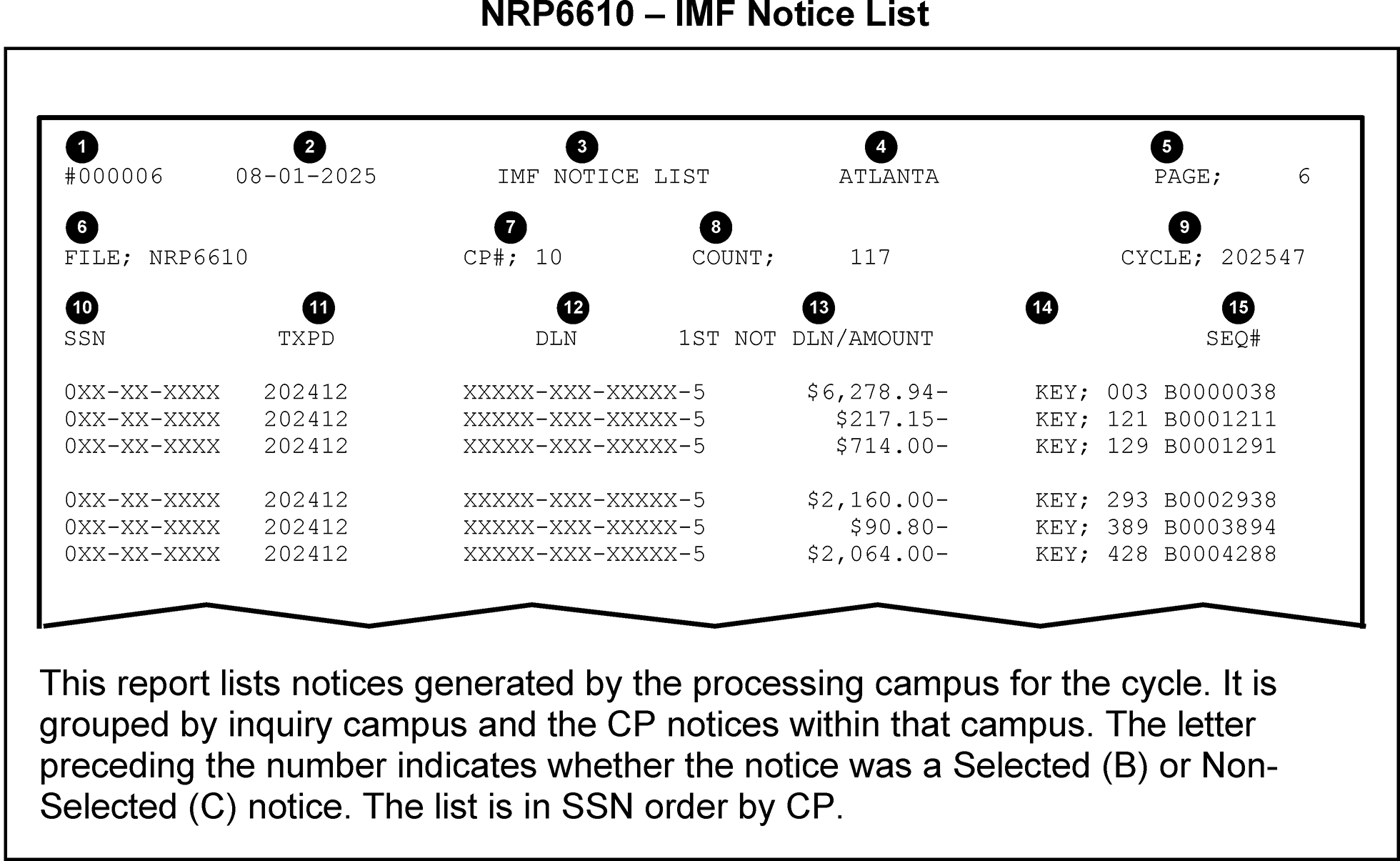
NRPS selects Settlement Notices and Adjustment Notices for review by analyzing data from the following sources:
- CP Notice Records — NRPS uses this information to print a one-page overview "Quick Print" of the selected notice for the review.
- Entity and Tax Modules — NRPS uses the Transcript Request System (TRS) to obtain data. Enterprise Computing Center - Martinsburg (ECC-MTB) and Enterprise Computing Center - Memphis (ECC-MEM) send this information to each Submission Processing Campus exclusively for NRPS processing. NRPS displays this information in transcript format as part of the Control D NRPS package. See Exhibit 3.14.1-3, Control D NRPS Batch Posted IDRS Entity, Notice Module, and Subsequent Tax Period Data, for an example.
- Return Transaction File (RTF) — NRPS extracts RTF data records for each selectable settlement notice. Control D NRPS package also contain printouts of this information. See Exhibit 3.14.1-4, Control D NRPS Transcribed Return Data for an example.
Pending Transactions — NRPS uses data from transactions that have not yet posted in IDRS as part of the selection criteria for certain keys. With CADE 2 daily processing, there is a decrease in pending transactions because of daily posting.
Pending Transaction Sources Possible Pending Transactions ECC Re sequence File Adjustments (TC 29x/30x) Unidentified Remittance Files (URF) Extensions (TC 460) Tape Edit Processing (TEP) (Pipeline and Corrected Unpostable files) Merge Transactions (TCs 001, 011, and 04x) Generalized Unpostable Framework (GUF) and Current Cycle ECC Unpostable Files Credit Transfers (Doc Code 24, 34, 48, or 58 transactions) Excess Collection File (XSF) Credit Transfers (Doc Code 24, 34, 48, or 58 transactions) Generalized Mainline Framework (GMF) Error File All other significant (non-zero) transactions Block Out of Balance (BOB) File All other significant (non-zero) transactions Reject File Payments (TC 610 or TC 670)
NRPS uses sets of criteria called Selection Keys in the selection process. The Selection Keys with similar criteria are grouped within a category that NRPS uses for prioritizing the selection order. Refer to the NRPS Selection Keys table below. The following is a list of categories in selection priority:
- CATEGORY A — Special Priority
- CATEGORY B — High Priority Local Selection
- CATEGORY C — Special Handling Required
- CATEGORY D — ES Discrepancy
- CATEGORY E — Pending/Posted Analysis
- CATEGORY F — Taxpayer Notice Code (Math Error) Notices
- CATEGORY G — Adjustment Notices
- CATEGORY H — Condition Analysis
- CATEGORY J — Low Priority Local Selection
CATEGORY K — Miscellaneous
The following table defines selection groups.
Group Definition A Multiple TPNCs B Prior Year TPNCs C Filing Status TPNCs D Standard Deduction TPNCs E Schedule A TPNCs F Schedule D TPNCs G Alternative Minimum Tax TPNCs H Dependents with unearned income TPNCs I Schedules C, E, F, and J TPNCs J Earned Income Credit TPNCs K Income TPNCs L International TPNCs M Form W-2 TPNCs N Child Tax Credit TPNCs O Adjustments to Income TPNCs P Payments and Credits TPNCs Q Rejects TPNCs R Schedule SE TPNCs S Schedule H TPNCs T Educator Expense/Tuition and Fees Deduction TPNCs U Exemptions TPNCs V Taxes TPNCs W Other Credits TPNCs X Elderly/Disabled Credit TPNCs Y Child and Dependent Care TPNCs Z Exemptions/Standard Deduction TPNCs
NRPS Selection Key Description
Key NRPS Selection Key Description Category 001 Overpaid notice for $100,000 or more. See IRM 3.14.1.6.17.1, Key 001 - Overpayment Notices of $100,000 or More. C 002 Balance due notice issued and a current cycle refund in another tax period. C 003 Overpaid adjustment notice for $100,000 or more. See IRM 3.14.1.6.17.2, Key 003 - Overpayment Adjustment Notices of $100,000 or More. C 004 ES payments displayed on taxpayer copy incomplete or out of balance with tax data. See IRM 3.14.1.6.17.3, Key 004 - ES Discrepancy Notice with Incomplete or Out of Balance Payment Data. C 008 Balance due notice for $100,000 or more. See IRM 3.14.1.6.17.4, Key 004 - Balance Due Notices of $100,000 or More. C 009 Balance due adjustment notice for $100,000 or more. See IRM 3.14.1.6.17.5, Key 009 - Balance Due Adjustment Notices of $100,000 or More. C 012 Notice is CP 14I, 21I, or CP 22I. A 013 Notices in which the return has a Form 8962, Premium Tax Credit (PTC). 014 Notices in which the return has a Form 8941, Credit for Small Employer Health Insurance Premiums, with significant amounts in ACA fields. 021 Withholding claimed on return equals posted ES payments. D 023 One ES payment in the notice was not claimed on the return. D 025 ES credit claimed on the return, but no ES payments are posted in the notice module. D 026 Verify payments received more than two months after period end are not for the next year. D 027 Verify inconsistent payment in the notice module. D 028 ES credit posted, but no ES credit was claimed on the return. D 029 ES payment posted differs by 10 percent or more of ES credits claimed by taxpayer. D 030 ES credit claimed less than ES credits posted equals credit balance in another tax period. D 031 ES credit claimed less than ES credits posted equals one to four pending/posted payments. D 032 ES credit claimed equals one to four pending/posted payments including notice module. D 033 Refund over $1,000 with a $200 or more difference between overpay claimed and allowed. D 034 Pending spouse offset — Check spouse's account, prevent refund from generating refund/spouse notice, transfer credit. D 035 Tax per taxpayer and tax per computer differ by $2,000 or more — Overpayment notice. H 036 Tax per taxpayer and tax per computer differ by $2,000 or more — Balance due notice. H 037 Select if TPNC 101 or 108 is present and filing status is not 1. H 038 Prior year credit elect/current year refund. Verify taxpayer intentions in current year. H 039 Select if TPNCs 121 and 158 are both present. H 040 ES Penalty posted differs from Form 2210, Underpayment of Estimated Tax by Individuals, Estates and Trusts, ES Penalty amount, no computer condition code (CCC) "P" — Check Form 2210. H 050 Section 965 - RPC F Indicator Detected. A 051 Section 965 - DPC 64 Payment Detected. A 054 Form 1040 with TPNC 141 and total income per computer minus total income per taxpayer equals either Gross IRA Distribution or Gross Pension Annuity. H 055 TPNC 190 is only TPNC present. H 057 Overpaid $100,000 or more — current cycle adjustment. C 059 TPNC 209 is present and either Qualified Taxable Dividends or Schedule D Profit/Loss is significant amount. H 060 Math error notice for tax period more than 2 years prior to current year. See IRM 3.14.1.6.17.7, Key 060 — Tax Period More Than 2 Years Prior to Current Tax Year. F 061 Multiple math error explanations, see IRM 3.14.1.6.17.8, Key 061 — Multiple Math Error Explanations. F 062 TPNC 211 is present and Qualified Taxable Dividends is greater than Taxable Dividends. H 063 TPNC is 217 Tentative Tax per Taxpayer is zero or Taxable Income per Computer is greater than zero. H 064 TPNC 284, 285, 286, 287, 288, 289, 290, 291, 292, or 293 and the control DLN has an ELF FLC. H 065 Schedule H filed without a return (loose Schedule H).See IRM 3.14.1.6.17.9, Key 065 — Loose Schedule H. K 066 TPNC is 285 or 287 and Control DLN does not have ELF FLC and Combined Schedule C, E, or F is not zero. H 067 TPNC is 291 and Schedule D Profit/Loss or Schedule E Profit/Loss is significant. H 072 Balance due notice issued and a matching credit transaction is pending. E 073 Notice issued and a money transaction is pending. E 074 Notice issued and an account merge transaction is pending. See IRM 3.14.1.6.17.10, Key 074 — Pending Merge Transaction. E 075 Notice issued and a matching credit transfer transaction is pending. E 076 Balance due notice issued and credit is available for possible offset. E 077 CP 14 or CP 60 (FS-3) issued, and credit is available in another tax period. E 078 Delinquency penalty assessed, but extension of time to file (TC 460) pending. E 079 TPNC is 218 and Tentative Tax per Taxpayer is zero. H 083 Adjustment notice issued and the credit is refunding. G 085 Requested by another area outside Notice Review. B 086 Requested by Notice Review. B 087 Requested by Notice Review. B 088 Requested by Notice Review. B 089 Requested by Notice Review. B 090 SSN — Requested by Notice Review. B 091 ERS DLN — Requested by Notice Review. See IRM 3.14.1.6.17.11, Key 091 — Selection Requested by Error Resolution (ERS). B 092 Local Selection — CP Requested by Notice Review. J 093 Money amount range — Requested by Notice Review. B 094 Notice matches the requested Partial or Full DLN (match on the significant digits only). B 095 CP number/Penalty code — Requested by Notice Review. B 096 Adjustment reason code — Requested by Notice Review. B 097 ZIP Code — Requested by Notice Review. B 098 SSN/tax period — Requested by Notice Review. B 099 Requested by Notice Review. B 100 TPNC explanations not computer-generated. See IRM 3.14.1.6.17.12, Key 100 — Non-Standard TPNC Explanations Not Computer Generated. A Note:
Refer to IRM 3.38.147.3.8.1, Notice Review Processing System (NRPS) International Selection Keys for international information.
Reminder:
Selection keys over 100, correspond to Taxpayer Notice Codes (TPNCs) owned by ERS and are selected under Category F. TPNCs are updated annually, but may be update more frequently. See IRM 3.12.3-1, Taxpayer Notice Codes, for the most current information.
- Within a category, NRPS assigns a priority to each Selection Key.
NRPS performs the following steps for each Selectable Notice Record in the notice stream until the selection limit is reached, or until all notice records are processed:
- Begin with Category A.
- Use the highest priority Selection Key in the Category.
- If the Notice Record meets the Selection Key Criteria, go to step 8.
- If the current Selection Key is the last in the Category, go to step 6.
- Use the next highest priority Selection Key in the Category, go to step 3.
- If there are no more NRPS Categories remaining, go to step 16.
- Move to the next Category, go to step 2.
- Assign the current Selection Key as the Primary Selection Key.
- If there are no more NRPS Categories remaining, go to step 15.
- Move to the next Category.
- Use the highest priority Selection Key in the Category.
- If the Notice Record meets the Selection Key Criteria, go to step 14.
- If the current Selection Key is the last in the Category, go to step 9.
- Assign the current Selection Key as the Secondary Selection Key, go to step 17.
- Do not assign a Secondary Selection Key, go to step 17.
- Do not select the notice.
- End NRPS Processing.
The NRPS selection limit for each weekly cycle is 14,000 notices. As the number of selections increases at each Submission Processing Campus, the following changes occur in the selection process:
If the number of notices selected Then NRPS will Comes within 1,000 of the selection limit (14,000 by default) Bypass the following keys:
- All Category A Keys except 011, 012, 013, 014, and 100
- All Category B Keys
- All Category F Key except 060
- All Category J Keys
Reaches the selection limit (14,000 by default) Process the following keys only
- Category A Keys 011, 012, 013, 014, and 100.
New Taxpayer Notice Codes (TPNCs) are reviewed at 100 percent at the beginning of each filing season to ensure that all TPNCs are reviewed at least once. To ensure that the NRPS automated selection process selects at 100 percent, all TPNC percentages that have been manually adjusted using the Local Control File must be cleared prior to the first cycle.
- Use the Notice Disposition Reports to monitor the error rates of all TPNCs.
- Refer to the table in IRM 3.14.1.3.8, NRPS Local Control File, which is used to determine the correct Local Control File (LCF) selection rate for each TPNC.
Selectable Notices: These notices are subject to selection under NRPS and may also be subject to Manual Intervention. Notice images can be viewed from Taxpayer Correspondence Services: Servicewide Notice Information Program.
- CP 10/ CP 10 (SP) - Math Error on Return - Reduced Overpayment Applied to Estimated Tax
- CP 11/ CP 11 (SP) - Math Error on Return - Balance Due
- CP 12/ CP 12 (SP) - Math Error on Return - Overpaid
- CP 13/ CP 13 (SP) - Math Error on Return - Even Balance
- CP 14/ CP 14 (SP) - Balance Due, No Math Error
- CP 14H - Balance Due, Minimum Essential Health Coverage Payment (Shared Responsibility Payment)
- CP 14I - Balance Due - Individual Retirement Account File (IRAF) Taxes or Penalties
- CP 16/ CP 16 (SP) - Math Error on Return - Overpaid with Offset
- CP 21A/ CP 21A (SP) - Adjustment Notice, Balance Due (module is in Taxpayer Delinquent Account (TDA) status prior to the adjustment)
- CP 21B/ CP 21B (SP) - Adjustment Notice, Overpaid
- CP 21C/ CP 21C (SP) - Adjustment Notice, Even Balance
- CP 21H - Shared Responsibility Payment (SRP) - Adjustment Notice, Balance Due, Even Balance, or Overpaid
- CP 21I - Individual Retirement Account (IRA) Taxes - Adjustment Notice, Balance Due, Even Balance, or Overpaid
- CP 22A/ CP 22A (SP) - Adjustment Notice, Balance Due (not in TDA status prior to the adjustment)
- CP 22H - Shared Responsibility Payment (SRP) Adjustment Notice, Balance Due
- CP 22I - Individual Retirement Account (IRA) Taxes - Adjustment Notice, Balance Due
- CP 23/ CP 23 (SP) - Estimated Tax Credits Discrepancy, Balance Due (may contain a math error)
- CP 24/ CP 24 (SP) - Estimated Tax Credits Discrepancy, Overpaid (may contain a math error)
- CP 25/ CP 25 (SP) - Estimated Tax Credits Discrepancy, Even Balance (may contain a math error)
- CP 30 - Estimated (ES) Tax Penalty Notice - Reduced Refund/Overpaid/Balance Due
CP 30A - ES Penalty Reduced or Removed Estimated Tax Penalty/Overpaid/Balance Due
Note:
CP 30 and CP 30A notices are only selected for review if requested on the Local Control File or if there is a Refund-E transcript for the same SSN/Tax Period as the notice. These notices are not included in the review package if not selected.
- CP 47A - Tax Assessed, Notification of the Requested Credit Elect/Refund Being Applied to Section 965 Tax Liability.
- CP 47B - Tax Assessed, Notification of a Credit Elect/Refund Being Applied to Section 965 Tax Liability.
- CP 47C - Tax Assessed, Including Section 965 Tax Liability.
- CP 51A - We've Calculated Your Income Tax For You - Balance Due
- CP 51B - We've Calculated Your Income Tax For You - Refund
- CP 51C - We've Calculated Your Income Tax For You – Even Balance
- CP 56 - Annual Section 965(h) Installment Notice.
- CP 60 - We Removed a payment Erroneously Applied to Your Account. - Balance Due
- CP 62 - Notice of Credit Transfer - We Credited Your Account
- CP 71/ CP 71 (SP) - Taxes Still Owed - Annual Reminder
- CP 77 - Final Notice, Notice of Intent to Levy, Alaska Permanent Fund Dividend Levy Program (AKPFD)
- CP 90 - Final Notice, Notice of Intent to Levy and Notice of Your Right to a Collection Due Process Hearing
- CP 91 - Final Notice, Before Levy on Social Security Benefits and Your Right to a Hearing
Associated Notices: These notices are not subject to selection, but are included in the review package if NRPS selects another notice for the same taxpayer (TP)/spouse and are also subject to Manual Intervention:
- CP 08 - TP May Qualify for Additional Child Tax Credit
- CP 09 - EIC Potential for TP With Qualifying Children
- CP 17 - Refund of Unfrozen Excess Estimated Tax (ES) Credits
- CP 27 - EIC Potential for TP Without Qualifying Children
- CP 45 - Reduced Credit for Estimated Tax - Credit Elect Changed
- CP 49/ CP 49 (SP) - Overpayment Adjustment - Refund Applied to Other Liabilities
- CP 54B - Additional Information Needed Regarding Name and Social Security Number (SSN) - Refund Delayed
- CP 54E - Discrepancy Between Name and Social Security Number (SSN) - Estimated Tax Payments
- CP 54G - Discrepancy Between Name and Social Security Number (SSN) - Even/Balance Due
- CP 54Q - Discrepancy Between Name and Social Security Number (SSN) - Second Request
Manual Intervention Notices: NRPS will neither select these nor associate them with a selected notice. However, they may appear on the NRPS Manual Intervention List.
- CP 15 - Civil Penalty Notice
- CP 15B - Civil Penalty Notice for Trust Fund Recovery Penalty
- CP 18 - Unauthorized Disclosure
- CP 32 - We Sent You a Replacement Refund Check to Replace the One That Expired
- CP 32A - Call Us to Request a New Refund Check - Old Check Has Now Expired
- CP 39 - Overpaid Taxes Applied to Your Balance Due from a Secondary Social Security Number (SSN)
- CP 42 - Overpaid Taxes Applied - Refund Reduced to Pay on a Secondary Social Security Number (SSN)
- CP 44 - Refund Delayed Because You May Owe on Another Non-Individual (IMF) Account
- CP 52 - Reduced SE Earnings
- CP 53/ CP 53 (SP) - Refund Check Will Be Sent to You by Mail - Failed Direct Deposit
- CP 74 - Successfully Recertified to Claim Credits (Form 8862)
- CP 75 - Refund Hold - Return Being Examined Regarding Credits Claimed, Need More Information (EIC, ACTC, PTC)
- CP 75C - Earned Income Credit (EIC) Ban is Still in Effect
- CP 79 - We Denied the Credits Claimed (EIC, AOTC, CTC, ACTC, or ODC)
- CP 79A - We Denied the Credits Claimed and Applied a Two-Year Ban (EIC, AOTC, CTC, ACTC, or ODC)
- CP 79B - We Denied the Credits Claimed and Applied a Ten-Year Ban (EIC, AOTC, CTC, ACTC, or ODC)
- CP 80 - Unfiled Tax Return - Credit on Account
- CP 81 - Unfiled Tax Return - Credit About to Expire, Possible Refund
- CP 84 - Payment for Elective Payment Election has been reduced
- CP 92 - Notice of Levy on State Refund Notice of Right to a Hearing
- If there is a CP Notice selected by NRPS for OLNR inventory and a Priority Refund Transcript in AMS within the same cycle, NRPS will provide a statement on the Control D NRPS package Contents Page indicating the TIN also has Priority Refund Transcript in AMS.
After NRPS completes the selection process, it combines all the selection information into NRPS batches. A NRPS batch consists of the following:
- NRPS Batch Separator Page
- Control D NRPS package
- NRPS Selection List
- Use Control D/Web Access to view NRPS batches. For additional information, refer to the Notice Review IMF Job Aid 2534-002 and IRM 3.14.1.4, OnLine Notice Review (OLNR).
NRPS produces the following additional types of output:
- NRPS Batch Control Sheet
- NRPS Document Charge-Out
- NRPS Batch Return Request List
- NRPS Association List
- NRPS Manual Intervention List
- NRPS Selection Report
- NRPS TPNC Trend List Report
- NRPS Non-package Selection List
- NRPS Duplicate Selection List
- Notice Retype Error Report
NRPS Automated Local Control File Selection Report
All the above print outs generate from the following NRPS output files:
NRPS File Generates the following NRP6110 Control D NRPS package for notices (associated notice information) selected in the notice selection processing NRP6110P Hard Copies. These include copies of the notices, commonly referred to as the "Quick Print."
NRP6120 Document Charge-outs and Files Batch Control Sheets for the Control D NRPS package NRP6130 Duplicate copy of Selection List and IMF NRPS Batch Control Sheets for the Control D NRPS package NRP6630 - Large Dollar List
- NRPS Non-Package Selection List
- NRPS Manual Intervention List
- NRPS Selection List
NRP4510 Notice Listing NOR 0141 Intercept NOREF List
NRP8240 Notice Retype Error Report NRP6096 Notice Retype Error Report NRP6080 Campus Local Control File List NRP6610 IMF Notice Listing of Selected CPs
The Batch Separator Page identifies the beginning of each batch and contains the following information:
- Page Number
- Batch Number
- Batch Type — Either "OVERPAID" or "NOT OVERPAID"
- Batch Sort — Either CP, KEY, or MULTIPLE
- Current Cycle
The Control D NRPS package contains various types of information needed to review each selected CP Notice. Each batch may contain up to 20 selected notices.
Note:
Most packages contain only one notice. However, the Control D NRPS package will contain all selectable or associated CP Notices that generate in the current cycle for a taxpayer or spouse, if one or more is selected for review.
- Each Control D NRPS package contains a Contents Page, online notice information, transcribed posted return data, an Entity transcript, and a tax module transcript. These items are explained in greater detail in the subsections that follow.
Viewed online as the first page of each Control D NRPS package, this page contains the following information:
- Selection Key Number, along with a brief description of the key
- List of requested documents
- Manual Intervention Reason Codes
- List of all selected or associated CP Notices in the package, with CP number and DLN
- List of pending transactions
- Statement indicating there may be a Priority Refund Transcript in the same cycle on AMS, if applicable
Exhibit 3.14.1-5
- Depending on the CP selected, it may either be a duplicate of the "live" notice, or a shortened version of it. The shortened version displays only the notice record information, such as dollar amounts and TPNC numbers, as opposed to the Taxpayer Bill of Rights language and TPNC explanations.
- For CP Notices, the visual representation (or "Quick Print" ) of the notice is created from its own separate file, rather than from the Notice Edit File, as in the past. This change in source data means that occasional abnormalities appearing on the "Quick Print" (which is in the old Legacy notice format), are not part of the Notice Edit File. Therefore, those abnormalities will not be on the printed notice.
- Displays transcribed return fields for selected settlement notices. This is also referred to as the Return Transaction File (RTF). Exhibit 3.14.1-4
- Displays the entity information for the notice TIN, as well as for the secondary TIN, if applicable (optional).
The last page of each batch shows the following information for each CP Notice:
- Count (item number on the list)
- TIN
- Document Locator Number (DLN)
- Notice Sequence Number
- CP Number
- Primary Selection Key
- Secondary Selection Key
- Notice Disposition Choices
NRPS produces two different (but related) Batch Control Sheets. Refer to the NRPS 6130 — Batch Control Sheet exhibit. Exhibit 3.14.1-6
Note:
The Files Function copy has a line for each batch, showing the number of document charge-outs in each batch. (Refer to IRM 3.14.1.5.1.2, Associating Documents from Files).
- The NRPS Document Charge-out provides information needed by the Files Function to pull documents for use in reviewing CP Notices.
- The NRPS Batch Return Request List is a cover sheet that separates the document charge-outs by batch and to accompany the requested documents sent by the Files Function. It contains a line for each charge-out in the batch.
The Manual Intervention List includes notices that may or may not have been selected for review, but manual intervention is required before allowing them to be mailed (if appropriate).
- This list is divided into three parts based on the Manual Intervention (MI) Code. If any one of the MI Codes for a Manual Intervention notice is a "1" , then it is printed on the MI Code 1 List. If any one of the MI Codes is a "4" , it is printed on the MI Code 4 List.
- Notices on this list may have also been selected by a NRPS selection key.
- Refer to IRM 3.14.1.4.3.1.1, Manual Intervention List for additional information.
- The NRPS Selection Report contains notice/transcript input and selected-for-review counts, sorted by selection key and by Taxpayer Notice Code (TPNC), with year-to-date totals, for notices selected in the current cycle. Refer to the NRPS 6130 — NRPS Selection Report exhibit. Exhibit 3.14.1-7
The Notice Retype Error Report (NRPS 8240) contains information on notices that were unable to be processed after cycle release. The notices on this report must be recreated by one of the following methods:
- All Individual Master File (IMF) notices, except for TDA notices, should be recreated using the transaction code (TC) 971 action code (AC) 264 process.
- Input a TC 971 AC 264 (using CC REQ77 in IDRS) to create a Notice Recreate Transcript CP 67 that will fall out to OLNR. These transcripts will be received in batch "00000" . Once the transcript is received, the notice can be recreated by converting the CP 67 transcript into a retyped CP limited to:
CP 08, TP May Qualify for Additional Child Tax Credit
CP 09, EIC Potential for TP With Qualifying Children
CP 10, Math Error on Return - Reduced Overpayment Applied to Estimated Tax
CP 11, Math Error on Return - Balance Due
CP 12, Math Error on Return - Overpaid
CP 13, Math Error on Return - Even Balance
CP 14, Balance Due, No Math Error
CP 16, Math Error on Return - Overpaid with Offset
CP 21 various alpha codes, Adjustment notices. See IRM 3.14.1.3.2, CP Notice Types for more information.
CP 22 various alpha codes, Adjustment notices. See IRM 3.14.1.3.2, CP Notice Types for more information.
CP 23, Estimated Tax Credits Discrepancy, Balance Due (may contain a math error)
CP 24, Estimated Tax Credits Discrepancy, Overpaid (may contain a math error)
CP 25, Estimated Tax Credits Discrepancy, Even Balance (may contain a math error)
CP 27, EIC Potential for TP Without Qualifying Children
CP 30, Estimated (ES)Tax Penalty Notice - Reduced Refund/Overpaid/Balance Due
CP 30A, ES Penalty Reduced or Removed Estimated Tax Penalty/Overpaid/Balance Due
CP 45, Reduced Credit for Estimated Tax - Credit Elect Changed
CP 49, Overpayment Adjustment - Refund Applied to Other Liabilities
CP 51 various alpha codes. See IRM 3.14.1.3.2, CP Notice Types for more information
- The NRPS Automated Local Control Selection Report shows the previous four weeks' selection percentages and the current cycle's selection percentage, based on the automated selection process.
- Submission Processing Campuses can adjust the number of notices selected weekly by NRPS through the use of the Local Control File (LCF) produced by CC NRP97 on IDRS.
The LCF can increase or decrease the number of notices selected for review. Additionally, the non-print indicator can be input on the LCF to suppress printing of Control D NRPS package when only a list is needed. Returns may be requested for the selected notices, if necessary.
- NRPS will automatically delete a specific SSN or DLN request when selected or if it is not selected within six weeks of its LCF request. This prevents the file from getting unnecessarily large.
- Other types of requests remain on the LCF until action is taken to change or delete the request.
- Delete all TPNC requests, in Category F, from the LCF at the beginning of each year to ensure that the NRPS automated selection process is initiated.
Use input screen information for instructions on how to use Substitute Keys 085-089 and 099 to identify local selections.
Note:
Use Substitute Key 085 to identify selection requests from other Submission Processing Campuses only.
TPNC defect rates and selection percentages are computed by the NRPS system using data from OLNR NRPS 0030 Report. It is no longer necessary to manually set the percentages for TPNC selection. While the systemic selection can be overridden by manual input, this occurrence should be kept to a minimum and only under special circumstances (programming problem, etc.).
Note:
Manual input to the LCF will override the systemic calculation. The percentages in the LCF must be cleared to resume systemic calculation.
See the chart below for defect rates and selection percentages. NRPS will select 100 percent for a particular TPNC until the year-to-date volume reviewed for that TPNC exceeds 50 notices.
If the defect rate is Then input For a Selection Rate of =0 or <6 percent 001 1 percent >6 and <7 percent 010 10 percent >7 and <8 percent 025 25 percent >8 and <10 percent 033 33 percent >10 and <12 percent 050 50 percent >12 and <14 percent 075 75 percent >14 percent 100 100 percent Reminder:
NRPS will stop selection based on TPNC when the threshold of 14,000 notices is reached, so that the remaining categories (Category G, Adjustment Notices and Category H, Condition Analysis) can be selected with the remaining 1,000. The remaining TPNC, partial DLN, and CP percentages requested via the LCF will not be selected. Selection limits should not be raised above the 14,000 mark, unless requested or approved by Headquarters. Refer to the chart in Item (4) of IRM 3.14.1.3.1, Notice Selection Process.
- A priority option causes 100 percent of the notices containing a specific TPNC to be selected without regard to normal exception processing, i.e., previous CARE review ≡ ≡ ≡ ≡ ≡ ≡ ≡ ≡ ≡ ≡ ≡ ≡ ≡ ≡ ≡. This is limited to 40 TPNCs. Other options control the Exception Override of Selection Keys 028/029 and TPNC 100 Document Charge-outs.
- The computer processing used to access this capability resides in IDRS. Three programs are used to update and maintain the NRPS Local Control File database.
- Adjust the LCF using CC NRP97. This IDRS command code allows sites to add, change, and delete requests on the LCF. Any LCF changes should be input by 12 P.M. local time on Thursdays to ensure notices are captured for the next cycle. The weekly deadline for making changes is determined by the running of NRP98 and is run on Friday afternoon. After the records are processed, NRP99 is run to create a new LCF. NRP99 is run on Friday 12:00 noon. Any data input on the LCF after NRP98 is run and before NRP99 is run is overwritten by NRP99. To ensure requests are processed, input between Monday and 12:00 PM Thursdays local time.
- Monitor the TPNC Trend List to assist in estimating notice fallout, and to provide feedback to ERS.
Review the NRPS Notice Disposition Reports to determine TPNC error rates.
Note:
Notices with an "E" disposition are not included when determining the defect/selection rate by NRPS.
Review the latest NRP98/NRP99 Reports for:
- Possible changes to selection criteria already on the LCF.
- Possible re-entry of TINs and DLNs which are about to expire.
- Requests for notices by TIN will also include an optional entry of tax period. These requests will remain until the specific request is met or the user removes the request from the LCF.
- List the changes to be made to the LCF.
- Use CC NRP97 to input the changes to the LCF. See IRM 3.14.1.3.8.2, Command Code (CC) NRP97 Input Information, and IRM 2.4.45, Command Code NRP97, for terminal input requirements of CC NRP97.
- When inputting LCF request to select notices by CP, sites can now indicate if the selection should bypass notices generated from MeF returns.
- Review the NRP98 report to check input data for accuracy. Correct any errors.
The NRP 6130 report generates each week. This report lists every notice and transcript selected for review. The table below lists the LCF specifications.
Title Action Result Data Retention Requests are deleted from the LCF only under the following circumstances: Not Applicable Data Retention ERS DLN and Full DLN Automatically deleted when selected by NRPS or after six weeks if not selected Data Retention SSN with or without Tax Period Automatically deleted when selected by NRPS Data Retention All others Must be manually deleted Local Control File (LCF) Specifications The LCF uses the following Selection Keys: Must be manually changed through NRP 97. Selection Keys 090 — SSN Selection 094 — Full/Partial DLN Selection Selection Keys 091 — ERS DLN Selection 095 — Penalty Code Selection Selection Keys 092 — CP Number Selection 096 — Adjustment Reason Code Selection Selection Keys 093 — Balance Due Amount Selection nnn — TPNC Selection Substitute Keys The LCF uses keys 085, 086, 087, 088, 089, and 099 as Substitute Selection Keys that may only be used to replace Selection Keys 090 through 096. TPNC, Exception Override, and normal criteria selections cannot be selected under a Substitute Selection Key Not Applicable Substitute Keys Not Applicable
IDRS Command Code (CC) NRP97 is used by Notice Review to add, change and delete records on the Local Control File (LCF). This command code is only used for future cycles. It does not impact the current cycle already loaded into Control D NRPS and OLNR.
Caution:
CC NRP97 changes must be input before 12:00 PM (local time) on Thursdays to be applied to the cycle loading the next day. The NRP97 command code is generally available on Fridays before 9:59 AM ET for the cycle after the one loading that day, but input will not be applied to any notices for the new cycle loading that Friday.
Several areas throughout this IRM refer to updating, adding, and deleting items to the LCF. Data input using CC NRP97 adds specific types of files or notices to the LCF. The Notice Review Processing System (NRPS) will use the data to select any notices that meet the NRP97 input criteria and include them in future cycles.
Note:
Use the information in this section and IRM 2.4.45, Command Code NRP97, for specific input information.
- Notice Review leads, managers, and clerks use CC NRP97 to add, delete, and change priority review per HQ direction.
- Notice Review leads, managers, and clerks use CC NRP97 to add notices to the LCF for ERS, CI, or other areas to intercept incorrect notices. These requests can be made using DLN or information other than TIN.
Notice Review tax examiners use CC NRP97 to intercept a future cycle notice the taxpayer should not receive that could not be stopped from generating. Once added to the sample request using CC NRP97, the notice will be selected in the next cycle (depending on the input timeframe, it may take two cycles). The notices being selected for intercept in this instance will be voided in OLNR (see Exception below). Follow specific guidelines for when to update the LCF (using CC NRP97) throughout the IRM. These actions are in addition to correct disposition of the current cycle notice in OLNR.
Exception:
If a notice being selected via CC NRP97 input should not be voided, contact the lead to ensure the correct notice disposition is used in OLNR in the next cycle. This is rare; most notices are added to the LCF to be voided.
- Input CC NRP97 in the upper left corner of IDRS and transmit. No other information is needed for NRP97 input to display the response screen.
- The CC NRP97 response screen displays with the heading NRPS LOCAL CONTROL FILE BASIC OPTIONS.
The following identifier choices appear on the BASIC OPTIONS menu screen and can be used to display, add, change, or delete a file in the LCF.
Identifier Record Type T SSN/EIN D DLN M MFT/PERCENTAGE C CP NUMBER/PERCENTAGE L LARGE CORPORATION N TPNC OR TPNC GROUP/PERCENTAGE B BALANCE DUE AMOUNT A ADJ REASON CODE/PERCENTAGE I MISCELLANEOUS IMF/BMF OPTIONS E EMPLOYMENT CODE/AMOUNT Click directly behind the indicator letter (list above) for the file type being updated and transmit. A new response screen will display. The layout of the new response screen depends on the chosen indicator. Tax examiners will generally use indicator option "T" to update the LCF by TIN.
Caution:
The following steps are for NRP97T input only. Other NRP97 indicator options will have different input requirements.
- When intercepting a future notice using T, on the response screen, choose "I" for an IMF TIN.
- In the next field "return charge out wanted" , input "N " for no, if the return is not paper or is not in Notice Review. If the case involves a paper return, the return is currently located in Notice Review, and the return will be retained until the future notice is selected by NRPS, then input Y for yes.
- The next field is SSN. The number input is all that is needed. The dashes are pre-populated by IDRS.
The next field is Substitute NRPS Key. Use one of the Substitute (selection) Keys 085-089 or 099. Use the CC NRP97 key preferred by your SPC. This allows for leads and clerks to quickly find these notices in the next cycle to make sure OLNR is updated correctly.
Exception:
Use Substitute Key 085 to identify selection requests from other Submission Processing Campuses only.
- Retention should never be set to "Y" by tax examiners. This requires a manual removal of the TIN from the LCF at a later date.
- Priority should always be set to "Y" to ensure the capture of notices for the chosen TIN.
- Print Package should be "N" unless otherwise directed per local guidelines.
- Once all the above data has been input, finalize the addition to the LCF by inputting an "X" to the right of the field ADD and transmitting.
- The menu completion options at the bottom of each indicator response screen are DISPLAY, CHANGE, ADD, and DELETE. Completing all necessary data on the response screen will allow a choice of any of these actions.
- There are two other menu options provided at the bottom of all identifier input response screens. The OPTION-MENU is used to return to Basic Options. The CC NRP97 response screen menu. The EXIT TAP option is used to clear the entire screen and allow input of another CC if desired, or to sign off the IDRS terminal. To choose these options input an "X" on the line to the right of the menu option and transmit. No other field input is required to use these two options.
The OnLine Notice Review (OLNR) web application allows tax examiners to review notices, determine notice disposition, and retype notices online.
- Selected taxpayer notices are not printed until after the NRPS batches have been reviewed, and OLNR goes through its weekly "closeout" process (term used for end-of-cycle processing that controls notice printing). This allows the system to avoid printing notices that should be voided and allows full editing capabilities in case a notice needs correction prior to mailing.
- Notices that are not reviewed before cycle closeout will automatically default to the "NR" (Not Reviewed) disposition and are then converted to the "P" (Print) disposition. This default provides a more correct notice accuracy rate, since only notices that are reviewed in a given cycle are compiled into notice accuracy numbers for reporting.
The OLNR web application creates the weekly Notice Disposition Report.
- Entering the applicable disposition code tells the system how to process the notice.
- At the end of each cycle, the disposition codes are applied to the notice files. The notice data is updated prior to printing.
- After the cycle is closed out, the system uses the disposition code data to create the Notice Disposition Report. See IRM 3.14.1.5.1.5, Printing of Notices - Correspondence Production Services (CPS), for more information.
The following are features/capabilities of the OLNR Retype function:
- Ability to correct entity on selected and associated notices.
- Ability to correct data fields on most selected notices including Penalties and Interest.
- Ability to add and delete TPNCs on math error notices using a drop-down list.
- Ability to add a label to selected, associated, and manual intervention notices.
- Ability to correct entity fields on Manual Intervention (MI) notices or void unnecessary MI notices and CAF copies of notices or void them (even if the primary notice is mailed).
- Ability to convert or retype from one CP number to another CP number.
Note:
For information on how to utilize the OLNR System, refer to the Notice Review IMF Job Aid 2534-002.
- The OLNR system allows the user to convert from one CP Notice type to another, when adjustments to the account require a different type of notice.
- Almost all appropriate field values from the original notice will be transferred into the conversion notice, where they can then be adjusted by the examiner, if necessary.
- If any adjustment actions will be reflected in the converted notice, take appropriate action to prevent unnecessary adjustment notices.
- When converting to or from a Non-Compute notice, special instructions apply with respect to the Pay by Date field of OLNR. Follow instructions in IRM 3.14.1.6.16, Reviewing Non-Compute Notices -CP 51A, CP 51B, and CP 51C.
- Once inside a cycle of work in OLNR, and a batch is selected, the Notice Disposition screen is loaded and appears on the screen. It contains all the sequence numbers for the selected batch. As each case in the batch is reviewed, the user selects the disposition code for the desired notice action.
- The Notice Disposition Program sends the selected disposition codes to the mainframe, and the data is used to compile the Notice Disposition Report. The disposition code entered for each notice will determine how the notice will be handled by the back-end printing programs.
Description of the Notice Disposition Codes:
- Entity-Only Change ("E" or "EI" Disposition): These notices require an Entity only change.
- Hold Notices ("H" Disposition): These notices are held (awaiting additional information or a response from the taxpayer) for processing in a future cycle.
- Label Notices ("L" or "LI" Disposition): Labels are added to the notice online.
- Print Notices ("P" or "PI" Disposition): This disposition results in the printing of the notice without any changes.
Retype Notices ("R" or "RI" Disposition): Any needed changes/corrections are made directly online by the tax examiner.
Note:
For CP 67 Notice Recreate Transcripts, the "R" disposition is used solely for the purpose of converting the transcript into another notice.
- Voided Notices ("V" or "VI" Disposition): These notices are never printed.
The table explains the result of selecting each disposition code. The Notice Disposition program includes the "I" for refunds that have been prevented by Notice Review from generating so that this data can be reflected in the Notice Disposition report.
Disposition Code Action "E" This disposition is entered when only an entity change is required "EI" This disposition is entered when the situations in "E" above exist, and the refund is prevented from generating "H" This disposition will cause the notice to be held for processing in a future cycle. It is only entered when the review of the notice cannot be completed in the current cycle "L" This disposition allows the notice to be printed with the insertion of the user-selected label(s).
"LI" This disposition should be entered when the situations in "L" above exist, and the refund is prevented from generating "P" This disposition will cause the notice to be printed in its original condition. Code "P" is only used when the notice is correct "PI" This disposition is only entered when the notice is correct. It is printed, but the refund is prevented from generating "R" This disposition is used when the notice will be retyped. Code "R" should also be used when both an Entity change and a Label are needed "RI" This disposition is used when the notice will be retyped, and the refund is prevented from generating "V" This disposition will prevent the notice from being printed. It should be used when the notice is voided "VI" This disposition is used when the notice is voided, and the refund is prevented from generating
Every effort must be made to review, correct, and select disposition of notices in the current cycle to minimize negative impact to the taxpayer. Do not hold notices past cycle; contact headquarters (HQ) for approval.
Exception:
If a local or HQ analyst cannot be reached before cycle closeout (e.g., Friday) disposition the notice H in OLNR and send an email to local P&A analyst(s) and HQ analyst(s) with the cycle, batch, sequence number and the specific reason for holding the notice.
- In situations where a review of a specific notice cannot be completed before the end of the cycle, the notice should be held and then released when the review can be completed.
Input disposition code "H" to hold the notice for processing in a future cycle. Examples that may cause the review of the notice to be delayed include:
- Request taxpayer payment verification using a 1687C Letter- Unidentified Payment/Credit, if the payment cannot be verified using Remittance Transaction Research (RTR) System or EFTPSE,
- Request for documents from the taxpayer that were missed in pipeline processing, or
- Referring of a case to RIVO.
- Notices should be worked as soon as the requested information or document(s) are received to minimize any further delay to the taxpayer and possible additional accrual of penalties and/or interest.
Balance Due notices should not be held past the current cycle unless approved by headquarters. If a Balance Due notice is held beyond cycle, change the Pay by Date to be consistent with the Pay by Date of balance due notices generating in the cycle of the held notice's release. Recalculate the interest, penalties, and any other applicable fields. When inputting a disposition of H also input a control status of B or M on the module and enter a STAUP for 8 weeks. When marking the notice in OLNR after a hold, reduce the STAUP to the appropriate number of weeks so that a CP 50X (collection) notice is mailed to the taxpayer in the appropriate timeframe.
Note:
If an original balance due is $100,000 or more and the balance has been decreased, see IRM 3.14.1.7.8.4 (5), Retyping Notices, for information on retyping the Pay by Date.
When an error is identified by quality review, they must have the notice corrected in the cycle it generated when possible. If Quality identifies an error near the end of the cycle and a lead is unavailable, then Quality must intercept any incorrect refund and hold the notice to allow time for a lead and the tax examiner to review the error and make the correction or prepare a rebuttal. The tax examiner is responsible for correcting the notice in OLNR and the account in IDRS.
Example:
Quality finds an error late Thursday and the account needs a NOREF. If a Notice Review lead is unavailable, Quality should intercept the refund (CC NOREFP) and disposition the notice H in OLNR.
- If a notice fails a validity check (OLNR Retypes), the notice is dropped from the back-end mainframe notice print processing and placed in the Notice Error File.
- The Notice Error File will contain information needed by Notice Review to manually retype the notice.
- Recreate the notice, by using the “quick print” and the retype data from the reports. Use the TC 971 AC 264 method described in IRM 3.14.1.4.3.3, Notice Recreate Transcripts CP 67. Recreate the notice as soon as possible to minimize any further delay to the taxpayer and possible additional accrual of penalties and/or interest.
Special reviews include:
- Manual Intervention — Non-Selected Notices
- Manual Intervention — Selected Notices
- Requests to Stop Notices from Other Areas
- Cases Controlled for Researching the Taxpayer's Account
- Notice Recreate Transcripts CP 67
- Perform manual intervention on selected and non-selected notices.
- Selected notices
When reviewing each notice, determine whether the notice has a Manual Intervention Indicator. This indicator is found in the appended data section of the Control D NRPS batch. If it does, enter a disposition code in OLNR that will account for the manual intervention (Entity or retype will be required. Print is not an option for MI cases) Non-selected notices
Manual Intervention Notices will appear in batches in the 9000 (9xxx) series. For notices that are not selectable, a disposition code of "E" should be applied to the notice, if changes are made to any of the entity screens. Entity fields will be updated during the print process.Caution:
If Manual Intervention batches are not marked in OLNR before cycle closeout, OLNR will systemically hold (auto-hold) the notices until they are worked.
When certain conditions are present on a notice, it may require Manual Intervention before being printed. The Manual Intervention List is divided into four parts based on the MI Code. The following table describes the MI Codes:
MI Code MI Code Description MI Code Explanation 3 Blind Trust Taxpayer has a Blind Trust 4 Service Center (Campus) Address Service Center ZIP Codes 5 No Doc Code 47 or 54 Adjustment notice with a DLN document code other than 47 or 54 6 ES Tax Payment Discrepancy Summary of payments listed at bottom of notice does not agree with Total ES Tax Payment(s) amount on the notice - If the notice is also selected by NRPS, the Manual Intervention information will be on the appended data section of the Control D NRPS package. If a Manual Intervention condition is present, the tax examiner must resolve it during the review.
If the notice is not selected by NRPS, the notice (and the Manual Intervention condition) appears on the Manual Intervention List, and in batches on OLNR beginning in the 9000 series (9xxx).
- The list shows one line for each notice, sorted by notice sequence number.
- Maximum of 24 to a batch.
- See the following sections for more explanation of the four MI Codes.
- Do not mail notices with a Manual Intervention Blind Trust Code 03 to the taxpayer. Send them only to the taxpayer’s representative.
- Review notices to ensure representative’s address. If necessary, correct the address.
Manual Intervention Code 04 indicates that the ZIP code (73301, 93888, 64999, 45999, 84201, and 19255) on the notice matches that of a Submission Processing Campus. Review the account entity on these notices. Follow the table below for notice disposition.
If a valid address is And the SP Campus status is Then Available Any - Select Disposition "E"
- Edit the correct address.
Not available 20, 56, or 58 - Use CC STAUPS to update the status to 51. See IRM 3.14.1.6.24, CC STAUPS, for more information.
- Void the notice.
Not available other than 20, 56, or 58 Void the notice.
- In most cases, Adjustment Notices will have a DLN Doc Code of "54" or "47" . If the DLN has a different Doc Code, then the notice will appear on the Manual Intervention List with Code "05" .
- When working Code "05" cases, check for an existing MFT 31 account using CC IMFOLI. MFT 31 primarily involves Innocent Spouse accounts.
If the sum of the payments shown on an Estimated Tax (ES) Discrepancy notice does not match the Total ES Payment amount on the notice, the notice will appear on the Manual Intervention List with Code "06" .
Note:
These notices do not follow the same instructions as settlement notice key 004 due to the Manual Intervention condition.
Retype the notice to add any missing original payments that correspond to dishonored check payments to equal the Total ES Payment amount.
Caution:
Do not remove Dishonored Check(s) from the notice, even if it is the only reason the ES discrepancy exists. The taxpayer needs to know why the ES discrepancy exists, and to which dishonored check any Bad Check Penalty (TC 280/286) is being applied.
- When researching a taxpayer's account that cannot be resolved during the review process, prepare adequate case documentation to allow resolution as quickly as possible upon completion of research.
- Since the Control D NRPS Package only stays available for 30 days, documentation should include any data from the Control D NRPS Package that will not be available on IDRS. Establish a control base on IDRS immediately and if necessary, input CC STAUPS. See IRM 3.14.1.6.24, Command Code STAUPS, for more information.
- Input disposition code "P" if the notice can be printed while the research is being completed.
- Input disposition code "H" if the notice cannot be printed until the research is completed.
These are some situations which require a notice to be built or recreated:
- A notice record contains bad data which prevents it from properly passing through the OLNR system.
- A notice was voided in error, when it should have been released in cycle.
- An incorrect notice was released, and a corrected notice must be sent in its place, with the apology label inserted. See IRM 3.14.1.7.8.5.15, Label 13
- A notice may be needed when there is no other notice or transcript generating in the system.
When a notice record contains bad data as described in Item (1) above, the notice record abends or deletes in error, and the Headquarters Analyst contacts the affected site to have the notice recreated.
Note:
Not all notices can be recreated see IRM 3.14.1.3.7, Other NRPS Batch Output, (6) for a list of available OLNR CP 67 notice conversions. If a notice cannot be recreated, the impacted site must send a Letter 544C to the taxpayer with all the relevant information including but not limited to: math errors, refund or balance due, and payment discrepancies.
Use the following instructions to generate the CP 67 Notice Recreate Transcript.
Note:
If creating a balance due notice from the CP 67, input CC STAUPS for six cycles. See IRM 3.14.1.6.24, CC STAUPS, and STAUPS in the IMF Notice Review National Job Aid 2534-002 for cycle information.
- Input CC REQ77.
- Input 971 in the "TC-FIELD" of the FRM77 response screen.
- Enter the Return Received Date from the "RET-REVD-DT" field of TXMOD in the "TRANS-DT>" field.
- In the "TC 971–CD>" field, enter Action Code (AC) 264.
- In the "Remarks" field, enter "CP 67 to CP xx" .
In IDRS, maintain an open control base. See IRM 3.14.1.7.2 Controlling Cases, for more information.
Reminder:
Retain the taxpayer information for use in locating the correct transcript in the "0000" batch.
When the TC 971 AC 264 posts, a CP 67 Notice Recreate Transcript will generate.
Caution:
Be sure to set a calendar reminder as to when the CP 67 will post. If the CP 67 cycle closes out without the transcript being converted to a notice, the transcript data will be lost, and another TC 971 must be input to start the process over.
- All CP 67 transcripts appear in the batch numbered with all zeroes (0000) for any given cycle and are considered Manual Intervention cases.
- The CP 67 must be converted to another notice prior to cycle closeout. If the transcript is not converted to a notice prior to cycle closeout, the opportunity is lost, and another TC 971 AC 264 must be input to create another CP 67.
- Create the new notice by selecting the "R" disposition in OLNR, and when the entity data appears, use the "Change" button feature for Notice Type, to change the CP 67 to the desired CP.
- The CP 67 notice record is mostly blank. When retyping or converting to the necessary notice, nearly all fields must be completed manually. Be careful to include all necessary items, such as taxpayer figures, AGI, TXI, tax, SE Tax, TPNC(s), Label(s), Pay by Date, etc. Double check the Entity tab information for accuracy. Be sure to include Name, DLN, and Filing Status information.
- AMS will systemically generate a TC 971 AC 264 upon selection of the Suspense Action "Convert Transcript to Notice" . The notice will be in the OLNR inventory in the next cycle.
- This subsection provides procedures for the Clerical Support staff within the Notice Review Function.
The Clerical Support staff provides a variety of services critical to the Control D NRPS and AMS processes. These services assist Notice Review tax examiners (and other customers) in providing accurate information to the taxpayer. The Clerical Support staff:
- Associates tax returns needed to review selected notices.
- Distributes printed Control D NRPS Package or TPNC 100 cases.
- Batches undeliverable notices.
- Stages work and assists management and leads as necessary.
- Enters Priority Refund Transcript closing or suspense actions when AMS has been down for 4 hours or more and tax examiners have been instructed to work Priority Refund Transcript inventory manually.
This subsection provides instructions on prioritizing duties performed by the Clerical Support staff. These include:
- Inputting Priority Refund Transcript closing or suspense actions into the AMS system (when AMS has been down for 4 hours or more). See IRM 3.14.1.5.1.1, Inputting Priority Refund Transcript Closing or Suspense Actions.
- Associating tax returns and other documents from Files. See IRM 3.14.1.5.1.2, Associating Documents from Files.
- Establishing priority of review. See IRM 3.14.1.5.1.3, Establishing Priority of Review.
- If AMS is down for 4 hours or more, tax examiners (TEs) will manually work the Priority Refund Transcripts using a listing available on Control D. TEs will indicate the manual action they performed on IDRS for each case, see Exhibit 3.14.1-12, AMS Refund Transcript Manual Action Sheet.
- Clerks will use the NR Manual Action Sheet to search for the correct refund transcript. Searches can be executed on the TIN, Transcript Type, Dollar Amount Range, or date to locate the correct case.
- Clerks should ensure each case is assigned to the correct tax examiner and the closing or suspense actions are input accurately to remove each case from the AMS unassigned queue.
Document Charge-outs and a Batch Return Request List generate weekly. Note the following:
The Files Function uses these forms to pull returns needed to review notices. Returns are routed in batch order (per the Batch Return Request List) to the Notice Review Function.
Note:
TPNC 100 returns should be received from the local ERS operation and not requested through Files.
- The Clerical Support staff associates the Batch Return Request List and the attached returns with the corresponding NRPS batch sheets, if the SPC utilizes physical prints.
- Assign Control D NRPS batches that do not need documents directly to the tax examiners.
- Associate all available documents (e.g., tax returns, ERS screen prints for TPNC 100 cases) with each batch before releasing to the tax examiners.
Error Resolution System (ERS) may request the Notice Review Function to select and correct a specific notice:
- ERS tax examiners must prepare Form 3465, Adjustment Request, and send it with the return to the Notice Review Function.
- Use LCF Key 091 to select the notice for review by DLN. Use full DLN for high priority review, and partial DLN for low priority review. See IRM 3.14.1.3.8.2, Command Code (CC) NRP97 Input Information, for guidance.
- The Clerical Support staff must associate the return and Form 3465, Adjustment Request, with the NRPS batch and release the case to the tax examiner.
The Clerical Support staff must distribute the work in this order or as directed by headquarters (HQ).
- Selected Overpayment Notices — tax examiners must complete review prior to the predetermined cutoff for TC 570 (CP Notice hold TC 570 with blocking series "55555" and a credit balance), which is 5:00 P.M. ET each Wednesday. If the cut-off time for TC 570 is missed, use NOREFP until 8 P.M. ET on Thursday. Consider prior cycle error rates of individual CP Notices and selection keys to ensure that the greatest number of incorrect refunds are prevented from generating.
Work 100 percent of the Manual Intervention (MI) notices (Code 004 MI batches may be assigned to the Clerical Support Staff. See IRM 3.14.1.4.3.1.3, Submission Processing Campus as Addressee — Code 04, for more information), marking OLNR, prior to the cycle closeout.
Caution:
If Manual Intervention batches are not marked in OLNR before cycle closeout, OLNR will systemically hold (auto-hold) the notices until they are worked.
Manual Intervention (MI) notices will be contained in OLNR mainly under batch numbers in the 9000-series (9xxx).
Exception:
The CP 67 Notice Recreate Transcript, considered a Manual Intervention CP, will be contained in Batch "0000" .
Notices received after the notice date should be corrected as they are received. These include:
- Undeliverable Notices
- Torn/Mutilated Notices
- Reporting Agents Files (RAF) Notices received back from the print sites as incomplete/unaddressed.
- Before OnLine Notice Review (OLNR) was developed, physical notices were typed and corrected in Notice Review units. OLNR now provides a notice update file to Notice Review Processing System (NRPS) which includes change data for these dispositions: Entity, Label, Retype and Void. NRPS passes this data along with the unchanged file (Prints) to the Notice Conversion programmers. The Notice Conversion programmers format the data into the notices that the taxpayers receive and send the complete file to Correspondence Production Services (CPS). CPS sites in different areas around the nation print, fold, and mail the notices to taxpayers.
- This subsection provides procedures for tax examiners within the Notice Review Function.
- Notice Review must verify certain types of information common to all returns to ensure the accuracy of each notice. Compare IDRS, CP Notice data, along with the information contained in the Control D NRPS package, against the information on the return, reviewing for any transcription errors or misplaced entries. If the return is unavailable use IDRS (specifically TRDBV or RTVUE), EUP/MeF, AMS Return View Data, and the Control D NRPS batch, and any other available tools to verify the accuracy of the notice data.
- The following instructions attempt to address the situations that are most frequently encountered when reviewing notices. These instructions cannot address every possible issue; use in conjunction with all the information contained in this IRM.
In addition to completing the following General Review Procedures, continue with the necessary subsections as appropriate:
- Reviewing Math Error Notices — CP 10, CP 11, CP 12, CP 13, and CP 16 — See IRM 3.14.1.6.12.
- Earned Income Credit (EIC) — See IRM 3.14.1.6.12.3.
- Reviewing Estimated Tax (ES) Discrepancy Notices — CP 23, CP 24, and CP 25 — See IRM 3.14.1.6.13.
- Reviewing Priority Refund Transcripts in Account Management Services (AMS) — See IRM 3.14.1.6.14.
- Reviewing Non-Math Error Balance Due Notices – CP 14 — See IRM 3.14.1.6.15.
- Reviewing Non-Compute Notices — CP 51A, CP 51B, and CP 51C — See IRM 3.14.1.6.16.
- Reviewing Notice and Demand IRC Section 965 notices - CP 47A, CP 47B, and CP 47C Notices - See IRM 3.14.1.6.9.15.2.
- Reviewing IRC Section 965 Notice- CP 56 Annual Installment Notice- See IRM 3.14.1.6.9.15.3.
- Reviewing Notices with Specific Selection Keys — See IRM 3.14.1.6.17.
- To prevent a refund from generating, see IRM 3.14.1.7.1.1, Refund Intercepts.
- For Taxpayer Notice Code (TPNC) lists and descriptions, refer to IRM 3.14.1.8, Taxpayer Notice Codes Document 6209, IRS Processing Codes and Information, Section 9, and IRM 3.12.3, Individual Income Tax Returns – Error Resolution System (ERS) to IRM 3.12.3-1, Taxpayer Notice Codes.
- All related tax modules associated with the notice module as well as any associated notices must be reviewed and resolved, as applicable, including the notice disposition in OLNR. Only one count will be allowed when associated notices or modules other than the notice module must be resolved along with the original notice and notice module.
Verify the following items for each selected notice:
- TIN (Social Security Numbers (SSNs), IRM 3.14.1.6.1.1.2, Individual Taxpayer Identification Number (ITIN), IRM 3.14.1.6.1.1.3, and Internal Revenue Service Number (IRSN),IRM 3.14.1.6.1.1.4)
- Document Locator Number (DLN), IRM 3.14.1.6.1.1.5
Name and address (Verifying and Correcting Name Information, IRM 3.14.1.6.1.1.6 and Verifying and Correcting Address Information, IRM 3.14.1.6.1.1.7)
Note:
If a name control has been edited in red, use the edited name control as the name control for the ITIN or Internal Revenue Service Number (IRSN).
- Return Received Date, IRM 3.14.1.6.1.1.9
- Check for Statute Stamp if applicable (IRM 3.11.22.3.16, Statute Cases for more information)
- Tax Period, IRM 3.14.1.6.1.1.10
- Signature(s), IRM 3.14.1.6.1.1.12
- Adjusted Gross Income (compare original and corrected amounts), Verifying Adjusted Gross Income (AGI), Taxable Income (TXI), and Tax Changes, IRM 3.14.1.6.12.1.2
- Taxable Income (compare original and corrected amounts)
- Tax (compare original and corrected amounts)
- Offsets (including TOPS, Credit Elect, and Lump Sum), IRM 3.14.1.6.4
- Dishonored payments and bad check penalties, IRM 3.14.1.6.4.4.4
- Discovered remittance (Search all paper documents), IRM 3.14.1.6.4.4.6
- Contributions to reduce the public debt, IRM 3.14.1.6.4.4.7
- Pending transactions, IRM 3.14.1.6.2.1
- Freeze Codes (Reviewing Notices with Freeze Codes, IRM 3.14.1.6.11)
- Decedent accounts, IRM 3.14.1.6.5
- Return Processable Date (RPD) if required, IRM 3.14.1.7.6.8
- Protecting Americans from Tax Hikes Act IRM 3.14.1.6.1.1.1
- Taxpayer correspondence, IRM 3.14.1.6.9.1
- $10,000,000 (ten million) refunds, IRM 3.14.1.6.9.3
- Frivolous Claims, IRM 3.14.1.6.9.4
- Slipped blocks and mixed data blocks, IRM 3.14.1.6.9.7
- Community Property Allocation, IRM 3.14.1.6.9.8
- Injured Spouse Allocation, IRM 3.14.1.6.9.9
The Protecting Americans from Tax Hikes Act (PATH Act) was enacted December 18, 2015. The PATH Act prohibits taxpayers from retroactively claiming certain TIN related credits for any tax year in which the taxpayer, spouse or qualifying child did not have a valid TIN assigned by return due date or due date as extended. The PATH Act applies to:
- Child Tax Credit
- Additional Child Tax Credit
- American Opportunity Credit (AOTC) - both refundable and non-refundable
Earned Income Credit
- Credit specific eligibility requirements apply in addition to the PATH Act criteria.
- The Path Act prohibits current year refunds of EIC or ACTC before February 15. Properly processed returns with EIC or ACTC credits posted before February 15th of each year will be frozen with a C - freeze until the freeze is systemically released on that date. See IRM 21.5.6.4.5.1, C- Freeze - Refund Holds, for more information.
All returns claiming EIC or ACTC removed in processing will not have the overpayment frozen with a C - freeze. If Notice Review is returning to taxpayer figures or partially allowing these credits after ERS has disallowed them the refund must be held until February 15. If the account will be overpaid, input the adjustment with a hold code 4 and maintain an open control base in B or M status. Retype the notice if a math error remains. If returning exactly to taxpayer figures and refund amount void the notice. After February 15, release the refund with a TC 290 .00 Hold Code 3 and close the control base.
The Social Security Administration (SSA) assigns all SSNs. Enterprise Computing Center-Martinsburg (ECC-MTB) verifies taxpayer SSNs against SSA records to identify invalid situations. Master File identifies an invalid SSN with a trailing asterisk (*). If the asterisk appears after the SSN on a notice, it indicates that the SSN has already been identified as invalid.
- Beginning in tax year, 1996, the secondary taxpayer must have a valid TIN to qualify for a personal exemption. By law, taxpayers are not required to update the name with SSA; therefore, some exceptions exist when an invalid TIN is allowed for purposes of claiming a personal exemption, etc. If the taxpayer is using the SSN issued to them by SSA (or ITIN issued by the IRS), but the last name now differs because of marriage, allow the personal exemption. In these cases, ERS will input Return Processing Code (RPC) E, and a new name control will be established as a valid IRS name control on the account.
Master File takes the following actions on accounts having invalid SSNs unless the SSN is an ITIN:
- Master File issues a CP 54B if the account is overpaid; if the account is even balance or balance due a CP 54G will be issued. If review of the account determines that the invalid condition can be corrected, void the CP 54B.
- Master File freezes overpaid accounts when the TC 150 posts. See IRM 3.14.1.6.11.13, Restricted Credit Interest Freeze (I–).
Compare the SSN on the notice to the SSN on the return. When a taxpayer has data for both a valid and an invalid SSN and the only difference is the name control, determine if the difference was caused by a processing error, such as a transposed first and last name or a misspelled last name If the SSN is showing invalid due to a transposed or misspelled name follow the table below:
When reviewing a balance due notice generated by a joint return, check for payments on the invalid portion of the secondary taxpayer’s SSN. If payments are on the invalid secondary SSN, transfer them to the primary SSN where the joint return posted.
Exception:
If both the valid and invalid accounts show duplicate posted returns, send the case to Accounts Management for resolution.
In all other situations involving invalid SSNs, review all attachments to the return, looking for evidence of a correct SSN. Use CC INOLE and CC NAMES to check for other SSNs, or a pending name change. Follow the table below once the SSN research had been performed.
If And Then The correct SSN can be verified and the account resolved A new SSA name control is present on CC INOLE(T)
(See Note following this table)- Void all notices to the taxpayer.
- Prevent the refund from generating.
- Input CC STAUPS for eight cycles if the account has a balance due. See IRM 3.14.1.6.24, CC STAUPS, for more information.
- See IRM 3.14.1.6.21, Reprocessing Returns.
There is an invalid SSN condition A new SSA name control is present on CC INOLE(T)
(See Note following this table)- Void the CP 54 if the alpha corresponds to an invalid SSN.
- Do not transfer credits from the valid to the invalid account. Input CC STAUPS for eight cycles to allow the quarterly SSA update to merge the accounts. See IRM 3.14.1.6.24, CC STAUPS, for more information. Quarterly updates will occur in cycles 5, 16, 31, and 44.
- If a credit transfer from or an adjustment to the account is necessary and the transaction will post during a quarterly SSA update cycle, use a posting delay code so the transaction will post after the update to avoid an Unpostable.
If the invalid SSN condition cannot be resolved, but an adjustment or credit transfer is required. A new SSA name control is not present on CC INOLE(T)
(See Note following this table)- Use Hold Code "4" on an adjustment to prevent any credit from refunding.
- Input a TC 570 (Doc Code 24 or 48) or a Credit Freeze Code "1" (Doc 34) on the credit side of any transfer into the account. Make sure that any refund remains frozen until the taxpayer responds to the CP 54 invalid SSN alpha notice.
- Input a TC 570 on the debit side of any Doc Code 24 or 48 when transferring credits out of the account.
Note:
On a weekly basis, tapes containing name control updates are received from the SSA. On a quarterly basis, the updated accounts are merged.
- The IRS requires that all foreign and domestic taxpayers provide a valid identification number. This number can be either a valid Social Security Number (SSN) or an Individual Taxpayer Identification number (ITIN).
- ITINs are issued to individuals who are required to have a U.S. Taxpayer Identification Number, but neither have nor are eligible to obtain an SSN.
ITINs are valid only for tax purposes and are obtained by completing Form W-7, Application for IRS Individual Taxpayer Identification Number.
ITINs can be identified by a "9" as the first number and a valid range of for the 4th and 5th digits of 50 through 65, 70 through 88, 90 through 92, and 94 through 99.
Exception:
ATINs also begin with a 9 as the first number; however, the 4th and 5th digits will be 93.
Compare the ITIN on the notice to the ITIN on the return. When a taxpayer has data for both a valid and an invalid ITIN and the only difference is the name control, determine if the difference was caused by a processing error, such as a transposed first and last name or a misspelled last name. If the incorrect ITIN is due to a transposed first and last name or a misspelled last name, follow the table below:
If a tax return Then Has posted to either the valid or the invalid ITIN, but not to both - Use CC ENMOD/ENREQ to input a name change on the invalid ITIN.
Input CC STAUPS for eight cycles if the account has a balance due. See IRM 3.14.1.6.24, CC STAUPS, for more information.
- Void or retype notice as appropriate.
Has posted on both the valid and the invalid ITINs Do not merge the accounts or make a name change.
- Recharge (CC ESTABDT if a paper return) and route the case to Accounts Management using Form 3465, Adjustment Request, for resolution.
- Input CC STAUPS for eight cycles if the account has a balance due. See IRM 3.14.1.6.24, CC STAUPS, for more information.
- Input TC 570 or CC NOREFP per guidelines in IRM 3.14.1.7.1.1, Refund Intercepts, if account is refunding.
- Void the notice.
When reviewing a balance due notice generated by a joint return, check for payments on the invalid portion of the secondary taxpayer’s ITIN. If payments are on the invalid secondary ITIN, transfer them to the primary ITIN where the joint return posted. Follow the table below for corrective actions:
If And Then The correct ITIN can be verified and the account resolved - Void all notices to the taxpayer.
- Prevent the refund from generating.
- Input CC STAUPS for eight cycles if the account has a balance due, See IRM 3.14.1.6.24, CC STAUPS, for more information.
- See IRM 3.14.1.6.21, Reprocessing Returns.
The invalid ITIN condition cannot be resolved, but an adjustment or credit transfer is required A new ITIN name control is present on CC INOLE(T) - Void the CP 54.
- Do not transfer credits from the valid to the invalid account. Input CC STAUPS for eight cycles. See IRM 3.14.1.6.24, CC STAUPS, for more information.
The invalid ITIN condition cannot be resolved, but an adjustment or credit transfer is required A new ITIN name control is not present on CC INOLE(T) - Use Hold Code "4" on an adjustment to prevent any credit from refunding.
- Input a TC 570 (Doc Code 24 or 48) or a Credit Freeze Code "1" (Doc 34) on the credit side of any transfer into the account. Make sure that any refund remains frozen until the taxpayer responds to the CP 54.
- Input a TC 570 on the debit side of any Doc Code 24 or 48 when transferring credits out of the account.
Exception:
If both the valid and invalid accounts show duplicate posted returns, send the case with a Form 3465 , Adjustment Request, to Accounts Management for resolution.
- An Internal Revenue Service Number (IRSN) is a number assigned by the IRS and is used in place of a required TIN during processing.
- An IRSN is used only as an internal identifying number or until the taxpayer is assigned an SSN or ITIN, or until the SSN or ITIN is located.
All IRSNs begin with the number “9”. The fourth and fifth digits of the IRSN will identify the campus that assigned the IRSN. See IRM 3.13.5.23, Internal Revenue Service Number (IRSN) Format, for more information.
- Taxpayers assigned an IRSN are not eligible to receive tax credits or refundable credits; for example, child tax credit, EIC, etc.
- Taxpayers claiming dependents with an IRSN are also ineligible tax credits or refundable credits based on those dependents.
- If the taxpayer is claiming EIC with an IRSN, thoroughly research the taxpayer’s account using CC IRPTR with Definer L and CCs INOLE, NAMES, and NAME to identify a valid SSN. If a valid SSN is not found disallow the credit. See IRM 3.14.1.6.12.4, Dependent TIN-Related Errors, for more information.
- Always verify the DLN on the Quick Print copy of the notice in the Control D NRPS package against the DLN on the return, to ensure the correct document is being reviewed.
- When a return is needed to complete research, use CC ESTABDO to order the document. If it is not received, request again using Form 2275, Records Request, Charge and Recharge. If the document is not received after a second request has been made, inform the work lead who will investigate the reason for unavailability and work to locate the return.
- Management should identify and coordinate with problem area(s) so that corrective action can be taken as quickly as possible.
Starting in processing year 2026, paper filed tax returns may be scanned and viewable in EUP/MeF. Treat these as efiled returns. These returns can be identified in MeF with a black "C" in a green highlighted box. The DLN will start with the following 2 digit location code:
- 75 Austin
- 40 Kansas City
- 86 Ogden
- See Document 6209, Section 4, for more DLN information.
Verify the name on the notice against the entity information on the return, or if the return is unavailable, CC INOLE or CC IMFOLE to determine the most current taxpayer information. Follow the table below to verify name information. Do not make any name changes without identifying if they are critical or non-critical changes. Review this entire section and see IRM 3.14.1.7.5, Entity Adjustments before making an entity adjustment.
Note:
CC INOLE accesses the National Account Profile (NAP) with a definer code and TIN. See IRM 2.3.47.3, Command Code INOLE Input Format, for additional information. Definer Code T with CC INOLE is useful when research is desired on all accounts with the same SSN or EIN. Definer Code S is used when a specific account is already known. See IDRS Command Code Job Aid (CCJA) for more information on other INOLE definers.
Reducing the length of a taxpayer’s name.
Name and Address fields are limited to 35 characters each. If the name line is more than 35 characters, modify it in the order shown below, proceeding to the next item (only if necessary) until the taxpayer’s name(s) can fit on the name line:- Use initials only for middle or second name.
- Delete middle initial of secondary taxpayer.
- Delete middle initial of primary taxpayer.
- Use initials only for secondary taxpayer's first name.
- Use initials only for primary taxpayer's first name.
- Use initials only for primary and secondary taxpayers' first name(s), if the last name(s) exceed the 35 character/space limit.
Allow the secondary taxpayer’s last name to cut off if the last name(s) exceeds the 35 character/space limit. Do not remove the initial for the first names.
Note:
Do not intentionally shorten taxpayer name(s) if they fit within the 35 character space constraint.
Entity Changes and OLNR disposition:
- If only a name and/or an address needs to be corrected on the notice, update the entity by using the "E" or "EI" disposition.
- If other changes in addition to entity are also required on the notice (such as amounts, labels or TPNCs), use the "R" or "RI" disposition. See IRM 3.14.1.4.2.1, Notice Disposition Codes, for more information.
Note:
Before preventing a refund from generating for a name correction, determine if the entity error is critical or non-critical. A critical entity adjustment is when the taxpayer will not receive or be able to cash the refund check unless the address is corrected. A non-critical entity adjustment is when the taxpayer will receive and be able to cash the refund or the refund is direct deposit. See IRM 3.14.1.7.5, Entity Adjustments for more information.
Verify the address on the notice against the address on the tax return. Always correct the address on the notice. Use the return information provided by the taxpayer, but do not apply any information that is obviously incorrect. Refer to the lead if in doubt about any part of an address.
Note:
When making any change to the address in CC ENMOD/ENREQ, all elements of the address must be input (e.g., street address, city, state, and ZIP Code), even if the change is minor.
If the address Then On the return is illegible Check the return and all attachments for a legible address On the return is from an IRS label, and is different than the address on the notice The taxpayer essentially agrees that the label information is accurate by signing the return. Check CC ENMOD for any pending or recent address changes. Change the address to match the label, but bypass any obvious errors that may appear on it On the notice is different, Use the USPS ZIP code directory to verify the ZIP code, the spelling of the street, city, post office box, and state. Correct the address on the notice to reflect the ZIP Code directory information. Prevent refund from generating, if needed. If internet access is available, use the post office website Zip Code Lookup On the notice is printed with LOCAL Check CC ENMOD for any pending or recent address changes. Check CC FINDS/FINDE for current taxpayer address information. If no current information can be found, then verify the zip code using the United States Postal Service (USPS) website and change the address to GENERAL DELIVERY and print the notice. On the notice contains an inconsistent, misspelled address or missing street suffix Use the USPS ZIP code directory to verify the street suffix, then correct the entity in OLNR. Zip Code Lookup Contains an Apartment, Building, Floor, Room, or Suite, etc. Correct or add these "secondary street indicators" if they are missing or incorrect.
Contains a directional indicator in the street or city Make sure these "directional indicators" (e.g., N, NE, NW, E, S, SE, SW, W, etc.) are in the proper location. Typically, if a street name is a direction, it will be spelled out (e.g., West St., Northwest Blvd.). The directional indicators are almost always abbreviations (e.g., West St. S, or S West St., E Chicago). Contains a street and a post office box address Verify the address on the tax return. Use either a street or post office box address, but not both on the same line. In addition to following the chart above, change the address if:
- Signed correspondence from the taxpayer has the old address lined through and a new address written in its place.
- A CPA, attorney, or another authorized individual requests an address change, provided CC CFINK indicates that IRS has a Power of Attorney on file for that individual. See IRM 2.3.31.3, Command Code CFINK — Description and Use, for more information.
- Form 3870, Request for Adjustment, is attached to the document and shows a new address. This form is used by Area Offices to request account adjustments and indicates that there has been personal contact with the taxpayer.
- The return has a notation written on it, or has a response to previous correspondence attached, and we are accepting the information as coming from the taxpayer, even if it is not signed.
- The taxpayer has filed a Form 8822, Change of Address.
- Never change an address to an "in care of" unless the taxpayer or an authorized representative signed the request.
- Never change an address if a photocopy of an address change request does not contain an original signature.
- The return envelope should not be used to correct an address unless it is the same as the return and is used only to verify an illegible address from the return.
Entity Changes and OLNR disposition:
- If only a name and/or an address needs to be corrected on the notice, update the entity by using the "E" or "EI" disposition.
- If other changes in addition to entity are also required on the notice (such as amounts, labels or TPNCs), use the "R" or "RI" disposition.
Note:
Before preventing a refund from generating for a name correction, determine if the entity error is critical or non-critical. A critical entity adjustment is when the taxpayer will not receive or be able to cash the refund check unless the address is corrected. A non-critical entity adjustment is when the taxpayer will receive and be able to cash the refund or the refund is direct deposit. See IRM 3.14.1.7.5, Entity Adjustments for more information.
- NRPS creates an Entity Update File (NRP 8250) for most IMF entity changes. Changes made to the notice entity will automatically update CC ENMOD with a TC 013 or TC 014.
NRPS cannot create entity update records under all conditions. In the following situations, the tax examiner must always use IDRS to update CC ENMOD, in addition to changing the entity data in OLNR:
All overpaid notices requiring a critical entity change must be corrected in both CC ENMOD/ENREQ and OLNR. See IRM 3.14.1.7.5, Entity Adjustments.
Note:
Before preventing a refund from generating for a name correction, determine if the entity error is critical or non-critical. A critical entity adjustment is when the taxpayer will not receive or be able to cash the refund check unless the address is corrected. A non-critical entity adjustment is when the taxpayer will receive and be able to cash the refund or the refund is direct deposit. See IRM 3.14.1.7.5, Entity Adjustments for more information.
- A notice with a Spouse Acknowledgement (SPACK) copy, which can be identified by the presence of the "Joint Name Line" field in OLNR must be corrected in both CC ENMOD/ENREQ and OLNR. This applies to any change to the entity (name or address) lines for a SPACK notice.
- If an entity error is identified on a notice that needs to be voided, the entity must still be corrected in CC ENMOD/ENREQ.
- ≡ ≡ ≡ ≡ ≡ ≡ ≡ ≡ ≡ ≡ ≡ ≡ ≡ ≡ ≡ ≡ ≡ ≡ ≡ ≡ ≡ ≡ ≡ ≡ ≡ ≡ ≡ ≡ ≡ ≡ ≡ ≡ ≡ ≡ ≡ ≡ ≡ ≡ ≡ ≡ ≡ ≡ ≡ ≡ ≡ ≡ ≡ ≡ ≡ ≡ ≡ ≡ ≡ ≡ ≡ ≡ ≡ ≡ ≡ ≡ ≡ ≡ ≡ ≡ ≡ ≡ ≡ ≡ ≡ ≡ ≡ ≡ ≡ ≡ ≡ ≡ ≡ ≡ ≡ Due to an Executive directive, every return received by the IRS should have the envelope attached and will carry the stamped "IRS Received Date" as the return received date.
- The return received date can be found on TXMOD in the RET-RCVD-DT field or in the Control D NRPS package DUE/RCVD DATE field.
If there is a question about the received date, determine the correct received date in the following priority:
- Latest postmark date on envelope (United States Postal Service or designated private delivery service).
- Date the taxpayer signed the return (only if current year date).
Julian date of the return DLN minus ten days. See Notice Review National Job Aid 2534-002, Julian Date Calendar.
Exception:
If the taxpayer has attached a note or explanation that the return is late because of rejection of a timely filed electronic return, the RDD will be used.
≡ ≡ ≡ ≡ ≡ ≡ ≡ ≡ ≡ ≡ ≡ ≡ ≡ ≡ ≡ ≡ ≡ ≡ ≡ ≡ ≡ ≡ ≡ ≡ ≡ ≡ ≡ ≡ ≡ ≡ ≡ ≡ ≡ ≡ ≡ ≡ ≡ ≡ ≡ ≡ ≡ ≡ ≡ ≡ ≡ ≡ ≡ ≡ ≡ ≡ ≡ ≡ ≡ ≡ ≡ ≡ ≡ ≡ ≡ ≡ ≡ ≡ ≡ ≡ ≡ ≡ ≡ ≡ ≡ ≡ ≡ ≡ ≡ ≡ ≡ ≡ ≡ ≡ ≡ ≡ ≡ ≡ ≡ ≡ ≡ ≡ ≡ ≡ ≡ ≡ ≡ ≡ ≡ ≡ ≡ ≡ ≡ ≡ ≡ ≡ ≡ ≡ ≡ ≡ ≡ ≡ ≡ ≡ ≡ ≡ ≡ ≡ ≡ ≡ ≡ ≡ ≡ ≡ ≡ ≡ ≡ ≡ ≡ ≡ ≡ ≡ ≡ ≡ ≡ ≡
- Adjust all interest and penalties as appropriate. Refer to IRM 3.14.1.6.20.1 Recomputations of Penalties and Interest — General.
There are three types of returns:
- Calendar Year — These are for a consecutive 12- month period ending on December 31. The tax period for this type of return is in the format CCYY12.
Fiscal Year — These are for a consecutive 12 month period ending on the last day of a month other than December.
- Short Year — These are for a consecutive period of fewer than 12 months.
Compare the year on the tax return against the tax period on the notice or the Control D NRPS Package Contents Page.
Look for cross-outs and changes to the tax period portion of the return.
- Fiscal year returns are indicated at the top of the tax return.
- If the return is posted to the wrong tax period, reprocess the return to the correct tax period. Refer to IRM 3.14.1.6.21, Reprocessing Returns.
≡ ≡ ≡ ≡ ≡ ≡ ≡ ≡ ≡ ≡ ≡ ≡ ≡ ≡ ≡ ≡ ≡ ≡ ≡ ≡ ≡ ≡ ≡ ≡ ≡ ≡ ≡ ≡ ≡ ≡ ≡ ≡ ≡ ≡ ≡ ≡ ≡ ≡ ≡ ≡ ≡ ≡ ≡ ≡ ≡ ≡ ≡ ≡ ≡ ≡ ≡ ≡ ≡ ≡ ≡ ≡ ≡ ≡ ≡ ≡ ≡ ≡ ≡ ≡ ≡ ≡ ≡ ≡ ≡ ≡ ≡ ≡ ≡ ≡ ≡ ≡ ≡ ≡ ≡ ≡ ≡ ≡ ≡ ≡ ≡ ≡ ≡ ≡ ≡ ≡ ≡ ≡ ≡ ≡ ≡ ≡ ≡ ≡ ≡ ≡ ≡ ≡ ≡ ≡ ≡ ≡ ≡ ≡ ≡ ≡ ≡ ≡ ≡ ≡ ≡ ≡ ≡ ≡ ≡ ≡ ≡ ≡ ≡ ≡ ≡ ≡ ≡ ≡ ≡ ≡ ≡ ≡ ≡ ≡ ≡ ≡ ≡ ≡ ≡ ≡ ≡ ≡ ≡ ≡ ≡ ≡ ≡ ≡ ≡ ≡ ≡ ≡ ≡ ≡ ≡ ≡ ≡ ≡ ≡ ≡ ≡ ≡ ≡ ≡ ≡ ≡ ≡ ≡ ≡ ≡ ≡ ≡ ≡ ≡ ≡ ≡ ≡ ≡ ≡ ≡ ≡ ≡
Note:
≡ ≡ ≡ ≡ ≡ ≡ ≡ ≡ ≡ ≡ ≡ ≡ ≡ ≡ ≡ ≡ ≡ ≡ ≡ ≡ ≡ ≡ ≡ ≡ ≡ ≡ ≡ ≡ ≡ ≡ ≡ ≡ ≡ ≡ ≡ ≡ ≡ ≡ ≡ ≡ ≡ ≡ ≡ ≡ ≡ ≡ ≡ ≡ ≡ ≡ ≡ ≡ ≡ ≡ ≡ ≡ ≡ ≡ ≡ ≡ ≡ ≡ ≡ ≡ ≡ ≡ ≡ ≡ ≡ ≡ ≡ ≡ ≡ ≡ ≡ ≡ ≡ ≡ ≡ ≡ ≡ ≡ ≡ ≡ ≡ ≡ ≡ ≡ ≡ ≡ ≡ ≡ ≡ ≡ ≡ ≡ ≡ ≡ ≡ ≡ ≡ ≡ ≡ ≡ ≡ ≡ ≡ ≡ ≡ ≡ ≡ ≡ ≡ ≡ ≡ ≡ ≡ ≡ ≡ ≡ ≡ ≡ ≡ ≡ ≡ ≡ ≡ ≡ ≡ ≡ ≡ ≡ ≡ ≡ ≡ ≡ ≡ ≡ ≡ ≡ ≡ ≡ ≡ ≡ ≡ ≡ ≡ ≡ ≡ ≡ ≡ ≡ ≡ ≡ ≡ ≡ ≡ ≡ ≡ ≡ ≡ ≡ ≡ ≡ ≡ ≡ ≡ ≡ ≡ ≡
- The taxpayer chooses Filing Status on the return based on marital status and whether or not dependents are claimed.
Taxpayers have a choice of five filing statuses:
- Single (FS-1)
- Married Filing Jointly (FS-2)
- Married Filing Separately (FS-3)
- Head of Household (FS-4)
- Qualifying Surviving Spouse [widow(er)] (FS-5)
- Filing status determines amount of standard deduction, tax, and eligibility for certain deductions and credits.
- If the taxpayer filing status cannot be verified or is in question, review the tax return for: more than one name in the entity, claim of dependents, number of signatures, and amount of deductions taken. If filing status is still in question, choose the best filing status for which the taxpayer meets the requirements that also gives the lowest tax rate.
Notice Review utilizes the same five filing statuses as the taxpayer; however, other areas of Submission Processing use other statuses that can be seen in IDRS. They are:
- FS-0 - Single, filing declaration of estimated income tax.
- FS-6 - Married filing separately and spouse is not required to file a return (spouse exemption is claimed).
- FS-7 - Head of household, dependent exemption is not claimed-write in name only.
Tax returns are legal documents. All returns must have a signature(s). Accept any original signatures that are signed according to the return filing status.
- Returns signed with an "X" require the signatures of two witnesses. Correspond if the witness signatures are missing. Send Letter 12C - Individual Return Incomplete for Processing: Forms 1040 & 1040-SR and include selective paragraphs i and Declaration paragraph "q" , to provide signature lines for the witnesses.
Never accept photocopied signatures as valid original signatures for the tax return.
- If a person other than the taxpayer has signed the return, check CC CFINK to ensure that the taxpayer has a power of attorney on file for the signer. If no information is available and documentation is not included with the return, prevent the refund from generating and correspond for the necessary information. See IRM 2.3.31, Command Codes CFINK, RPINK, KAFFQ and KAFTQ for CAF Inquiry, for more information.
Faxed signatures are now acceptable for returns in very limited situations if the taxpayer has not previously signed the return. Before acceptance, do the following:
- Verify that a faxed signature is not attached to the return based on a prior correspondence from the IRS.
- Mail or fax the signature perjury statement (jurat) to the taxpayer or authorized representative by sending Letter 143C - Signature Missing (IMF/BMF). See IRM 3.14.1.7.4, Notice Review Sent Taxpayer Correspondence - Reply and No Reply Procedures, for more information.
- Electronic Filing (ELF) documents are signed either via Form 8453, U.S. Individual Income Tax Transmittal for an IRS e-file Return, or electronically. It is not necessary to correspond for signatures on an MeF processed return.
- If one or more signatures are missing on an overpaid account, analyze the return to determine if the taxpayer replied to previous correspondence from Code and Edit or ERS.
Verify previous correspondence was sent on CC ENMOD (e.g., H C 06022025 092610000 0012CLTR30 Z). H is history, C is for closed entity control, the next field is the date, followed by the tax examiner then the letter type, MFT, and paragraph(s) sent. The paragraph in the example is Z. To identify the meaning of the paragraph sent, see Form 6001, Letter 0012C Correspondence Action Sheet (CAS), using the version for the corresponding tax year. In addition, a Computer Condition Code (CCC) U indicates no reply to correspondence and prevents generation of credit interest. Follow the table below for missing signature resolution.
Exception:
If the entire refund is offsetting or refund cannot be prevented from generating, do not correspond for signature, and do not hold the case in inventory.
If the account is balance due, it is not necessary to secure a signature, unless an adjustment will result in an overpayment. Follow the table below to determine notice disposition and possible action on a case without a signature.
If And the result will be Then No other action is necessary a balance due - Print the notice in cycle.
- Do not hold the notice.
An adjustment is needed a balance due - Retype the notice.
- Make the necessary adjustment.
- Close the control base; no additional monitoring is needed.
An adjustment is needed an overpayment Follow the steps above IRM 3.14.1.6.1.1.12 (5), for no previous correspondence.
- The Notice Review Processing System (NRPS) displays appended (pending/not yet posted) data at the top of each new notice file. This information is located in the Control D NRPS Package before the quick print in the batch. It is important to review this information on every case. NRPS chooses many cases for review because of selection keys related to appended or pending data. See Exhibit 3.14.1-10, Pending Transaction Files, for more information.
NRPS extracts this data from the following sources:
- Generalized Unpostable Framework (GUF) and Unpostable Files
- Tape Edit Processing (TEP) File
- ERS File Revenue Receipts
- Unidentified Remittance and Excess Collection File
- Resequencing File
- Generalized Mainline Framework (GMF) Error, Computer Assisted Review of ERS (CARE), Block Out of Balance (BOB), and Reject Files
- Pending Transactions are account actions that have not posted to the taxpayer’s account by the notice cycle.
- Pending Transaction data consists of transaction codes, dates, amounts, account identifying information, and other pertinent data. This data appears with the name of its source file (GUF, TEP, etc.) under the Pending Transaction heading on the Control D NRPS package Contents Page and on TXMOD under the Pending Transactions section. Refer to the Pending Transaction Files exhibit, Exhibit 3.14.1-10, Pending Transaction Files.
Pending Transactions can be identified by the input status. Below are common statuses seen in Notice Review. For more information see Document 6209, section 14, Pending Transaction Identification Codes.
- AP - Awaiting Pending status. Transactions will remain in AP status on the day of input until end of day processing.
- PN - Pending. A pending transaction that passed all IDRS validity checks.
- RJ - Rejected. A transaction that has been rejected to not meeting posting criteria.
- RS - Resequencing. A transaction that has been extracted from the resequencing file due to account conditions. These resequencing transactions generally take 2 cycles to post but can take 1-11 cycles depending on account status.
- UP - Unpostable. A transaction that cannot post due to errors that will not pass validity verification.
- CU -Corrected Unpostable. A previous unpostable that has been corrected and will post after Master File processing.
- DU - Deleted Unpostable. A previous unpostable that could not be corrected due to unknown variables or system limitations.
- Due to CADE 2 accelerating IDRS updates the number of pending transactions should be reduced.
- See the following sections for processing different types of pending transactions.
- Transactions in IDRS with a DLN Document Code of 54 or 47 indicate an adjustment input from ADJ54/ADJ47. See Document 6209 Section 4, Document Locator Number and Section 4, Part 2, DLN Doc Code composition for more information.
- If the pending transaction is Resequencing (RS), the pending transaction will post in IDRS unless conditions on the module or in the transaction data cause it to go unpostable. Refer to IRM 3.14.1.6.3, Unpostable Transactions.
If pending adjustments were input with a Hold Code 0 or 1, another or subsequent notice will generate. See the table below for notice disposition on pending adjustments input with a hold code 0 or 1. For more information on hold codes see, IRM 3.14.1.7.6.5 Hold Codes.
Reminder:
When Hold Code "0" is used on an adjustment, it will not display on IDRS or in the Control D NRPS package. If no hold code is visible, Hold Code 0 was input.
If the account is Then Not overpaid - If reviewing a math error notice before 12 PM local time (LCT) on Thursday, use the Local Control File (LCF) to intercept the adjustment notice for the pending adjustment. Retype the current notice in OLNR. See IRM 3.14.1.7.8.4, Retyping Notices, for more information. Add the pending adjustment information and any other required data.
- If reviewing a math error notice after 12 PM local time (LCT) on Thursday, the current cycle notice must be labeled, with a Label 1. Also input an AMS and IDRS history item. See Label 1, IRM 3.14.1.7.8.5.1 (4), for AMS input.
- For any notice type other than math errors, apply label 1.
Overpaid but the pending transaction will not reduce the refund - If reviewing a math error notice before 12 PM local time (LCT) on Thursday, use the Local Control File (LCF) to intercept the adjustment notice for the pending adjustment. Retype the current notice in OLNR. See IRM 3.14.1.7.8.4, Retyping Notices, for more information. Add the pending adjustment information and any other required data.
- If reviewing a math error notice after 12 PM local time (LCT) on Thursday, the current cycle notice must be labeled, with a Label 1. Also input an AMS and IDRS history item. See Label 1, IRM 3.14.1.7.8.5.1 (4), for AMS input.
- For any notice type other than math errors, apply label 1.
Overpaid, the pending transaction will reduce the refund, and the refund can be intercepted, - Intercept the refund. See IRM 3.14.1.7.1.1, Refund Intercepts,
- If reviewing a math error notice before 12 PM local time (LCT) on Thursday, use the Local Control File (LCF) to intercept the adjustment notice for the pending adjustment. Retype the current notice in OLNR. See IRM 3.14.1.7.8.4, Retyping Notices, for more information. Add the pending adjustment information and any other required data.
- If reviewing a math error notice after 12 PM local time (LCT) on Thursday, the current cycle notice must be labeled, with a Label 1. Also input an AMS and IDRS history item. See Label 1, IRM 3.14.1.7.8.5.1 (4), for AMS input.
- For any notice type other than math errors, follow the procedures above but an AMS history item is not required.
Overpaid, the pending transaction will reduce the refund, and the refund cannot be intercepted, Follow erroneous refund procedures for Category A, IRM 3.14.1.6.7.1, and apply either Label 15 or 16 in OLNR as applicable for the current notice. If the pending adjustment transaction was input using a Hold Code 3 or 4, use the following chart:
Reminder:
In addition to suppressing an adjustment notice, Hold Code 4 will prevent any available credit from refunding or offsetting.
If the account And the Pending Transaction will Then Is refunding Not reduce the refund Retype the current notice if one refund check will be received. If two refund checks will be received, apply Label 17, IRM 3.14.1.7.8.5.19.
- If original notice is a math error notice impacted by PL 119-39, Math and Taxpayer Help Act, see IRM 3.14.1.6.12.6 ,PL 119-39, Math and Taxpayer Help Act, Math Error Notice Impact and IRM 3.14.1.7.8.4, Retyping Notices.
Is refunding Reduce the refund Intercept the refund and retype the current notice. If the refund cannot be intercepted, follow erroneous refund procedures IRM 3.14.1.6.7.1, apply either Label 15 or 16 as applicable. Is not refunding (regardless of the account balance) Change the account balance Retype the current notice to reflect the correct account information and module balance.
- Timely credits or debits posting to an account may result in systemic recomputation of Failure to File (FTF), Failure to Pay (FTP), and Estimated Tax (ES) penalties.
If review of the account determines that a pending (AP, PN, RS, UP or CU) credit or debit transaction should post to the notice module:
Use CC INTST to compute the new module balance.
Exception:
If interest or Failure to Pay penalty is restricted, use CC COMPA to recompute interest or CC COMPAF to recompute Failure to Pay penalty.
Exception:
If the pending transaction is a payment that is RS or UP, CC INTST reflects only the payment. Penalty and interest must be manually recomputed.
- Use CC PIEST to show a recomputed ES Penalty when timely payments are moved into a module.
- Use CC COMPAE/COMPAS to recompute the ES Penalty if it is restricted by a TC 170/171 or a future tax adjustment requires the penalty to be recomputed.
If a pending (PN, RS, or UP) credit transaction should post, use the following table:
Note:
This table is accurate for all notices, including math error notices and only applies to pending payments or credit transfers.
If an additional notice will And the notice module Then Not generate
Is currently overpaid or offsetting If the pending transaction will post, then retype, label, or void the notice. If the pending transaction will not post, print the notice Not generate
Has a balance due that will be reduced Retype the notice to reflect the credit
Not generate
Has a balance due and will become overpaid/even balance Retype the notice to reflect the credit Generate because the FTF or ES Tax penalties will recompute Will be overpaid/even balance Apply Label 18 Generate because the FTF or ES Tax penalties will recompute Will have a balance due Apply Label 2 If review of the account determines that a pending (PN, RS, or UP) debit transaction should post to the notice module, follow the chart below.
Exception:
If an overpayment is refunding and the debit transaction is a TC 820 or TC 830, see (5) below.
Note:
This table is accurate for all notices, including math error notices and only applies to pending removal payments or credit transfers.
If Then An additional notice will not generate
- Stop the refund if necessary or possible. See IRM 3.14.1.7.1, Preventing Refunds.
- Retype the notice or apply Label 7 as appropriate.
- Follow erroneous refund procedures if the refund cannot be stopped.
An additional notice will generate because the FTF or ES Tax penalties will recompute, or if the module will change from overpaid to balance due - Stop the refund if necessary or possible. See IRM 3.14.1.7.1, Preventing Refunds.
- Follow erroneous refund procedures if the refund cannot be stopped.
- Void the notice and allow the balance due notice to generate.
If the pending debit transaction is a TC 820 or TC 830, and an overpayment is refunding or has an offset, the transaction will go unpostable because the credit is no longer available.
- Review all the involved accounts to determine if the pending transaction is correct.
- Contact the originator if necessary.
- Print the notice with no changes.
If the debit side of a credit transfer is unpostable:
- Determine if the debit transaction will post. The credit must be available on the module.
- Contact the originator if necessary.
- If a determination cannot be made, print the notice with no changes.
- Unpostable transactions require corrective action before they can post to the Master File.
Unpostable Codes (UPCs) identify the set of conditions that caused the unpostable transaction. Unpostable Reason Codes (RCs) specify the various conditions that can be present for each UPC.
Note:
Document 6209, IRS Processing Codes and Information, Section 8B, contains descriptions of UPCs and RCs. This information will help determine the appropriate corrective action.
- Unpostable Resolution Codes (URC) identify whether the corrective action can be done systemically, manually by the Unpostables function, or must be rejected back to the originator for correction.
The GUF and the Unpostable Files show pertinent information about unpostable transactions on IDRS, including:
- Transaction Code
- Date
- Dollar Amount
- TIN
- MFT
- Tax Period
- XREF Account
- UPC
A pending Unpostable will display one of the following identification codes next to the Transaction Code:
- Unnn or UP — An open unpostable transaction "nnn" is a numeric unpostable code, e.g., 198 or 175.
- CU — A corrected unpostable. The transaction should post in the cycle displayed on IDRS.
- DU — A deleted unpostable. This transaction will not post and has been deleted from the module.
- NU — A nullified unpostable. This transaction should be resolved by the Rejects Function or by the originating tax examiner.
Utilize the following steps for resolving an unpostable condition:
- Use the Unpostable Code to determine the reason for the unpostable condition.
Use CC UPTIN to view the unpostable record(s). If the unpostable transaction is out of region use the @ with the campus location code.
Note:
For listing of the campus locations codes see Document 6209, Section 4, Notice Review Job Aid 2534-002, Unpostables: Quick Reference, or IAT tool UP History.
- If the case is open, use CC UPDIS with the Unpostable Sequence Number to access the response screen.
- Overlay the CC UPRES screen with CC UPCASZ and input any information useful to the Unpostables function for resolving the unpostable condition.
- If the case is closed, the Unpostable Resolution Code (URC) will indicate the resolution to the unpostable condition. Use this information to determine how the transaction will affect the notice and the notice module. No further action is required on the unpostable. Correct the notice as instructed in the IRM 3.14.1.7.8, Notice Disposition.
If the transaction can be posted as it is, leave a history item indicating that the Unpostables Function should post the transaction without a change. The transaction may have been unpostable when it first reached the Master File.
Example:
When a TC 670 transaction has failed to post to an account having a credit balance (UPC 198) but will now post because a debit transaction has posted, leave a history item. See Notice Review Job Aid 2534-002, Resolving Unpostables.
- If a determination cannot be made whether an unpostable transaction will post, take no action.
When notified of an unpostable, the transaction has usually been deleted on IDRS. Use the Unpostable Code information to correct the transaction. Follow the table below for unpostable resolution.
Note:
The Unpostables Function will open a control base for the originating tax examiner and include the transaction on the Nullified Distribution Listing.
If the Then Error condition can be corrected Re-enter the transaction with the corrected information Error condition cannot be corrected Close the control base. Input any necessary history items, TC 570s, or CC STAUPS. See IRM 3.14.1.6.24, CC STAUPS, for more information. Prevent any incorrect refunds from generating, if applicable, per guidelines in IRM 3.14.1.7.1.1, Refund Intercepts Adjustment or transfer was already input by someone else Do not enter a duplicate transaction. Close the control base.
- Avoiding unpostables requires that the proper priority codes, hold codes, bypass indicators, freeze codes (or TC 570), and posting delay codes be input with an adjustment or credit transfer.
- Review each account carefully before entering an adjustment or credit transfer.
- Consider the effects of pending transactions, previous actions, freeze codes, module balances, and posted manual penalty and interest adjustments. Also consider the effects of the transaction being input.
- Contact any controlling tax examiner to coordinate actions on modules and to prevent erroneous and duplicate adjustments.
To prevent unpostable tax adjustments (REQ54/ADJ54/Doc Code 54):
- Verify that the adjustment is not a duplicate of a previous adjustment.
- Consider previous tax adjustments before inputting an additional adjustment, especially those within $10 of a previous adjustment. If it is still necessary, use Priority Code 8 on the adjustment.
- Look for any manual adjustments of penalties and interest (TC 160, 161, 170, 171, 340, and 341) that need correction or recognition when inputting an adjustment.
- Use the correct MFT, tax period, and name control.
- Input the correct Item Reference Codes and Credit Reference Numbers. Consider posted amounts, and limitations for each code being input. See IRM 3.14.1.7.6.9, Credit Item/Reference Numbers for more information.
Do not attempt to reduce tax, any refundable credit, or any of the following Credit Reference Numbers below zero:
873 — Adjust Primary Form 8919, Uncollected Social Security and Medicare Tax on Wages, Social Security Wages Computer
874 — Adjust Secondary Form 8919, Uncollected Social Security and Medicare Tax on Wages, Social Security Wages Computer
878 — Primary Self Employment Income
879 — Secondary Self Employment Income
885 — Advanced EIC
886 — Taxable Income
887 — Number of Exemptions
889 — Self Employment Tax amount
891 — Primary Tip Income
892 — Secondary Tip Income
893 — Adjust the Primary (Form 8919), Total Medicare Wages
894 — Adjust the Secondary (Form 8919, Uncollected Social Security and Medicare Tax on Wages) Total Medicare Wages
895 — Primary Medicare Income
896 — Secondary Medicare Income
898 — Primary Medicare Tip Income
899 — Secondary Medicare Tip Income
To prevent Unpostable Credit Transfers (Doc Code 24, 34, or 48):
Use the correct transaction codes for the transfer.
- Use the correct MFT, name control, and tax period.
When transferring overpayments, verify that the credit is available to be transferred. TC 830 and TC 820 amounts cannot exceed the credit balance on the module.
Caution:
TC 826 and TC 706 can have different transaction dates. Use the correct dates for the debit and credit transactions when reversing these transactions. Follow credit elect and offset procedures, IRM 3.14.1.6.4, Offsets.
- When transferring credits to a fully paid module or to a balance due module and the transfer will create an overpayment, use a Bypass Indicator "1" .
Use a Credit Freeze Code "1" (Doc Code 34) or input a TC 570 (Doc Code 24) on the credit side of the transfer if the credit should be held. This will generate a –R freeze.
Note:
Two TC 570s will not post simultaneously on a module, unless the first unreversed TC 570 is the systemic hold placed by IMF (55555 in the blocking series).
Use a posting delay code (one to six cycles) to delay the posting of a transaction so that it posts after another transaction if necessary.
Example:
Use it to delay the posting of a Doc Code 48 debit transaction until a Doc Code 34 credit transaction posts.
- Use Designated Payment Codes (DPC) on both sides of the credit transfer, when applicable.
- The computer will automatically offset an overpayment if a credit elect request to a later year is present but will first attempt to satisfy balances due for other federal taxes, or liabilities owed to other federal or state agencies. Therefore, when manually transferring credits, Lump Sum Credit Offsets to other federal taxes, and Treasury Offset Program (TOP) offsets to other agencies take priority over credit elect and refund requests. TOP offsets can be identified by the DEBT indicator on the module. See IRM 3.14.1.6.4.3, TOP Offsets -TC 898/899.
- Master File can perform systemic offsets correctly within the same account (same taxpayer) and will also transfer overpayment interest.
- If a payment has been misapplied and must be moved to satisfy other debt, then any credit elect must be moved back and frozen before moving a payment to a different module if the full payment amount is not available.
Exceptions to systemic processing of offsets:
When an overpayment is available earlier than a liability and a manual offset is required, overpayment interest on the offset must be manually computed on the module that generated the overpayment. Master File will only generate the correct amount of overpayment interest if it originates the offset.
When Master File is allowed to offset manually computed overpayment interest, it will use the 23C date of the TC 770 for both the TC 856 and TC 736, which can cause erroneous underpayment interest accruals on the module where the TC 736 posts. When a TC 770 must be offset, a manual transfer using TC 850 and TC 730 should always be used. Debit with TC 850 using the 23C date of the TC 770, and credit with TC 730 using the date interest on the TC 770 was computed to (i.e.,”CR-INT-TO_DT” of TC 770).
- Satisfy all existing modules with a balance due ≡ ≡ ≡ ≡ ≡ ≡ ≡ ≡ ≡ ≡ ≡ ≡ ≡ ≡ ≡ ≡ ≡ ≡ ≡ ≡ ≡ ≡ ≡ before inputting a manual refund or manually transferring a credit elect.
- Check INOLES for a debt indicator before moving credit elect. See IRM 3.14.1.6.4.3, Treasury Offset Program (TOP) Offsets - TC 898/899.
The following notices pertain to Credit Elect situations:
- CP 10 — Generates when a math error reduces the overpayment and the requested Credit Elect.
CP 45 — Generates when there is no settlement notice to inform the taxpayer that only a portion (or none) of the requested amount was credited.
Note:
If a settlement notice generates, the notice will contain a pop-in paragraph that informs the taxpayer of the unapplied credit elect amount.
- Review the return to determine if the taxpayer requested all or part of the overpayment be applied to the next tax year as an estimated tax payment.
- When a credit elect request is transcribed properly on a current year return, the computer will automatically offset the credit (TC 836/716) if it is available, even if the overpayment is caused by an additional adjustment or credit transfer.
If the full amount of credit elect requested is not available when the return posts, the computer will offset what is available and continues to offset (as more credit becomes available), until the full credit elect amount is satisfied.
Note:
Credit Elect on a current year return may not automatically transfer to the next year after November 1st of the current calendar year.
- If the credit elect request was transcribed incorrectly, and the credit has refunded, take no action. CP 10 and 45 instruct the taxpayer to review the next tax year estimated tax payments to avoid any possible underpayment.
Master File will not automatically process credit elect requests on prior year or future year returns, if a TC 150 has already posted to the receiving tax period.
- Use CC TXMOD/RTVUE to review the next period if it is not in the Control D NRPS package.
Manually input all additional credit elects on all prior year returns.
Caution:
Never transfer credit elect from a module with an expired RSED. The RSED is the Refund Statute Expiration Date, and it displays on TXMOD on the left side of page 1. See IRM 2.3.11-12, Command Code TXMOD Valid Response, for more information.
Transfer a claimed credit elect directly to a module separated by more than one tax period, if all modules in between claim the same Credit Elect, are settled modules, and no penalties or interest will abate. Use the correct dates on the Doc Code 48 (ADD48) transfer and IAT will automatically input an Override Date Code if required.
Example:
Transfer from 202412 directly to 202612, if 202512 also claims a credit elect request, and has no penalty or interest that would abate if the credit elect was passed through it.
All other offsets (TC 820/826, TC 898) have priority over a Credit Elect. Only reverse a TC 820/826 offset in favor of a credit elect, when a TC 826 has offset to the credit elect receiving module, and penalties and interest in that receiving module will decrease if a timely credit elect posts. However, do not reverse a TC 898 for a credit elect. Use the table below to determine when to manually move the credit elect.
Caution:
Never move credit elect before verifying the debt indicator on CC INOLES. See, IRM 3.14.1.6.4.3, Treasury Offset Program (TOP) Offsets — TC 898/899, for more information.
If any of the following apply Then - The next tax period has a balance due,
- The credit elect will cause penalties and interest assessed on the next period to partially or fully abate, or
- The taxpayer claimed the credit on the next tax period and the Credit Elect field on the next module has a significant amount,
- There is no TC 150 on the next year's account,
- Prevent the refund from generating.
- Retype the settlement notice, editing the Credit Elect and unapplied credit elect fields accordingly, or void the CP 45.
- Manually offset the Credit Elect.
Otherwise Allow the refund. When increasing tax or reversing credits on the notice module, reverse all or part of a notice cycle Credit Elect to cover the debit. Use CC ADC48 and TC 832/712 on IDRS.
- If necessary, prevent the refund from generating on the next module. If the refund was intercepted, then reverse the offset using a posting delay code to allow time for the TC 841 to post before the TC 712. Also, input Bypass Indicator "0."
Do not reverse a Credit Elect that was offset in a different cycle than the notice cycle.
Example:
If the notice generated in cycle 202615 and the TC 836 posted in cycle 202618, do not reverse the TC 836.
- Retype the original notice and edit the Credit Elect/unapplied credit elect fields or retype to a CP 10 and edit the "Credit Elect per Taxpayer" and "Credit Elect to Next Year" fields.
If the Credit Elect from the prior year module (TC 716) was intended for another account, use the IAT Credit Transfer tool to input CC ADD48 to transfer the payment with a TC 712/710:
- Use the TC 716 date as the TC 712 date.
- Use the correct date for the tax period as the TC 710 date.
When manually transferring Credit Elect(s), input TC 830/710 using the IAT Credit Transfer tool, input CC ADD48:
Use the later of the Return Due Date (RDD) or the date of the credit creating the overpayment (except on timely credits) such as the TC 830/710 date.
Note:
Multiple TC 830s may be needed depending on the date the credit is available. Always transfer the most recent credits first.
- If a tax adjustment or credit transfer creates (or is a part of) the overpayment, input the offset (TC 830) to post after the adjustment or credit transfer by inputting a posting delay code, if needed.
If an adjustment notice must be stopped, take the appropriate action. See IRM 3.14.1.7.8, Notice Disposition.
Note:
Coordinating the timing of posting actions allows all transactions to post in a manner that prevents unintentional refunds and unpostables. If the required overpayment amount is not available, the computer will re sequence the TC 830 for one cycle. The full amount of credit must be available, or the TC 830 will unpost.
Reminder:
If FTF or ES Penalty will recompute, input a TC 290 .00 with a Hold Code "4" , and a posting delay code timed to post in the same cycle as the penalty reversal. This will prevent an adjustment notice. Follow the table below to prevent an adjustment notice.
If Then The penalty or interest will recompute because of an adjustment action To avoid erroneous refunds and unpostables, use posting delay codes and a TC 570 or credit freeze code to time the transactions to post in the following order:
- Adjustments or credit transfers
- TC 830
- TC 571 (if needed)
A Doc Code 34 (ADD34) credit transfer will create the overpayment - Input a Credit Freeze Code "1" on the transfer. Input the TC 830/710 on a Doc Code 48 (ADD48) with a Posting Delay Code "2"
- If a credit will remain on the module to be refunded, use CC REQ77 to input a TC 571
- Use a Posting Delay Code "3" to time it to post after the TC 830
A Doc Code 24 (ADD24) or 48 (ADD48) credit transfer or a Doc Code 54 (ADJ54) adjustment will create the overpayment - Use a TC 570 on the credit side of the transfer
- Use Hold Code "4" on any CC ADJ54 adjustment
- Input the TC 830/710 on a Doc Code 48 with Posting Delay Code "1"
- If a credit will remain on the module to be refunded and Hold Code "4" was not used, use CC REQ77 to input a TC 571. Use a Posting Delay Code "2" to time it to post after the TC 830
Determine the correct notice disposition using the table below:
If And Then The CP 45 or settlement notice with the Credit Elect pop-in paragraph was generated for the taxpayer Master File cannot systemically offset the additional Credit Elect - Manually transfer the Credit Elect (see above)
- Retype the notice to reflect the credit elect
The CP 45 or settlement notice with the Credit Elect pop-in paragraph was generated for the taxpayer Master File can systemically offset the additional Credit Elect Print the notice All of the requested Credit Elect amount has now been applied A CP 45 generated Void the CP 45 All of the requested Credit Elect amount has now been applied A settlement notice generated with the Credit Elect pop-in paragraph Retype the notice to include the corrected Credit Elect amount, and to exclude the pop-in paragraph (or void if no notice is necessary at all) The total Credit Elect applied is still less than the taxpayer’s figures A CP 45 generated Retype the CP 45 The total Credit Elect applied is still less than the taxpayer’s figures A settlement notice generated with the Credit Elect pop-in paragraph Retype the notice to reflect the current status of the taxpayer's account
When manually transferring a credit elect using IAT, do the following:
Use the appropriate credit dates if credit elect is skipping a module, due to no interest and penalties.
- Typically, for the TC 830 date, use the Return Due Date (RDD) or the earliest date of credit availability, whichever is later. The same date applies to the TC 710 date.
Multiple CC ADD48 transactions, using the IAT Credit Transfer tool, are necessary if credit availability dates (after RDD) are staggered.
Example:
On a 202512 return, with a $1,500 credit elect requested: If only $500 is available at RDD (04152026), and the remaining $1,000 isn't available until 06/15/2027, then input two separate TC 830s with corresponding dates.
- Do not input a Credit Elect for an amount exceeding the available credit on the losing module. The transaction will go unpostable.
- Master File offsets available overpayments (with a TC 826/706) to an account in which a taxpayer has a balance due. The overpayment offset will post as a TC 826 (with a corresponding TC 706 in the receiving module).
- If overpayment interest is available on that overpayment and offsets at the same time as the TC 826, the overpayment interest offset will post as a TC 856 (with a corresponding TC 736 in the receiving module).
A notice will generate to inform the taxpayer of the offset:
- CP 16, Math Error on Return - Overpaid with Offset, generates when an overpayment with a math error offsets to another tax liability. Refer to IRM 3.14.1.6.12.7, Math Error Notice Disposition.
- CP 49, Overpayment Adjustment - Refund Applied to Other Liabilities, generates for any other offset to another tax liability.
- Use the IAT Credit Transfer tool to transfer a TC 701 (debit) and TC 821 (credit) to reverse an offset to a tax liability.
Include a TC 570 with the TC 821 (and any associated TC 851) on the credit side of the transfer screen, if the credit should be held.
Verify that the reversal date matches the original offset date. Use CC IMFOLT to review a module that is not in the Control D NRPS package or on IDRS.
Caution:
The TC 826 date may differ from the corresponding TC 706 date. Similarly, the TC 856 date may differ from that of the corresponding TC 736.
- Reverse multiple transactions in the order that the TC 826s appear on the module. Do not combine transactions.
If an adjustment will leave a balance due on a module, reverse the offset. Follow the table below for specific actions.
If Then There is a current cycle TC 826/706 offset Reverse it, in whole or in part, to satisfy the balance due. Do not reverse a prior cycle TC 826 unless the TC 826 amount is refunding in the current cycle The module that received the offset has a current cycle refund Prevent the refund from generating if possible. Reverse the TC 826, using a posting delay code to allow time for the TC 841 to post prior to the TC 821. If the refund cannot be stopped, reverse the credit elect for the required adjustment, and allow the losing module balance due notice generate to the taxpayer. Use the IAT Credit Transfer tool to reverse TC 731 (debit) and TC 851 (credit) the overpayment interest offset (TC 736/ TC 856). Use a TC 570 on the credit side of the transfer if the credit needs to be held.
Note:
When overpayment interest is allowed on an offset overpayment, input TC 772 to remove or reduce the interest when the offset of overpayment principal and or overpayment interest is through manual action(s), either fully or partially reversed. Master File will not systemically adjust the credit interest.
Example: Overpayment principal offset the TC 826, and its accompanying interest posted with TC 776 and offset with TC 856 are fully reversed with TC 821 and TC 851. When TC 821 and TC 851 post back to the module, Master File will not generate a TC 777 to systemically remove the interest previously allowed by TC 776 and offset with the TC 856; the interest must be manually removed with a TC 772.- Void or retype the CP 16 or the CP 49 as appropriate. Refer to IRM 3.14.1.6.12.7.5, CP 16 Notice Disposition.
- For current year tax return modules, an amount other than zero in the UNAPPLD-CR-ELECT> field on CC TXMODA indicates a possible Treasury Offset Program (TOP) Offset.
Review the following screens for a TOP Offset debt indicator:
CC INOLE with definer S or X. If INOLE (definer S or X) in field DEBT IND displays N (no debt), there is no TOP offset. If the INOLES debt indicator is any other letter (I, IRS debt; F, other Federal debt; B, both IRS and other Federal debt or debt owed to Bureau of the Fiscal Service - formerly Financial Management Services- FMS) a TOP offset is indicated. For more information on INOLES fields see IRM 2.3.47-8, Command Code INOLES IMF Specific Screen.
Caution:
On a joint return (FS2) be sure to check both the primary and secondary taxpayers for debt indicators.
- CC TXMOD (DMF-LIAB-IND>) — below the TC 846 (posted refund) line, to the right
- CC TXMOD (OTN-CD) — TC 898 with OTN-CD below the refund (offset to other Federal debt)
CC REINF (FMS-DEBT-IND)
Note:
Do not prevent a refund from generating to transfer unapplied credit elect if a TOP off set is indicated. TOP offsets have priority over credit elect. Be aware of situations requiring special handling. Refer to IRM 3.14.1.6.9.9, Injured Spouse Allocation, if necessary.
- For more information about reversing TOP offsets, refer to the Notice Review Job Aid 2534-002, Treasury Offset Program (TOP) and Tax Offsets.
- This subsection contains information related to payments and credits. It includes information on Lockbox Payments, the Remittance Transaction Research (RTR) System, Electronic Federal Tax Payment System (EFTPS), Dishonored Payments, Discovered Remittance, and Contributions to Reduce the Public Debt.
- Payments for balance due returns (Form 1040–V Payment Voucher) and Estimated Tax payments Form 1040–ES, Estimated Tax For Individuals, are sent to Lockbox locations.
Estimated Tax payment DLNs contain "220" as the third, fourth, and fifth digits.
- If a Lockbox payment causes an ES discrepancy, follow the procedures in IRM 3.14.1.6.13, Reviewing Estimated Tax (ES) Discrepancy Notices – CP 23, CP 24, and CP 25.
- All lockbox bank image checks, money orders, and vouchers can be viewed via RTR. If a copy of a check is required and the payment DLN has a list year of 6 (last digit of the DLN) or prior (all payments made prior to 2006), contact the appropriate Lockbox Coordinator from the Campus Lockbox Coordinators list on the SERP Who/Where tab under Lockbox Information.
Form 1040–V, Payment Voucher, payment DLNs contain "270" as the third, fourth, and fifth digits.
- If the tax return indicates that a payment was made and an ES discrepancy exists, verify any excess credits against the balance due on the return.
- If the excess ES credit matches the balance due on the return, void or retype the ES discrepancy notice as appropriate.
- The Remittance Transaction Research (RTR) system is a researchable database that provides all payment information and images online immediately after receipt from ISRP and Lockbox. RTR supports ten days of data online and three years of data near-line, allowing for an immediate query response time. See Exhibit 3.14.1-9, Remittance Transaction Research (RTR) System, for an image of the RTR research input page.
- Notice Review's use of RTR provides greater efficiency in resolving payment tracer cases and misapplied payment or excess credit issues.
- The Electronic Federal Tax Payment System (EFTPS) is a free service taxpayers can use to pay federal taxes, 24 hours a day, 7 days a week.
- All EFTPS operations are located at the Ogden Submission Processing Center.
Command Code EFTPS provides IDRS users with the ability to request immediate research of the Electronic Federal Tax Payment System. (EFTPS).
- See IRM 21.5.7.3.4.14, Electronic Federal Tax Payment System (EFTPS), for more information on EFTPS including input of the command code.
- EFTPS payments are identified on IDRS with EFT-TRACE-NUM> and TRACE-ID>.
- Input is EFTPS definer E no spaces followed by 14 digits of the 16 digit EFT-TRACE-NUM> number. Remove the first 2 digits to research on EFTPSE.
- Use the EFTPS command code voucher research, taxpayer history (pattern and timeliness of payments), AMS data and any other possible research to verify electronic payments have posted correctly.
- All research must be exhausted before reaching out to the EFPPS Team.
- All Electronic Federal Payment Posting System (EFPPS) verification requests must be submitted using Form 4442, Inquiry Referral, and include IDRS number, fax number and email address. Follow IRM 21.5.7.3.4.14, (12) Electronic Federal Tax Payment System (EFTPS) for correct completion of the verification request. See the lead for verification before completing the Form 4442, Inquiry Referral. Management must sign the Form before routing.
If a Dishonored Payment transaction (TC 611, 671, 641, 681, or 661) and a penalty (TC 280 or TC 286) are pending on the notice module:
- Prevent the refund from generating, if applicable.
- Input CC STAUPS for eight cycles if a balance due remains. See STAUPS Chart in the Notice Review Job Aid 2534-002.
Retype the original notice. Be sure to include the original payment that is now the dishonored payment / check and Dishonored Check Penalty (Notice Penalty Code 04). Update the balance due and pay-by-date, refund amount, or credits on the notice using CC RECON and/or CC INTST.
There may be instances where payments are encoded incorrectly (the amount electronically printed at the bottom of the check or voucher). The amount encoded does not match the amount the taxpayer entered on the check or voucher. If an obvious encoding error is discovered, refer to the Bank Adjustments Decision table below.
Bank Adjustments Decision Table
If And Then The payment can be located on Remittance Transaction Research (RTR) system The amount encoded on the check matches the amount posted to the account No further research is needed. Print or retype the notice as needed. The payment can be located on RTR The amount encoded on the check does not match the amount posted to the account This may be an encoding error. Print a copy of the check from RTR and follow the directions in the table below.
Follow the table below for actions and notice disposition when check encoding does not match IDRS posted payment amount(s).
- When reviewing tax returns, especially Non-Math Error Balance Due notices (Key 092), thoroughly search all attachments (including envelopes) for payments.
Use IRM 1.4.23.1.8.8, Discovered Remittances, and the following procedures to process a discovered remittance:
- Immediately notify management of the discovered remittance.
- Prepare Form 3244, Payment Posting Voucher, in duplicate.
- Attach the copy to the front of the tax return under the entity section.
- Use CC ACTON to input a history item of "DISC–REMIT" in the activity on IDRS.
- Input CC STAUPS for eight cycles on all balance due modules. See IRM 3.14.1.6.24, Command Code STAUPS, for more information.
- Void, retype, or label the original notice as required.
- Provide the remittance, the original copy of Form 3244, Payment Posting Voucher, the Control D NRPS package, a print of CC TXMOD, and the tax return to the lead.
Complete Form 4287, Record of Discovered Remittance, as appropriate.
Note:
Check to see if the taxpayer indicates the money is intended for the Public Debt. Refer to IRM 3.14.1.6.4.4.7, Contributions to Reduce the Public Debt, if necessary.
Occasionally, taxpayers request that all or part of the overpayment (or remittance) be applied to reduce the Public Debt. These payments generally post as a TC 610 or TC 670. Follow the table below if these payments need to be applied to Public Debt.
If the credit Then Is refunding - Prevent the refund from generating if the refund has not been issued (no TC 846 and a TC 570 with blocking series "55555" ) and prepare Form 3809, Miscellaneous Adjustment Voucher, in duplicate, to transfer the specified amount to the 6400 account. Refer to the Transferring Credits to the Public Debt Fund exhibit. Exhibit 3.14.1-11
- If TC 846 is on the module, take no action
Posted to a prior year module Prepare Form 3809, Miscellaneous Adjustment Voucher, in duplicate, to transfer the specified amount to the 6400 account. Refer to the Transferring Credits to the Public Debt Fund exhibit. See Exhibit 3.14.1-11 for step-by-step instructions Posted to a current year module Prepare Form 2424, Account Adjustment Voucher, to transfer the specified amount to the 6400 account. See IRM 3.14.1.6.8, Excess Collections (XSF) and Unidentified Remittance (URF) Files, and Figure 3.14.1-5 for step-by-step instructions
A return for a deceased taxpayer (a decedent return) can be identified by the following:
- Deceased is indicated on the tax return or attached pdf for a MeF document.
- Filing as surviving spouse or similar notation.
- Signature of someone other than the taxpayer followed by executor, executrix, or representative.
- A Form 1310, Statement of Person Claiming Refund Due a Deceased Taxpayer, or court documentation is included with the return.
When a taxpayer is a decedent, all areas must follow certain procedures to ensure that a correct refund is issued. For a computer generated refund to be issued to the correct person, the account should have all the following present:
- A current year entity reflecting first and second name lines.
Make sure the term "DECD" appears after the first name of the decedent on a joint (FS-2) account (John DECD & Mary]Cardinal), or after the last name for any other filing status (Mary]Cardinal]DECD). Only surviving spouses and representatives should appear on the second name line.
Note:
Do not change the name line to replace the term DECD with Estate of under any circumstances. Code & Edit or ERS may use that for correspondence purposes, but do not remove the term DECD from the entity.
- Computer Condition Code (CCC) "L" or "W" . See IRM 3.14.1.6.5 (6) and the table there for actions to take when these CCCs are missing.
All required supporting documents. If both taxpayers on a joint return (FS2), or a lone taxpayer (FS 1, 3, 4, or 5) is deceased, Form 1310, Statement of Person Claiming Refund Due a Deceased Taxpayer, or court appointment documentation must be attached to the return if the account is overpaid.
Exception:
Supporting documentation is unnecessary on balance due accounts, even balance accounts, if the overpayment is ≡ ≡ ≡ ≡ ≡ ≡ ≡ ≡ ≡ ≡, or if only one taxpayer on a joint account (FS2) is deceased.
- If the primary taxpayer is the decedent and the date of death is in the same year as the notice module, review IDRS (IMFOLT or TXMODA) for a TC 540. If TC 540 is not present on IDRS, use CC REQ77 to input a TC 540. Use the Date of Death (from the paper return, MeF, or INOLES) in the TRANS-DT> field of FRM77 response screen. TC 540 is not necessary if the secondary taxpayer is the only decedent.
The following Computer Condition Codes (CCC) apply to decedent accounts. Review the Control D NRPS package or posted return information on TXMOD to determine if the necessary Computer Condition Codes were applied. See the table below for the specific CCC. Use the IAT Code Search Index (CSI) or Doc 6209, Section 3, Chapter 6, for more CCC definitions.
CCC Description A - Both taxpayers died during the tax period.
- Deletes both the primary and secondary taxpayers from the module.
- Form 1310, Statement of Person Claiming Refund Due a Deceased Taxpayer or court appointment documentation is required to allow any overpayment to be refunded to the personal representative or court appointed official.
F - The primary taxpayer died during the tax year.
- Deletes the primary taxpayer from the module and establishes an updated entity for the surviving spouse on the secondary SSN, one cycle after the return (TC 150) posts.
- Form 1310, Statement of Person Claiming Refund Due a Deceased Taxpayer, or court appointment documentation is not required since there is a surviving spouse.
9 - The secondary taxpayer died during the tax year.
- Deletes the secondary taxpayer from the module and establishes an updated entity for the primary taxpayer one cycle after the return (TC 150) posts.
- Form 1310, Statement of Person Claiming Refund Due a Deceased Taxpayer, or court appointment documentation is not required since there is a surviving spouse.
L - Reverses the first and second name lines so that the refund check generates to the person on the second name line (e.g., executor).
- Form 1310, Statement of Person Claiming Refund Due a Deceased Taxpayer, or court appointment documentation is required, since there is no surviving spouse.
W Decedent refund claims must have supporting documents (Form 1310, Statement of Person Claiming Refund Due a Deceased Taxpayer, or Court Appointment Documentation) unless there is a surviving spouse. The surviving spouse need only provide the date of death for the deceased spouse. Use the decision table below to determine actions regarding the Form 1310.
Exception:
Form 1310 or court appointment documentation is not required on an even balance or balance due account. ≡ ≡ ≡ ≡ ≡ ≡ ≡ ≡ ≡ ≡ ≡ ≡ ≡ ≡ ≡ ≡ ≡ ≡ ≡ ≡ ≡ ≡ ≡ ≡ ≡ ≡ ≡ ≡ ≡ ≡
If And there was Then Form 1310, Statement of Person Claiming Refund Due a Deceased Taxpayer, or court appointment documentation is attached to the return No previous correspondence, see IRM 3.14.1.6.1.1.12 (5) to identify previous correspondence - Verify that the notice has the same second name line and address as the Form 1310, Statement of Person Claiming Refund Due a Deceased Taxpayer, or court appointment documentation.
- If different, correct the notice in OLNR and entity in IDRS. This is a critical entity error. Follow IRM 3.14.1.7.5, Entity Adjustments.
Form 1310, Statement of Person Claiming Refund Due a Deceased Taxpayer, or court appointment documentation is not attached to the return No previous correspondence - Prevent the refund from generating.
- Correspond for the missing Form 1310, Statement of Person Claiming Refund Due a Deceased Taxpayer, or court appointment documentation. Refer to IRM 3.14.1.7.4 Notice Review Sent Taxpayer Correspondence-Reply and No Reply Procedures.
- Select PI for notice disposition on OLNR unless an adjustment is required. Then follow IRM 3.14.1.7.8, Notice Disposition.
Form 1310, Statement of Person Claiming Refund Due a Deceased Taxpayer, or court appointment documentation is not attached to the return Previous correspondence but no reply to Code and Edit or ERS - Review AMS account history for action by another area. Sometimes refund claimants will send documentation and call the IRS.
- CCC 3 should have been applied to generate a –R freeze (TC 570) to freeze any overpayment if no documentation was received.
- If there is no documentation on AMS and no CCC 3 / -R freeze intercept the refund.
- Set a –K freeze by inputting a CC REQ54/ADJ54 with a blocking series 05, Control Category RFDL, Activity NORPLY1310, TC 290 .00, with a Hold Code 4, and remarks: No reply to correspondence.
- Select PI for notice disposition on OLNR, unless an adjustment is required then use RI or follow IRM 3.14.1.7.8, Notice Disposition.
Review the account and follow the table below if there is no CCC L or W on a decedent account.
If there is no CCC And Then L There is a second name line on the notice module for any filing status other than for a FS-2 (married filing jointly return) - Verify documentation is attached per IRM 3.14.1.6.5 (5) above. If proper documentation is not attached follow correspondence procedures.
- If proper documentation is attached, no extra action is required.
- Review the notice per normal procedures.
L There is not a second name line on the notice module for any filing status other than for a FS-2 (married filing jointly return) - Review the tax return and any attachments (including MeF pdf) for an executor or other person filing for the decedent.
- Review the table in IRM 3.14.1.6.5 (5) above to determine if correspondence is needed.
W There is a second name line on the notice module for a FS-2 (married filing jointly return) - Verify that the second name line includes only the surviving spouse and matches the return.
- If the second name line is incorrect, correct the notice in OLNR and IDRS. This is a critical entity error. Follow IRM 3.14.1.7.5, Entity Adjustments.
W There is not a second name line on the notice module for a FS-2 (married filing jointly return) - Review the tax return for surviving spouse entity information.
- Add the second name line in OLNR and IDRS. This is a critical entity error. Follow IRM 3.14.1.7.5, Entity Adjustments.
A Manual Refund (also known as an IDRS-generated refund) is a refund which is not generated by normal computer processing. It is not a systemic refund.
- Manual Refunds post to the tax module as a TC 840.
- Manual Refund requests should be completed by leads.
- Manual Refund requests must be input using the IAT Manual Refund Tool. See IAT Job Aids for more information.
The general processes to follow for manual refunds are:
- Determine if a Manual Refund is required. See IRM 3.14.1.6.6.1, Determining When a Manual Refund is Required.
- Compute overpayment interest, if necessary, on the credit to be manually refunded. See IRM 3.14.1.6.6.2, Computing Credit Interest on Manual Refunds
Before inputting a Manual Refund:
- Ensure that a systemic refund will not generate (TC 846).
- Prevent any systemic refund; see IRM 3.14.1.7.1, Preventing Refunds for more information. If inputting a NOREFP, wait until TC 841 is present on TXMOD before inputting a Manual Refund.
- Monitor any account where a pending transaction may cause a refund to generate before the TC 840 posts.
- When issuing a manual refund based on a "Hardship" claim, verify that no bankruptcy action (V– freeze) is pending.
Verify that the case is correct, and no other actions are needed before issuing a manual refund.
- Do not generate a TC 846 from any IDRS actions.
- Use a Hold Code "1" , or "4" (as appropriate) on a CC ADJ54 adjustment and a TC 570 or credit freeze code on a credit transfer.
Obtain all necessary documents to support the refund claim.
- Preparing and inputting the Manual Refund, via the IAT Manual Refund Tool is Required.
- IAT will assist in completing the Form 5792, Request for IDRS Generated Refund, if the Fill Form button is selected in the IAT tool.
- CC RFUNDR needs to be input by the Manual Refund requestor.
- Use CC IMFOLI to research the taxpayer’s account for debit balances on other modules. Transfer credit using a TC820/TC700 on CC ADD24 to satisfy a balance due ≡ ≡ ≡ ≡ ≡ ≡ ≡ ≡ ≡ ≡ ≡ ≡ ≡ ≡ ≡ ≡ ≡ ≡ ≡ ≡ ≡ ≡ ≡ ≡ ≡ ≡ ≡ ≡ ≡ ≡ ≡ ≡ ≡ ≡ ≡ ≡ ≡ ≡ ≡ ≡ ≡ ≡ ≡ ≡ ≡ ≡ ≡ ≡
- Refer to IRM 21.4.4.4.5, Manual Refunds, Approval from Other Functions, for freeze codes that must be addressed before a manual refund is issued.
- Take all necessary action to prevent an erroneous refund or erroneous notices from generating.
Use a CC REQ54 to input a new Return Processable Date on IDRS if required correspondence was received after the Return Due Date (including extensions). Follow the table below for the correct REQ54 input with a Manual Refund.
If Then A CC REQ54 adjustment is needed Include the Return Processable Date with that adjustment. Use Hold Code "1" , or "4" , if necessary A CC REQ54 adjustment is not needed Use CC REQ54 to input the Return Processable Date. Input a TC 290 .00, Blocking Series "05" , NSD, and Hold Code "4" .
Issue Manual Refunds under the conditions listed in the table below. For additional information, see IRM 21.4.4, Manual Refunds.
Caution: A manual refund should not be initiated if an IDRS generated refund will be issued within two cycles (10 business days).If Then The taxpayer requests an immediate refund on a deleted refund case due to financial or other hardship Issue a manual refund. A refund was prevented from generating to verify unclaimed payments, the substantiated total is $5,000 or more, and the 45-day interest free period is in jeopardy (180 days on any overpayment resulting from tax deducted and withheld under Chapter 3 or 4 of the Internal Revenue Code)
Issue a manual refund for the substantiated payments. A refund is for $10,000,000 or more Refer to $10,000,000 Refunds, IRM 3.14.1.6.9.3. Taxpayer Advocate Service (TAS) criteria determine that there has been a gross disservice to the taxpayer, a refund was prevented from generating to verify unclaimed payments, the documents are unavailable, and the taxpayer has not replied to correspondence Issue a manual refund or a TAS Operations Assistance Request (OAR) may request authority to process a manual refund for a hardship case related to a return.
- Issue a manual refund for the claimed payments
- Transfer the unclaimed payments to the Unidentified Remittance File or to the Excess Collection File. See IRM 3.14.1.6.8, Excess Collections (XSF) and Unidentified Remittance (URF) Files
The taxpayer requests that a refund check be issued to an address other than that shown on IDRS, and indicates that the address is temporary Issue a manual refund to the temporary address.
The refunding account has an X- freeze and the refund would otherwise be released. Refer to Accounting Manual Refund Freeze (X–), IRM 3.14.1.6.11.29 The refund is for a prior year return with an original name line that has changed Issue a manual refund in the taxpayer’s current name. Exception:
If the refund is for a decedent overpaid return without a CCC "L" code on the module, a manual refund is not necessary.
- Overpayment interest is mandatory on an overpayment or refund, if certain conditions specified in the Internal Revenue Code (IRC 6611) are met. Refer to IRM 20.2.4, Overpayment Interest.
- An overpayment is defined as beginning with the first amount paid in excess of the tax liability. Tax liability includes tax, additions to tax, penalties, and interest. Generally, overpayment interest is paid on the available net overpayment.
- Under IRC 6611(e)(1) and (4), no interest is payable on an overpayment refunded within a 45-day period (180 days on any overpayment resulting from tax deducted and withheld under Chapter 3 or 4 of the Internal Revenue Code).
Use the later of the following dates to determine whether the 45-day interest-free period has lapsed:
- Return Due Date (RDD) (determined without regard to any extension of time for filing the return)
- Return Received Date (used when the return is filed after the return due date, determined without regard to any extension of time for filing the return).
Return Processable Date/Correspondence Received Date [date the return was received in processable form (Correspondence Received Date (CRD) may be present)].
Note:
The IRS should make every effort to request all the information necessary to make a return processable at one time. However, if the IRS inadvertently fails to request all the necessary information at one time and a second request becomes necessary, the return is not processable until all the information needed to process the return is submitted.
Note:
If the return is not in processable form, suspend the 45-day interest-free period. The return is not considered in processable form until all the required information, correspondence, or supporting documentation is received. On these cases, the start date for the 45-day interest-free period is the Correspondence Received Date (CRD).
When the 45-day period is missed, interest is generally allowed from the date of availability of the overpayment. See the table below for determining the availability date of the overpayment.
If the Payment/Credit is a Then the availability date of the overpayment is the Prepaid or timely credit (e.g., estimated tax payment, withholding, or a payment before the due date (determined without regard to any extension of time for filing). Due date of return (determined without regard to any extension of time for filing). Made/dated on or after the due date (determined without regard to any extension of time for filing). Payment received date/credit date.
Reminder: Any payment mailed or electronically transmitted to the Service that is received with seven days of the prescribed date for making payment (generally, the extended return due date) is deemed paid, for overpayment interest purposes, as of the date of the payment. See IRM 20.2.4.8.3.1, 45-Day Rule and All Original Tax Returns
CAUTION: Since an overpayment can be made up of multiple payments and/or credits, it may have more than one availability date. Refund payments or credits comprising the overpayment in the order of last-in, first out.
Interest may be computed from other than the availability date of the overpayment when the original tax return was filed late or in unprocessable form. See the table below for determining which date to calculate interest from.
If the return is Then allow interest from the later of the Timely filed (i.e. return received by the original or extended due date). - return due date (determined without regard to any extension of time for filing), or
- date of the overpayment (as determined in the preceding table), or
- Return Processable Date (RPD) (if the RPD is after the due date, including any extension of time for filing).
Late filed (i.e. return not received by the original or extended due date). - late return received date, or
- date of the overpayment (as determined in the preceding table), or
- Return Processable Date.
Interest paid on an overpayment issued as a manual refund is computed to the refund issue date (i.e., date of the refund check). See the table below to determine the dates used to calculate interest.
Determining the "To" Date applies to refunds issued from Form 5792, Request for IDRS Generated Refund (IGR),If the overpayment is Determining the "To" Date Then Initiated by the taxpayer The interest "To" date is one business day past the date of the CC RFUNDR date (two days for night shift) Initiated by the IRS. (Examples include: EIC eligibility, math error decrease in tax, and math error increase in refundable credits) The portion of the overpayment initiated by the Service is subject to the provisions of IRC 6611(e)(3). (See IRM 20.2.4.8.3.1, 45-Day Rule and All Original Tax Returns) Go to one business day past the date of the CC RFUNDR date (two days for night shift) and subtract 45 days to derive the interest "To" date.
Use CC COMPA with Definer "D" to compute overpayment interest for the period determined above. The tables below show an example of the CC COMPAD computation.
Example:
The 202412 return was filed in processable form by the due date April 15, 2025. The return was filed by the due date and did not show an overpayment. There was an estimated tax discrepancy of $386.
Transaction Code Date Dollar Amount TC 150 06302025 $12,562 TC 716 04152024 -$2,414 TC 660 01272025 -$386 TC 610 04152025 -$10,148 The table below describes the CC COMPAD format for overpayment interest. (CC RFUNDR date is 07282025)
From Date To Date Dollar Amount Result 04152025 06142025 386.00 (no $ sign)
$4.47 Note:
CC COMPAD displays details of the computation, such as the number of days at each interest rate, that an ordinary COMPA display does not show. This detailed information is used to verify the accuracy of the interest calculation.
Complete Form 5792, Request for IDRS Generated Refund (IGR). Refer to the IRS intranet for a visual example of Form 5792. Form 5792, Request for IDRS Generated Refund (IGR), can only be used for manual refunds under $100 million and Form 3753, Manual Refund Posting Voucher, for manual refunds $100 million and over.
- Write the taxpayer’s SSN, tax period, and transaction code where the supporting document will be filed, in the remarks area of Form 5792, Request for IDRS Generated Refund (IGR).
If a manual refund will be issued to an address other than the Master File address, explain in the remarks area and indicate where the supporting documentation will be filed. Also input a TC 971 AC 037 on the module using CC REQ77.
Monitor the case until the TC 840 posts. Input CC NOREFP, if necessary, to prevent a duplicate TC 846 from generating.
Note:
See the table below for Form 5792 input. For additional directions on monitoring manual refunds see IRM 21.4.4.6.1, Monitoring Manual Refunds.
Figure 3.14.1-2
- Attach a copy of the IDRS screens for the following Command Codes: COMPAD, IMFOLI, ENMOD, TXMODA, RFUNDR, REQ54 and credit transfers (if input) to the Form 5792, as required by the Accounting Function. Also attach a copy of Form 1310, Statement of Person Claiming Refund Due a Deceased Taxpayer, or court appointment documentation and any supporting documents to the case itself. Print and attach IMFOLI screen(s) for both the primary and secondary taxpayer, when applicable.
- Submit the case for review and approval.
- Secure Manager's signature on all three copies of Form 5792, Request for IDRS Generated Refund (IGR).
Using the IAT tool, input CC RFUNDR on IDRS:
- Use the information from Form 5792, Request for IDRS Generated Refund (IGR).
- The CC RFUNDR entity section must match the entity exactly on Form 5792, Request for IDRS Generated Refund (IGR), (which may be different than the information on CC ENMOD). This includes hyphens, spaces, suffixes, all abbreviations, etc.
- If the manual refund is being sent to someone other than the taxpayer, such as an executor or executrix, include that representative's title on both Form 5792, Request for IDRS Generated Refund (IGR), and CC RFUNDR.
- CC RFUNDR will close the case unless the status is changed from C.
- Form 5792, Request for IDRS Generated Refund (IGR), must be sent forward the same day the RFUND command is input.
- Effective November 1, 2018 all manual refund forms will be sent to Accounting via e-mail or saved to an established shared drive file.
When sending the manual refunds to the Accounting Function, the e-mail will consist of two attachments:
- One attachment will be the Form 5792, Request for IDRS Generated Refund (IGR), or Form 3753, Manual Refund Posting Voucher.
- The second attachment will be the back-up documentation.
There can be no other documents attached to the Form 5792, Request for IDRS Generated Refund (IGR), attachment.
Example: The Form 5792, Request for IDRS Generated Refund (IGR), (manual refund less than $100 million used with CC RFUND) or Form 3753, Manual Refund Posting Voucher, (manual refund of $100 million or more) attachment will use: Name Control, Last 4 digits of the TIN, Tax Period 5792/3753 (depending on the form attached). The back-up documentation will use: Name Control, Last 4 digits of TIN, Tax Period Doc (this would be all the back-up documentation attachment).
Type of Attachment Naming Convention Form 5792 MOUS 1234 201712 5792.pdf Form 3753 MOUS 1234 201712 3753.pdf Back-up Documentation MOUS 1234 201712 Doc. pdf
- An Erroneous Refund (ERRF) is defined as "any receipt of money from the IRS to which the recipient is not entitled" . IRM 21.4.5, Erroneous Refunds, if the foremost authority on Erroneous Refund processing.
- Erroneous refunds can be a full refund or only part of a refund.
In the Notice Review Function, erroneous refunds can result from:
- Errors found on cases where the taxpayer has received a refund as a Split Refund, Form 8888, Allocation of Refund. These refunds do not apply the systemic refund hold (55555 in the blocking series),
- Errors found on cases reviewed after the deadline for preventing a refund from generating for the cycle, or
- Errors on notices not subject to the systemic refund hold (55555 in the blocking series) such as CP 16 and CP 51B.
- If a duplicate refund is present, i.e., TC 840 (manual refund) and TC 846 (systemic refund) treat the TC 840 as the erroneous refund.
When an erroneous refund is identified, determine the correct erroneous refund category to correctly process the case. There are four categories of IMF erroneous refunds. See the table below for more information.
- For detailed procedures on classifying and processing erroneous refunds, see IRM 21.4.5, Erroneous Refunds. It is mandatory to use the IAT Erroneous Refund Tool for all ERRF.
Erroneous refund procedures are not necessary in the following situations:
- An erroneous refund in Category A1 or A2 that is ≡ ≡ ≡ ≡ ≡ ≡ ≡ ≡ ≡ ≡ ≡
Missing signature(s).
Note:
It is still necessary to attempt to obtain the missing signature(s). Adhere to the 45-day correspondence timeline. See IRM 3.14.1.7.4, Notice Review Sent Taxpayer Correspondence-Reply and No Reply Procedures, for more information.
- A Credit Elect request to the next year was not processed, and instead the credit refunded.
- No Computer Condition Code (CCC)"L" or "W" present on a decedent account.
- No Form 1310, Statement of Person Claiming Refund Due a Deceased Taxpayer, or court appointment documentation is present for a decedent tax return.
- An error found in Notice Review (including errors made during initial processing) results in a tax increase with a prior tax increase from the taxpayer's figures.
- An error found in Notice Review (including errors made during initial processing) results in a refundable credit (except withholding) decrease with a prior refundable credit decrease from the taxpayer's figures.
- Scenario (f) and (g) are identified as "turnaround" cases and should be adjusted by REQ54 / ADJ54 using Blocking Series "77” or “78" as appropriate, Source Code "6" , and Hold Code "0" . Apply Label 1 in OLNR in the current cycle. Input of the REQ54/ADJ54 adjustment with blocking series 77 or 78 will provide appeal rights to the taxpayer. See IRM 3.14.1.7.6, Tax Adjustments for more information.
If a return with an erroneous refund also requires reprocessing, Accounts Management will input all IDRS actions. Follow the steps below for Notice Review actions and routing:
- Order the paper return, if the return is not in Notice Review, using Form 2275, Records Request, Charge and Recharge.
- Recharge the paper return using CC ESTABDT (see IRM 2.3.17-1, Input Format, CC ESTAB—Document Request, for more information) to Accounts Management.
- For a MeF return, print TXMODA and the first page of ENMOD or INOLES.
- Route the ERRF reprocessing case paper return or MeF account prints to Accounts Management for corrective action. See IRM 3.14.1.6.7 (9) below for completion of the Form 3465, Adjustment Request, fields.
- Void the notice in OLNR; leave a void history item using CC ACTON in IDRS.
Complete Form 3465, Adjustment Request, fields as stated below and staple to the front of a paper return below the entity or to the front of the IDRS prints for a MeF return.
- Classification: choose Non-TPI.
- Original DLN: enter the DLN of the tax return.
- Taxpayer’s Name or Name Control: enter the full name of the correct primary taxpayer.
- Renumbered Refile DLN: leave blank.
- Routing: choose Accounts Management.
- EIN or SSN: enter the correct TIN for the primary taxpayer.
- MFT Code: always MFT 30 for IMF tax returns.
- Period ending: enter the correct tax period in YYYYMM format (e.g., 202512).
- Form No.: enter 1040.
- Cycle No: enter Notice Review cycle number (e.g., 202614).
- Document attached: leave blank.
- Action requested: do not select any boxes instead, go to Other adjustment and enter "ERRF Reprocess" .
- Remarks: enter "Routing due to Erroneous Refund - Reprocess also Needed" . Explain specifically why the refund is erroneous and what category of ERRF applies. State specifically why the tax return needs to be reprocessed including where it originally posted (year, tax period, etc.) and to where it needs to be reprocessed.
- Signature of Requestor: enter signature not SEID.
- Unit: enter Notice Review and 10-digit IDRS number.
- Phone ext.: enter email address; unless a desk phone is present, then enter the desk phone number.
- Date: Enter current date.
Note:
Once the Form 3465 is complete and the package ready, give to the lead for routing to Accounts Management.
- A Category A1 Erroneous Refund (CAT A1 ERRF) occurs when the tax liability has been reduced below the correct amount, due to an IRS error on either a tax assessment, or on an adjustment to the tax liability, and the error results in a refund that is issued before the error is identified.
- Research the case and ensure that the refund cannot be intercepted or any offsets brought back.
Once the determination is made the account has a CAT A1 ERRF:
- Navigate to CC TXMODA in IDRS.
- Open the mandated IAT Erroneous Refund Tool.
- Ensure the TIN, MFT, and Tax Period are populated for the notice taxpayer and click the icon of an IDRS screen (research) to activate the tool.
Choose the radio button next to CAT A1.
Note:
Do not refer a Category A1 erroneous refund case to Exam when the erroneous refund amount is under ≡ ≡ ≡ ≡ ≡ ≡. However, always input the appropriate TC 971 AC 663 for all Erroneous Refunds, regardless of amount.
- Complete Form 5101, Examination Referral Slip, only if routing to Exam per the note above. See below for detailed Form 5101 completion instructions.
- Input TC 971 AC 663 using CC REQ77, response screen FRM77. See IRM 21.4.5-1, TC 971 AC 663 - Identifying Erroneous Refunds, for input fields.
Form 5101, Examination Referral Slip, is required to route CAT A1 ERRF to Exam. Complete only the fields listed below.
- TIN: notice primary taxpayer with CAT A1 ERRF,
- Other: state "CAT A1 ERRF" include a detailed explanation of why it is an erroneous refund, the necessary adjustment including Transaction Codes.
Attach the following behind Form 5101, ENMOD (first page), TXMODA, and MeF and/or IDRS screen shots of the processing error (or line) that caused the ERRF condition. If the documentation is not included the case will be rejected by Exam.
Caution:
Notice Review does not input adjustments for CAT A1 ERRF. Exam inputs any necessary adjustments.
- Give the Form 5101 package to the lead for routing to Exam.
- Apply Label 15 (IRM 3.14.1.7.8.5.17) or 16 (IRM 3.14.1.7.8.5.18) in OLNR as appropriate.
A Category A2 Erroneous Refund (CAT A2 ERRF) occurs when refundable or non-refundable credits are increased in error, and the error results in a refund that is issued before the error is identified.
- This category applies when the taxpayer or the IRS has erroneously increased refundable or non-refundable credits.
- Research the case and ensure that the refund cannot be intercepted or any offsets brought back.
Once the determination is made the account has a CAT A2 ERRF:
- Navigate to CC TXMODA in IDRS.
- Open the mandated IAT Erroneous Refund Tool.
- Ensure the TIN, MFT, and Tax Period are populated for the notice taxpayer and click the icon of an IDRS screen (research) to activate the tool.
Choose the radio button next to Cat A2.
Note:
Do not refer a Category A2 erroneous refund case to Exam when the erroneous refund amount is under ≡ ≡ ≡ ≡ ≡. However, always input the appropriate TC 971 AC 663 for all Erroneous Refunds, regardless of amount.
- Complete Form 5101, Examination Referral Slip, only if routing to Exam per the note above. See below for detailed Form 5101 completion instructions.
- Input TC 971 AC 663 using CC REQ77, response screen FRM77. See IRM 21.4.5-1, TC 971 AC 663 - Identifying Erroneous Refunds, for input fields.
Form 5101, Examination Referral Slip is required to route CAT A2 ERRF to Exam. Complete only the fields listed below:
- TIN: notice primary taxpayer with CAT A2 ERRF,
- Other: state "CAT A2 ERRF" include a detailed explanation of why it is an erroneous refund, the adjustment needed including Transaction Codes, Credit Reference Numbers, Item Reference Numbers, and
Attach the following behind Form 5101, ENMOD (first page), TXMODA, and MeF and/or IDRS screen shots of the processing error(s) (or line) that caused the ERRF condition. If the documentation is not included the case will be rejected by Exam.
Caution:
Notice Review does not input adjustments for CAT A2 ERRF. Exam inputs any necessary adjustments.
- Give the Form 5101 package to the lead for routing to Exam.
- Apply Label 15 (IRM 3.14.1.7.8.5.17) or 16 (IRM 3.14.1.7.8.5.18) in OLNR as appropriate.
Category B Erroneous Refunds (CAT B ERRF) occur when taxpayers overstate the Federal income tax withholding credits or Estimated Tax Payments on a return or a claim for refund.
Caution:
If the IRS caused the overstatement of withholding or estimated tax payments, the erroneous refund becomes a Category D ERRF and can only be recovered through the Category D procedures (IRM 3.14.1.6.7.4). If this cannot be verified through IDRS research or MeF/EUP, request the return.
Per the Office of Chief Counsel, input an assessment to reverse Federal withholding overstated on a return or a claim for refund by the taxpayer.
Reminder:
These instructions do not apply to overstatements of Excess Social Security Tax Withheld (Excess FICA), which should be resolved using Category D procedures (IRM 3.14.1.6.7.4).
- Standard TC 807 withholding reversals on CC REQ54 do not post to the Summary Record of Assessment. To correct any taxpayer overstated withholding (whether the refund is erroneous or can be intercepted), an IRC 6201(a)(3) assessment must be input to "reverse" the withholding in a way that is becomes part of the Summary Record of Assessment. A Summary Record Assessment is done utilizing a charge with a TC 290 increase as opposed to decreasing a credit with a TC 807.
- An IRC 6201(a)(3) assessment protects the IRS' ability to collect, satisfies the requirement of denying a refund claim, and places burden of proof upon the taxpayer, should a case develop in Tax Court.
- ≡ ≡ ≡ ≡ ≡ ≡ ≡ ≡ ≡ ≡ ≡ ≡ ≡ ≡ ≡ ≡ ≡ ≡ ≡ ≡ ≡ ≡ ≡ ≡ ≡ ≡ ≡ ≡ ≡ ≡ ≡ ≡ ≡ ≡ ≡ ≡ ≡ ≡ ≡ ≡ ≡ ≡ ≡ ≡ ≡ ≡ ≡ ≡ ≡ ≡ ≡ ≡ ≡ ≡ ≡ ≡ ≡ ≡≡ ≡ ≡ ≡ ≡ ≡ ≡ ≡ ≡ ≡ ≡ ≡≡ ≡ ≡ ≡ ≡ ≡ ≡ ≡ ≡ ≡ ≡ ≡ ≡ ≡ ≡ ≡ ≡≡ ≡ ≡ ≡
- Input a TC 971 AC 663 only if the Category B Erroneous Refund is a true erroneous refund and cannot be intercepted. See IRM 21.4.5-1, TC 971 AC 663 - Identifying Erroneous Refunds, for input information.
Use CC REQ54, response screen ADJ54, to input an IRC 6201(a)(3) assessment to recover the overstated portion of Federal income tax withheld. The bullets below are for an Erroneous Refund adjustment input. If the refund can be intercepted but still meets IRC 6201 (a)(3) criteria, see the Caution below the bullets.
Note:
Do not include any other adjustment items in the IRC 6201(a)(3) adjustment. The IAT Erroneous Refund Tool seems to indicate a need for a Credit Reference Number, this is not accurate. If other items need to be adjusted in the tax account, input a separate REQ54 / ADJ54 adjustment per normal procedures outlined in IRM 3.14.1.7.6, Tax Adjustments.
- Blocking Series 00, if paper return is in Notice Review or Blocking Series 05, if no return / MeF return.
- Use Category Code ERRF not OURV (see Caution below).
- In the Activity field of CC ADJ54, input: "W/H–6201A3."
- Input TC 290 for the amount of overstated withholding being recovered (e.g., TC 290 5,000.00).
- Source Code 2.
- Reason Code 051 (Withholding).
Hold Code 0 (See Caution below).
Caution:
Counsel has advised if a refund claim is pending (the taxpayer has included the overstated amount in the claimed refund), an assessment using a TC 290 must be used to recover the overstated credit. This is true even if the IRS (Notice Review) can prevent the refund from generating, (i.e., the error is identified and the refund is prevented from being issued). In this situation, follow the above procedures; however, use Category Code RFDL, Hold Code "3" , retype the withholding on the notice to the allowed amount, and include TPNC 582. Do not use a Label 15 or 16.
- In the Remarks field of CC ADJ54, input: "IRC 6201A3 assessment to reverse overstated withholding" .
- Source Document N (no), unless Blocking Series above was 00, then use Y for yes.
- Apply Label 15 (IRM 3.14.1.7.8.5.17) or 16 (IRM 3.14.1.7.8.5.18) in OLNR as appropriate.
- Do not use Item Reference Code 807.
Category D Erroneous Refunds (CAT D ERRF) include any erroneous refund that is not included in any other erroneous refund category. See IRM 21.4.5.5.5, Overview of Category D Erroneous Refunds, for more information. Some examples of CAT D ERRF are:
- Misapplied Payments.
- A taxpayer receives a manual refund (TC 840) and a systemic refund (TC 846).
- Overstatements of Excess Social Security Tax Withheld (Excess FICA).
- IRS caused overstatement of withholding or estimated tax payments.
Once research is performed and a CAT D ERRF is verified, take all steps to correct the account. The taxpayer must be put into balance due before the erroneous refund can be processed and routed to the Accounting Function.
- Input all applicable credit transfers, adjustments, and entity changes prior to routing the case.
- Use TC 570 on the debit side of any credit transfers.
- If removing a timely credit will create FTF or ES Tax penalty assessments, input a TC 290 .00 with Hold Code 3, to suppress an adjustment notice.
Below are erroneous refund actions required on nearly every CAT D ERRF case. See the exceptions below and IRM 21.4.5.6.1, Account Actions For Category D Erroneous Refunds, for more information. Use of the IAT tool is required to process the CAT D ERRF.
- A TC 470 Closing Code (CC) 93 is required on all CAT D ERRF cases. This can be input with the IAT Erroneous Refund Tool per the instructions below. This will stop all collection notices and processes. To input manually: use REQ77 / FRM 77, input 470 in the TC field, posting delay code 1, closing code 93, and remarks, NSD CAT D ERRF. See IRM 2.4.19-2, Command Code REQ77 Response, for more information.
If a TC 844 is required (most CAT D ERRF cases) it must be input manually in IDRS stating the correct date of demand. The TC 844 generates a - U freeze on the account which is an erroneous refund freeze across the entire account not just one module For TC 844 input format see IRM 3.14.1.6.7.4 (4) below.
Exception:
If the erroneous refund date is a future date, request on the Form 12356, Erroneous Refund worksheet, that a TC 844 be input by the Accounting Function upon receipt of the case.
- TC 971 AC 663 is required on all erroneous refund cases and the IAT Erroneous Refund Tool will input the transaction on Cat D ERRF only. See IRM 21.4.5-1, TC 971 AC 663 - Identifying Erroneous Refunds, for input information.
Send the taxpayer a Letter 510C, Refund In Error; Return Check, Refund in Error; Return Check, using the IAT Erroneous Refund Tool or IAT Letters Tool. This is the method used by the IRS to "demand" the erroneous refund be repaid. The input date of the letter (current date) is considered the date of demand. See IRM 21.4.5.14, Interest and Penalty Consideration for Category D Erroneous Refunds, for correct balance information for the 510C (generally if the ERRF amount is under $50,000.00 the interest is calculated from the refund date (date of TC 840/ TC 846) to the notice date). Send the best paragraphs that apply to the situation for the erroneous refund (Example paragraphs: G, P, Z, c, g). For all paragraphs see Correspondex Index.
Exception:
If the erroneous refund module contains a bankruptcy indicator (-V freeze), the erroneous refund issue must be addressed by Field Insolvency or Centralized Insolvency Operation (CIO). Refer to IRM 21.5.6.4.44, -V Freeze. Do not request repayment or issue a Letter 510C, Refund in Error; Return Check. Refer the case to CIO in Philadelphia. The lead will fax a completed Form 4442, Inquiry Referral, including case data and reason for routing to ≡ ≡ ≡ ≡ ≡ ≡ ≡ ≡ ≡. CIO will determine the appropriate action.
TC 844 input for CAT D ERRF using REQ77 / FRM 77:
- If the CAT D ERRF is an IRS error or less than $50,000.00, input 844 in the TC field, input Date of Demand (current date) in the EXTENSION-DT field (MMDDYYYY), input the date of the TC 840 or TC 846 that is erroneous in the TRANS-DT field (MMDDYYYY), input the erroneous refund amount in the FREEZE-RELEASE-AMT field (8,000.00), and input NSD CAT D ERRF in the remarks field. See IRM 21.4.5.6.1(7), Account Actions For Category D Erroneous Refunds, and IRM 2.4.19-6, Examples of Command Code FRM77, for more REQ77 / FRM 77 input instructions.
- If the CAT D ERRF is a taxpayer error or more than $50,000.00, only input three fields; input 844 in the TC field, input the date of the erroneous refund (TC 840 or TC 846) in the "TRANS-DT" field, and NSD CAT D ERRF. See 2.4.19-6, Examples of Command Code FRM77.
When the taxpayer is in balance due and the necessary ERRF actions have been identified (and manual items input), proceed to the mandated IAT Erroneous Refund Tool.
- Start in IDRS at CC TXMODA.
- Open the mandated IAT Erroneous Refund Tool. See the IAT Erroneous Refund Tool Job Aid for more information.
- Ensure the TIN, MFT, and Tax Period are populated for the notice taxpayer and click the icon of an IDRS screen (research) to activate the tool.
- Choose the radio button next to Cat D.
- A box will display within the tool showing all TC 840 and 846, posted refunds. Select the TC 840 or 846 that is the CAT D ERRF and select submit.
- The tool will research CC TXMOD, auto-populate the demand date and the TC 846 field. These fields can be changed manually if necessary. A box is provided for input of IRS received date (enter *).
- The tool will display account actions that it will perform or assist in performing (TC 570, TC 470, TC 290, 510C Letter, complete Form 12356).
- TC 971 AC 663 is required on all erroneous refund cases, and the Erroneous Refund Tool will input the transaction on Cat D ERRF only. Choose the appropriate drop-down information on the display.
- If the CAT D ERRF was caused by a misapplied payment, include the information at the bottom of the tool for TIN, MFT and Tax Period for where the misapplied payment should have posted.
Select Process Cat D ERRF.
Caution:
Do not choose Auto Transmit. This will go quickly through the process and not allow a choice of Letter 510C, Refund In Error; Return Check paragraphs or correction of any questionable fields. For 510C paragraphs see the Correspondex Index.
- Make sure to choose print anytime possible to aid in building the required ERRF package to send to the Accounting function. Print as pdf is the best option as all packages must be sent electronically.
Once all actions are completed with the IAT tool, ensure the Form 12356, Erroneous Refund worksheet is completed. See the field descriptions below and IRM 21.4.5.6.2, Preparing Form 12356, Erroneous Refund Worksheet, for more information.
- Discovering Function: Specific Team - example: TS SP KC Dept. 2 Team 202.
- Date Discovered: Current Date - all ERRF should be processed the day it’s identified.
- Function who created the erroneous refund: The area that caused the erroneous refund. Example: Lockbox for misapplied payment.
- Campus responsible for collecting erroneous refund: See 7 and 8 below to determine the correct SPC. Input will be Austin, Kansas City or Ogden.
- ERRF Category: D.
- Erroneous Refund is: Check the corresponding box for the CAT D erroneous refund type manual (TC 840) or systemic (TC 846).
- Dated: The IDRS date of the TC 840 or TC 846.
- ERRF Refund DLN: The IDRS DLN of the TC 840 or TC 846
- RSN: The Refund Schedule Number found in IDRS posted with the TC 846 or TC 840.
- ERSED: Check the 2-year box for either TP error or IRS error for erroneous refund statute expiration date (ERSED). Notice Review must route suspected fraud cases per IRM 21.4.5.15.1.1, Statutes of Limitations Category D Erroneous Refunds IRC 6532(b) ERSED.
- 510 C Date: Current Date - Date of the 510C letter - all ERRF should be processed the day it’s identified.
- Date of Demand: Date of the 510C letter.
- ERRF Amount $: The amount of the TC 840 or TC 846 that is erroneous.
- TC 470 Date: Date of the TC 470.
- TC 844 Date: Date of the TC 844.
- TC 971/663 Date: Date of the TC 971/ AC 663.
- Identify taxpayer(s) and account(s) involved: Erroneous Refund TP is the location of the ERRF. Enter the TIN, MFT, tax Period, name, and address of the account the erroneous refund was issued from.
- Identify taxpayer(s) and account(s) involved: X-REF TP, if a misapplied payment, enter the TIN, MFT, tax Period, name, and address of the cross-reference account where the payment belongs.
- Provide a detailed explanation for the causes of, and the function responsible for, the erroneous refund: Click the appropriate box for the type of CAT D erroneous refund identified.
- Provide a detailed explanation for the causes of, and the function responsible for, the erroneous refund: Details - Be very specific. Example: The X-REF taxpayer made a payment which clearly stated the posting location including, TIN, MFT, and Tax Period on the check and voucher (can be seen in included RTR screen shot). However, the Lockbox function applied the payment to the wrong taxpayer account; Erroneous Refund TP, shown above. Include all research steps and actions taken.
- Discovering Employee Information: Include IDRS number, telephone number if applicable, and mail stop number.
Date: Current Date
Note:
Do not email or take a printed form to the manager for signature. The lead will obtain a signature after review.
Before completing the ERRF package per the instructions below, review IDRS to ensure manual input and IAT Erroneous Refund Tool input of all transactions are correct.
- Confirm that all Notice Review IDRS control bases are closed.
- Instead, open a control base to the correct Accounting Unit to which the case will be routed: Austin - 0611300000, Kansas City - 0911800000, Ogden - 0411700000. The control base should be input with ACTON as C#,ERROREF,M,ERRF. The second line of ACTON is the appropriate Accounting IDRS number,*. See below for identifying the correct SPC.
- Employees who identify a Category D erroneous refund are responsible for creating an erroneous refund package and completing the necessary actions before referring the case to the appropriate Accounting ERRF Unit; the Erroneous Refund IAT tool will determine this data automatically based on the Refund Schedule Number (RSN) of the TC 846. For more information on the RSN see IRM 3.17.79-4, Refund Schedule Number Format. For example, an erroneous TC 846 refund has an RSN showing 2010046281Z, the 8th and 9th position is 28, so match to the table in IRM 21.4.5.6.3, Routing Category D Erroneous Refund Packages, to identify the SPC which to route the package. In this case, Ogden.
The ERRF package must include the below information and be merged into one pdf document. The Form 12356 needs to be the first page of the document.
- Completed and signed Form 12356, including all actions and information.
- Copy of the 510C letter sent to the taxpayer.
Note:
Lead will route the completed and signed Form 12356 ERRF package to the appropriate Accounting Unit, but the identifying tax examiner is responsible for creating the package. Lead, review the package and route via email according to IRM 21.4.5.6.3, Routing Category D Erroneous Refund Packages.
Don’t forget notice disposition; apply Label 15 or 16 in OLNR as appropriate.
When there is not enough information to properly apply credits to a taxpayer’s account (e.g., when a taxpayer does not claim a payment and the correct taxpayer cannot be located), funds may be transferred to the Unidentified Remittance File (URF) or the Excess Collections File (XSF).
Note:
TC 820 may indicate that a payment has been moved from the taxpayer’s account to URF or XSF. If the cross-reference TIN and tax period (next to the transfer DLN) are all zeros or nines, the credit was transferred to either the URF or the XSF. If a taxpayer files a return claiming credits that were applied to the URF or XSF, it may be necessary to transfer the credit from the URF or the XSF to the Master File. Use Form 8765, IDRS Control File Credit Application. Figure 3.14.1-3a.
Caution:
If the DLN of the payment is for another Submission Processing Campus, send the request to that campus.
Credits less than 12 months old are applied to the Unidentified Remittance File. Credits over 12 months old are applied to Excess Collections. An application to move credits to Unidentified Remittances can be made in the 11th month.
- Earned Income Credit (TC 764 or TC 768) and Generated Refundable Credit (TC 766) will be accepted by Excess Collections.
- For assistance in matters related to XSF and URF, contact lists for Excess Collections and Unidentified Remittance Files are provided in the Who/Where tab of SERP.
The XSF consists of two accounts:
- 6800 Account — Credits over one year old that cannot be applied to a taxpayer's account are transferred to the 6800 Account.
- 9999 Account — Credits in the 6800 Account are automatically transferred to the 9999 Account after one year.
Before requesting a payment from the XSF determine whether the statute of limitations for refunds has expired. The general rule is that a claim for refund must be filed within three years from the date the original return was filed, even if the return was delinquent, or two years from the date the tax was paid, whichever is later. See the table below for limitations.
If the claim was filed Then the amount paid within Within the three-year period The prior three years, plus any return filing extension period, may be refunded Within the two-year period The prior two years may be refunded Note:
Prepaid credits are treated as being paid on the Return Due Date (RDD). These include withholding (TC 806), Estimated Tax payments (TC 660, TC 716, and TC 710), Earned Income Credit (TC 764 and TC 768), and Generated Refundable Credit Allowances (TC 766).
- Check the Quarterly Statute Alert Bulletin. More information can be found in IRM 25.6.1.4.2, The Statute Awareness Program.
- The remarks section of the CC XSINQ record should indicate "STATUTE" or "FROZ" if the credit is barred from refunding.
- If the refund statute (RSED) has expired (found on TXMOD), the application to move credits from XSF must not exceed the tax liability, interest, and penalties. There can be no refund or credit elect.
Use CC XSINQ to verify that the credit is available.
Note:
Do not request a transfer of the credit if the remarks section of the CC XSINQ record indicates "CLOS" . These credits are not available for transfer.
- Prepare Form 8765, IDRS Control File Credit Application, per instructions. See the figure below, IDRS Control File Credit Application Form 8765, Figure 3.14.1-3a.
- Attach a current print (less than seven days old) of CC TXMOD or CC IMFOL and CC XSINQ to Form 8765, IDRS Control File Credit Application.
- Enter CC STAUPS for eight cycles on balance due accounts to prevent erroneous or unnecessary notices. See IRM 3.14.1.6.24, Command Code STAUPS, for more information.
- Determine which campus transferred the original credit to the XSF.
- If the original transfer to XSF was local, the lead will route Form 8765, IDRS Control File Credit Application, with research, to the local Statutes function. After Statutes completes the clearing process, they will forward the case to Accounting, per the Statute of Limitations, refer to IRM 25.6.1.7.3.3, Transferring Credits from the XSF.
- If the original transfer was done in another campus, route the case to the other campus' Accounting function, per the Statute of Limitations, refer to IRM 25.6.1.7.3.3, Transferring Credits from the XSF.
Include a complete explanation for the request.
Give the completed form and all necessary attachments to the lead to hand-carry to the Statute Unit lead, who will stamp "STATUTE CLEARED" on the form before routing it to the Excess Collections Unit.
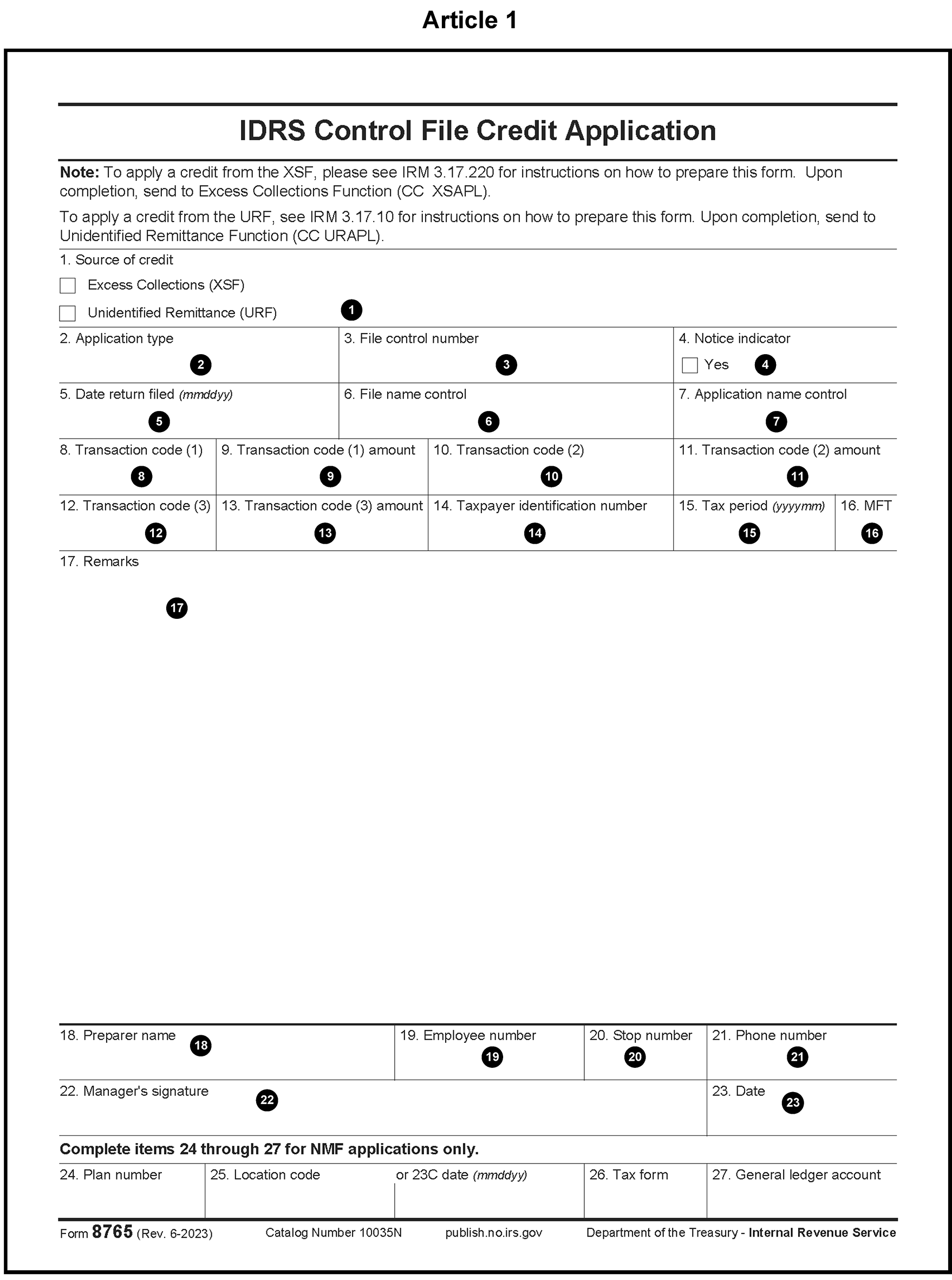
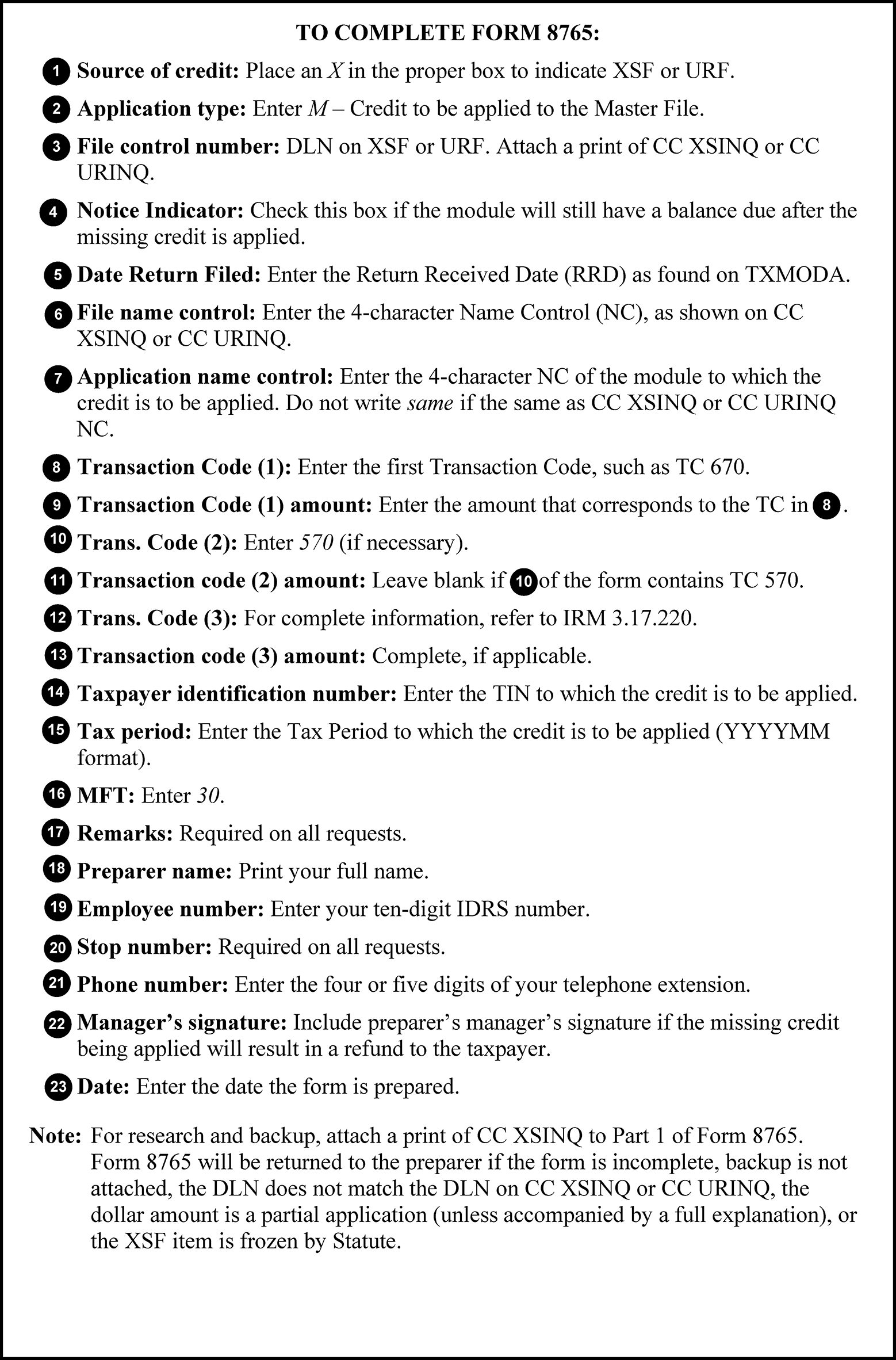
- Correspond for the missing payment information using Letter 1687C, Unidentified Payment/ Credit. See IRM 3.14.1.7.4, Notice Review Sent Taxpayer Correspondence-Reply and No Reply Procedures, for more information.
- If the taxpayer does not reply, or replies with insufficient information, use Form 8758, Excess Collection Files Addition, to apply a credit to the XSF. Form 8758, Excess Collection Files Addition, is a two-part form. Attach the research to part one (the original) Figure 3.14.1-4a.
- Use the received date of the credit. Do not use the available date of the credit or the return due date.
- Use the original DLN of the credit, not a transfer DLN.
- Issue a manual refund when money is transferred out of an account using a Form 8758, Excess Collection Files Addition, paper document and there is still an overpayment to be refunded. Refer to IRM 3.14.1.6.6, Manual Refunds.
- Move each payment individually. Do not transfer a lump sum.
- The date on Form 8758, Excess Collection Files Addition, and the date of the CC IMFOLT or CC TXMOD print must be no more than seven days prior to receipt of the case in the Excess Collections Function.
- Both copies of Form 8758, Excess Collection Files Addition, must be complete and identical. Route both copies to the Excess Collections Function.
Attach the following to the original copy: a current CC IMFOLT or CC TXMOD print, a copy of any taxpayer correspondence, tax returns, vouchers, or other research relevant to the transfer to the XSF, and a research history sheet showing the research performed on the case.
- Use activity code "CLTO6800" to close the IDRS control base.
A TC 971 AC 296 must be input using CC REQ77 to indicate taxpayer contact has been attempted. Input "971" in Field TC>, input "296" in Field TC 971/151-CD>, and input "Credit to Excess Collections" for remarks. Refer to IRM 3.17.220, Excess Collections File.
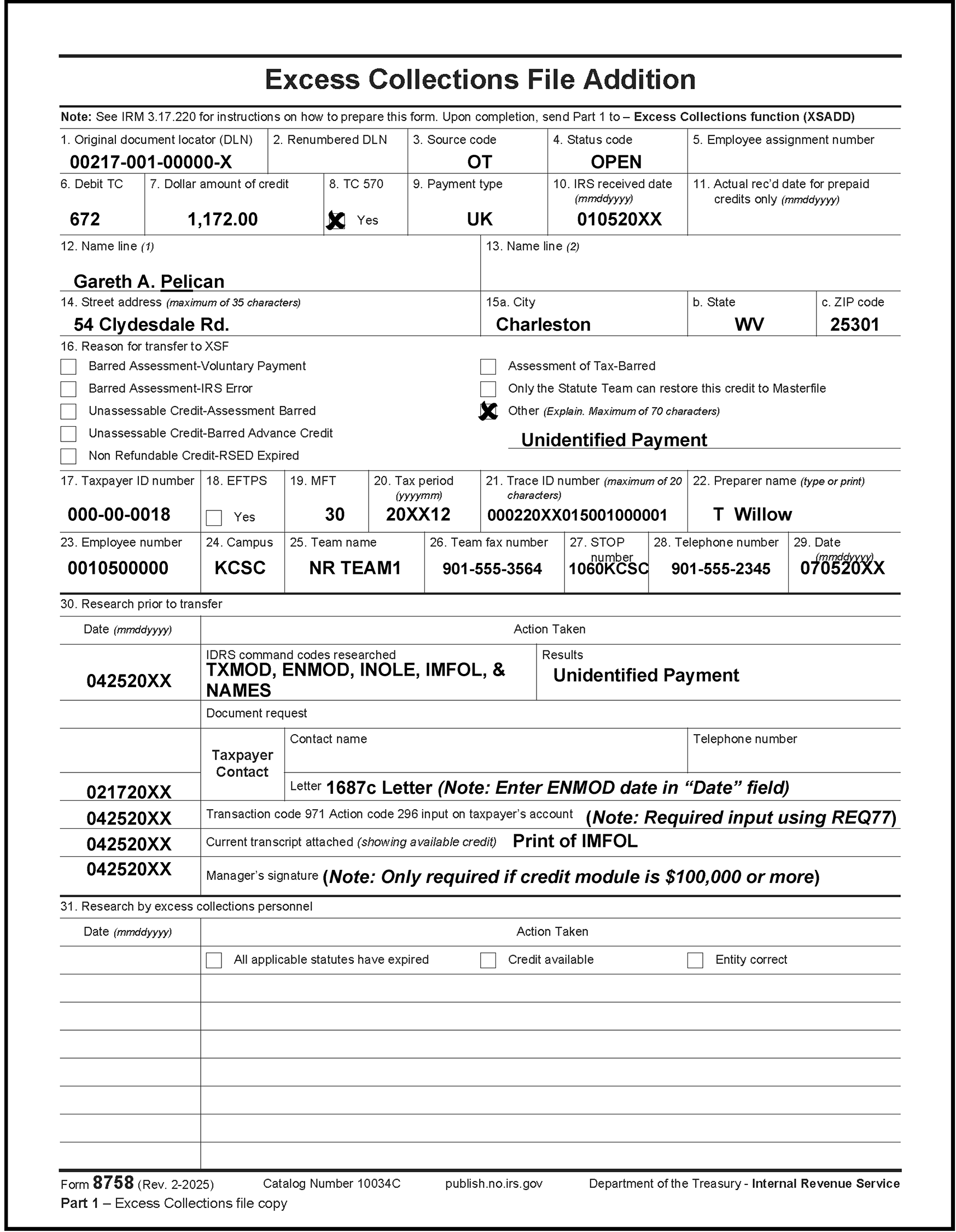
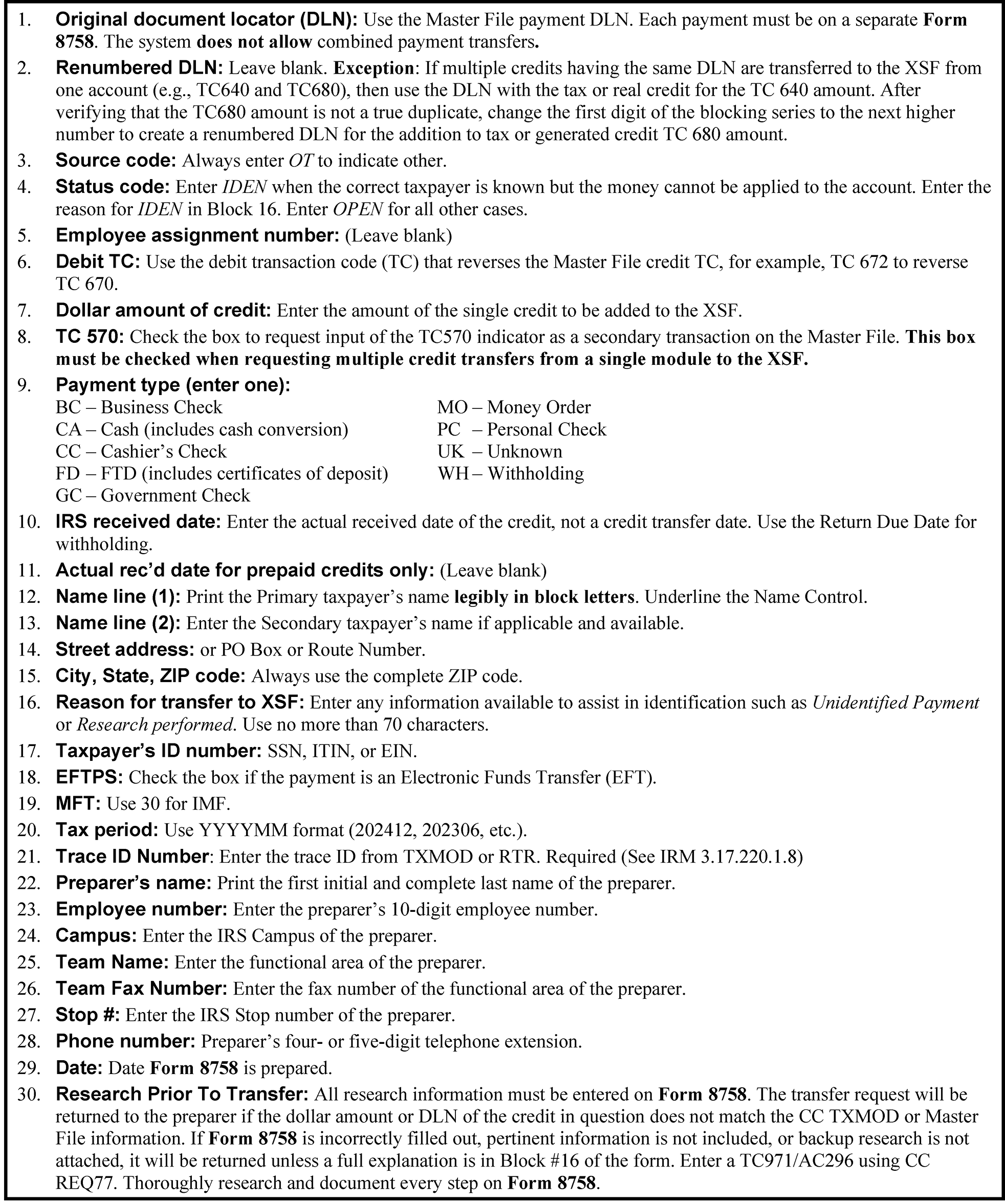
- Follow procedures in the subsections that follow when transferring credits to, or from, the 4620 URF account.
- Use CC URINQ to verify that the credit is available. See SERP Command Code Job Aid for URINQ (Input) and URINQ (Response) for more information.
- Follow the instructions on Form 8765, IDRS Control File Credit Application, see Figure 3.14.1-3a for more information.
- Attach Form 8765, IDRS Control File Credit Application, to a print of CC URINQ.
- Include research as required.
- Enter CC STAUPS for eight cycles on balance due accounts to prevent erroneous or unnecessary notices. See IRM 3.14.1.6.24, Command Code STAUPS, for more information.
- Lead will route Form 8765, IDRS Control File Credit Application, with research, to the Unidentified Remittance Function.
- Correspond for the missing payment information using Letter 1687C- Unidentified Payment/Credit.
- Issue a manual refund for the substantiated payment(s) when there is still an overpayment amount to be refunded. Refer to IRM 3.14.1.6.6, Manual Refunds.
- If the taxpayer does not reply, or replies with insufficient information, use Form 2424, Account Adjustment Voucher to apply a payment to the URF. Form 2424 is a two-part form: the "pink" copy is the original, and the "blue" copy is the duplicate. While this form is no longer printed on paper of color, the electronic Form 2424, Account Adjustment Voucher, is notated with pink and blue to identify the duplicate. Attach the research to the pink copy. See Figure 3.14.1-5.
- Use the received date of the credit. Do not use the available date of the credit or the Return Due Date.
- Use the original DLN of the credit, not a transfer DLN.
Include the payment DLN, the tracer ID, and the reason for the transfer to the URF in the “Remarks” section.
- The date on Form 2424, Account Adjustment Voucher, and the date of the CC IMFOLT or TXMOD print must be no more than seven days prior to receipt of the case in the Unidentified Remittance Function.
- Both the pink and blue copies of the Form 2424, Account Adjustment Voucher, must be completed and sent to the Unidentified Remittance Unit. The blue copy must be legible and match the original pink copy.
Attach the following to the original (pink) copy: a current CC IMFOLT or TXMOD print, a copy of any taxpayer correspondence, tax returns, vouchers, or other research relevant to the transfer to the URF, a research history sheet (except on Statute credits) showing the research performed on the case and the results, and a copy of the check.
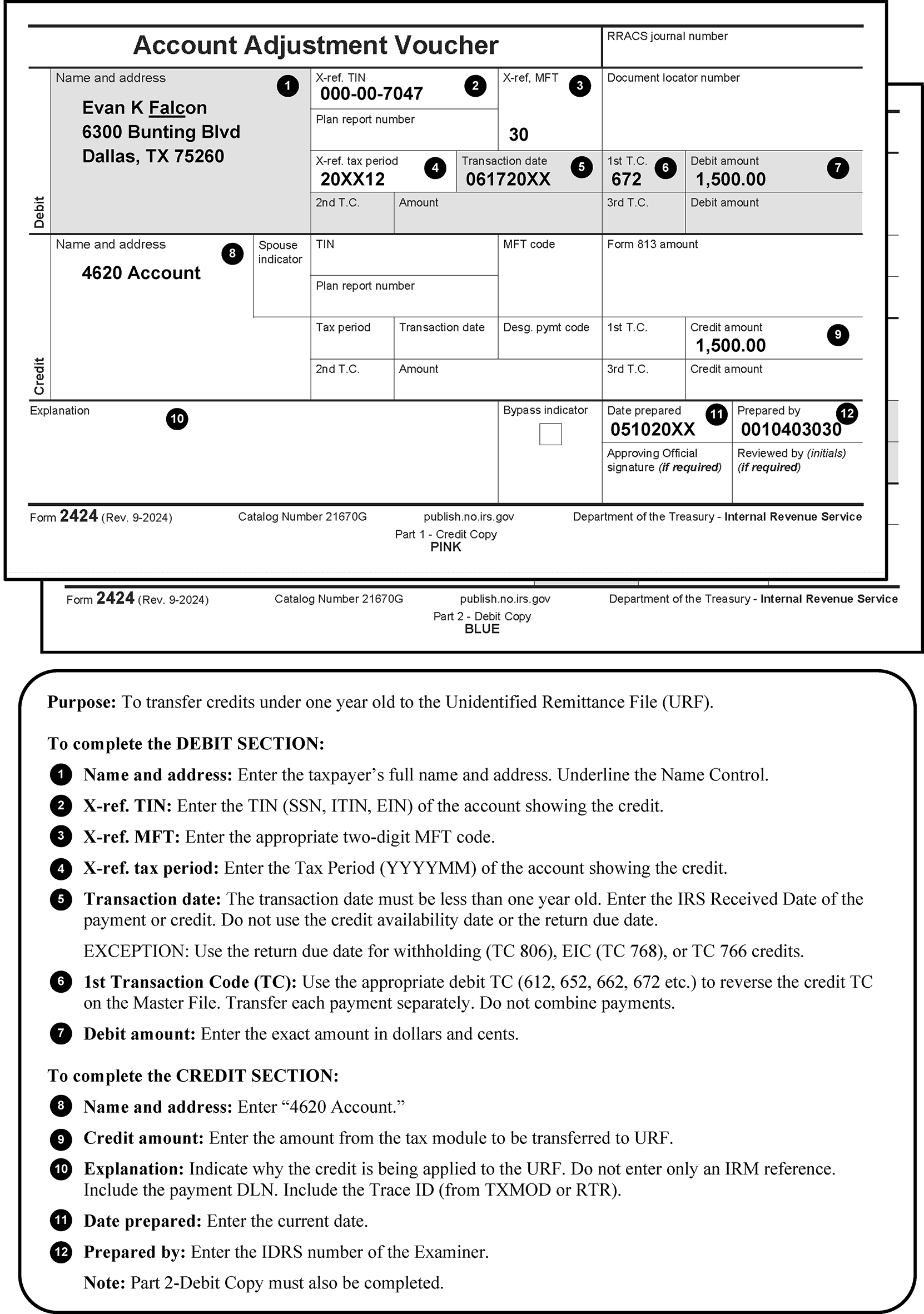
This subsection contains instructions related to miscellaneous issues. These issues include:
- Taxpayer Correspondence
- Taxpayers Meeting Taxpayer Advocate Service (TAS) Criteria
- $10,000,000 (Ten Million Dollar) Refunds
- Frivolous Claims
- RIVO (Return Integrity and Verification Operation)
- Initial Allegation or Suspicion of Tax-Related Identity Theft Indicators
- Slipped Blocks and Mixed Data Blocks
- Community Property Allocation
- Injured Spouse Allocation
- Natural Disaster Procedures
- Combat Zone or -C Freeze Returns
- Large Dollar Review
- Premium Tax Credit (PTC)
- 8962 PTC Calculator Tool
- ACA Shared Responsibility Payment (SRP)
- Tax Reform Act of 2017
- IRC Section 965 - Transition Tax on Untaxed Foreign Earnings
- Qualified Business Income Deduction (QBID)
- Inflation Reduction Act (IRA) of 2022 (including EPE)
- Prisoner Returns
- Direct Deposit Temporary Freeze for Missing or Incorrect Information
- Spousal Payments
- IRC 1062, Gain From the Sale or Exchange of Qualified Farmland Property
If taxpayer correspondence is discovered attached to the return, review, analyze, and determine disposition as necessary. Follow Policy Statement -21-3 requirements (noted below (2) to initiate a response. Follow the table below for actions regarding correspondence attached to the return.
If the taxpayer And there is Then Requests installment payments or indicates an inability to pay No indication that Code and Edit has forwarded the letter to the Collection Function - Verify that the taxpayer’s SSN and address are on the letter
- Send the letter to the Collection Function
- Input CC STAUPS for eight cycles on balance due notices. See IRM 3.14.1.6.24, Command Code STAUPS, for more information.
Input CC REQ77 with TC 971 AC 043
MeF sends all Form 9465, Installment Agreement Request, data to Compliance in a separate file. Form 9465, Installment Agreement Request, attached to electronic returns are routed through MeF. Do not print and send to Collections.
Inquires about an account An open control base Route the original letter to the tax examiner who has the case controlled on IDRS Inquires about an account No open control base Route the original letter to Accounts Management.
See IRM 3.14.1.6.24, Command Code STAUPS, for more information.
Requests abatement of a penalty due to Reasonable Cause The request was denied (identifiable by CCC "7" ) Route the request to Accounts Management for correspondence with the taxpayer.
Requests abatement of a penalty due to Reasonable Cause NRPS data does not show CCC "7" or CCC "M" Route the request to Accounts Management for correspondence with the taxpayer. Requests acknowledgment of payments and/or documents attached to the return NRPS data does not show CCC 7 or CCC M Route the request to the Receipt and Control Function Attached original or certified documents (such as, birth certificates, SSN card, marriage license etc.) NRPS data does not show CCC 7 or CCC M Return them to the taxpayer upon completion of the case, unless the taxpayer indicates that returning them is unnecessary. If the document is needed as a source document, attach a copy to the return. Do not detach death certificates on decedent returns even if original document. Attached documents labeled as copy or the taxpayer has indicated returning them is unnecessary NRPS data does not show CCC 7 or CCC M Staple documents to the back of the return or attach completed Form 9856, Attachment Alert, and return to files. Has replied to IRS initiated Processing correspondence (Letter 12C - Individual Return Incomplete for Processing: Forms 1040 & 1040-SR, Form 3531, Request for Signature or Missing Information to Complete Return, Form 6001, Letter 0012C Correspondence Action Sheet (CAS), etc.) No evidence of a Return Processable Date (RPD) on the account - Prevent the refund from generating if it reflects interest
- Input RPD with TC 290 with appropriate Hold Code
- Issue Manual Refund if necessary to avoid paying interest
Has not replied to IRS Processing correspondence (no reply stamp on Form 3531, Request for Signature or Missing Information to Complete Return, Form 6001, Letter 0012C Correspondence Action Sheet (CAS), etc.) No I– freeze on account (freeze is set by Computer Condition Code U) - Prevent the refund from generating if it reflects erroneous interest
- Verify correct no-reply procedures were followed by ERS/Rejects
- Issue manual refund for overpayment without interest
Was not required to reply (Correspondence was issued in error) An I – freeze on the account Issue manual refund for the appropriate amount of credit interest (TC 770), calculating interest on the initial systemic refund of overpayment principal (TC 846), less the back-off period of IRC 6611 (b)(2). See IRM 20.2.4.8.1, Systemic Refunds, calculating interest on that interest amount to one business day past the CC RFUNDR date (two days for swing shift) Attaches Form W-7, or Form W-7A An I – freeze on the account - Make a copy of the return, front and back pages only, and indicate across the copied return that it is a “COPY ONLY”. Line thru the DLN of the copied return. Do not send original returns. If taxpayers attach passports or other original non-tax documents include those with the Form W-7.
- Detach the Form W-7 from the original return, make a copy of it and staple the copy to the back of the original return. Notate on the Form W-7 copy that the original was sent to Austin SPC Stop 6090, ITIN and the date it was sent. Staple the original Form W-7 to the front of the copied return.
- Route the original Form W-7 and the copied return to: Internal Revenue Service ITIN Operation Mail Stop 6090 - AUSC 3651 S Interstate 35 Austin, TX 78741. Use Document 13011 to determine the correct envelope. Include a Form 3210, Document Transmittal, and follow correct mail procedures in IRM 1.22.3.8, Requirements for Shipping Personally Identifiable Information (PII). Do not allow exemptions or credits as the Form W-7, Application for IRS Individual Taxpayer Identification Number, has not been processed.
Policy Statement P-21-3 Guidelines are the result of a task force initiated to provide timely, quality responses to taxpayer correspondence. A Quality Response is an accurate and professional communication which is based on the information provided:
- Resolves the taxpayer issues, or
- Requests additional information from the taxpayer, or
- Notifies the taxpayer that we have requested information from outside the IRS.
- A Quality Response is timely when initiated within 30 days (calendar days) of the IRS Received Date.
- When a Quality Response cannot be issued timely, contact headquarters for guidance.
Exceptions to Policy Statement -21-3 Requirements:
- Substitute returns
- Amended returns
- Tentative Carry backs
- CAF/POA
- Address Changes
- Responses to IRS solicitation for information necessary to secure or complete processing of the tax return.
- The Taxpayer Advocate Service (TAS) is an independent organization within the Internal Revenue Service (IRS), led by the National Taxpayer Advocate, who helps taxpayers and protects taxpayer rights. TAS offers free help to taxpayers when a tax problem is causing a financial difficulty, when they’ve tried and been unable to resolve the issue with the IRS, or when they believe an IRS system, process, or procedure just isn't working as it should. TAS strives to ensure that every taxpayer is treated fairly and knows and understands the rights under the Taxpayer Bill of Rights. TAS has at least one taxpayer advocate office located in every state, the District of Columbia, and Puerto Rico. See IRM 13.1.7, Taxpayer Advocate Service (TAS) Case Criteria if additional information is required.
- While the Internal Revenue Service (IRS) is continually working to serve customers in a quality manner, some taxpayers still have difficulty getting solutions to the problems or getting timely and appropriate responses to the inquiries. Per IRC 7803(c), Congress established the office of the National Taxpayer Advocate (NTA) and its functions within the IRS to assist these taxpayers. TAS has identified criteria that qualify taxpayers for TAS assistance. The Case Advocate will conduct an independent review of actions that have been taken or need to be taken to resolve the problems taxpayers are experiencing.
- Employees should not view TAS case criteria as a means of excluding taxpayers from TAS, but rather, as a guide to TAS case acceptance. The criteria under which TAS accepts a case should not govern whether a taxpayer is entitled to relief.
- An account with an overpayment of $10,000,000 or more requires that a manual refund be issued since a TC 846 will not generate. These cases should also have an X- Accounting Manual Refund Freeze. see IRM 3.14.1.6.11.29 for more information.
- These cases need to be worked by the lead the same day they are received in the Notice Review Function. See IRM 3.14.1.6.14.2, $10 Million Dollar or more AMS Refund Transcripts.
Use the following procedures for resolving the case before doing a manual refund:
- Verify all unclaimed credits.
- Offset the overpayment as needed to cover any debit balances.
- Abate any interest caused by an overpayment not due the taxpayer.
- Monitor the case until all actions post to the Master File.
The account must have a zero balance or be in debit status before closing the control. If another area has an open control on the case, contact that area, route all available documents to that area, and close the Notice Review control base.
Exception:
The control base may be closed without a control base or further actions if there is an -L freeze on the module and a Revenue Agent has advised that the credit not be refunded due to legal implications.
If, after any adjustments, the account has a credit balance of less than $10,000,000:
- Offset credit to any debit balance modules.
- Prepare a manual refund for the excess credit.
- Monitor the case until the TC 840 posts.
- If, after any adjustments, the account has a credit balance of $10,000,000 or more, and no other areas have an open control base, Notice Review must issue the manual refund. See IRM 3.14.1.6.6, Manual Refunds, for more information.
- Close the control base after all account transactions post.
- A frivolous argument is used for expressing dissatisfaction with the substance, form, or administration of the tax laws by attempting to illegally avoid or reduce tax liabilities.
- A TC 971 AC 089 indicates that a frivolous return has been received, and the entire account is frozen. An F- freeze is generated on all tax periods. Adjustments should not be made to accounts showing an F- freeze.
- Currently, one of the most common frivolous claims is the Reparations Tax (also known as the Black Investment Tax). The claim is based on the premise that African-Americans should receive repayment for historical slavery. There is no existing law that allows payment of reparations. Any claim(s) for reparations should be disallowed.
- Another example of a frivolous claim is when taxpayers attempt to eliminate the tax liability by removing the income by citing "Less Native American Indian Treaty" or simply "Native American Indian Treaty" . Usually, these filings include Form 1099–MISC, Miscellaneous Information, income and tax withheld (generally higher than 18 percent of earnings) that results in a refund.
- Use the following procedures IRM 21.5.3.4.16.7, Identifying Frivolous Returns/Correspondence and Responding to Frivolous Arguments when referring frivolous claims and/or correspondence to the Ogden Campus Frivolous Return Program:
Attention: Frivolous Return Program
Ogden Compliance
Mail Stop 4450 OSC
1973 N Rulon White Blvd.
Ogden, UT 84404
- For additional information and examples, see the table in IRM 3.11.3-13, Frivolous Filer/Non-Filer Review Box Criteria and Definitions, and IRM 4.19.15, Discretionary Programs.
Return Integrity & Verification Operations (RIVO) performs revenue protection program review utilizing the Electronic Fraud Detection System (EFDS) to screen and verify the accuracy of wages and withholding reported on paper and electronically filed tax returns. See IRM 21.2.4.3.18, Return Integrity & Verification Operations (RIVO) and Criminal Investigation (CI), Transcript Issues, for more information. RIVO cases can be identified in IDRS, CC TXMOD by one or more items from the list below. If any of these conditions are present, do not route the case to RIVO for review. RIVO is already performing a review.
- A RIVO open control base starting with 148XX for the IDRS unit number,
- A RIVO P- freeze (See IRM 21.5.6.4.31.2, P- Freezes with Return Integrity Verification Operations (RIVO) Involvement, for more information.),
- A TC 971 with any of the following Action Codes (AC) 121/122/124/129/134/199/617, or
A TC 971 AC 123 with MISC field showing one of the following letters, 4464C, 4883C, 5071C, 5216C, 5447C, 5747C, 6330C, 6331C, has been issued to the taxpayer.
Caution:
≡ ≡ ≡ ≡ ≡ ≡ ≡ ≡ ≡ ≡ ≡ ≡ ≡ ≡ ≡ ≡ ≡ ≡ ≡ ≡ ≡ ≡ ≡ ≡ ≡ ≡ ≡ ≡ ≡ ≡ ≡ ≡ ≡ ≡ ≡ ≡ ≡ ≡ ≡ ≡ ≡ ≡ ≡ ≡ ≡ ≡ ≡ ≡ ≡ ≡ ≡ ≡ ≡ ≡ ≡ ≡ ≡ ≡ ≡ ≡ ≡ ≡ ≡ ≡ ≡ ≡ ≡ ≡ ≡ ≡ ≡ ≡ ≡ ≡ ≡ ≡ ≡ ≡ ≡ ≡ ≡ ≡ ≡ ≡ ≡ ≡ ≡ ≡ ≡ ≡ ≡ ≡ ≡ ≡ ≡ ≡ ≡ ≡ ≡ ≡ ≡ ≡ ≡ ≡ ≡ ≡ ≡ ≡ ≡ ≡ ≡ ≡ ≡ ≡ ≡ ≡ ≡ ≡ ≡ ≡ ≡ ≡ ≡ ≡ ≡ ≡ ≡ ≡ ≡ ≡ ≡ ≡ ≡ ≡≡ ≡ ≡ ≡ ≡ ≡ ≡ ≡ ≡ ≡≡ ≡ ≡ ≡ ≡ ≡ ≡ ≡ ≡ ≡ ≡ ≡ ≡ ≡ ≡ ≡ ≡ ≡ ≡ ≡ ≡ ≡ ≡ ≡ ≡ ≡ ≡
- If the account contains a math error that needs to be corrected, adjust the account using hold code 4 to prevent a notice from generating and the overpayment from being released in error, before RIVO is done reviewing the case.
- RIVO cases may or may not also be identity theft cases. See IRM 3.14.1.6.9.6, Initial Allegation or Suspicion of Tax-Related Identity Theft Indicators, for more information on identifying identity theft cases.
- If a questionable refund based on the criteria below IRM 3.14.1.6.9.5 (5), RIVO criteria or IRM 3.14.1.6.9.5 (6) suspected identity theft, is identified, and the module already contains identifiers from (1) above, do not route or refer the case to RIVO again.
Refer cases that meet potential RIVO Criteria below to the lead, before taking any action. If the case is not returned to the tax examiner timely (by Thursday 8 P.M. ET), prevent the refund from generating.
- Refund Schemes, Form W-2 is altered, handwritten or a substitute/similar statement
- Form(s) 4852 attached and no other withholding documentation is present
- Similarities between Form(s) W-2 on different returns such as: Typing or printing, Wage amounts, Withholding amounts, Employer, Earned Income Credit (EIC) is being claimed and only the attached Form W-2 is altered, handwritten or a substitute/similar statement.
- IDT/Operation Mass Mailing (OMM) – refund scheme involving bulk filings. Returns are often identical or vary only slightly. Multiple returns with matching characteristics such as: duplicate filing addresses, same writing instruments (matching ink, pencil, color), same/similar handwriting, matching attached envelopes, same paper stock, same amounts entered on similar Form 1040, U.S. Individual Income Tax Return, line entries (including Schedules/Forms), multiple entries ending in zeros, same occupations, large number of returns submitted in a single envelope/box and duplicate bank routing number and account numbers. See IRM 25.25.2.11, Identity theft Scheme Criteria, for more information.
Reminder:
Do not send RIVO returns that have already been stamped by (RIVO/AMTAP/QRDT), have a zero balance or balance due, or the module contains identifiers from (1) above.
If identity theft is suspected on a notice or refund transcript case, use the following criteria to determine whether the case should be sent to RIVO for consideration, only if there are no RIVO indicators as listed in (1) above. Refer the below cases to the lead, before taking any action. If the case is not returned to the tax examiner timely (by Thursday 8 P.M. ET.), prevent the refund from generating.
Caution:
This list is not inclusive of all possible criteria. Not all cases will meet all criteria, but a case should have at least 3 of the indictors below to be considered suspect (See Exceptions below.).
- A drastic change of address from prior year (e.g., a different state)
- Children claimed that are not claimed in prior years
- The employer changes from prior years (use CC IRPTR)
- The filing status changed from prior years
- If direct deposit was elected, research the routing/account number using CC TRDBV to determine if the number has changed from prior years. Refund Anticipation Loan (RAL) commonly displays the taxpayer’s SSN as the last nine digits or displays the SSN in reverse order. Refer to IRM 21.4.1.5.7.1, Direct Deposit of Refunds.
- Occupation/type of work changed from prior year (e.g., wage earner (W-2) vs. Schedule C filer, etc.)
- A drastic change in the refund amount claimed from previous years.
Methods of tax payments changed, or information on the tax module doesn’t match the payment history. Examples of this might include: The taxpayer has made substantial ES payments but claims refundable credits or reports low AGI. The taxpayer has made a payment with extension (TC 670/460) that posts after the return or is inconsistent with the posted TC 150. The taxpayer is requesting a refund and there are estimated tax payments on the module that are not claimed on the return.
Income type changed (e.g., Investment to employment). Returns that have employment income but the account history indicates the taxpayer has not been employed and only filed investment returns (i.e. retired status)
- Method of preparing the return has changed (paid preparer versus self-prepared, or MeF versus paper, etc.).
- Leads (managers or backups) must review possible RIVO cases received from tax examiners, and either return the cases to the tax examiners with instruction to work as normal or email the cases to RIVO. ≡ ≡ ≡ ≡ ≡ ≡ ≡ ≡ ≡ ≡ ≡ ≡ ≡ ≡ ≡ ≡ ≡ ≡ ≡ ≡ ≡ ≡ ≡ ≡ ≡ ≡ ≡ ≡ ≡ ≡ ≡ ≡ ≡ ≡ ≡ ≡ ≡ ≡ ≡ Make sure to encrypt the email. Include local P&A analysts, HQ analysts, and any necessary local personnel in the email. These cases must be in an Excel spreadsheet with the appropriate headings and include: TIN, MFT, Tax Period, and reason(s) for sending to RIVO. All cases must also have and maintain an open Notice Review IDRS control base until RIVO accepts the case or the refund has been allowed and the TC 846 has posted.
Be very careful with notice disposition on cases that have RIVO indicators, potential fraud or identity theft. Use the table below to help determine actions and notice disposition. See the lead for more assistance.
If And Then There are RIVO indicators on the module and the refund is frozen the address for the period in question does not match the prior filed addresses or any valid W-2 addresses in CC IRPTR Void the notice and leave a history item in IDRS. There are RIVO indicators on the module and the refund is frozen the address for the period in question does match the prior filed addresses or any valid W-2 addresses in CC IRPTR Print the notice or retype as needed. If adjusting use hold code 4. There are no prior RIVO indicators or involvement, stop the refund, (disposition with H (hold) when routing) RIVO accepts the case and the address for the period in question does not match the prior filed addresses or any valid W-2 addresses in CC IRPTR Void the notice and leave a history item in IDRS. Do not make any adjustments. There are no prior RIVO indicators or involvement, stop the refund (disposition with H (hold) when routing) RIVO accepts the case and the address for the period in question does match the prior filed addresses or any valid W-2 addresses in CC IRPTR Print Intercept the notice. Do not make any adjustments. No prior RIVO indicators or involvement, stop the refund (disposition with H (hold) when routing) RIVO does not accept the case Review the account and disposition the notice per normal procedures.
Taxpayers can notify the IRS of identity theft utilizing Form 14039 Identity Theft Affidavit, or another similar statement included with the tax return. The IRS also has tools that can identify possible identity theft on behalf of a taxpayer. See paragraphs (4) and (5) below for IDRS IDT information.
Note:
Prisoners are often victims of IDT while they are incarcerated. For more information on reviewing prisoner returns for release date and earned income see IRM 3.14.1.6.9.18, Prisoner Returns, for more information.
- If the Form 14039 is attached to a tax return, paper or electronic, or identity theft statement made without a form, review the account carefully.
Ensure that the tax return filed with the Form 14039 matches the posted tax return on IDRS and the filing patterns of the taxpayer. Verify the taxpayer filing pattern by reviewing IDRS CC IRPTRL, IMFOLT, and TRDBV data for three years prior to the notice module being reviewed, looking for IDT indicators on the previous modules as well. If the posted account information matches the true taxpayer tax return, process the case following normal IRM 3.14.1.6.1, General Review Procedures.
Caution:
Identity theft can occur for multiple years so be very careful the pattern of tax returns reviewed belong to the true taxpayer.
- If the posted return appears to be identity theft, and there are no indicators that RIVO or another area is already working the case see IRM 3.14.1.6.9.5, RIVO (Return Integrity and Verification Operation). If the case meets the criteria in IRM 3.14.1.6.9.5 (6) (if identity theft is suspected), continue with the steps below. If the case does not meet the criteria but there is still concern about IDT (for specific reasons) see the lead.
If the tax return and notice (or transcript) account meet RIVO criteria, stop the refund. If the case is an AMS refund transcript leave notes in AMS about referring the case to RIVO. Give the case to the lead for routing to RIVO. See IRM 3.14.1.6.9.5, RIVO (Return Integrity and Verification Operation), for complete information.
Reminder:
If the refund was stopped with a TC 570, open a control base, see IRM 3.14.1.7.2, Controlling Cases, for more information. If the refund was stopped with a NOREFP maintain an open control base until RIVO accepts the case or returns it to Notice Review.
- If the address on the notice can be verified as the true taxpayer (IDRS CC IRPTRL, FINDS, RTVUE for prior years), then print intercept the notice, or retype intercept if an adjustment was needed (made with a hold code 4) in OLNR. If the address on the notice cannot be verified as that of the true taxpayer, then void intercept the notice in OLNR. Leave a history item in IDRS for void or retype.
Use CC ENMOD to detect identity theft indicators marked by TC 971 with the Action Codes identified below. The codes will display in ENMOD on two lines.
Example:
971 10262025--------------20124705 08277-204-00000-5 for the TC 971 entry and below the 971 entry the IDT indicator will post as 971-CD>501.
CC ENMOD Identity Theft Indicators
Action Code Description 501 Tax administration related identity theft - taxpayer provided the required ID theft documentation and case resolution is complete. 504 Taxpayer-Identified Identity Theft not Affecting Tax Administration. Note: In FY 2014, the TC 971 AC 504 was expanded for use on both tax and non-tax-related identity theft allegations. 505 IRS loss of PII-IRS identified, taxpayer not required to provide required ID theft documentation. 506 IRS identified identity theft - IRS identified, taxpayer not required to provide required ID theft documentation, unless requested and Identity Theft issue is resolved. 522 Identity theft claim has been made. Reminder: TC 971 AC 522 does not provide taxpayer protections or prevent future occurrences of identity theft. This code is used to identify potential identity theft cases. 523 IRS identifies a potential repeat identity theft 524 Locking SSNs with No Filing Requirements.
Other indicators of identity theft can be seen on TXMOD (or IMFOLT). Be careful not to release any refunds on cases that are under review for identity theft.
CC TXMOD Identity Theft Indicators
Action Code Description 111 Indicates the return with the matching DLN has been identified as ID Theft and moved to MFT 32. 121 Potential ID Theft Case selected by Taxpayer Protection Program (TPP) for review prior to posting. 129 Potential ID Theft Case selected by Taxpayer Protection Program (TPP) for review after the return posted.
- Slipped blocks and mixed data blocks occur when data from a document or payment posts to a module related to a different document or payment in the same block of DLNs.
Slipped Blocks have the following characteristics:
- A block (or part of a block) of documents or payments posted to the Master File incorrectly.
- The incorrect transactions have DLNs from other documents or payments in the same block.
- The DLN is usually from the document or payment immediately before or after the notice document or payment in the block sequence.
A slipped block may result in erroneous refunds, incorrect notices, and/or lost or missing documents, returns, or payments.
Note:
Per Chief Counsel: If money is found in the wrong account(s) due to a Slipped Block and the money has refunded, Erroneous Refund Procedures (CAT- D) must be used to recover the money even if the money is not in the originally assigned case.
Mixed Data Blocks have the following characteristics:
- A block (or part of a block) of documents or payments posted to the Master File incorrectly.
- The data is incorrect due to a transcription error.
- A mixed-data block may result in erroneous refunds and/or incorrect notices.
Suspect a slipped block or a mixed data block if any of the following conditions are present:
- The data on the notice module does not match the data on the document.
- A posted payment amount does not match the amount listed on the payment voucher.
- A payment is missing or is misapplied.
- Using RTR DLN numbers (if able) and IDRS, research the five payments and the corresponding accounts which posted immediately prior to the payment found in error, and the five payments and accounts immediately after to the error payment from the notice document.
To resolve the accounts found in error from the research above:
Prevent the refund from generating when present and if possible. See IRM 3.14.1.7.1.1, Refund Intercepts, if needed to resolve the credit discrepancy.
Note:
If the refund cannot be prevented from generating and is needed to resolve the credit discrepancy, work any math error adjustment and the credit discrepancy as a Category D erroneous refund. See IRM 3.14.1.6.7.4, Category D ERRF Resolution.
- Transfer all payments not belonging to the notice taxpayer to the appropriate account(s). Input a TC 570 on the credit side if needed to freeze the credit.
- If any payments belonging to the notice taxpayer are found, transfer them into the notice taxpayer's account.
Reverse any current cycle offsets if needed to make the necessary credit transfers to correct the payment posting location.
- Review all math errors following IRM 3.14.1.6.12, Reviewing Math Error Notices – CP 10, CP 11, CP 12, CP 13, CP 16, CP 23, CP 24, and CP 25.
Determine the notice disposition using IRM 3.14.1.7.8, Notice Disposition.
Generally, community property is all property acquired during a marriage while the spouses are domiciled in a community property state. Examples of community property are:
- Income, rents, dividends, and/or interest derived from community property.
- Salaries, wages, or pay for the services of either spouse during the marriage.
- Economic benefits attributable to the efforts of the spouse (for example, income reported on Schedules C, E, or F).
However, taxpayers (filing FS-1, FS-3, or FS-4) who reside in a community property state may be able to allocate the income, deductions, and other items on the tax return in specific methods. The community property states are:
- Arizona
- California
- Idaho
- Louisiana
- Nevada
- New Mexico
- Texas
- Washington
- Wisconsin
Taxpayers use Form 8958, Allocation of Tax Amounts Between Certain Individuals in Community Property States, to determine the allocation of tax amounts between married filing separate spouses, California same-sex spouses, or registered domestic partners (RDP) with community property rights.
- RDP residing in California, Nevada, or Washington, must follow state community property laws and report half the combined community income of the individual and partner.
- RDP can use only FS-1, or if they qualify, FS-4 for federal tax purposes.
If information on the tax return, such as income, withholding, ES credits, etc., differs from the Form W-2, Wage and Tax Statement, and tax module information, suspect a community property allocation if the taxpayer is filing in one of the above states.
- Determine if there is a Form 8958, Allocation of Tax Amounts Between Certain Individuals in Community Property States or a similar attachment to the return which indicates allocation of income and credits between the two taxpayers. If necessary, adjust to taxpayer intent. See IRM 3.14.1.7.6, Tax Adjustments, for more information.
- Request the tax return, if paper, to identify the exact split; use Form 2275, Records Request, Charge and Recharge.
- After reviewing the account and making any necessary changes in IDRS, disposition the notice in OLNR. See IRM 3.14.1.7.8, Notice Disposition for more information.
- An Injured Spouse Allocation request can be filed by one spouse to protect a share of a joint overpayment. The spouse, whose portion of a joint income tax overpayment that was or will be offset to a Federal tax debt or TOP offset for which they are not liable, is known as the injured spouse.
Injured Spouse Allocation requests are indicated by the following:
- DLN Blocking Series should be 920–929. See Document 6209, Section 4, Document Locator Number, Chapter 2 DLN Composition, Block Series for more information.
- Form 8379, Injured Spouse Allocation.
- "Injured Spouse" written or notated on the tax return or MeF file.
Injured Spouse Allocations must be issued by manual refund (TC 840) to bypass the offset process.
- Review the notice following general review procedures.
If the return is a true Injured Spouse Allocation and the blocking series is 920–929 follow the table below:
If And Then No adjustment is required There is no TC 840 on the tax module - Mark the notice disposition in OLNR.
- Open a Control Base to Accounts Management assigned to IDRS number 0547484769 in A status. See IRM 3.14.1.7.2, Controlling Cases for more information.
- Route the case to Accounts Management, using Form 3465, Adjustment Request. State in the remarks field of the Form 3465: Injured Spouse Allocation, R- frozen refund, no TC 840. If another freeze code is present notate on the Form 3465.
- See IRM 3.14.1.6.9.9 (7) below for package routing instructions.
No adjustment is required TC 840 is present on the module Mark the notice disposition in OLNR. No other action is required. An adjustment must be made to the account TC 840 is present on the module - Use CC REQ54 to input the adjustment using Blocking Series 05 with a Hold Code 4.
- Open a Control Base to Accounts Management assigned to IDRS number 0547484769 in A status. See IRM 3.14.1.7.2, Controlling Cases for more information.
- Ensure all Notice Review Control Bases are closed.
- Mark the notice disposition in OLNR.
- Route the case to Accounts Management, using Form 3465, Adjustment Request. State in the remarks field of the Form 3465: Injured Spouse Allocation, posted TC 840, pending adjustment with HC 4, K- freeze.
- See IRM 3.14.1.6.9.9 (7) below for package routing instructions.
If the return has an Injured Spouse Allocation and the DLN blocking series is not 920–929, follow the table below:
When routing an Injured Spouse Allocation to Accounts Management take the following steps:
- If a paper return, and the return is in Notice Review, use CC ESTABDT to recharge the return to Accounts Management. See the SERP Command Code Job Aid for ESTABD for more information.
- If the return is unavailable or is electronically filed, print TXMOD and INOLES for the case.
- Prepare Form 3465, Adjustment Request, according to the directions in the table above. Staple the completed Form 3465 to the front of the return or INOLES screen print (below the entity) and give to the lead for routing to Accounts Management in the current cycle.
- Accounts impacted by a designated disaster should have a "–O" freeze present. A TC 971/AC 086 appearing on the taxpayer's CC ENMOD screen indicates disaster processing is in place. A list of regions (such as counties, parishes, or other political subdivisions) impacted by a designated disaster is compiled and provided by the Federal Emergency Management Agency (FEMA). The IRS then identifies the corresponding ZIP codes for disaster processing purposes.
- For processing years after 12/31/2006, a "–S" freeze may be present on the account. A TC 971/AC 688 would appear on CC ENMOD to indicate disaster processing.
- The Local Control File (input on designated ZIP codes) can be used to select notices for the area(s) designated on the Disaster Relief Memorandum, if penalty adjustments are required.
If the "–O" (or "–S" if processed after 12/31/2006) freeze is not present on an account with an address that is either in the FEMA Zip Code list, or is outside the FEMA Zip Code list and the taxpayer has "self-identified" as being impacted by the disaster, take the following action:
- Access CC ENMOD for the taxpayer.
- While in the CC ENMOD screen, execute CC REQ77.
Input TC 971 as the transaction code, using the disaster end date in the "TRANS-DT>" field. Input Action Code 086 (or 688 if processed after 12/31/2006) in the "TC 971-CD>" field.
Example:
For Hurricane Katrina, use a "TRANS-DT>" of 08292005, and an "EXTENSION-DT>" of 02282006 for all states except Florida. For Florida, use a "TRANS-DT>" of 08242005.
- In the "FEMA-NUM>" field, enter the four digit code of the disaster identified on the return, as shown in the FEMA lists. The lists can be found at IRS Disaster Declarations & Memos Library on the Disaster Program Office (DPO) website.
- If there are multiple FEMA codes for the same disaster and the taxpayer identifies a particular state or region, use the FEMA code for that state or region. If it cannot be determined which FEMA code should be used, enter whichever FEMA code for that disaster will provide the longest period of extension relief/penalty suspension for the taxpayer.
- On the Remarks line of the FRM77 response screen, enter "Disaster relief per self-identification" or "Disaster relief per FEMA Zip Code" as appropriate.
Label the notice using Custom Label 98, since a label has not yet been added to OLNR programming, with the following language:
"We are giving your return penalty relief consideration, because your return indicates that you were affected by certain disasters. If any penalties or interest on your account will be reduced by this consideration, you will receive another notice in 2–3 weeks."Exception:
Do not apply this Label, if after inputting TC 971 AC 086 or AC 688, no penalties or interest will abate. The TC 971 itself, however, should still be input as described above.
Note:
Master File has special processing in place that will allow an adjustment notice to generate for recomputation of interest (TC 196) and Failure to Pay Penalty (TC 276) when a TC 971 AC 086 or AC 688 is input. This is an exception to normal adjustment notice generation.
- If the taxpayer notates on the front of the return the designated disaster phrase, and the return has not been edited with the appropriate Computer Condition Codes (CCC), input the TC 971 and label the notice as described in Item (4) above.
If correspondence, either attached to the return or subsequently received from the taxpayer, requests relief from any penalty due to disaster damage or disruption, take the following actions:
- Determine whether the taxpayer qualifies for relief based on disaster criteria as noted in item (1) above. If the taxpayer qualifies, input the TC 971 as described in Item (4) above.
- If the taxpayer does not qualify for relief based on disaster criteria, but may qualify based on "Reasonable Cause" , route the case to Accounts Management Function.
- If the estimated tax penalty has been imposed, determine if the taxpayer was required to make an estimated tax payment during the disaster period and if so, whether the payment was received by the date required by the Disaster Relief Memorandum. If the payment was received within this period, input the TC 971 as described in Item (4) above, which will systemically abate the portion of the estimated tax penalty assessed for the underpayment.
- If the payment was not received within the allowable period, and it concerns the estimated tax payment obligation of an individual, estate, or trust (not a corporation's obligation), then evaluate the taxpayer's statement to determine if it meets IRC 6654(e)(3)(A) relating to waivers due to casualty, disaster, or other unusual circumstances. See IRM 20.1, Penalty Handbook.
- All affected notices, which receive this TC 971 AC 086 or AC 688 resolution should be labeled as described in Item (4) above, to inform the taxpayer that the return is being given disaster relief consideration.
- Special handling may be required for those accounts where the taxpayer has served in a combat zone or contingency operation. The location or operation name should be noted at the top of the tax return (e.g., Operation Iraqi Freedom, Enduring Freedom, etc.).
Combat Zone (CZ) accounts, identified by a –C freeze, indicate a taxpayer who is or was serving in a designated combat zone area. When working an account that contains a –C freeze, additional research is required to determine the taxpayer's CZ status. Research CC IMFOLE for the Combat indicator on Line 11.
- If the Combat indicator is 1, then further research is required.
- The transaction date of TC 500 with Closing Code (CC) 52, 54, or 56 is the date the taxpayer entered a CZ, and the transaction date of TC 500 with CC 53, 55, or 57 is the date the taxpayer exited a CZ.
- TC 500 CC 58 will be used when a combat zone veteran has been hospitalized due to injuries sustained in a combat zone.
- If the IMFOLE Combat indicator is 2, then the taxpayer is no longer a combat zone participant. Follow normal IRM procedures to work the case.
If the IMFOLE Combat indicator is 3, then the taxpayer is a CZ veteran who has been hospitalized due to injuries sustained in a combat zone.
- TC 500 CC 58 will be used when a combat zone veteran has been hospitalized due to injuries sustained in a combat zone. This systemically updates IMFOLE with the Combat indicator 3. When the taxpayer exits the hospital, a new TC 500 CC 59 will be input, and IMFOLE will systemically update to an indicator 2.
- The TC 500 CC 58 will mirror the existing functionality of the TC 500 CC 52/54/56 by extending the ASED, suspending interest and penalties, and preventing collection, however, it will not prevent the extension of the CSED for the duration of hospitalization. TC 500 CC 59 will mirror the existing functionality of the 53/55/57 and allow for the re-entry into active collection 180 days from posting.
- During processing, Computer Condition Codes (CCC), and Return Processing Codes (RPC) are assigned. These identify the type of tax relief to which the taxpayer is entitled. For CCC and RPC descriptions, refer to Document 6209, IRS Processing Codes and Information.
If the appropriate relief is not provided during processing, correct the taxpayer's account to provide the relief to which the taxpayer is entitled. For example, input of the following may be required:
- For additional information on Combat Zone and other Military Returns, see IRM 3.12.2.3.10, Combat Zone Returns and IRM 5.19.10.6.3, Combat Zone Freeze Code, in evaluating –C Freeze accounts, and IRM 20.2.7.11, IRC 7508, Combat Zone.
All overpaid notices, AMS Refund Transcripts and balance due notices of $100,000 or more must be reviewed for accuracy in cycle and before the refund hold expires. Use the following IRM references to review these cases:
- IRM 3.14.1.6.17.1, Key 001 - Overpayment Notice of $100,00 or More,
- IRM 3.14.1.6.17.2, Key 003 — Overpayment Adjustment Notices of $100,000 or More,
- IRM 3.14.1.6.14, Reviewing Priority Refund Transcripts in Account Management Services (AMS),
- IRM 3.14.1.6.14.2, $10 Million or More Refund Transcripts
- IRM 3.14.1.6.14.3, Million $ Refund Transcripts,
- IRM 3.14.1.6.17.4, Key 008 – Balance Due Notices of $100,000 or More, and
- IRM 3.14.1.6.17.5, Key 009 — Balance Due Adjustment Notice of $100,000 or More.
Caution:
If decreasing balance due notices below $100,000, see IRM 3.14.1.7.8.4 (5), Retyping Notices, for specific instructions about Pay by Date changes.
An in-depth review of the entire account should be performed. Problems with other modules or TINs not directly related to the notice often surface at this time and should be expeditiously resolved to prevent future taxpayer and/or Accounts Receivable impact.
- Payments intended for Form 1040, U.S. Individual Income Tax Return, may have been misapplied to tax modules for BMF Form 706, U.S. Estate Tax Return, or Form 709, United States Gift (and Generation - Skipping Transfer) Tax Return.
- The PTC is a tax credit for certain taxpayers who enroll, or whose family member enrolls, in a qualified health plan offered through a Marketplace. The credit provides financial assistance to pay the premiums by reducing the amount of taxes owed, giving the taxpayer a refund, or increasing the refund amount. The taxpayer must file Form 8962 to compute and take the PTC on the tax return.
- If taxpayer’s total PTC amount is more than taxpayer’s advance payment of the premium tax credit (APTC), the difference (Net PTC) is added to taxpayer’s refund or subtracted from taxpayer’s balance due.
- If taxpayer’s total PTC amount is less than taxpayer’s APTC, the difference (Excess APTC) is subtracted from taxpayer’s refund or added to taxpayer’s tax liability for the tax year, subject to certain Excess APTC repayment limitations for years before 2026. For tax years that begin after December 31, 2025 (2026 and later), there is no repayment limitation.
- For tax years before 2026, if APTC for a year was more than taxpayer’s total PTC amount for the year, a repayment limitation may apply to limit the amount of the Excess APTC taxpayer must repay.
The repayment limitation for advance payments are as follows:
Tax Year 2025
- $375 for single ($750 for all other filing statuses) with household income under 200 percent of the Federal Poverty Level (FPL)
- $975 for single ($1,950 for all other filing statuses) with household income at least 200 percent but less than 300 percent of FPL
- $1,625 for single ($3,250 for all other filing statuses) with household income of at least 300 percent but less than 400 percent of the FPL
- There is no limitation if the taxpayer’s household income is 400 percent or more of the FPL
Tax Year 2024
- $375 for single ($750 for all other filing statuses) with household income under 200 percent of the Federal Poverty Level (FPL)
- $950 for single ($1,900 for all other filing statuses) with household income at least 200 percent but less than 300 percent of FPL
- $1,575 for single ($3,150 for all other filing statuses) with household income of at least 300 percent but less than 400 percent of the FPL
- There is no limitation if the taxpayer’s household income is 400 percent or more of the FPL
Tax Year 2023
- $350 for single ($700 for all other filing statuses) with household income under 200 percent of the Federal Poverty Level (FPL)
- $900 for single ($1,800 for all other filing statuses) with household income at least 200 percent but less than 300 percent of FPL
- $1,500 for single ($3,000 for all other filing statuses) with household income of at least 300 percent but less than 400 percent of the FPL
- There is no limitation if the taxpayer’s household income is 400 percent or more of the FPL
Tax Years 2021 and 2022- $325 for single ($650 for all other filing statuses) with household income under 200 percent of the Federal Poverty Level (FPL)
- $800 for single ($1,600 for all other filing statuses) with household income at least 200 percent but less than 300 percent of FPL
- $1,350 for single ($2,700 for all other filing statuses) with household income of at least 300 percent but less than 400 percent of the FPL
- There is no limitation if the taxpayer’s household income is 400 percent or more of the FPL
- Taxpayers who received the benefit of advance payments for health insurance coverage must file a tax return for that year and attach Form 8962, Premium Tax Credit (PTC).
- Advance payment of the premium tax credit (APTC) is a payment made for coverage during the year to the taxpayer’s insurance provider that pays for part or all the premiums for the coverage of the taxpayer or an individual in the taxpayer family. The APTC eligibility is determined by the Marketplace. If APTC was paid for an individual in the taxpayer family, they must file Form 8962 to reconcile (compare) this APTC with the PTC.
PTC math errors can be reviewed by using Command Code (CC) RTVUE/ TRDBV/ IRPOLA and in IRM 3.12.3-1, Taxpayer Notice Codes. The math error notices can be found on any CP (10,11,12,13,16, 23, 24, and 25). IRPOL with definer A is used to view various Forms identifying health care enrollment. See IRM 2.3.86, Command Code IRPOL, for more information.
Note:
There is a tool in AMS (8962 PTC Calculator) to recalculate Form 8962, Premium Tax Credit (PTC).
TPNCs 780, 782-795, 797, and 799 may be assigned when there is an error on Form 8962, Premium Tax Credit (PTC). See the table below for AVS error codes and the corresponding TPNCs and Form 8962 impacted lines numbers. The table below contains some of the TPNCs and line numbers for Form 8962.
AVS Error Code TPNC Form 8962 Line Number 271 784 8b 274 786 24 275 787 25 276 789 29 354 788 27 When reviewing a notice containing one of the Form 8962, Premium Tax Credit (PTC), TPNCs, use worksheets available in AMS for Modified AGI and Form 8962, Premium Tax Credit (PTC), (8962 PTC Calculator) to verify the Form 8962.
Caution:
TPNCs that change the Modified Adjusted Gross Income (MAGI) or disallow an exemption will impact the Form 8962, Premium Tax Credit (PTC), computations for PTC/APTC. Use the ERS “computed” figures when verifying Form 8962, Premium Tax Credit (PTC), specifically AGI and exemptions (family size) when they have been disallowed.
Note:
When an exemption has been disallowed for a Dependent, review the tax return and attached forms and schedules (i.e. Schedule EIC, Form 2441, or Form 8863) to determine if the correct TIN can be found. If a correct TIN cannot be found on the tax return or attached forms/schedules, the exemption cannot be allowed.
Posted PTC associated data can be viewed in the posted return section of CC TXMOD and CC IMFOLR. Below are the data elements and the applicable credit reference number (CRN) and item reference number (IRN):
Data Element CRN/IRN Form 8962, Line Number IMFOLR Term TXMOD Term Premium Tax Credit 262 26 TC 766 TC 766 Advance Premium Tax Credit 865 25 TOTAL APTC ADV PTC AMT Net Premium Tax Credit 866 24 TOTAL PTC PTC AMT Excess APTC Repayment 867 29 APTC REPMT PTC LIAB AMT Excess Advance Payment Above Limitation 868 * LIMIT AMT PTC LIMITATION AMT ** PTC Exposure Amount N/A N/A *** PTC EXPSR PTC EXP AMT *The difference between line 27 (Excess APTC) and line 28 if line 27 is greater than line 28. ** *** Computed by AVS and displayed at the top of the PTC calculator screen.
Note:
When performing a calculation using the PTC calculator, AVS takes the taxpayer’s figures and computes. The figures provided in the AVS column are the end result. Adjust the posted data on IDRS to match the AVS figures using the appropriate reference numbers as shown on the PTC calculator screen.
If PTC or APTC has been erroneously changed or omitted and needs to be corrected, input adjustment (TC 29X) with appropriate reference numbers:
- Ref number 865 to adjust the Total APTC, Form 8962, Premium Tax Credit (PTC), line 25
- Ref number 866 to adjust the Net PTC, Form 8962, Premium Tax Credit (PTC), line 24
- Credit reference number 262, reason code 151 to adjust the Net PTC refund, Form 8962, Premium Tax Credit (PTC), line 26 and Form 1040, U.S. Individual Income Tax Return, line 69
- Reference number 867, reason code 152 to adjust the APTC Repayment, Form 8962, Premium Tax Credit (PTC), line 29 and Form 1040, U.S. Individual Income Tax Return, line 46
Reference number 868 to adjust the Excess Advance Payment Above Limitation, computed as the difference between APTC Repayment and Excess APTC, Form 8962, Premium Tax Credit (PTC), line 27 when APTC repayment is the lesser of the two amounts. This amount should be 0 or adjusted to 0 when return result is a Net PTC refund or the APTC Repayment is equal to the Excess APTC, line 27.
Note:
Taxpayers who have Excess APTC must treat the excess amount as an additional tax, subject to limitations based on the taxpayer’s household income for tax years before 2026. If the total allowable PTC exceeds the APTC, the Net PTC will be added to the taxpayer’s refund or subtracted from the taxpayer’s balance due.
Note:
When inputting an adjustment to correct PTC or APTC, the adjustment must contain all PTC reference numbers and amounts that require correction from the posted data. If the correction to PTC or APTC impacts the posted amount of tax, the adjustment should also include correction to the posted amount of tax.
When adjusting PTC related data, use the following reason codes as appropriate:
- 151 – PTC (refundable credit issue)
- 152 – Excess Advance PTC Repayment (tax liability issue)
- AMS provides tools to verify taxpayer health care related information, input health care exemptions, and for computing Form 8962. The tool pulls information from posted return data, FPL tables and insurance data from CDR, including any APTC paid on behalf of an individual.
- All data and reference material, except for posted return information, is maintained outside of IDRS. Integrated Automation Technologies (IAT) tool cannot be used to research or calculate, but IAT can still be used to adjust accounts.
- To access taxpayer data, pull up the taxpayer’s account on AMS following normal procedures. Select the ACA tools menu option.
The “8962 PTC Calculator” tool will:
- Provide the user the ability to select ACA data by year (the default is the current processing year ending in 12. Fiscal year filers must be set to active prior to accessing the tool)
- Retrieve and display Form 8962 data reported on the original return
- Allow the user to invoke AVS PTC calculation and verification
- Retrieve and display AVS PTC calculation and 3rd party verification discrepancies
- Provide the ability to recalculate PTC
- Calculate and display the posted data and AVS calculated amounts which require adjustment action
- The “8962 PTC Calculator” screen will be pre-populated with posted return and Form 8962 data if available. The user will then input or update the data prior to recalculating. After clicking the calculate button, the “AVS figures” column will be returned and displayed to the right of the taxpayer’s figures.
- The “8962 PTC Calculator” provides an option to calculate with or without CDR validation. Using the calculator without the CDR validation only performs math verification. Using the calculation with CDR validation performs math verification and conducts a 3rd party data check. CDR validation is required when Form 8962 data is not on file (not filed with original return), when premiums, SLCP or APTC amounts are changing, or when adding an exemption (dependent or spouse).
The CDR Data tool provides the ability to search by SSN, name, address, date of birth, policy number, and ECN. AMS also provides the ability to search reference tables such as the FPL, payback limitation and applicable percentage tables.
Note:
Since the SSN of covered individuals doesn’t have to be provided on data sent to the IRS, searching by an individual’s name may provide better results.
- AMS does not have the ability to store the AVS response to the calculation/verification requests.
- AMS is the primary method of accessing health insurance data.
- Internal Revenue Code (IRC) section 965 requires certain taxpayers to pay a transition tax on the untaxed foreign earnings of certain specified foreign corporations as if those earnings had been repatriated to the United States.
The IRC 965 inclusion period was (201712-201911). An IRC 965 inclusion will most often be reported on returns for tax years 2017 and 2018 (returns for tax years that start in 2017 and 2018), although it is possible to see an inclusion in tax year 2019 for fiscal filers.
During the inclusion period, taxpayers making an IRC 965 inclusion could elect one or more of the following:- Pay the IRC 965 liability in full when filing the return.
- Make an IRC 965(h) election to pay the 965 tax liability in installments.
Make an IRC 965(i) election to defer the 965 tax liability until a triggering event.
Note:
Taxpayers must have made an IRC 965 election by the timely due date of the return, including extensions.
Full payment of an IRC 965 net tax liability was generally due with the taxpayer’s inclusion year return unless the taxpayer elected to defer payment and pay in installments over 8 years (965(h) election) or defer the assessment and payment of the IRC 965 liability until a triggering event occurs (965(i) election). Triggering events are outlined in the Internal Revenue Code, but the taxpayer is not required to explain the event, only report it on Form 965-A.
Exception:
Although no new IRC 965 inclusions could be made after November 30, 2019 if a taxpayer originally made an IRC 965(i) election during the inclusion period specified above, a triggering event requiring the repayment of the inclusion tax can happen in any future period. If the taxpayer experiences a triggering event requiring the repayment of the inclusion tax, the IRC 965(i) liability will be assessed and deemed payable in the year the taxpayer indicates the triggering event. The taxpayer may choose at that time to make a 965(h) election and pay the triggered liability in deferred installments.
Taxpayers that made an IRC 965(i) election to defer the assessment and payment of tax until a triggering event occurs during the inclusion period (201712-201911), did so as follows:
Inclusion Made 2017 2018 2019 IRC 965(i) The 965 income was reported on line 21, Line 44, was reduced by the amount of net tax liability deferred under section 965(i) & thereby NOT included in the “Total Tax” calculation reported on Line 63.
In addition to the IRC 965 Transition Tax Statement and IRC 965(i) Election Statement being attached to the return.The 965 income was reported on Schedule 1, Line 21, Line 11a, was reduced by the amount of net tax liability deferred under section 965(i) & thereby NOT included in the “Total Tax” calculation reported on Line 15.
In addition to the Form 965, Inclusion of Deferred Foreign Income Upon Transition to Participation Exemption System., (& applicable schedules) and Form 965-A, Individual Report of Net 965 Tax Liability, being attached to the return in lieu of an IRC 965 Transition Tax Statement.The 965 income was reported on Schedule 1, Line 8, Line 12a, was reduced by the amount of net tax liability deferred under section 965(i) & thereby NOT included in the “Total Tax” calculation reported on Line 16.
In addition to the Forms 965(& applicable schedules) and Form 965-A being attached to the return in lieu of an IRC 965 Transition Tax Statement.
IRC 965 inclusion year modules wherein a 965(i) election was made to defer the entire 965 liability should have a TC 971 AC 114 with zero in the MISC field. The Miscellaneous Field of the TC 971, AC 114 in this instance should reflect 0 (without commas or decimal points) because 965(i) defers both the assessment and payment of the 965 tax.
In addition to the TC 971 AC 114 for zero, there should also be a TC 971 AC 165 with the amount of the 965(i) deferral in the MISC field present on the inclusion year module. The Miscellaneous Field of the TC 971, AC 165 will show the amount of the IRC 965(i) deferral as shown on the original return without commas or decimal points.Note:
Both a TC 971 AC 114 &a TC 971 AC 165 should be input on the 965(i) inclusion year tax module (the original year the election was made), however, only a TC 971 AC 165 should continue to be input on every Form 1040 tax year module each year until the IRC 965(i) liability is triggered, assessed, and deemed payable. On the module for triggering event year, there should be a TC 971 AC 114 in the amount of the triggered liability only. The TC 971 AC 165 is only used as a record until the unassessed tax is deemed payable.
Taxpayers that made an IRC 965(i) election during the inclusion period (201712-201911) that subsequently experience a triggering event and pay the triggered liability in full, should report the triggering event as follows:
Form IRC 965 Amounts Reported in the Year of the Triggering Event on Form 1040 when Paying the Triggered Liability in Full 1040 (MFT 30/31) When a 965(i) deferred liability is triggered, it must be transferred from Form 965-A, Part IV, where it is annually reported, to Part I, on one of lines 5 through 8 as follows: In column (a) the tax year in which the triggering event occurred is reported. Columns (b) through (e) are skipped and the triggered liability is reported in column (f) as a positive number. “No” is then entered in column (g) to indicate a 965(h) election is not being made to pay the triggered liability in installments. The amount in column (f) should be carried to column (h) and the corresponding line in Part II, column (b), Paid for Year 1, should reflect a payment in the amount of the full triggered liability.
In addition to reporting the triggered liability on the Form 965-A, Individual Report of Net 965 Tax Liability, the taxpayer should report the triggered net 965 tax liability on the Tentative “Tax” line (2018 = Line 11, 2019 = Line 12, 2020/2021 = Line 16) and check box 3 and enter “965INC” on the line next to box 3. Doing this ensures the 965 liability is included in the Total Tax calculation.
The triggered 965 liability amount should be included in the total tax and thereby included in the posted TC 150 amount.
Additionally, there should be a TC 971 AC 114 with the amount of the triggered liability in the MISC field, posted on the triggering event year module.Taxpayers who made an IRC 965(h) election to pay the transition tax in 8 annual installments during the inclusion period (201712-201911), did so as follows:
Inclusion Made 2017 2018 2019 IRC 965(h) The 965 income is reported on line 21, 965-Tax is included in Line 44 and thereby included in the “Total Tax” calculation reported on Line 63 and a portion of this tax is deferred on line 73d of Form 1040, U.S. Individual Income Tax Return.
In addition to the IRC 965 Transition Tax Statement and IRC 965(h) Election Statement being attached to the return.The 965 income is reported on Schedule 1, line 21, the 965-Tax is included in Line 11a and thereby included in the “Total Tax” calculation reported on Line 15 and a portion of this tax is deferred on Schedule 5, line 74d.
In addition to the Forms 965 (& applicable schedules) and Form 965-A, Individual Report of Net 965 Tax Liability, being attached to the return in lieu of an IRC 965 Transition Tax Statement.The 965 income is reported on Schedule 1, Line 8, the 965-Tax is included in Line 12a, and thereby included in the “Total Tax” calculation reported on Line 16 and a portion of this tax is deferred on Schedule 3, line 13d.
In addition to the Forms 965 (& applicable schedules) and Form 965-A, Individual Report of Net 965 Tax Liability being attached to the return in lieu of an IRC 965 Transition Tax Statement.
For returns where an IRC 965(h) election was made during the inclusion period (201712-201911): there should be a TC 971 AC 114 posted with the original return on the inclusion year module. The Miscellaneous Field of the TC 971 AC 114 will show the amount of the total IRC 965 transition tax as shown on the original return without commas or decimal points. This amount will be included in the TC 150 tax amount.Note:
The only time that a TC 971 AC 114 should be input on a module after November 2019, is if the taxpayer had an already established 965(i) election and experienced a triggering event (which they should report on Form 965-A).
In addition to the TC 971 AC 114, a TC 766 with Credit Reference Number (CRN) 263 is posted to the module indicating the remaining unpaid IRC 965 liability amount (deferred amount) to be paid in installments. The TC 766 CRN 263 creates a faux credit, so the deferred tax does not accrue interest and penalties. The first installment payment should be paid when the return is filed.
Example: A taxpayer’s regular tax is $5,000. The transition tax is $25,000. The TC 150 is $30,000. Since 8 percent of the transition tax is due in year one ($25,000 x .08 = $2,000), a TC 766 is posted for $23,000 which is the amount of the remaining unpaid deferred tax.Taxpayers that made an IRC 965(i) election during the inclusion period that subsequently experience a triggering event and make a 965(h) election to pay the triggered liability in installments, should report the triggering event as follows:
Form 965 Amounts Reported in the Year of the Triggering Event on Form 1040 when Making a 965(h) Election 1040 (MFT 30/31) When a 965(i) deferred liability is triggered, it must be transferred from Form 965-A, Individual Report of Net 965 Tax Liability, Part IV, where it is annually reported, to Part I, on one of lines 5 through 8 as follows: In column (a) the tax year in which the triggering event occurred is reported. Columns (b) through (e) are skipped and the triggered liability is reported in column (f) as a positive number. “Yes” is then entered in column (g) to indicate a 965 (h) election is being made to pay the triggered liability in installments. The amount in column (f) should be carried to column (i) and the corresponding line in Part II, column (b), Paid for Year 1, should report an 8% payment of the amount elected to be paid in installments.
Form 965-E, Consent Agreement Under Section 965(i)(4)(D), should also be attached when making a 965(h) election.
In addition to reporting the triggered liability and subsequent 965(h) election on the Form 965-A, Individual Report of Net 965 Tax Liability, and
Form 965-E, Consent Agreement Under Section 965(i)(4)(D), the taxpayer should report the triggered net 965 tax liability on the Tentative “Tax” line (2018 = Line 11, 2019 = Line 12, 2020/2021 = Line 16) and check box 3 and enter “965INC” on the line next to box 3. Doing this ensures the 965 liability is included in the Total Tax calculation.
The taxpayer will then report the amount being deferred under 965(h) on the “Other Payments or Refundable Credits” line (2018= Schedule 5 Line 74d, 2019 = Schedule 3 Line 13d, 2020 = Schedule 3 Line 12d, 2021 = Schedule 3 Line 13f).
There should be a TC 971 AC 114 with the amount of the triggered liability in the MISC field, input on the triggering event year module without a TC 971 AC 165.
In addition to the TC 971 AC 114 in the amount of the triggered liability, there should also be a TC 766 CRN 263 input for 92% of triggered liability on the triggering event year module.
If the non 965 tax and the 1st installment were overpaid (i.e. if there is a credit on the triggering event year module after the initial TC 766 CRN 263 is posted), then the overpayment should be applied to the 965 liability by inputting a TC 767 CRN 263 in the amount of the overpayment up to the 965 tax amount. Any overpayment remaining after the non-965 tax amount and full 965 tax amount have been paid in full may be refunded/offset as normal.IRC 965(h) annual installments are due on the due date of the return (not the extended due date) and should be paid and/or posted in accordance with the 965(h) Payment Schedule. Failure to timely pay a required installment could result in the assessment of an addition to tax, which could accelerate the deferred IRC 965 tax balance and cause it to become immediately due.
Exception:
Relief was available for IMF taxpayers who missed the first of the 8 annual installments if the individual’s total 965 transition tax liability is less than $1 million and the first installment is paid in full by April 15, 2019. Interest must be paid on the first installment from the original installment due date until the date paid. A penalty will not be imposed on an individual taxpayer:
- If they owe less than $1,000 in tax, after subtracting tax withheld on wages,
- If the individual did not have any tax liability for the previous year, the preceding taxable year was 12 months, and individual was a citizen or resident of the United States throughout the preceding tax year, and
- If casualty, disaster, or other unusual circumstances.
- For the convenience of the IRS, taxpayers are instructed to make two separate payments each year: one for the non-IRC 965 tax and another for the IRC 965 installment. NOTE: IRC 965 payments can be identified by: a Designated Payment Code (DPC) of 64 (i.e. TC 670 DPC 64), a CP 56 voucher, or an indication on the memo line of the check such as “transition”, “965” and “inclusion”.
- If the IRC 965(h) deferred payment method was originally elected, see the annual IRC 965 payment schedule in the table below. If an IRC 965(i) election triggers and the taxpayer makes an IRC 965(h) election at the time of the triggering event, the taxpayer will follow the same percentage schedule as listed below starting the year the triggered tax is deemed payable.
The IRC 965(h) payment schedule is below: The “Maximum Unpaid Percentage per Year” column represents the max deferral allowed under the law for the given year, meaning no more that the amount listed in the “Maximum Unpaid Percentage per Year” column can be left unpaid by the due date of the return for the applicable year.
Note:
If the due date below falls on a Saturday or legal holiday, the due date will be the next business day.
Year Annual Payment Schedule Max Unpaid % Per Year Due Date if Election was made TY 2017 Due Date if Election was made TY 2018 Due Date if Election was made TY 2019 1 8% 92% 4/15/2018 04/15/2019 7/15/2020 2 8% 84% 04/15/2019 7/15/2020 05/15/2021 3 8% 76% 7/15/2020 5/15/2021 04/15/2022 4 8% 68% 5/15/2021 4/15/2022 04/15/2023 5 8% 60% 4/15/2022 04/15/2023 04/15/2024 6 15% 45% 04/15/2023 04/15/2024 04/15/2025 7 20% 25% 04/15/2024 04/15/2025 04/15/2026 8 25% 0% 04/15/2025 04/15/2026 04/15/2027
To determine the installment due, multiply the IRC 965 Total Tax amount by the percentage due.
For Example: To determine the 1st through 5th installment amounts, multiply the IRC 965 Total Tax amount by .08 because 8% is due in years 1-5. In year 6, multiply the IRC 965 Total Tax amount by .15, in year 7 multiply it by .20 and in year 8 multiply it by .25.
To determine the Maximum Deferral Amount, multiply the IRC 965 Total Tax amount by the Max Unpaid percentage due per year.
For Example: To identify the Maximum Deferral Amount in year 1, multiply the IRC 965 Total Tax amount by .92, in year 2 multiply it by .84, in year 3 multiply it by .76, in year 4 multiply it by .68, in year 5 multiply it by .60, in year 6 multiply it by .45, in year 7 multiply it by .25. The remaining 25% is due in year 8 so that maximum deferral in year 8 is zero.Generally, the IRS will issue an installment notice (CP 56 or CP 56 (SP)), Annual Section 965(h) Installment Notice, and payment voucher for the next installment approximately six to eight weeks before the unextended return due date without extension. The installment notice will provide the total amount of unpaid IRC 965(h) net tax liability and the amount of the liability to be paid by the installment to be paid by the notice due date. Annual installments are due on the due date of the return (not the extended due date). Failure to timely pay a required installment could result in the assessment of an addition to tax, which could accelerate the entire IRC 965 tax balance and cause it to become immediately due.
During the IRC 965 inclusion period (201712-201911), Section 965 inclusion and election amounts can be identified on Form 1040 as follows:
Inclusion Made 2017 2018 2019 Full paid The 965 Income was reported on line 21, the 965 tax was included in the “Total Tax” calculation reported on Line 63 and fully paid by the due date of the return. The 965 Income was reported on Schedule 1, Line 21, the 965-tax was included in Line 11a and thereby included in the “Total Tax” calculation reported on Line 15 and fully paid by the due date of the return The 965 Income was reported on Schedule 1, Line 8, the 965-tax was reported in Line 12a and thereby included in the “Total Tax” calculation reported on Line 16 and fully paid by the due date of the return IRC 965(i) The 965 Income was reported on Line 21, Line 44 was reduced by the amount of net tax liability deferred under section 965(i) and thereby NOT included in the “Total Tax” calculation reported on Line 63. The 965 Income was reported on Schedule 1, Line 21, Line 11a, was reduced by the amount of net tax liability deferred under section 965(i) and thereby NOT included in the “Total Tax” calculation reported on Line 15. The 965 Income was reported on Schedule 1, Line 8, Line 12a, was reduced by the amount of net tax liability deferred under section 965(i) and thereby NOT included in the “Total Tax” calculation reported on Line 16. IRC 965(h) Election-the 965 Income is reported on line 21, the 965- Tax is included in Line 44 and thereby included in the “Total Tax” calculation reported on Line 63 and a portion of this tax is deferred on Line 73d of Form 1040. The 965 Income is reported on Schedule 1, Line 21, the 965-Tax is included in Line 11a and thereby included in the “Total Tax” calculation reported on Line 15 and a portion of this tax is deferred on Schedule 5, line 74d. The 965 Income is reported on Schedule 1, Line 8, the 965-Tax is included in Line 12a and thereby included in the “Total Tax” calculation reported on Line 16 and a portion of this tax is deferred on Schedule 3, line 13d.
In addition to reporting the 965 amounts on the return as indicated in the above table, 2017 Form 1040, U.S. Individual Income Tax Return, returns with IRC 965 inclusions were required to have an IRC 965 Transition Tax Statement attached. If a 965(i) election was made, then an IRC 965(i) Election Statement was required in addition to the Transition Tax Statement. If a 965(h) election was made, then an IRC 965(h) Election Statement was required in addition to the Transition Tax Statement. If both a 965(i) and a 965(h) election were made, then both an IRC 965(i) Election Statement and an IRC 965(h) Election Statement were required in addition to the Transition Tax Statement.
In addition to reporting the 965 amounts on the return as indicated in the above table, 2018 and 2019 Form 1040 returns with IRC 965 inclusions were required to have a Form 965 with applicable schedules and a Form 965-A attached in lieu of the Transition Tax Statement and applicable election statements.
No new IRC 965 inclusions can be made after November 30, 2019. However, if a taxpayer has an already established 965(i) election that was made during the inclusion period, and subsequently experiences a triggering event, the taxpayer may make a subsequent IRC 965(h) election, at that time. The taxpayer will then pay the triggered S corporation-related net 965 tax liability in 8 installments, beginning in the year of the triggering event.The following Return Processing Codes (RPC) and Computer Condition Codes (CCC) are used to identify IMF IRC 965 tax returns and initiate specific processing:
IMF Computer Condition Codes and Return Processing Codes Description Explanation (These Codes can be viewed using CC RTVUE or TRDBV) RPC 7 Tax returns reporting an IRC 965(i) election (IMF). RPC 7 is specific to IMF modules where a 965(i) election was made during the inclusion period. RPC F Tax returns reporting an IRC 965 inclusion/election (IMF). All IMF modules where the taxpayer made an IRC 965 inclusion or election during the inclusion year or year of a triggering event should contain an RPC F. CCC 3 Tax returns reporting an overpayment, this CCC sets Transaction Code 570 which freezes release of overpayment of account at Master file (IMF). CCC 3 isn’t specific to IRC 965, however CCC 3 with an RPC F indicates an IRC 965 filer with a TC 570 on the module. The following transaction codes are used to identify IMF IRC 965 modules. Any instructions for adjusting accounts are for leads only.
Caution:
Do not make any adjustments to IRC 965 transaction codes (CRN 263, 971/114). Leads are the only employees that should be making these adjustments. In addition, if the return is a paper document, obtain the return before making changes to a tax module.
Refer to the table below when researching and inputting adjustments to the TC 971 AC 114 and TC 766 CRN 263 amounts. Leads are the only employees that should be making these adjustments.
The TC 766 CRN 263 amount should never be greater than the TC 971 AC 114 amount. If the TC 766 CRN 263 is greater than the TC 971 AC 114 amount, see your lead. This table is for leads only.
If Then The TC 766 CRN 263 amount exceeds the TC 971 AC 114 Review the Transition Tax Statement or Form 965-A for the correct section 965 total tax and deferred tax amounts The TC 971 AC 114 amount was entered incorrectly Use CC REQ77 to input a new TC 971 AC 114 with the correct amount entered in the Miscellaneous Field.
The initial TC 766 CRN 263 amount was entered incorrectly Use CC REQ54 to input a TC 290 .00 CRN 263 to correct the deferred tax amount.
Payments should be applied towards the IRC 965 liability in accordance with the IRC 965 Payment Schedule reflecting the appropriate installment due date or payment due date. If something other than a credit transfer needs to be performed see your lead. Leads: To ensure the proper recordation of payments made towards or credits applied to the IRC 965 liability it is important to use the transaction date and/or interest computation date. If the date of the transaction should be the due date of the inclusion year/triggering event year return, then input TC 290 .00 CRN 263 when adjusting the 965 deferred liability amount. If the adjustment should carry a date other than the due date of the inclusion year/triggering event year return (i.e. the installment due date or the payment date) then input a TC 298.00 CRN 263 when adjusting the 965 deferred liability amount.
Leads refer to the table below for guidance on how to adjust the IRC 965 deferred liability:Taxpayers that made an IRC 965(i) election are required to file Form 965-A, Individual Report of Net 965 Tax Liability, with the return each year until the IRC 965 liability is assessed and paid in full. When reviewing a notice on an account where an IRC 965(i) election was made, review the return and all attachments.
Refer to the table below for guidance on when to input a TC 971 AC 165:Taxpayers are instructed to make IRC 965 payments separate from the regular tax payment. The CP 56, Annual Section 965(h) Installment Notice has an IRC 965 payment voucher attached for this purpose. IRC 965 designated payments are identified with a Designated Payment Code (DPC) of 64.
Refer to the table below when transferring IRC 965 designated payments:If Then The IRC 965 designated payment (i.e., TC 670 DPC 64) was misapplied to the incorrect module Transfer the credit to the appropriate module using the IAT Credit Transfer tool. The DPC 64 must be input on both the credit and debit side of the transfer.
Caution: If using the IAT credit Transfer Tool to complete the transfer, select “Override all ADD34 with ADD24” and manually add the “64” to the “Reverse DPC” field on the debit side of the transfer. The DPC 64 must be input on both the credit and debit side of the transfer or it will unpost. Verify before transmitting that the DPC is present on the transfer screen.Refer to the table below when reviewing balance due notices for Keys 050 and/or 051:
- Follow general notice procedures for disposition. If the balance due is a result of incorrect manual TC 76X CRN 263 adjustments, use the applicable If and Then table above to correct the module.
If any of the installment payments were received late or if after all the necessary adjustments have posted to the inclusion year module, the module is in a balance due, refer the case to SB/SE for possible acceleration by emailing all relevant information pertaining to the case to the *SBSE Brookhaven 965 e-mail box. If there is any indication of a transfer agreement or accelerated liability on the module refer the case to the lead who will refer to *SBSE Brookhaven 965 for further processing. See the table below for transfer agreement and accelerated liability indicators.
If Then MFT 82 is present on the module.
Refer the case to the *SBSE Brookhaven 965 e-mail box for further processing Unreversed TC 971 AC 507 is present on the module.
An unreversed TC 971 AC 507 indicates an approved IRC 965 Transfer Agreement. This transaction creates an MFT 82 Transferee module which mirrors the Transferor’s module. TC 971 AC 507 links the transferor and transferee accounts. Once established any payment made towards the transferred 965 liability will be recorded on both modules until it is paid in full.Refer the case to the *SBSE Brookhaven 965 e-mail box for further processing. TC 767 CRN 337 is present on the module.
A TC 767 CRN 337 indicates a payment made to a mirrored account. This transaction code is used to cross reference (mirror) payments made towards 965(h) installments to the joint and severally liable, transferee and transfer or accounts.Refer the case to the *SBSE Brookhaven 965 e-mail box for further processing. History Item of “F965/TRSFR” is present on TXMOD Refer the case to the *SBSE Brookhaven 965 e-mail box for further processing. An open Control Base present on TXMOD with any of the following history items: L6154, 965/L6154, 6154SNT, 965ACCEL, FTPACCEL. Refer the case to the *SBSE Brookhaven 965 e-mail box for further processing.
- The CP 47A, CP 47B, and CP 47C inform the taxpayer that the IRS has received and processed the income tax return and recorded the taxpayer election to pay the IRC Section 965 net liability in installments.
- For CP 47A, CP 47B, and CP 47C, verify the “Notice and Demand for IRC Section 965 Total Amount” on the notice against the TC 150 on IDRS.
- Verify the amount on NRPS/OLNR and the TC 150 on IDRS matches.
- If the notice matches, select print “P” on OLNR for notice disposition, If the amount does not match, select hold “H” on OLNR for notice disposition and forward to the lead or manager.
- The CP 56, Annual Section 965(h) Installment Notice is issued annually to notify taxpayers who made a 965(h) election of the IRC Section 965 installment payment amount and due date.
- When reviewing CP 56, research the account to ensure the TC 971 AC 114 amount and TC 766 CRN 263 were input correctly.
If the TC 971 AC 114 and/or the TC 766 CRN 263 were input incorrectly, input the appropriate adjustment in accordance with IRM 3.14.1.6.9.15.1, Identifying and Correcting IRC 965 Accounts. If there is a remaining IRC 965 tax liability after the adjustments are made, and the installment is still owed, retype the notice to include the correct Total Unpaid IRC Section 965 Amount and/or Installment Amount Due.
Note:
The Total Unpaid IRC Section 965 Amount is the net of all TC 766 CRN 263 and TC 767 CRN 263 transactions on the module.
Caution: Be aware of pending transactions that could impact the accuracy of this amount on the notice and update the notice accordingly. If the pending transaction(s) will reduce the Total IRC 965 deferred tax to zero, void the notice.Note:
The Installment Amount Due will be equal to or less than the applicable percentage (8 percent in years 1-5, 15 percent in year 6, 20 percent in year 7 and 25 percent in year 8) of the most recently posted TC 971 AC 114 amount. The amount will be less than the designated percentage if the taxpayer overpaid a previous installment.
If there is a remaining IRC 965 tax liability, research to ensure all designated IRC 965 payments were properly applied to the appropriate module and accounted for. Review inclusion year and subsequent modules using IMFOL and/or TXMOD to locate missing IRC 965 installment payments. Always use RTR or EFTPSE (electronic payments) to verify taxpayer intent for payments.
Note:
When transferring a TC 670 DPC 64 from one module to another, use the IAT Credit Transfer tool and include the DPC 64 on both the credit and debit side of the transfer. The IAT Credit transfer tool does not include the DPC 64 on the debit side of the transfer, so if using the IAT Tool, manually add the DPC 64 on the debit side or the transaction will unpost.
If an IRC 965 designated payment was misapplied, transfer the credit to the appropriate module and retype the notice to include the correct “Total Unpaid IRC Section 965 Amount” and/or “Installment Amount Due.”
Note:
When transferring a TC 670 DPC 64 from one module to another, use the IAT Credit Transfer tool and include the DPC 64 on both the credit and debit side of the transfer. The IAT Credit transfer tool does not include the DPC 64 on the debit side of the transfer, so if using the IAT Tool, manually add the DPC 64 on the debit side or the transaction will unpost
If there was no IRC 965 inclusion and/or IRC 965(h) election made and the TC 971 AC 114 and/or the TC 766 CRN 263 were input in error, input the appropriate reversals in accordance with the IRM and void the notice.
Note:
Do not move an overpayment from 2018 or next module to 2017 to reduce a TC 766 CRN 263 on 2017 or move an overpayment from 2017 to 2018 to reduce a TC 766 CRN 263 on 2018 unless the overpayment is a result of a designated IRC 965 installment payment that was misapplied in which case the payment should be applied/transferred to the specified inclusion module.
Once an installment becomes past due, the amount is no longer “properly deferred” and should be referred to SB/SE above for acceleration.
Note:
The waiver granted to certain IMF filers was only applicable to the 1st installment, however, the “Underpayment of 1st Installment” and “Interest on Underpayment” fields still display on the CP 56 or CP 56 (SP) notice and in OLNR. If there are amounts in these fields and the notice doesn’t meet the criteria above to be voided, then notice should be retyped to zero these amounts out. If an installment other than that 1st installment is underpaid, it is subject to acceleration/penalties and interest and should be referred to SB/SE above.
Command Code IMFOL with Definer M was created to assist in identifying the IRC 965(h) deferral payments on the account.
- The amount listed under the title, “Tax Liabilities and Installments” reflects the latest TC 971 AC 114 (Total Net Tax Liability under Section 965) reported by the taxpayer.
- The amount listed under the title, Deferred amount, reflects the latest TC 766 CRN 263 remaining deferred amount.
- The remainder of the screen display reflects the yearly percentage of the 8 installments based on the latest TC 971 AC 114 and the remaining installment amounts due based on the latest TC 766 CRN 263, along with the yearly due dates of the installments.
This display screen will assist in determining the amount of the IRC 965 deferral amount paid, and the remaining deferral amount still owed. Use IMFOLM to determine if an installment amount was paid, overpaid, with the overpayment being credited to the next installment or if the installment was underpaid.
Caution: The IMFOLM display screen will recalculate with the input of a new TC 971 AC 114 and/or a new TC 766/767 CRN 263 amount. If there is an incorrect TC 971 AC 114 and/or an incorrect TC 766/767 CRN 263, the installment information shown on IMFOLM will also be incorrect.
- Many owners of sole proprietorships, partnerships, S corporations and some trusts and estates may be eligible for a qualified business income (QBI) deduction – also called Section 199A – for tax years beginning after December 31, 2017. The deduction allows eligible taxpayers to deduct up to 20 percent of the qualified business income (QBI), plus 20 percent of qualified real estate investment trust (REIT) dividends and qualified publicly traded partnership (PTP) income. Income earned through a C corporation or by providing services as an employee is not eligible for the deduction. For more information on what qualifies as a trade or business, see, Determining Your Qualified Trades or Businesses, near the beginning of the Form 8995 Instructions.
The deduction is available, regardless of whether taxpayers itemize deductions on Schedule A or take the standard deduction. Eligible taxpayers can claim it for the first time on the 2018 federal income tax return they file in 2019.
The deduction has two components.- QBI Component: This component of the deduction equals 20 percent of QBI from a domestic business operated as a sole proprietorship or through a partnership, S corporation, trust or estate. The QBI Component is subject to limitations, depending on the taxpayer’s taxable income, which may include the type of trade or business, the amount of W-2 wages paid by the qualified trade or business and the unadjusted basis immediately after acquisition (UBIA) of qualified property held by the trade or business. It may also be reduced by the patron reduction if the taxpayer is a patron of an agricultural or horticultural cooperative.
REIT/PTP Component. This component of the deduction equals 20 percent of qualified REIT dividends and qualified PTP income. This component is not limited by W-2 wages or the UBIA of qualified property. Depending on the taxpayer’s taxable income, the amount of PTP income that qualifies may be limited depending on the PTP’s trade or business
Caution:
The deduction is limited to the lesser of the QBI component plus the REIT/PTP component or 20 percent of the taxable income minus net capital gain.
- QBI is the net amount of qualified items of income, gain, deduction and loss from any qualified trade or business, including income from partnerships, S corporations, sole proprietorships, and certain trusts. Generally, this includes, but is not limited to, the deductible part of self-employment tax, self-employed health insurance, and deductions for contributions to qualified retirement plans (e.g. SEP, SIMPLE and qualified plan deductions).
QBI does not include items such as:
- Items that are not properly includable in taxable income
- Investment items such as capital gains or losses or dividends
- Interest income not properly allocable to a trade or business
- Wage income
- Income that is not effectively connected with the conduct of business within the United States
- Commodities transactions or foreign currency gains or losses
- Certain dividends and payments in lieu of dividends
- Income, loss, or deductions from notional principal contracts (a hypothetical, agreed upon amount used to calculate payments, often called a swap)
- Annuities, unless received in connection with the trade or business
- Amounts received as reasonable compensation from an S corporation
- Amounts received as guaranteed payments from a partnership
- Payments received by a partner for services other than in a capacity as a partner
- Qualified REIT dividends
- PTP income
- Tip income under section 224 that is excluded from the net profit of the trade or business
Solely for the purposes of IRC 199A, a safe harbor is available to individuals and owners of pass through entities who seek to claim the deduction under section 199A with respect to a rental real estate enterprise. Under the safe harbor a rental real estate enterprise will be treated as a trade or business for purposes of the QBI deduction if certain criteria are met.
Note:
Rental real estate that does not meet the requirements of the safe harbor may still be treated as a trade or business for purposes of the QBI deduction if it is a section 162 trade or business.
Taxpayers must include Form 8995, Qualified Business Income Deduction Simplified Computation, or Form 8995-A, Specified Service Trades or Businesses, to claim Qualified Business Income Deduction (QBID). If either of the forms is not attached, assign TPNC 541 and adjust the account to remove QBID (if ERS allowed in error). If the taxpayer and ERS miscalculated the QBID assign TPNC 615 in OLNR if not already assigned and adjust the account.
Exception:
For tax year 2018 only, taxpayers were instructed to write-in the deduction and subtract it from the taxable income using line 10 or attach a statement that the reduced income was a result of the Domestic Production Activity Deduction (DPAD) under IRC 199A(g).
- To adjust QBID, use REQ54 / ADJ54 and reason Code 156.
- Be sure to input all necessary reference numbers such as TC 886 for TXI.
- If adjusting the Qualified Business Income Deduction, see IRM 21.6.7.4.18.1, Adjusting the Qualified Business Income Deduction for complete information.
- Section 6417 of H.R. 5376, Inflation Reduction Act (IRA), Sec. 13801, Elective Payment for Energy Property and Electricity Produced from Certain Renewable Resources, allows applicable entities to claim an elective payment election (EPE) for certain credits for taxable years that begin January 1, 2023 and after.
An EPE provides applicable entities with the ability to treat any unused portion of the non-refundable credit as a payment, which may cause an overpayment and generate a refund. The election to treat the credit as an EPE must be filed on or prior to the latter of the return due date (RDD), extended return due date (XRDD) or disaster due date (DDD).
Note:
Original tax returns claiming EPE are screened prior to posting to master file. If the return meets the criteria for review by SB/SE, a TC 971 AC 831 with MISC EPE or CVC posts to the tax module. A TC 570 generates a -R freeze and will hold the overpayment. Do not release the refund if these conditions are on the account.
Caution:
When a TC 971 AC 831 with MISC EPE or CVC is present on the account, Notice Review can proceed with other adjustment actions as necessary using Hold Code 1 if labeling and Hold Code 4 if retyping a notice. If a Credit transfer is needed do not use a TC 571 to release refund.
For most credits, applicable entities include tax-exempt organizations, state and local governments, Indian tribal governments, Alaska Native Corporations, the Tennessee Valley Authority, and rural electric cooperatives. Individual taxpayers may be considered applicable entities for the following credits:
- Credit for Carbon Oxide Sequestration (CRN 458)
- Credit for Production of Clean Hydrogen (CRN 460)
- Advanced Manufacturing Production Credit (CRN 462)
- EPE is disallowed for late filed returns. If the taxpayer is claiming EPE on a late filed return a systemic math error notice will be issued to the taxpayer. These notices will only be selected for review if the notice also contains a TPNC 100.
- EPE will be identified in the NRPS package and located at the top left corner where the Selection Key information is located. (**EPE**). The systemic paragraph will not be visible on NRPS.
- EPE will be identified in OLNR with notice status “Q”. The systemic paragraph will not be present in OLNR.
The only OLNR disposition available for these notices is a retype. Entity information and the addition of a label, if necessary, will need to be edited using the “R” retype notice disposition.
Prisoner returns must be researched carefully to determine correct processing.
Prisoners may file tax returns claiming credits for which they are not eligible.
- Identity Theft (IDT) claims may be received from individuals who are incarcerated (prisoners). Follow normal IDT guidelines. See IRM 3.14.1.6.9.6, Initial Allegation or Suspicion of Tax-Related Identity Theft Indicators.
- Carefully verify any wages received and where they were earned. A W-2 may be received for work done while in prison. This is not considered earned income.
CC FTBOL with definer (P) is used for verifying if a taxpayer is incarcerated; review the release date if appropriate. See the SERP Command Code Job Aid for FTBOLP and IRM 25.25.2-6, IDRS COMMAND CODE FTBOL SCREEN, for more information.
Caution:
Prisoners, not incarcerated for the full year, are eligible for credits on earned income from non-prison jobs. Review IRPTR data carefully.
There are other indicators that a taxpayer may be in prison:
- PRI notated on the MeF or paper return.
- Entity or envelope address that indicates prison, prisoner number or prisoner mail.
- Form W-2, Wage and Tax Statement, indicates that the wages were earned at a correctional facility or as a work detail as a prisoner.
- TC 971 / AC 515: Taxpayer is on the prisoner file.
- TC 971 / AC 199 with MISC field "AMWEX60033 GAT EFDS " : The incarcerated taxpayer is a full year prisoner, and a return was filed claiming refundable credits they may not qualify for.
- TC 971 / AC 122 MISC field GAT11: Pre-refund prisoner returns with verified wages and withholding, with or without Schedule C or Household Help (HSH) income, with refundable credits that are not allowable based on income earned while an inmate at a penal institution.
- The following direct deposit changes were implemented due to Executive Order 14247. This applies to tax returns filed beginning in January 2026 for any tax period eligible for refund and direct deposit rejects that occur beginning January 2026.
- Individual Form 1040 series tax returns with a refund, filed without direct deposit account information, will be processed, but the refund will be frozen with a 1- freeze (new numeric freeze). See IRM 3.14.1.6.11.33, Missing Direct Deposit Account Information Freeze (1-), for more information.
Individual Form 1040 series tax returns with a refund, filed with incorrect direct deposit information are rejected by the bank and returned to the IRS (except for reject codes 07,17, 18, 19, and 23). These rejected direct deposits will post to the account as a TC 841 DLN with blocking series 77716. This will set a P- freeze. See IRM 3.14.1.6.11.20, Refund Deletion Freeze (P–), for more information.
- For more information on direct deposit reject codes see IRM 21.4.1.5.8.1, Direct Deposit Reject Reason Codes.
- Direct deposit reject reason codes can be viewed using Command Code IMFOBT.
In both cases above, missing or rejected direct deposit information, the refund is held for 6 weeks and a CP 53E, Attempted to Direct Deposit Your Refund - Update Your Bank Account Information, is issued to the taxpayer. The CP 53E directs the taxpayer to add or update the direct deposit information using the IRS online account (IOLA) within 30 days of receipt of the notice. TXMOD will show the CP 53E as TC 971 AC 804 MISC CP53E and CP53E will also show in the notice section.
- Taxpayers can see the CP 53E on the IOLA as soon as the CP 53E is issued, even if the notice has not been received in the mail.
- Review the account carefully for updated bank account information since this greatly impacts notice disposition.
- When the taxpayer accesses the IOLA account and inputs the new or corrected direct deposit information, the new banking information goes through a verification process. If the direct deposit account is successfully verified, the TP will receive a message advising them the update was successful. The direct deposit update will then be posted to the tax module as a TC 970 AC 001 and the MISC field will show DD RTN/Account #. A subsequent direct deposit refund TC 846 DD: 9 will post to the account.
In limited circumstances taxpayers are allowed to receive paper refund checks. Taxpayers must meet one of the following waiver criteria to receiver a paper check before the expiration of the 6-week temporary refund hold. Once the taxpayer successfully submits the waiver request online, the action initiates a TC 971 AC 850 with a MISC field 1-9 (waiver reason code number) on the tax module. A paper check will generate as soon as the TC 971 AC 850 posts. The waiver reasons are:
- Disability
- Cost of getting a bank account
- Religious beliefs
- Limited or no access to banking
- Age (a minor or elderly person)
- No access to digital or mobile payments
- ITIN
- International Bank Account
- Prisoner
If taxpayers do not meet one of the waiver criteria above, they must wait for the 6-week hold to expire and the refund to be issued systemically as a paper check at that time.
- Accounts Management is allowed to release the 1- freeze and P- freeze, TC 841 DLN BLK 77716, with a REQ54/ADJ54 and special reason code 235. This is not allowed by Notice Review unless the taxpayer has indicated one of the above waivers on the tax return or an analyst, P&A or Headquarters, has requested in writing one of the freezes be released due to an elevated external request.
If a taxpayer account contains a 1- freeze or a P- freeze with TC 841 DLN BLK 77716 and requires actions in IDRS, review TXMODA and IMFOBT for possible update of taxpayer bank account information. Follow the table below for notice disposition. This table should be used in conjunction with Exhibit 3.14.1-13, CP Conversion.
Caution:
If a posting delay of 3 or more is required due to multiple account actions (e.g., multiple credit transfers), see the lead for review before marking the notice disposition in OLNR.
If Notice Type and Account Action is And Then Account Review and Notice Disposition is CP 12 Increase the Overpayment There is updated direct deposit information for the taxpayer Hold the notice until Friday of the current cycle. CC RECON to see if the refund/TC 846 has posted. If the refund has posted, Label 5 the notice. If the refund has not posted, then retype the notice if there is still a math error. If returning to taxpayer figures, void the notice. CP 12 Increase the Overpayment There is not updated direct deposit information for the taxpayer Retype the notice if there is still a math error. If returning to taxpayer figures, void the notice. CP 12 Decrease the Overpayment There is updated direct deposit information for the taxpayer Hold the notice until Friday of the current cycle. CC RECON to see if the refund/TC 846 has posted. If the refund has posted, follow Erroneous Refund Procedures in IRM 3.14.1.6.7. If the refund has not posted, review the account to see if a refund intercept is needed. Retype the notice if there is still a math error. If returning to taxpayer figures, void the notice. CP 12 Decrease the Overpayment There is not updated direct deposit information for the taxpayer Retype the notice if there is still a math error. If returning to taxpayer figures, void the notice. CP 24 Increase the Overpayment There is updated direct deposit information for the taxpayer Hold the notice until Friday of the current cycle. CC RECON to see if the refund/TC 846 has posted. If the refund has posted, Label 6 the notice if adding a payment or performing another kind of credit transfer, Label 5 if performing an adjustment. If the refund has not posted, then retype the notice if there is still an ES discrepancy or math error. If returning to taxpayer figures, void the notice. CP 24 Increase the Overpayment There is not updated direct deposit information for the taxpayer Retype the notice if there is still an ES discrepancy or math error. If returning to taxpayer figures, void the notice. CP 24 Decrease the Overpayment There is updated direct deposit information for the taxpayer Hold the notice until Friday of the current cycle. CC RECON to see if the refund/TC 846 has posted. If the refund has posted, follow Erroneous Refund Procedures IRM 3.14.1.6.7. If the refund has not posted, review the account to see if a refund intercept is needed. Retype the notice if there is still an ES discrepancy or math error. If returning to taxpayer figures, void the notice. CP 24 Decrease the Overpayment There is not updated direct deposit information for the taxpayer Retype the notice if there is still an ES discrepancy or math error. If returning to taxpayer figures, void the notice.
- Modules and payments should be reviewed carefully for taxpayers who are Married Filing Jointly (FS-2), Married Filing Separately (FS-3), or were in the previous tax period. Spousal filing changes frequently cause, ES discrepancies and AMS refund transcript account conditions. See IRM 3.14.1.6.13, Reviewing Estimated Tax (ES) Discrepancy Notices – CP 23, CP 24, and CP 25, and IRM 3.14.1.6.14.4(4), Refund S Transcripts, for more information.
Spousal payments will only move systemically (IDRS will move the payment without tax examiner action) in the following instances:
- The joint account is already established (the taxpayers have filed together previously), and there is a debit balance on the joint account for the year in question in status 20 or greater (unsettled module) and
- a TC 594 CC 084 posts to the tax module and there is an unreversed TC 670 present or
- TC 670 posts and there is an unreversed TC 594 CC 084 in the module.
Note:
The presence of a D- freeze under the primary TIN is not required for a systemic spousal transfer to occur.
- When the systemic transfer occurs, the Julian Date of the DLN changes to 888 to uniquely identify the transaction as an electronic payment transfer. The transfer of the electronic payment utilizes TC 666 to credit the primary account and TC 667 to debit the secondary account.
Spousal payments will not move systemically and must be moved manually, in the following instances:
- The payment is not a TC 670
- The spouse’s account contains a posted TC 43X or TC 66X and TC 594 CC 084 is present
- The spouse’s account contains a posted return (original or SFR)
- The spouse’s account contains more than one posted TC 594 CC 084 with different cross-reference TINs
- The spouse’s account contains an offset is in progress
- The spouse’s account contains an ID theft indicator on CC ENMOD
- The controlling DLN contains Doc Code 34
Before manually transferring a spousal payment, research CC IMFOLQ under the secondary and primary TINs for resequencing transactions. Also, review the primary account for the presence of any previous systemic or manual transfers. Sometimes systemic transfers will show on one account but not both before fully processed.
Caution:
If a D- freeze is present on the primary account, do not manually transfer the spousal payment(s). See IRM 3.14.1.6.11.6, ES Spousal Validation Freeze (D–), for more information.
If the payment in question has not been transferred, manually input a credit transfer of the payment to the joint account following existing procedures in IRM 3.14.1.7.7, Credit Transfers.
Exception:
If there is a D- freeze on the primary account or the cycle is YYYY49 - YYYY06. Spousal payment processing will stop near the end of the year and resume the following year. If the account/payments meet the systemic transfer criteria, do not attempt to input a manual transfer during this time frame.
- If the payment has been moved manually, moved systemically with TC 666 / TC 667, or meets the above criteria to move systemically, disposition the notice as though the payment will post to the primary taxpayer’s account. See IRM 3.14.1.6.2.1.2, Pending (PN, RS, or UP) Credit or Debit Transactions for all notices, for more information and IRM 3.14.1.6.13.2, Estimated Tax Discrepancy Notice Disposition, as applicable.
Starting with tax periods ending July 2025 (202507), the Working Families Tax Cut (WFTC) allows taxpayers to elect to pay taxes on gains from selling or exchanging qualified farmland to a qualified farmer over a four year period, instead of all at once. An IRC 1062 election can be reported on Form 1040 and applicable BMF forms.
Note:
See IRM 3.14.2.6.4.13, IRC 1062, Gain From the Sale or Exchange of Qualified Farmland Property, for BMF impact.
Taxpayers must make the IRC 1062 election by the due date or extended due date of the return, if an extension has been filed, and all required forms must be attached (See IRM 5.19.28.2.3, Reporting Requirements, for more information.):
- Completed 1062
- Completed 1062, Schedule A, and
- A copy of the covenant or other legally enforceable restriction (stating the land will be used for farming purposes for at least 10 years).
- Taxpayers must report the full IRC 1062 farmland tax in the year they make the election (100%). This amount will be included in the TC 150 total (regular tax plus farmland tax). The IRC 1062 farmland tax will also display in IDRS as a TC 971, AC 867, with the miscellaneous field showing the total IRC 1062 tax reported with the original claim. See IRM 5.18.28.6.2, Research Path, for information identifying if the return information matches IDRS. Do not take any action based on the information in this IRM. This is for review purposes only as the IRM 5.18.28, IRC Section 1062 Farmland Deferral, actions are primarily for Collection employees.
The taxpayer may elect to pay the IRC 1062 tax all at once or over four years in equal installments. The only tax eligible to be paid in installments is the portion of the net income tax which applies to the sale or exchange of qualified farmland, for the taxable year in which the sale or exchange occurs.
Note:
Under the IRC 1062 election, the taxpayer must pay the first installment by the due date of the return for the tax year in which the sale or exchange occurs, even if the taxpayer filed an extension.
Year Annual Installment Payment % of IRC 1062 Tax Due Maximum Unpaid % of IRC 1062 Tax 1 25% 75% 2 25% 50% 3 25% 25% 4 25% 0% Example:
The taxpayer’s TC 150 is $50,000.00. Their TC 971, AC 867 is $20,000.00. Only the $20,000.00 is eligible to be paid in four installments. The first installment of $5,000.00 is due by the due date of the return. Each remaining $5,000.00 payment is due by each due date of the return each year thereafter for the next three years.
Taxpayers are required to make two payments each year. One for regular tax and one for IRC 1062 tax. The payment for IRC 1062 tax should post as a TC 670 with a designated payment code (DPC) 25.
Caution:
Be careful when working refund transcripts and overpaid notices. The payments may be intended for a specific IRC.
- If there is an addition to tax for failure to make timely installment payments (or underpayment of an installment) required under this section, then the unpaid portion of all remaining installments is due on the date the addition to tax is assessed on the late or underpaid installment payment.
- The primary IDRS actions for Notice Review (NR) tax examiners will be moving misapplied payments or applying a DPC 25 to IRC 1062 payments when missing. The DPC 25 must be input on both the debit and credit sides of the credit transfer.
Other IDRS actions may be required. If it appears that a TC 766 CRN 471, TC 767 CRN 471, or other action is needed, hold the notice in OLNR ("H" ) and take the case to the lead. NR leads review the IRM references below. If there are remaining issues or questions, email local P&A analyst and HQ analyst with questions or concerns.
- IRM 5.18.28.5.1, Input TC 767 CRN 471.
- IRM 5.19.28.9, Account Corrections.
- ≡ ≡ ≡ ≡ ≡ ≡ ≡ ≡ ≡ ≡ ≡ ≡ ≡ ≡ ≡ ≡ ≡ ≡ ≡ ≡ ≡ ≡ ≡ ≡ ≡ ≡ ≡ ≡ ≡ ≡ ≡ ≡ ≡ ≡ ≡ ≡ ≡ ≡ ≡ ≡ ≡ ≡ ≡ ≡ ≡ ≡ ≡ ≡ ≡ ≡ ≡ ≡ ≡ ≡ ≡ ≡ ≡ ≡ ≡ ≡
There are multiple IRC 1062 notices. Below are those most common for Notice Review. For more information see IRM 5.19.28-5, IRC Section 1062 Letters and Notices.
- CP 317 (CP 317 SP - Spanish): This is a notice and demand for taxpayers who elect to defer the payment of the net tax on the gain on the sale or exchange of qualified farmland in four equal annual installments under IRC section 1062.
- CP 319 (CP 319 SP - Spanish): This is an annual reminder notice for taxpayers who elect to defer the payment of the net tax on the gain on the sale or exchange of qualified farmland in four equal annual installments under IRC section 1062.
- Letter 6701, Notice of Intent to Accelerate your IRC Section 1062 Payment Agreement: This is a letter to inform taxpayers of the IRS' intent to accelerate the unpaid portion of all remaining IRC Section 1062 installments.
- While C corporations, trusts and estates may elect to pay IRC 1062 tax in four annual installments, certain acceleration events may cause the tax to become due immediately. An acceleration event includes: a liquidation, sale, exchange, or other disposition of substantially all assets of the electing C corporation, trust, and estate. The regulations provide an exception to this rule if the acceleration event is the sale of substantially all the assets of the transferor (a C corporation, a trust, or an estate) and a transfer agreement is entered into by the transferor and an eligible transferee under which the eligible transferee is liable for the remaining installments due in the same manner as if the eligible transferee were the transferor. Essentially, the transferee agrees to become liable, and pay the remaining installments.
The transferor, the entity that originally reported the IRC 1062 tax in their TC 150 amount, will complete a Form 1062-T, Transfer Agreement Under Section 1062 (b)(2)(c). It must contain the following:
- The name, address, and taxpayer identification number of the eligible IRC 1062 transferor and the eligible IRC 1062 transferee.
- The amount of the eligible IRC 1062 transferor’s remaining unpaid applicable net tax liability.
- The date and a detailed description of the acceleration event that led to the transfer agreement.
- A statement that the document constitutes an agreement by the eligible IRC 1062 transferee to assume the liability of the eligible IRC 1062 transferor for any unpaid installment payments of the eligible IRC 1062 transferor under IRC 1062.
If the eligible IRC 1062 transferor continues to exist immediately after the acceleration event, an acknowledgment that the eligible IRC 1062 transferor, and any subsequent successor to the eligible IRC 1062 transferor, will remain jointly and severally liable, including under Treas. Reg. 1.502-6, if applicable, for any unpaid applicable net tax liability of the eligible IRC 1062 transferor.
- Transfer agreements must be filed with the IRS within 30 days of the acceleration event. The regulations specifically provide that IRC 9100 relief is not available if the agreement is not timely filed.
For more information on IRC 1062 transfer agreements see:
- IRM 5.19.28.4.3, Link Accounts and Assess IRC 1062 Liability to Transferee,
- IRM 5.19.28.4.4, Determine Assessment Amount and Link Accounts,
- IRM 5.19.28.4.5, Assess Transferee, and
- IRM 5.18.28.5.2, Cross-Reference Payments.
- Notices that cannot be delivered to taxpayers are generally returned to the Submission Processing Campus. They are routed to Files, where a preliminary search for a more current address is conducted. If a better address is found, Files attaches a 3x5 note with that address. These, and notices for which no better address is found, are then routed to Notice Review for resolution.
Void the undeliverable notice if the account is in Service Center Status 60-64 or 71-72. Input history items on IDRS/AMS.
Void the notice if the account shows it was previously worked as an undeliverable notice in Notice Review. Input history items on IDRS/AMS and input CC STAUPS 51. See IRM 3.14.1.6.24, Command Code STAUPS, for more information.
Note:
CC STAUPS- Do not input if the account status (See SC Status on TXMOD) is 22, 23, 24, 26,60, 61, 62, 63, 64, 71, or 72. CC STAUPS must be input before using CC RECON. See IRM 3.14.1.6.24, Command Code STAUPS, for more information.
- Undeliverables that aren't Service Center Status 60-64 or 71-72 or have not been previously worked in Notice Review must be reviewed for a more current address, as well as for any payment, penalty, and interest changes.
The Centralized Authorization File contains information regarding the type of authorization that taxpayers have given third party representatives for various modules within the accounts. This information is used to direct refunds and/or copies of notices and correspondence to authorized representatives. It can also be used to determine whether an individual claiming to be a representative of a taxpayer is, in fact, authorized to represent or act in the taxpayer’s behalf, or to receive information requested. The command code available for research is CC CFINK IRM 2.3.31, Command Codes CFINK, RPINK, KAFFQ and KAFTQ for CAF Inquiry.
- If the undelivered notice is going to a representative address, research the CAF mismatches on IDRS. Use CC CFINK to identify the representative’s name and address. Use CC CFINK with MFT and tax period (Example: 000-00-1234, 30 201612). Use the table below to determine CAF notice disposition.
- The “Yes” on the notice line indicates the representative is authorized to receive notices.
The “No” on the notice line indicates there is no authorized representative to receive notices.
If Then If “No” is present Void the Undeliverable If “Yes” is present If a representative address is found update name and address of each representative(s) on the notice(s) and use CC INTST to determine the new account balance. Use CC CFINK with the CAF number to obtain the representative name and address. If “Yes” is present If a better address is not found, void the notice. Form 9856 is not required.
Decedent undeliverable notices with a second name line other than a spouse: the administrator, executor, or trustee of an estate may receive the returns and return information of a deceased individual. Often, an estate is already settled at the time a request for returns and return information is made, and thus an administrator, executor or trustee of the estate will no longer exist. In these circumstances, a person seeking disclosure will often need to consult state law to determine how appointment of an administrator, executor or trustee of the estate may be accomplished.
- Research for a better address only if the second name line is the spouse, otherwise void the notice and input CC STAUPS 51. See IRM 3.14.1.6.24, Command Code STAUPS, for more information.
- In Care of or %, should be voided or sent to better address of taxpayer with no %. If notice is voided, input CC STAUPS 51.
Research Undeliverables using IAT address tool, CC ENMOD, and CC IMFOLE, as the Primary command codes. As needed for verification, use CC NAMES, CC NAMEI, CC IRPTR, CC TPIIP, AMS History notes, and RTR (submitted checks often contain a more current address) for additional research. Check ENMOD or IMFOLE for recently-posted or pending address changes. Some are made by the National Change of Address (NCOA) Program and are indicated by the presence of TC 014 and the unique DLN of xx26399599999Y, with “xx” representing each campus. Update the notice using the more current address or the pending change-of-address on IDRS/AMS.
Note:
Any change created by National Change of Address (NCOA) will update the taxpayer's entity information.
Note:
CC TPIIP researches taxpayer account information using components/fields other than the full SSN.
If a yellow USPS forwarding label is attached, verify the address on the label using CC ENMOD and CC NAMES, if available on IDRS. Use the address on the yellow label to update the notice if it differs from the notice address, and nothing more current was found.
Exception: If the USPS label states that the forward time is expired AND the cycle date on ENMOD is one year or more PRIOR to the date on the USPS yellow label date, update the address.
- If the taxpayer’s name printed in the letter and what is shown on the "yellow label" are exactly the same, update the taxpayer address to the "yellow label" address.
- If the taxpayer’s mailing address differs from the "yellow label" and the name printed on the "yellow label" is an exact match to the correspondence, update the taxpayer’s mailing address to the "yellow label" address. Reissue the correspondence to the taxpayer’s updated mailing address.
- If the taxpayer’s first name is like that on the "yellow label", but the last name is an exact match, confirm whether IRS records show any other taxpayers with similar first names and the exact same last name at the same address. If not, update the taxpayer address. Otherwise, do not update the taxpayer address.
- In all other cases do not update the taxpayer address.
If neither of the above are good choices, consider using the address on the attached 3x5 card from Files.
Caution:
This information is often outdated, especially on prior year returns. Do not use an address from a previous year unless it is clear that any difference (for example, “1224 Main Street” vs. “124 Main Street”) may resolve the problem.
- If a better address is found, update the notice, but do not change the taxpayer's entity information on CC ENMOD based on information provided by the Files function 3X5 card or any other research.
- Attempt to perfect any new address by entering into USPS.COM - Zip Code Finder. Look Up a ZIP Code
If no better address is found:
- E-filed notices: void (“X” through with pencil) the notice.
- Paper returns: attach Form 9856, Attachment Alert, to send the notice (along with envelope and any stuffers) back to Files to be associated with the return.
Input CC STAUPS 51, with no cycle entry, to suspend Collection procedures and notices (series CP 5XX on CC TXMOD). See IRM 3.14.1.6.24, Command Code STAUPS, for more information.
Caution:
CC STAUPS must be input before using CC RECON. Also, do not input CC STAUPS if the account status is 22, 23, 24, 26, 48, 53, 60, 61, 62, 63, 64, 71, or 72 (see SC STATUS on TXMOD).
- Use CC ACTON to input a history item on CC TXMOD, if present on IDRS.
Input history item on AMS (UD-Undelivered Mail) to include the following information:
CP number
Undeliverable notice
Address of Undelivered notice
Document no better address found
If a better address is found:
- Update the address on the notice. Do not change the address on CC ENMOD.
- Include Form 8822, Change of Address, with the notice. Completion of this form by the taxpayer authorizes an address change.
- If the total accrual change is less than $5.00 (after using CC INTSTD), send the notice as is and use Label 10 and 19.
Input CC STAUPS for eight cycles in the appropriate status. See IRM 3.14.1.6.24, Command Code STAUPS, for more information.
Note:
CC STAUPS - do not input if the account status (see SC STATUS on TXMOD) is 22, 23, 24, 26, 60, 61, 62, 63, 64, 71, or 72. CC STAUPS must be input before using CC RECON.
- Assume any Collection notice (series 500) issued after an undeliverable notice was also undeliverable. However, if CC TXMOD indicates a payment was received because of a Collection notice, add Label 13 and any others that apply.
Mark or apply the appropriate label. See the table below and IRM 3.14.1.7.8.5, Labeling Notices for more information.
If a payment or credit Then Posted since the notice cycle or is pending on the module Add Labels 3, 19, and 10. Use CC INTSTD to determine the new account balance Has not posted since the notice cycle Add Label 9 to the notice. Use CC INTSTD to determine the new account balance, which will be computed using the current 23C date, plus:
- 21 calendar days, on balances less than $100,000 (21 calendar days from the current 23C date)
- 10 workdays (10 workdays from the current 23C date) for a balance of $100,000 or more
Note:
If using CC INTSTD, it may be necessary to change the date on the initial response screen to the current 23C date and re-transmit to get the exact pay by dates on page 2 of CC INTSTD
- Use CC ACTON to input a history item on CC TXMOD, if present on IDRS.
Input history item on AMS (UD-Undelivered Mail) to include the following information:
CP number
Undeliverable notice
Address of Undelivered notice
New address of resent notice
For refund, overpaid, fully paid, even balance, and adjustment notices.
Resolve undeliverable refund and overpaid notices by correcting the address (if possible) and inserting the appropriate label using the chart below. Input a history item on IDRS and AMS.
If Then A TC 846 posted in the notice cycle and the refund was direct deposit Add Label 19 to the notice A TC 846 posted in the notice cycle and the refund was issued on paper Add Labels 19 and 12 to the notice A TC 740 posted to the module with 99999 in the DLN, setting an S– freeze (Refund Check Returned Undeliverable) Add Labels 19 and 12 to the notice A TC 740 posted to the module between two TC 846s for the same amount
Add Labels 19 and 12 to the notice, and mail to the address shown on CC ENMOD No TC 846 is present on the module Add Label 19 to the notice Resolve fully-paid CP 14I, 14H, 23, and 60:
- Void the notice if a CP 14I, 14H, 23, or 60 is fully paid or falls below ≡ ≡ ≡ ≡ ≡ ≡ ≡ ≡ ≡ ≡ ≡ because of an additional payment.
- If the module balance was satisfied by an offset and is not in Status 60-64, 71-72 update address and apply Label 3 and 19. It is likely that any offset notice also went undeliverable, and the taxpayer must be apprised of changes to the account.
- Use CC ACTON to input a history item on CC TXMOD, if present on IDRS
Input the history item on AMS (UD-Undelivered Mail) to include the following information:
CP number
Undeliverable notice
Address of Undelivered notice
New address of resent notice
Resolve Even Balance and Information notices:
- Apply Label 19
- Use CC ACTON to input a history item on CC TXMOD, if present on IDRS
- Input the history item on AMS (UD-Undelivered Mail) to include the following information:
CP number
Undeliverable notice
Address of Undelivered notice
New address of resent notice
Resolve Adjustment notices:
- Apply Label 9/9H or any other applicable label into the notice. See IRM 3.14.1.7.8.5, Labeling Notices
- Use CC ACTON to input a history item on CC TXMOD, if present on IDRS
Input the history item on AMS (UD-Undelivered Mail) to include the following information:
CP number
Undeliverable notice
Address of Undelivered notice
New address of resent notice
Assume that any additional notice that was mailed is also undeliverable. Update the original notice using the above instructions.
Note:
On a CP 14H notice only apply labels 9H and/or 10H, update interest only on the account. No additional penalties can be assessed on a CP14H notice.
Exception:
If module conditions indicate that the entity was corrected before the additional notice generated, assume the notice was deliverable. Take no action other than to correct the address on the original undelivered notice.
- If the additional notice is going out in the current cycle, See IRM 3.14.1.7.8.5, Labeling Notices and input CC STAUP for eight cycles.
- Use CC ACTON to input a history item on CC TXMOD, if present on IDRS.
- Input the history item on AMS (UD-Undelivered Mail) to include the following information:
CP number
Undeliverable notice
Address of Undelivered notice
New address of resent notice
- Consider all existing freeze codes before taking any action on a tax module. Before routing, referring, or closing the case, notate any action that may be required to correct the account.
- Document 6209, IRS Processing Codes and Information, contains a complete listing of Master File Freeze Codes with explanations of the codes, conditions on the account, and freeze release instructions.
- This freeze causes a Submission Processing Campus Notice CP 36 transcript to generate to Accounts Management.
It is set by the posting of:
- A duplicate return (TC 976).
- An amended return (TC 977).
- TC971 AC 010
- TC 971 AC 120
Accounts Management must resolve this freeze:
If the –A Freeze case Then Is not controlled (Category Code DUPF) to an individual tax examiner Recharge the return using (CC ESTABDT for a paper return) and route to Accounts Management. Print the notice Is controlled to a tax examiner Contact the tax examiner on instructions for notice disposition, return routing, and case resolution - Do not apply a label unless there is an adjustment without a Hold Code "2" , "3" , or "4" pending on the account. The case will normally be closed in this situation.
- This freeze prevents credits from refunding or offsetting (including credit elect) from the module.
- It is set when the refund statute expiration date (RSED date on TXMOD) expires.
Contact the Statute Function before making any adjustments to the account when the ASED is within 90 days and:
- The adjustment is a tax increase, or
- There is Recapture of Advanced Earned Income Credit, Earned Income Credit, First-time Home buyer Credit, Make Work Pay Credit, American Opportunity Tax Credit, Additional Child Tax Credit, or any other prepaid credits, or
There is Recapture of Withholding
Caution:
Do not abate tax on statute period accounts with the intent of reprocessing a return without first contacting the Statute Function. A barred assessment could be created by abating the tax.
- Follow any special instructions given by the Statute Function when making an adjustment to the tax module. Assessments of the above items must be made by the Statute Team.
Do not contact the Statute Function if the adjustment:
- Is a timely claim for a tax decrease or a TC 290 .00, or
If the return has been statute cleared within 90 days
- If transferring a credit, input a TC 570 on the notice module to hold any remaining credit.
This freeze delays a TC 846 for one or two cycles.
Exception:
See IRM 21.5.6.4.5.1, C- Freeze - Refund Holds, for more information on PATH Act refund holds until February 15 each year.
- It is set when an offset overflow (computer capacity exceeded) exists.
- Follow normal review procedures for the Offset Overflow Freeze.
- This freeze indicates a taxpayer who is or was serving in a designated combat zone area.
This freeze suspends the following:
- Accrual of interest and FTP Penalty
- Assessment of Failure to File and Estimated Tax Penalties
- Assessment Statute Expiration Date (ASED)
- Refund Statute Expiration Date (RSED)
Collection Statute Expiration Date (CSED)
- Collection actions, including levy, lien, seizure, balance due notices
- Postpones examination and audits of returns
- Refer to IRM 3.14.1.6.9.11, Combat Zone or -C Freeze Returns for more information.
- This freeze prevents credits from refunding or offsetting (including credit elect) from the module.
- It is set when a TC 29X or TC 30X (Doc Code 54 or 47) creates a credit balance comprised of timely credits on the account after the RSED expires.
The following conditions will release the freeze:
- A TC 29X with a Priority Code posts to the module.
The module balance becomes zero or a debit.
Either of the following conditions will set the D- freeze:
- If a D- freeze is present on the primary account, do not manually transfer the spousal payment(s). The presence of a D- freeze under the primary TIN is not required for a systemic spousal transfer to occur. Systemic spousal payment transfers can occur daily if the account (or accounts) qualify for daily processing. If not, the transfers take place during weekly processing, normally on cycle day 05 (Thursday). Allow 2 to 3 weeks from the cycle the payment posted for the systemic process to occur.
There is no ongoing review of payments for systemic transfers between spouses. Therefore, if the payment has not moved systemically within the 2-3 week timeframe, manually move it to the joint account.
Caution:
Before manually transferring a spousal payment for any reason, see IRM 3.14.1.6.9.20, Spousal Payments, and IRM 21.5.7.3.2.2, Spousal Payments.
Beginning January 1, 2015, all Form 1040-NR, U.S. Nonresident Alien Income Tax Return, claiming a Form 1042-S, Foreign Person's U.S. Source Income Subject to Withholding, (CRN 330) credit will be reviewed for validity. All credit balances will have that portion of the refund systemically frozen, and the initial Freeze is set for 168 days and may be extended by LB&I.
- The refund is frozen systemically by TC 810.
- Do not release the amount frozen.
- Do not perform any adjustments on the TC 766 CRN 330 credit (i.e. Credit Transfer).
- This freeze prevents overpayments from refunding or offsetting into or out of the frozen module.
The following conditions will set this freeze:
A TC 977 posts to a module without a posted TC 150
- A TC 976 posts as the result of a TC 971 with an Action Code 10, 12, 13, 14, or 15.
Any of the following actions will release the freeze:
- TC 150
- TC 971 with Action Code "AC 002"
If a paper return has been received by Notice Review, route the case to Accounts Management.
- If the duplicate return condition has not been resolved, print the notice.
- This freeze indicates a frivolous claim.
- Adjustments should not be made to accounts showing an F- freeze.
- Refer to IRM 3.14.1.6.9.4, Frivolous Claims, for more information.
One of the most common freeze codes seen in Notice Review, this freeze grants Appeal Rights to the taxpayer, and prevents the tax module from updating to Tax Delinquent Account (TDA) status. One of the following conditions usually sets this freeze:
- An original return with a Taxpayer Notice Code (TPNC) Math Error Notice Code posts to the module.
- An adjustment in Blocking Series 770–789 posts to the module.
The freeze automatically releases in 12 weeks. Any of the following actions will release it earlier:
- TC 472 with closing code 94
- TC 290 with priority code 6
- This freeze is most commonly encountered when reviewing TDA notices (Computer Paragraphs 5XX series - collection).
- A TC 150 with CCC "Z" sets this freeze and generates a TC 270, TC 271, TC 320 (RDD is prior to 01/08/87), TC 534 and TC 780.
- A TC 272, TC 321, TC 535 (if TC 534 amount is completely released, TC 781 and TC 782) will release the freeze.
- Manually compute the penalty and retype the notice, if necessary.
- A resequencing module TC 796 sets this freeze. This indicates that Master File is searching Business Master File (BMF) for a possible offset from the IMF account.
- The freeze automatically releases in two cycles.
If the credit offsets to a BMF account:
- A corresponding TC 896 debit posts to the Individual Master File (IMF) module for each credit offset.
- A CP 138, Notification That the Overpayment on the Return was Offset Against Another Tax Period with a Balance Due, generates from the BMF module one cycle after the CP 12 or CP 24 generates from the IMF module.
- If it is necessary to input a TC 570 or CC NOREFP as outlined in IRM 3.14.1.7.1.1, Refund Intercepts, hold the CP 12 or CP 24 for one cycle and disposition in the next cycle when the CP 138 generates.
- This freeze restricts credit interest.
One of the following conditions will set the freeze:
- A TC 150 posts with CCC "U" .
A TC 150 posts to an invalid SSN or temporary SSN (first digit is a 9).
Note:
A TC 29X with a Return Processable Date will release the freeze in either of the above situations.
- A TC 150 posts with CCC "Z" . A TC 770 .00 will also generate. This freeze is released when the net module balance becomes zero or a debit.
- Follow normal review procedures.
- This freeze is most commonly encountered when reviewing TDA (CP 500 series) notices.
- This freeze prevents the computer from generating underpayment interest. It also prevents credits from refunding or offsetting into or out of the module for eight weeks.
- A TC 340/341, a TC 780 posting or a module containing a TC 150 with CCC "Z" sets this freeze.
- TC 342 or TC 781/782 will release this freeze.
- Manually compute the interest and retype the notice, if necessary.
The presence of both of the following conditions will set this freeze:
- Available ES credits exceed those claimed on the return.
- The Filing Status Code is other than Married Filing Jointly (FS2).
Any of the following actions will release the freeze:
- TC 29X with Priority Code 8
- TC 662 (even for a zero amount)
- TC 667
- TC 712
- Follow normal review procedures.
- This freeze prevents the credit balance from refunding or offsetting from the module.
Any of the following transactions will set the freeze:
- TC 30X with Hold Code "1" , "2" , "4" or posting of Form 1120, U.S. Income Tax Return for an S Corporation, (MFT 02) with CCC "N" .
TC 29X with Hold Code "1" , "2" , or "4" .
Note:
A TC 290 .00 with Hold Code "4" sets this freeze and prevents the refund from generating. A transcript generates to Accounts Management sixteen (16) cycles later. If a TC 29X or TC 30X posts with a Hold Code "2" or "4" , an adjustment notice will not generate.
Caution:
Do not set a –K freeze unless it is necessary for case resolution. Be aware of the conditions for the release of the freeze. Do not release a refund erroneously.
- If a case is returned to Notice Review requesting to work the -K freeze and the credit should not be released, reject it back to the originator explaining the reason.
Any of the following actions will release the freeze:
- TC 150 posts to the module
- TC 29X (without Priority Code "6" or "7" ) posts to the module
- TC 30X posts to the module
- TC 820 posts to the module
- TC 830 posts to the module.
- A Doc Code 24 or 34 credit transfer.
- The module balance becomes zero or debit.
- A TC 971 AC 065 sets this freeze.
This freeze prohibits offsets and prevents notices from being issued.
Note:
CP 521, Monthly Installment Agreement (IA) Payment Reminder, and CP 71C, Taxes Still Owed - Annual Reminder - Your Passport May be Denied or Revoked, issued semi-annually for all TDAs in the queue in Status 24 for at least one year, are not held by the L– freeze.
- TC 972 AC 065 releases the freeze. Before releasing this freeze, contact the originator.
- This freeze represents an account in which disaster processing has taken place.
- For returns processed 12/31/2006 and prior, this freeze is identified by a TC 971 AC 086 or AC 087 appearing on CC ENMOD.
- For information on how to handle these cases, refer to IRM 3.14.1.6.9.10, Natural Disaster Procedures.
- This freeze prevents overpaid balances from refunding or offsetting from the module.
- A TC 841 or TC 720 sets the freeze.
Any of the following actions will release the freeze:
Caution:
If an open control base is on the module, do not release the freeze without contacting the controlling employee.
- TC 29X posts to the module
- TC 30X posts to the module
- TC 820 posts to the module
- TC 830 posts to the module
- A Doc Code 24 or 34 credit transfer
- The module balance becomes zero or a debit
Exception:
A P- freeze with a TC 841 DLN with blocking 77716 is an indication of a rejected direct deposit refund. The taxpayer will receive a CP 53E requesting they update the direct deposit banking information using the IRS online account. If the taxpayer does not respond with the information, the P- freeze with blocking 77716, will auto-release at 6 weeks and a paper check will be issued to the taxpayer.
- A manual or systemic TC 570 sets this freeze.
Any of the following conditions will generate a TC 570:
- A TC 150 with CCC "3" posting to the module (unless the return has an Audit Code "L" or there is an unreversed TC 424 or TC 940 on the module).
- A TC 150 posting in Blocking Series 920–929.
- A TC 680 posting and creating a credit balance of $5 or more after interest accruals are assessed.
- A 29X posting in Blocking Series 740–769.
- A Taxpayer Delinquency Investigation (TDI) refund hold with Julian date 999.
- If the return meets the criteria for review by SB/SE, a TC 971 AC 831 with MISC EPE or CVC posts to the tax module. A TC 570 generates a -R freeze and will hold the overpayment. Do not release the refund if these conditions are on the account.
This freeze is usually released by a TC 571, 572, or 29X.
Exception:
If the freeze was set by the TDI refund hold, the refund may only be released by a TC 290 with Priority Code "8" .
- This freeze prevents any overpayment from refunding.
RPS multiple 610 freeze sets when multiple TC 610s are present on the module when the TC 150 posted, or if RPS TC 610 does not match the DLN of a posted TC 150.
Note:
The mismatched DLN condition described above is becoming increasingly common, because electronically filed balance due returns, if paid by paper check with a Form 1040–V, Payment Voucher, will never carry the same DLN as the return.
- Common reasons why the TC 610 creates a credit balance are because the taxpayer anticipates penalty and/or interest and attempts to satisfy it along with the unpaid tax, or a balance due is paid, and a math error causes the account to become overpaid.
- Research the payment and take all necessary corrective actions.
- Input a TC 290 .00 to release the freeze and allow the module to refund, as appropriate. A credit transfer will also release the freeze.
- This freeze prevents any overpayment from refunding. It also causes a transcript to be issued to AM. AM will send a Letter 533C if necessary.
Either of the following actions sets this freeze:
- A TC 740.
- A refund attempting to generate from an account having a Submission Processing Campus Zip Code.
- A TC 018 releases this freeze.
- Refer to IRM 3.14.1.6.10.1, Researching Undeliverables.
This freeze represents an account in which disaster processing has taken place.
Exception:
This freeze is also used for limiting interest and penalties for reasons other than disaster. For tax year 2025, the IRS will provide affected Department of Homeland Security (DHS) employees with a 30-day automatic extension for this tax filing season with penalty and interest relief. These accounts will be marked with a -S freeze.
- For returns processed 01/01/2007 and later, this freeze is identified by a TC 971 AC 688 appearing on CC ENMOD.
- For information on how to handle these cases, refer to IRM 3.14.1.6.9.10, Natural Disaster Procedures.
- This freeze indicates an outstanding liability on another tax account.
- A TC 130 sets this freeze.
- A TC 131, TC 132, or TC 824 releases the freeze.
- If the account has a credit balance and the TC 130 DLN indicates a Debtor Master File (DMF) liability, research the account to determine if there is a DMF liability. If there is no indication of a DMF liability, contact Collections before taking any action.
- Follow normal review procedures.
- This freeze causes the Submission Processing Campus status to become SC 72.
- A TC 520 with Closing Code 83, 85–89 sets the freeze.
- A TC 521/522 with Closing Code 83, 85-89 releases the freeze.
Follow normal review procedures.
Caution:
Contact the appropriate Insolvency Function before taking any action on the account that is not specified here. Refer to Servicewide Electronic Research Project (SERP) for Insolvency contacts and tools.
- A refund amount of $10,000,000 (Ten Million) or greater sets an X- freeze. An X- freeze requires a manual refund, regardless of dollar amount or case type. Notice Review must initiate and prepare a manual refund for all X- freeze cases unless another area has an open control or the refund should not be released. After the manual refund is prepared, the case must be routed to the Accounting Function for completion. See IRM 3.14.1.6.6, Manual Refunds, for more information.
- If working a case with a refund of less than $10,000,000 without an X– freeze, and the case requires an action that will create a refund of one check or direct deposit over $10,000,000 Million, the case requires a manual refund. Refer to IRM 3.14.1.6.9.3, $10,000,000 (Ten Million Dollar) Refunds for more information.
- A -Y Freeze indicates an Offer in Compromise is pending.
- A TC 480 or TC 780 sets this freeze.
- Void the notice.
- ≡ ≡ ≡ ≡ ≡ ≡ ≡ ≡ ≡ ≡ ≡ ≡ ≡ ≡ ≡ ≡ ≡ ≡ ≡ ≡ ≡ ≡ ≡ ≡ ≡ ≡ ≡ ≡ ≡ ≡ ≡ ≡ ≡ ≡ ≡
- ≡ ≡ ≡ ≡ ≡ ≡ ≡ ≡ ≡ ≡ ≡ ≡ ≡ ≡ ≡ ≡ ≡ ≡ ≡ ≡ ≡ ≡ ≡ ≡ ≡ ≡ ≡ ≡ ≡ ≡
≡ ≡ ≡ ≡ ≡ ≡ ≡ ≡ ≡ ≡ ≡ ≡ ≡ ≡ ≡ ≡ ≡ ≡ ≡ ≡ ≡ ≡ ≡ ≡ ≡ ≡ ≡ ≡ ≡ ≡ ≡ ≡ ≡ ≡ ≡ ≡ ≡ ≡ ≡ ≡ ≡ ≡ ≡ ≡ ≡ ≡ ≡ ≡ ≡ ≡ ≡ ≡ ≡ ≡ ≡ ≡ ≡ ≡ ≡ ≡ ≡ ≡ ≡ ≡ ≡ ≡ ≡
≡ ≡ ≡ ≡ ≡ ≡ ≡ ≡ ≡ ≡ ≡ ≡ ≡ ≡ ≡ ≡ ≡ ≡ ≡ ≡ ≡ ≡ ≡ ≡ ≡ ≡ ≡ ≡ ≡ ≡ ≡ ≡ ≡ ≡ ≡ ≡ ≡ ≡ ≡ ≡ ≡ ≡ ≡ ≡ ≡ ≡ ≡ ≡ ≡ ≡ ≡ ≡ ≡ ≡ ≡ ≡ ≡ ≡ ≡ ≡ ≡ ≡ ≡ ≡ ≡ ≡ ≡ ≡ ≡ ≡ ≡ ≡ ≡ ≡ ≡ ≡ ≡ ≡ ≡ ≡ ≡ ≡ ≡ ≡ ≡ ≡ ≡ ≡ ≡ ≡ ≡ ≡ ≡ ≡ ≡ ≡ ≡ ≡ ≡ ≡ ≡ ≡ ≡ ≡ ≡ ≡ ≡ ≡ ≡ ≡ ≡ ≡ ≡ ≡ ≡ ≡ ≡ ≡ ≡ ≡ ≡ ≡ ≡ ≡ ≡ ≡ ≡ ≡ ≡ ≡ ≡ ≡ ≡ ≡ ≡ ≡ ≡ ≡ ≡ ≡ ≡ ≡ ≡ ≡ ≡ ≡ ≡ ≡ ≡ ≡ ≡ ≡ ≡ ≡ ≡ ≡ ≡ ≡ ≡ ≡ ≡ ≡ ≡ ≡ ≡ ≡ ≡Note:
≡ ≡ ≡ ≡ ≡ ≡ ≡ ≡ ≡ ≡ ≡ ≡ ≡ ≡ ≡ ≡ ≡ ≡ ≡ ≡ ≡ ≡ ≡ ≡ ≡ ≡ ≡ ≡ ≡ ≡ ≡ ≡ ≡ ≡ ≡ ≡ ≡ ≡ ≡ ≡ ≡ ≡ ≡ ≡ ≡ ≡ ≡ ≡≡ ≡
- ≡ ≡ ≡ ≡ ≡ ≡ ≡ ≡ ≡ ≡ ≡ ≡ ≡ ≡ ≡ ≡ ≡ ≡
- ≡ ≡ ≡ ≡ ≡ ≡ ≡ ≡ ≡ ≡ ≡ ≡ ≡ ≡ ≡ ≡ ≡ ≡ ≡ ≡
- ≡ ≡ ≡ ≡ ≡ ≡ ≡ ≡ ≡ ≡ ≡ ≡ ≡ ≡ ≡ ≡ ≡ ≡ ≡ ≡ ≡ ≡ ≡ ≡ ≡ ≡ ≡ ≡ ≡ ≡ ≡ ≡ ≡ ≡ ≡ ≡ ≡ ≡ ≡ ≡ ≡ ≡
- Beginning in filing year 2026, refunding Form 1040 series tax returns filed without direct deposit account information will be processed, but the refund will be temporarily frozen with a 1- freeze. A CP 53E will be issued to taxpayers requesting direct deposit account information.
- If the bank account information is not received for direct deposit, the -1 freeze will auto-release after six weeks and a paper check will be issued. See IRM 3.14.1.6.9.19, Direct Deposit Temporary Freeze for Missing (1-) or Incorrect (P-/ TC 841 blocking 77716) Information and Notice Disposition, for more information.
- Tax returns with math errors must receive the appropriate notice and math error explanations (TPNCs), even if the refund or balance due is what the taxpayer expected.
Notices that contain Math Error information are:
- CP 10 —Math error on an overpaid module, which causes a reduction of credit elect.
- CP 11 — Math error on a module with a balance due of $5 or more.
- CP 12 — Math error on a module with an overpayment of $1 or more.
- CP 13 — Math error on a module with an even balance, a balance due of less than $5, or an overpayment of less than $1.
- CP 16 — Math error on an overpaid module, and part or all the overpayment is offsetting to satisfy another tax module liability.
Estimated Tax (ES) Discrepancy notices are not considered true Math Error notices, but they may also contain math errors.
- CP 23 — ES discrepancy with a possible math error on a balance due module of $5 or more.
- CP 24 — ES discrepancy with a possible math error on an overpaid module of $1 or more.
- CP 25 — ES discrepancy with a possible math error on a module with an even balance, a balance due of less than $5, or an overpayment of less than $1.
Starting in processing year November of 2026, PL 119-39, Math and Taxpayer Help Act, changed the notices taxpayers receive. Specifically, all TPNCs must include form line numbers and Internal Revenue Codes (IRCs) for each error. This will increase the number of TPNCs needed to explain errors. IMF math error notices will accept a maximum of 15 TPNCs as of 2027.
Caution:
≡ ≡ ≡ ≡ ≡ ≡ ≡ ≡ ≡ ≡ ≡ ≡ ≡ ≡ ≡ ≡ ≡ ≡ ≡ ≡ ≡ ≡ ≡ ≡ ≡ ≡ ≡ ≡ ≡ ≡ ≡ ≡ ≡ ≡ ≡ ≡ ≡ ≡ ≡ ≡ ≡ ≡ ≡ ≡ ≡ ≡ ≡ ≡ ≡ ≡ ≡ ≡ ≡ ≡ ≡ ≡ ≡ ≡ ≡ ≡ ≡ ≡ ≡ ≡ ≡ ≡ ≡ ≡ ≡ ≡ ≡ ≡ ≡ ≡ ≡ ≡ ≡ ≡ ≡ ≡ ≡ ≡ ≡ ≡
- Review each TPNC assigned by ERS starting with the point of error through the remainder of the return. Although a complete review of the entire return is not required, a review of all lines, forms, and schedules affected by the error is necessary.
- Ensure that each TPNC matches the math error involved. The TPNC must clearly state the taxpayer’s error. A TPNC should be assigned for each line impacted up to 15 TPNCs. If the impacted areas of the tax return exceed 15, select the 15 most impacted and informative TPNCs
If the ERS (computer) figures are incorrect, adjust the module using CC REQ54/ CC ADJ54. See IRM 3.14.1.7.6, Tax Adjustments, and the following sections for specific information.
Note:
≡ ≡ ≡ ≡ ≡ ≡ ≡ ≡ ≡ ≡ ≡ ≡ ≡ ≡ ≡ ≡ ≡ ≡ ≡ ≡ ≡ ≡ ≡≡ ≡ ≡ ≡ ≡ ≡ ≡ ≡ ≡ ≡≡ ≡ ≡ ≡ ≡ ≡ ≡ ≡ ≡ ≡ ≡≡ ≡ ≡ ≡ ≡ ≡ ≡ ≡ ≡≡ ≡ ≡ ≡ ≡ ≡ ≡ ≡ ≡ ≡ ≡ ≡ ≡ ≡ ≡ ≡ ≡
- Prevent the refund from generating when increasing the tax (including Self-Employment (SE) Tax) or when decreasing refundable credits.
Only math error notices CP 12 and CP 24 have a systemic refund hold applied (TC 570 with blocking series "55555" ).There will not be a TC 846 on the account due to the temporary refund hold. These notices must be worked in cycle and the refund intercepted by Thursday 8 P.M. ET to prevent an erroneous refund from going out to the taxpayer. When a refund needs to be prevented from generating, follow guidelines in IRM 3.14.1.7.1.1, Refund Intercepts.
Exception:
If a CP module is classified as daily (see the upper right-hand corner of CC IMFOLT or CC TXMODA) TC 570 and CC NOREFP cutoff timelines are accelerated; 4 P.M. ET Tuesdays to intercept the refund using REQ77/TC 570 and 7 P.M. ET Wednesdays to stop the refund using a CC NOREF definer P.
- Because of the PL 119-39, Math and Taxpayer Help Act, legislation, if a CP 12 or CP 24 account is overpaid and requires an adjustment to increase the refund amount, do not issue the refund. Instead, stop the refund until the adjustment is completed. Do not label 5 the notice.
See the following for additional guidance on Math Errors:
- Key 060 - Tax Period More Than Two Years Prior To Current Tax Year. See IRM 3.14.1.6.17.7.
- Key 061 - Multiple Math Error Explanations. See IRM 3.14.1.6.17.8.
- Key 100 - Non-Standard TPNC Explanations Not Computer Generated. See IRM 3.14.1.6.17.12.
- Correct all associated notices in the NRPS package if the accuracy is affected by a change to the primary notice or to the notice module.
The following items need to be reviewed on every math error notice when impacted by the point of error:
- TIN Type and Validity
- Adjusted Gross Income (AGI)
- Taxable Income (TXI)
- Tax
- Self-Employment (SE) Tax, if present
- Accuracy of TPNCs assigned to the notice
Note:
TPNC verbiage shown on OLNR will always be that of the default (general) TPNC. The literal TPNC has line specifics which vary by tax form and tax year. These will appear on the actual notice and in the ERS IRM 3.12.3-1, Taxpayer Notice Codes.
- Also review the tax period, entity, and signature(s) on math error notices. These items are covered in IRM 3.14.1.6.1.1, Verifying Return Information.
The Protecting Americans from Tax Hikes Act (Path Act) was enacted December 18, 2015. The Path Act prohibits taxpayers from retroactively claiming certain TIN related credits for any tax year in which the taxpayer, spouse or qualifying child did not have a valid SSN, ATIN, or ITN active and assigned by the return due date as extended. The PATH Act applies to:
Note:
The Working Families Tax Cuts (WFTC) enacted in 2025 allows the credits listed below only with a Social Security Number (SSN) for all applicable dependents. See each section for specific taxpayer SSN requirements. EIC has always been allowed with SSNs only for taxpayers (primary and secondary as applicable) and dependents.
- Child Tax Credit (CTC), IRM 3.14.1.6.12.5.1
- Additional Child Tax Credit (ACTC), IRM 3.14.1.6.12.5.3
- American Opportunity Credit (AOTC) both refundable and non-refundable, IRM 3.14.1.6.12.5.4
- Earned Income Credit (EIC),IRM 3.14.1.6.12.3
Note:
For more information about dependent TIN errors see IRM 3.14.1.6.12.4, Dependent TIN-Related Errors.
- The PATH Act prohibits current year refunds of EIC or ACTC before February 15, (including amended returns). If ERS previously disallowed credits, and Notice Review is adjusting the account to allow them before February 15 on current year returns, input the adjustment with the appropriate hold codes so the refund will not be released before February 15.
- The PATH Act does not allow the removal of PATH Act impacted credits previously allowed due to a filing status change to Married Filing Joint unless initiated by the taxpayer.
Research is required on all TINs on the return (primary, secondary, and dependent, as applicable) to determine whether the PATH Act credits are allowable on an original tax return filing use CC-INOLES-TIN ASGMT to research:
- SSN - if the field is populated with all zeros, the assignment date is prior to January 1, 2012. If the credit(s) is associated to an SSN, the SSN must have been assigned earlier than the due date or extended due date of the return (must be a timely TC 460 on the module) being processed.
ITIN - if the field is populated with all zeros, the ITIN assignment date is prior to January 1, 2012. If the credit(s) is associated to an ITIN, the ITIN assignment date must have been assigned earlier than the due date or extended due date of the return (must be a timely TC 460 on the module) being processed.
Note:
For prior year returns, if the ITIN assignment date is 90 days or less after the return due date, the Real Time System (RTS) in EUP can be used to verify the received date of the application. If received prior to the due date, allow the credit.
- ATIN - if the credit(s) is associated to an ATIN, the ATIN application must have been received earlier than the due date or extended due date of the return (must be a timely TC 460 on the module) the return processed.
On CC RTVUE, each dependent TIN is listed with the name control and a NAP EIF Response Indicator (NRI):
An Indicator of Indicates the TIN NRI = S is valid NRI = L is invalid On CC INOLES each dependent ITIN will have a Status Value”
A Status Value of Indicates the ITIN is Status Value “I” Inactive (expired) Status Value “A” Active (not expired) Status Value “U” Unvalidated Use the table below to research dependent TIN validity and appropriate account and notice actions based on the research performed.
If And Then TPNC was assigned, and CC RTVUE shows that not all dependents listed on the return were transcribed The additional dependent TIN is valid - Adjust the account to allow the dependent.
- Void, retype, or label the notice as appropriate.
TPNC was assigned, and CC RTVUE shows that not all dependents listed on the return were transcribed The additional dependent TIN is invalid - Print the notice.
- Prevent the refund from generating if applicable, using guidelines outlined in IRM 3.14.1.7.1.1, Refund Intercepts.
TPNC was assigned, check CC INOLES to see if ITIN is active or inactive If ITIN is inactive - Print the notice.
- Disallow any credits incorrectly allowed for the invalid dependent.
- Prevent the refund from generating if applicable using guidelines outlined in IRM 3.14.1.7.1.1, Refund Intercepts.
When reviewing a math error notice with an expired ITIN TPNC:
The expired ITIN may be present as a primary taxpayer, secondary taxpayer, dependent, education credit student, and/or child and dependent care credit qualifying individual, and Credit for other Dependents. All these positions will need to be researched per the TPNC assigned to determine the disallowed claim on the math error.
Credit for other Dependents (ODC), Child and Dependent Care Expenses Credit, and PTC will not be allowed on a return when claimed for an expired ITIN.
Note:
An SSN is required to claim all other credits. 2018 and later for CTC and ACTC. 2026 and later for American Opportunity and Lifetime Learning Credits.
- Expired ITIN indications: Research Command Code INOLES and/or IMFOLE.
- INOLES ITIN Status- Value “I” means Inactive (expired)
- INOLES ITIN Status-Value “A” means Active (not expired)
- INOLES ITIN Status-Value “U” means un-validated
- INOLES ITIN Status-Value “Blank” means the TIN input is NOT an ITIN (it is an SSN, IRSN, or ATIN)
- IMFOLE: Posted TC 971 AC 193 means the ITIN has expired.
- IMFOLE: Posted TC 972 AC 193 means the ITIN has renewed and is now active.
- Review the ITINs on the return applicable to the TPNC to verify the ITIN Status is still Inactive (INOLES field ITIN Status with the value of “I”; IMFOLE un-reversed TC 971 AC 193).
If ERS disallowed the ITIN credit, and the ITIN status has changed to Active (INOLES), or there is a posted TC 972 AC 193 (IMFOLE) on the module. Adjust the account to allow the exemption(s) credit(s) and retype the notice.
Note:
Care must be taken to adjust the credit(s) for ONLY ITINs that have become Active between ERS assignment of the TPNC and review of the notice.
Compare Adjusted Gross Income (AGI), Taxable Income (TXI), and tax including Self-Employment (SE) Tax to the notice as described below:
- Verify any change made by ERS to the AGI, TXI, and tax amounts on IDRS to the tax return filed by the taxpayer.
- If filing status is the point of error, compare the filing status on the return to the tax account. If ERS changed the filing status, verify that the filing status was changed correctly.
Perfect the AGI and TXI if adjusting the tax on the tax module. However, do not adjust AGI and TXI if no changes to the tax are needed.
If the claimed Qualified dividends are more than the claimed Ordinary dividends, research IRP data to verify dividend amounts. If the amounts cannot be verified with IRP data, add the amount for both Ordinary and Qualified dividends from the tax return and use the total as Ordinary dividends while still using the originally reported Qualified dividends to figure tax.
- If Lump Sum Election (LSE) is notated on the return, use the taxpayer figures for taxable Social Security.
- Compare IDRS overpayment, balance due, and credit elect amounts to the notice.
If the ERS (computer) figures are incorrect, adjust the module using CC REQ54.
Note:
≡ ≡ ≡ ≡ ≡ ≡ ≡ ≡ ≡ ≡ ≡ ≡ ≡ ≡ ≡≡ ≡ ≡ ≡ ≡ ≡ ≡ ≡≡ ≡ ≡ ≡ ≡ ≡ ≡ ≡ ≡ ≡ ≡≡ ≡ ≡ ≡ ≡ ≡ ≡ ≡ ≡≡ ≡ ≡ ≡ ≡ ≡ ≡ ≡ ≡ ≡ ≡ ≡ ≡ ≡ ≡
Prevent the refund from generating when increasing the tax (including SE Tax) or when decreasing refundable credits.
- Take appropriate action to correct the taxpayer’s account and incorrect or incomplete TPNCs to adequately explain math errors.
- The Social Security Administration (SSA) determines Social Security Benefits based, in part, on the Social Security Tax Withheld from earnings. For self-employed individuals this includes taxes reported on Schedule SE, Self-Employment Tax.
Usually taxpayers must pay self-employment (SE) tax on all net earnings of $400 or more. Generally, the amount subject to self-employment tax is 92.35% of net earnings from self-employment ($434.00 X .9235), regardless of age, even if receiving Social Security or Medicare benefits (See Pub 17, Your Federal Income Tax, for exceptions). SE Tax is entered on the appropriate line of Form 1040, U.S. Individual Income Tax Return, or Form 1040-SR, U.S. Income Tax Return for Seniors, Schedule 2, Additional Taxes.
- Common items included in computing SE Tax are Schedule C, Profit or Loss from Business (Sole Proprietorship), Schedule E, Supplemental Income and Loss, and Schedule F, Profit or Loss from Farming, and "other income" .
- Taxpayers earning W-2 wages and self-employment income must include all required data on Sch SE to correctly figure SE Tax.
- Use Tax Worksheets, Schedule SE, for the applicable tax year, to correctly figure/verify SE Tax.
If a math error is related to self-employment income, then verify:
- Income,
- Schedule SE,
- Deductible portion of Self-Employment Tax (adjustment to income, which could also impact AGI, TXI, Tax, and application of non-refundable credits), and
- Self-Employment Tax.
Use the following table as a guide for determining how to review various SE Tax scenarios.
If Then The Schedule C, Schedule F, or Schedule E Self-Employed income amount has changed Verify that the tax on Schedule SE was also changed. The taxpayer has Social Security wages greater than the current year limitation (can be found in the Notice Review IMF Job Aid 2534-002, FICA, Medicare, and SE Tax Chart) The entire self-employment amount may not be subject to Social Security tax since self-employment (SE) tax is now divided between Social Security and Medicare taxes.
The taxpayer has self-employment income of less than $434 (Exception: For church employee income, less than $108.28) Do not assess SE Tax.
The taxpayer used either of the optional SE Tax methods Verify that the SE Tax method was not changed by ERS to the normal method. Adjust the SE Tax if necessary. The taxpayer computed SE Tax, but did not include Schedule SE with the return Check for Schedules C, E, or F. Follow the taxpayer’s intent to assess SE Tax. Self-Employment income is shown on the line marked Other Income on the front of the Form 1040, but no SE Tax is computed The return should have been coded with an RPC N. If the account was not coded with an RPC N, recharge the return (if paper) and route the case to the Examination Function using Form 3465, Adjustment Request. No SE Tax is self-assessed, and Schedules C, E, or F is attached Do not assess the SE Tax unless EIC is claimed.
Self-Employment Tax is calculated per individual taxpayer including limitations for Social Security Withholding, or the portion of wages and/or self-employed income paid to the Social Security Administration. If the tax return is married filing jointly status (FS-2) and there is no indication which taxpayer is liable for SE Tax, refer to the table below.
If the primary taxpayer’s Social Security wages (Form W-2) are Then assign the SE Tax to At least the current year limitation (can be found in the Notice Review IMF Job Aid 2534-002, FICA, Medicare, and SE Tax Chart) The secondary taxpayer Less than the current year limitation (can be found in the Notice Review IMF Job Aid 2534-002, FICA, Medicare, and SE Tax Chart) The primary taxpayer When adjusting the SE Tax, ensure that all Item Reference Numbers (IRNs) have been addressed, in addition to a TC 290 tax increase or a TC 291 tax decrease. This is a general list but may not be all inclusive. Refer to Document 6209, Section 8A, Part 2, for all transaction codes.
- 888 - AGI, if changing the SE Tax deduction amount
- 886 - TXI, if changing the SE Tax deduction amount and TXI needs to be changed
- 889 - Self-Employment Tax amount, this represents the total amount of SE Tax (combining if FS2 and both taxpayers are self-employed)
- 878 - Primary Self-Employment Income, the net SE income for the primary taxpayer only
- 879 - Secondary Self-Employment Income, the net SE income for the secondary taxpayer only
- 895 - Primary Medicare Income, the net Medicare income for the primary taxpayer only
- 896 - Secondary Medicare Income, the net Medicare income for the secondary taxpayer only
Note:
The Medicare portion of the SE Tax (2.9%) applies to all earnings from self-employment, even if the maximum amount to which social security tax applies is reached (current year limitation for SE Tax can be found in the Notice Review IMF Job Aid 2534-002, FICA, Medicare, and SE Tax Chart).
SE Tax does not apply to amounts earned by:
- Nonresident aliens, unless an international Social Security agreement applies.
- Public officials, except for public officials compensated solely on a fee basis whose services are not covered by a Section 218 agreement.
- Members of certain religious sects who filed and had approved a Form 4029, Application for Exemption From Social Security and Medicare Taxes and Waiver of Benefits.
- Members of the clergy who filed and had approved Form 4361, Application for Exemption From Self-Employment Tax for Use by Ministers, Members of Religious Orders and Christian Science Practitioners.
- Review CC ENMOD MIN-SE-TX-EXMPT> field or CC IMFOLE MINISTER SE CD: field to determine if Form 4029 or Form 4361 was filed. If the value is: 0 - Neither form is on file, 1 - Form 4361 approved, 2 - Form 4361 denied, 4 - Form 4029 approved, 8 - Form 4029 denied.
- TPNC 580 states: We computed self-employment tax on your tax return for the self-employment income you reported. Since you included self-employment income in computing your Earned Income Credit (EIC), you must pay self-employment tax to receive EIC.
- ERS assigns a TPNC 580 if the taxpayer has requested EIC, has income subject to self-employment (SE) tax, but does not include the SE Tax on the tax return. ERS computes the SE Tax and assesses the SE Tax (up to, but not exceeding, the amount of EIC).
- If the SE Tax exceeds EIC, ERS instructions are to assign Return Processing Code (RPC) N, instead of assigning TPNC 580 and assessing the SE Tax.
Notice Review tax examiners should review the case the same as ERS. If ERS has incorrectly adjusted the SE Tax, follow the table below, regardless of an assignment of TPNC 580.
If the Correct SE Tax Then Exceeds the EIC amount Assess the SE Tax up to the amount of EIC. Follow the steps in IRM 3.14.1.6.12.1.4 (5) below.
Does not exceed the EIC amount for which the taxpayer is eligible Correct the SE Tax with REQ54/ADJ54. See IRM 3.14.1.6.12.1.3, Verifying Self-Employment Income and Self-Employment Tax Changes, for more information. If routing is not appropriate or if the Examination Function does not accept the case, assess the SE Tax up to, but not exceeding, the EIC amount. Follow the list below and refer to the example if necessary.
- Do not factor in the SE Tax deduction from income.
- Do not change the AGI or TXI.
- Address the Item Reference Codes 878/895 or (879/896), by backing into them from the EIC/SE Tax amount (see example below)
- On the CC ADJ54 screen, use "SE-TAX/EIC" in the Activity field to identify the adjustment as an EIC-limited SE Tax assessment.
- In the Remarks field, include the statement, "Assess EIC-limited SE Tax, equivalent to $x,xxx in wages, -SE-Tax-Deduction not applied."
Example:
If the EIC received by the taxpayer is $1,500, the TC 889 for SE Tax will also be $1,500. By dividing that amount by .153, it will establish an amount of $ 9,804.00 as the wages for Item Reference Codes 878/879 (Social Security earnings) and 895/896 (Medicare earnings), upon which the SE Tax is being assessed.
When reviewing notices containing TPNCs, it is important that TPNCs reflect all errors made by the taxpayer and all lines impacted . A ripple is a TPNC assigned in error by ERS to a computer calculation resulting from a previous math error. Each TPNC must be reviewed on its own and not be the result of a previous error to be considered a valid TPNC.
Note:
Verify the accuracy of ERS assigned TPNCs. If the necessary number exceeds 15, choose the most informative and impactful.
- If another taxpayer error is found after the point of error, add the correct TPNC.
- Remove incorrect TPNCs.
- Custom TPNC 100s are no longer valid in OLNR. Review TPNC 100s assigned by ERS and choose the five most important TPNCs in OLNR.
Verify Form W-2, Wage and Tax Statement, Form W-2G, Certain Gambling Winnings, Form 1099-MISC, Miscellaneous Information, and other types of income using IRP data and attached documents when the point of error is one of the following:
- Additional Child Tax Credit (Schedule 8812)
- Adjusted Gross Income (AGI)
- Child and Dependent Care (Schedule 2 or Form 2441)
- Credit for Elderly or Disabled (Schedule 3 or Schedule R)
- Earned Income Credit (EIC)
- Estimated Tax Payment Discrepancy (CP 23, CP 24, or CP 25)
- Excess Federal Insurance Contribution Act (FICA)
- Gambling Winnings
- Individual Retirement Account (IRA)
- Lump Sum Distribution
- Non-Compute Returns (CP 51A, CP 51B, or 51C)
- Pensions
- Self-Employment Income (Schedule C, Schedule E, or Schedule F)
- Self-Employment Tax (Schedule SE)
- Social Security Benefits
- Total Income
- TPNC 297 or 299
- Wages
- Withholding
- Tax Period: The individual income tax period usually runs from January 1 through December 31 of a given year. Compare the year of Form W-2, Wage and Tax Statement, with the tax form year. Wages may only be claimed for the tax period in which the wages were paid.
- If Form W-2, Wage and Tax Statement, indicates the tax return was processed to the incorrect year, reprocess the return as appropriate. See IRM 3.14.1.6.21 Reprocessing Returns. If the module is overpaid, and the refund transaction has not generated, prevent the refund from generating using procedures in IRM 3.14.1.7.1.1, Refund Intercepts, and void any notices. Reprocess to the correct tax period. If the refund transaction has already generated, follow Erroneous Refund procedures, IRM 3.14.1.6.7.
Name Mismatch: If the name shown on Form W-2, Wage and Tax Statement, does not match the return follow the table below.
If the taxpayer Then Did not use the money amount on W-2 for computing Wages or Withholding Remove and process as loose Form W-2, Wage and Tax Statement. Did use the W-2 wages or withholding Accept all attached W-2 wages and withholding per taxpayer intent. Claimed children's income without Form 8814, Parents' Election To Report Child's Interest and Dividends Remove child/children's income and send TPNC 134. Claimed child/children's income withForm 8814, Parents' Election To Report Child's Interest and Dividends Allow child/children's income from interest and/or dividends only. Note:
A parent can only claim interest and/or dividend income from a child when there is no federal income tax withheld from the child's income until the age of 19 or age 24 if the child is a full-time student.
Wages, Allocated Tips, and Other Compensation: The sum of all entries for wages and other compensation shown on Form W-2, Wage and Tax Statement, box 1, should equal the amount claimed on Form 1040, U.S. Individual Income Tax Return, or Form 1040SR, U.S. Income Tax Return for Seniors. Follow the verification table below.
If the amount on the return And the taxpayer Then Includes compensation from other than Form W-2, Wage and Tax Statement, wages Included this compensation to compute EIC Accept the income as earned unless it can be identified as unearned income (unemployment compensation or pension income, for example).
Is greater than the total wages on W-2 Included this compensation to compute EIC Do not decrease the entry. Accept the larger wage amount unless the taxpayer made a double entry, a transposition error, or used Social Security wages from Form W-2, Wage and Tax Statement. Exception: Form W-2, Wage and Tax Statement, box 12 or 14 includes deferred compensation such as Thrift Savings Plan (TSP) or 401(k) contributions. Is less than the total wages on W-2 Included this compensation to compute EIC Change the amount entered as wages on the return to match the total Form W-2, Wage and Tax Statement, wages. Is less than the total wages on W-2 Included a statement indicating that the Form(s) W-2 are incorrect Do not process as a math error. Is less than the total wages on W-2 Has Schedule C income Review the Schedule C to determine if the taxpayer included Form W-2, Wage and Tax Statement, income on Schedule C. If so, do not increase wages for (Statutory Employees) on Form 1040, U.S. Individual Income Tax Return, or Form 1040-SR, U.S. Income Tax Return for Seniors. Is less than the total wages on W-2 Reported a gross income amount on line 7, Form 1040, U.S. Individual Income Tax Return, and also, on Form 1040-SR, U.S. Income Tax Return for Seniors, Schedule C Deduct the amount reported from Form 1040, U.S. Individual Income Tax Return, Line 7 if it is determined to be a duplicate of Schedule C income reported elsewhere on the return. Federal Income Tax Withheld: Federal Income Tax withheld by the employer is reported on Form W-2, Wage and Tax Statement, box 2. It is a refundable credit that is applied against the total tax due on the tax return. Federal income tax withheld may also be reported on Form W-2G, Certain Gambling Winnings, Form 8959, Additional Medicare Tax, and Form 1099-MISC, Miscellaneous Information. Combine all the federal income tax withheld from all sources. Compare amount to the taxpayer’s entry on the line marked "Federal income tax withheld from Form(s) W-2 and 1099" on Form 1040, U.S. Individual Income Tax Return, and Form 1040-SR, U.S. Income Tax Return for Seniors. Follow the verification table below.
Excess Social Security and Railroad Retirement Tax Amount (RRTA) Tax Withheld.
- If a taxpayer has more than one employer for the current tax year and the total Social Security Wages is over the current year limitation(can be found in IMF National Job Aids 2533-002, FICA, Medicare, and SE Tax Chart), the employers may have withheld too much social security tax. If so, a credit can be taken for the excess on the "Excess Social Security tax and Tier 1 RRTA tax withheld" line of the Form 1040, U.S. Individual Income Tax Return.
- Effective on returns processed after January 1, 2007, Excess FICA is separated from Federal Withholding at the Master File level, and posts to the tax module as a TC 766 with Credit Reference Number (CRN) 252.
- Any necessary adjustments to Excess FICA should be made based on how it originally posted (either by TC 806 or TC 766).
- Use Form W-2, Wage and Tax Statement, documents or CC IRPTR and the table below to verify excess credit. Also available is the Excess Social Security and RRTA Tax Worksheet, in the IMF Tax Worksheets, by applicable year.
If the taxpayer Then Filed a joint return Each spouse must figure excess Social Security withholding separately. Do not combine the social security withholding of the primary taxpayer with the secondary taxpayer. Disallow the credit. The taxpayer must seek reimbursement from the employer. Has multiple Form W-2, Wage and Tax Statement, documents from only one employer, and Box C of those Form W-2, Wage and Tax Statement, documents state "Agent For" Allow the credit. Input the adjustment using override code N and Reason Code 055. Did contribute excess Social Security tax through the deductions of two or more employers (two or more W-2s required.) Allow the credit. See the Notice Review Job Aid 2534-002, Excess Social Security Tax Worksheet to figure the excess credit amount. - Pension Plan — Employers report participation in a pension plan on Form W-2, Wage and Tax Statement, box 13. If the taxpayer has an IRA deduction, use Pub 590 to determine any limitations and for the IRA worksheet.
- Taxpayer and IRS processing errors often relate to Standard Deduction, Age-Blind Indicator (ABI) increased deduction, Schedule A, Itemized Deductions, and Schedule 1-A, Additional Deductions. Consult the following sections for guidance in reviewing and resolving these errors.
Taxpayers frequently claim incorrect amounts for Standard Deduction for the filing status, make math errors on Schedule A, Schedule 1-A, or have subtraction issues. See the following sections of the IRM for specific types of deductions. Review the table below for some commonly misapplied TPNCs for standard deduction and Schedule A and when to use them.
TPNC When to Use 190 The taxpayer made an error on the Schedule A and the IRS is now using the standard deduction because it results in lower taxes for the taxpayer. This must be used with another Sch A TPNC (where the error occurred on the Sch A). 192 The taxpayer claimed an incorrect number of ABI indicators, multiplied the ABI indicators incorrectly, or did not include the additional ABI with the standard deduction. 194 The taxpayer left the standard deduction blank or the amount was wrong for the filing status (if either of these are true, even if the taxpayer is blind or over 65 this is the correct TPNC). 731 The taxpayer made an error subtracting standard deduction or Schedule A Itemized Deductions, or, Schedule 1-A, Additional Deductions, from the AGI (whether or not they are claiming QBID).
The Standard Deduction is for taxpayers who don't itemize the deductions on Schedule A, Form 1040, U.S. Individual Income Tax Return. See the table below and Pub 501, Standard Deduction section and tables, for more information on Standard Deductions.
Year Single or Married Filing Separately Married Filing Joint or Qualifying Surviving Spouse Head of Household 2026 $16,100 $32,200 $24,150 2025 $15,750 $31,500 $23,625 2024 $14,600 $29,200 $21,900 2023 $13,850 $27,700 $20,800 2022 $12,950 $25,900 $19,400 2021 $12,550 $25,100 $18,800 2020 $12,400 $24,800 $18,650 2019 $12,200 $24,400 $18,350 - Verify the taxpayer's filing status and verify that the taxpayer is not claiming an additional amount for Standard Deduction with an Age-Blind Indicator (ABI). If intent to claim an ABI is present on the return, refer to IRM 3.14.1.6.12.2.2, Age-Blind Indicator (ABI).
- The Age-Blind Indicator (ABI) increases the standard deduction amount if a taxpayer is 65 or older, and/or blind, at the end of the tax year (December 31 of the tax year or before). Separate checkboxes appear for age and for blindness on the Form 1040, U.S. Individual Income Tax Return, and Form 1040-SR, U.S. Income Tax Return for Seniors, with one set of checkboxes available for each spouse. A married couple filing a joint return can have as many as four ABIs on a given return.
Common ABI errors may result from the taxpayer:
- Claiming the incorrect number of ABI indicators (boxes), multiplying the ABI indicators incorrectly, or not including the additional ABI with the standard deduction (TPNC 192).
- Using the incorrect standard deduction amount for the filing status plus ABI or entering no standard deduction (TPNC 194).
Review each TPNC assigned by ERS from the point of error. Review all lines, forms, and schedules affected by the error. The error must lead to the standard deduction amount. If the point of error is before or applies to standard deduction review the following:
Verify the number of ABI boxes checked by the taxpayer, on the tax return.
Note:
If the taxpayer checks ABI boxes but calculated the total standard deduction incorrectly (forgot to include ABIs or miscalculated the ABI additional amount), the correct TPNC is 192. If the taxpayer used the incorrect standard deduction for the filing status regardless of ABI eligibility or calculation, the correct TPNC is 194.
If ERS did not allow the same amount of ABI additional standard deduction that corresponds to the number of boxes checked by the taxpayer, adjust the account if necessary.
Caution:
ERS date of birth error codes have been updated and will check ABI and Enhanced Deduction for Seniors. Review any processing changes carefully. Notice Review should adjust both deductions if errors occur.
- Retype or label the notice as necessary in OLNR, but if retyping be sure to send the correct TPNC. See IRM 3.12.3-1, Taxpayer Notice Codes, for more information.
Use the chart below to apply the appropriate year's amounts for one ABI for each filing status. If multiple ABI indicators are checked, multiply the amount accordingly.
Reminder:
The amounts below are per checkbox. Carefully review the number of Age-Blind Indicator boxes checked for the primary and secondary taxpayer when applicable.
Return Year Single FS-1 Married Filing Joint FS-2 or Qualifying Surviving Spouse FS-5 Married Filing Separately FS-3 Head of Household FS-4 2026 $2,050 $1,650 $1,650 $2,050 2025 $2,000 $1,600 $1,600 $2,000 2024 $1,950 $1,550 $1,550 $1,950 2023 $1,850 $1,500 $1,500 $1,850 2022 $1,750 $1,400 $1,400 $1,750 2021 $1,700 $1,350 $1,350 $1,700 2020 $1,650 $1,300 $1,300 $1,650 2019 $1,650 $1,300 $1,300 $1,650
- For tax years 2025 through 2028, the passage of the Working Families Tax Cuts (WFTC) granted an additional or enhanced deduction for seniors. This enhanced deduction for seniors is in addition to standard deduction and Age-Blind Indicator (ABI) or in addition to Schedule A, Itemized Deductions. The enhanced deduction for seniors is claimed on Schedule 1-A.
To qualify for the credit taxpayers must:
Be 65 years of age or older (before the end of the tax year),
Caution:
ERS date of birth error codes have been updated and will check ABI and Enhanced Deduction for Seniors. Review any processing changes carefully. Notice Review should adjust both deductions if errors occur.
- Have a valid SSN assigned before the due date of the return, and if applicable
File married filing jointly (FS-2) if married. If only one taxpayer is claiming the enhanced deductions for seniors, only that taxpayer needs to have an SSN; the other taxpayer on an FS-2 return can have a different TIN type.
The enhanced deduction for seniors is $6,000 per individual. Therefore, if both taxpayers on an FS-2 return meet the requirements the enhanced deduction is $12,000.
Exception:
The enhanced deduction for seniors phases out for taxpayers with modified adjusted gross income over $75,000 ($150,000 for joint filers).
- The IRS is responsible for adjusting the account and granting the enhanced deduction if the taxpayer forgot to claim it. See TPNC 637 below.
When reviewing notices with errors for enhanced deduction for seniors, ensure the correct TPNC has been applied to the notice. See the table below for TPNCs for enhanced deduction for seniors including a brief description. See IRM 3.12.3-1, Taxpayer Notice Codes, for the full TPNC wording.
Taxpayer Notice Code (TPNC) Number Brief Description of the TPNC 543 We changed the amount of taxable income on your tax return. The amount reported did not equal the correct amount that should be computed on Schedule 1-A, Additional Deductions. 637 We calculated the Enhanced Deduction for Seniors on Schedule 1-A for you. You qualify for this deduction if you (and/or your spouse, if married filing jointly) are age 65 or older. 638 We didn’t allow the Enhanced Deduction for Seniors on Schedule 1-A because your filing status is married filing separately. 639 We changed the amount you calculated for the deduction because it was incorrect.
- Effective tax periods 2025 through 2028, employees and self-employed individuals may deduct qualified tips. To qualify, the tips must be received for an occupation listed by the IRS as customarily and regularly receiving tips. In addition, starting in tax year 2026, the tips must be reported on a Form W-2, Form 1099, or other specified statement furnished to the individual or reported directly by the individual on Form 4137, Social Security and Medicare Tax on Unreported Tip Income.
- The deduction is available in addition to itemizing (Schedule A) and non-itemizing (standard deduction) and is claimed on Schedule 1-A. Self-employed individuals in a Specified Service Trade or Business (SSTB) under section 199A are not eligible. Employees whose employer is in an SSTB also are not eligible.
In addition to the above qualifications, taxpayers must:
- Have a valid SSN assigned before the due date of the return.
File Married Filing Jointly (FS-2) if they are married. If only one taxpayer is claiming the tip deduction, only that taxpayer needs to have an SSN; the other taxpayer on an FS-2 return can have a different TIN type.
- The deduction is allowed up to $25,000 for qualified tips for individuals in traditionally and customarily tipped industries.
- The tip income deduction phases out for AGI over $150,000 ($300,000 for FS-2).
- Employers and other payers must report, to the employee and IRS, tips paid. Review IRP data to verify the tip deduction information.
When reviewing notices with errors for tip income deduction, ensure the correct TPNC has been applied to the notice. See the table below for TPNCs for tip income deduction including a brief description. See IRM 3.12.3-1, Taxpayer Notice Codes, for the full TPNC wording.
Note:
≡ ≡ ≡ ≡ ≡ ≡ ≡ ≡ ≡ ≡ ≡ ≡ ≡ ≡ ≡ ≡ ≡ ≡ ≡ ≡ ≡ ≡ ≡ ≡ ≡ ≡ ≡ ≡ ≡ ≡ ≡ ≡ ≡ ≡ ≡ ≡ ≡ ≡ ≡ ≡ ≡ ≡ ≡ ≡ ≡ ≡ ≡ ≡ ≡ ≡ ≡ ≡ ≡ ≡ ≡ ≡ ≡ ≡ ≡ ≡ ≡ ≡ ≡ ≡ ≡ ≡ ≡ ≡ ≡ ≡ ≡ ≡ ≡ ≡ ≡ ≡ ≡ ≡ ≡ ≡ ≡ ≡ ≡ ≡ ≡
Taxpayer Notice Code (TPNC) Number Brief Description of the TPNC 543 We changed the amount of taxable income on your tax return. The amount reported did not equal the correct amount that should be computed on Schedule 1-A, Additional Deductions. 611 We changed the amount claimed for the No Tax on Tips deduction on your tax return. Your filing status is married filing separately 612 We changed the amount claimed for the No Tax on Tips deduction on Schedule 1-A. Your return doesn’t include a valid Social Security number (SSN) for you (and/or your spouse if married filing jointly). 613 We changed the amount claimed for the No Tax on Tips Deduction on Schedule 1-A. It was calculated incorrectly.
Effective for tax periods 2025 through 2028, individuals who receive qualified overtime compensation may deduct the pay that exceeds the regular rate of pay (such as the “half” portion of “time-and-a-half” compensation) that is required by the Fair Labor Standards Act (FLSA) and reported on a Form W-2, Form 1099, or other specified statement furnished to the individual.
Note:
≡ ≡ ≡ ≡ ≡ ≡ ≡ ≡ ≡ ≡ ≡ ≡ ≡ ≡ ≡ ≡ ≡ ≡ ≡ ≡ ≡ ≡ ≡ ≡ ≡ ≡ ≡ ≡ ≡ ≡ ≡ ≡ ≡ ≡ ≡ ≡ ≡ ≡ ≡ ≡ ≡ ≡ ≡ ≡ ≡ ≡ ≡ ≡ ≡ ≡ ≡ ≡ ≡ ≡ ≡ ≡ ≡ ≡ ≡ ≡ ≡ ≡ ≡ ≡ ≡ ≡ ≡ ≡ ≡ ≡ ≡ ≡ ≡ ≡ ≡ ≡ ≡ ≡ ≡ ≡ ≡ ≡ ≡ ≡ ≡ ≡ ≡ ≡ ≡ ≡ ≡ ≡ ≡ ≡ ≡ ≡ ≡ ≡ ≡ ≡ ≡ ≡ ≡ ≡ ≡ ≡ ≡ ≡ ≡ ≡ ≡ ≡ ≡ ≡ ≡ ≡ ≡ ≡ ≡ ≡ ≡
- The deduction is available in addition to itemizing (Schedule A) and non-itemizing (standard deduction) and is claimed on Schedule 1-A.
In addition to the above qualifications, taxpayers must:
- Have a valid SSN assigned before the due date of the return.
File Married Filing Jointly (FS-2) if they are married. If only one taxpayer is claiming the overtime income deduction, only that taxpayer needs to have an SSN; the other taxpayer on an FS-2 return can have a different TIN type.
- The maximum annual deduction is $12,500 ($25,000 for joint filers).
- The overtime income deduction phases out for taxpayers with modified adjusted gross income over $150,000 ($300,000 for FS-2).
- Employers and other payers must report to the employee and IRS, qualified overtime paid. Review IRP data to verify qualified overtime paid information.
When reviewing notices with errors for overtime income deduction, ensure the correct TPNC has been applied to the notice. See the table below for TPNCs for overtime income deduction including a brief description. See IRM 3.12.3-1, Taxpayer Notice Codes, for the full TPNC wording.
Taxpayer Notice Code (TPNC) Number Brief Description of the TPNC 543 We changed the amount of taxable income on your tax return. The amount reported did not equal the correct amount that should be computed on Schedule 1-A, Additional Deductions. 634 We changed the amount claimed for the No Tax on Overtime Deduction on Schedule 1-A. Your filing status is married filing separately 635 We changed the amount claimed for the No Tax on Overtime Deduction on Schedule 1-A. It was calculated incorrectly
- Effective for tax periods 2025 through 2028, individuals may deduct interest paid on a loan used to purchase a qualified vehicle, provided the vehicle is purchased for personal use and meets other eligibility criteria.
The deduction is available in addition to itemizing (Schedule A) and non-itemizing (standard deduction) and is claimed on Schedule 1-A. The taxpayer must include the vehicle identification number (VIN) of the vehicle on the tax return for any year the deduction is claimed.
Caution:
≡ ≡ ≡ ≡ ≡ ≡ ≡ ≡ ≡ ≡ ≡ ≡ ≡ ≡ ≡ ≡ ≡ ≡ ≡ ≡ ≡ ≡ ≡ ≡ ≡ ≡ ≡ ≡ ≡ ≡ ≡ ≡ ≡ ≡ ≡ ≡ ≡ ≡ ≡ ≡ ≡ ≡ ≡ ≡ ≡ ≡ ≡ ≡ ≡ ≡ ≡ ≡ ≡ ≡ ≡ ≡ ≡ ≡ ≡ ≡ ≡ ≡
To qualify the loan must:
- Have originated after December 31, 2024,
- Be used to purchase a new vehicle(used vehicles do not qualify)
- Be for a personal use vehicle (not business or commercial), and
- Be secured by a lien on the vehicle.
To qualify the vehicle must:
- Be a car, minivan, van, SUV, pick-up truck, or motorcycle,
- Be a personal use vehicle,
- Have a gross vehicle weight rating of less than 14,000 pounds, and
- Have undergone final assembly in the United States.
- The maximum amount of interest deduction allowed is $10,000.
- The deduction amount is phased out by $200 for every $1,000 of the taxpayer’s modified AGI is over $100,000 ($200,000 for joint filers).
- Lenders must file information returns with the IRS and furnish statements to taxpayers showing the total amount of interest received during the taxable year.
When reviewing notices with errors for car loan interest deduction, ensure the correct TPNC has been applied to the notice. See the table below for TPNCs for car loan interest deduction including a brief description. See IRM 3.12.3-1, Taxpayer Notice Codes, for the full TPNC wording.
Taxpayer Notice Code (TPNC) Number Brief Description of the TPNC 543 We changed the amount of taxable income on your tax return. The amount reported did not equal the correct amount that should be computed on Schedule 1-A, Additional Deductions. 636 We changed the amount claimed as No Tax on Car Loan Interest Deduction on Schedule 1-A. It was calculated incorrectly
Charitable contribution for taxpayers who do not itemize the deductions on Schedule A, Itemized Deductions, are allowed for tax years 2026 and later. This was reinstated with the WFTC legislation.
- The deduction is capped at $1,000.00 for all filing statuses except FS-2, married filing jointly.
- The deduction is capped at $2,000.00 for FS-2, married filing jointly.
- For tax years 2022 through 2025 taxpayers must claim charitable contributions, or gifts to charity, only on Schedule A, Itemized Deductions.
- For FSC 3 or 6, if the amount on Form 1040, U.S. Individual Income Tax Return, line 10b is greater than $150 and Schedule A is not attached, taxpayers must itemize deductions to claim more than $150 in charitable contributions.
Schedule A errors are most often attributed to a taxpayer doing one or more of the following:
- Incorrectly totaling the Itemized Deductions.
- Incorrectly applying AGI figures from Form 1040, U.S. Individual Income Tax Return, to the Medical and Dental section.
- Incorrectly multiplying the AGI by percentages shown in the Medical and Dental section.
- Incorrectly limiting the deduction for state and local taxes (SALT)
- Omitting any other forms which are required to substantiate certain Itemized Deductions.
- Using an incorrect year Schedule A, which would contain incorrect thresholds and percentages.
- Forgetting to check the "Itemized Election" box, or checking it in error.
- If changes are made to AGI, Schedule A may need to be adjusted.
- If an FS-3 taxpayer uses Schedule A figures that are below the Standard Deduction but does not check the "Itemized Election" box, follow TP intent that the spouse also itemizes, and allow the Schedule A amount to stand, despite it being less than the Standard Deduction.
- More detailed information as to how ERS handles these determinations can be found in IRM 3.12.3.23.10, Error Code 250 and 550, Taxable Income.
- The passage of the Working Families Tax Cuts (WFTC) increased the Federal limit, or cap for State & Local Tax (SALT) deduction on the Schedule A, Itemized Deductions, for tax years 2025-2029.
The cap by year:
- 2024 $10,000 (FS-3 $5,000)
- 2025 $40,000 (FS-3 $20,000)
- 2026 $40,400 (FS-3 $20,200)
.
The SALT cap is phased out based on Modified Adjusted Gross Income (MAGI). The MAGI phaseout begins at $500,000 and $505,000 for 2026 and continues to a maximum phase out at $600,000 MAGI.
- Earned Income Credit (EIC) is a refundable credit available for certain low-income taxpayers who meet earned income, adjusted gross income (AGI), and certain other requirements. EIC greater than the tax liability is refunded to the taxpayer. See IRM 3.14.1.6.12.3.1, EIC - Eligible Individuals, IRM 3.14.1.6.12.3.3 EIC - Qualifying Child Eligibility, and Pub 596 for specific eligibility requirements.
For prior year EIC rules and regulations, and worksheets, refer to EIC worksheets, paper publications, or schedules, for the appropriate tax year.
Note:
For tax year 2021 only, the age restriction for taxpayers with no qualified children has been modified. There is no maximum age limit, and the minimum age limit is at least age 19 as of December 31, 2021. The minimum age is 24 for specified students. Qualified former foster youth or qualified homeless youth can check the box on line 27a of Form 1040, U.S. Individual Income Tax Return, and qualify for self EIC at 18 years old.
- When EIC has been disallowed during processing, but taxpayer(s) and dependents appear to meet all qualifications, refer to IRM 3.14.1.6.12.5.7, Credit Recertification, for recertification requirements.
Verify Form(s) W-2, 1099, and all other types of earned income. The determined earned income amount will be used to calculate EIC and other eligible credits. See Notice Review IMF National Job Aid 2534-002, EIC: Types of Income, for more information.
- Disability income is considered earned income for EIC purposes if the taxpayer is under age 65. Qualified disability income is shown on Form 1099-R, Distributions From Pensions, Annuities, Retirement or Profit-Sharing Plans, IRAs, Insurance Contracts, etc., in Box 2a, with a Distribution Code 3 in Box 7. See IRM 2.3.35-66, Payee online Transcript Document Display Screen: 1099–R (DOC CODE 98), for more Box 7 codes.
- Advanced Earned Income Credit, (2010 and prior), was a payment made by employers to employees throughout the year. This amount appears on Form W-2, Box 9, and must be reported on the tax return.
- Taxpayers assigned an Individual Taxpayer Identification Number (ITIN) cannot receive EIC. To be eligible for the credit, all relevant parties (primary taxpayers, secondary taxpayers, and children) must have valid SSNs issued by the Social Security Administration.
If a taxpayer is eligible to claim EIC, compute the EIC based on any qualifying children that the taxpayer is allowed to claim. Keep the following in mind when reviewing and correcting EIC:
- Schedule EIC must be filed with the return to receive Earned Income Credit for qualifying children. If the schedule is not included, disallow the credit.
- Until tax year 2021, a Married Filing Separate (FS3) taxpayer could not receive EIC. Beginning in tax year 2021, an FS3 taxpayer can only receive EIC if they attach Schedule EIC and check the box at the top of the form certifying the eligibility to claim the EIC on a separate return.
- All other filing statuses regardless of qualifying children may receive EIC if both AGI and earned income are less than the current year limitation. See IRM 3.14.1.6.12.3.1, EIC - Eligible Individuals.
- A taxpayer claimed as a dependent on another return is not eligible to receive EIC.
Include the SE Tax deduction when computing earned income. See Pub 596 or Notice Review IMF Job Aid 2534-002 for more information on figuring earned income and examples of earned and investment income.
Example:
Schedule C line 31 income of 5,200 has SE Tax of $735. The SE Tax deduction is $367.00. If this is the only income the taxpayer has, the earned income is $4,833.
- Adjust EIC cases, when necessary, using guidelines in IRM 3.14.1.7.6, Tax Adjustments.
- Prevent the refund from generating when decreasing EIC. See IRM 3.14.1.7.1.1, Refund Intercepts.
- For EIC claims of Married Filing Jointly (FS2) with no qualifying child, allow EIC if taxpayer’s age (either primary or secondary) is within age guidelines and other qualifications are met.
Review all EIC cases according to the following:
- IRM 3.14.1.6.1, General Review Procedures
- IRM 3.14.1.6.12.1, Items to Review on All Math Error Notices
- IRM 3.14.1.7.8, Notice Disposition
- Path Act applies to this credit See IRM 3.14.1.6.1.1.1, Protecting Americans from Tax Hikes.
To determine if an individual is eligible to claim EIC, follow the chart below for specific requirements. See (2) below for AGI and investment limitations.
If the taxpayer Then the taxpayer is eligible if all the following apply Has a valid SSN (For EIC purposes, an SSN obtained by an alien so that they can receive a federally funded benefit for which they are eligible is not a valid SSN) Both taxpayers must have a valid SSN on a joint return. Caution: An ITIN is not an SSN. A Social Security Card issued solely so that the taxpayer (or spouse) could receive a federally funded benefit also does not qualify. This type of SSN will state "Not Valid for Employment Purposes." Has a filing status other than Married Filing Separately (FS3 or FS6) Both taxpayers must have a valid SSN on a joint return. Caution: An ITIN is not an SSN. A Social Security Card issued solely so that the taxpayer (or spouse) could receive a federally funded benefit also does not qualify. This type of SSN will state "Not Valid for Employment Purposes." Has a filing status of Married Filing Separately (FS-3 or FS-6) Tax year must be 2021 or later and MFS taxpayers who meet certain requirements must indicate by checking a box on Schedule EIC. If the box is checked EIC is allowed with valid SSNs. Has investment income less than current year limitations Investment income includes:
- The sum of all positive entries on lines for taxable and non-taxable interest, ordinary dividends, and all capital gains.
- Income from rental of personal property on Form 1040, U.S. Individual Income Tax Return, other income, minus SE Tax deduction 1040, reported on adjustments to income.
- Royalty income on Schedule E, minus the related Schedule E expenses.
- Passive Income minus Passive Losses Schedule E, lines 29a(h), 34a(d), and 39 minus 29b(g), 34b(c), and 40. Caution: If NPA is noted or if both royalty and rental income are included in the amount on line 26 the computer cannot accurately compute investment income
- If present, when figuring investment income amount, the amount on Form 1040/SR, line 6 will be reduced by any positive amount from Form 1040/SR, line 6 will be reduced by any positive amount from Form 4797, line 7. If no amount is present on Form 4797, line 7 then the amount on Form 1040, line 6 will be reduced by any positive amount on Form 4797, line 9.
- See Pub 596 or the Notice Review IMF Job Aid 2534-002 for examples of investment income.
Has earned income of at least one dollar Taxpayer qualifies if all other eligibility requirements are met. See Pub 596 or Notice Review IMF Job Aid 2534-002 for examples of earned income and investment income. Is not a qualifying child of another person See Pub 596 or Notice Review IMF Job Aid 2534-002. Has no qualifying children - Both the Earned Income and AGI must be less than the return year limitation
- The taxpayer (either primary or secondary spouse if married filing jointly) must be at least age 25 and under age 65 as of December 31st of the tax year
- The taxpayer (and either primary or secondary spouse if married filing jointly) cannot be claimed as a dependent on someone else’s tax return
- The taxpayer must have lived in the United States for more than half of the tax year
Has one or more qualifying children The AGI must be less than the return year limitations and Schedule EIC must be attached. See AGI information below. In addition to the eligibility requirements above, taxpayers must also be under the maximum threshold for AGI and investment income. See below for the limits for tax year, filing status, and whether or not the taxpayer is claiming children for EIC.
2026- $19,540 ($26,820 married filing jointly) if no qualifying child
- $51,593 ($58,863 for married filing jointly) if one qualifying child
- $58,629 ($65,899 for married filing jointly) if two qualifying children
- $62,974 ($70,244 for married filing jointly) if three or more qualifying children
- maximum investment income $12,200
2025- $19,104 ($26,214 married filing jointly) if no qualifying child
- $50, 434 ($57,554 for married filing jointly) if one qualifying child
- $57,310 ($64,430 for married filing jointly) if two qualifying children
- $61,555 ($68,675 for married filing jointly) if three or more qualifying children
- maximum investment income $11,950
2024- $18,591 ($25,511 for married filing jointly) if no qualifying child
- $49,084 ($56,004 for married filing jointly) if one qualifying child
- $55,768 ($62,688 for married filing jointly) if two qualifying children
- $59,899 ($66,819 for married filing jointly) if three or more qualifying children
- maximum investment income $11,600
2023- $17,640 ($24,210 for married filing jointly) if no qualifying child
- $46,560 ($53,120 for married filing jointly) if one qualifying child
- $52,918 ($59,478 for married filing jointly) if two qualifying children
- $56,838 ($63,398 for married filing jointly) if three or more qualifying children
- maximum investment income $11,000
2022- $16,480 ($22,610 for married filing jointly) if no qualifying child
- $43,492 ($49,622 for married filing jointly) if one qualifying child
- $49,399 ($55,529 for married filing jointly) if two qualifying children
- $53,057 ($59,187 for married filing jointly) if three or more qualifying children
- maximum investment income $10,300
The following conditions result in a taxpayer not qualifying for EIC:
Non-Qualifying Conditions. Do not allow EIC if any of the following conditions exist on a tax return: - If Schedule EIC is not included when children or dependents are claimed for EIC.
- Earned income or AGI are equal to or more than the current limitations.
- The taxpayer lived outside of the U.S. for half the year or more.
- Amish, Mennonite, or "Exempt due to Form 4029" is noted on or near the EIC line. (Form 4029, Application for Exemption From Social Security and Medicare Taxes and Waiver of Benefits)
- Form 2555, Foreign Earned Income, or Form 2555–EZ, Foreign Income, is included with the tax return.
- A "No" , a dash ("–" ), or a zero ("0" ) appear on the EIC line.
- The taxpayer (or spouse if married filing jointly) does not have a valid SSN.
- The taxpayer (or spouse, if married filing jointly) has a valid SSN, but that SSN was issued solely so that the taxpayer (or spouse) could receive a federally funded benefit (Social Security card states, “Not valid for employment.”).
- Does not have at least $1.00 of earned income. Self-Employment non-passive income is considered earned income if the taxpayer pays Self-Employment Tax, or the Self-Employment income is under $434.
Exception: For church employee income, less than $108.28. See IRM 3.14.1.6.12.1.4, Self- Employment (SE) Tax Computation – TPNC 580, for assessing Self-Employment tax due to EIC claims with or without an ERS assigned TPNC 580.
Use the following table to help determine a child's eligibility to qualify for EIC:
To qualify for EIC children must have a valid SSN and Schedule EIC must be attached to the tax return. Do not allow EIC if the child:
- Does not have a valid SSN (For EIC purposes, an SSN obtained by an alien so that they can receive a federally funded benefit for which they are eligible is not a valid SSN)
- Does not have an SSN, and "applied for" , "SSA 205(c)" , or "NRA" is entered in lieu of an SSN
- Has an Adoption Taxpayer Identification Number (ATIN) or ITIN in lieu of an SSN
- The qualifying child/dependent must live with the taxpayers for more than half of the relevant year.
Exception: A child who was born and died in the same year is considered to have lived in the home the entire year. Taxpayers must provide documentation in the form of birth certificate, or hospital records that include all information. Proof of live birth is required to receive the credit.
- Qualifying children who do not have valid SSNs are not considered qualifying children for purposes of computing the amount of the EIC. However, the taxpayer whose qualifying children do not have SSNs is treated as having qualifying children for purposes of determining eligibility without children for EIC. For example, a taxpayer whose qualifying children have ITINs would not need to meet the age requirements applicable to taxpayers without qualifying children.
See the table below for EIC Taxpayer Notice Codes (TPNCs) and a brief description of each.
Reminder:
The below TPNCs all include EIC but may also include other credits. EIC can only be claimed with SSNs for all involved (primary, secondary, and dependents).
TPNC Description 284 We computed EIC for you.≡ ≡ ≡ ≡ ≡ ≡ ≡ ≡ ≡ ≡ ≡ ≡ ≡ ≡ ≡ ≡ ≡ ≡ ≡ ≡ ≡ ≡ ≡ ≡ ≡ ≡ ≡ ≡ ≡ 285 The EIC amount was figured or entered incorrectly. 286 We didn’t allow EIC for FS-3 (2020 and prior). 287 We didn’t allow EIC, earned income or AGI is too high. 288 We didn’t allow EIC, you didn’t have earned income. 290 We didn’t allow EIC, you are a dependent. 291 We didn’t allow EIC, your investment income is too high. (see (2) below) 292 We computed your Earned Income Credit for you on your tax return. The child or children listed on your tax return may qualify you for a larger credit. If they qualify, you must complete a Schedule EIC, Earned Income Credit, and file it with a Form 1040X, Amended U.S. Individual Income Tax Return. 293 We didn’t allow EIC, you are less than 25 or more than 64. 585 Schedule EIC is missing or incomplete. 618 We didn’t allow EIC for FS-3 you didn’t check the box to indicate you meet the FS-3 requirements. 723 You did not provide a valid Social Security number (SSN) for you or your spouse. As a result, we didn’t allow the amount claimed as Earned Income Credit (EIC) on your tax return. 732 We didn’t allow your claim for the Earned Income Credit (EIC) on your tax return. We couldn’t verify your age and your spouse didn’t meet the age requirement. Therefore, you are not eligible for the credit. 737 We didn’t allow your claim for the Earned Income Credit (EIC) on your tax return. We couldn’t verify your and your spouse’s ages. Therefore, you are not eligible for the credit. 738 We didn’t allow your claim for the Earned Income Credit (EIC) on your tax return. We couldn’t verify your age and, therefore, couldn’t determine your eligibility for the credit. 743 We didn’t allow part or all the amount claimed as Earned Income Credit (EIC) on your tax return. You did not provide a valid Social Security number (SSN) for you, your spouse, or one or more of the children listed on your Schedule EIC. 750 We didn’t allow part or all the amount claimed as Earned Income Credit (EIC) on your tax return. The information you provided on Schedule EIC shows one or more of the qualifying children didn’t meet the age requirement for the credit. 751 We didn’t allow part or all the amount claimed as Earned Income Credit (EIC) on your tax return. The information you provided on Schedule EIC shows one or more of the qualifying children didn’t meet the relationship requirement for the credit. 752 We didn’t allow part or all the amount claimed as Earned Income Credit (EIC) on your tax return. The information you provided on Schedule EIC shows one or more of the qualifying children didn’t live with you for more than half the year TPNC 291: EIC Disallowed because investment income exceeds the maximum allowable amount. If assigned follow the table below.
Note:
If Schedule E is present, look for a missed Non-Passive Activity (NPA) indicator with an amount on page 1 of Schedule E. The NPA income should not be included in investment income calculations for EIC purposes, and these types of cases may require an adjustment.
If ERS assigned Then TPNC 291 Verify the Investment income amount. Refer to the IRM 3.14.1.6.12.3.1, EIC – Eligible Individuals. Follow the table below for research and resolution if the EIC was reduced or disallowed based on taxpayer or dependent not having a valid SSN or having an ITIN/ATIN.
Based on the assigned TPNC it appears the And CC INOLE research indicates Then Primary and / or Secondary SSN is invalid the SSN is valid for work only SSN, or the SSN is invalid - Print the notice.
Primary, Secondary, or Dependent SSN was assigned after the due date of the return a valid TIN assignment date - See IRM 3.14.1.6.12.1.1.1, Expired ITIN Math Errors for more information.
- Adjust the account.
- Follow IRM 3.14.1.7.8, Notice Disposition.
Dependent SSN was missing. SSN is found on Schedule EIC, but was not transcribed, the SSN is a valid SSN - Adjust the account to allow the correct amount of EIC.
- Void, or retype the notice.
- Follow IRM 3.14.1.7.8, Notice Disposition.
Dependent SSN was missing. SSN is found on Schedule EIC, but was not transcribed, the SSN is invalid, or it is not an SSN, Print the notice or retype (if necessary) to reflect the correct TPNC.
- A TIN is a taxpayer identification number. This general term includes SSNs, ITINs, ATINs, and IRSNs. Valid SSNs, ATINs, and ITINs. Not all TIN types qualify for all credit types.
The most common areas of the return affected by dependent TIN errors are:
- Filing Status IRM 3.14.1.6.1.1.11
- Credit for other dependents (ODC) IRM 3.14.1.6.12.5.2
- Child and Dependent Care Credit IRM 3.14.1.6.12.5.6
- Child Tax Credit (CTC) IRM 3.14.1.6.12.5.1
- Additional Child Tax Credit (ACTC) IRM 3.14.1.6.12.5.3
- Earned Income Credit (EIC) IRM 3.14.1.6.12.3
Education Credits IRM 3.14.1.6.12.5.4
- If a TIN is missing or invalid, search the return, attachments, and forms and schedules, for the missing TIN, or a correct TIN, before denying any corresponding credits.
Several other tax credits create a high trend of taxpayer errors. They are:
- Health Coverage Tax Credit (HCTC),Form 8885
- Child Tax Credit (CTC)
- Credit for Other Dependents (ODC)
- Additional Child Tax Credit (ACTC), Schedule 8812
- Education Credits (American Opportunity and Lifetime Learning Credits), Form 8863
- Adoption Credit Non-Refundable and Refundable, Form 8839
- Child and Dependent Care Credit Form 2441
- Credit Recertification Form 8862, Information To Claim Certain Credits After Disallowance
- Child Tax Credit (CTC) was instituted in 1998. CTC is a credit applied against tax (TC 150 or TC 290) for taxpayers with a qualifying child(ren). Age restrictions apply and vary by year. The credit is also phased out as AGI increases. See the table below and Pub 17 for more information.
To qualify for the credit, the child must:
- Have a valid SSN issued before the due date of the return (including valid extensions).
- Be claimed as a dependent on the return,
- Be the taxpayer's son, daughter, stepchild, eligible foster child, brother, sister, stepbrother, stepsister, or a descendant of any of them,
- Be under age 17 at the end of the calendar year,
- Be a U.S. citizen, U.S. national, or a resident of the United States,
- Have lived with the taxpayer more than half of the tax year,
- Have not provided over half of the own support for the tax year.
- For tax years 2025 and later, in addition to the qualifying child having a valid SSN assigned on or before the return due date (including valid extensions), the taxpayer claiming the qualifying child must have a valid SSN issued on or before the due of the return (including valid extensions) to claim the CTC and ACTC. In the case of a joint return (FS-2), one of the taxpayers, either the primary or the secondary must have a valid SSN (the other parent can have an ITIN). Taxpayers with valid ITINs continue to be eligible for the ODC. See IRM 3.14.1.6.12.5.2, Credit for Other Dependents (ODC) for more information.
- For tax years 2018 and later, a qualifying child for CTC must have a valid SSN assigned by the return due date or extended return due date, if a valid extension was filed.
Follow the table below for CTC by tax year, maximum age, allowable TIN type by year (child and taxpayer), and maximum AGI allowed before phasing out of the credit.
Tax Year Amount of CTC Maximum Age Child TIN Allowed? Primary TIN Allowed? Secondary TIN Allowed? Maximum AGI Before Credit Phase Out Begins 2025 & 2026 $2,200 16 SSN only SSN
SSN
- $400,000 (FS-2)
- $200,000 all other filers
2024 $2,000 16 SSN only ITIN or SSN ITIN or SSN - $400,000 (FS2)
- $200,000 all other filers
2023 $2,000 16 SSN only ITIN or SSN ITIN or SSN - $400,000 (FS2)
- $200,000 all other filers
Reminder:
For tax years 2018 and later, if the child does not qualify for CTC (e.g., does not have an SSN or meet the age requirement), they may qualify for the Credit for Other Dependents (ODC).
If ERS has disallowed the Child Tax Credit, review the dependent’s TIN-validity and age, as well as the taxpayer’s AGI. Adjust to allow the credit if:
- A dependent SSN was overlooked or incorrectly transcribed and it is valid,
- The child is under age 17 for the tax year of the return, and
The taxpayer’s AGI allows them to receive some or all the requested credit.
Note:
Do not allow the Child Tax Credit if the SSN is missing, because of religious beliefs (Amish, Mennonite, or Form 4029 filers (2018 and later).
If the amount of CTC allowed is more than the amount of tax on the return, the taxpayer may be able to claim the difference as Additional Child Tax Credit. See IRM 3.14.1.6.12.5.3, Additional Child Tax Credit, for more information.
Example:
The tax is $750, but the taxpayer is eligible for $2,200 in CTC. Only $750 in CTC can be taken, because tax cannot be reduced below zero. However, the taxpayer may be able to claim the remaining $1,450 as ACTC.
- Child Tax Credit and (if claimed) Additional Child Tax Credit will often change with increases to tax. If tax will increase from zero, and the taxpayer has requested CTC for qualifying children, be sure to credit the correct amount of CTC against the new tax. If the taxpayer has claimed Additional Child Tax Credit, either by entering an amount on the tax return or by submitting Schedule 8812, ACTC will also change. A Schedule 8812 is not required for fewer than 3 children, allow ACTC without attached schedule if two or less children.
- The Path Act applies to this credit. See IRM 3.14.1.6.1.1.1, Protecting Americans from Tax Hikes, for more information.
- Beginning in tax year 2018, the Credit for Other Dependents (ODC) is a $500 nonrefundable credit for those dependents that do not qualify for Child Tax Credit. The credit is valid for tax years 2018 and later. Taxpayers will indicate eligibility for the credit by checking the “Credit for Other Dependents “ box on page 1 of Form 1040.
The following must be met to claim ODC:
- The taxpayer and spouse, if filing jointly, must not be claimed as a dependent on another tax return.
- A qualifying individual must
- Be any age,
- Be a qualifying dependent listed on the return
- Have a valid SSN or ITIN issued before the due date of the return (including extensions for tax years 2018 and later), and
- Not be claimed for CTC/ACTC.
The total of Child Tax Credit and the Credit for other dependents is limited if AGI is greater than:
- $400,000 for Married Filing Joint (FS-2)
- $200,000 for other filers, other than FS-2
Note:
The total of Child Tax Credit and ODC is phased out by $50 for each $1,000 or part of $ 1,000 over the AGI threshold.
- For TY 2018 and future, taxpayers claiming ODC who identify Religious (including the Amish, Mennonite, or file Form 4029 filers) do not allow ODC for qualifying child/relative without a TIN (SSN, ITIN, ATIN)
- If CTC and/or ACTC was denied in a previous year due to deficiency procedures, taxpayers must recertify for ODC. See IRM 3.14.1.6.12.5.7, Credit Recertification, for more information.
To adjust the account:
- Use RC 173 and the appropriate source code and blocking series.
- The Additional Child Tax Credit (ACTC)"converts" any leftover Child Tax Credit (after reducing tax to zero) into a refundable credit. Therefore, to claim ACTC, taxpayers and the dependents must meet the same eligibility requirements as Child Tax Credit. See IRM 3.14.1.6.12.5.1 (5), CTC eligibility table by year, for more information.
Schedule 8812 must be attached to the return to claim ACTC if the taxpayer has claimed the credit for three or more children.
Exception:
Prior to 2018, taxpayers completed Part I of Schedule 8812 for each dependent who had an ITIN, regardless of number, and for whom they claimed the Additional Child Tax Credit, due to presence test.
ACTC posts to the tax module (CC TXMOD) as a TC 766 with CR-ID-NUM>336. Use Credit Reference Number (CRN) 336 to adjust the credit.
Example:
TC 290 .00 336 500.00, to increase ACTC by $500.00. To decrease the credit put a minus (-) after the dollar amount (500.00-).
- If a math error is found and the correction includes an increase in tax, the Child Tax Credit amount, and therefore ACTC, will also need to be adjusted. Review all tax adjustments on accounts with ACTC carefully before inputting the REQ54/ADJ54.
- If the taxpayer is eligible for the ACTC, but does not claim it on the return, a CP 08, TP May Qualify for Additional Child Tax Credit, should generate to the taxpayer, informing them to complete the enclosed worksheet, and return it to the IRS along with Schedule 8812.
- Path Act applies to this credit. See IRM 3.14.1.6.1.1.1, Protecting Americans from Tax Hikes.
Taxpayers and the dependents are eligible to claim a credit for education expenses. Taxpayers cannot take the American Opportunity Credit and Lifetime Learning Credit for the same student in the same year.
Note:
Per the Taxpayer Bill of Rights (TBOR), taxpayers have the right to pay the least amount of tax legally due. Thus, taxpayers should receive the credits and deductions for which they are eligible that reduce the tax the most or provide the greatest refund. If the taxpayer claims the American Opportunity Credit and the Lifetime Learning Credit for the same student on Form 8863, allow only one of the credits based on which one reduces the tax more (if there is a balance due) or provides the taxpayer with the greater refund.
- To qualify for an education credit, the student must have a valid SSN or ITIN (before tax year 2026) and be claimed as a dependent on the return.
- Starting in tax year 2026, in order to claim any education credit, the taxpayer, or the spouse if FS-2 must have an SSN assigned by the return due date of the tax return. If the student is a dependent, the student must also have a valid SSN issued by the due date of the return (including extensions).
- If ERS assigned a math error regarding the TIN assignment date, such as TPNC 866 (The individual taxpayer identification number (ITIN) for you, your spouse, or one or more of your dependents has expired. As a result, we disallowed the non-refundable Education Credits on line 3 of Schedule 3.), verify the TIN assignment date on CC INOLES. If the dependent TIN assignment date is after the return due date print the notice after verifying any other issues.
- This credit is disallowed if the taxpayer is Married Filing Separately or has an AGI exceeding the threshold. For instructions on the American Opportunity Credit, Hope, and Lifetime Learning Credit, refer to the Form 8863, Education Credits (American Opportunity and Lifetime Learning Credits), instructions,Pub 970, Tax Benefits for Education.
- Path Act applies to this credit. See IRM 3.14.1.6.1.1.1, Protecting Americans from Tax Hikes.
- Taxpayers adopting a child(ren) may claim a credit for adoption expenses on Form 8839, Qualified Adoption Expenses.
Taxpayers must have qualified adoption expenses and claim the adoption credit in the year the adoption is finalized. The child must also have a valid TIN assigned by the due date of the return (ATIN, ITIN, or SSN all qualify).
Exception:
If the adopted child has special needs, the full maximum credit can be claimed regardless of qualified adoption expenses.
- Before 2025, a Federal government agency had to determine if a child was considered to have special needs for the adoption credit. Starting in 2025, Indian tribal governments and states agencies are allowed to determine whether a child qualifies as special needs for adoption credit purposes. ≡ ≡ ≡ ≡ ≡ ≡ ≡ ≡ ≡ ≡ ≡ ≡ ≡ ≡ ≡ ≡ ≡ ≡ ≡ ≡ ≡ ≡ ≡ ≡ ≡ ≡ ≡ ≡ ≡ ≡ ≡ ≡ ≡ ≡ ≡ ≡ ≡ ≡ ≡ ≡ ≡ ≡ ≡ ≡ ≡ ≡ ≡ ≡ ≡ ≡ ≡ ≡ ≡ ≡ ≡ ≡ ≡ ≡ ≡ ≡ ≡ ≡ ≡ ≡ ≡ ≡ ≡ ≡ ≡ ≡ ≡ ≡ ≡ ≡ ≡ ≡ ≡ ≡ ≡ ≡ ≡ ≡ ≡ ≡
- The credit is subject to Modified Adjusted Gross Income (MAGI) phaseout.
Maximum Qualified adoption expenses per child per year, including MAGI phaseout (MAGI over the maximum phaseout amount eliminates the adoption credit):
Tax Year Maximum Qualified adoption expenses per child Beginning to Maximum Phaseout 2026 $17,670 $265,080 to $305,080 2025 $17,280 $259,190 to $299,190 2024 $16,810 $252,150 to $292,149 2023 $15,950 $239,230 to $279,229 The passage of the Working Families Tax Cuts (WFTC) in 2025, enacted a refundable portion of the adoption credit. This is the first time the adoption credit has been refundable since 2011. The Refundable Adoption Credit must be applied first. After subtracting the Refundable Adoption Credit, any remaining portion of the credit can be claimed as a nonrefundable adoption credit. The maximum refundable credit amount is:
Tax Year Maximum Refundable Adoption Credit 2026 $5,120 2025 $5,000 - The non-refundable portion of the credit is applied to tax until the tax becomes zero. The non-refundable credit can be carried forward up to five tax years.
See the table below for TPNCs applicable to adoption credits. These TPNCs are summarized. For the full TPNC language see IRM 3.12.3-1, Taxpayer Notice Codes.
TPNC Number Summary 254 We changed the amount claimed as adoption credit on your tax return because the amount reported did not equal the correct amount that should be computed on Form 8839, Qualified Adoption Expenses. 255 We didn’t allow the amount claimed as adoption credit on your tax return because you did not attach a completed Form 8839, Qualified Adoption Expenses to your return. 696 We changed the amount claimed as Refundable Adoption Credit on your tax return. The amount reported did not equal the correct amount that should be computed on Form 8839, Qualified Adoption Expenses.
The following table describes some Child and Dependent Care TPNCs. This is not a complete list of Form 2441, Child and Dependent Care Expenses, TPNCs.
TPNC Description 232 We changed the amount claimed as credit for child and dependent care expenses on your tax return because the amount reported did not equal the correct amount that should be computed on Form 2441, Child and Dependent Care Expenses. 233 We didn’t allow the amount claimed as credit for child and dependent care expenses on your tax return. To qualify for this credit, earned income must be reported on line 4 (lines 4 and 5 if married filing jointly) of Form 2441, Child and Dependent Care Expenses. 234 Child Care Provider SSN, ITIN, EIN Missing. 235 We didn’t allow part or all of the amount claimed as credit for child and dependent care expenses on your tax return. You didn't provide a valid Social Security number (SSN) or individual taxpayer identification number (ITIN) for one or more of the qualifying persons listed on your Form 2441, Child and Dependent Care Expenses. 236 We didn’t allow the amount claimed as credit for child and dependent care expenses on your tax return because you did not attach a complete statement to Form 2441, Child and Dependent Care Expenses, to support the amount reported on that form as prior year expenses. A statement is considered complete when it includes the dependent's name and social security number, the care provider's name and identification number, and the computation of how you figured the credit. 239 We didn’t allow the amount claimed as child and dependent care expenses on your tax return because you didn’t check the married filing separate eligibility box on Form 2441, Child and Dependent Care Expenses. 244 We didn’t allow the amount claimed as credit for child and dependent care expenses on your tax return. For one or more of the care providers listed on Form 2441, Child and Dependent Care Expenses, the last name doesn’t match our records or the records provided by the Social Security Administration. 245 We didn’t allow part or all the credit claimed on Form 2441, Child and Dependent Care Expenses. We show one or more of the qualifying persons was over age 12, but you didn’t mark the box on Form 2441, line 2(c), to indicate they were disabled. 563 We didn’t allow the amount claimed as credit for child and dependent care expenses on your tax return. You didn’t attach a completed Form 2441, Child and Dependent Care Expenses, to your tax return 646 We didn’t allow part or all of the amount claimed as credit for child and dependent care expenses on your tax return because one or more of the qualifying persons listed on Form 2441, Child and Dependent Care Expenses, has an expired individual taxpayer identification number (ITIN). Use the following table as a guide for reviewing the above TPNCs.
If And Then TPNC 234, or 235 was assigned, and the missing TIN was on Form 2441, Child and Dependent Care Expenses, Schedule 2, but not transcribed CC INOLE indicates the missed TIN is valid - Correct the account to allow the credit.
- Void, or retype the notice.
TPNC 234, or 235 was assigned, and the missing TIN was on Form 2441, Child and Dependent Care Expenses, Schedule 2, but not transcribed CC INOLE indicates the missed TIN is invalid Retype the notice to TPNC 646 (if expired) or other TPNC as appropriate. TPNC 235 or 646 The invalid TIN and/or name control was transcribed incorrectly Use CC INOLE to verify the TIN and name. If they are valid, correct the account to allow the credit. Void, retype the notice. TPNC 646 was assigned and the ITIN was on Form 2441, Child and Dependent Care Expenses, Schedule 2 CC INOLE(S) indicates ITIN is inactive - If ITIN for child is inactive Print the notice.
- If ITIN is inactive and credit was allowed, adjust account and Retype the notice.
- Prevent the refund from generating if applicable using guidelines outlined in IRM 3.14.1.7.1.1, Refund Intercepts.
If TPNC 235 was assigned, and the missing TIN was on Form 2441, Child and Dependent Care Expenses, Schedule 2, but not transcribed CC INOLE indicates the missed TIN is valid - Correct the account to allow the credit.
- Void or retype the notice.
If TPNC 235 was assigned, and the missing TIN was on Form 2441, Child and Dependent Care Expenses, Schedule 2, but not transcribed CC INOLE indicates the missed TIN is invalid Print the notice. TPNC 646 was assigned and the ITIN was on Form 2441, Child and Dependent Care Expenses, Schedule 2 CC INOLE indicates ITIN is inactive/expired - Print the notice.
- If credit was allowed, adjust the account and retype the notice.
- Prevent the refund from generating if applicable using guidelines outlined in IRM 3.14.1.7.1.1, Refund Intercepts.
TPNC 646 was assigned and the ITIN was on Form 2441, Child and Dependent Care Expenses, Schedule 2 CC INOLE indicates ITIN is now active - Adjust to allow the credit.
- Void, or retype the notice as appropriate.
- Child and Dependent Care Credit allows taxpayers to offset a percentage of childcare or spouse/dependent disability care costs. Full information for Child and Dependent Care Credit can be found in Pub 17 Federal Income Tax for Individuals and Pub 503, Child and Dependent Care Expenses.
- For tax year 2022 and after, the maximum credit amount for one qualifying person is $3,000 ($6,000 for two or more qualifying people).
- For tax year 2026 and after, the maximum credit amount increased from 35% to 50% of child and dependent care expenses, reduced (not below 35%) by 1% for each $2,000 by which AGI exceeds $15,000, and further reduced (not below 20%) by 1% for each $2,000 ($4,000 FS-2) by which AGI exceeds $75,000 ($150,000 FS-2).
Check EUP (if available) or CC TRDBV to find the Form 2441, Child and Dependent Care Expenses, to verify Box B is checked or not checked to indicate the qualifying person is a student or disabled (box is located on line 2).
- Review the Form 2441, Child and Dependent Care Expenses, Box B and Part 1, Box 1-D are both checked.
- To verify dependents (age, disability, and/or student) refer to the table below and CC RTVUE, IRPTRL, INOLES, DDBKD, DDBCK, and DUPOL. ITIN or SSN are allowed for the child and dependent care credit but must be valid and assigned by the due date of the return.
If Then Dependent is Disabled Allow credit if the person was the taxpayer’s dependent, was physically or mentally unable to care for himself or herself, and lived with TP for more than half of the year or
Dependent is under 13 when care was provided Allow the credit.
Dependent is 13 over Allow credit if:
Spouse as qualifying person Allow credit if:
- The qualifying person is the primary or secondary taxpayer, and the disability check box on Line 2c is checked
Box B, Part I and Box 1-D is unchecked Print the notice.
- If EIC, CTC, ACTC, AOTC, and Other Dependent Care are disallowed due to deficiency procedures, a CP 79 is sent to the taxpayer explaining the disallowance of the credits.
- The taxpayer may be required to file Form 8862, Information To Claim Certain Credits After Disallowance, to recertify the next time they claim the credit.
- A recertification indicator will remain on the account until the taxpayer recertifies with Form 8862. IDRS CC ENMOD and CC IMFOLE will display the recertification indicator.
- If the credits were disallowed through deficiency procedures by Exam, they determine when the recertification is no longer required.
The taxpayer’s ban can be for 2 or 10 years. The taxpayer is required to recertify after the ban period expires.
Exception:
The taxpayer is not required to complete or attach Form 8862, Information To Claim Certain Credits After Disallowance, if claiming American Opportunity Tax Credit (AOTC) for self only. However, the recertification indicator is not removed from the account in this instance.
Each credit is disallowed individually and displayed on IDRS CC ENMOD and CC IMFOLE by type.
- For disallowance purposes, ODC is considered part of the Child Tax Credit (CTC)/Additional Child Tax Credit (ACTC).
- If a taxpayer is required to recertify for or is subject to a 2 or 10 year ban on claiming, the CTC/ACTC, the recertification requirement or ban also applies to the ODC.
- If the taxpayer files a future year tax return claiming the EIC with no qualifying child, the taxpayer should not attach Form 8862, Information To Claim Certain Credits After Disallowance, if the only reason the EIC was reduced or disallowed in the earlier year was because it was determined that a child listed on Schedule EIC was not the taxpayer’s qualifying child. The EIC will be allowed, but the recertification indicator is not removed. The taxpayer will be required to recertify the next time they claim the EIC with a qualifying child. Check the year of the recertification indicator. The indicator may not be removed if the tax year falls within the years of a ban.
Research using IDRS CC ENMOD or CC IMFOLE to locate the EIC, AOTC, and ACTC Recertification Indicators. When the Recertification Indicators are located, use the following instructions:
Note:
See SERP, IDRS Command Code Job Aid (CCJA) for more information on CC ENMOD and CC IMFOLE and indicator locations.
If the recertification indicator is And the Then Blank or 00 Recertification is not required Allow credit. RI1 or R9 and the document is TY 2017 and earlier Taxpayer has a Schedule EIC with qualifying dependents, Schedule EIC with no qualifying dependents, or no EIC and Form 8862 is not attached Add TPNC 653 in OLNR and disallow EIC. R1 or R9 and the document is TY 2017 and earlier Taxpayer is claiming EIC and Form 8862 is present Allow EIC. R1 and the document is TY 2017 and later Taxpayer is claiming EIC for self and Form 8862 is not present Allow EIC. R9 Taxpayer is claiming EIC for self and Form 8862 is not present Add TPNC 653 in OLNR and disallow EIC. R1 or R9 and the document is TY 2015 and later Taxpayer is claiming CTC/ACTC with Schedule 8812 and Form 8862 is attached Allow ODC/CTC/ACTC. R1 or R9 and the document is TY 2015 and later Taxpayer is claiming CTC/ACTC with Schedule 8812 and Form 8862 is not attached Assign TPNC 654 in OLNR and disallow ODC/CTC/ACTC. R1 or R9 and the document is TY 2015 and later Taxpayer is claiming American Opportunity Tax Credit (AOTC) for spouse and/or qualifying dependents with Form 8863 and Form 8862 is not attached Assign TPNC 655 in OLNR and disallow AOTC. R1 or R9 and the document is TY 2015 and later Taxpayer is claiming AOTC for self with Form 8863 and Form 8862 is not attached Allow AOTC for primary. R1 or R9 and the document is TY 2015 and later Taxpayer is claiming AOTC with Form 8863 and Form 8862 is attached Allow AOTC. RI2 Tax year is less than EITC-EL TXPD field and the taxpayer is claiming EIC with qualifying children whether or not Schedule EIC and Form 8862 are present or not Assign TPNC 814 in OLNR and disallow EIC. RI2 Tax year is less than EITC-EL-TXPD field and the taxpayer is claiming EIC for self, whether or not Form 8862 is attached Assign TPNC 814 in OLNR and disallow EIC. RI2 Tax year is greater than EITC-EL-TXPD field, Schedule EIC and Form 8862 are present Allow EIC. RI2 Tax year is greater than EITC-EL-TXPD field, and either Schedule EIC and/or Form 8862 is not attached Assign TPNC 653 and TPNC 815 in OLNR and disallow EIC. RI2 Tax year is greater than EITC-EL-TXPD field, taxpayer is claiming EIC for self and Form 8862 is attached Allow EIC. RI2 Tax year is less than ACTC-ELG-TXPD field and the taxpayer is claiming CTC/ACTC with qualifying dependents whether or not Schedule 8812 and Form 8862 are attached Assign TPNC 873 in OLNR and disallow ODC/CTC/ACTC. RI2 Tax year is greater than ACTC-ELG-TXPD field and the taxpayer is claiming CTC/ACTC with qualifying dependents and/or Schedule 8812 Form 8862 is attached Allow ODC/CTC/ACTC. RI2 Tax year is greater than ACTC-ELG-TXPD field and the taxpayer is claiming CTC/ACTC with qualifying dependents and Schedule 8812 and Form 8862 is not attached Assign TPNC 873 (if ACTC is also impacted assign 874 also)and TPNC 653 in OLNR and disallow ODC/CTC/ACTC. RI2 Tax year is less than AOTC-ELG-TXPD field and the taxpayer is claiming AOTC for self or dependents and Form 8863 and Form 8862 is attached Assign TPNC 823 in OLNR and disallow AOTC. RI2 Tax year is greater than AOTC-ELG-TXPD field, Form 8863 and Form 8862 are present Allow the AOTC. RI2 Tax year is greater than AOTC-ELG-TXPD field and the taxpayer is claiming AOTC for self/and or dependents and Form 8863 and Form 8862 are not attached Assign TPNC 822 with TPNC 655 in OLNR and disallow the AOTC. RI3- indicates that the taxpayer has successfully recertified for the indicated credit after the banned period has expired but is still under the ban for the banned years Tax year is greater than EITC-ELG-TXPD-field and Schedule EIC is attached if claimed with qualifying dependents and/or EIC is claimed for self Allow EIC. RI3 Tax year is less than any of the following fields:
- EITC-ELG-TXPD
- ACTC-ELG-TXPD
- AOTC-ELG-TXPD
Assign the appropriate TPNC in OLNR for the corresponding credit and ban period. See IRM 3.12.3-1, Taxpayer Notice Codes, for full TPNC verbiage. RI3 Tax year is greater than ACTC-ELG -TXPD field and Form 8863 is attached for AOTC claim for self Allow AOTC RI4 Tax year is less than EITC-ELG-TXPD field and the taxpayer is claiming EIC with qualifying dependents Sch EIC and Form 8862 is or/is not present Assign TPNC 816 in OLNR and disallow EIC. RI4 Tax year is greater than or equal to the EITC-EL-TXPD field (Recertification is required) and Schedule EIC and Form 8862 are not attached Assign TPNC 653 in OLNR and disallow EIC. RI4 Tax year is less than ACTC-ELG-TXPD field and the taxpayer is claiming CTC/ACTC with qualifying dependents and Schedule 8812 and Form 8862 is attached Assign TPNC 877( add TPNC 878 for ACTC if also impacted)in OLNR and disallow ODC/CTC/ACTC. RI4 Tax year is greater than or equal to the ACTC-ELG-TXPD field (Recertification is required) and Schedule 8812 and Form 8862 are attached Allow ODC/CTC/ACTC. RI4 Tax year is greater than or equal to the ACTC-ELG-TXPD field (Recertification is required)and Schedule 8812 and Form 8862 are not attached Assign TPNC 654 in OLNR and disallow ODC/CTC/ACTC. RI4 Tax year is less than AOTC-ELG-TXPD field and is greater than the TXPD field and the taxpayer is claiming AOTC with qualifying dependents whether or not Form 8863 or Form 8862 is attached Assign TPNC 824 in OLNR and disallow AOTC. RI4 Tax year is greater than or equal to the AOTC-ELG-TXPD field (Recertification is required) and Form 8862 is attached Allow the AOTC. RI4 Tax year is greater than or equal to the AOTC-ELG-TXPD field (Recertification is required) and Form 8863 is not attached and/or Form 8862 is not attached Assign TPNC 655 in OLNR and disallow the credit.
- Starting in processing year (PY) 2027, taxpayer notices and processes must change, due to legislation PL 119-39, Math and Taxpayer Help Act, impact and programming limitations.
≡ ≡ ≡ ≡ ≡ ≡ ≡ ≡ ≡ ≡ ≡ ≡ ≡ ≡ ≡ ≡ ≡ ≡ ≡ ≡ ≡ ≡ ≡ ≡ ≡ ≡ ≡ ≡ ≡ ≡ ≡ ≡ ≡ ≡ ≡ ≡ ≡ ≡ ≡ ≡ ≡ ≡ ≡ ≡ ≡ ≡ ≡ ≡ ≡ ≡ ≡ ≡ ≡ ≡ ≡ ≡ ≡ ≡ ≡ ≡ ≡ ≡ ≡ ≡ ≡ ≡ ≡ ≡ ≡ ≡≡ ≡ ≡ ≡ ≡ ≡ ≡ ≡ ≡ ≡ ≡ ≡ ≡ ≡ ≡ ≡ ≡ ≡ ≡ ≡ ≡ ≡ ≡ ≡ ≡ ≡ ≡ ≡ ≡ ≡ ≡≡ ≡ ≡ ≡ ≡ ≡ ≡ ≡ ≡ ≡ ≡ ≡ ≡ ≡ ≡ ≡ ≡ ≡ ≡ ≡ ≡ ≡ ≡ ≡ ≡ ≡ ≡ ≡ ≡ ≡ ≡ ≡ ≡ ≡ ≡ ≡ ≡ ≡ ≡ ≡ ≡ ≡ ≡ ≡ ≡ ≡ ≡ ≡ ≡ ≡ ≡ ≡ ≡ ≡ ≡ ≡ ≡ ≡ ≡
Note:
≡ ≡ ≡ ≡ ≡ ≡ ≡ ≡ ≡ ≡ ≡ ≡ ≡ ≡ ≡ ≡ ≡ ≡ ≡ ≡ ≡ ≡ ≡ ≡ ≡ ≡ ≡ ≡ ≡ ≡ ≡ ≡ ≡ ≡ ≡ ≡ ≡ ≡ ≡ ≡ ≡ ≡ ≡ ≡ ≡ ≡ ≡ ≡ ≡ ≡ ≡ ≡ ≡ ≡ ≡ ≡ ≡ ≡ ≡ ≡ ≡ ≡ ≡ ≡ ≡ ≡ ≡ ≡ ≡ ≡ ≡ ≡ ≡ ≡ ≡ ≡ ≡ ≡ ≡ ≡ ≡ ≡ ≡ ≡ ≡ ≡ ≡ ≡ ≡ ≡ ≡ ≡ ≡ ≡ ≡ ≡ ≡ ≡ ≡ ≡ ≡ ≡ ≡ ≡ ≡ ≡ ≡ ≡ ≡ ≡ ≡ ≡ ≡ ≡ ≡ ≡ ≡ ≡ ≡ ≡ ≡ ≡ ≡ ≡ ≡ ≡ ≡ ≡ ≡ ≡ ≡ ≡ ≡ ≡ ≡ ≡ ≡ ≡ ≡ ≡ ≡ ≡ ≡ ≡ ≡ ≡ ≡ ≡ ≡ ≡ ≡ ≡ ≡ ≡ ≡ ≡ ≡ ≡ ≡ ≡ ≡ ≡ ≡ ≡ ≡ ≡ ≡ ≡
The Notice Review process should follow ERS guidelines regarding the three-year lookback period. However, TPNCs could be assigned by ERS in error even after the three-year lookback period has ended, due to programming limitations. If ERS assigns TPNCs outside of this timeframe, verify the following information is correct:
- Taxpayer figures. If the taxpayer figures were transcribed incorrectly, correct them on the notice in OLNR.
- TPNCs. If the TPNC(s) do not accurately describe the errors that were corrected on the return, correct them on the notice in OLNR.
Note:
Take no other action on the account. Retype the notice only for the above changes. Print the notice unless there are pending transactions or an open Control base that indicates other actions will take place. Then follow IRM 3.14.1.7.2, Controlling Cases, for more information.
- If the ERS changes to the return and account seem out of line, take the case to the lead for possible referral to HQ. Adjustments are not allowed on three-year lookback accounts without prior approval.
- Credit transfers are allowed for misapplied payments impacting expired lookback cases, but credits should never be transferred into an account with an expired RSED.
See the subsections within this section for instructions on the disposition of the following notices:
- CP 10 – Math Error/Reduced Credit Elect Notice
- CP 11 – Balance Due Math Error Notice
- CP 12 – Overpaid Math Error Notice
- CP 13 – Even Balance Math Error Notice
- CP 16 – Math Error Notice/Overpayment Offset to Another Account
- CP 23 – Estimated Tax Credits Discrepancy, Balance Due (may contain a math error)
- CP 24 – Estimated Tax Credits Discrepancy, Overpaid (may contain a math error)
- CP 25 – Estimated Tax Credits Discrepancy, Even Balance (may contain a math error)
- Also, review the IRM 3.14.1.7.8.1, Notice Disposition Categories and Exhibit 3.14.1-13, CP Conversion Chart.
The CP 10 — Math Error/Reduced Credit Elect contains the following notice elements:
- An overpayment
- At least one math error
- Reduced Credit Elect
Note:
Prior year accounts may not automatically generate credit elects. See IRM 3.14.1.6.4.1, Credit Elect - TC 836/716 or TC 830/710. These Credit Elect requests require manual transfer of any overpayment to a future year.
Use the following chart to determine CP 10 notice disposition:
The CP 11 —Balance Due Math Error contains the following notice elements:
- A balance due of at least $5
- At least one math error
Use the following chart to determine CP 11 notice disposition if adjusting the module:
If the conditions after the adjustment will be Then IDRS transaction A math error with a balance due A math error with an overpayment - If return is identified as a statute case, Route to Statutes for review before inputting adjustment.
- Use a Hold Code 3
- Retype the notice to a CP 12
A math error with an overpayment and a reduced Credit Elect - If return is identified as a statute case, use Hold Code 4
- If a current year return, use Hold Code 3 (Prior to November 1st)
- If return is less than 3 years old, use Hold Code 3 and credit elect overpayment using TC 830/710
- Retype the notice to CP 10
A math error with an overpayment less than $1, a balance due less than $5, or an even balance - Use a Hold Code 3
- Retype the notice to a CP 13
No math error and a balance due of $5 or more - Use a Hold Code 3
- Retype the notice to a CP 14
No math error, but with an overpayment that matches taxpayer figures, or a balance due of less than $5 - Use a Hold Code 3
- Void the notice
No math error and the overpayment was reduced by an ES Penalty (TC 176) - Use a Hold Code 3
- Retype the notice to a CP 30
No math error, but overpaid because of a reduced ES Penalty - Use a Hold Code 3
- Retype the notice to a CP 30A
The CP 12 — Overpaid Math Error, contains the following notice elements:
- An overpayment of $1 or more
- At least one math error
Note:
An adjustment to change the refund amount may require that the refund be prevented from generating. Refer to IRM 3.14.1.1.9, Customer Account Data Engine 2 (CADE 2) for more information.
IMF systemically imposes a refund hold on all CP 12 notice accounts with a change in tax, balance due, or refund with a difference of at least $1000+/- from the taxpayer figures and the taxpayer has elected a paper check or direct deposit refund. These cases must be worked before Thursday 8 P.M. ET, following guidelines in IRM 3.14.1.7.1.1, Refund Intercepts.
Use the following chart to determine CP 12 notice disposition:
If the conditions after the adjustment will be Then IDRS transaction An increased refund (use CC TXMOD to confirm that the tax module shows a TC 570 and a credit balance) - If the adjustment to increase the refund is input before 5 P.M. ET on Monday, retype the notice to reflect the change and use Hold Code “3”.
- If the adjustment to increase the refund is input after 5 P.M. ET on Monday, stop the refund, input the adjustment, and make sure the refund is not released until all transactions have posted (use necessary hold codes and posting delay codes. Do not use a Label 5. Retype the notice and send one refund.
A math error with a decreased overpayment - If the adjustment to decrease the refund is input before 5 P.M. ET on Monday, retype the notice to reflect the change and use Hold Code “3”
- If after 5 P.M. ET on Monday, prevent the refund from generating
- Use a Hold Code "3"
- Retype the notice
A math error with an overpayment, and the Credit Elect Amount (if applicable) matches the taxpayer’s figures - Use a Hold Code "3"
- Retype the notice
A math error with an overpayment less than $1, and the Credit Elect amount (if requested) matches the taxpayer’s figures - Use a Hold Code "3"
- Retype the notice to a CP 13
A math error with an overpayment, and the Credit Elect Amount (if applicable) is reduced - Reverse the TC 836 by an amount sufficient to cover the amount of the adjustment
- Use a Hold Code "3"
- Retype the notice to a CP 10
No math error, and a balance due of $5 or more - If the taxpayer requested a Credit Elect, reverse the TC 836
- Use a Hold Code "3"
- Retype the notice to a CP 14
- Edit the credit elect fields, if necessary
A math error with a balance due - If the taxpayer requested and received a Credit Elect, reverse the TC 836
- Use a Hold Code "3"
- Retype the notice to a CP 11
- Edit the credit elect fields, if necessary
No math error, with an overpayment that was reduced by an ES Penalty - Use a Hold Code "3"
- Retype the notice to a CP 30
No math error, with an overpayment caused by the reduction of the ES Penalty - Use a Hold Code "3"
- Retype the notice to a CP 30A
The CP 13 —Even Balance Math Error contains the following notice elements:
- An overpayment of less than $1, a balance due of less than $5, or an even balance
- At least one math error
Reminder:
There will be no TC 846 on these tax modules because a refund check will not generate for an overpayment less than $1.
Use the following chart to determine CP 13 notice disposition:
If the conditions after the adjustment will be Then IDRS transaction A math error and a balance due of $5 or more - Reverse any TC 836 on the module if requested and received.
- Use Hold Code "3"
- Retype the notice to a CP 11 and edit the credit elect field, if applicable
A math error with an overpayment - Use a Hold Code "3"
- Retype the notice to a CP 12
A math error with an overpayment of $1 or more and the Credit Elect Amount (if applicable) does not match the taxpayer’s figures - Use Hold Code "3"
- Retype the notice to a CP 10
A math error with an overpayment of $1 or more and the Credit Elect amount matches the taxpayer’s figures - Use a Hold Code "3"
- Retype the notice to a CP 12
No math error with an overpayment that was reduced by an ES Penalty - Use a Hold Code "3"
- Retype the notice to a CP 30
No math error with an overpayment due to the reduction of the ES Penalty - Use a Hold Code "3"
- Retype the notice to a CP 30A
No math error with a balance due of $5 or more - Use a Hold Code "3"
- Retype the notice to a CP 14
No math error with an overpayment of less than $1 or a balance due less than $5 - Use a Hold Code "3"
- Void the notice
The CP 16 —Math Error Notice/Overpayment Offset to Another Account, contains the following notice elements:
- An overpayment
- At least one math error
- An offset to satisfy other federal taxes
- Offsets to other federal taxes take priority over any Credit Elect request on the return.
If debit transactions are necessary (or pending) on the notice module:
Reverse any current cycle credit elect (TC 836) — as much as needed to satisfy the debit balance. If the entire credit elect is reversed and a debit balance will remain, then reverse any current cycle offset (TC 826) — as much as needed to reduce or eliminate any anticipated debit balance. Use posting delays, as needed.
Reminder:
Only reverse TC 836, TC 826, or TC 856 transactions if they are in the current cycle. Also, always try to satisfy an anticipated debit balance by first reversing a credit elect. Only reverse offset amounts if a debit balance remains.
- Priority for offsetting is to satisfy the oldest Collection Statute Expiration Date (CSED) modules first. Therefore, if reversing multiple TC 826 offsets, reverse the most recent tax year’s offset first, proceeding to the next most recent tax year, etc., until the debit balance is satisfied.
When reversing offsets (TC 826), review the tax module for the corresponding TC 706 dates. See IRM 20.2.4.7.6, Master File and Systemic Offsets
Note:
Using correct transaction dates is also required for TC 856 interest offsets and the TC 851/731 Reversals. Refer to Notice Review IMF Job Aid 2534-002, Credit Transfer Reference Table.
• To reverse TC 826, use the IAT Credit Transfer tool.
• Debit the losing module with a TC 701 (using the TC 706 date)
• Credit the receiving tax module with TC 821 (using the TC 826 date).
Since the CP 16 contains data normally found in both the CP 12 and CP 49, special care should be given to the CP 16 notice disposition. There are two circumstances which CP 16 and CP 49 will show zero in the "Balance Remaining" field in the OLNR application (when there remains a balance due amount).
- The overpayment is being offset to a Civil Penalty (CVL PEN)
- An overpayment is being offset to a period after the notice tax period
Use the following chart to determine CP 16 notice disposition:
If the conditions after the adjustment will be Then IDRS transaction A math error and a balance due - Reverse all or part of any TC 836 Credit Elect. IRM 3.14.1.6.4.1, Credit Elect - TC 836/716 or TC 830/710
- If there is no TC 836 or the notice module remains in debit status after reversing any credit elect, reverse all or part of any offset(s) (TC 826), as needed.
- If no TC 846 is present on the module and the notice module remains in balance due status after reversing all credit elect and offset amounts, retype the notice to a CP 11.
If a TC 846 is present on the module and the notice module remains in balance due status after reversing all credit elect and offset amounts, pursue Erroneous Refund Procedures per IRM 3.14.1.6.7, Erroneous Refunds. If the case meets Category A Erroneous Refund/Turnaround criteria:
- Use Hold Code 0 on the adjustment
- Apply Label 1 in OLNR in the current cycle
- If, after reversing any credit elect and offset, there is a Math Error with a balance due of less than $5, or an even balance, retype the notice to a CP 13.
No math error and the overpayment offsets - Use a Hold Code "3"
- If the adjustment creates a debit, reverse the offsets per the previous instructions. Retype notice to a CP 49
No math error and a balance due - Use a Hold Code "3"
- If the notice module remains in debit status after reversal of all offsets, retype the notice to a CP 14
A math error and a reduced overpayment without a TC 846 - Use a Hold Code "3"
- Reverse needed offsets
- Retype the CP 16
No math error even balance - Use a Hold Code "3"
- No money offsets
- Void the CP 16
When an adjustment will increase the overpayment - Use a Hold Code 3
- Retype the notice and include the offset information for any overpayment.
- Hold the notice if final amounts cannot be determined until all transactions post.
- ES Discrepancy notices occasionally contain math errors. When an ES Discrepancy notice also contains a math error, review the TPNC first.
- IMF systemically imposes a refund hold on all CP 24 notice accounts with a change in tax, balance due, or refund with a difference of at least $1000+/- from the taxpayer figures has elected a paper check or direct deposit refund. These cases must be worked before Thursday 8 P.M. ET, following guidelines in IRM 3.14.1.7.1.1, Refund Intercepts.
If the math error is valid, review the ES discrepancy. Refer to IRM 3.14.1.6.13, Reviewing Estimated Tax (ES) Discrepancy Notices.
- If the ES discrepancy is resolved and only the math error remains, retype to the appropriate math error notice.
- If the ES discrepancy stands, print the notice.
- If the math error(s) is/are not valid, remove the TPNC(s), adjust the account accordingly, and proceed with the ES discrepancy review. Follow procedures in the IRM 3.14.1.6.13.2, Estimated Tax (ES) Discrepancy Notice Disposition
An ES discrepancy notice generates when the amount of estimated tax (ES) payments claimed by the taxpayer differs by $1 or more from the estimated tax total shown on the notice tax module (CC TXMOD).
- Estimated Tax Payment
- Credit applied from previous tax years or payments received with a filing extension
- Credit Elect from a previous year is considered a timely filed Estimated Tax Payment
Note:
An ES discrepancy notice may also contain a math error(s). An adjustment resulting in a change to the refund amount may require preventing the refund from generating. Refer to IRM 3.14.1.1.9, Customer Account Data Engine 2 (CADE 2) for more information.
ES Discrepancy notices can also generate when the only discrepancy is related to payments submitted with Form 4868, Application for Automatic Extension of Time to File. Void the notice if the only ES discrepancy is due to the input of a timely estimated tax (ES) payment with the wrong transaction code, or any other payment input by the taxpayer on the wrong line.
Note:
The total payments and credits section of the quick print should equal the taxpayer’s total payments.
Notices that contain an estimated tax payment discrepancy are:
- CP 23 — Estimated tax discrepancy on a balance due account.
- CP 24 — Estimated tax discrepancy on an overpaid account.
- CP 25 — Estimated tax discrepancy and the account is overpaid by $1 or less, underpaid $5 or less, or has an even balance.
Review the notice using Control D NRPS Batch, IDRS, and RTR or EFPTSE (to verify payments). Use CC IRPTR to review withholding. It is also useful to review the taxpayer’s prior year withholding to establish a pattern if CC IRPTR is unavailable for verification of current year withholding. The Control D/NRPS selection key will explain why the notice was selected. It will also reveal the ES discrepancy, which will be one of the following:
- More credits than the taxpayer claimed
- Fewer credits than the taxpayer claimed
- A line entry duplicate credit. These occur if taxpayers incorrectly combine ES payments and withholding on the withholding line, or if a payment is input twice during processing, and is a true duplicate. See (5) below for more.
- Key 004 discrepancies: These notices are sometimes printed, because even though a true credit discrepancy does not exist, the taxpayer still needs a notice. These notices usually generate in one of two situations:
When a timely ES payment is given an incorrect transaction code (usually TC 610/670), because of voucher and DLN inconsistencies, or
When the taxpayer includes bad check penalties in his payments, and the system adds the "Dishonored Check" to the payments table, but not the original payment.
Refer to IRM 3.14.1.6.17.3, Key 004 - ES Discrepancy Notice with Incomplete or Out of Balance Payment Data. Also refer to Clerical Support instructions in IRM 3.14.1.4.3.1.5, ES Payment Balance Discrepancy - Code 06 and IRM 3.14.1.6.20.4.4, Quarterly Estimated Tax Payments.
Look for these common situations when reviewing Estimated Tax (ES) Discrepancy Notices:
- A potential "double credit" where the taxpayer incorrectly entered ES payments on the withholding line, or combined ES payments with withholding in the line entry. Both situations, if not corrected, may result in a "double credit."
Watch for a blank ES payments line with a withholding amount greater than ES payments posted, and greater than what can be verified from the return’s attached Form(s) W-2 and Form(s) 1099. Request the paper return if the ES Discrepancy appears to be a duplicate credit.
Use CC IRPTR to verify withholding. If CC IRPTR data is unavailable for verification of current year withholding, review the taxpayer's prior year withholding. Current year withholding data may not appear in CC IRPTR until after the mid-year point.
If a double credit situation exists, prevent the refund from generating (if possible) and adjust withholding. See IRM 3.14.1.6.7.3, Category B ERRF Resolution.
- Transcription errors. Processing erroneously transcribed ES payments as another payment, i.e. withholding or Additional Child Tax Credit, may result in the taxpayer receiving too much credit or not enough credit.
- Unclaimed payments that post to the wrong account. Use RTR or EFTPSE to verify payments for CP 23, CP 24, and CP 25. If payments have been erroneously credited, prevent the refund from generating (if possible), then transfer the money to the correct account. If the refund cannot be prevented from generating, follow Category D erroneous refund procedures and transfer the money. See IRM 3.14.1.6.7.4, Category D ERRF Resolution
Caution: Check for potential IRC 965 Payments. Refer to IRM 3.14.1.6.9.15, IRC 965 Transition Tax. - Married Filing Jointly (FS-2) payments applied to the secondary taxpayer account instead of the primary taxpayer account creating a balance due ES discrepancy. See IRM 3.14.1.6.9.20, Spousal Payments, for more information, before transferring payments.
- A potential "double credit" where the taxpayer incorrectly entered ES payments on the withholding line, or combined ES payments with withholding in the line entry. Both situations, if not corrected, may result in a "double credit."
Excess credit should be allowed to refund in the following situations. See Figure 3.14.1-6a IMF Excess Credits Quick Reference.
- Prior year credit elect (TC 716/710).
- Doc Code 24 or 34 credit transferred into the module.
- A TC 670 payment has the same DLN as a TC 460 extension. Verify the extension if it posted after the return or if the TC 670 is for an unreasonable amount.
- The credit is a timely estimated tax payment that is 1/4 (.25) of the current or prior year tax liability, or of the tax liability minus the withholding.
- The total estimated tax payments are 90 percent of current year liability or 100 percent of prior year tax liability. If prior year AGI is more than $150,000 ($75,000 married filing separately), use 110 percent.
The taxpayer has a history of making ES payments of approximately the same amount as the current year’s unclaimed payments.
Note:
If the ES payments are not claimed refer to IRM 3.14.1.6.9.5, RIVO (Return Integrity and Verification Operation).
Prior-year credit elect (TC 716/710) plus an ES amount smaller than other ES payments on the module equals each of the other estimated tax payments.
Example:
The module shows three timely ES payments of $500 plus one timely ES payment of $200 and $300 in credit elect.
- Two or more estimated tax payments combined equal the amount of another estimated tax payment.
- RTR or EFTPSE verifies that payments belong to the notice tax module, but the taxpayer has not claimed them. If the ES payments are not claimed refer to IRM 3.14.1.6.9.5, RIVO (Return Integrity and Verification Operation).
There is one timely unclaimed first-quarter payment with no other ES payments on account.
Caution:
If the amount in question is not reasonable, verify the payment. Watch for conditions where the Farmers and Fisherman's rule may apply. Refer to IRM 3.14.1.6.20.4.3, Special Computation for Farmers and Fisherman. Also, watch for money intended for estate-tax payments with Form 706 (identified by the presence of a "V" or "W" after the SSN).
Use the following table as guidance for research and procedure. If a refund hold has been applied (TC 570 with blocking series "55555" ), prevent the refund from generating, when necessary, using guidelines in IRM 3.14.1.7.1.1, Refund Intercepts and transfer the money to the correct account. If payments credited to the notice tax module belong to another taxpayer and the refund cannot be prevented from generating because it is after the refund intercept cutoff time, transfer the money and follow Category D erroneous refund procedures. Refer to IRM 3.14.1.6.7.4, Category D ERRF Resolution.
- For an excess credit (ES payment) condition, prevent the refund from generating ONLY after research makes clear that an unclaimed ES payment belongs in another tax year (i.e. a credit elect) or belongs to another taxpayer. If the ES payments are not claimed refer to IRM 3.14.1.6.9.5, RIVO (Return Integrity and Verification Operation).
For a missing credit (ES payment) condition on a paper return, look for checks/remittances and for attachments that would explain the discrepancy. Research the following conditions to establish cross-references that might indicate where to find missing (claimed) ES payments and/or where to transfer excess credits. Prevent refunds from generating as needed, then transfer money as required to correct all accounts affected by the payment discrepancy.
If Then The account has an invalid SSN - Research the Control D NRPS package for a cross-reference
- Use CC NAMES to search for a different SSN
- Use CC INOLE to search for a different name and for a possible cross-reference
The account is a joint account or with a deceased spouse Use the Control D NRPS package and CC IMFOLT to research both the primary and secondary SSN for missing estimated tax credits or credit elects. See IRM 3.14.1.6.9.20, Spousal Payments, for more information, before performing a credit transfer. The account involves:
- Married Filing Separate
- Filing Status was FS2 in the prior year,
- A community property allocation, or
- A J– freeze on a related module
- The estimated credits and withholding may have posted to the wrong SSN, creating both an excess credit on the notice module and a missing credit situation for another taxpayer.
- Verify that the estimated tax credits were in both names or in the name of the taxpayer claiming the credits before transferring any credits or payments.
- Research the ES vouchers using RTR or EFTPSE. Also, look for an attachment to the return showing the split of credits.
- Use CC INOLE, CC TXMOD, and CC IMFOLT to search for the spouse’s account and to locate other Master File accounts that may have missing ES credits and/or tax information.
The filing status is Married Filing Joint Use CC IMFOLI to research the Secondary SSN for estimated tax payments. See IRM 3.14.1.6.9.20, Spousal Payments, for more information, before performing a credit transfer. The return is a Short Period Return Review the return to verify that it is a short period return. If the estimated tax payments are posted to the calendar year module, transfer the credits. The return is a Fiscal Year Return The payments are often incorrectly applied to calendar year modules. If a taxpayer recently switched from fiscal filing to a calendar year tax period, payments may still be posted on the fiscal tax period. Transfer the credits. Missing credit refunded (exactly) in the preceding year. Print the notice; the computer will automatically apply Label 8. - Also follow IRM 3.14.1.6.1, General Review Procedures and IRM 3.14.1.6.12, Reviewing Math Error Notices CP 10, CP 11, CP 12, CP 13, and CP 16, See IRM 3.14.1.6.2.1.1, Pending Doc 54/47 Transactions and, IRM 3.14.1.6.2.1.2, Pending Credit or Debit Transactions and in addition to the ES Discrepancy review.
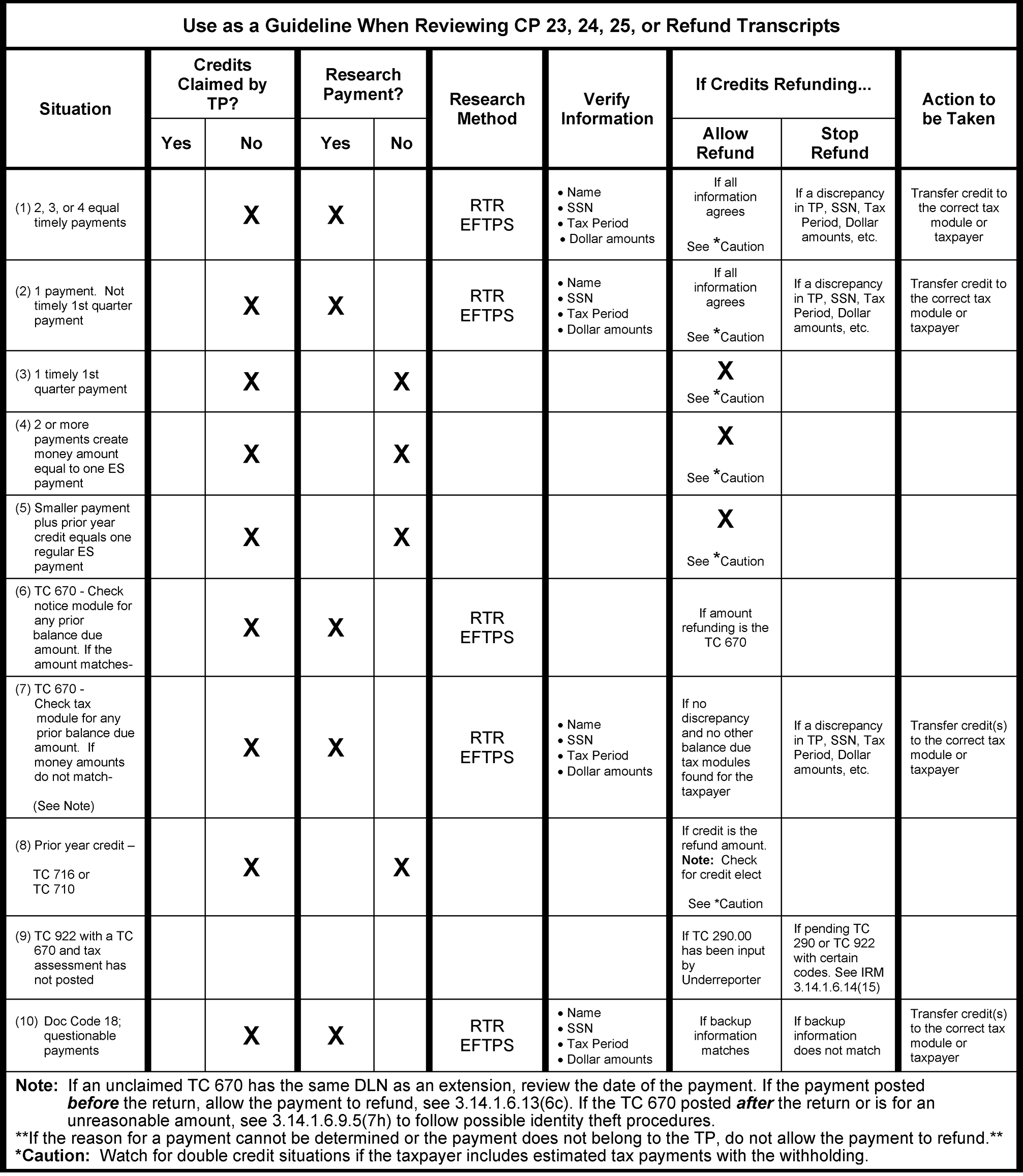
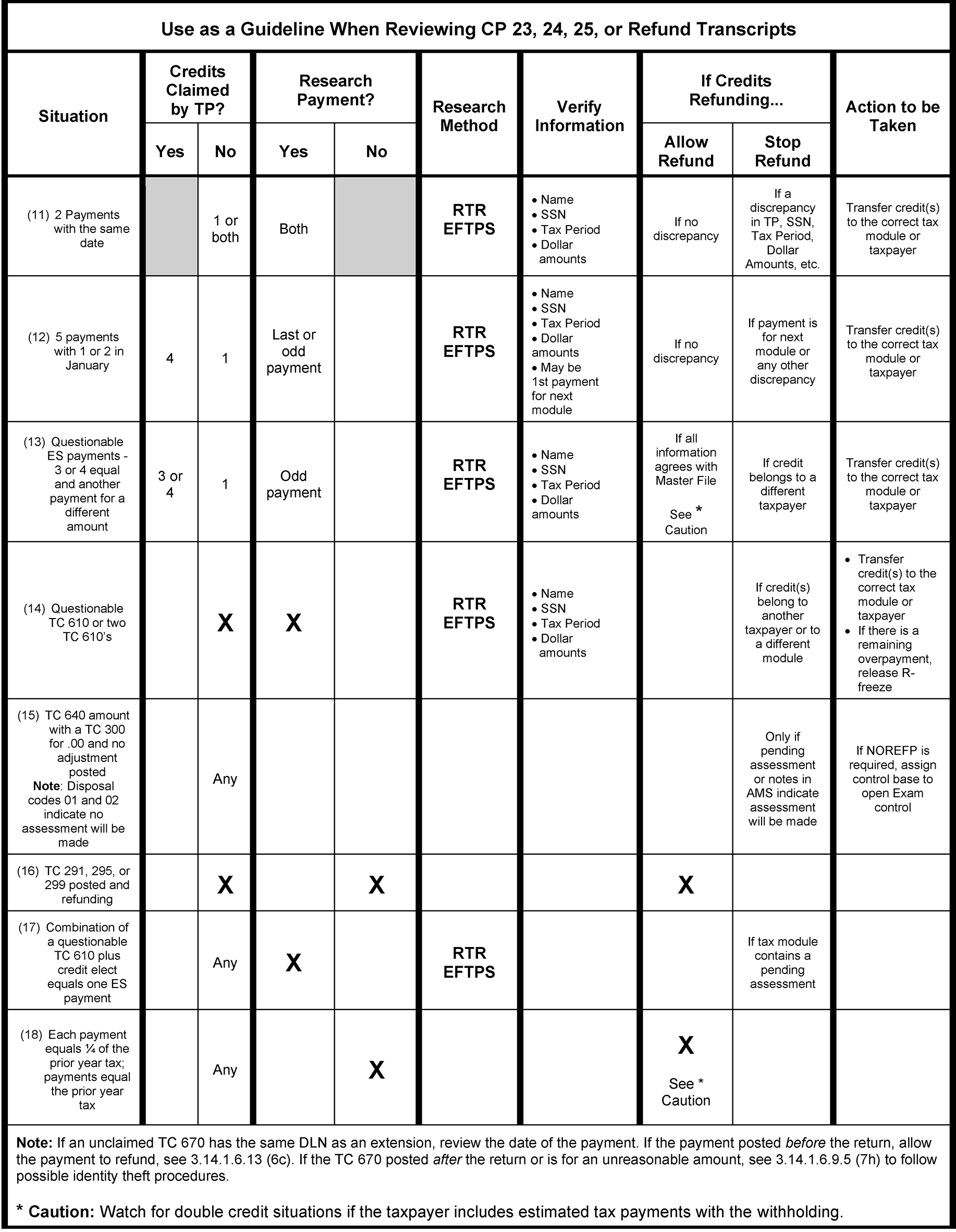
Review the estimated tax payment voucher using RTR or EFTPSE. Use the following table as a guide:
This section applies only to notices that generate with an ES discrepancy (CP 23, CP 24, and CP 25) and will still have an ES discrepancy after review unless otherwise indicated. Use normal notice disposition, IRM 3.14.1.7.8.1, Notice Disposition Categories, and those sections following it if no ES discrepancy remains (read exception below). If the taxpayer doesn’t need to receive a notice, void the notice if the conditions in IRM 3.14.1.7.8.3, Voiding Notices are met.
Exception:
Paragraph (4) applies to ES discrepancy notices which have generated due to the taxpayer erroneously including withholding on the ES payment line.
CP 23 notice disposition guidelines:
When a REQ54/ADJ54 adjustment is input on a notice module that has a CP 23 estimated tax payment discrepancy, refer to the table below:
If the adjustment results in Then An estimated tax payment discrepancy and a balance due - Use a Hold Code "3" on the ADJ54.
- Retype the CP 23.
An estimated tax payment discrepancy and an overpayment - Use a Hold Code "3" on ADJ54.
- Convert/retype the CP 23 notice to a CP 24.
An estimated tax payment discrepancy with an overpayment less than $1, a balance due less than $5, or an even balance - Use a Hold Code "3" on ADJ54.
- Convert/retype the CP 23 notice to a CP 25.
Caution:
The ES Penalty may need to be manually calculated or adjusted. Refer to IRM 3.14.1.6.20.4, Estimated Tax Penalty.
- If the taxpayer requested a credit elect, there will be a systemic paragraph printed on the CP 23 to inform the taxpayer of a reduced credit elect (this paragraph does not display in OLNR). If the return was not coded for credit elect (credit elect was not transcribed), edit the Unapplied Credit Elect Amount Field on the CP 23 when applicable.
When the only action on the module will be the addition of a payment not reflected on the notice and the FTF or ES Penalty will recompute, apply Label 2 for accounts that will remain in balance due, or Label 18 if the account will become overpaid.
When the only action on the module will be a payment not reflected on the notice and the FTF or ES Penalty will not recompute, retype the notice to reflect the credit, and any updated FTP Penalty and/or interest.
Note:
If the notice module will have an overpayment or even balance, retype the notice to a CP 24 or CP 25, as appropriate, to reflect the credit and any updated FTP Penalty and/or interest.
CP 24 and CP 25 notice disposition guidelines:
- If decreasing the overpayment, prevent any refund from generating using guidelines in IRM 3.14.1.7.1.1, Refund Intercepts.
- Void a CP 25 if the taxpayer indicated a balance owed on the return and the payment which should have posted as a TC 610 or TC 670 payment is posted as an ES payment (TC 660/ TC 430) that pays the account in full. This is not a true ES discrepancy.
If TXMOD indicates a Return Integrity & Verification Operation (RIVO) case and any one of the below is on the tax module see IRM 3.14.1.6.9.5 (8)for more notice disposition information.
Note:
Use Hold Code 4 to prevent both a subsequent or additional notice and release of the refund when correcting a math error if RIVO indicators are present.
- A RIVO open control base starting with 148XX for the IDRS unit number,
- A RIVO P- freeze (See IRM 21.5.6.4.31.2, P- Freezes with Return Integrity Verification Operations (RIVO) Involvement, for more information.),
- A TC 971 with any of the following Action Codes (AC) 121/122/124/129/134/199/617, or
A TC 971 AC 123 with MISC field showing one of the following letters, 4464C, 4883C, 5071C, 5216C, 5447C, 5747C, 6330C, 6331C, has been issued to the taxpayer.
Caution:
≡ ≡ ≡ ≡ ≡ ≡ ≡ ≡ ≡ ≡ ≡ ≡ ≡ ≡ ≡ ≡ ≡ ≡ ≡ ≡ ≡ ≡ ≡ ≡ ≡ ≡ ≡ ≡ ≡ ≡ ≡ ≡ ≡ ≡ ≡ ≡ ≡ ≡ ≡ ≡ ≡ ≡ ≡ ≡ ≡ ≡ ≡ ≡ ≡ ≡ ≡ ≡ ≡ ≡ ≡ ≡ ≡ ≡ ≡ ≡ ≡ ≡ ≡ ≡ ≡ ≡ ≡ ≡ ≡ ≡ ≡ ≡ ≡ ≡ ≡ ≡ ≡ ≡ ≡ ≡ ≡ ≡ ≡ ≡ ≡ ≡ ≡ ≡ ≡ ≡ ≡ ≡ ≡ ≡ ≡ ≡ ≡ ≡ ≡ ≡ ≡ ≡ ≡ ≡ ≡ ≡ ≡ ≡ ≡ ≡ ≡ ≡ ≡ ≡ ≡ ≡ ≡ ≡ ≡ ≡ ≡ ≡ ≡ ≡ ≡ ≡ ≡ ≡ ≡ ≡ ≡ ≡ ≡≡ ≡ ≡ ≡ ≡ ≡ ≡ ≡ ≡ ≡ ≡≡ ≡ ≡ ≡ ≡ ≡ ≡ ≡ ≡ ≡ ≡ ≡ ≡ ≡ ≡ ≡ ≡ ≡ ≡ ≡ ≡ ≡ ≡ ≡ ≡ ≡ ≡ ≡ ≡ ≡
Use the following chart when making an adjustment to an account with a CP 24 or CP 25 Estimated Tax payment discrepancy:
If the adjustment results in a Then Balance due - Intercept the refund see IRM 3.14.1.7.1.1, Refund Intercepts.
- Use a Hold Code "3" on the REQ54/ADJ 54 adjustment.
- Retype the notice to a CP 23.
Decreased overpayment - If the adjustment to reduce the refund is input before 5 P.M. ET on Monday, retype the notice to reflect the change and use Hold Code "3" .
- If the adjustment to reduce the refund is input after 5 P.M. ET Monday, prevent the refund from generating using TC 570 until 5 P.M. ET Wednesday. If after 5 P.M. ET on Wednesday use NOREFP. See IRM 3.14.1.7.1, Preventing Refunds, for more information. Use Hold Code "3" on the adjustment and retype the notice to a CP 24.
Increased overpayment - Route to Statutes for review before making an adjustment if the case qualifies as a statute case; RSED is expired.
- If the adjustment to increase the refund is input before 5 P.M. ET on Monday, retype the notice to reflect the change and use Hold Code "3" .
- If the adjustment to increase the overpayment is input after 5 P.M. ET on Monday, stop the refund, input the adjustment, and make sure the full refund is not released until all transactions have posted (use necessary hold codes and posting delay codes. Do not use a Label 5. Retype the notice and send one refund.
Refund less than $1, a balance due less than $5, or an even balance - Use Hold Code "3."
- Retype the notice to CP 25.
- When the only action on the case will be the addition of a payment not reflected on the notice follow the table below.
If the Notice is a CP 24 And Then And there are penalties on the module The FTF (TC 166) or ES (TC 176) will recompute Apply Label 18 And there are penalties on the module The FTF (TC 166) or ES (TC 176) will not recompute Apply Label 6 And there are no penalties on the module Apply Label 6 Note:
If the notice is a CP 25, retype the notice to reflect the payment. Only one check will go out.
The following instruction applies to all ES discrepancy notices (CP 23, CP 24, and CP 25). If the only adjustment (REQ54/ADJ54) to the notice module will be adding withholding to an account when it was erroneously included on the estimated tax line of the return and the taxpayer’s figures are correct (no true ES discrepancy remains) follow the table below.
Note:
This is the only paragraph in this section for an account that no longer contains an ES discrepancy.
If Then An ES Penalty is not assessed or the assessed ES Penalty will completely abate resulting in an overpayment or zero-balance condition - On the ADJ54 screen input the withholding using Credit Reference Number (CRN) 806 with a TC 290 .00 with a Hold Code "3" .
- Void the notice.
An ES Penalty is assessed, will not abate fully, but will result in a reduced refund - On the ADJ54 screen input the withholding using Credit Reference 806 with a TC 290 .00 with a Hold Code 3.
- Retype the notice to a CP 30.
- AMS Priority Refund Transcripts are generated by Master File due to conditions on the transcript module. Each refund must be reviewed to determine whether the overpayment should be released. The review should be completed within the four day time frame, as described below.
Priority Refund Transcript inventory is accessed through the Account Management Services (AMS) System and is assigned by priority as shown in the table below.
Priority Transcript Type Dollar Amount Priority 1 Over $10 million Priority 2 Over $1 million Priority 3 $100,000-$999,999 Priority 4 $5,000-$99,999 Priority 5 $0-$4,999 The Priority Refund Transcripts are delivered daily. New inventory is scheduled to be loaded and available in AMS by the following time frames:
- Monday through Thursday 6 AM Eastern Time
- Friday 9 AM Eastern Time
- IMF will systemically place a four day hold on the refunds with a TC 570 blocking series "55555" . Refunds can be prevented from generating, if necessary, following guidelines in IRM 3.14.1.7.1.1, Refund Intercepts.
Unworked cases older than four days will systemically close with no action and release the refund. There will not be an opportunity to prevent the refund from going to the taxpayer for those cases under $10 Million.
Exception:
$10 Million dollar and more cases will remain in the system and will not release the overpayment until a manual refund is input on IDRS.
Each case in AMS will display the refund transcript type (S, E, or Other), followed by a 2-digit numeric extension to indicate the "key" .
- AMS will systemically prioritize and assign the work by oldest day, highest dollar, and "key" numeric extension to ensure the higher priority cases are worked first.
- The column headings reflected in the Unassigned Queue and the Work Inventory screen in AMS can be clicked on to sort in ascending or descending order.
Bold indicators will be present on cases that require attention before accessing a new case (except for N indicating a New Case). The bold indicators are:
- N - New Case
- R - Reassigned Case
S - Suspended Case
- The status column will provide guidance on whether the case is open, suspended, forwarded for assistance, etc.
AMS Work Inventory Tabs on the Work Inventory Screen include:
- All
- Open
- Suspended
- Requested Assistance
- Requested Extension
- Review Rejected
- QR Approved
- Suspend-Monitor
- Closed
- The above list is for individual tax examiners to track new cases or previously worked cases that need action or monitoring.
Per local management discretion, tax examiners will receive AMS Priority Refund Transcript inventory under the All or Open Tabs as assigned by a manager/lead or by clicking the Next Case button.
- Cases that have been suspended for over 30 days will become bold and will disable the Next Case button until an action is taken on the suspended case.
Once a case is opened, the choices available are:
- Close. Once the close option is chosen specific closure options are available to resolve the case. See below for more Closure Options for AMS Priority Refund Transcripts information.
Suspend. Once the Suspend option is chosen a specific Suspense Action menu is displayed: Additional Research, Request the Return, Convert Transcript to Notice, and Miscellaneous. History Notes are required for any Suspense Action. When the case cannot be resolved using RTVUE, TRDBV, or other electronic means, suspend the case with Suspend for Return in AMS and request the paper document using CC ESTAB in IDRS.
Reminder:
Cases that have been suspended for over 30 days will become bold and will disable the Next Case button until an action is taken on the suspended case.
Fwd Mgr/Ld (Forward to Manager/Lead). Once this option is chosen a Note box will display. Input the case specifics, research performed, and the reason lead review/assistance is required.
Note:
Due to the time-sensitivity of preventing a refund from going to the taxpayer, cases that are four days old cannot be forwarded to a manager or lead for assistance. The Forward to Manager/Lead button should not be present on a case that reflects Day 3 after 5 P.M. ET, or a Day 4 case. When working a case that is four days old and assistance is needed, verbally obtain assistance from the manager or lead.
- Followup. Once this option is chosen a date drop-down box displays to provide an automatic follow up reminder on a specific date. Ensure that the refund is intercepted if the follow up date will exceed the 4-day systemic refund hold.
- Exit Case. Once this option is chosen the screen immediately exits the case and returns to the Work Inventory Screen.
An AMS Priority Refund Transcript can be identified in IDRS (IMFOLT and TXMODA) with TC 971 AC 805 and transcript type (example S-53) with the TC 971 AC 805 DLN matching the DLN of the transaction that resulted in the refund. See Figure 3.14.1-7 below for an example of TC 971 Action Code 805 in IDRS.
Closure Options for AMS Priority Refund Transcripts are:
- Standard - Release Refund. This closure option should be used if the pending refund should be released. Ensure there are no pending debit transactions.
Closed to AUR/URP. This closure option may only be used if Automated Underreporter/Underreporter (AUR/URP) has an open (A, B, M or S status) control base. Underreporter open controls can be identified by control number XX88002000 (where XX is the Campus Location Code) and TC 922. Do not close to AUR/URP unless intercepting the refund.
Caution:
If the last (far right) TC 922 processing code listed on TXMOD is 70-73 or 91- 93 or an additional TC 922 with processing code 87, release the refund using “Standard Release Refund” in AMS.
- TC 290 .00 Hold Code 4. This closure option will input a TC 290 .00 Hold Code 4 which sets a -K freeze and should be used rarely. Choose this closure option only when directed by the IRM or lead. See the Priority Refund Transcript Closing Action Table in IRM 3.14.1.6.14 (19) below for systemic AMS action information.
- Credit Transfer Needed. This closure option cannot be removed from AMS but should not be used. The IAT Credit Transfer Tool is mandated for credit transfers. If a credit transfer is needed for the case, choose closure option Module Situation Resolved (below) and perform the credit transfer outside of AMS using IAT.
- Module Situation Resolved. This closure option is used when a refund is being intercepted (TC 570 or NOREFP) and additional steps must be taken. This closure option also contains multiple possible IDRS actions that once chosen, AMS will perform; REQ54 adjustments, REQ77 TC 570 and TC 571, and REQ77 to initiate a CP 67 Notice Transcript to create a CP notice for OLNR from an AMS transcript case. See IRM 3.14.1.6.14 (21), and IRM 3.14.1.4.3.3, Notice Recreate Transcripts (CP 67), for more information about the CP 67.
- If a refund hold has been extended with a TC 570 in error a CC TERUP (input by the originator) will delete the TC 570 on the same day it was input. After the day of input, a TC 571 is required to reverse and allow the refund. Input the TC 571 on IDRS using CC REQ77 or TC 290 .00 using REQ54 with Hold Code 3 will also release the refund.
If an overpayment does not need to be prevented, but an adjustment is needed, input the adjustment transaction manually on IDRS, and close the case in AMS using Standard – Refund Release and include a note indicating the transaction had been executed in IDRS manually. Using Standard Release Refund will prevent any intercept (TC 570/NOREFP) of the original refund.
Caution:
When an adjustment is changing the refund amount, and the adjustment is input before 6 PM local time on day 1, IMF will recompute the module balance before the refund is released. See bullets below for complete information.
- When the adjustment will reduce the refund and is input before 6 PM local time on Day 1, do not prevent the refund from generating.
- When the adjustment will reduce the refund and is input after 6 PM local time on Day 1, prevent the refund from generating. Follow guidelines in IRM 3.14.1.7.1.1, Refund Intercepts.
AMS is designed to systemically execute some IDRS actions based on selection of a suspense or closing action when working a case.
Caution:
Take note of the systemic actions in the Priority Refund Transcript Action Table below. Avoid performing duplicate actions via IDRS and/or the IAT Tools that AMS will input automatically. After all case actions have been performed, IDRS must be reviewed for completeness. Also verify if a Control base needs to be maintained or can be closed [(M)onitor or (B)ackground or (C)losed], see IRM 3.14.1.7.2, Controlling Cases, for more information.
Action Selected When to Use Systemically generated IDRS Action Control Base/Activity Code/Status Suspend Button: Choice - Suspend for Additional Research More time is needed to research case, and refund needs to be prevented from going to the taxpayer TC 570 or NOREFP (see NOTE) Yes
RESEARCH846
SSuspend Button: Choice - Suspend for Return Document is needed from Files to resolve case, and refund needs to be prevented from going to the taxpayer TC 570 or NOREFP (see NOTE) Yes
REFHELD
SSuspend Button: Choice - Suspend for Convert Transcript to Notice Transcript needs to be converted to notice, and refund should be prevented from going to the taxpayer TC 570 or NOREFP (see NOTE)
TC 971 AC 264Yes
RTYP2CP
SSuspend Button: Choice - Suspend for Convert Transcript to Notice Transcript needs to be converted to a CP notice, and refund should be released to the taxpayer To prevent a systemic TC 570 or NOREFP, manually uncheck the "refund hold" box. TC 971 AC 264. See IRM 3.14.1.6.14 (21), for more information. Yes
RTYP2CP
SSuspend Button: Choice - Suspend for Miscellaneous More time is needed to resolve case, and refund needs to be prevented from going to the taxpayer TC 570 or NOREFP (see NOTE) Yes
REFHELD
SStandard Closing Reason Choice - Closed to AUR/URP Refund needs to be prevented from going to the taxpayer, and AUR/URP has an open control base TC 570 or NOREFP (see NOTE) Yes
CLOSE2URP
*CNote:
When the case is age 4 (5 P.M. ET on day 3 to 8 P.M. ET on day 4), a NOREFP screen will display to verify entries for the NOREFP Command Code. If inputting a NOREFP and/or other actions in IDRS (adjustments, credit transfers, etc.), select Module Situation Resolved as the closing code. Include all actions taken in the AMS notes (again to capture an AMS history of the actions taken manually in IDRS to address the account).
- The input screens for AMS to execute the command codes do not have "enhanced logic" like the IAT tools. AMS is not programmed to analyze account information and present options to select transactions and generate all available fields based upon the selection. The only fields that will systemically generate are those that generate on the regular IDRS input screens.
A Transcript can be converted to a CP Notice in AMS.
Reminder:
CP 67 (notice recreate) is not necessary if the correct hold code (0 or 1 as applicable) is used on an adjustment. Hold code 0 or 1 will generate an adjustment notice. See, IRM 3.14.1.7.6.5, Hold Codes, for more information.
- Close module situation resolved and select TC 971 AC 264 or suspend the transcript and select "Convert Transcript to a Notice" if the refund needs to be held. AMS will systemically prevent the refund and generate the TC 971 AC 264 to create the CP 67 and will keep the case open in AMS.
- If it is not necessary to prevent the refund from generating, choose Module Situation Resolved and select REQ77 - TC971/AC 264 Closing action, uncheck the refund hold box to allow the refund to be released and leave history notes.
- Monitor OLNR for 1-2 cycles for the associated CP 67 in Batch "00000" (An open IDRS control base is also required, see IRM 3.14.1.7.2, Controlling Cases, for more information.).
- Refer to IRM 3.14.1.4.3.3, Notice Recreate Transcripts (CP 67)
- Retype the notice in OLNR as appropriate.
All fields on the selected notice must be edited by the tax examiner.
Reminder:
"Per Taxpayer" and "Per Computer" fields must both be completed in OLNR to create an accurate notice for the taxpayer.
- Verify all notice amounts before saving and exiting the batch in OLNR.
- If still suspended, close the AMS case.
Original tax returns claiming Elective Payment Election (EPE) are screened prior to posting to master file. If the return meets the criteria for review by SB/SE, a TC 971 AC 831 with MISC EPE or CVC posts to the tax module. Refund transcripts with the SB/SE EPE review indicators should be closed Standard Release Refund. The TC 570 with TC 971 AC 831 does not have a limited 4 day hold. See IRM 3.14.1.6.9.17.1, Elective Payment Election (EPE), for more information.
Caution:
When a TC 971 AC 831 with MISC EPE or CVC is present on the account, Notice Review can proceed with other adjustment actions as necessary using Hold Code 1. If a Credit transfer is needed do not use a TC 571 to release refund.
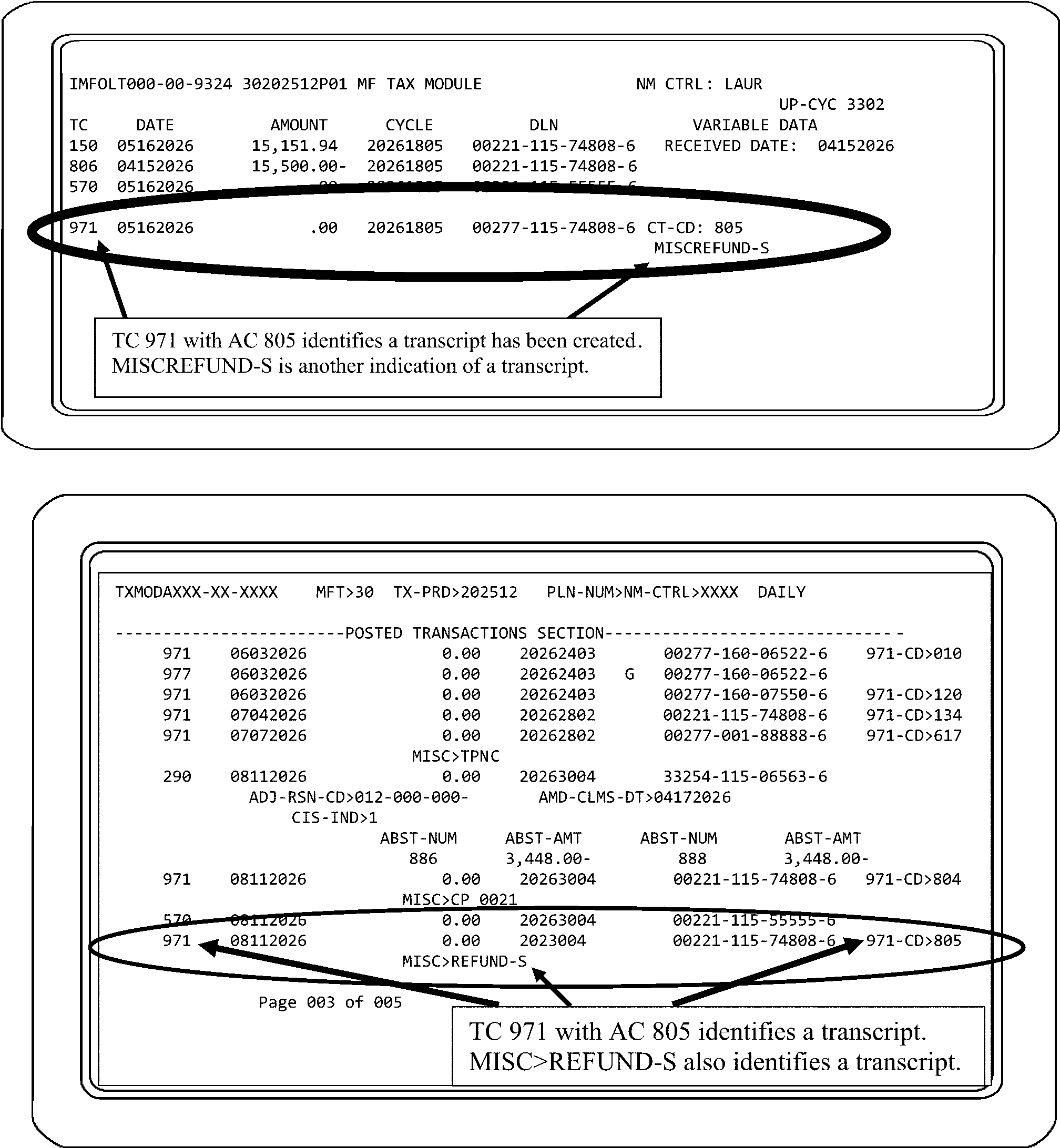
- Analyze the AMS reports each week to track the effectiveness of Priority Refund Transcript selection criteria.
The chart below identifies the reports the AMS system will generate for priority refund transcripts.
Report Name Name/Description Daily/Monthly Who Can Generate Retention Period 1001 - Priority Management Priority 1 $10 Million Refund - $10 Million/Over. This report will provide a daily "beginning-of-day" cumulative breakdown of the entire current Campus level Unassigned Inventory Queue. The report will display the inventory breakdown based on the Priority classifications 1 through 6 (dollar range, expiration date, doc type and volume totals) Systemic Daily (Beginning of Day) Department Manager, Lead tax examiner 5 years 1000-2 Managerial Assigned Inventory Review Expiration - The number of days remaining in the refund review period Systemic Daily (End of Day) Manager, Lead tax examiner 6 months 1000-3 Managerial Assigned and Suspended Multi-Inventory This report will provide a daily "end-of-prior-day" cumulative breakdown of multiple inventory assigned and suspended by management to a designated employee Systemic Daily (End of Day) Manager, Lead tax examiner 6 months 2000-1 Suspended Inventory For each unit, this report will provide a cumulative case listing breakdown of each individual employee's Suspense inventory (TIN by TIN) as of the date of report generation Systemic Daily (Beginning of Day) Manager, Lead tax examiner 6 months 3000-1 Location - to - Location Transferred Inventory Location-To-Location Transferred Inventory Systemic Daily (End of Day) Gatekeeper, Dept. Manager, Manager 45 days 4000-1 Unit - to - Unit Reassignment of Assigned Inventory This report will provide a roll-up total of individual inventory (TIN by TIN) assigned between units within the same campus location Systemic Daily (End of Day) Gatekeeper, Dept. Manager, Manager 45 days 4000-2 Within - Unit Reassignment of Assigned Inventory For each unit, this report will provide a roll-up total of individual inventory (TIN by TIN) assigned between tax examiners within the same unit Systemic Daily (End of Day) Manager, Lead tax examiner 45 days 5000-1 Quality Review Reject At the unit level, this report will provide a roll-up total of closed inventory (TIN by TIN) reviewed by Quality Review that has been rejected and/or reassigned back to the individual tax examiner on the date of the report generation Systemic Daily (End of Day) Manager, Lead tax examiner, Quality Review 6 months 6000-1 Unit Daily Closed Inventory History For each unit, this report will provide a daily roll-up total (TIN by TIN) of each unit's closed inventory by employee, organized in descending Refund $ Amt order Systemic Daily (End of Day) Manager, Lead tax examiner 6 months 6000-2 Unit Weekly Closed Inventory Roll - History For each unit, this report will provide a weekly (end of cycle) roll-up total (TIN by TIN) of each unit's closed inventory by employee, organized in descending Refund $ Amt order Systemic Weekly (Week is Monday - Thursday) Manager, Lead tax examiner 6 months 6000-3 Campus Calendar - Year - End Closures At the campus level, this report will provide a calendar year end summary of inventory closures, broken out by doc type reviewed, not reviewed, and intercepted, as well as the relating percentages in comparison to total transcripts Systemic Annually (Calendar Year End) Manager, Lead tax examiner 5 years 6000-4 Campus Year - To - Date Closures At the campus level, this report will provide a Year-To-Date summary of inventory closures, broken out by doc type reviewed, not reviewed, and intercepted, as well as the relating percentages in comparison to total transcripts Systemic Annually Manager, Lead tax examiner 5 years 6000-5 International Campus Calendar - Year - End Closures At the campus level, this report will provide a calendar year end summary of International inventory closures, broken out by doc type reviewed, not reviewed, and intercepted, as well as the relating percentages in comparison to total transcripts Systemic Annually (Calendar Year End) Manager, Lead tax examiner 5 years 6000-6 International Campus Year - To - Date Closures At the campus level, this report will provide a Year-To-Date summary of International inventory closures, broken out by doc type reviewed, not reviewed, and intercepted, as well as the relating percentages in comparison to total transcripts Systemic Annually Manager, Lead tax examiner 5 years 8000-1 Refund Transcript Reconciliation If AMS is down or otherwise unavailable for reviewing the Priority Refund Transcript inventory, this report will assist each unit in reconciling Priority Refund Transcript reviews conducted off-line with the Priority Refund Transcript inventory data retained within AMS Ad-Hoc Gatekeeper, Manager, Lead tax examiner 6 Months
- Any refund of $10 (ten) million dollars or more must be issued as a manual refund.
- Accounts that generate this transcript should be worked by the leads within 24 hours to minimize the amount of overpayment interest. If the refund should be released, Notice Review must request the manual refund using the IAT Manual Refund Tool and route to Accounting per IRM 3.14.1.6.6.3, Preparing and Monitoring Manual Refunds — Form 5792 and CC RFUNDR.
- Verify any unclaimed payments.
Review for possible Identity Theft (IDT). The following items are potential IDT indicators:
- Withholding claimed is less than what is on IRPTRL for the taxpayer (which keeps the amount under tolerances)
- Direct deposit is claimed when not claimed in prior years
- Taxpayer filed an extension (TC 460) in the current and prior years, paid a substantial Form 4868, Application for Automatic Extension of Time to File U.S. Individual Income Tax Return, (extension) payment (TC 670 matching the DLN of the TC 460), but did not claim the payment on the posted return.
- TC 460 posts after the TC 150.
- Accounts with overpayment amounts between $1 million and less than $10 Million will appear as a $1 million Refund Transcript.
- Systemic refunds will generate(TC 846) for refunds under $10 million, unless a manual refund is required (certain freeze codes).
- Accounts that appear as this transcript will have the refund temporarily frozen TC 570 with "55555" blocking series.
- Accounts that appear as this transcript should be worked by the lead or SME expeditiously to minimize the amount of overpayment interest.
Verify any unclaimed payments and look for possible Identity Theft (IDT). If the following conditions are identified, suspend the case (stopping the refund)and forward to a manager or lead for review:
- Withholding claimed is less than what is on IRPTRL for taxpayer (which keeps the amount under our tolerances)
- Direct deposit claimed when not claimed in prior years
- Taxpayer has filed for an extension (TC 460) in current and prior years and pays a substantial 4868 payment not claimed on current return.
- TC 460 posts after the TC 150.
Master File generates Refund S transcripts for an overpayment that may result in a refund being issued in a cycle other than the posting cycle of the TC 150. Review the posted transactions of the tax module from the current cycle backwards (newest to oldest) to determine the cause of the overpayment.
Caution: Look for possible Identity Theft (IDT) and suspend the case, stop the refund, and forward for manager/lead to review if these conditions are present:- Withholding claimed is less than what is on IRPTRL for taxpayer (which keeps the amount under our tolerances),
- Change in patterns, when direct deposit was not claimed in prior years,
- TC 460 filed, but substantial 4868 payment not claimed on current return,
- Extension (TC 460) filed after TC 150 posted.
Research documents, images, and case notes available through AMS.
Allow the refund (standard release refund in AMS) if:
- Taxpayer submitted two TC 670 payments: 2nd notice sent before the 1st payment posted, and the taxpayer paid the 2nd notice unaware of the offset of the 1st payment.
- TP submitted two TC 670 payments, one is a levy: 2nd notice sent before the 1st payment posted, and the taxpayer paid both.
- A TC 640 or TC 670 is refunding and was released by a TC 290 .00, blocking Series 55 or 65 (Underreporter Adjustment).
The refund was released by a TC 300 .00 with Disposal Code 01 or 02 (no change in tax liability or refundable credit).
Exception:
Prevent the refund from generating if Disposal Code 01, blocking series 700 or 790 (additional tax assessed) is used.
Research and possibly prevent refunds from generating under any of the following circumstances:
Circumstances Guidelines Two TC 670 non-levy payments, same amounts posted to the module. Verify payments in RTR or CC EFTPSE. Check for a possible duplicate credit. If the reason for the second TC 670 cannot be determined, Suspend for Additional Research in AMS. Send a 1687C letter. Follow IRM 3.14.1.7.4 Notice Review Sent Taxpayer Correspondence-Reply and No Reply Procedures. TC 670 payment is refunding after TC 846 has posted. If the payment was sent in with an amendment return (1040X) Check AMS Alerts or EUP to review the 1040X (if available). Hold the refund for the pending amended return.
TC 670 payment is refunding with a Designated Payment Code (DPC) 64 Verify the payment in RTR or CC EFTPSE to look for an indication of an IRC 965 payment. Review IMFOLM for MFT 30 Tax Periods 201712 and 201812 to determine if a credit transfer to a different module is needed for IRC 965 Liability. Prevent the refund from generating if a credit transfer is needed. See IRM 3.14.1.6.9.15.4, Command Code IMFOL IRC 965. TC 670 payment is refunding after TC 846 has posted, and the reason for the payment cannot be determined. Suspend for Additional Research in AMS. Look up documents/images/case notes available through AMS, to verify taxpayer’s intent. Verify payments in RTR or CC EFTPSE. Check for a possible misapplied ES payment for the next tax year. If the taxpayer did not claim the payment on the return and the payment module cannot be determined, correspond for the questionable payment by sending a Letter 1687C- Unidentified Payment/Credit. If the taxpayer does not respond to the correspondence and payment cannot be determined, refer to IRM 3.14.1.7.4 Notice Review Sent Taxpayer Correspondence-Reply and No Reply Procedures, IRM 3.14.1.6.8, Excess Collections (XSF), and Unidentified Remittance (URF) Files. TC 670 payment submitted is for TC 460 extension If the amount of payment is unreasonable, or if it’s posted after the TC 846, verify the extension through AMS or RTR if available. If Identity Theft is suspected, suspend the case, stop the refund, and forward for manager/lead to review. See, IRM 3.14.1.6.9.5 RIVO (Return Integrity and Verification Operation) for more information. TC 670 is refunding (usually Key 041, 045, or 052 Transcripts), and an Audit Information Management System (AIMS) indicator (Exam indicator on, CC TXMOD) is present indicating a tax increase Prevent the refund from generating. Close the case using Closing Action Module Situation Resolved without selecting any transactions in the window in AMS. Indicate in the case notes that the case was closed to Exam. Refund was released by a TC 300 .00 with disposal code 01 and blocking series 700-790 Close the case using Closing Action Module Situation Resolved without selecting any transactions in the window in AMS. Indicate in the case notes the case was closed to Exam. Refund was release by a TC 300 .00 and the disposal code is not 01, 02, 20, 21, or 22. Close the case Module Situation Resolved without selecting any transactions in the window in AMS. Indicate in the case notes the case was closed to Exam. Two TC 610 payments posted, and one is refunding. Check for a possible duplicate credit by verifying payments in RTR or CC EFTPSE. Review for vouchers, notes in the check memo line, and for timeliness for a future module. Also, carefully review IDRS and AMS history notes for a possible bad check. One check may have been sent to replace a payment the taxpayer knows will not clear the bank. If the research above has been performed, and no indication of a bad check can be found, release the refund. IDRS shows a pending tax increase or credit decrease Check for possible duplicate adjustment. If the adjustment appears reasonable, prevent the refund from generating. Close the case Module Situation Resolved. Indicate in the case notes a pending transaction is present. A TC 640 (AUR) or TC 680 amount matches the overpayment amount Prevent the refund from generating. Close the case Module Situation Resolved to hold the payment until Underreporter can complete review of the module and assess more taxes if required.
A TC 640 or TC 670 is refunding and the reason for the payment cannot be determined. Use RTR or EFTPSE to research the payment. If the taxpayer did not claim the payment on the return and the payment module cannot be determined, correspond for the questionable payment by sending a Letter 1687C- Unidentified Payment/Credit. If the taxpayer does not respond to the correspondence and payment cannot be determined, refer to IRM 3.14.1.7.4 Notice Review Sent Taxpayer Correspondence-Reply and No Reply Procedures and IRM 3.14.1.6.8, Excess Collections (XSF) and Unidentified Remittance (URF) Files. A TC 922 and a TC 670 or TC 640 posted to the module with no tax increase (TC 922 is an indication that Automated Underreporter (AUR) is reviewing the module) Review TXMOD for TC 922 closing codes. If there is an open AUR Control Base, and the processing code indicates that the case is still being reviewed then Close to URP/AUR in AMS.
A TC 766 (refundable credit) is being released by a TC 577 that is generated by TC 421 with Disposal Code 29 (missing return) Close Module Situation Resolved without selecting any transactions in AMS. Hold the refund and indicate in the case notes a pending transaction is present. Prior year credit elect is refunding, a TC 150 posted to the next year, and penalties, additions to tax, and interest have accrued on that module that will abate when the credit elect posts. Check for debt indicators for possible TOP Offset using CC INOLES, see IRM 3.14.1.6.4.3, Treasury Offset Program (TOP) Offsets — TC 898/899 for more information. If no debt indicators are found close Module Situation Resolved in AMS. Perform the credit elect credit transfer using the Credit Transfer IAT Tool, see IRM 3.14.1.7.7, Credit Transfers for more information. If debt indicators are found close Standard Release Refund. Prior year credit elect is refunding, a TC 150 posted to the next period, and the module has a debit balance Close Standard Release Refund. The refund will be systemically applied to IRS and other Federal debt. Prior year credit elect is refunding, the credit is claimed on the next year, and the credit elect field of that year is inconsistent. Check for debt indicators for possible TOP Offset using CC INOLES, see IRM 3.14.1.6.4.3, Treasury Offset Program (TOP) Offsets — TC 898/899 for more information. If debt indicators are found close Standard Release Refund. If no debt indicators are found close Module Situation Resolved in AMS. Before performing the credit elect credit transfer verify the taxpayer intent by reviewing AMS history notes and viewing the return on IDRS or by other electronic means. Once the correct credit elect amount is verified transfer using the IAT Credit Transfer Tool. See IRM 3.14.1.7.7, Credit Transfers for more information. If a TC 666/667 (systemic transfer) and a TC 670/672 payment has posted resulting in a refund. Research the secondary accounts to look for balance due status. If a module is in balance due status, close Module Situation Resolved in AMS. Transfer the TC 670 back to originating spousal account with a balance due.
See IRM 3.14.1.6.11.6, ES Spousal Freeze D- Code for more information.
The following table defines the transcript name by "key" numeric extension and criteria for a Refund-S transcript generating. Refer to guidelines in (3) and (4) to complete case.
Transcript Refund Name: The criteria for the generation of this transcript: Guidelines S– 41 - Current cycle Subsequent payment (TC 670), and
- Prior cycle Refund (TC 846) posted
- Look for possible IDT and suspend case by stopping the refund for manager to review for potential IDT if these conditions are present: a) withholding claimed is less than what is on IRPTRL for taxpayer (which keeps the amount under our tolerances), b) direct deposit claimed when not claimed in prior years, c) taxpayer has filed for an extension (TC 460) in current and prior years and pays a substantial 4868 payment not claimed on current return, d) The TC 460 posts after the TC 150
- Verify the payment. Apply payment to the module per taxpayer’s intent, if TC 150 is posted on both modules.
- Check for misapplied payment(s).
- Check for potential IDT
S– 42 - Current posted TC 806 is for the same amount as the withholding that came in on the TC 150 (if significant only) and Prior cycle posted TC 806 equals ($10.00 +/-tolerance) current cycle TC 806 amount
- Check IRPTR for possible duplicate withholding(s)
- If TC 806 is an exact duplicate, prevent the refund from generating (TC 570/NOREFP)
- Leave a history item on AMS
S– 43 - Multiple tax abatements (TC 29X or TC 30X) within $10.00 posted to the module. There may be multiple combinations of equal amounts.
- Verify adjustment documents. This condition often results from erroneous duplicate adjustments.
S– 44 - Overpayment is refunding a payment or the sum of payments (TC 640, TC 670, or TC 680)
- A TC 29X or TC 30X for $0.00 posted in the current cycle
- An overpayment in the current cycle equals a payment or payments (TC 640 under-reporting payment, TC 670 additional payment, TC 680 designated payment of interest), and a TC 29X/TC30X for $ .00 posted on the current cycle
- Verify accuracy of the action on IDRS
S– 45 - Current cycle tax increase adjustment (TC 290, 294, 298, 300, 304, or 308)
- Verify Payments (TC 640/670/680) posted
- Release overpayment if tax increase adjustment is 90 percent less than the total payments
- Watch for an unrelated adjustment that may result in releasing a payment made for a specific purpose.
S– 46 - Overpayment matches the last posted TC 670 amount is equal to the amount and
- TC 922 is posted with no tax increase
- If TC 922 processing codes are 70-73, 91-93, do not prevent the refund from generating
- TC 922 with processing codes other than the ones above, Close to “URP/AUR” in AMS
S– 47 - Duplicate credit transactions within $1 on the module
- Verify dates and amounts with the related tax module
- Look for a possible duplicate credit transfer
S– 52 - A TC 610, TC 660, or TC 670 amount is within $1 of the overpayment amount
- Look for possible IDT and suspend case by stopping the refund for manager to review for potential IDT if these conditions are present: a) withholding claimed is less than what is on IRPTRL for taxpayer (which keeps the amount under our tolerances), b) direct deposit claimed when not claimed in prior years, c) taxpayer has filed for an extension (TC 460) in current and prior years and pays a substantial 4868 payment not claimed on current return, d) The TC 460 posts after the TC 150.
- Verify payment.
- Check for potential IDT
S– 53 - Credit elect TC 716 is present, but there is no credit elect to the next year TC 836.
- Verify taxpayer’s intent using CC RTVUE, TRDBV, Control D (NRPS).
- Research documents, images, and case notes through AMS
Master File generates a Refund E transcript when the overpayment is $100 or more than the amount claimed by the taxpayer and there is no math error, payment discrepancy, or duplicate return (–A freeze)
Caution: Look for possible IDT and suspend the case by stopping the refund for manager to review for potential IDT if these conditions are present:- Withholding claimed is less than what is on IRPTRL for the taxpayer (which keeps the amount under our tolerances),
- Change in patterns, such as changing to direct deposit, which was not claimed in prior years,
- TC 460 filed, but substantial 4868 payment not claimed on current return,
- Extension (TC 460) filed after TC 150 posted.
Research documents, images, and case notes available through AMS.
Allow the refund (standard release refund in AMS) if:
- Wrong line/transcription error: TC 610 payment was identified /transcribed on the wrong line of the return.
- Transferred incorrectly: The overpayment was caused by transposed figures in the payment balance due amount.
- Overpayment was caused by the difference in penalty and interest computation between taxpayer and IRS figures: Check page two (R2) of Form 1040/RTVUE and verify any attachments.
- Math Error: The taxpayer added the ES Penalty amount twice into the amount owed, when figuring the payment with return (TC 610).
- Taxpayer received two CP notices and paid twice, unaware of the offset by the first payment. Look for a TC 700 or TC 716 with an additional TC 670 refunding.
When an overpayment should be refunded, close the case using Closing Action Standard-Release Refund in AMS.If a refund transcript generated because the refund does not match the taxpayer figures due to a required First-Time Home Buyer repayment, send a Letter 544C with the following information:
Add paragraphs I and Q
For paragraph I type the following verbiage in the open paragraph: The refund you expected on your Federal tax return has been reduced by the amount of the repayment installment due for the First-Time Home Buyer Credit you received in 2008. The installment payment should have been claimed as an addition to tax on your return. No further action is required on your part to correct the account.
Research and possibly prevent the refund from generating under any of the following circumstances:
- A TC 640 or TC 670 is refunding and the reason for the payment cannot be determined. Use RTR or EFTPSE to research the payment. If the taxpayer did not claim the payment on the return and the payment module cannot be determined, correspond for the questionable payment and send Letter 1687C. If the taxpayer does not respond to the correspondence and payment cannot be determined, refer to IRM 3.14.1.6.8 Excess Collections (XSF) and Unidentified Remittance (URF) Files.
- The refunding amount is a TC 670 payment submitted with an Extension of Time to File (TC 460). If the amount is not reasonable or if the extension posted after the return, verify the extension.
- Prior year credit elect is refunding, a TC 150 posted to the next year, and penalties, additions to tax, and interest have accrued on that module that will abate when the credit elect posts. Close the case using Closing Action "Credit Transfer Needed" and select appropriate transaction(s) in the window in AMS or perform necessary transactions outside of AMS and close using Module Situation resolved.
- Prior year credit elect is refunding, a TC 150 posted to the next period, and the module has a debit balance. Close the case using Closing Action "Credit Transfer Needed" and select appropriate transaction(s) in the window in AMS.
- Prior year credit elect is refunding, the credit is claimed on the next year, and the Credit Elect field of that year is significant. Refer to IRM 3.14.1.6.4.1, Credit Elect – TC 836/716 or TC 830/710.
- A future year ES voucher amount is refunding. The TC 610 amount overpaid the account by an amount (approximately) equal to one ES payment for the following year (of the current year’s tax liability).
- A TC 610 payment substantially overpaid the module but does not match any amount on the return and does not appear to be intended for the next tax period. Look for any pending debit action for which the overpayment may be intended. Check other modules on the taxpayer’s account for debit balances that match the overpayment.
- There is an unsubstantiated refundable credit (TC 766 — other than withholding or ES payments) or the taxpayer entered total credits on the wrong line and the amount was transcribed as a TC 766. Watch for double credit situations.
- There is a Dishonored Check (TC 611, TC 641, TC 661, or TC 671) pending. Prevent the refund from generating. Close the case using Closing Action "Module Situation Resolved" without selecting any transactions in the window in AMS. Indicate in the case notes a dishonored check is present.
The following table defines the transcript name by "key" numeric extension and criteria for Master File to generate a Refund-E transcript.
- Master File generates a third type of Refund Transcript, which is when an overpayment differs by $200 or more from the overpayment claimed by the taxpayer, and there is no math error or estimated tax payment discrepancy.
Look for possible IDT. Suspend case (stopping the refund) for manager or lead to review for potential IDT if these conditions are present:
- ≡ ≡ ≡ ≡ ≡ ≡ ≡ ≡ ≡ ≡ ≡ ≡ ≡ ≡ ≡ ≡ ≡ ≡ ≡ ≡ ≡ ≡ ≡ ≡ ≡ ≡ ≡ ≡ ≡ ≡ ≡ ≡ ≡ ≡ ≡ ≡ ≡ ≡ ≡ ≡ ≡ ≡ ≡ ≡ ≡ ≡ ≡ ≡ ≡ ≡ ≡ ≡ ≡ ≡ ≡ ≡ ≡ ≡ ≡
- direct deposit claimed when not claimed in prior years
- taxpayer has filed for extension (TC 460) in current and prior years and pays a substantial 4868 payment (TC 670 with DLN matching the TC 460)
- extension 4868 posts after a return
Research documents, images, and case notes available through AMS.
Allow the refund under any of the following circumstances:
- For Key 50, if there are no transcription or posting errors and withholding is accurate.
- The amount of the TC 610 payment is an amount found on any line of the return or attached schedules, meaning that the taxpayer used the wrong line for tax due.
- The overpayment was caused by transposed figures in the payment balance due amount.
- The refunding amount is due to a difference in the taxpayer’s penalty and interest computations. Check page two of Form 1040 and verify any attachments.
- The taxpayer added the ES Penalty amount twice into the amount owed, when figuring the payment with return (TC 610).
- The refund is caused by a TC 670 intended to pay a previous taxpayer notice (see notice history on the IDRS tax module) and the taxpayer is unaware of an offset that had either satisfied the module or reduced its balance. Look for a TC 700 or TC 706 with a subsequent TC 670 refunding.
When an overpayment should be refunded, close the case using Closing Action Standard-Release Refund in AMS.
Research and possibly prevent the refund from generating under any of the following circumstances:
- A Key 50, if there are transcription or posting errors and/or withholding is inaccurate.
- A TC 640 or TC 670 is refunding and the reason for the payment cannot be determined. Use RTR or EFTPSE to research the payment. If the taxpayer did not claim the payment on the return and the payment module cannot be determined, correspond for the questionable payment and send Letter 1687C- Unidentified Payment/Credit. If the taxpayer does not respond to the correspondence and payment cannot be determined, refer to IRM 3.14.1.6.8, Excess Collections (XSF) and Unidentified Remittance (URF) Files.
- A TC 670 payment submitted with an Extension of Time to File (TC 460) is refunding. If the amount is not reasonable or if the extension posted after the return, verify the extension.
- A prior year credit elect is refunding, a TC 150 is posted to the next year, and the UNAPPLD-CR-ELECT> field on TXMODA contains an amount; review INOLES for a debt indicator before performing a Credit Transfer. If Married Filing Jointly (FS2) review INOLES for the primary and secondary TIN. If INOLES field DEBT IND is N (no debt), and interest and penalties will abate when the credit elect posts, or the credit elect needs to be moved forward multiple years, move the unapplied credit elect amount using the IAT credit transfer tool. If the INOLES debt indicator is not N (I, IRS debt; F, other Federal debt; B, both IRS and other Federal debt) do not perform a credit transfer. For more information see IRM 3.14.1.7.7, Credit Transfers. If performing a credit transfer, close the case Module Situation Resolved; if not performing a credit transfer, close the case Standard Release Refund. IDRS will offset any overpayment as needed when a debt indicator is present.
- A prior year credit elect is refunding, a TC 150 is posted to the next period, and the next module has a debit balance. Close Standard Release Refund. IDRS will offset any overpayment as needed when a debt indicator is present.
A future year ES payment is on the transcript module and that is the amount refunding. The amount overpaid the account by an approximately one ES payment for the following year (of the current year’s tax liability).
Reminder:
If the payment was misapplied to the current year but is intended as a future year ES payment, the payment may have posted to the transcript module as a TC 610 or TC 670. If the payment will be moved to the future year as an ES payment be sure to change the TC code to 660.
- A TC 610 payment substantially overpaid the module but does not match any amount on the return and does not appear to be intended for the next tax period. Look for any pending debit action for which the overpayment may be intended. Check other modules on the taxpayer’s account for debit balances that match the overpayment. Review AMS Alerts and History for indication of where the payment belongs.
- There is an unsubstantiated refundable credit (TC 766 — other than withholding or ES payments) or the taxpayer has mistakenly entered total credits amount on more than one line of Form 1040 or 1040-SR and the amount was transcribed. Beware of double credit situations.
- There is a Dishonored Check (TC 611, TC 641, TC 661, or TC 671) pending. Close the case using Closing Action "Module Situation Resolved" and ensure the TC 570 box is checked to prevent the refund from generating. Indicate in the case notes a dishonored check is present.
The following AMS table defines the transcript name by "key" numeric extension and criteria for an "Other" transcript generating. Refer to guidelines in (3) and (4) to complete case.
Transcript Name: The criteria for the generation of this transcript: Refund – 50 - Overpayment amount and current cycle are the return settlement cycle and
- Total Acceptable Tax Amount is zero on return and
- Overpayment amount is $10,000.00 or more.
- Withholding from the return (TC 806) plus Excess FICA amounts (TC 766 Reference Code 252) are $10,000.00 or more on return and the account has a total tax amount of zero. The refund is for at least $10,000 and may include overpayment interest. Verify the withholding and review the return using available tools. Often, large losses claimed on the return contribute to this condition. If unable to make a determination, request the return to review for entity, transcription and posting errors.
- When withholding claim is over≡ ≡ ≡ ≡ ≡and cannot be verified on IRPTRL or a pattern seen by using prior history for both spouses, refer to Withholding Tolerance in IRM 3.14.1.6.19.2.
Refund – 52 - A TC 610, TC 660, or TC 670 amount is within $1 of the overpayment amount
- Verify payment
Refund – 53 A posted TC 716 and no TC 836. Exception if the refund is equal to ($1.00 +/-) the amount of the TC 716 and a payment with return (TC 610) is posted or the balance due (from the posted TC 150) is greater than the (TC 610).
- If AMS is down for four hours, and upon HQ guidance, Notice Review tax examiners will use the manual input system. Management will access the "Daily Refund Transcript" file in Control D folder 38101-xx to obtain a list of the transcripts that were available for that day. HQ Analysts will help in understanding the Control-D report and how to determine which cases to work. tax examiners will indicate the manual action they performed on IDRS for each case on the NR Manual Action Sheet. See Exhibit 3.14.1-12 for the NR Manual Action Sheet. When the system comes back up, before the tax examiners can get back into AMS, the clerical personnel will input the work sheets on AMS.
- A CP 14 generates when a balance due return with no math errors posts to the Master File. The balance due may include any combination of the amount of tax owed (per the taxpayer), penalties, and underpayment or debit interest.
CP 14 – Notice elements:
- Balance due of $5 or more
No math error or credit discrepancy
- The most common Selection Keys for the CP 14 are 002, 008, 070–078, and 092. Keys 070–078 include pending transactions. Key 092 reviews are requested during peak processing to ensure that remittances or installment agreement requests are not attached to the return. Use the Selection Key description to determine where to begin reviewing the notice.
- Follow IRM 3.14.1.6.1, General Review Procedures and IRM 3.14.1.6.1.1, Verifying Return Information to review the return, if available. See IRM 3.14.1.6.2.1.1, Pending (PN, RS, or UP) Doc Code 54 or 47 Transactions for All Notices, for all notices and IRM 3.14.1.6.2.1.2, Pending Credit or Debit Transactions for all notices.
Review the case for any pending transactions using CC RECON, IMFOL and the Control D NRPS package Appended Data Sheet.
Caution:
CP 14 notices worked prior to Friday may not accurately reflect all pending transactions to the module. Some transactions do not show as pending on Control-D or TXMOD until after Master File posts on Thursday evening.
If a payment or adjustment is either AP, PN, CU, or on the TEP file, use CC RECON, INTST, COMPA(F), PIEST and/or PIFTF to check for penalty and/or interest recomputations, and use the following chart:
If And Then The tax will be paid in full All penalty and interest will fully abate Void the notice
The tax will be paid in full Only ES Penalty remains on the module Retype the notice The tax will be paid in full Only ES Penalty remains on the module Retype to a CP 11 if a math error The module will remain in balance due status (for $5 or more) The FTF (TC 16X) or ES (TC 17X) penalties will recompute Apply Label 2. Refer to IRM 3.14.1.7.8.5, Labeling Notices The module will remain in balance due status (for $5 or more) The FTF (TC 16X) or ES (TC 17X) penalties will NOT recompute Retype the notice to reflect the credit. Refer to IRM 3.14.1.7.8.5Use Label 3 only when retyping is not possible.
There is a pending credit reversal transaction
The FTF (TC 16X) or ES (TC 17X) penalties will NOT recompute Retype the notice. IRM 3.14.1.6.4.4.4, Dishonored Payments and Bad Check Penalties There is a pending Doc Code 54 or 47 tax adjustment With Hold Code "0" or Hold Code "1" Apply Label 1, see IRM 3.14.1.7.8.5.1, Label 1. There is a pending Doc Code 54 or 47 tax adjustment With Hold Code "2" , "3" , or "4" Retype the notice - If there is an unpostable transaction on the account that is a TC150, print the notice with no changes.
If a payment or adjustment is either UP or on the GUF file, use CC UPTIN to check on the status of the transaction, and use the following chart:
Note:
Out of region unpostables require the @ with service center code after the TIN. (example: CC UPTIN XXX-XX-XXXX@18)
If And Then The Unpostable is open Not Applicable Use CC UPCASZ to enter information to facilitate posting of the transaction. Input CC STAUPS for eight cycles. See IRM 3.14.1.6.24, Command Code STAUPS, for more information. The Unpostable is closed, check the Unpostable Resolution Code (URC) to determine if the payment will post to the notice module If the payment will post on the notice module Follow instructions in IRM 3.14.1.7.8, Notice Disposition The Unpostable is closed, check the Unpostable Resolution Code (URC) to determine if the payment will post to the notice module If the transaction is DU, DQ, DC, DI, NU, RJ, or will not post for any other reason Do not include it on the notice. Print the notice without changes - If a payment is RS or UP, CC INTST reflects only the payment. Penalty and interest must be manually recomputed.
If a payment or adjustment is pending on another module or account:
If a Payment or Adjustment is Then Pending on another module or account - Wait for the payment or adjustment to post
- If it creates an overpayment condition on the other module, prevent the refund from generating using guidelines in IRM 3.14.1.7.1.1, Refund Intercepts
- When the TC 570 or the TC 841 posts, input CC STAUPS for up to eight cycles on the notice module. See IRM 3.14.1.6.24, Command Code STAUPS, for more information.
- Control and monitor both modules
- Transfer the payment after it (or the TC 841) posts, or in cycle with a posting delay code.
- Reduce the STAUPS to five cycles.
- Follow notice disposition instructions. See IRM 3.14.1.7.8, Notice Disposition
If the notice is selected because credit is available on another module:
- Verify that the credit is intended for the notice module. Transfer it to the notice module if it is available.
- Follow instructions in the table below and in IRM 3.14.1.7.8, Notice Disposition
Input all credit transfers and complete the notice disposition before the OLNR cycle closeout.
If the conditions after the credit transfer will be Then Even balance or overpaid - Void the notice
- Use the Local Control File to intercept the next notice if the FTF penalty or the ES Penalty will recompute
Balance due after a credit transaction posts Retype the notice to reflect new balance An increased balance due after a credit reversal transaction posts Retype the notice An increased balance due after a bad check transaction and a TC 280 or TC 286 posts - Use CC RECON to update the module. Use CC INTST to compute the balance due
- Retype the notice
- Taxpayers have the option to submit a return referred to as a Non-Compute. A valid Non-Compute return is one in which the taxpayer has requested the IRS compute the tax and any credits to which they may be entitled (e.g., EIC or Credit for the Elderly and Disabled). If the taxpayer clearly indicates such a request with a written statement, or it is clearly the intent of the taxpayer, IRS will compute the tax and/or credits.
There are three types of Non-Compute notices:
- TPNCs are not allowable on a CP 51.
Consider the return to be a true Non-Compute if it is a current year return, timely filed by the due date, and all the conditions below are present:
- The return has entries at least through the Adjusted Gross Income (AGI) line (follow the taxpayer’s intent - meaning, if they enter all the pertinent information up to the AGI, but do not provide a total).
- No math errors are present that would change any AGI or TXI fields provided by the taxpayer.
- The Taxable Income (TXI) is less than $100,000 and greater than zero.
- There are no entries on any tax, balance due, or refund line. "Zero" , "none" , 0, or a dash (–) are considered entries.
- Withholding on any attached Form W-2, Wage and Tax Statement, document(s) is present on the return.
No schedules other than B, H, R, or EIC are attached.
Note:
The taxpayer must write "EIC" to the left of the EIC line, or "CFE" to the left of the Credit for Elderly or Disabled line, if they wish for IRS to figure those credits for them.
The only forms allowed on a non-compute return a shown below. If other forms are attached it is not a true non-compute return.
- Form 1116, Foreign Tax Credit
- Form 2439, Notice to Shareholder of Undistributed Long-Term Capital Gains
- Form 2441, Child and Dependent Care Expenses
- Form 3800, General Business Credit
- Form 3903, Moving Expenses
- Form 4136, Credit for Federal Tax Paid on Fuels
- Form 4797, Sales of Business Property
- Form 4835, Farm Rental Income and Expenses
- Form 4952, Investment Interest Expense Deduction
- Form 5329, Additional Taxes on Qualified Plans (Including IRAs) and Other Tax-Favored Accounts
- Form 8396, Mortgage Interest Credit
- Form 8586, Low-Income Housing Credit
- Form 8859, Carryforward of the District of Columbia First-Time Homebuyer Credit
- Form 8863, Education Credits (American Opportunity and Lifetime Learning Credits)
- Form 8880, Credit for Qualified Retirement Savings Contributions
- Form 8903, Domestic Production Activities Deduction
- Follow instructions in IRM 3.14.1.6.1, General Review Procedures.
- Verify the income and withholding with the information on any attached Form W-2, Wage and Tax Statement, document(s).
- Math-verify the entire tax return, including Schedules B, EIC, and R, if attached.
Correct any erroneous figures on the notice:
If there is a math error discovered during review, which impacts AGI and/or TXI figures provided by the taxpayer, retype the notice to the appropriate math error notice and assign the necessary TPNCs, even if the return is otherwise a non-compute.
Example:
If the taxpayer has an apparent non-compute return with AGI and TXI fields completed, and a wage error is discovered, the AGI and TXI fields would then be changed by an adjustment. The taxpayer must now be informed of the wage error on a math error notice. Retyping the CP 51 is not appropriate, because it would reflect inconsistent AGI and TXI figures when compared to the taxpayer's records, and no explanation would be on the non-compute notice. Retype to the appropriate math error notice.
On a CP 51B, follow Erroneous Refund procedures per IRM 3.14.1.6.7, Erroneous Refunds, if necessary. If the case does not meet Category A Erroneous Refund criteria:
- Use Hold Code" 0 " on the adjustment
- Apply Label 1 in OLNR in the current cycle
Note:
≡ ≡ ≡ ≡ ≡ ≡ ≡ ≡ ≡ ≡ ≡ ≡ ≡ ≡ ≡ ≡ ≡ ≡ ≡ ≡ ≡ ≡ ≡ ≡ ≡ ≡ ≡ ≡ ≡ ≡ ≡ ≡ ≡ ≡ ≡ ≡ ≡ ≡ ≡ ≡ ≡ ≡ ≡ ≡ ≡ ≡ ≡ ≡ ≡ ≡ ≡ ≡ ≡ ≡ ≡ ≡ ≡ ≡ ≡ ≡ ≡ ≡ ≡ ≡
- Follow instructions in IRM 3.14.1.7.8, Notice Disposition.
- Void or correct any Associated notices affected by an adjustment.
- Occasionally, returns that should have been processed as Non–Computes are processed normally, and a math error notice with TPNC 209 or TPNC 218 is issued to the taxpayer, rather than a true Non-Compute Notice. Follow guidelines for IRM 3.14.1.6.16.3, Converting Another Notice to a CP 51.
Void a CP 51 or retype it to another notice if:
Taxable income is:
•negative •zero ("0" ) •a dash ("–" ) •"none" •computed to be negative or zero and the remaining lines are blank, "zero" or "none" , excluding any entry in the payments section of the return - If the return was received after the Return Due Date, convert the CP 51 to a CP 11 if there is a balance due, or a CP 12 if there is a credit balance, and assign TPNC 218. Follow guidelines in IRM 3.14.1.6.16.2, Converting a CP 51 to Another Notice.
The return has a CCC "B" that was entered by ERS.
If there is Then No math error or the refund matches the taxpayer’s figures Void the notice if it is a CP 51B or CP 51C A math error or a balance due Retype the CP 51 to another notice type A pending REQ54 and a second refund will go out Use Label 5 if it is a CP 51B Note:
Verify that the Pay-By-Date on the retype screen of OLNR is saved as the later of RDD or the 23C date plus 21 days, before converting a CP 51 to any other notice type.
If converting a Non-Compute notice, a CP 51 with either an alpha A (balance due), B (overpaid) or C (even balance), to a different notice type, keep the following in mind:
- ≡ ≡ ≡ ≡ ≡ ≡ ≡ ≡ ≡ ≡ ≡ ≡ ≡ ≡ ≡ ≡ ≡ ≡ ≡ ≡ ≡ ≡ ≡ ≡ ≡ ≡ ≡ ≡ ≡ ≡ ≡ ≡ ≡ ≡ ≡ ≡ ≡ ≡ ≡ ≡ ≡ ≡ ≡ ≡ ≡ ≡ ≡ ≡ ≡ ≡ ≡ ≡ ≡ ≡ ≡ ≡ ≡ ≡ ≡ ≡ ≡ ≡ ≡ ≡ ≡ ≡ ≡ ≡ ≡ ≡ ≡ ≡ ≡ ≡ ≡ ≡ ≡ ≡ ≡ ≡ ≡ ≡ ≡ ≡ ≡ ≡ ≡ ≡ ≡ ≡ ≡ ≡ ≡ ≡ ≡ ≡ ≡ ≡ ≡ ≡ ≡ ≡ ≡ ≡ ≡ ≡ ≡ ≡ ≡ ≡ ≡ ≡ ≡ ≡ ≡ ≡ ≡ ≡ ≡
If the original notice is a CP 51A, and the notice is being converted into another balance due notice, the Pay-By-Date must be addressed prior to the notice conversion:
- ≡ ≡ ≡ ≡ ≡ ≡ ≡ ≡ ≡ ≡ ≡ ≡ ≡ ≡ ≡ ≡ ≡ ≡ ≡ ≡ ≡ ≡ ≡ ≡ ≡ ≡ ≡ ≡ ≡ ≡ ≡ ≡ ≡ ≡ ≡ ≡ ≡ ≡ ≡ ≡ ≡ ≡ ≡ ≡ ≡ ≡ ≡ ≡ ≡ ≡ ≡ ≡ ≡ ≡ ≡ ≡ ≡ ≡ ≡ ≡ ≡ ≡ ≡ ≡ ≡ ≡ ≡ ≡ ≡ ≡ ≡ ≡ ≡ ≡ ≡ ≡ ≡ ≡ ≡ ≡ ≡ ≡ ≡ ≡ ≡ ≡ ≡ ≡ ≡ ≡
- The "Pay-By-Date" field must be edited in the OLNR CP 51 retype screen PRIOR to selecting the new notice for conversion, since the new notice will not allow the "Pay-By-Date" field to be edited. This is a systemic limitation.
- "Save" the updated "Pay-By-Date" field in OLNR, before converting the CP 51 to the new notice type.
If converting the CP 51 to a math error notice:
- Ensure that all TPNCs are properly assigned, including those that inform the taxpayer that IRS figured the tax (and/or credits) for them.
- Follow guidelines for addressing the "Pay-By-Date" field, if appropriate, as described in Item (2) above.
Retype another notice to a CP 51A when all the following are true:
- The return is a true Non-Compute. See IRM 3.14.1.6.16 (4) for Non-Compute criteria.
- There is a balance due.
- ≡ ≡ ≡ ≡ ≡ ≡ ≡ ≡ ≡ ≡ ≡ ≡ ≡ ≡ ≡ ≡ ≡ ≡ ≡ ≡ ≡ ≡ ≡ ≡ ≡ ≡ ≡ ≡ ≡ ≡ ≡ ≡ ≡ ≡ ≡ ≡ ≡ ≡ ≡ ≡ ≡ ≡ ≡ ≡ ≡ ≡ ≡ ≡ ≡ ≡ ≡ ≡ ≡ ≡ ≡ ≡ ≡ ≡ ≡ ≡ ≡ ≡ ≡ ≡ ≡
Note:
≡ ≡ ≡ ≡ ≡ ≡ ≡ ≡ ≡ ≡ ≡ ≡ ≡ ≡ ≡ ≡ ≡ ≡ ≡ ≡ ≡ ≡ ≡ ≡ ≡ ≡ ≡ ≡ ≡ ≡ ≡ ≡ ≡ ≡ ≡ ≡ ≡ ≡ ≡ ≡ ≡ ≡ ≡ ≡ ≡ ≡ ≡ ≡ ≡ ≡ ≡ ≡ ≡ ≡ ≡ ≡ ≡ ≡ ≡ ≡ ≡ ≡ ≡ ≡ ≡ ≡ ≡ ≡ ≡ ≡ ≡ ≡ ≡ ≡ ≡ ≡ ≡ ≡ ≡ ≡ ≡ ≡ ≡ ≡ ≡ ≡ ≡ ≡ ≡ ≡ ≡ ≡ ≡ ≡ ≡ ≡ ≡ ≡ ≡ ≡ ≡ ≡ ≡ ≡ ≡ ≡ ≡ ≡ ≡ ≡ ≡ ≡ ≡ ≡ ≡ ≡
Note:
≡ ≡ ≡ ≡ ≡ ≡ ≡ ≡ ≡ ≡ ≡ ≡ ≡ ≡ ≡ ≡ ≡ ≡ ≡ ≡≡ ≡ ≡ ≡ ≡≡ ≡ ≡ ≡ ≡ ≡ ≡ ≡ ≡ ≡ ≡ ≡ ≡ ≡ ≡ ≡ ≡ ≡ ≡ ≡ ≡ ≡ ≡ ≡ ≡ ≡ ≡ ≡ ≡ ≡ ≡ ≡ ≡ ≡ ≡ ≡ ≡ ≡ ≡ ≡ ≡ ≡ ≡ ≡ ≡ ≡ ≡ ≡ ≡ ≡ ≡ ≡ ≡ ≡ ≡ ≡ ≡ ≡ ≡ ≡ ≡ ≡ ≡ ≡ ≡ ≡ ≡ ≡ ≡ ≡ ≡ ≡ ≡
- When the CP "Change" button in OLNR is selected, for the purpose of converting a notice to a Non-Compute, only the CP 51 itself is available (e.g., selecting 51A, 51B, or 51C is not an option). The system automatically makes the determination which CP 51 alpha character (A, B, or C) is appropriate for back-end processing, based on the notice balance.
- Retype an overpaid or even balance math error notice to a CP 51B or CP 51C only if the original notice figures are incorrect. If the original notice figures are correct, print the notice.
- ≡ ≡ ≡ ≡ ≡ ≡ ≡ ≡ ≡ ≡ ≡ ≡ ≡ ≡ ≡ ≡ ≡ ≡ ≡ ≡ ≡ ≡ ≡ ≡ ≡ ≡ ≡ ≡ ≡ ≡ ≡ ≡ ≡ ≡ ≡ ≡ ≡ ≡ ≡ ≡ ≡ ≡ ≡ ≡ ≡ ≡ ≡ ≡ ≡ ≡ ≡ ≡ ≡ ≡ ≡ ≡ ≡ ≡ ≡ ≡ ≡ ≡ ≡ ≡ ≡ ≡ ≡ ≡ ≡ ≡ ≡ ≡ ≡ ≡ ≡ ≡ ≡ ≡ ≡ ≡ ≡ ≡ ≡ ≡ ≡ ≡ ≡ ≡ ≡ ≡ ≡ ≡ ≡ ≡ ≡ ≡ ≡ ≡ ≡ ≡ ≡ ≡ ≡ ≡ ≡ ≡ ≡ ≡ ≡ ≡ ≡ ≡ ≡ ≡ ≡ ≡ ≡ ≡ ≡ ≡ ≡ ≡ ≡ ≡ ≡ ≡ ≡ ≡ ≡ ≡ ≡ ≡ ≡ ≡ ≡ ≡ ≡ ≡ ≡ ≡ ≡ ≡ ≡ ≡ ≡ ≡ ≡ ≡ ≡ ≡ ≡ ≡ ≡ ≡ ≡ ≡ ≡ ≡ ≡ ≡ ≡ ≡ ≡ ≡ ≡ ≡ ≡ ≡ ≡
≡ ≡ ≡ ≡ ≡ ≡ ≡ ≡ ≡ ≡ ≡ ≡ ≡ ≡ ≡ ≡ ≡ ≡ ≡ ≡ ≡ ≡ ≡ ≡ ≡ ≡ ≡ ≡ ≡ ≡ ≡ ≡ ≡ ≡ ≡ ≡ ≡ ≡ ≡ ≡ ≡ ≡ ≡ ≡ ≡ ≡ ≡ ≡ ≡ ≡ ≡ ≡ ≡ ≡ ≡ ≡ ≡ ≡ ≡ ≡ ≡ ≡ ≡ ≡ ≡ ≡ ≡ ≡ ≡ ≡ ≡ ≡ ≡ ≡ ≡ ≡ ≡ ≡ ≡ ≡ ≡ ≡ ≡ ≡ ≡ ≡ ≡ ≡ ≡ ≡ ≡ ≡ ≡ ≡ ≡ ≡ ≡ ≡ ≡ ≡ ≡ ≡ ≡ ≡ ≡ ≡ ≡ ≡ ≡ ≡ ≡ ≡ ≡ ≡ ≡ ≡ ≡ ≡ ≡ ≡ ≡ ≡ ≡ ≡ ≡ ≡ ≡ ≡ ≡ ≡ ≡ ≡ ≡ ≡ ≡ ≡ ≡
- ≡ ≡ ≡ ≡ ≡ ≡ ≡ ≡ ≡ ≡ ≡ ≡
- ≡ ≡ ≡ ≡ ≡ ≡ ≡ ≡ ≡ ≡ ≡ ≡ ≡"≡ ≡ ≡ ≡"
- ≡ ≡ ≡ ≡ ≡ ≡"≡ ≡ ≡ ≡ ≡ ≡ ≡"
- ≡ ≡ ≡ ≡ ≡ ≡ ≡ ≡ ≡ ≡ ≡ ≡ ≡ ≡ ≡ ≡ ≡ ≡ ≡ ≡ ≡ ≡ ≡ ≡ ≡ ≡ ≡ ≡ ≡ ≡ ≡ ≡ ≡ ≡ ≡ ≡ ≡ ≡ ≡ ≡ ≡ ≡ ≡ ≡ ≡ ≡ ≡ ≡ ≡ ≡ ≡ ≡ ≡ ≡ ≡ ≡ ≡ ≡ ≡ ≡ ≡ ≡ ≡ ≡ ≡ ≡ ≡ ≡ ≡ ≡ ≡ ≡ ≡ ≡
- ≡ ≡ ≡ ≡ ≡ ≡ ≡ ≡ ≡ ≡ ≡ ≡ ≡ ≡ ≡ ≡ ≡ ≡ ≡ ≡ ≡ ≡ ≡ ≡ ≡ ≡ ≡ ≡ ≡ ≡ ≡ ≡ ≡ ≡ ≡ ≡ ≡ ≡ ≡ ≡ ≡ ≡ ≡ ≡ ≡ ≡ ≡ ≡ ≡ ≡ ≡ ≡ ≡ ≡ ≡ ≡ ≡ ≡ ≡ ≡ ≡ ≡ ≡ ≡ ≡ ≡ ≡ ≡ ≡
- ≡ ≡ ≡ ≡ ≡ ≡ ≡ ≡ ≡
≡ ≡ ≡ ≡ ≡ ≡ ≡ ≡ ≡ ≡ ≡ ≡ ≡ ≡ ≡ ≡ ≡ ≡ ≡ ≡ ≡ ≡
Note:
≡ ≡ ≡ ≡ ≡ ≡ ≡ ≡ ≡ ≡ ≡ ≡ ≡ ≡ ≡ ≡ ≡ ≡ ≡ ≡ ≡ ≡ ≡ ≡ ≡ ≡ ≡ ≡ ≡"≡ ≡ ≡ ≡ ≡ ≡" ≡ ≡ ≡ ≡ ≡ ≡ ≡ ≡ ≡ ≡ ≡ ≡ ≡ ≡ ≡ ≡ ≡ ≡ ≡ ≡ ≡ ≡ ≡ ≡ ≡ ≡ ≡ ≡ ≡ ≡ ≡ ≡ ≡ ≡ ≡ ≡ ≡ ≡ ≡
- ≡ ≡ ≡ ≡ ≡ ≡ ≡ ≡
- ≡ ≡ ≡ ≡ ≡ ≡ ≡ ≡ ≡ ≡ ≡ ≡ ≡ ≡ ≡ ≡ ≡
≡ ≡ ≡ ≡ ≡ ≡ ≡ ≡ ≡ ≡ ≡ ≡ ≡ ≡ ≡ ≡ ≡ ≡ ≡ ≡ ≡ ≡ ≡ ≡ ≡ ≡ ≡ ≡ ≡ ≡ ≡ ≡ ≡ ≡ ≡ ≡ ≡ ≡ ≡ ≡ ≡ ≡ ≡ ≡ ≡ ≡ ≡ ≡ ≡ ≡ ≡
≡ ≡ ≡ ≡ ≡ ≡ ≡ ≡ ≡ ≡ ≡ ≡ ≡ ≡ ≡ ≡ ≡ ≡ ≡ ≡ - ≡ ≡ ≡ ≡"≡" ≡ ≡ ≡ ≡ ≡ ≡ ≡"≡ ≡ ≡ ≡ ≡ ≡ ≡ ≡ ≡ ≡ ≡ ≡ ≡" ≡ ≡ ≡ ≡ ≡
≡ ≡ ≡ ≡ ≡ ≡ ≡ ≡ ≡"≡ ≡ ≡ ≡ ≡ ≡" ≡ ≡ ≡ ≡ ≡ ≡"≡ ≡ ≡ ≡ ≡ ≡ ≡" ≡ ≡
Note:
≡ ≡ ≡ ≡ ≡ ≡ ≡ ≡ ≡ ≡ ≡ ≡ ≡ ≡ ≡ ≡ ≡ ≡ ≡ ≡ ≡ ≡ ≡ ≡ ≡ ≡ ≡ ≡ ≡ ≡ ≡ ≡ ≡ ≡ ≡ ≡ ≡ ≡ ≡ ≡ ≡ ≡ ≡ ≡ ≡ ≡ ≡ ≡ ≡ ≡ ≡ ≡ ≡ ≡ ≡ ≡ ≡ ≡ ≡ ≡ ≡ ≡ ≡ ≡ ≡ ≡ ≡ ≡ ≡ ≡ ≡ ≡ ≡ ≡ ≡ ≡ ≡ ≡ ≡ ≡ ≡ ≡ ≡ ≡ ≡ ≡ ≡ ≡ ≡ ≡ ≡ ≡ ≡ ≡ ≡ ≡ ≡ ≡ ≡ ≡ ≡ ≡ ≡ ≡ ≡ ≡ ≡ ≡ ≡ ≡ ≡ ≡ ≡ ≡ ≡ ≡ ≡ ≡ ≡ ≡ ≡ ≡ ≡ ≡ ≡ ≡ ≡ ≡ ≡ ≡ ≡ ≡ ≡ ≡ ≡ ≡ ≡ ≡ ≡ ≡ ≡ ≡ ≡ ≡ ≡ ≡ ≡ ≡ ≡ ≡ ≡ ≡ ≡ ≡ ≡ ≡ ≡ ≡ ≡ ≡
≡ ≡ ≡ ≡ ≡ ≡ ≡ ≡ ≡ ≡ ≡ ≡ ≡ ≡ ≡ ≡ ≡ ≡ ≡ ≡ ≡ ≡ ≡ ≡ ≡ ≡ ≡ ≡ ≡ ≡ ≡ ≡ ≡ ≡ ≡ ≡ ≡ ≡ ≡ ≡ ≡ ≡ ≡ ≡ ≡ ≡ ≡ ≡ ≡ ≡ ≡ ≡ ≡ ≡ ≡ ≡ ≡ ≡ ≡ ≡ ≡ ≡ ≡ ≡ ≡ ≡ ≡ ≡ ≡ ≡ ≡ ≡ ≡ ≡ ≡ ≡ ≡ ≡ ≡ ≡ ≡ ≡ ≡ ≡
- ≡ ≡ ≡ ≡ ≡ ≡ ≡ ≡ ≡ ≡ ≡ ≡ ≡ ≡
- ≡ ≡ ≡ ≡ ≡ ≡ ≡ ≡ ≡ ≡ ≡ ≡"≡ ≡ ≡"
- ≡ ≡ ≡ ≡ ≡ ≡ ≡ ≡"≡ ≡ ≡ ≡ ≡ ≡"
- ≡ ≡ ≡ ≡ ≡ ≡ ≡ ≡ ≡ ≡ ≡ ≡ ≡ ≡ ≡ ≡ ≡ ≡ ≡ ≡ ≡ ≡ ≡ ≡ ≡ ≡ ≡ ≡ ≡ ≡ ≡ ≡ ≡ ≡ ≡ ≡ ≡ ≡ ≡ ≡ ≡ ≡ ≡ ≡ ≡ ≡ ≡ ≡
- ≡ ≡ ≡ ≡ ≡ ≡ ≡ ≡ ≡ ≡ ≡ ≡ ≡ ≡ ≡ ≡ ≡ ≡ ≡ ≡ ≡ ≡ ≡ ≡ ≡ ≡ ≡ ≡
- ≡ ≡ ≡ ≡ ≡ ≡ ≡ ≡ ≡
- ≡ ≡ ≡ ≡ ≡ ≡ ≡ ≡ ≡
- ≡ ≡ ≡ ≡ ≡ ≡ ≡
- ≡ ≡ ≡ ≡ ≡ ≡ ≡ ≡ ≡ ≡ ≡ ≡ ≡
- ≡ ≡ ≡ ≡ ≡ ≡"≡ ≡ ≡" ≡ ≡ ≡ ≡ ≡ ≡"≡ ≡ ≡ ≡ ≡ ≡ ≡ ≡ ≡ ≡ ≡ ≡ ≡ ≡" ≡ ≡ ≡ ≡ ≡ ≡
- ≡ ≡ ≡ ≡ ≡ ≡ ≡ ≡ ≡ ≡ ≡ ≡"≡ ≡ ≡ ≡ ≡ ≡ ≡" ≡ ≡ ≡ ≡ ≡"≡ ≡ ≡ ≡ ≡ ≡"
Note:
≡ ≡ ≡ ≡ ≡ ≡ ≡ ≡ ≡ ≡ ≡ ≡ ≡ ≡ ≡ ≡ ≡ ≡ ≡ ≡ ≡ ≡ ≡ ≡ ≡ ≡ ≡ ≡ ≡ ≡ ≡ ≡ ≡ ≡ ≡ ≡ ≡ ≡ ≡ ≡ ≡ ≡ ≡ ≡ ≡ ≡ ≡ ≡ ≡ ≡ ≡ ≡ ≡ ≡ ≡ ≡
- ≡ ≡ ≡ ≡ ≡ ≡ ≡ ≡ ≡ ≡ ≡ ≡ ≡ ≡ ≡ ≡ ≡ ≡ ≡ ≡ ≡ ≡ ≡ ≡ ≡ ≡ ≡ ≡ ≡ ≡ ≡ ≡ ≡ ≡ ≡ ≡ ≡ ≡ ≡ ≡ ≡ ≡ ≡ ≡
- ≡ ≡ ≡ ≡ ≡ ≡ ≡ ≡ ≡ ≡ ≡ ≡ ≡ ≡ ≡ ≡ ≡ ≡ ≡ ≡ ≡ ≡ ≡ ≡ ≡ ≡ ≡ ≡ ≡ ≡ ≡ ≡ ≡ ≡ ≡ ≡ ≡ ≡ ≡ ≡ ≡ ≡ ≡ ≡ ≡ ≡ ≡ ≡ ≡ ≡ ≡ ≡ ≡ ≡ ≡ ≡ ≡ ≡ ≡ ≡
≡ ≡ ≡ ≡ ≡ ≡ ≡ ≡ ≡ ≡ ≡ ≡ ≡ ≡ ≡ ≡ ≡ ≡ ≡ ≡ ≡ ≡ ≡ ≡ ≡ ≡ ≡ ≡ ≡ ≡ ≡ ≡ ≡ ≡ ≡ ≡ ≡ ≡ ≡ ≡
- "≡ ≡ ≡ ≡ ≡ ≡ ≡ ≡" ≡ ≡ ≡ ≡"≡ ≡ ≡ ≡ ≡ ≡ ≡ ≡" ≡ ≡ ≡ ≡ ≡ ≡ ≡ ≡ ≡
- "≡ ≡ ≡ ≡ ≡ ≡ ≡ ≡"
- This subsection contains instructions related to specific selection keys used in the Notice Review process.
Always use IDRS to work this key.
- Check for balance due accounts.
- If there is an open control base on IDRS, contact the controlling tax examiner before making any changes to the module.
- To avoid paying additional interest to the taxpayer, verify all payments and extensions before the Thursday NOREFP deadline.
- Unclaimed payments may be intended for BMF accounts for Form 706, United States Estate (and Generation-Skipping Transfer), Tax Return (MFT 52), or Form 709, United States Gift (and Generation-Skipping Transfer), Tax Return (MFT 51).
Research these accounts, using the SSN in TXMOD, followed by a "V" (valid segment) or "W" (invalid segment) for debit balances, or any other indications that the payments belong on Form 706, United States Estate (and Generation-Skipping Transfer), or Form 709, United States Gift (and Generation-Skipping Transfer), Tax Return, tax modules.
Note:
For joint returns, research both SSNs (valid and invalid). Review INOLES for all associated TINs (BMF and IMF).
If the payments belong on the BMF accounts, use the following procedures:
- Prevent the refund from generating on the IMF notice module.
- Transfer the credit to the correct BMF tax module.
- Input CC STAUPS on the Form 706, United States Estate (and Generation-Skipping Transfer), or Form 709, United States Gift (and Generation-Skipping Transfer), Tax Return, tax module, if necessary. See IRM 3.14.1.6.24, Command Code STAUPS, for more information.
- For Form 709, United States Gift (and Generation-Skipping Transfer), Tax Return, only: if no extension is posted on the BMF tax module, input the extension on the BMF account. Refer to IRM 3.14.1.6.25, Extensions and IRM 3.14.2-11, Adding Extensions Using FRM77, for more detail.
- If the notice reflects overpayment or underpayment interest of $100,000 or more and the review indicates the notice is correct, print the notice timely.
Always use IDRS to work this key.
- Check for balance due accounts.
- If there is an open control base on IDRS, contact the controlling tax examiner before making any changes to the module.
- Verify that no duplicate or erroneous transactions or adjustments have posted or will post to the notice module.
- Review the module for pending debit transactions.
Out-of-Balance payment data causing an ES discrepancy usually results from one of the following:
- a dishonored check,
- a credit reversal that does not match (either date or amount), or
- a credit reversal completed using multiple transaction codes.
Caution:
Review the below information carefully. Depending on the situation the notice may be printed, voided, or retyped.
One of the most common conditions for Key 004 is part taxpayer error and part IRS system limitation:
- The ES discrepancy exists because the taxpayer submits an ES payment, realizes it will be dishonored, and then sends in a replacement payment. The replacement payment, however, often contains an additional amount to cover the bad check penalty, but the taxpayer doesn't claim that extra amount when they file the return.
- The out-of-balance condition exists, because current programming places a negative entry for a "Dishonored Check" in the payments table of OLNR but does not include the credit amount for the originally posted payment. This is because the transaction code of the original payment is converted by Master File (e.g., a TC 660 payment that is dishonored for insufficient funds becomes a TC 663 when the Dishonored Check TC 661 posts) and the notice programming does not allow this data to display for Notice Review.
- If after reviewing the payment discrepancies, any pending transactions, and dishonored check penalties, the IDRS account balance matches the notice balance (regardless of payment data) and the taxpayer still needs to receive a notice, print the notice. When Key 004 notices are not changed in OLNR, the correct payment data is sent to the taxpayer.
- If the ES discrepancy is due to a credit transfer completed with inappropriate transaction codes and no other discrepancy exists on the account, there is no balance due and the taxpayer is receiving the refund they are expecting, void the notice. Follow IRM 3.14.1.6.1, General Review Procedures. Also follow instructions for IRM 3.14.1.6.13, Reviewing Estimated Tax (ES) Discrepancy Notices.
When retyping the notice for changes other than a credit reversal out-of-balance condition, use the table below.
Note:
Do not retype the notice if the only reason for the difference is a dishonored check causing an out-of-balance condition. If all other information is correct and the taxpayer needs the notice choose print (e.g., balance due). If the TP has replaced the payment, paid the bad check fee, and there is no balance due, void the notice, ensuring to leave a history item.
If And Then A Dishonored Check (debit amount) is present The total ES payments do not match the total from the payments list - Add the corresponding payment (credit) for the dishonored check in the payment tab.
- Verify the notice amounts.
A Prior Year Credit amount is present (as a debit) The total ES payments do not match the total from the payments list - Add or edit the corresponding credit.
- Verify the notice amounts.
A payment is not reflected in the payment list, but is in the total ES payments amount The Other Payments field reflects the reversal of the ES payment - Edit out the offsetting debit and credit amounts.
- Retype or Void the notice if the ES discrepancy no longer exists.
- Verify the notice amounts.
Always use IDRS to work this key.
- If there is an open control base on IDRS, contact the controlling tax examiner before making any changes to the module.
- Look for available credits or misapplied payments to apply to the notice module if necessary.
- If the taxpayer is claiming payments, use all available resources to locate the missing credits.
- Missing payments may have been misapplied to BMF Form 706, United States Estate and Generation-Skipping Transfer Tax Return (MFT 52), or Form 709, United States Gift and Generation—Skipping Transfer Tax Return (MFT 51). Form 706 is filed under the decedent’s Social Security Number (SSN). When researching IDRS, input a "V" behind the decedent’s SSN (i.e., 000-00-0000V). The MFT is 52 and the tax period consists of six zeros (000000). Although the return is filed under the decedent’s SSN, research via BMF CC such as BMFOL and BRTVU. Input a “W’ behind the decedent’s SSN to research accounts on the invalid segment.
Research these accounts, using the SSN followed by a "V" (valid segment) or "W" (invalid segment) for payments that belong on the Form 1040, U.S. Individual Income Tax Return, notice module.
Note:
For joint returns, research both SSNs (valid and invalid). Review INOLES for all associated TINs (BMF and IMF).
If payments are found on a BMF module, use the following procedures:
Caution:
If the balance due will remain, but the amount will be decreased to less than $100,000.00, the Pay By Date must be updated in OLNR to 21 days for accounts less than $100,000. See IRM 3.14.1.7.8.4 (5), Retyping Notices, IRM 20.1.2.3.8.5, Failure to Pay Tax Upon Notice and Demand—IRC 6651(a)(3), and the Notice Review IMF Job Aid 2534-002, Posting Cycle Chart for more information.
- Verify that the payments have not already refunded. Look at the cycle date of the TC 846. BMF accounts are not subject to CADE 2 refund acceleration; accounts with a TC 846 can be intercepted (CC NOREF) if the cycle is available. Use IAT Tool, Stop Refund to verify.
- Use CC BRTVU to verify that the payments are not claimed on the Form 706 or the Form 709.
- Prevent the refund from generating on the Form 706, U.S. Estate Tax Return, or Form 709, United States Gift (and Generation - Skipping Transfer) Tax Return, tax module, if necessary.
- Transfer the credit to the IMF notice module.
- Input CC STAUPS on the Form 1040, U.S. Individual Income Tax Return, notice module, if necessary. See IRM 3.14.1.6.24, Command Code STAUPS, for more information.
Example:
Use CC URINQ to search for unidentified payments. Search for payments posted to any of the taxpayer’s other accounts.
- If the notice reflects credit or debit interest of $100,000 or more, follow IRM 3.14.1.6.17.1, Key 001 Overpayment Notices of $100,000 or More.
Always use IDRS to work this key.
- If there is an open control base on IDRS, contact the controlling tax examiner before making any changes to the module.
- Look for available credits or misapplied payments to apply to the notice module if necessary.
- Correct the entity if necessary.
- Verify that no duplicate or erroneous transactions or adjustments have posted or will post to the notice module.
- If a pending payment or transaction will decrease the balance due to an amount less than $100,000.00, the Pay By Date must be updated in OLNR to 21 days for accounts less than $100,000. See IRM 3.14.1.7.8.4 (5), Retyping Notices, IRM 20.1.2.3.8.5, Failure to Pay Tax Upon Notice and Demand—IRC 6651(a)(3), and the Notice Review IMF Job Aid 2534-002, Posting Cycle Chart for more information.
- NRPS Selects under Key 060 as a quality measure, to ensure the accurate adjustments were made to the return during processing, based on the tax year filed.
- In 2027, tax years 2026 (current), and prior years 2025 and 2024 can be systemically calculated by ERS systems.
- Any time a return is processed that is more than two tax years prior to the current year, ERS must manually recalculate all items on the return.
- Follow IRM 3.14.1.6.1, General Review Procedures, on these cases, ensuring the correct filing year, figures and tables are being appropriately used during recalculation.
- A high percentage of the errors in this Key are due to incorrect tax year figures being applied. Verify the following items on notices selected in this key: Standard Deduction, Total tax, including self-employment tax, EIC, ACTC, and other refundable credits.
- The computer printed explanation of the error(s) made on the return is called a Math Error Explanation or Taxpayer Notice Code (TPNC).
- Systemic limitations prevent more than 15 explanations from being printed on a notice. If there are more than fifteen errors to be assigned, ERS will enter the last TPNC as a TPNC 100. In situations where there are fifteen TPNCs and none of the codes are a TPNC 100, NRPS will select the notice under Key 061. See IRM 3.12.2.2.9, Taxpayer Notice Code (TPNC), for ERS assignment information.
- Taxpayers may use Schedule H, Household Employment Taxes, to report employment taxes on cash wages paid to household employees.
- In specific, infrequent circumstances, taxpayers may file Schedule H without an accompanying Form 1040, U.S. Individual Income Tax Return. This is known as a "loose Schedule H" .
When a loose Schedule H is received in processing, a dummy Form 1040, U.S. Individual Income Tax Return, (coded with RPC "Y" ) is created to allow the Schedule H to post to the Master File. If the taxpayer later files a Form 1040, U.S. Individual Income Tax Return, it is processed as a duplicate return.
The most common problem arising from a taxpayer filing a loose Schedule H, followed by a Form 1040, U.S. Individual Income Tax Return, in a later cycle, is that any Estimated Tax payments on the account will be released (and possibly refunded) by the posting of the dummy Form 1040, U.S. Individual Income Tax Return.
Note:
Code and Edit instructions require that CCC "3" be edited on all dummy Schedule H returns to freeze any overpayment.
- Carefully review all notices selected by Key 065. If there is a refund caused by unclaimed Estimated Tax payments (usually accompanied by a CP 24), prevent the refund from generating and void or retype the notice as appropriate.
- Follow IRM 3.14.1.6.1, General Review Procedures.
- If a CP 25 is generated due to a dummy Form 1040, void the notice.
- Notice accounts are selected by NRPS with key 074 if there is a pending entity merge transaction (TC 001, 011, 013, 016, 040, or 041) for the same TIN as the notice.
- Treat the account and the notice as though the merge will post.
- See IRM 3.13.5.25, Transaction Codes Used to Merge Accounts, for more information.
The Error Resolution System (ERS) has no provision for correcting a record after the document has been completed. If a record needs to be corrected, ERS will notify Notice Review to retype or void the notice.
- An ERS tax examiner will prepare Form 3465, Adjustment Request, and send it with the return to Notice Review, with relevant information for the notice and/or account.
- Use Key 091 on the Local Control File and the information on the Form 3465, Adjustment Request, to select the notice for review and disposition in OLNR. See IRM 3.14.1.3.8, NRPS Local Control File
- Follow IRM 3.14.1.6.1, General Review Procedures for this key.
- TPNC 100 has been discontinued due to language programming constraints.
- If there are more than fifteen TPNCs that are applicable, ERS will assign a TPNC 100. Notice Review tax-examiners must identify the fifteen best TPNCs and retype the notice accordingly.
- All cases must be retyped to the TPNCs with the most impact to the taxpayer and the TPNC 100 must be removed.
- Follow IRM 3.14.1.6.1, General Review Procedures.
- Use the information throughout IRM 3.14.1, IMF Notice Review, Pub 17, and IRM 3.12.3, Error Resolution to review Math Error Notices selected under TPNC Selection Keys (IRM 3.12.3-1, Taxpayer Notice Codes). The main purpose of this review is to reduce unnecessary burdens on the taxpayer and to deliver a quality product.
Adjustment notices generate to inform the taxpayer of an account adjustment made on the notice module. These adjustments result from one or more of the following actions:
- Examination Action (Doc Code 47, TC 30X)
- DP Adjustments Action (Doc Code 54, TC 29X)
- Failure to File (FTF — TC 166/167)
- Estimated Tax (ES — TC 176/177) Penalty Assessment/Recomputation
- Credit Transfer Actions (Doc Code 24, 34, or 48)
Because the notice informs the taxpayer of action(s) taken on the notice module after initial processing, it is extremely important that Notice Review tax examiners carefully review all aspects of the notice module.
Caution:
Void an Adjustment notice only if the taxpayer has already been advised of the action(s) or would be confused by the notice.
- NRPS selects Adjustment notices if pending transactions or Refund S criteria exist on the notice module. For information on definer codes 041–050, 051–053, and 056, review IRM 3.14.1.6.14, Reviewing Priority Refund Transcripts in Accounts Management Services (AMS).
Notice Review tax examiners are responsible for determining the effects that any pending or unpostable transactions will have on the notice module. The module should be reviewed for possible duplicate transactions. Use this information to determine the proper notice disposition.
Caution:
Adjustment notices worked prior to Friday may not accurately reflect all pending transactions to the module. Some transactions do not show as pending on Control-D or TXMOD until after Master File posts on Thursday evening.
- CP 21 and CP 22 notices with applicable alpha codes (CP 21 and CP 22 always generate with an alpha code. SERP forces a citation even though the link is invalid without an alpha.) are computer generated notices that inform the taxpayer that an adjustment was made to the tax module. For this reason, these notices are commonly referred to as adjustment notices.
The CP 21 is an Examination or DP tax adjustment notice that generates when an adjustment results in an overpayment, an even balance, or a balance due of $5 or more.
Note:
If the notice shows a balance due of $5 or more, the module must have been in TDA (22, 24, or 26) or Installment (60) status prior to the adjustment to generate a CP 21.
- The CP 22 is an Examination or DP tax adjustment notice that generates when an adjustment results in a balance due of $5 or more if the tax module was not in TDA (22, 24, or 26) or Installment (60) Status prior to the adjustment.
- Systemic assessment or recomputation of Failure to File or Estimated Tax Penalties will also generate a CP 21 or CP 22.
The following is a short description of each type of Adjustment notice:
CP Cause Balance Other Information CP 21A A DP tax adjustment or a penalty recomputation (Doc Code 54) Balance due of $5 or more The notice module was in TDA (22, 24, or 26) or Installment (60) status prior to the adjustment. CP 22A A DP tax adjustment or a penalty recomputation (Doc Code 54) Balance due of $5 or more The notice module was in a status other than 22, 24, 26, or 60. CP 21B A DP tax adjustment or a penalty recomputation (Doc Code 54) Overpayment of $1 or more Not Applicable CP 21C A DP tax adjustment or a penalty recomputation (Doc Code 54) Overpayment of less than $1 or balance due of less than $5 Not Applicable CP 21E An Exam (Doc Code 47) adjustment Any balance If there is a balance due of $5 or more, the notice module was in TDA (22, 24, or 26) or Installment (60) Status prior to the adjustment. CP 22E An Exam (Doc Code 47) adjustment Balance Due of $5 or more The notice module was in a Status other than 22, 24, 26, or 60.
- Retyping CP 21 and CP 22 adjustment notices is more complex than other notice types. CP 21A and CP 22A are status driven. Refer to Appendix B of the Notice Review IMF Job Aid 2534-002 for additional information and instruction for editing OLNR fields to reflect the addition or removal of payments on the module.
- Follow the same notice disposition and labeling procedures for refunding, overpaid, even balance, and balance due Adjustment notices.
- Recompute all penalties to ensure correct notice disposition.
- Review adjustment notices on IDRS to accurately determine the notice disposition.
- Verify the correctness of the adjustment only if the adjustment is for an unreasonable amount or appears to be a duplicate.
- Compare the adjustment item against the source document if requested and/or available.
- If the adjustment was input incorrectly, contact the originator for advice in taking corrective action (e.g., voiding/retyping the notice). If the originator cannot be contacted, void, label, or retype the incorrect notice as appropriate. Follow erroneous refund procedures, if necessary.
- When a tax module shows a TC 300 .00 adjustment, look for a TC 640 (Advanced Payment of Determined Deficiency) on the module.
- Refer to IRM 3.14.1.7.8.5, Labeling Notices, for examples of the labels referenced in this section.
A CP 30 generates on an overpaid module if the computer generated ES Penalty (TC 176) is greater than the taxpayer’s self-assessed penalty. A CP 30 will also generate when the module is in balance due, the balance due amount is less than or equal to the assessed ES penalty amount (TC 176), and no other taxpayer settlement notice will be issued (except a Non-Compute CP 51B).
When reviewing a CP 30, accept the TC 176 amount unless at least one of the following conditions is present on the return:
If Then There is an entry in any box on:
- Form 2210, Underpayment of Estimated Tax by Individuals, Estates and Trusts, lines A through E
- Form 2210–F, Underpayment of Estimated Tax by Farmers and Fishers, part 1a or 1b
- Reduce the ES Penalty to the taxpayer's figures. See paragraph (4)(c) below for adjustment instructions
- Label 5 or void the notice in OLNR if the CP 30 is the only notice being issued.
- Use the If/Then table in (5) below to determine how to disposition a CP 30 with associated notices.
The taxpayer entered one of the following, either on Form 2210, Underpayment of Estimated Tax by Individuals, Estates and Trusts, or beside the line marked "ES Tax Penalty" on Form 1040, U.S. Individual Income Tax Return:
- "Waiver"
- "Annualized Income" (AI)
- "Actual Withholding"
- "Not Liable" or "Exempt"
- "Farmer" or "Fisherman"
- Reduce the ES Penalty to the taxpayer's figures. See paragraph (4)(c) below for adjustment instructions
- Void or Label 5 the notice, as appropriate, in OLNR if the CP 30 is the only notice being issued.
- Use the If/Then table in (5) below to determine how to disposition a CP 30 with associated notices
None of the above apply, and reasonable cause is not present on the return - Accept the TC 176 amount
- Print the notice
Note:
Any of the above conditions require that Code & Edit assign Computer Condition Code (CCC) "P" to the return, forcing the computer to accept the taxpayer’s ES Penalty figures. If any of these special conditions are present and the return did not receive a CCC "P" , reduce the ES Penalty to the taxpayer’s figures.
If reasonable cause for underpayment of Estimated Tax is present on the return, check for CCC "7" (Reasonable Cause denied):
If CCC "7" Then Is present - Accept the computer’s figures
- Print the notice
Is not present - Route the case to Accounts Management on Form 3465, Adjustment Request, for consideration of Reasonable Cause
- Complete the taxpayer data on the form, check Accounts Management box, in the remarks "Routing per IRM 3.14.1.6.18.2. TP request for removal of ES Penalty due to reasonable cause."
- Print the notice
To reduce the ES Penalty:
- Input CC REQ54 on IDRS.
- Use Blocking Series 05.
- Input TC 171 for the difference between the TC 176 and the taxpayer’s amount. This goes in the same TC area as a TC 290.
- Use Source Code 4.
- Use Reason Code 065 in the first position and use Penalty Reason Code 045 in the last position.
- Use Hold Code 0 if applying Label 5; use hold code 3 if voiding the CP 30. If another notice type applies use IRM 3.14.1.7.8.1, Notice Disposition Categories and its following sections for guidance.
- Enter the following in the remarks: "Abate ES Penalty per IRM 3.14.1.6.18.2" .
Because a CP 30 can have associated notices CP 45 (Reduced Credit Elect) and/or CP 49 (Overpayment Offset), use the following If/Then table to determine what Hold Code to use when inputting TC 171 on the CC REQ54 / CC ADJ54 screen to abate the ES penalty, and what disposition to use for the notice(s) on OLNR.
If the CP 30 And Then Is the only notice being issued Not Applicable - Input the necessary adjustment using a hold code 0 or 3.
- Label 5 or Void the CP 30.
Has an associated CP 45 only, and the TC 171 will satisfy the entire Unapplied Credit Elect An additional refund check will not generate Use Hold Code "3" on the TC 171, void both notices and input a history item on IDRS. Has an associated CP 45 only, and the TC 171 will satisfy the entire Unapplied Credit Elect A refund check will generate - Input the necessary adjustment using a hold code 0 or 3.
- Void the CP 45.
- Label 5 or Void the CP 30.
Has an associated CP 45 only The TC 171 will only partially satisfy the Unapplied Credit Elect - Input the necessary adjustment using a hold code 3.
- Retype the CP 30 and the CP 45 (unless the CP 30 is no longer valid, then void the CP 30 if the taxpayer doesn’t need the notice).
Has an associated CP 49 only The CP 49 has no remaining balances - Input the necessary adjustment using a hold code 0 or 3.
- Print the CP 49.
- Label 5 or Void the CP 30.
Has both a CP 45 and CP 49 associated The CP 49 has no remaining balances - Input the necessary adjustment using a hold code 3.
- Retype all 3 notices (unless the CP 30 is no longer valid, then void the CP 30 if the taxpayer doesn’t need the notice).
Has both a CP 45 and CP 49 associated The CP 49 still shows remaining balances - Input the necessary adjustment using a hold code 3.
- Retype all 3 notices (unless the CP 30 is no longer valid, then void the 30 if the taxpayer doesn’t need the notice).
A CP 30A is an overpaid notice, generated when the computer reduces or abates the ES Penalty figured by the taxpayer and there is no math error or ES discrepancy or when the module balance is in balance due that is less than or equal to the assessed ES penalty amount (TC 176) and no other taxpayer settlement notice issuance except a Non-Compute (CP 51).
Note:
≡ ≡ ≡ ≡ ≡ ≡ ≡ ≡ ≡ ≡ ≡ ≡ ≡ ≡ ≡ ≡ ≡ ≡ ≡ ≡ ≡ ≡ ≡ ≡ ≡ ≡ ≡ ≡ ≡ ≡ ≡ ≡ ≡ ≡ ≡ ≡ ≡ ≡ ≡ ≡ ≡ ≡ ≡ ≡ ≡ ≡ ≡ ≡ ≡ ≡ ≡ ≡ ≡ ≡ ≡ ≡ ≡ ≡ ≡ ≡ ≡ ≡ ≡ ≡ ≡ ≡ ≡ ≡ ≡ ≡ ≡ ≡ ≡ ≡ ≡ ≡ ≡ ≡ ≡ ≡ ≡ ≡ ≡ ≡ ≡ ≡ ≡ ≡ ≡ ≡ ≡ ≡ ≡
≡ ≡ ≡ ≡ ≡ ≡ ≡ ≡ ≡ ≡ ≡ ≡ ≡ ≡ ≡ ≡ ≡ ≡ ≡ ≡ ≡ ≡ ≡ ≡ ≡ ≡ ≡ ≡ ≡ ≡ ≡ ≡ ≡ ≡ ≡ ≡ ≡ ≡ ≡ ≡ ≡
≡ ≡ ≡ ≡ ≡ ≡ ≡ ≡ ≡ ≡ ≡ ≡ ≡ ≡ ≡ ≡ ≡ ≡ ≡ ≡ ≡ ≡ ≡ ≡ ≡ ≡ ≡ ≡ ≡ ≡ ≡ ≡ ≡ ≡ ≡ ≡ ≡ ≡ ≡ ≡ ≡ ≡ ≡ ≡ ≡ ≡ ≡ ≡ ≡ ≡ ≡ ≡ ≡ ≡ ≡ ≡ ≡ ≡ ≡ ≡ ≡ ≡ ≡ ≡ ≡ ≡ ≡ ≡ ≡ ≡ ≡ ≡ ≡ ≡ ≡ ≡ ≡"≡" ≡ ≡ ≡ ≡ ≡ ≡ ≡ ≡ ≡ ≡ ≡ ≡ ≡ ≡ ≡ ≡ ≡ ≡ ≡ ≡ ≡ ≡ ≡ ≡ ≡ ≡"≡ ≡ ≡" ≡ ≡ ≡ ≡ ≡ ≡ ≡ ≡ ≡ ≡ ≡ ≡ ≡ ≡ ≡ ≡ ≡ ≡ ≡ ≡ ≡ ≡ ≡ ≡ ≡ ≡ ≡ ≡ ≡ ≡ ≡ ≡ ≡ ≡ ≡ - When the taxpayer prepays an estimated tax penalty of $100 or more, and the computer does not agree with the amount the taxpayer has computed, there may be a problem with the taxpayer’s filing status, prior year estimated tax base, or both. Use CC RTVUE, CC IMFOLT, or CC IMFOLR to verify prior year taxes.
Use CC RTVUE to determine the taxpayer’s prior year filing status, refer to the table below. If the taxpayer has no prior history, check the return, CC ENMOD, or CC INOLES for a secondary SSN.
If the prior year Filing Status And Then Was the same as the current year The current year tax module shows an amount for "Prior Year Estimated Tax Base" Do not adjust/assess the ES Penalty Was the same as the current year The taxpayer was the secondary filer in the prior year Assess the ES Penalty per the taxpayer's figures Was 2 and the current year is 1, 3, or 4 The taxpayer was the primary filer in the prior year Do not adjust/assess the ES Penalty Was 2 and the current year is 1, 3, or 4 The taxpayer was the secondary filer in the prior year Assess the ES Penalty per the taxpayer’s figures Was 1, 3, or 4 and the current year is 2 The sum of both taxpayers’ Prior Year Estimated Tax Bases equals Form 2210, Underpayment of Estimated Tax by Individuals, Estates and Trusts, line 8 Assess the ES Penalty per the taxpayer’s figures Was 1, 3, or 4 and the current year is 2 The sum of both taxpayers’ Prior Year Estimated Tax Bases does not equal Form 2210, Underpayment of Estimated Tax by Individuals, Estates and Trusts, line 8 Recompute the ES Penalty:
- ≡ ≡ ≡ ≡ ≡ ≡ ≡ ≡ ≡ ≡ ≡ ≡ ≡ ≡ ≡ ≡ ≡ ≡ ≡ ≡ ≡ ≡ ≡ ≡ ≡ ≡ ≡ ≡ ≡ ≡ ≡ ≡ ≡ ≡ ≡ ≡ ≡ ≡ ≡ ≡ ≡ ≡ ≡ ≡ ≡ ≡ ≡ ≡ ≡ ≡ ≡ ≡ ≡ ≡ ≡ ≡ ≡ ≡ ≡ ≡ ≡ ≡ ≡ ≡ ≡ ≡ ≡
- ≡ ≡ ≡ ≡ ≡ ≡ ≡ ≡ ≡ ≡ ≡ ≡ ≡ ≡ ≡ ≡ ≡ ≡ ≡ ≡ ≡ ≡ ≡ ≡ ≡ ≡ ≡ ≡ ≡ ≡ ≡ ≡ ≡ ≡ ≡ ≡ ≡ ≡ ≡ ≡ ≡ ≡ ≡ ≡ ≡ ≡
Exception:
Do not assess an ES Penalty if "SFR" (Substitute For Return) displays to the right of the DLN of a TC 150 for .00 in either prior year tax base.
If the notice module Prior Year Estimated Tax Base is zero (.00), use the Control D NRPS package or CC RTVUE or IMFOL to determine if the prior year module has a TC 150.
- If the prior year has a TC 150 for zero (.00), do not assess the ES Penalty. ≡ ≡ ≡ ≡ ≡ ≡ ≡ ≡ ≡ ≡ ≡ ≡ ≡ ≡ ≡ ≡ ≡ ≡ ≡ ≡ ≡ ≡
- If the prior year module has a TC 150 for an amount other than zero (.00) and Form 2210, line 8 is:
•Zero, do not assess the penalty
•Blank or not available and no change to filing status is identified, assess the penalty per the taxpayer figures.
•When a filing status change is identified, use the chart under IRM 3.14.1.6.18.3 (4), CP 30A — Estimated Tax (ES) Penalty Recomputation Notice, to determine whether to assess/adjust the ES Penalty. If the prior year tax module has no TC 150, use the following chart:
If the prior year module has no TC 150, and Then Both the primary and secondary accounts have been researched and neither has a TC 150 Assess the ES Penalty per the taxpayer's figures The taxpayer was the secondary taxpayer in the prior year, or the SSN validity was changed The computer cannot assess the penalty, because it cannot find a prior year tax base.
Use the chart under IRM 3.14.1.6.18.3 (4), CP 30A — Estimated Tax (ES) Penalty Recomputation Notice to determine whether to assess/adjust the ES PenaltyThe filing status changed from 2 to 1, 3, or 4 in the current year The computer cannot assess the penalty, because it cannot find a prior year tax base.
Use the chart under IRM 3.14.1.6.18.3 (4), CP 30A — Estimated Tax (ES) Penalty Recomputation Notice to determine whether to assess/adjust the ES PenaltyThe prior year module is in TDI status 02 or 03 Assess the ES Penalty per the taxpayer's figures The prior module is in TDI Status 06 with a TC 140 posted date after the Status 06 or TC 599 date Assess the ES Penalty per the taxpayer's figures The prior module is in Status 06 with a TC 140 did not post after the Status 06 date Do not adjust/assess the ES Penalty
To compute the ES Penalty, use CC COMPAS on IDRS.
- ≡ ≡ ≡ ≡ ≡ ≡ ≡ ≡ ≡ ≡ ≡ ≡ ≡ ≡ ≡ ≡ ≡ ≡ ≡ ≡ ≡ ≡ ≡ ≡ ≡ ≡ ≡ ≡ ≡ ≡ ≡ ≡ ≡ ≡ ≡ ≡ ≡ ≡ ≡ ≡ ≡ ≡ ≡ ≡ ≡ ≡ ≡ ≡ ≡ ≡ ≡ ≡ ≡ ≡ ≡ ≡ ≡ ≡ ≡ ≡ ≡ ≡ ≡ ≡ ≡ ≡ ≡
- ≡ ≡ ≡ ≡ ≡ ≡ ≡ ≡ ≡ ≡ ≡ ≡ ≡ ≡ ≡ ≡ ≡ ≡ ≡ ≡ ≡ ≡ ≡ ≡ ≡ ≡ ≡ ≡ ≡ ≡ ≡ ≡ ≡ ≡ ≡ ≡ ≡ ≡ ≡ ≡ ≡ ≡ ≡ ≡ ≡ ≡ ≡
- Input CC REQ54 on IDRS.
- Use Blocking Series 05.
Input a TC 170 for the appropriate amount.
Note:
A TC 290 .00 is not necessary. The computer will automatically add it to the CC REQ54/ CC ADJ54 transaction.
Use Source Code 4, Reason Code 65 (in the last reason code box), and Hold Code 3.
Note:
Use Hold Code 0 if there is no way to retype the current notice to add the penalty or a TC 846 is on the account.
- Enter "N" for Source Document Attached.
- Enter the following in the Remarks: "Assess ES Penalty per IRM 3.14.1.6.18.3."
- Attach all supporting documentation for the manual computation, such as CC COMPAS prints or other back-up material, if the return is paper and available.
Take the following action in OLNR:
If Then Returning to the taxpayer’s figures and the module balance will be zero or overpaid Void the CP 30A. Reversing an offset Void or Retype the associated notice The module will have a balance due Retype the CP 30A to a CP 14.
CP 60 is a computer generated notice that informs the taxpayer of a credit reversal on the tax module. The notice generates when both of the following criteria exist:
- The debit side of a credit reversal transaction (TC 612, TC 642, TC 662, or TC 672) posts without an accompanying TC 570 to a zero or credit balance module.
- The transaction results in a debit balance of $5 or more.
- Use the Control D NRPS package and/or IDRS to review CP 60 notices to resolve the debit balance.
Check all tax modules and pending (AP, PN, RS, UP, and TP) transaction data intended for the notice module. See IRM 3.14.1.6.2.1.1, Pending Doc 54/47 Transactions and in addition, see IRM 3.14.1.6.2.1.2, Pending Credit or Debit Transactions.
If the credit is Then Located and available Transfer the credit to the debit balance module If the credit will Then Satisfy the entire debit balance Void the CP 60. Input CC STAUPS for eight cycles. See IRM 3.14.1.6.24, Command Code STAUPS, for more information. Not satisfy the entire debit balance Retype notice to reflect the credit. Input CC STAUPS if necessary. Unpostable Input CC STAUPS for eight cycles. Use CC UPTIN, UPDIS, and UPCASZ to notify the Unpostables Function if any corrective action is needed. See IRM 3.14.1.3.2, Resolving Unpostable Transactions See above for disposition. If another module shows one or more offsets (TC 826) generated in the notice cycle for the amount of the credit transfer, reverse enough of the offset to cover the debit balance, if available.
Caution:
Do not reverse a TC 826 that posted in a prior cycle unless credit is refunding or is otherwise available for reversal since the taxpayer has already been notified of the offset.
Keep the following in mind when reviewing CP 60 notices:
CP 60 Review Reminders - A TC 570 on the debit side of a credit transfer will suppress a CP 60, but will not suppress a CP 21 or a CP 22
- Hold Code 3 will not suppress a CP 60
- Always use CC ACTON to input a history item when voiding a CP 60
- Use the LCF, See IRM 3.14.1.3.8, NRPS/Local Control File and IRM 3.14.1.3.8.2, CC NRP97 Input Information to intercept a CP 60 when preventing a refund from generating because of a pending credit reversal.
If a TC 856 (offset of generated interest) is present, use the IAT Credit Transfer tool to reverse it with a TC 731/851. Then use CC REQ54 with a Hold Code 3 to reverse the TC 776 (generated interest) with a TC 772. When the offset of overpayment principal and or overpayment interest is through manual actions(s), either fully or partially reversed. Master File will not systemically adjust the overpayment interest. See IRM 20.2.4.7.1, Interest on Offsets.
Caution:
The credit must be available. If it is refunding, prevent the refund from generating and wait until the TC 841 posts or use a posting delay code to perform the adjustment.
- Void the CP 60 and CP 49 if all the offset was reversed. If only part of the offset was reversed, retype the CP 49 and void the CP 60.
- Input a TC 570 on both sides of the credit reversal to prevent the refund from generating any additional offsets or notices. Input CC STAUPS for eight cycles if the refund will be prevented from generating. See IRM 3.14.1.6.24, Command Code STAUPS, for more information.
CP 62 is a computer generated notice that informs the taxpayer that a missing payment has been located and moved to a specific tax module. The CP 62 generates when the credit portion of a Doc Code 34, credit transfer, posts with a Correspondence Received Date (CRD). The CRD is input to notate that a taxpayer called or sent in a request for a payment to be applied to a specific module. A CP 62 can reflect any balance (overpaid, even, or balance due) and can generate without a posted TC 150.
Caution:
Since CP 62 notices generate to notify the taxpayer, a payment was credited to a particular module, at least one payment must show as a credit (positive) on the notice in OLNR, even after retyping or the retype will cause an error record and crash the notice file for weekly processing.
Review the CP 62 for the following:
- The tax periods involved,
- All credits and debits on the tax modules,
- The assessed tax, prepayment credit, penalty, and interest amounts, and
The current module balance.
Caution:
Sometimes payments are moved in and out of CP 62 account modules, both systemically and manually. Carefully review both sides of each credit transfer looking for erroneous refunds and balance due accounts. Notice Review must make every possible attempt to correct all modules involved with the CP 62.
- Use the Control D NRPS package and IDRS to review CP 62 notices to resolve any remaining debit balance and to verify that the taxpayer’s credits are posted correctly.
CP 62 notices are generally selected by NRPS due to pending transactions. Identify and verify pending debit and credit transactions that may require a notice retype or label in OLNR. See the table in IRM 3.14.1.6.18.5 (7) for CP 62 OLNR notice disposition.
- Verify pending credits are being applied to the module correctly.
- Verify debit transactions will generate another notice or retype the current notice to reflect them.
- Systemic spousal payment transfers, identified with a TC 666 / TC 667, can cause balance and notice issues. These payments can be moved manually (TC 660 /TC 662) in error before the systemic transfer can occur. Review all secondary modules on joint returns (FS-2) to ensure that primary taxpayer account is not overpaid due to an incorrect credit transfer and balance due situation on the secondary taxpayer account. Also, carefully review married filing separately (FS-3) accounts for misapplied payments. See IRM 3.14.1.6.11.6, ES Spousal Validation Freeze (D-), IRM 3.14.1.6.9.20, Spousal Payments, and IRM 21.5.7.3.2.2 , Spousal Payments, for more information.
- If a missing payment is found, apply the payment to the correct account module in IDRS using the IAT credit transfer tool. Be careful to freeze any credits that need to be held so the credit transfer can be performed.
Anytime a CP 62 notice needs to be retyped it must contain at least one payment credited to the account, even if that payment has since been moved out.If the applied payment has been moved out of the module, the payments need to show in the payment section of OLNR as a payment applied (example TC 670 $500.00) and a payment removed (example TC 672 $500.00-). If both payments are removed the notice will error out in processing, and the taxpayer will not receive a notice. Use the table below for CP 62 OLNR notice disposition.
Note:
Prior module balances other than debit will not be passed from Master File to the taxpayer notices. Therefore, do not retype OLNR field Prior Balance – Est. unless the original notice is balance due.
If And Then in OLNR One or more credits are pending and will be applied to the notice module A balance due will be decreased and FTF and/or ES penalties will recompute Label 2 One or more credits are pending and will be applied to the notice module A balance due will be decreased and FTF and/or ES penalties will not recompute Label 3 One or more credits are pending and will be applied to the notice module An overpayment or refund will be increased and FTF and/or ES penalties will not recompute - If the refund was frozen during processing or by another area and remains frozen, Label 4.
- If the taxpayer received a refund and another refund will be released, Label 6.
- If no TC 150 has posted, retype the notice to reflect the pending credits by adding them to the payment tab in OLNR.
A TC 29X or TC 30X credit transaction is pending on the notice module The module is refunding - If the adjustment hold code is 3 or 4, Label 17.
- If the adjustment hold code is 0 or 1, Label 1.
A TC 29X or TC 30X (debit or credit transaction) is pending on the notice module There is no refund - If no additional notice will generate (adjustment hold code 3 or 4), retype the notice and add the adjustment value to the Prior Balance – Est. field in OLNR.
- If the adjustment hold code is 0 or 1, Label 1.
One or more debits are pending and will be removed from the notice module A balance due will be increased with or without penalties - Retype the notice,
Add the debit (removed) payments as negative payments on the payment tab in OLNR. The payments should be input on the payment tab with a minus (-) in front of the dollar amount.
- Do not remove any corresponding original posted payments from the payment tab.
- Update interest and penalties as applicable.
One or more debits are pending and will be removed from the notice module An overpayment will be decreased, and TC 150 has not posted One or more debits are pending and will be removed from the notice module An overpayment will be decreased, and a TC 150 has posted If the refund can be intercepted (in IDRS input a TC 570 or NOREFP if needed) or is frozen (for another reason), retype the notice and include the debit (removed) payments as negative payments on the payment tab in OLNR. The payments should be input on the payment tab with a minus (-) in front of the dollar amount.
- Do not remove the original posted payment from the payment tab.
- If the refund has been issued (posted TC 846), follow Erroneous Refund Procedures in IRM 3.14.1.6.7.
- If the refund is erroneous, Label with 15 or 16 as appropriate.
A TC 29X or TC 30X debit transaction is pending to the notice module An additional notice will generate - Retype the notice and add the adjustment value to the Prior Balance – Est. field in OLNR. If a refund has been issued (TC 846), follow Erroneous Refund Procedures in IRM 3.14.1.6.7
- If the refund is erroneous, Label the notice with 15 or 16 as appropriate.
A TC 29X or TC 30X debit transaction is pending to the notice module An additional notice will not generate - Retype the notice and add the adjustment value to the Prior Balance – Est. field in OLNR. If a refund has been issued (TC 846), follow Erroneous Refund Procedures in IRM 3.14.1.6.7
- If the refund is erroneous, Label the notice with 15 or 16 as appropriate.
- Correct all errors found during review.
Tolerances Notice Review will apply when determining whether to adjust an account, or leave the account as it stands, with respect to tax and certain credits common on the return.
- All tolerances for true Non-Compute returns are $1 see IRM 3.14.1.6.16, Reviewing Non-Compute Notices — CP 51A, CP 51B, and CP 51C.
- For all other returns, tolerance can be applied to either the Posted Tax or Tax-Per-Taxpayer, depending on account conditions.
- This tax tolerance applies to all taxes and credits that make up the Total Tax, including Self-Employment Tax, Alternative Minimum Tax, Form 8615, Tax for Certain Children Who have Unearned Income, Non-Refundable Credits, and "Other Taxes" .
- All taxpayers should receive the same fairness in the application of the tolerance, whether the tax was changed erroneously during processing or not.
The tolerance amount cannot be applied against a potential tax adjustment which already exceeds tolerance
First, determine if the Tax-Per-Taxpayer was unchanged, increased, or decreased during processing. Then, use the appropriate Tolerance Table below to decide when and how to correct the tax, or apply the tolerance.
Note:
If the Tax-Per-Taxpayer is correct as filed, adjust the tax accordingly, regardless of amount. Tolerance does not apply when the taxpayer is correct.
≡ ≡ ≡ ≡ ≡ ≡ ≡ ≡ ≡ ≡ ≡ ≡ ≡ ≡ ≡ ≡ ≡ ≡ ≡ ≡ ≡ ≡ ≡ ≡ ≡ ≡ ≡ ≡ ≡ ≡ ≡ ≡ ≡ ≡ ≡ ≡ ≡ ≡ ≡ ≡ ≡ ≡ ≡ ≡ ≡ ≡ ≡ ≡ ≡ ≡ ≡ ≡
≡ ≡ ≡ ≡ ≡ ≡ ≡ ≡ ≡ ≡ ≡ ≡ ≡ ≡ ≡ ≡ ≡ ≡ ≡ ≡ ≡ ≡ ≡ ≡ ≡ ≡ ≡ ≡ ≡ ≡ ≡ ≡ ≡ ≡ ≡ ≡ ≡ ≡ ≡ ≡ ≡ ≡ ≡ ≡ ≡ ≡ ≡ ≡ ≡ ≡ ≡ ≡ ≡ ≡ ≡ ≡ ≡ ≡ ≡ ≡ ≡ ≡ ≡ ≡ ≡ ≡ ≡ ≡≡ ≡ ≡ ≡ ≡≡ ≡ ≡ ≡ ≡ ≡ ≡ ≡ ≡ ≡ ≡ ≡ ≡ ≡ ≡ ≡ ≡ ≡ ≡ ≡ ≡ ≡ ≡ ≡ ≡ ≡ ≡ ≡ ≡ ≡ ≡ ≡ ≡ ≡ ≡ ≡ ≡ ≡ ≡ ≡ ≡ ≡ ≡ ≡ ≡ ≡ ≡ ≡ ≡ ≡ ≡ ≡ ≡ ≡ ≡ ≡ ≡ ≡ ≡ ≡ ≡ ≡ ≡ ≡ ≡ ≡ ≡ ≡ ≡ ≡ ≡ ≡ ≡ ≡ ≡ ≡ ≡ ≡ ≡ ≡ ≡ ≡ ≡ ≡ ≡ ≡ ≡ ≡ ≡ ≡ ≡ ≡ ≡ ≡ ≡ ≡ ≡ ≡ ≡ ≡ ≡ ≡ ≡ ≡ ≡ ≡ ≡ ≡ ≡ ≡ ≡ ≡ ≡ ≡ ≡ ≡ ≡ ≡ ≡ ≡ ≡ ≡ ≡ ≡ ≡ ≡ ≡ ≡ ≡ ≡ ≡ ≡ ≡ ≡ ≡ ≡ ≡ ≡ ≡ ≡ ≡ ≡ ≡ ≡ ≡ ≡ ≡ ≡ ≡ ≡ ≡ ≡ ≡ ≡ ≡ ≡ ≡ ≡ ≡ ≡ ≡ ≡ ≡ ≡ ≡ ≡ ≡ ≡ ≡ ≡ ≡ ≡ ≡ ≡ ≡ ≡ ≡ ≡ ≡ ≡ ≡ ≡ ≡ ≡ ≡ ≡ ≡ ≡ ≡ ≡ ≡ ≡ ≡ ≡ ≡ ≡ ≡ ≡ ≡ ≡ ≡ ≡ ≡ ≡
≡ ≡ ≡ ≡ ≡ ≡ ≡ ≡ ≡ ≡ ≡ ≡ ≡ ≡ ≡ ≡ ≡ ≡ ≡ ≡ ≡ ≡ ≡ ≡ ≡ ≡ ≡ ≡
≡ ≡ ≡ ≡ ≡ ≡ ≡ ≡ ≡ ≡ ≡ ≡ ≡ ≡ ≡ ≡ ≡ ≡ ≡ ≡ ≡ ≡ ≡ ≡ ≡ ≡ ≡ ≡ ≡ ≡ ≡ ≡ ≡ ≡ ≡ ≡ ≡ ≡ ≡ ≡ ≡ ≡ ≡ ≡ ≡ ≡ ≡ ≡ ≡ ≡ ≡ ≡ ≡ ≡ ≡ ≡ ≡ ≡ ≡ ≡ ≡ ≡ ≡ ≡ ≡ ≡ ≡ ≡ ≡ ≡ ≡ ≡ ≡ ≡ ≡ ≡ ≡ ≡ ≡ ≡ ≡ ≡ ≡ ≡ ≡ ≡ ≡ ≡ ≡ ≡ ≡ ≡ ≡ ≡ ≡ ≡ ≡ ≡ ≡ ≡ ≡ ≡ ≡ ≡ ≡ ≡ ≡ ≡ ≡ ≡ ≡ ≡ ≡ ≡ ≡ ≡ ≡ ≡ ≡ ≡ ≡ ≡ ≡ ≡ ≡ ≡ ≡ ≡ ≡ ≡ ≡ ≡ ≡ ≡ ≡ ≡ ≡ ≡≡ ≡ ≡ ≡ ≡ ≡≡ ≡ ≡ ≡ ≡ ≡ ≡ ≡ ≡ ≡ ≡ ≡ ≡ ≡ ≡ ≡ ≡ ≡ ≡≡ ≡ ≡ ≡ ≡ ≡ ≡ ≡ ≡ ≡ ≡ ≡ ≡ ≡ ≡ ≡ ≡ ≡ ≡ ≡ ≡ ≡ ≡ ≡ ≡ ≡ ≡ ≡ ≡ ≡ ≡ ≡ ≡ ≡ ≡ ≡ ≡ ≡ ≡ ≡ ≡ ≡ ≡ ≡ ≡ ≡ ≡ ≡ ≡ ≡ ≡ ≡ ≡ ≡ ≡ ≡ ≡ ≡ ≡ ≡ ≡ ≡ ≡ ≡ ≡ ≡ ≡ ≡ ≡ ≡ ≡ ≡ ≡ ≡ ≡ ≡ ≡ ≡ ≡ ≡ ≡ ≡ ≡ ≡ ≡ ≡ ≡ ≡ ≡ ≡ ≡ ≡ ≡≡ ≡ ≡ ≡ ≡ ≡ ≡ ≡ ≡ ≡≡ ≡ ≡ ≡ ≡ ≡ ≡ ≡ ≡ ≡ ≡ ≡ ≡ ≡ ≡ ≡ ≡ ≡ ≡ ≡ ≡ ≡ ≡ ≡ ≡ ≡ ≡ ≡ ≡ ≡ ≡ ≡ ≡ ≡ ≡ ≡ ≡ ≡ ≡ ≡ ≡ ≡ ≡ ≡ ≡ ≡ ≡ ≡ ≡ ≡ ≡ ≡ ≡ ≡ ≡ ≡ ≡ ≡ ≡ ≡ ≡ ≡ ≡ ≡ ≡ ≡ ≡ ≡ ≡ ≡ ≡ ≡ ≡ ≡ ≡ ≡ ≡ ≡ ≡ ≡ ≡ ≡ ≡ ≡ ≡ ≡ ≡ ≡ ≡ ≡ ≡ ≡ ≡ ≡ ≡ ≡ ≡ ≡ ≡ ≡ ≡ ≡ ≡ ≡ ≡ ≡ ≡ ≡ ≡ ≡ ≡≡ ≡ ≡ ≡ ≡ ≡≡ ≡ ≡ ≡ ≡ ≡ ≡ ≡ ≡ ≡ ≡ ≡ ≡ ≡ ≡ ≡ ≡ ≡ ≡ ≡ ≡ ≡ ≡ ≡ ≡ ≡ ≡ ≡ ≡ ≡ ≡ ≡ ≡ ≡ ≡ ≡ ≡ ≡ ≡ ≡ ≡ ≡
≡ ≡ ≡ ≡ ≡ ≡ ≡ ≡ ≡ ≡ ≡ ≡ ≡ ≡ ≡ ≡ ≡ ≡ ≡ ≡ ≡ ≡ ≡ ≡ ≡ ≡ ≡ ≡ ≡ ≡ ≡ ≡ ≡ ≡ ≡ ≡ ≡ ≡ ≡ ≡ ≡ ≡ ≡ ≡ ≡ ≡ ≡ ≡ ≡ ≡ ≡ ≡ ≡ ≡ ≡ ≡ ≡ ≡ ≡ ≡ ≡ ≡ ≡ ≡ ≡ ≡ ≡ ≡ ≡ ≡ ≡ ≡ ≡ ≡ ≡ ≡ ≡ ≡ ≡ ≡ ≡ ≡ ≡ ≡ ≡ ≡ ≡ ≡ ≡ ≡ ≡ ≡ ≡ ≡ ≡ ≡ ≡ ≡ ≡ ≡≡ ≡ ≡ ≡ ≡≡ ≡ ≡ ≡ ≡ ≡ ≡ ≡ ≡ ≡ ≡ ≡ ≡ ≡ ≡ ≡ ≡ ≡ ≡ ≡ ≡ ≡ ≡ ≡ ≡ ≡ ≡ ≡ ≡ ≡ ≡ ≡ ≡ ≡ ≡ ≡ Exception:
≡ ≡ ≡ ≡ ≡ ≡ ≡ ≡ ≡ ≡ ≡ ≡ ≡ ≡ ≡ ≡ ≡ ≡ ≡ ≡ ≡ ≡ ≡ ≡ ≡ ≡ ≡ ≡ ≡ ≡ ≡ ≡ ≡ ≡ ≡ ≡ ≡ ≡ ≡ ≡ ≡ ≡ ≡ ≡ ≡ ≡ ≡ ≡ ≡ ≡ ≡ ≡ ≡ ≡ ≡ ≡ ≡ ≡ ≡ ≡ ≡ ≡ ≡ ≡ ≡ ≡ ≡ ≡ ≡ ≡ ≡ ≡ ≡ ≡ ≡ ≡ ≡ ≡ ≡ ≡ ≡ ≡ ≡ ≡ ≡ ≡ ≡ ≡ ≡ ≡ ≡ ≡ ≡ ≡ ≡ ≡ ≡ ≡ ≡ ≡ ≡ ≡ ≡
Example:
≡ ≡ ≡ ≡ ≡ ≡ ≡ ≡ ≡ ≡ ≡ ≡ ≡ ≡ ≡ ≡ ≡ ≡ ≡ ≡ ≡ ≡ ≡ ≡ ≡ ≡ ≡ ≡ ≡ ≡ ≡ ≡ ≡ ≡ ≡ ≡ ≡ ≡ ≡ ≡ ≡ ≡ ≡ ≡ ≡ ≡ ≡ ≡ ≡ ≡ ≡ ≡ ≡ ≡ ≡ ≡ ≡ ≡ ≡ ≡ ≡ ≡ ≡ ≡ ≡ ≡ ≡ ≡ ≡ ≡ ≡ ≡ ≡ ≡ ≡ ≡ ≡ ≡ ≡ ≡ ≡ ≡ ≡ ≡ ≡ ≡ ≡ ≡ ≡ ≡ ≡ ≡ ≡ ≡ ≡ ≡ ≡ ≡ ≡ ≡ ≡ ≡ ≡ ≡ ≡ ≡ ≡ ≡ ≡ ≡ ≡ ≡ ≡ ≡ ≡ ≡ ≡ ≡ ≡ ≡ ≡ ≡ ≡ ≡ ≡ ≡ ≡ ≡ ≡ ≡ ≡ ≡ ≡ ≡ ≡ ≡ ≡ ≡ ≡ ≡ ≡ ≡ ≡ ≡ ≡ ≡ ≡ ≡ ≡ ≡ ≡ ≡ ≡ ≡ ≡ ≡ ≡ ≡ ≡ ≡ ≡ ≡ ≡ ≡ ≡ ≡ ≡ ≡ ≡ ≡ ≡ ≡ ≡ ≡ ≡ ≡ ≡ ≡ ≡ ≡ ≡ ≡ ≡ ≡ ≡ ≡ ≡ ≡ ≡ ≡ ≡ ≡ ≡
Example:
≡ ≡ ≡ ≡ ≡ ≡ ≡ ≡ ≡ ≡ ≡ ≡ ≡ ≡ ≡ ≡ ≡ ≡ ≡ ≡ ≡ ≡ ≡ ≡ ≡ ≡ ≡ ≡ ≡ ≡ ≡ ≡ ≡ ≡ ≡ ≡ ≡ ≡ ≡ ≡ ≡ ≡ ≡ ≡ ≡ ≡ ≡ ≡ ≡ ≡ ≡ ≡ ≡ ≡ ≡ ≡ ≡ ≡ ≡ ≡ ≡ ≡ ≡ ≡ ≡ ≡ ≡ ≡ ≡ ≡ ≡ ≡ ≡ ≡ ≡ ≡ ≡ ≡ ≡ ≡ ≡ ≡ ≡ ≡ ≡ ≡ ≡ ≡ ≡ ≡ ≡ ≡ ≡ ≡ ≡ ≡ ≡ ≡ ≡
≡ ≡ ≡ ≡ ≡ ≡ ≡ ≡ ≡ ≡ ≡ ≡ ≡ ≡ ≡ ≡ ≡ ≡ ≡ ≡ ≡ ≡≡ ≡ ≡ ≡ ≡≡ ≡ ≡ ≡ ≡ ≡ ≡ ≡ ≡ ≡ ≡ ≡ ≡ ≡ ≡ ≡ ≡ ≡ ≡ ≡ ≡ ≡ ≡ ≡ ≡ ≡ ≡ ≡ ≡ ≡ ≡ ≡ ≡ ≡ ≡ ≡ ≡ ≡ ≡ ≡ ≡ ≡ ≡ ≡ ≡ ≡ ≡ ≡ ≡ ≡ ≡ ≡ ≡ ≡ ≡ ≡ ≡ ≡ ≡ ≡ ≡ ≡ ≡ ≡ ≡ ≡ ≡ ≡ ≡ ≡ ≡ ≡ ≡ ≡ ≡ ≡ ≡ ≡ ≡ ≡ ≡ ≡ ≡ ≡ ≡ ≡ ≡ ≡ ≡ ≡ ≡ ≡ ≡ ≡ ≡ ≡ ≡ ≡ ≡ ≡ ≡ ≡ ≡ ≡ ≡ ≡ ≡ ≡ ≡ ≡ ≡ ≡
≡ ≡ ≡ ≡ ≡ ≡ ≡ ≡ ≡ ≡ ≡ ≡ ≡ ≡ ≡ ≡ ≡ ≡ ≡ ≡ ≡ ≡ ≡ ≡ ≡ ≡ ≡ ≡ ≡ ≡ ≡ ≡ ≡ ≡ ≡ ≡ ≡ ≡ ≡ ≡ ≡ ≡ ≡ ≡ ≡ ≡ ≡ ≡ ≡ ≡ ≡ ≡ ≡ ≡ ≡ ≡ ≡ ≡ ≡ ≡ ≡ ≡ ≡ ≡ ≡ ≡ ≡ ≡ ≡ ≡ ≡ ≡ ≡ ≡ ≡ ≡ ≡ ≡ ≡ ≡ ≡ ≡ ≡ ≡ ≡ ≡ ≡ ≡ ≡ ≡ ≡ ≡ ≡ ≡ ≡ ≡ ≡ ≡ ≡ ≡ ≡ ≡ ≡ ≡ ≡ ≡ ≡ ≡ ≡ ≡ ≡ ≡ ≡ ≡ ≡ ≡ ≡ ≡ ≡ ≡ ≡ ≡ ≡ ≡ - ≡ ≡ ≡ ≡ ≡ ≡ ≡ ≡ ≡ ≡ ≡ ≡ ≡ ≡ ≡
- ≡ ≡ ≡ ≡ ≡ ≡ ≡ ≡ ≡ ≡ ≡ ≡ ≡ ≡ ≡ ≡
- ≡ ≡ ≡ ≡ ≡ ≡ ≡ ≡ ≡ ≡ ≡ ≡ ≡ ≡ ≡ ≡ ≡
≡ ≡ ≡ ≡ ≡ ≡ ≡ ≡ ≡ ≡ ≡ ≡
≡ ≡ ≡ ≡ ≡ ≡ ≡ ≡ ≡ ≡ ≡ ≡ ≡ ≡ ≡ ≡ ≡ ≡ ≡ ≡ ≡ ≡ ≡ ≡ ≡ ≡ ≡ ≡ ≡ ≡ ≡ ≡ ≡ ≡ ≡
≡ ≡ ≡ ≡ ≡ ≡ ≡ ≡ ≡ ≡ ≡ ≡ ≡ ≡ ≡ ≡ ≡ ≡ ≡ ≡ ≡ ≡ ≡ ≡ ≡ ≡ ≡ ≡ ≡ ≡ ≡ ≡ ≡ ≡ ≡ ≡ ≡ ≡ ≡ ≡ ≡ ≡ ≡ ≡ ≡ ≡ ≡ ≡ ≡ ≡ ≡ ≡ ≡ ≡ ≡ ≡ ≡ ≡ ≡ ≡ ≡ ≡ ≡ ≡ ≡ ≡ ≡ ≡ ≡ ≡ ≡ ≡ ≡ ≡ ≡ ≡ ≡ ≡ ≡ ≡ ≡ ≡ ≡ ≡ ≡ ≡ ≡ ≡ ≡ ≡ ≡ ≡ ≡ ≡ ≡ ≡ ≡ ≡ ≡ ≡ ≡ ≡ ≡ ≡ ≡ ≡ ≡ ≡ ≡ ≡ ≡ ≡ ≡ ≡ ≡ ≡ ≡ ≡ ≡ ≡ ≡ ≡ ≡ ≡ ≡ ≡ ≡ ≡ ≡ ≡ ≡ ≡ ≡ ≡ ≡ ≡ ≡ ≡ ≡ ≡ ≡ ≡ ≡ ≡ ≡ ≡ ≡ ≡ ≡ ≡ ≡ ≡ ≡ ≡ ≡ ≡ ≡ ≡ ≡ ≡ ≡ ≡ ≡ ≡ ≡ ≡ ≡ ≡ ≡ ≡ ≡ ≡ ≡ ≡ ≡ ≡ ≡ ≡ ≡ ≡ ≡ ≡ ≡ ≡ ≡ ≡ ≡ ≡ ≡ ≡ ≡ ≡ ≡ ≡ ≡ ≡ ≡ ≡ ≡ ≡ ≡ ≡ ≡ ≡ ≡ ≡ ≡ ≡ ≡ ≡ ≡ ≡ ≡ ≡ ≡ ≡ ≡ ≡ ≡ ≡ ≡ ≡ ≡ ≡ ≡ ≡ ≡ ≡ ≡ ≡ ≡ ≡ ≡ ≡ ≡ ≡ ≡ ≡ ≡ ≡ ≡ ≡ ≡ ≡ ≡ ≡ ≡ ≡ ≡ ≡ ≡ ≡ ≡ ≡ ≡ ≡ ≡ ≡ ≡ ≡ ≡ ≡ ≡ ≡ ≡ ≡
≡ ≡ ≡ ≡ ≡ ≡ ≡ ≡ ≡ ≡ ≡ ≡ ≡ ≡ ≡ ≡ ≡ ≡ ≡ ≡ ≡ ≡ ≡ ≡ ≡ ≡ ≡ ≡ ≡ ≡ ≡
≡ ≡ ≡ ≡ ≡ ≡ ≡ ≡ ≡ ≡ ≡ ≡ ≡ ≡ ≡ ≡ ≡ ≡ ≡ ≡ ≡ ≡ ≡ ≡ ≡ ≡ ≡ ≡ ≡ ≡ ≡ ≡ ≡ ≡ ≡ ≡ ≡ ≡ ≡ ≡ ≡ ≡ ≡ ≡ ≡ ≡ ≡ ≡ ≡ ≡ ≡ ≡ ≡ ≡ ≡ ≡≡ ≡ ≡ ≡ ≡ ≡ ≡ ≡ ≡ ≡ ≡ ≡ ≡ ≡ ≡ ≡ ≡ ≡ ≡ ≡≡ ≡ ≡ ≡ ≡ ≡ ≡ ≡ ≡ ≡ ≡ ≡ ≡ ≡ ≡ ≡ ≡ ≡ ≡ ≡ ≡ ≡≡ ≡ ≡ ≡ ≡ ≡ ≡ ≡ ≡≡ ≡ ≡ ≡ ≡ ≡ ≡ ≡ ≡ ≡ ≡ ≡ ≡ ≡ ≡ ≡ ≡ ≡ ≡ ≡ ≡ ≡ ≡ ≡ ≡ ≡ ≡ ≡ ≡ ≡ ≡ ≡ ≡ ≡ ≡ ≡≡ ≡ ≡ ≡ ≡ ≡ ≡ ≡ ≡ ≡ ≡ ≡ ≡ ≡ ≡ ≡ ≡ ≡ ≡ ≡ ≡ ≡ ≡ ≡ ≡ ≡ ≡ ≡ ≡ ≡ ≡ ≡ ≡ ≡ ≡ ≡ ≡ ≡ ≡ ≡ ≡ ≡ ≡ ≡≡ ≡ ≡ ≡ ≡ ≡ ≡ ≡ ≡ ≡ ≡ ≡ ≡ ≡ ≡ ≡ ≡ ≡ ≡ ≡ ≡ ≡ ≡ ≡ ≡ ≡ ≡ ≡ ≡ ≡ ≡ ≡ ≡ ≡ ≡ ≡ ≡ ≡ ≡ ≡ ≡ ≡ ≡ ≡ ≡ ≡ ≡ ≡ ≡ ≡ ≡ ≡ ≡ ≡ ≡ ≡ ≡ ≡ ≡ ≡≡ ≡ ≡ ≡ ≡ ≡ ≡ ≡ ≡ ≡ ≡ ≡ ≡ ≡ ≡ ≡ ≡ ≡ ≡ ≡ ≡ ≡ ≡ ≡ ≡ ≡ ≡ ≡ ≡ ≡ ≡ ≡ ≡ ≡ ≡ ≡ ≡ ≡ ≡ ≡ ≡ ≡
The table below contains a list of the most common types of Penalties and Interest seen in Notice Review:
Reminder:
For all applicable Penalty and Interest IDRS transaction codes see the Notice Review IMF Job Aid 2534-002, located in the Instructor’s Corner for Submission Processing and Document 6209.
Type IDRS Systemic Assessment Transaction Code IDRS Manual Assessment Transaction Code Notice Penalty Code Failure to File (FTF) 160 166 01 Estimated Tax (ES) 170 176 02 Dishonored Check 286 280 04 Fraud N/A 320 05 Failure to Pay (FTP) 276 270 07 Failure to Provide SSN/TIN N/A 200 08 Underpayment Interest see IRM 20.2.5, Interest on Underpayments. IRM 20.2.14.4, Within Module Interest Netting under Revenue Procedure 94-6, and IRM 20.2.14.4.1, Master File Computation of Within Module Netting 196/336/777 190/340/772 09 Daily Delinquency 238 234 10 Miscellaneous 240 various- input of specific TC or PRN is input manually 28 Overpayment (Credit) Interest 776 770 — Note:
For more information refer to Notice 746, Information about Your Notice, Penalty, and Interest.
- A manual penalty adjustment prevents the automatic recomputation.
- See IRM 20.2, Interest, for information on computing interest. Even though this IRM has instructions for manually adjusting penalty and interest, input manual restrictions only after determining that the computer cannot correctly assess and/or abate penalty or interest.
See IRM 20.1, Penalty Handbook for information on computing penalties and reasonable cause criteria. If the taxpayer requests abatement due to reasonable cause, see IRM 3.14.1.6.9.1 Taxpayer Correspondence.
Note:
Disaster and bankruptcy may affect penalty and/or interest recalculations. Disaster dates can be seen on CC IMFOLE and ENMOD.
The computer will assess and abate penalties on the Master File when:
- An Examination adjustment posts.
- A DP tax adjustment posts.
- An approved Extension of Time posts after the tax and penalties were computer assessed.
- An adjustment to a refundable credit posts.
- A payment posts or is transferred to or from the account.
≡ ≡ ≡ ≡ ≡ ≡ ≡ ≡ ≡ ≡ ≡ ≡ ≡ ≡ ≡ ≡ ≡
- ≡ ≡ ≡ ≡ ≡ ≡ ≡ ≡ ≡ ≡ ≡ ≡ ≡ ≡ ≡ ≡ ≡ ≡ ≡ ≡ ≡ ≡ ≡ ≡ ≡ ≡ ≡ ≡ ≡ ≡ ≡ ≡ ≡ ≡ ≡ ≡ ≡ ≡ ≡ ≡ ≡ ≡ ≡ ≡ ≡ ≡ ≡ ≡ ≡ ≡ ≡ ≡ ≡ ≡ ≡ ≡ ≡ ≡ ≡ ≡ ≡ ≡ ≡ ≡ ≡ ≡ ≡ ≡ ≡ ≡ ≡ ≡ ≡ ≡ ≡ ≡ ≡ ≡ ≡ ≡ ≡ ≡ ≡
- ≡ ≡ ≡ ≡ ≡ ≡ ≡ ≡ ≡ ≡ ≡ ≡ ≡ ≡ ≡ ≡ ≡ ≡ ≡ ≡ ≡ ≡ ≡ ≡ ≡ ≡ ≡ ≡ ≡ ≡ ≡ ≡ ≡ ≡ ≡ ≡ ≡ ≡ ≡ ≡ ≡ ≡ ≡ ≡ ≡ ≡ ≡ ≡ ≡ ≡ ≡ ≡ ≡ ≡ ≡ ≡ ≡ ≡ ≡ ≡ ≡ ≡ ≡ ≡ ≡ ≡ ≡ ≡ ≡
- The Failure to File (FTF) penalty is assessed at 5% per month on returns received after the normal or extended Return Due Date (RDD), or on returns not considered timely under the "Timely mailing treated as timely filing and paying" rule from IRC 7502, when the tax was not paid in full at the normal RDD. FTF can be assessed for a maximum of five months. When inputting an adjustment in IDRS, compute the FTF penalty manually to determine whether the FTF penalty will recompute when the adjustment posts.
- FTF Penalty is governed by IRC 6651(a)(1). For more information, refer to Notice 746 or IRM 20.1.2, Failure to File/Failure to Pay Penalties.
- Computer Condition Code (CCC) "R" is an indicator that the taxpayer received reasonable cause FTF penalty relief during processing.
- Any time the tax or timely credits change, and the conditions in Item (1) above exist on the account, the computer will assess (TC 166) or abate (TC 167) the FTF penalty if it has not been restricted. This systematic recomputation generates a CP 21 or CP 22 unless Hold Code "3" or "4" is used on a TC 29X or TC 30X.
- Payments received after normal RDD (without regard to extensions) have no effect on the FTF (TC 166) penalty, when there is no FTP (TC 276) assessed on the same liability at the same time.
However, if the two penalties are present, a payment received after RDD might eliminate additional FTP, but FTF could continue (up to its five month maximum). If both FTF and Failure to Pay (FTP) are present, FTF will be reduced by the amount of FTP that is running concurrently. FTF is assessed at 5% per month for up to five months. FTP is assessed at .5% per month.
Example:
The return is filed 12162027 on a 2026 return, more than five months late.
•No extension was filed.
•The taxpayer owes $5,555 at 04152027.
•FTF and FTP are charged on the $5,555 from 04152027.
•As a result, FTP overlaps with the FTF for the full five months the FTF is running. The taxpayer owes FTF on $5,555 for a maximum of 5 months at 5% per month for a preliminary total of $1,388.75. FTP overlaps at .5% per month for a total of $138.88. Preliminary FTF will be reduced by the amount of FTP for a final FTF of $1,249.87.Example:
The return is filed 09152027 on a 2026 return, five months late.
•No extension was filed.
•The taxpayer owes $10,000 at 04152027.
•FTF and FTP are charged on the $5,000 from 04152027, but a $10,000 payment dated 07152027 is transferred in.
•As a result, FTP stops at 07152027, but FTF continues for two more months at the full penalty rate of 5% and is not reduced by any FTP. The taxpayer owes FTF on $10,000 for a maximum of 5 months at 5% per month for a total of $2,500. FTP runs for the first 3 months at .5% per month for a total of $150. FTF will be reduced by the amount of FTP that is charged for FTF of $2,350.Note:
Refer to the Failure to File (FTF) Recomputation flowcharts in the Notice Review IMF Job Aid 2534-002.
Note:
The IRC 6551 FTF Penalty Tool can assist in calculating the FTF penalty after adjustment when FTP also applies. The tool is located on the Penalties Knowledge Base (KB) site and is owned and maintained by the Office of Servicewide Penalties (OSP). It provides guidance, resources, and information for all employees considering assessment and/or abatement of penalties.
After inputting an adjustment action, compute the penalty manually to determine whether the FTF penalty will recompute when the adjustment posts:
Count the number of months from the normal or extended RDD to the received date to determine the penalty period. The penalty applies on a maximum of five months.
Multiply the number of months by the penalty rate. The FTF penalty rate summary chart, per month, is:
Percent FTF Penalty Rate Summary Chart 5 percent Failure to Pay (FTP) 5 percent On all TC 290 amounts 15 percent When Fraudulent Failure to File (FFTF) from IRC 6651(f) is charged, but is only input with TC 240, Reference Code 686. See IRM 20.1.2.2.7.5, Failure to File – FTF (Delinquency) Penalty Recomputation. Note:
Use the same percentage rate for abating as was used for assessing the FTF on the same unpaid tax amount. Different penalty rates may apply to different amounts of tax for the same period. The maximum penalty rate is 25 percent. (Similarly, if the failure to file is fraudulent, the maximum rate is 75 percent.)
Multiply the amount of unpaid tax at the normal due date by the penalty rate. Then multiply this amount by the number of months the tax return is late (up to a maximum of five months). The result is the FTF penalty.
Note:
TC 291 or TC 301 will reverse the most recent un-reversed TC 290 or TC 300, then the next most recent, etc. If there is no un-reversed TC 290 or TC 300 then the TC 291 or TC 301 will reverse the TC 150.
The minimum FTF penalty may apply on income tax returns if more than 60 days late. See the table below for minimum FTF penalty by tax year.
Return Due Date (without extension) Minimum FTF Amount After 12/31/2026 $535 Between 01/01/2026 and 12/31/2026 $525 Between 01/01/2025 and 12/31/2025 $510 Between 01/01/2024 and 12/31/2024 $485 Between 01/01/2023 and 12/31/2023 $450 Between 01/01/2020 and 12/31/2022 $435 Between 01/01/2018 and 12/31/2019 $210
Input a manual FTF assessment (TC 160) or abatement (TC 161) when the computer cannot correctly compute the penalty or when the module was previously restricted. A manual restriction is necessary when:
- A late return received date was not transcribed, i.e., the return posted as being timely.
- An incorrect received date posted, i.e., a timely return posted as being late.
- The taxpayer states a reasonable cause for filing late.
The Failure to Pay (FTP) penalty is assessed after the Return Due Date (RDD) when there is an unpaid tax liability either on the tax return, or because of an Audit or DP tax adjustment; and there is no reasonable cause for failure to pay the tax owed.
Note:
Computer Condition Code (CCC) "M" is an indicator that the taxpayer received reasonable cause FTP penalty relief during processing.
- FTP Penalty is governed by IRC 6651 (a)(2) on original returns, and IRC 6651 (a)(3) for additional adjustments. For more information, refer to Notice 746 or the Failure to File/Failure to Pay Penalties section of IRM 20.1.2, Failure to File/Failure to Pay Penalties.
There is a 90 percent prepaid exception currently in Master File processing which will not charge the taxpayer FTP penalty if they:
- Have a valid extension of time to file
- Have prepaid 90 percent of the tax due by the original RDD
- File the return by the extension due date
- Pay any remaining amounts due with the return
Under all these conditions, the taxpayer meets reasonable cause exception to the FTP penalty, and it will not be assessed.
- The 90 percent prepayment calculation factors in the TC 610 (if present), which may not necessarily carry a timely date. In this instance, it is possible the 90 percent prepayment exception can be misapplied. If any TC 610 that is beyond RDD plus seven days is included in the prepayment calculation, then FTP will have to be manually assessed until the programming can be corrected.
Determine when the FTP penalty begins:
- On original balance due returns, FTP begins on the RDD (not including filing extensions) and ends on the date of payments.
- On math error assessments, FTP begins on the twenty-second calendar day (or the eleventh business day if the module balance is $100,000 or greater) after the "23C date" (the notice and demand date).
- On timely filed Non-Compute returns, FTP begins on the RDD or on the first notice 23C date plus 31 days, whichever is later.
On adjustments to tax that cause a balance due, FTP begins on the twenty-second calendar day (or the eleventh business day if the module balance is $100,000 or greater) from the 23C date.
Note:
Any of the payment dates may be extended, but only for undue hardship. The term “undue hardship” means more than an inconvenience. Therefore, such an extension will not be granted simply upon a general statement of hardship. The taxpayer must show that substantial financial loss will occur (such as selling of property at a sacrifice price), if they pay the taxes by the RDD.
- Carefully analyze any reason given by a taxpayer as the cause for a delay in paying tax, when due, to determine whether to abate the penalty. Follow proper instructions if the taxpayer requests abatement due to reasonable cause. See IRM 3.14.1.6.20.1 (5), Miscellaneous Penalty Issues and IRM 3.14.1.6.9.1, Taxpayer Correspondence.
- See IRM 20.1, Penalty Handbook for FTP computations and reasonable cause criteria.
Start Date — The date the penalty starts for a specific unpaid tax liability. This date indicates the beginning of the first monthly period.
- Multiple start dates are possible when there are different tax liabilities assessed at different times on the same module.
- The most common Start Dates are the normal Return Due Date (RDD), the Extended Due Date, and the twenty-second calendar day from an assessment date of demand (23C date) (or eleventh business day if module balance is $100,000 or greater).
- In the case of an installment agreement, the start date for the reduced penalty rate is the transaction date of the TC 971 AC 063.
Monthly Period — The period that begins on the Start Date and ends on the numerically corresponding day in the following calendar month. If the following month does not have a matching day, use the last day of that month.
Penalty Amount — The balance of unpaid tax at the beginning of each monthly period. For math error returns, begin the computation with the lower of the tax per taxpayer or the corrected tax.
Note:
A payment received after the beginning of the monthly period will not affect that month’s penalty amount.
FTP Penalty Rate — 1/1 percent per month or fraction of a month. The rate changes to one percent per month on:
The beginning of the first month following the tenth day after the Status 58 Date or TC 971 AC 035, or
- The beginning of the first month after the 23C date of a jeopardy assessment (TC 370, Doc Code 51, Blocking Series 100–119).
Reduced FTP Penalty Rate — Beginning on or after 1/1/2000, a penalty rate of 1/4 (.25) percent per month (or a fraction of a month) may apply during the period of an installment agreement. all the following conditions must be met for the 1/4 (.25) percent rate to apply:
- Return must have been timely filed (including extensions).
The one percent rate cannot be in effect.
Exception:
This rule now applies only until cycle 200452; effective on TC 971 AC 063 with dates of 01142005 and later, taxpayers previously subject to the one percent FTP rate can be granted the 1/4 (.25) percent rate on an installment agreement.
- An un-reversed TC 971 AC 063 is on the module.
- Assessments — Tax assessments are any of the following Transaction Codes: 150, 290, 298, 300, and 308.
- CC INTST Command code displays the FTP penalty computation, including both posted and accrued amounts, up to the date specified. CC INTST with definer D shows how the computer figured the penalty. It is accurate, unless there is an FTP restriction (TC 270/271) or a pending TC 28X, TC 29X, or TC 30X on the account. Use these command codes for updating a notice to include pending payments and credit transfers. Update the CC INTST date with the 23C date to update a notice with pending payments or credit transfers.
CC COMPAF — Use this command code to manually compute the FTP penalty. CC COMPAF computes the penalty on a specified amount for a specified period. Input a separate CC COMPAF for each Start Date on the module.
Note:
Use CC COMPAF to compute FTP when the account is restricted after an adjustment or when a credit is pending but does not yet show on IDRS.
- Input the to and from dates and the underpaid amounts. Begin with the Start Date and end on a notice 23C date.
- Add payments on the received dates and subtract the amounts from the underpaid liability amount.
- If multiple CC COMPAF screens are input for multiple Start Dates, add the totals of each screen to compute the total FTP penalty.
- CC IMFOLR — This command code displays the original FTP Start Date. This date may or may not apply after an adjustment action.
- Taxpayers must make quarterly estimated tax payments if enough income tax will not be collected through withholding.
- IRC 6654 provides for a penalty when individuals underpay or pay late any installments of estimated tax liabilities reported on Form 1040, U.S. Individual Income Tax Return.
An ES Penalty will not be assessed if any of the following conditions exist:
- The current year tax liability minus withholding and refundable tax credits is less than $1,000.
- The taxpayer was a U.S. citizen or resident for the preceding 12 month tax year and had no tax liability for that tax year.
- The taxpayer made timely estimated tax installments for a sufficient amount.
The following is a list of ES Penalty Transaction Codes:
- TC 170 — A Doc Code of 17, 18, 24, 47, 51, 52, or 54 indicates a manual assessment. Otherwise, it indicates a systemic assessment of the ES Penalty amount shown by the taxpayer on the original return
- TC 171 — Manual abatement
- TC 176 — Systemic assessment
- TC 177 — Systemic abatement
Master File will change a posted ES Penalty under certain conditions:
If And Then The recomputed ≡ ≡ ≡ ≡ ≡ ≡ ≡ ≡ ≡ ≡ ≡ ≡ ≡ ≡ ≡ ≡ Not Applicable Master File will abate the entire penalty with a TC 177 The recomputed ≡ ≡ ≡ ≡ ≡ ≡ ≡ ≡ ≡ ≡ ≡ ≡ ≡ ≡ ≡ ≡ Differs from a posted TC 176 by ≡ ≡ ≡ ≡ ≡ ≡ ≡ ≡, or a posted TC 170 (Doc Code other than 17, 18, 24, 47, 51, 52, or 54) by ≡ ≡ ≡ ≡ ≡ ≡ ≡ ≡ ≡ ≡ Master File will post a TC 176 or TC 177 for the difference and issue a CP 21 or CP 22
Note:
≡ ≡ ≡ ≡ ≡ ≡ ≡ ≡ ≡ ≡ ≡ ≡ ≡ ≡ ≡ ≡ ≡ ≡ ≡ ≡ ≡ ≡ ≡ ≡ ≡ ≡ ≡ ≡ ≡ ≡ ≡ ≡ However, when the adjustment action posts, the entire amount will be abated.
Notice Review must address the ES Penalty if any of the following circumstances are present:
- The current year Filing Status is different than the prior year Filing Status
- A prior year return has not posted
- The tax was decreased during pipeline processing, but is being increased back to the taxpayer’s figures
- The original TC 150 amount equals the tax per the taxpayer, but is now being decreased
Note:
The computer can recalculate the ES Penalty for timely credits but cannot recompute ES Penalty for an adjustment.
If the taxpayer entered an ES Penalty ≡ ≡ ≡ ≡ ≡ ≡ ≡ ≡ ≡ ≡ on the return and it was not charged during processing:
- Refer to IRM 3.14.1.6.18, Reviewing Adjustment Notices CP 21, CP 22, CP 30, CP 30A, CP 60, and CP 62 for assessing the ES Penalty per the taxpayer. Refer to IRM 3.14.1.6.18.2, CP 30 Estimated Tax Penalty Notice and IRM 3.14.1.6.18.3, CP 30A Estimated Tax Penalty Recomputation.
If the assessment conditions are met, input a TC 171 for the difference between the posted TC 176 and the taxpayer’s figures. Use a posting delay code if the penalty needs to post in the same cycle as a credit transfer.
Note:
If an adjustment to withholding is also necessary, combine it with the penalty adjustment. Do not input two separate adjustments. See IRM 3.14.1.6.20.4.8, ES Penalty Command Codes.
- See IRM 20.1, Penalty Handbook, Form 2210, Underpayment of Estimated Tax by Individuals, Estates and Trusts, and instructions, and Pub 505 for additional information, exhibits, charts, and examples relating to the ES Penalty.
Determine the ES Tax Base by subtracting all the following taxes and credits from the TC 150 amount or from the total tax shown on the return, whichever is less:
- Master File sets the ES Tax Base when the TC 150 posts. It is not affected by additional tax assessments or abatements.
To avoid the ES Penalty, taxpayers must make quarterly installments totaling 90 percent of the current year ES Tax Base or 100 percent of the prior year ES Tax Base, whichever is less, with the following exceptions:
- High Income Computation for Tax Years 199412 and Later
- Special Computation for Farmers and Fishermen
Taxpayers may use the prior year tax base with possible variations in the percentage set forth in the table in IRC 6654(d)(1)(C)(i).
If the prior year AGI was Then the taxpayer Greater than $150,000 (or $75,000 if Married Filing Separate) Must use the lesser of 90 percent of the current year ES Tax Base, or 110 percent of the prior year tax. $150,000 or less ($75,000 if Married Filing Separate) May use the lesser of 90 percent of the current year ES Tax Base or 100 percent of the prior year ES Tax Base - For additional information, See IRM 20.1.3.3.1, Assertion Criteria
Taxpayers deriving at least 2/2 of the gross income from farming or fishing in the current or prior tax year must do one of the following:
- Make a lump sum estimated tax payment by the 15th of the month following the end of the tax year (January 15, for calendar year returns).
- File the return and pay the total tax in full by the first day of the third month following the end of the tax year (March 1, for calendar year returns).
- The required annual payment is the smaller of 662/2 percent of the current year ES Tax Base or 100 percent of the prior year ES Tax Base, (prior year return must cover all twelve months).
- Taxpayers filing a joint return must include the spouse’s income when determining the 2/2 gross income requirement.
When the taxpayer qualifies as a farmer or fisherman, an indicator is placed on the CC PIEST, CC IMFOL, and CC RTVUE response screens.
- “1” indicates the latest return was filed by a farmer or fisherman
- “2” indicates a prior year return was filed by a farmer or fisherman
- “3” indicates both the latest and prior year return was filed by a farmer or fisherman
Taxpayers must make sufficient timely estimated tax payments to prevent the ES Penalty from being assessed on a tax module. See the following table for payment due date information:
Installment Due Date (in tax year) Calendar Year Due Date 1 15 th day of the 4th month April 15 2 15 th day of the 6th month June 15 3 15 th day of the 9th month September 15 4 15 th day of the 1st month after the end of the tax year January 15 Note:
Consider an ES payment timely if received within ≡ ≡ ≡ ≡ ≡ ≡ ≡ ≡ after the installment due date.
- An ES Penalty is not charged for an unpaid fourth quarter installment if the tax is paid in full on or before February 15, for calendar year returns.
Calculate the ES Penalty on the amount underpaid on the due date of each installment.
Exception:
Deceased taxpayers are liable for estimated tax payments due prior to the date of death. Calculate the ES Penalty from the due date of the payment to the date of the payment or the date of death, whichever is earlier.
- Apply installment payments to the earliest underpaid quarter within a tax period regardless of the actual payment received date.
- After satisfying the first installment, apply any excess to the next installment, and so forth, applying all payments or satisfying all liabilities within the tax period, whichever comes first.
- Apply prior year Credit Elect (TC 716 or TC 710) to the earliest underpaid quarter.
- Apply withholding (TC 806) equally to each of the four installments unless the taxpayer requests that the withholding be applied to the installment period(s) in which it was withheld.
Unless the taxpayer elects to use the Annualized Income Method, the quarterly installment amount due is 22.5 percent of the current year ES tax base or 25 percent (27.5 percent for years prior to 1998 if the prior year AGI is greater than $150,000) of the prior year ES Tax Base, whichever is less.
Exception:
Taxpayers meeting the income levels described in IRM 3.14.1.6.20.4.2, High Income Computation for Tax Years 199412 and later, may use 25 percent of the prior year ES Tax Base as the amount due for the first installment only. The amount due for the remaining installments is 22.5 percent of the current year ES Tax Base.
Exception:
See the special rule for farmers and fishermen. See IRM 3.14.1.6.20.4.3, Special Computation For Farmers and Fishermen
A taxpayer whose income varied throughout the tax year may elect to vary the amount of each installment, instead of making four equal payments. This is known as the Annualized Income Method. The requirements are:
- The total of the payments must be the same as in (1) above, i.e., if one or more payments are reduced or eliminated, the taxpayer must increase at least one of the remaining payments to make up the difference.
- The taxpayer must check Box C in Part II and complete Schedule AI of Form 2210, Underpayment of Estimated Tax by Individuals, Estates and Trusts, to use this method.
- If the taxpayer checked the box, a Code & Edit tax examiner should assign CCC P to the tax return. See the CP 30 instructions in IRM 3.14.1.6.18.2, CP 30 Estimated Tax Penalty Notice.
The rates for ES Penalty and underpayment Interest are the same during the penalty period.
The ES Penalty computation is based on the amount of tax reported on the original return.
Exception:
If there is a math error on the return, calculate the penalty on the amount of tax as corrected if it is less than the tax reported on the return.
- To compute the penalty, multiply the penalty rate for the underpayment period by the amount of the underpayment.
The ES Penalty will systemically recompute when either of the following occurs:
- Timely credits are transferred into or out of the module.
Withholding is adjusted and the penalty is not restricted by a TC 170 or CCC "P" on the module.
CC PIEST — This command code displays the computer computation of a systemically assessed (TC 176) ES Penalty. It shows the amount of the ES Tax Base used for the computation and the amount of penalty assessed for each quarterly installment due date. It will display a recomputed penalty amount after a credit transfer or withholding adjustment.
Caution:
Use CC PIEST only if a TC 176 (or a TC 170 with the same DLN as the TC 150) has posted on the module.
CC COMPA — Use this command code with Definer "E" to manually compute an ES Penalty. CC COMPAS is the response screen resulting from the input of CC COMPAE. It lists the installment due dates in the left column and the RDD beside each date.
Note:
CC COMPAS may be manually input, but all dates and amounts must also be manually entered before transmitting the command.
Overlay these dates with the appropriate from and to dates, if necessary, and enter the underpayment amounts.
Note:
Base all dates and amounts on the posted and pending ES payments and the installment amounts due.
- Enter more lines if the payments were not received on the installment due date.
- Each installment increases the liability, and each payment decreases the liability.
Recomputation of ES Penalty:
- The computer automatically recomputes ES Penalty when an adjustment to TC 806 or TC 807 is made, or if a TC 43X, 61X, 66X, 67X, 700, 702, 71X, 760, 762, or 97X is present or transferred in with a transaction date prior to the Return Due Date.
- The computer will not automatically recompute ES Penalty when there is a CCC "P" or if there is a TC 170 with one of the following document codes present on the module: 17, 18, 24, 47, 51, 52, or 54.
The purpose of recomputing interest is to ensure that all outstanding balances, late posting credits, additional assessments, etc., are considered in determining the amount of interest due on a tax module up to the current 23C date; and to make adjustments, if necessary.
Note:
The purpose is not to verify a previous systemic computation. Do not recompute the interest on the entire tax module unless there appears to be an obvious error in a previous systemic interest computation. However, anytime underpayment interest is manually computed, it is necessary to recompute the entire tax module from the Return Due Date (RDD) or Extended Due Date (EDD) to the 23C date to ensure an accurate computation is made. See IRM 20.2.1.4.2, Manual Calculation of Interest.
If the due date for filing a return or making a payment is on a weekend or legal holiday, taxpayers may file or pay on the following business day without penalties or interest. See IRC 7503.
Note:
If the taxpayer pays after the following workday, penalties and interest will accrue from the actual due date for nonpayment or underpayment and not from the date authorized by IRC 7503.
Exception:
Compute interest on Examination cases with an 870 waiver date IRC 6601(c) to the 30th day after the waiver is filed, even if that date falls on a weekend or legal holiday. See IRM 3.14.1.6.20.6, Interest and Examination Issues.
- Effective January 1, 1983, interest is compounded daily. Use December 31, 1982, as the compounded interest start date.
Payments are generally applied in the following order:
- Tax
- Penalties
- Interest
Recompute the module when manually computing interest. Add additional tax assessments to the original tax to arrive at the total corrected balance of tax due on the RDD. Because of the order in which payments are applied, a payment which previously paid penalty and/or interest on an earlier assessment may now pay an additional tax assessment. Any remaining credit will apply to the penalty and interest. This reduces the amount of interest assessed on additional tax assessments and may also reduce or completely eliminate the FTP penalty.
Caution:
Do not reallocate payments that have been used to pay assessed penalty and/or interest for another assessment when computing an underpayment interest suspension. See IRM 20.2.5.2.1.1, Allocation of Payments.
- Compute interest on underpayments at normal underpayment interest rates unless the tax module includes a Tax Motivated Transaction (TMT) IRM 20.2.5.9, Tax Motivated Transaction (TMT) Interest.
When computing underpayment interest on a subsequent underpayment, the computation method may change when a refund issued with or without interest is present on the tax module.
If Then compute interest on The refund did not include interest The portion of the assessment up to the amount of the refund from the refund date. The refund did not include interest Any portion of the assessment greater than the amount of the refund from the Return Due Date. See IRM 20.2.5.7.1, Revenue Ruling 99-40 and Refunds Without Interest. The refund did include interest Any additional assessment from the due date of the return until the tax is paid. During the period interest was paid on the refund, interest will be charged at the same rate on the portion of the underpayment (including accruing interest) that does not exceed the refund principal. See IRM 20.2.14.4, Within Module Interest Netting under Revenue Procedure 94-60.
Compute interest on an Exam deficiency to 30 days after the Form 870 waiver date. If an assessment is not made within 30 days after the waiver is signed, interest will not accrue from the 31st day until the assessment date of the additional tax. Interest will resume accruing from the date of assessment to the payment date.
Note:
The term "deficiency" includes certain penalties related to the Examination assessment. Beginning January 1991, interest on these penalties will also be automatically suspended during the interest free period. See IRM 20.2.7.9.1, IRC 6601(c) Suspension Period Calculation.
Caution:
The waiver period applies to interest on penalties if an agreement is secured for penalties.
- When computing restricted interest on an Examination assessment case, it may be necessary to request the documents to verify the interest computation. If the case is still open on the Audit Information Management System (AIMS), contact the appropriate area and request that they send a copy of the interest computation.
- TC 300 .00 with a TC 340 for a non-zero amount usually involves a Form 2285, Concurrent Determinations of Deficiencies, figured by the Examination Function. If so, request the document to verify the interest computation and update the accruals.
- When a payment is made before the additional tax assessment, apply the payment to the deficiency on its received date. Continue to compute interest on the balance due remaining after the payment is applied.
When an Examination assessment is made on an account, apply payments as the taxpayer designates, to an extent:
If the Examination is Then the taxpayer can AGREED Pre-pay interest without paying tax and penalty first NOT AGREED Only pay a percentage of the interest due as compared to the tax Apply partial non-designated payments on Examination TMT cases in the following order:
- Any tax that is normal tax (not motivated).
- Any tax that is tax motivated.
- All penalties.
- Any normal interest (including interest on penalties).
Any interest that is tax motivated.
Note:
For payment purposes, tax motivated interest is all the interest on the TMT tax, including the normal interest computed prior to December 31, 1984.
When a payment is made on an Examination deficiency before the interest free period begins (the waiver date plus 30 days), apply the payment on its received date.
Note:
A payment or credit received during the interest free period will not affect the interest computation. The balance due on the 23C date is reduced by the payment or credit. Additional interest on the remaining balance due will begin to accrue on the 23C date.
- A reprocessable return is a return that posted to an incorrect tax period or SSN/ITIN and needs to be corrected and re-entered through the processing system.
Definitions:
- Receiving module — The module to which the return belongs and to which it will be reprocessed.
- Losing module — The module from which the return will be moved.
- Zeroing-out the module — Adjusting the tax, withholding, EIC, TC 766, Reference Numbers, and certain penalties to zero.
If the return is an Electronically Filed MEF return, follow MEF reprocessing procedures. See IRM 3.14.1.6.21.1, Reprocessing E-filed Returns.
Note:
Scanned paper returns which are reviewed in EUP/MeF are considered electronically filed for reprocessing purposes.
Certain circumstances prevent a return from being reprocessed:
If Then A TC 150 has posted to the receiving and losing modules - Request both returns
- Do not zero-out the posted tax and reference amounts; adjust them on both modules to agree with the information from the proper return
- Transfer the TC 610 payments if necessary
- Pull all current cycle notices for both modules
- Follow normal notice disposition procedures IRM 3.14.1.7.8, Notice Disposition
Either module has:
- A pending or posted Doc Code 47, 51, or 54 transaction
- A posted TC 976 or TC 977
- An erroneous refund
- Void the notice
- Route the case to Accounts Management using Form 3465, Adjustment Request
If the Assessment Statute Expiration Date (ASED) is within six months of expiring, do not use Form 3893, Re-Entry Document Control, to reprocess the return. The Statute Function must clear and stamp the case to avoid barred assessments. Do not abate tax on the incorrect module before referring the case to the Statute Unit.
Caution:
Immediately hand-carry returns with an ASED that has expired or will expire within 120 days to the Statute Function.
If the return is reprocessable, make the necessary corrections and prevent the overpayment from generating any erroneous refund.
Caution:
Document Perfection has the final responsibility for editing reprocessed returns. Do not change green or red pencil edit marks entered by previous tax examiners.
Determine whether the return is timely filed for the tax period to which it is being processed, (Any editing on the return should always be done in red ink only).
If the return And Then Is timely filed based on the due date of the correct tax period. Is being processed with a Julian Date of 155 (June 3) or later. Write the Return Due Date as the received date in the center of the return. Is timely filed based on the due date of the correct tax period. There is no date stamp on the return. Do not edit the received date Was received after the due date of the correct tax period. The received date is stamped or edited on the return. Do not edit the received date Was received after the due date of the correct tax period. There is no date stamp on the return. Determine the received date to be written in the center of page one of the return. IRM 3.14.1.6.1.1.9, Return Received Date - If the DLN is not valid for the type of document or is out-of-area, line through (one single line) the DLN. Use a routing slip to send the return to Receipt and Control Function for complete processing and a new DLN. Do not attach Form 3893, Re-Entry Document Control.
If a remittance amount (TC 610) is present, circle out the money amount.
Caution:
Never erase, line through, or in any way obscure taxpayer entries. Any editing on the return should always be done in red ink only.
The chart contains information on editing a tax return to be reprocessed.
Editing a Tax Return To Be Reprocessed Tax Period Circle the incorrect tax period. Enter the correct year in YYYYMM format.
DLN Do not line through DLN Name, Address, TIN Change the name and/or address if applicable. Circle-out an incorrect TIN and enter the correct TIN directly above it Income, Tax, and Credits Enter any changes to the tax information and credits by placing an "X" to the left of the incorrect amounts. Enter the correct amounts to the left of the "X" Preparer Information Circle out this information to prevent duplication
- Prepare Form 3893, Re-Entry Document Control. Figure 3.14.1-8a.
- Staple the completed Form 3893, Re-Entry Document Control, to the front of the return just below the entity section.
- Staple a completed routing slip (Form 3210, Document Transmittal, or equivalent) to the Form 3893, Re-Entry Document Control, and return.
Route case to Receipt & Control for processing.
Figure 3.14.1-8a
Item Item Description Required Entry 1 Master File Type Check the "IMF" box 2 Document Locator Number Enter the first 11 digits of the DLN 3 Document Count Always enter a "1" 4 Re-input Source Code Check the "R" box 5 DLN Year Digit Enter the 14th (last) digit of the DLN 6 Remarks Enter a description of the required action
7 Process As Check the "Non-Remittance" box.
8 Serial Number Enter the 12th and 13th digits of the DLN 9 Prepared By Enter the name and 10-digit employee IDRS number 10 Telephone Extension Enter a four or five digit telephone extension 11 Date Enter the current date 12 Reprocessable Document Check the box showing the reason the return is being reprocessed 13 Area Prepared By Always check the "Other" box. Write in "Notice Review" Use the CC REQ54 checklist to ensure the input of all necessary adjustments to zero out the incorrect module for IMF Reprocessing. Figure 3.14.1-9
Figure 3.14.1-9
CC REQ54 Check List for IMF Return Processing ▸ To zero-out an account, the dollars and cents amounts input on CC REQ54/ADJ54 must have a trailing minus (−) sign. Do not reduce any reference item below $.00
▸ Input TC 291 for the amount of the TC 150 to zero-out the tax
▸ Input TC 171 to zero-out any manually assessed TC 170 or TC 176 ES Penalty (the computer will not reverse the TC 176 when the tax is zeroed-out)
▸ If there is not a TC 176 on the module, and credits (including payments, withholding and other refundable tax credits) are transferred out or reversed, input TC 170 for zero (.00) to prevent the computer from assessing TC 176 ▸ Input TC 161, TC 271, and/or TC 341 to zero-out any manually assessed TC 160, TC 270, and TC 340, respectively
▸ Input Blocking Series "05" , Source Code "2" or "4" , Reason Code "099" , and Hold Code "4" (or Hold Code "1" where appropriate) ▸ Input TC 888 and TC 886 to zero-out AGI and TXI, respectively.
▸ Input TC 887 to zero-out the exemptions, using a trailing minus (−) sign. Using the ADJ54 screen, exemptions are decreased by using a decimal format (e.g., One exemption = .01-, two exemptions = .02-, etc.) Use the number of exemptions on TXMOD as a guide for the TC 887 entry. ▸ Input TC 807 to zero-out any posted TC 806 withholding credit
▸ Input a single TC 765 to zero-out the total of all EIC TC 768 and TC 764 transactions ▸ Input TC 767 to zero-out any TC 766 refundable credits that post without a Credit Reference Number (CRN) ▸ Input Credit Reference Numbers with a trailing minus (–) sign to reverse TC 766 credits that post with CRN(s). Master File will generate the appropriate TC 767:
- CRN 250 with a trailing minus (–) sign reverses the Health Coverage Tax Credit
- CRN 252 with a trailing minus (–) sign reverses Excess FICA for returns processed after cycle 200704
- CRN 260 with a trailing minus (–) sign reverses the American Opportunity Credit
- CRN 261 with a trailing minus (–) sign reverses the Adoption Credit
- CRN 262 with a trailing minus (–) sign reverses the Premium Tax Credit
- CRN 271 with a trailing minus (–) sign reverses the Qualified sick and family leave credits for leave taken April 1, 2021, through September 30, 2021. 2020 or 2021 only.
- CRN 280 with a trailing minus (–) sign reverses the deferred Social Security Tax 2020 only
- CRN 299 with a trailing minus (–) sign reverses the Qualified sick and family leave credits for leave taken April 1, 2020, through March 31, 2021. 2020 or 2021 only.
- CRN 336 with a trailing minus (–) sign reverses Additional Child Tax Credit
▸ Correct the SE income and SE Tax by the following: TC 29X ▸ Input IRN 878 and TC 879 to zero-out the Primary and Secondary Self Employment Incomes, respectively ▸ Input IRN 895 and IRN 896 to zero-out the Primary and Secondary Medicare Incomes, respectively (tax year 1991 and later). See the Note below ▸ Input IRN 891 and IRN 892 to zero-out the Primary and Secondary Unreported Tip Incomes, respectively ▸ Input IRN 889 to zero-out the Self–Employment (SE) Tax ▸ Input IRN 898 and IRN 899 to zero-out the Primary and Secondary Medicare Tip Incomes, respectively (tax year 1991 and later). See the Note below ▸ In Source Document Field input "N" ▸ Input Remarks (e.g., "Reprocess from 202212 to 202312" ) ▸ Transfer the payments claimed on the return to the correct SSN or Tax Period.
Note:
If the module being zeroed out has other credits that are correctly posted and should not be refunded, input a TC 570 on the debit side of the credit transfer. Use only one TC 570 when transferring multiple credits.
Use CC REQ77 to input a TC 971 on the losing module to identify a cross-reference TIN or tax period when an original, amended, or duplicate return posted to an incorrect TIN or tax period and is being reprocessed. Figure 3.14.1-10a.
- TC 971 requires an Action Code. Always use TC 001 to indicate that the TC 150 posted to the wrong TIN or tax period.
- The transaction date of the TC 150 being reprocessed is the return received date from the "RET-RECD-DT" field shown on CC TXMOD screen.
Input STAUPS for eight cycles on balance due accounts. See IRM 3.14.1.6.24, Command Code STAUPS, for more information.
Figure 3.14.1-10b
Item 1, Field TC> Input 971 Item 2, Field "TRANS–DT>" Input date from the "RET–RECD–DT" field of TXMOD Item 3, Field "TC 971/151–CD>" Enter Action Code "001" for original return reprocessing Item 4, Field "XREF–TIN>" Enter the SSN to which the return is being reprocessed Item 5, Field "XREF-TX-PRD>" Enter the tax period to which the return is being reprocessed Item 6, Remarks Area Include pertinent remarks When reprocessing a return to a prior year module that has a TC 14X, use CC FRM49 to input a TC 599 with Closing Code 018. This will prevent any further Tax Delinquent Investigation (TDI) action.
- Overlay TXMOD with FRM49, then clear the rest of the line.
- On the second line, enter the SSN, two spaces, Name Control, space, MFT, space, tax period, space and 599018 as shown below.
- XXX-XX-XXXX (2 spaces) NNNN XX YYYYXX 599018.
- Then XMIT.
After completing all the above:
- Void the original notice. If waiting for a return, do not hold the notice past cycle close out.
- If a TC 971 with AC 530 is present on the module, the MFT 35 needs to be reprocessed.
- Input history item, e.g., CP (insert applicable CP number) VOIDED.
- Staple Form 3893, Re-Entry Document Control, below the entity portion of the tax return. Figure 3.14.1-9
- Staple appropriate routing slip to Form 3893, Re-Entry Document Control, with attachment(s) and route to the Receipt and Control Function.
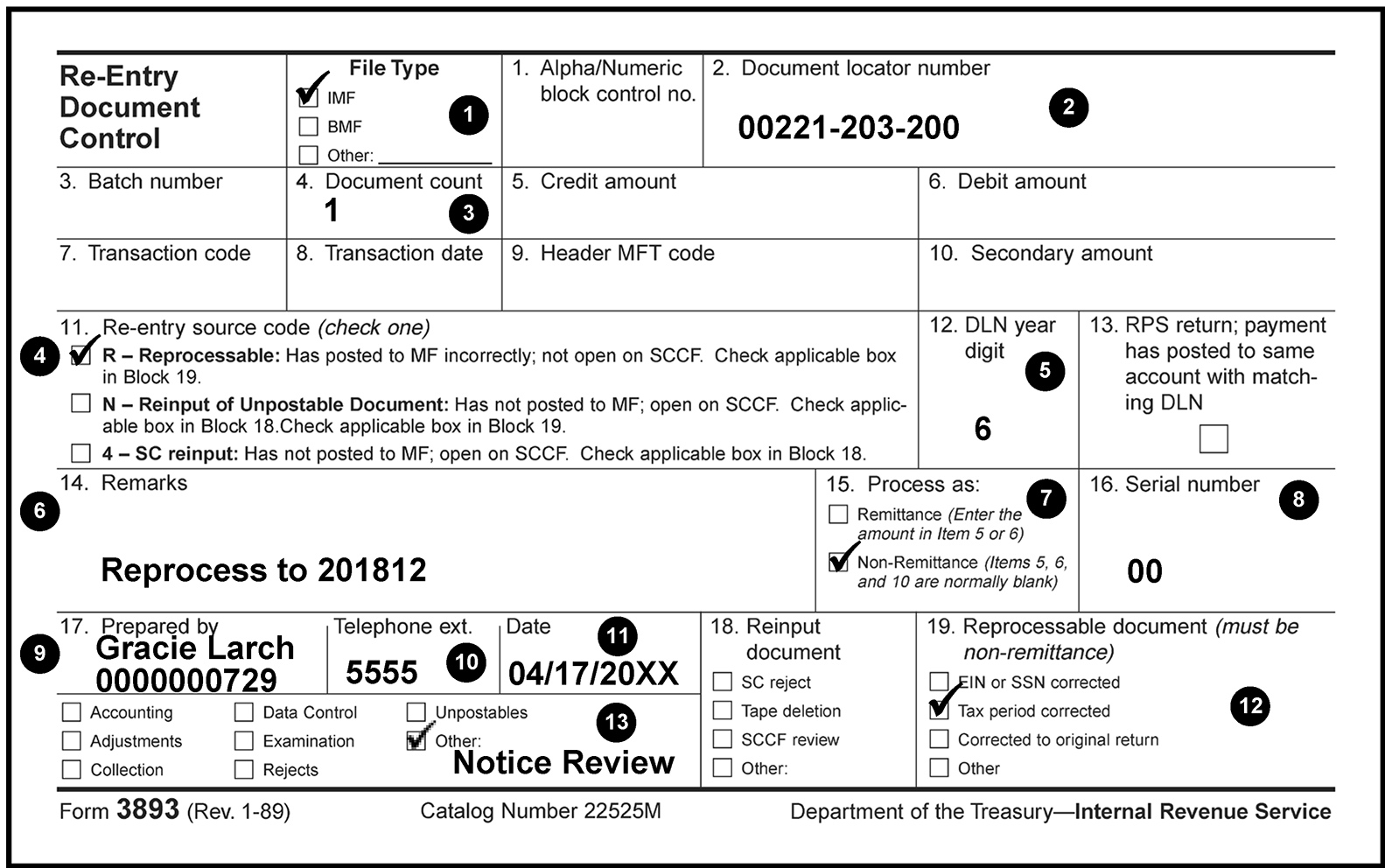
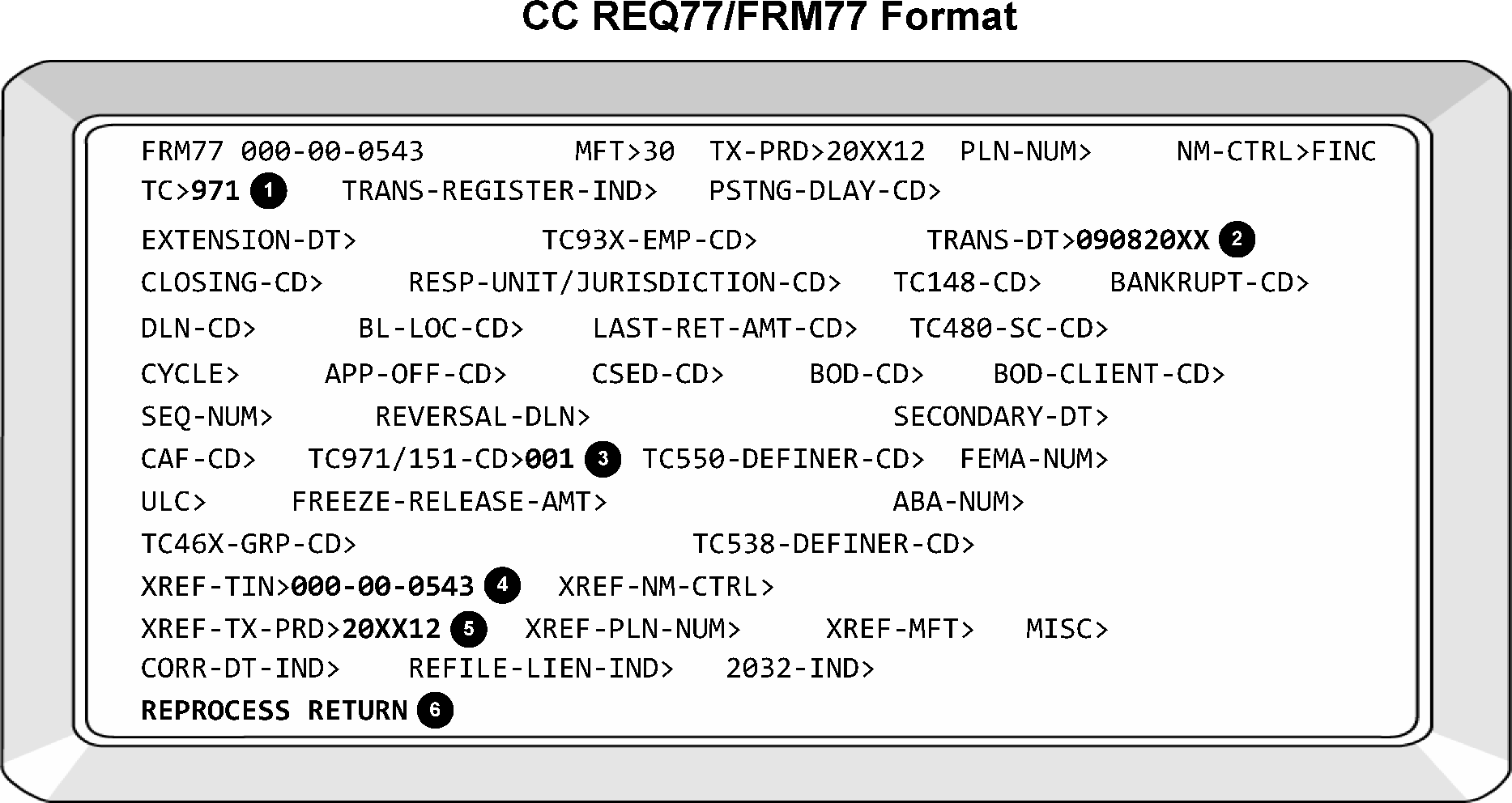
Print entire MEF return from EUP including all schedules, attachments including notes, and PDF.
- Line through the DLN (Use red ink when editing documents).
- Complete Reprocessing procedures per IRM 3.14.1.6.21, Reprocessing Returns.
- Route the case to the Processing Function and request a new DLN.
- Traditional Individual Retirement Arrangements (IRA), Simplified Employee Pensions (SEP), Roth IRAs, and SIMPLE IRAs provide tax advantages for retirement savings.
- A Traditional Individual Retirement Arrangements (IRA) is a tax-advantaged personal savings plan where contributions may be tax deductible.
Spousal IRA — A spousal IRA is a separate IRA established for a spouse, who may or may not receive compensation. The following requirements must be met to contribute to a spousal IRA.
- The taxpayers must file a joint return for the year the contributions are made.
- One taxpayer must have compensation for the tax year, and the spouse must have less compensation.
- The taxpayers may not establish a joint IRA. A separate IRA must be established for the taxpayer and the spouse.
- For limits on deductions for spousal IRAs, see Pub 590-A, Individual Retirement Arrangements (IRA).
- SIMPLE IRA — This plan is a simplified retirement plan for small businesses. Generally, employers must have 100 or fewer employees to maintain a SIMPLE IRA Plan.
Under this Simple IRA plan, an eligible employee may elect to have the employer make salary reduction contributions of up to:
Year(s) SIMPLE IRA Contribution Amount 2026 $17,000 2025 $16,500 2024 $16,000 2023 $15,500 2022 $14,000 2021-2020 $13,500
The employer must also make matching contributions or non-elective contributions to the employee’s SIMPLE IRA. Taxpayers may not make regular IRA contributions to SIMPLE IRAs.Roth IRA — Contributions to a Roth IRA are not deductible and qualified distributions are excluded from gross income.
- A taxpayer may contribute to a Roth IRA if the compensation and modified AGI is less than a certain amount.
The maximum amount a taxpayer may contribute to a Roth IRA for:
Year(s) Roth Contribution Amount If age 50 or older 2026 $7,500 $8,600 2024 and 2025 $7,000 $8,000 2023 $6,500 $7,500 2022-2019 $6,000 $7,000
- Coverdell Education Savings Account — Certain taxpayers may make non-deductible contributions of up to $2,000 to a Coverdell Education Savings Account on behalf of a designated beneficiary (a child under the age of 18) for the purpose of paying the designated beneficiary’s qualified higher education expenses. Earnings are not taxed until distributed. However, if distributions for the year do not exceed the qualified education expenses of the designated beneficiary for the year, they are excluded from gross income. Modified Adjusted Gross Income (MAGI) of less than $190,000 for joint filers ($95,000 for single filers) can contribute up to the full amount. Refer to Pub 970, Tax Benefits for Education.
Simplified Employee Pension (SEP) — Under this plan, the employer (or the self-employed taxpayer) contributes to an employee's IRA rather than to an approved pension plan.
The limit on contributions for (SEP), other than catch-up contributions, for a participant in a defined contribution plan is:Year(s) Simplified Employee Pension (SEP) Contribution Amount 2026 $72,000 2025 $70,000 2024 $69,000 2023 $66,000 2022 $61,000
See Pub 560 Retirement Plans for Small Business.Note:
Compensation includes wages, salaries, tips, professional fees, bonuses, commissions, and other amounts received for providing personal services. It also includes taxable alimony and separate maintenance payments. Compensation does not include earnings from interest, dividends, rental income, pensions or annuities, foreign income, or any other amounts excluded from income, such as certain amounts earned by U.S. citizens abroad.
Form 5329, Additional Taxes on Qualified Plans (Including IRAs) and Other Tax-Favored Accounts, assesses additional taxes against IRAs:
- Early Distributions Tax — This 10 percent tax is assessed on an IMF account when a taxpayer withdraws money before age 591/1.
Excess Contributions Tax — This six percent tax is assessed on the IRA. Taxpayers may not deduct an amount on Form 1040 for an excess contribution to an IRA.
- Excess Accumulation Tax — This 50 percent excise tax (also known as an Insufficient Distribution Tax) is assessed on the IRAF for taxpayers who do not receive minimum distributions after age 701/1.
- IRA accounts are on MFT 29. The IMF Notice List includes IRA series notices, CP 14I, CP 21I, and CP 22I.
Review all available account modules on the MFT 29 and MFT 30 when reviewing IRA notices to locate any missing credits and identifying any pending actions.
- Check for credits on the MFT 29 and MFT 30 under both the primary and secondary taxpayers’ SSNs.
- Search the Unidentified Remittance File with CC URINQ if the NRPS batch indicates research is necessary.
An IMF account may contain any of the following IRA indicators on TXMOD:
IRA Indicator Description 0 No IRA 1 Primary Taxpayer has an IRA 2 Secondary Taxpayer has an IRA 3 Both Taxpayers (FS2 only) have IRAs 4 IRA Notice issued 5 IRA Notice issued to the primary taxpayer 6 IRA Notice issued to the secondary taxpayer 7 IRA Notice issued to both taxpayers (FS2 only) Note:
See IRM 2.3.11-20, Command Code TXMOD—Posted Form 5329 Returns, for IDRS screen location information.
Generally, tax examiner credit transfers to MFT 29 are not required. If the taxpayer is FS-1 (single), FS-2 (married filing jointly and have filed together previously), or FS-4 (Head of Household) any overpayment on the MFT 30 will offset to the MFT 29 if the tax return was processed and transcribed correctly (posts as a TC 896). Be aware of the below situations that require action:
- If there is an open control base, contact that tax examiner prior to disposition of the notice or taking any action.
- If payments are applied to a spouse and the MFT 29 belongs to a primary.
- If there is a pending adjustment on the MFT 29 that will increase the balance due, the refund on the MFT 30 may need to be intercepted and moved manually.
- Taxpayers filing FS-3 (married filing separately). These accounts may require IAT credit transfers instead of allowing credits to systemically offset since FS-3 spouse accounts can often have misapplied payments.
Use proper procedures to search for credits attempting to post to MFT 29.
Note:
IRA tax modules can only be established with a TC 001, TC 150, or TC 99X. Any transaction attempting to post before these will unpost with an Unpostable Code 151. To create a MFT 29 module on master file, see IRM 21.6.5.4.11, Individual Retirement Account File (IRAF) Overview.
Follow the procedures in the sections listed below to review IRA Notices (CP 14I, CP 21I, and CP 22I.)
- See IRM 3.14.1.2.3, Data Elements-IMF and IRA Notice List
- See IRM 3.14.1.4.3.1.1, Manual Intervention List
- See IRM 3.14.1.7.8, Notice Disposition
If a credit is being applied or will be systemically applied to the account, use CC INTST or CC COMPA/F to determine if the penalties and interest will recompute.
If And the notice is a Then Penalties and interest will fully abate, and the module balance will be zero or a balance due of less than $5 CP 14I Void the notice Penalties and interest will fully abate, and the module balance will be zero or a balance due of less than $5 CP 21I or CP 22I Label or retype the notice The module will have a balance due of $5 or more CP 14I, CP 21I, or CP 22I Label the notice with Label 3. See IRM 3.14.1.7.8.5.3. Caution:
Use caution when voiding a CP 21I or CP 22I, since these Adjustment Notices generate from a CC REQ54/ADJ54 adjustment. Label or retype the notice as necessary.
If an adjustment is pending on the account, follow the table below to determine notice disposition.
If Then Hold Code "3" or "4" was used Retype or Void the notice to reflect the adjustment Hold Code "0" was used Label the notice with Label 1. See IRM 3.14.1.7.8.5.1 - Input CC STAUPS for eight cycles when needed to delay the issuance of IDRS Collection Notices (500 series). See IRM 3.14.1.6.24, Command Code STAUPS, for more information.
The IMF Automated Levy Program notices are as follows:
- Alaska Permanent Fund Dividend Levy Program (AKPFD) — CP 77
- Federal Payment Levy Program (FPLP) — CP 90 and CP 91
- State Income Tax Levy Program (SITLP) — CP 92
- The ALP notices are Master File (MF) notices. FPLP and SITLP notices print every cycle. AKPFD notices print once a year in mid-July. The notices generate with a Monday date two weeks in advance.
- All ALP notices are mailed from the CPS site(s). CP 77 and CP 90 are mailed certified, return receipt. CP 92 is mailed certified, but no return receipt. CP 91 is sent via regular (first class) mail.
- All ALP notices, except for CP 92, are systemically selected through automated NRPS processing. Selection lists do not generate at the CPS site(s). No NRPS processing (systemic or manual) is performed for CP 92. These instructions, therefore, are only for use for an unforeseen problem with the automation, which might result in the need for manual review.
- When a CP 77, CP 90, and CP 92 are created, a TC 971 AC 069, (which carries the notice date) is posted to the MF for each tax module included on the notice.
- When a CP 91 is created, a TC 971 AC 169 is posted to the MF for each tax module on the notice.
Take the following action if CP 90 is not mailed by the notice date.
- Input a TC 972 AC 069 to reverse the original TC 971 AC 069. The TC 972 AC 069 should carry the same transaction date (notice date). This is accomplished by using the notice date as the transaction date on CC REQ77.
- Input a TC 972 AC 069 with XREF of secondary SSN for each module on the spousal copy of the CP 90. When a spousal copy is issued, a TC 971 AC 069 posts under the primary SSN, but it carries an XREF to the secondary SSN. For any spousal copies of CP 90 that are destroyed, input the reversal TC 972 AC 069 on the primary SSN with the XREF secondary SSN. This is accomplished by using the notice date as the transaction date on CC REQ77.
- Input a TC 971 AC 061. Use the current date as the transaction date in CC REQ77.
- Input a TC 972 AC 061 with a two cycle posting delay code. Use the current date as the transaction date in CC REQ77.
- Void the original notices since unable to mail by the notice date.
Take the following action if CP 77 or CP 92 is not mailed by the notice date.
- Input a TC 972 AC 069 to reverse the original TC 971 AC 069. The TC 972 AC 069 should carry the same transaction date (notice date). This is accomplished by using the notice date as the transaction date on CC REQ77.
- Input a TC 972 AC 069 with XREF of secondary SSN for each module on the spousal copy of the CP 77 or CP 92. When a spousal copy is issued, a TC 971 AC 069 posts under the primary SSN, but it carries an XREF to the secondary SSN. For any spousal copies of CP 77 or CP 92 that are destroyed, input the reversal TC 972 AC 069 on the primary SSN with the XREF secondary SSN. This is accomplished by using the notice date as the transaction date on CC REQ77.
- Void the original notices since unable to mail by the notice date.
Take the following action if CP 91 is not mailed by the notice date.
- Input a TC 972 AC 169 to reverse the original TC 971 AC 169. The TC 972 AC 169 should carry the same transaction date (notice date) and XREF SSN of the TC 971 AC 169. Use the notice date as the transaction date on CC REQ77.
- Input a TC 971 / AC 061. Use the current date as the transaction date in CC REQ77/FRM77.
- Input a TC 972 AC 061 with a two cycle posting delay code. Use the current date as the transaction date in CC REQ77/FRM77.
- Void the original notice since unable to mail by the notice date.
- The AKPFD notices (CP 77) are reviewed systemically through automated NRPS processing.
Review each CP 77 that generates and all balance due tax modules (not just those appearing on the notice) using IDRS and Master File for one of the following:
- –C freeze or un-reversed TC 500
- –Z freeze or un-reversed TC 914
- Un-reversed TC 480 or 780
- Un-reversed TC 530 (CC 08)
- Un-reversed TC 540 (IMF only)
- Un-reversed TC 971 AC 043
- Un-reversed TC 971 AC 063
- Un-reversed TC 524 (TIF only)
- Un-reversed TC 971 AC 086 or AC 087
- Un-reversed TC 520
- Un-reversed TC 976 or TC 977
- Un-reversed TC 470 (CC 90, 92, 93, 94, 95, 97, or 98)
- Killed in Terrorist Action (KITA)
Un-reversed TC 971 AC 630
If any of the criteria shown immediately above is met, do the following:
- Void the notice.
- Input a TC 972 AC 069 for each tax module for CP 77 only. Input a TC 972 AC 269 for each tax module for CP 78. The TC 972 date must have the same date as the TC 971 that is being reversed.
Review only the notice tax modules on IDRS and Master File for each CP 77 or CP 78 that generates for one of the following:
- Un-reversed TC 530 (CC 04, 05, 07 or 24-32)
- CSED expires before October 1st of the current year
- Removed or Un-reversed TC 971 AC 275 with DLN positions 6-13 not equal to all "9s" or Un-reversed TC 971 AC 275
- Un-reversed TC 971 AC 065 or AC 071
- Un-reversed TC 971 AC 018
- Un-reversed TC 971AC 069 if previous Un-reversed TC 971 AC 069 posted before the TC 971 AC 069 generated for this CP 77. For CP 78 if there is no Un-reversed TC 971 AC 069 then proceed with instructions
Un-reversed TC 470 without a closing code (CC)
- If any of the criteria shown immediately above is met, remove the affected tax module(s) from the notice. Retype the notice unless all tax modules on the notice are impacted. If all tax modules are impacted, void the notice for the affected tax module(s).
- For each impacted tax module on the CP 77only, input a TC 972 AC 069. The TC 972 date must have the same date as the TC 971 that is being reversed. Be sure to input the appropriate reversal for any spousal copies.
- The FPLP notices (CP 90 and CP 91) are reviewed systemically through automated NRPS processing.
Review each CP 90 and CP 91 that generates and all balance due tax modules (not just those on the notice) on IDRS and Master File for the one of the following:
- –C freeze or Un-reversed TC 500
- –Z freeze or Un-reversed TC 914
- Un-reversed TC 480 or TC 780
- Un-reversed TC 530 (CC 24-32)
- Un-reversed TC 530 (CC 08)
- Un-reversed TC 540
- Un-reversed TC 971 AC 043)
- Un-reversed TC 971 AC 063)
- Un-reversed TC 524 (TIF only)
- Un-reversed TC 971 AC 086 or AC 087)
- Un-reversed TC 520
- Un-reversed TC 976 or TC 977
- Un-reversed TC 470 (CC 90, 92, 93, 94, 95, 97, or 98)
- Killed in Terrorist Action
Un-reversed TC 971 AC 630)
If any of the criteria shown immediately above is met:
- Void the notice.
- Input a TC 972 AC 069 for each tax module on the CP 90. The TC 972 AC 169 should carry the same transaction date (notice date) and XREF SSN of the TC 971 being reversed. IRM 3.14.1.6.23, Automated Levy Program (ALP) Notices-Not Mailed Timely.
- Input TC 972 AC 169 for each tax module on the CP 91. The TC 972 AC 169 should carry the same transaction date (notice date) and XREF SSN of the TC 971 being reversed. IRM 3.14.1.6.23, Automated Levy Program (ALP) Notices-Not Mailed Timely.
Review only the notice tax modules on IDRS and Master File for each CP 90 and CP 91 for one of the following:
- Module not in status 22, 23, 24, 26, or 53 (with CC 03, 06, 09, 10, 12, 13, or 39)
- CSED within 3 months
- Un-reversed TC 971 AC 061
- Un-reversed TC 971 AC 071
- Un-reversed TC 971 AC 065
Un-reversed TC 470 without a closing code (CC)
If any of the criteria shown immediately above is met, remove the affected tax module(s) from the notice. Retype the notice unless all tax modules are impacted. If all tax modules are impacted, void the notice. Do the following for each tax module to be removed from the notice:
- Input a TC 972 AC 069 for each tax module on the CP 90. The TC 972 date must have the same date as the TC 971 that is being reversed. Be sure to input the appropriate reversal for any spousal copies. See IRM 3.14.1.6.23, Automated Levy Program (ALP) Notices-Not Mailed Timely.
- Input a TC 972 AC 169 for each tax module on the CP 91. The TC 972 AC 169 should carry the same transaction date (notice date) and XREF SSN of the TC 971 being reversed. See IRM 3.14.1.6.23, Automated Levy Program (ALP) Notices-Not Mailed Timely
- Command Code (CC) STAUPS delays, skips, or accelerates balance due IDRS Notices. See IRM 2.4.28, Command Codes STAUP, STATI and STATB, for comprehensive information.
- CC STAUPS is used on balance due accounts that are in Status 19, 21, 20, 56, 58, 76, or 77. CC STAUPS will generate a history item on the module and change the Submission Processing Campus Status to 48.
CC STAUPS is most commonly used when resolving undeliverables, processing balance due accounts with invalid SSNs or ITINs, and when reviewing non-math error balance due notices (CP14s). See the IRM references below:
- IRM 3.14.1.6.10.2Resolving Undeliverables
- IRM 3.14.1.6.1.1.2Social Security Numbers
- IRM 3.14.1.6.1.1.3Individual Taxpayer Identification Numbers (ITIN)
- IRM 3.14.1.6.15Reviewing Non–Math Error Balance Due Notices — CP 14
- IRM 3.14.1.4.3.3Notice Recreate Transcripts (CP 67)
STAUPS is manually input in IDRS by overlaying TXMODA and deleting everything on the top row except the TIN. Then enter the desired status, space, then enter the number of cycles. See CC STAUPS in the IMF Notice Review National Job Aid 2534-002 for cycle information.
Input CC STAUPS for 8 cycles when any of the following apply:
- When a module contains one or more pending payments (AP, PN, UP, CU, or TEP) that will cause FTF or ES Penalty to be recomputed. This will allow the taxpayer adequate time to respond to the next notice.
- Routing a balance due case and/or any related correspondence to another area.
- Reprocessing a balance due account.
- Holding a notice on a balance due account (Status 19, 21, 20, 56, 58, 76, or 77). For example, the corrective action on an account cannot be accomplished within the notice cycle.
Note:
If a balance due notice held from a prior cycle is being resolved with an adjustment and will remain balance due, re-input CC STAUPS for 6 cycles (reduced from 8) if the account is in one of the following statuses (Status 19, 21, 20, 56, 58, 76, or 77) and the originally held notice will be labeled or retyped.
Caution:
Use the current status (other than 19 or 21) if the notice is voided or printed erroneously.
If STAUPS is required and none of the conditions in paragraph 3 above apply, input CC STAUPS for the number cycles that IDRS would normally delay the next notice, most commonly 5 cycles.
Caution:
Never input CC STAUPS to update the Status to 22 for zero cycles. This causes the account to immediately become Tax Delinquent Account (TDA).
CC STAUPS can be input for a maximum of 15 cycles, but it will be released after 9 cycles without a control base on the account.
- If a control is opened on the module after CC STAUPS is input, it will be released nine cycles after the control base is closed.
- CC STAUPS will never remain for more cycles than the number originally input.
- Never input CC STAUPS for fewer cycles than the normal interval to the next notice. Be aware of the posting cycles of each notice, especially if using the same status.
- STAUP cycles can be reduced by inputting the Command Code again with the same status and a cycle reduction. For example, if STAUPS was originally input Status 22 Cycle 08, and the account actions dictated a necessary reduction in the number of cycles, STAUPS would be input again as 22 06. This would be the same status but only 6 cycles instead of 8.
CC STAUPS cannot be input when:
- The Collection Statute Expiration Date (CSED) is within six months of expiring;
- An Account is in Status 22, 24, 26, 64, 60, 71, or 72.
CC STAUPS will only prevent an erroneous IDRS notice if it is input by the Friday before the erroneous notice is scheduled to generate (10 days prior to the 23C date).
If the Submission Processing Campus status has updated (CC RECON), it is too late to use CC STAUPS.
Note:
If CC STAUPS is input prior to the 23C date, the notice will be selected for review on the IDRS Notice Review Register under the category 48 Status Update and will be voided. If the same notice needs to be regenerated, input CC STAUPS in the same Submission Processing Status.
- If an erroneous notice has been mailed, send an apology letter (544C Letter) notifying the taxpayer to disregard the notice and that either the case has been resolved or that a correct notice will be sent.
Check for a misapplied extension of time to file (TC 460) that belongs on another account.
Note:
Filing Status 2 extensions are often applied to the secondary taxpayer and will need to be applied to the primary.
Use CC REQ77 to input a TC 462 to remove the extension from the incorrect account.
- Input CC REQ77
- When the FRM77 response screen displays, enter “462” in the TC>, and
- In the “REMARKS” field, enter “ Extension removed”
Use CC REQ77 to input a TC 460 to post the extension on the correct account. Input the Extension Date (use the latest extension date), the Transaction Date (use the received date of the extension), and the DLN-CD (enter 10).
- Input CC REQ77
- When the FRM77 response screen displays, enter “460” in TC>,
- In “EXTENSION-DT” enter the Extension Date (use the latest extension date)
- In “TRANS-DT”, enter the received date of the extension
- In “DLN-CD”, enter 10 (MFT 30)
- In “Remarks”, enter “Extension applied”
Note:
If penalties will recompute, input a TC 290 .00 with a Hold Code “3” to suppress the recomputation notice.
- Input only one TC 460.
- Retype, label, or void the notice according to the effect that the posted TC 460 will have on the module. The TC 460 will cause a recomputation of the FTF penalty (TC 166 if posted) if the return is filed before five months after the extended due date.
The term "case resolution" refers to actions that are taken, or need to be taken, to close the case. There are several different elements that comprise case resolution:
- Preventing Refunds
- Controlling Cases
- Documenting Adjustment Cases
- Taxpayer Correspondence/Reply Procedures
- Entity Adjustments
- Tax Adjustments
- Credit Transfers
- Notice Disposition
- This section breaks down each of the previously listed items in greater detail.
- Preventing refunds may be required prior to resolving a case.
- Notice Review does not stop refunds at the request of another area. If a request is received, inform the requestor Notice Review cannot process the request. If the requestor indicates they do not have access to IDRS or CC NOREF in the profile, they should contact the area to address the issue.
With CADE 2 daily processing, the use of NOREFP for IMF accounts is used when the TC 570 timeframe has expired. If a refund transaction (TC 846) is posted to the account, a NOREFP for IMF refunds will not work; the refund has already been released.
Note:
Notice Review does not stop refunds at the request of another area. If a request is received, inform the requestor Notice Review cannot process the request. If the requestor indicates they do not have access to IDRS or CC NOREF in the profile, they should contact the area to address the issue.
A seven calendar day systemic refund hold will be applied to CP 12 and CP 24 weekly notice accounts, whether a paper check or direct deposit (electronic refund). Instead of a refund transaction (TC 846) on the account, it will reflect the systemic hold with a TC 570 and blocking series "55555" present. The hold will systemically expire the following Thursday when IMF weekly processing occurs. Follow procedures outlined below to prevent any further refund from generating if necessary.
Exception:
If a CP module is classified as daily (see the upper right-hand corner of CC IMFOLT or CC TXMODA) TC 570 and CC NOREFP cutoff timelines are accelerated; 4 P.M. ET Tuesdays to intercept the refund using REQ77/TC 570 and 7 P.M. ET Wednesdays to stop the refund using a CC NOREF definer P.
- If the refund is part of a split refund request (Form 8888, Allocation of Refund), the refund will not be held.
- If a TC 570 with blocking series 55514 the systemic hold is 14 days, if a 55528 the systemic hold is 28 days.
- A four business day systemic refund hold will be applied to all accounts that meet Priority Refund Transcript criteria (AMS refund transcripts). Instead of a refund (TC 846) on the account, the account will reflect the systemic hold with a TC 570 and, blocking series "55555" . The AMS system will generate a permanent TC 570 when the Priority Refund Transcript is one to three days old or a NOREFP on the fourth day when an action is taken to prevent the refund from generating.
- If a TC 810/811 is present, see work leader.
See the table below for refund intercept actions for specific account conditions.
If And Then The account has a TC 846 posted, Not Applicable A NOREFP request cannot be initiated on an IMF account. Erroneous Refund Procedures should be followed, if the refund should not have been issued. The account has a TC 570 with blocking series “55555”, A TC 971/805 is also posted on the module indicating a Priority Refund Transcript has generated, 1. A TC 570 can be input up to 3 business days after the systemically generated TC 570 Cycle Posted Date (up to 5 P.M. ET on day 3) to prevent the refund transaction from generating.
2. A NOREFP can be input on the third business day after 5 P.M. ET or the fourth business day before 8 P.M. ET.
3. If it is after 8 P.M. ET on the fourth business day or older, erroneous refund procedures should be followed, if necessary.The account has a TC 570 with blocking series “55555”, A TC 971/804 is also posted on the module indicating a CP 12 or 24 has been issued, 1. A TC 570 can be input up to 5 P.M. ET the following Wednesday (6 calendar days after the systemically generated TC 570 cycle posted date) on weekly modules to prevent the refund transaction from generating.
2. A NOREFP can be input on the Wednesday after 5 P.M. ET or Thursday before 8 P.M. ET to request IMF to reverse the refund and prevent the refund from being released.
3. If it is after 8 P.M. ET on Thursday or later, follow erroneous refund procedures, if necessary.- For IDRS input, "day 4" for Priority Refund Transcripts begins at 5 P.M. ET on day 3 and ends at 5 P.M. ET on day 4; Thursday for CP Notices begins at 5 P.M. ET on Wednesday and ends at 8 P.M. Eastern time on Thursday. If the module is classified as daily (see the upper right-hand corner of CC IMFOLT) timelines are accelerated by one day for CP notices. A TC 570 can be input up to 5 P.M. ET the Tuesday following cycle load and CC NOREFP can be input from that Tuesday at 5 P.M. ET through Wednesday at 8 P.M. ET.
- NOREFP must be executed on the day the refund hold is set to expire. When CC NOREFP is initiated, the following table explains when the TC 846 and systemic TC 841 will be displayed.
The chart below contains the daily account for TC 846/841 Posting.
Transaction Code CFOL Command Codes IDRS Command Codes 846 Next business day Second business day 841 Two business days Third business day The chart below contains the weekly account for TC 846/841 Posting.
Transaction Code CFOL Command Codes IDRS Command Codes 846 Saturday after freeze releases Monday after freeze releases 841 Second Saturday after freeze releases Second Monday after freeze releases
Use CC NOREFP to prevent the refund information from going to FMS under the conditions outlined in IRM 3.14.1.7.1.1 (1) (d) Refund Intercepts. With the refund holds in place, IMF will systemically generate the refund transaction on the fourth day for AMS Priority Refund Transcripts, or the seventh day for CP notices 12 and 24.
Note:
Follow normal review procedures, and if the TC 570 or NOREFP is not input on the days outlined in (1) or a refund transaction (TC 846) is already posted to the account, follow Erroneous Refund procedures, in conjunction with IRM 21.4.5, Erroneous Refunds.
CC NOREFP must be used in the following circumstances:
A CP 12 or 24 Notice in the current cycle between Wednesday 5 P.M. ET until Thursday 8 P.M. ET.
Exception:
If a CP module is classified as daily (see the upper right-hand corner of CC IMFOLT or CC TXMODA) TC 570 and CC NOREFP cutoff timelines are accelerated; 4 P.M. ET Tuesdays to intercept the refund using REQ77/TC 570 and 7 P.M. ET Wednesdays to stop the refund using a CC NOREF definer P.
- A Priority Refund Transcript that is between 5 P.M. ET on the third business day until 8 P.M. ET Eastern time on the fourth business day.
- CC NOREFP will automatically establish a control base and prevent the refund transaction from being sent to FMS for refund issuance.
CC NOREFP automatically creates a control base in the format, "PPyyyyccRC." See below:
Code Activity PP RP — Initial prevent refund from generating request yyyycc TC 846 (refund) posting cycle (e.g., 201709) RC Refund Deletion Code: Document 6209, IRS Processing Codes and Information Example:
"C01,RR20170407,M,RFDL" is an example of a NOREFP-generated control base, on a Cycle 201704 case using Reason Deletion Code 07.
When the account meets criteria to input a NOREFP to intercept the refund, take the following steps in IDRS.
- Start with the account in the correct module in TXMODA.
- Overlay TXMODA with NOREFP (NOREFPXXX-XX-XXXX).
- Input the MFT immediately after the P in NOREFP (NOREFP30X-XX-XXXX).
- Input a space after the after the MFT and input the 6-digit tax period (NOREFP30 202412).
- Input a space after the Tax Period then input the name control and clear the rest of the line (NOREFP30 202412 XXXX).
On the next line, input the data needed for your control base on the next line (C#,202604F,B,RFDL). Clear the rest of the line.
- On the next line, input *,* or the 10-digit TE number then, * to assign to another TE. The first asterisk is employee and the second is the date. Clear the rest of the line.
- The next two lines needs to be blank and clear.
- On the line following the two blank lines, input the first two digits of the location code. This is the first two digits of the PRIMARY-LOC> field on TXMODA on the right-hand side. Clear the line.
On the next line, input the refund deletion code, the reason the refund is being intercepted. Transmit or page up to complete the NOREFP. COMPLETED NOREFP will display at the bottom of IDRS for successful input.
Caution:
This should rarely be 99. Always use the best refund deletion code that explains the reason for stopping the refund.
After CC NOREFP is input and if no adjustments are pending, take the following action:
- Input the adjustment with the appropriate blocking series, hold code, and posting delay code.
Monitor the account and maintain the M or B status.
Note:
If a NOREFP is input in error, it cannot be deleted and the taxpayer should receive the refund, input TC 290 .00 and Posting Delay Code 1 to release the refund.
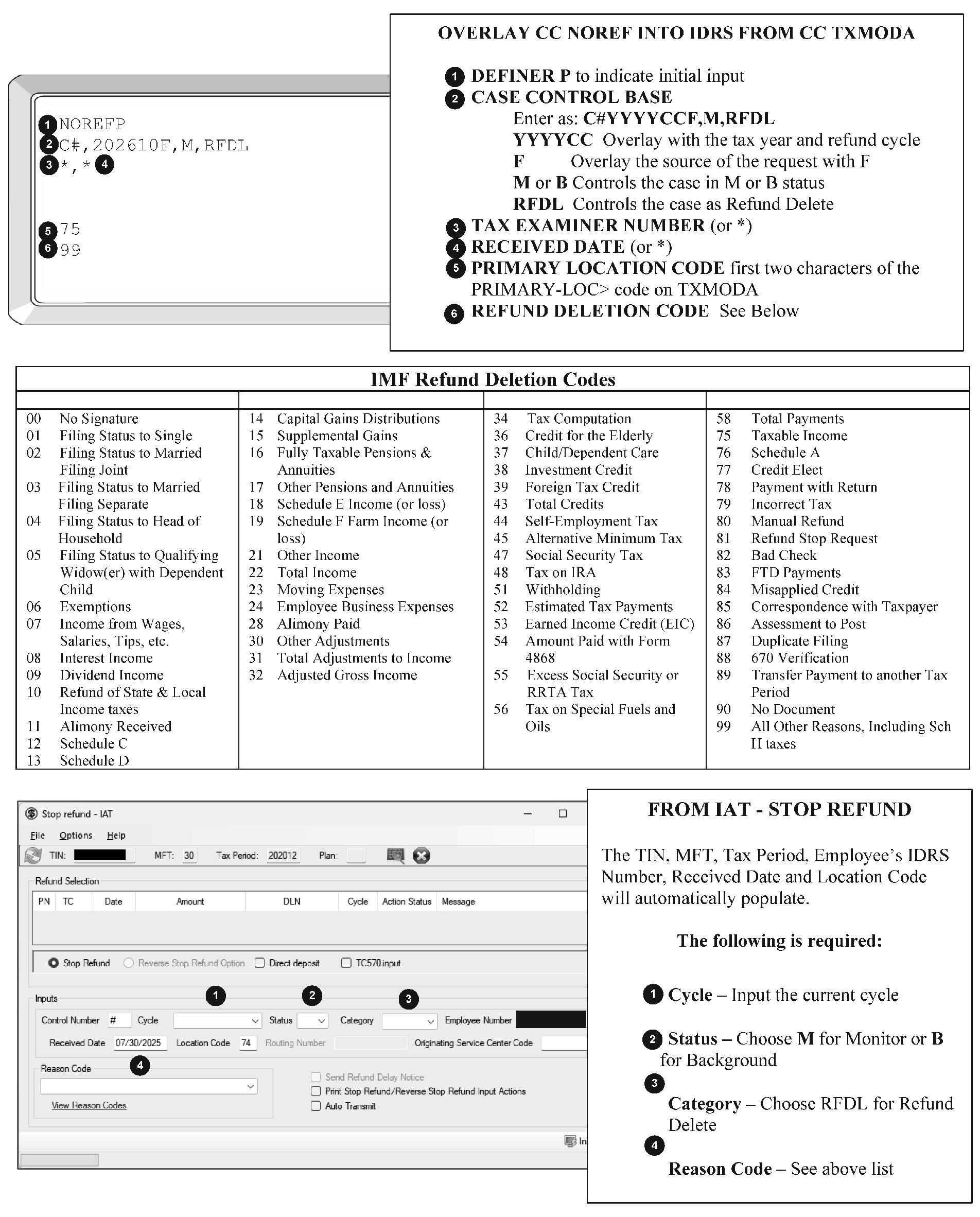
- Instead of having a refund mailed, taxpayers can request that the refund be deposited into a checking or savings account via Electronic Funds Transfer (EFT). Refunds that are electronically deposited are available approximately four days from the posting of the transaction that produced an overpayment (refund) on the module.
- Taxpayers can have the direct deposit refunds split between multiple accounts, by attaching a Form 8888, Allocation of Refund, to the return.
There are five ways to identify Direct Deposit Refunds:
- CC TXMOD shows the RSN directly below the TC 846. The 11th and 12th digits identify the method of payment for the refund. A "Z" in the 11th position indicates a Direct Deposit.
- The CC REINF response screen shows "GENERATED REFUND EFT" if a Direct Deposit Refund was issued in lieu of a paper check.
- CC TXMOD and CC IMFOLT indicator will appear near the right margin either on the same line as the TC 846 or the next line as: DD: "0" (paper check) or "9" (direct deposit).
- CC TXMOD and CC IMFOLT display a "10" in the "DIR-DEP-REJ-RSN-CD>" and "DDRC:" fields, respectively.
- CC IMFOBT and CC TRDBV displays the bank ABA (routing) number and the bank account number receiving the direct deposit.
Caution:
A Direct Deposit Refund can be rejected during processing and a paper check refund issued instead. A Direct Deposit Reject Reason Code will appear in the "DIR-DEP-REJ-RSN-CD> " field on TXMOD and in the "DDRC:" field on IMFOLT. See IRM 21.4.1.5.8.1, Direct Deposit Reject Reason Codes for a list of reject reason codes. A CP 53 may be present on TXMOD.
- When taxpayers elect to split the direct deposit refunds into multiple accounts, they must attach Form 8888, Allocation of Refund, to the return. The form will contain all the routing transit numbers (RTN) and bank account numbers necessary for the direct deposit. The percentage of the refund split is at the taxpayer's discretion.
- A refund may be split among no more than three accounts. Each honored split refund request will reflect separate TC 846s on CC TXMOD.
- In CC IMFOLT, however, each account's information will be present.
- If any issue arises from the accuracy of the RTN or bank account numbers, the refund will default to a paper check, and a CP 53 will be issued to the taxpayer.
- If a refund is reduced during processing, direct deposits from the Form 8888, Allocation of Refund, will still be honored, applying credit to each bank account in a 1st-2nd-3rd account priority, as credit is available.
- A paragraph will automatically be inserted into the notice text to notify the taxpayer if changes were made to the direct deposit amounts. A split refund table will also accompany the text and will show how much was requested to go into each account (taken from Form 8888, Allocation of Refund), and how much was actually applied.
- A Direct Deposit tab will appear on OLNR retype screens for all notices upon which a Form 8888, Allocation of Refund, was attached to the return. This data will rarely be altered but is available if needed for notice conversion.
- The systemic hold does not apply to split refunds. If the case needs to be adjusted erroneous refund procedures will need to be followed.
- Some cases in Notice Review require monitoring until all transactions, manual and systemic, are complete. This monitoring is done with a Control Base in IDRS. This is controlling a case.
A Case Control or control base is opened or established in IDRS in different ways. The most common way to establish a case control or base is systemically.
A control base is automatically established with the input of NOREFP. The preferred NOREFP input method is IAT Stop Refund tool but both IAT and manual input of NOREFP will create a Control Base.
Reminder:
Case controls on a NOREFP case cannot be closed until all actions have been performed, posted, and the TC 841 has posted.
- A control base is automatically established by inputting a REQ54/ADJ54 adjustment. ADJ 54 input of A, B, or M in the CASE-STS-CD> field will leave an open control base. If C is input a base will display as closed but can still be viewed in TXMOD. However, a C or closed base will not appear on the weekly CCA4243/Overage Report in Control D.
- A control base is automatically established by input of a credit transfer. Input of A, B, or M in the Debit Status or Credit Status field in IAT will leave an open control base. If C is input a base will display as closed but can still be viewed in TXMOD. However, a C or closed base will not appear on the weekly Overage Report in Control D.
- Manually open a control base for any cases that need to be monitored due to changes from PL 119-39, Math and Taxpayer Help Act, specifically any refunds that are stopped using TC 570 must have and maintain an open control base until all actions have posted, notices have been marked in OLNR, and any applicable refund has been released.
A control base can be input manually utilizing CC ACTON.
- ACTON is input in the upper left hand corner of IDRS, overlaying TXMODA.
- Clear the remainder of the line.
- On the next line enter C#,ACTIVITY,B,OURV and then clear the remainder of the line. (The # establishes the next number of control base. If this is the first control being opened on the module 01 will be the count after transmittal. ACTIVITY section allows 10 characters. B is the case status. OURV is Output Review, the original name for Notice Review. If the case required a NOREFP use RFDL for Refund Delete).
- On the next line enter *,* (First asterisk assigns to TE who is inputting and second * is the current date. Either of these fields can be input manually, for instance if assigning to a different tax examiner.)
- Page up or transmit.
- Establish a control on all cases held in suspense past the notice cycle (H disposition in OLNR). This will cause the case to appear on the weekly CCA4243/Overage Report in Control D.
- Monitor the overage listing so the case can be worked and closed within one week of all the transactions posting including the TC 841, except cases awaiting correspondence. After one week, the case will count as an aged case. See IRM 3.30.123.6, Processing Timeliness Criteria for IMF Domestic Income Tax Returns, International IMF Income Tax Returns, Domestic and International Tax Returns Delayed for Individual Taxpayer Identification Number (ITIN) Processing, Extension Requests, Estimated Payments, Amended Tax Returns, and ITIN Applications.
To control a "Turnaround " case [an error found in Notice Review (including errors made during initial processing) results in a tax increase with no prior tax decrease or a refundable credit (except withholding) decrease with no prior refundable credit increase (see Erroneous Refund, IRM 3.14.1.6.7 Turnaround (6), for more information.]:
- Work these cases in the notice cycle. Input all adjustments, retype or label the notices in the notice cycle to ensure that every taxpayer receives the full benefit of the penalty and/or interest free period.
- For cases not worked in cycle, use CC ACTON to control the case under Category Code "OURV" . Input
- CC STAUPS for eight cycles on balance due cases not worked in cycle to prevent Collection (500 series) notices. Reduce the STAUPS after resolving the case, depending on the notice disposition. See IRM 3.14.1.6.24, Command Code STAUPS for more information.
- Turnaround cases are considered aged after one week.
If the case is controlled by another tax examiner in "A" status only and action should be taken:
Contact the tax examiner with the open control to decide who will resolve the case.
Exception:
Contact is not necessary if the open control is assigned to a clerical unit. (Clerical units are often identified by all zeroes in the last 5 digits of the employee number (i.e., XXXXX00000), although numbers other than zero may also be used.) This means the case has not been assigned to a tax examiner in another area and can be worked per Notice Review procedures.
If the other tax examiner agrees to accept the case, transfer the case and close your control base. Use CC ESTABDT to recharge the return if paper and in Notice Review. Route the return and all pertinent documents to the other area tax examiner.
Attach documentation of all telephone contacts to the return.
If Then The return or other documents, such as a taxpayer letter, is available as a source document (SD) Attach an explanation, which might include calculations, worksheet prints, or screen shots of REQ54 etc., to the document to leave a paper trail for other tax examiners to follow. Make sure to use the correct blocking series and associate the document and adjustment back to files. Enter the explanation in the remarks section of the CC REQ54 or credit transfer screen. A document is not available as a source document (NSD) Enter a complete explanation of the adjustment in the remarks section of the CC REQ54 or credit transfer screen on IDRS.
If additional information is needed from a taxpayer before the notice disposition can be determined, request the documentation in writing.
- Send the appropriate letter in the notice cycle to allow adequate time for the taxpayer to respond. If the requested information is not received before the close of the cycle, the notice may be held, see IRM 3.14.1.7.8.7, Holding Notices, for more information.
- See the Correspondex Letter Repository for specific letter information including paragraph requirements for each letter at the bottom of the appropriate letter document.
- Cases must be controlled in IDRS while awaiting the taxpayer’s reply. See IRM 3.14.1.7.2 Controlling Cases, for more information.
Monitor the OVERAGE REPORT/CCA4243 for open controls that are aging. Correspondence cases should be monitored for 45 days.
Continue processing the case when the reply is received. Upon receipt of a reply, ensure that action is taken immediately to close the case.
Note:
Do not correspond again if the IRS already corresponded. Treat as a no reply. To verify if previous correspondence was sent look for a Letter 12C - Individual Return Incomplete for Processing: Forms 1040 & 1040-SR, on ENMOD indicated with an H (e.g., H C 06022025 092610000 0012CLTR30 Z). H is history, C is for closed entity control, the next field is the date, followed by the tax examiner then the letter type, MFT, and paragraph(s). The paragraph in the example is Z. To identify the meaning of the paragraph sent, see Form 6001, Letter 0012C Correspondence Action Sheet (CAS), using the version for the corresponding tax year. In addition, a Computer Condition Code (CCC) U indicates no reply to correspondence and prevents generation of credit interest.
If a signature is missing and there is no indication that a previous letter was sent:
- Stop the refund, see IRM 3.14.1.7.1, Preventing Refunds.
Send a Letter 143C - Signature Missing (IMF/BMF) with applicable paragraphs using the IAT Letters Tool. Use the IAT Job Aid for Letters to utilize the tool.
- Verify with the lead the appropriate eFax and Mail Stop number to include in the letter. Do not use a local phone number. Provide 1-800-829-0922 for the taxpayer if they choose to call.
- Maintain an open control in IDRS while awaiting the taxpayer’s reply. See IRM 3.14.1.7.2 Controlling Cases, for more information.
Follow the table below for actions following a taxpayer response or expiration of the 45-day timeframe after a signature request.
If the taxpayer Then Replies within 45 days Input a REQ54/ADJ54 TC 290 .00, Blocking Series 05 and Hold Code 3 to release the refund. If the reply was received after the normal or extended Return Due Date, overlay the RET-PROC-DT> field in ADJ54 with the IRS received date stamped on the reply (or eFax date) to set a new 45-day interest-free period. If a MEF return, select “Y” for source doc attached to create a filing DLN to associate any documents.
Does not reply within 45 days to the request for signature, the account requires no adjustment, and a P– freeze is holding the overpayment - Input a TC 290 .00 with a Hold Code 4 to set a –K freeze. Close the control base.
- Notate in AMS History for the appropriate tax year a missing signature and a no reply to 143C.
- Close your base.
Does not reply within 45 days to the request for signature, the account requires no adjustment, and a -K or a -R freeze is holding the overpayment. - Notate in AMS History for the appropriate tax year a missing signature and a no reply to 143C.
- Close the control base. Do not release the freeze.
Does not reply within 45 days to the request for signature, but the account requires an adjustment, and a P– or –R freeze is holding an overpayment - Input CC REQ54 adjustment with Hold Code 4 to set a –K freeze to hold any credit balance.
- Retype the notice.
- Notate in AMS History for the appropriate tax year a missing signature and a no reply to 143C.
- Close the control base. Do not release the freeze.
Replies after 45 days and the control base is already closed Complete Form 3465, Adjustment Request, check the Accounts Management box, and in the remarks section state, "taxpayer responded after 45 days, please update the return processable date" , and route the case to Accounts Management.
If a payment has not been claimed by the taxpayer, research does not identify where the payment belongs, and there is no indication that a previous letter was sent:
- Stop the refund, see IRM 3.14.1.7.1, Preventing Refunds.
- Send a Letter 1687C- Unidentified Payment/Credit with applicable paragraphs using the IAT Letters Tool. Use the IAT Job Aid for Letters to utilize the tool.
- Verify with the lead the appropriate eFax and Mail Stop number to include in the letter. Do not use a local phone number. Provide 1-800-829-0922 for the taxpayer if they choose to call.
- Maintain an open control in IDRS while awaiting the taxpayer’s reply. See IRM 3.14.1.7.2 Controlling Cases, for more information.
- Follow the table below for actions following a taxpayer response or expiration of the 45-day timeframe after a request for payment verification.
If the taxpayer Then Replies within 45 days, verifies the payment belongs to them, and requests a refund - Input a REQ54/ADJ54, TC 290 .00, Blocking Series 05, and Hold Code 3, to release the refund.
- Close the base.
Replies within 45 days to a payment verification letter and states that the payment is for a forthcoming amended return - Input a TC 290 .00 with a Hold Code 4 to set a –K freeze.
- Close the control base as TP1040X in the activity.
- Print the notice.
- If a transcript was held in suspense, close it module situation resolved including notes for a forthcoming 1040X.
Replies within 45 days to a payment verification letter and states that the payment is for a module other than the notice module - Using the IAT Credit Transfer tool, move the payment to the correct module per the taxpayer’s reply.
- Close the base when performing the credit transfer.
- Notate in AMS History for the appropriate tax year where the payment was moved to and per the taxpayer reply to a 1687C.
Does not reply within 45 days to a payment verification letter, or denies having made the payment - Follow procedures in IRM 3.14.1.6.8, Excess Collections and Unidentified Remittance Files.
- The payment will need to be moved to the XSF or URF depending on the date of the payment.
Replies after 45 days stating the payment belongs to them, and the request to move the payment to XSF or URF has already been sent - Follow procedures in IRM 3.14.1.6.8.1.1, Requesting Payments from the XSF or IRM 3.14.1.6.8.2.1, Requesting Payments from the URF as appropriate.
If a decedent account is refunding, the return does not include court documents or a Form 1310 attached, and if there is no indication that a previous letter was sent:
Note:
Decedent refund claims must have supporting documents (Form 1310 or Court Appointment Documentation and Payment Verification) unless there is a surviving spouse. See IRM 3.14.1.6.5 Decedent Accounts, for more information.
- Stop the refund, see IRM 3.14.1.7.1, Preventing Refunds.
- Send a Letter 18C with applicable paragraphs using the IAT Letters Tool. Use the IAT Job Aid for Letters to utilize the tool.
- Verify with the lead the appropriate eFax and Mail Stop number to include in the letter. Do not use a local phone number. Provide 1-800-829-0922 for the taxpayer if they choose to call.
- Maintain an open control in IDRS while awaiting the taxpayer’s reply. See IRM 3.14.1.7.2 Controlling Cases, for more information.
- In OLNR, choose Print intercept, unless other changes to the notice are required. If other changes are required Hold the notice. When responding to the Letter 18C sometimes claimants of the decedents refund will include other notes or information.
- Follow the table below for actions following a taxpayer response or expiration of the 45-day timeframe after a request for Court Documents or Form 1310.
If the taxpayer Then Replies within 45 days and NRPS/IDRS does not show a second name line with a CCC L or W - Use the Form 1310 or court appointment documentation to verify and update the second name line and address. Update the entity in OLNR (if notice was held) and ENMOD. See IRM 3.14.1.6.1.1.6, Verifying and Correcting Name Information. See IRM 3.14.1.6.1.1.7, Verifying and Correcting Address Information, and IRM 3.14.1.7.5 Entity Adjustments. Choose retype in OLNR if other changes to the notice are necessary, and the notice was held.
- Input a CC REQ54/ ADJ 54 adjustment with Blocking Series 05, Case Control Status B, IRS received date *, Control Category OURV, Activity 1310REPLY, TC 290 .00, Hold Code 3, and posting delay code of 1, to release the freeze after the CC ENMOD/ENREQ entity change has had time to post. Monitor the case until the refund is released. Then close the control base. See IRM 3.14.1.7.2, Controlling Cases, for more information.
- If a MEF return, select “Y” for source doc attached to create a filing DLN to associate any documents to Files. Once the DLN is created the documents need to be attached to Form 9856, Attachment Alert, and routed to Files via lead.
Does not reply within 45 days to the request for documentation, the account requires no adjustment, and a P– freeze is holding the overpayment - Input a TC 290 .00 with a Hold Code 4 to set a –K freeze.
- Close your base updating the activity with NORPLY1310 before closing.
- Print intercept or Retype intercept the notice.
- Notate in AMS History for the appropriate tax year no Form 1310 and no reply to Letter 18C.
Does not reply within 45 days to the request for documentation, the account requires no adjustment, and a -K or a -R freeze is holding the overpayment. - Notate in AMS History for the appropriate tax year no Form 1310 and no reply to Letter 18C.
- Print intercept or retype intercept the notice.
- Close your base updating the activity with NORPLY1310 before closing.
Does not reply within 45 days to the request for documentation, but the account requires an adjustment, and a P– or –R freeze is holding an overpayment - Input CC REQ54 adjustment with Hold Code 4 to set a –K freeze and to hold any credit balance.
- Print intercept or Retype intercept the notice.
- Notate in AMS History for the appropriate tax year no Form 1310 and no reply to Letter 18C.
- Close your base updating the activity with NORPLY1310 before closing.
Replies after 45 days and NRPS/IDRS does not show a CCC L or W - Review AMS account history for action by another area. Sometimes refund claimants will send documentation and call the IRS.
- Review IDRS CC ENMOD for recent entity changes adding a second name line. If no changes have been made and the refund released follow the remaining steps below.
- Use the Form 1310 or court appointment documentation to verify the second name line and address. Update the entity in CC ENMOD and in OLNR if the notice was held. See IRM 3.14.1.7.5 Entity Adjustments.
- Input a CC REQ54/ ADJ 54 adjustment with Blocking Series 05, Case Control Status B, IRS received date *, Control Category OURV, Activity 1310REPLY, TC 290 .00, Hold Code 3, and posting delay code of 1, to release the freeze after the CC ENMOD/ENREQ entity change has had time to post. Monitor the case until the refund is released. Then close the control base. See IRM 3.14.1.7.2, Controlling Cases, for more information.
Entity adjustments are needed when a name or address in IDRS does not match the tax return or adhere to United Postal Standards. See IRM 3.14.1.6.1.1.6, Verifying and Correcting Name Information and IRM 3.14.1.6.1.1.7, Verifying and Correcting Address Information for specifics on entity verification.
When an entity error is found, determine if the entity adjustment (correction) is critical or non-critical.
A critical entity adjustment is when the taxpayer will not receive or be able to cash the refund check unless the name and/or address is corrected.
Caution:
The refund should be prevented from generating on all critical entity cases worked after 5 P.M. ET Monday and then released after the entity change posts.
A non-critical entity adjustment is when the taxpayer will receive and be able to cash the refund as addressed or the refund is direct deposit. To identify direct deposit refunds in IDRS, see IRM 3.14.1.7.1.3 (3), Direct Deposit Refunds.
Critical entity errors require more actions in addition to correcting the entity in OLNR.
- The refund should be prevented from generating unless the case is being worked before 5 P.M. ET on Monday. See IRM 3.14.1.7.1.1 Refund Intercepts, for more information.
- If the refund must be intercepted for the critical entity change (input after 5 P.M. ET on Monday) be sure to release the refund after allowing the entity change to post. To release the refund input a REQ54/ADJ54 TC 290 .00, hold code 3, with posting delay code 1.
- If the refund is intercepted using NOREFP monitor the account and maintain a case control in background (B) status until the TC 841 posts. See IRM 3.14.1.7.2 Controlling Cases, for more information.
Critical entity changes must always be corrected/adjusted in OLNR and IDRS because OLNR will not update IDRS in time for the refund to be sent correctly.
Correcting the entity in OLNR:
Reminder:
Filing status changes, while not critical changes, do not update IDRS from OLNR input. Filing status changes must be input in IDRS and OLNR. See IRM 3.14.1.7.5.1, Filing Status Changes, for more information.
Choose notice disposition E (entity) or EI (entity with refund intercept) to the correct notice entity tab.
Note:
If other changes to the notice in addition to entity are also required (such as amounts, labels or TPNCs), use the R or RI disposition. See IRM 3.14.1.4.2.2, Notice Disposition Code Table, for more information.
- Make the necessary corrections to the name and address adhering to the 35 character space constraint. See IRM 3.14.1.7.5 (5), reducing below 35 characters, for specific information.
See IRM 3.14.1.7.5 (6), Inputting Name Changes, below for bracket placement on the name line.
Note:
If a Prisoner number needs to be added to the Entity, add it on the Secondary Name line in the OLNR Entity screen.
- OLNR will update IDRS with the entity changes after the cycle closes. Be mindful of exceptions where automated updates may not occur, see IRM 3.14.1.6.1.1.8, NRPS Automated Entity Updating.
- See the Notice Review IMF Job Aid 2534-002, Entity Tabs, and OLNR ENTITY BRACKET PLACEMENT sections for more information.
Reducing the length of taxpayer name.
Name and Address fields are limited to 35 characters each. If the name line is more than 35 characters, modify it in the order shown below, proceeding to the next item (only if necessary) until the taxpayer’s name(s) can fit on the name line:- Use initials only for middle or second name.
- Delete middle initial of secondary taxpayer.
- Delete middle initial of primary taxpayer.
- Use initials only for secondary taxpayer's first name.
- Use initials only for primary taxpayer's first name.
- Use initials only for primary and secondary taxpayers' first name(s), if the last name(s) exceed the 35 character/space limit.
Allow the secondary taxpayer’s last name to cut off if the last name(s) exceed the 35 character/space limit. Do not remove the initial for the first names.
Note:
Do not intentionally shorten taxpayer name(s) if they fit within the 35 character space constraint.
Inputting Name Changes This bracket placement table applies to IDRS and OLNR.
Tax Return Input format for joint filers John Doe Mary Doe John & Mary]Doe John Doe Mary Beagle John]Doe]& Mary Beagle John Doe Mary Beagle-Doe John]Doe]& Mary Beagle-Doe John D Doe Mary Ann Beagle-Doe John D]Doe]& Mary Ann Beagle-Doe John D Doe III MaryAnn L Beagle John D]Doe]III & MaryAnn L Beagle John A Doe DECD John A]Doe]DECD John A DECD & Jane B Doe John A DECD & Jane B]Doe John D Doe III & Mary Doe John D III & Mary]Doe John A Doe Jr DECD Mary Beagle John A]Doe]Jr DECD & Mary Beagle John DECD & Mary DECD Doe John DECD & Mary DECD]Doe John DECD Doe & Mary Beagle DECD John DECD]Doe]& Mary Beagle DECD Note:
The bracket "]" indicates the information after or between the brackets is the controlling surname. Additional spaces must not be input immediately before or after the bracket.
Correcting the entity in IDRS:
- IDRS entity changes are made with ENMOD, ENREQ and INCHG.
- Place Command Code ENMOD in the upper left corner of IDRS followed by the TIN (ENMOD XXX-XX-XXXX) then transmit/page up.
- This will display taxpayer entity data in IDRS including letter history, indicated by H in front of the information.
- Overlay (type over) ENMOD with ENREQ then transmit/page up.
- The IDRS response screen for ENREQ is INCHG. It is a fill form screen only pre-populated with the SSN and name control.
- Field NEW-NAME-CTRL> should be completed only if changing the last name. Input the first 4 characters of the new last name (name control).
- Field PRIMAY-NAME> should be completed when changing the name line or making a filing status change. Follow bracket placement guidelines, see IRM 3.14.1.7.5 (6)above.
- Field CONTINUATION-OF-PRIMARY-NAME> should be completed when a second name line is needed.
- MAIL-STREET-OR-FOREIGN-CITY/ZIP> should only be completed when changing an address
- MAIL-CITY/STATE/ZIP-OR-FOREIGN-COUNTRY> should only be completed when changing an address. Input for domestic address is City, State, Zip (e.g., Kansas City, MO, 64999).
- YEAR-NM-LINE> Year Name Line - should only be completed when changing the name line or making a filing status change. Input the four digit year of the tax return.
- FS> Filing Status - should only be completed when changing the name line or making a filing status change.
- REMARKS> required on every INCHG change. Input a short explanation for the change. Do not input a space to start the remarks (directly after >).
Note:
These are the most common inputs for Notice Review. For complete information see IRM 2.4.9, Command Codes ENREQ, INCHG, IRCHG, BNCHG and BRCHG.
- If a change is needed to Filing Status, the change must be made on both the OLNR Entity Screen, and CC ENMOD/ CC ENREQ/ CC INCHG in IDRS.
In OLNR, the filing status is changed on the primary entity tab.
- Choose E (or EI) or R (or RI) for OLNR disposition, to view and change the entity and filing status field. See IRM 3.14.1.4.2.1, Notice Disposition Codes, for more information.
- The current filing status displays in the Filing Status Field.
- Use the drop-down arrow to see the filing status choices.
- Highlight and click on the correct filing status.
- Save or Save and Exit as appropriate.
Correcting the filing status only in IDRS:
Caution:
If filing status and another entity change is needed, follow IRM 3.14.1.7.5, Entity Adjustments.
- IDRS entity changes, including filing status, are made with ENMOD, ENREQ and INCHG.
- Place Command Code ENMOD in the upper left corner of IDRS followed by the TIN (ENMOD XXX-XX-XXXX) then transmit/page up.
- This will display taxpayer entity data in IDRS.
- Overlay (type over) ENMOD with ENREQ then transmit/page up.
- The IDRS response screen for ENREQ is INCHG. It is a fill form screen only pre-populated with the SSN and name control.
- Field PRIMAY-NAME> should be completed when making a filing status change or name change. Follow bracket placement guidelines, see IRM 3.14.1.7.5 (6).
- Field CONTINUATION-OF-PRIMARY-NAME> should be completed when a second name line is needed as part of a filing status change or primary name change.
- YEAR-NM-LINE> Year Name Line - should only be completed when making a filing status change or changing the name line. Input the four digit year of the tax return (e.g., 2025).
FS> Filing Status - should only be completed when making a filing status change. It is a one character field. Notice Review can input the following filing status (FS) codes: Single - 1, Married Filing Jointly - 2, Married Filing Separately - 3, Head of Household - 4, Qualifying Widow(er) with dependent child - 5. For more information see IRM 3.14.1.6.1.1.11, Filing Status.
Note:
While FS-0, Single, filing declaration of estimated income tax, FS-6, Married filing separately and spouse is not required to file a return (spouse exemption is claimed) and FS-7 Head of household, dependent exemption is not claimed-write in name only, display on IDRS they are not valid characters for Notice Review INCHG input.
- REMARKS> required on every INCHG change. Input a short explanation for the change. Do not input a space to start the remarks (directly after >).
Input CC REQ54 manually on IDRS to generate ADJ54 response screen or use the REQ54 IAT tool, which is used to input corrections to tax, penalty, interest, refundable credits, exemptions, self-employment tax, primary and secondary self-employment income, and other information. See Figure 3.14.1-12, CC REQ54/ADJ54 Field Description after TXMODA input.
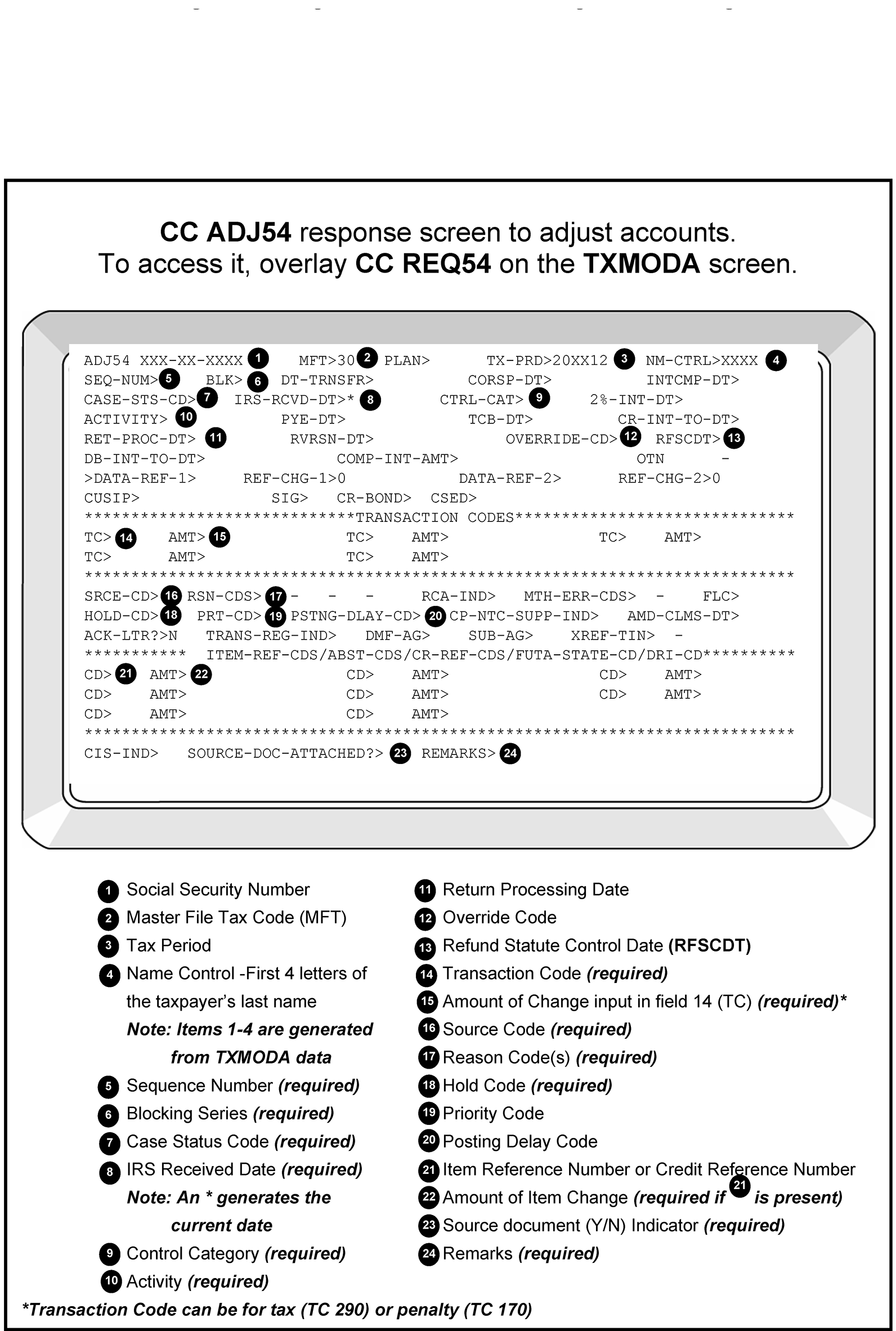
- The Blocking Series determines whether a DLN will be a re-file or a non-refile DLN. When an incorrect Blocking Series is used on an adjustment, the Files Function will return the source document and adjustment printout for correction.
- Blocking Series 00 is used only on Category B erroneous refunds with a paper return as source document. See IRM 3.14.1.6.7.3, Category B ERRF Resolution, for more information.
Use Blocking Series 05 when making an adjustment to a return and the resulting final tax amount is the same as or less than that shown by the taxpayer and/or any resulting refundable credit is the same as or more than the original figures declared on the return.
- This blocking series will not renumber an original return.
- This Blocking Series must be used when making adjustments to electronically filed (e-file) returns. See the note after (5) below for exception.
Use Blocking Series 18 when making an adjustment that does not use the original return as the source document.
- Use this Blocking Series only if the adjustment should be associated with the original return. This blocking series should be used when 00 applies but the original return cannot be retrieved.
A CP 55 will generate to the Files Function requesting that the original return be pulled and associated with the adjustment.
Note:
Do not use this Blocking Series for Penalty or Interest adjustments without the original return. These adjustments do not need to be associated with the return.
Use Blocking Series 77 when:
Note:
Scanned paper returns (visible as MeF documents) should be treated as efile documents for blocking series and source document processes.
- The original return was filed electronically.
- The return is adjusted, and the resulting final tax amount is greater than the tax shown by the taxpayer and/or
- Any resulting refundable credit, from the list below, is less than that shown by the taxpayer.
- Use reason code 300 in the last box on CC ADJ54.
- Print CC IMFOLR and the CC ADJ54 adjustment screen after transmitting (or page up) before moving to another screen.
- Monitor the case until the adjustment posts.
Complete Form 9856, Attachment Alert (File storage area), with the new DLN. Staple the two prints behind the Form 9856 and route to Files.
Note:
Use Blocking Series 77 is required for math error appeal rights. See -G below and IRM 3.14.1.6.11.10, Math Error Freeze (–G), for more information.
- Child and Dependent Care Credit
- Additional Child Tax Credit
- American Opportunity Credit
- Earned Income Credit
- Fuel Credit
- Recovery Rebate Credit
- Premium Tax Credit
Use Blocking Series 78 instead of 77 when making an adjustment with a paper return.
- This will set a -G freeze or extend an existing one, allow the taxpayer 60 days from the 23C date to appeal the assessment, and suspend Collection activity for 12 cycles. The original paper return will be renumbered using the adjustment DLN.
- Use reason code 300 in the last box on CC ADJ54.
- Retype or label the notice as appropriate.
- Keep the paper return in Notice Review and monitor the case until the adjustment posts. See IRM 3.14.1.7.2, Controlling Cases, for more information.
- Line through the original DLN on the return.
- Complete Form 9856, Attachment Alert (File storage area), with the new DLN, attach paper return behind it, and route to Files.
Source Codes appear on Adjustment notices to explain whether the taxpayer or the IRS made the error.
- Use Source Code "2" when the adjustment results from a taxpayer error or when neither Source Code "4" nor "7" apply.
- Use Source Code "4" when the adjustment results from an IRS error.
- Use Source Code "6" when the adjustment has a Blocking series of "77" or "78" .
- Use Source Code "7" when the adjustment is for a TOP offset. See IRM 3.14.1.6.4.3, Treasury Offset Program (TOP) Offsets — TC 898/899, for more information.
Reason Codes are input onto CC ADJ54 the response screen to CC REQ54. Reason codes are three digit codes that explain the reason an account is being adjusted in IDRS.
Caution:
Do not enter Source Codes, Reason Codes, or Item Reference Numbers on a TC 290 .00 input when only releasing a P– freeze.
- CC ADJ54 allows input of 19 reason codes for explanation of changes to an account.
- The last box (box 20 on the CC ADJ54 screen) is used to input two items, the first, penalty reason codes for specific penalty adjustments, the second is reason code 300, which is used when math error appeal rights are set. Reason Code 300 is used in conjunction with blocking series 77 or 78 only. See IRM 3.14.1.7.6.1, Blocking Series, for more information.
Each item that is adjusted on an account and each applicable reason must be input as a reason code on CC ADJ54.
- Choose all Reason Code(s) that best describe the error and the area(s) of the return affected and impacted by the adjustment.
Use at least one, but no more than nineteen reason codes with a CC REQ54/ CC ADJ54 adjustment.
Exception:
Use reason code 300 is math error appeal rights apply. This could result in the use of all 20 reason code boxes.
All reason codes that are input on the ADJ54 screen will create an explanation paragraph to the taxpayer on an adjustment notice (CP 21 or CP 22 with appropriate alpha characters see IRM 3.14.1.6.18.1.2, CP 21 and CP 22 Notice Elements, for more information).
Exception:
The last box (box 20) will not print on an adjustment notice but does have tracking purposes for the IRS.
- See Exhibit 3.14.1-14, IMF Adjustment Reason Codes (CC ADJ54),Notice Review IMF Job Aid, Section 2, Adjustment Reason Codes, and Document 6209, Master File Codes, Section 8C, for sources of IMF Adjustment Reason Codes.
- Priority Codes bypass certain unpostable checks.
Use Priority Code "1" when entering a CC REQ54 adjustment on an account with a –L freeze (open TC 420 or TC 424). See IRM 3.14.1.6.11.18, Audit Information Management System (AIMS) - Exam Indicator Freeze (–L), for more information.
Use Priority Code "8" when entering:
- A TC 29X adjustment within $10 of a previous adjustment. The priority code will bypass UPC 158–1 in this instance.
An EIC adjustment (TC 764) and there is a previous TC 29X adjustment. The priority code will bypass UPC 180–2 in this instance.
Exception:
Priority Code 8 is unnecessary if the previous TC 29X is a TC 29X with Priority Code "6" .
A withholding adjustment (TC 806 or TC 807) and there is a previously input TC 170 or TC 171 with a Doc Code of 17, 18, 24, 47, 51, or 54. See Document 6209, Section 4, for more DLN information.
Note:
This action will not force the computer to recompute the ES Penalty. Compute the penalty manually, if needed.
- Use Priority Code "3" when inputting an adjustment which is IRS initiated for the 45-day interest-free period. This is rare in Notice Review but can happen when a timely filed return is delayed in pipeline processing. See IRM 20.2.4.8.3, 45-Day Rule, and its following sections for more information.
Use a Hold Code for one of the following reasons:
- To prevent a refund from generating.
- To prevent a notice from generating.
Use a Hold Code 0 on a CC REQ54 adjustment when the taxpayer needs to receive an adjustment notice.
- If an adjustment will create a second refund, then the taxpayer needs an adjustment notice to explain the adjustment and the second refund.
- If an original notice was mailed in error, the taxpayer needs an adjustment notice to explain the nature of the change.
Notice Review may only use the following Hold Codes:
Hold Code Prevents Notice Prevents Refund Description 0 No No - Generates an adjustment notice and releases the overpayment.
- Use when an overpayment is increased, and the original notice is labeled.
- Do not use when increasing a refund on a math error notice.
1 No Yes Sets a –K freeze which holds the overpayment but does not prevent a notice from generating. The overpayment remains frozen until one of the following occurs:
- A Doc Code 24 or 34 credit transfer posts
- A TC 830 or TC 820 posts
- A Doc Code 51 with a secondary TC 300
- The module balance becomes zero or a debit
- A TC 29X or TC 30X posts
3 Yes No - Prevents an adjustment notice but releases the overpayment.
- Use when voiding or retyping the original notice.
4 Yes Yes - Prevents an adjustment notice and freezes the overpayment.
- Use when the original notice will be retyped or voided. The overpayment will be frozen. Hold code 4 sets a –K freeze. See Hold Code 1, above for release information.
- A posting delay code is a one-digit code used to delay the posting of a transaction, usually, to allow another transaction to post first.
- Posting delay codes should be used only when it is absolutely necessary to adjust the timing of when transactions post. Avoid using posting delay codes unless a change to the default posting schedule is needed for a specific reason.
- Use a posting delay code to delay the posting of a transaction by up to six cycles (input is one character 1-6). The posting delay code is input in field PSTNG-DLAY-CD>_ on IDRS.
- Use of proper posting delay codes is necessary when performing multiple IDRS transactions, and the order in which they post is key to preventing unpostables. (See Posting Cycle Chart in the Notice Review Job Aid 2534-002.)
Be aware of the timing of IDRS transactions so that they post either in the same cycle or in consecutive cycles, as needed, and utilize the posting delay code to stagger the posting of those transactions accordingly. The posting guidelines below are for normal processing times. December cycles and holidays can impact the posting schedule.
- An adjustment will post in one cycle.
- An ADD24 credit transfer will post in two cycles for both the credit and the debit side of the module.
- An ADD34 credit transfer will post in two cycles for the debit side of the module and three cycles for the credit side of the module.
- A NOREFP refund deletion (TC 841) will post in two cycles.
- If preventing a refund with NOREFP and an adjustment is necessary to reduce the refund, a posting delay code of 1 should be used to allow the TC 841 to post before the adjustment. This will allow the adjustment to release the remaining refund in the timeliest manner.
- The use of posting delay codes depends on how many transactions are being input on the module and the order in which they need to post.
- When an account contains manually computed interest (TC 190 or TC 191), the system can no longer adjust interest. Figure the interest manually to the 23C date of the notice.
- Input the Debit Interest To Date when entering a TC 34X on a CC REQ54 adjustment.
Overlay the "DB-INT-TO-DT" field with the Interest To Date (23C date).
If no interest is assessed, but a TC 340 .00 is needed to address an –I freeze:
- Input a TC 340 .00.
- Overlay the "DB-INT-TO-DT" field with the Interest to Date.
- The Interest To date is usually the 23C date of the adjustment.
- A return is not considered complete and processable until the required information is received from the taxpayer on a permitted form, schedule, or attachment to allow for mathematical verification of tax liability shown on the return.
A return is not considered complete and processable until all missing information (such as taxpayer's name(s), address, identification number(s), required signatures, or other forms or schedules) is received.
Exception:
A missing Form 1310, Statement of Person Claiming Refund Due a Deceased Taxpayer, does not make the return incomplete or unprocessable for credit or overpayment interest purposes, per IRC 6611(g)(1). Do not enter a date in field RET-PROC-DT for receipt of Form 1310.
When the taxpayer sends the necessary correspondence, enter the correspondence received date in the "RET-PROC-DT" field on IDRS CC ADJ54 to update the Return-Processable-Date field on CC TXMOD. See IRM 20.2.4.5, Delinquent Returns.
- This will also restrict overpayment interest for 45 days. Future computations of overpayment interest will be figured from this date.
A Credit/Item Reference Number is a three-digit code input in the lower portion of the ADJ54 response screen that refers to specific areas of each type of tax return. The areas include:
- Adjusted Gross Income (AGI)
- Taxable Income (TXI)
- Exemption
- Self-Employment Income, Medicare Income, and Tax
Withholding
Keep the following information in mind when using Credit/Item Reference Numbers:
Use a trailing minus (–) to decrease a credit amount.
Caution:
Reducing any figure (other than AGI) to an amount less than zero will generate an Unpostable.
Include all relevant item and credit codes in the adjustment.
Example:
A change to the AGI usually changes the TXI. A change to Schedule C generally changes the SE Tax, SE Income, and Medicare Income.
- Use Item Reference Number 888 when changing the AGI. Master File will automatically change the TXI for the same amount. If a TXI change for the same amount is not needed, input a TC 886 for the correct TXI amount.
- Enter "Y" if attaching a Source Document to the adjustment form.
- Enter "Y" if creating a Source Document on a MeF return.
- Enter "N" if not attaching a document.
The Blocking Series used in a CC REQ54 adjustment works in conjunction with whether a Source Document field entry is an "N" or a "Y" .
Blocking Series 77 (efile or scanned) = "N"
Note:
Scanned paper returns (visible as MeF documents) should be treated as efile documents for blocking series and source document processes.
Blocking Series 78 (paper return) = "Y"
- Enter a descriptive statement identifying the reason for the adjustment.
- The "Remarks" field of the ADJ54 response screen becomes a permanent part of the document. The adjustment information appears on the Form 5147 cover sheet and is associated by Files to the return.
- Detailed information is essential for a complete audit trail, and the remarks allow anyone referring to the document at a later date to fully understand the nature of the adjustment.
Use a credit transfer to move credits from one tax module to another. Refer to the following when transferring a credit:
- Verify the credit(s) to be moved is available and there are no pending debit transactions.
- Verify that the transfer has not been input by another tax examiner.
- Do not transfer a pending payment until it posts.
- Dates must be exact. Any discrepancy will create an unpostable.
Money amounts can be split; however, the money amount transferred cannot exceed the posted amount.
Caution:
Payments are rarely split. Only split a payment if taxpayer intent can be verified (note written on a voucher or check or AMS history item).
- Use current CC IMFOL/TXMOD information.
There are three Credit Transfer Doc Codes. Each Document Code identifies the different types of credits to be moved.
Use Doc Code 24 to transfer a single payment, a lump sum, an overpayment, or to reverse an offset. Both the debit and credit sides of the transfer post in two or three cycles (depending on the day of input), unless a posting delay cycle is used. When using Doc code 24, the EFTPS-ELEC-DPST-IND "1" must be present when the original payment was received through EFTPS. For non-electronic payments, the EFTPS-ELEC-DPST-IND indicator must be blank. Reminder: When using IAT to transfer credits the indicator 1 is input automatically by the IAT credit transfer tool when needed.
Use Doc Code 34 to transfer up to four payments at once. The debit side of the transfer posts in two or three cycles (depending on the day of input). The credit posts one cycle later. Use of ADD34 (Doc Code 34) is designed to aid in preventing unpostables.
Caution:
When using Doc Code 34 in conjunction with other Doc Codes (24, 48, or 54), make sure that multiple transactions will all post in the same cycle. Use a Posting Delay Code "1" on the credit side of both the 24 and 48 transactions, to prevent erroneous notices, offsets, and refunds.
- Use Doc Code 48 to apply or reverse Credit Elect. Both the debit and credit sides of the transfer post in the same cycle, unless a Posting Delay Code is used. Both sides normally post in two or three cycles, depending on the day of input. Before applying (transferring) a credit elect from a prior tax year verify that there is a TC 150 posted to the next year, with an amount other than zero in the UNAPPLD-CR-ELECT> field on TXMODA. If there is an unapplied credit elect amount, review INOLES for a debt indicator before performing the credit transfer. If Married Filing Jointly (FS2) review INOLES for the primary and secondary TIN. If INOLES field DEBT IND is N (no debt), move the unapplied credit elect amount to the next tax year using the IAT credit transfer tool. If the INOLES debt indicator is any other letter (I, IRS debt; F, other Federal debt; B, both IRS and other Federal debt) do not perform a credit transfer. For more offset information see IRM 3.14.1.6.4.3, Treasure Offset Program (TOP) Offsets - TC 898/899. For more information on INOLES fields see IRM 2.3.47-8, Command Code INOLES IMF Specific Screen.
Consider the timing issues unique to Doc Code 34 transfers. The credit side of a Doc Code 34 transfer posts one cycle after:
- A CC REQ54 adjustment.
- Both sides of Doc Code 24 and 48 transfers.
- The debit side of a Doc Code 34 transfer.
- A CC REQ77 transaction.
Note:
If the credit side of a Doc Code 34 transfer needs to post in the same cycle as any of the above transactions, use a Posting Delay Code "1" immediately after "PSTNG-DLAY-CD>__" on the other transaction to avoid erroneous notices, offsets, and refunds.
- A credit transfer affects two different tax modules unless the only purpose of the transfer is to change specific payment information, such as the date, designated payment code or transaction code. See (18) below for information on a single tax module credit transfer.
- Initiate a credit transfer from the module where the credit has posted and move it using the IAT Credit Transfer tool.
When reversing an offset, the debit and credit sides may have different dates. Input an Override Code "2" when using different dates. Use the TC 826 date for the TC 821 and the TC 706 date for the TC 701.
Note:
If the IAT tool does not allow the override code input, report to the lead for elevation to Planning and Analysis Analyst and HQ.
- Reverse multiple offsets separately. Do not combine them.
- Use a posting delay code to delay the posting of a transaction by up to six cycles (input is one character 1-6). See the table below for more information.
- When transferring a credit into a zero balance (full paid) module, or a balance due module that will create an overpayment, use a Bypass Indicator "1" on the credit side of the transfer to prevent an Unpostable Condition 198. There is a check box on the IAT Credit Transfer tool.
To hold a credit (prevent a refund or offset), use a Credit Freeze Code "1 " on Doc Code 34 or a TC 570 on Doc Code 24 or 48 as the secondary transaction code on the credit side of the transfer to set an –R freeze on the module. There is a check box on the IAT Credit Transfer tool.
- TC 570 may only be used as a secondary transaction on a Doc Code 24 transfer. Choose debit freeze on the IAT Credit Transfer tool.
Never leave an unnecessary –R freeze on a module. Use CC REQ77 to input a TC 571 with the appropriate posting delay code or REQ54 TC 290 .00 to release the freeze to allow any available credit to refund after the transactions post.
If the transfer is Doc Code Then use a Posting Delay Code on REQ54 or REQ77 of 24 or 48 1 34 2
IAT will automatically use the corresponding reversal (debit) transaction codes when transferring payments. If a credit TC code needs to be changed update on the IAT credit transfer tool (for instance if a payment with return (TC 610) posted as a TC 660 to the wrong tax module).
TC 640, TC 670, and TC 700 must have a Designated Payment Code (DPC).
- When transferring these payments, input 00 on the credit side of the Doc Code 24 or 34 screen immediately after "DESG-PYMT-CD>__" unless the payment has another code visible on TXMODA. If another code is visible use that in the DESG-PYMT-CD>__field.
- IRC 965 payments require a DPC 64. See IRM 3.14.1.6.9.15.1, Identifying and Correcting IRC 965 Accounts, for more information.
- See Document 6209, IRS Processing Codes and Information, for a complete listing of DPCs.
- A TC 820 or TC 830 on a Doc Code 24 or 48 transfer will release –K and P– freezes. Verify that the transfer does not inadvertently release a freeze and cause an erroneous refund. When using CC REQ54 to decrease an overpayment or increase the balance due on an account, be sure to use appropriate hold codes on the adjustment and posting delay codes (as needed) on the credit transfer to prevent an erroneous refund and/or notice, use either a Hold Code "4" or a Posting Delay Code "1" to prevent an erroneous refund and/or notice.
- If a misapplied credit posted to a settled module (containing a TC 150), input a TC 570 on the debit side of the transfer to suppress the CP 60 if transferring the credit will leave a debit balance of $5 or less. See IRM 3.14.1.6.18.4, for CP 60 information.
- If transferring a credit into the notice module will resolve the credit discrepancy and interest and penalties will completely abate, do not input a TC 570 on the credit side of the credit transfer. Use CC REQ54/ADJ54 to input a TC 290 .00 with Hold Code 3 and Posting Delay Code of 1 (ADC24 and ADC48) or 2 (ADC34) as appropriate, to prevent an adjustment notice.
If transferring a TC 660 or TC 670 into a module will create an overpaid condition, be sure to use Bypass Indicators and Designated Payment Codes as appropriate to avoid creating an unpostable condition.
- Use a Bypass Indicator 1 if necessary.
- If the credit should be held and not refunded, choose credit freeze on the IAT tool to set a -R freeze on the module.
If a payment needs to be corrected (date, DPC, transaction code, etc.), but not moved, this is called an in-module or single tax module credit transfer.
- The credit transfer is input with the SSN, MFT, and tax period the same on both the debit and credit sides of the transfer.
- A debit freeze (TC 570) is required on the debit side of the transfer. Apply a TC 570 to the credit side only if a credit freeze is needed to prevent a refund from being issued.
- The IAT tool will display a caution message on a single module transfer.
- Transferring timely credits into a module containing a TC 166 (FTF penalty) or TC 176 (ES Penalty) will cause these penalties to recompute and generate an adjustment notice CP 21 or CP 22 or ). Other penalties may also recompute but will not generate an adjustment notice.
- Review CC PIEST and INTST to determine whether the penalties will recompute. The Estimated Tax Penalty may have to be addressed manually. See IRM 3.14.1.6.20.4, Estimated Tax Penalty.
When transferring timely payments into the module to resolve an ES discrepancy condition that causes the TC 166 or TC 176 to recompute:
- If TC 166 and TC 176 recompute to zero input a TC 290 .00 with Blocking Series 05, Hold Code 3, and Posting Delay Code 1 (ADC24 and ADC48) or 2 (ADC34) as appropriate, to prevent a future adjustment notice (CP 21 or CP 22). Retype the current notice to reflect any changes or void if returning to taxpayer figures with no balance due.
- If TC 166 and TC 176 recompute to other than zero, label the current notice using Label 2 (see IRM 3.14.1.7.8.5.2, Label 2) or Label 18 (IRM 3.14.1.7.8.5.20, Label 18) as appropriate, and allow a future adjustment notice to generate.
- All tax examiners are responsible for understanding the tax module conditions that generate a notice, the notice elements, and what effect any change to the module will have on a notice.
- All math error returns must receive the appropriate math error notice even if the refund or balance due is what the taxpayer expects, unless returning to all the taxpayer’s original figures.
- If the taxpayer is in balance due status after all account actions have been taken, even if the taxpayer figures are correct, and no math errors remain, the taxpayer must receive a notice. Send a CP 14.
- If an incorrect notice was mailed, a corrected notice along with the apology label 13 ( IRM 3.14.1.7.8.5.15, Label 13 for more information) or an apology letter (Letter 544C, see IRM 3.14.1.7.4, Notice Review Sent Taxpayer Correspondence-Reply and No Reply Procedures ) must be sent to the taxpayer.
When making any adjustment or credit transfer to an account, tax examiners are responsible for determining:
- The disposition of all affected associated notices in addition to the selected notice.
- Whether to generate or suppress a future notice.
- If FTF, FTP, ES, penalties, and or interest will recompute.
- The proper use of Local Control File (LCF, CC NRP97) to prevent future notices.
- Proper use of hold codes or transaction codes to allow or prevent future notices.
Every tax examiner who inputs:
- A Doc Code 54 adjustment (TC 29X) must determine (prior to the adjustment) whether to generate or suppress a future notice.(The use of hold codes will determine whether an additional notice is generated.)
- An adjustment or credit transfer that will cause the FTF or the ES penalties to recompute, must determine if a future notice will generate.
- ≡ ≡ ≡ ≡ ≡ ≡ ≡ ≡ ≡ ≡ ≡ ≡ ≡ ≡ ≡ ≡ ≡ ≡ ≡ ≡ ≡ ≡ ≡ ≡ ≡ ≡ ≡ ≡ ≡ ≡ ≡ ≡ ≡ ≡ ≡ ≡ ≡ ≡ ≡ ≡ ≡ ≡ ≡ ≡ ≡ ≡ ≡ ≡ ≡ ≡ ≡ ≡ ≡ ≡ ≡ ≡ ≡ ≡ ≡ ≡ ≡ ≡ ≡ ≡ ≡ ≡ ≡ ≡ ≡ ≡ ≡ ≡ ≡ ≡ ≡ ≡ ≡ ≡ ≡ ≡ ≡ ≡ ≡ ≡ ≡ ≡ ≡ ≡ ≡ ≡ ≡ ≡ ≡ ≡ ≡ ≡ ≡ ≡ ≡ ≡ ≡ ≡ ≡ ≡ ≡ ≡ ≡ ≡ ≡ ≡ ≡ ≡ ≡ ≡ ≡
Note:
Proper use of hold codes is important during the adjustment process. See IRM 3.14.1.7.6.5, Hold Codes. Proper use of the LCF is important when a hold code or a TC 570 cannot be used to prevent a future notice. See IRM 3.14.1.3.8, NRPS Local Control File (LCF) and IRM 3.14.1.3.8.2, CC NRP97 Input Information.
- Consider the account conditions that will exist after a Doc Code 54 adjustment or a credit transfer, to correctly determine whether to void, retype, label, or print based on the changes to the account.
An adjustment notice (a CP 21 or CP 22 with a corresponding alpha) will generate when:
A Doc Code 54 or 47 (TC 30X) adjustment posts with Hold Code "0" or with a Hold Code "1" .
Caution:
If a math error notice review results in a necessary account adjustment, the hold code cannot be 0 or 1, due to PL 119-39, Math and Taxpayer Help Act, legislation notice requirements. So a hold code 3 or 4 is required. See, Hold Codes, IRM 3.14.1.7.6.5, for more information.
- A payment is transferred into or out of a module, and FTF or ES penalties will be assessed or recomputed.
- A payment is transferred out of a settled (full paid) credit balance module and creates a balance due. This will generate a CP 60.
If an account action will generate a future notice, label the original notice. If the original notice must be voided or retyped, prevent the future notice:
Exception:
A math error notice should not be labeled (unless reviewed after 12 PM LCT Thursday). The current cycle notice must be retyped to include the adjustment.
Use Hold Code "3" with a CC REQ54/ CC ADJ54 adjustment to prevent a future notice but allow any refund to release. Use Hold Code "4" to prevent a notice from generating and freeze any overpayment.
Caution:
Do not use a hold code 4 unless required as a -K freeze will set, see IRM 3.14.1.6.11.16, Credit Balance Freeze (–K), for more information.
- Use a TC 570 on the debit side of a credit transfer to prevent a CP 60 from generating on a settled module.
Use CC REQ54 to input a TC 290 .00, Blocking Series "05," Hold Code "3," to prevent an adjustment notice from generating on a penalty recomputation caused by a credit transfer. Time the adjustment to post in the same cycle as the credit transfer.
Exception:
An adjustment with a Hold Code “3” will suppress a CP 21 or CP 22 but will not suppress a CP 60. A TC 570 on the debit side of a credit transfer will suppress a CP 60 but will not suppress a CP 21 or CP 22 from generating as the result of a penalty recomputation.
- Follow procedures for inputting multiple corrective actions such as a tax adjustment and a credit transfer, or an "in and out" credit transfer (such as correcting a TC code or adding a DPC). See IRM 3.14.1.7.7, Credit Transfers.
Any tax examiner reviewing a pending transaction on the notice module must be able to answer the following questions:
- Which penalties, if any, will recompute?
- Which future notices, if any, will (or should) generate?
- Will the notice module be overpaid, refunding, balance due, or even-balance?
- If the module balance becomes overpaid, should the overpayment be released or prevented from generating?
- What is the proper disposition of the original notice?
- Review the IMFOL screen for the posting of pending credit or debit transactions.
- If a transaction posts on the IMFOL screen, any recomputation of penalties and interest will also show on that module. However, any balance showing on CC IMFOL is computed to the date indicated on that module and should not be used on a retyped or labeled notice. Use CC INTST or CC COMPA/COMPAF.
If a transaction is posted on IMFOL screen, any refund or offset occurring as a result will also show.
- The NRPS content sheet will indicate if an Examination (Unallowable Codes) CP 12E, Exam Coded Math Error on Return - Refund, was issued. Notify the Examination Function in cycle of any change to the account that will affect the notice.
There are five Notice Disposition categories:
- Void
- Retype
- Label
- Entity
Refer to the CP Conversion Chart in Exhibit 3.14.1-13 for disposition instructions for each notice.
Note:
Do not input a history item when retyping a notice only to change or add a TPNC. Do not use CC MFREQC to create a dummy module only to input a history item.
Void the notice when:
An adjustment results in:
- No math error (TPNC)
- No Estimated Tax (ES) discrepancy
- A refund, even balance, or a balance due of less than $5
- Returning to the taxpayer’s figures including any refund or credit elect expected
- An erroneous refund has been intercepted and subsequently deleted
The taxpayer does not need to receive the notice information.
Example:
Adjusting the account to the taxpayer’s original tax figures after identifying a processing error and the resulting refund is what the taxpayer expected or there is no balance due.
It would confuse the taxpayer, such as receiving an unnecessary notice.
Example:
An adjustment that was input with an incorrect hold code 0 when the original notice was retyped; that would be an erroneous, unnecessary notice.
- The return will be reprocessed. Refer to IRM 3.14.1.6.21, Reprocessing Returns.
- The return meets void criteria due to RIVO impact. Refer to IRM 3.14.1.6.9.5, (RIVO) Return Integrity and Verification Operation.
- Prevent any future adjustment notice with a Hold Code or use the LCF to intercept and void the future notice. Refer to IRM 3.14.1.3.8, NRPS Local Control File (LCF) and IRM 3.14.1.3.8.2, CC NRP97 Input Information.
Input a history item with CC ACTON on the appropriate tax year in CC TXMOD when voiding a notice.
Retype a notice when an entity change and another change is also required or if any of the following apply:
- The tax is increased, or the credits are decreased.
- A math error notice account changed in anyway (increase in overpayment or decrease in overpayment). Do not Label 5 the notice. If originally overpaid stop the refund, even if the taxpayer will receive a bigger refund after the adjustment. See below for specific steps.
- A math error notice, with a pending adjustment input by another area, regardless of the hold code. See below for more information in IRM 3.14.1.7.8.4 (2), below, review timing applies.
- The balance due changes.
- The module balance changes from a balance due to an overpayment.
- TPNC(s) needs to be corrected or added.
- Any changes to the taxpayer’s original figures reflected on the notice (transcription errors).
The original refund (credit) interest allowed is reduced or no longer applicable.
Example:
A notice generated and the amount refunding was requested as a credit elect that was not transcribed. If the credit is transferred to another module, the interest shown on the notice will be incorrect. The notice must be retyped to remove the credit interest amount.
Due to IRM 3.14.1.6.12.6, Math and Taxpayer Help Act, Math Error Notice Impact, every effort must be made to retype the current cycle math error notice with all pending information. If a hold code 3 or 4 was input on a pending adjustment, retype as normal. If a hold code 0 or 1 was input on the pending adjustment, actions are dependent upon what day of the week and time the notice is reviewed. Follow the instructions below based on review timing:
If reviewing the account and notice before 12 PM local time (LCT) on Thursday, use the Local Control File (LCF) to intercept the adjustment notice for the pending adjustment. See IRM 3.14.1.3.8, NRPS Local Control File, and IRM 3.14.1.3.8.2, Command Code (CC) NRP97 Input Information, for more information. Retype the current cycle notice, adding the pending adjustment information and any other required data. When the next (pending) adjustment notice added to the LCF, appears in OLNR inventory in the next cycle (or the cycle after it); void the notice. Make sure to enter a history item so that the subsequent notice is properly marked.
If reviewing the account and notice after 12 PM local time (LCT) on Thursday, the current cycle notice must be labeled. See IRM 3.14.1.7.8.5, Labeling Notices.
Caution:
Due to programming limitations not all notices meet PL 119-39, legislative requirements, so other actions in addition to labeling the current cycle notice are required. Every effort must be made to retype notices rather than label.
If the current overpaid notice is a math error notice, an adjustment is required increasing the overpayment, and the notice is easily retyped in OLNR, take the following actions:
- Stop the refund. See IRM 3.14.1.7.1.1, Refund Intercepts, for more information.
Input the necessary adjustment using a hold code 3 and posting delay of at least 1. See IRM 3.14.1.7.6.5, Hold Codes, and IRM 3.14.1.7.6.6, Posting Delay Codes, for more information.
Caution:
Make sure to use "B" status on the adjustment and maintain and open control base. See IRM 3.14.1.7.2, Controlling Cases, for more information.
Retype the current cycle math error notice in OLNR. Do not use Label 5.
Caution:
Due to programming limitations adjustment notices do not meet PL 119-39 legislative requirements, so other actions in addition to labeling the current cycle notice are required. Every effort must be made to retype notices rather than label.
- Keep the control base open and monitor the account for verification of all transactions posting, including the final TC 846 (refund).
Close the control base once the final TC 846 has posted.
Note:
If the account conditions make the notice difficult to retype in OLNR during the current cycle, follow (4) below.
If the current overpaid math error notice needs an adjustment, increasing the overpayment, and the account conditions make retyping the notice in OLNR difficult during the current cycle, take the following actions:
Caution:
Make every effort to follow (3) above, mark the notice in cycle, and release the refund as soon as possible, to release credit interest and the taxpayer’s wait time to receive their refund and notice.
- Stop the refund. See IRM 3.14.1.7.1, Preventing Refunds, for more information.
Input the necessary adjustment using a hold code (HC) 4 and posting delay (PD) 1. See IRM 3.14.1.7.6.5, Hold Codes, and IRM 3.14.1.7.6.6, Posting Delay Codes, for more information.
- Hold ("H" ) the current cycle math error notice in OLNR. Do not use Label 5.
- Keep the control base open and monitor the account for verification the adjustment posted, use CC RECON on the following Friday after input.
- Input a TC 290 .00 HC 3 to release the refund once the adjustment has posted. Input the TC 290 .00 with B status to continue to monitor the account until the refund posts (TC 846).
- Retype the held math error notice in OLNR as soon as possible.
- Close the control base once the final TC 846 has posted.
- If a balance due amount was originally $100,000.00 or more and will be decreased to an amount less than $100,000.00, the Pay by Date must be updated in OLNR to 21 days (instead of 11). See IRM 20.1.2.3.8.5, Failure to Pay Tax Upon Notice and Demand—IRC 6651(a)(3), and the Notice Review IMF Job Aid, Posting Cycle Chart for more information.
- Retype a notice to a CP 30 when the computer assessed an ES Penalty the taxpayer is unaware of and there is no ES discrepancy or math error on an overpaid module.
- Use a hold code 3 or 4 when retyping the original notice to prevent the future notice or use the LCF to intercept the future notice.
If a Balance Due Notice is held past the notice cycle, retype the notice with the correct Pay by Date. Input a history item and CC STAUPS for six cycles. See IRM 3.14.1.6.24, Command Code STAUPS, and IRM 3.14.1.7.8.7, Holding Notices, for more information.
- Change the balance due amount only if there is a $5 or greater increase over the original balance due. Use CC INTST to obtain an updated balance when no restrictive conditions exist on IDRS.
- Use CC ACTON to enter a history item on the notice module, using "UPDATECP_ " .
- The date printed on the notice is the 23C date (current cycle assessment date). This date is rarely changed. For those notices held past the notice cycle, the notice mail date will update prior to printing.
The following keys will usually result in a retyped notice:
Note:
TPNC 100s will always require a retype. If a TPNC 100 is not retyped a blank paragraph will be sent on the taxpayer notice.
- Key 100 — IRM 3.14.1.6.17.12, (TPNC 100 for five or more TPNCs needed on the notice).
- Key 061 — IRM 3.14.1.6.17.8, (Fifteen or more TPNCs needed on the notice).
- Key 004 — IRM 3.14.1.6.17.3, (ES payments on notice print incorrectly).
Input a history item on IDRS when retyping a notice.
- Under certain conditions, a label may be applied to add information to a notice and/ or to notify the taxpayer to expect additional account actions but retype is not appropriate. Label application must only be done when necessary and used only for the specific situations listed in this section. As labels are selected online, they are printed as part of the notice.
If a name and/or address change is required in addition to a label, select "R" and use retype to update the entity and add the label. The updated entity will be printed on the notice, and NRPS will pass the update to Master File to correct the TP account. See IRM 3.14.1.6.1.1.6, Verifying and Correcting Name Information and IRM 3.14.1.7.5, Entity Adjustments.
Exception:
If the notice contains a SPACK entity, NRPS cannot pass update data to IDRS. The entity needs to be updated manually in IDRS. See IRM 3.14.1.6.1.1.8, NRPS Automated Entity Updating, for more information.
- When OLNR disposition L for Label is selected, choose one or two (maximum of two) computer-generated labels from the drop-down menu.
Some labels require fill-in information which must be completed using the correct form number and period ending in Month, Day, and Year using the calendar drop down or typing in the appropriate box.
Use caution when applying a label for a pending (AP, PN, RS, UP, CU, or TP) credit transaction.
- If a pending transaction is unpostable, do not apply a label if unable to determine if the transaction will post, instead print the notice.
If the transaction is RS, TP, or UP, CC INTST will not reflect the penalty computation for FTP and interest. If the correct balance on the module is required, use CC COMPAF to manually figure the correct FTP amount and CC COMPA to manually figure the correct interest amount.
If there is a pending adjustment transaction on a math error notice module, only label the current notice if a hold code 0 or 1 was input on the pending adjustment and review takes place after 12 PM local time (LCT) on Thursday.
Reminder:
If the math error notice, from the scenario above, is reviewed before 12 PM LCT, retype the notice.
Caution:
Due to programming limitations adjustment notices do not meet PL 119-39 legislative requirements. So other actions in addition to labeling the current cycle notice are required. If a math error notice with PL 119-39 impact must be labeled a note for the reason the notice is being labeled must be input in AMS, in addition to the ACTON history item. See IRM 3.14.1.7.8.5.1 (4), Label 1 AMS input, for specific steps.
- SPC management has the option of requiring a notice to be retyped instead of labeled.
- The labels in the following sections IRM are approved for use by Notice Review TEs. The labels shown have been approved for the situations listed. A label must not be used for any other situation unless the label conveys the correct information to the taxpayer. Refer to the following sections for each label.
- Use CC ACTON to enter a history item on the notice module, using LBL3CP__ or CP__LBL3 .
- Label 1 : We’re making an adjustment to your account. You will receive a separate notice explaining the correction.
Use Label 1 when :
Note:
A TC 290 .00 without a Credit/Item Reference number will not generate an adjustment notice. Do not label a notice if that is the only pending transaction. See IRM 3.14.1.7.6.9, Credit/Item Reference Numbers, for more information. However, refundable credit transactions (TC 806/807, TC 764/765, and TC 766/767) combined with a TC 290 .00 will generate an adjustment notice.
- the notice module has a pending AP, PN, CU, UP, or RS Doc Code 54 or Doc Code 47 (TC 29X or TC 30X) adjustment with either a Hold Code 0 or Hold Code 1, input by another area and the notice is nota math error notice.
the notice module has a pending AP, PN, CU, UP, or RS Doc Code 54 or Doc Code 47 (TC 29X or TC 30X) adjustment with either a Hold Code 0 or Hold Code 1, input by another area and the notice is math error notice being reviewed after 12 PM local time (LCT) on Thursday. Also input an AMS and IDRS history item. See below IRM 3.14.1.7.8.5.1 (4), for AMS input.
Reminder:
If reviewing a math error notice with a pending adjustment input with a hold code 0 or 1, before 12 PM local time (LCT) on Thursday, use the Local Control File (LCF) to intercept the adjustment notice generated by the pending adjustment. Retype the current cycle notice, adding the pending adjustment information and any other required data. See IRM 3.14.1.7.8.4 (3), Retyping Notices, for specific information.
- Refundable credit transactions (TC 806/807, TC 764/765, and TC 766/767) will generate an adjustment notice. Follow labeling instructions if applicable.
If a math error notice must be labeled a note must also be input in AMS for the reason the notice is being labeled. Follow the steps below:
- In AMS, navigate to the notice account module (TIN, MFT, Tax Period).
- In the history section, choose Add Issue.
- In the Filter by Category dropdown select Return Delinquency/Return Processing.
- In the Select an Issue dropdown select Processing IMF Returns.
- In the Reason for Access dropdown select Transcript/Notice.
- For MFT/Tax Period enter the notice module data.
- Then select Save Issue.
- Click the box for the issue created and select Add Narrative.
- In the open box leave a history narrative stating the specifics of actions taken, the pending transactions, the full notice disposition, and the reason for labeling the notice.
- In addition to the AMS narrative also use CC ACTON in IDRS to input OLNR disposition.
- Do not apply label 1 for a posted or pending TC 976 or TC 977. Accounts Management or 1040X units will initiate all required correspondence.
- If the adjustment was input by a different Notice Review tax examiner, per control base or history notes in AMS or IDRS, refer the notice to that tax examiner for proper notice disposition. See Exhibit 3.14.1-13, CP Conversion (retype from one CP notice to another CP notice), if the tax examiner is unavailable.
- Label 2: We applied an additional credit of [$0.00] to your account. You will receive a separate notice reflecting this credit in 3 – 4 weeks.
Use Label 2 when all the following apply:
- A credit transaction is pending (AP, PN, UP, CU, RS, or on the TEP file), not shown on the notice,
- The resulting balance on the notice will be a reduced balance due, and
- Failure to File (TC 166) or Estimated Tax (TC 176) penalties will recompute and will generate a future adjustment notice CP 21.
Instead of labeling the original notice, void it and prevent the future notice, if all the following conditions will be present on the notice module:
- No math error or ES discrepancy,
- Module balance becomes overpaid, even, or balance due of less than $5, and
- Returning to the taxpayer’s figures.
- Label 3: We applied a credit of [$0.00] to your account. Your new balance is [$0.00].
Use Label 3 when all the following apply:
Caution:
Never label 3 math error notices, PL 119-39, Math and Taxpayer Help Act, Math Error Notice Impact, IRM 3.14.1.6.12.6. The notice should be retyped to show all pending payments and credits and applicable interest and penalties.
The notice cannot otherwise be easily retyped in OLNR,
Note:
Since this label was introduced prior to the advent of OLNR Retypes, it has now become nearly obsolete. In rare situations when a retype on OLNR is not possible or practical, the use of this label is permitted.
Example:
When the OLNR system produces excessive response time on retype screens, or when the volumes are very high for certain Selection Keys that meet the criteria below.
- The notice module is in balance due status,
- Payments or credits are pending but are not showing on the notice (the payments or credits may be AP, PN, UP, CU, or RS transactions),
- Failure to File (FTF, TC 166) or Estimated Tax (ES, TC 176) penalties will not recompute,
- A future notice will not generate, and
The resulting balance on the notice module will be a reduced balance due.
Caution:
If the resulting balance due will be less than $5 with no math error or credit discrepancy, VOID the notice.
- Label 4: We applied a credit of [$0.00] to your account. Your account has a credit of [$0.00].
Use Label 4 when:
Caution:
Never label 4 math error notices, PL 119-39, Math and Taxpayer Help Act, Math Error Notice Impact, IRM 3.14.1.6.12.6. The notice should be retyped to show all pending payments and credits.
- Payments or credits are pending, but are not showing on the notice (they may be shown as pending AP, PN, UP, CU, or RS transactions),
- The resulting balance on the notice module will be an overpayment,
- Failure to File (FTF, TC 166) or Estimated Tax (ES, TC 176) penalties will not recompute, and
No future notice will generate.
- Label 5: Due to a processing error, you did not receive the correct refund. You will receive an additional refund in 3 – 4 weeks.
- In processing year 2027 do not use Label 5 on math error notices unless a TC 846 refund has already posted.
- This label is not approved for use on a math error notice unless stated as such in the IRM, due to PL 119-39 legislation.
- Label 6: We applied a credit of [$0.00] to your account. If you don’t owe any other taxes, you will receive a refund in 3 – 4 weeks.
Use Label 6 when:
- A credit transfer or payment is pending (AP, PN, UP, CU, RS, or on the TEP file),
- There will not be an additional notice, recomputation of the Failure to File (FTF, TC 166), or Estimated Tax (ES, TC 176) penalties and,
There will be an additional refund from the notice module.
- Apply Label 6 in OLNR, in cycle, for an overpayment notice only.
- If the account has a 1- freeze or a P- freeze and the TC 841 has a blocking of 77716, follow instructions in IRM 3.14.1.6.9.19, Direct Deposit Temporary Freeze for Missing (1-) or Incorrect (P-/ TC 841 blocking 77716) Information and Notice Disposition.
- If the account contains a TC 570 with blocking series 55514 the systemic hold is 14 days, if a TC 570 with blocking series 55528 the systemic hold is 28 days. Before applying Label 6, make sure there will be two refunds on the module. A normal credit transfer without posting delay codes will take two cycles, approximately 14 days.
- Label 7: The overpayment of [$0.00] was applied to Form [XXXX] for tax period ending [MM-DD-YYYY].
Use Label 7 when:
- A credit elect (TC 830) or lump-sum offset (TC 820) is shown as a pending (AP, PN, CU, UP, or RS) transaction on an overpaid notice module, and
- The notice is a CP 21 adjustment notice.
Caution:
Ensure transaction is correct before using this label. The module must have available credit for the offset to post. If the overpayment is refunding or has already refunded before the pending transaction posts, refer to lead for routing to the originator for possible unpostable or erroneous refund processing.
- Label 8: According to our records, the credit you claimed has already been refunded.
- Label 8 will automatically be inserted by the computer when the taxpayer is claiming a credit or payment(s) that refunded in the prior year. Print the notice.
- Label 9: This notice was returned undeliverable. Additional penalties and interest have accrued on your account. The current balance due is [$0.00]. To avoid additional penalties and interest, please pay by [MM-DD-YYYY].
Use Label 9 when a Balance Due Notice is returned undeliverable, and the date of the notice is more than seven days prior to the current date.
Note:
Use CC INTST/INTSTD and/or COMPA/COMPAF to recompute penalties and interest. The "Interest To" and "Payment Due" dates are both the current 23C date plus ten days.
- Label 9H: This notice was returned undeliverable. Additional interest has accrued on the account. The current balance due is $_________. To avoid additional interest, please pay by ______.
Use Label 9H when a CP 14H Notice is returned undeliverable, and the date of the notice is more than seven days prior to the current date.
- Label 10: Please pay by [MM-DD-YYYY] to avoid additional penalties and interest.
Use Label 10 when all the following conditions exist:
A balance due notice is returned undeliverable,
- The recomputed balance due changes by less than $5, and
- The taxpayer needs to receive a new Pay by Date.
- Use this label in conjunction with Label 11, in restricted cases only.
- Label 10H: Please pay by ______to avoid additional interest.
Use Label 10H when all the following conditions exist:
- A CP 14H is returned undeliverable,
- The recomputed balance due changes by less than $5, and
- The taxpayer needs to receive a new Pay by Date.
- Label 11: Your notice was originally mailed on the date of this notice, however, it was returned undeliverable.
Use Label 11 when:
- Unable to calculate an accurate payoff amount
CP 71 is the selected notice - Restricted Interest/Penalty - Key 016
- Label 12: Due to a processing error, your refund check may be delayed.
Use Label 12 when:
- an overpayment notice with a TC 846 on the notice module is returned.
- a Label 19 is also used.
- Label 13: This notice is being sent to you in place of the incorrect notice(s) you received. We apologize for our error and any inconvenience this may have caused you.
- Use Label 13 when a previous notice was erroneously mailed to the taxpayer and the current notice should be printed, retyped, or labeled.
- Label 14: The payment of [$0.00] was applied to the balance due on Form [XXXX] for tax period ending [MM-DD-YYYY].
Use Label 14 when:
- The notice module is overpaid or refunding.
- A payment claimed on the notice module has posted to or will post to a different module, and the other module is in balance due status.
- Enter the form number and tax period of the posting module; for example: Form 1040, U.S. Individual Income Tax Return, for 12/31/20XX.
- Label 15: You were issued an erroneous refund due to a processing error. Please return the uncashed check or a substitute payment.
- Use Label 15 when an erroneous refund was issued, and an adjustment/credit transfer is necessary that equals or exceeds the amount of the refund.
- Label 16: We sent you a refund in error. The correct amount of the adjustment is [$0.00]. You will receive a separate notice explaining the correction. We apologize for any inconvenience this may have caused you.
- Use Label 16 when an erroneous refund was issued, but the necessary adjustment/credit transfer is less than the amount of the refund.
- The money amount field of the label should be the amount of the refund the taxpayer needs to return, the erroneous portion.
- Label 17: We will send you an additional refund, if you don’t owe other taxes.
Use Label 17 when:
- The notice module is refunding.
- There is a pending 29X or 30X with Hold Code "3" , resulting in a tax decrease or credit increase, therefore no adjustment notice will be sent to the taxpayer.
- The notice is a math error and is being reviewed after 12 PM LCT Thursday.
Do not use Label 17 when:
- The notice is a math error and is being reviewed before 12 PM LCT Thursday. See PL 119-39, Math and Taxpayer Help Act, Math Error Notice Impact, IRM 3.14.1.6.12.6 and Retyping Notices, instead.
- Freeze code(s) exists on the notice module preventing the overpayment from refunding.
- The notice module is in balance due status.
- Payments or credits are pending but are not showing on the notice. The payments or credits may be AP, PN, UP, CU, or RS transactions.
- Failure to File (FTF, TC 166) or Estimated Tax (ES, TC 176) penalties will not recompute.
- A future notice will not generate.
- The resulting balance on the notice module will be a reduced balance due.
Caution:
If the resulting balance due will be less than $5 with no math error or credit discrepancy, void the notice.
- Label 18: A credit of [$0.00] has been added to your account. You will receive an additional notice reflecting the credit.
Use Label 18 when a credit transaction is pending (AP, PN, CU, UP, RS or TP), does not show on the notice, and all the following applies:
- An adjustment notice will generate to the taxpayer.
- The resulting balance on the notice module will be an overpayment or even balance.
- Failure to File (TC 166) and/ or Estimated Tax (TC 176) penalties will recompute.
- Label 19: Your notice was originally mailed on the date of this notice; however, it was returned undeliverable.
Label 19 is a physical label, not contained in OLNR for IMF. Add Label 19 when:
- An overpayment notice is returned undeliverable.
- Used in combination with other labels on an undeliverable balance due notice.
Use this disposition when the only change to the notice is to the entity. This includes changes to Primary or Spouse entity.
- Ensure that no other necessary action needs to be taken on the account before selecting this disposition.
- Select "E" in OLNR to update only the entity. The updated entity will be printed on the taxpayer notice. For critical entity changes on all refunding notices, it is necessary to intercept the refund (see IRM 3.14.1.7.1.1, Refund Intercepts) and change the entity on IDRS using CC ENMOD/ENREQ, see IRM 3.14.1.7.5, Entity Adjustments, for more information.
Changes to the Primary Entity tab in OLNR will be passed to the NRP8520 file at End of Day (EOD) processing and will update the taxpayer's name and/or address on IDRS in two weeks.
Exception:
If the notice has a Joint Name line present [(Spouse Acknowledgement (SPACK) notice] and there is any change to the Joint Name line, the primary name line, or the secondary name line, NRPS 8520 will not post the entity change. Tax examiners must input change using CC ENREQ per (3) above.
- The hold disposition in OLNR is used when complete information is not available to determine the correct disposition of the notice or a quality review error has occurred.
Lead or manager approval is required before holding a notice in OLNR except for the exclusions mentioned below.
- This IRM specifically states to use hold or "H " disposition in OLNR until a case can be completed,
If the lead feels more research is necessary to ensure a correct notice is sent to the taxpayer (The lead will contact the Notice Review Headquarters analysts to inform them of the reason for the held notice. HQ approval must be received to hold the notice.),or
Example:
Use hold disposition if it appears the return has posted to an incorrect module and the requested return is not received before cycle closeout.
- SPC employees are directed to hold notices due to processing or systemic issues.
- A PL 119-39 impacted math error notice cannot be easily retyped and must be held until transactions have posted.
- When inputting a disposition of hold in OLNR, open a control base in IDRS on the notice module and if the notice is a balance due notice, enter a STAUP for 8 weeks. Refer to IRM 3.14.1.6.24, Command Code STAUPS, for instructions on how to use Command Code STAUP.
Once the issue that required the hold disposition has been resolved, if a STAUP was input reduce the STAUP to the appropriate number of weeks so that a collection (series 50X) notice is mailed to the taxpayer in the appropriate time frame.
Reminder:
The IDRS control base must also be closed when all actions have been taken, and the correct notice disposition has been input.
- Do not hold notices past 7 cycles. If the held notice is a balance due notice, the taxpayer will receive a collection notice before the settlement notice.
- When an error is identified by quality, they must input an H Disposition to allow time for tax examiner correction or rebuttal and to ensure a correct notice is sent to the taxpayer. If necessary, the tax examiner will correct the notice in OLNR to issue a corrected notice. See IRM 3.14.1.4.2.3, Notices Held Beyond Current Cycle, for complete information.
Leads or managers must report held cases to the local P&A analyst weekly for forwarding to Headquarters. The case data for each held notice should include:
- The batch number,
- The sequence number for the notice,
- The taxpayer TIN,
- The reason the notice is being held, and
The SEID of the TE who input the "H" disposition in OLNR.
- For a current list of taxpayer notice codes, see IRM 3.12.3-1, Taxpayer Notice Codes.
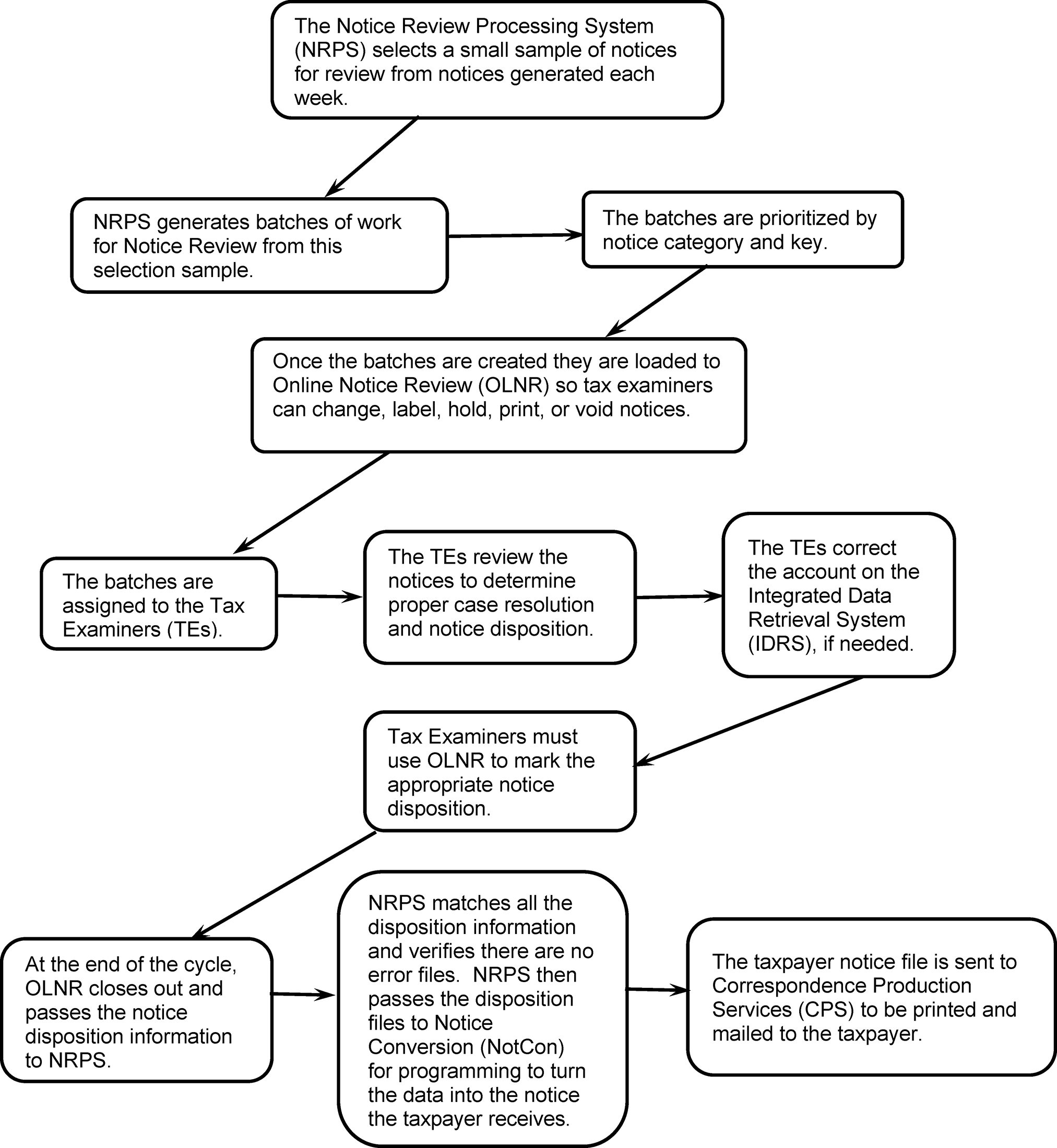
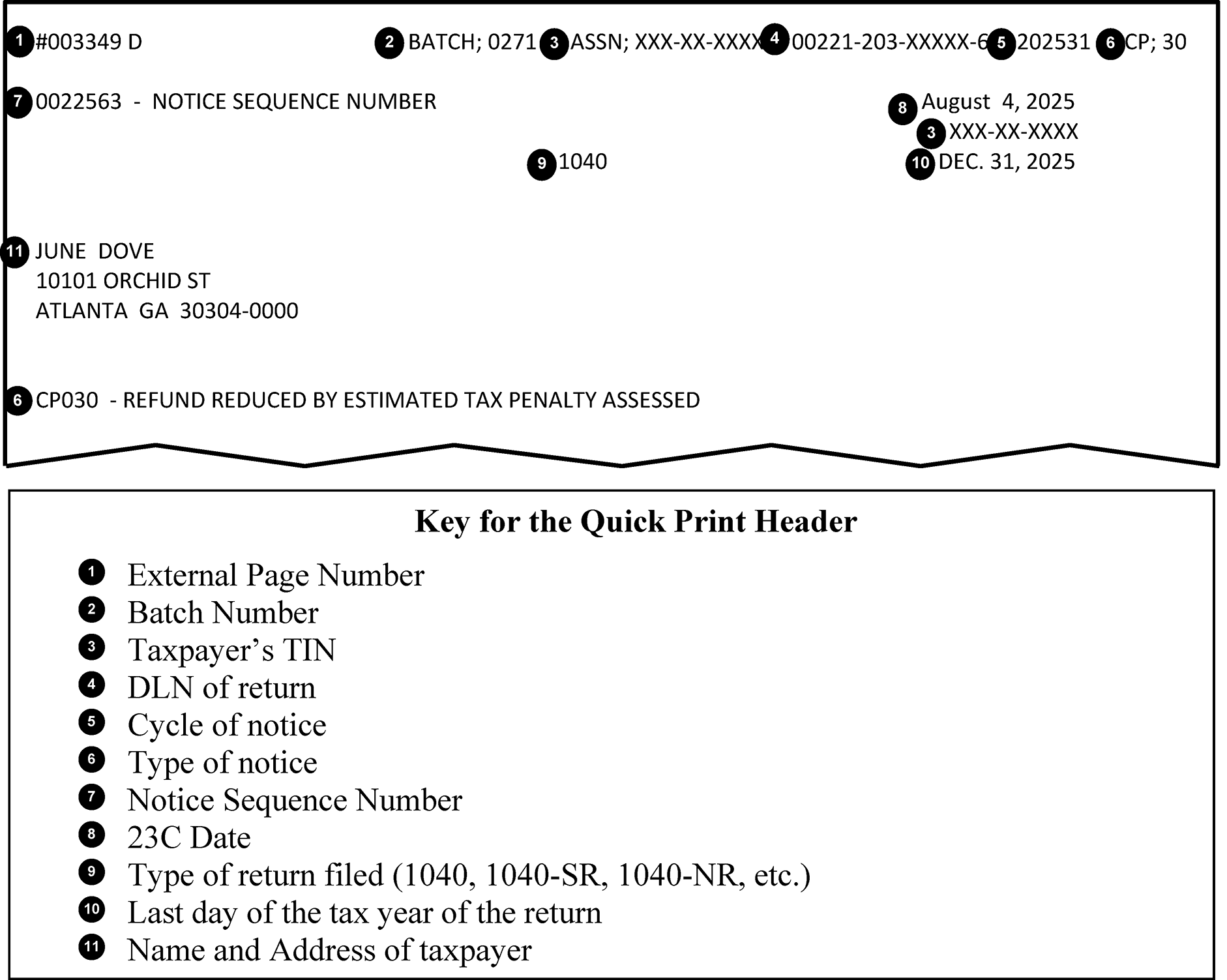
Please click here for the text description of the image.
The following list describes the 14 items identified in this Exhibit.
- Notice Sequence number– A six digit number unique to only one notice, per campus, in a given cycle
- Appeal Rights Indicator– An "A" present after the notice sequence number indicates the Appeal Rights Indicator is set.
- Document Locator Number (DLN)
- Current ECC-MTB posting Cycle
- CP Number
- CAF Indicator– Present when there is a CAF copy of the original notice
- Spousal Indicator– Present when individual copies of the notice are being issued separately to each spouse.
- Current Cycle Assessment Date (23C date)
- SSN (A trailing asterisk (*) indicates an invalid SSN)
- Submission Processing Campus Address
- Form Number
- Tax Period
- Customer Service Telephone Number
- Taxpayer name and address
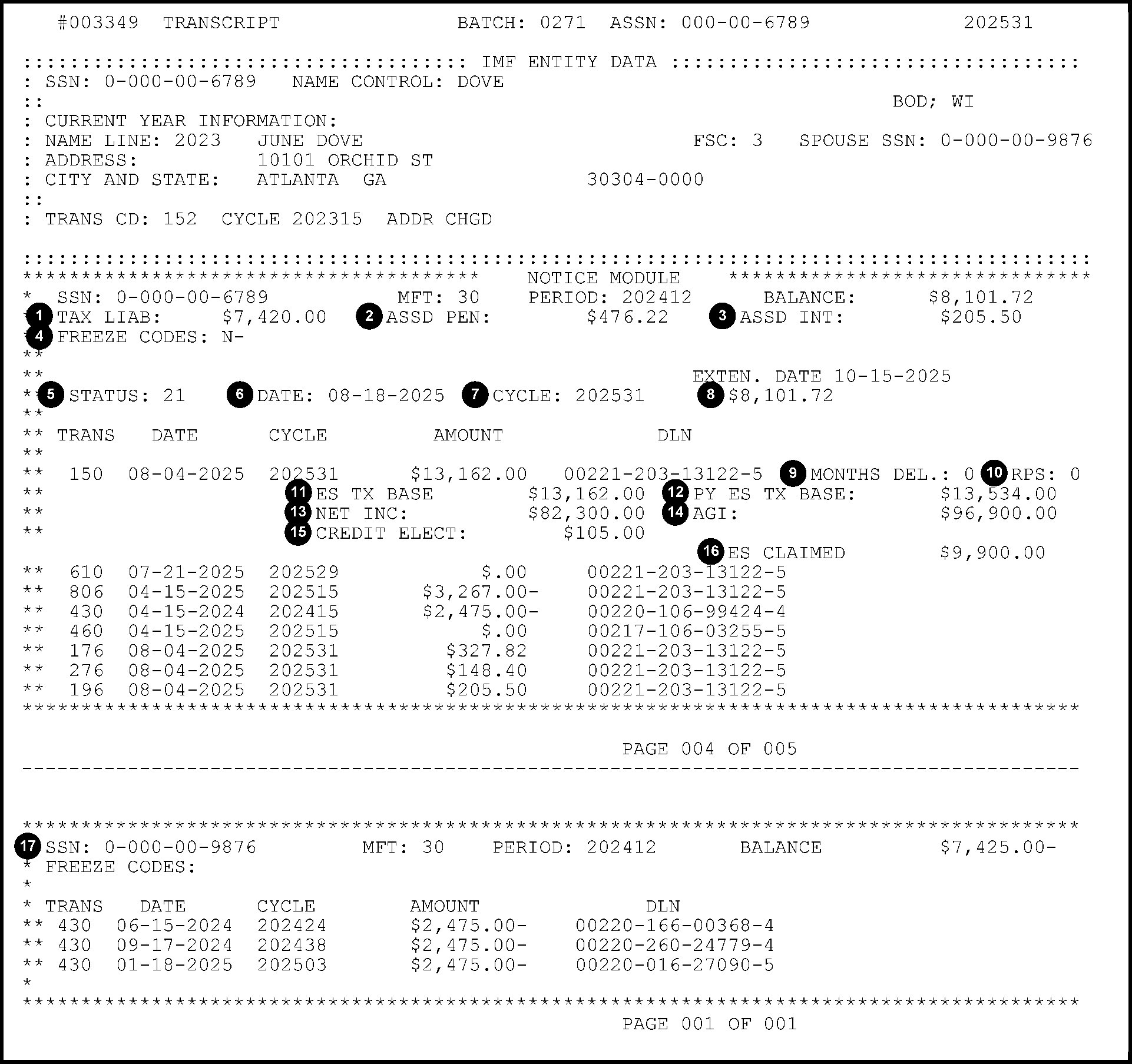
Please click here for the text description of the image.
The following list describes the 17 items identified in this Exhibit.
- Tax Liability – Tax Liability at the time of filing (minus prepaid credits)
- Assessed Penalty – Sum of all penalties currently assessed
- Assessed Interest – Total of all assessed underpayment interest
- Freeze Codes – Freeze Codes in effect when the Master File data was extracted for NRPS
- Master File Status Code – Generated because of computer analysis, after a transaction posts to the Master File, to designate the module Collection Status. The most common status codes are:
•04 – Extension of time for filing granted
•12 – Full paid module
•19 – First Master File notice issued before the return due date (RDD)
•21 – First Master File notice issued after the return due date (RDD) - 23C date – Effective date of the Master File status
- Cycle – Effective cycle of the Master File status
- Status Amount – Module balance as of the 23C date
- Months Delinquent – Number of months the return was filed late (up to 5). Used to compute Failure to File (FTF) penalty, TC 166
- RPS – Remittance processing field.
•A "0" indicates the return or payment is not covered under the RPS indicator.
•A "2" indicates the return or payment is covered under the RPS Indicator. - ES Tax Base – Current year estimated tax base. Used for computing the ES Penalty (TC 176)
- PY ES Tax Base – Last year's estimated tax base. Compared against the current year estimated tax base when computing the ES Penalty.
- Net Income – Taxable income as computed by ERS (TC 886 amount)
- AGI – Adjusted Gross Income as computed by ERS (TC 888 amount)
- Credit Elect– Amount transcribed from the return as a credit elect request to the next year. Will show as "Unapplied C/E:" if less than 100 percent of the requested amount was applied.
- ES Claimed – Amount of ES Payment claimed on the return (Does not include extension payments)
- Related SSN (XREF) Account Data – For example, tax modules from a spouse SSN.
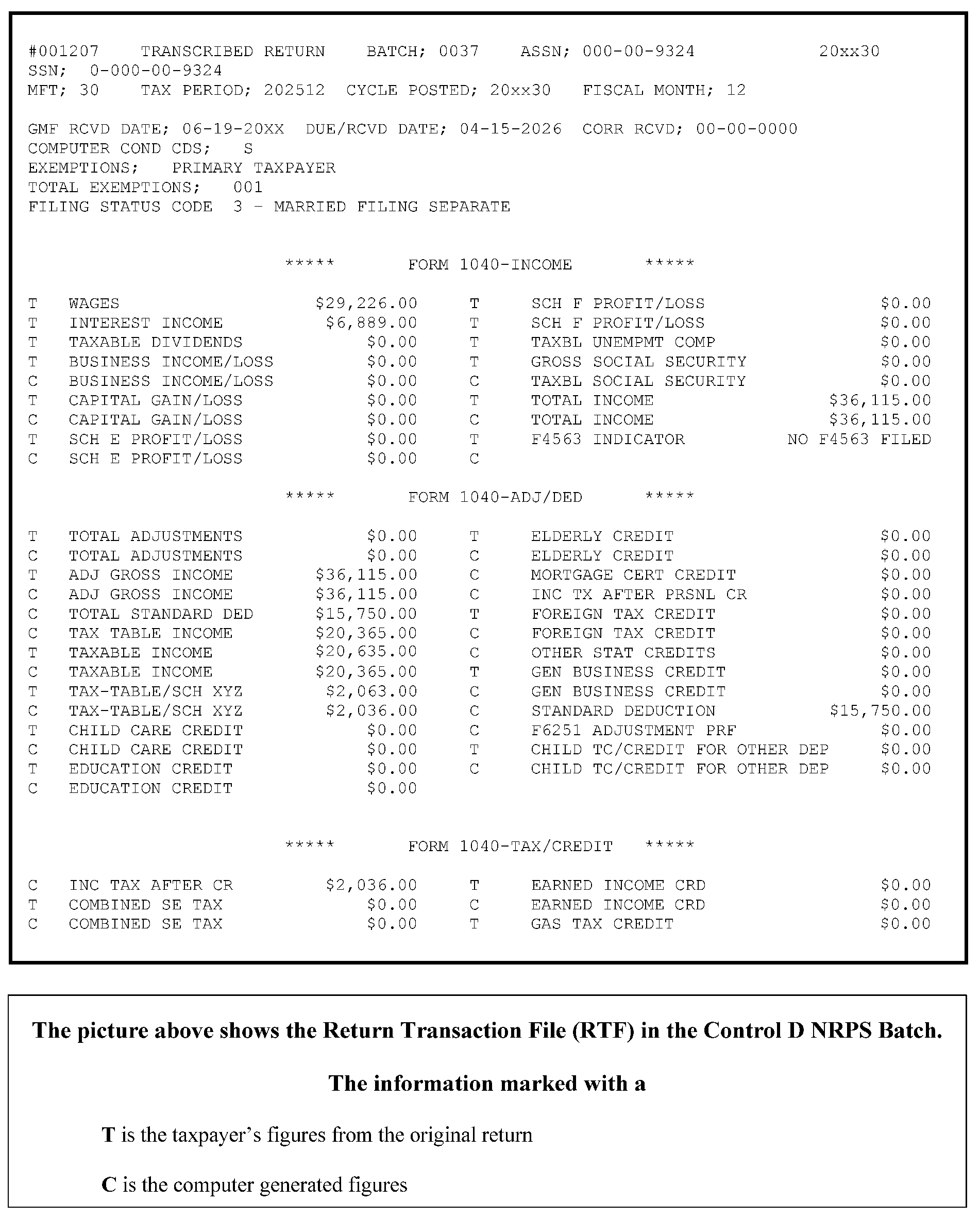
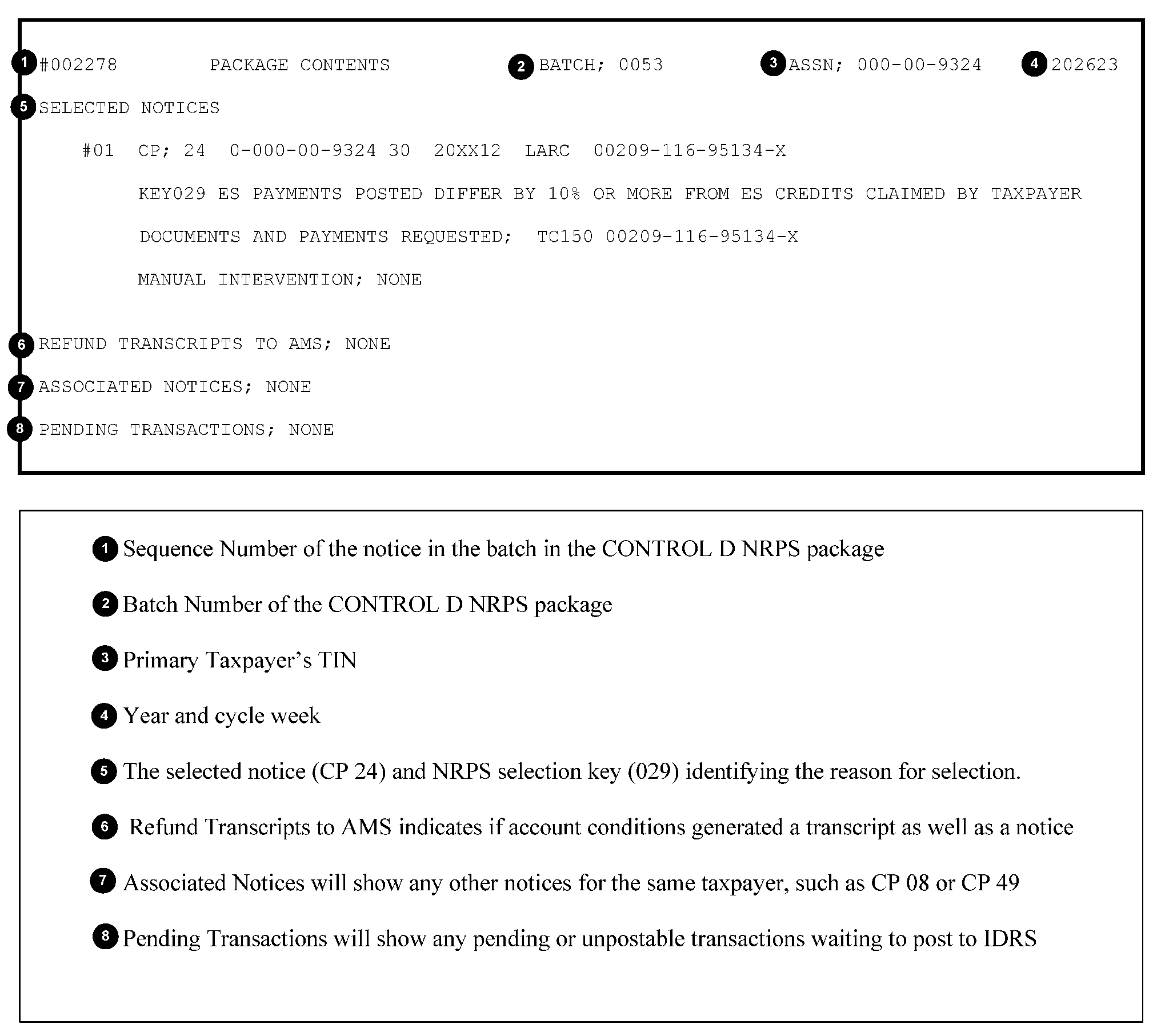
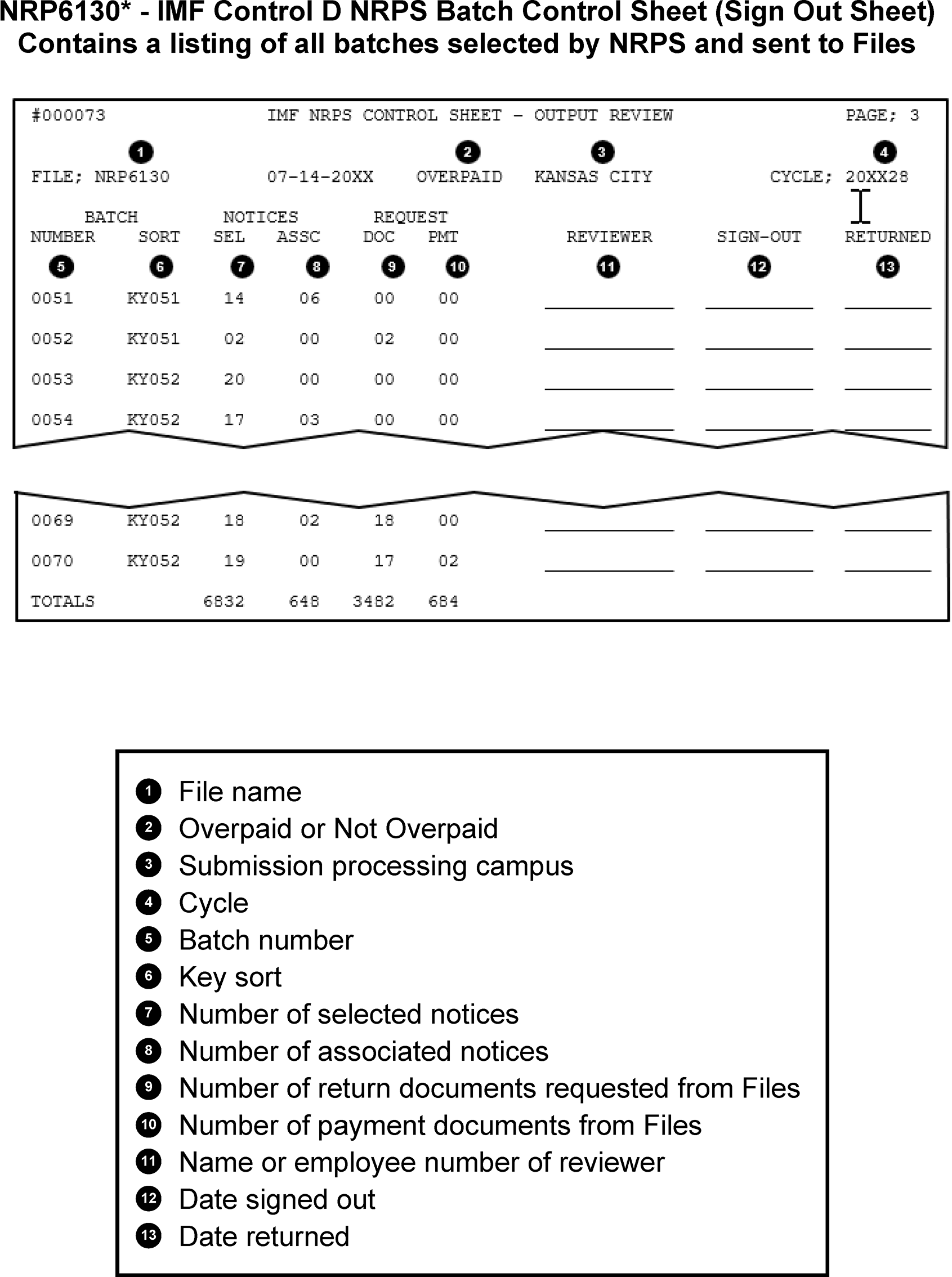
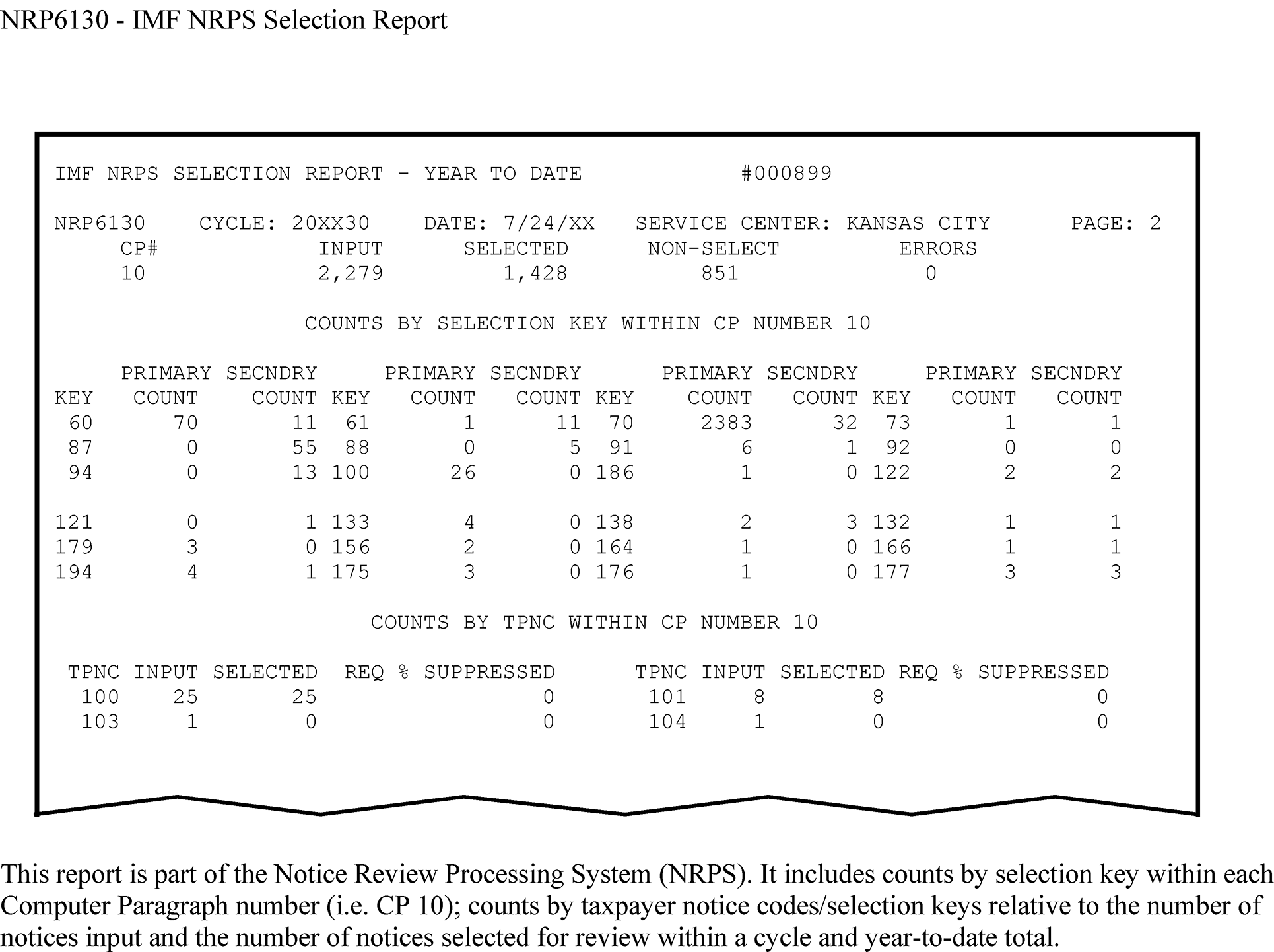
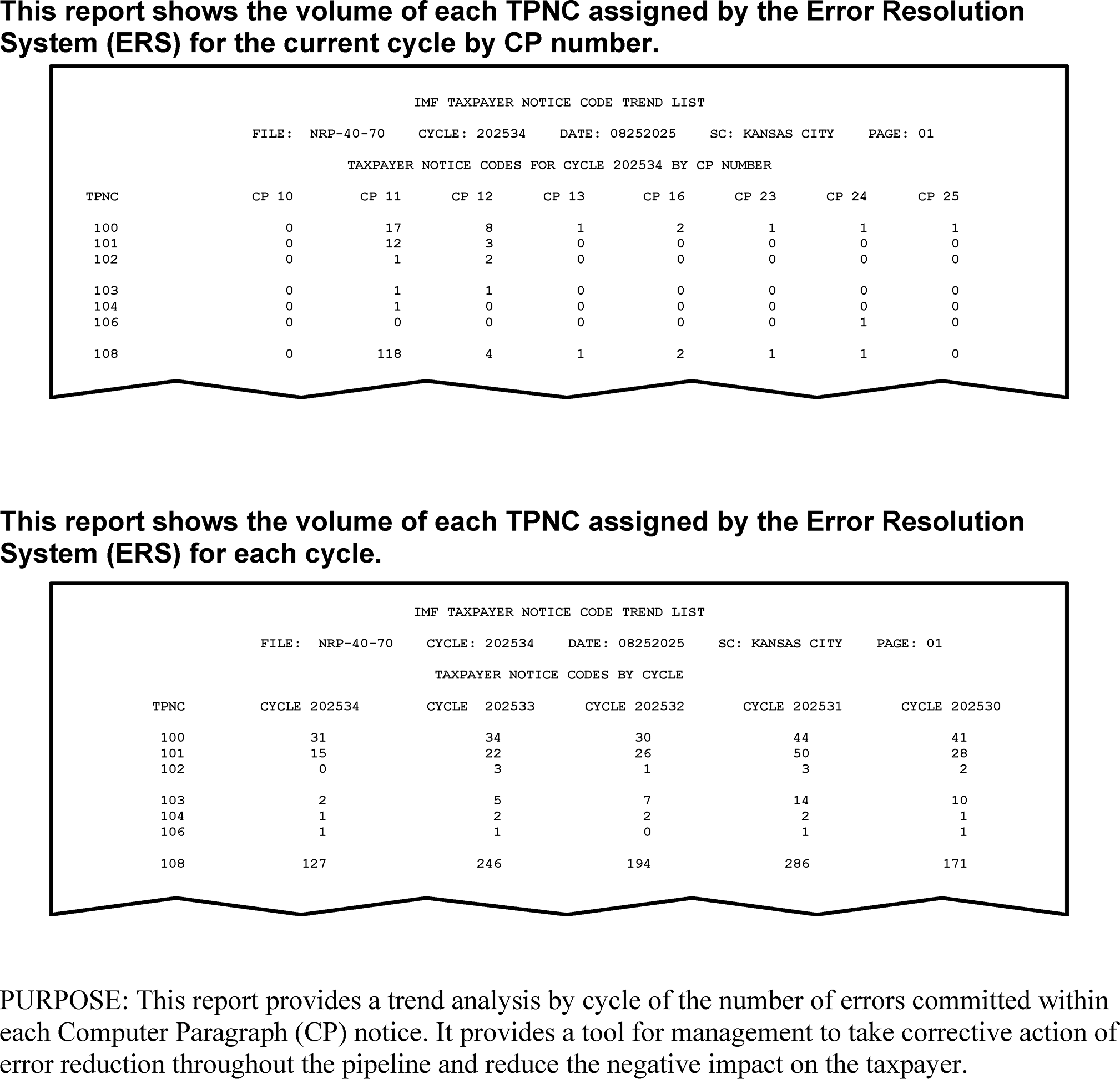
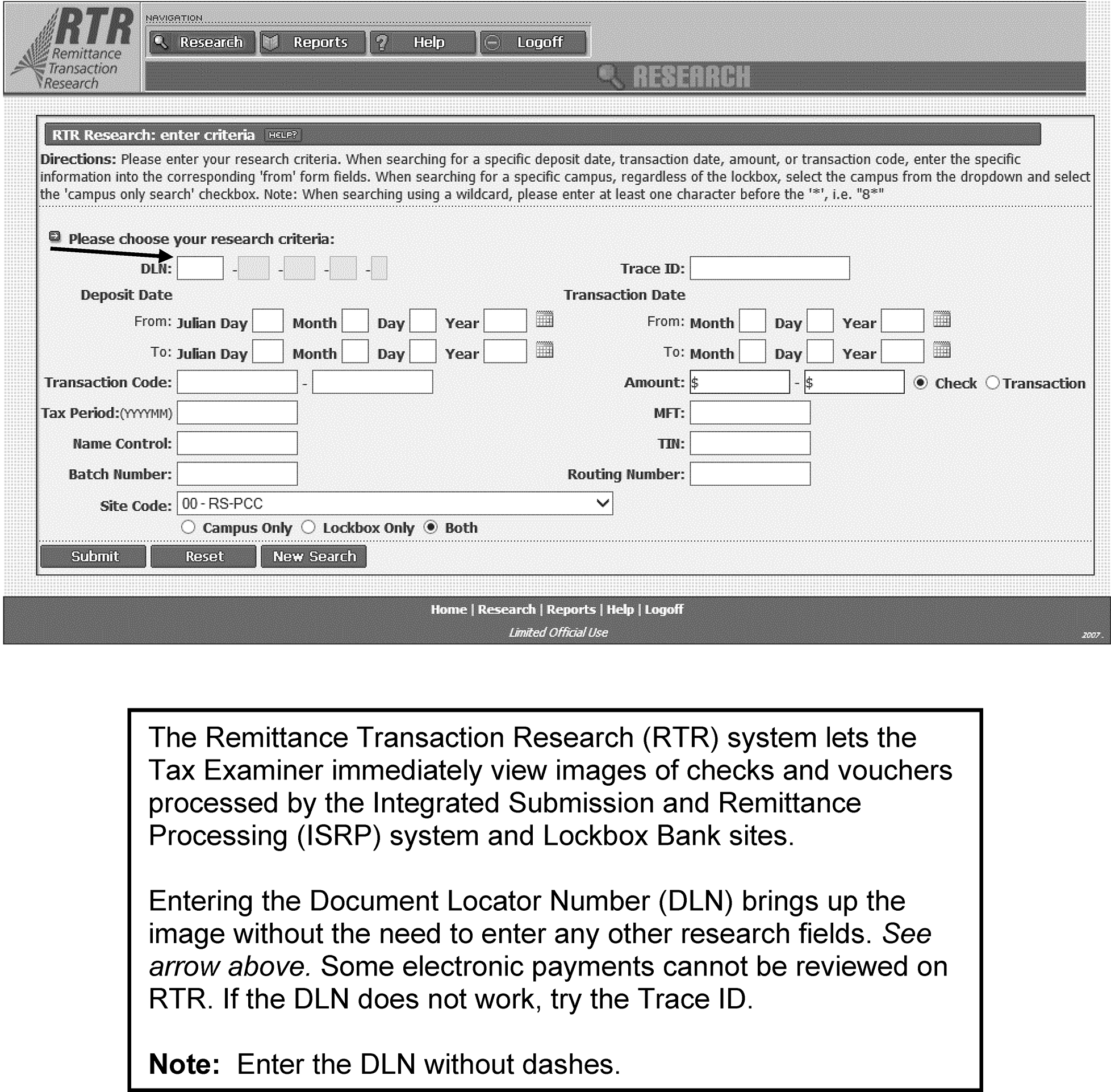
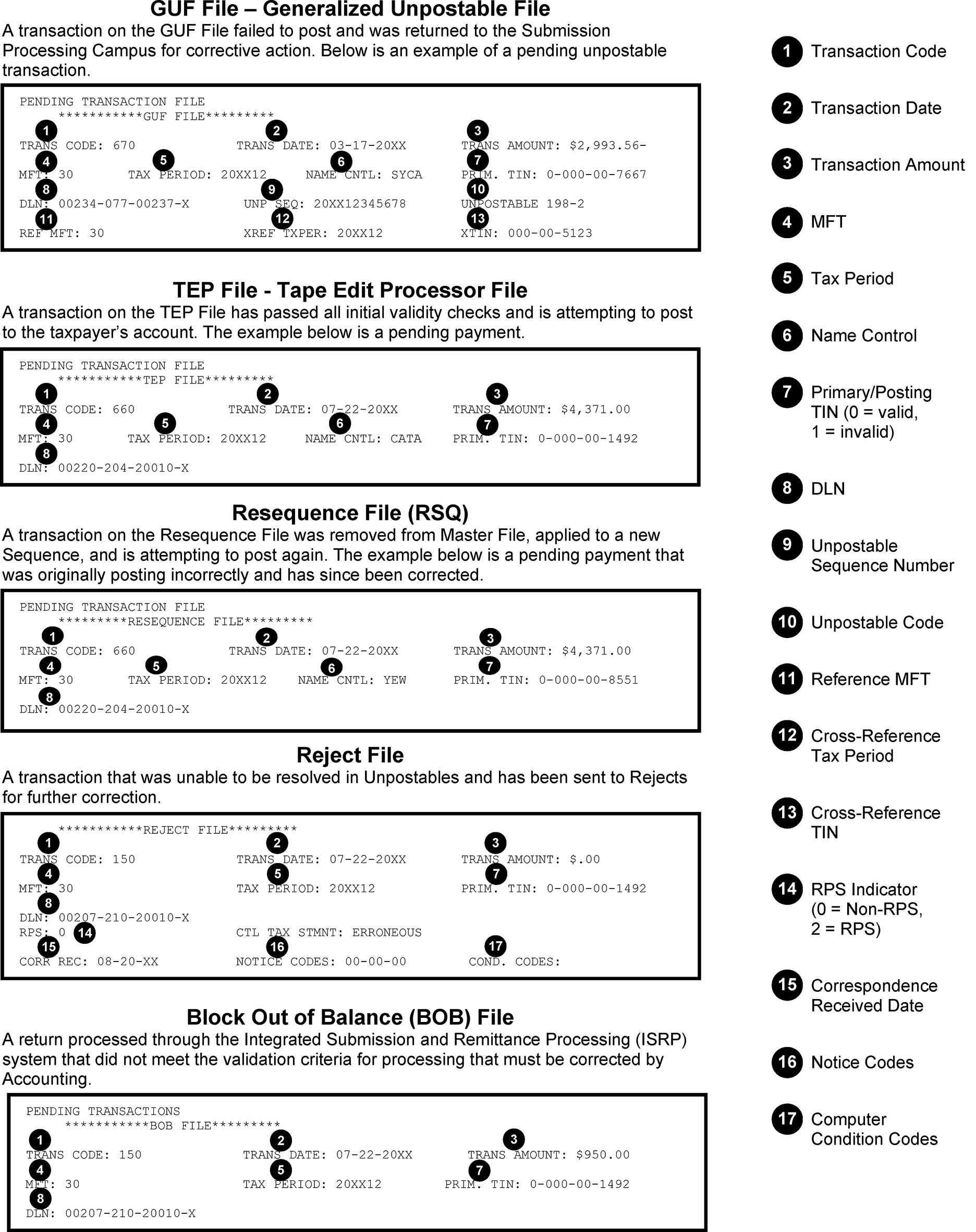
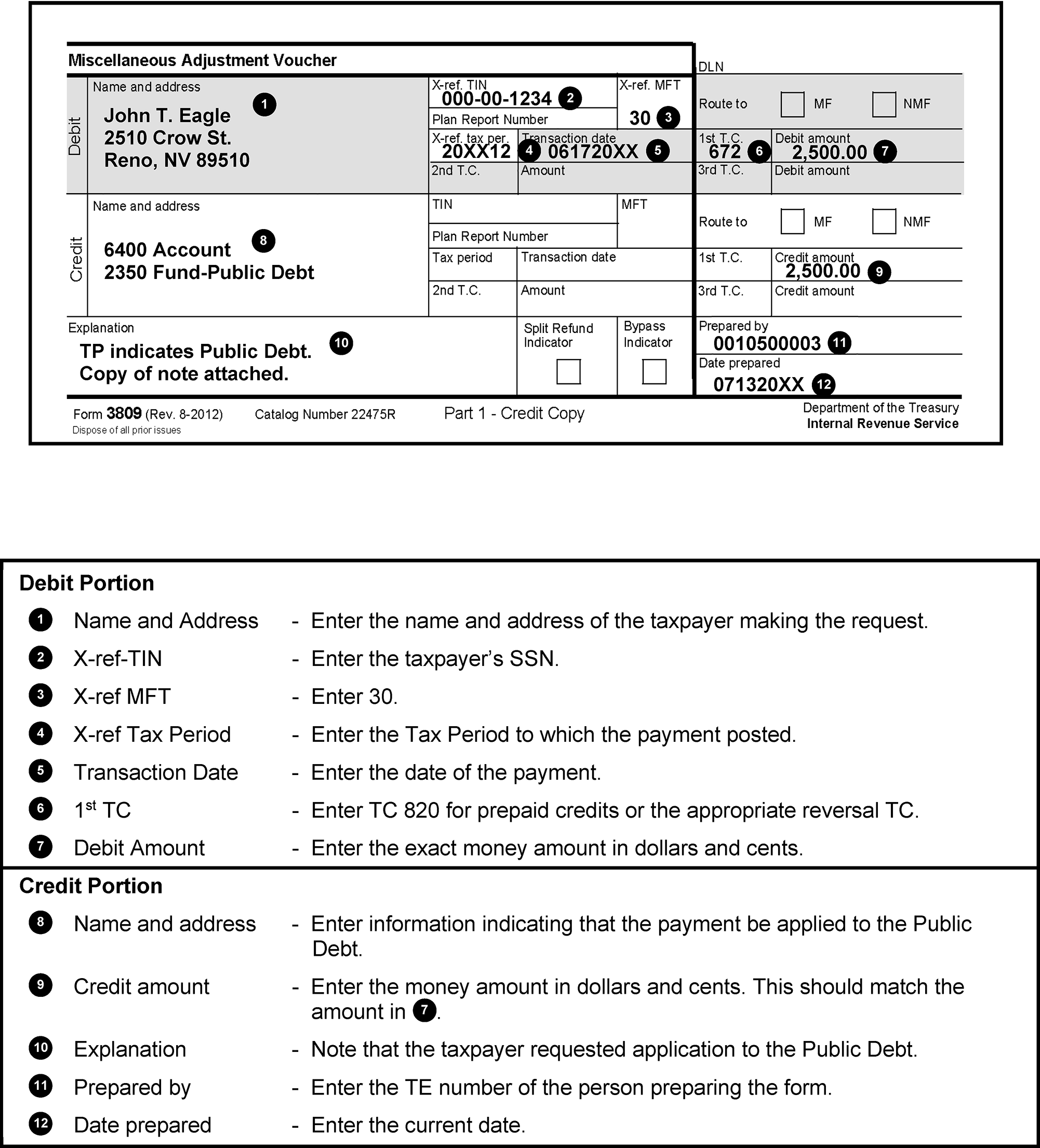
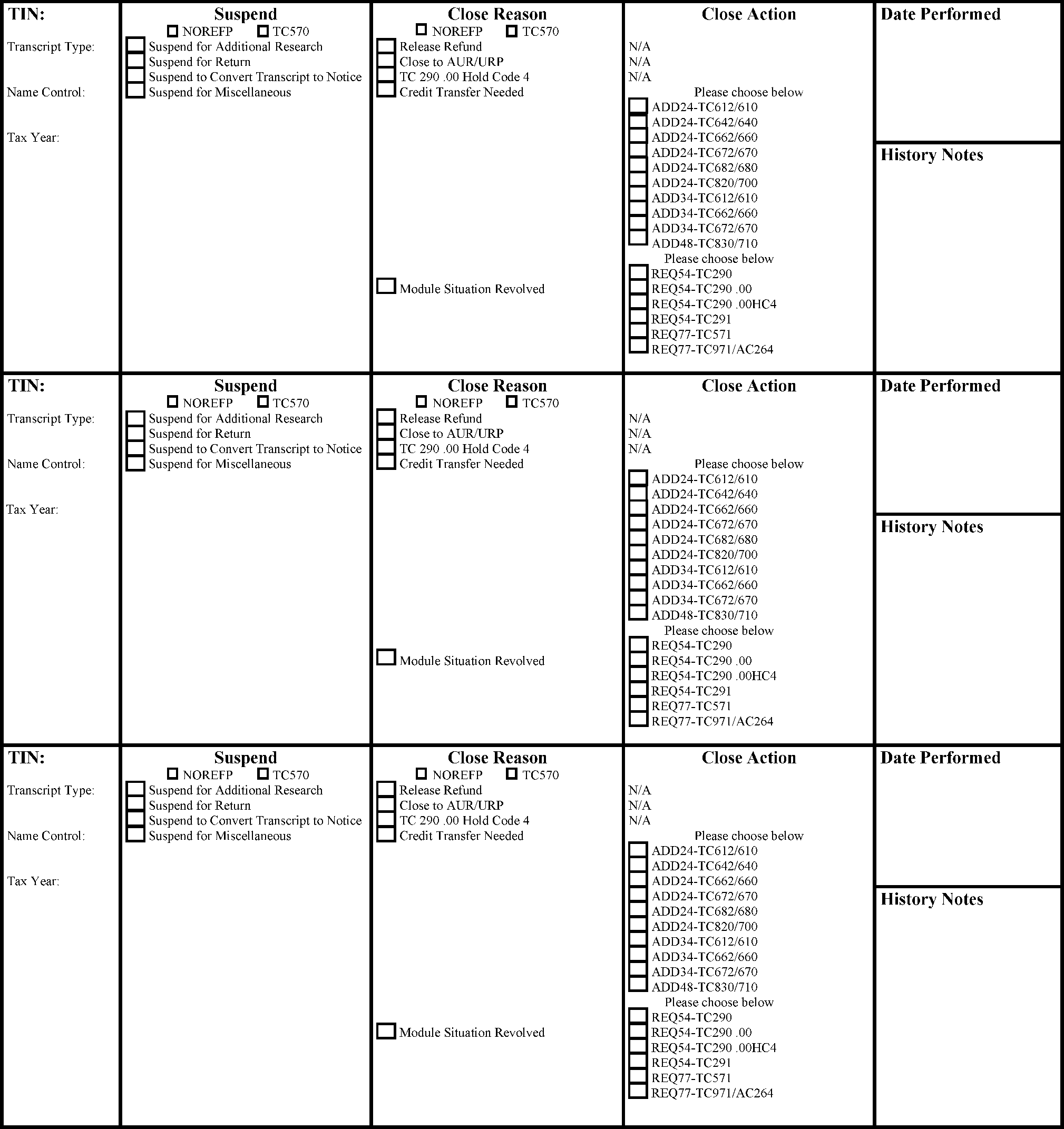
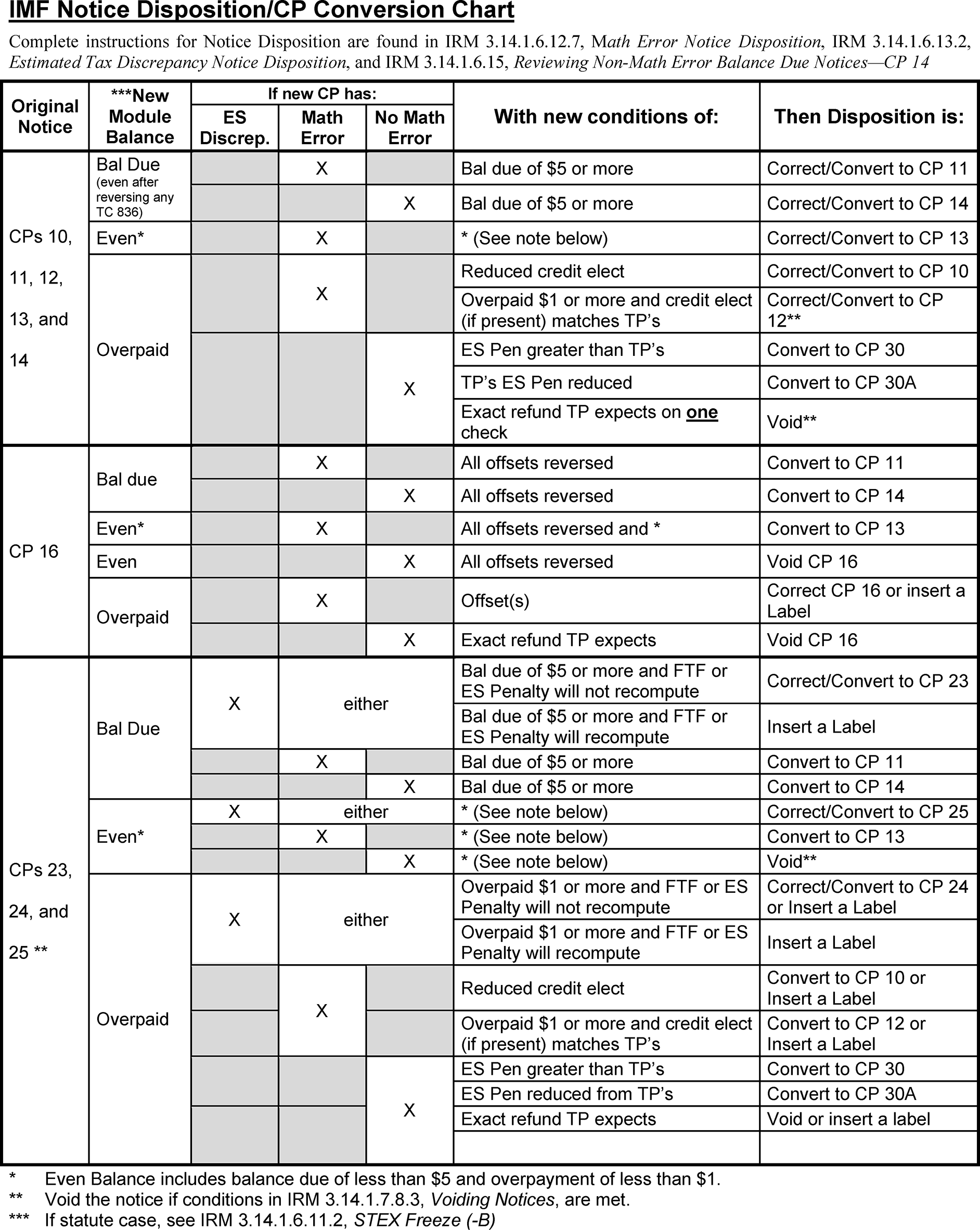
This list does not include penalty reason codes. See penalty sections for corresponding reason codes.
| Reason Code Number | Reason Code Explanation |
|---|---|
| 001 | Filing Status to Single |
| 002 | Filing Status to Married Filing Jointly |
| 003 | Filing Status to Married Filing Separately |
| 004 | Filing Status to Head of Household |
| 005 | Filing Status to Qualifying Widow(er) with Dependent Child |
| 006 | Total Exemption(s) Amount |
| 007 | Income (wages, etc.) |
| 008 | Interest and /or Dividend |
| 012 | Schedule C (income or loss) |
| 013 | Schedule D (income or loss) |
| 016 | Pensions and Annuities |
| 018 | Schedule E (income or loss) |
| 019 | Schedule F (income or loss) |
| 020 | Unemployment Compensation |
| 022 | Total Income |
| 025 | Payment Made to a Qualified Retirement Plan |
| 027 | Penalty on Early Withdrawal of Savings |
| 029 | Taxable Social Security Benefits |
| 032 | Adjusted Gross Income |
| 033 | Additional Taxes from Form 4972 or 8814 |
| 035 | Education Credit |
| 043 | Schedule D Tax Computation |
| 044 | Self-Employment Tax |
| 045 | Alternative Minimum Tax |
| 046 | Schedule J Tax Computation |
| 047 | Soc Security, Medicare and RRTA on Tips or SS |
| 048 | Form 5329, Additional Tax on Early Distributions or Certain Distributions From Education Accounts |
| 049 | Total Tax |
| 050 | Schedule H, Household Employment Taxes |
| 051 | Total Federal Income Tax Withheld |
| 053 | Earned Income Credit |
| 055 | Excess Social Security Tax or RRTA Tax Withheld |
| 057 | Regulated Investment Company Credit |
| 075 | Taxable Income |
| 076 | Schedule A |
| 087 | TOP Offset Reversal |
| 092 | Standard Deduction or ABI |
| 099 | Account Information - should only be used when reprocessing a return |
| 106 | American Opportunity Credit |
| 151 | Net Premium Tax Credit |
| 152 | Advanced Net Premium Tax Credit |
| 156 | Qualified Business Income Deduction (QBID) |
| 173 | Other Dependent Credit |
| 301 | Taxable Refunds, Credits, or Offsets of state taxes |
| 302 | Alimony Received |
| 303 | Alimony Paid |
| 304 | Educator Expenses |
| 305 | Business Expenses of Reservists |
| 306 | Health Savings Account Deduction |
| 307 | Moving Expenses for Armed Forces Member |
| 308 | Deductible Part of SE Tax |
| 309 | Self-Employed Health Insurance Deduction |
| 310 | Archer MSA Deduction |
| 311 | Recapture of Low-Income Housing Credit |
| 312 | Low-Income Housing Credit |
| 313 | Interest on the Deferred Tax on Gain |
| 314 | Interest on Tax Due on Installment Income from the sale of certain residential lots and Timeshares |
| 315 | Child and Dependent Care Expenses |
| 316 | Refundable Child and Dependent Care Expenses |
| 317 | Schedule R, Credit for the Elderly or the Disabled |
| 318 | Foreign Tax Credit |
| 319 | Qualified Electric Vehicle Credit |
| 320 | Investment Credit |
| 321 | Work Opportunity Credit |
| 322 | Biofuel Producer Credit |
| 323 | Credit for Increasing Research Activities |
| 324 | Disabled Access Credit |
| 325 | Renewable Electricity Production Credit |
| 326 | Indian Employment Credit |
| 327 | Credit for Employer Social Security and Medicare Taxes Paid on Certain Employee Tips |
| 328 | Orphan Drug Credit |
| 329 | Trans-Alaska Pipeline Liability Fund Credit |
| 330 | Empowerment Zone Employment Credit |
| 331 | General Business Credit |
| 332 | Credit for Prior Year Minimum Tax |
| 333 | Child Tax Credit |
| 334 | Additional Child Tax Credit |
| 335 | Qualified Adoption Expenses |
| 336 | Refundable Qualified Adoption Expenses |
| 337 | Mortgage Interest Credit |
| 338 | Residential Energy Credits |
| 339 | Qualified Retirement Savings Contributions |
| 340 | Small Employer Pension Plan Startup Costs, Auto-Enrollment, and Military Spouse Participation |
| 341 | Employer Provided Childcare Facilities and Services |
| 342 | New Markets Credit |
| 343 | Biodiesel, Renewable Diesel, or Sustainable Aviation Fuels Credit |
| 344 | Low Sulfur Diesel Fuel Production Credit |
| 345 | Qualified Railroad Track Maintenance Credit |
| 346 | Alternative Motor Vehicle Credit |
| 347 | Alternative Fuel Vehicle Refueling Property Credit |
| 348 | Small Employer Health Insurance Premiums |
| 349 | Refundable Federal Tax Paid on Fuels |
| 350 | Refundable Sick Leave and Family Leave |