


 )
or https:// means you've safely connected to the .gov website. Share sensitive information only on official, secure websites.
)
or https:// means you've safely connected to the .gov website. Share sensitive information only on official, secure websites.


- 3.11.6 Data Processing (DP) Tax Adjustments
- 3.11.6.1 Program Scope and Objectives
- 3.11.6.1.1 Background
- 3.11.6.1.2 Authority
- 3.11.6.1.3 Roles and Responsibilities
- 3.11.6.1.4 Program Management and Review
- 3.11.6.1.5 Program Controls
- 3.11.6.1.6 Terms and Acronyms
- 3.11.6.1.7 Related Resources
- 3.11.6.2 General Amended Return Processing
- 3.11.6.2.1 Processing Time Frames and Suspense Time Frames
- 3.11.6.2.1.1 1040-X Suspense Activity Codes
- 3.11.6.2.2 IRM Deviations
- 3.11.6.2.3 IRS Employees and Covered Relationships
- 3.11.6.2.4 IDRS Access
- 3.11.6.2.5 Document Perfection Operation (DPO) SP 1040-X Organization Function Program (OFP) Information
- 3.11.6.2.5.1 Daily Work Record (DWR)
- 3.11.6.2.6 Systems
- 3.11.6.2.6.1 IDRS Command Codes (CC)
- 3.11.6.2.6.2 IAT Tools
- 3.11.6.2.6.3 CII Roles
- 3.11.6.2.1 Processing Time Frames and Suspense Time Frames
- 3.11.6.3 Controlling Cases on the CII System
- 3.11.6.3.1 Auto-Distribution
- 3.11.6.4 Amended Return Processing Overview
- 3.11.6.5 Amended Return Preliminary Review
- 3.11.6.5.1 CII Split Image Request
- 3.11.6.5.1.1 CII Move Image Request
- 3.11.6.5.2 Associating Forms, Schedules, and Other Documents to CII Cases
- 3.11.6.5.3 Tax Period
- 3.11.6.5.4 Taxpayer Identification Number (TIN)
- 3.11.6.5.4.1 Protecting Americans from Tax Hikes (PATH Act)
- 3.11.6.5.4.2 TIN Requirements for Credits
- 3.11.6.5.5 Received Date
- 3.11.6.5.5.1 Determining Timeliness
- 3.11.6.5.5.2 Superseding Returns
- 3.11.6.5.5.3 Amended Claims Date
- 3.11.6.5.6 Signature
- 3.11.6.5.7 Processing Presidential Election Campaign Fund (PECF) Requests
- 3.11.6.5.8 Updating Case Data
- 3.11.6.5.8.1 CII Cases with an E-1 Error
- 3.11.6.5.9 Cases Requiring Translation
- 3.11.6.5.1 CII Split Image Request
- 3.11.6.6 Screening Criteria for Processable Return
- 3.11.6.6.1 TC 150 Research (No TC 150)
- 3.11.6.6.2 Form 1040 Attached to Form 1040-X
- 3.11.6.6.3 Amended Form 1040 without Form 1040-X Attached
- 3.11.6.6.4 Form 1040-X without Form 1040 Attached (No TC 150)
- 3.11.6.7 Verification Screening
- 3.11.6.7.1 25% Income Omission Screening
- 3.11.6.7.2 Automation Verification Screening
- 3.11.6.7.3 Master File Verification Screening
- 3.11.6.7.4 Math Verification Screening
- 3.11.6.7.4.1 Math Verification Screening of a Form 1040-X
- 3.11.6.7.4.2 Math Verification Screening of an Amended Form 1040
- 3.11.6.7.5 Duplicate Returns and Identical Open CII Cases
- 3.11.6.8 Sorting, Routing, and Priority Screening
- 3.11.6.8.1 Routing When a TC 150 Isn’t Present
- 3.11.6.8.2 Routing When a TC 150 Is Present
- 3.11.6.8.3 Large Business and International Screening
- 3.11.6.8.4 International Return Screening
- 3.11.6.8.5 Taxpayer Protection Program (TPP) Screening
- 3.11.6.8.6 Office of Fraud Enforcement (OFE), Suspicious Case Referral Screening
- 3.11.6.8.7 Form 4684, Casualties and Thefts, Disaster Claim Screening
- 3.11.6.8.8 Carryback and Carryforward Screening
- 3.11.6.8.8.1 Carryback Claim Screening
- 3.11.6.8.8.2 Carryforward Claim Screening
- 3.11.6.8.9 Identity Theft (IDT) Screening
- 3.11.6.8.10 Statute Review Screening
- 3.11.6.8.11 Superseding Return Discriminant Function (DIF) Score Screening
- 3.11.6.8.12 Examination Case Screening
- 3.11.6.8.13 Frivolous Claims Screening
- 3.11.6.8.14 Return Integrity and Verification Operation (RIVO) Case Screening
- 3.11.6.8.15 Category A (CAT-A) Criteria Screening
- 3.11.6.8.16 Automated Underreporter (AUR) Screening
- 3.11.6.8.17 AM Case Screening
- 3.11.6.8.18 Open Case and Open Control Base Screening
- 3.11.6.8.18.1 Cases Open to an SP 1040-X Tax Examiner
- 3.11.6.8.19 All Other Claims Screening
- 3.11.6.8.19.1 Killed in Terrorist Action (KITA) Screening
- 3.11.6.8.19.1.1 Military Family Relief Act (MFRA) of 2003 Screening
- 3.11.6.8.19.2 Affordable Care Act and Possible Health Professional Claim Screening
- 3.11.6.8.19.3 Collection Function Case Screening
- 3.11.6.8.19.3.1 Compliance Services Collection Operations (CSCO) Screening
- 3.11.6.8.19.3.2 Automated Collection Systems (ACS) Screening
- 3.11.6.8.19.3.3 Offer In Compromise (OIC) Screening
- 3.11.6.8.19.3.4 Field Collection Case Screening
- 3.11.6.8.19.3.5 Automated Substitute For Return (ASFR) and Non-Filer Return (NFR) Screening
- 3.11.6.8.19.1 Killed in Terrorist Action (KITA) Screening
- 3.11.6.8.20 Releasing Screened Returns
- 3.11.6.8.20.1 Working Trail and Action Trail
- 3.11.6.8.20.1.1 Working Trails and Action Trails When Reassigning a Case
- 3.11.6.8.20.1.2 Working Trails and Action Trails When Rerouting a Case
- 3.11.6.8.20.1.3 Working Trails and Action Trails When Sending an E-fax or Secure Message
- 3.11.6.8.20.2 TC 971 and Action Codes
- 3.11.6.8.20.1 Working Trail and Action Trail
- 3.11.6.9 1040-X Routing Guide
- 3.11.6.10 1040-X Reassignment and Reroute Guides
- 3.11.6.10.1 MEFP Reassignment and Reroute Guide
- 3.11.6.10.2 MEFS Reassignment and Reroute Guide
- 3.11.6.10.3 LSFM Reassignment and Reroute Guide
- 3.11.6.10.4 MEFP, MEFS, and LSFM AM Rejected Queue
- 3.11.6.10.5 MEFP, MEFS, and LSFM Secure Messaging and E-fax Routing
- 3.11.6.11 Correspondence Procedures
- 3.11.6.11.1 Multiple Correspondence Issues
- 3.11.6.11.2 Spanish Correspondence
- 3.11.6.11.3 Corresponding on Net Balance Due Returns (Letter 324C)
- 3.11.6.11.4 Corresponding on Net Refund and Zero-Balance Returns (Letter 178C)
- 3.11.6.11.5 Correspondence for Disallowing a Claim (Letter 105C, Letter 105SP, Letter 106C, and Letter 106SP)
- 3.11.6.11.6 Correspondence for Correcting a Claim (Letter 474C and 474SP)
- 3.11.6.11.7 Correspondence for Requesting Credit Previously Received (Letter 76C)
- 3.11.6.11.8 Correspondence for No Consideration of a Claim (Letter 916C and Letter 916SP)
- 3.11.6.11.9 Correspondence for Estimated Tax Penalty (Letter 369C)
- 3.11.6.11.10 Correspondence for Excess Social Security and Railroad Retirement Tax (Letter 404C)
- 3.11.6.11.11 Correspondence for Dependent Documentation (Letter 3050C and Letter 3050SP)
- 3.11.6.11.12 Illegible Amended Return (Letter 418C)
- 3.11.6.11.13 Undelivered Correspondence
- 3.11.6.11.13.1 Undeliverable Mail Indicator
- 3.11.6.11.14 Correspondence Received
- 3.11.6.12 Correspondence Table of Issues, C-Letters and Paragraph Fill-ins
- 3.11.6.12.1 Letter 178C Correspondence Table of Issues
- 3.11.6.12.2 Letter 324C Correspondence Table of Issues
- 3.11.6.13 Updating Taxpayer Information Using CC ENMOD
- 3.11.6.13.1 Entity Changes
- 3.11.6.13.1.1 Address Changes
- 3.11.6.13.1.2 Filing Status Changes
- 3.11.6.13.1.2.1 Filing Status 2 Changes
- 3.11.6.13.2 Schedule LEP, Request for Change in Language Preference
- 3.11.6.13.3 Form 9000, Alternative Media Preference
- 3.11.6.13.1 Entity Changes
- 3.11.6.14 Dependent Changes
- 3.11.6.14.1 Revoking a Dependent ITIN
- 3.11.6.14.2 Form 8332, Release of Claim to Exemption for Child of Divorced or Separated Parents
- 3.11.6.14.3 Updating the DUPOL Database
- 3.11.6.14.4 CC DDBCK
- 3.11.6.14.5 CC DUPED
- 3.11.6.14.5.1 Add a Record
- 3.11.6.14.5.2 Change a Record
- 3.11.6.14.5.3 Delete a Record
- 3.11.6.15 Earned Income
- 3.11.6.16 Specific IMF Adjustments
- 3.11.6.16.1 Form W-2, Wage and Tax Statement
- 3.11.6.16.1.1 Employer Provided Education Assistance (IRC 127)
- 3.11.6.16.2 Household Employee Wages Not Reported on Form(s) W-2
- 3.11.6.16.3 Tip Income Not Reported on Line 1a
- 3.11.6.16.4 Medicaid Waiver Payments Not Reported on Form(s) W-2, Box 1
- 3.11.6.16.5 Form 2441, Child and Dependent Care Expenses, Taxable Dependent Care Benefits
- 3.11.6.16.6 Form 8839, Qualified Adoption Expenses, Employer-Provided Adoption Benefits
- 3.11.6.16.7 Form 8919, Uncollected Social Security and Medicare Tax on Wages
- 3.11.6.16.8 Other Earned Income
- 3.11.6.16.9 Nontaxable Combat Pay Election
- 3.11.6.16.10 Tax-Exempt Interest
- 3.11.6.16.11 Taxable Interest
- 3.11.6.16.12 Qualified Dividends
- 3.11.6.16.13 Ordinary Dividends
- 3.11.6.16.14 IRA Distributions
- 3.11.6.16.14.1 Form 8606, Nondeductible IRAs
- 3.11.6.16.15 Pensions and Annuities
- 3.11.6.16.16 Social Security Benefits
- 3.11.6.16.17 Capital Gain or (Loss)
- 3.11.6.16.18 Schedule 1, Additional Income and Adjustments to Income, Part I
- 3.11.6.16.18.1 Taxable Refunds, Credits, or Offsets of State and Local Income Taxes
- 3.11.6.16.18.2 Alimony Received
- 3.11.6.16.18.3 Schedule C, Profit or Loss From Business (Sole Proprietorship)
- 3.11.6.16.18.4 Other Gains or (Losses) from Form 4797, Sales of Business Property, or Form 4684, Casualties and Thefts
- 3.11.6.16.18.5 Schedule E, Supplemental Income and Loss
- 3.11.6.16.18.6 Schedule F, Profit or Loss From Farming
- 3.11.6.16.18.7 Form 1099-G, Certain Government Payments, Unemployment Compensation
- 3.11.6.16.18.8 Net Operating Loss (NOL) Deduction
- 3.11.6.16.18.9 Gambling Winnings
- 3.11.6.16.18.10 Cancellation of Debt
- 3.11.6.16.18.11 Form 2555, Foreign Earned Income
- 3.11.6.16.18.12 Form 8853, Archer MSAs and Long-Term Care Insurance Contracts, Income
- 3.11.6.16.18.13 Form 8889, Health Savings Account, Income
- 3.11.6.16.18.14 Alaska Permanent Fund Dividends
- 3.11.6.16.18.15 Jury Duty Pay
- 3.11.6.16.18.16 Prizes and Awards
- 3.11.6.16.18.17 Activity Not Engaged In for Profit Income
- 3.11.6.16.18.18 Stock Options
- 3.11.6.16.18.19 Income from the Rental of Personal Property if Engaged in the Rental for Profit but Weren’t in the Business of Renting such Property
- 3.11.6.16.18.20 Olympic and Paralympic Medals and USOC Prize Money
- 3.11.6.16.18.21 Section 951(a) Inclusion
- 3.11.6.16.18.22 Section 951A(a) Inclusion
- 3.11.6.16.18.23 461(l) Excess Business Loss Adjustment
- 3.11.6.16.18.24 Taxable Distributions from an ABLE Account
- 3.11.6.16.18.25 Scholarship and Fellowship Grants not Reported on Form W-2.
- 3.11.6.16.18.26 Nontaxable Amount of Medicaid Waiver Payments Included on Form 1040, Line 1a or 1d
- 3.11.6.16.18.27 Pension or Annuity from a Nonqualified Deferred Compensation Plan or a Nongovernmental Section 457 Plan
- 3.11.6.16.18.28 Wages Earned While Incarcerated
- 3.11.6.16.18.29 Digital Assets not Reported Elsewhere
- 3.11.6.16.18.30 Other Income
- 3.11.6.16.19 Total Income
- 3.11.6.16.20 Schedule 1, Additional Income and Adjustments to Income, Part II
- 3.11.6.16.20.1 Educator Expenses
- 3.11.6.16.20.2 Form 2106, Employee Business Expenses
- 3.11.6.16.20.3 Form 8889, Health Savings Accounts (HSAs), Deduction
- 3.11.6.16.20.4 Form 3903, Moving Expenses
- 3.11.6.16.20.5 Schedule SE, Self-Employment Tax, Deduction
- 3.11.6.16.20.6 Self-Employed SEP, SIMPLE, and Qualified Plans
- 3.11.6.16.20.7 Self-Employed Health Insurance Deduction
- 3.11.6.16.20.8 Penalty on Early Withdrawal of Savings
- 3.11.6.16.20.9 Alimony Paid
- 3.11.6.16.20.10 IRA Deduction
- 3.11.6.16.20.11 Student Loan Interest Deduction
- 3.11.6.16.20.12 Form 8853, Archer MSAs and Long-Term Care Insurance Contracts, Archer MSA Deduction
- 3.11.6.16.20.13 Jury Duty Pay (Deduction)
- 3.11.6.16.20.14 Income from the Rental of Personal Property if Engaged in the Rental for Profit but Weren’t in the Business of Renting such Property (Deduction)
- 3.11.6.16.20.15 Olympic and Paralympic Medals and USOC Prize Money (Deduction)
- 3.11.6.16.20.16 Reforestation Amortization and Expenses
- 3.11.6.16.20.17 Repayment of Supplemental Unemployment Benefits Under the Trade Act of 1974
- 3.11.6.16.20.18 Contributions to Section 501(c)(18)(D) Pension Plans
- 3.11.6.16.20.19 Contributions by Certain Chaplains to Section 403(b) Plans
- 3.11.6.16.20.20 Attorney Fees and Court Costs for Actions Involving Certain Unlawful Discrimination Claims
- 3.11.6.16.20.21 Attorney Fees and Court Costs Paid in Connection with an Award from the IRS
- 3.11.6.16.20.22 Form 2555, Foreign Earned Income, Housing Deduction
- 3.11.6.16.20.23 Excess Deductions of Section 67(e) Expenses from Schedule K-1 (Form 1041)
- 3.11.6.16.20.24 Other Adjustments
- 3.11.6.16.21 Adjusted Gross Income (AGI)
- 3.11.6.16.21.1 H.R. 5863 Claims
- 3.11.6.16.21.1.1 East Palestine Train Derailment (EPTDR) Claims
- 3.11.6.16.21.1.2 Wildfire Claims
- 3.11.6.16.21.1 H.R. 5863 Claims
- 3.11.6.16.22 Standard Deduction or Itemized Deductions
- 3.11.6.16.22.1 Standard Deduction
- 3.11.6.16.22.2 Schedule A, Itemized Deductions
- 3.11.6.16.23 Deduction for Charitable Contributions for Individuals That Don’t Itemize
- 3.11.6.16.24 Schedule 1-A, Additional Deductions
- 3.11.6.16.24.1 Schedule 1-A, Additional Deductions, No Tax on Tips (NToT)
- 3.11.6.16.24.2 Schedule 1-A, Additional Deductions, No Tax on Overtime (NToO)
- 3.11.6.16.24.3 Schedule 1-A, Additional Deductions, No Tax on Car Loan Interest
- 3.11.6.16.24.4 Schedule 1-A, Additional Deductions, Enhanced Deduction for Seniors (EDS)
- 3.11.6.16.25 Form 8995, Qualified Business Income Deduction Simplified Computation, and Form 8995-A, Qualified Business Income Deduction
- 3.11.6.16.26 Taxable Income
- 3.11.6.16.27 Tax
- 3.11.6.16.28 Schedule 2, Additional Taxes, Part I
- 3.11.6.16.28.1 Form 8962, Premium Tax Credit, Excess Advance Premium Tax Credit Repayment
- 3.11.6.16.28.2 Schedule A (Form 8936), Clean Vehicle Credit Amount, Part II
- 3.11.6.16.28.3 Schedule A (Form 8936), Clean Vehicle Credit Amount, Part IV
- 3.11.6.16.28.4 Form 4255, Certain Credit Recapture, Excessive Payments, and Penalties, Recapture of Net EPE
- 3.11.6.16.28.5 Form 4255, Certain Credit Recapture, Excessive Payments, and Penalties, Excessive Payments on Gross EPE
- 3.11.6.16.28.6 Form 4255, Certain Credit Recapture, Excessive Payments, and Penalties, Excessive Payments
- 3.11.6.16.28.7 Other Additions to Tax
- 3.11.6.16.28.8 Form 6251, Alternative Minimum Tax - Individuals
- 3.11.6.16.29 Tax Before Credits
- 3.11.6.16.30 Schedule 8812, Credits for Qualifying Children and Other Dependents
- 3.11.6.16.30.1 Child Tax Credit (CTC)
- 3.11.6.16.30.2 Credit for Other Dependents (ODC)
- 3.11.6.16.31 Schedule 3, Additional Credits, Part I
- 3.11.6.16.31.1 Form 1116, Foreign Tax Credit
- 3.11.6.16.31.2 Form 2441, Child and Dependent Care Expenses, Credit
- 3.11.6.16.31.3 Form 8863, Education Credits (American Opportunity and Lifetime Learning Credits)
- 3.11.6.16.31.3.1 Lifetime Learning Credit (LLC)
- 3.11.6.16.31.3.2 American Opportunity Tax Credit (Nonrefundable)
- 3.11.6.16.31.4 Form 8880, Credit for Qualified Retirement Savings Contributions
- 3.11.6.16.31.5 Form 5695, Residential Energy Credit
- 3.11.6.16.31.6 Form 3800, General Business Credit
- 3.11.6.16.31.6.1 Form 3468, Investment Credit
- 3.11.6.16.31.6.2 Form 5884, Work Opportunity Credit
- 3.11.6.16.31.6.3 Form 6478, Biofuel Producer Credit
- 3.11.6.16.31.6.4 Form 6765, Credit for Increasing Research Activities
- 3.11.6.16.31.6.5 Form 8586, Low-Income Housing Credit
- 3.11.6.16.31.6.6 Form 8820, Orphan Drug Credit
- 3.11.6.16.31.6.7 Form 8826, Disabled Access Credit
- 3.11.6.16.31.6.8 Form 8834, Qualified Electric Vehicle Credit
- 3.11.6.16.31.6.9 Form 8835, Renewable Electricity Production Credit
- 3.11.6.16.31.6.10 Form 8864, Biodiesel, Renewable Diesel, or Sustainable Aviation Fuels Credit
- 3.11.6.16.31.6.11 Form 8874, New Markets Credit
- 3.11.6.16.31.6.12 Form 8881, Credits for Small Employer Pension Plan Startup Costs, Contributions, Auto-Enrollment, and Military Spouse Participation
- 3.11.6.16.31.6.13 Form 8882, Credit for Employer Provided Childcare Facilities and Services
- 3.11.6.16.31.6.14 Form 8896, Low Sulfur Diesel Fuel Production Credit
- 3.11.6.16.31.6.15 Form 8900, Qualified Railroad Track Maintenance Credit
- 3.11.6.16.31.6.16 Form 8910, Alternative Motor Vehicle Credit
- 3.11.6.16.31.6.17 Form 8911, Alternative Fuel Vehicle Refueling Property Credit
- 3.11.6.16.31.6.18 Clean Vehicle Credits Reported on Form 3800
- 3.11.6.16.31.6.19 Elective Payment Election (EPE)
- 3.11.6.16.31.7 Form 8801, Credit for Prior Year Minimum Tax - Individuals, Estates, and Trusts
- 3.11.6.16.31.8 Form 8839, Qualified Adoption Expenses, Nonrefundable Credit
- 3.11.6.16.31.9 Schedule R, Credit for the Elderly or the Disabled
- 3.11.6.16.31.10 Form 8936, Clean Vehicle Credits, Part III
- 3.11.6.16.31.11 Form 8396, Mortgage Interest Credit
- 3.11.6.16.31.12 Form 8859, District of Columbia First-Time Home Buyer Credit
- 3.11.6.16.31.13 Form 8834, Qualified Electric Vehicle Credit
- 3.11.6.16.31.14 Form 8911, Alternative Fuel Vehicle Refueling Property Credit, Part II
- 3.11.6.16.31.15 Form 8912, Credit to Holders of Tax Credit Bonds
- 3.11.6.16.31.16 Form 8978, Partner's Additional Reporting Year Tax
- 3.11.6.16.31.17 Form 8936, Clean Vehicle Credits, Part IV
- 3.11.6.16.31.18 Other Nonrefundable Credits
- 3.11.6.16.32 Nonrefundable Credits
- 3.11.6.16.33 Tax After Nonrefundable Credits
- 3.11.6.16.34 Schedule 2, Additional Taxes, Part II
- 3.11.6.16.34.1 Schedule SE, Self-Employment Tax
- 3.11.6.16.34.2 Form 5329, Additional Taxes on Qualified Plans (Including IRAs) and Other Tax-Favored Accounts
- 3.11.6.16.34.2.1 Form 5329, Part I, Additional Tax on Early Distributions
- 3.11.6.16.34.2.2 Form 5329, Part II, Additional Tax on Certain Distributions From Education Accounts and ABLE Accounts
- 3.11.6.16.34.2.3 Form 5329, Parts III through IX
- 3.11.6.16.34.3 Form 8960, Net Investment Income Tax
- 3.11.6.16.34.4 Interest on Tax Due on Installment Income From the Sale of Certain Residential Lots and Timeshares
- 3.11.6.16.34.5 Interest on the Deferred Tax on Gain From Certain Installment Sales With a Sales Price Over $150,000
- 3.11.6.16.34.6 Form 8611, Recapture of Low-Income Housing Credit
- 3.11.6.16.34.7 Form 4255, Certain Credit Recapture, Excessive Payments, and Penalties
- 3.11.6.16.34.8 Form 8959, Additional Medicare Tax, on Self-Employment Income
- 3.11.6.16.34.9 Section 965 net tax liability installment from Form 965-A
- 3.11.6.16.34.10 Recapture of Credits
- 3.11.6.16.34.11 Recapture of Federal Mortgage Subsidy
- 3.11.6.16.34.12 Form 8889, Health Savings Account, Additional Tax on Distributions
- 3.11.6.16.34.13 Form 8889, Health Savings Account, Additional Tax on Distributions for Failure to Remain an Eligible Individual
- 3.11.6.16.34.14 Form 8853, Archer MSAs and Long-Term Care Insurance Contracts, Additional Tax on Archer MSA Distributions
- 3.11.6.16.34.15 Form 8853, Archer MSAs and Long-Term Care Insurance Contracts, Additional Tax on Medicare Advantage MSA Distributions
- 3.11.6.16.34.16 Additional Tax on Recapture of a Charitable Contribution Deduction Relating to a Fractional Interest in Tangible Personal Property
- 3.11.6.16.34.17 Additional Tax on Income Received from a Nonqualified Deferred Compensation Plan that Fails to Meet the Requirements of Section 409A
- 3.11.6.16.34.18 Additional Tax on Compensation Received from a Nonqualified Deferred Compensation Plan Described in Section 457A
- 3.11.6.16.34.19 Section 72(m)(5) Excess Benefits Tax
- 3.11.6.16.34.20 Additional Tax on Golden Parachute Payments
- 3.11.6.16.34.21 Form 4970, Tax on Accumulation Distribution of Trusts
- 3.11.6.16.34.22 Excise Tax on Insider Stock Compensation from an Expatriated Corporation
- 3.11.6.16.34.23 Additional Tax on Look-Back Interest Under Section 167(g) or 460(b)
- 3.11.6.16.34.24 Additional Tax on Non-Effectively Connected Income
- 3.11.6.16.34.25 Any Other Taxes
- 3.11.6.16.34.26 Form 4137, Social Security and Medicare Tax on Unreported Tip Income
- 3.11.6.16.34.27 Form 8919, Uncollected Social Security and Medicare Tax on Wages
- 3.11.6.16.34.28 Total Additional Social Security and Medicare Tax
- 3.11.6.16.34.29 Schedule H, Household Employment Taxes
- 3.11.6.16.34.30 Form 8959, Additional Medicare Tax, on Railroad Retirement Tax Act (RRTA) Compensation
- 3.11.6.16.34.31 Uncollected Social Security and Medicare or RRTA Tax on Tips or Group-Term Life insurance
- 3.11.6.16.34.32 Form 5329, Additional Taxes on Qualified Plans (Including IRAs) and Other Tax-Favored Accounts, Excess Contributions or Accumulations
- 3.11.6.16.34.32.1 Form 5329, Parts III through IX
- 3.11.6.16.34.33 Form 8621, Information Return by a Shareholder of a Passive Foreign Investment Company or Qualified Electing Fund, Part V
- 3.11.6.16.34.34 Form 8621, Information Return by a Shareholder of a Passive Foreign Investment Company or Qualified Electing Fund, Part VI
- 3.11.6.16.35 Total Tax
- 3.11.6.16.36 Form 1062, Deferral of Payment of Tax on Gain From the Sale or Exchange of Qualified Farmland Property to Qualified Farmers
- 3.11.6.16.37 Federal Income Tax Withheld
- 3.11.6.16.38 Estimated Tax Payments
- 3.11.6.16.39 Schedule EIC, Earned Income Credit Qualifying Child Information
- 3.11.6.16.39.1 EIC Eligibility Criteria
- 3.11.6.16.39.2 Taxpayer without Qualifying Child(ren) on Schedule EIC
- 3.11.6.16.39.3 Taxpayer with Qualifying Child(ren) on Schedule EIC
- 3.11.6.16.39.4 Adjusting EIC
- 3.11.6.16.40 Schedule 8812, Credits for Qualifying Children and Other Dependents, Additional Child Tax Credit
- 3.11.6.16.41 Form 8863, Education Credits (American Opportunity and Lifetime Learning Credits), American Opportunity Tax Credit (Refundable)
- 3.11.6.16.42 Form 8839, Qualified Adoption Expenses, Adoption Credit (Refundable)
- 3.11.6.16.43 Schedule 3, Additional Credits and Payments, Part II
- 3.11.6.16.43.1 Form 8962, Premium Tax Credit (PTC)
- 3.11.6.16.43.2 Amount Paid With Request for Extension To File
- 3.11.6.16.43.3 Excess Social Security and Tier 1 RRTA Tax Withheld
- 3.11.6.16.43.4 Form 4136, Credit for Federal Tax Paid on Fuels
- 3.11.6.16.43.5 Form 2439, Notice to Shareholder of Undistributed Long-Term Capital Gains
- 3.11.6.16.43.6 Section 1341 Credit for Repayment of Amounts Included in Income From Earlier Years
- 3.11.6.16.43.7 Net Elective Payment Election Amount From Form 3800, Part III
- 3.11.6.16.43.8 Deferred Amount of Net 965 Tax Liability
- 3.11.6.16.43.9 Other refundable credits
- 3.11.6.16.44 Total Other Payments and Refundable Credits
- 3.11.6.16.45 Schedule 3-A, Federal Public Benefit
- 3.11.6.16.46 Total Payments
- 3.11.6.16.47 Amount Overpaid
- 3.11.6.16.47.1 Direct Deposit
- 3.11.6.16.47.2 Credit Elect
- 3.11.6.16.47.2.1 Credit Elect Availability Dates
- 3.11.6.16.1 Form W-2, Wage and Tax Statement
- 3.11.6.17 Inputting an Adjustment When More Than Eight Reference Numbers are Required
- 3.11.6.18 IMF Processing Codes
- 3.11.6.18.1 IDRS Freeze Codes
- 3.11.6.18.2 IDRS Transaction Codes
- 3.11.6.18.3 Transaction Codes (TC), Item Reference Numbers (IRN), and Credit Reference Numbers (CRN)
- 3.11.6.18.4 Source Codes (SC)
- 3.11.6.18.5 Reason Codes (RC)
- 3.11.6.18.6 Blocking Series (BS)
- 3.11.6.18.7 Hold Codes (HC)
- 3.11.6.18.8 Posting Delay Codes (PDC)
- 3.11.6.18.9 Priority Codes (PC)
- 3.11.6.18.10 Category Codes
- 3.11.6.18.11 CII Indicator (CIS IND), Source Document Attached Indicator (SD), and Remarks
- 3.11.6.18.12 Business Operating Division Code (BOD CD)
- 3.11.6.19 Cases Requiring Special Handling
- 3.11.6.19.1 Processing Statute Cases
- 3.11.6.19.2 Form 4684, Casualties and Thefts, Processing a Disaster Claim
- 3.11.6.19.3 Cases Returned From CAT-A Suspense
- 3.11.6.19.4 Combat Zone
- 3.11.6.19.5 Inputting a Corrected Adjustment
- 3.11.6.19.6 Math Error Response Cases
- 3.11.6.19.6.1 The Amended Return Agrees with, or Doesn’t Address, the Math Error(s)
- 3.11.6.19.6.2 Processing a Timely Substantiated Protest to a Math Error Set on the Original Return
- 3.11.6.19.6.3 Processing a Late Substantiated Protest to a Math Error Set on the Original Return
- 3.11.6.19.6.4 Processing a Timely Substantiated Protest to a Math Error Set on an Amended Return
- 3.11.6.19.6.5 Processing a Late Substantiated Protest to a Math Error Set on an Amended Return
- 3.11.6.19.7 Inputting a Disallowance Adjustment
- 3.11.6.19.8 Form 2210, Underpayment of Estimated Tax by Individuals, Estates and Trusts
- 3.11.6.19.9 Form 4442 and E-4442, Inquiry Referrals
- 3.11.6.19.10 Decedent Returns
- 3.11.6.19.11 Form 8857, Request for Innocent Spouse Relief
- 3.11.6.19.12 Form 8379, Injured Spouse Allocation
- 3.11.6.19.13 Form 8938, Statement of Specified Foreign Financial Assets
- 3.11.6.19.14 Returns With an ITIN
- 3.11.6.19.14.1 Returns Received from the ITIN Unit (Form W-7)
- 3.11.6.19.14.2 ITIN Status
- 3.11.6.19.15 CP Notices
- 3.11.6.19.15.1 CP 08, You May Qualify for Child Tax Credit (CTC), and Form 15110, Additional Child Tax Credit Worksheet
- 3.11.6.19.15.2 CP 09, Earned Income Credit - You May Be Entitled to EIC, and Form 15111, Earned Income Credit Worksheet (CP 09)
- 3.11.6.19.15.3 CP 27, EIC Potential for Taxpayer Without Qualifying Children, and Form 15112, Earned Income Credit Worksheet (CP 27)
- 3.11.6.19.16 Processing Loose Form 8606, Nondeductible IRAs
- 3.11.6.19.17 Prisoner Returns
- 3.11.6.19.18 Exam Soft Notices - CP 87, CP 87A, CP 87B, CP 87C, and CP 87D
- 3.11.6.19.19 Taxpayer Advocate Service (TAS) Cases
- 3.11.6.19.20 Claims Returned from Other Areas
- 3.11.6.19.21 Loose Correspondence and Documents
- 3.11.6.19.22 Classified Waste
- 3.11.6.19.23 TC 971 with AC 123
- 3.11.6.19.24 TC 971 with AC 199
- 3.11.6.19.25 Credits Not Allowed by Law
- 3.11.6.19.26 Form 4547, Trump Account Election(s)
- 3.11.6.20 Unpostable Conditions
- 3.11.6.20.1 CII Case Unpostable Condition Resolution
- 3.11.6.21 Lead Tax Examiners Only
- 3.11.6.1 Program Scope and Objectives
Part 3. Submission Processing
Chapter 11. Returns and Documents Analysis
Section 6. Data Processing (DP) Tax Adjustments
3.11.6 Data Processing (DP) Tax Adjustments
Manual Transmittal
October 20, 2026
Purpose
(1) This transmits revised IRM 3.11.6, Returns and Documents Analysis, Data Processing (DP) Tax Adjustments.
Material Changes
(1) IRM 3.11.6.1.6, Terms and Acronyms:
- Paragraph (2) - Added Schedule 1-A acronyms.
(2) IRM 3.11.6.1.7, Related Resources:
- Paragraph (2) - Updated the disaster verification link and the FRP contact link. IPU 26U0686 issued 07-06-2026.
(3) IRM 3.11.6.2.1, Processing Time Frames and Suspense Time Frames:
- Paragraph (2) - Deleted outdated instructions no longer needed.
- Paragraph (3) - Deleted outdated instructions no longer needed.
- Paragraph (4) - Added TY 2026 processing instructions.
(4) IRM 3.11.6.2.6.1, IDRS Command Codes (CC):
- Paragraph (1) - Deleted outdated instructions no longer needed.
(5) IRM 3.11.6.2.6.1.1, CC IRPTR:
- Paragraph (3) - The instruction is a duplicate and has been deleted.
(6) IRM 3.11.6.5, Amended Return Preliminary Review:
- Paragraph (2) - Added TY 2026 processing instructions.
(7) IRM 3.11.6.5.2, Associating Forms, Schedules, and Other Documents to CII Cases:
- Paragraph (2) - The link to the CII Association Header Sheet has been updated here and throughout the IRM. SERP Feedback 36237. IPU 26U0065 issued 01-12-2026.
(8) IRM 3.11.6.5.4.2, TIN Requirements for Credits:
- Paragraph (6) - Added TY 2026 processing instructions.
- Paragraph (6) - Updated the table to ensure consistent processing. IPU 26U0765 issued 08-12-2026.
(9) IRM 3.11.6.5.5.1, Determining Timeliness:
- Paragraph (1) - The instruction has been revised to clarify how to determine timeliness.
(10) IRM 3.11.6.5.5.2, Superseding Returns:
- Paragraph (3) - The instruction has been revised to align with the terminology used in the disaster subsections of this IRM.
- Paragraph (5) - The instruction has been revised to clarify the routing condition.
(11) IRM 3.11.6.5.7, Processing Presidential Election Campaign Fund (PECF) Requests:
- Paragraph (2) - Tax year (TY) 2026 information has been added and TY 2022 information has been deleted.
(12) IRM 3.11.6.6.4, Form 1040-X without Form 1040 Attached (No TC 150):
- Paragraph (1) - Added an exception to ensure to clarify routing procedures. IPU 25U3719 issued 12-12-2025.
(13) IRM 3.11.6.7.1, 25% Income Omission Screening:
- Paragraph (1) - The instructions have been revised to simplify the screening instructions. IPU 26U0392 issued 04-02-2026.
- Paragraph (1) - Added an exception to ensure to clarify routing procedures. IPU 25U3719 issued 12-12-2025.
- Paragraph (2) - The instruction has been deleted because it was no longer needed with the revision to paragraph (1). IPU 26U0392 issued 04-02-2026.
(14) IRM 3.11.6.7.2, Automation Verification Screening:
- Paragraph (2) - Instructions have been updated to help identify automated adjustments. IPU 26U0772 issued 08-19-2026.
(15) IRM 3.11.6.7.3.2, Master File Verification Screening of an Amended Form 1040:
- Paragraph (1) - Added Schedule 1-A to the verification list. IPU 26U0392 issued 04-02-2026.
(16) IRM 3.11.6.8.4, International Return Screening
- Paragraph (3) - The bullet list was refined to added additional notations on the last time certain forms could be filed and to remove outdated items..
(17) IRM 3.11.6.8.7, Disaster Claim Screening:
- Paragraph (4) - Updated the disaster declaration information to make the instruction current.
- Paragraph (5) - Updated the disaster verification link. IPU 26U0686 issued 07-06-2026.
- Paragraph (10) - Updated the disaster verification link. IPU 26U0686 issued 07-06-2026.
(18) IRM 3.11.6.8.8.2, Carryforward Claim Screening:
- Paragraph (3) - A grammatical error has been deleted. SERP Feedback # 39103. IPU 26U0686 issued 07-06-2026.
(19) IRM 3.11.6.8.9, Identity Theft (IDT) Screening:
- Paragraph (7) - Updated the routing instructions at the request of IDTVA. IPU 26U0686 issued 07-06-2026.
(20) IRM 3.11.6.8.10, Statute Review Screening:
- Paragraph (1) - Updated statute year routing conditions.
- Paragraph (6) - Removed the link added with IPU 25U3363 to clarify routing procedures. IPU 25U3719 issued 12-12-2025.
(21) IRM 3.11.6.8.11, Superseding Return Discriminant Function (DIF) Score Screening:
- Paragraph (1) - The instruction has been revised to clarify the routing condition.
(22) IRM 3.11.6.8.12, Examination Case Screening:
- Paragraph (3) - The instruction has been revised to clarify the routing condition.
(23) IRM 3.11.6.8.14, Return Integrity and Verification Operation (RIVO) Case Screening:
- Paragraph (2) - Added elements needed to improve the suspense request and the response time. IPU 26U0801 issued 09-15-2026.
- Paragraph (2) - Updated suspense procedures based on request from RIVO. IPU 25U3719 issued 12-12-2025.
- Paragraph (3) - Removed instructions to clarify processing procedures.
- Paragraph (3) - Updated processing instructions based on request from RIVO. IPU 25U3719 issued 12-12-2025.
- Paragraph (4) - Deleted the instructions because they’re no longer needed. IPU 25U3719 issued 12-12-2025.
(24) IRM 3.11.6.8.15, Category A (CAT-A) Criteria Screening:
- Paragraph (9) - Updated routing instructions to ensure all required elements are included when suspending a case to CAT-A.
(25) IRM 3.11.6.8.18.1, Cases Open to an SP 1040-X Tax Examiner:
- Paragraph (2) - The instructions are no longer needed and have been deleted.
(26) IRM 3.11.6.8.19.1.1, Military Family Relief Act (MFRA) of 2003 Screening:
- This subsection, formerly IRM 3.11.6.15.1.1.5, Military Family Relief Act (MFRA) (Line 1), has been revised to include routing instructions.
(27) IRM 3.11.6.8.19.3.4, Field Collection Case Screening:
- Paragraph (2) - The instruction is a duplicate and has been deleted.
(28) IRM 3.11.6.8.20.2, Transaction Code (TC) 971 and Action Codes:
- Paragraph (2) - The table has been updated to include more action codes.
- Paragraph (2) - Removed outdated reference. IPU 25U3719 issued 12-12-2025.
(29) IRM 3.11.6.9, 1040-X Routing Guide:
- Paragraph (6) - The instruction has been updated to ensure consistency.
(30) IRM 3.11.6.10.1, MEFP Reassignment and Reroute Guide:
- Paragraph (7) - Added instructions on how to determine a required element when it’s missing.
(31) IRM 3.11.6.10.2, MEFS Reassignment and Reroute Guide:
- Paragraph (7) - Added instructions on how to determine a required element when it’s missing.
(32) IRM 3.11.6.11, Correspondence Procedures:
- Paragraph (12) - The instruction has been updated to ensure consistency.
(33) IRM 3.11.6.11.2, Spanish Correspondence:
- Paragraph (4) - The letters in the table have been updated.
(34) IRM 3.11.6.11.5, Correspondence for Disallowing a Claim (Letter 105C, Letter 105SP, Letter 106C, and Letter 106SP):
- Paragraph (1) - Deleted instruction no longer needed due to the letter being updated. IPU 26U0392 issued 04-02-2026.
(35) IRM 3.11.6.12.1, Letter 178C Correspondence Table of Issues:
- Paragraph (3) - Added new correspondence issues to the table.
- Paragraph (3) - Added Schedule 1-A to the table to improve correspondence. SERP Feedback # 42671. IPU 26U0801 issued 09-15-2026.
(36) IRM 3.11.6.12.2, Letter 324C Correspondence Table of Issues:
- Paragraph (3) - Added new correspondence issues to the table.
- Paragraph (3) - Added Schedule 1-A to the table to improve correspondence. IPU 26U0801 issued 09-15-2026.
(37) IRM 3.11.6.14.4, CC DDBCK:
- Paragraph (1) - The instruction has been revised to provide more clarity on when an update is needed.
- Paragraph (5) - The instruction has been revised to provide more clarity on when an update is needed.
(38) IRM 3.11.6.14.5, CC DUPED:
- Paragraph (1) - The instruction has been revised to provide more clarity on when an update is needed.
(39) IRM 3.11.6.14.5.2, Change a Record:
- Paragraph (1) - The instruction has been revised to provide more clarity on when an update is needed.
(40) IRM 3.11.6.15, Earned Income:
- Paragraph (11) - The list has been updated to ensure correct calculations of earned income. IPU 26U0801 issued 09-15-2026.
(41) IRM 3.11.6.16, Specific IMF Adjustments:
- Paragraph (1) - Updated the list to reflect tax year 2026 changes.
- Paragraph (1) - Updated the list to reflect the current version of Form 1040-X. IPU 26U0065 issued 01-12-2026.
- Paragraph (5) - The instructions in this paragraph have been moved to the new subsections related to adjustments with more than eight reference numbers. IPU 26U0392 issued 04-02-2026.
(42) IRM 3.11.6.16.1, Form W-2, Wage and Tax Statement:
- New subsection with processing instructions.
(43) IRM 3.11.6.16.1.1, Employer Provided Education Assistance (IRC 127):
- Paragraph (1) - Deleted outdated instruction no longer needed.
(44) IRM 3.11.6.16.2, Household Employee Wages Not Reported on Form(s) W-2:
- New subsection with processing instructions.
(45) IRM 3.11.6.16.3, Tip Income Not Reported on Line 1a:
- New subsection with processing instructions.
(46) IRM 3.11.6.16.4, Medicaid Waiver Payments Not Reported on Form(s) W-2, Box 1:
- New subsection with processing instructions.
(47) IRM 3.11.6.16.5, Form 2441, Child and Dependent Care Expenses, Taxable Dependent Care Benefits:
- New subsection with processing instructions.
(48) IRM 3.11.6.16.6, Form 8839, Qualified Adoption Expenses, Employer-Provided Adoption Benefits:
- New subsection with processing instructions.
(49) IRM 3.11.6.16.7, Form 8919, Uncollected Social Security and Medicare Tax on Wages:
- New subsection with processing instructions.
(50) IRM 3.11.6.16.8, Other Earned Income:
- New subsection with processing instructions.
(51) IRM 3.11.6.16.9, Nontaxable Combat Pay Election:
- New subsection with processing instructions.
(52) IRM 3.11.6.16.10, Tax-Exempt Interest:
- New subsection with processing instructions.
(53) IRM 3.11.6.16.11, Taxable Interest:
- New subsection with processing instructions.
(54) IRM 3.11.6.16.12, Qualified Dividends:
- New subsection with processing instructions.
(55) IRM 3.11.6.16.13, Ordinary Dividends:
- New subsection with processing instructions.
(56) IRM 3.11.6.16.14, IRA Distributions:
- New subsection with processing instructions.
(57) IRM 3.11.6.16.15, Pensions and Annuities:
- New subsection with processing instructions.
(58) IRM 3.11.6.16.16, Social Security Benefits:
- New subsection with processing instructions.
(59) IRM 3.11.6.16.17, Capital Gain or (Loss):
- New subsection with processing instructions.
(60) IRM 3.11.6.16.18, Schedule 1, Additional Income and Adjustments to Income, Part I:
- New subsection with processing instructions.
(61) IRM 3.11.6.16.18.1, Taxable Refunds, Credits, or Offsets of State and Local Income Taxes:
- New subsection with processing instructions.
(62) IRM 3.11.6.16.18.2, Alimony Received:
- New subsection with processing instructions.
(63) IRM 3.11.6.16.18.3, Schedule C, Profit or Loss From Business (Sole Proprietorship):
- New subsection with processing instructions.
(64) IRM 3.11.6.16.18.4, Other Gains or (Losses) from Form 4797, Sales of Business Property, or Form 4684, Casualties and Thefts:
- New subsection with processing instructions.
(65) IRM 3.11.6.16.18.5, Schedule E, Supplemental Income and Loss:
- New subsection with processing instructions.
(66) IRM 3.11.6.16.18.6, Schedule F, Profit or Loss From Farming:
- New subsection with processing instructions.
(67) IRM 3.11.6.16.18.7, Form 1099-G, Certain Government Payments, Unemployment Compensation:
- New subsection with processing instructions.
(68) IRM 3.11.6.16.18.8, Net Operating Loss (NOL) Deduction:
- New subsection with processing instructions.
(69) IRM 3.11.6.16.18.9, Gambling Winnings:
- New subsection with processing instructions.
(70) IRM 3.11.6.16.18.10, Cancellation of Debt:
- New subsection with processing instructions.
(71) IRM 3.11.6.16.18.11, Form 2555, Foreign Earned Income:
- New subsection with processing instructions.
(72) IRM 3.11.6.16.18.12, Form 8853, Archer MSAs and Long-Term Care Insurance Contracts, Income:
- New subsection with processing instructions.
(73) IRM 3.11.6.16.18.13, Form 8889, Health Savings Account, Income:
- New subsection with processing instructions.
(74) IRM 3.11.6.16.18.14, Alaska Permanent Fund Dividends:
- New subsection with processing instructions.
(75) IRM 3.11.6.16.18.15, Jury Duty Pay:
- New subsection with processing instructions.
(76) IRM 3.11.6.16.18.16, Prizes and Awards:
- New subsection with processing instructions.
(77) IRM 3.11.6.16.18.17, Activity Not Engaged In for Profit Income:
- New subsection with processing instructions.
(78) IRM 3.11.6.16.18.18, Stock Options:
- New subsection with processing instructions.
(79) IRM 3.11.6.16.18.19, Income from the Rental of Personal Property if Engaged in the Rental for Profit but Weren’t in the Business of Renting such Property:
- New subsection with processing instructions.
(80) IRM 3.11.6.16.18.20, Olympic and Paralympic Medals and USOC Prize Money:
- New subsection with processing instructions.
(81) IRM 3.11.6.16.18.21, Section 951(a) Inclusion:
- New subsection with processing instructions.
(82) IRM 3.11.6.16.18.22, Section 951A(a) Inclusion:
- New subsection with processing instructions.
(83) IRM 3.11.6.16.18.23, 461(l) Excess Business Loss Adjustment:
- New subsection with processing instructions.
(84) IRM 3.11.6.16.18.24, Taxable Distributions from an ABLE Account:
- New subsection with processing instructions.
(85) IRM 3.11.6.16.18.25, Scholarship and Fellowship Grants not Reported on Form W-2:
- New subsection with processing instructions.
(86) IRM 3.11.6.16.18.26, Nontaxable Amount of Medicaid Waiver Payments Included on Form 1040, Line 1a or 1d:
- New subsection with processing instructions.
(87) IRM 3.11.6.16.18.27, Pension or Annuity from a Nonqualified Deferred Compensation Plan or a Nongovernmental Section 457 Plan:
- New subsection with processing instructions.
(88) IRM 3.11.6.16.18.28, Wages Earned While Incarcerated:
- New subsection with processing instructions.
(89) IRM 3.11.6.16.18.29, Digital Assets not Reported Elsewhere:
- New subsection with processing instructions.
(90) IRM 3.11.6.16.18.30, Other Income:
- New subsection with processing instructions.
(91) IRM 3.11.6.16.19, Total Income:
- New subsection with processing instructions.
(92) IRM 3.11.6.16.20, Schedule 1, Additional Income and Adjustments to Income, Part II:
- New subsection with processing instructions.
(93) IRM 3.11.6.16.20.1, Educator Expenses:
- New subsection with processing instructions.
(94) IRM 3.11.6.16.20.2, Form 2106, Employee Business Expenses:
- New subsection with processing instructions.
(95) IRM 3.11.6.16.20.3, Form 8889, Health Savings Accounts (HSAs), Deduction:
- New subsection with processing instructions.
(96) IRM 3.11.6.16.20.4, Form 3903, Moving Expenses:
- New subsection with processing instructions.
(97) IRM 3.11.6.16.20.5, Schedule SE, Self-Employment Tax, Deduction:
- New subsection with processing instructions.
(98) IRM 3.11.6.16.20.6, Self-Employed SEP, SIMPLE, and Qualified Plans:
- New subsection with processing instructions.
(99) IRM 3.11.6.16.20.7, Self-Employed Health Insurance Deduction:
- New subsection with processing instructions.
(100) IRM 3.11.6.16.20.8, Penalty on Early Withdrawal of Savings:
- New subsection with processing instructions.
(101) IRM 3.11.6.16.20.9, Alimony Paid:
- New subsection with processing instructions.
(102) IRM 3.11.6.16.20.10, IRA Deduction:
- New subsection with processing instructions.
(103) IRM 3.11.6.16.20.11, Student Loan Interest Deduction:
- New subsection with processing instructions.
(104) IRM 3.11.6.16.20.12, Form 8853, Archer MSAs and Long-Term Care Insurance Contracts, Archer MSA Deduction:
- New subsection with processing instructions.
(105) IRM 3.11.6.16.20.13, Jury Duty Pay (Deduction):
- New subsection with processing instructions.
(106) IRM 3.11.6.16.20.14, Income from the Rental of Personal Property if Engaged in the Rental for Profit but Weren’t in the Business of Renting such Property (Deduction):
- New subsection with processing instructions.
(107) IRM 3.11.6.16.20.15, Olympic and Paralympic Medals and USOC Prize Money (Deduction):
- New subsection with processing instructions.
(108) IRM 3.11.6.16.20.16, Reforestation Amortization and Expenses:
- New subsection with processing instructions.
(109) IRM 3.11.6.16.20.17, Repayment of Supplemental Unemployment Benefits Under the Trade Act of 1974:
- New subsection with processing instructions.
(110) IRM 3.11.6.16.20.18, Contributions to Section 501(c)(18)(D) Pension Plans:
- New subsection with processing instructions.
(111) IRM 3.11.6.16.20.19, Contributions by Certain Chaplains to Section 403(b) Plans:
- New subsection with processing instructions.
(112) IRM 3.11.6.16.20.20, Attorney Fees and Court Costs for Actions Involving Certain Unlawful Discrimination Claims:
- New subsection with processing instructions.
(113) IRM 3.11.6.16.20.21, Attorney Fees and Court Costs Paid in Connection with an Award from the IRS:
- New subsection with processing instructions.
(114) IRM 3.11.6.16.20.22, Form 2555, Foreign Earned Income, Housing Deduction:
- New subsection with processing instructions.
(115) IRM 3.11.6.16.20.23, Excess Deductions of Deduction 67(e) Expenses from Schedule K-1 (Form 1041):
- New subsection with processing instructions.
(116) IRM 3.11.6.16.20.24, Other Adjustments:
- New subsection with processing instructions.
(117) IRM 3.11.6.16.21, Adjusted Gross Income (AGI):
- This subsection, formerly IRM 3.11.6.15.1.1, Adjusted Gross Income (AGI) - (Line 1), has been rewritten to focus solely on AGI adjustments.
(118) IRM 3.11.6.16.22, Standard Deduction or Itemized Deductions:
- This subsection, formerly IRM 3.11.6.15.1.2, Standard and Itemized Deductions (Line 2), has been rewritten to focus solely on standard and itemized deduction adjustments.
(119) IRM 3.11.6.16.22.1, Standard Deduction:
- Paragraph (2) - Tax year (TY) 2026 information has been added and TY 2022 information has been deleted.
- Paragraph (2) - Updated Tax Year 2025 information changes required by the Working Families Tax Cuts (WFTC). IPU 26U0042 issued 01-06-2026.
- Paragraph (3) - Tax year (TY) 2026 information has been added and TY 2022 information has been deleted.
- Paragraph (4) - Tax year (TY) 2026 information has been added and TY 2022 information has been deleted.
(120) IRM 3.11.6.16.22.2, Schedule A, Itemized Deductions:
- Paragraph (4) - Tax year 2026 information has been added.
- Paragraph (6) - The instruction is no longer needed and has been deleted.
(121) IRM 3.11.6.16.23, Deduction for Charitable Contributions for Individuals That Don’t Itemize:
- New subsection with processing instructions.
(122) IRM 3.11.6.16.24, Schedule 1-A, Additional Deductions:
- This subsection was formerly IRM 3.11.6.15.1.4, Schedule 1-A, Additional Deductions (Line 4b).
- Paragraph (2) - The adjustment instructions added in IPU 26U0392 issued 04-02-2026 are no longer needed and have been deleted.
- Paragraph (2) - New correspondence instructions have been added. IPU 26U0686 issued 07-06-2026.
- Paragraph (2) - Adjustment instructions have been added. IPU 26U0392 issued 04-02-2026.
- Paragraph (3) - New screening and verification instructions have been added. IPU 26U0686 issued 07-06-2026.
- Paragraph (4) - The instruction is outdated and has been deleted. IPU 26U0695 issued 07-09-2026.
(123) IRM 3.11.6.16.24.1, Schedule 1-A, Additional Deductions, No Tax on Tips (NToT):
- Paragraph (3) - New correspondence instructions have been added. IPU 26U0686 issued 07-06-2026.
- Paragraph (6) - New screening and verification instructions have been added. IPU 26U0686 issued 07-06-2026.
- Paragraph (7) - Updated processing instructions to include item specific reason code instructions. IPU 26U0686 issued 07-06-2026.
(124) IRM 3.11.6.16.24.2, Schedule 1-A, Additional Deductions, No Tax on Overtime (NToO):
- Paragraph (2) - New correspondence instructions have been added. IPU 26U0686 issued 07-06-2026.
- Paragraph (4) - New processing instructions have been added. IPU 26U0686 issued 07-06-2026.
- Paragraph (5) - Updated processing instructions to include item specific reason code instructions. IPU 26U0686 issued 07-06-2026.
(125) IRM 3.11.6.16.24.3, Schedule 1-A, Additional Deductions, No Tax on Car Loan Interest:
- This subsection has been renamed and was formerly IRM 3.11.6.15.1.4.3, No Tax on Car Loan Interest (QPVLI).
- This subsection has been rewritten in its entirety to clarify processing procedures. This caused the deletion of changes to paragraphs (1),( 2), (3), and (5) that were added in IPU 26U0686, issued 07-06-2026.
- This subsection has been revised to simplify processing instructions. IPU 26U0686 issued 07-06-2026.
(126) IRM 3.11.6.16.24.4, Schedule 1-A, Additional Deductions, Enhanced Deduction for Seniors (EDS):
- This subsection has been renamed and was formerly IRM 3.11.6.15.1.4.4, Enhanced Deduction for Seniors (EDS).
- Paragraph (2) - New correspondence instructions have been added. IPU 26U0686 issued 07-06-2026.
- Paragraph (4) - New processing instructions have been added. IPU 26U0686 issued 07-06-2026.
- Paragraph (5) - Updated processing instructions to include item specific reason code instructions. IPU 26U0686 issued 07-06-2026.
(127) IRM 3.11.6.16.25, Form 8995, Qualified Business Income Deduction Simplified Computation, and Form 8995-A, Qualified Business Income Deduction:
- This subsection was formerly IRM 3.11.6.15.1.3, Qualified Business Income Deduction (Line 4a).
- Paragraph (1): New processing instructions have been added.
(128) IRM 3.11.6.16.26, Taxable Income:
- This subsection has been rewritten and was formerly IRM 3.11.6.15.1.5, Taxable Income (Line 5).
(129) IRM 3.11.6.16.27, Tax:
- This subsection has been rewritten and was formerly IRM 3.11.6.15.2.1, Tax - Calculation of Tax Liability Methods (Line 6).
(130) IRM 3.11.6.16.28, Schedule 2, Additional Taxes, Part I:
- New subsection with processing instructions.
(131) IRM 3.11.6.16.28.1, Form 8962, Premium Tax Credit, Excess Advance Premium Tax Credit Repayment:
- New subsection with processing instructions.
(132) IRM 3.11.6.16.28.2, Schedule A (Form 8936), Clean Vehicle Credit Amount, Part II:
- New subsection with processing instructions
(133) IRM 3.11.6.16.28.3, Schedule A (Form 8936), Clean Vehicle Credit Amount, Part IV:
- New subsection with processing instructions
(134) IRM 3.11.6.16.28.4, Form 4255, Certain Credit Recapture, Excessive Payments, and Penalties, Recapture of Net EPE:
- New subsection with processing instructions
(135) IRM 3.11.6.16.28.5, Form 4255, Certain Credit Recapture, Excessive Payments, and Penalties, Excessive Payments on Gross EPE:
- New subsection with processing instructions
(136) IRM 3.11.6.16.28.6, Form 4255, Certain Credit Recapture, Excessive Payments, and Penalties, Excessive Payments:
- New subsection with processing instructions
(137) IRM 3.11.6.16.28.7, Other Additions to Tax:
- New subsection with processing instructions
(138) IRM 3.11.6.16.28.8, Form 6251, Alternative Minimum Tax - Individuals:
- This subsection has been rewritten and was formerly IRM 3.11.6.15.2.1.1, Form 6251, Alternative Minimum Tax.
(139) IRM 3.11.6.16.29, Tax Before Credits:
- New subsection with processing instructions
(140) IRM 3.11.6.16.30, Schedule 8812, Credits for Qualifying Children and Other Dependents:
- New subsection with processing instructions
(141) IRM 3.11.6.16.30.1, Child Tax Credit (CTC):
- Paragraph (3) - Tax year 2022 processing instructions have been removed and tax year 2026 instructions have been added.
- Paragraph (4) - Tax year 2022 processing instructions have been removed and tax year 2026 instructions have been added.
- Paragraph (7) - Tax year 2022 processing instructions have been removed and tax year 2026 instructions have been added.
- Paragraph (7) - Tax year 2022 and prior processing instructions have been removed and tax year 2026 instructions have been added.
- Paragraph (8) - Correspondence instructions have been added to ensure consistency.
(142) IRM 3.11.6.16.31, Schedule 3, Additional Credits, Part I:
- New subsection with processing instructions
(143) IRM 3.11.6.16.31.1, Form 1116, Foreign Tax Credit:
- New subsection with processing instructions
(144) IRM 3.11.6.16.31.2, Form 2441, Child and Dependent Care Expenses, Credit:
- Formerly this was IRM 3.11.6.15.2.2.1, Form 2441, Credit for Child and Dependent Care Expenses.
- Paragraph (1) - New processing instructions have been added.
- Paragraph (4) - The instruction has been revised to clarify the credit has different rules according to tax year.
(145) IRM 3.11.6.16.31.3, Form 8863, Education Credits (American Opportunity and Lifetime Learning Credits):
- Formerly this was IRM 3.11.6.15.2.2.3, Form 8863, Education Credits.
- Paragraph (1) - New processing instructions have been added.
- Paragraph (2) - New processing instructions have been added.
- Paragraph (3) - Tax year 2022 and prior processing instructions have been removed and tax year 2026 instructions have been added.
- Paragraph (12) - Tax year 2022 and prior processing instructions have been removed and tax year 2026 instructions have been added.
(146) IRM 3.11.6.16.31.3.1, Lifetime Learning Credit (LLC):
- Formerly this was IRM 3.11.6.15.2.2.3.1, Lifetime Learning Credit (LLC).
- Paragraph (2) - New processing instructions have been added.
(147) IRM 3.11.6.16.31.3.2, American Opportunity Tax Credit (Nonrefundable):
- Formerly this was IRM 3.11.6.15.2.2.3.2, American Opportunity Tax Credit (AOTC) - Non-refundable.
- Paragraph (3) - New processing instructions have been added.
(148) IRM 3.11.6.16.31.4, Form 8880, Credit for Qualified Retirement Savings Contributions:
- Formerly this was IRM 3.11.6.15.2.2.4, Form 8880, Credit for Qualified Retirement Savings Contributions.
- Paragraph (1) - New processing instructions have been added.
(149) IRM 3.11.6.16.31.5, Form 5695, Residential Energy Credit:
- Formerly this was IRM 3.11.6.15.2.2.8, Form 5695, Residential Energy Credits.
- Paragraph (1) - New processing instructions have been added.
- Paragraph (2) - New processing instructions have been added.
(150) IRM 3.11.6.16.31.6, Form 3800, General Business Credit:
- Paragraph (1) - New processing instructions have been added.
- Paragraph (4) - Removed outdated routing instructions.
(151) IRM 3.11.6.16.31.6.17, Form 8911, Alternative Fuel Vehicle Refueling Property Credit:
- Paragraph (1) - Added Working Families Tax Cuts (WFTC) information terminating the credit.
(152) IRM 3.11.6.16.31.6.18, Clean Vehicle Credits Reported on Form 3800:
- Formerly this was IRM 3.11.6.15.2.2.9.18, Form 8936, Clean Vehicle Credits.
- Paragraph (1) - Added Working Families Tax Cuts (WFTC) information terminating the credits.
(153) IRM 3.11.6.16.31.7, Form 8801, Credit for Prior Year Minimum Tax - Individuals, Estates, and Trusts:
- New subsection with processing instructions
(154) IRM 3.11.6.16.31.8, Form 8839, Qualified Adoption Expenses, Nonrefundable Credit:
- New subsection with processing instructions
(155) IRM 3.11.6.16.31.9, Schedule R, Credit for the Elderly or the Disabled:
- Formerly this was IRM 3.11.6.15.2.2.2, Schedule R, Credit for the Elderly or the Disabled.
- Paragraph (1) - New processing instructions have been added.
(156) IRM 3.11.6.16.31.10, Form 8936, Clean Vehicle Credits, Part III:
- New subsection with processing instructions
(157) IRM 3.11.6.16.31.11, Form 8396, Mortgage Interest Credit:
- Formerly this was IRM 3.11.6.15.2.2.2, Form 8396, Mortgage Interest Credit.
- Paragraph (1) - New processing instructions have been added.
(158) IRM 3.11.6.16.31.12, Form 8859, District of Columbia First-Time Home Buyer Credit:
- New subsection with processing instructions
(159) IRM 3.11.6.16.31.13, Form 8834, Qualified Electric Vehicle Credit:
- New subsection with processing instructions
(160) IRM 3.11.6.16.31.14, Form 8911, Alternative Fuel Vehicle Refueling Property Credit, Part II:
- New subsection with processing instructions
(161) IRM 3.11.6.16.31.15, Form 8912, Credit to Holders of Tax Credit Bonds:
- New subsection with processing instructions
(162) IRM 3.11.6.16.31.16, Form 8978, Partner's Additional Reporting Year Tax:
- New subsection with processing instructions
(163) IRM 3.11.6.16.31.17, Form 8936, Clean Vehicle Credits, Part IV:
- New subsection with processing instructions
(164) IRM 3.11.6.16.31.18, Other Nonrefundable Credits:
- New subsection with processing instructions
(165) IRM 3.11.6.16.32, Nonrefundable Credits:
- Formerly this was IRM 3.11.6.15.2.2, Nonrefundable Credits - Line 7.
- Paragraph (8) - Revised to simplify the processing instruction. IPU 26U0392 issued 04-02-2026.
- Paragraph (10) - Updated processing procedures for consistency. IPU 25U3719 issued 12-12-2025.
(166) IRM 3.11.6.16.33, Tax After Nonrefundable Credits:
- New subsection with processing instructions
(167) IRM 3.11.6.16.34, Schedule 2, Additional Taxes, Part II:
- Formerly this was IRM 3.11.6.15.2.4, Line 10 - Other Taxes.
- Paragraph (1) - New processing instructions have been added.
- Paragraph (2) - New processing instructions have been added.
(168) IRM 3.11.6.16.34.1, Schedule SE, Self-Employment Tax:
- Formerly this was IRM 3.11.6.15.2.4.2, Self-Employment (SE) Tax (Line 10).
- This subsection has been rewritten.
(169) IRM 3.11.6.16.34.2, Form 5329, Additional Taxes on Qualified Plans (Including IRAs) and Other Tax- Favored Accounts:
- New subsection with processing instructions
(170) IRM 3.11.6.16.34.2.1, Form 5329, Part I, Additional Tax on Early Distributions:
- Formerly this was IRM 3.11.6.15.2.4.1, Additional Tax on Early Distribution - Form 5329 and Form 1099-R (Line 10).
- This subsection has been rewritten.
(171) IRM 3.11.6.16.34.2.2, Form 5329, Part II, Additional Tax on Certain Distributions From Education Accounts and ABLE Accounts:
- New subsection with processing instructions
(172) IRM 3.11.6.16.34.3, Form 8960, Net Investment Income Tax:
- New subsection with processing instructions
(173) IRM 3.11.6.16.34.4, Interest on Tax Due on Installment Income From the Sale of Certain Residential Lots and Timeshares:
- New subsection with processing instructions
(174) IRM 3.11.6.16.34.5, Interest on the Deferred Tax on Gain From Certain Installment Sales With a Sales Price Over $150,000:
- New subsection with processing instructions
(175) IRM 3.11.6.16.34.6, Form 8611, Recapture of Low-Income Housing Credit:
- New subsection with processing instructions
(176) IRM 3.11.6.16.34.7, Form 4255, Certain Credit Recapture, Excessive Payments, and Penalties:
- New subsection with processing instructions
(177) IRM 3.11.6.16.34.8, Form 8959, Additional Medicare Tax, on Self-Employment Income:
- New subsection with processing instructions
(178) IRM 3.11.6.16.34.9, Section 965 net tax liability installment from Form 965-A:
- New subsection with processing instructions
(179) IRM 3.11.6.16.34.10, Recapture of Credits:
- New subsection with processing instructions
(180) IRM 3.11.6.16.34.11, Recapture of Federal Mortgage Subsidy:
- New subsection with processing instructions
(181) IRM 3.11.6.16.34.12, Form 8889, Health Savings Account, Additional Tax on Distributions:
- New subsection with processing instructions
(182) IRM 3.11.6.16.34.13, Form 8889, Health Savings Account, Additional Tax on Distributions for Failure to Remain an Eligible Individual:
- New subsection with processing instructions
(183) IRM 3.11.6.16.34.14, Form 8853, Archer MSAs and Long-Term Care Insurance Contracts, Additional Tax on Archer MSA Distributions:
- New subsection with processing instructions
(184) IRM 3.11.6.16.34.15, Form 8853, Archer MSAs and Long-Term Care Insurance Contracts, Additional Tax on Medicare Advantage MSA Distributions:
- New subsection with processing instructions
(185) IRM 3.11.6.16.34.16, Additional Tax on Recapture of a Charitable Contribution Deduction Relating to a Fractional Interest in Tangible Personal Property:
- New subsection with processing instructions
(186) IRM 3.11.6.16.34.17, Additional Tax on Income Received from a Nonqualified Deferred Compensation Plan that Fails to Meet the Requirements of Section 409A:
- New subsection with processing instructions
(187) IRM 3.11.6.16.34.18, Additional Tax on Compensation Received from a Nonqualified Deferred Compensation Plan Described in Section 457A:
- New subsection with processing instructions
(188) IRM 3.11.6.16.34.19, Section 72(m)(5) Excess Benefits Tax:
- New subsection with processing instructions
(189) IRM 3.11.6.16.34.20, Additional Tax on Golden Parachute Payments:
- New subsection with processing instructions
(190) IRM 3.11.6.16.34.21, Form 4970, Tax on Accumulation Distribution of Trusts:
- New subsection with processing instructions
(191) IRM 3.11.6.16.34.22, Excise Tax on Insider Stock Compensation from an Expatriated Corporation:
- New subsection with processing instructions
(192) IRM 3.11.6.16.34.23, Additional Tax on Look-Back Interest Under Section 167(g) or 460(b):
- New subsection with processing instructions
(193) IRM 3.11.6.16.34.24, Additional Tax on Non-Effectively Connected Income:
- New subsection with processing instructions
(194) IRM 3.11.6.16.34.25, Any Other Taxes:
- New subsection with processing instructions
(195) IRM 3.11.6.16.34.26, Form 4137, Social Security and Medicare Tax on Unreported Tip Income:
- New subsection with processing instructions
(196) IRM 3.11.6.16.34.27, Form 8919, Uncollected Social Security and Medicare Tax on Wages:
- New subsection with processing instructions
(197) IRM 3.11.6.16.34.28, Total Additional Social Security and Medicare Tax:
- New subsection with processing instructions
(198) IRM 3.11.6.16.34.29, Schedule H, Household Employment Taxes:
- New subsection with processing instructions
(199) IRM 3.11.6.16.34.30, Form 8959, Additional Medicare Tax, on Railroad Retirement Tax Act (RRTA) Compensation:
- New subsection with processing instructions
(200) IRM 3.11.6.16.34.31, Uncollected Social Security and Medicare or RRTA Tax on Tips or Group-Term Life insurance:
- New subsection with processing instructions
(201) IRM 3.11.6.16.34.32, Form 5329, Additional Taxes on Qualified Plans (Including IRAs) and Other Tax-Favored Accounts, Excess Contributions or Accumulations:
- New subsection with processing instructions
(202) IRM 3.11.6.16.34.32.1, Form 5329, Parts III through IX:
- New subsection with processing instructions
(203) IRM 3.11.6.16.34.33, Form 8621, Information Return by a Shareholder of a Passive Foreign Investment Company or Qualified Electing Fund, Part V:
- New subsection with processing instructions
(204) IRM 3.11.6.16.34.34, Form 8621, Information Return by a Shareholder of a Passive Foreign Investment Company or Qualified Electing Fund, Part VI:
- New subsection with processing instructions
(205) IRM 3.11.6.16.35, Total Tax:
- Formerly this was IRM 3.11.6.15.2.5, Total Tax (Line 11).
- This subsection has been rewritten.
(206) IRM 3.11.6.16.36, Form 1062, Deferral of Payment of Tax on Gain From the Sale or Exchange of Qualified Farmland Property to Qualified Farmers:
- New subsection with processing instructions
(207) IRM 3.11.6.16.37, Federal Income Tax Withheld:
- Formerly this was IRM 3.11.6.15.3.1, Federal Income Tax Withholding (Line 12).
- Paragraph (1) - The processing instructions have been revised.
- Paragraph (6) - Deleted the processing procedures added with IPU 25U3548 because they’re no longer needed. Added processing instructions based on a request from RIVO. IPU 25U3719 issued 12-12-2025.
- Paragraph (7) - The excess social security and RRTA information has been moved to IRM 3.11.6.16.43.3, Excess Social Security and Tier 1 RRTA Tax Withheld.
(208) IRM 3.11.6.16.38, Estimated Tax Payments:
- Formerly this was IRM 3.11.6.15.3.2, Estimated Tax Payments (Line 13).
- Paragraph (1) - The processing instructions have been revised.
(209) IRM 3.11.6.16.39, Schedule EIC, Earned Income Credit Qualifying Child Information:
- Formerly this was IRM 3.11.6.15.4, Earned Income Credit (EIC).
- Paragraph (1) - New processing instructions have been added.
- Paragraph (2) - New processing instructions have been added.
- Paragraph (4) - This instruction is no longer needed and has been deleted. This deletion removed the update made with IPU 26U0686 issued on 07-06-2026.
- Paragraph (4) - Updated the disaster verification link. IPU 26U0686 issued 07-06-2026.
- Paragraph (5) - This instruction is no longer needed and has been deleted.
- Paragraph (6) - This instruction is no longer needed and has been deleted.
- Paragraph (7) - This instruction is no longer needed and has been deleted.
(210) IRM 3.11.6.16.39.1, EIC Eligibility Criteria:
- Formerly this was IRM 3.11.6.15.4.1, Earned Income Tax Credit (EITC) Eligibility Criteria.
- Paragraph (2) - The prior year earned income instruction is no longer needed and has been deleted.
(211) IRM 3.11.6.16.39.4, Adjusting EIC:
- Formerly this was IRM 3.11.6.15.4.4, Adjusting the Earned Income Tax Credit (EITC).
- Paragraph (5) - Tax year (TY) 2026 information has been added and TY 2022 information has been deleted.
(212) IRM 3.11.6.16.40, Schedule 8812, Credits for Qualifying Children and Other Dependents, Additional Child Tax Credit:
- Formerly this was IRM 3.11.6.15.5.1, Schedule 8812, Additional Child Tax Credit (ACTC).
- Paragraph (1) - New processing instructions have been added.
- Paragraph (2) - New processing instructions have been added.
(213) IRM 3.11.6.16.41, Form 8863, Education Credits (American Opportunity and Lifetime Learning Credits), American Opportunity Tax Credit (Refundable):
- Formerly this was IRM 3.11.6.15.5.2, American Opportunity Tax Credit (AOTC) Refundable Portion.
- Paragraph (1) - New processing instructions have been added.
- Paragraph (2) - New processing instructions have been added.
- Paragraph (6) - Tax year (TY) 2026 information has been added and TY 2022 information has been deleted.
(214) IRM 3.11.6.16.42, Form 8839, Qualified Adoption Expenses, Adoption Credit (Refundable):
- New subsection with processing instructions
(215) IRM 3.11.6.16.43, Schedule 3, Additional Credits and Payments, Part II:
- New subsection with processing instructions
(216) IRM 3.11.6.16.43.1, Form 8962, Premium Tax Credit (PTC):
- New subsection with processing instructions
(217) IRM 3.11.6.16.43.2, Amount Paid With Request for Extension To File:
- New subsection with processing instructions
(218) IRM 3.11.6.16.43.3, Excess Social Security and Tier 1 RRTA Tax Withheld:
- Paragraph (1) - New processing instructions have been added.
- Paragraph (3) - Tax year (TY) 2026 information has been added and TY 2022 information has been deleted.
(219) IRM 3.11.6.16.43.4, Form 4136, Credit for Federal Tax Paid on Fuels:
- Formerly this was IRM 3.11.6.15.5.4, Form 4136, Credit for Federal Tax Paid on Fuels.
- Paragraph (1) - New processing instructions have been added.
(220) IRM 3.11.6.16.43.5, Form 2439, Notice to Shareholder of Undistributed Long-Term Capital Gains:
- Formerly this was IRM 3.11.6.15.5.3, Form 2439, Notice to Shareholder of Undistributed Long-Term Capital Gains.
- Paragraph (1) - New processing instructions have been added.
(221) IRM 3.11.6.16.43.6, Section 1341 Credit for Repayment of Amounts Included in Income From Earlier Years:
- New subsection with processing instructions
(222) IRM 3.11.6.16.43.7, Net Elective Payment Election Amount From Form 3800, Part III:
- Formerly this was IRM 3.11.6.15.2.2.9.19, Elective Payment Election (EPE).
- This subsection has been rewritten.
(223) IRM 3.11.6.16.43.8, Deferred Amount of Net 965 Tax Liability:
- New subsection with processing instructions
(224) IRM 3.11.6.16.43.9, Other refundable credits:
- New subsection with processing instructions
(225) IRM 3.11.6.16.44, Total Other Payments and Refundable Credits:
- New subsection with processing instructions
(226) IRM 3.11.6.16.45 Schedule 3-A, Federal Public Benefit:
- New subsection with processing instructions
(227) IRM 3.11.6.16.46, Total Payments:
- Formerly IRM 3.11.6.15.5, Refundable Credits - Line 15.
- This subsection has been rewritten.
- Paragraph (6) - Added processing instructions for credits not allowed by law. IPU 25U3476 issued 07-10-2025.
- Paragraph (7) - Updated processing procedures for consistency. IPU 25U3719 issued 12-12-2025.
- Paragraph (7) - Added processing procedures for cases claiming the Native American Tax Credit, Tribal Tax Credit, and Sovereign Tax Credit. IPU 25U3476 issued 07-10-2025.
(228) IRM 3.11.6.16.47, Amount Overpaid:
- New subsection with processing instructions
(229) IRM 3.11.6.16.47.1, Direct Deposit:
- Paragraph (1) - New processing instructions have been added.
(230) IRM 3.11.6.16.47.2, Credit Elect:
- Paragraph (1) - New processing instructions have been added.
- Paragraph (10) - Updated the IAT Credit Transfer tool steps.
(231) IRM 3.11.6.17, Inputting an Adjustment When More Than Eight Reference Numbers are Required:
- New subsection created to consolidate inputting multiple adjustment instructions. IPU 26U0392 issued 04-02-2026.
(232) IRM 3.11.6.17.1, When a Form 1040-X Adjustment Requires More Than Eight Reference Numbers:
- New subsection with adjustments instructions when more than eight reference numbers are required. IPU 26U0392 issued 04-02-2026.
(233) IRM 3.11.6.17.2, When an Amended Form 1040 Adjustment Requires More Than Eight Reference Numbers:
- New subsection with adjustments instructions when more than eight reference numbers are required. IPU 26U0392 issued 04-02-2026.
(234) IRM 3.11.6.17.24, Transaction Code (TC) 971 with Action Code (AC) 123 - 1040X INC MISMATCH:
- This subsection has been deleted and the instructions have been consolidated in IRM 3.11.6.19.23, Transaction Code (TC) 971 with Action Code (AC) 123. This deletion has removed the updates added with IPU 25U3542 and IPU 25U3476. IPU 25U3719 issued 12-12-2025.
(235) IRM 3.11.6.17.25.1, Native American Tax Credit, Tribal Tax Credit, and Sovereign Tax Credit:
- This subsection, added with IPU 25U3476, is no longer needed and has been deleted. IPU 25U3719 issued 12-12-2025.
(236) IRM 3.11.6.18.2, IDRS Transaction Codes
- Formerly IRM 3.11.6.16.2, Integrated Data Retrieval System (IDRS) Transaction Codes.
- Paragraph (2) - Removed a transaction code from the table to prevent incorrect routing.
- Paragraph (2) - Removed outdated reference. IPU 25U3719 issued 12-12-2025
(237) IRM 3.11.6.18.5, Reason Codes (RC):
- Paragraph (3) - Updated the reason codes to be used when inputting Schedule 1-A adjustments. This update to this subsection deletes the changes from IPU 26U0392 issued 04-02-2026.
- Paragraph (3) - Added reason codes to be used when inputting Schedule 1-A adjustments. IPU 26U0392 issued 04-02-2026.
(238) IRM 3.11.6.18.8, Posting Delay Codes (PDC):
- Paragraph (2) - The outdated instruction has been deleted. IPU 26U0392 issued 04-02-2026.
(239) IRM 3.11.6.18.10, Category Codes:
- Paragraph (1) - Updated the disaster instructions to provide clarification.
(240) IRM 3.11.6.19.1, Processing Statute Cases:
- Paragraph (1) - Updated the disaster verification link. IPU 26U0686 issued 07-06-2026.
- Paragraph (2) - Updated the disaster verification link. IPU 26U0686 issued 07-06-2026.
(241) IRM 3.11.6.19.7, Inputting a Disallowance Adjustment -
- Paragraph (1) - The table has been updated to include new disallowance issues and to remove the updates made with IPU 25U3476. IPU 25U3719 issued 12-12-2025.
- Paragraph (3) - The table has been updated to include new disallowance issues and to remove the updates made with IPU 25U3476. IPU 25U3719 issued 12-12-2025.
(242) IRM 3.11.6.19.9, Form 4442 and E-4442, Inquiry Referrals:
- Paragraph (1) - Updated processing timeframe to align with 1040-X processing timeframe.
(243) IRM 3.11.6.19.12, Form 8379, Injured Spouse Allocation:
- Paragraph (2) - Deleted instructions no longer needed.
(244) IRM 3.11.6.19.15, CP Notices:
- Paragraph (5) - Deleted tax year 2022 instructions.
- Paragraph (12) - The table has been updated to include additional correspondence procedures to specify the tax year.
(245) IRM 3.11.6.19.15.1, CP 08, You May Qualify for Child Tax Credit (CTC), and Form 15110, Additional Child Tax Credit Worksheet:
- Paragraph (1) - Deleted instructions no longer needed.
(246) IRM 3.11.6.19.15.3, CP 27, EIC Potential for Taxpayer Without Qualifying Children, and Form 15112, Earned Income Credit Worksheet (CP 27):
- Paragraph (2) - Deleted instructions no longer needed.
(247) IRM 3.11.6.19.20, Claims Returned from Other Areas:
- Paragraph (2) - Deleted instructions no longer needed.
(248) IRM 3.11.6.19.23, TC 971 with AC 123:
- Paragraph (2) - Added processing instructions.
- This subsection has been revised to include instructions from the deleted IRM 3.11.6.17.23, Transaction Code (TC) 971 with Action Code (AC) 123 - 1040X INVALID IDOC, subsection. Consolidating the instructions resulted in the title of this subsection to be renamed (formerly titled Transaction Code (TC) 971 with Action Code (AC) 123 - 1040X INVALID IDOC), and the removal of the updates made in IPU 25U3542. IPU 25U3719 issued 12-12-2025.
(249) IRM 3.11.6.19.24, TC 971 with AC 199:
- This subsection has been revised which resulted in the removal of the updates made with IPU 25U3542 and IPU 25U3476. IPU 25U3719 issued 12-12-2025.
(250) IRM 3.11.6.19.25, Credits Not Allowed by Law:
- Paragraph (2) - Additional processing instructions have been added. IPU 25U3719 issued 12-12-2025.
(251) IRM 3.11.6.19.26, Form 4547, Trump Account Election(s):
- This is new subsection to provide instructions when Form 4547 is attached to an amended return. IPU 26U0392 issued 04-02-2026.
(252) Editorial changes have been made throughout the IRM:
- Updated broken links and form or subsection titles. Several subsection titles have changed to align with the corrected links. SERP Feedback 36387, 36538, 37623, 37904, and 38687. IPU 26U0392 issued 04-02-2026.
- Added a link to help with routing. IPU 26U0042 issued 01-06-2026.
Effect on Other Documents
IRM 3.11.6, dated October 28, 2025 (effective January 1, 2026), is superseded. This IRM incorporates IRM Procedural Update (IPU) 25U3719 issued December 12, 2025, IPU 26S0002 issued January 01, 2026, IPU 26U0042 issued January 06, 2026, IPU 26U0065 issued January 12, 2026, IPU 26U0392 April 02, 2026, IPU 26U0686 issued July 06, 2026, IPU 26U0695 issued July 09, 2026, IPU 26U0765 issued August 12, 2026, IPU 26U0772 issued August 19, 2026, and IPU 26U0801 issued September 15, 2026.
Audience
Taxpayer Services Submission Processing Tax Examiners
Effective Date
(01-01-2027)
Scott Wallace
Director, Submission Processing
Taxpayer Services
Purpose: This IRM covers procedures to process superseding returns, amended returns, and responses to computer paragraph (CP) notices. Specifically, IRM 3.11.6, provides instructions to process:
- A superseding Form 1040, U.S. Individual Income Tax Return
- An amended Form 1040, U.S. Individual Income Tax Return
- A Form 1040-X, Amended U.S. Individual Income Tax Return
A response to CP 08, You May Qualify for Child Tax Credit (CTC)
A response to CP 09, Earned Income Credit - You May Be Entitled to EIC
A response to CP 27, EIC Potential for T/P Without Qualifying Children
Audience: The procedures in this IRM apply to all Submission Processing (SP) 1040-X employees responsible for the processing of superseding returns, amended returns, and CP notices.
- Supervisory Tax Examining Technicians
- Lead Tax Examining Technicians
- Tax Examining Technicians
- Clerks
- Policy Owner: Director, Submission Processing
- Program Owner: Submission Processing, Specialty Programs Branch, Post Processing Section (SP:SPB:PP)
- Primary Stakeholders: SP, SP 1040-X employees, Accounts Management (AM), Small Business/Self-Employed (SBSE), Large Business and International (LB&I), Return Integrity Compliance Systems (RICS), Chief Financial Officer (CFO), Taxpayer Advocate Service (TAS), Chief Counsel, Information Technology programmers, Compliance.
- Program Goals: This IRM provides the fundamental knowledge and procedural guidance for SP 1040-X employees to process superseding returns, amended returns, and CP notices. By following the processes and procedures provided in this IRM, employees will adjust tax accounts using documents provided by the taxpayer in a manner that follows IRS policy and procedures while promoting the best interests of the Government.
Employees in the SP 1040-X organization that process amended return, superseding return, and CP notice cases are required to:
- Perform a preliminary review of each case.
- Screen, sort, route, and prioritize each case for processing.
- Process each case using AMS, CII, EUP, RRD, IDRS, and IAT tools.
- Input specific Individual Master File (IMF) Adjustments, as needed.
- Correspond for missing required information and signatures, if needed.
- Aid in determining fraud and frivolous positions on each case.
Authority for these procedures is found in the following sections of the Internal Revenue Code (IRC) and their corresponding Treasury regulations.
- IRC 6201(a)
- IRC 6213(b)
- IRC 6402(a)
- IRC 6511
- Protecting Americans from Tax Hikes Act (PATH Act) enacted December 18, 2015
- The Disaster Tax Relief and Airport and Airway Extension Act of 2017, enacted on September 29, 2017
- The Tax Cuts and Job Act (TCJA) enacted on December 22, 2017
- The Bipartisan Budget Act of 2018 enacted February 9, 2018
- The Coronavirus Aid, Relief, and Economic Security Act (CARES Act) of 2020, enacted March 27, 2020
- The Consolidated Appropriations Act, 2021, enacted December 27,2020
- American Rescue Plan Act of 2021, enacted March 11, 2021
- Inflation Reduction Act (IRA) of 2022, enacted August 16, 2022
- The Director of SP is responsible for monitoring operational performance for the SP campuses.
- The Operations Manager is responsible for monitoring operational performance.
- The Team Managers and Leads are responsible for performance monitoring and ensuring employees have the tools to perform their duties.
- Employees are responsible for following the instructions contained in this IRM and maintaining updated IRM procedures.
- Program Reports: ERS Draft language - System control reports are on the Control-D, WebAccess (CTDWA).
Program Effectiveness: Program effectiveness is determined by Submission Processing employees successfully using IRM guidance to perform necessary account actions and duties. The following are used to ensure program effectiveness:
- Embedded Quality Submission Processing (EQSP)
- Balanced Measures
- Managerial reviews
- Annual Review: Review the processes included in this manual annually to ensure accuracy and promote consistent tax administration. This may be included under responsibilities for a manager.
- Federal Managers Financial Integrity Act (FMFIA) of 1982 requires federal agency executives to periodically review and annually report on the agency's internal control systems.
- Systemic controls are embedded in the Integrated Automation Technologies (IAT) tools and the Integrated Data Retrieval System (IDRS).
The following table defines terms that appear throughout this IRM section.
Term ... Definition ... Amended Return A return used to:
- Correct Form 1040, 1040-SR, or 1040-NR.
- Make certain elections after the prescribed deadline.
- Change amounts previously adjusted by the IRS.
- Make a claim for a carryback due to a loss or unused credit. However, you may be able to use Form 1045, Application for Tentative Refund, instead of Form 1040-X.
For more information, see the Form 1040-X instructions.Superseding Return A second or subsequent return(s) filed on or before original due date, including extended due date. The following table provides acronyms that are used throughout this IRM section:
Acronym Definition AC Action Code ACTC Additional Child Tax Credit AIMS Audit Information Management System AM Accounts Management AMS Account Management Services AOTC American Opportunity Tax Credit AQC Automated Questionable Credit (RIVO) ASED Assessment Statute Expiration Date ATIN Adoption Taxpayer Identification Number BS Blocking Series CC Command Code CII Correspondence Imaging Inventory CRN Credit Reference Number CTC Child Tax Credit DDBCK Dependent Database Check DIM Digital Inventory Management DUPOL DUPlicate TIN OnLine DUT Document Upload Tool EDS Enhanced Deduction for Seniors EIP Economic Impact Payment EITC Earned Income Tax Credit ERO Electronic Return Originator EUP Employee User Portal FS Filing Status HC Hold Code HOH Head of Household IAT Integrated Automation Technologies IDRS Integrated Data Retrieval System IMF Individual Master File IRN Item Reference Number ITIN Individual Taxpayer Identification Number LLC Lifetime Learning Credit MAGI Modified Adjusted Gross Income MFJ Married Filing Joint MFS Married Filing Separate MFT Master File Tax Account Code NC Name Control NSD No Source Document NToT No Tax on Tips NToO No Tax on Overtime O/S Original Signature ODC Credit for Other Dependents PIN Personal Identification Number POA Power of Attorney QND Qualifying Non-Dependent QPVLI Qualified Vehicle Loan Interest QSS Qualifying Surviving Spouse RC Reason Code RRD Return Request Display RSED Refund Statute Expiration Date RTS Real Time System SC Source Code SDI Source Document Indicator SP Submission Processing SSN Social Security Number TC Transaction Code TCD Technical Communication Document TIN Taxpayer Identification Number TY Tax Year - For a comprehensive listing of any IRS acronyms, please refer to the Acronym Database.
Use the following IRMs when guidance isn't provided within IRM 3.11.6:
- IRM 2.4, IDRS Terminal Input
- IRM 3.10.72, Receiving, Extracting, and Sorting
- IRM 3.10.72-1, Routing Guide/Local Maildex
- IRM 3.10.72-2, Correspondex C Letters - Routing Guide
- IRM 3.10.72-3, Computer Paragraph CP Notices - Routing Guide
- IRM 3.10.72-4, Miscellaneous Documents/Forms/Correspondence - Routing Guide
- IRM 3.11.3, Individual Income Tax Returns
- IRM 3.11.249.3.2.1, Document Locator Number (DLN)
- IRM 3.12.37.25, Correspondence
- IRM 3.12.179, Individual Master File (IMF), Payer Master File (PMF) Unpostable Resolution
- IRM 3.13.5, Individual Master File (IMF) Account Number
- IRM 3.24.3, Individual Income Tax Returns
- IRM 21, Customer Account Services
Websites and electronic tools used to process adjustments include:
- Accounts Management Services (AMS)
- Campus Document Routing Guide and Maildex Listings
- Correspondence Imaging Inventory (CII)
- Correspondex Letters
- Employee Use Portal (EUP)
- FRP Contact List
- IMF 1040X Research Portal
- Integrated Automation Technologies (IAT)
- Integrated Data Retrieval System (IDRS)
- Interactive Tax Law Assistant (ITLA)
- IPUs and Prior IRM Revisions
- IRC 30D New Qualified Plug-In Electric Drive Motor Vehicle Credit
- IRS Certified Professional Employer Organizations Public Listings
- Disaster Program Office
- IRS Tax Publications
- Modernized e-File Return Request Display (RRD)
- Servicewide Electronic Research Program (SERP)
- SERP Feedback
- Servicewide Notice Information Program (SNIP)
- USPS.com
Note:
References to tools and websites used aren’t exhaustive or complete. See the training materials and job aids for more Information.
- RRD is accessed through EUP. The RRD application displays specific tax return and status information for tax returns/extensions processed by the MeF application. This application allows IRS employees to view 100% of the data transmitted on MeF tax returns/extensions (including attachments) in a format that resembles paper forms.
- Use Document 6209, IRS Processing Codes and Information, 1040 attachment guide, Tax Form and Instructions (accessible through the IRS Home Page), and Pub 17, Your Federal Income Tax (For Individuals), when processing amended returns. These are valuable resources for obtaining additional information, resolving questions and completing math verification.
- This IRM doesn't cover all scenarios. See your lead or manager when clarification is needed.
- The operational instructions in this IRM determine if the adjustment request can be made in SP or if it must be sent to another area or function.
- Not all scenarios are covered by this IRM. Follow IRM 3.11.6.1.7, Related Resources, when this occurs. If clarification is needed, contact your lead for assistance.
- General SERP Alerts issued for IRM 3.11.6 are additions to the IRM and are followed as part of IRM 3.11.6.
The operational guidance in this IRM takes precedence over any conflicting IRM. The specific section instructions take precedence over any general instruction.
Note:
This IRM does link to specific subsections in other IRMs. When following links to other subsections, typically, the instructions are within that subsection. Occasionally, there are instances in which you must follow a link within the subsection.
Example:
When researching CTC to determine eligibility, you refer to IRM 21.6.3.4.1.22.1, Child Tax Credit (CTC) - Qualifications. If the eligibility criteria are met, you continue processing the claim per IRM 3.11.6. If eligibility isn't met and you're instructed to disallow, you refer to IRM 3.11.6.16.30.1, Child Tax Credit (CTC), and IRM 3.11.6.11.5, Correspondence for Disallowing a Claim (Letter 105C, Letter 105SP, Letter 106C, and Letter 106SP), for instructions on disallowing the claim.
Use of IAT tools is required. IRM instructions take precedence over any instructions, directions or default inputs the IAT tools provide. If specific IRM instructions are not present, accept the IAT Tool results.
- All references to line numbers are for the current revision of the form or schedule unless otherwise specified.
- Researching previous tax years may assist in processing a return. Tax examiners must have a valid business reason to access related accounts. When researching previous tax years, use CC IMFOL instead of CC MFREQ when an account isn’t on the Taxpayer Information File (TIF).
- When processing an amended return, the CII Case ID is required in the remarks section of all IDRS transactions, such as REQ54, ENREQ, REQ77, and credit transfers.
- Form 1040-X, Amended U.S. Individual Income Tax Return, CP 08, You May Qualify for a Refund From the Additional Child Tax Credit, CP 09, You May Be Eligible for the Earned Income Credit (EIC), and CP 27, You May be Eligible for the Earned Income Credit (EIC) - Complete EIC Worksheet, notices must be processed in first in/first out (FIFO) order by oldest IRS Received Date regardless of the filing method in accordance with the timeframes described in this subsection. For additional information on processing timeframes, see IRM 3.30.123, Processing Timeliness: Cycles, Criteria, and Critical Dates.
- Cases that have been received through the mail that have the same received date are batched together.
Form 1040-X and CP notices all have the same processing timeframe.
Work type... Then ... Form 1040-X Process the Form 1040-X within 30 calendar days from the IRS received date (day one) to the date the CII Case is reassigned or rerouted to another area (ending day), the CII case is closed (ending day), or the input of a TC 29X. CP 08, CP 09, or CP 27 Process the CP case within 30 calendar days from the IRS received date (day one) to the date the CII Case is reassigned or rerouted to another area (ending day), the CII case is closed (ending day), or the input of a TC 29X. I/O Process the I/O case within 30 calendar days from the IRS received date (day one) to the date the CII Case is reassigned or rerouted to another area (ending day), the CII case is closed (ending day), or the input of a TC 29X. Form 4442, Inquiry Referral, or E-4442 Process the referral within 30 calendar days. Amended return suspense time frames are as follows:
Reason for Suspense ... Time Frame ... No TC 150 - 60 days from the received date
- ERS Status is "100", suspend for 5 working days
- If the tax data is present and/or is pending, 60 days from the received date
TC 150 posting date shows 00000000 or is blank - For TY 2026 and prior, suspend the amended return until Posting Cycle 22
- If the amended return is received during Posting Cycle 21 or later and the posting date shows 00000000 or is blank, then suspend the case for 14 days
Unpostable TC 150 45 days from today. Corrected Unpostable TC 150 10 days from today. Pending TC 150 10 days from today. RETREG 21 days from today. Letter 324C per IRM 3.11.6.11.3, Corresponding on Net Balance Due Returns (Letter 324C). 45 days from the date the letter sent on IDRS. Letter 324C per IRM 3.11.6.19.1, Processing Statute Cases. 45 days from the date the letter sent on IDRS. Credit transfer during "Dead Cycles" Suspend until after the "Dead Cycles" Undelivered correspondence per IRM 3.11.6.11.13, Undelivered Correspondence If the case is in suspense, 45 days from the date of your newly issued letter.
When suspending a case, use the appropriate suspense reason from the "Suspense" drop-down listed below.
If ... And ... Then use ... No TC 150 - The case is in ERS Status 100.
- If tax data is present and/or is pending (must be present on primary taxpayer for FS 3), per IRM 3.11.6.6.1, TC 150 Research (No TC 150).
- "No TC 150 ERS Status 100" .
- "No TC150" .
TC 150 posting date shows 00000000 or is blank "No TC 150 Posting Date" .
Unpostable TC 150 "Unnn TC 150" . Corrected Unpostable TC 150 "CU TC 150" . Pending TC 150 "PN TC 150" . Statute return on retention "RETREG" . Letter 324C "324C-SNT" . Credit transfer during "Dead Cycles" "Dead Cycle" . Note:
If a suspense reason listed above not available in the drop-down menu, use "MONITOR" as the reason for suspense.
- Submit IRM deviations in writing following instructions from IRM 1.11.2.2.3, When Procedures Deviate from the IRM, and elevate through proper channels for executive approval.
- IRS employees can be identified from the IRS-EMP-CD on CC TXMOD and on CC IMFOLT. There are special procedures that you must follow to protect the taxpayer employee, as well as to protect yourself.
- If you access an account of an IRS employee that you don't know, work the case and see (4) below.
- If you access an account of an IRS employee that you do know, or if you access an account of someone that falls under a covered relationship such as family members, friends, or neighbors, refer the case to your lead or manager and see (4) below.
- Completing Form 11377-E, Taxpayer Data Access, is voluntary but highly recommended. The purpose is to document the reason(s) that the tax return and/or information on IDRS was accessed when the case wasn't assigned directly to you.
- While working cases, SP employees may encounter modules that are blocked on IDRS. These modules are identified by an IDRS security violation message, "Unauthorized to Access This Account" . Reassign the CII case ID to your manager. Managers must notify the local Planning & Analysis staff who must send the CII case ID as encrypted information to the ≡ ≡ ≡ ≡ ≡ ≡ ≡ ≡ mailbox requesting access to the account. Managers must retain the original case in CII inventory, awaiting access that can take up to five business days. Once notified that access has been granted, the case can be transferred back to the tax examiner to work following applicable procedures.
- SP 1040-X OFP codes are used for reporting work closed by individual Tax Examiners.
- SP 1040-X OFP codes are used in conjunction with the weekly WPC (Work Planning and Control) reporting system.
The following represent the codes used for reporting the work performed:
Work Type ... OFP... MeF (MEFP) - 710-44490 - 1040-X MeF processing
Paper cases scanned into CII (MEFS) - 710-44450 - 1040-X scan processing
- 710-44452 - W-7 scan processing
DUT CP Notices (LSFM)
- 710-40411 - CP 27
- 710-40412 - CP 09
- 710-40413 - CP 08
Paper CP Notices scanned into CII (LSFM)
- 710-40000 - CP 27
- 710-40002 - CP 09
- 710-40003 - CP 08
- For additional information regarding OFP codes, refer to IRM 3.30.20, Work Planning and Control - Organization, Function, and Program (OFP) Codes.
The IRS uses a network of tax account and information systems to maintain communication with and service to the taxpaying public. This subsection gives condensed descriptions and explanations of many of the systems, databases, files and processes used or researched by Customer Account Services (CAS) employees. Although this list isn't all-inclusive, these systems are used to:
- File tax returns
- Process tax returns
- Process information returns
- Issue notices, refunds, and letters
- Store and retrieve information
- Process adjustments to information
- Provide information for other official purposes
1040-X employees need a general understanding of the systems and the ability to research for more specific information when needed, using these and other systems.
- Master File (MF) – MF is the official repository of all taxpayer data extracted from magnetic tape records, paper and electronic tax returns, payments, and related documents, is maintained at Enterprise Computing Center - Martinsburg (ECC-MTB) and /or Enterprise Computing Center - Memphis (ECC-MEM). For more information about MF, see IRM 21.2.1.2, Master File.
Integrated Data Retrieval System (IDRS) – IDRS accesses Master File account information using IDRS CCs to take control of and take action on cases, request and receive printouts of modules, research accounts, research or extract from MF tapes, and to issue letters to taxpayers. For more information about IDRS, see IRM 21.2.1.3, IDRS.
Note:
There are various Integrated Automation Technologies (IAT) tools available that automate specific IDRS actions. Refer to IRM 3.11.6.2.6.2, IAT Tools, for more information
- Account Management Services (AMS) – AMS provides a common user interface that allows users to update taxpayer accounts, view history and comments from other systems and access a variety of case processing tools. For more information about AMS, see IRM 21.2.1.8, Account Management Services (AMS).
Correspondence Imaging Inventory (CII) – CII is a document imaging and workflow system. All incoming paper correspondence, notice replies, amended returns, internal transcripts, and internal CP notices are scanned and processed as digital images. CII interacts with IDRS to control cases and distribute cases electronically to tax examiners for resolution. The digital cases are assigned to tax examiners who work the cases online using the workflow software. CII interacts with IDRS to initiate various command codes and can be used to capture the request completed screens as a part of the digital case. CII inventory is accessed using the AMS system. Users must access AMS first and then select the CII inventory link. For more information about CII, see IRM 21.2.1.9, Correspondence Imaging Inventory (CII).
Note:
There are different roles assigned in CII that allow users to perform certain actions. Refer to IRM 3.11.6.2.6.3, CII Roles, for more information.
- Name Search Facility (NSF) – The NSF contains the full taxpayer or business names used and the most current Master File addresses. For more information about NSF, see IRM 21.2.1.13, Name Search Facility (NSF).
- Taxpayer Information File (TIF) – The TIF consists of multiple areas of information. The TIF provides tax account information for certain taxpayers (generally involving only active accounts) on the database. Balance due notices are issued from the TIF. For more information about TIF, see IRM 21.2.1.14, Taxpayer Information File (TIF).
- Fact-Of-Filing (FOF) – The FOF file contains timely filed IMF/CADE2 refund returns (original only), usually posted within three weeks of processing. For more information about FOF, see IRM 21.2.1.16, Fact-Of-Filing (FOF).
- Tax Return Data Base (TRDB) – TRDB contains all of the tax return data for electronically filed returns and subsequent corrections. Reject codes are displayed for research. For more information about TRDB, see IRM 21.2.1.21, Tax Return Data Base (TRDB).
- Modernized e-File (MeF/TRDB) – MeF/TRDB is a web-based system that allows electronic filing of Individual, Corporate, Partnership, Exempt Organizations, Excise, Estate and Trusts, and Employment Tax Returns through the Internet. For more information about MeF/TRDB, see IRM 21.2.1.22, Modernized e-File (MeF/TRDB).
- Modernized e-File Return Request Display (RRD) – The RRD application displays specific tax return and status information for original and amended tax returns/extensions processed by the MeF application. This application allows IRS employees to view 100% of the data transmitted on MeF tax returns/extensions (including attachments) in a format that resembles paper forms. Access to RRD is through the Employee User Portal (EUP). For more information about the RRD, see IRM 21.2.2.4.4.9, Modernized e-File Return Request Display (RRD).
- E-File Services (eFS) System – The eFS System offers several methods for filing taxes and transferring funds electronically. eFS uses several multi-functional Electronic Filing Systems (EFS) to receive and process individual and business returns. For more information about the eFS System, see IRM 21.2.1.38, E-File Services (eFS) System.
- Where’s My Amended Return (WMAR) – The WMAR is an Integrated Customer Communication Environment (ICCE) application, established March 18, 2013, to provide automated access to the processing status of Form 1040-X, US Amended Return. It is available in English and Spanish and allows taxpayers to track the status of their Form 1040-X for the current year and up to three prior years. They must wait three weeks after filing the form before using WMAR. Consistent messages are provided by the phone and web versions of WMAR. For more information about the WMAR, see IRM 21.2.1.59, Where’s My Amended Return (WMAR).
All SP 1040-X tax examiners, quality reviewers and leads use the following IDRS command codes. See the IDRS Command Code Job Aid for detailed information on the command codes. There are various Integrated Automation Technologies (IAT) tools available that automate specific IDRS CC actions.
Command Codes required for all Tax Examiners Additional Command Codes required for all Lead and Quality Review Tax Examiners - ACTON
- ADD24
- ADD34
- ADD48
- ADJ54
- AMDIS
- BMFOL
- CFINK
- DDBCK
- DDBKD
- DRT24
- DRT48
- DUPED
- DUPOL
- EICMP
- ENMOD
- ENREQ
- ERINV
- FFINQ
- FIEMP$
- FINDS
- FRM34
- FRM77
- FTBOL
- IMFOL
- INCHG
- INOLE
- IRPTR
- LETER
- LPAGD
- LPAGE
- MESSG
- MFREQ
- NAMEB
- NAMEE
- NAMEI
- NAMES
- PGNUM
- REQ54
- REQ77
- RTVUE
- SFDISP
- SUMRY
- TERUP$
- TPIIP
- TRDBV
- TRDPG
- TXCMP
- TXMOD
- UPTIN
- ESTAB
- CMODE
Note: Refer to IRM 3.11.6.2.6.1.2, CC CMODE, to ensure you have the correct definer for your site. - NOREF
- QRACN
- QRADDG
- RVIEW
- There are several subsections within IRM 3.11.6 that require certain items to be reviewed using CC Information Returns Processing Transcript Requests (IRPTR). There are also times when CC IRPTR will be helpful in determining the adjustment being requested. This CC allows IDRS users to request either online or hardcopy Information Returns Processing (IRP) transcripts from the Information Returns Master File (IRMF).
≡ ≡ ≡ ≡ ≡ ≡ ≡ ≡ ≡ ≡ ≡ ≡ ≡ ≡ ≡ ≡ ≡ ≡ ≡ ≡ ≡ ≡ ≡ ≡ ≡ ≡ ≡ ≡ ≡ ≡ ≡ ≡ ≡ ≡ ≡ ≡ ≡ ≡ ≡ ≡ ≡ ≡ ≡ ≡ ≡ ≡ ≡ ≡ ≡ ≡ ≡ ≡ ≡ ≡ ≡ ≡ ≡ ≡ ≡ ≡ ≡ ≡ ≡ ≡ ≡ ≡ ≡ ≡ ≡ ≡ ≡ ≡ ≡ ≡ ≡ ≡ ≡ ≡ ≡ ≡ ≡ ≡ ≡ ≡ ≡ ≡ ≡ ≡ ≡ ≡ ≡ ≡ ≡ ≡ ≡ ≡ ≡ ≡ ≡ ≡ ≡ ≡ ≡ ≡ ≡ ≡ ≡ ≡ ≡ ≡ ≡
- ≡ ≡ ≡ ≡ ≡ ≡ ≡ ≡ ≡ ≡ ≡ ≡ ≡ ≡ ≡ ≡ ≡ ≡ ≡ ≡ ≡ ≡ ≡ ≡
- ≡ ≡ ≡ ≡ ≡ ≡ ≡ ≡ ≡ ≡ ≡ ≡ ≡ ≡ ≡ ≡ ≡ ≡ ≡ ≡ ≡ ≡
- ≡ ≡ ≡ ≡ ≡ ≡ ≡ ≡ ≡ ≡ ≡ ≡ ≡ ≡ ≡ ≡ ≡ ≡ ≡ ≡ ≡ ≡ ≡ ≡ ≡ ≡ ≡ ≡ ≡ ≡ ≡ ≡
- This CC allows users at different sites to review of transactions that are in Quality Review (QR) at a site other than their own.
- The reviewer must use CC CMODE prior to using CC RVIEW or CC NOREF for transactions at another site to switch the other site’s IDRS. Once a reviewer completes their review(s), CC CMODE must be used again to return to their home site’s IDRS. To make case available for review at another site, the same CC CMODE process is used when inputting CC QRADDG
The CC CMODE definers each site will need are shown below.
Reviewer’s Home Site ... Home Site CMODE Definer ... Reviewer’s Other Site ... Other Site CMODE Definer ... Austin AU Philadelphia PH Kansas City KC Philadelphia PH Ogden OG Philadelphia PH
The use of IAT Tools is required by all SP 1040-X employees. IAT tools are desktop productivity enhancing tools and simplify taxpayer account processing by assisting the user with IDRS research and input. If IDRS or a CC is down or not functioning properly, IAT won’t function correctly. If you're having a problem with an IAT tool, try entering the CC manually using IDRS. If there are no IDRS or CC issues, continue processing the case manually and notify your lead or manager there's a problem with IAT. If an IAT tool isn't available, or an employee has a problem with the IAT Tool Manager, the case must be processed through IDRS following established procedures.
Caution:
IRM instructions take precedence over any instructions, directions or default inputs the IAT tools provide. If specific IRM instructions are not present, accept the IAT Tool results.
The IAT tools used are:
Note:
The following link to the Integrated Automation Technologies (IAT) Tool Job Aids, has information specific to each tool and the IDRS command codes needed for each tool.
- ACT ON
- Address
- Code Search Index (CSI)
- Credit Transfer
- eClerical
- Fill Forms
- IAT
- Letters
- Name Search
- Quick Command Code (QCC)
- REQ54
- REQ77
- RESULT
- Stop Refund (NOREF)
xMend
Each site will designate the employees assigned to one of the following roles.
- Site User Manager (SUM)
- Back-up SUM (BSUM)
- Manager
- Lead
- Tax Examiner
- Clerk
The SUM:
- Has the ability to see all CII profiles for the site and can update all profiles for the site.
- Can distribute cases to a SUM, BSUM, manager, lead, and tax examiner.
The BSUM:
- Has the ability to see all CII profiles for the site and can update all profiles for the site.
- Can distribute cases to a SUM, BSUM, manager, lead, and tax examiner.
The manager:
- Has the ability to see all CII profiles for their employees and can update their profiles.
- Can distribute cases from the CII system to a SUM, BSUM, manager, lead, and tax examiner.
The lead:
- Has the ability to see all CII profiles for their employees and can update their profiles.
- Can distribute cases from the CII system to a lead, and tax examiner.
- Can process cases.
The tax examiner processes cases assigned to them by the:
- CII system
- SUM
- BSUM
- Manager
- Lead
The clerk:
- Can scan and validate documents.
- Can do research on CII cases.
- All SP 1040-X inventories, received on paper and scanned into the CII system, received through the Modernized e-File (MeF) system, or the DUT are held in a generic central CII queue. The central queue is commonly referred to as the Global Queue (GQ) and can be identified by the unique IDRS number, 0938000000.
- Each case in the GQ is controlled systemically on the IDRS when the CII case is created. Cases in the GQ are considered unassigned (UA) and pending assignment through auto-distribution. For more information on controlling CII cases or auto-distribution, see IRM 3.13.6.2.7, Preparing Documents for Scanning - General Instructions, IRM 3.13.6-1, APPENDIX A - DOCUMENT TYPES, CATEGORY CODES, IMF DOMESTIC, and IRM 3.11.6.3.1, Auto-Distribution.
- If any part of the CII case data is incorrect, follow to IRM 3.11.6.5.8, Updating Case Data, before completing your case action.
- If the case has multiple control bases with the same received date, close all bases upon case completion.
- If you receive an inquiry from another area concerning controlled cases, the inquiry must be on Form 4442, Inquiry Referral, or E-4442. Refer to IRM 3.11.6.19.9, Form 4442 and E-4442, Inquiry Referrals.
The CII system’s auto-distribution functionality is used in SP to distribute cases to a SP 1040-X tax examiner (TE) for processing. Cases are distributed during the evening, Monday through Friday, based on the TE’s CII profile. It’s the responsibility of the TE’s manager to set and adjust the TE’s CII profile settings:
- Availability (AVBL)
- Max User Inventory limit (MUI)
- Volume per Day limit (VpD)
- Skill Set
The AVBL setting must be set to "Available" for a TE to receive cases through auto-distribution. Using the "Unavailable" setting prevents the system from auto-distributing cases to the TE, and cases can’t be manually assigned to or reassigned from the TE. The Unavailable setting must only be used when a TE is detailed to another area or is placed in non-duty status.
Caution:
If changing a TE’s Availability to "Unavailable" , all cases, if any, in the TE’s inventory must be reassigned manually by the manager to another TE before making the profile change.
The MUI limit is 500 cases. This limit is the total number of cases a TE can have in inventory and cases in suspense count against this limit. If a TE’s inventory reaches the limit, the TE is excluded from distribution until the TE’s inventory falls below the limit. Cases that are created using TE’s number in CII at validation are still distributed to the TE, if active and available, without regard to the limit.
Note:
The MUI may be modified when appropriate, but not below the 500-case minimum for SP 1040-X TEs.
Exception:
The MUI for TEs that have finished their new hire training class and are on Skill Set "a" and "b" learning curve, the MUI minimum is 200 cases.
The VpD limit is 75 cases. This limit is total number of cases a TE receives daily through the auto-distribution process. Cases that are created using TE’s number in CII at validation are still distributed to the TE, if active and available, without regard to the limit.
The Skill Set is used by the CII system to identify the Document Type (Doc Type) to be auto-distributed to a TE. The CII Skill Sets for SP 1040-X are:
- SP 1040X
- SP 1040X W7
- SP 1040X CP 08
- SP 1040X CP 09
- SP 1040X CP 27
Note:
All TEs, once finished with their new hire training class, are required to have their CII profile setup for CII Skill Sets "1" and "2" shown above. Once a TE’s learning curves for skills “1” and “2” have been completed, the CP notice skill sets are to be added to the TE’s CII profile.
In the event a TE depletes their active inventory and TE needs cases before the next auto-distribution, a manager, or lead, is able to manually reassigns cases from the auto-distribution queue directly to the TE. When manually reassigning cases from the auto-distribution queue to a TE:
- Verify what Doc Types the TE is profiled to process. Refer to paragraph 5 above.
- Determine which cases in the auto-distribution queue contains the oldest cases the TE is eligible to process based on the TE’s profile.
- Reassign the oldest cases by Doc Type to the TE.
- To temporarily stop distribution of cases to a TE, when on leave for example, set the volume per day to zero. Don’t set TE’s CII Availability to "Unavailable" for brief, temporary absences.
- Taxpayers can add, delete, update, or change tax information reported on their original tax return, including amounts adjusted by the IRS, by filing an amended return. Generally, taxpayers need to complete and submit, electronically or by mail, a Form 1040-X, Amended U.S. Individual Income Tax Return, to amend their original return, but they do have the option to use Form 1040, U.S. Individual Income Tax Return, Form 1040-SR, U.S. Tax Return for Seniors, or Form 1040-NR, U.S. Nonresident Alien Income Tax Return. Regardless of the filing method used, SP 1040-X tax examiners use the CII system when processing amended returns.
- Certain amended returns received electronically are processed through automation. If an electronically filed amended return isn’t processed through automation, it will be transferred to the CII system for manual processing.
- Amended returns received by mail are digitized for processing.
The general sequence is to determine if:
- Routing criteria is met.
- The claim is complete.
- The claim is allowable.
- The claim is processable.
- When processing amended returns and CP Notices, use IDRS, AMS, CII, EUP, and RRD.
Use of IAT tools is required. IRM instructions take precedence over any instructions, directions or default inputs the IAT tools provide. If specific IRM instructions are not present, accept the IAT Tool results.
- Researching previous tax years may assist in processing a return. Tax examiners must have a valid business reason to access related accounts.
- When instructed to treat a case as classified waste, see IRM 3.11.6.19.22, Classified Waste.
- Occasionally, taxpayers file multiple returns or CP Notices and each require a Document Type (Doc Type) for the CII system. Refer to IRM 3.11.6.5.8 (2), Updating Case Data, for the CII Doc Types used by SP 1040-X.
Multiple filings for the same tax year (TY) requiring the same Doc Type, result in a CII case having multiple return images. Multiple filings requiring different Doc Type will have a have multiple CII cases.
If ... And ... Then ... The taxpayer filed an amended return for TY 2026 on paper The taxpayer submits another amended return for TY 2026 on paper and the CII case for the first return is still open The second return will be present on the existing CII case. The taxpayer filed an amended return for TY 2026 on paper The taxpayer submits another amended return for TY 2026 on paper and the CII case for the first return is closed The second return creates a new CII case. The taxpayer filed an amended return for TY 2026 on paper The taxpayer submits another amended return for TY 2026 electronically and the CII case for the first return is still open The second return will be present on the existing CII case.
The taxpayer filed an amended return for TY 2026 electronically The taxpayer submits another amended return for TY 2026 on paper and the CII case for the first return is still open The second return will be present on the existing CII case. The taxpayer responds to a CP notice The taxpayer submits an amended return for the same TY on paper or electronically Then a new CII case is created for the amended return. If a CII case has more than one imaged return follow the table.
If ... And ... Then ... The imaged returns are duplicates Process the case using the earliest complete return. The imaged returns are not duplicates They are for the same taxpayer, tax year, and routing criteria isn't present Process each case separately.
The imaged returns are not duplicates They are for the same taxpayer, tax year, and routing criteria is present Route the entire CII case following normal procedures. - When multiple CII cases are present, determine if the other case(s) are unassigned. See the generic queue list in IRM 3.11.6.3, Controlling Cases on the CII System.
- Determine if the CII case return is a superseding, duplicate, or amended return.
Before an adjustment can be input or sent to another function, check the return for the following elements:
- Taxpayer Identification Number (TIN)
- Tax period
- Received date
- Control base
- Presidential Election Campaign Fund (PECF) requests
- TC 150 posted
- When instructed to treat a case as classified waste, see IRM 3.11.6.19.22, Classified Waste.
A split image request is required when two or more unrelated cases have been erroneously scanned as one CII image. There are two types of split requests, simple and complex.
- A simple split request can be done on cases when two or more cases are in sequential order with all forms and schedules.
- A complex split request is where two or more cases or images are commingled in one case.
- If an entire image needs to be moved from a case, follow IRM 3.11.6.5.1.1, CII Move Image Request.
A simple split request is submitted as follows:
- The TE must choose "SPLIT-IMAGE" from the "Suspend" drop-down list to open the "Split Image Details" screen. On the "Split Image Details" screen take the following actions:
• Click the radio button next to the CIS image icon to start the simple split process.
• In "Step 1" indicate the last page included with the current case by clicking on the appropriate page number and click the "Add Split" button. The lead or manager must retrieve the request from their "Approval" inventory and determine if the request is being accepted or denied. If denying the request leave a case message stating the reason for the denial.
Note:
Once the approval or denial process has been completed, the case must be sent back to the TE’s "Active" inventory.
- The TE must retrieve the case and review the case for any case messages from the lead or manager. If the request was denied, review the reason for the denial and submit another request if needed. If the request was approved, continue processing the case.
- The TE must choose "SPLIT-IMAGE" from the "Suspend" drop-down list to open the "Split Image Details" screen. On the "Split Image Details" screen take the following actions:
A complex split request is submitted as follows:
- The TE must enter a case message stating "Complex split request. Pages (XX -XX) belong with the current case. Pages (XX - XX) belong to New Case (A, B, C, etc.)." Then, the TE notifies the lead or manager that (CII case number) requires a complex split.
- The lead or manager must search for the case in the TE’s inventory and review the case message. After reviewing the case message, the lead or manager must use the Split Image tool located in the "CII Administration" menu to verify the split information to determine if the request is approved or denied.
• If approved, the tool must be used to split the case. Once the case has been split, the TE must be notified.
• If denied, leave a case message stating the reason for the denial and inform the TE. - The TE must, upon receiving notification, retrieve the case and review the case for any case messages from the lead or manager. If the request was denied, review the reason for the denial and submit another request if needed. If the request was approved, continue processing the case.
- A move image request is required when two or more images have been scanned to one CII case and at least one of the images doesn’t belong to the CII case.
When an entire image needs to be moved to another CII case, the image move request is submitted as follows:
- The TE must enter a case message stating "Image move request. Image (xxxxxxxx) belongs to the current case. Image (xxxxxxxx) belongs (a new case or existing CII case number)." Then, notify the designated employee at your site that (CII case number) requires an image be moved.
- The designated employee must search for the case in the TE’s inventory and review the case message. After reviewing the case message, the designated employee will determine if the request is approved or denied.
• If approved, the image will me moved. Once the image has been moved, the TE must be notified.
• If denied, leave a case message stating the reason for the denial and inform the TE. - The TE must, upon receiving notification, retrieve the case and review the case for any case messages from the designated employee. If the request was denied, review the reason for the denial and submit another request if needed. If the request was approved, continue processing the case.
To move an image, take the following action:
- Open the CII case with the multiple images.
- In the "Images and Files" section click on "Edit Image Details" for the image you want to move to another case.
- On the "Edit Image Details" screen, the action taken will depend on the move request received. If the request received is to:
• Move an image to an existing case, input the CII Case ID of the case where the image needs to moved into the "Move to Existing Case" field.
• Move an image to a new case, click the "Move to New Case" checkbox. - Click "Save" to complete the request.
- Occasionally, when working a case, tax examiners will need to send a form, schedule, and other document to associate with the case they’re working. The CII case association process must be completed prior to the case being reassigned, rerouted, or closed.
The tax examiner must prepare the CII Association Header Sheet and input a case note stating what form(s), schedule(s), or other document(s) are being sent for association to the case.
- TIN - Use the primary TIN
- Name Control - Use the primary name control
- MFT - Use "30"
- Tax Period - Use the tax period of the case
- Received Date - Use the received date of the amended return
- Case ID - Use the CII Case ID of the case being worked
- Employee number- Use your IDRS employee number
- Send the case to ICT for association through the exception scanning.
Amended returns must be for a specific tax period. When the tax period is missing and you can't determine the tax period from return information or attachments, research IDRS for matching tax data.
Note:
If the tax period is incorrect on a case, update the case data to the correct tax period per IRM 3.11.6.5.8, Updating Case Data.
- If the tax period can be determined, edit the tax period on the front of the return above the Entity section in YYMM or YYYYMM format or mark the appropriate box, if available.
- If you can't determine the tax period through IDRS research, correspond unless return is being sent to another function. Correspond per IRM 3.11.6.12, Correspondence Table of Issues, C-Letters and Paragraph Fill-ins, and use the tax period of the CII case when sending the letter.
- If the taxpayer submitted an amended return for multiple tax periods on a single amended return, correspond. See IRM 3.11.6.12, Correspondence Table of Issues, C-Letters and Paragraph Fill-ins.
To process a return, the taxpayer must have a TIN. The IRS uses four different types of TINs when processing IMF Taxpayer accounts. The following table contains the type of TINs and their format:
TIN Type Format Social Security Number (SSN) - If followed by an asterisk (*) it is a temporary or "invalid" number. xxx-xx-xxxx Individual Taxpayer Identification Number (ITIN) - This number is assigned by the Austin campus ITIN Operation as a result of an accepted W-7, Application for IRS Individual Taxpayer Identification Number, or W-7SP application. 9xx-NN-xxxx
Adoption Taxpayer Identification Number (ATIN) - This number is assigned by the Austin campus as a result of an accepted W-7A application. 9xx-93-xxxx
(always "93" for 4th and 5th digits)Internal Revenue Service Number (IRSN) - This number is assigned by the IRS. 9xx-NN-xxxx
- For ITINs, see IRM 3.11.6.19.14.2, ITIN Status.
If the Primary TIN (P-TIN) or secondary TIN (S-TIN) is missing, incorrect, or illegible for a taxpayer with the FS of married filing jointly, research per IRM 3.11.6.13.1, Entity Changes. If found, edit to the appropriate field on the amended return.
Note:
When processing a case, update the Case Data to correct P-TIN per IRM 3.11.6.5.8, Updating Case Data.
- If you have exhausted all resources and are still unable to determine the P-TIN and/or S-TIN, correspond per IRM 3.11.6.12, Correspondence Table of Issues, C-Letters and Paragraph Fill-ins.
Send to AM, if:
- The taxpayer makes changes to the primary or secondary taxpayer's TIN.
- The P-TIN or S-TIN is invalid.
- The primary or secondary taxpayer is changing from an ITIN or IRSN to an SSN.
The primary or secondary taxpayer’s account is set up on the invalid segment of master file (which requires an asterisk after the TIN (000-00-0000*). A pound sign after the TIN (000-00-0000#) is an indication of a newly assigned TIN. Don't treat as an invalid TIN.
Exception:
If the FS is MFS (FS 3), the spouse's TIN may show an asterisk after the TIN. This mustn’t be considered an invalid TIN and can be worked as normal.
- A FS change to Married Filing Jointly (MFJ) and both taxpayers have already filed.
The case involves merged (re-sequenced) account and an update to CC DDBCK or CC DUPED is required.
- Mixed entity cases where more than one taxpayer has attempted to file under the same TIN and:
• It isn't possible to verify the correct TIN through research, or
• Research verifies that both individuals have used the TIN in other tax years, or
• CC INOLES shows that both taxpayers have been listed under this TIN - Scrambled SSN cases where CC INOLES has an entry beside the Scrambled SSN Prompt and Numeric Indicator, except blank, 00, 08, 21, or 22.
- For TY 2019 and later, if the taxpayer indicates a religious (e.g., "Amish" , "Mennonite" , or "Form 4029" , Application for Exemption From Social Security and Medicare Taxes and Waiver of Benefits) or conscience-based objection to obtaining a TIN.
- If the taxpayer is filing MFJ and there's no TC 150 posted for the primary's TIN, research the secondary's TIN for a TC 150. TC 594 may be present. See IRM 3.11.6.6.1, TC 150 Research (No TC 150).
- The Protecting Americans from Tax Hikes Act (PATH Act) was enacted December 18, 2015. The PATH Act prohibits taxpayers from retroactively claiming certain credits for any tax year in which the taxpayer, spouse or qualifying child doesn't have a valid TIN issued on or before the due date, or extended due date, of the return or, if the taxpayer, spouse, or qualifying child has an inactive TIN.
The PATH Act applies to:
- Child Tax Credit (CTC)
- Additional Child Tax Credit (ACTC)
- Credit for Other Dependents (ODC)
- American Opportunity Credit (AOTC) - both refundable and non-refundable
- Earned Income Tax Credit (EITC)
- CP notices 08, 09 and 27
- Credit-specific eligibility requirements apply in addition to the PATH Act criteria. A TIN that is valid to claim a particular credit may not be valid to claim a different credit.
- The PATH Act prohibits current year refunds of EITC or ACTC before February 15. All amended returns without a C- freeze that add EITC or ACTC must be held until then.
The TIN validations required by the PATH Act isn’t applied to superseding returns that have already passed TIN validations.
Exception:
If there’s a TIN present on the superseding return that wasn’t on the original return, the new TIN requires PATH Act validation.
- If processing W-7 returns, see IRM 3.11.6.19.14.1, Returns Received From the ITIN Unit (Form W-7).
Don't remove PATH Act credits previously allowed due to a FS change to married filing jointly (MFJ) unless initiated by the taxpayer. Apply the PATH Act using the following table:
Exception:
If EITC is involved, see IRM 3.11.6.16.39, Schedule EIC, Earned Income Credit Qualifying Child Information.
If ... And ... Then ... The spouse has a newly assigned ITIN The XRET is for the current processing year, or the assignment date is more than 90 days after the return due date or due date as extended for a prior year Disallow the claim. Input the adjustment per IRM 3.11.6.11.5, Correspondence for Disallowing a Claim (Letter 105C, Letter 105SP, Letter 106C, and Letter 106SP), and follow (8) below. The spouse has an SSN The SSN was issued after the return due date Disallow the claim. Input the adjustment per IRM 3.11.6.11.5, Correspondence for Disallowing a Claim (Letter 105C, Letter 105SP, Letter 106C, and Letter 106SP), and follow (8) below. The spouse has an SSN The SSN was issued on or before the return due date or due date as extended Process the return. The spouse has a newly assigned SSN The SSN was issued after the return due date and EITC is increasing Disallow the additional EITC. Input the adjustment per IRM 3.11.6.11.5, Correspondence for Disallowing a Claim (Letter 105C, Letter 105SP, Letter 106C, and Letter 106SP). Don't remove existing EITC. The spouse has a newly assigned SSN The SSN was issued after the return due date and EITC is decreasing Decrease the EITC. The spouse has a newly assigned SSN The SSN was issued on or before the return due date Process the return. Research is required prior to adding PATH Act credits. To qualify, the correct TIN required for the particular credit(s) claimed must have been assigned on or before the due date, or due date as extended, of the return being processed. Use CC INOLES - TIN ASGNMT to research when the TIN was issued.
If ... Then ... The "TIN ASGNMT" field contains a date on or before the due date of the return
Allow the credit if all other criteria are met. The "TIN ASGNMT" field is all zeros Allow the credit if all other criteria are met. The "TIN ASGNMT" field contains a date after the due date of the return Disallow the claim. Input the adjustment per IRM 3.11.6.11.5, Correspondence for Disallowing a Claim (Letter 105C, Letter 105SP, Letter 106C, and Letter 106SP) and follow (9) below. When a PATH Act credit(s) has been disallowed, input a TC 971 AC 113.
- Use the received date for the transaction date.
- Enter the total of all PATH Act credit(s) claimed on Form 1040-X that are being disallowed in the "Freeze Release>" field.
The tables below provide a quick reference to determine the TIN requirements for exemptions and certain credits. Always research for specific requirements including but not limited to the form, statute, and PATH Act.
Note:
For EITC, CTC, ODC, AOTC, and RRC, all TINs must be issued before the due date, or extended due date, of the return. A disaster due date is considered an extended due date.
- Personal exemption deductions were suspended beginning in tax year 2018. For tax years 2018 and later, dependents are for credit eligibility.
Child and Dependent Care Credit TIN requirements.
Type of TIN Allowed with valid SSN Allowed with valid ITIN (active) Allowed with valid ATIN Allowed with FS 3 (MFS) Childcare provider on Form 2441 Yes Yes N/A Yes Child’s TIN on Form 2441 Yes Yes Yes Yes Note:
For the provider TIN requirement, see IRM 3.11.6.16.31.2, Form 2441, Child and Dependent Care Expenses, Credit.
ODC, CTC, and ACTC TIN requirements.
Credit Allowed with valid SSN Allowed with valid ITIN (active) Allowed with valid ATIN Allowed with FS 3 (MFS) ODC Yes Yes Yes Yes CTC / ACTC
(TY 2025 and later)Yes - Primary or Secondary - Yes, if at least one has an SSN
- Dependent - No
CTC / ACTC
(TY 2018 - 2024)Yes - Primary - Yes
- Secondary - Yes
- Dependent - No
- No
Yes Earned Income Tax Credit TIN requirements.
Type of TIN Allowed with valid SSN Allowed with valid ITIN (active) Allowed with valid ATIN Allowed with FS 3 (MFS) for TYs 2020 and prior Allowed with FS 3 (MFS) for TYs 2021 and later Primary TIN Yes No N/A No No, unless taxpayer files Schedule EIC Secondary TIN Yes No N/A No No, unless taxpayer files Schedule EIC EITC qualifying child Yes No No No Yes Note:
The SSNs for the primary, secondary (if FS 2), and the EITC qualifying child(ren), must all be valid for EITC to be allowed. An SSN is valid for the EITC unless it was issued after the due date of the return (including extensions), or it was issued solely to apply for or receive a federally funded benefit and does not authorize the individual to work.
Education Credit TIN requirements
Credit Allowed with valid SSN Allowed with valid ITIN (active) Allowed with valid ATIN Allowed with FS 3 (MFS) LLC
(TY 2026 and later)Yes No No No LLC
(TY 2018 - 2025)Yes Yes Yes No AOTC
(TY 2026 and later)Yes No No No AOTC
(TY 2018 - 2025)Yes Yes Yes No
Every return must be stamped with a received date stamp. An Official Received Date Stamp must consist of no less than:
- The word "Received"
- Month (alpha or numeric)
- Day - (for example, can be "1" or "01" )
- Year - four digits
"Area Office (AO)" , "Lockbox (LB)" , Campus, "Field Office" , "Taxpayer Assistance (TAC)" plus the location city, or functional area within one of these sites (e.g., Compliance Service Collections Operation (CSCO), Exam, Image Control Team (ICT), CII, AM, etc.)
Note:
Not all IRS offices are designated places for filing, and not all IRS employees are authorized to accept a tax return for processing. If a return contains a received date stamp from other than a Taxpayer Assistance Center (TAC), Lockbox, or IRS campus (Compliance, AM, or SP), circle out the invalid received date and edit the correct received date according to instructions in paragraph 4 below. For example, returns received by TAS or the IRS Office of Chief Counsel are not properly filed and a received date by that office isn't the official "IRS Received Date."
On MEFP cases, the RRD field labeled "Received Date" is the received date of the return. The RRD field labeled "IRS Received Date" is an electronic postmark used to determine return timeliness.
If the Received Date stamp on an MEFS or LSFM case is missing from the front page, or is illegible, but is found elsewhere in the return packet, add the received date to the front of the return in MMDDYYYY format in the blank space above line 1.
Use the following table for CII cases processed by SP 1040-X:
If ... Then ... Editing a received date is required on a case imaged into CII. Use the CII “Annotation Toolbar” to add the received date. A case has multiple identical images with multiple received dates. Use the received date from the earliest complete return. Honor received dates that are handwritten in the center portion of the amended return edited in:
- Green ink on current year returns received with payments as the return received date.
- Red ink located in the center portion of the amended return.
Caution:
When working a scanned CII case, the image is in black and white. Honor the received date handwritten in the center portion of the amended return.
If the Received Date stamp isn't found or is obviously incorrect, edit the received date based on the order of precedence below in the same format and location as stated in (3) above.
- Latest postmark or designated private delivery service mark on the envelope
- IRS service center Automated Mail Processing System (SCAMPS) date
- Signature Date (only if the return was signed in the current year)
- Current date
Caution:
Using a received date later than the ICT date is an obviously incorrect date and mustn’t be used. In this instance, use the ICT date if an earlier received date is not found on the return.
- When there are multiple received dates stamped, or edited, on the return and you're adjusting or sending an amended return to another area, use the earliest received date. When processing replies to correspondence, see IRM 3.11.6.11.3, Corresponding on Net Balance Due Returns (Letter 324C), IRM 3.11.6.11.4, Corresponding on Net Refund and Zero-Balance Returns (Letter 178C), or IRM 3.11.6.8.10, Statute Review Screening.
Input the received date of the return you're processing as the received date on IDRS. If the received date of the return doesn't match the established control base, see IRM 3.11.6.3, Controlling Cases on the CII System.
OVERRIDE CODE - An Override Code is required when the IRS Received Date is over one year old and on cases when the RSED has expired.
- R - Allows IRS Received Date to be older than a year in the past.
- S - Allows current date and the Refund Statute Control Date (RFSCD) to be later than the RSED. Refer to IRM 3.11.6.8.10, Statute Review Screening.
Generally, use the received date when determining timeliness of the claim. If the received date is missing, see IRM 3.11.6.5.5, Received Date. When the postmark is missing or illegible consider any return received within ≡ ≡ ≡ ≡ ≡ ≡ ≡calendar days of the due date of the return timely.
Note:
When the postmark is dated before the filing due date of a return, but the received date is after that due date, use the filing due date when determining the timeliness of a claim.
Reminder:
On MEFP cases, the RRD field labeled "Received Date" is the received date of the return. The RRD field labeled "IRS Received Date" is an electronic postmark used to determine return timeliness. See the 1040-X Job Aid for additional information.
April 16 is Emancipation Day in Washington D.C., a legal holiday. This may affect when a return is considered to be timely filed for taxpayers throughout the United States. See also IRM 25.6.1.6.18, List of Legal Holidays.
- When April 15 falls on a Sunday, the following Monday is generally the day on which returns are timely filed; however, in Washington D.C., April 16 is Emancipation Day, a legal holiday. All taxpayers have until Tuesday April 17 to file a timely return.
- When April 16 falls on a Saturday, Friday April 15 is considered the holiday. All taxpayers have until Monday April 18 to file a timely return due to the Emancipation Day holiday.
- When April 16 falls on a Sunday, Monday April 17 is the date of the Emancipation Day holiday. All taxpayers have until Tuesday April 18 to file a timely tax return due to the Emancipation Day holiday.
Use the following table to determine if the claim is considered timely filed:
If April 15 falls on ... Then the postmark must be ... Friday April 18 or earlier. Saturday April 18 or earlier. Sunday April 17 or earlier. These timeliness instructions affect the processing of:
- Statute returns, see IRM 3.11.6.19.1, Processing Statute Cases
- Superseding returns, see IRM 3.11.6.5.5.2, Superseding Returns
- Returns involving PATH Act credits, see IRM 3.11.6.5.4.1, Protecting Americans from Tax Hikes (PATH Act)
- All superseding returns must be screened following IRM 3.11.6.8.11, Superseding Return Discriminant Function (DIF) Score Screening.
The due date of a calendar year individual income tax return is April 15.
Note:
A fiscal year individual income tax return is due the fifteenth day of the fourth month following the close of the fiscal year.
- The due date may be changed due to federally declared disaster declarations.
An amended return:
- Filed on or before the due date or the extended due date is a superseding return.
- Postmarked on or before the due date or extended due date, is processed as a superseding return.
Send to AM any superseding return if:
- The return meets DIF score criteria.
- The return doesn’t meet DIF score and CAT-A criteria and the AIMS status on CC AMDISA status is 09 or greater.
- The return doesn’t meet DIF score criteria and meets CAT-A criteria.
- The adjustment would result in an unpaid net balance due increase on the module.
- The refund claim must be disallowed, partially disallowed, or not considered, leaving the account with a balance due instead of a refund.
The Amended Claims Date is a REQ54 field that is used by Master File to apply the 45-day interest free period.
- Use the IRS Received Date as the Amended Claims Date.
- For suspended correspondence, the Amended Claims Date is the received date of the taxpayer’s reply that allows you to process the return.
- An Amended Claims Date is required on every adjustment unless specifically noted otherwise.
- Don't use an Amended Claims Date when processing CP 08, CP 09, CP 27 or Math Error Corrections (only when the math error was set on the original return).
- When making a received date determination, see IRM 3.11.6.5.5, Received Date.
- The claim or amended return requesting an adjustment must be signed by (1) the taxpayer or (2) a person holding a valid POA who has been authorized by the taxpayer to sign the taxpayer’s return by checking box on Form 2848, line 5a. The signature(s) is required anywhere below the jurat (perjury statement), but not in the paid preparer section on amended returns. If an original signature isn't present on a CII case, correspond per IRM 3.11.6.11, Correspondence Procedures, IRM 3.11.6.11.3, Corresponding on Net Balance Due Returns (Letter 324C), IRM 3.11.6.11.4, Corresponding on Net Refund and Zero-Balance Returns (Letter 178C), and IRM 3.11.6.12, Correspondence Table of Issues, C-Letters and Paragraph Fill-ins.
- See IRM 3.11.6.19.15 (8), CP Notices, for CP 08, CP 09, and CP 27 signature requirements.
All accepted e-filed returns have a valid signature.
Caution:
Rejected e-filed returns may also be present on RRD. Only accepted returns are sent to SP 1040-X for processing.
- If the jurat has been altered, treat it as a Frivolous claim.
- If the jurat is missing, treat it as an unsigned return and correspond for the missing signature(s) using Letter 324C to obtain the signature. Process the net balance due per IRM 3.11.6.11.3, Corresponding on Net Balance Due Returns (Letter 324C).
Don't correspond for a missing or incorrect signature(s) if:
- A "Dummy" return was prepared by the IRS.
- A fiduciary representative or parent for other than a minor child signs for a ≡ ≡ ≡ ≡ ≡ ≡ ≡ ≡ ≡ ≡ ≡ ≡ ≡ ≡ ≡ ≡ ≡ ≡ ≡.
- Form 2848, Power of Attorney and Declaration of Representative, with specific authorization on line 5a to sign a return, and including completed Part II, is attached to the return. See IRM 3.11.6.5.6.1, Centralized Authorization File (CAF) - Form 2848, Power of Attorney (POA) and Form 8821 (TIA) and General /Durable POAs.
- The return is a duplicate.
- Taxpayer files MFS (FS 3) and spouse didn't sign the return.
- The return is a substantiated math error response.
The claim meets routing criteria unless otherwise specified.
- If Form 1040-X isn't signed, however a Form 1040 matching the Correct Amount column of Form 1040-X is attached and signed, accept the signature and continue processing the return. Edit a notation onto the signature line, if present, on Form 1040-X indicating that the Form 1040 is signed. Otherwise edit the notation on the front bottom portion of Form 1040-X.
- Correspond for the signature of two witnesses, if missing, when the taxpayer signs with a mark such as an "X" . See IRM 3.11.6.11, Correspondence Procedures.
Joint returns require the signature of both taxpayers unless one of the taxpayers falls into one of the categories below:
- One spouse is overseas, and the signing spouse is authorized by a power of attorney (e.g., Form 2848) or similar signed document which clearly defines the scope of authorization granted to the POA.
- One spouse is in a combat zone/qualified hazardous duty area and the signing spouse attaches a statement.
One spouse is incapacitated. The signing spouse must attach a dated statement explaining the reason the incapacitated taxpayer can't sign. The signing spouse signs on the signature line as well as the spouse's signature line.
Caution:
Incapacitated means the taxpayer is physically unable to sign the return. In the case of a mentally incompetent taxpayer a court appointed representative who can act for the taxpayer must sign the tax return.
- If MFJ return with only one signature and the taxpayer is divorced or separated, send the case to AM.
If the taxpayer is a minor (there must be a clear indication the child is a minor) the return must be signed by one of the following:
- The minor child
- A parent
- A guardian or other fiduciary representative ≡ ≡ ≡ ≡ ≡ ≡ ≡ ≡ ≡ ≡ ≡ ≡ ≡ ≡ ≡
A guardian or other fiduciary representative with documentary evidence is attached
Note:
Fiduciary representatives include:
• Administrator (ADM)
• Conservator (CONS)
• Custodian (CUST)
• Executor (EXEC)
• Guardian (GDN)
• Personal Representative (PER REP)
• Trustee (TTEE)
- If taxpayer is a minor and the return is not signed, correspond for a missing signature. See IRM 3.11.6.11, Correspondence Procedures.
- The CAF maintains a database of authorized representatives who are permitted to sign for the taxpayer. The CAF unit assigns unique identifiers (CAF numbers) to the representative(s) based on Form 2848, Power of Attorney and Declaration of Representative (POA), and acceptable General/Durable POAs submitted.
Taxpayers occasionally submit a tax return that has been signed by their enrolled agent or some other representative. The taxpayer must attach a Form 2848 or other acceptable power of attorney that specifically authorizes the representative to sign a return on the taxpayer’s behalf. See Form 1040 (and 1040-SR) Instructions. Or a Form 2848 authorizing the representative to sign a return may be on file with the CAF unit.
Note:
For MFJ (FS 2) accounts, each taxpayer must execute their own power of attorney or tax information authorization on a separate Form 2848 even if the same representative/appointee is provided.
- Taxpayers may also submit a Form 8821, Tax Information Authorization and Declaration of Representative (TIA), as documentary evidence for signing the tax return; however, Form 8821 doesn't authorize the signing of the return. If Form 8821 is present, detach and follow the routing instructions in paragraph 7.
Correspond for a Form 2848, per IRM 3.11.6.12, Correspondence Table of Issues, C-Letters and Paragraph Fill-ins.
- Form 2848 isn't attached and the signature on the return doesn't match a representative listed on CFINK, or no record is found,
or SIGN: field on CC CFINK is marked "NO" . - The taxpayer submits a Form 8821 and the return is signed by someone other than the taxpayer.
- Form 2848 isn't attached and the signature on the return doesn't match a representative listed on CFINK, or no record is found,
- When the taxpayer submits a General/Durable POA, leave the document attached to the return and continue processing.
If Form 2848 is attached specifically authorizing a representative to sign a return, follow the table below when processing a CII case.
Caution:
If line 4 of Form 2848 or Form 8821 is checked, continue processing the return, don't detach or send to the CAF unit.
If ... And ... Then ... The signature on the return matches a representative listed on CC CFINK or the Form 2848 is already on file, including specific authorization to sign a return. SIGN: field on CC CFINK is marked YES Continue processing the return. The signature on the return doesn't match a representative listed on CFINK, or no record is found,
or SIGN: field on CC CFINK is marked "NO"Form 2848 is attached specifically authorizing the representative to sign a return Follow the steps below:
- Go to the page(s) with Form 2848 and print just the Form 2848 to a PDF.
- E-fax the Form 2848 PDF to the CAF unit per paragraph 7 below.
- Leave a case note stating, "Form 2848 sent to CAF" .
- Continue processing the case.
The signature on the return doesn't match a representative listed on CFINK, or no record is found,
or SIGN: field on CC CFINK is marked NOForm 2848 isn't attached Correspond IRM 3.11.6.12, Correspondence Table of Issues, C-Letters and Paragraph Fill-ins. Taxpayer signs the return and Form 2848 is attached The representative(s) isn't listed or there's a change to the type of "Authorization" on CC CFINK Print the case to PDF and follow the steps below:
- Go to the page(s) with Form 2848 and print just the Form 2848 to a PDF.
- E-fax the Form 2848 PDF to the CAF unit per paragraph 7 below.
- Leave a case note stating, "Form 2848 sent to CAF" .
- Continue processing the case.
Use the following addresses when routing a Form 2848 or Form 8821 to a CAF Unit:
SP 1040-X Site Fax Numbers Address Austin, Kansas City, and Memphis 855-214-7519 Internal Revenue Service
5333 Getwell Rd.
Mail Stop 8423
Memphis, TN 38118Ogden 855-214-7522 Internal Revenue Service
1973 N Rulon White Blvd
Mail Stop 6737
Ogden UT 84201- Don't detach any "Worksheets" provided by the military to personnel assigned to a Combat Zone. They aren’t considered a POA in lieu of Form 2848. See IRM 3.11.6.19.4, Combat Zone.
- If correspondence attached to the return is unrelated to the amended return and must sent to another functional area, attach a PDF copy of the POA or TIA to the correspondence. Indicate that the form has been detached and sent to the CAF unit.
Congress established the Presidential Election Campaign Fund (PECF) to support financing of presidential election campaigns.
- Taxpayers may file an amended return to designate a part of the tax liability to the PECF, if not specified on the original return.
- The amended return must be filed within 20 and one-half months after the original due date for filing the return.
• For calendar year 2026, this period ends on December 30, 2028.
• For calendar year 2025, this period ends on December 30, 2027.
• For calendar year 2024, this period ends on December 30, 2026.
• For calendar year 2023, this period ends on December 30, 2025.
- If the PECF request isn't received timely and the only change is to the PECF, then "no consider" the claim and use the fill-in: We were unable to honor your Presidential Election Campaign Fund (PECF) request. On an amended return, PECF requests must be filed within 20 and one-half months after the original due date for filing the return.
- The taxpayer may request that $3 go to the Presidential Election Campaign Fund (PECF) by checking one or both boxes on page 1 of Form 1040-X, Amended U.S. Individual Income Tax Return, or an amended Form 1040, U.S. Individual Income Tax Return, and amended Form 1040-SR, U.S. Tax Return for Seniors.
Research the “POLITICAL CHECKOFF” field on CC IMFOLR to determine if a change to the election is required. The field is coded as follows:
Code Election Type 0 None elected. 1 One elected on original return. 2 Two elected on original return. 3 One elected on amended return, none on original return. 4 Two elected on amended return, none on original return. 5 Two elected on amended return, one original return. - Only take action on an amended return with a PECF designation change from "No" to "Yes." A "Yes" designation may not be changed.
- Don't process a PECF request on any return that is being routed.
- If the return meets correspondence criteria and an adjustment isn’t input, don't process the PECF request. Correspond as required.
Prepare a "dummy" Form 1040-X when the taxpayer indicates an addition to the PECF and send it to Batching. Prepare the “dummy” as follows:
- Edit "Dummy PECF" in the top margin of a blank Form 1040-X.
- The tax period
- The primary name control
- The primary SSN and secondary SSN.
- Check the appropriate FS check box
- IMF Condition Code (CCC) "5" to the right of FS just above Column C if one PECF box is checked. Edit CCC "6" if two boxes are checked.
- The received date in MMDDYYYY format in the center portion.
- Check the appropriate PECF box(es), on page 1 of the Form 1040-X.
- Edit "CII case - Don't correspond for signature" in the signature area.
- Your employee number in the upper left margin.
- Edit the CII Case Id next to your TE number.
- Input Case Note "PECF Prep" .
The case data for cases received in SP 1040-X have the following elements:
Note:
An E-1 error can occur when there is an issue the case data. refer to IRM 3.11.6.5.8.1, CII Cases with an E-1 Error.
- TIN (Taxpayer Identification Number)
- MFT (Master File Tax)
- TXPD (Tax Period)
- NC (Name Control)
- IRS Rcvd Dt (IRS Received Date)
- Work Type
- Doc Type (Document Type)
- Category
- Program
- Function
Use the following table to ensure the case data is correct and update as appropriate.
If the CII case is a ... Then use ... 1040-X or amended 1040 - The TIN of the Primary Taxpayer.
- MFT "30" .
- The TXPD of the return.
- The NC of the Primary Taxpayer.
- The IRS Rcvd Dt of the return.
- Work Type "IMF" .
- Doc Type "SP 1040X" .
- Category "MEFP" for MeF cases, and "MEFS" for scanned cases.
- Program "44490" for MEFP cases, and "44450" for MEFS cases.
- Function "ADJ-710" .
W-7 1040-X or amended 1040
- The TIN of the Primary Taxpayer.
- MFT "30" .
- The TXPD of the return.
- The NC of the Primary Taxpayer.
- The IRS Rcvd Dt of the return.
- Work Type "IMF" .]
- Doc Type "SP 1040X W7" .
- Category "MEFS" .
- Program "44452" .
- Function "ADJ-710" .
CP 27 Notice - The TIN of the Primary Taxpayer.
- MFT "30" .
- The TXPD of the CP Notice.
- The NC of the Primary Taxpayer.
- The IRS Rcvd Dt of the return.
- Work Type "IMF" .
- Doc Type "SP 1040X CP 27" .
- Category "LSFM."
Caution: CP notices with Category Code MEFS must be updated to "LSFM." - Program "40000" .
- Function "ADJ-710" .
CP 09 - The TIN of the Primary Taxpayer.
- MFT "30" .
- The TXPD of the CP Notice.
- The NC of the Primary Taxpayer.
- The IRS Rcvd Dt of the return.
- Work Type "IMF" .
- Doc Type "SP 1040X CP 09" .
- Category "LSFM" .
Caution: CP notices with Category Code MEFS must be updated to LSFM. - Program "40002" or "40412" if the case is received through the DUT.
- Function "ADJ-710" .
CP 08 - The TIN of the Primary Taxpayer.
- MFT "30" .
- The TXPD of the CP Notice.
- The NC of the Primary Taxpayer.
- The IRS Rcvd Dt of the return.
- Work Type "IMF" .
- Doc Type "SP 1040X CP 08" .
- Category "LSFM" .
Caution: CP notices with Category Code MEFS must be updated to LSFM. - Program "40003" or "40413" if the case is received through the DUT.
- Function "ADJ-710" .
- The data displayed in the Case Data section must be updated by clicking the "Update Data" button, when reassigning a case. See IRM 3.11.6.10, 1040-X Reassignment and Reroute Guides.
- The Statute Search field must be changed to Yes, once a CII case has been returned from the statute unit indicating "No Statute Issue(s)."
An E-1 error occurs when:
- The name control (NC) used to create the case doesn’t match IDRS.
- The TIN used to create the case is incorrect.
- The case control was closed on IDRS, but not closed in CII.
The issue causing the E-1 error must be resolved before taking action on the case. If you’re unable to resolve the E-1 error take the following action:
- Input a case messages stating "E-1 error."
- Suspend the case to your lead or manager to resolve the error. Once the error has been resolved, the case will be returned to you for processing.
- Occasionally, an amended return will be received with the explanation of changes, or attached statement(s), in a non-English language. When this occurs, don’t use internet provider translation services, digital assistants, or Apps available on personal devices.
- Send all cases requiring translation to AM.
Screen the amended return and research IDRS for any Transaction Code(s) or Freeze Code(s) that require special attention to determine if:
- Routing criteria is present.
- The claim is complete.
- The claim is allowable.
- The claim is processable.
- Before inputting any changes to a Form 1040-X, check for any issue(s), freeze codes, transaction codes, math error condition, tax period, No TC 150, etc. that require routing to another area. See IRM 3.11.6.9, 1040-X Routing Guide.
If the return isn't sent to another area, check for the following items that may require correspondence or additional action if missing or invalid:
- Primary TIN
- Tax period
- Signature
- Received date
- Presidential Election Campaign Fund (PECF) boxes checked requiring preparation of a "dummy return"
- Forms, schedules, or other required information
- Unless otherwise specified, input the adjustment if the claim is processable, doesn't meet routing criteria, or require correspondence.
- If working a MEFS case and the case requires Form 1040-X be converted to a Form 1040 or Form 6114, follow the association process in IRM 3.11.6.5.2, Association, Forms, Schedules, and Other Documents to CII Cases, prior to routing.
All amended claims require a posted TC 150, unless specifically instructed. Specific instructions to route a case without a posted TC 150 take priority. Research IDRS using the primary taxpayer’s TIN to locate a TC 150 for the tax period indicated on the return. Researching for a TC 150 includes researching both the valid and invalid sides of Master File. To research the invalid side, input an asterisk after the TIN.
Note:
It might be necessary to research different tax years if the information on the return or the data on IDRS support a different tax period.
If ... And ... Then ... Researching the primary taxpayer’s TIN A TC 150 wasn’t found under the primary taxpayer’s TIN Research CC TRDBV for tax data. If the tax data is present or is pending (must be present on primary taxpayer for MFS (FS 3)) suspend the case for 60 days from the received date and monitor for the TC 150 to post. Don’t consider REJECTED, DELETED OR VOIDED on CC TRDBV as tax data.
Researching the primary taxpayer’s TIN A TC 150 wasn’t found under the primary taxpayer’s TIN Look though the entire return for a different TIN for the primary taxpayer, including taxpayer’s explanation. If a different TIN is found, research for a TC 150 using the discovered TIN. A TC 594 is present The case is a MFJ return Research for a TC 150 using the cross-reference TIN. A TC 594 is present The case isn’t a MFJ return Research for a TC 150 using the cross-reference TIN. The case is a MFJ return A TC 150 hasn’t been found Research for a TC 150 using the secondary taxpayer’s TIN. There are dependents present on the return A TC 150 hasn’t been found Research the dependent(s) TIN using CC DDBKD or CC DUPED for different primary TIN. There are dependents present on the return A different TIN wasn’t found for the primary taxpayer and the case is a MFJ return Research the dependent(s) TIN using CC DDBKD or CC DUPED for different secondary TIN. A TIN for the primary taxpayer, or secondary taxpayer if applicable, hasn’t been found A TC 150 hasn’t been found Use IAT Name Search Tool to locate a different TIN. It may be necessary to use multiple name combinations in order to locate a different TIN. If research shows the TC 150 for the primary or secondary taxpayer was filed under a different TIN:
- Update the CII case data to the reflect the taxpayer with the TC 150 present.
- Input a TC 971 AC 120.
- Send the case to AM.A different TIN hasn’t been located A TC 150 isn't present Research ERS inventory. See paragraph 4 below. If a TC 150 is present, follow the table.
If ... Then ... The posted date is all zeros or blank and the return was received before cycle 21 Suspend the case using the "No TC 150 Posting Date" activity in the suspense menu. The posted date is all zeros or blank and the return was received in cycle 21 or later Suspend the case using the "No TC 150 Posting Date Received in Cycle 21 or Later" activity in the suspense menu. The TC 150 is showing as an unpostable (Unnn 150) See IRM 3.11.6.8.5, Taxpayer Protection Program (TPP) Screening, to determine if the case must be sent to AM. If it doesn’t, suspend the case using the "Unnn TC 150" activity in the suspense menu. The TC 150 is showing as a corrected unpostable (CU 150) Suspend the case using the "CU TC 150" activity in the suspense menu. The TC 150 is showing as a pending transaction (PN 150) Suspend the case using the "PN TC 150" activity in the suspense menu. The TC 150 is showing as rejected (RJ 150) See paragraph 4 below for ERS research. If the case isn’t in ERS, send to AM. None of the above apply Continue processing. If a TC 150 isn’t present, follow the table.
If ... Then ... A TC 971 AC 124 is present See IRM 3.11.6.8.5, Taxpayer Protection Program (TPP) Screening. Form 4684 is present or the taxpayer indicates the case is a disaster claim See IRM 3.11.6.19.2, Form 4684, Casualties and Thefts, Processing a Disaster Claim. A TC 971 AC 506, 522, or 524 is present on CC ENMOD See IRM 3.11.6.8.9, Identity Theft (IDT) Screening. - A TC 971 AC 111 is present on CC IMFOLT or CC TXMODA
- CC IMFOLI indicates the return is on MFT 32
- Form 14039 is attached or mentioned or the taxpayer indicates identity theft
See IRM 3.11.6.8.9, Identity Theft (IDT) Screening. The case is for a Statute year See IRM 3.11.6.8.10, Statute Review Screening. Use the following table to research ERS inventory.
If processing a ... Then ... MEFP case Take the following action:
- Research RRD to see if the original return was e-filed. If the original return is present on RRD and the "Processing Status" field is "ERS SUSPENDED" or similar, send the case to your local ERS per IRM 3.11.6.10.1, 1040-X MEFP Reassignment and Reroute Guide.
- If the original return was paper filed, research ERS inventory using CC ERINV and CC ERINV@. If in ERS, send the case to your local ERS per IRM 3.11.6.10.1, 1040-X MEFP Reassignment and Reroute Guide.
MEFS case Take the following action:
- Research RRD to see if the original return was e-filed. If the original return is present on RRD and the "Processing Status" field is "ERS SUSPENDED" or similar, send the case to your local ERS per IRM 3.11.6.10.2, 1040-X MEFS Reassignment and Reroute Guide.
- If the original return was paper filed, research ERS inventory using CC ERINV and CC ERINV@. If in ERS, send the case to your local ERS per IRM 3.11.6.10.2, 1040-X MEFS Reassignment and Reroute Guide.
.
- If the ERS Status is "100" or "900," suspend for 5 working days. If after the suspense period a TC 150 is still not on the account, send the case to ERS.
Use the following stop numbers when sending a case to ERS per paragraph 4 above. Prior to sending to ERS, change the case control activity to "SNT2ERS."
Reminder:
The only suspend ERS cases that are in ERS Status "100" or "900." All other ERS Statuses must be sent to ERS without delay.
If ... Then ... The original return was e-filed - Austin – Mail Stop 6122 AUSC
- Kansas City – Mail Stop 6120 KCSC
- Ogden – Mail Stop 6120 OSC
- Memphis – Mail Stop 6122 AUSC
The original return was paper filed - Austin – Mail Stop 6122 AUSC
- Kansas City – Mail Stop 6120 KCSC
- Ogden – Mail Stop 6120 OSC
- Memphis – Mail Stop 6122 AUSC
- If none of the instructions above apply, determine if the case needs to be suspended or routed.
If no TC 150 is found after all research has been exhausted:
- If Form 1040 isn’t attached, see IRM 3.11.6.6.4, Form 1040-X without Form 1040 Attached (No TC 150).
- If Form 1040 is attached, see IRM 3.11.6.6.2, Form 1040 Attached to Form 1040-X.
- If Form 1040-X isn’t attached, see IRM 3.11.6.6.3, Amended Form 1040 without Form 1040-X Attached.
- For a Statute year return, see IRM 3.11.6.8.10, Statute Review Screening.
Note:
When routing a no TC 150 case to Batching and there's an E- freeze on the account, input a TC 971 AC 002 to indicate the amended return is being reprocessed as the original (to post as TC 150). The TC 971 AC 002 releases the E– freeze. When inputting the TC 971 AC 002 take the following action:
• In the "TRANS-DT" field, input the TC 976/977 date associated with the case you’re processing as the transaction date.
• In the "XREF-TIN" field, input the TIN of the primary taxpayer.
Note: If the cross-reference TIN is the same as the account TIN, enter "R" to automatically populate the field.
• In the "XREF-TX-PRD" field, input the correct tax period.
Note: If the cross-reference tax period is the same as account tax period, enter "R" to automatically populate the field.
- After researching for a TC 150 per IRM 3.11.6.6.1, TC 150 Research (No TC 150), determine if the attached Form 1040 and Form 1040-X is for the same or different tax period.
If the Form 1040 is for a different tax period than the Form 1040-X and:
- Form 1040 is being used as "support" for a carryback loss, keep the two returns together and treat as a carryback claim.
- No TC 150 has posted for the tax period of Form 1040, detach Form 1040. Continue processing Form 1040-X.
When processing a case and no TC 150 has posted for the same tax period, follow the table below.
Reminder:
When routing a no TC 150 case to Batching and there's an E- freeze on the account, input a TC 971 AC 002 to indicate the amended return is being reprocessed as the original (to post as TC 150). The TC 971 AC 002 releases the E– freeze. When inputting the TC 971 AC 002 take the following action:
• In the "TRANS-DT" field, input the TC 976/977 date associated with the case you’re processing as the transaction date.
• In the "XREF-TIN" field, input the TIN of the primary taxpayer.
Note: If the cross-reference TIN is the same as the account TIN, enter "R" to automatically populate the field.
• In the "XREF-TX-PRD" field, input the correct tax period.
Note: If the cross-reference tax period is the same as account tax period, enter "R" to automatically populate the field.If ... And ... Then ... MEFP - Print the entire amended return from RRD to PDF.
- Circle the DLN.
- Edit the PDF to circle any indication that the return is amended such as, "e-file GRAPHIC print - DO NOT PROCESS."
- "X" Form 1040-X.
- Edit the PDF to add the received date.
- Edit "No TC 150" and the current date in the upper left margin.
- Line through the direct deposit fields.
- Edit "MeF Return - Don't correspond for signature" in the signature area.
- Send the document to Batching.
MEFS Form 1040 matches the Correct Amount, Column C, of Form 1040-X Take the following action:
- Use the CII Annotation tool to circle any indication that the return is amended such as, "e-file GRAPHIC print - DO NOT PROCESS."
- "X" Form 1040-X.
- Annotate the received date if needed.
- Annotate No TC 150 and the current date in the upper left margin.
- Line through the direct deposit fields.
- If the case is signed, annotate "CIS Image- Don't correspond for signature" in the signature area.
- Send the document to Batching.
MEFS Form 1040 doesn't match the Correct Amount, Column C, of Form 1040-X
Note:Form 1040 may be notated As originally filedTake the following action:
- Convert taxpayer's Correct Amount figures using a Form 6114 or current year Form 1040, as appropriate.
- Use the CII Annotation tool to circle any indication that the return is amended such as, "e-file GRAPHIC print - DO NOT PROCESS" .
- "X" Form 1040-X and the Form 1040(s) that doesn't match.
Exception: When using Form 6114, don’t "X" the Entity section. - Annotate the received date.
- Annotate No TC 150 and the current date in the upper left margin.
- Line through the direct deposit fields.
- If the case is signed, annotate "CIS Image- Don't correspond for signature" in the signature area.
- Send the document to Batching.
MEFS Two Form 1040s are attached to a Form 1040-X
- One may be notated "As originally filed" and doesn't match the correct amount column
- The second may be notated "As amended" and matches the correct amount column
Take the following action:
- Use the CII Annotation tool to circle any indication that the return is amended such as, "e-file GRAPHIC print - DO NOT PROCESS" .
- "X" Form 1040-X and the Form 1040s notated "As originally filed" .
- Annotate the received date.
- Annotate No TC 150 and the current date in the upper left margin.
- Line through the direct deposit fields.
- If the case is signed, annotate "CIS Image- Don't correspond for signature" in the signature area.
- Send the document to Batching.
Research for a TC 150 per IRM 3.11.6.6.1, TC 150 Research (No TC 150). If no TC 150 has posted, take the following action:
- Use the CII Annotation tool to circle any indication that the Form 1040 is amended such as, "e-file GRAPHIC print - DO NOT PROCESS" .
- Annotate the received date if needed.
- Edit "No TC 150" and the current date in the upper left margin.
- Line through the direct deposit fields.
- If the case is signed, annotate "CIS Image- Don't correspond for signature" in the signature area.
Send the document to Batching.
Reminder:
When routing a no TC 150 case to Batching and there's an E- freeze on the account, input a TC 971 AC 002 to indicate the amended return is being reprocessed as the original (to post as TC 150). The TC 971 AC 002 releases the E– freeze. When inputting the TC 971 AC 002 take the following action:
1) In the "TRANS-DT" field, input the TC 976 or 977 date associated with the case you’re processing as the transaction date.
2) In the "XREF-TIN" field, input the TIN of the primary taxpayer.
Note: If the cross-reference TIN is the same as the account TIN, enter "R" to automatically populate the field.
3) In the "XREF-TX-PRD" field, input the correct tax period.
Note: If the cross-reference tax period is the same as account tax period, enter "R" to automatically populate the field.
Note:
When it appears that Code & Edit has corresponded for a signature (i.e., Form 3531 attached or notated in the working trail) and the return is still unsigned follow normal procedures to send the case to Entity.
After researching for a TC 150 per IRM 3.11.6.6.1, TC 150 Research (No TC 150), if no return has been filed and there’s no specific instruction to route a case without a TC 150 present, suspend the case for 60 days from the IRS received date. Use the appropriate suspense activity code per IRM 3.11.6.2.1.1, 1040-X Suspense Activity Codes.
If ... Then ... The taxpayer previously had an ITIN or IRSN and is switching to a valid SSN Suspend the case using the SSN for 60 days from the IRS received date. Use the appropriate suspense activity code per IRM 3.11.6.2.1.1, 1040-X Suspense Activity Codes. If there’s no specific instruction to route a case without a TC 150 present Suspend the case for 60 days from the IRS received date. Use the appropriate suspense activity code per IRM 3.11.6.2.1.1, 1040-X Suspense Activity Codes. After the 60-day suspense period has ended and there's still no posted or pending TC 150 follow the table below.
If ... Then ... There are payments on the account indicating a balance due, or a tax increase, or credit decrease on the amended return Route the return to AM. There are no payments on the account, or no tax increases, or credit decreases on the amended return Don't input a TC 290 for .00. Send Letter 178C with the following fill-in: We’ve no record of receiving your original return, therefore we can't process your Form 1040-X, Amended U.S. Individual Income Tax Return. Please complete and submit a new Form 1040, U.S. Individual Income Tax Return, being sure to include your amended changes and your original signature(s). Please don't attach a Form 1040-X to your new Form 1040.
- Verification screening is required on all amended returns and CP Notices.
Follow the table below to apply the 25% income omission screening rules.
If processing ... And ... Then ... A superseding return There’s not a previously filed superseding return Don’t apply the 25% income omission screening rules. A superseding return There’s a previously filed superseding return, but the return due date, or due date as extended, has not lapsed. Don’t apply the 25% income omission screening rules. An amended return There’s not a previously filed superseding return Apply the 25% income omission screening rules. An amended return There’s a previously filed superseding return Apply the 25% income omission screening rules and compare the amended return against the last superseding return - Use the 25% Omission Calculator (IMF) when screening an amended return to determine if the 25% omission rule applies.
≡ ≡ ≡ ≡ ≡ ≡ ≡ ≡ ≡ ≡ ≡≡ ≡ ≡ ≡ ≡ ≡ ≡ ≡ ≡ ≡ ≡ ≡ ≡ ≡ ≡ ≡ ≡≡ ≡ ≡ ≡ ≡ ≡ ≡ ≡ ≡ ≡ ≡ ≡ ≡ ≡
≡ ≡ ≡ ≡ ≡ ≡ ≡ ≡ ≡ ≡ ≡ ≡ ≡ ≡ ≡ ≡ ≡ ≡ ≡ ≡ ≡ ≡ ≡ ≡ ≡ ≡ ≡ ≡ ≡ ≡ ≡ ≡ ≡ ≡ ≡ ≡ ≡ ≡ ≡ ≡ ≡ ≡
≡ ≡ ≡ ≡ ≡ ≡ ≡ ≡ ≡ ≡ ≡ ≡ ≡ ≡ ≡ ≡ ≡ ≡ ≡ ≡ ≡ ≡ ≡ ≡ ≡ ≡ ≡ ≡ ≡ ≡ ≡ ≡ ≡ ≡ ≡ ≡ ≡ ≡ ≡ ≡ ≡ ≡ ≡ ≡ ≡ ≡ ≡ ≡ ≡ ≡ ≡ ≡ ≡ ≡ ≡ ≡ ≡ ≡ ≡ ≡ ≡ ≡ ≡ ≡ ≡ ≡ ≡ ≡ ≡ ≡ ≡ ≡ ≡ ≡ ≡ ≡ ≡ ≡ ≡ ≡ ≡ ≡ ≡ ≡ ≡ ≡ ≡ ≡ ≡ ≡ ≡ ≡ ≡ ≡ ≡ ≡ ≡ ≡ ≡ ≡ ≡ ≡ ≡ ≡ ≡ ≡ ≡ ≡ ≡ ≡ ≡ ≡ ≡ ≡ ≡ ≡ ≡ ≡ ≡ ≡ ≡ ≡ ≡ ≡ ≡ ≡ ≡ ≡ ≡ ≡ ≡ ≡ ≡ ≡ ≡ ≡ ≡ ≡ ≡ ≡ ≡ ≡ ≡ ≡ ≡ ≡ ≡ ≡ ≡ ≡ ≡ ≡ ≡ ≡ ≡ ≡ ≡ ≡ ≡ ≡ ≡ ≡ ≡ ≡ ≡ ≡ ≡ ≡ ≡ ≡ ≡ ≡ ≡ ≡ ≡ ≡ ≡ ≡ ≡ ≡ ≡ ≡ ≡ ≡ ≡ ≡ ≡ ≡ ≡ ≡ ≡ ≡ ≡ ≡ ≡ ≡ ≡ ≡ ≡ ≡ ≡ ≡ ≡ ≡ ≡ ≡ ≡ ≡ ≡ ≡ ≡ ≡ ≡ ≡ ≡ ≡ ≡ ≡ ≡ ≡ ≡
≡ ≡ ≡ ≡ ≡ ≡ ≡ ≡ ≡ ≡ ≡ ≡ ≡ ≡ ≡ ≡ ≡ ≡ ≡ ≡ ≡ ≡ ≡ ≡ ≡ ≡ ≡ ≡ ≡ ≡ ≡ ≡ ≡ ≡ ≡ ≡ ≡ ≡ ≡ ≡ ≡ ≡ ≡ ≡ ≡ ≡ ≡ ≡ ≡ ≡ ≡ ≡ ≡ ≡ ≡ ≡ ≡ ≡ ≡ ≡ ≡ ≡ ≡ ≡ ≡ ≡ ≡ ≡ ≡ ≡ ≡ ≡ ≡ ≡ ≡ ≡ ≡ ≡ ≡ ≡ ≡ ≡ ≡ ≡ ≡ ≡ ≡ ≡ ≡ ≡ ≡ ≡ ≡ ≡ ≡ ≡ ≡ ≡ ≡ ≡ ≡ ≡ ≡ ≡ ≡ ≡ ≡ ≡ ≡ ≡ ≡ ≡ ≡ ≡ ≡ ≡ ≡ ≡ ≡ ≡ ≡ ≡ ≡ ≡ ≡ ≡ ≡ ≡ ≡ ≡ ≡ ≡ ≡ ≡ ≡ ≡ ≡ ≡ ≡ ≡ ≡ ≡ ≡ ≡ ≡ ≡ ≡ ≡ ≡ ≡ ≡ ≡ ≡ ≡ ≡ ≡ ≡ ≡ ≡ ≡ ≡ ≡ ≡ ≡ ≡ ≡ ≡ ≡ ≡ ≡ ≡ ≡ ≡ ≡ ≡ ≡ ≡ ≡ ≡ ≡ ≡ ≡ ≡ ≡ ≡ ≡ ≡ ≡ ≡ ≡ ≡ ≡ ≡ ≡ ≡ ≡ ≡ ≡ ≡ ≡ ≡ ≡ ≡ ≡ ≡ ≡ ≡ ≡ ≡ ≡ ≡ ≡ ≡ ≡ ≡ ≡
≡ ≡ ≡ ≡ ≡ ≡ ≡ ≡ ≡ ≡ ≡ ≡ ≡ ≡ ≡ ≡ ≡ ≡ ≡ ≡ ≡ ≡ ≡ ≡ ≡ ≡ ≡ ≡ ≡ ≡ ≡ ≡ ≡ ≡ ≡ ≡ ≡ ≡ ≡ ≡ ≡ ≡ ≡ ≡ ≡ ≡ ≡ ≡ ≡ ≡ ≡ ≡ ≡ ≡ ≡ ≡ ≡ ≡ ≡ ≡ ≡ ≡
- ≡ ≡ ≡ ≡
- ≡ ≡ ≡ ≡
≡ ≡ ≡ ≡ ≡ ≡ ≡ ≡ ≡ ≡ ≡ ≡ ≡ ≡ ≡ ≡ ≡ ≡ ≡ ≡ ≡ ≡ ≡ ≡ ≡ ≡ ≡ ≡ ≡ ≡ ≡ ≡ ≡ ≡ ≡ ≡ ≡ ≡ ≡ ≡ ≡ ≡ ≡ ≡ ≡ ≡ ≡ ≡
≡ ≡ ≡ ≡ ≡ ≡ ≡ ≡ ≡ ≡ ≡ ≡ ≡ ≡ ≡ ≡ ≡ ≡ ≡ ≡ ≡ ≡ ≡ ≡ ≡ ≡ ≡ ≡ ≡ ≡ ≡ ≡ ≡ ≡ ≡ ≡ ≡ ≡ ≡ ≡ ≡ ≡ ≡ ≡ ≡ ≡ ≡ ≡ ≡ ≡ ≡ ≡ ≡ ≡
- ≡ ≡ ≡ ≡ ≡
- ≡ ≡ ≡ ≡ ≡
≡ ≡ ≡ ≡ ≡ ≡ ≡ ≡ ≡ ≡ ≡ ≡ ≡ ≡ ≡ ≡ ≡ ≡ ≡ ≡ ≡ ≡ ≡ ≡ ≡ ≡ ≡ ≡ ≡ ≡ ≡ ≡ ≡ ≡ ≡ ≡ ≡ ≡ ≡ ≡ ≡ ≡ ≡ ≡ ≡ ≡ ≡ ≡
≡ ≡ ≡ ≡ ≡ ≡ ≡ ≡ ≡ ≡ ≡ ≡ ≡ ≡ ≡ ≡ ≡ ≡ ≡ ≡ ≡ ≡ ≡ ≡ ≡ ≡ ≡ ≡ ≡ ≡ ≡ ≡ ≡ ≡ ≡ ≡ ≡ ≡ ≡ ≡ ≡ ≡ ≡ ≡ ≡ ≡ ≡ ≡ ≡ ≡ ≡ ≡ ≡ ≡ ≡ ≡ ≡ ≡ ≡ ≡ ≡ ≡ ≡ ≡ ≡ ≡ ≡ ≡ ≡ ≡ ≡ ≡ ≡ ≡ ≡ ≡ ≡ ≡ ≡ ≡ ≡ ≡ ≡ ≡ ≡ ≡ ≡ ≡ ≡ ≡ ≡ ≡ ≡ ≡ ≡ ≡ ≡ ≡ ≡ ≡ ≡ ≡ ≡ ≡ ≡
≡ ≡ ≡
≡ ≡ ≡ ≡ ≡ ≡ ≡ ≡ ≡ ≡ ≡ ≡ ≡ ≡ ≡ ≡ ≡ ≡ ≡ ≡ ≡ ≡≡ ≡ ≡ ≡ ≡ ≡ ≡ ≡ ≡ ≡ ≡ ≡ ≡ ≡ ≡ ≡ ≡ ≡ ≡ ≡ ≡ ≡ ≡ ≡ ≡ ≡ ≡ ≡ ≡ ≡ ≡ ≡ ≡ ≡ ≡ ≡ ≡ ≡ ≡ ≡ ≡ ≡ ≡ ≡ ≡ ≡ ≡ ≡ ≡ ≡ ≡ ≡ ≡ ≡ ≡ ≡ ≡ ≡ ≡ ≡ ≡ ≡ ≡ ≡ ≡ ≡ ≡ ≡ ≡ ≡ ≡ ≡ ≡ ≡ ≡ ≡ ≡ ≡ ≡ ≡ ≡ ≡ ≡ ≡ ≡ ≡ ≡ ≡ ≡ ≡ ≡ ≡ ≡ ≡ ≡
≡ ≡ ≡ ≡ ≡ ≡ ≡ ≡ ≡ ≡ ≡ ≡ ≡ ≡ ≡ ≡ ≡ ≡ ≡ ≡ ≡ ≡ ≡ ≡ ≡ ≡ ≡ ≡ ≡ ≡ ≡ ≡ ≡ ≡ ≡ ≡ ≡ ≡ ≡ ≡ ≡ ≡ ≡ ≡ ≡ ≡ ≡ ≡ ≡ ≡ ≡ ≡ ≡ ≡ ≡ ≡ ≡ ≡ ≡ ≡ ≡ ≡
- If the 25% omission rule applies, send the case to AM.
- Automation verification screening is required on all MEFP returns for tax years 2023 and later received after January 1, 2025.
All automated amended return adjustments meeting SP or AM adjustment criteria use the IDRS numbers shown in the table below.
Adjustment Criteria ... Adjustment Date Range ... IDRS Number ... Category Code ... SP July 25, 2025 through August 11, 2026 Various IDRS numbers were used, but they all begin with 05099 MEFP AM July 31, 2026 through August 11, 2026 Various IDRS numbers were used, but they all begin with 05099 MEFA SP August 12, 2026 and later 0529100000 MEFP AM August 12, 2026 and later 0529100100 MEFA The automation sends cases for manual processing when:
- There’s no TC 150 present on the account.
- The response message from CC DDBCK is out-of-scope (OOS) for the automation. To determine if the case was sent for manual processing because of the response, review DDBCK to see if an update has been made. If an update is present, review all updates to determine if the automation received an OOS response.
- An OOS condition is present on the return.
- The adjustment is OOS for the automation.
If automation sent the case for manual processing because ... Then ... There’s no TC 150 present on the account. Follow IRM 3.11.6.6.1, TC 150 Research (No TC 150). The response message from CC DDBCK is "DDBCK SELECTED, REROUTE TO EITC" Follow IRM 3.11.6.14.4 (7), CC DDBCK. The response message from CC DDBCK is "SEND AS CAT A" Follow IRM 3.11.6.14.4 (7), CC DDBCK. The response message from CC DDBCK is an error message listed in IRM 2.4.58.8, CC DDBCK Error Messages Follow normal processing procedures. An OOS condition is present on the return Follow normal processing procedures. The adjustment is OOS for the automation. Follow normal processing procedures.
Master file verification screening is required on all amended returns and CP notices prior to:
When master file verifying:
- Screen for possible income omission of 25% or more per IRM 3.11.6.7.1, 25% Income Omission Screening.
- Review AMS account summary and CII case notes on all cases.
- Be sure to consider all previous adjustments. If no changes can be identified see IRM 3.11.6.7.5, Duplicate Returns and Identical Open CII Cases.
- For single page returns with a payment made within a few days of the received date or "W-7" stamped returns, research IDRS to determine if it was for a payment or ITIN renewal only. If the preceding scenarios are applicable, treat as a duplicate return. See IRM 3.11.6.7.5, Duplicate Returns and Identical Open CII Cases.
- If a Form 1040-X is received with a Form 1040 attached, determine if the amended Form 1040 matches Column C of Form 1040-X. Then follow IRM 3.11.6.7.3.1 (2), Master File Verification Screening of a Form 1040-X.
Page 1 of Form 1040-X contains three columns to help taxpayers calculate changes:
- Column A, Original amount, shows amounts originally claimed by the taxpayer, amounts adjusted by the IRS (math error on original return) or amounts adjusted from a previously filed Form 1040-X for the same tax period.
- Column B, Net change, shows the amount of change (increase or decrease) for each line the taxpayer is changing. Taxpayers are instructed to show decreases in parenthesis, explain each change in the Explanation of Changes on page 2 of Form 1040-X or attached statement and attach any schedule and/or form related to the change.
- Column C, Correct Amount, shows the amended figures.
- Master file verification requires using IDRS to compare lines 1-15 Column A and Column C of Form 1040-X. If Column A or Column C doesn't match and an amended Form 1040 is attached matching Column C, follow IRM 3.11.6.7.3.2, Master File Verification Screening of an Amended Form 1040.
When the amount shown on a supporting form or schedule differs from the amount shown on the Form 1040-X:
- ≡ ≡ ≡ ≡ ≡ ≡ ≡ ≡ ≡ ≡ adjust using the 1040-X amount.
- ≡ ≡ ≡ ≡ ≡ ≡ ≡ ≡ ≡ ≡ ≡ correspond per IRM 3.11.6.12, Correspondence Table of Issues, C-Letters and Paragraph Fill-ins.
Master file verification requires using IDRS to compare:
- Lines 1 - 11 on Form 1040 and lines 1 - 26 on Form 1040, Schedule 1.
- Lines 12 -13 on Form 1040 and lines 1 - 38 on Form 1040, Schedule 1-A .
- Line 15 on Form 1040.
- Lines 16 - 17 on Form 1040 and lines 1 - 3 on Form 1040, Schedule 2, Part I.
- Lines 19 - 20 on Form 1040 and lines 1 - 8 on Form 1040, Schedule 3, Part I.
- Line 23 on Form 1040 and lines 4 - 21 on Form 1040, Schedule 2, Part II.
- Line 24 on Form 1040.
- Line 25d on Form 1040.
- Line 26 on Form 1040.
- Line 27 on Form 1040.
- Lines 28 - 31 Form 1040 and lines 9 - 15 on Form 1040, Schedule 3, Part II.
When the amount shown on a supporting form or schedule differs from the amount shown on the amended Form 1040:
- ≡ ≡ ≡ ≡ ≡ ≡ ≡ ≡ ≡ ≡ ≡ ≡ ≡ adjust using the amended Form 1040 amount.
- ≡ ≡ ≡ ≡ ≡ ≡ ≡ ≡ ≡ correspond per IRM 3.11.6.12, Correspondence Table of Issues, C-Letters and Paragraph Fill-ins.
Math verification screening is required when one or more of the following are met:
- Screen for possible income omission of 25% or more per IRM 3.11.6.7.1, 25% Income Omission Screening.
- There’s a total tax change (positive or negative) ≡ ≡ ≡ ≡ ≡ ≡ ≡ ≡ ≡ ≡ ≡ ≡ ≡
- Column A entries don't match IDRS (a math error code isn’t present) and IRM 3.11.6.7.3.1 (2), Master File Verification Screening of a Form 1040-X, doesn't apply.
- A math error is present. Also see IRM 3.11.6.19.6, Math Error Response Cases.
- There are amounts that are blank, illegible or incorrect.
Exception:
Math verification isn't required when the claim doesn't meet SP criteria, the entry is off by a dollar due to rounding, or the error can be identified as a misplaced entry that results in no difference between the taxpayer’s expected refund or balance due and the overall adjustment being made.
Math verification screening of Form 1040-X includes doing the following:
- Verifying the math on the entire amended Form 1040-X, lines 1-15.
- Verifying the math on any included form, schedule and worksheet related to the change.
- Verifying the corrected tax computation.
- Verify all income-based items on claims involving an income change. Recalculate the items when the income changes, even if the taxpayer doesn't address them.
If you're unable to "perfect" the return based on information submitted and through IDRS research, correspond requesting clarification:
If ... Then ... There's an unexplained amount that results in a change ≡ ≡ ≡ ≡ ≡ ≡ ≡ ≡ ≡ ≡ ≡ ≡ ≡ to lines 11-15, Column B Accept the amount and adjust using the taxpayer’s Column B figures. There's an unexplained amount that results in a change ≡ ≡ ≡ ≡ ≡ ≡ ≡ ≡ to lines 11-15, Column B Correspond per IRM 3.11.6.12, Correspondence Table of Issues, C-Letters and Paragraph Fill-ins. The taxpayer's Column A figures (original amount) don't match IDRS Correspond per IRM 3.11.6.12, Correspondence Table of Issues, C-Letters and Paragraph Fill-ins. For any other reason Correspond per IRM 3.11.6.12, Correspondence Table of Issues, C-Letters and Paragraph Fill-ins. When math verifying the return and an error is discovered, re-compute the correct amounts using the information supplied and IDRS research. After perfecting the Total Tax (line 11), if the recomputed lines 12 - 15 amounts are:
- ≡ ≡ ≡ ≡ ≡ ≡ ≡ ≡, adjust using the taxpayer’s figures.
- ≡ ≡ ≡ ≡ ≡ ≡ ≡, adjust the account using your recomputed figures. See IRM 3.11.6.19.5, Inputting a Corrected Adjustment.
Math verification screening of an amended Form 1040 includes doing the following:
- Verifying the math on the entire amended Form 1040, lines 1-31.
- Verifying the math on Form 1040, Schedule 1, lines 1-26, if applicable.
- Verifying the math on Form 1040, Schedule 2, lines 1-21, if applicable.
- Verifying the math on Form 1040, Schedule 3, lines 1-15, if applicable.
- Verifying the math on any other included form, schedule and worksheet related to the change.
- Verifying the corrected tax computation.
- Verify all income-based items on claims involving an income change. Recalculate the items when the income changes, even if the taxpayer doesn't address them.
If you're unable to "perfect" the return based on information submitted and through IDRS research, correspond requesting clarification:
If ... Then ... There's an unexplained amount that results in a change ≡ ≡ ≡ ≡ ≡ ≡ ≡ ≡ ≡ ≡ ≡ to lines 24-31 Accept the amount and adjust using the taxpayer’s figures. There's an unexplained amount that results in a change ≡ ≡ ≡ ≡ ≡ ≡ ≡ ≡ ≡ ≡ to lines 24-31 Correspond per IRM 3.11.6.12, Correspondence Table of Issues, C-Letters and Paragraph Fill-ins. For any other reason Correspond per IRM 3.11.6.12, Correspondence Table of Issues, C-Letters and Paragraph Fill-ins. When math verifying the return and an error is discovered, re-compute the correct amounts using the information supplied and IDRS research. After perfecting the Total Tax (line 24), if the recomputed lines 25d- 31 amounts are:
- ≡ ≡ ≡ ≡ ≡ ≡ ≡ ≡, adjust using the taxpayer’s figures.
- ≡ ≡ ≡ ≡ ≡ ≡ ≡, adjust the account using your recomputed figures. See IRM 3.11.6.19.5, Inputting a Corrected Adjustment.
A duplicate condition occurs when:
- Multiple open CII cases are identical
- An amended return matches the most recent adjustment/filing figures
When other open CII case(s) are present and assigned to the generic queue, determine if the other case(s) are identical to your case. If so, process as follows:
- Link the cases using the "Link" function on the "Active Case" page.
- In the Link Case popup, input the CII Case ID of the case(s) to be linked, one at a time.
- Notate "duplicate amended return" in the notes section of the identical case(s).
- Reassign the unassigned case to your CII case inventory.
- Close each CII case linked to the original case using the "Close as Misc" button.
- Continue processing the original CII case per normal procedures.
Reminder:
If a case is open to another SP 1040-X tax examiner, refer to IRM 3.11.6.8.18.1, Cases Open to an SP 1040-X Tax Examiner.
Prior to treating an amended return as a duplicate, review the return and attachments for routing criteria.
- If the return is a duplicate but the taxpayer is requesting an additional action, follow general processing procedures.
- Research IDRS for taxpayer correspondence. Research the type of letter(s) that have been sent. Send the case to the originating area. This includes the Letter 12C requesting a taxpayer signature.
- When it appears that Code and Edit has corresponded for a signature (Form 3531 attached or notated in the working trail) and the return is still unsigned, follow normal procedures and send the case to Entity.
- If the return is a duplicate, don't correspond for missing forms, schedules, or signature(s).
When processing a CII case, continue researching to determine the reason the taxpayer filed the form.
If ... And ... Then ... The taxpayer has requested a processable change that doesn't cause a change to a line-item dollar amount The change has a specific RC Input a TC 290 .00 with the appropriate RC. The taxpayer has requested a processable change that doesn't cause a change to a line-item dollar amount The change doesn't have a specific RC Use RC 099. No change or action is required Input a TC 290 .00 without a RC. Once a Form 1040/A/EZ/SR is identified as an amended return and that reverts the module back to the original filing, look for any indication as to why. If no indication is found, then treat the return as classified waste. See IRM 3.11.6.19.22, Classified Waste.
Exception:
If an active Combat Zone return, per IRM 3.11.6.19.4, Combat Zone, will revert the module to the original filing, input a TC 290 .00 without a RC.
- Before inputting an adjustment or corresponding, screen the case to identify all documents and IDRS conditions requiring actions by another area.
- Occasionally, a Form 4442, Inquiry Referral, or E-4442, may be received from another area. Expedite the processing of these requests.
When screening a case:
Identify all possible route out criteria, then send to the highest priority as stated in paragraphs 4 and 5 below
Note:
Specific routing instructions found within the designated priority order take on that priority.
Example:
A case has a -W freeze and a -L Freeze (status code 12) on the account, and it also meets AUR open case criteria. In this instance, the three possible routing destinations for this claim are Exam, AUR, and AM. Since Exam is the highest priority and has specific instructions regarding the -W freeze, the case bypasses the AUR criteria and will be sent to AM.
- Follow specific IRM instructions
CII cases are reassigned or rerouted through CII whenever possible. See IRM 3.11.6.10, 1040-X Reassignment and Reroute Guide
Caution:
When reassigning a case through CII, don't close the case control. Closing the case control causes an "E-1" error.
- If the TC 150 has not posted, see IRM 3.11.6.6.1, TC 150 Research (No TC 150)
- Don't input or update CC REQ54, CC DUPED, CC DDBCK or CC ENREQ unless otherwise instructed by a specific IRM subsection
- Input a case note and see IRM 3.11.6.8.20.1, Working Trail and Action Trail
Exception:
Don't route non-statute year returns to the Statute unit unless they are attached to a statute year return for informational purposes. Don't route a non-AUR cases to AUR unless they are attached for informational purposes
- If Form 1040-X needs must be converted to a Form 1040 or Form 6114, follow the association process in IRM 3.11.6.5.2, Association, Forms, Schedules, and Other Documents to CII Cases, prior to routing.
- See IRM 3.11.6.8.20.2, TC 971 and Action Codes, for TC 971 Action Codes and routing destination for specific items.
- See IRM 3.11.6.5.7, Processing Presidential Election Campaign Fund (PECF) Requests, for "Dummy PECF" editing instructions.
When a TC 150 isn’t present, the priority of routing is as follows.
Priority ... Condition ... Follow ... 1 Large Business and International case IRM 3.11.6.8.3, Large Business and International Screening 2 Taxpayer Protection Program (TPP) IRM 3.11.6.8.5, Taxpayer Protection Program (TPP) Screening. 3 ID Theft (IDT) IRM 3.11.6.8.9, Identity Theft (IDT) Screening. 4 Disaster Claims IRM 3.11.6.8.7, Form 4684, Casualties and Thefts, Disaster Claim Screening. 5 Statute IRM 3.11.6.8.10, Statute Review Screening. 6 All other cases IRM 3.11.6.6.1, TC 150 Research (No TC 150).
When a TC 150 is present, the priority order for routing is as follows.
Priority ... Condition ... Follow ... 1 Large Business and International case IRM 3.11.6.8.3, Large Business and International Screening 2 International case IRM 3.11.6.8.4, International Return Screening. 3 Taxpayer Protection Program (TPP) case IRM 3.11.6.8.5, Taxpayer Protection Program (TPP) Screening. 4 Identity Theft (IDT) case IRM 3.11.6.8.9, Identity Theft (IDT) Screening. 5 Office of Fraud Enforcement (OFE) case IRM 3.11.6.8.6, Office of Fraud Enforcement (OFE) - Suspicious Case Referral Screening. 6 Disaster Claim case IRM 3.11.6.8.7, Form 4684, Casualties and Thefts, Disaster Claim Screening, and IRM 3.11.6.19.2, Processing a Disaster Claim. 7 Carryback (CB) or Carryforward (CF) Claim case IRM 3.11.6.8.8, Carryback and Carryforward Screening. 8 Statute case IRM 3.11.6.8.10, Statute Review Screening. 9 Superseding Return Discriminant Function (DIF) Score case IRM 3.11.6.8.11, Superseding Return Discriminant Function (DIF) Score Screening 10 Examination case IRM 3.11.6.8.12, Examination Case Screening. 11 Frivolous (FRIV) case IRM 3.11.6.8.13, Frivolous Claims Screening. 12 Return Integrity and Verification Operation (RIVO) case IRM 3.11.6.8.14, Return Integrity and Verification Operation (RIVO) Screening. 13 Category A (CAT-A) case IRM 3.11.6.8.15, Category A (CAT-A) criteria Screening 14 Automated Underreporter (AUR) case IRM 3.11.6.8.16, Automated Underreporter (AUR) Screening. 15 Adjustment Function Criteria (AM) case IRM 3.11.6.8.17, AM Case Screening. 16 Open case to an employee in an area not listed above IRM 3.11.6.8.18, Open Cases and Open Control Base Screening. 17 Collection Function case IRM 3.11.6.8.19.3, Collection Function Case Screening. 18 All other case types Various.
- Send all returns with an indication of "BBA Partner Modification Amended Return" or similar verbiage, and any amended return with an open control base that has the activity "RTX2OSCBBA" to LB&I.
- Follow IRM 3.11.6.10.1, MEFP Reassignment and Reroute Guide, or IRM 3.11.6.10.2, MEFS Reassignment and Reroute Guide, as appropriate when sending a case to LB&I at the following address:
Ogden BBA Operations
1973 M Rulon White Blvd
Mail Stop 4705
Ogden UT 84404
- Send all International returns to AM. This includes duplicate returns.
- Don’t process an amended return if all the Forms W-2 and Forms 1099 attached are from the Virgin Islands (regardless of the address). Send these returns to the following address:
Virgin Islands Bureau of Internal Revenue
6115 Estate Smith Bay, Ste. 225
St. Thomas, U.S. Virgin Islands 00802 If any of the following are attached or mentioned, send the amended return to AM.
- Claims with foreign addresses on either the original or amended return (other than APO, DPO, and FPO addresses)
- Form 1040C, U.S. Departing Alien Income Tax Return
- Form 1040-NR, U.S. Non-resident Alien Income Tax Return
Form 1040NR-EZ., U.S. Income Tax Return for Certain Nonresident Aliens With No Dependents
Form 1040PR, U.S. Self-Employment Tax Return (Including the Additional Child Tax Credit for Bone Fide Residents of Puerto Rico)
- Form 1040SS, U.S. Self-Employment Tax Return (Including the Additional Child Tax Credit for Bona Fide Residents of Puerto Rico)
- Form 1042S, Foreign Person's U.S. Source Income Subject to Withholding
- Form SSA-1042S, Social Security Benefit Statement
- Form RRB-1042S, Railroad Retirement Benefits
- Form 2555, Foreign Earned Income
Form 2555EZ, Foreign Earned Income Exclusion (attached or noted on the return)
- Form 3520, Annual Return to Report Transactions With Foreign Trusts and Receipt of Certain Foreign Gifts
- Form 3520-A, Annual Return of Foreign Trust With a U.S. Owner
- Form 4563, Exclusion of Income for Bona Fide Residents of American Samoa
- Form 5074, Allocation of Individual Income Tax to Guam or the Commonwealth of the Northern Mariana Islands (CNMI)
- Form 8288A, Statement of Withholding on Dispositions by Foreign Persons of U.S. Real Property Interests (IRC 1445)
- Form 8288B, Application for Withholding Certificate for Dispositions by Foreign Persons of U.S. Real Property Interests
- Form 8689, Allocation of Individual Income Tax to the Virgin Islands
- Form 8804, Annual Return for Partnership Withholding Tax (Section 1446)
- Form 8805, Foreign Partner's Information Statement of Section 1446 Withholding Tax
- Form 8813, Partnership Withholding Tax Payment Voucher (Section 1446)
- Form 8833, Treaty-Based Return Position Disclosure Under Section 6114 or 7701(b)
- Form 8854, Initial and Annual Expatriation Information Statement
- Form 8858, Information Return of U.S. Persons with Respect to Foreign Disregarded Entities (FDEs) and Foreign Branches (FBs)
- Form W-2AS, American Samoa Wage and Tax Statement
- Form W-2GU, Guam Wage and Tax Statement
- Form W-2VI, U.S. Virgin Islands Wage and Tax Statement
- Form W-8BEN, Certificate of Foreign Status of Beneficial Owner for United States Tax Withholding and Reporting (Individuals)
- Claims involving IRC 911, IRC 931, or IRC 933
- "Dual Status" is indicated.
- Claims for an exemption or exclusion of the tax or income due to an international treaty or United States Tax Treaty
- Claims involving Treaty Trader or Fulbright Grantee
- Income paid in foreign currency, whether or not it was converted to U.S. currency
- Primary, secondary, or both taxpayers are Non-Resident Aliens (NRA)
- Any indication on the Form 1040-X the taxpayer originally filed an International return and is requesting a conversion to a Domestic return (i.e., originally filed Form 1040-NR and request conversion to Form 1040)
The Taxpayer Protection Program (TPP) is for cases where potential IDT has been identified. The taxpayer is sent one of the following letters requiring the taxpayer to authenticate through the TPP.
- Letter 4883C
- Letter 5071C
- Letter 5447C
- Letter 5747C
- Letter 6330C
- Letter 6331C
- Letter 6167C
Send all cases selected for the TPP to AM. TPP cases can be identified by the following:
- Unpostable TC 150 with unpostable code (UC) 1260
- TC 971 AC 124
- TC 971 AC 124 with either an unpostable TC 150 UC 1260 or CC TRDBV shows the return is unpostable
- TC 971 AC 129 with Misc>"NNNNNNNNNNNNNN 1040X" on CC IMFOL and CC TXMOD
If Form 14039 , Identity Theft Affidavit, or taxpayer statement notating identity theft is attached to the case and there’s no open control to IDTVA (i.e., IDT1, IDT3, IDT8 etc.), then send the case to RIVO. When sending the case to RIVO, use Stop # 6579 AUSC.
Note:
If there is an open control with IDTVA refer to IRM 3.11.6.8.9, Identity Theft (IDT) Screening.
If a case is received and no original return (TC 150) has posted to MFT 30, research CC TXMOD for an unreversed Taxpayer Protection Program (TPP) indicator (i.e., TC 971 with AC 124 or 129). If present, send the case to AM.
Caution:
Do not route to IDTVA based solely on TPP indicators. Refer to IRM 3.11.6.8.9, Identity Theft (IDT) Screening, for additional information.
- ≡ ≡ ≡ ≡ ≡ ≡ ≡ ≡ ≡ ≡ ≡ ≡ ≡ ≡ ≡ ≡ ≡ ≡ ≡ ≡ ≡ ≡ ≡ ≡ ≡ ≡ ≡ ≡ ≡ ≡ ≡ ≡ ≡ ≡ ≡ ≡ ≡ ≡ ≡ ≡ ≡ ≡ ≡ ≡ ≡ ≡ ≡ ≡ ≡ ≡ ≡ ≡ ≡ ≡ ≡ ≡ ≡ ≡ ≡ ≡ ≡ ≡ ≡ ≡ ≡ ≡ ≡ ≡ ≡ ≡ ≡ ≡ ≡ ≡ ≡ ≡ ≡ ≡ ≡ ≡ ≡ ≡ ≡ ≡ ≡ ≡ ≡ ≡ ≡ ≡ ≡ ≡ ≡ ≡ ≡ ≡ ≡ ≡ ≡ ≡ ≡ ≡ ≡ ≡ ≡ ≡ ≡ ≡ ≡ ≡ ≡ ≡ ≡ ≡ ≡ ≡ ≡ ≡ ≡ ≡ ≡ ≡ ≡ ≡ ≡ ≡.
- If the case meets Exam or CAT-A routing criteria, don't send to OFE. Send the case to Exam or CAT-A as appropriate.
≡ ≡ ≡ ≡ ≡ ≡ ≡ ≡ ≡ ≡ ≡ ≡ ≡ ≡ ≡≡ ≡ ≡ ≡≡ ≡ ≡ ≡ ≡ ≡ ≡ ≡ ≡ ≡ ≡, follow the table below:
If processing a ... Then ... MEFP case The tax examiner must:
Complete Form 13549, Sections I, II, Section III item 1, and Section IV. In Section IV, make the following notations:
- The case is on Modernized e-File Return Request Display
- CII case ID
- Describe the suspicious elements on the case. Refer to page 4 of Form 13549
- Leave a Case Message stating, "Form 13549 approval request."
- Suspend the case to your lead and send a secure e-mail with Form 13549 attached. Remember to indicate the CII Case Id in the e-mail.
The lead must:
- Verify Form 13549, Sections I, II, Section III item 1, and Section IV have been completed correctly. If incomplete, return to the TE for corrections. If complete, review the case
- If you approve, reassign the case back to the TE with a case message stating, "Form 13549 referral approved, close the CII case."
- Complete Form 13549 Section III item 2 c and send the case to the appropriate fraud advisor based on your site. Your site’s advisor can be found using this link Campus Fraud Examination and Fraud Enforcement Advisor Contacts
- If you don't approve, complete Form 13549 Section III Item 2 a, and Section V and e-mail the form back to the TE. Reassign the case back to the TE with a case message stating, "Form 13549 referral denied, continue processing."
When the lead returns the case, take the following action:
- If the referral is approved, leave a case note stating, "Form 13549 referral" and close the case.
- If the referral is denied, continue process per normal procedures.
MEFS case The tax examiner must:
Complete Form 13549, Sections I, II, Section III item 1, and Section IV. In Section IV, make the following notations:
- The case is on CII.
- CII case ID.
- Describe the suspicious elements on the case. Refer to page 4 of Form 13549.
- Leave a Case Message stating, "Form 13549 approval request."
- Suspend the case to your lead and send a secure e-mail with Form 13549 attached. Remember to indicate the CII Case Id in the e-mail
The lead must:
- Verify Form 13549, Sections I, II, Section III item 1, and Section IV have been completed correctly. If incomplete, return to the TE for corrections. If complete, review the case
If you approve, take the following actions:
- Reassign the case back to the TE with a case message stating, "Form 13549 referral approved, close the CII case."
- Complete Form 13549 Section III item 2 c and send the case to the appropriate fraud advisor based on your site. Your site’s advisor can be found using this link Campus Fraud Examination and Fraud Enforcement Advisor Contacts
If you don't approve, take the following actions:
- Complete Form 13549 Section III Item 2 a, and Section V. Then e-mail the form back to the TE
- Reassign the case back to the TE with a case message stating, "Form 13549 referral denied, continue processing."
When the lead returns the case, take the following action:
- If the referral is approved, leave a case note stating, "Form 13549 referral" and close the case
- If the referral is denied, continue process per normal procedures
- Taxpayers who are affected by a declared disaster will have a -O freeze (TC 971 AC 087) or -S freeze (TC 971 AC 688) on the module.
- Taxpayers no longer self-identify for disaster relief by writing a disaster designation in red at the top of their tax return. When the IRS decides to extend tax relief to taxpayers affected by a disaster, a news release is issued to the public outlining the relief that is being granted. The news release advises those taxpayers who are located outside the declared area but whose necessary tax records were inside the declared area to call the Disaster Hotline to self-identify. See IRM 21.5.6.4.30, -O Freeze, and IRM 21.5.6.4.37, -S Freeze, for additional information.
The Disaster Tax Relief Airport and Airway Extension Act of 2017, the Tax Cuts and Jobs Act (TCJA), the Bipartisan Budget Act of 2018, and the Further Consolidated Appropriations Act, 2020 provide special rules for some qualified disaster losses.
- The $100 limitation per casualty increased to $500
- The 10 percent of AGI limit doesn't apply
- The standard deduction is increased by the net qualified disaster loss
Apply the special rules for qualified disaster losses to:
- A major disaster declared by the President under section 401 of the Stafford Act in 2016
- Hurricane Harvey or Tropical Storm Harvey after August 22, 2017
- Hurricane Irma after September 3, 2017
- Hurricane Maria after September 15, 2017
- The California wildfires after October 7, 2017, and before February 1, 2018
- A major disaster that was declared by the President under section 401 of the Stafford Act and that occurred in 2018 and before December 21, 2019, and continued no later than January 19, 2020 (except those attributable to the California wildfires in January 2018 that received prior relief).
- A major disaster that was declared by the President during the period between January 1, 2020, and September 2, 2025. Also, this disaster must have an incident period that began on or after December 28, 2019, and on or before July 4, 2025, and must have ended no later than August 3, 2025.
- Hurricane Ida disaster after August 28, 2021
For tax years after 2017, an individual’s loss of personal-use property is deductible only if the loss is attributable to a federally declared disaster.
- When instructed to send a disaster claim to AM, use category code "KATX" if the disaster claim meets the criteria listed in paragraph 4 above, and use category code "DSTR" for all other cases.
- If a TC 150 hasn’t posted on a disaster claim, send the case to AM.
- Screen the case for CAT-A criteria. Refer to IRM 3.11.6.8.15, Category A (CAT-A) Criteria Screening.
Taxpayers claiming a disaster loss must file Form 4684, Casualties and Thefts. The taxpayer may file a claim for the year of the disaster or may elect to claim the loss in the tax year preceding the disaster year. Correspond using Letter 324C if:
- The Form 4684 is missing
- The disaster claim is missing a signature. Suspend the return until you secure a signature only on refund returns
- If a reply is received within 45 days, continue processing the return and input under Blocking Series 05
- If no reply is received after 45 days, send a Letter 916C, per IRM 3.11.6.11.8, Correspondence for No Consideration of a Claim (Letter 916C and Letter 916SP). Input a TC 290 .00 to file the return - The federally declared disaster designation isn't listed in Section A(1) of Form 4684 (for 2018 through 2025)
Verify the taxpayer had a loss in a qualified disaster area via the Disaster Program Office
If ... Then ... The loss is claimed for the tax year in which the disaster occurred The return must be filed within three years of the due date of the return for the tax year in which the disaster occurred, without extensions. The loss is claimed for the tax year preceding the tax year in which the disaster occurred The election must be made on or before 6 months after the due date for filing your original return (without extensions) for the tax year in which the disaster occurred. A disaster claim isn’t filed within the timeframes above Send the case to AM. The disaster claim is timely filed Process the claim following IRM 3.11.6.19.2, Form 4684, Casualties and Thefts, Processing a Disaster Claim. Example:
A disaster occurs in August 2024, and the loss is sustained in 2024. The taxpayer can elect to timely file the disaster loss for 2023 until October 15, 2025. Alternatively, the taxpayer could choose to file the loss for the 2024 tax year and has until April 15, 2028, to claim the loss via an amended return.
- Follow normal processing procedures if the return isn't a disaster claim.
- To screen a case for carryback issues, refer to IRM 3.11.6.8.8.1, Carryback Claim Screening.
- To screen a case for carryforward issues, refer to IRM 3.11.6.8.8.2, Carryforward Claim Screening.
- Then reassign the case to the appropriate queue per IRM 3.11.6.10.1, MEFP Reassignment and Reroute Guide, or IRM 3.11.6.10.2, MEFS Reassignment and Reroute Guide, as appropriate.
- If the case is 60 days or less before the ASED expires, or if the ASED has expired, leave a case note stating, "CB/CF/Statute Imminent" . Leave a CC ACTON history item "STAT IMNT" .
- When screening a case for carryback claim issues, refer to IRM 21.5.9.2.1, Identifying Carryback Applications and Claims.
- When screening a case for carryback credit claim issues, refer to IRM 21.5.9-1, General Business Credits, Foreign Tax Credit, and Other Non-Refundable Credits - Availability for Carryback/Carryforward, and IRM 21.5.9.5.3, Special Carryback/Carryforward Periods.
- When screening a case for carryforward claim issues, refer to IRM 21.5.9.2.2, Identifying Carryforward Claims.
- When screening a case for carryforward credit claim issues, refer to IRM 21.5.9-1, General Business Credits, Foreign Tax Credit, and Other Non-Refundable Credits - Availability for Carryback/Carryforward, and IRM 21.5.9.5.3, Special Carryback/Carryforward Periods.
- When the taxpayer is requesting an election to forgo the carryback period, check CC TRDBV for the literal "ELECTION" . If present, the election has already been made and the case doesn’t need to be sent as a carryforward claim.
- Identity Theft (IDT) can be indicated by the taxpayer’s explanation, by markers on the account, or by suspicious changes identified by tax examiners.
Accounts the IRS has identified as potential IDT contain one of the following indicators. If one of the following indicators is found, see paragraphs 3 and 7 below.
CC ENMOD, IMFOL, or TXMOD: TC 971 with AC 506, 522 (with the literals UNWORK or IRSID) for the year of the amended return, or 524 (if the 1040X is for a tax year after the date of death). See paragraph 3 below for additional information
Note:
The Secondary Date (SECONDARY-DT>) field of one of the above indicators reflects the tax year affected by identity theft. If the tax period in question matches the year of the Secondary Date, see paragraphs 3 and 7 below.
Exception:
AC 524 may or may not have a SECONDARY-DT field entry. AC 524 is an identity theft indicator used to lock the account of deceased taxpayers. It prevents a deceased taxpayer’s TIN (SSN or ITIN) from being used as the primary, secondary, or dependent TIN on a current or subsequent year federal income tax return. The TC 971 AC 524 indicator is applied systemically to the account and is effective the following year after the date of death.
Example:
Taxpayer’s date of death is 6/03/2023. A return for TY 2023 can post but a return for TY 2024 won’t.
- CC TXMOD or IMFOLT: TC 971 AC 111
- CC IMFOLI: MFT 32 is indicated for the TY and No TC 150 is present on MFT 30. See paragraph 7 below
Note:
The IDT literal on CC ENMOD, CC IMFOLE, or other TC 971 Action Codes mustn’t be used as an IDT indicator.
- Verify IDT indicators have not been reversed prior to routing. If a TC 972 is present reversing the IDT indicator, don't route the return unless there are additional indicators present.
A taxpayer can self-identify as a victim of IDT by:
- Stating in the Explanation of Changes on Form 1040-X or a separate statement
- Completing Form 14039, Identity Theft Affidavit
- Responding to IRS correspondence related to IDT
If the taxpayer indicates their dependent is a victim of IDT, send the case to AM. The taxpayer can indicate their dependent is a victim of IDT by:
- Stating in the Explanation of Changes on Form 1040-X or a separate statement
- Completing Form 14039, Identity Theft Affidavit
- Responding to IRS correspondence related to IDT
Tax Examiners may identify suspected IDT when the return doesn't master file verify and when certain account changes seem suspicious such as large, unusual or questionable line-item changes. When this occurs use the following research steps to aid in determining if the return must be routed as IDT:
- Use CC RTVUE to verify:
- Address for the first return(s) filed
- Dependents
- Type of Income
- FS
- Schedules and Forms filed - Use CC TRDBV to verify:
- Significant changes in the filing history
- Occupation
- Requested method of refund payment
- Tax Preparer
- Multiple attempts to file a rejected return - Use CC DDBCK to verify:
- Dependents and/or credits claimed on the original return - Use CC IMFOLI to verify:
- Number of years the TIN has been used
- FS changes
- Method of filing: paper or e-file - Use CC IRPTR to verify:
- Comparative review of reported income and payor information
- Previous and current employer
- Previous address
Reminder:
Before routing as IDT, you must have multiple suspicious changes between the original filing and the amended filing.
- Use CC RTVUE to verify:
Once a return is identified as being an IDT return or has IDT involvement:
If ... Then ... Form 1040-X - Input "IDT" in the case notes and a brief description of the IDT issue that has been identified.
- Send the case to AM.
Form 1040 series - In the upper left-hand corner of the return notate PAO (Process as Original).
- Circle out any notation that suggests the return was previously filed.
- Send the case to Batching.
Form 1040-X with Form 1040 If a TC 150 is posted (or pending):
- Input "IDT" in the case notes and a brief description of the IDT issue that has been identified.
- Send the case to AM.
Form 1040-X with Form 1040 If no TC 150 is posted or pending:
- "X" Form 1040-X.
- Edit PAO in the upper left-hand corner of the Form 1040.
- Circle out any notation that suggests the return was previously filed.
- Send the case to Batching.
Undeliverable Send the case to Entity. Statute returns Take the following action:
- Update the case data to the appropriate identity theft Doc Type and Category per IRM 3.11.6.10.1 (4), MEFP Reassignment and Reroute Guide, or IRM 3.11.6.10.2 (4), MEFS Reassignment and Reroute Guide.
- Send the case to the IDTVA Statute queue, 1174079583.
- Beginning January 1, 2027, all returns for tax year 2023 and prior are considered statute year returns.
Send any statute year case involving any of the following to AM:
- The 25% omission rule applies, per (4) below.
- A signed consent or request to extend the statute of limitations
- FS changes to MFJ
- Cases requiring a manual refund
- A statement of Financial disability
- If the case is a Substitute for Return (SFR), see IRM 3.11.6.8.19.3.5, Automated Substitute For Return (ASFR) and Non-Filer Return (NFR) Screening.
Per IRM 25.6.1.9.9, AM Procedures for Processing Amended Returns - in General, if a tax increase or credit decrease is required and the ASED is within 90 days of expiration, the case must be sent to the Statute function. Cases where the ASED is within 90 days of expiration or expired are considered statute imminent (SI) cases. Amended returns that are SI must be hand carried by a manager to Statute, per IRM 25.6.1.9.9.2, AM Procedures for After Hours and Imminent Assessments.
Reminder:
Review the case for the 25% omission rule to determine if the ASED is extended (TC 560) or needs to be extended per IRM 3.11.6.7.1, 25% Omission Screening.
IDRS research is required to determine if the amended return is a tax increase or credit decrease and to verify the ASED. When verifying the ASED, use today’s date.
Exception:
A claim to decrease withholding isn't considered a credit decrease and is processable without statute involvement.
If IDRS shows Form 1040-X ... And the ASED ... Then ... Line 11 is a total tax increase Expired Take the following action:
- Input a TC 971 AC 014
- Suspend the case to Statute.
Line 14 or line 15 is a refundable credit decrease
Expired Take the following action:
- Input a TC 971 AC 014.
- Suspend the case to Statute.
Line 11 is a total tax increase and line 14 or line 15 is a refundable credit decrease
Expired Take the following action:
- Input a TC 971 AC 014.
- Suspend the case to Statute.
Line 11 is a total tax increase Expires in 90 days or less Take the following action:
- Input a TC 971 AC 014.
- Suspend the case to Statute.
Line 14 or line 15 is a refundable credit decrease
Expires in 90 days or less Take the following action:
- Input a TC 971 AC 014.
- Suspend the case to Statute.
Line 11 is a total tax increase and line 14 or line 15 is a refundable credit decrease
Expires in 90 days or less Take the following action:
- Input a TC 971 AC 014.
- Suspend the case to Statute.
Line 11 is a total tax increase Expires in 91 days or more Process per IRM 3.11.6.19.1, Processing Statute Cases. Line 14 or line 15 is a refundable credit decrease Expires in 91 days or more Process per IRM 3.11.6.19.1, Processing Statute Cases. Line 11 is a total tax increase and line 14 or line 15 is a refundable credit decrease Expires in 91 days or more Process per IRM 3.11.6.19.1, Processing Statute Cases. Follow the procedures in the table below in cases when a TC 150 isn't present:
- If an amended Form 1040 is received in the 1040-X unit and the amended Form 1040 is stamped Statute Cleared, return the document to the Statute Unit.
Follow IRM 21.5.2.4.23.6, Discriminant Function (DIF) SCORE or CLASSIFICATION "Send Return(s) to Examination for Review (Superseding Returns)" to screen all superseding returns.
If ... Then ... The superseding return meets DIF score criteria Send the case to AM. The superseding return doesn’t meet DIF score and CAT-A criteria and the AIMS status on CC AMDISA status is 09 or greater Send the case to AM. The superseding return doesn’t meet DIF score criteria and meets CAT-A criteria Send the case to AM. The superseding return doesn’t meet any of the conditions listed above Follow normal procedures.
Review all claims and amended returns for examination involvement.
- An open TC 420 on the account
- An open TC 424 on the account
- A -L freeze on the account
If a case meets examination criteria and it’s incomplete, correspond following IRM 3.11.6.11, Correspondence Procedures.
Use CC AMDISA to determine the AIMS status when a -L freeze is present on the account.
If ... Then ... Processing a superseding return Follow IRM 3.11.6.8.11, Superseding Return Discriminant Function (DIF) Score Screening. There’s not a TC 420 or TC 424 on the account Suspend the case the CAT-A. There’s a -W freeze present Send the case to AM as Out of Scope. There’s an open control base or CC AMDISA, shows an appeals case (IDRS number 66XXX) Send the case to AM as Out of Scope. The AIMS status is 90 Send the case to AM as Out of Scope. there's a TC 300 - 361 on the account Send the case to AM as Out of Scope. The AIMS status is 08 or less and CAT-A criteria is present. Follow IRM 3.11.6.8.15, Category A (CAT-A) Criteria Screening. The AIMS status is 08 or less and CAT-A criteria isn’t present. Process as normal. If inputting an adjustment, use priority code 1. The AIMS status is 09 or more, but less than 90 Take the following action:
- Input a TC 971 AC 013 and use the received date of the amended return for the transaction date.
- Send the case to Exam based on the current Employee Group Code (EGC) in AIMS. Use the following link to the EGC list found on the SERP Who/Where tab to see where to send the case. Exam Employee Group Code.
The AIMS status is 09 or more and the return doesn’t meet DIF score and CAT-A criteria Send the case to AM.
- A frivolous argument is used for the purpose of expressing dissatisfaction with the substance, form, or administration of the tax laws by attempting to illegally avoid or reduce tax liabilities. See paragraph 7 below for a list of frivolous arguments.
- A -E freeze is set by a posted TC 810 with a Responsibility Code (Res C). A TC 810 with Res C indicates a frivolous return, and the entire account is frozen. Send all cases with a TC 810 with a Res C to AM.
- F- freezes are set by a posted TC 971 AC 089 and indicates that a frivolous return has been received and the entire account is frozen. Adjustments aren’t made to accounts showing an F- freeze.
Send any "suspicious" return or case with an F- freeze to the local Frivolous Return Program (FRP) Coordinator to review as follows:
- Input a case message stating the "case meets requirements to send to the FRP coordinator" and suspend the case to your lead or manager.
- The lead or manager must input a TC 971 with AC 013 with "SENT TO FRP" in the remarks area and forward the case to the local FRP coordinator.
The FRP Coordinator reviews any case sent in which the taxpayer:
- Argues for any reason against filing a tax return or the paying of taxes.
- Uses one of the frivolous arguments or statements listed in paragraph 7 below.
- Marks out or alters in any manner, the penalty or perjury statement (i.e., the jurat) in the signature area.
If a non-frivolous claim is received with an open control base to an employee in the FRP Unit (IDRS Numbers begin with 14867, 14868, or 14869) send the case to FRP at the following address:
IRS Frivolous Return Program
1973 N Rulon White Blvd
Mail Stop 4450
Ogden, UT 84404
Input a TC 971 with AC 013 and enter "Sent to FRP" in the remarks area.
The following list includes Recognized known frivolous arguments made by both individuals and businesses are included and is not inclusive of all frivolous arguments. Notice 2010-33 also is a non-exclusive source for identifying frivolous arguments..
- Alleged Churches/First Amendment - Taxpayer receives income from non-religious sources, may claim a vow of poverty, and may submit a tax return with all or substantially all of the gross income claimed as a contribution on Schedule A.
- Altered Form - Taxpayer submits a tax return altering any or all line-items with the intent of showing non-compliance with the tax laws.
- Altered Jurat/Uniform Commercial Code (UCC) 1-207 - Taxpayer submits a tax return that contains income and deductions and alters or lines through all or part of the jurat. The return may include a reference to UCC 1-207 or a statement that the return wasn't signed under penalties of perjury. The alteration may be located elsewhere on the return and an arrow to the jurat.
- Amended Returns/Form 843 Claim - Taxpayer files an amended return or Form 843 to obtain a refund of all taxes paid in prior years based on a tax avoidance argument.
- Argument against Government Action/Inaction - Taxpayer claims a deduction or credit on the tax return based on dissatisfaction with government actions or spending.
- Bosnian Refugees - Taxpayer filing claim eliminating tax based on their status as a Bosnian refugee.
- Certain instances of misuse or excessive use of the section 6421 fuels credit.
- ≡ ≡ ≡ ≡ ≡ ≡ ≡ ≡ ≡ ≡ ≡ ≡ ≡ ≡ ≡ ≡ ≡ ≡ ≡≡ ≡ ≡ ≡ ≡ ≡ ≡ ≡ ≡ ≡ ≡ ≡ ≡ ≡ ≡ ≡ ≡ ≡ ≡ ≡ ≡ ≡ ≡ ≡ ≡ ≡ ≡ ≡ ≡ ≡ ≡ ≡ ≡ ≡ ≡ ≡ ≡ ≡ ≡ ≡ ≡ ≡ ≡ ≡ ≡ ≡ ≡ ≡ ≡ ≡ ≡ ≡ ≡ ≡ ≡ ≡ ≡ ≡ ≡ ≡ ≡ ≡ ≡ ≡ ≡ ≡ ≡ ≡ ≡ ≡ ≡ ≡ ≡ ≡ ≡ ≡ ≡ ≡ ≡ ≡ ≡ ≡ ≡ ≡ ≡ ≡ ≡ ≡ ≡ ≡ ≡ ≡ ≡ ≡ ≡ ≡ ≡ ≡ ≡ ≡ ≡ ≡ ≡ ≡ ≡ ≡ ≡ ≡ ≡ ≡ ≡ ≡ ≡ ≡ ≡ ≡ ≡ ≡ ≡ ≡ ≡ ≡ ≡ ≡ ≡ ≡ ≡ ≡ ≡ ≡
- Challenges to Authority/Title 26 or "Law" in Other Documents - Taxpayer may argue that Title 26 of the United States Code (USC) isn't law because it was never enacted as named. They may also argue that other laws or documents prevent the IRS from assessing and collecting tax, such as the Bible, Bill of Rights, Declaration of Independence, etc.
- Disclaimer - Taxpayer submits a disclaimer. The disclaimer states they "disclaim the liability of the tax due" , making the liability on the tax return zero.
- Employment Tax/CFR 1.861 - No employer is legally obligated to withhold income or employment taxes on employees’ wages.
- Erroneous claims that taxes are only owed by persons with a fiduciary relationship to the United States or the IRS.
- Federal Reserve Notes Are Not Legal Tender - Taxpayer argues that Federal Reserve notes are not money, so they are not income when received.
- Fifth Amendment - Taxpayer makes an improper blanket assertion of the Fifth Amendment right against self-incrimination as a basis for not providing financial information.
- Form 1099 MISC -Form 1099 MISC -The Frivolous Form 1099 is used to claim large refunds based on false income amounts and withholding. The false income typically is reported as Other Income. Typically, the Form 1099 MISC payer (issuer) is a large bank, loan, and/or mortgage company and the income and withholding may be substantiated on IRPTR. The fraudulent withholding is generally 33 percent of the reported income but may be up to 100 percent. The taxpayer may include other issues on these fraudulent claims.
- Form 2555 Deduction - Taxpayer submits a return showing income and deducts the same amount (or a large portion of the amount) by adding "Form 2555" to Schedule 1. Form 2555, Foreign Earned Income, is usually attached showing the taxpayer’s "foreign address" is in the United States. The taxpayer also shows income on Form 2555 as "foreign earned income" even though the employer's address is also in the United States.
- Fuel Tax Credit Returns - Taxpayers submit returns that reflect fuel tax claimed for occupations that would not justify the use of fuel used for non-taxable purposes, such as hairdressers, housekeepers, nurse, etc. Realistically, the taxpayers would not have money sufficient to live on, if indeed they had purchased the amount of fuel on which they claimed the credits. Therefore, the claims remain so far beyond a reasonable range as to doubt good faith on the return in general.
- In Lieu of - Taxpayer submits a document containing personal identifying information and a summary of income received "in lieu of" an official income tax form.
- IRC 1001 -Taxpayer claims on Schedule A under "Other Miscellaneous Deductions" no gain realized for even exchange of property-Labor (property)-Employer's (property) with NO GAIN REALIZED Butcher's Union Co. v. Crescent City Co., 111 US 746 S.CT.Rptr., pp.660-661.
- IRC 83 - Claims, generally in the form of Form 843, Claim for Refund and Request For Abatement, request abatements of previously assessed taxes and/or penalties using IRC 83 as justification. The claims further describe that the abatement is based on an allegation that the taxpayer previously failed to compute, under IRC 83, the amount of property transferred in connection with the performance of services.
- IRC 1341 - Taxpayer claims compensation for personal labor isn't taxed by Title 26, IRC 1341, sometimes arguing that the taxpayer has a "claim of right" to exclude the cost or value of the labor.
- IRC 3121 - Taxpayer contends that IRC 3121 exempts the Federal Insurance Contribution Act (FICA) portion of earnings from the definition of "wages" and therefore from "gross income" for federal income tax purposes. The taxpayer attempts to reduce taxable income by their portion of withheld Social Security tax.
- IRS is a Private Organization/Collects Tribute, Not Taxes - Taxpayer argues that the IRS is an entity named the Internal Revenue and Tax Service, Inc. and since the IRS deposits its revenues in the Federal Reserve Bank, it is a collection agency for the Federal Reserve Bank. Additionally, the taxpayer argues the Department of Treasury is part of the United Nations and secretly leading the tax-paying public into a "New World Order" .
- Native American Indian Treaty- The filings usually include Form 1099-MISC or other income documents that include withholding and results in a refund.
- Mariner's Tax Deduction (or the like) related to invalid deductions for meals.
- Misinterpretation of the 9th Amendment to the U.S. Constitution Taxpayer's objection to military spending.
- Non-negotiable Charge Back - Taxpayer attempts to sell their birthright back to the government for a large dollar amount and requests that a "Treasury Direct Account" be set up to hold the money.
- Not a Citizen/Free Citizen/Not a Resident of Federal Zone - Taxpayer argues they are not a citizen of the United States and received no income or benefits from sources within the United State.
- Not a Person or Individual - Taxpayer argues against being a "Person" or "Individual" within the meaning of the IRC; therefore, isn't subject to income taxes.
- Obscene, Vulgar, Harassing - Taxpayer submits documents or other materials indicating that non-filing is due to dissatisfaction with tax policies or taxation in general. Often this argument is expressed in an extremely demeaning manner with obscene, vulgar, or crude language and characters.
≡ ≡ ≡ ≡ ≡ ≡ ≡ ≡ ≡ ≡ ≡ ≡ ≡ ≡ ≡ ≡ ≡ ≡ ≡≡ ≡ ≡ ≡ ≡ ≡ ≡ ≡ ≡ ≡ ≡ ≡ ≡ ≡ ≡ ≡ ≡ ≡ ≡ ≡ ≡ ≡ ≡ ≡ ≡ ≡ ≡ ≡ ≡ ≡ ≡ ≡ ≡ ≡ ≡ ≡ ≡ ≡ ≡ ≡ ≡ ≡ ≡ ≡ ≡ ≡ ≡ ≡ ≡ ≡ ≡ ≡ ≡ ≡ ≡ ≡ ≡ ≡ ≡ ≡ ≡ ≡ ≡ ≡ ≡ ≡ ≡ ≡ ≡ ≡ ≡ ≡ ≡ ≡ ≡ ≡ ≡ ≡ ≡ ≡ ≡ ≡ ≡ ≡ ≡ ≡ ≡ ≡ ≡ ≡ ≡ ≡ ≡ ≡ ≡ ≡ ≡ ≡ ≡ ≡ ≡ ≡ ≡ ≡ ≡ ≡ ≡ ≡ ≡ ≡ ≡ ≡ ≡ ≡ ≡ ≡ ≡ ≡ ≡ ≡ ≡ ≡ ≡ ≡ ≡ ≡ ≡ ≡ ≡ ≡ ≡ ≡ ≡ ≡ ≡ ≡ ≡ ≡ ≡ ≡ ≡ ≡ ≡ ≡ ≡ ≡ ≡ ≡ ≡ ≡ ≡ ≡ ≡ ≡ ≡ ≡ ≡ ≡ ≡ ≡ ≡ ≡ ≡ ≡ ≡ ≡ ≡ ≡ ≡ ≡ ≡ ≡ ≡ ≡ ≡ ≡ ≡
Example:
≡ ≡ ≡ ≡ ≡ ≡ ≡ ≡ ≡ ≡ ≡ ≡ ≡ ≡ ≡ ≡ ≡ ≡ ≡ ≡ ≡ ≡ ≡ ≡ ≡ ≡ ≡ ≡ ≡ ≡ ≡ ≡ ≡ ≡ ≡ ≡ ≡ ≡ ≡ ≡ ≡ ≡ ≡ ≡ ≡ ≡ ≡ ≡ ≡ ≡ ≡ ≡ ≡ ≡ ≡ ≡ ≡ ≡ ≡ ≡ ≡ ≡ ≡ ≡ ≡ ≡ ≡ ≡ ≡ ≡ ≡ ≡ ≡ ≡ ≡ ≡ ≡ ≡ ≡ ≡ ≡ ≡ ≡ ≡ ≡ ≡ ≡ ≡ ≡ ≡ ≡ ≡ ≡ ≡ ≡ ≡ ≡ ≡ ≡ ≡ ≡ ≡ ≡ ≡ ≡ ≡ ≡ ≡ ≡ ≡ ≡ ≡ ≡ ≡ ≡ ≡ ≡ ≡ ≡ ≡
- ≡ ≡ ≡ ≡ ≡ ≡ ≡ ≡ ≡ ≡ ≡ ≡ ≡ ≡ ≡ ≡ ≡ ≡ ≡ ≡ ≡ ≡ ≡ ≡ ≡ ≡ ≡ ≡ ≡ ≡ ≡ ≡ ≡ ≡ ≡ ≡ ≡ ≡ ≡ ≡ ≡ ≡ ≡ ≡ ≡ ≡ ≡ ≡ ≡ ≡ ≡ ≡ ≡ ≡ ≡ ≡ ≡ ≡ ≡ ≡ ≡ ≡ ≡ ≡ ≡ ≡ ≡ ≡ ≡ ≡ ≡ ≡ ≡ ≡ ≡ ≡ ≡ ≡ ≡ ≡ ≡ ≡ ≡ ≡ ≡ ≡ ≡ ≡ ≡ ≡ ≡ ≡ ≡ ≡ ≡ ≡ ≡ ≡ ≡ ≡≡ ≡ ≡ ≡ ≡ ≡ ≡ ≡ ≡ ≡ ≡ ≡ ≡ ≡ ≡ ≡ ≡ ≡ ≡ ≡ ≡ ≡ ≡ ≡ ≡ ≡ ≡ ≡ ≡≡ ≡ ≡ ≡ ≡ ≡ ≡ ≡
- ≡ ≡ ≡ ≡ ≡ ≡ ≡ ≡ ≡ ≡ ≡ ≡ ≡ ≡ ≡ ≡ ≡ ≡ ≡ ≡ ≡ ≡ ≡ ≡ ≡ ≡ ≡ ≡ ≡ ≡ ≡ ≡ ≡ ≡ ≡ ≡ ≡ ≡ ≡≡ ≡ ≡ ≡ ≡ ≡ ≡ ≡≡ ≡ ≡ ≡ ≡ ≡ ≡ ≡ ≡ ≡ ≡ ≡ ≡ ≡ ≡ ≡ ≡ ≡ ≡ ≡ ≡ ≡ ≡ ≡ ≡ ≡ ≡ ≡ ≡ ≡ ≡ ≡ ≡ ≡ ≡ ≡ ≡ ≡ ≡ ≡ ≡ ≡ ≡ ≡ ≡ ≡ ≡ ≡ ≡ ≡ ≡ ≡ ≡ ≡ ≡ ≡ ≡ ≡ ≡ ≡ ≡ ≡ ≡ ≡ ≡ ≡ ≡ ≡ ≡ ≡ ≡ ≡ ≡ ≡ ≡ ≡ ≡ ≡ ≡ ≡ ≡ ≡≡ ≡ ≡≡ ≡ ≡ ≡ ≡ ≡ ≡ ≡ ≡ ≡ ≡ ≡ ≡ ≡ ≡ ≡ ≡ ≡ ≡≡ ≡ ≡ ≡ ≡ ≡ ≡ ≡≡ ≡ ≡ ≡ ≡ ≡ ≡ ≡ ≡ ≡ ≡ ≡ ≡ ≡ ≡ ≡≡ ≡ ≡≡ ≡ ≡ ≡ ≡ ≡ ≡ ≡ ≡ ≡ ≡ ≡ ≡ ≡ ≡ ≡ ≡ ≡ ≡ ≡ ≡ ≡
- Outlandish and/or Unsubstantiated Credits - Taxpayers submit returns and claims that generally reflect income, but also claim the exact amount of income entered as withholding. Oftentimes the filing contains Forms 1099-OID (Original Issue Discount). In some instances, the 1099-OID is shown generated to a payee unrelated to the taxpayer (such as the Department of the Treasury or various judges or attorneys), yet the withholding is claimed on the taxpayer’s return. The refunds claimed, resulting from these filings, are large.
- Prisoners and substitute W-2-- Prisoners supplying a substitute W-2 (Form 4852) with the explanation portion of the Form 4852 stating the income is based on computation of minimum wage for hours worked within the prison. The Form 4852 lists a withholding amount that allegedly represents the amount an employer would withhold from an employee’s wages if working for minimum wage. The inmate then claims a refund based on the data for income and withholding they say that the prison should have reported. Prisons never withhold tax from pay and don't issue Form W-2.
- ≡ ≡ ≡ ≡ ≡ ≡ ≡ ≡ ≡ ≡≡ ≡ ≡ ≡ ≡ ≡ ≡ ≡ ≡ ≡ ≡ ≡ ≡ ≡ ≡ ≡ ≡ ≡ ≡ ≡ ≡ ≡ ≡ ≡ ≡ ≡ ≡ ≡ ≡ ≡ ≡ ≡ ≡ ≡ ≡ ≡ ≡ ≡ ≡ ≡ ≡ ≡ ≡ ≡ ≡ ≡ ≡ ≡ ≡ ≡ ≡ ≡ ≡ ≡ ≡ ≡ ≡ ≡ ≡ ≡ ≡ ≡ ≡ ≡ ≡ ≡ ≡ ≡ ≡ ≡ ≡ ≡ ≡ ≡ ≡ ≡ ≡ ≡ ≡ ≡ ≡ ≡ ≡ ≡ ≡ ≡ ≡ ≡ ≡ ≡ ≡ ≡ ≡ ≡ ≡ ≡ ≡ ≡ ≡ ≡ ≡ ≡ ≡ ≡ ≡ ≡ ≡ ≡ ≡ ≡ ≡ ≡ ≡ ≡ ≡ ≡ ≡ ≡ ≡ ≡ ≡ ≡ ≡ ≡ ≡ ≡ ≡ ≡ ≡ ≡ ≡ ≡ ≡ ≡ ≡ ≡ ≡ ≡ ≡ ≡ ≡ ≡ ≡ ≡ ≡ ≡ ≡ ≡ ≡ ≡ ≡ ≡ ≡ ≡ ≡ ≡ ≡ ≡ ≡ ≡ ≡ ≡ ≡ ≡ ≡ ≡ ≡ ≡ ≡ ≡≡ ≡ ≡ ≡ ≡≡ ≡ ≡ ≡ ≡ ≡ ≡ ≡ ≡ ≡ ≡ ≡ ≡ ≡ ≡ ≡ ≡ ≡ ≡ ≡ ≡ ≡ ≡ ≡ ≡ ≡ ≡ ≡ ≡ ≡ ≡ ≡ ≡ ≡ ≡ ≡ ≡ ≡ ≡ ≡ ≡ ≡ ≡ ≡ ≡ ≡ ≡ ≡ ≡ ≡ ≡ ≡ ≡ ≡ ≡ ≡ ≡ ≡ ≡ ≡ ≡ ≡ ≡ ≡ ≡ ≡
- Services Not Taxable/Thirteenth Amendment/Form of Servitude - Taxpayer argues that income results from the sale of goods; therefore, the value of services isn't taxable. This includes indentured servitude arguments and barter offsets. The taxpayer may also argue that the Thirteenth Amendment outlawed slavery. They may claim to be a "natural enfranchised individual and freeman" who is a resident of a state and therefore a nonresident alien for the purpose of the IRC.
- Sixteenth Amendment - Taxpayer argues the Sixteenth Amendment wasn't properly ratified; therefore, the federal government doesn't have the legal authority to collect an income tax without apportionment.
- Taxes are Voluntary/Law doesn't Require - Taxpayer submits a tax return, amended tax return, or correspondence that argues income taxes are voluntary.
- Thumbprint in lieu of a signature - Thumbprint is present in the signature area on a return.
- Trusts - Taxpayer attempts to flow income through the trust to avoid personal tax liability. Promoters use "business trusts" as a means of evading income tax.
- U.S. vs. Long - Taxpayer submits a tax return with zero money amounts and refers to U.S. vs. Long.
- Unsigned Tax Returns - Taxpayer submits a completed unsigned tax return. A statement why the return isn't signed is attached or added to the return indicating disagreement with the tax system.
- Unsupportable non-taxable compensation - Taxpayer reports wages but deducts all or a portion of the income as non-taxable compensation.
- Untaxed - Taxpayer argues that they should be "untaxed" and attempts to drop out of the Social Security system. They withdraw or rescind their SSN, claiming they are a sovereign citizen.
- Valuation - Taxpayer argues that income isn't taxable because of the declining fair market value of the dollar. They state the dollar isn't backed by gold/silver, or the value of services is offset by the value of the labor (barter income).
- Wages Deducted in Cost of Goods Sold - Taxpayer submits a return with a Schedule C claiming a deduction equal, or nearly equal, to the amount reported as wage income. The deduction is usually included in the cost of goods sold but could appear under a different deduction category.
- Wages/Receipts Not Income - Taxpayer argues that salaries and wages are not "income" within the meaning of the Sixteenth Amendment. Taxpayer may also argue that labor worth a certain amount is exchanged for money worth the same amount, so there's no income to be taxed.
- Wages and other compensation received for the performance of personal services - Taxpayer argues that the wages or other compensation received are not taxable income or are offset by an equivalent deduction for the personal services rendered, including an argument that a taxpayer has a “claim of right” to exclude the cost or value of the taxpayer’s labor from income or that taxpayers have a basis in their labor equal to the fair market value of the wages they receive, or similar arguments described as frivolous in Rev. Rul. 2004–29, 2004–1 C.B. 627, or Rev. Rul. 2007–19, 2007–1 C.B. 843.
- Zero Returns - Taxpayer submits a tax return with zero money amounts and attaches a statement claiming there's no section of the IRC that establishes an income tax liability. The statement may also contain arguments regarding the definition of income. Taxpayer may cite the Latin phrase "Nunc Pro Tunc" ("Then and Now" ) on the return, Form 1096 and/or 1099. Taxpayer may list all zeros and claim a refund of all Federal Withholding, or claim an amount for wages, AGI and Standard Deduction, enter no tax and claim a refund of all Federal Withholding, or taxpayer claims wages and AGI, but carries AGI to refund line.
- Zero Wages on a Substitute W-2 - Filer generally attaches either a substitute Form W-2, Form 1099, or Form 4852 that shows "$0" wages or no wage information. Entries are usually for Federal income tax withheld but can be Social Security tax withheld or Medicare tax withheld. An explanation on the Form 1040-X or Form 4852 may cite "statutory language behind IRC 3401 and IRC 3121" or include some reference to the company refusing to issue a corrected Form W-2 for fear of IRS retaliation.
The Return Integrity Verification Operation (RIVO) identifies, and intercepts refunds from returns with questionable wage and/or withholding claims, which may include identity theft related issues.
If ... Then ... Using CC IRPTR for verification Follow IRM 3.11.6.2.6.1.1, CC IRPTR. A TC 971 AC 123 with a MISC field entry of "1040X INVALID IDOC" is present Follow IRM 3.11.6.19.23, TC 971 with AC 123 A TC 971 AC 123 with a MISC field entry of "1040X INC MISMATCH" is present Follow IRM 3.11.6.19.23, TC 971 with AC 123 A TC 971 AC 199 with a MISC field entry of "AMWEX60033JDDB73EFDS" is present Follow IRM 3.11.6.19.24, TC 971 with AC 199 A TC 971 AC 199 with a MISC field entry of "AMWEX60033 IRP EFDS" is present Follow IRM 3.11.6.19.24, TC 971 with AC 199 When there’s a change meeting the criteria specified in IRM 3.11.6.16.37 (6) #, Federal Income Tax Withholding (Line 12), take the following action:
- Suspend the CII case using "Monitor" as the reason.
- Use the IAT ACTON tool to open a new control base.
• When opening the control use "WHVERFREQ" as the activity.
• Assign the control to IDRS# "1483822222" . - Email the RIVO SUS IRP team through the SUS IRP Mailbox, and being sure to include the following:
•.TIN
•.Tax Period
•.Name Control
•.The amended return is available in AMS or EUP as appropriate. Check the case control opened to RIVO daily for one of the responses listed in the table.
• If the case has been returned and RIVO hasn’t closed their case, send the case back to RIVO and notate that the case hasn’t been closed.
• If the 60-day suspense period has lapsed and RIVO hasn’t updated the case control, send another email to the RIVO SUS IRP team and enter 2nd Attempt in the subject line.If the response is ... Then ... ERRORBASE Continue processing the case. VERIFIED Continue processing the case.
DOESNTVERFY Follow IRM 3.11.6.19.7, Inputting a Disallowance Adjustment.
Use the following table on cases with a TC 971 AC 134 present:
If ... And ... Then ... ≡ ≡ ≡ ≡ ≡ ≡ ≡ ≡ ≡ ≡ ≡ ≡ ≡ ≡ ≡ ≡ ≡ ≡ ≡ ≡ ≡ ≡ ≡ ≡ ≡ ≡ ≡ ≡ ≡ ≡ ≡ ≡ ≡ ≡ ≡ ≡ ≡ ≡ ≡ ≡ ≡ ≡ ≡ ≡ ≡≡ ≡ ≡ ≡ ≡ ≡ ≡ ≡≡ ≡ ≡ ≡ ≡ ≡ ≡ ≡ ≡ ≡ ≡ ≡ ≡ ≡ ≡ ≡ ≡ ≡ Follow IRM 3.11.6.16.37 (6) #, Federal Income Tax Withholding (Line 12). ≡ ≡ ≡ ≡ ≡ ≡ ≡ ≡ ≡ ≡ ≡ ≡ ≡ ≡ ≡ ≡ ≡ ≡ ≡ ≡ ≡ ≡ ≡ ≡ ≡ ≡ ≡ ≡ ≡ ≡ ≡ ≡ ≡ ≡ ≡ ≡ ≡ ≡ ≡ ≡ ≡ ≡ ≡ ≡ ≡ ≡ ≡ ≡ ≡ ≡ ≡ ≡ ≡ ≡ ≡ ≡ ≡ ≡ ≡ ≡ ≡ ≡ ≡ ≡ ≡ ≡ ≡ ≡ Take the following action:
- Adjust the account to the Form 1040-X figures following normal procedures.
- Use HC 4 to set the -K freeze.
- Open an IDRS control to:
C#,AQC6X,A,AQC2
1487877777,* - Close the CII case.
≡ ≡ ≡ ≡ ≡ ≡ ≡ ≡ ≡ ≡ ≡ ≡ ≡ ≡ ≡ ≡ ≡ ≡ ≡ ≡ ≡ ≡ ≡ ≡ ≡ ≡ ≡ ≡ ≡ ≡ ≡ ≡ ≡ ≡ ≡ ≡ ≡ ≡ ≡ ≡ ≡ ≡ ≡ ≡ ≡ ≡ ≡ ≡ ≡ ≡ ≡ ≡≡ ≡ ≡ ≡ ≡ ≡ ≡≡ ≡ ≡ ≡ ≡ ≡ ≡ ≡ ≡ ≡ ≡ ≡ ≡ ≡ ≡ ≡ Follow IRM 3.11.6.16.37 (6) #, Federal Income Tax Withholding (Line 12). ≡ ≡ ≡ ≡ ≡ ≡ ≡ ≡ ≡ ≡ ≡ ≡ ≡ ≡ ≡ ≡ ≡ ≡ ≡ ≡ ≡ ≡ ≡ ≡ ≡ ≡ ≡ ≡ ≡ ≡ ≡ ≡ ≡ ≡ ≡ ≡ ≡ ≡ ≡ ≡ ≡ ≡ ≡ ≡ ≡ ≡ ≡ ≡ ≡ ≡ ≡ ≡ ≡ ≡ ≡ ≡ ≡ ≡ ≡ ≡ ≡ ≡ ≡ ≡ ≡ ≡ ≡ ≡ ≡ ≡ ≡ ≡ ≡ ≡ ≡ ≡ ≡ ≡ ≡ Take the following action:
- Adjust the account to the Form 1040-X figures following normal procedures.
- Use HC 4 to set the -K freeze.
- Open an IDRS control to:
C#,AQC6X,A,AQC2
1487877777,* - Close the CII case.
≡ ≡ ≡ ≡ ≡ ≡ ≡ ≡ ≡ ≡ ≡ ≡ ≡ ≡ ≡ ≡ ≡ ≡ ≡ ≡ ≡ ≡ ≡ ≡ ≡ ≡ ≡ ≡ ≡ ≡ ≡ ≡ ≡ ≡ ≡ ≡ ≡ ≡ ≡ ≡ ≡ ≡ ≡ ≡ ≡ ≡ ≡ ≡ ≡ ≡ ≡ ≡ ≡ ≡ ≡ ≡ ≡ ≡ ≡ ≡ ≡ ≡ ≡ ≡ ≡ ≡ ≡ ≡ ≡ ≡ ≡ ≡ ≡ ≡ ≡≡ ≡ ≡ ≡ ≡ ≡ ≡≡ ≡ ≡ ≡ ≡ ≡ ≡ ≡ ≡ ≡ ≡ ≡ ≡ ≡ ≡ ≡ ≡ ≡ ≡ Follow IRM 3.11.6.16.37 (6) #, Federal Income Tax Withholding (Line 12). ≡ ≡ ≡ ≡ ≡ ≡ ≡ ≡ ≡ ≡ ≡ ≡ ≡ ≡ ≡ ≡ ≡ ≡ ≡ ≡ ≡ ≡ ≡ ≡ ≡ ≡ ≡ ≡ ≡ ≡ ≡ ≡ ≡ ≡ ≡ ≡ ≡ ≡ ≡ ≡ ≡ ≡ ≡ ≡ ≡ ≡ ≡ ≡ ≡ ≡ ≡ ≡ ≡ ≡ ≡ ≡ ≡ ≡ ≡ ≡ ≡ ≡ ≡ ≡ ≡ ≡ ≡ ≡ ≡ ≡ ≡ ≡ ≡ ≡ ≡ ≡ ≡ ≡ ≡ ≡ ≡ ≡ ≡ ≡ ≡ ≡ ≡ ≡ ≡ ≡ ≡ ≡ ≡ ≡ ≡ ≡ ≡ ≡ ≡ Take the following action:
- Adjust the account to the Form 1040-X figures following normal procedures.
- Use HC 4 to set the -K freeze.
- Open an IDRS control to:
C#,AQC6X,A,AQC2
1487877777,* - Close the CII case.
≡ ≡ ≡ ≡ ≡ ≡ ≡ ≡ ≡ ≡ ≡ ≡ ≡ ≡ ≡ ≡ ≡ ≡ ≡ ≡ ≡ ≡ ≡ ≡ ≡ ≡ ≡ ≡ ≡ ≡ ≡ ≡ ≡ ≡ ≡ ≡ ≡ ≡ ≡ ≡ ≡ ≡ ≡ ≡ ≡ ≡ ≡ ≡ ≡ ≡ ≡ ≡ ≡ ≡ ≡ ≡ ≡ ≡ ≡ ≡ ≡ ≡ ≡ ≡ ≡ ≡ ≡ ≡ ≡ ≡ ≡ ≡ ≡ ≡ ≡ ≡ ≡ ≡ ≡ ≡ ≡ ≡ ≡ ≡ ≡ ≡ ≡ ≡ ≡ ≡ ≡ ≡ ≡ ≡ ≡ ≡ ≡ ≡ ≡ ≡ ≡ ≡ ≡ ≡ ≡ ≡ ≡ ≡ ≡ Follow paragraph (2) above. ≡ ≡ ≡ ≡ ≡ ≡ ≡ ≡ ≡ ≡ ≡ ≡ ≡ ≡ There’s an AQC marker (TC 971 AC 122, 140, or 128) and the account has not been adjusted by RIVO Take the following action:
- Adjust the account to the Form 1040-X figures following normal procedures.
- Use HC 4 to set the -K freeze.
- Open an IDRS control to:
C#,AQC6X,A,AQC2
1487877777,* - Close the CII case.
There's an open case to RIVO Automated Questionable Credit (AQC), QRPA, or the account was previously adjusted by the AQC program. (The account will show a closed AQC control with a TC 971 AC 122, 140, or 128.) (The TC 971 AC 128 must contain a MISC field of AQCPTC191 or AQCPTC195 and a TC 810 with a memo amount.) The amended return:
- Addresses income, withholding, or credits
- Addresses the previously adjusted issues
- Has Letter 4800C or Letter 3219C attached or mentioned.
Don't input an adjustment. Send the entire case to RIVO AQC program:
RIVO AQC Program
Stop 763 ATSC
4800 Buford Hwy
Atlanta, GA 39901There's an open case to RIVO Automated Questionable Credit (AQC), QRPA, or the account was previously adjusted by the AQC program. (The account will show a closed AQC control with a TC 971 AC 122, 140, or 128.) (The TC 971 AC 128 must contain a MISC field of AQCPTC191 or AQCPTC195 and a TC 810 with a memo amount.) The amended return is changing items other than income, withholding, or credits. Follow normal processing procedures.
Note: For open controls, place the case in "B" status, input the adjustment, and then return the case to its original status.There are Estimated Tax (ES) Payments on the module, but the taxpayer isn't claiming ES payments on the amended return. Or the taxpayer is claiming a small portion of the ES payments on the module. ≡ ≡ ≡ ≡ ≡ ≡ ≡ ≡ ≡ ≡ ≡ ≡ ≡ ≡ ≡ ≡ ≡ ≡ ≡ ≡ ≡ ≡ ≡ ≡ Send the case to your local RIVO. Input a CC Acton history item "TO RIVO."
- Austin: 6574 AUSC
- Kansas City: 6574 S-2 KCSC
- Ogden: 9002 OSC
- Memphis: 6574 AUSC
- To determine if a case meets Category A (CAT-A) criteria, see IRM 21.5.3-2, Examination Criteria (CAT-A) - General, and IRM 21.5.3-3, Examination Criteria (CAT-A) - Credits. The "CAT-A criteria" cited refers to the amount of the tax decrease, credit increase, or certain other changes. If the amended return results in a balance due, or increases the balance, do not send to CAT-A Classification. Only complete claims can be referred to CAT-A. A claim is considered complete if it has all information required to process the return.
- If processing a superseding return, follow IRM 3.11.6.8.11, Superseding Return Discriminant Function (DIF) Score Screening.
Only complete claims can be referred to CAT-A. A claim is considered complete if it has all information required to process the return. If the claim is incomplete, correspond following IRM 3.11.6.11, Correspondence Procedures.
- When screening a case for CAT-A criteria, ensure the change isolated from any other change on the return meets the criteria listed.
- If a CAT-A criteria is met and there is an increase to EITC, unless a CAT-A EITC exception is present, screen the case through CC DDBCK. If the case is selected, follow DDBCK Selected procedures in IRM 3.11.6.14.4 (7), CC DDBCK. If the case is not selected, send the case to CAT-A.
Don't apply CAT-A criteria to:
- Combat Zone returns when the TP is actively serving in a Combat Zone. See IRM 3.11.6.19.4, Combat Zone
- CP notices
- Credits that are being disallowed
- Credits that are being reduced below the CAT-A tolerance due to master file or math verification
- If the case is being forwarded to CAT-A, do not input a TC 971 AC 013.
- If a dependent’s TIN is being changed from an ITIN to SSN, follow IRM 3.11.6.14.1, Revoking a Dependent ITIN, before sending the claim to CAT-A.
If the claim meets CAT-A criteria, follow the table.
If ... Then ... The CAT-A issue meets SP criteria and the claim is complete
Suspend the case to CAT-A.
The CAT-A issue doesn’t meet SP 1040-X criteria Send to AM as Out of Scope. Follow IRM 3.11.6.10.1, MEFP Reassignment and Reroute Guide, or IRM 3.11.6.10.2, MEFS Reassignment and Reroute Guide, as appropriate. An AUR criteria is present per IRM 3.11.6.8.16, Automated Underreporter (AUR) Screening Send to AUR following IRM 3.11.6.10.1, MEFP Reassignment and Reroute Guide, or IRM 3.11.6.10.2, MEFS Reassignment and Reroute Guide, as appropriate. There’s also an out-of-scope issue present on the case Send to AM as Out of Scope. Follow IRM 3.11.6.10.1, MEFP Reassignment and Reroute Guide, or IRM 3.11.6.10.2, MEFS Reassignment and Reroute Guide, as appropriate.
When working accounts with Automated Underreporter (AUR) involvement, research the account to determine where the account is in the AUR process. This can be determined by reviewing the AUR Process Code (PC) listed under the TC 922 on the account. The status of an AUR case is determined by the last PC posted. Use the table below when determining if the PC meets routing requirements to AUR.
If the last TC 922 process code is: Then No process code (PC) is shown or any PC not listed below Process as normal. 01, 03, 06, 07, 09-16, 18, 19, 21–25, 27–29, 31, 47–49, 51, 52, 70, 71, 73, 74, or 91-93 Process as normal. 17 or 26 Route as ID Theft. See IRM 3.11.6.8.9, Identity Theft (IDT) Screening. 35, 36, 38, 63–64, 83, or 85 Send the case to Exam per IRM 3.11.6.8.15, Examination Case Screening. 44, 46, 65, 66, 72, 76, 80, 84, 86 Send the case to AM. 30, 34, 55, 57–60, 75, 77–79, 81, 95, 97–98 Send the case to AUR as an open case. 96 If there’s an open control to an AUR employee on IDRS, send the case to AUR as an open case. If there’s no open control, process as normal. 20, 37, 39, 53, 62, 67–69, 82, 87–90, 94, or 96
and a TC 29X has been input and has one of the following Blocking Series: 050–070, 500–519, 550–589, 600–619, 650–679, or 980–999Research AMS to determine the AUR issue(s) listed on the CP 2000, CP 2006, or CP 2501 notice. If the amended return is addressing the AUR issue(s), send the case as an AUR reconsideration case. If the amended return isn’t addressing the AUR issue(s), process as normal. - When AUR identifies an issue(s), a CP 2000, CP 2006 , or CP 2501 is sent to the taxpayer and a copy of the notice posts to AMS. The CP 2000, CP 2006 , or CP 2501 identifies the specific forms reported to the IRS and not reported by the taxpayer on their tax form. The CP 2000, CP 2006 , or CP 2501 also provides the adjustment needed to correct the account and place for the taxpayer to agree or not agree. If the taxpayer does not respond to the CP 2000, CP 2006 , or CP 2501, the adjustment is input by AUR. Taxpayers may respond to the notice by filing an amended return either before or after the adjustment has been input.
- If it can be determined the AUR issue is not being addressed with the amended return, don’t route the case to AUR. If AUR rejects the amended return because it’s unrelated to their issue, then process the case as normal. Keep in mind the taxpayer will sometimes use their original figures in Column A; don’t take this as indication the taxpayer is disagreeing with the AUR adjustment.
AUR reconsideration cases must disagree with at least one part of the AUR adjustment as shown on the CP 2000 or CP 2501 to be routed as an AUR reconsideration per (6) below. Taxpayers may indicate disagreement by submitting:
- An amended return that reduces the income and/or increases credit(s) related to the specific form or issuer as described in the CP 2000, CP 2006 , or CP 2501 and adjusted by AUR. This doesn’t include cases where the taxpayer is adjusting mitigating factors such as expenses, cost basis, gambling losses or credits not previously claimed and unrelated to the AUR assessment.
- The CP 2000, CP 2006 , or CP 2501 Response Form section disagreement with Option 2.
- Any statement indicating the taxpayer disagrees with the change that’s related to the AUR adjustment, such as "I didn’t earn that much."
- If an AUR case meets CAT-A criteria, don't send the case to CAT-A. The case must be sent to AUR for CAT-A determination.
When sending a CII case to AUR, determine the routing destination by using the first two digits of the TC 922 DLN and follow the table below.
If processing a ... And the AUR case is ... Then ... MEFP case An open case Follow the table in IRM 3.11.6.10.1, MEFP Reassignment and Reroute Guide, and reroute per the AUR – Open Cases instructions. MEFP case A reconsideration case Follow the table in IRM 3.11.6.10.1, MEFP Reassignment and Reroute Guide, and reroute per the AUR – Reconsideration Cases instructions. MEFS case An open case
Follow the table in . IRM 3.11.6.10.2, MEFS Reassignment and Reroute Guide, and reroute per the AUR – Open Cases instructions. MEFS case A reconsideration case
Follow the table in IRM 3.11.6.10.2, MEFS Reassignment and Reroute Guide, and reroute per the AUR – Reconsideration Cases instructions.
- Cases are sent to AM based on the issue, the dollar tolerance, IDRS conditions, and other various reasons.
- A TC 150 must be posted before sending a case to AM, unless specific instructions are provided.
- Don't input a TC 971 AC 010 when routing a case to AM.
- If there’s an open case to AM, send the case to AM.
Send cases to AM for a Manual Refund if:
- The taxpayer requests the refund issued in a name other than shown on master file.
- The taxpayer requests the refund issued to a temporary address.
- Refund is less than one dollar.
- Refund is $10 million or more.
SP 1040-X tax examiners process cases using CII, and during processing, CII imaged returns might be generated. Use the table below to determine how to process CII imaged returns:
Generally, if an account has an open control base on CC TXMOD you’ll send the return to the assigned employee or a specified department. An open case can be in any of the following status: "A" Active; "B" Background; "S" Suspense; or "M" Monitor.
- Cases in A or S status must be routed based on the ASSIGN-TO field of the open control.
- Don't send cases open in B or M status; continue to process if routing criteria isn't present.
The following exceptions apply to A, B, S, and M status:
- If the open control is in B status due to a P- freeze/TC 841 and the case is a net refund, then send the case to AM.
- Refer cases with a category code NLUN to the assigned IDRS number to process.
- Cases open to AM must be sent to AM. See (7) below to identify AM cases, more AM routing criteria might be identified through research found in (6) below.
- For cases open to a 1040X SP employee see IRM 3.11.6.8.18.1, Cases Open to an SP 1040-X Tax Examiner.
- Cases open to RIVO AQC or QRPA must be screened following IRM 3.11.6.8.14, Return Integrity and Verification Operation (RIVO) Screening.
- For cases that are processable place the case in B status, input the adjustment, and then return it to its original status.
- Cases with Activity 9465 must be placed in "B" status and processed.
- Cases controlled to Appeals IDRS number 66XXX, send the case to AM.
- AUR controlled cases must be screened following IRM 3.11.6.8.16, Automated Underreporter (AUR) Screening.
Open case controls with a category code "ST04" or "-X04" must be screened following IRM 3.11.6.8.10, Statute Review Screening, and IRM 3.11.6.19.1, Processing Statute Cases.
Exception:
If processing a return that’s not a statute year, follow IRM 3.11.6.19.1, Processing Statute Cases, paragraph 1f.
- If the open control is assigned to your current or previous IDRS number, close your open control before continuing to take any action on the return.
Use CC MESSG or the IDRS Unit and USR Database, IUUD, web site to determine the appropriate campus location and stop number based on the IDRS number in the ASSIGN-TO field of the open control.
The AM IDRS numbers are identified by the service center two-digit code and 301-399 series. For instance, a Customer Service Representative (CSR) in Kansas City would be 093XX. Submission Processing 1040X Units use the SC code and the 200-244 series. This includes cases open to the AM suspense queue that don't contain 301-399 series:
Campus Generic IDRS number Atlanta 0739900025 Andover 0848900000 Austin 0686100000 Brookhaven 0138640000 Cincinnati 0237500000 Fresno 1042000000 Kansas City 0938000000
Memphis 0339300000 Ogden 0439800000 Philadelphia 0544300093
If there’s a CII case open to another 1040-X SP tax examiner (TE) for the same tax year, reassign the case to the SP 1040-X TE with the oldest case control. If the other open case is in suspense to a SP 1040-X TE, refer your case to your lead or manager. The lead or manager must ensure the case in suspense is the oldest case. If the case in suspense is the oldest case, the lead or manager must take the following action:
a. Enter a case note that states, "Case reassigned to TE with the oldest case control."
b. Reassign the case to the TE with the oldest case.Note:
When using the CII auto-distribution function, cases for the same taxpayer are sent to the same TE.
- Screen cases for all other specialized routing conditions.
Send all claims identified (on the return or on IDRS) as Killed in Terrorist Action (KITA), Killed in Action (KIA) or Victim of Terrorist Attack to AM, notate "KITA" in the working trail.
Other terminology may include:
- Anthrax
- Oklahoma City
- IRC 104(a)
- 9 / 11
- 911 Disability
- 911 Rescue Workers
- Publication 3920
- September 11th Victim Compensation Fund
- Tax Forgiveness Victims of Terrorist Act
- World Trade Center (WTC)
- Zadroga Act
- Place a CC ACTON history item, "2KITA" , on CC TXMOD.
- On November 11, 2003, President Bush signed into law the Military Family Tax Relief Act of 2003. Taxpayers have been instructed to write "Military Family Tax Relief Act" in red in the top margin to identify the cases.
- Per IRM 21.6.6.2.22.2.2, Technical Unit or Designated Function KITA / KIA and Astronauts Killed in the Line of Duty, returns filed due to the Military Family Tax Relief Act of 2003 are identified as KITA astronauts. Follow IRM 3.11.6.8.19.1, Killed in Terrorist Action (KITA) Screening.
- The Affordable Care Act enacted April 2010 expanded tax benefits for health professionals working in some communities. Health care professionals who received student loan relief under various state programs and work in under-served communities may qualify for refunds on their 2009 federal income tax returns. If you receive the Form 1040-X, Amended U.S. Individual Income Tax Return, referencing the "Excluded student loan amount under 2010 Health Care Act" , "Affordable Care Act" , or "Student Loan Forgiveness" , send the case to AM.
All amended returns must be screened for the following collection function criteria.
- Compliance Services Collection Operations (CSCO)
- Automated Collection Systems (ACS)
- Offer In Compromise (OIC)
- Field Collection Cases
- Automated Substitute For Return (ASFR) and Non-Filer Return (NFR)
When sending a case to one of the Collection functions listed in paragraph 1 follow the table. If the entire return is being routed to one of the collection areas described in paragraph 1 above, input a TC 971 AC 012.
If sending the case to... Then ... Compliance Services Collection Operations (CSCO) Send the case using e-fax to the number specified per IRM 3.11.6.8.19.3.1, Compliance Services Collection Operations (CSCO) Screening. Automated Collection Systems (ACS) Send the case using e-fax to the number specified per IRM 3.11.6.8.19.3.2, Automated Collection Systems (ACS) Screening. Offer In Compromise (OIC) Screening Send the case using e-fax to the number specified per IRM 3.11.6.8.19.3.3, Offer In Compromise (OIC) Screening. Field Collections Send the case using e-fax to the number specified per IRM 3.11.6.8.19.3.4, Field Collection Case Screening. Automated Substitute For Return (ASFR) and Non-Filer Return (NFR) Send the case using e-fax to the number specified per IRM 3.11.6.8.19.3.5, Automated Substitute For Return (ASFR) and Non-Filer Return (NFR) Screening.
The following must be detached from an amended return and sent to the Compliance Services Collection Operations (CSCO). See IRM 3.11.6.8.20.1, Working Trail and Action Trail, prior to sending to CSCO.
Form 9465, Installment Agreement Request.
Exception:
Don't detach and send Form 9465 when:
• Received with MeF amended returns (MEFP cases), continue processing. The MeF system automatically sends the CSCO a copy of the Form 9465. When Form 9465 is attached to a MeF case (MEFP case) as a PDF, a copy of the form must be sent to the CSCO.
• When sending a case to be processed as an original.- A written request for an Installment Agreement.
CP 503 or CP 504, Taxpayer Notification of Federal Tax Not Received, with a statement of, or similar to:
• Can’t pay
• Won’t pay
• Want to pay
• Form 9465 is attachedCaution:
If the case status is 22 or 24 in the "SC-STS" field on CC TXMOD or "STATUS" field on CC IMFOLT or the "STAT HIS" on CC IMFOLI, follow IRM 3.11.6.8.19.3.2, Automated Collection Systems (ACS) Screening. If the case status is 26, follow IRM 3.11.6.8.19.3.4, Field Collection Case Screening.
- CP 523, Past Due Payment Default Notice.
- Form 433-D, Installment agreement.
Take the following action if Form 15103, Form 1040 Return Delinquency, or CP 59, First Notice - Return Delinquency, Unfiled Tax Return(s), is present and is:
- Attached to an amended return: disregard.
- Attached to an original return: send the case to Batching.
When sending a case to CSCO, take the following action:
Research the Business Operating Division (BOD) code using the CSCO addresses found on SERP to identify the correct service center
Identify the appropriate service center based on the state in which the taxpayer resides
Example:
If the BOD code is W&I, and the taxpayer resides in TX, the case would be sent to the Atlanta service center.
Follow the table below when a T- freeze is present.
If ... Then ... There’s not a Letter 1058, CP 90 or notation such as:
• Can’t pay
• Won’t pay
• Want to pay
• Form 9465 is attachedWorkable. A Letter 1058, CP 90 is attached and there’s notation such as:
• Can’t pay
• Won’t pay
• Want to pay
• Form 9465 is attachedSee IRM 3.11.6.8.19.3.2, Automated Collection Systems (ACS) Screening.
When T- freeze is present, review the case status in the SC-STS field on CC TXMOD or STATUS field on CC IMFOLT or the STAT HIS on CC IMFOLI shows the case is in Status 22 or 24, follow the instructions below.
And ... Then ... The IRS address is on the top of the letter - Detach the correspondence and send it to the appropriate ACS support site based on the BOD-CD on CC TXMODA. The ACS support site can be found on SERP in the Who/Where tab under ACS Support and Status 22 TAS Liaisons.
- Input TC 470, no closing code using CC REQ77.
- Leave a working trail on the correspondence and the Form 1040-X. See IRM 3.11.6.8.20.1, Working Trail and Action Trail.
- Continue processing Form 1040-X.
The IRS address isn't on the top of the Letter 1058 and correspondence is attached
- Research the appropriate ACS support site based on the BOD-CD on CC TXMODA. The ACS support site can be found on SERP in the Who/Where tab under ACS Support and Status 22 TAS Liaisons.
- Detach the correspondence.
- Input TC 470, no closing code, using CC REQ77.
- Leave a working trail on the correspondence and the Form 1040-X. See IRM 3.11.6.8.20.1, Working Trail and Action Trail.
- Mail the correspondence to the ACS Correspondence Address indicated on SERP.
- Continue processing Form 1040-X.
When detaching correspondence and sending it to ACS, take the following action:
Research the Business Operating Division (BOD) code using the ACS CDP Coordinators site found on SERP to identify the correct service center.
Identify the appropriate service center based on the state in which the taxpayer resides.
Example:
If the BOD code is W&I, and the taxpayer resides in TX, the case would be routed to the Fresno service center.
The following must be sent to OIC if a -Y freeze is present on the module.
If ... Then ... There’s an unreversed TC 480 on the module but no TC 780. The case is workable. There’s an unreversed TC 480 on the module and a TC 780. Send the case to the appropriate campus based on the Monitoring Offer in Compromise (MOIC) Compliance Campus Locations for Offers in Compromise. Offer-in-Compromise (OIC) Compliance Campus Locations for the Monitoring of Accepted Offers When sending a case to OIC, take the following action:
- Offer-in-Compromise (OIC) Compliance Campus Locations for the Monitoring of Accepted Offers found on SERP to identify the correct service center.
Identify the appropriate service center based on the state in which the taxpayer resides.
When T- freeze is present, review the case status in the SC-STS field on CC TXMOD or STATUS field on CC IMFOLT or the STAT HIS on CC IMFOLI shows the case is in status 26, follow the instructions below.
If ... Then ... The last four digits of the Collection-Asgmt>field is 8000 (xxx8000).
Take the following action:
- Research the first two digits of the DLN using the following link to determine where the case must be sent.
ASFR Centralized Processing Sites - Input a TC 971 AC 012.
Exception: Don't send returns with imminent or expired ASED. Suspend the case to Statute per IRM 3.11.6.8.10, Statute Review Screening.
The last four digits of the Collection-Asgmt>field isn't 8000 (xxx8000). Take the following action:
- Research the appropriate Revenue Officer Group office address using the following link.
RO by TSIGN/ZIP/STATE - Input TC 470, no closing code, using CC REQ77.
- Input TC 971 AC 012.
- Send the entire case to the address obtained from SERP.
- Research the first two digits of the DLN using the following link to determine where the case must be sent.
ASFR returns are prepared by an IRS employee under IRC 6020(b) when a taxpayer fails to file. The taxpayer is given the opportunity to file a valid voluntary return to correct the proposed assessment, or to agree to the proposed assessment. A NFR is a return that’s received in the Service after the posting of the TC 150 Dummy SFR but prior to the issuance of the Initial Contact Letter (ICL) by Exam.
Note:
For more information on SFR returns, see IRM 21.5.3.4.10, Returns Prepared Under IRC 6020(b) - Substitute for Return (SFR). For more information on NFR returns, see IRM 21.5.3.4.10.1, Non-Filer Reject Returns.
When sending a case to ASFR or NFR:
- ASFR cases are sent to one of the following areas per paragraph 5 below:
- Exam per IRM 3.11.6.8.12, Examination Case Screening
- CSCO per IRM 3.11.6.8.19.3.1, Compliance Services Collection Operations (CSCO) Screening. - NFR cases are sent to one of the following areas per paragraph 5 below:
- AM
- The Fresno Campus ASFR unit.
- ASFR cases are sent to one of the following areas per paragraph 5 below:
Identify returns for ASFR as follows:
- CC TXMOD - The TC 150 for .00 has the literal "SFR" to the right of the Document Locator Number (DLN).
- CC IMFOLI - The "Vestigial:" field has the literal "SUBST4" .
Identity returns for NFR as follow:
A TC 976 is present
- CC TXMOD - The TC 150 has the literal "SFR" to the right of the Document Locator Number (DLN).
- AIMS status of 08 or less. (open TC 420/424).
AIMS Status 90 with a Non-Examined Disposal Code.
- Some cases have the letters NFR across the front of the return.
Route ASFR and NFR returns per the table below:
If ... And ... Then ... SFR returns There’s an unreversed TC 420 and a -L freeze
See IRM 3.11.6.8.12, Examination Case Screening. SFR returns There’s an unreversed TC 420 present Send the case to CSCO per IRM 3.11.6.8.19.3.1, Compliance Services Collection Operations (CSCO) Screening, and input a TC 971 AC 012. NFR returns Identified per paragraph 4 above Send the case to AM. Posted TC 599 cc 89 on CC TXMODA Send the case to AM. Posted TC 599 cc 88 on CC TXMODA Without a subsequent TC 599 cc 89 Fax the case≡ ≡ ≡ ≡ ≡ ≡ ≡ ≡ ≡ ≡
- All SP 1040-X cases are screened and released in the CII system.
- When sending a case, detachment, or prepared form to another area, a working trail or action trail is required.
- When sending a case to another area, input a case note that describes the reason you are sending the case.
If any of the following elements are missing, edit the missing element(s) on the return, form, schedule, notice, or prepared form.
Exception:
Don't edit Personally Identifiable Information (PII) on detached forms that belong to different taxpayers.
- Taxpayer's name
- Taxpayer's address
- Taxpayer Identification Number (TIN), (e.g., SSN, IRSN, ITIN)
- Received date
- Tax Year
- TE number
- Annotate the CII Case Id next to your TE Number.
- Annotate "CII Image- Don't correspond for signature" or Edit "MeF Return - Don't correspond for signature" in the signature area if the case is signed as appropriate.
- Official Use Only (OUO) information must not be included in a working trail, action trail, or CII case note. If you're unsure how to identify OUO, see your lead or manager.
- When reassigning an entire case, input a CII case note.
- When the entire case isn’t being reassigned, follow the table in IRM 3.11.6.8.20.1.3 (1), Working Trails and Action Trails When Sending an E-fax or Secure Message.
- A CII case, a portion of a case, or a prepared document rerouted through CII is converted to paper for the receiving area.
- When rerouting an entire case, input a CII case note and complete the Routing Slip Data screen.
- When using the Reroute EITC, or Reroute Exam functions, input a CII case note and complete the Routing Slip Data screen as appropriate.
- When a portion of a case, or a prepared document, is being rerouted, see IRM 3.11.6.8.20.1.3, Working Trails and Action Trails When Sending an E-fax or Secure Message.
When a CII case, a portion of a case, or a prepared document is being sent to the receiving area via e-fax or secure messaging, follow the table.
If ... Then ... Detaching a form, schedule, or notice from a return Input a CII case note that specifies:
- Detached item description.
- Routing destination of detachment.
- The method used, e-fax or secure message.
Example:Form 9465 sent via e-fax to CSCO.
Exception: If routing to OFE, input a case message and not a case note.
Complete Form 12305, Routing Slip. When filling out the Remarks section include the following:
- CII Case ID number.
- The number of pages being sent to the receiving area.
- The method used, e-fax or secure message.
Preparing a form or schedule Input a CII case note that specifies:
- Detached item description.
- Routing destination of detachment.
- The method used, e-fax or secure message.
Example:Form 9465 sent via e-fax to CSCO.
Exception: If routing to OFE, input a case message and not a case note.
Complete Form 12305, Routing Slip. When filling out the Remarks section include the following:
- CII Case ID number.
- The number of pages being sent to the receiving area.
- The method used, e-fax or secure message.
- A TC 971, when input with one of the action codes (AC) below, indicates the taxpayer filed an amended return and begins an action trail for the document. The AC indicates where the return was routed. Since some of these actions generate a TC 977 on master file and a -A or E- freeze on IDRS, the received date of the Form 1040-X must be input for the transaction date. If you’re only routing correspondence or a form attached to a Form 1040-X , you generally don't need to enter an AC unless instructed to do so.
The most common TC 971 action codes are:
Action Code Description 002 Used when routing a return with No TC 150 to Batching to prevent the E- Freeze from switching to a -A Freeze when the return posts. 010 MeF amended returns, scanned cases processed in SP, and paper filed amended return claims forwarded to AM (Automatically input by CII). 012 Collection (When routing the entire return). 013 Exam or Frivolous. 014 Statute function. 015 Underreporter function. 016 Destination International Cases amended returns/claims go to Philadelphia (Automatically input by CII). 065 Form 8857, Request for Innocent Spouse Relief (and Separation of Liability and Equitable Relief), filed. Send the case to Covington, KY. (Input by Cincinnati Centralized Innocent Spouse Operation). 071 Form 8379, Injured Spouse Claim and Allocation. 111 ID Theft. 113 Total AOTC, CTC and/or EIC amounts that were disallowed due to the PATH Act. 120 Amended return/claim in SP. 123 If the MISC field entry is:
- "1040X INVALID IDOC" , see IRM 3.11.6.19.23, TC 971 with AC 123
- "1040X INC MISMATCH" , IRM 3.11.6.19.23, TC 971 with AC 123.
124 See IRM 3.11.6.8.5, Taxpayer Protection Program (TPP) Screening. 129 See IRM 3.11.6.8.5, Taxpayer Protection Program (TPP) Screening. 134 See IRM 3.11.6.8.14, Return Integrity and Verification Operation (RIVO) Screening. 137 See IRM 3.11.6.13.1, Entity Changes. 192 Schedule LEP, Request for Alternative Language Products by Taxpayers With Limited English Proficiency (LEP). See IRM 3.11.6.13.2, Schedule LEP, Request for Change in Language Preference. 199 See IRM 3.11.6.19.24, TC 971 with AC 199 592 Form 9000, Alternate Media Preference. See IRM 3.11.6.13.3, Form 9000, Alternative Media Preference. 661 Undeliverable mail (UD) indicator. 698 Form 8938, Statement of Foreign Financial Assets, attached to Form 1040-X. See IRM 3.11.6.19.13, Form 8938, Statement of Foreign Financial Assets. Note:
For further information, see TC 971 action codes in Document 6209, IRS Processing Codes and Information, Section 8C, Master File Codes.
- If an IRM subsection and the Routing Guide contain conflicting information, the specific subsection instructions take precedence over the general instructions contained in the Routing Guide.
- When multiple routing conditions are present, see IRM 3.11.6.8, Sorting, Routing, and Priority Screening. The Maildex IRM 3.10.72, Receiving, Extracting, and Sorting, contains a complete list of forms, letters, CPs and their routing.
- If unable to locate instructions for a specific form in this IRM, check the Maildex/Correspondex for handling instructions. The Maildex IRM 3.10.72-1, Routing Guide/Local Maildex, contains instructions for forms and CPs while IRM 3.10.72-2, Correspondex C Letters – Routing Guide, contains instructions for correspondence.
Routing criteria is located throughout this IRM. This Routing Guide is a reference list of forms, schedules, documents, and tolerances that have route out criteria not mentioned elsewhere. Specifically, lists of routing criteria are found in:
- IRM 3.11.6.8.15, Category A (CAT-A) Criteria Screening
- IRM 3.11.6.8.13, Frivolous Claims Screening
- IRM 3.11.6.8.4, International Return Screening
- IRM 3.11.6.18.1, Freeze Codes
- IRM 3.11.6.18.2, IDRS Transaction Codes
The common "When to Route" conditions in the Routing Guide are defined as follows:
- Always: If the conditions are met, route without regard of any changes to the taxpayer’s figures even if the condition doesn't appear amended.
- If Changing: There must be a change to the dollar amount reported on the tax return. This doesn't include changes within the Form or Schedule that have no effect on the outcome.
- See IRM 3.11.6.X.X: Review the IRM reference for specific instructions prior to routing.
- All other situations must fully describe the appropriate "Route if" condition.
The following table contains routing instructions for cases not worked by SP 1040-X.
Condition When to Route Where to Route Age discrimination claims (IRC 104(a)(2)) Always AM Basket Option Transactions
- Filed under Notice 2015-73
- Filed under Notice 2015-74
Always AM Claim of Right Always AM Claim reducing capital gain preference items for the Alternative Minimum Tax (AMT) (PL 99-272) If changing AM Clean-Fuel Vehicle - (IRC 179A) Always AM CP 2000
See IRM 3.11.6.8.16, Automated Underreporter (AUR) Screening. Underreporter CP 2006
See IRM 3.11.6.8.16, Automated Underreporter (AUR) Screening. Underreporter CP 2501
See IRM 3.11.6.8.16, Automated Underreporter (AUR) Screening Underreporter Digital Assets (e.g., Virtual Currency or Crypto) If changing AM Disabled Combat Veteran, Combat Injured Veteran (or similar),
Letter 6060-A or Letter 6060-D letter attached
(taxable to nontaxable)
Disability Severance Pay
Military Retirement
Military Disability Pay
VA Claim
St. Clair vs US
Strickland ClaimAlways AM Employee Retention Credit Voluntary Disclosure Program Always AM
Erroneous Refunds Always AM Examination Classification Disallowed or Rejected Always AM Excess Contributions to an IRA Always AM Exonerated Prisoner, Incarceration Exclusion PATH Act, or similar notation Always Send the case to AM with EXPR as the working trail Fiscal Year Filer Always AM Form 499/W-2PR/W-3PR Withholding Statement Always AM Form 843, Claim for Refund and Request for Abatement Always AM Form 926, Return by a U.S. Transferrer of Property to a Foreign Corporation Always AM Form 965 or IRC 965 notated Always AM Form 982, Reduction of Tax Attributes Due to Discharge of Indebtedness (and Section 1082 Basis Adjustment) Always AM Form 1099-Q, Payments from Qualified Education Programs If changing AM Form 1118, Foreign Tax Credit - Corporations If changing AM Form 1310, Statement of Person Claiming Refund Due to a Deceased Taxpayer Always AM Form 2159, Payroll Deduction Agreement Always Detach Form from the amended return and send the form to Collection Operation. Form 2210-F, Underpayment of Estimated Tax by Farmers and Fishermen Always AM Form 3115, Application for Changing in Account Method Always AM Form 3911, Taxpayer Statement Regarding Refund Always Detach and send the form to Refund Inquiry. Form 3949, Information Report Referral Always Detach and send the form to your local function based on the checked box on line 9-14 on the second page. Form 3949-A, Information Referral Always Send the case to OSC
Mail Stop: 6273Form 5405, First Time Home Buyer Credit Recapture/Repayment If changing AM Form 5471, Information Return of U.S. Persons With Respect to Certain Foreign Corporations Always AM Form 5884-B, New Hire Retention Credit Always AM Form 8288, Withholding on Distributions by Foreign Persons of U.S. Real Property Interests Always AM Form 8288-A, Withholding on Distributions by Foreign Persons of U.S. Real Property Interests Always AM Form 8288-B, Withholding on Distributions by Foreign Persons of U.S. Real Property Interests Always AM Form 8891, U.S. Information Return for Beneficiaries of Certain Canadian Registered Retirement Plans Always AM Form 8903, Domestic Production Activities Deduction If changing AM Form 8915-D, Qualified Disaster Retirement Plan Distributions and Repayments Always AM Form 8915-F, Qualified Disaster Retirement Plan Distributions and Repayments Always AM Form 8996, Qualified Opportunity Fund If changing AM Form 14157 Return Preparer Complaint
Always Send the case to: Attn: Return Preparer Office
401 W Peachtree Street NW
Mail Stop 421-D
Atlanta, GA 30308Form 14157-A, Tax Return Preparer Fraud or Misconduct Affidavit Always Route completed form along with any supporting information to AM. Fulbright Grantee Always AM Health Care Act excluding student loan amount Always AM Household Employee Income, Household Help, (HSH) HSH is present and there's a change to any credit AM "ICT/IVO" notation on the amended return or in the remarks Always Send the case to AM with "ICT/IVO" as the working trail. See IRM 3.11.6.8.14, Return Integrity and Verification Operation (RIVO) Screening. Immediate disallowance requested Always AM Insolvent Farmer If changing AM IRA Rollover If changing AM IRA Deduction If changing AM IRC 26 CFR 1.931.1 Always AM IRC 104(a)(2) – Claim that income from payments based on age discrimination are excludable Always AM IRC 134 – Claim that compensation as JROTC instructors is tax exempt Always AM IRC 179A – Clean Fuel Vehicle Always AM IRC 301 – Veteran’s Disability Compensation is excluded from gross income (This includes St Clair vs. US claims, IRS Ruling 80-9)
CSRC or CDRP
X% disabled (or VA disability X%)
taxable to non-taxable
Strickland Claim
Pub 525Always AM IRC 692 – Federal Income Tax Forgiveness for Certain U.S. Military and Civilian Employees and Other Individuals Always AM with KITA as a working trail. IRC 803 – Victims of Nazi Regime Always AM IRC 911, IRC 913, IRC 931, or IRC 933 Always AM IRC 1341 – Repayments of Debt Cancellation Always AM "Letter 6173" , "Letter 6174" , "Letter 6174-A" , Always AM Lottery Winnings (lump sum payment change from ordinary income to capital gain) Always AM Lump sum payment excluded from income Always AM Manual adjustment to penalties and/or interest on tax liabilities. Not adjustment for ES Penalties (TC170/176). Always AM Maritime Claims
- With a breakdown of days, localities, and rates
- Without a breakdown of days, localities, and rates
- See IRM 3.11.6.8.15, Category A (CAT-A) Criteria Screening.
- All others
- CAT-A
- AM
May Dept. Store vs. Sequa Rev. Rul. 99-40 Always AM Medical/Dental Resident FICA Claims, includes:
- Mayo Clinic
- Minnesota vs. Apfel
Always AM "Microcaptive" Always Send the case to:
Internal Revenue Service
2970 Market Street
Philadelphia, PA 19104Misapplied Payment See IRM 3.11.6.16.38, Estimated Tax Payments. AM Net Operating Loss (NOL) or any indication of an NOL loss If changing Carryback or Carryforward, refer to IRM 3.11.6.8.8, Carryback or Carryforward Screening. Pension Protection Act PL 109-280 Always AM Personal injury damages excluded from income (IRC 104(a)(2)) Always AM Pigford vs. USDA
Pigford vs. other
Black Farmers Suit
Keepseagle vs. USDA
Native Americans vs. USDA
Pigford II vs. USDAAlways AM Police Meal Expense Always AM Public Law 99-272 Insolvent Farmer / AMT Always AM Public Safety Officer PSO Exclusion indicated on return Always AM Reconsideration Letter attached Always Input TC 971 AC 010.
Send to:
IRS Andover Campus
310 Lowell St
Andover, MA 01810Refund Less than $1.00 or greater than $10 million, always AM Refund Inquiry Always AM Registered Domestic partners (RDPs). Can also be identified as CCA201021050 or CCA. Another indication is Form 8958 is mentioned or attached. Always AM Resubmitted Claim/Re-submission or Appeal of a previously rejected claim Always AM Rev. Rul. 57-383 (Strike Fund Benefits Claim for Refund) Always AM Rollover of Airline Payments to Traditional IRAs If changing AM ROTH IRA If changing AM Safe Harbor Always AM Seller Paid Points (also see Schedule A)
- Claimed for tax period other than year of purchase
- HUD-1 or Settlement Statement not attached
- Loan origination fees, Loan discount, Discount Points, Paid Points, not mentioned on HUD-1 or Settlement Statement
- Property taxes, appraisals, inspections, title, or attorney fees included as deductible points
If changing AM Student Loan Forgiveness If changing AM Tax Equity and Fiscal Responsibility Act
- TEFRA
- Letter 3906
- Letter 4505 (any)
Always AM Treaty Trader Always AM - Tribal General Welfare Exclusion Act of 2014
- General Welfare
- H.R. 3043
- Notice 2012–78
- Revenue Procedure 2015–35
Always OSPC
1973 Rulon White Blvd.
Ogden, UT 84201
M/S 7700, Attn: GECSUnemployment compensation repayments Always AM United Mine Workers of America (UMWA) Refunds claimed for premiums paid If changing AM UDC - Unlawful Discrimination Claims, identified as a write in of "UDC" Always AM W-7, Application for IRS Individual Taxpayer Identification Number
- Attached, or the taxpayer requests additional information to complete processing
Always Austin Submission Processing Campus
ITIN Operation
Stop: AUSC 6090
3651 S IH 35
Austin, TX 78714-9342W-7A, Application for Taxpayer Identification Number for Pending U.S. Adoptions (ATIN), is attached to a Form 1040-X Always Austin Submission Processing Campus
Internal Revenue Service
ATIN Unit
3651 S IH 35
Stop 6182
Austin, TX 78767Walker Tax Court decision transportation expense tax deduction Always AM Williams Claims Always AM Zero Return - Transcription Error See IRM 21.4.1.4.1.2.1, Return Found - Processing Errors Identified AM
The MEFP, MEFS, and LSFM reassignment and reroute guides are used when sending CII cases to other areas. Each guide is specific to the category code of the case being processed.
Note:
When using the "Reroute" option in CII, a hardcopy of the case image, the case notes, if selected, and a routing slip are printed.
Caution:
Reassigned cases that don't have a "valid AM CII combination" are rejected by AM and returned to the MEFP, MEFS, and LSFM AM rejected queue, and then to the TE for correction. See IRM 3.11.6.10.4, MEFP, MEFS, and LSFM AM Rejected Queue.
- Routing priority applies to reassigning and rerouting cases. When International is one of the routing conditions, refer to IRM 3.11.6.10.1 (2), 1040-X MEFP Reassignment and Reroute Guide, or IRM 3.11.6.10.2 (2), 1040-X MEFS Reassignment and Reroute Guide, as appropriate.
- See IRM 3.11.6.8.20.1, Working Trail and Action Trail, prior to using the CII Reassign and Reroute functions.
- Follow the instructions below when reassigning or rerouting a MEFP case.
If International routing criteria per IRM 3.11.6.8.4, International Returns Screening, is present with one of the other routing conditions below, reassign the case based on the additional issue instructions.
- Disaster Claim per IRM 3.11.6.8.7, Form 4684, Casualties and Thefts, Disaster Claim Screening
- Carryback per IRM 3.11.6.8.8, Carryback and Carryforward Screening
- Carryforward per IRM 3.11.6.8.8, Carryback and Carryforward Screening
- Identity Theft per IRM 3.11.6.8.9, Identity Theft (IDT) Screening.
- Injured Spouse per IRM 3.11.6.19.12, Form 8379, Injured Spouse Allocation.
Example:
If a case has both International and Carryback criteria, reassign the case per the Carryback International instructions in paragraph 4 below.
- When reassigning a case, don't close the open control base.
When reassigning a case, update the case data per IRM 3.11.6.5.8, Updating Case Data, and follow the table below:
Note:
Update the required "MFT" , "Work Type" , "Function" , and "Statute Search" fields as appropriate
If ... And ... Then ... Carryback Domestic Use:
- Doc Type "Carryback MeF" .
- Category "MEFC" .
Exception: If Form 1045 or Form 1139 is attached, use:
• Doc Type "Carryback"
• Category "TENT" . - Priority Code: Enter the appropriate priority code per the table in IRM 21.5.1.5.2, Cases Currently Assigned in CII.
Carryback International Use:
- Work Type "IMF INTL" .
- Doc Type "Carryback MEF" .
- Category "MEFR" .
Exception: If Form 1045 or Form 1139 is attached, use:
• Doc Type "Carryback"
• Category "ITCB" . - Priority Code: Enter the appropriate priority code per the table in IRM 21.5.1.5.2, Cases Currently Assigned in CII.
Carryforward Domestic Use:
- Doc Type "Carryforward" .
- Category "CFWD" .
Carryforward International Use:
- Work Type "IMF INTL"
- Doc Type "Carryforward" .
- Category "ICFD" .
CAT-A The CAT-A issue would normally meet SP criteria. Suspend to CAT-A. Don’t change the:
- Doc Type Don't change.
- Category Don't change.
CAT-A The CAT-A issue would normally meet SP criteria if the tolerance wasn't met, and there's also an out-of-scope issue present on the case. See Out of Scope below. CAT-A The CAT-A issue would not normally meet SP criteria. See Out of Scope below. CAT-A There’s an open AUR case that meets CAT-A criteria. See paragraph 6 below. Combat Injured Veterans Tax Fairness Act of 2016, St Clair Claims - SPC8 Use:
- Doc Type "1040X Veteran Claim" .
- Category "VRET" .
Disaster Claim Domestic Use:
- Doc Type "1040X" .
- Category "DSTR" or "KATX" per IRM 3.11.6.8.7, Form 4684, Casualties and Thefts, Disaster Claim Screening.
Disaster Claim International Use:
- Doc Type "1040X" .
- Category "DSTR" or "KATX" per IRM 3.11.6.8.7, Form 4684, Casualties and Thefts, Disaster Claim Screening.
Form 14039 Non-tax related (English) Use:
- Doc Type "ID Theft IDT4" .
- Category "IDT4" .
Identity Theft Domestic - Taxpayer Identified Use:
- Doc Type "ID Theft IDT1" .
- Category "IDT1" .
Identity Theft Domestic- IRS Identified. Use:
- Doc Type "ID Theft IDT3" .
- Category "IDT3" .
Identity Theft International- Taxpayer Identified. Use:
- Doc Type "ID Theft IDT1" .
- Category "IDT1" .
Identity Theft International- IRS Identified. Use:
- Doc Type "ID Theft IDT3" .
- Category "IDT3" .
Injured Spouse Domestic Use:
- Doc Type "Injured Spouse Claim" .
- Category "DMFC" .
- Program Code "97140" .
Injured Spouse International Use:
- Doc Type "Injured Spouse Claim" .
- Category "DMFC" .
- Program Code "97140" .
International Carryback See Carryback above. International Carryforward See Carryforward above. International Identity Theft See Identity Theft above. International Injured Spouse See Injured Spouse above. International Form 1040-X or Amended Form 1040 not meeting the criteria directly above. Use:
- Work Type "IMF INTL"
- Doc Type "1040X MEF" .
- Category "MEFI" .
- Campus "PSC" .
- Reassign.
IRC 965 IRC 965 is mentioned or Form 965 is attached. Use:
- Doc Type "IRC 965 1040X" .
- Category "965X" .
KITA Use:
- Doc Type "1040X" .
- Category "KITA" .
Out of Scope Use:
- Doc Type "1040X MeF" .
- Category "MEFA" .
Premium Tax Credit Use:
- Doc Type "ACA-1040X" .
- Category "ACAX" .
- Program Code "40320" .
- Reassign to the "MEFS/MEFP" Out of Scope queue.
Scrambled SSN cases Use:
- Doc Type "1040X" .
- Category "SCRM" .
TAS Use:
- Doc Type "1040X MEF" .
- Category "MEFA" .
VA Claims Veterans Disability Claims Use:
- Doc Type "1040X Veteran Claim" .
- Category "VRET" .
When reassigning a case, use the appropriate CSR queue number from the AM Site Specialization Temporary Holding Numbers list on the SERP that correlates to the Doc Type and Category from paragraph 4 above.
Note:
When reassigning a case to TAS, CAT-A, or Premium Tax Credit, use the Out of Scope CSR queue number.
Exception:
When reassigning an open case to AM, use the CSR number in the" ASSIGN-TO" field of the open control. If the case is open to a generic AM queue, reassign the case to the Out of Scope (All Other Claims) queue.
When rerouting a case, follow the table below:
If ... Then ... Large Business and International Complete the "Routing Slip Data" as follows:
- Complete the "To Stop number" field per the specific IRM subsection.
- Complete the "From Stop number" field.
- Complete the "Phone number" field.
- Complete the "Comments:" field, "The case is on Modernized e-File Return Request Display" . Add required working trail or action trail information.
Note: Some of these fields may populate by default.
Note: Ensure the CII Case ID is present on the routing slip.
- Select the appropriate campus from the "Print" drop-down menu and then click "Reroute" .
Reroute EITC Follow IRM 3.11.6.14.4, CC DDBCK. Reroute Exam Complete the "Exam Referral Data" section as follows:
- Complete the "To Stop number" field per IRM 3.11.6.8.12, Examination Case Screening.
Note: If the "SBC" isn't all zeroes, input the address in the "Comments" field. If there's not a stop number available, input "N/A" in the "To Stop number field" . - Complete the "From Stop number" field.
- Complete the "Phone number" field.
- Complete the "To Stop number" field per IRM 3.11.6.8.12, Examination Case Screening.
Complete the "Action" section as follows:
- Check the "Tax Decrease has NOT Been Made" check box.
- Check the "TC971-013" check box.
- Input a TC 971 AC 013 per IRM 3.11.6.8.12, Examination Case Screening.
Complete the "Reason Referred" section as follows:
- Check the "Open AIMS" check box.
Use CC AMDISA to complete the following:
- EGC field.
- SC field.
- Status Code field.
- Date field using the Current Status Code Date
- In the "Remarks" field, notate as follows: "The case is on Modernized e-File Return Request Display" .
- Select the appropriate campus from the "Print" drop-down menu and then click "Reroute" to send the case to Exam.
AUR – Open Case Take the following action
- Print the return to pdf.
- Edit any required working trail information. Refer to IRM 3.11.6.8.20.1, Working Trail and Action Trail.
- Complete Form 12305, Routing Slip
- Send the Form 12305, Routing Slip, and the return to the appropriate fax number found in the AUR Addresses (Open Cases) list on SERP.
- Input a case note per IRM 3.11.6.10.5, MEFP, MEFS, and LSFM Secure Messaging and E-fax Routing.
- Input a TC 971 AC 015
- Close the CII case.
AUR – Reconsideration Take the following action
- Print the return to pdf.
- Edit any required working trail information. Refer to IRM 3.11.6.8.20.1, Working Trail and Action Trail.
- Complete Form 12305, Routing Slip.
- Send the Form 12305, Routing Slip, and the return to the appropriate fax number found in the AUR Reconsideration list on SERP.
- Input a case note per IRM 3.11.6.10.5, MEFP, and MEFS Secure Messaging and E-fax Routing.
- Input a TC 971 AC 015.
- Close the CII case.
Batching Send to Batching via secure messaging. See IRM 3.11.6.10.5, MEFP, MEFS, and LSFM Secure Messaging and E-fax Routing. Reroute
- CI/SDC
- COLLECTIONS
- ERS
- FRIVOLOUS
- RIVO
- Any other area not listed.
Complete the "Routing Slip Data" as follows:
- Complete the "To Stop number " field per the specific IRM subsection.
- Complete the "From Stop number" field.
- Complete the "Phone number" field.
- Complete the "Comments:" field, "The case is on Modernized e-File Return Request Display" . Add required working trail or action trail information.
Note: Some of these fields may populate by default.
- Select the appropriate campus from the "Print" drop-down menu and then click "Reroute" .
To send a MEFP case to Statute per IRM 3.11.6.8.10, Statute Review Screening, take the following actions:
Note:
If Statute determines that they must work the case, they print a hardcopy for their use and return the case with instructions to close the case.
- Follow the instructions below when reassigning or rerouting a MEFS case.
If International routing criteria per IRM 3.11.6.8.4, International Return Screening, is present with one of the other routing conditions below, reassign the case based on the additional issue instructions.
- Disaster Claim per IRM 3.11.6.8.7, Form 4684, Casualties and Thefts, Disaster Claim Screening
- Carryback per IRM 3.11.6.8.8, Carryback and Carryforward Screening
- Carryforward per IRM 3.11.6.8.8, Carryback and Carryforward Screening
- Identity Theft per IRM 3.11.6.8.9, Identity Theft (IDT) Screening.
- Injured Spouse per IRM 3.11.6.19.12, Form 8379, Injured Spouse Allocation.
Example:
If a case has both International and Carryback criteria, reassign the case per the Carryback International instructions in paragraph 4 below.
- When reassigning a case, don't close the open control base.
When reassigning a case, update the case data per IRM 3.11.6.5.8, Updating Case Data, and follow the table below:
Note:
Update the required "MFT" , "Work Type" , "Function" , and "Statute Search" fields as appropriate
If ... And ... Then ... Carryback Domestic Use:
- Doc Type "Carryback" .
- Category "RINT" .
Exception: If Form 1045 or Form 1139 is attached, use Category "TENT" . - Priority Code: Enter the appropriate priority code per the table in IRM 21.5.1.5.2, Cases Currently Assigned in CII.
Carryback International Use:
- Work Type "IMF INTL" .
- Doc Type "Carryback" .
- Category "IRNT" .
Exception: If Form 1045 or Form 1139 is attached, use Category "ITCB" . - Priority Code: Enter the appropriate priority code per the table in IRM 21.5.1.5.2, Cases Currently Assigned in CII.
Carryforward Domestic Use:
- Doc Type "Carryforward" .
- Category "CFWD" .
Carryforward International Use:
- Work Type "IMF INTL"
- Doc Type "Carryforward" .
- Category "ICFD" .
CAT-A The CAT-A issue would normally meet SP criteria. Suspend to CAT-A. Don’t change the:
- Doc Type.
- Category.
CAT-A The CAT-A issue would normally meet SP criteria if the tolerance wasn't met, and there's also an out-of-scope issue present on the case. See Out of Scope below. CAT-A The CAT-A issue would not normally meet SP criteria. See Out of Scope below. CAT-A There’s an open AUR case that meets CAT-A criteria. See paragraph 6 below. Combat Injured Veterans Tax Fairness Act of 2016, St Clair Claims Use:
- Doc Type "1040X Veteran Claim" .
- Category "VRET" .
CP 08, CP 09, and CP 27 Notices Use:
- Doc Type "Corr - Loose Form" .
- Category "LSFM" .
Disaster Claim Domestic Use:
- Doc Type "1040X" .
- Category "DSTR" or "KATX" per IRM 3.11.6.8.7, Form 4684, Casualties and Thefts, Disaster Claim Screening.
Disaster Claim International Use:
- Doc Type "1040X" .
- Category "DSTR" or "KATX" per IRM 3.11.6.8.7, Form 4684, Casualties and Thefts, Disaster Claim Screening.
Form 14039 Non-tax related (English) Use:
- Doc Type "ID Theft IDT4" .
- Category "IDT4" .
Identity Theft Domestic - Taxpayer Identified. Use:
- Doc Type "ID Theft IDT1" .
- Category "IDT1" .
Identity Theft Domestic- IRS Identified. Use:
- Doc Type "ID Theft IDT3" .
- Category "IDT3" .
Identity Theft International- Taxpayer Identified. Use:
- Doc Type "ID Theft IDT1" .
- Category "IDT1" .
Identity Theft International- IRS Identified. Use:
- Doc Type "ID Theft IDT3" .
- Category "IDT3" .
Injured Spouse Domestic Use:
- Doc Type "Injured Spouse Claim" .
- Category "DMFC" .
- Program Code "97140" .
Injured Spouse International Use:
- Doc Type "Injured Spouse Claim" .
- Category "DMFC" .
- Program Code "97140" .
International Carryback See Carryback above. International Carryforward See Carryforward above. International Identity Theft See Identity Theft above. International Injured Spouse See Injured Spouse above. International Form 1040-X or Amended Form 1040 not meeting the criteria directly above. Use:
- Work Type "IMF INTL"
- Doc Type "1040X" .
- Category "IXRT" .
- Campus "PSC" .
- Reassign.
IRC 965 IRC 965 is mentioned or Form 965 is attached. Use:
- Doc Type "IRC 965 1040X" .
- Category "965X" .
KITA Use:
- Doc Type "1040X" .
- Category "KITA" .
Out of Scope Use:
- Doc Type "1040X" .
Exception: If the Category is "ACAX" , follow Premium Tax Credit below. - Category "XRET" or "ACAX" per IRM 3.11.6.18.10, Category Codes.
Premium Tax Credit Use:
- Doc Type: "ACA-1040X" .
- Category "ACAX" .
- Program Code "40320" .
- Reassign to the "MEFS/MEFP" Out of Scope queue.
Scrambled SSN cases Use:
- Doc Type "1040X" .
- Category "SCRM" .
TAS Use:
- Doc Type "1040X" .
- Category "XRET" .
VA Claims Veterans Disability Claims Use:
- Doc Type "1040X Veteran Claim" .
- Category "VRET" .
When reassigning a case, use the appropriate CSR queue number from the AM Site Specialization Temporary Holding Numbers list on the SERP that correlates to the Doc Type and Category from paragraph 3 above.
Note:
When reassigning a case to TAS, CAT-A, or Premium Tax Credit, use the Out of Scope Paper CSR queue number.
Exception:
When reassigning a case to the International queue, select "PSC" in "Campus" field when updating the case data.
Exception:
When reassigning an open case to AM, use the CSR number in the" ASSIGN-TO" field of the open control. If the case is open to a generic AM queue, reassign the case to the Out of Scope (All Other Claims) queue.
When rerouting a case, follow the table below:
If ... Then ... Large Business and International Complete the "Routing Slip Data" as follows:
- Complete the "To Stop number" field per the specific IRM subsection.
- Complete the "From Stop number" field.
- Complete the "Phone number" field.
- Complete the "Comments:" field, add any required working trail or action trail information.
Note: Some of these fields may populate by default.
Note: Ensure the CII Case ID is present on the routing slip.- Select the appropriate campus from the "Print" drop-down menu and then click "Reroute" .
Reroute EITC Follow IRM 3.11.6.14.4, CC DDBCK. Reroute Exam Complete the "Exam Referral Data" section as follows:
- Complete the "To Stop number" field per IRM 3.11.6.8.12, Examination Case Screening.
Note: If the "SBC" isn't all zeroes, input the address in the "Comments" field. If there's not a stop number available, input "N/A" in the "To Stop number field" . - Complete the "From Stop number" field.
- Complete the "Phone number" field.
- Complete the "Comments:" field, add any required working trail or action trail information.
Note: Some of these fields may populate by default.- Complete the "To Stop number" field per IRM 3.11.6.8.12, Examination Case Screening.
Complete the "Action" section as follows:
- Check the "Tax Decrease has NOT Been Made" check box.
- Check the "TC971-013" check box.
- Input a TC 971 AC 013 per IRM 3.11.6.8.12, Examination Case Screening.
Complete the "Reason Referred" section as follows:
- Check the "Open AIMS" check box.
Use CC AMDISA to complete the following:
- EGC field.
- SC field.
- Status Code field.
- Date field using the Current Status Code Date.
- Select the appropriate campus from the "Print" drop-down menu and then click "Reroute" to send the case to Exam.
AUR – Open Cases
Take the following action
- Edit any required working trail information. Refer to IRM 3.11.6.8.20.1, Working Trail and Action Trail.
- Input a TC 971 AC 015.
Complete the "Routing Slip Data" as follows:
- Complete the "To Stop number" field per the AUR Addresses (Open Cases) list on SERP.
- Complete the "From Stop number" field.
- Complete the "Phone number" field.
- Complete the "Comments:" field, add any required working trail or action trail information.
Note: Some of these fields may populate by default.- Select the appropriate campus from the "Print" drop-down menu and then click "Reroute" .
AUR – Reconsideration Cases
Take the following action
- Edit any required working trail information. Refer to IRM 3.11.6.8.20.1, Working Trail and Action Trail.
- Input a TC 971 AC 015.
Complete the "Routing Slip Data" as follows:
- Complete the "To Stop number" field per the AUR Reconsideration list on SERP.
- Complete the "From Stop number" field.
- Complete the "Phone number" field.
- Complete the "Comments:" field, add any required working trail or action trail information.
Note: Some of these fields may populate by default.- Select the appropriate campus from the "Print" drop-down menu and then click "Reroute" .
Batching Complete the "Routing Slip Data" as follows:
- Complete the "To Stop number" field per the specific IRM subsection.
- Complete the "From Stop number" field.
- Complete the "Phone number" field.
- Complete the "Comments:" field, add any required working trail or action trail information.
Note: Some of these fields may populate by default.- Select the appropriate campus from the "Print" drop-down menu and then click "Reroute" .
Reroute
- CI/SDC
- COLLECTIONS
- ERS
- FRIVOLOUS
- RIVO
- Any other area not listed.
Complete the "Routing Slip Data" as follows:
- Complete the "To Stop number" field per the specific IRM subsection.
- Complete the "From Stop number" field.
- Complete the "Phone number" field.
- Complete the "Comments:" field, add any required working trail or action trail information.
Note: Some of these fields may populate by default.- Select the appropriate campus from the "Print" drop-down menu and then click "Reroute" .
To send a MEFS case to Statute per IRM 3.11.6.8.10, Statute Review Screening, take the following actions:
Note:
If Statute determines that they must work the case, they print a hardcopy for their use and return the case with instructions to close the case.
- Follow the instructions below when reassigning or rerouting an "LSFM" case.
- Use Category Code "LSFM" when reassigning or rerouting a CP notice.
Reassigned cases that don't have a valid "AM CII combination" are rejected by AM back to SP for correction. These rejected cases are sent by AM to the SP Reject queue, 0610482132.
Note:
You must notify the headquarter 1040-X analyst immediately upon learning the current SP Reject queue owner will no longer hold a position with SP 1040-X duties. When notifying the headquarter analyst, a new queue number must be provided to ensure that cases can be transferred without interruption.
- The 1040-X quality review (QR) manager or another designated person(s) at each site must review the SP Reject queue daily. The cases must be cleared out of the rejected queue by 9:00 am local time.
When a rejected case from your site is discovered:
- Input a case message stating, "Rejected by AM for invalid AM CII combination."
- Reassign the case to the tax examiner to take corrective action.
SP 1040-X uses secure messaging and e-fax routing when directed by the specific IRM subsection.
Current areas accepting secure message routing from SP 1040-X are:
- OFE
- TAS
- SP 1040-X
Current areas accepting e-fax routing from SP 1040-X are:
- AUR
- CAF
- CI-SDC
- Collection Functions
– CSCO
– ACS
– OIC
– Field Collections
– ASFR and NFR - SP 1040-X
Note:
If there's a problem with an e-fax number, refer the case to your lead or manager. The lead or manager must contact the appropriate AUR coordinator using the AUR Coordinators list on SERP.
- When routing via secure messaging or e-fax, see IRM 3.11.6.8.20.1.3, Working Trails and Action Trails When Sending an E-fax or Secure Message.
To send a case to your site’s secure mailbox use the following:
- ≡ ≡ ≡ ≡ ≡
- ≡ ≡ ≡ ≡
- ≡ ≡ ≡
- The mailbox owners or other designated personnel such as clerical staff, must monitor their respective site mailbox throughout the day. They will print the documents and send them to the destination indicated on the attached Form 12305, Routing Slip.
- When required to send correspondence to the taxpayer(s), you must select the correct paragraphs from the IAT Letters tool or the Correspondex Letters on SERP.
Each letter is to include the following:
- The appropriate signature code and return address code per paragraph 4 below.
- The CII case ID number.
- An appropriate opening paragraph that includes the received date of the return.
- Appropriate paragraphs for the body of the letter to detail the purpose of the correspondence.
- If a fill-in is required, use the designated open paragraph. If an additional space is needed to fill-in paragraphs, use the asterisk to insert another paragraph then continue with the fill-in(s).
- If multiple correspondence issues are present with multiple fill-ins, modify the fill-ins by combining them to remove repeated statements.
- Use the appropriate closing paragraph to include the "0922" toll-free phone number.
Use the following guidance for correspondence unless otherwise directed with a specific instruction.
- Correspondence must be professional (i.e., correct spelling, punctuation, and grammar).
- Don't correspond when you can "dummy" the form or schedule from the information attached or through IDRS research.
- Don't correspond when the change is the result of a ripple effect and the forms or schedules needed to support the change are missing.
- When sending correspondence, print the C-Letter to PDF and attach it to the case with the "Attach File" button on the "Active Case Page" .
- Close the CII case if the case isn’t being suspended.
When sending C-letter correspondence, use the appropriate Correspondex Signature Code and Correspondex Return Address Code.
If ... Then ... Sending a C-letter as certified or registered mail Use the signature code for your site’s SP field director.
- Austin - Correspondex Signature Codes - Austin - Who/Where - SERP.
- Kansas City - Correspondex Signature Codes - Kansas City - Who/Where - SERP.
- Ogden - Correspondex Signature Codes - Ogden - Who/Where - SERP.
- Memphis - Use Austin’s SP 1040-X Signature Code.
Not sending a C-letter as certified or registered mail Use the signature code for your site’s operations manager.
- Austin - Correspondex Signature Codes - Austin - Who/Where - SERP.
- Kansas City - Correspondex Signature Codes - Kansas City - Who/Where - SERP.
- Ogden - Correspondex Signature Codes - Ogden - Who/Where - SERP.
- Memphis - Use Austin’s SP 1040-X Signature Code.
Your site requires a return address code Use the appropriate code for your site.
- Austin - Correspondex Return Address Codes - Austin- Who/Where - SERP
- Kansas City - Correspondex Return Address Codes - Kansas City- Who/Where - SERP
- Ogden - Correspondex Return Address Codes - Ogden - Who/Where - SERP
- Memphis - Use Austin’s SP 1040-X Return Address Code.
Your site doesn't require a return address code Then leave the field blank. - Correspondence for missing information takes priority over all other correspondence conditions unless otherwise specified.
- When multiple correspondence issues are met, see IRM 3.11.6.11.1, Multiple Correspondence Issues.
- Not all correspondence scenarios are covered by the IRM. See your lead if clarification is needed.
- If correspondence has been issued on a claim with CAT-A criteria or an Exam case and an incomplete response has been received, forward the claim to CAT-A or Exam, as appropriate. See IRM 3.11.6.8.15, Examination.
All correspondence issues must be identified prior to initiating correspondence to ensure all items are requested at the same time.
Example:
Correspondence is initiated because Form 1040-X is missing a Schedule EIC but there's also an unexplained entry on line 7 of $400. Correspond addressing both issues.
In general, correspondence is issued on:
- Letter 76C for credits that were previously claimed or CP notices. See IRM 3.11.6.11.7, Correspondence for Requesting Credit Previously Received (Letter 76C).
- Letter 178C for net result refund or zero-balance on Form 1040-X. See IRM 3.11.6.11.4, Corresponding on Net Refund and Zero-Balance Returns (Letter 178C).
Letter 324C for net result balance due on Form 1040-X, APO/FPO/DPO, and Disaster claims. See IRM 3.11.6.11.3 Corresponding on Net Balance Due Returns (Letter 324C).
Exception:
Letter 178C, can be sent to an APO/FPO/DPO address when there's no attachment and no reply is expected.
- Letter 105C or Letter 105SP for fully disallowed claims. See IRM 3.11.6.11.5, Correspondence for Disallowing a Claim (Letter 105C, Letter 105SP, Letter 106C, and Letter 106SP).
- Letter 106C or Letter 106SP for partially disallowed claims. See IRM 3.11.6.11.5, Correspondence for Disallowing a Claim (Letter 105C, Letter 105SP, Letter 106C, and Letter 106SP).
- Letter 474C or Letter 474SP for correcting a claim and general correspondence. See IRM 3.11.6.11.6, Correspondence for Correcting a Claim (Letter 474C and 474SP).
- Letter 916C or Letter 916SP for “No Considering” a claim. See IRM 3.11.6.11.8, Correspondence for No Consideration of a Claim (Letter 916C and Letter 916SP).
- Other letters as specified.
Note:
Check the CC MESSG "Correspondence News" page for updates to applicable C-Letters and SP-Letters.
- Prior to issuing any correspondence, CC ENMOD must be reviewed to determine the LEP indicator. If the LEP indicator is blank, CC INOLES must be reviewed. When reviewing CC INOLES, if the MFR code is 07, correspondence must be sent in Spanish, if available. See IRM 3.11.6.11.2, Spanish Correspondence.
Follow the instructions below when the address on the Form 1040-X doesn't match IDRS. See IRM 3.11.6.11.3, Corresponding on Net Balance Due Returns (Letter 324C).
If ... Then ... An address change can be made per IRM 3.11.6.13.1, Entity Changes. Correspond using the address on the Form 1040-X. An address change can't be made for reasons other than missing signature Correspond using the address of record on IDRS. An address change can't be made due to a missing signature Correspond using the address of record on IDRS and suspend the return. - If a taxpayer is incarcerated, the taxpayer’s "prisoner number" must be included on the second name line of any correspondence being issued, if present. Update IDRS to add the prisoner number. IRM 3.11.6.13.1.1
Correspond for missing information before addressing any other correspondence issues, unless otherwise specified. If there are identifiable issues on the return that cause a disallowance, no consideration, or a corrected adjustment once the response is received, include appropriate narrative fill-in from other “C” letters that addresses the issue(s) with the Letter 324C, or Letter 178C.
Reminder:
Don't follow the instructions below until all correspondence for missing information is complete, see IRM 3.11.6.11, Correspondence Procedures.
If the return is processable and multiple correspondence conditions exist, the fill-ins or paragraphs might require they be combined from the specific instructions. Use open paragraph(s) when needed.
- If one of the issues is a formal disallowance, send the Letter 106C.
- When a Letter 105C or Letter 106C, formal disallowance letter, is required and other issues on the return require a math error to be set, send both the Letter 105C or Letter 106C and the Letter 474C. See (3) below.
In all other instances, send the Letter 474C using the open paragraphs to address all issues.
Exception:
The Letter 369C, Letter 404C, and Letter 3050C used to return original documents, can't be combined. They must be used in addition to any other letter.
When an amended return requires both a formal disallowance and a math error, two letters and two adjustments are required:
- The first adjustment to address the math error and any other issue(s) that may be present. Send a Letter 474C per IRM 3.11.6.19.5, Inputting a Corrected Adjustment, and address all issues not related to the disallowance. Use the additional fill-in: You should’ve received a separate notice that part of your claim was disallowed.
- The second adjustment to address the disallowance issue. Send a Letter 106C per IRM 3.11.6.11.5, Correspondence for Disallowing a Claim (Letter 105C, Letter 105SP, Letter 106C, and Letter 106SP).
- If a letter requires an open paragraph to be filled in, consider the letter as not available in Spanish.
CC ENMOD must be reviewed to determine the LEP indicator.
If the LEP indicator is ... And ... Then ... 001 Send correspondence in Spanish. Blank The MFR code is 07 on CC INOLES Send correspondence in Spanish. - If corresponding on a MFJ return, the LEP and MFR indicators must be checked for both the primary and secondary taxpayer. In some instances, two letters must be sent, one in English and one in Spanish, because each taxpayer can file a Schedule LEP to designate their language preference.
Currently, the following SP 1040-X correspondence letters are available in Spanish.
Correspondence Letter Spanish Version Available Letter 76C Letter 76SP Letter 105C Letter 105SP Letter 106C Letter 106SP Letter 178C N/A Letter 282C Letter 282SP Letter 324C N/A Letter 369C N/A Letter 404C N/A Letter 418C N/A Letter 474C Letter 474SP Letter 916C Letter 916SP Letter 3050C Letter 3050SP When sending correspondence in Spanish:
Use the table below for converting months Spanish.
If ... Then ... January enero February febrero March marzo April abril May mayo June junio July julio August agosto September septiembre October octubre November noviembre December diciembre
When an amended return reflects an overall balance due that is missing required forms, schedules, signature(s), or other necessary information, request the missing information using a Letter 324C, Amended (Numbered) Return Incomplete for Processing. When sending Letter 324C:
- Print the C-Letter to PDF and attach it to the case with the "Attach File" button on the "Active Case Page"
- Leave a CII Case Note, describing the items requested
- Suspend the CII case for 45 days from today’s date. If paragraph 2 below applies, don't suspend
- If the only correspondence issue on a balance due or zero-balance return is a missing signature, issue a Letter 324C at the same time you input your adjustment. When the taxpayer responds, associate the information with the adjustment document.
When a reply to a Letter 324C is received within the 45-day suspense period, follow the table.
If ... Then ... All the requested information is supplied - Retrieve the suspense case from the CII suspense Queue.
- Use the earliest received date from the return as the received date.
- Use the received date from the taxpayer’s reply as the amended claims date.
- Use CII Indicator "1" .
- Use Source Document Indicator "N" .
- Input the appropriate remarks.
It is determined that correspondence was unnecessary, and all issues can be determined. - Retrieve the suspense case from the CII suspense Queue.
- Use the received date from the return as the received date.
- Use the received date from the return as the amended claims date.
- Use CII Indicator "1" .
- Use Source Document Indicator "N" .
- Input the appropriate remarks.
The taxpayer doesn't supply all the requested information and the return is still incomplete. - Retrieve the suspense case from the CII suspense Queue.
- Input only the issues that can be determined per normal procedures.
- Use CII Indicator "1" .
- Use Source Document Indicator "N" .
- Input the appropriate remarks.
- Send a Letter 474C, per IRM 3.11.6.7, Verification Screening, and IRM 3.11.6.19.5, Inputting a Corrected Adjustment, using the fill-in: You didn't provide (insert a description of the missing information).
If no reply is received, after the 45-day suspense period:
If ... Then ... There are issues that can be determined on the return Send a Letter 474C per IRM 3.11.6.19.5, Inputting a Corrected Adjustment, using the fill-in: You didn't provide (insert a description of the missing information).
All issues on return can be determined Process the return using the original received date as the received date and the amended claims date. None of the issues on the return can be determined Send Letter 916C per IRM 3.11.6.11.8, Correspondence for No Consideration of a Claim (Letter 916C and Letter 916SP). Use the table below if a reply is received after the amended return is closed per either paragraph 2, 3, or 4 above:
If ... Then ... The Letter 324C wasn't sent by SP 1040-X Send the case to AM. The Letter 324C was sent by SP 1040-X Process as normal.
- Retrieve the original case from CII and link it to the late reply case.
- Use the received date from the reply as the received date.
- Use the received date from the reply as the amended claims date.
- Use CII Indicator "1" .
- Use Source Document Indicator "N" .
- Add "324C LATE REPLY" to the remarks.
When an amended return reflects a net overall refund or zero-balance and is missing required forms, schedules, signature(s), or other necessary information, correspond using Letter 178C. When sending Letter 178C:
- Use the open paragraph to request the missing information
- Print the C-Letter to PDF and attach it to the case with the "Attach File" button on the "Active Case Page."
- Leave a CII Case Note describing the items requested
Input a TC 290 for .00. Use HC 1 if the module is in a credit balance
- Close the CII case
Reminder:
When the address on the amended return doesn’t match IDRS, see IRM 3.11.6.11 (12), Correspondence Procedures.
- If the amended return is reporting additional income and is missing required forms, schedules, and documentation, send Letter 324C per IRM 3.11.6.11.3, Corresponding on Net Balance Due Returns (Letter 324C).
- If the only issue on a zero-balance return is a missing signature, send Letter 324C per IRM 3.11.6.11.3, Corresponding on Net Balance Due Returns (Letter 324C), to request the signature and process the adjustment at the same time. When the taxpayer responds, associate the information with the adjustment document.
- If a signature is missing on an APO, FPO, DPO or a Disaster Claim, suspend the return and correspond using a Letter 324C.
When the taxpayer responds with all the requested information:
- Process the claim.
- Use the received date of the reply as the received date and amended claims date.
- Link the case to the original amended return.
If the taxpayer responds with the required forms and/or documents and doesn't address items within tolerance, continue processing the return.
Reminder:
Don't use the original received date. Use the received date of the reply as the received date and amended claims date.
If the taxpayer’s reply on a refund return is incomplete or unprocessable:
- Adjust the account for only the issues that are processable and send Letter 474C per IRM 3.11.6.19.5, Inputting a Corrected Adjustment, with the fill-in: You didn't provide [insert a description of the missing information].
- If no issues are processable, send a Letter 916C per IRM 3.11.6.11.8, Correspondence for No Consideration of a Claim (Letter 916C and Letter 916SP).
- If the correspondence involves PATH Act issues, see IRM 3.11.6.5.4.1, Protecting Americans from Tax Hikes (PATH Act).
When it is determined that the correspondence was sent by the IRS in error, follow the table:
If ... Then ... All issues can be determined, and the return is incomplete Send another Letter 178C to request the correct information. All issues can be determined, and the return is complete Process the return using the earliest received date as the received date and amended claims date. None of the issues can be determined Send Letter 916C per IRM 3.11.6.11.8, Correspondence for No Consideration of a Claim (Letter 916C and Letter 916SP).
Taxpayers are sent disallowance letters for fully disallowed or partially disallowed claims:
- Letter 105C is used for fully disallowed claims
- Letter 106C is used for partially disallowed claims
- Letters must be sent certified or registered mail
- Letters must contain the specific reason for the claim disallowance as well as the claim amount
Letters must include appeal rights and the right to file suit
Note:
When including the right to file suit, don’t use the paragraph that includes the "Internal Revenue Code Section 6694 penalty" verbiage.
If an amended return is received that has previously been disallowed, send the case to AM. A previous disallowance can be determined by:
- Reviewing the Blocking Series of the previous adjustment. See IRM 3.11.6.18.6, Blocking Series (BS).
- Researching CC ENMOD for an indication that a Letter 105C or Letter 106C has been sent.
If the signature is missing on a full or partial disallowance, correspond per IRM 3.11.6.11.4, Corresponding on Net Refund and Zero-Balance Returns (Letter 178C).
- See IRM 3.11.6.19.7, Inputting a Disallowance Adjustment, for processing instructions.
- The Letter 474C is used to correct a claim and general correspondence as instructed.
A Letter 474C is used in the following:
- For a corrected adjustment, see IRM 3.11.6.19.5, Inputting a Corrected Adjustment.
- When a taxpayer claims a credit they already received, see IRM 3.11.6.19.5, Inputting a Corrected Adjustment.
- When specific instructions are provided.
Note:
Print the C-Letter to PDF and attach it to the case with the "Attach File" button on the "Active Case Page."
- When instructed to send Letter 76C, Correspondence for Claim for Refund Approved/Correct/Reduced/Math Error, for an amended return, see IRM 3.11.6.19.5, Inputting a Corrected Adjustment.
If instructed to send a Letter 76C when processing a CP 08, You May Qualify for Child Tax Credit (CTC), follow the table.
If corresponding because ... And ... Then ... The taxpayer claims a child or children that not claimed on the original return The claim is being partially denied. Send Letter 76C using the fill-in: We disallowed part of your claim for the Additional Child Tax Credit because a child shown on your notice CP 08 or Form 15110 wasn’t claimed on your original return. To claim an additional dependent not claimed on your original return, you must file a Form 1040-X, Amended U.S. Individual Income Tax Return. The taxpayer claims a child or children disallowed as an exemption the original return The claim is being partially denied Send Letter 76C using the fill-in: We disallowed part of your claim for the Additional Child Tax Credit because a child shown on your notice CP 08 or Form 15110 wasn’t allowed on your original return. If you want us to consider information that wasn’t reported on your original return, you must file a Form 1040-X, Amended U.S. Individual Income Tax Return. If instructed to send a Letter 76C when processing a CP 09, Earned Income Credit - You May Be Entitled to EIC, follow the table.
If corresponding because ... And ... Then ... The taxpayer claims a child or children that wasn’t claimed on the original return No other qualifying child from the original return is being claimed. Use the appropriate paragraphs. The taxpayer claims a child or children that wasn’t claimed on the original return There’s a qualifying child that was claimed on the original return. Use the appropriate paragraphs. The child or children were claimed on the original return The child or children aren’t eligible for EITC based on eligibility criteria or our computations and you have verified the taxpayer(s) are not eligible Use the appropriate paragraphs, include the refund amount, and include the fill-in: We're writing as a follow-up to the (CP 09 notice or Form 15111) we recently mailed you. We're sorry to inform you that you don't qualify for the Earned Income Tax Credit. - If instructed to send a Letter 76C when processing a CP 27, EIC Potential for Taxpayer Without Qualifying Children, Use the appropriate paragraphs, include the refund amount, and include the fill-in: We're writing as a follow-up to the (CP 27 notice or Form 15112) we recently mailed you. We're sorry to inform you that you don't qualify for the Earned Income Tax Credit.
- A Letter 916C informs the taxpayer we can't process the claim and a new claim with the requested information may be filed.
Follow the table below when sending a Letter 916C.
If ... Then ... The claim is being no considered per IRM 3.11.6.8.14, Return Integrity and Verification Operation (RIVO) Case Screening Input the adjustment as follows:
- Input a TC 290 for .00.
- Use HC 4 if the module is in a credit balance.
- Use the applicable RC(s).
- Input the appropriate remarks.
Send Letter 916C using the fill-in: We're unable to process your amended return because we can’t verify the income or withholding amount claimed. If you have more information you didn't send to us, you can file another amended return that includes all your supporting information.
- Print the C-Letter to PDF and attach it to the case with the "Attach File" button on the "Active Case Page"
- Leave a CII Case Note describing the issue.
The claim is being no considered per IRM 3.11.6.16.37, Federal Income Tax Withheld Input the adjustment as follows:
- Input a TC 290 for .00.
- Use HC 4 if the module is in a credit balance.
- Use the applicable RC(s).
- Input the appropriate remarks.
Send Letter 916C using the fill-in: We're unable to process your amended return because we can’t verify the withholding amount claimed. If you have more information you didn't send to us, you can file another amended return that includes all your supporting information.
- Print the C-Letter to PDF and attach it to the case with the "Attach File" button on the "Active Case Page" .
- Leave a CII Case Note describing the issue.
The entire claim is being no considered Input the adjustment as follows:
- Input a TC 290 for .00
- Use HC 4 if the module is in a credit balance.
- Use the applicable RC(s).
- Input the appropriate remarks.
Send Letter 916C using the fill-in: You didn't provide [insert a description of the missing information]. If you have more information you didn't send to us, you can file another amended return that includes all your supporting information.
- Print the C-Letter to PDF and attach it to the case with the "Attach File" button on the "Active Case Page" .
- Leave a CII Case Note describing the issue.
If a reply to the Letter 916C is received and the taxpayer still has not submitted the requested information, then:
- Input a TC 290 for .00.
- Use the applicable RC(s).
- Input the appropriate remarks.
If a response to a Letter 916C is received without an amended return attached, follow the table below.
If ... Then ... The Letter 916C wasn’t sent by SP 1040-X Send the case to AM. The Letter 916C was sent by SP 1040-X Process the case as follows:
- Retrieve the case from CII and link it to the new case.
- Use the received date of the reply as the received date.
- Use the received date of the reply as the amended claims date.
- Input a TC 29X for the appropriate amount.
- Use the applicable RC(s).
- Use CII Indicator "1" .
- Use Source Document Indicator "N" .
- Add "916C REPLY " to the remarks.
- When instructed to send Letter 369C per IRM 3.11.6.19.8, Estimated Tax Penalty (ETP), use the fill-in: If you qualify for one of the exceptions in Part II of Form 2210, Underpayment of Estimated Tax by Individuals, Estates and Trusts, you may be able to reduce your penalty. Complete and submit Form 2210 according to the instructions.
When instructed to send Letter 404C per IRM 3.11.6.16.43.3, Excess Social Security and Tier 1 RRTA Tax Withheld, follow the table.
If the reason for correspondence is ... Then ... Excess Social Security was withheld by only one employer and there's one W-2 - Input a TC 290 .00. If additional issues are present, continue to process for the remaining issues.
- Send Letter 404C.
The taxpayer is MFJ and used earnings / Social Security from both the primary and secondary taxpayers to calculate excess Social Security - Input a TC 290 .00. If additional issues are present, continue to process for the remaining issues.
- Send Letter 404C.
- When instructed to send Letter 3050C per IRM 3.11.6.14, Dependent Changes, be sure to address all dependent related issues.
Occasionally, an amended return is received that is illegible. In this instance, send Letter 418C, Amended/Original Return Unavailable; Copy Requested, to request another amended return. When sending Letter 418C:
- Use the appropriate paragraphs.
- Print the C-Letter to PDF and attach it to the case with the "Attach File" button on the "Active Case Page" .
- Leave a CII Case Note, stating "Amended return was illegible requesting another amended return."
- Select Monitor from the suspense drop down menu and suspend the case for 45 days from today’s date.
- If a reply to Letter 418C, Amended/Original Return Unavailable; Copy Requested, isn't received and the 45-day suspense period has lapsed, suspend the case for an additional 90 days. Change the case activity to "418C-90DAYS" .
- If the 90-day suspense period has lapsed and a reply has still not been received, close the case with a TC 290 for .00.
When a reply is received process the amended return following the table below.
If ... Then ... The reply is received timely - Retrieve the suspense case from the CII suspense Queue.
- Use the earliest received date from the return as the received date.
- Use the received date from the taxpayer’s reply as the amended claims date.
- Use CII Indicator "1" .
- Use Source Document Indicator "N" .
- Input the appropriate remarks.
The reply isn’t received timely and the case was closed per paragraph (3) above Process as a new claim.
- When undelivered correspondence is received, see IRM 3.11.6.11.14, Correspondence Received, then follow the instructions below.
When working an undelivered correspondence, research for a better address using IDRS, the return, the envelope, or use the yellow address change sticker provided by the U.S. Postal Service on the envelope. Compare the address on the yellow sticker to the name and address using CC ENMOD to verify it is the same taxpayer.
Reminder:
When an undelivered mail piece has an affixed USPS yellow label, see IRM 3.11.6.13.1.1, Address Changes.
When researching for a new address and you’ve found a better address, take the following action:
If ... And ... Then ... The undelivered correspondence isn’t a Letter 105C or Letter 106C The case isn’t suspended - Don’t update the address in IDRS.
- Send a new letter using the better address.
The undelivered correspondence isn’t a Letter 105C or Letter 106C The case is suspended - Don’t update the address in IDRS.
- Send a new letter using the better address.
- Resuspend the case for 45 days.
The undelivered correspondence is a Letter 105C or Letter 106C - Don’t update the address in IDRS.
- Don't reinput the letter.
- Print the entire (original) letter, including the returned envelope, unchanged.
- Send the entire (original) letter, including the returned envelope, unchanged, to the better address in a new envelope following local procedures.
If a new address isn't found, follow the table.
If ... Then ... The return was determined processable - If the undeliverable mail (UD) indicator isn’t present on CC ENMOD, input a TC 971 AC 661 on all open modules to generate the UD indicator. See IRM 3.11.6.11.13.1, Undeliverable Mail Indicator, for more information.
- Process the case as normal using the original received date as the amended claims date.
The return is a zero-balance return - If the undeliverable mail (UD) indicator isn’t present on CC ENMOD, input a TC 971 AC 661 on all open modules to generate the UD indicator. See IRM 3.11.6.11.13.1, Undeliverable Mail Indicator, for more information.
- Adjust the account per the return using the earliest received date (that has not been circled out).
Correspondence was a Letter 178C or a Letter 324C requesting missing information - If the undeliverable mail (UD) indicator isn’t present on CC ENMOD, input a TC 971 AC 661 on all open modules to generate the UD indicator. See IRM 3.11.6.11.13.1, Undeliverable Mail Indicator, for more information.
- Input a case note stating "Letter (178C/324C) dated (MM-DD-YYYY) returned undelivered. No new address found."
- Treat the case as classified waste per IRM 3.11.6.19.22, Classified Waste.
Correspondence was a Letter 916C for missing information - If the undeliverable mail (UD) indicator isn’t present on CC ENMOD, input a TC 971 AC 661 on all open modules to generate the UD indicator. See IRM 3.11.6.11.13.1, Undeliverable Mail Indicator, for more information.
- Input a case note stating "Letter 916C dated (MM-DD-YYYY) returned undelivered. No new address found."
- Treat the case as classified waste per IRM 3.11.6.19.22, Classified Waste.
Correspondence was a Letter 916C no consideration, or a Letter 474C - If the undeliverable mail (UD) indicator isn’t present on CC ENMOD, input a TC 971 AC 661 on all open modules to generate the UD indicator. See IRM 3.11.6.11.13.1, Undeliverable Mail Indicator, for more information.
- Input a case note stating "Letter (916C/474C/4364C) dated (MM-DD-YYYY) returned undelivered. No new address found."
- Treat the case as classified waste per IRM 3.11.6.19.22, Classified Waste.
The correspondence was a formal disallowance or contained appeal rights - If the undeliverable mail (UD) indicator isn’t present on CC ENMOD, input a TC 971 AC 661 on all open modules to generate the UD indicator. See IRM 3.11.6.11.13.1, Undeliverable Mail Indicator, for more information.
- Input a case note stating "Letter (105C/106C) dated (MM-DD-YYYY) returned undelivered. No new address found."
- Treat the case as classified waste per IRM 3.11.6.19.22, Classified Waste.
Correspondence was for informational purposes (such as Direct Deposit) - If the undeliverable mail (UD) indicator isn’t present on CC ENMOD, input a TC 971 AC 661 on all open modules to generate the UD indicator. See IRM 3.11.6.11.13.1, Undeliverable Mail Indicator, for more information.
- Treat the case as classified waste per IRM 3.11.6.19.22, Classified Waste.
If a Form 1040-X is returned undelivered and a TC 150 is still not posted on the account, research for a new address and follow the table:
If ... Then ... A new address is found Send correspondence to the new address. A new address isn't found and there are payments on the module Send the case to AM. A new address isn't found and there are no payments on the module - If the undeliverable mail (UD) indicator isn’t present on CC ENMOD, input a TC 971 AC 661 on all open modules to generate the UD indicator. See IRM 3.11.6.11.13.1, Undeliverable Mail Indicator, for more information.
- Treat the case as classified waste per IRM 3.11.6.19.22, Classified Waste.
- If an undeliverable return is identified as an ID Theft return, then send the case to Entity. See IRM 3.11.6.8.9, Identity Theft (IDT) Screening.
- For undelivered CP 08, CP 09, and CP 27 notices, treat as classified waste. See IRM 3.11.6.19.22, Classified Waste.
- The undeliverable mail (UD) Indicator is located on CC ENMOD and is set by a TC 971 AC 661 on a taxpayer’s account when returned mail is received back from United States Postal Service (USPS) as undeliverable.
When using the IAT Letter Tool, you will be alerted the UD indicator is present and must verify the entity information and research for a new address.
If ... And ... Then ... A new address is found The taxpayer didn’t provide clear and concise request for an address change - Don’t update the address on IDRS.
- Don’t remove the UD indicator.
- Use the new address when sending correspondence.
- Advise the taxpayer to complete and submit Form 8822, Change of Address.
- Override the IAT Letter Tool UD alert to send the letter.
A new address is found The taxpayer did provide clear and concise request for an address change - Update the address on IDRS.
- Input a TC 972 AC 661 on all open modules with a TC 971 AC 661 to remove the UD indicator.
- Ensure the new address is used when sending correspondence.
A new address is not found The UD indicator hasn’t been reversed - Don’t update the address on IDRS.
- Don’t remove the UD indicator.
- Use last known address when sending correspondence.
- Advise the taxpayer to complete and submit Form 8822, Change of Address.
- Override the IAT Letter Tool UD alert to send the letter.
When correspondence is received, it must be sent to the Image Control Team (ICT) for scanning.
If the original case is closed, a new case is created with the reply using Category Code IRRQ.
Note:
When working an IRRQ reply, the category code must be updated, and the case linked to original CII case.
If the original case is still open, the reply must be associated to the open CII Case per paragraph 2 below.
Note:
When working a reply that is associated to a case, the reply appears in the image section of the open case.
Send all correspondence replies to ICT are scanned through the exception scanning process.
This subsection contains the most common correspondence issues and is referred to throughout the IRM. When sending:
- Letter 178C refer to IRM 3.11.6.12.1, Letter 178C Correspondence Table of Issues.
- Letter 324C refer to IRM 3.11.6.12.2, Letter 324C Correspondence Table of Issues.
Reminder:
Not all correspondence scenarios are covered by the IRM. See your lead if clarification is needed.
- When sending Letter 178C use the appropriate fill-in from the tables below. These tables address the most common correspondence issues.
The following table is a guide in corresponding with the taxpayer on Entity issues, it isn't all-inclusive.
If ... And ... Fill-in(s) ... Tax Period is missing You can't determine the correct tax period through IDRS research and attachments We’re unable to correct your account with the information you provided on your amended return. Please submit another Form 1040-X being sure to provide the tax period. If amending more than one tax year, you must file a separate return for each year. The taxpayer tries to submit an amended return for multiple tax periods on a single amended return We’re unable to correct your account with the information you provided on your amended return. Please submit another Form 1040-X being sure to provide the tax period. If amending more than one tax year, you must file a separate return for each year. Primary TIN and/or Secondary TIN can't be determined ALL attempts have been made (e.g., reviewed attachments, IDRS research, etc.) to secure the TIN We’re unable to correct your account with the information you provided on your amended return. Your Social Security number or your spouse’s Social Security number is missing or doesn't show nine digits. Please submit another Form 1040-X with the correct number(s). TP is changing to FS 2 (MFJ) and the Secondary TIN can't be determined ALL attempts have been made (e.g., reviewed attachments, IDRS research, etc.) to secure the TIN We’re unable to correct your account with the information you provided on your amended return. Your Social Security number or your spouse’s Social Security number is missing or doesn't show nine digits. Please submit another Form 1040-X with the correct number(s). The TP is changing to FS 4 (HOH) The TP is claiming a QND and the name of the QND isn't provided. We’re unable to correct your account with the information you provided on your amended return. Your dependent’s name or taxpayer identification number (or both) is missing, incomplete, or doesn’t match our records. Please submit another Form 1040-X with the correct information. The TP is changing to FS 4 (HOH) Removing all dependents claimed and doesn't change to FS 1 (Single) or provide the name of the QND. We’re unable to correct your account with the information you provided on your amended return. Your dependent’s name or taxpayer identification number (or both) is missing, incomplete, or doesn’t match our records. Please submit another Form 1040-X with the correct information. The dependent name and/or TIN is missing, or TIN and/or name doesn't match CC INOLE, or TIN can't be determined through IDRS research The taxpayer has not indicated a religious (e.g., “Amish,” “Mennonite,” or “Form 4029”) or conscience-based objection to obtaining a TIN, We’re unable to correct your account with the information you supplied on your amended return. The name or taxpayer identification number of the person you claimed as a dependent on Form 1040X, Part I, Page 2 is either missing, incomplete, or doesn't match our records. Please submit another Form 1040-X with the corrected information. The dependent name and/or TIN is missing, or TIN and/or name doesn't match CC INOLE, or TIN can't be determined through IDRS research There’s a statement indicating either the dependent isn't deceased or was born before the tax year if deceased We’re unable to correct your account with the information you supplied on your amended return. The name or taxpayer identification number of the person you claimed as a dependent on Form 1040X, Part I, Page 2 is either missing, incomplete, or doesn't match our records. Please submit another Form 1040-X with the corrected information. One or more ITIN(s) is Inactive The entire return is unprocessable because of an increase to a credit that is based on an inactive ITIN We’re unable to process your amended return. Please submit a completed Form W-7 application with supporting document(s) to renew the inactive or expired individual taxpayer identification number (ITIN) listed on your return. One or more ITIN(s) is Inactive Some issues are processable and the allowable adjustment changes the taxpayer’s expected refund/balance due We’re unable to process your amended return as submitted. There were one, or more, inactive individual taxpayer identification number(s) (ITIN), that caused a change to your return. Please submit a completed Form W-7 application with supporting document(s) to renew any inactive or expired ITIN listed on your return. The following table is a guide in corresponding with the taxpayer for missing Forms and Schedules, it isn't all-inclusive.
If ... And ... Fill-in(s) ... The amount shown on a supporting form or schedule differs from the amount shown on the Form 1040-X ≡ ≡ ≡ ≡ ≡ ≡ ≡ ≡ ≡ We’re unable to correct your account with the information you supplied on your amended return. The information provided on [insert Form or Schedule number, Title] doesn't support the entry made on your Form 1040-X. Please submit another Form 1040-X with any documentation necessary to support your claim. Schedule 1-A, Additional Deductions, is missing There’s a change to a Schedule 1-A deduction We’re unable to correct your account with the information you provided on your amended return. Schedule 1-A, Additional Deductions, to support your claim was missing. Please submit another Form 1040-X with Schedule 1-A. Schedule 3-A, Federal Public Benefit, is missing One of the credits that requires Schedule 3-A to be attached is changing We’re unable to correct your account with the information you provided on your amended return. Schedule 3-A, Federal Public Benefit, to support your claim was missing. Please submit another Form 1040-X with Schedule 3-A. Schedule A, Itemized Deductions, is missing The TP is changing from a standard deduction to itemized deduction or TP is increasing deductions on an existing Schedule A and doesn't explain the type of deduction and the change isn't the result of a ripple effect We’re unable to correct your account with the information you provided on your amended return. Schedule A, Itemized Deductions, to support your claim was missing. Please submit another Form 1040-X with Schedule A. Schedule EIC, Earned Income Credit Is missing and the change isn't the result of a ripple effect We’re unable to correct your account with the information you provided on your amended return. Schedule EIC, Earned Income Credit, to support your claim was missing, incomplete, or contains incorrect information. Please submit another Form 1040-X with a completed Schedule EIC. Schedule EIC, Earned Income Credit The qualifying child's SSN doesn't verify We’re unable to correct your account with the information you provided on your amended return. Schedule EIC, Earned Income Credit, to support your claim was missing, incomplete, or contains incorrect information. Please submit another Form 1040-X with a completed Schedule EIC. Schedule LEP, Request for Change in Language Preference Schedule LEP was either illegible, had multiple selections, was incomplete, or missing. We’re unable to process your Schedule LEP, Request for Change in Language Preference, because it was either illegible, had multiple selections, was incomplete, or missing. Please complete and submit a new Schedule LEP, Request for Change in Language Preference. Schedule R, Credit for the Elderly or the Disabled, is missing or incomplete Any amount claimed We’re unable to correct your account with the information you provided on your amended return. Schedule R, Credit for the Elderly or the Disabled, to support your claim was missing. Please submit another Form 1040-X with Schedule R. Schedule SE, Self-Employment Tax, The schedule is attached and the return is FS 2 and both taxpayers have SE tax they have combined their SE tax onto one Schedule SE We’re unable to correct your account with the information you provided on your amended return. Please submit another Form 1040-X with Schedule SE, Self Employment Tax.
Note: On a married filing join return and both spouses have self-employment income (SEI) or you're unable to determine which spouse the SEI belongs to, use an open paragraph to add the fill-in: If filing jointly and both spouses have self-employment income (SEI), each spouse must file a separate Schedule SE. If only one spouse has SEI, list only that spouse's name on the Schedule SE.Schedule SE, Self-Employment Tax, You can't determine which TP account to adjust We’re unable to correct your account with the information you provided on your amended return. Please submit another Form 1040-X with Schedule SE, Self Employment Tax.
Note: On a married filing join return and both spouses have self-employment income (SEI) or you're unable to determine which spouse the SEI belongs to, use an open paragraph to add the fill-in: If filing jointly and both spouses have self-employment income (SEI), each spouse must file a separate Schedule SE. If only one spouse has SEI, list only that spouse's name on the Schedule SE.Form 1040-X lines 1 – 15 Columns A and C match the information on IDRS There's no explanation of the change, and you're unable to determine through attachments We’re unable to correct your account with the information you supplied on your amended return. There’s not a sufficient explanation to determine the changes you’ve requested. Please submit another Form 1040-X with an explanation telling us what changes you’re making to your income, deductions, or credits, and the reason for each change. Form 2106, Employee Business Expenses, is missing; there's no explanation of source of the miscellaneous deductions The amount of the unreimbursed employee expense ≡ ≡ ≡ ≡ ≡ ≡ ≡ ≡ ≡ ≡ We’re unable to correct your account with the information you provided on your amended return. Form 2106, Employee Business Expenses, to support your claim was missing. Please submit another Form 1040-X with Form 2106. Form 2439, Notice to Shareholder of Undistributed Long-Term Capital Gains, is missing The amount claimed ≡ ≡ ≡ ≡ ≡ ≡ ≡ ≡ ≡ on line 15 of Form 1040-X We’re unable to correct your account with the information you provided on your amended return. Form 2439, Notice to Shareholder of Undistributed Long-Term Capital Gains, to support your claim was missing. Please submit another Form 1040-X with Form 2439. A duplicate or photocopy of Form 2439 is acceptable. Form 2441, Child and Dependent Care Expenses, is missing The change isn't the result of a ripple effect We’re unable to correct your account with the information you provided on your amended return. Form 2441, Child and Dependent Care Expenses, to support your claim was missing. Please submit another Form 1040-X with Form 2441. Form 2441, Child and Dependent Care Expenses, is missing Lines 1c or 2b can't be determined through research We're unable to correct your account with the information you provided on your amended return. The name and taxpayer identification number (TIN) of the care provider or individual that qualifies you for the Form 2441, Child and Dependent Care Expenses, was missing. Please submit another Form 1040-X with Form 2441. Form 3800, General Business Credit, or the supporting forms are missing for a specific credit The amount claimed ≡ ≡ ≡ ≡ ≡ ≡ ≡ ≡ ≡ ≡ We're unable to correct your account with the information you provided on your amended return. Form [XXXX], Title, to support the changes you’ve made was missing. Please submit another Form 1040-X along with a completed Form [XXXX].
Form 4136, Credit for Federal Tax Paid on Fuels, is missing The amount claimed ≡ ≡ ≡ ≡ ≡ ≡ ≡ ≡ ≡ ≡ ≡ We’re unable to correct your account with the information you provided on your amended return. Form 4136, Credit For Federal Tax Paid on Fuels, to support your claim was missing. Please submit another Form 1040-X with Form 4136. Form 4684, Casualties and Thefts Form 4684, Casualties and Thefts, is missing. Send Letter 324C Form 4684, Casualties and Thefts The itemized deduction amount was recalculated We changed your total itemized deductions. On your Schedule A, Itemized Deductions, you showed [$XXX] for your Casualty and Theft Losses; however, the correct amount is [$XXX]. For more information, see www.irs.gov/Form4684. Form 4684, Casualties and Thefts The standard deduction amount was recalculated When you claim a qualified disaster loss, you’re entitled to your standard deduction plus an increased amount for your net loss. We changed your return to deduct the standard deduction plus the qualified disaster loss because the total was more than your itemized deductions. For more information, see www.irs.gov/Form4684. Form 5329, Additional Taxes on Qualified Plans (Including IRAs) and Other Tax-Favored Accounts If the taxpayer is reporting they are not subject to the 10 percent penalty, Form 5329 must be attached. See IRM 3.11.6.16.34.2, Form 5329, Additional Taxes on Qualified Plans (Including IRAs) and Other Tax- Favored Accounts. We’re unable to correct your account with the information you provided on your amended return. Form 5329, Additional Taxes on Qualified Plans (Including IRAs) and Other Tax-Favored Accounts, to support your claim was missing. Please submit another Form 1040-X with Form 5329. Form 5695, Residential Energy Credits, is missing The change isn't the result of a ripple effect or ≡ ≡ ≡ ≡ ≡ ≡ ≡ ≡ ≡ ≡ ≡ ≡ ≡ ≡ ≡ ≡ ≡ ≡ ≡ We’re unable to correct your account with the information you provided on your amended return. Form 5695, Residential Energy Credits, to support the changes you’ve made was missing. Please submit another Form 1040-X along with a completed Form 5695. Form 6478, Biofuel Producer Credit, is missing and Form 3800, General Business Credit, isn't attached Any amount claimed We’re unable to correct your account with the information you provided on your amended return. Form 6478, Biofuel Producer Credit, to support the changes you’ve made was missing. Please submit another Form 1040-X along with a completed Form 6478. Form 8606, Nondeductible IRAs, isn't attached The taxpayer is reporting or has indicated a change to a Nondeductible IRA in the explanation part of the Form 1040-X We’re unable to correct your account with the information you provided on your amended return. Form 8606, Nondeductible IRAs, to support your claim was missing. Please submit another Form 1040-X with Form 8606. Form 8332, Release/Revocation of Release of Claim to Exemption for Child by Custodial Parent, is missing A copy of the divorce decree or Form 2120 isn't attached We’re unable to correct your account with the information you provided on your amended return. Form 8332, Release/Revocation of Release of Claim to Exemption for Child by Custodial Parent, to support your claim was missing. Please submit another Form 1040-X with Form 8332. Schedule 8812, Credits for Qualifying Children and Other Dependents, is missing We’re unable to correct your account with the information you provided on your amended return. Schedule 8812, Credits for Qualifying Children and Other Dependents, was missing. Please submit another Form 1040-X with a completed Schedule 8812. Form 8396, Mortgage Interest Credit, is missing The amount claimed ≡ ≡ ≡ ≡ ≡ ≡ ≡ ≡ ≡ ≡ ≡ ≡ We’re unable to correct your account with the information you provided on your amended return. Form 8396, Mortgage Interest Credit, to support the changes you’ve made was missing. Please submit another Form 1040-X with a completed Form 8396. Form 8826, Disabled Access Credit, is missing and Form 3800, General Business Credit, isn't attached Any amount claimed We’re unable to correct your account with the information you provided on your amended return. Form 8826, Disabled Access Credit, to support your claim was missing. Please submit another Form 1040-X with a completed Form 8826. Form 8834, Qualified Electric Vehicle Credit, is missing and Form 3800, General Business Credit, isn't attached The amount claimed isn't the result of a ripple effect We’re unable to correct your account with the information you provided on your amended return. Form 8834, Qualified Electric Vehicle Credit, to support your claim was missing. Please submit another Form 1040-X with a completed Form 8834. Form 8835, Renewable Electricity Production Credit, is missing and Form 3800, General Business Credit, isn't attached The amount claimed ≡ ≡ ≡ ≡ ≡ ≡ ≡ ≡ ≡ We’re unable to correct your account with the information you provided on your amended return. Form 8835, Renewable Electricity Production Credit, to support your claim was missing. Please submit another Form 1040-X with a completed Form 8835. Form 8863, Education Credits (American Opportunity and Lifetime Learning Credits), (line 7 and/or 15 of Form 1040-X) isn’t attached The amount claimed isn't the result of a ripple effect We’re unable to correct your account with the information you provided on your amended return. Form 8863, Education Credits (American Opportunity and Lifetime Learning Credits), to support the changes you’ve made was missing or incomplete. Please submit another Form 1040-X with a completed Form 8863. Form 8863, Education Credits (American Opportunity and Lifetime Learning Credits), (line 7 and/or 15 of Form 1040-X) is attached The EIN is missing and can't be determined through attachments or IDRS research, We’re unable to correct your account with the information you provided on your amended return. Form 8863, Education Credits (American Opportunity and Lifetime Learning Credits), to support the changes you’ve made was missing or incomplete. Please submit another Form 1040-X with a completed Form 8863. Form 8863, Education Credits (American Opportunity and Lifetime Learning Credits), (line 7 and/or 15 of Form 1040-X) is attached Lines 20 thru 22 in Part III of Form 8863 are not complete We’re unable to correct your account with the information you provided on your amended return. Form 8863, Education Credits (American Opportunity and Lifetime Learning Credits), to support the changes you’ve made was missing or incomplete. Please submit another Form 1040-X with a completed Form 8863. Form 8863, Education Credits (American Opportunity and Lifetime Learning Credits), (line 7 and/or 15 of Form 1040-X) is attached The student’s name and/or TIN is missing and can't be determined
We’re unable to correct your account with the information you provided on your amended return. Form 8863, Education Credits (American Opportunity and Lifetime Learning Credits), to support the changes you’ve made was missing or incomplete. Please submit another Form 1040-X with a completed Form 8863. Form 8864, Biodiesel, Renewable Diesel, or Sustainable Aviation Fuels Credit, is missing and Form 3800, General Business Credit, isn't attached Any amount claimed We’re unable to correct your account with the information you provided on your amended return. Form 8864, Biodiesel, Renewable Diesel, or Sustainable Aviation Fuels Credit, to support your claim was missing. Please submit another Form 1040-X with a completed Form 8864. Form 8880, Credit for Qualified Retirement Savings Contributions, is missing The amount claimed≡ ≡ ≡ ≡ ≡ ≡ ≡ ≡ ≡ ≡ ≡ ≡ We’re unable to correct your account with the information you provided on your amended return. Form 8880, Credit for Qualified Retirement Savings Contributions, to support the changes you’ve made was missing. Please submit another Form 1040-X along with a completed Form 8880. Form 8910, Alternative Motor Vehicle Credit, is missing, and Form 3800, General Business Credit, isn't attached Any amount claimed We’re unable to correct your account with the information you provided on your amended return. Form 8910, Alternative Motor Vehicle Credit, to support the changes you’ve made was missing. Please submit another Form 1040-X along with a completed Form 8910. Form 8911, Alternative Fuel Vehicle Refueling Property Credit, is missing, and Form 3800, General Business Credit, isn't attached Any amount claimed We’re unable to correct your account with the information you provided on your amended return. Form 8911, Alternative Fuel Vehicle Refueling Property Credit, to support the changes you’ve made was missing. Please submit another Form 1040-X along with a completed Form 8911. Form 8917, Tuition and Fees Deduction, is missing Any amount claimed We’re unable to correct your account with the information you provided on your amended return. Form 8917, Tuition and Fees Deduction, to support the changes you’ve made was missing. Please submit another Form 1040-X with Form 8917. Form 8936, Clean Vehicle Credits, and/or Form 8936 Schedule A, is missing The Form 8936, and/or Form 8936 Schedule A, is missing We’re unable to correct your account with the information you provided on your amended return. Form 8936, Clean Vehicle Credits, and/or Form 8936, Schedule A, Clean Vehicle Credit Amount, which are required, to support the changes you’ve made was incomplete or missing. Please submit another Form 1040-X along with a completed Form 8936. Form 8936, Clean Vehicle Credits, and/or Form 8936 Schedule A, is missing The VIN number is missing We’re unable to correct your account with the information you provided on your amended return. The Vehicle Identification Number (VIN) on Form 8936, Schedule A, Clean Vehicle Credit Amount, which is required to support the changes you’ve made was missing. Please submit another Form 1040-X and a completed Form 8936, Schedule A, with a VIN. Form W-2/W-2C is missing or doesn't reflect the exclusion An amended return is filed claiming an IRC 127 exclusion of $5,250 or less We’re unable to correct your account with the information you provided on your amended return. Form W-2, Wage and Tax Statement, to substantiate your reduction of wages due to employer provided educational assistance benefits was missing. Please submit another Form 1040-X with Form W-2 to substantiate your claim. We’ll accept a duplicate from your employer or a photocopy. ≡ ≡ ≡ ≡ ≡ ≡ ≡ ≡ ≡ ≡ ≡ ≡ ≡ ≡ ≡ ≡ There's no explanation of the change and you're unable to determine through attachments We’re unable to correct your account with the information you supplied on your amended return. There’s not a sufficient explanation to determine what changes are being requested. Please submit another Form 1040-X with an explanation to tell us what changes were made to your income, deductions, or credits with the amounts and reason for each change. There's a new unsubstantiated credit ≡ ≡ ≡ ≡ ≡ ≡ ≡ ≡ ≡ ≡ ≡ ≡ ≡ ≡ ≡ ≡ ≡ There's no explanation of the change for the credit We’re unable to correct your account with the information you supplied on your amended return. There’s not a sufficient explanation to determine what changes are being requested. Please submit another Form 1040-X with an explanation to tell us what changes were made to your income, deductions, or credits with the amounts and reason for each change. Form 1040-X Column A doesn't match IDRS The return can't be perfected and there's not an amended Form 1040 attached We’re unable to correct your account with the information you provided on your amended return. The amounts entered in Column A, Original amount, don't match our records, and it’s unclear what adjustment(s) are being requested. Please verify your information and submit another Form 1040-X. Any Form or Schedule (not previously listed) is missing to support the change The refund ≡ ≡ ≡ ≡ ≡ ≡ ≡ ≡ ≡ for net balance due. See IRM 3.11.6.11.3, Corresponding on Net Balance Due Returns (Letter 324C). We're unable to correct your account with the information you supplied on your amended return. [Form/Schedule XXXX] to support your claim was missing. Please submit another Form 1040-X with [Form/Schedule XXXX]. Notice 2014-7 exclusion is claimed The required information is missing - First fill-in: Please provide the full name and social security number of the person receiving homecare, copies of governmental and social service documents, medical and utility bills for you and the person receiving homecare to verify you both resided in the same home for the tax year the credit is being claimed, and all payments being excluded were from a qualified state Medicaid waiver program.
- Second fill-in: Handwritten notes and letters won’t be considered.
The following table is a guide in corresponding with the taxpayer for signature issues.
If ... And ... Fill-in(s) ... A signature is missing Conditions in IRM 3.11.6.5.6, Signature, paragraphs 5, 6, 8, and 9 don't apply We're unable to process your amended return because it wasn’t signed. Please complete, sign, and submit another Form 1040-X. A signature is missing on a decedent return The return isn't signed by a surviving spouse, an executor, or an administrator We're unable to process your amended return because it wasn’t signed. Please complete, sign, and submit another Form 1040-X. Additionally, if one spouse is deceased, then the surviving spouse must sign the return indicating “Filing as Surviving Spouse” in the signature area and include the date of death.
The return is signed by someone other than the taxpayer (there's clear indication that the TP is a minor child) A parent didn't sign, or fiduciary relationship such as a Guardian is clearly identified and the tax decrease/credit increase ≡ ≡ ≡ ≡ ≡ ≡ ≡ ≡ ≡ ≡ We're unable to process your amended return because it wasn’t signed by you. Please complete, sign, and submit another Form 1040-X. If you’re a parent signing for a minor child, you must sign the child’s name and your name, writing “parent of minor child” in the signature area. The return is signed by someone other than the taxpayer The following apply:
- No General/Durable POA is attached
- Form 2848 isn't attached
- Form 8821, Tax Information Authorization, is attached and the appointee signed the return
- There’s no declaration of good standing attached and POA is granted to an attorney, CPA enrolled agent, or enrolled actuary
We’re unable to process your amended return because it wasn't signed by you. Please complete, sign, and submit another Form 1040-X. If someone signs the return on your behalf, you must send us a power of attorney or court certificate or Form 2848, Power of Attorney and Declaration of Representative. The signature on the return doesn't match a representative listed on CFINK, or no record is found,
or SIGN: field on CC CFINK is marked "NO"Form 2848 isn't attached We're unable to process your amended return because it wasn't signed by you. Please complete, sign, and submit another Form 1040-X. If you can’t write your name, please sign your mark with two witnesses present. The witnesses must also sign next to your mark. The return is signed with an “X” Two witnesses didn't sign We're unable to process your amended return because it wasn't signed. Please complete, sign, and submit another Form 1040-X. If you can’t write your name, please sign your mark with two witnesses present. The witnesses must also sign next to your mark. The jurat is missing
There's no amended Form 1040 attached or if attached the jurat is missing Send 324C letter and don't mail the return back. The signature is missing Correspondence is being sent per IRM 3.11.6.11.5, Correspondence for Disallowing a Claim (Letter 105C, Letter 105SP, Letter 106C, and Letter 106SP) We're unable to process your amended return because it wasn't signed. Additionally, you can’t claim (what’s being disallowed) because [reason for disallowance]. Please complete, sign, and submit another Form 1040-X.
- When sending Letter 324C use the appropriate fill-in from the tables below. These tables address the most common correspondence issues.
The following table is a guide in corresponding with the taxpayer on Entity issues, it isn't all-inclusive.
If ... And ... Fill-in(s) ... Tax Period is missing You can't determine the correct tax period through IDRS research and attachments Send Letter 178C. The taxpayer tries to submit an amended return for multiple tax periods on a single amended return Send Letter 178C. Primary TIN and/or Secondary TIN can't be determined ALL attempts have been made (e.g., reviewed attachments, IDRS research, etc.) to secure the TIN Use the appropriate paragraphs from the Letter 324C. TP is changing to FS 2 (MFJ) and the Secondary TIN can't be determined ALL attempts have been made (e.g., reviewed attachments, IDRS research, etc.) to secure the TIN Use the appropriate paragraphs from the Letter 324C. The TP is changing to FS 4 (HOH) The TP is claiming a QND and the name of the QND isn't provided. Use the appropriate paragraphs from the Letter 324C. The TP is changing to FS 4 (HOH) Removing all dependents and doesn't change to FS 1 (Single) or provide the name of the QND. Use the appropriate paragraphs from the Letter 324C. The dependent name and/or TIN is missing, or TIN and/or name doesn't match CC INOLE, or TIN can't be determined through IDRS research The taxpayer has not indicated a religious (e.g., “Amish,” “Mennonite,” or “Form 4029”) or conscience-based objection to obtaining a TIN Use the appropriate paragraphs from the Letter 324C. The dependent name and/or TIN is missing, or TIN and/or name doesn't match CC INOLE, or TIN can't be determined through IDRS research There’s a statement indicating either the dependent isn't deceased or was born before the tax year if deceased Use the appropriate paragraphs from the Letter 324C One or more ITIN(s) is Inactive The entire return is unprocessable because of an increase to a credit that is based on an inactive ITIN Send Letter 178C. One or more ITIN(s) is Inactive Some issues are processable and the allowable adjustment changes the taxpayer’s expected refund/balance due Send Letter 178C. The following table is a guide in corresponding with the taxpayer for missing Forms and Schedules, it isn't all-inclusive.
If ... And ... Fill-in(s) The amount shown on a supporting form or schedule differs from the amount shown on the Form 1040-X ≡ ≡ ≡ ≡ ≡ ≡ ≡ ≡ ≡ ≡ ≡ ≡ Use the appropriate paragraphs from the Letter 324C. Schedule 1-A, Additional Deductions, is missing There’s a change to a Schedule 1-A deduction Use the appropriate paragraphs from the Letter 324C. Schedule 3-A, Federal Public Benefit, is missing One of the credits that requires Schedule 3-A to be attached is changing Use the appropriate paragraphs from the Letter 324C. Schedule A, Itemized Deductions, is missing The TP is changing from a standard deduction to itemized deduction or TP is increasing deductions on an existing Schedule A and doesn't explain the type of deduction and the change isn't the result of a ripple effect Use the appropriate paragraphs from the Letter 324C. Schedule EIC, Earned Income Credit Is missing and the change isn't the result of a ripple effect Use the appropriate paragraphs from the Letter 324C. Schedule EIC, Earned Income Credit The qualifying child's SSN doesn't verify Use the appropriate paragraphs from the Letter 324C. Schedule LEP, Request for Change in Language Preference Schedule LEP was either illegible, had multiple selections, was incomplete, or missing. Use the appropriate paragraphs from the Letter 324C. Schedule R, Credit for the Elderly or the Disabled, is missing or incomplete Any amount claimed Use the appropriate paragraphs from the Letter 324C. Schedule SE, Self-Employment Tax The schedule is attached and the return is FS 2 and both taxpayers have SE tax. The taxpayers have combined their SE tax onto one Schedule SE Taxpayers filing jointly must each file a separate Schedule SE if both spouses have self-employment income.
Note: On a married filing join return and both spouses have self-employment income (SEI) or you're unable to determine which spouse the SEI belongs to, use an open paragraph to add the fill in: Taxpayers filing jointly must each file separate Schedules SE if they both have self-employment income.Schedule SE, Self-Employment Tax You can't determine which TP account to adjust Taxpayers filing jointly must each file a separate Schedule SE if both spouses have self-employment income.
Note: On a married filing join return and both spouses have self-employment income (SEI) or you're unable to determine which spouse the SEI belongs to, use an open paragraph to add the fill in: Taxpayers filing jointly must each file separate Schedules SE if they both have self-employment income.Form 1040-X lines 1 – 15 Columns A and C match the information on IDRS There's no explanation of the change, and you're unable to determine through attachments Use the appropriate paragraphs from the Letter 324C. Form 2106, Employee Business Expenses, is missing; there's no explanation of source of the miscellaneous deductions The amount of the unreimbursed employee expense ≡ ≡ ≡ ≡ ≡ ≡ ≡ ≡ ≡ ≡ ≡ Use the appropriate paragraphs from the Letter 324C. Form 2439, Notice to Shareholder of Undistributed Long-Term Capital Gains, is missing The amount claimed ≡ ≡ ≡ ≡ ≡ ≡ ≡ ≡ ≡ ≡ on line 15 of Form 1040-X Use the appropriate paragraphs from the Letter 324C. Form 2441, Child and Dependent Care Expenses, is missing The change isn't the result of a ripple effect Use the appropriate paragraphs from the Letter 324C. Form 2441, Child and Dependent Care Expenses, is missing Lines 1c or 2b can't be determined through research Use the appropriate paragraphs from the Letter 324C. Form 3800, General Business Credit, or the supporting forms are missing for a specific credit The amount claimed ≡ ≡ ≡ ≡ ≡ ≡ ≡ ≡ ≡ ≡ Use the appropriate paragraphs from the Letter 324C.
Form 4136, Credit for Federal Tax Paid on Fuels, is missing The amount claimed ≡ ≡ ≡ ≡ ≡ ≡ ≡ ≡ ≡ ≡ ≡ Use the appropriate paragraphs from the Letter 324C. Form 4684, Casualties and Thefts Form 4684, Casualties and Thefts, is missing. Use the appropriate paragraphs from the Letter 324C. Form 4684, Casualties and Thefts The itemized deduction amount was recalculated Send Letter 178C. Form 4684, Casualties and Thefts The standard deduction amount was recalculated Send Letter 178C. Form 5329, Additional Taxes on Qualified Plans (Including IRAs) and Other Tax-Favored Accounts If the taxpayer is reporting they are not subject to the 10 percent penalty, Form 5329 must be attached. See IRM 3.11.6.16.34.2, Form 5329, Additional Taxes on Qualified Plans (Including IRAs) and Other Tax- Favored Accounts Use the appropriate paragraphs from the Letter 324C. Form 5695, Residential Energy Credits, is missing The change isn't the result of a ripple effect or ≡ ≡ ≡ ≡ ≡ ≡ ≡ ≡ ≡ ≡ ≡ ≡ ≡ ≡ ≡ ≡ ≡ ≡ ≡ Use the appropriate paragraphs from the Letter 324C. Form 6478, Biofuel Producer Credit, is missing and Form 3800, General Business Credit, isn't attached Any amount claimed Use the appropriate paragraphs from the Letter 324C. Form 8606, Nondeductible IRAs, isn't attached The taxpayer is reporting or has indicated a change to a Nondeductible IRA in the explanation part of the Form 1040-X Use the appropriate paragraphs from the Letter 324C. Form 8332, Release/Revocation of Release of Claim to Exemption for Child by Custodial Parent, is missing A copy of the divorce decree or Form 2120 isn't attached Use the appropriate paragraphs from the Letter 324C. Schedule 8812, Credits for Qualifying Children and Other Dependents, is missing Use the appropriate paragraphs from the Letter 324C. Form 8396, Mortgage Interest Credit, is missing The amount claimed ≡ ≡ ≡ ≡ ≡ ≡ ≡ ≡ ≡ ≡ Use the appropriate paragraphs from the Letter 324C. Form 8826, Disabled Access Credit, is missing and Form 3800, General Business Credit, isn't attached Any amount claimed Use the appropriate paragraphs from the Letter 324C. Form 8834, Qualified Electric Vehicle Credit, is missing and Form 3800, General Business Credit, isn't attached The amount claimed isn't the result of a ripple effect Use the appropriate paragraphs from the Letter 324C. Form 8835, Renewable Electricity Production Credit, is missing and Form 3800, General Business Credit, isn't attached The amount claimed ≡ ≡ ≡ ≡ ≡ ≡ ≡ ≡ ≡ Use the appropriate paragraphs from the Letter 324C. Form 8863, Education Credits (American Opportunity and Lifetime Learning Credits), (line 7 and/or 15 of Form 1040-X) isn’t attached The amount claimed isn't the result of a ripple effect Use the appropriate paragraphs from the Letter 324C. Form 8863, Education Credits (American Opportunity and Lifetime Learning Credits), (line 7 and/or 15 of Form 1040-X) is attached The EIN is missing and can't be determined through attachments or IDRS research Use the appropriate paragraphs from the Letter 324C. Form 8863, Education Credits (American Opportunity and Lifetime Learning Credits), (line 7 and/or 15 of Form 1040-X) is attached Lines 20 thru 22 in Part III of Form 8863 are not complete Use the appropriate paragraphs from the Letter 324C. Form 8863, Education Credits (American Opportunity and Lifetime Learning Credits), (line 7 and/or 15 of Form 1040-X) is attached The student’s name and/or TIN is missing and can't be determined
Use the appropriate paragraphs from the Letter 324C. Form 8864, Biodiesel, Renewable Diesel, or Sustainable Aviation Fuels Credit, is missing and Form 3800, General Business Credit, isn't attached Any amount claimed Use the appropriate paragraphs from the Letter 324C. Form 8880, Credit for Qualified Retirement Savings Contributions, is missing The amount claimed≡ ≡ ≡ ≡ ≡ ≡ ≡ ≡ ≡ ≡ ≡ Use the appropriate paragraphs from the Letter 324C. Form 8910, Alternative Motor Vehicle Credit, is missing, and Form 3800, General Business Credit, isn't attached Any amount claimed Use the appropriate paragraphs from the Letter 324C. Form 8911, Alternative Fuel Vehicle Refueling Property Credit, is missing, and Form 3800, General Business Credit, isn't attached Any amount claimed Use the appropriate paragraphs from the Letter 324C. Form 8917, Tuition and Fees Deduction, is missing Any amount claimed Use the appropriate paragraphs from the Letter 324C. Form 8936, Clean Vehicle Credits, and/or Form 8936 Schedule A, is missing The Form 8936, and/or Form 8936 Schedule A, is missing Use the appropriate paragraphs from the Letter 324C. Form 8936, Clean Vehicle Credits, and/or Form 8936 Schedule A, is missing The VIN number is missing Use the appropriate paragraphs from the Letter 324C. Form W-2/W-2C is missing or doesn't reflect the exclusion An amended return is filed claiming an IRC 127 exclusion $5,250 or less Please provide a copy of your Form W-2, Wage and Tax Statement, to substantiate your claim for a reduction of wages due to employer provided educational assistance benefits. We will accept a duplicate from your employer or a photocopy. ≡ ≡ ≡ ≡ ≡ ≡ ≡ ≡ ≡ ≡ ≡ ≡ ≡ ≡ ≡ ≡ There's no explanation of the change and you're unable to determine through attachments Use the appropriate paragraphs from the Letter 324C. There's a new unsubstantiated credit ≡ ≡ ≡ ≡ ≡ ≡ ≡ ≡ ≡ ≡ ≡ ≡ ≡ ≡ ≡ ≡ ≡ There's no explanation of the change for the credit Use the appropriate paragraphs from the Letter 324C. Form 1040-X Column A doesn't match IDRS The return can't be perfected and there's not an amended Form 1040 attached Please verify your information, the amounts entered in Column A, Original amount, don't match our records. Provide a complete copy of Form 1040X, page 1, and attach supporting forms and schedules to support the change(s) you're requesting. Any Form or Schedule (not previously listed) is missing to support the change The refund ≡ ≡ ≡ ≡ ≡ ≡ ≡ ≡ ≡ ≡ for net balance due. See IRM 3.11.6.11.3, Corresponding on Net Balance Due Returns (Letter 324C). Use the appropriate paragraphs from the Letter 324C. Notice 2014-7 exclusion is claimed The required information is missing - First fill-in: Please provide the full name and social security number of the person receiving homecare, copies of governmental and social service documents, medical and utility bills for you and the person receiving homecare to verify you both resided in the same home for the tax year the credit is being claimed, and all payments being excluded were from a qualified state Medicaid waiver program.
- Second fill-in: Handwritten notes and letters won’t be considered.
The following table is a guide in corresponding with the taxpayer for signature issues.
If ... And ... Fill-in(s) ... A signature is missing Conditions in IRM 3.11.6.5.6, Signature, paragraphs 5, 6, 8, and 9 don't apply Use the appropriate paragraphs from the Letter 324C. A signature is missing on a decedent return The return isn't signed by a surviving spouse, an executor, or an administrator Use the appropriate paragraphs from the Letter 324C.
The return is signed by someone other than the taxpayer (there's clear indication that the TP is a minor child) A parent didn't sign, or fiduciary relationship such as a Guardian is clearly identified and the tax decrease/credit increase ≡ ≡ ≡ ≡ ≡ ≡ ≡ ≡ ≡ ≡ Use the appropriate paragraphs from the Letter 324C. The return is signed by someone other than the taxpayer The following apply:
- No General/Durable POA is attached
- Form 2848 isn't attached
- Form 8821, Tax Information Authorization, is attached and the appointee signed the return
- There’s no declaration of good standing attached and POA is granted to an attorney, CPA enrolled agent, or enrolled actuary
Use the appropriate paragraphs from the Letter 324C. The signature on the return doesn't match a representative listed on CFINK, or no record is found,
or SIGN: field on CC CFINK is marked "NO"Form 2848 isn't attached Use the appropriate paragraphs from the Letter 324C. The return is signed with an “X” Two witnesses didn't sign Use the appropriate paragraphs from the Letter 324C. The jurat is missing
There's no amended Form 1040 attached or if attached the jurat is missing Use the appropriate paragraphs from the Letter 324C. The signature is missing Correspondence is being sent per IRM 3.11.6.11.5, Correspondence for Disallowing a Claim (Letter 105C, Letter 105SP, Letter 106C, and Letter 106SP) Use the appropriate paragraphs from the Letter 324C.
- This subsection provides information on changes made to FS, Schedule LEP, Request for Change in Language Preference, and Form 9000, Alternative Media Preference. Evaluate each situation to determine when to adjust a taxpayer’s FS, language and alternative media preference.
- If the taxpayer requests their refund be issued in a name or address other than the one shown on the adjustment, send the case to AM per IRM 3.11.6.8.17, AM Case Screening.
- When making any Entity changes, input the change on IDRS using CC ENREQ to generate the CC INCHG screen.
A signature (both if MFJ) is required before an address change can be input. If signature correspondence is required, use the address of record.
Exception:
A signature isn't required on an undelivered mail piece with an affixed USPS yellow label. Follow IRM 3.11.6.13.1.1 (3), Address Changes.
- Don't update the Entity section if an adjustment isn't being input or the return is being sent to another area.
- Input a posting delay code on any adjustment when making any changes to the taxpayer's address or name line information.
- If there's a pending change that affects the return you're processing, input a posting delay code.
Follow the instructions in the table below when a name change is requested:
If ... Then ... Taxpayer files a Form 1040-X to indicate a name change only Check CC INOLE for NEW SSA/NC or SSA:
- If the name control on Form 1040-X matches the "NEW" SSA/NC or SSA, input TC 290 .00 and close the CII case. Don't update the name.
- If the name control on Form 1040-X doesn't match the "NEW" SSA/NC or SSA, route the return to Entity with the following notation in the comments section of the routing slip: "Name change request -- don't process 1040-X."
Taxpayer files a Form 1040-X to indicate a name change and tax changes are also required Check CC INOLE for NEW SSA/NC or SSA:
- If name control on Form 1040-X matches the "NEW" SSA/NC or SSA, continue to process the return, if no route out criteria is present. Don't update the name.
- If the name control on Form 1040-X doesn't match the "NEW" SSA/NC or SSA, send the case to AM.
Note:
Taxpayers sometimes use variations of their first name, including using initials when filing original (verification is performed by matching the name control to the SSN) and amended returns This isn't considered an indication of a name change unless the taxpayer is specifically asking for a name change. If the taxpayer is requesting to change the name the table above would be followed.
Exception:
Input name change only if there's a clear indication that the name was transcribed incorrectly (e.g., ANDERSON transcribed as ANDESON).
- Don't update the address if an address change has posted after the Form 1040-X received date. Use CC ENMOD to verify cycle date. If the 1040-X is received in the same cycle that an address change has posted then update the address to the address on the 1040-X.
If the address on the 1040-X doesn't match CC ENMOD or one of the conditions below applies, update the address.
- Taxpayer alters the address in the Entity of the Form 1040-X or on a CP notice.
- Taxpayer specifically indicates in the Explanation of Changes.
- Taxpayer attaches a separate sheet or Form 8822 requesting the address change.
Note:
If working a Form W-7 to reactivate an ITIN, see IRM 3.11.6.19.14.1, Returns Received From the ITIN Unit (Form W-7).
Upon receipt of any undelivered mail piece with an affixed USPS yellow label, research and update the address following the table. If the case you're working doesn’t fall into one of the issues in table, don't update the address.
Exception:
An address on a yellow label becomes the taxpayer's last known address unless taxpayer provides clear and concise notification of a change of address, or the Service properly processes a taxpayer's federal income tax return with a different address per paragraph 2 above.
If the taxpayer’s ... And ... Then ... Name printed in the letter What is shown on the "yellow label" are exactly the same Update the taxpayer address to the “yellow label” address. Mailing address differs from the "yellow label" The name printed on the "yellow label" is an exact match to the correspondence Update the taxpayer’s mailing address to the “yellow label” address. Then reissue the correspondence to the taxpayer’s updated mailing address. First name is similar to the one on the "yellow label" The last name is an exact match Confirm whether IRS records show any other taxpayers with similar first names and the exact same last name at the same address. If not, update the taxpayer address. Otherwise, don't update the taxpayer address. - If both a PO Box and a street address are present on Form 1040-X, input the PO Box on the address line and the street address on the continuation of the name line. If the city and zip code differ between the PO Box and the other address listed use the city and zip code of the PO box.
- The In-Care-Of (C/O) is considered part of the address. If the entity information on IDRS shows an In-Care-Of person, but the amended return doesn't, update the Entity on IDRS and vice-versa. Use CC INCHG field "CONTINUATION-OF-PRIMARY NAME" to update In-Care-Of information.
- If the address on the amended return appears incomplete, research the return packet for the missing information or use www.USPS.com to verify the address.
- For address changes on multiple year returns from the same taxpayer, use the address on the most current return.
- If the taxpayer used Form 1040-X instead of Form 8822 to inform us of an address change and there's no tax adjustment, update the address and process the return by inputting a TC 290 .00, RC 099, SC 1.
- When Form 8822 is attached and the Form 1040-X is being routed, detach Form 8822, send the case to Entity.
- If a Form 1040-X is received requesting a FS change, and a TC 971 AC 137 is present on the module, send the case to AM.
- SP won’t adjust an account when both taxpayers previously filed a MFS, single, or HoH return and are now filing MFJ. These cases require backing out tax information or merging accounts. Send to AM.
Use the following chart when making a FS change:
If the taxpayer changes the FS on Form 1040-X ... And ... Then ... From FS 0 Update the FS based on Form 1040-X. To FS 1 (Single) Update INCHG to FS 1. Use RC 001. To FS 2 (MFJ) Update INCHG to FS 2. Use RC 002. See IRM 3.11.6.13.1.2.1, Filing Status 2 Changes. From FS 2 (MFJ) Send the case to AM. To FS 3 (MFS) From FS 1, FS 4, or FS 5 Update INCHG to FS 3. Use RC 003. Enter the spouse’s SSN if known.
From FS 3 (MFS) Changing to FS 1, FS 4, or FS 5 The spouse’s SSN field may populate with 000-00-0001. This action removes the cross-reference and mustn’t be altered. When manually changing from FS 3, input the spouse’s SSN following this example. From FS 3 (MFS) Changing to FS 2 Send the case to AM. To FS 4 (HoH) The taxpayer is claiming a dependent or non-dependent and the dependent’s name or TIN is missing or doesn’t match. Correspond per IRM 3.11.6.12, Correspondence Table of Issues, C-Letters and Paragraph Fill-ins. To FS 4 (HoH) The taxpayer is claiming A dependent (name and TIN matches CC INOLE) Update INCHG to FS 4. Use RC 004. To FS 4 (HoH) The taxpayer is claiming A non-dependent (name and QND are provided or claimed for EIC) Update INCHG to FS 4. Use RC 004. To FS 5 (QSS) Update INCHG to FS 5. Use RC 005. To FS 6 MFS return and spouse isn't required to file a return and spouse exemption is claimed Send the case to AM. From FS 7 Update the FS based on Form 1040-X.
For FS 2 (MFJ) changes, research for a TC 150 on both the primary and secondary taxpayer's account. Use CC NAME to verify the taxpayer has not previously filed under a different TIN for the tax year that you’re working. If both taxpayers have a TC 150 posted, send the case to AM.
Note:
If the spouse’s account is set up on the invalid segment of master file (an asterisk after the TIN (000-00-0000*), send the case to AM.
For the tax year you’re working, if one spouse didn't previously file a return, adjust the established account of the taxpayer that has filed, to reflect the amended joint return.
Exception:
If the non-filed taxpayer has income that exceeds the exemption amount in IRM 3.11.6.14, Dependent Changes, and the ASED is less than one year from the IRS Received Date, then send the case to AM.
Send the case to AM if any of the following conditions apply to the account of the taxpayer who didn't previously file:
- If a TC 140 is present
- If a TC 460 is present
- If an E- freeze is present
- Any available credit or payments requiring a transfer to the primary account
Note:
When researching spouse, search for ID Theft markers. See IRM 3.11.6.8.9, Identity Theft (IDT) Screening.
- When adding a spouse, perform thorough research, to verify spouse’s name and TIN using IDRS and attachments. If a TIN is obviously inappropriate, for example (111-11-1111) or (123-45-6789) or a similar TIN configuration, missing, incorrect, or illegible, see IRM 3.11.6.5.4, Taxpayer Identification Number (TIN).
- When the taxpayer adds a spouse that has an ITIN, research CC INOLE for the current ITIN status. See IRM 3.11.6.19.14.2, ITIN Status, for processing instructions.
- If the spouse is changing from an ITIN to a valid SSN, send the case to AM. See IRM 3.11.6.5.4, Taxpayer Identification Number (TIN).
When editing (adding, replacing, changing, and/or deleting) a spouse, update the DUPOL database using CC DDBCK to correct the FS and the secondary’s information (including EX/DP and Education Credit, if applicable). When DDBCK isn't available use CC DUPED. See IRM 3.11.6.14.5, CC DUPED.
Exception:
If the only change is a FS change to FS 2, and no credits are being claimed for the spouse, don’t update the DUPOL database.
- The Form 1040 has two separate lines available for taxpayers to use when filing jointly, master file contains only one primary name line. There are 35-character spaces available for both taxpayer names. The bracket "]" is interpreted as a space. Don't use the second line as a continuation of the name line.
- The entering of two brackets around the PRIMARY taxpayer’s last name is required when the SECONDARY taxpayer’s last name is different than the primary taxpayer’s last name. Don't input an additional space before or after the bracket when entering taxpayer names. The ampersand (&) indicates a break in joint filers’ names.
The correct methods to input name changes are shown below: The italicized print indicates the primary taxpayer’s name control.
Tax Return Input Format for Joint Filers John Owl
Mary OwlJohn & Mary]Owl John Owl
Mary SharkJohn]Owl]& Mary Shark John Owl
Mary Shark-OwlJohn]Owl]& Mary Shark-Owl John D Owl
Mary Ann Shark- OwlJohn D]Owl]& Mary Ann Shark-Owl John D Owl III
MaryAnn L SharkJohn D]Owl]III & MaryAnn L Shark John D Owl Jr
MaryAnn L OwlJohn D Jr & MaryAnn L]Owl MaryAnn L Owl
John D Owl JrMaryAnn L & John D]Owl]Jr - Before shortening any taxpayer name(s), all necessary research must be conducted (i.e., CC INOLE, CC RTVUE, CC IMFOL, CC NAMES, CC NAMEI) under both segments of the master file.
- When taxpayers file jointly and it’s necessary to reduce the taxpayers’ Name Lines or Name Controls, it’s important to retain the first four characters of the secondary taxpayer’s surname.
If the primary and secondary name(s) exceeds the 35-character space limit, use the following instructions, in the order presented, to correctly reduce the length of the taxpayer’s name:
- Substitute the appropriate initial for the secondary taxpayer’s middle name
- Delete middle initial of secondary taxpayer
- Substitute the appropriate initial for the primary taxpayer’s middle name
- Delete middle initial of primary taxpayer
- Substitute the appropriate initial for the secondary taxpayer’s first name
- Substitute the appropriate initial for the primary taxpayer’s first name
- Substitute the appropriate initials for both the primary and secondary taxpayers' first name(s) if their last name(s) total characters exceed the 35-character spaces limit
Abbreviate the secondary taxpayer’s surname. Abbreviate the surname by removing the vowels (begin with the vowels at the end of the secondary taxpayer’s surname first)
Abbreviate the primary taxpayer’s surname as the last step. Abbreviate the surname by removing the vowels (begin with the vowels in the end of the primary taxpayer’s surname)
- Refer to IRM 22.30.1.8.15.4.1, Services for Persons with Limited English Proficiency (LEP) and Return Preparation Service, for background information on Schedule LEP, Request for Change in Language Preference.
If the name and TIN that appear on the Schedule LEP don’t match or aren't clearly marked (i.e., illegible or multiple selections), take the following action:
- Don't update the language preference.
- Input the requested adjustment from the amended return, if applicable.
- Send Letter 178C to request a new Schedule LEP per IRM 3.11.6.12, Correspondence Table of Issues, C-Letters and Paragraph Fill-ins. Continue processing the case. Don't send the return or Schedule LEP back to the taxpayer.
When Schedule LEP is attached, review CC ENMOD for a TC 971 AC 192. If present, compare the third, fourth and fifth digits of the MISC field to Schedule LEP to determine if there's a change.
Caution:
Both primary and secondary taxpayers may file a Schedule LEP. Be sure to research CC ENMOD for the taxpayer indicated on Schedule LEP.
- If a TC 971 AC 192 is present on CC ENMOD, and third, fourth, fifth digits match Schedule LEP, take no action.
If a TC 971 AC 192 isn’t present on CC ENMOD, or the third, fourth, and fifth digits don’t match, input the change using the IAT REQ77 tool for the taxpayer indicated on Schedule LEP as follows:
Reminder:
Start the IAT REQ77 tool from the ENMOD screen. If the MFT and TX-PRD fields are not cleared out prior to starting the tool research, an error will occur when making the input.
- In the Transaction Code field, input 971.
- In the 971/151 code field, input 192.
In the Miscellaneous field, input the three-digit code from Schedule LEP.
Note:
Insert two blank spaces before inputting the Schedule LEP code. The first two-digits are reserved for future use.
Example:
If the Schedule LEP code is 001, the Miscellaneous field input is xx001(xx = two blank spaces).
- Leave the Transaction Date field blank.
- In the Remarks field, input "SCH LEP REQUEST"
If present on CC ENMOD, and third, fourth, fifth digits don't match Schedule LEP, input the Schedule LEP Change following paragraph 4 above.
- When a Form 9000 is attached to an amended return, review CC ENMOD for a TC 971 AC 592. If present, compare the first- and second-digits of the MISC field to the Form 9000 to determine if there's a change.
- If present on CC ENMOD, and first- and second-digits match Form 9000, take no action.
If not present on CC ENMOD, input the change using the IAT REQ77 tool as follows:
Reminder:
Start IAT REQ77 tool from the ENMOD screen. If the MFT and TX-PRD fields are not cleared out prior to starting the tool research an error will occur when making the input.
- In the Transaction Code field, input 971.
- In the Secondary date field, enter the received date of the amended return.
- In the 971/151 code field, input 592.
In the Miscellaneous field, input the two-digit code and the received from Form 9000.
Example:
If the Form 9000 code is 01 and the received date is 01012025, then input 01x 01012025 (x= one blank space).
- Leave the Transaction Date field blank.
- In the Remarks field, input F9000 REQUEST
If present on CC ENMOD, and first- and second-digits don't match Form 9000:
Reverse the TC 971 AC 592 using the IAT REQ77 tool as follows:
- In the Transaction Code field, input 972.
- In the 971/151 code field, input 592.
- In the Miscellaneous field, input the two-digit code from the TC 971 AC 592 MISC field.
- In the Transaction Date field, input the date of the TC 971 AC 592.
- In the Remarks field, input F9000 REVERSALInput the Form 9000 change following paragraph 3 above.
Send the case to AM if:
- Advanced Premium Tax Credit is present
- Premium Tax Credit is present
- CDR research indicates APTC was paid on behalf of the dependent.
- Form 8962, Premium Tax Credit (PTC) is attached.
- The taxpayer has a notation or attachment that states a religious (e.g., “Amish,” “Mennonite,” or “Form 4029”) or conscience-based objection to obtaining TINs for dependents.
For TY 2018 and later, taxpayers are not allowed personal exemptions for themselves, spouses, or dependents. When a taxpayer is trying to amend their dependent status, follow the table below.
If ... Then ... The taxpayer can’t be claimed as a dependent on another return. - Process per normal procedures.
- Update the DUPOL database.
The taxpayer can be claimed as a dependent on another return. - Process per normal procedures.
- Update the DUPOL database.
- If a taxpayer is adding a spouse, see IRM 3.11.6.13.1.2.1, Filing Status 2 Changes.
- If there's an indication that the dependent doesn't live with the taxpayer, see IRM 3.11.6.14.2, Form 8332, Release of Claim to Exemption for Child of Divorced or Separated Parents.
If the taxpayer changes the number of dependents, their FS may also change.
Note:
If taxpayer is FS 4, HOH, and removes all dependents, correspond for QND if the taxpayer doesn't change FS to FS1.
When adding a dependent, perform thorough research, to verify a dependent’s name and TIN using IDRS and attachments. If a TIN is obviously inappropriate, for example (111-11-1111) or (123-45-6789) or a similar TIN configuration, correspond for the correct TIN per IRM 3.11.6.12, Correspondence Table of Issues, C-Letters and Paragraph Fill-ins.
If ... and ... Then ... The TIN and Name Control (NC) match any of the CC INOLE information or CC DDBKD The TIN was timely assigned, and the ITIN status (if needed) is active Allow the dependent, adjust the account, and update CC DDBCK. The TIN and NC don't match any of the CC INOLE information or CC DDBKD, use the IAT Name Search tool for the correct TIN and NC The correct TIN and NC are found Follow the instructions in the box above. The TIN and NC don't match any of the CC INOLE information or CC DDBKD, use the IAT Name Search tool for the correct TIN and NC The correct TIN and NC are not found Correspond IRM 3.11.6.12, Correspondence Table of Issues, C-Letters and Paragraph Fill-ins.
Exception: When working returns received from the ITIN department, see IRM 3.11.6.19.14.1, Returns Received From the ITIN Unit (Form W-7).The taxpayer states they could not obtain a TIN because a child was born and died in the same tax year The taxpayer provides any of the following documentation:
- Birth certificate
- Death certificate
- Doctor/midwife statement on letterhead with business address and telephone number
- Copies of hospital medical records
Process as normal.
Note: Don't update the DUPOL database.The taxpayer states they could not obtain a TIN because a child was born and died in the same tax year If the taxpayer has not provided the required documentation Input a corrected adjustment per IRM 3.11.6.19.5, Inputting a Corrected Adjustment, and correspond per IRM 3.11.6.11.11, Correspondence for Dependent Documentation (Letter 3050C). - If the taxpayer attempts to add a dependent that will be born in a future year or that died in a prior year, see IRM 3.11.6.19.5, Inputting a Corrected Adjustment. Use fill-in: We didn't add your dependent as requested based on the dependent's date of birth or date of death.
If the taxpayer is adding, replacing, changing, or deleting a dependent and you can't determine the correct dependent or it is unclear, correspond per IRM 3.11.6.12, Correspondence Table of Issues, C-Letters and Paragraph Fill-ins.
Exception:
In a situation in which the dependent(s) being added has a rejected ITIN and therefore won’t have an SSN, see the instructions per IRM 3.11.6.19.14.1, Returns Received From the ITIN Unit (Form W-7).
- When adding, replacing, changing, or deleting dependents, see IRM 3.11.6.14.3, Updating the DUPOL Database. For amended returns or claims in which the taxpayer is removing exemptions or dependents, remove any associated credits.
- If the dependent previously had an ITIN and now has a valid SSN, follow IRM 3.11.6.14.1, Revoking a Dependent ITIN.
If a dependent’s TIN is being changed from an ITIN to SSN, the ITIN must be revoked. To revoke the ITIN, prepare Form 4442 and send it to the Austin ITIN Unit. Form 4442, Part III, Section B, must have the following statements:
- Revoke ITIN (insert the ITIN of the dependent being revoked).
- New SSN is (insert the dependent’s new SSN).
- The dependent's name is (insert the dependent’s name) and D.O.B. is (MMDDYYYY).
- Reason: The dependent now has a valid SSN.
- See reference: IRM 3.11.6.14, Dependent Changes
- Request for dependent - Merge Not Needed
- Update the DUPOL database.
- Send the case to AM if the taxpayer submits a copy of their divorce decree with, or without, Form 2120, Multiple Support Declaration, and doesn't submit Form 8332, Release/Revocation of Release of Claim to Exemption for Child by Custodial Parent.
- For TY 2018 and later, Form 8332, Release/Revocation of Release of Claim to Exemption for Child by Custodial Parent, is used for dependent credit documentation.
When a non-custodial parent claims a child as a dependent who didn't live with them under the rules for children of divorced or separated parents, the taxpayer indicates this by:
- Attaching Form 8332, Release/Revocation of Release of Claim to Exemption for Child by Custodial Parent, or similar statement
- Entering an amount on Form 1040-X, page 2, Part I, line 26, Your dependent children who didn’t live with you due to divorce or separation
- Listing the child on Form 1040-X, page 2, Part 1, line 30, List ALL dependents (children or others) claimed on this amended return
Notating in Part III, Explanation of Changes, area of the Form 1040-X
- The non-custodial parent must attach a Form 8332, Release/Revocation of Release of Claim to Exemption for Child by Custodial Parent. If missing, correspond per IRM 3.11.6.12, Correspondence Table of Issues, C-Letters and Paragraph Fill-ins.
- Update the DUPOL database.
- The DUPOL database contains tax return information for the current and two prior tax processing years and provides duplicate SSN data for research purposes.
- Submission Processing is responsible for updating the DUPOL database when editing (adding, replacing, changing, or deleting) records. Use CC DDBCK unless specifically instructed to use CC DUPED.
- If instructed to use CC DUPED, update for current year only. If it is a prior year, don't update the DUPOL database, continue processing the return.
- When adding a credit or dependent requiring TIN validation, always use CC INOLE or CC DDBKD to verify the TIN, NAME, and date of birth (DOB) prior to updating the DUPOL database.
- When deleting a dependent, verify the taxpayer is removing credits associated with the dependent. The credits received on behalf of each dependent are listed on the CC DDBCK screen. The taxpayer should remove all CTC, ACTC, ODC, Education Credits, and Adoption Credit that were received based on the dependent. The taxpayer may qualify for the EITC and Child and Dependent Care Credit in special circumstances. If the taxpayer didn't remove CTC, ACTC, ODC, and Education Credits, you must reverse the credit(s) and input a corrected adjustment following procedures in IRM 3.11.6.19.5, Inputting a Corrected Adjustment. If the taxpayer claimed Adoption Credit, send the case to AM.
- When the taxpayer is changing to FS 3, follow IRM 3.11.6.13.1.2, Filing Status Changes.
- Send the case to AM if the account has been merged or resequenced and an update to the DUPOL database is required.
Use the following chart for determining when/if to update the DUPOL database:
If ... Then ... Taxpayer is adding or removing:
- An exemption for primary or secondary taxpayer
Reminder: If the only change is a FS change to FS 2, and no credits are being claimed for the spouse, don’t update the DUPOL database. - A dependent
- Earned Income Credit (for dependents), see IRM 21.5.3-3, Examination Criteria (CAT-A) - Credits.
- EIC increase due to changes in income other than Form W-2, see IRM 21.5.3-3, Examination Criteria (CAT-A) - Credits.
- Child and Dependent Care Credit
- Education Credit
- Child Tax Credit
- Additional Child Tax Credit when the qualifying dependent is eligible for CTC, but can't be claimed on line 7
- Credit reduced to zero
- EITC TIN-related Math Errors, see IRM 21.5.3-3, Examination Criteria (CAT-A) - Credits.
- TIN related Math Errors
- ITIN to SSN for dependents
Update using CC DDBCK then continue processing the return. - CP 08 responses
- CP 27 responses
- Amended return where the taxpayer is claiming EIC for self/spouse only, see IRM 21.5.3-3, Examination Criteria (CAT-A) - Credits.
- Requesting FS change which doesn't affect exemption or credit allowance
- EITC increase due to Form W-2, see IRM 21.5.3-3, Examination Criteria (CAT-A) - Credits.
- EITC NON-TIN related Math Errors, see IRM 21.5.3-3, Examination Criteria (CAT-A) - Credits.
Continue processing the return.
- Math error code 653 is posted on IDRS
- The child failed validation (other than an invalid TIN/Name issue)
Send the case to AM. - DDBCK input screen is full (6 dependents were previously claimed)
- CP 09 responses
- Child Care Credit and the qualifying dependent is over age of 12 but disabled or turns age 13 in the year being claimed
- NON-TIN related Math Errors
- Employee doesn't have access to CC DDBCK
Update using CC DUPED (current year only). See IRM 3.11.6.14.5, CC DUPED. - An exemption for primary or secondary taxpayer
The CC DDBCK is used to update the DUPOL database which is used for validating dependents and certain credits. After determining that a DDBCK update is required per IRM 3.11.6.14.3, Updating the DUPOL Database, CC DDBCK can be updated for the current tax year and two years prior. DDBCK checks:
- If the TIN or Name Control doesn't match INOLE data
- If child is deceased or doesn’t meet the age criteria to qualify the taxpayer for a credit
- If a DDB rule is broken
- If DUPTIN database indicates a duplicate use of a TIN
- When updating DDBCK, use the primary’s TIN of the return. It displays the dependents and qualifying children from the original posted return or as last modified.
- When updating dependent and/or credit information, CC DDBCK must be used prior to inputting an adjustment.
- When working EITC TIN-Related Math Error responses, overlay the YYYYMMDD on the CC DDBCK Return Summary Screen, under Change Dates, with the received date of the Form 1040-X.
When required to update CC DDBCK, use the following chart.
Take the following action when the DDBCK response displays the following literal:
If ... Then ... OK to input ADJ54, if eligibility met Input the adjustment following the appropriate procedures. OK to input ADJ54 if eligibility met, enter RC 103 Send the case to AM. RC 103 indicates that taxpayer is part of the EITC certification program. RECERT IND Send the case to AM. Date Older Than 18 Months DDBCK won’t allow an entry 18 months or later. Overlay the pre-populated date with the received date of the return. Date Can't be a Future Date If working a current processing year claim that is timely filed prior to April 15, use the current date for the input. Date Earlier than Return If working a current processing year claim that is timely filed prior to April 15, use the TC 150 date.
If the response to either the initial DDBCK screen or validation results screen displays "Selected " or "Send As CAT-A" , follow the table below:
If the DDBCK response is ... Then ... "SELECTED DDBCK REROUTE TO EITC" Return to the "Active Case" page in CII.
- Capture the DDBCK response screen.
- Input a TC 971 AC 013
- In the "Actions" section, select" send the case to EITC" from the drop-down list and click "GO" .
- On the "send the case to EITC" page in the "TO:" field, choose EITC Selected for your Campus.
"SELECTED DDBCK REROUTE TO EITC XXXX" Return to the "Active Case" page in CII.
- Capture the DDBCK response screen.
- Input a TC 971 AC 013
- In the "Actions" section, select" send the case to EITC" from the drop-down list and click "GO" .
- On the "send the case to EITC" page in the "TO:" field, choose EITC Selected for your Campus indicated in the response.
"SEND AS CAT A" Return to the "Active case page" in CII.
- Capture the DDBCK response screen.
- Suspend to CAT-A.
- On CC DDBCK "Selected" cases, a TC 424 is generated automatically in IDRS and places a -L freeze on the account. If DDBCK is updated in error, the input must be deleted to prevent an erroneous case from opening in Exam.
- On "Follow IRM" cases, you must use the appropriate subsection of IRM 3.11.6 to process the amended return.
If the DDBCK validation passes, and the case isn't selected for Exam or CAT-A, DDBCK updates DUPTIN/DUPOL to reflect any changes that were entered. If the TIN or name control entered failed validation, DUPTIN won’t be updated. Instead, the CC displays a prompt "PROCESS UPDATES (Y/N)?" and waits for the user to respond before continuing. If the validation error is caused by data entry error, the fields can be corrected. When corrections are made and retransmitted, DDBCK validates the input again from the beginning.
Note:
If the DDBCK response states that the child failed validation (other than an invalid TIN/Name issue), refer to AM. See IRM 3.11.6.16.39, Schedule EIC, Earned Income Credit Qualifying Child Information.
- The CC DUPED allows users to edit and correct information contained in the DUPOL database which is used for TIN validation. After determining that a DUPED update is required per IRM 3.11.6.14.3, Updating the DUPOL Database, only update the DUPOL database for a current tax year return after the name and TIN have been verified using CC INOLE.
- When a dependent, EITC, or a credit requiring TIN validation for allowance is being changed, use CC DUPED to update the TIN database (DUPOL). If the amount of a "TIN related" credit is changed because of an income change and there's no change to the TIN, you would not use CC DUPED. See (3) for additional conditions.
Don't update CC DUPED if the only reason for the update is:
- If the taxpayer doesn't provide the TIN of the dependent being removed, research RTVUE. If found, update the DUPOL database.
- The display screen allows users to find the exact record they want to modify. A record number is shown for each record that can be edited. CC DUPED procedures apply only to the current tax year return.
- The TIN SOURCE CD field on the edit screen has been expanded to three positions to allow adding and changing of multiple records. To change multiple records for the same TIN from a single return, bring up the change screen for the record. You can then enter two additional TIN SOURCE codes and all three will be changed at the same time.
- CC DUPED doesn't replace master file account action and should be updated in addition to any MF adjustment required.
- Don't disclose DUPED data. Taxpayers are not entitled to know who has claimed them, their dependents, or EITC.
- If the taxpayer clearly indicates who’ll be claiming the dependent, don't update the other account based on this information.
- Add a Record is used when adding a dependent, spouse (secondary TIN) or to add a new Form 2441 credit, Form 8863 and/or Schedule EIC.
- To add the record, Enter "A" in the "REQUEST TYPE" field.
When the edit screen is displayed, enter the record information on the edit screen and then transmit.
- Name Control - Enter the name control of the dependent being added.
- Primary SSN on return - Enter the Primary TIN from Form 1040-X.
- Service Center CD - Enter the two-digit File Location Code from the TC 150 DLN for the processing center where the taxpayer originally filed. The Edit Screen provides Processing Codes for ELF (Electronic Filing System). Use ELF codes only if appropriate. (Refer to Doc 6209 FLCs for a list of valid File Location Codes).
- Filing Status - Enter the "Amended return FS" from Form 1040-X.
- Dependent Status Ind - Enter "0" to indicate the dependent can't be claimed on another return.
- "0 " – Indicates the dependent can't be claimed on another return
- "1 " – Used only when the dependent is claimed on another return - TIN Source CD - Enter how the TIN is being applied during this action. This is a required entry.
"P" = Primary
"S" = Secondary
"D" = Dependent
"B" = Form 2441, Child and Dependent Care Expenses
"C" = Form 8863, Education Credit
"E" = EITC, Earned Income Tax Credit
When the information is transmitted, the DUPED response screen is displayed to show the updated information.
Note:
Continue to process the return if the message "DUPLICATE USE OF SSN" is displayed after transmitting. This is an indication the added dependent is already being claimed by a different taxpayer, but a soft notice addressing the issue is generated automatically.
- Change a Record is used to update the dependent status indicator if a primary taxpayer is adding or removing their own exemption if CC DDBCK is unavailable.
To change a record, use CC DUPED, without a definer, and the TIN of the person being claimed to display all the records for that TIN.
Exception:
Don't update the DUPOL database on invalid primary or secondary TINs. Send the case to AM.
- Enter a "C" in the request type field and the record number in the record number field and then transmit. This is equivalent to entering a CC DUPED with the definer "C" and the record number in line "1" of the CC.
When the edit screen is displayed, enter the appropriate corrected information and then transmit.
- Name Control (N/C) - Enter the name control of the dependent/exemption being changed.
- Filing Status - If the FS is changing, enter the appropriate code.
- Dependent Status Ind - Enter "1" to indicate the exemption is claimed on another return or enter a "0" to indicate the primary taxpayer is claiming a personal exemption.
If you delete a record, the response is shown with a dash under REC NUM and the Julian date in the REV DATE column. If we "Change a record" , the response shows a Record Number (REC NUM) and under column "DEP STAT IND" shows the change.
Note:
Multiple taxpayers may have claimed the same exemption or credit. Only change the records that relate to the account you're working.
Delete a Record is used when any of the following are removed or when a credit is reduced to zero:
- Dependents
- Schedule EIC, Earned Income Credit
- Form 2441, Child and Dependent Care Expenses
- Form 8863, Education Credits
- When deleting a record, use CC DUPED with the TIN of the dependent for which the action is being taken.
- Delete records that you created in error.
- Enter a "D" in the "REQUEST TYPE" and the appropriate record number in the "RECORD NUMBER" field and then transmit. This is equivalent to entering a DUPED with the definer "D" and the record number in line "1" of the CC.
- The edit screen is displayed along with a delete confirmation message. Enter "Y" to delete the record, and then transmit. When the information is transmitted the display screen shows with the corrected information.
- Earned income includes all employee compensation subject to income tax, net earnings from self-employment (SE), and gross income received by a statutory employee.
Taxable earned income includes:
- Wages
- Salaries
- Tips
- Strike pay, other than bona fide gifts
- Sick pay
- Union strike benefits
- Net earnings from self-employment (SE) or gross income received by a statutory employee.
- Disability benefits (not disability Social Security) received by taxpayers under minimum retirement age (normally, this is reported on the Form 1040 as wages).
- An amount paid to an inmate in a penal institution, for work, isn't considered earned income for EITC purposes. Refer to IRM 3.11.6.19.17, Prisoner Returns.
- For EITC purposes, use SE income as reported on Schedule SE, minus the deductible part of SE tax or use EIC Worksheet B in Publication 596, Earned Income Credit.
- If Schedule SE isn't present because the net earnings from self-employment shown on Schedule C, C-EZ, or F (or the combined net earnings) ≡ ≡ ≡ ≡ ≡ ≡ ≡ ≡ ≡ ≡, use the amount of net profit or loss reported on Schedule C, C-EZ or F.
- If Schedule SE isn't present and there’s a change to income that appears to be from self-employment earnings, screen the case for CAT-A criteria.
- If SE income is a loss, subtract the amount from other earned income.
- If the optional method is used, use the optional amount as income; don't subtract the SE loss.
If the taxpayer is a statutory employee (indicated on Form W-2, box 13), use Schedule C or C-EZ, line 1, as earned income.
Note:
If taxpayer receives wages from ministerial duties, some of the income reported on Form 1040, line 7, may also be shown on Schedule SE, line 2. Send the case to AM.
Native American Tribe Members who report Form 1099-MISC tribal related income on a Form 1040-X are not subject to SE Tax, nor is the amount considered as earned income for EIC purposes. The literals are:
- Indian gaming/Indian Gaming Proceeds/IGP
- Indian tribal distribution, income, fund, or earnings
- Native American
- IGE
- ITI
- Alaska Permanent Fund/APF
- Alaska Permanent Fund DIV/APFD
Earned Income includes:
- Form W-2 or similar statement
Form 1099-MISC, Miscellaneous Information
- Form 1099R, Distributions From Pensions, Annuities, Retirement or Profit-Sharing Plans, IRAs, Insurance Contracts, etc., with Distribution Code 3 and/or Disability
- Form 1099-NEC, Nonemployee Compensation
- Form 4137, Social Security and Medicare Tax on Unreported Tip Income
- Form 8919, Uncollected Social Security and Medicare Tax on Wages
- Schedule C, Profit or Loss From Business (Sole Proprietorship)
- Schedule F, Profit or Loss From Farming
- Schedule SE, Self-Employment Tax
- Notation of HSH, Household Employee Income, Household Help
- Notation to the left of Schedule 1, line 8, Other Income, indicating self-employment
- Notation of prior year earned income (PYEI)
Income that isn't Earned Income:
- Welfare payments and benefits
- Pensions
- Taxable scholarships or fellowship grants not reported on Form W-2
- Workers’ compensation benefits
- Alimony and child support
- Interest and dividends
- Non-disability pensions and annuities (e.g., Form 1099R showing income other than Distribution Code 3)
- Nontaxable foster care payments
- Social Security and railroad retirement benefits (including disability benefits)
- Unemployment compensation (insurance)
- Veterans' benefits (including VA rehabilitation benefits)
- Workfare payments
- Conservation Reserve Program (CRP) payments
- Nontaxable military pay
Form 1099 C - Cancellation of debt
Exception:
Taxpayers can elect to include nontaxable combat pay and Medicaid waiver payments in earned income for the earned income credit.
- Earned income generally doesn't include workfare payments to the extent subsidized under a state program for work experience (including work associated with the refurbishing of publicly assisted housing if sufficient private sector employment isn't available), work in community service programs, or certain Medicaid waiver payments (see IRM 21.6.6.2.35, Qualified Medicaid Waiver Payments/Difficulty of Care Payments, for more information). However, the taxpayer may include certain Medicaid waiver payments in earned income if they benefit from the exclusion (even if this payment is excluded on Schedule 1).*
*Reference - Feigh v Comm, 152 TC No. 15 (2019)
The following subsections contain procedures for processing the Form 1040-X:
- Income and Deductions
- Line 1, Adjusted Gross Income
- Line 2a, Standard Deduction or Itemized Deductions
- Line 2b, Deduction for Charitable Contributions for Individuals That Don’t Itemize
- Line 4a, Schedule 1-A, Additional Deductions
- Line 4b, Qualified Business Income Deduction
- Line 5, Taxable Income - Tax Liability
- Line 6, Tax
- Line 7, Nonrefundable Credits
- Line 9, Reserved for future use
- Line 10, Other Taxes
- Line 11, Total Tax - Payments
- Line 12, Federal Income Tax Withheld and Excess Social Security and Tier 1 RRTA Tax Withheld
- Line 13, Estimated Tax Payments
- Line 14, Earned Income Credit (EIC)
- Line 15, Refundable Credits - Refund or amount You Owe
- Line 23, Credit Elect
- Income and Deductions
All credits require that the primary taxpayer, secondary taxpayer, and the qualifying child(ren) have a valid TIN. See IRM 3.11.6.5.4.2, TIN Requirements for Credits.
Note:
An Internal Revenue Service Number (IRSN) isn't a valid TIN for credit allowance. An IRSN can be identified as beginning with a "9" with the 4th and 5th digits being a campus code.
- If the credit requires a qualifying child, use CC INOLE to verify the name control, TIN, date of birth, and date of death of the qualifying child. If the Child and Dependent Care Credit, CTC, ODC, EITC, Adoption Credit and/or Education Credit is being claimed for a TIN for which our records indicate a date of death prior to the tax year, send the case to AM.
- The AOTC, ACTC, CTC, ODC, and the EITC have specific TIN requirements. See each individual subsection and IRM 3.11.6.5.4.2, TIN Requirements for Credits.
- When inputting an adjustment and there are more Item Reference Numbers (IRN) or Credit Reference Numbers (CRN) than fields available, follow IRM 3.11.6.17, Inputting an Adjustment When More Than Eight Reference Numbers are Required.
- Taxpayers report their total amount from Form(s) W-2, on Form 1040, line 1a. On an FS 2 return, the amount on Form 1040, line 1a, is the combined total amount of Form(s) W-2, for both the primary and secondary taxpayer.
Send the case to AM if:
- There's indication that a taxpayer received wages from ministerial duties.
- Form 4361, Application for Exemption From Self-Employment Tax for Use by Ministers, Members of Religious Orders and Christian Science Practitioners, is attached.
IRC 127 allows employees to exclude from the employee’s taxable income educational expenses paid or incurred by the employer for the employee. The maximum annual exclusion is $5,250.
If ... And ... Then ... An amended return is filed claiming an exclusion of $5,250 or less Form W-2, or Form W-2C, is attached and reflecting the change Adjust the account and use RC 007 and SC 1. An amended return is filed claiming an exclusion of $5,250 or less Form W-2, or Form W-2C is missing or doesn't reflect the exclusion Correspond, per IRM 3.11.6.12, Correspondence Table of Issues, C-Letters and Paragraph Fill-ins. An amended return is filed claiming an exclusion of more than $5,250 Employer provided assistance is the only issue Input the adjustment per IRM 3.11.6.19.5, Inputting a Corrected Adjustment, for the exceeded amount. Use fill-in: If your employer pays more than $5,250 for educational benefits for you during the year, you must generally pay tax on the amount over $5,250. Your employer should include in wages the amount that you must include in income. An amended return is filed claiming an exclusion of more than $5,250 Employer provided assistance and other issues are involved Input the adjustment per IRM 3.11.6.19.5, Inputting a Corrected Adjustment, for the exceeded amount. Use fill-in: If your employer pays more than $5,250 for educational benefits for you during the year, you must generally pay tax on the amount over $5,250. Your employer should include in wages the amount that you must include in income.
- Taxpayers report their total wages received as a household employee that was not reported on Form(s) W-2 on Form 1040, line 1b.
- If the amended return is reporting a change to Form 1040, line 1b, send the case to AM.
Taxpayers report their total tip income that wasn’t reported on Form 1040, line 1a, on Form 1040, line 1c. This amount includes any:
- Tip income the taxpayer didn’t report to their employer.
- Allocated tips from Form(s) W-2.
- Noncash tips you received, such as tickets, passes, or other items of value.
- If the amended return is reporting a change to tip income the taxpayer didn’t report to their employer or allocated tips, send the case to AM.
- Taxpayers report their taxable Medicaid waiver payments not reported on Form(s) W-2, on Form 1040, line 1d.
If the taxpayer chooses to include nontaxable payments in earned income for purposes of claiming a credit or other tax benefit, taxpayers instructed to report their total of taxable and nontaxable Medicaid waiver payments that were not reported on Form(s) W-2 on Form 1040, line 1d.
Note:
On FS 2 returns, if the primary and secondary taxpayer both received nontaxable Medicaid waiver payments during the year, each one can make different choices about including payments in earned income.
- Taxpayers that receive Medicaid waiver payments as a sole proprietor in a business of providing home care services are instructed to see the Schedule C instructions for how to report these amounts. Taxpayers that don’t have a separate trade or business of providing these services, report their Medicaid waiver payments from Form 1099-MISC or Form 1099-NEC on Form 1040, line 1d.
- Screen the case for CAT-A criteria. Refer to IRM 3.11.6.8.15, Category A (CAT-A) Criteria Screening.
- See IRM 21.6.6.2.35, Qualified Medicaid Waiver Payments/Difficulty of Care Payments, for eligibility and processing instructions.
- If the required information to substantiate the claim is missing, correspond per IRM 3.11.6.12, Correspondence Table of Issues, C-Letters and Paragraph Fill-ins.
Process using the following RC(s):
- If the income related to the 2014-7 exclusion is being added based on Form W-2, use RC 007.
- If the income related to the 2014-7 exclusion is being added based on Form 1099-MISC, use RC 021.
- If the income is being excluded under 2014-7, use RC 021.
- Taxpayers report their employer-provided adoption benefits from Form 8839, line 31, on Form 1040, line 1f.
- If the amended return is reporting a change to Form 1040, line 1f, send the case to AM.
- Taxpayers report their wages from Form 8919, line 6, on Form 1040, line 1g.
- If the amended return is reporting a change to Form 1040, line 1g, send the case to AM.
Taxpayers report the following types of income, on Form 1040, line 1h.
- Strike or lockout benefits (other than bona fide gifts)
- Excess elective deferrals
- Disability pensions shown on Form 1099-R if the taxpayer hasn’t reached the minimum retirement age set by their employer.
- Corrective distributions from a retirement plan shown on Form 1099-R of excess elective deferrals and excess contributions (plus earnings).
- Taxpayers that elect to include their nontaxable combat pay in their earned income when figuring the EIC, report the amount on Form 1040, line 1i.
Taxpayers report the following on Form 1040, line 2a:
- Total tax-exempt interest from Form 1099-INT.
- Total tax-exempt original issue discount (OID), bond from Form 1099-OID.
- Any exempt- interest dividends from a mutual fund or other regulated investment company from Form 1099-DIV.
Taxpayers report their taxable interest on Form 1040, line 2b, from:
- Form 1099-INT.
- Form 1099-OID.
Taxpayers are required to attach Schedule B if their total taxable interest is more than $1,500. Taxpayers that meet one of the following conditions are also required to attach Schedule B:
- Received interest from a seller-financed mortgage and the buyer used the property as a personal residence.
- Accrued interest from a bond.
- Is reporting an original issue discount (OID) of less than the amount shown on Form 1099-OID.
- Is reporting interest income of less than the amount shown on a Form 1099 due to amortizable bond premium.
- Is claiming the exclusion of interest from series EE or I U.S. savings bonds issued after 1989.
- Received interest or ordinary dividends as a nominee.
- Had a financial interest in, or signature authority over, a financial account in a foreign country or you received a distribution from, or were a grantor of, or transferor to, a foreign trust.
- Taxpayers report their qualified dividends from Form 1099-DIV on Form 1040, line 3a.
Some taxpayers may elect to include their child’s qualified dividends in the total on line 3a. Taxpayers making this election are required to attach a separate Form 8814 for each child whose income they choose to report on their return.
- Taxpayers are instructed to use the Qualified Dividends and Capital Gain Tax Work-sheet or the Schedule D Tax Worksheet, whichever applies, to figure their tax.
- Taxpayers report their ordinary dividends from Form 1099-DIV on Form 1040, line 3b.
Some taxpayers may elect to include their child’s ordinary dividends in the total on line 3b. Taxpayers making this election are required to attach a separate Form 8814 for each child whose income they choose to report on their return.
- Taxpayers are required to attach Schedule B if their total ordinary dividends is more than $1,500 or they received, as a nominee, ordinary dividends that actually belong to someone else.
Taxpayers report their IRA distributions from Form 1099-R on Form 1040, lines 4a and 4b. The gross distribution is reported on line 4a and the taxable amount is reported on line 4b.
If ... Then ... The entire IRA distribution is fully taxable The taxpayer leaves line 4a blank and reports the total distribution on line 4b. Part of the IRA distribution was rolled over The taxpayer reports the total distribution on line 4a and checks box 1 on line 4c. The total distribution was rolled over The taxpayer reports the total distribution as "0" on line 4b and checks box 1 on line 4c. The total amount distributed is a QCD The taxpayer reports the total distribution as "0" on line 4b and checks box 2 on line 4c. Part of the distribution is a QCD The taxpayer reports the part that is not a QCD on line 4b and checks box 2 on line 4c. - If taxpayers have federal income tax withholding, they are required to attach the Form(s) 1099-R with the withholding.
If the amended return is reporting a change to Form 1040, line 4a or 4b, follow the table below.
If ... And ... Then ... The change is based on Form 1099-R The distribution code is 1 Continue processing. The change is based on Form 1099-R The distribution code is 7 Continue processing. The change is based on Form 1099-R The distribution code isn’t 1 or 7 Send the case to AM.
- Nondeductible IRA contributions are those contributions made to a traditional IRA which are within the contribution limit but don't qualify as deductible.
- If there's an amount on line 15b or 25b of Form 8606, Nondeductible IRAs, send the case to AM.
- Form 8606, Nondeductible IRAs, must be attached if taxpayer is reporting or has indicated a change to a Nondeductible IRA Contribution in the explanation part of the Form 1040-X. If Form 8606 isn't attached, correspond per IRM 3.11.6.12, Correspondence Table of Issues, C-Letters and Paragraph Fill-ins.
- Process using RC 016.
Taxpayers report their pension and annuity distributions from Form 1099-R or Form RRB-1099-R on Form 1040, lines 5a and 5b. The gross distribution is reported on line 5a and the taxable amount is reported on line 5b.
If ... Then ... The entire distribution is fully taxable The taxpayer leaves line 5a blank and reports the total payment amount on line 5b. The entire distribution is partially taxable The taxpayer reports the total payment amount on line 5a and the taxable amount on line 5b. Part of the distribution was rolled over The taxpayer reports the total payment amount on line 5a and checks box 1 on line 5c. All of the distribution was rolled over The taxpayer reports the total distribution as "0" on line 5b and checks box 1 on line 5c. - If taxpayers have federal income tax withholding, they are required to attach the Form(s) 1099-R with the withholding.
If the amended return is reporting a change to Form 1040, line 5a or 5b, follow the table below.
If ... And ... Then ... There’s a change The taxpayer notates they are making a public safety officer (PSO) claim or has checked box 2 on line 5c Send the case to AM. The change is based on Form 1099-R The distribution code is 1 Continue processing. The change is based on Form 1099-R The distribution code is 7 Continue processing. The change is based on Form 1099-R The distribution code isn’t 1 or 7 Send the case to AM. The change is based on Form RRB-1099-R The distribution code is 7 Continue processing. The change is based on Form RRB-1099-R The taxpayer hasn’t reported a distribution code
Continue processing.
- Taxpayers report their social security benefits from Form 1099-SSA or Form RRB-1099 on Form 1040, lines 6a and 6b. The total payments are reported on line 6a and the taxable amount is reported on line 6b.
Taxpayers calculate their taxable social security benefits using one of the following methods.
- Use the AMS worksheets to verify the taxable social security benefits amount.
If the amended return is reporting a change to Form 1040, line 6a or 6b, follow the table below.
If ... Then ... The change is based on Form 1099-SSA Continue processing. The change is based on Form RRB-1099 Continue processing.
- Taxpayers report their capital gain or loss on Form 1040, line 7a.
Taxpayers are required to attach Form 8949 and Schedule D to report the sale or exchange of a capital asset, such as a stock, bond, or digital asset unless they meet one of the following exceptions:
Exception:
1. Taxpayers don’t have to file Form 8949 or Schedule D if they aren’t deferring any capital gain by investing in a qualified opportunity fund and both of the following apply.
• They have no capital losses, and their only capital gains are capital gain distributions from Form(s) 1099-DIV, box 2a (or substitute statements)
• None of the Form(s) 1099-DIV (or substitute statements) have an amount in box 2b (unrecaptured section 1250 gain), box 2c (section 1202 gain), or box 2d (collectibles (28%) gain).Exception:
2. Taxpayers must file Schedule D but generally don’t have to file Form 8949 if Exception (1) above doesn’t apply, the taxpayer isn’t deferring any capital gain by investing in a qualified opportunity fund or terminating deferral from an investment in a qualified opportunity fund, and their only capital gains and losses are:
• Capital gain distributions
• A capital loss carryover from 2024
• A gain from Form 2439 or 6252 or Part I of Form 4797
• A gain or loss from Form 4684, 6781, or 8824
• A gain or loss from a partnership, S corporation, estate, or trust
• Gains and losses from transactions for which you received a Form 1099-B or 1099-DA (or substitute statement) that shows basis was reported to the IRS, the QOF box in box 3 of Form 1099-B or box 3b of Form 1099-DA isn’t checked, and you don’t need to make any adjustments in column (g) of Form 8949 or enter any codes in column (f) of Form 8949.- If Exception (1) above applies, taxpayers report their total capital gain distributions (from box 2a of Form(s) 1099-DIV) on line 7a and check the box “Schedule D not required” on line 7b.
If taxpayers received capital gain distributions as a nominee they are instructed to:
- Report the amount that belongs to them on line 7a.
- Include a statement showing the full amount you received and the amount you received as a nominee
- Taxpayers including their child’s capital gain or (loss) in the total on line 7a, are instructed to check the “includes child’s capital gain or (loss)” box on line 7b and enter the amount from Form 8814, line 10, in the entry space.
- If Form 1040, line 7a is reporting a change to a digital asset, send the case to AM.
- If taxpayers don’t have to file Schedule D, they are instructed to use the Qualified Dividends and Capital Gain Tax Worksheet to figure their tax.
- Taxpayers report their total additional income from Form 1040, Schedule 1, Part I, line 10, on Form 1040, line 8.
- Taxpayers report their total taxable refunds, credits, or offsets of state and local income taxes on Schedule 1, Part I, line 1.
- Taxpayers report their total of all alimony received on Schedule 1, Part I, line 2a.
- Taxpayers report their income or loss from Schedule C, line 31, on Schedule 1, Part I, line 3.
- If "extraterritorial income exclusion from Form 8873" is notated on any line of Schedule C, Part V, send the case to AM.
- Taxpayers report their other gains or losses on Schedule 1, Part I, line 4.
- If the other gains or losses are from Form 4797, taxpayers report the amount from Form 4797, line 18b, on line 4, and check the “4797” box.
- If Form 4797 isn’t required, taxpayers report the amount from Form 4684, line 31, on line 4 and check the “4684” box.
- Taxpayers report their income or loss from Schedule E, Part I, line 26, or Part II, line 41, on Schedule 1, Part I, line 5.
- If "Form 8873" is notated on Schedule E, Part I, line 19, send the case to AM.
- Taxpayers report their income or loss from Schedule F, Part I, Line 34, on Schedule 1, Part I, line 6.
- Taxpayers report their Unemployment Compensation from Form 1099-G on Schedule 1, Part I, line 7.
- Taxpayers are instructed to check the box on line 7 and enter the amount repaid in the entry space provided. If the repaid amount is changing, send the case to AM.
- Taxpayers report their net operating loss deduction on Schedule 1, Part I, line 8a.
- If the amended return is reporting a change to Schedule 1, Part I, line 8a, follow IRM 3.11.6.8.8, Carryback and Carryforward Screening.
- Taxpayers report their gambling winnings on Schedule 1, Part I, line 8b.
- If taxpayers have federal income tax withholding from gambling winnings, they are required to attach the Form(s) W-2G with the withholding.
- Taxpayers report their cancelled debt on Schedule 1, Part I, line 8c.
- If the amended return is reporting a change to Schedule 1, Part I, line 8c, based on Form 982, Reduction of Tax Attributes Due to Discharge of Indebtedness (and Section 1082 Basis Adjustment), send the case to AM.
- Taxpayers report their foreign earned income and housing exclusion from Form 2555, line 45, on Schedule 1, Part I, line 8d.
- Follow IRM 3.11.6.8.4, International Return Screening, and IRM 3.11.6.8.13, Frivolous Claims Screening.
- Taxpayers report their amounts from Form 8853, lines 8, 12, and 26, on Schedule 1, Part I, line 8e.
- If the amended return is reporting a change to Schedule 1, Part I, line 8e, send the case to AM.
- Taxpayers report their amounts from Form 8889, lines 16 and 20, on Schedule 1, Part I, line 8f.
- If the amended return is reporting a change to Schedule 1, Part I, line 8f, send the case to AM.
- Some taxpayers may have to pay an additional tax if they received a taxable distribution from a health savings account. See IRM 3.11.6.16.34.12, Form 8889, Health Savings Account, Additional Tax on Distributions, and IRM 3.11.6.16.34.13, Form 8889, Health Savings Account, Additional Tax on Distributions for Failure to Remain an Eligible Individual.
- Taxpayers report their Alaska Permanent Fund dividends on Schedule 1, Part I, line 8g.
- Taxpayers report their jury duty pay on Schedule 1, Part I, line 8h.
- Taxpayers report income from an activity not engaged in for profit on Schedule 1, Part I, line 8j.
Taxpayers are instructed to include on their return income from an activity, even if they don’t expect to make a profit from that activity. An example of this type of activity is a hobby or a farm they operate mostly for recreation and pleasure. Enter this income on Schedule 1 (Form 1040), line 8j.
Note:
Deductions for expenses related to the activity are limited. The taxpayers’ deductions can’t total more than the income reported from the activity and the deductions can be taken only if they itemize deductions on Schedule A.
- Taxpayers report income from the exercise of stock options not otherwise reported on Form 1040, line 1h, on Schedule 1, Part I, line 8k.
- Taxpayers report income from the rental of personal property if engaged in the rental for profit but weren’t in the business of renting such property on Schedule 1, Part I, line 8l.
- Taxpayers report the value of Olympic and Paralympic medals and the amount of United States Olympic Committee (USOC) prize money they receive for their participation in the Olympic or Paralympic Games on Schedule 1, Part I, line 8m. These amounts should be reported in box 3 of Form 1099-MISC.
- Taxpayers are instructed to see if these amounts are nontaxable by first figuring their adjusted gross income (AGI), including the amount of their medals and prize money. If their AGI isn’t more than $1,000,000 ($500,000 if married filing separately), these amounts are nontaxable. If the amounts are nontaxable, taxpayers are instructed to include the amount in box 3 of Form 1099-MISC on line 8m, then subtract it by including it elsewhere on Schedule 1.
- Taxpayers report income from any amounts reported on lines 1a through 1h and line 2 of there Forms 5471, Schedule(s) I, on Schedule 1, Part I, line 8n.
If the amended return is reporting a change to Schedule 1, Part I, line 8n, send the case to AM.
Caution:
Taxpayers that made a section 962 election and have an income inclusion under section 951, don’t report that income on line 8n, as applicable. Instead, they report the tax with respect to the section 962 election on Form 1040 line 16, and attach a statement showing how they figured the tax that includes the gross amount of section 951 income.
- Taxpayers report income from Forms 8992, Part II, line 5, on Schedule 1, Part I, line 8o.
If the amended return is reporting a change to Schedule 1, Part I, line 8o, send the case to AM.
Caution:
Taxpayers that made a section 962 election and have an income inclusion under section 951A, don’t report that income on line 8o, as applicable. Instead, they report the tax with respect to the section 962 election on Form 1040 line 16, and attach a statement showing how they figured the tax that includes the gross amount of section 951A income.
- Taxpayers report their excess business loss from Form 461, line 16, on Schedule 1, Part I, line 8p.
Taxpayers report their taxable distributions from an ABLE account on Schedule 1, Part I, line 8q.
Caution:
Taxpayers may have to pay an additional tax if they received a taxable distribution from an ABLE account. Refer to Form 5329, Part II, Additional Tax on Certain Distributions From Education Accounts and ABLE Accounts.
- Taxpayers report their scholarship and fellowship grants not reported on Form W-2, on Schedule 1, Part I, line 8r.
Degree candidate taxpayers are instructed to include only the amounts they used for expenses other than tuition and course-related expenses on line 8r.
- Taxpayers report their nontaxable Medicaid waiver payments from Form(s) W-2, box 12, Code II, on Schedule 1, Part I, line 8s.
- Taxpayers with nontaxable payments reported on Form(s) W-2, box 1, are instructed to report the amount on Form 1040, line 1a. Taxpayers that didn’t receive a Form W-2 for nontaxable payments, or received nontaxable payments they didn’t report on line 1a, and choose to include nontaxable amounts in earned income for purposes of claiming a credit or other tax benefit, report the amount on Form 1040, line 1d. Then, on line 8s, enter the total amount of the nontaxable payments reported on Form 1040 or 1040-SR, line 1a or 1d, as a negative amount.
Certain taxpayers are instructed to enter the total amount of the nontaxable payments reported on Form 1040, line 1a or 1d, on line 8 if:
- Their nontaxable payments were reported on Form(s) W-2, box 1.
- They didn’t receive a Form W-2 for nontaxable payments, or received nontaxable payments they didn’t report on line 1a, and choose to include nontaxable amounts in earned income for purposes of claiming a credit or other tax benefit on Form 1040, line 1d.
- Taxpayers that don’t have a separate trade or business of providing these services, report any nontaxable Medicaid waiver payments on line 8s. These taxpayer are also instructed to enter their Medicaid waiver payments from Form 1099-MISC or Form 1099-NEC on Form 1040, line 1d, on line 8s.
- Taxpayers report their pension or annuity from a nonqualified deferred compensation plan or a nongovernmental 457 plan on Schedule 1, Part I, line 8t.
- If the amended return is reporting a change to Schedule 1, Part I, line 8t, send the case to AM.
Taxpayers report the amount that they received for services performed while an inmate in a penal institution on Schedule 1, Part I, line 8u.
- If the amended return is reporting a change to Schedule 1, Part I, line 8u, see IRM 3.11.6.19.17, Prisoner Returns.
Taxpayers report the amount in connection with digital assets that isn’t reported elsewhere on your return on Schedule 1, Part I, line 8v.
Example:
Digital assets, such as income from forks, staking, or mining, which aren’t wages reported on line 1a or capital gain or loss reported on Form 8949 and Schedule D are reported on line 8v.
- Taxpayers don’t report a gift or inheritance of digital assets on line 8v.
- If the amended return is reporting a change to Schedule 1, Part I, line 8v, send the case to AM.
- Taxpayers report the amount of taxable income not reported elsewhere on their return or other schedules on Schedule 1, Part I, line 8z.
- Taxpayers are instructed to list the type and amount of income and if necessary, include a statement showing the required information.
The following types of income may be reported on line 8z:
Reimbursements or other amounts received for items deducted in an earlier year, such as medical expenses, real estate taxes, general sales taxes, or home mortgage interest.
- Reemployment trade adjustment assistance (RTAA) payments. These payments should be shown in box 5 of Form 1099-G.
Loss on certain corrective distributions of excess deferrals.
- Dividends on insurance policies if they exceed the total of all net premiums paid for the contract.
Recapture of a charitable contribution deduction relating to the contribution of a fractional interest in tangible personal property.
Note:
See Fractional Interest in Tangible Personal Property in Pub. 526. Interest and an additional 10% tax apply to the amount of the recapture. See the instructions for Schedule 2, line 17g.
Recapture of a charitable contribution deduction if the charitable organization disposes of the donated property within 3 years of the contribution.
Taxable part of disaster relief payments.
Note:
See Pub. 525 to figure the taxable part, if any. If any of your disaster relief payment is taxable, attach a statement showing the total payment received and how you figured the taxable part.
- Taxable distributions from a Coverdell education savings account (ESA) or a qualified tuition program (QTP). Distributions from these accounts may be taxable if:
- In the case of distributions from a QTP, they’re more than the qualified higher education expenses of the designated beneficiary in 2025 or, in the case of distributions from an ESA, they’re more than the qualified education expenses of the designated beneficiary in 2025.
- They weren’t included in a qualified rollover. Nontaxable distributions from these accounts don’t have to be reported on Form 1040. This includes rollovers and qualified higher education expenses refunded to a student from a QTP that were recontributed to a QTP with the same designated beneficiary generally within 60 days after the date of refund.
Note:
Taxpayers may have to pay an additional tax if they received a taxable distribution from a Coverdell ESA or a QTP. See the Instructions for Form 5329.
Taxpayers are instructed not report any nontaxable income on line 8z. Nontaxable income includes the following:
- Child support.
- Life insurance proceeds received because of someone’s death (with some exceptions; any taxable amounts will generally be reported on Form 1099-R).
- Gifts and bequests. You may have to report information on your gifts or bequests on Form 3520, Part IV, if you received:
- A gift or bequest from a foreign individual or foreign estate (including foreign persons related to that foreign individual or foreign estate) totaling more than $100,000.
Amounts totaling more than $20,116 from a foreign corporation or foreign partnership (including foreign persons related to such foreign corporations or foreign partnerships) that you treated as gifts.
- Taxpayers report their total income on Form 1040, line 9.
- Taxpayers figure their total income adding Form 1040, lines 1z, 2b, 3b, 4b, 5b, 6b, 7a, and 8.
- Taxpayers report their total adjustments to income from Form 1040, Schedule 1, Part II, line 26, on Form 1040, line 10.
- Taxpayers report their qualified educator expenses on Schedule 1, Part II, line 11.
- Taxpayers may deduct up to $300 of qualified expenses. On a married filing joint return if both taxpayers are eligible educators, the maximum deduction is $600. However, neither spouse can deduct more than $300 of their qualified expenses.
- An eligible educator is a kindergarten through grade 12 teacher, instructor, counselor, principal, or aide who worked in a school for at least 900 hours during a school year.
Qualified expenses include ordinary and necessary expenses paid:
- For professional development courses you have taken related to the curriculum the taxpayer teaches or to the students taught.
- In connection with books, supplies, equipment (including computer equipment, software, and services), and other materials used in the classroom.
Note:
An ordinary expense is one that is common and accepted in your educational field. A necessary expense is one that is helpful and appropriate for your profession as an educator. An expense doesn’t have to be required to be considered necessary.
- Qualified expenses don’t include expenses for home schooling or for nonathletic supplies for courses in health or physical education.
Taxpayers are instructed to reduce their qualified expenses by the following amounts:
- Excludable U.S. series EE and I savings bond interest from Form 8815.
- Nontaxable qualified tuition program earnings or distributions.
- Any nontaxable distribution of Coverdell education savings account earnings.
- Any reimbursements you received for these expenses that weren’t reported in box 1 of their Form W-2.
- Taxpayers report their expenses from Form 2106, Employee Business Expenses, line 10, on Schedule 1, Part II, line 12.
- Screen the case for CAT-A criteria. Refer to IRM 3.11.6.8.15, Category A (CAT-A) Criteria Screening.
- Only taxpayers who are Armed Forces reservists, qualified performing artists, fee-basis state or local government officials, or employees with impairment-related work expenses may file Form 2106, Employee Business Expenses.
- If taxpayers who are not those listed in paragraph (3) report a change to line 11, send Letter 105C or Letter 106C per IRM 3.11.6.11.5, Correspondence for Disallowing a Claim (Letter 105C, Letter 105SP, Letter 106C, and Letter 106SP), and use the fill-in: We disallowed your claim for Form 2106, Employee Business Expenses, because these expenses aren’t allowed for tax years 2018 and subsequent.
- Form 2106 is required for changes ≡ ≡ ≡ ≡ ≡ ≡ ≡ ≡. Correspond for the missing Form 2106 per IRM 3.11.6.12, Correspondence Table of Issues, C-Letters and Paragraph Fill-ins.
- If there's a notation of "Forced Pay Reduction" , follow IRM 3.11.6.11.5, Correspondence for Disallowing a Claim (Letter 105C, Letter 105SP, Letter 106C, and Letter 106SP), and use fill-in: We disallowed your claim citing "Forced Pay Reduction" because it didn't include supporting documentation.
- Taxpayers report their Health Savings Account (HSA) deduction from Form 8889, line 13, on Schedule 1, Part II, line 13.
- If the amended return is reporting a change to Schedule 1, Part II, line 13, send the case to AM.
- Taxpayers report their moving expenses from Form 3903, Moving Expenses, line 5, on Schedule 1, Part II, line 14.
Form 3903, Moving Expenses, is used by Members of the Armed Forces, or an employee or new appointee of the intelligence community, as defined in section 3 of the National Security Act of 1947 (50 U.S.C. 3003) (other than a member of the Armed Forces of the United States), who moves pursuant to a change in assignment that requires relocation.
If ... Then ... The amended return is only reporting storage fees Form 3903 isn’t required and taxpayers are instructed to check the box on line 14. If the box on line 14 isn’t checked and the amended return is reporting a change, follow the box below. The amended return is reporting expense other than storage fees Form 3903 is required. Correspond if the form is missing. See IRM 3.11.6.11, Correspondence Procedures. - Process using RC 030.
- Taxpayers report their self-employed SEP, SIMPLE, and qualified plans deduction on Schedule 1, Part II, line 16.
- Taxpayers report their self-employed SEP, SIMPLE, and qualified plans deduction on Schedule 1, Part II, line 17.
- Taxpayers report their penalty on early withdrawal of savings deduction from Form(s) 1099-INT or Form(s) 1099-OID on Schedule 1, Part II, line 18.
Taxpayers report their alimony paid deduction on Schedule 1, Part II, line 19.
If ... And ... Then ... The amended return is reporting a change to Schedule 1, Part II, line 19 The recipient’s TIN is present on line 19b, or found elsewhere on the amended return Send the case to AM The amended return is reporting a change to Schedule 1, Part II, line 19 The recipient’s TIN isn’t present on line 19b, or found elsewhere on the amended return Continue processing the case. - When inputting an adjustment, use reason code 030.
- Taxpayers report their IRA deduction on Schedule 1, Part II, line 20.
- If the amended return is reporting a change to Schedule 1, Part II, line 20, send the case to AM.
- Taxpayers report their student loan interest deduction on Schedule 1, Part II, line 21.
- Student loan interest is interest paid during the year on a qualified student loan. It includes both required and voluntary payments. Taxpayers are provided Form 1098-E which lists the interest paid on the student loan.
The maximum allowable deduction is $2,500.00.
- For tax year (TY) 2020 and later, the maximum allowable deduction must be further reduced, but not below zero, by any amount for which an exclusion is allowable under IRC 127 by reason of the taxpayer’s employer making a payment on the taxpayer’s qualified education loan.
- For TY 19 and later, the maximum allowable deduction must be reduced, but not below zero, by any amount paid from the distribution of earnings from a qualified tuition plan to the extent the earnings are treated as tax-free because the earnings were used to pay student loan interest.
The maximum allowable deduction also begins to phase out if the MAGI is greater than:
Tax Year Single, HoH and QSS MFJ 2026 $85,000 $175,000 2025 $85,000 $170,000 2024 $80,000 $165,000 2023 $75,000 $155,000 The $2,500.00 amount is eliminated if the MAGI is:
Tax year Single, HoH and QSS MFJ 2026 $100,000 or more $205,000 or more 2025 $100,000 or more $200,000 or more 2024 $95,000 or more $195,000 or more 2023 $90,000 or more $185,000 or more - For processable claims, use RC 030.
- Taxpayers report their Archer MSA deduction from Form 8853, Part I, line 5, on Schedule 1, Part II, line 23.
- If the amended return is reporting a change to Schedule 1, Part II, line 23, send the case to AM.
- Taxpayers report their jury duty pay deduction on Schedule 1, Part II, line 24a.
- Taxpayers report their deductible expenses related to income reported on Schedule 1, Part I, line 8l, on Schedule 1, Part II, line 24b.
- Taxpayers report the nontaxable amount of their Olympic and Paralympic medals and USOC prize money reported on Schedule 1, Part I, line 8m, on Schedule 1, Part II, line 24c.
- Taxpayers report their reforestation amortization and expenses on Schedule 1, Part II, line 24d.
- If the amended return is reporting a change to Schedule 1, Part II, line 24d, send the case to AM.
- Taxpayers report their repayment of supplemental unemployment benefits under the Trade Act of 1974 on Schedule 1, Part II, line 24e.
- Taxpayers report their contributions to section 501(c)(18)(D) pension plans from Form(s) W-2, box 12, code H, on Schedule 1, Part II, line 24f.
- Taxpayers report their contributions by certain chaplains to section 403(b) plans on Schedule 1, Part II, line 24g.
- If the amended return is reporting a change to Schedule 1, Part II, line 24g, send the case to AM.
- Taxpayers report their deduction for attorney fees and court costs for actions involving certain unlawful discrimination claims on Schedule 1, Part II, line 24h.
- If the amended return is reporting a change to Schedule 1, Part II, line 24h, send the case to AM.
- Taxpayers report their deduction for attorney fees and court costs you paid in connection with an award from the IRS on Schedule 1, Part II, line 24i.
- Taxpayers can’t deduct more than the amount of the award includible in the gross income.
- Taxpayers report their housing deduction from Form 2555, Part VIII, line 45, on Schedule 1, Part II, line 24j.
- Follow IRM 3.11.6.8.4, International Return Screening, and IRM 3.11.6.8.13, Frivolous Claims Screening.
- Taxpayers report their excess deductions of section 67(e) expenses from Schedule K-1 (Form 1041), box 11, code A, on Schedule 1, Part II, line 24k.
- Taxpayers report their adjusted gross income (AGI) on Form 1040, lines 11a and 11b. On Form 1040-X AGI is reported on line 1.
- Taxpayers figure their AGI by subtracting Form 1040, line 10 from line 9.
The taxpayer’s AGI can be one of the following:
- A positive amount.
- A zero amount.
- A negative amount.
When inputting a change to AGI use:
- IRN 888
- The appropriate reason code for the change.
The Federal Disaster Tax Relief Act of 2023, H.R. 5863, enacted on December 12, 2024, Public Law 118-148, extended the special rules and return procedures for personal casualty losses attributable to certain major federal disasters declared between February 26, 2021, and February 10, 2025.
If ... Then ... Processing an East Palestine Train Derailment (EPTDR) claim Follow IRM 3.11.6.16.21.1.1 , East Palestine Train Derailment (EPTDR) Claims. Processing a wildfire claim Follow IRM 3.11.6.16.21.1.2 , Wildfire Claims. Processing any other claim Follow IRM 3.11.6.8.7, Form 4684, Casualties and Thefts, Disaster Claim Screening
Send all East Palestine Train Derailment (EPTDR) Claims to AM.
- On electronically filed amended returns, there should be a .pdf attachment with the filename "EPTDR-East Palestine Train Derailment Relief." The attachment should state "East Palestine Train Derailment Relief." Individuals may also state, "East Palestine Train Derailment Relief," at the beginning of Part II, Explanation of Changes.
- On paper filed amended returns, "East Palestine Train Derailment Relief," should be written at the top of amended return, as well as at the beginning of Part II, Explanation of Changes.
- Taxpayers report their standard deduction or itemized deductions amount on Form 1040, line 12e. On Form 1040-X standard or itemized deductions are reported on line 2.
- Taxpayers elect to take either the standard deduction or they can itemize their deductions to reduce their taxable income.
- Itemized deductions are submitted on a Form 1040, Schedule A.
- The amount of standard deduction depends on the year of the return and the taxpayer’s FS.
A taxpayer or spouse who is age 65 or older or blind is entitled to a higher standard deduction. The taxpayer checks a box on the Form 1040 to indicate the reason for the additional standard deduction(s). Refer to the table below to determine the correct standard deduction amount.
FS 2026 Standard Deduction 2025 Standard Deduction 2024 Standard Deduction 2023 Standard Deduction 2022 Standard Deduction Single (1) $16,100 $15,750 $14,600 $13,850 $12,950 MFJ (2) $32,200 $31,500 $29,200 $27,700 $25,900 MFS (3) $16,100 $15,750 $14,600 $13,850 $12,950 HoH (4) $24,150 $23,625 $21,900 $20,800 $19,400 QSS (5) $32,200 $31,500 $29,200 $27,700 $25,900 Taxpayers that can be claimed as a dependent on another taxpayer’s return are instructed to check the appropriate box on Form 1040, line 12a. When a taxpayer is claimed on another return, the standard deduction allowed is the greater of the following amounts up to the amount of the regular standard deduction:
Tax year ... Greater of ... 2026 $1,350 or $450 + earned income 2025 $1,350 or $450 + earned income 2024 $1,300 or $450 + earned income 2023 $1,250 or $400 + earned income 2022 $1,150 or $400 + earned income Taxpayers age 65 or older, or blind, are instructed to check the appropriate box on Form 1040, line 12d. Taxpayers age 65 or older, or blind, are entitled to a higher standard deduction.
If Tax Year ... And ... Then ... 2026 The FS is 2, 3, or 5 The additional deduction amount is $1,650 per box checked. 2026 The FS is 1 or 4 The additional deduction amount is $2,050 per box checked. 2025 The FS is 2, 3, or 5 The additional deduction amount is $1,600 per box checked. 2025 The FS is 1 or 4 The additional deduction amount is $2,000 per box checked. 2024 The FS is 2, 3, or 5 The additional deduction amount is $1,550 per box checked. 2024 The FS is 1 or 4 The additional deduction amount is $1,950 per box checked. 2023 The FS is 2, 3, or 5 The additional deduction amount is $1,500 per box checked. 2023 The FS is 1 or 4 The additional deduction amount is $1,850 per box checked. 2022 The FS is 2, 3, or 5 The additional deduction amount is $1,400 per box checked. 2022 The FS is 1 or 4 The additional deduction amount is $1,750 per box checked. Use RC 092 when:
- There are changes to standard deduction
- The taxpayer changes from itemized deductions to standard deduction
- Screen the case for CAT-A criteria. Refer to IRM 3.11.6.8.15, Category A (CAT-A) Criteria Screening.
Send the case to AM if the taxpayer claims Itemized Deduction expenses less than the Standard Deduction.
Schedule A is required when the taxpayer is changing from a standard deduction to itemized deduction or is increasing deductions on an existing Schedule A and does not explain the type of deduction and the change is not the result of a ripple effect. Correspond per IRM 3.11.6.12, Correspondence Table of Issues, C-Letters and Paragraph Fill-ins, if missing.
For tax year 2018 through 2026, taxpayers may deduct:
- Medical and Dental Expenses
- Taxes You Paid
Interest You Paid
Note:
Taxpayers may claim seller paid points when purchasing a principal residence. Appraisal, inspection, title, and attorney fees are not deductible. Property taxes paid are not deductible as points even if designated as points. Reject the claim and set the math error per IRM 3.11.6.19.5, Inputting a Corrected Adjustment, if proof of the claim isn't provided. For the fill-in use: Please submit Form HUD-1, Settlement Statement, or other settlement statements to support the changes you’ve made on your Form 1040-X, Amended U.S. Individual Income Tax Return. Form HUD-1 or other settlement statement must explicitly mention Loan Origination Fees.
- Gifts to Charity
Casualty and Theft Losses
Note:
Form 4684, Casualties and Thefts, is required to claim certain disaster losses. See IRM 3.11.6.8.7, Form 4684, Casualties and Thefts, Disaster Claim Screening, for correspondence procedures.
Other Itemized / Miscellaneous Deductions
Note:
For tax year 2026 and later, gambling losses are capped at 90% of the gambling winnings. If the losses claimed exceed 90% of winnings for tax year 2026 and later, see IRM 3.11.6.19.5, Inputting a Corrected Adjustment.
Note:
For tax year 2025 and prior, gambling losses can only be deducted against gambling winnings. The losses can only reduce the winnings lower or to zero, but never below zero as an outright loss. If the losses claimed exceed winnings for tax year 2025 and prior, see IRM 3.11.6.19.5, Inputting a Corrected Adjustment.
- Total Itemized Deductions
- For tax years 2018 and subsequent, there's no overall limitation on most itemized deductions.
Use RC 076 when:
- There are changes to itemized deductions
- Taxpayer changes from a standard deduction to itemized deductions (Schedule A)
- Taxpayer elects to deduct Foreign income tax as an itemized deduction on Schedule A, line 6.
For tax year 2026 and later, taxpayers that don’t use Schedule A, Itemized Deductions, may claim a deduction for charitable contributions.
FS ... Deduction Amount ... Single (1) $1,000 MFJ (2) $2,000 MFS (3) $1,000 HoH (4) $1,000 QSS (5) $1,000
- For TY 2025 and later, taxpayers report their additional deductions from Schedule 1-A, line 44, on Form 1040, line 13a. On Form 1040-X the additional deductions are reported on line 4a.
- If the amount of the reported deductions from Schedule 1-A changes and Schedule 1-A is missing, or incomplete, correspond.
- Schedule 1-A must be math verified.
- Beginning in TY 2025 and through TY 2028 taxpayers may qualify for the No Tax on Tips deduction.
- The NToT amount is reported on Schedule 1-A, Additional Deductions, line 15, and the deduction amount is equal to the qualified tips received during the TY and included on statements furnished to the taxpayer (e.g., Form W-2, Wage and Tax Statement), with a maximum deduction amount of $25,000. The deduction amount begins to phase out by $100 for each $1,000 the taxpayer’s MAGI exceeds $150,000 ($300,000 in the case of a joint return).
- If the amount of the reported deductions from Schedule 1-A changes and Schedule 1-A is missing, or incomplete, correspond.
- For qualified tips received by a taxpayer during the TY in the course of a trade or business (other than the trade or business of performing services as an employee), the NToT amount is allowed only to the extent that the gross income from the trade or business for the TY (including qualified tips) exceeds the sum of the deductions (other than the deduction allowed under this section) to the trade or business in which the qualified tips were received.
The qualified tips are those where the tipping of employees is customary:
- Providing, delivering, or serving of food or beverages for consumption.
- Barbering and hair care.
- Nail care.
- Esthetics.
- Body and spa treatments.
If ... And ... Then ... The FS on the amended return is FS 3 Disallow the claim. Send Letter 105C or Letter 106C as appropriate. The FS on the amended return is FS 2 or 5 The taxpayer claiming the deduction doesn’t have a valid SSN issued on or before the due date of the original return Follow IRM 3.11.6.19.5, Inputting a Corrected Adjustment The FS on the amended return is FS 2 or 5 The taxpayer claiming the deduction has a valid SSN issued on or before the due date of the original return Continue processing the return. The FS on the amended return is FS 1 or 4 The taxpayer doesn’t have a valid SSN issued on or before the due date of the original return Follow IRM 3.11.6.19.5, Inputting a Corrected Adjustment The FS on the amended return is FS 1 or 4 The taxpayer has an valid SSN on or before the due date of the original return Continue processing the return. - If the taxpayer incorrectly calculated the No Tax on Tips deduction or transferred it incorrectly to the amended return, recompute the correct deduction amount and follow IRM 3.11.6.19.5, Inputting a Corrected Adjustment.
- Use RC 240 when inputting a no tax on tips adjustment.
- Beginning in TY 2025 and through TY 2028 taxpayers may qualify for the No Tax on Overtime (NToO) deduction.
- If the amount of the reported deductions from Schedule 1-A changes and Schedule 1-A is missing, or incomplete, correspond.
The NToO amount is reported on Schedule 1-A, Additional Deductions, line 27, and the deduction amount is equal to the qualified overtime compensation received during the TY and included on statements furnished to the taxpayer (e.g., Form W-2, Wage and Tax Statement), with a maximum deduction amount of $12,500 ($25,000 in the case of a joint return). The deduction amount begins to phase out by $100 for each $1,000 the taxpayer’s MAGI exceeds $150,000 ($300,000 in the case of a joint return).
If ... And ... Then ... The FS on the amended return is FS 3 Disallow the claim. Send Letter 105C or Letter 106C as appropriate. The FS on the amended return is FS 2 or 5 The taxpayer claiming the deduction doesn’t have a valid SSN issued on or before the due date of the original return Follow IRM 3.11.6.19.5, Inputting a Corrected Adjustment The FS on the amended return is FS 2 or 5 The taxpayer claiming the deduction has a valid SSN issued on or before the due date of the original return Continue processing the return. The FS on the amended return is FS 1 or 4 The taxpayer doesn’t have a valid SSN issued on or before the due date of the original return Follow IRM 3.11.6.19.5, Inputting a Corrected Adjustment The FS on the amended return is FS 1 or 4 The taxpayer has an valid SSN on or before the due date of the original return Continue processing the return. - If the taxpayer incorrectly calculated the NToO deduction or transferred it incorrectly to the amended return, recompute the correct deduction amount and follow IRM 3.11.6.19.5, Inputting a Corrected Adjustment.
- Use RC 241 when inputting a no tax on overtime adjustment.
- Beginning in TY 2025 and through TY 2028 taxpayers may qualify for the qualified passenger vehicle loan interest deduction which allows eligible taxpayers to report an interest deduction for the amount of qualified passenger vehicle loan interest (QPVLI) paid or accrued during the taxable year.
- If the amount of the reported deductions from Schedule 1-A changes and Schedule 1-A is missing, or incomplete, correspond.
- The QPVLI amount is reported on Schedule 1-A, Additional Deductions, line 36, and the maximum deduction amount is $10,000. The QPVLI amount of otherwise deductible QPVLI is reduced (but not below zero) begins to phase out by $200 for each $1,000 (or portion thereof) the taxpayer’s modified adjusted gross income (MAGI) exceeds $100,000 ($200,000 in the case of a joint return).
Interest paid or accrued on any of the following is not QPVLI:
- A loan to finance fleet sales.
- A loan incurred for the purchase of a commercial vehicle that isn’t used for personal purposes.
- Any lease financing.
- A loan to finance the purchase of a vehicle with a salvage title.
- A loan to finance the purchase of a vehicle intended to be used for scrap or parts.
For interest to qualify as QPVLI:
- The loan the taxpayer paid interest on must meet the following requirements:
• The loan was originated after December 31, 2024.
• The proceeds from the loan were used to purchase an applicable passenger vehicle (APV) (lease payments do not qualify).
• The APV was purchased for personal use.
• The loan is secured by a first lien on the purchased APV. - The vehicle identification number (VIN) must be included on the return. If the VIN isn’t included, correspond using Letter 324C or Letter 178C as appropriate.
- The loan the taxpayer paid interest on must meet the following requirements:
For a vehicle to be an APV it must meet the following requirements:
- The original use of the vehicle starts with the taxpayer (a used vehicle does not qualify).
- The vehicle is a motor vehicle manufactured primarily for use on public streets, roads, and highways (not including a vehicle operated exclusively on a rail or rails).
- The vehicle has at least 2 wheels.
- The vehicle is a car, minivan, van, SUV, pick-up truck, or motorcycle, and has a gross vehicle weight rating (GVWR) of less than 14,000 pounds.
- The vehicle has undergone final assembly in the United States.
- If the taxpayer incorrectly calculated the QPVLI deduction or transferred it incorrectly to the amended return, recompute the correct deduction amount and follow IRM 3.11.6.19.5, Inputting a Corrected Adjustment.
- Use RC 242 when inputting a no tax on car loan interest adjustment.
- Beginning in TY 2025 and through TY 2028 taxpayers may qualify for the Enhanced Deduction for Seniors deduction.
- If the amount of the reported deductions from Schedule 1-A changes and Schedule 1-A is missing, or incomplete, correspond.
The EDS amount is reported on Schedule 1-A, Additional Deductions, line 43, and the maximum deduction amount is $6,000 ($12,000 in the case of a joint return). The EDS amount begins to phase out by 6% of so much of the taxpayer's MAGI that exceeds $75,000 ($150,000 in the case of a joint return).
If ... And ... Then ... The FS on the amended return is FS 3 Disallow the claim. Send Letter 105C or Letter 106C as appropriate. The FS on the amended return is FS 2 or 5 The taxpayer claiming the deduction doesn’t have a valid SSN issued on or before the due date of the original return Follow IRM 3.11.6.19.5, Inputting a Corrected Adjustment The FS on the amended return is FS 2 or 5 The taxpayer claiming the deduction has a valid SSN issued on or before the due date of the original return Continue processing the return. The FS on the amended return is FS 1 or 4 The taxpayer doesn’t have a valid SSN issued on or before the due date of the original return Follow IRM 3.11.6.19.5, Inputting a Corrected Adjustment The FS on the amended return is FS 1 or 4 The taxpayer claiming the deduction has a valid SSN issued on or before the due date of the original return Continue processing the return. - If the taxpayer incorrectly calculated the EDS deduction or transferred it incorrectly to the amended return, recompute the correct deduction amount and follow IRM 3.11.6.19.5, Inputting a Corrected Adjustment.
- Use RC 243 when inputting an enhanced deduction for seniors adjustment.
- Taxpayers report their qualified business income deduction (QBID) from Form 8995, line 17, or Form 8995-A, line 41, on Form 1040, line 13b. On Form 1040-X QBID is reported on line 4b.
- The QBID is for tax year 2018 and subsequent.
- Screen the case for CAT-A criteria. See IRM 3.11.6.8.15, Category A (CAT-A) Criteria Screening.
- If the amended return is reporting change to Form 1040, line 13b, send the case to AM.
- Taxpayers report their taxable income (TXI) on Form 1040, line 15. On Form 1040-X TXI is reported on line 5.
The taxpayer’s TXI can be one of the following:
- A positive amount.
- A zero amount.
- If the taxpayer attempts to adjust TXI below zero, only make the adjustment to zero.
When inputting a change to TXI use IRN 886.
Note:
If the adjustment input involves a change to AGI and there's no change to TXI, then input IRN 886 for .00.
- Taxpayers report their tax before credits on Form 1040, line 16. On Form 1040-X tax is reported on line 6.
Taxpayers report several different taxes on line 16.
Tax from ... Then ... Form(s) 8814 The taxpayer is instructed to check the appropriate box on line 16. Form 4972 The taxpayer is instructed to check the appropriate box on line 16. Section 962 election The taxpayer is instructed to check box 3 and enter the amount and "962" in the space next to that box on line 16. If Form 1040, line 16, is changing and the "962" is present, send the case to AM. Recapture of an education credit The taxpayer is instructed to check box 3 and enter the amount and "ECR" in the space next to that box on line 16. Form 8621 The taxpayer is instructed to check box 3 and enter the amount and "1291TAX" in the space next to that box on line 16. If Form 1040, line 16, is changing and the "1291TAX" is present, send the case to AM. Form 8978 The taxpayer is instructed to check box 3 and enter the amount and "Form 8978" in the space next to that box on line 16. If Form 1040, line 16, is changing and the "Form 8978" is present, send the case to AM. Section 965(i) The taxpayer is instructed to check box 3 and enter the amount and "965INC" in the space next to that box on line 16. If Form 1040, line 16, is changing and the "965INC" is present, send the case to AM. Taxpayers use one of several calculation methods to figure the amount they report on Form 1040, line 16. See the table below for the various methods of tax calculations.
Taxpayers are instructed to use the Tax Table or Tax Computation Worksheet (TCW) if any of the following apply.
If the taxpayer’s TXI is ... Then ... Less than $100,000. The taxpayer is instructed to use the Tax Table $100,000 or more The taxpayer is instructed to use the TCW - Taxpayers are instructed not to use the tax table or TCW if any of the following apply.
If the tax was calculated using ... Then the taxpayer enters one of the following methods in the box on line 6 ... Form 8615, Tax for Certain Children Who Have Unearned Income. Send the case to AM Schedule D worksheet Schedule D Qualified Dividends and Capital Gain Tax Worksheet QDCGTW Schedule J (Form 1040) Schedule J
Form 2555 Send the case to International. - Use the AMS worksheets to verify the tax when the taxpayer hasn’t used the tax tables and math verification is required.
- Taxpayers report their additional taxes before credits from Schedule 2, Part I, line 3, on Form 1040, line 17. On Form 1040-X the additional taxes are reported on line 6.
Taxpayers report their excess advance premium tax credit repayment from Schedule 2, Part I, line 1a.
If ... And ... Then ... The amended return is reporting a change to Schedule 2, Part I, line 1a Send the case to AM The amended return isn’t reporting a change to Schedule 2, Part I, line 1; APTC is present on CC TXMOD or CC IMFOL There’s a change to AGI Send the case to AM The amended return isn’t reporting a change to Schedule 2, Part I, line 1; APTC is present on CC TXMOD or CC IMFOL There’s a change to Filing status Send the case to AM The amended return isn’t reporting a change to Schedule 2, Part I, line 1; APTC is present on CC TXMOD or CC IMFOL There’s a change to household size (e.g., adding or deleting an exemption claimed on their return) Send the case to AM The amended return isn’t reporting a change to Schedule 2, Part I, line 1; The amended return is reporting a dependent being added APTC data is indicated through Coverage Data Repository (CDR) research Send the case to AM The amended return isn’t reporting a change to Schedule 2, Part I, line 1; Form 1095 is present on the amended return Form 1095-A is submitted with an amount(s) in Part III, Column C Send the case to AM The amended return isn’t reporting a change to Schedule 2, Part I, line 1 Form 8962 is being added Send the case to AM.
The amended return isn’t reporting a change to Schedule 2, Part I, line 1 Form 8962 is being changed Send the case to AM.
The amended return isn’t reporting a change to Schedule 2, Part I, line 1 Form 8962 is being removed Send the case to AM.
- When sending the case to AM, notate PTCX.
- Taxpayers report their repayment of new clean vehicle credit(s) from Schedule A (Form 8936), Part II, on Schedule 2, Part I, line 1b.
- If the amended return is reporting a change to Schedule 2, Part I, line 1b, send the case to AM.
- Taxpayers report their repayment of previously owned clean vehicle credit(s) from Schedule A (Form 8936), Part IV, on Schedule 2, Part I, line 1c.
- If the amended return is reporting a change to Schedule 2, Part I, line 1c, send the case to AM.
- Taxpayers report their recapture of net EPE from Form 4255, on Schedule 2, Part I, line 1d.
- If the amended return is reporting a change to Schedule 2, Part I, line 1d, send the case to AM.
- Taxpayers report their excessive payments (EPs) on gross EPE from Form 4255, on Schedule 2, Part I, line 1e.
- If the amended return is reporting a change to Schedule 2, Part I, line 1e, send the case to AM.
- Taxpayers report their excessive payments (EPs) on gross EPE from Form 4255, on Schedule 2, Part I, line 1f.
- If the amended return is reporting a change to Schedule 2, Part I, line 1f, send the case to AM.
Taxpayers report other additions to tax, on Schedule 2, Part I, line 1y.
Item ... Notation ... Recapture of the alternative fuel vehicle refueling property credit "ARPCR" Any EPE related to the credit ap-plied against tax from Form 8933 reported on Form 4255, line 2a, column (k) "EPE8933" Recapture of any non-EPE credit from Form 8933 reported on Form 4255, line 2a, column (j). Also, any section 6418(g)(3) amounts attributable to re-capture from Form 8933 reported on Form 4255, line 2a, column (m)(3) "NEPE8933" Any amount that was reported on Form 4255, column (n)(2), line 1a, 1c, 1d, and/or 2a "EPGEPE" Any section 6418(g)(2) excessive credit transfer amount reported on Form 4255, column (m)(1) and (m)(2) "6418(g)(2)" - If the amended return is reporting a change to Schedule 2, Part I, line 1y, send the case to AM.
- Taxpayers report their alternative minimum tax (AMT) from Form 6251, on Schedule 2, Part I, line 2.
Taxpayers are instructed to file Form 6251 if any of the following apply.
- Form 6251, line 7, is greater than line 10.
- Any general business credit is claimed, and either line 6 (in Part I) of Form 3800 or line 25 of Form 3800 is more than zero.
- The taxpayer claimed the qualified electric vehicle credit (Form 8834), the personal-use part of the alternative fuel vehicle refueling property credit (Form 8911), or the credit for prior year minimum tax (Form 8801).
- The total of Form 6251, lines 2c through 3, is negative and line 7 would be greater than line 10 if the taxpayer didn’t take into account lines 2c through 3
- Form 6251, Alternative Minimum Tax - Individuals, may involve CB and CF issues. See IRM 3.11.6.8.8, Carryback and Carryforward Screening.
- If AMT is present, forms and schedules may require recalculation.
- Use RC 045 when adjusting AMT.
- Taxpayers report their tax before credits (TBC) on Form 1040, line 18. On Form 1040-X the TBC amount is the line 6 amount.
- Taxpayers figure this amount by adding Form 1040, line 16 and line 17.
The taxpayer’s TBC can be one of the following:
- A positive amount.
- A zero amount.
If the amount is ... Then ... A positive amount Taxpayers, if they qualify, can claim nonrefundable credits. A zero amount Taxpayers can’t claim nonrefundable credits.
- Taxpayers report their nonrefundable child tax credit (CTC) and credit for other dependents (ODC) from Schedule 8812, line 14, on Form 1040, line 19. On Form 1040-X the CTC and ODC amounts are included in the line 7 amount.
- Screen the case for CAT-A criteria. Refer to IRM 3.11.6.8.15, Category A (CAT-A) Criteria Screening.
Send the case to AM if:
- There’s a change to CTC and a CTC/ACTC Recertification Indicator is present on IDRS.
- The taxpayer attaches Form 8862, Information to Claim Certain Credits After Disallowance.
- The taxpayer indicates a religious (e.g., "Amish," "Mennonite," or Form 4029) or conscience-based objection to obtaining a TIN.
Child Tax Credit amounts.
If processing tax year ... And the qualifying child is ... Then the CTC amount per qualifying child is ... 2026 Under 17 years of age $2,200 2025 Under 17 years of age $2,200 2024 Under 17 years of age $2,000 2023 Under 17 years of age $2,000 When processing the CTC, the credit has different rules depending on the year.
If processing tax year ... Then ... 2026
The CTC is non-refundable, and the taxpayer may qualify for up to $1,700 of ACTC. 2025
The CTC is non-refundable, and the taxpayer may qualify for up to $1,700 of ACTC. 2024
The CTC is non-refundable, and the taxpayer may qualify for up to $1,700 of ACTC. 2023
The CTC is non-refundable, and the taxpayer may qualify for up to $1,600 of ACTC. - If Schedule 8812 is required but missing, correspond per IRM 3.11.6.12, Correspondence Table of Issues, C-Letters and Paragraph Fill-ins.
- Math verify the taxpayer's figures by completing the appropriate AMS worksheet(s).
CTC phase out threshold.
If processing tax year ... Then ... 2026 The total CTC is phased out by $50 for each $1,000 the MAGI exceeds $400,000 in the case of a joint return, $200,000 for all other filers. 2025 The total CTC is phased out by $50 for each $1,000 the MAGI exceeds $400,000 in the case of a joint return, $200,000 for all other filers. 2024 The total CTC is phased out by $50 for each $1,000 the MAGI exceeds $400,000 in the case of a joint return, $200,000 for all other filers. 2023 The total CTC is phased out by $50 for each $1,000 the MAGI exceeds $400,000 in the case of a joint return, $200,000 for all other filers. - If the taxpayer doesn’t phase out the credit amount, disallow the exceeded amount and input the adjustment per IRM 3.11.6.11.5, Correspondence for Disallowing a Claim (Letter 105C, Letter 105SP, Letter 106C, and Letter 106SP).
- PATH Act criteria applies to this credit, see IRM 3.11.6.5.4.1, Protecting Americans from Tax Hikes (PATH Act).
- See IRM 21.6.3.4.1.22.1, CTC - Qualifications, for eligibility.
- If the dependent doesn't qualify the taxpayer for CTC/ACTC, they may qualify the taxpayer for ODC.
If instructed to disallow, input the adjustment per IRM 3.11.6.11.5, Correspondence for Disallowing a Claim (Letter 105C, Letter 105SP, Letter 106C, and Letter 106SP).
If the disallowance is related to ... Then ... PATH Act See IRM 3.11.6.11.5, Correspondence for Disallowing a Claim (Letter 105C, Letter 105SP, Letter 106C, and Letter 106SP). Age criteria See IRM 3.11.6.11.5, Correspondence for Disallowing a Claim (Letter 105C, Letter 105SP, Letter 106C, and Letter 106SP). Use fill-in: We've disallowed your claim on Form 1040-X. To claim the Child Tax Credit, your dependent must be under the age of (seventeen/eighteen) at the end of the tax year. A dependent with an ITIN or ATIN See IRM 3.11.6.11.5, Correspondence for Disallowing a Claim (Letter 105C, Letter 105SP, Letter 106C, and Letter 106SP). Use fill-in: Beginning in 2018, your dependent must have a Social Security number issued before the due date of your return (including extensions) to claim the Child Tax Credit. A dependent who doesn't qualify the taxpayer for CTC/ACTC but qualifies the taxpayer for the ODC. See IRM 3.11.6.11.5, Correspondence for Disallowing a Claim (Letter 105C, Letter 105SP, Letter 106C, and Letter 106SP). Use fill-in: We've disallowed your claim for Child Tax Credit because the dependent(s) listed don't meet the eligibility requirements; however, we’ve allowed you the Credit for Other Dependents. The CTC/ACTC and ODC being claimed for the same dependent, disallow the ODC and allow the CTC/ACTC if qualified. See IRM 3.11.6.11.5, Correspondence for Disallowing a Claim (Letter 105C, Letter 105SP, Letter 106C, and Letter 106SP). Use fill-in: We've disallowed your claim for the Credit for Other Dependent. The same dependent(s) can't be claimed for both the Credit for Other Dependent and the (Additional) Child Tax Credit. The CTC/ACTC and ODC being claimed for the same dependent, disallow the CTC/ACTC and allow the ODC if qualified. IRM 3.11.6.11.5, Correspondence for Disallowing a Claim (Letter 105C, Letter 105SP, Letter 106C, and Letter 106SP). Use the fill-in: We've disallowed your claim for Child Tax Credit because the dependent(s) listed don't meet the eligibility requirements. - Update the DUPOL database using CC DDBCK prior to inputting adjustment.
When adjusting the credit use:
IRN 820 with a money amount to record the credit increase or decrease.
- TC 291 with a money amount to increase the credit (decreases the tax).
- TC 290 with a money amount to decrease the credit (increases the tax)
- RC 036.
Send the case to AM if:
- There’s a change to ODC and a CTC/ACTC Recertification Indicator is present on IDRS.
- The taxpayer attaches Form 8862, Information to Claim Certain Credits After Disallowance.
- The taxpayer indicates a religious (e.g., "Amish," "Mennonite," or Form 4029) or conscience-based objection to obtaining a TIN.
- The ODC is a $500 non-refundable credit claimed for those dependents who don't qualify the taxpayer for CTC.
- The ODC is phased out by $50 for each $1,000 the AGI exceeds $400,000 in the case of a joint return, $200,000 for all other filers.
See IRM 21.6.3.4.1.22.3, Credit for Other Dependents (ODC), for eligibility.
If eligibility requirements are not met, disallow the claim and input the adjustment per IRM 3.11.6.11.5, Correspondence for Disallowing a Claim (Letter 105C, Letter 105SP, Letter 106C, and Letter 106SP).
If the disallowance is related to ... Then ... PATH Act See IRM 3.11.6.11.5, Correspondence for Disallowing a Claim (Letter 105C, Letter 105SP, Letter 106C, and Letter 106SP). A dependent not claimed on the return. See IRM 3.11.6.11.5 Correspondence for Disallowing a Claim (Letter 105C and Letter 106C. Use fill-in: We've disallowed your claim for the Credit for Other Dependents because a dependent(s) wasn't listed on your return. - ODC can't be input into CC DDBCK.
When adjusting the credit:
- Use TC 291 with a money amount to allow/increase the credit (decreases the tax)
- Use TC 290 with a money amount to decrease the credit (increases the tax)
- Use RC 173
- Taxpayers report their other nonrefundable credits from Schedule 3, Part I, line 8, on Form 1040, line 20. On Form 1040-X the other nonrefundable credits amount is included in the line 7 amount.
- Taxpayers report their foreign tax from Form 1116, Part IV, line 35, on Schedule 3, Part I, line 1.
- If the amended return is reporting a change to Schedule 3, Part I, line 1, send the case to AM.
- Taxpayers report their Credit for Child and Dependent Care Expenses from Form 2441, Part II, line 11, on Schedule 3, Part I, line 2.
- Screen the case for CAT-A criteria. Refer to IRM 3.11.6.8.15, Category A (CAT-A) Criteria Screening.
- If the taxpayer indicates a religious (e.g., "Amish," "Mennonite," or Form 4029) or conscience-based objection to obtaining a TIN, send the case to AM.
- When processing the Child and Dependent Care Credit (CDCC), there are different rules depending on the year. Except for 2021, the credit is nonrefundable.
- Correspond for Form 2441 per IRM 3.11.6.12, Correspondence Table of Issues, C-Letters and Paragraph Fill-ins, ≡ ≡ ≡ ≡ ≡ ≡ ≡ ≡ ≡ ≡ ≡ ≡ ≡ ≡ ≡ ≡ ≡ ≡ ≡ ≡ ≡ ≡ ≡ ≡ ≡ ≡ ≡ ≡.
- See IRM 21.6.3.4.1.3, Child and Dependent Care Credit, for eligibility.
- Correspond for lines 1(c) and 2(b) per IRM 3.11.6.12, Correspondence Table of Issues, C-Letters and Paragraph Fill-ins, if missing and can't be determined.
Update the DUPOL database if a TIN is being added or deleted. See IRM 3.11.6.14.3, Updating the DUPOL Database.
Exception:
For the current year only, CC DUPED must be used if the qualifying person was over the age of 12 but disabled or if the child turned 13 during the year.
See IRM 21.6.3.4.1.3.3, Form 2441 - Adjusting the Credit, for processing instructions.
Note:
If the taxpayer is reporting Dependent Care Benefits (DCB) on line 1 of Form 1040-X, process using RC 007.
- Taxpayers report their education credits from Form 8863, Part II, line 19, on Schedule 3, Part I, line 2.
- For TY 2026 and subsequent, taxpayers claiming the AOTC or the LLC must have a valid SSN issued before the return due date (including extensions). On a joint return, only one spouse needs to have a valid SSN. If the student listed on the Form 8863 is a dependent, the dependent must also have a valid SSN issued before the return due date (including extensions).
Taxpayers may claim education credits on Form 8863 for qualified education expenses paid to an eligible educational institution including accredited colleges, universities, vocational schools or other postsecondary institution. This credit is composed of two separate credits:
- The LLC where the maximum amount received is up to $2,000 (non-refundable only)
- The AOTC where the maximum amount received is a combined $2,500:
- $1,500 for the non-refundable portion
- $1,000 for the refundable portion
For the Education Credit, the student(s) claimed on Form 8863 must be the primary taxpayer, secondary taxpayer, or claimed as a dependent on the tax return. Taxpayers can't claim the credit if:
- Student is claimed as a dependent on another person’s tax return
Student is a nonresident alien
Exception:
If the student is claimed as a dependent on the return and resides in Mexico or Canada, the taxpayer may be able to claim the AOTC for that student.
- The FS on the tax return is MFS (FS 3)
The MAGI equals or exceeds the following amounts:
Credit Filing Status 2026 2025 2024 2023 AOTC MFJ (FS 2) $180,000 $180,000 $180,000 $180,000 AOTC All others $90,000 $90,000 $90,000 $90,000 LLC MFJ (FS 2) $180,000 $180,000 $180,000 $180,000 LLC All others $90,000 $90,000 $90,000 $90,000
Students under age 24 don't qualify for the refundable portion of the AOTC if all the following apply:
- Under age 18 at the end of the year, or age 18 at the end of the year and their earned income was less than one-half of their support, or a full-time student over age 18 and under age 24 at the end of the year and their earned income was less than one-half of their support.
- At least one of the student's parents was alive at the end of the year.
- The student isn't filing a joint return.
Use the following table to determine if the education credit claim must be disallowed:
If ... Then ... Through research, it is determined the person listed as the student wasn't a dependent of the taxpayer Disallow the claim and input the adjustment per IRM 3.11.6.11.5, Correspondence for Disallowing a Claim (Letter 105C, Letter 105SP, Letter 106C, and Letter 106SP). Use fill-in: We disallowed your claim on Form 8863, Education Credits. You can claim this credit only if the person listed as a student was (1) yourself, (2) your spouse, or (3) a dependent that was claimed on your tax return. The taxpayer didn't phase out the credit amount for the LLC. See IRM 3.11.6.16.31.3.1, Lifetime Learning Credit (LLC). Disallow the exceeded amount and input the adjustment per IRM 3.11.6.11.5, Correspondence for Disallowing a Claim (Letter 105C, Letter 105SP, Letter 106C, and Letter 106SP). Use fill-in: We disallowed part of your credit on Form 8863, Education Credits, because the credit is reduced when your Modified Adjusted Gross Income (MAGI) exceeds $ (use appropriate amount for filing status and tax year). The taxpayer didn't phase out the credit amount for the AOTC. See IRM 3.11.6.16.31.3.2, American Opportunity Tax Credit (Nonrefundable) Disallow the exceeded amount and input the adjustment per IRM 3.11.6.11.5, Correspondence for Disallowing a Claim (Letter 105C, Letter 105SP, Letter 106C, and Letter 106SP). Use fill-in: We disallowed part of your credit on Form 8863, Education Credits, because the credit is reduced when your Modified Adjusted Gross Income (MAGI) exceeds $ (use appropriate amount for filing status and tax year). The taxpayer meets or exceeds the elimination threshold amount in paragraph 2 above Disallow the credit and input the adjustment per IRM 3.11.6.11.5, Correspondence for Disallowing a Claim (Letter 105C, Letter 105SP, Letter 106C, and Letter 106SP). Use fill-in: We disallowed your claim on Form 8863, Education Credits. You can’t claim the credit because your Modified Adjusted Gross Income (MAGI) exceeds $ (use appropriate amount for filing status and tax year). The taxpayer claimed both the AOTC and LLC for the same student in the same year Disallow the claim and input the adjustment per IRM 3.11.6.11.5, Correspondence for Disallowing a Claim (Letter 105C, Letter 105SP, Letter 106C, and Letter 106SP). Use fill-in: We disallowed your claim on Form 8863, Education Credits. You can't claim both the American Opportunity Credit and the Lifetime Learning Credit for the same student for the same tax year. The taxpayer is filing as MFS (FS 3) and making an initial claim. Disallow the claim and input the adjustment per IRM 3.11.6.11.5, Correspondence for Disallowing a Claim (Letter 105C, Letter 105SP, Letter 106C, and Letter 106SP). Use fill-in: We disallowed your claim on Form 8863, Education Credits. You can't claim this credit if your filing status is married filing separate. The taxpayer is filing as MFS (FS 3) and previously had the LLC or AOTC. Remove all the LLC and AOTC and set a math error and send a 474C per IRM 3.11.6.19.5, Inputting a Corrected Adjustment. The student indicates that they are claimed on another return Disallow the claim and input the adjustment per IRM 3.11.6.11.5, Correspondence for Disallowing a Claim (Letter 105C, Letter 105SP, Letter 106C, and Letter 106SP). Use fill-in: We disallowed your claim on Form 8863, Education Credits. You can't claim this credit if you're claimed as a dependent on your parent's or another taxpayer’s return. The taxpayer previously claimed the Tuition and Fees deduction and is now claiming Education Credit for the same student Disallow the claim and input the adjustment per IRM 3.11.6.11.5, Correspondence for Disallowing a Claim (Letter 105C, Letter 105SP, Letter 106C, and Letter 106SP). Use fill-in: We disallowed your claim on Form 8863, Education Credits. You may not claim both Form 8917, Tuition and Fees Deduction, and Form 8863, Education Credits, for the same student. - The taxpayer must provide the educational institution’s Employer Identification Number (EIN) on Form 8863. If the EIN is missing and can't be determined through attachments or IDRS research, correspond per IRM 3.11.6.12, Correspondence Table of Issues, C-Letters and Paragraph Fill-ins.
If unable to determine for whom the credit is being claimed or if the student's name and/or TIN is illegible, missing, or can't be determined, correspond per IRM 3.11.6.12, Correspondence Table of Issues, C-Letters and Paragraph Fill-ins.
Note:
Form 1098-T (Tuition Statement) may be used to determine the student's name, TIN, or other required information, if attached. The yes / no questions in Part III can't be dummied.
- If Form 1098-T is being used as support for the Tuition and Fees deductions on line 1 of Form 1040-X, correspond for Form 8917, Tuition and Fees Deduction.
- If the taxpayer claims more than the maximum credit allowed recalculate and input the correct credit amount. Non-refundable credits must be applied in order. Apply any Credit for Child and Dependent Care Expenses (Form 2441) before recalculating the education credits. Refer to IRM 3.11.6.7, Verification Screening.
- Form 8863 must be attached for the initial claim for each dependent. If missing, correspond per IRM 3.11.6.12, Correspondence Table of Issues, C-Letters and Paragraph Fill-ins.
Update the DUPOL database to add or delete a Form 8863 record using CC DDBCK.
Note:
It isn't necessary to update the DUPOL database if the taxpayer is amending a previously claimed education credit amount for the same student that was originally claimed, unless the credit for that student is reduced to zero.
The AOTC phases out when the MAGI is between:
Filing Status ... 2018 and later ... MFJ (FS 2) $160,000 - $180,000 All others $80,000 - $90,000 The LLC phases out when the MAGI is between:
Filing Status 2026 2025 2024 2023 MFJ (FS 2) $160,000 - $180,000 $160,000 - $180,000 $160,000 - $180,000 $160,000 - $180,000 All others $80,000 - $90,000 $80,000 - $90,000 $80,000 - $90,000 $80,000 - $90,000 Each credit is phased out by:
- 5 percent for every $1,000 that exceeds the threshold amount for FS 2.
- 10 percent for every $1,000 that exceeds the threshold amount for FS 1, 4, or 5.
If the taxpayer doesn't phase-out the credits, then disallow. See IRM 3.11.6.11.5, Correspondence for Disallowing a Claim (Letter 105C, Letter 105SP, Letter 106C, and Letter 106SP).
- See IRM 21.6.3.4.1.5, Form 8863, Education Credits, and IRM 21.6.3.4.1.5.1, Lifetime Learning Credit, for eligibility requirements.
- For TY 2026 and subsequent, taxpayers claiming the AOTC or the LLC must have a valid SSN issued before the return due date (including extensions). On a joint return, only one spouse needs to have a valid SSN. If the student listed on the Form 8863 is a dependent, the dependent must also have a valid SSN issued before the return due date (including extensions).
- If the taxpayer doesn't complete lines 20 thru 22 in Part III of Form 8863, correspond per IRM 3.11.6.12, Correspondence Table of Issues, C-Letters and Paragraph Fill-ins.
- If instructed to no consider the credit, follow IRM 3.11.6.11.8, Correspondence for No Consideration of a Claim (Letter 916C and Letter 916SP). Use fill-in: We didn't receive information from the educational institution to verify eligibility for the credit claimed.
- To adjust the LLC, use a TC 29X with RC 035.
- Screen the case for CAT-A criteria. Refer to IRM 3.11.6.8.15, Category A (CAT-A) Criteria Screening.
- PATH Act criteria applies to this credit, see IRM 3.11.6.5.4.1, Protecting Americans from Tax Hikes (PATH Act)
- For TY 2026 and subsequent, taxpayers claiming the AOTC or the LLC must have a valid SSN issued before the return due date (including extensions). On a joint return, only one spouse needs to have a valid SSN. If the student listed on the Form 8863 is a dependent, the dependent must also have a valid SSN issued before the return due date (including extensions).
Send the case to AM if:
- There’s a change to the AOTC and the AOTC Recertification indicator is present.
- Form 8862, Information to Claim Certain Credits After Disallowance, is attached.
The maximum amount for AOTC is $2,500 combined refundable and non-refundable credit per student. The maximum amount of each portion is:
$1,500 non-refundable
Note:
For information on the refundable portion of the AOTC, see IRM 3.11.6.16.41, Form 8863, Education Credits (American Opportunity and Lifetime Learning Credits), American Opportunity Tax Credit (Refundable).
$1,000 refundable
Note:
If the box on Form 8863, Part 1, line 7 is checked, the taxpayer doesn't qualify for the refundable portion, and the entire credit may be non-refundable.
- If the taxpayer doesn't complete lines 20 through 26 in Part III of Form 8863, correspond per IRM 3.11.6.12, Correspondence Table of Issues, C-Letters and Paragraph Fill-ins.
See IRM 21.6.3.4.1.5, Form 8863, Education Credits, and IRM 21.6.3.4.1.5.2, Form 8863 - Adjusting the Credit, and IRM 21.6.3.4.2.11, Form 8863, American Opportunity Tax Credit, for additional eligibility requirements.
Caution:
When reviewing CC IRPTR to verify the 1098-T information to determine the enrollment status and "NO CHG IN REPORTNG METHOD FROM PREV YR" is present, check the previous year(s).
If the requirements for AOTC are not met follow the table.
If ... Then ... Instructed to no consider the claim per IRM 21.6.3.4.1.5.2, Form 8863 - Adjusting the Credit, for additional eligibility requirements. No consider the claim following IRM 3.11.6.11.8, Correspondence for No Consideration of a Claim (Letter 916C and Letter 916SP). Use fill-in: We didn't receive information from the educational institution to verify eligibility for the credit claimed. Instructed to disallow the claim per IRM 21.6.3.4.1.5.2, Form 8863 - Adjusting the Credit, for additional eligibility requirements. No consider the claim and input the adjustment per IRM 3.11.6.11.8, Correspondence for No Consideration of a Claim (Letter 916C and Letter 916SP). Use fill-in: We didn't receive information from the educational institution to verify eligibility for the credit claimed. The student, for which AOTC is claimed, indicates the credit has been claimed for any four prior years Disallow the claim and input the adjustment per IRM 3.11.6.11.5, Correspondence for Disallowing a Claim (Letter 105C, Letter 105SP, Letter 106C, and Letter 106SP). Use fill-in: We disallowed the American Opportunity Tax Credit on your Form 8863, Education Credits, because you can only claim the credit for four years for each student. The student, for which the credit is claimed, indicates they were not enrolled at least half-time for at least one academic period (that began during the tax period) at an eligible education institution Disallow the claim and input the adjustment per IRM 3.11.6.11.5, Correspondence for Disallowing a Claim (Letter 105C, Letter 105SP, Letter 106C, and Letter 106SP). Use fill-in: We disallowed the American Opportunity Tax Credit on your Form 8863, Education Credits, because the student listed must be enrolled at least half-time for at least one academic period. The student, for which the credit is claimed, indicates they were convicted of a felony for possession or distribution of a controlled substance and the conviction was before the end of the tax period for which the credit was claimed Disallow the claim and input the adjustment per IRM 3.11.6.11.5, Correspondence for Disallowing a Claim (Letter 105C, Letter 105SP, Letter 106C, and Letter 106SP). Use fill-in: We disallowed the American Opportunity Tax Credit on your Form 8863, Education Credits, because the student listed has been convicted of a felony for possession or distribution of a controlled substance. To adjust the AOTC non-refundable portion of the credit:
- Use TC 291 with a money amount to allow/increase the credit.
- Use TC 290 with a money amount to decrease the credit.
- Use RC 035.
- Taxpayers report their saver’s credit from Form 8880, line 12, on Schedule 3, Part I, line 4.
- Form 8880 must be submitted. If present, math verify the taxpayer's figure. If missing ≡ ≡ ≡ ≡ ≡ ≡ ≡ ≡ ≡ ≡ ≡ ≡ ≡ ≡ ≡ ≡ ≡ ≡ ≡ ≡ ≡ ≡, correspond per IRM 3.11.6.12, Correspondence Table of Issues, C-Letters and Paragraph Fill-ins.
- If claim is being disallowed for any reason, see IRM 3.11.6.11.5, Correspondence for Disallowing a Claim (Letter 105C, Letter 105SP, Letter 106C, and Letter 106SP).
- Refer to IRM 21.6.3.4.1.26, Form 8880, Credit for Qualified Retirement Savings Contributions (Saver’s Credit), for eligibility and processing instructions.
The Working Families Tax Cuts (WFTC) Act terminated the:
- Residential energy credit for any expenditures made after December 31, 2025.
- Energy efficient home credit for any property placed in service after December 31, 2025
- Taxpayers report their residential energy credit from Form 5695, Part I, line 3, on Schedule 3, Part I, line 5a.
- For tax year 2025 and prior, the residential energy credit from Form 5695, Part II, line 32, on Schedule 3, Part I, line 5b.
- If Form 5695, Residential Energy Credits, is missing, correspond per IRM 3.11.6.12, Correspondence Table of Issues, C-Letters and Paragraph Fill-ins.
- If the taxpayer is claiming more than the maximum allowed for either credit, follow instructions per IRM 3.11.6.19.5, Inputting a Corrected Adjustment.
- Refer to IRM 21.6.3.4.1.25, Form 5695, Residential Energy Credits, for eligibility and processing instructions.
- Taxpayers report their general business credit from Form 3800 on Schedule 3, Part I, line 6a.
- Carryback or carryforward criteria may apply. See IRM 3.11.6.8.8, Carryback and Carryforward Screening.
- Screen the case for CAT-A criteria. See IRM 3.11.6.8.15, Category A (CAT-A) Criteria Screening.
Several of the credits claimed on Form 3800, General Business Credit, don't meet SP criteria. Send the case to AM if any of the following are changing:
Form 5884-A, Employee Retention Credit for Employers Affected by Qualified Disasters. The claim may cite Employee Retention Credit Voluntary Disclosure Program
- Form 8844, Empowerment Zone Employment Credit
- Form 8845, Indian Employment Credit
- Form 8846, Credit for Employer Social Security and Medicare Taxes Paid on Certain Employee Tips
- Form 8904, Credit for Oil and Gas Production From Marginal Wells
- Form 8906, Distilled Spirits Credit
Form 8908, Energy Efficient Home Credit
Note:
The WFTC Act terminated the New energy efficient home credit for any qualified new energy efficient home acquired after June 30, 2026.
- Form 8923, Mine Rescue Team Training Credit
- Form 8932, Credit for Employer Differential Wage Payments
- Form 8933, Carbon Oxide Sequestration Credit
Form 8941, Credit For Small Employer Health Insurance Premiums (SHOP)
- Form 8994, Employer Credit for Paid Family and Medical Leave
- Several of the credits claimed on Form 3800, General Business Credit, may have an Elective Payment Election (EPE). Refer to IRM 3.11.6.16.31.6.19, Elective Payment Election (EPE).
- Form 3800, General Business Credit, and if applicable, the appropriate credit form must be attached. If missing, correspond per IRM 3.11.6.12, Correspondence Table of Issues, C-Letters and Paragraph Fill-ins.
- Form 3800, General Business Credit, must be math verified.
- See IRM 21.6.3.4.1.20, Form 3800, General Business Credit, for eligibility and processing instructions.
When adjusting the credit:
- Use TC 291 with a money amount to allow/increase the credit.
- Use TC 290 with a money amount to decrease the credit.
- Use RC 036.
Caution:
Some credits captured on Form 3800 require specific item reference numbers. See the appropriate IRM subsection before adjusting the module.
- When there's a change to this credit, Form 3468, Investment Credit, and Form 3800, General Business Credit, must be attached. If missing, correspond per IRM 3.11.6.12, Correspondence Table of Issues, C-Letters and Paragraph Fill-ins.
- See IRM 21.6.3.4.1.8, Form 3468, Investment Credit, for eligibility and processing instructions.
- Screen the case for CAT-A criteria. Refer to IRM 3.11.6.8.15, Category A (CAT-A) Criteria Screening.
- When there's a change to this credit, Form 5884, Work Opportunity Credit, or Form 3800, General Business Credit, must be attached. If missing, correspond per IRM 3.11.6.12, Correspondence Table of Issues, C-Letters and Paragraph Fill-ins.
- See IRM 21.6.3.4.1.9, Form 5884, Work Opportunity Credit, for eligibility and processing instructions.
- When there's a change to this credit, Form 6478, Biofuel Producer Credit, or Form 3800, General Business Credit, must be attached. If missing, correspond per IRM 3.11.6.12, Correspondence Table of Issues, C-Letters and Paragraph Fill-ins.
- See IRM 21.6.3.4.1.10, Form 6478, Biofuel Producer Credit, for eligibility and processing instructions.
- Screen the case for CAT-A criteria. Refer to IRM 3.11.6.8.15, Category A (CAT-A) Criteria Screening.
- When there's a change to this credit, Form 6765, Credit for Increasing Research Activities, or Form 3800, General Business Credit, must be attached. If missing, correspond per IRM 3.11.6.12, Correspondence Table of Issues, C-Letters and Paragraph Fill-ins.
- See IRM 21.6.3.4.1.11, Form 6765, Credit for Increasing Research Activities, for eligibility and processing instructions.
- When there's a change to this credit, Form 8586, Low-Income Housing Credit, or Form 3800, General Business Credit, must be attached. If missing, correspond per IRM 3.11.6.12, Correspondence Table of Issues, C-Letters and Paragraph Fill-ins.
- See IRM 21.6.3.4.1.12, Form 8586, Low-Income Housing Credit, for eligibility and processing instructions.
- When there's a change to this credit, Form 8820, Orphan Drug Credit, or Form 3800, General Business Credit, is missing, correspond per IRM 3.11.6.12, Correspondence Table of Issues, C-Letters and Paragraph Fill-ins.
- See IRM 21.6.3.4.1.17, Form 8820, Orphan Drug Credit, for eligibility and processing instructions.
- Screen the case for CAT-A criteria. Refer to IRM 3.11.6.8.15, Category A (CAT-A) Criteria Screening.
- When there's a change to this credit, Form 8826, Disabled Access Credit, or Form 3800, General Business Credit, must be attached. If missing, correspond per IRM 3.11.6.12, Correspondence Table of Issues, C-Letters and Paragraph Fill-ins.
- See IRM 21.6.3.4.1.13, Form 8826, Disabled Access Credit, for eligibility and processing instructions.
- If instructed to disallow the credit, input the adjustment per IRM 3.11.6.11.5, Correspondence for Disallowing a Claim (Letter 105C, Letter 105SP, Letter 106C, and Letter 106SP). Use the following fill-in: We've not allowed your claim for the Disabled Access Credit. The Disabled Access Credit is a business credit. There's no indication of business ownership or activity based on your tax return information for this tax year.
- When there's a change to this credit, Form 8834, Qualified Electric Vehicle Credit, and Form 3800, General Business Credit, must be attached. If missing, correspond per IRM 3.11.6.12, Correspondence Table of Issues, C-Letters and Paragraph Fill-ins.
- See IRM 21.6.3.4.1.7, Form 8834, Qualified Electric Vehicle Credit, for eligibility and processing instructions.
- When there's a change to this credit, Form 8835, Renewable Electricity Production Credit, or Form 3800, General Business Credit, must be attached. If missing, correspond per IRM 3.11.6.12, Correspondence Table of Issues, C-Letters and Paragraph Fill-ins.
- See IRM 21.6.3.4.1.14, Form 8835, Renewable Electricity Production Credit, for eligibility and processing instructions.
- When there's a change to this credit, Form 8864, Biodiesel, Renewable Diesel, or Sustainable Aviation Fuels Credit, and Form 3800, General Business Credit, must be attached. If, missing, correspond per IRM 3.11.6.12, Correspondence Table of Issues, C-Letters and Paragraph Fill-ins.
- See IRM 21.6.3.4.1.30, Form 8864, Biodiesel, Renewable Diesel, or Sustainable Aviation Fuels Credit, for eligibility and processing instructions.
- When there's a change to this credit, Form 8874, New Markets Credit, or Form 3800, General Business Credit, must be attached. If missing, correspond per IRM 3.11.6.12, Correspondence Table of Issues, C-Letters and Paragraph Fill-ins.
- See IRM 21.6.3.4.1.29, Form 8874, New Markets Credit, for eligibility and processing instructions.
- When there's a change to this credit, Form 8881, Credits for Small Employer Pension Plan Startup Costs, Contributions, Auto-Enrollment, and Military Spouse Participation, or Form 3800, General Business Credit, must be attached. If missing, correspond per IRM 3.11.6.12, Correspondence Table of Issues, C-Letters and Paragraph Fill-ins.
- See IRM 21.6.3.4.1.27, Form 8881, Credits for Small Employer Pension Plan Startup Costs, Contributions, Auto-Enrollment, and Military Spouse Participation, for eligibility and processing instructions.
- When there's a change to this credit, Form 8882, Credit for Employer Provided Childcare Facilities and Services, or Form 3800, General Business Credit, must be attached. If missing, correspond per IRM 3.11.6.12, Correspondence Table of Issues, C-Letters and Paragraph Fill-ins.
- See IRM 21.6.3.4.1.28, Form 8882, Credit for Employer Provided Childcare Facilities and Services, for eligibility and processing instructions.
- When there's a change to this credit, Form 8896, Low Sulfur Diesel Fuel Production Credit, and Form 3800, General Business Credit, must be attached. If missing, correspond per IRM 3.11.6.12, Correspondence Table of Issues, C-Letters and Paragraph Fill-ins.
- See IRM 21.6.3.4.1.31, Form 8896, Low Sulfur Diesel Fuel Production Credit, for eligibility and processing instructions.
- When there's a change to this credit, Form 8900, Qualified Railroad Track Maintenance Credit, or Form 3800, General Business Credit, must be attached. If missing, correspond per IRM 3.11.6.12, Correspondence Table of Issues, C-Letters and Paragraph Fill-ins.
- See IRM 21.6.3.4.1.32, Form 8900, Qualified Railroad Track Maintenance Credit, for eligibility and processing instructions.
- When there's a change to this credit, Form 8910, Alternative Motor Vehicle Credit, or Form 3800 must be attached. If missing, correspond per IRM 3.11.6.12, Correspondence Table of Issues, C-Letters and Paragraph Fill-ins.
- See IRM 21.6.3.4.1.33, Form 8910, Alternative Motor Vehicle Credit, for eligibility and processing instructions.
- The WFTC Act terminated the alternative fuel vehicle refueling property credit, for any property placed in service after June 30, 2026.
- When there's a change to this credit, Form 8911, Alternative Fuel Vehicle Refueling Property Credit, or Form 3800 must be attached. If missing, correspond per IRM 3.11.6.12, Correspondence Table of Issues, C-Letters and Paragraph Fill-ins.
- Refer to IRM 21.6.3.4.1.34, Form 8911, Alternative Fuel Vehicle Refueling Property Credit, for eligibility and processing instructions.
The WFTC Act terminated the:
- New clean vehicle credit for any vehicle acquired after September 30, 2025.
- Previously-owned clean vehicles credit for any vehicle acquired after September 30, 2025.
- Qualified commercial clean vehicle credit for any vehicle acquired after September 30, 2025.
Taxpayers report the following clean vehicle credits on Form 3800:
- Credit for business or investment use part of new clean vehicles from Form 8936, Part II, line 8, on Form 3800, Form 3800, Part III, line 1y.
- Credit for qualified commercial clean vehicles from Form 8936, Part V, line 21, on Form 3800, Form 3800, Part III, line 1aa.
- CAT-A criteria may apply. Refer to IRM 3.11.6.8.15, Category A (CAT-A) Criteria Screening.
- When there's a change to this credit for tax year (TY) 2023 through September 30, 2025, Form 3800 , General Business Credit, Form 8936, Clean Vehicle Credits, and Schedule A (Form 8936), Clean Vehicle Credit Amount, must be attached.
- CAT-A criteria may apply. Refer to IRM 3.11.6.8.15, Category A (CAT-A) Criteria Screening.
- If the required form or schedule is missing, correspond per IRM 3.11.6.12, Correspondence Table of Issues, C-Letters and Paragraph Fill-ins.
- See IRM 21.6.3.4.1.36 , Form 8936, Clean Vehicle Credits, for each credit Clean Vehicle Credit claimed.
- For TY 2023, refer to IRM 21.6.3.4.1.36.1, Clean Vehicle Credits - Qualifications, IRM 21.6.3.4.1.36.2 , Form 8936, Clean Vehicle Credits - Account Information, and IRM 21.6.3.4.1.36.3 , Form 8936, Clean Vehicle Credits - Adjusting the Account, for each Clean Vehicle Credit claimed.
- Taxpayers report their credit for prior year minimum tax from Form 8801, Part II, line 25, on Schedule 3, Part I, line 6b.
- If the amended return is reporting a change to Schedule 3, Part I, line 6b, send the case to AM.
- Taxpayers report their adoption credit from Form 8839, Part II, line 18, on Schedule 3, Part I, line 6c.
- If the amended return is reporting a change to Schedule 3, Part I, line 6c, send the case to AM.
- Taxpayers report their credit for the elderly or the disabled from Schedule R, Part III, line 22, on Schedule 3, Part I, line 6d.
- If the taxpayer requests that the IRS compute the credit, send the case to AM.
- See IRM 21.6.3.4.1.4, Schedule R, Credit for the Elderly or the Disabled, for eligibility and processing instructions.
- If Schedule R is missing or incomplete, correspond per IRM 3.11.6.12, Correspondence Table of Issues, C-Letters and Paragraph Fill-ins.
- A physician's statement is only required if the taxpayer(s) checked box 2, 4, 5, 6, or 9 in Part I of Schedule R and didn't check box 2 in Part II.
Taxpayers may qualify for this credit, but can't take the credit if the following applies:
If FS is ... Adjusted gross income (AGI) is equal to or more than ... Or the total of your nontaxable Social Security and other nontaxable pension(s), annuities, or disability income is equal to or more than ... Single, HoH, or QSS with dependent child $17,500 $5,000 MFJ and both spouses qualify $25,000 $7,500 MFJ and only one spouse qualifies $20,000 $5,000 MFS and you lived apart from your spouse the entire year $12,500 $3,750 When adjusting the credit:
- Use TC 291 with a dollar amount to allow/increase the credit.
- Use TC 290 with a dollar amount to decrease the credit.
- Use RC 036.
- If claim isn't being allowed for any reason, set a math error per IRM 3.11.6.19.5, Inputting a Corrected Adjustment.
The WFTC Act terminated the:
- New clean vehicle credit for any vehicle acquired after September 30, 2025.
- Previously-owned clean vehicles credit for any vehicle acquired after September 30, 2025.
- Qualified commercial clean vehicle credit for any vehicle acquired after September 30, 2025.
- Taxpayers report the personal use part of their clean vehicle credit from Form 8936, Part III, line 13, on Schedule 3, Part I, line 6f.
- If the amended return is reporting a change to Schedule 3, Part I, line 6f, follow the instructions in IRM 3.11.6.16.31.6.18, Clean Vehicle Credits Reported on Form 3800.
- CAT-A criteria may apply. Refer to IRM 3.11.6.8.15, Category A (CAT-A) Criteria Screening.
- When there's a change to this credit for tax year (TY) 2023 through September 30, 2025, Form 8936, Clean Vehicle Credits, or Form 3800, General Business Credit, and Schedule A (Form 8936), Clean Vehicle Credit Amount, must be attached.
- If the required form or schedule is missing, correspond per IRM 3.11.6.12, Correspondence Table of Issues, C-Letters and Paragraph Fill-ins.
- See IRM 21.6.3.4.1.36 , Form 8936, Clean Vehicle Credits, for each credit Clean Vehicle Credit claimed.
- For TY 2023, refer to IRM 21.6.3.4.1.36.1, Clean Vehicle Credits - Qualifications, IRM 21.6.3.4.1.36.2 , Form 8936, Clean Vehicle Credits - Account Information, and IRM 21.6.3.4.1.36.3 , Form 8936, Clean Vehicle Credits - Adjusting the Account, for each Clean Vehicle Credit claimed.
- Taxpayers report their mortgage interest credit from Form 8396, Part I, line 9, on Schedule 3, Part I, line 6g.
- Screen the case for CAT-A criteria. Refer to IRM 3.11.6.8.15, Category A (CAT-A) Criteria Screening.
- If Form 8396 isn't attached, correspond per, IRM 3.11.6.12, Correspondence Table of Issues, C-Letters and Paragraph Fill-ins.
- Refer to IRM 21.6.3.4.1.24, Form 8396, Mortgage Interest Credit, for eligibility and processing instructions.
- Taxpayers report their District of Columbia first-time homebuyer credit from Form 8859, line , on Schedule 3, Part I, line 6h.
- If the amended return is reporting a change to Schedule 3, Part I, line 6f, send the case to AM.
- Taxpayers report their qualified electric vehicle credit from Form 8834, line 7, on Schedule 3, Part I, line 6i.
- If the amended return is reporting a change to Schedule 3, Part I, line 6i, follow the instructions in IRM 3.11.6.16.31.6.8 , Form 8834, Qualified Electric Vehicle Credit.
- Taxpayers report their alternative fuel vehicle refueling property credit from Form 8911, Part II, line 10, on Schedule 3, Part I, line 6j.
- If the amended return is reporting a change to Schedule 3, Part I, line 6j, follow the instructions in IRM 3.11.6.16.31.6.17 , Form 8911, Alternative Fuel Vehicle Refueling Property Credit.
- Taxpayers report their credit to holders of tax credit bonds from Form 8912, Part II, line 12, on Schedule 3, Part I, line 6k.
- If the amended return is reporting a change to Schedule 3, Part I, line 6k, see IRM 21.6.3.4.1.35, Form 8912, Credit to Holders of Tax Credit Bonds.
- When inputting an adjustment use RC 036.
- Taxpayers report their amount from Form 8978, Part I, line 14, on Schedule 3, Part I, line 6l.
- If the amended return is reporting a change to Schedule 3, Part I, line 6l, send the case to AM.
The WFTC Act terminated the:
- New clean vehicle credit for any vehicle acquired after September 30, 2025.
- Previously-owned clean vehicles credit for any vehicle acquired after September 30, 2025.
- Qualified commercial clean vehicle credit for any vehicle acquired after September 30, 2025.
- Taxpayers report their credit for previously owned clean vehicles from Form 8936, Part IV, line 18, on Schedule 3, Part I, line 6m.
- If the amended return is reporting a change to Schedule 3, Part I, line 6m, see IRM 21.6.3.4.1.36 , Form 8936, Clean Vehicle Credits, for each credit Clean Vehicle Credit claimed.
- Taxpayers report the total amount of their nonrefundable credits on Form 1040, lines 21. On Form 1040-X the nonrefundable credits amount is the line 7 amount.
- Taxpayers figure the total amount of their nonrefundable credits by adding Form 1040, line 19 and line 20.
The taxpayers total amount of nonrefundable credits can be one of the following:
- Equal to the tax before credits amount.
- Be less than the tax before credits amount.
- Math verify the nonrefundable credit form or schedule, if one is required.
- If the credit requires a qualifying child, use CC INOLE to verify the name control, TIN, and date of birth of the qualifying child.
- If the taxpayer claims credits greater than the tax before credits amount and the full amount of the credit(s) are used to reduce the corrected total tax or if the taxpayer isn't eligible for all or part of non-refundable credit(s), see IRM 3.11.6.19.5, Inputting a Corrected Adjustment.
If you’re unable to determine the source of the nonrefundable credit change, research IDRS and attachments for indications of routing criteria or other processing. If the cause of the change can't be determined ≡ ≡ ≡ ≡ ≡ ≡ ≡ ≡ ≡ ≡ ≡ ≡ ≡ ≡ ≡ ≡, process normally.
Note:
≡ ≡ ≡ ≡ ≡ ≡ ≡ ≡ ≡ ≡ ≡ ≡ ≡ ≡ ≡ ≡ ≡ ≡ ≡ ≡ ≡ ≡ ≡ ≡ ≡ ≡ ≡ ≡ ≡ ≡ ≡ ≡ ≡ ≡ ≡ ≡ ≡ ≡ ≡ ≡ ≡ ≡ ≡ ≡ ≡ ≡ ≡ ≡ ≡ ≡ ≡ ≡ ≡ ≡ ≡ ≡ ≡ ≡ ≡ ≡ ≡ ≡ ≡ ≡ ≡ ≡ ≡ ≡ ≡ ≡ ≡ ≡ ≡ ≡ ≡ ≡ ≡ ≡ ≡ ≡ ≡ ≡ ≡ ≡ ≡ ≡ ≡ ≡ ≡ ≡ ≡ ≡ ≡ ≡ ≡ ≡ ≡ ≡ ≡ ≡ ≡ ≡ ≡ ≡ ≡ ≡ ≡ ≡ ≡ ≡ ≡ ≡ ≡ ≡ ≡ ≡ ≡ ≡ ≡ ≡ ≡ ≡ ≡ ≡ ≡ ≡ ≡ ≡ ≡ ≡ ≡ ≡ ≡ ≡ ≡ ≡ ≡ ≡ ≡ ≡ ≡ ≡ ≡ ≡
- If the taxpayer makes an initial claim ≡ ≡ ≡ ≡ ≡ ≡ ≡ ≡ ≡ ≡ ≡ that can't be substantiated, correspond per IRM 3.11.6.12, Correspondence Table of Issues, C-Letters and Paragraph Fill-ins.
- Adjust the credit with TC 29X, RC 036, unless a specific reference number or RC applies.
- Non-refundable credits must be applied following IRM 21.6.3.4.1(1), Nonrefundable Credits Procedures.
- If a superseding return or amended return is received claiming a credit not allowed by law, follow IRM 3.11.6.19.25, Credits Not Allowed by Law.
≡ ≡ ≡ ≡ ≡ ≡ ≡ ≡ ≡ ≡ ≡ ≡ ≡ ≡ ≡ ≡ ≡ ≡ ≡ ≡ ≡ ≡ ≡ ≡ ≡ ≡ ≡ ≡ ≡ ≡ ≡ ≡ ≡ ≡ ≡ ≡ ≡ ≡≡ ≡ ≡ ≡ ≡ ≡ ≡ ≡ ≡ ≡ ≡ ≡≡ ≡ ≡ ≡ ≡ ≡ ≡ ≡ ≡ ≡ ≡ ≡ ≡ ≡ ≡ ≡ ≡
- ≡ ≡ ≡ ≡ ≡ ≡ ≡ ≡ ≡ ≡ ≡ ≡ ≡ ≡
- ≡ ≡ ≡ ≡ ≡ ≡ ≡ ≡ ≡ ≡ ≡ ≡
- ≡ ≡ ≡ ≡ ≡ ≡ ≡ ≡ ≡ ≡ ≡ ≡ ≡
- ≡ ≡ ≡ ≡ ≡ ≡ ≡ ≡
- "≡ ≡ ≡" ≡ ≡ ≡ ≡ ≡ ≡ ≡ ≡ ≡ ≡ ≡ ≡ ≡ ≡ ≡ ≡ ≡ ≡ ≡ ≡ ≡ ≡ ≡ ≡ ≡ ≡ ≡ ≡ ≡ ≡ ≡ ≡ ≡ ≡ ≡ ≡ ≡ ≡ ≡ ≡ ≡ ≡ ≡ ≡ ≡ ≡ ≡ ≡ ≡ ≡ ≡ ≡ ≡ ≡ ≡ ≡ ≡ ≡ ≡ ≡ ≡ ≡ ≡ ≡ ≡ ≡ ≡ ≡ ≡
- "≡ ≡ ≡ ≡" ≡ ≡ ≡ ≡ ≡ ≡ ≡ ≡ ≡ ≡ ≡ ≡ ≡ ≡ ≡ ≡ ≡ ≡ ≡ ≡ ≡ ≡ ≡ ≡ ≡ ≡ ≡ ≡ ≡ ≡ ≡ ≡ ≡ ≡ ≡ ≡ ≡ ≡ ≡ ≡ ≡ ≡ ≡ ≡ ≡ ≡ ≡ ≡ ≡ ≡ ≡ ≡ ≡ ≡ ≡ ≡ ≡ ≡ ≡ ≡ ≡ ≡ ≡ ≡ ≡ ≡ ≡ ≡ ≡
- Taxpayers report their tax after nonrefundable credits on Form 1040, lines 22. On Form 1040-X the tax after nonrefundable credits amount is reported on line 8.
- Taxpayers figure their tax after nonrefundable credits by subtracting Form 1040, line 21 from line 18.
The taxpayers tax after nonrefundable credits can be:
- A positive amount.
- A zero amount.
- Taxpayers report their other taxes from Schedule 2, Part II, on Form 1040, line 23. On Form 1040-X the other taxes amount is reported on line 10.
- If uncollected taxes (UT) are present, follow IRM 3.11.6.16.34.31, Uncollected Social Security and Medicare or RRTA Tax on Tips or Group-Term Life insurance.
If the taxpayer is amending any of the following, send the case to AM:
- Form 5329, Additional Taxes on Qualified Plans (Including IRAs) and Other Tax Favored Accounts-- with Parts III - IX completed
- Form 8919, Uncollected Social Security and Medicare Tax on Wages
- Form 8959, Additional Medicare Tax
- Form 8960, Net Investment Income Tax
- Schedule H, Household Employment Taxes
Taxpayers report their self-employment tax from Schedule SE, line 12, on Schedule 2, Part II, line 4.
If ... And ... Then ... SE tax is changing There’s an indication the taxpayer is a minister or received wages from ministerial duties Send the case to AM. SE tax is changing Form 4361, Application for Exemption From Self-Employment Tax for Use by Ministers, Members of Religious Orders and Christian Science Practitioners, is present Send the case to AM. SE tax is changing Box 1 on Schedule II, line 4, is checked Send the case to AM. SE tax is changing Form 4029, Application for Exemption From Social Security and Medicare Taxes and Waiver of Benefits, is present Send the case to AM. SE tax is changing Box 2 on Schedule II, line 4, is checked Send the case to AM. SE tax is changing Box 3 on Schedule II, line 4, is checked and "EAS" is notated Send the case to AM. SE tax is changing Box 3 on Schedule II, line 4, is checked and "ECI" is notated Send the case to AM. SE tax is changing Box 3 on Schedule II, line 4, is checked and "Exempt—Notary" or "EN" is notated Continue processing. SE tax is changing There’s an indication of partnership (i.e., Schedule E) on which the SE tax is based Send the case to AM. SE tax is changing The Optional Method in Section II of Schedule SE was used to calculate SE tax Send the case to AM. SE tax is changing None of the boxes above apply Continue processing. - Screen the case for CAT-A criteria. Refer to IRM 3.11.6.8.15, Category A (CAT-A) Criteria Screening.
Correspond per IRM 3.11.6.12, Correspondence Table of Issues, C-Letters and Paragraph Fill-ins, if on a joint return:
Both taxpayers have self-employment income, and the taxpayers combined their SE Tax onto one Schedule SE.
Exception:
For tax years 2019 and prior, if one spouse qualifies to use Short Schedule SE and the other must use Long Schedule SE, then both taxpayers can use the same form.
- You’re unable to determine which taxpayer's account to adjust.
If the correspondence sent per paragraph 3 above is undelivered or no-reply has been received, then assign the SE income following the table.
If ... And ... Then ... The full SE income is assigned to the primary taxpayer Assigning the SE income to the primary doesn’t exceed the maximum amount subject to SE social security Assign the SE income to the primary taxpayer. The full SE income is assigned to the primary taxpayer Assigning the SE income to the primary does exceed the maximum amount subject to SE social security Assign the full SE income to the secondary taxpayer The full SE income is assigned to the secondary taxpayer Assigning the SE income to the secondary doesn’t exceed the maximum amount subject to SE social security Assign the SE income to the secondary taxpayer. Both taxpayers have SE income Assigning the SE income to the primary taxpayer exceeds the maximum amount subject to SE social security Assign the SE income to the primary taxpayer up to the maximum amount and assign the remainder to the secondary taxpayer. Both taxpayers have SE income Assigning the SE income to the secondary taxpayer exceeds the maximum amount subject to SE social security Assign the SE income to the secondary taxpayer up to the maximum amount and assign the remainder to the primary taxpayer. - See IRM 21.6.4.4.14, Self-Employment Tax, for filing requirements.
- ≡ ≡ ≡ ≡ ≡ ≡ ≡ ≡ ≡ ≡ ≡ ≡ ≡ ≡ ≡ ≡ ≡ ≡ ≡ ≡ ≡ ≡ ≡ ≡ ≡ ≡ ≡ ≡ ≡ ≡ ≡ ≡ ≡ ≡ ≡ ≡ ≡ ≡ ≡ ≡ ≡ ≡ ≡ ≡ ≡ ≡ ≡ ≡ ≡ ≡ ≡ ≡ ≡ ≡ ≡ ≡ ≡
Income that isn’t subject to SE Tax:
- Native American Tribal income. For help in determining Native American Tribal income, see Reporting Tribal Per Capita Distributions on Your Tax Return.
- Statutory employee income indicated on Form W-2, box 13.
- See IRM 21.6.4.4.14.2, Self-Employment Tax Adjustments, for adjustment instructions.
- Taxpayers report their additional tax on IRAs, other qualified retirement plans, and etc. from Form 5329, on Schedule 2, Part II-A, line 5.
Taxpayers report their additional tax on early distributions from Form 5329, Part 1, line 4, on Schedule 2, Part II-A, line 5.
Exception:
For distribution code 1, the 10 percent additional tax is required unless Form 5329 filed with Part I completed.
- Generally, taxpayers that receive an early distribution (including an involuntary cashout) from an IRA, other qualified retirement plan, or modified endowment contract, the part of the distribution included in income is subject to a 10% additional tax.
- Process only cases meeting the Form 1099-R or RRB 1099-R criteria found in IRM 3.11.6.16.14 (3),IRA Distributions, and IRM 3.11.6.16.15 (3), Pensions and Annuities.
If the taxpayer used Form 1099-R instead of Form 5329 to report the amount, process only those claims that have a Distribution Code of 1.
- If the Distribution Code is 1 and the taxpayer states they’re not subject to the 10 percent additional tax, Form 5329 must be attached. Correspond if missing per IRM 3.11.6.12, Correspondence Table of Issues, C-Letters and Paragraph Fill-ins.
If the Distribution Code is 1 and the taxpayer didn’t include the 10 percent additional tax and no Form 5329 is attached, send the case to AM.
Note:
If the taxpayer doesn't provide a Form 1099-R, research IDRS using CC IRPTR to determine the distribution code. If unable to determine the distribution code through IDRS research, send the case to AM. Prior year data is available; however current year data won’t be available until mid-year.
The 10% additional tax is waived for reservists called to active duty.
- Taxpayers have been instructed to write "Active-Duty Reservist" in the top margin of the Form 1040-X if the 10% additional tax was already paid on a distribution. Eligible reservists may file Form 1040-X to claim a refund. The words "Active Duty" should be written on the top of the form. Part II, Explanation of Changes, must include:
- The date they were called to active-duty
- The amount of the retirement distribution
- The amount of early distribution tax paid
If the taxpayer doesn’t provide the early retirement distribution amount or tax paid and the distribution can’t be verified through IRPTR or the active-duty date isn’t provided, correspond per the table below.
If ... Then ... Sending Letter 178C Use the fill-in:
We’re unable to correct your account with the information you provided on your Form 1040-X, Amended U.S. Individual Income Tax Return. You didn’t provide the date you were called to active-duty, the amount of the retirement distribution, and the amount of early distribution tax paid to support your claim. Please submit another Form 1040-X with the date you were called to active-duty, the amount of the retirement distribution, and the amount of early distribution tax paid.Sending Letter 324C Use the fill-in:
Please provide the date you were called to active-duty, the amount of the retirement distribution, and the amount of early distribution tax paid.- Process the claim using RC 048.
- Taxpayers report their additional tax on early distributions from Form 5329, Part II, line 8, on Schedule 2, Part II-A, line 5.
Process changes to Part II based on Form 1099-QA, Distributions from ABLE Accounts, Form 1099-1A, Distributions from ABLE Accounts, or Form 5498-QA, ABLE Account Contribution Information.
If the Refer to AM any Form 5329 with:
- Entries in Part II based on a Form 1099-Q, Payments From Qualified Education Programs (Under Section 529 and 530).
- Taxpayers report their additional Medicare tax from Form 8960, Part III, line 17, on Schedule 2, Part II-A, line 6.
- If the amended return is reporting a change to Schedule 2, Part II-A, line 6, send the case to AM.
- If the amended return is reporting a change to Form 8960, Part III, line 16, send the case to AM.
- Taxpayers report their interest on tax due on installment income from the sale of certain residential lots and timeshares on Schedule 2, Part II-A, line 7.
- If the amended return is reporting a change to Schedule 2, Part II-A, line 7, send the case to AM.
- Taxpayers report their interest on the deferred tax on gain from certain installment sales with a sales price over $150,000 on Schedule 2, Part II-A, line 8.
- If the amended return is reporting a change to Schedule 2, Part II-A, line 8, send the case to AM.
- Taxpayers report the recapture of their low-income housing credit from Form 8611, line 14, on Schedule 2, Part II-A, line 9.
- If the amended return is reporting a change to Schedule 2, Part II-A, line 9, send the case to AM.
- Taxpayers report the recapture of their net EPE from Form 4255, line 1d, column l, on Schedule 2, Part II-A, line 10.
- If the amended return is reporting a change to Schedule 2, Part II-A, line 10, send the case to AM.
- Taxpayers report their additional Medicare tax on self-employment income from Form 8959, Part IV, line 18, on Schedule 2, Part II-A, line 11.
- If the amended return is reporting a change to Schedule 2, Part II-A, line 11, send the case to AM.
- If the amended return is reporting a change to Form 8959, Part I, line 7, Part III, line 12, or Part IV, line 18, send the case to AM.
- Taxpayers report their Section 965 net tax liability installment from Form 965-A on Schedule 2, Part II-A, line 12.
- If the amended return is reporting a change to Schedule 2, Part II, line 20, send the case to AM.
- Taxpayers report their recapture of credits amount on Schedule 2, Part II-A, line 13a.
Taxpayers are instructed to report amounts from the following on line 13a.
- Form 4255, column (j), lines 1b, 1j, 1l, and 1m, and notate "3468" .
- Non-EPE recapture applied against tax from Form 3468, Part IV, reported on Form 4255, line 1d, column (j), and notate "NEPE3468."
- New markets credit from Form 8874, and notate "NMCR."
- Credit for employer-provided childcare facilities from Form 8882, and notate "ECCFR."
- Any section 6418(g)(3) amounts attributable to recapture from Form 4255, column (m)(3), and "notate 6418(g)(3)."
- If the amended return is reporting a change to Schedule 2, Part II, line 17a, send the case to AM.
- Taxpayers report their recapture of federal mortgage subsidy on Schedule 2, Part II-A, line 13b.
- If the amended return is reporting a change to Schedule 2, Part II-A, line 13b, send the case to AM.
- Taxpayers report their additional tax on health savings account (HSA) distributions from Form 8889, Part II, line 17b, on Schedule 2, Part II-A, line 13c.
- If the amended return is reporting a change to Schedule 2, Part II-A, line 13c, send the case to AM.
- Taxpayers report their additional tax on health savings account (HSA) distributions for failure to remain an eligible individual from Form 8889, Part III, line 21, on Schedule 2, Part II-A, line 13d.
- If the amended return is reporting a change to Schedule 2, Part II-A, line 13d, send the case to AM.
- Taxpayers report their additional tax on archer MSA distributions from Form 8853, Part II, line 9b, on Schedule 2, Part II-A, line 13e.
- If the amended return is reporting a change to Schedule 2, Part II-A, line 13e, send the case to AM.
- Taxpayers report their any additional tax on Medicare Advantage MSA distributions from Form 8853, Part II (B), line 13b, on Schedule 2, Part II-A, line 13f.
- If the amended return is reporting a change to Schedule 2, Part II-A, line 13f, send the case to AM.
- Taxpayers report their additional tax on recapture of a charitable contribution deduction relating to a fractional interest in tangible personal property on Schedule 2, Part II-A, line 13g.
- If the amended return is reporting a change to Schedule 2, Part II-A, line 13g, send the case to AM.
- Taxpayers report their additional tax on income received from a nonqualified deferred compensation plan that fails to meet the requirements of section 409A on Schedule 2, Part II-A, line 13h.
- If the amended return is reporting a change to Schedule 2, Part II-A, line 13h, send the case to AM.
- Taxpayers report their additional tax on compensation received from a nonqualified deferred compensation plan described in section 457A on Schedule 2, Part II-A, line 13i.
- If the amended return is reporting a change to Schedule 2, Part II-A, line 13i, send the case to AM.
- Taxpayers report their Section 72(m)(5) excess benefits tax on Schedule 2, Part II, line 17j.
- If the amended return is reporting a change to Schedule 2, Part II-A, line 13j, send the case to AM.
- Taxpayers report their additional tax from golden parachute tax on Schedule 2, Part II-A, line 13k.
- If the amended return is reporting a change to Schedule 2, Part II-A, line 13k, send the case to AM.
- Taxpayers report their additional tax from Form 4970, line 28, on Schedule 2, Part II-A, line 13l.
- If the amended return is reporting a change to Schedule 2, Part II-A, line 13l, process using reason code 033.
- Taxpayers report their excise tax on insider stock compensation from an expatriated corporation on Schedule 2, Part II-A, line 13m.
- If the amended return is reporting a change to Schedule 2, Part II-A, line 13m, process using reason code 049.
- Taxpayers report their additional tax from look-back interest under section 167(g) or 460(b) from Form 8697, Part I, line 10, or Part II, line 11, or Form 8866, line 10, on Schedule 2, Part II-A, line 13n.
- If the amended return is reporting a change to Schedule 2, Part II-A, line 13n, send the case to AM.
- Taxpayers report their additional tax from non-effectively connected income for any part of the year they were a nonresident alien on Schedule 2, Part II-A, line 13o.
- If the amended return is reporting a change to Schedule 2, Part II-A, line 13o, send the case to INTL.
- Taxpayers report any taxes not reported elsewhere on their return or other schedules on Schedule 2, Part II-A, line 13z.
Taxpayers are instructed to report the following on line 13z.
- The prevailing wage and apprenticeship penalties (PWA) from Form 4255 for the following:
a) Form 7210 reported on Form 4255, line 1c, columns (o)(1), (o)(2), (p)(1), and/or (p) (2), and notate "PWA7210."
b) Form 8933 reported on Form 4255, line 2a, columns (o)(1), (o)(2), (p)(1), and/or (p) (2), and notate "PWA8933."
c) Any amount reported on Form 4255, columns (o)(1), (o)(2), (p)(1), and/or (p) (2) not reported elsewhere, and notate "NPWA." - Form 8978 adjustment.
- The prevailing wage and apprenticeship penalties (PWA) from Form 4255 for the following:
- If the amended return is reporting a change to Schedule 2, Part II-A, line 13z, send the case to AM.
- Taxpayers report their social security and Medicare tax on unreported tip income from Form 4137, line 13, on Schedule 2, Part II-B, line 16a.
- If the amended return is reporting a change to Schedule 2, Part II, line 5, send the case to AM.
- Taxpayers report their uncollected social security and Medicare tax from Form 8919, line 13, on Schedule 2, Part II-B, line 16b.
- If the amended return is reporting a change to Schedule 2, Part II, line 6, send the case to AM.
- Taxpayers report their total additional social security and Medicare tax by adding Schedule 2, Part II-B, lines 16a and 16b, and recording the amount on Schedule 2, Part II-B, line 16c.
- If the amended return is reporting a change to Schedule 2, Part II-B, line 16c, send the case to AM.
- Taxpayers report their household employment taxes from Schedule H, Part III, line 26, on Schedule 2, Part II-B, line 17a.
- If the amended return is reporting a change to Schedule 2, Part II-B, line 17a, send the case to AM.
- Taxpayers report their additional Medicare tax on Railroad Retirement Tax Act (RRTA) compensation from Form 8959, Part III, line 12, on Schedule 2, Part III-B, line 17b.
- If the amended return is reporting a change to Schedule 2, Part II-B, line 17b, send the case to AM.
- If the amended return is reporting a change to Form 8959, Part I, line 7, Part III, line 12, or Part IV, line 18, send the case to AM.
- Taxpayers report their Uncollected social security and Medicare or RRTA tax on tips or group-term life insurance from Form W-2, box 12, on Schedule 2, Part II-B, line 17c.
- Process the claim using RC 047.
- Taxpayers report their additional tax on excess contributions or accumulations from Form 5329, on Schedule 2, Part II-B line 18.
- Taxpayers report their additional tax from interest from Form 8621, Part V, line 16f,on Schedule 2, Part II-B, line 19a.
- If the amended return is reporting a change to Schedule 2, Part II-B, line 19a, send the case to INTL.
- Taxpayers report their additional tax from interest from Form 8621, Part VI, line 24, on Schedule 2, Part II-B, line 19.
- If the amended return is reporting a change to Schedule 2, Part II-B, line 19, send the case to INTL.
- Taxpayers report their total tax on Form 1040, line 24a. On Form 1040-X the total tax amount is reported on line 11.
- Taxpayers figure their tax after nonrefundable credits by adding Form 1040, line 22 and line 23.
The taxpayers total tax can be a:
- Positive amount.
- Zero amount.
- Math verification is required on a total tax change of≡ ≡ ≡ ≡ ≡ or more. See IRM 3.11.6.7.4, Math Verification Screening, if there's a discrepancy between IRS and taxpayer's figures, or there's a math error.
All processable claims require either a TC 290 or TC 291:
Transaction Code Tax Adjustment Use TC 290 - Increase in line 11.
- No change on line 11 (zero tax change).
Use TC 291 Decrease on line 11 Note:
Never adjust line 11 below zero, regardless of what the taxpayer has indicated. If the adjustment can't be input because you can't reduce an item below zero, then adjust the account following IRM 3.11.6.19.5, Inputting a Corrected Adjustment.
- Taxpayers report their deferred payment of tax on the gain from the sale of exchange of qualified farmland property to qualified farmers Form 1040, line 24b.
- If the amended return is reporting a change to Form 1040, line 24b, send the case to AM.
Taxpayers report their total federal income tax withheld on Form 1040, line 25d. The total on line 25d is the sum of the following:
- When using CC IRPTR to verify withholding, refer to IRM 3.11.6.2.6.1.1, CC IRPTR, before beginning the verification process.
When a taxpayer with an ITIN files an amended return, some of the withholding might be reported under either a work assumed SSN or ITIN. When verifying the withholding, the name on the return must match the income document (IDOC). If you are unable to verify, follow the table in paragraph (6) below.
Note:
For current year returns, if you are unable to verify the withholding using CC IRPTRL, use CC BMFOLP.
- If withholding is being claimed per Schedule K-1 and the IDOC can’t be verified on CC IRPTR, send the case to AM.
- When an amended return with Social Security Administration (SSA) benefits or other types of income where the withholding may be questionable, research CC IRPTR to verify the withholding. If IRPTR doesn't substantiate the withholding, "No Consider" the claim per IRM 3.11.6.11.8, Correspondence for No Consideration of a Claim (Letter 916C and Letter 916SP), using the fill-in: Please provide documentation to substantiate your withholding claim such as Form 1099-SSA, or other appropriate documentation and we’ll reconsider your claim.
≡ ≡ ≡ ≡ ≡ ≡ ≡ ≡ ≡ ≡ ≡ ≡ ≡ ≡ ≡ ≡ ≡ ≡ ≡ ≡ ≡ ≡ ≡ ≡ ≡ ≡ ≡ ≡ ≡ ≡ ≡ ≡
≡ ≡ ≡ ≡ ≡ ≡ ≡ ≡ ≡ ≡ ≡ ≡ ≡ ≡ ≡ ≡ ≡ ≡ ≡ ≡ ≡ ≡ ≡ ≡ ≡ ≡ ≡ ≡ ≡ ≡ ≡ ≡ ≡ ≡ ≡ ≡ ≡ ≡ ≡ ≡ ≡ ≡ ≡ ≡ ≡ ≡ ≡ ≡ ≡ ≡ ≡ ≡ ≡ ≡ ≡ ≡ ≡ ≡ ≡ ≡ ≡ ≡ ≡ ≡ ≡ ≡ ≡ ≡ ≡ ≡ ≡ ≡ ≡ ≡ ≡ ≡ ≡ ≡ ≡ ≡ ≡ ≡ ≡ ≡ ≡ ≡ ≡ ≡ ≡ ≡ ≡ ≡ ≡ ≡ ≡ ≡ ≡ ≡ ≡ ≡ ≡ ≡ ≡ ≡ ≡ ≡ ≡ ≡ ≡ ≡ ≡ ≡ ≡ ≡ ≡ ≡ ≡ ≡ ≡ ≡ ≡ ≡≡ ≡ ≡ ≡ ≡ ≡ ≡ ≡≡ ≡ ≡ ≡ ≡ ≡ ≡ ≡ ≡ ≡ ≡ ≡ ≡ ≡ ≡ ≡ ≡ ≡ ≡ ≡ ≡ ≡ ≡ ≡ ≡ ≡ ≡ ≡ ≡ ≡ ≡ ≡ ≡ ≡ ≡ ≡ ≡ ≡ ≡ ≡ ≡ ≡ ≡
≡ ≡ ≡ ≡ ≡ ≡ ≡ ≡ ≡ ≡ ≡ ≡ ≡ ≡ ≡ ≡ ≡ ≡ ≡ ≡ ≡ ≡ ≡ ≡ ≡ ≡ ≡ ≡ ≡ ≡ ≡ ≡ ≡ ≡ ≡ ≡ ≡ ≡ ≡ ≡ ≡ ≡ ≡ ≡ ≡ ≡ ≡ ≡ ≡ ≡ ≡ ≡ ≡ ≡ ≡ ≡ ≡ ≡ ≡ ≡ ≡ ≡ ≡ ≡ ≡ ≡ ≡ ≡ ≡ ≡ ≡ ≡ ≡ ≡ ≡ ≡ ≡ ≡ ≡ ≡ ≡ ≡ ≡ ≡ ≡ ≡ ≡ ≡ ≡ ≡ ≡ ≡ ≡ ≡ ≡ ≡ ≡ ≡ ≡ ≡ ≡ ≡ ≡ ≡ ≡ ≡ ≡ ≡ ≡ ≡ ≡ ≡ ≡ ≡ ≡ ≡ ≡ ≡ ≡ ≡ ≡ ≡ ≡ ≡ ≡ ≡ ≡ ≡ ≡ ≡ ≡ ≡ ≡ ≡ ≡ ≡ ≡ ≡ ≡ ≡ ≡ ≡ ≡ ≡ ≡ ≡ ≡ ≡ ≡ ≡ ≡ ≡ ≡ ≡ ≡ ≡ ≡ ≡ ≡ ≡ ≡ ≡ ≡ ≡ ≡ ≡ ≡ ≡ ≡ ≡ ≡ ≡ ≡ ≡ ≡ ≡ ≡ ≡ ≡ ≡ ≡ ≡ ≡ ≡ ≡ ≡ ≡ ≡ ≡ ≡ ≡ ≡ ≡ ≡ ≡ ≡ ≡ ≡ ≡ ≡ ≡ ≡ ≡ ≡ ≡ ≡ ≡≡ ≡ ≡ ≡ ≡ ≡ ≡ ≡ ≡ ≡ ≡≡ ≡ ≡ ≡ ≡ ≡ ≡ ≡ ≡ ≡ ≡ ≡ ≡ ≡ ≡ ≡ ≡ ≡ ≡ ≡ ≡ ≡ ≡ ≡ ≡ ≡ ≡ ≡ ≡ ≡ ≡ ≡ ≡ ≡ ≡ ≡ ≡ ≡ ≡ ≡ ≡
≡ ≡ ≡ ≡ ≡ ≡ ≡ ≡ ≡ ≡ ≡ ≡ ≡ ≡ ≡ ≡ ≡ ≡ ≡ ≡ ≡ ≡ ≡ ≡ ≡ ≡ ≡ ≡ ≡ ≡ ≡ ≡ ≡ ≡ ≡ ≡ ≡ ≡ ≡ ≡ ≡ ≡ ≡ ≡ ≡ ≡ ≡ ≡ ≡ ≡ ≡ ≡ ≡ ≡ ≡ ≡ ≡ ≡ ≡ ≡ ≡ ≡ ≡ ≡ ≡ ≡ ≡ ≡ ≡ ≡ ≡ ≡ ≡ ≡ ≡ ≡ ≡ ≡ ≡ ≡ ≡ ≡ ≡ ≡ ≡ ≡ ≡ ≡ ≡ ≡ ≡ ≡ ≡ ≡ ≡ ≡ ≡ ≡ ≡ ≡ ≡ ≡ ≡ ≡ ≡ ≡ ≡ ≡ ≡ ≡ ≡ ≡ ≡ ≡ ≡ ≡ ≡ ≡ ≡ ≡ ≡ ≡ ≡ ≡ ≡ ≡ ≡ ≡ ≡ ≡ ≡ ≡ ≡ ≡ ≡ ≡ ≡ ≡ ≡ ≡ ≡ ≡ ≡ ≡ ≡ ≡ ≡ ≡ ≡ ≡ ≡ ≡ ≡ ≡ ≡ ≡ ≡ ≡ ≡ ≡ ≡ ≡ ≡ ≡ ≡ ≡ ≡ ≡ ≡ ≡ ≡ ≡ ≡ ≡ ≡ ≡ ≡ ≡ ≡ ≡ ≡ ≡ ≡ ≡ ≡ ≡ ≡ ≡ ≡ ≡ ≡ ≡ ≡ ≡ ≡ ≡ ≡ ≡ ≡ ≡ ≡ ≡ ≡ ≡ ≡ ≡ ≡ ≡ ≡ ≡ ≡ ≡ ≡ ≡ ≡ ≡ ≡ ≡ ≡ ≡ ≡ ≡ ≡ ≡ ≡ ≡ ≡ ≡ ≡ ≡ ≡ ≡ ≡ ≡ ≡ ≡ ≡ ≡ ≡ ≡ ≡ ≡ ≡ ≡ ≡ ≡ ≡ ≡ ≡ ≡ ≡ ≡ ≡ ≡ ≡ ≡ ≡ ≡ ≡ ≡ ≡ ≡ ≡ ≡ ≡ ≡ ≡ ≡ ≡ ≡ ≡ ≡ ≡ ≡ ≡ ≡ ≡ ≡ ≡ ≡ ≡ ≡ ≡ ≡ ≡ ≡ ≡ ≡ ≡ ≡ ≡ ≡ ≡ ≡ ≡ ≡ ≡ ≡ ≡ ≡ ≡ ≡ ≡ ≡ ≡ ≡ ≡ ≡ ≡ ≡ ≡ ≡ ≡ ≡ ≡ ≡ ≡ ≡ ≡ ≡ ≡ ≡ ≡ ≡ ≡ ≡ ≡ ≡ ≡ ≡ ≡ ≡ ≡ ≡ ≡ ≡ ≡ ≡ ≡ ≡≡ ≡ ≡ ≡ ≡ ≡ ≡ ≡ ≡ ≡ ≡ ≡ ≡ ≡ ≡ ≡ ≡ ≡≡ ≡ ≡ ≡ ≡ ≡ ≡ ≡ ≡ ≡ ≡ ≡ ≡ ≡ ≡ ≡ ≡ ≡ ≡ ≡ ≡ ≡ ≡ ≡ ≡ ≡ ≡ ≡ ≡ ≡ ≡ ≡ ≡ ≡ ≡ ≡ ≡ ≡ ≡ ≡ ≡ ≡ ≡ ≡ ≡ ≡ ≡ ≡ ≡ ≡ ≡ ≡ ≡ ≡ ≡ ≡ ≡ ≡ ≡ ≡ ≡ ≡ ≡ ≡ ≡ ≡ ≡ ≡ ≡ ≡ ≡ ≡≡ ≡ ≡ ≡ ≡ ≡ ≡ ≡ ≡ ≡ ≡≡ ≡ ≡ ≡ ≡ ≡ ≡ ≡ ≡ ≡ ≡ ≡ ≡ ≡ ≡ ≡ ≡ ≡ ≡ ≡ ≡ ≡ ≡ ≡ ≡ ≡ ≡ ≡ ≡ ≡ ≡ ≡ ≡ ≡ ≡ ≡ ≡ ≡
When adjusting line 12, use RC 051 for changes to withholding:
- CRN 806 for increases to withholding.
- CRN 807 for decreases to withholding.
Note:
Use Priority Code 8 when there's a TC 17X posted on the account to prevent an unpostable condition.
- Taxpayers report estimated federal income tax payments they made on Form 1040, line 26. This includes any overpayment they applied to their estimated tax from their original return or an amended return. On Form 1040-X this amount is reported on line 13.
- Estimated tax payments are payments made by the taxpayer under certain conditions. The following isn’t an all-inclusive list, but the payments may be recorded as TC 430, TC 660, TC 670, TC 710 or TC 716. Depending on the results of your IDRS research, you may need to use the CSI Tool to determine other payment types.
When making a determination on whether a payment is misapplied, you must look at the overall status of the account and how the payment(s) are being used. To help with your determination, perfect the return, see IRM 3.11.6.7, Verification Screening. Once the return is perfected, compare your perfected line 13 figures with the payments on the module. Be sure to take into account any adjustment that’s being made on the amended return then use the following table.
If ... And ... Then ... The payments don't match the amount claimed after perfecting the return Credit balance is ≡ ≡ ≡ ≡ ≡ ≡ ≡ ≡ ≡ Follow normal processing procedures. The payments don't match the amount claimed after perfecting the return Credit balance is ≡ ≡ ≡ ≡ ≡ ≡ ≡ ≡ Send the case to AM. There are payments posted The module will be a zero-balance or balance due after the adjustment Process following normal procedures. There are payments posted Credit balance is ≡ ≡ ≡ ≡ ≡ ≡ ≡ ≡ ≡ Process following normal procedures. There are payments posted Credit balance is ≡ ≡ ≡ ≡ ≡ ≡ ≡ Send the case to AM The taxpayer submits a payment with the amended return (TC 670) The payment matches the adjustment Process following normal procedures. The taxpayer submits a payment with the amended return (TC 670) The module is in balance due after the adjustment Process following normal procedures. The taxpayer submits a payment with the amended return (TC 670) The remaining credit balance on the module is ≡ ≡ ≡ ≡ ≡ ≡ ≡ ≡ ≡ ≡ Process following normal procedures. The taxpayer submits a payment with the amended return (TC 670) The remaining credit balance on the module is ≡ ≡ ≡ ≡ ≡ ≡ ≡ Send the case to AM. The estimated tax payment is the only issue The total posted to the module matches the amount claimed Input a TC 290 .00 and use RC 061. There are estimated tax (ES) payments on the module ≡ ≡ ≡ ≡ ≡ ≡ ≡ ≡ ≡ ≡ ≡ ≡ ≡ ≡ ≡ ≡ ≡ ≡ ≡ ≡ ≡ ≡ ≡ ≡ ≡ ≡ ≡ ≡ ≡ ≡ ≡
OR
Taxpayer is ≡ ≡ ≡ ≡ ≡ ≡ ≡ ≡ ≡ ≡ ≡ ≡ ≡ ≡ ≡ ≡ ≡ ≡ ≡ ≡ ≡ ≡ ≡ ≡ from the moduleThe taxpayer is ≡ ≡ ≡ ≡ ≡ ≡ ≡ ≡ ≡ ≡ ≡ ≡ ≡ ≡ ≡ ≡ ≡ ≡ Send the case to your local RIVO. Input a CC ACTON history item "TO RIVO"
Austin: 6574 AUSC
Kansas City: 6574 S-2 KCSC
Ogden: 9002 OSC
Memphis: 6574 AUSC
See IRM 3.11.6.8.14, Return Integrity and Verification Operation (RIVO) Screening.
- Taxpayers report their earned income credit on Form 1040, line 27a. On Form 1040-X this amount is reported on line 14.
- For tax year 2026 and later, if there’s an amount on Form 1040, line 27a, or Form 1040-X, line 14, Column C, Schedule 3-A, Federal Public Benefit, is required. If missing, correspond.
- Screen the case for CAT-A criteria. Refer to IRM 3.11.6.8.15, Category A (CAT-A) Criteria Screening.
Send the case to AM if:
- The EITC is changing and there’s a EITC Recertification indicator is present on IDRS
- The taxpayer attaches a Form 8862, Information to Claim Certain Credits After Disallowance
- Math Error Code 100, 653, 814, 815, or 816 is posted on IDRS
PATH Act criteria applies to this credit, see IRM 3.11.6.5.4.1, Protecting Americans from Tax Hikes (PATH Act).
Note:
The PATH Act applies to filing status changes only to the extent of any additional EITC claimed. The PATH Act doesn't allow the removal of EITC previously allowed due to a filing status change to married filing jointly unless initiated by the taxpayer.
- See IRM 21.6.3.4.2.7.1, EITC Eligibility Criteria, for eligibility.
Taxpayers may be eligible for the EITC if the following apply:
To claim the EITC, the taxpayer, and spouse if filing jointly, must have valid SSNs. Any qualifying child claimed for EITC must be listed on Schedule EIC and the qualifying child must have a valid SSN in order to be taken into account for purposes of computing the credit. For TIN requirements, see IRM 3.11.6.5.4.2, TIN Requirements for Credits, and IRM 21.6.3.4.2.7.3, Earned Income Tax Credit (EITC) - Social Security Number Requirements. For tax years 2021 and later, a taxpayer who does not qualify for the EITC unless they have a qualifying child (e.g., taxpayer does not meet age requirements for EITC without a qualifying child) should be allowed the EITC computed for a taxpayer without a qualifying child if they list a qualifying child on Schedule EIC who meets all of the requirements except the TIN requirement.
Exception:
If a child was born and died in the same year, the taxpayer must follow certain rules when claiming the credit. The taxpayer must:
• Enter "Died" on Schedule EIC, line 2.
• Attach a copy of the child’s birth certificate, death certificate, or hospital medical records showing a live birth.
• Enter "12" on Schedule EIC, line 6.- The adjusted gross income (AGI) is less than the established limits in paragraph 3.
- Investment income isn’t more than the established limits in paragraph 3.
- Earned income is at least $1, but less than the established limits. Refer to IRM 3.11.6.15 , Earned Income, when determining earned income.
Refer to the following for adjusted gross income (AGI) and investment income limits:
- IRM 21.6.3.4.2.7.6, Earned Income Tax Credit (EITC) - Adjusted Gross Income.
- IRM 21.6.3.4.2.7.5, Earned Income Tax Credit (EITC) - Investment Income Limitation.
- If the taxpayer's investment income is more than the designated limit, disallow the claim. Input the adjustment per IRM 3.11.6.11.5, Correspondence for Disallowing a Claim (Letter 105C, Letter 105SP, Letter 106C, and Letter 106SP), and use the fill-in: We've disallowed your claim for the Earned Income Tax Credit because your investment income is greater than $XXXX.
For tax years 2020 and prior, taxpayers with FS 3, Married filing separately, are not eligible for the EITC.
If ... And ... Then ... The taxpayer is changing to FS 3 EIC is already present on the module Remove the EIC and input the adjustment per IRM 3.11.6.19.5, Inputting a Corrected Adjustment. The taxpayer is changing to FS 3 The taxpayer is making an initial claim for EIC Disallow the claim. Input the adjustment per IRM 3.11.6.11.5, Correspondence for Disallowing a Claim (Letter 105C, Letter 105SP, Letter 106C, and Letter 106SP) and use the fill-in: We disallowed your claim for the Earned Income Tax Credit because your Filing Status didn’t meet the eligibility requirements. The taxpayer is already FS 3 EIC is already present on the module Send the case to AM as an erroneous refund per IRM 3.11.6.9, 1040-X Routing Guide. The taxpayer is already FS 3 The taxpayer is making an initial claim for EIC Disallow the claim. Input the adjustment per IRM 3.11.6.11.5, Correspondence for Disallowing a Claim (Letter 105C, Letter 105SP, Letter 106C, and Letter 106SP) and use fill-in: We disallowed your claim for the Earned Income Tax Credit because your Filing Status didn’t meet the eligibility requirements.
- See IRM 21.6.3.4.2.7.1.1, Earned Income Tax Credit (EITC) - Taxpayer with No Qualifying Child/ren, for eligibility requirements.
- If the taxpayer doesn’t meet the eligibility requirements, disallow the claim and input the adjustment per IRM 3.11.6.11.5, Correspondence for Disallowing a Claim (Letter 105C, Letter 105SP, Letter 106C, and Letter 106SP), and use the fill-in: We've disallowed your claim for the Earned Income Tax Credit. To qualify for this credit, you must meet the age test, live in the United States for more than half the year, and not qualify as a dependent or qualifying child of another person.
See IRM 21.6.3.4.2.7.1, Earned Income Tax Credit (EITC) - Eligibility Criteria, and IRM 21.6.3.4.2.7.1.2, Earned Income Tax Credit (EITC) - Taxpayer with Qualifying Child/ren, for eligibility requirements.
Reminder:
The taxpayer's child doesn’t have to be a dependent of the taxpayer in order for the taxpayer to claim the EITC.
Note:
The ACTC may have to be recomputed if the EITC is allowed and the taxpayer claimed three or more qualifying children for the CTC. See , Total Other Payments and Refundable Credits.
If a child doesn’t appear to meet the age requirements, don't assume the child is a student or disabled. The taxpayer must indicate the child meets the age test. If a qualifying dependent doesn't appear to meet the age test, send Letter 474C and use the fill-in: We didn't allow part of your claim for Earned Income Tax Credit because a child you submitted doesn't appear to meet the age requirement. If your child meets this requirement as a student or disabled dependent, you must file a new Form 1040-X, Amended U.S. Individual Income Tax Return, and complete a new Schedule EIC.
Note:
If there are multiple children, input an adjustment for any child(ren) that meet all qualifications and send Letter 474C and use the fill-in: We didn't allow part of your claim for the Earned Income Tax Credit because one or more of the children submitted don't meet the age requirement. In order to claim a student or disabled dependent, you must file a new Form 1040-X, Amended U.S. Individual Income Tax Return, and complete Schedule EIC.
If a child doesn't appear to meet the relationship, residency, or joint return test disallow the claim. Input the adjustment per IRM 3.11.6.11.5, Correspondence for Disallowing a Claim (Letter 105C, Letter 105SP, Letter 106C, and Letter 106SP), and use the fill-in: We've disallowed your claim for the Earned Income Tax Credit because the qualifying person shown on Schedule EIC didn't meet either the relationship, residency, or joint return test requirements needed to claim this credit.
- If the taxpayer claims a kidnapped child, see IRM 21.6.3.4.2.7.2, Earned Income Tax Credit (EITC) - Kidnapped Child, for eligibility requirements.
When the taxpayer makes an initial claim for the EITC or when adding a qualifying child, Schedule EIC, Earned Income Credit, must be attached. If missing correspond per IRM 3.11.6.12, Correspondence Table of Issues, C-Letters and Paragraph Fill-ins.
Exception:
Schedule EIC isn't required when claiming the EITC for self and/or spouse only unless the taxpayer(s) would not be eligible for the credit without claiming a qualifying child.
- Before allowing the EITC, verify the qualifying child(ren) name(s), date of birth and SSN(s) using CC DDBCK, CC INOLE and CC NAMES. If the qualifying child's SSN doesn't verify, correspond per IRM 3.11.6.12, Correspondence Table of Issues, C-Letters and Paragraph Fill-ins.
- Always math verify the EITC amount using either CC EICMP or the EIC AMS worksheet when there's a change to earned income, adjusted gross income (AGI), FS, or dependents.
After calculating the allowable EITC:
If ... Then ... The EITC amount matches taxpayer's figure Continue processing the return. The taxpayer's figure ≡ ≡ ≡ ≡ ≡ ≡ ≡ ≡ ≡ ≡ ≡ ≡ ≡ ≡ ≡ ≡ ≡ ≡ ≡ of the computed EITC
Accept the taxpayer’s figure and continue processing the return. The taxpayer’s figure is less than the computed EITC amount ≡ ≡ ≡ ≡ ≡ ≡ ≡ ≡ ≡ Adjust the EITC amount using the computed figure. Don't correspond or set a math error. The taxpayer's figure is greater than the computed EITC ≡ ≡ ≡ ≡ ≡ ≡ ≡ ≡ ≡ Adjust the amount to the computed EITC and set the math error per IRM 3.11.6.19.5, Inputting a Corrected Adjustment. The following is the maximum allowable EITC amounts. If the taxpayer’s EITC amount exceeds the maximum allowable amount below, adjust to the computed amount to avoid an unpostable condition.
Tax Year No children 1 child 2 children 3 or more children 2026 $664 $4,427 $7,316 $8,231 2025 $649 $4,328 $7,152 $8,046 2024 $632 $4,213 $6,960 $7,830 2023 $600 $3,995 $6,604 $7,430 Note:
≡ ≡ ≡ ≡ ≡ ≡ ≡ ≡ ≡ ≡ ≡ ≡ ≡ ≡ ≡ ≡ ≡ ≡ ≡ ≡ ≡ ≡ ≡ ≡ ≡ ≡ ≡ ≡ ≡ ≡ ≡ ≡ ≡ ≡ ≡ ≡ ≡ ≡ ≡ ≡ ≡ ≡ ≡ ≡ ≡ ≡ ≡ ≡ ≡ ≡ ≡ ≡ ≡ ≡ ≡ ≡ ≡ ≡ ≡
Example:
≡ ≡ ≡ ≡ ≡ ≡ ≡ ≡ ≡ ≡ ≡ ≡ ≡ ≡ ≡ ≡ ≡ ≡ ≡ ≡ ≡ ≡ ≡ ≡ ≡ ≡ ≡ ≡ ≡ ≡ ≡ ≡ ≡ ≡ ≡ ≡ ≡ ≡ ≡ ≡ ≡ ≡ ≡ ≡ ≡ ≡ ≡ ≡ ≡ ≡ ≡ ≡ ≡ ≡ ≡ ≡ ≡ ≡ ≡ ≡ ≡ ≡ ≡ ≡ ≡ ≡ ≡ ≡ ≡ ≡ ≡ ≡ ≡ ≡ ≡ ≡ ≡ ≡ ≡ ≡ ≡ ≡ ≡ ≡ ≡ ≡ ≡ ≡ ≡ ≡ ≡ ≡ ≡ ≡ ≡ ≡ ≡ ≡ ≡ ≡ ≡ ≡ ≡ ≡ ≡ ≡ ≡ ≡ ≡ ≡ ≡ ≡ ≡ ≡ ≡ ≡ ≡ ≡ ≡ ≡ ≡ ≡ ≡ ≡ ≡ ≡
- If the taxpayer has already received the EITC, input the adjustment per IRM 3.11.6.19.5, Inputting a Corrected Adjustment. Use fill-in: We didn't allow the Earned Income Tax Credit because our records indicate that you previously received the credit as part of your original or amended return.
- EITC allowed on the original return posts as a computer-generated TC 768 with a minus after the amount.
Update the DUPOL database using CC DDBCK prior to making any adjustments when:
- Adding or deleting a qualifying child for the EITC
Increasing the EITC
Exception:
Don't update when the EITC increase is due to additional Form W-2, or when working EITC Non-TIN related math error responses except for ME 653. SP is now working TIN related math errors. TIN related math error codes include 604, 610, 605, 654, 667, 701, 702, 741, 743, 745 and 748.
Note:
If the DDBCK response states that the child failed validation (other than an invalid TIN/Name issue), send the case to AM.
When making an adjustment to the EITC:
- RC 053
- CRN 764 for increases
- CRN 765 for decreases
Note:
Priority code ''8'' is required when a TC 764 is input with TC 29X and there's a prior posted TC 29X (except a previously posted TC 290 with priority code 6 or a TC 290 with Julian Date 999). Use priority code ''1'' if both priority code ''1'' and ''8'' are required to adjust the account. Example: An account with a -L freeze that’s processable and the conditions above would require priority codes ''1'' and ''8'' and therefore ''1'' would be used.
- Taxpayers report their additional child tax credit from Schedule 8812, Part II-C, line 27, on Form 1040, line 28. On Form 1040-X this amount is reported on line 15.
- For tax year 2026 and later, if there’s an amount on Form 1040, line 28, or Form 1040-X, line 15, Column C, Schedule 3-A, Federal Public Benefit, is required. If missing, correspond.
Screen the case for CAT-A criteria. Refer to IRM 3.11.6.8.15, Category A (CAT-A) Criteria Screening.
Send the case to AM if:
- There’s a change to ACTC and a ACTC Recertification Indicator is present on IDRS.
- The taxpayer attaches Form 8862, Information to Claim Certain Credits After Disallowance.
- The taxpayer indicates a religious (e.g., "Amish," "Mennonite," or Form 4029) or conscience-based objection to obtaining a TIN.
- Path Act criteria applies to this credit. See IRM 3.11.6.5.4.1, Protecting Americans from Tax Hikes (PATH Act).
- See IRM 21.6.3.4.2.8, Additional Child Tax Credit (ACTC), for eligibility.
- For tax years 2021 and later, Schedule 8812 is required. If missing, correspond per IRM 3.11.6.12, Correspondence Table of Issues, C-Letters and Paragraph Fill-ins.
- For Tax years 2020 and prior, Schedule 8812 is required when the taxpayer has 3 or more qualifying children. If a taxpayer fails to submit a Schedule 8812 when required, correspond per IRM 3.11.6.12, Correspondence Table of Issues, C-Letters and Paragraph Fill-ins.
- To qualify for the ACTC, the taxpayer must meet the qualifications for the CTC in IRM 3.11.6.16.30.1, Child Tax Credit (CTC). If the taxpayer doesn't meet all of the criteria, disallow the claim. Input the adjustment per IRM 3.11.6.11.5, Correspondence for Disallowing a Claim (Letter 105C, Letter 105SP, Letter 106C, and Letter 106SP).
- If a taxpayer (or the spouse if married filing jointly) received non-taxable combat pay, they must include the amount in figuring their earned income when figuring the ACTC.
If ACTC is changing, math verify the taxpayer's figure by completing the AMS worksheets.
If ... And ... Then ... The allowable ACTC matches taxpayer’s figure Continue processing the return. The allowable ACTC doesn't match taxpayer’s figure The taxpayer's figure is within ≡ ≡ ≡ ≡ ≡ of the allowable ACTC Accept the taxpayer’s figure and continue processing the return. The allowable ACTC doesn't match taxpayer’s figure The taxpayer’s figure is greater than the allowed ACTC by ≡ ≡ ≡ Adjust the ACTC for the correct amount and set the math error per IRM 3.11.6.19.5, Inputting a Corrected Adjustment. The allowable ACTC doesn't match taxpayer’s figure The allowed ACTC is greater than the taxpayer’s figure by ≡ ≡ ≡ or more (taxpayer is due more ACTC) Adjust the ACTC amount using your recomputed figure. Don't correspond or set a math error. Note:
Recompute the ACTC if there's a change to other non-refundable credits impacting the amount of CTC allowed.
- Update the DUPOL database per IRM 3.11.6.14.3, Updating the DUPOL Database, prior to making any adjustment.
When adjusting the credit:
- Use CRN 336 to increase the credit
- Use CRN 336 with a minus (-) to decrease a previously posted credit
- Use RC 061
- Taxpayers report their refundable portion of the American opportunity tax credit from Form 8863, Part I, line 8, on Form 1040, line 29. On Form 1040-X this amount is reported on line 15.
- For tax year 2026 and later, if there’s an amount on Form 1040, line 29, or Form 1040-X, line 15, Column C, Schedule 3-A, Federal Public Benefit, is required. If missing, correspond.
- Screen the case for CAT-A criteria. Refer to IRM 3.11.6.8.15, Category A (CAT-A) Criteria Screening.
- PATH Act criteria applies to this credit, see IRM 3.11.6.5.4.1, Protecting Americans from Tax Hikes (PATH Act).
Send the case to AM if:
- There’s a change to the AOTC and the AOTC Recertification indicator is present.
- Form 8862, Information to Claim Certain Credits After Disallowance, is attached.
For claims involving the nonrefundable AOTC, see IRM 3.11.6.16.31.3 , Form 8863, Education Credits (American Opportunity and Lifetime Learning Credits), and IRM 3.11.6.16.31.3.2, American Opportunity Tax Credit (Nonrefundable).
Caution:
When reviewing CC IRPTR to verify the 1098-T information to determine the enrollment status and "NO CHG IN REPORTNG METHOD FROM PREV YR" is present, check the previous year(s).
The refundable portion of AOTC begins to phase-out when the MAGI is between the following:
Filing Status 2026 2025 2024 2023 MFJ (FS 2) $160,000 - $180,000 $160,000 - $180,000 $160,000 - $180,000 $160,000 - $180,000 All others
(FS 1, 4 or 5)$80,000 - $90,000 $80,000 - $90,000 $80,000 - $90,000 $80,000 - $90,000 The credit is phased out by:
- 5 percent for every $1,000 that exceeds the threshold amount for FS 2.
- 10 percent for every $1,000 that exceeds the threshold amount for FS 1, 4 or 5.
Note:
If the taxpayer doesn't phase-out AOTC, when required, disallow the exceeded amount. See IRM 3.11.6.11.5, Correspondence for Disallowing a Claim (Letter 105C, Letter 105SP, Letter 106C, and Letter 106SP).
When adjusting the refundable portion of the credit
- Use CRN 260 to increase or decrease the credit amount.
- Use RC 106
Taxpayers report their refundable portion of the adoption credit from Form 8839, Part II, line 13, on Form 1040, line 30. On Form 1040-X this amount is reported on line 15.
- If the amended return is reporting a change to Form 1040, line 30, send the case to AM.
- Taxpayers report their other refundable credits from Schedule 3, Part II, line 8, on Form 1040, line 31. On Form 1040-X this amount is reported on line 15.
Taxpayers report their net premium tax credit from Form 8962, Part II, line 26, on Schedule 3, Part II, line 9.
If ... And ... Then ... The amended return is reporting a change to Schedule 3, Part II, line 9 Send the case to AM The amended return isn’t reporting a change to Schedule 3, Part II, line 9; PTC is present on CC TXMOD or CC IMFOL There’s a change to AGI Send the case to AM The amended return isn’t reporting a change to Schedule 3, Part II, line 9; PTC is present on CC TXMOD or CC IMFOL There’s a change to Filing status Send the case to AM The amended return isn’t reporting a change to Schedule 3, Part II, line 9; PTC is present on CC TXMOD or CC IMFOL There’s a change to household size (e.g., adding or deleting an exemption claimed on their return) Send the case to AM The amended return isn’t reporting a change to Schedule 3, Part II, line 9; The amended return is reporting a dependent being added APTC data is indicated through Coverage Data Repository (CDR) research Send the case to AM The amended return isn’t reporting a change to Schedule 3, Part II, line 9; Form 1095 is present on the amended return Form 1095-A is submitted with an amount(s) in Part III, Column C Send the case to AM The amended return isn’t reporting a change to Schedule 3, Part II, line 9 Form 8962 is being added Send the case to AM.
The amended return isn’t reporting a change to Schedule 3, Part II, line 9 Form 8962 is being changed Send the case to AM.
The amended return isn’t reporting a change to Schedule 3, Part II, line 9 Form 8962 is being removed Send the case to AM.
- When sending the case to AM, notate PTCX.
- Taxpayers report the amount they paid with their request for an extension to file on Schedule 3, Part II, line 10.
- Taxpayers report their excess social security and Tier 1 RRTA tax withheld on Schedule 3, Part II, line 11.
- To process an excess Social Security and Railroad Retirement Tax Act (RRTA) claim the individual taxpayer must report wages from more than one employer.
Social Security or RRTA wages and tax withheld must exceed the maximum amount required for the tax year:
Tax Year Maximum SS/RRTS Wages Maximum SS/RRTA Tax W/H (Tax Limit – 6.2 percent) 2026 $184,500 $11,439.00 2025 $176,100 $10,918.20 2024 $168,600 $10,453.20 2023 $160,200 $9,932.40 - If more than the maximum Social Security tax (or equivalent portion of the RRTA tax) is withheld from the wages of the employee, the employee can receive a credit for the Social Security or RRTA tax withheld in excess of the maximum Social Security and RRTA tax. This credit is available only if such withholding is the result of the employee working for two or more employers.
Use the following when the taxpayer doesn’t meet the necessary qualifications to claim excess Social Security and RRTA Tier 1:
If ... Then ... The excess Social Security was withheld by only one employer and there’s one W-2
Follow IRM 3.11.6.11.10, Correspondence for Excess Social Security and Railroad Retirement Tax (Letter 404C). The taxpayer has separate Forms W-2 with the same employer EIN The taxpayer can claim excess Social Security or RRTA Tier I tax withheld if:
- A parent company and one or more of its subsidiaries are responsible.
- A company acted as an agent for more than one of the taxpayer’s employers.
- The W-2 was issued by a Professional Employer Organization (PEO) or Certified Professional Employer Organization (CPEO) (a payroll processing company).
The taxpayer is MFJ and used earnings / Social Security from both the primary and secondary taxpayers to calculate excess Social Security Follow IRM 3.11.6.11.10, Correspondence for Excess Social Security and Railroad Retirement Tax (Letter 404C). The taxpayer’s wages don't exceed the wage base limit for the tax year Disallow the claim. Input the adjustment per IRM 3.11.6.11.5, Correspondence for Disallowing a Claim (Letter 105C, Letter 105SP, Letter 106C, and Letter 106SP), and use fill-in: We disallowed your claim for excess Social Security withheld. Your wages don't exceed $XXX,XXX. for tax year XXXX. In order to claim excess Social Security, you must have reported wages from more than one employer, your total wages must exceed the wage base limit, and the Social Security tax withheld must exceed the maximum amount required for the tax year. The taxpayer’s Social Security withheld doesn't exceed the maximum amount required for the tax year Disallow the claim. Input the adjustment per IRM 3.11.6.11.5, Correspondence for Disallowing a Claim (Letter 105C, Letter 105SP, Letter 106C, and Letter 106SP), and use the fill-in: We've disallowed your claim for excess Social Security withheld. Your Social Security withheld doesn't exceed $XXXX for tax year XXXX. In order to claim excess Social Security, you must have reported wages from more than one employer, and the Social Security tax withheld must exceed the maximum amount required for the tax year. If an adjustment is required:
- Verify the overpayment of Social Security/RRTA tax withheld based on Forms W–2.
Use CRN 252 for an increase or decrease to excess Social Security and RRTA. Input CRN 252 with a minus (-) to reduce the previously allowed excess Social Security and RRTA tax. The CRN 252 generates a TC 766 or TC 767.
- Use RC 055.
- Taxpayers report their credit for federal tax on fuels on Schedule 3, Part II, line 12.
- Frivolous criteria may apply. Refer to IRM 3.11.6.8.13, Frivolous Claims Screening.
- Screen the case for CAT-A criteria. Refer to IRM 3.11.6.8.15, Category A (CAT-A) Criteria Screening.
- See IRM 21.6.3.4.2.6, Form 4136, Credit for Federal Tax Paid on Fuels, for eligibility criteria.
- If Form 4136, Credit for Federal Tax Paid on Fuels, is required and is missing, correspond per IRM 3.11.6.12, Correspondence Table of Issues, C-Letters and Paragraph Fill-ins.
- If Form 4136, Credit for Federal Tax Paid on Fuels, is present, process using RC 061 and the CRNs on Form 4136 . Include priority code 8 when making an adjustment.
- If Form 4136, Credit for Federal Tax Paid on Fuels, is missing and under tolerance, process using RC 061 and CRN 362. Include priority code 8 when making an adjustment.
- The Fuel Tax Credit posts as a CRN 450. Use the CRN from the Form 4136 to adjust the credit. Don't use CRN 450.
- Taxpayers report their credit from Form 2439, on Schedule 3, Part II, line 13a.
- Frivolous criteria may apply. Refer to IRM 3.11.6.8.13, Frivolous Claims Screening.
- See IRM 21.6.3.4.2.5, Form 2439, Notice to Shareholder of Undistributed Long-Term Capital Gains, for eligibility and processing instructions.
- If the taxpayer is claiming ≡ ≡ ≡ ≡ ≡ ≡ ≡ ≡ and Form 2439 is missing, correspond per IRM 3.11.6.12, Correspondence Table of Issues, C-Letters and Paragraph Fill-ins.
Loose Form 2439, Copy A or B may be received. If "NOMINEE" isn't noted at the top of the form:
If the Shareholder's name is a ... Then ... Taxpayer Input TC 290 for .00 and use RC 057. Company Send the case to AM.
- Taxpayers report their credit for repayment of amounts included in their income in an earlier year, on Schedule 3, Part II, line 13b.
- If the amended return is reporting a change to Schedule 3, Part II, line 13b, send the case to AM.
- Taxpayers report their net elective payment election amount from Form 3800, Part III, line 6, column j, on Schedule 3, Part II, line 13c.
- If the amended return is reporting a change to Schedule 3, Part II, line 13c, send the case to AM.
- Taxpayers report their deferred amount of net 965 tax liability on Schedule 3, Part II, line 13d.
- If the amended return is reporting a change to Schedule 3, Part II, line 13d, send the case to AM.
- Taxpayers report the amount of their other refundable credits not reported elsewhere on their return on Schedule 3, Part II, line 13z.
- Taxpayers are instructed to list the type and amount of credit and if necessary, include a statement showing the required information.
The following credits may be reported on line 13z:
- Credit under section 960(c) with respect to an excess limitation account. The taxpayer is instructed to report the amount of the credit and notate "960(c)" in the space provided.
- Credit for the amount of U.S. tax allocable to the U.S. Virgin Islands. The taxpayer is instructed to report the amount of the credit and notate "Form 8689" in the space provided.
Credit for the election to defer net income tax attributable to the gain on the sale or exchange of qualified farm-land property. Taxpayers are instructed to notate "1062NL" in the space provided.
Note:
Taxpayers use Form 1062 to figure the amount of their applicable net tax liability and then report 75% of the applicable net tax liability from Form 1062, line 14.
- Taxpayers report the total amount of their other payments and refundable credits on Form 1040, line 32a. On Form 1040-X this amount is reported on line 17a.
- Taxpayers figure the total amount of their other payments and refundable credits by adding Form 1040, lines 27a, 28, 29, 30, and 31.
- Math verify the refundable credit form or schedule, if one is required.
- If the credit requires a qualifying child, use CC INOLE to verify the name control, TIN, and date of birth of the qualifying child.
If you’re unable to determine the source of the refundable credit change, research IDRS and attachments for indications of routing criteria or other processing. If the cause of the change can't be determined ≡ ≡ ≡ ≡ ≡ ≡ ≡ ≡ ≡ ≡ ≡ ≡ ≡ ≡ ≡, process normally.
Note:
≡ ≡ ≡ ≡ ≡ ≡ ≡ ≡ ≡ ≡ ≡ ≡ ≡ ≡ ≡ ≡ ≡ ≡ ≡ ≡ ≡ ≡ ≡ ≡ ≡ ≡ ≡ ≡ ≡ ≡ ≡ ≡ ≡ ≡ ≡ ≡ ≡ ≡ ≡ ≡ ≡ ≡ ≡ ≡ ≡ ≡ ≡ ≡ ≡ ≡ ≡ ≡ ≡ ≡ ≡ ≡ ≡ ≡ ≡ ≡ ≡ ≡ ≡ ≡ ≡ ≡ ≡ ≡ ≡ ≡ ≡ ≡ ≡ ≡ ≡ ≡ ≡ ≡ ≡ ≡ ≡ ≡ ≡ ≡ ≡ ≡ ≡ ≡ ≡ ≡ ≡ ≡ ≡ ≡ ≡ ≡ ≡ ≡ ≡ ≡ ≡ ≡ ≡ ≡ ≡ ≡ ≡ ≡ ≡ ≡ ≡ ≡ ≡ ≡ ≡ ≡ ≡ ≡ ≡ ≡ ≡ ≡ ≡ ≡ ≡ ≡ ≡ ≡ ≡ ≡ ≡ ≡ ≡ ≡ ≡ ≡ ≡ ≡ ≡ ≡ ≡ ≡ ≡
- If the taxpayer makes an initial claim ≡ ≡ ≡ ≡ ≡ ≡ ≡ ≡ ≡ ≡ that can't be substantiated, correspond per IRM 3.11.6.12, Correspondence Table of Issues, C-Letters and Paragraph Fill-ins.
- Taxpayers report the total amount of their total payments and refundable credits on Form 1040, lines 32b. On Form 1040-X this amount is reported on line 17b.
- Taxpayers report the total amount of their total payments on Form 1040, lines 33. On Form 1040-X this amount is reported on line 17c.
- Taxpayers figure their total payments by subtracting Form 1040, line 32b from line 32a.
- If a superseding return or amended return is received claiming a credit not allowed by law, follow IRM 3.11.6.19.25, Credits Not Allowed by Law.
≡ ≡ ≡ ≡ ≡ ≡ ≡ ≡ ≡ ≡ ≡ ≡ ≡ ≡ ≡ ≡ ≡ ≡ ≡ ≡ ≡ ≡ ≡ ≡ ≡ ≡ ≡ ≡ ≡ ≡ ≡ ≡ ≡ ≡ ≡ ≡ ≡ ≡≡ ≡ ≡ ≡ ≡ ≡ ≡ ≡ ≡ ≡≡ ≡ ≡ ≡ ≡ ≡ ≡ ≡ ≡ ≡ ≡ ≡ ≡ ≡ ≡ ≡
- ≡ ≡ ≡ ≡ ≡ ≡ ≡ ≡ ≡ ≡ ≡ ≡ ≡ ≡ ≡
- ≡ ≡ ≡ ≡ ≡ ≡ ≡ ≡ ≡ ≡ ≡ ≡ ≡
- ≡ ≡ ≡ ≡ ≡ ≡ ≡ ≡ ≡ ≡ ≡ ≡
- ≡ ≡ ≡ ≡ ≡ ≡ ≡ ≡ ≡
- "≡ ≡ ≡ ≡" ≡ ≡ ≡ ≡ ≡ ≡ ≡ ≡ ≡ ≡ ≡ ≡ ≡ ≡ ≡ ≡ ≡ ≡ ≡ ≡ ≡ ≡ ≡ ≡ ≡ ≡ ≡ ≡ ≡ ≡ ≡ ≡ ≡ ≡ ≡ ≡ ≡ ≡ ≡ ≡ ≡ ≡ ≡ ≡ ≡ ≡ ≡ ≡ ≡ ≡ ≡ ≡ ≡ ≡ ≡ ≡ ≡ ≡ ≡ ≡ ≡ ≡ ≡ ≡ ≡ ≡
- "≡ ≡ ≡ ≡ ≡" ≡ ≡ ≡ ≡ ≡ ≡ ≡ ≡ ≡ ≡ ≡ ≡ ≡ ≡ ≡ ≡ ≡ ≡ ≡ ≡ ≡ ≡ ≡ ≡ ≡ ≡ ≡ ≡ ≡ ≡ ≡ ≡ ≡ ≡ ≡ ≡ ≡ ≡ ≡ ≡ ≡ ≡ ≡ ≡ ≡ ≡ ≡ ≡ ≡ ≡ ≡ ≡ ≡ ≡ ≡ ≡ ≡ ≡ ≡ ≡ ≡ ≡ ≡ ≡ ≡ ≡
- Taxpayers report their overpayment amount (refund) on Form 1040, line 34.
- Taxpayers report the amount of their overpayment they want refunded to them on Form 1040, line 35a.
- Taxpayers report their direct deposit information on Form 1040, lines 35b, 35c, and 35d
- Starting February 5, 2023, direct deposit is available on certain electronically filed amended returns for tax years 2021 and subsequent.
- If an MEFP case with Form 8888, Allocation of Refund, is attached and completed, send the case to AM.
IRN 872 must be input on all MEFP refund returns with or without direct deposit request.
Caution:
If working a case where two adjustments are required because there are more IRNs and Credit Reference Numbers (CRN) than there are fields available, IRN 872 must be input on the first adjustment. Refer to IRM 3.11.6.16, Specific IMF Adjustments, when multiple adjustments are input.
When processing a case with a direct deposit request, follow the table.
If working a ... And ... Then ... MEFP case The return results in a refund Include IRN 872 with the refund amount from the adjustment.
MEFP case The return doesn’t result in a refund Process as normal. MEFS case Form 8888 is attached Send Letter 474C.
MEFS case Taxpayer requests direct deposit in the remarks area of Form 1040-X. Send Letter 474C.
MEFS case Taxpayer requests direct deposit on attached correspondence Send Letter 474C.
LSFM case Taxpayer requests direct deposit. Send Letter 474C. If a correction to IRN 872 is needed and the CC TERUP timeframe has lapsed, take the following action:
- Taxpayers report the amount of their refund they want applied to their estimated tax for the next tax year on Form 1040, line 36.
A "credit elect" occurs when the taxpayer requests to have all or a portion of their refund from Form 1040-X credited as an estimated tax (ES) payment to a succeeding tax year. Taxpayers request a credit elect by either entering an amount on line 23 (Amount you want applied to your (enter year) estimated tax) of Form 1040-X, or in a written statement.
Caution:
Any attempt to transfer more than the available credit manually results in an unpostable condition.
- If the taxpayer requests to skip a consecutive tax year (e.g., 2024 to 2026) send the case to AM.
- During "Dead Cycles" the IAT Credit Transfer tool is unavailable, suspend the case until after the dead cycles. For Dead Cycles, see IRM 3.30.123.4.7, Dead Cycles - A Week Counter.
If the taxpayer is making a credit elect request and has a tax liability on another tax year or requests to transfer the credit to a prior year, the computer automatically offsets the correct amount and sends a notice to the taxpayer explaining the offset. If the credit elect amount on Form 1040-X is larger than the outstanding tax liability, transfer only the remaining credit amount. If not, continue processing the return.
Note:
An outstanding tax liability can be identified by an amount next to “TOTAL MOD BALANCE” field on IMFOLI.
- If the taxpayer requests a credit transferred to a full paid module, continue processing the return and input the credit transfer.
If the taxpayer is requesting a credit transfer larger than the refund from the adjustment, transfer only the amount that is available and correspond with the taxpayer explaining the difference in amounts. Send Letter 474C and use the fill-in: We didn't apply the full amount of your credit to your tax for 20XX, because your refund of $X,XXX.XX is less than the amount requested for transfer.
Or
We didn't apply a credit to your tax for 20XX, because your amended return didn't result in a refund.- If the taxpayer is getting a refund larger than expected, transfer only the requested credit elect amount from the amended return.
For the most recent TY with a posted TC 150, check CC TXMOD/IMFOL for the “UNAPPLD-CR-ELECT” amount.
If line 23 of Form 1040-X is ... Then ... Equal to the UNAPPLD-CRELECT amount - Don’t input Credit Elect.
- Continue processing the rest of the return.
- Use RC 099.
Less than the UNAPPLD-CRELECT amount - Don’t input Credit Elect.
- Continue processing the rest of the return.
- Use RC 099.
Greater than the UNAPPLD-CR-ELECT amount or - Input the adjustment and include a HC "1" to prevent an erroneous refund. Use RC 099.
- Move the credit using the IAT Credit Transfer Tool.
The UNAPPLD-CR-ELECT field isn't displayed - Input the adjustment and include a HC "1" to prevent an erroneous refund. Use RC 099.
- Move the credit using the IAT Credit Transfer Tool.
To process the credit transfer, first input the Form 1040-X adjustment. Then process the transfer using the IAT "Credit Transfer Tool" from CC TXMODA of the adjustment to transfer the credit to the year requested.
- In the Post Credit To (module) section:
• Enter the tax year receiving the transfer.
• Click continue. - In the Transferable Credit section:
• Click the CR Elect button. In the Post Credit as section:
• The TC field must be 710.
• The Db Date field use the credit availability date. see IRM 3.11.6.16.47.2.1, Credit Elect Availability Dates.
• The Cr Date field use the credit availability date. See IRM 3.11.6.16.47.2.1, Credit Elect Availability Dates.
• In the Amt$ field enter the amount being transferred using this credit availability date.Caution:
The tool automatically populates the total amount of credit available which must be changed if the taxpayer is requesting only a portion of their refund as a credit elect.
- In the Post Credits With section:
• The CII Id field populates automatically when working a CII case.
• Leave the Source Document checkbox blank.
• Use "SD 1040-X" in the Remarks field. - In the Control section:
• Enter the Received Date in the RCVD Dt field.
• Enter MISC in the Cat field.
• Click the Transfer button. Review the CC DRT48 screen for accuracy and transmit if correct.
- In the Post Credit To (module) section:
- A "credit elect" can be recognized by TC 836 on the current year’s module and TC 716 on the following year’s module.
If the taxpayer requests to reverse a previous "credit elect" to either be applied to the balance owed on Form 1040-X or to be refunded and:
If the taxpayer ... And ... Then ... Files a superseding return (see IRM 3.11.6.5.5.2, Superseding Returns) or meets the criteria in number (12) below Requests the previous credit elect to pay the balance due on the amended return - Input the adjustment and include a HC 1 to prevent an erroneous refund.
- Move the allowable amount using the IAT Credit Transfer Tool.
Files a superseding return (see IRM 3.11.6.5.5.2, Superseding Returns) or meets the criteria in number (12) below Requests a refund of the previous credit elect Doesn't file a superseding return - Continue processing the return.
- Send Letter 247C
- Don't input the Credit Transfer.
To process a credit elect reversal, the request must be received before the return for the credit year has posted and before March 1, of the year following the year to which the credit was applied.
Example:
A request to reverse a credit elect from a 2024 account back to the 2023 account must be received before the 2024 return has posted and by March 1, 2025.
Requests received after March 1 with remarks that state the taxpayer or IRS made an error must be sent to AM.
- Credit Elect requests require specific date(s) be used in the IAT Credit Transfer Tool for the Debit (Db) and Credit (Cr) date. Using the wrong date may affect the taxpayer’s interest.
The availability date of an amended return’s overpayment is determined by the payment(s) and/or credit(s) of which it is comprised. If your adjustment creates a credit balance comprised of one or more of the following:
Prepaid credits - Withholding, EIC, ACTC, AOTC, or other refundable credits always post with the return’s due date without regard to any extension or when the return was filed.
Payments TC 610, TC 640 and/or TC 670 post with the date they are received. If a payment shows posted within ≡ ≡ ≡ ≡ ≡ ≡ ≡ ≡ ≡of the return’s due date it’s considered as available on the return due date.
Example:
≡ ≡ ≡ ≡ ≡ ≡ ≡ ≡ ≡ ≡ ≡ ≡ ≡ ≡ ≡ ≡ ≡ ≡ ≡ ≡ ≡ ≡ ≡ ≡ ≡ ≡ ≡ ≡ ≡ ≡ ≡ ≡ ≡ ≡ ≡ ≡ ≡ ≡ ≡ ≡ ≡ ≡ ≡ ≡ ≡ ≡ ≡ ≡ ≡ ≡ ≡ ≡ ≡ ≡ ≡ ≡ ≡ ≡ ≡ ≡ ≡ ≡ ≡ ≡ ≡ ≡ ≡ ≡ ≡ ≡ ≡ ≡ ≡ ≡ ≡ ≡ ≡ ≡ ≡ ≡ ≡ ≡ ≡ ≡ ≡ ≡ ≡ ≡ ≡ ≡ ≡ ≡ ≡ ≡ ≡ ≡ ≡ ≡ ≡ ≡ ≡ ≡ ≡ ≡ ≡ ≡ ≡ ≡ ≡ ≡
A tax module’s credit balance can be comprised of multiple credits or payments and more than one availability date may be needed. Use the following chart to determine the order of payments and/or credits to transfer and the availability date(s).
- Always use the same date for the Debit date (TC 830) and Credit date (TC 710).
- Occasionally an adjustment requires more than eight reference numbers to be used. When this happens, you must input multiple adjustments.
- If the xMend tool is used, allow xMend to input the multiple adjustments.
- If there's a change to the name line information or taxpayer's address, the first adjustment in the series requires a posting delay code. Each subsequent adjustment in the series requires a PDC greater than the previous adjustment in the series.
Follow the table when Form 1040-X requires multiple adjustments..
If ... Then ... Two adjustments are needed Input the changes from lines 11 - 15 on the first adjustment in the series as follows:
.
- Appropriate Sequence Number (SEQN)
- Appropriate Blocking Series (BS)
- Case Status Code
- Received Date (RCVDDT)
- Control Category
- Activity
- Override Code (OC), if needed
- Refund Statue Control Date (RFSCDT), if needed
- Change to Estimated Tax Penalty, TC 17X, if needed
- Appropriate SC
- Appropriate RC
- Hold Codes (HC), if needed
- Priority Codes (PC), if needed
- Posting Delay Code (PDC), if needed.
- Amended Claims Date
- Direct Deposit IRN per IRM 3.11.6.16.47.1, Direct Deposit
- CII Indicator (CIS IND)"1" ,
- Source Document Indicator (SD)"N"
- Appropriate Remarks
Input the changes from lines 1 - 10 on the second adjustment in the series as follows:
- Appropriate SEQN
- Appropriate BS
- Case Status Code
- RCVDDT
- Control Category
- Activity
- OC, if needed
- RFSCDT, if needed
- TC 290 for .00
- Appropriate SC
- Appropriate RC
- HC, if needed
- PC, if needed
- PDC one cycle longer than the first adjustment in the series.
- Amended Claims Date
- IRN 820 or IRN 884, if needed.
- CIS IND "1" ,
- Source Document Indicator (SD)"N"
- Appropriate Remarks
Three adjustments are needed Input the changes from lines 11 - 15 on the first adjustment in the series as follows:
.
- Appropriate SEQN
- Appropriate BS
- Case Status Code
- RCVDDT
- Control Category
- Activity
- OC, if needed
- RFSCDT, if needed
- Change to Estimated Tax Penalty, TC 17X, if needed
- Appropriate SC
- Appropriate RC
- HC, if needed
- PC, if needed
- PDC, if needed.
- Amended Claims Date
- Direct Deposit IRN per IRM 3.11.6.16.47.1, Direct Deposit
- CIS IND "1" ,
- SD "N"
- Appropriate Remarks
Input the changes from lines 1 - 10 on the second adjustment in the series as follows:
- Appropriate SEQN
- Appropriate BS
- Case Status Code
- RCVDDT
- Control Category
- Activity
- OC, if needed
- RFSCDT, if needed
- TC 290 for .00
- Appropriate SC
- Appropriate RC
- HC, if needed
- PC, if needed
- PDC one cycle longer than the first adjustment in the series.
- Amended Claims Date
- IRN 820
- CIS IND "1" ,
- SD "N"
- Appropriate Remarks
Input the remaining change from line 7 on the third adjustment in the series as follows:
- Appropriate SEQN
- Appropriate BS
- Case Status Code
- RCVDDT
- Control Category
- Activity
- OC, if needed
- RFSCDT, if needed
- TC 290 for .00
- Appropriate SC
- Appropriate RC
- HC, if needed
- PC, if needed
- PDC one cycle longer than the second adjustment in the series.
- Amended Claims Date
- IRN 884
- CIS IND "1" ,
- SD "N"
- Appropriate Remarks
Input the changes from lines 24 - 31 on the first adjustment in the series.
If ... Then ... Two adjustments are needed Input the changes from lines 24 - 31 on the first adjustment in the series as follows:
.
- Appropriate SEQN
- Appropriate BS
- Case Status Code
- RCVDDT
- Control Category
- Activity
- OC, if needed
- RFSCDT, if needed
- Change to Estimated Tax Penalty, TC 17X, if needed
- Appropriate SC
- Appropriate RC
- HC, if needed
- PC, if needed
- PDC, if needed.
- Amended Claims Date
- Direct Deposit IRN per IRM 3.11.6.16.47.1, Direct Deposit
- CIS IND "1" ,
- SD "N"
- Appropriate Remarks
Input the changes from lines 11a - 23 on the second adjustment in the series as follows:
- Appropriate SEQN
- Appropriate BS
- Case Status Code
- RCVDDT
- Control Category
- Activity
- OC, if needed
- RFSCDT, if needed
- TC 290 for .00
- Appropriate SC
- Appropriate RC
- HC, if needed
- PC, if needed
- PDC one cycle longer than the first adjustment in the series.
- Amended Claims Date
- IRN 820 or IRN 884
- CIS IND "1" ,
- SD "N"
- Appropriate Remarks
Three adjustments are needed Input the changes from lines 24 - 31 on the first adjustment in the series as follows:
.
- Appropriate SEQN
- Appropriate BS
- Case Status Code
- RCVDDT
- Control Category
- Activity
- OC, if needed
- RFSCDT, if needed
- Change to Estimated Tax Penalty, TC 17X, if needed
- Appropriate SC
- Appropriate RC
- HC, if needed
- PC, if needed
- PDC, if needed.
- Amended Claims Date
- Direct Deposit IRN per IRM 3.11.6.16.47.1, Direct Deposit
- CIS IND "1" ,
- SD "N"
- Appropriate Remarks
Input the changes from lines 11a - 23 on the second adjustment in the series as follows:
- Appropriate SEQN
- Appropriate BS
- Case Status Code
- RCVDDT
- Control Category
- Activity
- OC, if needed
- RFSCDT, if needed
- TC 290 for .00
- Appropriate SC
- Appropriate RC
- HC, if needed
- PC, if needed
- PDC one cycle longer than the first adjustment in the series.
- Amended Claims Date
- IRN 820
- CIS IND "1" ,
- SD "N"
- Appropriate Remarks
Input the remaining change from line 20 on the third adjustment in the series as follows:
- Appropriate SEQN
- Appropriate BS
- Case Status Code
- RCVDDT
- Control Category
- Activity
- OC, if needed
- RFSCDT, if needed
- TC 290 for .00
- Appropriate SC
- Appropriate RC
- HC, if needed
- PC, if needed
- PDC one cycle longer than the second adjustment in the series.
- Amended Claims Date
- IRN 884
- CIS IND "1" ,
- SD "N"
- Appropriate Remarks
- The following subsections give an explanation of each of the different code types used when processing amended returns and their purpose.
- Some IDRS Freeze codes require routing or special handling. For definitions of various Freeze Codes or Transaction Codes, refer to Document 6209, IRS Processing Codes and Information, or IRM 21.5.6, Freeze Codes.
The table below lists the common freeze codes used in SP. The complete list of these codes is contained in Document 6209, IRS Processing Codes and Information.
Freeze Code Description Action -A Duplicate Return Send the case to AM if there's an open control base of DUPF; otherwise, continue to process the return. -C Combat Zone See IRM 3.11.6.19.4, Combat Zone. -D RSED Expired Suspend the case to Statute. E- Amended Return Follow TC No 150 instructions. Refer to IRM 3.11.6.6.1 (8),TC 150 Research (No TC 150), for E- freeze instructions. -E Compliance, Return Integrity Compliance Services (RICS), or Frivolous Return Program See IRM 3.11.6.8.13, Frivolous Claims Screening. F- Frivolous Return Received Send the case to FRP. See IRM 3.11.6.8.13, Frivolous Claims Screening. -G Original Return which contains a math error code See IRM 3.11.6.19.6, Math Error Response Cases. G- Restricted Failure To Pay Penalty Send the case to AM. -I or I- Restricted Credit/Debit Interest Send the case to AM. -J Unsubstantiated ME Tax Protest Send the case to AM. J- Excess Estimated Tax Credit Freeze Send the case to AM. -K Refund/offset is being held as the result of HC 1, 2 or 4 Send the case to AM.
-L AIMS Indicator See IRM 3.11.6.8.12, Examination Case Screening. M- TC 370/400 MFT 31/No-Merge Send the case to AM. -O or -S Disaster Claim See IRM 3.11.6.19.2, Form 4684, Casualties and Thefts, Processing a Disaster Claim. P- Refund Cancellation - Net balance due workable.
- Net refund, send the case to AM.
-Q Unallowable Refund Send the case to AM. -R Credit Balance Process normally.
S- Undelivered Refund Check Send the case to AM. T- TDA Status See IRM 3.11.6.8.19.3.1, Compliance Services Collection Operations (CSCO) Screening. -U Erroneous Refund Send the case to AM. -V Bankruptcy Freeze Send the case to AM. -W Litigation Pending Freeze Send the case to AM.
-Y Offer in Compromise Collection. See IRM 3.11.6.8.19.3.3, Offer In Compromise (OIC) Screening. Y- Audit Adjustment Send the case to AM.
- Some IDRS Transaction Codes require routing or special handling. For definitions of various Transaction Codes, refer to Document 6209, IRS Processing Codes and Information, or IRM 21.5.6, Freeze Codes.
The table below lists the common transaction codes used in Submission Processing. The complete list of these codes is contained in Document 6209, IRS Processing Codes and Information.
Transaction Codes Action TC 140 is present See IRM 3.11.6.13.1.2.1, Filing Status 2 Changes. TC 160 - 162 Send the case to AM. TC 170 See IRM 3.11.6.19.8, Form 2210, Underpayment of Estimated Tax by Individuals, Estates and Trusts. TC 300 - 361 (TC 300 is most commonly used) Send the case to AM
TC 420 and no 421 See IRM 3.11.6.8.12, Examination Case Screening. TC 420 and 421 with no TC 300 Continue processing. TC 424 and 425 with no TC 300 Continue processing. TC 424 (with no TC 425) See IRM 3.11.6.8.12, Examination Case Screening. TC 480 and 780 (with a -Y freeze) See IRM 3.11.6.8.19.3, Collection Function Case Screening. TC 520 (without a TC 521 or 522) Send the case to AM. TC 520 with a 521 or 522 Continue processing. TC 576 (without a TC 577) Send the case to AM. TC 576 with a posted TC 577 Continue processing. TC 582 Continue processing. TC 594 See IRM 3.11.6.6.1, TC 150 Research (No TC 150). TC 810 See IRM 3.11.6.8.13, Frivolous Claims Screening. TC 841 without a subsequent 846 Send the case to AM. TC 885 Send the case to AM. TC 904 See IRM 3.11.6.6.4, Form 1040-X without Form 1040 Attached (No TC 150). TC 922 See IRM 3.11.6.8.16, Automated Underreporter (AUR) Screening. TC 970 AC 001 Direct Deposit. TC 971 AC 111 See IRM 3.11.6.8.9 Identity Theft (IDT) Screening. TC 971 AC 123 If the MISC field entry is:
- "1040X INVALID IDOC" , see IRM 3.11.6.19.23, TC 971 with AC 123.
- "1040X INC MISMATCH" , IRM 3.11.6.19.23, TC 971 with AC 123.
TC 971 AC 137 with a FS change See IRM 3.11.6.13.1, Entity Changes. TC 971 AC 199 See IRM 3.11.6.19.24, TC 971 with AC 199. TC 976 or 977 Continue processing.
- A Transaction Codes (TC), Item Reference Numbers (IRN), and Credit Reference Numbers (CRN) are a three-digit code input in the CC ADJ54 screen that refer to specific area on an amended return.
- IRN 888, Adjusted Gross Income, is the only amount that can be reduced below zero. Reducing any other amount creates an unpostable condition.
The following are codes used when processing amended returns. See the specific IRM subsection(s) for adjustment instructions.
Income and deductions codes.
If the adjusting the ... Then use ... Adjusted Gross Income IRN 888 Taxable Income IRN 886 Nonrefundable Credits and Tax Liability codes.
If the adjusting the ... Then use ... Schedule 8812, Credits for Qualifying Children and Other Dependents. IRN 820 (Nonrefundable CTC tax year 2023 and later) Form 6478, Biofuel Producer Credit. CRN 884 Form 8864, Biodiesel & Renewable Diesel Fuels. CRN 884 Self-Employment (SE) Tax IRN 889 Primary SE Social Security IRN 878 Primary SE Medicare IRN 895 Secondary SE Social Security IRN 879 Secondary SE Medicare IRN 896 SE Tax Deferment CRN 280 Total Tax Liability TC 290 or 291 Payments and refundable credit codes
If the adjusting the ... Then use ... Federal Income Tax Withheld. CRN 806 or 807 Excess Social Security Tax CRN 252 Railroad Retirement Tax Act CRN 252 Schedule, Earned Income Tax Credit CRN 764 or 765 Schedule 8812, Credits for Qualifying Children and Other Dependents. CRN 336 Form 2441, Child and Dependent Care Expenses CRN 273 Form 2439, Notice to Shareholder of Undistributed Long-term Capital Gains. CRN 766 or 767 Form 4136, Credit for Federal Tax on Fuels. Use the CRN on Form 4136 if attached. Use CRN 362 if not attached. Form 8863, Education Credits (American Opportunity and Lifetime Learning Credits). CRN 260 Recovery Rebate Credit (RRC) CRN 256 Form 7202, Credits for Sick Leave and Family Leave for Certain Self-Employed Individuals Use CRN 299 wages paid 4/1/20 - 3/31/21. Use CRN 271 for wages paid 4/1/21 - 9/30/21 Direct deposit and estimated tax penalty codes.
If the adjusting the ... Then use ... Direct Deposit IRN 872 Form 2210, Underpayment of Estimated Tax by Individuals, Estates and Trusts. TC 170 or 171
- The SC selection designates which opening statement is used on a taxpayer's notice.
Enter a "1" for the SC, except when setting a math error. When setting a math error, use "6." When correcting a math error use "2."
SC Literal 0 or Blank None - no notice generated. 1 As you requested, we changed your account for (YYYYMM) to correct your (RC). 2 We changed your (YYYYMM) account to correct your (RC).
6 You made a mistake on your (YYYYMM) account. We corrected the error when we adjusted your (RC).
Taxpayers receive a notice of adjustment when an action is taken on their account. The RC designates the end of the statement that is printed on the notice. The RC must describe the area(s) of the return affected by the adjustment action. For audit trail purposes, enter reason codes on inputs. You may use up to three reason codes.
Exception:
Reason codes aren’t required for a ripple effect change or when directed not to use one by the IRM.
- The fourth RC position on CC ADJ54 is reserved for penalty reason codes. See IRM 3.11.6.19.8, Form 2210, Underpayment of Estimated Tax by Individuals, Estates and Trusts.
The RC table below, lists the common reason codes used in Submission Processing and the line reference number.
RC Adjustment Item 001 Change Filing Status to Single. 002 Change Filing Status to Married Filing Jointly. 003 Change Filing Status to Married Filing Separate. 004 Change Filing Status to Head of Household. 005 Change Filing Status to Qualifying Surviving Spouse with dependent Child(ren). 007 Income For Wages, Salaries, Tips, Etc.
- Bonus (W-2/Wage related)
- Dependent Care Benefits
- Disability
- Employer Provided Education Asst. (IRC 127)
- Form Wages
- Grant (Form W-2)
- Scholarship (Form W-2)
- Third-Party Sick Pay
- Salary Deferrals
008 Interest And/or Dividend Income
- Form 1099-DIV, Dividends and Distributions
- Form 1099-INT, Interest Income
- Form 1099-OID, Original Issue Discount
- Form 8815, Exclusion of Interest From Series EE and I U.S. Savings Bonds Issued After 1989
- Schedule B, Interest and Ordinary Dividends
- Schedule K-1 (Form 1041), Beneficiary’s Share of Income, Deductions, Credits, etc.
- Schedule K-1 (Form 1065), Partner’s Share of Income, Deductions, Credits, etc.
- Schedule K-1 (Form 1120-S),Shareholder’s Share of Income, Deductions, Credits, etc.
012 Business Income (Or Loss)
- Form 1099-K, Payment Card and Third Party Network Transactions
- Form 6198, At-Risk Limitations
- Schedule C, Profit or Loss From Business (Sole Proprietorship)
013 Investment Gain (Or Loss)
- Cost Basis
- Form 1099-B, Proceeds From Broker and Barter Exchange Transactions
- Form 1099-S, Proceeds From Real Estate Transactions
- Form 2439, Notice to Shareholder of Undistributed Long-Term Capital Gains
- Form 4684, Casualties and Thefts
- Form 6252, Installment Sale Income
- Form 4797, Sales of Business Property
- Form 44952, Investment Interest Expense Deduction
- Form 8824, Like Kind Exchanges
- Sale of Home (non-military)
- Schedule D, Capital Gains and Losses
- Schedule K-1 (Form 1041), Beneficiary’s Share of Income, Deductions, Credits, etc.
- Schedule K-1 (Form 1065), Partner’s Share of Income, Deductions, Credits, etc.
- Schedule K-1 (Form 1120-S),Shareholder’s Share of Income, Deductions, Credits, etc.
016 Pensions and Annuities
- 401(K)
- 403(b)
- Form 1099-R, Distributions From Pensions, Annuities, Retirement or Profit-Sharing Plans, IRAs, Insurance Contracts, etc.
- Form RRB-1099-R
- Form 5329, Additional Taxes on Qualified Plans (including IRAs) and other Tax-Favored Accounts
- Form 8606, Nondeductible IRAs
- IRA Distribution
018 Schedule E Income (Or Loss)
- Farm Rental
- Form 1099-MISC, Miscellaneous Information
- Form 4835, Farm Rental Income and Expenses
- Form 4952, Investment Interest Expense Deduction
- Form 6198, At-Risk Limitations
- Form 1099-K, Payment Card and Third Party Network Transactions
019 Schedule F, Profit or Loss From Farming 020 Unemployment Compensation
- Form 1099-G, Certain Government Payments
- Unemployment Compensation Exclusion (UCE)
021 Other Income
- 2014-7 Income exclusion for qualified Medicaid waiver payments or difficulty of care payments
- Alaska Permanent Fund
- Alimony Received
- Awards
- Employee Stock Ownership Plan (ESOP)
- Form 1099-A, Acquisition or Abandonment of Secured Property
- Form 1099-C, Cancellation of Debt
- Form 1099-G, Certain Government Payments
- Form 1099-MISC, Miscellaneous Information
- Form 1099-NEC, Nonemployee Compensation
- Form 8814, Parent’s Election to Report Child’s Interest and Dividends
- Form W-2G, Certain Gambling Winnings
- Gifts
- Jury Duty Pay
- Medical and Life Insurance Reimbursements
- Prizes
- Self-Employment Income (not reported on Schedule C, Schedule E or Schedule F)
- State and Local Tax Refund
- Taxable Coverdell Education Savings Account (ESA)
- Taxable Scholarship / Grants (not reported on Form W-2)
- Third-Party Sick Pay
025 Amount Claimed As Payment Made To A Qualified Retirement Plan
- KEOGH
- KPERS
- SARSEP
- SEP
- SIMPLE
027 Additional tax on Early Withdrawal of Savings 029 Taxable Social Security Benefits
- Form RRB-1099-R
- Form SSA-1099
- Form SSA-1099-SM
- SSA income for prior years
030 Adjustments to Income
- Alimony Paid (without recipient's SSN)
- Educator Expenses
- Form 1098-E, Student Loan Interest Statement
- Form 2106, Employee Business Expenses
- Form 3903, Moving Expenses
- Form 8917, Tuition and Fees Deduction
- Military Family Relief Act
- SE Tax (Deductible portion)
- SE Health Insurance Deduction
- Write-ins on Adjustments to Income
- Attorney fees
- Awards
- Contributions by Chaplains
- Contributions to Nonprofit Pension Plans
- Expenses/Rental Personal Property
- Jury Pay
- Reforestation
033 Additional Taxes From Form 4970, 4972 Or 8814
- Form 4970, Tax on Accumulation Distribution of Trusts
- Form 4972, Tax on Lump-Sum Distributions
- Form 8814, Parent’s Election to Report Child’s Interest and Dividends
- Section 72(m)(5) Penalty
035 Education Credits
- Form 8863, Education Credits (American Opportunity and Lifetime Learning Credits)
036 Tax Credits
- Non-refundable Child Tax Credit (CTC
- Form 2441, Child and Dependent Care Expenses
- Form 3468, Investment Credit
- Form 3800, General Business Credit
- Form 5695, Residential Energy Credit
- Form 5884, Work Opportunity Credit
- Form 6478, Biofuel Producer Credit
- Form 6765, Credit for Increasing Research Activities
- Form 8396, Mortgage Interest Credit
- Form 8586, Low Income Housing Credit
- Form 8820, Orphan Drug Credit
- Form 8826, Disabled Access Credit
- Form 8834, Qualified Electric Vehicle Credit
- Form 8835, Renewable Electricity Production Credit
- Form 8864, Biodiesel and Renewable Diesels Fuels Credit
- Form 8874, New Markets Credit
- Form 8880, Credit for Qualified Retirement Savings Contributions
- Form 8881, Credits for Small Employer Pension Plan Startup Costs, Contributions, Auto-Enrollment, and Military Spouse Participation
- Form 8882, Credit for Employer Provided Childcare Facilities and Services
- Form 8896, Low Sulfur Diesel Fuel Production Credit
- Form 8900, Qualified Railroad Track Maintenance Credit
- Form 8910, Alternative Motor Vehicle Credit
- Form 8911, Alternative Fuel Vehicle Refueling Property Credit
- Schedule 8812, Credits for Qualifying Children and Other Dependents
- Form 8936, Qualified Plug-in Electric Drive Motor Vehicle Credit (Including Qualified Two-Wheeled Plug-in Electric Vehicles) (Tax Year 2022 and prior)
043 - Schedule D, Capital Gains and Losses, tax computation
- Qualified Dividends and Capital Gain Tax Worksheet (QDCGTW)
044 Self-Employment Tax (Schedule SE, Self-Employment Tax) 045 Alternative Minimum Tax (Form 6251, Alternative Minimum Tax - Individuals) 046 Schedule J, Income Averaging For Farmers and Fishermen 048 Form 5329, Additional Tax on Early Distributions or Certain Distributions from Education Accounts
- Form 1099-R, Distributions From Pensions, Annuities, Retirement or Profit-Sharing Plans, IRAs, Insurance Contracts, etc.
049 Total tax
- Other substantiated taxes on Form 1040-X
- Uncollected SS Tax / Medicare Tax (UT)
051 Total Federal Income Tax Withheld 053 Earned Income Tax Credit (Allowance/Increase/Decrease) 054 CP 09 or CP 27 Earned Income Credit Disallowed 055 Excess Social Security Tax Or RRTA Tax Withheld 057 Regulated Investment Company Credit
- Form 2439, Notice to Shareholder of Undistributed Long-Term Capital Gains
061 Payments
- Additional Child Tax Credit (ACTC)
- Refundable Child Tax Credit (RCTC) - Tax Year 2021 only
- Form 4136, Credit for Federal Tax Paid on Fuels
- Form 7202, Credits for Sick Leave and Family Leave for Certain Self-Employed Individuals
- Schedule 8812, Credits for Qualifying Children and Other Dependents
- Schedule 8812, Additional Child Tax Credit (TY 2020 and prior)
065 Penalty Charge
- Form 2210, Underpayment of Estimated Tax by Individuals, Estates and Trusts
076 - Schedule A, Itemized Deductions
092 Standard Deduction 096 Tax Relief Credit
- Recovery Rebate Credit (RRC)
099 Miscellaneous Account Information
- Any reason not listed
- Unexplained Form 1099 income
- When instructed by a specific IRM
- Automated amended return adjustment
106 Refundable Education Credit
- Form 8863, Education Credits (American Opportunity and Lifetime Learning Credits)
173 Credit for Other Dependents 221 Advance CTC Repayment computer. Valid for tax period 202112 – 202211 adjustments input with IRN 818 to MFT 30. 233 Form 8936, Clean Vehicle Credits 240 Schedule 1-A, Additional Deductions, No Tax on Tips 241 Schedule 1-A Additional Deductions, No Tax on Overtime 242 Schedule 1-A, Additional Deductions, No Tax on Car Loan Interest 243 Schedule 1-A, Additional Deductions, Enhanced Deduction for Seniors

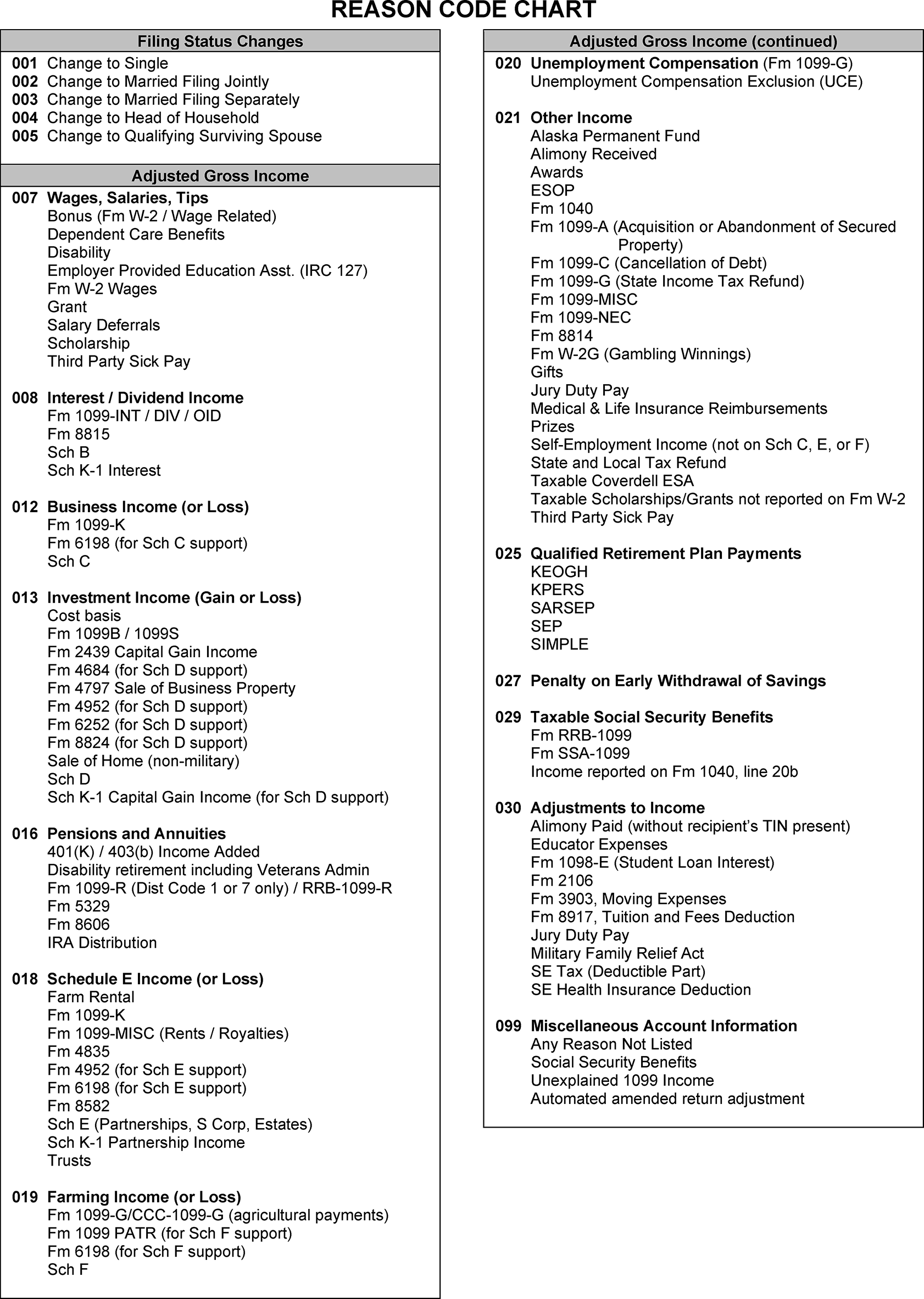
A unique Blocking Series (BS) is used when adjusting an account to indicate the type of the adjustment.
Note:
The BS listed for correspondence also applies to the Spanish version of the letter. See IRM 3.11.6.11.2, Spanish Correspondence, and the Correspondex Letters for a current list of correspondence letters.
Blocking Series Usage 00 Partial claim disallowance (Letter 106C) and the original return was electronically filed. 05 For most processable Form 1040-X and CP notices unless otherwise directed. 18 Partial claim disallowance (Letter 106C) and the original return was paper filed. 77 Setting a math error (Letter 474C) and the original return was filed electronically. 78 Setting a math error (Letter 474C) and the original return was paper filed. 98 Complete claim disallowance (Letter 105C) and the original return was paper filed. 99 Complete claim disallowance (Letter 105C) and the original return was filed electronically. - The ninth and tenth digits of a Document Locator Number (DLN) represent the Blocking Series. See IRM 3.11.249.3.2.1, Document Locator Number (DLN) for detailed information regarding DLNs.
For modules with a prior adjustment:
If the BS on the prior TC 290 or TC 291 is ... Then ... 77 or 78 See IRM 3.11.6.19.6, Math Error Response Cases. 00, 18, 98, or 99 See IRM 3.11.6.11.5, Correspondence for Disallowing a Claim (Letter 105C, Letter 105SP, Letter 106C, and Letter 106SP).
A HC is input to prevent or delay the issuance of a refund or Adjustment Notice to the taxpayer and is a required entry when inputting an adjustment. Unless otherwise instructed, use HC 0 when inputting an adjustment.
HC Refund Action Notice Action Account Action 0 Allows the refund Allows adjustment notice None. 1 Holds the refund Allows adjustment notice Sets the -K freeze. 2 Holds the refund Holds adjustment notice Sets the -K freeze. 3 Allows the refund Holds adjustment notice None. 4 Holds the refund Notice won’t be issued at any time Sets the -K freeze.
- A Posting Delay Code (PDC) of 1 to 6 is used to post a transaction later than another transaction when multiple transactions are required on one account. Input transactions don't post to MF until the indicated number of cycles have expired (with respect to the first transaction to be posted).
- PDCs are applicable for IMF transactions using ADJ54.
The PDC isn't posted with the transaction or shown with the pending transaction. The pending (PN) MF posting cycle for the IDRS status transaction is extended to account for the PDC(s).
Example:
A PDC "1" must be used on the adjustment when an address change was input. This allows the adjustment notice to be sent to the new address of record.
A Priority Codes (PC) must be used to post an adjustment to the master file when certain conditions exist. If a PC isn’t used when required, the adjustment will unpost.
Priority Code When Required 1 Making an adjustment to an account with a "-L" Freeze. 2 Use only priority code 2 if both 1 and 3 are required to adjust the account. (Example: Account with -L freeze and the CP notice would require priority codes 1 and 3; therefore only 2 would be used.) 3 Adjusting CP Notices and when a Letter 5600C is mentioned or attached. 6 Used to release a math error freeze (-G) only. 8 - CRN 764 is input with a TC 29X and there's a prior posted TC 29X (except a previously posted TC 290 with priority code 6 or a TC 290 with Julian Date 999).
- TC 29X is input for a significant amount greater than $10 and is within $10 of a previously posted TC 29X. (EXAMPLE: $55 adjustment and the previous adjustment is $49 would require a PC: 8 on either TC 290/291 adjustment.)
- CRN 80X is input and there's a prior TC 17X on the account and the new TC 176 is computer generated.
- CRN 806, 807, or 766 is input that is within $10 of a prior posted matching transaction (Example: CRN 806 is within $10 of a prior posted CRN 806, not within $10 of CRN 807).
- When adjusting Fuel Tax Credit, Form 4136.
Example:
An account with -L freeze and the EIC conditions above would require priority codes 1 and 8; therefore, only 1 would be used.
Category Codes are four letter codes that indicate the type of case. Ensure the appropriate Category Code is used when processing a case.
If ... Then ... Inputting an adjustment. - Use "MEFP" on e-filed amended return cases.
- Use "MEFS" on scanned amended return cases.
- Use "LSFM" on CP Notice cases.
Inputting a disaster claim adjustment that meets the criteria in IRM 3.11.6.8.7 (4),Form 4684, Casualties and Thefts, Disaster Claim Screening Use "KATX" . Inputting a disaster claim adjustment that doesn’t meet the criteria in IRM 3.11.6.8.7 (4), Form 4684, Casualties and Thefts, Disaster Claim Screening Use DSTR. Re-inputting an adjustment sent back from a review
Use the appropriate category code listed above. Working a category code IRRQ correspondence reply
Process the reply per normal procedures and use the appropriate category code listed above. - Follow IRM 3.11.6.10.1, MEFP Reassignment and Reroute Guide, or IRM 3.11.6.10.2, MEFS Reassignment and Reroute Guide, as appropriate. determine the appropriate Category Code when routing an amended return.
If corresponding on:
- An e-filed amended return case, use "MEFP" .
- A scanned amended return case, use "MEFS" .
- A CP Notice case, use "LSFM" .
- The CII Indicator (CIS IND) "1" is required in the "CIS-IND" field of the CC ADJ54 screen.
- Source Document Indicator (SD) "N " is required in the "SOURCE-DOC-ATTACHED" field of the CC ADJ54 screen.
A remark is required on all IDRS transactions. Use the table below to determine the appropriate remarks. This applies to REQ54, ENREQ, REQ77, and credit transfers.
If ... Then ... If the claim type is a Notice CP 08. Use "CP08" . If the claim type is a Notice CP 09. Use "CP09" . If the claim type is a Notice CP 27. Use "CP27" . A paper filed amended return. Use "1040-X" . An e-filed amended return or CII case. Use the CII Case ID.
- Include "NSD" , before the appropriate remarks.
When inputting an adjustment, complete the “REMARKS” field of the CC ADJ54 screen as follows:
- CII Case ID
- NSD
- Claim type per paragraph 3 above.
- Additional remarks per specific subsection.
The Business Operating Division Code (BOD CD) identifies the IRS BOD having overall responsibility for the account.
- LB - LB&I.
- SB - SBSE.
- TE - Tax Exempt/Government Entities (TE/GE).
- WI - Wage and Investment (WI).
The BOD CD may be required when updating case date or when routing certain cases. The BOD CD can be found on:
- When processing a case requiring special handling, all IRM instructions apply.
After completing a statute review per IRM 3.11.6.8.10, Statute Review Screening, use the following instructions to process a statute year case:
Note:
If a case is stamped "No Statute Issue(s)" , continue processing the case. If a Form 1040 is stamped "Statute Cleared" see IRM 3.11.6.8.10, Statute Review Screening.
When verifying the ASED, use today’s date.
Reminder:
Review the case for the 25% omission rule to determine if the ASED is extended (TC 560) or needs to be extended per IRM 3.11.6.7.1, 25% Omission Screening.
When verifying the RSED and the received date isn't timely, check the postmark. If the amended return is postmarked on or before the RSED, consider it timely for a refund. See Paragraph 7 below to determine timeliness.
- Research the Disaster Program Office per paragraph 2 below.
- Without regard to the ASED and RSED, Statute cases not meeting SP criteria must be sent to the appropriate function.
- If the account is on the retention register, use CC IMFOLB to restore the module before sending correspondence or inputting an adjustment. Once the CC IMFOLB request has been input, suspend the case using "RETREG" as the reason for suspense in CII to allow the TC 370 to post. If the TC 370 hasn’t posted when the suspense period expires, send the case to AM.
- Open case controls with a category code "ST04" or "-X04" on a case meeting SP criteria must be placed in "B" status prior to inputting the adjustment. Upon completion of the adjustment, place the control base back in "A" status.
When researching the Disaster Program Office, check the current year and one year prior to determine if the taxpayer lived in a declared disaster area. If research shows the taxpayer lives or lived in a disaster area, review the disaster declaration for the following statement, and then follow the table below:
- Affected taxpayers that need to perform time-sensitive actions described in Treas. Reg. 301.7508A-1(c)(1) and Rev. Proc. 2018-58, IRB 2018-50 that fall on or after (the specified date), and before (the specified date), are granted additional time to act through (the specified date).
Follow the procedures below to determine if the case must be routed.
If ... And ... Then ... The RSED is expired, and the module is in debit balance Box 5 of paragraph 7 below doesn't apply Send the case to AM. The RSED is expired on a full paid module, and your amended return isn't a math error correction There are payments, credits, or offsets posted within two years of your case’s received date
Send the case to AM. The RSED is expired on a full paid module and the return wasn't timely filed "Exonerated Prisoner" , "Incarceration Exclusion PATH Act" , or similar is stated Send the case to AM with EXPR as the working Trail. The RSED is expired and there was a math error on the original return The change on the Form 1040-X isn't a math error correction and/or also claims additional changes Send the case to AM. Follow the procedures below to determine if the case requires correspondence.
If ... And ... Then ... There’s a total tax decrease or refundable credit increase resulting in a refund that was received (or postmarked) before the RSED The claim is incomplete and additional information is required to process the case Suspend the case for 45 days and request the missing information using Letter 324C. Use the fill-in(s) provided in the specific instructions. The RSED is expired on a full paid module and the return wasn't timely filed There are no payments, credits, or offsets within the last two years on the module and no other route-out criteria exist Disallow the claim and send Letter 105C per IRM 3.11.6.11.5, Correspondence for Disallowing a Claim (Letter 105C and Letter 106C). If a reply to correspondence is received on a statute year case take the following action.
If ... Then ... A complete response was received before the RSED Allow the claim. The return, or Letter 324C if applicable, is not fully signed and the response is received before the RSED No consider the claim and send Letter 916C per IRM 3.11.6.11.8, Correspondence for No Consideration of a Claim (Letter 916C and Letter 916SP). An incomplete response was received before the RSED No consider the claim and send Letter 916C per IRM 3.11.6.11.8, Correspondence for No Consideration of a Claim (Letter 916C and Letter 916SP). A complete response is received after the RSED but within 45 days of the IRS request (date the letter was input) Allow the claim. The return, or Letter 324C if applicable, is not fully signed and the response is received after the RSED but within 45 days of the IRS request (date the letter was input) Disallow the claim and send Letter 105C per IRM 3.11.6.11.5, Correspondence for Disallowing a Claim (Letter 105C, Letter 105SP, Letter 106C, and Letter 106SP). An incomplete response is received after the RSED but within 45 days of the IRS request (date the letter was input) Disallow the claim and send Letter 105C or Letter 106C as appropriate per IRM 3.11.6.11.5, Correspondence for Disallowing a Claim (Letter 105C, Letter 105SP, Letter 106C, and Letter 106SP). If a reply to correspondence on a statute case isn’t received, take the following action.
If ... Then ... A reply hasn’t been received by the requested response date and the RSED is open No consider the claim. Send Letter 916C per IRM 3.11.6.11.8, Correspondence for “No Consideration” of a Claim (Letter 916C). A reply hasn’t been received by the requested response date and the RSED has expired Disallow the claim. Send Letter 105C per IRM 3.11.6.11.5, Correspondence for Disallowing a Claim (Letter 105C, Letter 105SP, Letter 106C, and Letter 106SP). Use the following procedures to determine how to process your case.
If ... And ... Then ... Making an adjustment to the account with a TC 290 .00 and adjusting Credit Reference Numbers that don’t result in a credit or tax change
Without regard to the ASED or RSED Process using Blocking Series 05. If the RSED is expired, use the received date as the "RFSCDT" and enter an "S" override. The RSED is expired and there was a math error on the timely filed original return The only change is a correction of the math error(s) Process the Form 1040-X. See IRM 3.11.6.19.6, Math Error Response Cases.
The RSED is expired and there was a math error on a timely filed amended return The only change is a correction of the math error(s) Process the Form 1040-X. See IRM 3.11.6.19.6, Math Error Response Cases.
The ASED is greater than 90 days and the RSED is expired The return is one of the following:
- A tax increase with a credit increase.
- A credit increase without a tax increase.
- A tax decrease with a credit decrease.
Send the case to AM. The ASED is greater than 90 days and the RSED is expired The return is one of the following:
- A tax increase with a credit decrease.
- A tax increase without a credit decrease.
- A credit decrease without a tax increase.
Process the Form 1040-X using instructions in the paragraphs below. The ASED is greater than 90 days and RSED is open Process the Form 1040-X using instructions in the paragraphs below The amended return has a total tax decrease and/or refundable credit increase that results in a refund on a timely filed return No route criteria exist Process the Form 1040-X using instructions in paragraphs below. An override code is required when the IRS Received Date is over one year old or the RSED is expired.
- R - Allows IRS Received Date to be older than a year in the past.
- S - Allows current date and the Refund Statute Control Date (RFSCD) to be later than the Refund Statue Expiration Date (RSED).
Reminder:
If the taxpayer lived in a qualified disaster area, the due date considered a return timely filed may be different.
Use the table below to determine the received date, amended claims date, and refund statute control date.
If ... And ... Then ... Received date is after the RSED
Postmark shows the claim is timely filed
Use the received date as normal. Use the postmark date as the amended claims date and as the RFSCDT.
The received date is prior to the RSED
You are processing the claim after the RSED
Use the received date as normal and as the amended claims date and RFSCDT.
Received date is prior to the RSED
You are processing the claim prior to the RSED
Process the return following standard 1040-X procedures. Claim is timely received
The claim is incomplete, and correspondence is required per paragraph (4), box 1. Response is received after the RSED, but within the time frames in paragraph (4), box 1.
Use the original received date as the received date and RFSCDT. Use the response date as the amended claims date. There’s no envelope or postmark present, or the postmark is illegible, and the received date is after the RSED ≡ ≡ ≡ ≡ ≡ ≡ ≡ ≡ ≡ ≡ ≡ ≡ ≡ ≡ ≡ ≡ ≡ ≡ ≡ ≡ ≡ ≡ ≡ ≡ ≡ ≡ ≡ ≡ ≡ ≡ ≡ ≡ ≡ ≡
Use the RSED date as the received date, amended claims date, and RFSCDT. Edit the RSED date onto the return and circle any other received date stamps.
- Refer to IRM 3.11.6.8.7, Form 4684, Casualties and Thefts, Disaster Claim Screening, prior to processing a disaster claim.
To process a disaster claim, check CC TXMOD for an -O or -S Freeze on the account.
If ... And ... Then ... -O or -S freeze code isn’t present Send the case to AM. -O or -S freeze code is present The taxpayer requests the refund be issued to a name or address other than the one shown on Master File (e.g., temporary address, taxpayer representative, in care of name and/or address) Send the case to AM. -O or -S freeze code is present Process the claim. - If processing a disaster claim and Priority Code 8 is required, send the case to AM.
If the disaster claim meets the special rules for recalculation as stated in IRM 3.11.6.8.7 (3), Form 4684, Casualties and Thefts, Disaster Claim Screening, and IRM 3.11.6.8.7 (4), Form 4684, Casualties and Thefts, Disaster Claim Screening, follow the table.
If ... And ... Then ... The taxpayer claimed itemized deductions The taxpayer qualified for the modified computation but didn’t use it Take the following action:
- Recompute the amount shown on Form 4684, Casualties and Thefts. When recalculating, change line 11 from $100 to $500 and change line 17 to $0.
- Recompute Schedule A using the recomputed Form 4684, Casualties and Thefts, amount.
- When inputting an adjustment, use the recomputed Schedule A amount.
Exception: If the total itemized deduction is less than the standard deduction, see the box below. - Use RC 076 and Category Code to "KATX"
- If the taxpayer’s refund amount is changed because of the recalculation, correspond per IRM 3.11.6.12, Correspondence Table of Issues, C-Letters and Paragraph Fill-ins.
The taxpayer claimed the standard deduction The taxpayer qualified for the modified computation but didn’t use it Take the following action:
- Recompute the amount shown on Form 4684, Casualties and Thefts. When recalculating, change line 11 from $100 to $500 and change line 17 to $0.
- Recompute Schedule A using the recomputed Form 4684, Casualties and Thefts, amount.
- When inputting an adjustment, use the recomputed Schedule A amount.
- Use RC 092 and Category Code to "KATX" .
- If the taxpayer’s refund amount is changed because of the recalculation, correspond per IRM 3.11.6.12, Correspondence Table of Issues, C-Letters and Paragraph Fill-ins.
Cases suspended to CAT-A are returned by CAT-A classifiers with the following processing instructions.
If the CAT-A response is ... Then ... "Selected" Take the following action:
- Input the necessary audit trail with a TC 971 and AC 013.
- Close the CII case.
"Rejected" Take the necessary action to resolve the reason for rejection and resubmit the claim as Category A.
"Accepted" Take the necessary action to adjust the account.
"Disallowed" Take the necessary action to disallow the claim per IRM 3.11.6.11.5, Correspondence for Disallowing a Claim (Letter 105C, Letter 105SP, Letter 106C, and Letter 106SP). "No Consider" No consider the claim per IRM 3.11.6.11.8, Correspondence for No Consideration of a Claim (Letter 916C and Letter 916SP).
Submission Processing only processes Combat Zone (CZ) claims that result in a net refund or zero-balance.
Caution:
Don't confuse CZ cases with the Military Family Relief Act (MFRA) cases. For MFRA cases, see IRM 3.11.6.8.19.1.1, Military Family Relief Act (MFRA) of 2003 Screening.
If a -C freeze is displayed on CC TXMOD or CC IMFOL, verify the taxpayer is actively serving in a designated CZ. Treat the return as a CZ case if:
- There’s a -C freeze with a Combat Indicator of 1 on CC IMFOLE.
or - Taxpayer notates actively serving in a CZ on the return.
- There’s a -C freeze with a Combat Indicator of 1 on CC IMFOLE.
If a -C freeze with a Combat Indicator of "1" is present, then CC IMFOLE or CC ENMOD shows a TC 500 with a Closing Code (cc). There may be several entry and exit dates present. Use the most recent TC 500 to determine current CZ status.
- If the closing code is an even number, treat the case as a CZ return.
- If the closing code is an odd number, don't treat case as a CZ return.
Note:
If the literal "Combat Zone" is present on IDRS ensure there's a -C freeze before treating the case as a CZ return. The literal without the freeze is only an indication of prior CZ status.
- If an active CZ case results in a net balance due, send the case to AM.
- ≡ ≡ ≡ ≡ ≡ ≡ ≡ ≡ ≡ ≡ ≡ ≡ ≡ ≡ ≡ ≡ ≡ ≡ ≡ ≡ ≡ ≡ ≡ ≡ ≡ ≡ ≡ ≡ ≡ ≡ ≡ ≡ ≡ ≡ ≡ ≡ ≡ ≡ ≡ ≡ ≡ ≡ ≡ ≡ ≡ ≡ ≡ ≡ ≡ ≡ ≡ ≡ ≡ ≡ ≡ ≡ ≡ ≡ ≡ ≡ ≡ ≡ ≡
- If a -C freeze isn’t on the account for a CZ case, send the case to AM.
- When required information is missing from the return, follow IRM 3.11.6.11, Correspondence Procedures.
- When processing a CZ case, don't enter an Amended Claims date and remove the check from the checkbox in the "Debit/Credit Int To" field.
- A taxpayer (or the spouse, if married filing jointly) receiving nontaxable combat pay may elect to include the amount when figuring their earned income for purposes of computing EITC.
Follow the table when inputting a corrected adjustment.
If ... Then ... Lines 16 - 22 of Form 1040-X don't match Don't issue a Letter 474C or set a math error. Continue processing the return following normal procedures. Missing or incorrect entries don't affect the overall adjustment Don't issue a Letter 474C or set a math error. Continue processing the return following normal procedures. The corrected adjustment result does not differ from the taxpayer’s expected refund or balance due Don't issue a Letter 474C or set a math error. Continue processing the return following normal procedures. The taxpayer is requesting a credit already received and it is the only issue Input the computed adjustment using:
- Blocking Series "05" .
- SC "1" .
- The appropriate IRN(s), CRN(s), and RC(s).
- CII Indicator "1" .
- Source Document Indicator: "N" .
- The appropriate remarks.
Send Letter 76C
- Use the fill-in: We didn't allow (appropriate title) Credit because our records indicate that you previously received the credit as part of your original or amended return.
- Print the C-Letter to PDF and attach it to the case with the "Attach File" button on the "Active Case Page."
- Leave a CII Case Note.
There’s only a correction to withholding Don't set a math error. Input the corrected adjustment using:
- Blocking Series "05"
- SC "1" .
- CII Indicator "1" .
- Source Document Indicator: "N" .
- The appropriate remarks.
Send Letter 76C
- Use the fill-in: Your Form 1040-X, Amended U.S. Individual Income Tax Return, isn't being returned with this letter. We corrected line number (fill-in line number), because (description of error).
- Print the C-Letter to PDF and attach it to the case with the "Attach File" button on the "Active Case Page" .
- Leave a CII Case Note.
A tax decrease results in a larger refund than the taxpayer requested Don't set a math error. Input the corrected adjustment using:
- Blocking Series "05"
- SC "1" .
- CII Indicator "1" .
- Source Document Indicator: "N" .
- The appropriate remarks.
Send Letter 76C
- Use the fill-in: Your Form 1040-X, Amended U.S. Individual Income Tax Return, isn't being returned with this letter. We corrected line number (fill-in line number), because (description of error).
- Print the C-Letter to PDF and attach it to the case with the "Attach File" button on the "Active Case Page" .
- Leave a CII Case Note.
The taxpayer requests the IRS to complete a form, even when the tax change is $100 or more Don't set a math error. Input the corrected adjustment using:
- Blocking Series "05"
- SC "1" .
- CII Indicator "1" .
- Source Document Indicator: "N" .
- The appropriate remarks.
Send Letter 76C
- Use the fill-in: Your Form 1040-X, Amended U.S. Individual Income Tax Return, isn't being returned with this letter. We corrected line number (fill-in line number), because (description of error).
- Print the C-Letter to PDF and attach it to the case with the "Attach File" button on the "Active Case Page" .
- Leave a CII Case Note.
The corrected adjustment is a balance due Input the corrected adjustment using:
Blocking series:
- 77 if the original return was e-filed.
- 78 if the original return was paper filed.
- SC "6" .
- The appropriate IRN(s), CRN(s) and RC(s) to process the return for the corrected amount(s) and any other issues.
- CII Indicator:" 1" .
- The appropriate remarks.
- If using xMend, click the "Letter" button and select "Write Your Own" .
Send Letter 474C.
- Use the fill-in: Your Form 1040-X, Amended U.S. Individual Income Tax Return, isn't being returned with this letter. We corrected line number (fill-in line number), because (description of error).
Exception: For "ITIN reject" cases, see IRM 3.11.6.19.14.1, Returns Received From the ITIN Unit (Form W-7). - Print the C-Letter to PDF and attach it to the case with the "Attach File" button on the "Active Case Page" .
- Leave a CII Case Note.
- Use the fill-in: Your Form 1040-X, Amended U.S. Individual Income Tax Return, isn't being returned with this letter. We corrected line number (fill-in line number), because (description of error).
The corrected adjustment reduces the refund amount Input the corrected adjustment using:
Blocking series:
- 77 if the original return was e-filed.
- 78 if the original return was paper filed.
- SC "6" .
- The appropriate IRN(s), CRN(s) and RC(s) to process the return for the corrected amount(s) and any other issues.
- CII Indicator:" 1" .
- The appropriate remarks.
- If using xMend, click the "Letter" button and select "Write Your Own" .
Send Letter 474C.
- Use the fill-in: Your Form 1040-X, Amended U.S. Individual Income Tax Return, isn't being returned with this letter. We corrected line number (fill-in line number), because (description of error).
Exception: For "ITIN reject" cases, see IRM 3.11.6.19.14.1, Returns Received From the ITIN Unit (Form W-7). - Print the C-Letter to PDF and attach it to the case with the "Attach File" button on the "Active Case Page" .
- Leave a CII Case Note.
- Use the fill-in: Your Form 1040-X, Amended U.S. Individual Income Tax Return, isn't being returned with this letter. We corrected line number (fill-in line number), because (description of error).
When a math error (ME) is present on the taxpayer's account, determine if the amended return is a ME response and addresses the error(s) on the account.
- The taxpayer is allowed 60-days from the date of the math error notice (the 23C date) to request abatement of the additional tax specified in the notice. If the request is submitted via U.S. mail, use the postmark date to determine if the response was timely. Refer to IRC 6213(b)(2)(A).
- The taxpayer is allowed a stay of collection during the 60-day time period described above during which collection of the assessment shall not be made, begun or prosecuted. If the taxpayer makes a request for an abatement within 60 days, treat the response as a protest. Refer to IRC 6213(b)(2)(B).
An amended return isn’t considered an ME response if the date of the ME notice is later than the received date of the amended return. When an ME is set a TC 971 with one of the following CP notices is generated:
Notice ... Description ... CP 10 ME on an overpaid module, which causes a reduction of credit elect. CP 11 ME on a module with a balance due of $5 or more. CP 12 ME on a module with an overpayment of $1 or more. CP 13 ME on a module with an even balance, an overpayment of less than $1, or a balance due of less than $5 CP 16 ME on an overpaid module, and part or all of the overpayment is offsetting to satisfy another tax module liability. There are two types of responses to MEs, a substantiated protest and unsubstantiated protest. However, when a taxpayer files an amended return when an ME is present on the account, the return could be a response that:
- Doesn’t address the ME(s) on the account.
- Agrees with the ME(s) on the account.
- Is a substantiated protest. A substantiated protest occurs when a taxpayer provides supporting documentation which proves the IRS ME calculation is incorrect. Validate the substantiation by reviewing qualifications needed to allow adjustment.
- Is an unsubstantiated protest. An unsubstantiated protest occurs when a taxpayer is unable or unwilling to provide the required supporting documentation and still requesting the claim.
- Is an unsubstantiated response. An unsubstantiated response is an unsubstantiated protest that occurs when the taxpayer addresses the ME(s) but doesn't provide required supporting documentation.
If ... Then ... The amended return is an unsubstantiated protest Send the case to AM. Any additional changes on the amended return result in an ME Send the case to AM. The amended return is an unsubstantiated response, and no additional changes are requested Send the case to AM. The amended return is an unsubstantiated response, and additional changes are requested Send the case to AM. The amended return is a partially substantiated response, and partially unsubstantiated response Send the case to AM. The amended return a partially agreed, or substantiated response, and partially unsubstantiated Send the case to AM. The ME is caused by an "ITIN Reject" or "No W-7" See IRM 3.11.6.19.14.1, Returns Received From the ITIN Unit (Form W-7). The ME is caused by ITIN status See IRM 3.11.6.19.14.2, ITIN Status.
When taxpayer agrees with the ME(s), the action needed depends on the account balance.
• If the account isn’t in a debit balance, follow the table.If ... Then ... There are no additional changes requested on the amended return One adjustment is required. Input a TC 290 for .00. There are additional changes requested on the amended return One adjustment is required. Input the adjustment following normal processing procedures.
• If the account is in a debit balance, follow the table.If ... Then ... There are no additional changes requested on the amended return Two adjustments are required.
Input the first adjustment to release the "-G" freeze with:
- A TC 290 for ".00" .
- SC: "1" .
- Priority Code "6" .
- No Amended Claims Date.
- "ME AGREED" to the remarks.
Input the second adjustment to release the "-A" freeze following normal procedures with:
- A posting delay code for 1 cycle more than the first adjustment.
There are additional changes requested on the amended return Input the first adjustment to release the "-G" freeze with:
- A TC 290 for ".00" .
- SC: "1" .
- Priority Code "6" .
- No Amended Claims Date.
- "ME AGREED" to the remarks.
Input the second adjustment for the additional changes following normal procedures with:
- A posting delay code for 1 cycle more than the first adjustment.
When the taxpayer doesn’t address the ME(s) on the account, take the following action.
If ... Then ... There are no additional changes being requested See IRM 3.11.6.7.5, Duplicate Returns and Identical Open CII Cases. There are additional changes being requested Input the adjustment following normal processing procedures.
- A timely substantiated protest is a protest that is received within the 60-day time period stated in IRM 3.11.6.19.6 (1), Math Error Response Cases.
A correction of a math error (ME) on an original filed return is not an amended return or claim for which the amended claims date is required. When processing a response to a ME set on the original return, don't correspond for forms, schedules, or signatures that were on the original return.
Reminder:
Taxpayers often use their original figures in column A instead of the IRS corrected figures when correcting a ME. In some instances, a taxpayer may have multiple MEs on the account.
If a taxpayer substantiates the ME set on the original return follow the table below.
If ... Then ... The substantiated response is to ME on the original return One adjustment is required with:
- SC 2.
- No Amended Claims Date.
- "ME RESPONSE" in the remarks.
If the taxpayer files a substantiated response to ME on the original return and additional changes are requested, follow the table below.
If ... Then ... The additional changes result in a refund Two adjustments are required.
Input the ME correction on the first adjustment with:
- SC: "2" .
- HC: "4" .
- No Amended Claims Date.
- "ME RESPONSE" to the remarks.
Input the additional changes on the second adjustment with:
- Normal processing procedures.
- A posting delay code for 1 cycle more than the first adjustment.
The ME correction and the additional changes don’t result in a refund One adjustment is required with:
- Use SC "2" .
- No Amended Claims Date.
- Add "ME RESPONSE" to the remarks.
The substantiated response results in a refund and the additional changes don't One adjustment is required with:
- SC "2" .
- No Amended Claims Date.
- Add "ME RESPONSE" to the remarks.
The substantiated response doesn't result in a refund, but the additional changes do One adjustment is required with:
- SC "2" .
- The received date as the Amended Claims Date.
- "ME RESPONSE" to the remarks.
- If the taxpayer substantiates some of the MEs on the original return, but doesn’t substantiate all the MEs on the account, see IRM 3.11.6.19.6 (3), Math Error Response Cases.
- A substantiated protest is considered late if it’s received after the 60-day time period stated in IRM 3.11.6.19.6 (1), Math Error Response Cases.
- When a late substantiated protest to a ME set on the original return is received and there’s not a -G freeze on the module, follow IRM 3.11.6.19.6.2, Processing a Timely Response to a Math Error Set on the Original Return.
- A substantiated protest is considered timely if it’s received within the 60-day time period stated in IRM 3.11.6.19.6 (1), Math Error Response Cases.
If a taxpayer substantiates the math error (ME) set on an amended return.
Reminder:
Taxpayers often use their original figures in column A instead of the IRS corrected figures when correcting a ME. In some instances, a taxpayer may have multiple MEs on the account.
If ... Then ... The substantiated response is to ME on an amended return Input the adjustment with:
- SC 2.
- The received date of the TC 29X that set the ME as the Amended Claims Date.
- CII indicator "1" .
- Source Document Indicator "N" .
- "ME RESPONSE" in the remarks.
If the taxpayer files a substantiated response to ME on an amended return and additional changes are requested, follow the table below.
If ... Then ... The additional changes result in a refund Two adjustments are required.
Input the ME correction on the first adjustment using:
- SC "2" .
- HC "4" .
- The received date of the TC 29X that set the ME as the Amended Claims Date.
- CII indicator "1" .
- Source Document Indicator "N" .
- "ME RESPONSE" in the remarks.
Input the additional changes on the second adjustment with:
- A posting delay code (PDC) for 1 cycle more than the first adjustment.
- CII indicator "1" .
- Source Document Indicator "N" .
The ME correction and the additional changes don’t result in a refund One adjustment is required with:
- SC "2" .
- The received date of the TC 29X that set the ME as the Amended Claims Date.
- CII indicator "1" .
- Source Document Indicator "N" .
- "ME RESPONSE" in the remarks.
The substantiated response results in a refund and the additional changes don't One adjustment is required with:
- SC: "2" .
- The received date of the TC 29X that set the ME as the Amended Claims Date.
- CII indicator "1" .
- Source Document Indicator "N" .
- "ME RESPONSE" in the remarks.
The substantiated response doesn't result in a refund, but the additional changes do One adjustment is required with:
- SC "2" .
- The received date as the Amended Claims Date.
- CII indicator "1" .
- Source Document Indicator "N" .
- "ME RESPONSE" in the remarks.
- If the taxpayer substantiates some of the MEs on the amended return, but doesn’t substantiate all the MEs on the account, see IRM 3.11.6.19.6 (3), Math Error Response Cases.
- A substantiated protest is considered late if it’s received after the 60-day time period stated in IRM 3.11.6.19.6 (1), Math Error Response Cases.
- When a late substantiated protest to a ME set on an amended return is received and there’s not a -G freeze on the module, follow IRM 3.11.6.19.6.4, Processing a Timely Substantiated Protest to a Math Error Set on an Amended Return.
Follow the table below when sending a Letter 105C:
If ... Then ... The disallowance is for PATH Act Input the adjustment as follows:
Use Blocking Series:
- 98 if the original return was paper filed.
- 99 If the original return was e-filed.
- Input a TC 290 for .00.
- Use SC 0.
- Use the applicable RC(s).
- Use CII Indicator "1"
- Use Source Document Indicator "N" .
- Input the appropriate remarks
Correspond as follows:
- Send a Letter 105C
- Print the C-Letter to PDF and attach it to the case with the "Attach File" button on the "Active Case Page"
- Leave a CII Case Note describing the issue.
The claim is being disallowed per IRM 3.11.6.2.6.1.1, CC IRPTR Input the adjustment as follows:
Use Blocking Series:
- 98 if the original return was paper filed.
- 99 If the original return was e-filed.
- Input a TC 290 for .00.
- Use SC 0.
- Use HC 4 if the module is in a credit balance.
- Use the applicable RC(s).
- Use CII Indicator "1"
- Use Source Document Indicator "N" .
- Input the appropriate remarks
Correspond as follows:
- Send a Letter 105C with the fill-in: We're unable to verify the income or withholding amount claimed on your amended return.
- Print the C-Letter to PDF and attach it to the case with the "Attach File" button on the "Active Case Page"
- Leave a CII Case Note describing the issue.
The claim is being disallowed per IRM 3.11.6.8.14 (2),Return Integrity and Verification Operation (RIVO) Case Screening Input the adjustment as follows:
Use Blocking Series:
- 98 if the original return was paper filed.
- 99 If the original return was e-filed.
- Input a TC 290 for .00.
- Use SC 0.
- Use HC 4 if the module is in a credit balance.
- Use the applicable RC(s).
- Use CII Indicator "1"
- Use Source Document Indicator "N" .
- Input the appropriate remarks
Correspond as follows:
- Send a Letter 105C with the fill-in: We're unable to verify the income or withholding amount claimed on your amended return.
- Print the C-Letter to PDF and attach it to the case with the "Attach File" button on the "Active Case Page"
- Leave a CII Case Note describing the issue.
The claim is being disallowed per , IRM 3.11.6.16.37, Federal Income Tax Withheld Input the adjustment as follows:
Use Blocking Series:
- 98 if the original return was paper filed.
- 99 If the original return was e-filed.
- Input a TC 290 for .00.
- Use SC 0.
- Use HC 4 if the module is in a credit balance.
- Use the applicable RC(s).
- Use CII Indicator "1"
- Use Source Document Indicator "N" .
- Input the appropriate remarks
Correspond as follows:
- Send a Letter 105C with the fill-in: We're unable to verify the income or withholding amount claimed on your amended return.
- Print the C-Letter to PDF and attach it to the case with the "Attach File" button on the "Active Case Page"
- Leave a CII Case Note describing the issue.
The disallowance is for all other claims Input the adjustment as follows:
Use Blocking Series:
- 98 if the original return was paper filed.
- 99 If the original return was e-filed.
- Input a TC 290 for .00.
- Use SC 0.
- Use the applicable RC(s).
- Use CII Indicator "1" .
- Use Source Document Indicator "N"
- Input the appropriate remarks.
Correspond as follows:
- Send a Letter 105C.
- Print the C-Letter to PDF and attach it to the case with the "Attach File" button on the "Active Case Page" .
- Leave a CII Case Note describing the issue.
- When the partial disallowance of a claim results in a balance due or zero-balance, send a Letter 105C as outlined in paragraph 1 and input the adjustment following Letter 106C adjustment procedures outlined in paragraph 3 below.
Follow the table below when sending a Letter 106C:
- "Amount of Claim" is the total the taxpayer is expecting.
- "We only allowed" amount is the result of the adjustment.
If ... Then ... The disallowance is for PATH Act Input the adjustment as follows:
Use Blocking Series:
- 18 if the original return was paper filed.
- 00 If the original return was e-filed.
- Input a TC 29X for the corrected total tax.
- Use SC 1
- Use the applicable RC(s).
- Use CII Indicator "1"
- Use Source Document Indicator "N" .
- Input the appropriate remarks.
Correspond as follows:
- Send a Letter 106C.
- Print the C-Letter to PDF and attach it to the case with the "Attach File" button on the "Active Case Page" .
- Leave a CII Case Note describing the issue.
The claim is being disallowed per IRM 3.11.6.2.6.1.1, CC IRPTR Input the adjustment as follows:
Use Blocking Series:
- 18 if the original return was paper filed.
- 00 If the original return was e-filed.
- Input a TC 29X for the corrected total tax.
- Use SC 1.
- Use the applicable RC(s).
- Use CII Indicator "1" .
- Use Source Document Indicator "N" .
- Input the appropriate remarks.
Correspond as follows:
- Send a Letter 106C with the fill-in: We're unable to verify the income or withholding amount claimed on your amended return.
- Print the C-Letter to PDF and attach it to the case with the "Attach File" button on the "Active Case Page" .
- Leave a CII Case Note describing the issue.
The claim is being disallowed per IRM 3.11.6.8.14 (2),Return Integrity and Verification Operation (RIVO) Case Screening Input the adjustment as follows:
Use Blocking Series:
- 18 if the original return was paper filed.
- 00 If the original return was e-filed.
- Input a TC 29X for the corrected total tax.
- Use SC 1.
- Use the applicable RC(s).
- Use CII Indicator "1" .
- Use Source Document Indicator "N" .
- Input the appropriate remarks.
Correspond as follows:
- Send a Letter 106C with the fill-in: We're unable to verify the income or withholding amount claimed on your amended return.
- Print the C-Letter to PDF and attach it to the case with the "Attach File" button on the "Active Case Page" .
- Leave a CII Case Note describing the issue.
The claim is being disallowed per IRM 3.11.6.16.37, Federal Income Tax Withheld Input the adjustment as follows:
Use Blocking Series:
- 18 if the original return was paper filed.
- 00 If the original return was e-filed.
- Input a TC 29X for the corrected total tax.
- Use SC 1.
- Use the applicable RC(s).
- Use CII Indicator "1" .
- Use Source Document Indicator "N" .
- Input the appropriate remarks.
Correspond as follows:
- Send a Letter 106C with the fill-in: We're unable to verify the income or withholding amount claimed on your amended return.
- Print the C-Letter to PDF and attach it to the case with the "Attach File" button on the "Active Case Page" .
- Leave a CII Case Note describing the issue.
The disallowance is for all other claims Input the adjustment as follows:
Use Blocking Series:
- 18 if the original return was paper filed.
- 00 If the original return was e-filed.
- Input a TC 29X for the corrected total tax.
- Use SC 1.
- Use the applicable RC(s).
- Use CII Indicator "1" .
- Use Source Document Indicator "N" .
- Input the appropriate remarks.
Correspond as follows:
- Send a Letter 106C.
- Print the C-Letter to PDF and attach it to the case with the "Attach File" button on the "Active Case Page" .
- Leave a CII Case Note describing the issue.
- Estimated tax penalty (ETP) is computed based on the tax shown on the taxpayer’s original filed return. However, if the taxpayer files a superseding return, the penalty is computed on the tax shown on that superseding return.
The ETP is posted as a TC 170 or TC 176.
- A TC 170 is a manual assessment of an ETP by the IRS, or a self-assessment via Form 2210, Underpayment of Estimated Tax by Individuals, Estates and Trusts.
- A TC 176 is a computer-generated assessment of an ETP.
Route to AM if the taxpayer is requesting a change to the ETP for the following:
- A FS change to MFJ (FS 2)
- A change in withholding
- A checked box A, B, or E in Part II, Form 2210
When the taxpayer is changing their ETP ≡ ≡ ≡ ≡ ≡ ≡ ≡ ≡ ≡ ≡ and a Form 2210 is not attached or none of the boxes in Part II are checked:
- Do not adjust the penalty
- Adjust the return for all other allowable issues
- Send Letter 369C per IRM 3.11.6.11.9, Correspondence for Estimated Tax Penalty (Letter 369C).
Math verify the ETP using the AMS worksheets when Form 2210 is attached and at least one of the boxes in Part II is checked. If the difference between the AMS penalty amount and the taxpayer’s amount is:
- ≡ ≡ ≡ ≡ ≡ ≡ ≡ ≡ ≡ – adjust the account using the recomputed amount. See IRM 3.11.6.19.5, Inputting a Corrected Adjustment.
- ≡ ≡ ≡ ≡ ≡ ≡ ≡ ≡ – adjust the account using the taxpayer’s amount.
- If you’re unable to math verify the ETP, correspond per IRM 3.11.6.7, Verification Screening.
To adjust the ETP use:
- TC 170 to increase the penalty
- TC 171 to decrease the penalty
- RC 065 is required when a TC 17X is input
If the ETP is reducing, include a Penalty Reason Code (PRC) in the fourth position, see below:
If ... And ... Then use ... A TC 170 is posted on the account - The taxpayer is filing a superseding return
- The ETP is being adjusted because the taxpayer or IRS is providing a corrected computation. For example, if the IRS is adjusting withholding or estimated payments, and IRS is manually correcting the ETP.
- PRC 010
- PRC 016
A TC 176 is posted on the account The ETP is being adjusted due to either of the following:
- The taxpayer is filing a superseding return or
- The taxpayer is providing their own penalty computation on Form 2210
PRC 013 A TC 170 or 176 is posted on the account Correcting an IRS computational error in the ETP computation PRC 045
Occasionally SP may receive a Form 4442, Inquiry Referral, or an E-4442 from another Business Operating Division (BOD) regarding cases in SP 1040-X inventories. These referrals must be expedited and addressed within 30 days of receipt regardless of how they are received.
If ... And ... Then ... Form 4442 or E-4442 is received The referral is requesting the case be transferred to the requestor Route or reassign the case to requestor as requested. Form 4442 or E-4442 is received The referral is requesting the case be transferred to another area Route or reassign the case to the other area as requested with the referral. Form 4442 or E-4442 is received The referral is requesting an action be taken on the account that doesn't meet SP criteria Route or reassign the case to AM with the referral. Form 4442 or E-4442 is received The referral is requesting an adjustment action be taken on the account that meets SP criteria Process as normal and complete Part III Section A, items 26 through 29, and C, item 31, on the referral.
- Submission Processing only processes balance due and zero-balance decedent 1040-X returns.
Indications of a deceased taxpayer may include any of the following:
- Date of death is present
- "Deceased" written on the top of the form
- "Deceased, Filing as surviving spouse," or similar notation in the signature area
- Death certificate, Form 1310, or other documentation is attached
- "DECD" on an IRS label or written after a person’s name
- "Estate of" is present
Send the following to AM:
- Refund returns for deceased taxpayers
- If MFR 08 is present on CC INOLES indicating the primary taxpayer is deceased
- Returns with Form 1310, Statement of Person Claiming Refund Due a Deceased Taxpayer, attached
- If the signature of the deceased taxpayer is present on the signature line of the return, the signature must precede the date of death of the taxpayer. If it doesn't, correspond for a valid signature.
If the return isn't signed by a surviving spouse, an executor, or an administrator, correspond per IRM 3.11.6.12, Correspondence Table of Issues, C-Letters and Paragraph Fill-ins.
Reminder:
On MFJ claims, the surviving spouse must sign as a surviving spouse. Correspond if missing.
If correspondence is required, don't address the correspondence to the deceased taxpayer.
- If the return is FS 2, then address correspondence to surviving spouse
For all other FS, address correspondence with "Estate of" placed in front of the taxpayer's name (e.g., Estate of John Smith Decd)
Documentary evidence isn't required for the authority to sign the following:
- Balance due returns
- Zero balance returns
- MFJ (FS 2) or MFS (FS 3) returns signed by the surviving spouse
Process Form 8857, Request for Innocent Spouse Relief, or Form 1040-X referencing innocent spouse (with or without Form 8857 attached) per the following table.
If ... Then ... Innocent spouse is the only issue Process the case as follows:
- Input a TC 290 .00, Blocking Series 05 and no RC.
- Input a TC 470 for all years listed on Form 8857, Request for Innocent Spouse Relief. Include closing code 90 if the "SC-STS." field on CC TXMODA is other than "26" .
- Input a case note stating, "TC 470 has been input." If closing code "90" was input, include it in the case note.
- Complete Form 4442, Inquiry Referral, stating "TC 971 AC 065 is required due to receipt of Form 8857 available on (RRD or CII as appropriate)."
- Fax Form 4442 to the Cincinnati Centralized Innocent Spouse Operation (CCISO):≡ ≡ ≡ ≡ ≡ ≡ ≡ ≡.
Other issue(s) present Process the case as follows:
- Input the adjustment.
- Input a TC 470 for all years listed on Form 8857, Request for Innocent Spouse Relief. Include closing code 90 if the "SC-STS." field on CC TXMODA is other than "26" .
- Input a case note stating, "TC 470 has been input." If closing code "90" was input, include it in the case note.
- Complete Form 4442, Inquiry Referral, stating "TC 971 AC 065 is required due to receipt of Form 8857 available on (RRD or CII as appropriate)."
- Fax Form 4442 to CCISO: ≡ ≡ ≡ ≡ ≡ ≡ ≡ ≡.
Input a TC 971 AC 071 and send the case to AM if:
- The taxpayer files a return with the sole purpose of filing the Injured Spouse Claim
- The return needs a corrected adjustment
- The return doesn't meet SP criteria
- Form 8379, Injured Spouse Allocation, is loose
- The taxpayer indicates an Injured Spouse Allocation but doesn't submit Form 8379
If the taxpayer files Form 8379 Injured Spouse Allocation, with their return that has a processable adjustment:
- Input the adjustment as "No Source Document" (NSD).
- If the adjustment results in a credit balance or the account is in a credit balance, include a HC 1 with the adjustment to prevent refund issuance.
- Input a TC 971 AC 071.
- Upon completion of the processable adjustment, send the entire case to Injured Spouse.
Note:
Correspond for missing information or signature(s) per normal procedures. See IRM 3.11.6.11, Correspondence Procedures.
- A TC 971 AC must be input on all cases with a Form 8938, Statement of Specified Foreign Financial Assets, attached. Input a TC 971 AC 698 even when routing.
- If Form 8938, Statement of Specified Foreign Financial Assets, is the only issue, input a TC 290 for .00. If other issues are involved, process as normal and keep Form 8938, Statement of Foreign Financial Assets with claim.
- PATH Act requirements may apply, see IRM 3.11.6.5.4.1, Protecting Americans from Tax Hikes (PATH Act).
Cases with an ITIN can be received from:
- The ITIN unit after the taxpayer has gone through the ITIN process. These returns can be identified by a W-7 stamped in the bottom left corner of the return.
- The taxpayer files an amended return that didn’t need to go through the ITIN process.
Cases that have an ITIN present require additional research for each ITIN to determine the following.
- If the ITIN status is:
• Active
• Inactive
• Unvalidated - If the ITIN unit has indicated:
• "ITIN Reject"
• "No W-7" - If the ITIN has been timely issued by the ITIN unit.
- If another TIN has been used for each ITIN on the return.
- If the ITIN status is:
When a return has a red W-7 stamped in the bottom left corner of the return it has been received from the ITIN Unit. Signature correspondence isn't required when a return has been received from the ITIN unit.
- If the taxpayer has submitted a copy of a previously filed Form 1040 and the address is different from IDRS, research CC FINDSD. If CC FINDSD has a subsequent address update since the original filing, then don't update the address.
- If the primary taxpayer, or secondary taxpayer if MFJ, has a newly issued ITIN, research for a different TIN.
After the TIN research has been completed, process the return using the following instructions when a TC 150 is posted.
And ... Then ... The return is a duplicate return. Input a TC 290 .00 with no RC. The Primary (or Secondary) TIN is different than found on the return Capture an IMFOLR screen print (for each TIN, if more than one) for the case, leave a case note stating "ITIN/IRSN DUPE" , and send the case to AM. The Primary (or Secondary) TIN is the same as the original filing, and other issues are present Process the return as an amended return. After the TIN research has been completed, process the return using the following instructions when a TC 150 isn’t posted.
If ... Then ... There’s more than one TIN for the taxpayer Send the case to Batching. The return contains an IRSN for the primary taxpayer, but an ITIN/SSN is found Circle the primary taxpayer’s IRSN, edit the ITIN/SSN to the return then send the case to Batching. The return contains an ITIN for the primary taxpayer and an SSN is found Circle the primary taxpayer’s ITIN, edit the SSN then send the case to Batching. When “ITIN REJECT” is stamped or "No W-7" is indicated for the primary taxpayer box take the following action:
In ... Then ... You can't locate a TIN after researching IDRS Send the case to Batching. You find the correct TIN Update the "Case Data" to the correct TIN. Then continue processing the case. If “ITIN REJECT” is stamped or "No W-7" is indicated for the secondary taxpayer, take the following action:
If ... Then ... You can't locate a TIN after research and income subject to SE Tax is reported for the secondary taxpayer Send the case to Batching. You can't locate a TIN after research and a math error already exists for the secondary TIN Input per paragraphs 10, 11, and 12 below. Allow the standard deduction and don't allow the exemption. You can't locate a TIN after research and none of the previous conditions exist Input per paragraphs 10, 11, and 12 below. Allow the standard deduction and don't allow the exemption. You locate a TIN after research Continue processing. If “ITIN REJECT” is stamped or "No W-7" is indicated for the dependent(s) take the following action:
If ... Then ... There’s a math error for the dependent See paragraph 10 below and 11 if applicable. There’s not a math error for the dependent See paragraph 10 below and 11 if applicable. If the dependent(s) has a newly issued ITIN(s), follow normal 1040-X procedures.
Exception:
If the TIN the ITIN unit assigned doesn't match CC INOLES, research CC NAMES for the correct TIN. If unable to determine, send the case to the ITIN department, Stop 6085 AUSC with "ITIN N/C mismatch" in the Remarks area or Comments field.
If a return is received from the ITIN department that is workable:
- Input any allowable adjustment(s). See IRM 3.11.6.19.6, Math Error Response Cases, for inputting a substantiated math error response. PATH Act criteria applies for certain credits.
- Include entity changes.
- Update the DUPOL database if necessary.
- Enter the appropriate RC(s).
- Enter the date from Form 3471-E, if attached, as the Amended Claims Date. If the case is a substantiated math error response, see IRM 3.11.6.19.6, Math Error Response Cases, to determine the appropriate Amended Claims date.
When the allowable adjustment changes the taxpayer’s expected refund or balance due:
Reason for Change Action ITIN Reject Send an informational Letter 178C with fill-in: Your amended return isn't being sent back with this letter. You should’ve received a separate notice informing you that one or more of your Form W-7, Application for IRS Individual Taxpayer Identification Number, applications were rejected. This caused a change to your amended return.
For any math error (ME) related to the dependents/credit because the ITIN was rejected
Or
They didn't have an application, "No W-7"
Or
They have a newly issued ITINProcess for the dependents if applicable and send an informational Letter 178C with fill in: Your amended return isn't being sent back with this letter. The PATH Act prohibits taxpayers from retroactively claiming certain TIN related credits for any tax year in which the taxpayer, spouse, or qualifying child didn't have a valid SSN assigned, or ITIN/ATIN application, received by the return due date or extended due date. This may have caused a change to your amended return. Path Act disallowance - Correspond per IRM 3.11.6.11.5, Correspondence for Disallowing a Claim (Letter 105C, Letter 105SP, Letter 106C, and Letter 106SP).
- Input a TC 971 AC 113 per IRM 3.11.6.5.4.1, Protecting Americans from Tax Hikes (PATH Act).
Math error(s) for issues other than ITIN rejects - Process per IRM 3.11.6.19.5, Inputting a Corrected Adjustment.
- Use the date from Form 3471-E, Edit Sheet, if attached, as the Amended Claims Date.
When using xMend to allow the FSC 2 change and the spouse has "ITIN REJECTED" :
- Enter all zeros for the spouse’s TIN (000-00-0000) in xMend.
- When reviewing the Entity change on CC INCHG remove the zeros then transmit.
Verify the current status of each ITIN on the return as of today’s date using CC INOLES. The status indicators are:
- A - Active
- I - Inactive
- U - Unvalidated
- If any ITIN is unvalidated, send the case to AM.
If the number of dependents or the following credits are increasing, the ITIN must be in "A" status for the primary taxpayer, the secondary taxpayer (if applicable), and the dependent(s). For the Child and Dependent Care Credit for dependents, the ITIN status applies to the individual(s) claimed.
- Child Tax Credit (CTC)
- Additional Child Tax Credit (ACTC)
- Credit for Other Dependents (ODC)
- Education Credits
– Lifetime Learning Credit (LLC)
– American Opportunity Tax Credit (AOTC) - Dependents
- Child and Dependent Care Credit
- For any inactive ITIN(s), the dependent or credit increases are not allowed.
Use this table to determine processing based on the ITIN status:
Note:
If a -R freeze is present on a module and the account remains in a credit balance after your adjustment, use a HC "1" .
ITIN Status And ... Then ... All ITINs are Active - If a math error is present, follow math error response procedures to resolve the math error for any associated active ITIN.
- If no math error is present, continue processing.
One or more ITIN(s) is Inactive The entire return is unprocessable because of an increase to a credit that is based on an inactive ITIN Input a TC 290 for .00 and send Letter 178C per IRM 3.11.6.12, Correspondence Table of Issues, C-Letters and Paragraph Fill-ins. One or more ITIN(s) is Inactive Some issues are processable Process any allowable adjustment unrelated to the inactive ITIN(s). If the allowable adjustment changes the taxpayer’s expected refund/balance due, correspond per IRM 3.11.6.12, Correspondence Table of Issues, C-Letters and Paragraph Fill-ins.
Caution: If a TIN related math error was set on the original return, use SC 2 on the adjustment.When the adjustment changes the expected refund or balance due and:
Reason for change Action Inactive ITIN Process per paragraph 5 above. PATH Act disallowance Send a Letter 105C or Letter 106C. See IRM 3.11.6.11.5, Correspondence for Disallowing a Claim (Letter 105C, Letter 105SP, Letter 106C, and Letter 106SP), and input the TC 971 AC 113 per IRM 3.11.6.5.4.1, Protecting Americans from Tax Hikes (PATH Act). Math error(s) for issues other than the inactive or unvalidated ITIN Process following IRM 3.11.6.19.5, Inputting a Corrected Adjustment.
- The CP notices listed below are generated based on criteria from the original return and are processed by SP 1040-X tax examiners. Generally, a CP notice response is considered an informal claim and are processed following normal procedures.
Starting January 27, 2023, taxpayers that receive a CP 08 or CP 09 may respond to these notices using the DUT. SP 1040-X tax examiners process CP notice responses received through the DUT using CII. The DUT isn’t available for CP 27 responses.
Note:
There are differences when processing CP notice response depending on the format in which it is received. The differences are in how a case is sent to another area and how the case adjustment is input into the IDRS.
- Don't send CP 08, CP 09, or CP 27 responses to CAT-A.
- Don't suspend CP 08, CP 09, or CP 27 responses to Statute. If the notice response is received after the RSED, the claim must be worked following procedures in IRM 3.11.6.19.1, Processing Statute Cases.
If there’s an indication on the CP notice response that the taxpayer isn't eligible for the specific credit (no other issues involved) and a reply isn't necessary, treat the case as classified waste. See IRM 3.11.6.19.22, Classified Waste.
Note:
If some of the children qualify the taxpayer for the credit but others don't, then process the CP notice for the qualifying child(ren).
If a CP notice is received and there isn’t a TC 150 on the module for the related tax year, take the following action:
If ... Then ... A CP 08 or Form 15110 is received Send Letter 76C with the fill-in: We disallowed your claim for the Additional Child Tax Credit because we haven’t received your original return. You may be eligible to claim this credit on your original return. A CP 09 or Form 15111 is received Send Letter 76C with the fill-in: We disallowed your claim for the Earned Income Tax Credit because we haven’t received your original return. You may be eligible to claim this credit on your original return. A CP 27 or Form 15112 is received Send Letter 76C with the fill-in: We disallowed your claim for the Earned Income Tax Credit because we haven’t received your original return. You may be eligible to claim this credit on your original return. - Edit your Tax Examiner (TE) number in the top left margin of CP notice response when documents are being detached, when printing a paper copy, rerouting, sending an e-fax, or secure message.
The CP 08 and Form 15110, Additional Child Tax Credit Worksheet, CP 09 and Form 15111, Earned Income Credit Worksheet (CP 09), CP 27 and Form 15112, Earned Income Credit Worksheet (CP 27), signature requirement differs by tax year.
A signature isn’t required for tax years 2022 and subsequent, and the signature area on Form 15110 and Form 15111 has been removed.
Caution:
For tax years 2022 and subsequent, Form 15112 is required to be signed. If the signature is missing, follow the table in paragraph 11 below.
- A signature is required for tax years 2021 and prior in the signature area on either the CP 08 or Form 15110, CP 09 or Form 15111, and CP 27 or Form 15112. If the signature is missing, follow the table in paragraph 11 below.
- If the taxpayer alters the address on a CP notice and an address change can be made per IRM 3.11.6.13.1.1, Address Changes, then use CC INCHG to update the taxpayer address.
- Use the AGI and earned income (EI) from the Per Computer Column of CC RTVUE for CP Notice calculations. If there's a previously posted adjustment on IDRS, review the adjustment to determine if the CP notice issue has already been adjusted. If the CP notice has already been adjusted, treat as classified waste. See IRM 3.11.6.19.22, Classified Waste.
- Don't include an amended claims date on CP notice adjustments.
If a response to CP notice is incomplete, correspond.
If ... Then ... The signature is missing Correspond per IRM 3.11.6.11.4, Corresponding on Net Refund and Zero-Balance Returns (Letter 178C), and use the fill in: We're unable to process your CP XX, for tax year 20XX because it wasn't signed. Please complete Form 1511X, and return it to us along with this letter, Letter 178C. Form 1511X is incomplete or for the incorrect tax year Correspond per IRM 3.11.6.11.4, Corresponding on Net Refund and Zero-Balance Returns (Letter 178C), and use the fill in: We're unable to process your CP XX, for tax year 20XX. Please complete Form 1511X for tax year 20XX, and return it to us along with this letter, Letter 178C. Schedule 8812 is missing Correspond per IRM 3.11.6.11.4, Corresponding on Net Refund and Zero-Balance Returns (Letter 178C), and use the fill in: We're unable to process your CP 08, for tax year 20XX because Schedule 8812 is missing. Please complete Schedule 8812, and return it to us along with this letter, Letter 178C. Note:
If the taxpayer’s response is still incomplete, send Letter 916C per IRM 3.11.6.11.8, Correspondence for No Consideration of a Claim (Letter 916C and Letter 916SP).
- If a Form 1040-X is received and the taxpayer has been sent a CP 08, CP 09, or CP 27, refer to IRM 21.6.3.4.2.7.8, Earned Income Tax Credit (EITC) - CP 09 / CP 27, or IRM 21.6.3.4.2.8.3, Additional Child Tax Credit (ACTC) - CP 08, as appropriate.
- If there's a previously posted adjustment on IDRS, review the adjustment to determine if the CP notice issue has already been adjusted. If the CP notice has already been adjusted, treat the CP notice as classified waste. See IRM 3.11.6.19.22, Classified Waste.
Taxpayers are issued a CP 08, informing them of their potential eligibility to claim the ACTC. The following are required for tax year:
- 2020 and later, Form 15110 and Schedule 8812 must be attached to the CP 08 response.
- If a taxpayer submits CP 08 or Form 15110 without the Schedule 8812 when required, correspond for the missing schedule per IRM 3.11.6.19.15, CP Notices.
- For CP 08 or Form 15110 signature requirements, see IRM 3.11.6.19.15 (8), CP Notices.
- Path Act criteria may apply to this credit. See IRM 3.11.6.5.4.1, Protecting Americans from Tax Hikes (PATH Act).
Partially or completely deny the claim per paragraph 7 below if:
- the taxpayer claims additional children on the CP 08 for whom the taxpayer didn't claim a dependency exemption on the original return
- the taxpayer claims any children on the CP 08 for whom a dependency exemption was disallowed to the taxpayer
- the taxpayer doesn't meet all of the qualifications for the CTC in IRM 3.11.6.16.30.1, Child Tax Credit (CTC)
Compute the amount of the credit based on the qualifying children claimed on the CP 08 or Form 15110 that meet the following criteria:
- The same children were allowed as dependents on the original return.
- The children are less than 17 years old at the end of the calendar year.
Follow the procedures below to process CP 08 and Form 15110 claims:
If ... Then ... The taxpayer claims a child or children that not claimed on the original return Input the adjustment for the child or children claimed on the original return that qualify. Use:
- BS 05.
- TC 290 for .00.
- SC 1.
- RC 061.
- HC 4 if a refund on the module is being held by Return Integrity Verification Operations (RIVO). Refer to IRM 3.11.6.8.14, Return Integrity and Verification Operation (RIVO) Screening.
- Priority Code 3.
- CRN 336 to allow the credit for the qualifying child(ren).
- Don't input the amended claims date.
- Send Letter 76C per IRM 3.11.6.11.7 (2), Correspondence for Requesting Credit Previously Received (Letter 76C).
The taxpayer claims a child or children disallowed as an exemption the original return Input the adjustment for the child or children claimed on the original return that qualify. Use:
- BS 05
- TC 290 for .00
- SC 1
- RC 061
- HC 4 if a refund on the module is being held by Return Integrity Verification Operations (RIVO). Refer to IRM 3.11.6.8.14, Return Integrity and Verification Operation (RIVO) Guidance.
- Priority Code 3 to allow interest to be systemically calculated as an IRS initiated adjustment.
- CRN 336 to allow the credit for the qualifying child(ren).
- Do not input the amended claims date.
- Send Letter 76C per IRM 3.11.6.11.7 (2), Correspondence for Requesting Credit Previously Received (Letter 76C).
The child or children were claimed on the original return and qualify for the credit Allow the claim and input the adjustment as follows:
- BS 05
- TC 290 for .00
- SC 1
- RC 061
- Use HC 4 if a refund on the module is being held by Return Integrity Verification Operations (RIVO). Refer to IRM 3.11.6.8.14, Return Integrity and Verification Operation (RIVO) Guidance.
- Use Priority Code 3 to allow interest to be systemically calculated as an IRS initiated adjustment.
- Use CRN 336 to allow the credit for the qualifying child(ren).
- Do not input the amended claims date.
There are other issues in addition to the taxpayer claiming more children on the CP 08 or Form 15110 than were claimed on the original return Send the case to AM. - If the taxpayer requests direct deposit, correspond per IRM 3.11.6.16.47.1 (5), Direct Deposit.
- Taxpayers are issued a CP 09, informing them of their potential eligibility to claim the EITC.
- All CP 09 responses for tax year 2024 on Form 15111, Earned Income Credit Worksheet (CP 09), with a revision date of December 2023 require correspondence. Correspond per IRM 3.11.6.11.4, Corresponding on Net Refund and Zero-Balance Returns (Letter 178C), and use the fill in: We apologize for the delay in processing your CP 09, Earned Income credit, claim for tax year 2024. Please complete Schedule EIC, Earned Income Credit, for tax year 2024, and return it to us along with this letter, Letter 178C.
- PATH Act criteria may apply to this credit. See IRM 3.11.6.5.4.1, Protecting Americans from Tax Hikes (PATH Act).
Follow instructions in IRM 3.11.6.16.39.1, Earned Income Tax Credit (EITC) Eligibility Criteria, and IRM 3.11.6.16.39.3, Taxpayer with Qualifying Child(ren) on Schedule EIC, for determining taxpayer's EITC eligibility.
Note:
Occasionally taxpayers get confused with the earned income and investment income statement and check the box. If CC IRPTR verifies earned income, continue processing the claim.
- For CP 09 or Form 15111 signature requirements, see IRM 3.11.6.19.15 (8), CP Notices.
Compute the EITC amount using IDRS CC EICMP definer "R" or the EIC worksheet on AMS then adjust the account accordingly.
Note:
The ACTC may have to be recomputed if EITC is allowed and the taxpayer claimed three or more qualifying children for the CTC.
- If the CP 09 response is for the current year, update CC DUPED when allowing the EITC.
Follow the procedures below to process CP 09 or Form 15111 claims:
If ... And ... Then ... The child or children weren’t claimed on the original return No other qualifying child from the original return is being claimed. Deny the claim.
Input the adjustment as follows:
- BS 05.
- TC 290 for .00.
- SC 0.
- RC 054.
- HC 4 if a refund on the module is being held by Return Integrity Verification Operations (RIVO). Refer to IRM 3.11.6.8.14, Return Integrity and Verification Operation (RIVO) Screening.
- Don't input the amended claims date.
- Send Letter 76C per IRM 3.11.6.11.7 (3), Correspondence for Requesting Credit Previously Received (Letter 76C).
A child wasn’t claimed on the original return There's a qualifying child that was claimed on the original return. Partially deny the claim.
Input the adjustment as follows:
- BS 05.
- TC 290 for .00.
- SC 1.
- RC 017 and 053.
- HC 4 if a refund on the module is being held by Return Integrity Verification Operations (RIVO). Refer to IRM 3.11.6.8.14, Return Integrity and Verification Operation (RIVO) Screening.
- Use Priority Code 3.
- Use CRN 764 to allow the credit for the qualifying child(ren).
- Don't input the amended claims date.
- Send Letter 76C per IRM 3.11.6.11.7 (3), Correspondence for Requesting Credit Previously Received (Letter 76C).
The child or children were claimed on the original return The child or children aren’t eligible for EITC based on eligibility criteria or our computations
Exception: If the child or children claimed are not eligible, verify if the taxpayer(s) are eligible. If determined to be eligible, follow instructions in the next row.Deny the claim.
Input the adjustment as follows:
- BS 05.
- TC 290 for .00.
- SC 0.
- RC 054.
- HC 4 if a refund on the module is being held by Return Integrity Verification Operations (RIVO). Refer to IRM 3.11.6.8.14, Return Integrity and Verification Operation (RIVO) Screening.
- Don't input the amended claims date.
- Send Letter 76C per IRM 3.11.6.11.7 (3), Correspondence for Requesting Credit Previously Received (Letter 76C).
The child or children were claimed on the original return and aren’t eligible The taxpayer is eligible for EITC based on eligibility criteria and our computations Allow the claim for the taxpayer(s) and input the adjustment as follows:
- BS 05.
- TC 290 for .00.
- SC 1.
- RC 017 and 053.
- HC 4 if a refund on the module is being held by Return Integrity Verification Operations (RIVO). Refer to IRM 3.11.6.8.14, Return Integrity and Verification Operation (RIVO) Screening.
- Use Priority Code 3.
- Use CRN 764 to allow the credit.
- Don't input the amended claims date.
The child or children were claimed on the original return The child or children are eligible for EITC based on eligibility criteria and our computations Allow the claim for the taxpayer(s) and input the adjustment as follows:
- BS 05
- TC 290 for .00
- SC 1
- RC 017 and 053
- HC 4 if a refund on the module is being held by Return Integrity Verification Operations (RIVO). Refer to IRM 3.11.6.8.14, Return Integrity and Verification Operation (RIVO) Guidance.
- Use Priority Code 3 to allow interest to be systemically calculated as an IRS initiated adjustment.
- Use CRN 764 to allow the credit for the qualifying child(ren).
- Do not input the amended claims date.
- If the taxpayer requests direct deposit, correspond per IRM 3.11.6.16.47.1 (5), Direct Deposit.
- Taxpayers are issued a CP 27, informing them of their potential eligibility to claim the EITC.
- PATH Act criteria may apply to this credit. See IRM 3.11.6.5.4.1, Protecting Americans from Tax Hikes (PATH Act).
- For CP 27 or Form 15112 signature requirements, see IRM 3.11.6.19.15 (8), CP Notices.
- Follow instructions in IRM 3.11.6.16.39.1, Earned Income Tax Credit (EITC) Eligibility Criteria, for determining taxpayer's EITC eligibility.
- Compute the EITC amount using IDRS CC EICMP definer "R" or the EIC worksheet on AMS then adjust the account accordingly.
Follow the procedures below to process CP 27 or Form 15112 claims:
If ... Then ... The taxpayer(s) don't qualify for the credit Deny the claim.
Input the adjustment as follows:
- BS 05.
- TC 290 for .00.
- SC 0.
- RC 054.
- HC 4 if a refund on the module is being held by Return Integrity Verification Operations (RIVO). Refer to IRM 3.11.6.8.14, Return Integrity and Verification Operation (RIVO) Screening.
- Don't input the amended claims date.
- Send Letter 76C per IRM 3.11.6.11.7 (4), Correspondence for Requesting Credit Previously Received (Letter 76C).
The taxpayer(s) qualify for the credit Allow the claim and input the adjustment as follows:
- BS 05.
- TC 290 for .00.
- SC 1.
- RC 017 and 053.
- HC 4 if a refund on the module is being held by Return Integrity Verification Operations (RIVO). Refer to IRM 3.11.6.8.14, Return Integrity and Verification Operation (RIVO) Screening.
- Use Priority Code 3.
- Use CRN 764 to allow the credit.
- Don't input the amended claims date.
- If the taxpayer requests direct deposit, correspond per IRM 3.11.6.16.47.1 (5), Direct Deposit.
- TC 150 research is required. See IRM 3.11.6.6.1, TC 150 Research (No TC 150).
- If the taxpayer has an amount on line 15b or 25b of Form 8606, Nondeductible IRAs, send the case to AM.
- Form 8606 processed as a loose form doesn't require Statute clearance.
Follow instructions below for processing loose Form 8606.
If ... Then ... A return was filed Input the adjustment with RC 016. No return was filed (TC 150) - Leave a case note stating, "Loose Form 8606" , and close the CII case.
- If tax is indicated by entries on line 15c, 18, or 25c, send the case to AM.
Taxpayer submits $50 penalty payment
IDRS CC FTBOL definer P indicates whether a taxpayer is or has been incarcerated (prisoner) and the release date if appropriate. CC FTBOL may not always pick up that a claim is from a prisoner. Other indications of a prisoner return are:
- TC 971 AC 123 with one of the following MISC field descriptions indicates a full-year prisoner:
– 1040X FYP Both
– 1040X FYP Primary
– 1040X FYP Secondary - Marking on envelope that indicates prisoner mail
- PRI written on claim or Form 1040, line 1.
- Form W-2 indicates wages earned in prison or the address indicates a prison or other correctional facility
- Address on return or envelope identifies a prisoner
- Address on 1098-T identifies a prisoner or a prison or other correctional facility
- TC 971 AC 123 with one of the following MISC field descriptions indicates a full-year prisoner:
A person is considered a full year prisoner if CC FTBOLP indicates the person was incarcerated as follows:
- Incarcerated on or before ≡ ≡ ≡ ≡ ≡ ≡ ≡ ≡ ≡ ≡ ≡ ≡ ≡ ≡ ≡ ≡ ≡ ≡ ≡ ≡ ≡ ≡ ≡ ≡ ≡ ≡ ≡ ≡ ≡ ≡, or
- Incarcerated on or before ≡ ≡ ≡ ≡ ≡ ≡ ≡ ≡ ≡ ≡ ≡ ≡ ≡ ≡ ≡ ≡ ≡ ≡ ≡ ≡ ≡ ≡ ≡ ≡ ≡ ≡ ≡ ≡ ≡ ≡ ≡, or
- Incarcerated on or before ≡ ≡ ≡ ≡ ≡ ≡ ≡ ≡ ≡ ≡ ≡ ≡ ≡ ≡ ≡ ≡ ≡ ≡ ≡ ≡ ≡ ≡ ≡ ≡ ≡ ≡ ≡ ≡ ≡ ≡ ≡ ≡ ≡ ≡ ≡ ≡ ≡ ≡ ≡ ≡ ≡ ≡ ≡ ≡ ≡ ≡ ≡ ≡ ≡ ≡ ≡ ≡ ≡ ≡ ≡ ≡ ≡ ≡ ≡ ≡ ≡ ≡ ≡ ≡ ≡
Note:
≡ ≡ ≡ ≡ ≡ ≡ ≡ ≡ ≡ ≡ ≡ ≡ ≡ ≡ ≡ ≡ ≡ ≡ ≡"≡ ≡" ≡ ≡ ≡ ≡ ≡ ≡ ≡ ≡ ≡ ≡ ≡ ≡ ≡ ≡ ≡ ≡ ≡ ≡ ≡ ≡ ≡ ≡ ≡ ≡ ≡ ≡ ≡ ≡ ≡ ≡ ≡ ≡ ≡ ≡ ≡ ≡ ≡ ≡ ≡ ≡ ≡ ≡ ≡ ≡ ≡ ≡ ≡ ≡ ≡ ≡ ≡ ≡ ≡ ≡ ≡ ≡ ≡ ≡ ≡ ≡ ≡ ≡
- If a ≡ ≡ ≡ ≡ ≡ ≡ ≡ ≡ ≡ ≡ ≡ ≡ ≡ ≡ ≡ ≡ ≡ ≡ ≡ ≡ ≡ ≡ ≡ ≡ ≡ ≡ ≡ ≡ ≡ ≡ ≡ ≡ ≡ ≡ ≡ ≡ ≡ ≡ ≡ ≡ ≡ ≡ ≡ ≡ ≡ ≡ ≡ ≡ ≡ ≡ ≡ ≡ ≡ ≡ ≡ ≡ ≡ ≡ ≡ ≡ ≡ ≡ ≡ ≡ ≡ ≡ ≡. Researching for a Date of Release (DOR) isn't necessary. This includes married filing jointly returns.
- If a full-year prisoner claims the Earned Income Tax Credit, ACTC when claiming one or two children, Form 8863, Education Credits, or if income earned while incarcerated is used to qualify for a credit, send a Letter 916C, Correspondence for No Consideration of a Claim (Letter 916C and Letter 916SP) with the fill-in: Our records indicate that you're a prisoner and therefore don't qualify for certain credits.
If taxpayer isn't a full-year prisoner and there's no indication they were paid for work while incarcerated, follow table below.
If ... Then ... IRPTR data is available for the year of the tax return and the return verifies Continue processing claim. IRPTR data isn't available for the tax year of the return or unable to verify wages Input a TC 290 .00 and send Letter 916C, Correspondence for No Consideration of a Claim (Letter 916C and Letter 916SP), using fill-in: We can't verify your claim for wages or withholding. Please verify your information.
CP 87, Exam Dupe Taxpayer Identification Notice (TIN) Notice, is a soft notice sent by Exam based on rules that apply when two or more taxpayers claim the same individual for the EITC or an exemption under IRC 151. These notices inform the taxpayer that they’ve claimed one of the various tax benefits for a qualifying child, exemption, and FS. When one of these notices is attached to an amended return, process the case following normal procedures.
- CP 87A, We Need to Verify Your Dependents or Qualifying Child. Taxpayer claimed an exemption and/or qualifying child for EITC that is duplicated on another return.
- CP 87B, Exam DUPE TIN Notice - Please Help Us Confirm You Can Claim Yourself. Taxpayer claimed an exemption for themselves, and another taxpayer also claimed the exemption.
- CP 87C, We Need to Verify Your Dependents. Taxpayer claimed an exemption that is claimed on another return. The exemption claimed is over the age of 23 and filed a tax return reporting more than the exemption amount in gross income.
- CP 87D, We Need to Verify Your Dependents. Taxpayer claimed an exemption for self and is also claimed on a joint return.
- The Taxpayer Advocate Service is an independent organization within the Internal Revenue Service (IRS), led by the National Taxpayer Advocate, that helps taxpayers and protects taxpayer rights. TAS offers free help to taxpayers when a tax problem is causing a financial difficulty, when they’ve tried and been unable to resolve their issue with the IRS, or when they believe an IRS system, process, or procedure just isn't working as it should. TAS strives to ensure that every taxpayer is treated fairly and knows and understands their rights under the Taxpayer Bill of Rights. TAS has at least one taxpayer advocate office located in every state, the District of Columbia, and Puerto Rico.
- The Taxpayer Bill of Rights (TBOR) lists rights that already existed in the tax code, putting them in simple language and grouping them into 10 fundamental rights. Employees are responsible for being familiar with and acting in accord with taxpayer rights. See IRC 7803(a)(3), Execution of Duties in Accord with Taxpayer Rights. For more information about the TBOR, see https://www.irs.gov/taxpayer-bill-of-rights.
Review all attachments for taxpayer notations and correspondence to determine whether the taxpayer meets TAS case criteria per IRM 13.1.7.3, TAS Case Criteria, or requests TAS assistance. Also see IRM 13.1.7.4, Exceptions to Taxpayer Advocate Service Criteria. TAS criteria is defined as any of the following:
Note:
The TAS Case Criteria Determination Tool is helpful when determining if a taxpayer meets the requirements to be referred to TAS.
- Taxpayer is experiencing economic harm or is about to suffer economic harm.
- The taxpayer is facing an immediate threat of adverse action.
- The taxpayer will incur significant costs if relief isn't granted (including fees for professional representation).
- The taxpayer will suffer irreparable injury to, or long-term adverse impact if relief isn't granted.
- The taxpayer has experienced a delay of more than 30 calendar days to resolve a tax account problem.
- The taxpayer has not received a response or resolution to their problem or inquiry by the date promised.
- A system(s) or procedure(s) has either failed to operate as intended or failed to resolve the taxpayer’s problem or dispute within the IRS.
- Don't send original returns or amended returns to TAS.
Follow the table below when a case is open to TAS. A case open to TAS can be identified by a control category of "ATAO" or the assigned to employee IDRS number begins with "63" .
If processing a case that ... Then ... Doesn't meet SP criteria. Route the case per IRM 3.11.6.8, Sorting, Routing, and Priority Screening. Meets SP criteria. Process the case following normal procedures. Reminder:
If inputting an adjustment, place the "ATAO" case in "B" status and then return it to its original status once you have completed the adjustment.
When processing a case and the taxpayer requests to be referred to TAS or the taxpayer meets the above criteria:
If a Taxpayer... And ... Then ... Sends a Form 911, Request for Taxpayer Advocate Service Assistance (and Application for Taxpayer Assistance Order) No other documentation is attached Take the following steps:
- Print the Form 911 to PDF.
E-mail the Form 911 PDF as an attachment to TAS based on your site.
- ≡ ≡ ≡ ≡
- ≡ ≡ ≡ ≡ ≡
- ≡ ≡
• Memphis- Follow instructions for AUSC.
Sends a Form 911, Request for Taxpayer Advocate Service Assistance (and Application for Taxpayer Assistance Order) An original return or Form 1040-X is attached Take the following steps:
- Print the Form 911 to PDF.
E-mail the Form 911 PDF as an attachment to TAS based on your site:
- ≡ ≡ ≡ ≡ ≡
- ≡ ≡ ≡
- ≡ ≡ ≡ ≡
• Memphis- Follow instructions for AUSC.- Continue processing the case as normal.
Sends correspondence meeting TAS criteria or requests TAS assistance No other documentation is attached Take the following steps:
- Print the correspondence to PDF.
E-mail the correspondence PDF as an attachment to TAS based on your site.
- ≡ ≡ ≡ ≡ ≡
- ≡ ≡ ≡ ≡
- ≡ ≡
• Memphis- Follow instructions for AUSC.
Sends correspondence meeting TAS criteria or requests TAS assistance An original return or Form 1040-X is attached Perform the following steps:
- Print the correspondence to PDF.
E-mail the correspondence PDF as an attachment to TAS based on your site.
- ≡ ≡ ≡ ≡ ≡
- ≡ ≡ ≡ ≡ ≡
- ≡ ≡ ≡ ≡
• Memphis- Follow instructions for AUSC.- Continue processing the return as normal.
Provides an explanation on the amended return that indicates TAS assistance is being requested
OR
The request meets TAS criteriaForm 911 or correspondence isn't attached Perform the following steps:
- Complete sections I, II, and III of Form 911. The Form 911 must state the taxpayer’s problem and the relief requested.
- Print Form 911 to PDF.
E-mail the Form 911 PDF as an attachment to TAS based on your site.
- ≡ ≡ ≡
- ≡ ≡ ≡ ≡
- ≡ ≡ ≡
• Memphis- Follow instructions for AUSC.
Note: If a Form 2848, Power of Attorney and Declaration of Representative, is attached to the Form 1040-X, notate in Section II of Form 911"2848 to CAF."- Continue processing the return as normal.
- Claims sent to another area may be returned for processing.
Determine if the case requires:
- Routing to the next highest priority.
- Additional research.
- Input the adjustment (the return has been cleared from the area it was routed).
- If an adjustment is input, add "Adjusted per (name of area)" in the remarks.
- Cases returned from another area for processing may not meet SP criteria. If so, send the case to AM.
When associating correspondence or loose documents, those that became detached in error, follow the table.
If ... Then ... The CII image for the case is a loose form(s).
- Send Letter 178C with the fill-in: Please include (form/schedule)when submitting your original return or your amended return.
- Close the case.
If the image is other than a loose form or schedule (e.g., a driver’s license) and an amended return isn't found. - Input a case note describing what the image is and indicate no amended return located.
Example: Copy of driver’s license. No amended return located. - Close the case.
When the IRM instructions say to treat as classified waste, follow the table:
If ... And ... Then ... Working an amended return There isn’t a -R freeze present Take the following action:
- Input "CW" as a case note.
- Input a TC 290 for .00.
Working an amended return There is a -R freeze present and the module is in a credit balance Take the following action:
- Input "CW" as a case note.
- Input a TC 290 for .00 and include HC 1.
If working a CP notice There isn’t a -R freeze present Take the following action:
- Input "CW" as a case note.
- Input a TC 290 for .00.
If working a CP notice There is a -R freeze present and the module is in a credit balance Take the following action:
- Input "CW" as a case note.
- Input a TC 290 for .00 and include HC 1.
If a TC 971 AC 123 with one of the following MISC field entries is present, ≡ ≡ ≡ ≡ ≡ ≡ ≡ ≡ ≡ ≡ ≡ ≡ ≡ ≡ ≡ ≡ ≡ ≡ ≡ ≡ ≡ ≡ ≡ ≡ ≡ ≡ ≡ ≡ ≡ ≡
- "1040X INVALID IDOC"
- "1040X INC MISMATCH"
Follow IRM 3.11.6.2.6.1.1 (2) #, CC IRPTR,≡ ≡ ≡ ≡ ≡≡ ≡ ≡ ≡ ≡ ≡ ≡ ≡ ≡ ≡ ≡ ≡ ≡≡ ≡ ≡ ≡ ≡ ≡ ≡ ≡ ≡ ≡ ≡ ≡ ≡ ≡ ≡ ≡ ≡ ≡ ≡ ≡ ≡ ≡ ≡ ≡ ≡ ≡ ≡ ≡ ≡ ≡ ≡ ≡ ≡ ≡ ≡ ≡ ≡ ≡ ≡ ≡ ≡ ≡ ≡ ≡ ≡ ≡ ≡ ≡ ≡ ≡ ≡ ≡ ≡
Caution:
≡ ≡ ≡ ≡ ≡ ≡ ≡ ≡ ≡ ≡ ≡ ≡ ≡ ≡ ≡ ≡ ≡ ≡ ≡ ≡ ≡ ≡ ≡ ≡ ≡ ≡ ≡ ≡ ≡ ≡ ≡ ≡ ≡ ≡ ≡ ≡ ≡ ≡ ≡ ≡ ≡ ≡ ≡ ≡ ≡ ≡ ≡ ≡ ≡ ≡ ≡ ≡ ≡ ≡ ≡ ≡ ≡ ≡ ≡ ≡ ≡ ≡ ≡ ≡ ≡ ≡ ≡ ≡ ≡ ≡ ≡ ≡ ≡ ≡ ≡ ≡ ≡ ≡ ≡ ≡ ≡ ≡ ≡ ≡ ≡ ≡ ≡ ≡ ≡ ≡ ≡ ≡ ≡ ≡ ≡ ≡ ≡ ≡ ≡ ≡ ≡ ≡ ≡ ≡ ≡ ≡ ≡ ≡ ≡ ≡ ≡ ≡ ≡ ≡ ≡ ≡ ≡ ≡ ≡ ≡ ≡ ≡ ≡ ≡ ≡ ≡ ≡
≡ ≡ ≡ ≡ ≡ ≡ ≡ ≡ ≡ ≡ ≡ ≡ ≡ ≡ ≡ ≡ ≡ ≡ ≡ ≡ ≡ ≡ ≡ ≡ ≡ ≡ ≡ ≡ ≡ ≡ ≡ ≡ ≡ ≡ ≡ ≡ ≡ ≡ ≡ ≡ ≡ ≡ ≡ ≡ ≡ ≡ ≡ ≡ ≡ ≡ ≡ ≡ ≡ ≡ ≡ ≡ ≡ ≡ ≡ ≡ ≡ ≡ ≡ ≡ ≡ ≡ ≡ ≡ ≡ ≡ ≡ ≡ ≡ ≡ ≡ ≡ ≡ ≡ ≡ ≡ ≡ ≡ ≡ ≡ ≡ ≡≡ ≡ ≡ ≡ ≡ ≡ ≡ ≡≡ ≡ ≡ ≡ ≡ ≡ ≡ ≡ ≡ ≡ ≡ ≡ ≡ ≡ ≡ ≡ ≡ ≡ ≡ ≡
≡ ≡ ≡ ≡ ≡ ≡ ≡ ≡ ≡ ≡ ≡ ≡ ≡ ≡ ≡ ≡ ≡ ≡ ≡ ≡ ≡ ≡ ≡ ≡ ≡ ≡ ≡ ≡ ≡ ≡ ≡ ≡ ≡ ≡ ≡ ≡ ≡ ≡ ≡ ≡ ≡ ≡ ≡ ≡ ≡ ≡ ≡ ≡ ≡ ≡ ≡ ≡ ≡ ≡ ≡ ≡ ≡ ≡ ≡ ≡ ≡ ≡ ≡ ≡ ≡ ≡ ≡ ≡ ≡ ≡ ≡ ≡ ≡ ≡ ≡ ≡ ≡ ≡ ≡ ≡ ≡ ≡ ≡ ≡ ≡ ≡ ≡ ≡ ≡ ≡ ≡ ≡ ≡ ≡ ≡ ≡ ≡ ≡ ≡ ≡ ≡ ≡ ≡ ≡ ≡ ≡ ≡ ≡ ≡ ≡ ≡ ≡ ≡ ≡ ≡ ≡ ≡ ≡ ≡ ≡ ≡ ≡ ≡ ≡ ≡ ≡ ≡ ≡ ≡ ≡ ≡ ≡ ≡ ≡ ≡ ≡ ≡ ≡ ≡ ≡ ≡ ≡ ≡ ≡ ≡ ≡ ≡ ≡ ≡ ≡ ≡ ≡ ≡ ≡ ≡ ≡ ≡ ≡ ≡ ≡ ≡ ≡ ≡ ≡ ≡ ≡ ≡ ≡ ≡ ≡ ≡ ≡ ≡≡ ≡ ≡ ≡ ≡ ≡ ≡ ≡ ≡ ≡≡ ≡ ≡ ≡ ≡ ≡ ≡ ≡ ≡ ≡ ≡ ≡ ≡ ≡ ≡ ≡ ≡ ≡ ≡ ≡ ≡ ≡ ≡ ≡ ≡ ≡ ≡ ≡ ≡ ≡ ≡ ≡ ≡ ≡ ≡ ≡ ≡ ≡ ≡ ≡ ≡ ≡ ≡ ≡ ≡ ≡ ≡ ≡ ≡ ≡ ≡ ≡ ≡ ≡ ≡ ≡ ≡ ≡ ≡ ≡ ≡ ≡ ≡ ≡ ≡ ≡ ≡ ≡ ≡ ≡ ≡ ≡ ≡ ≡ ≡ ≡ ≡ ≡ ≡ ≡ ≡ ≡ ≡ ≡ ≡ ≡ ≡ ≡ ≡ ≡ ≡ ≡ ≡ ≡ ≡ ≡ ≡ ≡ ≡ ≡ ≡ ≡ ≡ ≡ ≡ ≡ ≡ ≡ ≡ ≡ ≡ ≡ ≡ ≡ ≡ ≡ ≡ ≡ ≡ ≡ ≡ ≡ ≡ ≡ ≡ ≡ ≡ ≡ ≡ ≡
If a TC 971 AC 199 with one of the following MISC field entries is present, ≡ ≡ ≡ ≡ ≡ ≡ ≡ ≡ ≡ ≡ ≡ ≡ ≡ ≡ ≡ ≡ ≡ ≡ ≡ ≡ ≡ ≡ ≡ ≡ ≡ ≡ ≡ ≡ ≡
- "AMWEX60033JDDB73EFDS"
- "AMWEX60033 IRP EFDS"
- ≡ ≡ ≡ ≡ ≡ ≡≡ ≡ ≡ ≡ ≡ ≡ ≡ ≡ ≡ ≡ ≡ ≡ ≡ ≡ ≡ ≡≡ ≡ ≡ ≡ ≡ ≡ ≡ ≡ ≡ ≡≡ ≡ ≡ ≡ ≡ ≡ ≡ ≡ ≡ ≡ ≡ ≡ ≡ ≡≡ ≡ ≡ ≡ ≡ ≡ ≡ ≡ ≡ ≡ ≡ ≡ ≡ ≡ ≡ ≡ ≡ ≡ ≡ ≡ ≡ ≡ ≡ ≡ ≡ ≡ ≡ ≡≡ ≡ ≡ ≡ ≡ ≡ ≡ ≡ ≡ ≡ ≡ ≡≡ ≡ ≡ ≡ ≡ ≡ ≡ ≡ ≡ ≡ ≡ ≡ ≡ ≡ ≡ ≡ ≡ ≡ ≡ ≡ ≡ ≡ ≡ ≡ ≡ ≡ ≡
When a credit is being claimed on a superseding return or amended return that doesn’t have a legal basis, follow the table below.
If ... Then ... A new credit is being claimed on a superseding return or amended return that’s not allowed by law Disallow the claim. Follow IRM 3.11.6.19.7, Inputting a Disallowance Adjustment, using the fill-in: Under the Internal Revenue Code and Treasury regulations, only credits authorized by federal statute are allowable. The superseding return or amended return is a response to a math error (ME) for a credit that’s not allowed by law Treat the case as an unsubstantiated ME response. Follow unsubstantiated ME response procedures in IRM 3.11.6.19.6, Math Error Response Cases. ≡ ≡ ≡ ≡ ≡ ≡ ≡ ≡ ≡ ≡ ≡ ≡ ≡ ≡ ≡ ≡ ≡ ≡ ≡ ≡ ≡ ≡ ≡ ≡ ≡ ≡ ≡ ≡ ≡ ≡ ≡ ≡ ≡ ≡ ≡ ≡ ≡ ≡ ≡
- ≡ ≡ ≡ ≡ ≡ ≡ ≡ ≡ ≡ ≡ ≡ ≡ ≡ ≡ ≡ ≡ ≡
- ≡ ≡ ≡ ≡ ≡ ≡ ≡ ≡ ≡ ≡ ≡ ≡
- ≡ ≡ ≡ ≡ ≡ ≡ ≡ ≡ ≡ ≡ ≡ ≡ ≡
- ≡ ≡ ≡ ≡ ≡ ≡ ≡ ≡
- "≡ ≡ ≡ ≡" ≡ ≡ ≡ ≡ ≡ ≡ ≡ ≡ ≡ ≡ ≡ ≡ ≡ ≡ ≡ ≡ ≡ ≡ ≡ ≡ ≡ ≡ ≡ ≡ ≡ ≡ ≡ ≡ ≡ ≡ ≡ ≡ ≡ ≡ ≡ ≡ ≡ ≡ ≡ ≡ ≡ ≡ ≡ ≡ ≡ ≡ ≡ ≡ ≡ ≡ ≡ ≡ ≡ ≡ ≡ ≡ ≡ ≡ ≡ ≡ ≡ ≡ ≡ ≡ ≡ ≡ ≡
- "≡ ≡ ≡ ≡" ≡ ≡ ≡ ≡ ≡ ≡ ≡ ≡ ≡ ≡ ≡ ≡ ≡ ≡ ≡ ≡ ≡ ≡ ≡ ≡ ≡ ≡ ≡ ≡ ≡ ≡ ≡ ≡ ≡ ≡ ≡ ≡ ≡ ≡ ≡ ≡ ≡ ≡ ≡ ≡ ≡ ≡ ≡ ≡ ≡ ≡ ≡ ≡ ≡ ≡ ≡ ≡ ≡ ≡ ≡ ≡ ≡ ≡ ≡ ≡ ≡ ≡ ≡ ≡ ≡ ≡ ≡ ≡ ≡
≡ ≡ ≡ ≡ ≡ ≡ ≡ ≡ ≡ ≡ ≡ ≡ ≡ ≡ ≡ ≡ ≡ ≡ ≡ ≡ ≡ ≡ ≡ ≡ ≡ ≡ ≡ ≡ ≡ ≡ ≡ ≡ ≡ ≡ ≡ ≡ ≡ ≡ ≡ ≡ ≡ ≡ ≡ ≡ ≡ ≡ ≡ ≡ ≡ ≡ ≡ ≡ ≡ ≡ ≡ ≡ ≡ ≡ ≡ ≡ ≡ ≡ ≡ ≡ ≡ ≡ ≡ ≡ ≡ ≡ ≡ ≡ ≡ ≡ ≡ ≡ ≡ ≡ ≡ ≡ ≡ ≡ ≡ ≡ ≡ ≡ ≡≡ ≡ ≡ ≡ ≡ ≡ ≡ ≡ ≡≡ ≡ ≡ ≡ ≡ ≡ ≡ ≡ ≡ ≡ ≡ ≡ ≡ ≡ ≡ ≡ ≡ ≡ ≡ ≡ ≡ ≡ ≡ ≡ ≡ ≡ ≡ ≡ ≡ ≡ ≡ ≡ ≡ ≡≡ ≡ ≡ ≡ ≡ ≡ ≡ ≡ ≡ ≡ ≡ ≡ ≡ ≡ ≡ ≡ ≡ ≡ ≡ ≡ ≡ ≡ ≡ ≡ ≡ ≡ ≡ ≡ ≡ ≡ ≡ ≡ ≡ ≡ ≡ ≡ ≡ ≡ ≡ ≡ ≡ ≡ ≡ ≡ ≡ ≡ ≡ ≡ ≡ ≡ ≡ ≡ ≡ ≡ ≡ ≡ ≡ ≡ ≡ ≡ ≡ ≡ ≡ ≡ ≡ ≡ ≡ ≡ ≡ ≡ ≡ ≡ ≡ ≡ ≡ ≡ ≡ ≡ ≡ ≡ ≡ ≡ ≡ ≡ ≡ ≡ ≡ ≡ ≡ ≡ ≡ ≡ ≡ ≡ ≡ ≡ ≡ ≡ ≡ ≡ ≡ ≡ ≡ ≡ ≡ ≡ ≡ ≡ ≡ ≡ ≡ ≡ ≡ ≡ ≡ ≡ ≡ ≡ ≡ ≡ ≡ ≡ ≡ ≡ ≡ ≡ ≡ ≡ ≡ ≡ ≡ ≡ ≡ ≡ ≡ ≡ ≡ ≡ ≡ ≡ ≡ ≡ ≡ ≡ ≡ ≡ ≡ ≡ ≡ ≡ ≡ ≡ ≡ ≡ ≡ ≡ ≡ ≡ ≡ ≡ ≡ ≡ ≡ ≡ ≡ ≡ ≡ ≡ ≡ ≡ ≡ ≡ ≡ ≡ ≡ ≡ ≡ ≡ ≡ ≡
≡ ≡ ≡ ≡ ≡ ≡ ≡ ≡ ≡ ≡ ≡ ≡ ≡ ≡
- ≡ ≡ ≡ ≡ ≡ ≡ ≡ ≡"≡ ≡ ≡ ≡ ≡ ≡ ≡" ≡ ≡ ≡
- ≡ ≡ ≡ ≡ ≡ ≡ ≡ ≡ ≡ ≡ ≡"≡ ≡ ≡ ≡ ≡" ≡ ≡ ≡ ≡
- ≡ ≡ ≡ ≡ ≡ ≡ ≡ ≡ ≡ ≡ ≡ ≡ ≡ ≡ ≡ ≡ ≡ ≡ ≡
≡ ≡ ≡ ≡ ≡ ≡ ≡ ≡ ≡ ≡ ≡ ≡ ≡ ≡ ≡ ≡ ≡ ≡ ≡ ≡ ≡ ≡ ≡ ≡ ≡ ≡ ≡ ≡ ≡ ≡ ≡ ≡ ≡ ≡ ≡ ≡ ≡ ≡ ≡ ≡ ≡ ≡ ≡ ≡ ≡ ≡ ≡ ≡ ≡ ≡ ≡ ≡ ≡ ≡ ≡ ≡ ≡ ≡ ≡ ≡ ≡ ≡ ≡ ≡ ≡ ≡ ≡ ≡ ≡ ≡ ≡ ≡ ≡ ≡ ≡ ≡ ≡ ≡ ≡ ≡ ≡ ≡ ≡ ≡ ≡ ≡ ≡ ≡ ≡ ≡ ≡ ≡ ≡ ≡ ≡ ≡ ≡ ≡ ≡ ≡ ≡ ≡ ≡ ≡ ≡ ≡ ≡ ≡ ≡ ≡ ≡ ≡ ≡ ≡ ≡ ≡ ≡ ≡
≡ ≡ ≡ ≡ ≡ ≡ ≡ ≡ ≡ ≡ ≡ ≡
- ≡ ≡ ≡ ≡ ≡ ≡ ≡"≡ ≡ ≡ ≡ ≡" ≡ ≡ ≡
- ≡ ≡ ≡ ≡ ≡ ≡ ≡ ≡ ≡ ≡"≡ ≡ ≡ ≡ ≡" ≡ ≡ ≡
- ≡ ≡ ≡ ≡ ≡ ≡ ≡ ≡ ≡ ≡ ≡ ≡ ≡ ≡ ≡ ≡ ≡ ≡ ≡ ≡
An unpostable condition is created when a transaction can't post (update) to master file due to an unprocessable condition. The most common causes of an unpostable condition are:
- Reducing an amount below zero
- Removing an amount that didn't previously exist
- Adjusting an account without a posted TC 150
- Not using a priority code when required
- A transaction which can't post to master file creates an open unpostable case on IDRS. The open control base is in "A" status with category NLUN which represents the unpostable condition and then assigned to the tax examiner who input the unpostable condition.
- See Document 6209, IRS Processing Codes and Information, or IRM 3.12.179, Individual Master File (IMF) Unpostable Resolution, for a more detailed explanation.
When an unpostable condition occurs, a Charge-Out sheet (Form 4251) is generated and contains an Unpostable Code (UPC) to identify the condition that caused the transaction to unpost.
Note:
If the Charge-Out sheet shows the ASED indicating an imminent statute date (within 90 days) route the case to the Statute Unit for quick assessment.
- Retrieve the closed CII case from archive.
Determine the reason for the unpostable based on the "UPC" and/or "TC-S" code on the Charge-Out sheet, IDRS, and/or the return itself. Perform master file verification to determine if there are any other reasons the return may not be processable. The IAT CSI tool can be used to help in determining the unpostable reason. Input the unpostable code and unpostable RC in the search field.
Reminder:
If you have an unpostable on an account with a -L freeze verify that it wasn't the result of CC DDBCK Selected case. If it was the result of a CC DDBCK Selected case it must be sent as a CC DDBCK Selected case. See IRM 3.11.6.14.4, CC DDBCK.
Review CC ENMOD for unpostable conditions as this may have caused the adjustment on CC TXMOD to unpost.
- If there's a previous TC 160 or 161 (late filing penalty) on the account, send the case to AM.
Use the following tables to take the appropriate corrective action. Be sure to adjust the correct amount and tax period.
If ... IDRS Transaction ... Then ... The return meets AM criteria ACTON
C02,TOAMTOADJ,C- Input case note "AM to ADJ."
- Reassign the case to the appropriate queue.
The return meets route out criteria other than AM ACTON
C02,TO(destination),C- Input case note "Case sent to (destination)."
- Reassign or reroute as appropriate.
The error can be corrected ACTON
C02,UNPCORR,CThe return was posted to the wrong SSN - Pull up TXMOD using the wrong SSN.
- ACTON C02,WRONGSSN,C
Someone else has changed your control base - Input a case: "Action was taken on my open control base by (employee IDRS number)- please take any required corrective action."
- Close your unpostable case (if not already closed).
- Send the case and charge-outs to the person who took action on your unpostable case.
Unable to determine the appropriate corrective action See your lead.
The following subsections are for Lead Tax Examiners when:
- The IRM doesn't address all issues and additional research is needed.
- Reversing an erroneous adjustment.
- The time frames for CC TERUP and CC RVIEW have expired and CC NOREF must be used.
- In the course of an internal quality review, occasions arise where erroneous adjustments are identified. If the tax adjustment can't be deleted, a reversal of the adjustment must be made by the production lead of the tax examiner that created the erroneous refund or other designated production lead.
- Don't input a corrective adjustment for changes to reason codes, received date, or amended claims date.
If the erroneous adjustment generates an incorrect TC 846, the production lead of the tax examiner that created the erroneous refund or other designated production lead must initiate a Refund Intercept when possible using IDRS CC NOREF to stop the refund. See IRM 3.11.6.21.2, For Lead Tax Examiners - Refund Intercept CC NOREF, for time frames and time constraints.
Exception:
It isn't necessary to input CC NOREF if a TC 846 isn't generated or the TC 846 is for the correct amount, in these cases only input the corrective adjustment.
Note:
Correspond using a 324C letter if there's a missing signature, form/schedule/ or other issue. Suspend the return waiting for the reply. Input CC NOREF at the same time as issuing the correspondence, if necessary.
Verify the erroneous adjustment didn't create an unpostable condition before reversing an adjustment. If an unpostable condition was created:
- Monitor the account until the adjustment unposts
- Hold the return until the Form 4251, Return Charge-Out, is received and match the return with the Form 4251
- Take the necessary corrective action on the account
When an account requires a reversal adjustment:
- The following must be reviewed:
- Adjusted Gross Income (AGI)
- Dependents
- Taxable income
- Non-refundable credits
- Other Taxes and Self-Employment Tax
- Total Tax
- Withholdings
- Earned Income Credit
- Refundable Credits
- Direct deposit IRN amount Reverse all items adjusted. When inputting the reversal:
- Include any necessary priority codes on the corrective adjustment. See IRM 3.11.6.18.9, Priority Codes (PC).
- Use HC 4Note:
In certain cases, the HC 4 won’t stop the refund and/or the notice, but it must be input on all reversals regardless.
- The following must be reviewed:
- xMend has the capability of reversing an erroneous adjustment. The reversal button on the xMend tool isn't available until the tax adjustment is input and posted to the tax account. Once the adjustment posts the reversal button becomes active.
Use the IAT Stop Refund tool to prevent an erroneous refund from generating if the time frames for CC TERUP and CC RVIEW have expired. The IAT Stop Refund tool uses CC NOREF to stop a refund.
Caution:
If a TC 846, in the amount of the erroneous refund, has posted to the module after the erroneous TC 29X adjustment, the refund record has already been sent to Financial Management Services (FMS), and the refund can't be stopped.
CC TERUP and CC RVIEW must be used if available:
CC TERUP can be used to TERUP the adjustment on the day of input, but it must:
- Be input by the TE that input the adjustment
- Be input before 5:00 PM CST on the day the adjustment was inputNote:
If the erroneous adjustment was input after 5:00 PM CST, CC TERUP may be used until 5:00 PM CST the next day.
- CC Review can only be used after the time frame for CC TERUP has expired
- CC Review is only available for 2 days after the input of an adjustment
CC NOREFP will resequence for 14 days for daily IMF accounts and, depending on the day of input, up to 20 days for weekly IMF accounts. Each day, CC NOREFP looks for a matching refund and, when a match is found, it’ll stop the refund.
Use the following table to determine if the IAT Stop Refund tool can be used to prevent an erroneous refund from generating. If the erroneous adjustment was input before 5:00 PM CST on:
Day of Week: Use IAT Stop Refund tool before 9:00 PM CST on the following ... Transaction Posts to MF on the following ... Friday (Day 1) Thursday, week 1 (4 days after input) Friday, week 1 (5 days after input) Monday (Day 2) Thursday, week 1 (3 days after input) Friday, week 1 (4 days after input) Tuesday (Day 3) Thursday, week 2 (7 days after input) Friday, week 2 (8 days after input) Wednesday (Day 4) Thursday, week 2 (6 days after input) Friday, week 2 (7 days after input) Thursday (Day 5) Thursday, week 2 (5 days after input) Friday, week 2 (6 days after input) Example:
If an adjustment is input on Friday, the IAT Stop Refund tool may be used after 5:00 PM CST on Tuesday and until 9:00 PM CST on Thursday.
To input the stop refund request, see the IAT Stop Refund tool:
- Select the "Stop Refund" radio button
- Cycle: Select the same posting cycle as the pending erroneous adjustment (PN TC 29X)
- Status: "M"
- Category: "RFDL"
- Originating Service Center Code: "AUSC" or "KCSC" or "OSC"
- Reason Code: "81- Refund Stop request"
The controlling employee must monitor for the posting of a TC 841. TC 841 verifies the refund was stopped. If the TC 841:
- Posts to the module then close the "RFDL" control base and work the case per IRM instructions. Don't route based on -P freeze instructions.
- Doesn’t post within 6 cycles send the case to AM.