


 )
or https:// means you've safely connected to the .gov website. Share sensitive information only on official, secure websites.
)
or https:// means you've safely connected to the .gov website. Share sensitive information only on official, secure websites.


- 7.11.14 Administrative Procedures
- 7.11.14.1 Program Scope and Objectives
- 7.11.14.1.1 Background
- 7.11.14.1.2 Authority
- 7.11.14.1.3 Roles and Responsibilities
- 7.11.14.1.4 Program Management and Review
- 7.11.14.1.5 Program Controls
- 7.11.14.1.6 Terms and Acronyms
- 7.11.14.2 Assigning Cases in Exempt Status Application Management (ESAM)
- 7.11.14.2.1 Transferring Cases in ESAM
- 7.11.14.3 Finalizing the Closing Letter
- 7.11.14.4 Case Correction Disposal
- 7.11.14.5 Determination Suspense Procedures
- 7.11.14.6 Fixing Adobe Overflow Indicator
- 7.11.14.7 Processing Mail
- 7.11.14.8 Customer Service Procedures
- 7.11.14.9 Customer Service Requests
- 7.11.14.9.1 Customer Service Requests - EEFax
- 7.11.14.9.2 Customer Service Requests - Mail
- 7.11.14.9.3 Phone Calls - Unrelated to Assigned Requests
- 7.11.14.9.4 Mail Returned as Undeliverable
- 7.11.14.9.5 CS Workload Tracking Spreadsheet for EP Determinations Requests
- 7.11.14.10 Processing Customer Service Requests
- 7.11.14.10.1 Assigning Requests
- 7.11.14.10.2 EP Examinations Requests
- 7.11.14.10.3 Letter Corrections
- 7.11.14.10.4 Quality Assurance Staff (QAS) - TEQMS
- 7.11.14.10.5 Reprints
- 7.11.14.10.6 Associations
- 7.11.14.10.7 Status Inquiries
- 7.11.14.10.8 Request for Copy of Interested Party Comments
- 7.11.14.10.9 Other Requests
- 7.11.14.10.10 Written IRC 6104 and FOIA Requests
- 7.11.14.10.11 IRC 6104
- 7.11.14.10.12 Processing Section 6104 requests ONLY
- 7.11.14.10.13 Closing Requests
- 7.11.14.11 Record Retention
- 7.11.14.11.1 Mail/Paper Requests
- 7.11.14.11.2 Electronic Records (Requests Stored on the Shared Server)
Part 7. Rulings and Agreements
Chapter 11. Employee Plans Determination Letter Program
Section 14. Administrative Procedures
7.11.14 Administrative Procedures
Manual Transmittal
September 25, 2026
Purpose
(1) This transmits new IRM 7.11.14, Employee Plans Determination Letter Program, Administrative Procedures.
Material Changes
(1) Added IRM 7.11.14.5, Determination Suspense Procedures
(2) Changed references to the Tax Exempt Determination System (TEDS) to Exempt Status Application Management (ESAM)
(3) Deleted references to the Tax Exempt Determination System (TEDS)
(4) This IRM underwent editorial and plain language changes.
Effect on Other Documents
This supersedes IRM 7.11.14, dated August 27, 2025.Audience
Tax Exempt and Government EntitiesEmployee Plans
Effective Date
(09-25-2026)
John C. Hughes
Director, Employee Plans
Tax Exempt and Government Entities
Purpose: This IRM supplies procedures and technical guidance to employees in assigning and processing cases in the Exempt Status Application Management (ESAM), beginning at IRM 7.11.14.2 and sets forth the procedures on how to process all Customer Service Requests beginning at IRM 7.11.14.10.
Audience: Employee Plans (EP) Determinations and Quality Assurance (QA) staff
Policy Owner: Director, EP
Program Owner: EP
Primary Stakeholders:
Internal - Director, EP; Director, EP Rulings and Agreements (R&A); EP Tax Law Specialist and Agents; Actuaries; Associate Chief Counsel (EEE), TE/GE Division.
External - Plan sponsors, plan representatives, plan participants.
Program Goals: The goal of EP Determinations is to ensure that plans comply with the tax laws by reviewing applications for determination letters (DLs) and opinion letters, and to protect the public interest by applying the tax law with integrity and fairness to all.
A plan is qualified if it meets the requirements of IRC 401(a) in form and operation. A qualified plan receives favorable tax treatment.
To help taxpayers ensure their plans comply with the tax law, EP Determinations:
Reviews applications and issues opinion letters on whether the form of the plan meets the qualification requirements, and
Issues DLs for plans that meet the requirements of the code. (IRM 7.11.1).
The DL is the product after a specialist reviews the application package and concludes the plan is qualified.
Exempt Status Application Management (ESAM) is the primary system for processing DL applications, closing cases, and generating DLs.
The authority to issue favorable DLs on the qualified status of pension, profit-sharing, stock bonus, annuity, and employee stock ownership plans under IRC 401, IRC 403(a), IRC 409, and IRC 4975(e)(7) and the status for exemption of any related trusts or custodial accounts under IRC 501(a) is delegated to the Director, EP, and has been re-delegated to the Director, EP R&A, Delegation Order 7-1, IRM 1.2.2.8.1.
See Delegation Orders and Policy Statements by Process for a complete list of delegation orders governing EP R&A.
The Director, EP supervises and has responsibility for:
EP R&A.
EP Examinations.
EP Program Management Office.
The Director, EP R&A, supervises and has responsibility for:
EP Determinations.
EP Technical.
EP Voluntary Compliance (VC).
The Area Managers (1 & 2), EP Determinations, supervise and have responsibility for the group managers and employees in EP Determinations.
The Manager, EP Technical, supervises and has responsibility for group managers and employees in EP Technical.
The Program Manager, VC, supervises and has responsibility for group managers and employees in VC.
Program reports:
The EP Determinations program uses ESAM to view, create, and modify inventory and employee records.
Monthly reports detailing the current inventory of cases by area and their status are produced and provided to the Director, EP R&A, area managers, and frontline managers.
Ad-hoc reports are produced as requested by determinations personnel with appropriate permission.
Each quarter, EP Determinations Quality Assurance issues reports to summarize the results of their TEQMS reviews. See IRM 7.11.3, Tax Exempt Quality Measurement System (TEQMS).
Program effectiveness:
EP Determinations monitors business unit progress toward completing and closing cases in inventory. They provide status and progress reports to IRS leadership on a regular, recurring basis. Effectiveness is measured by analysis of compliance trends and results.
The IRS receives EP determination letter applications and user fees from taxpayers on Pay.gov.
The user fee information is then transferred to ESAM to ensure it is properly recorded, which is the system EP Determinations uses to control their inventory.
The EP Determinations area managers coordinate the assignment of inventory.
To ensure a consistent level of managerial engagement in the process of making key strategic decisions during a determination letter review, the specialist submits requests for approval by their manager through ESAM.
The manager approves or rejects any request through ESAM.
EP Determinations QA reviewers perform reviews on mandatory review cases and for cases selected for the TEQMS to ensure that specialists are conducting their determination letter reviews per technical, procedural and administrative requirements. See IRM 7.11.3 and IRM 7.11.9 for more information.
The IRS is fully committed to protecting the privacy rights of taxpayers and employees. Privacy laws are included in the IRC, the Privacy Act of 1974, the Freedom of Information Act, and IRS policies and practices. For more information about these laws, visit the IRS FOIA Library.
For questions about privacy, email *Privacy.
For questions about disclosure, email *Disclosure.
This table shows acronyms used in this IRM.
Acronym Term Admin Administrative Assistant AIS Application Identification Sheet ASG Affiliated Service Groups BRE Business Rules Engine BFC Beckley Finance Center CAP Audit Closing Agreement Program CC Courtesy Copy CCR Case Chronology Record CFR Code of Federal Regulations CL Cumulative List CP&C Compliance, Planning and Classification CS Customer Service DB Defined Benefit DC Defined Contribution DL Determination Letter DLN Document Locator Number EEE Office of Associate Chief Counsel (Employee Benefits, Exempt Organizations and Employment Taxes) EIN Employer Identification Number EP Employee Plans ER Employer ESAM Exempt Status Application Management FOIA Freedom of Information Act IRS Internal Revenue Service LFDL Last Favorable Determination Letter LGS Letter Generation Subsystem PBGC Pension Benefit Guaranty Corporation PEP Pension Equity Plan PGLD Privacy, Governmental Liaison and Disclosure POA Power of Attorney PC Proposed Closure QA Quality Assurance R&A Rulings and Agreements RAC Remedial Amendment Cycle RA List Required Amendment List RM Reviewers’ Memo TE/GE Tax Exempt and Government Entities TEQMS Tax Exempt Quality Measurement System TLS Tax Law Specialist VC Voluntary Compliance
Specialist Requirements:
TLS (987) sends case requests via email to the primary administrative associate (Admin) with CC to the back-up Admin, National Unassigned Inventory Manager and the specialist’s group manager.
Revenue Agents (512) send their case orders to their manager and the National Unassigned Inventory Manager for approval. If approved, the manager will forward the email to the primary Admin for processing.
Specialists send a case request email that includes the specialist’s grade, series (987 (TLS) and 512 (Revenue Agent)), group number and total number of cases requested.
Admin responsibilities:
Assign determination cases in the order listed on the ESAM EP Determinations Unassigned Case view.
Assign cases generally to a specialist whose grade is commensurate with the grade of the case. Lower-graded cases can be assigned to higher-graded specialists to meet the control date order case assignment requirement. This does not raise the case grade.
Admin enters the specialist’s name and date of case assignment. Save all changes to the spreadsheet.
After the case is updated, admin sends an email reply to 'all' indicating you have filled the case request.
Specialist and manager requirements:
The manager transferring the case notifies the receiving manager and the Admin that the case should be transferred to the new Specialist.
The Admin will:
Locate case in ESAM.
Select “Change Owner” button.
Type new Specialist’s name in search bar.
Select and submit.
Open the final determination letter in the “Final Letter” folder in ESAM.
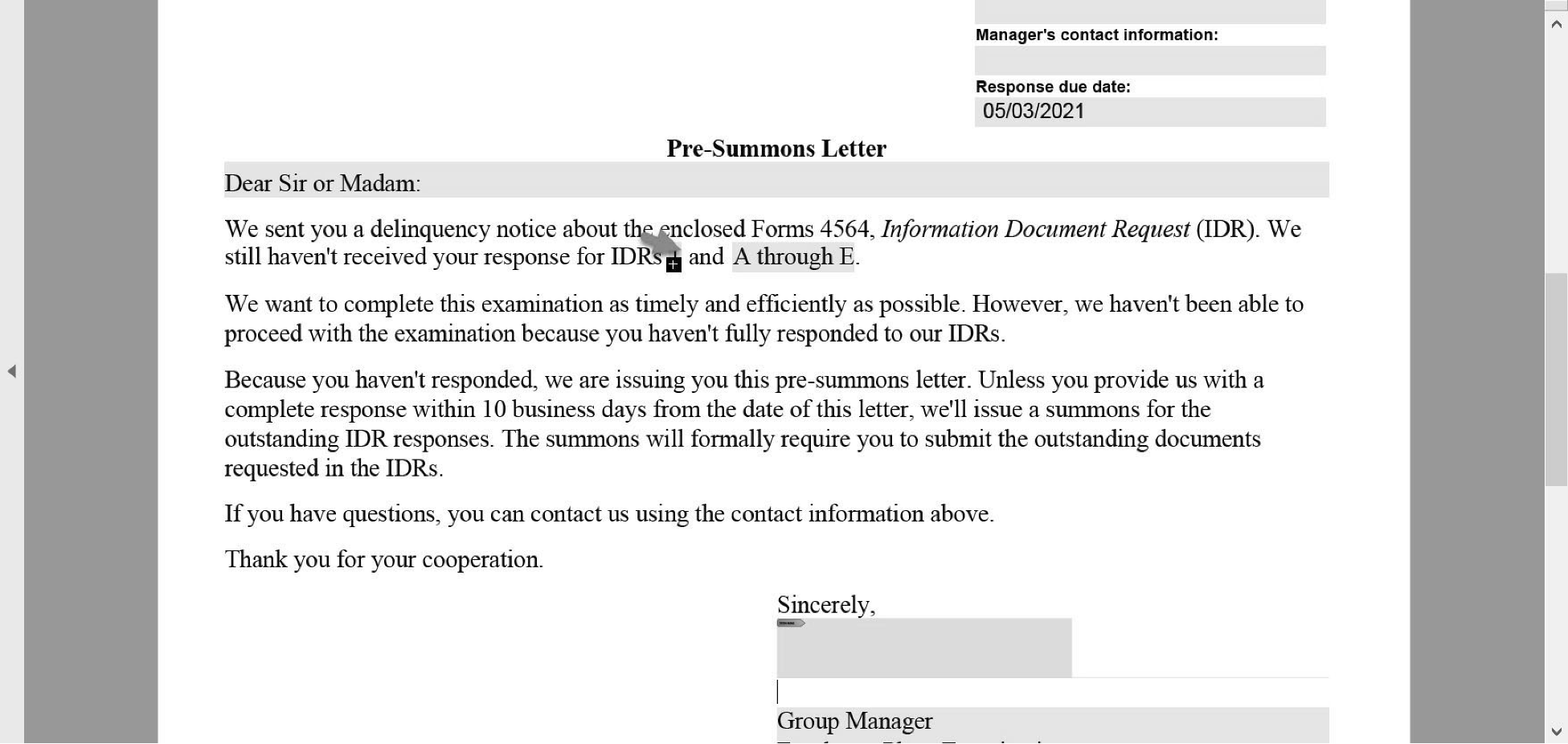
Check address and body of letter to ensure no plus sign. See IRM 7.11.14.6 , Fixing Adobe Overflow Indicator, for instructions on how to correct.
Insert the date on the letter.
Insert signature.
Print the letter to Adobe pdf.
The pdf letter will generate and appear.
Insert signature.
Save file.
Import final letter into the ESAM Disclosable case file.
Print letter and mail.
The specialist will:
On the Form 5621 for the case you review add “Duplicate ESAM case # has been correction disposed.”
On the Form 5621 for the correction disposed case, add “This case is duplicate of ESAM Case number and is being correction disposed.
Close both cases at the same time.
The manager will :
Access the case pending approval and check the box to either approve or reject the case for closing.
Click the “Request Case Suspension” button in ESAM and provide manager details on why the case is to be suspended.
Informal Suspense: Cases where soft guidance is requested (managerial approval required).
No status code.
No Notification Letter issued.
Group Suspense.
Activity on a case is stopped.
The case is placed in a suspense status in ESAM.
Notification Letter 1938 is issued to the taxpayer.
Situations which may require Group Suspense:
When soft guidance is not received within 60 days. In certain circumstances, it may be decided that cases will remain in informal suspense pending guidance i.e. Governmental plans.
Closing Agreement cases where lengthy unavoidable delays are preventing the Closing Agreement from moving forward.
A concurrent audit by EP Exam - maximum suspense time 6 months. If at the end of 6 months the exam has started by not finished their review and no determination issues have been identified - close the determination case. (The EP area manager will notify EP Examinations that the determination case is being closed). If at the end of 6 months the exam has started but has not completed their review and determination issues have been found - the determination case is kept open until the conclusion of the audit.
If there is a pending VC application. Coordinate with EP VC to determine if the Determination application can be closed. If the EP VC specialist contact information has not been provided, send an email to the EP VC Program Manager.
Exam Referral: If the issue does not affect the Plan’s qualification status - close the determination case i.e. operational issues; Discuss with your manager if a case should be held pending exam review.
Technical Advice cases - follow procedures in IRM 7.11.12.
A related DOL audit: DOL does not provide Determinations with a copy of their closing report; Contact DOL Agent to verify they have completed their review, and no determination issues were found. Note activity accordingly. If there are conflicting DOL issues, discuss it with your manager.
Cases pending litigation: Secure an explanation from the POA or Plan Sponsor regarding the nature of the litigation against the plan; Discuss the potential impact of the court case with your group manager.
Pending action by PBGC.
General Rule: Any case where a Specialist has had to stop their review pending a conclusion from a business function outside of EP Determinations should be placed in Group Suspense.
Steps to Follow:
Work on the determination cases to the furthest point possible.
Contact the other business unit to determine the status of their review.
If the related review is expected to continue beyond two weeks, the determination case should be placed in Group suspense.
Issue Notification Letter 1938 to the taxpayer (letter is signed by the group manager).
Follow-up at least once a month and update the Activity accordingly. In certain circumstances, less frequent contact make be warranted i.e. large case audits by the EPTA group.
Cases in suspense are required to remain on the specialist’s 6490 report.
Suspense cases are required to be included on the “Over 60 Day Report” provided with the monthly 6490.
-
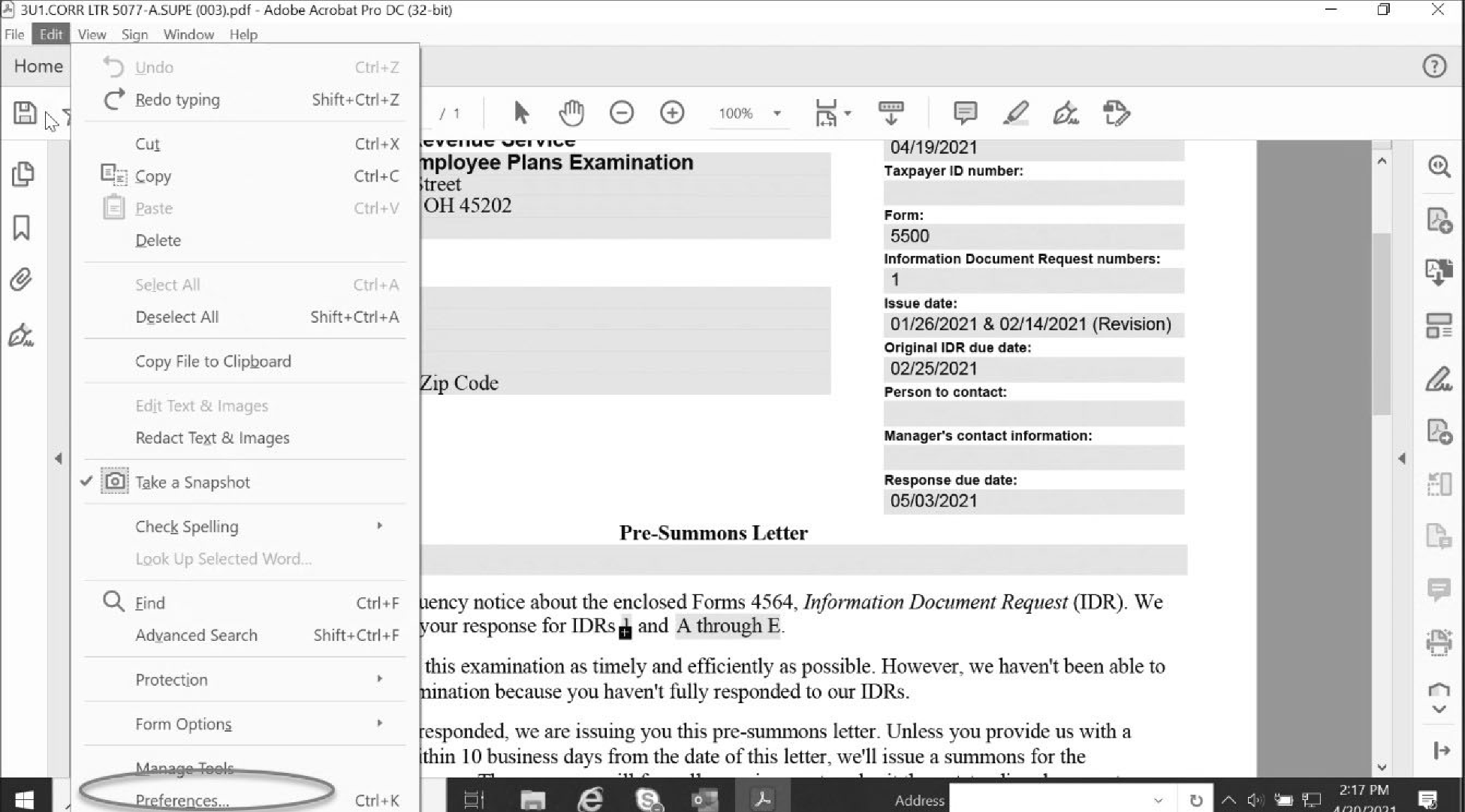
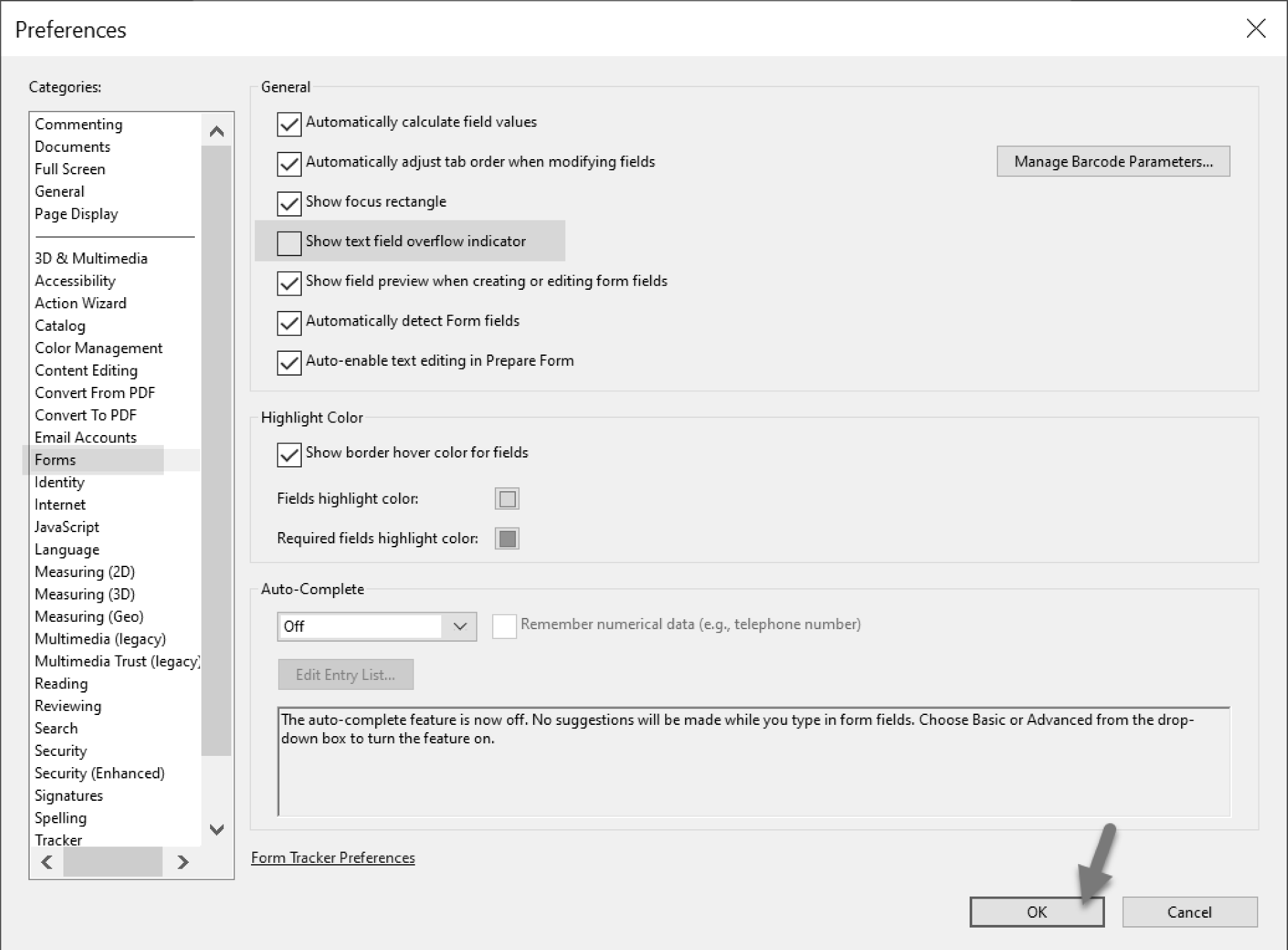
If there is a plus sign in any part of your letters, you can remove it by taking the following steps:
Under edit, the drop-down box will appear. Select “Preferences.”
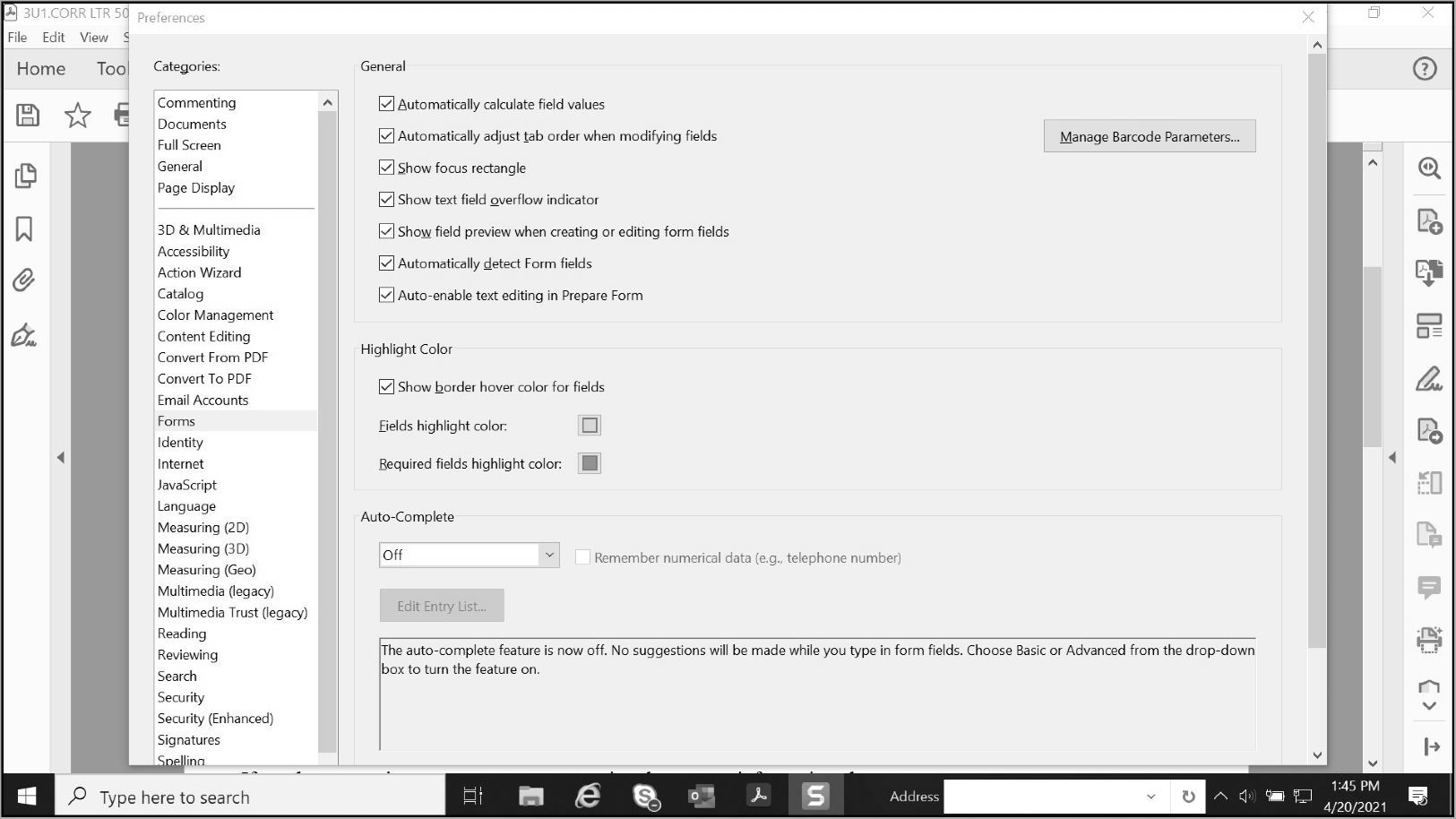
Under Categories section, select “Forms.”
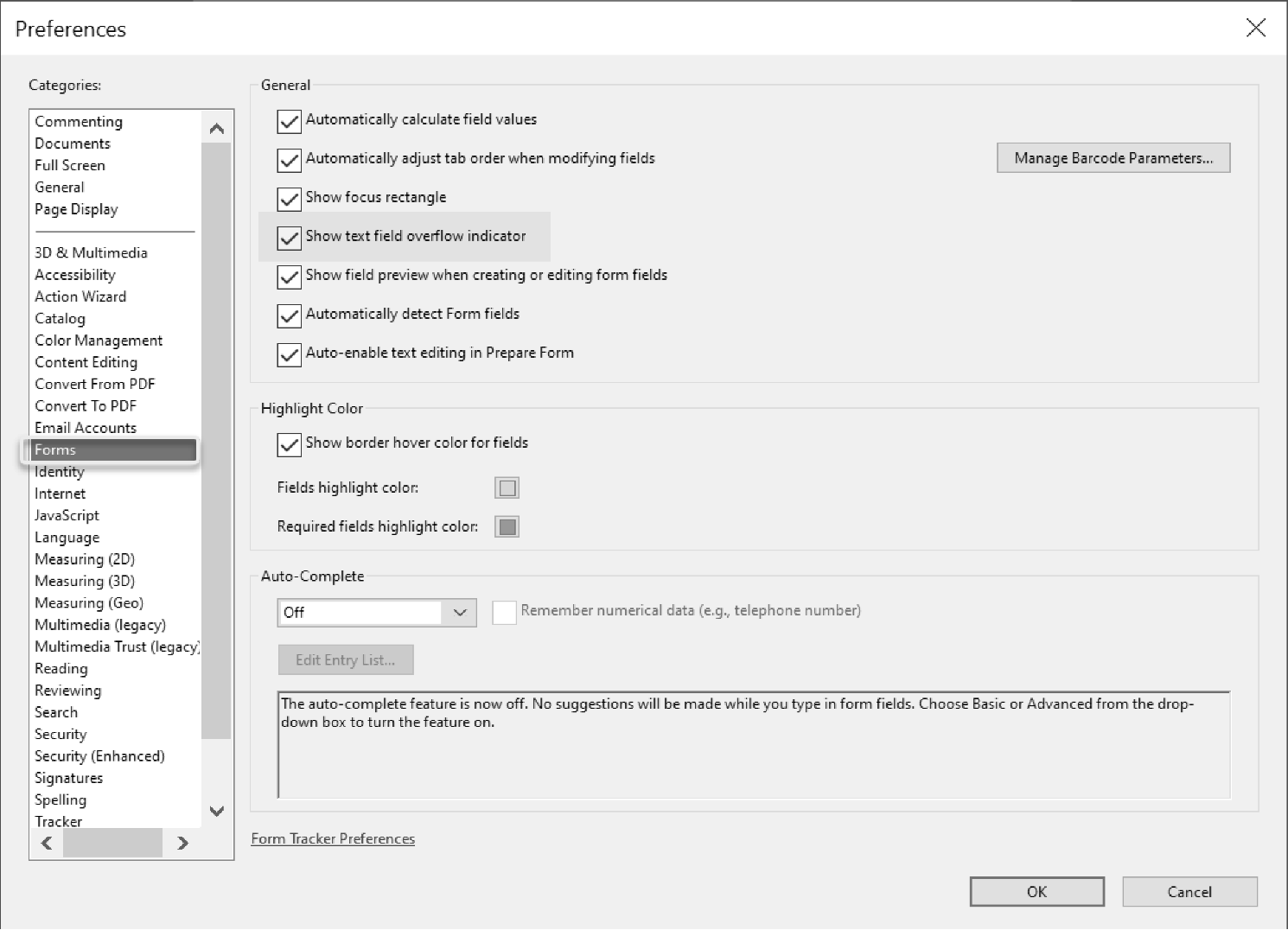
Under the General section, uncheck the box that says “Show a text field overflow indicator.”
After un-checking the box select “OK” and the plus sign will then disappear.
Admin: Pick up and sort the mail per this section.
Mail addressed to Customer Service or the Customer Service Manager will go to the EP Customer Service mailbox folder located in the EP mail file cabinet located on the 6th floor in the Cincinnati post of duty.
Undeliverable mail.
EP Determinations: If the application is closed, place it in the EP Customer Service mailbox folder. If the application is open, secure email the assigned specialist and provide the applicant’s name and letter number.
EP Examinations: Secure email the group manager of the specialist on the letter and provide the employer’s name and letter number.
Admin: Mail identified as "additional correspondence for an open application."
EP Examinations Correspondence Determinations Correspondence Scan and email the correspondence to the specialist assigned the application.
Hold and file correspondence by month.
Pull 6 month old correspondence once a month and research RCCMS to verify if the case is opened or closed.
If the case is open, refile the correspondence to be researched again the following month.
If the case is closed, email the group manager to inform them that the correspondence is 6 months old, the case is closed, and request permission to purge the case from the system.
If the group manager responds that the case is closed, save the email to your designated Outlook folder and purge the correspondence in the official shred bin.
If the group manager responds that the correspondence cannot be purged yet, follow the instructions they provide.
For correspondence received for an application not assigned to a specialist (status 51 or 61): Scan the correspondence.
Import into the ESAM case file, into the New Documents folder.
Print a copy of the AIS sheet and attach it to the correspondence.
Mail it to:
Internal Revenue Service
MS 6722
1973 N Rulon White Blvd
Ogden, UT 84044
If receiving correspondence after the case is closed, send an email to the group manager.
Scan and email the correspondence to the specialist assigned the application.
Print off an AIS sheet from the case on ESAM and attach it to the correspondence.
Mail the correspondence to:
Internal Revenue Service
MS 6722
1973 N Rulon White Blvd
Ogden, UT 84044Forward to EP Customer Service additional correspondence received after an application is closed.
The following provisions set forth customer service procedures within EP Determinations.
Customer Service Requests (Request) come in by mail or EEFax.
Upon receipt of a request the assigned Customer Service Administrative (Admin) and Customer Service Specialist will follow the designated procedures.
EEFaxes are received in the Customer Service Fax Mailbox.
The requests are saved via pdf on the Shared Server (Customer Service > Requests > eFax).
Verify the requests have been saved on the Shared Server, and the requests are moved from the Inbox to the "Reviewed and Numbered" folder in the Customer Service fax mailbox.
On the Shared Server, name the requests a request type. Review the requests and label them with the correct request type (example: LC for letter correction) and name (example LC – ABC Company).
For letter corrections, send a list to the Quality Admin Assistant to verify if plans submitted for letter corrections were selected for TEQMS. See IRM 7.11.14.10.3, Letter Corrections, for procedures.
Add the Requests to the CS Workload Tracking Spreadsheet and assign a number. See the CS Workload Tracking Spreadsheet Section.
Move the request to the appropriate unassigned case subfolder. (S:\EP\RA\Determ\CaseBatch\RMIP Project\Customer Service\EP Unassigned.
An Admin assistant sorts the mail and places all Requests in the Customer Service mailbox.
Scan receipts into a pdf and save on the shared server in a subfolder with the date in the Mail folder (S:\EP\RA\Determ\CaseBatch\RMIP Project\Customer Service\ Requests\Mail).
Assign the tracking number and input the request on the spreadsheet. See CS Workload Tracking Spreadsheet for EP Determination Request.
Rename the file and move to the appropriate unassigned Request folder. (S:\EP\RA\Determ\CaseBatch\RMIP Project\Customer Service\EP Unassigned).
Document calls on the "Customer Service Numbers" spreadsheet under the “phone calls” tab.
Complete the date, time and brief description for each phone call.
CS specialist opens the letter, verifies the type of letter and if there was an error inputting the address.
If it’s a correspondence letter for an open case, forward to the assigned specialist.
If it’s a closing letter and the address appears correct, scan and add it to the CS Workload Spreadsheet for more research to be completed.
If it’s a closing letter with an input error, update letter and mail to the taxpayer or POA.
Once letter updated, send email to employee, copying their manager, notifying them of the case name and type of error they made for informational purposes.
Update the Customer Service Numbers Spreadsheet, with number received and type of address corrections made each WebETS period.
Send copy of updated letter to Admin Assistant to import into ESAM case file.
After the CS specialist sorts all EEFaxes and mail to determine if the request is for EP Determinations, the Customer Service Admin Assistant will:
Give EP Requests a file tracking number based on the type of request, the WebETS month of numbering, and the receipt number. Record the tracking number and data on the Customer Service Workload Tracking Spreadsheet on the shared server.
The tracking number is broken down as follows:
Request Type:
Reprints = R
Letter Correction = LC
Status = S
Other = O
FOIA = F
Not Employee Plans = NEP
Associations = A
Interested Party Comments = IPCThe first four numbers are based on the WebETS month in which the request was received. For example, requests received during the February 2021 WebETS month have "2102" as the first four numbers.
The next three numbers are a three-digit receipt number, starting with "001" . For example, the first receipt is numbered 001 and the 100th receipt is numbered 100.
After you give the request a tracking number, file, and save it on the shared server based on the request type in the EP Unassigned folder. (S:\EP\RA\Determ\CaseBatch\RMIP Project\Customer Service\Requests\EP Unassigned).
Move assigned requests (cut and paste) to the specialist folder on the shared server when they are assigned.
The following sections provide the procedures on how to process EP Customer Service Requests.
All Non-EP Determinations Requests are forwarded to their applicable departments.
CS specialist: Email the assigned Admin Assistant or backup to request customer service work with a cc to the Customer Service Manager.
Admin assistant or backup will assign customer service work as follows:
Update spreadsheet with specialist assigned, and date.
Move assigned requests to specialist’s folder on Shared Server.
Send specialist email with list of assigned requests and place in folder.
EP Examinations sends requests for copies of favorable determination letters (FDL), plan documents or amendments.
EP Examiners submit requests via the Customer Service EEFax using the following instructions:
To secure documents for a sponsor, send a request to the Customer Service EEFax.
Customer Service EEFax number: 855-224-1311Please provide the following information:
Name of Plan Sponsor
Plan Sponsor’s EIN
Plan Number
Plan Name
Year letter was issued (helpful but not required)
Name of the EP Examiner making the request
EP Examinations requests are immediately assigned to the CS specialist.
Once the CS specialist reviews the request, and all information provided, the CS specialist forwards the request to the assigned Admin Assistant processing EP Examinations requests and a cc to the CS manager and Admin Assistant’s manager. The following information is provided in the email:
Detailed information needed.
A response date. This will generally be 24 hours.
Admin Assistant will:
Research for the case and pull requested documents.
Email the requested documents to the requesting CS Specialist and cc both the CS manager and their manager.
CS Specialist will:
Review the provided documents and verify that they are correct and complete.
Forward the documentation to the requesting EP Examiner.
Create a folder on the shared server that will contain the (i) the original request, (ii) a copy of the email to the Admin staff, and (iii) a copy of the final email to the EP Examinations staff.
Letter corrections must be in writing.
Verify if the plan was selected for TEQMS, see section Quality Assurance Staff – TEQMS at IRM 7.11.3.4.
Verify the request should be processed.
Process correction:
Correct the letter using the applicable letter from the repository. Correct all necessary letters. (Employer, POA1 and POA2).
Correct letter as necessary and add the required letter-appropriate paragraph or caveat (such as "This letter replaces prior letter issued" ).
5274 = Paragraph 28 for version 12-2020 and 34 on versions 02-2020 and before if using repository letter.
1132 = Paragraph 18 if using repository letter version 05-2020.
1520 = Complete the "supersedes" paragraph in the body of the Letter 1520 version 05-2020.Mail corrected letters.
Send an electronic copy of the following items to the Assigned Admin Assistant who imports them into the ESAM case file: (i) The written request for the letter correction, (ii) A copy of the corrected letters, and (iii) The Case Chronology Record (CCR).
Print a copy of the above information with a copy of the Application Identification Sheet (AIS) and give to the above Admin Assistant.
If the request should not be processed:
Call the POA or employer (ER) as applicable and discuss that the letter won’t be corrected. Attempt to contact twice. If unable to reach after the second attempt close the request without further action.
If there is no answer, leave a voicemail. Don’t include any PII in your voicemail.
Send all documentation and written requests to Admin staff to scan into the ESAM case file.
If the request requires an update to a caveat or letter language that would prevent a request from closing within 45 days:
Contact the Program Support manager to notify them of the caveat or letter language that needs to be updated.
Send an Outlook reminder to Programs and Support manager, Customer Service manager, Staff Assistant, Program Assistant and Area managers.
Record the request in the Weekly Customer Service Numbers spreadsheet, “Delayed Requests” tab. Update the tab with the Customer Service Number, Name of Employer, Date of Submission, Date Assigned, Reason for the Delay and Outlook Reminder Sent (Y or N).
Program Support manager: Complete the Form 14768, Request for New or Revised Correspondence, and submit the form and draft correspondence to Office of Taxpayer Correspondence or TE/GE Requests - *TE/GE Letters & Notices (tege.letters.notices@irs.gov).
Verify if Letter Correction was for a plan selected for TEQMS.
The current month’s TEQMS case selections are made on the last day of the WebETS cycle. QAS gets the list on Monday following the closing of the cycle.
The CS specialist will hold any letter correction requests received for cases closed in the current month until the TEQMS selections are made.
The CS specialist will:
Sort through and label requests on a weekly basis.
Send the list of case names of letter requests to QAS Admin Assistant on a weekly basis to check if QAS has any of the cases in inventory.
For cases selected for TEQMS but unassigned to a QAS Reviewer:
CS specialist will send the letter correction request to QAS Admin Assistant.
QAS Admin Assistant will import the request into the ESAM working folder and update the inventory spreadsheet with a comment stating, “Customer Service Request.”
CS specialists will follow up with QAS every two weeks for a status update.
The QAS Reviewer will let the QAS Admin Assistant know the result of the letter correction request when they notify them that they have completed their TEQMS review.
The QAS Admin Assistant will notify the CS specialist the result of the letter correction review for example, agreed with the Employer/Power of Attorney (ER/POA) request and revised letters issued; disagreed with the ER/POA request however, other errors were identified, and a revised letter was issued; disagreed with the ER/POA request and no revised letter issued.
The QAS Admin Assistant will update the spreadsheet with the completion date and add a comment regarding the result of the letter correction review.
For cases assigned to a QAS reviewer:
The CS specialist will send the letter correction request to the QAS Admin Assistant.
The QAS Admin Assistant will, (i) Import the request into the ESAM working folder and notify the reviewer; and (ii) Update the inventory spreadsheet with a comment stating, “Customer Service Request.”
The CS specialist will follow up every two weeks for a status update.
The reviewer will let the QAS Admin Assistant know the result of the letter correction request when they notify them that they have completed their TEQMS review.
The QAS Admin Assistant will notify the CS specialist of the result of the letter correction review, for example, agreed with the ER/POA request and revised letter issued; disagreed with the ER/POA request however, other errors were identified, and a revised letter was issued; disagreed with the ER/POA request and no revised letter was issued.
The QAS Admin Assistant will update the spreadsheet with the completion date and add a comment regarding the result of the letter correction review.
If the reviewer identifies letter errors on a TEQMS case and they have not been told it has a pending customer service request, the reviewer will contact the QAS Admin Assistant before issuing the Reviewers’ Memo (RM) to verify that no request is pending.
If the reviewer disagrees with the ER’s request (for example, the ER says an amendment should be in the letter, and the reviewer disagrees), the CS specialist will contact the requestor to let them know.
If the reviewer disagrees with the ER’s request but finds other errors in the letter, an RM will be issued to the CS specialist to make the appropriate corrections:
QAS will stamp and mail the corrected letters and import them into the ESAM case file.
The CS specialist will contact the requestor to let them know that EP disagreed with their request; however, other errors were found, and a corrected letter has been issued.
If the ER’s request lines up with the reviewer’s findings, an RM will be issued to the specialist to make the appropriate corrections.
QAS will stamp and mail the letters and import them into the ESAM case file.
No action would be required on the CS specialist’s part.
If the CS specialist receives a letter correction request for a case that was selected for TEQMS review, the CS specialist will share the letter correction request with QAS to determine if a revised letter was issued.
If QAS has the case open, QAS will review the letter correction request and issue a new letter, if applicable, and notify the CS specialist of its disposition; whether a new letter was issued, or the request denied.
If QAS has closed the case, verify if a letter correction was issued. If the letter was not corrected for the error that the taxpayer identified, and the CS specialist agrees with the correction, the CS specialist will process the letter correction.
QAS will make every attempt to ensure that cases with letter corrections are completed within 45 days of receipt of the letter request in customer service.
Research primarily in ESAM, and EDS only if case and letter are unavailable in ESAM.
In ESAM, if applications have a closing code of 01:
Is the number of participants 26 or greater?
If under 26 participants, we can only process requests made by the employer, a participant in the plan or the authorized representative identified on Form 2848.
If there are 26 participants or greater, the public can request a copy of the determination letter.
If ESAM has a copy of the requested determination letter, send it to the requestor.
If ESAM doesn’t have a copy of the determination letter, reprint a copy of the letter via EDS and stamp the letter with the case closing date listed on EDS.
Import a copy of the reprinted letter into the ESAM case file.
Send the letter to the requestor via the method requested (fax or mail).
If ESAM/EDS doesn’t show a prior letter:
Disclosure rules still apply. If a third party is requesting, (not the ER, POA or participant), research the plan’s latest filed Form 5500 to verify that the number of participants is 26 or greater.
If TEDS/EDS doesn’t show a determination letter or application, research the Form 5500s for the characteristic code of 3D. This could indicate that the plan is covered under a pre-approved plan document and therefore, the opinion or advisory letter is treated as a determination letter per Announcement 2011-82. You can access Form 5500s through either IDRS or the EFAST2 system.
Call and discuss with the requestor.
Research ESAM for the application.
If the case is assigned to a specialist, email the documents to the specialist to associate the documents with the case file.
If the case is not assigned to specialist:
Import documents into the New Documents folder on ESAM.
Add a CCR entry into the ESAM case file to notify the specialist assigned the case that the plan sponsor/POA sent additional correspondence to be associated with the case file.
Research ESAM to determine status of application.
Call requestor and provide status.
If there is no answer, leave a voicemail. Don’t leave PII in your voicemail.
If requestor doesn’t return call within 7 calendar days, call again.
If there is no answer, leave a voicemail.
If the requestor doesn’t call back within 7 calendar days of the 2nd voicemail, close request.
If application hasn’t been established:
Call the ER/POA and verify the Entity information they provided in the initial request, (EIN, Name, Date submitted).
Provide copy of proof of submission.
Get your manager’s approval to have application reestablished and confirm that it can be established under original postmark date.
Request that the ER/POA submit complete application directly to you.
If the User Fee was submitted and cashed, and you can’t find it on LINUS, request a copy of the front and back of the canceled check.
When you receive a copy of the check, send an email to Adjustments to ask them to locate the user fee, *TE/GE -EO-Adjustments.
When you receive the application, make a copy.
Send application to designated establishment contact for processing.
Keep request open until the application is established. When the case is established, close the request.
Per IRM 11.1.29(14), all interested party comments are available to the plan sponsor. (26 CFR 601.201(o)(5)(v)).
Interested parties are not entitled to confidentiality and therefore do not need to be sanitized.
Anonymous comments aren’t considered interested party comments and are not given to the employer.
Secure copies of the requested documents from the ESAM case.
Create Letter 1939A – TE/GE Customer Service – Interested Party, to be included with copies of the requested documents.
Mail or fax the documents via the method requested.
Send an electronic copy of the following items to the Assigned Admin Assistant who imports them into the ESAM case file.
The written request for the copies.
Case Chronology Record (CCR).
Print a copy of the above information with a copy of the Application Identification Sheet (AIS) and give to the above Admin Assistant.
These are requests that don’t fit under one of the categories previously listed. Process other requests depending on what they are requesting.
FOIA (Freedom of Information Act) and Code Section 6104 are two separate disclosure regimes.
FOIA applies to the entire federal government.
Code Section 6104 applies to certain documents from TE/GE.
FOIA
Fax any requests received that state "FOIA," "FOIA & 6104" or "Freedom of Information Act" that aren’t received directly from the Disclosure Office, to Privacy, Governmental Liaison and Disclosure (PGLD), FAX 877-891-6035.
Please state the following in your fax cover letter: “The attached request was received by us on xx/xx/xxxx. The submitted document states the request is being made pursuant to one of the following FOIA, FOIA & 6104, or Freedom of Information Act. Therefore, the request is being forwarded to PGLD to be processed pursuant to FOIA.” Email a copy of the fax and request to the FOIA Coordinator.
PGLD takes the following actions for the FOIA request:
Responds directly to the FOIA request for information. They’ll determine what information if any is disclosable and communicate directly with the requestor.
Communicates with the business unit and/or function (for example, EP) that has the information that is subject to disclosure under FOIA.
Issues a search memo when the FOIA is properly recorded. The FOIA Coordinator will send you a search memo if you haven’t received it directly from PGLD.
Note:
If you receive a FOIA search memo and/or a FOIA letter, directly from PGLD, requesting information, forward a copy of the request to the FOIA Coordinator. You may begin to look for the requested items, but do not send them to PGLD. Contact the FOIA Coordinator immediately about the requested items.
Please note the following items concerning FOIA requests:
Search for the requested information, but don’t create information that is responsive to the request, such as a chart or list.
The person who searches for the information must complete and sign the search memo with information about the search. It can’t be completed by someone else, such as a staff assistant, administrative assistant, manager, etc.
Contact the FOIA Coordinator with any questions about the search.
Don’t contact the requestor. PGLD will communicate with the requestor.
Provide information that is responsive to the FOIA request to the FOIA Coordinator. They will forward the information to Division Counsel for review, and then to PGLD.
There are several FOIA exemptions, such as Code Section 6103, that preclude information from being disclosed to the public. If you are concerned about all or a portion of the document being released, bring the relevant portion to the FOIA Coordinator’s attention and the reasons for your concern. They will convey that to Division Counsel. In any case, PGLD must have unredacted versions of the information that is identified as being responsive to the FOIA request if an appeal or litigation is commenced.
Time is of the essence in responding to the FOIA request. See IRM 11.3.13, Disclosure of Official Information, Freedom of Information Act.
Employee Plans fall under IRC 6104, and specifically, for EP, the governing statute is IRC 6104(a)(1)(B) and its regulations. (26 CFR 301.6104(a)-2 et seq.). Disclosure under 6104 pertains to information that is related to the qualification of a retirement plan, including but not limited to individually-designed plans and pre-approved plans. Therefore, disclosure requests under 6104 are sent and responded to by EP Determinations employees. See IRM 11.3.10, Disclosure of Official Information, Employee Plans Employees.
You can process requests that state Request made under IRC Section 6104 ONLY, immediately by following the procedures listed in IRM 7.11.14.21.2.
EP Determinations employees discuss the request directly with the requestor.
Processing Section 6104 requests ONLY
For plans with 25 or fewer participants - only the following or their designated POA may request information:
The employer.
Current plan participants.
Former employees, such as certain retired and terminated employees who have a vested right to plan benefits.
Beneficiaries or deceased former employees who are receiving benefits or are entitled to receive future plan benefits.
How to verify a plan participant:
Look for information showing that the participant is entitled to benefits under the plan:
Copy of annual benefits statement.
W-2s showing current participant in plan.
The application file can be requested which includes:
Plan document, including any amendments or restatements.
Correspondence related to the application.
IRS determination letter for the plan.
Information you can’t disclose:
Participant names or compensation.
Closing Agreement documentation, Voluntary Correction Program submission or examination issues if present.
Any part of the letter or document which does not directly relate to qualification. (26 CFR 301.6104(a)-3(d)).
Any other communication that doesn’t directly support the application.
Any information the IRS determines may adversely affect national defense.
Items that are identified as a trade secret.
If an application is closed in status "03" Incomplete, this is not an application under consideration before us or has been ruled on, and therefore is not disclosable per 26 CFR 301.6104-2.
A pre-approved specimen plan is not open for public inspection because the specimen plan does not have participants. A specimen plan is considered a shell document only and isn’t subject to IRC 6104 and therefore not disclosable.
TEGE Retention Standards. IRM 1.15 and Document 12990 Section 24 addresses TEGE Retention Standards:
Determinations applications and records are destroyed after 10 years.
The 10-year retention period begins on the date that the Federal Records Center receives the case files.
Top priority inquiries (must be processed within 45 days of receipt).
Research and immediately provide information.
Verify each page of the submission.
Review all documentation and correspondence submitted with the application, including the cover letter.
If you find a non-disclosable item, redact the information. Next to the redaction, note the following beside it to indicate the reason for the deletion. "Redacted per 26 CFR 301.6104(a)(1)(C)."
When the request has been processed and it’s ready to close, ensure the following is in the Request folder on the shared server (list is not all- inclusive):
Request.
Form 5464 - CCR for the Request.
Research conducted, such as EDS prints, copies of 5621 case documents, AIS, etc.
Fax confirmation sheet.
Final product, such as a copy of the corrected determination letter, copy of reprinted determination letter.
On Friday of each week, send an email to the CS Admin specialist with a cc to the other tax examiner.
Email includes the tracking number and name (LC2107001 – ABC Company).
Move the complete and final Request folder to the appropriate folder in the completed Request folder. (S:\EP\RA\Determ\CaseBatch\RMIP Project\Customer Service\Requests\EP COMPLETED).
Update the CS Workload Tracking Spreadsheet with the date the email was sent to the CS manager.
Complete every Monday or the next business day.
Email CS manager when completed.
Record retention requirements for mail/paper requests and electronic records.
For new requests received via mail:
Scan requests and add to the shared server (See 7.11.14.18 for processing procedures).
At the end of each month, purge paper copies from the prior month. This provides time for the shared server to complete the backup process to allow for information to be recovered if lost.
For older requests that are paper (not part of the new electronic process), not on the shared server:
When non-EP requests are received via electronic fax, forward them to the correct department and then purge them from the system.
If it is EP-related but NOT related to an actual case, purge at the end of the month, one year from date of closure.
If the request is related to an ESAM case, at the end of each month, verify the request was imported into the ESAM case file and then purge from the system.