)
oswa https:// vle di ou konekte ak sitwèb .gov san danje. Pataje enfòmasyon sansib sèlman sou sit entènèt ofisyèl ki an sekirite.
)
oswa https:// vle di ou konekte ak sitwèb .gov san danje. Pataje enfòmasyon sansib sèlman sou sit entènèt ofisyèl ki an sekirite.


- 5.8.8 Acceptance Processing
- 5.8.8.1 Program Scope and Objectives
- 5.8.8.1.1 Background
- 5.8.8.1.2 Authority
- 5.8.8.1.3 Roles and Responsibilities
- 5.8.8.1.4 Program Management and Review
- 5.8.8.1.5 Program Controls
- 5.8.8.1.6 Terms/Definitions/Acronyms
- 5.8.8.1.7 Related Resources
- 5.8.8.2 Amendment to Form 656
- 5.8.8.2.1 Amending Form 656
- 5.8.8.3 Pen and Ink Changes to Form 656
- 5.8.8.4 Securing Related Offers
- 5.8.8.5 Use of Electronic Signature on Offer Forms and Letters
- 5.8.8.6 Faxed Original or Amended Forms 656
- 5.8.8.7 Required Actions Prior to Closing an Offer as an Acceptance
- 5.8.8.8 Closing Actions on Accepted Offers
- 5.8.8.9 Public Inspection File
- 5.8.8.10 Processing the Closed Offer File
- 5.8.8.11 Acceptance Processing for Related, TFRP, Federal Employee, and Federal Contractor Offers
- 5.8.8.12 Mandatory Acceptance under IRC 7122(f)
- 5.8.8.12.1 Employee Responsibilities for Mandatory Acceptance under IRC 7122(f)
- 5.8.8.12.2 Acceptance Letter Issued under IRC 7122(f)
- 5.8.8.13 Legal Opinion of Counsel
- 5.8.8.13.1 Counsel Review and Concurrence (Legal Issues)
- 5.8.8.13.2 Counsel Review and Concurrence (Non-Legal Issues)
- 5.8.8.14 Continuous Wage Levy or Federal Payment Levy Program (FPLP) Levy
- 5.8.8.15 Destruction of Credit Reports
- 5.8.8.16 Forwarding Case Files to the Federal Record Center (FRC)
- 5.8.8.17 Notification of Dishonored Application Fee and/or TIPRA Payment
- Exhibit 5.8.8-1 Mandatory Acceptance Letter (Letter 6408)
Part 5. Collecting Process
Chapter 8. Offer in Compromise
Section 8. Acceptance Processing
5.8.8 Acceptance Processing
Manual Transmittal
July 15, 2026
Purpose
(1) This IRM transmits a revision to IRM 5.8.8, Offer in Compromise, Acceptance Processing.
Material Changes
(1) The following table outlines changes made throughout IRM 5.8.8, Offer in Compromise, Acceptance Processing.
| Number | Subsection | Nature of Change |
|---|---|---|
| (1) | 5.8.8.2 | (Title) Removed or Addedndum per IGM SBSE-05-0424-0003. |
| (2) | 5.8.8.2(1) | Per IGM SBSE-05-0424-0003, removed reference to the addendum, removed (b) as it was specific to use of the addendum. |
| (3) | 5.8.8.2(2) | Added note regarding levy proceeds from a valid outstanding levy not being used as payments toward the offer amount. This was moved from deleted section 5.8.8.2.2 Form 14640, Addendum to Form 656 per IGM SBSE-05-0424-0003. |
| (4) | 5.8.8.2(6) | Removed (6) as it was specific to the use of the Addendum. Per IGMs SBSE-05-0424-0003 and SBSE-05-0824-0043. |
| (5) | 5.8.8.2.1(1) | Removed reference to the addendum per IGM SBSE-05-0424-0003. |
| (6) | 5.8.8.2.1(2) | Added additional bullet to require an amended Form 656 if there’s a change to the terms, payment amount and/or basis per IGM SBSE-05-0424-0003. |
| (7) | 5.8.8.2.1(6) | Editorial update to correct SharePoint link for obtaining the Amended Form 656. |
| (8) | 5.8.8.2.1(7) | Added paragraph from deleted section 5.8.8.2.2 Form 14640, Addendum to Form 656 regarding the required signature date to use in the Acceptance letter per IGM SBSE-05-0424-0003. |
| (9) | 5.8.8.2.2 | Deleted section, no longer relevant per IGM SBSE-05-0424-0003 Interim Guidance on Obsoletion of Form 14640, Addendum to Form 656. |
| (10) | 5.8.8.2.2.1 | Deleted section, no longer relevant per IGM SBSE-05-0424-0003 Interim Guidance on Obsoletion of Form 14640, Addendum to Form 656. |
| (11) | 5.8.8.3 (1) | Revised to remove reference to addendum and remove last bullet per IGM SBSE-05-0824-0043. |
| (12) | 5.8.8.5 (1) | Revised to expand the use of electronic signatures per IGM SBSE-05-0724-0045 Interim Guidance on SCOIC Electronic Case Approval. |
| (13) | 5.8.8.6(1) | Added instruction to upload the amended Form 656 to the electronic storage platform per IGM SBSE-05-0325-0002. |
| (14) | 5.8.8.6(2) | Revised language surrounding the use of digital tools per IGM SBSE-05-0126-0017. |
| (15) | 5.8.8.7 | Removed all references to using the addendum to Form 656. |
| (16) | 5.8.8.7(18) | Added instruction per IGM SBSE-05-0724-0045 Interim Guidance on SCOIC Electronic Case Approval. |
| (17) | 5.8.8.8 | Added new (5) The OE/OS or designee is required to upload all closing documents to the electronic storage platform per IGM SBSE-05-0325-0002. |
| (18) | 5.8.8.10 | Revised throughout to address electronic case routing procedures per IGM SBSE-05-0325-0002. |
| (19) | 5.8.8.12(1) | Added revised language per IGM SBSE-05-0424-0020 regarding the IRS received date. |
| (20) | 5.8.8.14 | Updated levy release procedures throughout per IGM SBSE-05-0824-0043. |
(2) Reviewed and updated website addresses, typographical errors, and IRM references, as necessary.
Effect on Other Documents
IRM 5.8.8 published 11-06-2023 is superseded. This revision incorporates guidance from the following Interim Guidance Memos: SBSE-05-0424-0020 - Interim Guidance regarding IRS Received Date for Form 656, effective 04/22/2024, SBSE-05-0424-0003 - Interim guidance on obsoletion of Form 14640, Addendum to Form 656, effective 04/22/2026, SBSE-05-0724-0045 - Interim guidance on SCOIC electronic case approval, effective 07/29/2024, SBSE-05-0824-0043 - Interim guidance on pen and ink changes to form 656 and addressing levies at acceptance processing, effective 08/16/2024, SBSE-05-0325-0002 - Interim guidance on securing, processing original offers in compromise via individual online account (IOLA), and working electronic cases, effective 03/28/2025, SBSE-05-0126-0017 - Interim guidance on the mandatory use of digital tools for collection OIC employees, effective 01/26/2026.Audience
SB/SE Collection Offer Examiners, Offer Specialists, and other IRS employees who conduct offer in compromise acceptances.Effective Date
(07-15-2026)Thomas D. Kramer
Director, Collection Policy
Small Business/Self-Employed
Purpose: This chapter pertains to the acceptance of an offer based on sound decisions relating to an analysis of the taxpayer's facts, circumstances and financial situation. Documentation supporting this decision and approval at the proper levels is required to complete the acceptance. This section describes the process for accepting an offer.
Audience: These procedures apply to Internal Revenue Service (IRS) employees who are responsible for investigating offers:
Offer Examiners (OE) in Centralized Offer in Compromise (COIC)
Offer Specialists (OS) in the Field offer territories
Additional IRS employees assigned to the offer program and employees who conduct offer in compromise acceptances
Policy Owner: Director, Collection Policy.
Program Owner: SBSE Collection Policy, Offer in Compromise (OIC) Program.
Primary Stakeholders: The primary stakeholders are COIC and Field offer employees.
Program Goals: Policy Statement 5-100 explains the objective of the offer as a collection tool. This Internal Revenue Manual (IRM) section provides the fundamental knowledge and procedural guidance for the OE and OS engaged in the investigation of the offers. The procedures in the IRM include guidance so employees will be able to effectively and efficiently close their cases as an acceptance, when appropriate.
An offer in compromise (referred to as an offer or OIC) is an agreement between the taxpayer and the IRS to settle a federal tax debt for less than the full amount owed. Revenue Procedure 2003-71 explains the procedures applicable to the submission and processing of offers to compromise a tax liability under Section 7122 of the Internal Revenue Code. The Tax Increase Prevention and Reconciliation Act of 2005 (TIPRA) also provided additional requirements for submission of an offer. Notice 2006-68 provides an extensive discussion of the TIPRA changes.
Authorities relating to this section include:
Treasury Regulations 26 CFR 301.7122-1, Compromises
IRC 7122, Compromises
IRC 6702(b), Civil penalty for specified frivolous submissions
IRM 1.2.1.6.17, Policy Statement 5-100, Offers will be Accepted
26 CFR 300.3, Offer to compromise fee
Rev. Proc. 2003-71
Tax Increase Prevention and Reconciliation Act of 2005 (TIPRA)
IRM 1.2.2.6, Delegations of Authority for the Collecting Process
The director, Collection Policy is responsible for all the policies and procedures within the offer in compromise program.
The national program manager (OIC) is responsible for development and delivery of policies and procedures within the program.
Managers of employees investigating offers are responsible for ensuring these procedures are followed and employee actions are timely and accurate.
Offer examiners, offer specialists, and other employees investigating offers are responsible for following the procedures in this IRM.
Operational and program reviews are conducted on a yearly basis by the director, Specialty Collection Offers and Collection Policy respectively, with the use of data and reports from the Automated Offer In Compromise system and ENTITY case management system. Additionally, ad hoc reports which provide information on the inventory levels, hours per case, and age of offers in inventory or at time of closure are also available. See IRM 1.4.52, Offer in Compromise Manager’s Resource Guide.
Managerial case reviews are also completed as defined in IRM 1.4.52, Offer in Compromise Manager’s Resource Guide. These reviews are a method to determine if the offer amount accurately reflects the reasonable collection potential (RCP) as defined in Policy Statement P-5-100.
National quality reviews and consistency reviews are routinely conducted to ensure program consistency and effectiveness in case processing. As a result of these reviews, procedural changes may be identified to improve the quality and effectiveness of the program.
Automated Offer in Compromise (AOIC) is used to track offers submitted by taxpayers and record case actions and history. Ability to take action on AOIC is limited to specific offer employees. Additional permissions are provided based on an employee’s duties and responsibilities.
ICS is used by field employees as a method for inventory control and history documentation.
Managers are required to follow program management procedures and controls addressed in IRM 1.4.52, Offer in Compromise Manager’s Resource Guide.
Managerial requirements for case approval are defined in Del. Order 5-1.
The review conducted by the Office of Chief Counsel on certain offers is in accordance with Treasury Regulations section 301.7122-1 - Compromises.
The following is a list of common abbreviations, acronyms and definitions used throughout this IRM:
Acronym Definition AET Asset Equity Table – A table listing all the taxpayer’s assets, encumbrances, and exemptions. It then calculates the equity which is included in the reasonable collection potential (RCP) calculation. AOIC Automated Offer in Compromise – Computer application where offers in compromise are recorded and monitored from receipt to closure. History of the offer investigations conducted by COIC employees and of actions taken by Monitoring OIC (MOIC) units are also maintained on this system. CDP Collection Due Process - Allows taxpayers a right to a hearing before Independent Office of Appeals (Appeals) regarding proposed collection enforcement actions or filed Notice of Federal Tax Lien. COIC Centralized Offer in Compromise – Units located in Brookhaven and Memphis campus that complete initial processing and work offers to completion. Do not confuse this with MOIC. COIC units do not monitor or default accepted offers. DATC Doubt as to Collectibility – Basis for acceptance of an offer where there is doubt that the tax can be paid in full. DATL Doubt as to Liability – Basis for acceptance of an offer where there is doubt that the liability is correct. DCSC DCSC– Doubt as to Collectibility with Special Circumstance – Basis for acceptance of an offer where there is doubt that the tax can be paid in full and special circumstances exist that warrants accepting the offer for less than the reasonable collection potential (RCP). ETA Effective Tax Administration – Basis for acceptance of an offer where there is no doubt that the liability is correct or can be paid in full. However, requiring the taxpayer to fully pay the tax would either create an economic hardship or be a public policy/equity issue. ETA-NEH Effective Tax Administration-Non Economic Hardship - Basis for acceptance of an offer where there is no doubt that the liability is correct or can be paid in full. However, requiring the taxpayer to fully pay the tax would undermine public confidence that the tax laws are being administered in a fair and equitable manner. FPLP Federal Payment Levy Program - is an automated levy program the IRS has implemented with the Department of the Treasury, Bureau of the Fiscal Service (BFS) ICS Integrated Collection System – Computer application used by collection employees to monitor inventory. Histories of OIC investigations conducted by area office employees are maintained on this system. IET Income/Expense Table – A table that lists the income and expenses, both claimed and allowed for purposes of calculating reasonable collection potential (RCP). MOIC Monitoring Offer in Compromise – Units located in Brookhaven and Memphis campus that monitor accepted offers for offer payments and compliance for 5 years. OE Offer Examiner – A tax examiner appointed as an offer investigator and located in COIC. OI Other Investigation –Form 2209, Courtesy Investigation, is used for Area investigations in locating taxpayers or to gather information in collecting on assigned cases. OS Offer Specialist – A revenue officer appointed as an offer investigator, generally located in a field office. PE Process Examiner – A tax examiner who completes initial processability determinations on offers and is located in COIC. PII Personal Identifiable Information - Information that can be used to distinguish or trace an individual’s identity, such as name, social security number, date and place of birth, mothers maiden name, or biometric records. Refer to the Personally Identifiable Information SharePoint for further guidance. RCP Reasonable Collection Potential – The amount that could reasonably be collected from the taxpayer. SRP Shared Responsibility Payment Beginning in 2014, IRC section 5000A required all individuals to have qualifying health care coverage (called minimum essential coverage or MEC) in each month of the year, qualify for an exemption, or make an individual shared responsibility payment (SRP) when they file their tax return for the year. Pursuant to section 11081 of PL 115-97, for months beginning after December 31, 2018, the amount of the SRP is reduced to zero. TFRP Trust Fund Recovery Penalty – A penalty imposed by IRC 6672 against any individual or business entity required to collect, account for, and pay over taxes held in trust, who willfully fails to perform any of these activities. TIPRA Tax Increase Prevention and Reconciliation Act of 2005 – Section 509 – Legislation enacted in May 2006, which made major changes to the OIC program. Additional acceptable acronyms and abbreviations are found in the ReferenceNet, which may be viewed at: Acronyms Database.
Below are recommended resources, which can be used when processing an offer.
IRM 1.2.1.6, Policy Statements for the Collecting Process
IRM 1.2.2.6, Delegations of Authority for the Collecting Process
IRM 5.8, Offer in Compromise
Employees can find helpful information on the below websites:
SERP
IMD site for Interim Guidance Memorandums
When an offer is being recommended for acceptance, there may be a need to make changes to the Form 656, Offer in Compromise. Depending on the type of change, the taxpayer may be required to submit an amended Form 656.
Secure an amended Form 656 when there are changes to the entity, the taxpayer identification number, terms, payment amount, basis, and/or the signature.
The submission of an amended Form 656 may also require an additional payment of either 20% of the revised offer amount (less the amount previously submitted) or the revised periodic payment. The taxpayer will be given credit for payments made with the original offer, including any payments made throughout the offer process.
If the taxpayer agreed to the increased amount which was provided when the rejection letter was issued, notify the taxpayer that the amended offer requires managerial approval and if appropriate, counsel review before the offer may be accepted. Ensure the taxpayer understands that the submission of the amended offer does not extend the appeal period. Since the review process may extend past the time frame for submitting an appeal, advise the taxpayer they may wish to consider submitting a signed Form 13711, Request for Appeal of Offer in Compromise, to protect their right to appeal, in the event the approving official does not approve the acceptance recommendation or counsel’s review determines the offer does not meet legal requirements. Advise the taxpayer they only need to include the statement I wish to appeal in the "reason for disagreement" section on the Form 13711. No supporting documentation is required, the OE/OS will secure additional documentation if necessary.
When preparing amended contract terms, to address payments received to date that are not in whole dollars, follow the standard rules for rounding. Round down if the cents are $.49 and under, and round up if $.50 or over.
Example:
The taxpayer has paid periodic payments totaling $1,850.40. The amended contract will reference $1,850 payments received to date.
Example:
The taxpayer has paid periodic payments totaling $1,850.50. The amended contract will reference $1,851 payments received to date. Use only whole dollars when preparing amended contract terms. If the Decision Point RCP calculation includes cents, apply standard rounding rules. Round down if the cents are $.49 and under, and round up if $.50 or over.
For payment terms which are of unequal amounts, add an attachment to the Form 656 stating the specific payment terms, only if additional space or explanation is needed. Include the total, individual payment amounts and frequency in the attachment.
An amended Form 656 will be required if the changes are for other than those defined in IRM 5.8.8.3, Pen and Ink Changes to Form 656.
Secure an amended Form 656 when changes are required to change or update:
Entity, other than those defined in IRM 5.8.8.3, Pen and Ink Changes to Form 656 below. This includes those instances when a related offer is required.
Taxpayer identification number, other than those defined in IRM 5.8.8.3, Pen and Ink Changes to Form 656.
Terms, payment amount and/or basis.
Upon receipt, the amended Form 656 should be date stamped with the IRS received date. The receiving official will not sign the amended Form 656.
When in receipt of an amended Form 656 and related Form 656, the receiving official will not sign the amended and related Forms 656. The Process Examiner (PE) will sign any related offer after processability has been determined.
When accepting the offer requires an amended Form 656, the following actions will need to be taken on AOIC:
Update the Summary screen by inputting "A" (Amended) to reflect receipt of an amended Form 656.
Update the Offer Amount on AOIC, if applicable.
Update the Terms Type (Cash/Deferred) on AOIC, if applicable.
Do not change the Pending Date.
Write "AMENDED" and the last four digits of the AOIC assignment number on the top margin of Page 1 of the Form 656. An Amended Form 656 can also be accessed from the OIC Policy SharePoint near the bottom of the main screen or in the Related OIC, Reconsiderations, OIC Reconstruction and 656 Templates library using the links on the left hand side of the page.
The acceptance letter must reflect the signature date of the Form 656 being accepted. If the original Form 656 was amended, use the signature date from the amended Form 656.
Document the case history.
Pen and ink changes may be made to correct the below issues. No amended Form 656 will be required in these instances.
Note:
If the situation is other than or in addition to those defined in the below examples, an amended Form 656 must be secured. See IRM 5.8.8.2.1, Amending Form 656 above.
Middle initial is incorrect or missing. It may be added or removed to match IDRS.
SSN or EIN does not match IDRS and it is apparent that the reason for the mismatch is a transposition of numbers.
A business name and EIN was included on the Form 656 but conversation with the taxpayer confirmed they do not want to compromise the liabilities of the company (LLC, LLP, etc.). Remove the name by lining through the entity information. Reverse the related TC 480(s) and remove the related periods on AOIC, if applicable.
When the terms are completed but the total amount offered is blank, has a simple addition error, or is not completed. Total the payments as stated in the terms and fill in or correct the total amount of the offer. Payments in the terms must add up to the offer amount and may not exceed 24 months. The terms on Form 7249, Offer Acceptance Report, must match the terms on the Form 656.
Changing the day of the month of the payment(s) when requested by the taxpayer or POA.
Filling in the physical address or updating the taxpayer’s current address (including updating or adding a zip code, apartment number, PO Box, etc.), after verification with the taxpayer or POA.
Add or delete overlooked periods. If an additional period is assessed after the original Form 656 pending date on AOIC, the Transaction Code (TC) 480 date will reflect the original waiver date. Do not include any TC date with zero amounts. If a period has been full paid through other than TIPRA payments, remove the period. If the taxpayer owes any liabilities that may not be legally compromised, do not add them to Form 656.
Note:
Update the AOIC MFT screen by adding any new tax periods not included on the original Form 656 and/or deleting any tax periods that are no longer owed, unless the liabilities were paid as a result of TIPRA. The terms of the agreement on the Form 656 allow the IRS to add or delete any liabilities that were not listed or not found on IDRS. Therefore, an amended Form 656 is not required for the sole purpose of adding or deleting periods. If a new period is added, the TC 480 may need to be manually input. Document the case history that if the TC 480 is manually input, it will need to be manually released.
In all instances when a pen and ink change is appropriate, except to add an additional tax period with a balance owed or delete a tax period with no balance owed, the OE, OS, or PE must contact the taxpayer. Conversations and approvals must be well documented in the case history.
When pen and ink changes are made to the Form 656, the OE, OS, or PE must initial and date each change on the Form 656.
Taxpayers who owe joint and separate liabilities are required to file two Forms 656. If one Form 656 was submitted and the PE is unable to perfect it prior to being assigned to an OE/OS, the OE/OS must perfect the offer before acceptance, refer to IRM 5.8.4.7, Initial Offer Actions, for additional information. In these cases, an amended Form 656 will be required.
The amended offers should be one Form 656 for the primary taxpayer, which includes joint liabilities of both taxpayers and separate liabilities of the primary taxpayer, and one Form 656 for the secondary taxpayer, which includes joint liabilities of both taxpayers and separate liabilities of the secondary taxpayer. See IRM 5.8.3.6(2), Perfecting Offers, for additional information.
When loading the offer on AOIC, the waiver date will depend on whether the original offer included all periods or if related periods were discovered during the offer investigation and not included on the original offer, refer to IRM 5.8.4.7, Initial Offer Actions, for addition information. This section will include guidance on the appropriate waiver date for any tax liability not included on the original offer.
To expedite case closing actions, certain documents have been approved to be signed with electronic signature. To secure the approval signature electronically, it must meet the current security and verification standards of the IRS.
The below documents have been approved for electronic signature on accepted offers.
Form 7249, Offer Acceptance Report
Offer Acceptance Letter
All Collateral Agreements: Form 2261, Collateral Agreement - Future Income (Individual); Form 2261-A, Collateral Agreement Future Income - Corporation / Limited Liability Company; Form 2261-B, Collateral Agreement Adjusted Basis of Specific Assets; and Form 2261-C, Collateral Agreement - Waiver of Net Operating Losses, Capital Losses, and Unused Investment Credits.
Necessary documents for the approving official to determine the appropriateness of the closing action must be provided with the request.
A printed copy of the electronically executed document, form and/or letter, which includes the approving signature(s), must be included in the case file.
Follow the below procedures to prepare documents for electronic signature:
E-mail, electronic fax, or scan and save the documents in PDF format.
Internal use forms, including Form 7249, Offer Acceptance Report, may be signed using the approved visual typed signature and digital ID signature method.
The letter being provided to the taxpayer should include a graphic signature in the Signature block.
The ICS and/or AOIC history must clearly indicate the documents that are being submitted to the approving official.
The original or amended Form 656 may be accepted by fax (telephonic or electronic), Document Upload Tool (DUT), or secure messaging where contact with the taxpayer has been made and documented, faxed signatures meet legal requirements. Ensure the Form 656 contract is complete with no missing or altered pages, and is signed. See IRM 5.8.1.15.8, Signatures. Upload the amended Form 656 to the electronic storage platform (currently DCR).
If the original Form 656 was processed without a signature, and phone contact has been made with the taxpayer and documented request the taxpayer to provide a signed copy via the digital tools available. If all available digital communication options have been offered, declined, and exhausted, employees should offer postal mail channels as available options. If you are unable to reach the taxpayer by phone, you may send a Letter 2844, Offer in Compromise Additional Information Request, option D requesting the taxpayer to call. If the taxpayer does not respond, return the offer. We cannot accept the terms of an unsigned Form 656.
Re-check IDRS Using OIC-IAT — Tax must not be compromised unless it is assessed and legally due. IDRS must be re-checked to ensure there are no audit, AUR, SFR or ASFR assessments pending, and that all taxes included on the accepted offer have been properly assessed and are still due and owed. If an open audit or AUR (TC 922 on TXMODA) is found on a period included as part of the offer, follow procedures in IRM 5.8.4.17, Pending Assessments. If an amended return has been processed, the adjustment must post before acceptance. Document the case history.
Re- Check on IDRS TXMOD/IMFOL/BMFOL to identify 965(h) and 965 (i) election accounts, refer to the following transaction codes which include TC 766 CRN 263 and TC 971 AC 114 or TC 971 AC 115 on the 2017/2018 tax account. An acceptance which includes tax years that have IRC 965 liabilities or potential IRC 965 liabilities must include an IRC 965 addendum.
Analyze accounts on AOIC, IDRS and OIC-IAT and resolve any issues involving misapplied payments or deposits. Correct any DPCs If needed. Do not change IDRS DPCs such as 02 (trust fund), and 53 (discharge), but add to the AOIC payment screen and explain in the remarks to MOIC the payments that count towards the offer amount. review the 4710 Database SharePoint site against the amount on the AOIC Deposit Screen.
Check for Out of Business BMF Entities - Research IDRS using OIC-IAT for any Out of Business BMF entities that have open filing requirements and close with the appropriate TC 59X transaction.
Use OIC-IAT to check for TC 671 Dishonored OIC Application Fee and TIPRA payments. If dishonored, contact should be made immediately, requesting certified payment, to be made within 10 business days or the offer will be returned. Document the AOIC history. If the taxpayer does not replace the dishonored check, see IRM 5.8.7.2.2.5, Return for Dishonored Payments.
Check IDRS for Department of Justice (DOJ) or Docketed Court Controls — Before acceptance, check the following to see if the offer must have DOJ approval before acceptance. Contact Area Counsel to share any potential recommendation for acceptance with DOJ. See IRM 5.8.1.6.1, Tax Cases Controlled by Department of Justice, and IRM 5.8.1.6.2, Docketed Tax Court Cases, for additional information.
Research the DOJ indicators below:
DOJ Indicators to Research 1) Check for an ICS account assignment to an Advisor. This could indicate a pre-suit filing referral to DOJ (i.e., a third-party action to quiet title on property the taxpayer has an interest in or other litigation action by or against the government). 2) Check IDRS for a posted TC 971 AC 180-181, 184-189 module which indicates a restitution-based assessment (RBA) and verify that no RBA modules are included on the accepted offer. Check IDRS for indication of pending, current, or ongoing litigation actions. See table below:
Item Description 1 A -W litigation freeze appears on the module and/or account (i.e., the module contains a TC 520 cc 70-80,82, 84), 2 The module or account is in Status 72, 3 The module contains a TC 550 Definer Code 04 preceded by a TC 520 cc 80 indicating that DOJ obtained a judgment and has maintained jurisdiction, 4 The module contains a TC 550 Definer Code 04 followed by a TC 521 without a closing code meaning that DOJ has returned jurisdiction to the IRS. However, contact Advisory to determine the litigation status, and 5 The module contains a TC 670 DPC 08 indicating litigation case collections DOJ sent through the IRS lockbox for application to the taxpayer’s liability (i.e., from judgments, restitution, settlements, etc.). 6 References:IRM 25.3.8, TC 520 - W Freeze Servicewide Guide, and IRM 25.3.8.2(4), What Are TC 520 - W Freeze Litigation Codes. Ensure the AOIC address and IDRS address match. If not, contact the taxpayer and verify the correct official mailing address. After verifying the correct taxpayer address, update in AOIC if necessary.
The entity that is submitting the offer must be on the first name line in AOIC. The IDRS nameline will usually result in the correct population in AOIC, but for extremely long names, it may be necessary to edit or abbreviate for the full IMF entity and for the maximum BMF entity to fit on name line 1. If necessary, part of the BMF entity name can roll to name line 2. For IMF taxpayers, the second nameline should only be populated when the information is required for mail delivery.
If the OE/OS is submitting an acceptance recommendation subsequent to the OIC-IAT research conducted during the initial analysis, the OE/OS will use OIC-IAT to verify the taxpayer is still compliant with filing, making any required periodic TIPRA payments, and making ES payments and/or FTDs.
Credit Report request— When appropriate, a full credit report may be secured on any case to assist in locating taxpayer assets and verifying financial information. After reviewing the credit report, the case history must be documented with an analysis of the findings as well as the reason(s) for the request. A full credit report must be requested when the current aggregate balance meets the amount as defined in IRM 5.8.5.3.1.2, Securing Credit Reports to Verify Taxpayer Information. All requests for credit reports require managerial approval.
Update the AOIC Offer screen:
Update the basis for compromise to reflect the correct basis, if changed, and document the existence of special circumstances, if applicable.
Update the disposition code to 1 (proposed acceptance).
Update the "Original/Amended" (if applicable).
Update the offer amount (if applicable).
Update the AGI field on AOIC.
Update mirroring requirements - when closing a case on AOIC, indicate if mirroring or manual code reversal is required. Provide a Yes or No response for MFT 30 to 31, MFT 35 to 65 and Manual TC Input requirements
Update the AOIC MFT Screen: Verify the correct assessment date, including any individual shared responsibility payment (SRP) assessed pursuant to IRC section 5000A (MFT 35 and MFT 65 mirrored assessments). Update module(s) that may have changed. Go to the MFT screen:
Select the Update Accrued Date tab
Input the date the interest is to be computed to
Go to the Request Interest tab and re-input the date for the accrual of interest
Review the data to make sure it is correct;
Click Submit to populate the information into AOIC
If... Then... Any modules have restricted penalty or interest Use IDRS command code COMPAD or COMPAF to determine the accrued amounts. Include the accrued amounts in the total liability listed on the MFT screen. The manually accrued amounts must also be added to the paper transcript. Any modules are Non-Masterfile and not on IDRS Secure an Automated Non-Masterfile (ANMF) transcript. Update as necessary using IDRS command code COMPAD and/or COMPAF. The module was full paid as a result of a payment action other than TIPRA (such as refund offset, prior levy payment, etc.) Remove the period from the MFT screen on AOIC, and update the Form 656 to reflect the periods to be compromised. The payment(s) that satisfied the tax period included both a TIPRA payment, and other payment (such as refund offset, prior levy payment) The MFT screen will reflect a zero balance due. Do not remove the period from the MFT screen on AOIC. Do not update the Form 656 to remove the periods that were full paid. Note:
Determine if the aggregate balance due requires second-level management approval per IRM 1.2.2.6.1, Delegation Order 5-1 (Rev. 5), To Accept, Reject, Return, Terminate or Acknowledge Withdrawals of Offers in Compromise. The requirement for approval is based on the aggregate liability on Form(s) 7249 for all related offers on the same taxpayer at the time the offer is submitted for approval. For example, The amended offers should be one Form 656 for the primary taxpayer, which includes joint liabilities of both taxpayers and separate liabilities of the primary taxpayer, and one Form 656 for the secondary taxpayer, which includes joint liabilities of both taxpayers and separate liabilities of the secondary taxpayer. See IRM 5.8.3.6(2), for additional information.
Update the AOIC Terms Screen: Update the Accepted Terms screen to those reflected on the accepted offer. Do not update the Proposed Terms. For consistency in structure and to reduce errors use the pre-populated AOIC Terms templates based on the terms of the accepted Form 656 or amended Form 656. When inputting an amended Form 656, use the appropriate offer terms; Lump Sum offer or Periodic payment. The amended Form 656 will have the same fillable fields as the original Form 656. The updating of the AOIC Summary Screen from Original "O" to Amended "A" will record that an amended offer was secured as per IRM 5.8.8.2.1. The Accepted Term selections are shown below:
Abbreviation Definition CB Lump sum offer with balance due CF Lump sum full paid at acceptance PP Periodic Payment UC Unique circumstances (should rarely be used) Per the Form 656, the periodic payment terms must be made within 6 to 24 months and the payments cannot exceed 24 months. The first payment submitted with the offer or Amended Form 656 is considered to be month one and therefore, the remainder of the payments must be made within 23 months for a total of 24 months. If you are referencing a separate final payment, then the interim payments (payments between first payment and final payment) should not exceed 22 months, as in the example below.
Example:
Periodic payment offer terms of $25,000 to be paid within 24 months. The amount paid with the offer is $2,000, then $1,000 on the 20th day of each month for a total of 22 months with the final payment of $1,000 due on the 20th day of the 24th month. After making all the payments, you must still comply with all of the other contract provisions contained in Section 7, Offer Terms, Conditions, and Legal Agreement, of Form 656.
Alternately, you could show $0 for the final payment and 0 for day and month.
Example:
Periodic payment offer terms of $25,000 to be paid within 24 months. The amount paid with the offer is $2,000, then $1,000 on the 20th day of each month for a total of 23 months with the final payment of $0 due on the 0 day of the 0 month. After making all the payments, you must still comply with all of the other contract provisions contained in Section 7, Offer Terms, Conditions, and Legal Agreement, of Form 656
Ensure you verify the offer terms on the Form 656 match the offer terms on the Form 7249 and are mathematically accurate.
Refresh Masterfile Data: Go to the MFT screen, select Master File, then select Refresh Masterfile Data. This action should be completed prior to generating the Form 7249. This action ensures the Form 7249 and the AOIC Masterfile Screen (information is systemically redacted on this type of transcript) are in close agreement since the Form 7249 requires various levels of approval, and the Form 7249 becomes a public document.
Note:
OE/OS should check IDRS to be sure there are no credit balances on the offer modules prior to refreshing and printing Form 7249.
Reminder:
When preparing the Form 7249 that involves an LLC, verify the name line accurately reflects the appropriate title. For those entities with employment taxes incurred on or after January 1, 2009, the LLC is the taxpayer and the Form 7249 should only contain the name of the LLC. See Treasury Regulation 301.7701-2(c)(2)(iv). For those excise tax liabilities imposed on or after January 1, 2008, the LLC is the taxpayer and the name on the Form 7249 should be the name of the LLC. See Treasury Regulation 301.7701-2(c)(2)(v).
Caution:
If the LLC is a Single Member Organization (SMO), the second nameline on IDRS typically includes the name of the single member. This nameline should not be recorded in AOIC, and if pulled into the Offer Entity screen via Data Download, should be deleted before proceeding with generation of Form 7249 or issuance of AOIC correspondence.
Document the Case History — Before closing a case as an acceptance, document the case history on AOIC regarding the decision.
ICS Users - ICS users must also include a short summary paragraph on AOIC that explains the reason for the acceptance, any discrepancies between information provided on the CIS and the RCP, and that "The complete history can be found on ICS." Approving officials must indicate concurrence of the closing action on AOIC.
Special Instructions for MOIC - Include the total offer payments received (using OIC-IAT) and any special instructions such as if proceeds will be coming from the sale of real estate, or if any pending levy payments are to be excluded from the offer amount. See IRM 5.12, Federal Tax Liens, for more information about when to re-file a NFTL. Advise MOIC if the taxpayer requested special application of any deposit. If the offer includes NMF periods, clearly mark the case file folder with “NMF” using a red marker. If the offer is on the behalf of a deceased taxpayer or their estate, ensure that AOIC remarks document estate information and if a final return has been filed. If MOIC will need to monitor for future return(s), provide that instruction in the AOIC remarks. If a module with a liability present is purposely excluded from the offer (RBA/965h/965i), note in the AOIC remarks to avoid confusion with overlooked periods. It there are NMF modules are included in the accepted offer, document AOIC remarks appropriately.
Form 656 Revision - Document AOIC remarks with the revision date of the Form 656 of the accepted offer. This provides MOIC with the agreed provisions of the accepted offer.
Note:
If the Form 656 was accepted for processing and was received no later than the month after the revision date, an amended form is not necessary. If later, an amended Form 656 is required if you are recommending acceptance.
Example:
Form 656 is received May 30, 2023, on the April 2022 revision but was accepted for processing by the PE. You may use this form for an acceptance although it may have been outside the timeframe for processability per the 30 day grace period.
Generate and print letters and reports — Generate and print letters and reports as follows:
The Acceptance Recommendation Report should only be prepared on those cases meeting counsel criteria, See IRM 5.8.1.6.6, Counsel. Make sure the Acceptance Recommendation Report and case history clearly and accurately reflect the reason for the acceptance. This is particularly important in Effective Tax Administration (ETA) and Doubt as to Collectibility with Special Circumstances (DATC-SC) cases (see Exhibit 5.8.8-1 below). The report may be found on ICS or OIC SharePoint. The report should include the following information: (1) The cause of the delinquency and status of current compliance; (2) The amount of the RCP and an explanation of how the RCP was calculated; (3) Whether or not special circumstances exist and how they affected the agreed offer amount; such as age or existing health issues, etc.; (4) Negotiations resulting in the acceptable offer amount; (5) A conclusion that summarizes the basis for acceptance.
The Confidential Information Report may be required in those rare situations where relevant facts of a confidential nature exist that should not be included in the acceptance recommendation report. Complete a supplemental memorandum and include it in the case file. Do not include information already discussed in the acceptance recommendation report.
Generate and print the appropriate acceptance letter and POA letter, if applicable, for the signature of the delegated official(s). Ensure the date used in the letter is the actual date the taxpayer signed the offer. Attach copies of the accepted Form 656 and any applicable collateral agreement(s). As a service to the taxpayer, all acceptance letters must include Paragraph selection C to allow taxpayers to know how much they have already paid and when their next payment is due.
Generally, the user fee is applied to the offer liabilities. However, the taxpayer may request that the user fee be refunded if the offer is accepted on the basis of Effective Tax Administration (ETA) public policy or economic hardship, or if the offer is accepted on the basis of Doubt as to Collectibility with Special Circumstances (DATC-SC) economic hardship only. In these cases, you must use Paragraph selection B in the acceptance letter. Document AOIC closing remarks regarding the fee application/refund.
Generate Form 7249 and verify that it reflects the current liability(s).
Print Form 7249 for the required signatures. The accepting official has delegated authority for acceptance based on the type and dollar amount of the case. IRM 1.2.2.6.1, Delegation Order 5-1 (Rev. 5), To Accept, Reject, Return, Terminate or Acknowledge Withdrawals of Offers in Compromise, provides the level of authority for approving all offer dispositions.
Clear Forms and Letters: AOIC Remarks is systemically populated with the date the form/letter is cleared on AOIC; therefore, it is essential that the OE/OS clear the forms and letters upon issuance. Delays in this action will cause incorrect dates to appear in the AOIC remarks.
Example:
The final determination letter was mailed on February 2, 2023 which is the date showing in the AOIC history section. The OE/OS does not clear the forms/letters until May 5, 2023. Since May 5, 2023 is the date the form/letter was cleared, the AOIC remarks will incorrectly reflect any open paragraph information with a May 5, 2023 date.
Assemble file using Document 9600-B — The file must be assembled using Document 9600-B, Tab Dividers for Offer-in-Compromise Case Files Document.
Submit the file for approval and required signature. The OE/OS must assign the offer to the AOIC managerial approval assignment number prior to submitting for approval. Submit the file for all required signatures including routing to Counsel for review, if required. See, IRM 5.8.8.13, Legal Opinion of Counsel, below and IRM 1.2.2.6, Delegations of Authority for the Collection Process, for approval levels. Scan/convert to pdf and upload the documents in the order below (if applicable) for electronic managerial approval. Ensure an electronically signed letter is associated with the physical case file.
Form 7249
Determination letter
AET/IET (Decision Point tables)
Form 656 and special circumstances attachment(s)
Form 433-A(OIC)/Form 433-A
Form 433-B(OIC)/Form 433-B
NFTL request (Form 12636)(to send for input) if applicable. This is a separate attachment
Upon securing all required approval(s) and signature(s), date and mail the acceptance letter(s). Acceptance letters generated at the end of the year should be dated and mailed the same calendar year that the letters are signed. Signed and dated copies must be retained in the offer file.
Ensure Form 7249 has all required signatures and all tax periods, which may be compromised after the 5-year compliance period based on the Form 656, Offer in Compromise, included and any additional name lines such as In care of have been redacted.
Close the case on AOIC and process in accordance with procedures defined in IRM 5.8.8.10, Processing the Closed Offer File, below.
When closing the offer on AOIC you will be prompted to answer whether the offer is being accepted under ETA criteria or not, respond based on the basis the offer is accepted.
The OE/OS or designee is required to upload all closing documents to the electronic storage platform (currently DCR)
Public inspection of certain information regarding all offers accepted under IRC 7122 is authorized by IRC 6103(k)(1).
Treasury Reg. 601.702 (d) (8) requires that for one year after the date of execution, a copy of Form 7249, Offer Acceptance Report, for each accepted offer with respect to any liability for a tax imposed by Title 26, shall be made available. Accepted offer records will be maintained for this purpose and made available to the public for a period of one year.
Note:
Rev. Rul. 53-117, 1953-1 C.B. 498 complements Treasury Reg. 601.702(d)(8) and explains that Form 7249 serves two different purposes. First, it provides the format for public inspection, which is mandated by Executive Order 10386. Second, it satisfies the filing requirement and other criteria arising under IRC 7122(b).
For each accepted offer, a redacted copy of the Form 7249 will be available on the AOIC system.
All requests for OIC PIF must be submitted on Form 15086, Offer in Compromise Public Inspection File Request, by electronic fax or mail per the instructions on the IRS website.
Before responding to Form 15086 request, the employee must review Form 7249 and redact any PII, such as secondary namelines containing "in care of" or the name of the single member owner of an LLC.
Memphis COIC will respond to the request with Letter 6456, Public Inspection File, and include either the Form 7249 or a copy of the taxpayer’s request.
Memphis COIC will record all requests received in the PIF mailbox and archive them in the appropriate folder.
Once an offer has been closed on AOIC, it should be held in-house until National Quality (NQ) has had sufficient time to pull for review. Field Area Office NQ randomly selected cases are identified on the AOIC Quality Review Listing the following Monday after closure. If the case is not selected for review, the offer should be released on AOIC on the following Monday after closure or as soon as practical thereafter and assigned to the applicable MOIC unit. Care must be used to ensure that the offer is mailed or sent electronically (with encryption) to the same unit it is released to on AOIC. Do not mail MOIC paper case files if the complete file is being maintained electronically.
If the paper case is chosen for NQ review, copies of the following documents should be made and placed in the file in lieu of the originals before the offer is forwarded for review. The offer should be validated and released on AOIC on the following Monday after closure or as soon as practical before sending the electronic copies or original documents to the MOIC unit in a file folder clearly indicating that the remaining information was mailed to NQ.
Original and amended Form 656
Form 7249, Offer Acceptance Report
Copy of the Acceptance letter(s)
Any collateral agreements
Before forwarding the case to the MOIC unit, take the following steps:
Verify that the original, any amended Form(s) 656, if required, are in the case file.
Check to be sure the Form(s) 656, Form 7249, IDRS, and AOIC all reflect the same tax liability(ies).
Verify that the waiver dates on the Form(s) 656, IDRS, and AOIC are correct and consistent.
Ensure the correct statute expiration code (P, B, or S) is on IDRS and the AOIC MFT Screen.
Verify the offer amount on AOIC is correct.
Update Data Download before releasing jurisdiction to MOIC. This action will ensure the Primary Location Code and Collection Location Code are updated.
Document AOIC Remarks with any special instructions, such as addressing lien filing, etc.
Appeals accepted CDP files are held by Appeals. The acceptance information is sent to MOIC on a Form 3210, refer to IRM 8.20.7.20.20.1.2(6), Accepted OIC Appeals Considered. APS will update and close AOIC for all Appeals accepted CDP related offers that have been loaded on AOIC. See IRM 8.20.7-17, Automated Offer in Compromise (AOIC) Update Procedures.
Mail Form 3210 with accepted offer paper files or E-3210 (when available) for accepted electronic offer files. Shipping offices must ensure that a receipted copy of the Form 3210 is received or review the SCOIC Inventory Portal for receipt. If a receipted copy of the Form 3210 or E-3210 is not received within 30 calendar days of mailing, contact must be made with the receiving office and tracing actions taken. Appropriate actions must be taken to recover or replace missing or lost files.
When two or more related offers are being recommended for acceptance, but acceptance is based on one financial analysis, one acceptance narrative may be used. A separate file should be created for each entity containing the separate items that pertain to each offer. It is not necessary to duplicate information that pertains to both or all files. The files must remain together and clearly marked indicating that there are related offers (for example "1 of 2" and "2 of 2" ).
Note:
When there are related offers, which include joint and separate liabilities, where identical financial information has been provided and one or both of the related offers needs to be sent to counsel for approval, both offers must be provided for counsel review so the approvals may be processed simultaneously.
When the accepted offer includes Trust Fund Recovery Penalty (TFRP) assessments, a careful review must be made to ensure all TFRP assessments are included. The Forms 656 and 7249 must match and must reflect each individually assessed TFRP tax period.
Offers from Federal employees require a determination of whether public policy implications exist based on the sensitivity of the employee’s position or area of responsibility. The result of this consideration should be documented in the case file. See Del. Order 5-1 for approval authorities for offer acceptances for employees of the IRS.
Offers from a Federal Contractor require a determination of whether public policy implications exist. The result of this consideration should be documented in the case file.
An offer will be deemed accepted if the IRS does not make a decision on the offer and/or notify the taxpayer of its determination within two years of the IRS received date, which is stamped on the Form 656 upon receipt by COIC. Prior received date(s) from other IRS units are information only and are not relevant in determining the IRS received date.
Note:
A judicial proceeding may impact the expiration of the 24-month period under IRC 7122(f), refer to IRM 5.8.10.12.1, Docketed Cases Involving Pending Liabilities.
Caution:
The TIPRA 24-month mandatory acceptance date is based on the initial IRS received date. The IRS received date stamped on the Form 656 and shown in AOIC may require further verification. For example, internal information, such as ICS or ACDS history or internal routing communications, indicate that the Form 656 was received (but not date stamped) by an IRS employee prior to the offer being sent to COIC. There could also be an instance the pending/TC 480 date for any tax period precedes the IRS received date, this could indicate a tax period was associated with an earlier related offer.
If an IRS received date in AOIC is deemed to be incorrect, your manager must review the case and document the following in the AOIC Remarks: "After review of the facts, I approve the correction of the IRS received date shown in AOIC, xx/xx/xxxx, to the correct date of xx/xx/xxxx. The change is based on _________."
An OIC will not be deemed to be accepted pursuant to IRC 7122(f), if within the 24-month period, the offer is:
Rejected by the IRS,
Returned by the IRS to the taxpayer as not-processable or no longer processable,
Voluntarily withdrawn by the taxpayer,
Withdrawn under IRC 7122(c)(1)(B)(ii) because the taxpayer failed to make the second or later installment(s) due on a periodic payment offer, or
Terminated by the IRS.
Expedited processing should take place if 18 months or more have expired from the IRS received date. There may be cases where a field Revenue Officer secured the offer several months (or years) before forwarding to COIC for processing. When identified, these cases must be brought to the immediate attention of Headquarters Policy Analyst and worked expeditiously.
To determine if 24 months have expired since the IRS received date, the OE/OS should conduct a thorough review of the offer file to determine if the provisions of IRC 7122(f) apply. Internal information, such as ICS/ACDS histories, or internal routing communications may indicate receipt of a Form 656 without a date stamp present, use the date indicated as the IRS received date. This should include (at a minimum):
If a decision letter has been issued, the 24-month period is no longer an issue. If there is a question relative to whether the letter which was later determined to be issued in error stopped the 24 month time-frame, counsel should be consulted.
A review to determine when the offer was received and if 24 months have elapsed since the IRS received date. If 24 months have not elapsed, then the offer is not a mandatory acceptance.
A review to determine if a decision letter has been issued to the taxpayer within 24 months of the IRS received date. Decision letters include issuance of rejection, return, withdrawal (voluntary and mandatory), termination, and/or acceptance letters. If a decision letter was issued within 24 months of the IRS received date, then the offer is not a mandatory acceptance.
Determine if any tax liability listed in the offer was disputed in a judicial proceeding during the 24-month period following the IRS received date. The length of time that any tax liability included on the offer was disputed in a judicial proceeding should be excluded in the calculation of the 24-month TIPRA determination. If, after the revised calculation, 24 months have not elapsed, then the offer is not a mandatory acceptance. If a total of 24 months have expired (after subtracting the length of time any tax liability was disputed in a judicial proceeding), the offer will be deemed a mandatory acceptance.
Note:
If there is any question about whether the 24-month period has expired, refer the case through your local IRS counsel for review. Do not assume that the tax liability was in dispute merely because the Department of Justice litigated issues in a bankruptcy case. A bankruptcy litigation may not raise a dispute as to the taxpayer-debtor’s tax liability, e.g., the trustee sues the United States to recover a preference payment.
If the criteria meets the requirements for counsel review as described in IRM 5.8.8.13, Legal Opinion of counsel, the offer must receive counsel review and approval.
If the 24-month period has expired, the following actions are required:
As soon as the 24-month period expiration is identified, the OE/OS currently assigned the offer or the group manager, if the case is not assigned, will document the AOIC history and ICS history, if applicable, addressing the reason(s) the 24-month period expired. The assigned employee must also immediately inform their group manager or department manager of the 24-month period expiration.
The group or department manager will review the AOIC history, summary statement, and the ICS history as well as any other relevant information to determine if further administrative action is warranted and if disciplinary action is appropriate.
The group or department manager will prepare a memorandum within 30 calendar days of notification of the expired TIPRA statute to the territory or operations manager detailing the reason(s) the 24-month period expired without the IRS making a decision on the offer, why further administrative action is or is not warranted, and include any proposed disciplinary actions, if appropriate. The memorandum will also include the following information: (1) IRS received date; (2) COIC site of original receipt; (3) Date assigned to and received by the field area (if applicable); (4) Date received by the OE/OS who is currently assigned the case; (5) Date and type of any proposed recommendations made by an OE/OS; (6) Dates of discussion between manager and employee beginning 18 months after the IRS received date concerning the impending expiration of the 24-month TIPRA statute; (7) Any mitigating circumstances.
The territory or operations manager will review the memorandum and within two calendar days of receipt will forward a copy by overnight mail to the area or campus director, if not co-located, along with a cover memorandum outlining recommended disciplinary action, if any.
After confirming that the IRS did not make a determination with regard to the offer within 24 months of the IRS received date, the taxpayer must be issued an acceptance letter (see Exhibit 5.8.8-1 below).
See IRM 1.2.2.6.1, Delegation Order 5-1 (Rev. 5), To Accept, Reject, Return, Terminate or Acknowledge Withdrawals of Offers in Compromise, for the level of authority delegated permission to sign the offer acceptance letter.
Mail the signed letter to the taxpayer.
Mail a copy of the memorandum described in IRM 5.8.8.12.1, Employee Responsibilities for Mandatory Acceptance under IRC section 7122(f ), above, and a copy of the acceptance letter to the National OIC Program Manager within 45 calendar days of discovery. Email a copy of the memo and acceptance letter to the OIC Policy mailbox.
Update AOIC to reclassify the basis of compromise as "F" (Mandatory Acceptance 7221(f)). Use the date the 24-month period expired as the AOIC acceptance date.
The date on the Acceptance Letter should reflect the date the letter is mailed while the date of acceptance referenced in the body of the letter should reflect the date the 24-month period expired.
The TC 780 should reflect the date the offer was deemed accepted.
The offer file will be processed in accordance with procedures defined in this IRM.
Counsel is required to review offers when the total assessed liability(ies) (including interest, additional amounts, additions to the tax, or assessable penalties) for all related offers on the same taxpayer is $50,000 or more. The purpose of counsel's review is to determine whether the offer legally meets the standards of DATL, DATC or the promotion of Effective Tax Administration (ETA). Counsel also reviews the offer to ensure it conforms to the Internal Revenue Service's policies and procedures.
The requirement for counsel review is based on the aggregate liability including additions and accrued penalty and interest, on Form 7249 for all related offers on the same taxpayer at the time the offer is submitted for approval, if $50,000 or greater.
When preparing the package to send to counsel through SharePoint, provide a copy of the IDRS transcripts for counsel review. Use the manager approval date when assigning to the SharePoint counsel inventory for assignment.
Case history sheets and transcripts should be converted to Adobe PDF before being transmitted electronically to counsel.
A follow-up should be scheduled for 60 days from date of submission for counsel review. If counsel has not responded and did not provide a signed Form 7249 within 60 days, contact counsel to determine the status of the review.
Counsel’s signature on Form 7249, Offer Acceptance Report, constitutes the legal opinion required by IRC 7122(b). By signing the Form 7249 and checking the Agree box, counsel is certifying that all of the legal requirements for compromise have been met. If counsel checks the Disagree box on the Form 7249, and additional information or clarification is required from the taxpayer, discuss with the taxpayer and counsel before moving forward with the offer. Any changes should be resubmitted to counsel to resolve any outstanding issues. Rejecting counsel advice is not a preferred course of action.
If counsel checks the disagree box on the form, as a policy matter, the case should not be compromised until all legal issues are resolved. The recommendation to accept should not move forward without the concurrence of counsel. If agreement cannot be reached and legal issues remain unresolved, as a policy matter, the offer must be rejected, affording the taxpayers their right to appeal. See IRM 5.8.7.7, Rejection.
In some cases, counsel may determine that the compromise is legally permissible, but may raise policy concerns or other issues of a non-legal nature. In these cases, counsel must check the agree box and sign the Form 7249 and communicate the remaining issues by separate memorandum.
There is no requirement for counsel to concur with the decision to accept the offer in order to go forward for approval. In those cases where counsel does not concur, the accepting official must review and consider any opinion from counsel prior to making the acceptance or rejection final. Where major policy concerns have been raised, but not agreed, thoroughly document the case history with the issues and the supporting reasons for moving forward with the acceptance.
If, after discussion, agreement with counsel cannot be reached, and counsel has not signed the Form 7249 it should be returned to counsel for signature. If counsel has signed the Form 7249 and checked "agree" but attached a memorandum disagreeing on policy grounds, then the offer may be accepted.
Cases that do not have concurrence of counsel but meet legal requirements for compromise, must have the concurrence of the director, Specialty Collection OIC.
Thoroughly document the case history with the issues and supporting reasons for moving forward with acceptance. Include counsel’s memorandum or other communication with the case file.
When the taxpayer has a continuous wage levy or FPLP levy, it must be released by the OE/OS prior to forwarding the accepted case to MOIC.
See IRM 5.8.1.16, Withholding Collection, for additional information on levy.
Take the following actions prior to forwarding the accepted offer to MOIC:
Research for the levy source.
Prepare a levy release, Form 668-D, Release of Levy/Release of Property from Levy.
Obtain the authorizing signature.
Fax the release to the employer/levy source for a quicker delivery. Utilize mail only if a fax number is not located or available.
Notify the taxpayer, informing them of the levy release. If a letter is used as the method of communication, use the text in the example below.
If a levy is issued in error (during investigation or after processability), under IRC 6343(d)(2)(A), the levy proceeds must be returned to the taxpayer unless the taxpayer provides a request in writing for the IRS to keep the payments and be considered part of the offer funds. If the taxpayer requested the levy funds be applied as a payment toward the offer, the designated payment code (DPC) must be changed to the appropriate DPC for offer.
Ensure AOIC/ICS remarks document the date the levy release was approved and issued, and if sent via fax or mail. Include a copy of the Form 668-D in the case file.
If a Transaction Code (TC) 971, Action Code (AC) 060 is present and it is identified as an open FPLP levy, coordinate with Advisory to facilitate the release. See IRM 5.11.7.3.6, Blocking or Releasing FPLP Levy, for additional information concerning the identification of an FPLP levy.
All credit reports must be destroyed on accepted offers after all approving signatures have been obtained.
If a credit report was requested, verify that the case history includes a summary of all relevant information.
After the case has been closed on AOIC, the case should be retired to FRC when it is no longer needed for current business. It should be destroyed 11 years after acceptance of the offer.
See IRM 5.8.7.12.2, Loading FRC Information on AOIC, for instructions on loading the information on AOIC.
If the case has been closed on AOIC and the dishonored check notification posts to IDRS before the case is forwarded to MOIC, it is the responsibility of the OE/OS to resolve. Upon notification of the dishonored check, immediately notify the taxpayer or their power of attorney and request a replacement check.
The replacement payment must be in the form of certified funds (money order, cashier check, etc.) and received within 10 calendar days.
Inform the taxpayer or the authorized representative that the accepted offer will be rescinded if the payment is not received within 10 calendar days.
Provide a due date for receipt of the replacement payment to the taxpayer or the authorized representative.
Advise the taxpayer or their representative to submit the payment by overnight mail.
Document the case history. See IRM 5.8.7.2.2.5, Return for Dishonored Payments.
If the case has been closed on AOIC and forwarded to MOIC, MOIC will contact the OE/OS for taxpayer contact within 5 calendar days.
The OE/OS should immediately contact the taxpayer and request replacement payment in certified funds. Follow the procedures in paragraph (2) above.
If the taxpayer fails to replace the dishonored check, within 10 calendar days, the offer will be reassigned to the OE/OS and the accepted offer will be rejected based on the taxpayer breached the OIC-contract by failing to make the offered payment, in accordance with IRM 5.8.9.2, Rescission of Accepted Offers.
Document the AOIC case history.
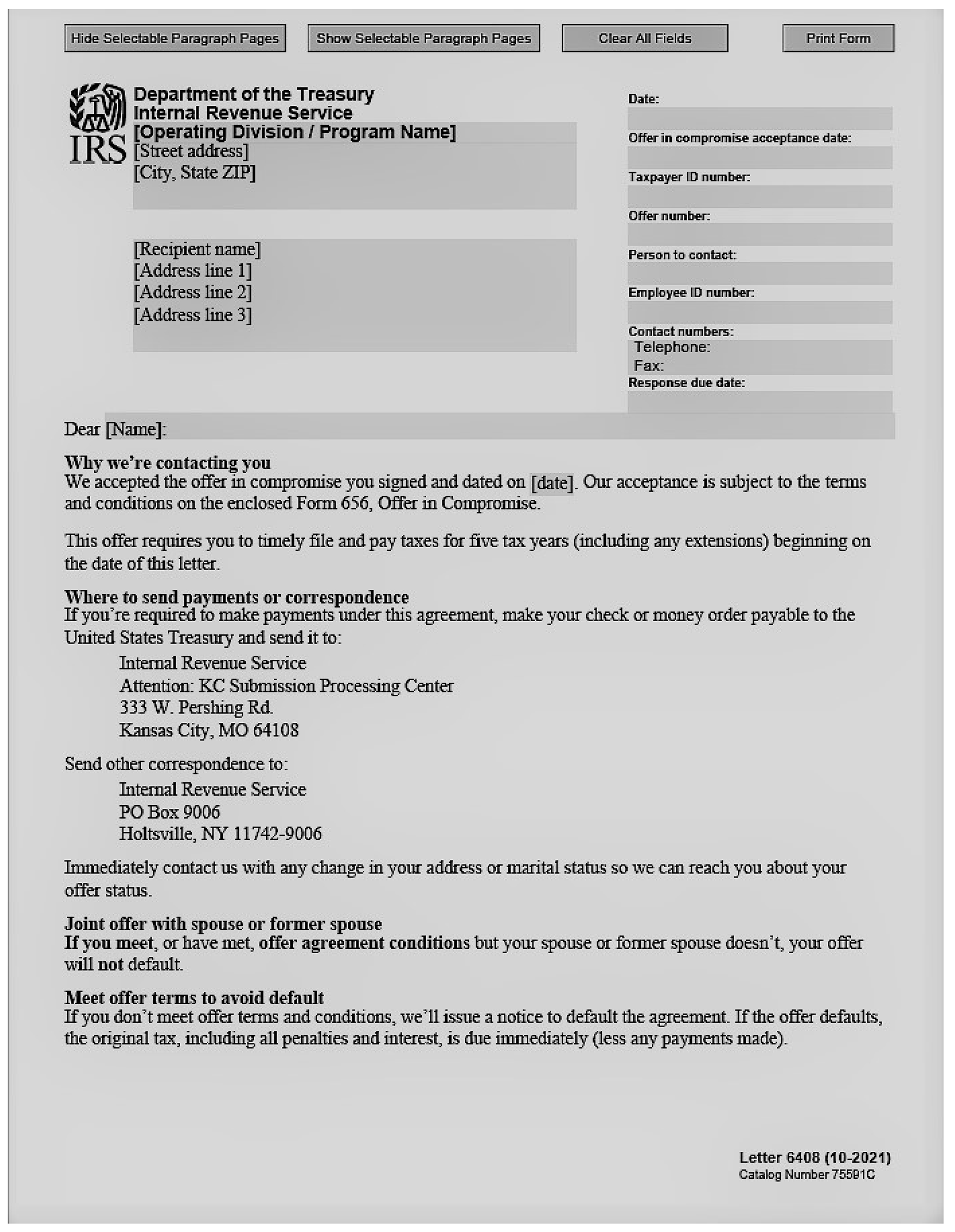
Letter 6408 is to be used if the offer is accepted under IRC 7122(f). The letter may be accessed by going to the Publishing website and searching for the letter using catalog number 75591C.
Please click here for the text description of the image.